# Table of Contents
- [MCP connectivity – agentgateway | Agent Connectivity Solved](#mcp-connectivity-agentgateway-agent-connectivity-solved)
- [About – agentgateway | Agent Connectivity Solved](#about-agentgateway-agent-connectivity-solved)
- [MCP multiplexing – agentgateway | Agent Connectivity Solved](#mcp-multiplexing-agentgateway-agent-connectivity-solved)
- [MCP – agentgateway | Agent Connectivity Solved](#mcp-agentgateway-agent-connectivity-solved)
- [OpenAPI – agentgateway | Agent Connectivity Solved](#openapi-agentgateway-agent-connectivity-solved)
- [MCP authentication – agentgateway | Agent Connectivity Solved](#mcp-authentication-agentgateway-agent-connectivity-solved)
- [Connect to MCP servers – agentgateway | Agent Connectivity Solved](#connect-to-mcp-servers-agentgateway-agent-connectivity-solved)
- [MCP authorization – agentgateway | Agent Connectivity Solved](#mcp-authorization-agentgateway-agent-connectivity-solved)
- [Unknown](#unknown)
- [Unknown](#unknown)
---
# MCP connectivity – agentgateway | Agent Connectivity Solved
[Documentation](https://agentgateway.dev/docs/)
MCP connectivity
MCP connectivity
================
Connect agentgateway proxies to MCP tool servers so that you can access MCP tools.
[About](https://agentgateway.dev/docs/about)
[Connect to MCP servers](https://agentgateway.dev/docs/connect)
[MCP authentication](https://agentgateway.dev/docs/mcp-authn)
[MCP authorization](https://agentgateway.dev/docs/mcp-authz)
---
# About – agentgateway | Agent Connectivity Solved
[Documentation](https://agentgateway.dev/docs/)
[MCP connectivity](https://agentgateway.dev/docs/mcp/)
About
About
=====
Learn more about MCP and common challenges when adopting MCP in enterprise environments.
About MCP[](https://agentgateway.dev/docs/mcp/about/#about-mcp)
----------------------------------------------------------------
[Model Context Protocol (MCP)](https://modelcontextprotocol.io/introduction)
is an open protocol that standardizes how Large Language Model (LLM) applications connect to various external data sources and tools. Without MCP, you need to implement custom integrations for each tool that your LLM application needs to access. However, this approach is hard to maintain and can cause issues when you want to scale your environment. With MCP, you can significantly speed up, simplify, and standardize these types of integrations.
An MCP server exposes external data sources and tools so that LLM applications can access them. Typically, you want to deploy these servers remotely and have authorization mechanisms in place so that LLM applications can safely access the data.
With agentgateway, you can connect to one or multiple MCP servers in any environment. The agentgateway proxies requests to the MCP tool that is exposed on the server. You can also use the agentgateway to federate tools from multiple MCP servers. For more information, see the [MCP multiplexing](https://agentgateway.dev/docs/mcp/connect/multiplex/)
guide.
MCP vs. A2A[](https://agentgateway.dev/docs/mcp/about/#mcp-vs-a2a)
-------------------------------------------------------------------
MCP and [Agent-to-Agent (A2A)](https://github.com/a2aproject/A2A)
are the leading protocols for enabling communication between agents and tools. MCP helps to retrieve and exchange context with Large Language Models (LLMs) and connect LLMs to tools. On the other hand, A2A solves for long-running tasks and state management across multiple agents. MCP and A2A are both JSON-RPC protocols that define the structure of how an agent describes what it wants to do, how it calls tools, and how it hands off tasks to other agents.
Challenges with MCP and A2A[](https://agentgateway.dev/docs/mcp/about/#challenges-with-mcp-and-a2a)
----------------------------------------------------------------------------------------------------
While MCP and A2A define the RPC communication protocol for agents and tools, they currently do not address real-world, enterprise-level concerns.
Agents typically do not operate in isolation. Instead, they interact with each other (agent-to-agent), with internal systems (agent-to-tool), and external or foundational models (agent-to-LLM). These interactions are often dynamic, multi-modal, and span organizational and data boundaries.
Such long-lived interactivity creates new vectors for risk and complexity, including:
* **Security**: How to handle authentication, authorization, and auditing of agent interactions across tools and services?
* **Governance**: How to enforce policies across autonomous workflows, such as data residency or access control?
* **Observability**: How to gain visibility into what agents are doing, when, and why?
* **Scalability and performance**: How to ensure low latency while securely handling retries, timeouts, and failures?
Agentgateway is designed to tackle these challenges at its core with built-in security, governance, and observability for all MCP and A2A communication between agents, tools, and LLMs.
[MCP authentication](https://agentgateway.dev/docs/mcp/mcp-authn/ "MCP authentication")
---
# MCP multiplexing – agentgateway | Agent Connectivity Solved
[Documentation](https://agentgateway.dev/docs/)
[MCP connectivity](https://agentgateway.dev/docs/mcp/)
[Connect to MCP servers](https://agentgateway.dev/docs/mcp/connect/)
MCP multiplexing
MCP multiplexing
================
Federate tools of multiple MCP servers on the agentgateway by using MCP multiplexing.
Before you begin[](https://agentgateway.dev/docs/mcp/connect/multiplex/#before-you-begin)
------------------------------------------------------------------------------------------
1. [Install the `agentgateway` binary](https://agentgateway.dev/docs/quickstart/#binary)
.
2. [Install the `uv` Python package manager](https://docs.astral.sh/uv/getting-started/installation/)
.
Configure the agentgateway[](https://agentgateway.dev/docs/mcp/connect/multiplex/#configure-the-agentgateway)
--------------------------------------------------------------------------------------------------------------
1. Download a multiplex configuration for your agentgateway.
curl -L https://raw.githubusercontent.com/agentgateway/agentgateway/refs/heads/main/examples/multiplex/config.yaml -o config.yaml
2. Review the configuration file.
cat config.yaml
[config.yaml](https://agentgateway.dev/raw.githubusercontent.com/agentgateway/agentgateway/refs/heads/main/examples/multiplex/config.yaml)
binds:
- port: 3000
listeners:
- routes:
- backends:
- mcp:
targets:
- name: time
stdio:
cmd: uvx
args: ["mcp-server-time"]
- name: everything
stdio:
cmd: npx
args: ["@modelcontextprotocol/server-everything"]
* **Listener**: An HTTP listener is configured and bound on port 3000. It includes a basic route that matches all traffic to an MCP backend.
* **Backend**: The backend defines two targets: `time` and `everything`. Note that the target names cannot include underscores (`_`). These targets are exposed together a single MCP server to clients.
3. Optional: To use the agentgateway UI playground later, add the following CORS policy to your `config.yaml` file. The config automatically reloads when you save the file.
binds:
- post: 3000
listeners:
- routes:
- policies:
cors:
allowOrigins:
- "*"
allowHeaders:
- "*"
backends:
...
4. Run the agentgateway.
agentgateway -f config.yaml
Verify access to tools[](https://agentgateway.dev/docs/mcp/connect/multiplex/#verify-access-to-tools)
------------------------------------------------------------------------------------------------------
1. Open the [agentgateway UI](http://localhost:15000/ui/)
to view your listener and target configuration.
2. Connect to the MCP test server with the agentgateway UI playground.
1. From the navigation menu, click [**Playground**](http://localhost:15000/ui/playground/)
.
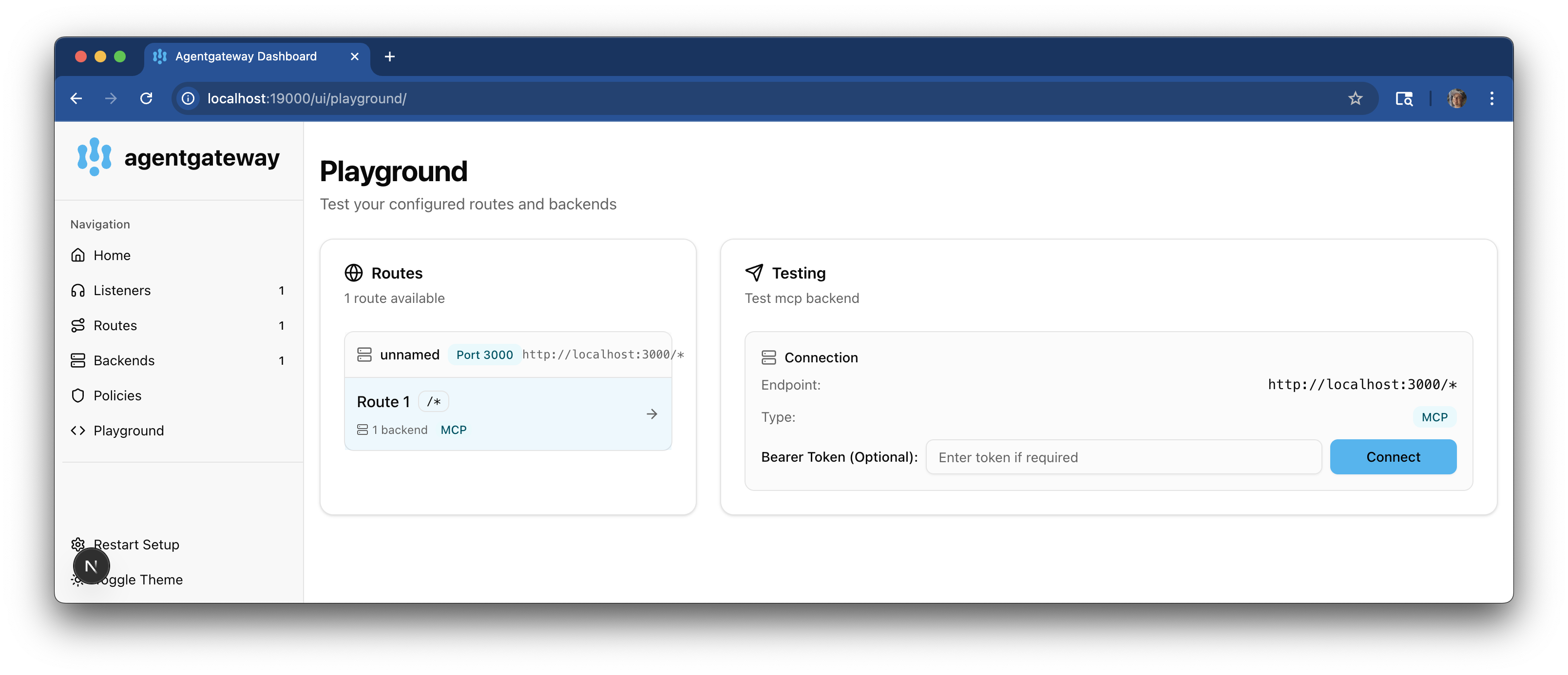
2. In the **Testing** card, review your **Connection** details and click **Connect**. The agentgateway UI connects to the targets that you configured and retrieves the tools that are exposed on the targets.
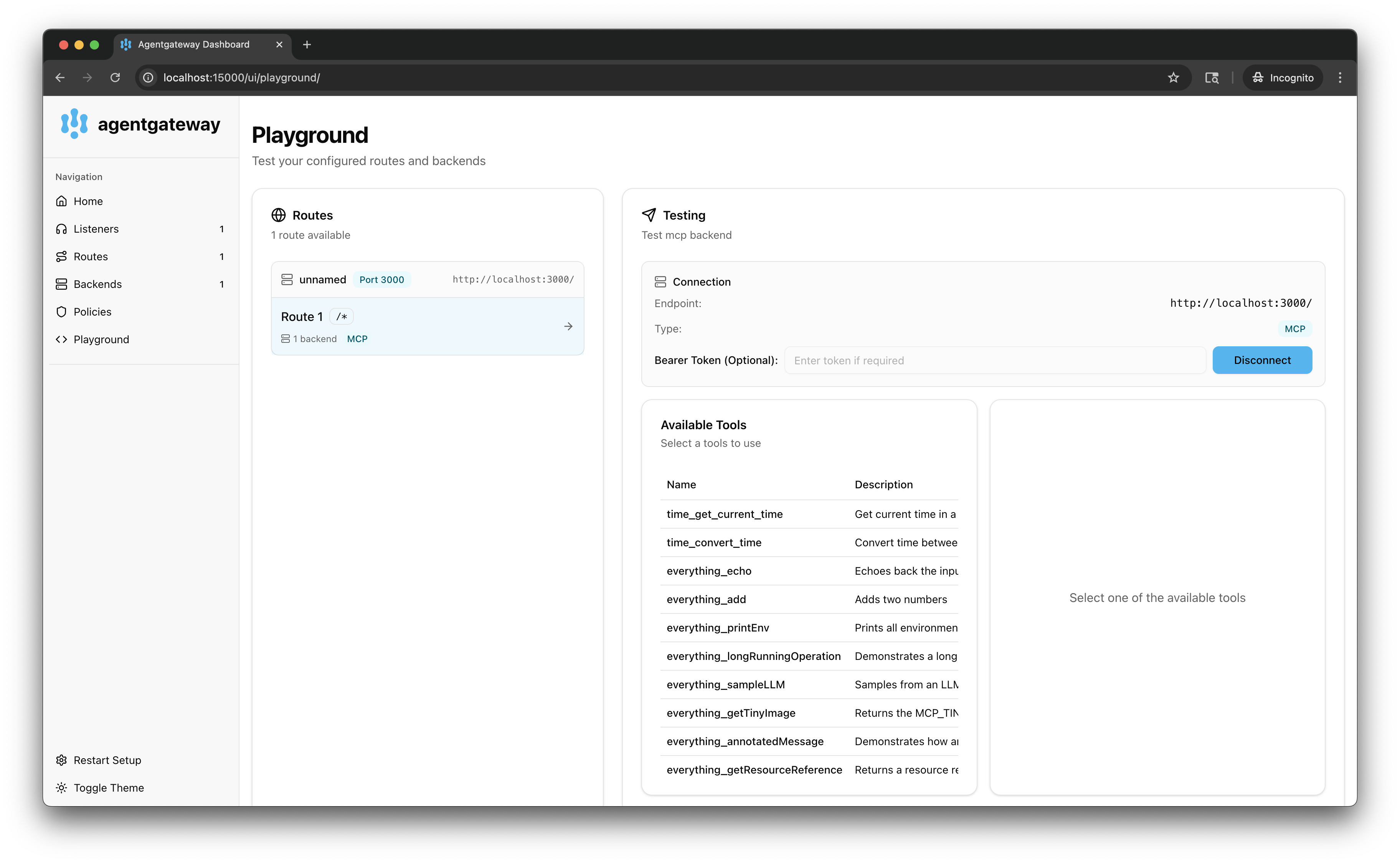
3. Verify that you see a list of **Available Tools**. Note that the tools are listed twice, one time with the prefix `time` and one time with the prefix `everything`. You now have a federated view of all the tools that are exposed on all defined targets.
3. Verify access to tools from both targets.
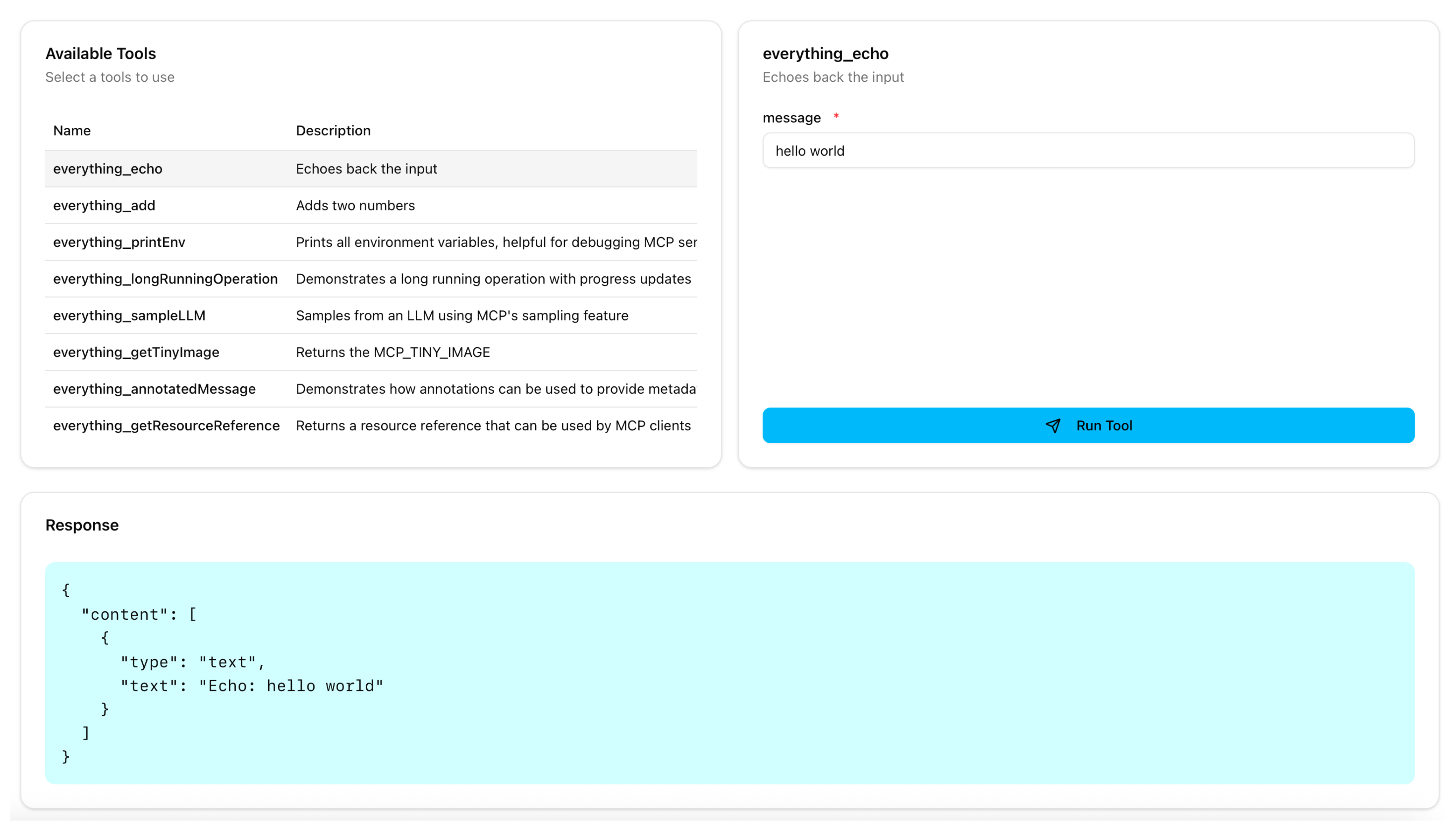
1. From the **Available Tools** list, select the `everything_echo` tool.
2. In the **message** field, enter any string, such as `hello world`, and click **Run Tool**.
3. Verify that you see your message echoed in the **Response** card.
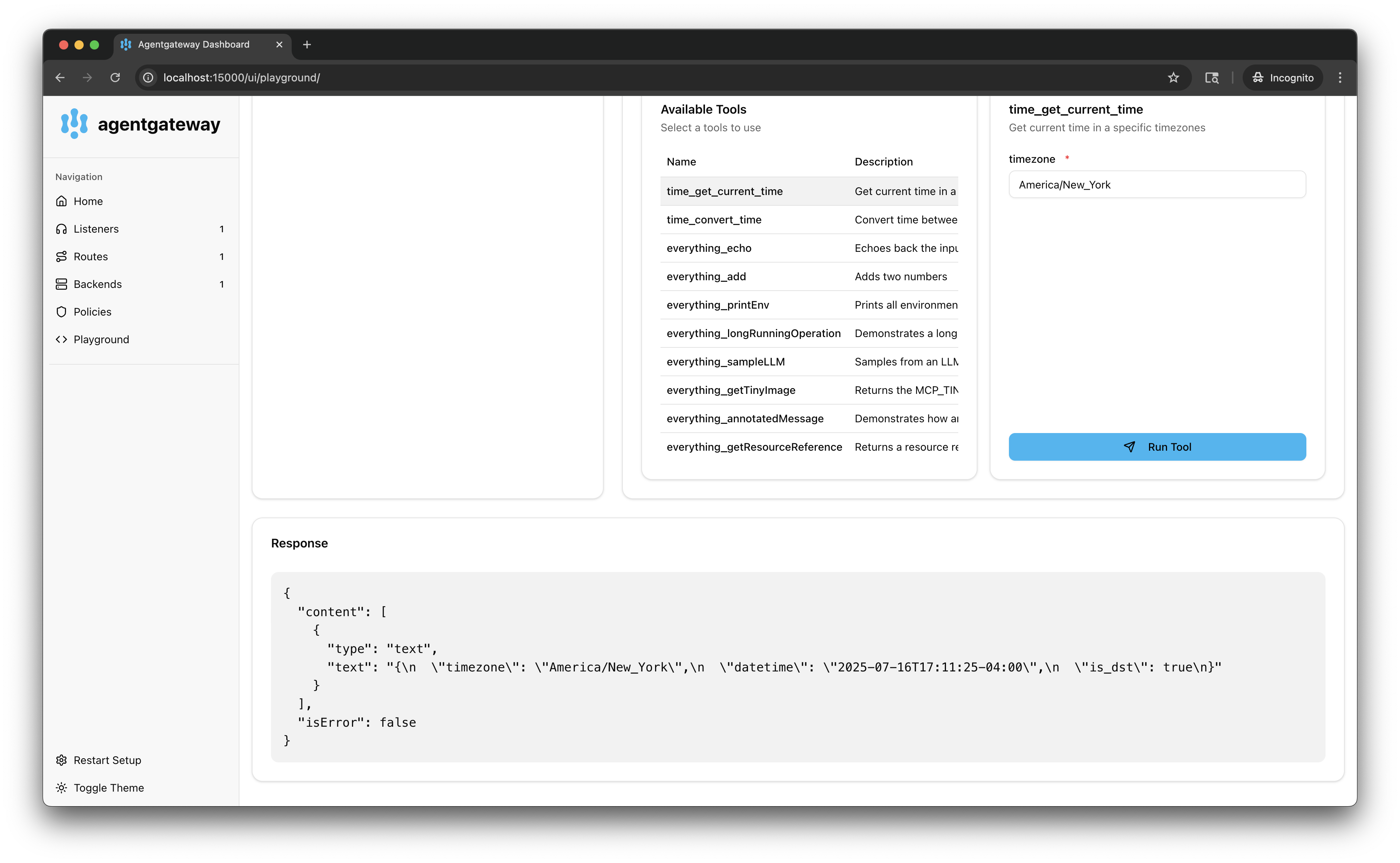
4. Repeat the steps with the `time_get_current_time` tool with your timezone, such as `America/New_York`.
[MCP](https://agentgateway.dev/docs/mcp/connect/mcp/ "MCP")
[OpenAPI](https://agentgateway.dev/docs/mcp/connect/openapi/ "OpenAPI")
---
# MCP – agentgateway | Agent Connectivity Solved
[Documentation](https://agentgateway.dev/docs/)
[MCP connectivity](https://agentgateway.dev/docs/mcp/)
[Connect to MCP servers](https://agentgateway.dev/docs/mcp/connect/)
MCP
MCP
===
An MCP backend allows exposing MCP servers through the agentgateway.
Want to use agentgateway in a Kubernetes environment with the Gateway API? Check out the [kgateway docs](https://kgateway.dev/docs/agentgateway/)
.
Before you begin[](https://agentgateway.dev/docs/mcp/connect/mcp/#before-you-begin)
------------------------------------------------------------------------------------
[Install the `agentgateway` binary](https://agentgateway.dev/docs/quickstart/#binary)
.
Configure the agentgateway[](https://agentgateway.dev/docs/mcp/connect/mcp/#configure-the-agentgateway)
--------------------------------------------------------------------------------------------------------
1. Download an MCP configuration for your agentgateway.
curl -L https://raw.githubusercontent.com/agentgateway/agentgateway/refs/heads/main/examples/basic/config.yaml -o config.yaml
2. Review the configuration file.
cat config.yaml
[config.yaml](https://agentgateway.dev/raw.githubusercontent.com/agentgateway/agentgateway/refs/heads/main/examples/basic/config.yaml)
binds:
- port: 3000
listeners:
- routes:
- policies:
cors:
allowOrigins:
- "*"
allowHeaders:
- mcp-protocol-version
- content-type
- cache-control
backends:
- mcp:
targets:
- name: everything
stdio:
cmd: npx
args: ["@modelcontextprotocol/server-everything"]
Review the following table to understand this configuration.
| Field | Description |
| --- | --- |
| `binds` | Binds set up each port on which the agentgateway listens for incoming requests. This example configures one port. |
| `port` | The port to listen on, such as `3000`. |
| `listeners` | Listeners configure how agentgateway accepts and processes incoming requests. They do this by grouping together resources such as routes and the backends that serve traffic. |
| `routes` | Routes configure advanced routing features, such as traffic policies, that control how traffic is sent to the backends. In the example, the route matches all traffic. |
| `policies` | Policies configure traffic policies on routes that shape how traffic is sent to the backends. In the example, a basic CORS policy is configured to allow all origins and the `mcp-protocol-version` header. This way, the configuration works with the [MCP inspector tool](https://modelcontextprotocol.io/docs/tools/inspector)
. |
| `backends` | Backends configure the backing destination where the traffic is sent to. Backends can be MCP servers, A2A agents, or OpenAPI servers. In this example, the backend is an MCP server. |
| `targets` | Targets configure the details of the backend, such as the MCP server. In this example, the target is the sample, open source MCP test server, `server-everything`. The server runs a bunch of tools in a single process that are useful for testing. |
| `stdio` | To run the server, you use the standard input/output (`stdio`) capability of the agentgateway, which allows you to pass in the command and command arguments that you want to use. In this example, the `npx` command is used. The `npx` command utility lets you run a Node.js package (`@modelcontextprotocol/server-everything`) without installing it. If you do not have `npx` on your machine, follow the [instructions to install Node.js](https://nodejs.org/en/download)
. |
3. Run the agentgateway.
agentgateway -f config.yaml
Verify access to tools[](https://agentgateway.dev/docs/mcp/connect/mcp/#verify-access-to-tools)
------------------------------------------------------------------------------------------------
1. Open the [agentgateway UI](http://localhost:15000/ui/)
to view your listener and backend configuration.
2. Connect to the MCP test server with the agentgateway UI playground.
1. From the navigation menu, click [**Playground**](http://localhost:15000/ui/playground/)
.

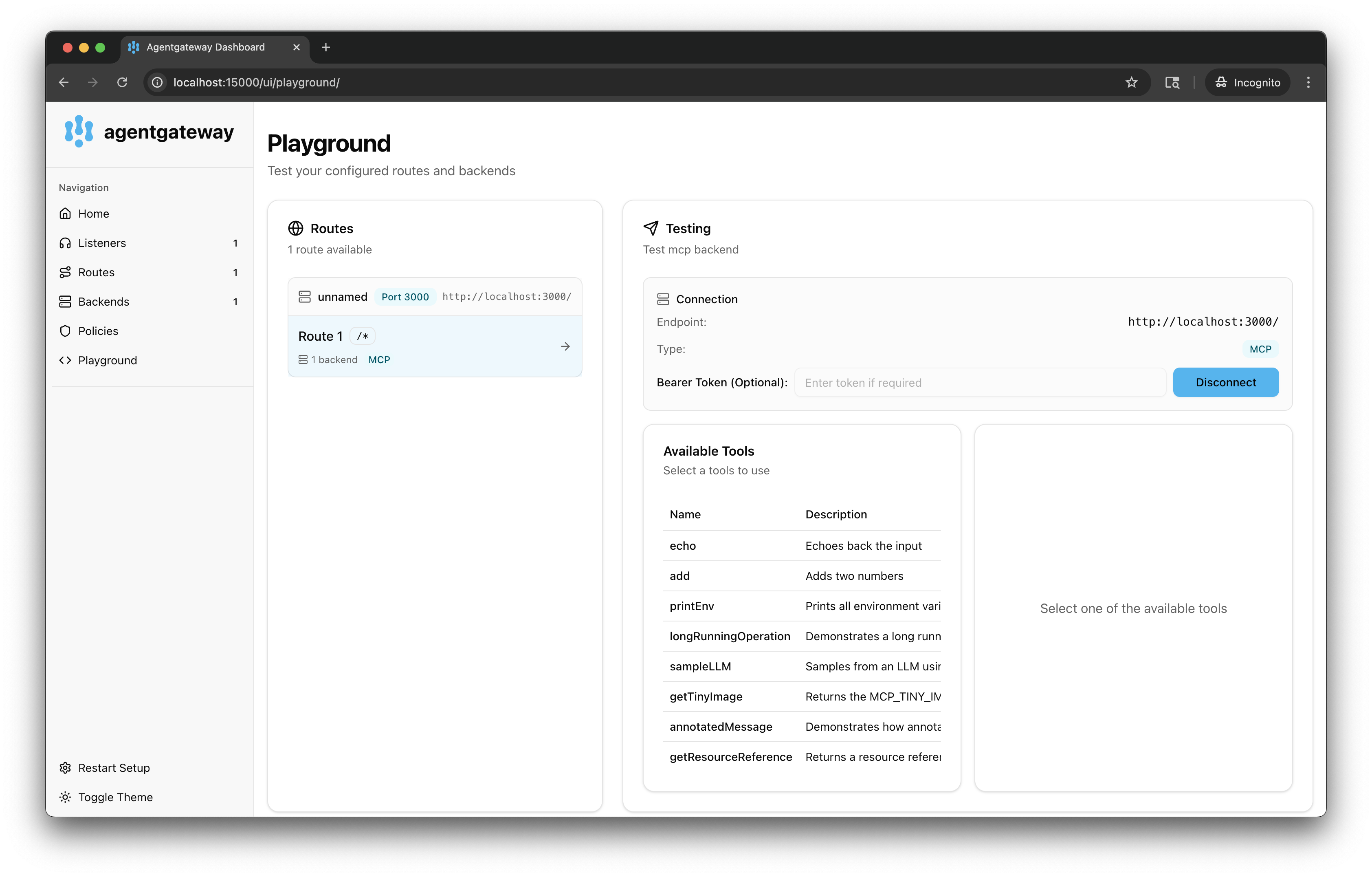
2. In the **Testing** card, review your **Connection** details and click **Connect**. The agentgateway UI connects to the target that you configured and retrieves the tools that are exposed on the target.
3. Verify that you see a list of **Available Tools**.
3. Verify access to a tool.
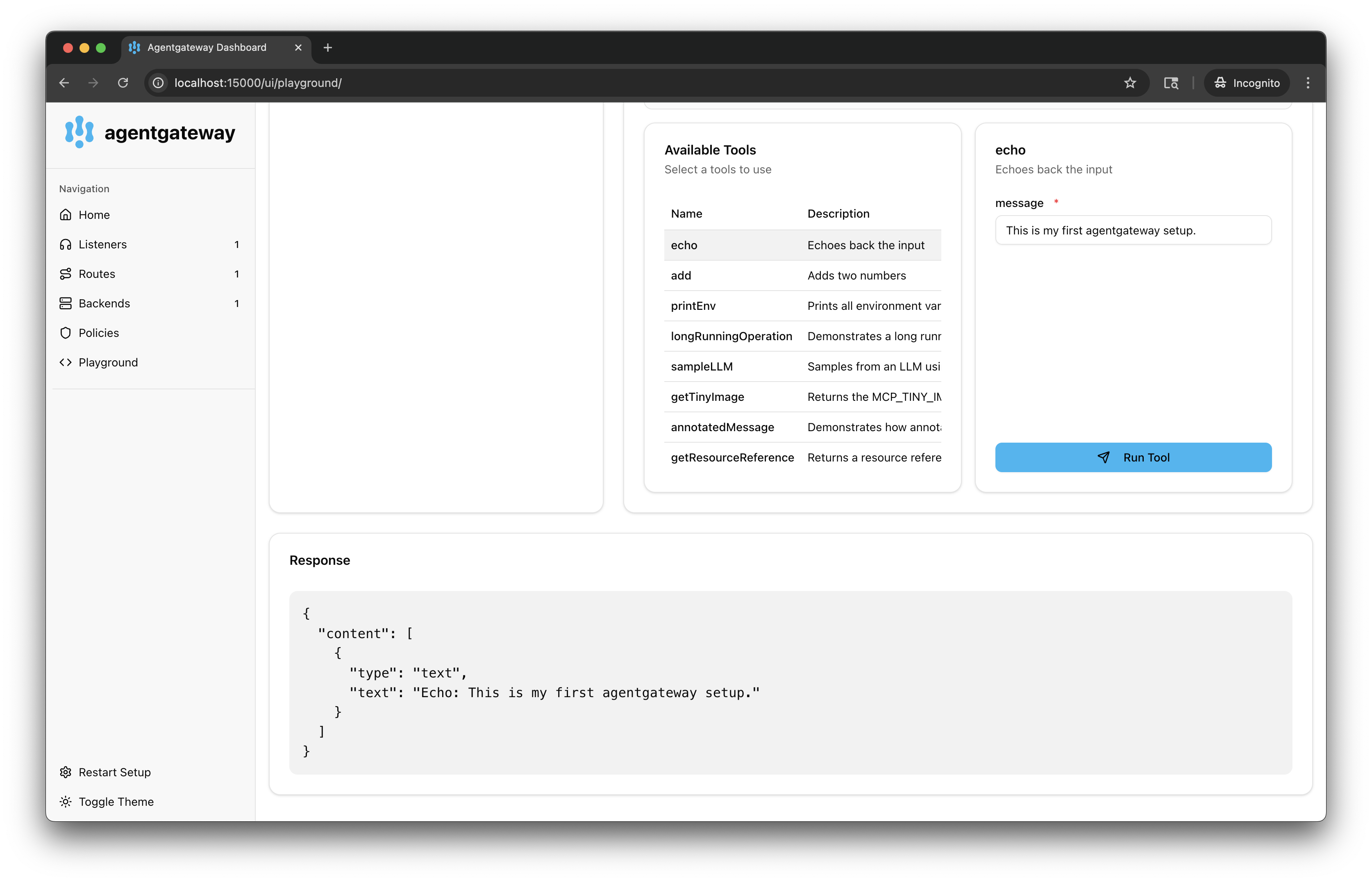
1. From the **Available Tools** list, select the `echo` tool.
2. In the **message** field, enter any string, such as `This is my first agentgateway setup.`, and click **Run Tool**.
3. Verify that you see your message echoed in the **Response** card.
[MCP multiplexing](https://agentgateway.dev/docs/mcp/connect/multiplex/ "MCP multiplexing")
---
# OpenAPI – agentgateway | Agent Connectivity Solved
[Documentation](https://agentgateway.dev/docs/)
[MCP connectivity](https://agentgateway.dev/docs/mcp/)
[Connect to MCP servers](https://agentgateway.dev/docs/mcp/connect/)
OpenAPI
OpenAPI
=======
Expose an OpenAPI server on the agentgateway. Then, your OpenAPI endpoints become available as tools in the agentgateway UI playground.
Before you begin[](https://agentgateway.dev/docs/mcp/connect/openapi/#before-you-begin)
----------------------------------------------------------------------------------------
1. [Install the `agentgateway` binary](https://agentgateway.dev/docs/quickstart/#binary)
.
2. [Install the `uv` Python package manager](https://docs.astral.sh/uv/getting-started/installation/)
.
3. Make sure that you have `docker`, such as by installing [Docker Desktop](https://docs.docker.com/desktop/)
.
4. For ARM64 machines: [Install `maven`](https://maven.apache.org/install.html)
to build the sample Petstore image from source.
Set up your OpenAPI server[](https://agentgateway.dev/docs/mcp/connect/openapi/#openapi-server)
------------------------------------------------------------------------------------------------
Start by setting up your OpenAPI server. You need an OpenAPI spec, such as a JSON or YAML file, as well as a running server instance that hosts the API. These steps use the [Swagger Petstore server](https://agentgateway.dev/docs/mcp/connect/openapi/#petstore)
as an example.
In your OpenAPI schema, make sure to set the URL of the server. If no URL is set, agentgateway defaults to `/`. Then, the paths in your OpenAPI schema get an extra slash concatenated, which can break requests. For example, `/api/v1/` becomes `//api/v1/`.
To avoid this issue, explicitly set the URL value to `/` in the OpenAPI schema, such as the following example.
"servers": [\
{\
"url": "/"\
}\
]
### Sample Petstore server[](https://agentgateway.dev/docs/mcp/connect/openapi/#petstore)
Run the sample [Swagger Petstore server](https://github.com/swagger-api/swagger-petstore)
locally. The following steps show use Docker and Maven as an example to pull, build, and run the Petstore server. You can also use your own OpenAPI server and update the steps accordingly.
AMD64 machines ARM64 or other machines
You can pull and run the sample Petstore server from Docker Hub.
1. Pull the Docker image for the Petstore server.
docker pull swaggerapi/petstore3:unstable
2. Run the Petstore server on port 8080.
docker run --name swaggerapi-petstore3 -d -p 8080:8080 swaggerapi/petstore3:unstable
Build the Docker image from the source code. The example builds the image for an ARM64 machine.
1. Clone the [Swagger Petstore repository](https://github.com/swagger-api/swagger-petstore)
.
git clone https://github.com/swagger-api/swagger-petstore.git
cd swagger-petstore
2. Package the project with Maven.
mvn package
3. Build the Docker image for your platform.
docker buildx build --platform=linux/arm64 -t swaggerapi/petstore3:arm64 .
4. Run the Petstore server on port 8080.
docker run -d -p 8080:8080 swaggerapi/petstore3:arm64
Configure the agentgateway[](https://agentgateway.dev/docs/mcp/connect/openapi/#agentgateway)
----------------------------------------------------------------------------------------------
1. From the directory where you plan to run agentgateway, download and review the OpenAPI schema for the Petstore server.
curl http://localhost:8080/api/v3/openapi.json > openapi.json
2. Download an OpenAPI configuration for your agentgateway.
curl -L https://raw.githubusercontent.com/agentgateway/agentgateway/refs/heads/main/examples/openapi/config.yaml -o config.yaml
3. Update the agentgateway configuration file as follows:
* **Listener**: An HTTP listener is configured and exposed on port 3000.
* **Backend**: Use an MCP backend to set up an OpenAPI server based on the Petstore sample app.
* **OpenAPI schema**: In the `openapi` target of the configuration file, update the `file` field to point to the OpenAPI schema that you downloaded earlier.
* **CORS policy**: To use the agentgateway UI playground later, add the following CORS policy to your `config.yaml` file. The config automatically reloads when you save the file.
open config.yaml
binds:
- port: 3000
listeners:
- routes:
- policies:
cors:
allowOrigins:
- "*"
allowHeaders:
- "*"
backends:
- mcp:
targets:
- name: openapi
openapi:
schema:
file: openapi.json
host: localhost
port: 8080
4. Run the agentgateway.
agentgateway -f config.yaml
Verify access to the Petstore APIs[](https://agentgateway.dev/docs/mcp/connect/openapi/#verify-access-to-the-petstore-apis)
----------------------------------------------------------------------------------------------------------------------------
1. Open the [agentgateway UI](http://localhost:15000/ui/)
to view your listener and backend configuration.
2. Connect to the OpenAPI server with the agentgateway UI playground.
1. From the navigation menu, click [**Playground**](http://localhost:15000/ui/playground/)
.

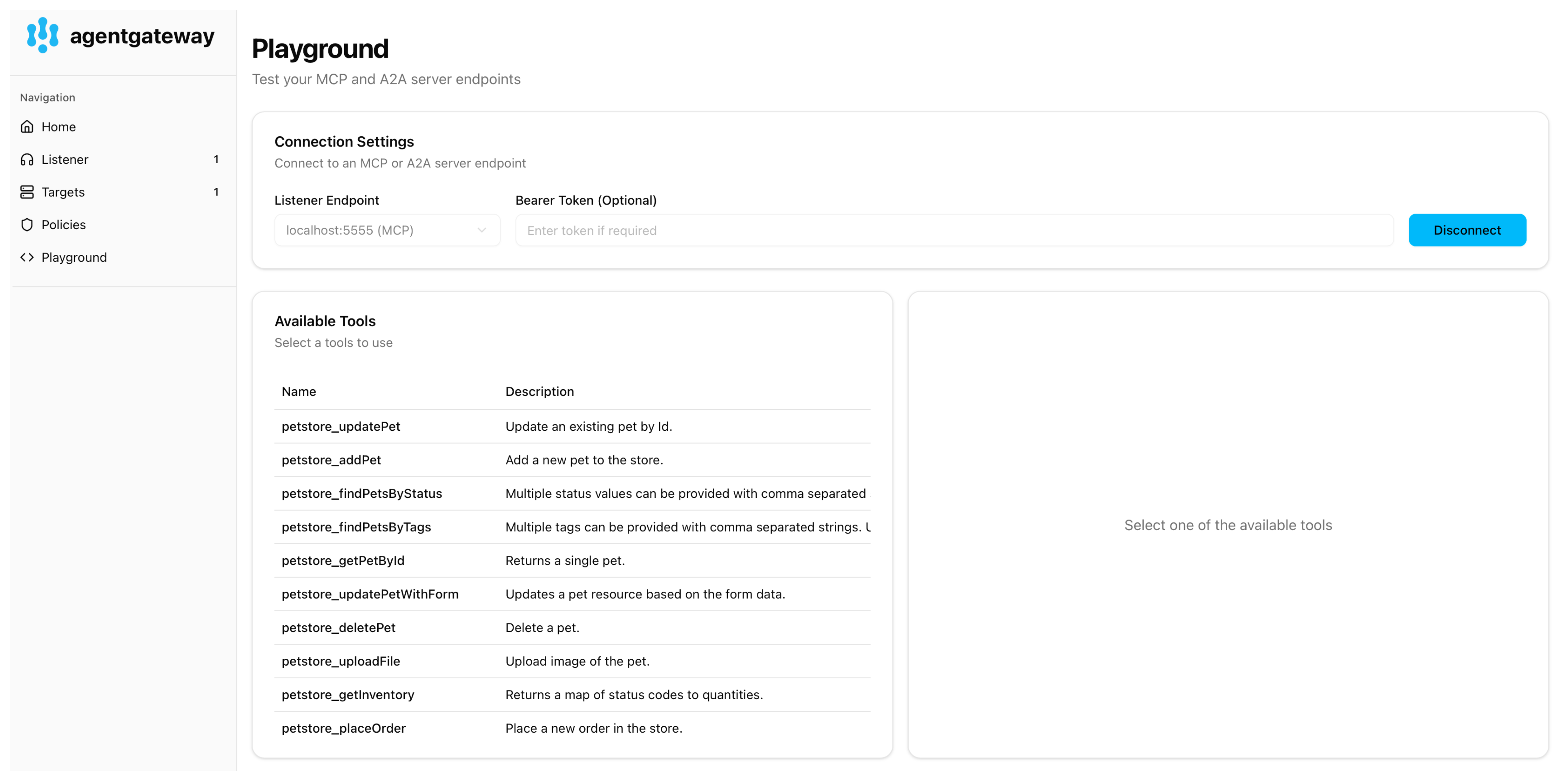
2. In the **Testing** card, review your **Connection** details and click **Connect**. The agentgateway UI connects to the target that you configured and retrieves the APIs that are exposed on the target.
3. Verify that you see the Petstore APIs from the OpenAPI spec as a list of **Available Tools**
3. Verify access to the Petstore APIs.
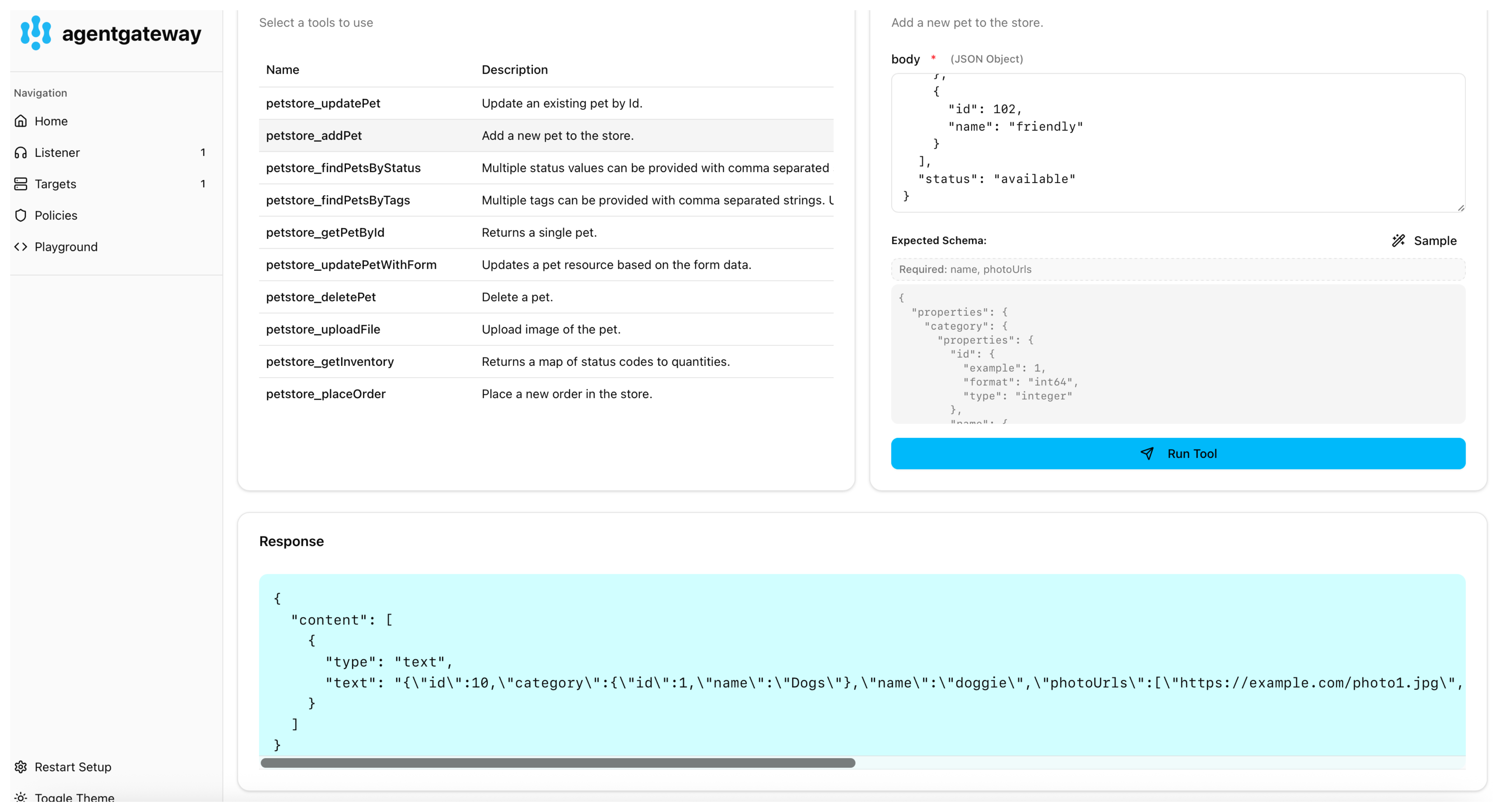
1. Select the **addPet** API.
2. In the **body** field, enter the details for your pet, such as the ID and name for the pet category and your pet, a URL to a photo of your pet, the pet’s status in the store, and optionally any tags. You can use the following example JSON file.
{
"id": 10,
"category": {
"id": 1,
"name": "Dogs"
},
"name": "doggie",
"photoUrls": [\
"https://example.com/photo1.jpg",\
"https://example.com/photo2.jpg"\
],
"tags": [\
{\
"id": 101,\
"name": "fluffy"\
},\
{\
"id": 102,\
"name": "friendly"\
}\
],
"status": "available"
}
3. Click **Run Tool**. Verify that the pet is added to the petstore.
[MCP multiplexing](https://agentgateway.dev/docs/mcp/connect/multiplex/ "MCP multiplexing")
---
# MCP authentication – agentgateway | Agent Connectivity Solved
[Documentation](https://agentgateway.dev/docs/)
[MCP connectivity](https://agentgateway.dev/docs/mcp/)
MCP authentication
MCP authentication
==================
Note
This policy works only for [MCP](https://modelcontextprotocol.io/)
traffic. Note that all standard HTTP policies also apply to MCP traffic.
MCP authentication enables OAuth 2.0 protection for MCP servers, helping to implement the [MCP Authorization specification](https://modelcontextprotocol.io/specification/draft/basic/authorization)
. Agentgateway can act as a resource server, validating JWT tokens and exposing protected resource metadata.
There are three deployment scenarios.
Authorization Server Proxy[](https://agentgateway.dev/docs/mcp/mcp-authn/#authorization-server-proxy)
------------------------------------------------------------------------------------------------------
Agentgateway can adapt traffic for authorization servers that don’t fully comply with OAuth standards. For example, Keycloak exposes certificates at a non-standard endpoint.
In this mode, agentgateway:
* Exposes protected resource metadata on behalf of the MCP server
* Proxies authorization server metadata and client registration
* Validates tokens using the authorization server’s JWKS
* Returns `401 Unauthorized` with appropriate `WWW-Authenticate` headers for unauthenticated requests
mcpAuthentication:
issuer: http://localhost:7080/realms/mcp
jwksUrl: http://localhost:7080/protocol/openid-connect/certs
provider:
keycloak: {}
resourceMetadata:
resource: http://localhost:3000/mcp
scopesSupported:
- read:all
bearerMethodsSupported:
- header
- body
- query
resourceDocumentation: http://localhost:3000/stdio/docs
resourcePolicyUri: http://localhost:3000/stdio/policies
Resource Server Only[](https://agentgateway.dev/docs/mcp/mcp-authn/#resource-server-only)
------------------------------------------------------------------------------------------
Agentgateway acts solely as a resource server, validating tokens issued by an external authorization server.
mcpAuthentication:
issuer: http://localhost:9000
jwksUrl: http://localhost:9000/.well-known/jwks.json
resourceMetadata:
resource: http://localhost:3000/mcp
scopesSupported:
- read:all
bearerMethodsSupported:
- header
- body
- query
Passthrough[](https://agentgateway.dev/docs/mcp/mcp-authn/#passthrough)
------------------------------------------------------------------------
When the MCP server already implements OAuth authentication, no additional configuration is needed. Agentgateway will pass requests through without modification.
[About](https://agentgateway.dev/docs/mcp/about/ "About")
[MCP authorization](https://agentgateway.dev/docs/mcp/mcp-authz/ "MCP authorization")
---
# Connect to MCP servers – agentgateway | Agent Connectivity Solved
[Documentation](https://agentgateway.dev/docs/)
[MCP connectivity](https://agentgateway.dev/docs/mcp/)
Connect to MCP servers
Connect to MCP servers
======================
Connect agentgateway to an MCP tool server.
[MCP](https://agentgateway.dev/docs/mcp/connect/mcp)
[MCP multiplexing](https://agentgateway.dev/docs/mcp/connect/multiplex)
[OpenAPI](https://agentgateway.dev/docs/mcp/connect/openapi)
---
# MCP authorization – agentgateway | Agent Connectivity Solved
[Documentation](https://agentgateway.dev/docs/)
[MCP connectivity](https://agentgateway.dev/docs/mcp/)
MCP authorization
MCP authorization
=================
Note
This policy works only for [MCP](https://modelcontextprotocol.io/)
traffic. Note that all standard HTTP policies also apply to MCP traffic.
The MCP authorization policy works similarly to [HTTP authorization](https://agentgateway.dev/docs/security/http-authz)
, but runs in the context of an MCP request.
Instead of running against an HTTP request, MCP authorization policies run against specific MCP method invocations such as `list_tools` and `call_tools`.
If a tool, or other resource, is not allowed it will automatically be filtered in the `list` request.
mcpAuthorization:
rules:
# Allow anyone to call 'echo'
- 'mcp.tool.name == "echo"'
# Only the test-user can call 'add'
- 'jwt.sub == "test-user" && mcp.tool.name == "add"'
# Any authenticated user with the claim `nested.key == value` can access 'printEnv'
- 'mcp.tool.name == "printEnv" && jwt.nested.key == "value"'
Refer to the [CEL reference](https://agentgateway.dev/docs/operations/cel)
for allowed variables.
[MCP authentication](https://agentgateway.dev/docs/mcp/mcp-authn/ "MCP authentication")
---
# Unknown
404
===
This page could not be found.
-----------------------------
---
# Unknown
404
===
This page could not be found.
-----------------------------
---