. | ### What's next? * Congratulations! Your fresh access token is ready to be used! How can we make API calls with it? take a look at to the [access token](https://developer.spotify.com/documentation/web-api/concepts/access-token) guide to learn how to make an API call using your new fresh access token. * If your access token has expired, you can learn how to issue a new one without requiring users to reauthorize your application by reading the [refresh token](https://developer.spotify.com/documentation/web-api/tutorials/refreshing-tokens) guide.  Tailored Advertising Opt-out ---------------------------- Spotify may collect and share some of your personal data associated with this browser or device with some of our partners for certain purposes such as targeted advertising on their platforms. For example, we may share your cookie data with a marketing partner to inform you of one of our latest promotions while you are on their platform. **The option below allows you to opt-out of the processing of such personal data** **Note**: Spotify may share additional personal data with third parties for tailored advertising purposes if you have a Spotify account. This toggle does not facilitate your privacy choices for any personal data associated with your Spotify account if you have not logged in. Please log in to your account to manage your privacy choices associated with your Spotify account. [Log in here](https://accounts.spotify.com/) ### Manage Consent Preferences #### Enable Tailored Advertising Enable Tailored Advertising * ##### First Party Targeting Cookies Switch Label label These cookies may be used to deliver targeted advertisements and to build a profile of your interests. If you do not allow these cookies you will still experience advertising but it will be less tailored to you. * ##### Store and access information on a device Switch Label label Cookies, device or similar online identifiers together with other information (e.g. browser type and information, language, screen size, supported technologies, etc.) can be stored or read on your device to recognise it each time it connects to an app or to a website, for one or several of the purposes presented here. #### Other Cookies used on this site Always Active * ##### Strictly Necessary Cookies Always Active These cookies are necessary for the service to function and cannot be switched off in our systems. They are usually only set in response to actions made by you which amount to a request for services, such as setting your privacy preferences, logging in or filling in forms. You can set your browser to block or alert you about these cookies, but some parts of the service will not then work. * ##### First Party Functional Cookies Always Active These cookies enable us to provide enhanced functionality and personalisation. If you do not allow these cookies then some or all of these services may not function properly. * ##### First Party Performance Cookies Always Active These cookies allow us to count visits and traffic sources so we can measure and improve the performance of our services. They help us to know which pages are the most and least popular and see how visitors move around the platform. If you do not allow these cookies we will not be able to monitor the performance of our services. * ##### Content Selection, Delivery, and Reporting Always Active These cookies are set by a range of social media services that we have added to the site to enable you to share our content with your friends and networks. They are capable of tracking your browser across other sites and building up a profile of your interests. This may impact the content and messages you see on other websites you visit. If you do not allow these cookies you may not be able to use or see these sharing tools. Back Button ### Cookie List Search Icon Filter Icon Clear checkbox label label Apply Cancel Consent Leg.Interest checkbox label label checkbox label label checkbox label label Confirm My Choices [](https://www.onetrust.com/products/cookie-consent/) --- # Rate Limits | Spotify for Developers [Skip to content](https://developer.spotify.com/documentation/web-api/concepts/rate-limits#main) Web API * [Overview](https://developer.spotify.com/documentation/web-api) * [Getting started](https://developer.spotify.com/documentation/web-api/tutorials/getting-started) * ConceptsConcepts Concepts* [Access Token](https://developer.spotify.com/documentation/web-api/concepts/access-token) * [API calls](https://developer.spotify.com/documentation/web-api/concepts/api-calls) * [Apps](https://developer.spotify.com/documentation/web-api/concepts/apps) * [Authorization](https://developer.spotify.com/documentation/web-api/concepts/authorization) * [Redirect URIs](https://developer.spotify.com/documentation/web-api/concepts/redirect_uri) * [Playlists](https://developer.spotify.com/documentation/web-api/concepts/playlists) * [Quota modes](https://developer.spotify.com/documentation/web-api/concepts/quota-modes) * [Rate limits](https://developer.spotify.com/documentation/web-api/concepts/rate-limits) * [Scopes](https://developer.spotify.com/documentation/web-api/concepts/scopes) * [Spotify URIs and IDs](https://developer.spotify.com/documentation/web-api/concepts/spotify-uris-ids) * [Track Relinking](https://developer.spotify.com/documentation/web-api/concepts/track-relinking) * TutorialsTutorials Tutorials* [Authorization code](https://developer.spotify.com/documentation/web-api/tutorials/code-flow) * [Authorization code PKCE](https://developer.spotify.com/documentation/web-api/tutorials/code-pkce-flow) * [Client credentials](https://developer.spotify.com/documentation/web-api/tutorials/client-credentials-flow) * [Implicit grant \[Deprecated\]](https://developer.spotify.com/documentation/web-api/tutorials/implicit-flow) * [Refreshing tokens](https://developer.spotify.com/documentation/web-api/tutorials/refreshing-tokens) * [Migration: Implicit grant to Authorization code](https://developer.spotify.com/documentation/web-api/tutorials/migration-implicit-auth-code) * [Migration: Insecure redirect URI](https://developer.spotify.com/documentation/web-api/tutorials/migration-insecure-redirect-uri) * How-TosHow-Tos How-Tos* [Display your Spotify profile data in a web app](https://developer.spotify.com/documentation/web-api/howtos/web-app-profile) Reference * AlbumsAlbums Albums* [Get Album](https://developer.spotify.com/documentation/web-api/reference/get-an-album) * [Get Several Albums](https://developer.spotify.com/documentation/web-api/reference/get-multiple-albums) * [Get Album Tracks](https://developer.spotify.com/documentation/web-api/reference/get-an-albums-tracks) * [Get User's Saved Albums](https://developer.spotify.com/documentation/web-api/reference/get-users-saved-albums) * [Save Albums for Current User](https://developer.spotify.com/documentation/web-api/reference/save-albums-user) * [Remove Users' Saved Albums](https://developer.spotify.com/documentation/web-api/reference/remove-albums-user) * [Check User's Saved Albums](https://developer.spotify.com/documentation/web-api/reference/check-users-saved-albums) * [Get New Releases](https://developer.spotify.com/documentation/web-api/reference/get-new-releases) * ArtistsArtists Artists* [Get Artist](https://developer.spotify.com/documentation/web-api/reference/get-an-artist) * [Get Several Artists](https://developer.spotify.com/documentation/web-api/reference/get-multiple-artists) * [Get Artist's Albums](https://developer.spotify.com/documentation/web-api/reference/get-an-artists-albums) * [Get Artist's Top Tracks](https://developer.spotify.com/documentation/web-api/reference/get-an-artists-top-tracks) * [Get Artist's Related Artists](https://developer.spotify.com/documentation/web-api/reference/get-an-artists-related-artists) * AudiobooksAudiobooks Audiobooks* [Get an Audiobook](https://developer.spotify.com/documentation/web-api/reference/get-an-audiobook) * [Get Several Audiobooks](https://developer.spotify.com/documentation/web-api/reference/get-multiple-audiobooks) * [Get Audiobook Chapters](https://developer.spotify.com/documentation/web-api/reference/get-audiobook-chapters) * [Get User's Saved Audiobooks](https://developer.spotify.com/documentation/web-api/reference/get-users-saved-audiobooks) * [Save Audiobooks for Current User](https://developer.spotify.com/documentation/web-api/reference/save-audiobooks-user) * [Remove User's Saved Audiobooks](https://developer.spotify.com/documentation/web-api/reference/remove-audiobooks-user) * [Check User's Saved Audiobooks](https://developer.spotify.com/documentation/web-api/reference/check-users-saved-audiobooks) * CategoriesCategories Categories* [Get Several Browse Categories](https://developer.spotify.com/documentation/web-api/reference/get-categories) * [Get Single Browse Category](https://developer.spotify.com/documentation/web-api/reference/get-a-category) * ChaptersChapters Chapters* [Get a Chapter](https://developer.spotify.com/documentation/web-api/reference/get-a-chapter) * [Get Several Chapters](https://developer.spotify.com/documentation/web-api/reference/get-several-chapters) * EpisodesEpisodes Episodes* [Get Episode](https://developer.spotify.com/documentation/web-api/reference/get-an-episode) * [Get Several Episodes](https://developer.spotify.com/documentation/web-api/reference/get-multiple-episodes) * [Get User's Saved Episodes](https://developer.spotify.com/documentation/web-api/reference/get-users-saved-episodes) * [Save Episodes for Current User](https://developer.spotify.com/documentation/web-api/reference/save-episodes-user) * [Remove User's Saved Episodes](https://developer.spotify.com/documentation/web-api/reference/remove-episodes-user) * [Check User's Saved Episodes](https://developer.spotify.com/documentation/web-api/reference/check-users-saved-episodes) * GenresGenres Genres* [Get Available Genre Seeds](https://developer.spotify.com/documentation/web-api/reference/get-recommendation-genres) * MarketsMarkets Markets* [Get Available Markets](https://developer.spotify.com/documentation/web-api/reference/get-available-markets) * PlayerPlayer Player* [Get Playback State](https://developer.spotify.com/documentation/web-api/reference/get-information-about-the-users-current-playback) * [Transfer Playback](https://developer.spotify.com/documentation/web-api/reference/transfer-a-users-playback) * [Get Available Devices](https://developer.spotify.com/documentation/web-api/reference/get-a-users-available-devices) * [Get Currently Playing Track](https://developer.spotify.com/documentation/web-api/reference/get-the-users-currently-playing-track) * [Start/Resume Playback](https://developer.spotify.com/documentation/web-api/reference/start-a-users-playback) * [Pause Playback](https://developer.spotify.com/documentation/web-api/reference/pause-a-users-playback) * [Skip To Next](https://developer.spotify.com/documentation/web-api/reference/skip-users-playback-to-next-track) * [Skip To Previous](https://developer.spotify.com/documentation/web-api/reference/skip-users-playback-to-previous-track) * [Seek To Position](https://developer.spotify.com/documentation/web-api/reference/seek-to-position-in-currently-playing-track) * [Set Repeat Mode](https://developer.spotify.com/documentation/web-api/reference/set-repeat-mode-on-users-playback) * [Set Playback Volume](https://developer.spotify.com/documentation/web-api/reference/set-volume-for-users-playback) * [Toggle Playback Shuffle](https://developer.spotify.com/documentation/web-api/reference/toggle-shuffle-for-users-playback) * [Get Recently Played Tracks](https://developer.spotify.com/documentation/web-api/reference/get-recently-played) * [Get the User's Queue](https://developer.spotify.com/documentation/web-api/reference/get-queue) * [Add Item to Playback Queue](https://developer.spotify.com/documentation/web-api/reference/add-to-queue) * PlaylistsPlaylists Playlists* [Get Playlist](https://developer.spotify.com/documentation/web-api/reference/get-playlist) * [Change Playlist Details](https://developer.spotify.com/documentation/web-api/reference/change-playlist-details) * [Get Playlist Items](https://developer.spotify.com/documentation/web-api/reference/get-playlists-tracks) * [Update Playlist Items](https://developer.spotify.com/documentation/web-api/reference/reorder-or-replace-playlists-tracks) * [Add Items to Playlist](https://developer.spotify.com/documentation/web-api/reference/add-tracks-to-playlist) * [Remove Playlist Items](https://developer.spotify.com/documentation/web-api/reference/remove-tracks-playlist) * [Get Current User's Playlists](https://developer.spotify.com/documentation/web-api/reference/get-a-list-of-current-users-playlists) * [Get User's Playlists](https://developer.spotify.com/documentation/web-api/reference/get-list-users-playlists) * [Create Playlist](https://developer.spotify.com/documentation/web-api/reference/create-playlist) * [Get Featured Playlists](https://developer.spotify.com/documentation/web-api/reference/get-featured-playlists) * [Get Category's Playlists](https://developer.spotify.com/documentation/web-api/reference/get-a-categories-playlists) * [Get Playlist Cover Image](https://developer.spotify.com/documentation/web-api/reference/get-playlist-cover) * [Add Custom Playlist Cover Image](https://developer.spotify.com/documentation/web-api/reference/upload-custom-playlist-cover) * SearchSearch Search* [Search for Item](https://developer.spotify.com/documentation/web-api/reference/search) * ShowsShows Shows* [Get Show](https://developer.spotify.com/documentation/web-api/reference/get-a-show) * [Get Several Shows](https://developer.spotify.com/documentation/web-api/reference/get-multiple-shows) * [Get Show Episodes](https://developer.spotify.com/documentation/web-api/reference/get-a-shows-episodes) * [Get User's Saved Shows](https://developer.spotify.com/documentation/web-api/reference/get-users-saved-shows) * [Save Shows for Current User](https://developer.spotify.com/documentation/web-api/reference/save-shows-user) * [Remove User's Saved Shows](https://developer.spotify.com/documentation/web-api/reference/remove-shows-user) * [Check User's Saved Shows](https://developer.spotify.com/documentation/web-api/reference/check-users-saved-shows) * TracksTracks Tracks* [Get Track](https://developer.spotify.com/documentation/web-api/reference/get-track) * [Get Several Tracks](https://developer.spotify.com/documentation/web-api/reference/get-several-tracks) * [Get User's Saved Tracks](https://developer.spotify.com/documentation/web-api/reference/get-users-saved-tracks) * [Save Tracks for Current User](https://developer.spotify.com/documentation/web-api/reference/save-tracks-user) * [Remove User's Saved Tracks](https://developer.spotify.com/documentation/web-api/reference/remove-tracks-user) * [Check User's Saved Tracks](https://developer.spotify.com/documentation/web-api/reference/check-users-saved-tracks) * [Get Several Tracks' Audio Features](https://developer.spotify.com/documentation/web-api/reference/get-several-audio-features) * [Get Track's Audio Features](https://developer.spotify.com/documentation/web-api/reference/get-audio-features) * [Get Track's Audio Analysis](https://developer.spotify.com/documentation/web-api/reference/get-audio-analysis) * [Get Recommendations](https://developer.spotify.com/documentation/web-api/reference/get-recommendations) * UsersUsers Users* [Get Current User's Profile](https://developer.spotify.com/documentation/web-api/reference/get-current-users-profile) * [Get User's Top Items](https://developer.spotify.com/documentation/web-api/reference/get-users-top-artists-and-tracks) * [Get User's Profile](https://developer.spotify.com/documentation/web-api/reference/get-users-profile) * [Follow Playlist](https://developer.spotify.com/documentation/web-api/reference/follow-playlist) * [Unfollow Playlist](https://developer.spotify.com/documentation/web-api/reference/unfollow-playlist) * [Get Followed Artists](https://developer.spotify.com/documentation/web-api/reference/get-followed) * [Follow Artists or Users](https://developer.spotify.com/documentation/web-api/reference/follow-artists-users) * [Unfollow Artists or Users](https://developer.spotify.com/documentation/web-api/reference/unfollow-artists-users) * [Check If User Follows Artists or Users](https://developer.spotify.com/documentation/web-api/reference/check-current-user-follows) * [Check if Current User Follows Playlist](https://developer.spotify.com/documentation/web-api/reference/check-if-user-follows-playlist) Rate Limits =========== If your app makes a lot of Web API requests in a short period of time then it may receive a 429 error response from Spotify. This indicates that your app has reached our Web API _rate limit_. The Web API has rate limits in order to keep our API reliable and to help third-party developers use the API in a responsible way. Spotify's rate limit -------------------- Spotify's API rate limit is calculated based on the number of calls that your app makes to Spotify in a rolling 30 second window. If your app exceeds the rate limit for your app then you'll begin to see 429 error responses from Spotify's Web API, and you may hear from users about unexpected behavior that they have noticed while using your app. The limit varies depending on whether your app is in development mode or extended quota mode. 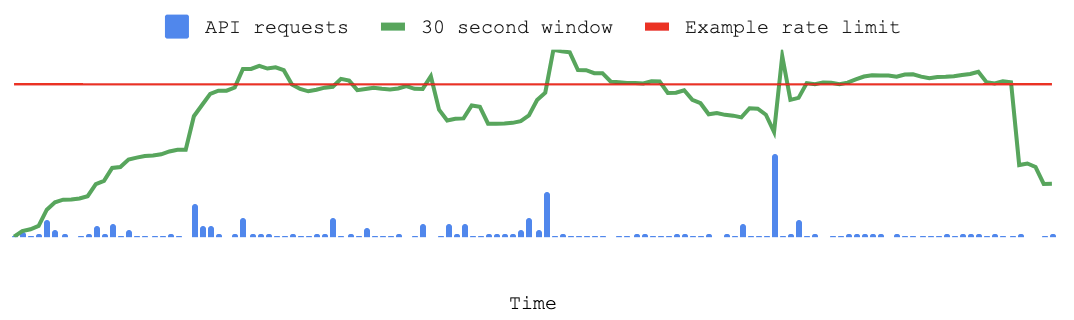 In the chart above, the app will receive an error response for the periods of time where the 30 second window exceeds the example rate limit in red. ### Exceptions Be aware that Spotify does sometimes implement other limits outside of the API-wide rate limit. A few API endpoints, like the playlist image upload endpoint, have a custom rate limit that may differ from your app-wide rate limit. See the body of your API response from Spotify for more information about the error that you have received. Building your app with rate limits in mind ------------------------------------------ Every app is different and you'll want to plan your app architecture and user experience with rate limits in mind. Here are a few techniques that can help you design an app that works well with Spotify's Web API rate limits: ### Apply for extended quota mode If your app is meant to be used by many Spotify users at the same time then you should apply for [extended quota mode](https://developer.spotify.com/documentation/web-api/concepts/quota-modes) . Apps in this mode have a rate limit that is much higher than apps in development mode, the default mode for new apps. You can apply for a quota extension by opening your app detail page in the [Developer Dashboard](https://developer.spotify.com/dashboard) and tapping on the Request Extension link. ### Develop a backoff-retry strategy When your app has been rate limited it will receive a 429 error response from Spotify. Your app can use this information as a cue to slow down the number of API requests that it makes to the Web API. The header of the 429 response will normally include a `Retry-After` header with a value in seconds. Consider waiting for the number of seconds specified in `Retry-After` before your app calls the Web API again. ### Use batch APIs to your advantage Spotify has some APIs — like the [Get Multiple Albums](https://developer.spotify.com/documentation/web-api/reference/get-multiple-albums) endpoint — that allow you to fetch a batch of data in one API request. You can reduce your API requests by calling the batch APIs when you know that you will need data from a set of objects. ### Use the snapshot\_id Playlist APIs expose a `snapshot_id` that corresponds to the version of the playlist that you are working with. Downloading a playlist can be expensive so some apps may want to store and refer to the `snapshot_id` to avoid refreshing an entire playlist that has not changed. You can learn more about `snapshot_id` in our [Working with Playlists](https://developer.spotify.com/documentation/web-api/concepts/playlists) guide. ### Study your app's request patterns When you load your app's detail page in the [Developer Dashboard](https://developer.spotify.com/dashboard) you'll find a graph that can tell you about your API request volume over time. Understanding anomalies in API requests — and the reasons for them — can help you find ways to avoid hitting the rate limit. For example, if you notice that your website receives a surge in traffic after you send out your weekly newsletter then you might decide that you want to stagger the delivery of those emails over the course of a day. For more advanced insights into your app's request patterns, consider tracking your app's API calls to Spotify using your own logging tools. ### Consider 'lazy loading' features Users often don't want to use every feature that is available to them on a web page, or in the view of a mobile app. You can avoid making API requests by making API calls conditional on user interactions, like tapping on a 'learn more' link, or scrolling to a defined region of a web page.  Tailored Advertising Opt-out ---------------------------- Spotify may collect and share some of your personal data associated with this browser or device with some of our partners for certain purposes such as targeted advertising on their platforms. For example, we may share your cookie data with a marketing partner to inform you of one of our latest promotions while you are on their platform. **The option below allows you to opt-out of the processing of such personal data** **Note**: Spotify may share additional personal data with third parties for tailored advertising purposes if you have a Spotify account. This toggle does not facilitate your privacy choices for any personal data associated with your Spotify account if you have not logged in. Please log in to your account to manage your privacy choices associated with your Spotify account. [Log in here](https://accounts.spotify.com/) ### Manage Consent Preferences #### Enable Tailored Advertising Enable Tailored Advertising * ##### First Party Targeting Cookies Switch Label label These cookies may be used to deliver targeted advertisements and to build a profile of your interests. If you do not allow these cookies you will still experience advertising but it will be less tailored to you. * ##### Store and access information on a device Switch Label label Cookies, device or similar online identifiers together with other information (e.g. browser type and information, language, screen size, supported technologies, etc.) can be stored or read on your device to recognise it each time it connects to an app or to a website, for one or several of the purposes presented here. #### Other Cookies used on this site Always Active * ##### Strictly Necessary Cookies Always Active These cookies are necessary for the service to function and cannot be switched off in our systems. They are usually only set in response to actions made by you which amount to a request for services, such as setting your privacy preferences, logging in or filling in forms. You can set your browser to block or alert you about these cookies, but some parts of the service will not then work. * ##### First Party Functional Cookies Always Active These cookies enable us to provide enhanced functionality and personalisation. If you do not allow these cookies then some or all of these services may not function properly. * ##### First Party Performance Cookies Always Active These cookies allow us to count visits and traffic sources so we can measure and improve the performance of our services. They help us to know which pages are the most and least popular and see how visitors move around the platform. If you do not allow these cookies we will not be able to monitor the performance of our services. * ##### Content Selection, Delivery, and Reporting Always Active These cookies are set by a range of social media services that we have added to the site to enable you to share our content with your friends and networks. They are capable of tracking your browser across other sites and building up a profile of your interests. This may impact the content and messages you see on other websites you visit. If you do not allow these cookies you may not be able to use or see these sharing tools. Back Button ### Cookie List Search Icon Filter Icon Clear checkbox label label Apply Cancel Consent Leg.Interest checkbox label label checkbox label label checkbox label label Confirm My Choices [](https://www.onetrust.com/products/cookie-consent/) --- # Playlists | Spotify for Developers [Skip to content](https://developer.spotify.com/documentation/web-api/concepts/playlists#main) Web API * [Overview](https://developer.spotify.com/documentation/web-api) * [Getting started](https://developer.spotify.com/documentation/web-api/tutorials/getting-started) * ConceptsConcepts Concepts* [Access Token](https://developer.spotify.com/documentation/web-api/concepts/access-token) * [API calls](https://developer.spotify.com/documentation/web-api/concepts/api-calls) * [Apps](https://developer.spotify.com/documentation/web-api/concepts/apps) * [Authorization](https://developer.spotify.com/documentation/web-api/concepts/authorization) * [Redirect URIs](https://developer.spotify.com/documentation/web-api/concepts/redirect_uri) * [Playlists](https://developer.spotify.com/documentation/web-api/concepts/playlists) * [Quota modes](https://developer.spotify.com/documentation/web-api/concepts/quota-modes) * [Rate limits](https://developer.spotify.com/documentation/web-api/concepts/rate-limits) * [Scopes](https://developer.spotify.com/documentation/web-api/concepts/scopes) * [Spotify URIs and IDs](https://developer.spotify.com/documentation/web-api/concepts/spotify-uris-ids) * [Track Relinking](https://developer.spotify.com/documentation/web-api/concepts/track-relinking) * TutorialsTutorials Tutorials* [Authorization code](https://developer.spotify.com/documentation/web-api/tutorials/code-flow) * [Authorization code PKCE](https://developer.spotify.com/documentation/web-api/tutorials/code-pkce-flow) * [Client credentials](https://developer.spotify.com/documentation/web-api/tutorials/client-credentials-flow) * [Implicit grant \[Deprecated\]](https://developer.spotify.com/documentation/web-api/tutorials/implicit-flow) * [Refreshing tokens](https://developer.spotify.com/documentation/web-api/tutorials/refreshing-tokens) * [Migration: Implicit grant to Authorization code](https://developer.spotify.com/documentation/web-api/tutorials/migration-implicit-auth-code) * [Migration: Insecure redirect URI](https://developer.spotify.com/documentation/web-api/tutorials/migration-insecure-redirect-uri) * How-TosHow-Tos How-Tos* [Display your Spotify profile data in a web app](https://developer.spotify.com/documentation/web-api/howtos/web-app-profile) Reference * AlbumsAlbums Albums* [Get Album](https://developer.spotify.com/documentation/web-api/reference/get-an-album) * [Get Several Albums](https://developer.spotify.com/documentation/web-api/reference/get-multiple-albums) * [Get Album Tracks](https://developer.spotify.com/documentation/web-api/reference/get-an-albums-tracks) * [Get User's Saved Albums](https://developer.spotify.com/documentation/web-api/reference/get-users-saved-albums) * [Save Albums for Current User](https://developer.spotify.com/documentation/web-api/reference/save-albums-user) * [Remove Users' Saved Albums](https://developer.spotify.com/documentation/web-api/reference/remove-albums-user) * [Check User's Saved Albums](https://developer.spotify.com/documentation/web-api/reference/check-users-saved-albums) * [Get New Releases](https://developer.spotify.com/documentation/web-api/reference/get-new-releases) * ArtistsArtists Artists* [Get Artist](https://developer.spotify.com/documentation/web-api/reference/get-an-artist) * [Get Several Artists](https://developer.spotify.com/documentation/web-api/reference/get-multiple-artists) * [Get Artist's Albums](https://developer.spotify.com/documentation/web-api/reference/get-an-artists-albums) * [Get Artist's Top Tracks](https://developer.spotify.com/documentation/web-api/reference/get-an-artists-top-tracks) * [Get Artist's Related Artists](https://developer.spotify.com/documentation/web-api/reference/get-an-artists-related-artists) * AudiobooksAudiobooks Audiobooks* [Get an Audiobook](https://developer.spotify.com/documentation/web-api/reference/get-an-audiobook) * [Get Several Audiobooks](https://developer.spotify.com/documentation/web-api/reference/get-multiple-audiobooks) * [Get Audiobook Chapters](https://developer.spotify.com/documentation/web-api/reference/get-audiobook-chapters) * [Get User's Saved Audiobooks](https://developer.spotify.com/documentation/web-api/reference/get-users-saved-audiobooks) * [Save Audiobooks for Current User](https://developer.spotify.com/documentation/web-api/reference/save-audiobooks-user) * [Remove User's Saved Audiobooks](https://developer.spotify.com/documentation/web-api/reference/remove-audiobooks-user) * [Check User's Saved Audiobooks](https://developer.spotify.com/documentation/web-api/reference/check-users-saved-audiobooks) * CategoriesCategories Categories* [Get Several Browse Categories](https://developer.spotify.com/documentation/web-api/reference/get-categories) * [Get Single Browse Category](https://developer.spotify.com/documentation/web-api/reference/get-a-category) * ChaptersChapters Chapters* [Get a Chapter](https://developer.spotify.com/documentation/web-api/reference/get-a-chapter) * [Get Several Chapters](https://developer.spotify.com/documentation/web-api/reference/get-several-chapters) * EpisodesEpisodes Episodes* [Get Episode](https://developer.spotify.com/documentation/web-api/reference/get-an-episode) * [Get Several Episodes](https://developer.spotify.com/documentation/web-api/reference/get-multiple-episodes) * [Get User's Saved Episodes](https://developer.spotify.com/documentation/web-api/reference/get-users-saved-episodes) * [Save Episodes for Current User](https://developer.spotify.com/documentation/web-api/reference/save-episodes-user) * [Remove User's Saved Episodes](https://developer.spotify.com/documentation/web-api/reference/remove-episodes-user) * [Check User's Saved Episodes](https://developer.spotify.com/documentation/web-api/reference/check-users-saved-episodes) * GenresGenres Genres* [Get Available Genre Seeds](https://developer.spotify.com/documentation/web-api/reference/get-recommendation-genres) * MarketsMarkets Markets* [Get Available Markets](https://developer.spotify.com/documentation/web-api/reference/get-available-markets) * PlayerPlayer Player* [Get Playback State](https://developer.spotify.com/documentation/web-api/reference/get-information-about-the-users-current-playback) * [Transfer Playback](https://developer.spotify.com/documentation/web-api/reference/transfer-a-users-playback) * [Get Available Devices](https://developer.spotify.com/documentation/web-api/reference/get-a-users-available-devices) * [Get Currently Playing Track](https://developer.spotify.com/documentation/web-api/reference/get-the-users-currently-playing-track) * [Start/Resume Playback](https://developer.spotify.com/documentation/web-api/reference/start-a-users-playback) * [Pause Playback](https://developer.spotify.com/documentation/web-api/reference/pause-a-users-playback) * [Skip To Next](https://developer.spotify.com/documentation/web-api/reference/skip-users-playback-to-next-track) * [Skip To Previous](https://developer.spotify.com/documentation/web-api/reference/skip-users-playback-to-previous-track) * [Seek To Position](https://developer.spotify.com/documentation/web-api/reference/seek-to-position-in-currently-playing-track) * [Set Repeat Mode](https://developer.spotify.com/documentation/web-api/reference/set-repeat-mode-on-users-playback) * [Set Playback Volume](https://developer.spotify.com/documentation/web-api/reference/set-volume-for-users-playback) * [Toggle Playback Shuffle](https://developer.spotify.com/documentation/web-api/reference/toggle-shuffle-for-users-playback) * [Get Recently Played Tracks](https://developer.spotify.com/documentation/web-api/reference/get-recently-played) * [Get the User's Queue](https://developer.spotify.com/documentation/web-api/reference/get-queue) * [Add Item to Playback Queue](https://developer.spotify.com/documentation/web-api/reference/add-to-queue) * PlaylistsPlaylists Playlists* [Get Playlist](https://developer.spotify.com/documentation/web-api/reference/get-playlist) * [Change Playlist Details](https://developer.spotify.com/documentation/web-api/reference/change-playlist-details) * [Get Playlist Items](https://developer.spotify.com/documentation/web-api/reference/get-playlists-tracks) * [Update Playlist Items](https://developer.spotify.com/documentation/web-api/reference/reorder-or-replace-playlists-tracks) * [Add Items to Playlist](https://developer.spotify.com/documentation/web-api/reference/add-tracks-to-playlist) * [Remove Playlist Items](https://developer.spotify.com/documentation/web-api/reference/remove-tracks-playlist) * [Get Current User's Playlists](https://developer.spotify.com/documentation/web-api/reference/get-a-list-of-current-users-playlists) * [Get User's Playlists](https://developer.spotify.com/documentation/web-api/reference/get-list-users-playlists) * [Create Playlist](https://developer.spotify.com/documentation/web-api/reference/create-playlist) * [Get Featured Playlists](https://developer.spotify.com/documentation/web-api/reference/get-featured-playlists) * [Get Category's Playlists](https://developer.spotify.com/documentation/web-api/reference/get-a-categories-playlists) * [Get Playlist Cover Image](https://developer.spotify.com/documentation/web-api/reference/get-playlist-cover) * [Add Custom Playlist Cover Image](https://developer.spotify.com/documentation/web-api/reference/upload-custom-playlist-cover) * SearchSearch Search* [Search for Item](https://developer.spotify.com/documentation/web-api/reference/search) * ShowsShows Shows* [Get Show](https://developer.spotify.com/documentation/web-api/reference/get-a-show) * [Get Several Shows](https://developer.spotify.com/documentation/web-api/reference/get-multiple-shows) * [Get Show Episodes](https://developer.spotify.com/documentation/web-api/reference/get-a-shows-episodes) * [Get User's Saved Shows](https://developer.spotify.com/documentation/web-api/reference/get-users-saved-shows) * [Save Shows for Current User](https://developer.spotify.com/documentation/web-api/reference/save-shows-user) * [Remove User's Saved Shows](https://developer.spotify.com/documentation/web-api/reference/remove-shows-user) * [Check User's Saved Shows](https://developer.spotify.com/documentation/web-api/reference/check-users-saved-shows) * TracksTracks Tracks* [Get Track](https://developer.spotify.com/documentation/web-api/reference/get-track) * [Get Several Tracks](https://developer.spotify.com/documentation/web-api/reference/get-several-tracks) * [Get User's Saved Tracks](https://developer.spotify.com/documentation/web-api/reference/get-users-saved-tracks) * [Save Tracks for Current User](https://developer.spotify.com/documentation/web-api/reference/save-tracks-user) * [Remove User's Saved Tracks](https://developer.spotify.com/documentation/web-api/reference/remove-tracks-user) * [Check User's Saved Tracks](https://developer.spotify.com/documentation/web-api/reference/check-users-saved-tracks) * [Get Several Tracks' Audio Features](https://developer.spotify.com/documentation/web-api/reference/get-several-audio-features) * [Get Track's Audio Features](https://developer.spotify.com/documentation/web-api/reference/get-audio-features) * [Get Track's Audio Analysis](https://developer.spotify.com/documentation/web-api/reference/get-audio-analysis) * [Get Recommendations](https://developer.spotify.com/documentation/web-api/reference/get-recommendations) * UsersUsers Users* [Get Current User's Profile](https://developer.spotify.com/documentation/web-api/reference/get-current-users-profile) * [Get User's Top Items](https://developer.spotify.com/documentation/web-api/reference/get-users-top-artists-and-tracks) * [Get User's Profile](https://developer.spotify.com/documentation/web-api/reference/get-users-profile) * [Follow Playlist](https://developer.spotify.com/documentation/web-api/reference/follow-playlist) * [Unfollow Playlist](https://developer.spotify.com/documentation/web-api/reference/unfollow-playlist) * [Get Followed Artists](https://developer.spotify.com/documentation/web-api/reference/get-followed) * [Follow Artists or Users](https://developer.spotify.com/documentation/web-api/reference/follow-artists-users) * [Unfollow Artists or Users](https://developer.spotify.com/documentation/web-api/reference/unfollow-artists-users) * [Check If User Follows Artists or Users](https://developer.spotify.com/documentation/web-api/reference/check-current-user-follows) * [Check if Current User Follows Playlist](https://developer.spotify.com/documentation/web-api/reference/check-if-user-follows-playlist) Playlists ========= Playlists are containers for tracks and episodes. Spotify’s users have already created over 1.5 billion of them. By creating a playlist, a Spotify user can specify a subset of tracks and episodes; and the order in which to play them. Through context menus and through support for drag-and-drop actions, the Spotify music players provide users with various controls for manually working with playlists. Playlists can be shared with, and followed by, other users, and they can be made available offline and used to seed other Spotify services, like radio. 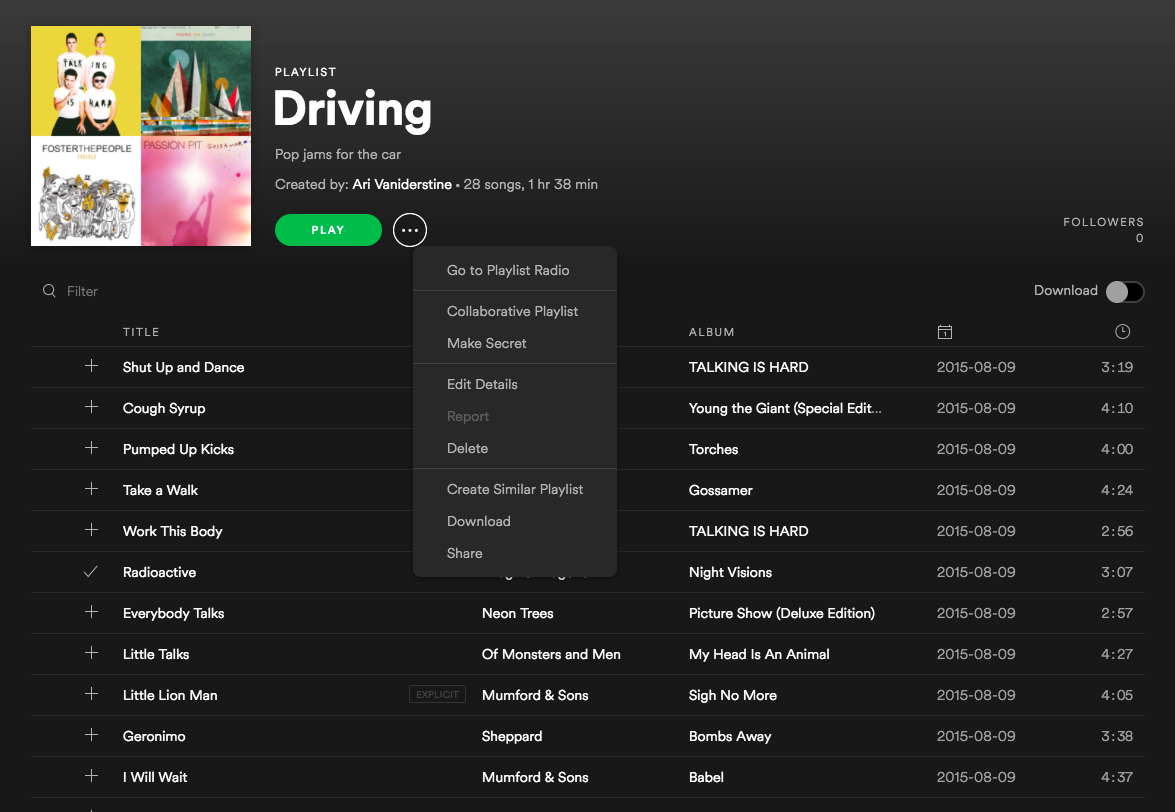 Public, Private, and Collaborative Status ----------------------------------------- When [creating](https://developer.spotify.com/documentation/web-api/reference/create-playlist) or [updating](https://developer.spotify.com/documentation/web-api/reference/change-playlist-details) a playlist through the Spotify Web API, setting the attribute “public” to true will publish the playlist on the user’s profile, which means it will appear under “public playlists”. This will also make the playlist visible in search results. A playlist created through the WebAPI will have the “public” attribute set to true by default and setting it to false does the opposite, it won’t be displayed on the user’s profile and won’t be visible through search results Requests to these endpoints require different scopes depending on the status of this attribute, `playlist-modify-public` is required when setting it to true and `playlist-modify-private` when setting it to false. When [creating](https://developer.spotify.com/documentation/web-api/reference/create-playlist) a new playlist, the default value of the public attribute is true, which means unless this attribute is explicitly set to false, creating a playlist requires the `playlist-modify-public` scope. Note that the public attribute does not refer to access control, modifying access is currently not possible through the WebAPI, so anyone with the link to the playlist can access it unless it’s made private through for instance the desktop client. A playlist can also be made collaborative through the WebAPI, by setting the “collaborative” attribute to true. This means that anyone with the link can add to or remove a track from it. When [creating](https://developer.spotify.com/documentation/web-api/reference/create-playlist) a new playlist, the default value of the collaborative attribute is false Note that this is slightly different from adding/removing collaborators, which is currently not possible through the WebAPI. You can read more about adding/removing collaborators [here](https://support.spotify.com/us/article/collaborative-playlists/) . Furthermore, a playlist cannot have both the “collaborative” attribute and the “public” attribute set to true at the same time, so in order to set one of them to true the other must be set to false. Basically, a playlist cannot be both collaborative and published at the same time. Reading a Playlist ------------------ To read a playlist, we first need to find it, and for that we need its [Spotify ID](https://developer.spotify.com/documentation/web-api/concepts/spotify-uris-ids) . The [Get a List of a User’s Playlists](https://developer.spotify.com/documentation/web-api/reference/get-list-users-playlists) gives us an easy way to get basic details about a user’s playlists, including their IDs. This is, the playlists the user owns and the playlists the user is following, excluding collaborative playlists owned by other users. The set of playlists will be determined by the scopes granted to the application: * Owned and followed non-collaborative public playlists will be returned * Owned and followed non-collaborative private playlists will only be returned when the scope `playlist-read-private` has been granted * Owned and followed collaborative playlists will only be returned when the scope `playlist-read-collaborative` has been granted Once we have a list of playlists we can retrieve the details of a specific playlist using the Web API’s [Get a Playlist](https://developer.spotify.com/documentation/web-api/reference/get-playlist) endpoint, and a list of its items using [Get a Playlist’s Items](https://developer.spotify.com/documentation/web-api/reference/get-playlists-tracks) . This last endpoint returns, in addition to an array of track and episode objects (depending on the `additional_types` parameter), information about who added the item and when it was added. (The items themselves are wrapped in a paging object to make it easy to retrieve very large playlists when necessary.) Local Files ----------- Spotify allows you to play your own collection of music files from within the Spotify client. These tracks appear alongside the music available on Spotify and can be included in users’ playlists, even if that particular track is not available on Spotify itself. For more information on local files, please read our [support article](https://support.spotify.com/article/local-files/) . The Web API can retrieve the contents of playlists, including information on any local files that have been added, via the [Playlist endpoints](https://developer.spotify.com/documentation/web-api/reference/get-playlist) . ### Identifying Local Files Requesting the contents of a playlist returns a set of track objects along with extra information about that track’s instance in the playlist. For example: ` 1 { 2 "added_at": "2015-01-25T07:51:45Z", 3 "added_by": { 4 "external_urls": { 5 "spotify": "http://open.spotify.com/user/exampleuser" 6 }, 7 "href": "https://api.spotify.com/v1/users/exampleuser", 8 "id": "exampleuser", 9 "type": "user", 10 "uri": "spotify:user:exampleuser" 11 }, 12 "is_local": true, 13 "track": { 14 [Spotify Track Object] 15 } ` The key part here is the new property `"is_local"` which should be used to determine whether the track is a local file. ### The Track Object for a Local File The structure of a Spotify track object for a local file is identical to that of a regular Spotify track, with some notable differences in available data: * A number of fields will always be empty, zero, false or null * Some fields are populated from available local file information * The track URI has a special formatting ` 1 "track": { 2 "album": { 3 "album_type": null, 4 "available_markets": [], 5 "external_urls": {}, 6 "href": null, 7 "id": null, 8 "images": [], 9 "name": "Donkey Kong Country: Tropical Freeze", 10 "type": "album", 11 "uri": null 12 }, 13 "artists": [ 14 { 15 "external_urls": {}, 16 "href": null, 17 "id": null, 18 "name": "David Wise", 19 "type": "artist", 20 "uri": null 21 } 22 ], 23 "available_markets": [], 24 "disc_number": 0, 25 "duration_ms": 127000, 26 "explicit": false, 27 "external_ids": {}, 28 "external_urls": {}, 29 "href": null, 30 "id": null, 31 "name": "Snomads Island", 32 "popularity": 0, 33 "preview_url": null, 34 "track_number": 0, 35 "type": "track", 36 "uri": "spotify:local:David+Wise:Donkey+Kong+Country%3A+Tropical+Freeze:Snomads+Island:127" 37 } 38 } ` The local file information is read by the client software when the file was added to the playlist. Although as much information as possible is taken from the local file, some may be missing so this information is not guaranteed to exist for all local files. ### Understanding the Local File URI The local file URI is constructed from information extracted from the local file when it was added to the playlist as follows: `spotify:local:{artist}:{album_title}:{track_title}:{duration_in_seconds}` All available information is also used to populate the object album name, artist name, track name and track duration properties, so parsing this directly should not be necessary. ### How Should I Render Local Files to the User? Whether you display these files to your app’s users is entirely dependent on the functionality that you require in your app. Initially, you could “grey out” the tracks or hide them altogether. If you have access to the filesystem, you could use the information to match the track to the file and replicate the Spotify clients’ behaviour. Or perhaps use the title and artist information to [perform a search](https://developer.spotify.com/documentation/web-api/reference/search) in the Spotify catalogue. ### Limitations It is not currently possible to add local files to playlists using the Web API, but they can be [Reordered](https://developer.spotify.com/documentation/web-api/reference/reorder-or-replace-playlists-tracks) or [Removed](https://developer.spotify.com/documentation/web-api/reference/remove-tracks-playlist) . The latter should be done by specifying the `index` and `snapshot_id`, and NOT the URI of the track. Folders ------- Folders are not returned through the Web API, nor can be created using it. Version Control and Snapshots ----------------------------- The Web API provides several endpoints that allow playlists to be modified. These include [Add Items to a Playlist](https://developer.spotify.com/documentation/web-api/reference/add-tracks-to-playlist) , [Remove Items from a Playlist](https://developer.spotify.com/documentation/web-api/reference/remove-tracks-playlist) , [Replace a Playlist’s Items](https://developer.spotify.com/documentation/web-api/reference/reorder-or-replace-playlists-tracks) and [Reorder a Playlist’s Items](https://developer.spotify.com/documentation/web-api/reference/reorder-or-replace-playlists-tracks) . Every change to a playlist is saved in its version history. This makes possible features such as offline availability and collaborative editing, and [restoring an accidentally removed playlist](https://www.spotify.com/account/recover-playlists/) . Every time you add, remove, or move a track, your modification is applied on top of all previous modifications, causing the playlist to enter a new state known as a **snapshot**. 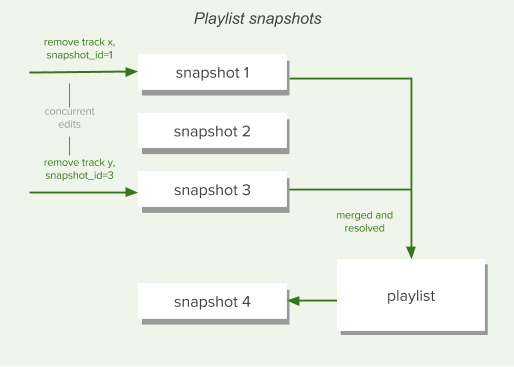 If you need it, the Spotify Web API allows you to leverage snapshots to handle concurrent changes. Web API playlist endpoints like [Create a Playlist](https://developer.spotify.com/documentation/web-api/reference/create-playlist) and [Get a Playlist](https://developer.spotify.com/documentation/web-api/reference/get-playlist) , return a **snapshot\_id** in the response body. This can be used later to identify the specific playlist version to target for changes when, for example, [Removing Items from a Playlist](https://developer.spotify.com/documentation/web-api/reference/remove-tracks-playlist) . Concurrent changes are then automatically merged into the latest playlist version. Following and Unfollowing a Playlist ------------------------------------ Playlists can be followed or unfollowed programmatically through the [Follow a Playlist](https://developer.spotify.com/documentation/web-api/reference/follow-playlist) and [Unfollow a Playlist](https://developer.spotify.com/documentation/web-api/reference/unfollow-playlist) endpoints. Any playlist can be followed — public, private, and collaborative — provided you know the owner’s and the playlist’s Spotify IDs. When a user follows a playlist, the playlist’s owner will receive a notification in their Spotify client. When a track is added to a playlist, its followers will receive a notification in their Spotify client. We have no endpoint for deleting a playlist in the Web API; the notion of deleting a playlist is not relevant within the Spotify’s playlist system. Even if you are the playlist’s owner and you choose to manually remove it from your own list of playlists, you are simply unfollowing it. Although this behavior may sound strange, it means that other users who are already following the playlist can keep enjoying it. [Manually restoring a deleted playlist](https://www.spotify.com/se/account/recover-playlists/) through the Spotify Accounts Service is the same thing as following one of your own playlists that you have previously unfollowed. Using Playlist Images --------------------- Every playlist has an associated set of images which can be retrieved through Web API endpoints like [Get a Playlist](https://developer.spotify.com/documentation/web-api/reference/get-playlist) . In most cases there will be one image in a variety of sizes and the image will be a mosaic created from the album covers for the first few tracks:  The images array that’s returned can vary depending on how many tracks are in the playlist, and if the playlist has been manually “annotated”. The `images` array can contain: * Nothing, if the playlist has no tracks and is empty, * An album cover of size 640×640, if the playlist contains 1 to 3 tracks or has tracks from less than 4 different albums, * Three mosaic images of size 640×640, 300×300, and 60×60, if the playlist contains tracks from 4 or more albums, * A single custom image ([example](http://open.spotify.com/user/thelinmichael/playlist/3EsfV6XzCHU8SPNdbnFogK) ) in various sizes, if the playlist image has been set manually — for example, for some curated playlists. The JSON returned by the Web API endpoints includes both the image dimensions (largest first) and a _temporary_ link to the images: ` 1 ... 2 3 "images" : [ { 4 "height" : 640, 5 "url" : "https://mosaic.scdn.co/640/e337f3661f68bc4d96a554de0ad7988d65edb25a134cd5ccaef9d411eba33df9542db9ba731aaf98ec04f9acee17a7576f939eb5aa317d20c6322494c4b4399d9b7c6f61b6a6ee70c616bc1a985c7ab8", 6 "width" : 640 7 }, { 8 "height" : 300, 9 "url" : "https://mosaic.scdn.co/300/e337f3661f68bc4d96a554de0ad7988d65edb25a134cd5ccaef9d411eba33df9542db9ba731aaf98ec04f9acee17a7576f939eb5aa317d20c6322494c4b4399d9b7c6f61b6a6ee70c616bc1a985c7ab8", 10 "width" : 300 11 }, { 12 "height" : 60, 13 "url" : "https://mosaic.scdn.co/60/e337f3661f68bc4d96a554de0ad7988d65edb25a134cd5ccaef9d411eba33df9542db9ba731aaf98ec04f9acee17a7576f939eb5aa317d20c6322494c4b4399d9b7c6f61b6a6ee70c616bc1a985c7ab8", 14 "width" : 60 15 } ], 16 17 ... ` Info:Be aware that the links will expire in less than one day. The use of album artwork in your applications is covered by our [Developer Terms of Service](https://developer.spotify.com/terms) . In particular you should be aware that: * You must display the album artwork in the form that we provide it (although you can resize it), * You should not store album artwork except when it is strictly necessary to operate your application, and * You must provide a link close to the cover art back to the full length track on Spotify. We provide [design resources](https://developer.spotify.com/documentation/design) to help you with this.  Tailored Advertising Opt-out ---------------------------- Spotify may collect and share some of your personal data associated with this browser or device with some of our partners for certain purposes such as targeted advertising on their platforms. For example, we may share your cookie data with a marketing partner to inform you of one of our latest promotions while you are on their platform. **The option below allows you to opt-out of the processing of such personal data** **Note**: Spotify may share additional personal data with third parties for tailored advertising purposes if you have a Spotify account. This toggle does not facilitate your privacy choices for any personal data associated with your Spotify account if you have not logged in. Please log in to your account to manage your privacy choices associated with your Spotify account. [Log in here](https://accounts.spotify.com/) ### Manage Consent Preferences #### Enable Tailored Advertising Enable Tailored Advertising * ##### First Party Targeting Cookies Switch Label label These cookies may be used to deliver targeted advertisements and to build a profile of your interests. If you do not allow these cookies you will still experience advertising but it will be less tailored to you. * ##### Store and access information on a device Switch Label label Cookies, device or similar online identifiers together with other information (e.g. browser type and information, language, screen size, supported technologies, etc.) can be stored or read on your device to recognise it each time it connects to an app or to a website, for one or several of the purposes presented here. #### Other Cookies used on this site Always Active * ##### Strictly Necessary Cookies Always Active These cookies are necessary for the service to function and cannot be switched off in our systems. They are usually only set in response to actions made by you which amount to a request for services, such as setting your privacy preferences, logging in or filling in forms. You can set your browser to block or alert you about these cookies, but some parts of the service will not then work. * ##### First Party Functional Cookies Always Active These cookies enable us to provide enhanced functionality and personalisation. If you do not allow these cookies then some or all of these services may not function properly. * ##### First Party Performance Cookies Always Active These cookies allow us to count visits and traffic sources so we can measure and improve the performance of our services. They help us to know which pages are the most and least popular and see how visitors move around the platform. If you do not allow these cookies we will not be able to monitor the performance of our services. * ##### Content Selection, Delivery, and Reporting Always Active These cookies are set by a range of social media services that we have added to the site to enable you to share our content with your friends and networks. They are capable of tracking your browser across other sites and building up a profile of your interests. This may impact the content and messages you see on other websites you visit. If you do not allow these cookies you may not be able to use or see these sharing tools. Back Button ### Cookie List Search Icon Filter Icon Clear checkbox label label Apply Cancel Consent Leg.Interest checkbox label label checkbox label label checkbox label label Confirm My Choices [](https://www.onetrust.com/products/cookie-consent/) --- # Redirect URIs | Spotify for Developers [Skip to content](https://developer.spotify.com/documentation/web-api/concepts/redirect_uri#main) Web API * [Overview](https://developer.spotify.com/documentation/web-api) * [Getting started](https://developer.spotify.com/documentation/web-api/tutorials/getting-started) * ConceptsConcepts Concepts* [Access Token](https://developer.spotify.com/documentation/web-api/concepts/access-token) * [API calls](https://developer.spotify.com/documentation/web-api/concepts/api-calls) * [Apps](https://developer.spotify.com/documentation/web-api/concepts/apps) * [Authorization](https://developer.spotify.com/documentation/web-api/concepts/authorization) * [Redirect URIs](https://developer.spotify.com/documentation/web-api/concepts/redirect_uri) * [Playlists](https://developer.spotify.com/documentation/web-api/concepts/playlists) * [Quota modes](https://developer.spotify.com/documentation/web-api/concepts/quota-modes) * [Rate limits](https://developer.spotify.com/documentation/web-api/concepts/rate-limits) * [Scopes](https://developer.spotify.com/documentation/web-api/concepts/scopes) * [Spotify URIs and IDs](https://developer.spotify.com/documentation/web-api/concepts/spotify-uris-ids) * [Track Relinking](https://developer.spotify.com/documentation/web-api/concepts/track-relinking) * TutorialsTutorials Tutorials* [Authorization code](https://developer.spotify.com/documentation/web-api/tutorials/code-flow) * [Authorization code PKCE](https://developer.spotify.com/documentation/web-api/tutorials/code-pkce-flow) * [Client credentials](https://developer.spotify.com/documentation/web-api/tutorials/client-credentials-flow) * [Implicit grant \[Deprecated\]](https://developer.spotify.com/documentation/web-api/tutorials/implicit-flow) * [Refreshing tokens](https://developer.spotify.com/documentation/web-api/tutorials/refreshing-tokens) * [Migration: Implicit grant to Authorization code](https://developer.spotify.com/documentation/web-api/tutorials/migration-implicit-auth-code) * [Migration: Insecure redirect URI](https://developer.spotify.com/documentation/web-api/tutorials/migration-insecure-redirect-uri) * How-TosHow-Tos How-Tos* [Display your Spotify profile data in a web app](https://developer.spotify.com/documentation/web-api/howtos/web-app-profile) Reference * AlbumsAlbums Albums* [Get Album](https://developer.spotify.com/documentation/web-api/reference/get-an-album) * [Get Several Albums](https://developer.spotify.com/documentation/web-api/reference/get-multiple-albums) * [Get Album Tracks](https://developer.spotify.com/documentation/web-api/reference/get-an-albums-tracks) * [Get User's Saved Albums](https://developer.spotify.com/documentation/web-api/reference/get-users-saved-albums) * [Save Albums for Current User](https://developer.spotify.com/documentation/web-api/reference/save-albums-user) * [Remove Users' Saved Albums](https://developer.spotify.com/documentation/web-api/reference/remove-albums-user) * [Check User's Saved Albums](https://developer.spotify.com/documentation/web-api/reference/check-users-saved-albums) * [Get New Releases](https://developer.spotify.com/documentation/web-api/reference/get-new-releases) * ArtistsArtists Artists* [Get Artist](https://developer.spotify.com/documentation/web-api/reference/get-an-artist) * [Get Several Artists](https://developer.spotify.com/documentation/web-api/reference/get-multiple-artists) * [Get Artist's Albums](https://developer.spotify.com/documentation/web-api/reference/get-an-artists-albums) * [Get Artist's Top Tracks](https://developer.spotify.com/documentation/web-api/reference/get-an-artists-top-tracks) * [Get Artist's Related Artists](https://developer.spotify.com/documentation/web-api/reference/get-an-artists-related-artists) * AudiobooksAudiobooks Audiobooks* [Get an Audiobook](https://developer.spotify.com/documentation/web-api/reference/get-an-audiobook) * [Get Several Audiobooks](https://developer.spotify.com/documentation/web-api/reference/get-multiple-audiobooks) * [Get Audiobook Chapters](https://developer.spotify.com/documentation/web-api/reference/get-audiobook-chapters) * [Get User's Saved Audiobooks](https://developer.spotify.com/documentation/web-api/reference/get-users-saved-audiobooks) * [Save Audiobooks for Current User](https://developer.spotify.com/documentation/web-api/reference/save-audiobooks-user) * [Remove User's Saved Audiobooks](https://developer.spotify.com/documentation/web-api/reference/remove-audiobooks-user) * [Check User's Saved Audiobooks](https://developer.spotify.com/documentation/web-api/reference/check-users-saved-audiobooks) * CategoriesCategories Categories* [Get Several Browse Categories](https://developer.spotify.com/documentation/web-api/reference/get-categories) * [Get Single Browse Category](https://developer.spotify.com/documentation/web-api/reference/get-a-category) * ChaptersChapters Chapters* [Get a Chapter](https://developer.spotify.com/documentation/web-api/reference/get-a-chapter) * [Get Several Chapters](https://developer.spotify.com/documentation/web-api/reference/get-several-chapters) * EpisodesEpisodes Episodes* [Get Episode](https://developer.spotify.com/documentation/web-api/reference/get-an-episode) * [Get Several Episodes](https://developer.spotify.com/documentation/web-api/reference/get-multiple-episodes) * [Get User's Saved Episodes](https://developer.spotify.com/documentation/web-api/reference/get-users-saved-episodes) * [Save Episodes for Current User](https://developer.spotify.com/documentation/web-api/reference/save-episodes-user) * [Remove User's Saved Episodes](https://developer.spotify.com/documentation/web-api/reference/remove-episodes-user) * [Check User's Saved Episodes](https://developer.spotify.com/documentation/web-api/reference/check-users-saved-episodes) * GenresGenres Genres* [Get Available Genre Seeds](https://developer.spotify.com/documentation/web-api/reference/get-recommendation-genres) * MarketsMarkets Markets* [Get Available Markets](https://developer.spotify.com/documentation/web-api/reference/get-available-markets) * PlayerPlayer Player* [Get Playback State](https://developer.spotify.com/documentation/web-api/reference/get-information-about-the-users-current-playback) * [Transfer Playback](https://developer.spotify.com/documentation/web-api/reference/transfer-a-users-playback) * [Get Available Devices](https://developer.spotify.com/documentation/web-api/reference/get-a-users-available-devices) * [Get Currently Playing Track](https://developer.spotify.com/documentation/web-api/reference/get-the-users-currently-playing-track) * [Start/Resume Playback](https://developer.spotify.com/documentation/web-api/reference/start-a-users-playback) * [Pause Playback](https://developer.spotify.com/documentation/web-api/reference/pause-a-users-playback) * [Skip To Next](https://developer.spotify.com/documentation/web-api/reference/skip-users-playback-to-next-track) * [Skip To Previous](https://developer.spotify.com/documentation/web-api/reference/skip-users-playback-to-previous-track) * [Seek To Position](https://developer.spotify.com/documentation/web-api/reference/seek-to-position-in-currently-playing-track) * [Set Repeat Mode](https://developer.spotify.com/documentation/web-api/reference/set-repeat-mode-on-users-playback) * [Set Playback Volume](https://developer.spotify.com/documentation/web-api/reference/set-volume-for-users-playback) * [Toggle Playback Shuffle](https://developer.spotify.com/documentation/web-api/reference/toggle-shuffle-for-users-playback) * [Get Recently Played Tracks](https://developer.spotify.com/documentation/web-api/reference/get-recently-played) * [Get the User's Queue](https://developer.spotify.com/documentation/web-api/reference/get-queue) * [Add Item to Playback Queue](https://developer.spotify.com/documentation/web-api/reference/add-to-queue) * PlaylistsPlaylists Playlists* [Get Playlist](https://developer.spotify.com/documentation/web-api/reference/get-playlist) * [Change Playlist Details](https://developer.spotify.com/documentation/web-api/reference/change-playlist-details) * [Get Playlist Items](https://developer.spotify.com/documentation/web-api/reference/get-playlists-tracks) * [Update Playlist Items](https://developer.spotify.com/documentation/web-api/reference/reorder-or-replace-playlists-tracks) * [Add Items to Playlist](https://developer.spotify.com/documentation/web-api/reference/add-tracks-to-playlist) * [Remove Playlist Items](https://developer.spotify.com/documentation/web-api/reference/remove-tracks-playlist) * [Get Current User's Playlists](https://developer.spotify.com/documentation/web-api/reference/get-a-list-of-current-users-playlists) * [Get User's Playlists](https://developer.spotify.com/documentation/web-api/reference/get-list-users-playlists) * [Create Playlist](https://developer.spotify.com/documentation/web-api/reference/create-playlist) * [Get Featured Playlists](https://developer.spotify.com/documentation/web-api/reference/get-featured-playlists) * [Get Category's Playlists](https://developer.spotify.com/documentation/web-api/reference/get-a-categories-playlists) * [Get Playlist Cover Image](https://developer.spotify.com/documentation/web-api/reference/get-playlist-cover) * [Add Custom Playlist Cover Image](https://developer.spotify.com/documentation/web-api/reference/upload-custom-playlist-cover) * SearchSearch Search* [Search for Item](https://developer.spotify.com/documentation/web-api/reference/search) * ShowsShows Shows* [Get Show](https://developer.spotify.com/documentation/web-api/reference/get-a-show) * [Get Several Shows](https://developer.spotify.com/documentation/web-api/reference/get-multiple-shows) * [Get Show Episodes](https://developer.spotify.com/documentation/web-api/reference/get-a-shows-episodes) * [Get User's Saved Shows](https://developer.spotify.com/documentation/web-api/reference/get-users-saved-shows) * [Save Shows for Current User](https://developer.spotify.com/documentation/web-api/reference/save-shows-user) * [Remove User's Saved Shows](https://developer.spotify.com/documentation/web-api/reference/remove-shows-user) * [Check User's Saved Shows](https://developer.spotify.com/documentation/web-api/reference/check-users-saved-shows) * TracksTracks Tracks* [Get Track](https://developer.spotify.com/documentation/web-api/reference/get-track) * [Get Several Tracks](https://developer.spotify.com/documentation/web-api/reference/get-several-tracks) * [Get User's Saved Tracks](https://developer.spotify.com/documentation/web-api/reference/get-users-saved-tracks) * [Save Tracks for Current User](https://developer.spotify.com/documentation/web-api/reference/save-tracks-user) * [Remove User's Saved Tracks](https://developer.spotify.com/documentation/web-api/reference/remove-tracks-user) * [Check User's Saved Tracks](https://developer.spotify.com/documentation/web-api/reference/check-users-saved-tracks) * [Get Several Tracks' Audio Features](https://developer.spotify.com/documentation/web-api/reference/get-several-audio-features) * [Get Track's Audio Features](https://developer.spotify.com/documentation/web-api/reference/get-audio-features) * [Get Track's Audio Analysis](https://developer.spotify.com/documentation/web-api/reference/get-audio-analysis) * [Get Recommendations](https://developer.spotify.com/documentation/web-api/reference/get-recommendations) * UsersUsers Users* [Get Current User's Profile](https://developer.spotify.com/documentation/web-api/reference/get-current-users-profile) * [Get User's Top Items](https://developer.spotify.com/documentation/web-api/reference/get-users-top-artists-and-tracks) * [Get User's Profile](https://developer.spotify.com/documentation/web-api/reference/get-users-profile) * [Follow Playlist](https://developer.spotify.com/documentation/web-api/reference/follow-playlist) * [Unfollow Playlist](https://developer.spotify.com/documentation/web-api/reference/unfollow-playlist) * [Get Followed Artists](https://developer.spotify.com/documentation/web-api/reference/get-followed) * [Follow Artists or Users](https://developer.spotify.com/documentation/web-api/reference/follow-artists-users) * [Unfollow Artists or Users](https://developer.spotify.com/documentation/web-api/reference/unfollow-artists-users) * [Check If User Follows Artists or Users](https://developer.spotify.com/documentation/web-api/reference/check-current-user-follows) * [Check if Current User Follows Playlist](https://developer.spotify.com/documentation/web-api/reference/check-if-user-follows-playlist) Redirect URIs ============= Error: Beginning on the 9th of April 2025 we will enforce the subsequent validations to all newly created apps. We expect **all clients** to migrate to the new redirect URI validation by **November 2025**. To know more please refer to the [Spotify Developer Blog](https://developer.spotify.com/documentation/blog/2025-02-12-increasing-the-security-requirements-for-integrating-with-spotify) . When you create an app, you need to specify a redirect URI. This is the URI to which Spotify redirects the user after they have granted or denied permission to your app. The redirect URI is required for the authorization code flow and implicit grant flow. The definition of the redirect URI must exactly match the redirect URI you provide when you create your app. The only exception is for loopback IP literals, which can dynamically be assigned ports. Requirements ------------ Since we at Spotify, take security very seriously you must follow these requirements when defining your redirect URI: * Use HTTPS for your redirect URI, unless you are using a loopback address, when HTTP is permitted. * If you are using a loopback address, use the explicit IPv4 or IPv6, like `http://127.0.0.1:PORT` or `http://[::1]:PORT` as your redirect URI. * `localhost` is not allowed as redirect URI. ### Loopback addresses and port numbers When using a loopback IP literal, you might not know the port number used in advance if it can be assigned dynamically. If you don't know the port number in advance, register your redirect URI with a loopback IP literal, but without any port number. You can add the dynamically assigned port number to the redirect URI in the authorization request. Please note that this is only supported for loopback IP literals, and not for other redirect URIs. This is on-par with the [IETF recommendations](https://www.rfc-editor.org/rfc/rfc8252.html#section-7.3) . Examples -------- Here are some examples of redirect URIs: ` 1 https://example.com/callback 2 http://127.0.0.1:8000/callback 3 http://[::1]:8000/callback `  Tailored Advertising Opt-out ---------------------------- Spotify may collect and share some of your personal data associated with this browser or device with some of our partners for certain purposes such as targeted advertising on their platforms. For example, we may share your cookie data with a marketing partner to inform you of one of our latest promotions while you are on their platform. **The option below allows you to opt-out of the processing of such personal data** **Note**: Spotify may share additional personal data with third parties for tailored advertising purposes if you have a Spotify account. This toggle does not facilitate your privacy choices for any personal data associated with your Spotify account if you have not logged in. Please log in to your account to manage your privacy choices associated with your Spotify account. [Log in here](https://accounts.spotify.com/) ### Manage Consent Preferences #### Enable Tailored Advertising Enable Tailored Advertising * ##### First Party Targeting Cookies Switch Label label These cookies may be used to deliver targeted advertisements and to build a profile of your interests. If you do not allow these cookies you will still experience advertising but it will be less tailored to you. * ##### Store and access information on a device Switch Label label Cookies, device or similar online identifiers together with other information (e.g. browser type and information, language, screen size, supported technologies, etc.) can be stored or read on your device to recognise it each time it connects to an app or to a website, for one or several of the purposes presented here. #### Other Cookies used on this site Always Active * ##### Strictly Necessary Cookies Always Active These cookies are necessary for the service to function and cannot be switched off in our systems. They are usually only set in response to actions made by you which amount to a request for services, such as setting your privacy preferences, logging in or filling in forms. You can set your browser to block or alert you about these cookies, but some parts of the service will not then work. * ##### First Party Functional Cookies Always Active These cookies enable us to provide enhanced functionality and personalisation. If you do not allow these cookies then some or all of these services may not function properly. * ##### First Party Performance Cookies Always Active These cookies allow us to count visits and traffic sources so we can measure and improve the performance of our services. They help us to know which pages are the most and least popular and see how visitors move around the platform. If you do not allow these cookies we will not be able to monitor the performance of our services. * ##### Content Selection, Delivery, and Reporting Always Active These cookies are set by a range of social media services that we have added to the site to enable you to share our content with your friends and networks. They are capable of tracking your browser across other sites and building up a profile of your interests. This may impact the content and messages you see on other websites you visit. If you do not allow these cookies you may not be able to use or see these sharing tools. Back Button ### Cookie List Search Icon Filter Icon Clear checkbox label label Apply Cancel Consent Leg.Interest checkbox label label checkbox label label checkbox label label Confirm My Choices [](https://www.onetrust.com/products/cookie-consent/) --- # Quota modes | Spotify for Developers [Skip to content](https://developer.spotify.com/documentation/web-api/concepts/quota-modes#main) Web API * [Overview](https://developer.spotify.com/documentation/web-api) * [Getting started](https://developer.spotify.com/documentation/web-api/tutorials/getting-started) * ConceptsConcepts Concepts* [Access Token](https://developer.spotify.com/documentation/web-api/concepts/access-token) * [API calls](https://developer.spotify.com/documentation/web-api/concepts/api-calls) * [Apps](https://developer.spotify.com/documentation/web-api/concepts/apps) * [Authorization](https://developer.spotify.com/documentation/web-api/concepts/authorization) * [Redirect URIs](https://developer.spotify.com/documentation/web-api/concepts/redirect_uri) * [Playlists](https://developer.spotify.com/documentation/web-api/concepts/playlists) * [Quota modes](https://developer.spotify.com/documentation/web-api/concepts/quota-modes) * [Rate limits](https://developer.spotify.com/documentation/web-api/concepts/rate-limits) * [Scopes](https://developer.spotify.com/documentation/web-api/concepts/scopes) * [Spotify URIs and IDs](https://developer.spotify.com/documentation/web-api/concepts/spotify-uris-ids) * [Track Relinking](https://developer.spotify.com/documentation/web-api/concepts/track-relinking) * TutorialsTutorials Tutorials* [Authorization code](https://developer.spotify.com/documentation/web-api/tutorials/code-flow) * [Authorization code PKCE](https://developer.spotify.com/documentation/web-api/tutorials/code-pkce-flow) * [Client credentials](https://developer.spotify.com/documentation/web-api/tutorials/client-credentials-flow) * [Implicit grant \[Deprecated\]](https://developer.spotify.com/documentation/web-api/tutorials/implicit-flow) * [Refreshing tokens](https://developer.spotify.com/documentation/web-api/tutorials/refreshing-tokens) * [Migration: Implicit grant to Authorization code](https://developer.spotify.com/documentation/web-api/tutorials/migration-implicit-auth-code) * [Migration: Insecure redirect URI](https://developer.spotify.com/documentation/web-api/tutorials/migration-insecure-redirect-uri) * How-TosHow-Tos How-Tos* [Display your Spotify profile data in a web app](https://developer.spotify.com/documentation/web-api/howtos/web-app-profile) Reference * AlbumsAlbums Albums* [Get Album](https://developer.spotify.com/documentation/web-api/reference/get-an-album) * [Get Several Albums](https://developer.spotify.com/documentation/web-api/reference/get-multiple-albums) * [Get Album Tracks](https://developer.spotify.com/documentation/web-api/reference/get-an-albums-tracks) * [Get User's Saved Albums](https://developer.spotify.com/documentation/web-api/reference/get-users-saved-albums) * [Save Albums for Current User](https://developer.spotify.com/documentation/web-api/reference/save-albums-user) * [Remove Users' Saved Albums](https://developer.spotify.com/documentation/web-api/reference/remove-albums-user) * [Check User's Saved Albums](https://developer.spotify.com/documentation/web-api/reference/check-users-saved-albums) * [Get New Releases](https://developer.spotify.com/documentation/web-api/reference/get-new-releases) * ArtistsArtists Artists* [Get Artist](https://developer.spotify.com/documentation/web-api/reference/get-an-artist) * [Get Several Artists](https://developer.spotify.com/documentation/web-api/reference/get-multiple-artists) * [Get Artist's Albums](https://developer.spotify.com/documentation/web-api/reference/get-an-artists-albums) * [Get Artist's Top Tracks](https://developer.spotify.com/documentation/web-api/reference/get-an-artists-top-tracks) * [Get Artist's Related Artists](https://developer.spotify.com/documentation/web-api/reference/get-an-artists-related-artists) * AudiobooksAudiobooks Audiobooks* [Get an Audiobook](https://developer.spotify.com/documentation/web-api/reference/get-an-audiobook) * [Get Several Audiobooks](https://developer.spotify.com/documentation/web-api/reference/get-multiple-audiobooks) * [Get Audiobook Chapters](https://developer.spotify.com/documentation/web-api/reference/get-audiobook-chapters) * [Get User's Saved Audiobooks](https://developer.spotify.com/documentation/web-api/reference/get-users-saved-audiobooks) * [Save Audiobooks for Current User](https://developer.spotify.com/documentation/web-api/reference/save-audiobooks-user) * [Remove User's Saved Audiobooks](https://developer.spotify.com/documentation/web-api/reference/remove-audiobooks-user) * [Check User's Saved Audiobooks](https://developer.spotify.com/documentation/web-api/reference/check-users-saved-audiobooks) * CategoriesCategories Categories* [Get Several Browse Categories](https://developer.spotify.com/documentation/web-api/reference/get-categories) * [Get Single Browse Category](https://developer.spotify.com/documentation/web-api/reference/get-a-category) * ChaptersChapters Chapters* [Get a Chapter](https://developer.spotify.com/documentation/web-api/reference/get-a-chapter) * [Get Several Chapters](https://developer.spotify.com/documentation/web-api/reference/get-several-chapters) * EpisodesEpisodes Episodes* [Get Episode](https://developer.spotify.com/documentation/web-api/reference/get-an-episode) * [Get Several Episodes](https://developer.spotify.com/documentation/web-api/reference/get-multiple-episodes) * [Get User's Saved Episodes](https://developer.spotify.com/documentation/web-api/reference/get-users-saved-episodes) * [Save Episodes for Current User](https://developer.spotify.com/documentation/web-api/reference/save-episodes-user) * [Remove User's Saved Episodes](https://developer.spotify.com/documentation/web-api/reference/remove-episodes-user) * [Check User's Saved Episodes](https://developer.spotify.com/documentation/web-api/reference/check-users-saved-episodes) * GenresGenres Genres* [Get Available Genre Seeds](https://developer.spotify.com/documentation/web-api/reference/get-recommendation-genres) * MarketsMarkets Markets* [Get Available Markets](https://developer.spotify.com/documentation/web-api/reference/get-available-markets) * PlayerPlayer Player* [Get Playback State](https://developer.spotify.com/documentation/web-api/reference/get-information-about-the-users-current-playback) * [Transfer Playback](https://developer.spotify.com/documentation/web-api/reference/transfer-a-users-playback) * [Get Available Devices](https://developer.spotify.com/documentation/web-api/reference/get-a-users-available-devices) * [Get Currently Playing Track](https://developer.spotify.com/documentation/web-api/reference/get-the-users-currently-playing-track) * [Start/Resume Playback](https://developer.spotify.com/documentation/web-api/reference/start-a-users-playback) * [Pause Playback](https://developer.spotify.com/documentation/web-api/reference/pause-a-users-playback) * [Skip To Next](https://developer.spotify.com/documentation/web-api/reference/skip-users-playback-to-next-track) * [Skip To Previous](https://developer.spotify.com/documentation/web-api/reference/skip-users-playback-to-previous-track) * [Seek To Position](https://developer.spotify.com/documentation/web-api/reference/seek-to-position-in-currently-playing-track) * [Set Repeat Mode](https://developer.spotify.com/documentation/web-api/reference/set-repeat-mode-on-users-playback) * [Set Playback Volume](https://developer.spotify.com/documentation/web-api/reference/set-volume-for-users-playback) * [Toggle Playback Shuffle](https://developer.spotify.com/documentation/web-api/reference/toggle-shuffle-for-users-playback) * [Get Recently Played Tracks](https://developer.spotify.com/documentation/web-api/reference/get-recently-played) * [Get the User's Queue](https://developer.spotify.com/documentation/web-api/reference/get-queue) * [Add Item to Playback Queue](https://developer.spotify.com/documentation/web-api/reference/add-to-queue) * PlaylistsPlaylists Playlists* [Get Playlist](https://developer.spotify.com/documentation/web-api/reference/get-playlist) * [Change Playlist Details](https://developer.spotify.com/documentation/web-api/reference/change-playlist-details) * [Get Playlist Items](https://developer.spotify.com/documentation/web-api/reference/get-playlists-tracks) * [Update Playlist Items](https://developer.spotify.com/documentation/web-api/reference/reorder-or-replace-playlists-tracks) * [Add Items to Playlist](https://developer.spotify.com/documentation/web-api/reference/add-tracks-to-playlist) * [Remove Playlist Items](https://developer.spotify.com/documentation/web-api/reference/remove-tracks-playlist) * [Get Current User's Playlists](https://developer.spotify.com/documentation/web-api/reference/get-a-list-of-current-users-playlists) * [Get User's Playlists](https://developer.spotify.com/documentation/web-api/reference/get-list-users-playlists) * [Create Playlist](https://developer.spotify.com/documentation/web-api/reference/create-playlist) * [Get Featured Playlists](https://developer.spotify.com/documentation/web-api/reference/get-featured-playlists) * [Get Category's Playlists](https://developer.spotify.com/documentation/web-api/reference/get-a-categories-playlists) * [Get Playlist Cover Image](https://developer.spotify.com/documentation/web-api/reference/get-playlist-cover) * [Add Custom Playlist Cover Image](https://developer.spotify.com/documentation/web-api/reference/upload-custom-playlist-cover) * SearchSearch Search* [Search for Item](https://developer.spotify.com/documentation/web-api/reference/search) * ShowsShows Shows* [Get Show](https://developer.spotify.com/documentation/web-api/reference/get-a-show) * [Get Several Shows](https://developer.spotify.com/documentation/web-api/reference/get-multiple-shows) * [Get Show Episodes](https://developer.spotify.com/documentation/web-api/reference/get-a-shows-episodes) * [Get User's Saved Shows](https://developer.spotify.com/documentation/web-api/reference/get-users-saved-shows) * [Save Shows for Current User](https://developer.spotify.com/documentation/web-api/reference/save-shows-user) * [Remove User's Saved Shows](https://developer.spotify.com/documentation/web-api/reference/remove-shows-user) * [Check User's Saved Shows](https://developer.spotify.com/documentation/web-api/reference/check-users-saved-shows) * TracksTracks Tracks* [Get Track](https://developer.spotify.com/documentation/web-api/reference/get-track) * [Get Several Tracks](https://developer.spotify.com/documentation/web-api/reference/get-several-tracks) * [Get User's Saved Tracks](https://developer.spotify.com/documentation/web-api/reference/get-users-saved-tracks) * [Save Tracks for Current User](https://developer.spotify.com/documentation/web-api/reference/save-tracks-user) * [Remove User's Saved Tracks](https://developer.spotify.com/documentation/web-api/reference/remove-tracks-user) * [Check User's Saved Tracks](https://developer.spotify.com/documentation/web-api/reference/check-users-saved-tracks) * [Get Several Tracks' Audio Features](https://developer.spotify.com/documentation/web-api/reference/get-several-audio-features) * [Get Track's Audio Features](https://developer.spotify.com/documentation/web-api/reference/get-audio-features) * [Get Track's Audio Analysis](https://developer.spotify.com/documentation/web-api/reference/get-audio-analysis) * [Get Recommendations](https://developer.spotify.com/documentation/web-api/reference/get-recommendations) * UsersUsers Users* [Get Current User's Profile](https://developer.spotify.com/documentation/web-api/reference/get-current-users-profile) * [Get User's Top Items](https://developer.spotify.com/documentation/web-api/reference/get-users-top-artists-and-tracks) * [Get User's Profile](https://developer.spotify.com/documentation/web-api/reference/get-users-profile) * [Follow Playlist](https://developer.spotify.com/documentation/web-api/reference/follow-playlist) * [Unfollow Playlist](https://developer.spotify.com/documentation/web-api/reference/unfollow-playlist) * [Get Followed Artists](https://developer.spotify.com/documentation/web-api/reference/get-followed) * [Follow Artists or Users](https://developer.spotify.com/documentation/web-api/reference/follow-artists-users) * [Unfollow Artists or Users](https://developer.spotify.com/documentation/web-api/reference/unfollow-artists-users) * [Check If User Follows Artists or Users](https://developer.spotify.com/documentation/web-api/reference/check-current-user-follows) * [Check if Current User Follows Playlist](https://developer.spotify.com/documentation/web-api/reference/check-if-user-follows-playlist) Quota modes =========== The quota mode refers to the mode in which an app can be: **development mode** or **extended quota mode**. You can check the current mode of your app by checking the _App Status_ value in the _App Settings_:  Development mode ---------------- Newly-created apps begin in **development mode**. This mode is perfect for apps that are under construction and apps that have been built for accessing or managing data in a single Spotify account. Up to 25 authenticated Spotify users can use an app that is in development mode — so you can share your app with beta testers, friends, or with fellow developers who are working on the app. Each Spotify user who installs your app will need to be added to your app's allowlist before they can use it. ### Adding a user to your app's allowlist Allow another user to use your development mode app by following these steps: 1. Log in to the [Developer Dashboard](https://developer.spotify.com/dashboard) 2. Tap on the name of your app 3. Tap on the _Settings_ button 4. Tap on the _Users Management_ tab  5. Tap on the _Add new user_ button and enter the name and Spotify email address of the user that you want to enable to use your app 6. Invite the new user to install and use your app Users may be able to log into a development mode app without having been allowlisted by the developer. However, API requests with an access token associated to that user and app will receive a 403 status code error Extended quota mode ------------------- Extended quota mode is for Spotify apps that are ready for a wider audience. Apps in this category can be installed by an unlimited number of users and the allowlist in development mode no longer applies. Extended quota mode apps also have access to a higher [rate limit](https://developer.spotify.com/documentation/web-api/concepts/rate-limits) than development mode apps do. ### Quota Extension Request for New Potential Partners Please note that as of May 15th 2025, Spotify only accepts applications only from organizations (not individuals). For more information on this update, read [here](https://developer.spotify.com/blog/2025-04-15-updating-the-criteria-for-web-api-extended-access) . Application must be sent through a company email **by using [this form](https://docs.google.com/forms/d/1O87xdPP1zWUDyHnduwbEFpcjA57JOaefCgBShKjAqlo) **. Check out the implementation requirements below to make sure your company is compatible before submitting your application. Implementation requirements: 1. Established Business Entity (legally registered business or organisation) 2. Operating an active, and Launched Service 3. Maintaining a minimum of active users (at least 250k MAUs) 4. Being available in key Spotify markets 5. Commercial Viability 6. Adherence to Terms ### Moving from development mode into extended quota mode If your Partner Application form is approved, you can ask Spotify to move your app from development mode into extended quota mode. Spotify's app review team will take a look at your app and evaluate it for compliance with our [Developer Policy](https://developer.spotify.com/policy) . 1. Log in to the [Developer Dashboard](https://developer.spotify.com/dashboard) 2. Tap on the name of your app 3. Tap on the _Settings_ button 4. Tap on the _Quota extension Request_ tab  5. Tell us about your app by filling out the provided questionnaire (4 steps) 6. Tap Submit When you have successfully submitted your app for review you should see the word 'Sent' in blue on your app detail page. The app review team will review the information that you have provided, test out your app and send you feedback by email, to the email address associated with your Spotify account. This review process can take up to six weeks.  Tailored Advertising Opt-out ---------------------------- Spotify may collect and share some of your personal data associated with this browser or device with some of our partners for certain purposes such as targeted advertising on their platforms. For example, we may share your cookie data with a marketing partner to inform you of one of our latest promotions while you are on their platform. **The option below allows you to opt-out of the processing of such personal data** **Note**: Spotify may share additional personal data with third parties for tailored advertising purposes if you have a Spotify account. This toggle does not facilitate your privacy choices for any personal data associated with your Spotify account if you have not logged in. Please log in to your account to manage your privacy choices associated with your Spotify account. [Log in here](https://accounts.spotify.com/) ### Manage Consent Preferences #### Enable Tailored Advertising Enable Tailored Advertising * ##### First Party Targeting Cookies Switch Label label These cookies may be used to deliver targeted advertisements and to build a profile of your interests. If you do not allow these cookies you will still experience advertising but it will be less tailored to you. * ##### Store and access information on a device Switch Label label Cookies, device or similar online identifiers together with other information (e.g. browser type and information, language, screen size, supported technologies, etc.) can be stored or read on your device to recognise it each time it connects to an app or to a website, for one or several of the purposes presented here. #### Other Cookies used on this site Always Active * ##### Strictly Necessary Cookies Always Active These cookies are necessary for the service to function and cannot be switched off in our systems. They are usually only set in response to actions made by you which amount to a request for services, such as setting your privacy preferences, logging in or filling in forms. You can set your browser to block or alert you about these cookies, but some parts of the service will not then work. * ##### First Party Functional Cookies Always Active These cookies enable us to provide enhanced functionality and personalisation. If you do not allow these cookies then some or all of these services may not function properly. * ##### First Party Performance Cookies Always Active These cookies allow us to count visits and traffic sources so we can measure and improve the performance of our services. They help us to know which pages are the most and least popular and see how visitors move around the platform. If you do not allow these cookies we will not be able to monitor the performance of our services. * ##### Content Selection, Delivery, and Reporting Always Active These cookies are set by a range of social media services that we have added to the site to enable you to share our content with your friends and networks. They are capable of tracking your browser across other sites and building up a profile of your interests. This may impact the content and messages you see on other websites you visit. If you do not allow these cookies you may not be able to use or see these sharing tools. Back Button ### Cookie List Search Icon Filter Icon Clear checkbox label label Apply Cancel Consent Leg.Interest checkbox label label checkbox label label checkbox label label Confirm My Choices [](https://www.onetrust.com/products/cookie-consent/) --- # Scopes | Spotify for Developers [Skip to content](https://developer.spotify.com/documentation/web-api/concepts/scopes#main) Web API * [Overview](https://developer.spotify.com/documentation/web-api) * [Getting started](https://developer.spotify.com/documentation/web-api/tutorials/getting-started) * ConceptsConcepts Concepts* [Access Token](https://developer.spotify.com/documentation/web-api/concepts/access-token) * [API calls](https://developer.spotify.com/documentation/web-api/concepts/api-calls) * [Apps](https://developer.spotify.com/documentation/web-api/concepts/apps) * [Authorization](https://developer.spotify.com/documentation/web-api/concepts/authorization) * [Redirect URIs](https://developer.spotify.com/documentation/web-api/concepts/redirect_uri) * [Playlists](https://developer.spotify.com/documentation/web-api/concepts/playlists) * [Quota modes](https://developer.spotify.com/documentation/web-api/concepts/quota-modes) * [Rate limits](https://developer.spotify.com/documentation/web-api/concepts/rate-limits) * [Scopes](https://developer.spotify.com/documentation/web-api/concepts/scopes) * [Spotify URIs and IDs](https://developer.spotify.com/documentation/web-api/concepts/spotify-uris-ids) * [Track Relinking](https://developer.spotify.com/documentation/web-api/concepts/track-relinking) * TutorialsTutorials Tutorials* [Authorization code](https://developer.spotify.com/documentation/web-api/tutorials/code-flow) * [Authorization code PKCE](https://developer.spotify.com/documentation/web-api/tutorials/code-pkce-flow) * [Client credentials](https://developer.spotify.com/documentation/web-api/tutorials/client-credentials-flow) * [Implicit grant \[Deprecated\]](https://developer.spotify.com/documentation/web-api/tutorials/implicit-flow) * [Refreshing tokens](https://developer.spotify.com/documentation/web-api/tutorials/refreshing-tokens) * [Migration: Implicit grant to Authorization code](https://developer.spotify.com/documentation/web-api/tutorials/migration-implicit-auth-code) * [Migration: Insecure redirect URI](https://developer.spotify.com/documentation/web-api/tutorials/migration-insecure-redirect-uri) * How-TosHow-Tos How-Tos* [Display your Spotify profile data in a web app](https://developer.spotify.com/documentation/web-api/howtos/web-app-profile) Reference * AlbumsAlbums Albums* [Get Album](https://developer.spotify.com/documentation/web-api/reference/get-an-album) * [Get Several Albums](https://developer.spotify.com/documentation/web-api/reference/get-multiple-albums) * [Get Album Tracks](https://developer.spotify.com/documentation/web-api/reference/get-an-albums-tracks) * [Get User's Saved Albums](https://developer.spotify.com/documentation/web-api/reference/get-users-saved-albums) * [Save Albums for Current User](https://developer.spotify.com/documentation/web-api/reference/save-albums-user) * [Remove Users' Saved Albums](https://developer.spotify.com/documentation/web-api/reference/remove-albums-user) * [Check User's Saved Albums](https://developer.spotify.com/documentation/web-api/reference/check-users-saved-albums) * [Get New Releases](https://developer.spotify.com/documentation/web-api/reference/get-new-releases) * ArtistsArtists Artists* [Get Artist](https://developer.spotify.com/documentation/web-api/reference/get-an-artist) * [Get Several Artists](https://developer.spotify.com/documentation/web-api/reference/get-multiple-artists) * [Get Artist's Albums](https://developer.spotify.com/documentation/web-api/reference/get-an-artists-albums) * [Get Artist's Top Tracks](https://developer.spotify.com/documentation/web-api/reference/get-an-artists-top-tracks) * [Get Artist's Related Artists](https://developer.spotify.com/documentation/web-api/reference/get-an-artists-related-artists) * AudiobooksAudiobooks Audiobooks* [Get an Audiobook](https://developer.spotify.com/documentation/web-api/reference/get-an-audiobook) * [Get Several Audiobooks](https://developer.spotify.com/documentation/web-api/reference/get-multiple-audiobooks) * [Get Audiobook Chapters](https://developer.spotify.com/documentation/web-api/reference/get-audiobook-chapters) * [Get User's Saved Audiobooks](https://developer.spotify.com/documentation/web-api/reference/get-users-saved-audiobooks) * [Save Audiobooks for Current User](https://developer.spotify.com/documentation/web-api/reference/save-audiobooks-user) * [Remove User's Saved Audiobooks](https://developer.spotify.com/documentation/web-api/reference/remove-audiobooks-user) * [Check User's Saved Audiobooks](https://developer.spotify.com/documentation/web-api/reference/check-users-saved-audiobooks) * CategoriesCategories Categories* [Get Several Browse Categories](https://developer.spotify.com/documentation/web-api/reference/get-categories) * [Get Single Browse Category](https://developer.spotify.com/documentation/web-api/reference/get-a-category) * ChaptersChapters Chapters* [Get a Chapter](https://developer.spotify.com/documentation/web-api/reference/get-a-chapter) * [Get Several Chapters](https://developer.spotify.com/documentation/web-api/reference/get-several-chapters) * EpisodesEpisodes Episodes* [Get Episode](https://developer.spotify.com/documentation/web-api/reference/get-an-episode) * [Get Several Episodes](https://developer.spotify.com/documentation/web-api/reference/get-multiple-episodes) * [Get User's Saved Episodes](https://developer.spotify.com/documentation/web-api/reference/get-users-saved-episodes) * [Save Episodes for Current User](https://developer.spotify.com/documentation/web-api/reference/save-episodes-user) * [Remove User's Saved Episodes](https://developer.spotify.com/documentation/web-api/reference/remove-episodes-user) * [Check User's Saved Episodes](https://developer.spotify.com/documentation/web-api/reference/check-users-saved-episodes) * GenresGenres Genres* [Get Available Genre Seeds](https://developer.spotify.com/documentation/web-api/reference/get-recommendation-genres) * MarketsMarkets Markets* [Get Available Markets](https://developer.spotify.com/documentation/web-api/reference/get-available-markets) * PlayerPlayer Player* [Get Playback State](https://developer.spotify.com/documentation/web-api/reference/get-information-about-the-users-current-playback) * [Transfer Playback](https://developer.spotify.com/documentation/web-api/reference/transfer-a-users-playback) * [Get Available Devices](https://developer.spotify.com/documentation/web-api/reference/get-a-users-available-devices) * [Get Currently Playing Track](https://developer.spotify.com/documentation/web-api/reference/get-the-users-currently-playing-track) * [Start/Resume Playback](https://developer.spotify.com/documentation/web-api/reference/start-a-users-playback) * [Pause Playback](https://developer.spotify.com/documentation/web-api/reference/pause-a-users-playback) * [Skip To Next](https://developer.spotify.com/documentation/web-api/reference/skip-users-playback-to-next-track) * [Skip To Previous](https://developer.spotify.com/documentation/web-api/reference/skip-users-playback-to-previous-track) * [Seek To Position](https://developer.spotify.com/documentation/web-api/reference/seek-to-position-in-currently-playing-track) * [Set Repeat Mode](https://developer.spotify.com/documentation/web-api/reference/set-repeat-mode-on-users-playback) * [Set Playback Volume](https://developer.spotify.com/documentation/web-api/reference/set-volume-for-users-playback) * [Toggle Playback Shuffle](https://developer.spotify.com/documentation/web-api/reference/toggle-shuffle-for-users-playback) * [Get Recently Played Tracks](https://developer.spotify.com/documentation/web-api/reference/get-recently-played) * [Get the User's Queue](https://developer.spotify.com/documentation/web-api/reference/get-queue) * [Add Item to Playback Queue](https://developer.spotify.com/documentation/web-api/reference/add-to-queue) * PlaylistsPlaylists Playlists* [Get Playlist](https://developer.spotify.com/documentation/web-api/reference/get-playlist) * [Change Playlist Details](https://developer.spotify.com/documentation/web-api/reference/change-playlist-details) * [Get Playlist Items](https://developer.spotify.com/documentation/web-api/reference/get-playlists-tracks) * [Update Playlist Items](https://developer.spotify.com/documentation/web-api/reference/reorder-or-replace-playlists-tracks) * [Add Items to Playlist](https://developer.spotify.com/documentation/web-api/reference/add-tracks-to-playlist) * [Remove Playlist Items](https://developer.spotify.com/documentation/web-api/reference/remove-tracks-playlist) * [Get Current User's Playlists](https://developer.spotify.com/documentation/web-api/reference/get-a-list-of-current-users-playlists) * [Get User's Playlists](https://developer.spotify.com/documentation/web-api/reference/get-list-users-playlists) * [Create Playlist](https://developer.spotify.com/documentation/web-api/reference/create-playlist) * [Get Featured Playlists](https://developer.spotify.com/documentation/web-api/reference/get-featured-playlists) * [Get Category's Playlists](https://developer.spotify.com/documentation/web-api/reference/get-a-categories-playlists) * [Get Playlist Cover Image](https://developer.spotify.com/documentation/web-api/reference/get-playlist-cover) * [Add Custom Playlist Cover Image](https://developer.spotify.com/documentation/web-api/reference/upload-custom-playlist-cover) * SearchSearch Search* [Search for Item](https://developer.spotify.com/documentation/web-api/reference/search) * ShowsShows Shows* [Get Show](https://developer.spotify.com/documentation/web-api/reference/get-a-show) * [Get Several Shows](https://developer.spotify.com/documentation/web-api/reference/get-multiple-shows) * [Get Show Episodes](https://developer.spotify.com/documentation/web-api/reference/get-a-shows-episodes) * [Get User's Saved Shows](https://developer.spotify.com/documentation/web-api/reference/get-users-saved-shows) * [Save Shows for Current User](https://developer.spotify.com/documentation/web-api/reference/save-shows-user) * [Remove User's Saved Shows](https://developer.spotify.com/documentation/web-api/reference/remove-shows-user) * [Check User's Saved Shows](https://developer.spotify.com/documentation/web-api/reference/check-users-saved-shows) * TracksTracks Tracks* [Get Track](https://developer.spotify.com/documentation/web-api/reference/get-track) * [Get Several Tracks](https://developer.spotify.com/documentation/web-api/reference/get-several-tracks) * [Get User's Saved Tracks](https://developer.spotify.com/documentation/web-api/reference/get-users-saved-tracks) * [Save Tracks for Current User](https://developer.spotify.com/documentation/web-api/reference/save-tracks-user) * [Remove User's Saved Tracks](https://developer.spotify.com/documentation/web-api/reference/remove-tracks-user) * [Check User's Saved Tracks](https://developer.spotify.com/documentation/web-api/reference/check-users-saved-tracks) * [Get Several Tracks' Audio Features](https://developer.spotify.com/documentation/web-api/reference/get-several-audio-features) * [Get Track's Audio Features](https://developer.spotify.com/documentation/web-api/reference/get-audio-features) * [Get Track's Audio Analysis](https://developer.spotify.com/documentation/web-api/reference/get-audio-analysis) * [Get Recommendations](https://developer.spotify.com/documentation/web-api/reference/get-recommendations) * UsersUsers Users* [Get Current User's Profile](https://developer.spotify.com/documentation/web-api/reference/get-current-users-profile) * [Get User's Top Items](https://developer.spotify.com/documentation/web-api/reference/get-users-top-artists-and-tracks) * [Get User's Profile](https://developer.spotify.com/documentation/web-api/reference/get-users-profile) * [Follow Playlist](https://developer.spotify.com/documentation/web-api/reference/follow-playlist) * [Unfollow Playlist](https://developer.spotify.com/documentation/web-api/reference/unfollow-playlist) * [Get Followed Artists](https://developer.spotify.com/documentation/web-api/reference/get-followed) * [Follow Artists or Users](https://developer.spotify.com/documentation/web-api/reference/follow-artists-users) * [Unfollow Artists or Users](https://developer.spotify.com/documentation/web-api/reference/unfollow-artists-users) * [Check If User Follows Artists or Users](https://developer.spotify.com/documentation/web-api/reference/check-current-user-follows) * [Check if Current User Follows Playlist](https://developer.spotify.com/documentation/web-api/reference/check-if-user-follows-playlist) Scopes ====== Scopes provide Spotify users using third-party apps the confidence that only the information they choose to share will be shared, and nothing more. Pre-requisites -------------- Scopes are needed when implementing some of the authorization grant types. Make sure you have read the [Authorization](https://developer.spotify.com/documentation/web-api/concepts/authorization) guide to understand the basics. List of Scopes -------------- * Images * [ugc-image-upload](https://developer.spotify.com/documentation/web-api/concepts/scopes#ugc-image-upload) * Spotify Connect * [user-read-playback-state](https://developer.spotify.com/documentation/web-api/concepts/scopes#user-read-playback-state) * [user-modify-playback-state](https://developer.spotify.com/documentation/web-api/concepts/scopes#user-modify-playback-state) * [user-read-currently-playing](https://developer.spotify.com/documentation/web-api/concepts/scopes#user-read-currently-playing) * Playback * [app-remote-control](https://developer.spotify.com/documentation/web-api/concepts/scopes#app-remote-control) * [streaming](https://developer.spotify.com/documentation/web-api/concepts/scopes#streaming) * Playlists * [playlist-read-private](https://developer.spotify.com/documentation/web-api/concepts/scopes#playlist-read-private) * [playlist-read-collaborative](https://developer.spotify.com/documentation/web-api/concepts/scopes#playlist-read-collaborative) * [playlist-modify-private](https://developer.spotify.com/documentation/web-api/concepts/scopes#playlist-modify-private) * [playlist-modify-public](https://developer.spotify.com/documentation/web-api/concepts/scopes#playlist-modify-public) * Follow * [user-follow-modify](https://developer.spotify.com/documentation/web-api/concepts/scopes#user-follow-modify) * [user-follow-read](https://developer.spotify.com/documentation/web-api/concepts/scopes#user-follow-read) * Listening History * [user-read-playback-position](https://developer.spotify.com/documentation/web-api/concepts/scopes#user-read-playback-position) * [user-top-read](https://developer.spotify.com/documentation/web-api/concepts/scopes#user-top-read) * [user-read-recently-played](https://developer.spotify.com/documentation/web-api/concepts/scopes#user-read-recently-played) * Library * [user-library-modify](https://developer.spotify.com/documentation/web-api/concepts/scopes#user-library-modify) * [user-library-read](https://developer.spotify.com/documentation/web-api/concepts/scopes#user-library-read) * Users * [user-read-email](https://developer.spotify.com/documentation/web-api/concepts/scopes#user-read-email) * [user-read-private](https://developer.spotify.com/documentation/web-api/concepts/scopes#user-read-private) * [user-personalized](https://developer.spotify.com/documentation/web-api/concepts/scopes#user-personalized) * Open Access * [user-soa-link](https://developer.spotify.com/documentation/web-api/concepts/scopes#user-soa-link) * [user-soa-unlink](https://developer.spotify.com/documentation/web-api/concepts/scopes#user-soa-unlink) * [soa-manage-entitlements](https://developer.spotify.com/documentation/web-api/concepts/scopes#soa-manage-entitlements) * [soa-manage-partner](https://developer.spotify.com/documentation/web-api/concepts/scopes#soa-manage-partner) * [soa-create-partner](https://developer.spotify.com/documentation/web-api/concepts/scopes#soa-create-partner) ### `ugc-image-upload` | | | | --- | --- | | **Description** | Write access to user-provided images. | | **Visible to users** | Upload images to Spotify on your behalf. | **Endpoints that require the `ugc-image-upload` scope** * [Add Custom Playlist Cover Image](https://developer.spotify.com/documentation/web-api/reference/upload-custom-playlist-cover) ### `user-read-playback-state` | | | | --- | --- | | **Description** | Read access to a user’s player state. | | **Visible to users** | Read your currently playing content and Spotify Connect devices information. | **Endpoints that require the `user-read-playback-state` scope** * [Get a User's Available Devices](https://developer.spotify.com/documentation/web-api/reference/get-a-users-available-devices) * [Get Information About The User's Current Playback](https://developer.spotify.com/documentation/web-api/reference/get-information-about-the-users-current-playback) * [Get the User's Currently Playing Track](https://developer.spotify.com/documentation/web-api/reference/get-recently-played) ### `user-modify-playback-state` | | | | --- | --- | | **Description** | Write access to a user’s playback state | | **Visible to users** | Control playback on your Spotify clients and Spotify Connect devices. | **Endpoints that require the `user-modify-playback-state` scope** * [Pause a User's Playback](https://developer.spotify.com/documentation/web-api/reference/pause-a-users-playback) * [Seek To Position In Currently Playing Track](https://developer.spotify.com/documentation/web-api/reference/seek-to-position-in-currently-playing-track) * [Set Repeat Mode On User’s Playback](https://developer.spotify.com/documentation/web-api/reference/set-repeat-mode-on-users-playback) * [Set Volume For User's Playback](https://developer.spotify.com/documentation/web-api/reference/set-volume-for-users-playback) * [Skip User’s Playback To Next Track](https://developer.spotify.com/documentation/web-api/reference/skip-users-playback-to-next-track) * [Skip User’s Playback To Previous Track](https://developer.spotify.com/documentation/web-api/reference/skip-users-playback-to-previous-track) * [Start/Resume a User's Playback](https://developer.spotify.com/documentation/web-api/reference/start-a-users-playback) * [Toggle Shuffle For User’s Playback](https://developer.spotify.com/documentation/web-api/reference/toggle-shuffle-for-users-playback) * [Transfer a User's Playback](https://developer.spotify.com/documentation/web-api/reference/transfer-a-users-playback) * [Add An Item To The End Of User's Current Playback Queue](https://developer.spotify.com/documentation/web-api/reference/seek-to-position-in-currently-playing-track) ### `user-read-currently-playing` | | | | --- | --- | | **Description** | Read access to a user’s currently playing content. | | **Visible to users** | Read your currently playing content. | **Endpoints that require the `user-read-currently-playing` scope** * [Get the User's Currently Playing Track](https://developer.spotify.com/documentation/web-api/reference/get-recently-played) * [Get the User's Queue](https://developer.spotify.com/documentation/web-api/reference/get-queue) ### `app-remote-control` | | | | --- | --- | | **Description** | Remote control playback of Spotify. This scope is currently available to Spotify iOS and Android SDKs. | | **Visible to users** | Communicate with the Spotify app on your device. | **Endpoints that require the `app-remote-control` scope** * [iOS SDK](https://developer.spotify.com/documentation/ios) * [Android SDK](https://developer.spotify.com/documentation/android) ### `streaming` | | | | --- | --- | | **Description** | Control playback of a Spotify track. This scope is currently available to the Web Playback SDK. The user must have a Spotify Premium account. | | **Visible to users** | Play content and control playback on your other devices. | **Endpoints that require the `streaming` scope** * [Web Playback SDK](https://developer.spotify.com/documentation/web-playback-sdk) ### `playlist-read-private` | | | | --- | --- | | **Description** | Read access to user's private playlists. | | **Visible to users** | Access your private playlists. | **Endpoints that require the `playlist-read-private` scope** * [Check if Users Follow a Playlist](https://developer.spotify.com/documentation/web-api/reference/check-if-user-follows-playlist) * [Get a List of Current User's Playlists](https://developer.spotify.com/documentation/web-api/reference/get-a-list-of-current-users-playlists) * [Get a List of a User's Playlists](https://developer.spotify.com/documentation/web-api/reference/get-list-users-playlists) ### `playlist-read-collaborative` | | | | --- | --- | | **Description** | Include collaborative playlists when requesting a user's playlists. | | **Visible to users** | Access your collaborative playlists. | **Endpoints that require the `playlist-read-collaborative` scope** * [Get a List of Current User's Playlists](https://developer.spotify.com/documentation/web-api/reference/get-a-list-of-current-users-playlists) * [Get a List of a User's Playlists](https://developer.spotify.com/documentation/web-api/reference/get-list-users-playlists) ### `playlist-modify-private` | | | | --- | --- | | **Description** | Write access to a user's private playlists. | | **Visible to users** | Manage your private playlists. | **Endpoints that require the `playlist-modify-private` scope** * [Follow a Playlist](https://developer.spotify.com/documentation/web-api/reference/follow-playlist) * [Unfollow a Playlist](https://developer.spotify.com/documentation/web-api/reference/unfollow-playlist) * [Add Items to a Playlist](https://developer.spotify.com/documentation/web-api/reference/add-tracks-to-playlist) * [Change a Playlist's Details](https://developer.spotify.com/documentation/web-api/reference/change-playlist-details) * [Create a Playlist](https://developer.spotify.com/documentation/web-api/reference/create-playlist) * [Remove Items from a Playlist](https://developer.spotify.com/documentation/web-api/reference/remove-tracks-playlist) * [Reorder a Playlist's Items](https://developer.spotify.com/documentation/web-api/reference/reorder-or-replace-playlists-tracks) * [Replace a Playlist's Items](https://developer.spotify.com/documentation/web-api/reference/reorder-or-replace-playlists-tracks) * [Upload a Custom Playlist Cover Image](https://developer.spotify.com/documentation/web-api/reference/upload-custom-playlist-cover) ### playlist-modify-public | | | | --- | --- | | **Description** | Write access to a user's public playlists. | | **Visible to users** | Manage your public playlists. | **Endpoints that require the `playlist-modify-public` scope** * [Follow a Playlist](https://developer.spotify.com/documentation/web-api/reference/follow-playlist) * [Unfollow a Playlist](https://developer.spotify.com/documentation/web-api/reference/unfollow-playlist) * [Add Items to a Playlist](https://developer.spotify.com/documentation/web-api/reference/add-tracks-to-playlist) * [Change a Playlist's Details](https://developer.spotify.com/documentation/web-api/reference/change-playlist-details) * [Create a Playlist](https://developer.spotify.com/documentation/web-api/reference/create-playlist) * [Remove Items from a Playlist](https://developer.spotify.com/documentation/web-api/reference/remove-tracks-playlist) * [Reorder a Playlist's Items](https://developer.spotify.com/documentation/web-api/reference/reorder-or-replace-playlists-tracks) * [Replace a Playlist's Items](https://developer.spotify.com/documentation/web-api/reference/reorder-or-replace-playlists-tracks) * [Upload a Custom Playlist Cover Image](https://developer.spotify.com/documentation/web-api/reference/upload-custom-playlist-cover) ### `user-follow-modify` | | | | --- | --- | | **Description** | Write/delete access to the list of artists and other users that the user follows. | | **Visible to users** | Manage who you are following. | **Endpoints that require the `user-follow-modify` scope** * [Follow Artists or Users](https://developer.spotify.com/documentation/web-api/reference/follow-artists-users) * [Unfollow Artists or Users](https://developer.spotify.com/documentation/web-api/reference/unfollow-artists-users) ### `user-follow-read` | | | | --- | --- | | **Description** | Read access to the list of artists and other users that the user follows. | | **Visible to users** | Access your followers and who you are following. | **Endpoints that require the `user-follow-read` scope** * [Check if Current User Follows Artists or Users](https://developer.spotify.com/documentation/web-api/reference/check-current-user-follows) * [Get User's Followed Artists](https://developer.spotify.com/documentation/web-api/reference/get-followed) ### `user-read-playback-position` | | | | --- | --- | | **Description** | Read access to a user’s playback position in a content. | | **Visible to users** | Read your position in content you have played. | **Endpoints that require the `user-read-playback-position` scope** * [Get an Episodes](https://developer.spotify.com/documentation/web-api/reference/get-an-episode) * [Get Several Episodes](https://developer.spotify.com/documentation/web-api/reference/get-multiple-episodes) * [Get a Show](https://developer.spotify.com/documentation/web-api/reference/get-a-show) * [Get Several Shows](https://developer.spotify.com/documentation/web-api/reference/get-multiple-shows) * [Get a Show's Episodes](https://developer.spotify.com/documentation/web-api/reference/get-a-shows-episodes) ### `user-top-read` | | | | --- | --- | | **Description** | Read access to a user's top artists and tracks. | | **Visible to users** | Read your top artists and content. | **Endpoints that require the `user-top-read` scope** * [Get a User's Top Artists and Tracks](https://developer.spotify.com/documentation/web-api/reference/get-users-top-artists-and-tracks) ### `user-read-recently-played` | | | | --- | --- | | **Description** | Read access to a user’s recently played tracks. | | **Visible to users** | Access your recently played items. | **Endpoints that require the `user-read-recently-played` scope** * [Get Current User's Recently Played Tracks](https://developer.spotify.com/documentation/web-api/reference/get-the-users-currently-playing-track) ### `user-library-modify` | | | | --- | --- | | **Description** | Write/delete access to a user's "Your Music" library. | | **Visible to users** | Manage your saved content. | **Endpoints that require the `user-library-modify` scope** * [Remove Albums for Current User](https://developer.spotify.com/documentation/web-api/reference/remove-albums-user) * [Remove User's Saved Tracks](https://developer.spotify.com/documentation/web-api/reference/remove-tracks-user) * [Remove User's Saved Episodes](https://developer.spotify.com/documentation/web-api/reference/remove-episodes-user) * [Save Albums for Current User](https://developer.spotify.com/documentation/web-api/reference/save-albums-user) * [Save Tracks for User](https://developer.spotify.com/documentation/web-api/reference/save-tracks-user) * [Save Episodes for User](https://developer.spotify.com/documentation/web-api/reference/save-episodes-user) ### `user-library-read` | | | | --- | --- | | **Description** | Read access to a user's library. | | **Visible to users** | Access your saved content. | **Endpoints that require the `user-library-read` scope** * [Check User's Saved Albums](https://developer.spotify.com/documentation/web-api/reference/check-users-saved-albums) * [Check User's Saved Tracks](https://developer.spotify.com/documentation/web-api/reference/check-users-saved-tracks) * [Get Current User's Saved Albums](https://developer.spotify.com/documentation/web-api/reference/get-users-saved-albums) * [Get a User's Saved Tracks](https://developer.spotify.com/documentation/web-api/reference/get-users-saved-tracks) * [Check User's Saved Episodes](https://developer.spotify.com/documentation/web-api/reference/check-users-saved-episodes) * [Get User's Saved Episodes](https://developer.spotify.com/documentation/web-api/reference/get-users-saved-episodes) ### `user-read-email` | | | | --- | --- | | **Description** | Read access to user’s email address. | | **Visible to users** | Get your real email address. | **Endpoints that require the `user-read-email` scope** * [Get Current User's Profile](https://developer.spotify.com/documentation/web-api/reference/get-current-users-profile) ### `user-read-private` | | | | --- | --- | | **Description** | Read access to user’s subscription details (type of user account). | | **Visible to users** | Access your subscription details. | **Endpoints that require the `user-read-private` scope** * [Search for an Item](https://developer.spotify.com/documentation/web-api/reference/search) * [Get Current User's Profile](https://developer.spotify.com/documentation/web-api/reference/get-current-users-profile) ### `user-personalized` | | | | --- | --- | | **Description** | Get personalized content for the user. | ### `user-soa-link` | | | | --- | --- | | **Description** | Link a partner user account to a Spotify user account | **Endpoints that require the `user-soa-link` scope** * [Register new user](https://developer.spotify.com/documentation/open-access/reference/register-user) ### `user-soa-unlink` | | | | --- | --- | | **Description** | Unlink a partner user account from a Spotify account | **Endpoints that require the `user-soa-unlink` scope** * [Unlink user](https://developer.spotify.com/documentation/open-access/reference/unlink-user) ### `soa-manage-entitlements` | | | | --- | --- | | **Description** | Modify entitlements for linked users | **Endpoints that require the `soa-manage-entitlements` scope** * [Add user entitlements](https://developer.spotify.com/documentation/open-access/reference/add-entitlements) * [Get user entitlements](https://developer.spotify.com/documentation/open-access/reference/get-entitlements) * [Removes user entitlements](https://developer.spotify.com/documentation/open-access/reference/delete-entitlements) * [Replace user entitlements](https://developer.spotify.com/documentation/open-access/reference/replace-entitlements) ### `soa-manage-partner` | | | | --- | --- | | **Description** | Update partner information | **Endpoints that require the `soa-manage-partner` scope** * [Set partner logo](https://developer.spotify.com/documentation/documentation/open-access/reference/upload-logo) ### `soa-create-partner` | | | | --- | --- | | **Description** | Create new partners, platform partners only | **Endpoints that require the `soa-create-partner` scope** * [Create new partner](https://developer.spotify.com/documentation/documentation/open-access/reference/create-partner)  Tailored Advertising Opt-out ---------------------------- Spotify may collect and share some of your personal data associated with this browser or device with some of our partners for certain purposes such as targeted advertising on their platforms. For example, we may share your cookie data with a marketing partner to inform you of one of our latest promotions while you are on their platform. **The option below allows you to opt-out of the processing of such personal data** **Note**: Spotify may share additional personal data with third parties for tailored advertising purposes if you have a Spotify account. This toggle does not facilitate your privacy choices for any personal data associated with your Spotify account if you have not logged in. Please log in to your account to manage your privacy choices associated with your Spotify account. [Log in here](https://accounts.spotify.com/) ### Manage Consent Preferences #### Enable Tailored Advertising Enable Tailored Advertising * ##### First Party Targeting Cookies Switch Label label These cookies may be used to deliver targeted advertisements and to build a profile of your interests. If you do not allow these cookies you will still experience advertising but it will be less tailored to you. * ##### Store and access information on a device Switch Label label Cookies, device or similar online identifiers together with other information (e.g. browser type and information, language, screen size, supported technologies, etc.) can be stored or read on your device to recognise it each time it connects to an app or to a website, for one or several of the purposes presented here. #### Other Cookies used on this site Always Active * ##### Strictly Necessary Cookies Always Active These cookies are necessary for the service to function and cannot be switched off in our systems. They are usually only set in response to actions made by you which amount to a request for services, such as setting your privacy preferences, logging in or filling in forms. You can set your browser to block or alert you about these cookies, but some parts of the service will not then work. * ##### First Party Functional Cookies Always Active These cookies enable us to provide enhanced functionality and personalisation. If you do not allow these cookies then some or all of these services may not function properly. * ##### First Party Performance Cookies Always Active These cookies allow us to count visits and traffic sources so we can measure and improve the performance of our services. They help us to know which pages are the most and least popular and see how visitors move around the platform. If you do not allow these cookies we will not be able to monitor the performance of our services. * ##### Content Selection, Delivery, and Reporting Always Active These cookies are set by a range of social media services that we have added to the site to enable you to share our content with your friends and networks. They are capable of tracking your browser across other sites and building up a profile of your interests. This may impact the content and messages you see on other websites you visit. If you do not allow these cookies you may not be able to use or see these sharing tools. Back Button ### Cookie List Search Icon Filter Icon Clear checkbox label label Apply Cancel Consent Leg.Interest checkbox label label checkbox label label checkbox label label Confirm My Choices [](https://www.onetrust.com/products/cookie-consent/) --- # Third Party Licenses | Spotify for Developers [Skip to content](https://developer.spotify.com/third-party-licenses#main) Third Party Licenses * [Spotify Web Playback SDK](https://developer.spotify.com/third-party-licenses#spotify-web-playback-sdk) * [Embedded SDK Third-Party Licenses](https://developer.spotify.com/third-party-licenses#embedded-sdk-third-party-licenses) * [Partner Devices](https://developer.spotify.com/third-party-licenses#partner-devices) Third Party Licenses ==================== This page displays all the relevant licenses for third party tools we depend on to deliver an excellent Spotify Platform experience. Spotify Web Playback SDK ------------------------ We don't have any third party licenses to show right now. This may change in the future. ### Embedded SDK Third-Party Licenses Several fantastic pieces of [free](http://www.gnu.org/philosophy/free-sw.html) and [open-source](http://www.opensource.org/) software have helped get the Spotify Embedded SDK to where it is today. We include the licenses for these products below. A big thanks from all of us at Spotify to the smart people behind the fantastic programs listed. This open source software includes: ### getopt [Visit Website](http://cvsweb.netbsd.org/bsdweb.cgi/src/lib/libc/stdlib/) ` _27 Copyright (c) 1987, 1993, 1994 The Regents of the University of _27 California. All rights reserved. _27 _27 Redistribution and use in source and binary forms, with or without _27 modification, are permitted provided that the following conditions are _27 documentation and/or other materials provided with the distribution. ` ### libvorbis [Visit Website](https://xiph.org/vorbis/) ` _28 Copyright (c) 2002-2008 Xiph.org Foundation _28 _28 Redistribution and use in source and binary forms, with or without _28 modification, are permitted provided that the following conditions are _28 met: _28 – Redistributions of source code must retain the above copyright notice, ` ### mongoose [Visit Website](https://github.com/cesanta/mongoose/) ` _20 Copyright (c) 2004-2013 Sergey Lyubka _20 _20 Permission is hereby granted, free of charge, to any person obtaining a _20 copy of this software and associated documentation files (the _20 “Software”), to deal in the Software without restriction, including _20 without limitation the rights to use, copy, modify, merge, publish, ` ### PuTTY [Visit Website](http://www.chiark.greenend.org.uk/~sgtatham/putty/) ` _25 PuTTY is copyright 1997-2014 Simon Tatham. _25 _25 Portions copyright Robert de Bath, Joris van Rantwijk, Delian Delchev, _25 Andreas Schultz, Jeroen Massar, Wez Furlong, Nicolas Barry, Justin _25 Bradford, Ben Harris, Malcolm Smith, Ahmad Khalifa, Markus Kuhn, Colin _25 IN NO EVENT SHALL SIMON TATHAM BE LIABLE FOR ANY CLAIM, DAMAGES OR OTHER ` ### Tremor [Visit Website](http://wiki.xiph.org/index.php/Tremor) ` _28 Copyright (c) 2002, Xiph.org Foundation _28 _28 Redistribution and use in source and binary forms, with or without _28 modification, are permitted provided that the following conditions are _28 met: _28 – Redistributions of source code must retain the above copyright notice, ` ### Bonjour [Visit Website](http://www.apache.org/licenses/) ` _169 Apache License _169 Version 2.0, January 2004 _169
 `
2. Alternatively, write detailed captions under your non-text elements
3. For purely decorative images on a page, consider adding an empty `
`
2. Alternatively, write detailed captions under your non-text elements
3. For purely decorative images on a page, consider adding an empty ``, `