# Table of Contents
- [Twitter API Documentation | Docs | Twitter Developer Platform ](#twitter-api-documentation-docs-twitter-developer-platform-)
- [Sandbox | Docs | Twitter Developer Platform ](#sandbox-docs-twitter-developer-platform-)
- [Currency | Docs | Twitter Developer Platform ](#currency-docs-twitter-developer-platform-)
- [Timezones | Docs | Twitter Developer Platform ](#timezones-docs-twitter-developer-platform-)
- [Ads API hierarchy and terminology | Docs | Twitter Developer Platform ](#ads-api-hierarchy-and-terminology-docs-twitter-developer-platform-)
- [Pagination | Docs | Twitter Developer Platform ](#pagination-docs-twitter-developer-platform-)
- [Ads API News | Docs | Twitter Developer Platform ](#ads-api-news-docs-twitter-developer-platform-)
- [Twitter Ads API Tools & Libraries | Docs | Twitter Developer Platform ](#twitter-ads-api-tools-libraries-docs-twitter-developer-platform-)
- [Catalog Management | Docs | Twitter Developer Platform ](#catalog-management-docs-twitter-developer-platform-)
- [Rate limiting | Docs | Twitter Developer Platform ](#rate-limiting-docs-twitter-developer-platform-)
- [Error codes and responses | Docs | Twitter Developer Platform ](#error-codes-and-responses-docs-twitter-developer-platform-)
- [Privacy | Docs | Twitter Developer Platform ](#privacy-docs-twitter-developer-platform-)
- [Twitter for Websites Tools & Libraries | Docs | Twitter Developer Platform ](#twitter-for-websites-tools-libraries-docs-twitter-developer-platform-)
- [Sorting | Docs | Twitter Developer Platform ](#sorting-docs-twitter-developer-platform-)
- [Direct Message button | Docs | Twitter Developer Platform ](#direct-message-button-docs-twitter-developer-platform-)
- [Supported languages and browsers | Docs | Twitter Developer Platform ](#supported-languages-and-browsers-docs-twitter-developer-platform-)
- [Overview | Docs | Twitter Developer Platform ](#overview-docs-twitter-developer-platform-)
- [Overview | Docs | Twitter Developer Platform ](#overview-docs-twitter-developer-platform-)
- [Overview | Docs | Twitter Developer Platform ](#overview-docs-twitter-developer-platform-)
- [Overview | Docs | Twitter Developer Platform ](#overview-docs-twitter-developer-platform-)
- [Overview | Docs | Twitter Developer Platform ](#overview-docs-twitter-developer-platform-)
- [About Twitter Cards | Docs | Twitter Developer Platform ](#about-twitter-cards-docs-twitter-developer-platform-)
- [Webpage properties | Docs | Twitter Developer Platform ](#webpage-properties-docs-twitter-developer-platform-)
- [Overview | Docs | Twitter Developer Platform ](#overview-docs-twitter-developer-platform-)
- [Guides | Docs | Twitter Developer Platform ](#guides-docs-twitter-developer-platform-)
- [Overview | Docs | Twitter Developer Platform ](#overview-docs-twitter-developer-platform-)
- [Versions | Docs | Twitter Developer Platform ](#versions-docs-twitter-developer-platform-)
- [Overview | Docs | Twitter Developer Platform ](#overview-docs-twitter-developer-platform-)
- [JavaScript API | Docs | Twitter Developer Platform ](#javascript-api-docs-twitter-developer-platform-)
- [oEmbed API | Docs | Twitter Developer Platform ](#oembed-api-docs-twitter-developer-platform-)
- [Image Resources | Docs | Twitter Developer Platform ](#image-resources-docs-twitter-developer-platform-)
- [Using Twurl | Docs | Twitter Developer Platform ](#using-twurl-docs-twitter-developer-platform-)
- [Standard v1.1 | Docs | Twitter Developer Platform ](#standard-v1-1-docs-twitter-developer-platform-)
- [Overview | Docs | Twitter Developer Platform ](#overview-docs-twitter-developer-platform-)
- [Overview | Docs | Twitter Developer Platform ](#overview-docs-twitter-developer-platform-)
- [Overview | Docs | Twitter Developer Platform ](#overview-docs-twitter-developer-platform-)
- [Edit Tweets | Docs | Twitter Developer Platform ](#edit-tweets-docs-twitter-developer-platform-)
- [Use Cases, Tutorials, & Documentation | Twitter Developer Platform ](#use-cases-tutorials-documentation-twitter-developer-platform-)
- [POST statuses/update | Docs | Twitter Developer Platform ](#post-statuses-update-docs-twitter-developer-platform-)
- [Overview | Docs | Twitter Developer Platform ](#overview-docs-twitter-developer-platform-)
- [t.co links | Docs | Twitter Developer Platform ](#t-co-links-docs-twitter-developer-platform-)
- [Overview | Docs | Twitter Developer Platform ](#overview-docs-twitter-developer-platform-)
- [Overview | Docs | Twitter Developer Platform ](#overview-docs-twitter-developer-platform-)
---
# Twitter API Documentation | Docs | Twitter Developer Platform
[Documentation](https://developer.x.com/en/docs)
* * *
* [Getting started](https://developer.x.com/en/docs/platform-overview "Getting started")
* Fundamentals
* [Developer Apps](https://developer.x.com/en/docs/apps "Developer Apps")
* [Projects](https://developer.x.com/en/docs/projects "Projects")
* [Developer portal](https://developer.x.com/en/docs/developer-portal "Developer portal")
* [Authentication](https://developer.x.com/en/docs/authentication "Authentication")
* [Counting characters](https://developer.x.com/en/docs/counting-characters "Counting characters")
* [Rate limits](https://developer.x.com/en/docs/rate-limits "Rate limits")
* [X IDs](https://developer.x.com/en/docs/x-ids "X IDs")
* [Security](https://developer.x.com/en/docs/security "Security")
* [Tools and libraries](https://developer.x.com/en/docs/tools-and-libraries "Tools and libraries")
* [Tutorials](https://developer.x.com/en/docs/tutorials "Tutorials")
* [API reference index](https://developer.x.com/en/docs/api-reference-index "API reference index")
* * *
[X API](https://developer.x.com/en/docs/x-api)
* Getting started
* [About the X API](https://developer.x.com/en/docs/x-api/getting-started/about-x-api "About the X API")
* [Getting access](https://developer.x.com/en/docs/x-api/getting-started/getting-access-to-the-x-api "Getting access")
* [Make your first request](https://developer.x.com/en/docs/x-api/getting-started/make-your-first-request "Make your first request")
* [Important resources](https://developer.x.com/en/docs/x-api/getting-started/important-resources "Important resources")
* [Tools and libraries](https://developer.x.com/en/docs/x-api/tools-and-libraries "Tools and libraries")
* [SDKs](https://developer.x.com/en/docs/x-api/tools-and-libraries/sdks "SDKs")
* [What to build](https://developer.x.com/en/docs/x-api/what-to-build "What to build")
* [Migrate](https://developer.x.com/en/docs/x-api/migrate "Migrate")
* [Overview](https://developer.x.com/en/docs/x-api/migrate/overview "Overview")
* [Data format migration](https://developer.x.com/en/docs/x-api/migrate/data-formats "Data format migration")
* [X API endpoint map](https://developer.x.com/en/docs/x-api/migrate/x-api-endpoint-map "X API endpoint map")
* X API v2
* Fundamentals
* [Data dictionary](https://developer.x.com/en/docs/x-api/data-dictionary "Data dictionary")
* [Fields](https://developer.x.com/en/docs/x-api/fields "Fields")
* [Expansions](https://developer.x.com/en/docs/x-api/expansions "Expansions")
* [Tweet annotations](https://developer.x.com/en/docs/x-api/annotations "Tweet annotations")
* [Metrics](https://developer.x.com/en/docs/x-api/metrics "Metrics")
* [Conversation ID](https://developer.x.com/en/docs/x-api/conversation-id "Conversation ID")
* [Pagination](https://developer.x.com/en/docs/x-api/pagination "Pagination")
* [Versioning](https://developer.x.com/en/docs/x-api/versioning "Versioning")
* [Consistency](https://developer.x.com/en/docs/x-api/consistency "Consistency")
* [Rate limits](https://developer.x.com/en/docs/x-api/rate-limits "Rate limits")
* [Tweet cap](https://developer.x.com/en/docs/x-api/tweet-caps "Tweet cap")
* [Edit Tweets](https://developer.x.com/en/docs/x-api/edit-tweets "Edit Tweets")
* Tweets
* [Tweets lookup](https://developer.x.com/en/docs/x-api/tweets/lookup "Tweets lookup")
* [Manage Tweets](https://developer.x.com/en/docs/x-api/tweets/manage-tweets "Manage Tweets")
* [Timelines](https://developer.x.com/en/docs/x-api/tweets/timelines "Timelines")
* [Search Tweets](https://developer.x.com/en/docs/x-api/tweets/search "Search Tweets")
* [Tweet counts](https://developer.x.com/en/docs/x-api/tweets/counts "Tweet counts")
* [Filtered stream](https://developer.x.com/en/docs/x-api/tweets/filtered-stream "Filtered stream")
* [Volume streams](https://developer.x.com/en/docs/x-api/tweets/volume-streams "Volume streams")
* [Retweets](https://developer.x.com/en/docs/x-api/tweets/retweets "Retweets")
* [Quote Tweets](https://developer.x.com/en/docs/x-api/tweets/quote-tweets "Quote Tweets")
* [Likes](https://developer.x.com/en/docs/x-api/tweets/likes "Likes")
* [Bookmarks](https://developer.x.com/en/docs/x-api/tweets/bookmarks "Bookmarks")
* [Hide replies](https://developer.x.com/en/docs/x-api/tweets/hide-replies "Hide replies")
* Users
* [Users lookup](https://developer.x.com/en/docs/x-api/users/lookup "Users lookup")
* [Follows](https://developer.x.com/en/docs/x-api/users/follows "Follows")
* [Blocks](https://developer.x.com/en/docs/x-api/users/blocks "Blocks")
* [Mutes](https://developer.x.com/en/docs/x-api/users/mutes "Mutes")
* [Search](https://developer.x.com/en/docs/x-api/users/search "Search")
* [Personalized Trends](https://developer.x.com/en/docs/x-api/users/personalized-trends "Personalized Trends")
* Usage
* [Tweets](https://developer.x.com/en/docs/x-api/usage/tweets "Tweets")
* [Trends](https://developer.x.com/en/docs/x-api/trends "Trends")
* Spaces
* [Overview](https://developer.x.com/en/docs/x-api/spaces/overview "Overview")
* [Spaces lookup](https://developer.x.com/en/docs/x-api/spaces/lookup "Spaces lookup")
* [Search Spaces](https://developer.x.com/en/docs/x-api/spaces/search "Search Spaces")
* Direct Messages
* [Direct Messages lookup](https://developer.x.com/en/docs/x-api/direct-messages/lookup "Direct Messages lookup")
* [Manage Direct Messages](https://developer.x.com/en/docs/x-api/direct-messages/manage "Manage Direct Messages")
* [Direct Message blocks](https://developer.x.com/en/docs/x-api/direct-messages/blocks "Direct Message blocks")
* Lists
* [Lists lookup](https://developer.x.com/en/docs/x-api/lists/list-lookup "Lists lookup")
* [Manage lists](https://developer.x.com/en/docs/x-api/lists/manage-lists "Manage lists")
* [List Tweets lookup](https://developer.x.com/en/docs/x-api/lists/list-tweets "List Tweets lookup")
* [List members](https://developer.x.com/en/docs/x-api/lists/list-members "List members")
* [Pinned Lists](https://developer.x.com/en/docs/x-api/lists/pinned-lists "Pinned Lists")
* Communities
* [Communities lookup](https://developer.x.com/en/docs/x-api/communities/lookup "Communities lookup")
* [Search Communities](https://developer.x.com/en/docs/x-api/communities/search "Search Communities")
* Compliance
* [Batch compliance](https://developer.x.com/en/docs/x-api/compliance/batch-compliance/ "Batch compliance")
* [Compliance streams](https://developer.x.com/en/docs/x-api/compliance/streams/ "Compliance streams")
* [Enterprise - Gnip 2.0](https://developer.x.com/en/docs/x-api/enterprise "Enterprise - Gnip 2.0")
* Fundamentals
* [Gnip Console](https://developer.x.com/en/docs/x-api/enterprise/console "Gnip Console")
* [Data dictionary](https://developer.x.com/en/docs/x-api/enterprise/data-dictionary "Data dictionary")
* [Data enrichments](https://developer.x.com/en/docs/x-api/enterprise/enrichments "Data enrichments")
* [Rules and filtering](https://developer.x.com/en/docs/x-api/enterprise/rules-and-filtering "Rules and filtering")
* [Rate limits](https://developer.x.com/en/docs/x-api/enterprise/rate-limits "Rate limits")
* [Edit Tweets](https://developer.x.com/en/docs/x-api/enterprise/edit-tweets "Edit Tweets")
* [PowerTrack API](https://developer.x.com/en/docs/x-api/enterprise/powertrack-api "PowerTrack API")
* [Decahose API](https://developer.x.com/en/docs/x-api/enterprise/decahose-api "Decahose API")
* [Account Activity API](https://developer.x.com/en/docs/x-api/enterprise/account-activity-api "Account Activity API")
* [Search API](https://developer.x.com/en/docs/x-api/enterprise/search-api "Search API")
* [Engagement API](https://developer.x.com/en/docs/x-api/enterprise/engagement-api "Engagement API")
* [Compliance Firehose API](https://developer.x.com/en/docs/x-api/enterprise/compliance-firehose-api "Compliance Firehose API")
* [Usage API](https://developer.x.com/en/docs/x-api/enterprise/usage-api "Usage API")
[X Ads API](https://developer.x.com/en/docs/x-ads-api)
* Getting started
* [Step by step guide](https://developer.x.com/en/docs/x-ads-api/getting-started "Step by step guide")
* [Increasing access](https://developer.x.com/en/docs/x-ads-api/increasing-access "Increasing access")
* [Subscribe for updates](https://developer.x.com/en/docs/x-ads-api/newsletter "Subscribe for updates")
* Fundamentals
* [Hierarchy and terminology](https://developer.x.com/en/docs/x-ads-api/hierarchy-terminology "Hierarchy and terminology")
* [Accessing Ads accounts](https://developer.x.com/en/docs/x-ads-api/obtaining-ads-account-access "Accessing Ads accounts")
* [Making authenticated requests](https://developer.x.com/en/docs/x-ads-api/making-authenticated-requests "Making authenticated requests")
* [Error codes and responses](https://developer.x.com/en/docs/x-ads-api/response-codes "Error codes and responses")
* [Rate limiting](https://developer.x.com/en/docs/x-ads-api/rate-limiting "Rate limiting")
* [Pagination](https://developer.x.com/en/docs/x-ads-api/pagination "Pagination")
* [Sorting](https://developer.x.com/en/docs/x-ads-api/sorting "Sorting")
* [Versioning](https://developer.x.com/en/docs/x-ads-api/versioning "Versioning")
* [Timezones](https://developer.x.com/en/docs/x-ads-api/timezones "Timezones")
* [Currency](https://developer.x.com/en/docs/x-ads-api/currency "Currency")
* [Sandbox](https://developer.x.com/en/docs/x-ads-api/ads-api-sandbox "Sandbox")
* [Tools and libraries](https://developer.x.com/en/docs/x-ads-api/tools-and-libraries "Tools and libraries")
* [Analytics](https://developer.x.com/en/docs/x-ads-api/analytics "Analytics")
* [Audiences](https://developer.x.com/en/docs/x-ads-api/audiences "Audiences")
* [Campaign management](https://developer.x.com/en/docs/x-ads-api/campaign-management "Campaign management")
* [Catalog management](https://developer.x.com/en/docs/x-ads-api/catalog-management "Catalog management")
* [Creatives](https://developer.x.com/en/docs/x-ads-api/creatives "Creatives")
* Measurement
* [Mobile Conversions](https://developer.x.com/en/docs/x-ads-api/measurement/mobile-conversions/overview "Mobile Conversions")
* [Web Conversions](https://developer.x.com/en/docs/x-ads-api/measurement/web-conversions/overview "Web Conversions")
* [AB testing](https://developer.x.com/en/docs/x-ads-api/measurement/ab-testing/overview "AB testing")
[X for Websites](https://developer.x.com/en/docs/x-for-websites)
* Fundamentals
* [Webpage properties](https://developer.x.com/en/docs/x-for-websites/webpage-properties "Webpage properties")
* [Javascript API](https://developer.x.com/en/docs/x-for-websites/javascript-api "Javascript API")
* [Supported languages and browsers](https://developer.x.com/en/docs/x-for-websites/supported-languages "Supported languages and browsers")
* [Privacy](https://developer.x.com/en/docs/x-for-websites/privacy "Privacy")
* [Tools and libraries](https://developer.x.com/en/docs/x-for-websites/tools-and-libraries "Tools and libraries")
* [Embedded Tweets](https://developer.x.com/en/docs/x-for-websites/embedded-tweets "Embedded Tweets")
* [Embedded timelines](https://developer.x.com/en/docs/x-for-websites/timelines "Embedded timelines")
* Embedded buttons
* [Tweets](https://developer.x.com/en/docs/x-for-websites/tweet-button "Tweets")
* [Follow](https://developer.x.com/en/docs/x-for-websites/follow-button "Follow")
* [Direct Message](https://developer.x.com/en/docs/x-for-websites/direct-message-button "Direct Message")
* [Web intents](https://developer.x.com/en/docs/x-for-websites/web-intents "Web intents")
* [oEmbed API](https://developer.x.com/en/docs/x-for-websites/oembed-api "oEmbed API")
* [Log in with X](https://developer.x.com/en/docs/x-for-websites/log-in-with-twitter "Log in with X")
* [Optimize Tweets with X Cards](https://developer.x.com/en/docs/x-for-websites/cards "Optimize Tweets with X Cards")
* [Publish faster articles with AMP](https://developer.x.com/en/docs/x-for-websites/amp "Publish faster articles with AMP")
* [Integrate X with your CMS](https://developer.x.com/en/docs/x-for-websites/cms "Integrate X with your CMS")
X API
The X API enables programmatic access to X in unique and advanced ways. Tap into core elements of X like: Posts, Direct Messages, Spaces, Lists, users, and more.
[Subscribe to Pro access](https://developer.twitter.com/en/portal/products/pro)
[API access levels and versions](https://developer.x.com/en/docs/twitter-api/getting-started/about-twitter-api.html)
[Try a live request](https://oauth-playground.glitch.me/?id=createTweet&compose=1)
X API v2
--------
X API v2 is ready for prime time! We recommend that the majority of developers start to think about migrating to v2 of the API, and for any new users to get started with v2. Why migrate?
[\
\
New and more detailed data objects](https://developer.x.com/en/docs/twitter-api/data-dictionary.html)
[\
\
New parameters to request objects and fields](https://developer.x.com/en/docs/twitter-api/data-dictionary/using-fields-and-expansions.html)
[\
\
Advanced metrics](https://developer.x.com/en/docs/twitter-api/metrics.html)
[\
\
Receive and filter data with contextual post annotations](https://developer.x.com/en/docs/twitter-api/annotations.html)
[\
\
Filter on and identify which posts belong to a reply thread](https://developer.x.com/en/docs/twitter-api/conversation-id.html)
[\
\
And much more...](https://developer.x.com/en/docs/twitter-api/getting-started/about-twitter-api#What%27s)
Access Levels
-------------
### **Free**
For write-only use cases and testing the X API
* Low rate-limit access to v2 posts and media upload endpoints
* 500 Posts per month - posting limit at the app level, user level
* 100 reads per month
* 1 Project
* 1 App per Project
* 1 Environment (Development/ Production/ Staging)
* Login with X
* Access to Ads API
* Cost: Free
### **Basic**
For hobbyists or prototypes
* Low-rate limit access to suite of v2 endpoints
* 3,000 Posts per month - posting limit at the user level
* 50,000 Posts per month - posting limit at the app level
* 10,000/month Posts read-limit rate cap
* 1 Project
* 2 Apps per Project with unique Environment (Development/ Production/ Staging)
* Login with X
* Access to Ads API
* $200 per month
* $175 per month with annual subscription ($2,100 total)
* 2 Top-ups allowed
### **Pro**
For startups scaling their business
* Rate-limited access to suite of v2 endpoints, including search and filtered stream
* 1,000,000 Posts per month - GET at the app level
* 300,000 Posts per month - posting limit at the app level
* 1 Project
* 3 Apps per Project with unique Environment (Development/ Production/ Staging)
* Login with X
* Access to Ads API
* $5,000 per month
* $4.500 per month with annual subscription ($54,000 total)
* 2 Top-ups allowed
### **Enterprise**
For businesses and scaled commercial projects
* Commercial-level access that meets your and your customer's specific needs
* Managed services by a dedicated account team
* Complete streams: replay, engagement metrics, backfill, and more features
* Cost: Monthly subscription tiers
[More on v2 access levels](https://developer.x.com/en/docs/twitter-api/getting-started/about-twitter-api#v2-access-leve)
Migrate to X API v2
-------------------
Interested in migrating your current integration to X API v2? Check out our migration hub for resources that will help you understand what is different between v2 and previous versions, including the data formats. You can also access migration guides for each endpoint listed in the new v2 endpoint sections.
[Learn more](https://developer.x.com/en/docs/twitter-api/migrate.html)
[X API endpoint map](https://developer.x.com/en/docs/twitter-api/migrate/twitter-api-endpoint-map.html)
What to build
-------------
With the volume of different endpoints and features available on the X API, it’s not always easy to know what to use it for.
We’ve made it easy for you. Check out our 'what to build" page to learn more.
* Moderate conversations for health and safety
* Enable creation and personal expression
* Measure and analyze “what’s happening”
* Improve community experiences
* Curate and recommend content
* Impact the greater good
[What to build](https://developer.x.com/en/docs/twitter-api/what-to-build.html)
Tools to get you started
------------------------
Go from zero to "Hello World" with the help of these resources, tools, and libraries.
Client libraries
----------------
Check out our curated selection of all X-built and community-supported client libraries.
[\
\
Browse libraries](https://developer.x.com/en/docs/twitter-api/tools-and-libraries.html)
v2 Postman collection
---------------------
We have built out a Postman collection for our v2 endpoints to help you explore the API using their visual client!
[\
\
Get started with Postman](https://developer.x.com/en/docs/tools-and-libraries/using-postman.html)
Sample code
-----------
Looking to get started building with the X API. We have sample code, clients, and other example apps available. Check out the @XDevelopers GitHub!
[\
\
Get started with our sample code](https://github.com/xdevplatform)
Need help?
----------
Visit our support section, where you can find troubleshooting tips, frequently asked questions, live API status monitor, and other helpful information that can help you understand how to overcome any obstacle.
[Get support](https://developer.x.com/en/support/twitter-api.html)
Join the conversation
---------------------
Explore our forum created for developers building and innovating on the X Developer Platform.
[Check our forum](https://twittercommunity.com/)
How can we improve upon the X API? [**Give us your product feedback >**](https://twitterdevfeedback.uservoice.com/forums/930250-twitter-api)
**Did someone say … cookies?**
X and its partners use cookies to provide you with a better, safer and faster service and to support our business. Some cookies are necessary to use our services, improve our services, and make sure they work properly. [Show more about your choices](https://help.twitter.com/rules-and-policies/twitter-cookies)
.
* Accept all cookies
* Refuse non-essential cookies
---
# Sandbox | Docs | Twitter Developer Platform
Sandbox
The sandbox is an environment for you to test and build your Ads API implementation.
Campaigns created via the sandbox will not be served to users and test records for objects such as Funding Instruments can be created dynamically.
Using the sandbox is as simple as calling the appropriate hostname of ads-api-sandbox.twitter.com but it also contains some unique functionality found only in the sandbox.
Make an initial request to [POST accounts](https://developer.x.com/en/docs/ads/campaign-management/api-reference/accounts#post-accounts)
to create a new advertiser account. The response from this call will contain an account\_id that can be used for subsequent requests. These endpoints enable consumers to create and test against multiple advertiser accounts.
### Sandbox-Only Endpoint List:
* [POST accounts](https://developer.x.com/en/docs/ads/campaign-management/api-reference/accounts#post-accounts)
Create an account on the sandbox
* [POST accounts/:account\_id/features](https://developer.x.com/en/docs/ads/campaign-management/api-reference/features.html#post-accounts-account-id-features)
Add an account feature to an account on the sandbox
* [POST accounts/:account\_id/funding\_instruments](https://developer.x.com/en/docs/ads/campaign-management/api-reference/funding-instruments#post-accounts-account-id-funding-instruments)
Add a funding instrument to an account on the sandbox
* [DELETE accounts/:account\_id](https://developer.x.com/en/docs/ads/campaign-management/api-reference/accounts#delete-accounts-account-id)
Delete an account on the sandbox
* [DELETE accounts/:account\_id/features](https://developer.x.com/en/docs/ads/campaign-management/api-reference/features.html#delete-accounts-account-id-features)
Delete an account feature from an account on the sandbox
* [DELETE accounts/:account\_id/funding\_instruments/:funding\_instrument\_id](https://developer.x.com/en/docs/ads/campaign-management/api-reference/funding-instruments#delete-accounts-account-id-funding-instruments-funding-instrument-id)
Delete a funding instrument from an account on the sandbox
**Did someone say … cookies?**
X and its partners use cookies to provide you with a better, safer and faster service and to support our business. Some cookies are necessary to use our services, improve our services, and make sure they work properly. [Show more about your choices](https://help.twitter.com/rules-and-policies/twitter-cookies)
.
* Accept all cookies
* Refuse non-essential cookies
---
# Currency | Docs | Twitter Developer Platform
Currency
The type of a currency is identified using [ISO-4217](http://en.wikipedia.org/wiki/ISO_4217)
. This is a three-letter string like “USD” or “EUR”. The value of a currency is represented in micros. For USD, $5.50 is encoded as 5.50\*1e6, or 5,500,000. To represent a “whole value”, you need to multiply the local micro by 1e6 (1\_000\_000) for all currencies.
The Ads API recognizes official currencies of all countries where the X SMB Ads product is available. For a complete list of these countries, please click [here](https://business.twitter.com/en/help/overview/about-eligibility-for-twitter-ads.html)
.
Most currencies have a “precision” of two (like USD: $1.23).
* AED, VEF, PKR, IDR, HKD, QAR, PHP, NZD, INR, EUR, ARS, THB, MXN, EGP, DZD, SAR, LBP, COP, TRY, SGD, MAD, AUD, USD, MYR, CAD, BRL, GBP.
The following currencies don’t use a decimal:
* VND, KRW, CLP, JPY
And these use three decimal places:
* KWD, IQD, BHD, TND
The usage of currency is accomplished through [funding instruments](https://developer.x.com/en/docs/ads/general/guides/getting-started.html)
.
**Did someone say … cookies?**
X and its partners use cookies to provide you with a better, safer and faster service and to support our business. Some cookies are necessary to use our services, improve our services, and make sure they work properly. [Show more about your choices](https://help.twitter.com/rules-and-policies/twitter-cookies)
.
* Accept all cookies
* Refuse non-essential cookies
---
# Timezones | Docs | Twitter Developer Platform
Timezones
Timezones, Accounts, and Billing
--------------------------------
Datetime values are always returned in UTC time (as indicated by the Z at the end of the datetime value.) Datetimes may be specified in any timezone in a POST or PUT command using the ISO 8601 standard format for timezone. Time is represented using a subset of [ISO-8601](http://en.wikipedia.org/wiki/ISO_8601)
. More specifically, the strptime string for our date format is "%Y-%m-%dT%l:%M:%S%z". The timezone of the advertiser’s account determines the actual time that the official billing numbers are frozen.
When querying the API at the account level ([GET accounts](https://developer.x.com/en/docs/ads/campaign-management/api-reference/accounts.html)
), you will get timezone information that looks like this:
{
"request": {
"params": {
"account_id": "18ce54d4x5t"
}
},
"data": {
"name": "API McTestface",
"business_name": null,
"timezone": "America/Los_Angeles",
"timezone_switch_at": "2016-07-21T07:00:00Z",
"id": "18ce54d4x5t",
"created_at": "2016-07-21T22:42:09Z",
"salt": "54cb7b5a34183f77d82dd6d0f4329691",
"updated_at": "2017-09-09T06:42:14Z",
"business_id": null,
"approval_status": "ACCEPTED",
"deleted": false
}
}
This includes two timezone values: `timezone` (see [timezones at wikipedia](https://en.wikipedia.org/wiki/Tz_database#Names_of_time_zones)
for an overview) and `timezone_switch_at`. Note that `timezone_switch_at` is given in the UTC timezone (+00:00), but will always represent midnight in the given timezone.
The advertiser’s timezone is not editable via the API. This attribute is set at the contractual/billing level by the advertiser’s account manager at X.
Please be aware of the `timezone_switch_at` value when creating reports and querying our analytics endpoints as there will be a gap on the day the account switches from the America/Los\_Angeles timezone to the new local value.
Specifying Datetime Values With Timezone
----------------------------------------
Datetime values are always returned in UTC time (as indicated by the `Z` at the end of the datetime value). Datetimes may be specified in any timezone in a POST or PUT command using the [ISO 8601 standard](http://en.wikipedia.org/wiki/ISO_8601)
format for timezone. For example, `2017-07-10T08:00:00-0800` is an acceptable input value and will be automatically translated to the UTC value of `2017-07-10T16:00:00Z`.
When using the analytics endpoints with `granularity` of `DAY` or `TOTAL`, the `start_time` value must be specified at midnight of the desired day in the local timezone of the account holder. The timezone offset to be used will be the offset of the current day, not the offset of the day in question. For example, for an ads account in America/Los\_Angeles during Pacific Daylight Savings time, the UTC offset is -0700. Thus, in an analytics request, the time should be specified as: `start_time=2017-05-21T07:00:00Z` or `start_time=2017-05-21T00:00:00-0700`. If the ads account was in Asia/Tokyo, where the offset is always +09:00, the values would be specified as: `start_time=2017-05-20T15:00:00Z` or `start_time=2017-05-21T00:00:00+0900`.
### Accepted UTC Offset Formats
See [ISO 8601 Time zone designators](http://en.wikipedia.org/wiki/ISO_8601#Time_zone_designators)
.
Supported: Z, -HHMM, +HHMM, -HH:MM, +HH:MM, -HH, +HH
**Did someone say … cookies?**
X and its partners use cookies to provide you with a better, safer and faster service and to support our business. Some cookies are necessary to use our services, improve our services, and make sure they work properly. [Show more about your choices](https://help.twitter.com/rules-and-policies/twitter-cookies)
.
* Accept all cookies
* Refuse non-essential cookies
---
# Ads API hierarchy and terminology | Docs | Twitter Developer Platform
Ads API hierarchy and terminology
To be successful on the Ads API, it’s important to understand how entities in X Ads relate to each other. This tutorial goes over the basics of the X Ads object hierarchy.

Ad Group (line items)
---------------------
Ad groups, known as [line items](https://developer.x.com/content/developer-twitter/en/docs/tutorials/ads-api-hierarchy-terminology#line-items)
on the Ads API, exist under campaigns and are used for targeting and bidding against a set of X users. Advertisers promote posts or media (e.g., videos that are promoted as In-stream ads) by associating them with a line item. Also see Ad Group.
Account Media
-------------
A collection of creatives that have been uploaded to an ads account as [account media](https://developer.x.com/content/developer-twitter/en/docs/ads/creatives/api-reference/account-media)
that can include promoted video [pre-roll assets](https://developer.x.com/content/developer-twitter/en/docs/ads/campaign-management/guides/video-views-preroll-objective)
, also referred to as in-stream ads, and images that can be promoted on the [X Audience Platform](https://developer.x.com/content/developer-twitter/en/docs/ads/measurement/overview/twitter-audience-platform)
.
Ads Accounts
------------
At the top of the X Ads hierarchy are ads accounts. An ads account can be managed by multiple X users. @Furni, our demo furniture store, would be an example of a user who manages an ads account. We identify ads accounts by an account\_id, which is a [base36](https://en.wikipedia.org/wiki/Base36)
alpha-numeric string.
Under each account, we store a number of entity types that can be reused across campaigns, such as tailored audiences that can be used for targeting, account media, which are videos or images, and cards, which are expanded creatives that you can add to a post.
Amplify Video
-------------
When uploading a video asset, the uploading entity can define a category for the video (e.g., Tweet Video, Tweet Gif, Tweet Image and Amplify Video). The amplify video category is required when trying to upload a video that is to be served as an in-stream advertisement. These videos require special processing to ensure that they’re servable and hence the media category of Amplify Video is required.
Analytics
---------
Analytics metrics help partners and advertisers understand the performance of the content they promote on X. This includes information such as impressions, clicks, video views, and spend. In addition, partners and advertisers are able to get detailed metrics for various segments of the audiences they reach.
The Ads API supports two ways of retrieving detailed campaign performance metrics: synchronously and asynchronously.
With [synchronous analytics](https://developer.x.com/content/developer-twitter/en/docs/ads/analytics/api-reference/synchronous#get-stats-accounts-account-id)
requests, the requested metrics are returned in the response. The synchronous endpoint supports short time ranges and is ideal for querying real-time campaign performance.
With the [asynchronous analytics](https://developer.x.com/content/developer-twitter/en/docs/ads/analytics/api-reference/asynchronous#asynchronous-analytics)
endpoints, the requested metrics are available in a downloadable results file after the associated "job" has finished processing. The asynchronous endpoints support requesting metrics over a much longer time range, allows returning segmented data, and are intended for fetching much more data -- ideal for generating reporting or historical backfills.
Campaigns
---------
Each campaign that the advertiser runs must be created under an existing funding instrument. A campaign lets you define things like the name, schedule, and budget of an ad campaign. In sticking with the example of Furni, we might create a campaign called “Furni home decor”.
It’s worth noting that an ads account is limited to a max of 200 active Campaigns; this limit can be elevated by the advertiser’s account manager. A Campaign is deemed active until its end time is reached or its budget is exhausted. A paused campaign is still considered an active campaign for the purposes of campaign limits.
Cards
-----
[Cards](https://developer.x.com/content/developer-twitter/en/docs/ads/creatives/overview/revenue-cards)
offer a way to visually extend a Tweet to include an image, video or UI elements. The Ads API supports several card types that can be used in Tweets, which can then be promoted in campaigns.
Creatives
---------
Advertisers can promote Tweets in campaigns that include [creatives](https://developer.x.com/content/developer-twitter/en/docs/ads/creatives/overview)
, such as images, GIFs, and video. These creatives can be associated with [X cards](https://developer.x.com/content/developer-twitter/en/docs/tweets/optimize-with-cards/overview/abouts-cards)
that allow attaching rich photos, videos and media experiences to Tweets. Creatives can also be directly attached to Tweets. For example, you can include text and a video (or up to 3 images) and create a promoted Tweet.
Each line item needs to have at least one creative associated with it in order to run. Several options for creatives are available, including Promoted Accounts for gaining new followers, Media Creatives such as an image or video for line items across the [TX Audience Platform](https://developer.x.com/content/developer-twitter/en/docs/tutorials/ads-api-hierarchy-terminology#twitter-audience-platform)
, or [Promoted Posts](https://developer.x.com/content/developer-twitter/en/docs/tutorials/ads-api-hierarchy-terminology#promoted-tweets)
.
Funding Instruments
-------------------
Also under the ads account are funding instruments, which are the different sources of funding the advertiser has set up to use with X Ads. These span from insertion orders that they’ve signed with X to a credit card that is attached to the account.
Line Items
----------
Within a campaign, you can have one or more ad groups, also known as line items in the Ads API. Line items can be thought of as different segments of a campaign, each with its own targeting set and its own creative. Campaigns that contain multiple line items are often referred to as “ad group campaigns”.
One of the benefits of multiple line items within a single campaign is that you can create a greater variety of targeting and creative combinations.
Under our “Furni home decor” campaign, we might want to create two line items: one could be “Home buyers in San Francisco”, and the other could be “Home buyers in London”.
Up to 100 line items are allowed per campaign, and an ads account is limited to 4,000 active line items in total across all campaigns.
Mobile App Promotion (MAP)
--------------------------
[Mobile App Promotion](https://developer.x.com/content/developer-twitter/en/docs/ads/general/guides/mobile-app-promotion-guide)
, or MAP, is a suite of products that enable advertisers to promote mobile apps via X These include app installs, conversions and re-engagement.
Mobile App Conversion Tracking (MACT)
-------------------------------------
X [mobile app promotion](https://marketing.twitter.com/na/en.html)
measurement allows advertisers to track the success of advertising campaigns on X that are designed to drive installs or other in-app conversions. An X mobile measurement partner provides the ability for an advertiser to manage what conversions they want to track from the apps they are promoting on X. [MACT Overview](https://developer.x.com/content/developer-twitter/en/docs/ads/measurement/overview/mact-overview)
Media Library
-------------
The [Media Library](https://developer.x.com/content/developer-twitter/en/docs/ads/creatives/guides/media-library)
endpoints provide the ability to manage images, GIFs, and videos for X Ads accounts. Media assets in the library can be used in posts and to create cards. They can also be reused in multiple [creatives](https://developer.x.com/content/developer-twitter/en/docs/ads/creatives/overview)
, eliminating the need to upload the same asset multiple times.
Promoted Accounts
-----------------
[Promoted Accounts](https://developer.x.com/content/developer-twitter/en/docs/ads/campaign-management/overview#what-can-you-promote)
(followers campaigns) are part of [Who to Follow](https://help.twitter.com/en/using-twitter/twitter-search-people)
, which suggests accounts that people don’t currently follow and may find interesting. Promoted Accounts help introduce an even wider variety of accounts people may enjoy.
Promoted Accounts allow advertisers to promote their account and grow their audience on X. Follower campaigns are displayed in multiple locations across the X platform — including Home Timelines, Who to Follow, and search results — and this suggestion is labeled as Promoted to distinguish it from other recommended accounts.
Promotable Users
----------------
Each X Ads account can have one or more promotable users, which are users that we can promote through the ads account. Furni’s @Furni handle would be an example of a FULL promotable user under Furni’s ads account, which means we can run all types of campaigns for @Furni and their tweets. There can only be one FULL promotable user for an ad account.
Note there can also be other promotable under an ads account. For example, if we wanted to promote @Jack’s Tweets about Furni products, he would become a retweet-only promotable user on the account which is indicated by RETWEETS\_ONLY. Advertisers should contact their X account manager for information about adding reweet users to their ads account.
Promoted Video
--------------
Promoted videos are videos within Promoted Tweets that are paid for by advertisers. These appear in the Home timeline, at the top of search results on X, and elsewhere on the platform, and are clearly marked as "Promoted”.
Publisher Network
-----------------
See [X Audience Platform](https://developer.x.com/content/developer-twitter/en/docs/tutorials/ads-api-hierarchy-terminology#twitter-audience-platform)
Scheduled Tweets
----------------
[Scheduled Tweets](https://developer.x.com/content/developer-twitter/en/docs/ads/creatives/guides/scheduled-tweets-guide#scheduled-tweets)
allow an advertiser or user to create a Tweet that can be scheduled to go live at a later date. In addition to being able to create and manage these Tweets, the API allows the ability to associate these Tweets with a line item, to be promoted once the Tweet goes live. This allows advertisers to stage create native Tweets and plan their campaign creatives in advance of any key initiatives. For example, staging a Tweet creative to live immediately upon a new product announcement.
Segmentation
------------
Segmentation allows partners and advertisers to retrieve metrics broken out particular targeting values -- such as age, devices, or languages -- and is only available through our asynchronous analytics endpoints. To request segmented metrics, use the segmentation\_type request parameter. For more details on segmentation options, see [Metrics and Segmentation](https://developer.x.com/content/developer-twitter/en/docs/ads/analytics/overview/metrics-and-segmentation#segmentation)
.
Tailored Audience - List
------------------------
Tailored audiences from lists are one of three types of Tailored Audiences, created by uploading a file containing your own user and customer data. Your lists are matched with users on X so that you can directly target them in your campaigns. Please review [these restrictions](https://developer.x.com/content/developer-twitter/en/developer-terms/more-on-restricted-use-cases)
.
Tailored Audience - Web
-----------------------
Tailored Audience from web, one of three types of [Tailored Audiences](https://business.twitter.com/en/help/campaign-setup/campaign-targeting/tailored-audiences.html)
, is a collection X users who have visited your website. To use Tailored Audiences from web you must have our X pixel installed on your website, or use one of our accepted tag manager partners. Please review [these restrictions](https://developer.x.com/content/developer-twitter/en/developer-terms/more-on-restricted-use-cases)
.
Targeting Criteria
------------------
As we mentioned previously, targeting criteria are associated with a line item. We have a variety of different targeting that you can use, from location, keywords, and gender to more granular attributes, such as user behaviors and interests. For the “Home Buyers in San Francisco” line item, we might target the “home buying” behavior along with the “San Francisco” location.
For information on the different types of targeting available, visit the [Targeting Overview](https://developer.x.com/content/developer-twitter/en/docs/ads/campaign-management/overview/targeting)
page on our developer site.
Twitter Object Nest (TON)
-------------------------
The Twitter Object Nest (TON) holds media and various assets upload via the [Media Upload endpoints](https://developer.x.com/content/developer-twitter/en/docs/media/upload-media/overview)
to be used as Creatives.
Creatives
---------
Each line item needs to have at least one creative associated with it in order to run. Several options for creatives are available, including Promoted Accounts for gaining new followers, Media Creatives such as an image or video for line items across the X Audience Platform, or Promoted Posts. Here’s an example post that @Furni could promote and use as a creative.
> Furnish your new home with beautiful products from [@Furni](https://twitter.com/furni)
> [https://t.co/qm5r3buwPe](https://t.co/qm5r3buwPe)
>
> — Furni (@furni) [April 26, 2016](https://twitter.com/furni/status/724794426543894528)
**Did someone say … cookies?**
X and its partners use cookies to provide you with a better, safer and faster service and to support our business. Some cookies are necessary to use our services, improve our services, and make sure they work properly. [Show more about your choices](https://help.twitter.com/rules-and-policies/twitter-cookies)
.
* Accept all cookies
* Refuse non-essential cookies
---
# Pagination | Docs | Twitter Developer Platform
Pagination
In order to support a larger maximum number of campaigns and efficient retrieval of all entities associated with an account, the Advertiser API now supports pagination on many GET endpoints. The paging mechanism is easy to use and very similar to the REST API’s cursor-based pagination as described in [Using cursors to navigate collections](https://developer.x.com/overview/api/cursoring)
.
Getting Started
---------------
For designated GET requests, we now accept `cursor` and `count` query parameters, which are both optional. If a response has more than `count` entities, these endpoints will now return the first `count` entities and a `next_cursor` key in the response JSON.
GET https://ads-api.x.com/5/accounts/abc1/campaigns?count=50
{
"data": \[...\],
"next\_cursor": "c-3yvu1pzhd3i7",
"request": {...}
}
To get the next series of responses, you would add `cursor` to your query params:
GET https://ads-api.x.com/5/accounts/abc1/campaigns?cursor=c-3yvu1pzhd3i7&count=50
{
"data": \[...\],
"next\_cursor": "c-3w3zdyg8ywan",
"request": {...}
}
Going Deeper
------------
For most endpoints, the maximum `count` value is **1,000**, the minimum is **1**, and the default is **200**.
The value provided by `next_cursor` is always a string, and should be considered opaque; the implementation is subject to change. If less than `count` entities are returned in the current page of the result set, the `next_cursor` value will be `null`.
**Note:** the analytics endpoints do not support this style of pagination. Paging on the stats endpoints is supported by specifying periods of time. See the documentation of those individual endpoints for more information.
**Did someone say … cookies?**
X and its partners use cookies to provide you with a better, safer and faster service and to support our business. Some cookies are necessary to use our services, improve our services, and make sure they work properly. [Show more about your choices](https://help.twitter.com/rules-and-policies/twitter-cookies)
.
* Accept all cookies
* Refuse non-essential cookies
---
# Ads API News | Docs | Twitter Developer Platform
Ads API News
Subscribe to the Ads API Newsletter. Stay up to date on product launches, versioning, and events. First Name
Last Name
Email Address
Organization
Job title
Twitter Handle
By clicking on Yes below, you agree to receive various marketing communications (like documentation education, tech updates, version notifications, events) via email from Twitter. You may unsubscribe at any time. Yes No
**Did someone say … cookies?**
X and its partners use cookies to provide you with a better, safer and faster service and to support our business. Some cookies are necessary to use our services, improve our services, and make sure they work properly. [Show more about your choices](https://help.twitter.com/rules-and-policies/twitter-cookies)
.
* Accept all cookies
* Refuse non-essential cookies
---
# Twitter Ads API Tools & Libraries | Docs | Twitter Developer Platform
Tools and libraries
Official tools and libraries
----------------------------
The X teams maintain a small number of SDKs that support the Ads API.
### Python
**Clients**
\--
**SDKs / Libraries**
**[twitter-python-ads-sdk](https://github.com/twitterdev/twitter-python-ads-sdk)
**
**Tools**
\--
### Ruby
**Clients**
\--
**SDKs / Libraries**
[**twitter-ruby-ads-adk**](https://github.com/twitterdev/twitter-ruby-ads-sdk)
**Tools**
\--
### Additional resources
**[Postman collection](https://app.getpostman.com/run-collection/369a02c0adc626ff6a06#?env%5BTwitter%20Ads%20API%5D=W3sia2V5IjoiYWNjb3VudF9pZCIsInZhbHVlIjoieW91cl9hZHNfYWNjb3VudF9pZCIsImVuYWJsZWQiOnRydWV9LHsia2V5IjoidmVyc2lvbiIsInZhbHVlIjoiNiIsImVuYWJsZWQiOnRydWV9LHsia2V5IjoiY29uc3VtZXJfa2V5IiwidmFsdWUiOiJ5b3VyX2NvbnN1bWVyX2tleSIsImVuYWJsZWQiOnRydWV9LHsia2V5IjoiY29uc3VtZXJfc2VjcmV0IiwidmFsdWUiOiJ5b3VyX2NvbnN1bWVyX3NlY3JldCIsImVuYWJsZWQiOnRydWV9LHsia2V5IjoiYWNjZXNzX3Rva2VuIiwidmFsdWUiOiJ5b3VyX2FjY2Vzc190b2tlbiIsImVuYWJsZWQiOnRydWV9LHsia2V5IjoidG9rZW5fc2VjcmV0IiwidmFsdWUiOiJ5b3VyX3Rva2VuX3NlY3JldCIsImVuYWJsZWQiOnRydWV9XQ==)
**
Explore the Ads API endpoints using Postman, the visual REST client.
Community tools and libraries
-----------------------------
These are some of the many community-supported libraries that cover the X Ads API, across several programming languages and platforms. The libraries listed here should support most features of the Ads API, unless otherwise noted - check with the authors for details.
If you have built a library that supports the X APIs, please let us know about it via our [Developer Community forums](https://twittercommunity.com/c/libraries-and-sdks/63)
.
### PHP
**Clients**
\--
**SDKs / Libraries**
[**twitter-php-ads-sdk**](https://github.com/hborras/twitter-php-ads-sdk)
by [@hborras](https://github.com/hborras)
[**codebird-php**](https://github.com/jublo/codebird-php)
by [@jublo](https://twitter.com/jublo)
**Tools**
\--
### Java
**Clients**
\--
**SDKs / Libraries**
[**twitter4j-ads**](https://github.com/sprinklr-inc/twitter4j-ads)
by [@sprinklr](https://twitter.com/sprinklr)
**Tools**
\--
### JavaScript / Node.js
**Clients**
\--
**SDKs / Libraries**
[**twitter-ads**](https://github.com/FallenTech/twitter-ads)
by [@FallenTech](https://github.com/FallenTech/twitter-ads)
**Tools**
\--
### Additional resources
The community tools below can also be useful when working with the X Ads API.
[**twitter-ads-api-analytics-debugger**](https://github.com/smaeda-ks/twitter-ads-api-analytics-debugger)
An Electron-based desktop application for X Ads Analytics API, by [@smaeda-ks](https://github.com/smaeda-ks)
**Did someone say … cookies?**
X and its partners use cookies to provide you with a better, safer and faster service and to support our business. Some cookies are necessary to use our services, improve our services, and make sure they work properly. [Show more about your choices](https://help.twitter.com/rules-and-policies/twitter-cookies)
.
* Accept all cookies
* Refuse non-essential cookies
---
# Catalog Management | Docs | Twitter Developer Platform
Catalog Management
**Did someone say … cookies?**
X and its partners use cookies to provide you with a better, safer and faster service and to support our business. Some cookies are necessary to use our services, improve our services, and make sure they work properly. [Show more about your choices](https://help.twitter.com/rules-and-policies/twitter-cookies)
.
* Accept all cookies
* Refuse non-essential cookies
---
# Rate limiting | Docs | Twitter Developer Platform
Rate limiting
The Advertiser API is rate limited similarly to REST API v1.1, as documented here: [REST API Rate Limiting in v1.1](https://developer.x.com/content/developer-twitter/en/docs/basics/rate-limits)
. Unlike REST API v1.1, there is no programmatic index of the limits per endpoint. The endpoint rate limits and reset windows are communicated via HTTP response headers. All rate limiting in the Ads API utilizes OAuth 1.0A.
**User Level and Ad Account Level Limits
**
There are two types of rate limits: user token level and ad account level. A subset of endpoints are enabled to use ad account level rate limiting. A user token is the [OAuth access token](https://developer.x.com/content/developer-twitter/en/docs/basics/authentication/overview/3-legged-oauth)
you use to authenticate and call the Ads API. Each user token can have access to one or more ad accounts.
Developers should utilize the ad account level rate limit when it is returned in response headers and only utilize user level limit when the ad account limit is not found.
User level rate limits are expressed via these headers: **x-rate-limit-limit**, **x-rate-limit-remaining** and **x-rate-limit-reset**
For endpoints with ad account rate limiting enabled, the rate limits are expressed via these headers: **x-account-rate-limit-limit**, **x-account-rate-limit-remaining** and **x-account-rate-limit-reset**.
The ad account level rate limits are provided only for GET endpoints to enable applications to synchronize entity data (such as campaign or line item objects) from a single user token accessing multiple ad accounts. Write actions are not guaranteed to use the same ad account level rate limits.
For ad account level rate limited endpoints, the user level rate limit is set at a high value representing a global quota for your entire application. When available the ad account level rate limit should take precedence in controlling your request volume.
**Best Practices**
1) Save a timestamp in your database with the last synced timestamp, and when requesting data where applicable request data with sort\_by=updated\_at-desc option to enable you to stop your syncing process after reaching data older than your last synced timestamp. This will avoid syncing the same data redundantly.
2) Request multiple entities in a single request: Some endpoints allow you to specify a comma-separated list of values, to retrieve multiple pieces of similar data. This can reduce the overall number of calls you make and thus leverage rate limit more efficiently.
3) Request maximum “count” in your requests: Some endpoints such as [GET accounts/:account\_id/targeting\_criteria](https://developer.x.com/en/docs/ads/campaign-management/api-reference/targeting-criteria)
are strongly recommended to call with maximum count value to return 1000 objects instead of the default of 200.
**Analytics Syncing**
See the [Analytics Rate Limiting Guide](https://developer.x.com/content/developer-twitter/en/docs/ads/analytics/overview/best-practices)
for more information about analytics endpoint rate limits.
**FAQs**
_Is it possible to increase rate limits for a particular ad account or our application?_
We generally cannot raise rate limits and they are set to support the largest of ad accounts. Please implement the Best Practices listed in this document as a first step, and if rate limits are still impacting your ability to scale or achieve business objectives please reach out to your X Ads API contacts with complete details about the use case and requests involved.
Scopes of Rate Limiting
-----------------------
### Scopes for this doc
* Category: all endpoints that fall into the given category are rate limited from a single allocated limit per window.
* Endpoint: each endpoint has its own distinct allocated limit per window.
Ads API Rate Limit Chart
------------------------
### Ads API Rate Limits
| Endpoint Type | Scope by Endpoint or Category | Rate Limit per 1-minute window |
| --- | --- | --- |
| Writes (POST, PUT, DELETE) | Category | 450 |
| Audience | Endpoint | 1500 |
| Endpoint Type | Scope by Endpoint or Category | Rate Limit per 15-minute window |
| --- | --- | --- |
| Analytics (synchronous) | Category | 250 |
| Core Entity Reads (Line Items, Campaigns, etc)
Other Account Reads (Other GET endpoints with :account\_id) | Endpoint (Ad Account Level)
Endpoint (Partial Ad Account Level) | 10,000
2000 |
| Targeting Criteria (besides below) | Category | 400 |
| Targeting Criteria (tv\_markets, tv\_shows) | Endpoint | 2000 |
| Audience Insights | Category | 400 |
| Keyword Insights | Category | 500 |
| Global Reads (GET endpoints without :account\_id) | Endpoint | 5 |
| Conversions | Endpoint | 60,000 |
**Did someone say … cookies?**
X and its partners use cookies to provide you with a better, safer and faster service and to support our business. Some cookies are necessary to use our services, improve our services, and make sure they work properly. [Show more about your choices](https://help.twitter.com/rules-and-policies/twitter-cookies)
.
* Accept all cookies
* Refuse non-essential cookies
---
# Error codes and responses | Docs | Twitter Developer Platform
Error codes and responses
Typical Response Structure
--------------------------
Successful responses are indicated with a 200-series HTTP code and a JSON-based payload containing the object(s) requested, created, modified, or deleted along with an expression of the server’s interpretation of your request.
If you had issued a successful request you would receive as part of your response a `request` node echoing back your request.
_Example:_ [GET accounts/abcdefg/campaigns?with\_deleted=true](https://developer.x.com/en/docs/ads/campaign-management/api-reference/campaigns)
{
/* the data of your response... */,
"request": {
"params": {
"account_id": "abcdefg",
"with_deleted": "true"
}
}
}
The `data` field in JSON responses will contain the specific objects associated with the leveraged resource. The format of the `data` node will be a JSON array when the response may contain one or more results. It will be returned as JSON hash when only one result is possible in response. In some rare cases, you may see a response that would typically include a collection with a hashmap instead. In this case, assume the single hashmap is an object of the same type as specified in the `type` field.
Error Response Structure
------------------------
Error responses are served with a non-200-series HTTP code. Usually a JSON response will be attached, but some errors will respond with different kinds of body. In these circumstances where a response structure cannot be parsed, consider the HTTP code’s core meaning to take precedence. For instance, you may occasionally see a HTTP 404 along with a HTML response. In this case, it’s safe to assume that the content cannot be found (HTTP 404 means “Not Found”).
Typical error responses follow a similar structure to successful responses. The nature of the error will be communicated in an `errors` node of the response. The `errors/code` node will indicate a CAPS\_CASE constant error code you can programmatically consume to make resolution decisions from. The `errors/message` node will indicate a (usually) human-readable description of the error in English. Additional fields may be attached to indicate finer-grained detail about the error.
{
"errors": [\
{\
"parameter": "start_time",\
"details": "invalid date",\
"code": "INVALID_PARAMETER",\
"value": "",\
"message": "Expected time, got \"\" for start_time"\
}\
],
"request": {
"params": {
"account_id": "hkk5"
}
}
}
In the above example, a request to an analytics endpoint was made with an invalid value for the `start_time` parameter. The `errors/code` for requests with invalid parameters is `INVALID_PARAMETER`.
| HTTP Code | Error Code |
| --- | --- |
| 403 | ACCOUNT\_LOCKED\_OUT |
| 404 | ACCOUNT\_MEDIA\_NOT\_FOUND |
| 403 | ACCOUNT\_NOT\_FOUND |
| 403 | ACTION\_NOT\_ALLOWED |
| 404 | APP\_EVENT\_PROVIDER\_CONFIGURATION\_NOT\_FOUND |
| 404 | APP\_EVENT\_TAG\_NOT\_FOUND |
| 404 | BEHAVIOR\_OR\_BEHAVIOR\_EXPANDED\_NOT\_FOUND |
| 404 | CAMPAIGN\_NOT\_FOUND |
| 408 | CANCELLED\_REQUEST |
| 404 | CARD\_NOT\_FOUND |
| 403 | CURRENT\_USER\_SUSPENDED |
| 400 | DUPLICATE\_TWEET |
| 400 | EXCLUSIVE\_PARAMETERS |
| 400 | FEATURE\_NOT\_AVAILABLE |
| 403 | FUNDING\_INSTRUMENT\_ACCESS\_NOT\_ALLOWED |
| 403 | FUNDING\_INSTRUMENT\_EXCEEDS\_AVAILABLE\_CREDIT\_LIMIT |
| 404 | FUNDING\_INSTRUMENT\_NOT\_FOUND |
| 403 | GENERIC\_TWEET\_ERROR |
| 400 | ILLEGAL\_CHARACTERS |
| 400 | INCLUSIVE\_PARAMETERS |
| 500 | INTERNAL\_ERROR |
| 404 | INVALID\_APP\_ID |
| 404 | INVALID\_APP\_STORE |
| 400 | INVALID\_DENOMINATION |
| 400 | INVALID\_FUNDING\_INSTRUMENT |
| 404 | INVALID\_IAB\_CATEGORY |
| 404 | INVALID\_ID\_ILLEGAL\_CHARACTERS |
| 400 | INVALID\_IMAGE |
| 400 | INVALID\_MEDIA |
| 400 | INVALID\_MEDIA\_ID |
| 400 | INVALID\_PARAMETER |
| 400 | INVALID\_PLACEMENT\_TYPE |
| 400 | INVALID\_TAILORED\_AUDIENCE\_TYPE |
| 400 | INVALID\_TARGETING\_TYPE |
| 400 | INVALID\_TIME\_WINDOW |
| 400 | INVALID\_TV\_SHOW\_LOCATIONS |
| 400 | INVALID\_TWEET |
| 400 | INVALID\_USER |
| 400 | INVALID\_USER\_ID |
| 423 | LOCK\_ACQUISITION\_TIMEOUT |
| 404 | LINE\_ITEM\_APP\_NOT\_FOUND |
| 404 | LINE\_ITEM\_NOT\_FOUND |
| 404 | MACT\_APP\_NOT\_FOUND |
| 403 | MALWARE\_STATUS |
| 404 | MEDIA\_CREATIVE\_NOT\_FOUND |
| 404 | MEDIA\_NOT\_FOUND |
| 405 | METHOD\_NOT\_ALLOWED |
| 400 | MISSING\_PARAMETER |
| 404 | NO\_PROVIDER\_AVAILABLE\_FOR\_THIS\_CLIENT\_APPLICATION |
| 404 | NOT\_FOUND |
| 404 | PROMOTABLE\_USER\_NOT\_FOUND |
| 404 | PROMOTED\_ACCOUNT\_NOT\_FOUND |
| 404 | PROMOTED\_TWEET\_NOT\_FOUND |
| 403 | READONLY\_CLIENT\_APPLICATION |
| 400 | REQUEST\_TOO\_COMPLEX |
| 404 | ROUTE\_NOT\_FOUND |
| 503 | SERVICE\_UNAVAILABLE |
| 503 | OVER\_CAPACITY |
| 400 | SPEND\_EXCEEDS\_BUDGET |
| 404 | TAILORED\_AUDIENCE\_CHANGE\_FILE\_NOT\_FOUND |
| 404 | TAILORED\_AUDIENCE\_NOT\_FOUND |
| 404 | TAILORED\_AUDIENCE\_OR\_TAILORED\_AUDIENCE\_EXPANDED\_NOT\_FOUND |
| 404 | TARGETING\_CRITERION\_NOT\_FOUND |
| 400 | TOO\_MANY\_CAMPAIGNS |
| 400 | TOO\_MANY\_LINE\_ITEMS |
| 429 | TOO\_MANY\_REQUESTS |
| 400 | TV\_SHOW\_OUTSIDE\_MARKET |
| 400 | TWEET\_CANNOT\_BE\_BLANK |
| 403 | TWEET\_IS\_SPAM |
| 404 | TWEET\_NOT\_FOUND |
| 429 | TWEET\_RATE\_LIMIT\_EXCEEDED |
| 401 | UNAUTHORIZED\_ACCESS |
| 403 | UNAUTHORIZED\_CLIENT\_APPLICATION |
| 400 | UNKNOWN\_CARD\_TYPE |
| 400 | UNKNOWN\_CRITERIA\_TYPE |
| 403 | USER\_NOT\_FOUND |
| 404 | WEB\_EVENT\_TAG\_NOT\_FOUND |
**Did someone say … cookies?**
X and its partners use cookies to provide you with a better, safer and faster service and to support our business. Some cookies are necessary to use our services, improve our services, and make sure they work properly. [Show more about your choices](https://help.twitter.com/rules-and-policies/twitter-cookies)
.
* Accept all cookies
* Refuse non-essential cookies
---
# Privacy | Docs | Twitter Developer Platform
Privacy
What information does X collect through X for Websites and how is that information used?
----------------------------------------------------------------------------------------
When you view X content such as embedded Tweets, buttons, or timelines integrated into other websites using X for Websites, X may receive information, including the web page you visited, your IP address, browser type, operating system, and cookie information. This information helps us to improve our products and services. Learn more about the information we receive and how we use it in our [privacy policy](https://twitter.com/privacy)
and [cookies policy](https://help.twitter.com/en/rules-and-policies/twitter-cookies)
.
How long do you keep this information?
--------------------------------------
To protect privacy, we never associate this web browsing history we collect from X for Websites with customers’ names, email addresses, phone numbers, or X handles, and we delete, obfuscate, or aggregate it after no longer than 30 days, as explained in our [privacy policy](https://twitter.com/privacy)
. We don't store this web browsing history from certain domains such as .mil and .gov.
**Did someone say … cookies?**
X and its partners use cookies to provide you with a better, safer and faster service and to support our business. Some cookies are necessary to use our services, improve our services, and make sure they work properly. [Show more about your choices](https://help.twitter.com/rules-and-policies/twitter-cookies)
.
* Accept all cookies
* Refuse non-essential cookies
---
# Twitter for Websites Tools & Libraries | Docs | Twitter Developer Platform
Tools and libraries
Official resources
------------------
The tools below can get you started with X for Websites.
**[publish.twitter.com](https://publish.twitter.com/)
**
Build your own embedded Tweet, timeline, or button.
**[Twitter for WordPress](https://github.com/twitter/wordpress)
**
An official plugin to optimize your WordPress site for X, including Tweet embeds and X Cards.
**[twemoji](https://twemoji.twitter.com/)
**
X’s free, open source emoji character set, including a JavaScript library for cross-platform support.
Community tools and libraries
-----------------------------
The following tools are provided and supported by the wider web developer community, and are not official resources. We thank the community for these contributions!
### Gatsby
**[gatsby-remark-embedded](https://github.com/MichaelDeBoey/gatsby-remark-embedder)
**
by [@MichaelDeBoey](https://github.com/MichaelDeBoey)
### React
**[react-tweet](https://github.com/mannynotfound/react-tweet)
**
by [@mannynotfound](https://github.com/mannynotfound)
**[react-tweet-embed](https://github.com/capaj/react-tweet-embed)
**
by [@capaj](https://github.com/capaj)
**[react-twitter-widgets](https://github.com/andrewsuzuki/react-twitter-widgets)
**
by [@andrewsuzuki](https://github.com/andrewsuzuki)
**[react-twitter-embed](https://github.com/saurabhnemade/react-twitter-embed)
**
by [@saurabhnemade](https://github.com/saurabhnemade)
### Web Components
**[twitter-status](https://github.com/abraham/twitter-status)
**
by [@abraham](https://twitter.com/abraham)
**[twitter-user](https://github.com/abraham/twitter-user)
**
by [@abraham](https://twitter.com/abraham)
### WordPress
**[TwitterWP](https://github.com/jtsternberg/TwitterWP)
**
by [@jsternberg](https://github.com/jtsternberg)
**Did someone say … cookies?**
X and its partners use cookies to provide you with a better, safer and faster service and to support our business. Some cookies are necessary to use our services, improve our services, and make sure they work properly. [Show more about your choices](https://help.twitter.com/rules-and-policies/twitter-cookies)
.
* Accept all cookies
* Refuse non-essential cookies
---
# Sorting | Docs | Twitter Developer Platform
Sorting
Sorting is available for most Ads API collection endpoints (that return a list of objects). Depending on the endpoint, you will find various parameters enabled for sorting. Most fields returned by these parameters (except for IDs and ENUMs) will be sortable.
| API Collection | Sortable Parameters |
| --- | --- |
| [Accounts](https://developer.x.com/en/docs/ads/campaign-management/api-reference/accounts) | `created_at`, `updated_at`, `deleted`, `name` |
| [Funding Instruments](https://developer.x.com/en/docs/ads/campaign-management/api-reference/funding-instruments.html) | `created_at`, `updated_at`, `deleted`, `funded_amount_local_micro`, `start_time`, `end_time` |
| [Campaigns](https://developer.x.com/en/docs/ads/campaign-management/api-reference/campaigns.html) | `created_at`, `updated_at`, `deleted`, `name`, `start_time`, `end_time`, `daily_budget_amount_local_micro`, `total_budget_amount_local_micro`, `standard_delivery` |
| [Line Items](https://developer.x.com/en/docs/ads/campaign-management/api-reference/line-items.html) | `created_at`, `updated_at`, `deleted`, `bid_amount_local_micro` |
| [Cards](https://developer.x.com/en/docs/ads/creatives/api-reference/image-app-download) | `created_at`, `updated_at`, `deleted`, `name` |
| [Promoted Accounts](https://developer.x.com/en/docs/ads/campaign-management/api-reference/promoted-accounts.html) | `created_at`, `updated_at`, `deleted`, `paused` |
| [Promoted Tweets](https://developer.x.com/en/docs/ads/campaign-management/api-reference/promoted-tweets.html) | `created_at`, `updated_at`, `deleted`, `paused` |
| [App Event Tags](https://developer.x.com/en/docs/ads/measurement/api-reference/app-event-tags.html) | `created_at`, `updated_at`, `deleted`, `post_view_attribution_window`, `post_engagement_attribution_window`, `assisted_conversion`, `provider_app_event_name` |
Getting Started
---------------
In your API request simply append `sort_by=[attribute name]-[asc/desc]` where the attribute is a valid attribute that is returned in the JSON of your GET request.
For example, you can use `?name-asc` to sort by name alphabetically or `?name-desc` to sort in reverse.
Going Deeper
------------
Below is a sample API request to return all line items by the bid\_amount\_local\_micro in descending order:
$ twurl -H ads-api.x.com"/5/accounts/k9w0oe/line\_items?sort\_by=bid\_amount\_local\_micro-desc"
{
"request": {
"params": {
"sort\_by": \[\
"bid\_amount\_local\_micro-desc"\
\],
"account\_id": "k9w0oe"
}
},
"data": \[\
{\
"bid\_type": "MAX",\
"name": "Untitled",\
"placements": \[\
"ALL\_ON\_TWITTER"\
\],\
"bid\_amount\_local\_micro": 3000000,\
"automatically\_select\_bid": false,\
"advertiser\_domain": null,\
"primary\_web\_event\_tag": null,\
"charge\_by": "ENGAGEMENT",\
"product\_type": "PROMOTED\_TWEETS",\
"bid\_unit": "ENGAGEMENT",\
"total\_budget\_amount\_local\_micro": null,\
"objective": "ENGAGEMENTS",\
"id": "1iw6k",\
"paused": true,\
"optimization": "DEFAULT",\
"categories": \[\
\
\],\
"currency": "USD",\
"created\_at": "2014-09-09T02:11:32Z",\
"updated\_at": "2015-05-27T23:01:45Z",\
"include\_sentiment": "POSITIVE\_ONLY",\
"campaign\_id": "1kv71",\
"creative\_source": "MANUAL",\
"deleted": false\
},\
{\
"bid\_type": "MAX",\
"name": "Untitled",\
"placements": \[\
"ALL\_ON\_TWITTER"\
\],\
"bid\_amount\_local\_micro": 3000000,\
"automatically\_select\_bid": false,\
"advertiser\_domain": null,\
"primary\_web\_event\_tag": null,\
"charge\_by": "FOLLOW",\
"product\_type": "PROMOTED\_ACCOUNT",\
"bid\_unit": "FOLLOW",\
"total\_budget\_amount\_local\_micro": null,\
"objective": "FOLLOWERS",\
"id": "1nlqp",\
"paused": false,\
"optimization": "DEFAULT",\
"categories": \[\
\
\],\
"currency": "USD",\
"created\_at": "2014-10-20T18:57:18Z",\
"updated\_at": "2014-10-20T18:57:18Z",\
"include\_sentiment": null,\
"campaign\_id": "1pjkp",\
"creative\_source": "MANUAL",\
"deleted": false\
},\
{\
"bid\_type": "MAX",\
"name": "Untitled",\
"placements": \[\
"ALL\_ON\_TWITTER"\
\],\
"bid\_amount\_local\_micro": 2500000,\
"automatically\_select\_bid": false,\
"advertiser\_domain": null,\
"primary\_web\_event\_tag": null,\
"charge\_by": "ENGAGEMENT",\
"product\_type": "PROMOTED\_TWEETS",\
"bid\_unit": "ENGAGEMENT",\
"total\_budget\_amount\_local\_micro": null,\
"objective": "ENGAGEMENTS",\
"id": "1iw6l",\
"paused": true,\
"optimization": "DEFAULT",\
"categories": \[\
\
\],\
"currency": "USD",\
"created\_at": "2014-09-09T02:11:54Z",\
"updated\_at": "2014-09-17T06:23:23Z",\
"include\_sentiment": "POSITIVE\_ONLY",\
"campaign\_id": "1kv71",\
"creative\_source": "MANUAL",\
"deleted": false\
},\
{\
"bid\_type": "MAX",\
"name": "Untitled",\
"placements": \[\
"ALL\_ON\_TWITTER"\
\],\
"bid\_amount\_local\_micro": 2500000,\
"automatically\_select\_bid": false,\
"advertiser\_domain": null,\
"primary\_web\_event\_tag": null,\
"charge\_by": "ENGAGEMENT",\
"product\_type": "PROMOTED\_TWEETS",\
"bid\_unit": "ENGAGEMENT",\
"total\_budget\_amount\_local\_micro": null,\
"objective": "ENGAGEMENTS",\
"id": "1iw9q",\
"paused": false,\
"optimization": "DEFAULT",\
"categories": \[\
\
\],\
"currency": "USD",\
"created\_at": "2014-09-09T03:11:46Z",\
"updated\_at": "2014-09-09T03:26:17Z",\
"include\_sentiment": "POSITIVE\_ONLY",\
"campaign\_id": "1kv71",\
"creative\_source": "MANUAL",\
"deleted": false\
},\
{\
"bid\_type": "MAX",\
"name": "Untitled",\
"placements": \[\
"ALL\_ON\_TWITTER"\
\],\
"bid\_amount\_local\_micro": 2500000,\
"automatically\_select\_bid": false,\
"advertiser\_domain": null,\
"primary\_web\_event\_tag": null,\
"charge\_by": "ENGAGEMENT",\
"product\_type": "PROMOTED\_TWEETS",\
"bid\_unit": "ENGAGEMENT",\
"total\_budget\_amount\_local\_micro": null,\
"objective": "ENGAGEMENTS",\
"id": "1iw9r",\
"paused": false,\
"optimization": "DEFAULT",\
"categories": \[\
\
\],\
"currency": "USD",\
"created\_at": "2014-09-09T03:12:02Z",\
"updated\_at": "2014-09-09T03:30:44Z",\
"include\_sentiment": "POSITIVE\_ONLY",\
"campaign\_id": "1kv71",\
"creative\_source": "MANUAL",\
"deleted": false\
},\
{\
"bid\_type": "MAX",\
"name": "Untitled",\
"placements": \[\
"TWITTER\_TIMELINE",\
"TWITTER\_PROFILE"\
\],\
"bid\_amount\_local\_micro": 2000000,\
"automatically\_select\_bid": false,\
"advertiser\_domain": null,\
"primary\_web\_event\_tag": null,\
"charge\_by": "ENGAGEMENT",\
"product\_type": "PROMOTED\_TWEETS",\
"bid\_unit": "ENGAGEMENT",\
"total\_budget\_amount\_local\_micro": null,\
"objective": "ENGAGEMENTS",\
"id": "1kkze",\
"paused": false,\
"optimization": "DEFAULT",\
"categories": \[\
\
\],\
"currency": "USD",\
"created\_at": "2014-09-24T01:18:20Z",\
"updated\_at": "2015-08-30T04:41:34Z",\
"include\_sentiment": null,\
"campaign\_id": "1mj4h",\
"creative\_source": "MANUAL",\
"deleted": false\
},\
{\
"bid\_type": "MAX",\
"name": "Untitled",\
"placements": \[\
"TWITTER\_TIMELINE",\
"TWITTER\_PROFILE"\
\],\
"bid\_amount\_local\_micro": 2000000,\
"automatically\_select\_bid": false,\
"advertiser\_domain": null,\
"primary\_web\_event\_tag": null,\
"charge\_by": "ENGAGEMENT",\
"product\_type": "PROMOTED\_TWEETS",\
"bid\_unit": "ENGAGEMENT",\
"total\_budget\_amount\_local\_micro": null,\
"objective": "ENGAGEMENTS",\
"id": "1kkzk",\
"paused": false,\
"optimization": "DEFAULT",\
"categories": \[\
\
\],\
"currency": "USD",\
"created\_at": "2014-09-24T01:23:06Z",\
"updated\_at": "2015-08-30T04:41:34Z",\
"include\_sentiment": null,\
"campaign\_id": "1mj4n",\
"creative\_source": "MANUAL",\
"deleted": false\
},\
{\
"bid\_type": "MAX",\
"name": "Untitled",\
"placements": \[\
"ALL\_ON\_TWITTER"\
\],\
"bid\_amount\_local\_micro": 2000000,\
"automatically\_select\_bid": false,\
"advertiser\_domain": null,\
"primary\_web\_event\_tag": null,\
"charge\_by": "ENGAGEMENT",\
"product\_type": "PROMOTED\_TWEETS",\
"bid\_unit": "ENGAGEMENT",\
"total\_budget\_amount\_local\_micro": null,\
"objective": "ENGAGEMENTS",\
"id": "1kkzq",\
"paused": false,\
"optimization": "DEFAULT",\
"categories": \[\
\
\],\
"currency": "USD",\
"created\_at": "2014-09-24T01:25:06Z",\
"updated\_at": "2014-09-24T01:34:20Z",\
"include\_sentiment": "POSITIVE\_ONLY",\
"campaign\_id": "1mj48",\
"creative\_source": "MANUAL",\
"deleted": false\
},\
{\
"bid\_type": "MAX",\
"name": "Untitled",\
"placements": \[\
"ALL\_ON\_TWITTER"\
\],\
"bid\_amount\_local\_micro": 2000000,\
"automatically\_select\_bid": false,\
"advertiser\_domain": null,\
"primary\_web\_event\_tag": null,\
"charge\_by": "ENGAGEMENT",\
"product\_type": "PROMOTED\_TWEETS",\
"bid\_unit": "ENGAGEMENT",\
"total\_budget\_amount\_local\_micro": null,\
"objective": "ENGAGEMENTS",\
"id": "1kkzr",\
"paused": false,\
"optimization": "DEFAULT",\
"categories": \[\
\
\],\
"currency": "USD",\
"created\_at": "2014-09-24T01:25:09Z",\
"updated\_at": "2014-09-24T01:34:41Z",\
"include\_sentiment": "POSITIVE\_ONLY",\
"campaign\_id": "1mj48",\
"creative\_source": "MANUAL",\
"deleted": false\
},\
{\
"bid\_type": "MAX",\
"name": "Untitled",\
"placements": \[\
"ALL\_ON\_TWITTER"\
\],\
"bid\_amount\_local\_micro": 2000000,\
"automatically\_select\_bid": false,\
"advertiser\_domain": null,\
"primary\_web\_event\_tag": null,\
"charge\_by": "ENGAGEMENT",\
"product\_type": "PROMOTED\_TWEETS",\
"bid\_unit": "ENGAGEMENT",\
"total\_budget\_amount\_local\_micro": 6000000,\
"objective": "ENGAGEMENTS",\
"id": "1kl0e",\
"paused": false,\
"optimization": "DEFAULT",\
"categories": \[\
\
\],\
"currency": "USD",\
"created\_at": "2014-09-24T01:42:49Z",\
"updated\_at": "2014-09-24T01:51:25Z",\
"include\_sentiment": "POSITIVE\_ONLY",\
"campaign\_id": "1mj57",\
"creative\_source": "MANUAL",\
"deleted": false\
},\
{\
"bid\_type": "MAX",\
"name": "Untitled",\
"placements": \[\
"ALL\_ON\_TWITTER"\
\],\
"bid\_amount\_local\_micro": 2000000,\
"automatically\_select\_bid": false,\
"advertiser\_domain": null,\
"primary\_web\_event\_tag": null,\
"charge\_by": "ENGAGEMENT",\
"product\_type": "PROMOTED\_TWEETS",\
"bid\_unit": "ENGAGEMENT",\
"total\_budget\_amount\_local\_micro": 12000000,\
"objective": "ENGAGEMENTS",\
"id": "1kl0g",\
"paused": false,\
"optimization": "DEFAULT",\
"categories": \[\
\
\],\
"currency": "USD",\
"created\_at": "2014-09-24T01:43:19Z",\
"updated\_at": "2014-09-24T01:51:40Z",\
"include\_sentiment": "POSITIVE\_ONLY",\
"campaign\_id": "1mj57",\
"creative\_source": "MANUAL",\
"deleted": false\
},\
{\
"bid\_type": "MAX",\
"name": "Untitled",\
"placements": \[\
"ALL\_ON\_TWITTER"\
\],\
"bid\_amount\_local\_micro": 2000000,\
"automatically\_select\_bid": false,\
"advertiser\_domain": null,\
"primary\_web\_event\_tag": null,\
"charge\_by": "ENGAGEMENT",\
"product\_type": "PROMOTED\_TWEETS",\
"bid\_unit": "ENGAGEMENT",\
"total\_budget\_amount\_local\_micro": 6000000,\
"objective": "ENGAGEMENTS",\
"id": "1kl0l",\
"paused": false,\
"optimization": "DEFAULT",\
"categories": \[\
\
\],\
"currency": "USD",\
"created\_at": "2014-09-24T01:45:09Z",\
"updated\_at": "2014-09-24T01:51:54Z",\
"include\_sentiment": "POSITIVE\_ONLY",\
"campaign\_id": "1mj5d",\
"creative\_source": "MANUAL",\
"deleted": false\
}\
\],
"next\_cursor": null
}
**Did someone say … cookies?**
X and its partners use cookies to provide you with a better, safer and faster service and to support our business. Some cookies are necessary to use our services, improve our services, and make sure they work properly. [Show more about your choices](https://help.twitter.com/rules-and-policies/twitter-cookies)
.
* Accept all cookies
* Refuse non-essential cookies
---
# Direct Message button | Docs | Twitter Developer Platform
Direct Message button
Message Button
==============
The Message button is a small button to help your customers easily send a Direct Message to you on Twitter. Allow your customers to contact you to ask questions and get support from right on your website.
A Message button consists of two parts: a link to the direct message composer on Twitter.com, and the Twitter for Websites JavaScript to enhance the link with the recognizable Message button.
Message creation flow[¶](https://developer.x.com/en/docs/x-for-websites/direct-message-button#message-creation-flow "Permalink to this headline")
--------------------------------------------------------------------------------------------------------------------------------------------------
[Message @furni](https://twitter.com/messages/compose?recipient_id=3805104374)
Clicking the button will link the user to the Direct Message composer, pre-populated with the values you define in the button markup.
How to add a message button to your website
-------------------------------------------
[publish.twitter.com](https://publish.twitter.com/)
is a simple configuration tool for to create a message button. Just enter your @screenName to get started.
### Manually
**1.** Create an anchor element with a twitter-dm-button class name. Set a href attribute value of https://twitter.com/messages/compose to create a link to the Twitter direct message view. The recipient\_id query parameter is the ID of the @username that should receive the messages.
` Message @furni`
**2.** Optionally pre-populate message text by customizing the text query parameter.
` Message @furni`
**3.** Asynchronously load the Twitter for Websites JavaScript using our loading snippet. The script will initialize the message button after your page content loads.
Query parameters
----------------
| Parameter | Description |
| --- | --- |
| recipient\_id | Required. The user ID of the Twitter user that will receive the messages. |
| text | Optional. The pre-populated text in the message. Text must be URL encoded. |
Button customization
--------------------
### Size
Add a data-size attribute value of large to display a larger message button.
Default Size
[Message @furni](https://twitter.com/messages/compose?recipient_id=3805104374)
Large Size
[Message @furni](https://twitter.com/messages/compose?recipient_id=3805104374)
**Did someone say … cookies?**
X and its partners use cookies to provide you with a better, safer and faster service and to support our business. Some cookies are necessary to use our services, improve our services, and make sure they work properly. [Show more about your choices](https://help.twitter.com/rules-and-policies/twitter-cookies)
.
* Accept all cookies
* Refuse non-essential cookies
---
# Supported languages and browsers | Docs | Twitter Developer Platform
Supported languages and browsers
Translated widget text is available in 34 of the [languages supported by x.com](https://about.x.com/en)
.
| | |
| --- | --- |
| Name | Language code |
| English (default) | en |
| Arabic | ar |
| Bengali | bn |
| Czech | cs |
| Danish | da |
| German | de |
| Greek | el |
| Spanish | es |
| Persian | fa |
| Finnish | fi |
| Filipino | fil |
| French | fr |
| Hebrew | he |
| Hindi | hi |
| Hungarian | hu |
| Indonesian | id |
| Italian | it |
| Japanese | ja |
| Korean | ko |
| Malay | msa |
| Dutch | nl |
| Norwegian | no |
| Polish | pl |
| Portuguese | pt |
| Romanian | ro |
| Russian | ru |
| Swedish | sv |
| Thai | th |
| Turkish | tr |
| Ukrainian | uk |
| Urdu | ur |
| Vietnamese | vi |
| Chinese (Simplified) | zh-cn |
| Chinese (Traditional) | zh-tw |
Table: Languages supported by X for Websites widgets and buttons
` Twittear `
X for Websites will extract the most appropriate language from its position in the DOM tree, if no language is provided in the widget markup. Pages which define an unsupported script or region will be mapped to the closest available language: e.g. pt-BR will use pt if Portuguese is available but a Brazilian regional localization is not.
United States English is the default if a page’s language code does not match any available translation.
**NOTE**
Setting the language only affects the language of X elements such as action text and timestamp display; Tweet text is always displayed in its originally authored language.
Browser support
---------------
We support all browsers and webviews that support [ECMAScript Level 5](https://en.wikipedia.org/wiki/ECMAScript#5th_Edition)
and above – this should include all modern browsers and webviews. We build and test our widgets on all modern desktop, and mobile browsers, as well as mobile webviews.
The only exceptions where we do not render are browsers that do not support ECMAScript level 5, and Internet Explorer 11 and below.
**Did someone say … cookies?**
X and its partners use cookies to provide you with a better, safer and faster service and to support our business. Some cookies are necessary to use our services, improve our services, and make sure they work properly. [Show more about your choices](https://help.twitter.com/rules-and-policies/twitter-cookies)
.
* Accept all cookies
* Refuse non-essential cookies
---
# Overview | Docs | Twitter Developer Platform
Overview
**Please note:**
We retired the Likes, Collections, and Moments timelines on January 13, 2023.
We recommend you use the [Profile](https://developer.twitter.com/en/docs/twitter-for-websites/timelines/guides/profile-timeline)
and [Lists](https://developer.twitter.com/en/docs/twitter-for-websites/timelines/guides/list-timeline)
timelines, which we’re updating to become faster, easier to use, and more up-to-date with X features and functionality.
You can learn more about this change in our [announcement](https://twittercommunity.com/t/removing-support-for-embedded-like-collection-and-moment-timelines/150313)
.
Embedded Timelines
------------------
Embedded timelines are an easy way to embed Tweets on your website in a compact, linear view. Choose between a profile timeline to get the latest Tweets from a X account, or a List timeline containing a curated list of Tweets from your favorite X accounts.
An embedded timeline consists of two parts: including an embed code that links your webpage to the timeline on x.com, and the X for Websites JavaScript to transform the link into a fully-rendered timeline.
Timeline types
--------------
### Profile timeline
A [profile timeline](https://developer.x.com/en/docs/twitter-for-websites/timelines/guides/profile-timeline "profile timeline")
displays the latest Tweets from the specified (public) X account.
[Tweets by XDevelopers](https://x.com/XDevelopers?ref_src=twsrc%5Etfw)
### List timeline
A [list timeline](https://developer.x.com/en/docs/twitter-for-websites/timelines/guides/list-timeline "list timeline")
displays the latest Tweets from a curated, public list of X accounts. The timeline includes a header displaying the list’s name, description, and curator. To create lists on x.com, the X app, or in TweetDeck, [learn more here](https://support.twitter.com/articles/76460)
.
[A List by XDevelopers](https://x.com/XDevelopers/lists/national-parks?ref_src=twsrc%5Etfw)
How to add an embedded timeline to your website
-----------------------------------------------
Visit [publish.twitter.com](https://publish.twitter.com/)
to generate embed codes for profiles and lists.
Customization
-------------
### Dimensions
An embedded timeline automatically adjusts to the width of its parent element with a minimum width of 180 pixels and a maximum width of 520 pixels. The grid display has a minimum width of 220 pixels. Set the maximum width or the maximum height of an embedded timeline by adding a data-width or data-height attribute to the embed code anchor element.
` Tweets by @TwitterDev `
### Custom chrome
Control the frame around the linear timeline by setting a data-chrome attribute with space-separated tokens for each chrome component.
| Token | Description |
| --- | --- |
| noheader | Hides the timeline header. Implementing sites must add their own X attribution, link to the source timeline, and comply with other X [display requirements](https://about.twitter.com/company/display-requirements) . |
| nofooter | Hides the timeline footer and Tweet composer link, if included in the timeline widget type. |
| noborders | Removes all borders within the widget including borders surrounding the widget area and separating Tweets. |
| noscrollbar | Crops and hides the main timeline scrollbar, if visible. Please consider that hiding standard user interface components can affect the accessibility of your website. |
| transparent | Removes the widget’s background color. |
Example:
` Tweets by @TwitterDev `
[Tweets by TwitterDev](https://twitter.com/TwitterDev?ref_src=twsrc%5Etfw)
### Limiting the number of Tweets displayed
Display a specific number of items between 1 and 20 by customizing your embed HTML.
Add a data-tweet-limit attribute to the embed code to specify a number of Tweets. The timeline will automatically adjust its height to display a specified number of Tweets. The timeline is fixed after display; it will not poll for new Tweets until the page is refreshed.
Example:
` Tweets by @TwitterDev `
[Tweets by TwitterDev](https://twitter.com/TwitterDev?ref_src=twsrc%5Etfw)
### Accessibility: Override ARIA live politeness
An embedded timeline describes its content for screen readers and other assistive technologies using additional markup defined in [WAI-ARIA standards](http://www.w3.org/WAI/intro/aria.php)
. A timeline widget is a [live region of a page](http://www.w3.org/WAI/PF/aria-practices/#liveprops)
which will receive updates when new Tweets become available.
By default, a timeline has a politeness value of polite by default; set a data-aria-polite attribute value of assertive to set the embedded timeline live region politeness to assertive, for example if you’re using the embedded Timeline as a primary source of live content in your page.
` Tweets by @TwitterDev `
**Did someone say … cookies?**
X and its partners use cookies to provide you with a better, safer and faster service and to support our business. Some cookies are necessary to use our services, improve our services, and make sure they work properly. [Show more about your choices](https://help.twitter.com/rules-and-policies/twitter-cookies)
.
* Accept all cookies
* Refuse non-essential cookies
---
# Overview | Docs | Twitter Developer Platform
Overview
Custom Audiences
================
Overview
--------
There are multiple ways for partners to create [Custom Audiences](https://business.twitter.com/en/targeting/tailored-audiences.html)
.
* [Audience API (CRM)](https://developer.x.com/en/docs/x-ads-api/audiences/overview#crm)
* [Web](https://developer.x.com/en/docs/x-ads-api/audiences/overview#web)
* [Mobile](https://developer.x.com/en/docs/x-ads-api/audiences/overview#mobile)
* [Flexible](https://developer.x.com/en/docs/x-ads-api/audiences/overview#flexible)
Please note that you cannot exclude lookalike custom audiences from targeting. Additionally, you cannot target both a custom audience and a custom audience lookalike on the same ad line item (ad group).
Audience management
-------------------
Audiences can be managed via audience partners and Ads API partners. We offer a series of endpoints in the API to access and maintain custom audiences.
For custom audience information, we offer 2 endpoints:
* [GET accounts/:account\_id/custom\_audiences](https://developer.x.com/en/docs/ads/audiences/api-reference/tailored-audiences.html#get-accounts-account-id-tailored-audiences)
* [GET accounts/:account\_id/custom\_audiences/:custom\_audience\_id](https://developer.x.com/en/docs/ads/audiences/api-reference/tailored-audiences.html#get-accounts-account-id-tailored-audiences-tailored-audience-id)
For more details on how to upload and manage audiences, view the [Audience API guide](https://developer.x.com/content/developer-twitter/en/docs/ads/audiences/guides/audience-api-integration)
.
Processing Times
----------------
Generally speaking audience changes are processed in batches that run every 6-8 hours. While an audience change is processing the existing audience to be updated is unaffected. We do not recommend making more than one update for additions and one update for removals per audience within this timeframe.
Targeting
---------
An audience can only be targeted if it matches at least 100 users active within the past 90 days on X-owned and -operated clients. [GET accounts/:account\_id/custom\_audiences/:custom\_audience\_id](https://developer.x.com/content/developer-twitter/en/docs/ads/audiences/api-reference/tailored-audiences#get-accounts-account-id-tailored-audiences-tailored-audience-id)
will indicate if an audience may not be targeted because it matches too few users.
Audience API (CRM)
------------------

Audience or API partners provide a list of hashed identifiers and X performs a match and produces segments that are made available against media buying on X. Partners can create these audiences with the [Audience API](https://developer.x.com/content/developer-twitter/en/docs/ads/audiences/api-reference/audience)
.
How it works?
-------------

Web
---
We offer a standard cookie matching process when working with MPP audience partners to identify segments to target against media buying on X. In addition, advertsiers can setup a [X Web Event Tag](https://developer.x.com/en/docs/ads/measurement/api-reference/web-event-tags "Web Event Tags")
to collect website user data and create a corresponding Custom Audience.
Setup Steps
-----------
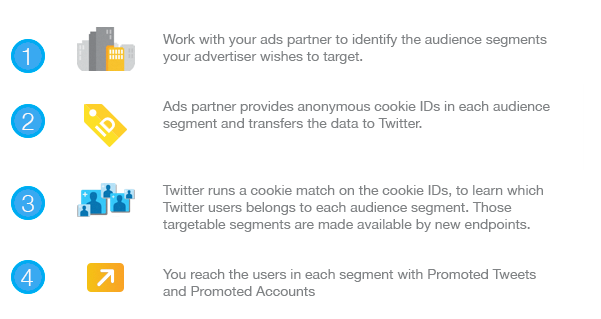
How it works?
-------------
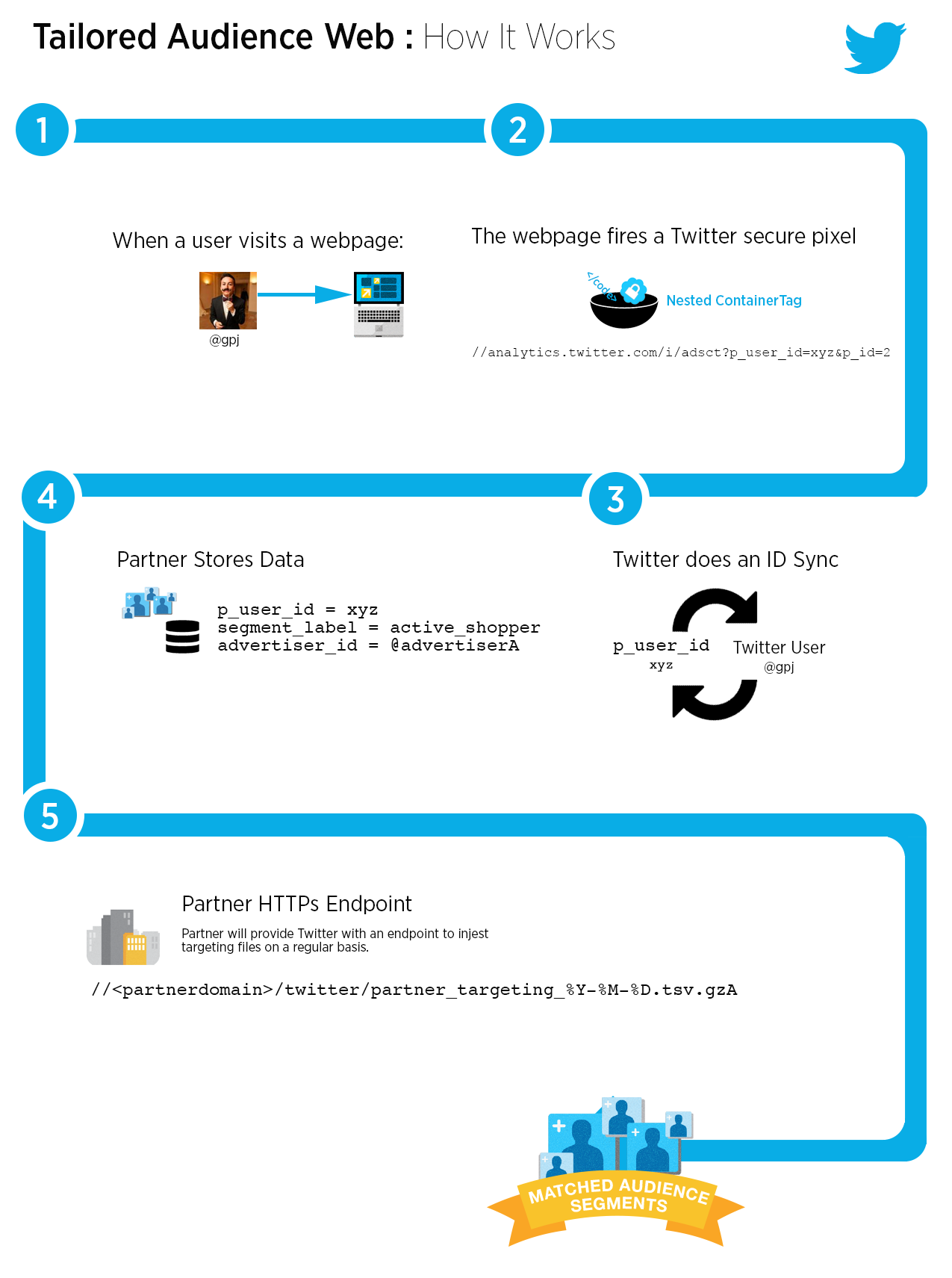
Mobile
------
Please see [the Custom Audiences from Mobile Apps blog post](https://blog.twitter.com/2014/introducing-tailored-audiences-from-mobile-apps)
for details.
Flexible
--------
[Flexible audiences](https://developer.x.com/en/docs/ads/audiences/api-reference/tailored-audiences#flexible-audiences "Flexible Audiences")
give advertisers the ability to build and save audience combinations based on existing custom audiences or subsets of existing custom audiences. Subsets of a custom audience’s members can be targeted based on the recency and frequency of interaction.
Restricted Use Cases for Custome Audiences
------------------------------------------
[Read more about restrictions](https://developer.x.com/en/developer-terms/more-on-restricted-use-cases "Read more about restrictions")
**Did someone say … cookies?**
X and its partners use cookies to provide you with a better, safer and faster service and to support our business. Some cookies are necessary to use our services, improve our services, and make sure they work properly. [Show more about your choices](https://help.twitter.com/rules-and-policies/twitter-cookies)
.
* Accept all cookies
* Refuse non-essential cookies
---
# Overview | Docs | Twitter Developer Platform
Overview
Introduction
------------
Analytics metrics help partners and advertisers understand the performance of the content they promote on X. This includes information such as impressions, clicks, video views, and spend. In addition, partners and advertisers are able to get detailed metrics for various segments of the audiences they reach.
The Ads API supports two ways of retrieving detailed campaign performance metrics: synchronously and asynchronously. With [synchronous analytics](https://developer.x.com/en/docs/ads/analytics/api-reference/synchronous#get-stats-accounts-account-id)
calls, the requested metrics are returned in the response. With the [asynchronous analytics](https://developer.x.com/en/docs/ads/analytics/api-reference/asynchronous#asynchronous-analytics)
endpoints, the requested metrics are available in a downloadable results file after the associated "job" has finished processing. The synchronous endpoint supports short time ranges and is ideal for real-time campaign optimizations. The asynchronous endpoints support much longer time ranges and are, thus, intended for fetching much more data, ideal for generating reporting or historical backfills.
Details
-------
### Synchronous vs. Asynchronous
The differences between the synchronous and asynchronous analytics endpoints are summarized in the following table. This information is intended to help developers choose which set of endpoints to use.
| | | |
| --- | --- | --- |
| | Synchronous | Asynchronous |
| Rate limiting | User-level: 250 requests / 15 minutes | Account-level: 100 concurrent\* jobs |
| Time range | 7 days | 90 days (non-segmented) 45 days (segmented) |
| Segmentation | No | Yes |
| Response returns | Metrics data | Processing state of the job\*\* |
| Recommended use case | Real-time optimization User interface requests | Regularly-scheduled syncing Backfilling historical data |
\* This refers to the maximum number of jobs that may be in a processing state at any given time.
\*\* Once the job has successfully finished processing, a URL is returned. This is where the compressed (gzip) results file can be downloaded from.
Outside of this, the endpoints offer the same functionality.
### Use cases
There are three major analytics use cases.
1. Real-time optimization: using performance metrics to update active campaigns
2. Synchronization: regularly-scheduled background syncs
3. New account on-boarding: backfilling historical data
The synchronous analytics endpoint may be used for real-time optimization to update campaigns based on changes to metrics within the last 5 to 15 minutes. Either endpoint can be used for analytics synchronization. Keep in mind that the desired time range and whether segmentation is required will determine which endpoint to use. New account on-boarding should only be done using the asynchronous analytics endpoints. (The synchronous analytics endpoint should never be used for retrieving large amounts of data.)
The asynchronous analytics endpoints can power dashboards and other UI elements if metrics are synced with a backend process. Your implementation should avoid calling the asynchronous analytics endpoints to fulfill user interface requests.
### Request Options
Analytics requests are scoped to ads accounts and, thus, require the account ID in the resource path. Request options, listed below, are specified as query parameters. The following types of values are required.
* Entities: the entity type as well as up to 20 entity IDs you'd like to request analytics for
* Time range: the start and end times, expressed in ISO 8601
* **Note**: must be expressed in whole hours
* Metric groups: one or more sets of related metrics (see [Metrics and Segmentation](https://developer.x.com/en/docs/ads/analytics/overview/metrics-and-segmentation)
for a list of metrics within each metric group)
* Granularity: specifies the level of aggregation in which the metrics should be returned
* Placement: determines whether metrics are pulled for ads that served on or off of X
* **Note**: only a single placement value can be specified per request
Use the `start_time` and `end_time` request parameters to specify a time range. These values must be aligned with the specified granularity in the following way.
1. `TOTAL`: specify any time range (within the endpoint's limits)
2. `DAY`: both the start time and end time values must be aligned with midnight in the account's time zone
3. `HOUR`: specify any time range (within the endpoint's limits)
End time is exclusive. For example, a request with `start_time=2019-01-01T00:00:00Z` and `end_time=2019-01-02T00:00:00Z` will return a single day's worth of analytics metrics (not two) as this time range covers only a 24 hour period.
#### Segmentation
Available only through our asynchronous analytics endpoints, segmentation allows partners and advertisers to retrieve metrics broken out particular targeting values. To request segmented metrics, use the `segmentation_type` request parameter. For more details on segmentation options, see [Metrics and Segmentation](https://developer.x.com/en/docs/ads/analytics/overview/metrics-and-segmentation#segmentation)
.
FAQs
----
Why don't the Ads API numbers match what's shown in the X Ads UI?
* Make sure you've requested data for both placements: `ALL_ON_TWITTER` and `PUBLISHER_NETWORK`
* Remember that end times in the Ads API are exclusive; they are inclusive in the Ads UI
Why do the numbers change depending on when I request data?
* As soon as reporting metrics are available, you are able to retrieve them. They are available in near real-time. These early results are estimates, though, and, as a result, are expected to change. Metrics are finalized after 24 hours, with the exception of spend data.
* Spend metrics are generally final within 3 days of the event. However, we process billing data for up to 14 days from the date of the event (for spam filtering, for example).
How can I determine which entity IDs to request for a specific time period?
* Use the [Active Entities endpoint](https://developer.x.com/en/docs/ads/analytics/api-reference/active-entities#get-stats-accounts-account-id-active-entities)
Why are all of the values in the analytics response `null`?
* It's likely that the campaign did not serve during during the requested time period
* Use the [Active Entities endpoint](https://developer.x.com/en/docs/ads/analytics/api-reference/active-entities#get-stats-accounts-account-id-active-entities)
to determine which entities to fetch analytics for and for what time period
Why does the API show `null` values while the UI shows 0s?
* The UI chooses to display these values as 0s, but the values are equivalent
How can I request metrics associated with a granular placement, such as the X timeline?
* We only support two placement values in analytics: `ALL_ON_TWITTER` and `PUBLISHER_NETWORK` (i.e., the [X Audience Platform](https://developer.x.com/en/docs/tutorials/ads-api-hierarchy-terminology#publisher-network)
)
Is it possible to retrieve metrics for deleted or paused entities?
* Yes. The entity's status does not impact the availability of analytics metrics.
Why don't the segmented values match the non-segmented ones?
* Segmented data is _not_ expected to roll-up 100% to the non-segmented data, due to how this information is derived.
Is it possible to request data segmented by multiple dimensions?
* We do not support multi-segmentation
**Did someone say … cookies?**
X and its partners use cookies to provide you with a better, safer and faster service and to support our business. Some cookies are necessary to use our services, improve our services, and make sure they work properly. [Show more about your choices](https://help.twitter.com/rules-and-policies/twitter-cookies)
.
* Accept all cookies
* Refuse non-essential cookies
---
# Overview | Docs | Twitter Developer Platform
Overview
Creatives
============
Creatives are any entity that can be promoted in a campaign. Posts can include text, images, GIFs, videos, or cards. Cards can include images or videos.
Image, GIF, or video creatives are uploaded using either the [POST media/upload](https://developer.x.com/en/docs/media/upload-media/api-reference/post-media-upload.html)
— a simple upload endpoint that only supports images — or the [POST media/upload (chunked)](https://developer.x.com/en/docs/media/upload-media/api-reference/post-media-upload-init.html)
endpoints. These can be added to
cards:
* [POST accounts/:account\_id/cards](https://developer.x.com/en/docs/twitter-ads-api/creatives/api-reference/cards)
Tweets:
* [POST accounts/:account\_id/tweets](https://developer.x.com/en/docs/ads/creatives/api-reference/tweets.html#post-accounts-account-id-tweet)
- To add cards to Tweets, use the card\_uri parameter.
Scheduled Tweets:
* [POST accounts/:account\_id/scheduled\_tweets](https://developer.x.com/en/docs/ads/creatives/api-reference/scheduled-tweets.html#post-accounts-account-id-scheduled-tweets)
For additional details on cards, please see the [Cards](https://developer.x.com/en/docs/ads/creatives/overview/revenue-cards.html)
page. The [Promoted Video](https://developer.x.com/en/docs/ads/creatives/overview/promoted-video-overview.html)
page provides details on associating videos with cards or Tweets.
**Did someone say … cookies?**
X and its partners use cookies to provide you with a better, safer and faster service and to support our business. Some cookies are necessary to use our services, improve our services, and make sure they work properly. [Show more about your choices](https://help.twitter.com/rules-and-policies/twitter-cookies)
.
* Accept all cookies
* Refuse non-essential cookies
---
# Overview | Docs | Twitter Developer Platform
Overview
Embedded Tweets bring the global conversation happening on X to your site, articles, and commentary. Sites powered by a CMS or publishing software can provide deeper integration with X content through site-level display preferences, content macros for cross-platform publishing, oEmbed fallback content, and JavaScript loaders.
Integrating X into your CMS can remove barriers between authors and content, while integrating Tweets with your editorial workflows and visual design.
**Did someone say … cookies?**
X and its partners use cookies to provide you with a better, safer and faster service and to support our business. Some cookies are necessary to use our services, improve our services, and make sure they work properly. [Show more about your choices](https://help.twitter.com/rules-and-policies/twitter-cookies)
.
* Accept all cookies
* Refuse non-essential cookies
---
# About Twitter Cards | Docs | Twitter Developer Platform
About Twitter Cards
About X Cards
-------------
With X Cards, you can attach rich photos, videos and media experiences to Tweets, helping to drive traffic to your website. Simply add a few lines of markup to your webpage, and users who Tweet links to your content will have a “Card” added to the Tweet that’s visible to their followers.
The Tweet embedded below shows a Player Card along with the text of the Tweet:
> The dusk and dawn light in [@DeathValleyNPS](https://twitter.com/DeathValleyNPS?ref_src=twsrc%5Etfw)
> is amazing. I visit almost every year for [#photography](https://twitter.com/hashtag/photography?src=hash&ref_src=twsrc%5Etfw)
> . [https://t.co/Lcm76CSQrY](https://t.co/Lcm76CSQrY)
>
> — Jonathan Cipriano (@joncipriano) [February 22, 2016](https://twitter.com/joncipriano/status/701826082513616896?ref_src=twsrc%5Etfw)
### Drive engagement from your Tweets
The different Card types each have a beautiful consumption experience built for X’s web and mobile clients:
* [Summary Card](https://developer.x.com/content/developer-twitter/en/docs/tweets/optimize-with-cards/overview/summary-card-with-large-image)
: Title, description, and thumbnail.
* [Summary Card with Large Image](https://developer.x.com/en/docs/tweets/optimize-with-cards/overview/summary-card-with-large-image.html)
: Similar to the Summary Card, but with a prominently-featured image.
* [App Card](https://developer.x.com/content/developer-twitter/en/docs/tweets/optimize-with-cards/overview/app-card)
: A Card with a direct download to a mobile app.
* [Player Card](https://developer.x.com/content/developer-twitter/en/docs/tweets/optimize-with-cards/overview/player-card)
: A Card that can display video/audio/media.
To learn more about how the Card meta tags and web crawler work, check out the [Getting Started Guide](https://developer.x.com/cards/getting-started)
.
### Drive app downloads from your Tweets
In addition to displaying content in a more engaging way, Cards can also drive downloads of mobile apps, and even link directly into installed applications. For more information, see [Cards for Mobile Developers](https://developer.x.com/cards/mobile)
.
### Get started in 4 simple steps
Ready to get started with Cards? In most cases, it takes less than 15 minutes to implement.
1. Choose a card type to implement.
2. Add the correct [meta tags](https://developer.x.com/en/docs/tweets/optimize-with-cards/overview/markup)
to the page.
3. Run the URL through the [validator tool](https://cards-dev.twitter.com/validator)
to test.
4. After testing in the validator or approval of your Player Card, Tweet the URL and see the Card appear below your Tweet in the details view.
We hope you enjoy using X Cards, and if you have any questions, drop us a line on the [X Cards Forum](https://twittercommunity.com/category/cards)
. Thanks, and happy coding!
**Did someone say … cookies?**
X and its partners use cookies to provide you with a better, safer and faster service and to support our business. Some cookies are necessary to use our services, improve our services, and make sure they work properly. [Show more about your choices](https://help.twitter.com/rules-and-policies/twitter-cookies)
.
* Accept all cookies
* Refuse non-essential cookies
---
# Webpage properties | Docs | Twitter Developer Platform
Webpage properties
X Widgets Webpage Properties
============================
Set widget preferences across an entire website by including and elements in your pages page.
Widget settings specified in a may be overridden at the individual widget level. Order of precedence:
1. web intent link query parameter
2. widget attribute
3. meta or link element
Turn off DOM scan for widgets and buttons
-----------------------------------------
The X for Websites JavaScript scans document.body after initialization to locate buttons, widgets, and web intents for enhancement. Turn off this scan if X content is only loaded via [JavaScript factory functions](https://developer.x.com/en/docs/twitter-for-websites/javascript-api/guides/set-up-twitter-for-websites "JavaScript factory functions")
or if you prefer to directly [call load](https://developer.x.com/en/docs/twitter-for-websites/javascript-api/guides/scripting-loading-and-initialization "call load")
on a smaller fragment of the page.
``
Canonical link
--------------
The [Tweet button](https://developer.x.com/en/docs/twitter-for-websites/tweet-button/overview "Tweet Button")
uses the [canonical link relation of the page](http://tools.ietf.org/html/rfc6596)
expressed in a as the shared URL if the URL property is not set in the button markup.
Add a canonical link in the section of your webpage.
``
Identify the X profile of the page
----------------------------------
Populate the via property of a [Tweet button](https://developer.x.com/en/docs/twitter-for-websites/tweet-button/overview "Tweet Button")
by linking to your X profile page with a me link relationship token.
Set a me link relationship in the section of your webpage.
``
You may also set a me relationship from an anchor element on your page, such as a Follow button.
` Follow @TwitterDev `
Theme
-----
Override the default light theme preference for an [embedded Tweet](https://developer.x.com/en/docs/twitter-for-websites/embedded-tweets/overview "embedded Tweet")
or an [embedded Timeline](https://developer.x.com/en/docs/twitter-for-websites/timelines/overview "embedded Timeline")
.
``
**Default view**
> Sunsets don't get much better than this one over [@GrandTetonNPS](https://twitter.com/GrandTetonNPS?ref_src=twsrc%5Etfw)
> . [#nature](https://twitter.com/hashtag/nature?src=hash&ref_src=twsrc%5Etfw)
> [#sunset](https://twitter.com/hashtag/sunset?src=hash&ref_src=twsrc%5Etfw)
> [pic.twitter.com/YuKy2rcjyU](http://t.co/YuKy2rcjyU)
>
> — US Department of the Interior (@Interior) [May 5, 2014](https://twitter.com/Interior/status/463440424141459456?ref_src=twsrc%5Etfw)
**theme = dark**
> Sunsets don't get much better than this one over [@GrandTetonNPS](https://twitter.com/GrandTetonNPS?ref_src=twsrc%5Etfw)
> . [#nature](https://twitter.com/hashtag/nature?src=hash&ref_src=twsrc%5Etfw)
> [#sunset](https://twitter.com/hashtag/sunset?src=hash&ref_src=twsrc%5Etfw)
> [pic.twitter.com/YuKy2rcjyU](http://t.co/YuKy2rcjyU)
>
> — US Department of the Interior (@Interior) [May 5, 2014](https://twitter.com/Interior/status/463440424141459456?ref_src=twsrc%5Etfw)
Do not track parameter
----------------------
You may choose whether X widgets on your site help to personalize content and suggestions for X users, including ads. You can opt out of having information from your website used for personalization by following the instructions below. Include the following snippet within the and elements on your pages that include X for Websites widgets:
``
You may also opt-out of this data use for a specific widget, and can do so by setting the optional data-dnt parameter to be true, as shown in the example below:
` Tweet `
Turn off functionality which may trigger Content Security Policy warnings
-------------------------------------------------------------------------
An embedded Tweet or embedded Timeline may display with restricted capabilities when a [Content Security Policy](http://en.wikipedia.org/wiki/Content_Security_Policy)
restricts inline loading of X. Set csp=on to turn off functionality which could display Content Security Policy warnings on your site.
``
**Did someone say … cookies?**
X and its partners use cookies to provide you with a better, safer and faster service and to support our business. Some cookies are necessary to use our services, improve our services, and make sure they work properly. [Show more about your choices](https://help.twitter.com/rules-and-policies/twitter-cookies)
.
* Accept all cookies
* Refuse non-essential cookies
---
# Overview | Docs | Twitter Developer Platform
Overview
[Embedded Tweets](https://developer.x.com/en/docs/twitter-for-websites/embedded-tweets/overview "Embedded Tweets")
bring your pick of content from X into your website articles. An embedded Tweet includes photos, video and cards media created for display on X, and can even stream live video from Periscope. All aspects of X’s display requirements are handled for you by using our tools; author attribution, Tweet actions, hashtags, mentions, and other key components of the X experience.
> Sunsets don't get much better than this one over [@GrandTetonNPS](https://twitter.com/GrandTetonNPS?ref_src=twsrc%5Etfw)
> . [#nature](https://twitter.com/hashtag/nature?src=hash&ref_src=twsrc%5Etfw)
> [#sunset](https://twitter.com/hashtag/sunset?src=hash&ref_src=twsrc%5Etfw)
> [pic.twitter.com/YuKy2rcjyU](http://t.co/YuKy2rcjyU)
>
> — US Department of the Interior (@Interior) [May 5, 2014](https://twitter.com/Interior/status/463440424141459456?ref_src=twsrc%5Etfw)
An embedded Tweet consists of two parts: An HTML snippet hosted in your web page, and the X for Websites JavaScript to transform that code into a fully-rendered Tweet. You can copy embedded Tweet markup generated from the Tweet menu on x.com or TweetDeck, paste a URL into a supporting CMS, or add a Tweet to the page programmatically using a JavaScript factory function.
Embed from x.com
----------------
Every Tweet displayed on x.com and in TweetDeck includes an embed code to easily copy-and-paste into your webpage. Activate the Tweet menu and select “Embed Tweet” to generate markup to include on your webpage:

Convert Tweet URLs using oEmbed
-------------------------------
Programmatically convert a Tweet URL into embedded Tweet markup using the [oEmbed API](https://dev.twitter.com/rest/reference/get/statuses/oembed)
. Make embedding a Tweet in your CMS or app as simple as pasting a Tweet URL.
`https://publish.twitter.com/oembed? url=https://twitter.com/Interior/status/463440424141459456`
Our [CMS best practices guide](https://developer.x.com/en/docs/twitter-for-websites/embedded-tweets/guides/cms-best-practices "CMS best practices guide")
describes common patterns for sites adding software support for embedded Tweets.
Customize Tweet display
-----------------------
Customize an embedded Tweet for your site’s visual design and display preferences by including extra parameters in your embedded Tweet HTML.
### Match your site’s color scheme
An embedded Tweet supports light and dark color themes. Customize X widgets [at the page-level with elements](https://developer.x.com/content/developer-twitter/en/docs/twitter-for-websites/webpage-properties/overview)
or add data-\* attributes to individual generated
elements.
View our [embedded Tweet reference documentation](https://developer.x.com/en/docs/twitter-for-websites/embedded-tweets/guides/embedded-tweet-parameter-reference "embedded Tweet reference documentation")
for a full list of embedded Tweet options.
### Don’t show previous Tweet in conversation thread
A Tweet may be in reply to another Tweet. By default, we include a summary of the previous Tweet in the conversation to provide context.
**Default View**
> [@WilliamShatner](https://twitter.com/WilliamShatner?ref_src=twsrc%5Etfw)
> Good day, Captain. [#ISS](https://twitter.com/hashtag/ISS?src=hash&ref_src=twsrc%5Etfw)
> is in standard orbit and Commander Swanson has the conn. Hope you’re having a great weekend!
>
> — NASA (@NASA) [August 2, 2014](https://twitter.com/NASA/status/495719809695621121?ref_src=twsrc%5Etfw)
**conversation = none**
> [@WilliamShatner](https://twitter.com/WilliamShatner?ref_src=twsrc%5Etfw)
> Good day, Captain. [#ISS](https://twitter.com/hashtag/ISS?src=hash&ref_src=twsrc%5Etfw)
> is in standard orbit and Commander Swanson has the conn. Hope you’re having a great weekend!
>
> — NASA (@NASA) [August 2, 2014](https://twitter.com/NASA/status/495719809695621121?ref_src=twsrc%5Etfw)
Set an oEmbed query parameter of hide\_thread=true or add a data-conversation="none" attribute to the resulting
element to prevent the display of a parent Tweet.
### Hide photos, videos, and Cards
A Tweet may include a photo, video, or link to or other content supporting a [Card](https://dev.twitter.com/cards/overview)
. By default, this media is displayed in embedded Tweets. You can hide this media if editorially desired.
**Default View**
> Sunsets don't get much better than this one over [@GrandTetonNPS](https://twitter.com/GrandTetonNPS?ref_src=twsrc%5Etfw)
> . [#nature](https://twitter.com/hashtag/nature?src=hash&ref_src=twsrc%5Etfw)
> [#sunset](https://twitter.com/hashtag/sunset?src=hash&ref_src=twsrc%5Etfw)
> [pic.twitter.com/YuKy2rcjyU](http://t.co/YuKy2rcjyU)
>
> — US Department of the Interior (@Interior) [May 5, 2014](https://twitter.com/Interior/status/463440424141459456?ref_src=twsrc%5Etfw)
**cards = hidden**
> Sunsets don't get much better than this one over [@GrandTetonNPS](https://twitter.com/GrandTetonNPS)
> . [#nature](https://twitter.com/hashtag/nature?src=hash)
> [#sunset](https://twitter.com/hashtag/sunset?src=hash)
> [pic.twitter.com/YuKy2rcjyU](http://t.co/YuKy2rcjyU)
>
> — US Dept of Interior (@Interior) [May 5, 2014](https://twitter.com/Interior/status/463440424141459456)
Set an oEmbed query parameter of hide\_media=true or add a data-cards="hidden" attribute to the resulting
element to prevent expanded content display.
### Customize Alignment
An embedded Tweet is aligned left by default. The Tweet can be center or right aligned if preferred using the align customization. While historically CSS provides numerous hacks for centering content on a web page, this is the recommended and official supported method.
**Default View**
> Sunsets don't get much better than this one over [@GrandTetonNPS](https://twitter.com/GrandTetonNPS?ref_src=twsrc%5Etfw)
> . [#nature](https://twitter.com/hashtag/nature?src=hash&ref_src=twsrc%5Etfw)
> [#sunset](https://twitter.com/hashtag/sunset?src=hash&ref_src=twsrc%5Etfw)
> [pic.twitter.com/YuKy2rcjyU](http://t.co/YuKy2rcjyU)
>
> — US Department of the Interior (@Interior) [May 5, 2014](https://twitter.com/Interior/status/463440424141459456?ref_src=twsrc%5Etfw)
**align = center**
> Sunsets don't get much better than this one over [@GrandTetonNPS](https://twitter.com/GrandTetonNPS?ref_src=twsrc%5Etfw)
> . [#nature](https://twitter.com/hashtag/nature?src=hash&ref_src=twsrc%5Etfw)
> [#sunset](https://twitter.com/hashtag/sunset?src=hash&ref_src=twsrc%5Etfw)
> [pic.twitter.com/YuKy2rcjyU](http://t.co/YuKy2rcjyU)
>
> — US Department of the Interior (@Interior) [May 5, 2014](https://twitter.com/Interior/status/463440424141459456?ref_src=twsrc%5Etfw)
**align = right**
> Sunsets don't get much better than this one over [@GrandTetonNPS](https://twitter.com/GrandTetonNPS?ref_src=twsrc%5Etfw)
> . [#nature](https://twitter.com/hashtag/nature?src=hash&ref_src=twsrc%5Etfw)
> [#sunset](https://twitter.com/hashtag/sunset?src=hash&ref_src=twsrc%5Etfw)
> [pic.twitter.com/YuKy2rcjyU](http://t.co/YuKy2rcjyU)
>
> — US Department of the Interior (@Interior) [May 5, 2014](https://twitter.com/Interior/status/463440424141459456?ref_src=twsrc%5Etfw)
Render a Tweet with JavaScript
------------------------------
Our widget JavaScript scans the DOM on execution, converting blockquote.twitter-tweet elements into fully-rendered embedded Tweets based on element content.
If dynamically inserting new content into a page, pass the new document fragment to [twttr.widgets.load()](https://developer.x.com/en/docs/twitter-for-websites/javascript-api/guides/scripting-loading-and-initialization "twttr.widgets.load()")
to initialize embedded Tweet content.
To directly render an embedded Tweet at runtime use the [twttr.widgets.createTweet()](https://developer.x.com/en/docs/twitter-for-websites/embedded-tweets/guides/embedded-tweet-javascript-factory-function "twttr.widgets.createTweet()")
function.
**Did someone say … cookies?**
X and its partners use cookies to provide you with a better, safer and faster service and to support our business. Some cookies are necessary to use our services, improve our services, and make sure they work properly. [Show more about your choices](https://help.twitter.com/rules-and-policies/twitter-cookies)
.
* Accept all cookies
* Refuse non-essential cookies
---
# Guides | Docs | Twitter Developer Platform
Overview
The Tweet button is a small button displayed on your website to help viewers easily share your content on X. A Tweet button consists of two parts: a [link to the Tweet composer on x.com](https://developer.x.com/en/docs/twitter-for-websites/tweet-button/guides/web-intent "link to the Tweet composer on Twitter.com")
and X for Websites JavaScript to enhance the link with the easily recognizable Tweet button.
The [publish.twitter.com](https://publish.twitter.com/)
website provides a simple, form-based approach to generate HTML markup for a Tweet button you may copy-and-paste into your website template.
[Tweet](https://twitter.com/intent/tweet?text=Hello%20world&url=https%3A%2F%2Fexample.com%2Ffoo&via=twitterdev&hashtags=demo&related=twitterapi%2Ctwitter)
A [tweet event](https://developer.x.com/en/docs/twitter-for-websites/javascript-api/guides/javascript-api "tweet event")
is triggered on your webpage when the Tweet button is tapped or clicked.
How to add a Tweet button to your website
-----------------------------------------
**1.** Create a new anchor element with a twitter-share-button class to allow the X for Websites JavaScript to discover the element and enhance the link into a Tweet button. Set a href attribute value of https://twitter.com/intent/tweet to create a link to the X web intent composer.
` Tweet`
**2.** Pre-populate Tweet text and suggest related accounts by customizing [Tweet web intent](https://developer.x.com/en/docs/twitter-for-websites/web-intent "Tweet web intent")
query parameters.
` Tweet`
**3.** Customize [Tweet button parameters](https://developer.x.com/en/docs/twitter-for-websites/tweet-button/guides/parameter-reference1 "Tweet button parameters")
using data-\* attributes.
` Tweet`
**4.** Asynchronously [load the X for Websites JavaScript using our loading snippet](https://developer.x.com/en/docs/twitter-for-websites/javascript-api/guides/set-up-twitter-for-websites "load the Twitter for Websites JavaScript using our loading snippet")
. The JavaScript snippet will check for an existing version already on the page, initialize a function queue to be executed once the widgets JavaScript has loaded, and load the widgets JavaScript asynchronously from X’s CDN.
Tweet text components
---------------------
### text
A text parameter appears pre-selected in a Tweet composer. The Tweet author may easily remove the text with a single delete action.
The text parameter may be auto-populated from the webpage’s element if not explicitly set.
### url
The url parameter contains an absolute HTTP or HTTPS URL to be shared on X. The shared URL will be [automatically shortened](https://support.twitter.com/articles/78124-how-to-post-shortened-links-urls)
in a published Tweet. A [Card](https://dev.twitter.com/cards/overview)
may appear for a shared URL.
The url parameter may be auto-populated from a [canonical link element](http://en.wikipedia.org/wiki/Canonical_link_element)
(<link rel="canonical">) or the [location.href](https://html.spec.whatwg.org/multipage/browsers.html#the-location-interface)
of the page when not explicitly set.
`<link rel="canonical" href="/web/tweet-button">`
### hashtags
Add a comma-separated list of hashtags to a Tweet using the hashtags parameter. Omit a preceding “#” from each hashtag; the Tweet composer will automatically add the proper space-separated hashtag by language.
### via
Attribute the source of a Tweet to a X username using the via parameter. The attribution will appear in a Tweet as ” via @username” translated into the language of the Tweet author.
A via parameter may be auto-populated from a link or anchor element linked to a Twitter profile page with a me relationship token.
`<link rel="me" href="https://twitter.com/twitterdev" >`
Button customization
--------------------
### Size
Add a data-size attribute value of large to display a larger Tweet button.
Default
[Tweet](https://twitter.com/intent/tweet)
size=large
[Tweet](https://twitter.com/intent/tweet)
**Did someone say … cookies?**
X and its partners use cookies to provide you with a better, safer and faster service and to support our business. Some cookies are necessary to use our services, improve our services, and make sure they work properly. [Show more about your choices](https://help.twitter.com/rules-and-policies/twitter-cookies)
.
* Accept all cookies
* Refuse non-essential cookies
---
# Overview | Docs | Twitter Developer Platform
Overview
Advertiser API
==============
Programatically schedule campaigns and manage ads on X through this suite of APIs.
What Can You Promote?
---------------------
### [Promoted Ads](https://business.twitter.com/help/what-are-promoted-tweets)
* Promoted Ads are ordinary ads purchased by advertisers who want to reach a wider group of users or to spark engagement from their existing followers.
* Promoted Ads are clearly labeled as Promoted when an advertiser is paying for their placement on X. In every other respect, Promoted Ads act just like regular ads and can be reposted, replied to, liked and more. They have typical delivery rules and are created using [POST statuses/update](https://developer.x.com/en/docs/tweets/post-and-engage/api-reference/post-statuses-update.html#post-statuses-update)
.
* **“Promoted-only” Tweets**, created via [POST accounts/:account\_id/tweet](https://developer.x.com/en/docs/ads/creatives/api-reference/tweets.html#post-accounts-account-id-tweet)
, can be used in Promoted Tweets campaigns but will not serve to followers or appear on the public timeline. To retrieve a list of promoted-only tweets for a certain account, use [GET accounts/:account\_id/scoped\_timeline](https://developer.x.com/en/docs/ads/creatives/api-reference/tweets.html#get-accounts-account-id-scoped-timeline)
.
### [Promoted Accounts](https://business.twitter.com/help/what-are-promoted-accounts)
* Promoted Accounts are part of Who to Follow, which suggests accounts that people don’t currently follow and may find interesting. Promoted Accounts help introduce an even wider variety of accounts people may enjoy.
* Promoted Accounts for Timeline, associate a Promoted Tweet with a Promoted Account campaign and will display in user timelines.
Promoted Trends are not available in the Ads API.
Campaigns and Ad Groups (Line Items)
------------------------------------
[Campaigns](https://developer.x.com/en/docs/ads/campaign-management/api-reference/campaigns)
define the schedule and budget of an ad. The advertiser specifies a daily and overall budget. The campaign can be bound to a specific start and end time or run continuously until the budget is spent. The budget comes from one of the [Funding Instruments](https://developer.x.com/en/docs/ads/campaign-management/api-reference/funding-instruments)
of the advertising account. Campaign identifiers (`:campaign_id`) are the base-36 representation of the base-10 value we present in the X Ads UI.
Advertising accounts are limited to a maximum of 200 active campaigns. This limit can be raised to 4,000 active campaigns manually by the advertiser’s X Account Manager upon request. A campaign is considered active until it reaches its end time or gets deleted. Paused campaigns are considered active until their designated end times.
[Line items](https://developer.x.com/en/docs/ads/campaign-management/api-reference/line-items)
spend the budget defined by a campaign. Line items pull together the per-engagement bid, the [Tweet](https://developer.x.com/en/docs/ads/campaign-management/api-reference/promoted-tweets)
or [account](https://developer.x.com/en/docs/ads/campaign-management/api-reference/promoted-accounts)
to promote, and the [targeting rules](https://developer.x.com/en/docs/ads/campaign-management/overview/targeting.html)
.
Analytics
---------
The X Ads API offers a set of analytics endpoints to track and optimize ad performance. Please see [Analytics](https://developer.x.com/en/docs/ads/analytics/overview)
and [Analytics Best Practices](https://developer.x.com/en/docs/ads/analytics/overview/best-practices)
for more information.
For the billing metric, the data may not be finalized until three days after the event. Before that point, the data should be considered speculative. The final billable number will always be less than the speculative amount. The billable number is corrected for spam and related low-quality traffic. See [Timezones](https://developer.x.com/en/docs/ads/general/guides/timezones)
for other considerations regarding time.
Creating a Campaign - Step-by-Step
----------------------------------
The following example assumes you have installed, configured, and authorized your app and user using [twurl](https://github.com/twitter/twurl)
. twurl is a command-line tool in the spirit of cURL that gracefully handles X OAuth authentication. twurl is a great tool for quickly testing and debugging Ads API (and REST API) functionality. To see the full headers of the request and response, use `-t` to trace the call, roughly equivalent to cURL’s `-v` option.
**For this example, we will create a Promoted Ads campaign that will be targeted by keyword.**
**1\. Retrieve the account id.**
twurl -H ads-api.x.com /9/accounts/
{
"request": {
"params": {
}
},
"data": [\
{\
"name": "Test account for @AdsAPI",\
"timezone": "America/Los_Angeles",\
"timezone_switch_at": null,\
"id": "xxxxxx",\
"created_at": "2014-03-09T00:41:49Z",\
"salt": "f9f9d5a5f23075c618da5eb1d1a9df57",\
"updated_at": "2015-01-29T00:41:49Z",\
"approval_status": "ACCEPTED",\
"deleted": false\
}\
],
"data_type": "account",
"total_count": 1,
"next_cursor": null
}
**2\. Retrieve the funding instrument id.**
Hit the [GET accounts/:account\_id/funding\_instruments](https://developer.x.com/en/docs/ads/campaign-management/api-reference/funding-instruments.html#get-accounts-account-id-funding-instruments)
API using the account id retrieved in the previous command.
twurl -H ads-api.x.com /9/accounts/xxxxxx/funding\_instruments
{
"data": [\
{\
"cancelled": true,\
"created_at": "2014-03-09T00:41:49Z",\
"credit_limit_local_micro": null,\
"currency": "USD",\
"deleted": false,\
"description": null,\
"end_time": null,\
"funded_amount_local_micro": null,\
"id": "yyyy",\
"type": null,\
"updated_at": "2014-05-29T00:41:49Z"\
}\
],
"data_type": "funding_instrument",
"next_cursor": null,
"request": {
"params": {
"account_id": "xxxxxx"
}
},
"total_count": 1
}
**3\. Create a campaign and associate it with the funding instrument.**
Specify a start time and a budget for the campaign. For the purpose of this example, we will use a budget of $500 and for the daily limit, $50.
twurl -H ads-api.x.com -d "funding\_instrument\_id=yyyy&name=My First Campaign&total\_budget\_amount\_local\_micro=500000000&daily\_budget\_amount\_local\_micro=50000000" /9/accounts/xxxxxx/campaigns
{
"data": {
"created_at": "2015-02-09T00:00:00Z",
"currency": "USD",
"daily_budget_amount_local_micro": 50000000,
"deleted": false,
"end_time": null,
"funding_instrument_id": "yyyy",
"id": "92ph",
"name": "My First Campaign",
"entity_status": "PAUSED",
"standard_delivery": true,
"total_budget_amount_local_micro": 500000000,
"updated_at": "2015-02-09T00:00:00Z"
},
"data_type": "campaign",
"request": {
"params": {
"account_id": "xxxxxx",
"daily_budget_amount_local_micro": 50000000,
"funding_instrument_id": "yyyy",
"name": "My First Campaign",
"total_budget_amount_local_micro": 500000000
}
}
}
**4\. Create a line item associated with the campaign.**
Now that we have a campaign id, we can create a line item to associate with it. The line item wraps the bid price, targeting, and actual creative portion of the campaign. For this line item, we will be promoting tweets with a bid of $1.50.
twurl -H ads-api.x.com -d "campaign\_id=XXXX&bid\_amount\_local\_micro=1500000&product\_type=PROMOTED\_TWEETS&placements=ALL\_ON\_TWITTER&objective=ENGAGEMENTS&entity\_status=PAUSED" /9/accounts/xxxxxxx/line\_items
{
"data_type": "line_item",
"data": {
"bid_type": "MAX",
"name": "Untitled",
"placements": [\
"ALL_ON_TWITTER"\
],
"bid_amount_local_micro": 1500000,
"automatically_select_bid": false,
"advertiser_domain": null,
"primary_web_event_tag": null,
"charge_by": "ENGAGEMENT",
"product_type": "PROMOTED_TWEETS",
"bid_unit": "ENGAGEMENT",
"total_budget_amount_local_micro": null,
"objective": "ENGAGEMENTS",
"id": "azjx",
"entity_status": "PAUSED",
"optimization": "DEFAULT",
"categories": [],
"currency": "USD",
"created_at": "2015-02-09T00:00:00Z",
"updated_at": "2015-02-09T00:00:00Z",
"include_sentiment": "POSITIVE_ONLY",
"campaign_id": "92ph",
"deleted": false
},
"request": {
"params": {
"placements": [\
"ALL_ON_TWITTER"\
],
"bid_amount_local_micro": 1500000,
"product_type": "PROMOTED_TWEETS",
"entity_status": "PAUSED",
"account_id": "xxxxxxx",
"campaign_id": "92ph"
}
}
}
**5\. Create a targeting profile associated with the line item.**
With the line item created, we can assign targeting criteria. We want to target the phrase keywords “grumpy cat” in the San Francisco Bay Area location. This is going to require a location id lookup and two targeting\_criteria POST requests.
twurl -H ads-api.x.com "/9/targeting\_criteria/locations?location\_type=CITIES&q=San Francisco"
{
"data": [\
{\
"name": "San Francisco-Oakland-San Jose CA, US",\
"targeting_type": "LOCATION",\
"targeting_value": "5122804691e5fecc"\
}\
],
"data_type": "targeting_criterion",
"request": {
"params": {
"location_type": "CITY",
"q": "San Francisco"
}
}
}
twurl -H ads-api.x.com -X POST -d "line\_item\_id=yyyy&targeting\_type=LOCATION&targeting\_value=5122804691e5fecc" /9/accounts/xxxxxx/targeting\_criteria
{
"data": {
"created_at": "2015-02-09T00:00:15Z",
"deleted": false,
"id": "2u3be",
"line_item_id": "yyyy",
"name": "San Francisco-Oakland-San Jose CA, US",
"targeting_type": "LOCATION",
"targeting_value": "5122804691e5fecc",
"updated_at": "2013-05-30T21:01:35Z"
},
"data_type": "targeting_criterion",
"request": {
"params": {
"account_id": "xxxxxx",
"line_item_id": "yyyy",
"targeting_type": "LOCATION",
"targeting_value": "5122804691e5fecc"
}
}
}
twurl -H ads-api.x.com -X POST -d "line\_item\_id=yyyy&targeting\_type=PHRASE\_KEYWORD&targeting\_value=grumpy cat" /9/accounts/xxxxxx/targeting\_criteria
{
"data": {
"created_at": "2015-02-09T00:00:20Z",
"deleted": false,
"id": "2u3bd",
"line_item_id": "yyyy",
"name": "grumpy cat",
"targeting_type": "PHRASE_KEYWORD",
"targeting_value": "grumpy cat",
"updated_at": "2013-05-30T18:05:35Z"
},
"data_type": "targeting_criterion",
"request": {
"params": {
"account_id": "xxxxxx",
"line_item_id": "yyyy",
"targeting_type": "PHRASE_KEYWORD",
"targeting_value": "grumpy cat"
}
}
}
**6\. Finally, un-pause the line item.**
twurl -H ads-api.x.com -X PUT "/9/accounts/xxxxxx/line\_items/yyyy/?entity\_status=ACTIVE"
{
"data_type": "line_item",
"data": {
"bid_type": "MAX",
"name": "grumpy cat",
"placements": [],
"bid_amount_local_micro": 1500000,
"automatically_select_bid": false,
"advertiser_domain": null,
"primary_web_event_tag": null,
"charge_by": "ENGAGEMENT",
"product_type": "PROMOTED_TWEETS",
"bid_unit": "ENGAGEMENT",
"total_budget_amount_local_micro": null,
"objective": "ENGAGEMENTS",
"id": "yyyy",
"entity_status": "ACTIVE",
"optimization": "DEFAULT",
"categories": [],
"currency": "USD",
"created_at": "2015-02-09T00:00:20Z",
"updated_at": "2015-02-09T00:00:20Z",
"include_sentiment": "POSITIVE_ONLY",
"campaign_id": "dy1f",
"deleted": false
},
"request": {
"params": {
"line_item_id": "yyyy",
"entity_status": "ACTIVE",
"account_id": "xxxxxx"
}
}
}
That’s it! We now have an active, targeted, and funded Promoted Tweets in Timelines campaign which is running.
**Did someone say … cookies?**
X and its partners use cookies to provide you with a better, safer and faster service and to support our business. Some cookies are necessary to use our services, improve our services, and make sure they work properly. [Show more about your choices](https://help.twitter.com/rules-and-policies/twitter-cookies)
.
* Accept all cookies
* Refuse non-essential cookies
---
# Versions | Docs | Twitter Developer Platform
Versions
For the most up to date information on historical versions of the X Ads API, please reference the information below.
Version
Path
Introduction date
Deprecated date
End of life date
Version
12.0
Path
/ 12 /
Introduction date
October 27, 2022
Deprecated date
TBD
End of life date
TBD
Version
[11.0](https://twittercommunity.com/t/ads-api-version-11/168814)
Path
/ 11 /
Introduction date
March 31, 2022
Deprecated date
TBD
End of life date
TBD
Version
[10.0](https://developer.x.com/en/docs/x-ads-api/versioning#v9)
Path
/ 10 /
Introduction date
August 31, 2021
Deprecated date
March 31, 2022
End of life date
October 27, 2022
Version
[9.0](https://developer.x.com/en/docs/x-ads-api/versioning#v9)
Path
/ 9 /
Introduction date
March 2, 2021
Deprecated date
August 31, 2021
End of life date
March 31, 2022
Version
[8.0](https://developer.x.com/en/docs/x-ads-api/versioning#v8)
Path
/ 8 /
Introduction date
September 8, 2020
Deprecated date
March 2, 2021
End of life date
August 31, 2021
Version
[7.0](https://developer.x.com/en/docs/x-ads-api/versioning#v7)
Path
/ 7 /
Introduction date
March 3, 2020
Deprecated date
September 1, 2020
End of life date
March 2, 2021
Version
[6.0](https://developer.x.com/en/docs/x-ads-api/versioning#v6)
Path
/ 6 /
Introduction date
August 28, 2019
Deprecated date
March 3, 2020
End of life date
September 1, 2020
Version
[5.0](https://developer.x.com/en/docs/x-ads-api/versioning#v5)
Path
/ 5 /
Introduction date
February 28, 2019
Deprecated date
August 28, 2019
End of life date
March 3, 2020
Version
[4.0](https://developer.x.com/en/docs/x-ads-api/versioning#v4)
Path
/ 4 /
Introduction date
August 28, 2018
Deprecated date
February 28, 2019
End of life date
August 28, 2019
Version
[3.0](https://developer.x.com/en/docs/x-ads-api/versioning#v3)
Path
/ 3 /
Introduction date
February 1, 2018
Deprecated date
August 28, 2018
End of life date
February 28, 2019
Version
[2.0](https://developer.x.com/en/docs/x-ads-api/versioning#v2)
Path
/ 2 /
Introduction date
July 10, 2017
Deprecated date
February 1, 2018
End of life date
August 1, 2018
Version
[1.0](https://developer.x.com/en/docs/x-ads-api/versioning#v1)
Path
/ 1 /
Introduction date
March 31, 2016
Deprecated date
July 7, 2017
End of life date
January 10, 2018
Version
[0.0](https://developer.x.com/en/docs/x-ads-api/versioning#v0)
Path
/ 0 /
Introduction date
February 21, 2013
Deprecated date
N/A
End of life date
October 31, 2016
Overview
--------
Every month, we make changes and roll out several new features on the X Ads API. These changes are nearly always backwards compatible, however we do tend to have a handful of breaking changes each year. We’ve received feedback from developers on the challenges that our fast cadence of changes in the Ads API has on their development cycles when it comes to implementing new features, handling deprecations and testing changes. We want to improve the developer experience using our Ads platform, which is why we introduced the concept of versioning our endpoints.
A few definitions of some of the concepts that we talk about:
**Version**: This refers to the version number found in the URL path of any Ads API request, for example: GET /{version\_number}/accounts. This style of versioning is known as URI versioning.
**Breaking Changes**: Breaking changes are any changes that require developer resources to maintain existing functionality. This includes resources used for investigation into the changes that need to be made, determination of features/endpoints being deprecated and final implementation of all these changes. A list of breaking changes are things like:
* Removing a param from the API request/response
* Modifying the name for any params or endpoints
* Change in the representation of values (preview\_url → card\_uri)
* Change in behavior of endpoints (e.g., async vs sync stats)
* Adding/changing optional or required params (e.g., making name a required field in the request)
**Deprecation**: Deprecated versions or products will be unsupported and it is recommended that developers cease to use these APIs.
**Sunset**: Once a product or API is sunset, the corresponding set of endpoints will no longer be accessible via the API.
Versioning Strategy
-------------------
The main principles of the strategy are:
1. All breaking changes will be bundled into a new version
2. Deprecations for existing versions whenever a new version is announced is 6 months
3. At any given time, the API will allow requests from two versions simultaneously, however the older of the two will be unsupported
4. In order to provide quicker adoption of new products, these will be released on on ongoing basis (outside of the versioning cadence)
5. All API responses will contain a `x-current-api-version` which will be set to the current version of the API in addition to an `x-api-warn` header when calling any deprecated API endpoints.
Should there be any fundamental product requirement changes that require an API breaking change (e.g. deprecating multiple age bucket targeting), we will send out a 90-day notice to announce this breaking change, and after at least 90 days after the notice is released, the breaking change will be deployed

### v9
Today, March 3rd, 2021, Version 9 (v9) of the X Ads API is now available. This release is designed to increase feature parity, simplify campaign creation, and to introduce key updates to our Cards and Mobile App Promotion endpoints.
As with our previous versions, there will be a 6 month transition period to migrate to v9. On August 31, 2021, the existing version 8 (v8) of the Ads API will no longer be available. We encourage all developers to migrate to the latest version of the Ads API as soon as possible to avoid any service disruptions.
NOTE: As of this release, Version 7 (v7) of the Ads API has reached its end of life and is no longer available.
For full details, please see the [announcement on the developer forum](https://twittercommunity.com/t/ads-api-version-9/150316)
.
### v8
Today, September 20th, 2020, we introduce Version 8 of the X Ads API, designed to introduce new Tailored Audiences functionality, increase feature parity with ads.twitter.com, and improve your developer experience.
As with previous versions, there will be a 6 month transition period to migrate to v8. On 2021-03-02 version 7 of the Ads API will no longer be available. We encourage all developers to migrate to the latest version of the API as soon as possible to avoid any service disruptions.
For full details, please see the [announcement on the developer forum](https://twittercommunity.com/t/ads-api-version-8/141914)
.
### v7
Today, March 20th, 2020, we introduce Version 7 of the X Ads API, designed to increase feature parity with [ads.twitter.com](http://ads.twitter.com/)
.
As with previous [versions](https://developer.twitter.com/en/docs/ads/general/overview/versions)
, there will be a 6 month transition period to migrate to v7. On 2020-09-01, version 6 of the Ads API will no longer be available. We encourage all developers to migrate to the latest version of the API as soon as possible to avoid any service disruptions. Version 5 of the Ads API has reached its end of life and is no longer available.
For full details, please see the [announcement on the developer forum](https://twittercommunity.com/t/ads-api-version-7/135093)
.
### v6
Today, August 28, 2019, X is introducing Ads API v6, with updates that focus on consistency and improving the developer experience.
This release includes a new endpoint for retrieving Tweets, stats for Promoted Accounts, the ability to search for entities by name, and information about the current number of processing asynchronous analytics jobs. In addition, we’ve made consistency-focused updates to endpoints that use media and to our targeting criteria endpoints. Finally, we’ve made minor updates to some of our parameter names and response attributes and are deprecating the Scoped Timeline endpoint.
For full details, please see the [announcement on the developer forum](https://twittercommunity.com/t/ads-api-version-6/129060)
.
### v5
Today, February 28, 2019, X introduces Ads API v5, with updates that focus on enabling scale and efficiency.
This release includes a new endpoint to determine which entities were active in a given timeframe, stats for Media Creatives (i.e., In-stream videos and images on the X Audience Platform), the ability to fetch _multiple_ cards, by card URI, and more flexibility around retrieving targeting criteria and other entities. In addition, we’ve fixed some bugs and made updates to parameter names and response attributes. Finally, non-media app cards and the POST accounts/:account\_id/account\_media endpoint have been deprecated.
As with previous versions, there will be a 6 month transition period to migrate to v5. On **2019-08-28**, version 4 of the Ads API will no longer be available. We encourage all partners to migrate to the latest version of the API as soon as possible to avoid any service disruptions. _Version 3 of the Ads API has reached its end of life and is no longer available._
### New
#### Determining which entities were active
The [Active Entities](https://developer.x.com/content/developer-twitter/en/docs/ads/analytics/api-reference/active-entities#get-stats-accounts-account-id-active-entities)
endpoint signifies whether analytics metrics for ads entities have changed. Designed to be used in conjunction with the analytics endpoints, Active Entities works by specifying an entity type and a date range—a maximum of 90 days—and returns an array of entity IDs that your platform should request analytics for. IDs other than the ones returned should not be queried in subsequent analytics requests.
This endpoint supports the following entity types: CAMPAIGN, FUNDING\_INSTRUMENT, LINE\_ITEM, MEDIA\_CREATIVE, and PROMOTED\_TWEET.
#### MEDIA\_CREATIVE stats
The Ads API’s analytics endpoints now provide metrics for Media Creative entities. Media Creatives are how in-stream ads or images on the X Audience Platform are promoted. The X Ads UI shows Media Creative metrics under the “In-stream videos” and “Display creatives” tabs. Both [synchronous](https://developer.x.com/content/developer-twitter/en/docs/ads/analytics/api-reference/synchronous#get-stats-accounts-account-id)
and [asynchronous](https://developer.x.com/content/developer-twitter/en/docs/ads/analytics/api-reference/asynchronous#post-stats-jobs-accounts-account-id)
analytics endpoints now support the MEDIA\_CREATIVE entity enum.
#### Fetch multiple cards
Improving on the [v3 release](https://twittercommunity.com/t/ads-api-version-3/100732)
of the endpoint designed to retrieve a single card by its card URI value, it’s now possible to fetch _multiple_ cards using the [GET accounts/:account\_id/cards/all](https://developer.x.com/content/developer-twitter/en/docs/ads/creatives/api-reference/cards-fetch#get-accounts-account-id-cards-all)
endpoint. Now, rather than making a request for each card, you can retrieve up to 200 cards in a single request.
Two things to note:
1. The URL path is now accounts/:account\_id/cards/all. (The previous path is no longer available.) This is so that we’re consistent with [the endpoint](https://developer.x.com/en/docs/ads/creatives/api-reference/cards-fetch.html#get-accounts-account-id-cards-all-card-id)
designed to retrieve a card by ID.
2. The required request parameter is now named card\_uris (plural).
#### Flexibility around retrieving
The [GET accounts/:account\_id/targeting\_criteria](https://developer.x.com/en/docs/ads/campaign-management/api-reference/targeting-criteria.html#get-accounts-account-id-targeting-criteria)
endpoint now supports multiple line item IDs. The line\_item\_ids parameter, which accepts up to 200 IDs, is required. Previously, only a single line item was accepted, which made syncing difficult. With this change, it’s now possible to retrieve more targeting in less time.
The following endpoints now also support multiple line item IDs, though the line\_item\_ids parameter is optional for these.
* [GET accounts/:account\_id/line\_item\_apps](https://developer.x.com/en/docs/ads/campaign-management/api-reference/line-item-apps.html#get-accounts-account-id-line-item-apps)
* [GET accounts/:account\_id/media\_creatives](https://developer.x.com/en/docs/ads/campaign-management/api-reference/media-creatives.html#get-accounts-account-id-media-creatives)
* [GET accounts/:account\_id/promoted\_accounts](https://developer.x.com/en/docs/ads/campaign-management/api-reference/promoted-accounts.html#get-accounts-account-id-promoted-accounts)
* [GET accounts/:account\_id/preroll\_call\_to\_actions](https://developer.x.com/en/docs/ads/creatives/api-reference/preroll-call-to-actions.html#get-accounts-account-id-preroll-call-to-actions)
### Changed
#### Retrieving draft campaigns and line items
The way that draft campaigns and line items are retrieved has been updated. Now, the with\_draft(boolean) parameter, when set to true, returns _both_ draft and non-draft entities. This is consistent with the way deleted entities are retrieved (i.e., using with\_deleted). Previously, fetching both draft and non-draft entities required at least two requests. Now, this can be done in a single API call.
| **v4** | **v5** |
| --- | --- | --- |
| `draft_only` | `with_draft` | |
#### Network activation duration targeting
The Ads API has resolved a display issue where, after adding Network Activation Duration targeting, the targeting type in the response included an \_IN\_SEC suffix. Having a reference to seconds was confusing as Network Activation Duration is always represented in months. This fix makes the representation consistent and reduces confusion.
| **v4** | **v5** |
| --- | --- | --- |
| `NETWORK_ACTIVATION_DURATION_IN_SEC` | `NETWORK_ACTIVATION_DURATION` | |
#### Total counts and cursors
In v5, with\_total\_count and cursor are exclusive. Specifying both in a request will return the EXCLUSIVE\_PARAMETERS error code. Prior to v5, with\_total\_count was ignored when cursorwas specified. This change makes the relationship explicit..
### Removed
Three fields are being removed from Ads API responses: preview\_url, account\_id, and parent\_ids. The engineering level of effort for these three is minimal.
* In v4, it was announced that the preview\_url response parameter for cards was always null. The final step in this migration is to remove preview\_url from all cards responses.
* The account\_id response attribute is being removed for the following resources given that the ads account ID is already present in the URL as well as in request.params. (It is intentional to exclude funding instruments from this list as parent IDs should be present in response objects, where possible, and account IDs are parent entities to funding instruments.)
* Account media
* App event providers
* App event tags
* Campaigns
* Cards
* Line items
* Promotable users
* Targeting criteria
* For [GET accounts/:account\_id/targeting\_criteria](https://developer.x.com/en/docs/ads/campaign-management/api-reference/targeting-criteria.html#get-accounts-account-id-targeting-criteria)
requests, we no longer return the parent\_ids field as it was always an empty array.
#### Non-media app cards
In v5, non-media app cards are no longer supported. [Previously](https://twittercommunity.com/t/deprecation-announcement-app-download-cards/87807)
, the ability to create or edit non-media app cards was removed. Now, the remaining endpoints for this resource are being deprecated.
* Note: This does **not** affect image and video app download cards.
#### Account media creates
The POST accounts/:account\_id/account\_media endpoint is no longer available in v5. Other endpoints for this resource are _not_ affected. The reason for this change is that, when adding media to the [Media Library](https://developer.x.com/content/developer-twitter/en/docs/ads/creatives/api-reference/media-library#post-accounts-account-id-media-library)
, there are cases when those assets _automatically_ get added as Account Media entities and trying to add an already-existing asset to the Account Media resource results in an error. This happens in the following cases.
* AMPLIFY\_VIDEO assets added to the Media Library are automatically added as Account Media asset with the PREROLL creative type.
* Images with specific dimensions added to the Media Library are automatically added as Account Media assets. The creative type (e.g., INTERSTITIAL) depends on the image dimensions. (For dimensions, see our [Enumerations](https://developer.x.com/en/docs/ads/general/overview/enums.html)
page.)
### v4
Version 4 of the Ads API is launching today, August 28, 2018.
This release includes improvements to our [Audiences](https://developer.x.com/content/developer-twitter/en/docs/ads/audiences/overview)
product, including a new API interface powered by a more robust audience processing backend. Version 4 also includes a set of endpoints for managing user, account, and tax settings. In addition, the accounts/:account\_id/videos endpoints are being deprecated. This release also includes a few minor parameter and and response name changes.
As with version 3, we are providing a 6 month transition period. On **2019-02-28**, version 3 of the Ads API will no longer be available. We encourage all partners to migrate to the latest version of the API as soon as possible to avoid any service disruptions. See our [Versions](https://developer.x.com/content/developer-twitter/en/docs/ads/general/overview/versions)
page for details on our versioning strategy.
### New
#### Audience API
The new Audiences API is built on our new audience processing backend that provides enhanced robustness and reliability. This new endpoint will allow partners to provide multiple user identifier types for a single user, which means that we are able to use additional signals for matching. Reference documentation for the new Audience endpoint can be found [here](https://developer.x.com/content/developer-twitter/en/docs/ads/audiences/api-reference/audience#audience-api)
. We plan to continue to release updates and improvements to this product throughout the rest of year.
The following endpoints will no longer be available in v4 due to redundant functionality (they will still work in v3 and will be fully **sunset** when v3 is no longer available):
* TON Upload:
* GET accounts/:account\_id/tailored\_audience\_changes
* GET accounts/:account\_id/tailored\_audience\_changes/:tailored\_audience\_change\_id
* POST accounts/:account\_id/tailored\_audience\_changes
* PUT accounts/:accounti\_d/tailored\_audiences/global\_opt\_out
* Real Time Audiences:
* POST tailored\_audience\_memberships
Finally, the `list_type` parameter will be removed from the request and response on _all_ [Tailored Audiences endpoints](https://developer.x.com/content/developer-twitter/en/docs/ads/audiences/api-reference/tailored-audiences)
in version 4.
#### Settings Endpoints
We now provide the ability for account administrators to set and update user, account, and tax settings. [User settings](https://developer.x.com/content/developer-twitter/en/docs/ads/campaign-management/api-reference/user-settings#user-settings)
correspond to the user-specific contact preferences for a given ads account. Using the [PUT accounts/:account\_id](https://developer.x.com/content/developer-twitter/en/docs/ads/campaign-management/api-reference/accounts#put-accounts-account-id)
endpoint, advertisers can now update their account name and industry type. Finally, the [tax settings](https://developer.x.com/content/developer-twitter/en/docs/ads/campaign-management/api-reference/tax-settings#tax-settings)
endpoints allow advertisers in countries where a value added tax (VAT) is charged to update information such as the company name, address, VAT ID, and whether the account is owned by the advertiser or by an agency advertising on behalf of an advertiser.
### Changed
#### Universal Lookalike Renames
We’re updating the enum values for the `lookalike_expansion` parameter on the [POST accounts/:account\_id/line\_items](https://developer.x.com/content/developer-twitter/en/docs/ads/campaign-management/api-reference/line-items#post-accounts-account-id-line-items)
and [PUT accounts/:accountit/line\_items/:line\_item\_id](https://developer.x.com/content/developer-twitter/en/docs/ads/campaign-management/api-reference/line-items#put-accounts-account-id-line-items-line-item-id)
endpoints.
| **v3** | **v4** |
| --- | --- |
| `NARROW` | `DEFINED` |
| `BALANCED` | `EXPANDED` |
#### Using `country_code` everywhere
As part of a larger effort around [consistency](https://twittercommunity.com/t/feedback-ads-api-consistency/109145)
on the Ads API, we’re renaming the parameters on the following endpoints from `app_country_code` to `country_code`.
* [POST accounts/:account\_id/cards/image\_app\_download](https://developer.x.com/content/developer-twitter/en/docs/ads/creatives/api-reference/image-app-download#post-accounts-account-id-cards-image-app-download)
* [PUT accounts/:account\_id/cards/image\_app\_download/:card\_id](https://developer.x.com/content/developer-twitter/en/docs/ads/creatives/api-reference/image-app-download#put-accounts-account-id-cards-image-app-download-card-id)
* [POST accounts/:account\_id/cards/video\_app\_download](https://developer.x.com/content/developer-twitter/en/docs/ads/creatives/api-reference/video-app-download#post-accounts-account-id-cards-video-app-download)
* [PUT accounts/:account\_id/cards/video\_app\_download/:card\_id](https://developer.x.com/content/developer-twitter/en/docs/ads/creatives/api-reference/video-app-download#put-accounts-account-id-cards-video-app-download-card-id)
This does not impact the behavior or accepted values for these parameters and is purely a naming change.
#### `preview_url` always null
As promised in the v3 announcement, all existing cards now have a `card_uri`. As a result, the `preview_url` value will always be `null`.
As a reminder, associate a card with a Tweet using its `card_uri` value. See the following example request.
$ twurl -X POST -H ads-api.x.com "/4/accounts/18ce54d4x5t/tweet?text=Version 4&card_uri=card://958225772740714496"
### Removed
#### Video endpoints
The accounts/:account\_id/videos endpoints will no longer be available in v4. This endpoint has been made obsolete by the introduction of the [Media Library](https://developer.x.com/content/developer-twitter/en/docs/ads/creatives/api-reference/media-library#media-library)
endpoints. See the following usage comparison.
# v3 videos endpoint
$ twurl -H ads-api.x.com "/3/accounts/18ce54d4x5t/videos"
# v4 media library endpoint for videos
$ twurl -H ads-api.x.com "/4/accounts/18ce54d4x5t/media_library?media_type=VIDEO"
The Media Library endpoints are in full parity with the videos endpoints and also support additional functionality such as the ability to handle images and GIFs. Partners are requested to use the Media Library exclusively for any media management.
#### `as_user_id` in Tweet View
The `as_user_id` parameter available on the [GET accounts/:account\_id/tweet/preview/:tweet\_id](https://developer.x.com/content/developer-twitter/en/docs/ads/creatives/api-reference/tweets#get-accounts-account-id-tweet-preview-tweet-id)
endpoint will no longer be accepted. The preview will always be rendered as the Tweet’s author.
### v3
Version 3 of the Ads API [launched](https://twittercommunity.com/t/ads-api-version-3/100732)
on February 1, 2018. Version 2 of the Ads API will reach its end of life on August 1, 2018.
This release includes our new Audience Intelligence product, access to the Media Library, and improved card workflows. We are also announcing the deprecation of the [PUT accounts/:account\_id/targeting\_criteria](https://developer.x.com/content/developer-twitter/en/docs/ads/campaign-management/api-reference/targeting-criteria#put-accounts-account-id-targeting-criteria)
endpoint. Finally, version 3 includes a few minor parameter and response changes and a lower batch size limit.
As with [version 2](https://twittercommunity.com/t/ads-api-version-2/90360)
, we are giving partners **6 months** to transition. On **2018-08-01**, v2 of the Ads API will be shut off. We encourage all partners and developers to migrate to v3 as soon as possible.
#### Audience Intelligence
Audience Intelligence delivers real-time insights into the top hashtags,@handles, and events most relevant to a given X audience. For example, enter Male 18-34 in the US and you’ll see#nintendoswitch,#cardinal, and@ricegumtrending amongst this audience.
The Audience Intelligence [endpoints](https://developer.x.com/content/developer-twitter/en/docs/ads/audiences/api-reference/audience-intelligence)
will provide the following functionality:
* Given an input audience, retrieve the top relevant hashtags,@handlesand events.
* Given an input audience, retrieve key demographic information (such as age, gender, and household income).
* Given a keyword, retrieve the Tweet volume time series
#### Media Library
The [Media Library](https://developer.x.com/content/developer-twitter/en/docs/ads/creatives/api-reference/media-library)
provides the ability to manage images, GIFs, and videos for ads accounts. These media objects can be used in Tweets and to create cards. They can also be reused in multiple creatives, eliminating the need to upload the same asset multiple times.
Objects in the library are identified by amedia\_key. Media keys are string values in the following format:13\_875943225764098048, for example. In the Ads API, we are moving toward using media keys for all media.
#### Improved card workflow
All of our cards endpoints now support media keys. This enables objects in the Media Library to be used to create or update cards.
In addition, we’re introducing two new endpoints for [retrieving card details](https://developer.x.com/content/developer-twitter/en/docs/ads/creatives/api-reference/cards-fetch)
. These endpoints can be used to look up cards used in Tweets or Scheduled Tweets, for example, by specifying either thecard\_uriorid. Previously, this was not possible.
### Other changes
In addition to these new features, we’re including the following changes to version 3.
#### New
* The [GET insights/keywords/search](https://developer.x.com/content/developer-twitter/en/docs/ads/audiences/api-reference/keyword-insights#get-insights-keywords-search)
endpoint response now includes a related\_keywords attribute with 30 terms related to the input keywords.
#### Changed
* The maximum targeting criteria batch size is now 500.
* Thecard\_uriandpreview\_urlresponse attributes are now mutually exclusive. When a card has acard\_urithepreview\_urlwill benull. When a card does not have acard\_uri, only thepreview\_urlwill be returned.
* All cards created as of 2018-01-29 will have acard\_uri.
* By version 4, all existing cards will have acard\_uri.
* It is no longer possible to _create_ cards with 5:2 images. While _existing_ 5:2 image-based cards will still work, we encourage partners to switch to using the higher-performing 1.91:1 or 1:1 aspect ratios (where supported)
#### Removed
* The [PUT accounts/:account\_id/targeting\_criteria](https://developer.x.com/content/developer-twitter/en/docs/ads/campaign-management/api-reference/targeting-criteria#put-accounts-account-id-targeting-criteria)
endpoint is no longer available. We’ve decided to make this change because the replace behavior with this endpoint caused advertiser confusion and it was not consistent with our other PUT endpoints that update a single resource at a time. Instead, partners should use the [POST batch/accounts/:account\_id/targeting\_criteria](https://developer.x.com/content/developer-twitter/en/docs/ads/campaign-management/api-reference/targeting-criteria#post-batch-accounts-account-id-targeting-criteria)
endpoint, which provides greater flexibility including the ability to both add and remove targeting in a single request.
* The paused response attribute is no longer returned for funding instruments. Instead, look to the entity\_status response attribute to determine whether or not a funding instrument is paused. In addition, because paused and cancelled correspond to the same value, cancelled is no longer returned in the response, either.
* We have removed the card\_id parameter from the [GET accounts/:account\_id/tweet/preview](https://developer.x.com/content/developer-twitter/en/docs/ads/creatives/api-reference/tweets#get-accounts-account-id-tweet-preview)
endpoint.
* Because it is not possible to retrieve deleted Scheduled Tweets, the with\_deleted parameter is no longer supported.
* The draft\_only parameter has been removed from the following endpoints as these entities can never be in a draft state:
* [GET accounts/:account\_id/targeting\_criteria](https://developer.x.com/content/developer-twitter/en/docs/ads/campaign-management/api-reference/targeting-criteria#get-accounts-account-id-targeting-criteria)
* [GET accounts/:account\_id/promoted\_tweets](https://developer.x.com/content/developer-twitter/en/docs/ads/campaign-management/api-reference/promoted-tweets#get-accounts-account-id-promoted-tweets)
* [GET accounts/:account\_id/promoted\_accounts](https://developer.x.com/content/developer-twitter/en/docs/ads/campaign-management/api-reference/promoted-accounts#get-accounts-account-id-promoted-accounts)
* [GET accounts/:account\_id/media\_creatives](https://developer.x.com/content/developer-twitter/en/docs/ads/campaign-management/api-reference/media-creatives#get-accounts-account-id-media-creatives)
* [GET accounts/:account\_id/preroll\_call\_to\_actions](https://developer.x.com/content/developer-twitter/en/docs/ads/creatives/api-reference/preroll-call-to-actions#get-accounts-account-id-preroll-call-to-actions)
### Note
Both Video Website Cards and Scheduled Tweets are now out of beta. See [this thread](https://twittercommunity.com/t/announcement-update-to-scheduled-tweets/94869)
for the changes we’ve made to Scheduled Tweets since launch. This includes the ability to generate HTML [previews](https://twittercommunity.com/t/announcement-tweet-preview-improvements/96577)
for Scheduled Tweets.
### v2
Version 2 of the Ads API [launched](https://twittercommunity.com/t/ads-api-version-2/90360)
on July 10, 2017. Version 1 of the Ads API will reach its end of life on January 10, 2018.
#### Breaking Changes/Deprecations[¶](https://developer.x.com/en/docs/x-ads-api/versioning#breaking-changes-deprecations "Permalink to this headline")
* `total_count` is now an optional response attribute. It will only be available if `with_total_count` is set to `true`
* `paused` and `draft_only` fields on `line_items` and `campaigns` request and response objects are replaced by a single `entity_status` parameter
* The `status` parameter has been renamed to `text` on the [POST accounts/:account\_id/tweet](https://developer.x.com/en/docs/ads/creatives/api-reference/tweets.html#post-accounts-account-id-tweet)
and [GET accounts/:account\_id/tweet/preview](https://developer.x.com/en/docs/ads/creatives/api-reference/tweets.html#get-accounts-account-id-tweet-preview)
endpoints
* The [GET targeting\_criteria/locations](https://developer.x.com/en/docs/ads/campaign-management/api-reference/targeting-options.html#get-targeting-criteria-locations)
endpoint’s `location_type` enums are now plural. `COUNTRY` is now `COUNTRIES`, `REGION` is now `REGIONS`, and so on. The one exception is that, in v2, `CITY` is now `METROS`, to correctly reflect the fact that the location type refers to Designated Marker Areas (DMAs) or “metros”.
* `display_properties` on the PUT accounts/:account\_id/promoted\_tweets endpoints. This value will also no longer be returned as part of the response
* As a result of the previous point, it is no longer possible to update (PUT) promoted\_tweets entities
* The `line_item_id` parameter on the [GET accounts/:account\_id/promoted\_tweets](https://developer.x.com/en/docs/ads/campaign-management/api-reference/promoted-tweets.html#get-accounts-account-id-promoted-tweets)
endpoint has been removed
* It will no longer be possible to create 5:2 Website Cards on the v2 endpoints
* `data_type` response attribute is no longer returned
#### New Features[¶](https://developer.x.com/en/docs/x-ads-api/versioning#new-features "Permalink to this headline")
1. Cards v2
2. Draft campaigns/line item creations and activations
3. Scheduled Tweets
4. Async Job Summaries
#### Cards v2[¶](https://developer.x.com/en/docs/x-ads-api/versioning#cards-v2 "Permalink to this headline")
* The `card_uri` request parameter should be used in favor of appending the `preview_url` to the Tweet text when associating a card with a Tweet
* If the `card_uri` param is not returned in the response (during the card creation step) then use the `preview_url`
* All new card formats will be natively availabe on the API, taking advantage of the `card_uri` parameter.
#### New Card Formats:[¶](https://developer.x.com/en/docs/x-ads-api/versioning#new-card-formats "Permalink to this headline")
* Video Website Cards:
* [GET accounts/:account\_id/cards/video\_website](https://developer.x.com/en/docs/ads/creatives/api-reference/video-website.html#get-accounts-account-id-cards-video-website)
* [GET accounts/:account\_id/cards/video\_website/:card\_id](https://developer.x.com/en/docs/ads/creatives/api-reference/video-website.html#get-accounts-account-id-cards-video-website-card-id)
* [POST accounts/:account\_id/cards/video\_website](https://developer.x.com/en/docs/ads/creatives/api-reference/video-website.html#post-accounts-account-id-cards-video-website)
* [PUT accounts/:account\_id/cards/video\_website/:card\_id](https://developer.x.com/en/docs/ads/creatives/api-reference/video-website.html#put-accounts-account-id-cards-video-website-card-id)
* [DELETE accounts/:account\_id/cards/video\_webiste/:card\_id](https://developer.x.com/en/docs/ads/creatives/api-reference/video-website.html#delete-accounts-account-id-cards-video-website-card-id)
#### Draft Campaigns[¶](https://developer.x.com/en/docs/x-ads-api/versioning#draft-campaigns "Permalink to this headline")
Draft Camapiangs have been available to view via the [GET accounts/:account\_id/camapaigns](https://developer.x.com/en/docs/ads/campaign-management/api-reference/campaigns.html#get-accounts-account-id-campaigns)
endpoint. With v2, it is now possible to create/activate draft campaigns via the API.
* The `entity_status` parameter value on the [POST accounts/:account\_id/line\_items](https://developer.x.com/en/docs/ads/campaign-management/api-reference/line-items.html#post-accounts-account-id-line-items)
and [POST accounts/:account\_id/campaigns](https://developer.x.com/en/docs/ads/campaign-management/api-reference/campaigns.html#post-accounts-account-id-campaigns)
endpoints can be set to `DRAFT` in order create any new draft campaigns or line items.
* The set of required parameters for a newly created draft:
| Draft Campaign | Draft Line Item |
| --- | --- |
| `funding_instrument_id` | `campaign_id` |
| `name` | `objective` |
| `start_time` | `product_type` |
| | `placements` |
##### Notes[¶](https://developer.x.com/en/docs/x-ads-api/versioning#notes "Permalink to this headline")
* Draft line items or campaigns may only be converted from a `entity_status` of `DRAFT` to `PAUSED` or `ACTIVE`
* In order to activate an entire campaign (with multiple line items), each line item under the campaign, as well as the campaign itself must be set to an `entity_status` of `ACTIVE`.
* In order to change the `entity_status` of any campaign or line item, use the corresponding PUT endpoint.
#### Scheduled Tweets[¶](https://developer.x.com/en/docs/x-ads-api/versioning#scheduled-tweets "Permalink to this headline")
* Scheduled Tweets consist of the following new endpoints
* Scheduled Tweets:
* [GET accounts/:account\_id/scheduled\_tweets](https://developer.x.com/en/docs/ads/creatives/api-reference/scheduled-tweets.html#get-accounts-account-id-scheduled-tweets)
* [GET accounts/:account\_id/scheduled\_tweets/:scheduled\_tweet\_id](https://developer.x.com/en/docs/ads/creatives/api-reference/scheduled-tweets.html#get-accounts-account-id-scheduled-tweets-scheduled-tweet-id)
* [POST accounts/:account\_id/scheduled\_tweets](https://developer.x.com/en/docs/ads/creatives/api-reference/scheduled-tweets.html#post-accounts-account-id-scheduled-tweets)
* [PUT accounts/:account\_id/scheduled\_tweets/:scheduled\_tweet\_id](https://developer.x.com/en/docs/ads/creatives/api-reference/scheduled-tweets.html#put-accounts-account-id-scheduled-tweets-scheduled-tweet-id)
* [DELETE accounts/:account\_id/scheduled\_tweets/:scheduled\_tweet\_id](https://developer.x.com/en/docs/ads/creatives/api-reference/scheduled-tweets.html#delete-accounts-account-id-scheduled-tweets-scheduled-tweet-id)
* Campaign Management:
* [GET accounts/:account\_id/scheduled\_promoted\_tweets](https://developer.x.com/en/docs/ads/campaign-management/api-reference/scheduled-promoted-tweets.html#get-accounts-account-id-scheduled-promoted-tweets)
* [GET accounts/:account\_id/scheduled\_promoted\_tweets/:scheduled\_promoted\_tweet\_id](https://developer.x.com/en/docs/ads/campaign-management/api-reference/scheduled-promoted-tweets.html#get-accounts-account-id-scheduled-promoted-tweets-scheduled-promoted-tweet-id)
* [POST accounts/:account\_id/scheduled\_promoted\_tweets](https://developer.x.com/en/docs/ads/campaign-management/api-reference/scheduled-promoted-tweets.html#post-accounts-account-id-scheduled-promoted-tweets)
* [DELETE accounts/:account\_id/scheduled\_promoted\_tweets/:scheduled\_promoted\_tweet\_id](https://developer.x.com/en/docs/ads/campaign-management/api-reference/scheduled-promoted-tweets.html#delete-accounts-account-id-scheduled-promoted-tweets-scheduled-promoted-tweet-id)
* Newly scheduled Tweets can be scheduled for any date in the future
* Currently, there is no ability to preview a scheduled tweet
* Only Scheduled Tweets in the `SCHEDULED` state may be edited/deleted
* Scheduled Tweets are _not_ propagated to the enterprise Firehose, or any other data API until the `scheduled_at` date/time.
### v1
Version 1 of the Ads API launched on March 31, 2016 and will reach its end of life on January 10, 2018.
#### Changes in version 1:[¶](https://developer.x.com/en/docs/x-ads-api/versioning#changes-in-version-1 "Permalink to this headline")
* [Versioning support](https://blog.twitter.com/2016/versioning-is-coming-to-twitter-s-ads-apis)
* `CUSTOM` [objective](https://developer.x.com/en/docs/ads/campaign-management/overview/objective-based-campaigns.html)
is no longer supported
* [Batch endpoints](https://developer.x.com/en/docs/ads/campaign-management/api-reference/campaigns.html#post-batch-accounts-account-id-campaigns)
are now generally available
* [Reach estimate changes](https://developer.x.com/en/docs/ads/campaign-management/api-reference/reach-estimate.html#get-accounts-account-id-reach-estimate)
:
* To provide better reach estimation, the endpoint is now budget aware. The following parameters are now required:
* \[new\] `campaign_daily_budget_amount_local_micro`
* `currency`
* `bid`
* `objective`
* The response object has changed, and now returns ranges for response values.
* `infinite_count` has been renamed `infinite_bid_count` to avoid confusion on its purpose
* In addition to `count` and `infinite_bid_count`, these new data points will now be returned:
* `impressions`
* `engagements`
* `estimated_daily_spend_local_micro`
* Data type change for tailored audiences
* The `data_type` for Tailored Audiences has been changed from `tailored_audiences` to `tailored_audience` in all of our resposnes.
* Shared Tailored Audiences are now available as an _API-only_ beta. Shared tailored audiences allow for a single audience to be used across multiple ads accounts. Use the [POST accounts/:account\_id/tailored\_audiences/:tailored\_audience\_id/permissions](https://developer.x.com/en/docs/ads/audiences/api-reference/tailored-audience-permissions.html#post-accounts-account-id-tailored-audiences-tailored-audience-id-permissions)
(and related) endpoint to manage permissions of a tailored audience you would like to share across ads accounts.
* Significant improvements in how you collect performance [analytics](https://developer.x.com/en/docs/ads/analytics/overview.html)
for advertiser accounts:
* To align with our [best practices](https://developer.x.com/en/docs/ads/analytics/overview/best-practices.html)
, we will now only allow data to be pulled for up to **7 days** of data for the [synchronous stats endpoints](https://developer.x.com/en/docs/ads/analytics/api-reference/synchronous.html#get-stats-accounts-account-id)
.
* To simplify pulling metrics, we have replaced the `metrics` parameter with a new `metric_groups` parameter. Developers simply must request which groups of metrics they would like returned for a given request.
* Any request for metrics that are not appropriate for a given entity will be excluded from the response and represented as `null` values. _These metrics will not count against your analytics cost limit._
* The response has been **significantly simplified**, and will now align more closely with how metrics are exposed in our UI.
* Previously we exposed a separate metric for each placement location (Promoted Tweets in Search, Promoted Tweets in Timelines, Promoted Tweets in Profiles & Tweet Details, X Audience Platform). We will now return a standardized set of metrics for each (instead of `promoted_tweet_timeline_impressions`, `promoted_tweet_search_impressions`, `promoted_tweets_profile_impressions`, `promoted_tweets_tpn_impressions`), these will now be exposed when requested in one of the following categories as a single metric, `impressions` (this applies to all metrics):
* `ALL_ON_TWITTER`
* `PUBLISHER_NETWORK`
* When you make a request you’ll get a single `impressions` metric to make matching values in our UI simplier.
* You must make two queries to get both `ALL_ON_TWITTER` and `PUBLISHER_NETWORK` data, as these cannot be combined.
* [Asynchronous stats endpoints](https://developer.x.com/en/docs/ads/analytics/api-reference/asynchronous.html)
are now available, based on feedback from our developers!
* A new set of endpoints to request stats _asynchronously_, for data you don’t need immediately or for historic data pulls.
* Queue a stats job using a new single endpoint. We’ll pull the data you have requested as resources allow.
* You can query a job status endpoint to determine if the data is available.
* Once the data is available, we’ll provide a pick-up ID for you to download the JSON response, which will mirror the response from the synchronous endpoint.
* Query up to **90 days** of data on up to **20 entities** in a single job.
* Take a look at our analytics v1 migration guide, which includes mapping of v0 metrics to v1 metrics
* Sandbox improvements \* You may now [create multiple test ads accounts](https://developer.x.com/en/docs/ads/campaign-management/api-reference/accounts.html#post-accounts)
in the Sandbox environment. \* You may now create multiple funding instruments for a test ads account in the Sandbox environment only. This allows you to test on all of our funding instrument types. Previously only a `CREDIT_CARD` funding source was available to test with. \* Want to test a beta feature? You can now toggle features on/off for an account in the Sandbox environment to accommodate your testing needs.
### v0
Version 0 of the Ads API was officially launched on February 21, 2013 and was supported until October 31, 2016.
All version 0 analytics endpoints are deprecated and will no longer exist after October 31, 2016. These endpoints have been replaced with 3 analytics endpoints in version 1.
The reach estimation endpoint has new behavior in version 1.
**Did someone say … cookies?**
X and its partners use cookies to provide you with a better, safer and faster service and to support our business. Some cookies are necessary to use our services, improve our services, and make sure they work properly. [Show more about your choices](https://help.twitter.com/rules-and-policies/twitter-cookies)
.
* Accept all cookies
* Refuse non-essential cookies
---
# Overview | Docs | Twitter Developer Platform
Overview
The Follow button is a small button displayed on your websites to help users easily follow a X account. A Follow button consists of two parts: a link to a [follow web intent](https://developer.x.com/en/docs/twitter-for-websites/follow-button/overview "follow web intent")
page on x.com and the X for Websites JavaScript to transform the link into our recognizable Follow button.
[Follow @NASA](https://twitter.com/NASA)
How to add a Follow button to your website
------------------------------------------
The [publish.twitter.com](https://publish.twitter.com/)
website includes a simple tool to generate the embed for a Follow button to copy-and-paste into your website template. Just enter a @screenName to get started.
### Manually
**1.** Create an anchor element with a twitter-follow-button class name. Set the href attribute value pointing to a X profile URL.
`<a class="twitter-follow-button" href="https://twitter.com/TwitterDev"> Follow @TwitterDev</a>`
**2.** Customize Follow button parameters using data-\* attributes.
`<a class="twitter-follow-button" href="https://twitter.com/TwitterDev" data-size="large"> Follow @TwitterDev</a>`
**3.** Asynchronously load the X for Websites JavaScript using our loading snippet. The script will initialize the Follow button after your page content loads.
Button customization
--------------------
### Hide username
Hide the username from the displayed Follow button by setting a data-show-screen-name attribute value of false.
Default
[Follow @TwitterDev](https://twitter.com/TwitterDev)
Show screen name false
[Follow @TwitterDev](https://twitter.com/TwitterDev)
### Large button style
Add a data-size attribute value of large to display a larger Follow button.
Default
[Follow @TwitterDev](https://twitter.com/TwitterDev)
Large
[Follow @TwitterDev](https://twitter.com/TwitterDev)
**Did someone say … cookies?**
X and its partners use cookies to provide you with a better, safer and faster service and to support our business. Some cookies are necessary to use our services, improve our services, and make sure they work properly. [Show more about your choices](https://help.twitter.com/rules-and-policies/twitter-cookies)
.
* Accept all cookies
* Refuse non-essential cookies
---
# JavaScript API | Docs | Twitter Developer Platform
Overview
JavaScript Interfaces for X for Websites
========================================
If you’re integrating your site with X using [X for Websites](https://developer.x.com/en/docs/twitter-for-websites/overview "Twitter for Websites")
and [Web Intents](https://developer.x.com/en/docs/twitter-for-websites/web-intents/overview "Web Intents")
, you can enhance your application using JavaScript. By default, widgets-js will find markup in a page and convert basic, functional mark-up into rich interactive widgets. In addition, there are a number of functions of widgets-js that allow developers to work with X content dynamically, after the page has loaded.
This documentation has been broken into chapters:
* [Setting up X for Websites](https://developer.x.com/en/docs/twitter-for-websites/javascript-api/guides/set-up-twitter-for-websites "Setting up Twitter for Websites")
* [Controlling Loading and Initialization of Widgets](https://developer.x.com/en/docs/twitter-for-websites/javascript-api/guides/scripting-loading-and-initialization " Controlling Loading and Initialization of Widgets")
* [Factory functions to generate widgets](https://developer.x.com/en/docs/twitter-for-websites/javascript-api/guides/scripting-factory-functions " Factory functions to generate widgets")
* [Events from widgets and Web Intents](https://developer.x.com/en/docs/twitter-for-websites/javascript-api/guides/javascript-api "Events from widgets and Web Intents")
These functions make it possible to integrate a X user’s content into your site dynamically in a JavaScript application, and integrate user interactions into your own application experience.
Please ask questions and share your code and examples in the [developer forum](https://twittercommunity.com/c/publisher/websites)
. You may also refer to the main [X for Websites documentation](https://developer.x.com/en/docs/twitter-for-websites/javascript-api/guides/set-up-twitter-for-websites "Twitter for Websites documentation")
.
**Did someone say … cookies?**
X and its partners use cookies to provide you with a better, safer and faster service and to support our business. Some cookies are necessary to use our services, improve our services, and make sure they work properly. [Show more about your choices](https://help.twitter.com/rules-and-policies/twitter-cookies)
.
* Accept all cookies
* Refuse non-essential cookies
---
# oEmbed API | Docs | Twitter Developer Platform
oEmbed API
The oEmbed API returns simple embed HTML in an [oEmbed](http://oembed.com/)
\-compatible format. You can use the oEmbed API to programmatically return embedded content, such as [Tweets](https://developer-staging.twitter.com/en/docs/twitter-for-websites/embedded-tweets/overview)
and [timelines](https://developer-staging.twitter.com/en/docs/twitter-for-websites/timelines/overview)
.
The response from the oEmbed API will return an HTML snippet that will be automatically recognized when [X's widget JavaScript is included on the page](https://developer.twitter.com/web/javascript/loading)
.
Please note that the API is recommended for performing tasks in bulk, and we advise using our robust [publish.twitter.com](https://publish.twitter.com/#)
tool for embedding content.
* [Embedded timelines](https://developer.x.com/en/docs/x-for-websites/oembed-api#item0)
* [Embedded Tweets](https://developer.x.com/en/docs/x-for-websites/oembed-api#item1)
Embedded timelines
Embedded Tweets
The returned HTML snippet will be automatically recognized as an [embedded timeline](https://developer.x.com/en/docs/twitter-for-websites/timelines/overview)
when [X's widget JavaScript is included on the page](https://developer.twitter.com/web/javascript/loading)
.
The oEmbed endpoint allows customization of the final appearance of an embedded timeline by setting the corresponding properties in HTML markup to be interpreted by X's JavaScript bundled with the HTML response by default. The format of the returned markup may change over time as X adds new features or adjusts its timeline representation.
For a X timeline specified by the timeline URL, in an [oEmbed](https://oembed.com/)
\-compatible JSON format. User and list timelines are supported. The timeline markup is meant to be cached on your servers for up to the suggested cache lifetime specified by the cache\_age property.
Resource URL
------------
_https://publish.twitter.com/oembed_
Resource Information
--------------------
| | |
| --- | --- |
| Response formats | JSON |
| Requires authentication? | No |
| Rate limited | No |
Parameters
----------
| Name | Description | Example |
| --- | --- | --- |
| **url** | The URL of the X timeline to be embedded | * https://twitter.com/TwitterDev<br>* https://twitter.com/TwitterDev/lists/national-parks |
| limit | Display up to N items where N is a value between 1 and 20 inclusive | 6 |
| maxwidth | Set the maximum width of the widget. Must be between 180 and 1200 inclusive | 300 |
| maxheight | Set the maximum height of the widget. Must be greater than 200 | 400 |
| omit\_script | Do not include a script element in the response | 1 |
| lang | A supported X [language code](https://developer.x.com/en/docs/twitter-for-websites/twitter-for-websites-supported-languages/overview "Twitter language code") | es |
| theme | When set to dark, the timeline is displayed with light text over a dark background | dark |
| chrome | Remove a timeline display component with space-separated tokens<br><br>* noheader - hides the header<br>* nofooter - hides the footer, if visible<br>* noborders - removes all borders: around the widget, between Tweets, and inside a Tweet<br>* noscrollbar\- crop and hide the timeline scrollbar, if visible<br>* transparent\- remove background color | noheader%20nofooter |
| aria\_polite | Set an assertive [ARIA live region politeness](https://www.w3.org/TR/wai-aria/states_and_properties#aria-live)<br> value for Tweets added to a timeline | assertive |
| dnt | When set to true, the timeline and its embedded page on your site are not used for purposes that include [personalized suggestions](https://support.twitter.com/articles/20169421)<br> and [personalized ads](https://support.twitter.com/articles/20170405) | true |
Example Requests
----------------
`curl --request GET --url 'https://publish.twitter.com/oembed?url=https%3A%2F%2Ftwitter.com%2FInterior%2Fstatus%2F507185938620219395' twurl -H publish.twitter.com "/oembed?url=https://twitter.com/Interior/status/463440424141459456"`
Example Response
----------------
`{ "url": "https://twitter.com/TwitterDev", "title": "", "html": "<a class=\"twitter-timeline\" href=\"https://twitter.com/TwitterDev\">Tweets by TwitterDev</a>\n<script async src=\"//platform.twitter.com/widgets.js\" charset=\"utf-8\"></script>", "width": null, "height": null, "type": "rich", "cache_age": "3153600000", "provider_name": "Twitter", "provider_url": "https://twitter.com", "version": "1.0" }`
The returned HTML snippet will be automatically recognized as an [embedded Tweet](https://developer.twitter.com/web/embedded-tweets)
when [X's widget JavaScript is included on the page](https://developer.twitter.com/web/javascript/loading)
.
The oEmbed endpoint allows customization of the final appearance of an Embedded Tweet by setting the corresponding properties in HTML markup to be interpreted by X's JavaScript bundled with the HTML response by default. The format of the returned markup may change over time as X adds new features or adjusts its Tweet representation.
The Tweet fallback markup is meant to be cached on your servers for up to the suggested cache lifetime specified by the `cache_age` property.
Resource URL
------------
_https://publish.twitter.com/oembed_
Resource Information
--------------------
| | |
| --- | --- |
| Response formats | JSON |
| Requires authentication? | No |
| Rate limited | No |
Parameters[¶](https://developer.x.com/en/docs/x-for-websites/oembed-api#parameters "Permalink to this headline")
-----------------------------------------------------------------------------------------------------------------
| | | |
| --- | --- | --- |
| `url`required <br>String | | The URL of the Tweet to be embedded |
| `maxwidth` <br>Int `[220..550]` | `325` | The maximum width of a rendered Tweet in whole pixels. A supplied value under or over the allowed range will be returned as the minimum or maximum supported width respectively; the reset width value will be reflected in the returned `width` property. Note that X does not support the oEmbed `maxheight` parameter. Tweets are fundamentally text, and are therefore of unpredictable height that cannot be scaled like an image or video. Relatedly, the oEmbed response will not provide a value for `height`. Implementations that need consistent heights for Tweets should refer to the `hide_thread` and `hide_media` parameters below. |
| `hide_media` <br>Boolean, String or Int | `false` | When set to `true`, `"t"`, or `1` links in a Tweet are not expanded to photo, video, or link previews. |
| `hide_thread` <br>Boolean, String or Int | `false` | When set to `true`, `"t"`, or `1` a collapsed version of the previous Tweet in a conversation thread will not be displayed when the requested Tweet is in reply to another Tweet. |
| `omit_script` <br>Boolean, String or Int | `false` | When set to `true`, `"t"`, or `1` the `<script>` responsible for loading `widgets.js` will not be returned. Your webpages should include their own reference to `widgets.js` for use across all X widgets including [Embedded Tweets](https://developer.x.com/web/embedded-tweets)<br>. |
| `align` <br>Enum `{left,right,center,none}` | `none` | Specifies whether the embedded Tweet should be floated left, right, or center in the page relative to the parent element. |
| `lang` <br>Enum([Language](https://developer.x.com/en/docs/twitter-for-websites/twitter-for-websites-supported-languages/overview)<br>) | `en` | Request returned HTML and a rendered Tweet in the specified [X language supported by embedded Tweets](https://developer.x.com/web/overview/languages)<br>. |
| `theme` <br>Enum `{light, dark}` | `light` | When set to `dark`, the Tweet is displayed with light text over a dark background. |
| `dnt` <br>Boolean | `false` | When set to `true`, the Tweet and its embedded page on your site are not used for purposes that include [personalized suggestions](https://support.twitter.com/articles/20169421)<br> and [personalized ads](https://support.twitter.com/articles/20170405)<br>. |
Example Requests
----------------
`curl --request GET --url 'https://publish.twitter.com/oembed?url=https%3A%2F%2Ftwitter.com%2Ftwiterdev' twurl -H publish.twitter.com "/oembed?url=https://twitter.com/TwitterDev"`
Example Response
----------------
`{ "url": "https:\/\/twitter.com\/Interior\/status\/463440424141459456", "author_name": "US Department of the Interior", "author_url": "https:\/\/twitter.com\/Interior", "html": "<blockquote class=\"twitter-tweet\"><p lang=\"en\" dir=\"ltr\">Sunsets don't get much better than this one over <a href=\"https:\/\/twitter.com\/GrandTetonNPS?ref_src=twsrc%5Etfw\">@GrandTetonNPS<\/a>. <a href=\"https:\/\/twitter.com\/hashtag\/nature?src=hash&ref_src=twsrc%5Etfw\">#nature<\/a> <a href=\"https:\/\/twitter.com\/hashtag\/sunset?src=hash&ref_src=twsrc%5Etfw\">#sunset<\/a> <a href=\"http:\/\/t.co\/YuKy2rcjyU\">pic.twitter.com\/YuKy2rcjyU<\/a><\/p>— US Department of the Interior (@Interior) <a href=\"https:\/\/twitter.com\/Interior\/status\/463440424141459456?ref_src=twsrc%5Etfw\">May 5, 2014<\/a><\/blockquote>\n<script async src=\"https:\/\/platform.twitter.com\/widgets.js\" charset=\"utf-8\"><\/script>\n", "width": 550, "height": null, "type": "rich", "cache_age": "3153600000", "provider_name": "Twitter", "provider_url": "https:\/\/twitter.com", "version": "1.0" }`
**Did someone say … cookies?**
X and its partners use cookies to provide you with a better, safer and faster service and to support our business. Some cookies are necessary to use our services, improve our services, and make sure they work properly. [Show more about your choices](https://help.twitter.com/rules-and-policies/twitter-cookies)
.
* Accept all cookies
* Refuse non-essential cookies
---
# Image Resources | Docs | Twitter Developer Platform
Image Resources
The resources are available to support a consistent user experience in applications leveraging Twitter & sites using [Web Intents](https://developer.x.com/en/docs/twitter-for-websites/web-intents "Web Intents")
. It is recommended that you store these within your own application. For more information on using these marks, consult our [Display Requirements](https://developer.x.com/en/developer-terms/display-requirements "Display Requirements")
.
Birds
-----
The [Twitter brand assets and guidelines page](https://about.twitter.com/en_us/company/brand-resources.html "Brand Resources")
includes high-resolution Twitter birds and Twitter bird display guidelines.
| | | |
| --- | --- | --- |Twitter birds
| 16x16 | 32x32 | 48x48 |
|  |  |  |
|  |  |  |
Tweet Actions
----------------
A Tweet action represents a possible action on a Tweet with an “on” state if the viewer has already completed the action.
All Tweet actions are displayed with a medium grey (#AAB8C2) fill in their default state. All Tweet actions should set 50% opacity when the action is being activated by the viewer (e.g. :active CSS pseudo). The action retains the previous fill color during its pressed / activation state, switching to the “on” state after the action becomes activated.
Retweet and like actions appear in an “on” state if the current viewer has performed the action. A retweeted or favorited [Tweet object](https://developer.x.com/en/docs/tweets/data-dictionary/overview/tweet-object "Tweet object")
property set to true communicates the expected “on” display state.
A retweet action is turned off if the current viewer matches the author of the Tweet. A turned off action has 30% opacity.
Reply
-----
`<svg xmlns="http://www.w3.org/2000/svg" viewBox="0 0 65 72"> <path d="M41 31h-9V19c0-1.14-.647-2.183-1.668-2.688-1.022-.507-2.243-.39-3.15.302l-21 16C5.438 33.18 5 34.064 5 35s.437 1.82 1.182 2.387l21 16c.533.405 1.174.613 1.82.613.453 0 .908-.103 1.33-.312C31.354 53.183 32 52.14 32 51V39h9c5.514 0 10 4.486 10 10 0 2.21 1.79 4 4 4s4-1.79 4-4c0-9.925-8.075-18-18-18z"/> </svg>`
Code copied to clipboard
The reply icon opacity should be adjusted during icon activation. A reply Tweet action does not have an “on” state: a new reply is always available.
### Reply Tweet action expected colors and opacity
| Default | Pressed |
| --- | --- |
| #AAB8C2 | 50% opacity |
|  |  |
Retweet
-------
`<svg xmlns="http://www.w3.org/2000/svg" viewBox="0 0 75 72"> <path d="M70.676 36.644C70.166 35.636 69.13 35 68 35h-7V19c0-2.21-1.79-4-4-4H34c-2.21 0-4 1.79-4 4s1.79 4 4 4h18c.552 0 .998.446 1 .998V35h-7c-1.13 0-2.165.636-2.676 1.644-.51 1.01-.412 2.22.257 3.13l11 15C55.148 55.545 56.046 56 57 56s1.855-.455 2.42-1.226l11-15c.668-.912.767-2.122.256-3.13zM40 48H22c-.54 0-.97-.427-.992-.96L21 36h7c1.13 0 2.166-.636 2.677-1.644.51-1.01.412-2.22-.257-3.13l-11-15C18.854 15.455 17.956 15 17 15s-1.854.455-2.42 1.226l-11 15c-.667.912-.767 2.122-.255 3.13C3.835 35.365 4.87 36 6 36h7l.012 16.003c.002 2.208 1.792 3.997 4 3.997h22.99c2.208 0 4-1.79 4-4s-1.792-4-4-4z"/> </svg>`
Code copied to clipboard
The retweet icon opacity should be adjusted during icon activation. The retweet icon should appear in the “on” state if the Tweet object response for the current viewer has a retweeted property set to true. An inactive Tweet action state may exist when the current viewer is the same as the Tweet author.
### Retweet Tweet action expected colors and opacity
| Default | Pressed | Inactive | On & Hover |
| --- | --- | --- | --- |
| #AAB8C2 | 50% opacity | 30% opacity | #19CF86 |
|  |  |  |  |
Like
----
`<svg xmlns="http://www.w3.org/2000/svg" viewBox="0 0 54 72"> <path d="M38.723,12c-7.187,0-11.16,7.306-11.723,8.131C26.437,19.306,22.504,12,15.277,12C8.791,12,3.533,18.163,3.533,24.647 C3.533,39.964,21.891,55.907,27,56c5.109-0.093,23.467-16.036,23.467-31.353C50.467,18.163,45.209,12,38.723,12z"/> </svg>`
Code copied to clipboard
The like icon opacity should be adjusted during icon activation. The like icon should appear in the “on” state if the Tweet object response for the current viewer has a favorited property set to true.
### Like Tweet action expected colors and opacity
| Default | Pressed | On & Hover |
| --- | --- | --- |
| #AAB8C2 | 50% opacity | #E81C4F |
|  |  |  |
**Did someone say … cookies?**
X and its partners use cookies to provide you with a better, safer and faster service and to support our business. Some cookies are necessary to use our services, improve our services, and make sure they work properly. [Show more about your choices](https://help.twitter.com/rules-and-policies/twitter-cookies)
.
* Accept all cookies
* Refuse non-essential cookies
---
# Using Twurl | Docs | Twitter Developer Platform
Tutorials / Using Twurl
Using Twurl
-----------
Relevant products
-----------------
**[Search Tweets APIs >](https://developer.x.com/en/docs/tweets/search/overview)
[Direct Message APIs >](https://developer.x.com/en/docs/direct-messages/sending-and-receiving/overview)
[Engagement API >](https://developer.x.com/en/docs/metrics/get-tweet-engagement/overview)
[PowerTrack API >](https://developer.x.com/en/docs/tweets/filter-realtime/overview/powertrack-api)
[Ads API >](https://developer.x.com/en/docs/ads/general/overview)
**
The Ads API program enables businesses to create and manage ad campaigns programmatically on Twitter. To help achieve your business goals, the Ads API provides the following suite of tools: Objective-based campaigns, analytics, and targeting.
[Twurl](https://github.com/twitter/twurl)
is a [curl](https://curl.haxx.se/)
\-like application, tailored specifically for the Twitter API. It knows how to grant an [access token](https://developer.x.com/en/docs/basics/authentication/oauth-1-0a)
to a [Twitter app](https://developer.x.com/en/docs/basics/apps/overview)
for a specified user and then sign all requests with that access token. It also provides other development and debugging conveniences such as defining aliases for common requests, as well as support for multiple access tokens to easily switch between different [Twitter apps](https://developer.x.com/en/docs/basics/apps/overview)
and Twitter accounts.
Setting up Twurl
----------------
Twurl can be installed using [RubyGems](https://rubygems.org/)
as follows:
gem install twurl
After you have twurl installed, you can authorize your [Twitter app](https://developer.x.com/en/docs/basics/apps/overview)
and Twitter account using your consumer key and its secret.
twurl authorize --consumer-key key --consumer-secret secret
This will return a URL that you should open up in your browser. Authenticate to Twitter, and then enter the returned PIN back into the terminal. Assuming all that works well, your account will be authorized to make requests with the API.
Making requests
---------------
The simplest request just requires that you specify the host and the path you want to request.
Similar to curl, a GET request is performed by default.
twurl -H "https://ads-api.x.com" "/5/accounts/"
{"request":{"params":{}},"data":
{"name":"Furni","business\_name":null,"timezone":"America\\/Los\_Angeles","timezone\_switch\_at":"2016-04-
06T07:00:00Z","id":"18ce54ayf0z","created\_at":"2016-04-
07T14:40:15Z","salt":"b88939e5cabbca720159cb3659d73c06","updated\_at":"2017-02-
08T08:49:53Z","business\_id":null,"approval\_status":"ACCEPTED","deleted":false}}
You can also pipe the returned response into jq, which gives you a nicely formatted output, as well as some additional format options.
twurl -H "https://ads-api.x.com" "/5/accounts/" | jq .
`{ "request": { "params": {} }, "data": { "name": "Furni", "business_name": null, "timezone": "America/Los_Angeles", "timezone_switch_at": "2016-04-06T07:00:00Z", "id": "18ce54ayf0z", "created_at": "2016-04-07T14:40:15Z", "salt": "b88939e5cabbca720159cb3659d73c06", "updated_at": "2017-02-08T08:49:53Z", "business_id": null, "approval_status": "ACCEPTED", "deleted": false } }`
One more handy thing which is worth mention is that by passing the \-t or –trace to twurl you can get a full trace of your request, including headers:
twurl -t -H "https://ads-api.x.com" "/5/accounts/" | jq .
``opening connection to ads-api.x.com:443... opened starting SSL for ads-api.x.com:443... SSL established <- "GET /0/accounts/ HTTP/1.1\r\nAccept-Encoding: gzip;q=1.0,deflate;q=0.6,identity;q=0.3\r\nAccept: */*\r\nUser-Agent: OAuth gem v0.4.7\r\nContent-Type: application/x-www-form-urlencoded\r\nAuthorization: OAuth oauth_consumer_key=\"OIDntXZULiYrCzSBq23BQ\", oauth_nonce=\"KZEtbucXokJODhhwn3xYsliatynuZ9oMrL1JtA5Oo\", oauth_signature=\"NKILQIbnIlyggPjCdfBZuQ%2FUaq0%3D\", oauth_signature_method=\"HMAC-SHA1\", oauth_timestamp=\"1463521174\", oauth_token=\"11459892-un76nJyLTIGuBjPjxH3nKSlV3Hk7s7NDdoagecqFt\", oauth_version=\"1.0\"\r\nConnection: close\r\nHost: ads-api.x.com\r\nContent-Length: 0\r\n\r\n" <- "" -> "HTTP/1.1 200 OK\r\n" -> "connection: close\r\n" -> "content-disposition: attachment; filename=json.json\r\n" -> "content-encoding: gzip\r\n" -> "content-length: 906\r\n" -> "content-type: application/json;charset=utf-8\r\n" -> "date: Tue, 17 May 2016 21:39:34 GMT\r\n" -> "server: tsa_a\r\n" -> "set-cookie: guest_id=v1%3A146352117479278616; Domain=.twitter.com; Path=/; Expires=Thu, 17-May-2018 21:39:34 UTC\r\n" -> "strict-transport-security: max-age=631138519\r\n" -> "x-access-level: read-write\r\n" -> "x-connection-hash: 51c36dec361937126c6257b5f6650c29\r\n" -> "x-content-type-options: nosniff\r\n" -> "x-frame-options: SAMEORIGIN\r\n" -> "x-rate-limit-limit: 2000\r\n" -> "x-rate-limit-remaining: 1999\r\n" -> "x-rate-limit-reset: 1463522074\r\n" -> "x-response-time: 15\r\n" -> "x-runtime: 0.007239\r\n" -> "x-transaction: dddc2f2770de948c\r\n" -> "x-xss-protection: 1; mode=block\r\n" -> "\r\n" reading 906 bytes... -> "" -> "\x1F\x8B\b\x00\x00\x00\x00\x00\x00\x00\xB4\x96\xDBn\xDBF\x10\x86_\x85\xE0\xB5\xD4\xCE\x9E\x0Fw\xB1\xE3\xB6\x17\r\x10\xA0D\v\xA4-\x84\xE1\x1E$\xC1\x14\xA9\x92\x94\x1C\xD9\xF0\xBBgI\x19\xAD\x9CP\x06*\xB5\x80\x04Q\xD8\xDD\xE1\xEE\xB7\xF3\xFF3Oy\e\xFE\xDA\x85\xAE\xCF\xEDS\xBE\xC5\x167]zz~\x9E\xE5\x1E{\xCC\xED\xEFOy\x8D\x9B\x90\xDB\xFC\xB6\xC5\xF52\xFB\xAD]/W}>\xCB\xFB\xF5&<6\xF50\xF2n\x13\xDA\xB5\xC3?\xBE\xFF\xB9\xE9\x16\xEF\xEAe\xA8Bw2c\xD1=\xAC{\xB7Z`zG\xBD\xAB\xAAY\xBE\xF6i\x15w\xBB\xF6\x90\xA6\xB96`\x1F\xFC8\x9CS tN\xC8\x9C@A\xA9\xE5`\xA9\xF8\x94\xE6tX\x8D\xA3\x8E9\x032P/\xA3+\xBD\xE6\b1h.40\x17J/\xD2\xCC\xDD\xD6\xBF\x8A&\xE7\xC0\xE6\x94\x15\x94Y&,\xD7C4\xDCn\xDBf\x8F\xD5\xA2\xEB\xB1\xDFu\xC3\tno\xEF>\x16w\xEF\xD3\xA0O\xBBO\x01r\e\xB1\xEA\xC2\xF3\xEC\xEF\xF3\xDF\xB4X\xFB\xA6\xCEn*t\xF7\x17\x03\x18\xF6\xC4\xC7\x13\xAA\x02\xB4\x05H\x9FaO#\x12\xE3\xC8\xBE\x9DFB\xE7\x90\x16HK\xB8e\xE6\x04\tG\xA7\xB5R\xDE\b\xE4F3\x10\"2&\x8D3et!\x90\xF2,\x12^\x10c\x19}y\xFDeH\x8AU\xC8n\xB0]\xA7E\xC3\xEFUP\xD8\x1C\xC4\x9C\xD2\x02\xD4WP\x84x`\xF7\xFB\t*d\xC4(\n\xA2l\xCA\x15JN\xA8\xA0\x03\xC59\x8F\x118P-\x05S\x9EEE}\x89J2\xA9\xDC4\x151^\n\xB7<1\xE6\x97S\xF9\x18\xD05\xEE>\xFB\xA5o\xDA\xF0?1Y\xEE\xEF\xCD\xEA,\x13^Pb\xA9\xB4\x82\x9F0\x11I1\x11\xA5c\xD2\x19\x01\x80\xCCD\x8A.\x10]\x1A\x88\x18\xE8\eLR\xB4\x01\x8B\xBAB<\xA1\xAD}\xF6kh\xBB\xCB\xBD\xE3(\x1DHJ\xA0\xDFJ\x87h\x17\x04\xDBSg\xB6\x13X\x8E\xCB\xD8p\x10.-\x9C\n(jBY\xD0\xA0\xC0{\x14TIa\x92\xC1\x94\xD4`\xC9\x9DV\xE4\r\x01\x01\xB1)\xF7\x18\xB9\x1C\xCBOi\xA0\xCE>\x85zy\x15\x151\a>\xFA\xC3\xD7yr\xA4r\xD0K\xC7'\xA8\x88\x81J\xBA^\x02\x96\x90\xD7Td\x89\xCC\x95\x92%_\x11R#C#\xA4\x91\x1A\xBCF\xD0%\xE8s\xC9\x02\xB2 \xE9j\xC8UN\xFB\x98\x98\xAC\xD2\xB7\nWcI\xF2\xD1\xE7\xB0<j\xA8\xCBi,i\x99\x19\xAF7\x15 8\xD5\x90QRj\xCA\x1D\xD51\x1A\xA1\xB87\x12\xA8\x14\x10\x82\x03 g|\xE5\x98,\xDA\nf\xC5\x15\x1A\xFA'Y\xB2y\xF6\xA1\xA9\xBB>\xB4\xDF\xB9f\xF3\x9A\xD1\xDD\xAEm\xB6a@4T\xAB7\xE9\fV!\x8B\x11\xCD7t\xB8z\x88U?I\xE7X\xBC\x86\xEA\x91\x8E$_\xD5\"\xAF\x1Cj4\x11|PQ\xFB\xE4-\xE8\tS\x8AP#\xCA8Ag*\xDA\x7F@\xE7\xC7\xA6YV!{\x7F\xF3\xE1*8\xEA,\x9C\xC3n\xF9\xF9,\x1C=t\e\"\x19\xE6)\x1C/\xA8V\f4\x04\x16KUr.@\xF2\xA8\xA2\f\xDE\x99\xA0\xD9t\xEA\f~>\xC0\x11\xE2E\x9F\x97\xC1\xF9a\xD7\xD6\xEB\xAB\xB4$G\x8B\x91g\xB4\xC4\xF1\x10\xE1q\x02\x88|q\xA6\xD4\xB6\xA4f\x8E\x9C6s\xA5\xD6\x86\x99 \x1C\x96\xA5C5\xD03\xAEd\xC9\x7F\xBDb\x0E\xE44\x90\x93h\xF4_[\xCC\x9F\xC7\xAEv\xD1\x1F\xB6a\xEC\x12\\\xB3\xAB\xC7\x82\xD4\xF4)\xC2\xF1_\x12\xFD,\xAF\xC3\xE7~\x91\x1A\xD4\xAEi\x8FM\xEB\xF3\x17\x00\x00\x00\xFF\xFF\x03\x00J8W8)\v\x00\x00" read 906 bytes Conn close { "request": { "params": {} }, "data": [ { "name": "Furni", "timezone": "America/Los_Angeles", "timezone_switch_at": "2016-04-06T07:00:00Z", "id": "18ce54ayf0z", "created_at": "2016-04-07T14:40:15Z", "salt": "b88939e5cabbca720159cb3659d73c06", "updated_at": "2016-04-07T14:40:28Z", "approval_status": "ACCEPTED", "deleted": false } ], "data_type": "account", "total_count": 1, "next_cursor": null }``\
\
\
Using twurl is also very helpful when you’re on [Ads API forums](https://twittercommunity.com/c/advertiser-api)\
to discuss or ask about any API behavior that you think might not be working quite right. Providing a twurl request that reproduces the behavior you are seeing will provide a clear and standardized format that facilitates the discussion.\
\
To find out more about twurl and its options, run twurl --help or visit twurl’s [GitHub page](https://github.com/twitter/twurl)\
. Be sure to check out [this blog post on the subject](https://dev.to/twitterdev/how-to-use-twurl-to-quickly-test-the-twitter-api-4n48)\
for further inspiration.\
\
Ready to build your solution?\
\
Review the documentation to get started\
=======================================\
\
[Go to docs](https://developer.x.com/en/docs)\
\
**Did someone say … cookies?** \
\
X and its partners use cookies to provide you with a better, safer and faster service and to support our business. Some cookies are necessary to use our services, improve our services, and make sure they work properly. [Show more about your choices](https://help.twitter.com/rules-and-policies/twitter-cookies)\
.\
\
* Accept all cookies\
* Refuse non-essential cookies
---
# Standard v1.1 | Docs | Twitter Developer Platform
Standard v1.1
What's included in standard v1.1?
---------------------------------
Our standard APIs are great for getting started, testing an integration, validating a concept, or creating solutions that complement what you can create with premium and enterprise products. Examples include posting content to Twitter and retrieving similar data to what is on twitter.com and the Twitter mobile app.
For those of you looking for scalable access to Twitter data, we suggest that you check out the [premium v1.1](https://developer.x.com/en/docs/twitter-api/premium)
offering, or apply to learn more about the [enterprise APIs](https://developer.x.com/en/docs/twitter-api/enterprise)
.
Available endpoints
-------------------
| | |
| --- | --- |
| Tweets | [Post, retrieve, and engage with Tweets](https://developer.x.com/content/developer-twitter/en/docs/twitter-api/v1/tweets/post-and-engage) |
| [Get Tweet timelines](https://developer.x.com/en/docs/twitter-api/v1/tweets/timelines) |
| [Curate a collection of Tweets](https://developer.x.com/content/developer-twitter/en/docs/twitter-api/v1/tweets/curate-a-collection) |
| [Search Tweets: 7 day\*](https://developer.x.com/en/docs/twitter-api/v1/tweets/search/overview) |
| [Filter realtime Tweets](https://developer.x.com/en/docs/twitter-api/v1/tweets/filter-realtime/overview) |
| [Sample realtime Tweets](https://developer.x.com/en/docs/twitter-api/v1/tweets/sample-realtime/overview) |
| Users | [Manage account settings and profile](https://developer.x.com/content/developer-twitter/en/docs/twitter-api/v1/accounts-and-users/manage-account-settings/overview) |
| [Mute, block, and report users](https://developer.x.com/content/developer-twitter/en/docs/twitter-api/v1/accounts-and-users/mute-block-report-users/overview) |
| [Follow, search, and get users](https://developer.x.com/content/developer-twitter/en/docs/twitter-api/v1/accounts-and-users/follow-search-get-users) |
| [Create and manage lists](https://developer.x.com/content/developer-twitter/en/docs/twitter-api/v1/accounts-and-users/create-manage-lists) |
| [User profile images and banners](https://developer.x.com/content/developer-twitter/en/docs/twitter-api/v1/accounts-and-users/user-profile-images-and-banners) |
| Direct Messages | [Sending and receiving events](https://developer.x.com/content/developer-twitter/en/docs/twitter-api/v1/direct-messages/sending-and-receiving) |
| [Welcome Messages](https://developer.x.com/content/developer-twitter/en/docs/twitter-api/v1/direct-messages/welcome-messages) |
| [Message attachments](https://developer.x.com/content/developer-twitter/en/docs/twitter-api/v1/direct-messages/message-attachments) |
| [Quick Replies](https://developer.x.com/content/developer-twitter/en/docs/twitter-api/v1/direct-messages/quick-replies) |
| [Buttons](https://developer.x.com/content/developer-twitter/en/docs/twitter-api/v1/direct-messages/buttons) |
| [Typing indicator and read receipts](https://developer.x.com/content/developer-twitter/en/docs/twitter-api/v1/direct-messages/typing-indicator-and-read-receipts) |
| [Conversation management](https://developer.x.com/content/developer-twitter/en/docs/twitter-api/v1/direct-messages/conversation-management) |
| [Custom profiles](https://developer.x.com/content/developer-twitter/en/docs/twitter-api/v1/direct-messages/custom-profiles) |
| [Customer feedback cards](https://developer.x.com/content/developer-twitter/en/docs/twitter-api/v1/direct-messages/customer-feedback) |
| Media | [Upload media](https://developer.x.com/content/developer-twitter/en/docs/twitter-api/v1/media/upload-media) |
| Trends | [Get trends near a location](https://developer.x.com/content/developer-twitter/en/docs/twitter-api/v1/trends/trends-for-location) |
| [Get locations with trending topics](https://developer.x.com/content/developer-twitter/en/docs/twitter-api/v1/trends/locations-with-trending-topics) |
| Geo | [Get information about a place](https://developer.x.com/content/developer-twitter/en/docs/twitter-api/v1/geo/place-information) |
| [Get places near a location](https://developer.x.com/content/developer-twitter/en/docs/twitter-api/v1/geo/places-near-location) |
\* Similar functionality included in other tiers.
Migrate to Twitter API v2
-------------------------
Interested in migrating your current integration to the new version of the Twitter API? Check out our migration hub for resources that will help you move to the Twitter API v2. You can also access migration guides for each endpoint listed in the new v2 endpoint sections.
[Learn more](https://developer.x.com/en/docs/twitter-api/migrate "Learn more")
Need help?
----------
Visit our support section, where you can find troubleshooting tips, contact details, live API status monitor, and other helpful information that can help you understand how to overcome any obstacle.
[Learn more](https://developer.x.com/en/support/twitter-api "Learn more")
**Did someone say … cookies?**
X and its partners use cookies to provide you with a better, safer and faster service and to support our business. Some cookies are necessary to use our services, improve our services, and make sure they work properly. [Show more about your choices](https://help.twitter.com/rules-and-policies/twitter-cookies)
.
* Accept all cookies
* Refuse non-essential cookies
---
# Overview | Docs | Twitter Developer Platform
Overview
**Please note:**
We've recently released the following endpoints within the [Twitter API v2](https://developer.x.com/en/docs/twitter-api/getting-started/about-twitter-api)
.
| v1.1 endpoints | Corresponding v2 endpoints | |
| --- | --- | --- |
| [GET statuses/lookup](https://developer.x.com/content/developer-twitter/en/docs/twitter-api/v1/tweets/post-and-engage/api-reference/get-statuses-lookup)<br> <br>[GET statuses/show/:id](https://developer.x.com/content/developer-twitter/en/docs/twitter-api/v1/tweets/post-and-engage/api-reference/get-statuses-show-id) | [Tweet lookup](https://developer.x.com/en/docs/twitter-api/tweets/lookup/introduction) | [Migration guide](https://developer.x.com/en/docs/twitter-api/tweets/lookup/migrate) |
| [POST statuses/update](https://developer.x.com/content/developer-twitter/en/docs/twitter-api/v1/tweets/post-and-engage/api-reference/post-statuses-update)<br> <br>[POST statuses/destroy/:id](https://developer.x.com/content/developer-twitter/en/docs/twitter-api/v1/tweets/post-and-engage/api-reference/post-statuses-destroy-id) | [Manage Tweets](https://developer.x.com/en/docs/twitter-api/tweets/manage-tweets/introduction) | [Migration guide](https://developer.x.com/en/docs/twitter-api/tweets/manage-tweets/migrate) |
| [GET favorites/list](https://developer.x.com/content/developer-twitter/en/docs/twitter-api/v1/tweets/post-and-engage/api-reference/get-favorites-list)<br> <br>[POST favorites/create](https://developer.x.com/en/docs/twitter-api/v1/tweets/post-and-engage/api-reference/post-favorites-create)<br> <br>[POST favorites/destroy](https://developer.x.com/en/docs/twitter-api/v1/tweets/post-and-engage/api-reference/post-favorites-destroy) | [Likes](https://developer.x.com/en/docs/twitter-api/tweets/likes/introduction) | [Migration guide](https://developer.x.com/en/docs/twitter-api/tweets/likes/migrate) |
| [GET statuses/retweets/:id](https://developer.x.com/en/docs/twitter-api/v1/tweets/post-and-engage/api-reference/get-statuses-retweets-id)<br> <br>[GET statuses/retweeters/:ids](https://developer.x.com/en/docs/twitter-api/v1/tweets/post-and-engage/api-reference/get-statuses-retweeters-ids)<br> <br>[POST statuses/retweet/:id](https://developer.x.com/en/docs/twitter-api/v1/tweets/post-and-engage/api-reference/post-statuses-retweet-id)<br> <br>[POST statuses/unretweet/:id](https://developer.x.com/content/developer-twitter/en/docs/twitter-api/v1/tweets/post-and-engage/api-reference/post-statuses-unretweet-id) | [Retweets](https://developer.x.com/en/docs/twitter-api/tweets/retweets/introduction) | [Migration guide](https://developer.x.com/en/docs/twitter-api/tweets/retweets/migrate) |
Please use the migration guides to see what has changed between the standard v1.1 and v2 versions.
**Important note:**
This endpoint has been updated to include Tweet edit metadata. Learn more about these metadata on the ["Edit Tweets" fundamentals page](https://developer.x.com/en/docs/twitter-api/v1/edit-tweets)
.
Overview
--------
The following API endpoints can be used to programmatically create, retrieve and delete Tweets, Retweets and Likes:
| | | |
| --- | --- | --- |
| **Tweets** | **Retweets** | **Likes (formerly favorites)** |
| * POST statuses/update<br>* POST statuses/destroy/:id<br>* GET statuses/show/:id<br>* GET statuses/oembed<br>* GET statuses/lookup | * POST statuses/retweet/:id<br>* POST statuses/unretweet/:id<br>* GET statuses/retweets/:id<br>* GET statuses/retweets\_of\_me<br>* GET statuses/retweeters/ids | * POST favorites/create/:id<br>* POST favorites/destroy/:id<br>* GET favorites/list |
For more details, please see the individual endpoint information within the [API reference](https://developer.x.com/en/docs/tweets/post-and-engage/api-reference)
section.
### Terminology
**Tweet/Status** - when a status message is shared on Twitter. Also see [Introduction to Tweet JSON](https://developer.x.com/en/docs/tweets/data-dictionary/overview/intro-to-tweet-json.html)
**Retweet** - when a Tweet is re-shared by another specific user. Also see [Introduction to Tweet JSON](https://developer.x.com/en/docs/tweets/data-dictionary/overview/intro-to-tweet-json.html)
**Like** - when a Tweet recieves a 'heart' from a specific user, formerly known as favo(u)rite or 'star'
### Rate limits
As part of our effort to reduce the distribution of spam through our APIs, we enforce App-level rate limit on some of our POST endpoints:
* There is a 300 requests per three hours shared App-level rate limit for the POST statuses/update (post a Tweet) and POST statuses/retweet/:id (post a Retweet) endpoints. This means that you can only post either 300 Tweets or Retweets across all of the authorized users of your developer App during a three hour time period.
* There is a 1,000 requests per 24 hours App-level rate limit for the POST favorites/create/:id endpoint. This means that you can only like 1,000 Tweets across all of the authorized users of your developer App during a 24 hour time period.
Please note that you must also consider the user-level rate limits for these endpoints, as they limit the number of posted Tweets or liked Tweets a specific authorized user can make over a given time period.
You can review each endpoints' rate limits via their [API reference page](https://developer.x.com/en/docs/tweets/post-and-engage/api-reference)
.
**Did someone say … cookies?**
X and its partners use cookies to provide you with a better, safer and faster service and to support our business. Some cookies are necessary to use our services, improve our services, and make sure they work properly. [Show more about your choices](https://help.twitter.com/rules-and-policies/twitter-cookies)
.
* Accept all cookies
* Refuse non-essential cookies
---
# Overview | Docs | Twitter Developer Platform
Overview
Overview
--------
Standard
The Twitter's standard search API (search/tweets) allows simple queries against the indices of recent or popular Tweets and behaves similarly to, but not exactly like the [Search UI](https://twitter.com/search-advanced)
feature available in Twitter mobile or web clients. The Twitter Search API searches against a sampling of recent Tweets published in the past 7 days.
**Auth:** Twitter Oauth 1.0, app-only or app-user
**Query abilities:** Limited operators for past ~7 days, recreating the search functionality in the Twitter UI. See [How to build a standard query here](https://developer.x.com/en/docs/tweets/rules-and-filtering/guides/build-standard-queries)
.
Before digging in, it’s important to know that the standard search API is focused on relevance _and not completeness_. This means that some Tweets and users may be missing from search results. If you want to match for completeness you should consider the [premium](https://developer.x.com/content/developer-twitter/en/docs/tweets/search/api-reference/get-search-tweets)
or [enterprise](https://developer.x.com/content/developer-twitter/en/docs/tweets/search/api-reference/premium-search)
search APIs.
A detailed reference on the standard search API endpoint can be found [HERE](https://developer.x.com/en/docs/tweets/search/api-reference/get-search-tweets)
.
**Did someone say … cookies?**
X and its partners use cookies to provide you with a better, safer and faster service and to support our business. Some cookies are necessary to use our services, improve our services, and make sure they work properly. [Show more about your choices](https://help.twitter.com/rules-and-policies/twitter-cookies)
.
* Accept all cookies
* Refuse non-essential cookies
---
# Overview | Docs | Twitter Developer Platform
Overview
Please note:
We've recently released the following endpoints within the [Twitter API v2](https://developer.x.com/en/docs/twitter-api/getting-started/about-twitter-api)
.
| v1.1 endpoints | Corresponding v2 endpoints | |
| --- | --- | --- |
| [GET direct\_messages/events/list](https://developer.x.com/en/docs/twitter-api/v1/direct-messages/sending-and-receiving/api-reference/list-events) | Direct Messages [lookup](https://developer.x.com/en/docs/twitter-api/direct-messages/lookup/introduction) | [Migration guide](https://developer.x.com/en/docs/twitter-api/direct-messages/lookup/migrate) |
| [POST direct\_mesages/events/new](https://developer.x.com/en/docs/twitter-api/v1/direct-messages/sending-and-receiving/api-reference/new-event) | [Manage](https://developer.x.com/en/docs/twitter-api/direct-messages/manage/introduction)<br> Direct Messages | [Migration guide](https://developer.x.com/en/docs/twitter-api/direct-messages/manage/migrate) |
Please use the migration guides to see what has changed between the standard v1.1 and v2 versions.
Sending message events
-------------------------
To send a new Direct Message use [POST direct\_messages/events/new (message\_create)](https://developer.x.com/en/docs/direct-messages/sending-and-receiving/api-reference/new-event)
. Optionally, you may also attach [Quick Replies](https://developer.x.com/en/docs/direct-messages/quick-replies)
or [media](https://developer.x.com/en/docs/direct-messages/message-attachments/guides/attaching-media)
(image, GIF or video).
Receiving messages events
-------------------------
* You can retrieve Direct Messages from up to the past 30 days with [GET direct\_messages/events/list](https://developer.x.com/en/docs/direct-messages/sending-and-receiving/api-reference/list-events)
.
* Consuming Direct Messages in real-time can be accomplished via webhooks with the [Account Activity API](https://developer.x.com/en/docs/accounts-and-users/subscribe-account-activity/overview)
.
**Did someone say … cookies?**
X and its partners use cookies to provide you with a better, safer and faster service and to support our business. Some cookies are necessary to use our services, improve our services, and make sure they work properly. [Show more about your choices](https://help.twitter.com/rules-and-policies/twitter-cookies)
.
* Accept all cookies
* Refuse non-essential cookies
---
# Edit Tweets | Docs | Twitter Developer Platform
Edit Tweets
Introduction
------------
Non-streaming standard endpoints have been updated to provide edited Tweet metadata. The statuses/filter and statuses/sample streaming endpoints have not been updated, while other endpoints that provide Tweet objects have been updated. The _Edit Tweets_ feature was first introduced for testing among Twitter employees on September 1, 2022. Starting on that date, eligible Tweets are editable for 30 minutes and up to 5 times. _All objects for Tweets created since September 29, 2022_ include Tweet edit metadata, even if the Tweet was never edited. Each time a Tweet is edited, a new Tweet ID is created. A Tweet's edit history can be described by chaining these IDs together, starting with the original ID. Additionally, if any Tweet in the edit chain is deleted, all Tweets in that chain are deleted as well.
These edit metadata details are included when the include\_ext\_edit\_control request parameter is set to true:
include\_ext\_edit\_control=true
With these new metadata, a developer can find out:
* If a Tweet was edit eligible at the time of creation. Some Tweets, such as those with polls or scheduled Tweets, cannot be edited.
* Tweets are editable for 30 minutes, and can be edited up to 5 times. For editable Tweets, you can see if time for editing remains and how many more edits are possible.
* If you are viewing an edited version of a Tweet. In most cases, the API will return the most recent version of a Tweet, unless a specific past version is requested by Tweet
One new Tweet attribute has been added at the root level:
* **ext\_edit\_control** - Provides all Tweet IDs associated with the edit history of the Tweet. The "edit\_tweet\_ids" attribute is an array that provides all IDs associated with its edit history. If the Tweet has not been edited, this array will contain a single ID.
`"ext_edit_control": { "initial": { "edit_tweet_ids":["1550220531252678656"], "editable_until_msecs": "123", "edits_remaining": "5", "is_edit_eligible": true } }`
Code copied to clipboard
Most Tweets are eligible. However, the following types of Tweets are not:
-----------------------------------------------------------------------------
* Tweet is promoted
* Tweet has a poll
* Tweet is a non-self-thread reply
* Tweet is a Retweet (note that Quote Tweets are eligible for edit)
* Tweet is nullcast
* Community Tweet
* Superfollow Tweet
* Collaborative Tweet
Example attributes for unedited Tweet
----------------------------------------
The JSON below highlights edit metadata that is included for a Tweet posted after the edit Tweet feature was added. This example is for a Tweet that has no edit history.
Note that the "edit\_tweet\_ids" array has a single ID.
`{ "created_at": "Wed Aug 16 18:29:02 +0000 2022", "id": 1557433858676740098, "id_str": "1557433858676740098", "text": "I wonder if I will every use teh edit button", "ext_edit_control": { "initial": { "edit_tweet_ids":["1557433858676740098"], "editable_until_msecs": "1658438151000", "edits_remaining": "5", "is_edit_eligible": true } }`
Code copied to clipboard
Example attributes for an edited Tweet
--------------------------------------
The JSON below highlights edit metadata that is included for a Tweet posted after the edit Tweet feature was added. This example is for a Tweet that has had a single edit.
Note that the "edit\_tweet\_ids" array has two IDs, one for the original Tweet and one for the edited update.
`{ "created_at": "Wed Aug 16 18:35:42 +0000 2022", "id": 1557445923210514432, "id_str": "1557445923210514432", "text": "I wonder if I will ever use the edit button", "ext_edit_control": { "edit": { "edit_control_initial": { "edit_tweet_ids": [ "1557433858676740098", "1557445923210514432" ], "editable_until_msecs": "1658438151000", "edits_remaining": "4", "is_edit_eligible": true }, "initial_tweet_id": "1557433858676740098" } } }`
Code copied to clipboard
**Did someone say … cookies?**
X and its partners use cookies to provide you with a better, safer and faster service and to support our business. Some cookies are necessary to use our services, improve our services, and make sure they work properly. [Show more about your choices](https://help.twitter.com/rules-and-policies/twitter-cookies)
.
* Accept all cookies
* Refuse non-essential cookies
---
# Use Cases, Tutorials, & Documentation | Twitter Developer Platform
Tap into what’s happening to build what’s next
==============================================
**Get immediate access to the X API and unlock the potential of X data**
------------------------------------------------------------------------
[Subscribe now](https://developer.x.com/en/portal/products)

**Please Note**: X is announcing changes to its API tiers, including new features, endpoints, rate limits, and pricing. Please read more [here](https://devcommunity.x.com/t/upcoming-updates-to-the-self-serve-x-api/227668)
.
Find the right access for you
-----------------------------
### **Free**
For write-only use cases and testing the X API
* Rate-limited access to v2 posting and media upload endpoints
* 500 posts per month - posting limit at the user level
* 500 posts per month - posting limit at the app level
* 100 reads per month
* 1 app ID
* Login with X
* Access to Ads API
* Free
[Get started](https://developer.x.com/en/portal/products)
### **Basic**
For hobbyists or prototypes
* Rate-limited access to suite of v2 endpoints
* 3,000 posts per month - posting limit at the user level
* 50,000 posts per month - posting limit at the app level
* 15,000 posts per month - read limit at the app level
* 2 app IDs
* Login with X
* Access to Ads API
* $200 per month
* $175 per month with annual subscription ($2,100 total)
* 2 Top-ups allowed
[Subscribe now](https://developer.x.com/en/portal/products)
### **Pro**
For startups scaling their business
* Rate-limited access to suite of v2 endpoints, including search and filtered stream
* 288,000 posts per month - posting limit at the user level
* 300,000 posts per month - posting limit at the app level
* 1,000,000 posts per month - read limit at the app level
* 3 app IDs
* Login with X
* Access to Ads API
* $5,000 per month
* $4.500 per month with annual subscription ($54,000 total)
* 2 Top-ups allowed
[Subscribe now](https://developer.x.com/en/portal/products)
### **Enterprise**
For businesses and scaled commercial projects
* Commercial-level access that meets your and your customer's specific needs
* Managed services by a dedicated account team
* Complete streams: replay, engagement metrics, backfill, and more features
* Access to Ads API
* Monthly subscription tiers
[Apply now](https://developer.x.com/en/products/twitter-api/enterprise/enterprise-api-interest-form)
Use cases
---------
[](https://developer.x.com/en1/use-cases/build-for-businesses)
### **Build for businesses**
Use X's powerful APIs to help your business listen, act, and discover.
[Learn more →](https://developer.x.com/en/use-cases/build-for-businesses)
[](https://developer.x.com/en1/use-cases/build-for-consumers)
### **Build for the public**
Build for people on X to integrate or improve their experience on the platform.
[Learn more →](https://developer.x.com/en/use-cases/build-for-consumers)
[](https://developer.x.com/en1/use-cases/do-research)
### **Do research**
Use the X API to get historical and real-time data points for your next research project.
[Learn more →](https://developer.x.com/en/use-cases/do-research)
[](https://developer.x.com/en1/use-cases/teach-and-learn)
### **Teach & learn**
Teach or learn valuable skills with the X API.
[Learn more →](https://developer.x.com/en/use-cases/teach-and-learn)
[](https://developer.x.com/en1/use-cases/build-for-fun)
### **Build for fun**
Experiment, explore, create, and have fun.
[Learn more →](https://developer.x.com/en/use-cases/build-for-fun)
[](https://developer.x.com/en1/use-cases/build-for-good)
### **Build for good**
Make the world, and X, a better place.
[Learn more →](https://developer.x.com/en/use-cases/build-for-good)
See how others are innovating with the X Developer Platform
-----------------------------------------------------------
Businesses, researchers, and developers all over the world have used the X Developer Platform to creatively innovate, gain valuable insights, and shape the future. Explore how they did it and get inspired to use the APIs in your own way.
[Browse all success stories](https://developer.x.com/en/blog/success-stories)

Need more access and features?
------------------------------
Start the conversation about Enterprise access today and learn more about our managed services options.
[Apply now](https://developer.x.com/en/products/twitter-api/enterprise/enterprise-api-interest-form)
**Did someone say … cookies?**
X and its partners use cookies to provide you with a better, safer and faster service and to support our business. Some cookies are necessary to use our services, improve our services, and make sure they work properly. [Show more about your choices](https://help.twitter.com/rules-and-policies/twitter-cookies)
.
* Accept all cookies
* Refuse non-essential cookies
---
# POST statuses/update | Docs | Twitter Developer Platform
POST statuses/update
post-statuses-update
POST statuses/update
====================
Updates the authenticating user's current status, also known as Tweeting.
For each update attempt, the update text is compared with the authenticating user's recent Tweets. Any attempt that would result in duplication will be blocked, resulting in a 403 error. A user cannot submit the same status twice in a row.
While not rate limited by the API, a user is limited in the number of Tweets they can create at a time. If the number of updates posted by the user reaches the current allowed limit this method will return an HTTP 403 error.
**About Geo**
* Any geo-tagging parameters in the update will be ignored if `geo_enabled` for the user is false (this is the default setting for all users, unless the user has enabled geolocation in their settings)
* The number of digits after the decimal separator passed to `lat` (up to 8) is tracked so that when the `lat` is returned in a status object it will have the same number of digits after the decimal separator.
* Use a decimal point as the separator (and not a decimal comma) for the latitude and the longitude - usage of a decimal comma will cause the geo-tagged portion of the status update to be dropped.
* For JSON, the response mostly uses conventions described in [GeoJSON](http://geojson.org/)
. However, the `geo` object coordinates that Twitter renders are **reversed** from the GeoJSON specification. GeoJSON specifies a longitude then a latitude, whereas Twitter represents it as a latitude then a longitude: `"geo": { "type":"Point", "coordinates":[37.78217, -122.40062] }`
* The `coordinates` object is replacing the `geo` object (no deprecation date has been set for the `geo` object yet) -- the difference is that the coordinates object, in JSON, is now rendered correctly in GeoJSON.
* If a `place_id` is passed into the status update, then that place will be attached to the status. If no `place_id` was explicitly provided, but `latitude` and `longitude` are, the API attempts to implicitly provide a place by calling [geo/reverse\_geocode](https://developer.x.com/en/docs/geo/places-near-location/api-reference/get-geo-reverse_geocode)
.
* Users have the ability to remove all geotags from all their Tweets en masse via the user settings page. Currently there is no method to remove geotags from individual Tweets.
Resource URL[¶](https://developer.x.com/en/docs/x-api/v1/tweets/post-and-engage/api-reference/post-statuses-update#resource-url "Permalink to this headline")
--------------------------------------------------------------------------------------------------------------------------------------------------------------
`https://api.x.com/1.1/statuses/update.json`
Resource Information[¶](https://developer.x.com/en/docs/x-api/v1/tweets/post-and-engage/api-reference/post-statuses-update#resource-information "Permalink to this headline")
------------------------------------------------------------------------------------------------------------------------------------------------------------------------------
| | |
| --- | --- |
| Response formats | JSON |
| Requires authentication? | Yes (user context only) |
| Rate limited? | Yes |
| Requests / 3-hour window | 300\* per user; 300\* per app |
_Please note_ - The 300 per 3 hours is a combined limit with the [POST statuses/retweet/:id](https://developer.twitter.com/en/docs/tweets/post-and-engage/api-reference/post-statuses-retweet-id)
endpoint. You can only post 300 Tweets or Retweets during a 3 hour period.
Parameters[¶](https://developer.x.com/en/docs/x-api/v1/tweets/post-and-engage/api-reference/post-statuses-update#parameters "Permalink to this headline")
----------------------------------------------------------------------------------------------------------------------------------------------------------
| | | | | |
| --- | --- | --- | --- | --- |
| status | required | The text of the status update. URL encode as necessary. [t.co link wrapping](https://developer.x.com/en/docs/basics/tco)<br> will affect character counts. | | |
| in\_reply\_to\_status\_id | optional | The ID of an existing status that the update is in reply to. **Note:** This parameter will be ignored unless the author of the Tweet this parameter references is mentioned within the status text. Therefore, you must include `@username` , where `username` is the author of the referenced Tweet, within the update. | | |
| auto\_populate\_reply\_metadata | optional | If set to `true` and used with `in_reply_to_status_id`, leading `@mentions` will be looked up from the original Tweet, and added to the new Tweet from there. This wil append `@mentions` into the metadata of an extended Tweet as a reply chain grows, until the limit on `@mentions` is reached. In cases where the original Tweet has been deleted, the reply will fail. | > `false` | > `true` |
| exclude\_reply\_user\_ids | optional | When used with `auto_populate_reply_metadata`, a comma-separated list of user ids which will be removed from the server-generated `@mentions` prefix on an extended Tweet. Note that the leading `@mention` cannot be removed as it would break the `in-reply-to-status-id` semantics. Attempting to remove it will be silently ignored. | | > `786491,54931584` |
| attachment\_url | optional | In order for a URL to not be counted in the status body of an extended Tweet, provide a URL as a Tweet attachment. This URL must be a Tweet permalink, or Direct Message deep link. Arbitrary, non-Twitter URLs must remain in the status text. URLs passed to the `attachment_url` parameter not matching either a Tweet permalink or Direct Message deep link will fail at Tweet creation and cause an exception. | | > `https://twitter.com/andypiper/status/903615884664725505` |
| media\_ids | optional | A comma-delimited list of `media_ids` to associate with the Tweet. You may include up to 4 photos or 1 animated GIF or 1 video in a Tweet. See [Uploading Media](https://developer.x.com/en/docs/media/upload-media/overview)<br> for further details on uploading media. | | `471592142565957632` |
| possibly\_sensitive | optional | If you upload Tweet media that might be considered sensitive content such as nudity, or medical procedures, you must set this value to `true`. If this parameter is included in your request, it will override the user’s preferences. Including any value other than `true`, `1`, or `t` will be interpreted as `false`. See [Media setting and best practices](https://support.twitter.com/articles/20169200)<br> for more context. | > If left unspecified, the value applied to the newly created Tweet is derived from the user's preferences. | `true` |
| lat | optional | The latitude of the location this Tweet refers to. This parameter will be ignored unless it is inside the range -90.0 to +90.0 (North is positive) inclusive. It will also be ignored if there is no corresponding `long` parameter. | | `37.7821120598956` |
| long | optional | The longitude of the location this Tweet refers to. The valid ranges for longitude are -180.0 to +180.0 (East is positive) inclusive. This parameter will be ignored if outside that range, if it is not a number, if `geo_enabled` is turned off, or if there no corresponding `lat` parameter. | | `-122.400612831116` |
| place\_id | optional | A [place](https://developer.x.com/en/docs/geo/place-information/overview)<br> in the world. | | `df51dec6f4ee2b2c` |
| display\_coordinates | optional | Whether or not to put a pin on the exact coordinates a Tweet has been sent from. | | `true` |
| trim\_user | optional | When set to either `true` , `t` or `1` , the response will include a user object including only the author's ID. Omit this parameter to receive the complete user object. | > `false` | `true` |
| card\_uri | optional | Associate an ads card with the Tweet using the `card_uri` value from any ads card response. | | `card://853503245793641682` |
Example Request[¶](https://developer.x.com/en/docs/x-api/v1/tweets/post-and-engage/api-reference/post-statuses-update#example-request "Permalink to this headline")
--------------------------------------------------------------------------------------------------------------------------------------------------------------------
To obtain the generated oauth\_nonce, oauth\_token, and oauth\_signature you can use a REST tool such as Insomnia or Postman.
curl -XPOST
--url 'https://api.x.com/1.1/statuses/update.json?status=hello'
--header 'authorization: OAuth
oauth_consumer_key="oauth_customer_key",
oauth_nonce="generated_oauth_nonce",
oauth_signature="generated_oauth_signature",
oauth_signature_method="HMAC-SHA1",
oauth_timestamp="generated_timestamp",
oauth_token="oauth_token",
oauth_version="1.0"'
You many want to change the status from 'hello' to something different.
You can use also use any other OAuth helper library you'd like such as twurl.
$ twurl -d 'status=Test tweet using the POST statuses/update endpoint' /1.1/statuses/update.json
Example Response[¶](https://developer.x.com/en/docs/x-api/v1/tweets/post-and-engage/api-reference/post-statuses-update#example-response "Permalink to this headline")
----------------------------------------------------------------------------------------------------------------------------------------------------------------------
After you post successfully you should get back something that looks like this:
{
"created_at": "Wed Oct 10 20:19:24 +0000 2018",
"id": 1050118621198921700,
"id_str": "1050118621198921728",
"text": "To make room for more expression, we will now count all emojis as equal—including those with gender and skin t… https://t.co/MkGjXf9aXm",
"source": "<a href="http://twitter.com" rel="nofollow">Twitter Web Client</a>",
"truncated": true,
"in_reply_to_status_id": null,
"in_reply_to_status_id_str": null,
"in_reply_to_user_id": null,
"in_reply_to_user_id_str": null,
"in_reply_to_screen_name": null,
"user": {
"id": 6253282,
"id_str": "6253282",
"name": "Twitter API",
"screen_name": "TwitterAPI",
"location": "San Francisco, CA",
"url": "https://developer.twitter.com",
"description": "The Real Twitter API. Tweets about API changes, service issues and our Developer Platform. Don't get an answer? It's on my website.",
"translator_type": "null",
"derived": {
"locations": [\
{\
"country": "United States",\
"country_code": "US",\
"locality": "San Francisco",\
"region": "California",\
"sub_region": "San Francisco County",\
"full_name": "San Francisco, California, United States",\
"geo": {\
"coordinates": [\
-122.41942,\
37.77493\
],\
"type": "point"\
}\
}\
]
},
"protected": false,
"verified": true,
"followers_count": 6172196,
"friends_count": 12,
"listed_count": 13003,
"favourites_count": 31,
"statuses_count": 3650,
"created_at": "Wed May 23 06:01:13 +0000 2007",
"utc_offset": null,
"time_zone": null,
"geo_enabled": false,
"lang": "en",
"contributors_enabled": false,
"is_translator": null,
"profile_background_color": "null",
"profile_background_image_url": "null",
"profile_background_image_url_https": "null",
"profile_background_tile": null,
"profile_link_color": "null",
"profile_sidebar_border_color": "null",
"profile_sidebar_fill_color": "null",
"profile_text_color": "null",
"profile_use_background_image": null,
"profile_image_url": "null",
"profile_image_url_https": "https://pbs.twimg.com/profile_images/942858479592554497/BbazLO9L_normal.jpg",
"profile_banner_url": "https://pbs.twimg.com/profile_banners/6253282/1497491515",
"default_profile": false,
"default_profile_image": false,
"following": null,
"follow_request_sent": null,
"notifications": null
},
"geo": null,
"coordinates": null,
"place": null,
"contributors": null,
"is_quote_status": false,
"extended_tweet": {
"full_text": "To make room for more expression, we will now count all emojis as equal—including those with gender and skin tone modifiers 👍🏻👍🏽👍🏿. This is now reflected in Twitter-Text, our Open Source library. nnUsing Twitter-Text? See the forum post for detail: https://t.co/Nx1XZmRCXA",
"display_text_range": [\
0,\
277\
],
"entities": {
"hashtags": [],
"urls": [\
{\
"url": "https://t.co/Nx1XZmRCXA",\
"expanded_url": "https://twittercommunity.com/t/new-update-to-the-twitter-text-library-emoji-character-count/114607",\
"display_url": "twittercommunity.com/t/new-update-t…",\
"unwound": {\
"url": "https://twittercommunity.com/t/new-update-to-the-twitter-text-library-emoji-character-count/114607",\
"status": 200,\
"title": "New update to the Twitter-Text library: Emoji character count",\
"description": "Over the years, we have made several updates to the way that people can communicate on Twitter. One of the more notable changes made last year was to increase the number of characters per Tweet from 140 to 280 characters. Today, we continue to expand people’s ability to express themselves by announcing a change to the way that we count emojis. Due to the differences in the way written text and emojis are encoded, many emojis (including emojis where you can apply gender and skin tone) have count..."\
},\
"indices": [\
254,\
277\
]\
}\
],
"user_mentions": [],
"symbols": []
}
},
"quote_count": 0,
"reply_count": 0,
"retweet_count": 0,
"favorite_count": 0,
"entities": {
"hashtags": [],
"urls": [\
{\
"url": "https://t.co/MkGjXf9aXm",\
"expanded_url": "https://twitter.com/i/web/status/1050118621198921728",\
"display_url": "twitter.com/i/web/status/1…",\
"indices": [\
117,\
140\
]\
}\
],
"user_mentions": [],
"symbols": []
},
"favorited": false,
"retweeted": false,
"possibly_sensitive": false,
"filter_level": "low",
"lang": "en"
}
**Did someone say … cookies?**
X and its partners use cookies to provide you with a better, safer and faster service and to support our business. Some cookies are necessary to use our services, improve our services, and make sure they work properly. [Show more about your choices](https://help.twitter.com/rules-and-policies/twitter-cookies)
.
* Accept all cookies
* Refuse non-essential cookies
---
# Overview | Docs | Twitter Developer Platform
Overview
Messages published with [POST direct\_messages/events/new (message\_create)](https://developer.x.com/en/docs/direct-messages/sending-and-receiving/api-reference/new-event)
can have an attached Quick Reply to request stuctured input from a user.
[Quick Reply Options API reference](https://developer.x.com/en/docs/direct-messages/quick-replies/api-reference/options)
List of up to 20 predefined options presented for a user to choose from.
Quick Reply attachment metadata will not be accessible via legacy REST and Streaming endpoints. Only text values will be delivered in the legacy Direct Message JSON format.
**Did someone say … cookies?**
X and its partners use cookies to provide you with a better, safer and faster service and to support our business. Some cookies are necessary to use our services, improve our services, and make sure they work properly. [Show more about your choices](https://help.twitter.com/rules-and-policies/twitter-cookies)
.
* Accept all cookies
* Refuse non-essential cookies
---
# t.co links | Docs | Twitter Developer Platform
t.co links
Tens of millions of links are posted in Tweets on Twitter each day. Wrapping these shared links helps Twitter protect users from malicious content while offering useful insights on engagement. All links submitted within Tweets and Direct Messages, regardless of length, will eventually be wrapped with the t.co shortener.
How Twitter wraps URLs
----------------------
Twitter uses the [twitter-text](https://github.com/twitter/twitter-text)
library to parse status bodies and extract the entities, including URLs, that are returned with Tweet responses.
The general rule of thumb as to which URLs will be wrapped in t.co:
* Twitter wraps links without protocols in addition to fully qualified HTTP or HTTPs URLs.
* Trailing periods and commas, unless URL-encoded, are ignored and not considered part of a URL. Two URLs connected by a period or comma will not be parsed.
* The URL should not include login information. ( https://user:\[email protected\]/ will not be wrapped )
We constantly iterate the parsing engine. [twitter-text is hosted on Github](https://github.com/twitter/twitter-text)
. Feel free to submit pull requests for bug fixes or parsing improvements.
Best Practices
--------------
### Linking to content within Tweets
We recommend the following when rendering links within Tweets:
* Use the “url” value of a URL entity for the href attribute of an anchor tag.
* Use the “expanded\_url” value of a URL entity for the title attribute of an anchor tag, so that when users hover over the link they see the fully expanded URL.
* Use the “display\_url” value of a URL entity for the displayed text between opening & closing anchor tags. If you prefer not to display the truncated format, use the full “expanded\_url” instead.
* Non-HTML based environments obviously require more creative approaches, but the spirit of t.co should be kept in mind. Display as appropriate for your environment.
* When a disruption in the ability to resolve t.co links occurs, it’s recommended to display t.co links unless you already have a resolution for the URL. t.co’s redirection and malware protection capabilities are fully intact when these disruptions occur.
### Working with Tweet input text
* Request [GET help / configuration](https://developer.x.com/en/docs/developer-utilities/configuration/overview.html)
once daily in your application and cache the “short\_url\_length\_https” (the maximum length for HTTPS-based t.co links) for 24 hours.
* If you offer a “remaining character count” feature in a Tweet entry input field, consider URLs detected in user input with twitter-text as being equal in length to the current “short\_url\_length\_https” value.
FAQ
---
### When are links wrapped with t.co? Do I need to make an extra API call?
Links will be wrapped when Twitter receives a Tweet using [POST statuses/update](https://developer.x.com/en/docs/tweets/post-and-engage/api-reference/post-statuses-update.html)
or a direct message using [POST direct\_messages/new](https://developer.x.com/en/docs/twitter-api/v1/direct-messages/sending-and-receiving/api-reference/new-event)
. The wrapped link will be contained in the response to a successful request. There is no need to make any extra API calls.
### Will t.co-wrapped links always be the same length?
The maximum length of t.co URLs changes over time. Issue a request daily to [GET help/configuration](https://developer.x.com/en/docs/developer-utilities/configuration/overview.html)
and examine the fields `short_url_length` and `short_url_length_https` to determine the current maximum length of wrapped URLs. These values do not change often.
It is important to note that it is not necessarily possible to know the length of a t.co URL before posting. Consider the `short_url_length` field a maximum possible length for a t.co-wrapped link. When designing a Tweet entry box, consider all URLs as equalling the maximum possible `short_url_length`.
### How is it possible to calculate whether a Tweet with a link is going to be over the maximum character length?
[Counting characters](https://developer.x.com/en/docs/basics/counting-characters.html)
in Tweets remains mostly the same.
* If you **are not** using the opt-in features, only links shorter in length than a t.co URL will be wrapped by t.co. All links t.co-length or longer should be considered as t.co’s maximum length. For example, if `help/configuration` reports 20 characters as the maximum length, and a user posts a link that is 125 characters long, it should be considered as 20 characters long instead. If they post a link that is 18 characters long, it’s still only 18 characters long.
* If you **are** using the opt-in features, all URLs regardless of length should be considered to be the maximum length reported to you by `help/configuration`.
HTTPS-based URLs take an additional character for the additional “s” in the protocol aspect of the URL. You can better control the link tweeting experience by using the opt-in features offered today. Always use the values in [GET help/configuration](https://developer.x.com/en/docs/developer-utilities/configuration/overview.html)
for best results.
### My application or users already use URL shorteners. Will this break URL shortening and can my users opt-out?
URL shorteners will continue working with Twitter. Users will not be able to opt-out of using t.co, but developer use of [Tweet Entities](https://developer.x.com/en/docs/tweets/data-dictionary/overview/intro-to-tweet-json.html)
ensures that users always see links with more meaningful semantics.
### How do I render links so that my users don’t have to see t.co everywhere?
Use [Tweet Entities](https://developer.x.com/en/docs/tweets/data-dictionary/overview/intro-to-tweet-json.html)
, which are included by default on API responses, to detect the character position of URLs relative to Tweet text, unwrapped URLs, and a suggested shortened display (like that used on Twitter.com). See [this example from tmhOAuth](https://github.com/themattharris/tmhOAuth/blob/master/tmhOAuth.php)
for an example of consuming Tweet Entities in PHP.
### Will my application break if I do nothing?
No. If you have not implemented entities support, your users may see only t.co links instead of more descriptive indications. Taking advantage of the opt-in features today insures protection against future changes.
### Will there be a URL shortening or resolution API?
There is no resolution API (although Twitter's enterprise products provide URL expansion enrichments). URLs are wrapped automatically at time of Tweet or Direct Message submission. Resolved URLs are only available in the context of Tweet or Direct Message content as part of the entities response.
### How are HTTPS links handled with t.co?
When a HTTPS-based URL is passed while link wrapping is enabled, a HTTPS-based t.co link will be produced. HTTPS-based t.co links are one character longer than standard t.co links to account for the protocol change. [GET help/configuration](https://developer.x.com/rest/reference/get/help/configuration)
will indicate the current length of both HTTPS and non-HTTPS t.co URLs.
### Need help parsing Tweet text?
Take a look at the twitter-text processing library for auto linking and extraction of usernames, lists & hashtags.
**Did someone say … cookies?**
X and its partners use cookies to provide you with a better, safer and faster service and to support our business. Some cookies are necessary to use our services, improve our services, and make sure they work properly. [Show more about your choices](https://help.twitter.com/rules-and-policies/twitter-cookies)
.
* Accept all cookies
* Refuse non-essential cookies
---
# Overview | Docs | Twitter Developer Platform
Overview
Returns all the information about a known "place". Please see the [Geo objects](https://developer.x.com/en/docs/tweets/data-dictionary/overview/geo-objects.html)
data dictionary for more details.
**Did someone say … cookies?**
X and its partners use cookies to provide you with a better, safer and faster service and to support our business. Some cookies are necessary to use our services, improve our services, and make sure they work properly. [Show more about your choices](https://help.twitter.com/rules-and-policies/twitter-cookies)
.
* Accept all cookies
* Refuse non-essential cookies
---
# Overview | Docs | Twitter Developer Platform
Overview
A media object represents a single photo, video or animated GIF. Media objects are used by many endpoints within the Twitter API, and may be included in Tweets, Direct Messages, user profiles, advertising creatives and elsewhere. Each media object may have multiple display or playback variants, with different resolutions or formats.
Media types & size restrictions
-------------------------------
Size restrictions for uploading via API
* Image 5 MB
* GIF 15 MB
* Video 512 MB (when using media\_category=amplify)
Creation
--------
Objects such as Tweets, Direct Messages, user profile pictures, hosted Ads cards, etc. can contain one or more media objects. These top-level objects are collectively known as entities. The relevant entity creation API (e.g. [POST statuses/update](https://developer.x.com/en/docs/tweets/post-and-engage/api-reference/post-statuses-update.html)
) can be passed one or more media objects using a unique media\_id.
An entity which contains media object(s) can be created by following these steps:
1. Upload the media file(s) using either the recommended [chunked](https://developer.x.com/content/developer-twitter/en/docs/media/upload-media/uploading-media/chunked-media-upload)
upload (images/GIF/video), or the older [simple](https://developer.x.com/en/docs/media/upload-media/api-reference/post-media-upload.html)
upload (images only).
2. Receive a media\_id from step 1. This step may be repeated multiple times with different media if the entity allows multiple media\_id parameters to be passed in.
3. Create the entity by calling the appropriate endpoint, including the media\_id and other required parameters. For example, attach a media\_id to a Tweet using the [POST statuses/update](https://developer.x.com/en/docs/tweets/post-and-engage/api-reference/post-statuses-update.html)
endpoint.
Retrieving
----------
Please refer to the [Media Object](https://developer.x.com/content/developer-twitter/en/docs/tweets/data-dictionary/overview/entities-object#media)
in the Tweet data dictionary.
**Did someone say … cookies?**
X and its partners use cookies to provide you with a better, safer and faster service and to support our business. Some cookies are necessary to use our services, improve our services, and make sure they work properly. [Show more about your choices](https://help.twitter.com/rules-and-policies/twitter-cookies)
.
* Accept all cookies
* Refuse non-essential cookies
---