; rel="last"`
Troubleshooting error situations
[](https://developers.cm.com/payments-platform/v1.0.2/docs/merchant-api#troubleshooting-error-situations)
==============================================================================================================================================
Standardized way of describing problems
[](https://developers.cm.com/payments-platform/v1.0.2/docs/merchant-api#standardized-way-of-describing-problems)
------------------------------------------------------------------------------------------------------------------------------------------------------------
When an error or exception occurs while processing a request and the
result will be a HTTP Status `4xx` of `5xx`, then the body of the
response will contain more information about what caused the problem.
Those responses will have the content-type `application/problem+json`.
[Problem Details for HTTP \
APIs](https://datatracker.ietf.org/doc/html/rfc7807)
is a standardized
way of describing any kind of error thrown by an API.
**Example of a Problem JSON response**
JSON
`{ "status": 403, "title": "Forbidden", "detail": "Invalid API Key.", "instance": "/stores" }`
Failure during authentication
[](https://developers.cm.com/payments-platform/v1.0.2/docs/merchant-api#failure-during-authentication)
----------------------------------------------------------------------------------------------------------------------------------------
| Error Code | Description | Solution |
| --- | --- | --- |
| 401 | The Consumer System failed to include the `API-Key`\-Header in the request. | Add an `API-Key` Header to the request with a valid APIKey. |
| 403 | The Consumer System included an invalid API-Key in the Header in the request. | Replace the APIKey with a valid APIKey. Contact CM.com POS Payment’s Customer Care Center for getting a new valid APIKey if necessary. |
Disconnects during communication
[](https://developers.cm.com/payments-platform/v1.0.2/docs/merchant-api#disconnects-during-communication)
----------------------------------------------------------------------------------------------------------------------------------------------
When a Consumer System sends a request to the MerchantAPI but fails to
receive a HTTP response due to some network issue, the request still
might have been received and handled correctly by the CM POS Payment
Platform.
* All GET operations can be retried by the Consumer System.
* For other operations the Consumer System might want to retrieve the
current status before a retry since a new transaction might have
been created or an aborted transaction might actually have been
aborted.
* The id of a transaction can be found by requesting a list of
transactions per terminal and find the transaction by the
`merchant_order_reference`.
Failure to abort a transaction
[](https://developers.cm.com/payments-platform/v1.0.2/docs/merchant-api#failure-to-abort-a-transaction)
------------------------------------------------------------------------------------------------------------------------------------------
When a Consumer System attempts to abort a transaction and gets a
`409 Conflict` response, then the abort did not succeed since the
terminal has already started to process that transactions.
The Consumer System should then get the status of the transaction and if
the result for that transaction is `APPROVED`, then the consumer
probably will want to initiate a refund for that transaction.
How to continue
[](https://developers.cm.com/payments-platform/v1.0.2/docs/merchant-api#how-to-continue)
============================================================================================================
**Congratulations!** Reviewing the _Cloud Integration_ Guide is the
first step towards understanding how the solution works. Please be
reminded that before being able to use this solution, a potential
customer needs to:
* Agree on commercial conditions and the setup needed for each
customer’s case (number of terminals, type of terminals, configuration
needed, etc)
* Get onboarded. During this step, customers will be setup throughout
CM.com POS Payments systems to be able to start their integration
* Integration time. During this step, customers will use the existing
documentation to integrate the API and test it accordingly
* Testing time. During this step, based on a common strategy, CM.com POS
Payments and the customer will execute the necessary testing that make
both parties comfortable to launch
* Launching preparations. During this step, both parties perform all
necessary configurations allowing live transaction processing and
defining the success criteria for launch.
* Launch day and initial period monitoring. During this step, both
parties monitor the initial phase of live transaction processing
making sure the success criteria is met.
* Normal operations. Once the initial period has concluded successfully,
the customer enters the stage of normal operations.
Glossary of Terms
[](https://developers.cm.com/payments-platform/v1.0.2/docs/merchant-api#glossary-of-terms)
================================================================================================================
Cardholder
A person who has been given permission to use a card which allows them
to do payments, for example a credit card or debit card.
CM.com POS Payment Platform
CM.com POS Payments’s proprietary payment gateway/host that connects
payment terminals with payment processors.
Customer
A party – reseller/partner or merchants – entering a contractual
relationship with CM.com POS Payments.
Merchant
A party selling goods and owning stores that are using CM.com POS
Payments’s terminals for accepting card present transactions. The
merchant can be a direct customer of CM.com POS Payments or a direct
customer of one of CM.com POS Payments partners/resellers.
Terminal
A terminal is a device that has the ability to read credit/debit cards
in at least one of the common methods (Swipe for magnetic stripe, insert
for ICC or tap for NFC). A terminal runs a software application created
by CM.com POS Payments to securely perform payment transactions.
Transaction types
The different flows the merchant supports. Purchase, refund and
pre-authorization are the tree types commonly used in CM.com POS
Payments ecosystem.
Updated about 2 months ago
* * *
[](https://www.cm.com/)
* [Privacy Policy](https://www.cm.com/app/legal/cm-com/privacy-policy/)
* [Terms and Conditions](https://www.cm.com/app/legal/cm-com/terms-and-conditions/)
* [Cookie Policy](https://www.cm.com/about-cm/cookie-policy/)
Jump to Product page Conversational AI Cloud Mobile Service Cloud Mobile Marketing Cloud Messaging Ticketing Payments Platform Voice Sign
---
# Diagrams
Create an Apple Pay transaction
[](https://developers.cm.com/payments-platform/docs/diagrams-3#create-an-apple-pay-transaction)
-----------------------------------------------------------------------------------------------------------------------------------
The CM.com Online Payments API enables you to create an Apple Pay transaction. The diagram below presents the interaction that takes place between Consumer/Apple Device, Merchant (You), CM.com Online Payments API, and Apple when creating an Apple Pay transaction:
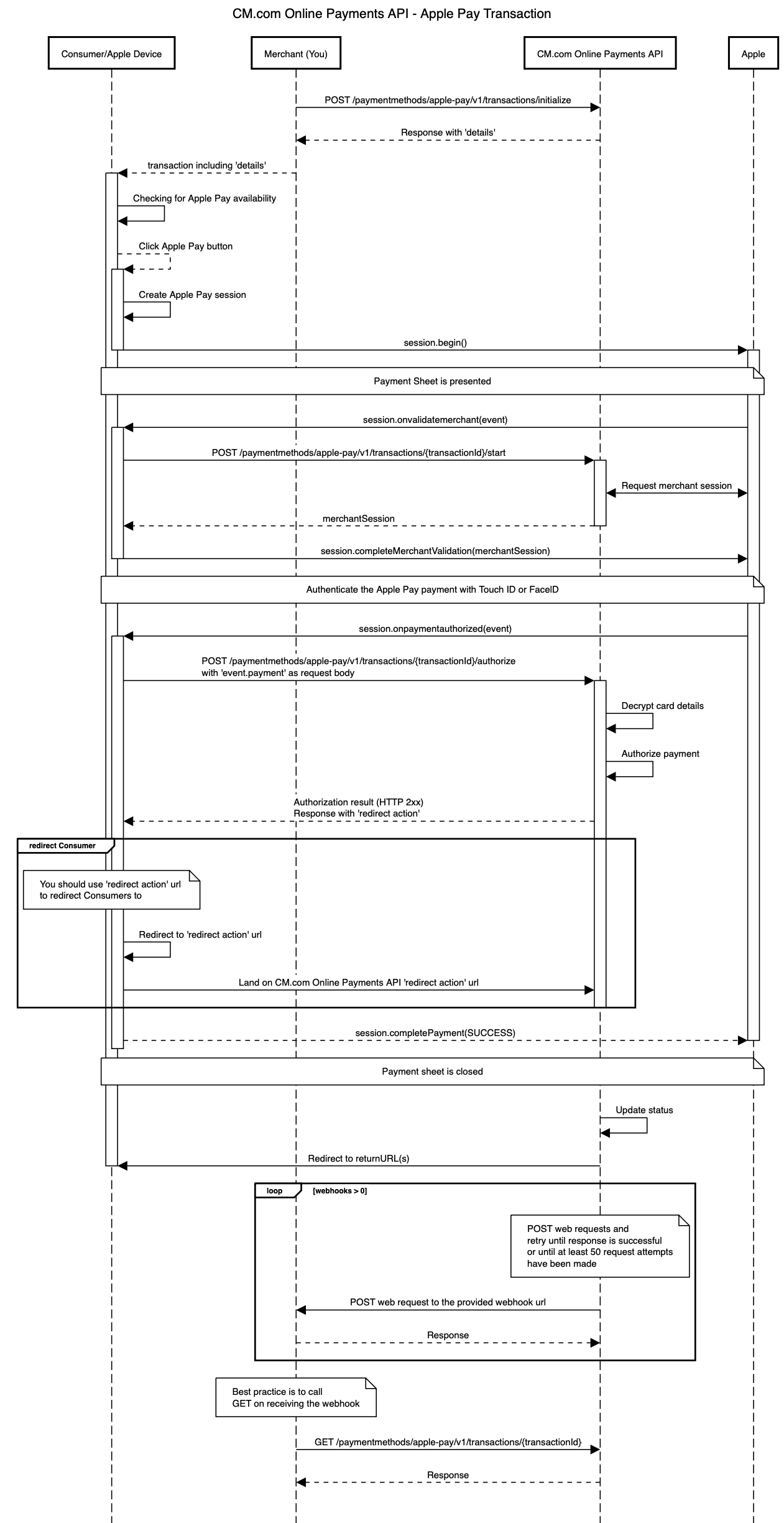
In the diagram above the following steps are performed:
1. A Merchant wants to enable Apple Pay payments for a Consumer/Apple Device. In order to do this, a Merchant makes a request to [initialize Apple Pay transaction](https://developers.cm.com/payments-platform/docs/initialize-transaction)
.
2. Merchant receives a successful transaction response including `details`. These details are passed to Consumer/Apple Device because they are necessary to render the Apple Pay button on the Apple Device.
3. Checking for Apple Pay availability; before showing the Apple Pay button to the Consumer/Apple Device the availability of Apple Pay needs to be checked. For more details see: [Checking for Apple Pay Availability](https://developer.apple.com/documentation/apple_pay_on_the_web/apple_pay_js_api/checking_for_apple_pay_availability)
. Example javascript:
JavaScript
`function canMakePaymentsWithApplePay() { if (window.ApplePaySession) { try { if (ApplePaySession.canMakePayments()) { return true; } else { console.log("Can not make Apple Pay payments."); } } catch (e) { console.log("Starting an Apple Pay session requires an secure document.", e); } } else { console.log("Apple Pay JS API is not available."); } return false; }`
4. Creating an Apple Pay session; after the Consumer clicks on the Apple Pay button a session has to be created specifying the payment details. The following payments details need to be provided in the request (For more details see: [Creating an Apple Pay Session](https://developer.apple.com/documentation/apple_pay_on_the_web/apple_pay_js_api/creating_an_apple_pay_session)
):
| Field | Description | Required |
| --- | --- | --- |
| countryCode | The country of the merchant. | ✅ |
| currencyCode | The currency for the payment. | ✅ |
| supportedNetworks | The payment networks supported by the merchant. The supported values are 'visa', 'masterCard', 'maestro'. (Depending on the payment methods enabled on your account.) | ✅ |
| merchantCapabilities | The payment capabilities supported by the merchant. The only supported value is 'supports3DS'. | ✅ |
| total.label | The name of the shop that is shown to the consumer. | ✅ |
| total.amount | The payment amount in major unit, i.e. including a decimal point. | ✅ |
Example javascript:
JavaScript
`let request = { countryCode: transactionJson.details.merchantCountry, currencyCode: transactionJson.currency, supportedNetworks: transactionJson.details.allowedCardNetworks, merchantCapabilities: ['supports3DS'], total: { label: transactionJson.details?.merchantName || 'Undefined merchant display name', amount: (transactionJson.amount / 100).toString() } }; var session = new ApplePaySession(4, request);`
5. After the session is created, call its [begin-method](https://developer.apple.com/documentation/apple_pay_on_the_web/applepaysession/1778001-begin)
to show the payment sheet. Example javascript:
JavaScript
`session.begin()`
6. Validating the merchant; Apple initiates the validation of the merchant when the payment sheet is shown using the [On Validate Merchant](https://developer.apple.com/documentation/apple_pay_on_the_web/applepaysession/1778021-onvalidatemerchant)
event. So, `session.onvalidatemerchant(event)` event handler is called when the payment sheet is displayed. The event parameter contains the validation URL attribute (`event.validationURL`), which should be used in the call to [start Apple Pay transaction](https://developers.cm.com/payments-platform/docs/start-transaction-1)
. The response is an opaque merchant session object, so If successful the returned merchant session must be used to [complete the merchant validation](https://developer.apple.com/documentation/apple_pay_on_the_web/applepaysession/1778015-completemerchantvalidation)
. Otherwise, the session must be aborted. Example javascript:
JavaScript
``session.onvalidatemerchant = event => { console.log(event); let controller = new AbortController(); const signal = controller.signal; const reqOptions = { method: "POST", headers: { 'Content-Type': "application/json", Authorization: `Bearer ${document.getElementById('token').value}`, Accept: `application/json` }, mode: "cors", body: JSON.stringify({ validationUrl: event.validationURL, displayName: transactionJson.details.merchantName, domainName: window.location.hostname }), signal: signal }; // Call your own server to request a new merchant session. fetch(baseUrl + "/start", reqOptions) .then(response => { if (!response.ok) { console.error(response); displayMessage(response.statusText); session.abort(); controller.abort(); } return response.json(); }) .then(merchantSession => { console.log(`Merchant session:`, merchantSession); session.completeMerchantValidation(merchantSession); }) .catch(err => { console.error("Error fetching merchant session", err); controller.abort(); }); };``
7. Authorizing the payment; Apple initiates the authorization of the payment when the consumer authenticates the payment using the [On Payment Authorized](https://developer.apple.com/documentation/apple_pay_on_the_web/applepaysession/1778020-onpaymentauthorized)
event. So, `session.onpaymentauthorized(event)` event handler is called when the user has authorized the Apple Pay payment with Touch ID, Face ID, or passcode. The event parameter contains the payment attribute (`event.payment`) containing the encrypted card details. The payment attribute must be sent as-is in the call to [authorize Apple Pay transaction](https://developers.cm.com/payments-platform/docs/authorize-transaction)
. Example javascript:
JavaScript
``session.onpaymentauthorized = function(event) { console.log(JSON.stringify(event)); let controller = new AbortController(); const signal = controller.signal; const reqOptions = { method: "POST", headers: { 'Content-Type': "application/json", Authorization: `Bearer ${document.getElementById('token').value}`, Accept: `application/json` }, mode: "cors", body: JSON.stringify(event.payment), signal: signal }; fetch(baseUrl + "/authorize", reqOptions) .then(response => { if (!response.ok) { console.error(response); displayMessage(response.statusText); session.completePayment({status: ApplePaySession.STATUS_FAILURE}); controller.abort(); } else { session.completePayment({status: ApplePaySession.STATUS_SUCCESS}); } return response.json(); }) .then(result => { console.log('Authorization response:', result); let responseElement = document.getElementById('response'); let btnRedirect = document.getElementById('btnRedirect'); responseElement.innerHTML = `${JSON.stringify(result, null, 2)}`; responseElement.classList.remove('d-none'); btnRedirect.classList.remove('d-none'); document.getElementById('btnRedirect').addEventListener("click", function () { window.location.href = result.action.redirect?.url; }); document.querySelector('#apple-pay-btn').remove(); }) .catch(err => { console.error("Error authorizing payment", err); displayMessage(err); controller.abort(); }); };``
1. While authorizing an Apple Pay transaction, the CM.com Online Payments API decrypts the provided card details and authorizes the payment. After the Payment is authorized the result must be used to [complete the payment on the session](https://developer.apple.com/documentation/apple_pay_on_the_web/applepaysession/1778012-completepayment)
(e.g. `session.completePayment({status: ApplePaySession.STATUS_SUCCESS});`). This will show the result of the authorization on the payment sheet, and close the payment sheet within 2 minutes automatically.
2. If successful the [authorize Apple Pay transaction](https://developers.cm.com/payments-platform/docs/authorize-transaction)
response also contains an `action.redirect.url` where Consumers should be redirected to. This will make them land on the CM.com Online Payments API 'redirect action' url.
3. When the Consumer dismisses the payment sheet instead of authenticating the payment, the On Cancel event is called by Apple. Example javascript:
JavaScript
`session.oncancel = function() { window.pollOrderStatus(); };`
8. Eventually the status of the CM.com Online Payments API transaction will be updated and that will redirect Consumers again from the 'redirect action' url to the returnUrl(s) specified by the Merchant when transaction was initialize.
9. If the Merchant also specified webhooks in the original request then CM.com Online Payments API will trigger the proper webhooks and make the requests to the webhook URLs specified by the Merchant. **When using webhooks, be aware that they are only a "best effort" mechanism**.
10. Merchant gets the latest details of the transaction. This usually happens once the Merchant received a webhook request.
The API endpoints involved on this flow are:
* [Initialize Transaction](https://developers.cm.com/payments-platform/docs/initialize-transaction)
* [Start transaction](https://developers.cm.com/payments-platform/docs/start-transaction-1)
* [Authorize transaction](https://developers.cm.com/payments-platform/docs/authorize-transaction)
* [Get Transaction](https://developers.cm.com/payments-platform/docs/get-transaction-5)
Create a refund for the payment made with an Apple Pay transaction
[](https://developers.cm.com/payments-platform/docs/diagrams-3#create-a-refund-for-the-payment-made-with-an-apple-pay-transaction)
---------------------------------------------------------------------------------------------------------------------------------------------------------------------------------------------------------
The CM.com Online Payments API enables you to create a refund for the payment made with an Apple Pay transaction. The diagram below presents the interaction that takes place between Merchant (You) and CM.com Online Payments API when requesting a refund for the payment made with an Apple Pay transaction.
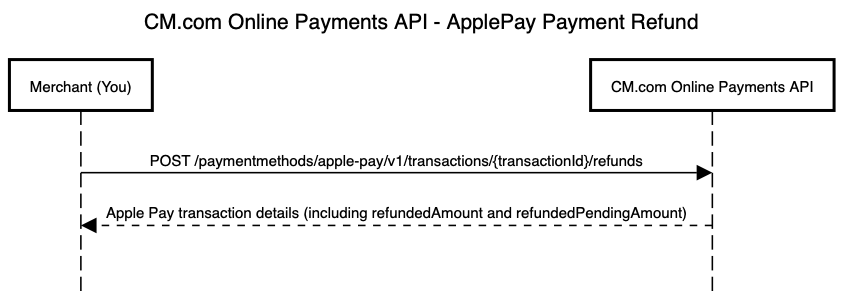
The API endpoints involved on this flow are:
* [Create a Refund](https://developers.cm.com/payments-platform/docs/create-a-refund-5)
Updated about 1 year ago
* * *
[](https://www.cm.com/)
* [Privacy Policy](https://www.cm.com/app/legal/cm-com/privacy-policy/)
* [Terms and Conditions](https://www.cm.com/app/legal/cm-com/terms-and-conditions/)
* [Cookie Policy](https://www.cm.com/about-cm/cookie-policy/)
Jump to Product page Conversational AI Cloud Mobile Service Cloud Mobile Marketing Cloud Messaging Ticketing Payments Platform Voice Sign
---
# Initialize transaction
You can use this call to initialize a new Apple Pay transaction.
Prerequisite
[](https://developers.cm.com/payments-platform/docs/initialize-transaction#prerequisite)
---------------------------------------------------------------------------------------------------------
Get an `access_token` and use it as 'Bearer' token in your request. Find more details [here](https://developers.cm.com/payments-platform/docs/authorization-3)
.
Request
[](https://developers.cm.com/payments-platform/docs/initialize-transaction#request)
-----------------------------------------------------------------------------------------------
Text
`POST https://api.pay.cm.com/api/v1/paymentmethods/apple-pay/v1/transactions/initialize`
###
Request body examples
[](https://developers.cm.com/payments-platform/docs/initialize-transaction#request-body-examples)
These are only some examples of the request body to create a transaction:
Full Request with ReturnURLsFull Request with ReturnURLMinimal Request with ReturnURL
`{ "reference": "20210623130413", "description": "Order at yourdomain.tld", "amount": 1200, "currency": "EUR", "expiresAt": "2006-01-02T15:04:05Z", "language": "nl", "consumer": { "name": { "firstName": "John", "lastName": "Lopez", "middleName": "A" }, "address": { "street": "Rustenburgerlaan", "houseNumber": "25", "postalCode": "2012AL", "city": "Haarlem", "countryCode": "NL", "state": "Noord-Holland", "additionalData": "Right-hand portal" }, "email": "[[email protected]](https://developers.cm.com/cdn-cgi/l/email-protection) ", "businessName": "CM", "phone": "06-95613259", "gender": null, "dateOfBirth": "1996-12-01" }, "webhooks": [ { "url": "https://yourdomain.tld/order-webhooks?purchaseId=order123", "events": [ "FINALSTATUS" ] }, { "url": "https://yourdomain.tld/payment-webhooks?purchaseId=order123", "events": [ "REFUND_STATUS" ] }, { "url": "https://yourdomain.tld/payment-webhooks?purchaseId=order123", "events": [ "STATUS_CHANGE" ] } ], "returnUrls": { "success": "https://yourdomain.tld/order/payment-success.html", "cancelled": "https://yourdomain.tld/order/payment-cancelled.html", "expired": "https://yourdomain.tld/order/payment-expired.html", "failed": "https://yourdomain.tld/order/payment-failed.html" } }`
`{ "reference": "20210623130413", "description": "Order at yourdomain.tld", "amount": 1200, "currency": "EUR", "expiresAt": "2006-01-02T15:04:05Z", "language": "nl", "consumer": { "name": { "firstName": "John", "lastName": "Lopez", "middleName": "A" }, "address": { "street": "Rustenburgerlaan", "houseNumber": "25", "postalCode": "2012AL", "city": "Haarlem", "countryCode": "NL", "state": "Noord-Holland", "additionalData": "Right-hand portal" }, "email": "[[email protected]](https://developers.cm.com/cdn-cgi/l/email-protection) ", "businessName": "CM", "phone": "06-95613259", "gender": null, "dateOfBirth": "1996-12-01" }, "webhooks": [ { "url": "https://yourdomain.tld/order-webhooks?purchaseId=order123", "events": [ "FINALSTATUS" ] }, { "url": "https://yourdomain.tld/payment-webhooks?purchaseId=order123", "events": [ "REFUND_STATUS" ] }, { "url": "https://yourdomain.tld/payment-webhooks?purchaseId=order123", "events": [ "STATUS_CHANGE" ] } ], "returnUrl": "https://yourdomain.tld/order/payment-completed.html" }`
`{ "reference": "20210623130413", "description": "Order at yourdomain.tld", "amount": 1200, "expiresAt": "2006-01-02T15:04:05Z", "language": "nl", "returnUrl": "https://yourdomain.tld/order/payment-completed.html" }`
"**Full Request with ReturnURLs**" and "**Full Request with ReturnURL**" are examples where all the request parameters are provided. If `returnUrls` is defined then customers will be redirected to a different URL depending on the status of the transaction when the payment process is completed. If `returnUrl` is defined then customers will be redirected to the same URL no matter the status of the transaction when the payment process is completed.
"**Minimal Request with ReturnURLs**" is an example of the minimal request to create a transaction. This example, is using `returnUrls`, but you can replace it for `returnUrl` depending on what is better for your use case.
Parameters
[](https://developers.cm.com/payments-platform/docs/initialize-transaction#parameters)
-----------------------------------------------------------------------------------------------------
| Parameter | Type | Description | Constraints |
| --- | --- | --- | --- |
| reference | String(1...255) | An identifier specified by you. If webhooks were specified in the request this identifier is added to the webhook request payload. | |
| description | String(1...255) | Description of the transaction. | |
| amount | Int(1...99999999) | Integer representing the amount of the transaction. Denomination in the smallest currency subunit (e.g. eurocents). | |
| expiresAt | String(RFC3339) | Expiration time. | ISO 8601 date and time. |
| language | String(ISO 639-1) | Preferred language of the user interface. | ISO 639-1 language. |
| returnUrl | String(2000) | Specifies the URL where your customers will be redirected to. | Either `returnUrl` or `returnUrls` must be specified, but not both. |
| returnUrls | [returnUrls](https://developers.cm.com/payments-platform/docs/schemas-5#returnurls)
Object | Specifies a URL where your customers will be redirected to per transaction status. For example, your customers will be redirected to `returnUrls.success` when the status of the transaction changes to `SUCCESS`. | Either `returnUrl` or `returnUrls` must be specified, but not both. |
Optional parameters
[](https://developers.cm.com/payments-platform/docs/initialize-transaction#optional-parameters)
-----------------------------------------------------------------------------------------------------------------------
| Parameter | Type | Description | Constraints |
| --- | --- | --- | --- |
| currency | String (ISO 4217) | Currency code. | ISO 4217 currency code. |
| consumer | [consumer](https://developers.cm.com/payments-platform/docs/schemas-5#consumer)
Object | Customer details. | The following fields are mandatory: `name.firstName`, `name.lastName`, `address.street`, `address.houseNumber`, `address.postalCode`, `address.city`, `address.countryCode`, `email`. |
| webhooks | Array of objects | Webhooks enable receiving a web request once a given event occurs. | Find more details [here](https://developers.cm.com/payments-platform/docs/webhooks-1)
. |
Response
[](https://developers.cm.com/payments-platform/docs/initialize-transaction#response)
-------------------------------------------------------------------------------------------------
JSON
`{ "id": "8db1e7fa-ba8a-4189-92fd-67a20217443d", "orderId": "8db1e7fa-ba8a-4189-92fd-67a20217443d", "reference": "20210623130413", "amount": 1200, "currency": "EUR", "description": "Order at yourdomain.tld", "expiresAt": "2006-01-02T15:04:05Z", "language": "nl", "country": "NL", "webhooks": [ { "url": "https://yourdomain.tld/order-webhooks?purchaseId=order123", "events": [ "FINALSTATUS" ] }, { "url": "https://yourdomain.tld/payment-webhooks?purchaseId=order123", "events": [ "REFUND_STATUS" ] }, { "url": "https://yourdomain.tld/payment-webhooks?purchaseId=order123", "events": [ "STATUS_CHANGE" ] } ], "status": "OPEN", "details": { "merchantCountry": "DE", "serverUrl": "https://www.example.com/api/", "allowedCardNetworks": [ "mastercard" ], "merchantName": "My Merchant Name" }, "createdAt": "2006-01-02T15:04:05Z", "refunds": { "refundedAmount": 300, "refundedPendingAmount": 100 }, "returnUrls": { "success": "https://yourdomain.tld/order/payment-success.html", "cancelled": "https://yourdomain.tld/order/payment-cancelled.html", "expired": "https://yourdomain.tld/order/payment-expired.html", "failed": "https://yourdomain.tld/order/payment-failed.html" } }`
Parameters
[](https://developers.cm.com/payments-platform/docs/initialize-transaction#parameters-1)
-------------------------------------------------------------------------------------------------------
| Parameter | Type | Description | Constraints |
| --- | --- | --- | --- |
| id | String(36) | Transaction unique identifier. | |
| orderId | String(36) | Unique identifier. | |
| reference | String(1...255) | An identifier specified by you. If webhooks were specified in the request this identifier is added to the webhook request payload. | Specified in the request. |
| amount | Int(1...99999999) | Integer representing the amount of the checkout. Denomination in the smallest currency subunit (e.g. eurocents). | Specified in the request. |
| currency | String (ISO 4217) | Currency code. | Specified in the request. |
| description | String(1...255) | Description of the transaction. | Specified in the request. |
| expiresAt | String(RFC3339) | Expiration time. | Specified in the request. |
| language | String(ISO 639-1) | Preferred language of the user interface. | Specified in the request. |
| country | String | Country of the Customer. | |
| status | String | `OPEN` - Transaction has been created. This is the initial status.
`SUCCESS` - Transaction successfully paid.
`CANCELLED` - Transaction has been cancelled by your customers.
`EXPIRED` - Transaction has not succeeded; expired.
`FAILURE` - Transaction has not succeeded; unknown reason.
`AUTHORIZED` - Transaction is authorized. | |
| createdAt | String(RFC3339) | Creation time. | ISO 8601 date and time. |
| returnUrl | String(2000) | Specifies the URL where your customers will be redirected to. | Specified in the request. |
| returnUrls | [returnUrls](https://developers.cm.com/payments-platform/docs/schemas-5#returnurls)
Object | Specifies a URL where your customers will be redirected to per transaction status. For example, your customers will be redirected to `returnUrls.success` when the status of the transaction changes to `SUCCESS`. | Specified in the request. |
Optional parameters
[](https://developers.cm.com/payments-platform/docs/initialize-transaction#optional-parameters-1)
-------------------------------------------------------------------------------------------------------------------------
| Parameter | Type | Description | Constraints |
| --- | --- | --- | --- |
| webhooks | Array of objects | Webhooks enable receiving a web request once a given event occurs. | Specified in the request. |
| details | [details](https://developers.cm.com/payments-platform/docs/schemas-5#details)
Object | These are the details used to render the Apple Pay button in your own page. | This is nullable. |
| refunds | [refund](https://developers.cm.com/payments-platform/docs/schemas-5#refund)
Object | Indicates refundedAmount and refundedPendingAmount. | |
Response codes
[](https://developers.cm.com/payments-platform/docs/initialize-transaction#response-codes)
-------------------------------------------------------------------------------------------------------------
| HTTP status | Description |
| --- | --- |
| 201 | Transaction initialized. |
| 4XX | Client error response (See message for details). This response is given when the user input was incorrect or something illegal was attempted (eg. using a service without having that service configured for the user, or not being authorized). |
| 5XX | Server error response (See message for details). |
Updated about 1 year ago
* * *
[](https://www.cm.com/)
* [Privacy Policy](https://www.cm.com/app/legal/cm-com/privacy-policy/)
* [Terms and Conditions](https://www.cm.com/app/legal/cm-com/terms-and-conditions/)
* [Cookie Policy](https://www.cm.com/about-cm/cookie-policy/)
Jump to Product page Conversational AI Cloud Mobile Service Cloud Mobile Marketing Cloud Messaging Ticketing Payments Platform Voice Sign
---
# Create a Refund
You can use this call to create a refund for a payment made with a Bancontact transaction.
Prerequisite
[](https://developers.cm.com/payments-platform/docs/create-a-refund-4#prerequisite)
----------------------------------------------------------------------------------------------------
Get an `access_token` and use it as 'Bearer' token in your request. Find more details [here](https://developers.cm.com/payments-platform/docs/authorization-3)
.
Request
[](https://developers.cm.com/payments-platform/docs/create-a-refund-4#request)
------------------------------------------------------------------------------------------
Text
`POST https://api.pay.cm.com/api/v1/paymentmethods/bancontact/v1/transactions/{transactionId}/refunds`
JSON
`{ "amount": 1200, "reason": "Refund required by customer." }`
Optional parameters
[](https://developers.cm.com/payments-platform/docs/create-a-refund-4#optional-parameters)
------------------------------------------------------------------------------------------------------------------
| Parameter | Type | Description | Constraints |
| --- | --- | --- | --- |
| amount | Int(1...99999999) | Denomination in the smallest currency subunit (e.g. eurocents). If empty, the refund amount will be the remaining available amount of the transaction (e.g. total payment amount minus already refunded amounts minus the amounts of the pending refund requests). | Must be lower than or equal to the original transaction amount. |
| reason | String(255) | The description for the refund. | |
Response
[](https://developers.cm.com/payments-platform/docs/create-a-refund-4#response)
--------------------------------------------------------------------------------------------
If refund has been successfully created then the response is the [Get Transaction](https://developers.cm.com/payments-platform/docs/get-transaction-4)
response with an updated refunds.refundedAmount and refunds.refundedPendingAmount.
Updated about 1 year ago
* * *
[](https://www.cm.com/)
* [Privacy Policy](https://www.cm.com/app/legal/cm-com/privacy-policy/)
* [Terms and Conditions](https://www.cm.com/app/legal/cm-com/terms-and-conditions/)
* [Cookie Policy](https://www.cm.com/about-cm/cookie-policy/)
Jump to Product page Conversational AI Cloud Mobile Service Cloud Mobile Marketing Cloud Messaging Ticketing Payments Platform Voice Sign
---
# Get Transaction
You can use this call to retrieve details of an Apple Pay transaction.
Prerequisite
[](https://developers.cm.com/payments-platform/docs/get-transaction-5#prerequisite)
----------------------------------------------------------------------------------------------------
Get an `access_token` and use it as 'Bearer' token in your request. Find more details [here](https://developers.cm.com/payments-platform/docs/authorization-3)
.
Request
[](https://developers.cm.com/payments-platform/docs/get-transaction-5#request)
------------------------------------------------------------------------------------------
Text
`GET https://api.pay.cm.com/api/v1/paymentmethods/apple-pay/v1/transactions/{transactionId}`
Response
[](https://developers.cm.com/payments-platform/docs/get-transaction-5#response)
--------------------------------------------------------------------------------------------
JSON
`{ "id": "8db1e7fa-ba8a-4189-92fd-67a20217443d", "orderId": "8db1e7fa-ba8a-4189-92fd-67a20217443d", "reference": "20210623130413", "amount": 1200, "currency": "EUR", "description": "Order at yourdomain.tld", "expiresAt": "2006-01-02T15:04:05Z", "language": "nl", "country": "NL", "webhooks": [ { "url": "https://yourdomain.tld/order-webhooks?purchaseId=order123", "events": [ "FINALSTATUS" ] }, { "url": "https://yourdomain.tld/payment-webhooks?purchaseId=order123", "events": [ "REFUND_STATUS" ] }, { "url": "https://yourdomain.tld/payment-webhooks?purchaseId=order123", "events": [ "STATUS_CHANGE" ] } ], "status": "OPEN", "details": { "merchantCountry": "DE", "serverUrl": "https://www.example.com/api/", "allowedCardNetworks": [ "mastercard" ], "merchantName": "My Merchant Name" }, "action": { "redirect": { "url": "https://checkout.tld/3ds/v2/creditcard/123" } }, "createdAt": "2006-01-02T15:04:05Z", "refunds": { "refundedAmount": 300, "refundedPendingAmount": 100 }, "returnUrls": { "success": "https://yourdomain.tld/order/payment-success.html", "cancelled": "https://yourdomain.tld/order/payment-cancelled.html", "expired": "https://yourdomain.tld/order/payment-expired.html", "failed": "https://yourdomain.tld/order/payment-failed.html" } }`
Parameters
[](https://developers.cm.com/payments-platform/docs/get-transaction-5#parameters)
------------------------------------------------------------------------------------------------
| Parameter | Type | Description | Constraints |
| --- | --- | --- | --- |
| id | String(36) | Transaction unique identifier. | |
| orderId | String(36) | Unique identifier. | |
| reference | String(1...255) | An identifier specified by you. If webhooks were specified in the request this identifier is added to the webhook request payload. | |
| amount | Int(1...99999999) | Integer representing the amount of the checkout. Denomination in the smallest currency subunit (e.g. eurocents). | |
| currency | String (ISO 4217) | Currency code. | ISO 4217 currency code. |
| description | String(1...255) | Description of the transaction. | |
| expiresAt | String(RFC3339) | Expiration time. | |
| language | String(ISO 639-1) | Preferred language of the user interface. | |
| country | String | Country of the Customer. | ISO 3166 Country Code. |
| status | String | `OPEN` - Transaction has been created. This is the initial status.
`SUCCESS` - Transaction successfully paid.
`CANCELLED` - Transaction has been cancelled by your customers.
`EXPIRED` - Transaction has not succeeded; expired.
`FAILURE` - Transaction has not succeeded; unknown reason.
`AUTHORIZED` - Transaction is authorized. | |
| createdAt | String(RFC3339) | Creation time. | ISO 8601 date and time. |
| returnUrl | String(2000) | Specifies the URL where your customers will be redirected to. | Either `returnUrl` or `returnUrls` must be specified, but not both. |
| returnUrls | [returnUrls](https://developers.cm.com/payments-platform/docs/schemas-5#returnurls)
Object | Specifies a URL where your customers will be redirected to per transaction status. For example, your customers will be redirected to `returnUrls.success` when the status of the transaction changes to `SUCCESS`. | Either `returnUrl` or `returnUrls` must be specified, but not both. |
Optional parameters
[](https://developers.cm.com/payments-platform/docs/get-transaction-5#optional-parameters)
------------------------------------------------------------------------------------------------------------------
| Parameter | Type | Description | Constraints |
| --- | --- | --- | --- |
| webhooks | Array of objects | Webhooks enable receiving a web request once a given event occurs. | Specified in the request. |
| details | [details](https://developers.cm.com/payments-platform/docs/schemas-5#details)
Object | These are the details used to render the Apple Pay button in your own page. | This is nullable. |
| action | [action](https://developers.cm.com/payments-platform/docs/schemas-5#action)
Object | The next action to be performed by you for this transaction. This includes a URL where you should `redirect` your customer to. | This is nullable. |
| refunds | [refund](https://developers.cm.com/payments-platform/docs/schemas-5#refund)
Object | Indicates refundedAmount and refundedPendingAmount. | |
Response codes
[](https://developers.cm.com/payments-platform/docs/get-transaction-5#response-codes)
--------------------------------------------------------------------------------------------------------
| HTTP status | Description |
| --- | --- |
| 200 | Transaction details are successfully retrieved. |
| 4XX | Client error response (See message for details). This response is given when the User input was incorrect or something illegal was attempted (eg. using a service without having that service configured for the user, or not being authorized). |
| 5XX | Server error response (See message for details). |
Updated about 1 year ago
* * *
[](https://www.cm.com/)
* [Privacy Policy](https://www.cm.com/app/legal/cm-com/privacy-policy/)
* [Terms and Conditions](https://www.cm.com/app/legal/cm-com/terms-and-conditions/)
* [Cookie Policy](https://www.cm.com/about-cm/cookie-policy/)
Jump to Product page Conversational AI Cloud Mobile Service Cloud Mobile Marketing Cloud Messaging Ticketing Payments Platform Voice Sign
---
# Create a Refund
You can use this call to create a refund for a payment made with an Apple Pay transaction.
Prerequisite
[](https://developers.cm.com/payments-platform/docs/create-a-refund-5#prerequisite)
----------------------------------------------------------------------------------------------------
Get an `access_token` and use it as 'Bearer' token in your request. Find more details [here](https://developers.cm.com/payments-platform/docs/authorization-3)
.
Request
[](https://developers.cm.com/payments-platform/docs/create-a-refund-5#request)
------------------------------------------------------------------------------------------
Text
`POST https://api.pay.cm.com/api/v1/paymentmethods/apple-pay/v1/transactions/{transactionId}/refunds`
JSON
`{ "amount": 1200, "reason": "Refund required by customer." }`
Optional parameters
[](https://developers.cm.com/payments-platform/docs/create-a-refund-5#optional-parameters)
------------------------------------------------------------------------------------------------------------------
| Parameter | Type | Description | Constraints |
| --- | --- | --- | --- |
| amount | Int(1...99999999) | Denomination in the smallest currency subunit (e.g. eurocents). If empty, the refund amount will be the remaining available amount of the transaction (e.g. total payment amount minus already refunded amounts minus the amounts of the pending refund requests). | Must be lower than or equal to the original transaction amount. |
| reason | String(255) | The description for the refund. | |
Response
[](https://developers.cm.com/payments-platform/docs/create-a-refund-5#response)
--------------------------------------------------------------------------------------------
If refund has been successfully created then the response is the [Get Transaction](https://developers.cm.com/payments-platform/docs/get-transaction-5)
response with an updated refunds.refundedAmount and refunds.refundedPendingAmount.
Updated about 1 year ago
* * *
[](https://www.cm.com/)
* [Privacy Policy](https://www.cm.com/app/legal/cm-com/privacy-policy/)
* [Terms and Conditions](https://www.cm.com/app/legal/cm-com/terms-and-conditions/)
* [Cookie Policy](https://www.cm.com/about-cm/cookie-policy/)
Jump to Product page Conversational AI Cloud Mobile Service Cloud Mobile Marketing Cloud Messaging Ticketing Payments Platform Voice Sign
---
# Authorize transaction
You can use this call to authorize an existing Apple Pay transaction using the CM.com Online Payments API.
Prerequisite
[](https://developers.cm.com/payments-platform/docs/authorize-transaction#prerequisite)
--------------------------------------------------------------------------------------------------------
Get an `access_token` and use it as 'Bearer' token in your request. Find more details [here](https://developers.cm.com/payments-platform/docs/authorization-3)
.
Request
[](https://developers.cm.com/payments-platform/docs/authorize-transaction#request)
----------------------------------------------------------------------------------------------
Text
`POST https://api.pay.cm.com/api/v1/paymentmethods/apple-pay/v1/transactions/{transactionId}/authorize`
The request data is passed on as-is received from the Apple device in the on authorize payment event. **Modifications are not allowed**.
Response
[](https://developers.cm.com/payments-platform/docs/authorize-transaction#response)
------------------------------------------------------------------------------------------------
JSON
`{ "id": "8db1e7fa-ba8a-4189-92fd-67a20217443d", "orderId": "8db1e7fa-ba8a-4189-92fd-67a20217443d", "reference": "20210623130413", "amount": 1200, "currency": "EUR", "description": "Order at yourdomain.tld", "expiresAt": "2006-01-02T15:04:05Z", "language": "nl", "country": "NL", "webhooks": [ { "url": "https://yourdomain.tld/order-webhooks?purchaseId=order123", "events": [ "FINALSTATUS" ] }, { "url": "https://yourdomain.tld/payment-webhooks?purchaseId=order123", "events": [ "REFUND_STATUS" ] }, { "url": "https://yourdomain.tld/payment-webhooks?purchaseId=order123", "events": [ "STATUS_CHANGE" ] } ], "status": "OPEN", "details": { "merchantCountry": "DE", "serverUrl": "https://www.example.com/api/", "allowedCardNetworks": [ "mastercard" ], "merchantName": "My Merchant Name" }, "action": { "redirect": { "url": "https://checkout.tld/3ds/v2/creditcard/123" } }, "createdAt": "2006-01-02T15:04:05Z", "refunds": { "refundedAmount": 300, "refundedPendingAmount": 100 }, "returnUrls": { "success": "https://yourdomain.tld/order/payment-success.html", "cancelled": "https://yourdomain.tld/order/payment-cancelled.html", "expired": "https://yourdomain.tld/order/payment-expired.html", "failed": "https://yourdomain.tld/order/payment-failed.html" } }`
Parameters
[](https://developers.cm.com/payments-platform/docs/authorize-transaction#parameters)
----------------------------------------------------------------------------------------------------
| Parameter | Type | Description | Constraints |
| --- | --- | --- | --- |
| id | String(36) | Transaction unique identifier. | |
| orderId | String(36) | Unique identifier. | |
| reference | String(1...255) | An identifier specified by you. If webhooks were specified in the request this identifier is added to the webhook request payload. | Specified in the `initialize transaction` request. |
| amount | Int(1...99999999) | Integer representing the amount of the checkout. Denomination in the smallest currency subunit (e.g. eurocents). | Specified in the `initialize transaction` request. |
| currency | String (ISO 4217) | Currency code. | Specified in the `initialize transaction` request. |
| description | String(1...255) | Description of the transaction. | Specified in the `initialize transaction` request. |
| expiresAt | String(RFC3339) | Expiration time. | ISO 8601 date and time. |
| language | String(ISO 639-1) | Preferred language of the user interface. | Specified in the `initialize transaction` request. |
| country | String | Country of the Customer. | Specified in the `initialize transaction` request. |
| status | String | `OPEN` - Transaction has been created. This is the initial status.
`SUCCESS` - Transaction successfully paid.
`CANCELLED` - Transaction has been cancelled by your customers.
`EXPIRED` - Transaction has not succeeded; expired.
`FAILURE` - Transaction has not succeeded; unknown reason.
`AUTHORIZED` - Transaction is authorized. | |
| createdAt | String(RFC3339) | Creation time. | ISO 8601 date and time. |
| returnUrl | String(2000) | Specifies the URL where your customers will be redirected to. | Specified in the `initialize transaction` request. |
| returnUrls | [returnUrls](https://developers.cm.com/payments-platform/docs/schemas-5#returnurls)
Object | Specifies a URL where your customers will be redirected to per transaction status. For example, your customers will be redirected to `returnUrls.success` when the status of the transaction changes to `SUCCESS`. | Specified in the `initialize transaction` request. |
Optional parameters
[](https://developers.cm.com/payments-platform/docs/authorize-transaction#optional-parameters)
----------------------------------------------------------------------------------------------------------------------
| Parameter | Type | Description | Constraints |
| --- | --- | --- | --- |
| webhooks | Array of objects | Webhooks enable receiving a web request once a given event occurs. | Specified in the `initialize transaction` request. |
| details | [details](https://developers.cm.com/payments-platform/docs/schemas-5#details)
Object | These are the details used to render the Apple Pay button in your own page. | This is nullable. |
| action | [action](https://developers.cm.com/payments-platform/docs/schemas-5#action)
Object | The next action to be performed by you for this transaction. This includes a URL where you should `redirect` your customer to. | This is nullable. |
| refunds | [refund](https://developers.cm.com/payments-platform/docs/schemas-5#refund)
Object | Indicates refundedAmount and refundedPendingAmount. | |
Response codes
[](https://developers.cm.com/payments-platform/docs/authorize-transaction#response-codes)
------------------------------------------------------------------------------------------------------------
| HTTP status | Description |
| --- | --- |
| 201 | Transaction authorized. |
| 4XX | Client error response (See message for details). This response is given when the user input was incorrect or something illegal was attempted (eg. using a service without having that service configured for the user, or not being authorized). |
| 5XX | Server error response (See message for details). |
Updated about 1 year ago
* * *
[](https://www.cm.com/)
* [Privacy Policy](https://www.cm.com/app/legal/cm-com/privacy-policy/)
* [Terms and Conditions](https://www.cm.com/app/legal/cm-com/terms-and-conditions/)
* [Cookie Policy](https://www.cm.com/about-cm/cookie-policy/)
Jump to Product page Conversational AI Cloud Mobile Service Cloud Mobile Marketing Cloud Messaging Ticketing Payments Platform Voice Sign
---
# Google Pay
Integrate your own checkout with our API and allow your customers to make payments with Google Pay.
How does it work?
[](https://developers.cm.com/payments-platform/docs/googlepay-1#how-does-it-work)
=======================================================================================================
You make the following steps possible by using [Google Pay JS API](https://developers.google.com/pay/api/web/reference/request-objects?authuser=1#IsReadyToPayRequest)
together with our CM.com Online Payments API:
1. Customer opens your webshop, adds some items to the shopping basket, and clicks on 'Proceed to Checkout'.
2. After initializing a Google Pay transaction with the [initialize Google Pay transaction](https://developers.cm.com/payments-platform/docs/initialize-transaction-1)
endpoint, you use the retrieved `details` to generate a Google Pay payment button (after checking that Google Pay is available for the device of the customer) on your checkout page.
3. The customer clicks on the Google Pay button. This will make you ask the Google payments client to load the payment data. As a result, a payment sheet will be displayed in the device of the customer, allowing them to select a card or enter a new card. When the customer has selected a card, the details are returned as payment data by the Google payments client. Within the payment data you will find the payment method data which must be sent as-is in your request to the [auhorize Google Pay transaction](https://developers.cm.com/payments-platform/docs/authorize-transaction-1)
endpoint. After the Payment is authorized the response will contain a `redirect.url` where your customer should be redirected to, making the customer to land on a CM.com Online Payments API url.
4. When the status of the transaction is updated in the CM.com Online Payments API, you will receive a webhook (if you configured it for your Google Pay transaction), and the customer will be redirected to the Return URL(s) you specified when you initialized your Google Pay transaction.
5. You make a request to the [get Google Pay transaction](https://developers.cm.com/payments-platform/docs/get-transaction-6)
endpoint, and use its latest details to update your system.
> 📘
>
> When using webhooks, be aware that they are only a "best effort" mechanism. Find more details [here](https://developers.cm.com/payments-platform/docs/webhooks-1)
> .
>
>
> -------------------------------------------------------------------------------------------------------------------------------------------------------------------------
Updated about 1 year ago
* * *
[](https://www.cm.com/)
* [Privacy Policy](https://www.cm.com/app/legal/cm-com/privacy-policy/)
* [Terms and Conditions](https://www.cm.com/app/legal/cm-com/terms-and-conditions/)
* [Cookie Policy](https://www.cm.com/about-cm/cookie-policy/)
Jump to Product page Conversational AI Cloud Mobile Service Cloud Mobile Marketing Cloud Messaging Ticketing Payments Platform Voice Sign
---
# Schemas
returnUrls
[](https://developers.cm.com/payments-platform/docs/schemas-5#returnurls)
----------------------------------------------------------------------------------------
| Parameter | Type | Description | Constraints | Required |
| --- | --- | --- | --- | --- |
| success | String(1...2000) | Return URL to use when the transaction succeeds. | | ✅ |
| cancelled | String(1...2000) | Return URL to use when the transaction is cancelled. | | ✅ |
| expired | String(1...2000) | Return URL to use when the transaction is expired. | | ✅ |
| failed | String(1...2000) | Return URL to use when the transaction is failed. | | ✅ |
consumer
[](https://developers.cm.com/payments-platform/docs/schemas-5#consumer)
------------------------------------------------------------------------------------
| Parameter | Type | Description | Constraints | Required |
| --- | --- | --- | --- | --- |
| name | [name](https://developers.cm.com/payments-platform/docs/schemas-5#name)
Object | Customer name. | | |
| address | [address](https://developers.cm.com/payments-platform/docs/schemas-5#address)
Object | Customer address. | | ✅ |
| email | String | Email provided by customer. | | ✅ |
| businessName | String(1...35) | Business name. | | |
| phone | String | Customer phone number. | | |
| gender | String(1...2000) | Gender of the customer. | The possible values are: `m`, `f` , or `null`. | |
| dateOfBirth | String | Date of birth of the customer. | | |
name
[](https://developers.cm.com/payments-platform/docs/schemas-5#name)
----------------------------------------------------------------------------
| Parameter | Type | Description | Constraints | Required |
| --- | --- | --- | --- | --- |
| firstName | String(1...35) | Customer first name. | | ✅ |
| lastName | String(1...35) | Customer last name. | | ✅ |
| middleName | String(1...35) | Customer middle name. | | |
address
[](https://developers.cm.com/payments-platform/docs/schemas-5#address)
----------------------------------------------------------------------------------
| Parameter | Type | Description | Constraints | Required |
| --- | --- | --- | --- | --- |
| street | String(1...100) | Street. | | |
| houseNumber | String(1...35) | House and number. | | |
| postalCode | String(1...35) | Postal code. | | |
| city | String(1...35) | City. | | |
| countryCode | String | Country code. | ISO 3166-1 country code. | ✅ |
| state | String(1...40) | State. | | |
| additionalData | String(1...35) | Additional address information. | | |
details
[](https://developers.cm.com/payments-platform/docs/schemas-5#details)
----------------------------------------------------------------------------------
| Parameter | Type | Description | Constraints | Required |
| --- | --- | --- | --- | --- |
| merchantCountry | String | The country code where the transaction is processed. | ISO 3166-1 alpha-2 country code. | |
| serverUrl | String | The URL to the Mobile Pay Server. | | |
| allowedCardNetworks | String | The supported card networks for Payment via Apple Pay. | The possible values are: `mastercard`, `visa`. | |
| merchantName | String | The name to display on the the payment sheet. | | |
action
[](https://developers.cm.com/payments-platform/docs/schemas-5#action)
--------------------------------------------------------------------------------
| Parameter | Type | Description | Constraints | Required |
| --- | --- | --- | --- | --- |
| redirect | [redirect](https://developers.cm.com/payments-platform/docs/schemas-5#redirect)
Object | Next action to be performed by merchant (or consumer) to complete the payment. | | |
redirect
[](https://developers.cm.com/payments-platform/docs/schemas-5#redirect)
------------------------------------------------------------------------------------
| Parameter | Type | Description | Constraints | Required |
| --- | --- | --- | --- | --- |
| url | String | URL where consumer should be redirected to by the merchant to perform the payment. | | |
refund
[](https://developers.cm.com/payments-platform/docs/schemas-5#refund)
--------------------------------------------------------------------------------
| Parameter | Type | Description | Constraints | Required |
| --- | --- | --- | --- | --- |
| refundedAmount | Int(0...99999999) | Amount in the smallest currency subunit, as for example eurocents, that has already been refunded. | | ✅ |
| refundedPendingAmount | Int(1...99999999) | Amount in the smallest currency subunit, as for example eurocents, that has been requested to be refunded. | | ✅ |
Updated about 1 year ago
* * *
[](https://www.cm.com/)
* [Privacy Policy](https://www.cm.com/app/legal/cm-com/privacy-policy/)
* [Terms and Conditions](https://www.cm.com/app/legal/cm-com/terms-and-conditions/)
* [Cookie Policy](https://www.cm.com/about-cm/cookie-policy/)
Jump to Product page Conversational AI Cloud Mobile Service Cloud Mobile Marketing Cloud Messaging Ticketing Payments Platform Voice Sign
---
# Payments Platform

Online Payments
[](https://developers.cm.com/payments-platform/v22.06/#online-payments)
-------------------------------------------------------------------------------------------
Online Payments API allows merchants to create Online Payments.
[Find out more](https://developers.cm.com/payments-platform/docs/cm-payments)

POS Payments
[](https://developers.cm.com/payments-platform/v22.06/#pos-payments)
-------------------------------------------------------------------------------------
POS Payments covers both ECR (Electronic Cash Register) solutions and integrations, as well as Smart POS Terminals.
We have solutions to connect external ECRs to Smart POS Terminals through our Cloud Integration solution.
On top of that we also enable 3rd party integrators to integrate directly with our Android based Terminal app and run side by side on the Smart POS Terminal!
[Find out more](https://developers.cm.com/payments-platform/v22.06/docs/pos-payments)

Online Payments (Legacy)
[](https://developers.cm.com/payments-platform/v22.06/#online-payments-legacy)
-----------------------------------------------------------------------------------------------------------
Online Payments API allows merchants to create Online Payments.
[Find out more](https://developers.cm.com/payments-platform/v22.06/docs/introduction)
[](https://www.cm.com/)
* [Privacy Policy](https://www.cm.com/app/legal/cm-com/privacy-policy/)
* [Terms and Conditions](https://www.cm.com/app/legal/cm-com/terms-and-conditions/)
* [Cookie Policy](https://www.cm.com/about-cm/cookie-policy/)
Jump to Product page Conversational AI Cloud Mobile Service Cloud Mobile Marketing Cloud Messaging Ticketing Payments Platform Voice Sign
---
# Before integrating
Prerequisites
[](https://developers.cm.com/payments-platform/docs/introduction-6#prerequisites)
---------------------------------------------------------------------------------------------------
For Google Pay the following prerequisites need to be fulfilled:
* Enable Google Pay on your account: Google Pay (and relevant credit and debit card payment methods) needs to be enabled on your account.
* Integration Checklist: To ensure that you have completed all the required steps in your web integration, check [integration checklist](https://developers.google.com/pay/api/web/guides/test-and-deploy/integration-checklist)
.
* Google Pay acceptance policy: All merchants must adhere to the Google Pay APIs [Acceptable Use Policy](https://payments.developers.google.com/terms/aup)
and accept the terms defined in the [Google Pay API Terms of Service](https://payments.developers.google.com/terms/sellertos)
.
* Besides implementing the requests to [initialize Google Pay transaction](https://developers.cm.com/payments-platform/docs/initialize-transaction-1)
, and [authorize Google Pay transaction](https://developers.cm.com/payments-platform/docs/authorize-transaction-1)
on the CM.com Online Payments API, [Google Pay JS API](https://developers.google.com/pay/api/web/reference/request-objects?authuser=1#IsReadyToPayRequest)
has to be used.
More details about the Google Pay API can be found at: [Google Pay web developer documentation](https://developers.google.com/pay/api/web/overview)
Updated about 1 year ago
* * *
[](https://www.cm.com/)
* [Privacy Policy](https://www.cm.com/app/legal/cm-com/privacy-policy/)
* [Terms and Conditions](https://www.cm.com/app/legal/cm-com/terms-and-conditions/)
* [Cookie Policy](https://www.cm.com/about-cm/cookie-policy/)
Jump to Product page Conversational AI Cloud Mobile Service Cloud Mobile Marketing Cloud Messaging Ticketing Payments Platform Voice Sign
---
# Status Transitions
Google Pay transaction statuses
[](https://developers.cm.com/payments-platform/docs/status-transitions-copy-1#google-pay-transaction-statuses)
--------------------------------------------------------------------------------------------------------------------------------------------------
`OPEN` - transaction has been created. This is the initial status.
`AUTHORIZED` - transaction payment is authorized.
`SUCCESS` - transaction has been successfully paid.
`CANCELLED` - transaction has not succeeded; cancelled by the consumer.
`EXPIRED` - transaction has not succeeded; expired.
`FAILURE` - transaction has not succeeded; unknown reason.
Status Transitions
[](https://developers.cm.com/payments-platform/docs/status-transitions-copy-1#status-transitions)
------------------------------------------------------------------------------------------------------------------------
The diagram below shows all state transitions a transaction could go through.
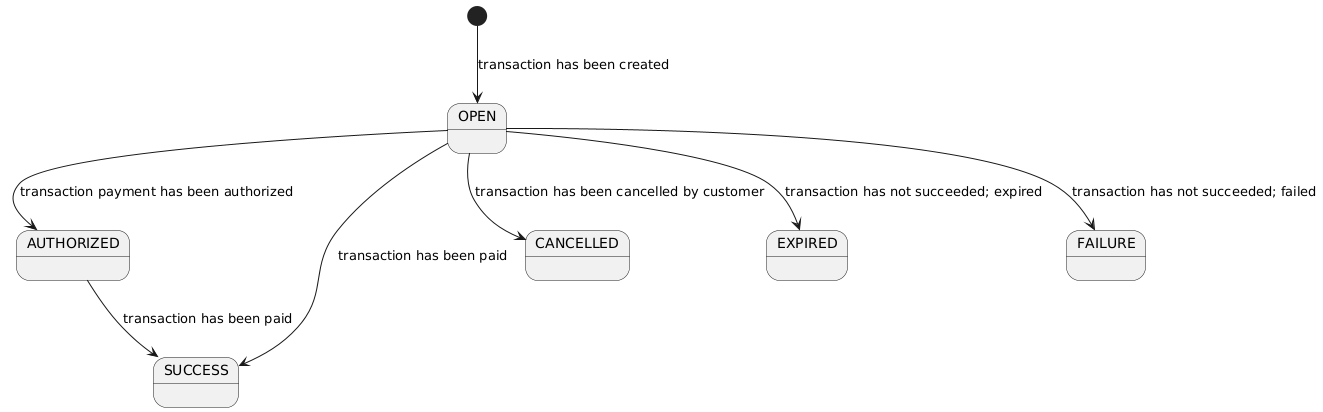
Once a transaction has been created the status will be `OPEN`. While the state of a transaction is `OPEN` a consumer can try to make a payment with it.
Once a payment is successful, the transaction status will transition to `SUCCESS`. This is the happy-flow. At this point the consumer has paid and the funds will eventually make its way to your accounts.
It can also happen that the payment of a transaction has been authorized, but not yet paid, in this case the status will be `AUTHORIZED`. Eventually it can transitions to `SUCCESS`.
Of course there are other possibilities as you will have seen in the state diagram.
It could transition to `CANCELLED` if the consumer did not complete the payment and instead clicked on the cancel button.
It could transition to `EXPIRED` if the `expiresAt` timestamp has been reached and the transaction is still `OPEN`.
It could transition to `FAILURE` if the payment failed.
Updated about 1 year ago
* * *
[](https://www.cm.com/)
* [Privacy Policy](https://www.cm.com/app/legal/cm-com/privacy-policy/)
* [Terms and Conditions](https://www.cm.com/app/legal/cm-com/terms-and-conditions/)
* [Cookie Policy](https://www.cm.com/about-cm/cookie-policy/)
Jump to Product page Conversational AI Cloud Mobile Service Cloud Mobile Marketing Cloud Messaging Ticketing Payments Platform Voice Sign
---
# Diagrams
Create a Google Pay transaction
[](https://developers.cm.com/payments-platform/docs/diagrams-4#create-a-google-pay-transaction)
-----------------------------------------------------------------------------------------------------------------------------------
The CM.com Online Payments API enables you to create a Google Pay transaction. The diagram below presents the interaction that takes place between Consumer/Device, Merchant (You), CM.com Online Payments API, and Google when creating a Google Pay transaction:
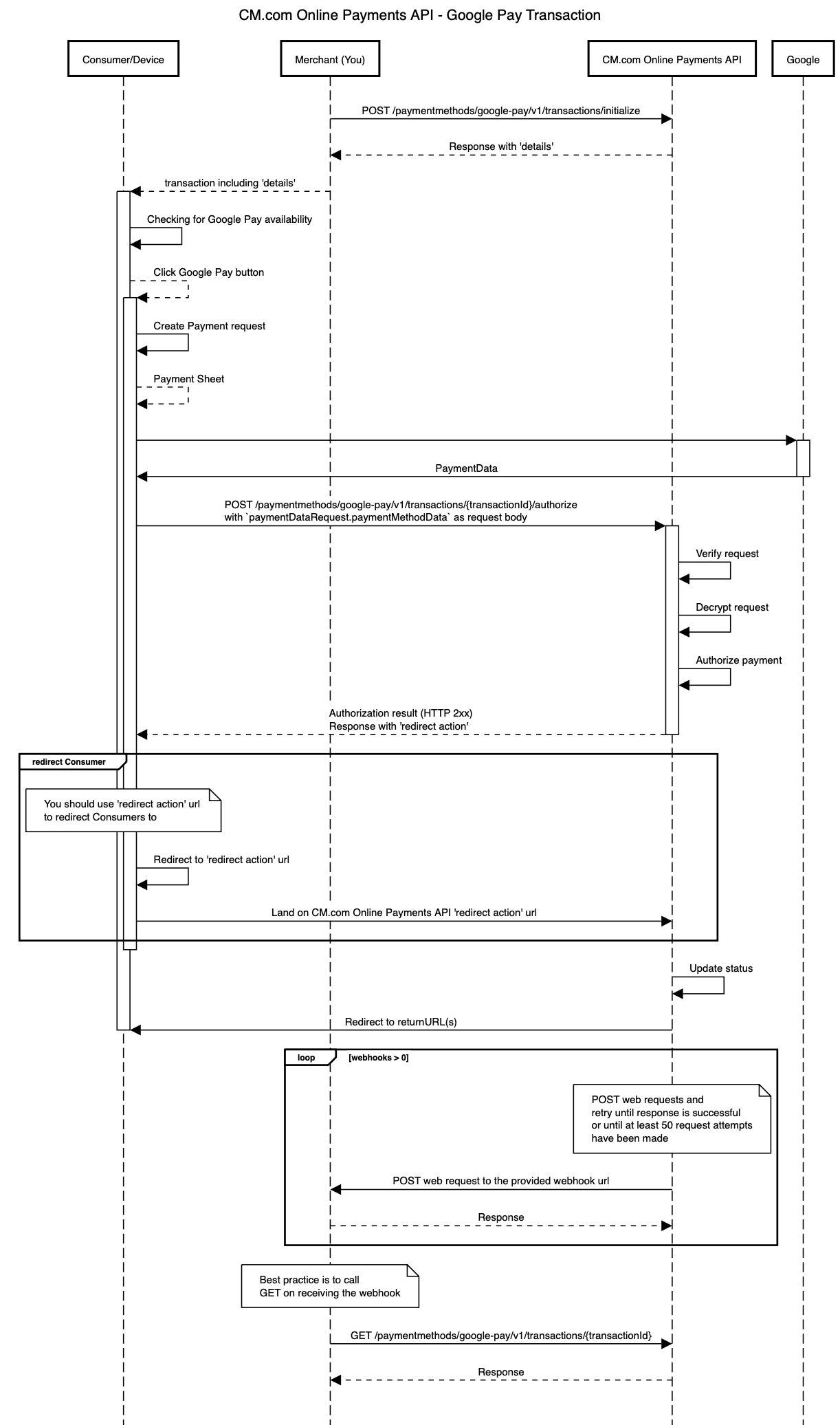
In the diagram above the following steps are performed:
1. A Merchant wants to enable Google Pay payments for a Consumer/Device. In order to do this, a Merchant makes a request to [initialize Google Pay transaction](https://developers.cm.com/payments-platform/docs/initialize-transaction-1)
.
2. Merchant receives a successful transaction response including `details`. These details are passed to Consumer/Device because they are used to render the Google Pay button on the Device.
3. Checking for Google availability; before showing the Google Pay button to the Consumer/Device the availability of Google Pay needs to be checked. This must be done with the `isReadyToPay` method of the Google Payments client (PaymentsClient). For more details see: [Checking For Google Pay Availability](https://developers.google.com/pay/api/web/guides/tutorial?authuser=1#isreadytopay)
, [PaymentsClient.isReadyToPay](https://developers.google.com/pay/api/web/reference/client?authuser=1#isReadyToPay)
, [IsReadyToPayRequest](https://developers.google.com/pay/api/web/reference/request-objects?authuser=1#IsReadyToPayRequest)
.
1. Example IsReadyToPayRequest:
JSON
`{ "apiVersion": 2, "apiVersionMinor": 0, "allowedPaymentMethods": [ { "type": "CARD", "parameters": { "allowedAuthMethods": ["PAN_ONLY", "CRYPTOGRAM_3DS"], "allowedCardNetworks": ["MASTERCARD", "VISA"] } } ] }`
2. Example javascript:
JavaScript
`function isReadyToPayWithGooglePay(environment, request, name) { const paymentsClient = getGooglePaymentsClient(environment); paymentsClient.isReadyToPay(JSON.parse(request)) .then(function (response) { console.info("Can pay with Google Pay: " + response.result); if (response.result) { addGooglePayButton(environment, name) } window.canPayWithGooglePay(response.result); }) .catch(function (e) { console.error("Error checking if ready to pay with Google Pay.", e); window.canPayWithGooglePay(false); }); } function addGooglePayButton(environment, name) { let elements = document.getElementsByName(name); if (elements.length != 0) { let element = elements.item(0); if (!element.hasChildNodes()) { // When there are child nodes the button was already added. const paymentsClient = getGooglePaymentsClient(environment); const button = paymentsClient.createButton({ onClick: function () { }, buttonType: "short", buttonColor: "black", buttonSizeMode: "fill" }); element.appendChild(button); } } else { console.error("No elements with name " + name); } } function getGooglePaymentsClient(environment) { if ( paymentsClient === null ) { paymentsClient = new google.payments.api.PaymentsClient({environment: environment}); } return paymentsClient; }`
4. Loading Payment Data; after the Consumer clicks on the Google Pay button the Google payments client should be asked to load the payment data. This will make the payment sheet pop-up appear, allowing the customer to select a card or enter a new card.
1. The merchant id, merchant name, allowed card networks, gateway (id), and country code (merchant country) for the request can be determined using the retrieved Google Pay transaction `details`. The merchant key should be used as `gatewayMerchantId`. Note that only `CRYPTOGRAM_3DS` is supported as allowed authentication method. For more details see: [Register an event handler for user gestures](https://developers.google.com/pay/api/web/guides/tutorial?authuser=1#event-handler)
, [PaymentsClient.loadPaymentData](https://developers.google.com/pay/api/web/reference/client?authuser=1#loadPaymentData)
, [PaymentDataRequest](https://developers.google.com/pay/api/web/reference/request-objects?authuser=1#PaymentDataRequest)
.
1. Example PaymentDataRequest:
`{ "apiVersion": 2, "apiVersionMinor": 0, "merchantInfo": { "merchantId": googlePayTransaction.details.merchantId, "merchantName": googlePayTransaction.details.merchantName, }, "allowedPaymentMethods": [ { "type": "CARD", "parameters": { "allowedAuthMethods": ["PAN_ONLY", "CRYPTOGRAM_3DS"], "allowedCardNetworks": googlePayTransaction.details.allowedCardNetworks, }, "tokenizationSpecification": { "type": "PAYMENT_GATEWAY", "parameters": { "gateway": googlePayTransaction.details.gatewayId, "gatewayMerchantId": googlePayTransaction.details.merchantKey, // The merchant key goes here } } } ], "transactionInfo": { "totalPriceStatus": "FINAL", "totalPrice": (googlePayTransaction.amount / 100).toString(), "currencyCode": googlePayTransaction.currency, "countryCode": googlePayTransaction.details.merchantCountry } }`
2. Example javascript:
`/** * Authorize a Google Pay payment. * * @param {string} merchantKey The merchant key. * @param {string} orderKey The order key. * @param {string} serverUrl The url of the Payment System Mobile services: * * - Sandbox/test: https://testsecure.docdatapayments.com/mobile
* - Production: https://secure.docdatapayments.com/mobile
*
* @param {string} environment The environment of Google to use. Either production (value 'PRODUCTION') or test (value 'TEST'). * @param {json} request The PaymentDataRequest as JSON * @see Google Pay for Payments - Web - Tutorial */ function authorizeGooglePayPayment(googlePayTransaction, paymentDataRequest) { const paymentsClient = getGooglePaymentsClient(); paymentsClient.loadPaymentData(paymentDataRequest) .then(function(paymentData) { window.showGooglePaySpinner(); // handle the response processPayment(googlePayTransaction, paymentData)); }) .catch(function(e) { console.error(e); }); }`
5. Authorizing the payment; when the customer has selected a card, the details are returned as `paymentData` by the Google payments client. The `paymentData.paymentMethodData` must be sent as-is in your request to the [authorize Google Pay transaction](https://developers.cm.com/payments-platform/docs/authorize-transaction-1)
endpoint. If this endpoint gives a successful response it will contain an `action.redirect.url` where customers should be redirected to. This will make them land on a CM.com Online Payments API 'redirect action' url.
1. Example javascript:
``/** * Process payment data returned by the Google Pay API * * @param googlePayTransaction * @param {object} paymentData response from Google Pay API after user approves payment * @see {@link https://developers.google.com/pay/api/web/reference/response-objects#PaymentData|PaymentData object reference} */ function processPayment(googlePayTransaction, paymentData) { // show returned data in developer console for debugging console.log("Payment data returned by Google Pay is: ", paymentData); let controller = new AbortController(); const signal = controller.signal; const reqOptions = { method: "POST", headers: { 'Content-Type': "application/json", Authorization: `Bearer ${document.getElementById('token').value}`, Accept: `application/json` }, mode: "cors", body: JSON.stringify(paymentData.paymentMethodData), signal: signal }; console.debug('Authorization URL:', `${googlePayTransaction.details.serverUrl}/api/v1/paymentmethods/google-pay/v1/transactions/${googlePayTransaction.id}/authorize`); document.getElementById('paymentLoader').classList.remove('d-none'); // Execute fetch fetch(`${googlePayTransaction.details.serverUrl}/api/v1/paymentmethods/google-pay/v1/transactions/${googlePayTransaction.id}/authorize`, reqOptions) .then(response => { if (!response.ok) { console.error(response); displayMessage(response.statusText); controller.abort(); } return response.json(); }) .then(result => { console.log('Authorization response:', result); let responseElement = document.getElementById('response'); let btnRedirect = document.getElementById('btnRedirect'); responseElement.innerHTML = `${JSON.stringify(result, null, 2)}`; responseElement.classList.remove('d-none'); btnRedirect.classList.remove('d-none'); document.getElementById('btnRedirect').addEventListener("click", function () { window.location.href = result.action.redirect?.url; }); document.querySelector('#gpay-container button').remove(); }) .catch(displayMessage) .finally(() => { displayStatus(false); }); }``
6. Eventually the status of the CM.com Online Payments API transaction will be updated and that will redirect Consumers again from the 'redirect action' url to the returnUrl(s) specified by you when the transaction was initialized.
7. If you specified webhooks in the original request then CM.com Online Payments API will trigger the proper webhooks requests. **When using webhooks, be aware that they are only a "best effort" mechanism**.
8. You get eventually the latest details of the transaction by making a call to the get transaction endpoint. You can use the latest details to update your system.
The API endpoints involved on this flow are:
* [Initialize Transaction](https://developers.cm.com/payments-platform/docs/initialize-transaction-1)
* [Authorize transaction](https://developers.cm.com/payments-platform/docs/authorize-transaction-1)
* [Get Transaction](https://developers.cm.com/payments-platform/docs/get-transaction-6)
Create a refund for the payment made with a Google Pay transaction
[](https://developers.cm.com/payments-platform/docs/diagrams-4#create-a-refund-for-the-payment-made-with-a-google-pay-transaction)
---------------------------------------------------------------------------------------------------------------------------------------------------------------------------------------------------------
The CM.com Online Payments API enables you to create a refund for the payment made with a Google Pay transaction. The diagram below presents the interaction that takes place between Merchant (You) and CM.com Online Payments API when requesting a refund for the payment made with a Google Pay transaction
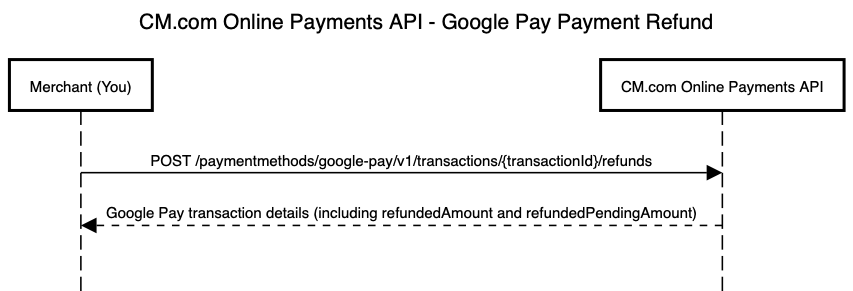
The API endpoints involved on this flow are:
* [Create a Refund](https://developers.cm.com/payments-platform/docs/create-a-refund-6)
Updated about 1 year ago
* * *
[](https://www.cm.com/)
* [Privacy Policy](https://www.cm.com/app/legal/cm-com/privacy-policy/)
* [Terms and Conditions](https://www.cm.com/app/legal/cm-com/terms-and-conditions/)
* [Cookie Policy](https://www.cm.com/about-cm/cookie-policy/)
Jump to Product page Conversational AI Cloud Mobile Service Cloud Mobile Marketing Cloud Messaging Ticketing Payments Platform Voice Sign
---
# Authorize transaction
You can use this call to authorize an existing Google Pay transaction using the CM.com Online Payments API.
Prerequisite
[](https://developers.cm.com/payments-platform/docs/authorize-transaction-1#prerequisite)
----------------------------------------------------------------------------------------------------------
Get an `access_token` and use it as 'Bearer' token in your request. Find more details [here](https://developers.cm.com/payments-platform/docs/authorization-3)
.
Request
[](https://developers.cm.com/payments-platform/docs/authorize-transaction-1#request)
------------------------------------------------------------------------------------------------
Text
`POST https://api.pay.cm.com/api/v1/paymentmethods/google-pay/v1/transactions/{transactionId}/authorize`
When the customer has selected a card in the payment sheet, the details are returned as `paymentData` by the Google payments client. The retrieved `paymentData.paymentMethodData` must be sent as-is in the request body to this endpoint.
Response
[](https://developers.cm.com/payments-platform/docs/authorize-transaction-1#response)
--------------------------------------------------------------------------------------------------
JSON
`{ "id": "8db1e7fa-ba8a-4189-92fd-67a20217443d", "orderId": "8db1e7fa-ba8a-4189-92fd-67a20217443d", "reference": "20210623130413", "amount": 1200, "currency": "EUR", "description": "Order at yourdomain.tld", "expiresAt": "2006-01-02T15:04:05Z", "language": "nl", "country": "NL", "webhooks": [ { "url": "https://yourdomain.tld/order-webhooks?purchaseId=order123", "events": [ "FINALSTATUS" ] }, { "url": "https://yourdomain.tld/payment-webhooks?purchaseId=order123", "events": [ "REFUND_STATUS" ] }, { "url": "https://yourdomain.tld/payment-webhooks?purchaseId=order123", "events": [ "STATUS_CHANGE" ] } ], "status": "OPEN", "details": { "merchantCountry": "DE", "gatewayId": "example-gateway", "environment": "TEST", "merchantId": "exampleMerchantId", "merchantName": "www.example.com", "merchantKey": "8db1e7fa-ba8a-4189-92fd-67a20217443d", "allowedCardNetworks": [ "AMEX" ], "serverUrl": "https://www.example.com/api/" }, "action": { "redirect": { "url": "https://checkout.tld/3ds/v2/creditcard/123" } }, "createdAt": "2006-01-02T15:04:05Z", "refunds": { "refundedAmount": 300, "refundedPendingAmount": 100 }, "returnUrls": { "success": "https://yourdomain.tld/order/payment-success.html", "cancelled": "https://yourdomain.tld/order/payment-cancelled.html", "expired": "https://yourdomain.tld/order/payment-expired.html", "failed": "https://yourdomain.tld/order/payment-failed.html" } }`
Parameters
[](https://developers.cm.com/payments-platform/docs/authorize-transaction-1#parameters)
------------------------------------------------------------------------------------------------------
| Parameter | Type | Description | Constraints |
| --- | --- | --- | --- |
| id | String(36) | Transaction unique identifier. | |
| orderId | String(36) | Unique identifier. | |
| reference | String(1...255) | An identifier specified by you. If webhooks were specified in the request this identifier is added to the webhook request payload. | Specified in the `initialize transaction` request. |
| amount | Int(1...99999999) | Integer representing the amount of the checkout. Denomination in the smallest currency subunit (e.g. eurocents). | Specified in the `initialize transaction` request. |
| currency | String (ISO 4217) | Currency code. | Specified in the `initialize transaction` request. |
| description | String(1...255) | Description of the transaction. | Specified in the `initialize transaction` request. |
| expiresAt | String(RFC3339) | Expiration time. | ISO 8601 date and time. |
| language | String(ISO 639-1) | Preferred language of the user interface. | Specified in the `initialize transaction` request. |
| country | String | Country of the Customer. | Specified in the `initialize transaction` request. |
| status | String | `OPEN` - Transaction has been created. This is the initial status.
`SUCCESS` - Transaction successfully paid.
`CANCELLED` - Transaction has been cancelled by your customers.
`EXPIRED` - Transaction has not succeeded; expired.
`FAILURE` - Transaction has not succeeded; unknown reason.
`AUTHORIZED` - Transaction is authorized. | |
| createdAt | String(RFC3339) | Creation time. | ISO 8601 date and time. |
| returnUrl | String(2000) | Specifies the URL where your customers will be redirected to. | Specified in the `initialize transaction` request. |
| returnUrls | [returnUrls](https://developers.cm.com/payments-platform/docs/schemas-6#returnurls)
Object | Specifies a URL where your customers will be redirected to per transaction status. For example, your customers will be redirected to `returnUrls.success` when the status of the transaction changes to `SUCCESS`. | Specified in the `initialize transaction` request. |
Optional parameters
[](https://developers.cm.com/payments-platform/docs/authorize-transaction-1#optional-parameters)
------------------------------------------------------------------------------------------------------------------------
| Parameter | Type | Description | Constraints |
| --- | --- | --- | --- |
| webhooks | Array of objects | Webhooks enable receiving a web request once a given event occurs. | Specified in the `initialize transaction` request. |
| details | [details](https://developers.cm.com/payments-platform/docs/schemas-6#details)
Object | These are the details used to render the Google Pay button in your own page. | This is nullable. |
| action | [action](https://developers.cm.com/payments-platform/docs/schemas-6#action)
Object | The next action to be performed by you for this transaction. This includes a URL where you should `redirect` your customer to. | This is nullable. |
| refunds | [refund](https://developers.cm.com/payments-platform/docs/schemas-6#refund)
Object | Indicates refundedAmount and refundedPendingAmount. | |
Response codes
[](https://developers.cm.com/payments-platform/docs/authorize-transaction-1#response-codes)
--------------------------------------------------------------------------------------------------------------
| HTTP status | Description |
| --- | --- |
| 201 | Transaction authorized. |
| 4XX | Client error response (See message for details). This response is given when the user input was incorrect or something illegal was attempted (eg. using a service without having that service configured for the user, or not being authorized). |
| 5XX | Server error response (See message for details). |
Updated about 1 year ago
* * *
[](https://www.cm.com/)
* [Privacy Policy](https://www.cm.com/app/legal/cm-com/privacy-policy/)
* [Terms and Conditions](https://www.cm.com/app/legal/cm-com/terms-and-conditions/)
* [Cookie Policy](https://www.cm.com/about-cm/cookie-policy/)
Jump to Product page Conversational AI Cloud Mobile Service Cloud Mobile Marketing Cloud Messaging Ticketing Payments Platform Voice Sign
---
# Create a Refund
You can use this call to create a refund for a payment made with a Google Pay transaction.
Prerequisite
[](https://developers.cm.com/payments-platform/docs/create-a-refund-6#prerequisite)
----------------------------------------------------------------------------------------------------
Get an `access_token` and use it as 'Bearer' token in your request. Find more details [here](https://developers.cm.com/payments-platform/docs/authorization-3)
.
Request
[](https://developers.cm.com/payments-platform/docs/create-a-refund-6#request)
------------------------------------------------------------------------------------------
Text
`POST https://api.pay.cm.com/api/v1/paymentmethods/google-pay/v1/transactions/{transactionId}/refunds`
JSON
`{ "amount": 1200, "reason": "Refund required by customer." }`
Optional parameters
[](https://developers.cm.com/payments-platform/docs/create-a-refund-6#optional-parameters)
------------------------------------------------------------------------------------------------------------------
| Parameter | Type | Description | Constraints |
| --- | --- | --- | --- |
| amount | Int(1...99999999) | Denomination in the smallest currency subunit (e.g. eurocents). If empty, the refund amount will be the remaining available amount of the transaction (e.g. total payment amount minus already refunded amounts minus the amounts of the pending refund requests). | Must be lower than or equal to the original transaction amount. |
| reason | String(255) | The description for the refund. | |
Response
[](https://developers.cm.com/payments-platform/docs/create-a-refund-6#response)
--------------------------------------------------------------------------------------------
If refund has been successfully created then the response is the [Get Transaction](https://developers.cm.com/payments-platform/docs/get-transaction-6)
response with an updated refunds.refundedAmount and refunds.refundedPendingAmount.
Updated about 1 year ago
* * *
[](https://www.cm.com/)
* [Privacy Policy](https://www.cm.com/app/legal/cm-com/privacy-policy/)
* [Terms and Conditions](https://www.cm.com/app/legal/cm-com/terms-and-conditions/)
* [Cookie Policy](https://www.cm.com/about-cm/cookie-policy/)
Jump to Product page Conversational AI Cloud Mobile Service Cloud Mobile Marketing Cloud Messaging Ticketing Payments Platform Voice Sign
---
# Initialize transaction
You can use this call to initialize a new Google Pay transaction.
Prerequisite
[](https://developers.cm.com/payments-platform/docs/initialize-transaction-1#prerequisite)
-----------------------------------------------------------------------------------------------------------
Get an `access_token` and use it as 'Bearer' token in your request. Find more details [here](https://developers.cm.com/payments-platform/docs/authorization-3)
.
Request
[](https://developers.cm.com/payments-platform/docs/initialize-transaction-1#request)
-------------------------------------------------------------------------------------------------
Text
`POST https://api.pay.cm.com/api/v1/paymentmethods/google-pay/v1/transactions/initialize`
###
Request body examples
[](https://developers.cm.com/payments-platform/docs/initialize-transaction-1#request-body-examples)
These are only some examples of the request body to create a transaction:
Full Request with ReturnURLsFull Request with ReturnURLMinimal Request with ReturnURL
`{ "reference": "20210623130413", "description": "Order at yourdomain.tld", "amount": 1200, "currency": "EUR", "expiresAt": "2006-01-02T15:04:05Z", "language": "nl", "consumer": { "name": { "firstName": "John", "lastName": "Lopez", "middleName": "A" }, "address": { "street": "Rustenburgerlaan", "houseNumber": "25", "postalCode": "2012AL", "city": "Haarlem", "countryCode": "NL", "state": "Noord-Holland", "additionalData": "Right-hand portal" }, "email": "[[email protected]](https://developers.cm.com/cdn-cgi/l/email-protection) ", "businessName": "CM", "phone": "06-95613259", "gender": null, "dateOfBirth": "1996-12-01" }, "webhooks": [ { "url": "https://yourdomain.tld/order-webhooks?purchaseId=order123", "events": [ "FINALSTATUS" ] }, { "url": "https://yourdomain.tld/payment-webhooks?purchaseId=order123", "events": [ "REFUND_STATUS" ] }, { "url": "https://yourdomain.tld/payment-webhooks?purchaseId=order123", "events": [ "STATUS_CHANGE" ] } ], "returnUrls": { "success": "https://yourdomain.tld/order/payment-success.html", "cancelled": "https://yourdomain.tld/order/payment-cancelled.html", "expired": "https://yourdomain.tld/order/payment-expired.html", "failed": "https://yourdomain.tld/order/payment-failed.html" } }`
`{ "reference": "20210623130413", "description": "Order at yourdomain.tld", "amount": 1200, "currency": "EUR", "expiresAt": "2006-01-02T15:04:05Z", "language": "nl", "consumer": { "name": { "firstName": "John", "lastName": "Lopez", "middleName": "A" }, "address": { "street": "Rustenburgerlaan", "houseNumber": "25", "postalCode": "2012AL", "city": "Haarlem", "countryCode": "NL", "state": "Noord-Holland", "additionalData": "Right-hand portal" }, "email": "[[email protected]](https://developers.cm.com/cdn-cgi/l/email-protection) ", "businessName": "CM", "phone": "06-95613259", "gender": null, "dateOfBirth": "1996-12-01" }, "webhooks": [ { "url": "https://yourdomain.tld/order-webhooks?purchaseId=order123", "events": [ "FINALSTATUS" ] }, { "url": "https://yourdomain.tld/payment-webhooks?purchaseId=order123", "events": [ "REFUND_STATUS" ] }, { "url": "https://yourdomain.tld/payment-webhooks?purchaseId=order123", "events": [ "STATUS_CHANGE" ] } ], "returnUrl": "https://yourdomain.tld/order/payment-completed.html" }`
`{ "reference": "20210623130413", "description": "Order at yourdomain.tld", "amount": 1200, "expiresAt": "2006-01-02T15:04:05Z", "language": "nl", "returnUrl": "https://yourdomain.tld/order/payment-completed.html" }`
"**Full Request with ReturnURLs**" and "**Full Request with ReturnURL**" are examples where all the request parameters are provided. If `returnUrls` is defined then customers will be redirected to a different URL depending on the status of the transaction when the payment process is completed. If `returnUrl` is defined then customers will be redirected to the same URL no matter the status of the transaction when the payment process is completed.
"**Minimal Request with ReturnURLs**" is an example of the minimal request to create a transaction. This example, is using `returnUrls`, but you can replace it for `returnUrl` depending on what is better for your use case.
Parameters
[](https://developers.cm.com/payments-platform/docs/initialize-transaction-1#parameters)
-------------------------------------------------------------------------------------------------------
| Parameter | Type | Description | Constraints |
| --- | --- | --- | --- |
| reference | String(1...255) | An identifier specified by you. If webhooks were specified in the request this identifier is added to the webhook request payload. | |
| description | String(1...255) | Description of the transaction. | |
| amount | Int(1...99999999) | Integer representing the amount of the transaction. Denomination in the smallest currency subunit (e.g. eurocents). | |
| expiresAt | String(RFC3339) | Expiration time. | ISO 8601 date and time. |
| language | String(ISO 639-1) | Preferred language of the user interface. | ISO 639-1 language. |
| returnUrl | String(2000) | Specifies the URL where your customers will be redirected to. | Either `returnUrl` or `returnUrls` must be specified, but not both. |
| returnUrls | [returnUrls](https://developers.cm.com/payments-platform/docs/schemas-6#returnurls)
Object | Specifies a URL where your customers will be redirected to per transaction status. For example, your customers will be redirected to `returnUrls.success` when the status of the transaction changes to `SUCCESS`. | Either `returnUrl` or `returnUrls` must be specified, but not both. |
Optional parameters
[](https://developers.cm.com/payments-platform/docs/initialize-transaction-1#optional-parameters)
-------------------------------------------------------------------------------------------------------------------------
| Parameter | Type | Description | Constraints |
| --- | --- | --- | --- |
| currency | String (ISO 4217) | Currency code. | ISO 4217 currency code. |
| consumer | [consumer](https://developers.cm.com/payments-platform/docs/schemas-6#consumer)
Object | Customer details. | The following fields are mandatory: `name.firstName`, `name.lastName`, `address.street`, `address.houseNumber`, `address.postalCode`, `address.city`, `address.countryCode`, `email`. |
| webhooks | Array of objects | Webhooks enable receiving a web request once a given event occurs. | Find more details [here](https://developers.cm.com/payments-platform/docs/webhooks-1)
. |
Response
[](https://developers.cm.com/payments-platform/docs/initialize-transaction-1#response)
---------------------------------------------------------------------------------------------------
JSON
`{ "id": "8db1e7fa-ba8a-4189-92fd-67a20217443d", "orderId": "8db1e7fa-ba8a-4189-92fd-67a20217443d", "reference": "20210623130413", "amount": 1200, "currency": "EUR", "description": "Order at yourdomain.tld", "expiresAt": "2006-01-02T15:04:05Z", "language": "nl", "country": "NL", "webhooks": [ { "url": "https://yourdomain.tld/order-webhooks?purchaseId=order123", "events": [ "FINALSTATUS" ] }, { "url": "https://yourdomain.tld/payment-webhooks?purchaseId=order123", "events": [ "REFUND_STATUS" ] }, { "url": "https://yourdomain.tld/payment-webhooks?purchaseId=order123", "events": [ "STATUS_CHANGE" ] } ], "status": "OPEN", "details": { "merchantCountry": "DE", "gatewayId": "example-gateway", "environment": "TEST", "merchantId": "exampleMerchantId", "merchantName": "www.example.com", "merchantKey": "8db1e7fa-ba8a-4189-92fd-67a20217443d", "allowedCardNetworks": [ "AMEX" ], "serverUrl": "https://www.example.com/api/" }, "action": { "redirect": { "url": "https://checkout.tld/3ds/v2/creditcard/123" } }, "createdAt": "2006-01-02T15:04:05Z", "refunds": { "refundedAmount": 300, "refundedPendingAmount": 100 }, "returnUrls": { "success": "https://yourdomain.tld/order/payment-success.html", "cancelled": "https://yourdomain.tld/order/payment-cancelled.html", "expired": "https://yourdomain.tld/order/payment-expired.html", "failed": "https://yourdomain.tld/order/payment-failed.html" } }`
Parameters
[](https://developers.cm.com/payments-platform/docs/initialize-transaction-1#parameters-1)
---------------------------------------------------------------------------------------------------------
| Parameter | Type | Description | Constraints |
| --- | --- | --- | --- |
| id | String(36) | Transaction unique identifier. | |
| orderId | String(36) | Unique identifier. | |
| reference | String(1...255) | An identifier specified by you. If webhooks were specified in the request this identifier is added to the webhook request payload. | Specified in the request. |
| amount | Int(1...99999999) | Integer representing the amount of the checkout. Denomination in the smallest currency subunit (e.g. eurocents). | Specified in the request. |
| currency | String (ISO 4217) | Currency code. | Specified in the request. |
| description | String(1...255) | Description of the transaction. | Specified in the request. |
| expiresAt | String(RFC3339) | Expiration time. | Specified in the request. |
| language | String(ISO 639-1) | Preferred language of the user interface. | Specified in the request. |
| country | String | Country of the Customer. | |
| status | String | `OPEN` - Transaction has been created. This is the initial status.
`SUCCESS` - Transaction successfully paid.
`CANCELLED` - Transaction has been cancelled by your customers.
`EXPIRED` - Transaction has not succeeded; expired.
`FAILURE` - Transaction has not succeeded; unknown reason.
`AUTHORIZED` - Transaction is authorized. | |
| createdAt | String(RFC3339) | Creation time. | ISO 8601 date and time. |
| returnUrl | String(2000) | Specifies the URL where your customers will be redirected to. | Specified in the request. |
| returnUrls | [returnUrls](https://developers.cm.com/payments-platform/docs/schemas-6#returnurls)
Object | Specifies a URL where your customers will be redirected to per transaction status. For example, your customers will be redirected to `returnUrls.success` when the status of the transaction changes to `SUCCESS`. | Specified in the request. |
Optional parameters
[](https://developers.cm.com/payments-platform/docs/initialize-transaction-1#optional-parameters-1)
---------------------------------------------------------------------------------------------------------------------------
| Parameter | Type | Description | Constraints |
| --- | --- | --- | --- |
| webhooks | Array of objects | Webhooks enable receiving a web request once a given event occurs. | Specified in the request. |
| details | [details](https://developers.cm.com/payments-platform/docs/schemas-6#details)
Object | These are the details used to render the Google Pay button in your own page. | This is nullable. |
| refunds | [refund](https://developers.cm.com/payments-platform/docs/schemas-6#refund)
Object | Indicates refundedAmount and refundedPendingAmount. | |
Response codes
[](https://developers.cm.com/payments-platform/docs/initialize-transaction-1#response-codes)
---------------------------------------------------------------------------------------------------------------
| HTTP status | Description |
| --- | --- |
| 201 | Transaction initialized. |
| 4XX | Client error response (See message for details). This response is given when the user input was incorrect or something illegal was attempted (eg. using a service without having that service configured for the user, or not being authorized). |
| 5XX | Server error response (See message for details). |
Updated about 1 year ago
* * *
[](https://www.cm.com/)
* [Privacy Policy](https://www.cm.com/app/legal/cm-com/privacy-policy/)
* [Terms and Conditions](https://www.cm.com/app/legal/cm-com/terms-and-conditions/)
* [Cookie Policy](https://www.cm.com/about-cm/cookie-policy/)
Jump to Product page Conversational AI Cloud Mobile Service Cloud Mobile Marketing Cloud Messaging Ticketing Payments Platform Voice Sign
---
# Dynamic Integration
In the settings of Agent Inbox it is possible to configure the endpoints with headers and also get the authentication (API key and API secret) for the POST requests. Go to the Settings > Integrations > Dynamic API and hit the "Add"-button. Now you can configure the integration according to your wishes.
Authentication
[](https://developers.cm.com/mobile-service-cloud/docs/dynamic-integration#authentication)
-------------------------------------------------------------------------------------------------------------
The authentication of the dynamic API is done by a pre shared key which must be communicated to Agent Inbox.
You can define an API key and secret in the Agent Inbox configuration.
When issuing requests to the dynamic API endpoint you have to include a Basic authentication header. The value you have to sent is a base64-encoding of `{apiKey}:{apiSecret}`.
For example you have set up API key to `abc` and API secret to `def`. The value would be `base64(abc:def)`, which resolves to `YWJjOmRlZg==`. The full authorization header is: `Authorization: Basic YWJjOmRlZg==`
The Dynamic API has five endpoints and two POSTs, which are explained in separate chapters:
* [Customer Information](https://developers.cm.com/mobile-service-cloud/docs/customer-information)
* [Orders List](https://developers.cm.com/mobile-service-cloud/docs/orders-list)
* [Order Details](https://developers.cm.com/mobile-service-cloud/docs/order-details)
* [Search](https://developers.cm.com/mobile-service-cloud/docs/search)
* [Customer Lifetime](https://developers.cm.com/mobile-service-cloud/docs/customer-lifetime)
* [Customer POST](https://developers.cm.com/mobile-service-cloud/docs/customer-post)
* [Order POST](https://developers.cm.com/mobile-service-cloud/docs/order-post)
Updated over 1 year ago
* * *
[](https://www.cm.com/)
* [Privacy Policy](https://www.cm.com/app/legal/cm-com/privacy-policy/)
* [Terms and Conditions](https://www.cm.com/app/legal/cm-com/terms-and-conditions/)
* [Cookie Policy](https://www.cm.com/about-cm/cookie-policy/)
Jump to Product page Conversational AI Cloud Mobile Service Cloud Mobile Marketing Cloud Messaging Ticketing Payments Platform Voice Sign
---
# Changelog
[PG 1.27.0](https://developers.cm.com/payments-platform/v22.06/changelog/pg-1270)
==================================================================================
13 days ago by [\[email protected\]](https://developers.cm.com/cdn-cgi/l/email-protection)
These are the changes we’ll be releasing on acceptance on 08-10-2025
[PG 1.26.2](https://developers.cm.com/payments-platform/v22.06/changelog/pg-1262)
==================================================================================
27 days ago by [\[email protected\]](https://developers.cm.com/cdn-cgi/l/email-protection)
The following changes will be deployed to acceptance on 24-09-2025.
[PS 25.15.0](https://developers.cm.com/payments-platform/v22.06/changelog/psp-ps-25-15)
========================================================================================
about 1 month ago by ReadMe API
Feature Changes
[PG 1.26.1](https://developers.cm.com/payments-platform/v22.06/changelog/pg-1261)
==================================================================================
about 1 month ago by [\[email protected\]](https://developers.cm.com/cdn-cgi/l/email-protection)
The following changes will be deployed to acceptance on 10-09-2025 before going to production after 2 weeks.
[PS 25.12](https://developers.cm.com/payments-platform/v22.06/changelog/psp-ps-25-12)
======================================================================================
4 months ago by ReadMe API
Feature Changes
[PS 25.06.0](https://developers.cm.com/payments-platform/v22.06/changelog/psp-ps-25-06)
========================================================================================
9 months ago by ReadMe API
Various bug fixes and optimizations.
[PS 24.11](https://developers.cm.com/payments-platform/v22.06/changelog/psp-ps-24-11)
======================================================================================
11 months ago by ReadMe API
Feature changes
[PS 24.10](https://developers.cm.com/payments-platform/v22.06/changelog/psp-ps-24-10)
======================================================================================
about 1 year ago by ReadMe API
Feature changes
[PS 24.09](https://developers.cm.com/payments-platform/v22.06/changelog/psp-ps-24-09)
======================================================================================
over 1 year ago by ReadMe API
Bug Fixes
improved
[PS 24.08](https://developers.cm.com/payments-platform/v22.06/changelog/psp-ps-24-08)
======================================================================================
over 1 year ago by ReadMe API
* Features
* Improvided the client side encryption library to allow merchant key and/or merchant name
[](https://www.cm.com/)
* [Privacy Policy](https://www.cm.com/app/legal/cm-com/privacy-policy/)
* [Terms and Conditions](https://www.cm.com/app/legal/cm-com/terms-and-conditions/)
* [Cookie Policy](https://www.cm.com/about-cm/cookie-policy/)
Jump to Product page Conversational AI Cloud Mobile Service Cloud Mobile Marketing Cloud Messaging Ticketing Payments Platform Voice Sign
---
# About
Welcome to the documentation site of Agent Inbox API, part of [Mobile Service Cloud](https://developers.cm.com/mobile-service-cloud/docs/msc)
. MSC Agent Inbox is a leading conversational helpdesk system designed to help customer service teams deliver excellent customer service experiences in the most efficient way. The get the most out of the your Agent Inbox helpdesk system, you can connect several system in different ways.
Updated over 1 year ago
* * *
[](https://www.cm.com/)
* [Privacy Policy](https://www.cm.com/app/legal/cm-com/privacy-policy/)
* [Terms and Conditions](https://www.cm.com/app/legal/cm-com/terms-and-conditions/)
* [Cookie Policy](https://www.cm.com/about-cm/cookie-policy/)
Jump to Product page Conversational AI Cloud Mobile Service Cloud Mobile Marketing Cloud Messaging Ticketing Payments Platform Voice Sign
---
# in3

Integrate your own checkout with our API and allow your customers to make payments with in3.
How does it work?
[](https://developers.cm.com/payments-platform/docs/in3-1#how-does-it-work)
=================================================================================================
1. Customer opens your webshop, adds some items to the shopping basket, and clicks on 'Proceed to Checkout'.
2. Customer lands on your own checkout, and selects iDEAL in3.
3. After creating an in3 transaction using the [create in3 transaction](https://developers.cm.com/payments-platform/docs/create-transaction-5)
endpoint, you redirect the customer to the provided URL.
4. The customer completes the first instalment payment, you receive a webhook (if you configured it for your in3 transaction), and the customer is redirected to the Return URL(s) you specified on your in3 transaction.
5. You make a request to the [get in3 transaction](https://developers.cm.com/payments-platform/docs/get-transaction-7)
endpoint, and use its latest details to update your system.
> 📘
>
> When using webhooks, be aware that they are only a "best effort" mechanism. Find more details [here](https://developers.cm.com/payments-platform/docs/webhooks-1)
> .
>
>
> -------------------------------------------------------------------------------------------------------------------------------------------------------------------------
Updated 11 months ago
* * *
[](https://www.cm.com/)
* [Privacy Policy](https://www.cm.com/app/legal/cm-com/privacy-policy/)
* [Terms and Conditions](https://www.cm.com/app/legal/cm-com/terms-and-conditions/)
* [Cookie Policy](https://www.cm.com/about-cm/cookie-policy/)
Jump to Product page Conversational AI Cloud Mobile Service Cloud Mobile Marketing Cloud Messaging Ticketing Payments Platform Voice Sign
---
# Get Transaction
You can use this call to retrieve details of a Google Pay transaction.
Prerequisite
[](https://developers.cm.com/payments-platform/docs/get-transaction-6#prerequisite)
----------------------------------------------------------------------------------------------------
Get an `access_token` and use it as 'Bearer' token in your request. Find more details [here](https://developers.cm.com/payments-platform/docs/authorization-3)
.
Request
[](https://developers.cm.com/payments-platform/docs/get-transaction-6#request)
------------------------------------------------------------------------------------------
Text
`GET https://api.pay.cm.com/api/v1/paymentmethods/google-pay/v1/transactions/{transactionId}`
Response
[](https://developers.cm.com/payments-platform/docs/get-transaction-6#response)
--------------------------------------------------------------------------------------------
JSON
`{ "id": "8db1e7fa-ba8a-4189-92fd-67a20217443d", "orderId": "8db1e7fa-ba8a-4189-92fd-67a20217443d", "reference": "20210623130413", "amount": 1200, "currency": "EUR", "description": "Order at yourdomain.tld", "expiresAt": "2006-01-02T15:04:05Z", "language": "nl", "country": "NL", "webhooks": [ { "url": "https://yourdomain.tld/order-webhooks?purchaseId=order123", "events": [ "FINALSTATUS" ] }, { "url": "https://yourdomain.tld/payment-webhooks?purchaseId=order123", "events": [ "REFUND_STATUS" ] }, { "url": "https://yourdomain.tld/payment-webhooks?purchaseId=order123", "events": [ "STATUS_CHANGE" ] } ], "status": "OPEN", "details": { "merchantCountry": "DE", "gatewayId": "example-gateway", "environment": "TEST", "merchantId": "exampleMerchantId", "merchantName": "www.example.com", "merchantKey": "8db1e7fa-ba8a-4189-92fd-67a20217443d", "allowedCardNetworks": [ "AMEX" ], "serverUrl": "https://www.example.com/api/" }, "action": { "redirect": { "url": "https://checkout.tld/3ds/v2/creditcard/123" } }, "createdAt": "2006-01-02T15:04:05Z", "refunds": { "refundedAmount": 300, "refundedPendingAmount": 100 }, "returnUrls": { "success": "https://yourdomain.tld/order/payment-success.html", "cancelled": "https://yourdomain.tld/order/payment-cancelled.html", "expired": "https://yourdomain.tld/order/payment-expired.html", "failed": "https://yourdomain.tld/order/payment-failed.html" } }`
Parameters
[](https://developers.cm.com/payments-platform/docs/get-transaction-6#parameters)
------------------------------------------------------------------------------------------------
| Parameter | Type | Description | Constraints |
| --- | --- | --- | --- |
| id | String(36) | Transaction unique identifier. | |
| orderId | String(36) | Unique identifier. | |
| reference | String(1...255) | An identifier specified by you. If webhooks were specified in the request this identifier is added to the webhook request payload. | |
| amount | Int(1...99999999) | Integer representing the amount of the checkout. Denomination in the smallest currency subunit (e.g. eurocents). | |
| currency | String (ISO 4217) | Currency code. | ISO 4217 currency code. |
| description | String(1...255) | Description of the transaction. | |
| expiresAt | String(RFC3339) | Expiration time. | |
| language | String(ISO 639-1) | Preferred language of the user interface. | |
| country | String | Country of the Customer. | ISO 3166 Country Code. |
| status | String | `OPEN` - Transaction has been created. This is the initial status.
`SUCCESS` - Transaction successfully paid.
`CANCELLED` - Transaction has been cancelled by your customers.
`EXPIRED` - Transaction has not succeeded; expired.
`FAILURE` - Transaction has not succeeded; unknown reason.
`AUTHORIZED` - Transaction is authorized. | |
| createdAt | String(RFC3339) | Creation time. | ISO 8601 date and time. |
| returnUrl | String(2000) | Specifies the URL where your customers will be redirected to. | Either `returnUrl` or `returnUrls` must be specified, but not both. |
| returnUrls | [returnUrls](https://developers.cm.com/payments-platform/docs/schemas-6#returnurls)
Object | Specifies a URL where your customers will be redirected to per transaction status. For example, your customers will be redirected to `returnUrls.success` when the status of the transaction changes to `SUCCESS`. | Either `returnUrl` or `returnUrls` must be specified, but not both. |
Optional parameters
[](https://developers.cm.com/payments-platform/docs/get-transaction-6#optional-parameters)
------------------------------------------------------------------------------------------------------------------
| Parameter | Type | Description | Constraints |
| --- | --- | --- | --- |
| webhooks | Array of objects | Webhooks enable receiving a web request once a given event occurs. | Specified in the request. |
| details | [details](https://developers.cm.com/payments-platform/docs/schemas-6#details)
Object | These are the details used to render the Apple Pay button in your own page. | This is nullable. |
| action | [action](https://developers.cm.com/payments-platform/docs/schemas-6#action)
Object | The next action to be performed by you for this transaction. This includes a URL where you should `redirect` your customer to. | This is nullable. |
| refunds | [refund](https://developers.cm.com/payments-platform/docs/schemas-6#refund)
Object | Indicates refundedAmount and refundedPendingAmount. | |
Response codes
[](https://developers.cm.com/payments-platform/docs/get-transaction-6#response-codes)
--------------------------------------------------------------------------------------------------------
| HTTP status | Description |
| --- | --- |
| 200 | Transaction details are successfully retrieved. |
| 4XX | Client error response (See message for details). This response is given when the User input was incorrect or something illegal was attempted (eg. using a service without having that service configured for the user, or not being authorized). |
| 5XX | Server error response (See message for details). |
Updated about 1 year ago
* * *
[](https://www.cm.com/)
* [Privacy Policy](https://www.cm.com/app/legal/cm-com/privacy-policy/)
* [Terms and Conditions](https://www.cm.com/app/legal/cm-com/terms-and-conditions/)
* [Cookie Policy](https://www.cm.com/about-cm/cookie-policy/)
Jump to Product page Conversational AI Cloud Mobile Service Cloud Mobile Marketing Cloud Messaging Ticketing Payments Platform Voice Sign
---
# Diagrams
Create an in3 transaction
[](https://developers.cm.com/payments-platform/docs/diagrams-5#create-an-in3-transaction)
-----------------------------------------------------------------------------------------------------------------------
The CM.com Online Payments API enables you to create an in3 transaction. The diagram below presents the interaction that takes place between Consumer, Merchant (You), CM.com Online Payments API, and IN3 when creating an in3 transaction:
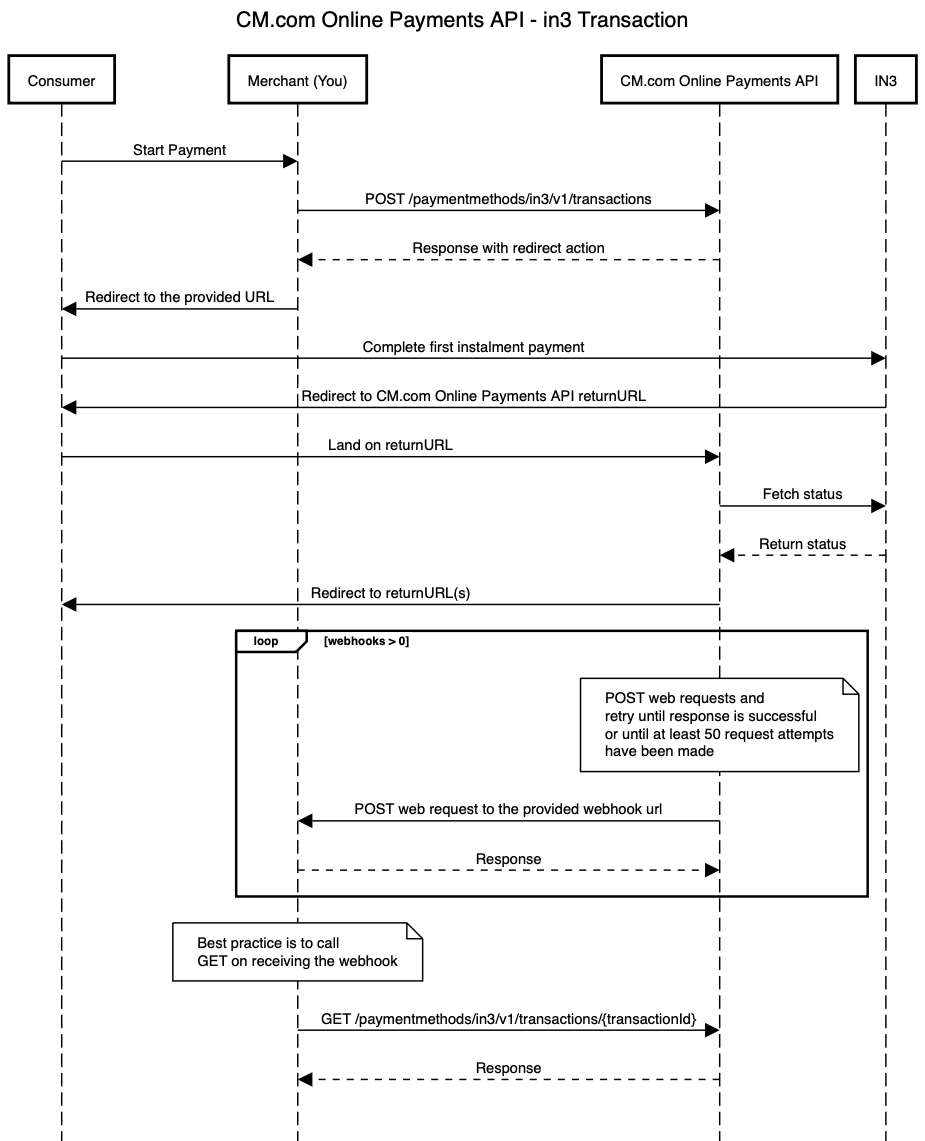
In the diagram above the following steps are performed:
1. Consumer wants to start a payment.
2. Merchant makes a request to create an in3 transaction.
3. Merchant receives a successful response and redirects the Consumer to the provided URL.
4. Consumer completes the first instalment payment, and eventually is redirected to the CM.com Online Payments API returnURL.
5. When the status of the in3 transaction is updated on the CM.com Online Payments API, the Consumer is redirected to the return URL that the Merchant specified in the original request to create the in3 transaction.
6. If the Merchant also specified webhooks in the original request then CM.com Online Payments API will trigger the proper webhooks and make the requests to the webhook URLs specified by the Merchant. **When using webhooks, be aware that they are only a "best effort" mechanism**.
7. Merchant gets the latest details of the transaction. This usually happens once the Merchant received a webhook request.
The API endpoints involved on this flow are:
* [Create Transaction](https://developers.cm.com/payments-platform/docs/create-transaction-5)
* [Get Transaction](https://developers.cm.com/payments-platform/docs/get-transaction-7)
Create a refund for the payment made with an in3 transaction
[](https://developers.cm.com/payments-platform/docs/diagrams-5#create-a-refund-for-the-payment-made-with-an-in3-transaction)
---------------------------------------------------------------------------------------------------------------------------------------------------------------------------------------------
The CM.com Online Payments API enables you to create a refund for the payment made with an in3 transaction. The diagram below presents the interaction that takes place between Merchant (You) and CM.com Online Payments API when requesting a refund for the payment made with an in3 transaction:
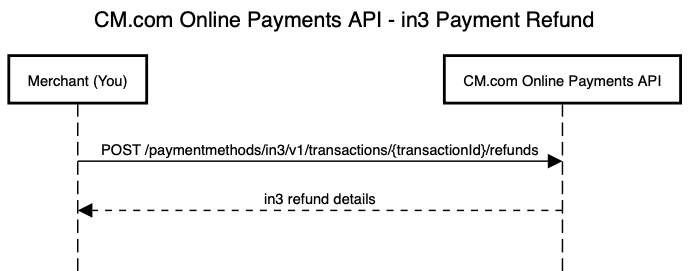
The API endpoints involved on this flow are:
* [Create a Refund](https://developers.cm.com/payments-platform/docs/create-a-refund-7)
Get refunds of an in3 transaction
[](https://developers.cm.com/payments-platform/docs/diagrams-5#get-refunds-of-an-in3-transaction)
---------------------------------------------------------------------------------------------------------------------------------------
The CM.com Online Payments API enables you to get the details of the refunds created for the payments made with an in3 transaction. The diagram below presents the interaction that takes place between Merchant (You) and CM.com Online Payments API when requesting refunds related to an in3 transaction:
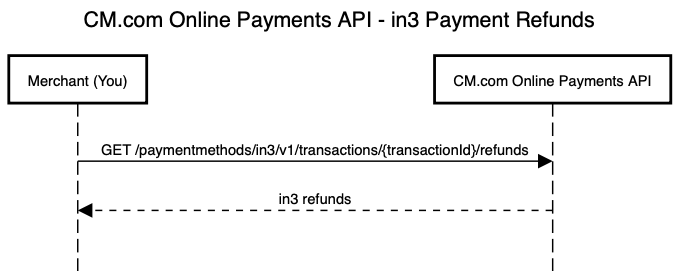
The API endpoints involved on this flow are:
* [Get Refunds](https://developers.cm.com/payments-platform/docs/get-refunds)
Updated 11 months ago
* * *
[](https://www.cm.com/)
* [Privacy Policy](https://www.cm.com/app/legal/cm-com/privacy-policy/)
* [Terms and Conditions](https://www.cm.com/app/legal/cm-com/terms-and-conditions/)
* [Cookie Policy](https://www.cm.com/about-cm/cookie-policy/)
Jump to Product page Conversational AI Cloud Mobile Service Cloud Mobile Marketing Cloud Messaging Ticketing Payments Platform Voice Sign
---
# Status Transitions
in3 transaction statuses
[](https://developers.cm.com/payments-platform/docs/status-transitions-3#in3-transaction-statuses)
-------------------------------------------------------------------------------------------------------------------------------
`OPEN` - Transaction has been created. This is the initial status.
`PENDING` - Transaction's first instalment payment is in progress.
`SUCCESS` - Transaction's first instalment payment successfully paid.
`CANCELLED` - Transaction's first instalment payment has been cancelled by your customers.
`EXPIRED` - Transaction's first instalment payment has not succeeded; expired.
`FAILURE` - Transaction's first instalment payment has not succeeded; unknown reason.
Status Transitions
[](https://developers.cm.com/payments-platform/docs/status-transitions-3#status-transitions)
-------------------------------------------------------------------------------------------------------------------
The diagram below shows all state transitions an in3 transaction could go through.
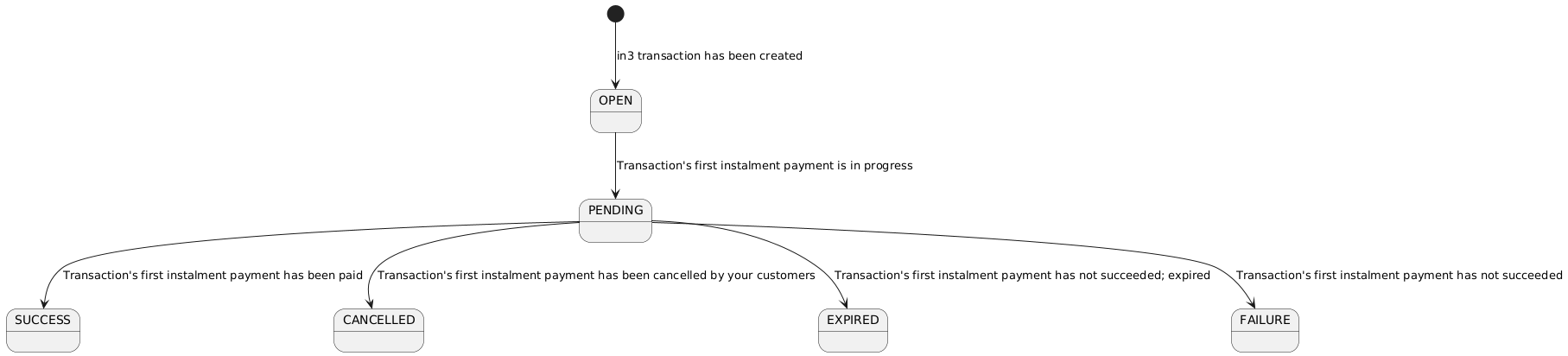
Once an in3 transaction has been created the status will be `OPEN`.
Once your customer is redirected to the in3 environment where they can complete the first instalment payment, the status will transition to `PENDING`.
Once the first instalment payment is successful, the transaction status will transition to `SUCCESS`. This is the happy-flow.
Of course there are other possibilities as you have seen in the state diagram.
It could transition to `CANCELLED` if the consumer did not complete the first instalment payment on the in3 environment and instead clicked on 'Return to webshop' button.
It could transition to `EXPIRED` if the `expiresAt` timestamp has been reached and the first instalment payment has not been completed.
It could transition to `FAILURE` if the first instalment payment failed.
Updated 11 months ago
* * *
[](https://www.cm.com/)
* [Privacy Policy](https://www.cm.com/app/legal/cm-com/privacy-policy/)
* [Terms and Conditions](https://www.cm.com/app/legal/cm-com/terms-and-conditions/)
* [Cookie Policy](https://www.cm.com/about-cm/cookie-policy/)
Jump to Product page Conversational AI Cloud Mobile Service Cloud Mobile Marketing Cloud Messaging Ticketing Payments Platform Voice Sign
---
# Schemas
returnUrls
[](https://developers.cm.com/payments-platform/docs/schemas-6#returnurls)
----------------------------------------------------------------------------------------
| Parameter | Type | Description | Constraints | Required |
| --- | --- | --- | --- | --- |
| success | String(1...2000) | Return URL to use when the transaction succeeds. | | ✅ |
| cancelled | String(1...2000) | Return URL to use when the transaction is cancelled. | | ✅ |
| expired | String(1...2000) | Return URL to use when the transaction is expired. | | ✅ |
| failed | String(1...2000) | Return URL to use when the transaction is failed. | | ✅ |
consumer
[](https://developers.cm.com/payments-platform/docs/schemas-6#consumer)
------------------------------------------------------------------------------------
| Parameter | Type | Description | Constraints | Required |
| --- | --- | --- | --- | --- |
| name | [name](https://developers.cm.com/payments-platform/docs/schemas-6#name)
Object | Customer name. | | |
| address | [address](https://developers.cm.com/payments-platform/docs/schemas-6#address)
Object | Customer address. | | ✅ |
| email | String | Email provided by customer. | | ✅ |
| businessName | String(1...35) | Business name. | | |
| phone | String | Customer phone number. | | |
| gender | String(1...2000) | Gender of the customer. | The possible values are: `m`, `f` , or `null`. | |
| dateOfBirth | String | Date of birth of the customer. | | |
name
[](https://developers.cm.com/payments-platform/docs/schemas-6#name)
----------------------------------------------------------------------------
| Parameter | Type | Description | Constraints | Required |
| --- | --- | --- | --- | --- |
| firstName | String(1...35) | Customer first name. | | ✅ |
| lastName | String(1...35) | Customer last name. | | ✅ |
| middleName | String(1...35) | Customer middle name. | | |
address
[](https://developers.cm.com/payments-platform/docs/schemas-6#address)
----------------------------------------------------------------------------------
| Parameter | Type | Description | Constraints | Required |
| --- | --- | --- | --- | --- |
| street | String(1...100) | Street. | | |
| houseNumber | String(1...35) | House and number. | | |
| postalCode | String(1...35) | Postal code. | | |
| city | String(1...35) | City. | | |
| countryCode | String | Country code. | ISO 3166-1 country code. | ✅ |
| state | String(1...40) | State. | | |
| additionalData | String(1...35) | Additional address information. | | |
details
[](https://developers.cm.com/payments-platform/docs/schemas-6#details)
----------------------------------------------------------------------------------
| Parameter | Type | Description | Constraints | Required |
| --- | --- | --- | --- | --- |
| merchantCountry | String | The country code where the transaction is processed. | ISO 3166-1 alpha-2 country code. | |
| gatewayId | String | The gateway's identifier, which is issued by Google. | | |
| environment | String | The environment defines the payment methods to use. `TEST` is used where dummy payment methods are suitable for testing. `PRODUCTION` is used to return chargeable payment methods when a valid Google merchant ID is specified and configured for the domain. | The possible values are: `TEST`, `PRODUCTION`. | |
| merchantId | String | The Google merchant identifier. | | |
| merchantName | String | The merchant name encoded as UTF-8. Merchant name is rendered in the payment sheet. In TEST environment, or if a merchant isn't recognized, a “Pay Unverified Merchant” message is displayed in the payment sheet. | | |
| merchantKey | String(36) | The unique identifier for your integration. Should be used as gateway merchant id. | | |
| allowedCardNetworks | String | The supported card networks for Payment via Google Pay. | The possible values are: `AMEX`, `DISCOVER`, `INTERAC`, `JCB`, `MASTERCARD`, `VISA`. | |
| serverUrl | String | The URL to the Mobile Pay Server. | | |
action
[](https://developers.cm.com/payments-platform/docs/schemas-6#action)
--------------------------------------------------------------------------------
| Parameter | Type | Description | Constraints | Required |
| --- | --- | --- | --- | --- |
| redirect | [redirect](https://developers.cm.com/payments-platform/docs/schemas-6#redirect)
Object | Next action to be performed by merchant (or consumer) to complete the payment. | | |
redirect
[](https://developers.cm.com/payments-platform/docs/schemas-6#redirect)
------------------------------------------------------------------------------------
| Parameter | Type | Description | Constraints | Required |
| --- | --- | --- | --- | --- |
| url | String | URL where consumer should be redirected to by the merchant to perform the payment. | | |
refund
[](https://developers.cm.com/payments-platform/docs/schemas-6#refund)
--------------------------------------------------------------------------------
| Parameter | Type | Description | Constraints | Required |
| --- | --- | --- | --- | --- |
| refundedAmount | Int(0...99999999) | Amount in the smallest currency subunit, as for example eurocents, that has already been refunded. | | ✅ |
| refundedPendingAmount | Int(1...99999999) | Amount in the smallest currency subunit, as for example eurocents, that has been requested to be refunded. | | ✅ |
Updated about 1 year ago
* * *
[](https://www.cm.com/)
* [Privacy Policy](https://www.cm.com/app/legal/cm-com/privacy-policy/)
* [Terms and Conditions](https://www.cm.com/app/legal/cm-com/terms-and-conditions/)
* [Cookie Policy](https://www.cm.com/about-cm/cookie-policy/)
Jump to Product page Conversational AI Cloud Mobile Service Cloud Mobile Marketing Cloud Messaging Ticketing Payments Platform Voice Sign
---
# Change the Language / Locale
To change the language for a dossier you can set the `locale` field. The locale can be set on a dossier and invitee level.
The following locales are supported:
`de-DE,` `en-US`, `es-ES`, `fr-FR`, `hu-HU`, `it-IT`, `ja-JP`, `nl-NL`, `pl-PL`, `pt-PT`, `ro-RO` and `sk-SK`.
Dossier locale
[](https://developers.cm.com/sign/docs/change-language-locale#dossier-locale)
------------------------------------------------------------------------------------------------
The default locale is `en-US`. The dossier locale affects the language of the audit report and the emails sent to the dossier owner.
`POST /dossiers`
**Request body**
JSON
`{ "name": "Contract", "locale": "nl-NL" }`
Invitee locale
[](https://developers.cm.com/sign/docs/change-language-locale#invitee-locale)
------------------------------------------------------------------------------------------------
The default invitee locale is inherited from the dossier locale. In the example below, the locale for John Doe is set to `de-DE`. As no locale is set for Jane Doe, it'll inherit the locale `nl-NL` from the dossier level.
`POST /dossiers`
**Request body**
JSON
`{ "name": "Contract", "locale": "nl-NL", "invitees": [ { "name": "John Doe", "locale": "de-DE" }, { "name": "Jane Doe" } ] }`
Updated about 3 years ago
* * *
[](https://www.cm.com/)
* [Privacy Policy](https://www.cm.com/app/legal/cm-com/privacy-policy/)
* [Terms and Conditions](https://www.cm.com/app/legal/cm-com/terms-and-conditions/)
* [Cookie Policy](https://www.cm.com/about-cm/cookie-policy/)
Jump to Product page Conversational AI Cloud Mobile Service Cloud Mobile Marketing Cloud Messaging Ticketing Payments Platform Voice Sign
---
# Events
A webhook can be added to subscribe to events that occur. When an event occurs, a trigger is sent to a predefined URL.
Event webhooks
[](https://developers.cm.com/sign/docs/events#event-webhooks)
--------------------------------------------------------------------------------
Supported event types:
`dossier.invite.created`: an invite has been created.
`dossier.invite.expired`: an invite has expired.
`dossier.invite.undelivered`: an invite cannot be delivered.
`dossier.invite.viewed`: the invite has been viewed by the invitee.
`dossier.invitee.state.updated`: the invitee state is updated. For example, to `approved` or `declined`.
`dossier.prepared`: the prepare step has been completed: fields are added to the dossier and invites should be sent.
`dossier.state.updated`: the state of the dossier is updated. For example, from `pending` to `completed`.
`dossier.invitee.reassignRequest.state.updated`: the state of the reassign request is updated. For example, from `pending` to `approved`.
By default the the `dossier.state.updated`, `dossier.prepared` and `dossier.invite.undelivered` events are sent.
Subscribe to event(s)
[](https://developers.cm.com/sign/docs/events#subscribe-to-events)
--------------------------------------------------------------------------------------------
Adding a webhook can be done by the using the webhook endpoint. It is mandatory to start the URL with `https://`.
`POST https://api.cm.com/sign/v1/clients/{kid}/webhooks`
> Replace {kid} with the client Key ID
**Request headers**
`Content-Type: application/json Authorization: Bearer GENERATED_TOKEN_HERE`
**Request body**
JSON
`{ "url": "https://example.com", "events": [ "dossier.state.updated", "dossier.prepared", "dossier.invite.undelivered" ] }`
**Custom headers**
Custom headers can optionally be provided in the `headers` field:
JSON
`{ "url": "https://example.com", "headers": { "My-Custom-Header": "Example" } }`
**Response body**
JSON
`{ "id": "77e79832-1708-4a49-9528-3536ba4057d7", "url": "https://example.com", "events": [ "dossier.state.updated", "dossier.prepared" ], "headers": null, "updatedAt": "2022-01-01T00:00:00+00:00", "createdAt": "2022-01-01T00:00:00+00:00" }`
Retrieve status callback
[](https://developers.cm.com/sign/docs/events#retrieve-status-callback)
----------------------------------------------------------------------------------------------------
A webhook URL can be configured for your Key ID so you get notified about status updates for dossiers.
Webhooks can be configured via the API. Check the [API reference](https://developers.cm.com/sign/reference/webhook)
for more details.
**Request headers**
`Content-Type: application/json`
**Request body**
JSON
`{ "id": "b041a287-bc92-4469-801e-ae1a39c08f6e", "type": "dossier.state.updated", "dossier": { "id": "b659c273-954e-43cf-893a-0f74a7f87153", "state": "completed" }, "created": "2022-01-01T00:00:00+00:00" }`
**Response**
The status code should be in the 2xx range (between 200 and 300), the response body doesn't matter as it's ignored. In case of status code 5xx, the webhook will be retried several times with an exponentially increasing delay.
Updated 4 months ago
* * *
[](https://www.cm.com/)
* [Privacy Policy](https://www.cm.com/app/legal/cm-com/privacy-policy/)
* [Terms and Conditions](https://www.cm.com/app/legal/cm-com/terms-and-conditions/)
* [Cookie Policy](https://www.cm.com/about-cm/cookie-policy/)
Jump to Product page Conversational AI Cloud Mobile Service Cloud Mobile Marketing Cloud Messaging Ticketing Payments Platform Voice Sign
---
# Getting Started
Authentication
[](https://developers.cm.com/mobile-service-cloud/docs/getting-started#authentication)
---------------------------------------------------------------------------------------------------------
If you want access for the Agent Inbox API, please contact our support team. They will grant you access by providing you with the right combination of API key and API Secret. If you are setting up a dynamic integration, you will find an explanation about how to access the API [here](https://developers.cm.com/mobile-service-cloud/docs/dynamic-integration)
.
API urls
[](https://developers.cm.com/mobile-service-cloud/docs/getting-started#api-urls)
---------------------------------------------------------------------------------------------
Unlike most CM APIs, the Agent Inbox APIs are currently hosted on robinhq.com domain names. ROBIN is the old name of the Agent Inbox product.
Limits
[](https://developers.cm.com/mobile-service-cloud/docs/getting-started#limits)
-----------------------------------------------------------------------------------------
Because we have to make sure our system does not get overloaded by API calls, The Agent Inbox API works with request limits. As soon as you make a request (a request can be all verbs GET, POST, PUT, DELETE etc the API supports). The current limits are:
| Timeframe | Number of requests |
| --- | --- |
| Per second | 3 |
| Per minute | 180 |
| Per hour | 10000 |
| Per day | 100000 |
Updated over 1 year ago
* * *
[](https://www.cm.com/)
* [Privacy Policy](https://www.cm.com/app/legal/cm-com/privacy-policy/)
* [Terms and Conditions](https://www.cm.com/app/legal/cm-com/terms-and-conditions/)
* [Cookie Policy](https://www.cm.com/about-cm/cookie-policy/)
Jump to Product page Conversational AI Cloud Mobile Service Cloud Mobile Marketing Cloud Messaging Ticketing Payments Platform Voice Sign
---
# Frequently Asked Questions
Frequently asked questions
* Question: How do I specify the id of the stylesheet for the menu when creating a new order?
Only one stylesheet can be used for the menu.
* Question: How do I determine the status of an order? When can I start shipping the order?
The status of an order can be determined via the request [get the order details](https://developers.cm.com/payments-platform/v22.06/reference/psp-api-orders#return-details-of-order)
.
If the response contains the element `considered_safe` it is safe to ship the order.
* Question: How do I change the order of payment methods in the menu?
The order of the payment methods in the menu can be controlled by using a profile. A profile is used to control which payment methods are available for consideration in the menu. For example, if you have the payment methods iDEAL, BankTransfer and SEPA direct debit available and configure a profile with only IDeal and BankTransfer then only iDEAL and BankTransfer will be shown in the menu.
A profile is created in the [Portal](https://services.docdatapayments.com/portal)
and the profile name is provided when [creating an order](https://developers.cm.com/payments-platform/v22.06/reference/psp-api-orders#create-order)
.
If the profile does not exist the following error message is returned: "Invalid payment profile for the order".
Updated 7 months ago
* * *
[](https://www.cm.com/)
* [Privacy Policy](https://www.cm.com/app/legal/cm-com/privacy-policy/)
* [Terms and Conditions](https://www.cm.com/app/legal/cm-com/terms-and-conditions/)
* [Cookie Policy](https://www.cm.com/about-cm/cookie-policy/)
Jump to Product page Conversational AI Cloud Mobile Service Cloud Mobile Marketing Cloud Messaging Ticketing Payments Platform Voice Sign
---
# Recipes
Recipes
=======
[](https://www.cm.com/)
* [Privacy Policy](https://www.cm.com/app/legal/cm-com/privacy-policy/)
* [Terms and Conditions](https://www.cm.com/app/legal/cm-com/terms-and-conditions/)
* [Cookie Policy](https://www.cm.com/about-cm/cookie-policy/)
Jump to Product page Conversational AI Cloud Mobile Service Cloud Mobile Marketing Cloud Messaging Ticketing Payments Platform Voice Sign
---
# Shopper & Order Items Data Flows
The Payment System provides a functionality through which a shopper's billing address, including name of the shopper, can be organized independent of orders. The provided key can be used in the order API to create an Order request. See [Shoppers API](https://developers.cm.com/payments-platform/v22.06/reference/psp-api-shoppers)
for the possible API requests.
Shopper Data Flow
[](https://developers.cm.com/payments-platform/v22.06/docs/psp-shopper-data-flow#shopper-data-flow)
=========================================================================================================================
The data flow with providing shopper data is as followed:
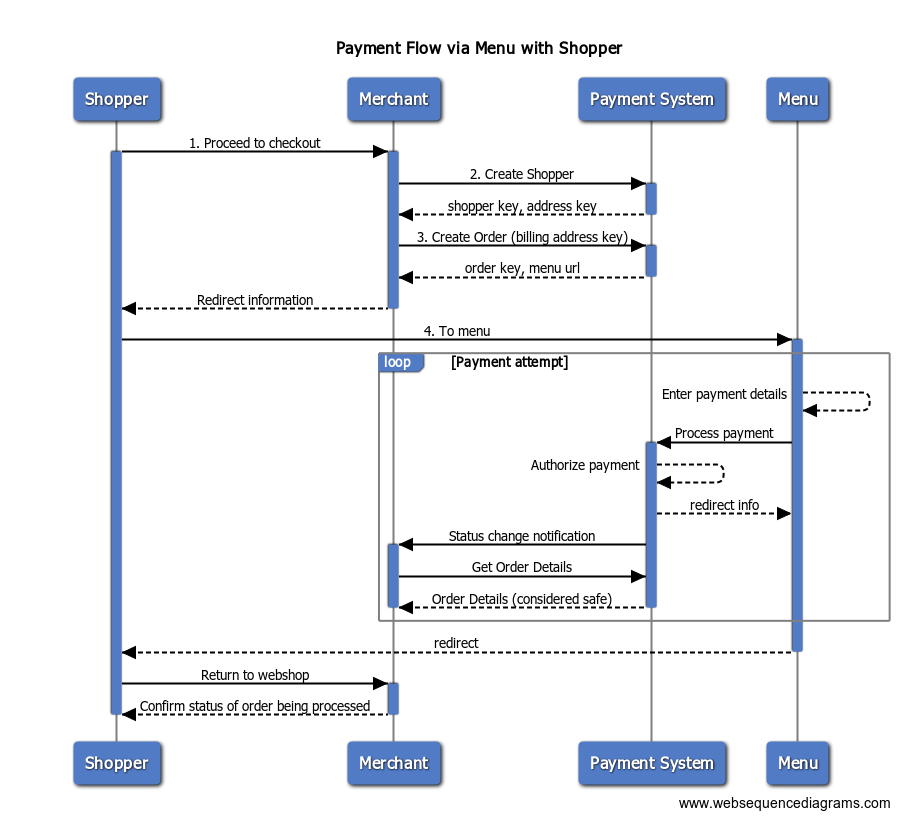
Steps:
1. The shopper has finished shopping and continues to check out to pay for the order.
2. The shopper creates shopper details (Name and Address) using the resource provided by the merchant. The Payment System returns a unique shopper key and address key.
3. The merchant then creates an order using the address key obtained from above step by supplying an amount and an order reference among other parameters. The Payment System returns a unique order key and the URL to the menu. The URL contains all the references to identify the order to be paid.
4. The shopper is redirected to the payment menu.
The further steps are similar to the payment flow as shown in the previous diagram of "Payment Flow Via Menu".
Order Item Flow
[](https://developers.cm.com/payments-platform/v22.06/docs/psp-shopper-data-flow#order-item-flow)
=====================================================================================================================
The data flow for adding Order Items is similar to that of adding Shopper Data. The only difference is that items can only be added after creating an order and the use of a different endpoint.
Updated 7 months ago
* * *
[](https://www.cm.com/)
* [Privacy Policy](https://www.cm.com/app/legal/cm-com/privacy-policy/)
* [Terms and Conditions](https://www.cm.com/app/legal/cm-com/terms-and-conditions/)
* [Cookie Policy](https://www.cm.com/about-cm/cookie-policy/)
Jump to Product page Conversational AI Cloud Mobile Service Cloud Mobile Marketing Cloud Messaging Ticketing Payments Platform Voice Sign
---
# Orders List
The Order list endpoint shows the general points of the order in the Customer panel.
`GET https://example.com/orders?=$EmailAddress&$FilterField=$FilterValue`
Parameters
[](https://developers.cm.com/mobile-service-cloud/docs/orders-list#parameters)
---------------------------------------------------------------------------------------------
| Name | Required | Description |
| --- | --- | --- |
| $EmailAddress | Yes\* | The email address of the customer |
| $PhoneNumber | Yes\* | The phone number of the customer |
| $FilterField | No\*\* | The name of the field that contains the unique identifier for the customer profile\*\* |
| $FilterValue | No\*\* | The unique identifier for the customer profile\*\* |
\*At least one of the parameters need to be configured.
\*\* Refer to the section _Customer profile selection_ for more details on how to use these parameters.
[](https://developers.cm.com/mobile-service-cloud/docs/orders-list#section-)
-------------------------------------------------------------------------------
\## Response body
JSON
`{ "orders": [ { "order_number": "CMO1234", "list_view": { "order_number": "CMO1234", "date": "29-01-2021 12:34", "status": "In progress" } } ] }`
Response body when customer has no order
[](https://developers.cm.com/mobile-service-cloud/docs/orders-list#response-body-when-customer-has-no-order)
---------------------------------------------------------------------------------------------------------------------------------------------------------
JSON
`{ "orders": [] }`
Response schema
[](https://developers.cm.com/mobile-service-cloud/docs/orders-list#response-schema)
-------------------------------------------------------------------------------------------------------
| Name | Type | Required | Description |
| --- | --- | --- | --- |
| orders | Array | Yes | The parent object to store all order\_number objects in |
| order\_number | String | Yes | The number of the order which is also used as parameter for the Order details endpoint. |
| list\_view | Object | Yes | Inside `list_view` you can add custom fields to show information per order in the panel |
| custom\_field | String | No | This variable is placed inside `list_view`. You can rename the key and the value to anything you'd like -- as long as the value is returned in a string form |
Updated over 1 year ago
* * *
[](https://www.cm.com/)
* [Privacy Policy](https://www.cm.com/app/legal/cm-com/privacy-policy/)
* [Terms and Conditions](https://www.cm.com/app/legal/cm-com/terms-and-conditions/)
* [Cookie Policy](https://www.cm.com/about-cm/cookie-policy/)
Jump to Product page Conversational AI Cloud Mobile Service Cloud Mobile Marketing Cloud Messaging Ticketing Payments Platform Voice Sign
---
# Subscription Flow
The Payment System provides a functionality through which a subscription can be created by a merchant and recurring payments can be done using that subscription. See [Subscription API](https://developers.cm.com/payments-platform/v22.06/reference/psp-api-subscriptions)
for the possible API requests.
Subscription Flow
[](https://developers.cm.com/payments-platform/v22.06/docs/psp-subscription-flow#subscription-flow)
=========================================================================================================================
The data flow for subscription is as followed:
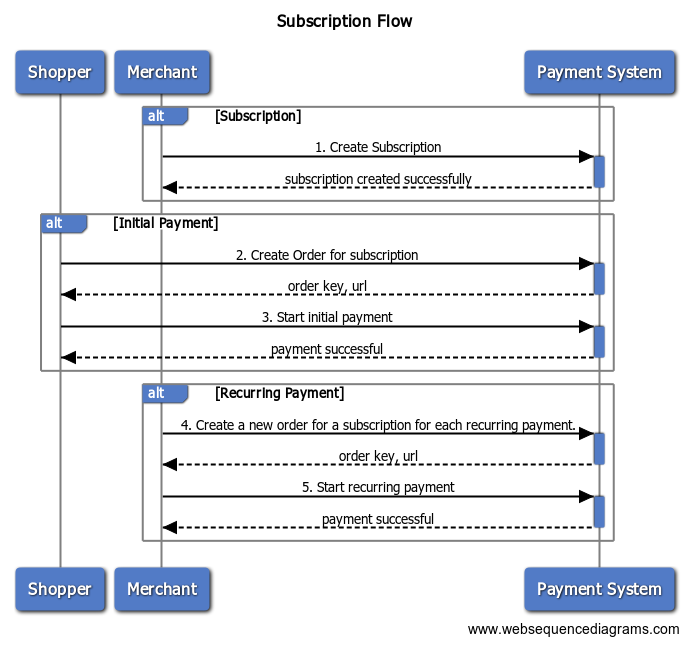
Steps:
1. Create a new subscription.
2. Initial payment
1. Create a new order for a subscription.
2. Start initial payment.
3. Recurring payment
1. Create a new order for a subscription for each recurring payment.
2. Start recurring payment
Updated 7 months ago
* * *
[](https://www.cm.com/)
* [Privacy Policy](https://www.cm.com/app/legal/cm-com/privacy-policy/)
* [Terms and Conditions](https://www.cm.com/app/legal/cm-com/terms-and-conditions/)
* [Cookie Policy](https://www.cm.com/about-cm/cookie-policy/)
Jump to Product page Conversational AI Cloud Mobile Service Cloud Mobile Marketing Cloud Messaging Ticketing Payments Platform Voice Sign
---
# Include Invite in Your Own System
When you don't want to use any of the channels offered by Sign, you can retrieve the invite URL. You can distribute this URL in any way you want, for example:
* Redirect from your own website or software
* Send custom emails
* Send using a different channel
`POST https://api.cm.com/sign/v1/dossiers/{dossierId}/invites`
**Request headers**
`Content-Type: application/json Authorization: Bearer GENERATED_TOKEN_HERE`
**Request body**
JSON
`[ { "inviteeId": "d079c1a6-ca7e-494f-bfcc-9e12fb87e8ac", "expiresIn": 2592000 } ]`
**Response body**
JSON
`[ { "id": "d55ac986-656a-454f-9fac-1aabe879442d", "inviteeId": "d079c1a6-ca7e-494f-bfcc-9e12fb87e8ac", "inviteUri": "https://www.cm.com/en-us/app/sign/invites/HbmN8fb2lhElgv3cEgByjGNfmG0okiWxbibP84i9qyR1cymFA0...", "readOnly": false, "authenticationMethods": [], "identificationMethods": [], "channel": null, "reminder": false, "emailSentAt": null, "emailBouncedAt": null, "expiresIn": 2592000, "expiresAt": "2022-02-01T0:00:00+00:00", "createdAt": "2022-01-01T0:00:00+00:00" } ]`
The invite URL can be retrieved from the `inviteUri` field.
Updated 4 months ago
* * *
[](https://www.cm.com/)
* [Privacy Policy](https://www.cm.com/app/legal/cm-com/privacy-policy/)
* [Terms and Conditions](https://www.cm.com/app/legal/cm-com/terms-and-conditions/)
* [Cookie Policy](https://www.cm.com/about-cm/cookie-policy/)
Jump to Product page Conversational AI Cloud Mobile Service Cloud Mobile Marketing Cloud Messaging Ticketing Payments Platform Voice Sign
---
# Common Payment Flows
There are several possibilities on how to interact with the Payment System. Below are the most common flows for interactions between shopper, merchant, issuer, and the Payment System.
Payment Flow Via Menu
[](https://developers.cm.com/payments-platform/v22.06/docs/psp-payment-flows#payment-flow-via-menu)
-----------------------------------------------------------------------------------------------------------------------------
The Payments System provides a menu that can be used to let a shopper pay for an order. This provides the simplest integration with the Payment System.
The following diagram shows the payment flow using the menu.
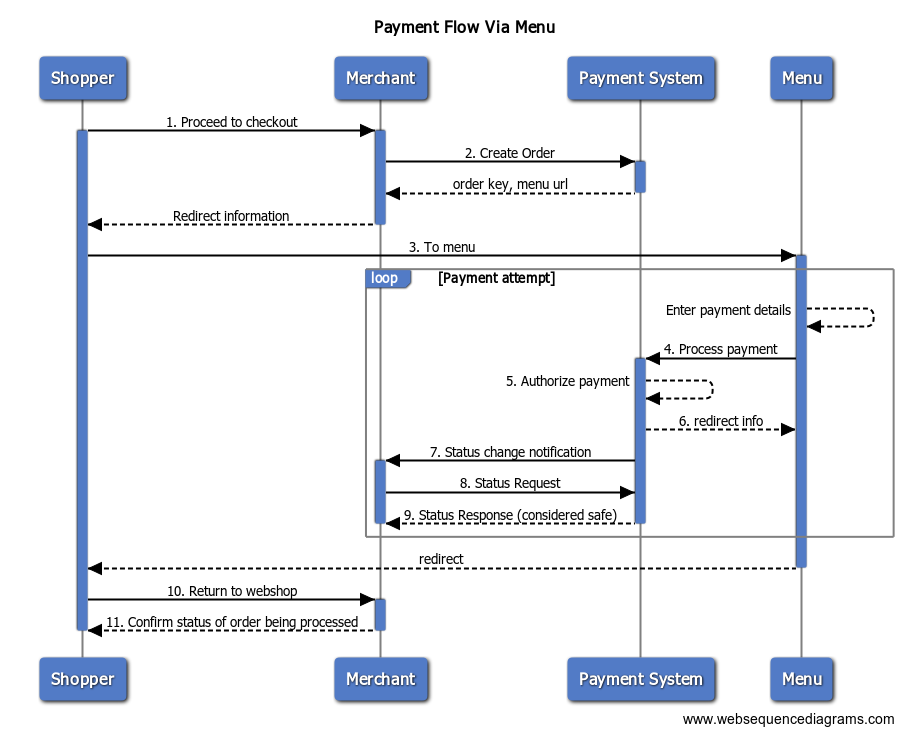
Steps:
1. The shopper has finished shopping and continues to check out to pay for the order.
2. The merchant first creates an order supplying an amount and an order reference among other parameters. The Payment System returns a unique order key and the URL to the menu. The URL contains all the references to identify the order to be paid.
3. The shopper is redirected to the payment menu.
4. The Shopper selects a payment method from menu and enter the payment details and submits request to PS for processing.
5. The Payment System authorizes the payment. Depending on the payment method the shopper can optionally be redirected to an acquirer for authentication.
6. If the order is fully authorized the shopper is redirected back to the Merchant's webshop. Otherwise, he can attempt another payment, or cancel and return to the webshop without paying.
7. By means of an asynchronous Status Change Notification the Payment System notifies the merchant when the status of an order including any payments has been updated.
8. The merchant checks the status of the order (and whether the order is considered safe) using the order key as provided in the response of the create request.
9. Payment System sends back the Status response with Confidence level (considered safe) which helps merchant decide whether to ship the products.
10. The shopper returns to Merchant's webshop.
11. The landing page of the webshop can be used to display a confirmation of the order to the shopper.
Payment Flow Via WebDirect without Redirect to Issuer
[](https://developers.cm.com/payments-platform/v22.06/docs/psp-payment-flows#payment-flow-via-webdirect-without-redirect-to-issuer)
---------------------------------------------------------------------------------------------------------------------------------------------------------------------------------------------
The following diagram shows the payment flow using API calls (WebDirect) without a redirect to an issuer.
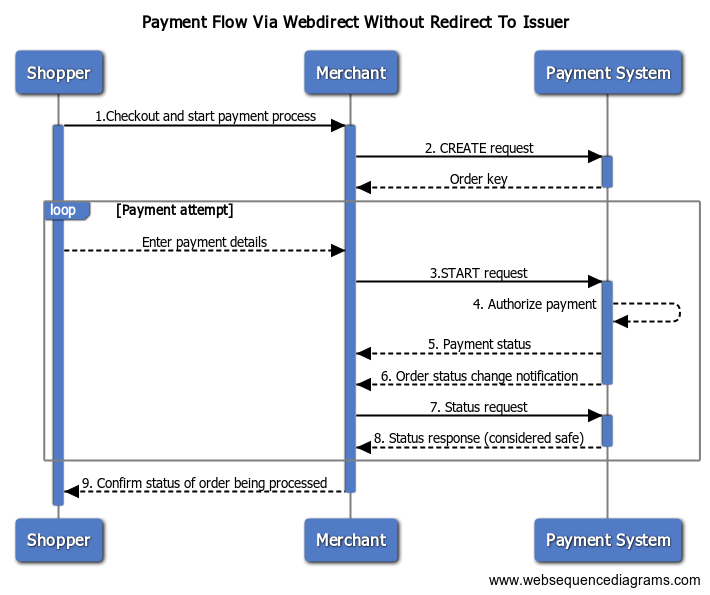
Steps:
1. The shopper has finished shopping and continues to check out to pay for the order.
2. The merchant first creates an order supplying an amount and an order reference among other parameters. The Payment System returns a unique order key and the URL to the menu. The URL contains all the references to identify the order to be paid.The menu URL can be ignored.
3. Using the unique digital key as provided in the response of the CREATE request, the merchant then initiates the creation of a (Payment) Order using the START request.
4. The Payment System authorizes the payment depending on the provided details.
5. Payment System will return the status of the payment.
6. By means of an asynchronous Status Update call Payment System notifies the merchant when the status of an Order has been updated.
7. The merchant checks the status of the order (and whether the payment has been authorized successfully) using the order key as provided in the response of the CREATE request.
8. Payment System sends back the Status response with Confidence level (considered safe) which helps merchant decide whether to ship the products.
9. Merchant confirms to shopper that order is being processed.
Payment Flow Via Webdirect with Redirect to Issuer
[](https://developers.cm.com/payments-platform/v22.06/docs/psp-payment-flows#payment-flow-via-webdirect-with-redirect-to-issuer)
---------------------------------------------------------------------------------------------------------------------------------------------------------------------------------------
The following diagram shows the payment flow using API calls (WebDirect) with a redirect to an issuer.
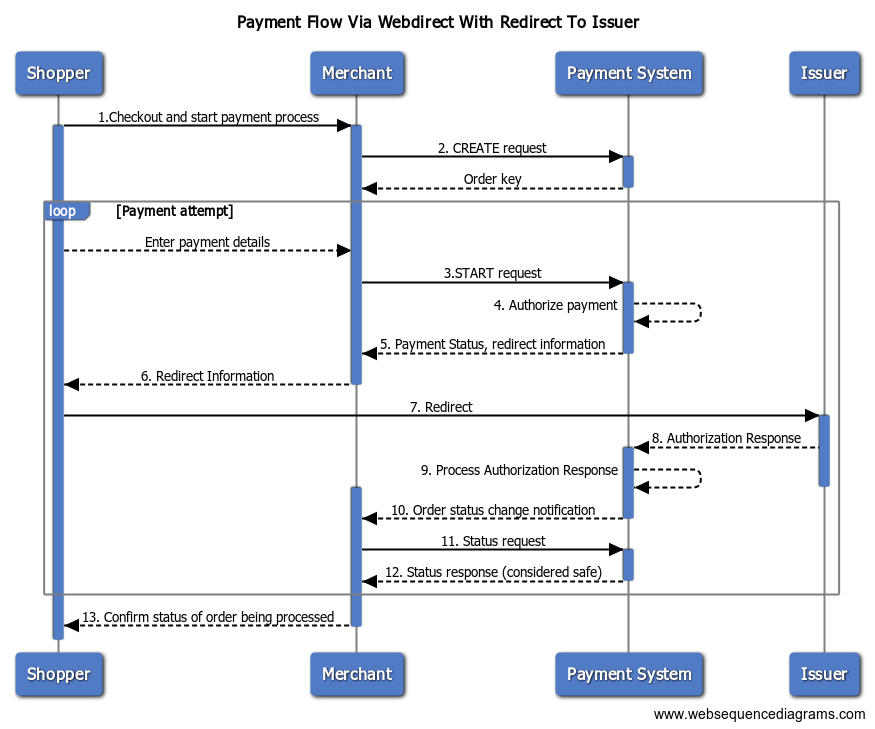
Steps:
1. The shopper has finished shopping and continues to check out to pay for the order.
2. The merchant first creates an order supplying an amount and an order reference among other parameters. The Payment System returns a unique order key and the url to the menu. The url contains all the references to identify the order to be paid.The menu url can be ignored.
3. Using the unique digital key as provided in the response of the CREATE request the merchant then initiates the creation of a (Payment) Order using the START request.
4. The Payment System authorizes the payment depending on the provided details.
5. Payment System returns the status of the payment and redirect information.
6. Merchant sends the redirect information to Shopper.
7. Shopper is redirected to his/her Issuing bank for Authorizing payment.
8. Payment System receives Authorization Response from Issuing bank.
9. Payment System will process the Authorization Response.
10. By means of an asynchronous Status Update call Payment System notifies the merchant when the status of an Order has been updated.
11. The merchant checks the status of the order (and whether the payment has been authorized successfully) using the order key as provided in the response of the CREATE request.
12. Payment System sends back the Status response with Confidence level (considered safe) which helps merchant decide whether to ship the products.
13. Merchant confirms to shopper that order is being processed.
Updated 7 months ago
* * *
[](https://www.cm.com/)
* [Privacy Policy](https://www.cm.com/app/legal/cm-com/privacy-policy/)
* [Terms and Conditions](https://www.cm.com/app/legal/cm-com/terms-and-conditions/)
* [Cookie Policy](https://www.cm.com/about-cm/cookie-policy/)
Jump to Product page Conversational AI Cloud Mobile Service Cloud Mobile Marketing Cloud Messaging Ticketing Payments Platform Voice Sign
---
# Send Invite Using WhatsApp Business Platform
It's possible to send invites via WhatsApp Business Platform to the phone number of the invitee. Sending invites via WhatsApp can only be done if channel `whatsapp` is activated.
Add a phone number to an invitee
[](https://developers.cm.com/sign/docs/send-invite-using-whatsapp-business-platform#add-a-phone-number-to-an-invitee)
----------------------------------------------------------------------------------------------------------------------------------------------------------
To send an invite via WhatsApp Business Platform, it's required to provide the `phoneNumber` of the invitee (in [E.164](https://en.wikipedia.org/wiki/E.164)
format).
`POST https://api.cm.com/sign/v1/dossiers`
**Request headers**
`Content-Type: application/json Authorization: Bearer GENERATED_TOKEN_HERE`
**Request body**
JSON
`{ "name": "Purchase contract", "reminderIn": 604800, "invitees": [ { "name": "Invitee", "email": "[[email protected]](https://developers.cm.com/cdn-cgi/l/email-protection) ", "phoneNumber": "+31612345678" } ] }`
**Response body**
JSON
`{ "id": "302935b2-8a22-4e25-bffb-fccda8963bd4", "name": "Purchase contract", "state": "draft", "locale": "en-US", "completed": false, "reminderIn": 604800, "invitees": [ { "id": "f6d1afd5-aa6a-4c5e-8348-bf5a5310b5d2", "name": "Invitee", "email": "[[email protected]](https://developers.cm.com/cdn-cgi/l/email-protection) ", "phoneNumber": "+31612345678", "authenticationMethods": [], "identificationMethods": [], "reference": null, "readOnly": false, "state": null, "stateChanged": null, "position": null, "locale": "nl-NL" } ], "expiresIn": 2592000, "expiresAt": "2022-01-31T00:00:00+00:00", "createdAt": "2022-01-01T00:00:00+00:00" }`
Sending an invite via WhatsApp Business Platform
[](https://developers.cm.com/sign/docs/send-invite-using-whatsapp-business-platform#sending-an-invite-via-whatsapp-business-platform)
------------------------------------------------------------------------------------------------------------------------------------------------------------------------------------------
To send an invite via WhatsApp Business Platform the channel needs to be configured to `whatsapp`.
`POST https://api.cm.com/sign/v1/dossiers/{dossierId}/invites`
**Request headers**
`Content-Type: application/json Authorization: Bearer GENERATED_TOKEN_HERE`
**Request body**
JSON
`[ { "inviteeId": "80692813-3493-40e9-86c3-d3b6f7378929", "channel": "whatsapp", "expiresIn": 2592000 } ]`
**Response body**
JSON
`[ { "id": "22b33b45-bde6-45f4-a45a-ec1fa53ffffa", "inviteeId": "80692813-3493-40e9-86c3-d3b6f7378929", "inviteUri": null, "readOnly": false, "authenticationMethods": [], "identificationMethods": [], "channel": "whatsapp", "reminder": false, "emailSentAt": null, "emailBouncedAt": null, "expiresIn": 2592000, "expiresAt": "2022-01-31T00:00:00+00:00", "createdAt": "2022-01-01T00:00:00+00:00" } ]`
Updated 4 months ago
* * *
[](https://www.cm.com/)
* [Privacy Policy](https://www.cm.com/app/legal/cm-com/privacy-policy/)
* [Terms and Conditions](https://www.cm.com/app/legal/cm-com/terms-and-conditions/)
* [Cookie Policy](https://www.cm.com/about-cm/cookie-policy/)
Jump to Product page Conversational AI Cloud Mobile Service Cloud Mobile Marketing Cloud Messaging Ticketing Payments Platform Voice Sign
---
# Send Invite Using SMS
It's possible to send invites via SMS to the phone number of the invitee. Sending invites via SMS can only be done if channel `sms` is activated.
Add a phone number to an invitee
[](https://developers.cm.com/sign/docs/send-invite-using-sms#add-a-phone-number-to-an-invitee)
-----------------------------------------------------------------------------------------------------------------------------------
To send an invite via SMS, it's required to provide the `phoneNumber` of the invitee (in [E.164](https://en.wikipedia.org/wiki/E.164)
format).
`POST https://api.cm.com/sign/v1/dossiers`
**Request headers**
`Content-Type: application/json Authorization: Bearer GENERATED_TOKEN_HERE`
**Request body**
JSON
`{ "name": "Purchase contract", "reminderIn": 604800, "invitees": [ { "name": "Invitee", "email": "[[email protected]](https://developers.cm.com/cdn-cgi/l/email-protection) ", "phoneNumber": "+31612345678" } ] }`
**Response body**
JSON
`{ "id": "302935b2-8a22-4e25-bffb-fccda8963bd4", "name": "Purchase contract", "state": "draft", "locale": "en-US", "completed": false, "reminderIn": 604800, "invitees": [ { "id": "f6d1afd5-aa6a-4c5e-8348-bf5a5310b5d2", "name": "Invitee", "email": "[[email protected]](https://developers.cm.com/cdn-cgi/l/email-protection) ", "phoneNumber": "+31612345678", "authenticationMethods": [], "identificationMethods": [], "reference": null, "readOnly": false, "state": null, "stateChanged": null, "position": null, "locale": "nl-NL" } ], "expiresIn": 2592000, "expiresAt": "2022-01-31T00:00:00+00:00", "createdAt": "2022-01-01T00:00:00+00:00" }`
Sending an invite via SMS
[](https://developers.cm.com/sign/docs/send-invite-using-sms#sending-an-invite-via-sms)
---------------------------------------------------------------------------------------------------------------------
To send an invite via SMS the channel needs to be configured to `sms`.
`POST https://api.cm.com/sign/v1/dossiers/{dossierId}/invites`
**Request headers**
`Content-Type: application/json Authorization: Bearer GENERATED_TOKEN_HERE`
**Request body**
JSON
`[ { "inviteeId": "80692813-3493-40e9-86c3-d3b6f7378929", "channel": "sms", "expiresIn": 2592000 } ]`
**Response body**
JSON
`[ { "id": "22b33b45-bde6-45f4-a45a-ec1fa53ffffa", "inviteeId": "80692813-3493-40e9-86c3-d3b6f7378929", "inviteUri": null, "readOnly": false, "authenticationMethods": [], "identificationMethods": [], "channel": "sms", "reminder": false, "emailSentAt": null, "emailBouncedAt": null, "expiresIn": 2592000, "expiresAt": "2022-01-31T00:00:00+00:00", "createdAt": "2022-01-01T00:00:00+00:00" } ]`
Updated 4 months ago
* * *
[](https://www.cm.com/)
* [Privacy Policy](https://www.cm.com/app/legal/cm-com/privacy-policy/)
* [Terms and Conditions](https://www.cm.com/app/legal/cm-com/terms-and-conditions/)
* [Cookie Policy](https://www.cm.com/about-cm/cookie-policy/)
Jump to Product page Conversational AI Cloud Mobile Service Cloud Mobile Marketing Cloud Messaging Ticketing Payments Platform Voice Sign
---
# Require Identification
Additional user identification can be added to the sign process. These extra steps first need to be completed before the user can sign the document. This extra information is included in the audit report. Please note that the identification methods first need to be configured for your account. Please contact your account manager if you want to use this feature.
Supported identification methods:
* One Time Password via SMS (`otp_sms`): A code is sent separately to the invitee via SMS. They enter the verification code on the sign page. An E.164 phone number must be provided for the invitee in a `phoneNumber` field.
* One Time Password via Email (`otp_email`): A code is sent separately to the invitee via Email. They enter the verification code on the sign page.
* One Time Password via WhatsApp (`otp_whatsapp`): A code is sent separately to the invitee via WhatsApp. They enter the verification code on the sign page. An E.164 phone number must be provided for the invitee in a `phoneNumber` field.
* One Time Password via Voice (`otp_voice`): A code is sent separately to the invitee via a phone call. They enter the verification code on the sign page. An E.164 phone number must be provided for the invitee in a `phoneNumber` field.
* IBAN verification (`iban`): The user makes a one cent payment via their bank using iDEAL. After payment we receive the IBAN of their bank account.
* iDIN (`idin`): The user performs an online identification via their bank. The name and date of birth will be requested.
* Qualified signature (`qualified`): The user verifies their identity in a mobile app. The process includes a liveness check and requires an ID Document with NFC chip. When this identification method is used the invitee must have a unique position.
To add an identification for an invite set the following field on an `invitee`:
JSON
`{ "identificationMethods": [ "idin" ] }`
`identificationMethods`: An array containing one or more identification methods.
Retrieve identification status
[](https://developers.cm.com/sign/docs/require-identification#retrieve-identification-status)
--------------------------------------------------------------------------------------------------------------------------------
To retrieve the identification status the request below can be sent.
`GET /dossiers/{dossierId}/invitees/{inviteeId}/identifications`
**Response body**
JSON
`[ { "identificationMethod": "idin", "status": "success", "result": { "transactionId": "123456789123456789", "issuerId": "ABNANL2A", "status": "success", "bin": "ABNANL2A3xOcyYKUhR8s0mS+tbkNO2xF2/U/Ns3eIyMOWYWmOZeUGw8StPKPhAdRTyN1XWne1rgJQA", "name": { "initials": "A", "firstName": "Andre", "lastName": "Dijk", "lastNamePrefix": "van" }, "age": { "dateOfBirth": "1974-01-31", "18yOrOlder": true } } } ]`
You usually don't have to retrieve the identification status, because a dossier can only be signed after the identification has been completed. When you received the dossier completed webhook or email, you know that the invitee has successfully identified themselves.
Updated 4 months ago
* * *
[](https://www.cm.com/)
* [Privacy Policy](https://www.cm.com/app/legal/cm-com/privacy-policy/)
* [Terms and Conditions](https://www.cm.com/app/legal/cm-com/terms-and-conditions/)
* [Cookie Policy](https://www.cm.com/about-cm/cookie-policy/)
Jump to Product page Conversational AI Cloud Mobile Service Cloud Mobile Marketing Cloud Messaging Ticketing Payments Platform Voice Sign
---
# Your First Conversation
Welcome to the Conversational AI Cloud getting started guide aimed at getting your first conversation off the ground! 🚀
Introduction
[](https://developers.cm.com/conversational-ai-cloud/docs/your-first-conversation#introduction)
----------------------------------------------------------------------------------------------------------------
Conversational AI Cloud is a Conversational AI Platform that makes it easy to have a conversation with your customers. In order to have a basic conversation we offer a single API called our Gateway API. There’s also other API’s like the Context Store API, or our web hook based integrations, but those generally come into play whenever customers are looking to create a more personalised and integrated conversation.
In this guide we’ll be relying on the Gateway API to send in questions, and receive answers (also called an interaction), and to manage our conversation through what is called a session. We’ll be looking at the response models, and looking at the most important parts of the response in order to get started with our API(s).
> 📘
>
> Pre-requisites
>
>
> --------------------
>
> To follow along with this guide you'll need to have the following available to you:
>
> * Conversational AI Cloud environment provisioned, and ready-to-use
> * Project within your Conversational AI Cloud environment
> * Your projects credentials ready-to-use:
> * Customer key
> * Project key
> * Culture of your projects content
> * API key for your project
Any code examples in this guide are written in Node, but feel free to code along in any language you prefer.
Your first message
[](https://developers.cm.com/conversational-ai-cloud/docs/your-first-conversation#your-first-message)
----------------------------------------------------------------------------------------------------------------------------
Sending a message to the Conversational AI Cloud means calling the [/ask endpoint](https://cmcom-group.readme.io/conversational-ai-cloud/reference/get_ask)
on the [Gateway API](https://cmcom-group.readme.io/conversational-ai-cloud/reference/get_ask)
.
JavaScript
`const axios = require("axios").default; const options = { method: 'GET', url: 'https://api.digitalcx.com/ask', params: { customerKey: 'your-customer-key', projectKey: 'your-project-key', culture: 'your-projects-culture', apiKey: 'your-api-key', q: 'Hello! How are you doing?' } headers: { Accept: 'application/json, standard' } }; axios.request(options).then(function (response) { console.log(response.data); }).catch(function (error) { console.error(error); });`
The above request is a simple example of a GET request. Submitting this request will provide us with the following response object:
JSON
`{ "outputs": [ { "outputId": 0, "kbaId": 272, "interactionValue": "Hello! How are you doing?", "isDefault": true, "dimensionValues": [], "outputParts": [ { "type": "answer", "text": "I'm doing great! Is there anything I can help you with today?", "links": [], "projectConstants": [], "dialogOptions": [], "metadata": {}, "images": [], "videos": [] } ], "kbaCategories": [] } ], "sessionId": "0d5bf3ad-2f4f-4a57-ab1d-c3b20f229e72", "interactionId": "e187019a-2b4d-4d33-bbc3-0b465f59c432", "culture": "en", "inputs": { "originalInputText": "Hello! How are you doing?" } }`
Inspecting the root of the response object shows us a few key variables:
* Outputs, an array containing the answer response on the first index.
* InteractionId, a unique GUID generated for this specific interaction. The interaction ID can be used to provide feedback, or examine the interaction in our analytics environment.
* SessionId, a unique GUID generated for each new session on the Conversational AI Cloud gateway.
Taking a look at the answer response contained in the outputs array provides us with the following:
JSON
`{ "outputId": 0, "kbaId": 272, "interactionValue": "Hello! How are you doing?", "isDefault": true, "dimensionValues": [], "outputParts": [ { "type": "answer", "text": "I'm doing great! Is there anything I can help you with today?", "links": [], "projectConstants": [], "dialogOptions": [], "metadata": {}, "images": [], "videos": [] }], "kbaCategories": [] }`
We can see that the answer object contains a number of properties, most of which we won’t get into in this article. A few topics are particularly important when getting started with Conversational AI Cloud:
* interactionValue, the original question we sent in to the Gateway
* outputParts, the object containing the actual answer text along with any additional properties such as media, links, and dialog options
And last, but not least. If we look specifically at the outputParts section we get:
JSON
`{ "type": "answer", "text": "I'm doing great! Is there anything I can help you with today?", "links": [], "projectConstants": [], "dialogOptions": [], "metadata": {}, "images": [], "videos": [] }`
We see that the outputParts section consists of the following properties:
* type, the type of response (always set to ‘answer’)
* text, the answer text containing the response
* links, images, videos: arrays of objects containing information on the specific media type or link.
* Each media type has a different format, the ID in the object is referenced in the replacement tag when present in the response (see the “replacement tag” section of this article).
* projectConstants, all project constants present in the answer text (pre-replaced)
* dialogOptions, any dialog options defined in the CMS content for this answer
* metadata, any values added to the answer that can be used by the caller to further process the request
Continuing the conversation
[](https://developers.cm.com/conversational-ai-cloud/docs/your-first-conversation#continuing-the-conversation)
----------------------------------------------------------------------------------------------------------------------------------------------
Now that we’ve sent our first message through the Gateway API, it's time for us to continue the conversation. Whenever a single interaction is sent to the Gateway API, it generates an interaction ID ([learn more about interactions here](https://developers.cm.com/conversational-ai-cloud/docs/interactions)
), and a session ID ([learn more about sessions here](https://developers.cm.com/conversational-ai-cloud/docs/sessions)
). These ID’s are used to both continue the conversation (session ID), or to look up a specific interaction in Conversational AI Cloud’s analytics environment (interaction ID).
For this section of the guide we’ll be looking specifically at continuing the conversation using through the session ID. As stated before, a unique session ID is generated for any interaction without a session ID, or for any interaction with an expired session ID. A session in Conversational AI Cloud is:
* Unique to each customer-project-culture combination
* Valid for a period of 15 minutes, or 24 hours.
* A way to group individual interactions together into a conversation
* A container for any information that you want to keep in the session in order to personalise and optimise interactions to better serve your end-users.
Sessions are required for more extensive interactions with the Gateway API like (transactional) dialogs. Continuing a conversation through sessions is as easy as providing the session ID provided in the response from one interaction, as a query parameter for the next interaction:
JavaScript
`const axios = require("axios").default; const options = { method: 'GET', url: 'https://api.digitalcx.com/ask', params: { customerKey: 'your-customer-key', projectKey: 'your-project-key', culture: 'your-projects-culture', apiKey: 'your-api-key', q: 'Can you help me with returning my order?', // Here we include the session ID returned from a previous interaction 'session.id': '0d5bf3ad-2f4f-4a57-ab1d-c3b20f229e72' } headers: { Accept: 'application/json, standard' } }; axios.request(options).then(function (response) { console.log(response.data); }).catch(function (error) { console.error(error); });`
All we did to carry on the conversation within the session that was generated for us is include the ‘session.id’ query parameter. This is enough for Conversational AI Cloud to process the interaction in the scope of the session. If the provided session ID has expired, a new session will be generated (linked to the previous session) and returned in the output.
Next steps
[](https://developers.cm.com/conversational-ai-cloud/docs/your-first-conversation#next-steps)
------------------------------------------------------------------------------------------------------------
In this guide we took a look at the [/ask endpoint](https://cmcom-group.readme.io/conversational-ai-cloud/reference/get_ask)
on the [Gateway API](https://cmcom-group.readme.io/conversational-ai-cloud/reference/get_ask)
. We sent in two interactions, the first one generating a new session, and the second interaction picking up the conversation through the use of the session id parameter. By taking those two steps, we essentially have the basics of a conversation between your end-users and Conversational AI Cloud!
Of course there's a lot of other Conversational AI Cloud features you could integrate it! Make sure to take a look at some of our other articles that explain core concepts like events, dialogs, and context to learn more about how to get started with CM.com's Conversational AI Cloud!
Updated over 1 year ago
* * *
[](https://www.cm.com/)
* [Privacy Policy](https://www.cm.com/app/legal/cm-com/privacy-policy/)
* [Terms and Conditions](https://www.cm.com/app/legal/cm-com/terms-and-conditions/)
* [Cookie Policy](https://www.cm.com/about-cm/cookie-policy/)
Jump to Product page Conversational AI Cloud Mobile Service Cloud Mobile Marketing Cloud Messaging Ticketing Payments Platform Voice Sign
---
# Advanced Features
The payment system supports various advanced features related to order/payment initiation and payment details registration. These features are:
* [Subscriptions (recurring payments)](https://developers.cm.com/payments-platform/v22.06/reference/psp-subscription-flow)
* [Payment Tokenization](https://developers.cm.com/payments-platform/v22.06/reference/psp-tokenized-payment-details)
* [Executing request on Behalf of Another Merchant](https://developers.cm.com/payments-platform/v22.06/reference/psp-api-intermerchant)
For some features an additional contract may be required, as well as some additional account configuration. Contact support or sales for more details.
Updated 7 months ago
* * *
[](https://www.cm.com/)
* [Privacy Policy](https://www.cm.com/app/legal/cm-com/privacy-policy/)
* [Terms and Conditions](https://www.cm.com/app/legal/cm-com/terms-and-conditions/)
* [Cookie Policy](https://www.cm.com/about-cm/cookie-policy/)
Jump to Product page Conversational AI Cloud Mobile Service Cloud Mobile Marketing Cloud Messaging Ticketing Payments Platform Voice Sign
---
# Order Details
The “Order details” endpoint shows the details of one order so the Agent Inbox agent can see more information of one particular order from the customer. Once a Agent Inbox agent clicks on order shown in the “Order list” from Endpoint 2, Endpoint 3 will be called by the parameter “ID” filled with the order\_number in the object of “orders” from Endpoint 2 “Order list”.
`GET https://example.com/orderdetails?=$Id`
Parameters
[](https://developers.cm.com/mobile-service-cloud/docs/order-details#parameters)
-----------------------------------------------------------------------------------------------
| Name | Required | Description |
| --- | --- | --- |
| $Id | Yes | The order\_number of the clicked object of “orders” from Endpoint 2 “Order list” |
Response body
[](https://developers.cm.com/mobile-service-cloud/docs/order-details#response-body)
-----------------------------------------------------------------------------------------------------
JSON
`{ "details_view": [ { "display_as": "details", "data": { "date": "29-01-2021 12:34", "status": "In progress", "payment_status": "Partially paid", "shipment_status": "Partially shipped", "": "" } }, { "display_as": "columns", "caption": "products", "data": [ { "product": "Phone", "quantity": "1", "price": "$695.50" }, { "product": "Tablet", "quantity": "2", "price": "$898.00" }, { "product": "Shipment", "quantity": "", "price": "$10.00" }, { "product": "Total", "quantity": "", "price": "$1603.50" } ] }, { "display_as": "rows", "caption": "invoices", "data": [ { "shipment": "CMI01", "status": "Paid", "amount": "$1200.00" }, { "shipment": "CMI02", "status": "Not paid", "amount": "$403.50" } ] }, { "display_as": "rows", "caption": "Empty", "data": [] } ] }`
The `details_view` Array can hold multiple objects. Each object represents a section in the Sidebar view of agent inbox for an order. The above example has 4 sections, the default one and 3 named Products, Invoices and Empty respectively. The sections can return information in one of three data structure types: `details`, `rows`, `columns`.
* In `details` mode, the data attribute is an object of multiple key / values of type string. This will show as a 2 column section in the Agent Inbox.
* `columns` requires the data attribute to be an array of objects, each object representing a single row. Each object has multiple key/value pairs, where they keys are the column names and the values the column values.
* `rows` requires the data attribute to be an array of objects, each object representing a single row, itself containing multiple rows. Each object has multiple key/value pairs, where the keys are the headers of the nested row and the values are the row values.
Response schema
[](https://developers.cm.com/mobile-service-cloud/docs/order-details#response-schema)
---------------------------------------------------------------------------------------------------------
| Name | Type | Required | Description |
| --- | --- | --- | --- |
| display\_as | String | Yes | The layout the information in showed in the panel (details, rows and columns) |
| caption | String | Yes\* | The caption used for this section in the details view of the order |
| data | Array or Object | Yes | This is the object where all the information is returned. |
\* A caption is not required for the first section
Updated over 1 year ago
* * *
[](https://www.cm.com/)
* [Privacy Policy](https://www.cm.com/app/legal/cm-com/privacy-policy/)
* [Terms and Conditions](https://www.cm.com/app/legal/cm-com/terms-and-conditions/)
* [Cookie Policy](https://www.cm.com/about-cm/cookie-policy/)
Jump to Product page Conversational AI Cloud Mobile Service Cloud Mobile Marketing Cloud Messaging Ticketing Payments Platform Voice Sign
---
# Customer Information
This endpoint has been designed to showcase the details of the customer. This endpoint gives the customer service rep a general overview of who the person is and his history with the company.
`GET https://example.com/customers?=$EmailAddress&=$PhoneNumber&$FilterField=$FilterValue`
Parameters
[](https://developers.cm.com/mobile-service-cloud/docs/customer-information#parameters)
------------------------------------------------------------------------------------------------------
| Name | Required | Description |
| --- | --- | --- |
| $EmailAddress | Yes\* | The email address of the customer |
| $PhoneNumber | Yes\* | The phone number of the customer |
| $FilterField | No\*\* | The name of the field that contains the unique identifier of the customer profile\*\* |
| $FilterValue | No\*\* | The unique identifier of the customer profile\*\* |
\*At least one of the parameters need to be configured.
\*\* Refer to the section _Customer profile selection_ for more details of how to use these parameters
Response body
[](https://developers.cm.com/mobile-service-cloud/docs/customer-information#response-body)
------------------------------------------------------------------------------------------------------------
JSON
`{ "email_address": "[[email protected]](https://developers.cm.com/cdn-cgi/l/email-protection) ", "customer_since": "2021-01-28", "order_count": 12, "total_spent": "$154.95", "name": "John Doe", "phone_number": "+31612345678", "panel_view": { "custom_field1": "Value 1", "custom_field2": "Value 2" } }`
Response schema
[](https://developers.cm.com/mobile-service-cloud/docs/customer-information#response-schema)
----------------------------------------------------------------------------------------------------------------
| Name | Type | Required | Description |
| --- | --- | --- | --- |
| name | String | Yes | Returns the full name of the customer |
| email\_address | String | Yes | Returns the email address of the customer |
| phone\_number | String | Yes | Returns the phone number of the customer |
| customer\_since | String | Yes | Shows the date when the customer purchased his first order. Date format is: "YYYY-MM-DD" |
| total\_spent | String | Yes | Returns the total amount the customer has spend at the store(s) |
| order\_count | Float | Yes | Returns the total amount of orders the customer has at the store(s) |
| panel\_view | Object | No | A JSON object to put custom fields in to show more information about the customer |
| custom\_field | String | No | This variable is placed inside `panel_view`. You can rename the key and the value to anything you'd like -- as long as the value is returned in a string form |
Updated over 1 year ago
* * *
[](https://www.cm.com/)
* [Privacy Policy](https://www.cm.com/app/legal/cm-com/privacy-policy/)
* [Terms and Conditions](https://www.cm.com/app/legal/cm-com/terms-and-conditions/)
* [Cookie Policy](https://www.cm.com/about-cm/cookie-policy/)
Jump to Product page Conversational AI Cloud Mobile Service Cloud Mobile Marketing Cloud Messaging Ticketing Payments Platform Voice Sign
---
# Customer Lifetime
The “Customer Lifetime” endpoint shows the total amount of orders and the total amount of revenue per customer. The data will be shown for an inbox item.
`GET https://example.com/search?=$Email`
Parameters
[](https://developers.cm.com/mobile-service-cloud/docs/customer-lifetime#parameters)
---------------------------------------------------------------------------------------------------
| Name | Required | Description |
| --- | --- | --- |
| $Email | Yes | The email address of the customer |
Response body
[](https://developers.cm.com/mobile-service-cloud/docs/customer-lifetime#response-body)
---------------------------------------------------------------------------------------------------------
JSON
`{ "email_address": "[[email protected]](https://developers.cm.com/cdn-cgi/l/email-protection) ", "customer_since": "2021-01-12T12:34:56Z", "order_count": 12, "currency": "$", "total_revenue": 154.95, "last_order_date": "2021-04-05T12:34:56Z" }`
Response schema
[](https://developers.cm.com/mobile-service-cloud/docs/customer-lifetime#response-schema)
-------------------------------------------------------------------------------------------------------------
| Name | Type | Required | Description |
| --- | --- | --- | --- |
| email\_address | String | Yes | Email address of the customer |
| customer\_since | String | Yes | Date of the first order |
| order\_count | Integer | Yes | Total amount of orders the customer has |
| currency | String | Yes | Default currency of the customer |
| total\_revenue | Float | Yes | Total amount of revenue the customer has brought in |
| last\_order\_date | String | Yes | Date of the last order |
Updated about 3 years ago
* * *
[](https://www.cm.com/)
* [Privacy Policy](https://www.cm.com/app/legal/cm-com/privacy-policy/)
* [Terms and Conditions](https://www.cm.com/app/legal/cm-com/terms-and-conditions/)
* [Cookie Policy](https://www.cm.com/about-cm/cookie-policy/)
Jump to Product page Conversational AI Cloud Mobile Service Cloud Mobile Marketing Cloud Messaging Ticketing Payments Platform Voice Sign
---
# Channels
Conversational AI Cloud allows customers to define custom channels for their conversational AI. Each channel can have a unique set of answers defined, allowing for a smooth omni-channel experience when interacting with the conversational AI.
When calling the Gateway API customers can choose to provide the **channels** query parameter. The channels query parameter behaves as follows:
* When specified Conversational AI Cloud's recognition engine will attempt to select the answer set for the provided channel.
* If the channel is correctly specified, and the matched article has at least 1 answer defined for that channel, that answer set will be used for context evaluation to provide an answer to the end-user.
* If the channel is correctly specified, and the matched article does not have any answers defined for it the channel query parameter will be ignored, and the default answer set will be used to provide an answer to the end-user.
* If the channel is incorrectly specified the channel query parameter will be ignored
Updated over 2 years ago
* * *
[](https://www.cm.com/)
* [Privacy Policy](https://www.cm.com/app/legal/cm-com/privacy-policy/)
* [Terms and Conditions](https://www.cm.com/app/legal/cm-com/terms-and-conditions/)
* [Cookie Policy](https://www.cm.com/about-cm/cookie-policy/)
Jump to Product page Conversational AI Cloud Mobile Service Cloud Mobile Marketing Cloud Messaging Ticketing Payments Platform Voice Sign
---
# Search
The “Search” endpoint shows results of the search expression so that the Agent Inbox agent can see all known orders, customers and conversations relating to the search keyword.
`GET https://example.com/search?=$Expression`
Parameters
[](https://developers.cm.com/mobile-service-cloud/docs/search#parameters)
----------------------------------------------------------------------------------------
| Name | Required | Description |
| --- | --- | --- |
| $Expression | Yes | The search expression filled in the Agent Inbox Search field by the agent |
Response body
[](https://developers.cm.com/mobile-service-cloud/docs/search#response-body)
----------------------------------------------------------------------------------------------
JSON
`{ "customers": [ { "email_address": "[[email protected]](https://developers.cm.com/cdn-cgi/l/email-protection) ", "name": "Fullname", "phone_number": "+31612345678", "order_count": "1", "total_spent": "€123,45" } ], "orders": [ { "email_address": "[[email protected]](https://developers.cm.com/cdn-cgi/l/email-protection) ", "order_number": "CM1234", "order_date": "2021-01-12T12:34:56Z", "revenue": "€12,34", "name": "Fullname" } ] }`
Response body with no results
[](https://developers.cm.com/mobile-service-cloud/docs/search#response-body-with-no-results)
------------------------------------------------------------------------------------------------------------------------------
If there is no customer or an order for the expression, make sure you response with the an empty array for customers and/or orders.
JSON
`{ "customers": [], "orders": [] }`
Response schema
[](https://developers.cm.com/mobile-service-cloud/docs/search#response-schema)
--------------------------------------------------------------------------------------------------
| Name | Type | Required | Description |
| --- | --- | --- | --- |
| customers | Array | Yes | Customer specific contact details |
| email\_address | String | Yes | E-mail of the customer which resembles the search expression |
| name | String | Yes | Name of the customer |
| phone\_number | String | Yes | Phone number of the customer |
| order\_count | String | Yes | Total amount of orders the customer has |
| total\_spent | String | Yes | Total amount of money the customer has spent |
| orders | Array | Yes | Array which contains order details that resembles the search expression |
| email\_address | String | Yes | The email address of the customer who filled in the order |
| order\_number | String | Yes | Number from the order |
| order\_date | String | Yes | Date of the order |
| revenue | String | Yes | Total amount of money that the order resembles |
| name | String | Yes | Name of the customer that has filled in the order |
Updated over 1 year ago
* * *
[](https://www.cm.com/)
* [Privacy Policy](https://www.cm.com/app/legal/cm-com/privacy-policy/)
* [Terms and Conditions](https://www.cm.com/app/legal/cm-com/terms-and-conditions/)
* [Cookie Policy](https://www.cm.com/about-cm/cookie-policy/)
Jump to Product page Conversational AI Cloud Mobile Service Cloud Mobile Marketing Cloud Messaging Ticketing Payments Platform Voice Sign
---
# Supported Features
The following features are supported in the Payments Rest API.
* Payments via Menu
* iDEAL, iDEAL QR
* BankTransfer
* Credit/Debit Cards (American Express, Mastercard, Maestro, Visa, V-Pay)
* Bancontact, Bancontact Mobile
* Paysafecard
* ELV
* Belfius Pay Button
* Gift cards
* Point Of Sale (using a physical terminal)
* Apple Pay, Apple Business Chat
* Google Pay
* PayPal
* Sepa Direct Debit
* Riverty
* Klarna
* IN3
* Przelewy24, BLIK
* [Captures](https://developers.cm.com/payments-platform/v22.06/reference/psp-api-captures)
* [Refunds](https://developers.cm.com/payments-platform/v22.06/reference/psp-api-refunds)
* [Shopper Data](https://developers.cm.com/payments-platform/v22.06/reference/psp-api-shoppers)
* [Order Items](https://developers.cm.com/payments-platform/v22.06/reference/psp-api-order-items)
* List payment methods per Order [Orders](https://developers.cm.com/payments-platform/v22.06/reference/psp-api-orders#list-payment-methods)
* Payments via API ([Start Payment Request](https://developers.cm.com/payments-platform/v22.06/reference/psp-api-payments#start-payment)
)
* iDEAL, iDEAL QR
* PayPal
* Credit Cards (American Express, Mastercard, Maestro, Visa, V-Pay)
* BanContact, Bancontact Mobile
* Klarna
* Przelewy24, BLIK
* Bank transfer
* Sepa Direct Debit
* Point Of Sale
* IN3
* Apple Pay, Apple Business Chat
* Google Pay
* [Subscriptions](https://developers.cm.com/payments-platform/v22.06/reference/psp-api-subscriptions)
(Recurring payments)
The following is not supported
* Cancellation of order
Updated 7 months ago
* * *
[](https://www.cm.com/)
* [Privacy Policy](https://www.cm.com/app/legal/cm-com/privacy-policy/)
* [Terms and Conditions](https://www.cm.com/app/legal/cm-com/terms-and-conditions/)
* [Cookie Policy](https://www.cm.com/about-cm/cookie-policy/)
Jump to Product page Conversational AI Cloud Mobile Service Cloud Mobile Marketing Cloud Messaging Ticketing Payments Platform Voice Sign
---
# Context
Depending on the state of a conversation you might want to provide a different answer to your end-users. Conversational AI Cloud calls this conversation state context, and the factors that might influence it are determined through context variables.
A context variable is a single indicator of the state (or environment) a conversation is taking place in. An example could be the context variable "logged\_in" that could be true if your end-user is authenticated on your website, and false if they aren't authenticated. You might want to present a different answer to that individual if they are logged in versus when they aren't. Context variables are:
* A pre-defined variable with a pre-determined set of possible allowed values [(learn more about how to work with them in our CMS)](https://support.digitalcx.com/article/97-740-3169)
* Evaluated for every individual interaction
And they can be set via:
* A query parameter when calling the [Gateway API](https://developers.cm.com/conversational-ai-cloud/reference/get_ask)
* A [context variable webhook](https://developers.cm.com/conversational-ai-cloud/docs/context-variable-web-hook)
* [Web Conversations JavaScript API](https://developers.cm.com/conversational-ai-cloud/docs/customising-web-conversations)
(when using Web Conversations)
If the same context variable is set in different ways for an interaction then the following order is used to prevent conflicting definitions (first in the list is the lowest priority):
1. Web Conversations JavaScript API
2. Query parameter
3. Context Variable webhook
The sole purpose of a context variable is to provide a different answer once an article (Q&A), event, or dialog (node) is matched by Conv. AI Cloud. Contextual answers can be defined through the Conv. AI Cloud CMS.
Updated over 2 years ago
* * *
[](https://www.cm.com/)
* [Privacy Policy](https://www.cm.com/app/legal/cm-com/privacy-policy/)
* [Terms and Conditions](https://www.cm.com/app/legal/cm-com/terms-and-conditions/)
* [Cookie Policy](https://www.cm.com/about-cm/cookie-policy/)
Jump to Product page Conversational AI Cloud Mobile Service Cloud Mobile Marketing Cloud Messaging Ticketing Payments Platform Voice Sign
---
# Customer POST
The “Customer Lifetime” endpoint shows the total amount of orders and the total amount of revenue per customer for every new conversation. But for older conversation you'll need the POST to update this information.
`POST https://api.robinhq.com/dynamic/customers/`
Response codes
[](https://developers.cm.com/mobile-service-cloud/docs/customer-post#response-codes)
-------------------------------------------------------------------------------------------------------
| Code | Description |
| --- | --- |
| 201 | Created |
| 400 | Bad Request |
| 401 | Invalid authorisation data |
Request body
[](https://developers.cm.com/mobile-service-cloud/docs/customer-post#request-body)
---------------------------------------------------------------------------------------------------
JSON
`{ "customers": [ { "email_address": "[[email protected]](https://developers.cm.com/cdn-cgi/l/email-protection) ", "customer_since": "2021-01-29T12:34:56Z", "order_count": 12, "total_revenue": 123.45, "currency": "$", "last_order_date": "2021-04-05T12:34:56Z" } ] }`
Request schema
[](https://developers.cm.com/mobile-service-cloud/docs/customer-post#request-schema)
-------------------------------------------------------------------------------------------------------
| Name | Type | Required | Description |
| --- | --- | --- | --- |
| email\_address | String | Yes | Email address of the customer |
| customer\_since | String | Yes | Date of the first order |
| order\_count | Integer | Yes | Total amount of orders the customer has |
| currency | String | Yes | Default currency of the customer |
| total\_revenue | Float | Yes | Total amount of revenue the customer has brought in |
| last\_order\_date | String | Yes | Date of the last order |
Updated over 1 year ago
* * *
[](https://www.cm.com/)
* [Privacy Policy](https://www.cm.com/app/legal/cm-com/privacy-policy/)
* [Terms and Conditions](https://www.cm.com/app/legal/cm-com/terms-and-conditions/)
* [Cookie Policy](https://www.cm.com/about-cm/cookie-policy/)
Jump to Product page Conversational AI Cloud Mobile Service Cloud Mobile Marketing Cloud Messaging Ticketing Payments Platform Voice Sign
---
# Online Payments
Introduction
[](https://developers.cm.com/payments-platform/v22.06/docs/psp-online-payments#introduction)
=============================================================================================================
This guide describes the API to be used with the CM Payments System.
Order vs. Payment
[](https://developers.cm.com/payments-platform/v22.06/docs/psp-online-payments#order-vs-payment)
======================================================================================================================
The Payment System makes a distinction between Orders and Payments.
An order is an instruction for a specific amount to be paid by a shopper and can obtain shopping basket items.
A payment is an attempt to pay an order by a shopper. This attempt is not necessarily successful, in which case the shopper can try again to pay the order. Furthermore, the shopper can pay the order with multiple partial payments, typically using gift cards. Therefore, an order can have multiple payments.
In addition, each order and each payment have their own unique identifier. These identifiers are used throughout the various API calls, but are also helpful when communicating with support.
Payment Flows
[](https://developers.cm.com/payments-platform/v22.06/docs/psp-online-payments#payment-flows)
===============================================================================================================
There are several possibilities on how to interact with the Payment System. Below are the most common flows for interactions between shopper, merchant, issuer, and the Payment System. See the section [Common Payment Flows](https://developers.cm.com/payments-platform/v22.06/docs/psp-payment-flows)
for several samples.
Shopper Data and Order Items
[](https://developers.cm.com/payments-platform/v22.06/docs/psp-online-payments#shopper-data-and-order-items)
---------------------------------------------------------------------------------------------------------------------------------------------
For some payment methods additional data is required to be able to successfully process the payment request. For those situations the following pages are applicable [Shopper Data](https://developers.cm.com/payments-platform/v22.06/reference/psp-api-shoppers)
and [Order Items](https://developers.cm.com/payments-platform/v22.06/reference/psp-api-order-items)
.
Status Notification and Considered Safe
[](https://developers.cm.com/payments-platform/v22.06/docs/psp-online-payments#status-notification-and-considered-safe)
===================================================================================================================================================================
The merchant is notified of a change in the status of the order (including any payment) by an asynchronous call to an Update Url that is configured in his account. This Update Url does **not** contain any status information of the order or payment(s). It only notifies that the status of order or payment(s) has changed. This change might or might not be relevant for the merchant.
The Update Url can be parameterized by including one or multiple placeholders:
| Field | Type | Description |
| --- | --- | --- |
| country | Country | The (billing) country of the shopper as ISO 3166-1 Alpha 2. |
| currency | Currency | The order currency as ISO 4217 Alpha 3, e.g. "EUR". |
| client\_id | String(1, 50) | The id of the shopper. |
| order\_key | OrderKey | The generated order key. |
| language | Language | The language of the shopper as ISO 639-1 Alpha 2. |
| merchant\_name | String(1, 50) | The name of the merchant. |
| order\_reference | String(1, 255) | The order reference from the merchant. |
For example the Update Url `https://www.myshop.com/payments/notification?order=${order_key}&country=${country}`, with the parameters `order_key` and `country`, is called as `https://www.myshop.com/payments/notification?order=16965E9DA949EA65A6D73E31FE0E88B3&country=NL`.
If the Update Url ends with an equal sign ('=') or a forward slash ('/'), then the order reference, as supplied in the [create order request](https://developers.cm.com/payments-platform/v22.06/reference/psp-api-orders#create-order)
, is appended to the Url. For example the Url `https://www.myshop.com/payments/notification?id=` becomes
commandline
`https://www.myshop.com/payments/notification?id=vk20170224p`
To determine the status of the order, and if the order can be shipped, get the details of the order. If the response contains the element `considered_safe` it is safe to ship the order.
Considered Safe does not only consider the status of the payments, but also the payment methods used. Depending on the payment method, an order can be set directly to safe after authorization, but it can also be delayed when the payment is captured, or even longer until the actual money is received by the Payment System.
Source IP-addresses
[](https://developers.cm.com/payments-platform/v22.06/docs/psp-online-payments#source-ip-addresses)
---------------------------------------------------------------------------------------------------------------------------
The notifications are send from the following IP-addresses:
* 85.119.54.14
* 85.119.54.30
If your environment employs a whitelist and/or rate-throtteling, then allow the mentioned addresses to be able to properly and timely receive notifications.
Restrictions
[](https://developers.cm.com/payments-platform/v22.06/docs/psp-online-payments#restrictions)
-------------------------------------------------------------------------------------------------------------
* The Update Url works only for ports 80 (http) and 443 (https), due to security constraints on the Payments platform. This restriction applies to both the production and sandbox environments.
* Any unknown or unmatched placeholder is replaced by a blank value, such that the resulting Url is still valid.
Contact
[](https://developers.cm.com/payments-platform/v22.06/docs/psp-online-payments#contact)
===================================================================================================
If you have questions about the API, or need specific payment methods in your test account, contact us at [\[email protected\]](https://developers.cm.com/cdn-cgi/l/email-protection#614e4e121411110e13154f1100180c040f151221020c4f020e0c)
You can sign up for a test account [here](https://www.cm.com/en-gb/app/paymentsonboarding/)
.
Updated about 1 month ago
* * *
* [Getting Started](https://developers.cm.com/payments-platform/v22.06/docs/getting-started)
* [Common Payment Flows](https://developers.cm.com/payments-platform/v22.06/docs/payment-flows)
[](https://www.cm.com/)
* [Privacy Policy](https://www.cm.com/app/legal/cm-com/privacy-policy/)
* [Terms and Conditions](https://www.cm.com/app/legal/cm-com/terms-and-conditions/)
* [Cookie Policy](https://www.cm.com/about-cm/cookie-policy/)
Jump to Product page Conversational AI Cloud Mobile Service Cloud Mobile Marketing Cloud Messaging Ticketing Payments Platform Voice Sign
---
# API Overview
The Rest API works by sending http calls to specific resources identified by URLs. The HTTP verb (e.g. GET or POST) defines the action on the resource.
Overview of the API entry points
[](https://developers.cm.com/payments-platform/v22.06/reference/psp-api-overview#overview-of-the-api-entry-points)
=======================================================================================================================================================
| Resource | Description |
| --- | --- |
| [Orders](https://developers.cm.com/payments-platform/v22.06/reference/psp-api-orders) | Create, list and query order details. |
| [Order Items](https://developers.cm.com/payments-platform/v22.06/reference/psp-api-order-items) | Create and list order items. |
| [Payments](https://developers.cm.com/payments-platform/v22.06/reference/psp-api-payments) | Start the Payment for a given Order. |
| [Captures](https://developers.cm.com/payments-platform/v22.06/reference/psp-api-captures) | Create and update captures. |
| [Shoppers](https://developers.cm.com/payments-platform/v22.06/reference/psp-api-shoppers) | Create shopper details. |
| [Refunds](https://developers.cm.com/payments-platform/v22.06/reference/psp-api-refunds) | Refund an already processed payment. |
| [Subscriptions](https://developers.cm.com/payments-platform/v22.06/reference/psp-api-subscriptions) | Create and list subscriptions, and start recurring payments |
| [Apple Pay](https://developers.cm.com/payments-platform/v22.06/reference/psp-api-apple-pay) | Initialize and authorize Apple Pay payments. |
| [Google Pay](https://developers.cm.com/payments-platform/v22.06/reference/psp-api-google-pay) | Authorize Google Pay payments. |
| [Additional payment data](https://developers.cm.com/payments-platform/v22.06/reference/psp-api-payment-method-data) | Manage additional payment method specific payment data. |
| [Tokenization](https://developers.cm.com/payments-platform/v22.06/reference/psp-api-tokenization) | Manage payment details tokenization. |
For credit card payments authentication of the shopper is required. Details about credit card authentication can be found on [Card Authentication](https://developers.cm.com/payments-platform/v22.06/reference/psp-api-credit-card-authentication)
.
Data Retention
[](https://developers.cm.com/payments-platform/v22.06/reference/psp-api-overview#data-retention)
===================================================================================================================
Be aware that the offered services (APIs) cannot be used as an archive, as to protect end-consumer data the data will be removed.
If you need to keep the data for a prolonged period (for example due to taxation laws), then you must do that on your own accord according to the applicable laws.
[](https://www.cm.com/)
* [Privacy Policy](https://www.cm.com/app/legal/cm-com/privacy-policy/)
* [Terms and Conditions](https://www.cm.com/app/legal/cm-com/terms-and-conditions/)
* [Cookie Policy](https://www.cm.com/about-cm/cookie-policy/)
Jump to Product page Conversational AI Cloud Mobile Service Cloud Mobile Marketing Cloud Messaging Ticketing Payments Platform Voice Sign
---
# Your First Dialog
Welcome to the Conversational AI Cloud getting started guide aimed at getting your first dialog interactions off the ground! 🚀
Introduction
[](https://developers.cm.com/conversational-ai-cloud/docs/your-first-dialog#introduction)
----------------------------------------------------------------------------------------------------------
In our guide called [Your First Conversation](https://developers.cm.com/conversational-ai-cloud/docs/your-first-conversation)
we took a look at:
* Sending in basic interactions to Conversational AI Cloud through the [Gateway API](https://developers.cm.com/conversational-ai-cloud/reference/get_ask)
* Using the session ID to continue the conversation after your first interaction
The next step in shaping your end-users' conversational experience is to implement what are called dialogs. Dialogs are a way for you to have a back-and-forth with your end-users in the conversation to guide them towards their goal. It is essentially a decision tree that your end-user walks through, where you can guide them with (dialog) options along the way. So, let's take a look at how to implement this using the Gateway API, building on what we already explored in our previous getting started guide.
In this guide we'll be:
* Triggering a dialog by sending in a question to the /ask endpoint on the Gateway API
* Looking at the response object to find out how we can tell whether or not we're in a dialog
* Using the session ID, and one of the dialog options, we'll continue the conversation through the dialog
> 📘
>
> Pre-requisites
>
>
> --------------------
>
> To follow along with this guide you'll need to have the following available to you:
>
> * Conversational AI Cloud environment provisioned, and ready-to-use
> * Project within your Conversational AI Cloud environment
> * Your projects credentials ready-to-use:
> * Customer key
> * Project key
> * Culture of your projects content
> * API key for your project
> * A dialog set-up in your projects content
> * An article (Q&A) that triggers a dialog in your projects content
Triggering a Dialog
[](https://developers.cm.com/conversational-ai-cloud/docs/your-first-dialog#triggering-a-dialog)
------------------------------------------------------------------------------------------------------------------------
Triggering a dialog is done by triggering an event, or asking a question that links to an article with a dialog as its answer. For now, we're going to send in a question through the /ask endpoint on the Gateway, and then we'll take a look at the response to see if we find anything different from what we've seen before.
JavaScript
`const axios = require("axios").default; const options = { method: 'GET', url: 'https://api.digitalcx.com/ask', params: { customerKey: 'your-customer-key', projectKey: 'your-project-key', culture: 'your-projects-culture', apiKey: 'your-api-key', q: 'What options do you have available for me?' } headers: { Accept: 'application/json, standard' } }; axios.request(options).then(function (response) { console.log(response.data); }).catch(function (error) { console.error(error); });`
If we send in this request we'll get a response that roughly looks like this:
JSON
`{ "outputs": [ { "outputId": 129, "kbaId": 282, "dialogPath": "83:43", "interactionValue": "What options do you have available for me?", "isDefault": true, "dimensionValues": [ [] ], "outputParts": [ { "type": "answer", "text": "I understood that you're looking for more information around returning your order. I'd be happy to help you further. \n \nFirst off, what specifically do you want me to help you out with?\n\r\n\r\n\r\n* %{DialogOption(I want to know about your return policy)}\r\n* %{DialogOption(I want to return my order)}", "links": [], "projectConstants": [], "dialogOptions": [ "I want to know about your return policy", "I want to return my order" ], "metadata": {}, "images": [], "videos": [] } ], "kbaCategories": [] } ], "sessionId": "36088b09-7082-4c15-bebf-3cd4a4540dd3", "interactionId": "00000000-0000-0000-0000-000000000000", "culture": "en", "inputs": { "originalInputText": "What options do you have available for me?" } }`
Immediately there's a few things that stand out:
* The **dialogPath** property is filled inside the outputs
* Looking at the **outputParts** as part of the outputs array we see that the **dialogOptions** array is filled with two options: **I want to know about your return policy** and **I want to return my order**
If we're looking for a way to reliably determine if the conversation is in a dialog, we should always look at the **dialogPath** property since dialog options are optional, and dependent on the content defined.
> 🚧
>
> Session ID
>
>
> ----------------
>
> Make sure to always send in a session ID if you have one! That way Conversational AI Cloud can continue stateful interactions such as dialogs, and match interactions from the same user in its analytics environment 🤓
Now let's continue through this dialog by calling the Gateway API again with one of the dialog options as input, and the session ID as a query parameter:
JavaScript
`const axios = require("axios").default; const options = { method: 'GET', url: 'https://api.digitalcx.com/ask', params: { customerKey: 'your-customer-key', projectKey: 'your-project-key', culture: 'your-projects-culture', apiKey: 'your-api-key', q: 'I want to know about your return policy', 'session.id': '36088b09-7082-4c15-bebf-3cd4a4540dd3', } headers: { Accept: 'application/json, standard' } }; axios.request(options).then(function (response) { console.log(response.data); }).catch(function (error) { console.error(error); });`
And if we look at the response from the Gateway it'll look something like:
JSON
`{ "outputs": [ { "outputId": 130, "kbaId": 44, "dialogPath": "83:43/44", "interactionValue": "I want to know about your return policy", "isDefault": true, "dimensionValues": [ [] ], "outputParts": [ { "type": "answer", "text": "You can return any order within 14 days of receiving it. \n \nI could help you with that if you want, just let me know and we can get started!\n\r\n\r\n\r\n* %{DialogOption(Yes)}\r\n* %{DialogOption(No thank you)}", "links": [], "projectConstants": [], "dialogOptions": [ "Yes", "No thank you" ], "metadata": {}, "images": [], "videos": [] } ], "kbaCategories": [] } ], "sessionId": "36088b09-7082-4c15-bebf-3cd4a4540dd3", "interactionId": "00000000-0000-0000-0000-000000000000", "culture": "en", "inputs": { "originalInputText": "I want to know about your return policy" } }`
If we take another look at the response we see that:
* The **session ID** that was returned to us hasn't changed (sessions expire after 15 mins or 24 hours of inactivity)
* The **outputParts** contain a different answer, with the information we requested (information on the return policy)
* The **outputParts** contain **new dialog options** to continue through the dialog
* The **dialogPath** has changed from **83:43** to **83:43/44** meaning that we went one step further in the dialog!
So by providing the session ID, and choosing one of the dialog options returned by the Gateway API we've been able to step through the dialog as if we were an end-user.
As a developer you can easily tell if your end-user is in a dialog or not by looking at the **dialogPath** property, and you can help your end-users by providing them with suggestions in the form of dialog options!
Different Types of Dialogs
[](https://developers.cm.com/conversational-ai-cloud/docs/your-first-dialog#different-types-of-dialogs)
--------------------------------------------------------------------------------------------------------------------------------------
So far we've taken a look at just one type of dialog in Conversational AI Cloud, but there's actually a total of two different types of dialogs:
* (standard) dialogs, and;
* transactional dialogs
A (standard) dialog is a decision tree that guides users through your conversational content. It helps them get from a broad question, or issue to a more specific answer to resolve their initial question. A dialog can have different paths depending on the options a user selects. On the other hand we have transactional dialogs.
A transactional dialog is how we actively request data from an end-user as part of a process (or transaction). A transactional dialog is a linear flow with a clearly defined starting point, and ending point where at the end of the transactional dialog we've received all the data required to complete any given transaction.
For now we only took a look at (standard) dialogs from a developers point of view, if you want to know more about transactional dialogs, there's a separate guide for that **coming soon**, so stay tuned!
Next Steps
[](https://developers.cm.com/conversational-ai-cloud/docs/your-first-dialog#next-steps)
------------------------------------------------------------------------------------------------------
Now that you've had [Your First Conversation](https://developers.cm.com/conversational-ai-cloud/docs/your-first-conversation)
and know how to work with dialogs 👏 it's time to dive a bit deeper into other conversational concepts available in Conversational AI Cloud.
Make sure to take a look at the different [Concepts](https://developers.cm.com/conversational-ai-cloud/docs/concepts)
in Conversational AI Cloud's API's to see what's possible, or take a look at [Getting started with Web Conversations](https://developers.cm.com/conversational-ai-cloud/docs/getting-started-with-web-conversations)
to see what our standard UI modules could mean for you!
Updated over 1 year ago
* * *
[](https://www.cm.com/)
* [Privacy Policy](https://www.cm.com/app/legal/cm-com/privacy-policy/)
* [Terms and Conditions](https://www.cm.com/app/legal/cm-com/terms-and-conditions/)
* [Cookie Policy](https://www.cm.com/about-cm/cookie-policy/)
Jump to Product page Conversational AI Cloud Mobile Service Cloud Mobile Marketing Cloud Messaging Ticketing Payments Platform Voice Sign
---
# Transactional Dialogs
In this article we'll introduce the concept of transactional dialogs in Conversational AI Cloud and what it means for a developer to work with them.
Introduction
[](https://developers.cm.com/conversational-ai-cloud/docs/transactional-dialogs#introduction)
--------------------------------------------------------------------------------------------------------------
Conversational AI Cloud offers transactional dialogs as a way to actively request data from end-users. A transactional dialog is a linear flow that consists of one or multiple steps, and an end-slot that wraps up the dialogs flow.
> 📘
>
> Integrating External Systems and Data
>
>
> -------------------------------------------
>
> External systems can be integrated through validation and transaction web hooks within transactional dialogs. You can learn more about the flow of transactional dialogs [here](https://developers.cm.com/conversational-ai-cloud/docs/transactional-dialogs#how-does-it-work)
What Does A Transactional Dialog Consist Of?
[](https://developers.cm.com/conversational-ai-cloud/docs/transactional-dialogs#what-does-a-transactional-dialog-consist-of)
-----------------------------------------------------------------------------------------------------------------------------------------------------------------------------
Transactional Dialogs are linear flows that customers can use to actively ask for data points on their end-users to achieve a particular goal, like getting data from or changing data in a CRM, OMS, or ERP. It consists of one or multiple slots and a single end slot.
Each slot (aside from the end slot) can have:
* A missing value output message, provided in the conversation when asking the end-user to provide input for the slot e.g., "What's your first name".
* An error output message, provided in the conversation when validation of the value provided by the end-user fails e.g., "Please provide your e-mail address in the following format...".
* An ok output message, provided in the conversation when the value provided by the end-user is accepted by the system e.g., "Thank you for providing your e-mail address".
* One or multiple quick replies.
* An input pattern.
* Validation through either a web hook, or a regular expression.
* Linked conversation variable.
* Any relevant additions (metadata) that need to be passed along to the optional validation web hook, or returned by the Conv. AI Cloud API.
An end slot consists of the following values:
* A missing value output message, provided in the conversation when asking the end-user to provide input for the slot e.g., "What's your first name".
* An error output message, provided in the conversation when validation of the value provided by the end-user fails e.g., "Please provide your e-mail address in the following format...".
* An ok output message, provided in the conversation when the value provided by the end-user is accepted by the system e.g., "Thank you for providing your e-mail address".
* Transaction script (web hook) to process all of the data requested throughout the transactional dialog.
* Transaction end event that can be triggered by the caller of the Conv. AI Cloud API to continue the conversation once the transactional dialog is finished.
* Any relevant additions (metadata) that need to be passed along to the optional validation web hook, or returned by the Conv. AI Cloud API.
Aside from that transactional dialogs offer two types of web hooks:
* [Validation Web Hook](https://developers.cm.com/conversational-ai-cloud/docs/validation-web-hook)
* [Transaction Web Hook](https://developers.cm.com/conversational-ai-cloud/docs/transaction-web-hook)
How Does It Work?
[](https://developers.cm.com/conversational-ai-cloud/docs/transactional-dialogs#how-does-it-work)
-----------------------------------------------------------------------------------------------------------------------
As stated before transactional dialogs are a linear flow that customers can walk through. However, when working with web hooks it is possible to pre-fill slots in the transactional dialog based on what you may already know about your end-user. For example, if you already know your end-users postal code (because you may have captured it through a [conversation variable](https://support.digitalcx.com/article/97-740-9514)
) there's no need to ask for it again. For this reason, each unfulfilled transactional dialog slot (with a validation web hook defined) will be evaluated in parallel.
> 📘
>
> Web Hook Evaluation
>
>
> -------------------------
>
> Validation web hooks are evaluated in parallel, meaning that they'll all get called at the same time every time user input is provided during dialog evaluation. Slots that already have a filled value will not have their web hook called.
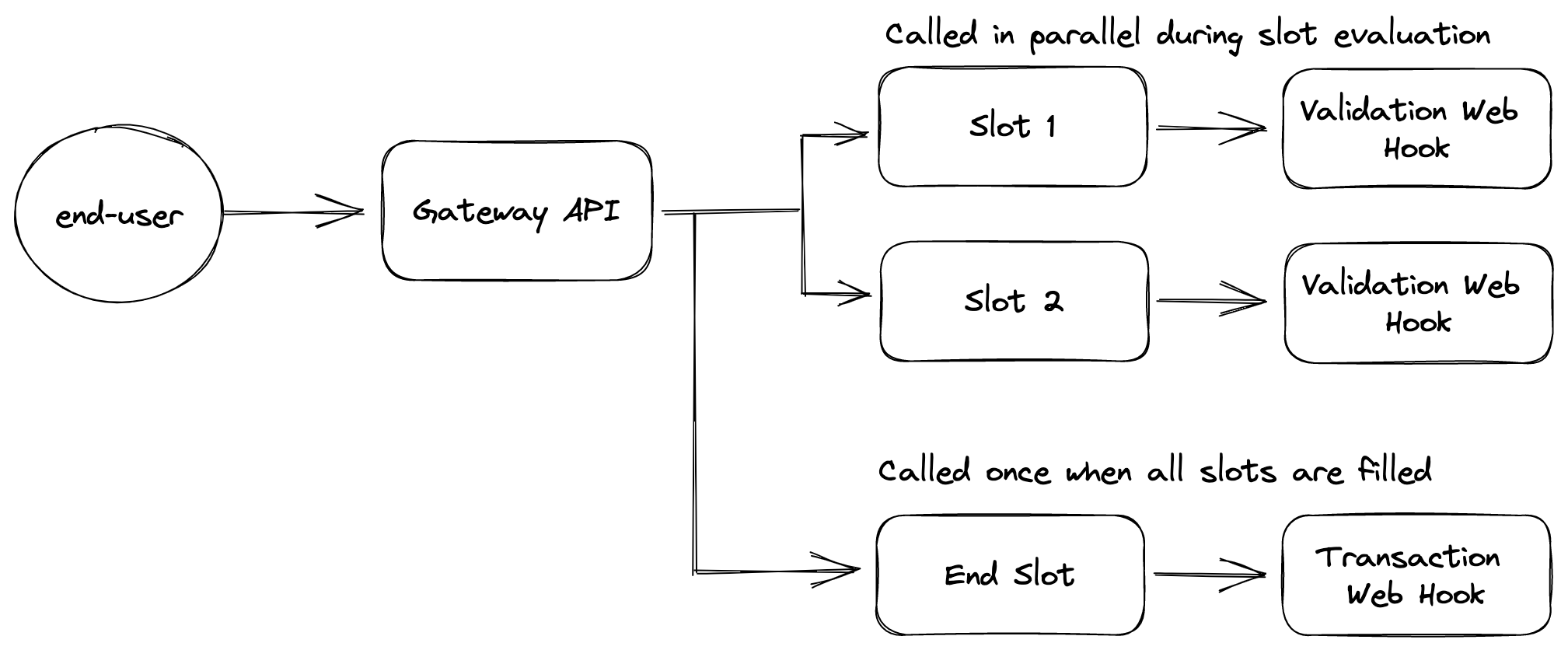
Transactional dialog flow
The diagram above describes a situation where we have a transactional dialog with 2 validation slots and an end slot. Whenever the end-user triggers the transactional dialog Conv. AI Cloud will call both validation web hooks configured on the transactional dialog slots. If one of them returns a valid value, the end-user will not be prompted with the question to fill out that slot.
Every time the end-user provides input during the evaluation of the transactional dialog all validation web hooks are called in parallel for every slot that does not have a value set yet.
Once all slots are assigned a value the end slot transaction web hook will be called. This web hook can then decide to reset specific slots, or finalise the transactional dialog depending on the logic implemented in the web hook. The transaction web hook receives all data received throughout the transactional dialog to decide whether or not the dialog is finished.
Transactional Dialog Events
[](https://developers.cm.com/conversational-ai-cloud/docs/transactional-dialogs#transactional-dialog-events)
--------------------------------------------------------------------------------------------------------------------------------------------
For every transactional dialog you can choose to attach an event to the end slot of the transactional dialog. This event will be returned to the caller of the gateway API in the response from Conversational AI Cloud. The caller can then decide to trigger the event through the [events endpoints on the gateway API](https://developers.cm.com/conversational-ai-cloud/reference/get_event-eventname)
to continue the conversation with the end-user as the conversation designer intended.
Updated over 2 years ago
* * *
[](https://www.cm.com/)
* [Privacy Policy](https://www.cm.com/app/legal/cm-com/privacy-policy/)
* [Terms and Conditions](https://www.cm.com/app/legal/cm-com/terms-and-conditions/)
* [Cookie Policy](https://www.cm.com/about-cm/cookie-policy/)
Jump to Product page Conversational AI Cloud Mobile Service Cloud Mobile Marketing Cloud Messaging Ticketing Payments Platform Voice Sign
---
# Getting started
The steps for using the service are:
1. Upload one or more PDF documents that need to be signed
2. Create a dossier which references these documents. A dossier includes information about the end users who need to sign the document, as well as the location within the PDF document(s) where they need to place their signature and/or initials.
3. Create an invite for each invitee to sign/review the document
4. The end user is directed to the invite URL, for example via email
5. The end user is presented a web interface where he can read and sign or review and approve the document
6. The dossier owner is notified of the completion of the dossier
7. Retrieve the signed document and audit report after receiving the webhook notification
Authentication
[](https://developers.cm.com/sign/docs/getting-started#authentication)
-----------------------------------------------------------------------------------------
Before you can start using the API, you need API credentials. Credentials consist of a key ID and secret. They can be obtained by [registering](https://www.cm.com/app/sign-registration/)
for the Sign API, this will grant you access to the sandbox environment. Contact your account manager to get production credentials. Credentials should be kept secret.
In order to authenticate you need to use your credentials to generate a JWT Bearer token. The [JWT token](https://jwt.io/introduction/)
has to be generated using the `HS256` algorithm and your credentials. This JWT has to contain the following attributes: `iat`, `nbf`, `exp` in the payload, as well as the attribute `kid` in the header of the JWT. This `kid` attribute needs to contain the Key ID of your credentials.
The generated token needs to be passed via the HTTP Authorization header:
`Authorization: Bearer GENERATED_TOKEN_HERE`
There are many libraries available for different programming languages that can help you to generate a JWT. See the Libraries tab on [https://jwt.io](https://jwt.io/)
.
**Example**
Assuming we want to create a token that is valid for 60 seconds and we have received the following credentials:
Key ID: `3b438437-04a4-40bb-8389-54bb02766fba`
Secret: `AC4Etykn7jusGR5FwLDAtILtQbiQbTMKedP31szXg4WlSbjGEXyNMZ`
We need to create a JWT with the following properties:
JWT header:
JSON
`{ "alg": "HS256", "typ": "JWT", "kid": "3b438437-04a4-40bb-8389-54bb02766fba" }`
JWT payload:
JSON
`{ "iat": 1546300800, "nbf": 1546300800, "exp": 1546300860 }`
* `iat`: the time when the token was generated
* `nbf`: the time after which the token is valid, usually equal to `iat`
* `exp`: the time when the token will expire
> Make sure these are UNIX timestamps in seconds
This results in the following token:
`eyJhbGciOiJIUzI1NiIsInR5cCI6IkpXVCIsImtpZCI6IjNiNDM4NDM3LTA0YTQtNDBiYi04Mzg5LTU0YmIwMjc2NmZiYSJ9.eyJpYXQiOjE1NDYzMDA4MDAsIm5iZiI6MTU0NjMwMDgwMCwiZXhwIjoxNTQ2MzAwODYwfQ.bwqCUHS1d5d8guAPHDsdd9-a8oXxH1q45O0tDP1asTo`
Add this token to the `Authorization` header in the API request.
`Authorization: Bearer GENERATED_TOKEN_HERE`
> The [https://jwt.io](https://jwt.io/)
> website provides a way to inspect or validate JWT tokens.
Upload a document
[](https://developers.cm.com/sign/docs/getting-started#upload-a-document)
-----------------------------------------------------------------------------------------------
Every dossier requires at least one file, the first step is to upload your PDF document.
`POST https://api.cm.com/sign/v1/upload`
This is a `multipart/form-data` request where the `file` parameter is the key for the file to be uploaded.
**Request headers**
`Content-Type: multipart/form-data Authorization: Bearer GENERATED_TOKEN_HERE`
**Example**
`curl -X POST \ https://api.cm.com/sign/v1/upload \ -H 'Authorization: Bearer eyJhbGciOiJIUzI1NiIsInR5cCI6IkpXVCIsImtpZCI6IjNiNDM4NDM3LTA0YTQtNDBiYi04Mzg5LTU0YmIwMjc2NmZiYSJ9.eyJpYXQiOjE1NDYzMDA4MDAsIm5iZiI6MTU0NjMwMDgwMCwiZXhwIjoxNTQ2MzAwODYwfQ.bwqCUHS1d5d8guAPHDsdd9-a8oXxH1q45O0tDP1asTo' \ -H 'content-type: multipart/form-data' \ -F 'file=@/tmp/Document.pdf'`
**Response body**
JSON
`{ "id": "3fa4ddab-56a4-48bb-9072-8a61b422ea82", "name": "Document", "hash": "e3b0c44298fc1c149afbf4c8996fb92427ae41e4649b934ca495991b7852b855", "contentType": "application/pdf", "uploadDateTime": "2022-01-01T00:00:00+00:00" }`
The response of this request contains a description of the file as registered within Sign. The most important attribute in this response is the file `id`. This `id` is the unique identifier for this file to be passed along when creating the actual dossier.
Create a dossier
[](https://developers.cm.com/sign/docs/getting-started#create-a-dossier)
---------------------------------------------------------------------------------------------
A dossier is the primary container for all information regarding the documents to be signed. It contains the file(s) to be signed, the invitees who will be invited to sign or review the document.
###
Owners
[](https://developers.cm.com/sign/docs/getting-started#owners)
Owners receive status updates about the dossier, for example when a dossier has been signed by one of the invitees, and receive the audit report when the dossier has been completed. Owners are optional, multiple owners can be specified.
More info: [dossiers](https://developers.cm.com/sign/docs/introduction#dossiers)
###
Invitees
[](https://developers.cm.com/sign/docs/getting-started#invitees)
To define a sign order, set the `position` attribute on an invitee. For example, if there are two invitees, set position `1` for the first invitee and position `2` for the second invitee. This way, the second invitee will only receive his invite after the first invitee has signed. It is possible to set multiple invitees on the same position.
> Make sure the positions are consecutive and there is no gap between them.
Sometimes you want a dossier to be reviewed and approved (without signing it) by someone before you can sign the document. You can set `readOnly` to `true` on invitee that needs to review the document.
More info: [invitees](https://developers.cm.com/sign/docs/introduction#invitees)
###
Fields
[](https://developers.cm.com/sign/docs/getting-started#fields)
For each field, you have to pass the id of the file on which the field will be placed. With the unit `point`, the locations of fields are determined using 72 DPI. The coordinates are from top-left to bottom-right.
Next to supplying locations, the location can also be automatically determined based on a `tag`. The tag acts as a placeholder; the range and location of the field will be determined based on the location(s) of the tag in the document. In case of initials, add the tag to every page the field should be added to. The tag should be hidden, for example, by setting the text color to white.
Fields and field locations can also be determined by using the web interface of Sign. To use this feature set `prepare: true` in the `POST` request to `/dossiers`. The response will contain the `prepareUrl` field. This URL is valid for 60 minutes. Open this URL in the browser, add fields to the invitees and submit the page. After the page is submitted the user is shown a success page or you can redirect to your own page by providing `prepareReturnUrl` to the dossier request. If you use webhooks then you can also enable the `dossier.prepared` event to be sent.
More info: [fields](https://developers.cm.com/sign/docs/introduction#fields)
###
Reminders
[](https://developers.cm.com/sign/docs/getting-started#reminders)
To increase conversion, it's recommended to use automatic reminders. Automatic reminders can be enabled by specifying the `reminderIn` field. Its value is the time in seconds after the invite was sent to an invitee, after which the reminder will be sent. Reminders only work if the invite emails, SMS or WhatsApp Business Platform notifications were sent by Sign.
###
Request
[](https://developers.cm.com/sign/docs/getting-started#section-request)
`POST https://api.cm.com/sign/v1/dossiers`
**Request headers**
`Content-Type: application/json Authorization: Bearer GENERATED_TOKEN_HERE`
**Request body**
Example with field points, tags
JSON
`{ "name": "Purchase contract", "files": [ { "id": "3fa4ddab-56a4-48bb-9072-8a61b422ea82" } ], "reminderIn": 604800, "invitees": [ { "name": "Invitee", "email": "[[email protected]](https://developers.cm.com/cdn-cgi/l/email-protection) ", "position": 1, "locale": "nl-NL", "fields": [ { "type": "signature", "file": "3fa4ddab-56a4-48bb-9072-8a61b422ea82", "locations": [ { "range": "1", "unit": "point", "x": 500, "y": 750, "width": 100, "height": 50 } ] }, { "type": "initials", "file": "3fa4ddab-56a4-48bb-9072-8a61b422ea82", "tag": "{init1}" }, { "type": "initials", "file": "3fa4ddab-56a4-48bb-9072-8a61b422ea82", "tag": "{optionalTag}", "tagRequired": false } ] } ], "owners": [ { "name": "Owner", "email": "[[email protected]](https://developers.cm.com/cdn-cgi/l/email-protection) " }, { "name": "Owner Copy", "email": "[[email protected]](https://developers.cm.com/cdn-cgi/l/email-protection) ", "cc": true } ] }`
**Response body**
JSON
`{ "id": "302935b2-8a22-4e25-bffb-fccda8963bd4", "name": "Purchase contract", "state": "draft", "locale": "en-US", "completed": false, "reminderIn": 604800, "owners": [ { "id": "0474a0f6-0901-4ca1-810d-01ea8c830c97", "name": "Owner", "email": "[[email protected]](https://developers.cm.com/cdn-cgi/l/email-protection) ", "cc": false }, { "id": "3a4f3799-4480-4d07-945a-e4e96fd51e4e", "name": "Owner Copy", "email": "[[email protected]](https://developers.cm.com/cdn-cgi/l/email-protection) ", "cc": true } ], "files": [ { "id": "3fa4ddab-56a4-48bb-9072-8a61b422ea82", "name": "Document", "hash": "a497a1df892b6d2f205460b730b09c3a00c366061fa8975a388ce9672a39e833", "contentType": "application/pdf", "uploadDateTime": "2022-01-01T00:00:00+00:00" } ], "invitees": [ { "id": "f6d1afd5-aa6a-4c5e-8348-bf5a5310b5d2", "name": "Invitee", "email": "[[email protected]](https://developers.cm.com/cdn-cgi/l/email-protection) ", "phoneNumber": null, "authenticationMethods": [], "identificationMethods": [], "reference": null, "readOnly": false, "state": null, "stateChanged": null, "position": null, "locale": "nl-NL", "fields": [ { "id": "a4542a27-5f93-483e-910d-a520770c9444", "type": "signature", "tag": null, "file": "3fa4ddab-56a4-48bb-9072-8a61b422ea82", "invitee": "f6d1afd5-aa6a-4c5e-8348-bf5a5310b5d2", "locations": [ { "range": "1", "unit": "point", "x": 500, "y": 750, "width": 100, "height": 50 } ] }, { "id": "7ead6deb-962a-475c-8a9f-c764b7e55357", "type": "initials", "tag": "{init1}", "file": "3fa4ddab-56a4-48bb-9072-8a61b422ea82", "invitee": "f6d1afd5-aa6a-4c5e-8348-bf5a5310b5d2", "locations": [ { "range": "1-3", "unit": "point", "x": 341.2251, "y": 775.2541, "width": 30.0294, "height": 30.0294 } ] } ] } ], "expiresIn": 2592000, "expiresAt": "2022-01-31T00:00:00+00:00", "createdAt": "2022-01-01T00:00:00+00:00" }`
###
Request
[](https://developers.cm.com/sign/docs/getting-started#section-request)
Field placement via web interface.
**Request body**
JSON
`{ "name": "Purchase contract", "files": [ { "id": "3fa4ddab-56a4-48bb-9072-8a61b422ea82" } ], "invitees": [ { "name": "Invitee", "email": "[[email protected]](https://developers.cm.com/cdn-cgi/l/email-protection) ", "position": 1, "locale": "nl-NL" } ], "reminderIn": 604800, "prepare": true, "prepareReturnUrl": "https://example.com" }`
**Response body**
JSON
`{ "id": "abb39845-421b-479a-a384-2e07580c0f0b", "name": "Purchase contract", "state": "draft", "locale": "en-US", "completed": false, "owners": [], "files": [ { "id": "3fa4ddab-56a4-48bb-9072-8a61b422ea82", "name": "Document", "hash": "a497a1df892b6d2f205460b730b09c3a00c366061fa8975a388ce9672a39e833", "contentType": "application/pdf", "uploadDateTime": "2022-01-01T00:00:00+00:00" } ], "invitees": [ { "id": "51b45bd2-5a1a-4375-9799-a19c58fa9924", "name": "Invitee", "email": "[[email protected]](https://developers.cm.com/cdn-cgi/l/email-protection) ", "phoneNumber": null, "authenticationMethods": [], "identificationMethods": [], "reference": null, "readOnly": false, "state": null, "stateComment": null, "stateChanged": null, "position": 1, "locale": "nl-NL", "redirectUrl": null, "fields": [] } ], "reminderIn": 604800, "prepareUrl": "https://www.cm.com/app/sign/prepare/abb39845-421b-479a-a384-2e07580c0f0b?t=eyJ0eXAiOiJKV1Qi...", "expiresIn": 2592000, "expiresAt": "2022-01-31T00:00:00+00:00", "createdAt": "2022-01-01T00:00:00+00:00" }`
Send invites
[](https://developers.cm.com/sign/docs/getting-started#send-invites)
-------------------------------------------------------------------------------------
Once you have a complete dossier, you will have to send out a link to the invitees who will have to sign these documents. Sign can send emails automatically if you set `channel` to `email`. If you don't set the `channel` option, the invite URL will be included in the response. In this case you have to redirect the user to the `inviteUri` yourself. Invites have a configurable expiration time in seconds, the default is 30 days.
> Please note if you place fields using the web interface this step first needs to complete before you can send an invite.
`POST https://api.cm.com/sign/v1/dossiers/{dossierId}/invites`
**Request headers**
`Content-Type: application/json Authorization: Bearer GENERATED_TOKEN_HERE`
**Request body**
JSON
`[ { "inviteeId": "80692813-3493-40e9-86c3-d3b6f7378929", "channel": "email", "expiresIn": 2592000 } ]`
**Request body** (with custom message)
JSON
`[ { "inviteeId": "80692813-3493-40e9-86c3-d3b6f7378929", "channel": "email", "emailConfig": { "message": "Custom message here" }, "expiresIn": 2592000 } ]`
**Response body**
JSON
`[ { "id": "22b33b45-bde6-45f4-a45a-ec1fa53ffffa", "inviteeId": "80692813-3493-40e9-86c3-d3b6f7378929", "inviteUri": null, "readOnly": false, "identificationMethod": null, "channel": "email", "reminder": false, "emailSentAt": "2022-01-01T00:00:00+00:00", "expiresIn": 2592000, "expiresAt": "2022-01-31T00:00:00+00:00", "createdAt": "2022-01-01T00:00:00+00:00" } ]`
Download files
[](https://developers.cm.com/sign/docs/getting-started#download-files)
-----------------------------------------------------------------------------------------
Once the dossier is completed, you can download the documents.
> Please note that the dossier can only be downloaded until the expiry of the dossier set by the `expiresIn` field.
###
Document
[](https://developers.cm.com/sign/docs/getting-started#document)
To download the signed document, specifying the `type=file` query parameter.
`GET https://api.cm.com/sign/v1/dossiers/{dossierId}/download?type=file`
When there are multiple documents per dossier you will need to specify the file id.
`GET https://api.cm.com/sign/v1/dossiers/{dossierId}/download?type=file&file=8d817359-7eb8-4b6e-9030-17ac286b7dc0`
###
Audit Report
[](https://developers.cm.com/sign/docs/getting-started#audit-report)
The audit report contains all info and events related to the dossier for evidence purposes, specify the `type=auditReport` query parameter.
`GET https://api.cm.com/sign/v1/dossiers/{dossierId}/download?type=auditReport`
###
Full ZIP
[](https://developers.cm.com/sign/docs/getting-started#full-zip)
The ZIP file contains all signed documents, attachments and the audit report.
`GET https://api.cm.com/sign/v1/dossiers/{dossierId}/download`
Events
[](https://developers.cm.com/sign/docs/getting-started#events)
-------------------------------------------------------------------------
To get notified when a dossier is completed or other events occurred, you can subscribe to events.
See: [Events](https://developers.cm.com/sign/docs/events)
.
Error handling
[](https://developers.cm.com/sign/docs/getting-started#error-handling)
-----------------------------------------------------------------------------------------
When an error occurs, you will receive a JSON response describing the error. The error codes per endpoint can be found in the [API reference](https://developers.cm.com/sign/reference/document)
.
Example:
JSON
`{ "status": 400, "message": "Error message" }`
Updated about 2 months ago
* * *
[](https://www.cm.com/)
* [Privacy Policy](https://www.cm.com/app/legal/cm-com/privacy-policy/)
* [Terms and Conditions](https://www.cm.com/app/legal/cm-com/terms-and-conditions/)
* [Cookie Policy](https://www.cm.com/about-cm/cookie-policy/)
Jump to Product page Conversational AI Cloud Mobile Service Cloud Mobile Marketing Cloud Messaging Ticketing Payments Platform Voice Sign
---
# Validation Webhook
In this article we'll introduce the concept of validation webhooks in Conversational AI Cloud and what it means for a developer to work with them.
> 📘
>
> API Specification
>
>
> -----------------------
>
> If you want to know more about the request and response for the validation webhook go to the [API reference section here](https://developers.cm.com/conversational-ai-cloud/reference/post_transactionaldialogslot-1)
Introduction
[](https://developers.cm.com/conversational-ai-cloud/docs/validation-web-hook#introduction)
------------------------------------------------------------------------------------------------------------
Validation webhooks are used to validate the slots in a [transactional dialog](https://developers.cm.com/conversational-ai-cloud/docs/transactional-dialogs)
. If there are multiple slots configured with validation webhooks for a single transactional dialog they'll get called in parallel.
Use Cases
[](https://developers.cm.com/conversational-ai-cloud/docs/validation-web-hook#use-cases)
------------------------------------------------------------------------------------------------------
A validation webhook can serve a variety of use cases, but are generally scoped to working within the confines of that specific transactional dialog slot however, as it is a webhook use cases are endless. Validation webhooks can be used to:
* Validate provided user input against an external system like a CRM or OMS.
* Validate provided user input against custom logic defined within the webhook.
* Provide dynamic quick replies based on the state (session) of the conversation.
* Provide dynamic metadata that'll be passed along to the caller of the Gateway API.
Best-Practices
[](https://developers.cm.com/conversational-ai-cloud/docs/validation-web-hook#best-practices)
----------------------------------------------------------------------------------------------------------------
When working with the validation webhook its important to keep a few things into account:
* Since all validation webhooks will be called in parallel, you will receive calls on your webhook that aren't for the "active" slot. Make sure to always check if the call you're receiving is meant for the slot that your webhook is being called for. You can do this by checking matching the "inputSlotName" with the "slot.name" values in the input. If they match, the input you're provided with is for the slot your end-user saw.
* Only set the "success" value to false if you want the "generic error message" to be returned. The success value should be set to true in all other circumstances. A valid scenario could be an unexpected internal error within the webhook.
* It is not possible to mutate the state of the conversation (session) directly from a validation webhook.
* Each validation webhook receives the entire state of the conversation automatically, make sure to use it to determine whether you already have the value you're planning to ask the user for. E.g., if you already have the postal code available in the conversation session, there is no need to ask the end-user for their postal code again, simply pre-fill it through your webhook.
* Any output that'll be presented to the end-user will come from the webhook (if configured) this means that any message going to the end-user can be fully dynamic.
Updated over 1 year ago
* * *
[](https://www.cm.com/)
* [Privacy Policy](https://www.cm.com/app/legal/cm-com/privacy-policy/)
* [Terms and Conditions](https://www.cm.com/app/legal/cm-com/terms-and-conditions/)
* [Cookie Policy](https://www.cm.com/about-cm/cookie-policy/)
Jump to Product page Conversational AI Cloud Mobile Service Cloud Mobile Marketing Cloud Messaging Ticketing Payments Platform Voice Sign
---
# Ask a question
ShellNodeRubyPHPPython
[Log in to use your API keys](https://developers.cm.com/login?redirect_uri=/conversational-ai-cloud/reference/get_ask)
Base URL
https://api.digitalcx.com/ask
Click `Try It!` to start a request and see the response here!
[](https://www.cm.com/)
* [Privacy Policy](https://www.cm.com/app/legal/cm-com/privacy-policy/)
* [Terms and Conditions](https://www.cm.com/app/legal/cm-com/terms-and-conditions/)
* [Cookie Policy](https://www.cm.com/about-cm/cookie-policy/)
Jump to Product page Conversational AI Cloud Mobile Service Cloud Mobile Marketing Cloud Messaging Ticketing Payments Platform Voice Sign
---
# Require Payment
Sometimes a payment is required in order to Sign a document. For example a rental agreement. To use this feature you first need to have a payment contract. Please contact your customer success manager if you want to use this feature.
To request a payment, provide the amount and currency. This is part of the `POST` request to `/dossiers`.
`POST /dossiers`
**Request body**
JSON
`{ "invitees":[ { "name": "John Doe", "payments":[ { "amount":100, "currency":"EUR" } ] } ] }`
* `amount`: The amount of the payment in cents.
* `currency`: The currency of the payment in [ISO 4217](https://en.wikipedia.org/wiki/ISO_4217)
format.
Retrieve payment status
[](https://developers.cm.com/sign/docs/require-payment#retrieve-payment-status)
-----------------------------------------------------------------------------------------------------------
`GET /dossiers/{dossierId}/invitees/{inviteeId}/payments`
**Response body**
JSON
`[ { "amount": 100, "currency": "EUR", "status": "success", "paymentMethod": "IDEAL", "paymentReference": "ch-9a0a32bc-bb25-4f5f-8aeb-681276a738fe" } ]`
* `amount`: The amount of the payment in cents.
* `currency`: The currency of the payment in [ISO 4217](https://en.wikipedia.org/wiki/ISO_4217)
format.
* `status`: The payment status.
* `paymentMethod`: The selected payment method.
* `paymentReference`: The payment reference in the payment system.
You usually don't have to retrieve the payment status, because a dossier can only be signed after the payment has been completed. When you received the dossier completed webhook or email, you know that the invitee has successfully paid.
Updated 4 months ago
* * *
[](https://www.cm.com/)
* [Privacy Policy](https://www.cm.com/app/legal/cm-com/privacy-policy/)
* [Terms and Conditions](https://www.cm.com/app/legal/cm-com/terms-and-conditions/)
* [Cookie Policy](https://www.cm.com/about-cm/cookie-policy/)
Jump to Product page Conversational AI Cloud Mobile Service Cloud Mobile Marketing Cloud Messaging Ticketing Payments Platform Voice Sign
---
# Introduction
* * *
[](https://www.cm.com/)
* [Privacy Policy](https://www.cm.com/app/legal/cm-com/privacy-policy/)
* [Terms and Conditions](https://www.cm.com/app/legal/cm-com/terms-and-conditions/)
* [Cookie Policy](https://www.cm.com/about-cm/cookie-policy/)
Jump to Product page Conversational AI Cloud Mobile Service Cloud Mobile Marketing Cloud Messaging Ticketing Payments Platform Voice Sign
---
# POS Payments
* * *
[](https://www.cm.com/)
* [Privacy Policy](https://www.cm.com/app/legal/cm-com/privacy-policy/)
* [Terms and Conditions](https://www.cm.com/app/legal/cm-com/terms-and-conditions/)
* [Cookie Policy](https://www.cm.com/about-cm/cookie-policy/)
Jump to Product page Conversational AI Cloud Mobile Service Cloud Mobile Marketing Cloud Messaging Ticketing Payments Platform Voice Sign
---
# Transaction Webhook
In this article we'll introduce the concept of transaction webhooks in Conversational AI Cloud and what it means for a developer to work with them.
> 📘
>
> API Specification
>
>
> -----------------------
>
> If you want to know more about the request and response for the validation webhook go to the [API reference section here](https://developers.cm.com/conversational-ai-cloud/reference/post_transactionaldialogendslot-1)
Introduction
[](https://developers.cm.com/conversational-ai-cloud/docs/transaction-web-hook#introduction)
-------------------------------------------------------------------------------------------------------------
Transaction webhooks are used to validate the end slot in a [transactional dialog](https://developers.cm.com/conversational-ai-cloud/docs/transactional-dialogs)
. An end slot in a transactional dialog is called only when all slots in the transactional dialog have been filled in. Its the final check to determine whether all slots are filled in correctly, and can also be used to post data to an external system like a CRM/OMS or to fetch data based on the acquired data.
Use Cases
[](https://developers.cm.com/conversational-ai-cloud/docs/transaction-web-hook#use-cases)
-------------------------------------------------------------------------------------------------------
A transaction webhook can serve a variety of use cases but as it is a webhook use cases are endless. Transaction webhooks can be used to:
* Validate the sum of provided user input across all slots against an external system like a CRM or OMS.
* Validate the sum of provided user input across all slots against custom logic defined within the webhook.
* Reset a slot of the transactional dialog if validation doesn't pass
* Update the state of the conversation by mutating the session object and returning it in the response of the webhook
Best-Practices
[](https://developers.cm.com/conversational-ai-cloud/docs/transaction-web-hook#best-practices)
-----------------------------------------------------------------------------------------------------------------
When working with the validation webhook its important to keep a few things into account:
* A transaction webhook is called once when all slots in the transactional dialog have a set value. If the transaction webhook decides to reset a slot, it will be called again once that slot is filled again. Ensure you don't get your end-users stuck in a validation loop inside the transactional dialog.
* Only set the "success" value to false if you want the "generic error message" to be returned. The success value should be set to true in all other circumstances. A valid scenario could be an unexpected internal error within the webhook.
* It is not possible to mutate the state of the conversation (session) directly from a validation webhook.
* Transaction webhooks can mutate the state of a session in Conv. AI Cloud. You can however only set a key on the session if that key is defined as a conversation variable in the projects configuration.
* When updating the session object through the webhooks response, it isn't required to specify the entire session object, a partial session object can also be returned. If a partial object is returned it'll be merged with the original session object.
Updated over 1 year ago
* * *
[](https://www.cm.com/)
* [Privacy Policy](https://www.cm.com/app/legal/cm-com/privacy-policy/)
* [Terms and Conditions](https://www.cm.com/app/legal/cm-com/terms-and-conditions/)
* [Cookie Policy](https://www.cm.com/about-cm/cookie-policy/)
Jump to Product page Conversational AI Cloud Mobile Service Cloud Mobile Marketing Cloud Messaging Ticketing Payments Platform Voice Sign
---
# About
> ❗️
>
> Disclaimer
>
>
> ----------------
>
> Please find the Conversational Router docs at [their new place on Readme](https://developers.cm.com/cmconnect/docs/about)
> .
Updated about 1 year ago
* * *
[](https://www.cm.com/)
* [Privacy Policy](https://www.cm.com/app/legal/cm-com/privacy-policy/)
* [Terms and Conditions](https://www.cm.com/app/legal/cm-com/terms-and-conditions/)
* [Cookie Policy](https://www.cm.com/about-cm/cookie-policy/)
Jump to Product page Conversational AI Cloud Mobile Service Cloud Mobile Marketing Cloud Messaging Ticketing Payments Platform Voice Sign
---
# Create dossier
onStatusUpdate
post
https://yourwebhook/
ShellNodeRubyPHPPython
[Log in to use your API keys](https://developers.cm.com/login?redirect_uri=/sign/reference/post_dossiers)
Base URL
https://api.cm.com/sign/v1/dossiers
Click `Try It!` to start a request and see the response here!
[](https://www.cm.com/)
* [Privacy Policy](https://www.cm.com/app/legal/cm-com/privacy-policy/)
* [Terms and Conditions](https://www.cm.com/app/legal/cm-com/terms-and-conditions/)
* [Cookie Policy](https://www.cm.com/about-cm/cookie-policy/)
Jump to Product page Conversational AI Cloud Mobile Service Cloud Mobile Marketing Cloud Messaging Ticketing Payments Platform Voice Sign
---