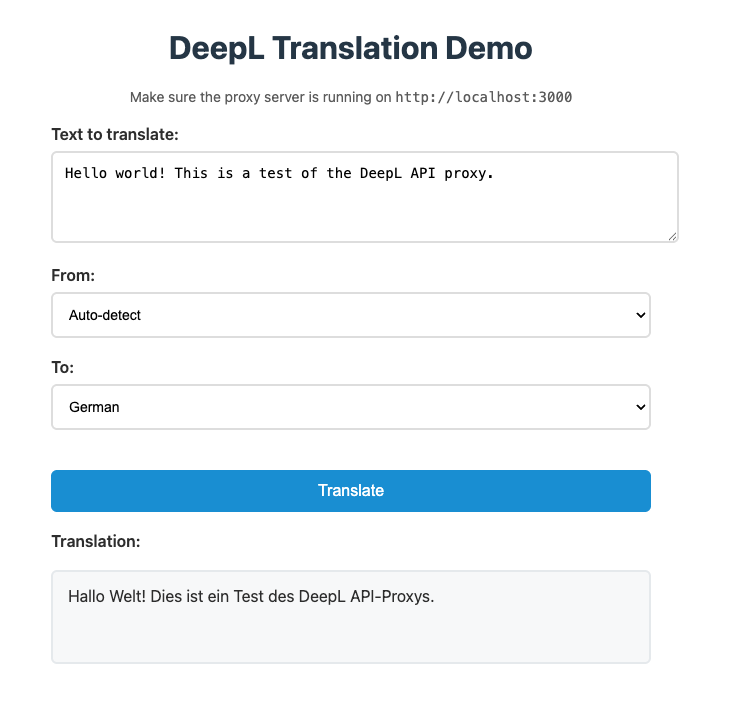
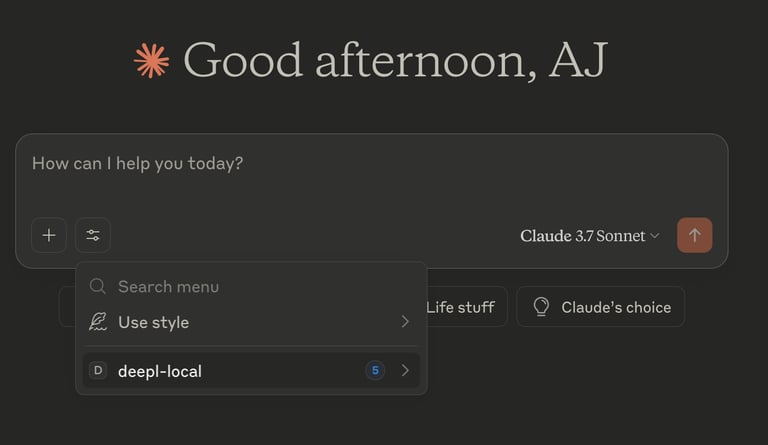
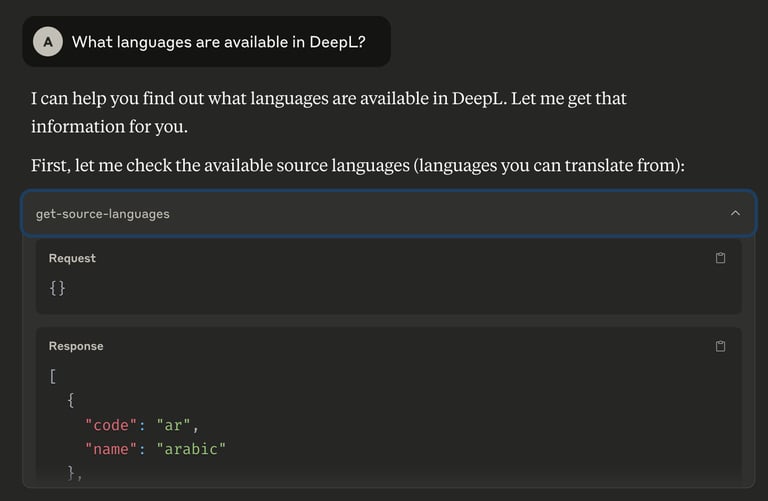
# Table of Contents - [Language detection - DeepL Documentation](#language-detection-deepl-documentation) - [Subscription-level cost control - DeepL Documentation](#subscription-level-cost-control-deepl-documentation) - [CORS requests - DeepL Documentation](#cors-requests-deepl-documentation) - [Error handling - DeepL Documentation](#error-handling-deepl-documentation) - [Pre-production checklist - DeepL Documentation](#pre-production-checklist-deepl-documentation) - [Document translations - DeepL Documentation](#document-translations-deepl-documentation) - [Custom instructions - DeepL Documentation](#custom-instructions-deepl-documentation) - [Test your API requests with Postman - DeepL Documentation](#test-your-api-requests-with-postman-deepl-documentation) - [Client libraries - DeepL Documentation](#client-libraries-deepl-documentation) - [Access and authentication - DeepL Documentation](#access-and-authentication-deepl-documentation) - [Managing API keys - DeepL Documentation](#managing-api-keys-deepl-documentation) - [Languages supported - DeepL Documentation](#languages-supported-deepl-documentation) - [About - DeepL Documentation](#about-deepl-documentation) - [Project: Google Sheets - DeepL Documentation](#project-google-sheets-deepl-documentation) - [Regional API Endpoints - DeepL Documentation](#regional-api-endpoints-deepl-documentation) - [Your first API request - DeepL Documentation](#your-first-api-request-deepl-documentation) - [Cookbook - DeepL Documentation](#cookbook-deepl-documentation) - [First Things To Try With The DeepL API - DeepL Documentation](#first-things-to-try-with-the-deepl-api-deepl-documentation) - [Usage Analytics Dashboard - DeepL Documentation](#usage-analytics-dashboard-deepl-documentation) - [Usage and limits - DeepL Documentation](#usage-and-limits-deepl-documentation) - [Developer Community - DeepL Documentation](#developer-community-deepl-documentation) - [Language release process - DeepL Documentation](#language-release-process-deepl-documentation) - [Customized XML outline detection - DeepL Documentation](#customized-xml-outline-detection-deepl-documentation) - [HTML handling - DeepL Documentation](#html-handling-deepl-documentation) - [Making API calls from client-side JavaScript - DeepL Documentation](#making-api-calls-from-client-side-javascript-deepl-documentation) - [July 2024: Deprecation of insecure cipher suites - DeepL Documentation](#july-2024-deprecation-of-insecure-cipher-suites-deepl-documentation) - [November 2025: Deprecation of query parameter and request body authentication - DeepL Documentation](#november-2025-deprecation-of-query-parameter-and-request-body-authentication-deepl-documentation) - [Alpha and beta features - DeepL Documentation](#alpha-and-beta-features-deepl-documentation) - [Breaking changes (Change Notices) - DeepL Documentation](#breaking-changes-change-notices-deepl-documentation) - [XML handling - DeepL Documentation](#xml-handling-deepl-documentation) - [Automating Indie Game Localization with the DeepL API and Godot - DeepL Documentation](#automating-indie-game-localization-with-the-deepl-api-and-godot-deepl-documentation) - [Glossaries in the real world - DeepL Documentation](#glossaries-in-the-real-world-deepl-documentation) - [Mustache placeholder tags - DeepL Documentation](#mustache-placeholder-tags-deepl-documentation) - [March 2025: Deprecating GET requests to /translate and authenticating with auth_key - DeepL Documentation](#march-2025-deprecating-get-requests-to-translate-and-authenticating-with-auth-key-deepl-documentation) - [Structured XML content - DeepL Documentation](#structured-xml-content-deepl-documentation) - [How to Translate Between Language Variants - DeepL Documentation](#how-to-translate-between-language-variants-deepl-documentation) - [Introduction - DeepL Documentation](#introduction-deepl-documentation) - [Building a Document Translator with the DeepL API - DeepL Documentation](#building-a-document-translator-with-the-deepl-api-deepl-documentation) - [New: XML/HTML handling v2 - DeepL Documentation](#new-xml-html-handling-v2-deepl-documentation) - [Roadmap and release notes - DeepL Documentation](#roadmap-and-release-notes-deepl-documentation) - [How to Use the Context Parameter Effectively - DeepL Documentation](#how-to-use-the-context-parameter-effectively-deepl-documentation) - [DeepL MCP Server: How to build and use translation in LLM applications - DeepL Documentation](#deepl-mcp-server-how-to-build-and-use-translation-in-llm-applications-deepl-documentation) - [Guides - DeepL Documentation](#guides-deepl-documentation) --- # Language detection - DeepL Documentation [Skip to main content](https://developers.deepl.com/docs/best-practices/language-detection#content-area) [Join the Developer Community on DeepL Bridges](https://dee.pl/7iwrt) [DeepL Documentation home page![light logo](https://mintcdn.com/deepl-c950b784/mTpSbcs7wvcMTAY_/_assets/logo/light_with_text.svg?fit=max&auto=format&n=mTpSbcs7wvcMTAY_&q=85&s=7e5ec3b41e54263ba036d33d66855e19)![dark logo](https://mintcdn.com/deepl-c950b784/mTpSbcs7wvcMTAY_/_assets/logo/dark_with_text.svg?fit=max&auto=format&n=mTpSbcs7wvcMTAY_&q=85&s=8982e83cbd4b0ddbab8a168c06f5b3a0)](https://developers.deepl.com/) Search... ⌘K Search... Navigation Best Practices Language detection [Documentation](https://developers.deepl.com/docs/getting-started/intro) [API Reference](https://developers.deepl.com/api-reference/translate) Our translation and document translation endpoints allow you to automatically detect the source language or set it. It is recommended to set the source language whenever possible, as this has a positive effect on translation quality. If you cannot specify the source language, the more context you provide, the better your results will be. Single words can lead to incorrect language detection, so the longer your text, the more reliable it will be. If you are translating single words or very short sentences, the results will generally be more reliable if the source language is specified. You can find all available [source languages here](https://developers.deepl.com/api-reference/languages) , and you can read more about translation context in the next chapter. [Document translations](https://developers.deepl.com/docs/best-practices/document-translations) [Subscription-level cost control](https://developers.deepl.com/docs/best-practices/cost-control) ⌘I --- # Subscription-level cost control - DeepL Documentation [Skip to main content](https://developers.deepl.com/docs/best-practices/cost-control#content-area) [Join the Developer Community on DeepL Bridges](https://dee.pl/7iwrt) [DeepL Documentation home page![light logo](https://mintcdn.com/deepl-c950b784/mTpSbcs7wvcMTAY_/_assets/logo/light_with_text.svg?fit=max&auto=format&n=mTpSbcs7wvcMTAY_&q=85&s=7e5ec3b41e54263ba036d33d66855e19)![dark logo](https://mintcdn.com/deepl-c950b784/mTpSbcs7wvcMTAY_/_assets/logo/dark_with_text.svg?fit=max&auto=format&n=mTpSbcs7wvcMTAY_&q=85&s=8982e83cbd4b0ddbab8a168c06f5b3a0)](https://developers.deepl.com/) Search... ⌘K Search... Navigation Best Practices Subscription-level cost control [Documentation](https://developers.deepl.com/docs/getting-started/intro) [API Reference](https://developers.deepl.com/api-reference/translate) On this page * [I have been notified that my Cost Control was raised, but I didn’t raise it. What should I do?](https://developers.deepl.com/docs/best-practices/cost-control#i-have-been-notified-that-my-cost-control-was-raised-but-i-didn%E2%80%99t-raise-it-what-should-i-do) As a DeepL API Pro user, you have the option to set a limit on the number of characters that can be translated in your entire subscription per month, thereby limiting your maximum costs. You only need to activate _Cost Control_ in your DeepL Pro Account on the “API Keys & Limits” tab. To do so: 1. Navigate to the [“API Keys & Limits” tab](https://www.deepl.com/your-account/keys) 2. Click _Manage cost control_ 3. Tick the checkbox _Activate cost control_ to enable 4. Enter the maximum cost amount 5. Click “Submit” to save the changes Your new cost control limit is applied immediately. ![](https://mintcdn.com/deepl-c950b784/KOmoKZdPVqDlyvdH/_assets/images/subscription-level-cost-control.png?w=2500&fit=max&auto=format&n=KOmoKZdPVqDlyvdH&q=85&s=1492d8ce3104f71f115fe16cb5179540) Once you have reached your limit, DeepL will not process any further translation requests until the end of the usage period, in order to not exceed your set maximum cost. If you would like to translate more, you can make changes to the cost control limit at any time. #### [​](https://developers.deepl.com/docs/best-practices/cost-control#i-have-been-notified-that-my-cost-control-was-raised-but-i-didn%E2%80%99t-raise-it-what-should-i-do) _I have been notified that my Cost Control was raised, but I didn’t raise it. What should I do?_ Every time your _Cost Control_ limit is raised, you will receive a notification email for security reasons. If you receive such a notification, but you did not raise your _Cost Control_ limit, we highly suggest you reset your authentication key and the password to your DeepL Pro account as soon as possible. [Language detection](https://developers.deepl.com/docs/best-practices/language-detection) [Pre-production checklist](https://developers.deepl.com/docs/best-practices/pre-production-checklist) ⌘I --- # CORS requests - DeepL Documentation [Skip to main content](https://developers.deepl.com/docs/best-practices/cors-requests#content-area) [Join the Developer Community on DeepL Bridges](https://dee.pl/7iwrt) [DeepL Documentation home page![light logo](https://mintcdn.com/deepl-c950b784/mTpSbcs7wvcMTAY_/_assets/logo/light_with_text.svg?fit=max&auto=format&n=mTpSbcs7wvcMTAY_&q=85&s=7e5ec3b41e54263ba036d33d66855e19)![dark logo](https://mintcdn.com/deepl-c950b784/mTpSbcs7wvcMTAY_/_assets/logo/dark_with_text.svg?fit=max&auto=format&n=mTpSbcs7wvcMTAY_&q=85&s=8982e83cbd4b0ddbab8a168c06f5b3a0)](https://developers.deepl.com/) Search... ⌘K Search... Navigation Best Practices CORS requests [Documentation](https://developers.deepl.com/docs/getting-started/intro) [API Reference](https://developers.deepl.com/api-reference/translate) If you try to send requests to the DeepL API from the browser, your requests will fail with the [HTTP 403 Forbidden status code](https://developer.mozilla.org/en-US/docs/Web/HTTP/Status/403) with a message stating “blocked by CORS policy”. The DeepL API does not allow calls directly from browser-based applications. Requests to third-party APIs from front-end applications would expose your credentials on the web, leaving your account vulnerable to fraud and abuse. You should never reveal your API authentication key in publicly accessible code. If you realize your API authentication key has been compromised, log in to your DeepL account immediately. Under “Account Details”, you have the option to deactivate any of your active API keys. Deactivate any compromised key to prevent others from using it with the DeepL API. You can also generate new keys from the same page. To safely use the DeepL API on your website or application, you can route your requests through your own backend servers. This keeps your credentials hidden and allows you to specify CORS policies and rate limits as required by your use case. DeepL’s official open-source [client libraries](https://developers.deepl.com/docs/getting-started/client-libraries) can help you create these backend implementations. For prototyping and frontend testing, you can use the [DeepL API Node.js Proxy](https://github.com/DeepLcom/deepl-api-nodejs-proxy/) , a lightweight ready-to-use proxy server that handles CORS and keeps your API key secure. [Error handling](https://developers.deepl.com/docs/best-practices/error-handling) [Document translations](https://developers.deepl.com/docs/best-practices/document-translations) ⌘I --- # Error handling - DeepL Documentation [Skip to main content](https://developers.deepl.com/docs/best-practices/error-handling#content-area) [Join the Developer Community on DeepL Bridges](https://dee.pl/7iwrt) [DeepL Documentation home page![light logo](https://mintcdn.com/deepl-c950b784/mTpSbcs7wvcMTAY_/_assets/logo/light_with_text.svg?fit=max&auto=format&n=mTpSbcs7wvcMTAY_&q=85&s=7e5ec3b41e54263ba036d33d66855e19)![dark logo](https://mintcdn.com/deepl-c950b784/mTpSbcs7wvcMTAY_/_assets/logo/dark_with_text.svg?fit=max&auto=format&n=mTpSbcs7wvcMTAY_&q=85&s=8982e83cbd4b0ddbab8a168c06f5b3a0)](https://developers.deepl.com/) Search... ⌘K Search... Navigation Best Practices Error handling [Documentation](https://developers.deepl.com/docs/getting-started/intro) [API Reference](https://developers.deepl.com/api-reference/translate) Errors are indicated by [standard HTTP status codes](https://developer.mozilla.org/docs/Web/HTTP/Status) . It is important to make sure that your application handles errors in an appropriate way. To that end, please consult the list of expected status code results that are provided with each endpoint’s documentation in the API Reference. * **HTTP 429: too many requests.** This is an error that you might receive when sending many API requests in a short period of time. Your application should be configured to resend the requests after some delay. Specifically, we recommend implementing retries with exponential backoff. This is implemented in all of the official, DeepL-supported [client libraries](https://developers.deepl.com/docs/getting-started/client-libraries) . * **HTTP 456: quota exceeded** **If you’re a Free API user**, you’ll receive this error when the monthly 500,000 character limit of your subscription has been reached. You can consider [upgrading your subscription](https://www.deepl.com/pro) if you need more character volume. **If you’re a Pro API user**, you’ll receive this error when your [Cost Control](https://developers.deepl.com/docs/best-practices/cost-control) limit has been reached, and you can increase or remove your Cost Control limit if you need to continue translating. You can also use the [usage endpoint](https://developers.deepl.com/api-reference/usage-and-quota) to find out your currently used and available quota. * **HTTP 500: internal server error** This is an error you’ll receive if there are temporary errors in DeepL Services. Your application should be configured to resend the requests after some delay. Specifically, we recommend implementing retries with exponential backoff. This is implemented in all of the official, DeepL-supported [client libraries](https://developers.deepl.com/docs/getting-started/client-libraries) . The service dynamically adjusts to the load on the system. Please wait to stop receiving errors to send more requests again. As the service adapts, you will be able to send increasingly more requests within a given amount of time without encountering errors. Additional information may be provided by a JSON response that contains more details about the error. In this case, this additional information will be contained in the message key. [How to Translate Between Language Variants](https://developers.deepl.com/docs/learning-how-tos/examples-and-guides/translating-between-variants) [CORS requests](https://developers.deepl.com/docs/best-practices/cors-requests) ⌘I --- # Pre-production checklist - DeepL Documentation [Skip to main content](https://developers.deepl.com/docs/best-practices/pre-production-checklist#content-area) [Join the Developer Community on DeepL Bridges](https://dee.pl/7iwrt) [DeepL Documentation home page![light logo](https://mintcdn.com/deepl-c950b784/mTpSbcs7wvcMTAY_/_assets/logo/light_with_text.svg?fit=max&auto=format&n=mTpSbcs7wvcMTAY_&q=85&s=7e5ec3b41e54263ba036d33d66855e19)![dark logo](https://mintcdn.com/deepl-c950b784/mTpSbcs7wvcMTAY_/_assets/logo/dark_with_text.svg?fit=max&auto=format&n=mTpSbcs7wvcMTAY_&q=85&s=8982e83cbd4b0ddbab8a168c06f5b3a0)](https://developers.deepl.com/) Search... ⌘K Search... Navigation Best Practices Pre-production checklist [Documentation](https://developers.deepl.com/docs/getting-started/intro) [API Reference](https://developers.deepl.com/api-reference/translate) As you prepare to open your DeepL-powered application up to the world, these tips will help you get ready for production. 1. **Error handling:** If you receive 429 or 500 errors, use retries with exponential backoff. If you use one of [DeepL’s official client libraries](https://developers.deepl.com/docs/getting-started/client-libraries) , you get this functionality out-of-the-box. 2. **Persistent HTTP connection:** Especially for use cases with low latency requirements, we recommend using a persistent HTTP connection. [DeepL’s official client libraries](https://developers.deepl.com/docs/getting-started/client-libraries) use [Keep-Alive](https://developer.mozilla.org/en-US/docs/Web/HTTP/Headers/Keep-Alive) by default. 3. **Use the correct content type:** For text translation (the `/translate` endpoint), use form-encoded (`Content-Type: application/x-www-form-urlencoded`) or JSON-encoded (`Content-Type: application/json`) request bodies. * Uploading a file for document translation requires an HTTP POST request with `Content-Type: multipart/form-data`; this content type should not be used for text translation. 4. **No query parameters:** Please do not make API requests using query parameters. The examples throughout the API reference include properly formed HTTP POST requests. For security reasons, be especially sure not to send your authentication key via query parameters. 5. **CORS requests:** It’s not possible to send requests to the DeepL API from the browser, as requests to third-party APIs from front-end applications would expose your credentials on the web. [You can learn more here](https://developers.deepl.com/docs/best-practices/cors-requests) . 6. **Translation context:** DeepL considers the broader context of a source text or document when translating. In general, including more context in a source text or document can result in a higher-quality DeepL translation. For text translation, you can also try the [`context` parameter](https://developers.deepl.com/api-reference/translate#request-body-descriptions) . [Learn more about working with context here](https://developers.deepl.com/docs/learning-how-tos/examples-and-guides/how-to-use-context-parameter) . 7. **Cache results from translation requests:** Storing API responses lets apps serve content faster and avoids extra costs from repeated requests for unchanged content. [Subscription-level cost control](https://developers.deepl.com/docs/best-practices/cost-control) [Custom instructions](https://developers.deepl.com/docs/best-practices/custom-instructions) ⌘I --- # Document translations - DeepL Documentation [Skip to main content](https://developers.deepl.com/docs/best-practices/document-translations#content-area) [Join the Developer Community on DeepL Bridges](https://dee.pl/7iwrt) [DeepL Documentation home page![light logo](https://mintcdn.com/deepl-c950b784/mTpSbcs7wvcMTAY_/_assets/logo/light_with_text.svg?fit=max&auto=format&n=mTpSbcs7wvcMTAY_&q=85&s=7e5ec3b41e54263ba036d33d66855e19)![dark logo](https://mintcdn.com/deepl-c950b784/mTpSbcs7wvcMTAY_/_assets/logo/dark_with_text.svg?fit=max&auto=format&n=mTpSbcs7wvcMTAY_&q=85&s=8982e83cbd4b0ddbab8a168c06f5b3a0)](https://developers.deepl.com/) Search... ⌘K Search... Navigation Best Practices Document translations [Documentation](https://developers.deepl.com/docs/getting-started/intro) [API Reference](https://developers.deepl.com/api-reference/translate) On this page * [Document File Size Limits](https://developers.deepl.com/docs/best-practices/document-translations#document-file-size-limits) * [Error 429: Too Many Requests](https://developers.deepl.com/docs/best-practices/document-translations#error-429-too-many-requests) * [Error 456: Quota Exceeded](https://developers.deepl.com/docs/best-practices/document-translations#error-456-quota-exceeded) Below you will find general guidance on how to handle status codes and error details to ensure a smooth document translation experience. ### [​](https://developers.deepl.com/docs/best-practices/document-translations#document-file-size-limits) Document File Size Limits We impose [size limits](https://developers.deepl.com/docs/resources/usage-limits) per file type. For `.pptx` and `.docx` types, our .NET, PHP and NodeJS client libraries offer functionality to minify files by temporarily extracting large media formats before sending them to the DeepL API. Stripped media are reinserted after document translation is completed. This allows users to translate files that might hit the size limit. ### [​](https://developers.deepl.com/docs/best-practices/document-translations#error-429-too-many-requests) Error 429: Too Many Requests This error may occur when: * You send concurrent document translation requests that exceed your account quota. * You have too many un-retrieved or non-downloaded translated documents. Documents are stored for only a brief period and must be downloaded promptly after translation. To avoid this error, we recommend implementing the following measures: * Polling document translation status, taking into account its frequency in order to prevent excessive load * Quicker time to document retrieval * Retries with exponential backoff ### [​](https://developers.deepl.com/docs/best-practices/document-translations#error-456-quota-exceeded) Error 456: Quota Exceeded This error indicates that your latest document translation request has exceeded the included characters (API Free) or the character limit you have set (API Pro) for your account. Further document translation requests will not be processed. Check out our [code example](https://github.com/DeepLcom/deepl-node/tree/main/examples/bulk-translation) on how to implement bulk document translations. [CORS requests](https://developers.deepl.com/docs/best-practices/cors-requests) [Language detection](https://developers.deepl.com/docs/best-practices/language-detection) ⌘I --- # Custom instructions - DeepL Documentation [Skip to main content](https://developers.deepl.com/docs/best-practices/custom-instructions#content-area) [Join the Developer Community on DeepL Bridges](https://dee.pl/7iwrt) [DeepL Documentation home page![light logo](https://mintcdn.com/deepl-c950b784/mTpSbcs7wvcMTAY_/_assets/logo/light_with_text.svg?fit=max&auto=format&n=mTpSbcs7wvcMTAY_&q=85&s=7e5ec3b41e54263ba036d33d66855e19)![dark logo](https://mintcdn.com/deepl-c950b784/mTpSbcs7wvcMTAY_/_assets/logo/dark_with_text.svg?fit=max&auto=format&n=mTpSbcs7wvcMTAY_&q=85&s=8982e83cbd4b0ddbab8a168c06f5b3a0)](https://developers.deepl.com/) Search... ⌘K Search... Navigation Best Practices Custom instructions [Documentation](https://developers.deepl.com/docs/getting-started/intro) [API Reference](https://developers.deepl.com/api-reference/translate) On this page * [What are custom instructions?](https://developers.deepl.com/docs/best-practices/custom-instructions#what-are-custom-instructions) * [Best practices](https://developers.deepl.com/docs/best-practices/custom-instructions#best-practices) * [1\. Write rules in English or the target language](https://developers.deepl.com/docs/best-practices/custom-instructions#1-write-rules-in-english-or-the-target-language) * [2\. Formulate rules positively](https://developers.deepl.com/docs/best-practices/custom-instructions#2-formulate-rules-positively) * [3\. One instruction per rule](https://developers.deepl.com/docs/best-practices/custom-instructions#3-one-instruction-per-rule) * [4\. Provide details on when and how to apply the rule](https://developers.deepl.com/docs/best-practices/custom-instructions#4-provide-details-on-when-and-how-to-apply-the-rule) * [5\. Avoid too many conditions per rule](https://developers.deepl.com/docs/best-practices/custom-instructions#5-avoid-too-many-conditions-per-rule) * [6\. Write instructions as translation directives, not chatbot prompts](https://developers.deepl.com/docs/best-practices/custom-instructions#6-write-instructions-as-translation-directives-not-chatbot-prompts) * [Technical constraints](https://developers.deepl.com/docs/best-practices/custom-instructions#technical-constraints) * [Related documentation](https://developers.deepl.com/docs/best-practices/custom-instructions#related-documentation) The `custom_instructions` parameter allows you to provide natural language instructions that customize how the DeepL API translates text. This guide provides best practices for creating effective custom instructions that produce consistent, high-quality results. [​](https://developers.deepl.com/docs/best-practices/custom-instructions#what-are-custom-instructions) What are custom instructions? --------------------------------------------------------------------------------------------------------------------------------------- Custom instructions enable you to guide the translation engine with specific requirements for your use case. You can use custom instructions to: * Control tone and style (e.g., “Use a friendly, diplomatic tone”) * Specify domain-specific terminology preferences * Define formatting conventions * Adjust formality levels beyond the standard `formality` parameter * Provide context-specific guidance for specialized content Custom instructions can also be used in conjunction with other features, such as glossaries, style rules, and the `context` parameter. [​](https://developers.deepl.com/docs/best-practices/custom-instructions#best-practices) Best practices ---------------------------------------------------------------------------------------------------------- ### [​](https://developers.deepl.com/docs/best-practices/custom-instructions#1-write-rules-in-english-or-the-target-language) 1\. Write rules in English or the target language Custom instructions should be written in either English or the target language. This ensures the translation engine can properly interpret and apply your instructions. **English instruction** (works for all target languages) — “Use informal language appropriate for a mobile app” **Target language instruction** (French) — “Utiliser un langage informel adapté à une application mobile” ### [​](https://developers.deepl.com/docs/best-practices/custom-instructions#2-formulate-rules-positively) 2\. Formulate rules positively State what the translation should do, rather than what it should not do. Positive formulations are clearer and more effective. ❌ **INCORRECT: Negative formulation** — “Don’t use overly formal language or avoid casual expressions” ✅ **CORRECT: Positive formulation** — “Use a conversational, friendly tone” ### [​](https://developers.deepl.com/docs/best-practices/custom-instructions#3-one-instruction-per-rule) 3\. One instruction per rule Each custom instruction should contain a single, focused directive. This makes your instructions clearer and more predictable. ❌ **INCORRECT: Multiple instructions combined** — “Use technical terminology, maintain formal tone, and convert measurements to metric” ✅ **CORRECT: Separate instructions** * “Use technical terminology appropriate for engineers” * “Maintain a formal, professional tone” * “Convert imperial measurements to metric units” ### [​](https://developers.deepl.com/docs/best-practices/custom-instructions#4-provide-details-on-when-and-how-to-apply-the-rule) 4\. Provide details on when and how to apply the rule Include context about when the rule should be applied and specific guidance on how to apply it. ❌ **INCORRECT: Vague instruction** — “Handle gender appropriately” ✅ **CORRECT: Specific instruction with context** — “When translating role titles, use gender-neutral forms where available in the target language” **Elements of a detailed instruction:** * **When**: Conditions that trigger the rule * **What**: Specific elements to modify * **How**: Desired behavior or format ### [​](https://developers.deepl.com/docs/best-practices/custom-instructions#5-avoid-too-many-conditions-per-rule) 5\. Avoid too many conditions per rule Keep conditions simple and focused. Complex conditional logic reduces effectiveness. ❌ **INCORRECT: Too many conditions** — “If the text contains product names or brand terms, unless they appear in headings or quotes, and the context is marketing material rather than technical documentation, then capitalize all words except articles” ✅ **CORRECT: Simplified conditions** * “Capitalize product names and brand terms in marketing content” * “Preserve original capitalization in technical documentation” ### [​](https://developers.deepl.com/docs/best-practices/custom-instructions#6-write-instructions-as-translation-directives-not-chatbot-prompts) 6\. Write instructions as translation directives, not chatbot prompts Custom instructions guide translation behavior. They should be concise directives, not conversational prompts. ❌ **INCORRECT: Chatbot-style prompt** — “Please translate this text in a way that would be appropriate for a luxury fashion brand. Make sure to sound elegant and sophisticated, like you’re speaking to a high-end clientele.” ✅ **CORRECT: Clear translation directive** — “Use elegant, sophisticated language appropriate for luxury fashion” [​](https://developers.deepl.com/docs/best-practices/custom-instructions#technical-constraints) Technical constraints ------------------------------------------------------------------------------------------------------------------------ When using custom instructions, keep these constraints in mind: * **Maximum instructions**: Up to 10 custom instructions per request * **Character limit**: Each instruction can contain a maximum of 300 characters * **Supported target languages**: `de`, `en`, `es`, `fr`, `it`, `ja`, `ko`, `zh`, or any variants of these languages * **Model requirement**: Requests with `custom_instructions` automatically use the `quality_optimized` model type Combining `custom_instructions` with `model_type: latency_optimized` will result in an error. Custom instructions require the quality-optimized model. [​](https://developers.deepl.com/docs/best-practices/custom-instructions#related-documentation) Related documentation ------------------------------------------------------------------------------------------------------------------------ * [Text translation API reference](https://developers.deepl.com/api-reference/translate) * [Working with context](https://developers.deepl.com/docs/learning-how-tos/examples-and-guides/how-to-use-context-parameter) * [Style rules API](https://developers.deepl.com/api-reference/style-rules) * [Multilingual glossaries](https://developers.deepl.com/api-reference/multilingual-glossaries) [Pre-production checklist](https://developers.deepl.com/docs/best-practices/pre-production-checklist) [XML handling](https://developers.deepl.com/docs/xml-and-html-handling/xml) ⌘I --- # Test your API requests with Postman - DeepL Documentation [Skip to main content](https://developers.deepl.com/docs/getting-started/test-your-api-requests-with-postman#content-area) [Join the Developer Community on DeepL Bridges](https://dee.pl/7iwrt) [DeepL Documentation home page![light logo](https://mintcdn.com/deepl-c950b784/mTpSbcs7wvcMTAY_/_assets/logo/light_with_text.svg?fit=max&auto=format&n=mTpSbcs7wvcMTAY_&q=85&s=7e5ec3b41e54263ba036d33d66855e19)![dark logo](https://mintcdn.com/deepl-c950b784/mTpSbcs7wvcMTAY_/_assets/logo/dark_with_text.svg?fit=max&auto=format&n=mTpSbcs7wvcMTAY_&q=85&s=8982e83cbd4b0ddbab8a168c06f5b3a0)](https://developers.deepl.com/) Search... ⌘K Search... Navigation Getting Started Test your API requests with Postman [Documentation](https://developers.deepl.com/docs/getting-started/intro) [API Reference](https://developers.deepl.com/api-reference/translate) Whether you are just getting started with DeepL API, or you already have an integration running in a production environment, sometimes it’s a great idea to have a safe test environment to try things out first. For convenience, we’ve created a Postman collection that mirrors the DeepL API functionality and lets you test your API in a structured environment. For more information about Postman, [check out their overview](https://learning.postman.com/docs/introduction/overview/) . ![](https://mintcdn.com/deepl-c950b784/OnHfwyeOjDg0aJdt/_assets/images/Request_Translation___DeepL_API_Developers___Postman_API_Network.png?w=2500&fit=max&auto=format&n=OnHfwyeOjDg0aJdt&q=85&s=1dff0b95116ad637d22a7b3fa18bff4a) To get started, [sign up for a developer account at deepl.com](https://www.deepl.com/pro/change-plan#developer) and get your authentication key from [your account page](https://www.deepl.com/account) . Click the button below to fork the DeepL API collection into your own Postman workspace: [![Run in Postman](https://run.pstmn.io/button.svg)](https://app.getpostman.com/run-collection/27518486-e9e2969d-d589-4d3d-9df6-cc514cf3ee5e?action=collection%2Ffork&source=rip_markdown&collection-url=entityId%3D27518486-e9e2969d-d589-4d3d-9df6-cc514cf3ee5e%26entityType%3Dcollection%26workspaceId%3D48a52b53-0654-484b-861d-ae228857c2f6) In your forked collection, select the relevant `baseUrl` variable depending on you subscription (`https://api.deepl.com/v2` for **Pro**, `https://api-free.deepl.com/v2` for **Free**). The `apiKey` variable will be `DeepL-Auth-Key yourDeepLApiKey`. Change `yourDeepLApiKey` for your own key (leaving the `DeepL-Auth-Key` in front) and you’re ready to go! [Your first API request](https://developers.deepl.com/docs/getting-started/your-first-api-request) [Languages supported](https://developers.deepl.com/docs/getting-started/supported-languages) ⌘I --- # Client libraries - DeepL Documentation [Skip to main content](https://developers.deepl.com/docs/getting-started/client-libraries#content-area) [Join the Developer Community on DeepL Bridges](https://dee.pl/7iwrt) [DeepL Documentation home page![light logo](https://mintcdn.com/deepl-c950b784/mTpSbcs7wvcMTAY_/_assets/logo/light_with_text.svg?fit=max&auto=format&n=mTpSbcs7wvcMTAY_&q=85&s=7e5ec3b41e54263ba036d33d66855e19)![dark logo](https://mintcdn.com/deepl-c950b784/mTpSbcs7wvcMTAY_/_assets/logo/dark_with_text.svg?fit=max&auto=format&n=mTpSbcs7wvcMTAY_&q=85&s=8982e83cbd4b0ddbab8a168c06f5b3a0)](https://developers.deepl.com/) Search... ⌘K Search... Navigation Getting Started Client libraries [Documentation](https://developers.deepl.com/docs/getting-started/intro) [API Reference](https://developers.deepl.com/api-reference/translate) On this page * [Official client libraries](https://developers.deepl.com/docs/getting-started/client-libraries#official-client-libraries) * [Community-created client libraries](https://developers.deepl.com/docs/getting-started/client-libraries#community-created-client-libraries) [​](https://developers.deepl.com/docs/getting-started/client-libraries#official-client-libraries) Official client libraries ------------------------------------------------------------------------------------------------------------------------------ DeepL develops and supports client libraries for six popular languages: [DeepL .NET Library\ ------------------\ \ deeplcom\\deepl-dotnet](https://www.github.com/deeplcom/deepl-dotnet) [DeepL PHP Library\ -----------------\ \ deeplcom\\deepl-php](https://www.github.com/deeplcom/deepl-php) [DeepL Node Library\ ------------------\ \ deeplcom\\deepl-node](https://www.github.com/deeplcom/deepl-node) [DeepL Python Library\ --------------------\ \ deeplcom\\deepl-python](https://www.github.com/deeplcom/deepl-python) [DeepL Ruby Library\ ------------------\ \ deeplcom\\deepl-rb](https://www.github.com/deeplcom/deepl-rb) [DeepL Java Library\ ------------------\ \ deeplcom\\deepl-java](https://www.github.com/deeplcom/deepl-java) Features include: * Out-of-the-box retries with exponential backoff for correct handling of 429 and 500 errors * Persistent HTTP connection (keep-alive) enabled by default * All document translation steps (upload, check status, and download) consolidated into a single convenience function All officially supported client libraries are open-source under the MIT License. We welcome feedback in the form of issues and pull requests! [​](https://developers.deepl.com/docs/getting-started/client-libraries#community-created-client-libraries) Community-created client libraries ------------------------------------------------------------------------------------------------------------------------------------------------ The DeepL community [maintains client libraries](https://github.com/DeepLcom/awesome-deepl?tab=readme-ov-file#community-libraries--sdks) for other languages, including [Dart](https://github.com/komape/deepl_dart) , [Go](https://github.com/candy12t/go-deepl) , [Rust](https://github.com/Avimitin/deepl-rs) , and [Kotlin](https://github.com/SimplyMika/DeeplKt) . [Regional API Endpoints](https://developers.deepl.com/docs/getting-started/regional-endpoints) [Managing API keys](https://developers.deepl.com/docs/getting-started/managing-api-keys) ⌘I --- # Access and authentication - DeepL Documentation [Skip to main content](https://developers.deepl.com/docs/getting-started/auth#content-area) [Join the Developer Community on DeepL Bridges](https://dee.pl/7iwrt) [DeepL Documentation home page![light logo](https://mintcdn.com/deepl-c950b784/mTpSbcs7wvcMTAY_/_assets/logo/light_with_text.svg?fit=max&auto=format&n=mTpSbcs7wvcMTAY_&q=85&s=7e5ec3b41e54263ba036d33d66855e19)![dark logo](https://mintcdn.com/deepl-c950b784/mTpSbcs7wvcMTAY_/_assets/logo/dark_with_text.svg?fit=max&auto=format&n=mTpSbcs7wvcMTAY_&q=85&s=8982e83cbd4b0ddbab8a168c06f5b3a0)](https://developers.deepl.com/) Search... ⌘K Search... Navigation Getting Started Access and authentication [Documentation](https://developers.deepl.com/docs/getting-started/intro) [API Reference](https://developers.deepl.com/api-reference/translate) On this page * [Authentication](https://developers.deepl.com/docs/getting-started/auth#authentication) * [API Versions](https://developers.deepl.com/docs/getting-started/auth#api-versions) The DeepL API is accessible through an HTTP interface as well as a selection of programming language-specific client libraries. The API endpoints accept both form-encoded (`Content-Type: application/x-www-form-urlencoded`) and JSON-encoded (`Content-Type: application/json`) request bodies, and return JSON-encoded responses. One exception regarding content type is the `/document` endpoint when uploading a document. Because this includes a file upload, it must be an HTTP POST request with content type `multipart/form-data`. Content type `multipart/form-data` should not be used with other endpoints such as `/translate`. It is only officially supported when used to upload a document via the `/document` endpoint. There is a header size limit of 16 KiB (16\*1024 bytes) for all requests. Please note: the API endpoint is different for the Free API and Pro API. You may have to adapt your code when using the code samples provided here!Free API -> `https://api-free.deepl.com` Pro API -> `https://api.deepl.com` ### [​](https://developers.deepl.com/docs/getting-started/auth#authentication) Authentication You need an authentication key to access the API. You can find your key in the [“API Keys” tab in your account](https://www.deepl.com/your-account/keys) . It is important to keep your keys confidential. You should not use an API key in publicly-distributed code. DeepL API Free authentication keys can be identified easily by the suffix “:fx” (e.g., 279a2e9d-83b3-c416-7e2d-f721593e42a0:fx) Keep your API key secure at all times. Do not use it in client-side code. If your authentication key becomes compromised, you also deactivate it and create a new key in [the “API Keys” tab](https://www.deepl.com/your-account/keys) . Learn more about managing your DeepL API keys [here](https://developers.deepl.com/docs/getting-started/managing-api-keys) . The authentication key is provided by setting the _Authorization_ HTTP header to `DeepL-Auth-Key [yourAuthKey]`. #### [​](https://developers.deepl.com/docs/getting-started/auth#api-versions) API Versions The primary API version is v2, meaning that most request paths start with `/v2/`. Some endpoints are also available under `/v3/` — see [v2 vs v3 glossary endpoints](https://developers.deepl.com/api-reference/glossaries/v2-vs-v3-endpoints) for details. The previous version of the API (`/v1/`) is also available for compatibility reasons and matches v2 functionality. Usage is reported and billed normally when accessing v1 endpoints. If you intend to integrate DeepL Pro into a CAT tool or another tool assisting translation, please contact [cat-tool.support@DeepL.com](mailto:cat-tool.support@DeepL.com) . [About](https://developers.deepl.com/docs/getting-started/about) [Regional API Endpoints](https://developers.deepl.com/docs/getting-started/regional-endpoints) ⌘I --- # Managing API keys - DeepL Documentation [Skip to main content](https://developers.deepl.com/docs/getting-started/managing-api-keys#content-area) [Join the Developer Community on DeepL Bridges](https://dee.pl/7iwrt) [DeepL Documentation home page![light logo](https://mintcdn.com/deepl-c950b784/mTpSbcs7wvcMTAY_/_assets/logo/light_with_text.svg?fit=max&auto=format&n=mTpSbcs7wvcMTAY_&q=85&s=7e5ec3b41e54263ba036d33d66855e19)![dark logo](https://mintcdn.com/deepl-c950b784/mTpSbcs7wvcMTAY_/_assets/logo/dark_with_text.svg?fit=max&auto=format&n=mTpSbcs7wvcMTAY_&q=85&s=8982e83cbd4b0ddbab8a168c06f5b3a0)](https://developers.deepl.com/) Search... ⌘K Search... Navigation Getting Started Managing API keys [Documentation](https://developers.deepl.com/docs/getting-started/intro) [API Reference](https://developers.deepl.com/api-reference/translate) On this page * [Get started](https://developers.deepl.com/docs/getting-started/managing-api-keys#get-started) * [Basic API key management](https://developers.deepl.com/docs/getting-started/managing-api-keys#basic-api-key-management) * [Deactivate key](https://developers.deepl.com/docs/getting-started/managing-api-keys#deactivate-key) * [Rename key](https://developers.deepl.com/docs/getting-started/managing-api-keys#rename-key) * [Get API key-level usage](https://developers.deepl.com/docs/getting-started/managing-api-keys#get-api-key-level-usage) * [Set API key-level usage limits](https://developers.deepl.com/docs/getting-started/managing-api-keys#set-api-key-level-usage-limits) Character consumption data on the [“API Keys & Limits”](https://www.deepl.com/en/your-account/keys) and [“Usage”](https://www.deepl.com/en/your-account/usage) tabs and in API key-level CSV exports is available up to and including the previous UTC calendar day.For example, on 19 May 2025, data would be available up to and including 18 May 2025.We recommend the /usage endpoint ([docs](https://developers.deepl.com/api-reference/usage-and-quota) ) to see near-real-time character consumption data. This page describes managing API keys in the self-admin area. Additionally, an Admin API for API key management is available to a limited set of Pro API customers. Learn more [here](https://developers.deepl.com/api-reference/admin-api) . ### [​](https://developers.deepl.com/docs/getting-started/managing-api-keys#get-started) Get started You can find and manage your API keys in the [“API Keys & Limits” tab](https://www.deepl.com/your-account/keys) when signed into your DeepL API account. It’s possible to create multiple, simultaneously active API keys in a single API subscription. ![](https://mintcdn.com/deepl-c950b784/OnHfwyeOjDg0aJdt/_assets/images/limits-and-api-keys-home.png?w=2500&fit=max&auto=format&n=OnHfwyeOjDg0aJdt&q=85&s=003a96ba40238743d8ecad818fcd8ce4) ### [​](https://developers.deepl.com/docs/getting-started/managing-api-keys#basic-api-key-management) **Basic API key management** **Create new key** Creates a new API key. You can optionally give an API key a name of your choosing during the creation process. If you do not name the key, the name “DeepL API Key” will be given to the key automatically. Pro API subscribers can create up to 25 simultaneously active API keys. Free API subscribers can create up to 2 simultaneously active API keys. Giving your API keys a name during the key creation process makes it possible for you to search for the key by name using the search bar on the “API keys” tab: ![](https://mintcdn.com/deepl-c950b784/KOmoKZdPVqDlyvdH/_assets/images/search-for-key.png?w=2500&fit=max&auto=format&n=KOmoKZdPVqDlyvdH&q=85&s=3e8be5a968de93c4d1761f9e647c114c) After creating a key, a popup with the newly created key will appear. You can copy the key from this popup and use the key immediately. You can also copy the key from the table in the “API keys” tab at any time. ![](https://mintcdn.com/deepl-c950b784/OnHfwyeOjDg0aJdt/_assets/images/create-api-key-copy-modal.png?w=2500&fit=max&auto=format&n=OnHfwyeOjDg0aJdt&q=85&s=558d6c13d57785e0ec455f3f3e564cfe) #### [​](https://developers.deepl.com/docs/getting-started/managing-api-keys#deactivate-key) Deactivate key Deactivates an active API key. **IMPORTANT:** an API key will stop working immediately when it is deactivated. After a key is deactivated, it cannot be reactivated—deactivating a key is permanent! ![](https://mintcdn.com/deepl-c950b784/OnHfwyeOjDg0aJdt/_assets/images/deactivate-key-step-1.png?w=2500&fit=max&auto=format&n=OnHfwyeOjDg0aJdt&q=85&s=55272228eb851f7439e745fec364bea1) ![](https://mintcdn.com/deepl-c950b784/OnHfwyeOjDg0aJdt/_assets/images/deactivate-key-step-2.png?w=2500&fit=max&auto=format&n=OnHfwyeOjDg0aJdt&q=85&s=3d098f82ae4c5f74f904e2d7fdbee374) ![](https://mintcdn.com/deepl-c950b784/OnHfwyeOjDg0aJdt/_assets/images/deactivate-key-step-3.png?w=2500&fit=max&auto=format&n=OnHfwyeOjDg0aJdt&q=85&s=73429e93752ce570fc2410b54c8aeff9) #### [​](https://developers.deepl.com/docs/getting-started/managing-api-keys#rename-key) Rename key Allows you to edit the name of an API key. Note that it _is_ possible for two keys to have the same name. Both active and deactivated keys can be renamed. ![](https://mintcdn.com/deepl-c950b784/KOmoKZdPVqDlyvdH/_assets/images/rename-key.png?w=2500&fit=max&auto=format&n=KOmoKZdPVqDlyvdH&q=85&s=28edb0edd3509d2579707e153da8b9bf) **Copy key** Copies the API key to your clipboard. For security reasons, we do not show the full key in the table in the “API Keys” tab. Both active and revoked keys can be copied. ![](https://mintcdn.com/deepl-c950b784/OnHfwyeOjDg0aJdt/_assets/images/copy-api-key.png?w=2500&fit=max&auto=format&n=OnHfwyeOjDg0aJdt&q=85&s=d83c4b3fb33f9fef2d7b9de541531326) ### [​](https://developers.deepl.com/docs/getting-started/managing-api-keys#get-api-key-level-usage) Get API key-level usage It’s possible to generate a CSV report with key-level characters translated for the specified time period. The following time periods are currently supported. Depending on the reporting time period selected, the time period might not always start and end on a full calendar day. * Custom date range (start and end date based on UTC calendar day; it’s possible to set a custom date range of up to 4 months) * Last 24 hours (current time minus 24 hours; includes any available data for the current day) * Last 7 days (current time minus 7 days; includes any available data for the current day) * Last 30 days (current time minus 30 days; includes any available data for the current day) * Last year (current time minus 1 year; includes any available data for the current day) * Current month (start date based on UTC calendar day; includes any available data for the current day) * Last month (start and end date based on UTC calendar day) * Current usage period (includes any available data for the current day) * Last usage period Document translation data is only included in reports with a time period starting on or after May 16, 2024 00:00 UTC. Text translation data is included for all time periods. Key-level usage is not broken out on invoices and is only available via CSV export at this time. To download a report with key-level usage, first click on the “Download key-level usage report” button on the [API Keys tab](https://www.deepl.com/en/your-account/keys) or the “Download report” link on the [Usage tab](https://www.deepl.com/en/your-account/usage) . You can then select a time period and click the “Download your report” button to download your CSV report. ![](https://mintcdn.com/deepl-c950b784/OnHfwyeOjDg0aJdt/_assets/images/download-key-level-usage.png?w=2500&fit=max&auto=format&n=OnHfwyeOjDg0aJdt&q=85&s=8a0c176ca70645663be8ad05c61a4afb) For all time ranges _except_ “Last 24 hours”, “Current usage period”, and “Last usage period”, it’s also possible to group key-level usage data by UTC calendar day: ![](https://mintcdn.com/deepl-c950b784/OnHfwyeOjDg0aJdt/_assets/images/group-by-day-option.png?w=2500&fit=max&auto=format&n=OnHfwyeOjDg0aJdt&q=85&s=673b2e3eaef0b3d90f39e7e6e5340c9d) ### [​](https://developers.deepl.com/docs/getting-started/managing-api-keys#set-api-key-level-usage-limits) **Set API key-level usage limits** It’s possible to set an API key-level usage limit. Key-level limits restrict the number of total characters (across text translation, document translation, and text improvement) that can be consumed by an API key in a one-month usage period. You can see the dates of your current usage period in [the Usage tab](https://www.deepl.com/your-account/usage) . For example, if you set a key-level usage limit of 1,000,000 characters, the API key will not consume more than 1,000,000 characters per usage period. In the [“API Keys & Limits” tab](https://www.deepl.com/your-account/keys) , the “Characters consumed” column in the API keys table shows the number of characters consumed by an API key in the current usage period. The character count will “reset” at the start of the next usage period, at which point the key will again be able to consume characters. As with subscription-level cost control: * You’ll receive notification emails when 80% and 100% of a key-level limit has been reached * The API will respond with `456 Quota exceeded` errors when 100% of a key-level limit has been reached It’s possible to set an API key-level limit to 0, which means the API key will not be able to consume characters. ![](https://mintcdn.com/deepl-c950b784/KOmoKZdPVqDlyvdH/_assets/images/set-key-level-limit-1.png?w=2500&fit=max&auto=format&n=KOmoKZdPVqDlyvdH&q=85&s=b18b6373d4b5864a4b0dd2647dc54169) ![](https://mintcdn.com/deepl-c950b784/KOmoKZdPVqDlyvdH/_assets/images/set-key-level-limit-2.png?w=2500&fit=max&auto=format&n=KOmoKZdPVqDlyvdH&q=85&s=722e9df4de9ddcfe751f77e75d674294) ![](https://mintcdn.com/deepl-c950b784/KOmoKZdPVqDlyvdH/_assets/images/set-key-level-limit-3.png?w=2500&fit=max&auto=format&n=KOmoKZdPVqDlyvdH&q=85&s=f8487da6e6f1c952559cd6c526a07353) [Client libraries](https://developers.deepl.com/docs/getting-started/client-libraries) [Your first API request](https://developers.deepl.com/docs/getting-started/your-first-api-request) ⌘I --- # Languages supported - DeepL Documentation [Skip to main content](https://developers.deepl.com/docs/getting-started/supported-languages#content-area) [Join the Developer Community on DeepL Bridges](https://dee.pl/7iwrt) [DeepL Documentation home page![light logo](https://mintcdn.com/deepl-c950b784/mTpSbcs7wvcMTAY_/_assets/logo/light_with_text.svg?fit=max&auto=format&n=mTpSbcs7wvcMTAY_&q=85&s=7e5ec3b41e54263ba036d33d66855e19)![dark logo](https://mintcdn.com/deepl-c950b784/mTpSbcs7wvcMTAY_/_assets/logo/dark_with_text.svg?fit=max&auto=format&n=mTpSbcs7wvcMTAY_&q=85&s=8982e83cbd4b0ddbab8a168c06f5b3a0)](https://developers.deepl.com/) Search... ⌘K Search... Navigation Getting Started Languages supported [Documentation](https://developers.deepl.com/docs/getting-started/intro) [API Reference](https://developers.deepl.com/api-reference/translate) On this page * [Translation source languages](https://developers.deepl.com/docs/getting-started/supported-languages#translation-source-languages) * [Translation target languages](https://developers.deepl.com/docs/getting-started/supported-languages#translation-target-languages) * [Glossary languages](https://developers.deepl.com/docs/getting-started/supported-languages#glossary-languages) * [Text improvement languages (DeepL API for Write)](https://developers.deepl.com/docs/getting-started/supported-languages#text-improvement-languages-deepl-api-for-write) If trying to convert between variants of the same language (e.g. `EN-US` to `EN-GB`), please refer to [this guide](https://developers.deepl.com/docs/learning-how-tos/examples-and-guides/translating-between-variants) . ### [​](https://developers.deepl.com/docs/getting-started/supported-languages#translation-source-languages) Translation source languages * `ACE` - Acehnese\* * `AF` - Afrikaans\* * `AN` - Aragonese\* * `AR` - Arabic * `AS` - Assamese\* * `AY` - Aymara\* * `AZ` - Azerbaijani\* * `BA` - Bashkir\* * `BE` - Belarusian\* * `BG` - Bulgarian * `BHO` - Bhojpuri\* * `BN` - Bengali\* * `BR` - Breton\* * `BS` - Bosnian\* * `CA` - Catalan\* * `CEB` - Cebuano\* * `CKB` - Kurdish (Sorani)\* * `CS` - Czech * `CY` - Welsh\* * `DA` - Danish * `DE` - German * `EL` - Greek * `EN` - English _(all English variants)_ * `EO` - Esperanto\* * `ES` - Spanish _(all Spanish variants)_ * `ET` - Estonian * `EU` - Basque\* * `FA` - Persian\* * `FI` - Finnish * `FR` - French * `GA` - Irish\* * `GL` - Galician\* * `GN` - Guarani\* * `GOM` - Konkani\* * `GU` - Gujarati\* * `HA` - Hausa\* * `HE` - Hebrew * `HI` - Hindi\* * `HR` - Croatian\* * `HT` - Haitian Creole\* * `HU` - Hungarian * `HY` - Armenian\* * `ID` - Indonesian * `IG` - Igbo\* * `IS` - Icelandic\* * `IT` - Italian * `JA` - Japanese * `JV` - Javanese\* * `KA` - Georgian\* * `KK` - Kazakh\* * `KMR` - Kurdish (Kurmanji)\* * `KO` - Korean * `KY` - Kyrgyz\* * `LA` - Latin\* * `LB` - Luxembourgish\* * `LMO` - Lombard\* * `LN` - Lingala\* * `LT` - Lithuanian * `LV` - Latvian * `MAI` - Maithili\* * `MG` - Malagasy\* * `MI` - Maori\* * `MK` - Macedonian\* * `ML` - Malayalam\* * `MN` - Mongolian\* * `MR` - Marathi\* * `MS` - Malay\* * `MT` - Maltese\* * `MY` - Burmese\* * `NB` - Norwegian Bokmål * `NE` - Nepali\* * `NL` - Dutch * `OC` - Occitan\* * `OM` - Oromo\* * `PA` - Punjabi\* * `PAG` - Pangasinan\* * `PAM` - Kapampangan\* * `PL` - Polish * `PRS` - Dari\* * `PS` - Pashto\* * `PT` - Portuguese _(all Portuguese variants)_ * `QU` - Quechua\* * `RO` - Romanian * `RU` - Russian * `SA` - Sanskrit\* * `SCN` - Sicilian\* * `SK` - Slovak * `SL` - Slovenian * `SQ` - Albanian\* * `SR` - Serbian\* * `ST` - Sesotho\* * `SU` - Sundanese\* * `SV` - Swedish * `SW` - Swahili\* * `TA` - Tamil\* * `TE` - Telugu\* * `TG` - Tajik\* * `TH` - Thai * `TK` - Turkmen\* * `TL` - Tagalog\* * `TN` - Tswana\* * `TR` - Turkish * `TS` - Tsonga\* * `TT` - Tatar\* * `UK` - Ukrainian * `UR` - Urdu\* * `UZ` - Uzbek\* * `VI` - Vietnamese * `WO` - Wolof\* * `XH` - Xhosa\* * `YI` - Yiddish\* * `YUE` - Cantonese\* * `ZH` - Chinese _(all Chinese variants)_ * `ZU` - Zulu\* \* These languages only work with the `quality_optimized` model or when no model is specified. They are not compatible with requests that specify the `latency_optimized` model. These languages do not support glossaries or formality. ### [​](https://developers.deepl.com/docs/getting-started/supported-languages#translation-target-languages) Translation target languages * `ACE` - Acehnese\* * `AF` - Afrikaans\* * `AN` - Aragonese\* * `AR` - Arabic * `AS` - Assamese\* * `AY` - Aymara\* * `AZ` - Azerbaijani\* * `BA` - Bashkir\* * `BE` - Belarusian\* * `BG` - Bulgarian * `BHO` - Bhojpuri\* * `BN` - Bengali\* * `BR` - Breton\* * `BS` - Bosnian\* * `CA` - Catalan\* * `CEB` - Cebuano\* * `CKB` - Kurdish (Sorani)\* * `CS` - Czech * `CY` - Welsh\* * `DA` - Danish * `DE` - German * `EL` - Greek * `EN` - English _(unspecified variant for backward compatibility; we recommend using_`EN-GB` _or_ `EN-US` _instead)_ * `EN-GB` - English (British) * `EN-US` - English (American) * `EO` - Esperanto\* * `ES` - Spanish * `ES-419` - Spanish (Latin American) * `ET` - Estonian * `EU` - Basque\* * `FA` - Persian\* * `FI` - Finnish * `FR` - French * `GA` - Irish\* * `GL` - Galician\* * `GN` - Guarani\* * `GOM` - Konkani\* * `GU` - Gujarati\* * `HA` - Hausa\* * `HE` - Hebrew * `HI` - Hindi\* * `HR` - Croatian\* * `HT` - Haitian Creole\* * `HU` - Hungarian * `HY` - Armenian\* * `ID` - Indonesian * `IG` - Igbo\* * `IS` - Icelandic\* * `IT` - Italian * `JA` - Japanese * `JV` - Javanese\* * `KA` - Georgian\* * `KK` - Kazakh\* * `KMR` - Kurdish (Kurmanji)\* * `KO` - Korean * `KY` - Kyrgyz\* * `LA` - Latin\* * `LB` - Luxembourgish\* * `LMO` - Lombard\* * `LN` - Lingala\* * `LT` - Lithuanian * `LV` - Latvian * `MAI` - Maithili\* * `MG` - Malagasy\* * `MI` - Maori\* * `MK` - Macedonian\* * `ML` - Malayalam\* * `MN` - Mongolian\* * `MR` - Marathi\* * `MS` - Malay\* * `MT` - Maltese\* * `MY` - Burmese\* * `NB` - Norwegian Bokmål * `NE` - Nepali\* * `NL` - Dutch * `OC` - Occitan\* * `OM` - Oromo\* * `PA` - Punjabi\* * `PAG` - Pangasinan\* * `PAM` - Kapampangan\* * `PL` - Polish * `PRS` - Dari\* * `PS` - Pashto\* * `PT` - Portuguese _(unspecified variant for backward compatibility; we recommend using_ `PT-BR` _or_ `PT-PT` _instead)_ * `PT-BR` - Portuguese (Brazilian) * `PT-PT` - Portuguese _(all Portuguese variants excluding Brazilian Portuguese)_ * `QU` - Quechua\* * `RO` - Romanian * `RU` - Russian * `SA` - Sanskrit\* * `SCN` - Sicilian\* * `SK` - Slovak * `SL` - Slovenian * `SQ` - Albanian\* * `SR` - Serbian\* * `ST` - Sesotho\* * `SU` - Sundanese\* * `SV` - Swedish * `SW` - Swahili\* * `TA` - Tamil\* * `TE` - Telugu\* * `TG` - Tajik\* * `TH` - Thai * `TK` - Turkmen\* * `TL` - Tagalog\* * `TN` - Tswana\* * `TR` - Turkish * `TS` - Tsonga\* * `TT` - Tatar\* * `UK` - Ukrainian * `UR` - Urdu\* * `UZ` - Uzbek\* * `VI` - Vietnamese * `WO` - Wolof\* * `XH` - Xhosa\* * `YI` - Yiddish\* * `YUE` - Cantonese\* * `ZH` - Chinese _(unspecified variant for backward compatibility; we recommend using_ `ZH-HANS` _or_ `ZH-HANT` _instead)_ * `ZH-HANS` - Chinese (simplified) * `ZH-HANT` - Chinese (traditional) * `ZU` - Zulu\* \* These languages only work with the `quality_optimized` model or when no model is specified. They are not compatible with requests that specify the `latency_optimized` model. These languages do not support glossaries or formality. ### [​](https://developers.deepl.com/docs/getting-started/supported-languages#glossary-languages) Glossary languages The following can be either source or target languages in a glossary. * `AR` - Arabic * `BG` - Bulgarian * `CS` - Czech * `DA` - Danish * `DE` - German * `EL` - Greek * `EN` - English * `ES` - Spanish * `ET` - Estonian * `FI` - Finnish * `FR` - French * `HE` - Hebrew * `HU` - Hungarian * `ID` - Indonesian * `IT` - Italian * `JA` - Japanese * `KO` - Korean * `LT` - Lithuanian * `LV` - Latvian * `NB` - Norwegian Bokmål * `NL` - Dutch * `PL` - Polish * `PT` - Portuguese * `RO` - Romanian * `RU` - Russian * `SK` - Slovak * `SL` - Slovenian * `SV` - Swedish * `TH` - Thai * `TR` - Turkish * `UK` - Ukrainian * `VI` - Vietnamese * `ZH` - Chinese ### [​](https://developers.deepl.com/docs/getting-started/supported-languages#text-improvement-languages-deepl-api-for-write) Text improvement languages (DeepL API for Write) As of April 2025, supported languages for [text improvement](https://developers.deepl.com/api-reference/improve-text) (DeepL API for Write) have not yet been added to the `/languages` endpoint; we’ll be extending the `/languages` endpoint in the near future to include this information. * `DE` (German) * `EN-GB` (British English) * `EN-US` (American English) * `ES` (Spanish) * `FR` (French) * `IT` (Italian) * `PT-BR` (Brazilian Portuguese) * `PT-PT` (Portuguese) For the `/write/rephase` endpoint, `writing_style` and `tone` currently work in `DE`, `EN-GB`, and `EN-US`. [Test your API requests with Postman](https://developers.deepl.com/docs/getting-started/test-your-api-requests-with-postman) [Overview](https://developers.deepl.com/docs/learning-how-tos/cookbook) ⌘I --- # About - DeepL Documentation [Skip to main content](https://developers.deepl.com/docs/getting-started/about#content-area) [Join the Developer Community on DeepL Bridges](https://dee.pl/7iwrt) [DeepL Documentation home page![light logo](https://mintcdn.com/deepl-c950b784/mTpSbcs7wvcMTAY_/_assets/logo/light_with_text.svg?fit=max&auto=format&n=mTpSbcs7wvcMTAY_&q=85&s=7e5ec3b41e54263ba036d33d66855e19)![dark logo](https://mintcdn.com/deepl-c950b784/mTpSbcs7wvcMTAY_/_assets/logo/dark_with_text.svg?fit=max&auto=format&n=mTpSbcs7wvcMTAY_&q=85&s=8982e83cbd4b0ddbab8a168c06f5b3a0)](https://developers.deepl.com/) Search... ⌘K Search... Navigation Getting Started About [Documentation](https://developers.deepl.com/docs/getting-started/intro) [API Reference](https://developers.deepl.com/api-reference/translate) On this page * [Common use cases for the DeepL API:](https://developers.deepl.com/docs/getting-started/about#common-use-cases-for-the-deepl-api) * [Why the DeepL API?](https://developers.deepl.com/docs/getting-started/about#why-the-deepl-api) For information about API updates and improvements, please refer to our [release notes](https://developers.deepl.com/docs/resources/release-notes) . The DeepL API provides programmatic access to DeepL’s language AI technology, making it possible to bring high quality translation capabilities directly to your websites and applications. [​](https://developers.deepl.com/docs/getting-started/about#common-use-cases-for-the-deepl-api) Common use cases for the DeepL API: -------------------------------------------------------------------------------------------------------------------------------------- * **Website translation**: Localize websites and expand to new markets efficiently and at scale—even in sectors like e-commerce and news media with a large catalog of dynamic content. * **Company communications**: Integrate DeepL’s translation technology into your company’s systems such as Confluence and SharePoint. Enable your global teams to communicate seamlessly and with [maximum data security](https://www.deepl.com/pro-data-security/) . * **Building multilingual products**: Translate chat conversations to connect users across language barriers in real time. Localize comments and product reviews with the click of a button. Make translation one of your differentiating features—however you imagine it. In addition, many leading computer-assisted translation (CAT) tool providers have [integrated DeepL’s technology into their software](https://support.deepl.com/hc/articles/360019358599-CAT-tools-supported) . This lets translators benefit from DeepL’s high-quality neural translations within their favorite translation tool. If you would like to develop a DeepL plugin for your CAT tool, [please contact us at here](https://support.deepl.com/hc/en-us/requests/new) . [​](https://developers.deepl.com/docs/getting-started/about#why-the-deepl-api) Why the DeepL API? ---------------------------------------------------------------------------------------------------- * **High-quality text and document translations**: DeepL [consistently outperforms the competition](https://www.deepl.com/quality.html) in translation quality—and not only for text translation. The API also supports [.docx, .pptx, .xlsx, .txt, PDF, and HTML](https://developers.deepl.com/api-reference/document) files. * **Maximum data security**: DeepL API Pro texts aren’t saved on persistent storage and aren’t used to train our models. And DeepL adheres strictly to EU data protection laws and ISO 27001. [Learn more about data security at DeepL](https://www.deepl.com/pro-data-security/) . * **Customization with glossaries**: [Specify your own translations for words and phrases](https://developers.deepl.com/api-reference/multilingual-glossaries) , and customize your translations consistently and at scale. You can access the DeepL API with either a [DeepL API Free or DeepL API Pro plan](https://www.deepl.com/pro-api#api-pricing) . With the DeepL API Free plan, you can translate up to 500,000 characters per month for free. For more advanced use cases, the DeepL API Pro plan allows unlimited translation with usage-based pricing, maximum data security, and prioritized execution of translation requests. The following documentation applies to both plans. Please note that the API domain is different for each DeepL API plan, so please make sure to use the correct domain. * * * **Intended Purpose of the DeepL API** DeepL API is intended to translate or otherwise process general documents or other content provided by the Customer in accordance with the documentation. DeepL API is not intended for any high-risk applications as defined in [Article 6 of the EU AI Act](https://artificialintelligenceact.eu/article/6/) (including any applicable delegated acts adopted by the European Commission on the basis of this provision). [Introduction](https://developers.deepl.com/docs/getting-started/intro) [Access and authentication](https://developers.deepl.com/docs/getting-started/auth) ⌘I --- # Project: Google Sheets - DeepL Documentation [Skip to main content](https://developers.deepl.com/docs/learning-how-tos/cookbook/google-sheets#content-area) [Join the Developer Community on DeepL Bridges](https://dee.pl/7iwrt) [DeepL Documentation home page![light logo](https://mintcdn.com/deepl-c950b784/mTpSbcs7wvcMTAY_/_assets/logo/light_with_text.svg?fit=max&auto=format&n=mTpSbcs7wvcMTAY_&q=85&s=7e5ec3b41e54263ba036d33d66855e19)![dark logo](https://mintcdn.com/deepl-c950b784/mTpSbcs7wvcMTAY_/_assets/logo/dark_with_text.svg?fit=max&auto=format&n=mTpSbcs7wvcMTAY_&q=85&s=8982e83cbd4b0ddbab8a168c06f5b3a0)](https://developers.deepl.com/) Search... ⌘K Search... Navigation Cookbook Project: Google Sheets [Documentation](https://developers.deepl.com/docs/getting-started/intro) [API Reference](https://developers.deepl.com/api-reference/translate) This sample explains in detail how an App for Google Sheets can be built to integrate DeepL translations into Google Sheets. This also works quite similarly for Google Docs![GitHub - DeepLcom/google-sheets-example: Example using DeepL API in Google Sheets scripts\ -----------------------------------------------------------------------------------------\ \ Google Sheet Example on Github](https://github.com/DeepLcom/google-sheets-example) [Overview](https://developers.deepl.com/docs/learning-how-tos/cookbook) [Automating Indie Game Localization with the DeepL API and Godot](https://developers.deepl.com/docs/learning-how-tos/cookbook/automating-indie-game-localization-with-the-deepl-api-and-godot) ⌘I --- # Regional API Endpoints - DeepL Documentation [Skip to main content](https://developers.deepl.com/docs/getting-started/regional-endpoints#content-area) [Join the Developer Community on DeepL Bridges](https://dee.pl/7iwrt) [DeepL Documentation home page![light logo](https://mintcdn.com/deepl-c950b784/mTpSbcs7wvcMTAY_/_assets/logo/light_with_text.svg?fit=max&auto=format&n=mTpSbcs7wvcMTAY_&q=85&s=7e5ec3b41e54263ba036d33d66855e19)![dark logo](https://mintcdn.com/deepl-c950b784/mTpSbcs7wvcMTAY_/_assets/logo/dark_with_text.svg?fit=max&auto=format&n=mTpSbcs7wvcMTAY_&q=85&s=8982e83cbd4b0ddbab8a168c06f5b3a0)](https://developers.deepl.com/) Search... ⌘K Search... Navigation Getting Started Regional API Endpoints [Documentation](https://developers.deepl.com/docs/getting-started/intro) [API Reference](https://developers.deepl.com/api-reference/translate) On this page * [Endpoint URLs](https://developers.deepl.com/docs/getting-started/regional-endpoints#endpoint-urls) * [Configuration](https://developers.deepl.com/docs/getting-started/regional-endpoints#configuration) * [Technical specifications](https://developers.deepl.com/docs/getting-started/regional-endpoints#technical-specifications) * [Access requirements](https://developers.deepl.com/docs/getting-started/regional-endpoints#access-requirements) * [API compatibility](https://developers.deepl.com/docs/getting-started/regional-endpoints#api-compatibility) * [Glossaries and style rules](https://developers.deepl.com/docs/getting-started/regional-endpoints#glossaries-and-style-rules) * [Related documentation](https://developers.deepl.com/docs/getting-started/regional-endpoints#related-documentation) DeepL offers regional API endpoints that process and store data within specific geographic regions. Regional endpoints provide the same API functionality as the standard endpoint, with data processing occurring in data centers located in specific regions. These endpoints help organizations meet data residency and compliance requirements, and can also reduce latency for users in specific geographic regions. Regional endpoints are only available to customers who have signed a regional deployment addendum. Without a signed addendum, requests to regional endpoints will return a 403 authentication error. Contact your account manager or [reach out to our sales team](https://www.deepl.com/contact-us) to discuss access. [​](https://developers.deepl.com/docs/getting-started/regional-endpoints#endpoint-urls) Endpoint URLs -------------------------------------------------------------------------------------------------------- DeepL currently offers the following regional endpoints: | **Region** | **Endpoint URL** | | --- | --- | | **United States** | `https://api-us.deepl.com` | | **Japan** | `https://api-jp.deepl.com` | | **European Union (default)** | `https://api.deepl.com` | * * * [​](https://developers.deepl.com/docs/getting-started/regional-endpoints#configuration) Configuration -------------------------------------------------------------------------------------------------------- Regional endpoints are configured by specifying the endpoint URL in the API client. The standard endpoint URL (`https://api.deepl.com`) is replaced with the regional endpoint URL (`https://api-us.deepl.com` or `https://api-jp.deepl.com`). * cURL * Python * Node.js * Java * C# / .NET * PHP Copy # Standard endpoint curl -X POST 'https://api.deepl.com/v2/translate' \ --header 'Authorization: DeepL-Auth-Key [yourAuthKey]' \ --header 'Content-Type: application/json' \ --data '{ "text": ["Hello, world!"], "target_lang": "DE" }' # US regional endpoint curl -X POST 'https://api-us.deepl.com/v2/translate' \ --header 'Authorization: DeepL-Auth-Key [yourAuthKey]' \ --header 'Content-Type: application/json' \ --data '{ "text": ["Hello, world!"], "target_lang": "DE" }' The Python client library accepts a `server_url` parameter: Copy import deepl # Standard endpoint translator = deepl.Translator("[yourAuthKey]") # US regional endpoint translator = deepl.Translator( "[yourAuthKey]", server_url="https://api-us.deepl.com" ) # Usage remains identical result = translator.translate_text("Hello, world!", target_lang="DE") print(result.text) The Node.js client library accepts a `serverUrl` option: Copy const deepl = require('deepl-node'); // Standard endpoint const translator = new deepl.Translator('[yourAuthKey]'); // US regional endpoint const translator = new deepl.Translator( '[yourAuthKey]', { serverUrl: 'https://api-us.deepl.com' } ); // Usage remains identical (async () => { const result = await translator.translateText('Hello, world!', null, 'de'); console.log(result.text); })(); The Java client library accepts a `TranslatorOptions` object with `setServerUrl()` method: Copy import com.deepl.api.*; // Standard endpoint Translator translator = new Translator("[yourAuthKey]"); // US regional endpoint TranslatorOptions options = new TranslatorOptions() .setServerUrl("https://api-us.deepl.com"); Translator translator = new Translator("[yourAuthKey]", options); // Usage remains identical TextResult result = translator.translateText("Hello, world!", null, "de"); System.out.println(result.getText()); The .NET client library accepts a `TranslatorOptions` object with `ServerUrl` property: Copy using DeepL; // Standard endpoint var translator = new Translator("[yourAuthKey]"); // US regional endpoint var translator = new Translator( "[yourAuthKey]", new TranslatorOptions { ServerUrl = "https://api-us.deepl.com" } ); // Usage remains identical var result = await translator.TranslateTextAsync("Hello, world!", null, "de"); Console.WriteLine(result.Text); The PHP client library accepts a `server_url` option in the options array: Copy use DeepL\Translator; // Standard endpoint $translator = new Translator('[yourAuthKey]'); // US regional endpoint $translator = new Translator( '[yourAuthKey]', ['server_url' => 'https://api-us.deepl.com'] ); // Usage remains identical $result = $translator->translateText('Hello, world!', null, 'de'); echo $result->text; * * * [​](https://developers.deepl.com/docs/getting-started/regional-endpoints#technical-specifications) Technical specifications ------------------------------------------------------------------------------------------------------------------------------ ### [​](https://developers.deepl.com/docs/getting-started/regional-endpoints#access-requirements) Access requirements Regional endpoints require activation through a regional deployment addendum. Requests to regional endpoints without activation will return a 403 authentication error. Contact your account manager or [reach out to our sales team](https://www.deepl.com/contact-us) to activate regional endpoints for your account. If your account has regional endpoint access, any API key can be used with any regional endpoint. ### [​](https://developers.deepl.com/docs/getting-started/regional-endpoints#api-compatibility) API compatibility Regional endpoints support all DeepL API functionality except: * Voice API * Admin Analytics API These endpoints are only available on the standard `api.deepl.com` endpoint. ### [​](https://developers.deepl.com/docs/getting-started/regional-endpoints#glossaries-and-style-rules) Glossaries and style rules Glossaries and style rules are unique to each of DeepL’s regional data centers and are not shared between them. Glossaries and style rules created via the API on one regional endpoint (e.g., `api-us.deepl.com`) are only accessible from that same endpoint. Additionally, the DeepL web UI (at [deepl.com](https://www.deepl.com/) ) currently only accesses the European Union data center. Glossaries and style rules created in the UI are only accessible via the standard `api.deepl.com` endpoint, not regional endpoints like `api-us.deepl.com` or `api-jp.deepl.com`. For more details, see the [Style rules documentation](https://developers.deepl.com/api-reference/style-rules) . * * * [​](https://developers.deepl.com/docs/getting-started/regional-endpoints#related-documentation) Related documentation ------------------------------------------------------------------------------------------------------------------------ * [Client libraries](https://developers.deepl.com/docs/getting-started/client-libraries) - Language-specific client library documentation and configuration * [Authentication and access](https://developers.deepl.com/docs/getting-started/auth) - API authentication methods and security best practices * [Text translation](https://developers.deepl.com/api-reference/translate) - Text translation API reference * [Admin API](https://developers.deepl.com/api-reference/admin-api) - Programmatic API key management for enterprise administrators [Access and authentication](https://developers.deepl.com/docs/getting-started/auth) [Client libraries](https://developers.deepl.com/docs/getting-started/client-libraries) ⌘I --- # Your first API request - DeepL Documentation [Skip to main content](https://developers.deepl.com/docs/getting-started/your-first-api-request#content-area) [Join the Developer Community on DeepL Bridges](https://dee.pl/7iwrt) [DeepL Documentation home page![light logo](https://mintcdn.com/deepl-c950b784/mTpSbcs7wvcMTAY_/_assets/logo/light_with_text.svg?fit=max&auto=format&n=mTpSbcs7wvcMTAY_&q=85&s=7e5ec3b41e54263ba036d33d66855e19)![dark logo](https://mintcdn.com/deepl-c950b784/mTpSbcs7wvcMTAY_/_assets/logo/dark_with_text.svg?fit=max&auto=format&n=mTpSbcs7wvcMTAY_&q=85&s=8982e83cbd4b0ddbab8a168c06f5b3a0)](https://developers.deepl.com/) Search... ⌘K Search... Navigation Getting Started Your first API request [Documentation](https://developers.deepl.com/docs/getting-started/intro) [API Reference](https://developers.deepl.com/api-reference/translate) Once you’ve created a DeepL API account and located your authentication key, you’re ready to make your first requests. ### [​](https://developers.deepl.com/docs/getting-started/your-first-api-request#text-translation) Text translation To [translate text](https://developers.deepl.com/api-reference/translate) , you can use the `/translate` endpoint, which also supports translation of [XML and HTML content](https://developers.deepl.com/api-reference/translate#in-text-markup) . We included text translation examples for our [client libraries](https://developers.deepl.com/docs/getting-started/client-libraries) , too, just to give you an idea of what they look like. * HTTP Request * cURL * Python * JavaScript * PHP * C# * Java * Ruby If you chose a free API plan, replace `https://api.deepl.com` with `https://api-free.deepl.com`. Example request Copy POST /v2/translate HTTP/2 Host: api.deepl.com Authorization: DeepL-Auth-Key [yourAuthKey] User-Agent: YourApp/1.2.3 Content-Length: 45 Content-Type: application/json {"text":["Hello, world!"],"target_lang":"DE"} Example response Copy { "translations": [\ {\ "detected_source_language": "EN",\ "text": "Hallo, Welt!"\ }\ ] } If you chose a free API plan, replace `https://api.deepl.com` with `https://api-free.deepl.com`. Example request Copy curl -X POST 'https://api.deepl.com/v2/translate' \ --header 'Authorization: DeepL-Auth-Key [yourAuthKey]' \ --header 'Content-Type: application/json' \ --data '{ "text": [\ "Hello, world!"\ ], "target_lang": "DE" }' Example response Copy { "translations": [\ {\ "detected_source_language": "EN",\ "text": "Hallo, Welt!"\ }\ ] } Copy import deepl auth_key = "f63c02c5-f056-..." # replace with your key deepl_client = deepl.DeepLClient(auth_key) result = deepl_client.translate_text("Hello, world!", target_lang="FR") print(result.text) # "Bonjour à tous !" In production code, it’s safer to store your API key in an environment variable. Copy import * as deepl from 'deepl-node'; const authKey = "f63c02c5-f056-..."; // Replace with your key const deeplClient = new deepl.DeepLClient(authKey); (async () => { const result = await deeplClient.translateText('Hello, world!', null, 'fr'); console.log(result.text); // Bonjour à tous ! })(); In production code, it’s safer to store your API key in an environment variable. Copy require_once 'vendor/autoload.php'; use DeepL\Translator; $authKey = "f63c02c5-f056-..."; // Replace with your key $deeplClient = new \DeepL\DeepLClient($authKey); $result = $deeplClient->translateText('Hello, world!', null, 'fr'); echo $result->text; // Bonjour, le monde! In production code, it’s safer to store your API key in an environment variable. Copy using DeepL; // this imports the DeepL namespace. Use the code below in your main program. var authKey = "f63c02c5-f056-..."; // replace with your key var client = new DeepLClient(authKey); var translatedText = await client.TranslateTextAsync( "Hello, world!", null, LanguageCode.French); Console.WriteLine(translatedText); // "Bonjour à tous !" In production code, it’s safer to store your API key in an environment variable. Copy import com.deepl.api.*; public class Main { public static void main(String[] args) throws DeepLException, InterruptedException { String authKey = "{YOUR_API_KEY}"; // replace with your key DeepLClient client = new DeepLClient(authKey); TextResult result = client.translateText("Hello, world!", null, "fr"); System.out.println(result.getText()); // "Bonjour à tous !" } } In production code, it’s safer to store your API key in an environment variable. Copy require 'deepl' DeepL.configure do |config| config.auth_key = '{YOUR_API_KEY}' # replace with your key end translation = DeepL.translate 'Hello, world!', nil, 'fr' puts translation.text // "Bonjour à tous !" In production code, it’s safer to store your API key in an environment variable. ### [​](https://developers.deepl.com/docs/getting-started/your-first-api-request#text-improvement) Text improvement To [improve text](https://developers.deepl.com/docs/getting-started/your-first-api-request#text-improvement) , you can use the `/write/rephrase` endpoint. We included an example below. The text improvement endpoint (DeepL API for Write) is currently only available to **Pro API** subscribers via the v2 endpoint. Write API example: cURL ----------------------- Example cURL request Copy curl -X POST 'https://api.deepl.com/v2/write/rephrase' \ --header 'Authorization: DeepL-Auth-Key [yourAuthKey]' \ --header 'Content-Type: application/json' \ --data '{ "text": [\ "Its never to late too fix you'\''re grammer & speling!"\ ], "target_lang": "en-GB" }' Example response Copy { "improvements": [\ {\ "text": "It's never too late to fix your grammar and spelling!",\ "detected_source_language": "en",\ "target_language": "en-GB"\ }\ ] } [Managing API keys](https://developers.deepl.com/docs/getting-started/managing-api-keys) [Test your API requests with Postman](https://developers.deepl.com/docs/getting-started/test-your-api-requests-with-postman) ⌘I --- # Cookbook - DeepL Documentation [Skip to main content](https://developers.deepl.com/docs/learning-how-tos/cookbook#content-area) [Join the Developer Community on DeepL Bridges](https://dee.pl/7iwrt) [DeepL Documentation home page![light logo](https://mintcdn.com/deepl-c950b784/mTpSbcs7wvcMTAY_/_assets/logo/light_with_text.svg?fit=max&auto=format&n=mTpSbcs7wvcMTAY_&q=85&s=7e5ec3b41e54263ba036d33d66855e19)![dark logo](https://mintcdn.com/deepl-c950b784/mTpSbcs7wvcMTAY_/_assets/logo/dark_with_text.svg?fit=max&auto=format&n=mTpSbcs7wvcMTAY_&q=85&s=8982e83cbd4b0ddbab8a168c06f5b3a0)](https://developers.deepl.com/) Search... ⌘K Search... Navigation Cookbook Cookbook [Documentation](https://developers.deepl.com/docs/getting-started/intro) [API Reference](https://developers.deepl.com/api-reference/translate) [](https://developers.deepl.com/docs/learning-how-tos/cookbook/google-sheets) [](https://developers.deepl.com/docs/learning-how-tos/cookbook/google-sheets) [Project: Google Sheets\ ----------------------](https://developers.deepl.com/docs/learning-how-tos/cookbook/google-sheets) [Written by](https://developers.deepl.com/docs/learning-how-tos/cookbook/google-sheets) [Daniel Jones](https://github.com/daniel-jones-dev) and [Michael Winters](https://github.com/mike-winters-deepl) Updated on 2025-03-12 [Using the DeepL API and Godot to localize indie games\ -----------------------------------------------------\ \ Written by Lucas MathisUpdated on 2024-04-10](https://developers.deepl.com/docs/learning-how-tos/cookbook/automating-indie-game-localization-with-the-deepl-api-and-godot) [](https://developers.deepl.com/docs/learning-how-tos/cookbook/java-document-translator) [](https://developers.deepl.com/docs/learning-how-tos/cookbook/java-document-translator) [Building a Document Translator with the DeepL API\ -------------------------------------------------](https://developers.deepl.com/docs/learning-how-tos/cookbook/java-document-translator) [Written by](https://developers.deepl.com/docs/learning-how-tos/cookbook/java-document-translator) [Akash Joshi](https://thewriting.dev/) Updated on 2025-07-03 [Usage Analytics Dashboard\ -------------------------\ \ A demo dashboard for visualizing API usage across your entire accountUpdated on 2025-12-17](https://developers.deepl.com/docs/learning-how-tos/cookbook/usage-analytics-dashboard) [Node.js Proxy Server\ --------------------\ \ A ready-to-use proxy server for secure browser-based API callsUpdated on 2024-10-30](https://developers.deepl.com/docs/learning-how-tos/cookbook/nodejs-proxy) [Languages supported](https://developers.deepl.com/docs/getting-started/supported-languages) [Project: Google Sheets](https://developers.deepl.com/docs/learning-how-tos/cookbook/google-sheets) ⌘I --- # First Things To Try With The DeepL API - DeepL Documentation [Skip to main content](https://developers.deepl.com/docs/learning-how-tos/examples-and-guides/first-things-to-try-with-the-deepl-api#content-area) [Join the Developer Community on DeepL Bridges](https://dee.pl/7iwrt) [DeepL Documentation home page![light logo](https://mintcdn.com/deepl-c950b784/mTpSbcs7wvcMTAY_/_assets/logo/light_with_text.svg?fit=max&auto=format&n=mTpSbcs7wvcMTAY_&q=85&s=7e5ec3b41e54263ba036d33d66855e19)![dark logo](https://mintcdn.com/deepl-c950b784/mTpSbcs7wvcMTAY_/_assets/logo/dark_with_text.svg?fit=max&auto=format&n=mTpSbcs7wvcMTAY_&q=85&s=8982e83cbd4b0ddbab8a168c06f5b3a0)](https://developers.deepl.com/) Search... ⌘K Search... Navigation Guides First Things To Try With The DeepL API [Documentation](https://developers.deepl.com/docs/getting-started/intro) [API Reference](https://developers.deepl.com/api-reference/translate) On this page * [1\. Send your first translation request](https://developers.deepl.com/docs/learning-how-tos/examples-and-guides/first-things-to-try-with-the-deepl-api#1-send-your-first-translation-request) * [2\. Set up a Postman environment](https://developers.deepl.com/docs/learning-how-tos/examples-and-guides/first-things-to-try-with-the-deepl-api#2-set-up-a-postman-environment) * [3\. Translate a document](https://developers.deepl.com/docs/learning-how-tos/examples-and-guides/first-things-to-try-with-the-deepl-api#3-translate-a-document) * [4\. Get started super fast with a client library](https://developers.deepl.com/docs/learning-how-tos/examples-and-guides/first-things-to-try-with-the-deepl-api#4-get-started-super-fast-with-a-client-library) * [5\. Get involved with the developer community](https://developers.deepl.com/docs/learning-how-tos/examples-and-guides/first-things-to-try-with-the-deepl-api#5-get-involved-with-the-developer-community) At DeepL, we’re on a mission to break down communication barriers and help developers integrate our powerful translation engine into their own projects and systems. Whether you’re a DeepL API newbie or you’re worried you’re missing out on some awesome features, this guide is for you. Before trying any of the features below, you’ll need to [sign up for a DeepL API account](https://www.deepl.com/pro-api?cta=header-pro-api) , then head to [your account](https://deepl.com/your-account/keys) to find your API key. You’re then ready to get exploring the DeepL API! ### [​](https://developers.deepl.com/docs/learning-how-tos/examples-and-guides/first-things-to-try-with-the-deepl-api#1-send-your-first-translation-request) 1\. Send your first translation request Most people’s first experience of the translation power of DeepL is by translating some text in the web translator, so what better way to test out the same power in the API than sending a text translation. Open up your terminal and paste the following in (making sure you replace \[yourAuthKey\] with your own): Copy curl -X POST 'https://api-free.deepl.com/v2/translate' \ --header 'Authorization: DeepL-Auth-Key [yourAuthKey]' \ --header 'Content-Type: application/json' \ --data '{ "text": [\ "Hello, world!"\ ], "target_lang": "DE" }' Hit return, et voila (that’s French for - well, find out for yourself) - you’ll see the translation returned back to you in the terminal, and congratulations, you’ve just sent your first API request! ### [​](https://developers.deepl.com/docs/learning-how-tos/examples-and-guides/first-things-to-try-with-the-deepl-api#2-set-up-a-postman-environment) 2\. Set up a Postman environment Getting up and running with the DeepL API needn’t be daunting. Before you open up a terminal or IDE to start writing your own code, the easiest way to get started is to set up an environment in Postman Postman is a simple (but powerful) API tool that allows you to make API requests without writing a line of code. The best bit? [DeepL already has an official workspace](https://www.postman.com/deepl-api/workspace/deepl-api-developers) there to get you up and running even faster, with a collection that has references to all the API functionality - click the button below to get started! [![](https://run.pstmn.io/button.svg)](https://app.getpostman.com/run-collection/27518486-e9e2969d-d589-4d3d-9df6-cc514cf3ee5e?action=collection%2Ffork&source=rip_markdown&collection-url=entityId%3D27518486-e9e2969d-d589-4d3d-9df6-cc514cf3ee5e%26entityType%3Dcollection%26workspaceId%3D48a52b53-0654-484b-861d-ae228857c2f6) ### [​](https://developers.deepl.com/docs/learning-how-tos/examples-and-guides/first-things-to-try-with-the-deepl-api#3-translate-a-document) 3\. Translate a document Just like translating text, the DeepL API also has the functionality to translate entire documents, meaning you don’t need to copy, paste, translate and back again. The DeepL API supports a [huge range of document formats](https://developers.deepl.com/api-reference/document) , and just like sending a text translation request, you only need a small amount of code: Copy curl -X POST 'https://api-free.deepl.com/v2/document' \ --header 'Authorization: DeepL-Auth-Key [yourAuthKey]' \ --form 'target_lang=DE' \ --form 'file=@document.docx' There are a few more steps involved to retrieve the translated document, [so check out the full documentation to find out how](https://developers.deepl.com/api-reference/document) , or [take a look at our Postman flow](https://www.postman.com/deepl-api/workspace/deepl-api-developers/flow/65cf6a521364d0003107d306) that shows all the steps connected. ### [​](https://developers.deepl.com/docs/learning-how-tos/examples-and-guides/first-things-to-try-with-the-deepl-api#4-get-started-super-fast-with-a-client-library) 4\. Get started super fast with a client library Ready to start building with DeepL? Rather than starting from scratch, why not take some of the strain out of building your first DeepL powered application by using a client library in your favorite programming language? With client libraries, you don’t need to worry about building your own connection and authentication code, or handling multi-step processes like document translation - client libraries handle all the heavy lifting so you can concentrate on the fun stuff. Right now, client libraries are available for .NET, PHP, Node, Python, Ruby and Java - you can find them all with great documentation in our [GitHub repository](https://github.com/DeepLcom/) ### [​](https://developers.deepl.com/docs/learning-how-tos/examples-and-guides/first-things-to-try-with-the-deepl-api#5-get-involved-with-the-developer-community) 5\. Get involved with the developer community Created a killer app powered by DeepL? Want to ask what the best what practise is for integrating using C#? [The official DeepL Developer Community on DeepL Bridges is the place to go](https://dee.pl/7iwrt) . As well as finding other community members - and maybe helping them with their own questions - you’ll also find community exclusive events to attend and even a DeepL staffer or two talking about all things API development. [Mustache placeholder tags](https://developers.deepl.com/docs/learning-how-tos/examples-and-guides/placeholder-tags) [Glossaries in the real world](https://developers.deepl.com/docs/learning-how-tos/examples-and-guides/glossaries-in-the-real-world) ⌘I --- # Usage Analytics Dashboard - DeepL Documentation [Skip to main content](https://developers.deepl.com/docs/learning-how-tos/cookbook/usage-analytics-dashboard#content-area) [Join the Developer Community on DeepL Bridges](https://dee.pl/7iwrt) [DeepL Documentation home page![light logo](https://mintcdn.com/deepl-c950b784/mTpSbcs7wvcMTAY_/_assets/logo/light_with_text.svg?fit=max&auto=format&n=mTpSbcs7wvcMTAY_&q=85&s=7e5ec3b41e54263ba036d33d66855e19)![dark logo](https://mintcdn.com/deepl-c950b784/mTpSbcs7wvcMTAY_/_assets/logo/dark_with_text.svg?fit=max&auto=format&n=mTpSbcs7wvcMTAY_&q=85&s=8982e83cbd4b0ddbab8a168c06f5b3a0)](https://developers.deepl.com/) Search... ⌘K Search... Navigation Cookbook Usage Analytics Dashboard [Documentation](https://developers.deepl.com/docs/getting-started/intro) [API Reference](https://developers.deepl.com/api-reference/translate) On this page * [Features](https://developers.deepl.com/docs/learning-how-tos/cookbook/usage-analytics-dashboard#features) * [Screenshots](https://developers.deepl.com/docs/learning-how-tos/cookbook/usage-analytics-dashboard#screenshots) [GitHub - DeepLcom/usage-analytics-demo-dashboard\ ------------------------------------------------\ \ Usage Analytics Demo Dashboard on GitHub](https://github.com/DeepLcom/usage-analytics-demo-dashboard) This open-source demo dashboard shows how to visualize DeepL API key usage across your entire account, powered by a single API call to the `/v2/admin/analytics` endpoint. It provides interactive charts, flexible date ranges, and per-API-key breakdowns to help you monitor and analyze your API usage. The dashboard is designed to be lightweight and easy to set up, with zero NPM dependencies and sample data included for testing. It can be used as-is, or as an example of how similar data can be incorporated into your own internal workflows and dashboards. For more information about the DeepL Admin API endpoint, check out the [Admin API documentation](https://developers.deepl.com/api-reference/admin-api/organization-usage-analytics) . [​](https://developers.deepl.com/docs/learning-how-tos/cookbook/usage-analytics-dashboard#features) Features --------------------------------------------------------------------------------------------------------------- * **Interactive charts and visualizations** - View your usage data through multiple chart types * **Flexible date ranges** - Analyze usage over rolling periods or fixed date ranges * **Per-API-key breakdown** - See usage broken down by individual API keys * **Basic trends and forecasting** - Identify patterns in your API usage * **Secure local configuration** - All configuration stays on your machine * **Zero NPM dependencies** - Chart.js loaded from CDN for simplicity * **Sample data included** - Test and demo without connecting to your account [​](https://developers.deepl.com/docs/learning-how-tos/cookbook/usage-analytics-dashboard#screenshots) Screenshots --------------------------------------------------------------------------------------------------------------------- ![Dashboard Overview showing character usage and usage by feature type](https://mintcdn.com/deepl-c950b784/T1_WIv7Qt4aU2i7E/docs/learning-how-tos/cookbook/images/dashboard-overview.png?w=2500&fit=max&auto=format&n=T1_WIv7Qt4aU2i7E&q=85&s=a64d64532e2a7ee4226e3b1ec3f1a96d) ![Usage by API Key comparison chart showing top 5 keys](https://mintcdn.com/deepl-c950b784/T1_WIv7Qt4aU2i7E/docs/learning-how-tos/cookbook/images/usage-by-api-key.png?w=2500&fit=max&auto=format&n=T1_WIv7Qt4aU2i7E&q=85&s=2bfad64ae47f96f3cfc09fa452099904) ![Daily usage trends across all API keys](https://mintcdn.com/deepl-c950b784/T1_WIv7Qt4aU2i7E/docs/learning-how-tos/cookbook/images/usage-trends.png?w=2500&fit=max&auto=format&n=T1_WIv7Qt4aU2i7E&q=85&s=469d2542e9a8abc81b8d079f879b8462) [Building a Document Translator with the DeepL API](https://developers.deepl.com/docs/learning-how-tos/cookbook/java-document-translator) [Making API calls from client-side JavaScript](https://developers.deepl.com/docs/learning-how-tos/cookbook/nodejs-proxy) ⌘I --- # Usage and limits - DeepL Documentation [Skip to main content](https://developers.deepl.com/docs/resources/usage-limits#content-area) [Join the Developer Community on DeepL Bridges](https://dee.pl/7iwrt) [DeepL Documentation home page![light logo](https://mintcdn.com/deepl-c950b784/mTpSbcs7wvcMTAY_/_assets/logo/light_with_text.svg?fit=max&auto=format&n=mTpSbcs7wvcMTAY_&q=85&s=7e5ec3b41e54263ba036d33d66855e19)![dark logo](https://mintcdn.com/deepl-c950b784/mTpSbcs7wvcMTAY_/_assets/logo/dark_with_text.svg?fit=max&auto=format&n=mTpSbcs7wvcMTAY_&q=85&s=8982e83cbd4b0ddbab8a168c06f5b3a0)](https://developers.deepl.com/) Search... ⌘K Search... Navigation Resources Usage and limits [Documentation](https://developers.deepl.com/docs/getting-started/intro) [API Reference](https://developers.deepl.com/api-reference/translate) On this page * [API Limits](https://developers.deepl.com/docs/resources/usage-limits#api-limits) * [Maximum Upload Limits Per Document Format](https://developers.deepl.com/docs/resources/usage-limits#maximum-upload-limits-per-document-format) * [Your Usage](https://developers.deepl.com/docs/resources/usage-limits#your-usage) ### [​](https://developers.deepl.com/docs/resources/usage-limits#api-limits) API Limits | Type of limit | Maximum limit | | --- | --- | | Header size | 16 KiB (16\*1024 bytes) | | Total request size | 128 KiB (128\*1024 bytes) | | Character count | 500,000 characters per month for DeepL API Free | ### [​](https://developers.deepl.com/docs/resources/usage-limits#maximum-upload-limits-per-document-format) Maximum Upload Limits Per Document Format | File Format | DeepL API Free | DeepL API Pro | | --- | --- | --- | | Word (.docx / .doc) | 10 MB
500,000 characters | 30 MB
1 million characters | | PowerPoint (.pptx) | 10 MB
500,000 characters | 30 MB
1 million characters | | Excel (.xlsx) | 10 MB
500,000 characters | 30 MB
1 million characters | | PDF (.pdf) | 10 MB
500,000 characters | 30 MB
1 million characters | | Text (.txt) | 1 MB
500,000 characters | 1 MB
1 million characters | | HTML (.html) | 5 MB
500,000 characters | 5 MB
1 million characters | | XLIFF (.xlf/.xliff)\* | 10 MB
500,000 characters | 10 MB
1 million characters | | SRT (.srt) | 150 KB
500,000 characters | 150 KB
1 million characters | | Images (.jpeg/.png)\*\* | 3 MB
500,000 characters | 3 MB
1 million characters | \*Please note that DeepL only supports .xliff files with the version 2.1. \*\*Image translation is currently in Beta. During the Beta phase, characters translated in image file formats are not billed and not counted against your character threshold. ### [​](https://developers.deepl.com/docs/resources/usage-limits#your-usage) Your Usage Retrieve usage information within the current billing period together with the corresponding account limits. Usage is returned and tracked for translated characters. Note that for [text translation](https://developers.deepl.com/api-reference/translate) , characters are still counted toward billing when the source and target languages are equal. Character usage includes both text and document translations, and is measured by the source text length in Unicode code points. For example, “A”, “Δ”, “あ”, and “深” are each counted as a single character. [Roadmap and release notes](https://developers.deepl.com/docs/resources/roadmap-and-release-notes) [Developer Community](https://developers.deepl.com/docs/resources/deepl-developer-community) ⌘I --- # Developer Community - DeepL Documentation [Skip to main content](https://developers.deepl.com/docs/resources/deepl-developer-community#content-area) [Join the Developer Community on DeepL Bridges](https://dee.pl/7iwrt) [DeepL Documentation home page![light logo](https://mintcdn.com/deepl-c950b784/mTpSbcs7wvcMTAY_/_assets/logo/light_with_text.svg?fit=max&auto=format&n=mTpSbcs7wvcMTAY_&q=85&s=7e5ec3b41e54263ba036d33d66855e19)![dark logo](https://mintcdn.com/deepl-c950b784/mTpSbcs7wvcMTAY_/_assets/logo/dark_with_text.svg?fit=max&auto=format&n=mTpSbcs7wvcMTAY_&q=85&s=8982e83cbd4b0ddbab8a168c06f5b3a0)](https://developers.deepl.com/) Search... ⌘K Search... Navigation Resources Developer Community [Documentation](https://developers.deepl.com/docs/getting-started/intro) [API Reference](https://developers.deepl.com/api-reference/translate) ![graphic for DeepL Bridges](https://tribe-eu.imgix.net/uU2Ee5IedtSmeFhLPfa2a?fit=max&w=1000&auto=compress,format) We’re excited to announce [the official DeepL Developer Community](https://www.deepl-bridges.com/) is now available on [DeepL Bridges](https://www.deepl-bridges.com/) for everyone to join. This is a friendly, collaborative space to discuss everything DeepL, development, AI, tech and more! The community is a place to: * Introduce yourself and connect with other DeepL community members * Share what you’re currently working on and how you’re integrating DeepL into your software projects * Join upcoming live events and webinars exclusive to the community * Ask for coding help and tips on development best practice, as well as offering your own help and experience [Join Deepl Bridges here!](https://www.deepl-bridges.com/) [Usage and limits](https://developers.deepl.com/docs/resources/usage-limits) [Overview](https://developers.deepl.com/docs/resources/breaking-changes-change-notices) ⌘I --- # Language release process - DeepL Documentation [Skip to main content](https://developers.deepl.com/docs/resources/language-release-process#content-area) [Join the Developer Community on DeepL Bridges](https://dee.pl/7iwrt) [DeepL Documentation home page![light logo](https://mintcdn.com/deepl-c950b784/mTpSbcs7wvcMTAY_/_assets/logo/light_with_text.svg?fit=max&auto=format&n=mTpSbcs7wvcMTAY_&q=85&s=7e5ec3b41e54263ba036d33d66855e19)![dark logo](https://mintcdn.com/deepl-c950b784/mTpSbcs7wvcMTAY_/_assets/logo/dark_with_text.svg?fit=max&auto=format&n=mTpSbcs7wvcMTAY_&q=85&s=8982e83cbd4b0ddbab8a168c06f5b3a0)](https://developers.deepl.com/) Search... ⌘K Search... Navigation Resources Language release process [Documentation](https://developers.deepl.com/docs/getting-started/intro) [API Reference](https://developers.deepl.com/api-reference/translate) On a regular basis, DeepL adds translation support for new languages or language variants. In this article, we describe the process we’ll follow with a new language or variant release. * We will add the language code for the newly supported language or variant to the “Source languages” and “Target languages” lists on the [Supported languages](https://developers.deepl.com/docs/getting-started/supported-languages) page in the API documentation. We’ll include a note on that page if the language or variant does _not_ support both text and document translation. * If a newly added language or variant supports both text and document translation, we will add the language or variant to the `/languages` endpoint response. Note that for language variants, we do not use a single, consistent format for the variant code: * In some cases, a variant is primarily used in a specific region, and so a 2-letter region code is the best way to identify the variant. For English and Portuguese variants, we use a 2-letter region code (e.g. `EN-US`, `PT-BR`). * In other cases, a variant is used widely across multiple regions, and so a single 2-letter region code isn’t the best way to identify the variant. For simplified and traditional Chinese variants, we use a variant code that is not region-specific (e.g. `ZH-HANS`, `ZH-HANT`). The decision of what variant code to use will depend on the characteristics of the variant itself, and variant codes will be selected by DeepL on a case-by-case basis. * In cases where a new language code with a variant duplicates the behavior of an existing language code without a variant (e.g. `ZH-HANS` was recently added as a language code for translating into simplified Chinese, along with `ZH`): * In the `/languages` endpoint response, we will continue to return both language codes in two separate dicts with the same value in the `“name”` field. * For backwards compatibility, we will continue to support the original language code (in this example, `ZH`) for text and document translation. * We will add the language code for the newly supported language or variant to our [OpenAPI spec](https://github.com/DeepLcom/openapi/) . **Note about the**`/languages`**endpoint:** In the future, we plan to extend the language information returned by the API.This will allow us to specify whether a language supports both text and document translation, whether a language code is considered deprecated because it’s been duplicated by a variant language code, and so on.The additional metadata would also allow us, for example, to add languages like `AR` and `ZH-HANT` to the languages endpoint even before document translation is supported. [November 2025: Deprecation of query parameter and request body authentication](https://developers.deepl.com/docs/resources/breaking-changes-change-notices/november-2025-deprecation-of-legacy-auth-methods) [Alpha and beta features](https://developers.deepl.com/docs/resources/alpha-and-beta-features) ⌘I --- # Customized XML outline detection - DeepL Documentation [Skip to main content](https://developers.deepl.com/docs/xml-and-html-handling/customized-xml-outline-detection#content-area) [Join the Developer Community on DeepL Bridges](https://dee.pl/7iwrt) [DeepL Documentation home page![light logo](https://mintcdn.com/deepl-c950b784/mTpSbcs7wvcMTAY_/_assets/logo/light_with_text.svg?fit=max&auto=format&n=mTpSbcs7wvcMTAY_&q=85&s=7e5ec3b41e54263ba036d33d66855e19)![dark logo](https://mintcdn.com/deepl-c950b784/mTpSbcs7wvcMTAY_/_assets/logo/dark_with_text.svg?fit=max&auto=format&n=mTpSbcs7wvcMTAY_&q=85&s=8982e83cbd4b0ddbab8a168c06f5b3a0)](https://developers.deepl.com/) Search... ⌘K Search... Navigation XML and HTML handling Customized XML outline detection [Documentation](https://developers.deepl.com/docs/getting-started/intro) [API Reference](https://developers.deepl.com/api-reference/translate) Automatic detection of the XML structure will not always yield the best results in all XML files. You can disable this automatic mechanism by setting the `outline_detection=0` and selecting the tags that should be considered structure tags. This will split sentences using the `splitting_tags` parameter. In the example below, we achieve the same results as the automatic engine by disabling automatic detection and setting the parameters manually: Outline detection example ------------------------- Parameters Copy tag_handling=xml, split_sentences=nonewlines, outline_detection=0, splitting_tags=par,title Example request Copy A document's title This is the first sentence. Followed by a second one. This is the third sentence. Example response Copy Der Titel eines Dokuments Das ist der erste Satz. Gefolgt von einem zweiten. Dies ist der dritte Satz. While this approach is slightly more complicated, it allows for greater control over the structure of the translation output. [Structured XML content](https://developers.deepl.com/docs/xml-and-html-handling/structured-content) [HTML handling](https://developers.deepl.com/docs/xml-and-html-handling/html) ⌘I --- # HTML handling - DeepL Documentation [Skip to main content](https://developers.deepl.com/docs/xml-and-html-handling/html#content-area) [Join the Developer Community on DeepL Bridges](https://dee.pl/7iwrt) [DeepL Documentation home page![light logo](https://mintcdn.com/deepl-c950b784/mTpSbcs7wvcMTAY_/_assets/logo/light_with_text.svg?fit=max&auto=format&n=mTpSbcs7wvcMTAY_&q=85&s=7e5ec3b41e54263ba036d33d66855e19)![dark logo](https://mintcdn.com/deepl-c950b784/mTpSbcs7wvcMTAY_/_assets/logo/dark_with_text.svg?fit=max&auto=format&n=mTpSbcs7wvcMTAY_&q=85&s=8982e83cbd4b0ddbab8a168c06f5b3a0)](https://developers.deepl.com/) Search... ⌘K Search... Navigation XML and HTML handling HTML handling [Documentation](https://developers.deepl.com/docs/getting-started/intro) [API Reference](https://developers.deepl.com/api-reference/translate) On this page * [Splitting of newlines](https://developers.deepl.com/docs/xml-and-html-handling/html#splitting-of-newlines) * [Disable translation of elements](https://developers.deepl.com/docs/xml-and-html-handling/html#disable-translation-of-elements) We’ve released an **improved version** of XML and HTML tag handling. Check it out [here](https://developers.deepl.com/docs/xml-and-html-handling/tag-handling-v2) ! By default, the translation engine does not take HTML tags into account. By setting the `tag_handling` parameter to `html`, the API will process HTML input by extracting the text out of the structure, splitting it into individual sentences, translating them, and placing them back into the HTML structure. For the translation of (non-HTML) XML content please see [XML Handling](https://developers.deepl.com/docs/xml-and-html-handling/xml) ### [​](https://developers.deepl.com/docs/xml-and-html-handling/html#splitting-of-newlines) Splitting of newlines The default value for the `split_sentences` parameter for all requests where `tag_handling=html` is `nonewlines`, meaning the translation engine splits on punctuation only, ignoring newlines. The default value `split_sentences` for text translations where `tag_handling` is not set to `html` is `1`, meaning the translation engine splits on punctuation and on newlines. Please note that for next-gen models, the parameter `split_sentences`passed by the user is ignored and a value of `nonewlines`is used for maximum translation quality. ### [​](https://developers.deepl.com/docs/xml-and-html-handling/html#disable-translation-of-elements) Disable translation of elements To prevent the translation of elements in the HTML structure, the translation engine respects the `translate="no"` and `class="notranslate"` attributes. In the following example, the `translate="no"` attribute is used to prevent translation of the paragraph: Disable translation of elements example --------------------------------------- Example request Copy

My First Heading

My first paragraph.

Example response Copy

Meine erste Überschrift

My first paragraph.

[Customized XML outline detection](https://developers.deepl.com/docs/xml-and-html-handling/customized-xml-outline-detection) [New: XML/HTML handling v2](https://developers.deepl.com/docs/xml-and-html-handling/tag-handling-v2) ⌘I --- # Making API calls from client-side JavaScript - DeepL Documentation [Skip to main content](https://developers.deepl.com/docs/learning-how-tos/cookbook/nodejs-proxy#content-area) [Join the Developer Community on DeepL Bridges](https://dee.pl/7iwrt) [DeepL Documentation home page![light logo](https://mintcdn.com/deepl-c950b784/mTpSbcs7wvcMTAY_/_assets/logo/light_with_text.svg?fit=max&auto=format&n=mTpSbcs7wvcMTAY_&q=85&s=7e5ec3b41e54263ba036d33d66855e19)![dark logo](https://mintcdn.com/deepl-c950b784/mTpSbcs7wvcMTAY_/_assets/logo/dark_with_text.svg?fit=max&auto=format&n=mTpSbcs7wvcMTAY_&q=85&s=8982e83cbd4b0ddbab8a168c06f5b3a0)](https://developers.deepl.com/) Search... ⌘K Search... Navigation Cookbook Making API calls from client-side JavaScript [Documentation](https://developers.deepl.com/docs/getting-started/intro) [API Reference](https://developers.deepl.com/api-reference/translate) On this page * [Rationale](https://developers.deepl.com/docs/learning-how-tos/cookbook/nodejs-proxy#rationale) * [When to use a quick proxy](https://developers.deepl.com/docs/learning-how-tos/cookbook/nodejs-proxy#when-to-use-a-quick-proxy) * [Node.js Proxy Server](https://developers.deepl.com/docs/learning-how-tos/cookbook/nodejs-proxy#node-js-proxy-server) * [Quick & dirty PHP proxy](https://developers.deepl.com/docs/learning-how-tos/cookbook/nodejs-proxy#quick-%26-dirty-php-proxy) * [Screenshots](https://developers.deepl.com/docs/learning-how-tos/cookbook/nodejs-proxy#screenshots) * [Node.js proxy](https://developers.deepl.com/docs/learning-how-tos/cookbook/nodejs-proxy#node-js-proxy) * [PHP proxy](https://developers.deepl.com/docs/learning-how-tos/cookbook/nodejs-proxy#php-proxy) These proxies are intended for prototyping and frontend testing. For production environments, consider implementing your own backend service with additional security measures and rate limiting. [​](https://developers.deepl.com/docs/learning-how-tos/cookbook/nodejs-proxy#rationale) Rationale ---------------------------------------------------------------------------------------------------- The DeepL API does not permit calls from client-side JavaScript - that is, from JavaScript running in a browser. This policy exists to keep your API key safe. When you place a call from your website directly to the DeepL API, that call needs to include your API key. Anyone using your website could look at the network calls or your code itself, find your API key, and use it themselves. For this and other security considerations, DeepL [does not enable the CORS headers](https://developers.deepl.com/docs/best-practices/cors-requests) you would need to call the API from a webpage hosted on your origin. The industry-standard approach is to call APIs like DeepL’s from a back-end service. DeepL enforces this best practice to keep your credentials secure. [​](https://developers.deepl.com/docs/learning-how-tos/cookbook/nodejs-proxy#when-to-use-a-quick-proxy) When to use a quick proxy ------------------------------------------------------------------------------------------------------------------------------------ But what do you do if you want to use the API quickly, in a prototype, a demo, or a hackathon, where you need to get up and running fast? What if you don’t have easy access to a server? For such situations, here are two solutions. [​](https://developers.deepl.com/docs/learning-how-tos/cookbook/nodejs-proxy#node-js-proxy-server) Node.js Proxy Server -------------------------------------------------------------------------------------------------------------------------- [GitHub - DeepLcom/deepl-api-nodejs-proxy\ ----------------------------------------\ \ DeepL API Node.js Proxy on GitHub](https://github.com/DeepLcom/deepl-api-nodejs-proxy) This full-featured proxy server supports all DeepL API endpoints, including text translation, document translation, and glossaries. Built with Node.js and Express with minimal dependencies, it handles CORS headers for you and keeps your API key secure. It even includes an interactive web demo for testing translations right in your browser. This proxy includes an interactive setup wizard to get you started quickly. Clone the repo, run the setup, and start sending requests from your browser. Check out the [GitHub repository](https://github.com/DeepLcom/deepl-api-nodejs-proxy) for full setup instructions and Docker support. [​](https://developers.deepl.com/docs/learning-how-tos/cookbook/nodejs-proxy#quick-&-dirty-php-proxy) Quick & dirty PHP proxy -------------------------------------------------------------------------------------------------------------------------------- If you’re just using our `/translate` endpoint and want an even quicker solution, or if you don’t use node.js, you could use the PHP code below to create an instant proxy server. If PHP is not already installed on your machine, you can download and install it at [php.net](https://www.php.net/downloads.php) . The PHP script takes the parameters in the query string and passes them into a `POST` request to `/translate`. It does not check that the parameters are valid and does not support any other endpoints, although you could modify it to do so. To use this while developing on your local machine: * replace `{your API key here}` with your actual API key * create a file in your favorite directory with the PHP code below * go to your terminal and visit that directory * type `php -S localhost:8000` Your JavaScript can then access the DeepL API at `http://localhost:8000/php-proxy.php`. For example, to send a translation request with `text` and `target_lang`: Copy const url = `http://localhost:8000/deepl-proxy.php?text=${encodeURIComponent(text)}&target_lang=${encodeURIComponent(targetLang)}`; const response = await fetch(url); const result = await response.text(); Here is the PHP script: Copy [\ 'method' => 'POST',\ 'header' => "Authorization: DeepL-Auth-Key " . $apiKey . "\r\n" .\ "Content-Type: application/x-www-form-urlencoded\r\n",\ 'content' => $data\ ]\ ]); echo file_get_contents($apiUrl, false, $context); ?> [​](https://developers.deepl.com/docs/learning-how-tos/cookbook/nodejs-proxy#screenshots) Screenshots -------------------------------------------------------------------------------------------------------- ### [​](https://developers.deepl.com/docs/learning-how-tos/cookbook/nodejs-proxy#node-js-proxy) Node.js proxy ![Node.js proxy server running and ready to accept requests](https://raw.githubusercontent.com/DeepLcom/deepl-api-nodejs-proxy/main/assets/proxy-running.png) ![Interactive web demo interface for testing translations](https://raw.githubusercontent.com/DeepLcom/deepl-api-nodejs-proxy/main/assets/dashboard-demo.png) ### [​](https://developers.deepl.com/docs/learning-how-tos/cookbook/nodejs-proxy#php-proxy) PHP proxy ![](https://mintcdn.com/deepl-c950b784/Y95QuvGCKwvFbDIC/_assets/images/php-proxy-screenshot.png?w=2500&fit=max&auto=format&n=Y95QuvGCKwvFbDIC&q=85&s=eabe6774015c8a29ce1d3f50a237bdef) [Usage Analytics Dashboard](https://developers.deepl.com/docs/learning-how-tos/cookbook/usage-analytics-dashboard) [How to Use the Context Parameter Effectively](https://developers.deepl.com/docs/learning-how-tos/examples-and-guides/how-to-use-context-parameter) ⌘I --- # July 2024: Deprecation of insecure cipher suites - DeepL Documentation [Skip to main content](https://developers.deepl.com/docs/resources/breaking-changes-change-notices/july-2024-deprecation-of-insecure-cipher-suites#content-area) [Join the Developer Community on DeepL Bridges](https://dee.pl/7iwrt) [DeepL Documentation home page![light logo](https://mintcdn.com/deepl-c950b784/mTpSbcs7wvcMTAY_/_assets/logo/light_with_text.svg?fit=max&auto=format&n=mTpSbcs7wvcMTAY_&q=85&s=7e5ec3b41e54263ba036d33d66855e19)![dark logo](https://mintcdn.com/deepl-c950b784/mTpSbcs7wvcMTAY_/_assets/logo/dark_with_text.svg?fit=max&auto=format&n=mTpSbcs7wvcMTAY_&q=85&s=8982e83cbd4b0ddbab8a168c06f5b3a0)](https://developers.deepl.com/) Search... ⌘K Search... Navigation Breaking changes (change notices) July 2024: Deprecation of insecure cipher suites [Documentation](https://developers.deepl.com/docs/getting-started/intro) [API Reference](https://developers.deepl.com/api-reference/translate) On this page * [Change Notice](https://developers.deepl.com/docs/resources/breaking-changes-change-notices/july-2024-deprecation-of-insecure-cipher-suites#change-notice) * [Which cipher suites are being deprecated for the DeepL API?](https://developers.deepl.com/docs/resources/breaking-changes-change-notices/july-2024-deprecation-of-insecure-cipher-suites#which-cipher-suites-are-being-deprecated-for-the-deepl-api) * [Why is DeepL doing this now?](https://developers.deepl.com/docs/resources/breaking-changes-change-notices/july-2024-deprecation-of-insecure-cipher-suites#why-is-deepl-doing-this-now) * [What happens if a user continues to use a deprecated cipher suite?](https://developers.deepl.com/docs/resources/breaking-changes-change-notices/july-2024-deprecation-of-insecure-cipher-suites#what-happens-if-a-user-continues-to-use-a-deprecated-cipher-suite) * [What cipher suites will be supported after deprecation?](https://developers.deepl.com/docs/resources/breaking-changes-change-notices/july-2024-deprecation-of-insecure-cipher-suites#what-cipher-suites-will-be-supported-after-deprecation) * [What action should I take so that I’m not affected?](https://developers.deepl.com/docs/resources/breaking-changes-change-notices/july-2024-deprecation-of-insecure-cipher-suites#what-action-should-i-take-so-that-i%E2%80%99m-not-affected) * [How can I test my application after making changes to ensure I’m using a supported cipher suite?](https://developers.deepl.com/docs/resources/breaking-changes-change-notices/july-2024-deprecation-of-insecure-cipher-suites#how-can-i-test-my-application-after-making-changes-to-ensure-i%E2%80%99m-using-a-supported-cipher-suite) [​](https://developers.deepl.com/docs/resources/breaking-changes-change-notices/july-2024-deprecation-of-insecure-cipher-suites#change-notice) Change Notice --------------------------------------------------------------------------------------------------------------------------------------------------------------- On or after July 29, 2024, DeepL will deprecate support for insecure cipher suites. Affected customers will need to upgrade their TLS library so that it doesn’t use a cipher suite that we’ll be deprecating. If you are using an insecure cipher suite and do not make this update, you’ll no longer be able to use the DeepL API from the deprecation date onward. Update on August 8, 2024: The deadline for this cipher deprecation has been extended to Monday, September 2, 2024.Please be sure to update your applications before September 2. We will not be able to extend the deadline any further. ### [​](https://developers.deepl.com/docs/resources/breaking-changes-change-notices/july-2024-deprecation-of-insecure-cipher-suites#which-cipher-suites-are-being-deprecated-for-the-deepl-api) Which cipher suites are being deprecated for the DeepL API? On or after July 29, 2024, we will be deprecating the following three cipher suites: * TLS\_ECDHE\_RSA\_WITH\_AES\_256\_CBC\_SHA384 (0xc028) * TLS\_ECDHE\_RSA\_WITH\_AES\_256\_CBC\_SHA (0xc014) * TLS\_ECDHE\_RSA\_WITH\_AES\_128\_CBC\_SHA (0xc013) This means that any application with a TLS library: * That uses one of these cipher suites * _And_ does not support any of the cipher suites that will continue to be supported by DeepL …will no longer be able to connect to the DeepL API. ### [​](https://developers.deepl.com/docs/resources/breaking-changes-change-notices/july-2024-deprecation-of-insecure-cipher-suites#why-is-deepl-doing-this-now) Why is DeepL doing this now? The cipher suites that we’re deprecating have a historical track record of security weaknesses. They’re still vulnerable to attacks that may enable a bad actor to decrypt data. We consider this to be an unacceptable security risk, especially given our commitment to keeping our customers’ data secure. After deprecating the ciphers listed above, the DeepL API will accept the same set of cipher suites supported by our web translator ([deepl.com](https://www.deepl.com/) ) today. ### [​](https://developers.deepl.com/docs/resources/breaking-changes-change-notices/july-2024-deprecation-of-insecure-cipher-suites#what-happens-if-a-user-continues-to-use-a-deprecated-cipher-suite) What happens if a user continues to use a deprecated cipher suite? If you continue to use one of the cipher suites we’re deprecating, you won’t be able to access the DeepL API. This means that, for example, CAT tool plugins would no longer work properly. ### [​](https://developers.deepl.com/docs/resources/breaking-changes-change-notices/july-2024-deprecation-of-insecure-cipher-suites#what-cipher-suites-will-be-supported-after-deprecation) What cipher suites will be supported after deprecation? We will continue to support the following cipher suites after deprecation: * TLS 1.3 (suites in server-preferred order) * TLS\_AES\_256\_GCM\_SHA384 (0x1302) * TLS\_CHACHA20\_POLY1305\_SHA256 (0x1303) * TLS\_AES\_128\_GCM\_SHA256 (0x1301) * TLS 1.2 (suites in server-preferred order) * TLS\_ECDHE\_RSA\_WITH\_AES\_256\_GCM\_SHA384 * TLS\_ECDHE\_RSA\_WITH\_AES\_128\_GCM\_SHA256 ### [​](https://developers.deepl.com/docs/resources/breaking-changes-change-notices/july-2024-deprecation-of-insecure-cipher-suites#what-action-should-i-take-so-that-i%E2%80%99m-not-affected) What action should I take so that I’m not affected? **If you’re a developer of your own application with the DeepL API:** * Ensure the TLS library you’re using supports one of the ciphers listed above If you’re using a third-party plugin that is powered by the DeepL API: * Update to the most recent version of the plugin Ask the plugin provider to upgrade their TLS library so that one of the cipher suites listed above is supported ### [​](https://developers.deepl.com/docs/resources/breaking-changes-change-notices/july-2024-deprecation-of-insecure-cipher-suites#how-can-i-test-my-application-after-making-changes-to-ensure-i%E2%80%99m-using-a-supported-cipher-suite) How can I test my application after making changes to ensure I’m using a supported cipher suite? September 2024 update: because the cipher deprecation has been carried out according to schedule, the endpoint below is obsolete and is no longer available for use. We created a test endpoint at `api-test-tls.deepl.com` that only supports the cipher suites that will still be available after the deprecation of insecure suites. You can send a test request to this endpoint to be sure that you’re using a supported cipher suite. If you receive a translation response back from the DeepL API, then you should not be affected by the deprecation. Below is an example cURL request using the test endpoint that Pro API users can use. Please remember to replace the `[yourAuthKey]` placeholder with your API key. Copy curl -X POST 'https://api-test-tls.deepl.com/v2/translate' \ --header "Authorization: DeepL-Auth-Key [yourAuthKey]" \ --header "Content-Type: application/json" \ --data \ '{ "target_lang": "DE", "text" : ["Hello, world!"] }' [Overview](https://developers.deepl.com/docs/resources/breaking-changes-change-notices) [March 2025: Deprecating GET requests to /translate and authenticating with auth\_key](https://developers.deepl.com/docs/resources/breaking-changes-change-notices/march-2025-deprecating-get-requests-to-translate-and-authenticating-with-auth_key) ⌘I --- # November 2025: Deprecation of query parameter and request body authentication - DeepL Documentation [Skip to main content](https://developers.deepl.com/docs/resources/breaking-changes-change-notices/november-2025-deprecation-of-legacy-auth-methods#content-area) [Join the Developer Community on DeepL Bridges](https://dee.pl/7iwrt) [DeepL Documentation home page![light logo](https://mintcdn.com/deepl-c950b784/mTpSbcs7wvcMTAY_/_assets/logo/light_with_text.svg?fit=max&auto=format&n=mTpSbcs7wvcMTAY_&q=85&s=7e5ec3b41e54263ba036d33d66855e19)![dark logo](https://mintcdn.com/deepl-c950b784/mTpSbcs7wvcMTAY_/_assets/logo/dark_with_text.svg?fit=max&auto=format&n=mTpSbcs7wvcMTAY_&q=85&s=8982e83cbd4b0ddbab8a168c06f5b3a0)](https://developers.deepl.com/) Search... ⌘K Search... Navigation Breaking changes (change notices) November 2025: Deprecation of query parameter and request body authentication [Documentation](https://developers.deepl.com/docs/getting-started/intro) [API Reference](https://developers.deepl.com/api-reference/translate) On this page * [Change Notice](https://developers.deepl.com/docs/resources/breaking-changes-change-notices/november-2025-deprecation-of-legacy-auth-methods#change-notice) * [Why is DeepL doing this now?](https://developers.deepl.com/docs/resources/breaking-changes-change-notices/november-2025-deprecation-of-legacy-auth-methods#why-is-deepl-doing-this-now) * [What if I continue to use non-header authentication?](https://developers.deepl.com/docs/resources/breaking-changes-change-notices/november-2025-deprecation-of-legacy-auth-methods#what-if-i-continue-to-use-non-header-authentication) * [What action should I take so that I’m not affected?](https://developers.deepl.com/docs/resources/breaking-changes-change-notices/november-2025-deprecation-of-legacy-auth-methods#what-action-should-i-take-so-that-i%E2%80%99m-not-affected) [​](https://developers.deepl.com/docs/resources/breaking-changes-change-notices/november-2025-deprecation-of-legacy-auth-methods#change-notice) Change Notice ---------------------------------------------------------------------------------------------------------------------------------------------------------------- Update: The deadline for this deprecation has been extended to January 15th, 2026. On November 1st, 2025, DeepL will fully obsolesce support for providing authentication information in an `auth_key` query parameter or in an `auth_key` field of the request body. Deprecation of this feature was previously announced in [March 2025](https://developers.deepl.com/docs/resources/breaking-changes-change-notices/march-2025-deprecating-get-requests-to-translate-and-authenticating-with-auth_key) , but we have continued to support it temporarily to allow more time for customers to complete the migration. You will no longer be able to authenticate a request to any endpoint by sending an API key in a query parameter or request body. Instead, send your API key in an HTTP header named `Authorization`. * **You will no longer be able to authenticate a request to any endpoint by sending an API key in a query parameter or in the request body.** Instead, send your API key in an HTTP header named `Authorization` . * **If you use one of DeepL’s officially-supported client libraries, you won’t be negatively affected by the breaking changes and do not need to update your application.** Specifically, we’ve confirmed the following client library versions: * [deepl-php](https://github.com/deeplcom/deepl-php) : 1.0.0+ * [deepl-python](https://github.com/deeplcom/deepl-python) : 1.0.0+ * [deepl-java](https://github.com/DeepLcom/deepl-java) : 1.0.0+ * [deepl-dotnet](https://github.com/DeepLcom/deepl-dotnet) : 1.0.0+ * [deepl-node](https://github.com/DeepLcom/deepl-node) : 1.1.0+ * [deepl-rb](https://github.com/DeepLcom/deepl-rb) : 3.0.0+ Going forward, you will need to authorize any API request, to any endpoint, by including your API key in an HTTP header named `Authorization`, like this: Copy Authorization: DeepL-Auth-Key [yourAuthKey] For detailed information on authorization and how to use the Authorization header, please see the [documentation](https://developers.deepl.com/docs/getting-started/auth) . Going forward, you will not be able to authorize any request, to any endpoint, by including your API key in an `auth_key` query parameter or an `auth_key` field of the request body. ### [​](https://developers.deepl.com/docs/resources/breaking-changes-change-notices/november-2025-deprecation-of-legacy-auth-methods#why-is-deepl-doing-this-now) Why is DeepL doing this now? The API best practice is to authenticate a request by including the API key in an HTTP header. Sending an API key in a GET request or in a URL risks exposing the API key to the public via logs or other means. For privacy and security reasons, we must disallow this practice. ### [​](https://developers.deepl.com/docs/resources/breaking-changes-change-notices/november-2025-deprecation-of-legacy-auth-methods#what-if-i-continue-to-use-non-header-authentication) What if I continue to use non-header authentication? After the date above, translation requests that attempt to authenticate with an `auth_key` query parameter or an `auth_key` field in the request body will fail with a `403 Forbidden` response. ### [​](https://developers.deepl.com/docs/resources/breaking-changes-change-notices/november-2025-deprecation-of-legacy-auth-methods#what-action-should-i-take-so-that-i%E2%80%99m-not-affected) What action should I take so that I’m not affected? If you develop your own application using the DeepL API: * Ensure your code is not using either of the deprecated features. If you’re using a third-party plugin that is powered by the DeepL API: * Update to the most recent version of the plugin. If you experience trouble, contact the plugin provider to make sure they are aware of these deprecations. For further questions, please visit [our support page](https://support.deepl.com/) . [March 2025: Deprecating GET requests to /translate and authenticating with auth\_key](https://developers.deepl.com/docs/resources/breaking-changes-change-notices/march-2025-deprecating-get-requests-to-translate-and-authenticating-with-auth_key) [Language release process](https://developers.deepl.com/docs/resources/language-release-process) ⌘I --- # Alpha and beta features - DeepL Documentation [Skip to main content](https://developers.deepl.com/docs/resources/alpha-and-beta-features#content-area) [Join the Developer Community on DeepL Bridges](https://dee.pl/7iwrt) [DeepL Documentation home page![light logo](https://mintcdn.com/deepl-c950b784/mTpSbcs7wvcMTAY_/_assets/logo/light_with_text.svg?fit=max&auto=format&n=mTpSbcs7wvcMTAY_&q=85&s=7e5ec3b41e54263ba036d33d66855e19)![dark logo](https://mintcdn.com/deepl-c950b784/mTpSbcs7wvcMTAY_/_assets/logo/dark_with_text.svg?fit=max&auto=format&n=mTpSbcs7wvcMTAY_&q=85&s=8982e83cbd4b0ddbab8a168c06f5b3a0)](https://developers.deepl.com/) Search... ⌘K Search... Navigation Resources Alpha and beta features [Documentation](https://developers.deepl.com/docs/getting-started/intro) [API Reference](https://developers.deepl.com/api-reference/translate) You might see API features in the documentation that are labeled as “alpha” or “beta”. You can find the official definition in our terms and conditions ([section 3.1.5](https://www.deepl.com/en/pro-license) ): > 3.1.5 DeepL is free to provide customers with additional functions in alpha or beta versions on a test basis (“Test Functions”). These Test Functions are marked as such or as alpha or beta. Test Functions are not the subject of this Agreement. DeepL may make them available voluntarily to all or individual customers and the Customer is not obliged to make any payment for the use of Test Functions. Test Functions are intended for test use by the Customer and evaluation by DeepL. They are not final products or features and may contain bugs or other inaccuracies. DeepL can change, adapt or discontinue the Test Functions at any time. In summary, features labeled as alpha or beta: * Are not intended to be used in production * Could be deprecated by DeepL at any time and without advance notice * Could be changed in a way that breaks API clients relying on them at any time and without advance notice Please keep this in mind when exploring or testing features labeled as alpha or beta. [Language release process](https://developers.deepl.com/docs/resources/language-release-process) [Open API spec](https://developers.deepl.com/docs/resources/open-api-spec) ⌘I --- # Breaking changes (Change Notices) - DeepL Documentation [Skip to main content](https://developers.deepl.com/docs/resources/breaking-changes-change-notices#content-area) [Join the Developer Community on DeepL Bridges](https://dee.pl/7iwrt) [DeepL Documentation home page![light logo](https://mintcdn.com/deepl-c950b784/mTpSbcs7wvcMTAY_/_assets/logo/light_with_text.svg?fit=max&auto=format&n=mTpSbcs7wvcMTAY_&q=85&s=7e5ec3b41e54263ba036d33d66855e19)![dark logo](https://mintcdn.com/deepl-c950b784/mTpSbcs7wvcMTAY_/_assets/logo/dark_with_text.svg?fit=max&auto=format&n=mTpSbcs7wvcMTAY_&q=85&s=8982e83cbd4b0ddbab8a168c06f5b3a0)](https://developers.deepl.com/) Search... ⌘K Search... Navigation Breaking changes (change notices) Breaking changes (Change Notices) [Documentation](https://developers.deepl.com/docs/getting-started/intro) [API Reference](https://developers.deepl.com/api-reference/translate) In this section, we’ll outline **planned deprecations and breaking changes** that might affect applications using the DeepL API. To learn about new releases, please see the [Release notes](https://developers.deepl.com/docs/resources/release-notes) page.[July 2024: Deprecation of insecure cipher suites\ ------------------------------------------------](https://developers.deepl.com/docs/resources/breaking-changes-change-notices/july-2024-deprecation-of-insecure-cipher-suites) [March 2025: Deprecating GET requests to /translate and authenticating with auth\_key\ ------------------------------------------------------------------------------------](https://developers.deepl.com/docs/resources/breaking-changes-change-notices/march-2025-deprecating-get-requests-to-translate-and-authenticating-with-auth_key) [November 2025: Deprecating query parameter and request body authentication\ --------------------------------------------------------------------------](https://developers.deepl.com/docs/resources/breaking-changes-change-notices/november-2025-deprecation-of-legacy-auth-methods) [Developer Community](https://developers.deepl.com/docs/resources/deepl-developer-community) [July 2024: Deprecation of insecure cipher suites](https://developers.deepl.com/docs/resources/breaking-changes-change-notices/july-2024-deprecation-of-insecure-cipher-suites) ⌘I --- # XML handling - DeepL Documentation [Skip to main content](https://developers.deepl.com/docs/xml-and-html-handling/xml#content-area) [Join the Developer Community on DeepL Bridges](https://dee.pl/7iwrt) [DeepL Documentation home page![light logo](https://mintcdn.com/deepl-c950b784/mTpSbcs7wvcMTAY_/_assets/logo/light_with_text.svg?fit=max&auto=format&n=mTpSbcs7wvcMTAY_&q=85&s=7e5ec3b41e54263ba036d33d66855e19)![dark logo](https://mintcdn.com/deepl-c950b784/mTpSbcs7wvcMTAY_/_assets/logo/dark_with_text.svg?fit=max&auto=format&n=mTpSbcs7wvcMTAY_&q=85&s=8982e83cbd4b0ddbab8a168c06f5b3a0)](https://developers.deepl.com/) Search... ⌘K Search... Navigation XML and HTML handling XML handling [Documentation](https://developers.deepl.com/docs/getting-started/intro) [API Reference](https://developers.deepl.com/api-reference/translate) On this page * [Sentences with Markup](https://developers.deepl.com/docs/xml-and-html-handling/xml#sentences-with-markup) * [Ignored Tags](https://developers.deepl.com/docs/xml-and-html-handling/xml#ignored-tags) We’ve released [tag handling v2](https://developers.deepl.com/docs/xml-and-html-handling/tag-handling-v2) , providing major improvements to XML and HTML tag handling. Note that v2 enforces strict XML parsing. By default, the translation engine does not take tags into account. By setting the `tag_handling` parameter to `xml`, the API will process XML input by extracting the text out of the structure, splitting it into individual sentences, translating them, and placing them back into the XML structure. For best results, also set the [`tag_handling_version` parameter](https://developers.deepl.com/docs/xml-and-html-handling/tag-handling-v2) to `v2` in your request. For the translation of HTML content please see [HTML Handling](https://developers.deepl.com/docs/xml-and-html-handling/html) ### [​](https://developers.deepl.com/docs/xml-and-html-handling/xml#sentences-with-markup) Sentences with Markup If you want to translate text where individual parts are marked up, you can simply activate the XML engine by setting `tag_handling` to `xml`. The following examples show marked-up text and how it will be translated: * Basic Example * With Attributes * Nested Tags * Placeholder Tag Request Copy Press Continue to advance to the next page. Response Copy Drücken Sie Weiter, um zur nächsten Seite zu gelangen. Request Copy Please welcome the participants to today's meeting. Response Copy Bitte begrüßen Sie die Teilnehmer des heutigen Treffens. Request Copy The firm said it had been conducting an internal investigation for several months. Response Copy Das Unternehmen sagte, dass es seit mehreren Monaten eine interne Untersuchungdurchgeführt habe. Request Copy Artificial intelligence is already shaping our everyday lives. Response Copy Künstliche Intelligenz prägt bereits heute unseren Alltag. In general, placeholders are associated with the words preceding or following them in the source sentence and are then applied to their respective translations in the target sentence. ### [​](https://developers.deepl.com/docs/xml-and-html-handling/xml#ignored-tags) Ignored Tags Use the `ignore_tags` parameter to specify that content within specific tags should not be translated. The example below uses `ignore_tags=x` to tell DeepL to preserve text between `` and `` tags as is. Example: ignore \\ tag --------------------------- Parameters Copy tag_handling=xml, ignore_tags=x Request Copy Please open the page Settings to configure your system. Response Copy Bitte öffnen Sie die Seite Settings um Ihr System zu konfigurieren. [Custom instructions](https://developers.deepl.com/docs/best-practices/custom-instructions) [Structured XML content](https://developers.deepl.com/docs/xml-and-html-handling/structured-content) ⌘I --- # Automating Indie Game Localization with the DeepL API and Godot - DeepL Documentation [Skip to main content](https://developers.deepl.com/docs/learning-how-tos/cookbook/automating-indie-game-localization-with-the-deepl-api-and-godot#content-area) [Join the Developer Community on DeepL Bridges](https://dee.pl/7iwrt) [DeepL Documentation home page![light logo](https://mintcdn.com/deepl-c950b784/mTpSbcs7wvcMTAY_/_assets/logo/light_with_text.svg?fit=max&auto=format&n=mTpSbcs7wvcMTAY_&q=85&s=7e5ec3b41e54263ba036d33d66855e19)![dark logo](https://mintcdn.com/deepl-c950b784/mTpSbcs7wvcMTAY_/_assets/logo/dark_with_text.svg?fit=max&auto=format&n=mTpSbcs7wvcMTAY_&q=85&s=8982e83cbd4b0ddbab8a168c06f5b3a0)](https://developers.deepl.com/) Search... ⌘K Search... Navigation Cookbook Automating Indie Game Localization with the DeepL API and Godot [Documentation](https://developers.deepl.com/docs/getting-started/intro) [API Reference](https://developers.deepl.com/api-reference/translate) On this page * [Why Automate Game Localization?](https://developers.deepl.com/docs/learning-how-tos/cookbook/automating-indie-game-localization-with-the-deepl-api-and-godot#why-automate-game-localization) * [Setting Up Your Translation Script](https://developers.deepl.com/docs/learning-how-tos/cookbook/automating-indie-game-localization-with-the-deepl-api-and-godot#setting-up-your-translation-script) * [Godot Script Overview](https://developers.deepl.com/docs/learning-how-tos/cookbook/automating-indie-game-localization-with-the-deepl-api-and-godot#godot-script-overview) * [Wrapping Up](https://developers.deepl.com/docs/learning-how-tos/cookbook/automating-indie-game-localization-with-the-deepl-api-and-godot#wrapping-up) [​](https://developers.deepl.com/docs/learning-how-tos/cookbook/automating-indie-game-localization-with-the-deepl-api-and-godot#why-automate-game-localization) Why Automate Game Localization? -------------------------------------------------------------------------------------------------------------------------------------------------------------------------------------------------- As a game developer, reaching a global audience of people who speak other languages can significantly boost your game’s visibility, player base, and overall success. Unfortunately, translating game content into multiple languages can easily be out of scope for solo devs, hobbyists, or indie studios. By combining the [open source Godot game engine](https://godotengine.org/) and the DeepL API, you can automate translations, localize your game’s UI and dialogue, and easily reach a much wider audience. In this blog post, we’ll explore how to set up an automated translation system within Godot itself. This is a basic workflow example that you’ll need to adapt for your own needs, use cases, and project setup, but we hope you can take some inspiration from it. [​](https://developers.deepl.com/docs/learning-how-tos/cookbook/automating-indie-game-localization-with-the-deepl-api-and-godot#setting-up-your-translation-script) Setting Up Your Translation Script --------------------------------------------------------------------------------------------------------------------------------------------------------------------------------------------------------- ### [​](https://developers.deepl.com/docs/learning-how-tos/cookbook/automating-indie-game-localization-with-the-deepl-api-and-godot#godot-script-overview) Godot Script Overview Our Godot 4.3 script leverages the DeepL API to translate predefined game text into multiple languages. It outputs these translations in a CSV format compatible with Godot, ready for use in your game. Here’s a breakdown of the script, which is written in Godot’s built-in GDScript language. You can attach it to any kind of Godot node. 1 [](https://developers.deepl.com/docs/learning-how-tos/cookbook/automating-indie-game-localization-with-the-deepl-api-and-godot#) Define Languages and Originals First, specify the languages you want to translate into and the original texts: Copy var languages = [\ "DE", "ES", "JA" \ ] var originals = [\ {"key": "player_greeting", "original": "Hey there, ready for an adventure?", "context": "Player character; Initial interaction"},\ {"key": "exit", "original": "Press 'Exit' to leave.", "context": "Instruction; Button label for exiting the game"},\ {"key": "score", "original": "Your score is:", "context": "Result; Displayed after completing a level"},\ ] 2 [](https://developers.deepl.com/docs/learning-how-tos/cookbook/automating-indie-game-localization-with-the-deepl-api-and-godot#) Initialize Translation Process When the script’s node is ready, it initializes the translation process automatically. If you expand this script for your own needs you may want to attach this functionality to a button event so it doesn’t run every time the script does. Copy func _ready(): on_translate() These functions set up the translation structure for each language and loop through our list of desired target languages to send the requests to the DeepL API: Copy func on_translate(): for lang in languages: translations[lang] = {} start_translations() func start_translations(): for original in originals: request_translation( original["key"], original["original"], original["context"] ) 3 [](https://developers.deepl.com/docs/learning-how-tos/cookbook/automating-indie-game-localization-with-the-deepl-api-and-godot#) Request Translations For each original text, the script requests translations from the DeepL API. We’re passing the additional `context` for each string, as well as the `prefer_less` formality option to maintain a lighthearted and casual tone for our game. Copy func request_translation(key, original_text, context_text): for lang in languages: var http_request = HTTPRequest.new() add_child(http_request) http_request.connect("request_completed", _on_HTTPRequest_request_completed.bind(key, original_text, lang)) var request_body = { "text": [original_text], "target_lang": lang, "context": context_text, "formality": "prefer_less" } var json = JSON.new() var json_content = json.stringify(request_body) var headers = ["Content-Type: application/json", "Authorization: DeepL-Auth-Key " + API_KEY] http_request.request(API_URL, headers, HTTPClient.METHOD_POST, json_content) translations_pending += 1 4 [](https://developers.deepl.com/docs/learning-how-tos/cookbook/automating-indie-game-localization-with-the-deepl-api-and-godot#) Handle Translation Responses Once the API responds, the script processes the translations: Copy func _on_HTTPRequest_request_completed(result, response_code, headers, body, key, original_text, target_lang): translations_pending -= 1 print("Translation progress: ", originals.size() * languages.size() - translations_pending, "/", originals.size() * languages.size()) if response_code == 200: var json = JSON.new() json.parse(body.get_string_from_utf8()) var response = json.get_data() translations[target_lang][key] = response["translations"][0]["text"] else: print("HTTP request failed with response code: ", response_code) if translations_pending == 0: save_new_translations() 5 [](https://developers.deepl.com/docs/learning-how-tos/cookbook/automating-indie-game-localization-with-the-deepl-api-and-godot#) Save Translations to CSV Finally, the script saves translations in a [CSV format that Godot can read natively](https://docs.godotengine.org/en/stable/tutorials/assets_pipeline/importing_translations.html) : Copy func save_new_translations(): var file_path = "res://translations/translations.csv" var file_content = "keys" for lang: String in languages: file_content += "," + lang.to_lower() file_content += "\n" for original in originals: file_content += original["key"] for lang in languages: var translation = translations[lang][original["key"]] file_content += ",\"" + translation.replace("\"", "\"\"") + "\"" file_content += "\n" save_to_file(file_path, file_content) print("Translations saved to: " + file_path) This will produce a `.csv` file with the following content: Copy keys,de,es,ja player_greeting,"Hallo, bist du bereit für ein Abenteuer?","Hola, ¿preparado para una aventura?","やあ、冒険の準備はいいかい?" exit,"Drücke ""Beenden"", um das Spiel zu verlassen.","Pulsa ""Salir"" para salir.","'Exit'を押して退出してください。" score,"Dein Ergebnis ist:","Tu puntuación es:","あなたのスコアは:" ### [​](https://developers.deepl.com/docs/learning-how-tos/cookbook/automating-indie-game-localization-with-the-deepl-api-and-godot#wrapping-up) Wrapping Up As you expand your game, consider developing a more sophisticated system to handle larger amounts of content. You could implement batch processing, caching of existing translations, a Godot-based UI for entering and editing original content, advanced error handling, and dynamic language selection. This is just a quick example of how you can incorporate the DeepL API into a game project to enable effortless translation of your game’s dialogue and other text content, allowing even solo developers access to an efficient and scaleable localization process that will enable their projects to reach players all over the world. [Project: Google Sheets](https://developers.deepl.com/docs/learning-how-tos/cookbook/google-sheets) [Building a Document Translator with the DeepL API](https://developers.deepl.com/docs/learning-how-tos/cookbook/java-document-translator) ⌘I --- # Glossaries in the real world - DeepL Documentation [Skip to main content](https://developers.deepl.com/docs/learning-how-tos/examples-and-guides/glossaries-in-the-real-world#content-area) [Join the Developer Community on DeepL Bridges](https://dee.pl/7iwrt) [DeepL Documentation home page![light logo](https://mintcdn.com/deepl-c950b784/mTpSbcs7wvcMTAY_/_assets/logo/light_with_text.svg?fit=max&auto=format&n=mTpSbcs7wvcMTAY_&q=85&s=7e5ec3b41e54263ba036d33d66855e19)![dark logo](https://mintcdn.com/deepl-c950b784/mTpSbcs7wvcMTAY_/_assets/logo/dark_with_text.svg?fit=max&auto=format&n=mTpSbcs7wvcMTAY_&q=85&s=8982e83cbd4b0ddbab8a168c06f5b3a0)](https://developers.deepl.com/) Search... ⌘K Search... Navigation [Documentation](https://developers.deepl.com/docs/getting-started/intro) [API Reference](https://developers.deepl.com/api-reference/translate) On this page * [What are glossaries and why should you care?](https://developers.deepl.com/docs/learning-how-tos/examples-and-guides/glossaries-in-the-real-world#what-are-glossaries-and-why-should-you-care) * [A simple example from The Acme Startup Company](https://developers.deepl.com/docs/learning-how-tos/examples-and-guides/glossaries-in-the-real-world#a-simple-example-from-the-acme-startup-company) * [Getting started](https://developers.deepl.com/docs/learning-how-tos/examples-and-guides/glossaries-in-the-real-world#getting-started) * [Creating a Glossary](https://developers.deepl.com/docs/learning-how-tos/examples-and-guides/glossaries-in-the-real-world#creating-a-glossary) * [Wrapping up](https://developers.deepl.com/docs/learning-how-tos/examples-and-guides/glossaries-in-the-real-world#wrapping-up) ### [​](https://developers.deepl.com/docs/learning-how-tos/examples-and-guides/glossaries-in-the-real-world#what-are-glossaries-and-why-should-you-care) What are glossaries and why should you care? A great feature of DeepL API is the ability to improve consistency when translating content across multiple languages. As an API user you can do this by including glossaries in your translations, which allow you to fine-tune how words and phrases should be translated from one language to another. This is perfect for situations where technical terms or product information needs to be standardized - saving time and money by reducing the need for manual editing in a translation workflows. ### [​](https://developers.deepl.com/docs/learning-how-tos/examples-and-guides/glossaries-in-the-real-world#a-simple-example-from-the-acme-startup-company) A simple example from The Acme Startup Company The best way to show how something works is to use a real world use case, and for this we’re heading to the cool headquarters of (the completely fictional) Acme Startup Company. Acme have customers from all over the world and offer support over email and their in-app chat system. Their support staff work around the globe in order to provide 24 hour support, but different time zones and language difference might mean customers get a different experience each time they speak to an agent. Saying “_**Good morning**_” to a customer when it’s 7pm for them doesn’t sound great. Acme prides itself on the quality of its support and wants to standardize how support agents interact with customers without removing human interaction. Acme reviewed the chat and email transcripts of a cross section of customer service messages, and built an initial list of the words and phrases they wanted to standardize when a customer is greeted. Let’s dive in and help Acme out! ### [​](https://developers.deepl.com/docs/learning-how-tos/examples-and-guides/glossaries-in-the-real-world#getting-started) Getting started First, we’re going to need a DeepL account in order to get hold of an API key so we can authenticate our API requests. For this demo, we’re going to use the DeepL Python client library in order to make the API requests, but all the glossaries functionality is available using cURL or any of our other client libraries. Check out the API docs and DeepL GitHub for more information. First, we’ll install the DeepL Python library from the command line: `pip install --upgrade deepl` From here we can start putting together our Python code. In a file called **main.py**, We’ll begin by constructing a translator object, including your own auth key you can find in your account: main.py Copy import deepl auth_key = "19f172ae-03a9-..." translator = deepl.Translator(auth_key) And finally, we’ll send a simple translation request, with an example of what Acme are currently experiencing: main.py Copy import deepl auth_key = "19f172ae-03a9-..." translator = deepl.Translator(auth_key) result = translator.translate_text("Good evening, Gabrielle", target_lang="DE") print(result.text) # "Guten Abend, Gabrielle" As you can see, if Gabrielle was receiving this in the morning of their time zone, it might not set the right tone Acme are looking for in their customer service quality. Let’s help Acme out by creating a simple solution using a Glossary. ### [​](https://developers.deepl.com/docs/learning-how-tos/examples-and-guides/glossaries-in-the-real-world#creating-a-glossary) Creating a Glossary To create our glossary, we’ll create a new file called **`glossary.py`** - this is because we only need to create the glossary once. Start with the same code to construct a translator object: glossary.py Copy import deepl auth_key = "19f172ae-03a9-..." translator = deepl.Translator(auth_key) Then, we can create a list of entries we want to recognize and change when translating from English to German: glossary.py Copy import deepl auth_key = "19f172ae-03a9-..." translator = deepl.Translator(auth_key) entries = {"Good morning": "Hallo", # "Guten Morgen" "Good afternoon": "Hallo", # "Guten Tag" "Good evening" : "Hallo", # "Guten Abend" "Greetings": "Hallo", # "Grüße" "Dear": "Hallo"} # "Liebe" Lastly, we create the glossary by calling `translator.create_glossary`, giving it a name, setting the source and target languages, and assigning the entries we just created: glossary.py Copy import deepl auth_key = "19f172ae-03a9-..." translator = deepl.Translator(auth_key) entries = {"Good morning": "Hallo", # "Guten Morgen" "Good afternoon": "Hallo", # "Guten Tag" "Good evening" : "Hallo", # "Guten Abend" "Greetings": "Hallo", # "Grüße" "Dear": "Hallo"} # "Liebe" acme_glossary = translator.create_glossary( "Greetings Glossary", source_lang="EN", target_lang="DE", entries=entries, ) print(acme_glossary.glossary_id) # "def3a26b-3e84..." Running `glossary.py` will give us a response containing `glossary_id`, which we can add to our initial translation in `main.py`. Also be aware that when using a glossary, you will also need to include `source_lang` as part of your request: main.py Copy import deepl auth_key = "19f172ae-03a9-..." translator = deepl.Translator(auth_key) result = translator.translate_text("Good evening, Gabrielle", source_lang="EN", target_lang="DE", glossary="def3a26b-3e84...") print(result.text) # "Hallo, Gabrielle" You’ll now see that the greeting of “_**Guten Abend, Gabrielle**_” has now been replaced with the much more consistent “_**Hallo, Gabrielle**_”. Try changing “_**Good evening**_” to “_**Good morning**_”, and you’ll see the Glossary doing its job and keeping all customer service messaging in harmony. ### [​](https://developers.deepl.com/docs/learning-how-tos/examples-and-guides/glossaries-in-the-real-world#wrapping-up) Wrapping up This has been a really simple - but powerful - example to highlight how glossaries can help organizations maintain quality, accuracy and consistency in their messaging across multiple languages. Although this was a small snapshot into how glossaries could be used to make greetings consistent, it’s clear just how powerful glossaries can be when expanded into covering content such as product catalogs or technical documentation, where consistent naming is crucial. Glossaries are incredibly flexible and give you the power to fine-tune your translations. Some more examples for you to try out could be: * Always changing “_**Vereinigtes Königreich**_” to “_**UK**_” (rather than “United Kingdom”) * Updating “_**pharmacy**_” in locales where it is more common to say “_**chemist**_” or “_**drug store**_” * Ensuring “_**Casques d’écoute**_” always translates to “_**headphones**_” in a product catalog (instead of potentially “headset”) [DeepL API 101](https://developers.deepl.com/docs/learning-how-tos/examples-and-guides/first-things-to-try-with-the-deepl-api) [DeepL MCP Server](https://developers.deepl.com/docs/learning-how-tos/examples-and-guides/deepl-mcp-server-how-to-build-and-use-translation-in-llm-applications) ⌘I --- # Mustache placeholder tags - DeepL Documentation [Skip to main content](https://developers.deepl.com/docs/learning-how-tos/examples-and-guides/placeholder-tags#content-area) [Join the Developer Community on DeepL Bridges](https://dee.pl/7iwrt) [DeepL Documentation home page![light logo](https://mintcdn.com/deepl-c950b784/mTpSbcs7wvcMTAY_/_assets/logo/light_with_text.svg?fit=max&auto=format&n=mTpSbcs7wvcMTAY_&q=85&s=7e5ec3b41e54263ba036d33d66855e19)![dark logo](https://mintcdn.com/deepl-c950b784/mTpSbcs7wvcMTAY_/_assets/logo/dark_with_text.svg?fit=max&auto=format&n=mTpSbcs7wvcMTAY_&q=85&s=8982e83cbd4b0ddbab8a168c06f5b3a0)](https://developers.deepl.com/) Search... ⌘K Search... Navigation Guides Mustache placeholder tags [Documentation](https://developers.deepl.com/docs/getting-started/intro) [API Reference](https://developers.deepl.com/api-reference/translate) Mustache is a template system that provides “logic-less templates”. [From the Mustache manual](https://mustache.github.io/mustache.5.html) : _Mustache can be used for HTML, config files, source code - anything. It works by expanding tags in a template using values provided in a hash or object._ Using the DeepL API to translate text that includes Mustache tags can present a challenge. In most if not all cases, users would _not_ want to translate the tag key inside a Mustache tag, as the tag key is used to reference values in a hash or object. However, the DeepL API does not recognize Mustache tags and does not have a built-in parameter that can be used to exclude them from translation. It is possible, however, to pre- and post-process text containing Mustache tags in order to preserve the Mustache tag key during translation. In the Python client library, [we include an example](https://github.com/DeepLcom/deepl-python/tree/main/examples/mustache) showing how this can be done. A similar approach could be used for other types of placeholder tags that are not recognized by the DeepL API when users do not want to translate the content inside the tags. Below is a summary of the Mustache example, and for more detail, you can refer to the [example’s README](https://github.com/DeepLcom/deepl-python/blob/main/examples/mustache/README.md) . * The input Mustache template is parsed to separate the literal text from the Mustache tags. * The template is modified to replace all Mustache tags with placeholder XML tags. Unique IDs are attached to each placeholder tag to identify them in the translated XML. * The XML template is translated using DeepL API with XML tag handling activated. * The translated XML is parsed to identify placeholder tags and replace them with the original Mustache tags. Please note when using Mustache or other placeholder tags, the translation engine would not know the context or meaning of a tag (i.e. the engine would not know if a tag will populate a name, or an address, or a color, or a numerical value, etc). This lack of context might affect the quality of the translation output. [How to Use the Context Parameter Effectively](https://developers.deepl.com/docs/learning-how-tos/examples-and-guides/how-to-use-context-parameter) [DeepL API 101](https://developers.deepl.com/docs/learning-how-tos/examples-and-guides/first-things-to-try-with-the-deepl-api) ⌘I --- # March 2025: Deprecating GET requests to /translate and authenticating with auth_key - DeepL Documentation [Skip to main content](https://developers.deepl.com/docs/resources/breaking-changes-change-notices/march-2025-deprecating-get-requests-to-translate-and-authenticating-with-auth_key#content-area) [Join the Developer Community on DeepL Bridges](https://dee.pl/7iwrt) [DeepL Documentation home page![light logo](https://mintcdn.com/deepl-c950b784/mTpSbcs7wvcMTAY_/_assets/logo/light_with_text.svg?fit=max&auto=format&n=mTpSbcs7wvcMTAY_&q=85&s=7e5ec3b41e54263ba036d33d66855e19)![dark logo](https://mintcdn.com/deepl-c950b784/mTpSbcs7wvcMTAY_/_assets/logo/dark_with_text.svg?fit=max&auto=format&n=mTpSbcs7wvcMTAY_&q=85&s=8982e83cbd4b0ddbab8a168c06f5b3a0)](https://developers.deepl.com/) Search... ⌘K Search... Navigation Breaking changes (change notices) March 2025: Deprecating GET requests to /translate and authenticating with auth\_key [Documentation](https://developers.deepl.com/docs/getting-started/intro) [API Reference](https://developers.deepl.com/api-reference/translate) On this page * [Change Notice](https://developers.deepl.com/docs/resources/breaking-changes-change-notices/march-2025-deprecating-get-requests-to-translate-and-authenticating-with-auth_key#change-notice) * [Use POST for /translate](https://developers.deepl.com/docs/resources/breaking-changes-change-notices/march-2025-deprecating-get-requests-to-translate-and-authenticating-with-auth_key#use-post-for-%2Ftranslate) * [Authenticate with an HTTP header](https://developers.deepl.com/docs/resources/breaking-changes-change-notices/march-2025-deprecating-get-requests-to-translate-and-authenticating-with-auth_key#authenticate-with-an-http-header) * [Why is DeepL doing this now?](https://developers.deepl.com/docs/resources/breaking-changes-change-notices/march-2025-deprecating-get-requests-to-translate-and-authenticating-with-auth_key#why-is-deepl-doing-this-now) * [Use POST for /translate](https://developers.deepl.com/docs/resources/breaking-changes-change-notices/march-2025-deprecating-get-requests-to-translate-and-authenticating-with-auth_key#use-post-for-%2Ftranslate-2) * [Authenticate with an HTTP header](https://developers.deepl.com/docs/resources/breaking-changes-change-notices/march-2025-deprecating-get-requests-to-translate-and-authenticating-with-auth_key#authenticate-with-an-http-header-2) * [What if I continue to use a deprecated feature?](https://developers.deepl.com/docs/resources/breaking-changes-change-notices/march-2025-deprecating-get-requests-to-translate-and-authenticating-with-auth_key#what-if-i-continue-to-use-a-deprecated-feature) * [What action should I take so that I’m not affected?](https://developers.deepl.com/docs/resources/breaking-changes-change-notices/march-2025-deprecating-get-requests-to-translate-and-authenticating-with-auth_key#what-action-should-i-take-so-that-i%E2%80%99m-not-affected) **Important:** The deprecations described on this page apply to both the `v1` (CAT tool) and `v2` API versions. [​](https://developers.deepl.com/docs/resources/breaking-changes-change-notices/march-2025-deprecating-get-requests-to-translate-and-authenticating-with-auth_key#change-notice) Change Notice ------------------------------------------------------------------------------------------------------------------------------------------------------------------------------------------------- On or after March 14, 2025, DeepL will deprecate two little-used API features. * **You will no longer be able to send GET requests or query parameters to the**`/translate`**endpoint.** Going forward, `/translate` will accept only POST requests with data included in the request body. * **You will no longer be able to authenticate a request to any endpoint by sending an API key in a query parameter.** Instead, send your API key in an HTTP header named `Authorization` . * **If you use one of DeepL’s officially-supported client libraries, you won’t be negatively affected by the breaking changes and do not need to update your application.** Specifically, we’ve confirmed the following client library versions: * [deepl-php](https://github.com/deeplcom/deepl-php) : 1.0.0+ * [deepl-python](https://github.com/deeplcom/deepl-python) : 1.0.0+ * [deepl-java](https://github.com/DeepLcom/deepl-java) : 1.0.0+ * [deepl-dotnet](https://github.com/DeepLcom/deepl-dotnet) : 1.0.0+ * [deepl-node](https://github.com/DeepLcom/deepl-node) : 1.1.0+ * [deepl-rb](https://github.com/DeepLcom/deepl-rb) : 3.0.0+ (the first version where DeepL took over ownership of the Ruby client library) ### [​](https://developers.deepl.com/docs/resources/breaking-changes-change-notices/march-2025-deprecating-get-requests-to-translate-and-authenticating-with-auth_key#use-post-for-/translate) Use POST for /translate Going forward, you will need to send requests to the `/translate` endpoint using POST, not GET. This also means you will not be able to send such requests using only a URL. You will need to send data in the request body, not in query parameters. [This example from the documentation](https://developers.deepl.com/api-reference/translate) shows an HTTP POST request to translate the English sentence “Hello, world!” into German. Copy POST /v2/translate HTTP/2 Host: api.deepl.com Authorization: DeepL-Auth-Key [yourAuthKey] User-Agent: YourApp/1.2.3 Content-Length: 45 Content-Type: application/json {"text":["Hello, world!"],"target_lang":"DE"} Going forward, the API will reject a GET request like this. Copy GET /v2/translate?text=Hello%2C%20world!&target_lang=DE HTTP/2 Host: api.deepl.com Authorization: DeepL-Auth-Key [yourAuthKey] User-Agent: YourApp/1.2.3 Similarly, the API will reject a request made with a URL and query string. Copy https://api.deepl.com/v2/translate?auth_key=yourAuthKey&text=Hello%2C%20world!&target_lang=DE ### [​](https://developers.deepl.com/docs/resources/breaking-changes-change-notices/march-2025-deprecating-get-requests-to-translate-and-authenticating-with-auth_key#authenticate-with-an-http-header) Authenticate with an HTTP header Going forward, you will need to authorize any API request, to any endpoint, by including your API key in an HTTP header named `Authorization`, like this: Copy Authorization: DeepL-Auth-Key [yourAuthKey] [See above](https://developers.deepl.com/docs/resources/breaking-changes-change-notices/march-2025-deprecating-get-requests-to-translate-and-authenticating-with-auth_key#use-post-for-translate) for an example. For detailed information on authorization and how to use the `Authorization` header, please see [the documentation](https://developers.deepl.com/docs/getting-started/auth) . Going forward, you will not be able to authorize any request, to any endpoint, by including your API key in an `auth_key` query parameter. ### [​](https://developers.deepl.com/docs/resources/breaking-changes-change-notices/march-2025-deprecating-get-requests-to-translate-and-authenticating-with-auth_key#why-is-deepl-doing-this-now) Why is DeepL doing this now? #### [​](https://developers.deepl.com/docs/resources/breaking-changes-change-notices/march-2025-deprecating-get-requests-to-translate-and-authenticating-with-auth_key#use-post-for-/translate-2) Use POST for /translate It is a standard API practice to use GET to request data and POST to send data. To request a translation, one must send data, making POST the customary choice. By disallowing GET and query params for this endpoint, we bring our API in line with industry best practices. Additionally, data sent in query parameters is less secure than data sent in a POST body, as URLs with query parameters may be stored in browser history, discovered in logs, and more. This change helps us make the API more efficient and more private for everyone. #### [​](https://developers.deepl.com/docs/resources/breaking-changes-change-notices/march-2025-deprecating-get-requests-to-translate-and-authenticating-with-auth_key#authenticate-with-an-http-header-2) Authenticate with an HTTP header Similarly, the API best practice is to authenticate a request by including the API key in an HTTP header. Sending an API key in a GET request or in a URL risks exposing the API key to the public via logs or other means. For privacy and security reasons, we must disallow this practice. ### [​](https://developers.deepl.com/docs/resources/breaking-changes-change-notices/march-2025-deprecating-get-requests-to-translate-and-authenticating-with-auth_key#what-if-i-continue-to-use-a-deprecated-feature) What if I continue to use a deprecated feature? After the date above, translation requests that use GET or query parameters will fail. Requests to any API endpoint that attempt to authenticate with the old `auth_key` parameter will fail as well. ### [​](https://developers.deepl.com/docs/resources/breaking-changes-change-notices/march-2025-deprecating-get-requests-to-translate-and-authenticating-with-auth_key#what-action-should-i-take-so-that-i%E2%80%99m-not-affected) What action should I take so that I’m not affected? If you develop your own application using the DeepL API: * Ensure your code is not using either of the deprecated features. If you’re using a third-party plugin that is powered by the DeepL API: * Update to the most recent version of the plugin. If you experience trouble, contact the plugin provider to make sure they are aware of these deprecations. For further questions, please visit [our support page](https://support.deepl.com/) . [July 2024: Deprecation of insecure cipher suites](https://developers.deepl.com/docs/resources/breaking-changes-change-notices/july-2024-deprecation-of-insecure-cipher-suites) [November 2025: Deprecation of query parameter and request body authentication](https://developers.deepl.com/docs/resources/breaking-changes-change-notices/november-2025-deprecation-of-legacy-auth-methods) ⌘I --- # Structured XML content - DeepL Documentation [Skip to main content](https://developers.deepl.com/docs/xml-and-html-handling/structured-content#content-area) [Join the Developer Community on DeepL Bridges](https://dee.pl/7iwrt) [DeepL Documentation home page![light logo](https://mintcdn.com/deepl-c950b784/mTpSbcs7wvcMTAY_/_assets/logo/light_with_text.svg?fit=max&auto=format&n=mTpSbcs7wvcMTAY_&q=85&s=7e5ec3b41e54263ba036d33d66855e19)![dark logo](https://mintcdn.com/deepl-c950b784/mTpSbcs7wvcMTAY_/_assets/logo/dark_with_text.svg?fit=max&auto=format&n=mTpSbcs7wvcMTAY_&q=85&s=8982e83cbd4b0ddbab8a168c06f5b3a0)](https://developers.deepl.com/) Search... ⌘K Search... Navigation XML and HTML handling Structured XML content [Documentation](https://developers.deepl.com/docs/getting-started/intro) [API Reference](https://developers.deepl.com/api-reference/translate) On this page * [Splitting on New Lines](https://developers.deepl.com/docs/xml-and-html-handling/structured-content#splitting-on-new-lines) * [Restricting Splitting](https://developers.deepl.com/docs/xml-and-html-handling/structured-content#restricting-splitting) When enabling `tag_handling` by setting it to `xml`, the DeepL API is able to process structured XML content. This includes whole XML files, as the following example shows. Please note that for XML structured content in classic models, we set the parameter `split_sentences` to `nonewlines` to make sure that newlines do not alter the results. The response is beautified for better readability. Please note that for next-gen models, the parameter `split_sentences`passed by the user is ignored and a value of `nonewlines`is used for maximum translation quality. Parameters and corresponding results: Example ------- Parameters Copy tag_handling=xml, split_sentences=nonewlines Example request Copy A document's title This is the first sentence. Followed by a second one. This is the third sentence. Example response Copy Der Titel eines Dokuments Das ist der erste Satz. Gefolgt von einem zweiten. Dies ist der dritte Satz. Before sentences are translated, the XML file is parsed, and tags containing textual content other than white space are identified, in order to reproduce the XML structure in the translation. In the example above, the `title` and the two `par` tags are found to contain text. These tags are considered sentence splitters. Therefore, each of the following three texts is treated separately: * _A document’s title_ * _This is the first sentence. Followed by a second one._ * _This is the third sentence._ The second text is further split, as it contains two separate sentences. Each sentence is then translated separately and tags within the sentences (used here for formatting) are applied to the corresponding words in the translation. ### [​](https://developers.deepl.com/docs/xml-and-html-handling/structured-content#splitting-on-new-lines) Splitting on New Lines Please note that newlines will split sentences. You should therefore clean files to avoid breaking sentences or set the parameter `split_sentences=nonewlines`. Incorrect translation due to new lines -------------------------------------- Request Copy
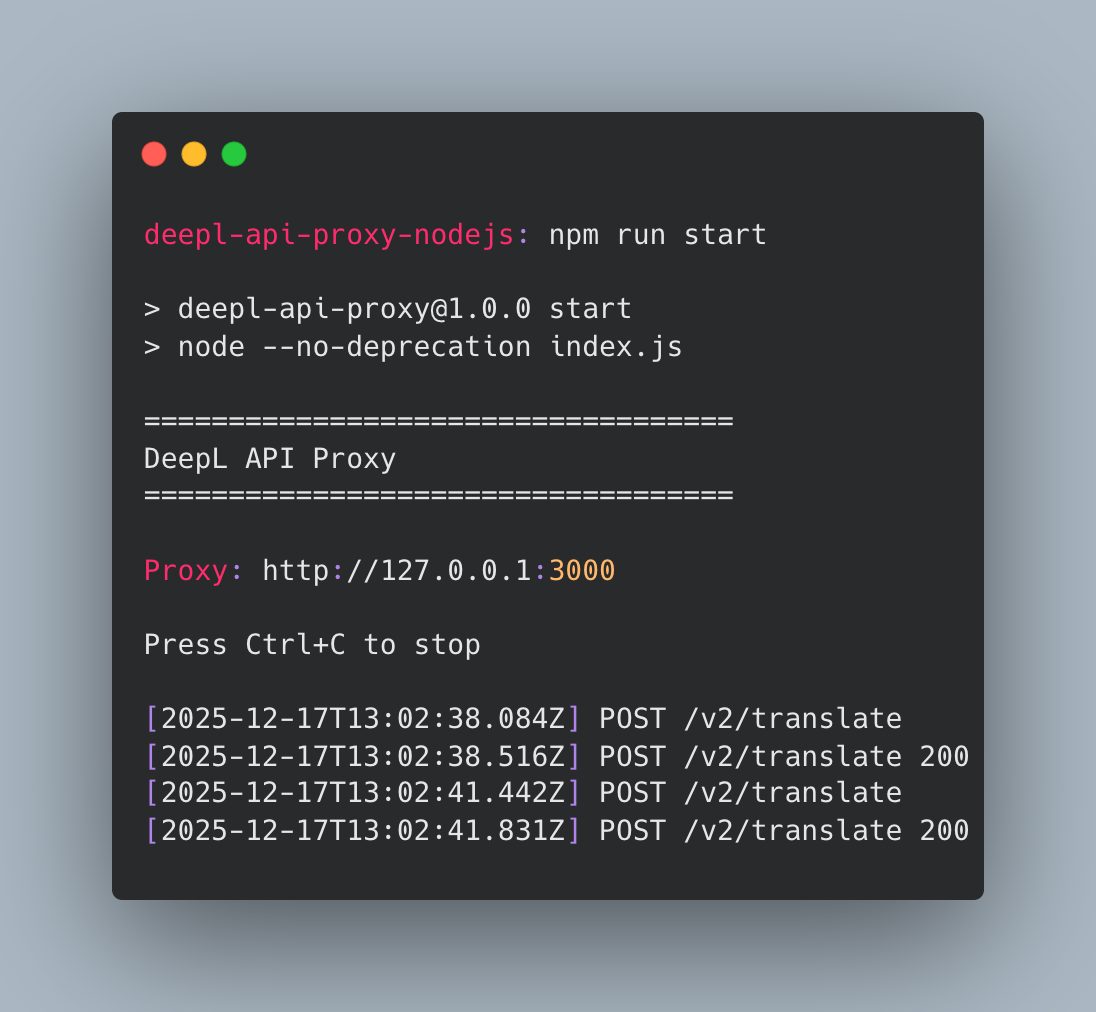
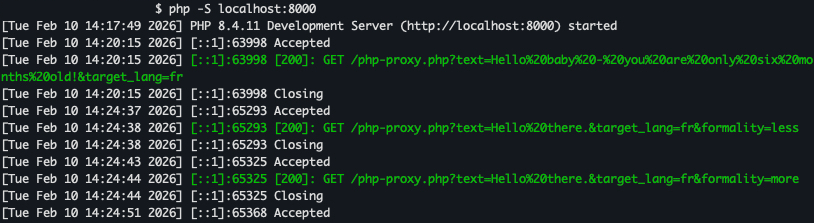
She bought oat biscuits.
Response Copy
Sie kaufte Hafer Kekse.
Here, the two parts of the sentence have been translated separately and resulted in an error: “oat biscuits” has been translated as “Hafer Kekse” instead of “Haferkekse”. ### [​](https://developers.deepl.com/docs/xml-and-html-handling/structured-content#restricting-splitting) Restricting Splitting For some XML files, finding tags with textual content and splitting sentences using those tags won’t yield the best translation results. The following examples show the difference in results when the engine splits sentences on `par` tags and proceed to translate the parts separately, as opposed to translating the sentence as a whole. As this can lead to bad translations, this type of structure should either be avoided, or the `non_splitting_tags` parameter should be set. * Restricted Splitting * With Splitting Parameters Copy tag_handling=xml, non_splitting_tags=par Request Copy The firm said it had been conducting an internal investigation. Response Copy Die Firma sagte, dass sie eine interne Untersuchung durchgeführt habe. This time, the sentence is translated as a whole. The XML tags are now considered markup and copied into the translated sentence. As the translation of the words “had been” has moved to another position in the German sentence, the two `par` tags are duplicated (which is expected here). Parameters Copy tag_handling=xml Request Copy The firm said it had been conducting an internal investigation. Response Copy Die Firma sagte, es sei eine gute Idee gewesen. Durchführung einer internen Untersuchung. Translating separately results in an incorrect translation. As this can lead to bad translations, this type of structure should either be avoided, or the `non_splitting_tags` parameter should be set. [XML handling](https://developers.deepl.com/docs/xml-and-html-handling/xml) [Customized XML outline detection](https://developers.deepl.com/docs/xml-and-html-handling/customized-xml-outline-detection) ⌘I --- # How to Translate Between Language Variants - DeepL Documentation [Skip to main content](https://developers.deepl.com/docs/learning-how-tos/examples-and-guides/translating-between-variants#content-area) [Join the Developer Community on DeepL Bridges](https://dee.pl/7iwrt) [DeepL Documentation home page![light logo](https://mintcdn.com/deepl-c950b784/mTpSbcs7wvcMTAY_/_assets/logo/light_with_text.svg?fit=max&auto=format&n=mTpSbcs7wvcMTAY_&q=85&s=7e5ec3b41e54263ba036d33d66855e19)![dark logo](https://mintcdn.com/deepl-c950b784/mTpSbcs7wvcMTAY_/_assets/logo/dark_with_text.svg?fit=max&auto=format&n=mTpSbcs7wvcMTAY_&q=85&s=8982e83cbd4b0ddbab8a168c06f5b3a0)](https://developers.deepl.com/) Search... ⌘K Search... Navigation Guides How to Translate Between Language Variants [Documentation](https://developers.deepl.com/docs/getting-started/intro) [API Reference](https://developers.deepl.com/api-reference/translate) On this page * [Methods for translating between variants](https://developers.deepl.com/docs/learning-how-tos/examples-and-guides/translating-between-variants#methods-for-translating-between-variants) * [1\. DeepL Write API](https://developers.deepl.com/docs/learning-how-tos/examples-and-guides/translating-between-variants#1-deepl-write-api) * [2\. Style rules with custom instructions](https://developers.deepl.com/docs/learning-how-tos/examples-and-guides/translating-between-variants#2-style-rules-with-custom-instructions) * [3\. Per-request custom instructions](https://developers.deepl.com/docs/learning-how-tos/examples-and-guides/translating-between-variants#3-per-request-custom-instructions) * [Next steps](https://developers.deepl.com/docs/learning-how-tos/examples-and-guides/translating-between-variants#next-steps) **This guide shows you:** * How to translate between language variants (e.g., `en-US` to `en-GB`, `pt-PT` to `pt-BR`) * Which method to choose: Write API, style rules, or custom instructions * An example workflow for converting American English to British English * * * [​](https://developers.deepl.com/docs/learning-how-tos/examples-and-guides/translating-between-variants#methods-for-translating-between-variants) Methods for translating between variants --------------------------------------------------------------------------------------------------------------------------------------------------------------------------------------------- You can use the DeepL API to translate between variants of the same language using 3 methods: ### [​](https://developers.deepl.com/docs/learning-how-tos/examples-and-guides/translating-between-variants#1-deepl-write-api) 1\. DeepL Write API Use the [/write/rephrase](https://developers.deepl.com/api-reference/improve-text) endpoint to rephrase text into the target language variant. **When to use this:** * You’re translating shorter texts (headlines, product names, brief descriptions) * You want high-quality rephrasing alongside variant translation Example cURL request Copy curl -X POST 'https://api.deepl.com/v2/write/rephrase' \ --header 'Authorization: DeepL-Auth-Key [yourAuthKey]' \ --header 'Content-Type: application/json' \ --data '{ "text": ["Check out the new fall colors!"], "target_lang": "en-GB" }' Example response Copy { "improvements": [\ {\ "text": "Check out the new autumn colours!",\ "detected_source_language": "en",\ "target_language": "en-GB"\ }\ ] } For longer texts, the Write API may rephrase and enhance content beyond simple variant conversion. If you need to maintain the exact structure while only updating locale-specific spelling and grammar, use another method.Please note that currently, the methods outlined below are not fully supported for this use case and may not always perform as intended. We encourage you to conduct your own evaluations. ### [​](https://developers.deepl.com/docs/learning-how-tos/examples-and-guides/translating-between-variants#2-style-rules-with-custom-instructions) 2\. Style rules with custom instructions Create a reusable [style rule](https://developers.deepl.com/api-reference/style-rules) with attached `custom_instructions` describing the desired variant translation. **When to use this:** * You need to maintain the text’s content between variants as precisely as possible * You need consistent variant transformations across many translation requests * You want to reuse the same variant rules without repeating the custom instructions Example cURL request Copy curl -X POST 'https://api.deepl.com/v2/translate' \ --header 'Authorization: DeepL-Auth-Key [yourAuthKey]' \ --header 'Content-Type: application/json' \ --data '{ "text": ["I went to the pharmacy."], "target_lang": "en-GB", "style_id": "your-style-rule-id" }' Example response Copy { "translations": [\ {\ "detected_source_language": "EN",\ "text": "I went to the chemist's."\ }\ ] } Glossaries and style rules are unique to each of DeepL’s global data centers and are not shared between them.Clients using the `api-us.deepl.com` endpoint will not be able to access glossaries or style rules created in the UI at this time. ### [​](https://developers.deepl.com/docs/learning-how-tos/examples-and-guides/translating-between-variants#3-per-request-custom-instructions) 3\. Per-request custom instructions Add [custom\_instructions](https://developers.deepl.com/api-reference/translate/request-translation#body-custom-instructions) describing the desired variant translation directly into your `/translate` requests. **When to use this:** * You need to maintain the text’s content between variants as precisely as possible * You need ad-hoc, one-off translations with specific variant requirements * You don’t want to manage separate style rules Example cURL request Copy curl -X POST 'https://api.deepl.com/v2/translate' \ --header 'Authorization: DeepL-Auth-Key [yourAuthKey]' \ --header 'Content-Type: application/json' \ --data '{ "text": ["I went to the pharmacy."], "target_lang": "en-GB", "custom_instructions": ["translate to British English"] }' Example response Copy { "translations": [\ {\ "detected_source_language": "EN",\ "text": "I went to the chemist's."\ }\ ] } You can specify up to 10 custom instructions per request, each with a maximum of 300 characters. * * * [​](https://developers.deepl.com/docs/learning-how-tos/examples-and-guides/translating-between-variants#next-steps) Next steps --------------------------------------------------------------------------------------------------------------------------------- Now that you understand how to translate between language variants: * **Try it yourself:** Test out style rules and custom instructions in the [text translation API playground](https://developers.deepl.com/api-reference/translate) * **Learn about the Write API:** Explore the [/write/rephrase endpoint](https://developers.deepl.com/api-reference/improve-text) for high-quality variant translation and rephrasing * **Manage reusable rules:** Learn how to create [style rules](https://developers.deepl.com/api-reference/style-rules) for systematic variant transformations * **Improve translation quality:** Understand how [the context parameter](https://developers.deepl.com/docs/learning-how-tos/examples-and-guides/how-to-use-context-parameter) can enhance ambiguous translations [DeepL MCP Server](https://developers.deepl.com/docs/learning-how-tos/examples-and-guides/deepl-mcp-server-how-to-build-and-use-translation-in-llm-applications) [Error handling](https://developers.deepl.com/docs/best-practices/error-handling) ⌘I --- # Introduction - DeepL Documentation [Skip to main content](https://developers.deepl.com/docs/getting-started/intro#content-area) [Join the Developer Community on DeepL Bridges](https://dee.pl/7iwrt) [DeepL Documentation home page![light logo](https://mintcdn.com/deepl-c950b784/mTpSbcs7wvcMTAY_/_assets/logo/light_with_text.svg?fit=max&auto=format&n=mTpSbcs7wvcMTAY_&q=85&s=7e5ec3b41e54263ba036d33d66855e19)![dark logo](https://mintcdn.com/deepl-c950b784/mTpSbcs7wvcMTAY_/_assets/logo/dark_with_text.svg?fit=max&auto=format&n=mTpSbcs7wvcMTAY_&q=85&s=8982e83cbd4b0ddbab8a168c06f5b3a0)](https://developers.deepl.com/) Search... ⌘K Search... Navigation Getting Started Introduction [Documentation](https://developers.deepl.com/docs/getting-started/intro) [API Reference](https://developers.deepl.com/api-reference/translate) ![](https://mintcdn.com/deepl-c950b784/OnHfwyeOjDg0aJdt/_assets/images/intro/banner.gif?s=4a272b8f97f5330ea68a5a41fb3b8a59) [​](https://developers.deepl.com/docs/getting-started/intro#get-an-api-key-and-get-started) Get an API key and get started ----------------------------------------------------------------------------------------------------------------------------- New user? Follow these quick steps to get started with the DeepL API. 1 [](https://developers.deepl.com/docs/getting-started/intro#) ### Sign up for the API Visit [our plans page](https://www.deepl.com/pro-api#api-pricing) , choose a plan, and sign up. If you already have a DeepL Translator account, you will need to log out and [create a new account for the DeepL API](https://support.deepl.com/hc/articles/360019358999-Change-plan) . 2 [](https://developers.deepl.com/docs/getting-started/intro#) ### Step 2: Test your API key with a request Find your API key [here](https://www.deepl.com/your-account/keys) . Then try making a simple translation request in one of these ways: * cURL or an HTTP request * with [our client libraries](https://developers.deepl.com/docs/getting-started/client-libraries) for [Python](https://www.github.com/deeplcom/deepl-python) , [JavaScript](https://www.github.com/deeplcom/deepl-node) , [PHP](https://www.github.com/deeplcom/deepl-php) , [.NET](https://www.github.com/deeplcom/deepl-dotnet) , [Java](https://www.github.com/deeplcom/deepl-java) , or [Ruby](https://www.github.com/deeplcom/deepl-rb) * [in our playground](https://developers.deepl.com/api-reference/translate/request-translation?playground=open) * [in Postman](https://developers.deepl.com/docs/getting-started/test-your-api-requests-with-postman) If you use the sample code below, be sure to replace `{YOUR_API_KEY}` with your own API key. * HTTP Request * cURL * Python * JavaScript * PHP * C# * Java * Ruby If you chose a free API plan and you are writing cURL or HTTP requests, replace `https://api.deepl.com` with `https://api-free.deepl.com`. Sample request Copy POST /v2/translate HTTP/2 Host: api.deepl.com Authorization: DeepL-Auth-Key [yourAuthKey] User-Agent: YourApp/1.2.3 Content-Length: 45 Content-Type: application/json {"text":["Hello, world!"],"target_lang":"DE"} Sample response Copy { "translations": [\ {\ "detected_source_language": "EN",\ "text": "Hallo, Welt!"\ }\ ] } If you chose a free API plan and you are writing cURL or HTTP requests, replace `https://api.deepl.com` with `https://api-free.deepl.com`. Set the API key Copy export API_KEY={YOUR_API_KEY} Sample request Copy curl -X POST https://api.deepl.com/v2/translate \ --header "Content-Type: application/json" \ --header "Authorization: DeepL-Auth-Key $API_KEY" \ --data '{ "text": ["Hello world!"], "target_lang": "DE" }' Sample response Copy { "translations": [\ {\ "detected_source_language": "EN",\ "text": "Hallo, Welt!"\ }\ ] } Install client library Copy pip install deepl Sample request Copy import deepl auth_key = "{YOUR_API_KEY}" # replace with your key deepl_client = deepl.DeepLClient(auth_key) result = deepl_client.translate_text("Hello, world!", target_lang="DE") print(result.text) Sample output Copy Hallo, Welt! In production code, it’s safer to store your API key in an environment variable. Install client library Copy npm install deepl-node Sample request Copy import * as deepl from 'deepl-node'; const authKey = "{YOUR_API_KEY}"; // replace with your key const deeplClient = new deepl.DeepLClient(authKey); (async () => { const result = await deeplClient.translateText('Hello, world!', null, 'de'); console.log(result.text); })(); Sample output Copy Hallo, Welt! In production code, it’s safer to store your API key in an environment variable. Install client library Copy composer require deeplcom/deepl-php Sample request Copy require_once 'vendor/autoload.php'; use DeepL\Translator; $authKey = "{YOUR_API_KEY}"; // replace with your key $deeplClient = new \DeepL\DeepLClient($authKey); $result = $deeplClient->translateText('Hello, world!', null, 'de'); echo $result->text; Sample output Copy Hallo, Welt! In production code, it’s safer to store your API key in an environment variable. Install client library Copy dotnet add package DeepL.net Sample request Copy using DeepL; // this imports the DeepL namespace. Use the code below in your main program. var authKey = "{YOUR_API_KEY}"; // replace with your key var client = new DeepLClient(authKey); var translatedText = await client.TranslateTextAsync( "Hello, world!", null, LanguageCode.German); Console.WriteLine(translatedText); Sample output Copy Hallo, Welt! In production code, it’s safer to store your API key in an environment variable. Install client library Copy // For instructions on installing the DeepL Java library, // see https://github.com/DeepLcom/deepl-java?tab=readme-ov-file#installation Sample request Copy import com.deepl.api.*; public class Main { public static void main(String[] args) throws DeepLException, InterruptedException { String authKey = "{YOUR_API_KEY}"; // replace with your key DeepLClient client = new DeepLClient(authKey); TextResult result = client.translateText("Hello, world!", null, "de"); System.out.println(result.getText()); } } Sample output Copy Hallo, Welt! In production code, it’s safer to store your API key in an environment variable. Install client library Copy gem install deepl-rb Sample request Copy require 'deepl' DeepL.configure do |config| config.auth_key = '{YOUR_API_KEY}' # replace with your key end translation = DeepL.translate 'Hello, world!', nil, 'de' puts translation.text Sample output Copy Hallo, Welt! In production code, it’s safer to store your API key in an environment variable. 3 [](https://developers.deepl.com/docs/getting-started/intro#) ### Step 3: Keep building with our client libraries and how-to guides [Our official client libraries](https://developers.deepl.com/docs/getting-started/client-libraries) let you use the API with six popular programming languages - [Python](https://www.github.com/deeplcom/deepl-python) , [JavaScript](https://www.github.com/deeplcom/deepl-node) , [PHP](https://www.github.com/deeplcom/deepl-php) , [.NET](https://www.github.com/deeplcom/deepl-dotnet) , [Java](https://www.github.com/deeplcom/deepl-java) , or [Ruby](https://www.github.com/deeplcom/deepl-rb) . The DeepL community has [contributed client libraries](https://github.com/DeepLcom/awesome-deepl?tab=readme-ov-file#community-libraries--sdks) for other languages, including [Dart](https://github.com/komape/deepl_dart) , [Go](https://github.com/candy12t/go-deepl) , and [Rust](https://github.com/Avimitin/deepl-rs) . You may also wish to check out [these examples and guides](https://developers.deepl.com/docs/learning-how-tos/examples-and-guides) . [​](https://developers.deepl.com/docs/getting-started/intro#keep-exploring) Keep exploring --------------------------------------------------------------------------------------------- * [Your first API request](https://developers.deepl.com/docs/getting-started/your-first-api-request) - With just a few lines of code, make your first request to the DeepL Translate or Write API * [**DeepL 101**](https://developers.deepl.com/docs/learning-how-tos/examples-and-guides/first-things-to-try-with-the-deepl-api) - A quick guide to text and document translation, using Postman to play with the API, client libraries for your favorite programming language, and joining our developer community * [Cookbook](https://developers.deepl.com/docs/learning-how-tos/cookbook) - Explore short tutorials, examples, projects, and use cases * [Guides](https://developers.deepl.com/docs/learning-how-tos/examples-and-guides) - Discover in-depth explanations for API features and real-world applications [​](https://developers.deepl.com/docs/getting-started/intro#community-and-support) Community and Support ----------------------------------------------------------------------------------------------------------- [Support Center](https://support.deepl.com/) [DeepL Bridges - Developer Community](https://www.deepl-bridges.com/) [Status Page](https://www.deeplstatus.com/) [Release Notes](https://developers.deepl.com/docs/resources/release-notes) [About](https://developers.deepl.com/docs/getting-started/about) ⌘I --- # Building a Document Translator with the DeepL API - DeepL Documentation [Skip to main content](https://developers.deepl.com/docs/learning-how-tos/cookbook/java-document-translator#content-area) [Join the Developer Community on DeepL Bridges](https://dee.pl/7iwrt) [DeepL Documentation home page![light logo](https://mintcdn.com/deepl-c950b784/mTpSbcs7wvcMTAY_/_assets/logo/light_with_text.svg?fit=max&auto=format&n=mTpSbcs7wvcMTAY_&q=85&s=7e5ec3b41e54263ba036d33d66855e19)![dark logo](https://mintcdn.com/deepl-c950b784/mTpSbcs7wvcMTAY_/_assets/logo/dark_with_text.svg?fit=max&auto=format&n=mTpSbcs7wvcMTAY_&q=85&s=8982e83cbd4b0ddbab8a168c06f5b3a0)](https://developers.deepl.com/) Search... ⌘K Search... Navigation Cookbook Building a Document Translator with the DeepL API [Documentation](https://developers.deepl.com/docs/getting-started/intro) [API Reference](https://developers.deepl.com/api-reference/translate) On this page * [Why Build a Document Translator?](https://developers.deepl.com/docs/learning-how-tos/cookbook/java-document-translator#why-build-a-document-translator) * [Setting Up Your Document Translator](https://developers.deepl.com/docs/learning-how-tos/cookbook/java-document-translator#setting-up-your-document-translator) * [Prerequisites](https://developers.deepl.com/docs/learning-how-tos/cookbook/java-document-translator#prerequisites) * [Project Overview](https://developers.deepl.com/docs/learning-how-tos/cookbook/java-document-translator#project-overview) * [1\. Project Setup and Dependencies](https://developers.deepl.com/docs/learning-how-tos/cookbook/java-document-translator#1-project-setup-and-dependencies) * [2\. Supported File Types Definition](https://developers.deepl.com/docs/learning-how-tos/cookbook/java-document-translator#2-supported-file-types-definition) * [3\. Command Line Argument Processing](https://developers.deepl.com/docs/learning-how-tos/cookbook/java-document-translator#3-command-line-argument-processing) * [4\. Output File Path Generation](https://developers.deepl.com/docs/learning-how-tos/cookbook/java-document-translator#4-output-file-path-generation) * [5\. DeepL API Integration](https://developers.deepl.com/docs/learning-how-tos/cookbook/java-document-translator#5-deepl-api-integration) * [6\. Translation Status Monitoring](https://developers.deepl.com/docs/learning-how-tos/cookbook/java-document-translator#6-translation-status-monitoring) * [Building and Running](https://developers.deepl.com/docs/learning-how-tos/cookbook/java-document-translator#building-and-running) * [Wrapping Up](https://developers.deepl.com/docs/learning-how-tos/cookbook/java-document-translator#wrapping-up) * [References](https://developers.deepl.com/docs/learning-how-tos/cookbook/java-document-translator#references) [​](https://developers.deepl.com/docs/learning-how-tos/cookbook/java-document-translator#why-build-a-document-translator) Why Build a Document Translator? ------------------------------------------------------------------------------------------------------------------------------------------------------------- In today’s global business environment, organizations frequently need to translate various document types - from technical manuals and legal contracts to marketing materials and internal communications. Manually uploading files to web-based translation services can be time-consuming and inefficient, especially when dealing with multiple documents. By building a command-line Java application with the DeepL API, you can automate document translation processes, integrate them into CI/CD pipelines, and provide a reliable solution for bulk document processing. This approach is particularly valuable for: * **Development teams** who need to localize documentation and user manuals * **Content teams** managing multilingual marketing materials * **Businesses** requiring regular translation of contracts, reports, and communications * **Automation workflows** where translation needs to be triggered programmatically [​](https://developers.deepl.com/docs/learning-how-tos/cookbook/java-document-translator#setting-up-your-document-translator) Setting Up Your Document Translator -------------------------------------------------------------------------------------------------------------------------------------------------------------------- ### [​](https://developers.deepl.com/docs/learning-how-tos/cookbook/java-document-translator#prerequisites) Prerequisites Before you begin, you’ll need: * Java Development Kit (JDK) 8 or higher * Apache Maven for dependency management * A DeepL API key (get one at [DeepL API](https://www.deepl.com/pro-api) ) * Basic familiarity with Java and command-line tools ### [​](https://developers.deepl.com/docs/learning-how-tos/cookbook/java-document-translator#project-overview) Project Overview Our Java application leverages the official DeepL Java SDK to translate documents across multiple formats. It provides a simple command-line interface that takes an input file and target language, automatically generating appropriately named output files. Here’s the complete implementation breakdown: #### [​](https://developers.deepl.com/docs/learning-how-tos/cookbook/java-document-translator#1-project-setup-and-dependencies) 1\. Project Setup and Dependencies First, let’s set up the Maven project structure with the necessary dependencies: Copy 4.0.0 com.example java-document-translator 1.0-SNAPSHOT 1.8 1.8 UTF-8 com.deepl.api deepl-java 1.10.0 org.codehaus.mojo exec-maven-plugin 3.0.0 App The `deepl-java` dependency provides all the necessary functionality for interacting with the DeepL API, including document translation capabilities. #### [​](https://developers.deepl.com/docs/learning-how-tos/cookbook/java-document-translator#2-supported-file-types-definition) 2\. Supported File Types Definition We start by defining the supported file formats to provide clear feedback to users: Copy private static final Map SUPPORTED_EXTENSIONS; static { Map map = new HashMap<>(); map.put("docx", "Microsoft Word Document"); map.put("doc", "Microsoft Word Document"); map.put("pptx", "Microsoft PowerPoint Document"); map.put("xlsx", "Microsoft Excel Document"); map.put("pdf", "Portable Document Format"); map.put("htm", "HTML Document"); map.put("html", "HTML Document"); map.put("txt", "Plain Text Document"); map.put("xlf", "XLIFF Document, version 2.1"); map.put("xliff", "XLIFF Document, version 2.1"); map.put("srt", "SubRip Subtitle file"); SUPPORTED_EXTENSIONS = Collections.unmodifiableMap(map); } This static initialization ensures our application can quickly validate file types before attempting translation, providing immediate feedback for unsupported formats. #### [​](https://developers.deepl.com/docs/learning-how-tos/cookbook/java-document-translator#3-command-line-argument-processing) 3\. Command Line Argument Processing The application expects two command-line arguments: the input file path and target language code. The source language is automatically detected by the DeepL API. Copy public static void main(String[] args) { String inputFilePath = args[0]; String targetLang = args[1]; // Validate file extension String extension = ""; int i = inputFilePath.lastIndexOf('.'); if (i > 0 && i < inputFilePath.length() - 1) { extension = inputFilePath.substring(i + 1); String lowerCaseExtension = extension.toLowerCase(); if (SUPPORTED_EXTENSIONS.containsKey(lowerCaseExtension)) { System.out.println("File type: " + SUPPORTED_EXTENSIONS.get(lowerCaseExtension)); } else { System.err.println("Error: Unsupported file extension '" + extension + "'"); return; } } } #### [​](https://developers.deepl.com/docs/learning-how-tos/cookbook/java-document-translator#4-output-file-path-generation) 4\. Output File Path Generation One key feature is automatic output file naming, which prevents accidental overwrites and clearly identifies translated versions: Copy // Auto-generate output file path Path inputPathObject = Paths.get(inputFilePath); String originalFileName = inputPathObject.getFileName().toString(); String newFileName = targetLang.toUpperCase() + "_" + originalFileName; Path outputFilePathObject = inputPathObject.resolveSibling(newFileName); String outputFilePath = outputFilePathObject.toString(); This approach transforms `document.pdf` with target language `DE` into `DE_document.pdf`, making it easy to identify translated versions. #### [​](https://developers.deepl.com/docs/learning-how-tos/cookbook/java-document-translator#5-deepl-api-integration) 5\. DeepL API Integration The core translation functionality uses the DeepL Java SDK: Copy // Initialize DeepL client String authKey = System.getenv("DEEPL_AUTH_KEY"); if (authKey == null || authKey.isEmpty()) { System.err.println("Error: DEEPL_AUTH_KEY environment variable not set."); return; } File inputFile = Paths.get(inputFilePath).toFile(); File outputFile = Paths.get(outputFilePath).toFile(); DeepLClient client = new DeepLClient(authKey); // Perform translation DocumentStatus status = client.translateDocument(inputFile, outputFile, null, targetLang); System.out.println("Document translation initiated. Document ID: " + status.getDocumentId()); #### [​](https://developers.deepl.com/docs/learning-how-tos/cookbook/java-document-translator#6-translation-status-monitoring) 6\. Translation Status Monitoring Document translation is asynchronous, so we need to monitor the process: Copy System.out.println("Waiting for translation to complete..."); while (true) { StatusCode statusCode = status.getStatus(); if (statusCode == StatusCode.Done) { System.out.println("Translation completed successfully."); break; } if (statusCode == StatusCode.Error) { System.err.println("Error during translation: " + status.getErrorMessage()); break; } Thread.sleep(1000); // Wait 1 second before checking status again } This polling mechanism ensures the application waits for translation completion and provides appropriate feedback. ### [​](https://developers.deepl.com/docs/learning-how-tos/cookbook/java-document-translator#building-and-running) Building and Running 1. **Set up your environment:** Copy export DEEPL_AUTH_KEY="your_deepl_api_key_here" 2. **Build the project:** Copy mvn compile 3. **Run translations:** Here are some practical examples of using the translator: **Translating Technical Documentation:** Copy mvn exec:java -Dexec.args="./api-documentation.pdf EN-US" **Localizing Marketing Materials:** Copy mvn exec:java -Dexec.args="./brochure.docx JA" **Processing Subtitle Files:** Copy mvn exec:java -Dexec.args="./movie-subtitles.srt DE" ### [​](https://developers.deepl.com/docs/learning-how-tos/cookbook/java-document-translator#wrapping-up) Wrapping Up This Java document translator provides a solid foundation for automating document localization workflows. By combining the reliability of Java with DeepL’s translation quality, you can build scalable solutions for various business needs. The command-line interface makes it easy to integrate into existing automation scripts, CI/CD pipelines, or batch processing workflows. Whether you’re a developer localizing documentation or a business automating multilingual content creation, this approach offers a practical solution for programmatic document translation. The extensible design allows for easy customization and enhancement, making it adaptable to specific organizational requirements while maintaining the core functionality of reliable, high-quality document translation. [​](https://developers.deepl.com/docs/learning-how-tos/cookbook/java-document-translator#references) References ------------------------------------------------------------------------------------------------------------------ * [DeepL API Documentation](https://developers.deepl.com/docs) * [DeepL Java SDK](https://github.com/DeepLcom/deepl-java) * [Maven Exec Plugin](https://www.mojohaus.org/exec-maven-plugin/) * [DeepL Supported Languages](https://www.deepl.com/docs-api/translate-text/target-language/) [Automating Indie Game Localization with the DeepL API and Godot](https://developers.deepl.com/docs/learning-how-tos/cookbook/automating-indie-game-localization-with-the-deepl-api-and-godot) [Usage Analytics Dashboard](https://developers.deepl.com/docs/learning-how-tos/cookbook/usage-analytics-dashboard) ⌘I --- # New: XML/HTML handling v2 - DeepL Documentation [Skip to main content](https://developers.deepl.com/docs/xml-and-html-handling/tag-handling-v2#content-area) [Join the Developer Community on DeepL Bridges](https://dee.pl/7iwrt) [DeepL Documentation home page![light logo](https://mintcdn.com/deepl-c950b784/mTpSbcs7wvcMTAY_/_assets/logo/light_with_text.svg?fit=max&auto=format&n=mTpSbcs7wvcMTAY_&q=85&s=7e5ec3b41e54263ba036d33d66855e19)![dark logo](https://mintcdn.com/deepl-c950b784/mTpSbcs7wvcMTAY_/_assets/logo/dark_with_text.svg?fit=max&auto=format&n=mTpSbcs7wvcMTAY_&q=85&s=8982e83cbd4b0ddbab8a168c06f5b3a0)](https://developers.deepl.com/) Search... ⌘K Search... Navigation XML and HTML handling New: XML/HTML handling v2 [Documentation](https://developers.deepl.com/docs/getting-started/intro) [API Reference](https://developers.deepl.com/api-reference/translate) On this page * [Overview](https://developers.deepl.com/docs/xml-and-html-handling/tag-handling-v2#overview) * [What’s New in v2](https://developers.deepl.com/docs/xml-and-html-handling/tag-handling-v2#what%E2%80%99s-new-in-v2) * [Usage Examples](https://developers.deepl.com/docs/xml-and-html-handling/tag-handling-v2#usage-examples) * [Translation with v2](https://developers.deepl.com/docs/xml-and-html-handling/tag-handling-v2#translation-with-v2) * [Strict XML Parsing](https://developers.deepl.com/docs/xml-and-html-handling/tag-handling-v2#strict-xml-parsing) * [Compatibility](https://developers.deepl.com/docs/xml-and-html-handling/tag-handling-v2#compatibility) * [Migration Guide](https://developers.deepl.com/docs/xml-and-html-handling/tag-handling-v2#migration-guide) * [1\. Test Your Content](https://developers.deepl.com/docs/xml-and-html-handling/tag-handling-v2#1-test-your-content) * [2\. Compare Outputs](https://developers.deepl.com/docs/xml-and-html-handling/tag-handling-v2#2-compare-outputs) * [3\. Validate XML Syntax](https://developers.deepl.com/docs/xml-and-html-handling/tag-handling-v2#3-validate-xml-syntax) * [Related Documentation](https://developers.deepl.com/docs/xml-and-html-handling/tag-handling-v2#related-documentation) * [FAQ](https://developers.deepl.com/docs/xml-and-html-handling/tag-handling-v2#faq) [​](https://developers.deepl.com/docs/xml-and-html-handling/tag-handling-v2#overview) Overview ------------------------------------------------------------------------------------------------- Tag handling v2 is an improved algorithm for translating XML and HTML content. Set `tag_handling_version=v2` to enable it. [​](https://developers.deepl.com/docs/xml-and-html-handling/tag-handling-v2#what%E2%80%99s-new-in-v2) What’s New in v2 ------------------------------------------------------------------------------------------------------------------------- Tag handling v2 uses an algorithm that balances both translation quality and formatting. Sentences are now translated more naturally without being constrained by tag placement in the source text. It also handles edge cases around tag preservation, DOM hierarchy, and character escaping. V2 enforces strict XML parsing and will return an error if invalid XML is submitted. Customers who had not used tag handling prior to 2025-12-01 default to v2. All other customers default to v1. [​](https://developers.deepl.com/docs/xml-and-html-handling/tag-handling-v2#usage-examples) Usage Examples ------------------------------------------------------------------------------------------------------------- ### [​](https://developers.deepl.com/docs/xml-and-html-handling/tag-handling-v2#translation-with-v2) Translation with v2 * HTML * XML: Simple Markup * XML: With Attributes * XML: Nested Tags Parameters Copy tag_handling=html, tag_handling_version=v2 Request Copy

Welcome to Our Service

This is a premium feature.

Response Copy

Willkommen bei unserem Service

Dies ist eine Premium-Funktion.

Parameters Copy tag_handling=xml, tag_handling_version=v2 Request Copy Press Continue to advance. Response Copy Drücken Sie „Weiter", um fortzufahren. Parameters Copy tag_handling=xml, tag_handling_version=v2 Request Copy Please welcome the participants to today's meeting. Response Copy Bitte begrüßen Sie die Teilnehmer an der heutigen Sitzung. Parameters Copy tag_handling=xml, tag_handling_version=v2 Request Copy The firm said it had been conducting an
internal investigation for several months. Response Copy Das Unternehmen gab an, dass es seit mehreren Monaten eine interne Untersuchung durchgeführt habe. ### [​](https://developers.deepl.com/docs/xml-and-html-handling/tag-handling-v2#strict-xml-parsing) Strict XML Parsing Tag handling v2 enforces strict XML parsing. If invalid XML is submitted, the API will return an error: Invalid XML error response -------------------------- Parameters Copy tag_handling=xml, tag_handling_version=v2 Request (Invalid XML) Copy

This tag is not closed properly Response (Error) Copy { "Message": "Tag handling parsing failed, please check input." } Only XML is strictly parsed. HTML is not strictly parsed. [​](https://developers.deepl.com/docs/xml-and-html-handling/tag-handling-v2#compatibility) Compatibility ----------------------------------------------------------------------------------------------------------- Tag handling v2 is currently only compatible with the `quality_optimized` model type. Support for `latency_optimized` will be added in a future update. | Model Type | v1 Support | v2 Support | | --- | --- | --- | | `quality_optimized` | ✅ | ✅ | | `latency_optimized` | ✅ | ❌ | When you set `tag_handling_version` to `v2`, the `model_type` is implicitly set to `quality_optimized`. Requests that specify both `model_type=latency_optimized` and `tag_handling_version=v2` will return an error. [​](https://developers.deepl.com/docs/xml-and-html-handling/tag-handling-v2#migration-guide) Migration Guide --------------------------------------------------------------------------------------------------------------- Tag handling is expected to give different results between v1 and v2. Thoroughly test your system and verify any differences in output before switching to v2 in production. ### [​](https://developers.deepl.com/docs/xml-and-html-handling/tag-handling-v2#1-test-your-content) 1\. Test Your Content Run v2 translations on representative samples of your content, especially: * Text with deep tag hierarchies * Text with inline markup, attributes, and special characters * Edge cases such as empty or self-closing tags ### [​](https://developers.deepl.com/docs/xml-and-html-handling/tag-handling-v2#2-compare-outputs) 2\. Compare Outputs Compare v1 and v2 outputs, and make any updates needed to maintain your workflows. * Ensure that the tags are preserved correctly * Compare any differences in translation * Note any formatting changes ### [​](https://developers.deepl.com/docs/xml-and-html-handling/tag-handling-v2#3-validate-xml-syntax) 3\. Validate XML Syntax Since v2 enforces strict XML parsing: * Ensure all your XML input is well-formed * Add error handling for invalid XML responses * Update any XML generation logic if needed [​](https://developers.deepl.com/docs/xml-and-html-handling/tag-handling-v2#related-documentation) Related Documentation --------------------------------------------------------------------------------------------------------------------------- For more information about XML and HTML tag handling: * [HTML Handling](https://developers.deepl.com/docs/xml-and-html-handling/html) * [XML Handling](https://developers.deepl.com/docs/xml-and-html-handling/xml) * [Structured XML Content](https://developers.deepl.com/docs/xml-and-html-handling/structured-content) [​](https://developers.deepl.com/docs/xml-and-html-handling/tag-handling-v2#faq) FAQ --------------------------------------------------------------------------------------- **Q: What is the default tag handling version?** A: Customers who had not used tag handling prior to 2025-12-01 default to v2. All other customers default to v1. **Q: Should I upgrade to v2?** A: Upgrading to v2 is strongly recommended and will provide improvements to both translation quality and structural correctness. Test thoroughly with your specific content before switching in production. **Q: What happens if my XML is invalid?** A: Tag handling v2 enforces strict XML parsing. Invalid XML will return an error response. Ensure your XML is well-formed before submission. **Q: Can I switch back to v1 if needed?** A: Yes, simply set `tag_handling_version: v1` in your API requests. **Q: Does v2 work with all DeepL API features?** A: Tag handling v2 works with all standard API features including glossaries and formality settings. However, it currently only supports the `quality_optimized` model type. **Q: Is HTML also strictly parsed?** A: No, any HTML can be submitted for translation without throwing an error. Only XML is strictly parsed and requires valid XML. [HTML handling](https://developers.deepl.com/docs/xml-and-html-handling/html) [Roadmap and release notes](https://developers.deepl.com/docs/resources/roadmap-and-release-notes) ⌘I --- # Roadmap and release notes - DeepL Documentation [Skip to main content](https://developers.deepl.com/docs/resources/roadmap-and-release-notes#content-area) [Join the Developer Community on DeepL Bridges](https://dee.pl/7iwrt) [DeepL Documentation home page![light logo](https://mintcdn.com/deepl-c950b784/mTpSbcs7wvcMTAY_/_assets/logo/light_with_text.svg?fit=max&auto=format&n=mTpSbcs7wvcMTAY_&q=85&s=7e5ec3b41e54263ba036d33d66855e19)![dark logo](https://mintcdn.com/deepl-c950b784/mTpSbcs7wvcMTAY_/_assets/logo/dark_with_text.svg?fit=max&auto=format&n=mTpSbcs7wvcMTAY_&q=85&s=8982e83cbd4b0ddbab8a168c06f5b3a0)](https://developers.deepl.com/) Search... ⌘K Search... Navigation Resources Roadmap and release notes [Documentation](https://developers.deepl.com/docs/getting-started/intro) [API Reference](https://developers.deepl.com/api-reference/translate) On this page * [In active development](https://developers.deepl.com/docs/resources/roadmap-and-release-notes#in-active-development) * [February 2026](https://developers.deepl.com/docs/resources/roadmap-and-release-notes#february-2026) * [January 2026](https://developers.deepl.com/docs/resources/roadmap-and-release-notes#january-2026) * [2025](https://developers.deepl.com/docs/resources/roadmap-and-release-notes#2025) * [2024](https://developers.deepl.com/docs/resources/roadmap-and-release-notes#2024) * [2023](https://developers.deepl.com/docs/resources/roadmap-and-release-notes#2023) * [2022](https://developers.deepl.com/docs/resources/roadmap-and-release-notes#2022) [​](https://developers.deepl.com/docs/resources/roadmap-and-release-notes#in-active-development) In active development * Add more events to audit logs for Pro API customers (API key management, cost control and usage limit changes) * Full CRUD functionality for managing [Style Rules](https://developers.deepl.com/api-reference/style-rules) and [Custom Instructions](https://developers.deepl.com/api-reference/translate/request-translation#body-custom-instructions) * Translation Memory via API * `v3/languages` endpoint with improved language code handling and additional functionality [​](https://developers.deepl.com/docs/resources/roadmap-and-release-notes#february-2026) February 2026 [​](https://developers.deepl.com/docs/resources/roadmap-and-release-notes#february-18-additional-languages-in-v2/languages) February 18 - Additional Languages in `v2/languages` ----------------------------------------------------------------------------------------------------------------------------------------------------------------------------------- * New languages added to the [v2/languages endpoint](https://developers.deepl.com/api-reference/languages) , bringing totals to **101 source languages** and **106 target languages**. * These languages were already supported for translation; this change improves automatic discoverability for API clients. * Note: 12 supported languages using three-letter base codes (e.g. ACE, CEB, CKB) are not yet included in `v2/languages` for backwards compatibility, but will be available in the upcoming `v3/languages` endpoint. [​](https://developers.deepl.com/docs/resources/roadmap-and-release-notes#january-2026) January 2026 [​](https://developers.deepl.com/docs/resources/roadmap-and-release-notes#january-20-legacy-auth-deprecation) January 20 - Legacy Auth Deprecation ----------------------------------------------------------------------------------------------------------------------------------------------------- Query parameter and request body authentication methods are now [deprecated](https://developers.deepl.com/docs/resources/breaking-changes-change-notices/november-2025-deprecation-of-legacy-auth-methods) . * **API Free users**: All requests using legacy auth now return `403 Forbidden`. * **API Pro users**: Brownout period active with intermittent `403` responses. Full deprecation in early February 2026. Use the `DeepL-Auth-Key` header instead. [​](https://developers.deepl.com/docs/resources/roadmap-and-release-notes#january-8-81-new-languages-in-ga) January 8 - 81 New Languages in GA ------------------------------------------------------------------------------------------------------------------------------------------------- * Promoted all 81 beta languages to standard language support. These languages are now part of the main source and target language lists. * Note that these languages only work with `quality_optimized` model or when no model is specified, and are not compatible with `latency_optimized` requests. * The `enable_beta_languages` parameter is maintained for backward compatibility but has no effect. See [here](https://developers.deepl.com/docs/getting-started/supported-languages) for the complete language list. [​](https://developers.deepl.com/docs/resources/roadmap-and-release-notes#2025) 2025 [​](https://developers.deepl.com/docs/resources/roadmap-and-release-notes#q4-2025) Q4 2025 --------------------------------------------------------------------------------------------- * Added API reference for the Voice API * Add contextual menu in the to make it easier to copy any API documentation page as context for AI tools * Add support for style rules in the API to programmatically get your created style rules and translate with them. * Overhauled the tag-handling algorithm that backs translation of XML and HTML in the DeepL API. To enable it and benefit from all the improvements, set the `tag_handling_version` parameter to `v2` in the text translation API. See [here](https://developers.deepl.com/docs/xml-and-html-handling/tag-handling-v2) for more information. * Added new usage analytics endpoint in the Admin API, including key-level reporting. See [here](https://developers.deepl.com/api-reference/admin-api/get-usage-analytics) for more details * Enabled support for multiple admins in an API subscription * Added support for 75 new languages, initially through the `enable_beta_languages` parameter, for text and document translation. Beta languages are not billed during the beta phase and do not yet support glossaries or formality. See [here](https://developers.deepl.com/docs/getting-started/supported-languages#beta-languages) for more information * Added HE, TH and VI to the languages endpoint, since they are now also available in document translation * Added 6 additional beta languages, for text and document translation. See the previous note about 75 new languages. * Added a new parameter to the text translation API to allow custom instructions, making it possible to customize the translation behavior (e.g. \[“Use a friendly, diplomatic tone”\]) * Added support for JPEG and PNG images in [document translation](https://developers.deepl.com/api-reference/document) , currently in Beta. [​](https://developers.deepl.com/docs/resources/roadmap-and-release-notes#q3-2025) Q3 2025 --------------------------------------------------------------------------------------------- * Creation of an admin API, making it possible to manage API keys programmatically. See [here](https://developers.deepl.com/api-reference/admin-api) for more information * Added support for new language: ES-419 (Latin American Spanish). For this release, this language will be available for the API in next-gen models only. See [here](https://developers.deepl.com/docs/getting-started/supported-languages) for more information. * Refreshed our API documentation and added new try-it explorers to support interacting with our APIs. See [here](https://developers.deepl.com/api-reference) to try it out! [​](https://developers.deepl.com/docs/resources/roadmap-and-release-notes#q2-2025) Q2 2025 --------------------------------------------------------------------------------------------- * Added support for new language: TH (Thai). For this release, this language will only support text translation. See [here](https://developers.deepl.com/docs/getting-started/supported-languages) for more information. * Added support for new languages: HE (Hebrew) and VI (Vietnamese). For this release, these languages will be available for Pro v2 API in next-gen models only. See [here](https://developers.deepl.com/docs/getting-started/supported-languages) for more information. * Added improvements to API glossaries, including the ability to edit glossaries and create multilingual glossaries. Learn more [here](https://developers.deepl.com/api-reference/multilingual-glossaries) . * Improvements to the `/usage` endpoint for Pro API customers ([API reference](https://developers.deepl.com/api-reference/usage-and-quota) ) * Improvements to key-level usage reporting, making it possible to pull reports with a custom date range and to group data by calendar day. Learn more [here](https://developers.deepl.com/docs/getting-started/managing-api-keys#get-api-key-level-usage) . [​](https://developers.deepl.com/docs/resources/roadmap-and-release-notes#q1-2025) Q1 2025 --------------------------------------------------------------------------------------------- * Added support for API key-level usage limits, making it possible to set a character limit at the API key-level. Learn more [here](https://developers.deepl.com/docs/getting-started/managing-api-keys#set-api-key-level-usage-limits) . * DeepL API for Write is generally available to Pro API customers, making it possible to improve texts in (at the time of release) 6 different languages. Learn more and get started [here](https://developers.deepl.com/api-reference/improve-text) . [​](https://developers.deepl.com/docs/resources/roadmap-and-release-notes#2024) 2024 [​](https://developers.deepl.com/docs/resources/roadmap-and-release-notes#q4-2024) Q4 2024 --------------------------------------------------------------------------------------------- * Added the `model_type` parameter, allowing users to translate text with DeepL’s “next-gen” translation models. More information can be found [here](https://developers.deepl.com/api-reference/translate#about-the-model_type-parameter) . [​](https://developers.deepl.com/docs/resources/roadmap-and-release-notes#q3-2024) Q3 2024 --------------------------------------------------------------------------------------------- * Added the `show_billed_characters` parameter for text translation, allowing users to optionally include the number of billed characters in the API response. [Learn more here](https://developers.deepl.com/api-reference/translate#request-body-descriptions) . * Added support for a new language for text translation: ZH-HANT (Traditional Chinese). As of this initial release, document translation is not supported for Traditional Chinese. More information is available [here](https://developers.deepl.com/docs/getting-started/supported-languages) . * An official Ruby client library, evolved from a community-written library by Daniel Herzog. You can download it [here](https://rubygems.org/gems/deepl-rb) or find the source code on our [GitHub page](https://github.com/DeepLcom/deepl-rb) . [​](https://developers.deepl.com/docs/resources/roadmap-and-release-notes#q2-2024) Q2 2024 --------------------------------------------------------------------------------------------- * Added support for DOCX and PPTX document minification to the PHP client library, making it possible for users to translate documents that exceed DeepL’s file size limit due to embedded media. [Learn more here](https://github.com/DeepLcom/deepl-php?tab=readme-ov-file#document-minification) . * Added support for API key-level usage reporting. More information is available in the [multiple API keys guide](https://developers.deepl.com/multiple-api-keys#download-a-report-with-key-level-usage) . * Launched DeepL Pro in [165 new markets](https://www.deepl.com/en/blog/deepl-pro-expands-165-new-markets) , bringing the total number of markets where DeepL Pro is available to 228. This means users with billing addresses in these markets can create DeepL Pro API and Free API subscriptions. * Added support for new glossary languages: DA (Danish), NB (Norwegian Bokmål), and Swedish (SV). * Moved the `context` parameter from [alpha](https://developers.deepl.com/docs/getting-started/alpha-and-beta-features) status to general availability. More information about the context parameter is available in the “Request body descriptions” table [here](https://developers.deepl.com/api-reference/translate) . * Added support for SRT (`srt`) files in [document translation](https://developers.deepl.com/api-reference/document) . [​](https://developers.deepl.com/docs/resources/roadmap-and-release-notes#q1-2024) Q1 2024 --------------------------------------------------------------------------------------------- * Added support for multiple API keys in a single account for Pro API and Free API users. More information is available in the [multiple API keys guide](https://developers.deepl.com/multiple-api-keys) . * Added support for a new language for text translation: AR (Arabic). As of this initial release, document translation is not supported for Arabic. More information is available [here](https://developers.deepl.com/docs/getting-started/supported-languages) . * Added support for Korean (KO) as a [glossary](https://developers.deepl.com/api-reference/multilingual-glossaries) language, increasing the number of supported glossary language pairs from 55 to 66. [​](https://developers.deepl.com/docs/resources/roadmap-and-release-notes#2023) 2023 [​](https://developers.deepl.com/docs/resources/roadmap-and-release-notes#q4-2023) Q4 2023 --------------------------------------------------------------------------------------------- * Added support for Microsoft Excel (`xlsx`) files in [document translation](https://developers.deepl.com/api-reference/document) . * Released the `context` parameter as an [alpha feature](https://developers.deepl.com/docs/getting-started/alpha-and-beta-features) for text translation (see [Request Body Descriptions table](https://developers.deepl.com/api-reference/translate#request-body-descriptions) for more information). [​](https://developers.deepl.com/docs/resources/roadmap-and-release-notes#q3-2023) Q3 2023 --------------------------------------------------------------------------------------------- * Launched DeepL Pro in South Korea ([blog post here](https://www.deepl.com/en/blog/deepl-pro-available-in-south-korea) ). This means users with billing addresses in South Korea can [create DeepL Pro API and Free API subscriptions](https://www.deepl.com/ko/pro#developer) . * Added support for Portuguese (PT), Russian (RU), and Chinese (ZH) as [glossary](https://developers.deepl.com/api-reference/multilingual-glossaries) languages, increasing the number of supported glossary language pairs from 28 to 55. * Added support for JSON-encoded requests for all remaining endpoints (_note that document upload for document translation still requires_`multipart/form-data`). [​](https://developers.deepl.com/docs/resources/roadmap-and-release-notes#q2-2023) Q2 2023 --------------------------------------------------------------------------------------------- * Added support for user-provided http clients in [PHP client library](https://github.com/DeepLcom/deepl-php) . * Released an official [DeepL API Postman collection](https://www.postman.com/deepl-api/workspace/deepl-api-developers/overview) . * Added formality support for Japanese (JA) in [text](https://developers.deepl.com/api-reference/translate) and [document](https://developers.deepl.com/api-reference/document) translation. * Released in-house PDF translation; removed requirement to send data to the US when translating PDF documents ([blog post](https://www.deepl.com/en/blog/deepl-launches-in-house-pdf-translation-for-improved-security-and-efficiency) ). [​](https://developers.deepl.com/docs/resources/roadmap-and-release-notes#q1-2023) Q1 2023 --------------------------------------------------------------------------------------------- * Released an official [DeepL Custom Connector](https://support.deepl.com/hc/en-us/articles/8644041855516-DeepL-API-custom-connector-for-Microsoft-Power-Automate) for Microsoft Power Automate. * Added support for glossaries in any combination of two languages from the following list: EN (English), DE (German), FR (French), IT (Italian), PL (Polish), NL (Dutch), ES (Spanish, JA (Japanese). This represents an increase from 8 to 28 supported glossary language pairs. * Added XLIFF as a [document translation](https://developers.deepl.com/api-reference/document) format (_note that only documents from version 2.0 are supported, and there is no support for the legacy 1.2 format_). * Added support for new languages for text and document translation: KO (Korean) and NB (Norwegian Bokmål). [Blog post here](https://www.deepl.com/en/blog/welcome-korean-and-norwegian) . [​](https://developers.deepl.com/docs/resources/roadmap-and-release-notes#2022) 2022 [​](https://developers.deepl.com/docs/resources/roadmap-and-release-notes#q4-2022) Q4 2022 --------------------------------------------------------------------------------------------- * Moved [HTML handling](https://developers.deepl.com/docs/xml-and-html-handling/html) out of beta after fixing the most commonly reported user issues. * Released an official [Java client library](https://github.com/DeepLcom/deepl-java) . * Added support for JSON-encoded requests for [text translation](https://developers.deepl.com/api-reference/translate) , [usage](https://developers.deepl.com/api-reference/usage-and-quota) , and [languages](https://developers.deepl.com/api-reference/languages) endpoints. [​](https://developers.deepl.com/docs/resources/roadmap-and-release-notes#q3-2022) Q3 2022 --------------------------------------------------------------------------------------------- * Released an official [PHP client library](https://github.com/DeepLcom/deepl-php) . * Added support for a new language for [text](https://developers.deepl.com/api-reference/translate) and [document](https://developers.deepl.com/api-reference/document) translation: UK (Ukrainian). [Blog post here](https://www.deepl.com/en/blog/deepl-learns-ukrainian) . [​](https://developers.deepl.com/docs/resources/roadmap-and-release-notes#before-q3-2022) Before Q3 2022 ----------------------------------------------------------------------------------------------------------- * Released an official DeepL API [OpenAPI spec](https://github.com/DeepLcom/openapi) . * Released an official [NodeJS client library](https://github.com/DeepLcom/deepl-node) . * Released an official [.NET client library](https://github.com/DeepLcom/deepl-dotnet) . * Released an official [Python client library](https://github.com/DeepLcom/deepl-python) . * Added support for [glossaries](https://developers.deepl.com/api-reference/multilingual-glossaries) in the DeepL API. * Released an open-source sample project for [translating with DeepL in Google Sheets](https://github.com/DeepLcom/google-sheets-example) . * …and much more :) [New: XML/HTML handling v2](https://developers.deepl.com/docs/xml-and-html-handling/tag-handling-v2) [Usage and limits](https://developers.deepl.com/docs/resources/usage-limits) ⌘I --- # How to Use the Context Parameter Effectively - DeepL Documentation [Skip to main content](https://developers.deepl.com/docs/learning-how-tos/examples-and-guides/how-to-use-context-parameter#content-area) [Join the Developer Community on DeepL Bridges](https://dee.pl/7iwrt) [DeepL Documentation home page![light logo](https://mintcdn.com/deepl-c950b784/mTpSbcs7wvcMTAY_/_assets/logo/light_with_text.svg?fit=max&auto=format&n=mTpSbcs7wvcMTAY_&q=85&s=7e5ec3b41e54263ba036d33d66855e19)![dark logo](https://mintcdn.com/deepl-c950b784/mTpSbcs7wvcMTAY_/_assets/logo/dark_with_text.svg?fit=max&auto=format&n=mTpSbcs7wvcMTAY_&q=85&s=8982e83cbd4b0ddbab8a168c06f5b3a0)](https://developers.deepl.com/) Search... ⌘K Search... Navigation Guides How to Use the Context Parameter Effectively [Documentation](https://developers.deepl.com/docs/getting-started/intro) [API Reference](https://developers.deepl.com/api-reference/translate) On this page * [What the context parameter is for](https://developers.deepl.com/docs/learning-how-tos/examples-and-guides/how-to-use-context-parameter#what-the-context-parameter-is-for) * [What the context parameter is NOT for](https://developers.deepl.com/docs/learning-how-tos/examples-and-guides/how-to-use-context-parameter#what-the-context-parameter-is-not-for) * [How to use context for ambiguous words](https://developers.deepl.com/docs/learning-how-tos/examples-and-guides/how-to-use-context-parameter#how-to-use-context-for-ambiguous-words) * [Example](https://developers.deepl.com/docs/learning-how-tos/examples-and-guides/how-to-use-context-parameter#example) * [When to use this approach](https://developers.deepl.com/docs/learning-how-tos/examples-and-guides/how-to-use-context-parameter#when-to-use-this-approach) * [How to use context for grammatical gender](https://developers.deepl.com/docs/learning-how-tos/examples-and-guides/how-to-use-context-parameter#how-to-use-context-for-grammatical-gender) * [Example](https://developers.deepl.com/docs/learning-how-tos/examples-and-guides/how-to-use-context-parameter#example-2) * [When to use this approach](https://developers.deepl.com/docs/learning-how-tos/examples-and-guides/how-to-use-context-parameter#when-to-use-this-approach-2) * [How to use context for consistent name translation](https://developers.deepl.com/docs/learning-how-tos/examples-and-guides/how-to-use-context-parameter#how-to-use-context-for-consistent-name-translation) * [Example](https://developers.deepl.com/docs/learning-how-tos/examples-and-guides/how-to-use-context-parameter#example-3) * [When to use this approach](https://developers.deepl.com/docs/learning-how-tos/examples-and-guides/how-to-use-context-parameter#when-to-use-this-approach-3) * [Choosing the right feature for your needs](https://developers.deepl.com/docs/learning-how-tos/examples-and-guides/how-to-use-context-parameter#choosing-the-right-feature-for-your-needs) * [Technical details](https://developers.deepl.com/docs/learning-how-tos/examples-and-guides/how-to-use-context-parameter#technical-details) * [Cost](https://developers.deepl.com/docs/learning-how-tos/examples-and-guides/how-to-use-context-parameter#cost) * [Size limit](https://developers.deepl.com/docs/learning-how-tos/examples-and-guides/how-to-use-context-parameter#size-limit) * [Multi-text requests](https://developers.deepl.com/docs/learning-how-tos/examples-and-guides/how-to-use-context-parameter#multi-text-requests) * [Document translation](https://developers.deepl.com/docs/learning-how-tos/examples-and-guides/how-to-use-context-parameter#document-translation) * [Tag handling](https://developers.deepl.com/docs/learning-how-tos/examples-and-guides/how-to-use-context-parameter#tag-handling) * [Next steps](https://developers.deepl.com/docs/learning-how-tos/examples-and-guides/how-to-use-context-parameter#next-steps) **This guide shows you:** * When to use `context` (and when not to) * How to use `context` to resolve ambiguous words, genders, or transliterations * How to choose between `context`, Glossaries, and Style Rules * * * [​](https://developers.deepl.com/docs/learning-how-tos/examples-and-guides/how-to-use-context-parameter#what-the-context-parameter-is-for) What the context parameter is for ------------------------------------------------------------------------------------------------------------------------------------------------------------------------------- The `context` parameter helps DeepL’s API translate ambiguous words and short text snippets more accurately by providing the surrounding content. Think of it like showing a human translator the paragraphs before and after the sentence being translated. The `context` parameter can help with: * Picking the correct translation for ambiguous words * Providing grammatical clues for gender, number, or case that isn’t clear from the text alone * Improving translations of short snippets such as headlines or product names [​](https://developers.deepl.com/docs/learning-how-tos/examples-and-guides/how-to-use-context-parameter#what-the-context-parameter-is-not-for) What the context parameter is NOT for --------------------------------------------------------------------------------------------------------------------------------------------------------------------------------------- **Common Misconception:** Many users try to use `context` like ChatGPT system prompts. **This does not work reliably.** The `context` parameter is **not** designed for: * LLM-style instructions: “Translate with a friendly, casual tone” * Translation rules: “Always translate ‘Tor’ as ‘gate’” * Cultural context: “Adapt for German cultural norms” Using `context` like this will produce unpredictable results. The parameter is optimized for document content, not commands. Instead, try: * [Style rules and custom instructions](https://developers.deepl.com/api-reference/style-rules) : For tone, style, formatting, and translation instructions * [Glossaries](https://developers.deepl.com/api-reference/multilingual-glossaries) : For consistent terminology and brand names * * * [​](https://developers.deepl.com/docs/learning-how-tos/examples-and-guides/how-to-use-context-parameter#how-to-use-context-for-ambiguous-words) How to use context for ambiguous words ----------------------------------------------------------------------------------------------------------------------------------------------------------------------------------------- When a word has multiple meanings, surrounding context helps the translation engine choose the correct interpretation. ### [​](https://developers.deepl.com/docs/learning-how-tos/examples-and-guides/how-to-use-context-parameter#example) Example “Tor” could mean “gate” or “goal” in German. Without context, DeepL may not know which meaning you intend: Copy curl -X POST 'https://api.deepl.com/v2/translate' \ --header 'Authorization: DeepL-Auth-Key [your key]' \ --header 'Content-Type: application/json' \ --data '{ "text": [\ "Die Person stand vor dem Tor."\ ], "target_lang": "EN-US" }' **Output without context:** Copy "The person was standing in front of the gate." If you’re writing about a football game, provide context to clarify: Copy curl -X POST 'https://api.deepl.com/v2/translate' \ --header 'Authorization: DeepL-Auth-Key [your key]' \ --header 'Content-Type: application/json' \ --data '{ "text": [\ "Die Person stand vor dem Tor."\ ], "target_lang": "EN-US", "context": "Es war ein Fußballspiel." }' **Output with context:** Copy "The person was standing in front of the goal." ### [​](https://developers.deepl.com/docs/learning-how-tos/examples-and-guides/how-to-use-context-parameter#when-to-use-this-approach) When to use this approach * You’re translating short snippets that lack built-in context * The text contains words with multiple meanings * The surrounding content makes the intended meaning clear * * * [​](https://developers.deepl.com/docs/learning-how-tos/examples-and-guides/how-to-use-context-parameter#how-to-use-context-for-grammatical-gender) How to use context for grammatical gender ----------------------------------------------------------------------------------------------------------------------------------------------------------------------------------------------- When grammatical gender isn’t clear from the source text, context can provide the necessary clues. ### [​](https://developers.deepl.com/docs/learning-how-tos/examples-and-guides/how-to-use-context-parameter#example-2) Example Without context, DeepL may not use the desired gender when translating: Copy curl -X POST 'https://api.deepl.com/v2/translate' \ --header 'Authorization: DeepL-Auth-Key [your key]' \ --header 'Content-Type: application/json' \ --data '{ "text": [\ "The teacher asked the class to tidy up after they finished the lesson."\ ], "target_lang": "DE" }' **Output without context:** (uses masculine form “Lehrer”) Copy "Der Lehrer bat die Klasse, nach der Stunde aufzuräumen." You can provide context from the surrounding text that clarifies the teacher’s gender: Copy curl -X POST 'https://api.deepl.com/v2/translate' \ --header 'Authorization: DeepL-Auth-Key [your key]' \ --header 'Content-Type: application/json' \ --data '{ "text": [\ "The teacher asked the class to tidy up after they finished the lesson."\ ], "target_lang": "DE", "context": "She did not want to tidy up herself." }' **Output with context:** (uses feminine form “Lehrerin”) Copy "Die Lehrerin bat die Klasse, nach der Stunde aufzuräumen." ### [​](https://developers.deepl.com/docs/learning-how-tos/examples-and-guides/how-to-use-context-parameter#when-to-use-this-approach-2) When to use this approach * Translating into languages with grammatical gender * The source text doesn’t specify gender * You have surrounding sentences that contain gender clues * * * [​](https://developers.deepl.com/docs/learning-how-tos/examples-and-guides/how-to-use-context-parameter#how-to-use-context-for-consistent-name-translation) How to use context for consistent name translation ----------------------------------------------------------------------------------------------------------------------------------------------------------------------------------------------------------------- When translating names in headlines or short snippets, the same name might be transliterated differently unless additional context is provided. ### [​](https://developers.deepl.com/docs/learning-how-tos/examples-and-guides/how-to-use-context-parameter#example-3) Example Content is not shared between `text` parameters. This results in different transliterations for the name “Sergej”. Copy curl -X POST 'https://api.deepl.com/v2/translate' \ --header 'Authorization: DeepL-Auth-Key [your key]' \ --header 'Content-Type: application/json' \ --data '{ "text": [\ "Sergej gibt Stellungnahme ab",\ "Sergej Zhivkov erklärte gestern, dass neue Maßnahmen ergriffen werden."\ ], "source_lang": "DE", "target_lang": "EN-US" }' **Output without context:** Copy { "translations": [\ {\ "detected_source_language": "DE",\ "text": "Sergej makes a statement"\ },\ {\ "detected_source_language": "DE",\ "text": "Sergei Zhivkov explained yesterday that new measures will be taken."\ }\ ] } Providing a longer snippet of `context` containing the complete name results in consistent transliteration: Copy curl -X POST 'https://api.deepl.com/v2/translate' \ --header 'Authorization: DeepL-Auth-Key [your key]' \ --header 'Content-Type: application/json' \ --data '{ "text": [\ "Sergej gibt Stellungnahme ab",\ "Sergej Zhivkov erklärte gestern, dass neue Maßnahmen ergriffen werden."\ ], "source_lang": "DE", "target_lang": "EN-US", "context": "Sergej Zhivkov erklärte gestern, dass neue Maßnahmen ergriffen werden." }' **Output with context:** Copy { "translations": [\ {\ "detected_source_language": "DE",\ "text": "Sergei issues statement"\ },\ {\ "detected_source_language": "DE",\ "text": "Sergei Zhivkov declared yesterday that new measures will be taken."\ }\ ] } ### [​](https://developers.deepl.com/docs/learning-how-tos/examples-and-guides/how-to-use-context-parameter#when-to-use-this-approach-3) When to use this approach * Translating news headlines separately from article bodies * Transliterating names with multiple possible spellings in your target language * * * [​](https://developers.deepl.com/docs/learning-how-tos/examples-and-guides/how-to-use-context-parameter#choosing-the-right-feature-for-your-needs) Choosing the right feature for your needs ----------------------------------------------------------------------------------------------------------------------------------------------------------------------------------------------- Different DeepL features solve different problems. Use this table to decide which best suits your use case. | Use Case | Context Parameter | Glossaries | Style Rules | | --- | --- | --- | --- | | **Ambiguous words** | ✅ | ❌ | ❌ | | **Consistent gender or spelling** | ✅ | ❌ | ❌ | | **Consistent domain-specific terminology** | ❌ | ✅ | ❌ | | **Brand names** | ❌ | ✅ | ❌ | | **Tone and style** | ❌ | ❌ | ✅ | | **Formatting rules** | ❌ | ❌ | ✅ | | **Translation instructions** | ❌ | ❌ | ✅ | * * * [​](https://developers.deepl.com/docs/learning-how-tos/examples-and-guides/how-to-use-context-parameter#technical-details) Technical details ----------------------------------------------------------------------------------------------------------------------------------------------- ### [​](https://developers.deepl.com/docs/learning-how-tos/examples-and-guides/how-to-use-context-parameter#cost) Cost Characters in the `context` parameter do not count toward billing. Only characters sent in the `text` parameter are billed. ### [​](https://developers.deepl.com/docs/learning-how-tos/examples-and-guides/how-to-use-context-parameter#size-limit) Size limit There is no size limit for the `context` parameter itself, but the request body size limit of 128 KiB applies to all text translation requests. ### [​](https://developers.deepl.com/docs/learning-how-tos/examples-and-guides/how-to-use-context-parameter#multi-text-requests) Multi-`text` requests Content is not shared between multiple `text` parameters sent in one request. Each text parameter is translated independently. In this example, “Tor” might be translated as “gate” instead of “goal” because the first `text` doesn’t have access to the second one’s content. Copy { "text": [\ "Die Person stand vor dem Tor.",\ "Es war ein Fußballspiel."\ ], "target_lang": "EN-US" } To ensure “Tor” is translated as “goal”, you can add additional sentences into the `context` parameter, or keep related content together in one `text` parameter. If you send a request with both `context` and multiple `text` parameters, the `context` parameter will be applied to each one. ### [​](https://developers.deepl.com/docs/learning-how-tos/examples-and-guides/how-to-use-context-parameter#document-translation) Document translation When using the [document translation endpoint](https://developers.deepl.com/api-reference/document) , the engine automatically uses the broader document context. You don’t need to provide explicit context for full documents. ### [​](https://developers.deepl.com/docs/learning-how-tos/examples-and-guides/how-to-use-context-parameter#tag-handling) Tag handling When using `tag_handling=xml` or `tag_handling=html`, tags are _not_ used as a context boundary. The translation engine automatically looks across all content provided in each `text` parameter. As with other types of texts, you may need to provide additional `context` when translating single tags without surrounding content. * * * [​](https://developers.deepl.com/docs/learning-how-tos/examples-and-guides/how-to-use-context-parameter#next-steps) Next steps --------------------------------------------------------------------------------------------------------------------------------- Now that you understand the context parameter: * **Try it yourself:** Review the [text translation API reference](https://developers.deepl.com/api-reference/translate) for complete context parameter specifications * **Enforce terminology:** Learn how to use [glossaries](https://developers.deepl.com/api-reference/multilingual-glossaries) for consistent translations across all content * **Control style and tone:** Explore [style rules](https://developers.deepl.com/api-reference/style-rules) for formatting and tone instructions * **Translate full documents:** Understand how [document translation](https://developers.deepl.com/api-reference/document) automatically handles context [Making API calls from client-side JavaScript](https://developers.deepl.com/docs/learning-how-tos/cookbook/nodejs-proxy) [Mustache placeholder tags](https://developers.deepl.com/docs/learning-how-tos/examples-and-guides/placeholder-tags) ⌘I --- # DeepL MCP Server: How to build and use translation in LLM applications - DeepL Documentation [Skip to main content](https://developers.deepl.com/docs/learning-how-tos/examples-and-guides/deepl-mcp-server-how-to-build-and-use-translation-in-llm-applications#content-area) [Join the Developer Community on DeepL Bridges](https://dee.pl/7iwrt) [DeepL Documentation home page![light logo](https://mintcdn.com/deepl-c950b784/mTpSbcs7wvcMTAY_/_assets/logo/light_with_text.svg?fit=max&auto=format&n=mTpSbcs7wvcMTAY_&q=85&s=7e5ec3b41e54263ba036d33d66855e19)![dark logo](https://mintcdn.com/deepl-c950b784/mTpSbcs7wvcMTAY_/_assets/logo/dark_with_text.svg?fit=max&auto=format&n=mTpSbcs7wvcMTAY_&q=85&s=8982e83cbd4b0ddbab8a168c06f5b3a0)](https://developers.deepl.com/) Search... ⌘K Search... Navigation Guides DeepL MCP Server: How to build and use translation in LLM applications [Documentation](https://developers.deepl.com/docs/getting-started/intro) [API Reference](https://developers.deepl.com/api-reference/translate) On this page * [What is MCP?](https://developers.deepl.com/docs/learning-how-tos/examples-and-guides/deepl-mcp-server-how-to-build-and-use-translation-in-llm-applications#what-is-mcp) * [Setting Up Your DeepL MCP Server](https://developers.deepl.com/docs/learning-how-tos/examples-and-guides/deepl-mcp-server-how-to-build-and-use-translation-in-llm-applications#setting-up-your-deepl-mcp-server) * [Prerequisites](https://developers.deepl.com/docs/learning-how-tos/examples-and-guides/deepl-mcp-server-how-to-build-and-use-translation-in-llm-applications#prerequisites) * [Connecting to Claude Desktop](https://developers.deepl.com/docs/learning-how-tos/examples-and-guides/deepl-mcp-server-how-to-build-and-use-translation-in-llm-applications#connecting-to-claude-desktop) * [Testing Your Server](https://developers.deepl.com/docs/learning-how-tos/examples-and-guides/deepl-mcp-server-how-to-build-and-use-translation-in-llm-applications#testing-your-server) * [Understanding the Code](https://developers.deepl.com/docs/learning-how-tos/examples-and-guides/deepl-mcp-server-how-to-build-and-use-translation-in-llm-applications#understanding-the-code) * [Server Initialization](https://developers.deepl.com/docs/learning-how-tos/examples-and-guides/deepl-mcp-server-how-to-build-and-use-translation-in-llm-applications#server-initialization) * [Tool Definition](https://developers.deepl.com/docs/learning-how-tos/examples-and-guides/deepl-mcp-server-how-to-build-and-use-translation-in-llm-applications#tool-definition) * [Transport Setup](https://developers.deepl.com/docs/learning-how-tos/examples-and-guides/deepl-mcp-server-how-to-build-and-use-translation-in-llm-applications#transport-setup) * [Wrapping Up](https://developers.deepl.com/docs/learning-how-tos/examples-and-guides/deepl-mcp-server-how-to-build-and-use-translation-in-llm-applications#wrapping-up) * [References](https://developers.deepl.com/docs/learning-how-tos/examples-and-guides/deepl-mcp-server-how-to-build-and-use-translation-in-llm-applications#references) This cookbook is intended for developers who want to learn how to build an MCP server using the DeepL API. If you’re looking to simply use a pre-built DeepL MCP server without building it yourself, please go directly to the [GitHub repository](https://github.com/DeepLcom/deepl-mcp-server) for installation instructions. Large Language Models excel at many tasks but may not provide optimal translations for all languages. By combining the DeepL API with the Model Context Protocol (MCP), you can provide Claude and other MCP-compatible clients with access to DeepL’s specialized translation capabilities, bringing in the ability to provide translations across numerous languages. In this cookbook, we’ll explore how to create an MCP server that connects DeepL’s translation API with clients like Claude Desktop, GitHub Copilot, and any other clients that work with MCPs! This allows you to seamlessly translate text between languages within your conversations. To look at the code and start using it, go to [GitHub](https://github.com/DeepLcom/deepl-mcp-server) . ### [​](https://developers.deepl.com/docs/learning-how-tos/examples-and-guides/deepl-mcp-server-how-to-build-and-use-translation-in-llm-applications#what-is-mcp) What is MCP? The Model Context Protocol (MCP) is an open standard introduced by Anthropic that standardizes how AI applications connect with external tools, data sources, and systems. Think of it as a “USB for AI integrations” – it provides a universal adapter between AI applications and external data sources through a standardized interface. This elegant design solves the integrations problem: instead of building custom connectors between each AI application and each external tool, developers only need to implement the MCP standard once on each side, reducing integration complexity. In the context of the DeepL MCP Server, MCP allows AI assistants to seamlessly access DeepL’s specialized translation capabilities while maintaining a consistent, secure communication protocol, combining the strengths of both systems to deliver a better User Experience. ### [​](https://developers.deepl.com/docs/learning-how-tos/examples-and-guides/deepl-mcp-server-how-to-build-and-use-translation-in-llm-applications#setting-up-your-deepl-mcp-server) Setting Up Your DeepL MCP Server #### [​](https://developers.deepl.com/docs/learning-how-tos/examples-and-guides/deepl-mcp-server-how-to-build-and-use-translation-in-llm-applications#prerequisites) Prerequisites Before you begin, you’ll need: * A DeepL API key (get one at [DeepL API](https://www.deepl.com/pro-api) ) * Node.js installed on your system * Basic familiarity with JavaScript/Node.js 1 [](https://developers.deepl.com/docs/learning-how-tos/examples-and-guides/deepl-mcp-server-how-to-build-and-use-translation-in-llm-applications#) Initialize Your Project First, let’s set up a new Node.js project: Copy # Create a new directory for our project mkdir deepl-mcp-server cd deepl-mcp-server # Initialize npm project npm init -y # Install dependencies npm install @modelcontextprotocol/sdk deepl-node zod Here’s what each dependency does: * `@modelcontextprotocol/sdk`: The MCP SDK that allows our server to communicate with MCP clients like Claude Desktop * `deepl-node`: Official DeepL API client for Node.js, making it easy to interact with DeepL’s translation services * `zod`: A TypeScript-first schema validation library that we’ll use to define our tool parameters The Model Context Protocol (MCP) enables AI systems to access external tools, providing them with specialized capabilities beyond their built-in functionality. For translation tasks, this is particularly valuable as it combines DeepL’s translation expertise with Claude’s conversational abilities. 2 [](https://developers.deepl.com/docs/learning-how-tos/examples-and-guides/deepl-mcp-server-how-to-build-and-use-translation-in-llm-applications#) Create Your Server Implementation The `McpServer` class is the core of our implementation. It handles all the protocol-specific details of communicating with MCP clients. The `StdioServerTransport` uses standard input/output streams for communication, which works well with Claude Desktop’s execution model where it spawns separate processes for each server.We’re using environment variables to pass the DeepL API key to our server, which is a secure way to handle sensitive credentials. Create a file named `src/index.mjs` with the following structure: Copy import { McpServer } from "@modelcontextprotocol/sdk/server/mcp.js"; import { StdioServerTransport } from "@modelcontextprotocol/sdk/server/stdio.js"; import { z } from "zod"; import * as deepl from 'deepl-node'; // The DeepL API Key is passed in as a part of the client configuration const DEEPL_API_KEY = process.env.DEEPL_API_KEY; const translator = new deepl.Translator(DEEPL_API_KEY); // Create server instance const server = new McpServer({ name: "deepl", // The name clients will use to identify this server version: "0.1.0-beta.0", // Version for compatibility checks capabilities: { resources: {}, tools: {}, }, }); // Server implementation goes here async function main() { const transport = new StdioServerTransport(); await server.connect(transport); console.error("DeepL MCP Server running on stdio"); } main().catch((error) => { console.error("Fatal error in main():", error); process.exit(1); }); 3 [](https://developers.deepl.com/docs/learning-how-tos/examples-and-guides/deepl-mcp-server-how-to-build-and-use-translation-in-llm-applications#) Implement DeepL API Helper Functions Let’s add some helper functions to manage language lists and validation. These helper functions serve several important purposes: 1. **Caching**: We cache the language lists to avoid unnecessary API calls, as these lists rarely change and DeepL has API usage limits. 2. **Validation**: Before sending requests to DeepL, we validate that the requested language codes are supported. This provides better error messages to users and prevents unnecessary API calls with invalid parameters. 3. **Separation of concerns**: By extracting these functions, we keep our tool implementations clean and focused on their primary purpose. The DeepL API distinguishes between source languages (languages you can translate from) and target languages (languages you can translate to), with slightly different sets of supported languages for each direction. Our implementation respects this distinction. Copy // Cache for language lists let sourceLanguagesCache = null; let targetLanguagesCache = null; // Helper function to validate languages async function validateLanguages(sourceLang, targetLang) { const sourceLanguages = await getSourceLanguages(); const targetLanguages = await getTargetLanguages(); if (sourceLang && !sourceLanguages.some(lang => lang.code === sourceLang)) { throw new Error(`Invalid source language: ${sourceLang}. Available languages: ${sourceLanguages.map(l => l.code).join(', ')}`); } if (!targetLanguages.some(lang => lang.code === targetLang)) { throw new Error(`Invalid target language: ${targetLang}. Available languages: ${targetLanguages.map(l => l.code).join(', ')}`); } } // Helper functions to get languages async function getSourceLanguages() { if (!sourceLanguagesCache) { sourceLanguagesCache = await translator.getSourceLanguages(); } return sourceLanguagesCache; } async function getTargetLanguages() { if (!targetLanguagesCache) { targetLanguagesCache = await translator.getTargetLanguages(); } return targetLanguagesCache; } 4 [](https://developers.deepl.com/docs/learning-how-tos/examples-and-guides/deepl-mcp-server-how-to-build-and-use-translation-in-llm-applications#) Define MCP Tools Let’s define one of the most important tools our server will provide - the translation tool. For brevity, we’ll only show one implementation, but the complete code includes additional tools like `get-source-languages`, `get-target-languages`, and `rephrase-text`. Copy server.tool( "translate-text", "Translate text to a target language using DeepL API", { text: z.string().describe("Text to translate"), sourceLang: z.string().nullable().describe("Source language code (e.g. 'en', 'de', null for auto-detection)"), targetLang: z.string().describe("Target language code (e.g. 'en-US', 'de', 'fr')"), formality: z.enum(['less', 'more', 'default', 'prefer_less', 'prefer_more']).optional().describe("Controls whether translations should lean toward informal or formal language"), }, async ({ text, sourceLang, targetLang, formality }) => { try { // Validate languages before translation await validateLanguages(sourceLang, targetLang); const result = await translator.translateText( text, sourceLang, targetLang, { formality } ); return { content: [\ {\ type: "text",\ text: result.text,\ },\ {\ type: "text",\ text: `Detected source language: ${result.detectedSourceLang}`,\ },\ ], }; } catch (error) { throw new Error(`Translation failed: ${error.message}`); } } ); For the complete implementation of all tools, including `get-source-languages`, `get-target-languages`, and `rephrase-text`, please refer to the [GitHub repository](https://github.com/DeepLcom/deepl-mcp-server) . ### [​](https://developers.deepl.com/docs/learning-how-tos/examples-and-guides/deepl-mcp-server-how-to-build-and-use-translation-in-llm-applications#connecting-to-claude-desktop) Connecting to Claude Desktop To use your DeepL MCP server with Claude Desktop: 1. Create or edit the Claude Desktop configuration file: * On macOS: `~/Library/Application Support/Claude/claude_desktop_config.json` * On Windows: `%AppData%\Claude\claude_desktop_config.json` * On Linux: `~/.config/Claude/claude_desktop_config.json` 2. Add your DeepL MCP server configuration: Copy { "mcpServers": { "deepl": { "command": "node", "args": [\ "/path/to/deepl-mcp-server/src/index.mjs"\ ], "env": { "DEEPL_API_KEY": "your-api-key-here" } } } } 3. Replace `/path/to/deepl-mcp-server` with the actual path to your server directory 4. Replace `your-api-key-here` with your actual DeepL API key 5. Restart Claude Desktop In case it worked, deepl should show up as one of the available tools within the “Search and Tools” menu. ![](https://mintcdn.com/deepl-c950b784/OnHfwyeOjDg0aJdt/_assets/images/claude-desktop-menu.jpeg?w=2500&fit=max&auto=format&n=OnHfwyeOjDg0aJdt&q=85&s=9d664a810db936dba181ccabfdb4f2c4) ### [​](https://developers.deepl.com/docs/learning-how-tos/examples-and-guides/deepl-mcp-server-how-to-build-and-use-translation-in-llm-applications#testing-your-server) Testing Your Server You can test your server’s capabilities by asking Claude Desktop translation-related questions: * “Can you translate ‘Hello, how are you?’ to German using DeepL?” * “Please translate this paragraph to Japanese using DeepL: \[your text here\]” * “Can you rephrase this text in a more formal way using DeepL: \[your text here\]” * “What languages can you translate from and to using DeepL?” Although it isn’t an exact science, mentioning the keyword “DeepL” helps Claude understand that we want to use that tool during the interaction. ![](https://mintcdn.com/deepl-c950b784/OnHfwyeOjDg0aJdt/_assets/images/claude-desktop-keyword-trigger.jpeg?w=2500&fit=max&auto=format&n=OnHfwyeOjDg0aJdt&q=85&s=6ecb73572ffe88ffed46e5debbd342a0) ### [​](https://developers.deepl.com/docs/learning-how-tos/examples-and-guides/deepl-mcp-server-how-to-build-and-use-translation-in-llm-applications#understanding-the-code) Understanding the Code Let’s break down the key components of our implementation: #### [​](https://developers.deepl.com/docs/learning-how-tos/examples-and-guides/deepl-mcp-server-how-to-build-and-use-translation-in-llm-applications#server-initialization) Server Initialization The `McpServer` class creates an MCP-compatible server that exposes tools to clients: Copy const server = new McpServer({ name: "deepl", version: "0.1.0-beta.0", capabilities: { resources: {}, tools: {}, }, }); #### [​](https://developers.deepl.com/docs/learning-how-tos/examples-and-guides/deepl-mcp-server-how-to-build-and-use-translation-in-llm-applications#tool-definition) Tool Definition Each tool follows a similar pattern: 1. Name of the tool 2. Description of what it does 3. Schema for parameters (using Zod) 4. Implementation function For example, the `translate-text` tool: Copy server.tool( "translate-text", // Name "Translate text using DeepL API", // Description { // Parameters schema text: z.string().describe("Text to translate"), // ...more parameters }, async ({ text, sourceLang, targetLang, formality }) => { // Implementation } ); #### [​](https://developers.deepl.com/docs/learning-how-tos/examples-and-guides/deepl-mcp-server-how-to-build-and-use-translation-in-llm-applications#transport-setup) Transport Setup The `StdioServerTransport` enables communication between the MCP server and clients: Copy const transport = new StdioServerTransport(); await server.connect(transport); ### [​](https://developers.deepl.com/docs/learning-how-tos/examples-and-guides/deepl-mcp-server-how-to-build-and-use-translation-in-llm-applications#wrapping-up) Wrapping Up By following this cookbook, you’ve created an MCP server that enables Claude Desktop and other MCP-compatible clients to access DeepL’s translation capabilities. This allows seamless translation within your conversations, improving the multilingual capabilities of your AI interactions. As you expand your server, consider adding more features like: * Support for document translation * Custom glossaries for domain-specific terminology * Batch processing for multiple translations * Caching to improve performance and reduce API usage The combination of specialized AI services (like DeepL) with general-purpose AI assistants (like Claude) through MCP creates powerful workflows that combine the strengths of different AI systems. ### [​](https://developers.deepl.com/docs/learning-how-tos/examples-and-guides/deepl-mcp-server-how-to-build-and-use-translation-in-llm-applications#references) References [DeepL API](https://www.deepl.com/pro-api) [Model Context Protocol](https://modelcontextprotocol.io/) [DeepL MCP Server GitHub](https://github.com/DeepLcom/deepl-mcp-server) [Claude Desktop MCP Configuration](https://modelcontextprotocol.io/quickstart/server#testing-your-server-with-claude-for-desktop) [Glossaries in the real world](https://developers.deepl.com/docs/learning-how-tos/examples-and-guides/glossaries-in-the-real-world) [How to Translate Between Language Variants](https://developers.deepl.com/docs/learning-how-tos/examples-and-guides/translating-between-variants) ⌘I --- # Guides - DeepL Documentation [Skip to main content](https://developers.deepl.com/docs/learning-how-tos/examples-and-guides#content-area) [Join the Developer Community on DeepL Bridges](https://dee.pl/7iwrt) [DeepL Documentation home page![light logo](https://mintcdn.com/deepl-c950b784/mTpSbcs7wvcMTAY_/_assets/logo/light_with_text.svg?fit=max&auto=format&n=mTpSbcs7wvcMTAY_&q=85&s=7e5ec3b41e54263ba036d33d66855e19)![dark logo](https://mintcdn.com/deepl-c950b784/mTpSbcs7wvcMTAY_/_assets/logo/dark_with_text.svg?fit=max&auto=format&n=mTpSbcs7wvcMTAY_&q=85&s=8982e83cbd4b0ddbab8a168c06f5b3a0)](https://developers.deepl.com/) Search... ⌘K Search... Navigation Guides [Documentation](https://developers.deepl.com/docs/getting-started/intro) [API Reference](https://developers.deepl.com/api-reference/translate) [Mustache placeholder tags\ -------------------------](https://developers.deepl.com/docs/learning-how-tos/examples-and-guides/placeholder-tags) [DeepL API 101\ -------------](https://developers.deepl.com/docs/learning-how-tos/examples-and-guides/first-things-to-try-with-the-deepl-api) [Glossaries in the real world\ ----------------------------](https://developers.deepl.com/docs/learning-how-tos/examples-and-guides/glossaries-in-the-real-world) [](https://developers.deepl.com/docs/learning-how-tos/examples-and-guides/deepl-mcp-server-how-to-build-and-use-translation-in-llm-applications) [](https://developers.deepl.com/docs/learning-how-tos/examples-and-guides/deepl-mcp-server-how-to-build-and-use-translation-in-llm-applications) [DeepL MCP Server: How to Build and Use Translation in LLM Applications\ ----------------------------------------------------------------------](https://developers.deepl.com/docs/learning-how-tos/examples-and-guides/deepl-mcp-server-how-to-build-and-use-translation-in-llm-applications) [Written by](https://developers.deepl.com/docs/learning-how-tos/examples-and-guides/deepl-mcp-server-how-to-build-and-use-translation-in-llm-applications) [Akash Joshi](https://thewriting.dev/) [How to Use the Context Parameter Effectively\ --------------------------------------------](https://developers.deepl.com/docs/learning-how-tos/examples-and-guides/how-to-use-context-parameter) [How to Translate Between Language Variants\ ------------------------------------------](https://developers.deepl.com/docs/learning-how-tos/examples-and-guides/translating-between-variants) ⌘I ---