# Table of Contents - [Authentication | Everflow](#authentication-everflow) - [Errors | Everflow](#errors-everflow) - [Paging | Everflow](#paging-everflow) - [Everflow SDK | Everflow](#everflow-sdk-everflow) - [Relationships | Everflow](#relationships-everflow) - [Everflow](#everflow) - [API Filters | Everflow](#api-filters-everflow) - [Affiliate API | Everflow](#affiliate-api-everflow) - [Network API | Everflow](#network-api-everflow) - [User Guide | Everflow](#user-guide-everflow) - [Rate Limiting | Everflow](#rate-limiting-everflow) - [Webhooks | Everflow](#webhooks-everflow) - [Rulesets | Everflow](#rulesets-everflow) - [Advertiser Users | Everflow](#advertiser-users-everflow) - [Advertisers | Everflow](#advertisers-everflow) - [Affiliates | Everflow](#affiliates-everflow) - [Channels | Everflow](#channels-everflow) - [Categories | Everflow](#categories-everflow) - [Conversion Updates | Everflow](#conversion-updates-everflow) - [Coupon Codes | Everflow](#coupon-codes-everflow) - [Creatives | Everflow](#creatives-everflow) - [Custom Caps | Everflow](#custom-caps-everflow) - [Encoding / Decoding | Everflow](#encoding-decoding-everflow) - [Custom Creatives | Everflow](#custom-creatives-everflow) - [Custom Payout & Revenues | Everflow](#custom-payout-revenues-everflow) - [Custom Scrub Rates (Throttle) | Everflow](#custom-scrub-rates-throttle-everflow) - [Imports | Everflow](#imports-everflow) - [Affiliate Tiers | Everflow](#affiliate-tiers-everflow) - [Invoices | Everflow](#invoices-everflow) - [Affiliate Users | Everflow](#affiliate-users-everflow) - [Labels | Everflow](#labels-everflow) - [Affiliate Tracking Domains | Everflow](#affiliate-tracking-domains-everflow) - [Offers | Everflow](#offers-everflow) - [Business Units | Everflow](#business-units-everflow) - [Offer Applications | Everflow](#offer-applications-everflow) - [Offer Groups | Everflow](#offer-groups-everflow) - [Offer URLs | Everflow](#offer-urls-everflow) - [Offer Visibility | Everflow](#offer-visibility-everflow) - [Reporting | Everflow](#reporting-everflow) - [Partner Postbacks | Everflow](#partner-postbacks-everflow) - [Aggregated Data Reports | Everflow](#aggregated-data-reports-everflow) - [Dashboard Stats | Everflow](#dashboard-stats-everflow) - [Invalid Click Report | Everflow](#invalid-click-report-everflow) - [Raw Clicks Report | Everflow](#raw-clicks-report-everflow) - [Raw Conversions Report | Everflow](#raw-conversions-report-everflow) - [Raw Impressions Report | Everflow](#raw-impressions-report-everflow) - [Raw On Hold Conversions Report | Everflow](#raw-on-hold-conversions-report-everflow) - [Event Report | Everflow](#event-report-everflow) - [Tracking Links | Everflow](#tracking-links-everflow) - [Reporting | Everflow](#reporting-everflow) - [Dashboard Stats | Everflow](#dashboard-stats-everflow) - [Uploading Files | Everflow](#uploading-files-everflow) - [Smart Links | Everflow](#smart-links-everflow) - [Raw Clicks Report | Everflow](#raw-clicks-report-everflow) - [Raw Conversions Report | Everflow](#raw-conversions-report-everflow) - [Firehose: Real-Time Event Streaming | Everflow](#firehose-real-time-event-streaming-everflow) - [Traffic Sources | Everflow](#traffic-sources-everflow) - [Affiliate Postback | Everflow](#affiliate-postback-everflow) - [Deals | Everflow](#deals-everflow) - [Advertiser API | Everflow](#advertiser-api-everflow) - [Traffic | Everflow](#traffic-everflow) - [API Keys | Everflow](#api-keys-everflow) - [Connection Types | Everflow](#connection-types-everflow) - [Product Feeds | Everflow](#product-feeds-everflow) - [Traffic Controls | Everflow](#traffic-controls-everflow) - [Coupon Codes | Everflow](#coupon-codes-everflow) - [Invoices | Everflow](#invoices-everflow) - [Postbacks | Everflow](#postbacks-everflow) - [Encoding / Decoding | Everflow](#encoding-decoding-everflow) - [Aggregated Data Reports | Everflow](#aggregated-data-reports-everflow) - [DMAs | Everflow](#dmas-everflow) - [Browsers | Everflow](#browsers-everflow) - [OS Versions | Everflow](#os-versions-everflow) - [Domains Configuration | Everflow](#domains-configuration-everflow) - [Impression Tracking | Everflow](#impression-tracking-everflow) - [Sign Up | Everflow](#sign-up-everflow) - [Timezones | Everflow](#timezones-everflow) - [Connections | Everflow](#connections-everflow) - [Raw On Hold Conversions Report | Everflow](#raw-on-hold-conversions-report-everflow) - [Cities | Everflow](#cities-everflow) - [Organic Tracking | Everflow](#organic-tracking-everflow) - [Browser Languages | Everflow](#browser-languages-everflow) - [Device Brands | Everflow](#device-brands-everflow) - [Platforms | Everflow](#platforms-everflow) - [Marketplace Advertisers | Everflow](#marketplace-advertisers-everflow) - [Everflow's Marketplace API Model | Everflow](#everflow-s-marketplace-api-model-everflow) - [Marketplace API | Everflow](#marketplace-api-everflow) - [Regions | Everflow](#regions-everflow) - [Offers | Everflow](#offers-everflow) - [Conversion Tracking | Everflow](#conversion-tracking-everflow) - [Reporting | Everflow](#reporting-everflow) - [Metadata API | Everflow](#metadata-api-everflow) - [Device Types | Everflow](#device-types-everflow) - [Click Tracking | Everflow](#click-tracking-everflow) - [Offers | Everflow](#offers-everflow) - [Countries | Everflow](#countries-everflow) - [Offers | Everflow](#offers-everflow) - [Mobile Carriers | Everflow](#mobile-carriers-everflow) - [Advertiser Webhooks | Everflow](#advertiser-webhooks-everflow) - [Currencies | Everflow](#currencies-everflow) - [Partner Webhooks | Everflow](#partner-webhooks-everflow) - [Offer Webhooks | Everflow](#offer-webhooks-everflow) - [Everflow](#everflow) - [Everflow](#everflow) --- # Authentication | Everflow Authentication ============== Authentication ### Summary The Everflow API is organized around REST and uses built-in HTTP features (Verbs, Error Codes, etc.) The host for all requests is `https://api.eflow.team/v1`\[1\]. **All requests must be made over HTTPS**. The JSON format is returned by all API responses, including errors. \[1\]: A very small subset of Everflow accounts are hosted on EU servers only. For these accounts the host is \`https://api-eu.eflow.team/v1\`. Please speak to your account manager if you are unsure if this applies to you. ### Making Requests The `Accept` header is not required, though you can specify it using `Accept : application/json` All requests must be authentified using your API Key (see Authentication section for more details). Requests made without authentication will fail. #### Request Body When submitting data to a resource via `POST`, `PUT` or `PATCH`, you must submit your payload in JSON. { "property" : "value" } ### Authentication All requests to the Everflow API must be authenticated using an API key. To authenticate add a `X-Eflow-API-Key` header to your request that contains your API Key. For example : # Network API curl -H "X-Eflow-API-Key: --your-api-key--" --url https://api.eflow.team/v1/networks # Affiliate API curl -H "X-Eflow-API-Key: --your-api-key--" --url https://api.eflow.team/v1/affiliates/affiliate # Advertiser API curl -H "X-Eflow-API-Key: --your-api-key--" --url https://api.eflow.team/v1/advertisers/advertiser # Marketplace API curl -H "X-Eflow-API-Key: --your-api-key--" --url https://api.eflow.team/v1/partners Please note that using an API key for the wrong portal (e.g. using the Affiliate API key to access an Advertiser API endpoint) will result in a 403 error with the error message `Out of realm`. ### API Keys API Keys are generated directly in the Everflow UI. #### Network API Keys Network API keys are created from the “Security” section of the Control Center. ![Security Console](https://storage.googleapis.com/everflow-documentation/api/network/api-keys-security-section.png "Security Console") Each key has its own set of permissions, independant of the user it is associated with : ![API Key Permissions](https://storage.googleapis.com/everflow-documentation/api/network/api-keys-creating.png "API Key Permissions") Note that while the API key name and permissions can be modified after the creation, the API key itself **will only be shown once upon its creation and never again**. Make sure to keep it somewhere safe and revoke it immediately if you suspect it has been compromised. #### Affiliate API Keys Affiliate API keys are created and managed by the network users. Affiliate users cannot create keys themselves and must rely on a network user to create the key and hand it over. API keys are created under the “API” tab in the Manage Affiliate section : ![Affiliate API Keys](https://storage.googleapis.com/everflow-documentation/api/network/affiliate-api-keys-add.png "Affiliate API Keys") #### Advertiser API Keys Advertiser API keys are also created and managed by the network users. Advertiser users cannot create keys themselves and must rely on a network user to create the key and hand it over. API keys are created under the “API Keys” tab in the Managed Advertiser section : ![Advertiser API Keys](https://storage.googleapis.com/everflow-documentation/api/network/advertiser-api-keys-add.png "Advertiser API Keys") #### Marketplace API Keys Marketplace API keys do not exist by default and must be requested to your account manager. When a key does exist, it will appear under the `API` tab of the `My Account` section : ![Advertiser API Keys](https://storage.googleapis.com/everflow-documentation/api/network/partner-api-key.png "Advertiser API Keys") --- # Errors | Everflow Errors ====== Errors All responses are returned in JSON format as specified in the `Content-Type` header. Conventional HTTP response codes are used by the API to indicate the success or failure of an API request. Codes in the `2xx` range indicate success whereas codes in the `4xx` or `5xx` range indicate failure. ### Common Error Codes | **Code** | **Description** | | --- | --- | | 400 | Bad Request : The request could not be handled correctly, usually because of missing or malformed parameters | | 401 | Unauthorized / No Authentication Method Found : The request could not be accepted, can be because the API Key is missing from the request | | 403 | Forbidden / Out Of Realm : An API key was used, but it doesn’t allow access to the resource requested. Can be because the wrong API is being used (e.g. an Affiliate API key used on a Network API endpoint) | | 404 | Not Found : The resource could not be found | | 429 | Too Many Requests : The request could not be served as the API rate limiting restriction was enforced | | 500 | Internal Server Error : Something went wrong on the Everflow end | --- # Paging | Everflow Paging ====== Paging Certain endpoints on the Everflow API return paginated responses. When that’s the case, the body of the response will include a paging object ### Paging Object "paging": { "page": 2, "page_size": 50, "total_count": 150 } The `page` is a 1-based index (the first page is 1, not 0). When paging information is not specified in the request, the first page is returned with a `page_size` of 50. The maximum page size is typically 2000 although some endpoints enforce a smaller maximum. To request a specific page / page size, you must use the `page` and `page_size` in the query string of your request. For example : # Network API curl -H "X-Eflow-API-Key: --your-api-key--" --url "https://api.eflow.team/v1/networks/offers?page=2&page_size=10" # Affiliate API curl -H "X-Eflow-API-Key: --your-api-key--" --url "https://api.eflow.team/v1/affiliates/offers?page=2&page_size=10" Endpoints that return paginated responses are explicitly identified as such in the documentation. --- # Everflow SDK | Everflow Everflow SDK ============ The easiest way to setup direct linking Direct linking allows you to track user activity on your site without requiring a redirect through a tracking link. This can useful in scenarios where the use of third-party links is prohibited or where the use of 3rd party cookies is impossible. Setting up offers to use direct linking is described in greater details in the [Everflow Helpdesk](https://helpdesk.everflow.io/customer/introduction-to-tracking-links-click-tracking-redirect-direct) . The articles here should help setting up the javascript code that needs to run on your site in order to use direct linking successfully. Please note the Javascript SDK is not optimized for Internet Explorer ### Getting Started Before you can do any operation with the Everflow javascript SDK, you must first add it to your site. You can do so by adding the following script tag : Any code that makes use of the Everflow SDK must be placed below this tag. * * * ##### [Click Tracking](https://developers.everflow.io/docs/everflow-sdk/click_tracking/) Tracking clicks using the Everflow SDK ##### [Conversion Tracking](https://developers.everflow.io/docs/everflow-sdk/conversion_tracking/) Tracking conversions using the Everflow SDK ##### [Impression Tracking](https://developers.everflow.io/docs/everflow-sdk/impression_tracking/) Tracking impressions using the Everflow SDK ##### [Domains Configuration](https://developers.everflow.io/docs/everflow-sdk/domains_configuration/) Configuring tracking domains when using the Everflow SDK ##### [Organic Tracking](https://developers.everflow.io/docs/everflow-sdk/organic_tracking/) Tracking organic traffic using the Everflow SDK --- # Relationships | Everflow Relationships ============= Getting related information from certain objects Endpoints used to fetch information on the Everflow API return objects with a predefined structure. For example, when fetching an affiliate via the [Find Affiliate By ID](https://developers.everflow.io/docs/network/affiliates/#find-by-id) endpoint, only the `Affiliate` object is returned by default. { "network_affiliate_id": 5, "network_id": 1, "name": "Google", "account_status": "active", "...": "..." } Relationships are used to extract additional information related to the object being queried. For example, when fetching an affiliate via the [Find Affiliate By ID](https://developers.everflow.io/docs/network/affiliates/#find-by-id) endpoint, requesting the `users` relationship would allow you to extract the affiliate users on top of the `Affiliate` object normally returned by the endpoint. The response would then look like : { "network_affiliate_id": 5, "network_id": 1, "name": "Google", "account_status": "active", "...": "...", "relationship": { "users": { "total": 1, "entries": [\ {\ "network_affiliate_user_id": 12,\ "network_id": 1,\ "network_affiliate_id": 1,\ "first_name": "John",\ "last_name": "Doe",\ "...": "..."\ }\ ] } } } ### Requesting Relationships You can ask for them using the `relationship` query parameter. For example, fetching the affiliate ID 5 in the example above is done by making a GET call to `/v1/networks/affiliates/5`. To modify the call and request the `users` relationship in the example above, the following URL would be queried instead : `GET /v1/networks/affiliates/5?relationship=users` Note that multiple relationships can be requested at the same time. For example requesting both the `users` and `signup` relationships would be done by calling : `GET /v1/networks/affiliates/5?relationship=users&relationship=signup` ### Availability Relationships are not available on all endpoints. Endpoints where relationships are offered will be explicitly identified as such on the endpoint documentation. --- # Everflow * * * ##### [User Guide](https://developers.everflow.io/docs/user-guide/) Learn about core concepts used throughout the Everflow API ##### [Network API](https://developers.everflow.io/docs/network/) Reference documentation for the Network API ##### [Affiliate API](https://developers.everflow.io/docs/affiliate/) Reference documentation for the Affiliate API ##### [Marketplace API](https://developers.everflow.io/docs/partner/) Reference documentation for the Marketplace API ##### [Advertiser API](https://developers.everflow.io/docs/advertiser/) Reference documentation for the Advertiser API ##### [Metadata API](https://developers.everflow.io/docs/metadata/) Reference documentation for the Metadata API ##### [Everflow SDK](https://developers.everflow.io/docs/everflow-sdk/) The easiest way to setup direct linking ##### [Webhooks](https://developers.everflow.io/docs/webhooks/) --- # API Filters | Everflow API Filters =========== API Filters API filters can be used on certain “Find” endpoints. When available, the list of fields on which filtering is supported will be supplied in the endpoint’s description. ### Usage Enable a filter by supplying the `filter` query parameter. The format is the following: `?filter=`. | Parameter | Description | | --- | --- | | field | The field to apply the filter on, varies based on endpoint | | operator | The operator to apply. Supported operators are listed below | | value | The value used by the filter | ### Operators Operators are not URL safe so please use the encoded values unless you’re using an URL sanitizer. | Operator | Encoded Value | | --- | --- | | \= | %3D | | \> | %3E | | < | %3C | ### Code Example This example demonstrates how to fetch affiliates whose status is `active`.  curl --request GET 'https://api.eflow.team/v1/networks/affiliates?filter=account_status%3Dactive' \ --header 'X-Eflow-API-Key: ' --- # Affiliate API | Everflow Affiliate API ============= Reference documentation for the Affiliate API * * * ##### [Reporting](https://developers.everflow.io/docs/affiliate/reporting/) Reporting and analytics endpoints on the Everflow API ##### [Coupon Codes](https://developers.everflow.io/docs/affiliate/coupon_codes/) Operations related to coupon codes ##### [Deals](https://developers.everflow.io/docs/affiliate/deals/) Operations related to deals ##### [Encoding / Decoding](https://developers.everflow.io/docs/affiliate/encoding/) Encoding and decoding numeric values on Everflow ##### [Invoices](https://developers.everflow.io/docs/affiliate/invoices/) Get all or individual invoices of all status ##### [Offers](https://developers.everflow.io/docs/affiliate/offers/) Operations for offers ##### [Postbacks](https://developers.everflow.io/docs/affiliate/postbacks/) Operations for postbacks ##### [Product Feeds](https://developers.everflow.io/docs/affiliate/product_feed/) Operations related to product feeds ##### [Traffic](https://developers.everflow.io/docs/affiliate/traffic/) Operations for traffic --- # Network API | Everflow Network API =========== Reference documentation for the Network API * * * ##### [Advertisers](https://developers.everflow.io/docs/network/advertisers/) Operations for advertisers ##### [Advertiser Users](https://developers.everflow.io/docs/network/advertiser_users/) Operations for advertiser users ##### [Affiliates](https://developers.everflow.io/docs/network/affiliates/) Operations for affiliates ##### [Affiliate Tiers](https://developers.everflow.io/docs/network/affiliate_tiers/) Operations for affiliate tiers ##### [Affiliate Tracking Domains](https://developers.everflow.io/docs/network/affiliate_tracking_domains/) Operations for affiliate tracking domains ##### [Affiliate Users](https://developers.everflow.io/docs/network/affiliate_users/) Operations for affiliate users ##### [Business Units](https://developers.everflow.io/docs/network/business_units/) Operations for business units ##### [Categories](https://developers.everflow.io/docs/network/categories/) Operations for categories ##### [Channels](https://developers.everflow.io/docs/network/channels/) Operations for channels ##### [Conversion Updates](https://developers.everflow.io/docs/network/conversion_updates/) Operations to update existing conversions ##### [Coupon Codes](https://developers.everflow.io/docs/network/coupon_codes/) Operations for coupon codes ##### [Creatives](https://developers.everflow.io/docs/network/creatives/) Operations for creatives ##### [Custom Caps](https://developers.everflow.io/docs/network/custom_caps/) Operations for custom caps ##### [Custom Creatives](https://developers.everflow.io/docs/network/custom_creatives/) Operations for custom creatives ##### [Custom Payout & Revenues](https://developers.everflow.io/docs/network/custom_payout_revenues/) Operations for custom payout and revenues ##### [Custom Scrub Rates (Throttle)](https://developers.everflow.io/docs/network/custom_scrub_rate/) Operations for custom scrub rates (throttle) ##### [Encoding / Decoding](https://developers.everflow.io/docs/network/encoding/) Encoding and decoding numeric values on Everflow ##### [Imports](https://developers.everflow.io/docs/network/imports/) Import operations for conversions ##### [Invoices](https://developers.everflow.io/docs/network/invoices/) Operations for Partner Invoices ##### [Labels](https://developers.everflow.io/docs/network/labels/) Operations for labels ##### [Offers](https://developers.everflow.io/docs/network/offers/) Operations for offers ##### [Offer Applications](https://developers.everflow.io/docs/network/offer_applications/) Operations for offer applications ##### [Offer Groups](https://developers.everflow.io/docs/network/offer_groups/) Operations for offer groups ##### [Offer URLs](https://developers.everflow.io/docs/network/offer_urls/) Operations for offer URLs ##### [Offer Visibility](https://developers.everflow.io/docs/network/offer_visibility/) Operations for offer visibility ##### [Partner Postbacks](https://developers.everflow.io/docs/network/postbacks/) Operations for partner postbacks ##### [Reporting](https://developers.everflow.io/docs/network/reporting/) Reporting and analytics endpoints on the Everflow API ##### [Sign Up](https://developers.everflow.io/docs/network/signup/) Use the API for Advertiser and Partner User signups. ##### [Smart Links](https://developers.everflow.io/docs/network/smart_links/) Operations for smart links ##### [Tracking Links](https://developers.everflow.io/docs/network/tracking_links/) Operations to generate tracking links ##### [Traffic Controls](https://developers.everflow.io/docs/network/traffic_controls/) Operations for traffic controls ##### [Traffic Sources](https://developers.everflow.io/docs/network/traffic_sources/) Operations for traffic sources ##### [Uploading Files](https://developers.everflow.io/docs/network/uploading_files/) Operations for uploading files --- # User Guide | Everflow User Guide ========== Learn about core concepts used throughout the Everflow API The different APIs may seem complex at first. Understanding the following concepts will help you master the APIs. * * * ##### [Authentication](https://developers.everflow.io/docs/user-guide/authentication/) Authentication ##### [Rate Limiting](https://developers.everflow.io/docs/user-guide/rate_limiting/) Rate Limiting ##### [Errors](https://developers.everflow.io/docs/user-guide/errors/) Errors ##### [Paging](https://developers.everflow.io/docs/user-guide/paging/) Paging ##### [API Filters](https://developers.everflow.io/docs/user-guide/api_filters/) API Filters ##### [Relationships](https://developers.everflow.io/docs/user-guide/relationships/) Getting related information from certain objects ##### [Rulesets](https://developers.everflow.io/docs/user-guide/ruleset/) Rulesets --- # Rate Limiting | Everflow Rate Limiting ============= Rate Limiting The Everflow API is subject to per entity rate limits ### Quotas Our system enforces rate limits according to the user type interacting with our services, and these limits are shared among all users within the same organization. For example, both Publisher A and Publisher B would be allocated 5 queries per second when accessing the API for the same Everflow client. | User | Queries per second | | --- | --- | | Network | 20 | | Affiliate | 5 | | Advertiser | 5 | | Partner | 5 | ### Rate Limiting Rate limiting resets every 30 seconds. Every request contains the following headers: | Header | Purpose | | --- | --- | | X-RateLimit-Limit | The number of requests you can make each 30 seconds | | X-RateLimit-Remaining | The number of requests you can still make for the current 30 seconds window | Once you reach your limit, requests will all return a 429 error code until your 30 seconds window resets. ### Concurrent Requests On top of the rate limits, the number of concurrent requests is capped on reporting endpoints. There can only be up to 10 concurrent requests made to the `/v1/networks/reporting/*` endpoints. Subsequence concurrent requests will return an error. ### Granular Reports (BigQuery) Quotas Most of the reporting endpoints in Everflow gets data in MySQL, but some data are only available in BigQuery. Calls using BigQuery are limited by hour. Please note that the Affiliate and Advertiser quotas is applicable to all activities at the network level, not per affiliate / advertiser. | User | Queries per hour | | --- | --- | | Network | 1000 | | Affiliate | 1000 | | Advertiser | 1000 | **Important** : The number of queries is rate limited per period of 60 minutes but doesn’t necessarily match the start and end of the hour. Rate limiting will kick in whenever the number of requests exceeds the limit over _any_ rolling period of 60 minutes. If a call contains at least one of the following columns, it is made in BigQuery. Geolocation: Country, Region, City, DMA, Carrier, ISP, Connection Type, Postal Code, Is Proxy Device: Platform, OS Version, Device Type, Browser, Device Brand, Language, Device Model, Device Make Offer : Offer Group, Offer URL, Event name, Advertiser Event Name, Payout Type, Payout Amount, Revenue Type, Revenue Amount, Custom Payout Revenue Misc: Adv1, Avd2, Adv3, Adv4, Adv5, Sub1, Sub2, Sub3, Sub4, Sub5, Source ID, Project ID, Referrer, Coupon Code, Tracking Domain, Order ID, Attribution Method, Account Referred By --- # Webhooks | Everflow Webhooks ======== Webhooks are another method you can use to extract data from the Everflow platform. They are essentially automated messages sent from Everflow when _something_ happens. They have a message —or payload— and are sent to a URL or your choosing Unlike API calls, they cannot be used on demand – calls are only made when something happens inside Everflow. They do not require an API key and they are setup directly inside the Everflow platform. They are only available to network users and are setup in the Control Center. They are documented in greater details on the [Everflow helpdesk](https://helpdesk.everflow.io/customer/what-are-automations#webhooks) . * * * ##### [Advertiser Webhooks](https://developers.everflow.io/docs/webhooks/advertiser_webhooks/) Webhooks related to advertiser data ##### [Offer Webhooks](https://developers.everflow.io/docs/webhooks/offer_webhooks/) Webhooks related to offer data ##### [Partner Webhooks](https://developers.everflow.io/docs/webhooks/partner_webhooks/) Webhooks related to partner data --- # Rulesets | Everflow Rulesets ======== Rulesets A ruleset describes restrictions required for an action to happen, in the case of an offer, the ruleset is used to describe the offer’s targeting settings Offers and some offer related resources containing rules have a relationship key called `ruleset`. The ruleset entity contains the following fields: ### Geotargeting Rules * countries (find possible values [here](https://developers.everflow.io/docs/metadata/countries/#find-all) ) * regions (find possible values [here](https://developers.everflow.io/docs/metadata/regions/#find-all) ) * cities (find possible values [here](https://developers.everflow.io/docs/metadata/cities/#find-all) ) * dmas (find possible values [here](https://developers.everflow.io/docs/metadata/dmas/#find-all) ) * postal\_codes * mobile\_carriers (find possible values [here](https://developers.everflow.io/docs/metadata/mobile_carriers/#find-all) ) ### Device Characteristics Rules * browsers (find possible values [here](https://developers.everflow.io/docs/metadata/browsers/#find-all) ) * device\_types (find possible values [here](https://developers.everflow.io/docs/metadata/device_types/#find-all) ) * brands (find possible values [here](https://developers.everflow.io/docs/metadata/device_brands/#find-all) ) * os\_versions (find possible values [here](https://developers.everflow.io/docs/metadata/os_versions/#find-all) ) * platforms (find possible values [here](https://developers.everflow.io/docs/metadata/platforms/#find-all) ) ### Connection Information Rules * isp * connection\_types (find possible values [here](https://developers.everflow.io/docs/metadata/connection_types/#find-all) ) ### Matches Each set of rule have two common fields: * targeting\_type : `include` or `exclude` * match\_type : `exact`, `minimum`, `maximum` or `range` depending on the type of rule * `exact` : supported on `countries`, `regions`, `cities`, `dmas`, `postal_codes`, `mobile_carriers`, `browsers`, `device_types`, `brands`, `platforms`, `ips` * `maximum` : supported on `os_versions` * `minimum` : supported on `os_versions` * `range` : supported on `ips` ### Order of Precedence Some rules precede others in the Geotargeting set of rules. The order is based on the specificity of the rule. The specificity goes `City > DMA > ZIP / Postal Code > Region > Country` and the matching logic is the following: As soon as we hit an “Include” for a rule more specific than the following then we don’t need to continue as even Excludes further down the chain are not enough to justify exclusion. For example, including `New York (City)` and excluding `United States (Country)` is the same as just including `New York (City)`. ### Day Parting The ruleset entity also contains fields related to _Day Parting_. Day Parting allows you to configure windows in which an action can happen. The fields are the following: * is\_use\_day\_parting * day\_parting\_apply\_to * day\_parting\_timezone\_id * days\_parting `is_use_day_parting` is a simple boolean flag enabling the day parting `day_parting_apply_to` is an optional field, if `is_use_day_parting` is on, used to specify whether the day parting applies to the user timezone or a specific timezone. Supported values are `user_timezone` and `selected_timezone` `day_parting_timezone_id` is an optional field, if `day_parting_apply_to` is set to `specific_timezone`, used to specify which timezone the day parting is applied to. `days_parting` is an optional array field, if `is_use_day_parting` is on, used to specify rules. There is one entry per window, and there can be multiple windows per day. For example, the following `days_parting` entry allows traffic on Tuesdays between 8 AM and 5PM { "day_of_week": 2, "start_hour": 8, "start_minute": 0, "end_hour": 17, "end_minute": 0 } ### The Ruleset Object Rulesets are represented by a single json object. It’s the same format that will be used, whether you’re dealing with offer targeting or with custom payout revenue settings targeting. Below are some examples : ##### Empty Ruleset The simplest of all ruleset if one that allows for all traffic to come through. To create an empty ruleset, simply pass an empty json object : "ruleset": { } ##### Simple Rules Not all types of rules need to be included. You can, for example, only target one type of rule. The following example is for a ruleset that allows traffic from the United States only. "ruleset": { "countries": [\ {\ "country_id": 227,\ "match_type": "exact",\ "targeting_type": "include"\ }\ ] } You could target 2 countries at the same time : "ruleset": { "countries": [\ {\ "country_id": 227,\ "match_type": "exact",\ "targeting_type": "include"\ },\ {\ "country_id": 36,\ "match_type": "exact",\ "targeting_type": "include"\ }\ ] } Please note that an `include` rule for `"United States"` mixed with an `exclude` rule for `"Canada"` is redundant as per the explanation in the section above. `include "United States"` is enough to exclude all other traffic. ##### Combining Rules Rules of different types can be used at the same time. Here’s a more complex ruleset that must match ALL the following : * Comes from a device running iOS from version 9.0 to 11.4 * Comes from New York City * Is on a mobile connection (as opposed to Wifi) * Is not from a known proxy "ruleset": { "os_versions": [\ {\ "os_version_id": 16,\ "match_type": "minimum",\ "targeting_type": "include",\ "platform_id": 2\ },\ {\ "os_version_id": 33,\ "match_type": "maximum",\ "targeting_type": "include",\ "platform_id": 2\ }\ ], "cities": [\ {\ "city_id": 479,\ "match_type": "exact",\ "targeting_type": "include"\ }\ ], "connection_types": [\ {\ "match_type": "exact",\ "connection_type_id": 2,\ "targeting_type": "include"\ }\ ], "is_block_proxy": true } ##### Specific Example : Day Parting The following ruleset only accepts traffic from Monday to Thursday, 9 AM - 6 PM based on the device user’s timezone : "ruleset": { "is_use_day_parting": true, "day_parting_apply_to": "user_timezone", "days_parting": [\ {\ "day_of_week": 1,\ "start_hour": 9,\ "end_hour": 18\ },\ {\ "day_of_week": 2,\ "start_hour": 9,\ "end_hour": 18\ },\ {\ "day_of_week": 3,\ "start_hour": 9,\ "end_hour": 18\ },\ {\ "day_of_week": 4,\ "start_hour": 9,\ "end_hour": 18\ }\ ] } Only on Saturday from noon until 2 PM UTC (regardless of the device user’s timezone) : "ruleset": { "is_use_day_parting": true, "day_parting_apply_to": "selected_timezone", "day_parting_timezone_id": 67, "days_parting": [\ {\ "day_of_week": 6,\ "start_hour": 12,\ "end_hour": 14\ }\ ] } ##### Specific Example : IP Ranges The following ruleset will exclude all IPs in the \[`10.11.12.13` to `10.11.12.100`\] range as well as the `1.2.3.4` address "ruleset": { "ips": [\ {\ "match_type": "range",\ "targeting_type": "exclude",\ "ip_from": "10.11.12.13",\ "ip_to": "10.11.12.100"\ },\ {\ "match_type": "exact",\ "targeting_type": "exclude",\ "ip_from": "1.2.3.4",\ "ip_to": "1.2.3.4"\ }\ ] } ##### Specific Example : OS Versions The following ruleset will allow all traffic from iOS version 12.0 and up "ruleset": { "os_versions": [\ {\ "os_version_id": 34,\ "match_type": "minimum",\ "targeting_type": "include",\ "platform_id": 2\ }\ ] } Exclude all traffic Android for versions 7.0 and below "ruleset": { "os_versions": [\ {\ "os_version_id": 7,\ "match_type": "maximum",\ "targeting_type": "exclude",\ "platform_id": 1\ }\ ] } ##### Complete Ruleset Although it’s very unlikely that you would ever want to use a ruleset like this, here is an example of a ruleset that combines every type of rule available : "ruleset": { "platforms": [\ {\ "platform_id": 1,\ "match_type": "exact",\ "targeting_type": "include"\ }\ ], "device_types": [\ {\ "device_type_id": 3,\ "match_type": "exact",\ "targeting_type": "include"\ }\ ], "os_versions": [\ {\ "os_version_id": 32,\ "match_type": "minimum",\ "targeting_type": "include",\ "platform_id": 1\ },\ {\ "os_version_id": 45,\ "match_type": "maximum",\ "targeting_type": "include",\ "platform_id": 1\ }\ ], "browsers": [\ {\ "browser_id": 2,\ "match_type": "exact",\ "targeting_type": "include"\ }\ ], "brands": [\ {\ "brand_id": 23,\ "match_type": "exact",\ "targeting_type": "include"\ }\ ], "postal_codes": [\ {\ "postal_code": "90210",\ "targeting_type": "include",\ "match_type": "exact"\ },\ {\ "postal_code": "90211",\ "targeting_type": "include",\ "match_type": "exact"\ }\ ], "languages": [\ {\ "browser_language_id": 10,\ "match_type": "exact",\ "targeting_type": "include"\ }\ ], "countries": [\ {\ "country_id": 227,\ "match_type": "exact",\ "targeting_type": "include"\ }\ ], "regions": [\ {\ "region_id": 1140,\ "match_type": "exact",\ "targeting_type": "include"\ }\ ], "cities": [\ {\ "city_id": 555,\ "match_type": "exact",\ "targeting_type": "include"\ }\ ], "dmas": [\ {\ "dma_code": 807,\ "match_type": "exact",\ "targeting_type": "include"\ }\ ], "isps": [\ {\ "isp_id": 3827,\ "match_type": "exact",\ "targeting_type": "include"\ }\ ], "mobile_carriers": [\ {\ "mobile_carrier_id": 32,\ "match_type": "exact",\ "targeting_type": "include"\ }\ ], "connection_types": [\ {\ "match_type": "exact",\ "connection_type_id": 2,\ "targeting_type": "include"\ }\ ], "ips": [\ {\ "match_type": "range",\ "targeting_type": "exclude",\ "ip_from": "100.100.100.100",\ "ip_to": "100.100.100.255"\ }\ ], "is_use_day_parting": true, "is_block_proxy": true, "day_parting_apply_to": "selected_timezone", "day_parting_timezone_id": 90, "days_parting": [\ {\ "day_of_week": 1,\ "start_hour": 8,\ "end_hour": 17\ },\ {\ "day_of_week": 2,\ "start_hour": 8,\ "end_hour": 17\ }\ ] } --- # Advertiser Users | Everflow Advertiser Users ================ Operations for advertiser users * * * ### Find All GET `/v1/networks/advertisers/:advertiserId/users` #### Path Parameters | Parameter | Description | | --- | --- | | advertiserId | The ID of the advertiser whose users you want to fetch | #### Relationships This endpoint supports the following additional relationships. Refer to our [User Guide](https://developers.everflow.io/docs/user-guide/relationships/) for usage. This endpoint supports additional relationships. You can ask for them using the `relationship` query parameter. Multiple relationships can be supplied repeating the `relationship` query parameter. | Value | Description | | --- | --- | | logins | Includes the user’s list of logins | | password\_history | Includes the user’s password changes history | | api | Includes the user’s API key and whitelisted IPs | | customizations | Includes the user’s customizations | #### [Request Example](https://developers.everflow.io/docs/network/advertiser_users/#dbcbccbcbe) ##### cURL curl --request GET 'https://api.eflow.team/v1/networks/advertisers/1/users' \ --header 'X-Eflow-API-Key: ' ##### Response { "users": [\ {\ "network_advertiser_user_id": 17,\ "network_id": 1,\ "network_advertiser_id": 1,\ "first_name": "Bob",\ "last_name": "Smith",\ "email": "my.everflow@gmail.com",\ "title": "",\ "work_phone": "9655433513",\ "cell_phone": "",\ "instant_messaging_id": 0,\ "instant_messaging_identifier": "",\ "language_id": 1,\ "timezone_id": 75,\ "currency_id": "USD",\ "account_status": "active"\ }\ ] } * * * ### Find By ID GET `/v1/networks/advertisers/:advertiserId/users/:userId` #### Path Parameters | Parameter | Description | | --- | --- | | advertiserId | The ID of the advertiser whose user you want to fetch | | userId | The ID of the user you want to fetch | #### Relationships This endpoint supports the following additional relationships. Refer to our [User Guide](https://developers.everflow.io/docs/user-guide/relationships/) for usage. This endpoint supports additional relationships. You can ask for them using the `relationship` query parameter. Multiple relationships can be supplied repeating the `relationship` query parameter. | Value | Description | | --- | --- | | logins | Includes the user’s list of logins | | password\_history | Includes the user’s password changes history | | api | Includes the user’s API key and whitelisted IPs | | customizations | Includes the user’s customizations | #### [Request Example](https://developers.everflow.io/docs/network/advertiser_users/#adcadfcbdb) ##### cURL curl --request GET 'https://api.eflow.team/v1/networks/advertisers/1/users/17' \ --header 'X-Eflow-API-Key: ' ##### Response { "network_advertiser_user_id": 17, "network_id": 1, "network_advertiser_id": 13, "first_name": "Bob", "last_name": "Smitch", "email": "my.everflow@gmail.com", "title": "", "work_phone": "9655433513", "cell_phone": "", "instant_messaging_id": 0, "instant_messaging_identifier": "", "language_id": 1, "timezone_id": 75, "currency_id": "USD", "account_status": "active" } * * * ### Create POST `/v1/networks/advertisers/:advertiserId/users` #### Path Parameters | Parameter | Description | | --- | --- | | advertiserId | The ID of the advertiser for whom to create a user | #### [Body Params](https://developers.everflow.io/docs/network/advertiser_users/#bcbdabcafb) first\_name string The advertiser user’s first name last\_name string The advertiser user’s last name email string The advertiser user’s email. Must be unique among all advertiser users. Used to log in the platform. title string The advertiser user’s title. work\_phone string The advertiser user’s work phone number. cell\_phone string The advertiser user’s cell phone number. instant\_messaging\_id int The ID of an instant messaging platform. Allows you to save their identifier for further reference. Values are 0 for `None`, 1 for `Skype`, 2 for `Yahoo Messenger`. instant\_messaging\_identifier string The advertiser user’s instant messaging identifier, if `instant_messaging_id` was different than 0. language\_id int The advertiser user’s language ID. This is limited to the value `1` (English). timezone\_id int The advertiser user’s timezone ID. Can be found using the [metadata API](https://developers.everflow.io/docs/metadata/timezones/) . currency\_id string The advertiser user’s currency ID. Can be found using the [metadata API](https://developers.everflow.io/docs/metadata/currencies/) . account\_status string The advertiser user’s account status. Can be either `active` or `inactive`. initial\_password string The advertiser user’s login password. If left empty, the advertiser will be sent an email asking to set their password. If supplied, the password must have a length of at least 12 characters. #### [Payload Example](https://developers.everflow.io/docs/network/advertiser_users/#cddefbbcaa) { "currency_id": "USD", "instant_messaging_id": 0, "account_status": "active", "language_id": 1, "timezone_id": 90, "initial_password": "", "first_name": "Bob", "last_name": "Smith", "title": "Manager", "work_phone": "1234567788", "email": "my.everflow@gmail.com" } * * * ### Update PUT `/v1/networks/advertisers/:advertiserId/users/:userId` You **must** specify all the fields, not only the ones you wish to update. If you omit a field that is not marked as required, its default value will be used. #### Path Parameters | Parameter | Description | | --- | --- | | advertiserId | The ID of the advertiser whose user you want to update | | userId | The ID of the user you want to update | #### [Body Params](https://developers.everflow.io/docs/network/advertiser_users/#cfcddacfab) first\_name string The advertiser user’s first name last\_name string The advertiser user’s last name email string The advertiser user’s email. Must be unique among all advertiser users. Is used to log in the platform. title string The advertiser user’s title. work\_phone string The advertiser user’s work phone number. cell\_phone string The advertiser user’s cell phone number. instant\_messaging\_id int The id of an instant messaging platform. Allows you to save their identifier for further reference. instant\_messaging\_identifier string The advertiser user’s instant messaging identifier, if instant\_messaging\_id was different than 0. language\_id int The advertiser user’s language id. This is limited to the value `1` (English). timezone\_id int The advertiser user’s timezone id. Can be found using the [metadata API](https://developers.everflow.io/docs/metadata/timezones/) . currency\_id string The advertiser user’s currency id. Can be found using the metadata API (insert link) account\_status string The advertiser user’s account status. Can be either `active` or `inactive`. initial\_password string The advertiser user’s login password. #### [Payload Example](https://developers.everflow.io/docs/network/advertiser_users/#bfbbdaacac) { "currency_id": "USD", "instant_messaging_id": 0, "account_status": "active", "language_id": 1, "timezone_id": 90, "initial_password": "", "first_name": "Bob", "last_name": "Smith", "title": "Manager", "work_phone": "1234567788", "email": "my.everflow@gmail.com" } --- # Advertisers | Everflow Advertisers =========== Operations for advertisers * * * ### Find All GET `/v1/networks/advertisers` #### Filters This endpoint supports basic filtering. Refer to [API filters](https://developers.everflow.io/docs/user-guide/api_filters/) page for usage. #### [Request Example](https://developers.everflow.io/docs/network/advertisers/#bdfadedbac) ##### cURL curl --request GET 'https://api.eflow.team/v1/networks/advertisers' \ --header 'X-Eflow-API-Key: ' ##### Response { "advertisers": [\ {\ "network_advertiser_id": 13,\ "network_id": 1,\ "name": "Gabielle Deleon Inc.",\ "account_status": "active",\ "network_employee_id": 1,\ "internal_notes": "",\ "address_id": 0,\ "is_contact_address_enabled": false,\ "sales_manager_id": 0,\ "is_expose_publisher_reporting_data": null,\ "default_currency_id": "USD",\ "platform_name": "",\ "platform_url": "",\ "platform_username": "",\ "reporting_timezone_id": 67,\ "accounting_contact_email": "",\ "verification_token": "",\ "offer_id_macro": "oid",\ "affiliate_id_macro": "affid",\ "time_created": 1582295424,\ "time_saved": 1582295424,\ "attribution_method": "last_touch",\ "email_attribution_method": "last_affiliate_attribution",\ "attribution_priority": "click",\ "relationship": {\ "labels": {\ "total": 0,\ "entries": []\ },\ "account_manager": {\ "first_name": "Bob",\ "last_name": "Smith",\ "email": "my.everflow@gmail.com",\ "work_phone": "8734215936",\ "cell_phone": "",\ "instant_messaging_id": 0,\ "instant_messaging_identifier": ""\ },\ "integrations": {\ "advertiser_demand_partner": null\ }\ }\ }\ ], "paging": { "page": 1, "page_size": 50, "total_count": 1 } } * * * ### Find By ID #### Relationships This endpoint supports the following additional relationships. Refer to our [User Guide](https://developers.everflow.io/docs/user-guide/relationships/) for usage. This endpoint supports additional relationships. You can ask for them using the `relationship` query parameter. Multiple relationships can be supplied repeating the `relationship` query parameter. | Value | Description | | --- | --- | | reporting | Includes reporting informations | | labels | Includes a list of labels associated to the advertiser | | demand\_partner | Includes the Everxchange information associated to the advertiser | | billing | Includes the billing information associated to the advertiser | | integrations | Includes the billing information associated to the advertiser | | api | Includes the advertiser’s API keys | GET `/v1/networks/advertisers/:advertiserId` #### Path Parameters | Parameter | Description | | --- | --- | | advertiserId | The ID of the advertiser you want to fetch | #### [Request Example](https://developers.everflow.io/docs/network/advertisers/#dfabdfccbf) ##### cURL curl --request GET 'https://api.eflow.team/v1/networks/advertisers/1' \ --header 'X-Eflow-API-Key: ' ##### Response { "network_advertiser_id": 1, "network_id": 1, "name": "Google", "account_status": "active", "network_employee_id": 11, "internal_notes": "", "address_id": 0, "is_contact_address_enabled": false, "sales_manager_id": 17, "is_expose_publisher_reporting_data": null, "default_currency_id": "USD", "platform_name": "", "platform_url": "", "platform_username": "", "reporting_timezone_id": 67, "accounting_contact_email": "", "verification_token": "", "offer_id_macro": "oid", "affiliate_id_macro": "affid", "attribution_method": "last_touch", "email_attribution_method": "last_affiliate_attribution", "attribution_priority": "click", "time_created": 1559919745, "time_saved": 1559919745, "relationship": { "labels": { "total": 0, "entries": [] }, "account_manager": { "first_name": "Bob", "last_name": "Smith", "email": "my.everflow@gmail.com", "work_phone": "", "cell_phone": "", "instant_messaging_id": 0, "instant_messaging_identifier": "" }, "reporting": { "imp": 0, "total_click": 0, "unique_click": 0, "invalid_click": 0, "duplicate_click": 0, "gross_click": 0, "ctr": 0, "cv": 0, "invalid_cv_scrub": 0, "view_through_cv": 0, "total_cv": 0, "event": 0, "cvr": 0, "evr": 0, "cpc": 0, "cpm": 0, "cpa": 0, "epc": 0, "rpc": 0, "rpa": 0, "rpm": 0, "payout": 0, "revenue": 0, "event_revenue": 0, "gross_sales": 0, "profit": 0, "margin": 0, "roas": 0, "avg_sale_value": 0, "media_buying_cost": 0 }, "api_keys": { "total": 0, "entries": [] }, "api_whitelist_ips": { "total": 0, "entries": [] }, "billing": { "network_id": 63, "network_advertiser_id": 13, "billing_frequency": "other", "invoice_amount_threshold": 0, "tax_id": "", "is_invoice_creation_auto": false, "auto_invoice_start_date": "2019-06-01 00:00:00", "default_invoice_is_hidden": false, "invoice_generation_days_delay": 0, "default_payment_terms": 0, "relationship": {} }, "settings": { "network_id": 63, "network_advertiser_id": 13, "exposed_variables": { "affiliate_id": false, "affiliate": false, "sub1": false, "sub2": false, "sub3": false, "sub4": false, "sub5": false, "source_id": false }, "time_saved": 0 }, "sale_manager": { "first_name":" Bob", "last_name": "Smith", "email": "my.everflow@gmail.com", "work_phone": "4878866676", "cell_phone": "", "instant_messaging_id": 0, "instant_messaging_identifier": "" } } } * * * ### Find (Advanced) POST `/v1/networks/advertiserstable` #### Paging This endpoint supports paging. Refer to our [User Guide](https://developers.everflow.io/docs/user-guide/paging/) for usage. #### [Body Params](https://developers.everflow.io/docs/network/advertisers/#dccbafecbd) This endpoint supports accept query filters. search\_terms object array [View Object Details Hide Object Details](https://developers.everflow.io/docs/network/advertisers/#search_terms) search\_type string The name of the field used for search. Only `name` is supported. value string The value to search. filters object [View Object Details Hide Object Details](https://developers.everflow.io/docs/network/advertisers/#filters) account\_status string Filter advertisers based on a specific account status. Supported values are: `active`, `inactive` and `suspended`. account\_manager\_ids int array Only include advertisers managed by the specified account managers. labels string array Only include advertisers matching the specified labels. business\_unit\_ids int array Filter advertisers based on the specified business units. sales\_manager\_ids int array Only include advertisers managed by the specified sales managers. #### [Request Example](https://developers.everflow.io/docs/network/advertisers/#ebcddefcbd) ##### cURL curl --request POST 'https://api.eflow.team/v1/networks/advertiserstable' \ --header 'X-Eflow-API-Key: ' \ --header 'Content-Type: application/json' \ --data '' ##### Response { "advertisers": [\ {\ "network_advertiser_id": 1,\ "network_id": 5,\ "name": "Some Brand Inc.",\ "account_status": "active",\ "account_manager_id": 266,\ "account_manager_name": "John Doe",\ "sales_manager_id": 0,\ "sales_manager_name": "",\ "today_revenue": "$101.50",\ "time_created": 1727118893,\ "time_saved": 1727118893,\ "labels": [\ "DTC brand"\ ],\ "verification_token": ""\ }\ ], "paging": { "page": 1, "page_size": 50, "total_count": 1 } } * * * ### Create POST `/v1/networks/advertisers` #### [Body Params](https://developers.everflow.io/docs/network/advertisers/#ddbcfbbccd) name string The name of the advertiser. account\_status string Status of the advertiser. Can be one of the following values: `active` , `inactive`, or `suspended`. network\_employee\_id int The employee id of the advertiser’s account manager. internal\_notes string Internal notes for the advertiser. address\_id int The address id of the advertiser. is\_contact\_address\_enabled boolean Whether or not you want to include a contact address for this advertiser. Defaults to false. sales\_manager\_id int The employee id of the advertiser’s sales manager. default\_currency\_id string The advertiser’s default currency. Can be found using the metadata API. platform\_name string The name of the shopping cart or attribution platform that your advertiser uses. platform\_url string The URL for logging into your advertiser’s platform. platform\_username string The user name details for logging into your advertiser’s platform. reporting\_timezone\_id int The timezone used in your advertiser’s platform reporting. attribution\_method string Determines how attribution works for this advertiser. Can be `last_touch` or `first_touch` email\_attribution\_method string Determines how email attribution works for this advertiser. Can be `last_affiliate_attribution` or `first_affiliate_attribution` attribution\_priority string Determines whether coupon code attribution should be prioritized over click attribution for this advertiser (the default is click). Can be `click` or `coupon_code` accounting\_contact\_email string The email address of the accounting contact. verification\_token string If enabled, the verification token will be applied to all incoming postbacks for that advertiser. If the verification\_token field doesn’t match the token, the conversions will be set to rejected. We support up to 50 characters for the token. offer\_id\_macro string The string used for the offer id macro. This determines your preferred link format for receiving the Offer ID when using a Direct Linking Setup. Leaving this field blank will fallback to oid. affiliate\_id\_macro string The string used for the affiliate id macro. This determines your preferred link format for receiving the Partner’s ID when using a Direct Linking Setup. Leaving this field blank will fallback to affid. labels string array The list of labels associated with the advertiser. users object array A list of at most one advertiser user to be created along with the advertiser entity. [View Object Details Hide Object Details](https://developers.everflow.io/docs/network/advertisers/#users) first\_name string The advertiser user’s first name last\_name string The advertiser user’s last name email string The advertiser user’s email. Must be unique among all advertiser users. Is used to log in the platform. account\_status string The advertiser user’s account status. Can be either `active` or `inactive`. title string The advertiser user’s title. work\_phone string The advertiser user’s work phone number. cell\_phone string The advertiser user’s cell phone number. instant\_messaging\_id int The id of an instant messaging platform. Allows you to save their identifier for further reference. instant\_messaging\_identifier string The advertiser user’s instant messaging identifier, if instant\_messaging\_id was different than 0. language\_id int The advertiser user’s language id. This is limited to the value `1` (English). timezone\_id int The advertiser user’s timezone id. Can be found using the [metadata API](https://developers.everflow.io/docs/metadata/timezones/) . currency\_id string The advertiser user’s currency id. Can be found using the metadata API initial\_password string The advertiser user’s login password. If left empty, the advertiser will be sent an email asking to set their password. If supplied, the password must have a length of at least 12 characters. contact\_address object The advertiser’s contact address information. Only required if is\_contact\_address\_enabled” is set to true. [View Object Details Hide Object Details](https://developers.everflow.io/docs/network/advertisers/#address) address\_1 string The address first line address\_2 string The address second line city string The city name region\_code string The region code. Can be found using the [metadata API](https://developers.everflow.io/docs/metadata/regions/) . country\_code string The country code. Can be found using the [metadata API](https://developers.everflow.io/docs/metadata/countries/) . zip\_postal\_code string The ZIP or Postal code. billing object The advertiser’s billing information. [View Object Details Hide Object Details](https://developers.everflow.io/docs/network/advertisers/#billing) billing\_frequency string The advertiser’s invoicing frequency. Can be one of the following values: `weekly`, `bimonthly`, `monthly`, `two_months`, `quarterly`, `manual` or `other`. invoice\_amount\_threshold double Configures the minimal amount required for an invoice to be generated. Sums below the threshold are rolled over to the next billing period. Defaults to 0, which is none. tax\_id string The advertiser’s tax id. is\_invoice\_creation\_auto boolean Configures automatic invoice creations for the advertiser. Defaults to `false`. auto\_invoice\_start\_date string Configures automatic invoice creation start date. Dates are formatted `YYYY-mm-dd`. Required if `is_invoice_creation_auto` is set to `true`. default\_invoice\_is\_hidden boolean Configures whether invoices are hidden from the advertiser by default. Defaults to `false`. invoice\_generation\_days\_delay boolean Configures how many days to wait for invoice generation after the specified billing period. Defaults to 0. default\_payment\_terms int Configures the number of days that will be used as the payment term on generated invoices. Defaults to 0. details object The advertiser’s billing frequency details. Required when `billing_frequency` is set to anything else than `manual` or `other`. [View Object Details Hide Object Details](https://developers.everflow.io/docs/network/advertisers/#billing_details) day\_of\_week int Specifies the day of the week, starting on. Required when “billing\_frequency” is set to `weekly`. day\_of\_month\_one int Specifies first the day of the month. Required when `billing_frequency` is set to `bimonthly`. day\_of\_month\_two int Specifies second the day of the month. Required when `billing_frequency` is set to `bimonthly`. day\_of\_month int Specifies day of the month. Required when `billing_frequency` is set to `monthly`, `two_months` or `quarterly`. starting\_month int Specifies the month from which the cycle is set to begin. Required when `billing_frequency` is set to `two_months` or `quarterly`. settings object Variables exposed in the Advertiser UI. [View Object Details Hide Object Details](https://developers.everflow.io/docs/network/advertisers/#settings) exposed\_variables object [View Object Details Hide Object Details](https://developers.everflow.io/docs/network/advertisers/#exposed_variables) affiliate\_id boolean Whether or not you want to expose the affiliate id variable in the advertiser UI. affiliate boolean Whether or not you want to expose the affiliate variables in the advertiser UI. This will expose both the affiliate name and id. sub1 boolean Whether or not you want to expose the Sub1 variable in the advertiser UI. sub2 boolean Whether or not you want to expose the Sub2 variable in the advertiser UI. sub3 boolean Whether or not you want to expose the Sub3 variable in the advertiser UI. sub4 boolean Whether or not you want to expose the Sub4 variable in the advertiser UI. sub5 boolean Whether or not you want to expose the Sub5 variable in the advertiser UI. source\_id boolean Whether or not you want to expose the Source ID variable in the advertiser UI. #### [Payload Example](https://developers.everflow.io/docs/network/advertisers/#dacdadbefd) { "name": "Some Brand Inc.", "account_status": "active", "network_employee_id": 264, "default_currency_id": "USD", "sales_manager_id": 227, "reporting_timezone_id": 80, "attribution_method": "last_touch", "email_attribution_method": "last_affiliate_attribution", "attribution_priority": "click", "verification_token": "c7HIWpFUGnyQfN5wwBollBBGtUkeOm", "internal_notes": "Some notes not visible to the advertiser", "is_contact_address_enabled": true, "contact_address": { "address_1": "4110 rue St-Laurent", "address_2": "202", "city": "Montreal", "zip_postal_code": "H2R 0A1", "country_id": 36, "country_code": "CA", "region_code": "QC" }, "labels": [\ "DTC Brand"\ ], "users": [\ {\ "account_status": "active",\ "language_id": 1,\ "timezone_id": 80,\ "currency_id": "USD",\ "first_name": "John",\ "last_name": "Doe",\ "email": "john.doe@example.com",\ "initial_password": ""\ }\ ], "billing": { "details": {}, "default_payment_terms": 0, "billing_frequency": "other", "tax_id": "123456789" }, "settings": { "exposed_variables": { "affiliate_id": true, "affiliate": false, "sub1": true, "sub2": true, "sub3": false, "sub4": false, "sub5": false, "source_id": false, "offer_url": false } } } * * * ### Update PUT `/v1/networks/advertisers/:advertiserId` You **must** specify all the fields, not only the ones you wish to update. Omitting a field that is not marked as required will result in its default value being used or in the field getting deleted entirely. The [Bulk Edit endpoint](https://developers.everflow.io/docs/network/advertisers/#bulk-edit) documented below allows you to update only certain fields on an advertiser, which is much less error prone. #### Path Parameters | Parameter | Description | | --- | --- | | advertiserId | The ID of the advertiser you want to update | #### [Body Params](https://developers.everflow.io/docs/network/advertisers/#ddcbcffdfc) name string The name of the advertiser. account\_status string Status of the advertiser. Can be one of the following values: `active` , `inactive` or `suspended`. network\_employee\_id int The employee id of the advertiser’s account manager. internal\_notes string Internal notes for the advertiser. address\_id int The address id of the advertiser. is\_contact\_address\_enabled boolean Whether or not you want to include a contact address for this advertiser. Defaults to false. sales\_manager\_id int The employee id of the advertiser’s sales manager. default\_currency\_id string The advertiser’s default currency. Can be found using the metadata API. platform\_name string The name of the shopping cart or attribution platform that your advertiser uses. platform\_url string The URL for logging into your advertiser’s platform. platform\_username string The user name details for logging into your advertiser’s platform. reporting\_timezone\_id int The timezone used in your advertiser’s platform reporting. attribution\_method string Determines how attribution works for this advertiser. Can be `last_touch` or `first_touch` email\_attribution\_method string Determines how email attribution works for this advertiser. Can be `last_affiliate_attribution` or `first_affiliate_attribution` attribution\_priority string Determines whether coupon code attribution should be prioritized over click attribution for this advertiser (the default is click). Can be `click` or `coupon_code` accounting\_contact\_email string The email address of the accounting contact. verification\_token string If enabled, the verification token will be applied to all incoming postbacks for that advertiser. If the verification\_token field doesn’t match the token, the conversions will be set to rejected. We support up to 50 characters for the token. offer\_id\_macro string The string used for the offer id macro. This determines your preferred link format for receiving the Offer ID when using a Direct Linking Setup. Leaving this field blank will fallback to oid. affiliate\_id\_macro string The string used for the affiliate id macro. This determines your preferred link format for receiving the Partner’s ID when using a Direct Linking Setup. Leaving this field blank will fallback to affid. labels string array The list of labels associated with the advertiser. contact\_address object The advertiser’s contact address information. Only required if `is_contact_address_enabled` is set to true. [View Object Details Hide Object Details](https://developers.everflow.io/docs/network/advertisers/#address) address\_1 string The address first line address\_2 string The address second line city string The city name region\_code string The region code. Can be found using the [metadata API](https://developers.everflow.io/docs/metadata/regions/) . country\_code string The country code. Can be found using the [metadata API](https://developers.everflow.io/docs/metadata/countries/) . zip\_postal\_code string The ZIP or Postal code. billing object The advertiser’s billing information. [View Object Details Hide Object Details](https://developers.everflow.io/docs/network/advertisers/#billing) billing\_frequency string The advertiser’s invoicing frequency. Can be one of the following values: `weekly`, `bimonthly`, `monthly`, `two_months`, `quarterly`, `manual` or `other`. invoice\_amount\_threshold double Configures the minimal amount required for an invoice to be generated. Sums below the threshold are rolled over to the next billing period. Defaults to 0, which is none. tax\_id string The advertiser’s tax id. is\_invoice\_creation\_auto boolean Configures automatic invoice creations for the advertiser. Defaults to `false`. auto\_invoice\_start\_date string Configures automatic invoice creation start date. Dates are formatted `YYYY-mm-dd`. Required if is\_invoice\_creation\_auto is set to true. default\_invoice\_is\_hidden boolean Configures whether invoices are hidden from the advertiser by default. Defaults to `false`. invoice\_generation\_days\_delay boolean Configures how many days to wait for invoice generation after the specified billing period. Defaults to 0. default\_payment\_terms int Configures the number of days that will be used as the payment term on generated invoices. Defaults to 0. details object The advertiser’s billing frequency details. Required when `billing_frequency` is set to anything else than `manual` or `other`. [View Object Details Hide Object Details](https://developers.everflow.io/docs/network/advertisers/#billing_details) day\_of\_week int Specifies the day of the week, starting on. Required when `billing_frequency` is set to `weekly`. day\_of\_month\_one int Specifies first the day of the month. Required when `billing_frequency` is set to `bimonthly`. day\_of\_month\_two int Specifies second the day of the month. Required when `billing_frequency` is set to `bimonthly`. day\_of\_month int Specifies day of the month. Required when `billing_frequency` is set to `monthly`, `two_months` or `quarterly`. starting\_month int Specifies the month from which the cycle is set to begin. Required when `billing_frequency` is set to `two_months` or `quarterly`. settings object Variables exposed in the Advertiser UI. [View Object Details Hide Object Details](https://developers.everflow.io/docs/network/advertisers/#settings) exposed\_variables object [View Object Details Hide Object Details](https://developers.everflow.io/docs/network/advertisers/#exposed_variables) affiliate\_id boolean Whether or not you want to expose the affiliate id variable in the advertiser UI. affiliate boolean Whether or not you want to expose the affiliate variables in the advertiser UI. This will expose both the affiliate name and id. sub1 boolean Whether or not you want to expose the Sub1 variable in the advertiser UI. sub2 boolean Whether or not you want to expose the Sub2 variable in the advertiser UI. sub3 boolean Whether or not you want to expose the Sub3 variable in the advertiser UI. sub4 boolean Whether or not you want to expose the Sub4 variable in the advertiser UI. sub5 boolean Whether or not you want to expose the Sub5 variable in the advertiser UI. source\_id boolean Whether or not you want to expose the Source ID variable in the advertiser UI. #### [Payload Example](https://developers.everflow.io/docs/network/advertisers/#bddcedacbd) { "network_advertiser_id": 289, "network_id": 5, "name": "Some Brand Inc.", "account_status": "active", "network_employee_id": 264, "internal_notes": "Some Internal Notes", "sales_manager_id": 227, "is_expose_publisher_reporting_data": null, "default_currency_id": "USD", "platform_name": "", "platform_url": "", "platform_username": "", "reporting_timezone_id": 80, "accounting_contact_email": "", "verification_token": "c7HIWpFUGnyQfN5wwBollBBGtUkeOm", "offer_id_macro": "oid", "affiliate_id_macro": "affid", "time_created": 1727214292, "time_saved": 1727214610, "attribution_method": "last_touch", "email_attribution_method": "last_affiliate_attribution", "attribution_priority": "coupon_code", "is_contact_address_enabled": true, "address_id": 84636, "contact_address": { "address_1": "4110 rue St-Laurent", "address_2": "202", "city": "Montreal", "zip_postal_code": "H2R 0A1", "country_id": 36, "country_code": "CA", "region_code": "QC" }, "labels": [\ "DTC Brand"\ ], "users": [], "billing": { "network_id": 5, "network_advertiser_id": 289, "billing_frequency": "other", "invoice_amount_threshold": 0, "tax_id": "123456789", "is_invoice_creation_auto": false, "auto_invoice_start_date": "2019-06-01 00:00:00", "default_invoice_is_hidden": false, "invoice_generation_days_delay": 0, "default_payment_terms": 0 }, "settings": { "exposed_variables": { "affiliate_id": true, "affiliate": false, "sub1": true, "sub2": true, "sub3": false, "sub4": false, "sub5": false, "source_id": false, "offer_url": false } } } * * * ### Bulk Edit PATCH `/v1/networks/patch/advertiser/apply` This endpoint allows you to update selected fields of one or multiple advertisers at the same time. It does not require the entire `advertiser` object to be passed in the payload. Only the properties that need to be changed must be supplied. #### [Request Body](https://developers.everflow.io/docs/network/advertisers/#dddccffcba) #### Body Param network\_advertiser\_ids int array IDs of the advertisers to be patched. fields object array List of fields to patch. See [here](https://developers.everflow.io/docs/network/advertisers/#patchable-fields) for the list of types and their corresponding values. [View Object Details Hide Object Details](https://developers.everflow.io/docs/network/advertisers/#field) field\_type string Type of the field to patch. See [here](https://developers.everflow.io/docs/network/advertisers/#patchable-fields) for the list of types. field\_value Value of the field to patch. See [here](https://developers.everflow.io/docs/network/advertisers/#patchable-fields) for the list of values. operator string Operator determining how the field will be used to modify the advertisers. Can be one of the following values: `overwrite`, `append`, `delete`, or `clear`. Not all options are possible for every field. `append`, `delete` and `clear` only apply for fields that contain multiple values. #### Body Example { "network_advertiser_ids": [\ 3,\ 12\ ], "fields": [\ {\ "field_type": "advertiser_status",\ "field_value": "inactive",\ "operator": "overwrite"\ }\ ] } #### [Request Examples](https://developers.everflow.io/docs/network/advertisers/#adabfddadc) ##### cURL curl --request PATCH 'https://api.eflow.team/v1/networks/patch/advertiser/apply' \ --header 'X-Eflow-API-Key: ' \ --header 'Content-Type: application/json' \ --data '' **Example 1** : Deactivate multiple advertisers at the same time : { "network_advertiser_ids": [\ 3,\ 12\ ], "fields": [\ {\ "field_type": "advertiser_status",\ "field_value": "inactive",\ "operator": "overwrite"\ }\ ] } **Example 2** : Update the verification token of a single advertiser { "network_advertiser_ids": [\ 8\ ], "fields": [\ {\ "field_type": "verification_token",\ "field_value": "4nhNQCpvOEGfrngJUhj73fKbAuujov",\ "operator": "overwrite"\ }\ ] } ##### Response { "result": true } * * * ### Patch Preview POST `/v1/networks/patch/advertiser/submit` This endpoint works exactly the same way the Bulk Edit endpoint documented above does, with the important difference that **it does not actually change anything**. Rather the endpoint will return of a preview of the changes and will flag any errors. #### [Body Params](https://developers.everflow.io/docs/network/advertisers/#bcfcaddcbd) network\_advertiser\_ids int array IDs of the advertisers to be patched. fields object array List of fields to patch. See [here](https://developers.everflow.io/docs/network/advertisers/#patchable-fields) for the list of types and their corresponding values. [View Object Details Hide Object Details](https://developers.everflow.io/docs/network/advertisers/#field) field\_type string Type of the field to patch. See [here](https://developers.everflow.io/docs/network/advertisers/#patchable-fields) for the list of types. field\_value Value of the field to patch. See [here](https://developers.everflow.io/docs/network/advertisers/#patchable-fields) for the list of values. operator string Operator determining how the field will be used to modify the advertisers. Can be one of the following values: `overwrite`, `append`, `delete`, or `clear`. ##### Response changes object array [View Object Details Hide Object Details](https://developers.everflow.io/docs/network/advertisers/#change) network\_advertiser object An advertiser part of the patch submission. [View Object Details Hide Object Details](https://developers.everflow.io/docs/network/advertisers/#network_advertiser) network\_advertiser\_id int ID of the advertiser. name string Name of the advertiser. change\_status string Status of the change. Can be one of the following values: `ok`, `no_change` or `error`. current\_field object [View Object Details Hide Object Details](https://developers.everflow.io/docs/network/advertisers/#current_field) field\_type string Type of the field before the patch. See [here](https://developers.everflow.io/docs/network/advertisers/#patchable-fields) for the list of types. field\_value Value of the field before the patch. See [here](https://developers.everflow.io/docs/network/advertisers/#patchable-fields) for the list of values. changed\_field object [View Object Details Hide Object Details](https://developers.everflow.io/docs/network/advertisers/#changed_field) field\_type string Type of the field after the patch. See [here](https://developers.everflow.io/docs/network/advertisers/#patchable-fields) for the list of types. field\_value Value of the field after the patch. See [here](https://developers.everflow.io/docs/network/advertisers/#patchable-fields) for the list of values. error\_message string Error message for that particular field. Only filled when `change_status` is `error`. related\_changes string Message detailing other changes that will happen as a consequence of the particular change. resource\_errors object array If some of the advertisers that are part of the patch are not in a valid state prior to the patch, the patch will not be attempted and instead a list of the advertiser errors will be returned here. [View Object Details Hide Object Details](https://developers.everflow.io/docs/network/advertisers/#resource_errors) id int ID of the invalid advertiser. label string Name of the invalid advertiser. message string Message indicating in which way the advertiser is invalid. * * * ### Patchable Fields The fields below are to be used in the [Bulk Edit](https://developers.everflow.io/docs/network/advertisers/#bulk-edit) and [Patch Preview](https://developers.everflow.io/docs/network/advertisers/#patch-preview) endpoints documented above. #### [Fields](https://developers.everflow.io/docs/network/advertisers/#dbfcaadccb) advertiser\_status string Status of the advertiser. Can be one of the following values: `active`, `inactive` or `suspended`. account\_manager\_id int The employee ID of the advertiser’s account manager. sales\_manager\_id int The employee ID of the advertiser’s sales manager. labels string array The list of labels associated with the advertiser. advertiser\_name string The name of the advertiser currency\_id string The advertiser’s default currency. Can be found using the metadata API. attribution\_method string Can be one of the following values: `first_touch` or `last_touch`. attribution\_priority string Determines whether click attribution takes precedence over coupon code attribution for these advertisers. Can be one of the following values: `click` or `coupon_code`. email\_attribution\_method string Can be one of the following values: `first_affiliate_attribution` or `last_affiliate_attribution`. internal\_note string Internal notes for the advertiser. verification\_token string If enabled, the verification token will be applied to all incoming postbacks for that advertiser. If the verification\_token field doesn’t match the token, the conversions will be set to rejected. We support up to 50 characters for the token. variables\_affiliate\_id boolean Whether or not you want to expose the affiliate ID in the advertiser UI. variables\_affiliate boolean Whether or not you want to expose the affiliate variables in the advertiser UI. This will expose both the affiliate name and id. variables\_sub1 boolean Whether or not you want to expose the Sub1 variable in the advertiser UI. variables\_sub2 boolean Whether or not you want to expose the Sub2 variable in the advertiser UI. variables\_sub3 boolean Whether or not you want to expose the Sub3 variable in the advertiser UI. variables\_sub4 boolean Whether or not you want to expose the Sub4 variable in the advertiser UI. variables\_sub5 boolean Whether or not you want to expose the Sub5 variable in the advertiser UI. variables\_source\_id boolean Whether or not you want to expose the Source ID variable in the advertiser UI. billing\_tax\_details string The advertiser’s tax id. billing\_frequency string The advertiser’s invoicing frequency. Can be one of the following values: `weekly`, `bimonthly`, `monthly`, `two_months`, `quarterly`, `manual` or `other`. billing\_frequency\_weekly object The advertiser’s billing weekly frequency details. Required when `billing_frequency` is set to `weekly`. [View Object Details Hide Object Details](https://developers.everflow.io/docs/network/advertisers/#billing_details_weekly) day\_of\_week int Specifies the day of the week, starting on. Required when “billing\_frequency” is set to `weekly`. billing\_frequency\_bimonthly object The advertiser’s billing bimonthly frequency details. Required when `billing_frequency` is set to `bimonthly`. [View Object Details Hide Object Details](https://developers.everflow.io/docs/network/advertisers/#billing_details_bimonthly) day\_of\_month\_one int Specifies first the day of the month. Required when `billing_frequency` is set to `bimonthly`. day\_of\_month\_two int Specifies second the day of the month. Required when `billing_frequency` is set to `bimonthly`. billing\_frequency\_monthly object The advertiser’s billing monthly frequency details. Required when `billing_frequency` is set to `monthly`. [View Object Details Hide Object Details](https://developers.everflow.io/docs/network/advertisers/#billing_details_monthly) day\_of\_month int Specifies day of the month. Required when `billing_frequency` is set to `monthly`, `two_months` or `quarterly`. billing\_frequency\_two\_months object The advertiser’s billing two months frequency details. Required when `billing_frequency` is set to `two_months`. [View Object Details Hide Object Details](https://developers.everflow.io/docs/network/advertisers/#billing_details_two_months) day\_of\_month int Specifies day of the month. starting\_month int Specifies the month from which the cycle is set to begin. billing\_frequency\_quarterly object The advertiser’s billing quarterly frequency details. Required when `billing_frequency` is set to `quarterly`. [View Object Details Hide Object Details](https://developers.everflow.io/docs/network/advertisers/#billing_details_quarterly) day\_of\_month int Specifies day of the month. starting\_month int Specifies the month from which the cycle is set to begin. billing\_auto\_invoicing\_auto\_creation boolean Configures automatic invoice creations for the advertiser. Defaults to `false`. billing\_auto\_invoicing\_creation\_amount\_threshold double Configures the minimal amount required for an invoice to be generated. Sums below the threshold are rolled over to the next billing period. Defaults to 0, which is none. billing\_auto\_invoicing\_auto\_invoice\_start\_date string Configures automatic invoice creation start date. Dates are formatted `YYYY-mm-dd`. Required if is\_invoice\_creation\_auto is set to true. billing\_auto\_invoicing\_generation\_days\_delay int Configures how many days to wait for invoice generation after the specified billing period. Defaults to 0. billing\_invoice\_setting\_terms\_days int Configures the number of days that will be used as the payment term on generated invoices. Defaults to 0. billing\_invoice\_setting\_hide\_from\_advertiser\_ boolean Configures whether invoices are hidden from the advertiser by default. Defaults to `false`. offer\_id\_macro string The string used for the offer id macro. This determines your preferred link format for receiving the Offer ID when using a Direct Linking Setup. Leaving this field blank will fallback to oid. affiliate\_id\_macro string The string used for the affiliate id macro. This determines your preferred link format for receiving the Partner’s ID when using a Direct Linking Setup. Leaving this field blank will fallback to affid. --- # Affiliates | Everflow Affiliates ========== Operations for affiliates * * * ### Fetch Affiliates POST `/v1/networks/affiliatestable` This is the main endpoint to extract a list of affiliates from the API. It’s possible to filter the affiliates returned by this endpoint using 2 different methods (which can be combined) : * Search Terms : equivalent to a text search (e.g. find affiliates with a name that contains the word “John”) * Query Filters : structured filters on predefined fields (e.g. find affiliates that are managed by Affiliate Manager `John Doe`) #### Paging This endpoint supports paging. Refer to our [User Guide](https://developers.everflow.io/docs/user-guide/paging/) for usage. #### [Body Params](https://developers.everflow.io/docs/network/affiliates/#bcbadfdced) This endpoint supports query filters. search\_terms object array [View Object Details Hide Object Details](https://developers.everflow.io/docs/network/affiliates/#search_terms) search\_type string The name of the field used for search. Only “name” is supported. value string The value to search. filters object [View Object Details Hide Object Details](https://developers.everflow.io/docs/network/affiliates/#filters) account\_status string Filter affiliates based on a specific account status. Supported values are: “active”, “inactive”, “pending” and “suspended”. account\_manager\_ids int array Only include affiliates managed by the specified account managers. network\_account\_executives\_ids int array Only include affiliates managed by the specified account executives. billing\_frequency string Filter affiliates based on a specific billing frequency. Supported values are: “weekly”, “bimonthly”, “monthly”, “two\_months”, “quarterly”, “manual” and “other”. payment\_type string Filter affiliates based on a specific payment type. Supported values are: “none”, “pay”, “paypal”, “check”, “wire”, “direct\_deposit”, “tipalti”, “paxum”, “veem”, “payoneer”, “bitcoin”, “webmoney”, “capitalist”, “transferwise”, “gift\_card”, “masspay” and “skrill”. labels string array Only include affiliates matching the specified labels. ran\_traffic\_in\_last\_hours int Only include affiliates that ran traffic in the last amount of hours specified. network\_tracking\_domain\_ids int array Only include affiliates running traffic on the specified tracking domains. country\_codes string array Only include affiliates who’s address is in one of the countries specified region\_codes string array Only include affiliates who’s address is in one of the regions specified. Note that region codes are not always globally unique so this filter is best used along with the `country_codes` filter. #### Relationships This endpoint supports the following additional relationships. Refer to our [User Guide](https://developers.everflow.io/docs/user-guide/relationships/) for usage. | Value | Description | | --- | --- | | signup | Includes the affiliate’s sign up information | | users | Includes the users that exist for the affiliate | #### [Examples](https://developers.everflow.io/docs/network/affiliates/#cdacbdbcdc) The following examples are different variations of what you can pass as a payload in the following call : ##### cURL curl --request POST 'https://api.eflow.team/v1/networks/affiliatestable' \ --header 'X-Eflow-API-Key: ' \ --header 'Content-Type: application/json' \ --data '' **Example 1** : Fetch the active affiliates { "filters": { "account_status": "active" } } To fetch, for example, the second page of 50 active affiliates and include their users, you would run the following call : curl --request POST 'https://api.eflow.team/v1/networks/affiliatestable?page=2&page_size=50&relationship=users' \ --header 'X-Eflow-API-Key: ' \ --header 'Content-Type: application/json' \ --data '{ "filters": { "account_status": "active" }, }' **Example 2** : Fetch affiliates managed by affiliate manager with ID 2 that contain the word “Agency” { "filters": { "account_manager_ids": [ 2 ] }, "search_terms": [\ {\ "search_type": "name",\ "value": "Agency"\ }\ ] } **Example 3** : Fetch active affiliates that have run traffic in the last 7 days : { "filters": { "account_status": "active", "ran_traffic_in_last_hours": 168 } } ##### Response { "affiliates": [\ {\ "network_affiliate_id": 7,\ "network_id": 1,\ "name": "Some Agency Inc.",\ "account_status": "active",\ "account_manager_id": 1,\ "account_manager_name": "John Doe",\ "account_executive_id": 0,\ "account_executive_name": "",\ "today_revenue": "$7.32",\ "time_created": 1664825245,\ "time_saved": 1664825245,\ "labels": [ "media_buyer" ],\ "balance": 0,\ "last_login": 1664985191,\ "global_tracking_domain_url": "",\ "network_country_code": "",\ "is_payable": false,\ "payment_type": "none"\ }\ ], "paging": { "page": 1, "page_size": 50, "total_count": 1 } } * * * ### Find By ID GET `/v1/networks/affiliates/:affiliateId` #### Relationships This endpoint supports the following additional relationships. Refer to our [User Guide](https://developers.everflow.io/docs/user-guide/relationships/) for usage. This endpoint supports additional relationships. You can ask for them using the `relationship` query parameter. Multiple relationships can be supplied repeating the `relationship` query parameter. | Value | Description | | --- | --- | | reporting | Includes reporting informations | | billing | Includes billing and invoicing informations | | coupon\_codes | Includes a list of the affiliate’s coupon codes | | users | Includes the list of affiliate users | | audits | Includes the revision history of changes made to the affiliate | | visibility | Includes lists of visible, hidden and rejected offers | | signup | Includes the affiliate’s signup info | | api | Includes the affiliate’s API keys | | traffic\_source | Includes the affiliate’s traffic sources | | referral\_link | Includes the affiliate’s referral link | | referrer | Include the affiliate’s referer, if any | | referral | Includes the affiliate’s referral info | | supply\_partner | Includes the affiliate’s EverXchange settings | #### Path Parameters | Parameter | Description | | --- | --- | | affiliateId | The ID of the affiliate you want to fetch | #### [Request Example](https://developers.everflow.io/docs/network/affiliates/#dbcedddabf) ##### cURL curl --request GET 'https://api.eflow.team/v1/networks/affiliates/1' \ --header 'X-Eflow-API-Key: ' ##### Response { "network_affiliate_id": 1, "network_id": 346, "name": "Google", "account_status": "active", "network_employee_id": 6, "internal_notes": "", "has_notifications": true, "network_traffic_source_id": 0, "account_executive_id": 0, "adress_id": 0, "default_currency_id": "USD", "is_contact_address_enabled": false, "enable_media_cost_tracking_links": true, "time_created": 1554517251, "time_saved": 1560453624, "relationship": { "labels": { "total": 1, "entries": [\ "Direct"\ ] }, "account_manager": { "first_name": "Bob", "last_name": "Smith", "email": "my.everflow@gmail.com", "work_phone": "", "cell_phone": "", "instant_messaging_id": 1, "instant_messaging_identifier": "peter_mobaff" }, "encoded_value": "28KL6" }, "referrer_id": 0 } * * * ### Create POST `/v1/networks/affiliates` #### [Body Params](https://developers.everflow.io/docs/network/affiliates/#dfcaccbbea) name string The name of the affiliate account\_status string The affiliate’s account status. Can either be `active` or `inactive`. network\_employee\_id int The employee id of the affiliate’s account manager. internal\_notes int Internal notes for network usage default\_currency\_id string The affiliate’s default currency. Can be found using the [metadata API](https://developers.everflow.io/docs/metadata/currencies/) enable\_media\_cost\_tracking\_links boolean Whether or not you want to allow affiliate to pass and override cost in their tracking links. Defaults to false. referrer\_id int The id of the affiliate that referred the new affiliate. Defaults to 0 (none). is\_contact\_address\_enabled boolean Whether or not you want to include a contact address for this affiliate. Defaults to false. network\_affiliate\_tier\_id int The ID of the [Affiliate Tier](https://developers.everflow.io/docs/network/affiliate_tiers/) . contact\_address object The affiliate’s contact address information. Only required if “is\_contact\_address\_enabled” is set to true. [View Object Details Hide Object Details](https://developers.everflow.io/docs/network/affiliates/#address) address\_1 string The address first line address\_2 string The address second line city string The city name region\_code string The region code. Can be found using the [metadata API](https://developers.everflow.io/docs/metadata/regions/) . country\_code string The country code. Can be found using the [metadata API](https://developers.everflow.io/docs/metadata/countries/) . zip\_postal\_code string The ZIP or Postal code. labels string array Used to associate labels to affiliate. users object array A list of affiliate users to be created along with the affiliate entity. [View Object Details Hide Object Details](https://developers.everflow.io/docs/network/affiliates/#users) first\_name string The affiliate user’s first name last\_name string The affiliate user’s last name email string The affiliate user’s email. Must be unique among all affiliate users. Is used to log in the platform. account\_status string The affiliate user’s account status. Can be either `active` or `inactive`. title string The affiliate user’s title. work\_phone string The affiliate user’s work phone number. cell\_phone string The affiliate user’s cell phone number. instant\_messaging\_id int The id of an instant messaging platform. Allows you to save their identifier for further reference. instant\_messaging\_identifier string The affiliate user’s instant messaging identifier, if instant\_messaging\_id was different than 0. language\_id int The affiliate user’s language id. This is limited to the value `1` (English). timezone\_id int The affiliate user’s timezone id. Can be found using the [metadata API](https://developers.everflow.io/docs/metadata/timezones/) . currency\_id string The affiliate user’s currency id. Can be found using the [metadata API](https://developers.everflow.io/docs/metadata/currencies/) initial\_password string The affiliate user’s login password. If left empty, the affiliate will be sent an email asking to set their password. If supplied, the password must have a length of at least 12 characters. billing object The affiliate’s billing information. [View Object Details Hide Object Details](https://developers.everflow.io/docs/network/affiliates/#billing) billing\_frequency string The affiliate’s invoicing frequency. Can be one of the following values: `weekly`, `bimonthly`, `monthly`, `two_months`, `quarterly`, `manual` or `other`. payment\_type string The affiliate’s payment type. Can be one of the following values: `none`, `pay`, `paypal`, `check`, `wire`, `direct_deposit`, `tipalti`, `payum`, `veem`, `payoneer`, `bitcoin`, `webmoney`, `capitalist`, `transferwise`, `gift_card`, `masspay` or `skrill` tax\_id string The affiliate’s tax id. is\_invoice\_creation\_auto boolean Configures automatic invoice creations for the affiliate. Defaults to “false”. auto\_invoice\_start\_date string Configures automatic invoice creation start date. Dates are formatted “YYYY-mm-dd”. Required if is\_invoice\_creation\_auto is set to true. default\_invoice\_is\_hidden boolean Configures whether invoices are hidden from the affiliate by default. Defaults to “false”. invoice\_generation\_days\_delay boolean Configures how many days to wait for invoice generation after the specified billing period. Defaults to 0. invoice\_amount\_threshold double Configures the minimal amount required for an invoice to be generated. Sums below the threshold are rolled over to the next billing period. Defaults to 0. default\_payment\_terms int Configures the number of days that will be used as the payment term on generated invoices. Defaults to 0. details object The affiliate’s billing frequency details. Required when “billing\_frequency” is set to anything else than “manual” or “other” or when payment\_type is not ‘none’ (an empty object is required) [View Object Details Hide Object Details](https://developers.everflow.io/docs/network/affiliates/#billing_details) day\_of\_week int Specifies the day of the week, starting on. Required when “billing\_frequency” is set to “weekly”. day\_of\_month\_one int Specifies first the day of the month. Required when “billing\_frequency” is set to “bimonthly”. day\_of\_month\_two int Specifies second the day of the month. Required when “billing\_frequency” is set to “bimonthly”. day\_of\_month int Specifies day of the month. Required when “billing\_frequency” is set to “monthly”, “two\_months” or “quarterly”. starting\_month int Specifies the month from which the cycle is set to begin. Required when “billing\_frequency” is set to “two\_months” or “quarterly”. billing object The affiliate’s payment method details. Required when “payment\_type” is set to anything else than “none”. [View Object Details Hide Object Details](https://developers.everflow.io/docs/network/affiliates/#billing_payment) paxum\_id string The affiliate’s paxum id. Required when “payment\_type” is set to “paxum”. paypal\_reception\_method string The reception method used with Paypal. Can be either “email”, “phone” or “paypal\_account”. Required when “payment\_type” is set to “paypal”. reception\_identifier string The affiliate’s paypal reception identifier. Required when “payment\_type” is set to “paypal”. email string The affiliate’s email. Required when “payment\_type” is set to “payoneer” or “veem”. is\_existing\_payee boolean Whether you want to assign an existing payee id to this affiliate. Required when “payment\_type” is set to “tipalti”. idap string The payee’s IDAP (Payee ID). Required when “payment\_type” is set to “tipalti” and is\_existing\_payee is set to true. first\_name string The affiliate’s first name. Required when “payment\_type” is set to “veem”. last\_name string The affiliate’s last name. Required when “payment\_type” is set to “veem”. phone string The affiliate’s phone number, must be international format. Required when “payment\_type” is set to “veem”. country\_iso string The affiliate’s country ISO code. Required when “payment\_type” is set to “veem”. bank\_name string The affiliate’s bank name. Required when “payment\_type” is set to “wire” or “direct\_deposit”. bank\_address string The affiliate’s bank address. Required when “payment\_type” is set to “wire” or “direct\_deposit”. account\_name string The affiliate’s bank account name. Required when “payment\_type” is set to “wire” or “direct\_deposit”. account\_number string The affiliate’s bank account number. Required when “payment\_type” is set to “wire” or “direct\_deposit”. routing\_number string The affiliate’s bank routing number. Required when “payment\_type” is set to “wire” or “direct\_deposit”. swift\_code string The affiliate’s swift code. Required when “payment\_type” is set to “wire” or “direct\_deposit”. #### [Payload Example](https://developers.everflow.io/docs/network/affiliates/#ceacbfacfa) E.g. payment method is none and billing frequency is selected { "name": "Test Affiliate", "account_status": "active", "network_employee_id": 1, "internal_notes": "This is a test affiliate created using the API", "default_currency_id": "USD", "enable_media_cost_tracking_links": false, "referrer_id": 0, "is_contact_address_enabled": true, "contact_address": { "address_1": "105 Ocean Avenue", "address_2": "", "city": "Los Angeles", "region_code": "CA", "country_code": "US", "zip_postal_code": "GHGHGH" }, "labels":["test",\ "type 1"], "users": [\ {\ "first_name": "Bob",\ "last_name": "Smith",\ "email": "everflow.test@example.com",\ "account_status": "active",\ "initial_password": "J0hnD0e2020!",\ "language_id": 1,\ "timezone_id": 90,\ "currency_id": "USD"\ }\ ], "billing": { "billing_frequency": "monthly", "payment_type": "none", "tax_id": "XXXXX", "details": { "day_of_month": 1 } } } E.g. payment method is selected and billing frequency is none { "name": "Test Affiliate", "account_status": "active", "network_employee_id": 1, "internal_notes": "This is a test affiliate created using the API", "default_currency_id": "USD", "enable_media_cost_tracking_links": false, "referrer_id": 0, "is_contact_address_enabled": true, "contact_address": { "address_1": "105 Ocean Avenue", "address_2": "", "city": "Los Angeles", "region_code": "CA", "country_code": "US", "zip_postal_code": "GHGHGH" }, "labels":["test",\ "type 1"], "users": [\ {\ "first_name": "Bob",\ "last_name": "Smith",\ "email": "everflow.test@example.com",\ "account_status": "active",\ "initial_password": "J0hnD0e2020!",\ "language_id": 1,\ "timezone_id": 90,\ "currency_id": "USD"\ }\ ], "billing": { "billing_frequency": "none", "payment_type": "wire", "tax_id": "XXXXX", "details": {} } } * * * ### Update PUT `/v1/networks/affiliates/:affiliateId` You **must** specify all the fields, not only the ones you wish to update. Omitting a field that is not marked as required will result in its default value being used or in the field getting deleted entirely. The [Bulk Edit endpoint](https://developers.everflow.io/docs/network/affiliates/#bulk-edit) documented below allows you to update only certain fields on an affiliate, which is much less error prone. #### Path Parameters | Parameter | Description | | --- | --- | | affiliateId | The ID of the affiliate you want to update | #### [Body Params](https://developers.everflow.io/docs/network/affiliates/#bdacdddfdd) name string The name of the affiliate account\_status string The affiliate’s account status. Can either be `active` or `inactive`. network\_employee\_id int The employee id of the affiliate’s account manager. internal\_notes string Internal notes for network usage default\_currency\_id string The affiliate’s default currency. Can be found using the metadata API (insert link) enable\_media\_cost\_tracking\_links boolean Whether or not you want to allow affiliate to pass and override cost in their tracking links. Defaults to false. referrer\_id int The id of the affiliate that referred the new affiliate. Defaults to 0 (none). is\_contact\_address\_enabled boolean Whether or not you want to include a contact address for this affiliate. Defaults to false. network\_affiliate\_tier\_id int The ID of the [Affiliate Tier](https://developers.everflow.io/docs/network/affiliate_tiers/) . contact\_address object The affiliate’s contact address information. Only required if “is\_contact\_address\_enabled” is set to true. [View Object Details Hide Object Details](https://developers.everflow.io/docs/network/affiliates/#address) address\_1 string The address first line address\_2 string The address second line city string The city name region\_code string The region code. Can be found using the [metadata API](https://developers.everflow.io/docs/metadata/regions/) . country\_code string The country code. Can be found using the [metadata API](https://developers.everflow.io/docs/metadata/countries/) . zip\_postal\_code string The ZIP or Postal code. labels string array Used to associate labels to affiliate. billing object The affiliate’s billing information. [View Object Details Hide Object Details](https://developers.everflow.io/docs/network/affiliates/#billing) billing\_frequency string The affiliate’s invoicing frequency. Can be one of the following values: `weekly`, `bimonthly`, `monthly`, `two_months`, `quarterly`, `manual` or `other`. payment\_type string The affiliate’s payment type. Can be one of the following values: `none`, `pay`, `paypal`, `check`, `wire`, `direct_deposit`, `tipalti`, `payum`, `veem`, `payoneer`, `bitcoin`, `webmoney`, `capitalist`, `transferwise`, `gift_card`, `masspay` or `skrill` tax\_id string The affiliate’s tax id. is\_invoice\_creation\_auto boolean Configures automatic invoice creations for the affiliate. Defaults to “false”. auto\_invoice\_start\_date string Configures automatic invoice creation start date. Dates are formatted “YYYY-mm-dd”. Required if is\_invoice\_creation\_auto is set to true. default\_invoice\_is\_hidden boolean Configures whether invoices are hidden from the affiliate by default. Defaults to “false”. invoice\_generation\_days\_delay boolean Configures how many days to wait for invoice generation after the specified billing period. Defaults to 0. invoice\_amount\_threshold double Configures the minimal amount required for an invoice to be generated. Sums below the threshold are rolled over to the next billing period. Defaults to 0, which is none. default\_payment\_terms int Configures the number of days that will be used as the payment term on generated invoices. Defaults to 0. details object The affiliate’s billing frequency details. Required when “billing\_frequency” is set to anything else than “manual” or “other” or when payment\_type is not ‘none’ (an empty object is required) [View Object Details Hide Object Details](https://developers.everflow.io/docs/network/affiliates/#billing_details) day\_of\_week int Specifies the day of the week, starting on. Required when “billing\_frequency” is set to “weekly”. day\_of\_month\_one int Specifies first the day of the month. Required when “billing\_frequency” is set to “bimonthly”. day\_of\_month\_two int Specifies second the day of the month. Required when “billing\_frequency” is set to “bimonthly”. day\_of\_month int Specifies day of the month. Required when “billing\_frequency” is set to “monthly”, “two\_months” or “quarterly”. starting\_month int Specifies the month from which the cycle is set to begin. Required when “billing\_frequency” is set to “two\_months” or “quarterly”. billing object The affiliate’s payment method details. Required when “payment\_type” is set to anything else than “none”. [View Object Details Hide Object Details](https://developers.everflow.io/docs/network/affiliates/#billing_payment) paxum\_id string The affiliate’s paxum id. Required when “payment\_type” is set to “paxum”. paypal\_reception\_method string The reception method used with Paypal. Can be either “email”, “phone” or “paypal\_account”. Required when “payment\_type” is set to “paypal”. reception\_identifier string The affiliate’s paypal reception identifier. Required when “payment\_type” is set to “paypal”. email string The affiliate’s email. Required when “payment\_type” is set to “payoneer” or “veem”. is\_existing\_payee boolean Whether you want to assign an existing payee id to this affiliate. Required when “payment\_type” is set to “tipalti”. idap string The payee’s IDAP (Payee ID). Required when “payment\_type” is set to “tipalti” and is\_existing\_payee is set to true. first\_name string The affiliate’s first name. Required when “payment\_type” is set to “veem”. last\_name string The affiliate’s last name. Required when “payment\_type” is set to “veem”. phone string The affiliate’s phone number, must be international format. Required when “payment\_type” is set to “veem”. country\_iso string The affiliate’s country ISO code. Required when “payment\_type” is set to “veem”. bank\_name string The affiliate’s bank name. Required when “payment\_type” is set to “wire” or “direct\_deposit”. bank\_address string The affiliate’s bank address. Required when “payment\_type” is set to “wire” or “direct\_deposit”. account\_name string The affiliate’s bank account name. Required when “payment\_type” is set to “wire” or “direct\_deposit”. account\_number string The affiliate’s bank account number. Required when “payment\_type” is set to “wire” or “direct\_deposit”. routing\_number string The affiliate’s bank routing number. Required when “payment\_type” is set to “wire” or “direct\_deposit”. swift\_code string The affiliate’s swift code. Required when “payment\_type” is set to “wire” or “direct\_deposit”. #### [Payload Example](https://developers.everflow.io/docs/network/affiliates/#dedbebcdfc) { "name": "Test Affiliate", "account_status": "active", "network_employee_id": 1, "internal_notes": "This is a test affiliate created using the API", "default_currency_id": "USD", "enable_media_cost_tracking_links": false, "referrer_id": 0, "is_contact_address_enabled": true, "contact_address": { "address_1": "105 Ocean Avenue", "address_2": "", "city": "Los Angeles", "region_code": "CA", "country_code": "US", "zip_postal_code": "GHGHGH" }, "labels":["test",\ "type 1"], "billing": { "billing_frequency": "monthly", "payment_type": "none", "tax_id": "XXXXX", "details": { "day_of_month": 1 } } } * * * ### Bulk Edit PATCH `/v1/networks/patch/affiliates/apply` This endpoint allows you to update selected fields of one or multiple affiliates at the same time. It does not require the entire `affiliate` object to be passed in the payload. Only the properties that need to be changed must be supplied. #### [Request Body](https://developers.everflow.io/docs/network/affiliates/#cbdadfdccd) #### Body Param network\_affiliate\_ids int array IDs of the affiliates to be patched. fields object array List of fields to patch. See [here](https://developers.everflow.io/docs/network/affiliates/#patchable-fields) for the list of types and their corresponding values. [View Object Details Hide Object Details](https://developers.everflow.io/docs/network/affiliates/#field) field\_type string Type of the field to patch. See [here](https://developers.everflow.io/docs/network/affiliates/#patchable-fields) for the list of types. field\_value Value of the field to patch. See [here](https://developers.everflow.io/docs/network/affiliates/#patchable-fields) for the list of values. operator string Operator determining how the field will be used to modify the affiliates. Can be one of the following values: `overwrite`, `append`, `delete`, or `clear`. Not all options are possible for every field. `append`, `delete` and `clear` only apply for fields that contain multiple values. #### Body Example { "network_affiliate_ids": [\ 3,\ 12\ ], "fields": [\ {\ "field_type": "account_status",\ "field_value": "inactive",\ "operator": "overwrite"\ }\ ] } #### [Request Examples](https://developers.everflow.io/docs/network/affiliates/#dcbcdebcfa) ##### cURL curl --request PATCH 'https://api.eflow.team/v1/networks/patch/affiliates/apply' \ --header 'X-Eflow-API-Key: ' \ --header 'Content-Type: application/json' \ --data '' **Example 1** : Deactivate multiple affiliates at the same time : { "network_affiliate_ids": [\ 3,\ 12\ ], "fields": [\ {\ "field_type": "account_status",\ "field_value": "inactive",\ "operator": "overwrite"\ }\ ] } **Example 2** : Add a label (without removing existing labels) to existing affiliates { "network_affiliate_ids": [\ 24,\ 26\ ], "fields": [\ {\ "field_value":\ [\ "New Label"\ ],\ "field_type": "labels",\ "operator": "append"\ }\ ] } ##### Response { "result": true } * * * ### Patch Preview POST `/v1/networks/patch/affiliates/submit` This endpoint works exactly the same way the Bulk Edit endpoint documented above does, with the important difference that **it does not actually change anything**. Rather, the endpoint will return of a preview of the changes and will flag any errors. #### [Body Params](https://developers.everflow.io/docs/network/affiliates/#cafbbbabad) network\_affiliate\_ids int array IDs of the affiliates to be patched. fields object array List of fields to patch. See [here](https://developers.everflow.io/docs/network/affiliates/#patchable-fields) for the list of types and their corresponding values. [View Object Details Hide Object Details](https://developers.everflow.io/docs/network/affiliates/#field) field\_type string Type of the field to patch. See [here](https://developers.everflow.io/docs/network/affiliates/#patchable-fields) for the list of types. field\_value Value of the field to patch. See [here](https://developers.everflow.io/docs/network/affiliates/#patchable-fields) for the list of values. operator string Operator determining how the field will be used to modify the affiliates. Can be one of the following values: `overwrite`, `append`, `delete`, or `clear`. ##### Response changes object array [View Object Details Hide Object Details](https://developers.everflow.io/docs/network/affiliates/#change) network\_affiliate object An affiliate part of the patch submission. [View Object Details Hide Object Details](https://developers.everflow.io/docs/network/affiliates/#network_affiliate) network\_affiliate\_id int ID of the affiliate. name string Name of the affiliate. change\_status string Status of the change. Can be one of the following values: `ok`, `no_change` or `error`. current\_field object [View Object Details Hide Object Details](https://developers.everflow.io/docs/network/affiliates/#current_field) field\_type string Type of the field before the patch. See [here](https://developers.everflow.io/docs/network/affiliates/#patchable-fields) for the list of types. field\_value Value of the field before the patch. See [here](https://developers.everflow.io/docs/network/affiliates/#patchable-fields) for the list of values. changed\_field object [View Object Details Hide Object Details](https://developers.everflow.io/docs/network/affiliates/#changed_field) field\_type string Type of the field after the patch. See [here](https://developers.everflow.io/docs/network/affiliates/#patchable-fields) for the list of types. field\_value Value of the field after the patch. See [here](https://developers.everflow.io/docs/network/affiliates/#patchable-fields) for the list of values. error\_message string Error message for that particular field. Only filled when `change_status` is `error`. related\_changes string Message detailing other changes that will happen as a consequence of the particular change. resource\_errors object array If some of the affiliates that are part of the patch are not in a valid state prior to the patch, the patch will not be attempted and instead a list of the affiliates errors will be returned here. [View Object Details Hide Object Details](https://developers.everflow.io/docs/network/affiliates/#resource_errors) id int ID of the invalid affiliate. label string Name of the invalid affiliate. message string Message indicating in which way the affiliate is invalid. * * * ### Patchable Fields The fields below are to be used in the [Bulk Edit](https://developers.everflow.io/docs/network/affiliates/#bulk-edit) and [Patch Preview](https://developers.everflow.io/docs/network/affiliates/#patch-preview) endpoints documented above. #### [Fields](https://developers.everflow.io/docs/network/affiliates/#cfccfbabeb) network\_employee\_id int The employee ID of the affiliate’s account manager. account\_executive\_id int The employee ID of the affiliate’s account executive. referrer\_id int The affiliate ID of the affiliate’s account that referred the target affiliate(s). labels string array The list of labels associated with the affiliate. affiliate\_name string The name of the affiliate account\_status string Status of the affiliate. Can be one of the following values: `active`, `inactive` or `suspended`. default\_currency\_id string The affiliate’s default currency. Possible values can be found using the metadata API. Can be overwritten at the affiliate user level. has\_notifications boolean Whether or not the affiliate can receive notifications. enable\_media\_cost\_tracking\_links boolean Determines whether the `cost` parameter will be processed or ignored when received on clicks. network\_traffic\_source\_id int An optional tracking source ID that can be used for the affiliate. internal\_notes string Internal notes are not visible billing\_payment\_method string The billing method used by the affiliate. Note that this field can only be used in conjunction with Everflow Pay, so the only possible value is `pay`. The account must be integrated with Everflow Pay in the first place. billing\_billing\_frequency string Affiliate billing frequency. Possible values are : `weekly`, `bimonthly`, `monthly`, `two_months`, `quaterly`, `manual`, `other`. Note that when setting the frequency, you must also set the rest of the frequency setting. For example, if you set the `billing_billing_frequency` to `weekly`, you must also set the `billing_weekly` property described below. billing\_weekly string Only relevant when frequency is set to `weekly`. Possible values are `monday`, `tuesday`, `wednesday`, `thursday`, `friday`, `saturday`, `sunday`. billing\_bimonthly object Only relevant when frequency is set to `bimonthly`. [View Object Details Hide Object Details](https://developers.everflow.io/docs/network/affiliates/#billing_bimonthly) day\_of\_month\_one int Specifies first day of the month. day\_of\_month\_two int Specifies second day of the month. billing\_monthly object Only relevant when frequency is set to `monthly`. [View Object Details Hide Object Details](https://developers.everflow.io/docs/network/affiliates/#billing_monthly) day\_of\_month int Specifies day of the month. billing\_two\_months object Only relevant when frequency is set to `two_months`. [View Object Details Hide Object Details](https://developers.everflow.io/docs/network/affiliates/#billing_monthly) starting\_month int First month of the 2 months interval day\_of\_month int Day of the month billing\_quarterly object Only relevant when frequency is set to `quaterly`. [View Object Details Hide Object Details](https://developers.everflow.io/docs/network/affiliates/#billing_quarterly) starting\_month int First month of the quarter period day\_of\_month int Day of the month billing\_is\_invoice\_creation\_auto boolean Determines whether invoices are generated automatically or not. billing\_invoice\_amount\_threshold double Minimum amount that must be reached before an invoice is generated. billing\_auto\_invoice\_start\_date date Only relevant when invoices are generated automatically. Date of the lookback window. billing\_invoice\_generation\_days\_delay int Number of days after the beginning of the billing period before the invoice is generated. billing\_default\_payment\_terms int Number of days before the payment is sent billing\_default\_invoice\_is\_hidden boolean Determines whether invoices are hidden to affiliates or not by default. referral\_is\_enabled boolean Determines if referral commissions are enabled or not referral\_method string Referral commission method. Possible values are `flat_fee` or `percentage` referral\_value double Value of the referral commission referral\_commission\_basis string Determines if the commission is based on `payout`, `revenue` or `profit`. referral\_minimum\_threshold double Minimum amount that must be reached before a commission is paid. referral\_duration double Number of days during which the referral commission is effective. * * * ### Pending Affiliates PATCH `/v1/networks/pending/affiliates` This endpoint is for changing the status of a pending affiliate to either a active or inactive/rejected state. Multiple pending affiliate’s status’s can be changed at once and not all parameters need to be present in the call be made. #### [Request Body](https://developers.everflow.io/docs/network/affiliates/#bcfdbebdaf) #### Body Param network\_affiliate\_ids int array IDs of the affiliates to be patched. account\_status The status the affiliates will be updated to. Can be one of the following values: active, inactive or suspended. affiliate\_manager\_id The employee id of the affiliates account manager. network\_traffic\_source\_id Traffic source if any that should be associated with the affiliates being activated #### Body Example { "network_affiliate_ids": [\ 3,\ 12\ ], "account_status": "active", "affiliate_manager_id": 1, "network_traffic_source_id": 0 } #### [Request Examples](https://developers.everflow.io/docs/network/affiliates/#eaadddcdac) ##### cURL curl --request PATCH 'https://api.eflow.team/v1/networks/pending/affiliates' \ --header 'X-Eflow-API-Key: ' \ --header 'Content-Type: application/json' \ --data '' **Example 1** : rejecting/suspending multiple pending affiliates at the same time : { "network_affiliate_ids": [\ 3,\ 12\ ], "account_status": "inactive", "affiliate_manager_id": 1 } **Example 2** : approving a single affiliate { "network_affiliate_ids": [\ 24\ ], "account_status": "active", "affiliate_manager_id": 10, "network_traffic_source_id": 0 } ##### Response { "result": true } --- # Channels | Everflow Channels ======== Operations for channels * * * ### Find All GET `/v1/networks/channels` #### Paging This endpoint supports paging. Refer to our [User Guide](https://developers.everflow.io/docs/user-guide/paging/) for usage. #### [Request Example](https://developers.everflow.io/docs/network/channels/#fcdfcddacc) ##### cURL curl --request GET 'https://api.eflow.team/v1/networks/channels' \ --header 'X-Eflow-API-Key: ' ##### Response { "channels": [\ {\ "network_channel_id": 1,\ "network_id": 1,\ "name": "TestChannel",\ "status": "active",\ "relationship": {\ "offers_count": "1"\ }\ }\ ] } * * * ### Find By ID GET `/v1/networks/channels/:channelId` #### Path Parameters | Parameter | Description | | --- | --- | | channelId | The ID of the channel you want to find | #### [Request Example](https://developers.everflow.io/docs/network/channels/#dbeaccdcdb) ##### cURL curl --request GET 'https://api.eflow.team/v1/networks/channels/1' \ --header 'X-Eflow-API-Key: ' ##### Response { "network_channel_id": 1, "network_id": 1, "name": "TestChannel", "status": "inactive", "relationship": { "offers_count": "1" } } * * * ### Create POST `/v1/networks/channels` #### [Body Params](https://developers.everflow.io/docs/network/channels/#fcbcfbaadb) name string Name of the channel. status string Status of the channel. Can either be `active` or `inactive`. #### [Payload Example](https://developers.everflow.io/docs/network/channels/#bcdddbadfd) { "name": "ChannelName", "status": "active" } #### [Request Example](https://developers.everflow.io/docs/network/channels/#bcbedfdfac) ##### cURL curl --request POST 'https://api.eflow.team/v1/networks/channels/1' \ --header 'X-Eflow-API-Key: ' ##### Response { "network_channel_id": 1, "network_id": 1, "name": "ChannelName", "status": "active", "relationship": {}, "time_created": 1579163366, "time_saved": 1579163366 } * * * ### Update PUT `/v1/networks/channels/:channelId` You **must** specify all the fields, not only the ones you wish to update. If you omit a field that is not marked as required, its default value will be used. #### Path Parameters | Parameter | Description | | --- | --- | | channelId | The ID of the channel you want to update | #### [Body Params](https://developers.everflow.io/docs/network/channels/#bcdccdbcfa) name string Name of the channel. status string Status of the channel. Can either be `active` or `inactive`. relationship object [View Object Details Hide Object Details](https://developers.everflow.io/docs/network/channels/#NetworkChannelRelationship) offers\_count int Number of offer in the channel. #### [Payload Example](https://developers.everflow.io/docs/network/channels/#ddfcbcbdfd) { "network_channel_id": 1, "network_id": 1, "name": "TestChannel", "status": "inactive", "relationship": { "offers_count": "1" } } * * * ### Delete DELETE `/v1/networks/channels/:channelId` #### Path Parameters | Parameter | Description | | --- | --- | | channelId | The ID of the channel you want to delete | #### [Request Example](https://developers.everflow.io/docs/network/channels/#ccbedbdbfd) ##### cURL curl --request DELETE \ --url 'https://api.eflow.team/v1/networks/channels/:channelId" \ --header 'x-eflow-api-key: ' \ --header 'content-type: application/json' \ ##### Response { "result": true } --- # Categories | Everflow Categories ========== Operations for categories * * * ### Find All GET `/v1/networks/categories` This endpoint returns all categories on your account. #### [Request Example](https://developers.everflow.io/docs/network/categories/#ccccdafbbf) ##### cURL curl --request GET 'https://api.eflow.team/v1/networks/categories' \ --header 'X-Eflow-API-Key: ' ##### Response { "categories": [\ {\ "network_category_id": 1,\ "network_id": 1,\ "name": "Finance",\ "status": "active",\ "time_created": 1489692867,\ "time_saved": 1489692867\ }\ ] } * * * ### Find By ID GET `/v1/networks/categories/:categoryId` This is the endpoint that will return a singular categories. #### Path Parameters | Parameter | Description | | --- | --- | | categoryId | The ID of the category you want to find | #### [Request Example](https://developers.everflow.io/docs/network/categories/#dfbbdadadf) ##### cURL curl --request GET 'https://api.eflow.team/v1/networks/categories/1' \ --header 'X-Eflow-API-Key: ' ##### Response { "network_category_id": 1, "network_id": 1, "name": "Finance", "status": "active", "time_created": 1489692867, "time_saved": 1489692867 } * * * ### Create POST `/v1/networks/categories` #### [Request Body](https://developers.everflow.io/docs/network/categories/#becdefbcad) #### Body Params name string Name of the category. status string Status of the category. Can either be `active` or `inactive`. ##### Body Example { "name": "Finance", "status": "active" } #### [Request Example](https://developers.everflow.io/docs/network/categories/#dddfdddcab) ##### cURL curl --request POST 'https://api.eflow.team/v1/networks/categories' \ --header 'X-Eflow-API-Key: ' \ --header 'Content-Type: application/json' \ --data '' ##### Response { "network_category_id": 1, "network_id": 1, "name": "Finance", "status": "active", "time_created": 1489692867, "time_saved": 1489692867 } * * * ### Update PUT `/v1/networks/categories/:categoryId` You **must** specify all the fields, not only the ones you wish to update. #### Path Parameters | Parameter | Description | | --- | --- | | categoryId | The ID of the category you want to update | #### [Request Body](https://developers.everflow.io/docs/network/categories/#bbddfccaec) #### Body Params name string Name of the category. status string Status of the category. Can either be `active` or `inactive`. ##### Body Example { "name": "Finance", "status": "inactive" } #### [Request Example](https://developers.everflow.io/docs/network/categories/#bbaacbbcfe) ##### cURL curl --request PUT 'https://api.eflow.team/v1/networks/categories' \ --header 'X-Eflow-API-Key: ' \ --header 'Content-Type: application/json' \ --data '' ##### Response { "network_category_id": 1, "network_id": 1, "name": "Finance", "status": "inactive", "time_created": 1489692867, "time_saved": 1717605352 } --- # Conversion Updates | Everflow Conversion Updates ================== Operations to update existing conversions While conversions are mostly immutable in Everflow, there are a few properties that can be updated. They are : * The status of the conversion (approved, rejected, etc.) * The payout and revenue associated with a conversion * The sale amount associated with a conversion All other properties (query parameters like `adv1`, `adv2`, etc.) cannot be modified after the creation of the conversion. Note that updating the conversion will create an entry in the conversion history. * * * ### Update Conversion Status PATCH `/v1/networks/reporting/conversions` This endpoint allows you to modify the status of multiple conversions at the same time. There are 4 possible status to Everflow conversions : * `approved` * `rejected` * `pending` * `invalid` but a conversion cannot be updated to the `pending` or `invalid` status. Only `approved` and `rejected` are accepted values on this endpoint. Note that the endpoint is asynchronous. Even when the endpoint returns `true` immediately, it may take up to a few seconds for the conversion updates to be processed (and to fire partner pixels if appropriate). Though this is a rare occurrence, the endpoint may return `true` even if the update ultimately fails when it is processed. #### [Request Body](https://developers.everflow.io/docs/network/conversion_updates/#bddebbdecb) #### Body Param conversion\_ids string array Conversion IDs of the conversions to be updated. conversion\_status string New status of the conversion. Must be `approved` or `rejected` #### Body Example { "conversion_ids": [\ "baab7e25bba046e6b080c799729c5cba",\ "a91a421038ab46b694547f4db636db80",\ "ca62c52cc745486bbf438f96fc24d6a8"\ ], "conversion_status": "rejected" } #### [Request Examples](https://developers.everflow.io/docs/network/conversion_updates/#effdcdfbba) ##### cURL curl --request PATCH 'https://api.eflow.team/v1/networks/reporting/conversions' \ --header 'X-Eflow-API-Key: ' \ --header 'Content-Type: application/json' \ --data '' Example : Setting a single conversion as rejected { "conversion_ids": [\ "9e6e4d8389f04c42825d81fee6360297"\ ], "conversion_status": "approved" } ##### Response { "result": true } * * * ### Update Conversion Status by Transaction ID PATCH `/v1/networks/reporting/conversions/:transactionId` This endpoint allows you to modify the status of all conversions / events linked to a single transaction ID. There are 4 possible status to Everflow conversions : * `approved` * `rejected` * `pending` * `invalid` but a conversion cannot be updated to the `pending` or `invalid` status. Only `approved` and `rejected` are accepted values on this endpoint. Note that the endpoint is asynchronous. Even when the endpoint returns `true` immediately, it may take up to a few seconds for the conversion updates to be processed (and to fire partner pixels if appropriate). Though this is a rare occurrence, the endpoint may return `true` even if the update ultimately fails when it is processed. Conversions that are `invalid` will be ignored on this endpoint. Only `approved`, `rejected` and `pending` conversions will be updated. #### [Request Body](https://developers.everflow.io/docs/network/conversion_updates/#cbedfccbdd) #### Body Param conversion\_status string New status of the conversion. Must be `approved` or `rejected` #### Body Example { "conversion_status": "rejected" } #### [Request Examples](https://developers.everflow.io/docs/network/conversion_updates/#ddebaecfdb) ##### cURL curl --request PATCH 'https://api.eflow.team/v1/networks/reporting/conversions/9e6e4d8389f04c42825d81fee6360297' \ --header 'X-Eflow-API-Key: ' \ --header 'Content-Type: application/json' \ --data '' Example : Setting all the conversions linked to a transaction ID as `approved` { "conversion_status": "approved" } ##### Response { "result": true } * * * ### Update Conversion Payout and Revenue PUT `/v1/networks/reporting/conversions/:conversionId/payoutrevenue` This endpoint allows you to update the payout and revenue amounts associated with a conversion. Note that only `approved` conversions (or throttled conversions) can be updated through this endpoint. Note that these amounts be only be absolute values. Even if the offer is setup as `RPS` with `20%` revenue for example, it cannot be updated to `25%` revenue - it must be updated to e.g. `5.75`. This endpoint also doesn’t take a currency. The currency of the offer will be used. Note that the endpoint is asynchronous. Even when the endpoint returns `true` immediately, it may take up to a few seconds for the conversion update to be processed. #### Path Parameters | Parameter | Description | | --- | --- | | conversionId | The ID of the conversion that must be updated | #### [Body Params](https://developers.everflow.io/docs/network/conversion_updates/#abcadccdbd) payout decimal The amount of the partner payout. revenue decimal The amount of the revenue. #### [Request Examples](https://developers.everflow.io/docs/network/conversion_updates/#dccfbccabe) ##### cURL curl --request PUT 'https://api.eflow.team/v1/networks/reporting/conversions/9e6e4d8389f04c42825d81fee6360297/payoutrevenue' \ --header 'X-Eflow-API-Key: ' \ --header 'Content-Type: application/json' \ --data '{ "payout": 4.25, "revenue": 5 }' ##### Response { "result": true } * * * ### Update Conversion Sale Amount PUT `/v1/networks/reporting/conversions/:conversionId/saleamount` This endpoint allows you to update the sale amount associated with a conversion. Note that this using this endpoint will never affect the value of the payout and revenue amounts. Even in a case where an offer is setup as CPS / RPS, update the sale amount still will not change the payout and revenue. This endpoint also doesn’t take a currency. The currency of the offer will be used. Note that the endpoint is asynchronous. Even when the endpoint returns `true` immediately, it may take up to a few seconds for the conversion update to be processed. #### Path Parameters | Parameter | Description | | --- | --- | | conversionId | The ID of the conversion that must be updated | #### [Body Params](https://developers.everflow.io/docs/network/conversion_updates/#dddbccbcbc) sale\_amount decimal The new sale amount associated with the conversion. #### [Request Examples](https://developers.everflow.io/docs/network/conversion_updates/#ddfdccfacd) ##### cURL curl --request PUT 'https://api.eflow.team/v1/networks/reporting/conversions/9e6e4d8389f04c42825d81fee6360297/saleamount' \ --header 'X-Eflow-API-Key: ' \ --header 'Content-Type: application/json' \ --data '{ "sale_amount" : 199.99 }' ##### Response { "result": true } * * * ### Update On Hold Conversion Status PATCH `/v1/networks/reporting/onhold` This endpoint allows you to modify the status of multiple on hold conversions at the same time. There are 3 possible status to Everflow on hold conversions : * `approved` * `rejected` * `on_hold` but an on hold conversion cannot be updated to the `on_hold` status. Only `approved` and `rejected` are accepted values on this endpoint. An on hold conversion that has already been approved cannot be updated to `rejected`. Note that the endpoint is asynchronous. Even when the endpoint returns `true` immediately, it may take up to a few seconds for the on hold conversion updates to be processed (and to create actual conversions if appropriate). Though this is a rare occurrence, the endpoint may return `true` even if the update ultimately fails when it is processed. #### [Request Body](https://developers.everflow.io/docs/network/conversion_updates/#ddccecddaf) #### Body Param on\_hold\_conversion\_ids string array On hold conversion IDs of the on hold conversions to be updated. status string New status of the on hold conversion. Must be `approved` or `rejected`. #### Body Example { "on_hold_conversion_ids": [\ "baab7e25bba046e6b080c799729c5cba",\ "a91a421038ab46b694547f4db636db80",\ "ca62c52cc745486bbf438f96fc24d6a8"\ ], "status": "approved" } #### [Request Examples](https://developers.everflow.io/docs/network/conversion_updates/#beadaffdbc) ##### cURL curl --request PATCH 'https://api.eflow.team/v1/networks/reporting/onhold' \ --header 'X-Eflow-API-Key: ' \ --header 'Content-Type: application/json' \ --data '' Example : Setting a single on hold conversion as rejected { "on_hold_conversion_ids": [\ "9e6e4d8389f04c42825d81fee6360297"\ ], "status": "rejected" } ##### Response { "result": true } --- # Coupon Codes | Everflow Coupon Codes ============ Operations for coupon codes Coupon Codes are a feature that allow you to track performance using codes unique to each partner. They are documented in detail on the [Everflow Helpdesk](https://helpdesk.everflow.io/customer/introduction-to-tracking-links-click-tracking-redirect-direct) . * * * ### Find All GET `/v1/networks/couponcodes` #### Filters This endpoint supports the following API filters. Refer to our [User Guide](https://developers.everflow.io/docs/user-guide/api_filters/) for usage. | Value | Description | | --- | --- | | time\_created | Filter based on the creation time | | time\_saved | Filter based on the last update time | | coupon\_status | Filter based on the coupon status | | coupon\_code | Filter based on the coupon name | | network\_offer\_id | Filter based on the offer id | | network\_affiliate\_id | Filter based on the affiliate id | #### Relationships This endpoint supports the following additional relationships. Refer to our [User Guide](https://developers.everflow.io/docs/user-guide/relationships/) for usage. | Value | Description | | --- | --- | | offer | Includes the offer information | | affiliate | Includes the affiliate information | #### [Request Example](https://developers.everflow.io/docs/network/coupon_codes/#cddacdabec) ##### cURL curl --request GET 'https://api.eflow.team/v1/networks/couponcodes' \ --header 'X-Eflow-API-Key: ' ##### Response { "coupon_codes": [\ {\ "network_coupon_code_id": 1,\ "network_id": 1,\ "network_affiliate_id": 14,\ "network_offer_id": 4,\ "coupon_code": "SUMMER15",\ "coupon_status": "active",\ "internal_notes": "This coupon is only available to new customers",\ "description": "15% off for all store during the summer",\ "is_description_plain_text": true,\ "start_date": "2025-06-01",\ "end_date": "2025-09-30",\ "time_created": 1709132517,\ "time_saved": 1709132517\ }\ ] } * * * ### Find By ID GET `/v1/networks/couponcodes/:couponCodeId` #### Path Parameters | Parameter | Description | | --- | --- | | couponCodeId | The ID of the coupon code you want to fetch | #### [Request Example](https://developers.everflow.io/docs/network/coupon_codes/#bddccfbabc) ##### cURL curl --request GET 'https://api.eflow.team/v1/networks/couponcodes/1' \ --header 'X-Eflow-API-Key: ' ##### Response { "network_coupon_code_id": 1, "network_id": 1, "network_affiliate_id": 7, "network_offer_id": 6, "coupon_code": "SUMMER15", "coupon_status": "active", "internal_notes": "This coupon is only available to new customers", "description": "15% off for all store during the summer", "is_description_plain_text": true, "start_date": "2025-06-01", "end_date": "2025-09-30", "time_created": 1709132517, "time_saved": 1709132517 } * * * ### Create POST `/v1/networks/couponcodes` #### [Body Params](https://developers.everflow.io/docs/network/coupon_codes/#dbccadecbb) network\_offer\_id int ID of the offer for which the coupon applies. network\_affiliate\_id int ID of the Affiliate for which the coupon applies. A coupon code without an affiliate specified can exist but cannot be used. coupon\_code string Coupon code value coupon\_status string Status of the coupon code. Can be one of the following values: `active` or `paused`. internal\_notes string Notes for internal usage – they will not be visible to the partner. description string A description (either plain text or HTML) that will be visible to the partner is\_description\_plain\_text bool Only relevant when a description is provided. Determines if the description is in HTML or plain text format start\_date string An optional date starting at which the coupon code can be used. Use the `YYYY-mm-DD` format end\_date string An optional date at which the coupon code becomes obsolete. Use the `YYYY-mm-DD` format #### [Payload Example](https://developers.everflow.io/docs/network/coupon_codes/#ccebcdcbad) { "network_affiliate_id": 21, "network_offer_id": 91, "coupon_status": "active", "coupon_code": "SUMMER20", "start_date": "2025-06-01", "end_date": "2025-09-01", "description": "20% off all store purchases during the summer", "is_description_plain_text": true, "internal_notes": "Only available to new customers" } * * * ### Update PUT `/v1/networks/couponcodes/:couponCodeId` You **must** specify all the fields, not only the ones you wish to update. If you omit a field that is not marked as required, its default value will be used. #### Path Parameters | Parameter | Description | | --- | --- | | couponCodeId | The ID of the coupon code you want to update | #### [Body Params](https://developers.everflow.io/docs/network/coupon_codes/#edbaffdfcb) network\_offer\_id int ID of the offer for which the coupon applies. network\_affiliate\_id int ID of the Affiliate for which the coupon applies. A coupon code without an affiliate specified can exist but cannot be used. coupon\_code string Coupon code value coupon\_status string Status of the coupon code. Can be one of the following values: `active` or `paused`. internal\_notes string Notes for internal usage – they will not be visible to the partner. description string A description (either plain text or HTML) that will be visible to the partner is\_description\_plain\_text bool Only relevant when a description is provided. Determines if the description is in HTML or plain text format start\_date string An optional date starting at which the coupon code can be used. Use the `YYYY-mm-DD` format end\_date string An optional date at which the coupon code becomes obsolete. Use the `YYYY-mm-DD` format #### [Payload Example](https://developers.everflow.io/docs/network/coupon_codes/#cfdedbedac) { "network_coupon_code_id": 1, "network_id": 1, "network_affiliate_id": 14, "network_offer_id": 4, "coupon_code": "Summer20", "coupon_status": "paused", "internal_notes": "This coupon is only available to new customers", "start_date": "2020-06-01", "end_date": "2020-09-30" } * * * ### Delete DELETE `/v1/networks/couponcodes/:couponCodeId` #### Path Parameters | Parameter | Description | | --- | --- | | couponCodeId | The ID of the coupon code you want to delete | #### [Request Example](https://developers.everflow.io/docs/network/coupon_codes/#ccdbddccaa) ##### cURL curl --request DELETE 'https://api.eflow.team/v1/networks/couponcodes/1' \ --header 'X-Eflow-API-Key: ' ##### Response { "result": true } --- # Creatives | Everflow Creatives ========= Operations for creatives * * * ### Fetch Creatives POST `/v1/networks/creativestable` This is the main endpoint to extract a list of creatives from the API. It’s possible to filter the postbacks returned by this endpoint using search / filters on : * The creative’s name (`name`) * The creative’s status (`creative_status`) * The creative’s type (`creative_type`) : the types can be `image`, `html`, `thumbnail`, `email`, `archive`, `video`, `text`, `link` * The creative’s offer name (`network_offer_name`) * The creative’s offer id (`network_offer_id`) #### Paging This endpoint supports paging. Refer to our [User Guide](https://developers.everflow.io/docs/user-guide/paging/) for usage. #### [Body Params](https://developers.everflow.io/docs/network/creatives/#adedcdfdbd) search\_terms object array [View Object Details Hide Object Details](https://developers.everflow.io/docs/network/creatives/#search_terms) search\_type string The name of the field used for search. Can be one of the following values: `name`, `creative_status` or `creative_type`, `network_offer_name`, `network_offer_id`. The `name` option can be used to search with a creative ID as well. value string The value to search. #### [Examples](https://developers.everflow.io/docs/network/creatives/#ffbfcadeab) ##### cURL curl --request POST 'https://api.eflow.team/v1/networks/creativestable' \ --header 'X-Eflow-API-Key: ' \ --header 'Content-Type: application/json' \ --data '' **Example 1** : Fetch all active creatives { "search_terms": [\ {\ "search_type": "creative_status",\ "value": "active"\ }\ ] } To fetch, for example, the second page of 50 active creatives postbacks you would run the following call : curl --request POST 'https://api.eflow.team/v1/networks/creativestable?page=2&page_size=50' \ --header 'X-Eflow-API-Key: ' \ --header 'Content-Type: application/json' \ --data '{ "search_terms": [\ {\ "search_type": "creative_status",\ "value": "active"\ }\ ] }' **Example 2** : Fetch active creatives linked to offer ID 178 { "search_terms": [\ {\ "search_type": "creative_status",\ "value": "active"\ },\ {\ "search_type": "network_offer_id",\ "value": "178"\ }\ ] } **Example 3** : Fetch creatives with a name that contains the word “Christmas” { "search_terms": [\ {\ "search_type": "network_offer_name",\ "value": "Christmas"\ }\ ] } **Example 4** : Fetch active creatives of type “email” { "search_terms": [\ {\ "search_type": "creative_status",\ "value": "active"\ },\ {\ "search_type": "creative_type",\ "value": "email"\ }\ ] } ##### Response { "creatives": [\ {\ "network_offer_creative_id": 20985,\ "network_id": 1,\ "name": "exemple creative 1",\ "network_offer_id": 5,\ "network_offer_name": "Example Offer CPA",\ "creative_type": "image",\ "is_private": false,\ "creative_status": "active",\ "resource_url": "https://1.efuserassets.com/1/offers/5/c/1234/image.png",\ "html_code": "",\ "width": 300,\ "height": 300,\ "email_from": "",\ "email_subject": "",\ "time_created": 1607093608,\ "time_saved": 1607093608,\ "optimized_thumbnail_url": "https://1.efuserassets.com/thumbnails/1/offers/5/c/1234/image.png"\ }\ ], "paging": { "page": 1, "page_size": 10, "total_count": 2 } } * * * ### Find By ID GET `/v1/networks/creatives/:creativeId` #### Path Parameters | Parameter | Description | | --- | --- | | creativeId | The ID of the creative you want to fetch | #### [Request Example](https://developers.everflow.io/docs/network/creatives/#bbffccbaec) ##### cURL curl --request GET 'https://api.eflow.team/v1/networks/creatives/' \ --header 'X-Eflow-API-Key: ' ##### Response { "network_offer_creative_id": 1, "network_id": 1, "network_offer_id": 73, "name": "test", "creative_type": "image", "is_private": false, "creative_status": "active", "resource_url": "https://usercontent-dev.everflowclient.io/1/offers/73/c/1/testcreative.png", "html_code": "", "width": 0, "height": 0, "email_from": "", "email_subject": "", "time_created": 1602865402, "time_saved": 1602865403, "relationship": { "offer": { "network_offer_id": 73, "network_id": 1, "network_advertiser_id": 39, "network_offer_group_id": 0, "name": "Candy Crush", "offer_status": "active", "network_tracking_domain_id": 1, "visibility": "public", "currency_id": "USD" }, "resource_asset": { "network_asset_id": 1, "content_type": "image/png", "filename": "testcreative.png", "url": "https://usercontent-dev.everflowclient.io/1/offers/73/c/1/testcreative.png", "file_size": 5287, "image_width": 0, "image_height": 0 } }, "additional_offer_ids": null, "is_apply_specific_affiliates": false } * * * ### Create POST `/v1/networks/creatives` #### [Body Params](https://developers.everflow.io/docs/network/creatives/#bcfdfdafcc) network\_offer\_id int Only required when you create a new creative on its own (not part of an offer creation) name string Name of the creative. creative\_type string Type of the creative. Can be one of the following values: `image`, `html`, `link`, `thumbnail`, `email`, `archive`, `video` or `text`. is\_private boolean Whether the creative is accessible by all affiliates. creative\_status string Status of the creative. Can be either `active` or `deleted`. html\_code string HTML content of the creative. Required only if `creative_type` is `html` or `email`. width int Width of the creative. Required only if `creative_type` is `html`. height int Height of the creative. Required only if `creative_type` is `html`. email\_from string Content of the `From` field of the email. Required only if `creative_type` is `email`. email\_subject string Content of the `Subject` field of the email. Required only if `creative_type` is `email`. additional\_offer\_ids int array ID of all offer linked to this creative. is\_apply\_specific\_affiliates boolean Whether or not you want to apply to specific affiliates. Defaults to false. resource\_file object Content of the creative. Should only be included if `creative_type` is `image`, `thumbnail`, `archive` or `video`. [View Object Details Hide Object Details](https://developers.everflow.io/docs/network/creatives/#UploadFileInfo) temp\_url string Temporary URL of the file, obtained by [uploading the file through the API.](https://developers.everflow.io/docs/network/uploading_files/) original\_file\_name string Name of the file html\_files object array List of files attached to the creative. Should only be included if `creative_type` is `html` or `email`. [View Object Details Hide Object Details](https://developers.everflow.io/docs/network/creatives/#FileInfo) temp\_url string Temporary URL of the file, obtained by [uploading the file through the API.](https://developers.everflow.io/docs/network/uploading_files/) original\_file\_name string Name of the file, which will be the used to generate the file macro. For example, `Example File Name` will give the macro `{{example_file_name}}`. html\_assets object array [View Object Details Hide Object Details](https://developers.everflow.io/docs/network/creatives/#NetworkAsset) content\_type string The type of content in the asset. //NOT SURE filename string Name of the file. url string URL of the file, obtained by [uploading the file through the API.](https://developers.everflow.io/docs/network/uploading_files/) file\_size int Size of the file. image\_width int Width of the creative. Required only if `creative_type` is `image`. image\_height int Height of the creative. Required only if `creative_type` is `image`. #### [Payload Example](https://developers.everflow.io/docs/network/creatives/#dfecabfefa) { "network_offer_id": 73, "name": "", "creative_type": "image", "is_private": false, "creative_status": "active", "html_code": "", "width": 0, "height": 0, "email_from": "", "email_subject": "", "additional_offer_ids": [], "is_apply_specific_affiliates": false, "resource_file": { "temp_url": "https://usercontent-dev.everflowclient.io/1/temp/30e093f3-54bd-445f-9afb-291e506af466", "original_file_name": "original_name" }, "html_files": [\ {\ "temp_url": "",\ "original_file_name": ""\ }], "html_assets": [\ {\ "content_type": "",\ "filename": "",\ "url": "",\ "file_size": 0,\ "image_width": 0,\ "image_height": 0\ }] } #### [Request Example](https://developers.everflow.io/docs/network/creatives/#ddcfcdcbca) ##### cURL curl --request POST \ --url 'https://api.eflow.team/v1/networks/creatives' \ --header 'x-eflow-api-key: ' \ --header 'content-type: application/json' \ --data '' ##### Response { "network_offer_creative_id": 10, "network_id": 1, "network_offer_id": 73, "name": "", "creative_type": "image", "is_private": false, "creative_status": "active", "resource_url": "https://usercontent-dev.everflowclient.io/1/offers/73/c/10/original_name", "html_code": "", "width": 0, "height": 0, "email_from": "", "email_subject": "", "time_created": 1603890208, "time_saved": 1603890209, "relationship": { "offer": { "network_offer_id": 73, "network_id": 1, "network_advertiser_id": 39, "network_offer_group_id": 0, "name": "Candy Crush", "offer_status": "active", "network_tracking_domain_id": 1, "visibility": "public", "currency_id": "USD" }, "resource_asset": { "network_asset_id": 7, "content_type": "image/gif", "filename": "original_name", "url": "https://usercontent-dev.everflowclient.io/1/offers/73/c/10/original_name", "file_size": 6, "image_width": 0, "image_height": 0 } }, "additional_offer_ids": null, "is_apply_specific_affiliates": false } * * * ### Update PUT `/v1/networks/creatives/:creativeId` You **must** specify all the fields, not only the ones you wish to update. If you omit a field that is not marked as required, its default value will be used. #### Path Parameters | Parameter | Description | | --- | --- | | creativeId | The ID of the creative you want to update | #### [Body Params](https://developers.everflow.io/docs/network/creatives/#dbffdcedbd) network\_offer\_id int Only required when you create a new creative on its own (not part of an offer creation) name string Name of the creative. creative\_type string Type of the creative. Can be one of the following values: `image`, `html`, `thumbnail`, `email`, `archive`, `video` or `text`. is\_private boolean Whether the creative is accessible by all affiliates. creative\_status string Status of the creative. Can be either `active` or `deleted`. html\_code string HTML content of the creative. Required only if `creative_type` is `html` or `email`. width int Width of the creative. Required only if `creative_type` is `html`. height int Height of the creative. Required only if `creative_type` is `html`. email\_from string Content of the `From` field of the email. Required only if `creative_type` is `email`. email\_subject string Content of the `Subject` field of the email. Required only if `creative_type` is `email`. additional\_offer\_ids int array ID of all offer linked to this creative. is\_apply\_specific\_affiliates boolean Whether or not you want to apply to specific affiliates. Defaults to false. resource\_file object Content of the creative. Should only be included if `creative_type` is `image`, `thumbnail`, `archive` or `video`. [View Object Details Hide Object Details](https://developers.everflow.io/docs/network/creatives/#UploadFileInfo) temp\_url string Temporary URL of the file, obtained by [uploading the file through the API.](https://developers.everflow.io/docs/network/uploading_files/) original\_file\_name string Name of the file html\_files object array List of files attached to the creative. Should only be included if `creative_type` is `html` or `email`. [View Object Details Hide Object Details](https://developers.everflow.io/docs/network/creatives/#FileInfo) temp\_url string Temporary URL of the file, obtained by [uploading the file through the API.](https://developers.everflow.io/docs/network/uploading_files/) original\_file\_name string Name of the file, which will be the used to generate the file macro. For example, `Example File Name` will give the macro `{{example_file_name}}`. html\_assets object array [View Object Details Hide Object Details](https://developers.everflow.io/docs/network/creatives/#NetworkAsset) content\_type string The type of content in the asset. //NOT SURE filename string Name of the file. url string URL of the file, obtained by [uploading the file through the API.](https://developers.everflow.io/docs/network/uploading_files/) file\_size int Size of the file. image\_width int Width of the creative. Required only if `creative_type` is `image`. image\_height int Height of the creative. Required only if `creative_type` is `image`. #### [Payload Example](https://developers.everflow.io/docs/network/creatives/#bdeefccafc) { "network_offer_id": 73, "name": "", "creative_type": "image", "is_private": false, "creative_status": "active", "html_code": "", "width": 0, "height": 0, "email_from": "", "email_subject": "", "additional_offer_ids": [], "is_apply_specific_affiliates": false, "resource_file": { "temp_url": "https://usercontent-dev.everflowclient.io/1/temp/30e093f3-54bd-445f-9afb-291e506af466", "original_file_name": "original_name" }, "html_files": [\ {\ "temp_url": "",\ "original_file_name": ""\ }], "html_assets": [\ {\ "content_type": "",\ "filename": "",\ "url": "",\ "file_size": 0,\ "image_width": 0,\ "image_height": 0\ }] } #### [Request Example](https://developers.everflow.io/docs/network/creatives/#cffddacafd) ##### cURL curl --request PUT \ --url 'https://api.eflow.team/v1/networks/creatives/' \ --header 'x-eflow-api-key: ' \ --header 'content-type: application/json' \ --data '' ##### Response { "network_offer_creative_id": 10, "network_id": 1, "network_offer_id": 73, "name": "", "creative_type": "image", "is_private": false, "creative_status": "active", "resource_url": "https://usercontent-dev.everflowclient.io/1/offers/73/c/10/original_name", "html_code": "", "width": 0, "height": 0, "email_from": "", "email_subject": "", "time_created": 1603890208, "time_saved": 1603890209, "relationship": { "offer": { "network_offer_id": 73, "network_id": 1, "network_advertiser_id": 39, "network_offer_group_id": 0, "name": "Candy Crush", "offer_status": "active", "network_tracking_domain_id": 1, "visibility": "public", "currency_id": "USD" }, "resource_asset": { "network_asset_id": 7, "content_type": "image/gif", "filename": "original_name", "url": "https://usercontent-dev.everflowclient.io/1/offers/73/c/10/original_name", "file_size": 6, "image_width": 0, "image_height": 0 } }, "additional_offer_ids": null, "is_apply_specific_affiliates": false } * * * ### Bulk Edit PATCH `/v1/networks/patch/offers/creative/apply` This endpoint allows you to update selected fields of one or multiple creatives at the same time. It does not require the entire `creative` object to be passed in the payload. Only the properties that need to be changed must be supplied. #### [Request Body](https://developers.everflow.io/docs/network/creatives/#afdddbcfcb) #### Body Param network\_offer\_creative\_ids int array IDs of the creatives to be patched. fields object array List of fields to patch. See [here](https://developers.everflow.io/docs/network/creatives/#patchable-fields) for the list of types and their corresponding values. [View Object Details Hide Object Details](https://developers.everflow.io/docs/network/creatives/#field) field\_type string Type of the field to patch. See [here](https://developers.everflow.io/docs/network/creatives/#patchable-fields) for the list of types. field\_value Value of the field to patch. See [here](https://developers.everflow.io/docs/network/creatives/#patchable-fields) for the list of values. operator string Operator determining how the field will be used to modify the creatives. For the fields that are currently patchable, this will always be `overwrite`. #### Body Example { "network_offer_creative_ids": [\ 1, \ 3\ ], "fields": [\ {\ "field_type": "creative_status",\ "field_value": "paused",\ "operator": "overwrite"\ },\ {\ "field_type": "name",\ "field_value": "New Patched Name",\ "operator": "overwrite"\ },\ {\ "field_type": "is_private",\ "field_value": true,\ "operator": "overwrite"\ }\ ] } #### [Request Examples](https://developers.everflow.io/docs/network/creatives/#acabbcccbc) ##### cURL curl --request PATCH 'https://api.eflow.team/v1/networks/patch/offers/creative/apply' \ --header 'X-Eflow-API-Key: ' \ --header 'Content-Type: application/json' \ --data '' **Example 1** : Pause multiple creatives at the same time : { "network_offer_creative_ids": [\ 3,\ 12\ ], "fields": [\ {\ "field_type": "creative_status",\ "field_value": "paused",\ "operator": "overwrite"\ }\ ] } ##### Response { "result": true } * * * ### Patchable Fields The fields below are to be used in the [Bulk Edit](https://developers.everflow.io/docs/network/creatives/#bulk-edit) and [Patch Preview](https://developers.everflow.io/docs/network/creatives/#patch-preview) endpoints documented above. #### [Fields](https://developers.everflow.io/docs/network/creatives/#ddbacceacb) name string The name of the creative is\_private bool Determines whether a creative is visible to partners or not. creative\_status string The status of the creative. Can be `active`, `paused` or `deleted` --- # Custom Caps | Everflow Custom Caps =========== Operations for custom caps * * * ### Find All GET `/v1/networks/custom/caps` #### Paging This endpoint supports paging. Refer to our [User Guide](https://developers.everflow.io/docs/user-guide/paging/) for usage. #### Filters This endpoint supports basic filtering. Refer to [API filters](https://developers.everflow.io/docs/user-guide/api_filters/) page for usage. | Value | Description | | --- | --- | | network\_offer\_id | Filter based on the offer id | | network\_affiliate\_id | Filter based on the affiliate id | | time\_created | Filter based on the creation time | | time\_saved | Filter based on the last update time | #### [Request Example](https://developers.everflow.io/docs/network/custom_caps/#bffcccbfcd) ##### cURL curl --request GET 'https://api.eflow.team/v1/networks/custom/caps' \ --header 'X-Eflow-API-Key: ' \ --header 'content-type: application/json' ##### Response { "custom_cap_settings": [\ {\ "network_custom_cap_setting_id": 0,\ "network_id": 0,\ "network_affiliate_id": 0,\ "network_offer_id": 0,\ "name": "Custum Cap Example",\ "daily_conversion_cap": 0,\ "weekly_conversion_cap": 0,\ "monthly_conversion_cap": 0,\ "global_conversion_cap": 0,\ "daily_payout_cap": 0,\ "weekly_payout_cap": 0,\ "monthly_payout_cap": 0,\ "global_payout_cap": 0,\ "daily_click_cap": 0,\ "weekly_click_cap": 0,\ "monthly_click_cap": 0,\ "global_click_cap": 0,\ "daily_revenue_cap": 0,\ "weekly_revenue_cap": 0,\ "monthly_revenue_cap": 0,\ "global_revenue_cap": 0,\ "time_created": 1493662646,\ "time_saved": 1493662646,\ "relationship":\ {\ "affiliate":\ {\ "network_affiliate_id": 0,\ "network_id": 0,\ "name": "Affiliate Example",\ "account_status": "inactive",\ "network_employee_id": 0,\ "internal_notes": "",\ "has_notifications": false,\ "network_traffic_source_id": 0,\ "account_executive_id": 0,\ "adress_id": 0,\ "default_currency_id": "USD",\ "is_contact_address_enabled": false,\ "enable_media_cost_tracking_links": true,\ "time_created": 1493662524,\ "time_saved": 1495028680,\ "referrer_id": 0\ },\ "offer":\ {\ "network_offer_id": 0,\ "network_id": 0,\ "network_advertiser_id": 0,\ "network_offer_group_id": 0,\ "name": "Offer Example",\ "offer_status": "paused",\ "network_tracking_domain_id": 0,\ "visibility": "public",\ "currency_id": "USD"\ },\ "currency_id": "USD"\ }\ }], "paging": { "page": 1, "page_size": 50, "total_count": 54 } } * * * ### Find By ID GET `/v1/networks/custom/caps/:settingId` #### Path Parameters | Parameter | Description | | --- | --- | | settingId | The ID of a network custom setting | #### [Request Example](https://developers.everflow.io/docs/network/custom_caps/#dadcccfcbf) ##### cURL curl --request GET 'https://api.eflow.team/v1/networks/custom/caps/' \ --header 'X-Eflow-API-Key: ' \ --header 'content-type: application/json' ##### Response { "network_custom_cap_setting_id": 0, "network_id": 0, "network_affiliate_id": 0, "network_offer_id": 0, "name": "Custom Cap Example", "daily_conversion_cap": 0, "weekly_conversion_cap": 0, "monthly_conversion_cap": 0, "global_conversion_cap": 0, "daily_payout_cap": 0, "weekly_payout_cap": 0, "monthly_payout_cap": 0, "global_payout_cap": 0, "daily_click_cap": 0, "weekly_click_cap": 0, "monthly_click_cap": 0, "global_click_cap": 0, "daily_revenue_cap": 0, "weekly_revenue_cap": 0, "monthly_revenue_cap": 0, "global_revenue_cap": 0, "time_created": 1493662524, "time_saved": 1493662524, "relationship": { "affiliate": { "network_affiliate_id": 0, "network_id": 0, "name": "Affiliate Example", "account_status": "inactive", "network_employee_id": 0, "internal_notes": "", "has_notifications": false, "network_traffic_source_id": 0, "account_executive_id": 0, "adress_id": 0, "default_currency_id": "USD", "is_contact_address_enabled": false, "enable_media_cost_tracking_links": true, "time_created": 0, "time_saved": 1594668150, "referrer_id": 1594668150 }, "offer": { "network_offer_id": 0, "network_id": 0, "network_advertiser_id": 0, "network_offer_group_id": 0, "name": "Offer Example", "offer_status": "paused", "network_tracking_domain_id": 0, "visibility": "public", "currency_id": "USD" }, "currency_id": "USD" } } * * * ### Create POST `/v1/networks/custom/caps` #### [Body Params](https://developers.everflow.io/docs/network/custom_caps/#dbbeadcadb) network\_affiliate\_id int The affiliate id. network\_offer\_id int The offer id. name string The custom cap setting name. daily\_conversion\_cap int The daily conversion cap. weekly\_conversion\_cap int The weekly conversion cap. monthly\_conversion\_cap int The monthly conversion cap. global\_conversion\_cap int The global conversion cap. daily\_payout\_cap number The daily payout cap. weekly\_payout\_cap number The weekly payout cap. monthly\_payout\_cap number The monthly payout cap. global\_payout\_cap number The global payout cap. daily\_click\_cap int The daily click cap. weekly\_click\_cap int The weekly click cap. monthly\_click\_cap int The monthly click cap. global\_click\_cap int The global click cap. daily\_revenue\_cap number The daily revenue cap. weekly\_revenue\_cap number The weekly revenue cap. monthly\_revenue\_cap number The monthly revenue cap. global\_revenue\_cap number The global revenue cap. #### [Payload Example](https://developers.everflow.io/docs/network/custom_caps/#decfbcafda) { "network_affiliate_id": 11, "network_offer_id": 234, "name": "Custom Cap Example", "daily_conversion_cap": 0, "weekly_conversion_cap": 0, "monthly_conversion_cap": 0, "global_conversion_cap": 125, "daily_payout_cap": 10.3, "weekly_payout_cap": 0, "monthly_payout_cap": 0, "global_payout_cap": 300.50, "daily_click_cap": 0, "weekly_click_cap": 0, "monthly_click_cap": 250000, "global_click_cap": 0, "daily_revenue_cap": 0, "weekly_revenue_cap": 0, "monthly_revenue_cap": 0, "global_revenue_cap": 0 } #### [Request Example](https://developers.everflow.io/docs/network/custom_caps/#ccbbffdcba) ##### cURL curl --request POST \ --url 'https://api.eflow.team/v1/networks/custom/caps' \ --header 'x-eflow-api-key: ' \ --header 'content-type: application/json' \ --data '' ##### Response { "network_custom_cap_setting_id": 4, "network_id": 64, "network_affiliate_id": 11, "network_offer_id": 234, "name": "Custom Cap Example", "daily_conversion_cap": 0, "weekly_conversion_cap": 0, "monthly_conversion_cap": 0, "global_conversion_cap": 125, "daily_payout_cap": 10.3, "weekly_payout_cap": 0, "monthly_payout_cap": 0, "global_payout_cap": 300.50, "daily_click_cap": 0, "weekly_click_cap": 0, "monthly_click_cap": 250000, "global_click_cap": 0, "daily_revenue_cap": 0, "weekly_revenue_cap": 0, "monthly_revenue_cap": 0, "global_revenue_cap": 0, "time_created": 0, "time_saved": 0, "relationship": { "affiliate": { "network_affiliate_id": 11, "network_id": 64, "name": "Affiliate Example", "account_status": "active", "network_employee_id": 0, "internal_notes": "", "has_notifications": true, "network_traffic_source_id": 0, "account_executive_id": 0, "adress_id": 0, "default_currency_id": "", "is_contact_address_enabled": true, "enable_media_cost_tracking_links": true, "time_created": 0, "time_saved": 0, "referrer_id": 0 }, "offer": { "network_offer_id": 234, "network_id": 64, "network_advertiser_id": 0, "network_offer_group_id": 0, "name": "Offer Example", "offer_status": "active", "network_tracking_domain_id": 0, "visibility": "public", "currency_id": "" }, "currency_id": "" } } * * * ### Patch PATCH `/v1/networks/custom/caps` #### [Body Params](https://developers.everflow.io/docs/network/custom_caps/#fdceadafbd) network\_custom\_cap\_setting\_ids int array List of network custom cap setting ids separated by comas. fields object array List of fields to update. [View Object Details Hide Object Details](https://developers.everflow.io/docs/network/custom_caps/#fields) field\_type string Allowed values: `daily_conversion_cap`, `weekly_conversion_cap`, `monthly_conversion_cap`, `global_conversion_cap`, `daily_payout_cap`, `weekly_payout_cap`, `monthly_payout_cap`, `global_payout_cap`, `daily_click_cap`, `weekly_click_cap`, `monthly_click_cap`, `global_click_cap`, `daily_revenue_cap`, `weekly_revenue_cap`, `monthly_revenue_cap`, `global_revenue_cap` field\_value dynamic WARNING: dynamic value, please see endpoint docs #### [Payload Example](https://developers.everflow.io/docs/network/custom_caps/#ddbdcdafbc) { "network_custom_cap_setting_ids": [\ 0\ ], "fields": [\ {\ "field_type": "",\ "field_value": ""\ }\ ] } #### [Request Example](https://developers.everflow.io/docs/network/custom_caps/#dbddfbcecf) ##### cURL curl --request PATCH \ --url 'https://api.eflow.team/v1/networks/custom/caps' \ --header 'x-eflow-api-key: ' \ --header 'content-type: application/json' \ --data '' ##### Response { "result": true } --- # Encoding / Decoding | Everflow Encoding / Decoding =================== Encoding and decoding numeric values on Everflow The numeric IDs of certain resources are sometimes encoded on the Everflow platform. For example, when generating a tracking link for offer ID 1 / partner ID 1 the tracking link will look like so : `https://YOUR-TRACKING-DOMAIN.com/28KL6/2CTPL/`. In this URL, the `28KL6` portion of the URL identifies “partner ID 1” whereas `2CTPL` identifies “offer ID 1”. It’s normally not necessary to encode / decode the IDs yourself as the values will be encoded automatically when generating tracking links, signup links, etc. The following endpoints are made available in case you need to encode or decode the values for different purposes (internal processes that depend on them, etc.). There are 7 different situations in which numeric IDs are encoded in Everflow : * `tracking_link_affiliate` : the partner ID in the context of a tracking link. * `tracking_link_offer` : the offer ID in the context of a tracking link. * `smart_link_affiliate` : the partner ID in the context of a smartlink. * `smart_link_smart_link` : the smart link ID in the context of a smartlink tracking link. * `signup_affiliate_employee` : the employee ID in the context of a partner signup. The encoded employee ID is used for the account manager. * `signup_advertiser_employee` : the employee ID in the context of an advertiser signup. The encoded employee ID is used for the account manager. * `signup_affiliate_affiliate` : the partner ID in the context of a partner signup. The encoded partner ID is used for the “referrer”. * * * ### Encoding POST `/v1/networks/encode` This endpoint allows you to encode numeric IDs for the different situations outlined above. #### [Body Params](https://developers.everflow.io/docs/network/encoding/#cdeacccbdd) type string The situation for which you are encoding the IDs. Values are `tracking_link_affiliate`, `tracking_link_offer`, `smart_link_affiliate`, `smart_link_smart_link`, `signup_affiliate_employee`, `signup_advertiser_employee`, `signup_affiliate_affiliate` ids int array The IDs you want to encode #### [Payload Example](https://developers.everflow.io/docs/network/encoding/#cddcbfccdc) { "type": "tracking_link_offer", "ids": [1, 2, 3] } #### [Request Example](https://developers.everflow.io/docs/network/encoding/#ddedbbccdc) ##### cURL curl --request POST 'https://api.eflow.team/v1/networks/encode' \ --header 'X-Eflow-API-Key: ' \ --header 'Content-Type: application/json' \ --data '' ##### Response { "values": [\ {\ "decoded": 1,\ "encoded": "2CTPL"\ },\ {\ "decoded": 2,\ "encoded": "3QQG7"\ },\ {\ "decoded": 3,\ "encoded": "55M6S"\ }\ ] } * * * ### Decoding POST `/v1/networks/decode` This endpoint allows you to decode numeric IDs that have been encoded in the Everflow platform. Values that cannot be decoded will return `0`. #### [Body Params](https://developers.everflow.io/docs/network/encoding/#eccadbcddd) type string The situation in which the IDs were encoded. Values are `tracking_link_affiliate`, `tracking_link_offer`, `smart_link_affiliate`, `smart_link_smart_link`, `signup_affiliate_employee`, `signup_advertiser_employee`, `signup_affiliate_affiliate` ids string array The encoded IDs you want to decode #### [Payload Example](https://developers.everflow.io/docs/network/encoding/#cdbddaddbd) { "type": "tracking_link_offer", "ids": ["2CTPL", "3QQG7", "55M6S"] } #### [Request Example](https://developers.everflow.io/docs/network/encoding/#dbcbeaecbd) ##### cURL curl --request POST 'https://api.eflow.team/v1/networks/decode' \ --header 'X-Eflow-API-Key: ' \ --header 'Content-Type: application/json' \ --data '' ##### Response { "values": [\ {\ "decoded": 1,\ "encoded": "2CTPL"\ },\ {\ "decoded": 2,\ "encoded": "3QQG7"\ },\ {\ "decoded": 3,\ "encoded": "55M6S"\ }\ ] } --- # Custom Creatives | Everflow Custom Creatives ================ Operations for custom creatives * * * ### Find All GET `/v1/networks/custom/creative` #### Filters This endpoint supports basic filtering. Refer to [API filters](https://developers.everflow.io/docs/user-guide/api_filters/) page for usage. | Value | Description | | --- | --- | | custom\_setting\_status | Filter based on the custom setting status | | time\_created | Filter based on the creation time | | time\_saved | Filter based on the last update time | #### [Request Example](https://developers.everflow.io/docs/network/custom_creatives/#dabcddacbe) ##### cURL curl --request GET \ --url 'https://api.eflow.team/v1/networks/custom/creative' \ --header 'x-eflow-api-key: ' \ --header 'content-type: application/json' ##### Response { "custom_creative_settings": [\ {\ "network_custom_creative_setting_id": 0,\ "network_id": 0,\ "network_offer_creative_ids": [\ 0\ ],\ "network_affiliate_ids": [\ 0\ ],\ "name": "",\ "custom_setting_status": "active",\ "time_created": 0,\ "time_saved": 0,\ "relationship": {\ "affiliates": [\ {\ "network_affiliate_id": 0,\ "network_id": 0,\ "name": "",\ "account_status": "active",\ "network_employee_id": 0,\ "internal_notes": "",\ "has_notifications": true,\ "network_traffic_source_id": 0,\ "account_executive_id": 0,\ "adress_id": 0,\ "default_currency_id": "",\ "is_contact_address_enabled": true,\ "enable_media_cost_tracking_links": true,\ "time_created": 0,\ "time_saved": 0,\ "referrer_id": 0\ }\ ],\ "creative": {\ "network_offer_creative_id": 0,\ "network_id": 0,\ "network_offer_id": 0,\ "name": "",\ "creative_type": "image",\ "is_private": true,\ "creative_status": "active",\ "resource_url": "",\ "html_code": "",\ "width": 0,\ "height": 0,\ "email_from": "",\ "email_subject": "",\ "time_created": 0,\ "time_saved": 0,\ "additional_offer_ids": [\ 0\ ],\ "is_apply_specific_affiliates": true\ }\ }\ }\ ] } * * * ### Find By ID GET `/v1/networks/custom/creative/:settingId` #### Path Parameters | Parameter | Description | | --- | --- | | settingId | The ID of a network custom setting | #### [Request Example](https://developers.everflow.io/docs/network/custom_creatives/#cdbdedddda) ##### cURL curl --request GET --url 'https://api.eflow.team/v1/networks/custom/creative/' \ --header 'x-eflow-api-key: ' \ --header 'content-type: application/json' ##### Response { "network_custom_creative_setting_id": 0, "network_id": 0, "network_offer_creative_ids": [\ 0\ ], "network_affiliate_ids": [\ 0\ ], "name": "", "custom_setting_status": "active", "time_created": 0, "time_saved": 0, "relationship": { "affiliates": [\ {\ "network_affiliate_id": 0,\ "network_id": 0,\ "name": "",\ "account_status": "active",\ "network_employee_id": 0,\ "internal_notes": "",\ "has_notifications": true,\ "network_traffic_source_id": 0,\ "account_executive_id": 0,\ "adress_id": 0,\ "default_currency_id": "",\ "is_contact_address_enabled": true,\ "enable_media_cost_tracking_links": true,\ "time_created": 0,\ "time_saved": 0,\ "referrer_id": 0\ }\ ], "creative": { "network_offer_creative_id": 0, "network_id": 0, "network_offer_id": 0, "name": "", "creative_type": "image", "is_private": true, "creative_status": "active", "resource_url": "", "html_code": "", "width": 0, "height": 0, "email_from": "", "email_subject": "", "time_created": 0, "time_saved": 0, "additional_offer_ids": [\ 0\ ], "is_apply_specific_affiliates": true } } } * * * ### Create POST `/v1/networks/custom/creative` #### [Body Params](https://developers.everflow.io/docs/network/custom_creatives/#cccabcddda) network\_offer\_creative\_ids array\[int\] network\_affiliate\_ids array\[int\] The offer id. custom\_setting\_status string The custom setting status. Can be either `active` or `inactive` name string The custom cap setting name. creative object [View Object Details Hide Object Details](https://developers.everflow.io/docs/network/custom_creatives/#variable) network\_offer\_id int Only required when you create a new creative on its own (not part of an offer creation). name string creative\_type string Allowed values: `image`, `html`, `thumbnail`, `email`, `archive`, `video`, `text`. is\_private boolean creative\_status string Allowed values: `active`, `deleted`. html\_code string Only required when `creative_type` is ‘html’ or ‘email’. width int Only required when `creative_type` is ‘html’. height int Only required when `creative_type` is ‘html’. email\_from string Only required when `creative_type` is ‘email’. email\_subject string Only required when `creative_type` is ‘email’. additional\_offer\_ids array\[int\] is\_apply\_specific\_affiliates boolean resource\_file object [View Object Details Hide Object Details](https://developers.everflow.io/docs/network/custom_creatives/#resource_file) temp\_url string original\_file\_name string html\_files array\[object\] [View Object Details Hide Object Details](https://developers.everflow.io/docs/network/custom_creatives/#html_files) temp\_url string original\_file\_name string html\_assets array\[object\] [View Object Details Hide Object Details](https://developers.everflow.io/docs/network/custom_creatives/#html_assets) content\_type string filename string url string file\_size int image\_width int image\_height int #### [Payload Example](https://developers.everflow.io/docs/network/custom_creatives/#cdbfbaddcb) { "network_offer_creative_ids": [\ 0\ ], "network_affiliate_ids": [\ 0\ ], "name": "", "custom_setting_status": "active", "creative": { "network_offer_id": 0, "name": "", "creative_type": "image", "is_private": true, "creative_status": "active", "html_code": "", "width": 0, "height": 0, "email_from": "", "email_subject": "", "additional_offer_ids": [\ 0\ ], "is_apply_specific_affiliates": true, "resource_file": { "temp_url": "", "original_file_name": "" }, "html_files": [\ {\ "temp_url": "",\ "original_file_name": ""\ }\ ], "html_assets": [\ {\ "content_type": "",\ "filename": "",\ "url": "",\ "file_size": 0,\ "image_width": 0,\ "image_height": 0\ }\ ] } } #### [Request Example](https://developers.everflow.io/docs/network/custom_creatives/#cdbbbfadcd) ##### cURL curl --request POST \ --url 'https://api.eflow.team/v1/networks/custom/creative' \ --header 'x-eflow-api-key: ' \ --header 'content-type: application/json' \ --data '' ##### Response { "network_custom_creative_setting_id": 0, "network_id": 0, "network_offer_creative_ids": [\ 0\ ], "network_affiliate_ids": [\ 0\ ], "name": "", "custom_setting_status": "active", "time_created": 0, "time_saved": 0, "relationship": { "affiliates": [\ {\ "network_affiliate_id": 0,\ "network_id": 0,\ "name": "",\ "account_status": "active",\ "network_employee_id": 0,\ "internal_notes": "",\ "has_notifications": true,\ "network_traffic_source_id": 0,\ "account_executive_id": 0,\ "adress_id": 0,\ "default_currency_id": "",\ "is_contact_address_enabled": true,\ "enable_media_cost_tracking_links": true,\ "time_created": 0,\ "time_saved": 0,\ "referrer_id": 0\ }\ ], "creative": { "network_offer_creative_id": 0, "network_id": 0, "network_offer_id": 0, "name": "", "creative_type": "image", "is_private": true, "creative_status": "active", "resource_url": "", "html_code": "", "width": 0, "height": 0, "email_from": "", "email_subject": "", "time_created": 0, "time_saved": 0, "additional_offer_ids": [\ 0\ ], "is_apply_specific_affiliates": true } } } * * * ### Update PUT `/v1/networks/custom/creative/:settingId` #### [Body Params](https://developers.everflow.io/docs/network/custom_creatives/#edcdcacdbc) network\_offer\_creative\_ids array\[int\] network\_affiliate\_ids array\[int\] The offer id. custom\_setting\_status string The custom setting status. Can be either `active` or `inactive` name string The custom cap setting name. creative object [View Object Details Hide Object Details](https://developers.everflow.io/docs/network/custom_creatives/#variable) network\_offer\_id int Only required when you create a new creative on its own (not part of an offer creation). name string creative\_type string Allowed values: `image`, `html`, `thumbnail`, `email`, `archive`, `video`, `text`. is\_private boolean creative\_status string Allowed values: `active`, `deleted`. html\_code string Only required when `creative_type` is ‘html’ or ‘email’. width int Only required when `creative_type` is ‘html’. height int Only required when `creative_type` is ‘html’. email\_from string Only required when `creative_type` is ‘email’. email\_subject string Only required when `creative_type` is ‘email’. additional\_offer\_ids array\[int\] is\_apply\_specific\_affiliates boolean resource\_file object [View Object Details Hide Object Details](https://developers.everflow.io/docs/network/custom_creatives/#resource_file) temp\_url string original\_file\_name string html\_files array\[object\] [View Object Details Hide Object Details](https://developers.everflow.io/docs/network/custom_creatives/#html_files) temp\_url string original\_file\_name string html\_assets array\[object\] [View Object Details Hide Object Details](https://developers.everflow.io/docs/network/custom_creatives/#html_assets) content\_type string filename string url string file\_size int image\_width int image\_height int #### [Payload Example](https://developers.everflow.io/docs/network/custom_creatives/#cabdbccaeb) { "network_offer_creative_ids": [\ 0\ ], "network_affiliate_ids": [\ 0\ ], "name": "", "custom_setting_status": "active", "creative": { "network_offer_id": 0, "name": "", "creative_type": "image", "is_private": true, "creative_status": "active", "html_code": "", "width": 0, "height": 0, "email_from": "", "email_subject": "", "additional_offer_ids": [\ 0\ ], "is_apply_specific_affiliates": true, "resource_file": { "temp_url": "", "original_file_name": "" }, "html_files": [\ {\ "temp_url": "",\ "original_file_name": ""\ }\ ], "html_assets": [\ {\ "content_type": "",\ "filename": "",\ "url": "",\ "file_size": 0,\ "image_width": 0,\ "image_height": 0\ }\ ] } } #### [Request Example](https://developers.everflow.io/docs/network/custom_creatives/#fddacccbce) ##### cURL curl --request POST \ --url 'https://api.eflow.team/v1/networks/custom/creative/' \ --header 'x-eflow-api-key: ' \ --header 'content-type: application/json' \ --data '' ##### Response { "network_custom_creative_setting_id": 0, "network_id": 0, "network_offer_creative_ids": [\ 0\ ], "network_affiliate_ids": [\ 0\ ], "name": "", "custom_setting_status": "active", "time_created": 0, "time_saved": 0, "relationship": { "affiliates": [\ {\ "network_affiliate_id": 0,\ "network_id": 0,\ "name": "",\ "account_status": "active",\ "network_employee_id": 0,\ "internal_notes": "",\ "has_notifications": true,\ "network_traffic_source_id": 0,\ "account_executive_id": 0,\ "adress_id": 0,\ "default_currency_id": "",\ "is_contact_address_enabled": true,\ "enable_media_cost_tracking_links": true,\ "time_created": 0,\ "time_saved": 0,\ "referrer_id": 0\ }\ ], "creative": { "network_offer_creative_id": 0, "network_id": 0, "network_offer_id": 0, "name": "", "creative_type": "image", "is_private": true, "creative_status": "active", "resource_url": "", "html_code": "", "width": 0, "height": 0, "email_from": "", "email_subject": "", "time_created": 0, "time_saved": 0, "additional_offer_ids": [\ 0\ ], "is_apply_specific_affiliates": true } } } * * * ### Delete DELETE `/v1/networks/custom/creative/:settingId` #### Path Parameters | Parameter | Description | | --- | --- | | settingId | The ID of a network custom setting | #### [Request Example](https://developers.everflow.io/docs/network/custom_creatives/#baabcdcddc) ##### cURL curl --request DELETE \ --url 'https://api.eflow.team/v1/networks/custom/scrubrate/' \ --header 'x-eflow-api-key: ' \ --header 'content-type: application/json' \ ##### Response { "result": true } #### Patch PATCH `/v1/networks/custom/creative` #### [Body Params](https://developers.everflow.io/docs/network/custom_creatives/#ddfcdccaaa) network\_custom\_scrub\_rate\_setting\_ids array\[int\] List of network custom scrub rate setting ids separated by comas. status string Allowed values: `active`, `inactive`. #### [Payload Example](https://developers.everflow.io/docs/network/custom_creatives/#bbbebddbfc) { "custom_creative_setting_ids": [\ 0\ ], "status": "active" } #### [Request Example](https://developers.everflow.io/docs/network/custom_creatives/#cbdcdadcbb) ##### cURL curl --request PATCH \ --url 'https://api.eflow.team/v1/networks/custom/creative' \ --header 'x-eflow-api-key: ' \ --header 'content-type: application/json' \ --data '' ##### Response { "result": true } --- # Custom Payout & Revenues | Everflow Custom Payout & Revenues ======================== Operations for custom payout and revenues * * * ### Find All GET `/v1/networks/custom/payoutrevenue` #### Filters This endpoint supports basic filtering. Refer to [API filters](https://developers.everflow.io/docs/user-guide/api_filters/) page for usage. | Value | Description | | --- | --- | | network\_offer\_id | Filter based on the offer id | | time\_created | Filter based on the creation time | | time\_saved | Filter based on the last update time | #### [Request Example](https://developers.everflow.io/docs/network/custom_payout_revenues/#fbbfecfdad) ##### cURL curl --request GET 'https://api.eflow.team/v1/networks/custom/payoutrevenue' \ --header 'X-Eflow-API-Key: ' \ --header 'content-type: application/json' ##### Response { "custom_payout_revenue_settings": [\ {\ "network_custom_payout_revenue_setting_id": 1,\ "network_id": 1,\ "is_apply_all_affiliates": true,\ "network_affiliate_ids": null,\ "network_offer_id": 2,\ "name": "Example Custom Setting",\ "network_offer_payout_revenue_id": 0,\ "description": "Example of a custom setting that applies on the base conversion, to all affiliates but specific to one offer URL",\ "custom_setting_status": "active",\ "is_custom_payout_enabled": true,\ "payout_amount": 3,\ "payout_percentage": 0,\ "payout_type": "cpa",\ "is_custom_revenue_enabled": true,\ "revenue_amount": 2,\ "revenue_percentage": 0,\ "revenue_type": "rpa",\ "is_postback_disabled": false,\ "date_valid_from": "",\ "date_valid_to": "",\ "public_description": "Public Description Visible to partners",\ "is_apply_specific_offer_urls": true,\ "currency_id": "USD",\ "network_offer_url_ids": [\ 1\ ],\ "time_created": 1683066721,\ "time_saved": 1683066721,\ "relationship": {\ "affiliates": {\ "total": 0,\ "entries": []\ },\ "offer": {\ "network_offer_id": 2,\ "network_id": 1,\ "network_advertiser_id": 13,\ "network_offer_group_id": 5,\ "name": "Custom Setting Offer",\ "offer_status": "active",\ "network_tracking_domain_id": 1,\ "visibility": "public",\ "currency_id": "USD"\ },\ "payout_revenue": {\ "network_offer_payout_revenue_id": 2,\ "network_id": 1,\ "network_offer_id": 2,\ "entry_name": "",\ "payout_type": "cpa",\ "payout_amount": 0.8,\ "payout_percentage": 0,\ "revenue_type": "rpa",\ "revenue_amount": 1,\ "revenue_percentage": 0,\ "is_default": true,\ "is_private": false,\ "is_postback_disabled": false,\ "is_enforce_caps": true,\ "time_created": 1683039591,\ "global_advertiser_event_id": 0,\ "is_must_approve_conversion": false,\ "is_allow_duplicate_conversion": true,\ "is_email_attribution_default_event": false\ }\ }\ }] } * * * ### Find By ID GET `/v1/networks/custom/payoutrevenue/:settingId` #### Relationships This endpoint supports the following additional relationships. Refer to our [User Guide](https://developers.everflow.io/docs/user-guide/relationships/) for usage. This endpoint supports additional relationships. You can ask for them using the `relationship` query parameter. Multiple relationships can be supplied repeating the `relationship` query parameter. | Value | Description | | --- | --- | | variables | Includes the custom payout & revenue’s variables information | | targeting | Includes the custom payout & revenue’s targeting information | #### Path Parameters | Parameter | Description | | --- | --- | | settingId | The ID of a network custom setting | #### [Request Example](https://developers.everflow.io/docs/network/custom_payout_revenues/#edcdfcceab) ##### cURL curl --request GET --url 'https://api.eflow.team/v1/networks/custom/payoutrevenue/' \ --header 'x-eflow-api-key: ' \ --header 'content-type: application/json' ##### Response { "network_custom_payout_revenue_setting_id": 1, "network_id": 1, "is_apply_all_affiliates": true, "network_affiliate_ids": null, "network_offer_id": 2, "name": "Example Custom Setting", "network_offer_payout_revenue_id": 0, "description": "Applies to base conversion, to all affiliates but specific to an offer URL", "custom_setting_status": "active", "is_custom_payout_enabled": true, "payout_amount": 3, "payout_percentage": 0, "payout_type": "cpa", "is_custom_revenue_enabled": true, "revenue_amount": 2, "revenue_percentage": 0, "revenue_type": "rpa", "is_postback_disabled": false, "date_valid_from": "", "date_valid_to": "", "public_description": "", "is_apply_specific_offer_urls": true, "currency_id": "USD", "network_offer_url_ids": [\ 1\ ], "time_created": 1683066721, "time_saved": 1683066721, "relationship": { "affiliates": { "total": 0, "entries": [] }, "offer": { "network_offer_id": 2, "network_id": 1, "network_advertiser_id": 13, "network_offer_group_id": 5, "name": "Custom Setting Test", "offer_status": "active", "network_tracking_domain_id": 1, "visibility": "public", "currency_id": "USD" }, "payout_revenue": { "network_offer_payout_revenue_id": 2, "network_id": 1, "network_offer_id": 2, "entry_name": "", "payout_type": "cpa", "payout_amount": 0.8, "payout_percentage": 0, "revenue_type": "rpa", "revenue_amount": 1, "revenue_percentage": 0, "is_default": true, "is_private": false, "is_postback_disabled": false, "is_enforce_caps": true, "time_created": 1683039591, "global_advertiser_event_id": 0, "is_must_approve_conversion": false, "is_allow_duplicate_conversion": true, "is_email_attribution_default_event": false } } } * * * ### Create POST `/v1/networks/custom/payoutrevenue` #### [Body Params](https://developers.everflow.io/docs/network/custom_payout_revenues/#acfbdefcce) network\_offer\_payout\_revenue\_id int If it applies to the base conversion, the value should be 0. Otherwise, must be the unique Id of the event. (aka Event\_Id) network\_offer\_id int The offer id. is\_apply\_all\_affiliates boolean Decides whether this custom payout revenue setting applies to all affiliates (include ones who have yet to be created). network\_affiliate\_ids array\[int\] Required only if is\_apply\_all\_affiliates = false. Allows you to select only specific affiliate for this custom payout. name string description string An optional description that will only be visible for network users. public\_description string An optional description that will be visible to affiliates. Note that if the custom payout revenue completely overrides the base payout revenue settings (meaning that it isn’t regulated by dates, targeting or variables rules) then it will not be seen as a “custom payout” setting for the affiliate and the public description will not be visible. custom\_setting\_status string The custom setting status. Can be either `active` or `inactive` is\_custom\_payout\_enabled boolean You must at least enable one of: `is_custom_payout_enabled`, `is_custom_revenue_enabled`. is\_custom\_revenue\_enabled boolean You must at least enable one of: `is_custom_payout_enabled`, `is_custom_revenue_enabled`. payout\_amount double payout\_percentage int payout\_amount double Only relevant for a `payout_type` expressed in absolute values (`cpa`, `cpa_cps`, `cpm`, `cpc`) payout\_percentage int Only relevant for a `payout_type` expressed in percentage (`cps`, `cpa_cps`, `prv`) payout\_type string Allowed values: `cpc`, `cpa`, `cpm`, `cps`, `cpa_cps`, `prv`. revenue\_amount double Only relevant for a `revenue_type` expressed in absolute values (`rpa`, `rpa_rps`, `rpm`, `rpc`) revenue\_percentage int Only relevant for a `revenue_type` expressed on percentage (`rps`, `rpa_rps`) revenue\_type string Allowed values: `rpc`, `rpa`, `rpm`, `rps`, `rpa_rps`. is\_postback\_disabled boolean Determines whether partner postbacks will fire when this custom setting kicks in date\_valid\_from string Optional date before which the custom setting will not apply date\_valid\_to string Optional date after which the custom setting will not apply is\_apply\_specific\_offer\_urls boolean Optionally specify a list of offer URL ids on which this custom setting applies network\_offer\_url\_ids int array Only relevant if `is_apply_specific_offer_urls` is true ruleset object List of rules for the payout/revenue. See the [ruleset object.](https://developers.everflow.io/docs/user-guide/ruleset/) variables object array Required for SKU/price per product offers [View Object Details Hide Object Details](https://developers.everflow.io/docs/network/custom_payout_revenues/#variables) variable string When creating a custom setting for SKU/price per product offers you will need to use the variable `sku`. To read more about SKU/ price per product offers and how they work [click here.](https://helpdesk.everflow.io/customer/how-to-set-up-price-per-product) variable\_value string comparison\_method string Allowed values: `exact_match`, `contains`, `begins_with`, `ends_with`, `does_not_contain`, `does_not_match`. #### [Payload Example](https://developers.everflow.io/docs/network/custom_payout_revenues/#dbccecbddd) The custom payout revenue setting created by the payload only applies to a single affiliate, over a specific period of time on the base covnersion and only kicks in for traffic coming from the US with a `sub1=google`. { "network_offer_id": 72, "network_offer_payout_revenue_id": 0, "name": "Custom Setting Name", "custom_setting_status": "active", "date_valid_from": "2021-05-01", "date_valid_to": "2021-05-31", "is_custom_revenue_enabled": true, "revenue_type": "rpa", "revenue_amount": 2, "revenue_percentage": null, "is_custom_payout_enabled": true, "payout_type": "cpa", "payout_amount": 1, "payout_percentage": null, "is_apply_all_affiliates": false, "is_postback_disabled": false, "is_apply_specific_offer_urls": false, "network_affiliate_ids": [\ 7\ ], "variables": [\ {\ "variable_value": "google",\ "variable": "sub1",\ "comparison_method": "exact_match"\ }\ ], "ruleset": { "countries": [\ {\ "country_id": 227,\ "match_type": "exact",\ "targeting_type": "include"\ }\ ] } } #### [Request Example](https://developers.everflow.io/docs/network/custom_payout_revenues/#dcdcbcfbdd) ##### cURL curl --request POST \ --url 'https://api.eflow.team/v1/networks/custom/payoutrevenue' \ --header 'x-eflow-api-key: ' \ --header 'content-type: application/json' \ --data '' ##### Response { "network_custom_payout_revenue_setting_id": 4, "network_id": 1, "is_apply_all_affiliates": false, "network_affiliate_ids": [\ 7\ ], "network_offer_id": 72, "name": "Custom Setting Name", "network_offer_payout_revenue_id": 0, "description": "", "custom_setting_status": "active", "is_custom_payout_enabled": true, "payout_amount": 1, "payout_percentage": 0, "payout_type": "cpa", "is_custom_revenue_enabled": true, "revenue_amount": 2, "revenue_percentage": 0, "revenue_type": "rpa", "is_postback_disabled": false, "date_valid_from": "2021-05-01", "date_valid_to": "2021-05-31", "public_description": "", "is_apply_specific_offer_urls": false, "network_offer_url_ids": null, "time_created": 1683067514, "time_saved": 1683067514, "relationship": { "affiliates": { "total": 1, "entries": [\ {\ "network_affiliate_id": 7,\ "network_id": 1,\ "name": "Partner Inc.",\ "account_status": "active",\ "network_employee_id": 1,\ "internal_notes": "",\ "has_notifications": false,\ "network_traffic_source_id": 0,\ "account_executive_id": 0,\ "adress_id": 0,\ "default_currency_id": "USD",\ "is_contact_address_enabled": false,\ "enable_media_cost_tracking_links": true,\ "time_created": 1683039591,\ "time_saved": 1683039591,\ "referrer_id": 0\ }\ ] }, "offer": { "network_offer_id": 72, "network_id": 1, "network_advertiser_id": 39, "network_offer_group_id": 0, "name": "Candy Crush Example", "offer_status": "pending", "network_tracking_domain_id": 1, "visibility": "public", "currency_id": "USD" }, "payout_revenue": { "network_offer_payout_revenue_id": 72, "network_id": 1, "network_offer_id": 72, "entry_name": "", "payout_type": "cpa", "payout_amount": 0.8, "payout_percentage": 0, "revenue_type": "rpa", "revenue_amount": 1, "revenue_percentage": 0, "is_default": true, "is_private": false, "is_postback_disabled": false, "is_enforce_caps": true, "time_created": 1683039591, "global_advertiser_event_id": 0, "is_must_approve_conversion": false, "is_allow_duplicate_conversion": true, "is_email_attribution_default_event": false }, "currency_id": "USD" } } * * * ### Update PUT `/v1/networks/custom/payoutrevenue/:settingId` #### [Body Params](https://developers.everflow.io/docs/network/custom_payout_revenues/#fdaacbecde) network\_offer\_payout\_revenue\_id int If it applies to the base conversion, the value should be 0. Otherwise, must be the unique Id of the event. network\_offer\_id int The offer id. is\_apply\_all\_affiliates boolean Decides whether this custom payout revenue setting applies to all affiliates (include ones who have yet to be created). network\_affiliate\_ids array\[int\] Required only if is\_apply\_all\_affiliates = false. Allows you to select only specific affiliate for this custom payout. name string description string An optional description that will only be visible for network users. public\_description string An optional description that will be visible to affiliates. Note that if the custom payout revenue completely overrides the base payout revenue settings (meaning that it isn’t regulated by dates, targeting or variables rules) then it will not be seen as a “custom payout” setting for the affiliate and the public description will not be visible. custom\_setting\_status string The custom setting status. Can be either `active` or `inactive` is\_custom\_payout\_enabled boolean You must at least enable one of: is\_custom\_payout\_enabled, is\_custom\_revenue\_enabled. is\_custom\_revenue\_enabled boolean You must at least enable one of: is\_custom\_payout\_enabled, is\_custom\_revenue\_enabled. payout\_amount double Only relevant for a `payout_type` expressed in absolute values (`cpa`, `cpa_cps`, `cpm`, `cpc`) payout\_percentage int Only relevant for a `payout_type` expressed in percentage (`cps`, `cpa_cps`, `prv`) payout\_type string Allowed values: `cpc`, `cpa`, `cpm`, `cps`, `cpa_cps`, `prv`. revenue\_amount double Only relevant for a `revenue_type` expressed in absolute values (`rpa`, `rpa_rps`, `rpm`, `rpc`) revenue\_percentage int Only relevant for a `revenue_type` expressed on percentage (`rps`, `rpa_rps`) revenue\_type string Allowed values: `rpc`, `rpa`, `rpm`, `rps`, `rpa_rps`. is\_postback\_disabled boolean Determines whether partner postbacks will fire when this custom setting kicks in date\_valid\_from string Optional date before which the custom setting will not apply date\_valid\_to string Optional date after which the custom setting will not apply is\_apply\_specific\_offer\_urls boolean Optionally specify a list of offer URL ids on which this custom setting applies network\_offer\_url\_ids int array Only relevant if `is_apply_specific_offer_urls` is true ruleset object List of rules for the payout/revenue. See the [ruleset object.](https://developers.everflow.io/docs/user-guide/ruleset/) variables object array Required for SKU/price per product offers [View Object Details Hide Object Details](https://developers.everflow.io/docs/network/custom_payout_revenues/#variables) variable string When creating a custom setting for SKU/price per product offers you will need to use the variable `sku`. To read more about SKU/ price per product offers and how they work [click here.](https://helpdesk.everflow.io/customer/how-to-set-up-price-per-product) variable\_value string comparison\_method string Allowed values: `exact_match`, `contains`, `begins_with`, `ends_with`, `does_not_contain`, `does_not_match`. #### [Payload Example](https://developers.everflow.io/docs/network/custom_payout_revenues/#bbefbaffcd) This will update a custom payout revenue setting that applies to all affiliates, on all traffic coming from iOS devices with a `sub1=google`. { "network_custom_payout_revenue_setting_id": 795, "network_id": 1, "name": "Updated Setting Name", "description": "", "public_description": "", "network_offer_id": 95, "network_offer_payout_revenue_id": 196, "custom_setting_status": "active", "is_custom_payout_enabled": true, "payout_amount": null, "payout_percentage": 20, "payout_type": "cps", "is_custom_revenue_enabled": true, "revenue_amount": null, "revenue_percentage": 30, "revenue_type": "rps", "is_postback_disabled": false, "is_apply_all_affiliates": true, "is_apply_specific_offer_urls": false, "network_affiliate_ids": [], "date_valid_from": "", "date_valid_to": "", "ruleset": { "platforms": [\ {\ "platform_id": 2,\ "match_type": "exact",\ "targeting_type": "include"\ }\ ] }, "variables": [\ {\ "variable_value": "google",\ "variable": "sub1",\ "comparison_method": "exact_match"\ }\ ], "currency_id": "USD" } #### [Request Example](https://developers.everflow.io/docs/network/custom_payout_revenues/#edadaccddb) ##### cURL curl --request PUT \ --url 'https://api.eflow.team/v1/networks/custom/payoutrevenue/' \ --header 'x-eflow-api-key: ' \ --header 'content-type: application/json' \ --data '' ##### Response { "network_custom_payout_revenue_setting_id": 795, "network_id": 1, "is_apply_all_affiliates": true, "network_affiliate_ids": null, "network_offer_id": 95, "name": "Updated Setting Name", "network_offer_payout_revenue_id": 196, "description": "", "public_description": "", "custom_setting_status": "active", "is_custom_payout_enabled": true, "payout_amount": 0, "payout_percentage": 20, "payout_type": "cps", "is_custom_revenue_enabled": true, "revenue_amount": 0, "revenue_percentage": 30, "revenue_type": "rps", "is_postback_disabled": false, "date_valid_from": "", "date_valid_to": "", "is_apply_specific_offer_urls": false, "network_offer_url_ids": null, "time_created": 1621961782, "time_saved": 1621962574, "relationship": { "affiliates": { "total": 0, "entries": [] }, "offer": { "network_offer_id": 95, "network_id": 1, "network_advertiser_id": 1, "network_offer_group_id": 0, "name": "Offer Name", "offer_status": "active", "network_tracking_domain_id": 1, "visibility": "require_approval", "currency_id": "USD" }, "payout_revenue": { "network_offer_payout_revenue_id": 196, "network_id": 1, "network_offer_id": 95, "entry_name": "additional event 1", "payout_type": "null_value", "payout_amount": 0, "payout_percentage": 0, "revenue_type": "rpa", "revenue_amount": 1, "revenue_percentage": 0, "is_default": false, "is_private": true, "is_postback_disabled": true, "is_enforce_caps": false, "time_created": 1512498727, "global_advertiser_event_id": 0, "is_must_approve_conversion": false, "is_allow_duplicate_conversion": true, "is_email_attribution_default_event": false }, "currency_id": "USD" } } * * * ### Delete DELETE `/v1/networks/custom/payoutrevenue/:settingId` #### Path Parameters | Parameter | Description | | --- | --- | | settingId | The ID of a network custom setting | #### [Request Example](https://developers.everflow.io/docs/network/custom_payout_revenues/#dcfccbbdcf) ##### cURL curl --request DELETE \ --url 'https://api.eflow.team/v1/networks/custom/payoutrevenue/' \ --header 'x-eflow-api-key: ' \ --header 'content-type: application/json' \ ##### Response { "result": true } * * * ### Patch PATCH `/v1/networks/custom/payoutrevenue` #### [Body Params](https://developers.everflow.io/docs/network/custom_payout_revenues/#fbdbcbcdea) network\_custom\_payout\_revenue\_setting\_ids array\[int\] List of network custom payout/revenue setting ids separated by comas. fields array\[object\] List of fields to update. [View Object Details Hide Object Details](https://developers.everflow.io/docs/network/custom_payout_revenues/#fields) field\_type string Allowed values: `custom_setting_status`, `date_valid_from`, `date_valid_to`, `description`, `is_apply_all_affiliates`, `is_custom_payout_enabled`, `is_custom_revenue_enabled`, `name`, `network_affiliate_ids`, `network_offer_id`, `payout_amount`, `payout_percentage`, `payout_type`, `revenue_amount`, `revenue_percentage`, `revenue_type`, `is_postback_disabled`, `variables`, `ruleset_platforms`, `ruleset_device_types`, `ruleset_os_versions`, `ruleset_browsers`, `ruleset_languages`, `ruleset_countries`, `ruleset_regions`, `ruleset_cities`, `ruleset_dmas`, `ruleset_mobile_carriers`, `ruleset_isps`, `ruleset_connection_types`, `ruleset_ips`, `ruleset_is_block_proxy`. field\_value dynamic WARNING: dynamic value, please see endpoint docs #### [Payload Example](https://developers.everflow.io/docs/network/custom_payout_revenues/#fcbeddfcda) { "network_custom_payout_revenue_setting_ids": [\ 0\ ], "fields": [\ {\ "field_type": "custom_setting_status",\ "field_value": ""\ }\ ] } #### [Request Example](https://developers.everflow.io/docs/network/custom_payout_revenues/#cbbbfabcdd) ##### cURL curl --request PATCH \ --url 'https://api.eflow.team/v1/networks/custom/payoutrevenue' \ --header 'x-eflow-api-key: ' \ --header 'content-type: application/json' \ --data '' ##### Response { "result": true } --- # Custom Scrub Rates (Throttle) | Everflow Custom Scrub Rates (Throttle) ============================= Operations for custom scrub rates (throttle) * * * ### Find Custom Scrub Rate (Throttle) Settings POST `/v1/networks/custom/scrubratetable` This endpoint allows to fetch custom scrub rate (throttle) settings. Different filters can be used to narrow down the set of settings returned by the endpoint. You can, for example, use the filters to return only the settings associated with a specific affiliate ID. Note that this endpoint does not return every detail of each custom scrub rate (throttle) setting. For example it will not return the specific variables associate with a setting (if specified). To get those, use the Find by ID endpoint documented below. #### Paging This endpoint supports paging. Refer to our [User Guide](https://developers.everflow.io/docs/user-guide/paging/) for usage. #### [Body Params](https://developers.everflow.io/docs/network/custom_scrub_rate/#ddbbdddead) search\_terms object array Search terms are optional but can be used to look for specific words. [View Object Details Hide Object Details](https://developers.everflow.io/docs/network/custom_scrub_rate/#search_terms) search\_type string The name of the field used for search. Can be `name`, `offer` or `affiliate` value string The value to search. filters object Filters are also completely optional but are usually used to narrow down the set of settings returned. They can be used individually or combined in a single request. [View Object Details Hide Object Details](https://developers.everflow.io/docs/network/custom_scrub_rate/#filters) custom\_setting\_status string Filter on the status of the custom scrub rate (throttle) setting. Possible values are `active` or `inactive` network\_affiliate\_ids int array Return only the settings associated with the specified affiliate IDs. network\_offer\_ids int array Return only the settings associated with the specified offer IDs. scrub\_rate\_status string Filter on how the setting affects the conversions it targets. Possible values are `pending` and `rejected` #### [Request Examples](https://developers.everflow.io/docs/network/custom_scrub_rate/#ebdddaedcc) ##### cURL curl --request POST 'https://api.eflow.team/v1/networks/custom/scrubratetable' \ --header 'X-Eflow-API-Key: ' \ --header 'Content-Type: application/json' \ --data '' **Example 1** : Find all active custom scrub rate (throttle) settings { "search_terms": [], "filters": { "custom_setting_status": "active" } } **Example 2** : Find all active custom scrub rate (throttle) settings that affect affiliate ID 7 and that contain the word “summer” { "search_terms": [\ {\ "search_type": "name",\ "value": "summer"\ }\ ], "filters": { "custom_setting_status": "active", "network_affiliate_ids": [ 7 ] } } ##### Response { "custom_scrub_rate_settings": [\ {\ "network_custom_scrub_rate_setting_id": 4,\ "network_id": 1,\ "network_affiliate_id": 7,\ "network_offer_id": 8,\ "custom_setting_status": "active",\ "name": "Custom Scrub Example",\ "scrub_rate_status": "pending",\ "scrub_rate_percentage": 20,\ "time_created": 1684245710,\ "time_saved": 1684245752,\ "relationship":\ {\ "affiliate":\ {\ "network_affiliate_id": 7,\ "network_id": 1,\ "name": "Example Affiliate Inc.",\ "account_status": "active"\ },\ "offer":\ {\ "network_offer_id": 8,\ "network_id": 1,\ "network_advertiser_id": 13,\ "network_offer_group_id": 0,\ "name": "Example offer with custom scrub",\ "offer_status": "active",\ "network_tracking_domain_id": 1,\ "visibility": "public",\ "currency_id": "USD"\ },\ "ruleset":\ {\ "network_id": 1,\ "network_ruleset_id": 71,\ "time_created": 1684245752,\ "time_saved": 1684245752,\ "platforms": [],\ "device_types": [],\ "os_versions": [],\ "browsers": [],\ "languages": [],\ "countries": [],\ "regions": [],\ "cities": [],\ "dmas": [],\ "mobile_carriers": [],\ "connection_types": [],\ "ips": [],\ "is_block_proxy": false,\ "is_use_day_parting": false,\ "day_parting_apply_to": "user_timezone",\ "day_parting_timezone_id": 0,\ "days_parting": [ ],\ "isps": [],\ "brands": [],\ "postal_codes": []\ }\ }\ }\ ], "paging": { "page": 1, "page_size": 100, "total_count": 1 } } * * * ### Find By ID GET `/v1/networks/custom/scrubrate/:settingId` #### Path Parameters | Parameter | Description | | --- | --- | | settingId | The ID of the custom scrub rate (throttle) setting | #### Relationships This endpoint supports the following additional relationships. Refer to our [User Guide](https://developers.everflow.io/docs/user-guide/relationships/) for usage. | Value | Description | | --- | --- | | variables | Include the variables the setting affects (if any) | | targeting | Includes the setting’s sepcific targeting settings (if any) | #### [Request Example](https://developers.everflow.io/docs/network/custom_scrub_rate/#cdfdbdcfbb) ##### cURL curl --request GET --url 'https://api.eflow.team/v1/networks/custom/scrubrate/' \ --header 'x-eflow-api-key: ' \ --header 'content-type: application/json' ##### Response { "network_custom_scrub_rate_setting_id": 4, "network_id": 1, "network_affiliate_id": 7, "network_offer_id": 8, "custom_setting_status": "active", "name": "Example Custom Scrub Setting", "scrub_rate_status": "pending", "scrub_rate_percentage": 25, "time_created": 1684245710, "time_saved": 1684261331, "relationship": { "affiliate": { "network_affiliate_id": 7, "network_id": 1, "name": "Example Affiliate Inc.", "account_status": "active", "network_employee_id": 1, "internal_notes": "", "has_notifications": false, "network_traffic_source_id": 0, "account_executive_id": 0, "adress_id": 0, "default_currency_id": "USD", "is_contact_address_enabled": false, "enable_media_cost_tracking_links": true, "time_created": 1683039591, "time_saved": 1683750489, "referrer_id": 0 }, "offer": { "network_offer_id": 8, "network_id": 1, "network_advertiser_id": 13, "network_offer_group_id": 0, "name": "Example offer with scrub setting", "offer_status": "active", "network_tracking_domain_id": 1, "visibility": "public", "currency_id": "USD" }, "ruleset": { "network_id": 1, "network_ruleset_id": 72, "time_created": 1684261331, "time_saved": 1684261331, "platforms": [], "device_types": [], "os_versions": [], "browsers": [], "languages": [], "countries": [\ {\ "network_id": 1,\ "network_targeting_country_id": 17,\ "country_id": 227,\ "label": "United States",\ "country_code": "US",\ "targeting_type": "include",\ "match_type": "exact"\ }\ ], "regions": [], "cities": [], "dmas": [], "mobile_carriers": [], "connection_types": [], "ips": [], "is_block_proxy": false, "is_use_day_parting": false, "day_parting_apply_to": "user_timezone", "day_parting_timezone_id": 0, "days_parting": [], "isps": [], "brands": [], "postal_codes": [] }, "variables": { "total": 1, "entries": [\ {\ "network_custom_scrub_rate_setting_variable_id": 4,\ "network_custom_scrub_rate_setting_id": 4,\ "comparison_method": "exact_match",\ "variable": "sub1",\ "variable_value": "bad_source"\ }\ ] } } } * * * ### Create Create a custom scrub rate (throttle) setting associated with a partner / offer couple. POST `/v1/networks/custom/scrubrate` #### [Body Params](https://developers.everflow.io/docs/network/custom_scrub_rate/#cfceabfdff) network\_affiliate\_id int The affiliate id. network\_offer\_id int The offer id. custom\_setting\_status string The custom setting status. Can be either `active` or `inactive` name string The custom cap setting name. scrub\_rate\_status string The scrub rate status. Can be one of the following values: `rejected` or `pending` scrub\_rate\_percentage int The scrub rate percentage (this is the percentage of conversion that will be affected by the setting). Note that if you specify e.g. 25%, it means that each conversion has a 25% chance of being scrubbed, not necessarily that exactly 25% will be scrubbed (although with a big enough quantity it will be the case). variables object array Optional list of variables that must match for the setting to apply [View Object Details Hide Object Details](https://developers.everflow.io/docs/network/custom_scrub_rate/#variable) comparison\_method string The type of comparison to use. Can be one of the following values: `begins_with`, `ends_with`, `exact_match`, `contains` variable string The scrub rate variable. Can be `sub1`, `sub2`, `sub3`, `sub4`, `sub5` and `source_id` variable\_value string The value to use for comparison. ruleset object Optional additional targeting rules for determining when the setting is used. See the [ruleset object.](https://developers.everflow.io/docs/user-guide/ruleset/) #### [Payload Example](https://developers.everflow.io/docs/network/custom_scrub_rate/#bacddcbdbc) { "network_custom_scrub_rate_setting_id": 4, "network_id": 1, "network_affiliate_id": 7, "network_offer_id": 8, "custom_setting_status": "active", "name": "Custom Scrub Setting", "scrub_rate_status": "pending", "scrub_rate_percentage": 25, "time_created": 1684245710, "time_saved": 1684261331, "variables": [\ {\ "network_custom_scrub_rate_setting_variable_id": 4,\ "network_custom_scrub_rate_setting_id": 4,\ "comparison_method": "exact_match",\ "variable": "sub1",\ "variable_value": "bad_source"\ }\ ] } #### [Request Example](https://developers.everflow.io/docs/network/custom_scrub_rate/#bafcbdccdd) ##### cURL curl --request POST \ --url 'https://api.eflow.team/v1/networks/custom/scrubrate' \ --header 'x-eflow-api-key: ' \ --header 'content-type: application/json' \ --data '' ##### Response { "network_custom_scrub_rate_setting_id": 4, "network_id": 1, "network_affiliate_id": 7, "network_offer_id": 8, "custom_setting_status": "active", "name": "Custom Scrub Rate Exmple", "scrub_rate_status": "pending", "scrub_rate_percentage": 25, "time_created": 1684245710, "time_saved": 1684263714, "relationship": { "affiliate": { "network_affiliate_id": 7, "network_id": 1, "name": "Example Affiliate Inc.", "account_status": "active", "network_employee_id": 1, "internal_notes": "", "has_notifications": false, "network_traffic_source_id": 0, "account_executive_id": 0, "adress_id": 0, "default_currency_id": "USD", "is_contact_address_enabled": false, "enable_media_cost_tracking_links": true, "time_created": 1683039591, "time_saved": 1683750489, "referrer_id": 0 }, "offer": { "network_offer_id": 8, "network_id": 1, "network_advertiser_id": 13, "network_offer_group_id": 0, "name": "Example Offer With Scrub", "offer_status": "active", "network_tracking_domain_id": 1, "visibility": "public", "currency_id": "USD" } } } * * * ### Update Update an existing custom scrub rate (throttle) setting. PUT `/v1/networks/custom/scrubrate/:settingId` #### [Body Params](https://developers.everflow.io/docs/network/custom_scrub_rate/#dcadecfbdd) network\_affiliate\_id int The affiliate id. network\_offer\_id int The offer id. custom\_setting\_status string The custom setting status. Can be either `active` or `inactive` name string The custom cap setting name. scrub\_rate\_status string The scrub rate status. Can be one of the following values: `rejected` or `pending` scrub\_rate\_percentage int The scrub rate percentage (this is the percentage of conversion that will be affected by the setting). Note that if you specify e.g. 25%, it means that each conversion has a 25% chance of being scrubbed, not necessarily that exactly 25% will be scrubbed (although with a big enough quantity it will be the case). variables object array Optional list of variables that must match for the setting to apply [View Object Details Hide Object Details](https://developers.everflow.io/docs/network/custom_scrub_rate/#variable) comparison\_method string The type of comparison to use. Can be one of the following values: `begins_with`, `ends_with`, `exact_match`, `contains` variable string The scrub rate variable. Can be `sub1`, `sub2`, `sub3`, `sub4`, `sub5` and `source_id` variable\_value string The value to use for comparison. ruleset object Optional additional targeting rules for determining when the setting is used. See the [ruleset object.](https://developers.everflow.io/docs/user-guide/ruleset/) #### [Payload Example](https://developers.everflow.io/docs/network/custom_scrub_rate/#cbbacabdbf) { "network_custom_scrub_rate_setting_id": 4, "network_id": 1, "network_affiliate_id": 7, "network_offer_id": 8, "custom_setting_status": "active", "name": "Updated Custom Scrub Setting", "scrub_rate_status": "pending", "scrub_rate_percentage": 30, "time_created": 1684245710, "time_saved": 1684261331, "variables": [\ {\ "network_custom_scrub_rate_setting_variable_id": 4,\ "network_custom_scrub_rate_setting_id": 4,\ "comparison_method": "exact_match",\ "variable": "sub1",\ "variable_value": "updated_bad_source"\ }\ ] } #### [Request Example](https://developers.everflow.io/docs/network/custom_scrub_rate/#dfdbcccdff) ##### cURL curl --request POST \ --url 'https://api.eflow.team/v1/networks/custom/scrubrate/' \ --header 'x-eflow-api-key: ' \ --header 'content-type: application/json' \ --data '' ##### Response { "network_custom_scrub_rate_setting_id": 4, "network_id": 1, "network_affiliate_id": 7, "network_offer_id": 8, "custom_setting_status": "active", "name": "Custom Scrub Rate Exmple", "scrub_rate_status": "pending", "scrub_rate_percentage": 25, "time_created": 1684245710, "time_saved": 1684263714, "relationship": { "affiliate": { "network_affiliate_id": 7, "network_id": 1, "name": "Example Affiliate Inc.", "account_status": "active", "network_employee_id": 1, "internal_notes": "", "has_notifications": false, "network_traffic_source_id": 0, "account_executive_id": 0, "adress_id": 0, "default_currency_id": "USD", "is_contact_address_enabled": false, "enable_media_cost_tracking_links": true, "time_created": 1683039591, "time_saved": 1683750489, "referrer_id": 0 }, "offer": { "network_offer_id": 8, "network_id": 1, "network_advertiser_id": 13, "network_offer_group_id": 0, "name": "Example Offer With Scrub", "offer_status": "active", "network_tracking_domain_id": 1, "visibility": "public", "currency_id": "USD" } } } * * * ### Delete Delete an existing custom scrub rate (throttle) setting. DELETE `/v1/networks/custom/scrubrate/:settingId` #### Path Parameters | Parameter | Description | | --- | --- | | settingId | The ID of a network custom setting | #### [Request Example](https://developers.everflow.io/docs/network/custom_scrub_rate/#acabbdbeac) ##### cURL curl --request DELETE \ --url 'https://api.eflow.team/v1/networks/custom/scrubrate/' \ --header 'x-eflow-api-key: ' \ --header 'content-type: application/json' \ ##### Response { "result": true } --- # Imports | Everflow Imports ======= Import operations for conversions * * * ### Conversion Operations via CSV Upload[](https://developers.everflow.io/docs/network/imports/#conversion-operations-via-csv-upload) POST `/v1/networks/reporting/upload/conversions` Conversions can be generated or updated in Everflow by uploading a CSV file. The format of the CSV file is determined by the operation that must be done and all formats are documented on the [Everflow helpdesk](https://helpdesk.everflow.io/customer/how-to-generate-or-update-conversions-via-csv-upload) . When done via the API, there are 2 steps involved : 1. Upload the CSV file 2. Create the operation itself using the CSV file uploaded The first step of uploading the CSV file is [documented here](https://developers.everflow.io/docs/network/uploading_files/) . The call will result in the creation of a temporary asset with an url that looks like : https://usercontent.everflowclient.io//temp/<32_characters_guid> This is the `temp_url` that must be used in the creation of the operation (second step) documented here. #### [Request Example](https://developers.everflow.io/docs/network/imports/#dabadbadcf) ##### cURL curl --request POST 'https://api.eflow.team/v1/networks/reporting/upload/conversions' \ --header 'Content-Type: application/json' \ --header 'X-Eflow-API-Key: ' \ --data '' #### Request { "file": { "temp_url": "https://usercontent.everflowclient.io//temp/<32_characters_guid>", "original_file_name": ".csv" } } --- # Affiliate Tiers | Everflow Affiliate Tiers =============== Operations for affiliate tiers * * * ### Find All[](https://developers.everflow.io/docs/network/affiliate_tiers/#find-all) GET `/v1/networks/affiliatetiers` #### [Request Example](https://developers.everflow.io/docs/network/affiliate_tiers/#dbcfbdcbcd) ##### cURL curl --request GET 'https://api.eflow.team/v1/networks/affiliatetiers' \ --header 'X-Eflow-API-Key: ' ##### Response { "tiers": [\ {\ "network_affiliate_tier_id": 2,\ "network_id": 1,\ "name": "Gold10",\ "status": "active",\ "description": "Exemple",\ "network_affiliate_ids": [\ 14,\ 21,\ 35\ ],\ "payout_margin": 10,\ "is_default_tier": false\ }\ ] } * * * ### Find By ID[](https://developers.everflow.io/docs/network/affiliate_tiers/#find-by-id) GET `/v1/networks/affiliatetiers/:affiliateTierId` #### Path Parameters | Parameter | Description | | --- | --- | | affiliateTierId | The ID of the affiliate tier you want to fetch | #### [Request Example](https://developers.everflow.io/docs/network/affiliate_tiers/#bcedbfbacc) ##### cURL curl --request GET 'https://api.eflow.team/v1/networks/affiliatetiers/1' \ --header 'X-Eflow-API-Key: ' ##### Response { "network_affiliate_tier_id": 1, "network_id": 1, "name": "Silver10", "status": "deleted", "description": "Exemple", "network_affiliate_ids": [\ 28\ ], "payout_margin": 10, "is_default_tier": true } * * * ### Create[](https://developers.everflow.io/docs/network/affiliate_tiers/#create) POST `/v1/networks/affiliatetiers` #### [Body Params](https://developers.everflow.io/docs/network/affiliate_tiers/#fecdfdbbdc) name string The name of the affiliate tier status string Status of the affiliate tier. Can be one of the following values: `active` , `paused` or `deleted`. description string Optional description network\_affiliate\_ids int array ID of the Affiliates. payout\_margin int The affiliate’s payout margin is\_default\_tier boolean Whether or not the affiliate tier will be automatically tied to all new partners. #### [Payload Example](https://developers.everflow.io/docs/network/affiliate_tiers/#acbdcfdeaa) { "network_id": 1, "name": "Gold10", "status": "active", "description": "Exemple", "network_affiliate_ids": [\ 14,\ 21,\ 35\ ], "payout_margin": 10, "is_default_tier": false } * * * ### Update[](https://developers.everflow.io/docs/network/affiliate_tiers/#update) PUT `/v1/networks/affiliatetiers/:affiliateTierId` You **must** specify all the fields, not only the ones you wish to update. If you omit a field that is not marked as required, its default value will be used. #### Path Parameters | Parameter | Description | | --- | --- | | affiliateTierId | The ID of the affiliate tier you want to update | #### [Body Params](https://developers.everflow.io/docs/network/affiliate_tiers/#dcfcedfcdf) name string The name of the affiliate tier status string Status of the affiliate tier. Can be one of the following values: `active` , `paused` or `deleted`. description string Optional description network\_affiliate\_ids int array ID of the Affiliates. payout\_margin int The affiliate’s payout margin is\_default\_tier boolean Whether or not the affiliate tier will be automatically tied to all new partners. #### [Payload Example](https://developers.everflow.io/docs/network/affiliate_tiers/#dcbbfacdcc) { "network_id": 1, "name": "Platinum10", "status": "active", "description": "Exemple", "network_affiliate_ids": [\ 14,\ 21,\ 35\ ], "payout_margin": 10, "is_default_tier": false } --- # Invoices | Everflow Invoices ======== Operations for Partner Invoices * * * ### Find Partner Invoices[](https://developers.everflow.io/docs/network/invoices/#find-partner-invoices) POST `/v1/networks/billings/affiliates/invoicestable` This endpoint allows to fetch partner invoices. Different filters can be used to narrow down the set of invoices that will be returned by the endpoint. You can, for example, use the filters to only return the unpaid invoices for a specific affiliate ID. #### Paging This endpoint supports paging. Refer to our [User Guide](https://developers.everflow.io/docs/user-guide/paging/) for usage. #### [Body Params](https://developers.everflow.io/docs/network/invoices/#dfdbaefbbc) search\_terms object array Search terms are optional but can be used to look for specific words. [View Object Details Hide Object Details](https://developers.everflow.io/docs/network/invoices/#search_terms) search\_type string The name of the field used for search. On this endpoint, it can only ever be `name`. Searching by `name` will actually search the invoice ID, the partner ID as well as the partner name. value string The value to search. filters object Filters are also completely optional but are usually used to narrow down the set of invoices returned. They can be used individually or combined in a single request. [View Object Details Hide Object Details](https://developers.everflow.io/docs/network/invoices/#filters) network\_affiliate\_ids int array One or multiple partner IDs for which the invoices will be returned. network\_affiliate\_invoice\_ids int array Return a specific set of invoice IDs. account\_manager\_ids int array One or multiple account manager IDs for which the invoices will be returned. min\_start\_time string Only return invoices with a start date greater or equal to this value. Takes a date in the `YYYY-MM-DD` format max\_end\_time string Only return invoices with an end date smaller or equal to this value. Takes a date in the `YYYY-MM-DD` format min\_balance decimal number Only return invoices with an invoice balance grater than this value. max\_balance decimal number Only return invoices with an invoice balance smaller than this value. affiliate\_invoice\_status string Only return invoices with a status equal to this value. Can only be `paid`, `unpaid` or `deleted` is\_hidden\_affiliate string Filters based on whether the invoice is visible to the partner or not. Can be `visible` or `hidden` payment\_terms int array Only return invoices for which the payment terms is a number of days contained in this array. #### [Request Examples](https://developers.everflow.io/docs/network/invoices/#abdbdcdccc) ##### cURL curl --request POST 'https://api.eflow.team/v1/networks/billings/affiliates/invoicestable' \ --header 'X-Eflow-API-Key: ' \ --header 'Content-Type: application/json' \ --data '' **Example 1** : Find all invoices for partners named “Google” where the invoice period finished before April 4th 2020 : { "search_terms": [\ {\ "search_type": "name",\ "value": "Google"\ }\ ], "filters": { "max_end_time": "2020-04-01" } } **Example 2** : Find all unpaid invoices for affiliate ID 8080 : { "search_terms": [], "filters": { "affiliate_invoice_status": "unpaid", "network_affiliate_ids": [\ 8080\ ] } } ##### Response { "invoices": [\ {\ "network_affiliate_invoice_id": 368,\ "network_id": 1,\ "network_affiliate_id": 27,\ "network_affiliate_name": "Example Affiliate",\ "affiliate_invoice_status": "paid",\ "start_time": "2019-12-01 00:00:00",\ "end_time": "2020-03-06 23:59:59",\ "timezone_id": 55,\ "balance": 0,\ "paid": 200,\ "billed": 200,\ "currency_id": "USD",\ "payment_terms": 20,\ "is_hidden_affiliate": false,\ "public_notes": "",\ "internal_notes": "",\ "payment_type": "masspay",\ "time_created": 1583541215,\ "time_saved": 1599140043\ }\ ], "paging": { "page": 1, "page_size": 50, "total_count": 1 } } * * * ### Partner Invoices Summary[](https://developers.everflow.io/docs/network/invoices/#partner-invoices-summary) POST `/v1/networks/billings/affiliates/summary` This endpoint is very similar to the endpoint documented above (“Find Partner Invoices”). The filters are exactly the same, but instead of returning multiple invoices, the endpoint will simply return the “summary” (billed amount, balance, etc.) of the invoices involved. #### [Body Params](https://developers.everflow.io/docs/network/invoices/#dcdbdadcef) search\_terms object array Search terms are optional but can be used to look for specific words. [View Object Details Hide Object Details](https://developers.everflow.io/docs/network/invoices/#search_terms) search\_type string The name of the field used for search. On this endpoint, it can only ever be `name`. Searching by `name` will actually search the invoice ID, the partner ID as well as the partner name. value string The value to search. filters object Filters are also completely optional but are usually used to narrow down the set of invoices returned. They can be used individually or combined in a single request. [View Object Details Hide Object Details](https://developers.everflow.io/docs/network/invoices/#filters) network\_affiliate\_ids int array One or multiple partner IDs for which the invoices will be returned. network\_affiliate\_invoice\_ids int array Return a specific set of invoice IDs. account\_manager\_ids int array One or multiple account manager IDs for which the invoices will be returned. min\_start\_time string Only return invoices with a start date greater or equal to this value. Takes a date in the `YYYY-MM-DD` format max\_end\_time string Only return invoices with an end date smaller or equal to this value. Takes a date in the `YYYY-MM-DD` format min\_balance decimal number Only return invoices with an invoice balance grater than this value. max\_balance decimal number Only return invoices with an invoice balance smaller than this value. affiliate\_invoice\_status string Only return invoices with a status equal to this value. Can only be `paid`, `unpaid` or `deleted` is\_hidden\_affiliate string Filters based on whether the invoice is visible to the partner or not. Can be `visible` or `hidden` payment\_terms int array Only return invoices for which the payment terms is a number of days contained in this array. #### [Request Examples](https://developers.everflow.io/docs/network/invoices/#bcdcdafecd) ##### cURL curl --request POST 'https://api.eflow.team/v1/networks/billings/affiliates/summary' \ --header 'X-Eflow-API-Key: ' \ --header 'Content-Type: application/json' \ --data '' **Example 1** : Find the summary for invoices for partners named “Google” where the invoice period finished before April 4th 2020 : { "search_terms": [\ {\ "search_type": "name",\ "value": "Google"\ }\ ], "filters": { "max_end_time": "2020-04-01" } } **Example 2** : Find invoice summary for unpaid invoices for affiliate ID 8080 : { "search_terms": [], "filters": { "affiliate_invoice_status": "unpaid", "network_affiliate_ids": [\ 8080\ ] } } ##### Response { "total_count": 1, "balance": 23, "billed": 23, "paid": 0 } * * * ### Find Partner Invoice by ID[](https://developers.everflow.io/docs/network/invoices/#find-partner-invoice-by-id) GET `/v1/networks/billings/affiliates/invoices/:invoiceId` This endpoint allows you fetch the details of a single partner invoice. #### Path Parameters | Parameter | Description | | --- | --- | | invoiceId | The ID of the partner invoice you want to fetch | #### [Request Example](https://developers.everflow.io/docs/network/invoices/#dcbecbaaad) ##### cURL curl --request GET '/v1/networks/billings/affiliates/invoices/553' \ --header 'X-Eflow-API-Key: ' ##### Response { "network_affiliate_invoice_id": 553, "network_id": 1, "network_affiliate_id": 27, "status": "unpaid", "start_time": "2020-09-03 00:00:00", "end_time": "2020-09-09 23:59:59", "public_notes": "", "internal_notes": "", "timezone_id": 80, "balance": 72.95, "currency_id": "USD", "is_hidden_affiliate": false, "payment_terms": 15, "time_created": 1599711451, "time_saved": 1626114580, "relationship": { "details": [\ {\ "network_affiliate_invoice_detail_id": 240,\ "network_affiliate_invoice_id": 553,\ "network_offer_id": 3,\ "network_offer_name": "Example Offer Name",\ "amount": 72.95,\ "invoice_currency_amount": 72.95,\ "currency_id": "USD",\ "notes": "",\ "quantity": 1,\ "time_created": 0,\ "time_saved": 0,\ "referral_history_id": 0\ }\ ] }, "details": null, "extra_periods": null } * * * ### Create Partner Invoice[](https://developers.everflow.io/docs/network/invoices/#create-partner-invoice) POST `/v1/networks/billings/affiliates/invoices` This endpoint allows you to create a partner invoice via the API. Note that creating an invoice (whether marked as paid or unpaid) will never in itself trigger a payment. #### [Body Params](https://developers.everflow.io/docs/network/invoices/#edafcafdbf) network\_affiliate\_id int The ID of the partner that will be invoiced. status string Status of the invoice that will be created. Can be `paid`, `unpaid` or `deleted` start\_time string Invoice start date in the `YYYY-MM-DD` format end\_time string Invoice end date in the `YYYY-MM-DD` format public\_notes string Notes that will be visible to both the network employees and the invoiced partner. internal\_notes string Notes that will be visible to network employees but not the invoiced partner. is\_hidden\_affiliate bool Determines whether the invoice is visible to the partner or not. payment\_terms int Number of days for the affiliate payment term (i.e. pass `20` for NET 20) #### [Request Examples](https://developers.everflow.io/docs/network/invoices/#bcfacebadb) ##### cURL curl --request POST 'https://api.eflow.team/v1/networks/billings/affiliates/invoices' \ --header 'X-Eflow-API-Key: ' \ --header 'Content-Type: application/json' \ --data '' **Example body** : { "network_affiliate_id": 7, "start_time": "2021-12-01", "end_time": "2021-12-20", "status": "unpaid", "is_hidden_affiliate": false, "payment_terms": 15, "public_notes": "public note visible to affiliate", "internal_notes": "internal note not visible to affiliate" } --- # Affiliate Users | Everflow Affiliate Users =============== Operations for affiliate users * * * ### Find All[](https://developers.everflow.io/docs/network/affiliate_users/#find-all) GET `/v1/networks/affiliates/:affiliateId/users` #### Path Parameters | Parameter | Description | | --- | --- | | affiliateId | The ID of the affiliate whose users you want to fetch | #### Relationships This endpoint supports the following additional relationships. Refer to our [User Guide](https://developers.everflow.io/docs/user-guide/relationships/) for usage. This endpoint supports additional relationships. You can ask for them using the `relationship` query parameter. Multiple relationships can be supplied repeating the `relationship` query parameter. | Value | Description | | --- | --- | | logins | Includes the users’ list of logins | | password\_history | Includes the users’ password changes history | | api | Includes the users’ API key and whitelisted IPs | | affiliate\_status | Include the status of the affiliate to which the user belong | | customizations | Includes the users’ customizations | #### [Request Example](https://developers.everflow.io/docs/network/affiliate_users/#bcbdbaafda) ##### cURL curl --request GET 'https://api.eflow.team/v1/networks/affiliates/7/users' \ --header 'X-Eflow-API-Key: ' ##### Response { "users": [\ {\ "network_affiliate_user_id": 17,\ "network_id": 1,\ "network_affiliate_id": 1,\ "first_name": "Bob",\ "last_name": "Smith",\ "email": "my.everflow@gmail.com",\ "title": "",\ "work_phone": "9655433513",\ "cell_phone": "",\ "instant_messaging_id": 0,\ "instant_messaging_identifier": "",\ "language_id": 1,\ "timezone_id": 75,\ "currency_id": "USD",\ "account_status": "active",\ "relationship": \ {\ "affiliate_account_status": "active"\ }\ }\ ] } * * * ### Find By ID[](https://developers.everflow.io/docs/network/affiliate_users/#find-by-id) GET `/v1/networks/affiliates/:affiliateId/users/:userId` #### Path Parameters | Parameter | Description | | --- | --- | | affiliateId | The ID of the affiliate whose user you want to fetch | | userId | The ID of the user you want to fetch | #### Relationships This endpoint supports the following additional relationships. Refer to our [User Guide](https://developers.everflow.io/docs/user-guide/relationships/) for usage. This endpoint supports additional relationships. You can ask for them using the `relationship` query parameter. Multiple relationships can be supplied repeating the `relationship` query parameter. | Value | Description | | --- | --- | | logins | Includes the user’s list of logins | | password\_history | Includes the user’s password changes history | | api | Includes the user’s API key and whitelisted IPs | | affiliate\_status | Include the status of the affiliate to which the user belong | | customizations | Includes the users’ customizations | #### [Request Example](https://developers.everflow.io/docs/network/affiliate_users/#daafcfbbdc) ##### cURL curl --request GET 'https://api.eflow.team/v1/networks/affiliates/1/users/17' \ --header 'X-Eflow-API-Key: ' ##### Response { "network_affiliate_user_id": 17, "network_id": 1, "network_affiliate_id": 13, "first_name": "Bob", "last_name": "Smith", "email": "my.everflow@gmail.com", "title": "CEO", "work_phone": "9655433513", "cell_phone": "", "instant_messaging_id": 0, "instant_messaging_identifier": "", "language_id": 1, "timezone_id": 75, "currency_id": "USD", "account_status": "active", "relationship": { "affiliate_account_status": "active" } } * * * ### Create[](https://developers.everflow.io/docs/network/affiliate_users/#create) POST `/v1/networks/affiliates/:affiliateId/users` #### Path Parameters | Parameter | Description | | --- | --- | | affiliateId | The ID of the affiliate for whom to create a user | #### [Body Params](https://developers.everflow.io/docs/network/affiliate_users/#addddbfccf) first\_name string The affiliate user’s first name last\_name string The affiliate user’s last name email string The affiliate user’s email. Must be unique among all affiliate users. Is used to log in the platform. language\_id int The affiliate user’s language id. This is limited to the value `1` (English). timezone\_id int The affiliate user’s timezone id. Can be found using the [metadata API](https://developers.everflow.io/docs/metadata/timezones/) . title string The affiliate user’s title. work\_phone string The affiliate user’s work phone number. cell\_phone string The affiliate user’s cell phone number. instant\_messaging\_id int The id of an instant messaging platform. Allows you to save their identifier for further reference. instant\_messaging\_identifier string The affiliate user’s instant messaging identifier, if instant\_messaging\_id was different than 0. currency\_id string The affiliate user’s currency id. Can be found using the metadata API (insert link) account\_status string The affiliate user’s account status. Can be either `active` or `inactive`. initial\_password string The affiliate user’s login password. If left empty, the affiliate will be sent an email asking to set their password. If supplied, the password must have a length of at least 12 characters. #### [Payload Example](https://developers.everflow.io/docs/network/affiliate_users/#deddccdfae) { "currency_id": "USD", "instant_messaging_id": 0, "account_status": "active", "language_id": 1, "timezone_id": 90, "initial_password": "", "first_name": "Bob", "last_name": "Smith", "title": "CEO", "work_phone": "1234567788", "email": "my.everflow@gmail.com", "relationship": { "affiliate_account_status": "active" } } * * * ### Update[](https://developers.everflow.io/docs/network/affiliate_users/#update) PUT `/v1/networks/affiliates/:affiliateId/users/:userId` You **must** specify all the fields, not only the ones you wish to update. If you omit a field that is not marked as required, its default value will be used. #### Path Parameters | Parameter | Description | | --- | --- | | affiliateId | The ID of the affiliate whose user you want to update | | userId | The ID of the user you want to update | #### [Body Params](https://developers.everflow.io/docs/network/affiliate_users/#cabdfccfeb) first\_name string The affiliate user’s first name last\_name string The affiliate user’s last name email string The affiliate user’s email. Must be unique among all affiliate users. Is used to log in the platform. title string The affiliate user’s title. work\_phone string The affiliate user’s work phone number. cell\_phone string The affiliate user’s cell phone number. instant\_messaging\_id int The id of an instant messaging platform. Allows you to save their identifier for further reference. instant\_messaging\_identifier string The affiliate user’s instant messaging identifier, if instant\_messaging\_id was different than 0. language\_id int The affiliate user’s language id. This is limited to the value `1` (English). timezone\_id int The affiliate user’s timezone id. Can be found using the [metadata API](https://developers.everflow.io/docs/metadata/timezones/) . currency\_id string The affiliate user’s currency id. Can be found using the metadata API (insert link) account\_status string The affiliate user’s account status. Can be either `active` or `inactive`. initial\_password string The affiliate user’s login password. #### [Payload Example](https://developers.everflow.io/docs/network/affiliate_users/#acddccbaea) { "currency_id": "USD", "instant_messaging_id": 0, "account_status": "active", "language_id": 1, "timezone_id": 90, "initial_password": "", "first_name": "Bob", "last_name": "Smith", "title": "CEO", "work_phone": "1234567788", "email": "my.everflow@gmail.com", "relationship": { "affiliate_account_status": "active" } } --- # Labels | Everflow Labels ====== Operations for labels * * * ### Find All[](https://developers.everflow.io/docs/network/labels/#find-all) GET `/v1/networks/labels` #### [Request Example](https://developers.everflow.io/docs/network/labels/#fcadcaadbf) ##### cURL curl --request GET 'https://api.eflow.team/v1/networks/labels' \ --header 'X-Eflow-API-Key: ' \ --header 'content-type: application/json' ##### Response { "labels": [\ {\ "label": "",\ "advertiser_ids": [\ 0\ ],\ "affiliate_ids": [\ 0\ ],\ "campaign_ids": [\ 0\ ],\ "offer_ids": [\ 0\ ],\ "offer_group_ids": [\ 0\ ],\ "relationship": {\ "advertisers": [\ {\ "network_advertiser_id": 0,\ "network_id": 0,\ "name": "",\ "account_status": "active"\ }\ ],\ "affiliates": [\ {\ "network_affiliate_id": 0,\ "network_id": 0,\ "name": "",\ "account_status": "active"\ }\ ],\ "campaigns": [\ {\ "network_campaign_id": 0,\ "network_id": 0,\ "campaign_name": "",\ "campaign_status": "active"\ }\ ],\ "offers": [\ {\ "network_offer_id": 0,\ "network_id": 0,\ "network_advertiser_id": 0,\ "network_offer_group_id": 0,\ "name": "",\ "offer_status": "active",\ "network_tracking_domain_id": 0,\ "visibility": "public",\ "currency_id": ""\ }\ ],\ "offer_groups": [\ {\ "network_offer_group_id": 0,\ "network_id": 0,\ "network_advertiser_id": 0,\ "name": "",\ "offer_group_status": "active",\ "offer_count": 0\ }\ ]\ }\ }\ ] } * * * ### Find By Label[](https://developers.everflow.io/docs/network/labels/#find-by-label) GET `/v1/networks/labels/:label` #### Path Parameters | Parameter | Description | | --- | --- | | label | The label you want to fetch | #### [Request Example](https://developers.everflow.io/docs/network/labels/#cfdbafdfac) ##### cURL curl --request GET 'https://api.eflow.team/v1/networks/labels/' \ --header 'X-Eflow-API-Key: ' \ --header 'content-type: application/json' ##### Response { "label": "", "advertiser_ids": [\ 0\ ], "affiliate_ids": [\ 0\ ], "campaign_ids": [\ 0\ ], "offer_ids": [\ 0\ ], "offer_group_ids": [\ 0\ ], "relationship": { "advertisers": [\ {\ "network_advertiser_id": 0,\ "network_id": 0,\ "name": "",\ "account_status": "active"\ }\ ], "affiliates": [\ {\ "network_affiliate_id": 0,\ "network_id": 0,\ "name": "",\ "account_status": "active"\ }\ ], "campaigns": [\ {\ "network_campaign_id": 0,\ "network_id": 0,\ "campaign_name": "",\ "campaign_status": "active"\ }\ ], "offers": [\ {\ "network_offer_id": 0,\ "network_id": 0,\ "network_advertiser_id": 0,\ "network_offer_group_id": 0,\ "name": "",\ "offer_status": "active",\ "network_tracking_domain_id": 0,\ "visibility": "public",\ "currency_id": ""\ }\ ], "offer_groups": [\ {\ "network_offer_group_id": 0,\ "network_id": 0,\ "network_advertiser_id": 0,\ "name": "",\ "offer_group_status": "active",\ "offer_count": 0\ }\ ] } } * * * ### Create[](https://developers.everflow.io/docs/network/labels/#create) POST `/v1/networks/labels` #### [Body Params](https://developers.everflow.io/docs/network/labels/#ffbfacddcc) Note: At least one of advertiser\_ids, affiliate\_ids, campaign\_ids, offer\_ids, offer\_group\_ids, must have at least one entry. label string The label you want to add. advertiser\_ids array\[int\] Which advertisers will have the label. affiliate\_ids array\[int\] Which affiliates will have the label. campaign\_ids array\[int\] Which campaigns will have the label. offer\_ids array\[int\] Which offers will have the label. offer\_group\_ids array\[int\] Which offer groups will have the label. #### [Payload Example](https://developers.everflow.io/docs/network/labels/#faaecdbddc) { "label": "", "advertiser_ids": [\ 0\ ], "affiliate_ids": [\ 0\ ], "campaign_ids": [\ 0\ ], "offer_ids": [\ 0\ ], "offer_group_ids": [\ 0\ ] } #### [Request Example](https://developers.everflow.io/docs/network/labels/#cdabfcfcdc) ##### cURL curl --request POST \ --url 'https://api.eflow.team/v1/networks/labels' \ --header 'x-eflow-api-key: ' \ --header 'content-type: application/json' \ --data '' ##### Response { "result": true } * * * ### Update[](https://developers.everflow.io/docs/network/labels/#update) PUT `/v1/networks/labels?old_label=:oldLabel` #### Path Parameters | Parameter | Description | | --- | --- | | oldLabel | The label to be updated (previous value) | #### [Body Params](https://developers.everflow.io/docs/network/labels/#ccddcfadaf) Note: At least one of advertiser\_ids, affiliate\_ids, campaign\_ids, offer\_ids, offer\_group\_ids, must have at least one entry. label string The label you want to add. advertiser\_ids array\[int\] Which advertisers will have the label. affiliate\_ids array\[int\] Which affiliates will have the label. campaign\_ids array\[int\] Which campaigns will have the label. offer\_ids array\[int\] Which offers will have the label. offer\_group\_ids array\[int\] Which offer groups will have the label. #### [Payload Example](https://developers.everflow.io/docs/network/labels/#cefdbaddcd) { "label": "", "advertiser_ids": [\ 0\ ], "affiliate_ids": [\ 0\ ], "campaign_ids": [\ 0\ ], "offer_ids": [\ 0\ ], "offer_group_ids": [\ 0\ ] } #### [Request Example](https://developers.everflow.io/docs/network/labels/#bdafcacedd) ##### cURL curl --request PUT \ --url 'https://api.eflow.team/v1/networks/labels?old_label=' \ --header 'x-eflow-api-key: ' \ --header 'content-type: application/json' \ --data '' ##### Response { "result": true } * * * ### Delete[](https://developers.everflow.io/docs/network/labels/#delete) DELETE `/v1/networks/labels?label=:label` #### Path Parameters | Parameter | Description | | --- | --- | | label | The label to be deleted | #### [Request Example](https://developers.everflow.io/docs/network/labels/#ccedbcdaab) ##### cURL curl --request POST \ --url 'https://api.eflow.team/v1/networks/labels?label=' \ --header 'x-eflow-api-key: ' \ --header 'content-type: application/json' \ ##### Response { "result": true } --- # Affiliate Tracking Domains | Everflow Affiliate Tracking Domains ========================== Operations for affiliate tracking domains * * * ### Find All[](https://developers.everflow.io/docs/network/affiliate_tracking_domains/#find-all) GET `/v1/networks/affiliates/:affiliateId/trackingdomains` #### Path Parameters | Parameter | Description | | --- | --- | | affiliateId | The ID of the affiliate whose tracking domain you want to fetch | #### [Request Example](https://developers.everflow.io/docs/network/affiliate_tracking_domains/#fabfbcfcdc) ##### cURL curl --request GET 'https://api.eflow.team/v1/networks/affiliates/7/trackingdomains' \ --header 'X-Eflow-API-Key: ' ##### Response { "tracking_domains": [\ {\ "network_affiliate_tracking_domain_id": 1,\ "network_id": 1,\ "network_affiliate_id": 7,\ "network_tracking_domain_id": 1,\ "is_apply_all_offers": true,\ "network_offer_id": 0,\ "relationship": {\ "affiliate": {\ "network_affiliate_id": 7,\ "network_id": 1,\ "name": "Teddy Hopper Inc.",\ "account_status": "active",\ "network_traffic_source_id": 0\ },\ "tracking_domain": {\ "network_tracking_domain_id": 1,\ "network_id": 1,\ "url": "www.servetrack.test",\ "is_primary_domain": true,\ "domain_status": "active",\ "is_ssl_enabled": false,\ "notes": "",\ "renewal_date": "",\ "ownership": "internal",\ "html_static_redirect": "",\ "url_redirect": ""\ }\ }\ }\ ] } * * * ### Find By ID[](https://developers.everflow.io/docs/network/affiliate_tracking_domains/#find-by-id) GET `/v1/networks/affiliates/:affiliateId/trackingdomains/:affilliatetrackingDomainId` #### Path Parameters | Parameter | Description | | --- | --- | | affiliateId | The ID of the affiliate whose tracking domain you want to fetch | | affilliatetrackingDomainId | The ID of the specific affiliate tracking ID setting you are trying to fetch **AKA. network\_affiliate\_tracking\_domain\_id** | #### [Request Example](https://developers.everflow.io/docs/network/affiliate_tracking_domains/#dccabcbbbb) ##### cURL curl --request GET 'https://api.eflow.team/v1/networks/affiliates/1/trackingdomains/17' \ --header 'X-Eflow-API-Key: ' ##### Response { "tracking_domains": [\ {\ "network_affiliate_tracking_domain_id": 17,\ "network_id": 1,\ "network_affiliate_id": 7,\ "network_tracking_domain_id": 1,\ "is_apply_all_offers": true,\ "network_offer_id": 0,\ "relationship": {\ "affiliate": {\ "network_affiliate_id": 7,\ "network_id": 1,\ "name": "Teddy Hopper Inc.",\ "account_status": "active",\ "network_traffic_source_id": 0\ },\ "tracking_domain": {\ "network_tracking_domain_id": 1,\ "network_id": 1,\ "url": "www.servetrack.test",\ "is_primary_domain": true,\ "domain_status": "active",\ "is_ssl_enabled": false,\ "notes": "",\ "renewal_date": "",\ "ownership": "internal",\ "html_static_redirect": "",\ "url_redirect": ""\ }\ }\ }\ ] } * * * ### Create[](https://developers.everflow.io/docs/network/affiliate_tracking_domains/#create) POST `/v1/networks/affiliates/:affiliateId/trackingdomains` #### Path Parameters | Parameter | Description | | --- | --- | | affiliateId | The ID of the affiliate for whom to create a tracking domain | #### [Body Params](https://developers.everflow.io/docs/network/affiliate_tracking_domains/#ddcfddeadc) network\_affiliate\_id int ID of the affiliate for whom to create a tracking domain. network\_tracking\_domain\_id int ID of the network tracking domain. is\_apply\_all\_offers boolean Whether or not this tracking domain apply to all offer. network\_offer\_ids array\[int\] List of offer IDs to which the tracking domain will apply. #### [Payload Example](https://developers.everflow.io/docs/network/affiliate_tracking_domains/#cccfadddbc) { "tracking_domains": [\ {\ "network_affiliate_tracking_domain_id": 4,\ "network_id": 1,\ "network_affiliate_id": 7,\ "network_tracking_domain_id": 2,\ "is_apply_all_offers": false,\ "network_offer_id": 42,\ "relationship": {\ "affiliate": {\ "network_affiliate_id": 7,\ "network_id": 1,\ "name": "Ayumi Henry Inc.",\ "account_status": "active",\ "network_traffic_source_id": 0\ },\ "tracking_domain": {\ "network_tracking_domain_id": 2,\ "network_id": 1,\ "url": "www.servetrack1.test",\ "is_primary_domain": false,\ "domain_status": "active",\ "is_ssl_enabled": false,\ "notes": "",\ "time_created": 1603203203,\ "time_saved": 1603203203,\ "renewal_date": "",\ "ownership": "internal",\ "html_static_redirect": "",\ "url_redirect": ""\ },\ "offer": {\ "network_offer_id": 42,\ "network_id": 1,\ "network_advertiser_id": 26,\ "network_offer_group_id": 0,\ "name": "Car Uber",\ "offer_status": "active",\ "network_tracking_domain_id": 1,\ "visibility": "public",\ "currency_id": "USD"\ }\ }\ }\ ] } * * * ### Update[](https://developers.everflow.io/docs/network/affiliate_tracking_domains/#update) PUT `/v1/networks/affiliates/:affiliateId/trackingdomains` You **must** specify all the fields, not only the ones you wish to update. If you omit a field that is not marked as required, its default value will be used. #### Path Parameters | Parameter | Description | | --- | --- | | affiliateId | The ID of the affiliate whose tracking domain you want to update | #### [Body Params](https://developers.everflow.io/docs/network/affiliate_tracking_domains/#cdbafcecef) network\_affiliate\_id int ID of the affiliate for whom to create a tracking domain. network\_tracking\_domain\_id int ID of the network tracking domain. network\_affiliate\_tracking\_domain\_id int The ID of the specific affiliate tracking ID setting to be updated is\_apply\_all\_offers boolean Whether or not this tracking domain apply to all offer. network\_offer\_id int ID of the offer to which the tracking domain will apply. #### [Payload Example](https://developers.everflow.io/docs/network/affiliate_tracking_domains/#cfdedcccbd) { "network_offer_id": 42, "network_tracking_domain_id": 2, "network_affiliate_id": 7, "is_apply_all_offers": false, "network_affiliate_tracking_domain_id": 17 } #### [Request Example](https://developers.everflow.io/docs/network/affiliate_tracking_domains/#cabecdcfcc) ##### cURL curl --request GET 'https://api.eflow.team/v1/networks/affiliates/7/trackingdomains' \ --header 'X-Eflow-API-Key: '\ --header 'content-type: application/json' \ --data '' { "network_affiliate_tracking_domain_id": 17, "network_id": 1, "network_affiliate_id": 7, "network_tracking_domain_id": 2, "is_apply_all_offers": false, "network_offer_id": 42, "relationship": { "affiliate": { "network_affiliate_id": 7, "network_id": 1, "name": "Ayumi Henry Inc.", "account_status": "active", "network_traffic_source_id": 0 }, "tracking_domain": { "network_tracking_domain_id": 2, "network_id": 1, "url": "www.servetrack.test", "is_primary_domain": true, "domain_status": "active", "is_ssl_enabled": false, "notes": "", "time_created": 1602783082, "time_saved": 1602783082, "renewal_date": "", "ownership": "internal", "html_static_redirect": "", "url_redirect": "" }, "offer": { "network_offer_id": 42, "network_id": 1, "network_advertiser_id": 39, "network_offer_group_id": 0, "name": "Cash Cash", "offer_status": "active", "network_tracking_domain_id": 1, "visibility": "require_approval", "currency_id": "USD" } } } * * * ### Delete[](https://developers.everflow.io/docs/network/affiliate_tracking_domains/#delete) DELETE `/v1/networks/affiliates/:affiliateId/trackingdomains/:affilliatetrackingDomainId` Delete an existing specific tracking domain setting base on it’s ID #### Path Parameters | Parameter | Description | | --- | --- | | affiliateId | The ID of the affiliate whose tracking domain you want to fetch | | affilliatetrackingDomainId | The ID of the specific affiliate tracking ID setting you are trying to fetch **AKA. network\_affiliate\_tracking\_domain\_id** | #### [Request Example](https://developers.everflow.io/docs/network/affiliate_tracking_domains/#cbcddccbfa) ##### cURL curl --request DELETE '/v1/networks/affiliates/:affiliateId/trackingdomains/:affilliatetrackingDomainId' \ --header 'X-Eflow-API-Key: ' ##### Response { "success": true } --- # Offers | Everflow Offers ====== Operations for offers * * * ### Fetch Offers[](https://developers.everflow.io/docs/network/offers/#fetch-offers) POST `/v1/networks/offerstable` This is the main endpoint to extract a list of offers from the API. It’s possible to filter the offers returned by this endpoint using 2 different methods (which can be combined) : * Search Terms : equivalent to a text search (e.g. find offers with a name that contains the word “phone”) * Query Filters : structured filters on predefined fields (e.g. find offers that target the `Android` platform) Please note that the `destination_url` in the response is the offer’s default landing page URL #### Paging This endpoint supports paging. Refer to our [User Guide](https://developers.everflow.io/docs/user-guide/paging/) for usage. #### [Body Params](https://developers.everflow.io/docs/network/offers/#adcdcadfee) search\_terms object array This is a text search on the name or advertiser of the offer [View Object Details Hide Object Details](https://developers.everflow.io/docs/network/offers/#search_terms) search\_type string The name of the field used for search. Can be one of the following values: `name`, `encoded_value` or `advertiser_name`. The value `name` will also allow searching by ID. The `encoded_value` will only work with an exact match and will not detect partial matches. value string The value to search. filters object Structured filters [View Object Details Hide Object Details](https://developers.everflow.io/docs/network/offers/#filters) network\_advertiser\_ids int array ID of the advertiser associated with the offer. network\_offer\_group\_id int ID of the offer group associated with the offer. network\_category\_ids int array ID of the category type associated with the offer. offer\_status string Status of the offers. Can be one of the following values: `active`, `paused`, `pending` or `deleted`. visibilities string array Visibility type associated with the offer. From the following values: `public`, `require_approval` or `private`. labels string array Only include offers matching the specified labels. business\_unit\_ids int array Filter offers based on the specified business units. account\_manager\_ids int array Only include offers managed by the specified account managers. sales\_manager\_ids int array Only include offers managed by the specified sales managers. network\_tracking\_domain\_ids int array Only include offers running traffic on the specified tracking domains. network\_channel\_ids int array ID of the channels associated with the offer. revenue\_types string array Filter offers based on the specified revenue type. payout\_types string array Filter offers based on the specified payout type. country\_ids int array ID of the [country](https://developers.everflow.io/docs/metadata/countries/) platforms\_ids int array ID of the [platform](https://developers.everflow.io/docs/metadata/platforms/) device\_types\_ids int array ID of the [device types](https://developers.everflow.io/docs/metadata/device_types/) #### Relationships This endpoint supports the following additional relationships. Refer to our [User Guide](https://developers.everflow.io/docs/user-guide/relationships/) for usage. | Value | Description | | --- | --- | | visibility | Includes the offer’s visibility information | | ruleset | Includes the offer’s targeting ruleset | | tracking\_domain | Includes the offer’s tracking domain | | urls | Includes the offer URLs | | affiliate\_tier | Includes which affiliate tiers are involved | | account\_manager | Includes the offer’s account manager’s information | | sales\_manager | Includes the offer’s sale manager’s information | #### [Examples](https://developers.everflow.io/docs/network/offers/#ddabdfcffc) The following examples are different variations of what you can pass as a payload in the following call : ##### cURL curl --request POST 'https://api.eflow.team/v1/networks/offerstable' \ --header 'X-Eflow-API-Key: ' \ --header 'Content-Type: application/json' \ --data '' **Example 1** : Fetch the active offers { "filters": { "offer_status": "active" } } To fetch, for example, the second page of 50 active offers and include the targeting information, you would run the following call : curl --request POST 'https://api.eflow.team/v1/networks/offerstable?page=2&page_size=50&relationship=ruleset' \ --header 'X-Eflow-API-Key: ' \ --header 'Content-Type: application/json' \ --data '{ "filters": { "offer_status": "active" } }' **Example 2** : Fetch private CPA offers with a name that contains the word “Free” { "filters": { "payout_types": [\ "cpa"\ ], "visibilities": [\ "private"\ ] }, "search_terms": [\ {\ "search_type": "name",\ "value": "Free"\ }\ ] } **Example 3**: Fetch active offers that target phones and tablets. Note that this will include offers that target all devices (and not specifically phones or tablets) { "filters": { "offer_status": "active", "device_type_ids": [\ 2,\ 3\ ] }, "search_terms": [] } #### [Response](https://developers.everflow.io/docs/network/offers/#dfbcabaddb) { "offers": [\ {\ "network_offer_id": 2,\ "network_id": 1,\ "network_advertiser_id": 13,\ "name": "Game Auto",\ "offer_status": "active",\ "thumbnail_url": "",\ "visibility": "public",\ "network_advertiser_name": "Kaori Thompson Inc.",\ "category": "Finance",\ "network_offer_group_id": 2,\ "time_created": 1623683450,\ "time_saved": 1623706863,\ "payout": "CPA: $0.800",\ "revenue": "RPA: $1.000",\ "today_revenue": "$0.00",\ "daily_conversion_cap": 25,\ "weekly_conversion_cap": 0,\ "monthly_conversion_cap": 50,\ "global_conversion_cap": 100,\ "daily_payout_cap": 0,\ "weekly_payout_cap": 0,\ "monthly_payout_cap": 0,\ "global_payout_cap": 0,\ "daily_revenue_cap": 0,\ "weekly_revenue_cap": 0,\ "monthly_revenue_cap": 0,\ "global_revenue_cap": 0,\ "daily_click_cap": 0,\ "weekly_click_cap": 0,\ "monthly_click_cap": 0,\ "global_click_cap": 0,\ "destination_url": "http://landing-page.com?aid={affiliate_id}&oid={offer_id}&tid={transaction_id}",\ "encoded_value": "3QQG7",\ "labels": null,\ "today_clicks": 0,\ "is_force_terms_and_conditions": false,\ "project_id": "",\ "channels": null,\ "relationship": {\ "remaining_caps": {\ "remaining_daily_payout_cap": -1000,\ "remaining_daily_revenue_cap": -1000,\ "remaining_daily_conversion_cap": 25,\ "remaining_daily_click_cap": -1000,\ "remaining_weekly_payout_cap": -1000,\ "remaining_weekly_revenue_cap": -1000,\ "remaining_weekly_conversion_cap": -1000,\ "remaining_weekly_click_cap": -1000,\ "remaining_monthly_payout_cap": -1000,\ "remaining_monthly_revenue_cap": -1000,\ "remaining_monthly_conversion_cap": 50,\ "remaining_monthly_click_cap": -1000,\ "remaining_global_payout_cap": -1000,\ "remaining_global_revenue_cap": -1000,\ "remaining_global_conversion_cap": 100,\ "remaining_global_click_cap": -1000\ },\ "ruleset": {\ "network_id": 1,\ "network_ruleset_id": 70,\ "time_created": 1623694632,\ "time_saved": 1623694795,\ "platforms": [],\ "device_types": [],\ "os_versions": [],\ "browsers": [],\ "languages": [],\ "countries": [],\ "regions": [],\ "cities": [],\ "dmas": [],\ "mobile_carriers": [],\ "connection_types": [],\ "ips": [],\ "is_block_proxy": false,\ "is_use_day_parting": false,\ "day_parting_apply_to": "null_value",\ "day_parting_timezone_id": 0,\ "days_parting": [],\ "isps": [],\ "brands": [],\ "postal_codes": [\ {\ "network_id": 1,\ "network_targeting_postal_code_id": 2,\ "postal_code": "90210",\ "label": "90210",\ "targeting_type": "include",\ "match_type": "exact"\ },\ {\ "network_id": 1,\ "network_targeting_postal_code_id": 3,\ "postal_code": "90211",\ "label": "90211",\ "targeting_type": "include",\ "match_type": "exact"\ }\ ]\ }\ },\ "optimized_thumbnail_url": "",\ "currency_id": "USD",\ "revenue_amount": 1,\ "payout_amount": 0.8,\ "today_revenue_amount": 0,\ "today_payout_amount": 0,\ "payout_type": "cpa",\ "revenue_type": "rpa"\ }\ ] } * * * ### Find By ID[](https://developers.everflow.io/docs/network/offers/#find-by-id) GET `/v1/networks/offers/:offerId` This endpoint allows you fetch the details of a single offer. Please note that the `destination_url` is the offer’s default landing page URL #### Path Parameters | Parameter | Description | | --- | --- | | offerId | The ID of the offer you want to fetch | #### Relationships This endpoint supports the following additional relationships. Refer to our [User Guide](https://developers.everflow.io/docs/user-guide/relationships/) for usage. | Value | Description | | --- | --- | | advertiser | Includes the offer’s advertiser | | offer\_group | Includes the offer’s offer group, if applicable | | visibility | Includes the offer’s visibility information | | payout\_revenue | Includes the offer’s payout revenue information | | custom\_cap\_settings | Includes the offer’s cap settings | | custom\_scrub\_rate\_settings | Includes the offer’s throttle rate settings | | custom\_payout\_revenue\_settings | Includes the offer’s revenue & payout settings | | custom\_creative\_settings | Includes the offer’s creative settings | | redirects | Includes the offer’s redirects information | | traffic\_filters | Includes the traffic filters information | | targeting | Includes the offer’s targeting information | | files | Includes the offer’s files information | | audits | Includes the offer’s audits information | | source\_name | Includes the source name information | | urls | Includes the urls information | | integrations | Includes the offer’s integrations information | | campaigns | Includes the offer’s campaigns information | | advertiser\_global\_events | Includes the advertiser’s global events information | | offer\_email | Includes the offer’s email information | | offer\_email\_optout | Includes the offer’s email opt-out information | | reporting | Includes the offer’s reporting for today | #### [Request Example](https://developers.everflow.io/docs/network/offers/#bacbdffcca) ##### cURL curl --request GET 'https://api.eflow.team/v1/networks/offers/1' \ --header 'X-Eflow-API-Key: ' ##### Response { "network_offer_id": 1, "network_id": 1, "network_advertiser_id": 13, "network_offer_group_id": 3, "name": "Offer Example", "thumbnail_url": "", "network_category_id": 1, "internal_notes": "", "destination_url": "http://everflowclient.io/test.php?aid={affiliate_id}&oid={offer_id}&tid={transaction_id}", "server_side_url": "", "is_view_through_enabled": false, "view_through_destination_url": "", "preview_url": "", "offer_status": "active", "currency_id": "USD", "caps_timezone_id": 0, "project_id": "", "date_live_until": "", "html_description": "", "is_using_explicit_terms_and_conditions": false, "terms_and_conditions": "", "is_force_terms_and_conditions": false, "is_caps_enabled": false, "daily_conversion_cap": 0, "weekly_conversion_cap": 0, "monthly_conversion_cap": 0, "global_conversion_cap": 0, "daily_payout_cap": 0, "weekly_payout_cap": 0, "monthly_payout_cap": 0, "global_payout_cap": 0, "daily_revenue_cap": 0, "weekly_revenue_cap": 0, "monthly_revenue_cap": 0, "global_revenue_cap": 0, "daily_click_cap": 0, "weekly_click_cap": 0, "monthly_click_cap": 0, "global_click_cap": 0, "redirect_mode": "standard", "is_using_suppression_list": false, "suppression_list_id": 0, "is_must_approve_conversion": false, "is_allow_duplicate_conversion": true, "is_duplicate_filter_enabled": false, "duplicate_filter_targeting_action": "unknown", "network_tracking_domain_id": 1, "is_use_secure_link": false, "is_seo_friendly": false, "is_allow_deep_link": false, "is_session_tracking_enabled": false, "session_tracking_start_on": "null_value", "session_tracking_lifespan_hour": 0, "session_tracking_minimum_lifespan_second": 0, "is_view_through_session_tracking_enabled": false, "view_through_session_tracking_lifespan_minute": 0, "view_through_session_tracking_minimal_lifespan_second": 0, "is_block_already_converted": false, "already_converted_action": "unknown", "is_fail_traffic_enabled": false, "redirect_routing_method": "internal", "redirect_internal_routing_type": "priority", "visibility": "public", "time_created": 1594391076, "time_saved": 1594391076, "conversion_method": "server_postback", "is_whitelist_check_enabled": false, "is_use_scrub_rate": false, "scrub_rate_status": "null_value", "scrub_rate_percentage": 0, "session_definition": "cookie", "session_duration": 24, "app_identifier": "", "is_description_plain_text": false, "is_use_direct_linking": false, "is_email_attribution_enabled": false, "is_email_attribution_window_enabled": true, "email_attribution_window_minute": 1440, "email_attribution_window_type": "dynamic", "relationship": { "category": { "network_category_id": 1, "network_id": 1, "name": "Finance", "status": "active", "time_created": 1592409064, "time_saved": 1592409064 }, "labels": { "total": 0, "entries": [] }, "payout_revenue": { "total": 1, "entries": [\ {\ "network_offer_payout_revenue_id": 1,\ "network_id": 1,\ "network_offer_id": 1,\ "entry_name": "",\ "payout_type": "cpa",\ "payout_amount": 0.8,\ "payout_percentage": 0,\ "revenue_type": "rpa",\ "revenue_amount": 1,\ "revenue_percentage": 0,\ "is_default": true,\ "is_private": false,\ "is_postback_disabled": false,\ "is_enforce_caps": true,\ "time_created": 1594391076,\ "global_advertiser_event_id": 0,\ "is_must_approve_conversion": false,\ "is_allow_duplicate_conversion": true,\ "is_email_attribution_default_event": false\ }\ ] }, "encoded_value": "2CTPL", "is_locked_currency": false, "channels": { "total": 0, "entries": [] }, "is_locked_caps_timezone": false, "requirement_kpis": { "total": 0, "entries": [] }, "requirement_tracking_parameters": { "total": 0, "entries": [] } } } * * * ### Create[](https://developers.everflow.io/docs/network/offers/#create) POST `/v1/networks/offers` While it is possible to create offers using this endpoint, it’s important to note that because of the nature of the `offer` object in Everflow, the payload that must be passed here is extremely complex. We unfortunately cannot possibly provide examples for all the configurations possible. It is often much simpler to create a “template” offer manually in your Everflow account and then make use of the [Copy endpoint](https://developers.everflow.io/docs/network/offers/#copy) and the [Bulk Edit endpoint](https://developers.everflow.io/docs/network/offers/bulk-edit) to change the properties that need to be updated. #### [Body Params](https://developers.everflow.io/docs/network/offers/#cdbbfcdcbc) network\_advertiser\_id int ID of the [advertiser](https://developers.everflow.io/docs/network/advertisers/) submitting the offer. network\_offer\_group\_id int ID of the offer group associated with the offer. name string Displayed name of the offer. thumbnail\_url string URL of the image thumbnail associated with the offer and visible to network and affiliates. network\_category\_id int ID of the category type associated with the offer. internal\_notes string Notes on the offer for network employees. Not displayed to affiliates and advertisers. destination\_url string URL of the final landing page associated with the offer, including additional macros if applicable. server\_side\_url string Server-side URL that will be asynchronously fired by Everflow following a click. is\_view\_through\_enabled boolean Whether conversions can be generated from impressions (as opposed to being generated from clicks only). view\_through\_destination\_url string URL of the final landing page associated with the offer when redirected from an impression (including additional macros if applicable). Only relevant if `is_view_through_enabled` is `true`. preview\_url string URL of a preview of the offer landing page. offer\_status string Status of the offer. Can be one of the following values: `active`, `paused`, `pending` or `deleted`. currency\_id string Currency used to compute payouts, costs and revenues of the offer. caps\_timezone\_id int ID of the timezone used for the caps if it differs from the network’s default. project\_id string ID for the advertiser campaign or an Insertion Order. date\_live\_until string Date until when the offer can be run. Events occurring past the end of the day at the timezone of the network will be rejected. Accepted format: “yyyy-MM-dd”. html\_description string Description of the offer for the affiliates. HTML code is accepted. is\_using\_explicit\_terms\_and\_conditions boolean Whether the offer is using specific Terms and Conditions. When `false`, defaults to the network’s general Terms and Conditions. terms\_and\_conditions string Text listing the specific Terms and Conditions of the offer. Required only if `is_using_explicit_terms_and_conditions` is `true`. is\_force\_terms\_and\_conditions boolean Whether the affiliates are required to accept the offer’s specific Terms and Conditions. is\_caps\_enabled boolean Whether caps are enabled. When `false`, voids all types of caps and custom caps. daily\_conversion\_cap int Limit to the number of unique conversions in one day. weekly\_conversion\_cap int Limit to the number of unique conversions in one week (Monday midnight to Sunday 23h59:59) monthly\_conversion\_cap int Limit to the number of unique conversions in one month. global\_conversion\_cap int Limit to the total number of unique conversion at the offer level. daily\_payout\_cap int Limit to the affiliate’s payout for one day. weekly\_payout\_cap int Limit to the affiliate’s payout for a week (Monday midnight to Sunday 23h59:59) monthly\_payout\_cap int Limit to the affiliate’s payout for one month. global\_payout\_cap int Limit to the affiliate’s total payout at the offer level. daily\_revenue\_cap int Limit to the network’s revenue for one day. weekly\_revenue\_cap int Limit to the network’s revenue for a week (Monday midnight to Sunday 23h59:59) monthly\_revenue\_cap int Limit to the network’s revenue for one month. global\_revenue\_cap int Limit to the network’s total revenue at the offer level. daily\_click\_cap int Limit to the number of unique clicks in one day. weekly\_click\_cap int Limit to the number of unique clicks in a week (Monday midnight to Sunday 23h59:59). monthly\_click\_cap int Limit to the number of unique clicks in one month. global\_click\_cap int Limit to the total number of unique clicks at the offer level. redirect\_mode string Setting used to obscure referrer URLs from advertisers. Can be one of the following values: `standard`, `single_meta_refresh` or `double_meta_refresh`. Not recommended, this will cause click drop-off. is\_using\_suppression\_list boolean Whether a email suppression list is used for this offer. suppression\_list\_id int ID of the suppression list associated with the offer. is\_duplicate\_filter\_enabled boolean Whether duplicate clicks are filtered and acted upon, according to the offer’s `duplicate_filter_targeting_action`. duplicate\_filter\_targeting\_action string Action that should be taken when a duplicate click is encountered. Ignored if `is_duplicate_filter_enabled` is `false`. Can be either `block` or `fail_traffic`. network\_tracking\_domain\_id int ID of the tracking domain hit by clicks belonging to the offer. is\_use\_secure\_link boolean Whether tracking links use the more secure `https://` instead of `http://`. Please validate with your account manager that SSL is enabled before using the offer level setting. is\_allow\_deep\_link boolean Whether affiliates can send their traffic to target URLs by adding `&url=[target URL]` to their tracking links, instead of the offer’s destination URL. is\_session\_tracking\_enabled boolean Whether affiliate’s conversions and payouts get automatically blocked based on a minimum and maximum time from the click to the associated conversion. session\_tracking\_lifespan\_hour int Maximum interval of time between the click event and a valid conversion or event. Required only if `is_session_tracking_enabled` is `true`. session\_tracking\_minimum\_lifespan\_second int Minimum interval of time between the click event and a valid conversion or event. Required only if `is_session_tracking_enabled` is `true`. is\_view\_through\_session\_tracking\_enabled boolean Whether affiliate’s conversions and payouts get automatically blocked based on a minimum and maximum time from the impression to the associated conversion. Only relevant if `is_view_through_enabled` is `true`. view\_through\_session\_tracking\_lifespan\_minute int Maximum interval of time between the impression event and a valid conversion or event. Required only if `is_session_tracking_enabled` is `true`. view\_through\_session\_tracking\_minimal\_lifespan\_second int Minimum interval of time between the impression event and a valid conversion or event. Required only if `is_session_tracking_enabled` is `true`. is\_block\_already\_converted boolean Whether clicks from users who have already converted on this offer are acted upon according to the offer’s `already_converted_action`. already\_converted\_action string Action that should be taken when a click from a user who has already converted on this offer is encountered. Ignored if `is_block_already_converted` is `false`. Can be either `block` or `fail_traffic`. visibility string Setting for the offer’s visibility for affiliates. Can be one of the following values: `public`, `require_approval` or `private`. [\[Learn More\]](https://help.everflow.io/support/solutions/articles/22000221555-offer-visibility) conversion\_method string Method used by the Advertiser to fire tracking data to Everflow. Can be one of the following values: `http_image_pixel`, `https_image_pixel`, `server_postback`, `cookie_based`, `http_iframe_pixel`, `https_iframe_pixel` or `javascript`. is\_whitelist\_check\_enabled boolean Whether a check is made to ensure conversion postback origin from the advertiser. [\[Learn More\]](https://help.everflow.io/support/solutions/articles/22000223197-advertiser-ip-domain-whitelisting) is\_use\_scrub\_rate boolean Whether a predefined percentage of conversion get arbitrarily rejected. Required only if `is_must_approve_conversion` is `true`. This mechanism prevents that an excessive number of conversion gets approved. scrub\_rate\_status string Status to apply to conversions affected by throttling. Required only if `is_use_scrub_rate` is `true`. Can be either `rejected` or `pending`. scrub\_rate\_percentage int Percentage of conversions to be automatically throttled. Required only if `is_use_scrub_rate` is `true`. session\_definition string Method used for determining whether a click is unique. Can be one of the following values: `cookie`, `ip`, `ip_user_agent`, `google_ad_id` or `idfa`. [\[Learn More\]](https://help.everflow.io/support/solutions/articles/22000223192-session-definition-rules-for-duplicate-clicks-conversions) session\_duration int Duration (in hours) of the active session used to match a click to a conversion. app\_identifier string Bundle ID for iOS / Android Apps is\_description\_plain\_text boolean Whether the description of the offer should be interpreted as plain text. is\_use\_direct\_linking boolean Whether the offer is using Direct Linking. meta object [View Object Details Hide Object Details](https://developers.everflow.io/docs/network/offers/#meta) advertiser\_campaign\_name string Optional advertiser campaign name creatives object array [View Object Details Hide Object Details](https://developers.everflow.io/docs/network/offers/#creatives) name string Name of the creative. creative\_type string Type of the creative. Can be one of the following values: `image`, `html`, `thumbnail`, `email`, `archive`, `video` or `text`. is\_private boolean Whether the creative is accessible by all affiliates. creative\_status string Status of the creative. Can be either `active` or `deleted`. html\_code string HTML content of the creative. Required only if `creative_type` is `html` or `email`. width int Width of the creative. Required only if `creative_type` is `html`. height int Height of the creative. Required only if `creative_type` is `html`. email\_from string Content of the `From` field of the email. Required only if `creative_type` is `email`. email\_subject string Content of the `Subject` field of the email. Required only if `creative_type` is `email`. resource\_file object Content of the creative. Should only be included if `creative_type` is `image`, `thumbnail`, `archive` or `video`. [View Object Details Hide Object Details](https://developers.everflow.io/docs/network/offers/#creatives_resource_file) temp\_url string Temporary URL of the file, obtained by [uploading the file through the API.](https://developers.everflow.io/docs/network/uploading_files/) original\_file\_name string Name of the file. html\_files object array List of files attached to the creative. Should only be included if `creative_type` is `html` or `email`. [View Object Details Hide Object Details](https://developers.everflow.io/docs/network/offers/#creatives_html_files) temp\_url string Temporary URL of the file, obtained by [uploading the file through the API.](https://developers.everflow.io/docs/network/uploading_files/) original\_file\_name string Name of the file, which will be the used to generate the file macro. For example, `Example File Name` will give the macro `{{example_file_name}}`. is\_fail\_traffic\_enabled boolean Whether the invalid clicks will be redirected to another offer. redirect\_routing\_method string Control how fail traffic is handled. For now, the only value allowed is `internal`. Only relevant if `is_fail_traffic_enabled` is `true`. redirect\_internal\_routing\_type string Redirect mechanism that determines how the fail traffic is distributed between listed offers. Can be one of the following values: `priority`, `weight`, `priority_global` or `weight_global`. Only relevant if `is_fail_traffic_enabled` is `true`. internal\_redirects object array Should only be included if `is_fail_traffic_enabled` is `true`. [View Object Details Hide Object Details](https://developers.everflow.io/docs/network/offers/#internal_redirects) redirect\_network\_offer\_id int ID of the offer where to redirect the traffic. One and only one of `redirect_network_offer_id`, `redirect_network_offer_group_id`, `redirect_network_campaign_id` or `is_pass_through` must be provided. redirect\_network\_offer\_url\_id int ID of the offer URL where to redirect the traffic. Required only if `redirect_network_offer_id` is provided. Use value `0` for the default offer URL. redirect\_network\_offer\_group\_id int ID of the offer group where to redirect the traffic. One and only one of `redirect_network_offer_id`, `redirect_network_offer_group_id`, `redirect_network_campaign_id` or `is_pass_through` must be provided. redirect\_network\_campaign\_id int ID of the smartlink where to redirect the traffic. One and only one of `redirect_network_offer_id`, `redirect_network_offer_group_id`, `redirect_network_campaign_id` or `is_pass_through` must be provided. routing\_value int The value use to determine priority or weight of the redirect. If `redirect_internal_routing_type` is `priority` or `priority_global`, the routing value is the order in which the redirects are evaluated, starting with 1 and going up. If `redirect_internal_routing_type` is `weight` or `weight_global`, the routing value is the weight of the redirect proportional to the total weights of the redirects. For example, with two redirects of weight 1 and 2 respectively, the first will receive 33% of the redirected traffic, and the second 66%. ruleset object Additional targeting rules for determining when the fail traffic rule is used. See the [ruleset object.](https://developers.everflow.io/docs/user-guide/ruleset/) categories string array Additional requirements for redirect to receive the fail traffic. It has to reach the redirect in the priority/weight queue, and the reason for the invalid traffic also needs to match one of the selected categories, in order for that redirect to receive the traffic. Can be one of the following values: `traffic_filter`, `traffic_control`, `already_converted`, `offer_expired`, `geotargeting`, `caps` or `other`. is\_pay\_affiliate boolean Whether the affiliate will receive the payout if traffic is sent to the redirect. Both `is_pay_affiliate` and `is_pass_through` cannot be `true`. is\_pass\_through boolean Whether the fail traffic should be sent to the destination URL of the offer. One and only one of `redirect_network_offer_id`, `redirect_network_offer_group_id`, `redirect_network_campaign_id` or `is_pass_through` must be provided. Both `is_pay_affiliate` and `is_pass_through` cannot be `true`. is\_apply\_specific\_affiliates boolean Whether the redirect applies for the affiliates specified by `network_affiliate_ids` or for all affiliates. network\_affiliate\_ids int array IDs of the affiliates for which this redirect applies. Only required if `is_apply_specific_affiliates` is `true`. ruleset object List of rules for the that determine what traffic is allowed / block at the offer level. See the [ruleset object.](https://developers.everflow.io/docs/user-guide/ruleset/) traffic\_filters object array [View Object Details Hide Object Details](https://developers.everflow.io/docs/network/offers/#traffic_filters) parameter string Parameter on which to filter traffic. Can be one of the following values: `sub1`, `sub2`, `sub3`, `sub4`, `sub5`, `source_id`, `user_agent`, `referer`, `idfa`, `google_advertiser_id`, `http_accept_language` or `creative_id`. match\_type string Setting determining how the values are matched. Can be one of the following values: `exact`, `minimum`, `maximum`, `contains`, `starts_with`, `range`, `ends_with`, `blank`, `does_not_match` or `does_not_contain`. value string Value of the selected parameter to evaluate. action string Action to be taken if the incoming parameter value matches the provided `value` and `match_type`. Can be either `block` of `fail_traffic`. email object [View Object Details Hide Object Details](https://developers.everflow.io/docs/network/offers/#email) is\_enabled boolean Whether approved `Subject` and `From` lines for emails are used. subject\_lines string Approved `Subject` lines for emails. Only relevant if `is_enabled` is `true`. from\_lines string Approved `From` lines for emails. Only relevant if `is_enabled` is `true`. email\_optout object [View Object Details Hide Object Details](https://developers.everflow.io/docs/network/offers/#email_optout) is\_enabled boolean Whether approved `Subject` and `From` lines for emails are used. suppression\_file\_link string URL of the link to the suppression files. unsub\_link string URL of the link to unsubscribe. labels string array Labels are use for organizing offers by private internal keywords. source\_names string array Names of the source. payout\_revenue object array [View Object Details Hide Object Details](https://developers.everflow.io/docs/network/offers/#payout_revenue) entry\_name string Name for the base conversion. Defaults as `Base`. payout\_type string Types of payout. Can be one of the following values: `cpc`, `cpa`, `cpm`, `cps`, `cpa_cps` or `prv`. payout\_amount double Amount of the payout. Not required if `payout_type` is `cps` or `prv`. payout\_percentage int Percentage of the payout. Only required if `payout_type` is `cps`, `cpa_cps` or `prv`. revenue\_type string Types of revenue. Can be one of the following values: `rpc`, `rpa`, `rpm`, `rps` or `rpa_rps`. revenue\_amount double Amount of the revenue. Not required if `revenue_type` is `rps`. revenue\_percentage int Percentage of the revenue. Only required if `revenue_type` is `rps` or `rpa_rps`. is\_default boolean Must be set to `true` for the base conversion. is\_private boolean Must be set to `false` for the base conversion. is\_postback\_disabled boolean Enabling will prevent the partners postback from being fired on the successful initial conversion. Enabling this feature is useful whenever the base conversion is not tied to a payable action. global\_advertiser\_event\_id int ID of the global advertiser event. is\_must\_approve\_conversion boolean Enabling will hide all conversions from partners and won’t fire their postbacks. These conversions may be viewed under Reporting > Conversions and Status : ‘Pending’. is\_allow\_duplicate\_conversion boolean Enabling allows partners to deliver multiple ‘Approved’ conversions from the same Transaction ID. If disabled, those conversions are rejected and not payable to partners. thumbnail\_file object [View Object Details Hide Object Details](https://developers.everflow.io/docs/network/offers/#thumbnail_file) temp\_url string Temporary URL of the file, obtained by [uploading the file through the API.](https://developers.everflow.io/docs/network/uploading_files/) original\_file\_name string Name of the file integrations object [View Object Details Hide Object Details](https://developers.everflow.io/docs/network/offers/#integrations) optizmo object [View Object Details Hide Object Details](https://developers.everflow.io/docs/network/offers/#integrations_optizmo) optoutlist\_id string ID of the Optizmo Optout List. twentyfour\_metrics object [View Object Details Hide Object Details](https://developers.everflow.io/docs/network/offers/#integrations_twentyfour_metrics) network\_integration\_twentyfour\_metrics\_tracker\_id int ID of the tracker. forensiq object [View Object Details Hide Object Details](https://developers.everflow.io/docs/network/offers/#integrations_forensiq) click\_threshold int Threshold for clicks above which the `action` will occur. One of `click_threshold` or `conversion_threshold` must be above 0. action string Action to take for clicks that fail to meet the click threshold. Can be one of the following values: `block` or `fail_traffic`. conversion\_threshold int Threshold for conversions above which the `conversion_status` will be applied. One of `click_threshold` or `conversion_threshold` must be above 0. conversion\_status string Status to apply to conversions that fail to meet the conversion threshold. Can be one of the following values: `pending` or `rejected`. ezepo object [View Object Details Hide Object Details](https://developers.everflow.io/docs/network/offers/#integrations_ezepo) enabled boolean Whether the ezepo integration is enabled for the offer. anura object [View Object Details Hide Object Details](https://developers.everflow.io/docs/network/offers/#integrations_anura) enabled boolean Whether the anura integration is enabled for the offer. invoca object [View Object Details Hide Object Details](https://developers.everflow.io/docs/network/offers/#integrations_invoca) enabled boolean Whether the invoca integration is enabled for the offer. channels object array [View Object Details Hide Object Details](https://developers.everflow.io/docs/network/offers/#channels) network\_channel\_id int ID of the channel. requirement\_kpis object array [View Object Details Hide Object Details](https://developers.everflow.io/docs/network/offers/#requirement_kpis) kpi string KPI threshold required by traffic provider. requirement\_tracking\_parameters object array [View Object Details Hide Object Details](https://developers.everflow.io/docs/network/offers/#requirement_tracking_parameters) tracking\_parameter string Tracking parameter required by traffic provider. value string Value of the tracking parameter required by traffic provider. email\_attribution\_method string Can be one of the following values: `first_affiliate_attribution` or `first_affiliate_attribution`. attribution\_method string Can be one of the following values: `first_touch` or `last_touch`. #### [Response Example](https://developers.everflow.io/docs/network/offers/#cbedddbbff) { "network_offer_id": 1, "network_id": 1, "network_advertiser_id": 13, "network_offer_group_id": 5, "name": "Offer Example", "thumbnail_url": "", "network_category_id": 1, "internal_notes": "", "destination_url": "http://everflowclient.io/test.php?aid={affiliate_id}&oid={offer_id}&tid={transaction_id}", "server_side_url": "", "is_view_through_enabled": false, "view_through_destination_url": "", "preview_url": "", "offer_status": "active", "currency_id": "USD", "caps_timezone_id": 0, "project_id": "", "date_live_until": "", "html_description": "", "is_using_explicit_terms_and_conditions": false, "terms_and_conditions": "", "is_force_terms_and_conditions": false, "is_caps_enabled": false, "daily_conversion_cap": 0, "weekly_conversion_cap": 0, "monthly_conversion_cap": 0, "global_conversion_cap": 0, "daily_payout_cap": 0, "weekly_payout_cap": 0, "monthly_payout_cap": 0, "global_payout_cap": 0, "daily_revenue_cap": 0, "weekly_revenue_cap": 0, "monthly_revenue_cap": 0, "global_revenue_cap": 0, "daily_click_cap": 0, "weekly_click_cap": 0, "monthly_click_cap": 0, "global_click_cap": 0, "redirect_mode": "standard", "is_using_suppression_list": false, "suppression_list_id": 0, "is_must_approve_conversion": false, "is_allow_duplicate_conversion": true, "is_duplicate_filter_enabled": false, "duplicate_filter_targeting_action": "unknown", "network_tracking_domain_id": 1, "is_use_secure_link": false, "is_seo_friendly": false, "is_allow_deep_link": false, "is_session_tracking_enabled": false, "session_tracking_start_on": "null_value", "session_tracking_lifespan_hour": 0, "session_tracking_minimum_lifespan_second": 0, "is_view_through_session_tracking_enabled": false, "view_through_session_tracking_lifespan_minute": 0, "view_through_session_tracking_minimal_lifespan_second": 0, "is_block_already_converted": false, "already_converted_action": "unknown", "is_fail_traffic_enabled": false, "redirect_routing_method": "internal", "redirect_internal_routing_type": "priority", "visibility": "public", "time_created": 1592409065, "time_saved": 1592409065, "conversion_method": "server_postback", "is_whitelist_check_enabled": false, "is_use_scrub_rate": false, "scrub_rate_status": "null_value", "scrub_rate_percentage": 0, "session_definition": "cookie", "session_duration": 24, "app_identifier": "", "is_description_plain_text": false, "is_use_direct_linking": false, "relationship": { "category": { "network_category_id": 1, "network_id": 1, "name": "Finance", "status": "active", "time_created": 1592409064, "time_saved": 1592409064 }, "labels": { "total": 0, "entries": [] }, "payout_revenue": { "total": 1, "entries": [\ {\ "network_offer_payout_revenue_id": 1,\ "network_id": 1,\ "network_offer_id": 1,\ "entry_name": "",\ "payout_type": "cpa",\ "payout_amount": 0.8,\ "payout_percentage": 0,\ "revenue_type": "rpa",\ "revenue_amount": 1,\ "revenue_percentage": 0,\ "is_default": true,\ "is_private": false,\ "is_postback_disabled": false,\ "is_enforce_caps": true,\ "time_created": 1592409065,\ "global_advertiser_event_id": 0,\ "is_must_approve_conversion": false,\ "is_allow_duplicate_conversion": true\ }\ ] }, "encoded_value": "2CTPL", "is_locked_currency": false, "channels": { "total": 0, "entries": [] }, "is_locked_caps_timezone": false, "requirement_kpis": { "total": 0, "entries": [] }, "requirement_tracking_parameters": { "total": 0, "entries": [] } } } * * * ### Copy[](https://developers.everflow.io/docs/network/offers/#copy) GET `/v1/networks/offers/:offerId/copy` This endpoint allows you to make a complete copy of an offer that already exists. The different options give you control over which additional settings should be copied along with the offer. When successful, this endpoint returns the new offer copy. #### Path Parameters | Parameter | Description | | --- | --- | | offerId | The ID of the offer you want to copy | #### Query String Parameters | Parameter | Description | | --- | --- | | is\_copy\_custom\_settings | Determines whether custom settings (custom payout & revenue, caps, throttle rate and landing page settings) will be copied along with the offer | | is\_copy\_creatives | Determines whether the creatives will be copied along with the offer. Custom creatives will also be copied along when this option is set to true | | is\_copy\_visibility | Determines whether affiliate visibility is copied along with the offer | | is\_copy\_additional\_urls | Determines whether Offer URLs are copied along with the offer | | is\_copy\_forwarding\_rules | Determines whether forwarding rules are copied along with the offer | | name | Determines the name of the copied offer. Note that this must be URL encoded since it is passed in the query string (eg `Copied%20Offer%20--%20%5BCPA%5D%20Web%20Sale!` for the name `Copied Offer -- [CPA] Web Sale!`).
If the `name` parameter is omitted entirely, the copied offer will be name ` (Copy)` | #### [Request Examples](https://developers.everflow.io/docs/network/offers/#cadecccfcb) curl --request GET 'https://api.eflow.team/v1/networks/offers//copy' \ --header 'X-Eflow-API-Key: ' \ When omitted, the query string parameters will default to false. So for example, hitting the following endpoint : https://api.eflow.team/v1/networks/offers/151/copy?is_copy_custom_settings=true&is_copy_visibility=true is the same as hitting : https://api.eflow.team/v1/networks/offers/151/copy?is_copy_custom_settings=true&is_copy_visibility=true&is_copy_additional_urls=false&is_copy_forwarding_rules=false&is_copy_creatives=false In both cases, offer ID 151 will be copied, along with the following settings : * Custom Payout & Revenue Settings * Custom Cap Settings * Custom Landing Pages * Custom Throttle Rate Settings * Offer Visibility Creatives, Forwarding rules and Offer URLs would not be copied over in this example. * * * ### Update[](https://developers.everflow.io/docs/network/offers/#update) PUT `/v1/networks/offers/:offerId` While it is possible to updates offers using this endpoint, it’s important to note that because of the nature of the `offer` object in Everflow, the payload that must be passed here is extremely complex. Updating an offer via this endpoint requires you to pass the entire `object`. You **must** specify all the fields, not only the ones you wish to update. Omitting a field that is not marked as required will result in its default value being used or in the field getting deleted entirely. The [Bulk Edit endpoint](https://developers.everflow.io/docs/network/offers/#bulk-edit) documented below allows you to update only certain fields on an offer, which is much less error prone. #### Path Parameters | Parameter | Description | | --- | --- | | offerId | The ID of the offer you want to update | #### [Body Params](https://developers.everflow.io/docs/network/offers/#cbcdefcccc) network\_advertiser\_id int ID of the [advertiser](https://developers.everflow.io/docs/network/advertisers/) submitting the offer. network\_offer\_group\_id int ID of the offer group associated with the offer. name string Displayed name of the offer. thumbnail\_url string URL of the image thumbnail associated with the offer and visible to network and affiliates. network\_category\_id int ID of the category type associated with the offer. internal\_notes string Notes on the offer for network employees. Not displayed to affiliates and advertisers. destination\_url string URL of the final landing page associated with the offer, including additional macros if applicable. server\_side\_url string Server-side URL that will be asynchronously fired by Everflow following a click. is\_view\_through\_enabled boolean Whether conversions can be generated from impressions (as opposed to being generated from clicks only). view\_through\_destination\_url string URL of the final landing page associated with the offer when redirected from an impression (including additional macros if applicable). Only relevant if `is_view_through_enabled` is `true`. preview\_url string URL of a preview of the offer landing page. offer\_status string Status of the offer. Can be one of the following values: `active`, `paused`, `pending` or `deleted`. currency\_id string Currency used to compute payouts, costs and revenues of the offer. caps\_timezone\_id int ID of the timezone used for the caps if it differs from the network’s default. project\_id string ID for the advertiser campaign or an Insertion Order. date\_live\_until string Date until when the offer can be run. Events occurring past the end of the day at the timezone of the network will be rejected. Accepted format: “yyyy-MM-dd”. html\_description string Description of the offer for the affiliates. HTML code is accepted. is\_using\_explicit\_terms\_and\_conditions boolean Whether the offer is using specific Terms and Conditions. When `false`, defaults to the network’s general Terms and Conditions. terms\_and\_conditions string Text listing the specific Terms and Conditions of the offer. Required only if `is_using_explicit_terms_and_conditions` is `true`. is\_force\_terms\_and\_conditions boolean Whether the affiliates are required to accept the offer’s specific Terms and Conditions. is\_caps\_enabled boolean Whether caps are enabled. When `false`, voids all types of caps and custom caps. daily\_conversion\_cap int Limit to the number of unique conversions in one day. weekly\_conversion\_cap int Limit to the number of unique conversions in one week (Monday midnight to Sunday 23h59:59) monthly\_conversion\_cap int Limit to the number of unique conversions in one month. global\_conversion\_cap int Limit to the total number of unique conversion at the offer level. daily\_payout\_cap int Limit to the affiliate’s payout for one day. weekly\_payout\_cap int Limit to the affiliate’s payout for a week (Monday midnight to Sunday 23h59:59) monthly\_payout\_cap int Limit to the affiliate’s payout for one month. global\_payout\_cap int Limit to the affiliate’s total payout at the offer level. daily\_revenue\_cap int Limit to the network’s revenue for one day. weekly\_revenue\_cap int Limit to the network’s revenue for a week (Monday midnight to Sunday 23h59:59) monthly\_revenue\_cap int Limit to the network’s revenue for one month. global\_revenue\_cap int Limit to the network’s total revenue at the offer level. daily\_click\_cap int Limit to the number of unique clicks in one day. weekly\_click\_cap int Limit to the number of unique clicks in a week (Monday midnight to Sunday 23h59:59). monthly\_click\_cap int Limit to the number of unique clicks in one month. global\_click\_cap int Limit to the total number of unique clicks at the offer level. redirect\_mode string Setting used to obscure referrer URLs from advertisers. Can be one of the following values: `standard`, `single_meta_refresh` or `double_meta_refresh`. Not recommended, this will cause click drop-off. is\_using\_suppression\_list boolean Whether a email suppression list is used for this offer. suppression\_list\_id int ID of the suppression list associated with the offer. is\_duplicate\_filter\_enabled boolean Whether duplicate clicks are filtered and acted upon, according to the offer’s `duplicate_filter_targeting_action`. duplicate\_filter\_targeting\_action string Action that should be taken when a duplicate click is encountered. Ignored if `is_duplicate_filter_enabled` is `false`. Can be either `block` or `fail_traffic`. network\_tracking\_domain\_id int ID of the tracking domain hit by clicks belonging to the offer. is\_use\_secure\_link boolean Whether tracking links use the more secure `https://` instead of `http://`. Please validate with your account manager that SSL is enabled before using the offer level setting. is\_allow\_deep\_link boolean Whether affiliates can send their traffic to target URLs by adding `&url=[target URL]` to their tracking links, instead of the offer’s destination URL. is\_session\_tracking\_enabled boolean Whether affiliate’s conversions and payouts get automatically blocked based on a minimum and maximum time from the click to the associated conversion. session\_tracking\_lifespan\_hour int Maximum interval of time between the click event and a valid conversion or event. Required only if `is_session_tracking_enabled` is `true`. session\_tracking\_minimum\_lifespan\_second int Minimum interval of time between the click event and a valid conversion or event. Required only if `is_session_tracking_enabled` is `true`. is\_view\_through\_session\_tracking\_enabled boolean Whether affiliate’s conversions and payouts get automatically blocked based on a minimum and maximum time from the impression to the associated conversion. Only relevant if `is_view_through_enabled` is `true`. view\_through\_session\_tracking\_lifespan\_minute int Maximum interval of time between the impression event and a valid conversion or event. Required only if `is_session_tracking_enabled` is `true`. view\_through\_session\_tracking\_minimal\_lifespan\_second int Minimum interval of time between the impression event and a valid conversion or event. Required only if `is_session_tracking_enabled` is `true`. is\_block\_already\_converted boolean Whether clicks from users who have already converted on this offer are acted upon according to the offer’s `already_converted_action`. already\_converted\_action string Action that should be taken when a click from a user who has already converted on this offer is encountered. Ignored if `is_block_already_converted` is `false`. Can be either `block` or `fail_traffic`. visibility string Setting for the offer’s visibility for affiliates. Can be one of the following values: `public`, `require_approval` or `private`. [\[Learn More\]](https://help.everflow.io/support/solutions/articles/22000221555-offer-visibility) conversion\_method string Method used by the Advertiser to fire tracking data to Everflow. Can be one of the following values: `http_image_pixel`, `https_image_pixel`, `server_postback`, `cookie_based`, `http_iframe_pixel`, `https_iframe_pixel` or `javascript`. is\_whitelist\_check\_enabled boolean Whether a check is made to ensure conversion postback origin from the advertiser. [\[Learn More\]](https://help.everflow.io/support/solutions/articles/22000223197-advertiser-ip-domain-whitelisting) is\_use\_scrub\_rate boolean _NOT SURE_ Whether a predefined percentage of conversion get arbitrarily rejected. Required only if `is_must_approve_conversion` is `true`. This mechanism prevents that an excessive number of conversion gets approved. scrub\_rate\_status string Status to apply to conversions affected by throttling. Required only if `is_use_scrub_rate` is `true`. Can be either `rejected` or `pending`. scrub\_rate\_percentage int Percentage of conversions to be automatically throttled. Required only if `is_use_scrub_rate` is `true`. session\_definition string Method used for determining whether a click is unique. Can be one of the following values: `cookie`, `ip`, `ip_user_agent`, `google_ad_id` or `idfa`. [\[Learn More\]](https://help.everflow.io/support/solutions/articles/22000223192-session-definition-rules-for-duplicate-clicks-conversions) session\_duration int Duration (in hours) of the active session used to match a click to a conversion. app\_identifier string Bundle ID for iOS / Android Apps is\_description\_plain\_text boolean Whether the description of the offer should be interpreted as plain text. is\_use\_direct\_linking boolean Whether the offer is using Direct Linking. meta object [View Object Details Hide Object Details](https://developers.everflow.io/docs/network/offers/#meta) advertiser\_campaign\_name string Optional advertiser campaign name creatives object array [View Object Details Hide Object Details](https://developers.everflow.io/docs/network/offers/#creatives) name string Name of the creative. creative\_type string Type of the creative. Can be one of the following values: `image`, `html`, `thumbnail`, `email`, `archive`, `video` or `text`. is\_private boolean Whether the creative is accessible by all affiliates. creative\_status string Status of the creative. Can be either `active` or `deleted`. html\_code string HTML content of the creative. Required only if `creative_type` is `html` or `email`. width int Width of the creative. Required only if `creative_type` is `html`. height int Height of the creative. Required only if `creative_type` is `html`. email\_from string Content of the `From` field of the email. Required only if `creative_type` is `email`. email\_subject string Content of the `Subject` field of the email. Required only if `creative_type` is `email`. resource\_file object Content of the creative. Should only be included if `creative_type` is `image`, `thumbnail`, `archive` or `video`. [View Object Details Hide Object Details](https://developers.everflow.io/docs/network/offers/#creatives_resource_file) temp\_url string Temporary URL of the file, obtained by [uploading the file through the API.](https://developers.everflow.io/docs/network/uploading_files/) original\_file\_name string Name of the file. html\_files object array List of files attached to the creative. Should only be included if `creative_type` is `html` or `email`. [View Object Details Hide Object Details](https://developers.everflow.io/docs/network/offers/#creatives_html_files) temp\_url string Temporary URL of the file, obtained by [uploading the file through the API.](https://developers.everflow.io/docs/network/uploading_files/) original\_file\_name string Name of the file, which will be the used to generate the file macro. For example, `Example File Name` will give the macro `{{example_file_name}}`. is\_fail\_traffic\_enabled boolean Whether the invalid clicks will be redirected to another offer. redirect\_routing\_method string Control how fail traffic is handled. For now, the only value allowed is `internal`. Only relevant if `is_fail_traffic_enabled` is `true`. redirect\_internal\_routing\_type string Redirect mechanism that determines how the fail traffic is distributed between listed offers. Can be one of the following values: `priority`, `weight`, `priority_global` or `weight_global`. Only relevant if `is_fail_traffic_enabled` is `true`. internal\_redirects object array Should only be included if `is_fail_traffic_enabled` is `true`. [View Object Details Hide Object Details](https://developers.everflow.io/docs/network/offers/#internal_redirects) redirect\_network\_offer\_id int ID of the offer where to redirect the traffic. One and only one of `redirect_network_offer_id`, `redirect_network_offer_group_id`, `redirect_network_campaign_id` or `is_pass_through` must be provided. redirect\_network\_offer\_url\_id int ID of the offer URL where to redirect the traffic. Required only if `redirect_network_offer_id` is provided. Use value `0` for the default offer URL. redirect\_network\_offer\_group\_id int ID of the offer group where to redirect the traffic. One and only one of `redirect_network_offer_id`, `redirect_network_offer_group_id`, `redirect_network_campaign_id` or `is_pass_through` must be provided. redirect\_network\_campaign\_id int ID of the smartlink where to redirect the traffic. One and only one of `redirect_network_offer_id`, `redirect_network_offer_group_id`, `redirect_network_campaign_id` or `is_pass_through` must be provided. routing\_value int The value use to determine priority or weight of the redirect. If `redirect_internal_routing_type` is `priority` or `priority_global`, the routing value is the order in which the redirects are evaluated, starting with 1 and going up. If `redirect_internal_routing_type` is `weight` or `weight_global`, the routing value is the weight of the redirect proportional to the total weights of the redirects. For example, with two redirects of weight 1 and 2 respectively, the first will receive 33% of the redirected traffic, and the second 66%. ruleset object Additional targeting rules for determining when the fail traffic rule is used. See the [ruleset object.](https://developers.everflow.io/docs/user-guide/ruleset/) categories string array Additional requirements for redirect to receive the fail traffic. It has to reach the redirect in the priority/weight queue, and the reason for the invalid traffic also needs to match one of the selected categories, in order for that redirect to receive the traffic. Can be one of the following values: `traffic_filter`, `traffic_control`, `already_converted`, `offer_expired`, `geotargeting`, `caps` or `other`. is\_pay\_affiliate boolean Whether the affiliate will receive the payout if traffic is sent to the redirect. Both `is_pay_affiliate` and `is_pass_through` cannot be `true`. is\_pass\_through boolean Whether the fail traffic should be sent to the destination URL of the offer. One and only one of `redirect_network_offer_id`, `redirect_network_offer_group_id`, `redirect_network_campaign_id` or `is_pass_through` must be provided. Both `is_pay_affiliate` and `is_pass_through` cannot be `true`. is\_apply\_specific\_affiliates boolean Whether the redirect applies for the affiliates specified by `network_affiliate_ids` or for all affiliates. network\_affiliate\_ids int array IDs of the affiliates for which this redirect applies. Only required if `is_apply_specific_affiliates` is `true`. ruleset object List of rules for the that determine what traffic is allowed / block at the offer level. See the [ruleset object.](https://developers.everflow.io/docs/user-guide/ruleset/) traffic\_filters object array [View Object Details Hide Object Details](https://developers.everflow.io/docs/network/offers/#traffic_filters) parameter string Parameter on which to filter traffic. Can be one of the following values: `sub1`, `sub2`, `sub3`, `sub4`, `sub5`, `source_id`, `user_agent`, `referer`, `idfa`, `google_advertiser_id`, `http_accept_language` or `creative_id`. match\_type string Setting determining how the values are matched. Can be one of the following values: `exact`, `minimum`, `maximum`, `contains`, `starts_with`, `range`, `ends_with`, `blank`, `does_not_match` or `does_not_contain`. value string Value of the selected parameter to evaluate. action string Action to be taken if the incoming parameter value matches the provided `value` and `match_type`. Can be either `block` of `fail_traffic`. email object [View Object Details Hide Object Details](https://developers.everflow.io/docs/network/offers/#email) is\_enabled boolean Whether approved `Subject` and `From` lines for emails are used. subject\_lines string Approved `Subject` lines for emails. Only relevant if `is_enabled` is `true`. from\_lines string Approved `From` lines for emails. Only relevant if `is_enabled` is `true`. email\_optout object [View Object Details Hide Object Details](https://developers.everflow.io/docs/network/offers/#email_optout) is\_enabled boolean Whether approved `Subject` and `From` lines for emails are used. suppression\_file\_link string URL of the link to the suppression files. unsub\_link string URL of the link to unsubscribe. labels string array Labels are use for organizing offers by private internal keywords. source\_names string array Names of the source. payout\_revenue object array [View Object Details Hide Object Details](https://developers.everflow.io/docs/network/offers/#payout_revenue) entry\_name string Name for the base conversion. Defaults as `Base`. payout\_type string Types of payout. Can be one of the following values: `cpc`, `cpa`, `cpm`, `cps`, `cpa_cps` or `prv`. payout\_amount double Amount of the payout. Not required if `payout_type` is `cps` or `prv`. payout\_percentage int Percentage of the payout. Only required if `payout_type` is `cps`, `cpa_cps` or `prv`. revenue\_type string Types of revenue. Can be one of the following values: `rpc`, `rpa`, `rpm`, `rps` or `rpa_rps`. revenue\_amount double Amount of the revenue. Not required if `revenue_type` is `rps`. revenue\_percentage int Percentage of the revenue. Only required if `revenue_type` is `rps` or `rpa_rps`. is\_default boolean Must be set to `true` for the base conversion. is\_private boolean Must be set to `false` for the base conversion. is\_postback\_disabled boolean Enabling will prevent the partners postback from being fired on the successful initial conversion. Enabling this feature is useful whenever the base conversion is not tied to a payable action. global\_advertiser\_event\_id int ID of the global advertiser event. is\_must\_approve\_conversion boolean Enabling will hide all conversions from partners and won’t fire their postbacks. These conversions may be viewed under Reporting > Conversions and Status : ‘Pending’. is\_allow\_duplicate\_conversion boolean Enabling allows partners to deliver multiple ‘Approved’ conversions from the same Transaction ID. If disabled, those conversions are rejected and not payable to partners. thumbnail\_file object [View Object Details Hide Object Details](https://developers.everflow.io/docs/network/offers/#thumbnail_file) temp\_url string Temporary URL of the file, obtained by [uploading the file through the API.](https://developers.everflow.io/docs/network/uploading_files/) original\_file\_name string Name of the file integrations object [View Object Details Hide Object Details](https://developers.everflow.io/docs/network/offers/#integrations) optizmo object [View Object Details Hide Object Details](https://developers.everflow.io/docs/network/offers/#integrations_optizmo) optoutlist\_id string ID of the Optizmo Optout List. twentyfour\_metrics object [View Object Details Hide Object Details](https://developers.everflow.io/docs/network/offers/#integrations_twentyfour_metrics) network\_integration\_twentyfour\_metrics\_tracker\_id int ID of the tracker. forensiq object [View Object Details Hide Object Details](https://developers.everflow.io/docs/network/offers/#integrations_forensiq) click\_threshold int Threshold for clicks above which the `action` will occur. One of `click_threshold` or `conversion_threshold` must be above 0. action string Action to take for clicks that fail to meet the click threshold. Can be one of the following values: `block` or `fail_traffic`. conversion\_threshold int Threshold for conversions above which the `conversion_status` will be applied. One of `click_threshold` or `conversion_threshold` must be above 0. conversion\_status string Status to apply to conversions that fail to meet the conversion threshold. Can be one of the following values: `pending` or `rejected`. ezepo object [View Object Details Hide Object Details](https://developers.everflow.io/docs/network/offers/#integrations_ezepo) enabled boolean Whether the ezepo integration is enabled for the offer. anura object [View Object Details Hide Object Details](https://developers.everflow.io/docs/network/offers/#integrations_anura) enabled boolean Whether the anura integration is enabled for the offer. invoca object [View Object Details Hide Object Details](https://developers.everflow.io/docs/network/offers/#integrations_invoca) enabled boolean Whether the invoca integration is enabled for the offer. channels object array [View Object Details Hide Object Details](https://developers.everflow.io/docs/network/offers/#channels) network\_channel\_id int ID of the channel. requirement\_kpis object array [View Object Details Hide Object Details](https://developers.everflow.io/docs/network/offers/#requirement_kpis) kpi string KPI threshold required by traffic provider. requirement\_tracking\_parameters object array [View Object Details Hide Object Details](https://developers.everflow.io/docs/network/offers/#requirement_tracking_parameters) tracking\_parameter string Tracking parameter required by traffic provider. value string Value of the tracking parameter required by traffic provider. email\_attribution\_method string Can be one of the following values: `first_affiliate_attribution` or `first_affiliate_attribution`. attribution\_method string Can be one of the following values: `first_touch` or `last_touch`. #### [Response Example](https://developers.everflow.io/docs/network/offers/#bcbbcfdabe) { "network_offer_id": 1, "network_id": 1, "network_advertiser_id": 13, "network_offer_group_id": 3, "name": "Offer Example", "thumbnail_url": "", "network_category_id": 1, "internal_notes": "", "destination_url": "http://everflowclient.io/test.php?aid={affiliate_id}&oid={offer_id}&tid={transaction_id}", "server_side_url": "", "is_view_through_enabled": false, "view_through_destination_url": "", "preview_url": "", "offer_status": "active", "currency_id": "USD", "caps_timezone_id": 0, "project_id": "", "date_live_until": "", "html_description": "", "is_using_explicit_terms_and_conditions": false, "terms_and_conditions": "", "is_force_terms_and_conditions": false, "is_caps_enabled": false, "daily_conversion_cap": 0, "weekly_conversion_cap": 0, "monthly_conversion_cap": 0, "global_conversion_cap": 0, "daily_payout_cap": 0, "weekly_payout_cap": 0, "monthly_payout_cap": 0, "global_payout_cap": 0, "daily_revenue_cap": 0, "weekly_revenue_cap": 0, "monthly_revenue_cap": 0, "global_revenue_cap": 0, "daily_click_cap": 0, "weekly_click_cap": 0, "monthly_click_cap": 0, "global_click_cap": 0, "redirect_mode": "standard", "is_using_suppression_list": false, "suppression_list_id": 0, "is_must_approve_conversion": false, "is_allow_duplicate_conversion": true, "is_duplicate_filter_enabled": false, "duplicate_filter_targeting_action": "unknown", "network_tracking_domain_id": 1, "is_use_secure_link": false, "is_seo_friendly": false, "is_allow_deep_link": false, "is_session_tracking_enabled": false, "session_tracking_start_on": "null_value", "session_tracking_lifespan_hour": 0, "session_tracking_minimum_lifespan_second": 0, "is_view_through_session_tracking_enabled": false, "view_through_session_tracking_lifespan_minute": 0, "view_through_session_tracking_minimal_lifespan_second": 0, "is_block_already_converted": false, "already_converted_action": "unknown", "is_fail_traffic_enabled": false, "redirect_routing_method": "internal", "redirect_internal_routing_type": "priority", "visibility": "public", "time_created": 1594391076, "time_saved": 1594391076, "conversion_method": "server_postback", "is_whitelist_check_enabled": false, "is_use_scrub_rate": false, "scrub_rate_status": "null_value", "scrub_rate_percentage": 0, "session_definition": "cookie", "session_duration": 24, "app_identifier": "", "is_description_plain_text": false, "is_use_direct_linking": false, "is_email_attribution_enabled": false, "is_email_attribution_window_enabled": true, "email_attribution_window_minute": 1440, "email_attribution_window_type": "dynamic", "relationship": { "category": { "network_category_id": 1, "network_id": 1, "name": "Finance", "status": "active", "time_created": 1592409064, "time_saved": 1592409064 }, "labels": { "total": 0, "entries": [] }, "payout_revenue": { "total": 1, "entries": [\ {\ "network_offer_payout_revenue_id": 1,\ "network_id": 1,\ "network_offer_id": 1,\ "entry_name": "",\ "payout_type": "cpa",\ "payout_amount": 0.8,\ "payout_percentage": 0,\ "revenue_type": "rpa",\ "revenue_amount": 1,\ "revenue_percentage": 0,\ "is_default": true,\ "is_private": false,\ "is_postback_disabled": false,\ "is_enforce_caps": true,\ "time_created": 1594391076,\ "global_advertiser_event_id": 0,\ "is_must_approve_conversion": false,\ "is_allow_duplicate_conversion": true,\ "is_email_attribution_default_event": false\ }\ ] }, "encoded_value": "2CTPL", "is_locked_currency": false, "channels": { "total": 0, "entries": [] }, "is_locked_caps_timezone": false, "requirement_kpis": { "total": 0, "entries": [] }, "requirement_tracking_parameters": { "total": 0, "entries": [] } } * * * ### Bulk Edit[](https://developers.everflow.io/docs/network/offers/#bulk-edit) PATCH `/v1/networks/patch/offers/apply` This endpoint allows you to update selected fields of one or multiple offers at the same time. It does not require the entire `offer` object to be passed in the payload. Only the properties that need to be changed must be supplied. Note that certain properties must be updated together. For example updating offers to set the `is_caps_enabled` to true without specifiying cap values would result in an invalid request. This endpoint cannot be used to manage the partner visibility over offers. See [here](https://developers.everflow.io/docs/network/offer_visibility/) to the visibility documentation. #### [Request Body](https://developers.everflow.io/docs/network/offers/#adddcbddbf) #### Body Param network\_offer\_ids int array IDs of the offers to be patched. fields object array List of fields to patch. See [here](https://developers.everflow.io/docs/network/offers/#patchable-fields) for the list of types and their corresponding values. [View Object Details Hide Object Details](https://developers.everflow.io/docs/network/offers/#field) field\_type string Type of the field to patch. See [here](https://developers.everflow.io/docs/network/offers/#patchable-fields) for the list of types. field\_value Value of the field to patch. See [here](https://developers.everflow.io/docs/network/offers/#patchable-fields) for the list of values. operator string Operator determining how the field will be used to modify the offers. Can be one of the following values: `overwrite`, `append`, `delete`, or `clear`. Not all options are possible for every field. `append`, `delete` and `clear` only apply for fields that contain multiple values. #### Body Example { "network_offer_ids": [\ 7,\ 23\ ], "fields": [\ {\ "field_type": "offer_status",\ "field_value": "paused",\ "operator": "overwrite"\ }\ ] } #### [Request Examples](https://developers.everflow.io/docs/network/offers/#daaadcccfb) ##### cURL curl --request PATCH 'https://api.eflow.team/v1/networks/patch/offers/apply' \ --header 'X-Eflow-API-Key: ' \ --header 'Content-Type: application/json' \ --data '' **Example 1** : Pause multiple offers at the same time : { "network_offer_ids": [\ 7,\ 23\ ], "fields": [\ {\ "field_type": "offer_status",\ "field_value": "paused",\ "operator": "overwrite"\ }\ ] } **Example 2** : Update the base payout / revenue settings of a single offer { "network_offer_ids": [\ 18\ ], "fields": [\ {\ "field_type": "payout_revenue_name",\ "field_value": "Updated Base Event Name",\ "operator": "overwrite"\ },\ {\ "field_type": "payout",\ "field_value": {\ "payout_type": "cpa",\ "payout_amount": 2.5,\ "payout_percentage": null\ },\ "operator": "overwrite"\ },\ {\ "field_type": "revenue",\ "field_value": {\ "revenue_type": "rps",\ "revenue_amount": null,\ "revenue_percentage": 25\ },\ "operator": "overwrite"\ }\ ] } **Example 3** : Add 2 new events to an existing offer, one of which is a private event : { "network_offer_ids": [\ 3\ ], "fields": [\ {\ "field_type": "additional_events",\ "field_value": [\ {\ "entry_name": "Additional Event",\ "revenue_type": "rpa",\ "revenue_amount": 3,\ "revenue_percentage": null,\ "payout_type": "cpa",\ "payout_amount": 2,\ "payout_percentage": null,\ "is_allow_duplicate_conversion": true,\ "is_must_approve_conversion": false,\ "is_private": false,\ "is_enforce_caps": false,\ "is_postback_disabled": false\ },\ {\ "entry_name": "Manually Approved Private Event",\ "revenue_type": "rps",\ "revenue_amount": null,\ "revenue_percentage": 50,\ "is_allow_duplicate_conversion": true,\ "is_must_approve_conversion": true,\ "is_private": true,\ "is_enforce_caps": false,\ "is_postback_disabled": true\ }\ ],\ "operator": "append"\ }\ ] } **Example 4** : Enable Caps and set a daily click cap and a global payout cap on multiple offers at once : { "network_offer_ids": [\ 100,\ 103\ ], "fields": [\ {\ "field_type": "is_caps_enabled",\ "field_value": true,\ "operator": "overwrite"\ },\ {\ "field_type": "daily_conversion_cap",\ "field_value": 5000,\ "operator": "overwrite"\ },\ {\ "field_type": "global_payout_cap",\ "field_value": 2000,\ "operator": "overwrite"\ }\ ] } **Example 5** : Add new targeting rules that only allows iOS traffic from the US on multiple offers : { "network_offer_ids": [\ 21,\ 30\ ], "fields": [\ {\ "field_type": "ruleset_countries",\ "field_value": [\ {\ "country_id": 227,\ "match_type": "exact",\ "targeting_type": "include",\ "label": "United States"\ }\ ],\ "operator": "overwrite"\ },\ {\ "field_type": "ruleset_platforms",\ "field_value": [\ {\ "platform_id": 2,\ "match_type": "exact",\ "targeting_type": "include",\ "label": "iOS"\ }\ ],\ "operator": "overwrite"\ }\ ] } **Example 6** : Special case where we allow string / replace on the offer destination URLs. Even though these are not patchable fields per se, they are defined specifically to allow for string replace operations on multiple operations. If you have a group of offers for which the destination URL is `https://www.domain-1.com/...` and you would like to change `domain-1` to something different, the following call will work : { "network_offer_ids": [\ 1,\ 2,\ 3,\ 4,\ 5\ ], "fields": [\ {\ "field_type": "destination_url_replace",\ "field_value": {\ "find": "domain-1",\ "replace": "domain-2"\ }\ }\ ] } The fields on which the string replace operation is supported are : `destination_url_replace`, `server_side_url_replace` and `view_through_destination_url_replace`. ##### Response { "result": true } * * * ### Patch Preview[](https://developers.everflow.io/docs/network/offers/#patch-preview) POST `/v1/networks/patch/offers/submit` This endpoint works exactly the same way the Bulk Edit endpoint documented above does, with the important difference that **it does not actually change anything**. Rather the endpoint will return of a preview of the changes and will flag any errors. #### [Body Params](https://developers.everflow.io/docs/network/offers/#cbaeadacbf) network\_offer\_ids int array IDs of the offers to be patched. fields object array List of fields to patch. See [here](https://developers.everflow.io/docs/network/offers/#patchable-fields) for the list of types and their corresponding values. [View Object Details Hide Object Details](https://developers.everflow.io/docs/network/offers/#field) field\_type string Type of the field to patch. See [here](https://developers.everflow.io/docs/network/offers/#patchable-fields) for the list of types. field\_value Value of the field to patch. See [here](https://developers.everflow.io/docs/network/offers/#patchable-fields) for the list of values. operator string Operator determining how the field will be used to modify the offers. Can be one of the following values: `overwrite`, `append`, `delete`, or `clear`. ##### Response changes object array [View Object Details Hide Object Details](https://developers.everflow.io/docs/network/offers/#change) network\_offer object An offer part of the patch submission. [View Object Details Hide Object Details](https://developers.everflow.io/docs/network/offers/#network_offer) network\_offer\_id int ID of the offer. name string Name of the offer. offer\_status string Status of the offer. Can be one of the following values: `active`, `paused`, `pending` or `deleted`. change\_status string Status of the change. Can be one of the following values: `ok`, `no_change` or `error`. current\_field object [View Object Details Hide Object Details](https://developers.everflow.io/docs/network/offers/#current_field) field\_type string Type of the field before the patch. See [here](https://developers.everflow.io/docs/network/offers/#patchable-fields) for the list of types. field\_value Value of the field before the patch. See [here](https://developers.everflow.io/docs/network/offers/#patchable-fields) for the list of values. changed\_field object [View Object Details Hide Object Details](https://developers.everflow.io/docs/network/offers/#changed_field) field\_type string Type of the field after the patch. See [here](https://developers.everflow.io/docs/network/offers/#patchable-fields) for the list of types. field\_value Value of the field after the patch. See [here](https://developers.everflow.io/docs/network/offers/#patchable-fields) for the list of values. error\_message string Error message for that particular field. Only filled when `change_status` is `error`. related\_changes string Message detailing other changes that will happen as a consequence of the particular change. resource\_errors object array If some of the offers that are part of the patch are not in a valid state prior to the patch, the patch will not be attempted and instead a list of the offer errors will be returned here. [View Object Details Hide Object Details](https://developers.everflow.io/docs/network/offers/#resource_errors) id int ID of the invalid offer. label string Name of the invalid offer. message string Message indicating in which way the offer is invalid. * * * ### Patchable Fields[](https://developers.everflow.io/docs/network/offers/#patchable-fields) The fields below are to be used in the [Bulk Edit](https://developers.everflow.io/docs/network/offers/#bulk-edit) and [Patch Preview](https://developers.everflow.io/docs/network/offers/#patch-preview) endpoints documented above. #### [Fields](https://developers.everflow.io/docs/network/offers/#befbcfdcdd) offer\_status string Status of the offer. Can be one of the following values: `active`, `paused`, `pending` or `deleted`. network\_advertiser\_id int ID of the [advertiser](https://developers.everflow.io/docs/network/advertisers/) network\_offer\_group\_id int ID of the [offer group](https://developers.everflow.io/docs/network/offer_groups/) associated with the offer network\_category\_id int ID of the category associated with the offer currency\_id string Currency used to compute payouts costs and revenues of the offer. offer\_name string Displayed name of the offer. labels string array Labels are used for organizing offers by private internal keywords. app\_identifier string Bundle ID for iOS / Android Apps internal\_notes string Notes on the offer for network employees. Not displayed to affiliates and advertisers. project\_id string ID for the advertiser campaign or an Insertion Order. channels object array [View Object Details Hide Object Details](https://developers.everflow.io/docs/network/offers/#channels) network\_channel\_id int ID of the channel status string Status of the channel. Can be one of the following values: `active` or `inactive`. date\_live\_until string Date until when the offer can be run. Events occurring past the end of the day at the timezone of the network will be rejected. html\_description string Description of the offer for the affiliates. HTML code is accepted. is\_offer\_description\_plaintext boolean Whether the description of the offer should be interpreted as plain text. destination\_url string URL of the final landing page associated with the offer, including additional macros if applicable. Referred to as the offer’s default landing page URL in the UI. preview\_url string Preview URL associated with the offer server\_side\_url string URL of the page that will be called from the server side of Everflow, including additional macros if applicable. view\_through\_destination\_url string URL of the final landing page associated with the offer when redirected from an impression (including additional macros if applicable). Only relevant if `is_view_through_enabled` is `true`. invoca\_enabled boolean Whether the Invoca integration is enabled for the offer payout\_revenue\_name string Name for the initial conversion action. revenue object [View Object Details Hide Object Details](https://developers.everflow.io/docs/network/offers/#revenue) revenue\_type string Type of revenue. Can be `rpc`, `rpa`, `rpm`, `rps` or `rpa_rps`. revenue\_amount double Amount of revenue. Not required or relevant for revenue type `rps`. revenue\_percentage int Percentage of revenue. Only relevant and required with revenue type `rps` or `rpa_rps` payout object [View Object Details Hide Object Details](https://developers.everflow.io/docs/network/offers/#payout) payout\_type string Type of payout. Can be `cpc`, `cpa`, `cpm`, `cps`, `cpa_cps` or `prv`. payout\_amount double Amount of payout. Not required or relevant for payout type `cps` or `prv`. payout\_percentage int Percentage of payout. Only relevant and required with payout type `cps`, `cpa_cps` or `prv`. is\_must\_approve\_conversion boolean Enabling will hide all conversions from partners and won’t fire their postbacks. These conversions may be viewed under Reporting > Conversions and Status : ‘Pending’. is\_allow\_duplicate\_conversion boolean Enabling allows partners to deliver multiple ‘Approved’ conversions from the same Transaction ID. If disabled, those conversions are rejected and not payable to partners. is\_postback\_disabled boolean Enabling will prevent the partners postback from being fired on the successful initial conversion. Enabling this feature is useful whenever the base conversion is not tied to a payable action. network\_tracking\_domain\_id int ID of the tracking domain hit by clicks belonging to the offer. conversion\_method string Method used by the Advertiser to fire tracking data to Everflow. Can be one of the following values: `http_image_pixel`, `https_image_pixel`, `server_postback`, `cookie_based`, `http_iframe_pixel`, `https_iframe_pixel` or `javascript`. is\_use\_secure\_link boolean Whether tracking links use the more secure `https://` instead of `http://`. Please validate with your account manager that SSL is enabled before using the offer level setting. is\_allow\_deep\_link boolean Whether affiliates can send their traffic to target URLs by adding `&url=[target URL]` to their tracking links, instead of the offer’s destination URL. is\_use\_direct\_linking boolean Whether the offer is using Direct Linking. is\_caps\_enabled boolean Whether caps are enabled. When `false`, voids all types of caps and custom caps. daily\_conversion\_cap int Limit to the number of unique conversions in one day. weekly\_conversion\_cap int Limit to the number of unique conversions in one week (Monday midnight to Sunday 23h59:59) monthly\_conversion\_cap int Limit to the number of unique conversions in one month. global\_conversion\_cap int Limit to the total number of unique conversion at the offer level. daily\_payout\_cap int Limit to the affiliate’s payout for one day. weekly\_payout\_cap int Limit to the affiliate’s payout for a week (Monday midnight to Sunday 23h59:59) monthly\_payout\_cap int Limit to the affiliate’s payout for one month. global\_payout\_cap int Limit to the affiliate’s total payout at the offer level. daily\_revenue\_cap int Limit to the network’s revenue for one day. weekly\_revenue\_cap int Limit to the network’s revenue for a week (Monday midnight to Sunday 23h59:59) monthly\_revenue\_cap int Limit to the network’s revenue for one month. global\_revenue\_cap int Limit to the network’s total revenue at the offer level. daily\_click\_cap int Limit to the number of unique clicks in one day. weekly\_click\_cap int Limit to the number of unique clicks in a week (Monday midnight to Sunday 23h59:59). monthly\_click\_cap int Limit to the number of unique clicks in one month. global\_click\_cap int Limit to the total number of unique clicks at the offer level. visibility string Setting for the offer’s visibility for affiliates. Can be one of the following values: `public`, `require_approval` or `private`. [\[Learn More\]](https://help.everflow.io/support/solutions/articles/22000221555-offer-visibility) is\_using\_explicit\_terms\_and\_conditions boolean Whether the offer is using specific Terms and Conditions. When `false`, defaults to the network’s general Terms and Conditions. is\_force\_terms\_and\_conditions boolean Whether the affiliates are required to accept the offer’s specific Terms and Conditions. terms\_and\_conditions string Text listing the specific Terms and Conditions of the offer. Required only if `is_using_explicit_terms_and_conditions` is `true`. is\_whitelist\_check\_enabled boolean Whether a check is made to ensure conversion postback origin from the advertiser. [\[Learn More\]](https://help.everflow.io/support/solutions/articles/22000223197-advertiser-ip-domain-whitelisting) session\_definition string Method used for determining whether a click is unique. Can be one of the following values: `cookie`, `ip`, `ip_user_agent`, `google_ad_id` or `idfa`. [\[Learn More\]](https://help.everflow.io/support/solutions/articles/22000223192-session-definition-rules-for-duplicate-clicks-conversions) session\_duration string Duration (in hours) of the active session used to match a click to a conversion. is\_duplicate\_filter\_enabled boolean Whether duplicate clicks are filtered and acted upon, according to the offer’s `duplicate_filter_targeting_action`. duplicate\_filter\_targeting\_action string Action that should be taken when a duplicate click is encountered. Ignored if `is_duplicate_filter_enabled` is `false`. Can be either `block` or `fail_traffic`. redirect\_mode string Setting used to obscure referrer URLs from advertisers. Can be one of the following values: `standard`, `single_meta_refresh` or `double_meta_refresh`. Not recommended, this will cause click drop-off. requirement\_kpis object array [View Object Details Hide Object Details](https://developers.everflow.io/docs/network/offers/#requirement_kpis) kpi string KPI threshold required by traffic provider. requirement\_tracking\_parameters object array [View Object Details Hide Object Details](https://developers.everflow.io/docs/network/offers/#requirement_tracking_parameters) tracking\_parameter string Tracking parameter required by traffic provider. value string Value of the tracking parameter required by traffic provider. is\_block\_already\_converted boolean Whether clicks from users who have already converted on this offer are acted upon according to the offer’s `already_converted_action`. already\_converted\_action string Action that should be taken when a click from a user who has already converted on this offer is encountered. Ignored if `is_block_already_converted` is `false`. Can be either `block` or `fail_traffic`. is\_use\_scrub\_rate boolean Whether a predefined percentage of conversion get arbitrarily rejected. Required only if `is_must_approve_conversion` is `true`. This mechanism prevents that an excessive number of conversion gets approved. scrub\_rate\_status string Status to apply to conversions affected by throttling. Required only if `is_use_scrub_rate` is `true`. Can be either `rejected` or `pending`. scrub\_rate\_percentage int Percentage of conversions to be automatically throttled. Required only if `is_use_scrub_rate` is `true`. is\_session\_tracking\_enabled boolean Whether affiliate’s conversions and payouts get automatically blocked based on a minimum and maximum time from the click to the associated conversion. session\_tracking\_lifespan\_hour int Maximum interval of time between the click event and a valid conversion or event. Required only if `is_session_tracking_enabled` is `true`. session\_tracking\_minimum\_lifespan\_second int Minimum interval of time between the click event and a valid conversion or event. Required only if `is_session_tracking_enabled` is `true`. is\_view\_through\_enabled boolean Whether conversions can be generated from impressions (as opposed to being generated from clicks only). is\_view\_through\_session\_tracking\_enabled boolean Whether affiliate’s conversions and payouts get automatically blocked based on a minimum and maximum time from the impression to the associated conversion. Only relevant if `is_view_through_enabled` is `true`. view\_through\_session\_tracking\_lifespan\_minute int Maximum interval of time between the impression event and a valid conversion or event. Required only if `is_session_tracking_enabled` is `true`. view\_through\_session\_tracking\_minimal\_lifespan\_second int Minimum interval of time between the impression event and a valid conversion or event. Required only if `is_session_tracking_enabled` is `true`. twentyfour\_metrics\_network\_integration\_twentyfour\_metrics\_tracker\_id int ID of the tracker. forensiq\_is\_forensiq\_click\_threshold\_enabled boolean Whether the threshold for clicks is enabled. forensiq\_click\_threshold int Threshold for clicks above which the `action` will occur. One of `click_threshold` or `conversion_threshold` must be above 0. forensiq\_action string Action to take for clicks that fail to meet the click threshold. Can be one of the following values: `block` or `fail_traffic`. forensiq\_is\_forensiq\_conversion\_threshold\_enabled boolean Whether the threshold for conversions is enabled. forensiq\_conversion\_threshold int Threshold for conversions above which the `conversion_status` will be applied. One of `click_threshold` or `conversion_threshold` must be above 0. forensiq\_conversion\_status string Status to apply to conversions that fail to meet the conversion threshold. Can be one of the following values: `pending` or `rejected`. anura\_enabled boolean Whether the anura integration is enabled for the offer. ip\_quality\_score\_enabled boolean Whether the scrubkit integration is enabled for the offer. ip\_quality\_score\_min\_fraud\_score string Threshold for traffic above which the `ip_quality_score_action` will be applied. ip\_quality\_score\_min\_fraud\_score\_mobile string Threshold for mobile traffic above which the `ip_quality_score_action` will be applied. ip\_quality\_score\_action string Action to take for traffic that fail to meet the threshold. Can be one of the following values: `block` or `fail_traffic`. scrubkit\_enabled boolean Whether the scrubkit integration is enabled for the offer. ruleset\_platforms object array [Platforms](https://developers.everflow.io/docs/metadata/platforms/) are used to narrow down the targeting of your offers, campaigns, custom settings, etc. [View Object Details Hide Object Details](https://developers.everflow.io/docs/network/offers/#ruleset_platform) platform\_id int ID of the platform targeting\_type string The targeting type. Can either be `include` or `exclude`. match\_type string Setting determining how the values are matched. Can be one of the following values: `exact`. ruleset\_device\_types object array [Device types](https://developers.everflow.io/docs/metadata/device_types/) are used to narrow down the targeting of your offers, campaigns, custom settings, etc. [View Object Details Hide Object Details](https://developers.everflow.io/docs/network/offers/#device_types) device\_type\_id int ID of the device type. targeting\_type string The targeting type. Can either be `include` or `exclude`. match\_type string Setting determining how the values are matched. Can be one of the following values: `exact`. brands object array [Brands](https://developers.everflow.io/docs/metadata/device_brands/) are used to narrow down the targeting of your offers, campaigns, custom settings, etc. [View Object Details Hide Object Details](https://developers.everflow.io/docs/network/offers/#brands) brand\_id int ID of the brand. targeting\_type string The targeting type. Can either be `include` or `exclude`. match\_type string Setting determining how the values are matched. Can be one of the following values: `exact`. ruleset\_browsers object array [Browsers](https://developers.everflow.io/docs/metadata/browsers/) are used to narrow down the targeting of your offers, campaigns, custom settings, etc. [View Object Details Hide Object Details](https://developers.everflow.io/docs/network/offers/#browsers) browser\_id int ID of the browser. targeting\_type string The targeting type. Can either be `include` or `exclude`. match\_type string Setting determining how the values are matched. Can be one of the following values: `exact`. ruleset\_os\_versions object array [OS versions](https://developers.everflow.io/docs/metadata/os_versions/) are used to narrow down the targeting of your offers, campaigns, custom settings, etc. [View Object Details Hide Object Details](https://developers.everflow.io/docs/network/offers/#os_versions) platform\_id int ID of the platform. os\_version\_id int ID of the OS version. targeting\_type string The targeting type. Can either be `include` or `exclude`. match\_type string Setting determining how the values are matched. Can be one of the following values: `exact`, `minimum`, `maximum`. ruleset\_languages object array [Browser languages](https://developers.everflow.io/docs/metadata/browser_languages/) are used to narrow down the targeting of your offers, campaigns, custom settings, etc. [View Object Details Hide Object Details](https://developers.everflow.io/docs/network/offers/#languages) browser\_language\_id int ID of the browser language. targeting\_type string The targeting type. Can either be `include` or `exclude`. match\_type string Setting determining how the values are matched. Can be one of the following values: `exact`. ruleset\_countries object array [Countries](https://developers.everflow.io/docs/metadata/countries/) are used to narrow down the targeting of your offers, campaigns, custom settings, etc. [View Object Details Hide Object Details](https://developers.everflow.io/docs/network/offers/#countries) country\_id int ID of the country. targeting\_type string The targeting type. Can either be `include` or `exclude`. match\_type string Setting determining how the values are matched. Can be one of the following values: `exact`. ruleset\_postal\_codes object array ZIP / Postal Codes are used to narrow down the targeting of your offers, campaigns, custom settings, etc. [View Object Details Hide Object Details](https://developers.everflow.io/docs/network/offers/#postal_codes) postal\_code string Identifier of the ZIP / Postal Code. Spaces and case are ignored. targeting\_type string The targeting type. Can either be `include` or `exclude`. match\_type string Setting determining how the values are matched. Can be one of the following values: `exact`. ruleset\_regions object array [Regions](https://developers.everflow.io/docs/metadata/regions/) are used to narrow down the targeting of your offers, campaigns, custom settings, etc. [View Object Details Hide Object Details](https://developers.everflow.io/docs/network/offers/#regions) region\_id int ID of the region. targeting\_type string The targeting type. Can either be `include` or `exclude`. match\_type string Setting determining how the values are matched. Can be one of the following values: `exact`. ruleset\_cities object array [Cities](https://developers.everflow.io/docs/metadata/cities/) are used to narrow down the targeting of your offers, campaigns, custom settings, etc. [View Object Details Hide Object Details](https://developers.everflow.io/docs/network/offers/#cities) city\_id int ID of the city. targeting\_type string The targeting type. Can either be `include` or `exclude`. match\_type string Setting determining how the values are matched. Can be one of the following values: `exact`. ruleset\_dmas object array [DMAs](https://developers.everflow.io/docs/metadata/dmas/) are used to narrow down the targeting of your offers, campaigns, custom settings, etc. [View Object Details Hide Object Details](https://developers.everflow.io/docs/network/offers/#dmas) dma\_code int DMA code. targeting\_type string The targeting type. Can either be `include` or `exclude`. match\_type string Setting determining how the values are matched. Can be one of the following values: `exact`. ruleset\_mobile\_carriers object array [Mobile Carriers](https://developers.everflow.io/docs/metadata/mobile_carriers/) are used to narrow down the targeting of your offers, campaigns, custom settings, etc. [View Object Details Hide Object Details](https://developers.everflow.io/docs/network/offers/#mobile_carriers) mobile\_carrier\_id int ID of the mobile carrier. targeting\_type string The targeting type. Can either be `include` or `exclude`. match\_type string Setting determining how the values are matched. Can be one of the following values: `exact`. ruleset\_isps object array ISPs are used to narrow down the targeting of your offers, campaigns, custom settings, etc. [View Object Details Hide Object Details](https://developers.everflow.io/docs/network/offers/#isps) isp\_id int ID of the ISP. targeting\_type string The targeting type. Can either be `include` or `exclude`. match\_type string Setting determining how the values are matched. Can be one of the following values: `exact`. ruleset\_connection\_types object array [Connection types](https://developers.everflow.io/docs/metadata/connection_types/) are used to narrow down the targeting of your offers, campaigns, custom settings, etc. [View Object Details Hide Object Details](https://developers.everflow.io/docs/network/offers/#connection_types) connection\_type\_id int ID of the connection type. targeting\_type string The targeting type. Can either be `include` or `exclude`. match\_type string Setting determining how the values are matched. Can be one of the following values: `exact`. ruleset\_ips object array IPs are used to narrow down the targeting of your offers, campaigns, custom settings, etc. [View Object Details Hide Object Details](https://developers.everflow.io/docs/network/offers/#ips) ip\_from string Lower bound of the IP address range. ip\_to string Upper bound of the IP address range. targeting\_type string The targeting type. Can either be `include` or `exclude`. match\_type string Setting determining how the values are matched. Can be one of the following values: `exact`. ruleset\_is\_block\_proxy boolean Whether or not traffic from well known proxy will be blocked. traffic\_filters string ruleset\_is\_use\_day\_parting boolean Whether day parting is enabled. ruleset\_day\_parting\_apply\_to string Setting determining the timezone the day parting is applied to. Can be one of the following values: `user_timezone` or `selected_timezone`. Only required if `is_use_day_parting` is `true`. ruleset\_day\_parting\_timezone\_id int ID of the day parting [timezone](https://developers.everflow.io/docs/metadata/timezones/) . Only required if `is_use_day_parting` is `true` and if `day_parting_apply_to` has the value `selected_timezone`. ruleset\_days\_parting object array The day parting objects. Only required if `is_use_day_parting` is `true`. [View Object Details Hide Object Details](https://developers.everflow.io/docs/network/offers/#days_parting) day\_of\_week int The day of the week the day parting applies to. Sunday corresponds to 0. start\_hour int The hour of the beginning of the day parting range. start\_minute int The minute of the beginning of the day parting range. end\_hour int The hour of the end of the day parting range. end\_minute int The minute of the end of the day parting range. is\_fail\_traffic\_enabled boolean Whether the invalid clicks will be redirected to another offer. redirect\_internal\_routing\_type string Redirect mechanism that determines how the fail traffic is distributed between listed offers. Can be one of the following values: `priority`, `weight`, `priority_global` or `weight_global`. Only relevant if `is_fail_traffic_enabled` is `true`. email\_is\_enabled boolean Whether approved `Subject` and `From` lines for emails are used. email\_subject\_lines string Approved `Subject` lines for emails. Only relevant if `is_enabled` is `true`. email\_from\_lines string Approved `From` lines for emails. Only relevant if `is_enabled` is `true`. email\_optout\_is\_enabled boolean Whether the suppression file url and unsubscribe link for emails are used. email\_optout\_suppression\_file\_link string URL of the link to the suppression files. email\_optout\_unsub\_link string URL of the link to unsubscribe. ezepo\_enabled boolean Whether the ezepo integration is enabled for the offer. optizmo\_optoutlist\_id string ID of the Optizmo Optout List. * * * ### Export[](https://developers.everflow.io/docs/network/offers/#export) POST `/v1/networks/export/offers` #### [Body Params](https://developers.everflow.io/docs/network/offers/#ccddcefdbd) format string Format of the export. Can be one of the following values: `csv` or `json`. fields string array Offer fields to be included in the file, from the following values: `network_offer_id`, `name`, `category`, `network_advertiser_id`, `network_offer_group_id`, `internal_notes`, `destination_url`, `server_side_url`, `is_view_through_enabled`, `view_through_destination_url`, `preview_url`, `offer_status`, `currency_id`, `project_id`, `date_live_until`, `is_using_explicit_terms_and_conditions`, `terms_and_conditions`, `is_caps_enabled`, `daily_conversion_cap`, `weekly_conversion_cap`, `monthly_conversion_cap`, `global_conversion_cap`, `daily_payout_cap`, `weekly_payout_cap`, `monthly_payout_cap`, `global_payout_cap`, `daily_revenue_cap`, `weekly_revenue_cap`, `monthly_revenue_cap`, `global_revenue_cap`, `daily_click_cap`, `weekly_click_cap`, `monthly_click_cap`, `global_click_cap`, `redirect_mode`, `is_must_approve_conversion`, `is_allow_duplicate_conversion`, `is_duplicate_filter_enabled`, `duplicate_filter_targeting_action`, `network_tracking_domain_id`, `is_use_secure_link`, `is_allow_deep_link`, `is_session_tracking_enabled`, `session_tracking_lifespan_hour`, `is_view_through_session_tracking_enabled`, `view_through_session_tracking_lifespan_minute`, `is_fail_traffic_enabled`, `redirect_routing_method`, `redirect_internal_routing_type`, `visibility`, `time_created`, `time_saved`, `conversion_method`, `is_whitelist_check_enabled`, `is_use_scrub_rate`, `scrub_rate_status`, `scrub_rate_percentage`, `session_definition`, `session_duration`, `app_identifier`, `entry_name`, `payout_type`, `payout_amount`, `payout_percentage`, `revenue_type`, `revenue_amount`, `revenue_percentage`, `network_advertiser_name`, `network_advertiser_account_manager`, `network_advertiser_sales_manager`, `suppression_file_url`, `unsubscribe_url`, `countries`, `network_tracking_domain_url`, `category_name`, `channels`. If omitted, will return all fields. query object The query containing the information to filter the data. [View Object Details Hide Object Details](https://developers.everflow.io/docs/network/offers/#query) search\_terms object array Terms used to filter the data. [View Object Details Hide Object Details](https://developers.everflow.io/docs/network/offers/#search_terms) search\_type string Type of the terms of the search. Can be one of the following values: `name` or `advertiser_name`. value string Value of the term to filter by. filters object Filters to apply to the data. [View Object Details Hide Object Details](https://developers.everflow.io/docs/network/offers/#filters) network\_category\_ids int array IDs of the categories to be included. labels string array Labels of the categories to be included. network\_affiliate\_id int affiliate\_runnable\_status string Can be one of the following values: `runnable`, `blocked` or `all`. network\_advertiser\_id int ID of the offers’ advertiser. network\_offer\_group\_id int ID of the offer group of the offers. visibilities string array Visibilities of the offers to be included in the file, from the following values: `public`, `require_approval`, `private`. demand\_partner\_ids int array IDs of the EverXchange partners of the offers. account\_manager\_ids int array IDs of the account managers of the advertisers of the offers. revenue\_types string array Types of the revenue of the offers to be included in the file, from the following values: `RPC`, `RPA`, `RPM`, `RPS`, `RPA_RPS`. payout\_types string array Types of the payout of the offers to be included in the file, from the following values: `CPC`, `CPA`, `CPM`, `CPS`, `CPA_CPS`, `PRV`. platform\_ids int array IDs of the [platforms](https://developers.everflow.io/docs/metadata/platforms/) targeted by the offers to be included in the file. country\_ids int array IDs of the [countries](https://developers.everflow.io/docs/metadata/countries/) targeted by the offers to be included in the file. business\_unit\_ids int array IDs of the [business units](https://developers.everflow.io/docs/network/business_units/) of the account managers of the advertisers of the offers. offer\_status string Status of the offer to be included in the file. Can be one of the following values: `active`, `paused`, `pending` or `deleted`. sales\_manager\_ids int array IDs of the sale managers of the advertisers of the offers. network\_tracking\_domain\_ids int array IDs of the tracking domains of the offers. network\_channel\_ids int array IDs of the channels of the offers. is\_24metrics\_enabled string Status of the 24Metrics integration for the offers. Can be either `enabled` or `disabled`. is\_forensiq\_enabled string Status of the Forensiq integration for the offers. Can be either `enabled` or `disabled`. is\_anura\_enabled string Status of the Anura integration for the offers. Can be either `enabled` or `disabled`. is\_ip\_quality\_score\_enabled string Status of the IPQualityScore integration for the offers. Can be either `enabled` or `disabled`. is\_ezepo\_enabled string Status of the Ezepo integration for the offers. Can be either `enabled` or `disabled`. is\_optizmo\_enabled string Status of the Optizmo integration for the offers. Can be either `enabled` or `disabled`. is\_scrubkit\_enabled string Status of the Scrubkit integration for the offers. Can be either `enabled` or `disabled`. device\_type\_ids int array IDs of the [device types](https://developers.everflow.io/docs/metadata/device_types/) targeted by the offers to be included in the file. network\_affiliate\_tier\_ids int array IDs of the [affiliate tiers](https://developers.everflow.io/docs/network/affiliate_tiers/) of the offers to be included in the file. included\_network\_offer\_ids int array Specific IDs of offers to be included in the file. excluded\_network\_offer\_ids int array Specific IDs of offers to be excluded from the file. included\_offer\_ids\_overrides\_other\_filters boolean Whether the offers specified in `included_network_offer_ids` should be included regardless of the other filters. --- # Business Units | Everflow Business Units ============== Operations for business units * * * ### Find All[](https://developers.everflow.io/docs/network/business_units/#find-all) GET `/v1/networks/businessunits` #### [Request Example](https://developers.everflow.io/docs/network/business_units/#ccfcadcabd) ##### cURL curl --request GET 'https://api.eflow.team/v1/networks/businessunits' \ --header 'X-Eflow-API-Key: ' ##### Response { "units": [\ {\ "network_business_unit_id": 1,\ "network_id": 1,\ "name": "Marketing"\ },\ {\ "network_business_unit_id": 2,\ "network_id": 1,\ "name": "Manufacturing"\ }\ ] } * * * ### Find By ID[](https://developers.everflow.io/docs/network/business_units/#find-by-id) GET `/v1/networks/businessunits/:businessUnitId` #### Path Parameters | Parameter | Description | | --- | --- | | businessUnitId | The ID of the business unit you want to find | #### [Request Example](https://developers.everflow.io/docs/network/business_units/#fbbcfdbfcc) ##### cURL curl --request GET 'https://api.eflow.team/v1/networks/businessunits/1' \ --header 'X-Eflow-API-Key: ' ##### Response { "network_business_unit_id": 1, "network_id": 1, "name": "Marketing" } * * * ### Create[](https://developers.everflow.io/docs/network/business_units/#create) POST `/v1/networks/businessunits` #### [Body Params](https://developers.everflow.io/docs/network/business_units/#dcbdddcefc) name string Name of the business unit. #### [Payload Example](https://developers.everflow.io/docs/network/business_units/#fcbbdcddce) { "name": "Manufacturing" } #### [Request Example](https://developers.everflow.io/docs/network/business_units/#ddbeacbfce) ##### cURL curl --request POST \ --url 'https://api.eflow.team/v1/networks/businessunits' \ --header 'x-eflow-api-key: ' \ --header 'content-type: application/json' \ --data '' ##### Response { "network_business_unit_id": 1, "network_id": 1, "name": "Manufacturing", "time_created": 1603827008, "time_saved": 1603827008 } * * * ### Update[](https://developers.everflow.io/docs/network/business_units/#update) PUT `/v1/networks/businessunits/:businessUnitId` You **must** specify all the fields, not only the ones you wish to update. If you omit a field that is not marked as required, its default value will be used. #### Path Parameters | Parameter | Description | | --- | --- | | businessUnitId | The ID of the business unit you want to update | #### [Body Params](https://developers.everflow.io/docs/network/business_units/#fcfcdccbcc) name string Name of the business unit. #### [Payload Example](https://developers.everflow.io/docs/network/business_units/#cbacccbbda) { "name": "Marketing" } #### [Request Example](https://developers.everflow.io/docs/network/business_units/#bcafcddcbe) ##### cURL curl --request PUT \ --url 'https://api.eflow.team/v1/networks/businessunits/' \ --header 'x-eflow-api-key: ' \ --header 'content-type: application/json' \ --data '' ##### Response { "network_business_unit_id": 1, "network_id": 1, "name": "Marketing", "time_created": 1603827008, "time_saved": 1603827008 } --- # Offer Applications | Everflow Offer Applications ================== Operations for offer applications * * * ### Find All Applications[](https://developers.everflow.io/docs/network/offer_applications/#find-all-applications) GET `/v1/networks/applicationstable` This endpoint allows to fetch offer applications. Different filters can be used to narrow down the set of applications that will be returned by the endpoint. You can, for example, use the filters to only return the applications made on a specific offer ID. #### Paging This endpoint supports paging. Refer to our [User Guide](https://developers.everflow.io/docs/user-guide/paging/) for usage. #### [Body Params](https://developers.everflow.io/docs/network/offer_applications/#bbacfbdccd) search\_terms object array Search terms are optional but can be used to look for specific words. [View Object Details Hide Object Details](https://developers.everflow.io/docs/network/offer_applications/#search_terms) search\_type string The name of the field used for search. On this endpoint, it can only ever be `name`. Searching by `name` will actually search the the offer ID as well as the offer name. value string The value to search. filters object Filters are also completely optional but are usually used to narrow down the set of applications returned. They can be used individually or combined in a single request. [View Object Details Hide Object Details](https://developers.everflow.io/docs/network/offer_applications/#filters) network\_affiliate\_ids int array One or multiple partner IDs for which the applications will be returned. network\_advertiser\_ids int array Only the applications made on offers from the specified advertiser IDs will be returned. network\_offer\_group\_ids int array Only the applications made on offers that belong to the specified offer group IDs will be returned. network\_offer\_ids int array Only the applications made on offers from the specified IDs will be returned. account\_manager\_ids int array Only the applications from partners managed by the specified account manager ids will be returned. application\_status string Only return applications with the specified status. Values can be : `approved`, `pending` or `rejected` #### [Request Examples](https://developers.everflow.io/docs/network/offer_applications/#fcebbcbadf) ##### cURL curl --request POST 'https://api.eflow.team/v1/networks/applicationstable' \ --header 'X-Eflow-API-Key: ' \ --header 'Content-Type: application/json' \ --data '' **Example 1** : Find all applications from partner IDs 1 and 2 { "filters": { "network_affiliate_ids": [1, 2] } } **Example 2** : Find all pending applications on offers that have the work “Game” in their name { "search_terms": [\ {\ "search_type": "name",\ "value": "Game"\ }\ ], "filters": { "application_status": "pending" } } ##### Response { "applications": [\ {\ "network_application_id": 3,\ "network_id": 1,\ "network_affiliate_id": 7,\ "network_employee_id": 1,\ "network_offer_id": 117,\ "network_affiliate_user_id": 11,\ "application_status": "pending",\ "time_created": 1686330773,\ "time_saved": 1686330773,\ "relationship": {\ "affiliate": {\ "network_affiliate_id": 7,\ "network_id": 1,\ "name": "Example Affiliate Inc.",\ "account_status": "active"\ },\ "offer": {\ "network_offer_id": 117,\ "network_id": 1,\ "name": "Game Offer Example",\ "offer_status": "active"\ },\ "advertiser": {\ "network_advertiser_id": 52,\ "network_id": 1,\ "name": "Example Advertiser Inc.",\ "account_status": "active"\ },\ "employee": {\ "network_employee_id": 1,\ "network_id": 1,\ "first_name": "John",\ "last_name": "Doe",\ "full_name": "John Doe",\ "account_status": "active"\ }\ }\ }\ ], "paging": { "page": 1, "page_size": 50, "total_count": 1 } } * * * ### Find All[](https://developers.everflow.io/docs/network/offer_applications/#find-all) GET `/v1/networks/applications` #### Filters This endpoint supports basic filtering. Refer to [API filters](https://developers.everflow.io/docs/user-guide/api_filters/) page for usage. | Value | Description | | --- | --- | | network\_affiliate\_id | Filter based on the affiliate id | | network\_offer\_id | Filter based on the offer id | | network\_affiliate\_user\_id | Filter based on the user id | | application\_status | Filter based on the application status | | time\_created | Filter based on the creation time | | time\_saved | Filter based on the last update time | #### [Request Example](https://developers.everflow.io/docs/network/offer_applications/#affcddbcbc) ##### cURL curl --request GET 'https://api.eflow.team/v1/networks/applications' \ --header 'X-Eflow-API-Key: ' ##### Response { "applications": [\ {\ "application_status": "approved",\ "network_affiliate_id": 1,\ "network_affiliate_user_id": 7,\ "network_application_id": 22,\ "network_id": 5,\ "network_offer_id": 38,\ "relationship": {\ "advertiser": {\ "account_status": "active",\ "name": "Test Adv 12-19",\ "network_advertiser_id": 9,\ "network_id": 5\ },\ "affiliate": {\ "account_executive_id": 39,\ "account_status": "active",\ "adress_id": 0,\ "default_currency_id": "USD",\ "enable_media_cost_tracking_links": true,\ "has_notifications": true,\ "internal_notes": "Fraud fraud fraud",\ "is_contact_address_enabled": false,\ "name": "Test Aff",\ "network_affiliate_id": 1,\ "network_employee_id": 101,\ "network_id": 5,\ "network_traffic_source_id": 39,\ "referrer_id": 90,\ "time_created": 1483607342,\ "time_saved": 1594850506\ },\ "offer": {\ "currency_id": "USD",\ "name": "Offer 38",\ "network_advertiser_id": 9,\ "network_id": 5,\ "network_offer_group_id": 0,\ "network_offer_id": 38,\ "network_tracking_domain_id": 8,\ "offer_status": "paused",\ "visibility": "require_approval"\ }\ },\ "time_created": 1496178429,\ "time_saved": 1496182703\ }\ ] } * * * ### Patch[](https://developers.everflow.io/docs/network/offer_applications/#patch) PATCH `/v1/networks/networks/applications` #### [Body Params](https://developers.everflow.io/docs/network/offer_applications/#dcceddfbdc) patches object array List of fields to patch. See [here](https://developers.everflow.io/docs/network/offer_applications/#patchable-fields) for the list of types and their corresponding values. [View Object Details Hide Object Details](https://developers.everflow.io/docs/network/offer_applications/#patch) field\_name string Name of the field to patch. Use `application_status` to modify the status of the application and the offer visibility. field\_value string Target value of the field to be patched. `application_status` target values are `approved` and `rejected`. network\_application\_ids int array List of the application ids you want to patch. #### [Request Example](https://developers.everflow.io/docs/network/offer_applications/#fcadecfbca) ##### cURL curl --request PATCH 'https://api.eflow.team/v1/networks/applications' \ --header 'X-Eflow-API-Key: ' \ --header 'Content-Type: application/json' \ --data '' ##### Request { "network_application_ids": [\ 148,\ 170\ ], "patches": [\ {\ "field_name": "application_status",\ "field_value": "approved"\ }\ ], "send_email": false } --- # Offer Groups | Everflow Offer Groups ============ Operations for offer groups * * * ### Find All[](https://developers.everflow.io/docs/network/offer_groups/#find-all) GET `/v1/networks/offergroups` #### Relationships This endpoint supports the following additional relationships. Refer to our [User Guide](https://developers.everflow.io/docs/user-guide/relationships/) for usage. | Value | Description | | --- | --- | | audits | Includes the offer group’s audits information | | reporting | Includes the offer group’s reporting for today | #### [Request Example](https://developers.everflow.io/docs/network/offer_groups/#ccafdaabbd) ##### cURL curl --request GET 'https://api.eflow.team/v1/networks/offergroups' \ --header 'X-Eflow-API-Key: ' ##### Response { "offer_groups": [\ {\ "network_offer_group_id": 1,\ "network_id": 1,\ "network_advertiser_id": 13,\ "name": "Expedia Travel",\ "internal_notes": "",\ "offer_group_status": "deleted",\ "is_caps_enabled": true,\ "daily_conversion_cap": 0,\ "weekly_conversion_cap": 100,\ "monthly_conversion_cap": 0,\ "global_conversion_cap": 1000,\ "daily_payout_cap": 0,\ "weekly_payout_cap": 0,\ "monthly_payout_cap": 0,\ "global_payout_cap": 0,\ "daily_revenue_cap": 0,\ "weekly_revenue_cap": 0,\ "monthly_revenue_cap": 0,\ "global_revenue_cap": 0,\ "daily_click_cap": 0,\ "weekly_click_cap": 0,\ "monthly_click_cap": 0,\ "global_click_cap": 0,\ "time_created": 1602783082,\ "time_saved": 1602783082,\ "relationship": {\ "advertiser": {\ "network_advertiser_id": 13,\ "network_id": 1,\ "name": "Michael Good Inc.",\ "account_status": "active",\ "network_employee_id": 2,\ "internal_notes": "",\ "address_id": 0,\ "is_contact_address_enabled": false,\ "sales_manager_id": 0,\ "is_expose_publisher_reporting_data": null,\ "default_currency_id": "USD",\ "platform_name": "",\ "platform_url": "",\ "platform_username": "",\ "reporting_timezone_id": 67,\ "accounting_contact_email": "",\ "verification_token": "",\ "offer_id_macro": "oid",\ "affiliate_id_macro": "affid",\ "time_created": 1602783082,\ "time_saved": 1602783082,\ "attribution_method": "last_touch",\ "email_attribution_method": "last_affiliate_attribution"\ },\ "labels": {\ "total": 0,\ "entries": []\ },\ "network_offer_ids": [\ 5,\ 6,\ 22\ ],\ "remaining_caps": {\ "remaining_daily_payout_cap": -1000,\ "remaining_daily_revenue_cap": -1000,\ "remaining_daily_conversion_cap": -1000,\ "remaining_daily_click_cap": -1000,\ "remaining_weekly_payout_cap": -1000,\ "remaining_weekly_revenue_cap": -1000,\ "remaining_weekly_conversion_cap": 100,\ "remaining_weekly_click_cap": -1000,\ "remaining_monthly_payout_cap": -1000,\ "remaining_monthly_revenue_cap": -1000,\ "remaining_monthly_conversion_cap": -1000,\ "remaining_monthly_click_cap": -1000,\ "remaining_global_payout_cap": -1000,\ "remaining_global_revenue_cap": -1000,\ "remaining_global_conversion_cap": 1000,\ "remaining_global_click_cap": -1000\ }\ }\ }\ ] } * * * ### Find By ID[](https://developers.everflow.io/docs/network/offer_groups/#find-by-id) GET `/v1/networks/offergroups/:offerGroupId` #### Relationships This endpoint supports the following additional relationships. Refer to our [User Guide](https://developers.everflow.io/docs/user-guide/relationships/) for usage. | Value | Description | | --- | --- | | audits | Includes the offer group’s audits information | | reporting | Includes the offer group’s reporting for today | #### Path Parameters | Parameter | Description | | --- | --- | | offerId | The ID of the offer group you want to fetch | #### [Request Example](https://developers.everflow.io/docs/network/offer_groups/#ccbecbdadb) ##### cURL curl --request GET 'https://api.eflow.team/v1/networks/offergroups/' \ --header 'X-Eflow-API-Key: ' ##### Response { "network_offer_group_id": 1, "network_id": 1, "network_advertiser_id": 13, "name": "Expedia Travel", "internal_notes": "", "offer_group_status": "deleted", "is_caps_enabled": true, "daily_conversion_cap": 0, "weekly_conversion_cap": 100, "monthly_conversion_cap": 0, "global_conversion_cap": 1000, "daily_payout_cap": 0, "weekly_payout_cap": 0, "monthly_payout_cap": 0, "global_payout_cap": 0, "daily_revenue_cap": 0, "weekly_revenue_cap": 0, "monthly_revenue_cap": 0, "global_revenue_cap": 0, "daily_click_cap": 0, "weekly_click_cap": 0, "monthly_click_cap": 0, "global_click_cap": 0, "time_created": 1602783082, "time_saved": 1602783082, "relationship": { "advertiser": { "network_advertiser_id": 13, "network_id": 1, "name": "Michael Good Inc.", "account_status": "active", "network_employee_id": 2, "internal_notes": "", "address_id": 0, "is_contact_address_enabled": false, "sales_manager_id": 0, "is_expose_publisher_reporting_data": null, "default_currency_id": "USD", "platform_name": "", "platform_url": "", "platform_username": "", "reporting_timezone_id": 67, "accounting_contact_email": "", "verification_token": "", "offer_id_macro": "oid", "affiliate_id_macro": "affid", "time_created": 1602783082, "time_saved": 1602783082, "attribution_method": "last_touch", "email_attribution_method": "last_affiliate_attribution" }, "labels": { "total": 0, "entries": [] }, "network_offer_ids": [\ 5,\ 6,\ 22\ ], "remaining_caps": { "remaining_daily_payout_cap": -1000, "remaining_daily_revenue_cap": -1000, "remaining_daily_conversion_cap": -1000, "remaining_daily_click_cap": -1000, "remaining_weekly_payout_cap": -1000, "remaining_weekly_revenue_cap": -1000, "remaining_weekly_conversion_cap": 100, "remaining_weekly_click_cap": -1000, "remaining_monthly_payout_cap": -1000, "remaining_monthly_revenue_cap": -1000, "remaining_monthly_conversion_cap": -1000, "remaining_monthly_click_cap": -1000, "remaining_global_payout_cap": -1000, "remaining_global_revenue_cap": -1000, "remaining_global_conversion_cap": 1000, "remaining_global_click_cap": -1000 } } } * * * ### Create[](https://developers.everflow.io/docs/network/offer_groups/#create) POST `/v1/networks/offergroups` #### [Body Params](https://developers.everflow.io/docs/network/offer_groups/#dcabeccadd) network\_advertiser\_id int ID of the [advertiser](https://developers.everflow.io/docs/network/advertisers/) for the offer group. name string internal\_notes string offer\_group\_status string Status of the offer group. Can be one of the following values: `active`, `paused` or `deleted`. is\_caps\_enabled boolean Whether caps are enabled. When `false`, voids all types of caps and custom caps. daily\_conversion\_cap int Limit to the number of unique conversions in one day. weekly\_conversion\_cap int Limit to the number of unique conversions in one week (Monday midnight to Sunday 23h59:59) monthly\_conversion\_cap int Limit to the number of unique conversions in one month. global\_conversion\_cap int Limit to the total number of unique conversion at the offer level. daily\_payout\_cap int Limit to the affiliate’s payout for one day. weekly\_payout\_cap int Limit to the affiliate’s payout for a week (Monday midnight to Sunday 23h59:59) monthly\_payout\_cap int Limit to the affiliate’s payout for one month. global\_payout\_cap int Limit to the affiliate’s total payout at the offer level. daily\_revenue\_cap int Limit to the network’s revenue for one day. weekly\_revenue\_cap int Limit to the network’s revenue for a week (Monday midnight to Sunday 23h59:59) monthly\_revenue\_cap int Limit to the network’s revenue for one month. global\_revenue\_cap int Limit to the network’s total revenue at the offer level. daily\_click\_cap int Limit to the number of unique clicks in one day. weekly\_click\_cap int Limit to the number of unique clicks in a week (Monday midnight to Sunday 23h59:59). monthly\_click\_cap int Limit to the number of unique clicks in one month. global\_click\_cap int Limit to the total number of unique clicks at the offer level. network\_offer\_ids int array Ids of the offers included in the offer group. labels string array #### [Payload Example](https://developers.everflow.io/docs/network/offer_groups/#ccdedbacda) { "network_advertiser_id": 13, "name": "", "internal_notes": "", "offer_group_status": "active", "is_caps_enabled": false, "internal_notes": "", "daily_conversion_cap": 0, "weekly_conversion_cap": 100, "monthly_conversion_cap": 0, "global_conversion_cap": 1000, "daily_payout_cap": 0, "weekly_payout_cap": 0, "monthly_payout_cap": 0, "global_payout_cap": 0, "daily_revenue_cap": 0, "weekly_revenue_cap": 0, "monthly_revenue_cap": 0, "global_revenue_cap": 0, "daily_click_cap": 0, "weekly_click_cap": 0, "monthly_click_cap": 0, "global_click_cap": 0, "network_offer_ids": [\ 7,\ 10\ ], "labels": [\ "Sport",\ "School"\ ] } #### [Request Example](https://developers.everflow.io/docs/network/offer_groups/#cedccddafd) ##### cURL curl --request POST \ --url 'https://api.eflow.team/v1/networks/offergroups' \ --header 'x-eflow-api-key: ' \ --header 'content-type: application/json' \ --data '' ##### Response { "network_offer_group_id": 6, "network_id": 1, "network_advertiser_id": 13, "name": "", "internal_notes": "", "offer_group_status": "active", "is_caps_enabled": false, "daily_conversion_cap": 0, "weekly_conversion_cap": 100, "monthly_conversion_cap": 0, "global_conversion_cap": 1000, "daily_payout_cap": 0, "weekly_payout_cap": 0, "monthly_payout_cap": 0, "global_payout_cap": 0, "daily_revenue_cap": 0, "weekly_revenue_cap": 0, "monthly_revenue_cap": 0, "global_revenue_cap": 0, "daily_click_cap": 0, "weekly_click_cap": 0, "monthly_click_cap": 0, "global_click_cap": 0, "time_created": 1603822910, "time_saved": 1603822910, "relationship": { "advertiser": { "network_advertiser_id": 13, "network_id": 1, "name": "Michael Good Inc.", "account_status": "active", "network_employee_id": 2, "internal_notes": "", "address_id": 0, "is_contact_address_enabled": false, "sales_manager_id": 0, "is_expose_publisher_reporting_data": null, "default_currency_id": "USD", "platform_name": "", "platform_url": "", "platform_username": "", "reporting_timezone_id": 67, "accounting_contact_email": "", "verification_token": "", "offer_id_macro": "oid", "affiliate_id_macro": "affid", "time_created": 1602783082, "time_saved": 1602783082, "attribution_method": "last_touch", "email_attribution_method": "last_affiliate_attribution" }, "labels": { "total": 2, "entries": [\ "School",\ "Sport"\ ] }, "network_offer_ids": [\ 7,\ 10\ ], "remaining_caps": { "remaining_daily_payout_cap": -1000, "remaining_daily_revenue_cap": -1000, "remaining_daily_conversion_cap": -1000, "remaining_daily_click_cap": -1000, "remaining_weekly_payout_cap": -1000, "remaining_weekly_revenue_cap": -1000, "remaining_weekly_conversion_cap": 100, "remaining_weekly_click_cap": -1000, "remaining_monthly_payout_cap": -1000, "remaining_monthly_revenue_cap": -1000, "remaining_monthly_conversion_cap": -1000, "remaining_monthly_click_cap": -1000, "remaining_global_payout_cap": -1000, "remaining_global_revenue_cap": -1000, "remaining_global_conversion_cap": 1000, "remaining_global_click_cap": -1000 } } } * * * ### Update[](https://developers.everflow.io/docs/network/offer_groups/#update) PUT `/v1/networks/offergroups` #### [Body Params](https://developers.everflow.io/docs/network/offer_groups/#bdbcdcabbc) network\_advertiser\_id int ID of the [advertiser](https://developers.everflow.io/docs/network/advertisers/) for the offer group. name string internal\_notes string offer\_group\_status string Status of the offer group. Can be one of the following values: `active`, `paused` or `deleted`. is\_caps\_enabled boolean Whether caps are enabled. When `false`, voids all types of caps and custom caps. daily\_conversion\_cap int Limit to the number of unique conversions in one day. weekly\_conversion\_cap int Limit to the number of unique conversions in one week (Monday midnight to Sunday 23h59:59) monthly\_conversion\_cap int Limit to the number of unique conversions in one month. global\_conversion\_cap int Limit to the total number of unique conversion at the offer level. daily\_payout\_cap int Limit to the affiliate’s payout for one day. weekly\_payout\_cap int Limit to the affiliate’s payout for a week (Monday midnight to Sunday 23h59:59) monthly\_payout\_cap int Limit to the affiliate’s payout for one month. global\_payout\_cap int Limit to the affiliate’s total payout at the offer level. daily\_revenue\_cap int Limit to the network’s revenue for one day. weekly\_revenue\_cap int Limit to the network’s revenue for a week (Monday midnight to Sunday 23h59:59) monthly\_revenue\_cap int Limit to the network’s revenue for one month. global\_revenue\_cap int Limit to the network’s total revenue at the offer level. daily\_click\_cap int Limit to the number of unique clicks in one day. weekly\_click\_cap int Limit to the number of unique clicks in a week (Monday midnight to Sunday 23h59:59). monthly\_click\_cap int Limit to the number of unique clicks in one month. global\_click\_cap int Limit to the total number of unique clicks at the offer level. network\_offer\_ids int array Ids of the offers included in the offer group. labels string array #### [Payload Example](https://developers.everflow.io/docs/network/offer_groups/#fbfcdfeaba) { "network_advertiser_id": 13, "name": "", "internal_notes": "", "offer_group_status": "active", "is_caps_enabled": false, "internal_notes": "", "daily_conversion_cap": 0, "weekly_conversion_cap": 100, "monthly_conversion_cap": 0, "global_conversion_cap": 1000, "daily_payout_cap": 0, "weekly_payout_cap": 0, "monthly_payout_cap": 0, "global_payout_cap": 0, "daily_revenue_cap": 0, "weekly_revenue_cap": 0, "monthly_revenue_cap": 0, "global_revenue_cap": 0, "daily_click_cap": 0, "weekly_click_cap": 0, "monthly_click_cap": 0, "global_click_cap": 0, "network_offer_ids": [\ 7,\ 10\ ], "labels": [\ "Sport",\ "School"\ ] } #### [Request Example](https://developers.everflow.io/docs/network/offer_groups/#acacdefcdb) ##### cURL curl --request PUT \ --url 'https://api.eflow.team/v1/networks/offergroups/' \ --header 'x-eflow-api-key: ' \ --header 'content-type: application/json' \ --data '' ##### Response { "network_offer_group_id": 6, "network_id": 1, "network_advertiser_id": 13, "name": "", "internal_notes": "", "offer_group_status": "active", "is_caps_enabled": false, "daily_conversion_cap": 0, "weekly_conversion_cap": 100, "monthly_conversion_cap": 0, "global_conversion_cap": 1000, "daily_payout_cap": 0, "weekly_payout_cap": 0, "monthly_payout_cap": 0, "global_payout_cap": 0, "daily_revenue_cap": 0, "weekly_revenue_cap": 0, "monthly_revenue_cap": 0, "global_revenue_cap": 0, "daily_click_cap": 0, "weekly_click_cap": 0, "monthly_click_cap": 0, "global_click_cap": 0, "time_created": 1603822910, "time_saved": 1603822910, "relationship": { "advertiser": { "network_advertiser_id": 13, "network_id": 1, "name": "Michael Good Inc.", "account_status": "active", "network_employee_id": 2, "internal_notes": "", "address_id": 0, "is_contact_address_enabled": false, "sales_manager_id": 0, "is_expose_publisher_reporting_data": null, "default_currency_id": "USD", "platform_name": "", "platform_url": "", "platform_username": "", "reporting_timezone_id": 67, "accounting_contact_email": "", "verification_token": "", "offer_id_macro": "oid", "affiliate_id_macro": "affid", "time_created": 1602783082, "time_saved": 1602783082, "attribution_method": "last_touch", "email_attribution_method": "last_affiliate_attribution" }, "labels": { "total": 2, "entries": [\ "School",\ "Sport"\ ] }, "network_offer_ids": [\ 7,\ 10\ ], "remaining_caps": { "remaining_daily_payout_cap": -1000, "remaining_daily_revenue_cap": -1000, "remaining_daily_conversion_cap": -1000, "remaining_daily_click_cap": -1000, "remaining_weekly_payout_cap": -1000, "remaining_weekly_revenue_cap": -1000, "remaining_weekly_conversion_cap": 100, "remaining_weekly_click_cap": -1000, "remaining_monthly_payout_cap": -1000, "remaining_monthly_revenue_cap": -1000, "remaining_monthly_conversion_cap": -1000, "remaining_monthly_click_cap": -1000, "remaining_global_payout_cap": -1000, "remaining_global_revenue_cap": -1000, "remaining_global_conversion_cap": 1000, "remaining_global_click_cap": -1000 } } } --- # Offer URLs | Everflow Offer URLs ========== Operations for offer URLs Offer URLs allow you to add additional destinations on an existing offer. They are documented in detail on the [Everflow Helpdesk](https://helpdesk.everflow.io/customer/how-to-use-offer-urls) . * * * ### Find All[](https://developers.everflow.io/docs/network/offer_urls/#find-all) GET `/v1/networks/offerurls` This endpoint can be used to fetch all offer URLs. This endpoint is typically used with a filter on the `network_offer_id` field. #### Paging This endpoint supports paging. Refer to our [User Guide](https://developers.everflow.io/docs/user-guide/paging/) for usage. The maximum page size for this endpoint is set to 2000. Omitting to specify the page / page size will result in the first 2000 offer URLs being returned. #### Filters This endpoint supports the following API filters. Refer to our [User Guide](https://developers.everflow.io/docs/user-guide/api_filters/) for usage. | Value | Description | | --- | --- | | network\_offer\_id | only fetch the offer URLs associated with the offer ID specified | | url\_status | `active`, `paused` or `deleted` | | time\_created | The time at which the offer url was created | | time\_saved | The time at which the offer url was last modified | #### [Request Example](https://developers.everflow.io/docs/network/offer_urls/#bdfdcdcacf) ##### cURL curl --request GET 'https://api.eflow.team/v1/networks/offerurls?filter=network_offer_id%3D6' \ --header 'X-Eflow-API-Key: ' ##### Response { "urls": [\ {\ "network_offer_url_id": 1,\ "network_id": 1,\ "network_offer_id": 6,\ "name": "Offer Url Name A",\ "destination_url": "http://destination-url-a.com/?tid={transaction_id}",\ "preview_url": "http://preview-url-a.com",\ "url_status": "active",\ "network_affiliate_ids": [\ 7,\ 14\ ],\ "is_apply_specific_affiliates": true,\ "is_hidden_affiliate": true,\ "time_created": 1614284258,\ "time_saved": 1614285020\ },\ {\ "network_offer_url_id": 2,\ "network_id": 1,\ "network_offer_id": 6,\ "name": "Offer Url Name B",\ "destination_url": "http://destination-url-b.com/?tid={transaction_id}",\ "preview_url": "http://preview-url-b.com",\ "url_status": "paused",\ "network_affiliate_ids": [\ 7,\ 14\ ],\ "is_apply_specific_affiliates": true,\ "is_hidden_affiliate": true,\ "time_created": 1614285172,\ "time_saved": 1614286134\ }\ ] } * * * ### Find By ID[](https://developers.everflow.io/docs/network/offer_urls/#find-by-id) GET `/v1/networks/offerurls/:offerUrlId` Find an offer URL by its unique ID #### Path Parameters | Parameter | Description | | --- | --- | | offerUrlId | The ID of the offer URL you want to fetch | #### [Request Example](https://developers.everflow.io/docs/network/offer_urls/#febdcfcfca) ##### cURL curl --request GET 'https://api.eflow.team/v1/networks/offerurls/1' \ --header 'X-Eflow-API-Key: ' ##### Response { "network_offer_url_id": 1, "network_id": 1, "network_offer_id": 6, "name": "Offer Url Name", "destination_url": "http://destination-url.com/?tid={transaction_id}", "preview_url": "http://preview-url.com", "url_status": "active", "network_affiliate_ids": [\ 14,\ 7\ ], "is_apply_specific_affiliates": true, "is_hidden_affiliate": true, "time_created": 1614284258, "time_saved": 1614285020 } * * * ### Create[](https://developers.everflow.io/docs/network/offer_urls/#create) POST `/v1/networks/offerurls` Create a new Offer URL setting. All offer URL settings must be associated to one (and only one) offer. If you have a large number of offer URLs to add, you can consider using the [Create (Bulk)](https://developers.everflow.io/docs/network/offer_urls/#create-bulk) endpoint documented below. #### [Request Body](https://developers.everflow.io/docs/network/offer_urls/#dcaddefffd) #### Body Params network\_offer\_id int The ID of the offer to which this offer URL is associated. name string The name of the offer URL. destination\_url string The URL the offer URL will redirect to. preview\_url string A preview URL, if it exists url\_status string Status of the offer URL setting. Can be one of : `active`, `paused`, `deleted`. is\_apply\_specific\_affiliates boolean Determines whether this offer URL applies to all affiliates or only to a select few. When `true`, the `network_affiliate_ids` array must be filled network\_affiliate\_ids int array The IDs of the affiliates that are to be affected by the offer URL. Only relevant when `is_apply_specific_affiliates` is `true`. is\_hidden\_affiliate boolean Determines whether affiliates will see this offer URL or not in the affiliate UI / API. ##### Body Example { "network_offer_id": 6, "name": "Offer Url Name", "destination_url": "http://destination-url.com/?tid={transaction_id}", "preview_url": "http://preview-url.com", "url_status": "active", "network_affiliate_ids": [\ 7,\ 14\ ], "is_apply_specific_affiliates": true, "is_hidden_affiliate": true } #### [Request Example](https://developers.everflow.io/docs/network/offer_urls/#efdfcccfbc) ##### cURL curl --request POST 'https://api.eflow.team/v1/networks/offerurls' \ --header 'X-Eflow-API-Key: ' \ --header 'Content-Type: application/json' \ --data '' ##### Response { "network_id": 1, "network_offer_id": 6, "name": "Offer Url Name", "destination_url": "http://destination-url.com/?tid={transaction_id}", "preview_url": "http://preview-url.com", "url_status": "active", "network_affiliate_ids": [\ 7,\ 14\ ], "is_apply_specific_affiliates": true, "is_hidden_affiliate": true, "time_created": 1614285172, "time_saved": 1614285172 } * * * ### Create (Bulk)[](https://developers.everflow.io/docs/network/offer_urls/#create-bulk) POST `/v1/networks/offerurls/bulk` Create multiple offer URL settings at the same time. #### [Request Body](https://developers.everflow.io/docs/network/offer_urls/#dcfffcccbe) The endpoint takes an array of objects where each object is defined as : network\_offer\_id int The ID of the offer to which this offer URL is associated. name string The name of the offer URL. destination\_url string The URL the offer URL will redirect to. preview\_url string A preview URL, if it exists url\_status string Status of the offer URL setting. Can be one of : `active`, `paused`, `deleted`. is\_apply\_specific\_affiliates boolean Determines whether this offer URL applies to all affiliates or only to a select few. When `true`, the `network_affiliate_ids` array must be filled network\_affiliate\_ids int array The IDs of the affiliates that are to be affected by the offer URL. Only relevant when `is_apply_specific_affiliates` is `true`. is\_hidden\_affiliate boolean Determines whether affiliates will see this offer URL or not in the affiliate UI / API. ##### Body Example [\ {\ "network_offer_id": 15,\ "name": "Offer Url A",\ "destination_url": "http://destination-url-a.com?tid={transaction_id}",\ "preview_url": "http://preview-url-a.com",\ "url_status": "active",\ "is_apply_specific_affiliates": false,\ "is_hidden_affiliate": false\ },\ {\ "network_offer_id": 15,\ "name": "Offer Url B",\ "destination_url": "http://destination-url-b.com?tid={transaction_id}",\ "preview_url": "http://preview-url-b.com",\ "url_status": "active",\ "is_apply_specific_affiliates": true,\ "network_affiliate_ids": [\ 7,\ 14\ ],\ "is_hidden_affiliate": false\ },\ {\ "network_offer_id": 16,\ "name": "Offer Url C",\ "destination_url": "http://destination-url-c.com?tid={transaction_id}",\ "preview_url": "http://preview-url-c.com",\ "url_status": "active",\ "is_apply_specific_affiliates": true,\ "network_affiliate_ids": [\ 14\ ],\ "is_hidden_affiliate": true\ }\ ] #### [Request Example](https://developers.everflow.io/docs/network/offer_urls/#dccbfbaafd) ##### cURL curl --request POST 'https://api.eflow.team/v1/networks/offerurls/bulk' \ --header 'X-Eflow-API-Key: ' \ --header 'Content-Type: application/json' \ --data '' ##### Response { "urls": [\ {\ "network_offer_url_id": 6,\ "network_id": 1,\ "network_offer_id": 15,\ "name": "Offer Url A",\ "destination_url": "http://destination-url-a.com?tid={transaction_id}",\ "preview_url": "http://preview-url-a.com",\ "url_status": "active",\ "network_affiliate_ids": null,\ "is_apply_specific_affiliates": false,\ "is_hidden_affiliate": false,\ "time_created": 1614285696,\ "time_saved": 1614285696\ },\ {\ "network_offer_url_id": 7,\ "network_id": 1,\ "network_offer_id": 15,\ "name": "Offer Url B",\ "destination_url": "http://destination-url-b.com?tid={transaction_id}",\ "preview_url": "http://preview-url-b.com",\ "url_status": "active",\ "network_affiliate_ids": [\ 7,\ 14\ ],\ "is_apply_specific_affiliates": true,\ "is_hidden_affiliate": false,\ "time_created": 1614285696,\ "time_saved": 1614285696\ },\ {\ "network_offer_url_id": 8,\ "network_id": 1,\ "network_offer_id": 16,\ "name": "Offer Url C",\ "destination_url": "http://destination-url-c.com?tid={transaction_id}",\ "preview_url": "http://preview-url-c.com",\ "url_status": "active",\ "network_affiliate_ids": [\ 14\ ],\ "is_apply_specific_affiliates": true,\ "is_hidden_affiliate": true,\ "time_created": 1614285696,\ "time_saved": 1614285696\ }\ ] } * * * ### Update[](https://developers.everflow.io/docs/network/offer_urls/#update) PUT `/v1/networks/offerurls/:offerUrlId` Update an existing offer URL. You **must** specify all the fields, not only the ones you wish to update. If you omit a field that is not marked as required, its default value will be used. **Note:** if you’re looking to update multiple offer URLs at the same time, consider using the Bulk Update endpoint documented below. #### Path Parameters | Parameter | Description | | --- | --- | | offerUrlId | The ID of the offer URL you want to update | #### [Request Body](https://developers.everflow.io/docs/network/offer_urls/#fcddedeafc) #### Body Params network\_offer\_url\_id int The unique ID of the offer URL. network\_offer\_id int The ID of the offer to which this offer URL is associated. name string The name of the offer URL. destination\_url string The URL the offer URL will redirect to. preview\_url string A preview URL, if it exists url\_status string Status of the offer URL setting. Can be one of : `active`, `paused`, `deleted`. is\_apply\_specific\_affiliates boolean Determines whether this offer URL applies to all affiliates or only to a select few. When `true`, the `network_affiliate_ids` array must be filled network\_affiliate\_ids int array The IDs of the affiliates that are to be affected by the offer URL. Only relevant when `is_apply_specific_affiliates` is `true`. is\_hidden\_affiliate boolean Determines whether affiliates will see this offer URL or not in the affiliate UI / API. ##### Body Example { "network_offer_url_id": 1, "network_offer_id": 6, "name": "Offer Url Name", "destination_url": "http://destination-url.com/?tid={transaction_id}", "preview_url": "http://preview-url.com", "url_status": "active", "network_affiliate_ids": [\ 7,\ 14\ ], "is_apply_specific_affiliates": true, "is_hidden_affiliate": true } #### [Request Example](https://developers.everflow.io/docs/network/offer_urls/#acecfbdfcc) ##### cURL curl --request PUT 'https://api.eflow.team/v1/networks/offerurls/1' \ --header 'X-Eflow-API-Key: ' \ --header 'Content-Type: application/json' \ --data '' ##### Response { "network_offer_url_id": 1, "network_id": 1, "network_offer_id": 6, "name": "Offer Url Name", "destination_url": "http://destination-url.com/?tid={transaction_id}", "preview_url": "http://preview-url.com", "url_status": "active", "network_affiliate_ids": [\ 7,\ 14\ ], "is_apply_specific_affiliates": true, "is_hidden_affiliate": true, "time_created": 1614284258, "time_saved": 1614285020 } * * * ### Bulk Update[](https://developers.everflow.io/docs/network/offer_urls/#bulk-update) PATCH `/v1/networks/patch/offerurls/apply` This endpoint allows you to update multiple offer URLs (from a single offer) in a single call. Unlike the regular update endpoint, where every field must be supplied, you only need to provide the data you are willing to change. This endpoint is typically best understood by looking at the examples below. #### [Request Body](https://developers.everflow.io/docs/network/offer_urls/#edaabfccdc) #### Body Params network\_offer\_id int The ID of the offer to which the offer URLs are associated. network\_offer\_url\_ids int array The unique IDs of the offer URLs that will be modified. fields array A list of the fields that will be modified. Each field is built from 3 required properties : field\_type string The name of the field that will be modified. Refer to the list field\_value string The new value of the field operator string How the field will be modified. Possible values are `overwrite`, `append`, `delete` and `clear`, although not all options are possible for every field. `append`, `delete` and `clear` only apply for fields that contain multiple values like `network_affiliate_ids`. ##### Body Example { "network_offer_id": 2, "network_offer_url_ids": [\ 1,\ 8,\ 6\ ], "fields": [\ {\ "field_type": "url_status",\ "field_value": "paused",\ "operator": "overwrite"\ }\ ] } #### [Request Examples](https://developers.everflow.io/docs/network/offer_urls/#aabaedabdc) ##### cURL curl --request PATCH 'https://api.eflow.team/v1/networks/patch/offerurls/apply' \ --header 'X-Eflow-API-Key: ' \ --header 'Content-Type: application/json' \ --data '' **Example 1** : Update the status of multiple offer URLs : { "network_offer_id": 2, "network_offer_url_ids": [\ 1,\ 8,\ 6\ ], "fields": [\ {\ "field_type": "url_status",\ "field_value": "paused",\ "operator": "overwrite"\ }\ ] } **Example 2** : Update offer URLs that previously applied to all partners but now should only apply to 2 of them : { "network_offer_id": 2, "network_offer_url_ids": [\ 25,\ 26,\ 27\ ], "fields": [\ {\ "field_type": "is_apply_specific_affiliates",\ "field_value": true,\ "operator": "overwrite"\ },\ {\ "field_type": "network_affiliate_ids",\ "field_value": [\ 14,\ 21\ ],\ "operator": "overwrite"\ }\ ] } **Example 3** : Add a new partner to the list of partners to which offer URLs apply : { "network_offer_id": 2, "network_offer_url_ids": [\ 26,\ 27,\ 25\ ], "fields": [\ {\ "field_type": "network_affiliate_ids",\ "field_value": [\ 35\ ],\ "operator": "append"\ }\ ] } **Example 4** : Special case where you would want to update the destination of multiple offer URLs that were previously pointing to `https://obsolete-domain.com?tid={transaction_id}&...` to a new domain (only replacing the `obsolete-domain.com` part). This is the only scenario where the `field_value` contains `find/replace`. { "network_offer_id": 2, "network_offer_url_ids": [\ 14,\ 15,\ 16\ ], "fields": [\ {\ "field_type": "destination_url_replace",\ "field_value": {\ "find": "obsolete-domain.com",\ "replace": "new-domain.com"\ },\ "operator": "overwrite"\ }\ ] } ##### Response { "result": true } --- # Offer Visibility | Everflow Offer Visibility ================ Operations for offer visibility Offer visibility is what determines whether an affiliate can run a given offer or not. There are 3 possible values for affiliate visibility : * `visible` * `hidden` * `rejected` Both `hidden` and `rejected` result in the same behavior : the affiliate cannot see or run the offer. While `hidden` and `rejected` are interchangeable, we recommend you use `hidden` over `rejected` when working with the Everflow API. The configuration at the offer level is what determines the default affiliate visibility : * `public` offer : the default affiliate visibility is `visible` * `require_approval` offer : the default affiliate visibility is `hidden` * `private_approval` offer : the default affiliate visibility is `hidden` In other words, when no visibility settings are specified for an affiliate on a public offer, the affiliate has `visible` visibility over that offer. Note : modifying the visibility settings on an offer can result in notifications (email / in-app) the same way they would when performed in the Everflow UI. * * * ### Find By Offer ID[](https://developers.everflow.io/docs/network/offer_visibility/#find-by-offer-id) GET `/v1/networks/offers/:offerId/visibility` #### [Request Example](https://developers.everflow.io/docs/network/offer_visibility/#cfbbccebfc) ##### cURL curl --request GET 'https://api.eflow.team/v1/networks/:offerId/visibility' \ --header 'X-Eflow-API-Key: ' ##### Response { "network_id": 1, "network_offer_id": 67, "network_affiliate_visible_ids": [], "network_affiliate_rejected_ids": [], "network_affiliate_hidden_ids": [\ 8,\ 29\ ] } * * * ### Update[](https://developers.everflow.io/docs/network/offer_visibility/#update) PUT `/v1/networks/offers/:offerId/visibility` Please note that, when using this endpoint, the visibility passed in the payload of this endpoint **will completely overwrite the existing offer visibility**. In other words, when using this endpoint, you must always pass the entire visibility for the offer. Take the following scenario : A) Offer ID 5 is a private offer on which affiliate IDs 3, 6 and 9 have visibility B) A call is made to `PUT /v1/networks/offers/5/visibility` with the following payload : { "network_affiliate_ids": [3, 10], "set_type": "visible" } The result of this call is that only affiliate IDs 3 and 10 now have visibility on offer ID 5. Because affiliate IDs 6 and 9 were omitted from the call, their visibility was removed and they were assigned the default visibility for a private offer (which is `hidden`). A similar behavior will be observed on public offers : affiliates that were previously `hidden` but that are missing from a call to this endpoint will become `visible` again as a result of the operation. Consequently, this endpoint must be used carefully to avoid unintended visibility changes. #### Path Parameters | Parameter | Description | | --- | --- | | offerId | The ID of the offer for which you want to update visibility | #### [Body Params](https://developers.everflow.io/docs/network/offer_visibility/#dabfdfcdcb) set\_type string The type of visibility you want to attribute to the set. Values are `visible` and `hidden`. network\_affiliate\_ids int array List of the affiliate ids you want to set to the target `set_type`. #### [Request Example](https://developers.everflow.io/docs/network/offer_visibility/#cddbbfcffc) ##### cURL curl --request PUT 'https://api.eflow.team/v1/networks/networks/67/visibility' \ --header 'X-Eflow-API-Key: ' \ --header 'Content-Type: application/json' \ --data '' ##### Request { "network_affiliate_ids": [\ 16,\ 19,\ 22,\ 23\ ], "set_type": "visible" } * * * ### Patch[](https://developers.everflow.io/docs/network/offer_visibility/#patch) This endpoint allows you to update the visibility for a given affiliate on multiple offers at the same time. Unlike the `Update` endpoint documented above where the whole visibility must be included in the payload, you only need to include the offers on which you wish make changes. PATCH `/v1/networks/affiliates/:affiliateId/offers/visibility` #### Path Parameters | Parameter | Description | | --- | --- | | affiliateId | The ID of the affiliate for which you want to update visibility | #### [Body Params](https://developers.everflow.io/docs/network/offer_visibility/#cbddcdaece) visibility\_type string The type of visibility you want to attribute to the set of offers specified. Values are `visible` and `hidden`. network\_offer\_ids int array List of the offer ids on which you want to set to the target `visibility_type` for the affiliate. #### [Request Example](https://developers.everflow.io/docs/network/offer_visibility/#dabbecccda) ##### cURL curl --request PATCH 'https://api.eflow.team/v1/networks/affiliates/23/offers/visibility' \ --header 'X-Eflow-API-Key: ' \ --header 'Content-Type: application/json' \ --data '' ##### Request { "network_offer_ids": [\ 67\ ], "visibility_type": "visible" } --- # Reporting | Everflow Reporting ========= Reporting and analytics endpoints on the Everflow API The Everflow UI offers many different types of reports and the API is no different. There is not, however, a one-to-one relationship between every report offered in the UI and the API endpoints as certain API endpoints power many different reports. Are you looking to fetch all your tracking data? If so, the [Firehose](https://developers.everflow.io/docs/network/reporting/firehose/) might be suited for your use case. Please note that reporting data is subject to [Everflow’s data retention policy](https://www.everflow.io/legal/data-retention) . ### Aggregated Data Reports[](https://developers.everflow.io/docs/network/reporting/#aggregated-data-reports) Aggregated data reports are reports like : * Offer Reporting * Partner Report * Advertiser Report * Flex Report * Smart Link Report * Daily Report in the Everflow UI. They allow you to pivot your data based on the columns of your choice while also applying filters to narrow down the scope of the data returned. The endpoints that power these reports will allow you to pull data similar to this in the UI [View the aggregated data reports documentation](https://developers.everflow.io/docs/network/reporting/aggregated_data/) ![Aggregated Data Report](https://storage.googleapis.com/everflow-documentation/api/network/aggregated-data.png "Aggregated Data") Aggregated data from the Offer Report ### Dashboard Stats[](https://developers.everflow.io/docs/network/reporting/#dashboard-stats) The endpoints documented here power the cards that appear on the dashboard of the Everflow UI after you login. While these endpoints are not as powerful or granular as the aggregated data reports, they can be useful to quickly pull summaries. [View the dashboard stats documentation](https://developers.everflow.io/docs/network/reporting/dashboard_stats/) ### Raw Clicks[](https://developers.everflow.io/docs/network/reporting/#raw-clicks) These endpoints allow you to pull unaggregated data where each click is a “row” of data. A set of clicks can be pulled at once and each click row will contain details about the event (device information, geolocation, query parameters). The set of clicks pulled can be filtered based on different criterias (offer, partner, sub id value, etc.) The endpoints documented in this section power the Click Report as well as the Flowchart in the Everflow UI. [View the raw clicks documentation](https://developers.everflow.io/docs/network/reporting/raw_clicks/) ### Invalid Clicks[](https://developers.everflow.io/docs/network/reporting/#invalid-clicks) The endpoints allow you to pull unaggregated invalid click data where each invalid click is a “row” of data. A set of clicks can be pulled at once and each click row will contain details about the event (device information, geolocation, query parameters). The set of clicks pulled can be filtered based on different criterias (offer, partner, sub id value, etc.) The endpoints documented in this section power the Invalid Click Report in the Everflow UI. [View the invalid click documentation](https://developers.everflow.io/docs/network/reporting/invalid_click/) ### Raw Conversions[](https://developers.everflow.io/docs/network/reporting/#raw-conversions) The endpoints allow you to pull unaggregated conversion data where each conversion is a “row” of data. The set of conversion pulled will contain detailed information about each conversion (payout / revenue information, adv values, geolocation, etc.). The set of conversions pulled can be filtered based on different criterias (offer, partner, country, etc.) Although it is referred to as the “conversion” report, post-conversion events are also returned by this endpoint. The conversions can also be extracted in CSV format, effectively mimicking the export functionality from the UI. [View the raw conversions documentation](https://developers.everflow.io/docs/network/reporting/raw_conversions/) ### Raw Impressions[](https://developers.everflow.io/docs/network/reporting/#raw-impressions) Similar in functionality to the raw clicks report, the endpoint will let you pull raw impressions where each impression is a “row” of data. Note that this endpoint will only be available if the impression package is activated on your Everflow account. [View the raw impressions documentation](https://developers.everflow.io/docs/network/reporting/raw_impressions/) ### Event Report[](https://developers.everflow.io/docs/network/reporting/#event-report) The endpoint that powers the Event Report in the Everflow UI. Although “events” can also be extracted from the raw conversions endpoints, the Event report aggregates the statistics per event. [View the event report documentation](https://developers.everflow.io/docs/network/reporting/event_report/) ### Affiliate Postback Report[](https://developers.everflow.io/docs/network/reporting/#affiliate-postback-report) The endpoint that powers the affiliate postback report in the Everflow UI. This will give you a non-aggregated list of affiliate postbacks over a period of time with the optional use of filters. [View the affiliate postback report documentation](https://developers.everflow.io/docs/network/reporting/affiliate_postback/) ### Raw On Hold Conversions[](https://developers.everflow.io/docs/network/reporting/#raw-on-hold-conversions) The endpoints allow you to pull unaggregated on hold conversion data where each on hold conversion is a “row” of data. The set of on hold conversion pulled will contain detailed information about each on hold conversion (revenue information, etc.). The set of on hold conversions pulled can be filtered based on different criterias (offer, country, etc.) Although it is referred to as the “on hold conversion” report, post-conversion events are also returned by this endpoint. [View the raw on hold conversions documentation](https://developers.everflow.io/docs/network/reporting/raw_on_hold_conversions/) --- # Partner Postbacks | Everflow Partner Postbacks ================= Operations for partner postbacks * * * ### Fetch Postbacks[](https://developers.everflow.io/docs/network/postbacks/#fetch-postbacks) POST `/v1/networks/pixelstable` This is the main endpoint to extract a list of partner postbacks from the API. It’s possible to filter the postbacks returned by this endpoint using 2 different methods (which can be combined) : * Search Terms : equivalent to a text search (e.g. find postbacks with a description that contains the word “media buyer”) * Query Filters : structured filters on predefined fields (e.g. find partner postbacks for partner ID 10) #### Paging This endpoint supports paging. Refer to our [User Guide](https://developers.everflow.io/docs/user-guide/paging/) for usage. #### [Body Params](https://developers.everflow.io/docs/network/postbacks/#deffbbdacc) search\_terms object array This is a text search on the name or advertiser of the offer [View Object Details Hide Object Details](https://developers.everflow.io/docs/network/postbacks/#search_terms) search\_type string The name of the field used for search. Can be one of the following values: `pixel_id`, `description` or `payload`. The `payload` option will search in the HTML code or the postback URL, depending on the nature of the partner postback value string The value to search. filters object Structured filters [View Object Details Hide Object Details](https://developers.everflow.io/docs/network/postbacks/#filters) offer\_status string Status of the partner postback. Can be one of the following values: `active`, `inactive`. pixel\_type string Type / target of the partner postback. Can be one of the following values: `conversion`, `post_conversion` or `cpc`. network\_offer\_ids int array Only include postbacks that target the offers specified in the list. Note that `global` postbacks (that target all offers) will be returned when this filter is used. network\_affiliate\_ids int array Only include postbacks that belong to the partners specified in the list. Note that global offer postbacks (that fire regardless of the partner) will be returned when this filter is used. delivery\_methods string array Only include partner postbacks that use one of the delivery methods specified. The array can contain multiple delivery methods, but the possibilities are : `facebook`, `tiktok`, `postback`, `html` #### [Examples](https://developers.everflow.io/docs/network/postbacks/#dbacdedabb) ##### cURL curl --request POST 'https://api.eflow.team/v1/networks/pixelstable' \ --header 'X-Eflow-API-Key: ' \ --header 'Content-Type: application/json' \ --data '' **Example 1** : Fetch all active conversion postbacks { "query": { "filters": { "status": "active", "pixel_type": "conversion" } } } To fetch, for example, the second page of 50 active conversion postbacks you would run the following call : curl --request POST 'https://api.eflow.team/v1/networks/pixelstable?page=2&page_size=50' \ --header 'X-Eflow-API-Key: ' \ --header 'Content-Type: application/json' \ --data '{ "query": { "filters": { "status": "active", "pixel_type": "conversion", } } }' **Example 2** : Fetch all event postbacks with delivery method `postback` that contain the work `some-site` in the URL { "query": { "filters": { "status": "active", "pixel_type": "post_conversion", "delivery_methods": [ "postback" ] }, "search_terms": [\ {\ "search_type": "payload",\ "value": "some-site"\ }\ ] } } ##### Response { "pixels": [\ {\ "network_pixel_id": 20,\ "network_id": 1,\ "network_offer_payout_revenue_id": 0,\ "delivery_method": "html",\ "pixel_level": "specific",\ "pixel_status": "active",\ "pixel_type": "post_conversion",\ "postback_url": "",\ "html_code": "
pixel content
",\ "delay_ms": 0,\ "network_affiliate_id": 22,\ "network_affiliate_name": "Affiliate Name",\ "network_offer_id": 40,\ "network_offer_name": "Offer Name",\ "description": "",\ "time_created": 1496184631,\ "time_saved": 1498173406,\ "relationship": {}\ },\ {\ "network_pixel_id": 112,\ "network_id": 1,\ "network_offer_payout_revenue_id": 0,\ "delivery_method": "postback",\ "pixel_level": "global_offer",\ "pixel_status": "active",\ "pixel_type": "conversion",\ "postback_url": "https://postbackdomain.com/?offer_id={offer_id}&transaction_id={transaction_id}&google_aid={google_aid}&idfa={idfa}",\ "html_code": "",\ "delay_ms": 0,\ "network_affiliate_id": 0,\ "network_affiliate_name": "",\ "network_offer_id": 81,\ "network_offer_name": "Other Offer Name",\ "description": "",\ "time_created": 1506462264,\ "time_saved": 1506462264,\ "relationship": {}\ }\ ], "paging": { "page": 1, "page_size": 50, "total_count": 2 } } * * * ### Find By ID[](https://developers.everflow.io/docs/network/postbacks/#find-by-id) GET `/v1/networks/pixels/:pixelId` #### Path Parameters | Parameter | Description | | --- | --- | | pixelId | The ID of the postback you want to fetch | #### [Request Example](https://developers.everflow.io/docs/network/postbacks/#dcefddcaba) ##### cURL curl --request GET 'https://api.eflow.team/v1/networks/pixels/1' \ --header 'X-Eflow-API-Key: ' ##### Response { "network_pixel_id": 1, "network_id": 1, "network_affiliate_id": 14, "network_offer_id": 0, "network_offer_payout_revenue_id": 0, "delivery_method": "postback", "pixel_level": "global", "pixel_status": "active", "pixel_type": "conversion", "postback_url": "https://postbacktest.com", "html_code": "", "delay_ms": 0, "description": "your postback", "relationship": { "affiliate": { "network_affiliate_id": 14, "network_id": 1, "name": "Affiliate Example", "account_status": "active", "network_employee_id": 2, "internal_notes": "", "has_notifications": false, "network_traffic_source_id": 0, "account_executive_id": 0, "adress_id": 0, "default_currency_id": "USD", "is_contact_address_enabled": false, "enable_media_cost_tracking_links": true, "time_created": 1594391076, "time_saved": 1594391076, "referrer_id": 0 } }, "facebook_pixel": null } * * * ### Create[](https://developers.everflow.io/docs/network/postbacks/#create) POST `/v1/networks/pixels` #### [Body Params](https://developers.everflow.io/docs/network/postbacks/#eacbdcdbcd) network\_affiliate\_id int ID of the affiliate related to the postback. delivery\_method string Select whether the postback will be fired from an HTML tag/pixel, or via an S2S (Server to Server) Postback. Can be `html`, `postback` or `facebook`. pixel\_level string Determines if the postback should be used for all offers, or only one selected offer. Can either be `global`, `specific` or `global_offer`. network\_offer\_id int ID of the offer related to the postback. Relevant only if `pixel_level` is `specific` or `global_offer` pixel\_status string Status of the postback. Can either be `active` or `inactive`. pixel\_type string Determines type of postback. Conversion is fired for the based CV action and Event is for any post-conversion events. CPC is used specifically for individual offers that have CPC payouts, and fires on every unique payable click action. It can be a `conversion`, `post_conversion` or `cpc`. network\_offer\_payout\_revenue\_id int ID of the offer payout and revenue related to the postback aka. event\_id. This is only relevant if `pixel_type` is `post_conversion` and if `pixel_level` is `specifc` or `global_offer` with a value of 0 selecting all payout and revenue/event id’s on the offer. postback\_url string Url of the postback. Note that the URL requires http(s):// html\_code string HTML code of the postback. delay\_ms int An optional delay (expressed in milliseconds) that the system will wait before firing the postback. Only relevant when `postback` delivery method is used. The maximum delay allowd is 5 minutes, or 300000 milliseconds. description string Optional description. facebook\_pixel object [View Object Details Hide Object Details](https://developers.everflow.io/docs/network/postbacks/#NetworkFacebookPixel) network\_affiliate\_integration\_facebook\_business\_id int ID of the affiliate integration facebook business. pixel\_id string ID of the postback event\_name string Name of the event. user\_data object array [View Object Details Hide Object Details](https://developers.everflow.io/docs/network/postbacks/#FacebookUserData) field string Date type of the facebook user. Can be `email`, `phone`, `gender`, `date_of_birth`, `last_name`, `first_name`, `city`, `state`, `zipcode`, `country_code`, `external_id`, `fbc`, `fbp`, `subscription_id`, or `fb_login_id`. value string Value associated with a type of data. custom\_data object array [View Object Details Hide Object Details](https://developers.everflow.io/docs/network/postbacks/#FacebookCustomData) field string Custom date by facebook. Can be `value`, `currency`, `order_id`, `predicted_ltv`, `num_items`, `status`, or `search_string`. value string Value associated with a type of data. #### [Payload Example](https://developers.everflow.io/docs/network/postbacks/#dfdcdccdcd) { "network_id": 1, "network_affiliate_id": 7, "network_offer_id": 1, "network_offer_payout_revenue_id": 0, "delivery_method": "postback", "pixel_level": "global_offer", "pixel_status": "active", "pixel_type": "conversion", "postback_url": "http://test2.com?s2={sub2}&s1={sub1}", "html_code": "", "description": "Your postback" } #### [Request Example](https://developers.everflow.io/docs/network/postbacks/#cabddcceef) ##### cURL curl --request POST 'https://api.eflow.team/v1/networks/pixels' \ --header 'X-Eflow-API-Key: ' \ --header 'Content-Type: application/json' \ --data '' ##### Response { "network_pixel_id": 3, "network_id": 1, "network_affiliate_id": 0, "network_offer_id": 1, "network_offer_payout_revenue_id": 0, "delivery_method": "postback", "pixel_level": "global_offer", "pixel_status": "inactive", "pixel_type": "post_conversion", "postback_url": "http://test2.com{sub2}{sub1}", "html_code": "", "delay_ms": 0, "time_created": 1603484530, "time_saved": 1603484530, "relationship": { "offer": { "network_offer_id": 1, "network_id": 1, "network_advertiser_id": 13, "network_offer_group_id": 0, "name": "Offer Example", "offer_status": "active", "network_tracking_domain_id": 1, "visibility": "public", "currency_id": "USD" } }, "facebook_pixel": null } * * * ### Update[](https://developers.everflow.io/docs/network/postbacks/#update) PUT `/v1/networks/pixels/:pixelId` You **must** specify all the fields, not only the ones you wish to update. If you omit a field that is not marked as required, its default value will be used. #### Path Parameters | Parameter | Description | | --- | --- | | pixelId | The ID of the postback you want to update | #### [Body Params](https://developers.everflow.io/docs/network/postbacks/#cebadfdfdc) network\_affiliate\_id int ID of the affiliate related to the postback. network\_offer\_id int ID of the offer related to the postback. network\_offer\_payout\_revenue\_id int ID of the offer payout and revenue related to the postback. delivery\_method string Select whether the postback will be fired from an HTML tag/pixel, or via an S2S (Server to Server) Postback. Can be `html`, `postback` or `facebook`. pixel\_level string Determines if the postback should be used for all offers, or only one selected offer. Can either be `global`, `specific` or `global_offer`. pixel\_status string Status of the postback. Can either be `active` or `inactive`. pixel\_type string Determines type of postback. Conversion is fired for the based CV action and Event is for any post-conversion events. CPC is used specifically for individual offers that have CPC payouts, and fires on every unique payable click action. It can be a `conversion`, `post_conversion` or `cpc`. postback\_url string Url of the postback. Note that the URL requires http(s):// html\_code string HTML code of the postback. delay\_ms int An optional delay (expressed in milliseconds) that the system will wait before firing the postback. Only relevant when `postback` delivery method is used. The maximum delay allowd is 5 minutes, or 300000 milliseconds. description string Optional description. facebook\_pixel object [View Object Details Hide Object Details](https://developers.everflow.io/docs/network/postbacks/#NetworkFacebookPixel) network\_affiliate\_integration\_facebook\_business\_id int ID of the affiliate integration facebook business. pixel\_id string ID of the postback event\_name string Name of the event. user\_data object array [View Object Details Hide Object Details](https://developers.everflow.io/docs/network/postbacks/#FacebookUserData) field string Date type of the facebook user. Can be `email`, `phone`, `gender`, `date_of_birth`, `last_name`, `first_name`, `city`, `state`, `zipcode`, `country_code`, `external_id`, `fbc`, `fbp`, `subscription_id`, or `fb_login_id`. value string Value associated with a type of data. custom\_data object array [View Object Details Hide Object Details](https://developers.everflow.io/docs/network/postbacks/#FacebookCustomData) field string Custom date by facebook. Can be `value`, `currency`, `order_id`, `predicted_ltv`, `num_items`, `status`, or `search_string`. value string Value associated with a type of data. #### [Payload Example](https://developers.everflow.io/docs/network/postbacks/#ebbdcddfba) { "network_id": 1, "network_affiliate_id": 7, "network_offer_id": 1, "network_offer_payout_revenue_id": 0, "delivery_method": "postback", "pixel_level": "global", "pixel_status": "active", "pixel_type": "conversion", "postback_url": "http://test3.com?s2={sub2}&s1={sub1}", "html_code": "", "description": "Your postback" } #### [Request Example](https://developers.everflow.io/docs/network/postbacks/#cdbddbedcf) ##### cURL curl --request POST 'https://api.eflow.team/v1/networks/pixels/' \ --header 'Content-Type: application/json' \ --data '' ##### Response { "network_pixel_id": 3, "network_id": 1, "network_affiliate_id": 7, "network_offer_id": 0, "network_offer_payout_revenue_id": 0, "delivery_method": "postback", "pixel_level": "global", "pixel_status": "active", "pixel_type": "post_conversion", "postback_url": "http://test3.com{sub2}{sub1}", "html_code": "", "delay_ms": 0, "time_created": 1603484530, "time_saved": 1603485164, "relationship": { "affiliate": { "network_affiliate_id": 7, "network_id": 1, "name": "Affiliate Example", "account_status": "active", "network_employee_id": 2, "internal_notes": "", "has_notifications": false, "network_traffic_source_id": 0, "account_executive_id": 0, "adress_id": 0, "default_currency_id": "USD", "is_contact_address_enabled": false, "enable_media_cost_tracking_links": true, "time_created": 1602783082, "time_saved": 1602783082, "referrer_id": 0 } }, "facebook_pixel": null } --- # Aggregated Data Reports | Everflow Aggregated Data Reports ======================= Operations to fetch aggregated reporting data Aggregated data reports endpoints are the most powerful reports in the Everflow platform. They power many different reports in the UI and allow you to pull reporting metrics by pivoting your data based on one or multiple columns. Concretely, the report will allow you to, for example, pull all reporting metrics per offer, effectively turning each offer into a reporting “line”. Using multiple columns like `"offer"` and `"affiliate"` would mean that each reporting “line” is a unique couple of offer / affiliate. The endpoints documented here all support the same columns and can take up to 10 columns in a single request. At least one column must be specified in each request. Requested intervals are limited to a **maximum duration of one year**. For example, requests with `"from": "2022-01-01", "to": "2023-12-31"` are considered invalid and will return an error. #### [View Columns](https://developers.everflow.io/docs/network/reporting/aggregated_data/#dafcaaddcb) Note that you can only use a single time-related column at a time. For example, using both `week` and `hour` at the same time won’t work. | Column | Description | | --- | --- | | offer | Group by offer id | | affiliate | Group by affiliate id | | advertiser | Group by advertiser id | | offer\_group | Group by offer\_group id | | campaign | Group by network campaign id | | creative | Group by creative id | | event\_name | Group by event id | | offer\_url | Group by offer url id | | country | Group by country | | country\_code | Group by country code | | region | Group by region | | city | Group by city | | dma | Group by dma | | carrier | Group by carrier | | platform | Group by platform | | os\_version | Group by os version | | isp | Group by isp | | browser | Group by browser | | device\_type | Group by device type | | device\_make | Group by device brand (make) | | model | Group by device model | | language | Group by language | | connection\_type | Group by connection type | | sub1 | Group by sub1 value (same for sub2-5) | | source\_id | Group by source id | | adv1 | Group by adv1 value (same for adv2-5) | | coupon\_code | Group by coupon code | | tracking\_domain | Group by network tracking domain id | | referer | Group by referer | | offer\_status | Group by offer status | | affiliate\_manager | Group by affiliate manager id | | account\_manager | Group by account manager id | | category | Group by category id | | project\_id | Group by project id | | payout\_type | Group by payout type | | payout\_amount | Group by payout amount | | revenue\_type | Group by revenue type | | revenue\_amount | Group by revenue amount | | currency | Group by currency id | | sales\_manager | Group by sales manager id | | account\_executive | Group by account executive id | | affiliate\_status | Group by affiliate status | | advertiser\_event\_name | Group by advertiser global event id | | app\_identifier | Group by app identifier | | bundle\_id | Group by bundle id | * * * ### Table[](https://developers.everflow.io/docs/network/reporting/aggregated_data/#table) POST `/v1/networks/reporting/entity/table` The main endpoint on which you can pivot your data. Each request must contain : * `from` and `to` dates * `timezone_id` used for the request. Find all timezones [here](https://developers.everflow.io/docs/metadata/timezones/) * `currency_id` used for the reporting metrics * At least one column Optional query filters can then be added to the call. Please note that the endpoint is limited to 10,000 rows. If you hit the limit, response will include `"incomplete_results": true` in the payload. When that’s the case, either reduce the number of columns or reduce the scope of the report you are requesting. #### [Query Filters](https://developers.everflow.io/docs/network/reporting/aggregated_data/#dcebbbaadc) Query filters allow you to limit the scope of the report returned by the API. You could create a filter to limit the reporting data to a single partner for example. You can use multiple filters in a request. Filters that apply to the same `resource_type` will act as `OR` operator. Different `resource_type` work with an `AND` operator. The following filters : { //... "query": { "filters": [\ {\ "filter_id_value": "883",\ "resource_type": "offer"\ },\ {\ "filter_id_value": "518",\ "resource_type": "offer"\ },\ {\ "filter_id_value": "United States",\ "resource_type": "country"\ }\ ] } } translate to “Pull reporting data for US traffic on offer 883 OR offer 518”. #### [Exclusion Filters](https://developers.everflow.io/docs/network/reporting/aggregated_data/#dddcdbcdbc) Exclusions are similar to query filters, but instead of forcing you to include many different values they allow you to exclude a single entity. Pulling reporting data for all but a single partner for example : { //... "query": { "exclusions": [\ {\ "filter_id_value": "100",\ "resource_type": "affiliate"\ }\ ] } } #### [Filter Resource Types](https://developers.everflow.io/docs/network/reporting/aggregated_data/#ccfabfdcec) The `resource-type` used in the filters and exclusions can take the following values : `offer`, `offer_group`, `affiliate`, `advertiser`, `creative`, `account_manager`, `affiliate_manager`, `category`, `billing_frequency`, `country`, `country_code`, `carrier`, `device_platform`, `device_type`, `device_make`, `browser`, `language`, `connection_type`, `campaign`, `source_id`, `offer_url`, `device_model`, `business_unit`, `label`, `sales_manager`, `account_executive`, `everflow_account_manager`, `os_version`, `project_id`, `offer_status`, `sub1`, `sub2`, `sub3`, `sub4`, `sub5`, `channel`, `coupon_code`, `affiliate_tier` #### [Additional Settings](https://developers.everflow.io/docs/network/reporting/aggregated_data/#bfdcdbffaa) Aggregated data requests also support 3 entirely optional settings : * `ignore_fail_traffic` : defaults to `false` when omitted – can be used to exclude fail traffic from results * `only_include_fail_traffic` : defaults to `false` – opposite of the setting above * `campaign_data_only` : defaults to `false` – the word “campaign” in this context refers to smart links. Turning this on will only return the metrics for traffic that was sent through a smart link. { //... "query": { "settings": { "campaign_data_only": false, "ignore_fail_traffic": false, "only_include_fail_traffic": false } } } #### [Examples](https://developers.everflow.io/docs/network/reporting/aggregated_data/#ecdcbdbddd) The following examples are different variations of what you can pass as a payload in the following call : ##### cURL curl --request POST 'https://api.eflow.team/v1/networks/reporting/entity/table' \ --header 'X-Eflow-API-Key: ' \ --header 'Content-Type: application/json' \ --data '' **Example 1** : Pull all reporting data for the 8th of February 2022 (from midnight until 23h59:59) broken down by offer and affiliate { "from": "2022-02-08", "to": "2022-02-08", "timezone_id": 67, "currency_id": "USD", "columns": [\ {\ "column": "offer"\ },\ {\ "column": "affiliate"\ }\ ], "query": { "filters": [ ] } } **Example 2** : Include only traffic that comes from the US or Canada and that has the `"internal"` value passed as a sub1. Break the data down by device type { "from": "2022-02-01", "to": "2022-02-07", "timezone_id": 90, "currency_id": "USD", "columns": [\ {\ "column": "device_type"\ }\ ], "query": { "filters": [\ {\ "filter_id_value": "internal",\ "resource_type": "sub1"\ },\ {\ "filter_id_value": "Canada",\ "resource_type": "country"\ },\ {\ "filter_id_value": "United States",\ "resource_type": "country"\ }\ ] } } **Example 3** : Reporting metrics per affiliate on 2 offers for all but one affiliate { "from": "2022-02-01", "to": "2022-02-02", "timezone_id": 90, "currency_id": "USD", "columns": [\ {\ "column": "affiliate"\ }\ ], "query": { "filters": [\ {\ "filter_id_value": "882",\ "resource_type": "offer"\ },\ {\ "filter_id_value": "883",\ "resource_type": "offer"\ }\ ], "exclusions": [\ {\ "filter_id_value": "1",\ "resource_type": "affiliate"\ }\ ] } } **Example 4** : Reporting metrics for all smart links currently running, broken down per smart link / destination offer : { "from": "2022-02-01", "to": "2022-02-01", "timezone_id": 80, "currency_id": "USD", "columns": [\ {\ "column": "campaign"\ },\ {\ "column": "offer"\ }\ ], "query": { "settings": { "campaign_data_only": true, "ignore_fail_traffic": false } } } #### [Response](https://developers.everflow.io/docs/network/reporting/aggregated_data/#fdfbcbcedc) The response from this endpoint varies depending on the columns you requested. The structure will always be the same though, and the reporting metrics included in the response do not vary either. Note that whenever the `offer` column is requested, the `advertiser` column is always included in the response on top of the offer column. The `usm_columns` and `custom_metric_columns` will be filled with any user management and custom metrics you created (they are optional). Given the following request payload : { "from": "2022-02-08", "to": "2022-02-08", "timezone_id": 67, "currency_id": "USD", "columns": [\ {\ "column": "offer"\ },\ {\ "column": "affiliate"\ }\ ] } The response would look like : { "table": [\ {\ "columns": [\ {\ "column_type": "offer",\ "id": "879",\ "label": "Example Offer Name"\ },\ {\ "column_type": "advertiser",\ "id": "135",\ "label": "Example Advertiser Name"\ },\ {\ "column_type": "affiliate",\ "id": "20019",\ "label": "Partner Inc."\ }\ ],\ "reporting": {\ "imp": 0,\ "total_click": 75,\ "unique_click": 75,\ "invalid_click": 7027,\ "duplicate_click": 0,\ "gross_click": 7102,\ "ctr": 0,\ "cv": 0,\ "invalid_cv_scrub": 0,\ "view_through_cv": 0,\ "total_cv": 0,\ "event": 0,\ "cvr": 0,\ "evr": 0,\ "cpc": 0,\ "cpm": 0,\ "cpa": 0,\ "epc": 0,\ "rpc": 0,\ "rpa": 0,\ "rpm": 0,\ "payout": 0,\ "revenue": 0,\ "event_revenue": 0,\ "gross_sales": 0,\ "profit": 0,\ "margin": 0,\ "roas": 0,\ "avg_sale_value": 0,\ "media_buying_cost": 0\ }\ },\ {\ "columns": [\ {\ "column_type": "offer",\ "id": "881",\ "label": "Other Example Offer"\ },\ {\ "column_type": "advertiser",\ "id": "135",\ "label": "Example AdvertiserName"\ },\ {\ "column_type": "affiliate",\ "id": "20017",\ "label": "Other Partner Inc."\ }\ ],\ "reporting": {\ "imp": 0,\ "total_click": 0,\ "unique_click": 0,\ "invalid_click": 2693,\ "duplicate_click": 0,\ "gross_click": 2693,\ "ctr": 0,\ "cv": 0,\ "invalid_cv_scrub": 0,\ "view_through_cv": 0,\ "total_cv": 0,\ "event": 0,\ "cvr": 0,\ "evr": 0,\ "cpc": 0,\ "cpm": 0,\ "cpa": 0,\ "epc": 0,\ "rpc": 0,\ "rpa": 0,\ "rpm": 0,\ "payout": 0,\ "revenue": 0,\ "event_revenue": 0,\ "gross_sales": 0,\ "profit": 0,\ "margin": 0,\ "roas": 0,\ "avg_sale_value": 0,\ "media_buying_cost": 0\ },\ "usm_columns": [],\ "custom_metric_columns": []\ }\ ] } * * * ### Table Export[](https://developers.everflow.io/docs/network/reporting/aggregated_data/#table-export) POST `/v1/networks/reporting/entity/table/export` The table export is basically identical to the table endpoint documented above, except that it lets you “export” the data in CSV or JSON format. Please note that when using the JSON format, the results will be [newlined delimited JSON](https://en.wikipedia.org/wiki/JSON_streaming) . You must add the `format` properly to the payloads from the regular table endpoint for requests to work on this endpoint. The `format` can be either : * `csv` * `json` #### [Example](https://developers.everflow.io/docs/network/reporting/aggregated_data/#dfcbbcfcac) curl --request POST 'https://api.eflow.team/v1/networks/reporting/entity/table/export' \ --header 'X-Eflow-API-Key: ' \ --header 'Content-Type: application/json' \ --data '{ "from": "2022-02-08", "to": "2022-02-08", "timezone_id": 67, "currency_id": "USD", "columns": [\ {\ "column": "offer"\ },\ {\ "column": "affiliate"\ }\ ], "query": { "filters": [ ] }, "format": "csv" }' * * * ### Summary[](https://developers.everflow.io/docs/network/reporting/aggregated_data/#summary) POST `/v1/networks/reporting/entity/summary` The summary endpoint is useful when you are looking to use the powerful features of the table endpoint documented above but you are only looking for top level reporting metrics. In other words, this endpoint only returns a single reporting metric “row” that will contain the summary of all the data returned by the table endpoint. When using the Everflow UI, you would see this data in the “Summary” section of your report. While the response from this endpoint is in no way affected by the columns requested, it is still necessary to include them in the request as the endpoint was always intended to be used in conjunction with the table endpoint. ![Reporting Summary](https://storage.googleapis.com/everflow-documentation/api/network/reporting-summary.png "Reporting Summary") Reporting summary line in the Everflow UI #### [Example](https://developers.everflow.io/docs/network/reporting/aggregated_data/#cccdaeafab) curl --request POST \ --url https://api.eflow.team/v1/networks/reporting/entity/summary \ --header 'Content-Type: application/json' \ --header 'X-Eflow-API-Key: ' \ --data '{ "from": "2022-02-08", "to": "2022-02-08", "timezone_id": 67, "currency_id": "USD", "columns": [\ {\ "column": "offer"\ }\ ], "query": { "filters": [ ] } }' #### [Response](https://developers.everflow.io/docs/network/reporting/aggregated_data/#ddcdfbbcdc) A single reporting metrics entry : { "imp": 0, "total_click": 82630, "unique_click": 82630, "invalid_click": 51484, "duplicate_click": 0, "gross_click": 134114, "ctr": 0, "cv": 1150, "invalid_cv_scrub": 21, "view_through_cv": 0, "total_cv": 1171, "event": 611, "cvr": 1.417, "evr": 52.178, "cpc": 0.096, "cpm": 0, "cpa": 6.786, "epc": 0.246, "rpc": 0.342, "rpa": 24.113, "rpm": 0, "payout": 7946, "revenue": 28236.05, "event_revenue": 21709.05, "gross_sales": 86989, "profit": 20290.05, "margin": 71.859, "roas": 3.081, "avg_sale_value": 74.286, "media_buying_cost": 0 } * * * ### Reporting Adjustments[](https://developers.everflow.io/docs/network/reporting/aggregated_data/#reporting-adjustments) GET `/v1/networks/reportingadjustments` The following endpoint will return all adjustments made to aggregated reporting as well as a snapshot of what the reporting was prior to the adjustment. This can be useful when trying to reconcile differences between the raw reporting data and the values returned from the endpoints above. The following query parameters are mandatory in the url on this endpoint in the following format. | Value | Description | | --- | --- | | to | to date in YYYY-MM-DD format and will utilize network’s timezone | | from | from date in YYYY-MM-DD format and will utilize network’s timezone | #### [Example](https://developers.everflow.io/docs/network/reporting/aggregated_data/#cdcdebdafd) curl --request GET 'https://api.eflow.team/v1/networks/reportingadjustments?to=2025-06-23&from=2025-06-23' \ --header 'X-Eflow-API-Key: ' \ --header 'Content-Type: application/json' \ #### [Response](https://developers.everflow.io/docs/network/reporting/aggregated_data/#ddabebccbd) An example in which there is an adjustment of a payout of 0 to a payout of 10. { "adjustments": [\ {\ "network_reporting_adjustment_id": 1,\ "network_id": 5,\ "network_affiliate_id": 20509,\ "network_offer_id": 1522,\ "network_employee_id": 1,\ "total_clicks": 0,\ "unique_clicks": 0,\ "conversions": 1,\ "payout": 10,\ "revenue": 0,\ "date_adjustment": "2025-06-23",\ "notes": "",\ "gross_sales": 0,\ "impressions": 0,\ "media_buying_cost": 0,\ "time_created": 1750800448,\ "time_saved": 1750800448,\ "deleted": false,\ "relationship": {\ "snapshot": {\ "network_reporting_adjustment_id": 1,\ "network_id": 5,\ "network_affiliate_id": 20509,\ "network_offer_id": 1522,\ "total_clicks": 0,\ "unique_clicks": 0,\ "conversions": 1,\ "payout": 0,\ "revenue": 0,\ "event_revenue": 0,\ "gross_sales": 0,\ "impressions": 0,\ "media_buying_cost": 0,\ "snapshot_timestamp": 1750629600,\ "snapshot_date": "2025-06-23",\ "time_created": 1750800448\ }\ }\ }\ ] } --- # Dashboard Stats | Everflow Dashboard Stats =============== Operations to fetch the Dashboard Stats * * * ### Dashboard Summary This endpoint is used to generate the cards at the top of the Everflow dashboard page in the UI. It lists comparative data for standard reporting metrics such as payout, revenue, number of clicks, etc. over time. For every metric, values for current month vs total of last month and today vs total of yesterday are listed. Performance values are computed by comparing yesterday value at the same moment of the day as now. GET `/v1/networks/dashboard/summary` #### [Request Example](https://developers.everflow.io/docs/network/reporting/dashboard_stats/#abfddfbbda) ##### cURL curl --request GET 'https://api.eflow.team/v1/networks/dashboard/summary' \ --header 'X-Eflow-API-Key: ' ##### Response { "revenue": { "today": 28576.65, "yesterday": 41199.12, "current_month": 270315.70, "last_month": 929350.99, "trending_percentage": -23.4 }, "payout": { "today": 8060.50, "yesterday": 9692.5664, "current_month": 76260.50, "last_month": 258850.17, "trending_percentage": -5.7 }, "profit": { "today": 20516.15, "yesterday": 31506.55, "current_month": 194055.19, "last_month": 670500.82, "trending_percentage": -28.6 }, "margin": { "today": 71.793, "yesterday": 76.474, "current_month": 71.788, "last_month": 72.147 }, "click": { "today": 84386, "yesterday": 112299, "current_month": 780852, "last_month": 3089428, "trending_percentage": -16.9 }, "conversion": { "today": 1188, "yesterday": 1320, "current_month": 10674, "last_month": 36741, "trending_percentage": 1.7 }, "event": { "today": 619, "yesterday": 837, "current_month": 5887, "last_month": 20056, "trending_percentage": -17.6 }, "cvr": { "today": 1.408, "yesterday": 1.175, "current_month": 1.367, "last_month": 1.189 }, "evr": { "today": 52.104, "yesterday": 63.409, "current_month": 55.153, "last_month": 54.588 }, "cpc": { "today": 0.096, "yesterday": 0.086, "current_month": 0.098, "last_month": 0.084 }, "epc": { "today": 0.243, "yesterday": 0.281, "current_month": 0.249, "last_month": 0.217 }, "rpc": { "today": 0.339, "yesterday": 0.367, "current_month": 0.346, "last_month": 0.301 }, "rpm": { "today": 0, "yesterday": 0, "current_month": 0, "last_month": 0 }, "cpm": { "today": 0, "yesterday": 0, "current_month": 0, "last_month": 0 }, "gross_sales": { "today": 87996, "yesterday": 106358, "current_month": 814262, "last_month": 2819896, "trending_percentage": -6.9 }, "gross_click": { "today": 136836, "yesterday": 158173, "current_month": 1245805, "last_month": 4900458, "trending_percentage": -2.4 }, "impression": { "today": 0, "yesterday": 0, "current_month": 0, "last_month": 0, "trending_percentage": 0 }, "ctr": { "today": 0, "yesterday": 0, "current_month": 0, "last_month": 0 }, "invalid_click": { "today": 52450, "yesterday": 45874, "current_month": 464953, "last_month": 1811030, "trending_percentage": 35.4 }, "duplicate_click": { "today": 0, "yesterday": 0, "current_month": 20, "last_month": 63, "trending_percentage": 0 }, "unique_click": { "today": 84386, "yesterday": 112299, "current_month": 780832, "last_month": 3089365, "trending_percentage": -16.9 }, "view_through_conversion": { "today": 0, "yesterday": 0, "current_month": 0, "last_month": 0, "trending_percentage": 0 }, "approved_conversion": { "today": 1166, "yesterday": 1304, "current_month": 10510, "last_month": 36156, "trending_percentage": 1 }, "throttled_conversion": { "today": 22, "yesterday": 16, "current_month": 164, "last_month": 585, "trending_percentage": 57.1 } } --- # Invalid Click Report | Everflow Invalid Click Report ==================== Operations to fetch invalid clicks The endpoints documented in this section allows you to pull invalid click data from the API. Each row will be representative of a click and the data isn’t aggregated. **Important**: While the clicks analytics are kept forever, the raw data used to create the response on these endpoints is only kept for a period of 3 months on the Everflow servers. Requests for time intervals that go beyond that period will not return clicks. Raw data for clicks that lead to conversions, however, is kept forever. * * * ### Invalid Click Report The maximum number of clicks that can be returned by this endpoint is : **1 000**. If there are more than 1 000 clicks that match the request, they will not be returned. This endpoint should not be used to extract every click from the platform. Requests to extracts large lists of invalid clicks can be made by reaching out to our support team. POST `/v1/networks/reporting/invalidclicks` Each request must contain : * `from` and `to` dates in `YYYY-mm-DD HH:MM:SS` format * `timezone_id` used for the request. Find all timezones [here](https://developers.everflow.io/docs/metadata/timezones/) Optional query filters can be added to the call #### [Query Filters](https://developers.everflow.io/docs/network/reporting/invalid_click/#bcdcabddfd) Query filters allow you to limit the scope of the report returned by the API. You could create a filter to limit the reporting data to a single partner for example. You can use multiple filters in a request. Filters that apply to the same `resource_type` will act as `OR` operator. Different `resource_type` work with an `AND` operator. The following filters : { //... "query": { "filters": [\ {\ "filter_id_value": "883",\ "resource_type": "offer"\ },\ {\ "filter_id_value": "518",\ "resource_type": "offer"\ },\ {\ "filter_id_value": "9",\ "resource_type": "error_code"\ }\ ] } } translate to “Pull invalid clicks with error code 9 (Invalid country) on offer 883 OR offer 518”. #### [Filter Resource Types](https://developers.everflow.io/docs/network/reporting/invalid_click/#bfcddbdcce) The `resource-type` used in the filters and exclusions can take the following values : `offer`, `affilate_id`, `advertiser`, `creative`, `offer_group`, `campaign`, `transction_id`, `error_code` Error codes and their reason for failing can be found [here](https://helpdesk.everflow.io/customer/clicks-error-code-reference-guide) #### [Request Example](https://developers.everflow.io/docs/network/reporting/invalid_click/#adffdccbcd) ##### cURL curl --request POST \ --url https://api.eflow.team/v1/networks/reporting/invalidclicks \ --header 'content-type: application/json' \ --header 'X-Eflow-API-Key: ' \ --data '' **Example 1** : Invalid clicks for all partners on 2 offers { "from": "2024-11-31 12:30:00", "to": "2024-11-31 13:00:00", "timezone_id": 80, "query": { "filters": [\ {\ "filter_id_value": "1522",\ "resource_type": "offer"\ },\ {\ "filter_id_value": "1523",\ "resource_type": "offer"\ }\ ] } } **Example 2** : Invalid clicks that fail because the offer isn’t active being sent to the advertiser { "from": "2024-11-31 12:30:00", "to": "2024-11-31 13:00:00", "timezone_id": 80, "query": { "filters": [\ {\ "filter_id_value": "1008",\ "resource_type": "error_code"\ },\ {\ "filter_id_value": "10",\ "resource_type": "advertiser"\ }\ ] } } ##### Response { "transaction_id": "9a1f0ce2b0254752827f605467f543c2", "is_unique": 1, "unix_timestamp": 1731113091, "tracking_url": "www.example-domain.com", "source_id": "", "sub1": "", "sub2": "", "sub3": "", "sub4": "", "sub5": "", "payout_type": "", "revenue_type": "", "payout": 0, "revenue": 0, "referer": "", "previous_network_offer_id": 0, "error_code": 1018, "project_id": "0069Y0000041PAnQAM", "user_ip": "39.23.207.68", "error_message": "Anura fraud check categorized click as fraud", "url": "", "is_view_through": false, "is_async": false, "server_side_url": "", "server_side_output": "", "custom_landing_page_id": 0, "is_test_mode": false, "idfa": "", "idfa_md5": "", "idfa_sha1": "", "google_ad_id": "", "google_ad_id_md5": "", "google_ad_id_sha1": "", "android_id": "", "android_id_md5": "", "android_id_sha1": "", "error_filter_id": "", "has_conversion": false, "is_pass_through": false, "creative_id": 0, "relationship": { "offer": { "network_offer_id": 34, "network_id": 1, "network_advertiser_id": 64, "network_offer_group_id": 0, "name": "Test Offer", "offer_status": "active", "network_tracking_domain_id": 8, "visibility": "private", "currency_id": "USD" }, "advertiser": { "network_advertiser_id": 64, "network_id": 1, "name": "Example Advertiser", "account_status": "active" }, "account_manager": { "network_employee_id": 5, "network_id": 1, "first_name": "Jane", "last_name": "Doe", "full_name": "Jane Doe", "account_status": "inactive" }, "affiliate": { "network_affiliate_id": 1, "network_id": 1, "name": "Example Affiliate", "account_status": "active", "network_traffic_source_id": 5 }, "affiliate_manager": { "network_employee_id": 10, "network_id": 5, "first_name": "Bob", "last_name": "Smith", "full_name": "Bob Smith", "account_status": "active" }, "geolocation": { "country_code": "US", "country_name": "United States", "region_code": "", "region_name": "District of Columbia", "city_name": "Washington", "dma": 0, "dma_name": "", "timezone": "America/New_York", "carrier_name": "", "carrier_code": 0, "organization": "", "isp_name": "Google Cloud", "is_mobile": false, "is_proxy": true, "postal_code": "20011" }, "device_information": { "is_mobile": false, "platform_name": "Unknown", "os_version": "", "brand": "Unknown", "model": "", "is_tablet": false, "browser_name": "", "browser_version": "", "device_type": "PC", "language": "", "http_accept_language": "", "is_robot": false, "is_filter": false }, "http_user_agent": "GoogleStackdriverMonitoring-UptimeChecks(https://cloud.google.com/monitoring)", "query_parameters": {}, "forensiq_score": "0" }, "coupon_code": "", "redirect_method": "standard", "is_sdk_click": false, "category_id": 17, "currency_id": "USD" } --- # Raw Clicks Report | Everflow Raw Clicks Report ================= Operations to fetch raw clicks In the endpoints documented here, each click is a “row” in the response. The data is not aggregated. Are you looking to fetch all your clicks? If so, the [Firehose](https://developers.everflow.io/docs/network/reporting/firehose/) might be suited for your use case. **Important**: While the clicks analytics are kept forever, the raw data used to create the response on these endpoints is only kept for a period of 3 months on the Everflow servers. Requests for time intervals that go beyond that period will not return clicks. Raw data for clicks that lead to conversions, however, is kept forever. * * * ### Click Report POST `/v1/networks/reporting/clicks/stream` This endpoint is used to extract a raw list of clicks. In the result of this request, each click will be one element / row. To avoid extremely slow response times and limit the size of the payload, this endpoint is limited in what it actually returns. The maximum number of clicks that can be returned by this endpoint is : **10 000**. If there are more than 10 000 clicks that match the request, they will not be returned. Requests are only allowed for a period of 14 days of less. Requesting a longer period will result in an error (`400 bad request`). This endpoint should not be used to extract every click from the platform. Requests to extracts large lists of clicks should be made via the [Request Report](https://helpdesk.everflow.io/customer/saved-scheduled-requested-reports#requested-reports) feature. Each request must contain : * `from` and `to` dates in `YYYY-mm-DD HH:MM:SS` format * `timezone_id` used for the request. Find all timezones [here](https://developers.everflow.io/docs/metadata/timezones/) but can also contain optional query filters. #### [Query Filters](https://developers.everflow.io/docs/network/reporting/raw_clicks/#acdcabcdfd) Query filters allow you to limit the scope of the report returned by the API. You could create a filter to limit the reporting data to a single partner for example. You can use multiple filters in a request. Filters that apply to the same `resource_type` will act as `OR` operator. Different `resource_type` work with an `AND` operator. The following filters : { //... "query": { "filters": [\ {\ "filter_id_value": "883",\ "resource_type": "offer"\ },\ {\ "filter_id_value": "518",\ "resource_type": "offer"\ },\ {\ "filter_id_value": "United States",\ "resource_type": "country"\ }\ ] } } translate to “Pull reporting data for US traffic on offer 883 OR offer 518”. #### [Filter Resource Types](https://developers.everflow.io/docs/network/reporting/raw_clicks/#bcbdcdfdcf) The `resource-type` used in the filters and exclusions can take the following values : `offer`, `offer_group`, `affiliate`, `advertiser`, `creative`, `account_manager`, `affiliate_manager`, `category`, `billing_frequency`, `country`, `region`, `city`, `dma`, `carrier`, `device_platform`, `device_type`, `device_make`, `browser`, `language`, `connection_type`, `campaign`, `source_id`, `offer_url`, `device_model`, `business_unit`, `label`, `sales_manager`, `account_executive`, `everflow_account_manager`, `os_version`, `project_id`, `isp`, `offer_status`, `s1`, `s2`, `s3`, `s4`, `s5`, `channel`, `coupon_code`, `affiliate_tier` #### [Request Example](https://developers.everflow.io/docs/network/reporting/raw_clicks/#dcbcbbafca) ##### cURL curl --request POST \ --url https://api.eflow.team/v1/networks/reporting/clicks/stream \ --header 'content-type: application/json' \ --header 'X-Eflow-API-Key: ' \ --data '' **Example 1** : Include only clicks that comes from the US or Canada and that have the `"internal"` value passed as a sub1. { "from": "2022-02-08 16:30:00", "to": "2022-02-08 16:45:00", "timezone_id": 90, "query": { "filters": [\ {\ "filter_id_value": "internal",\ "resource_type": "s1"\ },\ {\ "filter_id_value": "Canada",\ "resource_type": "country"\ },\ {\ "filter_id_value": "United States",\ "resource_type": "country"\ }\ ] } } **Example 2** : Clicks for all partners on 2 offers { "from": "2022-02-01 12:30:00", "to": "2022-02-01 13:00:00", "timezone_id": 90, "query": { "filters": [\ {\ "filter_id_value": "882",\ "resource_type": "offer"\ },\ {\ "filter_id_value": "883",\ "resource_type": "offer"\ }\ ] } } **Example 3** : Clicks that have a sub3 value of `"test"` { "from": "2022-02-01 12:30:00", "to": "2022-02-01 13:00:00", "timezone_id": 90, "query": { "filters": [\ {\ "filter_id_value": "test",\ "resource_type": "s3"\ }\ ] } } ##### Response { "clicks": [\ {\ "transaction_id": "b35dc35c6c804a808782dbecd1e59b04",\ "is_unique": 1,\ "unix_timestamp": 1605194171,\ "tracking_url": "www.tracking-domain.test",\ "source_id": "",\ "sub1": "internal",\ "sub2": "",\ "sub3": "facebook",\ "sub4": "",\ "sub5": "",\ "payout_type": "CPA",\ "revenue_type": "RPA",\ "payout": 0,\ "revenue": 0,\ "referer": "",\ "previous_network_offer_id": 0,\ "error_code": 0,\ "project_id": "",\ "user_ip": "35.35.1.89",\ "error_message": "N/A",\ "url": "",\ "is_view_through": false,\ "is_async": false,\ "server_side_url": "",\ "server_side_output": "",\ "custom_landing_page_id": 0,\ "is_test_mode": false,\ "idfa": "",\ "idfa_md5": "",\ "idfa_sha1": "",\ "google_ad_id": "",\ "google_ad_id_md5": "",\ "google_ad_id_sha1": "",\ "android_id": "",\ "android_id_md5": "",\ "android_id_sha1": "",\ "error_filter_id": "",\ "has_conversion": true,\ "is_pass_through": false,\ "creative_id": 0,\ "relationship": {\ "offer": {\ "network_offer_id": 1,\ "network_id": 1,\ "network_advertiser_id": 13,\ "network_offer_group_id": 1,\ "name": "Example Offer",\ "offer_status": "active",\ "network_tracking_domain_id": 1,\ "visibility": "public",\ "currency_id": "USD"\ },\ "advertiser": {\ "network_advertiser_id": 13,\ "network_id": 1,\ "name": "Example Advertiser Inc.",\ "account_status": "active"\ },\ "account_manager": {\ "network_employee_id": 2,\ "network_id": 1,\ "first_name": "Bob",\ "last_name": "Smith",\ "full_name": "Bob Smith",\ "account_status": "active"\ },\ "affiliate": {\ "network_affiliate_id": 7,\ "network_id": 1,\ "name": "Example Partner Inc.",\ "account_status": "active",\ "network_traffic_source_id": 0\ },\ "affiliate_manager": {\ "network_employee_id": 2,\ "network_id": 1,\ "first_name": "Bob",\ "last_name": "Smith",\ "full_name": "Bob Smith",\ "account_status": "active"\ },\ "offer_group": {\ "network_offer_group_id": 1,\ "network_id": 1,\ "network_advertiser_id": 13,\ "name": "Example Offer Group",\ "offer_group_status": "active",\ "offer_count": 0\ },\ "geolocation":\ {\ "country_code": "JP",\ "country_name": "Japan",\ "region_code": "",\ "region_name": "Gunma",\ "city_name": "Minakami",\ "dma": 0,\ "dma_name": "",\ "timezone": "Asia/Tokyo",\ "carrier_name": "",\ "carrier_code": 0,\ "organization": "",\ "isp_name": "Japan Nation-wide Network Of Softbank Corp.",\ "is_mobile": false,\ "is_proxy": false,\ "postal_code": ""\ },\ "device_information": {\ "is_mobile": false,\ "platform_name": "macOS",\ "os_version": "10.15",\ "brand": "Apple",\ "model": "Macintosh",\ "is_tablet": false,\ "browser_name": "Chrome",\ "browser_version": "86",\ "device_type": "PC",\ "language": "en",\ "http_accept_language": "en-US,en;q=0.9,fr;q=0.8",\ "is_robot": false,\ "is_filter": false\ },\ "http_user_agent": "Mozilla/5.0 (Macintosh; Intel Mac OS X 10_15_7) AppleWebKit/537.36 (KHTML, like Gecko) Chrome/86.0.4240.193 Safari/537.36",\ "http_accept_language": "en-US,en;q=0.9,fr;q=0.8",\ "query_parameters": {},\ "redirect_url": "http://example.com/test.php?aid=7&oid=1&tid=b35dc35c6c804a808782dbecd1e59b04",\ "forensiq_score": "0"\ },\ "coupon_code": "",\ "redirect_method": "standard",\ "is_sdk_click": false,\ "category_id": 1,\ "currency_id": "USD"\ }\ ] } * * * ### Click By ID GET `/v1/networks/reporting/clicks/:transactionId` Fetch a single click by its unique Everflow transaction ID. #### Path Parameters | Parameter | Description | | --- | --- | | transactionId | The Click ID (32 char) | #### [Request Example](https://developers.everflow.io/docs/network/reporting/raw_clicks/#cccdddbdca) ##### cURL curl --request GET 'https://api.eflow.team/v1/networks/reporting/clicks/<32 char Transaction ID>' \ --header 'X-Eflow-API-Key: ' ##### Response { "transaction_id": "b35dc35c6c804a808782dbecd1e59b04", "is_unique": 1, "unix_timestamp": 1605194171, "tracking_url": "www.tracking-domain.test", "source_id": "", "sub1": "internal", "sub2": "", "sub3": "facebook", "sub4": "", "sub5": "", "payout_type": "CPA", "revenue_type": "RPA", "payout": 0, "revenue": 0, "referer": "", "previous_network_offer_id": 0, "error_code": 0, "project_id": "", "user_ip": "35.35.1.89", "error_message": "N/A", "url": "", "is_view_through": false, "is_async": false, "server_side_url": "", "server_side_output": "", "custom_landing_page_id": 0, "is_test_mode": false, "idfa": "", "idfa_md5": "", "idfa_sha1": "", "google_ad_id": "", "google_ad_id_md5": "", "google_ad_id_sha1": "", "android_id": "", "android_id_md5": "", "android_id_sha1": "", "error_filter_id": "", "has_conversion": true, "is_pass_through": false, "creative_id": 0, "relationship": { "offer": { "network_offer_id": 1, "network_id": 1, "network_advertiser_id": 13, "network_offer_group_id": 1, "name": "Example Offer", "offer_status": "active", "network_tracking_domain_id": 1, "visibility": "public", "currency_id": "USD" }, "advertiser": { "network_advertiser_id": 13, "network_id": 1, "name": "Example Advertiser Inc.", "account_status": "active" }, "account_manager": { "network_employee_id": 2, "network_id": 1, "first_name": "Bob", "last_name": "Smith", "full_name": "Bob Smith", "account_status": "active" }, "affiliate": { "network_affiliate_id": 7, "network_id": 1, "name": "Example Partner Inc.", "account_status": "active", "network_traffic_source_id": 0 }, "affiliate_manager": { "network_employee_id": 2, "network_id": 1, "first_name": "Bob", "last_name": "Smith", "full_name": "Bob Smith", "account_status": "active" }, "offer_group": { "network_offer_group_id": 1, "network_id": 1, "network_advertiser_id": 13, "name": "Example Offer Group", "offer_group_status": "active", "offer_count": 0 }, "geolocation": { "country_code": "JP", "country_name": "Japan", "region_code": "", "region_name": "Gunma", "city_name": "Minakami", "dma": 0, "dma_name": "", "timezone": "Asia/Tokyo", "carrier_name": "", "carrier_code": 0, "organization": "", "isp_name": "Japan Nation-wide Network Of Softbank Corp.", "is_mobile": false, "is_proxy": false, "postal_code": "" }, "device_information": { "is_mobile": false, "platform_name": "macOS", "os_version": "10.15", "brand": "Apple", "model": "Macintosh", "is_tablet": false, "browser_name": "Chrome", "browser_version": "86", "device_type": "PC", "language": "en", "http_accept_language": "en-US,en;q=0.9,fr;q=0.8", "is_robot": false, "is_filter": false }, "http_user_agent": "Mozilla/5.0 (Macintosh; Intel Mac OS X 10_15_7) AppleWebKit/537.36 (KHTML, like Gecko) Chrome/86.0.4240.193 Safari/537.36", "http_accept_language": "en-US,en;q=0.9,fr;q=0.8", "query_parameters": {}, "redirect_url": "http://example.com/test.php?aid=7&oid=1&tid=b35dc35c6c804a808782dbecd1e59b04", "forensiq_score": "0" }, "coupon_code": "", "redirect_method": "standard", "is_sdk_click": false, "category_id": 1, "currency_id": "USD" } * * * ### Flowchart / Transactions GET `/v1/networks/reporting/transactions/:transactionId` This endpoint can be used to retrieve the information from the flowchart in the Everflow UI. While the concept of a flowchart doesn’t make much sense in the context of an API, it can still be useful to get an overview of all the “events” (clicks, conversions, partner postbacks) related to a given transaction ID. #### Path Parameters | Parameter | Description | | --- | --- | | transactionId | The Click ID (32 char) | #### [Request Example](https://developers.everflow.io/docs/network/reporting/raw_clicks/#baeadcbffa) ##### cURL curl --request GET 'https://api.eflow.team/v1/networks/reporting/transactions/<32 char Transaction ID>' \ --header 'X-Eflow-API-Key: ' ##### Response { "click": { "transaction_id": "93680ac61eb047fab77347734520967f", "is_unique": 1, "unix_timestamp": 1625058552, "tracking_url": "www.tracking-domain.com", "source_id": "", "sub1": "s1", "sub2": "", "sub3": "facebook", "sub4": "", "sub5": "app_store", "payout_type": "CPA", "revenue_type": "RPA", "payout": 0, "revenue": 0, "referer": "", "previous_network_offer_id": 0, "error_code": 0, "project_id": "", "user_ip": "74.14.245.141", "error_message": "N/A", "url": "", "is_view_through": false, "is_async": false, "server_side_url": "", "server_side_output": "", "custom_landing_page_id": 0, "is_test_mode": false, "idfa": "", "idfa_md5": "", "idfa_sha1": "", "google_ad_id": "", "google_ad_id_md5": "", "google_ad_id_sha1": "", "android_id": "", "android_id_md5": "", "android_id_sha1": "", "error_filter_id": "", "has_conversion": true, "is_pass_through": false, "creative_id": 0, "relationship": { "offer": { "network_offer_id": 5, "network_id": 1, "network_advertiser_id": 13, "network_offer_group_id": 0, "name": "CPA Offer", "offer_status": "active", "network_tracking_domain_id": 1, "visibility": "require_approval", "currency_id": "USD" }, "advertiser": { "network_advertiser_id": 13, "network_id": 1, "name": "Ads for Everyone", "account_status": "active" }, "account_manager": { "network_employee_id": 1, "network_id": 1, "first_name": "John", "last_name": "Doe", "full_name": "John Doe", "account_status": "active" }, "affiliate": { "network_affiliate_id": 113, "network_id": 1, "name": "Digital Supply", "account_status": "active", "network_traffic_source_id": 0 }, "affiliate_manager": { "network_employee_id": 1, "network_id": 1, "first_name": "John", "last_name": "Doe", "full_name": "John Doe", "account_status": "active" }, "geolocation": { "country_code": "CA", "country_name": "Canada", "region_code": "QC", "region_name": "Quebec", "city_name": "Greenfield Park", "dma": 0, "dma_name": "", "timezone": "America/Montreal", "carrier_name": "", "carrier_code": 0, "organization": "Bell Canada", "isp_name": "bell canada", "is_mobile": false, "is_proxy": false, "postal_code": "j4v 2v7" }, "device_information": { "is_mobile": false, "platform_name": "macOS", "os_version": "10.15", "brand": "Apple", "model": "Macintosh", "is_tablet": false, "browser_name": "Chrome", "browser_version": "91", "device_type": "PC", "language": "en", "http_accept_language": "en-US,en;q=0.9", "is_robot": false, "is_filter": false }, "http_user_agent": "Mozilla/5.0 (Macintosh; Intel Mac OS X 10_15_7) AppleWebKit/537.36 (KHTML, like Gecko) Chrome/91.0.4472.114 Safari/537.36", "http_accept_language": "en-US,en;q=0.9", "query_parameters": {}, "redirect_url": "https://landing-page.com", "forensiq_score": "0" }, "coupon_code": "", "redirect_method": "standard", "is_sdk_click": false }, "conversions": { "total": 1, "entries": [\ {\ "conversion_id": "d51bc674770f40b68a08f8f65fa2a344",\ "conversion_unix_timestamp": 1625058585,\ "sub1": "",\ "sub2": "",\ "sub3": "",\ "sub4": "",\ "sub5": "",\ "source_id": "",\ "status": "approved",\ "payout_type": "cpa",\ "revenue_type": "rpa",\ "payout": 3.5,\ "revenue": 7,\ "session_user_ip": "74.14.245.141",\ "conversion_user_ip": "74.14.245.141",\ "country": "Canada",\ "region": "Quebec",\ "city": "Greenfield Park",\ "dma": 0,\ "carrier": "",\ "platform": "macOS",\ "os_version": "10.15",\ "device_type": "PC",\ "device_model": "",\ "brand": "Apple",\ "browser": "Chrome",\ "language": "en",\ "http_user_agent": "Mozilla/5.0 (Macintosh; Intel Mac OS X 10_15_7) AppleWebKit/537.36 (KHTML, like Gecko) Chrome/91.0.4472.114 Safari/537.36",\ "adv1": "",\ "adv2": "",\ "adv3": "",\ "adv4": "",\ "adv5": "",\ "is_event": false,\ "event": "",\ "notes": "",\ "transaction_id": "93680ac61eb047fab77347734520967f",\ "click_unix_timestamp": 1625058552,\ "error_code": 0,\ "error_message": "N/A",\ "sale_amount": 0,\ "is_scrub": false,\ "coupon_code": "",\ "order_id": "",\ "url": "",\ "isp": "bell canada",\ "referer": "",\ "app_id": "",\ "idfa": "",\ "idfa_md5": "",\ "idfa_sha1": "",\ "google_ad_id": "",\ "google_ad_id_md5": "",\ "google_ad_id_sha1": "",\ "android_id": "",\ "android_id_md5": "",\ "android_id_sha1": "",\ "currency_id": "USD",\ "email": "",\ "is_view_through": false,\ "previous_network_offer_id": 0,\ "relationship":\ {\ "offer":\ {\ "network_offer_id": 5,\ "network_id": 1,\ "network_advertiser_id": 13,\ "network_offer_group_id": 0,\ "name": "CPA Offer",\ "offer_status": "active",\ "network_tracking_domain_id": 1,\ "visibility": "require_approval",\ "currency_id": "USD"\ },\ "advertiser":\ {\ "network_advertiser_id": 13,\ "network_id": 1,\ "name": "Ads for Everyone",\ "account_status": "active"\ },\ "account_manager":\ {\ "network_employee_id": 1,\ "network_id": 1,\ "first_name": "John",\ "last_name": "Doe",\ "full_name": "John Doe",\ "account_status": "active"\ },\ "affiliate":\ {\ "network_affiliate_id": 113,\ "network_id": 1,\ "name": "Digital Supply",\ "account_status": "active",\ "network_traffic_source_id": 0\ },\ "affiliate_manager":\ {\ "network_employee_id": 1,\ "network_id": 1,\ "first_name": "John",\ "last_name": "Doe",\ "full_name": "John Doe",\ "account_status": "active"\ },\ "query_parameters": {},\ "attribution_method": "transaction_id",\ "usm_data": null\ },\ "network_offer_payout_revenue_id": 0\ }\ ] }, "pixels": { "total": 1, "entries": [\ {\ "network_id": 1,\ "network_offer_id": 5,\ "network_offer_payout_revenue_id": 0,\ "affiliate_id": 114,\ "pixel_id": 329,\ "conversion_id": "d51bc674770f40b68a08f8f65fa2a344",\ "transaction_id": "93680ac61eb047fab77347734520967f",\ "timestamp": 1625058585,\ "delivery_method": "postback",\ "pixel_level": "global",\ "pixel_status": "active",\ "pixel_type": "conversion",\ "payload": "http://partner-pixel.io/?tid=93680ac61eb047fab77347734520967f",\ "is_success": true,\ "debug_information": "PostbackUrl: http://partner-pixel.io/?tid=93680ac61eb047fab77347734520967f\nStatus: 200\nScheme: \nPath: \nAuthority: \nHeaders: Keep-Alive: [timeout=5, max=100],Server: [Apache/2.4.10 (Debian)],Connection: [Keep-Alive],Content-Length: [61],Date: [Wed, 30 Jun 2021 13:09:45 GMT],Content-Type: [text/html; charset=UTF-8]\nReturn:
Array\n(\n    [tid] => 93680ac61eb047fab77347734520967f\n)\n\n",\
                    "last_attempt": 0,\
                    "failed_attempts": 0,\
                    "relationship":\
                    {\
                        "offer":\
                        {\
                            "network_offer_id": 5,\
                            "network_id": 1,\
                            "network_advertiser_id": 13,\
                            "network_offer_group_id": 0,\
                            "name": "CPA Offer",\
                            "offer_status": "active",\
                            "network_tracking_domain_id": 1,\
                            "visibility": "require_approval",\
                            "currency_id": "USD"\
                        },\
                        "affiliate":\
                        {\
                            "network_affiliate_id": 113,\
                            "network_id": 1,\
                            "name": "Digital Supply",\
                            "account_status": "active",\
                            "network_traffic_source_id": 0\
                        }\
                    }\
                }\
            ]
        },
        "raw_click": "",
        "on_hold_conversions":
        {
            "total": 0,
            "entries":
            []
        }
    }

---

# Raw Conversions Report | Everflow

Raw Conversions Report
======================

Operations to fetch raw conversions

The endpoints documented in this section allow you to pull conversions and post-conversion events from the API. Each conversion / event will be a “row” in the response as the data is not aggregated.

Note that currency conversion is not supported on raw conversion endpoints. Conversions are always stored in the currency of the offer they belong to and this is how the endpoints return raw conversions.

Are you looking to fetch all your conversions? If so, the [Firehose](https://developers.everflow.io/docs/network/reporting/firehose/)
 might be suited for your use case.

* * *

### Conversion Report

POST `/v1/networks/reporting/conversions`

The conversion report is the most flexible way to extract a list of conversions and post-conversion events. It allows you to fetch a list of conversions and post-conversion events while specifying filters to narrow down the scope of the set of data you are pulling.

If you are only looking to pull a limited set of columns in your response, you must use the Conversion Report Export endpoint documented below.

Each request must contain :

*   `from` and `to` dates (format can be `YYYY-mm-DD or YYYY-mm-DD hh:mm:ss`)
*   The `timezone_id` used for the request. Find all timezones [here](https://developers.everflow.io/docs/metadata/timezones/)
    
*   A `show_conversions` boolean value that determines whether base conversions are returned (`true` / `false`)
*   A `show_events` boolean value that determines whether post-conversion events are returned (`true` / `false`)

Please note that the conversion report is limited to the prior 365 days only and are limited to a **maximum duration of one year**. Requests outside of this range will result in an error.

Optional query filters can be added to the call

#### Paging

This endpoint supports paging. Refer to our [User Guide](https://developers.everflow.io/docs/user-guide/paging/)
 for usage.

#### [Query Filters](https://developers.everflow.io/docs/network/reporting/raw_conversions/#ddbbabcdaf)

Query filters allow you to limit the scope of the report returned by the API. You could create a filter to limit the reporting data to a single partner for example. You can use multiple filters in a request.

Filters that apply to the same `resource_type` will act as `OR` operator. Different `resource_type` work with an `AND` operator. The following filters :

    {
      //...
      "query": {
        "filters": [\
          {\
              "filter_id_value": "883",\
              "resource_type": "offer"\
          },\
          {\
              "filter_id_value": "518",\
              "resource_type": "offer"\
          },\
          {\
              "filter_id_value": "United States",\
              "resource_type": "country"\
          }\
        ]
      }
    }
    

translate to “Pull conversions for US traffic on offer 883 OR offer 518”.

#### [Filter Resource Types](https://developers.everflow.io/docs/network/reporting/raw_conversions/#fdbcdaebfb)

The `resource-type` used in the query filters can take the following values :

`offer`, `offer_group`, `affiliate`, `advertiser`, `offer_creative`, `transaction_id`, `campaign`, `billing_frequency`, `business_unit`, `label`, `category`, `sub1`, `sub2`, `sub3`, `sub4`, `sub5`, `source_id`, `country`, `account_manager`, `affiliate_manager`, `status`, `sales_manager`, `account_executive`, `offer_url`, `currency_id`, `affiliate_tier`, `adv1`, `adv2`, `adv3`, `adv4`, `adv5`, `browser`, `carrier`, `city`, `coupon_code`, `dma`, `device_brand`, `device_type`, `isp`, `language`, `os_version`, `platform`, `region`, `order_id`

#### [Additional Settings](https://developers.everflow.io/docs/network/reporting/raw_conversions/#cddefdebdc)

Conversion reports support a few more options :

*   `show_only_scrub` : defaults to `false` when omitted – can be used to isolate conversions that were throttled
*   `show_only_vt` : defaults to `false` when omitted – can be used to isolate view-through conversions
*   `show_only_ct` : defaults to `false` when omitted – can be used to isolate click-through events
*   `show_only_fail_traffic` : defaults to `false` when omitted – can be used to isolate conversion and events that come from fail traffic

    {
      "from": "2021-10-12",
      //...
      "show_only_scrub": true,
      "show_only_vt": false,
      "show_only_ct": false,
      "show_only_fail_traffic": false,
      "query": {
        // ...
      }
    }
    

#### [Examples](https://developers.everflow.io/docs/network/reporting/raw_conversions/#aaeccfeddd)

Here are a few variations of what you can pass as a payload in ithe following call :

    curl --request POST 'https://api.eflow.team/v1/networks/reporting/conversions' \
    --header 'X-Eflow-API-Key: ' \
    --header 'Content-Type: application/json' \
    --data ''
    

**Example 1** : Pull all approved base conversions over a 1 hour period

    {
        "from": "2022-02-08 13:00:00",
        "to": "2022-02-08 14:00:00",
        "timezone_id": 67,
        "show_conversions": true,
        "show_events": false,
        "query":{
            "filters": [\
                {\
                    "filter_id_value": "approved",\
                    "resource_type": "status"\
                }\
            ]
        }
    }
    

Conversion status is either `approved`, `pending`, `rejected` or `invalid`

**Example 2** : Pull pending view-through conversions on offer ID 800

    {
        "from": "2022-02-07",
        "to": "2022-02-10",
        "timezone_id": 80,
        "show_conversions": true,
        "show_events": true,
        "show_only_vt": true,
        "query":{
            "filters": [\
                {\
                    "filter_id_value": "pending",\
                    "resource_type": "status"\
                },\
                {\
                    "filter_id_value": "800",\
                    "resource_type": "offer"\
                }\
            ]
        }
    }
    

**Example 3** : Pull all conversions and events that were generated from either of these 2 transaction IDs

    {
        "from": "2022-02-01",
        "to": "2022-02-10",
        "timezone_id": 80,
        "show_conversions": true,
        "show_events": true,
        "query":{
            "filters": [\
                {\
                    "filter_id_value": "e33e03d630a04f499835cfa3d3158baf",\
                    "resource_type": "transaction_id"\
                },\
                {\
                    "filter_id_value": "2718b9f7adeb4d98869767bc1202edf5",\
                    "resource_type": "transaction_id"\
                }\
            ]
        }
    }
    

**Example 4** : Pull base conversions that were generated from a specific advertiser

    {
        "from": "2022-02-01",
        "to": "2022-02-01",
        "timezone_id": 90,
        "show_conversions": true,
        "show_events": true,
        "query":{
            "filters": [\
                {\
                    "filter_id_value": "135",\
                    "resource_type": "advertiser"\
                }\
            ]
        }
    }
    

#### [Response](https://developers.everflow.io/docs/network/reporting/raw_conversions/#fcbcccfbad)

A response from the conversion report endpoint will look like :

    {
        "conversions": [\
            {\
                "conversion_id": "5d6de3955fcd473fa19ddf33ef9a3b8f",\
                "conversion_unix_timestamp": 1643691617,\
                "sub1": "inapp",\
                "sub2": "external",\
                "sub3": "",\
                "sub4": "",\
                "sub5": "facebook",\
                "source_id": "1000",\
                "status": "approved",\
                "payout_type": "cpa",\
                "revenue_type": "rpa",\
                "payout": 0.8,\
                "revenue": 1,\
                "session_user_ip": "80.21.15.xxx",\
                "conversion_user_ip": "1.2.3.4",\
                "country": "Italy",\
                "region": "Milano",\
                "city": "Arluno",\
                "dma": 0,\
                "carrier": "",\
                "platform": "iOS",\
                "os_version": "10.3",\
                "device_type": "Mobile",\
                "device_model": "",\
                "brand": "Apple",\
                "browser": "Facebook for iOS",\
                "language": "en",\
                "http_user_agent": "Mozilla/5.0 (iPhone; CPU iPhone OS 10_3_3 like Mac OS X) AppleWebKit/603.3.8 (KHTML, like Gecko) Mobile/14G60 [FBAN/FBIOS;FBAV/141.0.0.51.91;FBBV/71695290;FBDV/iPhone9,2;FBMD/iPhone;FBSN/iOS;FBSV/10.3.3;FBSS/3;FBCR/AT&T;FBID/phone;FBLC/es_LA;FBOP/5;FBRV/0]",\
                "adv1": "",\
                "adv2": "",\
                "adv3": "",\
                "adv4": "",\
                "adv5": "",\
                "is_event": false,\
                "event": "Example Event",\
                "notes": "",\
                "transaction_id": "042760c2eee8473fb17eec59dfe9de75",\
                "click_unix_timestamp": 1643691604,\
                "error_code": 0,\
                "error_message": "N/A",\
                "sale_amount": 96,\
                "is_scrub": false,\
                "coupon_code": "",\
                "order_id": "",\
                "url": "",\
                "isp": "telecom italia s.p.a.",\
                "referer": "",\
                "app_id": "",\
                "idfa": "",\
                "idfa_md5": "",\
                "idfa_sha1": "",\
                "google_ad_id": "",\
                "google_ad_id_md5": "",\
                "google_ad_id_sha1": "",\
                "android_id": "",\
                "android_id_md5": "",\
                "android_id_sha1": "",\
                "currency_id": "USD",\
                "email": "",\
                "is_view_through": false,\
                "previous_network_offer_id": 0,\
                "relationship": {\
                    "offer": {\
                        "network_offer_id": 882,\
                        "network_id": 1,\
                        "name": "Example Offer",\
                        "offer_status": "active"\
                    },\
                    "advertiser": {\
                        "network_advertiser_id": 135,\
                        "network_id": 1,\
                        "name": "Advertiser Inc."\
                    },\
                    "account_manager": {\
                        "network_employee_id": 15,\
                        "network_id": 1,\
                        "first_name": "John",\
                        "last_name": "Doe",\
                        "full_name": "John Doe",\
                        "account_status": "active"\
                    },\
                    "affiliate": {\
                        "network_affiliate_id": 102,\
                        "network_id": 1,\
                        "name": "Affiliate Inc.",\
                        "account_status": "active"\
                    },\
                    "affiliate_manager": {\
                        "network_employee_id": 8,\
                        "network_id": 1,\
                        "first_name": "Jane",\
                        "last_name": "Doe",\
                        "full_name": "Jane Doe",\
                        "account_status": "active"\
                    },\
                    "query_parameters": {},\
                    "attribution_method": "cookie",\
                    "usm_data": null\
                },\
                "network_offer_payout_revenue_id": 0\
            },\
            // ...\
        ],
        "paging": {
            "page": 1,
            "page_size": 50,
            "total_count": 3443
        }
    }
    

* * *

### Conversion Report Export

POST `/v1/networks/reporting/conversions/export`

The export endpoint is very similar to the report endpoint documented above but adds 2 possibilities :

*   It lets you “export” the data in CSV or JSON format
*   It optionally lets your specify the columns you want included in your report

Please note that when using the JSON format, the results will be [newlined delimited JSON](https://en.wikipedia.org/wiki/JSON_streaming)
.

You must add the `format` properly to the payloads from the regular table endpoint for requests to work on this endpoint. The `format` can be either :

*   `csv`
*   `json`

The columns that will be included in the response can also be specified. The possible values are : `offer`, `affiliate`, `advertiser`, `offer_group`, `campaign`, `affiliate_manager`, `creative`, `offer_url`, `category`, `previous_offer`, `source_id`, `sub1`, `sub2`, `sub3`, `sub4`, `sub5`, `adv1`, `adv2`, `adv3`, `adv4`, `adv5`, `country`, `region`, `city`, `platform`, `os_version`, `isp`, `account_manager`, `android_id`, `android_id_md5`, `android_id_sha1`, `app_id`, `brand`, `browser`, `carrier`, `click_date`, `conversion_id`, `conversion_user_ip`, `coupon_code`, `currency`, `delta_hours`, `device`, `email`, `error_message`, `event_name`, `google_ad_id`, `google_ad_id_md5`, `google_ad_id_sha1`, `http_user_agent`, `idfa`, `idfa_md5`, `idfa_sha1`, `language`, `notes`, `order_id`, `order_line_items`, `order_number`, `payout`, `payout_type`, `referrer`, `revenue`, `revenue_type`, `sale_amount`, `session_ip`, `transaction_id`, `type`, `status`, `conversion_date` and `origin`

#### [Examples](https://developers.everflow.io/docs/network/reporting/raw_conversions/#cdfbfdbada)

##### cURL

    curl --request POST 'https://api.eflow.team/v1/networks/reporting/conversions/export' \
    --header 'X-Eflow-API-Key: ' \
    --header 'Content-Type: application/json' \
    --data ''
    

**Example** : Export approved conversions on offer 800 in JSON format. Only include 4 specific columns.

    {
        "from": "2022-02-07",
        "to": "2022-02-10",
        "timezone_id": 80,
        "show_conversions": true,
        "show_events": true,
        "show_only_vt": true,
        "query":{
            "filters": [\
                {\
                    "filter_id_value": "approved",\
                    "resource_type": "status"\
                },\
                {\
                    "filter_id_value": "800",\
                    "resource_type": "offer"\
                }\
            ]
        },
        "columns": [\
            "offer", "affiliate", "transaction_id", "conversion_id"\
        ],
        "format": "json"
    

* * *

### Conversion By ID

GET `/v1/networks/reporting/conversions/:conversionId`

Fetch a single conversion by its unique conversion ID.

#### Path Parameters

| Parameter | Description |
| --- | --- |
| conversionId | The ID of the conversion (32 char) |

#### [Request Example](https://developers.everflow.io/docs/network/reporting/raw_conversions/#caacdddbdd)

##### cURL

    curl --request GET 'https://api.eflow.team/v1/networks/reporting/conversions/<32 char Conversion ID>' \
    --header 'X-Eflow-API-Key: '
    

##### Response

    {
        "conversion_id": "4b66e71ab68842698fe51002336ff9f9",
        "conversion_unix_timestamp": 1643692518,
        "sub1": "internal",
        "sub2": "gaming",
        "sub3": "facebook",
        "sub4": "",
        "sub5": "",
        "source_id": "55783",
        "status": "approved",
        "payout_type": "cpa",
        "revenue_type": "rpa",
        "payout": 3.5,
        "revenue": 7,
        "session_user_ip": "208.75.21.101",
        "conversion_user_ip": "184.151.111.228",
        "country": "United States",
        "region": "Michigan",
        "city": "Ann Arbor",
        "dma": 505,
        "carrier": "",
        "platform": "Android",
        "os_version": "5.1",
        "device_type": "Mobile",
        "device_model": "",
        "brand": "LG",
        "browser": "",
        "language": "",
        "http_user_agent": "Dalvik/2.1.0 (Linux; U; Android 5.1.1; LG-K330 Build/LMY47V)",
        "adv1": "",
        "adv2": "",
        "adv3": "",
        "adv4": "",
        "adv5": "",
        "is_event": false,
        "event": "",
        "notes": "",
        "transaction_id": "8595ae3b74e841bc9bbcc1560e61283e",
        "click_unix_timestamp": 1643692502,
        "error_code": 0,
        "error_message": "N/A",
        "sale_amount": 35,
        "is_scrub": false,
        "coupon_code": "",
        "order_id": "",
        "url": "",
        "isp": "synergy broadband",
        "referer": "",
        "app_id": "",
        "idfa": "",
        "idfa_md5": "",
        "idfa_sha1": "",
        "google_ad_id": "",
        "google_ad_id_md5": "",
        "google_ad_id_sha1": "",
        "android_id": "",
        "android_id_md5": "",
        "android_id_sha1": "",
        "currency_id": "USD",
        "email": "",
        "is_view_through": false,
        "previous_network_offer_id": 0,
        "relationship": {
            "offer": {
                "network_offer_id": 77,
                "network_id": 1,
                "name": "Example Gaming Offer",
                "offer_status": "active"
            },
            "advertiser": {
                "network_advertiser_id": 11,
                "network_id": 1,
                "name": "Advertiser Inc."
            },
            "account_manager": {
                "network_employee_id": 15,
                "network_id": 5,
                "first_name": "John",
                "last_name": "Doe",
                "full_name": "John Doe",
                "account_status": "active"
            },
            "affiliate": {
                "network_affiliate_id": 14,
                "network_id": 1,
                "name": "Affiliate Inc.",
                "account_status": "active"
            },
            "affiliate_manager": {
                "network_employee_id": 87,
                "network_id": 1,
                "first_name": "Jane",
                "last_name": "Doe",
                "full_name": "Jane Doe",
                "account_status": "active"
            },
            "query_parameters": {
                "amount": "3",
                "nid": "1",
                "transaction_id": "8595ae3b74e841bc9bbcc1560e61283e"
            },
            "redirect_url": "https://everflow-example.io/?id=8595ae3b74e841bc9bbcc1560e61283e",
            "snapshots": [ ],
            "attribution_method": "transaction_id",
            "usm_data": null
        },
        "network_offer_payout_revenue_id": 0
    }
    

* * *

### Conversion By Email

POST `/v1/networks/reporting/conversions/email`

This endpoint can be used to extract a list of conversions / events associated with an email address. The endpoint will return a maximum of 100 conversions (the most recent 100 ones).

Note that conversions older than 1 year may be archived and will not be returned by this endpoint.

The endpoint doesn’t take any filters, only a single `email` property in the body of the request.

#### [Request Example](https://developers.everflow.io/docs/network/reporting/raw_conversions/#cdeffcddcc)

##### cURL

    curl --request POST \
      --url https://api.eflow.team/v1/networks/reporting/conversions/email \
      --header 'Content-Type: application/json' \
      --header 'X-Eflow-API-Key: ' \
      --data '{
        "email": "test@example.com"
      }'
    

##### Response

    {
      "conversions": [\
        {\
          "conversion_id": "1f4a38f373eb12348ba477d3a5b7b65f",\
          "conversion_unix_timestamp": 1634568781,\
          "sub1": "google",\
          "sub2": "facebook",\
          "sub3": "",\
          "sub4": "",\
          "sub5": "",\
          "source_id": "",\
          "status": "approved",\
          "payout_type": "cpa",\
          "revenue_type": "rpa",\
          "payout": 0,\
          "revenue": 0,\
          "session_user_ip": "1.2.3.4",\
          "conversion_user_ip": "10.11.12.13",\
          "country": "United States",\
          "region": "Wisconsin",\
          "city": "Sister Bay",\
          "dma": 658,\
          "carrier": "",\
          "platform": "Android",\
          "os_version": "10.0",\
          "device_type": "Mobile",\
          "device_model": "",\
          "brand": "Samsung",\
          "browser": "Chrome",\
          "language": "en",\
          "http_user_agent": "Mozilla/5.0 (Linux; Android 11; SM-G973U) AppleWebKit/537.36 (KHTML, like Gecko) Chrome/94.0.4606.85 Mobile Safari/537.36",\
          "adv1": "",\
          "adv2": "",\
          "adv3": "",\
          "adv4": "",\
          "adv5": "",\
          "is_event": true,\
          "event": "Purchase",\
          "notes": "",\
          "transaction_id": "78ac316a238b59d48f564431008fd481",\
          "click_unix_timestamp": 1634568743,\
          "error_code": 0,\
          "error_message": "N/A",\
          "sale_amount": 0,\
          "is_scrub": false,\
          "coupon_code": "",\
          "order_id": "",\
          "url": "",\
          "isp": "charter communications",\
          "referer": "example.org",\
          "app_id": "",\
          "idfa": "",\
          "idfa_md5": "",\
          "idfa_sha1": "",\
          "google_ad_id": "",\
          "google_ad_id_md5": "",\
          "google_ad_id_sha1": "",\
          "android_id": "",\
          "android_id_md5": "",\
          "android_id_sha1": "",\
          "currency_id": "USD",\
          "email": "test@example.com",\
          "is_view_through": false,\
          "previous_network_offer_id": 0,\
          "relationship": {\
            "offer": {\
              "network_offer_id": 5,\
              "network_id": 1,\
              "name": "Example Offer",\
              "offer_status": "active"\
            },\
            "advertiser": {\
              "network_advertiser_id": 2,\
              "network_id": 1,\
              "name": "Advertising Revolution"\
            },\
            "account_manager": {\
              "network_employee_id": 1,\
              "network_id": 1,\
              "first_name": "John",\
              "last_name": "Doe",\
              "full_name": "John Doe",\
              "account_status": "active"\
            },\
            "affiliate": {\
              "network_affiliate_id": 10,\
              "network_id": 1,\
              "name": "Some Affiliate",\
              "account_status": "active"\
            },\
            "affiliate_manager": {\
              "network_employee_id": 1,\
              "network_id": 1,\
              "first_name": "John",\
              "last_name": "Doe",\
              "full_name": "John Doe",\
              "account_status": "active"\
            },\
            "query_parameters": {},\
            "attribution_method": "unknown",\
            "usm_data": null\
          },\
          "network_offer_payout_revenue_id": 100\
        }\
      ]
    }

---

# Raw Impressions Report | Everflow

Raw Impressions Report
======================

Operations to fetch raw impressions

Are you looking to fetch all your impressions? If so, the [Firehose](https://developers.everflow.io/docs/network/reporting/firehose/)
 might be suited for your use case.

* * *

### Impression

POST `/v1/networks/reporting/impressions/stream`

_Only be available to customers who have the impression package._

This endpoint is used to extract a raw list of impressions. In the result of this request each impression will be one element / row. To avoid extremely slow response times and limit the size of the payload, this endpoint is limited in what it actually returns.

The maximum number of impressions that can be returned by this endpoint is : **10 000**. If there are more than 10 000 impressions that match the request, they will not be returned.

Requests are only allowed for a period of 14 days of less. Requesting a longer period will result in an error (`400 bad request`).

While the impressions analytics are kept forever, the raw data used to create the response on this endpoint is only kept for a period of 3 months on the Everflow servers. Requests for time intervals that go beyond that period will not return impressions.

This endpoint should not be used to extract every impression from the platform. Requests to extracts large lists of impressions should be made via the [Request Report](https://helpdesk.everflow.io/customer/saved-scheduled-requested-reports#requested-reports)
 feature.

Each request must contain :

*   `from` and `to` dates in `YYYY-mm-DD HH:MM:SS` format
*   `timezone_id` used for the request. Find all timezones [here](https://developers.everflow.io/docs/metadata/timezones/)
    

but can also contain optional query filters.

#### [Query Filters](https://developers.everflow.io/docs/network/reporting/raw_impressions/#dbdfaccbcb)

Query filters allow you to limit the scope of the report returned by the API. You could create a filter to limit the reporting data to a single partner for example. You can use multiple filters in a request.

Filters that apply to the same `resource_type` will act as `OR` operator. Different `resource_type` work with an `AND` operator. The following filters :

    {
      //...
      "query": {
        "filters": [\
          {\
              "filter_id_value": "883",\
              "resource_type": "offer"\
          },\
          {\
              "filter_id_value": "518",\
              "resource_type": "offer"\
          },\
          {\
              "filter_id_value": "United States",\
              "resource_type": "country"\
          }\
        ]
      }
    }
    

translate to “Pull reporting data for US traffic on offer 883 OR offer 518”.

#### [Filter Resource Types](https://developers.everflow.io/docs/network/reporting/raw_impressions/#cbcedadbef)

The `resource-type` used in the filters and exclusions can take the following values :

`offer`, `offer_group`, `affiliate`, `advertiser`, `creative`, `network`, `account_manager`, `affiliate_manager`, `category`, `billing_frequency`, `country`, `region`, `city`, `dma`, `carrier`, `device_platform`, `device_type`, `device_make`, `browser`, `language`, `connection_type`, `campaign`, `source_id`, `offer_url`, `device_model`, `business_unit`, `label`, `sales_manager`, `account_executive`, `everflow_account_manager`, `os_version`, `project_id`, `isp`, `offer_status`, `sub1`, `sub2`, `sub3`, `sub4`, `sub5`, `channel`, `coupon_code`, `affiliate_tier`

#### [Request Example](https://developers.everflow.io/docs/network/reporting/raw_impressions/#dbbadbbbcc)

##### cURL

    curl --request POST \
      --url https://api.eflow.team/v1/networks/reporting/impressions/stream \
      --header 'content-type: application/json' \
      --header 'X-Eflow-API-Key: ' \
      --data ''
    

**Example** Pull impressions over a 30 minutes period on 2 specific offers

    {
        "from": "2022-02-01 12:30:00",
        "to": "2022-02-01 13:00:00",
        "timezone_id": 90,
        "query":
        {
            "filters":
            [\
                {\
                    "filter_id_value": "882",\
                    "resource_type": "offer"\
                },\
                {\
                    "filter_id_value": "883",\
                    "resource_type": "offer"\
                }\
            ]
        }
    }

---

# Raw On Hold Conversions Report | Everflow

Raw On Hold Conversions Report
==============================

Operations to fetch raw on hold conversions

The endpoints documented in this section allow you to pull on hold conversions and post-conversion events from the API. Each on hold conversion / event will be a “row” in the response as the data is not aggregated.

Note that currency conversion is not supported on raw on hold conversion endpoints. On hold conversions are always stored in the currency of the offer they belong to and this is how the endpoints return raw on hold conversions.

Requested intervals are limited to a **maximum duration of one year**. For example, requests with `"from": "2022-01-01", "to": "2023-12-31"` are considered invalid and will return an error.

* * *

### On Hold Conversion Report

POST `/v1/networks/reporting/onhold`

The on hold conversion report is the most flexible way to extract a list of on hold conversions and post-conversion events. It allows you to fetch a list of on hold conversions and post-conversion events while specifying filters to narrow down the scope of the set of data you are pulling.

Each request must contain :

*   `from` and `to` dates (format can be `YYYY-mm-DD or YYYY-mm-DD hh:mm:ss`)
*   The `timezone_id` used for the request. Find all timezones [here](https://developers.everflow.io/docs/metadata/timezones/)
    
*   A `show_conversions` boolean value that determines whether base conversions are returned (`true` / `false`)
*   A `show_events` boolean value that determines whether post-conversion events are returned (`true` / `false`)
*   The `on_hold_status_filter` used to filter on hold conversions based on their status. It can take the following values : `on_hold`, `approved`, `rejected`. It can be left empty if all on hold conversions need to be returned (`"on_hold_status_filter": ""`).

Please note that the on hold conversion report is limited to the prior 365 days only. Requests outside of this range will result in an error.

Optional query filters can be added to the call

#### Paging

This endpoint supports paging. Refer to our [User Guide](https://developers.everflow.io/docs/user-guide/paging/)
 for usage.

#### [Query Filters](https://developers.everflow.io/docs/network/reporting/raw_on_hold_conversions/#aaacbbfafe)

Query filters allow you to limit the scope of the report returned by the API. You could create a filter to limit the reporting data to a single offer for example. You can use multiple filters in a request.

Filters that apply to the same `resource_type` will act as `OR` operator. Different `resource_type` work with an `AND` operator. The following filters :

    {
      //...
      "query": {
        "filters": [\
          {\
              "filter_id_value": "883",\
              "resource_type": "offer"\
          },\
          {\
              "filter_id_value": "518",\
              "resource_type": "offer"\
          },\
          {\
              "filter_id_value": "United States",\
              "resource_type": "country"\
          }\
        ]
      }
    }
    

translate to “Pull on hold conversions for US traffic on offer 883 OR offer 518”.

#### [Filter Resource Types](https://developers.everflow.io/docs/network/reporting/raw_on_hold_conversions/#acabbacdfd)

The `resource-type` used in the query filters can take the following values :

`offer`, `transaction_id`, `campaign`, `adv1`, `adv2`, `adv3`, `adv4`, `adv5`, `offer_creative`, `coupon_code`, `dma`, `date`, `isp`, `carrier`, `sub1`, `sub2`, `sub3`, `sub4`, `sub5`, `source_id`, `language`, `device_brand`, `month`, `browser`, `country`, `platform`, `region`, `device_type`, `offer_url`, `os_version`, `city`, `week`, `country_code`

#### [Examples](https://developers.everflow.io/docs/network/reporting/raw_on_hold_conversions/#cbdfacfcba)

Here are a few variations of what you can pass as a payload in ithe following call :

    curl --request POST 'https://api.eflow.team/v1/networks/reporting/onhold' \
    --header 'X-Eflow-API-Key: ' \
    --header 'Content-Type: application/json' \
    --data ''
    

**Example 1** : Pull all on hold conversions (but no events) over a 1 hour period

    {
        "from": "2022-02-08 13:00:00",
        "to": "2022-02-08 14:00:00",
        "timezone_id": 67,
        "show_conversions": true,
        "show_events": false,
        "on_hold_status_filter": "",
        "query":{
            "filters": []
        }
    }
    

**Example 2** : Pull pending on hold conversions and events on offer ID 800

    {
        "from": "2022-02-07",
        "to": "2022-02-10",
        "timezone_id": 80,
        "show_conversions": true,
        "show_events": true,
        "on_hold_status_filter": "on_hold",
        "query":{
            "filters": [\
                {\
                    "filter_id_value": "800",\
                    "resource_type": "offer"\
                }\
            ]
        }
    }
    

**Example 3** : Pull all on hold onversions and events that were generated from either of these 2 transaction IDs

    {
        "from": "2022-02-01",
        "to": "2022-02-10",
        "timezone_id": 80,
        "show_conversions": true,
        "show_events": true,
        "on_hold_status_filter": "",
        "query":{
            "filters": [\
                {\
                    "filter_id_value": "e33e03d630a04f499835cfa3d3158baf",\
                    "resource_type": "transaction_id"\
                },\
                {\
                    "filter_id_value": "2718b9f7adeb4d98869767bc1202edf5",\
                    "resource_type": "transaction_id"\
                }\
            ]
        }
    }
    

#### [Response](https://developers.everflow.io/docs/network/reporting/raw_on_hold_conversions/#bddfcdcbca)

A response from the on hold conversion report endpoint will look like :

    {
    	"conversions": [\
    		{\
    			"on_hold_conversion_id": "f9d3fa7e86d241afbec4a6c6c3fe2580",\
                "network_id": 1,\
                "holding_period_end": 1661980244,\
                "status": "on_hold",\
                "conversion": {\
                    "conversion_id": "",\
                    "conversion_unix_timestamp": 1643691617,\
                    "sub1": "inapp",\
                    "sub2": "external",\
                    "sub3": "",\
                    "sub4": "",\
                    "sub5": "facebook",\
                    "source_id": "1000",\
                    "status": "",\
                    "payout_type": "cpa",\
                    "revenue_type": "rpa",\
                    "payout": 0.8,\
                    "revenue": 1,\
                    "session_user_ip": "80.21.15.xxx",\
                    "conversion_user_ip": "1.2.3.4",\
                    "country": "Italy",\
                    "region": "Milano",\
                    "city": "Arluno",\
                    "dma": 0,\
                    "carrier": "",\
                    "platform": "iOS",\
                    "os_version": "10.3",\
                    "device_type": "Mobile",\
                    "device_model": "",\
                    "brand": "Apple",\
                    "browser": "Facebook for iOS",\
                    "language": "en",\
                    "http_user_agent": "Mozilla/5.0 (iPhone; CPU iPhone OS 10_3_3 like Mac OS X) AppleWebKit/603.3.8 (KHTML, like Gecko) Mobile/14G60 [FBAN/FBIOS;FBAV/141.0.0.51.91;FBBV/71695290;FBDV/iPhone9,2;FBMD/iPhone;FBSN/iOS;FBSV/10.3.3;FBSS/3;FBCR/AT&T;FBID/phone;FBLC/es_LA;FBOP/5;FBRV/0]",\
                    "adv1": "",\
                    "adv2": "",\
                    "adv3": "",\
                    "adv4": "",\
                    "adv5": "",\
                    "is_event": false,\
                    "event": "Example Event",\
                    "notes": "",\
                    "transaction_id": "042760c2eee8473fb17eec59dfe9de75",\
                    "click_unix_timestamp": 1643691604,\
                    "error_code": 0,\
                    "error_message": "N/A",\
                    "sale_amount": 96,\
                    "is_scrub": false,\
                    "coupon_code": "",\
                    "order_id": "",\
                    "url": "",\
                    "isp": "telecom italia s.p.a.",\
                    "referer": "",\
                    "app_id": "",\
                    "idfa": "",\
                    "idfa_md5": "",\
                    "idfa_sha1": "",\
                    "google_ad_id": "",\
                    "google_ad_id_md5": "",\
                    "google_ad_id_sha1": "",\
                    "android_id": "",\
                    "android_id_md5": "",\
                    "android_id_sha1": "",\
                    "currency_id": "USD",\
                    "email": "",\
                    "is_view_through": false,\
                    "previous_network_offer_id": 0,\
                    "relationship": {\
                        "offer": {\
                            "network_offer_id": 882,\
                            "network_id": 1,\
                            "name": "Example Offer",\
                            "offer_status": "active"\
                        },\
                        "advertiser": {\
                            "network_advertiser_id": 135,\
                            "network_id": 1,\
                            "name": "Advertiser Inc."\
                        },\
                        "account_manager": {\
                            "network_employee_id": 15,\
                            "network_id": 1,\
                            "first_name": "John",\
                            "last_name": "Doe",\
                            "full_name": "John Doe",\
                            "account_status": "active"\
                        },\
                        "affiliate": {\
                            "network_affiliate_id": 102,\
                            "network_id": 1,\
                            "name": "Affiliate Inc.",\
                            "account_status": "active"\
                        },\
                        "affiliate_manager": {\
                            "network_employee_id": 8,\
                            "network_id": 1,\
                            "first_name": "Jane",\
                            "last_name": "Doe",\
                            "full_name": "Jane Doe",\
                            "account_status": "active"\
                        },\
                        "query_parameters": {},\
                        "attribution_method": "cookie",\
                        "usm_data": null\
                    },\
                    "network_offer_payout_revenue_id": 0\
                }\
    		},\
    		// ...\
    	],
    	"paging": {
    		"page": 1,
    		"page_size": 2000,
    		"total_count": 2
    	}
    }
    

* * *

### On Hold Conversion Report Export

POST `/v1/networks/reporting/onhold/export`

The export endpoint is very similar to the report endpoint documented above but adds 2 possibilities :

*   It lets you “export” the data in CSV or JSON format
*   It optionally lets your specify the columns you want included in your report

Please note that when using the JSON format, the results will be [newlined delimited JSON](https://en.wikipedia.org/wiki/JSON_streaming)
.

You must add the `format` properly to the payloads from the regular table endpoint for requests to work on this endpoint. The `format` can be either :

*   `csv`
*   `json`

The columns that will be included in the response can also be specified. The possible values are : `offer`, `affiliate`, `advertiser`, `offer_group`, `campaign`, `affiliate_manager`, `creative`, `offer_url`, `category`, `previous_offer`, `source_id`, `sub1`, `sub2`, `sub3`, `sub4`, `sub5`, `adv1`, `adv2`, `adv3`, `adv4`, `adv5`, `country`, `region`, `city`, `platform`, `os_version`, `isp`, `account_manager`, `android_id`, `android_id_md5`, `android_id_sha1`, `app_id`, `brand`, `browser`, `carrier`, `click_date`, `conversion_id`, `conversion_user_ip`, `coupon_code`, `currency`, `delta_hours`, `device`, `email`, `error_message`, `event_name`, `google_ad_id`, `google_ad_id_md5`, `google_ad_id_sha1`, `http_user_agent`, `idfa`, `idfa_md5`, `idfa_sha1`, `language`, `notes`, `order_id`, `order_line_items`, `order_number`, `payout`, `payout_type`, `referrer`, `revenue`, `revenue_type`, `sale_amount`, `session_ip`, `transaction_id`, `type`, `conversion_status`, `conversion_date`, `origin`, `network_id`, `payout_revenue_id`, `project_id`, `dma`, `is_cookie_based`, `previous_transaction_id`, `is_event_protected`, `is_fired_pixel`, `is_scrub`, `is_view_through`, `attribution_method`, `country_code`, `on_hold_conversion_id`, `holding_period_end`, and `on_hold_status`

#### [Examples](https://developers.everflow.io/docs/network/reporting/raw_on_hold_conversions/#cdafccfcbc)

##### cURL

    curl --request POST 'https://api.eflow.team/v1/networks/reporting/onhold/export' \
    --header 'X-Eflow-API-Key: ' \
    --header 'Content-Type: application/json' \
    --data ''
    

**Example** : Export approved on hold conversions on offer 800 in JSON format. Only include 5 specific columns.

    {
        "from": "2022-02-07",
        "to": "2022-02-10",
        "timezone_id": 80,
        "show_conversions": true,
        "show_events": true,
        "on_hold_status_filter": "approved",
        "query":{
            "filters": [\
                {\
                    "filter_id_value": "800",\
                    "resource_type": "offer"\
                }\
            ]
        },
        "columns": [\
            "on_hold_conversion_id", "offer", "affiliate", "transaction_id", "conversion_id"\
        ],
        "format": "json"
    

* * *

### On Hold Conversion By ID

GET `/v1/networks/reporting/onhold/:onHoldId`

Fetch a single on hold conversion by its unique on hold conversion ID.

#### Path Parameters

| Parameter | Description |
| --- | --- |
| onHoldId | The ID of the on hold conversion (32 char) |

#### [Request Example](https://developers.everflow.io/docs/network/reporting/raw_on_hold_conversions/#cadedfcccc)

##### cURL

    curl --request GET 'https://api.eflow.team/v1/networks/reporting/onhold/<32 char On Hold Conversion ID>' \
    --header 'X-Eflow-API-Key: '
    

##### Response

    {
    	"on_hold_conversion_id": "f9d3fa7e86d241afbec4a6c6c3fe2580",
        "network_id": 1,
        "holding_period_end": 1661980244,
        "status": "on_hold",
        "conversion": {
            "conversion_id": "",
            "conversion_unix_timestamp": 1643691617,
            "sub1": "inapp",
            "sub2": "external",
            "sub3": "",
            "sub4": "",
            "sub5": "facebook",
            "source_id": "1000",
            "status": "",
            "payout_type": "cpa",
            "revenue_type": "rpa",
            "payout": 0.8,
            "revenue": 1,
            "session_user_ip": "80.21.15.xxx",
            "conversion_user_ip": "1.2.3.4",
            "country": "Italy",
            "region": "Milano",
            "city": "Arluno",
            "dma": 0,
            "carrier": "",
            "platform": "iOS",
            "os_version": "10.3",
            "device_type": "Mobile",
            "device_model": "",
            "brand": "Apple",
            "browser": "Facebook for iOS",
            "language": "en",
            "http_user_agent": "Mozilla/5.0 (iPhone; CPU iPhone OS 10_3_3 like Mac OS X) AppleWebKit/603.3.8 (KHTML, like Gecko) Mobile/14G60 [FBAN/FBIOS;FBAV/141.0.0.51.91;FBBV/71695290;FBDV/iPhone9,2;FBMD/iPhone;FBSN/iOS;FBSV/10.3.3;FBSS/3;FBCR/AT&T;FBID/phone;FBLC/es_LA;FBOP/5;FBRV/0]",
            "adv1": "",
            "adv2": "",
            "adv3": "",
            "adv4": "",
            "adv5": "",
            "is_event": false,
            "event": "Example Event",
            "notes": "",
            "transaction_id": "042760c2eee8473fb17eec59dfe9de75",
            "click_unix_timestamp": 1643691604,
            "error_code": 0,
            "error_message": "N/A",
            "sale_amount": 96,
            "is_scrub": false,
            "coupon_code": "",
            "order_id": "",
            "url": "",
            "isp": "telecom italia s.p.a.",
            "referer": "",
            "app_id": "",
            "idfa": "",
            "idfa_md5": "",
            "idfa_sha1": "",
            "google_ad_id": "",
            "google_ad_id_md5": "",
            "google_ad_id_sha1": "",
            "android_id": "",
            "android_id_md5": "",
            "android_id_sha1": "",
            "currency_id": "USD",
            "email": "",
            "is_view_through": false,
            "previous_network_offer_id": 0,
            "relationship": {
                "offer": {
                    "network_offer_id": 882,
                    "network_id": 1,
                    "name": "Example Offer",
                    "offer_status": "active"
                },
                "advertiser": {
                    "network_advertiser_id": 135,
                    "network_id": 1,
                    "name": "Advertiser Inc."
                },
                "account_manager": {
                    "network_employee_id": 15,
                    "network_id": 1,
                    "first_name": "John",
                    "last_name": "Doe",
                    "full_name": "John Doe",
                    "account_status": "active"
                },
                "affiliate": {
                    "network_affiliate_id": 102,
                    "network_id": 1,
                    "name": "Affiliate Inc.",
                    "account_status": "active"
                },
                "affiliate_manager": {
                    "network_employee_id": 8,
                    "network_id": 1,
                    "first_name": "Jane",
                    "last_name": "Doe",
                    "full_name": "Jane Doe",
                    "account_status": "active"
                },
                "query_parameters": {},
                "attribution_method": "cookie",
                "usm_data": null
            },
            "network_offer_payout_revenue_id": 0
        }
    }

---

# Event Report | Everflow

Event Report
============

Operations to fetch the Event Report

* * *

### Event

POST `/v1/networks/reporting/postconversions`

This endpoint allows the performance reporting to be broken down into events in addition to up to 2 other column types.

Each request must contain :

*   `from` and `to` dates (format can be `YYYY-mm-DD or YYYY-mm-DD hh:mm:ss`)
*   The `timezone_id` used for the request. Find all timezones [here](https://developers.everflow.io/docs/metadata/timezones/)
    
*   A pivot column that will either be `event_name` or `advertiser_event_name` depending on the events you are interested in
*   One or two columns to break down the data

Requested intervals are limited to a **maximum duration of one year**. For example, requests with `"from": "2022-01-01", "to": "2023-12-31"` are considered invalid and will return an error.

Optional query filters can be added to the call.

The columns you request to break down the data will be one or two of the following :

`offer`, `offer_id`, `offer_group`, `offer_group_id`, `creative`, `creative_id`, `category`, `campaign`, `campaign_id`, `offer_url`, `project_id`, `affiliate`, `affiliate_id`, `affiliate_manager`, `advertiser`, `advertiser_id`, `account_manager`, `sales_manager`, `account_executive`, `country`, `region`, `city`, `dma`, `isp`, `carrier`, `connection_type`, `platform`, `os_version`, `device_type`, `browser`, `device_make`, `language`, `device_model`, `source_id`, `referer`, `sub1`, `sub2`, `sub3`, `sub4`, `sub5`

#### [Query Filters](https://developers.everflow.io/docs/network/reporting/event_report/#dbccdffbca)

Query filters allow you to limit the scope of the report returned by the API. You could create a filter to limit the reporting data to a single partner for example. You can use multiple filters in a request.

Filters that apply to the same `resource_type` will act as `OR` operator. Different `resource_type` work with an `AND` operator. The following filters :

    {
      //...
      "query": {
        "filters": [\
          {\
              "filter_id_value": "883",\
              "resource_type": "offer"\
          },\
          {\
              "filter_id_value": "518",\
              "resource_type": "offer"\
          },\
          {\
              "filter_id_value": "United States",\
              "resource_type": "country"\
          }\
        ]
      }
    }
    

translate to “Pull events for US traffic on offer 883 OR offer 518”.

#### [Filter Resource Types](https://developers.everflow.io/docs/network/reporting/event_report/#aaccebdbfd)

The `resource-type` used in the query filters can take the following values :

`offer`, `offer_group`, `affiliate`, `advertiser`, `offer_creative`, `affiliate_tier`, `campaign`, `billing_frequency`, `business_unit`, `tracking_domain`

#### [Request Example](https://developers.everflow.io/docs/network/reporting/event_report/#dbdbcefadd)

##### cURL

    curl --request POST 'https://api.eflow.team/v1/networks/reporting/postconversions' \
    --header 'X-Eflow-API-Key: '
    --header 'Content-Type: application/json' \
    --data ''
    

#### Request

    {
      "from": "2022-02-10",
      "to": "2022-02-10",
      "timezone_id": 67,
      "columns": [\
        {\
          "column": "offer"\
        },\
        {\
          "column": "affiliate"\
        },\
        {\
          "column": "event_name"\
        }\
      ],
      "query": {
        "filters": [\
          {\
              "filter_id_value": "883",\
              "resource_type": "offer"\
          }\
        ]
      }
    }

---

# Tracking Links | Everflow

Tracking Links
==============

Operations to generate tracking links

The endpoints documented here allow you to generate tracking links for offers and smartlinks.

* * *

### Generate Offer Tracking Link

POST `/v1/networks/tracking/offers/clicks`

This endpoint will create a click tracking link for a given offer / affiliate couple. The affiliate must have visibility over the offer and must be allowed to “run” the offer. Otherwise the endpoint will return an error.

A lot like the tracking link widget, this endpoint takes many options if you want to e.g. generate a tracking link with a preset sub id. However only the `network_offer_id` and `network_affiliate_id` parameters are required.

#### [Body Params](https://developers.everflow.io/docs/network/tracking_links/#bfdfdcfeec)

network\_offer\_id int

The ID of the offer

network\_affiliate\_id int

The ID of the affiliate

network\_tracking\_domain\_id int

An optional ID for a specific tracking domain that should be used to generate the link

network\_offer\_url\_id int

An optional offer URL ID. If specified, the offer URL ID must belong to the network\_offer\_id specified (and must exist).

creative\_id int

An optional offer creative ID. If specified, the creative must belong to the network\_offer\_id specified (and must exist).

network\_traffic\_source\_id int

An optional traffic source ID. Note that if a traffic source is associated with the affiliate, this parameter will be ignored and the default traffic source for the affiliate will be used instead.

source\_id string

An optional `source_id` that should be used as a query string parameter on the tracking link.

sub1 string

An optional `sub1` that should be used as a query string parameter on the tracking link.

sub2 string

An optional `sub2` that should be used as a query string parameter on the tracking link.

sub3 string

An optional `sub3` that should be used as a query string parameter on the tracking link.

sub4 string

An optional `sub4` that should be used as a query string parameter on the tracking link.

sub5 string

An optional `sub5` that should be used as a query string parameter on the tracking link.

is\_encrypt\_parameters bool

When enabled, will encrypt all query string parameters into a single one.

is\_redirect\_link bool

Only relevant for direct linking offers. Can be used to override the default setting of the offer and generate a redirect link even on a direct linking offer.

#### [Examples](https://developers.everflow.io/docs/network/tracking_links/#ccdcbbedfa)

    curl --request POST 'https://api.eflow.team/v1/networks/tracking/offers/clicks' \
    --header 'X-Eflow-API-Key: ' \
    --header 'Content-Type: application/json' \
    --data ''
    

**Example 1** : Fetch a tracking link for offer ID 5 and affiliate ID 7

    {
      "network_affiliate_id": 7,
      "network_offer_id": 5
    }
    

**Example 2** : Fetch a tracking link for offer ID 1 and affiliate ID 3, using `facebook` as a `sub1` value and `media_buying` as a sub3 with encrypted parameters.

    {
      "network_affiliate_id": 3,
      "network_offer_id": 1,
      "sub1": "facebook",
      "sub3": "media_buying",
      "is_encrypt_parameters": true
    }
    

#### [Response](https://developers.everflow.io/docs/network/tracking_links/#adcabffcbf)

    {
    	"url": "http://www.tracking-domain.test/9W598/2CTPL/?sub1=facebook&sub3=media_buying"
    }
    

* * *

### Generate Offer Tracking Link QR Code

POST `/v1/networks/tracking/offers/clicks/qr`

This endpoint is effectively the same as the one documented above, but instead of returning a textual version of the tracking link URL, it returns a QR code that points to the tracking link URL.

The body parameters and requirements are the same, only the response differs.

Note that this is a streaming endpoint and that the response will have the `Content-Type` header set to `image/png`

#### [Body Params](https://developers.everflow.io/docs/network/tracking_links/#cdabacabcb)

network\_offer\_id int

The ID of the offer

network\_affiliate\_id int

The ID of the affiliate

network\_tracking\_domain\_id int

An optional ID for a specific tracking domain that should be used to generate the link

network\_offer\_url\_id int

An optional offer URL ID. If specified, the offer URL ID must belong to the network\_offer\_id specified (and must exist).

creative\_id int

An optional offer creative ID. If specified, the creative must belong to the network\_offer\_id specified (and must exist).

network\_traffic\_source\_id int

An optional traffic source ID. Note that if a traffic source is associated with the affiliate, this parameter will be ignored and the default traffic source for the affiliate will be used instead.

source\_id string

An optional `source_id` that should be used as a query string parameter on the tracking link.

sub1 string

An optional `sub1` that should be used as a query string parameter on the tracking link.

sub2 string

An optional `sub2` that should be used as a query string parameter on the tracking link.

sub3 string

An optional `sub3` that should be used as a query string parameter on the tracking link.

sub4 string

An optional `sub4` that should be used as a query string parameter on the tracking link.

sub5 string

An optional `sub5` that should be used as a query string parameter on the tracking link.

is\_encrypt\_parameters bool

When enabled, will encrypt all query string parameters into a single one.

is\_redirect\_link bool

Only relevant for direct linking offers. Can be used to override the default setting of the offer and generate a redirect link even on a direct linking offer.

#### [Examples](https://developers.everflow.io/docs/network/tracking_links/#cbfbefdbca)

    curl --request POST 'https://api.eflow.team/v1/networks/tracking/offers/clicks/qr' \
    --header 'X-Eflow-API-Key: ' \
    --header 'Content-Type: application/json' \
    --data ''
    

**Example 1** : Fetch a tracking link for offer ID 5 and affiliate ID 7

    {
      "network_affiliate_id": 7,
      "network_offer_id": 5
    }
    

**Example 2** : Fetch a tracking link for offer ID 1 and affiliate ID 3, using `facebook` as a `sub1` value and `media_buying` as a sub3 with encrypted parameters.

    {
      "network_affiliate_id": 3,
      "network_offer_id": 1,
      "sub1": "facebook",
      "sub3": "media_buying",
      "is_encrypt_parameters": true
    }
    

#### [Response](https://developers.everflow.io/docs/network/tracking_links/#dedbdcccca)

The response will be `*.png` image file streamed back. The result can be saved directly following the curl call. For example :

    curl --request POST 'https://api.eflow.team/v1/networks/tracking/offers/clicks/qr' \
    --header 'X-Eflow-API-Key: ' \
    --header 'Content-Type: application/json' \
    --data '{
      "network_affiliate_id": 7,
      "network_offer_id": 5
    }' > file_qrcode.png
    

would work.

* * *

### Generate Smartlink Tracking Link

POST `/v1/networks/tracking/campaigns/clicks`

This endpoint will create a click tracking link for a given smartlink / affiliate couple.

A lot like the tracking link widget, this endpoint takes many options if you want to e.g. generate a tracking link with a preset sub id. However only the `network_campaign_id` and `network_affiliate_id` parameters are required.

#### [Body Params](https://developers.everflow.io/docs/network/tracking_links/#acbefdfcca)

network\_campaign\_id int

The ID of the smartlink

network\_affiliate\_id int

The ID of the affiliate

network\_traffic\_source\_id int

An optional traffic source ID. Note that if a traffic source is associated with the affiliate, this parameter will be ignored and the default traffic source for the affiliate will be used instead.

network\_tracking\_domain\_id int

An optional ID for a specific tracking domain that should be used to generate the link

source\_id string

An optional `source_id` that should be used as a query string parameter on the tracking link.

sub1 string

An optional `sub1` that should be used as a query string parameter on the tracking link.

sub2 string

An optional `sub2` that should be used as a query string parameter on the tracking link.

sub3 string

An optional `sub3` that should be used as a query string parameter on the tracking link.

sub4 string

An optional `sub4` that should be used as a query string parameter on the tracking link.

sub5 string

An optional `sub5` that should be used as a query string parameter on the tracking link.

is\_encrypt\_parameters bool

When enabled, will encrypt all query string parameters into a single one.

is\_redirect\_link bool

Only relevant for direct linking offers. Can be used to override the default setting of the offer and generate a redirect link even on a direct linking offer.

#### [Examples](https://developers.everflow.io/docs/network/tracking_links/#acbcdafdcb)

    curl --request POST 'https://api.eflow.team/v1/networks/tracking/campaigns/clicks' \
    --header 'X-Eflow-API-Key: ' \
    --header 'Content-Type: application/json' \
    --data ''
    

**Example 1** : Fetch a tracking link for smartlink ID 5 and affiliate ID 7

    {
      "network_affiliate_id": 7,
      "network_campaign_id": 5
    }
    

**Example 2** : Fetch a tracking link for smartlink ID 1 and affiliate ID 3, using `facebook` as a `sub1` value and `media_buying` as a sub3 with encrypted parameters.

    {
      "network_affiliate_id": 3,
      "network_campaign_id": 1,
      "sub1": "facebook",
      "sub3": "media_buying",
      "is_encrypt_parameters": true
    }
    

#### [Response](https://developers.everflow.io/docs/network/tracking_links/#cadfdbcfcc)

    {
    	"url": "http://www.servetrack2.test/cmp/5TMX8/27W1G/?sub1=facebook&sub3=media_buying",
    	"can_affiliate_run_all_offers": true
    }
    

* * *

### Generate Smartlink Tracking Link QR Code

POST `/v1/networks/tracking/campaigns/clicks/qr`

This endpoint is effectively the same as the one documented above, but instead of returning a textual version of the tracking link URL, it returns a QR code that points to the tracking link URL.

The body parameters and requirements are the same, only the response differs.

Note that this is a streaming endpoint and that the response will have the `Content-Type` header set to `image/png`

#### [Body Params](https://developers.everflow.io/docs/network/tracking_links/#fbcdddccfb)

network\_campaign\_id int

The ID of the smartlink

network\_affiliate\_id int

The ID of the affiliate

network\_traffic\_source\_id int

An optional traffic source ID. Note that if a traffic source is associated with the affiliate, this parameter will be ignored and the default traffic source for the affiliate will be used instead.

network\_tracking\_domain\_id int

An optional ID for a specific tracking domain that should be used to generate the link

source\_id string

An optional `source_id` that should be used as a query string parameter on the tracking link.

sub1 string

An optional `sub1` that should be used as a query string parameter on the tracking link.

sub2 string

An optional `sub2` that should be used as a query string parameter on the tracking link.

sub3 string

An optional `sub3` that should be used as a query string parameter on the tracking link.

sub4 string

An optional `sub4` that should be used as a query string parameter on the tracking link.

sub5 string

An optional `sub5` that should be used as a query string parameter on the tracking link.

is\_encrypt\_parameters bool

When enabled, will encrypt all query string parameters into a single one.

is\_redirect\_link bool

Only relevant for direct linking offers. Can be used to override the default setting of the offer and generate a redirect link even on a direct linking offer.

#### [Examples](https://developers.everflow.io/docs/network/tracking_links/#ffdadcbbfb)

    curl --request POST 'https://api.eflow.team/v1/networks/tracking/campaigns/clicks/qr' \
    --header 'X-Eflow-API-Key: ' \
    --header 'Content-Type: application/json' \
    --data ''
    

**Example 1** : Fetch a tracking link for smartlink ID 5 and affiliate ID 7

    {
      "network_affiliate_id": 7,
      "network_campaign_id": 5
    }
    

**Example 2** : Fetch a tracking link for smartlink ID 1 and affiliate ID 3, using `facebook` as a `sub1` value and `media_buying` as a sub3 with encrypted parameters.

    {
      "network_affiliate_id": 3,
      "network_campaign_id": 1,
      "sub1": "facebook",
      "sub3": "media_buying",
      "is_encrypt_parameters": true
    }
    

#### [Response](https://developers.everflow.io/docs/network/tracking_links/#cbcfbeddcb)

The response will be `*.png` image file streamed back. The result can be saved directly following the curl call. For example :

    curl --request POST 'https://api.eflow.team/v1/networks/tracking/campaigns/clicks/qr' \
    --header 'X-Eflow-API-Key: ' \
    --header 'Content-Type: application/json' \
    --data '{
      "network_affiliate_id": 7,
      "network_campaign_id": 5
    }' > file_qrcode.png
    

would work.

---

# Reporting | Everflow

Reporting
=========

Reporting and analytics endpoints on the Everflow API

The Everflow UI offers many different types of reports and the API is no different. There is not, however, a one-to-one relationship between every report offered in the UI and the API endpoints as certain API endpoints power many different reports.

Please note that reporting data is subject to [Everflow’s data retention policy](https://www.everflow.io/legal/data-retention)
.

### Aggregated Data Reports

Aggregated data reports are the most commonly used reports in Everflow. This endpoint powers reports like :

*   Offer Report
*   Sub ID Report
*   Flex Report

in the Everflow UI. The reports allow you to pivot your data based on the columns of your choice while also applying filters to narrow down the scope of the data returned.

The endpoints that power these reports will allow you to pull data similar to this in the UI

[View the aggregated data reports documentation](https://developers.everflow.io/docs/affiliate/reporting/affiliate_aggregated_data/)

![Aggregated Data Report](https://storage.googleapis.com/everflow-documentation/api/affiliate/aggregated-data.png "Aggregated Data")

Aggregated data from the Flex Report

### Dashboard Stats

The endpoints documented here power the cards that appear on the dashboard in the Everflow UI after you login.

While these endpoints are not as powerful or granular as the aggregated data reports, they can be useful to quickly pull summaries.

[View the dashboard stats documentation](https://developers.everflow.io/docs/affiliate/reporting/affiliate_dashboard_stats/)

### Raw Clicks

These endpoints allow you to pull unaggregated data where each click is a “row” of data.

Clicks can be pulled individually (by transaction id) or in sets. A set of clicks can be pulled at once and each click row will contain details about the event (device information, geolocation, query parameters). The set of clicks pulled can be filtered based on different criterias (offer, sub id value, etc.)

The endpoints documented in this section power the Click Report in the Everflow UI.

[View the raw clicks documentation](https://developers.everflow.io/docs/affiliate/reporting/affiliate_raw_clicks/)

### Raw Conversions

The endpoints allow you to pull unaggregated conversion data where each conversion is a “row” of data.

The set of conversion pulled will contain detailed information about each conversion (revenue information, etc.). The set of conversions pulled can be filtered based on different criterias (offer, country, etc.)

Although it is referred to as the “conversion” report, post-conversion events are also returned by this endpoint.

The conversions can also be extracted in CSV format, effectively mimicking the export functionality from the UI.

[View the raw conversions documentation](https://developers.everflow.io/docs/affiliate/reporting/affiliate_raw_conversions/)

### Raw On Hold Conversions

The endpoints allow you to pull unaggregated on hold conversion data where each on hold conversion is a “row” of data.

The set of on hold conversion pulled will contain detailed information about each on hold conversion (revenue information, etc.). The set of on hold conversions pulled can be filtered based on different criterias (offer, country, etc.)

Although it is referred to as the “on hold conversion” report, post-conversion events are also returned by this endpoint.

[View the raw on hold conversions documentation](https://developers.everflow.io/docs/affiliate/reporting/affiliate_raw_on_hold_conversions/)

---

# Dashboard Stats | Everflow

Dashboard Stats
===============

Operations to fetch the Dashboard Stats

* * *

### Dashboard Summary

POST `/v1/affiliates/dashboard/summary`

This endpoint is used to generate the cards at the top of the Everflow dashboard page in the UI. It lists comparative data for standard reporting metrics such as payout, revenue, number of clicks, etc. over time.

For every metric, values for current month vs total of last month and today vs total of yesterday are listed.

Performance values are computed by comparing yesterday value at the same moment of the day as now.

The endpoint takes a single parameter in the request body : a timezone id. Find all timezones [here](https://developers.everflow.io/docs/metadata/timezones/)

#### [Request Example](https://developers.everflow.io/docs/affiliate/reporting/affiliate_dashboard_stats/#cdbdabdfdc)

##### cURL

    curl --request POST 'https://api.eflow.team/v1/affiliates/dashboard/summary' \
    --header 'X-Eflow-API-Key: ' \
    --header 'Content-Type: application/json' \
    --data '{
        "timezone_id": 80
      }'
    

##### Response

    {
        "revenue": {
            "today": 4,
            "yesterday": 5.6,
            "current_month": 23.20,
            "last_month": 0,
            "trending_percentage": -28.6
        },
        "click": {
            "today": 46,
            "yesterday": 9,
            "current_month": 74,
            "last_month": 0,
            "trending_percentage": 411.1
        },
        "conversion": {
            "today": 5,
            "yesterday": 7,
            "current_month": 29,
            "last_month": 0,
            "trending_percentage": -28.6
        },
        "cvr": {
            "today": 10.87,
            "yesterday": 77.778,
            "current_month": 39.189,
            "last_month": 0
        },
        "events": {
            "today": 0,
            "yesterday": 0,
            "current_month": 0,
            "last_month": 0,
            "trending_percentage": 0
        },
        "evr": {
            "today": 0,
            "yesterday": 0,
            "current_month": 0,
            "last_month": 0
        },
        "redirect_revenue": {
            "today": 0,
            "yesterday": 0,
            "current_month": 0,
            "last_month": 0,
            "trending_percentage": 0
        },
        "impression": {
            "today": 0,
            "yesterday": 0,
            "current_month": 0,
            "last_month": 0,
            "trending_percentage": 0
        }
    }

---

# Uploading Files | Everflow

Uploading Files
===============

Operations for uploading files

* * *

### Upload Temporary File

POST `/v1/networks/uploads/temp`

This endpoint allows you to upload files to the Everflow platform. The files uploaded via this enpoint are temporary resources and are not useful on their own. They must then be used to create another resource and serve their purpose.

For example, to add an image creative to an offer via the API, you would first need to upload the image via this endpoint. The temporary file created here would then be use in a subsequent call to actually create the image creative.

Note that the temporary files created here can only be used once before they are permanently destroyed.

#### Query Params

unzip boolean

Whether or not the uploaded file is a compressed (.zip) file.

#### [Body Params](https://developers.everflow.io/docs/network/uploading_files/#cadfcbcdca)

mime\_type string

[MIME type or Media type](https://en.wikipedia.org/wiki/Media_type)
 of the uploaded file. For compressed files (when used with the query parameter `unzip`), either `application/zip` or `application/x-zip-compressed` has to be used.

content\_base64 string

Content of the file, encoded in [Base64](https://en.wikipedia.org/wiki/Base64)
.

#### [Payload Example](https://developers.everflow.io/docs/network/uploading_files/#cdbcecbaba)

    {
        "mime_type": "application/json",
        "content_base64": "YmFzZTY0"
    }
    

#### [Request Example](https://developers.everflow.io/docs/network/uploading_files/#cfdfddbbcf)

##### cURL

    curl --request POST 'https://api.eflow.team/v1/networks/uploads/temp' \
    --header 'X-Eflow-API-Key: '
    

##### Response

    {
        "urls": [\
            {\
                "url": "https://usercontent.everflowclient.io/1/temp/edb7fa7a-24ed-4e10-961a-6c67b6246160",\
                "name": ""\
            }\
        ]
    }

---

# Smart Links | Everflow

Smart Links
===========

Operations for smart links

* * *

### Find All

GET `/v1/networks/campaigns`

#### Filters

This endpoint supports basic filtering. Refer to [API filters](https://developers.everflow.io/docs/user-guide/api_filters/)
 page for usage.

#### Relationships

This endpoint supports the following additional relationships. Refer to our [User Guide](https://developers.everflow.io/docs/user-guide/relationships/)
 for usage.

You can ask for them using the `relationship` query parameter. Multiple relationships can be supplied repeating the `relationship` query parameter.

| Value | Description |
| --- | --- |
| reporting | Includes the campaign’s reporting for today |
| redirects | Includes the campaign’s redirects |
| offers | Includes the campaign’s list of offers used in the redirects |
| catch\_all\_offer\_basic | Includes the campaign’s catch-all offer |

#### [Request Example](https://developers.everflow.io/docs/network/smart_links/#cbdadecdad)

##### cURL

    curl --request GET 'https://api.eflow.team/v1/networks/campaigns?relationship=redirects' \
    --header 'X-Eflow-API-Key: '
    

##### Response

    {
        "campaigns":
        [\
            {\
                "network_campaign_id": 1,\
                "network_id": 1,\
                "campaign_name": "Example SmartLink",\
                "campaign_status": "active",\
                "network_tracking_domain_id": 1,\
                "is_use_secure_link": true,\
                "redirect_routing_type": "priority",\
                "catch_all_network_offer_id": 775,\
                "is_open_to_affiliates": true,\
                "run_frequency": "unknown",\
                "metric": "unknown",\
                "optimization_goal": 0,\
                "data_lookback_window": "unknown",\
                "data_collection_threshold": 0,\
                "time_created": 1633017537,\
                "time_saved": 1633017604,\
                "relationship":\
                {\
                    "redirects":\
                    {\
                        "total": 2,\
                        "entries":\
                        [\
                            {\
                                "network_campaign_redirect_id": 1,\
                                "network_campaign_id": 1,\
                                "redirect_network_offer_id": 10,\
                                "redirect_network_offer_url_id": 0,\
                                "routing_value": 1\
                            },\
                            {\
                                "network_campaign_redirect_id": 2,\
                                "network_campaign_id": 1,\
                                "redirect_network_offer_id": 3,\
                                "redirect_network_offer_url_id": 0,\
                                "ruleset":\
                                {\
                                    "network_id": 1,\
                                    "network_ruleset_id": 774,\
                                    "time_created": 1633017537,\
                                    "time_saved": 1633017537,\
                                    "countries":\
                                    [\
                                        {\
                                            "network_id": 1,\
                                            "network_targeting_country_id": 156,\
                                            "country_id": 36,\
                                            "label": "Canada",\
                                            "country_code": "CA",\
                                            "targeting_type": "include",\
                                            "match_type": "exact"\
                                        }\
                                    ]\
                                },\
                                "routing_value": 2,\
                            }\
                        ]\
                    },\
                    "labels":\
                    {\
                        "total": 2,\
                        "entries":\
                        [\
                            "label1",\
                            "label2"\
                        ]\
                    },\
                    "encoded_value": "27W1G"\
                }\
            }\
        ]
    }
    

* * *

### Find By ID

GET `/v1/networks/campaigns/:campaignId`

#### Path Parameters

| Parameter | Description |
| --- | --- |
| campaignId | The ID of the campaign you want to fetch |

#### Relationships

This endpoint supports the following additional relationships. Refer to our [User Guide](https://developers.everflow.io/docs/user-guide/relationships/)
 for usage.

You can ask for them using the `relationship` query parameter. Multiple relationships can be supplied repeating the `relationship` query parameter.

| Value | Description |
| --- | --- |
| reporting | Includes the campaign’s reporting for today |
| redirects | Includes the campaign’s redirects |
| offers | Includes the campaign’s list of offers used in the redirects |
| catch\_all\_offer\_basic | Includes the campaign’s catch-all offer |

#### [Request Example](https://developers.everflow.io/docs/network/smart_links/#dadccbeacc)

##### cURL

    curl --request GET 'https://api.eflow.team/v1/networks/campaigns/1?relationship=redirects' \
    --header 'X-Eflow-API-Key: '
    

##### Response

     {
      "network_campaign_id": 1,
      "network_id": 1,
      "campaign_name": "Example SmartLink",
      "campaign_status": "active",
      "network_tracking_domain_id": 1,
      "is_use_secure_link": true,
      "redirect_routing_type": "priority",
      "catch_all_network_offer_id": 775,
      "is_open_to_affiliates": true,
      "run_frequency": "unknown",
      "metric": "unknown",
      "optimization_goal": 0,
      "data_lookback_window": "unknown",
      "data_collection_threshold": 0,
      "time_created": 1633017537,
      "time_saved": 1633017604,
      "relationship": {
        "redirects": {
          "total": 2,
          "entries": [\
            {\
              "network_campaign_redirect_id": 1,\
              "network_campaign_id": 1,\
              "redirect_network_offer_id": 2601,\
              "redirect_network_offer_url_id": 0,\
              "routing_value": 1\
            },\
            {\
              "network_campaign_redirect_id": 2,\
              "network_campaign_id": 1,\
              "redirect_network_offer_id": 3,\
              "redirect_network_offer_url_id": 0,\
              "ruleset": {\
                "network_id": 1,\
                "network_ruleset_id": 774,\
                "time_created": 1633017537,\
                "time_saved": 1633017537,\
                "countries": [\
                  {\
                    "network_id": 1,\
                    "network_targeting_country_id": 156,\
                    "country_id": 36,\
                    "label": "Canada",\
                    "country_code": "CA",\
                    "targeting_type": "include",\
                    "match_type": "exact"\
                  }\
                ]\
              },\
              "routing_value": 2,\
            }\
          ]
        },
        "labels": {
          "total": 2,
          "entries": [\
            "label1",\
            "label2"\
          ]
        },
        "encoded_value": "27W1G"
      }
    }
    

* * *

### Create

POST `/v1/networks/campaigns`

#### [Body Params](https://developers.everflow.io/docs/network/smart_links/#cbcddcdccc)

campaign\_name string

The displayed name of the smart link.

campaign\_status string

Status of the smart link. Can be one of the following values: `active` , `paused` , `deleted`

network\_tracking\_domain\_id int

The ID of the domain to be used in the affiliate tracking link.

is\_use\_secure\_link boolean

Whether or not you want to force SSL. Improves tracking and security by setting tracking links to always use the more secure `https://` instead of `http://` .

redirect\_routing\_type string

The redirect mechanism of the campaign. Determines how the Smart Link traffic is distributed between the listed offers. KPI allows you to automatically deliver traffic ranked in order of the best performing offers for your set KPI. Priority means the first position will be checked, and if the user doesn’t match the offer’s targeting/cap, then it will continue downwards towards the next eligible offer. Choosing Weight will deliver traffic with a percentage split between eligible offers. Can be one of the following values: `priority` , `weight` , `kpi` .

catch\_all\_network\_offer\_id int

The ID of the offer to use as the catch-all offer. The Catch-All Offer will be considered only if partner has access to the offer and the click can’t be matched with any of the offers in the redirect tree.

is\_open\_to\_affiliates boolean

Whether or not you want to make the campaign visible to affiliates. If this option is enabled, the Smart Link will be visible to the partner only if all the offers are runnable by the partner.

run\_frequency string

Determines how often your offers are re-ranked based on the best performing offers towards your KPI. Can be one of the following values: `12_hours` , `24_hours` . Required if redirect\_routing\_type is set to `kpi` .

metric string

The metric to use with the KPI campaign. The highest performing offers for your selected metric will be re-ranked towards receiving the majority of the Smart Link traffic. Can be one of the following values: `profit` , `cvr` , `evr` , `conversions` , `payout` , `revenue` . Required if redirect\_routing\_type is set to `kpi` .

optimization\_goal int

This optimizes ranking towards the offers that are closest towards your set Specific Goal. Required if redirect\_routing\_type is set to `kpi` .

data\_lookback\_window string

Determines the period of data being used for determining how offers are performing at your set Metric. Can be one of the following values: `12_hours` , `24_hours` , `48_hours` . Required if redirect\_routing\_type is set to `kpi` .

data\_collection\_threshold int

The amount of data required before the KPI-based Smart Link starts determining the initial rankings for the best performing offers. Required if redirect\_routing\_type is set to `kpi` .

redirects object array

The list of offers that are part of the campaign.

[View Object Details Hide Object Details](https://developers.everflow.io/docs/network/smart_links/#redirects)

redirect\_network\_offer\_id int

The ID of the offer.

redirect\_network\_offer\_url\_id int

The ID of an offer URL. Defaults to the Base Destination URL.

ruleset object

List of rules for which the redirect applies. See the [ruleset object.](https://developers.everflow.io/docs/user-guide/ruleset/)

routing\_value int

The value used to determine the priority or the weight of the offer in the list. Required if redirect\_routing\_type is set to `priority` or `weight` .

labels string array

The list of labels associated with the campaign.

#### [Payload Example](https://developers.everflow.io/docs/network/smart_links/#ccfabbdcbd)

    {
        "network_tracking_domain_id": 1,
        "campaign_status": "active",
        "catch_all_network_offer_id": 1,
        "conversion_method": "server_postback",
        "is_whitelist_check_enabled": false,
        "is_use_secure_link": true,
        "is_open_to_affiliates": false,
        "campaign_name": "test",
        "redirects":
        [\
            {\
                "redirect_network_offer_id": 3,\
                "routing_value": 1,\
                        "redirect_network_offer_url_id": 0,\
                "ruleset":\
                {\
                    "countries":\
                    [\
                        {\
                            "targeting_type": "include",\
                            "match_type": "exact",\
                            "country_id": 227\
                        }\
                    ]\
                }\
            },\
            {\
                "redirect_network_offer_id": 775,\
                "routing_value": 2,\
                "redirect_network_offer_url_id": 0\
            }\
        ],
        "redirect_routing_type": "priority"
    }
    

* * *

### Update

PUT `/v1/networks/campaigns/:campaignId`

You **must** specify all the fields, not only the ones you wish to update.  
If you omit a field that is not marked as required, its default value will be used.

#### Path Parameters

| Parameter | Description |
| --- | --- |
| campaignId | The ID of the smart link you want to update |

#### [Body Params](https://developers.everflow.io/docs/network/smart_links/#dcddddfefe)

campaign\_name string

The displayed name of the smart link.

campaign\_status string

Status of the smart link. Can be one of the following values: `active` , `paused` , `deleted`

network\_tracking\_domain\_id int

The ID of the domain to be used in the affiliate tracking link.

is\_use\_secure\_link boolean

Whether or not you want to force SSL. Improves tracking and security by setting tracking links to always use the more secure `https://` instead of `http://` .

redirect\_routing\_type string

The redirect mechanism of the campaign. Determines how the Smart Link traffic is distributed between the listed offers. KPI allows you to automatically deliver traffic ranked in order of the best performing offers for your set KPI. Priority means the first position will be checked, and if the user doesn’t match the offer’s targeting/cap, then it will continue downwards towards the next eligible offer. Choosing Weight will deliver traffic with a percentage split between eligible offers. Can be one of the following values: `priority` , `weight` , `kpi` .

catch\_all\_network\_offer\_id int

The ID of the offer to use as the catch-all offer. The Catch-All Offer will be considered only if partner has access to the offer and the click can’t be matched with any of the offers in the redirect tree.

is\_open\_to\_affiliates boolean

Whether or not you want to make the campaign visible to affiliates. If this option is enabled, the Smart Link will be visible to the partner only if all the offers are runnable by the partner.

run\_frequency string

Determines how often your offers are re-ranked based on the best performing offers towards your KPI. Can be one of the following values: `12_hours` , `24_hours` . Required if redirect\_routing\_type is set to `kpi` .

metric string

The metric to use with the KPI campaign. The highest performing offers for your selected metric will be re-ranked towards receiving the majority of the Smart Link traffic. Can be one of the following values: `profit` , `cvr` , `evr` , `conversions` , `payout` , `revenue` . Required if redirect\_routing\_type is set to `kpi` .

optimization\_goal int

This optimizes ranking towards the offers that are closest towards your set Specific Goal. Required if redirect\_routing\_type is set to `kpi` .

data\_lookback\_window string

Determines the period of data being used for determining how offers are performing at your set Metric. Can be one of the following values: `12_hours` , `24_hours` , `48_hours` . Required if redirect\_routing\_type is set to `kpi` .

data\_collection\_threshold int

The amount of data required before the KPI-based Smart Link starts determining the initial rankings for the best performing offers. Required if redirect\_routing\_type is set to `kpi` .

redirects object array

The list of offers that are part of the campaign.

[View Object Details Hide Object Details](https://developers.everflow.io/docs/network/smart_links/#redirects)

redirect\_network\_offer\_id int

The ID of the offer.

redirect\_network\_offer\_url\_id int

The ID of an offer URL. Defaults to the Base Destination URL.

ruleset object

List of rules that apply to the redirect. See the [ruleset object.](https://developers.everflow.io/docs/user-guide/ruleset/)

routing\_value int

The value used to determine the priority or the weight of the offer in the list. Required if redirect\_routing\_type is set to `priority` or `weight` .

labels string array

The list of labels associated with the campaign.

#### [Payload Example](https://developers.everflow.io/docs/network/smart_links/#cfcddfadbf)

    {
        "network_campaign_id": 1,
        "network_id": 1,
        "campaign_name": "Updated Smartlink",
        "campaign_status": "active",
        "network_tracking_domain_id": 1,
        "is_use_secure_link": true,
        "redirect_routing_type": "priority",
        "catch_all_network_offer_id": 10,
        "is_open_to_affiliates": true,
        "conversion_method": "server_postback",
        "is_whitelist_check_enabled": false,
        "labels":
        [\
            "label1",\
            "label2"\
        ],
        "redirects":
        [\
            {\
                "redirect_network_offer_id": 3,\
                "routing_value": 1,\
                "ruleset":\
                {\
                    "countries":\
                    [\
                        {\
                            "targeting_type": "include",\
                            "match_type": "exact",\
                            "country_id": 227\
                        }\
                    ]\
                }\
            },\
            {\
                "redirect_network_offer_id": 775,\
                "routing_value": 2,\
                "redirect_network_offer_url_id": 0\
            }\
        ]
    }

---

# Raw Clicks Report | Everflow

Raw Clicks Report
=================

Operations to fetch raw clicks

In the endpoints documented here, each click is a “row” in the response. The data is not aggregated.

**Important**: While the clicks analytics are kept forever, the raw data used to create the response on these endpoints is only kept for a period of 3 months on the Everflow servers. Requests for time intervals that go beyond that period will not return clicks. Raw data for clicks that lead to conversions, however, is kept forever.

* * *

### Click Report

POST `/v1/affiliates/reporting/clicks/stream`

This endpoint is used to extract a raw list of clicks. In the result of this request, each click will be one element / row. To avoid extremely slow response times and limit the size of the payload, this endpoint is limited in what it actually returns.

The maximum number of clicks that can be returned by this endpoint is : **5000**. If there are more than 5000 clicks that match the request, they will not be returned.

Requests are only allowed for a period of 14 days of less. Requesting a longer period will result in an error (`400 bad request`).

This endpoint should not be used to extract every click from the platform.

Each request must contain :

*   `from` and `to` dates in `YYYY-mm-DD HH:MM:SS` format
*   `timezone_id` used for the request. Find all timezones [here](https://developers.everflow.io/docs/metadata/timezones/)
    

but can also contain optional query filters.

#### [Query Filters](https://developers.everflow.io/docs/affiliate/reporting/affiliate_raw_clicks/#fddcabbeba)

Query filters allow you to limit the scope of the report returned by the API. You could create a filter to limit the reporting data to a single partner for example. You can use multiple filters in a request.

Filters that apply to the same `resource_type` will act as `OR` operator. Different `resource_type` work with an `AND` operator. The following filters :

    {
      //...
      "query": {
        "filters": [\
          {\
            "filter_id_value": "883",\
            "resource_type": "offer"\
          },\
          {\
            "filter_id_value": "518",\
            "resource_type": "offer"\
          },\
          {\
            "filter_id_value": "United States",\
            "resource_type": "country"\
          }\
        ]
      }
    }
    

translate to “Pull reporting data for US traffic on offer 883 OR offer 518”.

#### [Filter Resource Types](https://developers.everflow.io/docs/affiliate/reporting/affiliate_raw_clicks/#dadbcfcdfa)

The `resource-type` used in the filters and exclusions can take the following values :

`offer`, `creative`, `country`, `carrier`, `device_platform`, `device_type`, `device_make`, `browser`, `language`, `connection_type`, `campaign`, `source_id`, `offer_url`, `device_model`, `s1`, `s2`, `s3`, `s4`, `s5`, `coupon_code`

#### [Request Example](https://developers.everflow.io/docs/affiliate/reporting/affiliate_raw_clicks/#cccddfaddd)

##### cURL

    curl --request POST \
      --url https://api.eflow.team/v1/affiliates/reporting/clicks/stream \
      --header 'content-type: application/json' \
      --header 'X-Eflow-API-Key: ' \
      --data ''
    

**Example 1** : Include only clicks that comes from the US or Canada and that have the `"internal"` value passed as a sub1.

    {
      "from": "2022-02-08 16:30:00",
      "to": "2022-02-08 16:45:00",
      "timezone_id": 90,
      "query":
      {
        "filters":
        [\
          {\
            "filter_id_value": "internal",\
            "resource_type": "s1"\
          },\
          {\
            "filter_id_value": "Canada",\
            "resource_type": "country"\
          },\
          {\
            "filter_id_value": "United States",\
            "resource_type": "country"\
          }\
        ]
      }
    }
    

**Example 2** : All clicks on 2 offers

    {
      "from": "2022-02-01 12:30:00",
      "to": "2022-02-01 13:00:00",
      "timezone_id": 90,
      "query":
      {
        "filters":
        [\
          {\
            "filter_id_value": "882",\
            "resource_type": "offer"\
          },\
          {\
            "filter_id_value": "883",\
            "resource_type": "offer"\
          }\
        ]
      }
    }
    

**Example 3** : Clicks that have a sub3 value of `"test"`

    {
      "from": "2022-02-01 12:30:00",
      "to": "2022-02-01 13:00:00",
      "timezone_id": 90,
      "query":
      {
        "filters":
        [\
          {\
            "filter_id_value": "test",\
            "resource_type": "s3"\
          }\
        ]
      }
    }
    

##### Response

    {
      "clicks": [\
        {\
          "transaction_id": "410da86457f54ae388a871d54a33275b",\
          "is_unique": 1,\
          "unix_timestamp": 1702313995,\
          "tracking_url": "www.tracking-link.com",\
          "source_id": "",\
          "sub1": "facebook",\
          "sub2": "",\
          "sub3": "",\
          "sub4": "",\
          "sub5": "",\
          "revenue_type": "CPA",\
          "revenue": 0,\
          "referer": "",\
          "error_code": 0,\
          "user_ip": "127.0.0.1",\
          "error_message": "N/A",\
          "idfa": "",\
          "idfa_md5": "",\
          "idfa_sha1": "",\
          "google_ad_id": "",\
          "google_ad_id_md5": "",\
          "google_ad_id_sha1": "",\
          "android_id": "",\
          "android_id_md5": "",\
          "android_id_sha1": "",\
          "currency_id": "USD",\
          "coupon_code": "SUMMER",\
          "relationship": {\
            "offer": {\
              "network_offer_id": 1,\
              "network_id": 1,\
              "name": "Example Offer",\
              "offer_status": "active",\
              "network_tracking_domain_id": 1\
            },\
            "geolocation": {\
              "country_code": "US",\
              "country_name": "United States",\
              "region_code": "",\
              "region_name": "California",\
              "city_name": "Burbank",\
              "dma": 803,\
              "dma_name": "Los Angeles, CA",\
              "timezone": "America/Los_Angeles",\
              "carrier_name": "T-Mobile USA",\
              "carrier_code": 0,\
              "organization": "",\
              "isp_name": "T-mobile Usa Inc.",\
              "is_mobile": false,\
              "is_proxy": false,\
              "postal_code": ""\
            },\
            "device_information": {\
              "is_mobile": true,\
              "platform_name": "macOS",\
              "os_version": "",\
              "brand": "Apple",\
              "model": "",\
              "is_tablet": false,\
              "browser_name": "Safari",\
              "browser_version": "",\
              "device_type": "PC",\
              "language": "fr",\
              "http_accept_language": "",\
              "is_robot": false,\
              "is_filter": false\
            },\
            "query_parameters": {\
              "__cc": "SUMMER"\
            }\
          }\
        }\
      ]
    }
    

* * *

### Click By ID

GET `/v1/affiliates/reporting/clicks/:transactionId`

Fetch a single click by its unique Everflow transaction ID.

#### Path Parameters

| Parameter | Description |
| --- | --- |
| transactionId | The Click ID (32 char) |

#### [Request Example](https://developers.everflow.io/docs/affiliate/reporting/affiliate_raw_clicks/#acbdaddcbc)

##### cURL

    curl --request GET 'https://api.eflow.team/v1/affiliates/reporting/clicks/<32 char Transaction ID>' \
    --header 'X-Eflow-API-Key: '
    

##### Response

    {
      "transaction_id": "d746e9ab66914764b6a0cf6ab25d0cdf",
      "is_unique": 1,
      "unix_timestamp": 1661970238,
      "tracking_url": "www.tracking-domain.test",
      "source_id": "",
      "sub1": "internal",
      "sub2": "",
      "sub3": "facebook",
      "sub4": "",
      "sub5": "",
      "revenue_type": "CPA",
      "revenue": 0,
      "referer": "",
      "error_code": 0,
      "user_ip": "68.26.161.189",
      "error_message": "N/A",
      "idfa": "",
      "idfa_md5": "",
      "idfa_sha1": "",
      "google_ad_id": "",
      "google_ad_id_md5": "",
      "google_ad_id_sha1": "",
      "android_id": "",
      "android_id_md5": "",
      "android_id_sha1": "",
      "currency_id": "USD",
      "coupon_code": "SUMMER",
      "relationship": {
        "offer": {
          "network_offer_id": 3,
          "network_id": 1,
          "name": "Example Offer Name",
          "offer_status": "active",
          "network_tracking_domain_id": 1
        },
        "geolocation": {
          "country_code": "US",
          "country_name": "United States",
          "region_code": "",
          "region_name": "California",
          "city_name": "Burbank",
          "dma": 803,
          "dma_name": "Los Angeles, CA",
          "timezone": "America/Los_Angeles",
          "carrier_name": "T-Mobile USA",
          "carrier_code": 0,
          "organization": "",
          "isp_name": "T-mobile Usa Inc.",
          "is_mobile": false,
          "is_proxy": false,
          "postal_code": ""
        },
        "device_information": {
          "is_mobile": true,
          "platform_name": "macOS",
          "os_version": "",
          "brand": "Apple",
          "model": "",
          "is_tablet": false,
          "browser_name": "Safari",
          "browser_version": "",
          "device_type": "PC",
          "language": "fr",
          "http_accept_language": "",
          "is_robot": false,
          "is_filter": false
        },
        "query_parameters": {
          "__cc": "SUMMER"
        }
      }
    }

---

# Raw Conversions Report | Everflow

Raw Conversions Report
======================

Operations to fetch raw conversions

The endpoints documented in this section allow you to pull conversions and post-conversion events from the API. Each conversion / event will be a “row” in the response as the data is not aggregated.

Note that currency conversion is not supported on raw conversion endpoints. Conversions are always stored in the currency of the offer they belong to and this is how the endpoints return raw conversions.

Requested intervals are limited to a **maximum duration of one year**. For example, requests with `"from": "2022-01-01", "to": "2023-12-31"` are considered invalid and will return an error.

* * *

### Conversion Report

POST `/v1/affiliates/reporting/conversions`

The conversion report is the most flexible way to extract a list of conversions and post-conversion events. It allows you to fetch a list of conversions and post-conversion events while specifying filters to narrow down the scope of the set of data you are pulling.

Each request must contain :

*   `from` and `to` dates (format can be `YYYY-mm-DD or YYYY-mm-DD hh:mm:ss`)
*   The `timezone_id` used for the request. Find all timezones [here](https://developers.everflow.io/docs/metadata/timezones/)
    
*   A `show_conversions` boolean value that determines whether base conversions are returned (`true` / `false`)
*   A `show_events` boolean value that determines whether post-conversion events are returned (`true` / `false`)

Please note that the conversion report is limited to the prior 365 days only. Requests outside of this range will result in an error

Optional query filters can be added to the call

#### Paging

This endpoint supports paging. Refer to our [User Guide](https://developers.everflow.io/docs/user-guide/paging/)
 for usage.

#### [Query Filters](https://developers.everflow.io/docs/affiliate/reporting/affiliate_raw_conversions/#bfbdadddca)

Query filters allow you to limit the scope of the report returned by the API. You could create a filter to limit the reporting data to a single partner for example. You can use multiple filters in a request.

Filters that apply to the same `resource_type` will act as `OR` operator. Different `resource_type` work with an `AND` operator. The following filters :

    {
      //...
      "query": {
        "filters": [\
          {\
              "filter_id_value": "883",\
              "resource_type": "offer"\
          },\
          {\
              "filter_id_value": "518",\
              "resource_type": "offer"\
          },\
          {\
              "filter_id_value": "United States",\
              "resource_type": "country"\
          }\
        ]
      }
    }
    

translate to “Pull conversions for US traffic on offer 883 OR offer 518”.

#### [Filter Resource Types](https://developers.everflow.io/docs/affiliate/reporting/affiliate_raw_conversions/#abcccffefb)

The `resource-type` used in the query filters can take the following values :

`offer`, `offer_creative`, `transaction_id`, `campaign`, `sub1`, `sub2`, `sub3`, `sub4`, `sub5`, `source_id`, `country`, `offer_url`, `browser`, `carrier`, `coupon_code`, `dma`, `device_brand`, `device_type`, `language`, `os_version`, `platform`, `region`

#### [Examples](https://developers.everflow.io/docs/affiliate/reporting/affiliate_raw_conversions/#bbdcddccec)

Here are a few variations of what you can pass as a payload in ithe following call :

    curl --request POST 'https://api.eflow.team/v1/affiliates/reporting/conversions' \
    --header 'X-Eflow-API-Key: ' \
    --header 'Content-Type: application/json' \
    --data ''
    

**Example 1** : Pull all conversions (but no events) over a 1 hour period

    {
        "from": "2022-02-08 13:00:00",
        "to": "2022-02-08 14:00:00",
        "timezone_id": 67,
        "show_conversions": true,
        "show_events": false,
        "query":{
            "filters": []
        }
    }
    

**Example 2** : Pull conversions and events on offer ID 800

    {
        "from": "2022-02-07",
        "to": "2022-02-10",
        "timezone_id": 80,
        "show_conversions": true,
        "show_events": true,
        "query":{
            "filters": [\
                {\
                    "filter_id_value": "800",\
                    "resource_type": "offer"\
                }\
            ]
        }
    }
    

**Example 3** : Pull all conversions and events that were generated from either of these 2 transaction IDs

    {
        "from": "2022-02-01",
        "to": "2022-02-10",
        "timezone_id": 80,
        "show_conversions": true,
        "show_events": true,
        "query":{
            "filters": [\
                {\
                    "filter_id_value": "e33e03d630a04f499835cfa3d3158baf",\
                    "resource_type": "transaction_id"\
                },\
                {\
                    "filter_id_value": "2718b9f7adeb4d98869767bc1202edf5",\
                    "resource_type": "transaction_id"\
                }\
            ]
        }
    }
    

#### [Response](https://developers.everflow.io/docs/affiliate/reporting/affiliate_raw_conversions/#afdeffcadd)

A response from the conversion report endpoint will look like :

    {
    	"conversions": [\
    		{\
    			"conversion_id": "f9d3fa7e86d241afbec4a6c6c3fe2580",\
    			"conversion_unix_timestamp": 1661970244,\
    			"sub1": "internal",\
    			"sub2": "",\
    			"sub3": "facebook",\
    			"sub4": "",\
    			"sub5": "",\
    			"source_id": "",\
    			"revenue_type": "CPA",\
    			"revenue": 0.8,\
    			"session_user_ip": "217.66.156.135",\
    			"conversion_user_ip": "",\
    			"country": "Russia",\
    			"region": "Sankt-peterburg",\
    			"city": "St Petersburg",\
    			"dma": 0,\
    			"carrier": "MTS Russia",\
    			"platform": "macOS",\
    			"os_version": "",\
    			"device_type": "PC",\
    			"brand": "Apple",\
    			"browser": "Safari",\
    			"language": "en",\
    			"http_user_agent": "Mozilla/5.0 (Macintosh; U; PPC Mac OS X 10_7_2 rv:5.0) Gecko/20111121 Firefox/5.0.1",\
    			"is_event": false,\
    			"event": "",\
    			"transaction_id": "a22f8a1b5fde4801a2ed3dceabf4f8a3",\
    			"click_unix_timestamp": 1661970238,\
    			"isp": "mts ojsc",\
    			"referer": "",\
    			"app_id": "",\
    			"idfa": "",\
    			"idfa_md5": "",\
    			"idfa_sha1": "",\
    			"google_ad_id": "",\
    			"google_ad_id_md5": "",\
    			"google_ad_id_sha1": "",\
    			"android_id": "",\
    			"android_id_md5": "",\
    			"android_id_sha1": "",\
    			"currency_id": "USD",\
    			"is_view_through": false,\
    			"order_id": "",\
    			"adv1": "facebook",\
    			"adv2": "",\
    			"adv3": "",\
    			"adv4": "",\
    			"adv5": "",\
    			"relationship": {\
    				"offer": {\
    					"network_offer_id": 3,\
    					"network_id": 1,\
    					"name": "Daily Car",\
    					"offer_status": "active",\
    					"network_tracking_domain_id": 1\
    				},\
                    "events_count": 0,\
                    "offer_url": {\
                        "network_offer_url_id": 100,\
                        "network_id": 1,\
                        "network_offer_id": 3,\
                        "name": "Alternate Offer URL",\
                        "preview_url": "https://example-shop.com"\
                    }\
    			}\
    		},\
    		// ...\
    	],
    	"paging": {
    		"page": 1,
    		"page_size": 2000,
    		"total_count": 2
    	}
    }
    

* * *

### Conversion Report Export

POST `/v1/affiliates/reporting/conversions/export`

The export endpoint is very similar to the report endpoint documented above but lets you export in CSV or JSON format.

Please note that when using the JSON format, the results will be [newlined delimited JSON](https://en.wikipedia.org/wiki/JSON_streaming)
.

You must add the `format` properly to the payloads from the regular table endpoint for requests to work on this endpoint. The `format` can be either :

*   `csv`
*   `json`

#### [Examples](https://developers.everflow.io/docs/affiliate/reporting/affiliate_raw_conversions/#ccbaedbfdc)

##### cURL

    curl --request POST 'https://api.eflow.team/v1/affiliates/reporting/conversions/export' \
    --header 'X-Eflow-API-Key: ' \
    --header 'Content-Type: application/json' \
    --data ''
    

**Example** : Export conversions and events on offer 800 in JSON format

    {
        "from": "2022-02-07",
        "to": "2022-02-10",
        "timezone_id": 80,
        "show_conversions": true,
        "show_events": true,
        "query":{
            "filters": [\
                {\
                    "filter_id_value": "800",\
                    "resource_type": "offer"\
                }\
            ]
        },
        "format": "json"
    

* * *

### Conversion By ID

GET `/v1/affiliates/reporting/conversions/:conversionId`

Fetch a single conversion by its unique conversion ID.

#### Path Parameters

| Parameter | Description |
| --- | --- |
| conversionId | The ID of the conversion (32 char) |

#### [Request Example](https://developers.everflow.io/docs/affiliate/reporting/affiliate_raw_conversions/#ddfcbdcbcc)

##### cURL

    curl --request GET 'https://api.eflow.team/v1/affiliates/reporting/conversions/<32 char Conversion ID>' \
    --header 'X-Eflow-API-Key: '
    

##### Response

    {
    	"conversion_id": "f9d3fa7e86d241afbec4a6c6c3fe2580",
    	"conversion_unix_timestamp": 1661970244,
    	"sub1": "facebook",
    	"sub2": "",
    	"sub3": "internal",
    	"sub4": "",
    	"sub5": "",
    	"source_id": "",
    	"revenue_type": "CPA",
    	"revenue": 0.8,
    	"session_user_ip": "217.66.156.135",
    	"conversion_user_ip": "",
    	"country": "Russia",
    	"region": "Sankt-peterburg",
    	"city": "St Petersburg",
    	"dma": 0,
    	"carrier": "MTS Russia",
    	"platform": "macOS",
    	"os_version": "",
    	"device_type": "PC",
    	"brand": "Apple",
    	"browser": "Safari",
    	"language": "en",
    	"http_user_agent": "Mozilla/5.0 (Macintosh; U; PPC Mac OS X 10_7_2 rv:5.0) Gecko/20111121 Firefox/5.0.1",
    	"is_event": false,
    	"event": "",
    	"transaction_id": "a22f8a1b5fde4801a2ed3dceabf4f8a3",
    	"click_unix_timestamp": 1661970238,
    	"isp": "mts ojsc",
    	"referer": "",
    	"app_id": "",
    	"idfa": "",
    	"idfa_md5": "",
    	"idfa_sha1": "",
    	"google_ad_id": "",
    	"google_ad_id_md5": "",
    	"google_ad_id_sha1": "",
    	"android_id": "",
    	"android_id_md5": "",
    	"android_id_sha1": "",
    	"currency_id": "USD",
    	"is_view_through": false,
    	"order_id": "",
    	"adv1": "",
    	"adv2": "",
    	"adv3": "",
    	"adv4": "",
    	"adv5": "",
    	"relationship": {
    		"offer": {
    			"network_offer_id": 3,
    			"network_id": 1,
    			"name": "Daily Car",
    			"offer_status": "active",
    			"network_tracking_domain_id": 1
    		},
    		"events_count": 0
    	},
    	"sale_amount": 0,
    	"coupon_code": "SUMMER"
    }

---

# Firehose: Real-Time Event Streaming | Everflow

Firehose: Real-Time Event Streaming
===================================

An alternative to Everflow’s reporting REST API

The Everflow API lets you fetch unaggregated reporting data through the endpoints documented in this section. More specifically :

*   [Raw Clicks](https://developers.everflow.io/docs/network/reporting/raw_clicks/)
     endpoints allow you to fetch unaggregated click data
*   [Raw Impressions](https://developers.everflow.io/docs/network/reporting/raw_impressions/)
     endpoints allow you to fetch unaggregated impression data
*   [Raw Conversions](https://developers.everflow.io/docs/network/reporting/raw_conversions/)
     endpoints allow you to fetch unaggregated conversion / event data

The Firehose, on the other hand, is a real-time data streaming solution that enables networks to receive their tracking events (clicks, impressions, and conversions) directly into their own infrastructure as they occur. This solution is particularly valuable for networks requiring a complete copy of their data without the constraints of traditional API polling.

### Overview

While Everflow’s REST API provides comprehensive access to your data, the Firehose offers distinct advantages for specific use cases:

*   Real-time data delivery (typically sub-second latency)
*   No rate limiting
*   Direct integration with your infrastructure
*   Automatic handling of conversion updates
*   Elimination of duplicate data concerns associated with time intervals

### Supported Platforms

The Firehose currently supports streaming to:

*   [Amazon SQS](https://aws.amazon.com/sqs/)
    
*   [Google Cloud Pub/Sub](https://cloud.google.com/pubsub?hl=en)
    
*   Standard HTTPS POST calls

Additional cloud providers, such as Azure, or other streaming methods, can be supported upon request.

### How It Works

*   Tracking events occur on your Everflow instance (clicks, impressions, conversions and conversion updates)
*   Events are immediately processed and streamed to your designated message queue
*   Your applications can store or consume these events in real-time from your message queue
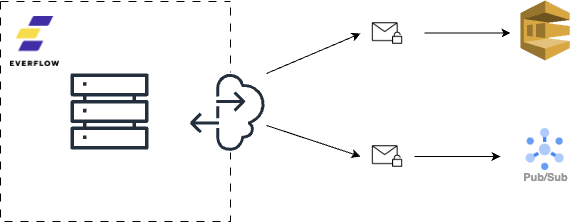
![](https://storage.googleapis.com/everflow-documentation/api/network/firehose.png)

The firehose publishes on your message queue

### Customization Options

The Firehose implementation is customizable per network:

*   Configurable payload structure
*   Include all raw query parameters from tracking events
*   Custom field mapping and data transformations
*   Filtering options for specific event types – you can decide to receive only a subset of your data

Here are examples of the payloads we can send for the different types of events : [click](https://storage.googleapis.com/everflow-documentation/api/network/firehose_click.json)
, [impression](https://storage.googleapis.com/everflow-documentation/api/network/firehose_impression.json)
, [conversion](https://storage.googleapis.com/everflow-documentation/api/network/firehose_conversion.json)
 and [conversion update](https://storage.googleapis.com/everflow-documentation/api/network/firehose_conversion_update.json)
.

### Key Benefits

The Firehose addresses several limitations of traditional API-based data retrieval:

*   **No Rate Limits**: All events are guaranteed to be delivered, regardless of volume
*   **Real-Time Processing**: Eliminate the need for polling intervals and complex scheduling
*   **Conversion Updates**: Automatically receive updates to conversion data as they occur without having to fetch past intervals
*   **Configurable Payload**: Get the payload that works for your use case
*   **Data Consistency**: Avoid challenges with time-based querying and potential data gaps
*   **Security**: Secure authentication with your cloud infrastructure, encrypted data transmission

### Implementation Process

To implement the Firehose for your network:

1.  Contact Everflow Support to initiate Firehose setup
2.  Provide your cloud infrastructure details (e.g., Google Cloud Pub/Sub topic or Amazon SQS queue)
3.  Work with our team to configure payload structure and any custom requirements
4.  Receive implementation documentation specific to your configuration
5.  Begin receiving real-time event data

Please contact Everflow Support to get started. Our team will work with you to determine the best configuration for your needs and guide you through the implementation process.

---

# Traffic Sources | Everflow

Traffic Sources
===============

Operations for traffic sources

Traffic sources are a powerful way of appending parameters and values to links for partners. You can find out more about traffic sources on the [Helpdesk](https://helpdesk.everflow.io/customer/how-to-create-link-templates-with-traffic-sources)
.

* * *

### Find All

GET `/v1/networks/trafficsource`

This endpoint can be used to fetch all active traffic sources.

| Value | Description |
| --- | --- |
| time\_created | The time at which the traffic source was created |
| time\_saved | The time at which the traffic source was last modified |

#### [Request Example](https://developers.everflow.io/docs/network/traffic_sources/#adacfdccda)

##### cURL

    curl --request GET 'https://api.eflow.team/v1/networks/trafficsource' \
    --header 'X-Eflow-API-Key: '
    

##### Response

    {
      "traffic_sources": [\
        {\
          "network_traffic_source_id": 1,\
          "network_id": 5,\
          "name": "Traffic Source 1",\
          "postback_url": "",\
          "time_created": 1494456354,\
          "time_saved": 1607456360,\
          "relationship": {\
            "parameters": {\
              "total": 1,\
              "entries": [\
                {\
                  "network_traffic_source_id": 1,\
                  "network_id": 5,\
                  "tracking_parameter": "param1",\
                  "tracking_value": "value1"\
                }\
              ]\
            }\
          },\
          "is_public": false\
        },\
        {\
          "network_traffic_source_id": 2,\
          "network_id": 5,\
          "name": "Traffic Source 2",\
          "postback_url": "https://www.postbackurl.com",\
          "time_created": 1716117495,\
          "time_saved": 1716117495,\
          "relationship": {\
            "parameters": {\
              "total": 2,\
              "entries": [\
                {\
                  "network_traffic_source_id": 2,\
                  "network_id": 5,\
                  "tracking_parameter": "param1",\
                  "tracking_value": "value1"\
                },\
                {\
                  "network_traffic_source_id": 2,\
                  "network_id": 5,\
                  "tracking_parameter": "param2",\
                  "tracking_value": "value2"\
                }\
          ]\
        }\
      },\
      "is_public": true\
    }\
    \
    \
\
* * *\
\
### Find By ID\
\
GET `/v1/networks/trafficsource/:trafficSourceId`\
\
This is the endpoint that will return a singular traffic source.\
\
#### Path Parameters\
\
| Parameter | Description |\
| --- | --- |\
| trafficSourceId | The ID of the traffic source you want to fetch |\
\
#### [Request Example](https://developers.everflow.io/docs/network/traffic_sources/#aacbbcdccf)\
\
##### cURL\
\
    curl --request GET 'https://api.eflow.team/v1/networks/trafficsource/1' \\
    --header 'X-Eflow-API-Key: '\
    \
\
##### Response\
\
     {\
      "network_traffic_source_id": 1,\
      "network_id": 5,\
      "name": "Traffic Source 1",\
      "postback_url": "",\
      "time_created": 1716117495,\
      "time_saved": 1716117495,\
      "relationship": {\
        "parameters": {\
          "total": 1,\
          "entries": [\
            {\
              "network_traffic_source_id": 1,\
              "network_id": 5,\
              "tracking_parameter": "param1",\
              "tracking_value": "value1"\
            }\
          ]\
        }\
      },\
      "is_public": false\
    }\
    \
\
* * *\
\
### Create\
\
POST `/v1/networks/trafficsource`\
\
#### [Request Body](https://developers.everflow.io/docs/network/traffic_sources/#cddbcbbbfc)\
\
#### Body Params\
\
name string\
\
Name of the traffic source.\
\
postback\_url string\
\
The affiliate IDs that will be affected by the traffic control (only relevant when `is_apply_all_affiliates` is set to `false`)\
\
is\_public boolean\
\
When this is true the affiliate will be able to select for this traffic source when generating tracking links.\
\
parameters object array\
\
An array which contains objects with the keys `tracking_parameter` and `tracking_value` which will store the parameters and values of this particular traffic source. Atleast one object is required in this array.\
\
tracking\_parameter string\
\
Parameter to be added to the traffic source\
\
tracking\_value string\
\
value that will be added to the parameter in the same object\
\
##### Body Example\
\
    {\
        "name": "traffic source 3",\
        "postback_url": "https://www.postbackurl.com",\
        "is_public": false,\
        "parameters": [\
            {\
                "tracking_parameter": "param1",\
                "tracking_value": "value1"\
            },\
            {\
                "tracking_parameter": "param2",\
                "tracking_value": "value2"\
            }\
        ]\
    }\
    \
\
#### [Request Example](https://developers.everflow.io/docs/network/traffic_sources/#bbdbddcfaf)\
\
##### cURL\
\
    curl --request POST 'https://api.eflow.team/v1/networks/trafficsource' \\
    --header 'X-Eflow-API-Key: ' \\
    --header 'Content-Type: application/json' \\
    --data ''\
    \
\
##### Response\
\
    {\
      "network_traffic_source_id": 3,\
      "network_id": 5,\
      "name": "traffic source 3",\
      "postback_url": "https://www.postbackurl.com",\
      "time_created": 1716486829,\
      "time_saved": 1716486829,\
      "relationship": {\
        "parameters": {\
          "total": 2,\
          "entries": [\
            {\
              "network_traffic_source_id": 3,\
              "network_id": 5,\
              "tracking_parameter": "param1",\
              "tracking_value": "value1"\
            },\
            {\
              "network_traffic_source_id": 3,\
              "network_id": 5,\
              "tracking_parameter": "param2",\
              "tracking_value": "value2"\
            }\
          ]\
        }\
      },\
      "is_public": false\
    }\
    \
\
* * *\
\
### Update\
\
PUT `/v1/networks/trafficsource`\
\
Update an existing traffic source.\
\
You **must** specify all the fields, not only the ones you wish to update.  \
If you omit a field that is not marked as required, its default value will be used.\
\
#### [Request Body](https://developers.everflow.io/docs/network/traffic_sources/#cdabbbcfbc)\
\
#### Body Params\
\
network\_traffic\_source\_id int\
\
The id of the traffic source you are trying to update.\
\
name string\
\
Name of the traffic source.\
\
postback\_url string\
\
The affiliate IDs that will be affected by the traffic control (only relevant when `is_apply_all_affiliates` is set to `false`)\
\
is\_public boolean\
\
When this is true the affiliate will be able to select for this traffic source when generating tracking links.\
\
parameters object array\
\
An array which contains objects with the keys `tracking_parameter` and `tracking_value` which will store the parameters and values of this particular traffic source. Atleast one object is required in this array.\
\
tracking\_parameter string\
\
Parameter to be added to the traffic source\
\
tracking\_value string\
\
value that will be added to the parameter in the same object\
\
##### Body Example\
\
    {\
      "network_traffic_source_id": 3,\
      "name": "traffic source 3",\
      "postback_url": "https://www.postbackurl.com",\
      "is_public": false,\
      "parameters": [\
        {\
          "network_traffic_source_id": 3,\
          "network_id": 5,\
          "tracking_parameter": "param1",\
          "tracking_value": "value1"\
        },\
        {\
          "network_traffic_source_id": 3,\
          "network_id": 5,\
          "tracking_parameter": "param2",\
          "tracking_value": "value2"\
        },\
        {\
          "network_traffic_source_id": 3,\
          "network_id": 5,\
          "tracking_parameter": "param3",\
          "tracking_value": "value3"\
        }\
      ]\
    }\
    \
\
#### [Request Example](https://developers.everflow.io/docs/network/traffic_sources/#fdfcdffbdc)\
\
##### cURL\
\
    curl --request PUT 'https://api.eflow.team/v1/networks/trafficsource' \\
    --header 'X-Eflow-API-Key: ' \\
    --header 'Content-Type: application/json' \\
    --data ''\
    \
\
##### Response\
\
    {\
        "network_traffic_source_id": 3,\
        "network_id": 5,\
        "name": "traffic source 3",\
        "postback_url": "https://www.postbackurl.com",\
        "time_created": 1716486829,\
        "time_saved": 1716487844,\
        "relationship": {\
            "parameters": {\
                "total": 3,\
                "entries": [\
                    {\
                        "network_traffic_source_id": 3,\
                        "network_id": 5,\
                        "tracking_parameter": "param1",\
                        "tracking_value": "value1"\
                    },\
                    {\
                        "network_traffic_source_id": 3,\
                        "network_id": 5,\
                        "tracking_parameter": "param2",\
                        "tracking_value": "value2"\
                    },\
                    {\
                        "network_traffic_source_id": 3,\
                        "network_id": 5,\
                        "tracking_parameter": "param3",\
                        "tracking_value": "value3"\
                    }\
                ]\
            }\
        },\
        "is_public": false\
    }\
    \
\
* * *\
\
### Delete\
\
DELETE `/v1/networks/trafficsource/:trafficSourceId`\
\
Delete an existing traffic source.\
\
#### Path Parameters\
\
| Parameter | Description |\
| --- | --- |\
| trafficSourceId | The ID of the traffic source you want to delete |\
\
#### [Request Example](https://developers.everflow.io/docs/network/traffic_sources/#bdecddafbb)\
\
##### cURL\
\
    curl --request DELETE 'https://api.eflow.team/v1/networks/trafficsource/1' \\
    --header 'X-Eflow-API-Key: '\
    \
\
##### Response\
\
    {\
      "success": true\
    }

---

# Affiliate Postback | Everflow

Affiliate Postback
==================

Operations to fetch the Affiliate Postback Report

In the endpoints documented here, each affiliate postback is a “row” in the response. The data is not aggregated.

* * *

### Affiliate Postback Report

POST `/v1/networks/reporting/affiliate/pixels`

This endpoint is used to extract a affiliate postbacks. In the result of this request, each postback will be one element / row. To avoid slow response times and limit the size of the payload, this endpoint is limited in what it actually returns.

The maximum number of postbacks that can be returned by this endpoint is : **1000**. If there are more than 1000 postbacks for the period / filters requested, they will not be returned. Please use the export streaming endpoint documented below which doesn’t have the same restriction.

Each request must contain :

*   `from` and `to` dates in either the `YYYY-mm-DD HH:MM:SS` or the `YYYY-mm-DD` format
*   `timezone_id` used for the request. Find all timezones [here](https://developers.everflow.io/docs/metadata/timezones/)
    

but can also contain optional query filters.

#### [Query Filters](https://developers.everflow.io/docs/network/reporting/affiliate_postback/#ededbbcfad)

Query filters allow you to limit the scope of the report returned by the API. You could create a filter to limit the reporting data to a single partner for example. You can use multiple filters in a request.

Filters that apply to the same `resource_type` will act as `OR` operator. Different `resource_type` work with an `AND` operator. The following filters :

    {
      //...
    	"query": {
    		"filters":[\
    			{\
    				"resource_type": "offer",\
    				"filter_id_value": "15"\
    			},\
    			{\
    				"resource_type": "offer",\
    				"filter_id_value": "18"\
    			},\
    			{\
    				"resource_type": "affiliate",\
    				"filter_id_value": "7"\
    			}\
    		]
    	}
    }
    

translate to “Pull all postback data for affiliate 7 on offers 15 and 18”.

#### [Filter Resource Types](https://developers.everflow.io/docs/network/reporting/affiliate_postback/#bbcadcddbb)

The `resource-type` used in the filters and exclusions can take the following values : `offer`, `affiliate` and `delivery_status`

The `delivery_status` can either be `success` or `failure`

#### [Request Example](https://developers.everflow.io/docs/network/reporting/affiliate_postback/#bccbdcaedb)

##### cURL

    curl --request POST \
      --url https://api.eflow.team/v1/networks/reporting/affiliate/pixels \
      --header 'content-type: application/json' \
      --header 'X-Eflow-API-Key: ' \
      --data ''
    

**Example 1** : Include postbacks for offer ID 11 that succeeded

    {
      "timezone_id": 90,
      "from": "2024-02-07",
      "to": "2024-02-08",
      "query":{
        "filters": [\
         {\
            "resource_type": "offer",\
            "filter_id_value": "11"\
          },\
          {\
            "resource_type": "delivery_status",\
            "filter_id_value": "success"\
          }\
        ]
      }
    }
    

##### Response

    {
      "pixels": [\
        {\
          "network_id": 1,\
          "network_offer_id": 11,\
          "network_offer_payout_revenue_id": 0,\
          "affiliate_id": 7,\
          "pixel_id": 132,\
          "conversion_id": "a3371dd7b36849cbbfdd9c300b06fdb5",\
          "transaction_id": "d5c6feef0d8f489fb91aa5cfb4d64f4e",\
          "timestamp": 1707425899,\
          "delivery_method": "postback",\
          "pixel_level": "global",\
          "pixel_status": "active",\
          "pixel_type": "conversion",\
          "payload": "https://httpbin.org/get?tid=d5c6feef0d8f489fb91aa5cfb4d64f4e",\
          "is_success": true,\
          "debug_information": "PostbackUrl: https://httpbin.org/get?tid=d5c6feef0d8f489fb91aa5cfb4d64f4e\nStatus: 200\nScheme: \nPath: \nAuthority: \nHeaders: Server: [gunicorn/19.9.0]",\
          "last_attempt": 0,\
          "failed_attempts": 0,\
          "relationship": {\
            "offer": {\
              "network_offer_id": 11,\
              "network_id": 1,\
              "network_advertiser_id": 13,\
              "network_offer_group_id": 0,\
              "name": "Example Offer",\
              "offer_status": "active",\
              "network_tracking_domain_id": 134,\
              "visibility": "public",\
              "currency_id": "USD"\
            },\
            "affiliate": {\
              "network_affiliate_id": 7,\
              "network_id": 1,\
              "name": "John Doe Inc.",\
              "account_status": "active",\
              "network_traffic_source_id": 0\
            }\
          }  \
        }\
      ]
    }
    

* * *

### Affiliate Postback Export

POST `/v1/networks/reporting/affiliate/pixels/export`

The table export is basically identical to the endpoint documented above, except that it lets you “export” the data in CSV or JSON format and doesn’t limit you to 1000 postbacks.

Please note that when using the JSON format, the results will be [newlined delimited JSON](https://en.wikipedia.org/wiki/JSON_streaming)
.

You must add the `format` properly to the payloads from the regular table endpoint for requests to work on this endpoint. The `format` can be either :

*   `csv`
*   `json`

#### [Example](https://developers.everflow.io/docs/network/reporting/affiliate_postback/#cfbbbcbefa)

    curl --request POST 'https://api.eflow.team/v1/networks/reporting/affiliate/pixels/export' \
    --header 'X-Eflow-API-Key: ' \
    --header 'Content-Type: application/json' \
    --data '{
      "timezone_id": 90,
      "from": "2024-02-07",
      "to": "2024-02-08",
      "query":{
        "filters": [\
         {\
            "resource_type": "offer",\
            "filter_id_value": "11"\
          },\
          {\
            "resource_type": "delivery_status",\
            "filter_id_value": "success"\
          }\
        ]
      },
      "format": "csv"
    }'

---

# Deals | Everflow

Deals
=====

Operations related to deals

Deals are optional in Everflow but can exist at the offer level. There can be 0, 1 or more deals associated with any given offer.

The deals will only be accessible on offers on which you can currently run traffic (i.e. not blocked and not pending approval on the offer).

### The “Deals” Object

Though different versions of the deals object are returned by the endpoints documented here, it can be defined as such :

#### [Body Fields](https://developers.everflow.io/docs/affiliate/deals/#cffddccbdc)

network\_advertiser\_deal\_id int

The deal’s unique identifier

network\_id int

The identifier of the network associated with the deal

name string

The name of the deal as defined by the network

brand\_name string

The name of the brand the deal is associated with. This is currently optional.

deal\_type string

The deal type will be one of the following values : `coupon`, `freeshipping`, `category_coupon`, `category_sale`, `product_coupon`, `product_sale`, `rebates`, `clearance`, `sale`, `offer`, `shipping_offer`, `newcustomer`, `gift`, `dollar`, `percent`, `dod`, `apofreeshipping`, `totallyfreeshipping`, `mobile`, `printable`, `fmtc_exclusive`, `local`, `friends_family`, `revtrax`, `bogo`, `category` or `free_trial`

deal\_status string

The deal status will be one of the following values : `active`, `inactive` or `deleted`

deal\_categories string array

There must be at least one category (but there can be multiple) in the following values :

#### [Deal Categories](https://developers.everflow.io/docs/affiliate/deals/#dbcafabcde)

`alcohol-beer`, `alcohol-beer-home-brewing`, `alcohol-beer-liquor-spirits`, `alcohol-beer-wine`, `animals-pet-supplies`, `animals-pet-supplies-bird-supplies`, `animals-pet-supplies-cat-supplies`, `animals-pet-supplies-dog-supplies`, `animals-pet-supplies-horse-supplies`, `arts-entertainment`, `arts-entertainment-event-tickets`, `arts-entertainment-event-tickets-adult-entertainment`, `arts-entertainment-hobbies-creative-arts`, `arts-entertainment-party-supplies`, `auctions`, `b2b`, `b2b-advertising-marketing`, `b2b-construction`, `b2b-food-service`, `b2b-janitorial`, `b2b-medical`, `b2b-retail`, `b2b-signage`, `b2b-web-hosting-domains`, `b2b-work-safety`, `babies-kids`, `babies-kids-baby-health`, `babies-kids-baby-safety`, `Babies-kids-baby-toys-activity-equipment`, `babies-kids-car-seats-carriers-strollers`, `babies-kids-diapering`, `babies-kids-nursing-feeding`, `babies-kids-potty-training`, `charity`, `clothing-apparel`, `clothing-apparel-accessories`, `clothing-apparel-baby-kids`, `clothing-apparel-costumes`, `clothing-apparel-men`, `clothing-apparel-women`, `clothing-apparel-work-uniforms`, `computers-accessories`, `computers-accessories-accessories`, `computers-accessories-data-storage`, `computers-accessories-desktops`, `computers-accessories-input-devices`, `computers-accessories-laptops`, `computers-accessories-monitors`, `computers-accessories-networking-products`, `computers-accessories-print-copy-scan-fax`, `computers-accessories-servers`, `computers-accessories-software`, `computers-accessories-tablets`, `consumer-electronics`, `consumer-electronics-audio`, `consumer-electronics-batteries`, `consumer-electronics-camera-optics`, `consumer-electronics-drones`, `consumer-electronics-ereaders`, `consumer-electronics-electronics-accessories`, `consumer-electronics-gps`, `consumer-electronics-home-security-systems`, `consumer-electronics-projectors`, `consumer-electronics-smart-home-devices`, `consumer-electronics-smart-watches`, `consumer-electronics-telephony`, `consumer-electronics-video`, `consumer-electronics-video-game-consoles-games`, `consumer-electronics-video-players-recorders`, `consumer-services`, `consumer-services-box-subscriptions`, `consumer-services-dating`, `consumer-services-internet-services`, `consumer-services-photo-canvas-services`, `consumer-services-tarot-readings-psychics`, `covid-related`, `curbside-pickup`, `department-stores`, `education`, `education-college`, `education-online-courses`, `education-school-supplies`, `erotic`, `erotic-books-magazines`, `erotic-clothing`, `erotic-dvds`, `erotic-games`, `erotic-sex-toys`, `financial`, `financial-credit-cards`, `financial-id-protection`, `financial-insurance`, `financial-legal`, `financial-loans`, `financial-tax-services`, `food-gourmet`, `food-gourmet-food-beverage`, `food-gourmet-restaurants`, `gambling`, `gifts`, `gifts-flowers`, `gifts-gift-baskets`, `gifts-gift-certificates`, `gifts-greeting-cards-stationery`, `gifts-personalized-gifts`, `gifts-photo-gifts`, `green-living-ecofriendly`, `group-discount`, `group-discount-age-segment-discount`, `group-discount-alumni-discount`, `group-discount-corporate-discount`, `group-discount-first-responder-discount`, `group-discount-healthcare-worker-discount`, `group-discount-hero-discount`, `group-discount-military-discount`, `group-discount-student-discount`, `group-discount-teacher-discount`, `hardware`, `hardware-building-supplies`, `hardware-tools`, `health-beauty`, `health-beauty-beauty-cosmetics`, `health-beauty-contacts-glasses`, `health-beauty-diet-fitness`, `health-beauty-fragrance-cologne`, `health-beauty-health-care`, `health-beauty-health-care-cdb`, `health-beauty-personal-care`, `health-beauty-vitamins-supplements`, `holidays-occasions`, `holidays-occasions-4th-of-july`, `holidays-occasions-april-fools-day`, `holidays-occasions-australia-day`, `holidays-occasions-back-to-school`, `holidays-occasions-black-friday`, `holidays-occasions-black-friday-in-july`, `holidays-occasions-boxing-day`, `holidays-occasions-canada-day`, `holidays-occasions-chinese-new-year`, `holidays-occasions-christmas`, `holidays-occasions-christmas-in-july`, `holidays-occasions-cinco-de-mayo`, `holidays-occasions-columbus-day`, `holidays-occasions-cyber-monday`, `holidays-occasions-earth-day`, `holidays-occasions-easter`, `holidays-occasions-fathers-day`, `holidays-occasions-free-shipping-day`, `holidays-occasions-giving-tuesday`, `holidays-occasions-graduation`, `holidays-occasions-green-monday`, `holidays-occasions-halloween`, `holidays-occasions-hanukkah`, `holidays-occasions-labor-day`, `holidays-occasions-leap-day`, `holidays-occasions-mardi-gras`, `holidays-occasions-martin-luther-king-day`, `holidays-occasions-memorial-day`, `holidays-occasions-mothers-day`, `holidays-occasions-new-years`, `holidays-occasions-pink-ribbon-shop`, `holidays-occasions-presidents-day`, `holidays-occasions-pride-day`, `holidays-occasions-prom`, `holidays-occasions-singles-day`, `holidays-occasions-st-patricks-day`, `holidays-occasions-tax-day`, `holidays-occasions-thanksgiving`, `holidays-occasions-valentines-day`, `holidays-occasions-veterans-day`, `holidays-occasions-weddings`, `household`, `household-appliances`, `household-bed-bath`, `household-furniture`, `household-home-decor`, `household-kitchen-dining`, `household-lighting`, `household-rugs-flooring`, `household-storage-and-organization`, `household-supplies`, `household-yard-garden`, `kids`, `local-deals`, `local-deals-apparel`, `local-deals-automotive`, `local-deals-babies-kids`, `local-deals-beauty-spas`, `local-deals-cannabis`, `local-deals-computers-electronics`, `local-deals-education`, `local-deals-entertainment`, `local-deals-financial`, `local-deals-food-drink`, `local-deals-gifts`, `local-deals-health-wellness`, `local-deals-holiday`, `local-deals-home-services`, `local-deals-jewelry`, `local-deals-legal-services`, `local-deals-nightlife`, `local-deals-pets`, `local-deals-photography`, `local-deals-professional-services`, `local-deals-public-services`, `local-deals-real-estate`, `local-deals-shopping`, `local-deals-sports-recreation`, `local-deals-travel`, `luggage-bags`, `luggage-bags-backpacks`, `media`, `media-books-magazines`, `media-movies`, `media-music`, `mens`, `office`, `office-equipment`, `office-furniture`, `office-school-supplies`, `office-supplies`, `sporting-goods`, `sporting-goods-athletics`, `sporting-goods-dance-gymnastics`, `sporting-goods-exercise-fitness`, `sporting-goods-indoor-games`, `sporting-goods-lacrosse`, `sporting-goods-outdoor-recreation`, `tobacco`, `tobacco-cigars`, `tobacco-ecigarettes-vaporizers`, `toys-games`, `toys-games-card-games`, `toys-games-games`, `toys-games-outdoor-play-equipment`, `toys-games-puzzles`, `toys-games-toys`, `toys-games-video-games`, `travel`, `travel-air`, `travel-car-rental`, `travel-cruises`, `travel-hotel`, `travel-vacation-packages`, `vehicles-parts`, `vehicles-parts-motor-vehicle-electronics`, `vehicles-parts-motor-vehicle-parts`, `vehicles-parts-vehicle-insurance`, `vehicles-parts-vehicle-maintenance-care-decor`, `vehicles-parts-vehicle-safety-security`, `vehicles-parts-vehicle-storage-cargo`, `vehicles-parts-watercraft-parts-accessories`, `weapons`, `womens`

description string

Optional deal description

restrictions string

Optional restrictions on the deal (expressed as free text)

scope string

The deal scope can be one of the following : `entire_store`, `category` or `product`

coupon\_code string

An optional coupon code associated with the deal

coupon\_code\_discount\_percentage int

Only relevant if a coupon code is specified. The coupon code will either be a percentage discount or an amount discount but cannot be both

coupon\_code\_discount\_amount int

Only relevant if a coupon code is specified. The coupon code will either be a percentage discount or an amount discount but cannot be both

coupon\_code\_discount\_currency\_id string

Only relevant if a coupon code is specified. The currency specified here is associated with the `coupon_code_discount_amount`

threshold\_quantity int

An optional quantity required to trigger the deal. The threshold can be either an amount or a quantity but cannot be both.

threshold\_amount int

An optional amount required to trigger the deal. The threshold can be either an amount or a quantity but cannot be both.

threshold\_amount\_currency\_id string

Only relevant if a `threshold_amount` is specified. The currency specified here is associated with the `threshold_amount`

purchase\_limit\_quantity int

An optional quantity limit associated with the deal. The limit can be either an amount or a quantity but cannot be both.

purchase\_limit\_amount int

An optional amount limit associated with the deal. The limit can be either an amount or a quantity but cannot be both.

purchase\_limit\_amount\_currency\_id string

Only relevant if a `purchase_limit_amount` is specified. The currency specified here is associated with the `purchase_limit_amount`

date\_valid\_from int

Certain deals are only valid for a given period of time. An optional unix timestamp that expresses the date after which the deal becomes valid.

date\_valid\_to int

Certain deals are only valid for a given period of time. An optional unix timestamp that expresses the date after which the deal has ended.

date\_valid\_timezone\_id int

Only relevant if `date_valid_from` or `date_valid_to` are specified. Since both are expressed as unix timestamps via the API this field is not overly relevant in the API. However, it determines how the date is displayed in the UI and can be used as such here.

* * *

### Get Offer Deals

GET `/v1/affiliates/offers/:offerId/deals`

This endpoint allows you to fetch the deals associated with an offer if they exist.

Returns an empty array if no deals exist.

Note that the `date_valid_from` and `date_valid_to` fields are optional and expressed as unix timestamps. They will be set to `0` if they are not specified.

#### [Request Example](https://developers.everflow.io/docs/affiliate/deals/#accffcbcdb)

##### cURL

    curl --request GET 'https://api.eflow.team/v1/offers//deals' \
    --header 'X-Eflow-API-Key: ' \
    --header 'content-type: application/json'
    

##### Response

    {
    	"deals": [\
    		{\
    			"network_advertiser_deal_id": 1,\
    			"network_id": 1,\
    			"name": "Example Deal",\
    			"brand_name": "Some brand",\
    			"deal_type": "coupon",\
    			"deal_status": "active",\
    			"deal_categories": [\
    				"computers-accessories-tablets",\
    				"computers-accessories-software",\
    				"computers-accessories-servers"\
    			],\
    			"description": "The description of the deal",\
    			"restrictions": "Some Restrictions (in free text)",\
    			"scope": "entire_store",\
    			"coupon_code": "SUMMER23",\
    			"coupon_code_discount_percentage": 0,\
    			"coupon_code_discount_amount": 20,\
    			"coupon_code_discount_currency_id": "USD",\
    			"threshold_quantity": 0,\
    			"threshold_amount": 1000,\
    			"threshold_amount_currency_id": "USD",\
    			"purchase_limit_quantity": 0,\
    			"purchase_limit_amount": 0,\
    			"purchase_limit_amount_currency_id": "",\
    			"date_valid_from": 1690304400,\
    			"date_valid_to": 0,\
    			"date_valid_timezone_id": 80,\
    			"relationship": {},\
    			"time_saved": 1690302358,\
    			"time_created": 1690301385,\
    			"time_deleted": 0\
    		}\
    	]
    }
    

* * *

### Get All Deals

POST `/v1/affiliates/deals`

This endpoint allows you to fetch all deals available, with an optional filter of the offer ids.

Returns an empty array if no deals exist.

#### Paging

This endpoint supports paging. Refer to our [User Guide](https://developers.everflow.io/docs/user-guide/paging/)
 for usage.

#### [Body Params](https://developers.everflow.io/docs/affiliate/deals/#aabccdbadb)

filters object

[View Object Details Hide Object Details](https://developers.everflow.io/docs/affiliate/deals/#filters)

network\_offer\_ids int array

An optional array of offers IDs for which you would like the deals returned.

#### [Request Example](https://developers.everflow.io/docs/affiliate/deals/#bbedcfeadd)

##### cURL

    curl --request GET 'https://api.eflow.team/v1/affiliates/deals' \
    --header 'X-Eflow-API-Key: ' \
    --header 'content-type: application/json'
    

**Example 1** : Fetch all deals related to offers with IDs 1 and 2

    {
      "filters": {
        "network_offer_ids": [1, 2]
      }
    }
    

##### Response

    {
    	"deals": [\
    		{\
    			"network_advertiser_deal_id": 1,\
    			"network_id": 1,\
    			"name": "Example Deal",\
    			"brand_name": "Some brand",\
    			"deal_type": "coupon",\
    			"deal_status": "active",\
    			"deal_categories": [\
    				"computers-accessories-tablets",\
    				"computers-accessories-software",\
    				"computers-accessories-servers"\
    			],\
    			"description": "The description of the deal",\
    			"restrictions": "Some Restrictions (in free text)",\
    			"scope": "entire_store",\
    			"coupon_code": "SUMMER23",\
    			"coupon_code_discount_percentage": 0,\
    			"coupon_code_discount_amount": 20,\
    			"coupon_code_discount_currency_id": "USD",\
    			"threshold_quantity": 0,\
    			"threshold_amount": 1000,\
    			"threshold_amount_currency_id": "USD",\
    			"purchase_limit_quantity": 0,\
    			"purchase_limit_amount": 0,\
    			"purchase_limit_amount_currency_id": "",\
    			"date_valid_from": 1690304400,\
    			"date_valid_to": 0,\
    			"date_valid_timezone_id": 80,\
    			"has_products": true,\
    			"has_locations": true,\
    			"relationship": {\
    				"deal_resources": [\
    					{\
    						"network_advertiser_deal_resource_id": 2,\
    						"network_advertiser_deal_id": 1,\
    						"resource_type": "thumbnail",\
    						"html_code": "",\
    						"width": 0,\
    						"height": 0,\
    						"relationship": {\
    							"assets": [\
    								{\
    									"network_asset_id": 2,\
    									"content_type": "image/png",\
    									"filename": "thumb.png",\
    									"url": "http://usercontent.everflowclient.io/1/advertisers/1/deal/5/resources/thumb.png",\
    									"file_size": 11516,\
    									"image_width": 0,\
    									"image_height": 0,\
    									"optimized_thumbnail_url": ""\
    								}\
    							]\
    						}\
    					},\
    					{\
    						"network_advertiser_deal_resource_id": 1,\
    						"network_advertiser_deal_id": 1,\
    						"resource_type": "image",\
    						"html_code": "",\
    						"width": 0,\
    						"height": 0,\
    						"relationship": {\
    							"assets": [\
    								{\
    									"network_asset_id": 1,\
    									"content_type": "image/png",\
    									"filename": "slack-preview.png",\
    									"url": "http://usercontent-dev.everflowclient.io/1/advertisers/1/deal/5/resources/some-image.png",\
    									"file_size": 274508,\
    									"image_width": 0,\
    									"image_height": 0,\
    									"optimized_thumbnail_url": ""\
    								}\
    							]\
    						}\
    					}\
    				],\
    				"offers": [\
    					{\
    						"network_offer_id": 1,\
    						"network_id": 1,\
    						"name": "Example Offer",\
    						"offer_status": "active",\
    						"tracking_url": "http://www.tracking-link.test/9W598/2CTPL/",\
    						"redirect_tracking_url": "",\
    						"impression_tracking_url": ""\
    					},\
    					{\
    						"network_offer_id": 2,\
    						"network_id": 1,\
    						"name": "Other offer",\
    						"offer_status": "active",\
    						"tracking_url": "http://www.tracking-link.test/9W598/3QQG7/",\
    						"redirect_tracking_url": "",\
    						"impression_tracking_url": ""\
    					}\
    				],\
    			},\
    			"time_saved": 1694616132,\
    			"time_created": 1694616132,\
    			"time_deleted": 0\
    		}\
    	],
    	"paging": {
    		"page": 1,
    		"page_size": 50,
    		"total_count": 1
    	}
    }
    

* * *

### Get Offer Deal by ID

GET `/v1/affiliates/offers/:offerId/deals/:dealId`

This endpoint allows you to fetch a specific offer deal.

Note that the `date_valid_from` and `date_valid_to` fields are optional and expressed as unix timestamps. They will be set to `0` if they are not specified.

#### Relationships

This endpoint supports the following additional relationships. Refer to our [User Guide](https://developers.everflow.io/docs/user-guide/relationships/)
 for usage.

| Value | Description |
| --- | --- |
| locations | Includes the deal’s locations (if any) in the response |
| products | Includes the deal’s products (if any) in the response |
| resources | Includes the deal’s resources (if any) in the response |
| trackings | Includes the offer’s tracking link in the response |

#### [Request Example](https://developers.everflow.io/docs/affiliate/deals/#dabdbcbbca)

##### cURL

    curl --request GET 'https://api.eflow.team/v1/offers//deals/?relationship=locations&relationship=resources&relationship=trackings' \
    --header 'X-Eflow-API-Key: ' \
    --header 'content-type: application/json'
    

##### Response

    {
    	"network_advertiser_deal_id": 1,
    	"network_id": 1,
    	"name": "Example Deal",
    	"brand_name": "Some brand",
    	"deal_type": "coupon",
    	"deal_status": "active",
    	"deal_categories": [\
    		"computers-accessories-tablets",\
    		"computers-accessories-software",\
    		"computers-accessories-servers"\
    	],
    	"description": "Public Description",
    	"restrictions": "Restrictions (free text)",
    	"scope": "entire_store",
    	"coupon_code": "SUMMER23",
    	"coupon_code_discount_percentage": 0,
    	"coupon_code_discount_amount": 20,
    	"coupon_code_discount_currency_id": "USD",
    	"threshold_quantity": 0,
    	"threshold_amount": 1000,
    	"threshold_amount_currency_id": "USD",
    	"purchase_limit_quantity": 0,
    	"purchase_limit_amount": 0,
    	"purchase_limit_amount_currency_id": "",
    	"date_valid_from": 1690304400,
    	"date_valid_to": 0,
    	"date_valid_timezone_id": 80,
    	"relationship": {
    		"deal_locations": [\
    			{\
    				"network_advertiser_deal_location_id": 4,\
    				"network_advertiser_deal_id": 1,\
    				"business_name": "Example business",\
    				"street_adress": "",\
    				"extended_address": "",\
    				"city": "",\
    				"region_id": 0,\
    				"country_id": 0,\
    				"postal_code": "",\
    				"business_website": "www.example-biz.net"\
    			}\
    		],
    		"deal_products": [\
    			{\
    				"network_advertiser_deal_product_id": 6,\
    				"network_advertiser_deal_id": 1,\
    				"product_name": "Server",\
    				"product_url": "www.example.test/server",\
    				"before_discount_price": 549,\
    				"after_discount_price": 399,\
    				"retail_price": 599,\
    				"discount_percentage": 0,\
    				"price_currency_id": "USD"\
    			},\
    			{\
    				"network_advertiser_deal_product_id": 5,\
    				"network_advertiser_deal_id": 1,\
    				"product_name": "Monitor",\
    				"product_url": "www.example.test/monitor",\
    				"before_discount_price": 379,\
    				"after_discount_price": 299,\
    				"retail_price": 399,\
    				"discount_percentage": 0,\
    				"price_currency_id": "USD"\
    			}\
    		],
    		"deal_resources": [\
    			{\
    				"network_advertiser_deal_resource_id": 1,\
    				"network_advertiser_deal_id": 1,\
    				"resource_type": "image",\
    				"html_code": "",\
    				"width": 200,\
    				"height": 300,\
    				"relationship": {\
    					"assets": [\
    						{\
    							"network_asset_id": 2,\
    							"content_type": "image/jpeg",\
    							"filename": "d5a38e62-4da3-424f-a5d1-64e9b6c2f934.jpeg",\
    							"url": "http://usercontent.everflowclient.io/1/advertisers/1/deal/0/resources/d5a38e62-4da3-424f-a5d1-64e9b6c2f934.jpeg",\
    							"file_size": 574359,\
    							"image_width": 200,\
    							"image_height": 300,\
    							"optimized_thumbnail_url": ""\
    						}\
    					]\
    				}\
    			}\
    		],
    		"tracking_url": "http://www.servetrack.test/9W598/55M6S/"
    	},
    	"time_saved": 1690306387,
    	"time_created": 1690301385,
    	"time_deleted": 0
    }

---

# Advertiser API | Everflow

Advertiser API
==============

Reference documentation for the Advertiser API

* * *

##### [Offers](https://developers.everflow.io/docs/advertiser/offers/)

Operations for offers

##### [Reporting](https://developers.everflow.io/docs/advertiser/reporting/)

Operations for reporting

---

# Traffic | Everflow

Traffic
=======

Operations for traffic

* * *

### Find All Blocked Offer Sources

GET `/v1/affiliates/trafficblocking`

This endpoint allows you to retrieve a list of all offer/sub combinations that are blocked.

Returns an empty array if no combination exist.

#### Filters

This endpoint supports basic filtering. Refer to [API filters](https://developers.everflow.io/docs/user-guide/api_filters/)
 page for usage.

| Value | Description |
| --- | --- |
| network\_offer\_id | Filter based on the offer id |
| traffic\_blocking\_status | Filter based on the traffic blocking status |
| time\_created | Filter based on the creation time |
| time\_saved | Filter based on the last update time |

#### [Request Example](https://developers.everflow.io/docs/affiliate/traffic/#abcdbfbbcd)

##### cURL

    curl --request GET 'https://api.eflow.team/v1/affiliates/trafficblocking' \
    --header 'X-Eflow-API-Key: ' \
    --header 'content-type: application/json'
    

##### Response

     {
      "traffic_blocking": [\
        {\
          "network_offer_id": 0,\
          "relationship": {\
            "variables": {\
              "total": 0,\
              "entries": [\
                {\
                  "comparison_method": "begins_with",\
                  "variable": "",\
                  "variable_value": ""\
                }\
              ]\
            }\
          }\
        }\
      ]
    }
    

* * *

### Find All Traffic Controls

GET `/v1/affiliates/trafficcontrols`

This endpoint allows you to retrieve a list of all the traffic controls that are affecting your offers.

To retrieve the values, use the endpoint with the specific traffic control Id.

Returns an empty array if no traffic control exist.

#### [Request Example](https://developers.everflow.io/docs/affiliate/traffic/#becabcfeba)

##### cURL

    curl --request GET 'https://api.eflow.team/v1/affiliates/trafficcontrols' \
    --header 'X-Eflow-API-Key: ' \
    --header 'content-type: application/json'
    

##### Response

    {
        "traffic_controls": [\
            {\
                "network_traffic_control_id": 1,\
                "status": "active",\
                "is_apply_all_offers": true,\
                "control_type": "blacklist",\
                "date_valid_from": "",\
                "date_valid_to": "",\
                "comparison_method": "contains",\
                "variables": [],\
                "relationship": {}\
            }\
        ]
    }
    

* * *

### Find Traffic Control By ID

GET `/v1/affiliates/trafficcontrols/:controlId`

This endpoint allows you to retrieve a traffic control, by Id, that is affecting your offers.

Returns HTTP code 404 if the traffic control doesn’t exist.

#### Path Parameters

| Parameter | Description |
| --- | --- |
| controlId | The ID of the traffic control you want to fetch |

#### [Request Example](https://developers.everflow.io/docs/affiliate/traffic/#cbcddadcbe)

##### cURL

    curl --request GET 'https://api.eflow.team/v1/affiliates/trafficcontrols/' \
    --header 'X-Eflow-API-Key: ' \
    --header 'content-type: application/json'
    

##### Response

    {
        "traffic_controls": [\
            {\
                "network_traffic_control_id": 1,\
                "status": "active",\
                "is_apply_all_offers": true,\
                "control_type": "blacklist",\
                "date_valid_from": "",\
                "date_valid_to": "",\
                "comparison_method": "contains",\
                "variables": [],\
                "relationship": {}\
            }\
        ]
    }
    

* * *

### Find All Blocked Variables

POST `/v1/affiliates/blockedvariables`

This endpoint list all the variables that are blocking the traffic.

This endpoint includes the values that are blocked at the moment and the ones that were blocked during the selected time interval.

#### [Body Params](https://developers.everflow.io/docs/affiliate/traffic/#cdabbefaec)

network\_offer\_id int

The offer with block variables.

timezone\_id int

Refer to [Meta/Timezones](https://developers.everflow.io/docs/metadata/timezones/)
 for supported timezones.

from string

YYYY-MM-DD or YYYY-MM-DD HH:mm:SS.

to string

YYYY-MM-DD or YYYY-MM-DD HH:mm:SS.

#### [Payload Example](https://developers.everflow.io/docs/affiliate/traffic/#cbafbddced)

    {
      "from": "",
      "to": "",
      "timezone_id": 90,
      "network_offer_id": 1
    }
    

#### [Request Example](https://developers.everflow.io/docs/affiliate/traffic/#ecfdcdccef)

##### cURL

    curl --request POST \
      --url 'https://api.eflow.team/v1/affiliates/blockedvariables' \
      --header 'x-eflow-api-key: ' \
      --header 'content-type: application/json' \
      --data ''
    

##### Response

    {
        "variables": [\
            {\
                "variable": "source_id",\
                "value": "test",\
                "operator": "contains"\
            }\
        ]
    }

---

# API Keys | Everflow

API Keys
========

Operations for affiliate API Keys

Partners have one or multiple marketplace connections with different brands / networks. For each connection, an affiliate account exists on the brand / network’s Everflow account.

The endpoint documented here allows a partner to fetch all the affiliate API keys associated with their different connections (an affiliate API key will exist for each connection).

* * *

### Get All API keys

GET `/v1/partners/connections/apikeys/list`

This endpoint allows you to fetch the API keys associated with each connection that exsits.

The API keys returned here can then be used on the affiliate API to execute calls for a specific connection (or for all of them in a loop).

Although the endpoint returns keys for the affiliate API, a Marketplace API key must be used to _make_ the call

#### [Request Example](https://developers.everflow.io/docs/partner/api_keys/#fcdacfdcdc)

##### cURL

    curl --request GET 'https://api.eflow.team/v1/partners/connections/apikeys/list' \
    --header 'X-Eflow-API-Key: ' \
    --header 'content-type: application/json' 
    

##### Response

    {
      "keys": [\
        {\
          "advertiser_id": 1,\
          "advertiser_name": "Some Brand",\
          "api_key": "...."\
        },\
        {\
          "advertiser_id": 5,\
          "advertiser_name": "Some Other Brand",\
          "api_key": "...."\
        }\
      ]
    }

---

# Connection Types | Everflow

Connection Types
================

Connection Types

* * *

### Find All

GET `/v1/meta/connectiontypes`

Connection types are used to narrow down the targeting of your offers, campaigns, custom settings, etc.

They are limited to `wifi` and `mobile`.

#### [Request Example](https://developers.everflow.io/docs/metadata/connection_types/#aebcfadddc)

##### cURL

    curl --request GET 'https://api.eflow.team/v1/meta/connectiontypes' \
    --header 'X-Eflow-API-Key: '
    

##### Response

    {
        "connection_types": [\
            {\
                "connection_type_id": 1,\
                "name": "wifi"\
            },\
            {\
                "connection_type_id": 2,\
                "name": "mobile"\
            }\
        ]
    }

---

# Product Feeds | Everflow

Product Feeds
=============

Operations related to product feeds

Product feeds are optional in Everflow but can exist at the offer level. There can be 0, 1 or more product feeds associated with any given offer.

The product feeds will only be accessible on offers on which you can currently run traffic (i.e. not blocked and not pending approval on the offer).

* * *

### Get Offer Product Feeds

GET `/v1/affiliates/offers/:offerId/productfeeds`

This endpoint allows you to fetch the product feeds associated with an offer if they exist.

Returns an empty array if no product feeds exist.

Note that the `date_valid_from` and `date_valid_to` fields are optional and expressed as unix timestamps. They will be set to `0` if they are not specified.

This does not return the contents of the product feeds, only the metadata associated with it. See the endpoints documented below if the contents of the product feed is needed.

#### [Request Example](https://developers.everflow.io/docs/affiliate/product_feed/#adaddcbcbf)

##### cURL

    curl --request GET 'https://api.eflow.team/v1/offers//productfeeds' \
    --header 'X-Eflow-API-Key: ' \
    --header 'content-type: application/json'
    

##### Response

    {
      "product_feeds": [\
        {\
          "network_advertiser_product_feed_id": 4,\
          "network_id": 1,\
          "network_advertiser_id": 13,\
          "name": "Example Feed",\
          "status": "active",\
          "file_asset_id": 7,\
          "date_valid_from": 1684072800,\
          "date_valid_to": 1693490400,\
          "date_valid_timezone_id": 80,\
          "relationship": {\
            "document_file_asset": {\
              "network_asset_id": 7,\
              "content_type": "text/csv",\
              "filename": "product-feed.csv",\
              "url": "http://usercontent.everflowclient.io/path/to/product-feed.csv",\
              "file_size": 63702,\
              "image_width": 0,\
              "image_height": 0,\
              "optimized_thumbnail_url": ""\
            }\
          },\
          "time_saved": 1683641508,\
          "time_created": 1683577762\
        }\
      ]
    }
    

* * *

### Get All Product Feeds

POST `/v1/affiliates/productfeeds`

This endpoint allows you to fetch all product feeds available, with an optional filter of the offer ids.

Returns an empty array if no product feeds exist.

#### Paging

This endpoint supports paging. Refer to our [User Guide](https://developers.everflow.io/docs/user-guide/paging/)
 for usage.

#### [Body Params](https://developers.everflow.io/docs/affiliate/product_feed/#fbdddadabd)

filters object

[View Object Details Hide Object Details](https://developers.everflow.io/docs/affiliate/product_feed/#filters)

network\_offer\_ids int array

An optional array of offers IDs for which you would like the product feeds returned.

#### [Request Example](https://developers.everflow.io/docs/affiliate/product_feed/#ecbcfdcccb)

##### cURL

    curl --request POST 'https://api.eflow.team/v1/affiliates/productfeeds' \
    --header 'X-Eflow-API-Key: ' \
    --header 'content-type: application/json' \
    --data ''
    

**Example 1** : Fetch all product feeds related to offers with IDs 1 and 2

    {
      "filters": {
        "network_offer_ids": [1, 2]
      }
    }
    

##### Response

    {
      "product_feeds": [\
        {\
          "network_advertiser_product_feed_id": 1,\
          "network_id": 1,\
          "network_advertiser_id": 13,\
          "name": "Example Product Feed 1",\
          "status": "active",\
          "file_asset_id": 1,\
          "date_valid_from": 0,\
          "date_valid_to": 0,\
          "date_valid_timezone_id": 90,\
          "relationship": {\
            "document_file_asset": {\
              "network_asset_id": 1,\
              "content_type": "text/csv",\
              "filename": "pf1.csv",\
              "url": "http://usercontent.everflowclient.io/1/advertisers/13/productfeed/pf1.csv",\
              "file_size": 58,\
              "image_width": 0,\
              "image_height": 0,\
              "optimized_thumbnail_url": ""\
            },\
            "offers": [\
              {\
                "network_offer_id": 1,\
                "network_id": 1,\
                "name": "Example Offer",\
                "offer_status": "active"\
              },\
              {\
                "network_offer_id": 2,\
                "network_id": 1,\
                "name": "Other Offer",\
                "offer_status": "active"\
              }\
            ]\
          },\
          "time_saved": 1694612016,\
          "time_created": 1694612016\
        }\
      ],
      "paging": {
        "page": 1,
        "page_size": 50,
        "total_count": 1
      }
    }
    

* * *

### Get Offer Product Feed by ID

GET `/v1/affiliates/offers/:offerId/productfeeds/:productFeedId`

This endpoint allows you to fetch a specific product feed.

Note that the `date_valid_from` and `date_valid_to` fields are optional and expressed as unix timestamps. They will be set to `0` if they are not specified.

This does not automatically return the contents of the product feed, only the metadata associated with it. The contents of the product feed is either accessible via the endpoint when requesting the relationship, or via the 2 download endpoints documented below.

#### Relationships

This endpoint supports the following additional relationships. Refer to our [User Guide](https://developers.everflow.io/docs/user-guide/relationships/)
 for usage.

| Value | Description |
| --- | --- |
| product\_feed\_item | Includes the product feed’s items in the response |

#### [Request Example](https://developers.everflow.io/docs/affiliate/product_feed/#baffdacadc)

##### cURL

    curl --request GET 'https://api.eflow.team/v1/offers//productfeeds/' \
    --header 'X-Eflow-API-Key: ' \
    --header 'content-type: application/json'
    

##### Response

    {
      "network_advertiser_product_feed_id": 4,
      "network_id": 1,
      "network_advertiser_id": 13,
      "name": "Example feed",
      "status": "active",
      "file_asset_id": 7,
      "date_valid_from": 1684072800,
      "date_valid_to": 1693490400,
      "date_valid_timezone_id": 80,
      "relationship": {
        "document_file_asset": {
          "network_asset_id": 7,
          "content_type": "text/csv",
          "filename": "product-feed.csv",
          "url": "http://usercontent.everflowclient.io/path/to/product-feed.csv",
          "file_size": 63702,
          "image_width": 0,
          "image_height": 0,
          "optimized_thumbnail_url": ""
        }
      },
      "time_saved": 1683641508,
      "time_created": 1683577762
    }
    

* * *

### Download Product Feed contents by ID (standard)

GET `/v1/affiliates/offers/:offerId/productfeeds/:productFeedId/download`

This endpoint allows you to download the contents of the product feed.

This endpoint will return the CSV file directly, you can therefore expect a `Content-Type` header of `text/csv` (unless there is an error in the request).

The CSV file returned here will contain a standard set of columns, regardless of the format that was used by the advertiser when uploading the product feed file. The columns are : `sku`, `name`, `description`, `url_link`, `price`, `url_link_mobile`, `image_url`, `image_url_mobile`, `brand`, `availability`, `date_valid_from`, `date_valid_to`

#### [Request Example](https://developers.everflow.io/docs/affiliate/product_feed/#fbdccdddaf)

##### cURL

    curl --request GET 'https://api.eflow.team/v1/offers//productfeeds//download' \
    --header 'X-Eflow-API-Key: ' \
    --header 'content-type: application/json'
    

##### Response

The CSV file will be returned directly.

* * *

### Download Product Feed contents by ID (original)

GET `/v1/affiliates/offers/:offerId/productfeeds/:productFeedId/download/original`

This endpoint allows you to download the contents of the product feed in the format in which it was uploaded by the advertiser.

This endpoint will return the CSV file directly, you can therefore expect a `Content-Type` header of `text/csv` (unless there is an error in the request).

The CSV file returned here will can contain different columns but it guaranteed to contain at least the folowing 4 columns which are required in all product feed files : `price`, `name`, `url_link`, `sku`

#### [Request Example](https://developers.everflow.io/docs/affiliate/product_feed/#dbdacdbceb)

##### cURL

    curl --request GET 'https://api.eflow.team/v1/offers//productfeeds//download/original' \
    --header 'X-Eflow-API-Key: ' \
    --header 'content-type: application/json'
    

##### Response

The CSV file will be returned directly.

---

# Traffic Controls | Everflow

Traffic Controls
================

Operations for traffic controls

Traffic Controls are a powerful way to filter traffic based on variables. You can find out more about traffic filters on the [Helpdesk](https://helpdesk.everflow.io/customer/traffic-controls)
.

They can target one or multiple affiliates and one or multiple offers.

* * *

### Find All

GET `/v1/networks/trafficcontrols`

This endpoint can be used to fetch all traffic controls. Note that if there are lots of traffic controls in your account, it might be preferable to use the [Find (Advanced)](https://developers.everflow.io/docs/network/traffic_controls/#find-advanced)
 endpoint documented below.

_Important_ : This response from this endpoint does not return a “complete” traffic control object. The `variables` and actual blocked `values` are not returned here. You must use the [Find By ID](https://developers.everflow.io/docs/network/traffic_controls/find-by-id)
 endpoint to get a complete version of the object.

#### Paging

This endpoint supports paging. Refer to our [User Guide](https://developers.everflow.io/docs/user-guide/paging/)
 for usage.

#### Filters

This endpoint supports the following API filters. Refer to our [User Guide](https://developers.everflow.io/docs/user-guide/api_filters/)
 for usage.

| Value | Description |
| --- | --- |
| time\_created | The time at which the traffic control was created |
| time\_saved | The time at which the traffic control was last modified |
| status | `active` or `inactive` |

#### [Request Example](https://developers.everflow.io/docs/network/traffic_controls/#ddebfcdccd)

##### cURL

    curl --request GET 'https://api.eflow.team/v1/networks/trafficcontrols' \
    --header 'X-Eflow-API-Key: '
    

##### Response

    {
      "traffic_controls": [\
        {\
          "network_traffic_control_id": 1,\
          "network_id": 1,\
          "name": "Traffic Control Name",\
          "status": "active",\
          "is_apply_all_affiliates": true,\
          "is_apply_all_offers": false,\
          "control_type": "blacklist",\
          "targeting_action": "block",\
          "date_valid_from": "",\
          "date_valid_to": "",\
          "comparison_method": "exact_match",\
          "time_created": 1614267736,\
          "time_saved": 1614267736,\
          "relationship": {\
            "network_offer_ids": [\
              4\
            ],\
            "network_affiliate_ids": null,\
            "network_advertiser_ids": null,\
            "offers": [\
              {\
                "network_offer_id": 4,\
                "network_id": 1,\
                "name": "Example Offer Name",\
                "offer_status": "active"\
              }\
            ]\
          }\
        },\
        {\
          "network_traffic_control_id": 2,\
          "network_id": 1,\
          "name": "Traffic Control Name #2",\
          "status": "active",\
          "is_apply_all_affiliates": false,\
          "is_apply_all_offers": true,\
          "control_type": "blacklist",\
          "targeting_action": "fail_traffic",\
          "date_valid_from": "2021-06-01",\
          "date_valid_to": "2021-06-30",\
          "comparison_method": "ends_with",\
          "time_created": 1614267894,\
          "time_saved": 1614267894,\
          "relationship": {\
            "network_offer_ids": null,\
            "network_affiliate_ids": [\
              21,\
              14\
            ],\
            "network_advertiser_ids": null,\
            "affiliates": [\
              {\
                "network_affiliate_id": 14,\
                "network_id": 1,\
                "name": "Bill Alston Inc.",\
                "account_status": "active"\
              },\
              {\
                "network_affiliate_id": 21,\
                "network_id": 1,\
                "name": "Miwa Olsen Inc.",\
                "account_status": "active"\
              }\
            ]\
          }\
        }\
      ],
      "paging": {
        "page": 1,
        "page_size": 10,
        "total_count": 2
      }
    }
    

* * *

### Find (Advanced)

POST `/v1/networks/trafficcontrolstable`

#### Paging

This endpoint supports paging. Refer to our [User Guide](https://developers.everflow.io/docs/user-guide/paging/)
 for usage.

#### [Request Body](https://developers.everflow.io/docs/network/traffic_controls/#dcddfbdcbd)

#### Body Params

search\_terms object array

[View Object Details Hide Object Details](https://developers.everflow.io/docs/network/traffic_controls/#search_terms)

search\_type string

The name of the field used for search. The only supported value is currently : `name`.

value string

The value to search.

filters object

[View Object Details Hide Object Details](https://developers.everflow.io/docs/network/traffic_controls/#filters)

status string

Status of the traffic controls. Can be one of the following values: `active`, `inactive`.

network\_offer\_ids int array

IDs of the offers affected by the traffic controls (traffic controls that apply to all offers will be included)

network\_affiliate\_ids int array

IDs of the affiliate affected by the traffic controls (traffic controls that apply to all affiliates will be included)

##### Body Example

    {
      "search_terms": [\
        {\
          "search_type": "name",\
          "value": "search query",\
        }\
      ],
      "filters": {
        "status": "active",
        "network_affiliate_ids": [],
        "network_offer_ids": [ 1 ]
      }
    }
    

#### [Request Example](https://developers.everflow.io/docs/network/traffic_controls/#cdcbfccfde)

##### cURL

    curl --request POST 'https://api.eflow.team/v1/networks/trafficcontrolstable' \
    --header 'X-Eflow-API-Key: ' \
    --header 'Content-Type: application/json' \
    --data ''
    

##### Response

    {
      "controls": [\
        {\
          "network_traffic_control_id": 1,\
          "network_id": 1,\
          "name": "Traffic Control Name",\
          "status": "active",\
          "is_apply_all_affiliates": true,\
          "is_apply_all_offers": false,\
          "control_type": "blacklist",\
          "time_created": 1614267736,\
          "time_saved": 1614267736,\
          "network_offer_ids": [\
            4\
          ],\
          "network_affiliate_ids": null,\
          "network_advertiser_ids": null\
        },\
        {\
          "network_traffic_control_id": 2,\
          "network_id": 1,\
          "name": "Traffic Control Name #2",\
          "status": "active",\
          "is_apply_all_affiliates": false,\
          "is_apply_all_offers": true,\
          "control_type": "blacklist",\
          "time_created": 1614267894,\
          "time_saved": 1614267894,\
          "network_offer_ids": null,\
          "network_affiliate_ids": [\
            21,\
            14\
          ],\
          "network_advertiser_ids": null\
        }\
      ],
      "paging": {
        "page": 1,
        "page_size": 50,
        "total_count": 2
      }
    }
    

* * *

### Find By ID

GET `/v1/networks/trafficcontrols/:trafficControlId`

This is the endpoint that will return the “complete” version of a traffic control, including the variables and the values that are blocked

#### Path Parameters

| Parameter | Description |
| --- | --- |
| trafficControlId | The ID of the traffic control you want to fetch |

#### [Request Example](https://developers.everflow.io/docs/network/traffic_controls/#ccdbbbdceb)

##### cURL

    curl --request GET 'https://api.eflow.team/v1/networks/trafficcontrols/1' \
    --header 'X-Eflow-API-Key: '
    

##### Response

In this example the traffic control is date bound and affects specific offer IDs and affiliate IDs. The response will vary based on your definition.

     {
      "network_traffic_control_id": 1,
      "network_id": 1,
      "name": "Traffic Control Name",
      "status": "active",
      "is_apply_all_affiliates": false,
      "is_apply_all_offers": false,
      "control_type": "blacklist",
      "targeting_action": "block",
      "date_valid_from": "2021-03-01",
      "date_valid_to": "2021-03-31",
      "comparison_method": "exact_match",
      "variables": [\
        "sub1",\
        "sub2"\
      ],
      "time_created": 1614267736,
      "time_saved": 1614270820,
      "relationship": {
        "network_offer_ids": [\
          4,\
          2\
        ],
        "network_affiliate_ids": [\
          28,\
          21\
        ],
        "network_advertiser_ids": null,
        "values": [\
          "blocked_subid_val_1",\
          "blocked_subid_val_2",\
          "blocked_subid_val_3"\
        ],
        "offers": [\
          {\
            "network_offer_id": 4,\
            "network_id": 1,\
            "name": "Example Offer Name",\
            "offer_status": "active"\
          },\
          {\
            "network_offer_id": 2,\
            "network_id": 1,\
            "name": "Example Offer Name 2",\
            "offer_status": "active"\
          }\
        ],
        "affiliates": [\
          {\
            "network_affiliate_id": 28,\
            "network_id": 1,\
            "name": "Aki Cantrell Inc.",\
            "account_status": "active"\
          },\
          {\
            "network_affiliate_id": 21,\
            "network_id": 1,\
            "name": "Miwa Olsen Inc.",\
            "account_status": "active"\
          }\
        ]
      }
    }
    

* * *

### Create

POST `/v1/networks/trafficcontrols`

#### [Request Body](https://developers.everflow.io/docs/network/traffic_controls/#bdcbdbfbfd)

#### Body Params

name string

Name of the traffic control.

status string

Status of the traffic control. Can be one of the following values: `active` or `inactive`.

is\_apply\_all\_affiliates boolean

When this is false, the `network_affiliate_ids` array must be filled

network\_affiliate\_ids int array

The affiliate IDs that will be affected by the traffic control (only relevant when `is_apply_all_affiliates` is set to `false`)

is\_apply\_all\_offers boolean

When this is false, the `network_offer_ids` or `network_advertiser_ids` array must be filled

network\_offer\_ids int array

The offers IDs that will be affected by the traffic control (only relevant when `is_apply_all_offers` is set to `false`).

network\_offer\_ids int array

The advertiser IDs that will be affected by the traffic control (only relevant when `is_apply_all_offers` is set to `false`). All offers for the specified advertiser IDs will be affected.

control\_type string

Traffic controls can be either `whitelist` or `blacklist`.

targeting\_action string

The targeting action can be either `block` or `fail_traffic`

date\_valid\_from string

An optional start date after which the traffic control will be enforced. Use the `YYYY-MM-DD` format.

date\_valid\_to string

An optional end date after which the traffic control will no longer be enforced. Use the `YYYY-MM-DD` format.

comparison\_method string

Defines how the variables will be compared. Can be one of : `exact_match`, `contains`, `begins_with`, `ends_with`, `does_not_contain`, `does_not_match` or `is_empty`

variables string array

The click variable that will be looked up and compared to the `values` supplied. Can be one or multiple values among : `sub1`, `sub2`, `sub3`, `sub4`, `sub5`, `source_id`, `referrer`, `isp`

values string array

The values that the traffic control will filter. Limited to 3000 values when using `exact_match` and 100 values otherwise. Please note that when using a whitelist, _all_ values besides the ones specified here will be blocked / sent to fail traffic

##### Body Example

    {
        "name": "Traffic Control Example",
        "status": "active",
        "control_type": "blacklist",
        "targeting_action": "block",
        "comparison_method": "exact_match",
    	"is_apply_all_affiliates": false,
    	"is_apply_all_offers": false,
        "variables": [\
        	"source_id",\
    		"sub3"\
        ],
        "network_offer_ids": [\
    		5\
        ],
        "network_affiliate_ids": [\
            7,\
    		14,\
    		21\
        ],
        "network_advertiser_ids": [],
        "values": [\
            "Blocked Source 1",\
    		"Blocked Source 2"\
        ]
    }
    

#### [Request Example](https://developers.everflow.io/docs/network/traffic_controls/#bdebfabccc)

##### cURL

    curl --request POST 'https://api.eflow.team/v1/networks/trafficcontrols' \
    --header 'X-Eflow-API-Key: ' \
    --header 'Content-Type: application/json' \
    --data ''
    

##### Response

    {
      "network_traffic_control_id": 3,
      "network_id": 1,
      "name": "Traffic Control Example",
      "status": "active",
      "is_apply_all_affiliates": false,
      "is_apply_all_offers": false,
      "control_type": "blacklist",
      "targeting_action": "block",
      "date_valid_from": "",
      "date_valid_to": "",
      "comparison_method": "exact_match",
      "variables": [\
        "sub3",\
        "source_id"\
      ],
      "time_created": 1614273013,
      "time_saved": 1614273013,
      "relationship": {
        "network_offer_ids": [\
          4\
        ],
        "network_affiliate_ids": [\
          21,\
          7,\
          14\
        ],
        "network_advertiser_ids": null,
        "values": [\
          "Blocked Source 2",\
          "Blocked Source 1"\
        ],
        "offers": [\
          {\
            "network_offer_id": 4,\
            "network_id": 1,\
            "name": "Offer Name",\
            "offer_status": "active"\
          }\
        ],
        "affiliates": [\
          {\
            "network_affiliate_id": 21,\
            "network_id": 1,\
            "name": "Miwa Olsen Inc.",\
            "account_status": "active"\
          },\
          {\
            "network_affiliate_id": 7,\
            "network_id": 1,\
            "name": "Gabielle Hensley Inc.",\
            "account_status": "active"\
          },\
          {\
            "network_affiliate_id": 14,\
            "network_id": 1,\
            "name": "Bill Alston Inc.",\
            "account_status": "active"\
          }\
        ]
      }
    }
    

* * *

### Update

PUT `/v1/networks/trafficcontrols/:trafficControlId`

Update an existing traffic control.

You **must** specify all the fields, not only the ones you wish to update.  
If you omit a field that is not marked as required, its default value will be used.

#### Path Parameters

| Parameter | Description |
| --- | --- |
| trafficControlId | The ID of the traffic control you want to update |

#### [Request Body](https://developers.everflow.io/docs/network/traffic_controls/#bcbbcecbdc)

#### Body Params

network\_traffic\_control\_id int

The unique ID of the traffic control.

name string

Name of the traffic control.

status string

Status of the traffic control. Can be one of the following values: `active` or `inactive`.

is\_apply\_all\_affiliates boolean

When this is false, the `network_affiliate_ids` array must be filled

network\_affiliate\_ids int array

The affiliate IDs that will be affected by the traffic control (only relevant when `is_apply_all_affiliates` is set to `false`)

is\_apply\_all\_offers boolean

When this is false, the `network_offer_ids` or `network_advertiser_ids` array must be filled

network\_offer\_ids int array

The offers IDs that will be affected by the traffic control (only relevant when `is_apply_all_offers` is set to `false`).

network\_offer\_ids int array

The advertiser IDs that will be affected by the traffic control (only relevant when `is_apply_all_offers` is set to `false`). All offers for the specified advertiser IDs will be affected.

control\_type string

Traffic controls can be either `whitelist` or `blacklist`.

targeting\_action string

The targeting action can be either `block` or `fail_traffic`

date\_valid\_from string

An optional start date after which the traffic control will be enforced. Use the `YYYY-MM-DD` format.

date\_valid\_to string

An optional end date after which the traffic control will no longer be enforced. Use the `YYYY-MM-DD` format.

comparison\_method string

Defines how the variables will be compared. Can be one of : `exact_match`, `contains`, `begins_with`, `ends_with`, `does_not_contain`, `does_not_match` or `is_empty`

variables string array

The click variable that will be looked up and compared to the `values` supplied. Can be one or multiple values among : `sub1`, `sub2`, `sub3`, `sub4`, `sub5`, `source_id`, `referrer`, `isp`

values string array

The values that the traffic control will filter. Limited to 3000 values when using `exact_match` and 100 values otherwise. Please note that when using a whitelist, _all_ values besides the ones specified here will be blocked / sent to fail traffic

##### Body Example

    {
        "network_traffic_control_id": 1,
        "name": "Traffic Control Example",
        "status": "active",
        "control_type": "blacklist",
        "targeting_action": "block",
        "comparison_method": "exact_match",
    	"is_apply_all_affiliates": false,
    	"is_apply_all_offers": false,
        "variables": [\
        	"source_id",\
    		"sub3"\
        ],
        "network_offer_ids": [\
    		5\
        ],
        "network_affiliate_ids": [\
            7,\
    		14,\
    		21\
        ],
        "network_advertiser_ids": [],
        "values": [\
            "Blocked Source 1",\
    		"Blocked Source 2"\
        ]
    }
    

#### [Request Example](https://developers.everflow.io/docs/network/traffic_controls/#fdfddabbee)

##### cURL

    curl --request PUT 'https://api.eflow.team/v1/networks/trafficcontrols/1' \
    --header 'X-Eflow-API-Key: ' \
    --header 'Content-Type: application/json' \
    --data ''
    

##### Response

    {
      "network_traffic_control_id": 1,
      "network_id": 1,
      "name": "Traffic Control Example",
      "status": "active",
      "is_apply_all_affiliates": false,
      "is_apply_all_offers": false,
      "control_type": "blacklist",
      "targeting_action": "block",
      "date_valid_from": "",
      "date_valid_to": "",
      "comparison_method": "exact_match",
      "variables": [\
        "sub3",\
        "source_id"\
      ],
      "time_created": 1614267736,
      "time_saved": 1614273498,
      "relationship": {
        "network_offer_ids": [\
          4\
        ],
        "network_affiliate_ids": [\
          21,\
          7,\
          14\
        ],
        "network_advertiser_ids": null,
        "values": [\
          "Blocked Source 2",\
          "Blocked Source 1"\
        ],
        "offers": [\
          {\
            "network_offer_id": 4,\
            "network_id": 1,\
            "name": "Offer Name",\
            "offer_status": "active"\
          }\
        ],
        "affiliates": [\
          {\
            "network_affiliate_id": 21,\
            "network_id": 1,\
            "name": "Miwa Olsen Inc.",\
            "account_status": "active"\
          },\
          {\
            "network_affiliate_id": 7,\
            "network_id": 1,\
            "name": "Gabielle Hensley Inc.",\
            "account_status": "active"\
          },\
          {\
            "network_affiliate_id": 14,\
            "network_id": 1,\
            "name": "Bill Alston Inc.",\
            "account_status": "active"\
          }\
        ]
      }
    }
    

* * *

### Delete

DELETE `/v1/networks/trafficcontrols/:trafficControlId`

Delete an existing traffic control.

#### Path Parameters

| Parameter | Description |
| --- | --- |
| trafficControlId | The ID of the traffic control you want to delete |

#### [Request Example](https://developers.everflow.io/docs/network/traffic_controls/#bfcfdbbcad)

##### cURL

    curl --request DELETE 'https://api.eflow.team/v1/networks/trafficcontrols/1' \
    --header 'X-Eflow-API-Key: '
    

##### Response

    {
      "success": true
    }

---

# Coupon Codes | Everflow

Coupon Codes
============

Operations related to coupon codes

Coupon codes are optional in Everflow but can exist at the offer level. There can be 0, 1 or more coupon codes associated with any given offer.

The coupon codes returned by the API will only be for offers on which you can currently run traffic (i.e. not blocked and not pending approval on the offer).

### The “Coupon Code” Object

Though different versions of the deals object are returned by the endpoints documented here, it can be defined as such :

#### [Body Fields](https://developers.everflow.io/docs/affiliate/coupon_codes/#cdbcbccfdc)

network\_coupon\_code\_id int

The coupon code’s unique identifier

network\_id int

The identifier of the network associated with the coupon code

network\_offer\_id int

The identifier of the offer the coupon code applies to

coupon\_code string

The coupon code itself – this is the value that must supplied at the time of the click / conversion that will associate the event to the coupon code.

coupon\_status string

Can be `active` or `paused`, though at this point only `active` coupon codes are returned by the endpoints documented here.

tracking\_link string

Only relevant if clicks are sent using a coupon code. The tracking link with the coupon code can be used instead of the “standard tracking links” that you would get through the endpoint [documented here](https://developers.everflow.io/docs/affiliate/offers/#find-tracking-url)
.

start\_date string

An optional start date before which the coupon code is not valid. `YYYY-MM-DD` format.

end\_date string

An optional end date after which the coupon code is not valid. `YYYY-MM-DD` format.

description string

An optional description of the coupon code. May include HTML code – see the `is_description_plain_text` field

is\_description\_plain\_text boolean

Determines whether the `description` field contains HTML code or only plain text.

time\_created int

Timestamp (unix time) representing the moment at which the coupon code was created

time\_saved int

Timestamp (unix time) representing the moment at which the coupon code was last saved

* * *

### Get All Coupon Codes

GET `/v1/affiliates/couponcodes`

This endpoint allows you to fetch the all the active coupon codes you have access to. It will only return coupon codes that are currently active on which you can run traffic.

Returns an empty array if no coupon code exist.

#### [Request Example](https://developers.everflow.io/docs/affiliate/coupon_codes/#ccaadecadc)

##### cURL

    curl --request GET 'https://api.eflow.team/v1/affiliates/couponcodes' \
    --header 'X-Eflow-API-Key: ' \
    --header 'content-type: application/json'
    

##### Response

    {
      "coupon_codes": [\
        {\
          "network_coupon_code_id": 132,\
          "network_id": 1,\
          "network_offer_id": 16,\
          "coupon_code": "WINTER25",\
          "coupon_status": "active",\
          "tracking_link": "https://www.example-tracking-link.com/WINTER25/",\
          "start_date": "2025-01-01",\
          "end_date": "2025-06-01",\
          "description": "25% off on all winter jackets",\
          "is_description_plain_text": true,\
          "time_created": 1585177030,\
          "time_saved": 1737590006,\
          "relationship": {\
            "offer": {\
              "network_offer_id": 16,\
              "network_id": 1,\
              "name": "Winter Jackets",\
              "offer_status": "active"\
            }\
          }\
        },\
        {\
          "network_coupon_code_id": 152,\
          "network_id": 1,\
          "network_offer_id": 18,\
          "coupon_code": "PANTS35",\
          "coupon_status": "active",\
          "start_date": "",\
          "end_date": "",\
          "description": "35$ off on dress pants at all times",\
          "is_description_plain_text": false,\
          "tracking_link": "https://www.example-tracking-link.com/PANTS35/",\
          "time_created": 1586909228,\
          "time_saved": 1586909228,\
          "relationship": {\
            "offer": {\
              "network_offer_id": 18,\
              "network_id": 1,\
              "name": "Dress Pants",\
              "offer_status": "active"\
            }\
          }\
        }\
      ]
    }

---

# Invoices | Everflow

Invoices
========

Get all or individual invoices of all status

### The “Invoice” Object

The base invoice object is returned on both endpoints documented here.

#### [Body Fields](https://developers.everflow.io/docs/affiliate/invoices/#eeadbccfbc)

network\_affiliate\_invoice\_id int

The invoices’ unique identifier

network\_id int

The identifier of the network associated with the invoice

affiliate\_invoice\_status string

The status of the invoice. Can be `paid` or `unpaid`

start\_time date\_time

The start of the period covered by the invoice. `YYYY-MM-DD HH:MM:SS` format

end\_time date\_time

The end of the period covered by the invoice. `YYYY-MM-DD HH:MM:SS` format

timezone\_id int

The timezone associated with the invoice period

billed decimal

_Note : this field is calculated from the line items and will only be present in the response of the “Get all invoices” endpoint_

The total amount of the invoice

paid decimal

_Note : this field is calculated from the line items and will only be present in the response of the “Get all invoices” endpoint_

The amount of the invoice that has been paid

balance decimal

The amount of the invoice that has not yet been paid

payment\_terms string

Conditions of the invoice, e.g. `"Net 30"`

currency\_id string

Currency that applies to the invoice, e.g. `"USD"`

time\_created int

Unix timestamp that represents the invoice’s creation date

time\_saved int

Unix timestamp that represents the last time the invoice was modified

* * *

### Get All Invoices

POST `/v1/affiliates/billings/affiliates/invoicestable`

This endpoint returns all the invoices that match the filters passed in the payload

Returns an empty array if no invoices match the filters.

#### Paging

This endpoint supports paging. Refer to our [User Guide](https://developers.everflow.io/docs/user-guide/paging/)
 for usage.

#### [Body Params](https://developers.everflow.io/docs/affiliate/invoices/#dfcdacbbbd)

This endpoint supports query filters but the filters are optional

filters object

[View Object Details Hide Object Details](https://developers.everflow.io/docs/affiliate/invoices/#filters)

affiliate\_invoice\_status string

Only return invoices that match the status specified. Can be `paid` or `unpaid`

min\_start\_time string

Only return invoices with a period that starts on or after this date. `YYYY-MM-DD` format

max\_end\_time string

Only return invoices with a period that ends on or before this date. `YYYY-MM-DD` format

min\_balance decimal

Only return invoices with a balance above the amount specified

max\_balance decimal

Only return invoices with a balance below the amount specified

#### [Request Example](https://developers.everflow.io/docs/affiliate/invoices/#eddbabfdff)

##### cURL

    curl --request POST 'https://api.eflow.team//v1/affiliates/billings/affiliates/invoicestable' \
    --header 'X-Eflow-API-Key: ' \
    --header 'content-type: application/json' \
    --data ''
    

**Example 1** : Fetch all unpaid invoices from 2024

    {
      "filters":
      {
        "affiliate_invoice_status": "unpaid",
        "min_start_time": "2024-01-01",
        "max_end_time": "2024-12-31"
      }
    }
    

**Example 2** : Fetch all invoices with a balance of more than 100$

    {
      "filters":
      {
        "min_balance": 100
      }
    }
    

##### Response

    {
      "invoices": [\
        {\
          "network_affiliate_invoice_id": 1234,\
          "network_id": 1,\
          "affiliate_invoice_status": "unpaid",\
          "start_time": "2024-10-01 00:00:00",\
          "end_time": "2024-10-31 23:59:59",\
          "timezone_id": 80,\
          "balance": 237.43,\
          "billed": 237.43,\
          "paid": 0,\
          "payment_terms": "Net 30",\
          "currency_id": "USD",\
          "notes": "",\
          "time_created": 1667979773,\
          "time_saved": 1689685995\
        }\
      ],
      "paging": {
        "page": 1,
        "page_size": 50,
        "total_count": 1
      }
    }
    

* * *

### Get Invoice By ID

GET `/v1/affiliates/billings/affiliates/invoices/:invoiceId`

Note that the line items and payments of the invoices will be located in the “relationship” object of the response.

#### Path Parameters

| Parameter | Description |
| --- | --- |
| invoiceId | The ID of the invoice you want to fetch |

In the invoice details :

*   The `type` of each detail (line item) can be `referral`, `offer_detail`, `vat` or `adjustment`
*   The `payment_type` of each payment can be `pay` for Everflow Pay, `paypal`, `direct_deposit`, `wire`, `check`, `tipalti`, `veem`, `masspay`, `paxum`, `payoneer`, `bitcoin`, `webmoney`, `capitalist`, `gift_card`, `skrill`, `transferwise` or `none`. Not all payment methods are supported by all networks so possible values are likely a subset of the previous enumeration.

#### [Request Example](https://developers.everflow.io/docs/affiliate/invoices/#dfabcbddab)

##### cURL

    curl --request GET 'https://api.eflow.team/v1/affiliates/billings/affiliates/invoices/' \
    --header 'X-Eflow-API-Key: '
    

##### Response

    {
      "network_affiliate_invoice_id": 10,
      "network_id": 1,
      "network_affiliate_id": 1,
      "status": "unpaid",
      "start_time": "2024-10-01 00:00:00",
      "end_time": "2024-10-31 23:59:59",
      "notes": "Invoice for October",
      "balance": 120.00,
      "timezone_id": 80,
      "currency_id": "USD",
      "time_created": 1731196800,
      "time_saved": 1731196800,
      "relationship": {
        "details": [\
          {\
            "network_affiliate_invoice_detail_id": 480,\
            "network_affiliate_invoice_id": 10,\
            "network_offer_id": 0,\
            "network_offer_name": "",\
            "amount": 20.00,\
            "invoice_currency_amount": 20.00,\
            "currency_id": "USD",\
            "notes": "",\
            "quantity": 0,\
            "relationship": {\
              "referred_affiliate_id": 100,\
              "referred_affiliate_name": "Referred John Doe"\
            },\
            "referral_history_id": 31,\
            "type": "referral"\
          },\
          {\
            "network_affiliate_invoice_detail_id": 481,\
            "network_affiliate_invoice_id": 10,\
            "network_offer_id": 1265,\
            "network_offer_name": "Gaming Offer Example",\
            "amount": 110.00,\
            "invoice_currency_amount": 110.00,\
            "currency_id": "USD",\
            "notes": "",\
            "quantity": 0,\
            "referral_history_id": 0,\
            "type": "offer_detail"\
          }\
        ],
        "payments": [\
          {\
            "network_affiliate_payment_id": 158,\
            "network_id": 1,\
            "network_affiliate_invoice_id": 10,\
            "status": "rejected",\
            "notes": "",\
            "amount": 120.00,\
            "currency": "USD",\
            "unix_timestamp": 1731628800,\
            "payment_type": "pay"\
          },\
          {\
            "network_affiliate_payment_id": 59,\
            "network_id": 1,\
            "network_affiliate_invoice_id": 10,\
            "status": "pending",\
            "notes": "",\
            "amount": 120.00,\
            "currency": "USD",\
            "unix_timestamp": 1731715200,\
            "payment_type": "pay"\
          }\
        ]
      }
    }

---

# Postbacks | Everflow

Postbacks
=========

Operations for postbacks

* * *

### Find All

GET `/v1/affiliates/pixels`

#### Filters

This endpoint supports basic filtering. Refer to [API filters](https://developers.everflow.io/docs/user-guide/api_filters/)
 page for usage.

| Value | Description |
| --- | --- |
| network\_offer\_id | Filter based on the offer id |
| network\_affiliate\_id | Filter based on the affiliate id |
| network\_offer\_payout\_revenue\_id | Filter based on the offer payout & revenue id |
| pixel\_status | Filter based on the pixel status |
| pixel\_type | Filter based on the pixel type |
| delivery\_method | Filter based on the delivery method |
| time\_created | Filter based on the creation time |
| time\_saved | Filter based on the last update time |

#### [Request Example](https://developers.everflow.io/docs/affiliate/postbacks/#cdfacbcddc)

##### cURL

    curl --request GET 'https://api.eflow.team/v1/affiliates/pixels' \
    --header 'X-Eflow-API-Key: '
    

##### Response

    {
        "pixels": [\
            {\
                "network_pixel_id": 1,\
                "network_id": 1,\
                "network_affiliate_id": 7,\
                "network_offer_id": 1,\
                "network_offer_payout_revenue_id": 0,\
                "delivery_method": "postback",\
                "pixel_level": "specific",\
                "pixel_status": "active",\
                "pixel_type": "conversion",\
                "postback_url": "https://testpostback.com",\
                "html_code": "",\
                "delay_ms": 0,\
                "time_created": 1603373152,\
                "time_saved": 1603373687,\
                "relationship": {\
                    "affiliate": {\
                        "network_affiliate_id": 7,\
                        "network_id": 1,\
                        "name": "Affiliate Example",\
                        "account_status": "active",\
                        "network_employee_id": 2,\
                        "internal_notes": "",\
                        "has_notifications": false,\
                        "network_traffic_source_id": 0,\
                        "account_executive_id": 0,\
                        "adress_id": 0,\
                        "default_currency_id": "USD",\
                        "is_contact_address_enabled": false,\
                        "enable_media_cost_tracking_links": true,\
                        "time_created": 1602783082,\
                        "time_saved": 1602783082,\
                        "referrer_id": 0\
                    },\
                    "offer": {\
                        "network_offer_id": 1,\
                        "network_id": 1,\
                        "network_advertiser_id": 13,\
                        "network_offer_group_id": 0,\
                        "name": "Offer Example",\
                        "offer_status": "active",\
                        "network_tracking_domain_id": 1,\
                        "visibility": "public",\
                        "currency_id": "USD"\
                    }\
                },\
                "facebook_pixel": null\
            }\
        ]
    }
    

* * *

### Find By ID

GET `/v1/affiliates/pixels/:pixelId`

#### Path Parameters

| Parameter | Description |
| --- | --- |
| pixelId | The ID of the postback you want to fetch |

#### [Request Example](https://developers.everflow.io/docs/affiliate/postbacks/#ddecbebfbc)

##### cURL

    curl --request GET 'https://api.eflow.team/v1/affiliates/pixels/' \
    --header 'X-Eflow-API-Key: '
    

##### Response

    {
        "network_pixel_id": 1,
        "network_id": 1,
        "network_affiliate_id": 7,
        "network_offer_id": 1,
        "network_offer_payout_revenue_id": 0,
        "delivery_method": "postback",
        "pixel_level": "specific",
        "pixel_status": "active",
        "pixel_type": "conversion",
        "postback_url": "https://testpostback.com",
        "html_code": "",
        "delay_ms": 0,
        "time_created": 1603373152,
        "time_saved": 1603373687,
        "relationship": {
            "affiliate": {
                "network_affiliate_id": 7,
                "network_id": 1,
                "name": "Affiliate Example",
                "account_status": "active",
                "network_employee_id": 2,
                "internal_notes": "",
                "has_notifications": false,
                "network_traffic_source_id": 0,
                "account_executive_id": 0,
                "adress_id": 0,
                "default_currency_id": "USD",
                "is_contact_address_enabled": false,
                "enable_media_cost_tracking_links": true,
                "time_created": 1602783082,
                "time_saved": 1602783082,
                "referrer_id": 0
            },
            "offer": {
                "network_offer_id": 1,
                "network_id": 1,
                "network_advertiser_id": 13,
                "network_offer_group_id": 0,
                "name": "Offer Example",
                "offer_status": "active",
                "network_tracking_domain_id": 1,
                "visibility": "public",
                "currency_id": "USD"
            }
        },
        "facebook_pixel": null
    }
    

* * *

### Find (Advanced)

POST `/v1/affiliates/pixelstable`

#### Paging

This endpoint supports paging. Refer to our [User Guide](https://developers.everflow.io/docs/user-guide/paging/)
 for usage.

#### [Body Params](https://developers.everflow.io/docs/affiliate/postbacks/#bdcfeacdfd)

This endpoint supports query filters.

search\_terms object array

[View Object Details Hide Object Details](https://developers.everflow.io/docs/affiliate/postbacks/#search_terms)

search\_type string

The name of the field used for search.

value string

The value to search.

filters object

[View Object Details Hide Object Details](https://developers.everflow.io/docs/affiliate/postbacks/#filters)

html\_code string

HTML code of the postback.

network\_affiliate\_id int

ID of the affiliate related to the postback.

network\_offer\_id int

ID of the offer related to the postback.

postback\_url string

Url of the postback. Note that the URL requires http(s)://

network\_pixel\_id int

ID of the postback.

#### [Request Example](https://developers.everflow.io/docs/affiliate/postbacks/#cafdccfced)

##### cURL

    curl --request POST 'https://api.eflow.team/v1/affiliates/pixelstable' \
    --header 'X-Eflow-API-Key: ' \
    --header 'Content-Type: application/json' \
    --data ''
    

##### Response

    {
        "pixels": [\
            {\
                "network_pixel_id": 1,\
                "network_id": 1,\
                "network_offer_payout_revenue_id": 0,\
                "delivery_method": "postback",\
                "pixel_level": "specific",\
                "pixel_status": "active",\
                "pixel_type": "conversion",\
                "postback_url": "https://testpostback.com",\
                "html_code": "",\
                "network_affiliate_id": 7,\
                "network_affiliate_name": "Affiliate Example",\
                "network_offer_id": 1,\
                "network_offer_name": "Offer Example",\
                "delay_ms": 0,\
                "time_created": 1603373152,\
                "time_saved": 1603373687,\
                "relationship": {}\
            },\
            {\
                "network_pixel_id": 2,\
                "network_id": 1,\
                "network_offer_payout_revenue_id": 0,\
                "delivery_method": "postback",\
                "pixel_level": "global",\
                "pixel_status": "active",\
                "pixel_type": "post_conversion",\
                "postback_url": "http://test3.com{sub2}{sub1}",\
                "html_code": "",\
                "network_affiliate_id": 7,\
                "network_affiliate_name": "Affiliate Example",\
                "network_offer_id": 0,\
                "network_offer_name": "Offer Example",\
                "delay_ms": 0,\
                "time_created": 1603382705,\
                "time_saved": 1603382909,\
                "relationship": {}\
            }\
        ],
        "paging": {
            "page": 1,
            "page_size": 50,
            "total_count": 2
        }
    }
    

* * *

### Create

POST `/v1/affiliates/pixels`

#### [Body Params](https://developers.everflow.io/docs/affiliate/postbacks/#cacdaabddb)

network\_offer\_id int

ID of the offer related to the postback.

network\_offer\_payout\_revenue\_id int

ID of the offer payout and revenue related to the postback.

delivery\_method string

Select whether the postback will be fired from an HTML tag/pixel, or via an S2S (Server to Server) Postback. Can be `html`, `postback` or `facebook`.

pixel\_level string

Determines if the postback should be used for all offers, or only one selected offer. Can either be `global` or `specific`.

pixel\_status string

Status of the postback. Can either be `active` or `inactive`.

pixel\_type string

Determines type of postback. Conversion is fired for the based CV action and Event is for any post-conversion events. CPC is used specifically for individual offers that have CPC payouts, and fires on every unique payable click action. It can be a `conversion`, `post_conversion` or `cpc`.

postback\_url string

Url of the postback. Only relevant when `postback` delivery method is used. Note that the URL requires http(s)://

html\_code string

HTML code of the postback. Relevant when delivery method `html` is used.

delay\_ms int

An optional delay (expressed in milliseconds) that the system will wait before firing the postback. Only relevant when `postback` delivery method is used. The maximum delay allowd is 5 minutes, or 300000 milliseconds.

facebook\_pixel object

[View Object Details Hide Object Details](https://developers.everflow.io/docs/affiliate/postbacks/#NetworkFacebookPixel)

network\_affiliate\_integration\_facebook\_business\_id int

ID of the affiliate integration facebook business.

pixel\_id string

ID of the postback

event\_name string

Name of the event.

user\_data object array

[View Object Details Hide Object Details](https://developers.everflow.io/docs/affiliate/postbacks/#FacebookUserData)

field string

Date type of the facebook user. Can be `email`, `phone`, `gender`, `date_of_birth`, `last_name`, `first_name`, `city`, `state`, `zipcode`, `country_code`, `external_id`, `fbc`, `fbp`, `subscription_id`, or `fb_login_id`.

value string

Value associated with a type of data.

custom\_data object array

[View Object Details Hide Object Details](https://developers.everflow.io/docs/affiliate/postbacks/#FacebookCustomData)

field string

Custom date by facebook. Can be `value`, `currency`, `order_id`, `predicted_ltv`, `num_items`, `status`, or `search_string`.

value string

Value associated with a type of data.

#### [Payload Example](https://developers.everflow.io/docs/affiliate/postbacks/#fdaacfbddc)

To create a global postback (that will affect all offers) for conversions, the following payload would work :

    {
        "pixel_type": "conversion",
        "pixel_status": "active",
        "pixel_level": "global",
        "delivery_method": "postback",
        "html_code": "",
        "postback_url": "http://postback-url.com?s2={sub2}&s1={sub1}"
    }
    

For a specific event postback, specifying the offer id and the event id is necessary. Here is an example payload :

    {
        "network_offer_id": 21,
        "network_offer_payout_revenue_id": 152,
        "delivery_method": "postback",
        "pixel_type": "post_conversion",
        "pixel_status": "active",
        "pixel_level": "specific",
        "html_code": "",
        "postback_url": "http://postback-url.com?s2={sub2}&s1={sub1}"
    }
    

#### [Request Example](https://developers.everflow.io/docs/affiliate/postbacks/#bfbadcbdfc)

##### cURL

    curl --request POST 'https://api.eflow.team/v1/affiliates/pixels' \
    --header 'X-Eflow-API-Key: ' \
    --header 'Content-Type: application/json' \
    --data ''
    

##### Response

    {
        "network_pixel_id": 3,
        "network_id": 1,
        "network_affiliate_id": 7,
        "network_offer_id": 1,
        "network_offer_payout_revenue_id": 11,
        "delivery_method": "postback",
        "pixel_level": "specific",
        "pixel_status": "inactive",
        "pixel_type": "post_conversion",
        "postback_url": "http://test2.com?s2{sub2}&s1={sub1}",
        "html_code": "",
        "delay_ms": 0,
        "time_created": 1603484530,
        "time_saved": 1603484530,
        "relationship": {
            "offer": {
                "network_offer_id": 1,
                "network_id": 1,
                "network_advertiser_id": 13,
                "network_offer_group_id": 0,
                "name": "Offer Example",
                "offer_status": "active",
                "network_tracking_domain_id": 1,
                "visibility": "public",
                "currency_id": "USD"
            }
        },
        "facebook_pixel": null
    }
    

* * *

### Update

PUT `/v1/affiliates/pixels/:pixelId`

You **must** specify all the fields, not only the ones you wish to update.  
If you omit a field that is not marked as required, its default value will be used.

#### Path Parameters

| Parameter | Description |
| --- | --- |
| pixelId | The ID of the postback you want to update |

#### [Body Params](https://developers.everflow.io/docs/affiliate/postbacks/#ccedddaccc)

network\_offer\_id int

ID of the offer related to the postback.

network\_offer\_payout\_revenue\_id int

ID of the offer payout and revenue related to the postback.

delivery\_method string

Select whether the postback will be fired from an HTML tag/pixel, or via an S2S (Server to Server) Postback. Can be `html`, `postback` or `facebook`.

pixel\_level string

Determines if the postback should be used for all offers, or only one selected offer. Can either be `global` or `specific`.

pixel\_status string

Status of the postback. Can either be `active` or `inactive`.

pixel\_type string

Determines type of postback. Conversion is fired for the based CV action and Event is for any post-conversion events. CPC is used specifically for individual offers that have CPC payouts, and fires on every unique payable click action. It can be a `conversion`, `post_conversion` or `cpc`.

postback\_url string

Url of the postback. Note that the URL requires http(s)://

html\_code string

HTML code of the postback.

delay\_ms int

An optional delay (expressed in milliseconds) that the system will wait before firing the postback. Only relevant when `postback` delivery method is used. The maximum delay allowd is 5 minutes, or 300000 milliseconds.

facebook\_pixel object

[View Object Details Hide Object Details](https://developers.everflow.io/docs/affiliate/postbacks/#NetworkFacebookPixel)

network\_affiliate\_integration\_facebook\_business\_id int

ID of the affiliate integration facebook business.

event\_name string

Name of the event.

user\_data object array

[View Object Details Hide Object Details](https://developers.everflow.io/docs/affiliate/postbacks/#FacebookUserData)

field string

Date type of the facebook user. Can be `email`, `phone`, `gender`, `date_of_birth`, `last_name`, `first_name`, `city`, `state`, `zipcode`, `country_code`, `external_id`, `fbc`, `fbp`, `subscription_id`, or `fb_login_id`.

value string

Value associated with a type of data.

custom\_data object array

[View Object Details Hide Object Details](https://developers.everflow.io/docs/affiliate/postbacks/#FacebookCustomData)

field string

Custom date by facebook. Can be `value`, `currency`, `order_id`, `predicted_ltv`, `num_items`, `status`, or `search_string`.

value string

Value associated with a type of data.

#### [Payload Example](https://developers.everflow.io/docs/affiliate/postbacks/#bcbfcbfcec)

    {
        "network_id": 1,
        "network_affiliate_id": 7,
        "network_offer_id": 1,
        "network_offer_payout_revenue_id": 0,
        "delivery_method": "postback",
        "pixel_level": "global",
        "pixel_status": "active",
        "pixel_type": "post_conversion",
        "postback_url": "http://test3.com{sub2}{sub1}",
        "html_code": "",
        "facebook_pixel": null
    }
    

#### [Request Example](https://developers.everflow.io/docs/affiliate/postbacks/#ddcdcfdbcc)

##### cURL

    curl --request POST 'https://api.eflow.team/v1/affiliates/pixels/' \
    --header 'Content-Type: application/json' \
    --data ''
    

##### Response

    {
        "network_pixel_id": 3,
        "network_id": 1,
        "network_affiliate_id": 7,
        "network_offer_id": 0,
        "network_offer_payout_revenue_id": 0,
        "delivery_method": "postback",
        "pixel_level": "global",
        "pixel_status": "active",
        "pixel_type": "post_conversion",
        "postback_url": "http://test3.com{sub2}{sub1}",
        "html_code": "",
        "delay_ms": 0,
        "time_created": 1603484530,
        "time_saved": 1603485164,
        "relationship": {
            "affiliate": {
                "network_affiliate_id": 7,
                "network_id": 1,
                "name": "Affiliate Example",
                "account_status": "active",
                "network_employee_id": 2,
                "internal_notes": "",
                "has_notifications": false,
                "network_traffic_source_id": 0,
                "account_executive_id": 0,
                "adress_id": 0,
                "default_currency_id": "USD",
                "is_contact_address_enabled": false,
                "enable_media_cost_tracking_links": true,
                "time_created": 1602783082,
                "time_saved": 1602783082,
                "referrer_id": 0
            }
        },
        "facebook_pixel": null
    }

---

# Encoding / Decoding | Everflow

Encoding / Decoding
===================

Encoding and decoding numeric values on Everflow

The numeric IDs of certain resources are sometimes encoded on the Everflow platform. For example, when generating a tracking link for offer ID 1 the tracking link will look like so : `https://YOUR-TRACKING-DOMAIN.com/28KL6/2CTPL/`. In this URL, the `28KL6` portion of the URL identifies the affiliate ID (which is your account’s ID) whereas `2CTPL` identifies “offer ID 1”.

It’s normally not necessary to encode / decode the IDs yourself as the values will be encoded automatically when generating tracking links, etc. However, there are certain situations in which it can be useful to access the information.

The following endpoints are made available in case you need to encode or decode the values for different purposes (internal processes that depend on them, etc.).

There are 7 different situations in which numeric IDs are encoded in Everflow :

*   `tracking_link_affiliate` : the affiliate ID in the context of a tracking link.
*   `tracking_link_offer` : the offer ID in the context of a tracking link.
*   `smart_link_affiliate` : the affiliate ID in the context of a smartlink.
*   `smart_link_smart_link` : the smart link ID in the context of a smartlink tracking link.

* * *

### Encoding

POST `/v1/affiliates/encode`

This endpoint allows you to encode numeric IDs for the different situations outlined above.

#### [Body Params](https://developers.everflow.io/docs/affiliate/encoding/#bdedcfdcca)

type string

The situation for which you are encoding the IDs. Values are `tracking_link_affiliate`, `tracking_link_offer`, `smart_link_affiliate`, `smart_link_smart_link`

ids int array

The IDs you want to encode

#### [Payload Example](https://developers.everflow.io/docs/affiliate/encoding/#acccecdcdb)

    {
      "type": "tracking_link_offer",
    	"ids": [1, 2, 3]
    }
    

#### [Request Example](https://developers.everflow.io/docs/affiliate/encoding/#dcacfbbeac)

##### cURL

    curl --request POST 'https://api.eflow.team/v1/affiliates/encode' \
    --header 'X-Eflow-API-Key: ' \
    --header 'Content-Type: application/json' \
    --data ''
    

##### Response

    {
      "values": [\
        {\
          "decoded": 1,\
          "encoded": "2CTPL"\
        },\
        {\
          "decoded": 2,\
          "encoded": "3QQG7"\
        },\
        {\
          "decoded": 3,\
          "encoded": "55M6S"\
        }\
      ]
    }
    

* * *

### Decoding

POST `/v1/affiliates/decode`

This endpoint allows you to decode numeric IDs that have been encoded in the Everflow platform.

Values that cannot be decoded will return `0`.

#### [Body Params](https://developers.everflow.io/docs/affiliate/encoding/#cdbbbacbfe)

type string

The situation in which the IDs were encoded. Values are `tracking_link_affiliate`, `tracking_link_offer`, `smart_link_affiliate`, `smart_link_smart_link`

ids string array

The encoded IDs you want to decode

#### [Payload Example](https://developers.everflow.io/docs/affiliate/encoding/#dcccdacccd)

    {
      "type": "tracking_link_offer",
    	"ids": ["2CTPL", "3QQG7", "55M6S"]
    }
    

#### [Request Example](https://developers.everflow.io/docs/affiliate/encoding/#fcbadcbadf)

##### cURL

    curl --request POST 'https://api.eflow.team/v1/affiliates/decode' \
    --header 'X-Eflow-API-Key: ' \
    --header 'Content-Type: application/json' \
    --data ''
    

##### Response

    {
      "values": [\
        {\
          "decoded": 1,\
          "encoded": "2CTPL"\
        },\
        {\
          "decoded": 2,\
          "encoded": "3QQG7"\
        },\
        {\
          "decoded": 3,\
          "encoded": "55M6S"\
        }\
      ]
    }

---

# Aggregated Data Reports | Everflow

Aggregated Data Reports
=======================

Operations to fetch aggregated reporting data

Aggregated data reports endpoints are the most powerful reports in the Everflow platform. They power many different reports in the UI and allow you to pull reporting metrics by pivoting your data based on one or multiple columns. Concretely, the report will allow you to, for example, pull all reporting metrics per offer, effectively turning each offer into a reporting “line”.

Using multiple columns like `"offer"` and `"country"` would mean that each reporting “line” is a unique couple of offer / country.

The endpoints documented here all support the same columns and can take up to 10 columns in a single request. At least one column must be specified in each request.

Requested intervals are limited to a **maximum duration of one year**. For example, requests with `"from": "2022-01-01", "to": "2023-12-31"` are considered invalid and will return an error.

#### [View Columns](https://developers.everflow.io/docs/affiliate/reporting/affiliate_aggregated_data/#aacddcebfb)

Note that you can only use a single time-related column at a time. For example, using both `week` and `hour` at the same time won’t work.

| Column | Description |
| --- | --- |
| offer | Group by offer id |
| creative | Group by creative id |
| coupon\_code | Group by coupon code |
| offer\_url | Group by offer url |
| country | Group by country |
| country\_code | Group by country code |
| region | Group by region |
| city | Group by city |
| dma | Group by dma |
| carrier | Group by carrier |
| platform | Group by platform |
| isp | Group by isp |
| os\_version | Group by OS version |
| device\_type | Group by device type |
| device\_model | Group by device model |
| device\_make | Group by device make |
| browser | Group by browser |
| language | Group by language |
| sub1 | Group by sub1 (same for sub2-5) |
| source\_id | Group by source id |
| referer | Group by referer |
| event\_name | Group by event name |
| connection\_type | Group by connection type |
| tracking\_domain | Group by tracking domain |
| hour | Group by hour |
| date | Group by date |
| week | Group by week |
| month | Group by month |
| year | Group by year |

* * *

### Table

POST `/v1/affiliates/reporting/entity/table`

The main endpoint on which you can pivot your data. Each request must contain :

*   `from` and `to` dates
*   `timezone_id` used for the request. Find all timezones [here](https://developers.everflow.io/docs/metadata/timezones/)
    
*   `currency_id` used for the reporting metrics
*   At least one column

Optional query filters can then be added to the call.

Please note that the endpoint is limited to 10,000 rows. If you hit the limit, response will include `"incomplete_results": true` in the payload. When that’s the case, either reduce the number of columns or reduce the scope of the report you are requesting.

#### [Query Filters](https://developers.everflow.io/docs/affiliate/reporting/affiliate_aggregated_data/#adbddcccac)

Query filters allow you to limit the scope of the report returned by the API. You could create a filter to limit the reporting data to a single partner for example. You can use multiple filters in a request.

Filters that apply to the same `resource_type` will act as `OR` operator. Different `resource_type` work with an `AND` operator. The following filters :

    {
      //...
      "query": {
        "filters": [\
          {\
              "filter_id_value": "883",\
              "resource_type": "offer"\
          },\
          {\
              "filter_id_value": "518",\
              "resource_type": "offer"\
          },\
          {\
              "filter_id_value": "United States",\
              "resource_type": "country"\
          }\
        ]
      }
    }
    

translate to “Pull reporting data for US traffic on offer 883 OR offer 518”.

#### [Filter Resource Types](https://developers.everflow.io/docs/affiliate/reporting/affiliate_aggregated_data/#bdadeccccb)

The `resource-type` used in the filters and exclusions can take the following values :

`offer`, `creative`, `country`, `country_code`, `sub1`, `sub2`, `sub3`, `sub4`, `sub5`, `carrier`, `device_platform`, `device_type`, `device_make`, `browser`, `language`, `connection_type`, `campaign`, `source_id`, `offer_url`, `device_model`, `os_version`, `coupon_code`

#### [Examples](https://developers.everflow.io/docs/affiliate/reporting/affiliate_aggregated_data/#effccdcbbc)

The following examples are different variations of what you can pass as a payload in the following call :

##### cURL

    curl --request POST 'https://api.eflow.team/v1/affiliates/reporting/entity/table' \
    --header 'X-Eflow-API-Key: ' \
    --header 'Content-Type: application/json' \
    --data ''
    

**Example 1** : Pull all reporting data for the 8th of February 2022 (from midnight until 23h59:59) broken down by offer

    {
        "from": "2022-02-08",
        "to": "2022-02-08",
        "timezone_id": 67,
        "currency_id": "USD",
        "columns": [\
            {\
                "column": "offer"\
            }\
        ],
        "query": {
            "filters": [ ]
        }
    }
    

**Example 2** : Pull all reporting data for the 8th of February 2022 (from midnight until 23h59:59) for offer IDs 882 and 883

    {
        "from": "2022-02-08",
        "to": "2022-02-08",
        "timezone_id": 67,
        "currency_id": "USD",
        "columns": [\
            {\
                "column": "offer"\
            }\
        ],
        "query": {
            "filters":
            [\
                {\
                    "filter_id_value": "882",\
                    "resource_type": "offer"\
                },\
                {\
                    "filter_id_value": "883",\
                    "resource_type": "offer"\
                }\
            ],
        }
    }
    

**Example 3** : Include only traffic that comes from the US or Canada and that has the `"internal"` value passed as a sub1. Break the data down by device type

    {
        "from": "2022-02-01",
        "to": "2022-02-07",
        "timezone_id": 90,
        "currency_id": "USD",
        "columns":
        [\
            {\
                "column": "device_type"\
            }\
        ],
        "query":
        {
            "filters":
            [\
                {\
                    "filter_id_value": "internal",\
                    "resource_type": "sub1"\
                },\
                {\
                    "filter_id_value": "Canada",\
                    "resource_type": "country"\
                },\
                {\
                    "filter_id_value": "United States",\
                    "resource_type": "country"\
                }\
            ]
        }
    }
    

**Example 4** : Reporting metrics for all smart links currently running, broken down per smart link / destination offer :

    {
        "from": "2022-02-01",
        "to": "2022-02-01",
        "timezone_id": 80,
        "currency_id": "USD",
        "columns":
        [\
            {\
                "column": "campaign"\
            },\
            {\
                "column": "offer"\
            }\
        ],
        "query":
        {
    }


#### [Response](https://developers.everflow.io/docs/affiliate/reporting/affiliate_aggregated_data/#cdcebadcdd)

The response from this endpoint varies depending on the columns you requested. The structure will always be the same though, and the reporting metrics included in the response do not vary either.

Given the following request payload :

    {
        "from": "2022-02-08",
        "to": "2022-02-08",
        "timezone_id": 67,
        "currency_id": "USD",
        "columns": [\
            {\
                "column": "offer"\
            },\
            {\
                "column": "country"\
            }\
        ]
    }
    

The response would look like :

    {
    	"table": [\
    		{\
    			"columns": [\
    				{\
    					"column_type": "offer",\
    					"id": "3",\
    					"label": "Example Offer Name"\
    				},\
    				{\
    					"column_type": "country",\
    					"id": "United States",\
    					"label": "United States"\
    				}\
    			],\
    			"reporting": {\
    				"imp": 0,\
    				"total_click": 27,\
    				"unique_click": 27,\
    				"invalid_click": 0,\
    				"duplicate_click": 0,\
    				"ctr": 0,\
    				"cv": 2,\
    				"view_through_cv": 0,\
    				"event": 0,\
    				"cvr": 7.407,\
    				"evr": 0,\
    				"rpc": 0.059,\
    				"rpm": 0,\
    				"revenue": 1.6,\
    				"redirect_traffic_revenue": 0\
    			}\
    		},\
    		{\
    			"columns": [\
    				{\
    					"column_type": "offer",\
    					"id": "3",\
    					"label": "Example Offer"\
    				},\
    				{\
    					"column_type": "country",\
    					"id": "Canada",\
    					"label": "Canada"\
    				}\
    			],\
    			"reporting": {\
    				"imp": 0,\
    				"total_click": 10,\
    				"unique_click": 10,\
    				"invalid_click": 0,\
    				"duplicate_click": 0,\
    				"ctr": 0,\
    				"cv": 2,\
    				"view_through_cv": 0,\
    				"event": 0,\
    				"cvr": 20,\
    				"evr": 0,\
    				"rpc": 0.16,\
    				"rpm": 0,\
    				"revenue": 1.6,\
    				"redirect_traffic_revenue": 0\
    			}\
    		}\
    	]
    }
    

* * *

### Table Export

POST `/v1/affiliates/reporting/entity/table/export`

The table export is basically identical to the table endpoint documented above, except that it lets you “export” the data in CSV or JSON format.

Please note that when using the JSON format, the results will be [newlined delimited JSON](https://en.wikipedia.org/wiki/JSON_streaming)
.

You must add the `format` properly to the payloads from the regular table endpoint for requests to work on this endpoint. The `format` can be either :

*   `csv`
*   `json`

#### [Example](https://developers.everflow.io/docs/affiliate/reporting/affiliate_aggregated_data/#adbcbbdbad)

    curl --request POST 'https://api.eflow.team/v1/affiliates/reporting/entity/table/export' \
    --header 'X-Eflow-API-Key: ' \
    --header 'Content-Type: application/json' \
    --data '{
        "from": "2022-02-08",
        "to": "2022-02-08",
        "timezone_id": 67,
        "currency_id": "USD",
        "columns": [\
            {\
                "column": "offer"\
            },\
            {\
                "column": "country"\
            }\
        ],
        "query": {
            "filters": [ ]
        },
        "format": "csv"
    }'

---

# DMAs | Everflow

DMAs
====

DMAs (Designated Market Areas)

* * *

### Find All

GET `/v1/meta/dmas`

DMAs, or [Designated Market Areas](https://en.wikipedia.org/wiki/Media_market)
 are used to narrow down the targeting of your offers, campaigns, custom settings, etc.

They are available in the US only and are referred to by `dma_code`.

#### [Request Example](https://developers.everflow.io/docs/metadata/dmas/#badbdfccdc)

##### cURL

    curl --request GET 'https://api.eflow.team/v1/meta/dmas' \
    --header 'X-Eflow-API-Key: '
    

##### Response

    {
        "dm_as": [\
            {\
                "dma_code": 500,\
                "dma_name": "Portland-Auburn, ME"\
            },\
            ...,\
            {\
                "dma_code": 881,\
                "dma_name": "Spokane, WA"\
            }\
        ]
    }

---

# Browsers | Everflow

Browsers
========

Browsers

* * *

### Find All

GET `/v1/meta/browsers`

Offers are available to all browsers and this list is not an exhaustive list of all browsers that exist on the market.

Rather, the browsers listed by this endpoint are the ones that can be used (either included or excluded) in your targeting.

#### [Request Example](https://developers.everflow.io/docs/metadata/browsers/#afcdbcfbdf)

##### cURL

    curl --request GET 'https://api.eflow.team/v1/meta/browsers' \
    --header 'X-Eflow-API-Key: '
    

##### Response

    {
        "browsers": [\
            {\
                "browser_id": 1,\
                "name": "Mozilla Firefox"\
            },\
            ...,\
            {\
                "browser_id": 7,\
                "name": "Other"\
            }\
        ]
    }

---

# OS Versions | Everflow

OS Versions
===========

OS Versions

* * *

### Find All

GET `/v1/meta/osversions`

OS Versions are used to narrow down the targeting of your offers, smartlinks, custom settings, etc.

They are limited to the `Android` and `iOS` platforms.

#### [Request Example](https://developers.everflow.io/docs/metadata/os_versions/#ccafdcfbdc)

##### cURL

    curl --request GET 'https://api.eflow.team/v1/meta/osversions' \
    --header 'X-Eflow-API-Key: '
    

##### Response

    {
        "os_versions": [\
            {\
                "os_version_id": 1,\
                "name": "4.1",\
                "platform_id": 1,\
                "platform_name": "Android"\
            },\
            ...,\
            {\
                "os_version_id": 45,\
                "name": "11.0",\
                "platform_id": 1,\
                "platform_name": "Android"\
            }\
        ]
    }

---

# Domains Configuration | Everflow

Domains Configuration
=====================

Configuring tracking domains when using the Everflow SDK

The Everflow SDK is served from your account’s tracking domain, which makes it simple to use. You simply need to add :


to your page before you can use the features documented here. This is enough for the vast majority of cases.

However, there are scenarios where the configuration can require additional efforts.

### Multiple Everflow Accounts

In a typical scenario where a single Everflow account generates a click on a page, there is no need to “identify” the account responsible for the click. The information is inferred from the `


Situations may come up where multiple Everflow customers wish to generate a click on the same page (multi-tenant scenarios). The `EF.click` function takes an optional `tracking_domain` parameter that can be used to associate clicks with specific accounts, regardless of the account that originally imported the script on the page.


This also gives you the freedom to extract the offer id / affiliate id information from different URL parameters for different accounts should the need arise. A landing page reached via `https://landing-page.com?oid=1&affid=2&offer=10&affiliate=17` could lead to :


**Important** : Subdomains must always be specified when using the `tracking_domain` parameter as apex domains are considered invalid. Use `tracking_domain: "www.domain.com"`, **not** `tracking_domain: "domain.com"`

### Cookies, Subdomains and Attribution

The Everflow SDK uses different methods to make the attribution as reliable as possible. For that reason, first party cookies created on the domain where the clicks are initially generated. Information is later extracted from that cookie when a conversion occurs. This requires the cookie to be accessible when the `EF.conversion(...)` code ultimately runs.

When the click occurs on a subdomain that differs from the one where the conversion occurs, the cookie may not be accessible. For example :

1.  User lands on `https://shop.your-store.com` which generates a click
2.  The Everflow SDK first party cookies the browser using the `shop.your-store.com` domain
3.  User decides to make a purchase and is redirected to `https://payment.your-store.com`
4.  User completes the purchase, which generates a conversion (from `https://payment.your-store.com`)
5.  The Everflow SDK cannot get access to the first party cookie since it is stored on a different subdomain. It must rely on a different attribution mechanism

In such a scenario, it is preferable to store the cookie on the top level domain (`your-store.com`) rather than on a subdomain (`shop.your-store.com`) to avoid attribution problems. This is done by using the `EF.configure` method. In the scenario described above the click code would look like so :


The conversion code would then make use of the same method to fetch the cookie more reliably, regardless of which subdomain the page lives on :


---

# Impression Tracking | Everflow

Impression Tracking
===================

Tracking impressions using the Everflow SDK

The simplest way to start tracking impressions is to generate an impression using the following code :

    EF.impression({
      offer_id: 1, // Required. The offer id
      affiliate_id: 1, //Required. The affiliate id
    });
    

You may wish to add additional data that will be passed along with the impression :

    EF.impression({
      offer_id: 1, // Required. The offer id
      affiliate_id: 1, //Required. The affiliate id
    
      // Optional. Sub placement values.
      sub1: '',
      sub2: '',
      sub3: '',
      sub4: '',
      sub5: '',
      source_id: '',
    
      fbclid: '...', // Facebook unique click ID
      gclid: '...', // Google unique click ID
    });
    

### Extracting data from the URL

When working with direct linking, the affiliate id involved in the impression will most likely be dynamic and the value will be passed in the query string of the URL.

The Everflow SDK provides a method to extract any value from the URL. In the following example, the script executes on a landing page where the affiliate id is passed using the `affid` url parameter : `https://destination-url.com?affid=5`

    EF.impression({
      offer_id: 1, // Required. The offer id
      affiliate_id: EF.urlParameter('affid'), //Required. The affiliate id
    });
    

The `EF.urlParameter` can be used to extract any query string parameter from the URL. For example if the destination URL was instead : `https://destination-url.com?oid=3&affid=5&src=facebook&app=mobile`, you could use the following code :

    EF.impression({
      offer_id: EF.urlParameter('oid'), // Required. The offer id
      affiliate_id: EF.urlParameter('affid'), //Required. The affiliate id
      
      sub3: EF.urlParameter('src'), // Optional : "facebook" would be passed as the sub3 in this example
      sub4: EF.urlParameter('app'), // Optional : "mobile" would be passed as the sub4 in this example
      sub5: EF.urlParameter('ref'), // The "ref" query string parameter is missing from the URL. Nothing would be passed as the sub5
    
    });
    

### Custom Parameters

It’s also possible to add free form parameters to the impression. This is effectively equivalent to adding additional query string parameters to the tracking link URL.

    EF.impression({
      offer_id: EF.urlParameter('oid'), // Required. The offer id
      affiliate_id: EF.urlParameter('affid'), //Required. The affiliate id
    
      //Optional. Free form parameters to be appended to the impression URL
      parameters: {
        "param1" : "customValue1",
        "param2" : "customValue2" 
      }
    })
    

### Multiple Everflow Accounts

In a typical scenario where a single Everflow account generates an impression on a page, there is no need to “identify” the account responsible for the impression. The information is inferred from the `


Situations may come up where multiple Everflow customers wish to generate impressions on the same page (multi-tenant scenarios). The `EF.impression` function takes an optional `tracking_domain` parameter that can be used to associate impressions with specific accounts, regardless of the account that originally imported the script on the page.


More information about multi-tenant scenarios can be found on the [Click Tracking page](https://developers.everflow.io/docs/everflow-sdk/click_tracking/)
.

---

# Sign Up | Everflow

Sign Up
=======

Use the API for Advertiser and Partner User signups.

The Everflow platform offers a way for new Users to sign up in the UI. However, some organizations prefer hosting the signup page on their own website and submit the result to Everflow via the API.

The endpoints described here will help you achieve that.

The payloads submitted will mimic what a user would enter when using the signup form available on Everflow which is [documented here](https://helpdesk.everflow.io/customer/setting-up-your-partners-via-sign-up-form)
.

New Users must have an email address that is unique among all users of the same “type” (Two Partner Users cannot have the same email address, but a Partner User can have the same email address as an Advertiser User).

Note that the content of the payload will be validated. For example, the address submitted must have a valid country, etc.

Custom signup fields (which are optional and defined in Control Center > Configuration > UI Customization), can be used to submit custom signup data on this endpoint. If they are marked as mandatory in Everflow, signups submitted via the API that do not contain the mandatory custom fields will result in an error.

* * *

### Partner Signup

POST `/v1/networks/affiliate/signup`

If custom fields are used, their unique ID can be found by doing a `GET` on `/v1/networks/settings/affiliateportal`. The unique ID needed will be located in the `relationship.custom_fields` property of the response.

If the option is enabled at the network level, billing details can also be passed during the signup.

Signup links on Everflow can contain embedded information about:

*   The Partner Manager that will be responsible for the new Partner account
*   The Partner that referred New Partner

These values are encoded in the link. If used they must be submitted the same way in the payload as shown in the second example below. You can use the [Encode / Decode](https://developers.everflow.io/docs/network/encoding/)
 endpoints to extract the numeric values if needed.

#### [Body Params](https://developers.everflow.io/docs/network/signup/#acdecbbcdd)

Note that you can determine which fields are required / optional for your account. Visit Control Center > Configuration > UI Customization > Partner Signup to manage the settings.

firstname string

The first name of the affiliate user signing up

lastname string

The last name of the affiliate user signing up

email string

The email address of the user signing up. Must be unique

phone string

Phone number

legal\_type string

The affiliate’s entity legal type. Can be one of the following values: `individual`, `partnership`, `corporation`, `sole_proprietorship`, `other`, `foreign`, `llc`, `llp`, `non_profit`, `non_us_entity`.

company string

The affiliate’s company name. Will become the `name` property once / if the affiliate is approved.

website string

The affiliate’s website

advertise\_method\_description string

Method used by the affiliate to advertise

custom\_terms string

Network defined custom terms and conditions that the affiliate accepted.

platform\_terms string

Everflow’s terms and conditions that the affiliate accepted.

contact\_address object

The affiliate’s contact address information. Only required if “is\_contact\_address\_enabled” is set to true.

[View Object Details Hide Object Details](https://developers.everflow.io/docs/network/signup/#address)

address\_1 string

The address first line

address\_2 string

The address second line

city string

The city name

region\_code string

The region code. Can be found using the [metadata API](https://developers.everflow.io/docs/metadata/regions/)
.

country\_code string

The country code. Can be found using the [metadata API](https://developers.everflow.io/docs/metadata/countries/)
.

zip\_postal\_code string

The ZIP or Postal code.

referral\_code string

Referral code used by the affiliate

tax\_id string

Affiliate’s tax ID (used for billing)

affiliate\_manager\_encoded\_value string

Affiliate manager’s encoded ID

referrer\_encoded\_value string

Encoded value of the affiliate ID that referred the new sign up

billing object

The affiliate’s billing information.

[View Object Details Hide Object Details](https://developers.everflow.io/docs/network/signup/#billing)

payment\_type string

The affiliate’s payment type. Can be one of the following values: `none`, `pay`, `paypal`, `check`, `wire`, `direct_deposit`, `tipalti`, `payum`, `veem`, `payoneer`, `bitcoin`, `webmoney`, `capitalist`, `transferwise`, `gift_card`, `masspay` or `skrill`

billing object

The affiliate’s payment method details. Required when “payment\_type” is set to anything else than “none”.

[View Object Details Hide Object Details](https://developers.everflow.io/docs/network/signup/#billing_payment)

paxum\_id string

The affiliate’s paxum id. Required when “payment\_type” is set to “paxum”.

paypal\_reception\_method string

The reception method used with Paypal. Can be either “email”, “phone” or “paypal\_account”. Required when “payment\_type” is set to “paypal”.

reception\_identifier string

The affiliate’s paypal reception identifier. Required when “payment\_type” is set to “paypal”.

email string

The affiliate’s email. Required when “payment\_type” is set to “payoneer” or “veem”.

is\_existing\_payee boolean

Whether you want to assign an existing payee id to this affiliate. Required when “payment\_type” is set to “tipalti”.

idap string

The payee’s IDAP (Payee ID). Required when “payment\_type” is set to “tipalti” and is\_existing\_payee is set to true.

first\_name string

The affiliate’s first name. Required when “payment\_type” is set to “veem”.

last\_name string

The affiliate’s last name. Required when “payment\_type” is set to “veem”.

phone string

The affiliate’s phone number, must be international format. Required when “payment\_type” is set to “veem”.

country\_iso string

The affiliate’s country ISO code. Required when “payment\_type” is set to “veem”.

bank\_name string

The affiliate’s bank name. Required when “payment\_type” is set to “wire” or “direct\_deposit”.

bank\_address string

The affiliate’s bank address. Required when “payment\_type” is set to “wire” or “direct\_deposit”.

account\_name string

The affiliate’s bank account name. Required when “payment\_type” is set to “wire” or “direct\_deposit”.

account\_number string

The affiliate’s bank account number. Required when “payment\_type” is set to “wire” or “direct\_deposit”.

routing\_number string

The affiliate’s bank routing number. Required when “payment\_type” is set to “wire” or “direct\_deposit”.

swift\_code string

The affiliate’s swift code. Required when “payment\_type” is set to “wire” or “direct\_deposit”.

#### [Request Example](https://developers.everflow.io/docs/network/signup/#dadacbbadb)

##### cURL

    curl --request POST 'https://api.eflow.team/v1/networks/affiliate/signup' \
    --header 'X-Eflow-API-Key: '
    --data ''
    

#### Request

A basic signup request would look like this:

    {
        "firstname": "John",
        "lastname": "Doe",
        "email": "john.doe@example.com",
        "phone": "555-555-1212",
        "legal_type": "individual",
        "company": "Example company",
        "website": "http://example-website.com",
        "advertise_method_description": "Facebook, Google Ads",
        "custom_terms": "",
        "platform_terms": "",
        "contact_address": {
            "address_1": "Address Line 1",
            "address_2": "Address Line 2",
            "city": "Example City",
            "zip_postal_code": "32789",
            "country_id": 227,
            "region_code": "FL"
        }
    }
    

A more complete request could look like this:

    {
        "firstname": "John",
        "lastname": "Doe",
        "email": "john.doe@example.com",
        "phone": "555-555-1212",
        "legal_type": "individual",
        "company": "Example company",
        "website": "http://example-website.com",
        "advertise_method_description": "Facebook, Google Ads",
        "custom_terms": "",
        "platform_terms": "",
        "contact_address": {
            "address_1": "Address Line 1",
            "address_2": "Address Line 2",
            "city": "Example City",
            "zip_postal_code": "32789",
            "country_id": 227,
            "region_code": "FL"
        },
        "referral_code": "facebook",
        "tax_id" : "...",
        "billing":
        {
            "payment_type": "paypal",
            "billing":
            {
                "paypal_reception_method": "paypal_account",
                "reception_identifier": "user@example.com"
            }
        },
        "custom_field_values": [\
            {\
                "network_signup_custom_field_id": 2,\
                "field_value": "my optional custom field value"\
            },\
            {\
                "network_signup_custom_field_id": 11,\
                "field_value": "my optional custom field value"\
            },\
            {\
                "network_signup_custom_field_id": 16,\
                "field_value": "my optional custom field value"\
            },\
        ],
        "affiliate_manager_encoded_value": "RNK3G2",
        "referrer_encoded_value": "RNK3G2"
    }
    

* * *

### Advertiser Signup

POST `/v1/networks/advertiser/signup`

If custom fields are used, their unique ID can be found by doing a `GET` on `/v1/networks/settings/advertiserportal`. The unique ID needed will be located in the `relationship.custom_fields` property of the response.

#### [Body Params](https://developers.everflow.io/docs/network/signup/#dcbdefcadb)

Note that you can determine which fields are required / optional for your account. Visit Control Center > Configuration > UI Customization > Partner Signup to manage the settings.

firstname string

The first name of the advertiser user signing up

lastname string

The last name of the advertiser user signing up

email string

The email address of the user signing up. Must be unique

phone string

Phone number

company string

The advertiser’s company name. Will become the `name` property once / if the advertiser is approved.

website string

The advertiser’s website

contact\_address object

The advertisers’s contact address information.

[View Object Details Hide Object Details](https://developers.everflow.io/docs/network/signup/#address)

address\_1 string

The address first line

address\_2 string

The address second line

city string

The city name

region\_code string

The region code. Can be found using the [metadata API](https://developers.everflow.io/docs/metadata/regions/)
.

country\_code string

The country code. Can be found using the [metadata API](https://developers.everflow.io/docs/metadata/countries/)
.

zip\_postal\_code string

The ZIP or Postal code.

referral\_code string

Referral code used by the advertiser

tax\_id string

Advertiser’s tax ID (used for billing)

account\_manager\_encoded\_value string

Encoded value of the advertiser’s account manager ID

offer\_landing\_page string

Example of an offer landing page / product page

#### [Request Example](https://developers.everflow.io/docs/network/signup/#cbdaecdccd)

##### cURL

    curl --request POST 'https://api.eflow.team/v1/networks/advertiser/signup' \
    --header 'X-Eflow-API-Key: '
    --data ''
    

#### Request

A signup request could look like this:

    {
        "firstname": "John",
        "lastname": "Doe",
        "email": "john.doe@example.com",
        "phone": "555-555-1212",
        "company": "Example company",
        "website": "http://example-website.com",
        "offer_landing_page": "example landing page",
        "referral_code": "facebook",
        "account_manager_encoded_value": "RNK3G2",
        "contact_address": {
            "address_1": "Address Line 1",
            "address_2": "Address Line 2",
            "city": "Example City",
            "zip_postal_code": "32789",
            "country_id": 227,
            "region_code": "FL"
        },
        "custom_field_values": [\
            {\
                "network_signup_custom_field_id": 2,\
                "field_value": "my optional custom field value"\
            },\
            {\
                "network_signup_custom_field_id": 11,\
                "field_value": "my optional custom field value"\
            },\
            {\
                "network_signup_custom_field_id": 16,\
                "field_value": "my optional custom field value"\
            },\
        ]
    }

---

# Timezones | Everflow

Timezones
=========

Timezones

* * *

### Find All

GET `/v1/meta/timezones`

Timezones are used in most API endpoints where dates and time are involved ([reporting endpoints](https://developers.everflow.io/docs/network/reporting/)
, for example).

The timezone `UTC` with an offset of 00:00 has the `timezone_id`: `67`.

You can find the timezone your account is using by accessing [the base endpoint for your network](https://developers.everflow.io/docs/metadata/)
. The response will contain your `timezone_id`.

#### [Request Example](https://developers.everflow.io/docs/metadata/timezones/#bcdbebccdb)

##### cURL

    curl --request GET 'https://api.eflow.team/v1/meta/timezones' \
    --header 'X-Eflow-API-Key: '
    

##### Response

    {
        "timezones": [\
            {\
                "timezone_id": 1,\
                "timezone_name": "Line Is. Time (Pacific/Kiritimati)",\
                "timezone": "Pacific/Kiritimati",\
                "utc_offset": "+14:00"\
            },\
            ...,\
            {\
                "timezone_id": 99,\
                "timezone_name": "Samoa Standard Time (Pacific/Pago_Pago)",\
                "timezone": "Pacific/Pago_Pago",\
                "utc_offset": "-11:00"\
            }\
        ]
    }
    

The full list of timezones is below. The `timezone_id` column contains the value that typically needs to be used on API endpoints.

| timezone\_id | Name | UTC Offset |
| --- | --- | --- |
| 1   | Pacific/Kiritimati | +14:00 |
| 2   | Pacific/Enderbury | +13:00 |
| 3   | Pacific/Tongatapu | +13:00 |
| 4   | Pacific/Chatham | +13:45 |
| 5   | Pacific/Auckland | +13:00 |
| 6   | Pacific/Fiji | +13:00 |
| 7   | Asia/Kamchatka | +12:00 |
| 8   | Pacific/Norfolk | +12:00 |
| 9   | Australia/Lord\_Howe | +11:00 |
| 10  | Pacific/Guadalcanal | +11:00 |
| 11  | Australia/Adelaide | +10:30 |
| 12  | Australia/Sydney | +11:00 |
| 13  | Australia/Brisbane | +10:00 |
| 14  | Australia/Darwin | +09:30 |
| 15  | Asia/Seoul | +09:00 |
| 16  | Asia/Tokyo | +09:00 |
| 17  | Asia/Hong\_Kong | +08:00 |
| 18  | Asia/Kuala\_Lumpur | +08:00 |
| 19  | Asia/Manila | +08:00 |
| 20  | Asia/Shanghai | +08:00 |
| 21  | Asia/Singapore | +08:00 |
| 22  | Asia/Taipei | +08:00 |
| 23  | Australia/Perth | +08:00 |
| 24  | Asia/Bangkok | +07:00 |
| 25  | Asia/Ho\_Chi\_Minh | +07:00 |
| 26  | Asia/Jakarta | +07:00 |
| 27  | Asia/Rangoon | +06:30 |
| 28  | Asia/Dhaka | +06:00 |
| 29  | Asia/Kathmandu | +05:45 |
| 30  | Asia/Colombo | +05:30 |
| 31  | Asia/Kolkata | +05:30 |
| 32  | Asia/Karachi | +05:00 |
| 33  | Asia/Tashkent | +05:00 |
| 34  | Asia/Yekaterinburg | +05:00 |
| 35  | Asia/Kabul | +04:30 |
| 36  | Asia/Baku | +04:00 |
| 37  | Asia/Dubai | +04:00 |
| 38  | Asia/Tbilisi | +04:00 |
| 39  | Asia/Yerevan | +04:00 |
| 40  | Asia/Tehran | +03:30 |
| 41  | Africa/Nairobi | +03:00 |
| 42  | Asia/Baghdad | +03:00 |
| 43  | Asia/Kuwait | +03:00 |
| 44  | Asia/Riyadh | +03:00 |
| 45  | Europe/Minsk | +03:00 |
| 46  | Europe/Moscow | +03:00 |
| 47  | Africa/Cairo | +02:00 |
| 48  | Asia/Beirut | +02:00 |
| 49  | Asia/Jerusalem | +02:00 |
| 50  | Europe/Athens | +02:00 |
| 51  | Europe/Bucharest | +02:00 |
| 52  | Europe/Helsinki | +02:00 |
| 53  | Europe/Istanbul | +03:00 |
| 54  | Africa/Johannesburg | +02:00 |
| 55  | Europe/Amsterdam | +01:00 |
| 56  | Europe/Berlin | +01:00 |
| 57  | Europe/Brussels | +01:00 |
| 58  | Europe/Paris | +01:00 |
| 59  | Europe/Prague | +01:00 |
| 60  | Europe/Rome | +01:00 |
| 61  | Europe/Lisbon | +00:00 |
| 62  | Africa/Algiers | +01:00 |
| 63  | Europe/London | +00:00 |
| 64  | Atlantic/Cape\_Verde | \-01:00 |
| 65  | Africa/Casablanca | +01:00 |
| 66  | Europe/Dublin | +00:00 |
| 67  | UTC | +00:00 |
| 68  | America/Scoresbysund | \-01:00 |
| 69  | Atlantic/Azores | \-01:00 |
| 70  | Atlantic/South\_Georgia | \-02:00 |
| 71  | America/St\_Johns | \-03:30 |
| 72  | America/Sao\_Paulo | \-03:00 |
| 73  | America/Argentina/Buenos\_Aires | \-03:00 |
| 74  | America/Santiago | \-03:00 |
| 75  | America/Halifax | \-04:00 |
| 76  | America/Puerto\_Rico | \-04:00 |
| 77  | Atlantic/Bermuda | \-04:00 |
| 78  | America/Caracas | \-04:00 |
| 79  | America/Indiana/Indianapolis | \-05:00 |
| 80  | America/New\_York | \-05:00 |
| 81  | America/Bogota | \-05:00 |
| 82  | America/Lima | \-05:00 |
| 83  | America/Panama | \-05:00 |
| 84  | America/Mexico\_City | \-06:00 |
| 85  | America/Chicago | \-06:00 |
| 86  | America/El\_Salvador | \-06:00 |
| 87  | America/Denver | \-07:00 |
| 88  | America/Mazatlan | \-07:00 |
| 89  | America/Phoenix | \-07:00 |
| 90  | America/Los\_Angeles | \-08:00 |
| 91  | America/Tijuana | \-08:00 |
| 92  | Pacific/Pitcairn | \-08:00 |
| 93  | America/Anchorage | \-09:00 |
| 94  | Pacific/Gambier | \-09:00 |
| 95  | America/Adak | \-10:00 |
| 96  | Pacific/Marquesas | \-09:30 |
| 97  | Pacific/Honolulu | \-10:00 |
| 98  | Pacific/Niue | \-11:00 |
| 99  | Pacific/Pago\_Pago | \-11:00 |

---

# Connections | Everflow

Connections
===========

Operations to fetch connections with brands

Partners have one or multiple marketplace connections with different Marketplace Advertiser (brands / networks). The operations listed here allow you to fetch informations about these connections.

* * *

### Fetch All Connections

POST `/v1/partners/connections/table`

This endpoint allows you to fetch the existing connections between a marketplace partner and marketplace advertisers.

#### Paging

This endpoint supports paging. Refer to our [User Guide](https://developers.everflow.io/docs/user-guide/paging/)
 for usage.

#### [Body Params](https://developers.everflow.io/docs/partner/connections/#bcfddedbfb)

filters object

Structured filters

[View Object Details Hide Object Details](https://developers.everflow.io/docs/partner/connections/#filters)

status string

Filter on the status of the connection. Can be one of : `active`, `pending`, `deleted`.

#### [Request Example](https://developers.everflow.io/docs/partner/connections/#dbccccbefc)

##### cURL

    curl --request POST 'https://api.eflow.team/v1/partners/connections/table' \
    --header 'X-Eflow-API-Key: ' \
    --header 'content-type: application/json' \
    --data ''
    

**Example 1** : Fetch all pending connections

    {
      "filters": {
        "status": "pending"
      }
    }
    

##### Response

    {
      "connections":
      [\
        {\
          "partner_id": 23,\
          "network_id": 1234,\
          "network_affiliate_id": 83,\
          "network_affiliate_user_id": 129,\
          "status": "pending",\
          "time_created": 1699378453,\
          "relationship": {\
            "network": {\
              "network_id": 1234,\
              "signup_url": "https://some-brand.everflowclient.io/affiliate/signup/?r=4ZDH6G",\
              "name": "Some Example Brand Inc",\
              "logo_image_url": "https://assets.efusercontent.com/1234/assets/logo/c8f53b52-4be4-e632-a9e5-0218ad6a157f.png",\
              "login_url": "https://dashlane.everflowclient.io/login",\
              "timezone_id": 0\
            },\
            "demand_partner": {\
              "everxchange_demand_partner_id": 155,\
              "network_id": 1234,\
              "company_name": "Some Example Brand Inc",\
              "logo_url": "https://assets.efusercontent.com/exc_partner_logos/assets/f7e0797e-0b0d-3fb3-bac3-a40027045c87/some-brand-logo.png",\
              "logo_asset_id": 680,\
              "website_url": "http://some-brand.example",\
              "public_description": "Some Brand is an example brand for the API docs that doesn't actually exist",\
              "facebook_contact_url": "",\
              "instagram_contact_url": "",\
              "twitter_contact_url": "",\
              "time_created": 1601064273,\
              "time_saved": 1685551686,\
              "relationship": {\
                "vertical_ids": [],\
                "channel_ids": [],\
                "geo_vertical_ids": [],\
                "contact": {\
                  "fist_name": "John",\
                  "last_name": "Doe",\
                  "phone_number": "",\
                  "email": "john.doe@example.com"\
                },\
                "payout_type_ids": []\
              },\
              "is_contact_info_public": false,\
              "tiktok_contact_url": "",\
              "youtube_contact_url": "",\
              "linkedin_contact_url": "",\
              "custom_link_label": "",\
              "link": "",\
              "default_network_offer_id": 32,\
              "status": "active",\
              "is_internal": false\
            },\
            "payments": {\
              "everflow_pay": {\
                "enabled": true\
              },\
              "tipalti": {\
                "enabled": false\
              },\
              "trusted_payouts": {\
                "enabled": true\
              },\
              "managed_payments": {\
                "enabled": false\
              }\
            }\
          }\
        },\
      ],
      "paging": {
        "page": 1,
        "page_size": 100,
        "total_count": 1
      }
    }

---

# Raw On Hold Conversions Report | Everflow

Raw On Hold Conversions Report
==============================

Operations to fetch raw on hold conversions

The endpoints documented in this section allow you to pull on hold conversions and post-conversion events from the API. Each on hold conversion / event will be a “row” in the response as the data is not aggregated.

Note that currency conversion is not supported on raw on hold conversion endpoints. On hold conversions are always stored in the currency of the offer they belong to and this is how the endpoints return raw on hold conversions.

Requested intervals are limited to a **maximum duration of one year**. For example, requests with `"from": "2022-01-01", "to": "2023-12-31"` are considered invalid and will return an error.

* * *

### On Hold Conversion Report

POST `/v1/affiliates/reporting/onhold`

The on hold conversion report is the most flexible way to extract a list of on hold conversions and post-conversion events. It allows you to fetch a list of on hold conversions and post-conversion events while specifying filters to narrow down the scope of the set of data you are pulling.

Each request must contain :

*   `from` and `to` dates (format can be `YYYY-mm-DD or YYYY-mm-DD hh:mm:ss`)
*   The `timezone_id` used for the request. Find all timezones [here](https://developers.everflow.io/docs/metadata/timezones/)
    
*   A `show_conversions` boolean value that determines whether base conversions are returned (`true` / `false`)
*   A `show_events` boolean value that determines whether post-conversion events are returned (`true` / `false`)
*   The `on_hold_status_filter` used to filter on hold conversions based on their status. It can take the following values : `on_hold`, `approved`, `rejected`. It can be left empty if all on hold conversions need to be returned (`"on_hold_status_filter": ""`).

Please note that the on hold conversion report is limited to the prior 365 days only. Requests outside of this range will result in an error.

Optional query filters can be added to the call

#### Paging

This endpoint supports paging. Refer to our [User Guide](https://developers.everflow.io/docs/user-guide/paging/)
 for usage.

#### [Query Filters](https://developers.everflow.io/docs/affiliate/reporting/affiliate_raw_on_hold_conversions/#ffdbcbcdea)

Query filters allow you to limit the scope of the report returned by the API. You could create a filter to limit the reporting data to a single offer for example. You can use multiple filters in a request.

Filters that apply to the same `resource_type` will act as `OR` operator. Different `resource_type` work with an `AND` operator. The following filters :

    {
      //...
      "query": {
        "filters": [\
          {\
              "filter_id_value": "883",\
              "resource_type": "offer"\
          },\
          {\
              "filter_id_value": "518",\
              "resource_type": "offer"\
          },\
          {\
              "filter_id_value": "United States",\
              "resource_type": "country"\
          }\
        ]
      }
    }
    

translate to “Pull on hold conversions for US traffic on offer 883 OR offer 518”.

#### [Filter Resource Types](https://developers.everflow.io/docs/affiliate/reporting/affiliate_raw_on_hold_conversions/#ffebdcaddb)

The `resource-type` used in the query filters can take the following values :

`offer`, `transaction_id`, `campaign`, `adv1`, `adv2`, `adv3`, `adv4`, `adv5`, `offer_creative`, `coupon_code`, `dma`, `date`, `isp`, `carrier`, `sub1`, `sub2`, `sub3`, `sub4`, `sub5`, `source_id`, `language`, `device_brand`, `month`, `browser`, `country`, `platform`, `region`, `device_type`, `offer_url`, `os_version`, `city`, `week`, `country_code`

#### [Examples](https://developers.everflow.io/docs/affiliate/reporting/affiliate_raw_on_hold_conversions/#eccdfbdbda)

Here are a few variations of what you can pass as a payload in ithe following call :

    curl --request POST 'https://api.eflow.team/v1/affiliates/reporting/onhold' \
    --header 'X-Eflow-API-Key: ' \
    --header 'Content-Type: application/json' \
    --data ''
    

**Example 1** : Pull all on hold conversions (but no events) over a 1 hour period

    {
        "from": "2022-02-08 13:00:00",
        "to": "2022-02-08 14:00:00",
        "timezone_id": 67,
        "show_conversions": true,
        "show_events": false,
        "on_hold_status_filter": "",
        "query":{
            "filters": []
        }
    }
    

**Example 2** : Pull pending on hold conversions and events on offer ID 800

    {
        "from": "2022-02-07",
        "to": "2022-02-10",
        "timezone_id": 80,
        "show_conversions": true,
        "show_events": true,
        "on_hold_status_filter": "on_hold",
        "query":{
            "filters": [\
                {\
                    "filter_id_value": "800",\
                    "resource_type": "offer"\
                }\
            ]
        }
    }
    

**Example 3** : Pull all on hold onversions and events that were generated from either of these 2 transaction IDs

    {
        "from": "2022-02-01",
        "to": "2022-02-10",
        "timezone_id": 80,
        "show_conversions": true,
        "show_events": true,
        "on_hold_status_filter": "",
        "query":{
            "filters": [\
                {\
                    "filter_id_value": "e33e03d630a04f499835cfa3d3158baf",\
                    "resource_type": "transaction_id"\
                },\
                {\
                    "filter_id_value": "2718b9f7adeb4d98869767bc1202edf5",\
                    "resource_type": "transaction_id"\
                }\
            ]
        }
    }
    

#### [Response](https://developers.everflow.io/docs/affiliate/reporting/affiliate_raw_on_hold_conversions/#cacdecbccd)

A response from the on hold conversion report endpoint will look like :

    {
    	"conversions": [\
    		{\
    			"on_hold_conversion_id": "f9d3fa7e86d241afbec4a6c6c3fe2580",\
                "network_id": 1,\
                "holding_period_end": 1661980244,\
                "status": "on_hold",\
                "conversion": {\
                    "conversion_id": "",\
                    "conversion_unix_timestamp": 1661970244,\
                    "sub1": "internal",\
                    "sub2": "",\
                    "sub3": "facebook",\
                    "sub4": "",\
                    "sub5": "",\
                    "source_id": "",\
                    "revenue_type": "CPA",\
                    "revenue": 0.8,\
                    "session_user_ip": "217.66.156.135",\
                    "conversion_user_ip": "",\
                    "country": "Russia",\
                    "region": "Sankt-peterburg",\
                    "city": "St Petersburg",\
                    "dma": 0,\
                    "carrier": "MTS Russia",\
                    "platform": "macOS",\
                    "os_version": "",\
                    "device_type": "PC",\
                    "brand": "Apple",\
                    "browser": "Safari",\
                    "language": "en",\
                    "http_user_agent": "Mozilla/5.0 (Macintosh; U; PPC Mac OS X 10_7_2 rv:5.0) Gecko/20111121 Firefox/5.0.1",\
                    "is_event": false,\
                    "event": "",\
                    "transaction_id": "a22f8a1b5fde4801a2ed3dceabf4f8a3",\
                    "click_unix_timestamp": 1661970238,\
                    "isp": "mts ojsc",\
                    "referer": "",\
                    "app_id": "",\
                    "idfa": "",\
                    "idfa_md5": "",\
                    "idfa_sha1": "",\
                    "google_ad_id": "",\
                    "google_ad_id_md5": "",\
                    "google_ad_id_sha1": "",\
                    "android_id": "",\
                    "android_id_md5": "",\
                    "android_id_sha1": "",\
                    "currency_id": "USD",\
                    "is_view_through": false,\
                    "order_id": "",\
                    "adv1": "facebook",\
                    "adv2": "",\
                    "adv3": "",\
                    "adv4": "",\
                    "adv5": "",\
                    "relationship": {\
                        "offer": {\
                            "network_offer_id": 3,\
                            "network_id": 1,\
                            "name": "Daily Car",\
                            "offer_status": "active",\
                            "network_tracking_domain_id": 1\
                        },\
                        "events_count": 0,\
                        "offer_url": {\
                            "network_offer_url_id": 100,\
                            "network_id": 1,\
                            "network_offer_id": 3,\
                            "name": "Alternate Offer URL",\
                            "preview_url": "https://example-shop.com"\
                        }\
                    }\
                }\
    		},\
    		// ...\
    	],
    	"paging": {
    		"page": 1,
    		"page_size": 2000,
    		"total_count": 2
    	}
    }
    

* * *

### On Hold Conversion By ID

GET `/v1/affiliates/reporting/onhold/:onHoldId`

Fetch a single on hold conversion by its unique on hold conversion ID.

#### Path Parameters

| Parameter | Description |
| --- | --- |
| onHoldId | The ID of the on hold conversion (32 char) |

#### [Request Example](https://developers.everflow.io/docs/affiliate/reporting/affiliate_raw_on_hold_conversions/#cebcdbddfd)

##### cURL

    curl --request GET 'https://api.eflow.team/v1/affiliates/reporting/onhold/<32 char On Hold Conversion ID>' \
    --header 'X-Eflow-API-Key: '
    

##### Response

    {
    	"on_hold_conversion_id": "f9d3fa7e86d241afbec4a6c6c3fe2580",
        "network_id": 1,
        "holding_period_end": 1661980244,
        "status": "on_hold",
        "conversion": {
            "conversion_id": "",
            "conversion_unix_timestamp": 1661970244,
            "sub1": "internal",
            "sub2": "",
            "sub3": "facebook",
            "sub4": "",
            "sub5": "",
            "source_id": "",
            "revenue_type": "CPA",
            "revenue": 0.8,
            "session_user_ip": "217.66.156.135",
            "conversion_user_ip": "",
            "country": "Russia",
            "region": "Sankt-peterburg",
            "city": "St Petersburg",
            "dma": 0,
            "carrier": "MTS Russia",
            "platform": "macOS",
            "os_version": "",
            "device_type": "PC",
            "brand": "Apple",
            "browser": "Safari",
            "language": "en",
            "http_user_agent": "Mozilla/5.0 (Macintosh; U; PPC Mac OS X 10_7_2 rv:5.0) Gecko/20111121 Firefox/5.0.1",
            "is_event": false,
            "event": "",
            "transaction_id": "a22f8a1b5fde4801a2ed3dceabf4f8a3",
            "click_unix_timestamp": 1661970238,
            "isp": "mts ojsc",
            "referer": "",
            "app_id": "",
            "idfa": "",
            "idfa_md5": "",
            "idfa_sha1": "",
            "google_ad_id": "",
            "google_ad_id_md5": "",
            "google_ad_id_sha1": "",
            "android_id": "",
            "android_id_md5": "",
            "android_id_sha1": "",
            "currency_id": "USD",
            "is_view_through": false,
            "order_id": "",
            "adv1": "facebook",
            "adv2": "",
            "adv3": "",
            "adv4": "",
            "adv5": "",
            "relationship": {
                "offer": {
                    "network_offer_id": 3,
                    "network_id": 1,
                    "name": "Daily Car",
                    "offer_status": "active",
                    "network_tracking_domain_id": 1
                },
                "events_count": 0,
                "offer_url": {
                    "network_offer_url_id": 100,
                    "network_id": 1,
                    "network_offer_id": 3,
                    "name": "Alternate Offer URL",
                    "preview_url": "https://example-shop.com"
                }
            }
        }
    }

---

# Cities | Everflow

Cities
======

Cities

* * *

### Find All

GET `/v1/meta/cities`

Cities are used to narrow down the targeting of your offers, smartlinks, custom settings, etc.

Cities always include both the [country](https://developers.everflow.io/docs/metadata/countries/)
 information (`country_id` and `country_code`) as well as the [region](https://developers.everflow.io/docs/metadata/regions/)
 information (`region_id` and `region_code`) so you can map them directly.

#### [Request Example](https://developers.everflow.io/docs/metadata/cities/#fcacdcccae)

##### cURL

    curl --request GET 'https://api.eflow.team/v1/meta/cities' \
    --header 'X-Eflow-API-Key: '
    

##### Response

    {
        "cities": [\
            {\
                "city_id": 4,\
                "city_name": "Abbotsford",\
                "region_id": 1080,\
                "region_code": "BC",\
                "country_id": 36,\
                "country_code": "CA"\
            },\
            ...,\
            {\
                "city_id": 1354,\
                "city_name": "Pittsboro",\
                "region_id": 1522,\
                "region_code": "NC",\
                "country_id": 227,\
                "country_code": "US"\
            }\
        ]
    }

---

# Organic Tracking | Everflow

Organic Tracking
================

Tracking organic traffic using the Everflow SDK

The organic tracking feature can be used if you wish to track clicks and conversions that happened without an explicit offer/affiliate context. Here is a simple example of a click that attempts to gather the offer and affiliate ids from the URL.

In a normal scenario, if any of the parameters are not present, it would result in a failure to fire the click. However, since organic tracking is configured, it would instead end up using the offer and affiliate ids provided.


---

# Browser Languages | Everflow

Browser Languages
=================

Browser Languages

* * *

### Find All

GET `/v1/meta/browserlanguages`

This list is not an exhaustive list of all languages that could be encountered.

Rather, the languages listed by this endpoint are the ones that can be used (either included or excluded) in your targeting.

#### [Request Example](https://developers.everflow.io/docs/metadata/browser_languages/#fcddbfdbee)

##### cURL

    curl --request GET 'https://api.eflow.team/v1/meta/browserlanguages' \
    --header 'X-Eflow-API-Key: '
    

##### Response

    {
        "browser_languages": [\
            {\
                "browser_language_id": 1,\
                "language_code": "af",\
                "language": "Afrikaans"\
            },\
            ...,\
            {\
                "browser_language_id": 20,\
                "language_code": "he",\
                "language": "Hebrew"\
            }\
        ]
    }

---

# Device Brands | Everflow

Device Brands
=============

Device Brands

* * *

### Find All

GET `/v1/meta/brands`

Offers are available to all brands and this list is not an exhaustive list of all brands that exist on the market.

Rather, the brands listed by this endpoint are the ones that can be used (either included or excluded) in your targeting.

#### [Request Example](https://developers.everflow.io/docs/metadata/device_brands/#bddacdceba)

##### cURL

    curl --request GET 'https://api.eflow.team/v1/meta/brands' \
    --header 'X-Eflow-API-Key: '
    

##### Response

    {
        "brands": [\
            {\
                "brand_id": 1,\
                "name": "Apple"\
            },\
            ...,\
            {\
                "brand_id": 49,\
                "name": "Walton"\
            }\
        ]
    }

---

# Platforms | Everflow

Platforms
=========

Platforms

* * *

### Find All

GET `/v1/meta/platforms`

Offers are available to all platforms and this list is not an exhaustive list of all platforms that exist on the market.

Rather, the platforms listed by this endpoint are the ones that can be used (either included or excluded) in your targeting.

#### [Request Example](https://developers.everflow.io/docs/metadata/platforms/#afccfabfbc)

##### cURL

    curl --request GET 'https://api.eflow.team/v1/meta/platforms' \
    --header 'X-Eflow-API-Key: '
    

##### Response

    {
        "platforms": [\
            {\
                "platform_id": 1,\
                "name": "Android"\
            },\
            ...,\
            {\
                "platform_id": 22,\
                "name": "Nintendo OS"\
            }\
        ]
    }

---

# Marketplace Advertisers | Everflow

Marketplace Advertisers
=======================

Operations to fetch information about marketplace advertisers

### The Marketplace Advertiser Object

The Marketplace Advertiser object returned by the API endpoints documented here can be defined as such :

#### [Body Fields](https://developers.everflow.io/docs/partner/marketplace_advertiser/#bdcbaddaaf)

everxchange\_demand\_partner\_id int

The Marketplace Advertiser’s unique ID

network\_id int

The Everflow Network or “client” ID for this advertiser. This ID would be same as the one used on all the other Everflow APIs (network, affiliate, etc.)

company\_name string

The Everflow Network or “client” ID for this advertiser. This ID would be same as the one used on all the other Everflow APIs (network, affiliate, etc.)

status string

The Marketplace Advertiser’s account status. Can be either `active` or `deleted`

logo\_url string

Marketplace Advertiser’s logo. This asset will always be hosted on an Everflow’s domain

logo\_asset\_id int

Unique ID of the logo’s asset

website\_url string

The Marketplace Advertiser’s website

public\_description string

A description of the company, written by the Marketplace Advertiser themselves

facebook\_contact\_url string

An optional link to the Marketplace Advertiser’s Facebook presence

instagram\_contact\_url string

An optional link to the Marketplace Advertiser’s Instagram presence

twitter\_contact\_url string

An optional link to the Marketplace Advertiser’s Twitter presence

tiktok\_contact\_url string

An optional link to the Marketplace Advertiser’s TikTok presence

linkedin\_contact\_url string

An optional link to the Marketplace Advertiser’s LinkedIn presence

youtube\_contact\_url string

An optional link to the Marketplace Advertiser’s Youtube presence

is\_contact\_info\_public boolean

Determines whether the Marketplace Advertiser chose to make their contact information available publicly

link string

An option for the Marketplace Advertiser to provide a link relevant to their program (e.g. Telegram Group invite, Relevant information stored elsewhere, etc.)

custom\_link\_label string

Only relevant if the `link` field documented above is filled. Describes what the link is about.

default\_network\_offer\_id int

Certain Publishers (Marketplace Partners) require Marketplace Advertisers they connect with to provide an always-accessible, public, Default Marketplace Offer. This field will return the offer ID of the Default Marketplace Offer if it has been set by the Advertiser, otherwise it will return 0.

* * *

### Get All Marketplace Advertisers

POST `/v1/partners/marketplace/demands`

This endpoint return a list of Marketplace Advertisers. The response will not contain the Marketplace Advertisers you are already connected with.

Though this endpoint is a POST it does not currently support filters. You can therefore use it by passing an empty JSON body.

#### [Request Example](https://developers.everflow.io/docs/partner/marketplace_advertiser/#dbcddabdff)

##### cURL

    curl --request POST \
      --url https://api.eflow.team/v1/partners/marketplace/demands \
      --header 'Content-Type: application/json' \
      --header 'x-eflow-api-key: ' \
      --data '{
    }'
    

**Example 1** : Fetch all Marketplace Advertisers

##### Response

    {
      "demand_partners": [\
        {\
          "everxchange_demand_partner_id": 19,\
          "network_id": 7234,\
          "company_name": "Example.com",\
          "status": "active",\
          "logo_url": "https://assets.efusercontent.com/exc_partner_logos/assets/example.png",\
          "logo_asset_id": 147,\
          "website_url": "http://example.com",\
          "public_description": "A placeholder brand that's used for API documentation",\
          "facebook_contact_url": "",\
          "instagram_contact_url": "",\
          "twitter_contact_url": "",\
          "is_contact_info_public": true,\
          "tiktok_contact_url": "",\
          "youtube_contact_url": "",\
          "linkedin_contact_url": "",\
          "custom_link_label": "",\
          "link": "",\
          "default_network_offer_id": 0,\
          "time_created": 1574814836,\
          "time_saved": 1717529716,\
          "relationship": {\
            "vertical_ids": [\
              9,\
              10,\
              16,\
              17\
            ],\
            "channel_ids": [\
              3,\
              6,\
              10,\
              14,\
              16,\
              20,\
              22,\
              26,\
              27,\
              28\
            ],\
            "geo_vertical_ids": [\
              1001\
            ],\
            "contact": {\
              "fist_name": "John",\
              "last_name": "Doe",\
              "phone_number": "",\
              "email": "john.doe@example.com"\
            },\
            "affinity_match_count": 2,\
            "resource_asset": {\
              "customer_asset_id": 147,\
              "content_type": "image/png",\
              "filename": "example.png",\
              "url": "https://assets.efusercontent.com/exc_partner_logos/assets/example.png",\
              "file_size": 13635,\
              "time_saved": 1652712073\
            },\
            "payments": {\
              "everflow_pay": {\
                "enabled": true\
              },\
              "tipalti": {\
                "enabled": false\
              },\
              "trusted_payouts": {\
                "enabled": true\
              },\
              "managed_payments": {\
                "enabled": false\
              }\
            },\
            "programs": [\
              {\
                "everxchange_demand_partner_program_id": 247,\
                "everxchange_demand_partner_id": 19,\
                "name": "Example",\
                "preview_url": "https://example.com/",\
                "ordering_value": 1,\
                "time_created": 1717529716,\
                "time_saved": 1717529716\
              }\
            ],\
            "performance": {\
              "everxchange_demand_partner_id": 19,\
              "clicks_weekly": 123042,\
              "has_reached_weekly_threshold": false,\
              "epc_weekly": 0.1906,\
              "cvr_weekly": 0.0576,\
              "clicks_monthly": 834925,\
              "has_reached_monthly_threshold": false,\
              "epc_monthly": 0.2147,\
              "cvr_monthly": 0.0643,\
              "time_created": 1695804176,\
              "time_saved": 1730450196\
            },\
            "payout_type_ids": [\
              4\
            ],\
            "network_currency_id": "USD"\
          }\
        }\
      ]
    }
    

* * *

### Get Marketplace Advertiser By ID

GET `/v1/partners/marketplace/demands/:marketplaceAdvertiserId`

This endpoint returns the details of a specific Marketplace Advertiser ID.

#### [Request Example](https://developers.everflow.io/docs/partner/marketplace_advertiser/#adeacfacdf)

##### cURL

    curl --request GET \
      --url 'https://api.eflow.team/v1/partners/marketplace/demands/' \
      --header 'Content-Type: application/json' \
      --header 'x-eflow-api-key: '
    

**Example 1** : Fetch a Marketplace Advertiser

##### Response

    {
      "demand_partners": [\
        {\
          "everxchange_demand_partner_id": 19,\
          "network_id": 7234,\
          "company_name": "Example.com",\
          "status": "active",\
          "logo_url": "https://assets.efusercontent.com/exc_partner_logos/assets/example.png",\
          "logo_asset_id": 147,\
          "website_url": "http://example.com",\
          "public_description": "A placeholder brand that's used for API documentation",\
          "facebook_contact_url": "",\
          "instagram_contact_url": "",\
          "twitter_contact_url": "",\
          "is_contact_info_public": true,\
          "tiktok_contact_url": "",\
          "youtube_contact_url": "",\
          "linkedin_contact_url": "",\
          "custom_link_label": "",\
          "link": "",\
          "default_network_offer_id": 0,\
          "time_created": 1574814836,\
          "time_saved": 1717529716,\
          "relationship": {\
            "vertical_ids": [\
              9,\
              10,\
              16,\
              17\
            ],\
            "channel_ids": [\
              3,\
              6,\
              10,\
              14,\
              16,\
              20,\
              22,\
              26,\
              27,\
              28\
            ],\
            "geo_vertical_ids": [\
              1001\
            ],\
            "contact": {\
              "fist_name": "John",\
              "last_name": "Doe",\
              "phone_number": "",\
              "email": "john.doe@example.com"\
            },\
            "affinity_match_count": 2,\
            "resource_asset": {\
              "customer_asset_id": 147,\
              "content_type": "image/png",\
              "filename": "example.png",\
              "url": "https://assets.efusercontent.com/exc_partner_logos/assets/example.png",\
              "file_size": 13635,\
              "time_saved": 1652712073\
            },\
            "payments": {\
              "everflow_pay": {\
                "enabled": true\
              },\
              "tipalti": {\
                "enabled": false\
              },\
              "trusted_payouts": {\
                "enabled": true\
              },\
              "managed_payments": {\
                "enabled": false\
              }\
            },\
            "programs": [\
              {\
                "everxchange_demand_partner_program_id": 247,\
                "everxchange_demand_partner_id": 19,\
                "name": "Example",\
                "preview_url": "https://example.com/",\
                "ordering_value": 1,\
                "time_created": 1717529716,\
                "time_saved": 1717529716\
              }\
            ],\
            "performance": {\
              "everxchange_demand_partner_id": 19,\
              "clicks_weekly": 123042,\
              "has_reached_weekly_threshold": false,\
              "epc_weekly": 0.1906,\
              "cvr_weekly": 0.0576,\
              "clicks_monthly": 834925,\
              "has_reached_monthly_threshold": false,\
              "epc_monthly": 0.2147,\
              "cvr_monthly": 0.0643,\
              "time_created": 1695804176,\
              "time_saved": 1730450196\
            },\
            "payout_type_ids": [\
              4\
            ],\
            "network_currency_id": "USD"\
          }\
        }\
      ]
    }

---

# Everflow's Marketplace API Model | Everflow

Everflow's Marketplace API Model
================================

High level overview of the API model

Partners who participate in the Marketplace on Everflow establish connections with one or multiple brands. Data fetched from the Marketplace API will include relevant information from all the brands with which a connection was established.

For example, when fetching offers from the Marketplace API while being connected to 3 different brands you can expect the following :

![](https://storage.googleapis.com/everflow-documentation/api/marketplace/marketplace-api-top-level.png)

Top level model of the Everflow Marketplace API

Everflow, however, is a software provider and does not act like a network. Consequently, each brand actually "owns" their own instance of Everflow from which data is exposed through the [Affiliate API](https://developers.everflow.io/docs/affiliate/)
.

When Marketplace partners create a connection with a brand in Everflow, they also gain access to the brand's affiliate API which exposes all the data available in the Everflow UI.

The Marketplace API serves as an umbrella over the different brand connections and allows API users to fetch data from all brands in a single call.

![](https://storage.googleapis.com/everflow-documentation/api/marketplace/marketplace-api-affiliate-apis.png)

Inner workings of the Everflow Marketplace API

In other words, using the Marketplace API is actually optional, since API users are free to access the [Affiliate API](https://developers.everflow.io/docs/affiliate/)
 directly :

![](https://storage.googleapis.com/everflow-documentation/api/marketplace/affiliate-api-connection.drawio.png)

Direct connection with a brand's Affiliate API

And since there is no aggregation layer between the Affiliate API and the API user, there are scenarios in which it can be beneficial to access the [Affiliate API](https://developers.everflow.io/docs/affiliate/)
 directly. For example, more filters will be offered on reporting and offer endpoints.

Because Everflow works with a one-instance-per-brand model, power users of the API should explore this way of working, which essentially involves 2 steps :

1.  Fetch the API key associated with each brand the partner is connected with through [this endpoint](https://developers.everflow.io/docs/partner/api_keys/)
    
2.  Use the [Affiliate API](https://developers.everflow.io/docs/affiliate/)
     to accomplish the required task

![](https://storage.googleapis.com/everflow-documentation/api/marketplace/api-keys-then-affiliate-calls.png)

Direct connection with a brand's Affiliate API

---

# Marketplace API | Everflow

Marketplace API
===============

Reference documentation for the Marketplace API

The Marketplace API is only relevant for users who have an account on [](https://partners.everflow.io/)
[https://partners.everflow.io/](https://partners.everflow.io/)
 and connections on the Marketplace. If you are looking for the affiliate API documentation, you can access it [here](https://developers.everflow.io/docs/affiliate)
.

Participants in the Marketplace on Everflow create connections with brands and the API model reflects that. The model used by the Everflow Marketplace API [is explained in greater details here](https://developers.everflow.io/docs/partner/api_model/)
.

API keys for the Marketplace API are found in the `API` tab of the `My Account` section on `partners.everflow.io`.

* * *

##### [Everflow's Marketplace API Model](https://developers.everflow.io/docs/partner/api_model/)

High level overview of the API model

##### [API Keys](https://developers.everflow.io/docs/partner/api_keys/)

Operations for affiliate API Keys

##### [Connections](https://developers.everflow.io/docs/partner/connections/)

Operations to fetch connections with brands

##### [Marketplace Advertisers](https://developers.everflow.io/docs/partner/marketplace_advertiser/)

Operations to fetch information about marketplace advertisers

##### [Offers](https://developers.everflow.io/docs/partner/offers/)

Operations for offers

---

# Regions | Everflow

Regions
=======

Regions

* * *

### Find All

GET `/v1/meta/regions`

Regions are used to narrow down the targeting of your offers, campaigns, custom settings, etc.

They always include the [country](https://developers.everflow.io/docs/metadata/countries/)
 information (`country_id` and `country_code`) so you can map them directly.

#### [Request Example](https://developers.everflow.io/docs/metadata/regions/#bddbdfbbaf)

##### cURL

    curl --request GET 'https://api.eflow.team/v1/meta/regions' \
    --header 'X-Eflow-API-Key: '
    

##### Response

    {
        "regions": [\
            {\
                "region_id": 2,\
                "region_code": "01",\
                "country_id": 6,\
                "country_code": "AL",\
                "region_name": "Region 1"\
            },\
            ...,\
            {\
                "region_id": 4709,\
                "region_code": "AP",\
                "country_id": 227,\
                "country_code": "US",\
                "region_name": "Region 2"\
            }\
        ]
    }

---

# Offers | Everflow

Offers
======

Operations for offers

* * *

### Find All Visible

GET `/v1/affiliates/alloffers`

This endpoint allows you to retrieve a list of all visible offers. This includes public offers and the ones that require your network's approval.

Returns an empty array if no Offers exist or are visible.

#### Filters

This endpoint supports basic filtering. Refer to [API filters](https://developers.everflow.io/docs/user-guide/api_filters/)
 page for usage.

#### [Request Example](https://developers.everflow.io/docs/affiliate/offers/#dceebcccbd)

##### cURL

    curl --request GET 'https://api.eflow.team/v1/affiliates/alloffers' \
    --header 'X-Eflow-API-Key: ' \
    --header 'content-type: application/json' 
    

##### Response

    {
        "offers": [\
            {\
                "network_offer_id": 1,\
                "network_id": 1,\
                "name": "Offer Example",\
                "thumbnail_url": "",\
                "network_category_id": 1,\
                "preview_url": "",\
                "offer_status": "active",\
                "currency_id": "USD",\
                "caps_timezone_id": 90,\
                "date_live_until": "",\
                "html_description": "",\
                "is_using_explicit_terms_and_conditions": false,\
                "terms_and_conditions": "",\
                "is_force_terms_and_conditions": false,\
                "visibility": "public",\
                "is_caps_enabled": false,\
                "is_using_suppression_list": false,\
                "suppression_list_id": 0,\
                "network_tracking_domain_id": 1,\
                "daily_conversion_cap": 0,\
                "weekly_conversion_cap": 88,\
                "monthly_conversion_cap": 0,\
                "global_conversion_cap": 125,\
                "daily_payout_cap": 10.3,\
                "weekly_payout_cap": 0,\
                "monthly_payout_cap": 0,\
                "global_payout_cap": 300.5,\
                "daily_click_cap": 0,\
                "weekly_click_cap": 0,\
                "monthly_click_cap": 2500,\
                "global_click_cap": 0,\
                "tracking_url": "http://www.servetrack.test/9W598/2CTPL/",\
                "app_identifier": "",\
                "time_created": 1602783082,\
                "time_saved": 1602783082,\
                "is_description_plain_text": false,\
                "is_use_direct_linking": false,\
                "relationship": {\
                    "offer_affiliate_status": "public"\
                },\
                "impression_tracking_url": ""\
            }\
        ],
        "paging": {
            "page": 1,
            "page_size": 50,
            "total_count": 34
        }
    }
    

* * *

### Find All Runnable

GET `/v1/affiliates/offersrunnable`

This endpoint allows you to retrieve a list of all runnable offers. This includes public offers and the ones that have gotten your network's approval.

Returns an empty array if no Offers exist or are runnable.

#### Paging

This endpoint supports paging. Refer to our [User Guide](https://developers.everflow.io/docs/user-guide/paging/)
 for usage.

#### [Request Example](https://developers.everflow.io/docs/affiliate/offers/#dcddbddcaa)

##### cURL

    curl --request GET 'https://api.eflow.team/v1/affiliates/offersrunnable' \
    --header 'X-Eflow-API-Key: ' \
    --header 'content-type: application/json' 
    

##### Response

    {
      "offers": [\
          {\
              "network_offer_id": 1,\
              "network_id": 1,\
              "name": "Offer Example",\
              "thumbnail_url": "",\
              "network_category_id": 1,\
              "preview_url": "",\
              "offer_status": "active",\
              "currency_id": "USD",\
              "caps_timezone_id": 90,\
              "date_live_until": "",\
              "html_description": "",\
              "is_using_explicit_terms_and_conditions": false,\
              "terms_and_conditions": "",\
              "is_force_terms_and_conditions": false,\
              "visibility": "public",\
              "is_caps_enabled": false,\
              "is_using_suppression_list": false,\
              "suppression_list_id": 0,\
              "network_tracking_domain_id": 1,\
              "daily_conversion_cap": 0,\
              "weekly_conversion_cap": 88,\
              "monthly_conversion_cap": 0,\
              "global_conversion_cap": 125,\
              "daily_payout_cap": 10.3,\
              "weekly_payout_cap": 0,\
              "monthly_payout_cap": 0,\
              "global_payout_cap": 300.5,\
              "daily_click_cap": 0,\
              "weekly_click_cap": 0,\
              "monthly_click_cap": 2500,\
              "global_click_cap": 0,\
              "tracking_url": "http://www.servetrack.test/9W598/2CTPL/",\
              "app_identifier": "",\
              "time_created": 1602783082,\
              "time_saved": 1602783082,\
              "is_description_plain_text": false,\
              "is_use_direct_linking": false,\
              "relationship": {\
                  "category": {\
                      "network_category_id": 1,\
                      "network_id": 1,\
                      "name": "Finance",\
                      "status": "active",\
                      "time_created": 1602783082,\
                      "time_saved": 1602783082\
                  },\
                  "creatives": {\
                      "total": 1,\
                      "entries": [\
                          {\
                              "network_offer_creative_id": 2,\
                              "network_id": 1,\
                              "network_offer_id": 1,\
                              "name": "Creative Example",\
                              "creative_type": "image",\
                              "is_private": false,\
                              "creative_status": "active",\
                              "resource_url": "https://usercontent-dev.everflowclient.io/1/offers/1/c/2/Screen%20Shot%202020-10-16%20at%2010.49.04%20AM.png",\
                              "html_code": "",\
                              "width": 0,\
                              "height": 0,\
                              "email_from": "",\
                              "email_subject": "",\
                              "time_created": 1602871237,\
                              "time_saved": 1602871239,\
                              "additional_offer_ids": null,\
                              "is_apply_specific_affiliates": false\
                          }\
                      ]\
                  },\
                  "reporting": {\
                      "imp": 0,\
                      "total_click": 0,\
                      "unique_click": 0,\
                      "invalid_click": 0,\
                      "duplicate_click": 0,\
                      "ctr": 0,\
                      "cv": 0,\
                      "view_through_cv": 0,\
                      "event": 0,\
                      "cvr": 0,\
                      "evr": 0,\
                      "rpc": 0,\
                      "rpm": 0,\
                      "revenue": 0,\
                      "redirect_traffic_revenue": 0\
                  },\
                  "payouts": {\
                      "total": 1,\
                      "entries": [\
                          {\
                              "network_offer_payout_revenue_id": 1,\
                              "custom_payout_overwrite": false,\
                              "network_custom_payout_revenue_setting_id": 0,\
                              "payout_type": "cpa",\
                              "entry_name": "Payout Example",\
                              "payout_amount": 0.8,\
                              "payout_percentage": 0,\
                              "is_default": true,\
                              "is_postback_disabled": false,\
                              "is_enforce_caps": true\
                          }\
                      ]\
                  },\
                  "offer_affiliate_status": "public",\
                  "ruleset": {\
                      "network_id": 1,\
                      "network_ruleset_id": 0,\
                      "time_created": 0,\
                      "time_saved": 0,\
                      "platforms": [],\
                      "device_types": [],\
                      "os_versions": [],\
                      "brands": [],\
                      "browsers": [],\
                      "languages": [],\
                      "countries": [],\
                      "regions": [],\
                      "cities": [],\
                      "dmas": [],\
                      "mobile_carriers": [],\
                      "connection_types": [],\
                      "ips": [],\
                      "is_block_proxy": false,\
                      "is_use_day_parting": false,\
                      "day_parting_apply_to": "null_value",\
                      "day_parting_timezone_id": 0,\
                      "days_parting": [],\
                      "isps": []\
                  },\
                  "urls": {\
                      "total": 0,\
                      "entries": []\
                  },\
                  "custom_payout_settings": {\
                      "total": 0,\
                      "entries": []\
                  },\
                  "remaining_caps": {\
                      "remaining_daily_payout_cap": 10.3,\
                      "remaining_daily_conversion_cap": -1,\
                      "remaining_daily_click_cap": -1\
                  },\
                  "creative_bundle": {\
                      "url": "https://everflow.everflowclient.io/creativebundles/QLTw3_5p4hy25NQtPKrBOpN1LN1Qp5Iz"\
                  },\
                  "channels": {\
                      "total": 0,\
                      "entries": []\
                  },\
                  "blocked_variables_count": 1,\
                      "requirement_kpis": {\
                          "total": 0,\
                          "entries": []\
                      },\
                  "requirement_tracking_parameters": {\
                      "total": 0,\
                      "entries": []\
                  }\
              },\
              "impression_tracking_url": ""\
          }\
      ],
      "paging": {
        "page": 0,
        "page_size": 0,
        "total_count": 0
      }
    }
    

* * *

### Find By ID

GET `/v1/affiliates/offers/:offerId`

This endpoint allows you to retrieve a visible Offer by ID.

Returns HTTP code 404 if the Offer doesn’t exist or is not visible.

#### Path Parameters

| Parameter | Description |
| --- | --- |
| offerId | The ID of the offer you want to fetch |

#### [Request Example](https://developers.everflow.io/docs/affiliate/offers/#daffbdcdce)

##### cURL

    curl --request GET 'https://api.eflow.team/v1/affiliates/offers/' \
    --header 'X-Eflow-API-Key: ' \
    --header 'content-type: application/json'
    

##### Response

    {
       "network_offer_id":1,
       "network_id":1,
       "name":"Test Offer",
       "thumbnail_url":"",
       "network_category_id":18,
       "preview_url":"",
       "offer_status":"active",
       "currency_id":"USD",
       "caps_timezone_id":68,
       "date_live_until":"",
       "html_description":"",
       "is_using_explicit_terms_and_conditions":false,
       "terms_and_conditions":"",
       "is_force_terms_and_conditions":false,
       "visibility":"public",
       "is_caps_enabled":false,
       "is_using_suppression_list":false,
       "suppression_list_id":0,
       "network_tracking_domain_id":1,
       "daily_conversion_cap":0,
       "weekly_conversion_cap":0,
       "monthly_conversion_cap":0,
       "global_conversion_cap":0,
       "daily_payout_cap":0,
       "weekly_payout_cap":0,
       "monthly_payout_cap":0,
       "global_payout_cap":0,
       "daily_click_cap":0,
       "weekly_click_cap":0,
       "monthly_click_cap":0,
       "global_click_cap":0,
       "tracking_url":"https://www.test.com",
       "app_identifier":"",
       "time_created":1496373274,
       "time_saved":1661965494,
       "is_description_plain_text":false,
       "is_use_direct_linking":false,
       "relationship":{
          "category":{
             "network_category_id":18,
             "network_id":1,
             "name":"Business",
             "status":"active",
             "time_created":1489692867,
             "time_saved":1526478117
          },
          "creatives":{
             "total":0,
             "entries":[]
          },
          "reporting":{
             "imp":0,
             "total_click":0,
             "unique_click":0,
             "invalid_click":0,
             "duplicate_click":0,
             "ctr":0,
             "cv":0,
             "view_through_cv":0,
             "event":0,
             "cvr":0,
             "evr":0,
             "rpc":0,
             "rpm":0,
             "revenue":0,
             "redirect_traffic_revenue":0
          },
          "payouts":{
             "total":1,
             "entries":[\
                {\
                   "network_offer_payout_revenue_id":1,\
                   "custom_payout_overwrite":false,\
                   "network_custom_payout_revenue_setting_id":0,\
                   "payout_type":"cpa",\
                   "entry_name":"",\
                   "payout_amount":0.015,\
                   "payout_percentage":0,\
                   "is_default":true,\
                   "is_postback_disabled":false,\
                   "is_enforce_caps":false\
                }\
             ]
          },
          "offer_affiliate_status":"public",
          "integrations":{
             "optizmo":{
                "mailer_access_key":"https://www.url.com/123321312",
                "optout_link":"https://www.url.com/312312312312312"
             },
             "ezepo":null,
             "invoca":{
                "enabled":false
             },
             "unsubcentral":null
          },
          "ruleset":{
             "network_id":5,
             "network_ruleset_id":0,
             "time_created":0,
             "time_saved":0,
             "platforms":[],
             "device_types":[],
             "os_versions":[],
             "browsers":[],
             "languages":[],
             "countries":[],
             "regions":[],
             "cities":[],
             "dmas":[],
             "mobile_carriers":[],
             "connection_types":[],
             "ips":[],
             "is_block_proxy":false,
             "is_use_day_parting":false,
             "day_parting_apply_to":"null_value",
             "day_parting_timezone_id":0,
             "days_parting":[],
             "isps":[],
             "brands":[],
             "postal_codes":[]
          },
          "urls":{
             "total":2,
             "entries":[\
                {\
                   "network_offer_url_id":147,\
                   "network_id":1,\
                   "network_offer_id":1,\
                   "name":"Test 1",\
                   "preview_url":""\
                },\
                {\
                   "network_offer_url_id":148,\
                   "network_id":1,\
                   "network_offer_id":1,\
                   "name":"test2",\
                   "preview_url":""\
                }\
             ]
          },
          "custom_payout_settings":{
             "total":0,
             "entries":[]
          },
          "email":{
             "network_offer_id":1,
             "network_id":1,
             "is_enabled":false,
             "subject_lines":"",
             "from_lines":""
          },
          "email_optout":{
             "network_offer_id":1,
             "network_id":1,
             "is_enabled":false,
             "suppression_file_link":"",
             "unsub_link":""
          },
          "creative_bundle":{
             "url":"https://www.url.com/creativebundles/312312312321"
          },
          "channels":{
             "total":0,
             "entries":[]
          },
          "blocked_variables_count":2,
          "requirement_kpis":{
             "total":0,
             "entries":[]
          },
          "requirement_tracking_parameters":{
             "total":0,
             "entries":[]
          },
          "meta":{
             "network_offer_id":1,
             "network_id":1,
             "app_id":"",
             "meta_platform":"",
             "advertiser_campaign_name":"",
             "bundle_id":"",
             "category":"",
             "store_url":"",
             "score_rating":0,
             "total_rating":0,
             "size":0,
             "developer":"",
             "version":"",
             "is_app_unavailable":true,
             "time_created":1606422919,
             "time_app_data_saved":0,
             "time_saved":1661965494
          },
          "product_feeds": [\
            {\
              "network_advertiser_product_feed_id": 5,\
              "network_id": 1,\
              "network_advertiser_id": 65,\
              "name": "test rando col",\
              "status": "active",\
              "file_asset_id": 8,\
              "date_valid_from": 0,\
              "date_valid_to": 0,\
              "date_valid_timezone_id": 90,\
              "relationship": {\
                "document_file_asset": {\
                  "network_asset_id": 8,\
                  "content_type": "text/csv",\
                  "filename": "products-3.csv",\
                  "url": "http://usercontent-dev.everflowclient.io/1/advertisers/65/productfeed/products-3.csv",\
                  "file_size": 654,\
                  "image_width": 0,\
                  "image_height": 0,\
                  "optimized_thumbnail_url": ""\
                }\
              },\
              "time_saved": 1683644302,\
              "time_created": 1683644302\
            }\
          ]
       },
       "impression_tracking_url":"",
       "redirect_tracking_url":""
    }
    

* * *

### Find Tracking URL

GET `/v1/affiliates/offers/:offerId/url/:urlId`

This endpoint lets you pull a tracking link for a runnable Offer by Id.

You can supply 0 for the urlId if no extra destination urls exist or if you do not wish to use one.

Returns HTTP code 404 if the Offer doesn’t exist. Returns HTTP code 400 if not allowed to run this Offer.

#### Path Parameters

| Parameter | Description |
| --- | --- |
| offerId | The ID of an offer |
| urlId | The id of an extra destination url |

#### [Request Example](https://developers.everflow.io/docs/affiliate/offers/#eefbbdbdcd)

##### cURL

    curl --request GET 'https://api.eflow.team/v1/affiliates/offers//url/' \
    --header 'X-Eflow-API-Key: ' \
    --header 'content-type: application/json'
    

##### Response

    {
        "url": "http://www.servetrack.test/9W598/2CTPL/?uid=1"
    }
    

* * *

### Find Impression URL

GET `/v1/affiliates/offers/:offerId/impressionurl/:urlId`

This endpoint lets you pull a tracking link for a runnable Offer by Id.

You can supply 0 for the urlId if no extra destination urls exist or if you do not wish to use one.

Returns HTTP code 404 if the Offer doesn’t exist. Returns HTTP code 400 if not allowed to run this Offer.

#### Path Parameters

| Parameter | Description |
| --- | --- |
| offerId | The ID of an offer |
| urlId | The id of an extra destination url |

#### [Request Example](https://developers.everflow.io/docs/affiliate/offers/#cfcfbcdcbe)

##### cURL

    curl --request GET 'https://api.eflow.team/v1/affiliates/offers//impressionurl/' \
    --header 'X-Eflow-API-Key: ' \
    --header 'content-type: application/json'
    

##### Response

    {
        "url": "http://www.servetrack.test/i/9W598/2CTPL/?uid=1"
    }

---

# Conversion Tracking | Everflow

Conversion Tracking
===================

Tracking conversions using the Everflow SDK

Conversions can also be tracked using the Everflow SDK using the following code :

    EF.conversion({
      offer_id: 1, // The offer id. Required if aid is not provided
      aid: 2, // The advertiser id. Required if offer_id is not provided
      transaction_id: '', // Optional. The Everflow unique transaction id
    })
    

While the `transaction_id` is optional, providing it is always more reliable if you have access to it. When the value is missing, the SDK tries to locate it using :

*   First Party Cookie
*   Third Party Cookie (on the tracking domain)

Additional options may be used on the `EF.conversion` method :

    EF.conversion({
      offer_id: 1, // The offer id. Required if aid is not provided
      aid: 2, // The advertiser id. Required if offer_id is not provided
      transaction_id: '', // Optional. The Everflow unique transaction id
    
      amount: 0, // Optional. Sale Amount -- relevant for RPS offers
    
      event_id: 0, // Optional. The event id
      coupon_code: '', // Optional. Coupon code
    
      adv_event_id: 0, // Optional. If you use global advertiser events
    
      order_id: '', // Optional
      user_id: '', // Optional. User tracking
    
      verification_token: '', // Required if the advertiser is configured to use verification tokens
      email: '', // Optional
    
      // Optional. Adv placement values.
      adv1: '',
      adv2: '',
      adv3: '',
      adv4: '',
      adv5: '',
    })
    

### Custom Parameters

It’s also possible to add free form parameters to the conversion. This is effectively equivalent to adding additional query string parameters when using server postbacks.

    EF.conversion({
      offer_id: 1, // The offer id. Required if aid is not provided
      aid: 2, // The advertiser id. Required if offer_id is not provided
      transaction_id: 'af189e77650e4e908af797b61b03ac0b', // Optional. The Everflow unique transaction id
      amount: 19.99, // Optional. Sale Amount -- relevant for RPS offers
      event_id: 23, // Optional. The event id
    
      //Optional. Free form parameters to be appended to the conversion URL
      parameters: {
        "param1" : "customValue1",
        "param2" : "customValue2" 
      }
    })
    

### Advanced Use

##### Fetching The Transaction ID / Conversion ID

The `EF.conversion` method returns a [Promise](https://developer.mozilla.org/en-US/docs/Web/JavaScript/Reference/Global_Objects/Promise)
 which, when resolved, will give you an object that contains both the transaction ID and the conversion ID related to the conversion that was just generated.

    EF.conversion({
      offer_id: 1, 
      aid: 2, 
      amount: 9.99, 
      event_id: 11,
    })
    .then((conversion) => {
      console.log(conversion.conversion_id);
      console.log(conversion.transaction_id)
    });

---

# Reporting | Everflow

Reporting
=========

Operations for reporting

Please note that reporting data is subject to [Everflow’s data retention policy](https://www.everflow.io/legal/data-retention)
.

* * *

### Entity

POST `/advertisers/reporting/entity`

Access a custom reporting based on one or up to 10 column types. Column selection is mandatory for this endpoint and allowed values are listed below. Filters, settings and metric filters can be used to narrow down the search.

This endpoint allows grouping by categories and subcategories. For example, to get a report that details performance for every affiliate, select column affiliate. To get a more precise understanding of affiliate performance by offer, select columns offer and affiliate. This will generate reporting for every offer-affiliate combination. Can be used in combination with filters.

This endpoint outputs these 3 distinct objects :

    Table : This object is the reporting itself split in desired categories (limit to 10,000 rows)
    Performance : Breaks the result into timestamp division. Useful to print a graph of the performance relative to time.
    Summary : Aggregates the result of each metric into one value for the time period.
    

Please note that the table portion is limited to 10,000 rows. If you hit the limit, response will include “incomplete\_results”: true in the payload.

Requested intervals are limited to a maximum duration of one year. For example, requests with `"from": "2022-01-01", "to": "2023-12-31"` are considered invalid and will return an error.

#### Columns

| Column | Description |
| --- | --- |
| unix\_timestamp | Group by unix timestamp |
| offer | Group by offer id |
| affiliate | Group by affiliate id |
| creative | Group by creative id |
| coupon\_code | Group by coupon code |
| country | Group by country |
| country\_code | Group by country code |
| carrier | Group by carrier |
| platform | Group by platform |
| os\_version | Group by OS version |
| isp | Group by isp |
| device\_type | Group by device type |
| device\_make | Group by device brand (make) |
| model | Group by device model |
| browser | Group by browser |
| language | Group by language |
| sub1 | Group by sub1 |
| sub2 | Group by sub2 |
| sub3 | Group by sub3 |
| sub4 | Group by sub4 |
| sub5 | Group by sub5 |
| adv1 | Group by adv1 |
| adv2 | Group by adv2 |
| adv3 | Group by adv3 |
| adv4 | Group by adv4 |
| adv5 | Group by adv5 |
| event\_name | Group by event name |
| region | Group by region |
| city | Group by city |
| dma | Group by dma |
| connection\_type | Group by connection type |
| source\_id | Group by source id |
| hour | Group by hour |
| date | Group by date |
| week | Group by week |
| month | Group by month |
| year | Group by year |
| offer\_url | Group by offer url |
| app\_identifier | Group by app identifier |
| bundle\_id | Group by bundle id |

#### [Request Example](https://developers.everflow.io/docs/advertiser/reporting/#bcfcccafcb)

##### cURL

    curl --request POST 'https://api.eflow.team/v1/advertisers/reporting/entity' \
    --header 'X-Eflow-API-Key: '
    --data ''
    

#### Request

    {
      "from": "2020-10-01",
      "to": "2020-10-02",
      "timezone_id": 67,
      "currency_id": "USD",
      "query": {
        "filters": [\
          {\
            "resource_type": "offer",\
            "filter_id_value": "1"\
          }\
        ],
        "metric_filters": [\
          {\
            "metric_type": "impression",\
            "operator": "less_than",\
            "metric_value": 0\
          }\
        ],
        "exclusions": [\
          {\
            "resource_type": "offer",\
            "filter_id_value": "3"\
          }\
        ]
      },
      "columns": [\
        {\
          "column": "offer"\
        }\
      ]
    }
    

* * *

### Conversion

POST `/v1/advertisers/reporting/conversions`

Requested intervals are limited to a maximum duration of one year. For example, requests with “from”: “2022-01-01”, “to”: “2023-12-31” are considered invalid and will return an error.

#### [Request Example](https://developers.everflow.io/docs/advertiser/reporting/#badfdfbccb)

##### cURL

    curl --request POST 'https://api.eflow.team/v1/advertisers/reporting/conversions' \
    --header 'X-Eflow-API-Key: '
    --data ''
    

##### Request

    {
      "show_conversions": true,
      "show_events": true,
      "show_only_vt": false,
      "show_only_ct": false,
      "from": "2022-10-10",
      "to": "2022-10-11",
      "timezone_id": 90,
      "currency_id": "USD",
      "query": {
        "filters": [\
          {\
            "resource_type": "offer",\
            "filter_id_value": "3"\
          }\
        ],
        "search_terms": [ ]
      }
    }
    

##### Response

    {
      "conversions": [\
        {\
          "conversion_id": "362f1f1eeba14c749db6acf5113bf0fb",\
          "conversion_unix_timestamp": 1702308435,\
          "cost_type": "RPA",\
          "cost": 1,\
          "session_user_ip": "217.66.156.135",\
          "conversion_user_ip": "217.66.156.135",\
          "country": "Russia",\
          "region": "Sankt-peterburg",\
          "city": "St Petersburg",\
          "dma": 0,\
          "carrier": "MTS Russia",\
          "platform": "macOS",\
          "os_version": "10.15",\
          "device_type": "PC",\
          "brand": "Apple",\
          "browser": "Chrome",\
          "language": "en",\
          "http_user_agent": "Mozilla/5.0 (Macintosh; Intel Mac OS X 10_15_7) AppleWebKit/537.36 (KHTML, like Gecko) Chrome/119.0.0.0 Safari/537.36",\
          "is_event": false,\
          "transaction_id": "33463db068c9455eb8ef3f9727c2f7c8",\
          "click_unix_timestamp": 1702308421,\
          "event": "",\
          "currency_id": "USD",\
          "isp": "",\
          "adv1": "facebook",\
          "adv2": "",\
          "adv3": "",\
          "adv4": "",\
          "adv5": "",\
          "order_id": "",\
          "sale_amount": 0,\
          "relationship": {\
            "offer": {\
              "network_offer_id": 1,\
              "network_id": 1,\
              "name": "Example Offer",\
              "offer_status": "active"\
            },\
            "events_count": 0,\
            "affiliate_id": 0,\
            "affiliate": {\
              "network_affiliate_id": 0,\
              "network_id": 1,\
              "name": "N/A",\
              "account_status": "inactive"\
            },\
            "sub1": "media",\
            "sub2": "",\
            "sub3": "",\
            "sub4": "",\
            "sub5": "",\
            "source_id": "",\
            "offer_url": null\
          },\
          "coupon_code": "SUMMER"\
        }\
      ],
      "paging": {
        "page": 1,
        "page_size": 1,
        "total_count": 1
      }
    }
    

* * *

### Conversion Report Export

POST `/v1/affiliates/reporting/conversions/export`

The export endpoint lets you export in CSV or JSON format.

Please note that when using the JSON format, the results will be [newlined delimited JSON](https://en.wikipedia.org/wiki/JSON_streaming)
.

You must add the `format` properly to the payloads the `format` can be either :

*   `csv`
*   `json`

Requested intervals are limited to a maximum duration of one year. For example, requests with `"from": "2022-01-01", "to": "2023-12-31"` are considered invalid and will return an error.

#### [Examples](https://developers.everflow.io/docs/advertiser/reporting/#cdbfbfddbc)

##### cURL

    curl --request POST 'https://api.eflow.team/v1/advertisers/reporting/conversions/export' \
    --header 'X-Eflow-API-Key: ' \
    --header 'Content-Type: application/json' \
    --data ''
    

**Example** : Export conversions and events on offer 16 in JSON format

    {
        "from": "2023-01-30",
        "to": "2023-02-06",
        "timezone_id": 80,
        "show_conversions": true,
        "show_events": true,
        "query":{
            "filters": [\
                {\
                    "filter_id_value": "16",\
                    "resource_type": "offer"\
                }\
            ],
            "search_terms": []
        },
        "format": "json"
    

* * *

### Conversion By ID

GET `/v1/advertisers/reporting/conversions/:conversionId`

#### Path Parameters

| Parameter | Description |
| --- | --- |
| conversionId | The ID of the conversion |

#### [Request Example](https://developers.everflow.io/docs/advertiser/reporting/#accdcdcdac)

##### cURL

    curl --request GET 'https://api.eflow.team/v1/advertisers/reporting/conversions/' \
    --header 'X-Eflow-API-Key: '
    

##### Response

    {
      "conversion_id": "362f1f1eeba14c749db6acf5113bf0fb",
      "conversion_unix_timestamp": 1702308435,
      "cost_type": "RPA",
      "cost": 1,
      "session_user_ip": "217.66.156.135",
      "conversion_user_ip": "217.66.156.135",
      "country": "Russia",
      "region": "Sankt-peterburg",
      "city": "St Petersburg",
      "dma": 0,
      "carrier": "MTS Russia",
      "platform": "macOS",
      "os_version": "10.15",
      "device_type": "PC",
      "brand": "Apple",
      "browser": "Chrome",
      "language": "en",
      "http_user_agent": "Mozilla/5.0 (Macintosh; Intel Mac OS X 10_15_7) AppleWebKit/537.36 (KHTML, like Gecko) Chrome/119.0.0.0 Safari/537.36",
      "is_event": false,
      "transaction_id": "33463db068c9455eb8ef3f9727c2f7c8",
      "click_unix_timestamp": 1702308421,
      "event": "",
      "currency_id": "USD",
      "isp": "",
      "adv1": "facebook",
      "adv2": "",
      "adv3": "",
      "adv4": "",
      "adv5": "",
      "order_id": "",
      "sale_amount": 0,
      "relationship": {
        "offer": {
          "network_offer_id": 1,
          "network_id": 1,
          "name": "Clash of Clans Free",
          "offer_status": "active"
        },
        "events_count": 0,
        "affiliate_id": 0,
        "affiliate": {
          "network_affiliate_id": 0,
          "network_id": 1,
          "name": "N/A",
          "account_status": "inactive"
        },
        "sub1": "media",
        "sub2": "",
        "sub3": "",
        "sub4": "",
        "sub5": "",
        "source_id": "",
        "offer_url": null
      },
      "coupon_code": "SUMMER"
    }
    

* * *

### Dashboard Summary

This endpoint list comparative data for standard metrics. For every metrics, values for current month vs total of last month and today vs total of yesterday are listed.

Performance value is computed by comparing yesterday value at the same moment of the day as now.

You must pass the timezone\_id in the body.

POST `/v1/advertisers/dashboard/summary`

#### [Request Example](https://developers.everflow.io/docs/advertiser/reporting/#decbbffcac)

##### cURL

    curl --request POST 'https://api.eflow.team/v1/advertisers/dashboard/summary' \
    --header 'X-Eflow-API-Key: '
    --header 'content-type: application/json' \
    --data ''
    

##### Example Request

    curl --request POST 'https://api.eflow.team/v1/advertisers/dashboard/summary' \
    --header 'X-Eflow-API-Key: '
    --header 'content-type: application/json' \
    --data '{ "timezone_id" : 80 }'
    

##### Response

    {
      "click": {
        "current_month": 1094345,
        "last_month": 2330179,
        "today": 34245,
        "trending_percentage": -1.6,
        "yesterday": 46221
      },
      "conversion": {
        "current_month": 20945,
        "last_month": 31160,
        "today": 676,
        "trending_percentage": 2.1,
        "yesterday": 878
      },
      "cost": {
        "current_month": 297842,
        "last_month": 980543,
        "today": 8700.5,
        "trending_percentage": -12.6,
        "yesterday": 12118
      },
      "cvr": {
        "current_month": 1.914,
        "last_month": 1.337,
        "today": 1.974,
        "yesterday": 1.9
      },
      "events": {
        "current_month": 4667,
        "last_month": 13918,
        "today": 142,
        "trending_percentage": 0,
        "yesterday": 194
      },
      "evr": {
        "current_month": 22,
        "last_month": 44,
        "today": 21,
        "trending_percentage": 0,
        "yesterday": 22
      },
      "imp": {
        "current_month": 1,
        "last_month": 0,
        "today": 0,
        "trending_percentage": 0,
        "yesterday": 0
      }
    }

---

# Metadata API | Everflow

Metadata API
============

Reference documentation for the Metadata API

* * *

##### [Browser Languages](https://developers.everflow.io/docs/metadata/browser_languages/)

Browser Languages

##### [Browsers](https://developers.everflow.io/docs/metadata/browsers/)

Browsers

##### [Cities](https://developers.everflow.io/docs/metadata/cities/)

Cities

##### [Connection Types](https://developers.everflow.io/docs/metadata/connection_types/)

Connection Types

##### [Countries](https://developers.everflow.io/docs/metadata/countries/)

Countries

##### [Currencies](https://developers.everflow.io/docs/metadata/currencies/)

Currencies

##### [Device Brands](https://developers.everflow.io/docs/metadata/device_brands/)

Device Brands

##### [Device Types](https://developers.everflow.io/docs/metadata/device_types/)

Device Types

##### [DMAs](https://developers.everflow.io/docs/metadata/dmas/)

DMAs (Designated Market Areas)

##### [Mobile Carriers](https://developers.everflow.io/docs/metadata/mobile_carriers/)

Mobile Carriers

##### [OS Versions](https://developers.everflow.io/docs/metadata/os_versions/)

OS Versions

##### [Platforms](https://developers.everflow.io/docs/metadata/platforms/)

Platforms

##### [Regions](https://developers.everflow.io/docs/metadata/regions/)

Regions

##### [Timezones](https://developers.everflow.io/docs/metadata/timezones/)

Timezones

---

# Device Types | Everflow

Device Types
============

Device Types

* * *

### Find All

GET `/v1/meta/devicetypes`

Device types are used to narrow down the targeting of your offers, campaigns, custom settings, etc.

#### [Request Example](https://developers.everflow.io/docs/metadata/device_types/#bcbdebffca)

##### cURL

    curl --request GET 'https://api.eflow.team/v1/meta/devicetypes' \
    --header 'X-Eflow-API-Key: '
    

##### Response

    {
        "device_types": [\
            {\
                "device_type_id": 1,\
                "name": "PC"\
            },\
            ...,\
            {\
                "device_type_id": 6,\
                "name": "TV"\
            }\
        ]
    }

---

# Click Tracking | Everflow

Click Tracking
==============

Tracking clicks using the Everflow SDK

The simplest way to start tracking clicks is to generate a click using the following code :

    EF.click({
      offer_id: 1, // Required. The offer id
      affiliate_id: 1, //Required. The affiliate id
    });
    

You may wish to add additional data that will be passed along with the click :

    EF.click({
      offer_id: 1, // Required. The offer id
      affiliate_id: 1, //Required. The affiliate id
    
      uid: 5, // Optional : Offer URL Id
      creative_id: 14, // Optional : Offer Creative ID
    
      // Optional. Sub placement values.
      sub1: '',
      sub2: '',
      sub3: '',
      sub4: '',
      sub5: '',
      source_id: '',
    
      coupon_code: '...', // Optional Coupon Code at the click level
    
      fbclid: '...', // Facebook unique click ID
      gclid: '...', // Google unique click ID
      ttclid: '...', // TikTok unique click ID
    });
    

### Extracting data from the URL

When working with direct linking, the affiliate id involved in the click will most likely be dynamic and the value will be passed in the query string of the URL.

The Everflow SDK provides a method to extract any value from the URL. In the following example, the script executes on a landing page where the affiliate id is passed using the `affid` url parameter : `https://destination-url.com?affid=5`

    EF.click({
      offer_id: 1, // Required. The offer id
      affiliate_id: EF.urlParameter('affid'), //Required. The affiliate id
    });
    

The `EF.urlParameter` can be used to extract any query string parameter from the URL. For example if the destination URL was instead : `https://destination-url.com?oid=3&affid=5&src=facebook&app=mobile`, you could use the following code :

    EF.click({
      offer_id: EF.urlParameter('oid'), // Required. The offer id
      affiliate_id: EF.urlParameter('affid'), //Required. The affiliate id
      
      sub3: EF.urlParameter('src'), // Optional : "facebook" would be passed as the sub3 in this example
      sub4: EF.urlParameter('app'), // Optional : "mobile" would be passed as the sub4 in this example
      sub5: EF.urlParameter('ref'), // The "ref" query string parameter is missing from the URL. Nothing would be passed as the sub5
    
    });
    

### ITP Workaround And First-Party Cookie Tracking

You can use the Everflow SDK to enhance traditional tracking when you own landing pages. In other words, you can use the Everflow SDK even if you use traditionnal redirect links, which will have the benefit of setting a first-party cookie.

In order to do so, fill the `transaction_id` parameter when using `EF.click`. Normally, you would configure your destination url to include the `transaction_id`, `offer_id` and `affiliate_id` macros. Given the following destination url: `https://destination-url.com?transaction_id=af189e77650e4e908af797b61b03ac0b&oid=1&affid=5`

    EF.click({
      offer_id: EF.urlParameter('oid'), 
      affiliate_id: EF.urlParameter('affid'),
      transaction_id: EF.urlParameter('transaction_id')
    });
    

### Custom Parameters

It’s also possible to add free form parameters to the click. This is effectively equivalent to adding additional query string parameters to the tracking link URL.

    EF.click({
      offer_id: EF.urlParameter('oid'), // Required. The offer id
      affiliate_id: EF.urlParameter('affid'), //Required. The affiliate id
    
      //Optional. Free form parameters to be appended to the click URL
      parameters: {
        "param1" : "customValue1",
        "param2" : "customValue2" 
      }
    })
    

##### Attribution in Multi-Tenant Scenarios

While the Everflow SDK does support multiple accounts generating clicks on the same page, it’s important to understand that it does present its own set of challenges. The SDK relies on browser features like cookies to store the transaction IDs necessary for attribution.

The SDK was built with single-tenant usage in mind and may require a little custom work in order to attribute conversions to the right click, especially in scenarios where both networks use the same offer ID.

Please read the [Domains Configuration](https://developers.everflow.io/docs/everflow-sdk/domains_configuration/)
 page for more details on how to configure the SDK in such scenarios.

The following sections (“Fetching The Transaction ID” and “Extracting The Transaction ID”) should give you enough information to come up with an attribution strategy that works for your multi-tenant scenario.

### Advanced Use

##### Fetching The Transaction ID

Clicks are identified by unique transaction IDs in Everflow. There are scenarios in which it can be useful to make use of that transaction ID immediately after generating a click.

The `EF.click` method returns a [Promise](https://developer.mozilla.org/en-US/docs/Web/JavaScript/Reference/Global_Objects/Promise)
 which, when resolved, will give the transaction ID :

    EF.click({
      offer_id: EF.urlParameter('oid'), 
      affiliate_id: EF.urlParameter('affid'),
    })
    .then((transactionId) => {
      // transactionId containts the unique Everflow transaction ID
      console.log(transactionId)
    });
    

##### Extracting The Transaction ID

It’s also possible to extract the transaction ID of the last click that was generated using `EF.click` for a given user. This can be useful in scenarios where, for example, the user initially lands on the following URL : `https://destination-url.com/page-A?oid=3&affid=5`. The click is generated using

    EF.click({
      offer_id: EF.urlParameter('oid'), 
      affiliate_id: EF.urlParameter('affid'),
    });
    

If the user later navigates to `https://destination-url.com/page-B`, you can access the transaction ID by executing

    var offerId = 3;
    var efTid = EF.getTransactionId(offerId); 
    

The `EF.getTransactionId` method will return the latest transaction ID found. It will return an empty string if no transaction ID is found.

You can also access the latest transaction id for a specific advertiser ID, regardless of the offer ID.

    var advertiserId = 1;
    var efTid = EF.getAdvertiserTransactionId(advertiserId)
    

##### Conditional Clicks and Parameters

Of course, being able to extract the transaction ID means that you can add some conditional logic around the way your generate your clicks. For example, if you wish to generate a click only when there are no other transaction IDs stored in the user’s browser, you could add the following logic :

    var offerId = 3;
    var previousTransactionId = EF.getTransactionId(offerId);
    
    if (!previousTransactionId) {
      EF.click({
        offer_id: offerId, 
        affiliate_id: EF.urlParameter('affid'),
      });
    } else {
      // The user has already been on this page and already has the previousTransactionId
      // stored in the browser
    }
    

Similarly, there may be situations in which you wish to attribute a click to “default values” if, for example, no offer id or affiliate id is supplied in the URL

    var DEFAULT_OFFER_ID = 1;
    var DEFAULT_AFFILIATE_ID = 10;
    
    var offerId = EF.urlParameter('oid'); //Try and extract `oid` from the URL
    if (!offerId) {
      offerId = DEFAULT_OFFER_ID; //Default to offer ID 1 if nothing was supplied in the URL
    }
    
    var affiliateId = EF.urlParameter('affid'); //Try and extract `affid` from the URL
    if (!affiliateId) {
      affiliateId = DEFAULT_AFFILIATE_ID; //Default to affiliate ID 10 if nothing was supplied in the URL
    }
    
    EF.click({
      offer_id: offerId, 
      affiliate_id: affiliateId,
    });

---

# Offers | Everflow

Offers
======

Operations for offers

* * *

### Find All Runnable Offers

GET `/v1//partners/offersrunnable`

This endpoint allows you to retrieve a list of all runnable offers available. This will include offers from all your connections (assuming there are runnable offers for each connection).

Returns an empty array if no offers exist or are runnable.

#### Paging

This endpoint supports paging. Refer to our [User Guide](https://developers.everflow.io/docs/user-guide/paging/)
 for usage.

Page size is capped at 20 on this endpoint. If a page size larger than 20 is requested, 20 will be used.

#### [Request Example](https://developers.everflow.io/docs/partner/offers/#accddfdbaa)

##### cURL

    curl --request GET 'https://api.eflow.team/v1/partners/offersrunnable' \
    --header 'X-Eflow-API-Key: ' \
    --header 'content-type: application/json' 
    

##### Response

    {
      "offers": [\
        {\
          "network_offer_id": 1,\
          "network_id": 3,\
          "name": "Men's Winter Coat",\
          "thumbnail_url": "https://assets.efusercontent.com/3/offers/1/thumb/some-jacket.jpg",\
          "network_category_id": 1,\
          "preview_url": "",\
          "offer_status": "active",\
          "currency_id": "USD",\
          "caps_timezone_id": 90,\
          "date_live_until": "",\
          "html_description": "Made from cotton, brand new and high quality",\
          "is_using_explicit_terms_and_conditions": false,\
          "terms_and_conditions": "",\
          "is_force_terms_and_conditions": false,\
          "visibility": "public",\
          "is_caps_enabled": true,\
          "is_using_suppression_list": false,\
          "suppression_list_id": 0,\
          "network_tracking_domain_id": 1626,\
          "daily_conversion_cap": 0,\
          "weekly_conversion_cap": 0,\
          "monthly_conversion_cap": 0,\
          "global_conversion_cap": 0,\
          "daily_payout_cap": 10000,\
          "weekly_payout_cap": 0,\
          "monthly_payout_cap": 0,\
          "global_payout_cap": 0,\
          "daily_click_cap": 0,\
          "weekly_click_cap": 0,\
          "monthly_click_cap": 0,\
          "global_click_cap": 0,\
          "tracking_url": "https://tracking-link.com/QL3F2/2CTPL/",\
          "app_identifier": "",\
          "time_created": 1565371837,\
          "time_saved": 1661156401,\
          "is_description_plain_text": true,\
          "is_use_direct_linking": false,\
          "relationship": {\
            "category": {\
              "network_category_id": 1,\
              "network_id": 33,\
              "name": "Fashion",\
              "status": "active",\
              "time_created": 1565371444,\
              "time_saved": 1565371444\
            },\
            "creatives": {\
              "total": 0,\
              "entries": [ ]\
            },\
            "reporting": {\
              "imp": 189,\
              "total_click": 215,\
              "unique_click": 100,\
              "invalid_click": 0,\
              "duplicate_click": 115,\
              "ctr": 0,\
              "cv": 0,\
              "view_through_cv": 0,\
              "event": 0,\
              "cvr": 0,\
              "evr": 0,\
              "rpc": 0,\
              "rpm": 0,\
              "revenue": 0,\
              "redirect_traffic_revenue": 0\
            },\
            "thumbnail_asset": {\
              "network_asset_id": 9,\
              "content_type": "image/jpeg",\
              "filename": "some-jacket.jpg",\
              "url": "https://assets.efusercontent.com/3/offers/1/thumb/some-jacket.jpg",\
              "file_size": 57511,\
              "image_width": 820,\
              "image_height": 1000,\
              "optimized_thumbnail_url": "https://assets.efusercontent.com/thumbnails/3/offers/1/thumb/some-jacket.jpg"\
            },\
            "payouts": {\
              "total": 2,\
              "entries": [\
                {\
                  "network_offer_payout_revenue_id": 1,\
                  "custom_payout_overwrite": false,\
                  "network_custom_payout_revenue_setting_id": 0,\
                  "payout_type": "cps",\
                  "entry_name": "Purchase",\
                  "payout_amount": 0,\
                  "payout_percentage": 10,\
                  "is_default": true,\
                  "is_postback_disabled": false,\
                  "is_enforce_caps": true\
                },\
                {\
                  "network_offer_payout_revenue_id": 16,\
                  "custom_payout_overwrite": false,\
                  "network_custom_payout_revenue_setting_id": 0,\
                  "payout_type": "cpa",\
                  "entry_name": "Membership Subscription",\
                  "payout_amount": 20,\
                  "payout_percentage": 0,\
                  "is_default": false,\
                  "is_postback_disabled": false,\
                  "is_enforce_caps": false\
                }\
              ]\
            },\
            "offer_affiliate_status": "public",\
            "ruleset": {\
              "network_id": 3,\
              "network_ruleset_id": 1,\
              "time_created": 1565371837,\
              "time_saved": 1661156401,\
              "platforms": [],\
              "device_types": [],\
              "os_versions": [],\
              "browsers": [],\
              "languages": [],\
              "countries": [\
                {\
                  "network_id": 3,\
                  "network_targeting_country_id": 147,\
                  "country_id": 73,\
                  "label": "United Kingdom",\
                  "country_code": "UK",\
                  "targeting_type": "include",\
                  "match_type": "exact"\
                }\
              ],\
              "regions": [],\
              "cities": [\
                {\
                  "network_id": 3,\
                  "network_targeting_city_id": 14,\
                  "city_id": 1330,\
                  "label": "London (LND)",\
                  "targeting_type": "exclude",\
                  "match_type": "exact"\
                }\
              ],\
              "dmas": [],\
              "mobile_carriers": [],\
              "connection_types": [],\
              "ips": [],\
              "is_block_proxy": true,\
              "is_use_day_parting": false,\
              "day_parting_apply_to": "user_timezone",\
              "day_parting_timezone_id": 90,\
              "days_parting": [],\
              "isps": [],\
              "brands": [],\
              "postal_codes": []\
            },\
            "urls": {\
              "total": 0,\
              "entries": []\
            },\
            "custom_payout_settings": {\
              "total": 0,\
              "entries": []\
            },\
            "remaining_caps": {\
              "remaining_daily_payout_cap": 1000000,\
              "remaining_daily_conversion_cap": -1,\
              "remaining_daily_click_cap": -1\
            },\
            "creative_bundle": {\
              "url": "https://some-account.everflowclient.io/creativebundles/f436k3Lcdhg5T238mWHCl9HwvhBWL"\
            },\
            "channels": {\
              "total": 0,\
              "entries": []\
            },\
            "blocked_variables_count": 2,\
            "requirement_kpis": {\
              "total": 0,\
              "entries": []\
            },\
            "requirement_tracking_parameters": {\
              "total": 0,\
              "entries": []\
            },\
            "meta": {\
              "network_offer_id": 1,\
              "network_id": 3,\
              "app_id": "",\
              "meta_platform": "",\
              "advertiser_campaign_name": "",\
              "bundle_id": "",\
              "category": "",\
              "store_url": "",\
              "score_rating": 0,\
              "total_rating": 0,\
              "size": 0,\
              "developer": "",\
              "version": "",\
              "is_app_unavailable": true,\
              "time_created": 1600365430,\
              "time_app_data_saved": 0,\
              "time_saved": 1661156401\
            }\
          },\
          "impression_tracking_url": "",\
          "redirect_tracking_url": "https://tracking-link.com/QL3F2/2CTPL/"\
        }\
      ],
      "paging": {
        "page": 1,
        "page_size": 20,
        "total_count": 1
      }
    }
    

* * *

### Get Offer by ID

GET `/v1/partners/offers/:networkId/:offerId`

This endpoint retrieves details for a specific offer.

#### [Request Example](https://developers.everflow.io/docs/partner/offers/#ccffccbbbb)

##### cURL

    curl --request GET 'https://api.eflow.team/v1/partners/offers/' \
    --header 'X-Eflow-API-Key: ' \
    --header 'content-type: application/json' 
    

##### Response

    {
      "network_offer_id": 1,
      "network_id": 3,
      "name": "Men's Winter Coat",
      "thumbnail_url": "https://assets.efusercontent.com/3/offers/1/thumb/some-jacket.jpg",
      "network_category_id": 1,
      "preview_url": "",
      "offer_status": "active",
      "currency_id": "USD",
      "caps_timezone_id": 90,
      "date_live_until": "",
      "html_description": "Made from cotton, brand new and high quality",
      "is_using_explicit_terms_and_conditions": false,
      "terms_and_conditions": "",
      "is_force_terms_and_conditions": false,
      "visibility": "public",
      "is_caps_enabled": true,
      "is_using_suppression_list": false,
      "suppression_list_id": 0,
      "network_tracking_domain_id": 1626,
      "daily_conversion_cap": 0,
      "weekly_conversion_cap": 0,
      "monthly_conversion_cap": 0,
      "global_conversion_cap": 0,
      "daily_payout_cap": 10000,
      "weekly_payout_cap": 0,
      "monthly_payout_cap": 0,
      "global_payout_cap": 0,
      "daily_click_cap": 0,
      "weekly_click_cap": 0,
      "monthly_click_cap": 0,
      "global_click_cap": 0,
      "tracking_url": "https://tracking-link.com/QL3F2/2CTPL/",
      "app_identifier": "",
      "time_created": 1565371837,
      "time_saved": 1661156401,
      "is_description_plain_text": true,
      "is_use_direct_linking": false,
      "relationship": {
        "category": {
          "network_category_id": 1,
          "network_id": 33,
          "name": "Fashion",
          "status": "active",
          "time_created": 1565371444,
          "time_saved": 1565371444
        },
        "creatives": {
          "total": 0,
          "entries": [ ]
        },
        "reporting": {
          "imp": 189,
          "total_click": 215,
          "unique_click": 100,
          "invalid_click": 0,
          "duplicate_click": 115,
          "ctr": 0,
          "cv": 0,
          "view_through_cv": 0,
          "event": 0,
          "cvr": 0,
          "evr": 0,
          "rpc": 0,
          "rpm": 0,
          "revenue": 0,
          "redirect_traffic_revenue": 0
        },
        "thumbnail_asset": {
          "network_asset_id": 9,
          "content_type": "image/jpeg",
          "filename": "some-jacket.jpg",
          "url": "https://assets.efusercontent.com/3/offers/1/thumb/some-jacket.jpg",
          "file_size": 57511,
          "image_width": 820,
          "image_height": 1000,
          "optimized_thumbnail_url": "https://assets.efusercontent.com/thumbnails/3/offers/1/thumb/some-jacket.jpg"
        },
        "payouts": {
          "total": 2,
          "entries": [\
            {\
              "network_offer_payout_revenue_id": 1,\
              "custom_payout_overwrite": false,\
              "network_custom_payout_revenue_setting_id": 0,\
              "payout_type": "cps",\
              "entry_name": "Purchase",\
              "payout_amount": 0,\
              "payout_percentage": 10,\
              "is_default": true,\
              "is_postback_disabled": false,\
              "is_enforce_caps": true\
            },\
            {\
              "network_offer_payout_revenue_id": 16,\
              "custom_payout_overwrite": false,\
              "network_custom_payout_revenue_setting_id": 0,\
              "payout_type": "cpa",\
              "entry_name": "Membership Subscription",\
              "payout_amount": 20,\
              "payout_percentage": 0,\
              "is_default": false,\
              "is_postback_disabled": false,\
              "is_enforce_caps": false\
            }\
          ]
        },
        "offer_affiliate_status": "public",
        "ruleset": {
          "network_id": 3,
          "network_ruleset_id": 1,
          "time_created": 1565371837,
          "time_saved": 1661156401,
          "platforms": [],
          "device_types": [],
          "os_versions": [],
          "browsers": [],
          "languages": [],
          "countries": [\
            {\
              "network_id": 3,\
              "network_targeting_country_id": 147,\
              "country_id": 73,\
              "label": "United Kingdom",\
              "country_code": "UK",\
              "targeting_type": "include",\
              "match_type": "exact"\
            }\
          ],
          "regions": [],
          "cities": [\
            {\
              "network_id": 3,\
              "network_targeting_city_id": 14,\
              "city_id": 1330,\
              "label": "London (LND)",\
              "targeting_type": "exclude",\
              "match_type": "exact"\
            }\
          ],
          "dmas": [],
          "mobile_carriers": [],
          "connection_types": [],
          "ips": [],
          "is_block_proxy": true,
          "is_use_day_parting": false,
          "day_parting_apply_to": "user_timezone",
          "day_parting_timezone_id": 90,
          "days_parting": [],
          "isps": [],
          "brands": [],
          "postal_codes": []
        },
        "urls": {
          "total": 0,
          "entries": []
        },
        "custom_payout_settings": {
          "total": 0,
          "entries": []
        },
        "remaining_caps": {
          "remaining_daily_payout_cap": 1000000,
          "remaining_daily_conversion_cap": -1,
          "remaining_daily_click_cap": -1
        },
        "creative_bundle": {
          "url": "https://some-account.everflowclient.io/creativebundles/f436k3Lcdhg5T238mWHCl9HwvhBWL"
        },
        "channels": {
          "total": 0,
          "entries": []
        },
        "blocked_variables_count": 2,
        "requirement_kpis": {
          "total": 0,
          "entries": []
        },
        "requirement_tracking_parameters": {
          "total": 0,
          "entries": []
        },
        "meta": {
          "network_offer_id": 1,
          "network_id": 3,
          "app_id": "",
          "meta_platform": "",
          "advertiser_campaign_name": "",
          "bundle_id": "",
          "category": "",
          "store_url": "",
          "score_rating": 0,
          "total_rating": 0,
          "size": 0,
          "developer": "",
          "version": "",
          "is_app_unavailable": true,
          "time_created": 1600365430,
          "time_app_data_saved": 0,
          "time_saved": 1661156401
        }
      },
      "impression_tracking_url": "",
      "redirect_tracking_url": "https://tracking-link.com/QL3F2/2CTPL/"
    }

---

# Countries | Everflow

Countries
=========

Countries

* * *

### Find All

GET `/v1/meta/countries`

Countries are useful to narrow down the targeting of your offers, smartlinks, custom settings, etc.

Targeting is done using the `country_id`, whereas reporting generally maps the `country_code` in the data.

#### [Request Example](https://developers.everflow.io/docs/metadata/countries/#ffbdcdcdaf)

##### cURL

    curl --request GET 'https://api.eflow.team/v1/meta/countries' \
    --header 'X-Eflow-API-Key: '
    

##### Response

    {
        "countries": [\
            {\
                "country_id": 1,\
                "country_code": "AD",\
                "country_name": "Andorra"\
            },\
            ...,\
            {\
                "country_id": 246,\
                "country_code": "CW",\
                "country_name": "Curacao"\
            }\
        ]
    }

---

# Offers | Everflow

Offers
======

Operations for offers

* * *

### Find All

GET `/v1/advertisers/offers`

This endpoint allows you to retrieve a list of all of your offers.

Returns an empty array if no offer exists.

#### Filters

This endpoint supports basic filtering. Refer to [API filters](https://developers.everflow.io/docs/user-guide/api_filters/)
 page for usage.

#### Relationships

This endpoint supports the following additional relationships. Refer to our [User Guide](https://developers.everflow.io/docs/user-guide/relationships/)
 for usage.

This endpoint supports additional relationships. You can ask for them using the `relationship` query parameter. Multiple relationships can be supplied repeating the `relationship` query parameter.

| Value | Description |
| --- | --- |
| category | Includes the offer’s category |
| creatives | Includes the list of offer’s creatives |
| reporting | Includes the offer’s reporting information |
| thumbnail\_asset | Includes the offer’s thumbnail asset |
| revenues | Includes the list of offer’s revenues |
| ruleset | Includes the offer’s targeting ruleset |
| remaining\_caps | Includes the offer’s caps (remaining) |
| meta | Includes the offer’s meta information |

#### [Request Example](https://developers.everflow.io/docs/advertiser/offers/#fbdcfadbbb)

##### cURL

    curl --request GET 'https://api.eflow.team/v1/advertisers/offers' \
    --header 'X-Eflow-API-Key: ' \
    --header 'content-type: application/json' 
    

##### Response

    {
      "offers": [\
        {\
          "network_offer_id": 0,\
          "network_id": 0,\
          "name": "",\
          "thumbnail_url": "",\
          "network_category_id": 0,\
          "destination_url": "",\
          "preview_url": "",\
          "offer_status": "active",\
          "currency_id": "",\
          "caps_timezone_id": 0,\
          "date_live_until": "",\
          "html_description": "",\
          "visibility": "public",\
          "is_using_explicit_terms_and_conditions": true,\
          "terms_and_conditions": "",\
          "is_caps_enabled": true,\
          "is_using_suppression_list": true,\
          "suppression_list_id": 0,\
          "network_tracking_domain_id": 0,\
          "daily_conversion_cap": 0,\
          "weekly_conversion_cap": 0,\
          "monthly_conversion_cap": 0,\
          "global_conversion_cap": 0,\
          "daily_revenue_cap": 0,\
          "weekly_revenue_cap": 0,\
          "monthly_revenue_cap": 0,\
          "global_revenue_cap": 0,\
          "daily_click_cap": 0,\
          "weekly_click_cap": 0,\
          "monthly_click_cap": 0,\
          "global_click_cap": 0,\
          "time_created": 0,\
          "time_saved": 0,\
          "tracking_url": "",\
          "relationship": {\
            "category": {\
              "network_category_id": 0,\
              "network_id": 0,\
              "name": "",\
              "status": "active",\
              "time_created": 0,\
              "time_saved": 0\
            },\
            "creatives": {\
              "total": 0,\
              "entries": [\
                {\
                  "network_offer_creative_id": 0,\
                  "network_id": 0,\
                  "network_offer_id": 0,\
                  "name": "",\
                  "creative_type": "image",\
                  "is_private": true,\
                  "creative_status": "active",\
                  "resource_url": "",\
                  "html_code": "",\
                  "width": 0,\
                  "height": 0,\
                  "email_from": "",\
                  "email_subject": "",\
                  "time_created": 0,\
                  "time_saved": 0,\
                  "additional_offer_ids": [\
                    0\
                  ],\
                  "is_apply_specific_affiliates": true\
                }\
              ]\
            },\
            "reporting": {\
              "imp": 0,\
              "total_click": 0,\
              "unique_click": 0,\
              "invalid_click": 0,\
              "ctr": 0,\
              "cv": 0,\
              "event": 0,\
              "cvr": 0,\
              "evr": 0,\
              "cpc": 0,\
              "cpm": 0,\
              "cost": 0,\
              "gross_sales": 0\
            },\
            "thumbnail_asset": {\
              "network_asset_id": 0,\
              "content_type": "",\
              "filename": "",\
              "url": "",\
              "file_size": 0,\
              "image_width": 0,\
              "image_height": 0\
            },\
            "revenues": {\
              "total": 0,\
              "entries": [\
                {\
                  "revenue_type": "blank",\
                  "entry_name": "",\
                  "revenue_amount": 0,\
                  "revenue_percentage": 0\
                }\
              ]\
            },\
            "ruleset": {\
              "network_id": 0,\
              "network_ruleset_id": 0,\
              "time_created": 0,\
              "time_saved": 0,\
              "platforms": [\
                {\
                  "network_id": 0,\
                  "network_targeting_platform_id": 0,\
                  "platform_id": 0,\
                  "label": "",\
                  "targeting_type": "include",\
                  "match_type": "exact"\
                }\
              ],\
              "device_types": [\
                {\
                  "network_id": 0,\
                  "network_targeting_device_type_id": 0,\
                  "device_type_id": 0,\
                  "label": "",\
                  "targeting_type": "include",\
                  "match_type": "exact"\
                }\
              ],\
              "brands": [\
                {\
                  "network_id": 0,\
                  "network_targeting_brand_id": 1,\
                  "brand_id": 7,\
                  "label": "Motorola",\
                  "targeting_type": "include",\
                  "match_type": "exact"\
                }\
              ],\
              "os_versions": [\
                {\
                  "network_id": 0,\
                  "network_targeting_os_version_id": 0,\
                  "platform_id": 0,\
                  "os_version_id": 0,\
                  "label": "",\
                  "targeting_type": "include",\
                  "match_type": "exact"\
                }\
              ],\
              "browsers": [\
                {\
                  "network_id": 0,\
                  "network_targeting_browser_id": 0,\
                  "browser_id": 0,\
                  "label": "",\
                  "targeting_type": "include",\
                  "match_type": "exact"\
                }\
              ],\
              "languages": [\
                {\
                  "network_id": 0,\
                  "network_targeting_browser_language_id": 0,\
                  "browser_language_id": 0,\
                  "label": "",\
                  "targeting_type": "include",\
                  "match_type": "exact"\
                }\
              ],\
              "countries": [\
                {\
                  "network_id": 0,\
                  "network_targeting_country_id": 0,\
                  "country_id": 0,\
                  "label": "",\
                  "country_code": "",\
                  "targeting_type": "include",\
                  "match_type": "exact"\
                }\
              ],\
              "regions": [\
                {\
                  "network_id": 0,\
                  "network_targeting_region_id": 0,\
                  "region_id": 0,\
                  "region_code": "",\
                  "label": "",\
                  "targeting_type": "include",\
                  "match_type": "exact"\
                }\
              ],\
              "cities": [\
                {\
                  "network_id": 0,\
                  "network_targeting_city_id": 0,\
                  "city_id": 0,\
                  "label": "",\
                  "targeting_type": "include",\
                  "match_type": "exact"\
                }\
              ],\
              "dmas": [\
                {\
                  "network_id": 0,\
                  "network_targeting_dma_id": 0,\
                  "dma_code": 0,\
                  "label": "",\
                  "targeting_type": "include",\
                  "match_type": "exact"\
                }\
              ],\
              "mobile_carriers": [\
                {\
                  "network_id": 0,\
                  "network_targeting_mobile_carrier_id": 0,\
                  "mobile_carrier_id": 0,\
                  "label": "",\
                  "country_id": 0,\
                  "targeting_type": "include",\
                  "match_type": "exact"\
                }\
              ],\
              "connection_types": [\
                {\
                  "network_id": 0,\
                  "network_targeting_connection_type_id": 0,\
                  "connection_type_id": 0,\
                  "label": "",\
                  "targeting_type": "include",\
                  "match_type": "exact"\
                }\
              ],\
              "ips": [\
                {\
                  "network_id": 0,\
                  "network_targeting_ip_id": 0,\
                  "ip_from": "",\
                  "ip_to": "",\
                  "targeting_type": "include",\
                  "match_type": "exact"\
                }\
              ],\
              "is_block_proxy": true,\
              "is_use_day_parting": true,\
              "day_parting_apply_to": "user_timezone",\
              "day_parting_timezone_id": 0,\
              "days_parting": [\
                {\
                  "network_id": 0,\
                  "network_targeting_day_parting_id": 0,\
                  "day_of_week": 0,\
                  "start_hour": 0,\
                  "start_minute": 0,\
                  "end_hour": 0,\
                  "end_minute": 0\
                }\
              ],\
              "isps": [\
                {\
                  "network_id": 0,\
                  "network_targeting_isp_id": 0,\
                  "isp_id": 0,\
                  "label": "",\
                  "targeting_type": "include",\
                  "match_type": "exact"\
                }\
              ]\
            },\
            "remaining_caps": {\
              "remaining_daily_payout_cap": 0,\
              "remaining_daily_revenue_cap": 0,\
              "remaining_daily_conversion_cap": 0,\
              "remaining_daily_click_cap": 0,\
              "remaining_weekly_payout_cap": 0,\
              "remaining_weekly_revenue_cap": 0,\
              "remaining_weekly_conversion_cap": 0,\
              "remaining_weekly_click_cap": 0,\
              "remaining_monthly_payout_cap": 0,\
              "remaining_monthly_revenue_cap": 0,\
              "remaining_monthly_conversion_cap": 0,\
              "remaining_monthly_click_cap": 0,\
              "remaining_global_payout_cap": 0,\
              "remaining_global_revenue_cap": 0,\
              "remaining_global_conversion_cap": 0,\
              "remaining_global_click_cap": 0\
            },\
            "meta": {\
              "network_offer_id": 0,\
              "network_id": 0,\
              "app_id": "",\
              "meta_platform": "",\
              "advertiser_campaign_name": "",\
              "bundle_id": "",\
              "category": "",\
              "store_url": "",\
              "score_rating": 0,\
              "total_rating": 0,\
              "size": 0,\
              "developer": "",\
              "version": "",\
              "is_app_unavailable": true,\
              "time_created": 0,\
              "time_app_data_saved": 0,\
              "time_saved": 0\
            }\
          }\
        }\
      ]
    }
    

* * *

### Find By ID

GET `/v1/advertisers/offers/:offerId`

This endpoint allows you to retrieve an offer by ID.

Returns HTTP code 404 if the offer doesn’t exist.

#### Path Parameters

| Parameter | Description |
| --- | --- |
| offerId | The ID of the offer you want to fetch |

#### [Request Example](https://developers.everflow.io/docs/advertiser/offers/#cfcfdbabcc)

##### cURL

    curl --request GET 'https://api.eflow.team/v1/adverisers/offers/' \
    --header 'X-Eflow-API-Key: ' \
    --header 'content-type: application/json'
    

##### Response

     {
      "network_offer_id": 0,
      "network_id": 0,
      "name": "",
      "thumbnail_url": "",
      "network_category_id": 0,
      "destination_url": "",
      "preview_url": "",
      "offer_status": "active",
      "currency_id": "",
      "caps_timezone_id": 0,
      "date_live_until": "",
      "html_description": "",
      "visibility": "public",
      "is_using_explicit_terms_and_conditions": true,
      "terms_and_conditions": "",
      "is_caps_enabled": true,
      "is_using_suppression_list": true,
      "suppression_list_id": 0,
      "network_tracking_domain_id": 0,
      "daily_conversion_cap": 0,
      "weekly_conversion_cap": 0,
      "monthly_conversion_cap": 0,
      "global_conversion_cap": 0,
      "daily_revenue_cap": 0,
      "weekly_revenue_cap": 0,
      "monthly_revenue_cap": 0,
      "global_revenue_cap": 0,
      "daily_click_cap": 0,
      "weekly_click_cap": 0,
      "monthly_click_cap": 0,
      "global_click_cap": 0,
      "time_created": 0,
      "time_saved": 0,
      "tracking_url": "",
      "relationship": {
        "category": {
          "network_category_id": 0,
          "network_id": 0,
          "name": "",
          "status": "active",
          "time_created": 0,
          "time_saved": 0
        },
        "creatives": {
          "total": 0,
          "entries": [\
            {\
              "network_offer_creative_id": 0,\
              "network_id": 0,\
              "network_offer_id": 0,\
              "name": "",\
              "creative_type": "image",\
              "is_private": true,\
              "creative_status": "active",\
              "resource_url": "",\
              "html_code": "",\
              "width": 0,\
              "height": 0,\
              "email_from": "",\
              "email_subject": "",\
              "time_created": 0,\
              "time_saved": 0,\
              "additional_offer_ids": [\
                0\
              ],\
              "is_apply_specific_affiliates": true\
            }\
          ]
        },
        "reporting": {
          "imp": 0,
          "total_click": 0,
          "unique_click": 0,
          "invalid_click": 0,
          "ctr": 0,
          "cv": 0,
          "event": 0,
          "cvr": 0,
          "evr": 0,
          "cpc": 0,
          "cpm": 0,
          "cost": 0,
          "gross_sales": 0
        },
        "thumbnail_asset": {
          "network_asset_id": 0,
          "content_type": "",
          "filename": "",
          "url": "",
          "file_size": 0,
          "image_width": 0,
          "image_height": 0
        },
        "revenues": {
          "total": 0,
          "entries": [\
            {\
              "revenue_type": "blank",\
              "entry_name": "",\
              "revenue_amount": 0,\
              "revenue_percentage": 0\
            }\
          ]
        },
        "ruleset": {
          "network_id": 0,
          "network_ruleset_id": 0,
          "time_created": 0,
          "time_saved": 0,
          "platforms": [\
            {\
              "network_id": 0,\
              "network_targeting_platform_id": 0,\
              "platform_id": 0,\
              "label": "",\
              "targeting_type": "include",\
              "match_type": "exact"\
            }\
          ],
          "device_types": [\
            {\
              "network_id": 0,\
              "network_targeting_device_type_id": 0,\
              "device_type_id": 0,\
              "label": "",\
              "targeting_type": "include",\
              "match_type": "exact"\
            }\
          ],
          "brands": [\
            {\
              "network_id": 0,\
              "network_targeting_brand_id": 1,\
              "brand_id": 7,\
              "label": "Motorola",\
              "targeting_type": "include",\
              "match_type": "exact"\
            }\
          ],
          "os_versions": [\
            {\
              "network_id": 0,\
              "network_targeting_os_version_id": 0,\
              "platform_id": 0,\
              "os_version_id": 0,\
              "label": "",\
              "targeting_type": "include",\
              "match_type": "exact"\
            }\
          ],
          "browsers": [\
            {\
              "network_id": 0,\
              "network_targeting_browser_id": 0,\
              "browser_id": 0,\
              "label": "",\
              "targeting_type": "include",\
              "match_type": "exact"\
            }\
          ],
          "languages": [\
            {\
              "network_id": 0,\
              "network_targeting_browser_language_id": 0,\
              "browser_language_id": 0,\
              "label": "",\
              "targeting_type": "include",\
              "match_type": "exact"\
            }\
          ],
          "countries": [\
            {\
              "network_id": 0,\
              "network_targeting_country_id": 0,\
              "country_id": 0,\
              "label": "",\
              "country_code": "",\
              "targeting_type": "include",\
              "match_type": "exact"\
            }\
          ],
          "regions": [\
            {\
              "network_id": 0,\
              "network_targeting_region_id": 0,\
              "region_id": 0,\
              "region_code": "",\
              "label": "",\
              "targeting_type": "include",\
              "match_type": "exact"\
            }\
          ],
          "cities": [\
            {\
              "network_id": 0,\
              "network_targeting_city_id": 0,\
              "city_id": 0,\
              "label": "",\
              "targeting_type": "include",\
              "match_type": "exact"\
            }\
          ],
          "dmas": [\
            {\
              "network_id": 0,\
              "network_targeting_dma_id": 0,\
              "dma_code": 0,\
              "label": "",\
              "targeting_type": "include",\
              "match_type": "exact"\
            }\
          ],
          "mobile_carriers": [\
            {\
              "network_id": 0,\
              "network_targeting_mobile_carrier_id": 0,\
              "mobile_carrier_id": 0,\
              "label": "",\
              "country_id": 0,\
              "targeting_type": "include",\
              "match_type": "exact"\
            }\
          ],
          "connection_types": [\
            {\
              "network_id": 0,\
              "network_targeting_connection_type_id": 0,\
              "connection_type_id": 0,\
              "label": "",\
              "targeting_type": "include",\
              "match_type": "exact"\
            }\
          ],
          "ips": [\
            {\
              "network_id": 0,\
              "network_targeting_ip_id": 0,\
              "ip_from": "",\
              "ip_to": "",\
              "targeting_type": "include",\
              "match_type": "exact"\
            }\
          ],
          "is_block_proxy": true,
          "is_use_day_parting": true,
          "day_parting_apply_to": "user_timezone",
          "day_parting_timezone_id": 0,
          "days_parting": [\
            {\
              "network_id": 0,\
              "network_targeting_day_parting_id": 0,\
              "day_of_week": 0,\
              "start_hour": 0,\
              "start_minute": 0,\
              "end_hour": 0,\
              "end_minute": 0\
            }\
          ],
          "isps": [\
            {\
              "network_id": 0,\
              "network_targeting_isp_id": 0,\
              "isp_id": 0,\
              "label": "",\
              "targeting_type": "include",\
              "match_type": "exact"\
            }\
          ]
        },
        "remaining_caps": {
          "remaining_daily_payout_cap": 0,
          "remaining_daily_revenue_cap": 0,
          "remaining_daily_conversion_cap": 0,
          "remaining_daily_click_cap": 0,
          "remaining_weekly_payout_cap": 0,
          "remaining_weekly_revenue_cap": 0,
          "remaining_weekly_conversion_cap": 0,
          "remaining_weekly_click_cap": 0,
          "remaining_monthly_payout_cap": 0,
          "remaining_monthly_revenue_cap": 0,
          "remaining_monthly_conversion_cap": 0,
          "remaining_monthly_click_cap": 0,
          "remaining_global_payout_cap": 0,
          "remaining_global_revenue_cap": 0,
          "remaining_global_conversion_cap": 0,
          "remaining_global_click_cap": 0
        },
        "meta": {
          "network_offer_id": 0,
          "network_id": 0,
          "app_id": "",
          "meta_platform": "",
          "advertiser_campaign_name": "",
          "bundle_id": "",
          "category": "",
          "store_url": "",
          "score_rating": 0,
          "total_rating": 0,
          "size": 0,
          "developer": "",
          "version": "",
          "is_app_unavailable": true,
          "time_created": 0,
          "time_app_data_saved": 0,
          "time_saved": 0
        }
      }
    }

---

# Mobile Carriers | Everflow

Mobile Carriers
===============

Mobile Carriers

* * *

### Find All

GET `/v1/meta/mobilecarriers`

This is by no means an exhaustive list of all mobile carriers in the world. Rather, this is a list of the mobile carriers you can use to target your offers more specifically.

Mobile carriers are identified by `carrier_code` and each carrier is specific to a single [country](https://developers.everflow.io/docs/metadata/countries/)
 (specified by `country_id`).

#### [Request Example](https://developers.everflow.io/docs/metadata/mobile_carriers/#acddfdcbdf)

##### cURL

    curl --request GET 'https://api.eflow.team/v1/meta/mobilecarriers' \
    --header 'X-Eflow-API-Key: '
    

##### Response

    {
        "mobile_carriers": [\
            {\
                "mobile_carrier_id": 1,\
                "carrier_name": "Bell Mobility Canada",\
                "carrier_code": 100,\
                "country_id": 36\
            },\
            ...,\
            {\
                "mobile_carrier_id": 294,\
                "carrier_name": "YooMee Ivory Coast",\
                "carrier_code": 7507,\
                "country_id": 42\
            }\
        ]
    }

---

# Advertiser Webhooks | Everflow

Advertiser Webhooks
===================

Webhooks related to advertiser data

Advertiser webhooks are fired whenever advertisers are created or updated.

* * *

### Advertiser Created

This is only fired when an advertiser is created at a top level. Creating a new advertiser user for an existing advertiser for example will not cause this webhook to fire.

The payload included in the `Advertiser Created` webhook is the same one you would receive by making a request to the [Find Advertiser By ID endpoint](https://developers.everflow.io/docs/network/advertisers/#find-by-id)
 using both the `users` and `billing` relationships.

#### [Payload Example](https://developers.everflow.io/docs/webhooks/advertiser_webhooks/#cabddfdcbf)

The payload of the webhook, when using the `POST` option will look like so :

#### Payload

    {
        "network_advertiser_id": 166,
        "network_id": 1,
        "name": "New Advertiser",
        "account_status": "active",
        "network_employee_id": 152,
        "internal_notes": "Internal Notes",
        "address_id": 83933,
        "is_contact_address_enabled": true,
        "sales_manager_id": 132,
        "is_expose_publisher_reporting_data": null,
        "default_currency_id": "USD",
        "platform_name": "Patform Name",
        "platform_url": "www.platform-example.com",
        "platform_username": "adv_name",
        "reporting_timezone_id": 67,
        "accounting_contact_email": "",
        "verification_token": "Cpzx7BXU3X6BerBKtokdD0LmlB5m33",
        "offer_id_macro": "oid",
        "affiliate_id_macro": "affid",
        "time_created": 1609951948,
        "time_saved": 1609951948,
        "relationship": {
            "labels": {
                "total": 2,
                "entries": [\
                    "labelx",\
                    "labely"\
                ]
            },
            "users": {
                "total": 1,
                "entries": [\
                    {\
                        "network_advertiser_user_id": 59,\
                        "network_id": 1,\
                        "network_advertiser_id": 166,\
                        "first_name": "Advertiser",\
                        "last_name": "User",\
                        "email": "advertiser-user@example.com",\
                        "title": "Title",\
                        "work_phone": "1234567890",\
                        "cell_phone": "1234567890",\
                        "instant_messaging_id": 1,\
                        "instant_messaging_identifier": "advertiser.user",\
                        "language_id": 1,\
                        "timezone_id": 80,\
                        "currency_id": "USD",\
                        "account_status": "active",\
                        "time_created": 1609951948,\
                        "time_saved": 1609951948\
                    }\
                ]
            },
            "account_manager": {
                "first_name": "John",
                "last_name": "Doe",
                "email": "john.doe@example.com",
                "work_phone": "",
                "cell_phone": "",
                "instant_messaging_id": 0,
                "instant_messaging_identifier": ""
            },
            "integrations": {
                "optizmo": {
                    "iframe_url": "https://one.optizmo.net/api?action=manage_optoutlists"
                },
                "advertiser_demand_partner": null
            },
            "contact_address": {
                "address_id": 83933,
                "network_id": 1,
                "address_1": "4115 Saint-Laurent",
                "address_2": "Suite 200",
                "city": "Montreal",
                "region_code": "QC",
                "country_id": 36,
                "country_code": "CA",
                "zip_postal_code": "H2W 1Y8"
            },
            "billing": {
                "network_id": 1,
                "network_advertiser_id": 166,
                "billing_frequency": "monthly",
                "invoice_amount_threshold": 500,
                "tax_id": "Tax ID",
                "is_invoice_creation_auto": true,
                "auto_invoice_start_date": "2021-01-01 00:00:00",
                "default_invoice_is_hidden": true,
                "invoice_generation_days_delay": 7,
                "default_payment_terms": 15,
                "relationship": {
                    "monthly": {
                        "day_of_month": 26
                    }
                }
            },
            "sale_manager": {
                "first_name": "Jane",
                "last_name": "Doe",
                "email": "jane.doe@example.com",
                "work_phone": "",
                "cell_phone": "",
                "instant_messaging_id": 0,
                "instant_messaging_identifier": ""
            }
        },
        "attribution_method": "last_touch",
        "email_attribution_method": "last_affiliate_attribution"
    }
    

* * *

### Advertiser Updated

This is only fired when the advertiser itself is updated. For example it will be fired when :

*   The account manager of the advertiser is changed to a different one
*   The advertiser’s address is updated
*   The advertiser’s billing settings are modified

It will not be fired when :

*   A partner is added to the advertiser’s blacklist
*   New link templates are added for the advertiser
*   An advertiser user is created or updated

The payload included in the `Advertiser Updated` webhook is the same one you would receive by making a request to the [Find Advertiser By ID endpoint](https://developers.everflow.io/docs/network/advertisers/#find-by-id)
 using both the `users` and `billing` relationships.

#### [Payload Example](https://developers.everflow.io/docs/webhooks/advertiser_webhooks/#dcbcddedcb)

The payload of the webhook, when using the `POST` option will look like so :

#### Payload

    {
        "network_advertiser_id": 166,
        "network_id": 1,
        "name": "Updated Advertiser",
        "account_status": "active",
        "network_employee_id": 152,
        "internal_notes": "Internal Notes",
        "address_id": 83933,
        "is_contact_address_enabled": true,
        "sales_manager_id": 132,
        "is_expose_publisher_reporting_data": null,
        "default_currency_id": "USD",
        "platform_name": "Patform Name",
        "platform_url": "www.platform-example.com",
        "platform_username": "adv_name",
        "reporting_timezone_id": 67,
        "accounting_contact_email": "",
        "verification_token": "Cpzx7BXU3X6BerBKtokdD0LmlB5m33",
        "offer_id_macro": "oid",
        "affiliate_id_macro": "affid",
        "time_created": 1609951948,
        "time_saved": 1609952074,
        "relationship": {
            "labels": {
                "total": 2,
                "entries": [\
                    "labelx",\
                    "labely"\
                ]
            },
            "users": {
                "total": 1,
                "entries": [\
                    {\
                        "network_advertiser_user_id": 59,\
                        "network_id": 1,\
                        "network_advertiser_id": 166,\
                        "first_name": "Advertiser",\
                        "last_name": "User",\
                        "email": "advertiser-user@example.com",\
                        "title": "Title",\
                        "work_phone": "1234567890",\
                        "cell_phone": "1234567890",\
                        "instant_messaging_id": 1,\
                        "instant_messaging_identifier": "advertiser.user",\
                        "language_id": 1,\
                        "timezone_id": 80,\
                        "currency_id": "USD",\
                        "account_status": "active",\
                        "time_created": 1609951948,\
                        "time_saved": 1609951948\
                    }\
                ]
            },
            "account_manager": {
                "first_name": "John",
                "last_name": "Doe",
                "email": "john.doe@example.com",
                "work_phone": "",
                "cell_phone": "",
                "instant_messaging_id": 0,
                "instant_messaging_identifier": ""
            },
            "integrations": {
                "optizmo": {
                    "iframe_url": "https://one.optizmo.net/api?action=manage_optoutlists"
                },
                "advertiser_demand_partner": null
            },
            "contact_address": {
                "address_id": 83933,
                "network_id": 1,
                "address_1": "4115 Saint-Laurent",
                "address_2": "Suite 200",
                "city": "Montreal",
                "region_code": "QC",
                "country_id": 36,
                "country_code": "CA",
                "zip_postal_code": "H2W 1Y8"
            },
            "billing": {
                "network_id": 1,
                "network_advertiser_id": 166,
                "billing_frequency": "monthly",
                "invoice_amount_threshold": 500,
                "tax_id": "Tax ID",
                "is_invoice_creation_auto": true,
                "auto_invoice_start_date": "2021-01-01 00:00:00",
                "default_invoice_is_hidden": true,
                "invoice_generation_days_delay": 7,
                "default_payment_terms": 15,
                "relationship": {
                    "monthly": {
                        "day_of_month": 26
                    }
                }
            },
            "sale_manager": {
                "first_name": "Jane",
                "last_name": "Doe",
                "email": "jane.doe@example.com",
                "work_phone": "",
                "cell_phone": "",
                "instant_messaging_id": 0,
                "instant_messaging_identifier": ""
            }
        },
        "attribution_method": "last_touch",
        "email_attribution_method": "last_affiliate_attribution"
    }
    

* * *

### Advertiser Signed Up

This is only fired when the advertiser signs up themself using the advertiser signup form.

This webhook will not fire when the advertiser is created manually inside the Everflow UI.

The payload included in the `Advertiser Signed Up` webhook is the same one you would receive by making a request to the [Find Advertiser By ID endpoint](https://developers.everflow.io/docs/network/advertisers/#find-by-id)
 using the `users`, `billing` and `signup` relationships.

#### [Payload Example](https://developers.everflow.io/docs/webhooks/advertiser_webhooks/#fcacbcfabf)

The payload of the webhook, when using the `POST` option will look like so :

#### Payload

    {
        "network_advertiser_id": 263,
        "network_id": 5,
        "name": "Example Advertiser",
        "account_status": "pending",
        "network_employee_id": 32,
        "internal_notes": "",
        "address_id": 0,
        "is_contact_address_enabled": false,
        "sales_manager_id": 0,
        "is_expose_publisher_reporting_data": null,
        "default_currency_id": "USD",
        "platform_name": "",
        "platform_url": "",
        "platform_username": "",
        "reporting_timezone_id": 90,
        "accounting_contact_email": "",
        "verification_token": "",
        "offer_id_macro": "oid",
        "affiliate_id_macro": "affid",
        "time_created": 1696551758,
        "time_saved": 1696551758,
        "relationship":
        {
            "labels":
            {
                "total": 0,
                "entries": []
            },
            "users":
            {
                "total": 1,
                "entries":
                [\
                    {\
                        "network_advertiser_user_id": 113,\
                        "network_id": 5,\
                        "network_advertiser_id": 263,\
                        "first_name": "John",\
                        "last_name": "Doe",\
                        "email": "john.doe@example.com",\
                        "title": "",\
                        "work_phone": "",\
                        "cell_phone": "",\
                        "instant_messaging_id": 0,\
                        "instant_messaging_identifier": "",\
                        "language_id": 1,\
                        "timezone_id": 90,\
                        "currency_id": "USD",\
                        "account_status": "active",\
                        "time_created": 1696551758,\
                        "time_saved": 1696551758\
                    }\
                ]
            },
            "account_manager":
            {
                "first_name": "Jane",
                "last_name": "Doe",
                "email": "jane.doe@example.com",
                "work_phone": "",
                "cell_phone": "",
                "instant_messaging_id": 0,
                "instant_messaging_identifier": ""
            },
            "integrations":
            {
                "optizmo":
                {
                    "iframe_url": "https://some.url.com"
                },
                "advertiser_demand_partner": null
            },
            "billing":
            {
                "network_id": 5,
                "network_advertiser_id": 263,
                "billing_frequency": "other",
                "invoice_amount_threshold": 0,
                "tax_id": "",
                "is_invoice_creation_auto": false,
                "auto_invoice_start_date": "2019-06-01 00:00:00",
                "default_invoice_is_hidden": false,
                "invoice_generation_days_delay": 0,
                "default_payment_terms": 0,
                "relationship": {}
            },
            "sign_up":
            {
                "network_advertiser_id": 263,
                "website_url": "everflow.io",
                "referral_code": "",
                "user_ip": "1.2.3.4",
                "user_agent": "Mozilla/5.0 (Macintosh; Intel Mac OS X 10_15_7) AppleWebKit/537.36 (KHTML, like Gecko) Chrome/117.0.0.0 Safari/537.36",
                "phone": "",
                "tax_id": "",
                "offer_landing_page": "everflow.io",
                "first_name": "John",
                "last_name": "Doe",
                "email": "john.doe@example.com",
                "time_created": 1696551757,
                "relationship":
                {
                    "custom_field_values":
                    [\
                        {\
                            "network_signup_custom_field_id": 1,\
                            "network_advertiser_id": 263,\
                            "field_value": "Skype"\
                        },\
                        {\
                            "network_signup_custom_field_id": 2,\
                            "network_advertiser_id": 263,\
                            "field_value": "Facebook"\
                        }\
                    ],
                    "custom_fields":
                    [\
                        {\
                            "network_signup_custom_field_id": 1,\
                            "network_id": 5,\
                            "field_type": "input",\
                            "label": "Preferred Communication Method",\
                            "field_order": 1,\
                            "is_required": true,\
                            "time_created": 1600979548,\
                            "time_saved": 1696011622,\
                            "relationship":\
                            {\
                                "input":\
                                {\
                                    "placeholder": "",\
                                    "min_length": 0,\
                                    "max_length": 0,\
                                    "prefix": ""\
                                }\
                            },\
                            "tooltip": "",\
                            "section": ""\
                        },\
                        {\
                            "network_signup_custom_field_id": 2,\
                            "network_id": 5,\
                            "field_type": "input",\
                            "label": "Traffic Source ",\
                            "field_order": 2,\
                            "is_required": false,\
                            "time_created": 1648736950,\
                            "time_saved": 1696011622,\
                            "relationship":\
                            {\
                                "input":\
                                {\
                                    "placeholder": "",\
                                    "min_length": 0,\
                                    "max_length": 0,\
                                    "prefix": ""\
                                }\
                            },\
                            "tooltip": "",\
                            "section": ""\
                        }\
                    ],
                    "mailing_address":
                    {
                        "address_id": 84531,
                        "network_id": 5,
                        "address_1": "123 Main Street",
                        "address_2": "",
                        "city": "Beverly Hills",
                        "region_code": "CA",
                        "country_id": 227,
                        "country_code": "US",
                        "zip_postal_code": "90210"
                    }
                },
                "language_id": ""
            },
            "sale_manager":
            {
                "first_name": "",
                "last_name": "",
                "email": "",
                "work_phone": "",
                "cell_phone": "",
                "instant_messaging_id": 0,
                "instant_messaging_identifier": ""
            }
        },
        "attribution_method": "last_touch",
        "email_attribution_method": "last_affiliate_attribution"
    }

---

# Currencies | Everflow

Currencies
==========

Currencies

* * *

### Find All

GET `/v1/meta/currencies`

#### [Request Example](https://developers.everflow.io/docs/metadata/currencies/#bfbabeabbb)

##### cURL

    curl --request GET 'https://api.eflow.team/v1/meta/currencies' \
    --header 'X-Eflow-API-Key: '
    

##### Response

    {
        "currencies": [\
            {\
                "currency_id": "AFN",\
                "symbol": "؋",\
                "name": "Afghan Afghani"\
            },\
            ...,\
            {\
                "currency_id": "ZAR",\
                "symbol": "R",\
                "name": "South African Rand"\
            }\
        ]
    }
    

The full list of currencies is below. The `currency_id` column contains the value that typically needs to be used on API endpoints.

| currency\_id | Symbol | Name |
| --- | --- | --- |
| AFN | ؋   | Afghan Afghani |
| ALL | Lek | Albanian Lek |
| ANG | ƒ   | Netherlands Antillean Guilder |
| ARS | $   | Argentine Peso |
| AUD | $   | Australian Dollar |
| AWG | ƒ   | Aruban Florin |
| AZN | ман | Azerbaijani Manat |
| BAM | KM  | Bosnia-Herzegovina Convertible Mark |
| BBD | $   | Barbadian Dollar |
| BGN | лв  | Bulgarian Lev |
| BMD | $   | Bermudan Dollar |
| BND | $   | Brunei Dollar |
| BOB | b   | Bolivian Boliviano |
| BRL | R$  | Brazilian Real |
| BSD | $   | Bahamian Dollar |
| BWP | P   | Botswanan Pula |
| BYN | p.  | Belarusian Ruble |
| BZD | BZ$ | Belize Dollar |
| CAD | $   | Canadian Dollar |
| CHF | CHF | Swiss Franc |
| CLP | $   | Chilean Peso |
| CNY | ¥   | Chinese Yuan |
| COP | $   | Colombian Peso |
| CRC | ₡   | Costa Rican Colon |
| CUP | ₱   | Cuban Peso |
| CZK | Kč  | Czech Republic Koruna |
| DKK | kr  | Danish Krone |
| DOP | RD$ | Dominican Peso |
| EGP | £   | Egyptian Pound |
| EUR | €   | Euro |
| FJD | $   | Fijian Dollar |
| FKP | £   | Falkland Islands Pound |
| GBP | £   | British Pound Sterling |
| GIP | £   | Gibraltar Pound |
| GTQ | Q   | Guatemalan Quetzal |
| GYD | $   | Guyanaese Dollar |
| HKD | $   | Hong Kong Dollar |
| HNL | L   | Honduran Lempira |
| HRK | kn  | Croatian Kuna |
| HUF | Ft  | Hungarian Forint |
| IDR | Rp  | Indonesian Rupiah |
| ILS | ₪   | Israeli New Sheqel |
| INR | Rp  | Indian Rupee |
| IRR | ﷼   | Iranian Rial |
| ISK | kr  | Icelandic Krona |
| JMD | J$  | Jamaican Dollar |
| JPY | ¥   | Japanese Yen |
| KGS | лв  | Kyrgystani Som |
| KHR | ៛   | Cambodian Riel |
| KPW | ₩   | North Korean Won |
| KRW | ₩   | South Korean Won |
| KYD | $   | Cayman Islands Dollar |
| KZT | лв  | Kazakhstani Tenge |
| LAK | ₭   | Laotian Kip |
| LBP | £   | Lebanese Pound |
| LKR | ₨   | Sri Lankan Rupee |
| LRD | $   | Liberian Dollar |
| MKD | ден | Macedonian Denar |
| MNT | ₮   | Mongolian Tugrik |
| MUR | ₨   | Mauritian Rupee |
| MXN | $   | Mexican Peso |
| MYR | RM  | Malaysian Ringgit |
| MZN | MT  | Mozambican Metical |
| NAD | $   | Namibian Dollar |
| NGN | ₦   | Nigerian Naira |
| NIO | C$  | Nicaraguan Cordoba |
| NOK | kr  | Norwegian Krone |
| NPR | ₨   | Nepalese Rupee |
| NZD | $   | New Zealand Dollar |
| OMR | ﷼   | Omani Rial |
| PAB | B/. | Panamanian Balboa |
| PEN | S/. | Peruvian Nuevo Sol |
| PHP | Php | Philippine Peso |
| PKR | ₨   | Pakistani Rupee |
| PLN | zł  | Polish Zloty |
| PYG | Gs  | Paraguayan Guarani |
| QAR | ﷼   | Qatari Rial |
| RON | lei | Romanian Leu |
| RSD | Дин. | Serbian Dinar |
| RUB | руб | Russian Ruble |
| SAR | ﷼   | Saudi Riyal |
| SBD | $   | Solomon Islands Dollar |
| SCR | ₨   | Seychellois Rupee |
| SEK | kr  | Swedish Krona |
| SGD | $   | Singapore Dollar |
| SHP | £   | St. Helena Pound |
| SOS | S   | Somali Shilling |
| SRD | $   | Surinamese Dollar |
| SVC | $   | Salvadoran Colón |
| SYP | £   | Syrian Pound |
| THB | ฿   | Thai Baht |
| TRY | TL  | Turkish Lira |
| TTD | TT$ | Trinidad & Tobago Dollar |
| TWD | NT$ | New Taiwan Dollar |
| UAH | ₴   | Ukrainian Hryvnia |
| USD | $   | US Dollar |
| UYU | U   | Uruguayan Peso |
| UZS | лв  | Uzbekistan Som |
| VEF | Bs  | Venezuelan Bolívar |
| VND | ₫   | Vietnamese Dong |
| XCD | $   | East Caribbean Dollar |
| YER | ﷼   | Yemeni Rial |
| ZAR | R   | South African Rand |

---

# Partner Webhooks | Everflow

Partner Webhooks
================

Webhooks related to partner data

Partner webhooks are fired whenever partners are created or updated.

* * *

### Partner Created

This is only fired when a partner is created at a top level. Creating a new partner user for an existing partner for example will not cause this webhook to fire.

The payload included in the `Partner Created` webhook is the same one you would receive by making a request to the [Find Affiliate By ID endpoint](https://developers.everflow.io/docs/network/affiliates/#find-by-id)
 using both the `users` and `billing` relationships.

Note that this webhook will not fire when a partner signs up. See the “Partner Signed Up” webhook below.

#### [Payload Example](https://developers.everflow.io/docs/webhooks/partner_webhooks/#bfcdcacdcc)

The payload of the webhook, when using the `POST` option will look like so :

#### Payload

    {
        "network_affiliate_id": 20138,
        "network_id": 1,
        "name": "Partner Name",
        "account_status": "active",
        "network_employee_id": 10,
        "internal_notes": "Internal Notes",
        "has_notifications": true,
        "network_traffic_source_id": 38,
        "account_executive_id": 39,
        "adress_id": 83932,
        "default_currency_id": "USD",
        "is_contact_address_enabled": true,
        "enable_media_cost_tracking_links": false,
        "time_created": 1609459200,
        "time_saved": 1609459200,
        "relationship": {
            "labels": {
                "total": 2,
                "entries": [\
                    "label1",\
                    "label2"\
                ]
            },
            "users": {
                "total": 1,
                "entries": [\
                    {\
                        "network_affiliate_user_id": 342,\
                        "network_id": 1,\
                        "network_affiliate_id": 20138,\
                        "first_name": "Partner",\
                        "last_name": "User",\
                        "email": "partner-user@example.com",\
                        "title": "title",\
                        "work_phone": "1234567890",\
                        "cell_phone": "1234567890",\
                        "instant_messaging_id": 0,\
                        "instant_messaging_identifier": "",\
                        "language_id": 1,\
                        "timezone_id": 80,\
                        "currency_id": "USD",\
                        "account_status": "active",\
                        "time_created": 1609459200,\
                        "time_saved": 1609459200\
                    }\
                ]
            },
            "account_manager": {
                "first_name": "John",
                "last_name": "Doe",
                "email": "john.doe@example.com",
                "work_phone": "",
                "cell_phone": "",
                "instant_messaging_id": 0,
                "instant_messaging_identifier": ""
            },
            "account_executive": {
                "network_employee_id": 39,
                "network_id": 1,
                "first_name": "Jane",
                "last_name": "Doe",
                "full_name": "Jane Doe",
                "account_status": "inactive"
            },
            "contact_address": {
                "address_id": 83932,
                "network_id": 1,
                "address_1": "4115 Saint-Laurent",
                "address_2": "Suite 202",
                "city": "Montreal",
                "region_code": "QC",
                "country_id": 36,
                "country_code": "CA",
                "zip_postal_code": "H2W 1Y8"
            },
            "encoded_value": "25M87N33",
            "billing": {
                "network_id": 1,
                "network_affiliate_id": 20138,
                "billing_frequency": "bimonthly",
                "payment_type": "paypal",
                "invoice_amount_threshold": 100,
                "tax_id": "TAX_ID_123",
                "is_invoice_creation_auto": true,
                "auto_invoice_start_date": "2020-07-01 00:00:00",
                "default_invoice_is_hidden": false,
                "invoice_generation_days_delay": 10,
                "default_payment_terms": 30,
                "relationship": {
                    "paypal_billing": {
                        "paypal_reception_method": "email",
                        "reception_identifier": "partner-user@example.com"
                    },
                    "bimonthly": {
                        "day_of_month_one": 4,
                        "day_of_month_two": 17
                    }
                }
            },
            "network_affiliate_tier_id": 6,
            "ios_app_sources": {
                "total": 0,
                "entries": []
            }
        },
        "referrer_id": 36
    }
    

* * *

### Partner Updated

This is only fired when the partner itself is updated. For example it will be fired when :

*   The account manager of the partner is changed to a different one
*   The partner’s address is updated
*   The partner’s billing settings are modified

It will not be fired when :

*   Visibility is granted to the partner over a private offer
*   A new postback is created for the partner
*   A partner user is created or updated

The payload included in the `Partner Updated` webhook is the same one you would receive by making a request to the [Find Affiliate By ID endpoint](https://developers.everflow.io/docs/network/affiliates/#find-by-id)
 using both the `users` and `billing` relationships.

#### [Payload Example](https://developers.everflow.io/docs/webhooks/partner_webhooks/#fcdfcbadbf)

The payload of the webhook, when using the `POST` option will look like so :

#### Payload

    {
        "network_affiliate_id": 20138,
        "network_id": 1,
        "name": "Updated Partner Name",
        "account_status": "active",
        "network_employee_id": 10,
        "internal_notes": "Internal Notes",
        "has_notifications": true,
        "network_traffic_source_id": 38,
        "account_executive_id": 39,
        "adress_id": 83932,
        "default_currency_id": "USD",
        "is_contact_address_enabled": true,
        "enable_media_cost_tracking_links": false,
        "time_created": 1609459200,
        "time_saved": 1609459300,
        "relationship": {
            "labels": {
                "total": 2,
                "entries": [\
                    "label1",\
                    "label2"\
                ]
            },
            "users": {
                "total": 1,
                "entries": [\
                    {\
                        "network_affiliate_user_id": 342,\
                        "network_id": 1,\
                        "network_affiliate_id": 20138,\
                        "first_name": "Partner",\
                        "last_name": "User",\
                        "email": "partner-user@example.com",\
                        "title": "title",\
                        "work_phone": "1234567890",\
                        "cell_phone": "1234567890",\
                        "instant_messaging_id": 0,\
                        "instant_messaging_identifier": "",\
                        "language_id": 1,\
                        "timezone_id": 80,\
                        "currency_id": "USD",\
                        "account_status": "active",\
                        "time_created": 1609459200,\
                        "time_saved": 1609459245\
                    }\
                ]
            },
            "account_manager": {
                "first_name": "John",
                "last_name": "Doe",
                "email": "john.doe@example.com",
                "work_phone": "",
                "cell_phone": "",
                "instant_messaging_id": 0,
                "instant_messaging_identifier": ""
            },
            "account_executive": {
                "network_employee_id": 39,
                "network_id": 1,
                "first_name": "Jane",
                "last_name": "Doe",
                "full_name": "Jane Doe",
                "account_status": "inactive"
            },
            "contact_address": {
                "address_id": 83932,
                "network_id": 1,
                "address_1": "4115 Saint-Laurent",
                "address_2": "Suite 202",
                "city": "Montreal",
                "region_code": "QC",
                "country_id": 36,
                "country_code": "CA",
                "zip_postal_code": "H2W 1Y8"
            },
            "encoded_value": "25M87N33",
            "billing": {
                "network_id": 1,
                "network_affiliate_id": 20138,
                "billing_frequency": "bimonthly",
                "payment_type": "paypal",
                "invoice_amount_threshold": 100,
                "tax_id": "TAX_ID_123",
                "is_invoice_creation_auto": true,
                "auto_invoice_start_date": "2020-07-01 00:00:00",
                "default_invoice_is_hidden": false,
                "invoice_generation_days_delay": 10,
                "default_payment_terms": 30,
                "relationship": {
                    "paypal_billing": {
                        "paypal_reception_method": "email",
                        "reception_identifier": "partner-user@example.com"
                    },
                    "bimonthly": {
                        "day_of_month_one": 4,
                        "day_of_month_two": 17
                    }
                }
            },
            "network_affiliate_tier_id": 6,
            "ios_app_sources": {
                "total": 0,
                "entries": []
            }
        },
        "referrer_id": 36
    }
    

* * *

### Partner Signed Up

This is only fired when the partner signs up themself using the partner signup form. Please note that if you enabled email verification for partner signups (Control Center > Configuration > General Tab > Global Settings > Enable Partner Email Verification), the webhook will only fire AFTER the email has been verified.

This webhook will not fire when the partner is created manually inside the Everflow UI.

The payload included in the `Partner Signed Up` webhook is the same one you would receive by making a request to the [Find Affiliate By ID endpoint](https://developers.everflow.io/docs/network/affiliates/#find-by-id)
 using the `users`, `billing` and `signup` relationships.

#### [Payload Example](https://developers.everflow.io/docs/webhooks/partner_webhooks/#cbdbdadcfd)

The payload of the webhook, when using the `POST` option will look like so :

#### Payload

    {
        "network_affiliate_id": 20404,
        "network_id": 1,
        "name": "Example Company",
        "account_status": "pending",
        "network_employee_id": 266,
        "internal_notes": "",
        "has_notifications": true,
        "network_traffic_source_id": 0,
        "account_executive_id": 0,
        "adress_id": 84232,
        "default_currency_id": "USD",
        "is_contact_address_enabled": true,
        "enable_media_cost_tracking_links": true,
        "time_created": 1654807370,
        "time_saved": 1654807370,
        "relationship":
        {
            "labels":
            {
                "total": 0,
                "entries":
                []
            },
            "users":
            {
                "total": 1,
                "entries":
                [\
                    {\
                        "network_affiliate_user_id": 609,\
                        "network_id": 1,\
                        "network_affiliate_id": 20404,\
                        "first_name": "Partner",\
                        "last_name": "Signup",\
                        "email": "partner@example.com",\
                        "title": "",\
                        "work_phone": "",\
                        "cell_phone": "",\
                        "instant_messaging_id": 0,\
                        "instant_messaging_identifier": "",\
                        "language_id": 1,\
                        "timezone_id": 80,\
                        "currency_id": "USD",\
                        "account_status": "active",\
                        "time_created": 1654807370,\
                        "time_saved": 1654807370\
                    }\
                ]
            },
            "account_manager":
            {
                "first_name": "Network",
                "last_name": "Employee",
                "email": "network-employee@example.com",
                "work_phone": "",
                "cell_phone": "",
                "instant_messaging_id": 0,
                "instant_messaging_identifier": ""
            },
            "sign_up":
            {
                "network_affiliate_id": 20404,
                "network_advertiser_id": 0,
                "website_url": "facebook.com",
                "referral_code": "",
                "advertise_method": "",
                "heard_about_us": "",
                "user_ip": "24.48.56.25",
                "user_agent": "Mozilla/5.0 (Macintosh; Intel Mac OS X 10_15_7) AppleWebKit/537.36 (KHTML, like Gecko) Chrome/102.0.5005.61 Safari/537.36",
                "phone": "",
                "tax_id": "VAT Number",
                "legal_type": "unknown",
                "first_name": "Partner",
                "last_name": "Signup",
                "email": "partner@example.com",
                "time_created": 1654807275,
                "relationship":
                {
                    "mailing_address":
                    {
                        "address_id": 84233,
                        "network_id": 1,
                        "address_1": "7512 Chateaubriand",
                        "address_2": "",
                        "city": "Montreal",
                        "region_code": "QC",
                        "country_id": 36,
                        "country_code": "CA",
                        "zip_postal_code": "H2R 2L1"
                    },
                    "billing":
                    {
                        "network_id": 1,
                        "network_affiliate_id": 20404,
                        "billing_frequency": "bimonthly",
                        "payment_type": "check",
                        "invoice_amount_threshold": 101,
                        "tax_id": "VAT Number",
                        "is_invoice_creation_auto": true,
                        "auto_invoice_start_date": "2022-06-09 20:41:15",
                        "default_invoice_is_hidden": false,
                        "invoice_generation_days_delay": 0,
                        "default_payment_terms": 15,
                        "is_automated_payment_enabled": false,
                        "relationship":
                        {
                            "check_billing":
                            {
                                "recipient_name": "John Doe"
                            },
                            "bimonthly":
                            {
                                "day_of_month_one": 1,
                                "day_of_month_two": 10
                            }
                        }
                    },
                    "promotional_information":
                    [\
                        {\
                            "network_id": 5,\
                            "network_affiliate_id": 20404,\
                            "promotional_method": "affiliate",\
                            "property_type": "website",\
                            "property_type_url": "www.website.com",\
                            "promoting_country_ids":\
                            [\
                                36\
                            ]\
                        }\
                    ]
                },
                "network_advertiser_full_name": ""
            },
            "contact_address":
            {
                "address_id": 84232,
                "network_id": 1,
                "address_1": "7512 Chateaubriand",
                "address_2": "",
                "city": "Montreal",
                "region_code": "QC",
                "country_id": 36,
                "country_code": "CA",
                "zip_postal_code": "H2R 2L1"
            },
            "encoded_value": "263BCH8K",
            "billing":
            {
                "network_id": 1,
                "network_affiliate_id": 20404,
                "billing_frequency": "bimonthly",
                "payment_type": "check",
                "invoice_amount_threshold": 101,
                "tax_id": "VAT Number",
                "is_invoice_creation_auto": true,
                "auto_invoice_start_date": "2022-06-09 20:41:15",
                "default_invoice_is_hidden": false,
                "invoice_generation_days_delay": 0,
                "default_payment_terms": 15,
                "is_automated_payment_enabled": false,
                "relationship":
                {
                    "check_billing":
                    {
                        "recipient_name": "John Doe"
                    },
                    "bimonthly":
                    {
                        "day_of_month_one": 1,
                        "day_of_month_two": 10
                    }
                }
            },
            "network_affiliate_tier_id": 28,
            "ios_app_sources":
            {
                "total": 0,
                "entries":
                []
            }
        },
        "referrer_id": 0
    }
    

* * *

### Partner Sign Up Verdict

After a partner signs themselves up using the partner signup form, someone from the network must make a decision (approve or reject the partner). This webhook will fire when that decision occurs.

Note that whenever this webhook fires, the ["Partner Updated"](https://developers.everflow.io/docs/webhooks/partner_webhooks/#partner-updated)
 webhook documented above will _also_ fire. This webhook is a more minimal version that only fires when that decision is made.

#### [Payload Example](https://developers.everflow.io/docs/webhooks/partner_webhooks/#bcfdeabcdd)

The payload of the webhook, when using the `POST` option will look like so :

#### Payload

The `new_status` will be : `active` or `inactive` depending on whether the partner was approved or rejected.

The network employee who made the decision is the one referenced in the payload.

    {
        "network_id": 1,
        "network_affiliate_id": 37,
        "network_affiliate_name": "John Doe",
        "new_status": "inactive",
        "employee_id": 1,
        "employee_full_name": "Peter Johnson",
        "timestamp": 1718918402
    }

---

# Offer Webhooks | Everflow

Offer Webhooks
==============

Webhooks related to offer data

Offer webhooks are fired whenever offers are created or updated.

* * *

### Offer Created

This is only fired when a offer is created. Creating a new offer URL or a new Smartlink for example will not cause this webhook to fire.

The payload included in the `Offer Created` webhook is the same one you would receive by making a request to the [Find Offer By ID endpoint](https://developers.everflow.io/docs/network/offers/#find-by-id)
.

#### [Payload Example](https://developers.everflow.io/docs/webhooks/offer_webhooks/#ccadccadde)

The payload of the webhook, when using the `POST` option will look like so :

#### Payload

    {
        "network_offer_id": 1019,
        "network_id": 1,
        "network_advertiser_id": 64,
        "network_offer_group_id": 0,
        "name": "New Offer",
        "thumbnail_url": "https://assets.efusercontent.com/1/offers/1019/thumb/example-thumbnail.png",
        "network_category_id": 18,
        "internal_notes": "Internal Notes for the offer",
        "destination_url": "http://destination-url.com/?tid={transaction_id}",
        "server_side_url": "",
        "is_view_through_enabled": false,
        "view_through_destination_url": "",
        "preview_url": "http://preview-url.com",
        "offer_status": "active",
        "currency_id": "USD",
        "caps_timezone_id": 80,
        "project_id": "12345",
        "date_live_until": "2023-01-01",
        "html_description": "
Public HTML description visible to partners
", "is_using_explicit_terms_and_conditions": false, "terms_and_conditions": "", "is_force_terms_and_conditions": false, "is_caps_enabled": true, "daily_conversion_cap": 100, "weekly_conversion_cap": 0, "monthly_conversion_cap": 0, "global_conversion_cap": 0, "daily_payout_cap": 0, "weekly_payout_cap": 0, "monthly_payout_cap": 0, "global_payout_cap": 0, "daily_revenue_cap": 0, "weekly_revenue_cap": 0, "monthly_revenue_cap": 0, "global_revenue_cap": 0, "daily_click_cap": 0, "weekly_click_cap": 0, "monthly_click_cap": 0, "global_click_cap": 50000, "redirect_mode": "standard", "is_using_suppression_list": false, "suppression_list_id": 0, "is_must_approve_conversion": false, "is_allow_duplicate_conversion": true, "is_duplicate_filter_enabled": false, "duplicate_filter_targeting_action": "unknown", "network_tracking_domain_id": 1, "is_use_secure_link": true, "is_seo_friendly": false, "is_allow_deep_link": false, "is_session_tracking_enabled": false, "session_tracking_start_on": "null_value", "session_tracking_lifespan_hour": 0, "session_tracking_minimum_lifespan_second": 0, "is_view_through_session_tracking_enabled": false, "view_through_session_tracking_lifespan_minute": 0, "view_through_session_tracking_minimal_lifespan_second": 0, "is_block_already_converted": false, "already_converted_action": "unknown", "is_fail_traffic_enabled": true, "redirect_routing_method": "internal", "redirect_internal_routing_type": "priority", "visibility": "require_approval", "time_created": 1609459200, "time_saved": 1609459200, "conversion_method": "server_postback", "is_whitelist_check_enabled": false, "is_use_scrub_rate": false, "scrub_rate_status": "null_value", "scrub_rate_percentage": 0, "session_definition": "cookie", "session_duration": 24, "app_identifier": "553834731", "is_description_plain_text": false, "is_use_direct_linking": false, "relationship": { "category": { "network_category_id": 18, "network_id": 1, "name": "Business", "status": "active", "time_created": 1489692867, "time_saved": 1526478117 }, "labels": { "total": 2, "entries": [\ "label1",\ "label2"\ ] }, "payout_revenue": { "total": 2, "entries": [\ {\ "network_offer_payout_revenue_id": 68598,\ "network_id": 1,\ "network_offer_id": 1019,\ "entry_name": "Install",\ "payout_type": "cpa",\ "payout_amount": 1.6,\ "payout_percentage": 0,\ "revenue_type": "rpa",\ "revenue_amount": 2,\ "revenue_percentage": 0,\ "is_default": true,\ "is_private": false,\ "is_postback_disabled": false,\ "is_enforce_caps": true,\ "time_created": 1609459200,\ "global_advertiser_event_id": 0,\ "is_must_approve_conversion": false,\ "is_allow_duplicate_conversion": true,\ "is_email_attribution_default_event": false\ },\ {\ "network_offer_payout_revenue_id": 68599,\ "network_id": 1,\ "network_offer_id": 1019,\ "entry_name": "Purchase",\ "payout_type": "cps",\ "payout_amount": 0,\ "payout_percentage": 5,\ "revenue_type": "rps",\ "revenue_amount": 0,\ "revenue_percentage": 10,\ "is_default": false,\ "is_private": false,\ "is_postback_disabled": false,\ "is_enforce_caps": true,\ "time_created": 1609459200,\ "global_advertiser_event_id": 0,\ "is_must_approve_conversion": false,\ "is_allow_duplicate_conversion": true,\ "is_email_attribution_default_event": false\ }\ ] }, "thumbnail_asset": { "network_asset_id": 1571, "content_type": "image/png", "filename": "thumbnail.png", "url": "https://assets.efusercontent.com/5/offers/1019/thumb/example-thumbnail.png", "file_size": 129863, "image_width": 0, "image_height": 0 }, "encoded_value": "2RJ36XN", "is_locked_currency": false, "channels": { "total": 1, "entries": [\ {\ "network_channel_id": 5,\ "network_id": 1,\ "name": "Facebook",\ "status": "active",\ "time_created": 1583177330,\ "time_saved": 1583177330\ }\ ] }, "is_locked_caps_timezone": false, "meta": { "network_offer_id": 1019, "network_id": 1, "app_id": "553834731", "meta_platform": "ios", "advertiser_campaign_name": "", "bundle_id": "", "category": "", "store_url": "", "score_rating": 0, "total_rating": 0, "size": 0, "developer": "", "version": "", "is_app_unavailable": false, "time_created": 1609948153, "time_app_data_saved": 0, "time_saved": 1609948153 }, "requirement_kpis": { "total": 0, "entries": [] }, "requirement_tracking_parameters": { "total": 0, "entries": [] } }, "is_email_attribution_enabled": false, "email_attribution_method": "unknown", "attribution_method": "last_touch" } * * * ### Offer Updated The `Offer Updated` webhook is only fired when the offer itself is updated. For example it will be fired when : * The offer name or description is updated * Payout Revenue settings are added or modified * Caps are set on the offer * Fail traffic settings are modified on the offer It will not, however, be fired when objects linked to the offer are modified : * Visibility is granted to the partner on the offer * The offer group which includes the offer is modified * Custom payout revenue settings for certain partners are added to the offer * New offer URLs are added / modified to the offer The payload included in the `Offer Updated` webhook is the same one you would receive by making a request to the [Find Offer By ID endpoint](https://developers.everflow.io/docs/network/offers/#find-by-id) . #### [Payload Example](https://developers.everflow.io/docs/webhooks/offer_webhooks/#acbdadabcf) The payload of the webhook, when using the `POST` option will look like so : #### Payload { "network_offer_id": 1019, "network_id": 1, "network_advertiser_id": 64, "network_offer_group_id": 0, "name": "Updated Offer", "thumbnail_url": "https://assets.efusercontent.com/5/offers/1019/thumb/thumbnail.png", "network_category_id": 18, "internal_notes": "Internal Notes for the offer", "destination_url": "http://destination-url.com/?tid={transaction_id}", "server_side_url": "", "is_view_through_enabled": false, "view_through_destination_url": "", "preview_url": "http://preview-url.com", "offer_status": "active", "currency_id": "USD", "caps_timezone_id": 80, "project_id": "12345", "date_live_until": "2023-01-21", "html_description": "
Public HTML description visible to partners
", "is_using_explicit_terms_and_conditions": true, "terms_and_conditions": "Updated Offer T&Cs", "is_force_terms_and_conditions": true, "is_caps_enabled": true, "daily_conversion_cap": 200, "weekly_conversion_cap": 0, "monthly_conversion_cap": 0, "global_conversion_cap": 0, "daily_payout_cap": 0, "weekly_payout_cap": 0, "monthly_payout_cap": 0, "global_payout_cap": 0, "daily_revenue_cap": 0, "weekly_revenue_cap": 0, "monthly_revenue_cap": 0, "global_revenue_cap": 0, "daily_click_cap": 0, "weekly_click_cap": 0, "monthly_click_cap": 0, "global_click_cap": 50000, "redirect_mode": "standard", "is_using_suppression_list": false, "suppression_list_id": 0, "is_must_approve_conversion": false, "is_allow_duplicate_conversion": true, "is_duplicate_filter_enabled": true, "duplicate_filter_targeting_action": "block", "network_tracking_domain_id": 8, "is_use_secure_link": true, "is_seo_friendly": false, "is_allow_deep_link": false, "is_session_tracking_enabled": true, "session_tracking_start_on": "click", "session_tracking_lifespan_hour": 730, "session_tracking_minimum_lifespan_second": 60, "is_view_through_session_tracking_enabled": false, "view_through_session_tracking_lifespan_minute": 0, "view_through_session_tracking_minimal_lifespan_second": 0, "is_block_already_converted": false, "already_converted_action": "unknown", "is_fail_traffic_enabled": true, "redirect_routing_method": "internal", "redirect_internal_routing_type": "priority", "visibility": "require_approval", "time_created": 1609948152, "time_saved": 1609951371, "conversion_method": "server_postback", "is_whitelist_check_enabled": false, "is_use_scrub_rate": false, "scrub_rate_status": "null_value", "scrub_rate_percentage": 0, "session_definition": "cookie", "session_duration": 48, "app_identifier": "553834731", "is_description_plain_text": false, "is_use_direct_linking": false, "relationship": { "category": { "network_category_id": 18, "network_id": 1, "name": "Business", "status": "active", "time_created": 1489692867, "time_saved": 1526478117 }, "labels": { "total": 2, "entries": [\ "label1",\ "label2"\ ] }, "payout_revenue": { "total": 3, "entries": [\ {\ "network_offer_payout_revenue_id": 68598,\ "network_id": 1,\ "network_offer_id": 1019,\ "entry_name": "Install",\ "payout_type": "cpa",\ "payout_amount": 1.6,\ "payout_percentage": 0,\ "revenue_type": "rpa",\ "revenue_amount": 2,\ "revenue_percentage": 0,\ "is_default": true,\ "is_private": false,\ "is_postback_disabled": false,\ "is_enforce_caps": true,\ "time_created": 1609948152,\ "global_advertiser_event_id": 0,\ "is_must_approve_conversion": false,\ "is_allow_duplicate_conversion": true,\ "is_email_attribution_default_event": false\ },\ {\ "network_offer_payout_revenue_id": 68600,\ "network_id": 1,\ "network_offer_id": 1019,\ "entry_name": "Recurring Purchase",\ "payout_type": "cpa",\ "payout_amount": 8,\ "payout_percentage": 0,\ "revenue_type": "rpa",\ "revenue_amount": 10,\ "revenue_percentage": 0,\ "is_default": false,\ "is_private": false,\ "is_postback_disabled": false,\ "is_enforce_caps": false,\ "time_created": 1609950849,\ "global_advertiser_event_id": 0,\ "is_must_approve_conversion": false,\ "is_allow_duplicate_conversion": true,\ "is_email_attribution_default_event": false\ },\ {\ "network_offer_payout_revenue_id": 68599,\ "network_id": 1,\ "network_offer_id": 1019,\ "entry_name": "Purchase",\ "payout_type": "cps",\ "payout_amount": 0,\ "payout_percentage": 5,\ "revenue_type": "rps",\ "revenue_amount": 0,\ "revenue_percentage": 10,\ "is_default": false,\ "is_private": false,\ "is_postback_disabled": false,\ "is_enforce_caps": true,\ "time_created": 1609948152,\ "global_advertiser_event_id": 0,\ "is_must_approve_conversion": false,\ "is_allow_duplicate_conversion": true,\ "is_email_attribution_default_event": true\ }\ ] }, "thumbnail_asset": { "network_asset_id": 1571, "content_type": "image/png", "filename": "modifications.png", "url": "https://assets.efusercontent.com/1/offers/1019/thumb/thumbnail.png", "file_size": 129863, "image_width": 1313, "image_height": 822 }, "encoded_value": "2RJ36XN", "is_locked_currency": true, "channels": { "total": 1, "entries": [\ {\ "network_channel_id": 5,\ "network_id": 1,\ "name": "Facebook",\ "status": "active",\ "time_created": 1583177330,\ "time_saved": 1583177330\ }\ ] }, "is_locked_caps_timezone": true, "meta": { "network_offer_id": 1019, "network_id": 1, "app_id": "553834731", "meta_platform": "ios", "advertiser_campaign_name": "", "bundle_id": "com.midasplayer.apps.candycrushsaga", "category": "Games", "store_url": "https://apps.apple.com/us/app/candy-crush-saga/id553834731?uo=4&at=10l9yE", "score_rating": 4.70797, "total_rating": 1785257, "size": 225218560, "developer": "King.com Limited", "version": "1.192.0.1", "is_app_unavailable": false, "time_created": 1609948153, "time_app_data_saved": 1609948414, "time_saved": 1609951371 }, "requirement_kpis": { "total": 0, "entries": [] }, "requirement_tracking_parameters": { "total": 0, "entries": [] } }, "is_email_attribution_enabled": true, "email_attribution_method": "last_affiliate_attribution", "attribution_method": "last_touch" } --- # Everflow Everflow Developer Hub ====================== [![](https://developers.everflow.io/img/hammer_network_api.svg)\ \ ### Network API](https://developers.everflow.io/docs/network/) [![](https://developers.everflow.io/img/people_affiliate_api.svg)\ \ ### Affiliate API](https://developers.everflow.io/docs/affiliate/) [![](https://developers.everflow.io/img/trumpet_advertiser_api.svg)\ \ ### Advertiser API](https://developers.everflow.io/docs/advertiser/) [![](https://developers.everflow.io/img/marketplace_api.svg)\ \ ### Marketplace API](https://developers.everflow.io/docs/partner/) [### User Guide](https://developers.everflow.io/docs/user-guide/) [### Everflow SDK](https://developers.everflow.io/docs/everflow-sdk/) [### Support](https://helpdesk.everflow.io/) --- # Everflow Everflow Developer Hub ====================== [![](https://developers.everflow.io/img/hammer_network_api.svg)\ \ ### Network API](https://developers.everflow.io/docs/network/) [![](https://developers.everflow.io/img/people_affiliate_api.svg)\ \ ### Affiliate API](https://developers.everflow.io/docs/affiliate/) [![](https://developers.everflow.io/img/trumpet_advertiser_api.svg)\ \ ### Advertiser API](https://developers.everflow.io/docs/advertiser/) [![](https://developers.everflow.io/img/marketplace_api.svg)\ \ ### Marketplace API](https://developers.everflow.io/docs/partner/) [### User Guide](https://developers.everflow.io/docs/user-guide/) [### Everflow SDK](https://developers.everflow.io/docs/everflow-sdk/) [### Support](https://helpdesk.everflow.io/) ---