# Table of Contents
- [Gamma Developer Docs | Gamma](#gamma-developer-docs-gamma)
- [Explore the API | Gamma](#explore-the-api-gamma)
- [POST /generations | Gamma](#post-generations-gamma)
- [Poll for results | Gamma](#poll-for-results-gamma)
- [Error codes | Gamma](#error-codes-gamma)
- [Warnings | Gamma](#warnings-gamma)
- [Use themes and folders | Gamma](#use-themes-and-folders-gamma)
- [Set up the MCP server | Gamma](#set-up-the-mcp-server-gamma)
- [Changelog | Gamma](#changelog-gamma)
- [Generate from template | Gamma](#generate-from-template-gamma)
- [Output languages | Gamma](#output-languages-gamma)
- [Format headers and footers | Gamma](#format-headers-and-footers-gamma)
- [Generate from text | Gamma](#generate-from-text-gamma)
- [Add charts and structured content | Gamma](#add-charts-and-structured-content-gamma)
- [Review access and pricing | Gamma](#review-access-and-pricing-gamma)
- [GET /folders | Gamma](#get-folders-gamma)
- [GET /themes | Gamma](#get-themes-gamma)
- [GET /generations/{id} | Gamma](#get-generations-id-gamma)
- [Optimize image URLs | Gamma](#optimize-image-urls-gamma)
- [POST /generations/from-template | Gamma](#post-generations-from-template-gamma)
- [Get help | Gamma](#get-help-gamma)
- [API scope and limits | Gamma](#api-scope-and-limits-gamma)
- [Image models | Gamma](#image-models-gamma)
- [Connect integrations | Gamma](#connect-integrations-gamma)
- [MCP tools reference | Gamma](#mcp-tools-reference-gamma)
- [Email Protection | Cloudflare](#email-protection-cloudflare)
- [Unknown](#unknown)
- [Unknown](#unknown)
---
# Gamma Developer Docs | Gamma
One API call. Polished presentations, documents, websites, and social posts — branded, exported, and shared.
[Get your API key](https://gamma.app/settings/api-keys)
[API overview](https://developers.gamma.app/get-started/understanding-the-api-options)

[hashtag](https://developers.gamma.app/#authentication)
Authentication
---------------------------------------------------------------------------
All requests require an API key in the `X-API-KEY` header. Generate a key from [Account Settings > API Keysarrow-up-right](https://gamma.app/settings/api-keys)
.
Header
Value
Required
`X-API-KEY`
Your API key
Yes
`Content-Type`
`application/json`
Yes
API key access requires a Pro, Ultra, Teams, or Business plan. [Some connectors](https://developers.gamma.app/connectors/connectors-and-integrations)
work on all plans and do not require an API key.
circle-info
**Machine-readable docs** are available at [developers.gamma.app/llms.txtarrow-up-right](https://developers.gamma.app/llms.txt)
and [developers.gamma.app/llms-full.txtarrow-up-right](https://developers.gamma.app/llms-full.txt)
. Every page is also available as markdown by appending `.md` to the URL.
[hashtag](https://developers.gamma.app/#quickstart)
Quickstart
-------------------------------------------------------------------
###
[hashtag](https://developers.gamma.app/#id-1.-start-a-generation)
1\. Start a generation
cURL
Python
JavaScript
Copy
curl -X POST https://public-api.gamma.app/v1.0/generations \
-H "Content-Type: application/json" \
-H "X-API-KEY: $GAMMA_API_KEY" \
-d '{
"inputText": "Q3 product launch strategy",
"textMode": "generate",
"format": "presentation",
"numCards": 10,
"exportAs": "pdf"
}'
Copy
import requests, os
response = requests.post(
"https://public-api.gamma.app/v1.0/generations",
headers={
"X-API-KEY": os.environ["GAMMA_API_KEY"],
"Content-Type": "application/json",
},
json={
"inputText": "Q3 product launch strategy",
"textMode": "generate",
"format": "presentation",
"numCards": 10,
"exportAs": "pdf",
},
)
generation_id = response.json()["generationId"]
###
[hashtag](https://developers.gamma.app/#id-2.-poll-for-the-result)
2\. Poll for the result
Poll `GET /v1.0/generations/{generationId}` every 5 seconds until `status` is `completed` or `failed`. Full polling examples in [Poll for results](https://developers.gamma.app/guides/async-patterns-and-polling)
.
###
[hashtag](https://developers.gamma.app/#id-3.-use-your-gamma)
3\. Use your Gamma
Your presentation is live at `gammaUrl`. If you specified `exportAs`, the file is ready at `exportUrl`.
circle-info
Getting a 401? Gamma uses `X-API-KEY` as a custom header — not `Authorization: Bearer`. See [Error codes](https://developers.gamma.app/reference/error-codes)
for other common issues.
[hashtag](https://developers.gamma.app/#endpoints)
Endpoints
-----------------------------------------------------------------
Endpoint
Method
Description
[/generations](https://developers.gamma.app/generations/create-generation)
POST
Generate from text
[/generations/from-template](https://developers.gamma.app/generations/create-from-template)
POST
Generate from template
[/generations/{id}](https://developers.gamma.app/generations/get-generation-status)
GET
Poll generation status
[/themes](https://developers.gamma.app/workspace/list-themes)
GET
List workspace themes
[/folders](https://developers.gamma.app/workspace/list-folders)
GET
List workspace folders
circle-check
**Building an AI integration?** The [MCP server](https://developers.gamma.app/mcp/gamma-mcp-server)
lets AI tools create gammas on behalf of users via OAuth with Dynamic Client Registration.
[hashtag](https://developers.gamma.app/#next-steps)
Next steps
-------------------------------------------------------------------
[](https://developers.gamma.app/guides/generate-api-parameters-explained)
**Generate from text**
Control format, themes, images, headers/footers, and sharing.
[](https://developers.gamma.app/guides/create-from-template-api-parameters-explained)
**Generate from a template**
Design a template once, then generate variations programmatically.
[](https://developers.gamma.app/connectors/connectors-and-integrations)
**Connect integrations**
Use Gamma with AI assistants and automation platforms — some require no API key.
[](https://developers.gamma.app/mcp/gamma-mcp-server)
**Set up the MCP server**
Let AI tools create gammas on behalf of users via OAuth.
[NextExplore the APIchevron-right](https://developers.gamma.app/get-started/understanding-the-api-options)
Last updated 15 days ago
Was this helpful?
* [Authentication](https://developers.gamma.app/#authentication)
* [Quickstart](https://developers.gamma.app/#quickstart)
* [1\. Start a generation](https://developers.gamma.app/#id-1.-start-a-generation)
* [2\. Poll for the result](https://developers.gamma.app/#id-2.-poll-for-the-result)
* [3\. Use your Gamma](https://developers.gamma.app/#id-3.-use-your-gamma)
* [Endpoints](https://developers.gamma.app/#endpoints)
* [Next steps](https://developers.gamma.app/#next-steps)
Was this helpful?
sun-brightdesktopmoon
Copy
const response = await fetch(
"https://public-api.gamma.app/v1.0/generations",
{
method: "POST",
headers: {
"Content-Type": "application/json",
"X-API-KEY": process.env.GAMMA_API_KEY,
},
body: JSON.stringify({
inputText: "Q3 product launch strategy",
textMode: "generate",
format: "presentation",
numCards: 10,
exportAs: "pdf",
}),
}
);
const { generationId } = await response.json();
Response
Copy
{
"generationId": "abc123xyz"
}
Response (completed)
Copy
{
"generationId": "abc123xyz",
"status": "completed",
"gammaUrl": "https://gamma.app/docs/abc123",
"exportUrl": "https://gamma.app/export/abc123.pdf",
"credits": {
"deducted": 15,
"remaining": 485
}
}
sun-brightdesktopmoon
---
# Explore the API | Gamma
The Gamma API generates polished presentations, documents, websites, and social posts from text. Everything runs asynchronously: you create a generation, poll for status, and retrieve the result.
Use this page to decide which workflow fits your use case. When you need the exact request schema, field types, or response contract, see the individual endpoint reference pages.
###
[hashtag](https://developers.gamma.app/get-started/understanding-the-api-options#how-it-works)
How it works
1
**Create a generation**
`POST /v1.0/generations` with your content and parameters. You get back a `generationId`.
2
**Poll for status**
`GET /v1.0/generations/{generationId}` every 5 seconds until `status` is `completed` or `failed`.
3
**Get your result**
The completed response includes `gammaUrl` (view it in Gamma) and `exportUrl` (download as PDF, PPTX, or PNG).
See [Poll for results](https://developers.gamma.app/guides/async-patterns-and-polling)
for full implementation examples in Python, JavaScript, and cURL.
###
[hashtag](https://developers.gamma.app/get-started/understanding-the-api-options#quick-reference)
Quick reference
* Use `POST /v1.0/generations` when you want Gamma to create the layout from your prompt and parameters.
* Use `POST /v1.0/generations/from-template` when you already have a Gamma template and want repeated outputs in the same structure.
* Poll `GET /v1.0/generations/{generationId}` until `status` is `completed` or `failed`.
* Use `GET /v1.0/themes` and `GET /v1.0/folders` to look up IDs before generation.
###
[hashtag](https://developers.gamma.app/get-started/understanding-the-api-options#two-ways-to-generate)
Two ways to generate
Generate API
Create from Template API
**Endpoint**
`POST /v1.0/generations`
`POST /v1.0/generations/from-template`
**When to use**
Creating from scratch. Maximum flexibility — you control format, tone, audience, images, layout, and more.
Producing variations of a consistent layout. Design the template once in the Gamma app, then generate new content into it.
**Required fields**
`inputText` + `textMode`
`prompt` + `gammaId`
**Key difference**
AI determines the layout based on your parameters.
Layout stays fixed to your template. Only the content changes.
Both endpoints support `themeId`, `exportAs`, `sharingOptions`, and `folderIds`. See the full parameter reference for each:
* [Generate API Parameters](https://developers.gamma.app/guides/generate-api-parameters-explained)
* [Create from Template Parameters](https://developers.gamma.app/guides/create-from-template-api-parameters-explained)
###
[hashtag](https://developers.gamma.app/get-started/understanding-the-api-options#key-parameters-at-a-glance)
Key parameters at a glance
Parameter
What it controls
Example values
`format`
Output type
`presentation`, `document`, `webpage`, `social`
`textMode`
How input text is interpreted
`generate` (topic → content), `condense` (summarize), `preserve` (keep as-is)
`themeId`
Brand theme (colors, fonts, logo)
Get IDs from `GET /v1.0/themes`
`numCards`
Number of slides/sections
`1`–`75` depending on plan
`exportAs`
Auto-export on completion
`pdf`, `pptx`, `png`
`imageOptions.source`
Where images come from
`aiGenerated`, `webFreeToUseCommercially`, `noImages`
`textOptions.tone`
Writing style
Any string: `"professional"`, `"casual"`, `"academic"`
`textOptions.audience`
Who the content is for
Any string: `"executives"`, `"new hires"`, `"students"`
`cardOptions.headerFooter`
Logo, page numbers, text
6 positions per card — see [Header and Footer Formatting](https://developers.gamma.app/guides/header-and-footer-formatting)
`sharingOptions`
Permissions on the generated gamma
Workspace, external link, and email access levels
###
[hashtag](https://developers.gamma.app/get-started/understanding-the-api-options#supporting-endpoints)
Supporting endpoints
Endpoint
Purpose
`GET /v1.0/themes`
List available themes (standard + custom workspace themes). Use the `id` as `themeId`.
`GET /v1.0/folders`
List workspace folders. Use folder `id` values in `folderIds`.
Both list endpoints use cursor-based pagination: check `hasMore`, pass `nextCursor` as the `after` query param.
###
[hashtag](https://developers.gamma.app/get-started/understanding-the-api-options#authentication)
Authentication
All requests require an API key in the `X-API-KEY` header. Generate your key from [Account Settings > API Keysarrow-up-right](https://gamma.app/settings/api-keys)
.
API access requires a Pro, Ultra, Teams, or Business plan. See [Access and Pricing](https://developers.gamma.app/get-started/access-and-pricing)
for credit costs and plan details.
circle-info
**Not a developer?** You can also use Gamma through [connectors and integrations](https://developers.gamma.app/connectors/connectors-and-integrations)
— no code required.
###
[hashtag](https://developers.gamma.app/get-started/understanding-the-api-options#related)
Related
* [Generate from text](https://developers.gamma.app/guides/generate-api-parameters-explained)
for a parameter-by-parameter walkthrough of `POST /v1.0/generations`
* [Generate from a template](https://developers.gamma.app/guides/create-from-template-api-parameters-explained)
for the fixed-layout workflow
* [Poll for results](https://developers.gamma.app/guides/async-patterns-and-polling)
for complete polling implementations
[PreviousGamma Developer Docschevron-left](https://developers.gamma.app/)
[NextReview access and pricingchevron-right](https://developers.gamma.app/get-started/access-and-pricing)
Last updated 28 days ago
Was this helpful?
sun-brightdesktopmoon
Copy
curl https://public-api.gamma.app/v1.0/themes \
-H "X-API-KEY: $GAMMA_API_KEY"
sun-brightdesktopmoon
---
# POST /generations | Gamma
Start an asynchronous generation from text. Use this endpoint when Gamma should determine the layout from your input and generation settings.
###
[hashtag](https://developers.gamma.app/generations/create-generation#post-v1.0-generations)
Create async generation
post
https://public-api.gamma.app/v1.0/generations
Creates an asynchronous generation job from provided text input. Returns a generation ID that can be used to poll for status.
Authorizations
api-keychevron-down
api-key
X-API-KEYstringRequired
API key for authentication
Body
application/jsonchevron-down
application/json
inputTextstring · min: 1 · max: 400000Required
Input text for generation — a topic, outline, or full content. Max 400,000 characters.
Example: `Quarterly sales report for Q3 2024`
additionalInstructionsstring · max: 5000Optional
Additional context or instructions for AI
Example: `Focus on year-over-year growth metrics`
textModestring · enumRequired
How to interpret the input text
Example: `generate`Possible values: `generate``condense``preserve`
formatstring · enumOptional
Output format
Example: `presentation`Possible values: `presentation``document``social``webpage`
numCardsnumber · min: 1Optional
Target number of cards to generate. Limits vary by plan.
Example: `10`
cardSplitstring · enumOptional
Content splitting strategy across cards
Example: `auto`Possible values: `inputTextBreaks``auto`
themeIdstringOptional
Theme ID to apply. Get available IDs from the GET /themes endpoint.
Example: `theme_abc123`
textOptionsobjectOptional
Show propertiesplus
imageOptionsobjectOptional
Show propertiesplus
cardOptionsobjectOptional
Show propertiesplus
sharingOptionsobjectOptional
Show propertiesplus
folderIdsstring\[\] · max: 10Optional
Folder IDs to place the generated Gamma in. Get available IDs from the GET /folders endpoint.
Example: `["folder_abc"]`
exportAsstring · enumOptional
Auto-export format after generation completes.
Example: `pdf`Possible values: `pptx``pdf``png`
Responses
chevron-right
200
Generation job created successfully
application/json
generationIdstringRequired
Unique generation job identifier for status polling
Example: `abc123xyz`
warningsstringOptional
Warnings about ignored or adjusted request parameters
Example: `Image model ignored when source is 'web'`
chevron-right
201Success
application/json
chevron-right
400
Invalid request parameters
chevron-right
401
Invalid or missing API key
chevron-right
402
Insufficient credits
chevron-right
403
Access denied or feature not available
post
/v1.0/generations
HTTPchevron-down
HTTPcURLJavaScriptPython
Test it
200
Generation job created successfully
chevron-down
circle-info
For parameter guidance, see [Generate from text](https://developers.gamma.app/guides/generate-api-parameters-explained)
.
[hashtag](https://developers.gamma.app/generations/create-generation#inspecting-rate-limit-headers)
Inspecting rate limit headers
--------------------------------------------------------------------------------------------------------------------------------------
Every response from the Gamma API includes rate limit headers (`x-ratelimit-remaining-burst`, `x-ratelimit-remaining`, `x-ratelimit-remaining-daily`). When testing with curl, add the `-i` flag to display these headers alongside the response body:
Without `-i`, curl only shows the JSON body. In Python, JavaScript, or any HTTP client, these headers are accessible on the response object without any special flag.
For a full breakdown of the rate limit headers and how to use them for adaptive polling, see [Rate limit headers and adaptive polling](https://developers.gamma.app/guides/async-patterns-and-polling#rate-limit-headers-and-adaptive-polling)
.
[hashtag](https://developers.gamma.app/generations/create-generation#related)
Related
------------------------------------------------------------------------------------------
* [Generate from text](https://developers.gamma.app/guides/generate-api-parameters-explained)
for parameter-by-parameter guidance
* [GET /generations/{id}](https://developers.gamma.app/generations/get-generation-status)
for the polling step after creation
* [Async patterns and polling](https://developers.gamma.app/guides/async-patterns-and-polling)
for the full polling workflow and rate limit guidance
[PreviousReview access and pricingchevron-left](https://developers.gamma.app/get-started/access-and-pricing)
[NextPOST /generations/from-templatechevron-right](https://developers.gamma.app/generations/create-from-template)
Last updated 12 days ago
Was this helpful?
* [POSTCreate async generation](https://developers.gamma.app/generations/create-generation#post-v1.0-generations)
* [Inspecting rate limit headers](https://developers.gamma.app/generations/create-generation#inspecting-rate-limit-headers)
* [Related](https://developers.gamma.app/generations/create-generation#related)
Was this helpful?
sun-brightdesktopmoon
Copy
POST /v1.0/generations HTTP/1.1
Host: public-api.gamma.app
X-API-KEY: YOUR_API_KEY
Content-Type: application/json
Accept: */*
Content-Length: 1446
{
"inputText": "Quarterly sales report for Q3 2024",
"additionalInstructions": "Focus on year-over-year growth metrics",
"textMode": "generate",
"format": "presentation",
"numCards": 10,
"cardSplit": "auto",
"themeId": "theme_abc123",
"textOptions": {
"amount": "auto",
"tone": "professional",
"audience": "marketing executives",
"language": "en"
},
"imageOptions": {
"model": "flux-kontext-fast",
"style": "photorealistic, professional",
"source": "aiGenerated"
},
"cardOptions": {
"dimensions": "16x9",
"headerFooter": {
"topLeft": {
"type": "text",
"source": "themeLogo",
"src": "https://example.com/logo.png",
"value": "Confidential",
"size": "md"
},
"topCenter": {
"type": "text",
"source": "themeLogo",
"src": "https://example.com/logo.png",
"value": "Confidential",
"size": "md"
},
"topRight": {
"type": "text",
"source": "themeLogo",
"src": "https://example.com/logo.png",
"value": "Confidential",
"size": "md"
},
"bottomLeft": {
"type": "text",
"source": "themeLogo",
"src": "https://example.com/logo.png",
"value": "Confidential",
"size": "md"
},
"bottomCenter": {
"type": "text",
"source": "themeLogo",
"src": "https://example.com/logo.png",
"value": "Confidential",
"size": "md"
},
"bottomRight": {
"type": "text",
"source": "themeLogo",
"src": "https://example.com/logo.png",
"value": "Confidential",
"size": "md"
},
"hideFromFirstCard": true,
"hideFromLastCard": false
}
},
"sharingOptions": {
"workspaceAccess": "view",
"externalAccess": "noAccess",
"emailOptions": {
"recipients": [\
"[email protected]"\
],
"access": "view"
}
},
"folderIds": [\
"folder_abc"\
],
"exportAs": "pdf"
}
Copy
{
"generationId": "abc123xyz",
"warnings": "Image model ignored when source is 'web'"
}
Copy
curl -i -X POST "https://public-api.gamma.app/v1.0/generations" \
-H "X-API-KEY: your-api-key" \
-H "Content-Type: application/json" \
-d '{
"inputText": "Create a presentation about renewable energy",
"textMode": "generate"
}'
sun-brightdesktopmoon
---
# Poll for results | Gamma
Gamma generation is asynchronous. You start a generation, receive a `generationId` immediately, then poll the status endpoint until the result is ready.
###
[hashtag](https://developers.gamma.app/guides/async-patterns-and-polling#quick-reference)
Quick reference
* `POST /v1.0/generations` returns `generationId` only.
* Poll `GET /v1.0/generations/{generationId}` every 5 seconds until `status` is `completed` or `failed`.
* `gammaUrl` and `exportUrl` are only available from the completed status response.
* Export URLs are signed and expire after approximately one week. Download exported files promptly.
###
[hashtag](https://developers.gamma.app/guides/async-patterns-and-polling#the-basic-flow)
The basic flow
Copy
POST /generations → Returns { generationId: "abc123" }
Wait ~5 seconds
GET /generations/abc123 → Returns { status: "pending" }
Wait ~5 seconds
GET /generations/abc123 → Returns { status: "completed", gammaUrl: "...", exportUrl: "..." }
###
[hashtag](https://developers.gamma.app/guides/async-patterns-and-polling#what-you-get-back)
What you get back
When status is `completed`, the response includes:
Field
Description
`gammaUrl`
Direct link to view/share the presentation in Gamma
`exportUrl`
Download URL for the exported file (if `exportAs` was specified)
###
[hashtag](https://developers.gamma.app/guides/async-patterns-and-polling#generation-states)
Generation states
Status
Meaning
What to Do
`pending`
Still generating
Keep polling every 5 seconds
`completed`
Done!
Stop polling — use `gammaUrl` and export URLs
`failed`
Something went wrong
Stop polling, check the `error` object
###
[hashtag](https://developers.gamma.app/guides/async-patterns-and-polling#code-examples)
Code examples
Python
JavaScript
cURL
###
[hashtag](https://developers.gamma.app/guides/async-patterns-and-polling#using-automation-platforms)
Using automation platforms
Popular automation platforms have built-in ways to handle delays and polling:
####
[hashtag](https://developers.gamma.app/guides/async-patterns-and-polling#zapier)
Zapier
Use the **Delay** action between your HTTP Request steps:
1. **HTTP Request** (POST) → Start generation, get `generationId`
2. **Delay for** → Wait 30-60 seconds
3. **HTTP Request** (GET) → Check status with the `generationId`
4. Use **Paths** or **Filter** to check if `status` equals `completed`
5. If still pending, use **Looping by Zapier** to repeat steps 2-4
Zapier's "Delay for" action pauses your Zap for a specified time (minimum 1 minute). For most Gamma generations, a single 60-second delay followed by a status check works well.
####
[hashtag](https://developers.gamma.app/guides/async-patterns-and-polling#make-formerly-integromat)
Make (formerly Integromat)
Use the **Sleep** module or a polling pattern:
1. **HTTP** module → POST to start generation
2. **Sleep** module → Wait 30 seconds
3. **HTTP** module → GET to check status
4. **Router** with filter → Check if `status` is `completed`
5. Use **Repeater** + **Sleep** for polling loop
####
[hashtag](https://developers.gamma.app/guides/async-patterns-and-polling#n8n)
n8n
Use the **Wait** node with time interval:
1. **HTTP Request** node → POST to start generation
2. **Wait** node → Set to "After Time Interval" (30-60 seconds)
3. **HTTP Request** node → GET to check status
4. **IF** node → Check `status === "completed"`
5. Loop back to Wait node if still pending
n8n's Wait node offloads execution data to the database during longer waits, so your workflow won't timeout even for complex generations.
###
[hashtag](https://developers.gamma.app/guides/async-patterns-and-polling#best-practices)
Best practices
* Use 5-second polling intervals. Polling more frequently will not speed up the generation and may increase the chance of rate limiting.
* Set a maximum timeout. Most generations complete within 2-3 minutes, so a 5-minute ceiling is a good default for automation.
* Handle all three states: `pending`, `completed`, and `failed`.
* Use exponential backoff if you receive a 429 response.
###
[hashtag](https://developers.gamma.app/guides/async-patterns-and-polling#running-multiple-generations)
Running multiple generations
You can start multiple generations in parallel. To manage throughput:
* Use the `x-ratelimit-remaining-burst` header on each response to pace your requests. See [Rate limit headers and adaptive polling](https://developers.gamma.app/guides/async-patterns-and-polling#rate-limit-headers-and-adaptive-polling)
below for how to read these headers.
* Stagger your `POST /generations` calls and poll the resulting IDs round-robin rather than waiting for each generation to complete before starting the next.
* If responses slow down or you receive a `429`, back off and let the rate limit headers guide your pacing.
###
[hashtag](https://developers.gamma.app/guides/async-patterns-and-polling#starting-a-generation-without-waiting)
Starting a generation without waiting
`POST /generations` returns a `generationId` immediately — you do not need to wait for the generation to finish inline. To poll later, all you need is your API key and the `generationId`.
This is useful for workflows that start a generation in one step and check the result in a later step. For example, a multi-step automation can fire off a generation, continue with other work, and come back to poll `GET /generations/{generationId}` when it is ready to use the result.
###
[hashtag](https://developers.gamma.app/guides/async-patterns-and-polling#monitoring-credit-usage)
Monitoring credit usage
The `credits` field (with `deducted` and `remaining`) appears on `completed` and `failed` poll responses. It is not included while the generation is still `pending`.
* Check `credits.remaining` after each completed generation before starting another.
* If credits run out, subsequent `POST /generations` calls return `403` with `"Insufficient credits remaining"`. Checking the remaining balance proactively avoids unexpected failures mid-workflow.
* Enable [auto-rechargearrow-up-right](https://gamma.app/settings/billing)
to avoid interruptions.
###
[hashtag](https://developers.gamma.app/guides/async-patterns-and-polling#rate-limit-headers-and-adaptive-polling)
Rate limit headers and adaptive polling
Every API response includes headers that show your current rate limit usage. Use these to adjust your polling speed dynamically instead of waiting for a `429` error.
To see these headers in curl, add the `-i` flag. You can also use `-v` for full verbose output including request headers and TLS details, but `-i` is cleaner for inspecting rate limits.
Without `-i`, you'd only see the JSON body. The headers are always present — `-i` just tells curl to display them. In Python, JavaScript, or any HTTP client, these headers are always accessible on the response object without any special flag.
Header
Description
`x-ratelimit-limit-burst`
Maximum requests allowed in the current short window
`x-ratelimit-remaining-burst`
Requests remaining in the current short window
`x-ratelimit-limit`
Maximum requests allowed per hour
`x-ratelimit-remaining`
Requests remaining in the current hour
`x-ratelimit-limit-daily`
Maximum requests allowed per day
`x-ratelimit-remaining-daily`
Requests remaining today
####
[hashtag](https://developers.gamma.app/guides/async-patterns-and-polling#adaptive-polling-example)
Adaptive polling example
Instead of a fixed 5-second interval, read `x-ratelimit-remaining-burst` and slow down when capacity is low:
Python
JavaScript
circle-info
**Generation time varies.** Larger decks, AI-generated images, and higher-quality image models all increase generation time. A 5-card deck with no images may complete in under a minute, while a 40-card deck with AI images could take several minutes. Factor this into your timeout and polling logic — there is no single "right" interval for all requests.
####
[hashtag](https://developers.gamma.app/guides/async-patterns-and-polling#handling-a-429-response)
Handling a 429 response
If you hit the rate limit, the API returns `429 Too Many Requests`. Pause for 30 seconds before retrying, then use exponential backoff if subsequent requests also return `429`.
###
[hashtag](https://developers.gamma.app/guides/async-patterns-and-polling#common-issues)
Common issues
####
[hashtag](https://developers.gamma.app/guides/async-patterns-and-polling#status-stays-pending-for-too-long)
`status` stays `pending` for too long
Generations typically complete in 1-3 minutes. If you are waiting longer than 5 minutes:
* Check that you're polling the correct `generationId`
* Verify your API key has sufficient credits
* Try generating with fewer cards (`numCards`) to test
####
[hashtag](https://developers.gamma.app/guides/async-patterns-and-polling#you-receive-a-429-rate-limit-response)
You receive a 429 rate-limit response
If you receive a 429 error:
* Use 5+ second polling intervals
* Use `curl -i` to check the `x-ratelimit-remaining-burst` header and see if you're near the limit
* See [Rate limit headers and adaptive polling](https://developers.gamma.app/guides/async-patterns-and-polling#rate-limit-headers-and-adaptive-polling)
above for how to throttle dynamically
* If you're using Zapier, Make, or n8n, the rate limit may be on the platform side rather than Gamma's
###
[hashtag](https://developers.gamma.app/guides/async-patterns-and-polling#related)
Related
* [Error codes](https://developers.gamma.app/reference/error-codes)
for the full list of API errors and troubleshooting guidance
* [Generate from text](https://developers.gamma.app/guides/generate-api-parameters-explained)
for parameter-level guidance on `POST /v1.0/generations`
* [Charts and structured content](https://developers.gamma.app/guides/charts-and-structured-content)
for prompting charts and infographics
* [Image URL best practices](https://developers.gamma.app/guides/image-url-best-practices)
for including your own images
* [API Overview](https://developers.gamma.app/get-started/understanding-the-api-options)
for a broader workflow comparison
[PreviousGenerate from templatechevron-left](https://developers.gamma.app/guides/create-from-template-api-parameters-explained)
[NextUse themes and folderschevron-right](https://developers.gamma.app/guides/list-themes-and-list-folders-apis-explained)
Last updated 15 days ago
Was this helpful?
sun-brightdesktopmoon
Copy
import requests
import time
API_KEY = "sk-gamma-xxxxx"
BASE_URL = "https://public-api.gamma.app"
def generate_and_wait(payload, max_attempts=60, poll_interval=5):
"""Generate a gamma and wait for completion."""
# Step 1: Start generation
response = requests.post(
f"{BASE_URL}/v1.0/generations",
headers={
"X-API-KEY": API_KEY,
"Content-Type": "application/json"
},
json=payload
)
response.raise_for_status()
generation_id = response.json()["generationId"]
print(f"Generation started: {generation_id}")
# Step 2: Poll for completion
for attempt in range(max_attempts):
time.sleep(poll_interval)
status_response = requests.get(
f"{BASE_URL}/v1.0/generations/{generation_id}",
headers={"X-API-KEY": API_KEY}
)
status_response.raise_for_status()
result = status_response.json()
status = result.get("status")
print(f"Attempt {attempt + 1}: {status}")
if status == "completed":
return result # Success! Contains gammaUrl
elif status == "failed":
raise Exception(f"Generation failed: {result.get('error')}")
# status == "pending" - keep polling
raise TimeoutError("Generation timed out")
# Usage
result = generate_and_wait({
"inputText": "Create a presentation about renewable energy",
"textMode": "generate",
"format": "presentation",
"numCards": 8
})
print(f"Done! View at: {result['gammaUrl']}")
Copy
const API_KEY = "sk-gamma-xxxxx";
const BASE_URL = "https://public-api.gamma.app";
async function sleep(ms) {
return new Promise(resolve => setTimeout(resolve, ms));
}
async function generateAndWait(payload, maxAttempts = 60, pollInterval = 5000) {
// Step 1: Start generation
const startResponse = await fetch(`${BASE_URL}/v1.0/generations`, {
method: "POST",
headers: {
"X-API-KEY": API_KEY,
"Content-Type": "application/json"
},
body: JSON.stringify(payload)
});
if (!startResponse.ok) {
throw new Error(`Failed to start: ${await startResponse.text()}`);
}
const { generationId } = await startResponse.json();
console.log(`Generation started: ${generationId}`);
// Step 2: Poll for completion
for (let attempt = 0; attempt < maxAttempts; attempt++) {
await sleep(pollInterval);
const statusResponse = await fetch(
`${BASE_URL}/v1.0/generations/${generationId}`,
{ headers: { "X-API-KEY": API_KEY } }
);
const result = await statusResponse.json();
console.log(`Attempt ${attempt + 1}: ${result.status}`);
if (result.status === "completed") {
return result; // Success!
} else if (result.status === "failed") {
throw new Error(`Generation failed: ${JSON.stringify(result.error)}`);
}
// status === "pending" - keep polling
}
throw new Error("Generation timed out");
}
// Usage
generateAndWait({
inputText: "Create a presentation about renewable energy",
textMode: "generate",
format: "presentation",
numCards: 8
}).then(result => {
console.log(`Done! View at: ${result.gammaUrl}`);
});
Copy
# Step 1: Start generation
GENERATION_ID=$(curl -s -X POST "https://public-api.gamma.app/v1.0/generations" \
-H "X-API-KEY: sk-gamma-xxxxx" \
-H "Content-Type: application/json" \
-d '{
"inputText": "Create a presentation about renewable energy",
"textMode": "generate",
"format": "presentation",
"numCards": 8
}' | jq -r '.generationId')
echo "Generation ID: $GENERATION_ID"
# Step 2: Poll until complete
while true; do
sleep 5
RESULT=$(curl -s "https://public-api.gamma.app/v1.0/generations/$GENERATION_ID" \
-H "X-API-KEY: sk-gamma-xxxxx")
STATUS=$(echo $RESULT | jq -r '.status')
echo "Status: $STATUS"
if [ "$STATUS" = "completed" ]; then
echo "Done! URL: $(echo $RESULT | jq -r '.gammaUrl')"
break
elif [ "$STATUS" = "failed" ]; then
echo "Failed: $(echo $RESULT | jq -r '.error')"
exit 1
fi
done
curl -i example
Copy
curl -i https://public-api.gamma.app/v1.0/generations/abc123 \
-H "X-API-KEY: your-api-key"
Response with headers
Copy
HTTP/2 200
content-type: application/json
x-ratelimit-limit-burst: 10000
x-ratelimit-remaining-burst: 9994
x-ratelimit-limit: 40000
x-ratelimit-remaining: 39988
x-ratelimit-limit-daily: 200000
x-ratelimit-remaining-daily: 199950
{
"generationId": "abc123",
"status": "completed",
"gammaUrl": "https://gamma.app/docs/abc123",
"credits": {
"deducted": 15,
"remaining": 485
}
}
Copy
remaining = int(status_response.headers.get("X-RateLimit-Remaining-Burst", 9999))
if remaining < 100:
poll_interval = 15
else:
poll_interval = 5
time.sleep(poll_interval)
Copy
const remaining = parseInt(
statusResponse.headers.get("X-RateLimit-Remaining-Burst") ?? "9999"
);
const pollInterval = remaining < 100 ? 15000 : 5000;
await sleep(pollInterval);
sun-brightdesktopmoon
---
# Error codes | Gamma
Below are detailed descriptions of error codes returned by the Gamma API.
###
[hashtag](https://developers.gamma.app/reference/error-codes#quick-reference)
Quick reference
* `400` means the request shape or values are invalid.
* `401` usually means the API key is missing or invalid.
* `403` with `"Insufficient credits remaining"` means the workspace is out of credits.
* `404` on generation polling usually means the `generationId` is wrong or unavailable.
* `429` means you should slow down and retry later.
###
[hashtag](https://developers.gamma.app/reference/error-codes#example-error-response)
Example error response
Copy
{
"message": "Invalid API key.",
"statusCode": 401
}
###
[hashtag](https://developers.gamma.app/reference/error-codes#error-code-reference)
Error Code Reference
Status Code
Message
Description
400
Input validation errors
Invalid parameters detected. Check the error details for specific parameter requirements.
401
Invalid API key
The provided API key is invalid or not associated with an eligible account.
403
Insufficient credits remaining
Your workspace does not have enough credits. Purchase more at [gamma.app/settings/billingarrow-up-right](https://gamma.app/settings/billing)
or enable auto-recharge.
403
Forbidden
Access denied. You do not have permission for this resource, or the requested feature is not available on your plan.
404
Generation ID not found. generationId: xxxxxx
The specified generation ID could not be located. Check and correct your generation ID.
422
Failed to generate text. Check your inputs and try again.
Generation produced an empty output. Review your input parameters and ensure your instructions are clear.
429
Too many requests
Too many requests have been made. Retry after the rate limit period.
500
An error occurred while generating the gamma.
An unexpected error occurred while generating the gamma. Contact support with the `x-request-id` header for troubleshooting assistance.
502
Bad gateway
The request could not be processed due to a temporary gateway issue. Try again.
###
[hashtag](https://developers.gamma.app/reference/error-codes#troubleshooting-tips)
Troubleshooting Tips
chevron-right400 - Input validation errors[hashtag](https://developers.gamma.app/reference/error-codes#id-400-input-validation-errors)
* Check that all required fields are present (`inputText`, `textMode` for v1.0)
* Verify enum values match exactly (e.g., `presentation` not `Presentation`)
* Ensure `inputText` is between 1 and 400,000 characters
* Check that `numCards` is within your plan’s limits
###
[hashtag](https://developers.gamma.app/reference/error-codes#related)
Related
* [Warnings](https://developers.gamma.app/reference/warnings)
for non-fatal response warnings
* [Poll for results](https://developers.gamma.app/guides/async-patterns-and-polling)
if your error happens during generation status checks
* [Get Help](https://developers.gamma.app/reference/get-help)
if you need support escalation
chevron-right401 - Invalid API key[hashtag](https://developers.gamma.app/reference/error-codes#id-401-invalid-api-key)
* Verify your API key starts with `sk-gamma-`
* Check that the key hasn’t been revoked
* Ensure the header is `X-API-KEY` (case-sensitive)
chevron-right403 - Insufficient credits[hashtag](https://developers.gamma.app/reference/error-codes#id-403-insufficient-credits)
* Check `credits.remaining` on `completed` and `failed` poll responses to monitor your balance
* Enable [auto-rechargearrow-up-right](https://gamma.app/settings/billing)
to avoid interruptions
* In automated workflows, check the remaining balance after each completed generation before starting another
chevron-right429 - Rate limit exceeded[hashtag](https://developers.gamma.app/reference/error-codes#id-429-rate-limit-exceeded)
* Wait before retrying (check `Retry-After` header if present)
* Implement exponential backoff in your integration
* Consider upgrading your plan for higher limits
[PreviousOutput languageschevron-left](https://developers.gamma.app/reference/output-language-accepted-values)
[NextWarningschevron-right](https://developers.gamma.app/reference/warnings)
Last updated 15 days ago
Was this helpful?
sun-brightdesktopmoon
sun-brightdesktopmoon
---
# Warnings | Gamma
In some cases, you may receive warnings in response to a generation request. Warnings are returned if there were conflicting or ignored parameters in your API call.
For example, if you specified `preserve` in `textMode` and at the same time used `brief` in `textOptions.amount`, Gamma would respect the instruction to preserve your text and would ignore the request for the generated text to be brief. For transparency, the API would return a warning informing you that we ignored the `textOptions.amount` parameter.
circle-info
Warnings are informational and do not prevent the generation from completing. Your Gamma will still be created, but some parameters may have been ignored or adjusted.
###
[hashtag](https://developers.gamma.app/reference/warnings#quick-reference)
Quick reference
* Warnings do not stop generation.
* A warning usually means Gamma ignored a conflicting or incompatible parameter.
* The warning string is returned alongside `generationId` in the creation response.
###
[hashtag](https://developers.gamma.app/reference/warnings#common-warning-scenarios)
Common warning scenarios
####
[hashtag](https://developers.gamma.app/reference/warnings#conflicting-format-and-dimensions)
Conflicting format and dimensions
If you specify card dimensions that don't match your chosen format, Gamma will use a valid default.
**Request:**
Copy
{
"format": "presentation",
"inputText": "Best hikes in the United States",
"cardOptions": {
"dimensions": "1x1"
}
}
**Response:**
####
[hashtag](https://developers.gamma.app/reference/warnings#valid-dimensions-by-format)
Valid Dimensions by Format
Format
Valid Dimensions
`presentation`
`16x9`, `4x3`, `fluid`
`document`
`pageless`, `letter`, `a4`, `fluid`
`social`
`1x1`, `4x5`, `9x16`
`webpage`
`fluid`
####
[hashtag](https://developers.gamma.app/reference/warnings#conflicting-image-source-and-model)
Conflicting image source and model
If you specify an image model but the source is not `aiGenerated`, the model will be ignored.
**Request:**
**Response:**
####
[hashtag](https://developers.gamma.app/reference/warnings#textmode-preserve-with-textoptions)
textMode preserve with textOptions
When using `textMode: "preserve"`, text generation options like `amount`, `tone`, and `audience` are ignored since your original text is being preserved.
**Request:**
**Response:**
###
[hashtag](https://developers.gamma.app/reference/warnings#best-practices)
Best practices
* Log and review warnings during development so ignored parameters are easy to spot.
* Match `format` and `cardOptions.dimensions` to avoid unexpected defaults.
* Only specify `imageOptions.model` when `imageOptions.source` is `aiGenerated`.
* Treat `textMode: "preserve"` as higher priority than text-generation settings like `amount`, `tone`, or `audience`.
###
[hashtag](https://developers.gamma.app/reference/warnings#related)
Related
* [Error codes](https://developers.gamma.app/reference/error-codes)
for fatal API errors
* [Generate from text](https://developers.gamma.app/guides/generate-api-parameters-explained)
for parameter interactions that commonly produce warnings
* [Generate from template](https://developers.gamma.app/guides/create-from-template-api-parameters-explained)
for the template-specific workflow
[PreviousError codeschevron-left](https://developers.gamma.app/reference/error-codes)
[NextAPI scope and limitschevron-right](https://developers.gamma.app/reference/common-feature-requests)
Last updated 29 days ago
Was this helpful?
sun-brightdesktopmoon
Copy
{
"generationId": "xxxxxxxxxx",
"warnings": "cardOptions.dimensions 1x1 is not valid for format presentation. Valid dimensions are: [ 16x9, 4x3, fluid ]. Using default: fluid."
}
Copy
{
"format": "presentation",
"inputText": "Best hikes in the United States",
"imageOptions": {
"source": "pictographic",
"model": "flux-1-pro"
}
}
Copy
{
"generationId": "xxxxxxxxxx",
"warnings": "imageOptions.model and imageOptions.style are ignored when imageOptions.source is not aiGenerated."
}
Copy
{
"inputText": "Your detailed content here...",
"textMode": "preserve",
"textOptions": {
"amount": "brief",
"tone": "casual"
}
}
Copy
{
"generationId": "xxxxxxxxxx",
"warnings": "textOptions.amount and textOptions.tone are ignored when textMode is preserve."
}
sun-brightdesktopmoon
---
# Use themes and folders | Gamma
Use these endpoints when you need to look up IDs for a generation request.
###
[hashtag](https://developers.gamma.app/guides/list-themes-and-list-folders-apis-explained#quick-reference)
Quick reference
* Call `GET /v1.0/themes` to get a `themeId`.
* Call `GET /v1.0/folders` to get values for `folderIds`.
* Both endpoints use cursor-based pagination with `query`, `limit`, `after`, `hasMore`, and `nextCursor`.
* Theme objects include `type` (`standard` or `custom`), `colorKeywords`, and `toneKeywords`.
circle-info
This page focuses on how to use theme and folder IDs in your workflow. For the exact parameter and response schema, see the [GET /themes](https://developers.gamma.app/workspace/list-themes)
and [GET /folders](https://developers.gamma.app/workspace/list-folders)
endpoint reference pages.
###
[hashtag](https://developers.gamma.app/guides/list-themes-and-list-folders-apis-explained#list-themes)
List themes
Returns a paginated list of themes in your workspace, including both workspace-specific and global themes.
Request
Copy
curl -X GET https://public-api.gamma.app/v1.0/themes \
-H "X-API-KEY: sk-gamma-xxxxxxxx"
**Response fields** -- each theme object in the `data` array contains:
Sample response
Copy
{
"id": "abcdefghi",
"name": "Prism",
"type": "custom",
"colorKeywords": ["light","blue","pink","purple","pastel","gradient","vibrant"],
"toneKeywords": ["playful","friendly","creative","inspirational","fun"]
}
The `type` field distinguishes between `standard` (global themes available to all workspaces) and `custom` (workspace-specific themes).
###
[hashtag](https://developers.gamma.app/guides/list-themes-and-list-folders-apis-explained#list-folders)
List folders
Returns a paginated list of folders in your workspace.
**Response fields** -- each folder object in the `data` array contains:
###
[hashtag](https://developers.gamma.app/guides/list-themes-and-list-folders-apis-explained#pagination)
Pagination
Both endpoints use the same cursor-based pagination. The example below uses folders, but the pattern is identical for themes.
**First page:**
**Next page** -- pass the previous `nextCursor` as `after`. When `hasMore` is `false` and `nextCursor` is `null`, you've reached the end.
###
[hashtag](https://developers.gamma.app/guides/list-themes-and-list-folders-apis-explained#searching-by-name)
Searching by name
Use the `query` parameter to filter results by name. Works on both themes and folders.
The returned `id` can be used as `themeId` in the Generate and Create from Template APIs.
###
[hashtag](https://developers.gamma.app/guides/list-themes-and-list-folders-apis-explained#related)
Related
* [Generate from text](https://developers.gamma.app/guides/generate-api-parameters-explained)
for where `themeId` and `folderIds` fit in the request
* [Generate from template](https://developers.gamma.app/guides/create-from-template-api-parameters-explained)
for using theme and folder IDs with templates
* [GET /themes](https://developers.gamma.app/workspace/list-themes)
for the full API reference
* [GET /folders](https://developers.gamma.app/workspace/list-folders)
for the full API reference
[PreviousPoll for resultschevron-left](https://developers.gamma.app/guides/async-patterns-and-polling)
[NextFormat headers and footerschevron-right](https://developers.gamma.app/guides/header-and-footer-formatting)
Last updated 28 days ago
Was this helpful?
sun-brightdesktopmoon
Request
Copy
curl -X GET https://public-api.gamma.app/v1.0/folders \
-H "X-API-KEY: sk-gamma-xxxxxxxx"
Sample response
Copy
{
"id": "abc123def456",
"name": "Business Proposals"
}
Request
Copy
GET /v1.0/folders?limit=50
Response
Copy
{
"data": [\
{ "id": "abcdef", "name": "Design" },\
{ "id": "xyzabc", "name": "Marketing" }\
],
"hasMore": true,
"nextCursor": "abc123def456ghi789"
}
Request
Copy
GET /v1.0/folders?limit=50&after=abc123def456ghi789
Response
Copy
{
"data": [\
{ "id": "lmnop1", "name": "Sales" },\
{ "id": "qrstuv", "name": "Product" }\
],
"hasMore": false,
"nextCursor": null
}
Request
Copy
GET /v1.0/themes?query=dark&limit=50
Response
Copy
{
"data": [\
{\
"id": "abc123def456",\
"name": "Standard Dark",\
"type": "standard",\
"colorKeywords": ["black", "gray", "accent"],\
"toneKeywords": ["sophisticated", "modern"]\
}\
],
"hasMore": false,
"nextCursor": null
}
sun-brightdesktopmoon
---
# Set up the MCP server | Gamma
Gamma MCP is a hosted server that gives AI tools the ability to create gammas on your behalf. Integrations like the Gamma connectors in Claude and ChatGPT are powered by this server.
###
[hashtag](https://developers.gamma.app/mcp/gamma-mcp-server#quick-reference)
Quick reference
* Works with any AI tool that supports the Model Context Protocol.
* Available on all Gamma plans. Generations charge credits.
* Three capabilities: generate content, browse themes, organize to folders.
* Uses OAuth with Dynamic Client Registration for custom integrations.
* See [MCP tools reference](https://developers.gamma.app/mcp/mcp-tools-reference)
for full parameter tables and authentication details.
###
[hashtag](https://developers.gamma.app/mcp/gamma-mcp-server#capabilities)
Capabilities
**Generate content** -- create presentations, documents, webpages, or social posts with control over text density, tone, audience, language, images, themes, layout, headers/footers, export format, and sharing permissions.
**Browse themes** -- search Gamma's theme library by name. Each theme includes tone and color keywords to help match your style.
**Organize to folders** -- browse or search your Gamma folders and save generated content to specific locations.
###
[hashtag](https://developers.gamma.app/mcp/gamma-mcp-server#getting-started)
Getting started
To use a Gamma Connector, you need an AI tool with a Gamma Connector in its library and a Gamma account on any plan. The setup process varies by platform -- see [Connect integrations](https://developers.gamma.app/connectors/connectors-and-integrations)
for step-by-step instructions.
###
[hashtag](https://developers.gamma.app/mcp/gamma-mcp-server#tips-for-best-results)
Tips for best results
* Be specific about structure: "create a 10-slide marketing strategy covering target audience, channels, budget, and metrics" works better than "make a presentation about marketing."
* Describe your style upfront: "professional and minimal," "colorful and creative," "corporate and clean."
* Specify the format: presentation, document, webpage, or social post.
* Control text density: "keep slides brief with bullet points" or "include detailed explanations."
* Mention folder names if you want content organized: "save to my Marketing folder."
* Request exports when needed: "export as PowerPoint" or "generate a PDF."
###
[hashtag](https://developers.gamma.app/mcp/gamma-mcp-server#request-custom-mcp-access)
Request custom MCP access
circle-info
**Building your own integration?** The Gamma MCP server uses OAuth with Dynamic Client Registration (DCR). Your platform must support DCR to connect.
[Request MCP Access](https://docs.google.com/forms/d/1y5EJFP8pbl2-0PfTQexcs5vsvWpnPj3Q9bKOaH_4wuE/viewform)
The form asks for your name, email, company, use case description, OAuth redirect URIs, and a logo for the consent page (SVG, PNG, or JPEG, 256x256 px).
###
[hashtag](https://developers.gamma.app/mcp/gamma-mcp-server#troubleshooting)
Troubleshooting
chevron-rightAuthentication errors[hashtag](https://developers.gamma.app/mcp/gamma-mcp-server#authentication-errors)
Your connection to Gamma may have expired. Disconnect and reconnect the Gamma connector in your AI assistant to refresh authentication.
chevron-rightConnection problems[hashtag](https://developers.gamma.app/mcp/gamma-mcp-server#connection-problems)
Make sure you're logged into both your AI assistant and your Gamma account before connecting. If issues persist, check your network connection.
chevron-rightInsufficient credits[hashtag](https://developers.gamma.app/mcp/gamma-mcp-server#insufficient-credits)
Your account doesn't have enough credits. Purchase more at [Settings > Billingarrow-up-right](https://gamma.app/settings/billing)
or upgrade your plan.
chevron-rightInvalid parameters[hashtag](https://developers.gamma.app/mcp/gamma-mcp-server#invalid-parameters)
Your AI assistant will typically retry with corrected values. If the issue persists, try rephrasing your request with simpler options.
###
[hashtag](https://developers.gamma.app/mcp/gamma-mcp-server#faq)
FAQ
chevron-rightConnectors, MCP, and API -- which should I use?[hashtag](https://developers.gamma.app/mcp/gamma-mcp-server#connectors-mcp-and-api-which-should-i-use)
**No-code users:** Use Gamma connectors in Claude or ChatGPT for conversational creation, or Zapier/Make/n8n for automated workflows.
**Developers:** Use Gamma MCP if you're building a custom AI tool integration that supports MCP. Use the [Gamma API](https://developers.gamma.app/get-started/understanding-the-api-options)
if you need full programmatic control over requests and responses.
chevron-rightCan I edit a gamma using MCP?[hashtag](https://developers.gamma.app/mcp/gamma-mcp-server#can-i-edit-a-gamma-using-mcp)
Not today. Editing is only available in the [Gamma apparrow-up-right](https://gamma.app/)
.
chevron-rightWhat can I request through Gamma MCP?[hashtag](https://developers.gamma.app/mcp/gamma-mcp-server#what-can-i-request-through-gamma-mcp)
The same capabilities as the Generate API. See the [Generate API parameters](https://developers.gamma.app/guides/generate-api-parameters-explained)
guide for the full list.
chevron-rightWhere can I learn more about MCP?[hashtag](https://developers.gamma.app/mcp/gamma-mcp-server#where-can-i-learn-more-about-mcp)
Visit the [Model Context Protocol websitearrow-up-right](https://modelcontextprotocol.io/)
for technical details.
###
[hashtag](https://developers.gamma.app/mcp/gamma-mcp-server#related)
Related
* [MCP tools reference](https://developers.gamma.app/mcp/mcp-tools-reference)
for authentication, parameter tables, and error handling
* [Connect integrations](https://developers.gamma.app/connectors/connectors-and-integrations)
for platform-specific setup instructions
* [Generate from text](https://developers.gamma.app/guides/generate-api-parameters-explained)
for the full parameter reference
* [Access and pricing](https://developers.gamma.app/get-started/access-and-pricing)
for credit costs and plan details
[PreviousAdd charts and structured contentchevron-left](https://developers.gamma.app/guides/charts-and-structured-content)
[NextMCP tools referencechevron-right](https://developers.gamma.app/mcp/mcp-tools-reference)
Last updated 22 days ago
Was this helpful?
* [Quick reference](https://developers.gamma.app/mcp/gamma-mcp-server#quick-reference)
* [Capabilities](https://developers.gamma.app/mcp/gamma-mcp-server#capabilities)
* [Getting started](https://developers.gamma.app/mcp/gamma-mcp-server#getting-started)
* [Tips for best results](https://developers.gamma.app/mcp/gamma-mcp-server#tips-for-best-results)
* [Request custom MCP access](https://developers.gamma.app/mcp/gamma-mcp-server#request-custom-mcp-access)
* [Troubleshooting](https://developers.gamma.app/mcp/gamma-mcp-server#troubleshooting)
* [FAQ](https://developers.gamma.app/mcp/gamma-mcp-server#faq)
* [Related](https://developers.gamma.app/mcp/gamma-mcp-server#related)
Was this helpful?
sun-brightdesktopmoon
sun-brightdesktopmoon
---
# Changelog | Gamma
[hashtag](https://developers.gamma.app/changelog#changelog)
Changelog
--------------------------------------------------------------------------
Release history for the Gamma Public API, MCP Server, and integrations.
###
[hashtag](https://developers.gamma.app/changelog#march-6-2026-chatgpt-app-live)
March 6, 2026 — ChatGPT App live
Gamma is now available as an app in ChatGPT. Create presentations, documents, and social posts directly from ChatGPT conversations.
###
[hashtag](https://developers.gamma.app/changelog#march-6-2026-all-three-automation-platforms)
March 6, 2026 — All three automation platforms
Gamma now has native integrations on Zapier, Make, and n8n. Full `v1.0` API parity across all three platforms.
###
[hashtag](https://developers.gamma.app/changelog#february-27-2026-create-from-template-ga-new-models-and-more)
February 27, 2026 — Create from template GA, new models, and more
Create from Template is now generally available. New `stylePreset` parameter. Export as PNG now supported. `GET /generations/{id}` returns `gammaId`. New image models: `recraft-v4`, `recraft-v4-svg`, `recraft-v4-pro`, `gemini-3.1-flash-image-mini`, `gemini-3.1-flash-image`, `gemini-3.1-flash-image-hd`, `flux-2-max`, `flux-2-klein`.
###
[hashtag](https://developers.gamma.app/changelog#january-23-2026-claude-connector)
January 23, 2026 — Claude connector
Create gammas directly from Claude conversations using the Gamma Connector.
###
[hashtag](https://developers.gamma.app/changelog#january-16-2026-v0.2-api-removed)
January 16, 2026 — v0.2 API removed
`v0.2` endpoints have been disabled. All integrations must use `v1.0`.
###
[hashtag](https://developers.gamma.app/changelog#november-5-2025-generate-api-ga-create-from-template-and-more)
November 5, 2025 — Generate API GA, create from template, and more
Generate API moves from beta to `v1.0`. Create from Template API in beta. Webpage generation. Headers and footers. Image URLs in input. Folder assignment and email sharing. List Themes and List Folders endpoints. Official Make.com integration. Removed hard generation limits.
###
[hashtag](https://developers.gamma.app/changelog#september-15-2025-credits-based-pricing-new-models-and-zapier)
September 15, 2025 — Credits-based pricing, new models, and Zapier
Introduction of credits-based pricing. Ultra tier unlocks more powerful models and up to 75 cards. Zapier integration available.
###
[hashtag](https://developers.gamma.app/changelog#july-28th-2025-beta-release-of-gamma-generate-endpoints)
July 28th, 2025 — Beta release of Gamma Generate endpoints
Added
Two new endpoints -- Generate POST and Generate GET -- that allow the creation and retrieval of gammas via API, have been released in beta. Read more about these in the following links:
* Overview
* Access and pricing
* Understand how the API parameters work
* API reference
Last updated 22 days ago
Was this helpful?
* [Changelog](https://developers.gamma.app/changelog#changelog)
* [March 6, 2026 — ChatGPT App live](https://developers.gamma.app/changelog#march-6-2026-chatgpt-app-live)
* [March 6, 2026 — All three automation platforms](https://developers.gamma.app/changelog#march-6-2026-all-three-automation-platforms)
* [February 27, 2026 — Create from template GA, new models, and more](https://developers.gamma.app/changelog#february-27-2026-create-from-template-ga-new-models-and-more)
* [January 23, 2026 — Claude connector](https://developers.gamma.app/changelog#january-23-2026-claude-connector)
* [January 16, 2026 — v0.2 API removed](https://developers.gamma.app/changelog#january-16-2026-v0.2-api-removed)
* [November 5, 2025 — Generate API GA, create from template, and more](https://developers.gamma.app/changelog#november-5-2025-generate-api-ga-create-from-template-and-more)
* [September 15, 2025 — Credits-based pricing, new models, and Zapier](https://developers.gamma.app/changelog#september-15-2025-credits-based-pricing-new-models-and-zapier)
* [July 28th, 2025 — Beta release of Gamma Generate endpoints](https://developers.gamma.app/changelog#july-28th-2025-beta-release-of-gamma-generate-endpoints)
Was this helpful?
sun-brightdesktopmoon
sun-brightdesktopmoon
---
# Generate from template | Gamma
Use this page when you want `POST /v1.0/generations/from-template` and need help choosing the parameters that preserve layout while swapping in new content.
circle-info
This page is for workflow guidance and parameter tradeoffs. For the exact request body, field types, and polling response schema, see the [POST /generations/from-template](https://developers.gamma.app/generations/create-from-template)
and [GET /generations/{id}](https://developers.gamma.app/generations/get-generation-status)
endpoint reference pages.
###
[hashtag](https://developers.gamma.app/guides/create-from-template-api-parameters-explained#quick-reference)
Quick reference
* `gammaId` and `prompt` are required.
* The template Gamma must contain exactly one page.
* Use `themeId`, `folderIds`, `exportAs`, and `sharingOptions` the same way you would in the standard generation flow.
* Poll `GET /v1.0/generations/{generationId}` to retrieve `gammaUrl`, `exportUrl`, and credit usage.
###
[hashtag](https://developers.gamma.app/guides/create-from-template-api-parameters-explained#top-level-parameters)
Top-level parameters
####
[hashtag](https://developers.gamma.app/guides/create-from-template-api-parameters-explained#gammaid-required)
`gammaId` _(required)_
Identifies the template you want to modify. You can find and copy the gammaId for a template as shown in the screenshots below.

Copy the template Gamma ID from the app before you make the request.

Create from Template works best when the source Gamma has exactly one page.
* * *
####
[hashtag](https://developers.gamma.app/guides/create-from-template-api-parameters-explained#prompt-required)
`prompt` _(required)_
Use this parameter to send text content, image URLs, as well as instructions for how to use this content in relation to the template gamma.
**Add images to the input**
You can provide URLs for specific images you want to include. Simply insert the URLs into your content where you want each image to appear (see example below). You can also add instructions for how to display the images, eg, "Group the last 10 images into a gallery to showcase them together."
**Token limits**
The total token limit is 100,000, which is approximately 400,000 characters, but because part of your input is the gamma template, in practice, the token limit for your prompt becomes shorter. We highly recommend keeping your prompt well below 100,000 tokens and testing out a variety of inputs to get a good sense of what works for your use case.
**Other tips**
* Text can be as little as a few words that describe the topic of the content you want to generate.
* You can also input longer text -- pages of messy notes or highly structured, detailed text.
* You may need to apply JSON escaping to your text. Find out more about JSON escaping and [try it out herearrow-up-right](https://www.devtoolsdaily.com/json/escape/)
.
* * *
####
[hashtag](https://developers.gamma.app/guides/create-from-template-api-parameters-explained#themeid-optional-defaults-to-workspace-default-theme)
`themeId` _(optional, defaults to workspace default theme)_
Defines which theme from Gamma will be used for the output. Themes determine the look and feel of the gamma, including colors and fonts.
* Use [`GET /v1.0/themes`](https://developers.gamma.app/workspace/list-themes)
to list themes from your workspace, or copy the theme ID directly from the app.

Copy the theme ID from the app
* * *
####
[hashtag](https://developers.gamma.app/guides/create-from-template-api-parameters-explained#folderids-optional)
`folderIds` _(optional)_
Defines which folder(s) your gamma is stored in.
* Use [`GET /v1.0/folders`](https://developers.gamma.app/workspace/list-folders)
to list folders, or copy the folder ID directly from the app.
* You must be a member of a folder to add gammas to it.

Copy the folder ID from the app
* * *
####
[hashtag](https://developers.gamma.app/guides/create-from-template-api-parameters-explained#exportas-optional)
`exportAs` _(optional)_
Indicates if you'd like to return the generated gamma as an exported file as well as a Gamma URL.
* Options are `pdf`, `pptx`, or `png`
* Export URLs are signed and expire after approximately one week. Download promptly after generation completes.
* If you do not wish to directly export via the API, you may always do so later via the app.
circle-exclamation
**One export format per request.** You can export to PDF, PPTX, or PNG, but not multiple formats in a single API call. If you need multiple formats, make separate generation requests or export additional formats manually from the Gamma app.
* * *
####
[hashtag](https://developers.gamma.app/guides/create-from-template-api-parameters-explained#imageoptions)
imageOptions
When you create content from a Gamma template, new images automatically match the image source used in the original template. For example if you used Pictographic images to generate your original template, any new images will be sourced from Pictographic.
For templates with AI-generated images, you can override the default AI image settings using the optional parameters below.
`**imageOptions.model**` _(optional)_
This field is relevant if the `imageOptions.source` chosen is `aiGenerated`. The `imageOptions.model` parameter determines which model is used to generate images.
* You can choose from the models listed in [Image model accepted values](https://developers.gamma.app/reference/image-model-accepted-values)
.
* If no value is specified for this parameter, Gamma automatically selects a model for you.
`**imageOptions.style**` _(optional)_
This field is relevant if the `imageOptions.source` chosen is `aiGenerated`. The `imageOptions.style` parameter influences the artistic style of the images generated. While this is an optional field, we highly recommend adding some direction here to create images in a cohesive style.
* You can add one or multiple words to define the visual style of the images you want.
* Adding some direction -- even a simple one word like "photorealistic" -- can create visual consistency among the generated images.
* Character limits: 1-500.
* * *
####
[hashtag](https://developers.gamma.app/guides/create-from-template-api-parameters-explained#sharingoptions)
sharingOptions
`**sharingOptions.workspaceAccess**` _(optional, defaults to workspace share settings)_
Determines level of access members in your workspace will have to your generated gamma.
* Options are: `noAccess`, `view`, `comment`, `edit`, `fullAccess`
* `fullAccess`allows members from your workspace to view, comment, edit, and share with others.
`**sharingOptions.externalAccess**` _(optional, defaults to workspace share settings)_
Determines level of access members **outside your workspace** will have to your generated gamma.
* Options are: `noAccess`, `view`, `comment`, or `edit`
`**sharingOptions.emailOptions**` _(optional)_
Allows you to share your gamma with specific recipients via their email address.
`**sharingOptions.emailOptions.access**` _(optional)_
Determines level of access those specified in `sharingOptions.emailOptions.recipients` have to your generated gamma. Only workspace members can have `fullAccess`
* Options are: `view`, `comment`, `edit`, or `fullAccess`
###
[hashtag](https://developers.gamma.app/guides/create-from-template-api-parameters-explained#related)
Related
* [Generate from text](https://developers.gamma.app/guides/generate-api-parameters-explained)
if you want Gamma to determine the layout from scratch
* [Poll for results](https://developers.gamma.app/guides/async-patterns-and-polling)
for the polling flow after template generation starts
* [API Overview](https://developers.gamma.app/get-started/understanding-the-api-options)
for a side-by-side comparison of generation workflows
[PreviousGenerate from textchevron-left](https://developers.gamma.app/guides/generate-api-parameters-explained)
[NextPoll for resultschevron-right](https://developers.gamma.app/guides/async-patterns-and-polling)
Last updated 28 days ago
Was this helpful?
sun-brightdesktopmoon
Example
Copy
"prompt": "Change this pitch deck about deep sea exploration into one about space exploration."
Example
Copy
"prompt": "Change this pitch deck about deep sea exploration into one about space exploration. Use this quote and this image in the title card: That's one small step for man, one giant leap for mankind - Neil Armstrong, https://www.global-aero.com/wp-content/uploads/2020/06/ga-iss.jpg"
Example
Copy
"themeId": "abc123def456ghi"
Copy
"folderIds": ["123abc456def", "456123abcdef"]
Example
Copy
"exportAs": "pdf"
Example
Copy
"imageOptions": {
"source": "aiGenerated"
}
Example
Copy
"imageOptions": {
"model": "flux-1-pro"
}
Example
Copy
"imageOptions": {
"style": "minimal, black and white, line art"
}
Copy
"sharingOptions": {
"workspaceAccess": "comment"
}
Example
Copy
"sharingOptions": {
"externalAccess": "noAccess"
}
Example
Copy
"sharingOptions": {
"emailOptions": {
"recipients": ["[email protected]", "[email protected]"]
}
}
Example
Copy
"sharingOptions": {
"emailOptions": {
"access": "comment"
}
}
sun-brightdesktopmoon
---
# Output languages | Gamma
You can create gammas in different languages. To specify the output language of your gamma, use the appropriate string in the `textOptions.language` parameter. If nothing is specified in this parameter, Gamma creates your output in `en`, ie English (US).
###
[hashtag](https://developers.gamma.app/reference/output-language-accepted-values#quick-reference)
Quick reference
* Set `textOptions.language` to one of the keys below.
* Each generation request produces output in a single language.
* If you need multiple language variants, make separate generation requests.
Language
Key
Afrikaans
`af`
Albanian
`sq`
Arabic
`ar`
Arabic (Saudi Arabia)
`ar-sa`
Bengali
`bn`
Bosnian
`bs`
Bulgarian
`bg`
Catalan
`ca`
Croatian
`hr`
Czech
`cs`
Danish
`da`
Dutch
`nl`
English (India)
`en-in`
English (UK)
`en-gb`
English (US)
`en`
Estonian
`et`
Finnish
`fi`
French
`fr`
German
`de`
Greek
`el`
Gujarati
`gu`
Hausa
`ha`
Hebrew
`he`
Hindi
`hi`
Hungarian
`hu`
Icelandic
`is`
Indonesian
`id`
Italian
`it`
Japanese (です/ます style)
`ja`
Japanese (だ/である style)
`ja-da`
Kannada
`kn`
Kazakh
`kk`
Korean
`ko`
Latvian
`lv`
Lithuanian
`lt`
Macedonian
`mk`
Malay
`ms`
Malayalam
`ml`
Marathi
`mr`
Norwegian
`nb`
Persian
`fa`
Polish
`pl`
Portuguese (Brazil)
`pt-br`
Portuguese (Portugal)
`pt-pt`
Romanian
`ro`
Russian
`ru`
Serbian
`sr`
Simplified Chinese
`zh-cn`
Slovenian
`sl`
Spanish
`es`
Spanish (Latin America)
`es-419`
Spanish (Mexico)
`es-mx`
Spanish (Spain)
`es-es`
Swahili
`sw`
Swedish
`sv`
Tagalog
`tl`
Tamil
`ta`
Telugu
`te`
Thai
`th`
Traditional Chinese
`zh-tw`
Turkish
`tr`
Ukrainian
`uk`
Urdu
`ur`
Uzbek
`uz`
Vietnamese
`vi`
Welsh
`cy`
Yoruba
`yo`
###
[hashtag](https://developers.gamma.app/reference/output-language-accepted-values#related)
Related
* [Generate from text](https://developers.gamma.app/guides/generate-api-parameters-explained)
for where `textOptions.language` fits into the full request
* [Create from template](https://developers.gamma.app/guides/create-from-template-api-parameters-explained)
if you want to reuse a layout in multiple languages
[PreviousImage modelschevron-left](https://developers.gamma.app/reference/image-model-accepted-values)
[NextError codeschevron-right](https://developers.gamma.app/reference/error-codes)
Last updated 29 days ago
Was this helpful?
sun-brightdesktopmoon
sun-brightdesktopmoon
---
# Format headers and footers | Gamma
Headers and footers let you add consistent branding elements, page numbers, and custom text across all cards in your presentation.
###
[hashtag](https://developers.gamma.app/guides/header-and-footer-formatting#quick-reference)
Quick reference
Position
Description
`topLeft`
Top-left corner of every card
`topCenter`
Top-center of every card
`topRight`
Top-right corner of every card
`bottomLeft`
Bottom-left corner of every card
`bottomCenter`
Bottom-center of every card
`bottomRight`
Bottom-right corner of every card
Element Type
Use Case
`text`
Company name, copyright, taglines
`image`
Logo from theme or custom URL
`cardNumber`
Slide/page numbers
###
[hashtag](https://developers.gamma.app/guides/header-and-footer-formatting#basic-structure)
Basic structure
The `headerFooter` object goes inside `cardOptions`:
Copy
{
"cardOptions": {
"headerFooter": {
"topRight": {
"type": "...",
// type-specific properties
},
"bottomLeft": {
"type": "...",
// type-specific properties
}
}
}
}
###
[hashtag](https://developers.gamma.app/guides/header-and-footer-formatting#element-types)
Element types
####
[hashtag](https://developers.gamma.app/guides/header-and-footer-formatting#text-elements)
Text elements
Add custom text like company names, copyright notices, or taglines.
The `value` field is required for text elements. Keep text short because headers and footers have limited space.
####
[hashtag](https://developers.gamma.app/guides/header-and-footer-formatting#image-elements-theme-logo)
Image elements (theme logo)
Use the logo from your selected theme:
Size
Description
`sm`
Small logo (subtle branding)
`md`
Medium logo (default, balanced)
`lg`
Large logo (prominent)
`xl`
Extra large logo (very prominent)
####
[hashtag](https://developers.gamma.app/guides/header-and-footer-formatting#image-elements-custom-url)
Image elements (custom URL)
Use your own logo image:
When using `source: "custom"`, the `src` field is required and must be a valid, publicly accessible URL to an image file.
####
[hashtag](https://developers.gamma.app/guides/header-and-footer-formatting#card-numbers)
Card numbers
Add automatic page/slide numbers:
Card numbers have no additional configuration. Just specify the position and type.
###
[hashtag](https://developers.gamma.app/guides/header-and-footer-formatting#hiding-from-first-and-last-cards)
Hiding from first and last cards
You often want to hide headers/footers from title cards or closing cards. Add these properties **at the** `**headerFooter**` **level** (they apply to all positions):
Property
Default
Description
`hideFromFirstCard`
`false`
Set `true` to hide from title/intro card
`hideFromLastCard`
`false`
Set `true` to hide from closing/thank you card
###
[hashtag](https://developers.gamma.app/guides/header-and-footer-formatting#complete-examples)
Complete examples
####
[hashtag](https://developers.gamma.app/guides/header-and-footer-formatting#professional-presentation-logo-and-page-numbers)
Professional presentation (logo and page numbers)
####
[hashtag](https://developers.gamma.app/guides/header-and-footer-formatting#social-media-carousel-minimal-branding)
Social media carousel (minimal branding)
####
[hashtag](https://developers.gamma.app/guides/header-and-footer-formatting#document-with-theme-logo)
Document with theme logo
###
[hashtag](https://developers.gamma.app/guides/header-and-footer-formatting#common-mistakes)
Common mistakes
####
[hashtag](https://developers.gamma.app/guides/header-and-footer-formatting#missing-value-for-text-elements)
Missing `value` for text elements
####
[hashtag](https://developers.gamma.app/guides/header-and-footer-formatting#missing-src-for-custom-images)
Missing `src` for custom images
####
[hashtag](https://developers.gamma.app/guides/header-and-footer-formatting#boolean-values-as-strings)
Boolean values as strings
###
[hashtag](https://developers.gamma.app/guides/header-and-footer-formatting#limitations)
Limitations
* **Not available for** `**webpage**` **format** — web pages don't have fixed headers/footers
* **Six positions maximum** — you can only use the six defined positions
* **One element per position** — each position can only hold one type of content
###
[hashtag](https://developers.gamma.app/guides/header-and-footer-formatting#related)
Related
* [Generate from text](https://developers.gamma.app/guides/generate-api-parameters-explained)
for the full `cardOptions` and `sharingOptions` context
* [Image model accepted values](https://developers.gamma.app/reference/image-model-accepted-values)
if you are pairing branding with AI-generated images
* [API Overview](https://developers.gamma.app/get-started/understanding-the-api-options)
for the broader generation workflow
[PreviousUse themes and folderschevron-left](https://developers.gamma.app/guides/list-themes-and-list-folders-apis-explained)
[NextOptimize image URLschevron-right](https://developers.gamma.app/guides/image-url-best-practices)
Last updated 29 days ago
Was this helpful?
sun-brightdesktopmoon
Copy
{
"cardOptions": {
"headerFooter": {
"bottomRight": {
"type": "text",
"value": "© 2025 Acme Corp"
},
"topLeft": {
"type": "text",
"value": "Confidential"
}
}
}
}
Copy
{
"cardOptions": {
"headerFooter": {
"topRight": {
"type": "image",
"source": "themeLogo",
"size": "md"
}
}
}
}
Copy
{
"cardOptions": {
"headerFooter": {
"topRight": {
"type": "image",
"source": "custom",
"src": "https://example.com/your-logo.png",
"size": "sm"
}
}
}
}
Copy
{
"cardOptions": {
"headerFooter": {
"bottomRight": {
"type": "cardNumber"
}
}
}
}
Copy
{
"cardOptions": {
"headerFooter": {
"topRight": {
"type": "image",
"source": "themeLogo"
},
"bottomRight": {
"type": "cardNumber"
},
"hideFromFirstCard": true,
"hideFromLastCard": true
}
}
}
Copy
{
"inputText": "Create a quarterly business review for Q4 2024",
"textMode": "generate",
"format": "presentation",
"numCards": 12,
"cardOptions": {
"dimensions": "16x9",
"headerFooter": {
"topRight": {
"type": "image",
"source": "custom",
"src": "https://example.com/company-logo.png",
"size": "sm"
},
"bottomRight": {
"type": "cardNumber"
},
"bottomLeft": {
"type": "text",
"value": "Confidential - Internal Use Only"
},
"hideFromFirstCard": true,
"hideFromLastCard": true
}
}
}
Copy
{
"inputText": "5 tips for better productivity",
"textMode": "generate",
"format": "social",
"numCards": 6,
"cardOptions": {
"dimensions": "1x1",
"headerFooter": {
"bottomCenter": {
"type": "text",
"value": "@yourhandle"
}
}
}
}
Copy
{
"inputText": "Technical specification for Project X",
"textMode": "generate",
"format": "document",
"numCards": 8,
"cardOptions": {
"dimensions": "letter",
"headerFooter": {
"topLeft": {
"type": "image",
"source": "themeLogo",
"size": "md"
},
"topRight": {
"type": "text",
"value": "Technical Specification"
},
"bottomRight": {
"type": "cardNumber"
}
}
}
}
Copy
// ❌ Wrong - missing value
{ "type": "text" }
// ✅ Correct
{ "type": "text", "value": "My Text" }
Copy
// ❌ Wrong - missing src
{ "type": "image", "source": "custom" }
// ✅ Correct
{ "type": "image", "source": "custom", "src": "https://..." }
Copy
// ❌ Wrong - string instead of boolean
{ "hideFromFirstCard": "true" }
// ✅ Correct
{ "hideFromFirstCard": true }
sun-brightdesktopmoon
---
# Generate from text | Gamma
Use this page when you already know you want `POST /v1.0/generations` and need help deciding how each parameter affects the output.
circle-info
This page explains when and why to use each parameter. For the exact request body, field types, and response schema, see the [POST /generations](https://developers.gamma.app/generations/create-generation)
and [GET /generations/{id}](https://developers.gamma.app/generations/get-generation-status)
endpoint reference pages.
###
[hashtag](https://developers.gamma.app/guides/generate-api-parameters-explained#quick-reference)
Quick reference
* `inputText` is always required.
* `textMode` controls whether Gamma expands, condenses, or preserves your source text.
* `format`, `themeId`, `imageOptions`, and `cardOptions` shape the look and output type.
* Poll `GET /v1.0/generations/{generationId}` to retrieve `gammaUrl`, `exportUrl`, and credit usage after creation.
###
[hashtag](https://developers.gamma.app/guides/generate-api-parameters-explained#top-level-parameters)
Top-level parameters
####
[hashtag](https://developers.gamma.app/guides/generate-api-parameters-explained#inputtext-required)
`inputText` _(required)_
Content used to generate your gamma, including text and image URLs.
**Add images to the input**
You can provide URLs for specific images you want to include. Simply insert the URLs into your content where you want each image to appear (see example below). You can also add instructions for how to display the images in `additionalInstructions`, eg, "Group the last 10 images into a gallery to showcase them together."
circle-info
**Note:** If you want your gamma to use _only_ the images you provide (and not generate additional ones), set `imageOptions.source` to `noImages`.
**Token limits**
The token limit is 100,000, which is approximately 400,000 characters. However, in some cases, the token limit may be lower, especially if your use case requires extra reasoning from our AI models. We highly recommend keeping inputText below 100,000 tokens and testing out a variety of inputs to get a good sense of what works for your use case.
**Other tips**
* Text can be as little as a few words that describe the topic of the content you want to generate.
* You can also input longer text -- pages of messy notes or highly structured, detailed text.
* You can control where cards are split by adding \\n---\\n to the text.
* You may need to apply JSON escaping to your text. Find out more about JSON escaping and [try it out herearrow-up-right](https://www.devtoolsdaily.com/json/escape/)
.
* * *
####
[hashtag](https://developers.gamma.app/guides/generate-api-parameters-explained#textmode-required)
`textMode` _(required)_
Determines how your `inputText` is modified, if at all.
* You can choose between `generate`, `condense`, or `preserve`
* `generate`: Using your `inputText` as a starting point, Gamma will rewrite and expand the content. Works best when you have brief text in the input that you want to elaborate on.
* `condense`: Gamma will summarize your `inputText` to fit the content length you want. Works best when you start with a large amount of text that you'd like to summarize.
* `preserve`: Gamma will retain the exact text in `inputText`, sometimes structuring it where it makes sense to do so, eg, adding headings to sections. (If you do not want any modifications at all, you can specify this in the `additionalInstructions` parameter.)
* * *
####
[hashtag](https://developers.gamma.app/guides/generate-api-parameters-explained#format-optional-defaults-topresentation)
`format` _(optional, defaults to_`_presentation_`_)_
Determines the artifact Gamma will create for you.
* You can choose between `presentation`, `document`, `social`, or `webpage`.
* You can use the `cardOptions.dimensions`field to further specify the shape of your output.
* * *
####
[hashtag](https://developers.gamma.app/guides/generate-api-parameters-explained#themeid-optional-defaults-to-workspace-default-theme)
`themeId` _(optional, defaults to workspace default theme)_
Defines which theme from Gamma will be used for the output. Themes determine the look and feel of the gamma, including colors and fonts.
* Use [`GET /v1.0/themes`](https://developers.gamma.app/workspace/list-themes)
to list themes from your workspace, or copy the theme ID directly from the app.

Copy the theme ID from the app
* * *
####
[hashtag](https://developers.gamma.app/guides/generate-api-parameters-explained#numcards-optional-defaults-to10)
`numCards` _(optional, defaults to_`_10_`_)_
Determines how many cards are created if `auto` is chosen in `cardSplit`
* Pro, Teams, and Business plans: 1 to 60 cards.
* Ultra plan: 1 to 75 cards.
* * *
####
[hashtag](https://developers.gamma.app/guides/generate-api-parameters-explained#cardsplit-optional-defaults-toauto)
`cardSplit` _(optional, defaults to_`_auto_`_)_
Determines how your content will be divided into cards.
* You can choose between `auto` or `inputTextBreaks`
* Choosing `auto` tells Gamma to looks at the `numCards` field and divide up content accordingly. (It will not adhere to text breaks \\n---\\n in your `inputText`.)
* Choosing `inputTextBreaks` tells Gamma that it should look for text breaks \\n---\\n in your `inputText` and divide the content based on this. (It will not respect `numCards`.)
* Note: One \\n---\\n = one break, ie, text with one break will produce two cards, two break will produce three cards, and so on.
* Here are some scenarios to guide your use of these parameters and explain how they work
inputText contains \\n---\\n and how many
cardSplit
numCards
output has
No
auto
9
9 cards
No
auto
left blank
10 cards (default)
No
inputTextBreaks
9
1 card
Yes, 5
auto
9
9 cards
Yes, 5
inputTextBreaks
9
6 cards
* * *
####
[hashtag](https://developers.gamma.app/guides/generate-api-parameters-explained#additionalinstructions-optional)
`additionalInstructions` _(optional)_
Helps you add more specifications about your desired output.
* You can add specifications to steer content, layouts, and other aspects of the output.
* Works best when the instructions do not conflict with other parameters, eg, if the `textMode` is defined as `condense`, and the `additionalInstructions` say to preserve all text, the output will not be able to respect these conflicting requests.
* Character limits: 1-5000.
circle-check
**Pro tip: Use** `**additionalInstructions**` **for aesthetic feedback**
This field is especially powerful for specific visual and stylistic guidance that doesn't fit elsewhere:
* **Layout preferences**: "Use a gallery layout for the product images", "Keep text on the left side of cards"
* **Visual style**: "Make it feel modern and minimalist", "Use bold colors and dynamic compositions"
* **Tone adjustments**: "Make headlines punchy and attention-grabbing", "Keep the overall vibe professional but approachable"
* **Specific formatting**: "Use bullet points instead of paragraphs", "Include a summary card at the end"
The more specific you are, the better the results!
* * *
####
[hashtag](https://developers.gamma.app/guides/generate-api-parameters-explained#folderids-optional)
`folderIds` _(optional)_
Defines which folder(s) your gamma is stored in.
* Use [`GET /v1.0/folders`](https://developers.gamma.app/workspace/list-folders)
to list folders, or copy the folder ID directly from the app.
* You must be a member of a folder to add gammas to it.

Copy the folder ID from the app
* * *
####
[hashtag](https://developers.gamma.app/guides/generate-api-parameters-explained#exportas-optional)
`exportAs` _(optional)_
Indicates if you'd like to return the generated gamma as an exported file as well as a Gamma URL.
* Options are `pdf`, `pptx`, or `png`
* Export URLs are signed and expire after approximately one week. Download promptly after generation completes.
* If you do not wish to directly export via the API, you may always do so later via the app.
circle-exclamation
**One export format per request.** You can export to PDF, PPTX, or PNG, but not multiple formats in a single API call. If you need multiple formats, make separate generation requests or export additional formats manually from the Gamma app.
* * *
####
[hashtag](https://developers.gamma.app/guides/generate-api-parameters-explained#textoptions)
textOptions
`**textOptions.amount**` _(optional, defaults to_ `_medium_`_)_
Influences how much text each card contains. Relevant only if `textMode` is set to `generate` or `condense`.
* You can choose between `brief`, `medium`, `detailed` or `extensive`
`**textOptions.tone**` _(optional)_
Defines the mood or voice of the output. Relevant only if `textMode` is set to `generate`.
* You can add one or multiple words to hone in on the mood/voice to convey.
* Character limits: 1-500.
`**textOptions.audience**` _(optional)_
Describes who will be reading/viewing the gamma, which allows Gamma to cater the output to the intended group. Relevant only if `textMode` is set to `generate`.
* You can add one or multiple words to hone in on the intended viewers/readers of the gamma.
* Character limits: 1-500.
`**textOptions.language**` _(optional, defaults to_ `_en_`_)_
Determines the language in which your gamma is generated, regardless of the language of the `inputText`.
* You can choose from the languages listed in [Output language accepted values](https://developers.gamma.app/reference/output-language-accepted-values)
.
* * *
####
[hashtag](https://developers.gamma.app/guides/generate-api-parameters-explained#imageoptions)
imageOptions
`**imageOptions.source**` _(optional, defaults to_ `_aiGenerated_`_)_
Determines where the images for the gamma are sourced from. You can choose from the options below. If you are providing your own image URLs in `inputText` and want only those to be used, set `imageOptions.source` to `noImages` to indicate that Gamma should not generate additional images.
Options for `source`
Notes
`aiGenerated`
If you choose this option, you can also specify the `imageOptions.model` you want to use as well as an `imageOptions.style`. These parameters do not apply to other `source` options.
`pictographic`
Pulls images from Pictographic.
`pexels`
Gets images from Pexels.
`giphy`
Gets GIFs from Giphy.
`webAllImages`
Pulls the most relevant images from the web, even if licensing is unknown.
`webFreeToUse`
Pulls images licensed for personal use.
`webFreeToUseCommercially`
Gets images licensed for commercial use, like a sales pitch.
`themeAccent`
Uses accent images from your selected theme.
`placeholder`
Creates a gamma with placeholders for which images can be manually added later.
`noImages`
Creates a gamma with no images. Select this option if you are providing your own image URLs in `inputText` and want only those in your gamma.
`**imageOptions.model**` _(optional)_
This field is relevant if the `imageOptions.source` chosen is `aiGenerated`. The `imageOptions.model` parameter determines which model is used to generate images.
* You can choose from the models listed in [Image model accepted values](https://developers.gamma.app/reference/image-model-accepted-values)
.
* If no value is specified for this parameter, Gamma automatically selects a model for you.
`**imageOptions.style**` _(optional)_
This field is relevant if the `imageOptions.source` chosen is `aiGenerated`. The `imageOptions.style` parameter influences the artistic style of the images generated. While this is an optional field, we highly recommend adding some direction here to create images in a cohesive style.
* You can add one or multiple words to define the visual style of the images you want.
* Adding some direction -- even a simple one word like "photorealistic" -- can create visual consistency among the generated images.
* Character limits: 1-500.
`**imageOptions.stylePreset**` _(optional)_
Instead of writing a free-text `style` string, you can choose a built-in art style preset. Each named preset applies a curated style prompt that produces a consistent visual look across all generated images.
Preset
Description
`photorealistic`
Highly detailed, cinematic, professional photography
`illustration`
Modern vector illustration with clean linework and flat color fills
`abstract`
Non-representational abstract art with flowing gradients and geometric forms
`3D`
3D-rendered style
`lineArt`
Clean, minimal line art in pictographic style
`custom`
Uses your `imageOptions.style` string as the prompt (default behavior)
* If you omit `stylePreset`, the default is `custom` -- existing behavior is unchanged.
* When a named preset (anything other than `custom`) is used, the `style` field is ignored and the API returns a warning.
* To combine a preset with your own direction, use `custom` and provide a `style` string.
**What about accent images?**
circle-info
**Accent images are automatically placed by Gamma** - they cannot be directly controlled via the API.
Accent images are large, decorative images that enhance the visual appeal of cards. Gamma's AI automatically determines:
* **Whether** to include an accent image on each card
* **Where** to place it (left, right, top, or background)
* **What** image to use (based on your content and `imageOptions` settings)
The placement works best with fixed-dimension formats like `16x9` presentations. If you need more control over images, consider providing specific image URLs directly in your `inputText`.
**Providing your own image URLs**
When including image URLs in your `inputText`, follow these best practices to avoid broken images:
circle-exclamation
**Use long-lived or permanent URLs**
Gamma stores references to your image URLs. If the URL expires or becomes inaccessible, the image will appear broken in your presentation.
**For S3/Cloud Storage signed URLs:**
* Set expiration to **at least 7 days** (longer is better)
* Consider using permanent public URLs or CDN links instead
* Test that URLs are accessible before submitting
**Avoid:**
* Short-lived signed URLs (< 24 hours)
* URLs that require authentication headers
* Localhost or internal network URLs
URL Type
Recommended
Notes
Public CDN (Cloudflare, CloudFront)
✅ Yes
Permanent, fast, reliable
S3 signed URL (7+ days)
✅ Yes
Works if expiration is long enough
S3 signed URL (< 24 hours)
❌ No
Will break after expiration
Google Drive/Dropbox share links
⚠️ Maybe
Can break if permissions change
Imgur, hosted image services
✅ Yes
Generally permanent
Localhost / 192.168.x.x
❌ No
Not accessible to Gamma servers
circle-check
**Testing your URLs**: Before submitting a generation request, open each image URL in an incognito browser window. If you can see the image without logging in, Gamma can access it too.
* * *
####
[hashtag](https://developers.gamma.app/guides/generate-api-parameters-explained#cardoptions)
cardOptions
`**cardOptions.dimensions**` _(optional)_
Determines the aspect ratio of the cards to be generated. Fluid cards expand with your content. Not applicable if `format` is `webpage`.
* Options if `format` is `presentation`: `fluid` **(default)**, `16x9`, `4x3`
* Options if `format` is `document`: `fluid` **(default)**, `pageless`, `letter`, `a4`
* Options if `format` is `social`: `1x1`, `4x5`**(default)** (good for Instagram posts and LinkedIn carousels), `9x16` (good for Instagram and TikTok stories)
circle-exclamation
**Only the values listed above are accepted** — custom ratios or pixel dimensions are not supported. The `dimensions` value must also be valid for the chosen `format`. If they don't match, the API applies a default for that format and includes a warning in the response.
`**cardOptions.headerFooter**` _(optional)_
Allows you to specify elements in the header and footer of the cards. Not applicable if `format` is `webpage`.
* Step 1: Pick which positions you want to populate. Options: `topLeft`, `topRight`, `topCenter`, `bottomLeft`, `bottomRight`, `bottomCenter`.
* Step 2: For each position, specify what type of content goes there. Options: `text`, `image`, and `cardNumber`.
* Step 3: Configure based on type.
* For `text`, define a `value` (required)
* For `image`:
* Set the `source`. Options: `themeLogo` or `custom`image (required)
* Set the `size` . Options:`sm`, `md`, `lg`, `xl` (optional)
* For a`custom` image, define a `src` image URL (required)
* For `cardNumber`, no additional configuration is available.
* Step 4: For any position, you can control whether it appears on the first or last card:
* `hideFromFirstCard` (optional) - Set to `true` to hide from first card. Default: `false`
* `hideFromLastCard` (optional) - Set to `true` to hide from last card. Default: `false`
* * *
####
[hashtag](https://developers.gamma.app/guides/generate-api-parameters-explained#sharingoptions)
sharingOptions
`**sharingOptions.workspaceAccess**` _(optional, defaults to workspace share settings)_
Determines level of access members in your workspace will have to your generated gamma.
* Options are: `noAccess`, `view`, `comment`, `edit`, `fullAccess`
* `fullAccess`allows members from your workspace to view, comment, edit, and share with others.
`**sharingOptions.externalAccess**` _(optional, defaults to workspace share settings)_
Determines level of access members **outside your workspace** will have to your generated gamma.
* Options are: `noAccess`, `view`, `comment`, or `edit`
`**sharingOptions.emailOptions**` _(optional)_
Allows you to share your gamma with specific recipients via their email address.
`**sharingOptions.emailOptions.access**` _(optional)_
Determines level of access those specified in `sharingOptions.emailOptions.recipients` have to your generated gamma. Only workspace members can have `fullAccess`
* Options are: `view`, `comment`, `edit`, or `fullAccess`
###
[hashtag](https://developers.gamma.app/guides/generate-api-parameters-explained#related)
Related
* [Generate from a template](https://developers.gamma.app/guides/create-from-template-api-parameters-explained)
if you want to preserve an existing layout
* [Poll for results](https://developers.gamma.app/guides/async-patterns-and-polling)
for the post-request workflow
* [Header and Footer Formatting](https://developers.gamma.app/guides/header-and-footer-formatting)
for deeper guidance on `cardOptions.headerFooter`
[PreviousGET /folderschevron-left](https://developers.gamma.app/workspace/list-folders)
[NextGenerate from templatechevron-right](https://developers.gamma.app/guides/create-from-template-api-parameters-explained)
Last updated 12 days ago
Was this helpful?
sun-brightdesktopmoon
Example
Copy
"inputText": "Ways to use AI for productivity"
Example
Copy
"inputText": "# The Final Frontier: Deep Sea Exploration\n* Less than 20% of our oceans have been explored\n* Deeper than 1,000 meters remains largely mysterious\n* More people have been to space than to the deepest parts of our ocean\n\nhttps://img.genially.com/5b34eda40057f90f3a45b977/1b02d693-2456-4379-a56d-4bc5e14c6ae1.jpeg\n---\n# Technological Breakthroughs\n* Advanced submersibles capable of withstanding extreme pressure\n* ROVs (Remotely Operated Vehicles) with HD cameras and sampling tools\n* Autonomous underwater vehicles for extended mapping missions\n* Deep-sea communication networks enabling real-time data transmission\n\nhttps://images.encounteredu.com/excited-hare/production/uploads/subject-update-about-exploring-the-deep-hero.jpg?w=1200&h=630&q=82&auto=format&fit=crop&dm=1631569543&s=48f275c76c565fdaa5d4bd365246afd3\n---\n# Ecological Discoveries\n* Unique ecosystems thriving without sunlight\n* Hydrothermal vent communities using chemosynthesis\n* Creatures with remarkable adaptations: bioluminescence, pressure resistance\n* Thousands of new species discovered annually\n---\n# Scientific & Economic Value\n* Understanding climate regulation and carbon sequestration\n* Pharmaceutical potential from deep-sea organisms\n* Mineral resources and rare earth elements\n* Insights into extreme life that could exist on other planets\n\nhttps://publicinterestnetwork.org/wp-content/uploads/2023/11/Western-Pacific-Jarvis_PD_NOAA-OER.jpg\n---\n# Future Horizons\n* Expansion of deep-sea protected areas\n* Sustainable exploration balancing discovery and conservation\n* Technological miniaturization enabling broader coverage\n* Citizen science initiatives through shared deep-sea data"
Example
Copy
"textMode": "generate"
Example
Copy
"format": "presentation"
Example
Copy
"themeId": "abc123def456ghi"
Copy
"numCards": 10
Copy
"cardSplit": "auto"
Copy
"additionalInstructions": "Make the card headings humorous and catchy"
Copy
"folderIds": ["123abc456def", "456123abcdef"]
Example
Copy
"exportAs": "pdf"
Example
Copy
"textOptions": {
"amount": "detailed"
}
Example
Copy
"textOptions": {
"tone": "neutral"
}
Example
Copy
"textOptions": {
"tone": "professional, upbeat, inspiring"
}
Example
Copy
"textOptions": {
"audience": "outdoors enthusiasts, adventure seekers"
}
Example
Copy
"textOptions": {
"audience": "seven year olds"
}
Example
Copy
"textOptions": {
"language": "en"
}
Example
Copy
"imageOptions": {
"source": "aiGenerated"
}
Example
Copy
"imageOptions": {
"model": "flux-1-pro"
}
Example
Copy
"imageOptions": {
"style": "minimal, black and white, line art"
}
Example — named preset
Copy
"imageOptions": {
"stylePreset": "illustration",
"source": "aiGenerated"
}
Example — custom style (default)
Copy
"imageOptions": {
"stylePreset": "custom",
"style": "watercolor, soft edges, muted tones"
}
Example
Copy
"cardOptions": {
"dimensions": "16x9"
}
Example
Copy
"cardOptions": {
"headerFooter": {
"topRight": {
"type": "image",
"source": "themeLogo",
"size": "sm"
},
"bottomRight": {
"type": "cardNumber"
},
"hideFromFirstCard": true
}
}
Example
Copy
"cardOptions": {
"headerFooter": {
"topRight": {
"type": "image",
"source": "custom",
"src": "https://example.com/logo.png",
"size": "md"
},
"bottomRight": {
"type": "text",
"value": "© 2026 Company™"
},
"hideFromFirstCard": true,
"hideFromLastCard": true
}
}
Copy
"sharingOptions": {
"workspaceAccess": "comment"
}
Example
Copy
"sharingOptions": {
"externalAccess": "noAccess"
}
Example
Copy
"sharingOptions": {
"emailOptions": {
"recipients": ["[email protected]", "[email protected]"]
}
}
Example
Copy
"sharingOptions": {
"emailOptions": {
"access": "comment"
}
}
sun-brightdesktopmoon
---
# Add charts and structured content | Gamma
The Gamma API can generate charts, tables, and infographics as part of your output. Generation is non-deterministic — results may vary across runs, even with identical inputs. There are no API parameters to directly control chart type, styling, or data formatting, but you can steer the output through your prompts.
###
[hashtag](https://developers.gamma.app/guides/charts-and-structured-content#quick-reference)
Quick reference
* Charts are prompted through `inputText` and `additionalInstructions`, not through dedicated API parameters.
* Provide explicit data values and chart type for best results.
* Use the Create from Template API for consistent chart layouts across repeated generations.
* Output varies between runs -- test a few generations to calibrate your prompts.
###
[hashtag](https://developers.gamma.app/guides/charts-and-structured-content#how-to-prompt-for-charts)
How to prompt for charts
You influence chart output through `inputText` and `additionalInstructions`. The more specific you are, the better the results.
Vague (less predictable)
Specific (more predictable)
Copy
{
"inputText": "Revenue data for 2024",
"additionalInstructions": "Include a chart"
}
Copy
{
"inputText": "Revenue by quarter:\nQ1: $1.2M\nQ2: $1.5M\nQ3: $1.8M\nQ4: $2.1M",
"additionalInstructions": "Display this data as a bar chart with quarters on the x-axis and revenue on the y-axis"
}
###
[hashtag](https://developers.gamma.app/guides/charts-and-structured-content#tips-for-better-results)
Tips for better results
* **Specify the chart type.** "Bar chart comparing X and Y" produces more predictable output than "include a chart."
* **Provide structured data.** Explicit values (tables, bullet points with numbers) give the AI clear data to work with.
* **Use** `**additionalInstructions**` to reinforce preferences: "Use bar charts for comparisons, pie charts for proportions."
* **Keep data labels unambiguous.** Labels that resemble numeric values (e.g. `$100` as a category name) may be interpreted as data.
* **Test a few runs.** Since output varies, run a few generations to see the range and refine your prompts accordingly.
###
[hashtag](https://developers.gamma.app/guides/charts-and-structured-content#using-templates-for-more-consistent-output)
Using templates for more consistent output
If you need predictable chart layouts, the [Create from Template API](https://developers.gamma.app/guides/create-from-template-api-parameters-explained)
is a better fit. Design a gamma in the app with the exact chart types and layouts you want, then use the API to generate new content into that structure.
###
[hashtag](https://developers.gamma.app/guides/charts-and-structured-content#tables-and-infographics)
Tables and infographics
The same prompting principles apply:
* Provide structured data (rows, columns, key-value pairs) in your input for best table results
* Infographics such as timelines and process flows can be prompted for, but the AI determines the final layout
* Your theme controls styling for all structured content
###
[hashtag](https://developers.gamma.app/guides/charts-and-structured-content#related)
Related
* [Generate from text](https://developers.gamma.app/guides/generate-api-parameters-explained)
for `inputText` and `additionalInstructions` usage
* [Generate from template](https://developers.gamma.app/guides/create-from-template-api-parameters-explained)
for consistent chart layouts
* [Image URL best practices](https://developers.gamma.app/guides/image-url-best-practices)
if you want to include your own chart images
[PreviousOptimize image URLschevron-left](https://developers.gamma.app/guides/image-url-best-practices)
[NextSet up the MCP serverchevron-right](https://developers.gamma.app/mcp/gamma-mcp-server)
Last updated 29 days ago
Was this helpful?
sun-brightdesktopmoon
sun-brightdesktopmoon
---
# Review access and pricing | Gamma
###
[hashtag](https://developers.gamma.app/get-started/access-and-pricing#quick-reference)
Quick reference
* ChatGPT and Claude connectors work on all plans.
* API keys are available on Pro, Ultra, Teams, and Business plans.
* Credit usage is returned in the `credits` field on `GET /v1.0/generations/{generationId}`.
* Auto-recharge is the safest way to prevent failed generations due to exhausted credits.
###
[hashtag](https://developers.gamma.app/get-started/access-and-pricing#access)
Access
####
[hashtag](https://developers.gamma.app/get-started/access-and-pricing#api-keys-zapier-make-n8n-direct-integration)
API keys (Zapier, Make, n8n, direct integration)
API key access is available on Pro, Ultra, Teams, and Business plans. Generate an API key from [Settings > API Keysarrow-up-right](https://gamma.app/settings/api-keys)
. View [pricing plans herearrow-up-right](https://gamma.app/pricing)
.

Settings > API Keys
####
[hashtag](https://developers.gamma.app/get-started/access-and-pricing#connectors-chatgpt-claude)
Connectors (ChatGPT, Claude)
Connectors are available on all plans, including Free and Plus. No API key required — connect directly from [ChatGPT or Claude](https://developers.gamma.app/connectors/connectors-and-integrations)
and authenticate with your Gamma account. Generations via connectors charge credits the same way as API calls.
###
[hashtag](https://developers.gamma.app/get-started/access-and-pricing#usage-and-pricing)
Usage and pricing
* API billing uses a credit-based system. Higher tier subscribers receive more monthly credits.
* If you run out of credits, you can upgrade to a higher subscription tier, purchase credits ad hoc, or enable auto-recharge (_recommended_) at [Settings > Billingarrow-up-right](https://gamma.app/settings/billing)
.

Settings > Billing
###
[hashtag](https://developers.gamma.app/get-started/access-and-pricing#how-credits-work)
How credits work
Credit charges are determined based on several factors and are returned in the GET response.
Feature
API parameter
Credits Charged\*
Number of cards
`numCards`
1-3 credits/card (varies by the text generation model Gamma selects internally)
AI image model
`imageOptions.model`
Standard: 2-15 credits/image. Advanced: 20-33 credits/image. Premium: 34-75 credits/image. Ultra: 30-125 credits/image.
\* **Credit consumption rates and the actions that consume credits are subject to change.**
Template-based generations (`POST /generations/from-template`) may cost slightly more per card than standard generations.
###
[hashtag](https://developers.gamma.app/get-started/access-and-pricing#illustrative-scenarios)
Illustrative scenarios
* Deck with 10 cards + 5 images using a basic image model = ~20-60 credits
* Doc with 20 cards + 15 images using a premium image model = ~320-1070 credits
* Socials with 30 cards + 30 images using an ultra image model = ~930-3900 credits
Both standard generations (`POST /generations`) and template-based generations (`POST /generations/from-template`) consume credits. Credit usage details are returned in the `credits` field of the `GET /generations/{generationId}` response, showing `deducted` and `remaining` values.
To learn more about credits, visit our [Help Centerarrow-up-right](https://help.gamma.app/en/articles/7834324-how-do-ai-credits-work-in-gamma)
.
###
[hashtag](https://developers.gamma.app/get-started/access-and-pricing#related)
Related
* [Connect integrations](https://developers.gamma.app/connectors/connectors-and-integrations)
for setup instructions by platform
* [Poll for results](https://developers.gamma.app/guides/async-patterns-and-polling)
for where `credits.deducted` and `credits.remaining` appear in the generation flow
* [Get Help](https://developers.gamma.app/reference/get-help)
if you need support with pricing or API access
[PreviousExplore the APIchevron-left](https://developers.gamma.app/get-started/understanding-the-api-options)
[NextPOST /generationschevron-right](https://developers.gamma.app/generations/create-generation)
Last updated 28 days ago
Was this helpful?
sun-brightdesktopmoon
sun-brightdesktopmoon
---
# GET /folders | Gamma
List the folders the authenticated user can access. Use the returned `id` values in `folderIds` when you want generated output stored in a specific folder.
###
[hashtag](https://developers.gamma.app/workspace/list-folders#get-v1.0-folders)
List folders
get
https://public-api.gamma.app/v1.0/folders
Lists all folders the authenticated user is a member of within the workspace.
Authorizations
api-keychevron-down
api-key
X-API-KEYstringRequired
API key for authentication
Query parameters
querystringOptional
Search query to filter folders by name
Example: `marketing`
limitnumber · min: 1 · max: 50Optional
Maximum results to return
Example: `20`
afterstringOptional
Pagination cursor from previous response
Example: `eyJpZCI6IjEyMyJ9`
Responses
chevron-right
200
Folders retrieved successfully
application/json
dataobject\[\]Required
List of folders
Show propertiesplus
hasMorebooleanRequired
Whether more results are available
Example: `true`
nextCursorstring · nullableOptional
Cursor for next page, null if no more results
Example: `eyJpZCI6IjQ1NiJ9`
chevron-right
401
Invalid or missing API key
get
/v1.0/folders
HTTPchevron-down
HTTPcURLJavaScriptPython
Test it
200
Folders retrieved successfully
chevron-down
circle-info
For guidance on when to fetch folder IDs and how to use them in requests, see [Use themes and folders](https://developers.gamma.app/guides/list-themes-and-list-folders-apis-explained)
.
[hashtag](https://developers.gamma.app/workspace/list-folders#related)
Related
-----------------------------------------------------------------------------------
* [Use themes and folders](https://developers.gamma.app/guides/list-themes-and-list-folders-apis-explained)
for workflow guidance
* [POST /generations](https://developers.gamma.app/generations/create-generation)
if you want to place output into one or more folders
[PreviousGET /themeschevron-left](https://developers.gamma.app/workspace/list-themes)
[NextGenerate from textchevron-right](https://developers.gamma.app/guides/generate-api-parameters-explained)
Last updated 29 days ago
Was this helpful?
* [GETList folders](https://developers.gamma.app/workspace/list-folders#get-v1.0-folders)
* [Related](https://developers.gamma.app/workspace/list-folders#related)
Was this helpful?
sun-brightdesktopmoon
Copy
GET /v1.0/folders HTTP/1.1
Host: public-api.gamma.app
X-API-KEY: YOUR_API_KEY
Accept: */*
Copy
{
"data": [\
{\
"id": "folder_abc123",\
"name": "Marketing Materials"\
}\
],
"hasMore": true,
"nextCursor": "eyJpZCI6IjQ1NiJ9"
}
sun-brightdesktopmoon
---
# GET /themes | Gamma
List the themes available in the authenticated workspace. Use the returned `id` values as `themeId` in generation requests.
###
[hashtag](https://developers.gamma.app/workspace/list-themes#get-v1.0-themes)
List themes
get
https://public-api.gamma.app/v1.0/themes
Lists all themes available to the workspace, including standard themes and custom workspace themes.
Authorizations
api-keychevron-down
api-key
X-API-KEYstringRequired
API key for authentication
Query parameters
querystringOptional
Search query to filter themes by name
Example: `corporate`
limitnumber · min: 1 · max: 50Optional
Maximum results to return (1-100)
Example: `20`
afterstringOptional
Pagination cursor from previous response
Example: `eyJpZCI6IjEyMyJ9`
Responses
chevron-right
200
Themes retrieved successfully
application/json
dataobject\[\]Required
List of themes
Show propertiesplus
hasMorebooleanRequired
Whether more results are available
Example: `true`
nextCursorstring · nullableOptional
Cursor for next page, null if no more results
Example: `eyJpZCI6IjQ1NiJ9`
chevron-right
401
Invalid or missing API key
get
/v1.0/themes
HTTPchevron-down
HTTPcURLJavaScriptPython
Test it
200
Themes retrieved successfully
chevron-down
circle-info
For guidance on when to fetch theme IDs and how to use them in requests, see [Use themes and folders](https://developers.gamma.app/guides/list-themes-and-list-folders-apis-explained)
.
[hashtag](https://developers.gamma.app/workspace/list-themes#related)
Related
----------------------------------------------------------------------------------
* [Use themes and folders](https://developers.gamma.app/guides/list-themes-and-list-folders-apis-explained)
for workflow guidance
* [POST /generations](https://developers.gamma.app/generations/create-generation)
if you want to apply a returned `themeId`
[PreviousGET /generations/{id}chevron-left](https://developers.gamma.app/generations/get-generation-status)
[NextGET /folderschevron-right](https://developers.gamma.app/workspace/list-folders)
Last updated 29 days ago
Was this helpful?
* [GETList themes](https://developers.gamma.app/workspace/list-themes#get-v1.0-themes)
* [Related](https://developers.gamma.app/workspace/list-themes#related)
Was this helpful?
sun-brightdesktopmoon
Copy
GET /v1.0/themes HTTP/1.1
Host: public-api.gamma.app
X-API-KEY: YOUR_API_KEY
Accept: */*
Copy
{
"data": [\
{\
"id": "theme_abc123",\
"name": "Corporate Blue",\
"colorKeywords": [\
"blue",\
"professional",\
"modern"\
],\
"toneKeywords": [\
"formal",\
"business"\
],\
"type": "standard"\
}\
],
"hasMore": true,
"nextCursor": "eyJpZCI6IjQ1NiJ9"
}
sun-brightdesktopmoon
---
# GET /generations/{id} | Gamma
Use this endpoint to poll an existing generation until it reaches `completed` or `failed`. This is where you receive `gammaUrl`, `exportUrl`, and credit usage.
###
[hashtag](https://developers.gamma.app/generations/get-generation-status#get-v1.0-generations-id)
Get generation status
get
https://public-api.gamma.app/v1.0/generations/{id}
Retrieves the current status of a generation job. Poll this endpoint until status is "completed" or "failed".
Authorizations
api-keychevron-down
api-key
X-API-KEYstringRequired
API key for authentication
Path parameters
idstringRequired
The unique generation ID returned from the create endpoint
Example: `abc123xyz`
Responses
chevron-right
200
Generation status retrieved successfully
application/json
generationIdstringRequired
Generation job identifier
Example: `abc123xyz`
statusstring · enumRequired
Current status of the generation job
Example: `completed`Possible values: `pending``completed``failed`
gammaIdstringOptional
File identifier for the generated Gamma
Example: `9xJZ8QmN2`
gammaUrlstringOptional
URL to view the generated Gamma
Example: `https://gamma.app/docs/abc123`
errorobjectOptional
Show propertiesplus
exportUrlstringOptional
Download URL for exported file (PDF/PPTX)
Example: `https://gamma.app/export/abc123.pdf`
creditsobjectOptional
Show propertiesplus
chevron-right
401
Invalid or missing API key
chevron-right
404
Generation not found
get
/v1.0/generations/{id}
HTTPchevron-down
HTTPcURLJavaScriptPython
Test it
200
Generation status retrieved successfully
chevron-down
circle-info
For usage patterns, see [Poll for results](https://developers.gamma.app/guides/async-patterns-and-polling)
.
[hashtag](https://developers.gamma.app/generations/get-generation-status#related)
Related
----------------------------------------------------------------------------------------------
* [Poll for results](https://developers.gamma.app/guides/async-patterns-and-polling)
for complete polling implementations
* [POST /generations](https://developers.gamma.app/generations/create-generation)
if you need to start a new generation first
[PreviousPOST /generations/from-templatechevron-left](https://developers.gamma.app/generations/create-from-template)
[NextGET /themeschevron-right](https://developers.gamma.app/workspace/list-themes)
Last updated 29 days ago
Was this helpful?
* [GETGet generation status](https://developers.gamma.app/generations/get-generation-status#get-v1.0-generations-id)
* [Related](https://developers.gamma.app/generations/get-generation-status#related)
Was this helpful?
sun-brightdesktopmoon
Copy
GET /v1.0/generations/{id} HTTP/1.1
Host: public-api.gamma.app
X-API-KEY: YOUR_API_KEY
Accept: */*
Copy
{
"generationId": "abc123xyz",
"status": "completed",
"gammaId": "9xJZ8QmN2",
"gammaUrl": "https://gamma.app/docs/abc123",
"error": {
"message": "Failed to generate content",
"statusCode": 500
},
"exportUrl": "https://gamma.app/export/abc123.pdf",
"credits": {
"deducted": 10,
"remaining": 490
}
}
sun-brightdesktopmoon
---
# Optimize image URLs | Gamma
You can include your own images in API-generated gammas by placing image URLs directly in your `inputText` (Generate API) or `prompt` (Create from Template API). This page covers the technical requirements and common pitfalls.
###
[hashtag](https://developers.gamma.app/guides/image-url-best-practices#quick-reference)
Quick reference
* URLs must be HTTPS, end with a recognized image extension, and be publicly accessible.
* Set `imageOptions.source` to `noImages` if you want only your provided images.
* Gamma fetches and re-hosts images during generation, so URLs only need to be live at generation time.
* Test URLs in an incognito window -- if you can see the image without logging in, Gamma can access it.
###
[hashtag](https://developers.gamma.app/guides/image-url-best-practices#how-it-works)
How it works
When Gamma encounters an image URL in your input, it:
1. Detects the URL based on format (see requirements below)
2. Fetches the image from your URL during generation
3. Re-hosts the image on Gamma's CDN
If the fetch fails for any reason, the image is silently skipped — you won't get an error, but the image won't appear in the output.
###
[hashtag](https://developers.gamma.app/guides/image-url-best-practices#url-requirements)
URL requirements
For Gamma to detect and use your image URLs, they must meet **all** of the following:
**Requirement**
**Details**
HTTPS only
URLs must start with `https://`. HTTP URLs are ignored.
Recognized image extension
Must end with one of: `.jpg`, `.jpeg`, `.png`, `.gif`, `.webp`, `.svg`, `.heic`, `.heif`, `.avif`
Publicly accessible
No authentication headers, login walls, or IP restrictions. Gamma's servers must be able to fetch the URL directly.
circle-exclamation
**Query parameters are fine.** URLs like `https://cdn.example.com/photo.jpg?width=800&quality=90` will work — Gamma matches the extension before any `?` query string.
####
[hashtag](https://developers.gamma.app/guides/image-url-best-practices#what-wont-work)
What won't work
URL type
Why it fails
`http://example.com/photo.jpg`
Not HTTPS
`https://example.com/image`
No recognized extension
`https://example.com/document.pdf`
Not an image extension
`https://internal.corp.net/photo.jpg`
Not publicly accessible
` `
HTML tags — use the raw URL instead
``
Already-wrapped markdown is skipped by the preprocessor
###
[hashtag](https://developers.gamma.app/guides/image-url-best-practices#placement-in-your-input)
Placement in your input
Image URLs can appear **inline with your text or on their own line** — both work. Gamma scans for any whitespace-separated URL matching the requirements above.
###
[hashtag](https://developers.gamma.app/guides/image-url-best-practices#use-noimages-to-prevent-extra-images)
Use `noImages` to prevent extra images
If you want **only** your provided images (no AI-generated or stock images added by Gamma), set `imageOptions.source` to `noImages`:
Without this, Gamma may add additional images from the selected source alongside yours.
###
[hashtag](https://developers.gamma.app/guides/image-url-best-practices#hosting-recommendations)
Hosting recommendations
Since Gamma fetches and re-hosts your images during generation, the URLs only need to be accessible at generation time. However, using reliable hosting avoids intermittent failures.
URL type
Recommended
Notes
Public CDN (Cloudflare, CloudFront, Fastly)
✅ Yes
Permanent, fast, reliable
Direct image hosting (Imgur, Unsplash)
✅ Yes
Generally permanent
S3/GCS signed URL (7+ day expiry)
✅ Yes
Works if expiration is long enough
S3/GCS signed URL (< 24 hours)
❌ No
May expire before Gamma fetches it
Google Drive / Dropbox share links
⚠️ Maybe
Can break if permissions change; not a direct image URL
URLs behind CDN hotlink protection
❌ No
Gamma's servers will be blocked
Localhost / private network IPs
❌ No
Not accessible to Gamma's servers
circle-check
**Quick test:** Open your image URL in an incognito browser window. If you can see the image without logging in, Gamma can access it too.
###
[hashtag](https://developers.gamma.app/guides/image-url-best-practices#troubleshooting)
Troubleshooting
####
[hashtag](https://developers.gamma.app/guides/image-url-best-practices#images-appear-during-generation-but-disappear-on-refresh)
Images appear during generation but disappear on refresh
Your URLs were accessible when Gamma first rendered the content, but the re-hosting step failed — usually because of hotlink protection, rate limiting, or signed URLs that expired between the initial render and the background upload. Use permanent, publicly accessible URLs.
####
[hashtag](https://developers.gamma.app/guides/image-url-best-practices#images-dont-appear-at-all)
Images don't appear at all
Check that your URLs meet all three requirements (HTTPS, recognized extension, publicly accessible). Also check that you're not wrapping them in HTML `
`
HTML tags — use the raw URL instead
``
Already-wrapped markdown is skipped by the preprocessor
###
[hashtag](https://developers.gamma.app/guides/image-url-best-practices#placement-in-your-input)
Placement in your input
Image URLs can appear **inline with your text or on their own line** — both work. Gamma scans for any whitespace-separated URL matching the requirements above.
###
[hashtag](https://developers.gamma.app/guides/image-url-best-practices#use-noimages-to-prevent-extra-images)
Use `noImages` to prevent extra images
If you want **only** your provided images (no AI-generated or stock images added by Gamma), set `imageOptions.source` to `noImages`:
Without this, Gamma may add additional images from the selected source alongside yours.
###
[hashtag](https://developers.gamma.app/guides/image-url-best-practices#hosting-recommendations)
Hosting recommendations
Since Gamma fetches and re-hosts your images during generation, the URLs only need to be accessible at generation time. However, using reliable hosting avoids intermittent failures.
URL type
Recommended
Notes
Public CDN (Cloudflare, CloudFront, Fastly)
✅ Yes
Permanent, fast, reliable
Direct image hosting (Imgur, Unsplash)
✅ Yes
Generally permanent
S3/GCS signed URL (7+ day expiry)
✅ Yes
Works if expiration is long enough
S3/GCS signed URL (< 24 hours)
❌ No
May expire before Gamma fetches it
Google Drive / Dropbox share links
⚠️ Maybe
Can break if permissions change; not a direct image URL
URLs behind CDN hotlink protection
❌ No
Gamma's servers will be blocked
Localhost / private network IPs
❌ No
Not accessible to Gamma's servers
circle-check
**Quick test:** Open your image URL in an incognito browser window. If you can see the image without logging in, Gamma can access it too.
###
[hashtag](https://developers.gamma.app/guides/image-url-best-practices#troubleshooting)
Troubleshooting
####
[hashtag](https://developers.gamma.app/guides/image-url-best-practices#images-appear-during-generation-but-disappear-on-refresh)
Images appear during generation but disappear on refresh
Your URLs were accessible when Gamma first rendered the content, but the re-hosting step failed — usually because of hotlink protection, rate limiting, or signed URLs that expired between the initial render and the background upload. Use permanent, publicly accessible URLs.
####
[hashtag](https://developers.gamma.app/guides/image-url-best-practices#images-dont-appear-at-all)
Images don't appear at all
Check that your URLs meet all three requirements (HTTPS, recognized extension, publicly accessible). Also check that you're not wrapping them in HTML `![]() ` tags or markdown image syntax — use raw URLs only.
####
[hashtag](https://developers.gamma.app/guides/image-url-best-practices#some-images-work-others-dont)
Some images work, others don't
Each URL is fetched independently. A mix of working and broken images usually means some URLs have access restrictions or don't end with a recognized extension. Test each URL individually in an incognito window.
###
[hashtag](https://developers.gamma.app/guides/image-url-best-practices#related)
Related
* [Generate from text](https://developers.gamma.app/guides/generate-api-parameters-explained)
for where image URLs fit in `inputText`
* [Generate from template](https://developers.gamma.app/guides/create-from-template-api-parameters-explained)
for using image URLs in the `prompt` field
* [Poll for results](https://developers.gamma.app/guides/async-patterns-and-polling)
for the generation workflow after submitting your request
[PreviousFormat headers and footerschevron-left](https://developers.gamma.app/guides/header-and-footer-formatting)
[NextAdd charts and structured contentchevron-right](https://developers.gamma.app/guides/charts-and-structured-content)
Last updated 29 days ago
Was this helpful?
sun-brightdesktopmoon
Inline with text
Copy
"inputText": "Our headquarters https://cdn.example.com/office.jpg is located in San Francisco."
On its own line
Copy
"inputText": "Our headquarters\nhttps://cdn.example.com/office.jpg\nis located in San Francisco."
Multiple images
Copy
"inputText": "Product lineup:\nhttps://cdn.example.com/product-a.jpg\nhttps://cdn.example.com/product-b.png\nhttps://cdn.example.com/product-c.webp"
Copy
{
"inputText": "...",
"textMode": "preserve",
"imageOptions": {
"source": "noImages"
}
}
sun-brightdesktopmoon
---
# POST /generations/from-template | Gamma
Start an asynchronous generation from an existing Gamma template. Use this when you want to keep a fixed layout and swap in new content.
###
[hashtag](https://developers.gamma.app/generations/create-from-template#post-v1.0-generations-from-template)
Create generation from template
post
https://public-api.gamma.app/v1.0/generations/from-template
Creates an asynchronous generation job from a template Gamma with variable substitution.
Authorizations
api-keychevron-down
api-key
X-API-KEYstringRequired
API key for authentication
Body
application/jsonchevron-down
application/json
promptstring · min: 1 · max: 400000Required
Text prompt describing the content to generate from the template. Max 400,000 characters.
Example: `Q3 financial summary for investors`
gammaIdstringRequired
File ID of the template Gamma. The template must have exactly one Page.
Example: `gamma_abc123`
themeIdstringOptional
Theme ID to apply. Get available IDs from the GET /themes endpoint.
Example: `theme_xyz789`
imageOptionsobjectOptional
Show propertiesplus
sharingOptionsobjectOptional
Show propertiesplus
folderIdsstring\[\] · max: 10Optional
Folder IDs to place the generated Gamma in. Get available IDs from the GET /folders endpoint.
Example: `["folder_abc"]`
exportAsstring · enumOptional
Auto-export format after generation completes.
Example: `pdf`Possible values: `pptx``pdf``png`
Responses
chevron-right
200
Generation job created successfully
application/json
generationIdstringRequired
Generation job identifier for status polling
Example: `gen_xyz789`
warningsstringOptional
Warnings about request processing
Example: `Some template variables were not found`
chevron-right
201Success
application/json
chevron-right
400
Invalid request or template not found
chevron-right
401
Invalid or missing API key
chevron-right
402
Insufficient credits
chevron-right
403
Feature not enabled for workspace
post
/v1.0/generations/from-template
HTTPchevron-down
HTTPcURLJavaScriptPython
Test it
200
Generation job created successfully
chevron-down
circle-info
For template workflow guidance, see [Generate from template](https://developers.gamma.app/guides/create-from-template-api-parameters-explained)
.
[hashtag](https://developers.gamma.app/generations/create-from-template#related)
Related
---------------------------------------------------------------------------------------------
* [Generate from template](https://developers.gamma.app/guides/create-from-template-api-parameters-explained)
for workflow and parameter guidance
* [GET /generations/{id}](https://developers.gamma.app/generations/get-generation-status)
for the polling step after creation
[PreviousPOST /generationschevron-left](https://developers.gamma.app/generations/create-generation)
[NextGET /generations/{id}chevron-right](https://developers.gamma.app/generations/get-generation-status)
Last updated 29 days ago
Was this helpful?
* [POSTCreate generation from template](https://developers.gamma.app/generations/create-from-template#post-v1.0-generations-from-template)
* [Related](https://developers.gamma.app/generations/create-from-template#related)
Was this helpful?
sun-brightdesktopmoon
Copy
POST /v1.0/generations/from-template HTTP/1.1
Host: public-api.gamma.app
X-API-KEY: YOUR_API_KEY
Content-Type: application/json
Accept: */*
Content-Length: 350
{
"prompt": "Q3 financial summary for investors",
"gammaId": "gamma_abc123",
"themeId": "theme_xyz789",
"imageOptions": {
"model": "flux-kontext-fast",
"style": "photorealistic"
},
"sharingOptions": {
"workspaceAccess": "view",
"externalAccess": "noAccess",
"emailOptions": {
"recipients": [\
"[email protected]"\
],
"access": "view"
}
},
"folderIds": [\
"folder_abc"\
],
"exportAs": "pdf"
}
Copy
{
"generationId": "gen_xyz789",
"warnings": "Some template variables were not found"
}
sun-brightdesktopmoon
---
# Get help | Gamma
###
[hashtag](https://developers.gamma.app/reference/get-help#quick-reference)
Quick reference
* For quick questions and debugging: join the API Slack channel and include your `x-request-id`.
* For broader feedback: use the feedback form.
* For account or billing issues: contact the support team.
###
[hashtag](https://developers.gamma.app/reference/get-help#questions-quick-feedback-and-debugging)
Questions, quick feedback, and debugging
Join the [Gamma API Slack channelarrow-up-right](https://join.slack.com/t/gambassadors/shared_invite/zt-39mcf05ys-419f~BVFyEtsCsDb9Ij3ow)
. For debugging help, include the x-request-id header from your API response.
###
[hashtag](https://developers.gamma.app/reference/get-help#broader-feedback)
Broader feedback
You can use [this feedback formarrow-up-right](https://docs.google.com/forms/d/e/1FAIpQLSeRHjChH8DS6YC4WS23LlOb1SC1Fw2HvuPFZ3HFM4rYj16oCg/viewform?usp=header)
to provide broader feedback about the API.
###
[hashtag](https://developers.gamma.app/reference/get-help#contact-support)
Contact support
If you need more help, you can [reach out to our Support teamarrow-up-right](https://help.gamma.app/en/articles/11016434-how-can-i-contact-gamma-support-or-provide-feedback)
.
###
[hashtag](https://developers.gamma.app/reference/get-help#related)
Related
* [Error codes](https://developers.gamma.app/reference/error-codes)
if you need to map a specific API response to the right fix
* [Access and Pricing](https://developers.gamma.app/get-started/access-and-pricing)
for plan and billing questions
[PreviousAPI scope and limitschevron-left](https://developers.gamma.app/reference/common-feature-requests)
Last updated 29 days ago
Was this helpful?
sun-brightdesktopmoon
sun-brightdesktopmoon
---
# API scope and limits | Gamma
The Gamma API focuses on content generation and workspace management. This page clarifies what falls within the current API scope and how to handle common use cases that sit outside it.
###
[hashtag](https://developers.gamma.app/reference/common-feature-requests#quick-reference)
Quick reference
* The API creates gammas but does not edit existing ones.
* Generation is asynchronous: create, then poll until complete.
* Export URLs are temporary -- download files promptly.
* Image URLs can be included in `inputText` but must be publicly accessible.
* Submit feature requests on our [Canny boardarrow-up-right](https://gamma.canny.io/)
.
###
[hashtag](https://developers.gamma.app/reference/common-feature-requests#what-the-api-covers)
What the API covers
Capability
Endpoint
Generate a gamma from text
`POST /generations`
Generate from an existing template
`POST /generations/from-template`
Poll generation status and get results
`GET /generations/{id}`
List available themes
`GET /themes`
List workspace folders
`GET /folders`
circle-info
The API focuses on generation — each call produces a new, fully styled gamma. All generation is asynchronous: start a generation with `POST /generations`, then poll for the result with `GET /generations/{id}`. See [Poll for results](https://developers.gamma.app/guides/async-patterns-and-polling)
for the full workflow.
###
[hashtag](https://developers.gamma.app/reference/common-feature-requests#working-outside-the-current-scope)
Working outside the current scope
####
[hashtag](https://developers.gamma.app/reference/common-feature-requests#updating-content-after-generation)
Updating content after generation
The API creates gammas but does not modify existing ones. To update content, generate a new gamma with the revised input.
####
[hashtag](https://developers.gamma.app/reference/common-feature-requests#waiting-for-generation-to-complete)
Waiting for generation to complete
The API uses an asynchronous polling model. After creating a generation, poll `GET /generations/{id}` until the status is `completed` or `failed`. See [Poll for results](https://developers.gamma.app/guides/async-patterns-and-polling)
for implementation patterns across platforms.
####
[hashtag](https://developers.gamma.app/reference/common-feature-requests#exporting-files)
Exporting files
A completed generation includes an `exportUrl` for downloading the output. This URL is signed and expires after approximately one week.
####
[hashtag](https://developers.gamma.app/reference/common-feature-requests#providing-your-own-images)
Providing your own images
You can include image URLs directly in your `inputText`. Gamma fetches and re-hosts them during generation. See [Image URL best practices](https://developers.gamma.app/guides/image-url-best-practices)
for URL requirements and troubleshooting.
####
[hashtag](https://developers.gamma.app/reference/common-feature-requests#generating-charts-and-structured-content)
Generating charts and structured content
Charts, tables, and infographics can be prompted for through your input text. Results vary across runs — for more predictable layouts, use the template-based generation endpoint. See [Charts and structured content](https://developers.gamma.app/guides/charts-and-structured-content)
.
###
[hashtag](https://developers.gamma.app/reference/common-feature-requests#related)
Related
* [Generate from text](https://developers.gamma.app/guides/generate-api-parameters-explained)
for the full parameter reference
* [Poll for results](https://developers.gamma.app/guides/async-patterns-and-polling)
for the polling workflow
* [Image URL best practices](https://developers.gamma.app/guides/image-url-best-practices)
for including your own images
* [Get Help](https://developers.gamma.app/reference/get-help)
for support channels
[PreviousWarningschevron-left](https://developers.gamma.app/reference/warnings)
[NextGet helpchevron-right](https://developers.gamma.app/reference/get-help)
Last updated 15 days ago
Was this helpful?
sun-brightdesktopmoon
sun-brightdesktopmoon
---
# Image models | Gamma
###
[hashtag](https://developers.gamma.app/reference/image-model-accepted-values#quick-reference)
Quick reference
* Set `imageOptions.source` to `aiGenerated` when using any of the model strings below.
* If `imageOptions.model` is omitted, Gamma selects a model automatically.
* Higher-tier, HD, and video models usually take longer to complete, so longer polling windows may be helpful.
* All models below are available to API users (Pro plan and above). Models are grouped by credit cost.
* See [Access and Pricing](https://developers.gamma.app/get-started/access-and-pricing)
for plan and credit details.
###
[hashtag](https://developers.gamma.app/reference/image-model-accepted-values#standard-models)
Standard models
Model Name
String
Credits/Image
Flux 2 Fast
`flux-2-klein`
2
Flux Kontext Fast
`flux-kontext-fast`
2
Imagen 3 Fast
`imagen-3-flash`
2
Luma Photon Flash
`luma-photon-flash-1`
2
Qwen Image Fast
`qwen-image-fast`
3
Qwen Image
`qwen-image`
3
Flux 2 Pro
`flux-2-pro`
8
Ideogram 3 Turbo
`ideogram-v3-turbo`
10
Imagen 4 Fast
`imagen-4-fast`
10
Luma Photon
`luma-photon-1`
10
Recraft V4
`recraft-v4`
12
Leonardo Phoenix
`leonardo-phoenix`
15
###
[hashtag](https://developers.gamma.app/reference/image-model-accepted-values#advanced-models)
Advanced models
Model Name
String
Credits/Image
Flux 2 Flex
`flux-2-flex`
20
Flux 2 Max
`flux-2-max`
20
Flux Kontext Pro
`flux-kontext-pro`
20
Ideogram 3
`ideogram-v3`
20
Imagen 4
`imagen-4-pro`
20
Recraft V3
`recraft-v3`
20
Nano Banana Pro (Gemini 3 Pro)
`gemini-3-pro-image`
20
Nano Banana Flash (Gemini 2.5 Flash)
`gemini-2.5-flash-image`
20
GPT Image
`gpt-image-1-medium`
30
Dall-E 3
`dall-e-3`
33
###
[hashtag](https://developers.gamma.app/reference/image-model-accepted-values#premium-models)
Premium models
Model Name
String
Credits/Image
Nano Banana 2 Mini
`gemini-3.1-flash-image-mini`
34
Recraft V3 Vector
`recraft-v3-svg`
40
Recraft V4 Vector
`recraft-v4-svg`
40
Ideogram 3 Quality
`ideogram-v3-quality`
45
Nano Banana 2
`gemini-3.1-flash-image`
50
Nano Banana Pro HD (Gemini 3 Pro HD)
`gemini-3-pro-image-hd`
70
Nano Banana 2 HD
`gemini-3.1-flash-image-hd`
75
###
[hashtag](https://developers.gamma.app/reference/image-model-accepted-values#ultra-models)
Ultra models
Model Name
String
Credits/Image
Imagen 4 Ultra
`imagen-4-ultra`
30
GPT Image Detailed
`gpt-image-1-high`
120
Recraft V4 Pro
`recraft-v4-pro`
125
###
[hashtag](https://developers.gamma.app/reference/image-model-accepted-values#related)
Related
* [Generate from text](https://developers.gamma.app/guides/generate-api-parameters-explained)
for `imageOptions` guidance
* [Poll for results](https://developers.gamma.app/guides/async-patterns-and-polling)
if you need longer polling windows for slower models
* [Access and Pricing](https://developers.gamma.app/get-started/access-and-pricing)
for plan and credit details
[PreviousConnect integrationschevron-left](https://developers.gamma.app/connectors/connectors-and-integrations)
[NextOutput languageschevron-right](https://developers.gamma.app/reference/output-language-accepted-values)
Last updated 28 days ago
Was this helpful?
sun-brightdesktopmoon
sun-brightdesktopmoon
---
# Connect integrations | Gamma
Gamma integrates with popular AI assistants and automation platforms so you can create presentations, documents, webpages, and social posts from the tools you already use.
###
[hashtag](https://developers.gamma.app/connectors/connectors-and-integrations#quick-reference)
Quick reference
* ChatGPT, Claude, Superhuman Go, and Atlassian Rovo work on all Gamma plans and do not require an API key.
* Zapier, Make, n8n, and direct API integrations require an API key.
* Use connectors when you want Gamma inside an assistant.
* Use the API or automation platforms when you want programmatic control over prompts, polling, and downstream workflows.
See [Access and Pricing](https://developers.gamma.app/get-started/access-and-pricing)
for plan details.
Claude
ChatGPT
Zapier
Make
n8n
Superhuman Go
Atlassian Rovo
Other Platforms
####
[hashtag](https://developers.gamma.app/connectors/connectors-and-integrations#claude-connector)
Claude connector
Create gammas directly from Claude conversations using the Gamma Connector.
1
**Open Claude**
Go to [Claudearrow-up-right](https://claude.ai/)
(web or desktop app).
2
**Find connectors**
Go to **Settings** → **Connectors**.
3
**Add Gamma**
Click **Browse Connectors** and search for "Gamma."
4
**Connect**
Click **Connect**, then click **Allow** to grant access to your Gamma account. Choose the right workspace if applicable.
Once connected, you can ask Claude to create presentations, documents, and more — all generated in Gamma.
Example prompt: "Create a 10-slide marketing strategy presentation covering target audience, campaign channels, budget breakdown, and success metrics. Use a professional theme."
####
[hashtag](https://developers.gamma.app/connectors/connectors-and-integrations#chatgpt-app)
ChatGPT app
Create gammas directly from ChatGPT conversations using the Gamma app.
1
**Open the app directory**
Go to **Settings** → **Apps**, or browse the [ChatGPT app directoryarrow-up-right](https://chatgpt.com/apps)
directly.
2
**Find Gamma**
Search for "Gamma" — it's listed as **Gamma: Create presentations and docs**.
3
**Connect**
Click **Connect** and complete the authorization flow to grant access to your Gamma account. Choose the right workspace if applicable.
Once connected, invoke Gamma in any conversation by:
* **@mention**: type `@Gamma` in your prompt
* **App menu**: click **+** then **More** and select Gamma
Example prompt: "@Gamma Create a 10-slide sales enablement deck covering our Q3 product launches, competitive positioning, and customer success stories. Use a professional theme."
####
[hashtag](https://developers.gamma.app/connectors/connectors-and-integrations#zapier-integration)
Zapier integration
Automate Gamma content creation as part of your Zapier workflows.
* **Integration page**: [Gamma on Zapierarrow-up-right](https://zapier.com/apps/gamma/integrations)
**What you can do**
* Trigger a Gamma generation when a new row is added to Google Sheets
* Create a presentation whenever a deal closes in your CRM
* Generate reports from form submissions
**Getting started**
1. In your Zapier workflow, search for **Gamma** in the app directory.
2. Select the Gamma action you want to use (e.g., "Generate a Gamma").
3. Authenticate with your Gamma API key.
4. Map your trigger data to the Gamma generation parameters.
Your Gamma API key is required. Generate one from your [account settingsarrow-up-right](https://gamma.app/settings)
.
####
[hashtag](https://developers.gamma.app/connectors/connectors-and-integrations#make-integration)
Make integration
Build visual automation workflows that include Gamma content creation.
* **Integration page**: [Gamma on Makearrow-up-right](https://www.make.com/en/integrations/gamma-app)
**What you can do**
* Generate branded presentations from CRM data
* Create documents from email content or form responses
* Build multi-step workflows combining Gamma with hundreds of other apps
**Getting started**
1. In your Make scenario, add a new module and search for **Gamma**.
2. Select the action you want (e.g., "Create a Generation").
3. Connect your Gamma account using your API key.
4. Configure the module with your desired parameters.
Your Gamma API key is required. Generate one from your [account settingsarrow-up-right](https://gamma.app/settings)
.
####
[hashtag](https://developers.gamma.app/connectors/connectors-and-integrations#n8n-integration)
n8n integration
Use Gamma in your self-hosted or cloud n8n automation workflows with the official Gamma node.
* **Integration page**: [Gamma on n8narrow-up-right](https://n8n.io/integrations/gamma/)
**What you can do**
* Automate presentation creation from any of n8n's 400+ integrations
* Generate content from CRM data, databases, and APIs using the native Gamma node
* List your workspace themes and folders to dynamically configure generations
* Build end-to-end pipelines: data ingestion → content generation → distribution
**Available operations**
Resource
Operation
Description
Generation
**Create**
Generate a new presentation, document, social post, or webpage
Generation
**Create from Template**
Remix an existing Gamma with a new prompt
Generation
**Get Status**
Check the status of a generation
Theme
**List**
Get available themes from your workspace
Folder
**List**
Get workspace folders
**Getting started**
1. In the n8n editor, click **+** and search for **Gamma**.
2. Select the Gamma node and choose your operation (e.g., **Create** under Generation).
3. Create a new **Gamma credential** by entering your API key.
4. Configure your generation parameters (input text, text mode, format, theme, etc.).
5. To poll for results, add a second Gamma node with the **Get Status** operation and map the generation ID from the previous step.
Your Gamma API key is required. Generate one from your [account settingsarrow-up-right](https://gamma.app/settings)
.
####
[hashtag](https://developers.gamma.app/connectors/connectors-and-integrations#superhuman-go-agent)
Superhuman Go agent
Turn ideas, emails, and meeting notes into polished presentations directly inside Superhuman Go.
* **Agent page**: [Gamma on Superhumanarrow-up-right](https://superhuman.com/store/agents/gamma-47462)
1
**Open the Agent Store**
In Superhuman Go, open the **Agent Store**.
2
**Find Gamma**
Search for "Gamma" and select the Gamma agent.
3
**Add the agent**
Click **Try agent** and authorize access to your Gamma account.
Once added, ask Gamma directly in Go to generate presentations, documents, social posts, or webpages from whatever you're working on.
Example prompt: "Turn this email thread into a one-pager for the leadership audience."
####
[hashtag](https://developers.gamma.app/connectors/connectors-and-integrations#atlassian-rovo-agent)
Atlassian Rovo agent
Use Gamma skills inside Rovo agents to generate content from your Jira and Confluence workflows.
circle-info
Connecting Gamma requires an **org admin** to add the Gamma MCP server from Atlassian Administration. Once connected, all users on that site can use Gamma skills in Rovo.
1
**Open Atlassian Administration**
Go to [Atlassian Administrationarrow-up-right](https://admin.atlassian.com/)
and select your organization.
2
**Navigate to Connected apps**
From the sidebar, go to **Apps** → **Sites** → select your site → **Connected apps**.
3
**Add the Gamma MCP server**
Click the dropdown beside **Explore apps**, select **Add external MCP server**, and choose **Gamma** from the gallery.
4
**Authorize and configure**
Follow the installation prompts to connect your Gamma account and configure available tools.
Once connected, users can invoke Gamma skills in any Rovo agent conversation or build custom agents in Rovo Studio that combine Gamma with other tools.
Example prompt: "Create a presentation summarizing the key decisions from this Confluence page."
####
[hashtag](https://developers.gamma.app/connectors/connectors-and-integrations#other-platforms-1)
Other platforms
Gamma's REST API works with any automation platform or custom application that can make HTTP requests.
**Getting started**
All platforms follow the same pattern:
1. Make a **POST** request to `https://public-api.gamma.app/v1.0/generations` with your content and parameters.
2. Include your API key in the `X-API-KEY` header.
3. **Poll** the status endpoint until generation is complete.
4. Retrieve the Gamma URL and optional export URL from the response.
See the [Generate API parameters guide](https://developers.gamma.app/guides/generate-api-parameters-explained)
for the full list of available options.
circle-exclamation
**Server-side only.** The Gamma API must be called from a backend server, not from browser-side JavaScript.
###
[hashtag](https://developers.gamma.app/connectors/connectors-and-integrations#which-integration-method-is-right-for-you)
Which integration method is right for you?
You want to...
Use
Plan required
Create gammas with an AI assistant
[ChatGPT](https://developers.gamma.app/connectors/connectors-and-integrations#chatgpt-app)
, [Claude](https://developers.gamma.app/connectors/connectors-and-integrations#claude-connector)
, [Superhuman Go](https://developers.gamma.app/connectors/connectors-and-integrations#superhuman-go-agent)
, or [Atlassian Rovo](https://developers.gamma.app/connectors/connectors-and-integrations#atlassian-rovo-agent)
Any plan
Automate with no-code workflows
[Zapier](https://developers.gamma.app/connectors/connectors-and-integrations#zapier-integration)
, [Make](https://developers.gamma.app/connectors/connectors-and-integrations#make-integration)
, or [n8n](https://developers.gamma.app/connectors/connectors-and-integrations#n8n-integration)
Pro+ (API key)
Build a custom MCP integration
[MCP server](https://developers.gamma.app/mcp/gamma-mcp-server)
Any plan
Build a custom app with full programmatic control
[Gamma API](https://developers.gamma.app/guides/generate-api-parameters-explained)
Pro+ (API key)
###
[hashtag](https://developers.gamma.app/connectors/connectors-and-integrations#related)
Related
* [Access and Pricing](https://developers.gamma.app/get-started/access-and-pricing)
for plan and API key requirements
* [MCP server](https://developers.gamma.app/mcp/gamma-mcp-server)
if you want an AI-tool-friendly integration layer
* [Generate from text](https://developers.gamma.app/guides/generate-api-parameters-explained)
for the full API parameter guide
[PreviousMCP tools referencechevron-left](https://developers.gamma.app/mcp/mcp-tools-reference)
[NextImage modelschevron-right](https://developers.gamma.app/reference/image-model-accepted-values)
Last updated 28 days ago
Was this helpful?
sun-brightdesktopmoon
sun-brightdesktopmoon
---
# MCP tools reference | Gamma
Complete reference for the Gamma MCP server's authentication, available tools, input parameters, and error handling.
[hashtag](https://developers.gamma.app/mcp/mcp-tools-reference#quick-reference)
Quick reference
----------------------------------------------------------------------------------------------------
* All requests require an OAuth 2.0 Bearer token.
* Three tools: `generate`, `get_themes`, `get_folders`.
* OAuth discovery via RFC 9728 at `/.well-known/oauth-protected-resource`.
* Dynamic Client Registration supported via RFC 7591.
* Errors return `{ "error": "...", "isError": true }`.
[hashtag](https://developers.gamma.app/mcp/mcp-tools-reference#authentication)
Authentication
--------------------------------------------------------------------------------------------------
The Gamma MCP server uses OAuth 2.0. Every request must include a valid Bearer token.
###
[hashtag](https://developers.gamma.app/mcp/mcp-tools-reference#authorization-header)
Authorization header
Include your token with each request:
Copy
Authorization: Bearer
###
[hashtag](https://developers.gamma.app/mcp/mcp-tools-reference#oauth-discovery)
OAuth discovery
The server implements [RFC 9728arrow-up-right](https://datatracker.ietf.org/doc/html/rfc9728)
(OAuth Protected Resource Metadata). Clients retrieve OAuth configuration at:
###
[hashtag](https://developers.gamma.app/mcp/mcp-tools-reference#dynamic-client-registration)
Dynamic client registration
The authorization server supports [RFC 7591arrow-up-right](https://datatracker.ietf.org/doc/html/rfc7591)
Dynamic Client Registration. Discover the registration endpoint URL from the authorization server metadata obtained via the OAuth discovery endpoint above.
###
[hashtag](https://developers.gamma.app/mcp/mcp-tools-reference#authentication-errors)
Authentication errors
A failed authentication returns `401 Unauthorized` with a `WWW-Authenticate` header:
Use the `resource_metadata` URI to discover the authorization server and initiate the OAuth flow.
[hashtag](https://developers.gamma.app/mcp/mcp-tools-reference#tools-overview)
Tools overview
--------------------------------------------------------------------------------------------------
Tool
Description
Read-only
Destructive
Idempotent
`generate`
Create presentations, documents, webpages, or social posts
No
No
No
`get_themes`
Browse or search the Gamma theme library
Yes
No
Yes
`get_folders`
Browse or search your Gamma folders
Yes
No
Yes
[hashtag](https://developers.gamma.app/mcp/mcp-tools-reference#generate)
generate
--------------------------------------------------------------------------------------
Create a new presentation, document, webpage, or social media post. Ask the user clarifying questions about text mode, length, tone, and audience when needed.
Each call creates new content — the tool is not idempotent.
###
[hashtag](https://developers.gamma.app/mcp/mcp-tools-reference#input-parameters)
Input parameters
Parameter
Type
Required
Description
`inputText`
`string`
Yes
Content to generate from — a text prompt, outline, or full content
`textMode`
`enum`
No
How to handle input text: `generate` (new content from brief prompt), `condense` (summarize existing content), `preserve` (use content as-is)
`format`
`enum`
No
Output type: `presentation`, `document`, `social`, `webpage`
`numCards`
`int`
No
Number of slides, cards, or pages to generate
`themeId`
`string`
No
Theme ID from `get_themes`
`folderIds`
`array[string]`
No
Folder IDs from `get_folders` to organize the content
`additionalInstructions`
`string`
No
Extra guidance for the AI generator not covered by other parameters
`exportAs`
`enum`
No
Export format: `pptx` or `pdf` (only when the user explicitly requests export)
###
[hashtag](https://developers.gamma.app/mcp/mcp-tools-reference#text-options)
Text options
Optional `textOptions` object for controlling text generation.
Parameter
Type
Description
`amount`
`enum`
Text density per slide or section: `brief`, `medium`, `detailed`, `extensive`
`tone`
`string`
Writing tone (e.g., `professional`, `casual`)
`audience`
`string`
Target audience (e.g., `executives`, `students`)
`language`
`string`
Language code (e.g., `en`, `es`, `fr`)
###
[hashtag](https://developers.gamma.app/mcp/mcp-tools-reference#image-options)
Image options
Optional `imageOptions` object for controlling image sourcing.
Parameter
Type
Description
`source`
`enum`
Image source: `aiGenerated`, `webAllImages`, `webFreeToUse`, `webFreeToUseCommercially`, `pictographic`, `giphy`, `unsplash`, `placeholder`, `noImages`
`model`
`string`
AI image model (only when `source` is `aiGenerated`)
`style`
`string`
Custom style description for AI images (used when `stylePreset` is `custom` or omitted)
`stylePreset`
`enum`
Art style preset: `photorealistic`, `illustration`, `abstract`, `3D`, `lineArt`, `custom`. Defaults to `custom`
###
[hashtag](https://developers.gamma.app/mcp/mcp-tools-reference#card-options)
Card options
Optional `cardOptions` object for layout and header/footer configuration.
Parameter
Type
Description
`dimensions`
`enum`
Aspect ratio or page size: `16x9`, `4x3`, `fluid`, `letter`, `a4`, `pageless`, `1x1`, `4x5`, `9x16`
`headerFooter`
`object`
Header and footer configuration (only use if explicitly requested)
**Header/footer object**
The `headerFooter` object contains six slot positions and two visibility flags. All properties are optional.
Parameter
Type
Description
`topLeft`
`object`
Top-left header slot
`topCenter`
`object`
Top-center header slot
`topRight`
`object`
Top-right header slot
`bottomLeft`
`object`
Bottom-left footer slot
`bottomCenter`
`object`
Bottom-center footer slot
`bottomRight`
`object`
Bottom-right footer slot
`hideFromFirstCard`
`boolean`
Hide header/footer from the first card
`hideFromLastCard`
`boolean`
Hide header/footer from the last card
**Slot configuration**
Each slot object (`topLeft`, `topCenter`, etc.) accepts:
Parameter
Type
Required
Description
`type`
`enum`
Yes
Content type: `cardNumber`, `image`, `text`
`source`
`enum`
No
Image source (required when `type` is `image`): `themeLogo`, `custom`
`src`
`string`
No
Image URL (required when `type` is `image` and `source` is `custom`)
`value`
`string`
No
Text content (required when `type` is `text`)
`size`
`enum`
No
Image size: `sm`, `md`, `lg`, `xl`
###
[hashtag](https://developers.gamma.app/mcp/mcp-tools-reference#sharing-options)
Sharing options
Optional `sharingOptions` object for controlling access after generation.
Parameter
Type
Description
`workspaceAccess`
`enum`
Workspace member access: `edit`, `comment`, `view`, `noAccess`, `fullAccess`
`externalAccess`
`enum`
External user access: `edit`, `comment`, `view`, `noAccess`
`emailOptions`
`object`
Share via email to specific recipients (see below)
**Email options object**
Parameter
Type
Required
Description
`recipients`
`array[string]`
Yes
Email addresses to share with
`access`
`enum`
Yes
Recipient access level: `edit`, `comment`, `view`, `fullAccess`
###
[hashtag](https://developers.gamma.app/mcp/mcp-tools-reference#output)
Output
Field
Type
Description
`generationId`
`string`
Unique ID for the generation
`status`
`enum`
Generation status: `completed` or `failed`
`gammaUrl`
`string`
URL to the created content (when `status` is `completed`)
`exportUrl`
`string`
Download URL for the export file (when `exportAs` was specified)
`credits.deducted`
`int`
Credits deducted for this generation
`credits.remaining`
`int`
Remaining credits after generation
`error`
`string`
Error message (when `status` is `failed`)
[hashtag](https://developers.gamma.app/mcp/mcp-tools-reference#get_themes)
get\_themes
-------------------------------------------------------------------------------------------
Browse or search the Gamma theme library. Use the returned `id` in the `generate` tool's `themeId` parameter.
If the user references a theme by name, search by name. Otherwise, fetch the full list and choose based on tone and color keywords.
###
[hashtag](https://developers.gamma.app/mcp/mcp-tools-reference#input-parameters-1)
Input parameters
Parameter
Type
Description
`name`
`string`
Optional. Search themes by name (only when the user references a specific theme name)
###
[hashtag](https://developers.gamma.app/mcp/mcp-tools-reference#output-1)
Output
Field
Type
Description
`themes`
`array[object]`
Array of theme objects
`themes[].id`
`string`
Theme ID to pass to `generate`
`themes[].name`
`string`
Display name
`themes[].type`
`enum`
`standard` or `custom`
`themes[].colorKeywords`
`array[string]`
Color keywords describing the palette
`themes[].toneKeywords`
`array[string]`
Tone keywords describing the style
`count`
`int`
Total themes returned
[hashtag](https://developers.gamma.app/mcp/mcp-tools-reference#get_folders)
get\_folders
---------------------------------------------------------------------------------------------
Browse or search your Gamma folders. Use the returned `id` in the `generate` tool's `folderIds` parameter.
###
[hashtag](https://developers.gamma.app/mcp/mcp-tools-reference#input-parameters-2)
Input parameters
Parameter
Type
Description
`name`
`string`
Optional. Search folders by name (omit to return all folders)
###
[hashtag](https://developers.gamma.app/mcp/mcp-tools-reference#output-2)
Output
Field
Type
Description
`folders`
`array[object]`
Array of folder objects
`folders[].id`
`string`
Folder ID to pass to `generate`
`folders[].name`
`string`
Display name
`count`
`int`
Total folders returned
[hashtag](https://developers.gamma.app/mcp/mcp-tools-reference#error-handling)
Error handling
--------------------------------------------------------------------------------------------------
All tools return errors in a consistent format:
Error
Description
`401 Unauthorized`
Missing or invalid OAuth Bearer token — see [Authentication errors](https://developers.gamma.app/mcp/mcp-tools-reference#authentication-errors)
Invalid parameter values
One or more parameters do not match expected format or values
Rate limit exceeded
Too many requests in a given time period
Network connectivity
Unable to establish connection to the server
Insufficient credits
Account does not have enough credits to complete the generation
[hashtag](https://developers.gamma.app/mcp/mcp-tools-reference#related)
Related
------------------------------------------------------------------------------------
* [Set up the MCP server](https://developers.gamma.app/mcp/gamma-mcp-server)
for getting started and troubleshooting
* [Connect integrations](https://developers.gamma.app/connectors/connectors-and-integrations)
for platform-specific setup
* [Generate from text](https://developers.gamma.app/guides/generate-api-parameters-explained)
for the equivalent REST API parameters
* [Access and pricing](https://developers.gamma.app/get-started/access-and-pricing)
for credit costs and plan details
[PreviousSet up the MCP serverchevron-left](https://developers.gamma.app/mcp/gamma-mcp-server)
[NextConnect integrationschevron-right](https://developers.gamma.app/connectors/connectors-and-integrations)
Last updated 12 days ago
Was this helpful?
* [Quick reference](https://developers.gamma.app/mcp/mcp-tools-reference#quick-reference)
* [Authentication](https://developers.gamma.app/mcp/mcp-tools-reference#authentication)
* [Authorization header](https://developers.gamma.app/mcp/mcp-tools-reference#authorization-header)
* [OAuth discovery](https://developers.gamma.app/mcp/mcp-tools-reference#oauth-discovery)
* [Dynamic client registration](https://developers.gamma.app/mcp/mcp-tools-reference#dynamic-client-registration)
* [Authentication errors](https://developers.gamma.app/mcp/mcp-tools-reference#authentication-errors)
* [Tools overview](https://developers.gamma.app/mcp/mcp-tools-reference#tools-overview)
* [generate](https://developers.gamma.app/mcp/mcp-tools-reference#generate)
* [Input parameters](https://developers.gamma.app/mcp/mcp-tools-reference#input-parameters)
* [Text options](https://developers.gamma.app/mcp/mcp-tools-reference#text-options)
* [Image options](https://developers.gamma.app/mcp/mcp-tools-reference#image-options)
* [Card options](https://developers.gamma.app/mcp/mcp-tools-reference#card-options)
* [Sharing options](https://developers.gamma.app/mcp/mcp-tools-reference#sharing-options)
* [Output](https://developers.gamma.app/mcp/mcp-tools-reference#output)
* [get\_themes](https://developers.gamma.app/mcp/mcp-tools-reference#get_themes)
* [Input parameters](https://developers.gamma.app/mcp/mcp-tools-reference#input-parameters-1)
* [Output](https://developers.gamma.app/mcp/mcp-tools-reference#output-1)
* [get\_folders](https://developers.gamma.app/mcp/mcp-tools-reference#get_folders)
* [Input parameters](https://developers.gamma.app/mcp/mcp-tools-reference#input-parameters-2)
* [Output](https://developers.gamma.app/mcp/mcp-tools-reference#output-2)
* [Error handling](https://developers.gamma.app/mcp/mcp-tools-reference#error-handling)
* [Related](https://developers.gamma.app/mcp/mcp-tools-reference#related)
Was this helpful?
sun-brightdesktopmoon
Copy
GET /.well-known/oauth-protected-resource
Copy
WWW-Authenticate: Bearer resource_metadata="https:///.well-known/oauth-protected-resource"
Error response
Copy
{
"error": "Error message describing what went wrong",
"isError": true
}
sun-brightdesktopmoon
---
# Email Protection | Cloudflare
Please enable cookies.
Email Protection
================
You are unable to access this email address gitbook.io
------------------------------------------------------
The website from which you got to this page is protected by Cloudflare. Email addresses on that page have been hidden in order to keep them from being accessed by malicious bots. **You must enable Javascript in your browser in order to decode the e-mail address**.
If you have a website and are interested in protecting it in a similar way, you can [sign up for Cloudflare](https://www.cloudflare.com/sign-up?utm_source=email_protection)
.
* [How does Cloudflare protect email addresses on website from spammers?](https://developers.cloudflare.com/waf/tools/scrape-shield/email-address-obfuscation/)
* [Can I sign up for Cloudflare?](https://developers.cloudflare.com/fundamentals/setup/account/create-account/)
Cloudflare Ray ID: **9e97d86bbf422096** • Your IP: Click to reveal 54.237.218.47 • Performance & security by [Cloudflare](https://www.cloudflare.com/5xx-error-landing)
---
# Unknown
\# Gamma ## API Docs - \[Gamma Developer Docs\](/readme.md): Build with the Gamma API — generate presentations, documents, websites, and social posts programmatically. - \[Explore the API\](/get-started/understanding-the-api-options.md): How the Gamma API works, what it can do, and which endpoint to use. - \[Review access and pricing\](/get-started/access-and-pricing.md): API access requirements, credit-based pricing, and plan details. - \[POST /generations\](/generations/create-generation.md): Generate a presentation, document, website, or social post from text. - \[POST /generations/from-template\](/generations/create-from-template.md): Generate content from an existing Gamma template with variable substitution. - \[GET /generations/{id}\](/generations/get-generation-status.md): Poll this endpoint until status is completed or failed. - \[GET /themes\](/workspace/list-themes.md): List all themes available in your workspace, including custom themes. - \[GET /folders\](/workspace/list-folders.md): List all folders the authenticated user is a member of. - \[Generate from text\](/guides/generate-api-parameters-explained.md): When to use the Generate endpoint and how to choose the parameters that shape the output. - \[Generate from template\](/guides/create-from-template-api-parameters-explained.md): When to use the Create from Template endpoint and how to choose the parameters that control the generated output. - \[Poll for results\](/guides/async-patterns-and-polling.md): Understanding how to work with Gamma’s asynchronous API and poll for results - \[Use themes and folders\](/guides/list-themes-and-list-folders-apis-explained.md): How to use the themes and folders endpoints to fetch the IDs you need for generation requests. - \[Format headers and footers\](/guides/header-and-footer-formatting.md): Detailed guide to customizing headers and footers in Gamma presentations. - \[Optimize image URLs\](/guides/image-url-best-practices.md): How to include your own images in API-generated gammas, and how to avoid common issues with broken or missing images. - \[Add charts and structured content\](/guides/charts-and-structured-content.md): How to get the best chart, table, and structured visual results from the Gamma API. - \[Set up the MCP server\](/mcp/gamma-mcp-server.md): Gamma MCP powers Gamma Connectors and integrations in popular AI tools. - \[MCP tools reference\](/mcp/mcp-tools-reference.md): Authentication, tools, parameters, and error handling for the Gamma MCP server. - \[Connect integrations\](/connectors/connectors-and-integrations.md): Connect Gamma to your favorite AI tools and automation platforms. - \[Image models\](/reference/image-model-accepted-values.md): When creating AI generated images in your gamma, you can specify which model to use. - \[Output languages\](/reference/output-language-accepted-values.md): Specify the output language of your gamma. - \[Error codes\](/reference/error-codes.md): Detailed descriptions of API error codes. - \[Warnings\](/reference/warnings.md): Understanding warning messages in API responses. - \[API scope and limits\](/reference/common-feature-requests.md): What the Gamma API covers today and how to work within its current scope. - \[Get help\](/reference/get-help.md): There are several ways to get in touch with us. ## Changelog - \[Changelog\](/changelog/readme.md): New updates and improvements
---
# Unknown
\# Gamma Developer Docs Build with the Gamma API — generate presentations, documents, websites, and social posts programmatically. {% columns %} {% column valign="middle" %} One API call. Polished presentations, documents, websites, and social posts — branded, exported, and shared. [Get your API key](https://gamma.app/settings/api-keys)
[API overview](https://developers.gamma.app/get-started/understanding-the-api-options)
{% endcolumn %} {% column %}

{% endcolumn %} {% endcolumns %} ## Authentication All requests require an API key in the \`X-API-KEY\` header. Generate a key from \[Account Settings > API Keys\](https://gamma.app/settings/api-keys). | Header | Value | Required | | -------------- | ------------------ | -------- | | \`X-API-KEY\` | Your API key | Yes | | \`Content-Type\` | \`application/json\` | Yes | API key access requires a Pro, Ultra, Teams, or Business plan. \[Some connectors\](https://developers.gamma.app/docs/connectors/connectors-and-integrations) work on all plans and do not require an API key. {% hint style="info" %} \*\*Machine-readable docs\*\* are available at \[developers.gamma.app/llms.txt\](https://developers.gamma.app/llms.txt) and \[developers.gamma.app/llms-full.txt\](https://developers.gamma.app/llms-full.txt). Every page is also available as markdown by appending \`.md\` to the URL. {% endhint %} ## Quickstart ### 1. Start a generation {% tabs %} {% tab title="cURL" %} \`\`\`bash curl -X POST https://public-api.gamma.app/v1.0/generations \\ -H "Content-Type: application/json" \\ -H "X-API-KEY: $GAMMA\_API\_KEY" \\ -d '{ "inputText": "Q3 product launch strategy", "textMode": "generate", "format": "presentation", "numCards": 10, "exportAs": "pdf" }' \`\`\` {% endtab %} {% tab title="Python" %} \`\`\`python import requests, os response = requests.post( "https://public-api.gamma.app/v1.0/generations", headers={ "X-API-KEY": os.environ\["GAMMA\_API\_KEY"\], "Content-Type": "application/json", }, json={ "inputText": "Q3 product launch strategy", "textMode": "generate", "format": "presentation", "numCards": 10, "exportAs": "pdf", }, ) generation\_id = response.json()\["generationId"\] \`\`\` {% endtab %} {% tab title="JavaScript" %} \`\`\`javascript const response = await fetch( "https://public-api.gamma.app/v1.0/generations", { method: "POST", headers: { "Content-Type": "application/json", "X-API-KEY": process.env.GAMMA\_API\_KEY, }, body: JSON.stringify({ inputText: "Q3 product launch strategy", textMode: "generate", format: "presentation", numCards: 10, exportAs: "pdf", }), } ); const { generationId } = await response.json(); \`\`\` {% endtab %} {% endtabs %} {% code title="Response" %} \`\`\`json { "generationId": "abc123xyz" } \`\`\` {% endcode %} ### 2. Poll for the result Poll \`GET /v1.0/generations/{generationId}\` every 5 seconds until \`status\` is \`completed\` or \`failed\`. Full polling examples in \[Poll for results\](https://developers.gamma.app/docs/guides/async-patterns-and-polling). {% code title="Response (completed)" %} \`\`\`json { "generationId": "abc123xyz", "status": "completed", "gammaUrl": "https://gamma.app/docs/abc123", "exportUrl": "https://gamma.app/export/abc123.pdf", "credits": { "deducted": 15, "remaining": 485 } } \`\`\` {% endcode %} ### 3. Use your Gamma Your presentation is live at \`gammaUrl\`. If you specified \`exportAs\`, the file is ready at \`exportUrl\`. {% hint style="info" %} Getting a 401? Gamma uses \`X-API-KEY\` as a custom header — not \`Authorization: Bearer\`. See \[Error codes\](https://developers.gamma.app/docs/reference/error-codes) for other common issues. {% endhint %} ## Endpoints | Endpoint | Method | Description | | ------------------------------------------------------------------------------------------------ | ------ | ---------------------- | | \[/generations\](https://developers.gamma.app/docs/generations/create-generation) | POST | Generate from text | | \[/generations/from-template\](https://developers.gamma.app/docs/generations/create-from-template) | POST | Generate from template | | \[/generations/{id}\](https://developers.gamma.app/docs/generations/get-generation-status) | GET | Poll generation status | | \[/themes\](https://developers.gamma.app/docs/workspace/list-themes) | GET | List workspace themes | | \[/folders\](https://developers.gamma.app/docs/workspace/list-folders) | GET | List workspace folders | {% hint style="success" %} \*\*Building an AI integration?\*\* The \[MCP server\](https://developers.gamma.app/docs/mcp/gamma-mcp-server) lets AI tools create gammas on behalf of users via OAuth with Dynamic Client Registration. {% endhint %} ## Next steps
| | | |
| --- | --- | --- |
| **Generate from text** | Control format, themes, images, headers/footers, and sharing. | [generate-api-parameters-explained](https://developers.gamma.app/guides/generate-api-parameters-explained) |
| **Generate from a template** | Design a template once, then generate variations programmatically. | [create-from-template-api-parameters-explained](https://developers.gamma.app/guides/create-from-template-api-parameters-explained) |
| **Connect integrations** | Use Gamma with AI assistants and automation platforms — some require no API key. | [connectors-and-integrations](https://developers.gamma.app/connectors/connectors-and-integrations) |
| **Set up the MCP server** | Let AI tools create gammas on behalf of users via OAuth. | [gamma-mcp-server](https://developers.gamma.app/mcp/gamma-mcp-server) |
\# Explore the API How the Gamma API works, what it can do, and which endpoint to use. The Gamma API generates polished presentations, documents, websites, and social posts from text. Everything runs asynchronously: you create a generation, poll for status, and retrieve the result. Use this page to decide which workflow fits your use case. When you need the exact request schema, field types, or response contract, see the individual endpoint reference pages. ### How it works {% stepper %} {% step %} \*\*Create a generation\*\* \`POST /v1.0/generations\` with your content and parameters. You get back a \`generationId\`. {% endstep %} {% step %} \*\*Poll for status\*\* \`GET /v1.0/generations/{generationId}\` every 5 seconds until \`status\` is \`completed\` or \`failed\`. {% endstep %} {% step %} \*\*Get your result\*\* The completed response includes \`gammaUrl\` (view it in Gamma) and \`exportUrl\` (download as PDF, PPTX, or PNG). {% endstep %} {% endstepper %} See \[Poll for results\](https://developers.gamma.app/docs/guides/async-patterns-and-polling) for full implementation examples in Python, JavaScript, and cURL. ### Quick reference \* Use \`POST /v1.0/generations\` when you want Gamma to create the layout from your prompt and parameters. \* Use \`POST /v1.0/generations/from-template\` when you already have a Gamma template and want repeated outputs in the same structure. \* Poll \`GET /v1.0/generations/{generationId}\` until \`status\` is \`completed\` or \`failed\`. \* Use \`GET /v1.0/themes\` and \`GET /v1.0/folders\` to look up IDs before generation. ### Two ways to generate | | Generate API | Create from Template API | | ------------------- | ---------------------------------------------------------------------------------------------------------- | -------------------------------------------------------------------------------------------------------------------------- | | \*\*Endpoint\*\* | \`POST /v1.0/generations\` | \`POST /v1.0/generations/from-template\` | | \*\*When to use\*\* | Creating from scratch. Maximum flexibility — you control format, tone, audience, images, layout, and more. | Producing variations of a consistent layout. Design the template once in the Gamma app, then generate new content into it. | | \*\*Required fields\*\* | \`inputText\` + \`textMode\` | \`prompt\` + \`gammaId\` | | \*\*Key difference\*\* | AI determines the layout based on your parameters. | Layout stays fixed to your template. Only the content changes. | Both endpoints support \`themeId\`, \`exportAs\`, \`sharingOptions\`, and \`folderIds\`. See the full parameter reference for each: \* \[Generate API Parameters\](https://developers.gamma.app/docs/guides/generate-api-parameters-explained) \* \[Create from Template Parameters\](https://developers.gamma.app/docs/guides/create-from-template-api-parameters-explained) ### Key parameters at a glance | Parameter | What it controls | Example values | | -------------------------- | ---------------------------------- | -------------------------------------------------------------------------------------------------------------------------------- | | \`format\` | Output type | \`presentation\`, \`document\`, \`webpage\`, \`social\` | | \`textMode\` | How input text is interpreted | \`generate\` (topic → content), \`condense\` (summarize), \`preserve\` (keep as-is) | | \`themeId\` | Brand theme (colors, fonts, logo) | Get IDs from \`GET /v1.0/themes\` | | \`numCards\` | Number of slides/sections | \`1\`–\`75\` depending on plan | | \`exportAs\` | Auto-export on completion | \`pdf\`, \`pptx\`, \`png\` | | \`imageOptions.source\` | Where images come from | \`aiGenerated\`, \`webFreeToUseCommercially\`, \`noImages\` | | \`textOptions.tone\` | Writing style | Any string: \`"professional"\`, \`"casual"\`, \`"academic"\` | | \`textOptions.audience\` | Who the content is for | Any string: \`"executives"\`, \`"new hires"\`, \`"students"\` | | \`cardOptions.headerFooter\` | Logo, page numbers, text | 6 positions per card — see \[Header and Footer Formatting\](https://developers.gamma.app/docs/guides/header-and-footer-formatting) | | \`sharingOptions\` | Permissions on the generated gamma | Workspace, external link, and email access levels | ### Supporting endpoints | Endpoint | Purpose | | ------------------- | -------------------------------------------------------------------------------------- | | \`GET /v1.0/themes\` | List available themes (standard + custom workspace themes). Use the \`id\` as \`themeId\`. | | \`GET /v1.0/folders\` | List workspace folders. Use folder \`id\` values in \`folderIds\`. | Both list endpoints use cursor-based pagination: check \`hasMore\`, pass \`nextCursor\` as the \`after\` query param. ### Authentication All requests require an API key in the \`X-API-KEY\` header. Generate your key from \[Account Settings > API Keys\](https://gamma.app/settings/api-keys). \`\`\`bash curl https://public-api.gamma.app/v1.0/themes \\ -H "X-API-KEY: $GAMMA\_API\_KEY" \`\`\` API access requires a Pro, Ultra, Teams, or Business plan. See \[Access and Pricing\](https://developers.gamma.app/docs/get-started/access-and-pricing) for credit costs and plan details. {% hint style="info" %} \*\*Not a developer?\*\* You can also use Gamma through \[connectors and integrations\](https://developers.gamma.app/docs/connectors/connectors-and-integrations) — no code required. {% endhint %} ### Related \* \[Generate from text\](https://developers.gamma.app/docs/guides/generate-api-parameters-explained) for a parameter-by-parameter walkthrough of \`POST /v1.0/generations\` \* \[Generate from a template\](https://developers.gamma.app/docs/guides/create-from-template-api-parameters-explained) for the fixed-layout workflow \* \[Poll for results\](https://developers.gamma.app/docs/guides/async-patterns-and-polling) for complete polling implementations # Review access and pricing API access requirements, credit-based pricing, and plan details. ### Quick reference \* ChatGPT and Claude connectors work on all plans. \* API keys are available on Pro, Ultra, Teams, and Business plans. \* Credit usage is returned in the \`credits\` field on \`GET /v1.0/generations/{generationId}\`. \* Auto-recharge is the safest way to prevent failed generations due to exhausted credits. ### Access #### API keys (Zapier, Make, n8n, direct integration) API key access is available on Pro, Ultra, Teams, and Business plans. Generate an API key from \[Settings > API Keys\](https://gamma.app/settings/api-keys). View \[pricing plans here\](https://gamma.app/pricing).
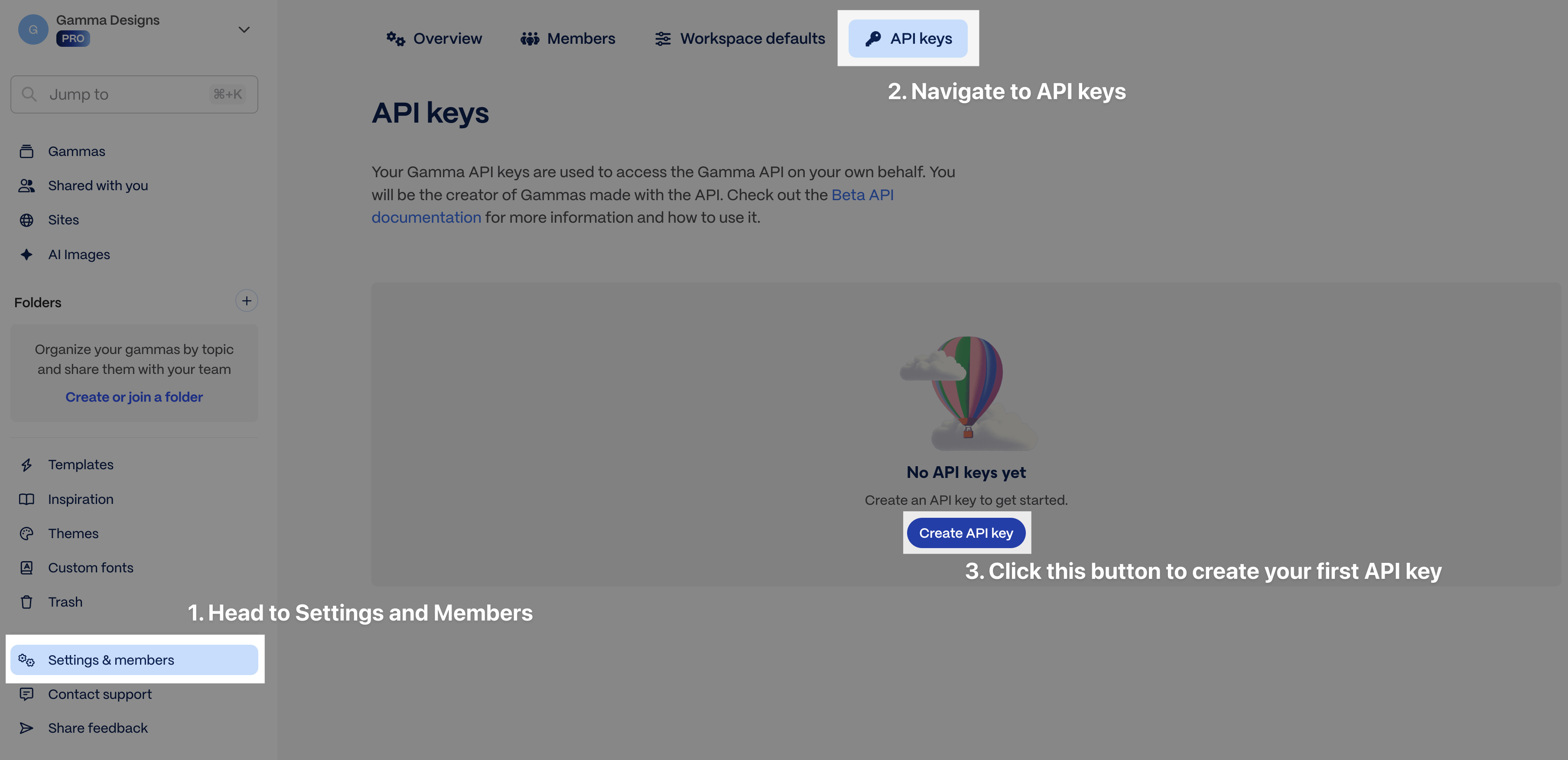
Settings > API Keys
\#### Connectors (ChatGPT, Claude) Connectors are available on all plans, including Free and Plus. No API key required — connect directly from \[ChatGPT or Claude\](https://developers.gamma.app/docs/connectors/connectors-and-integrations) and authenticate with your Gamma account. Generations via connectors charge credits the same way as API calls. ### Usage and pricing \* API billing uses a credit-based system. Higher tier subscribers receive more monthly credits. \* If you run out of credits, you can upgrade to a higher subscription tier, purchase credits ad hoc, or enable auto-recharge (\*recommended\*) at \[Settings > Billing\](https://gamma.app/settings/billing).
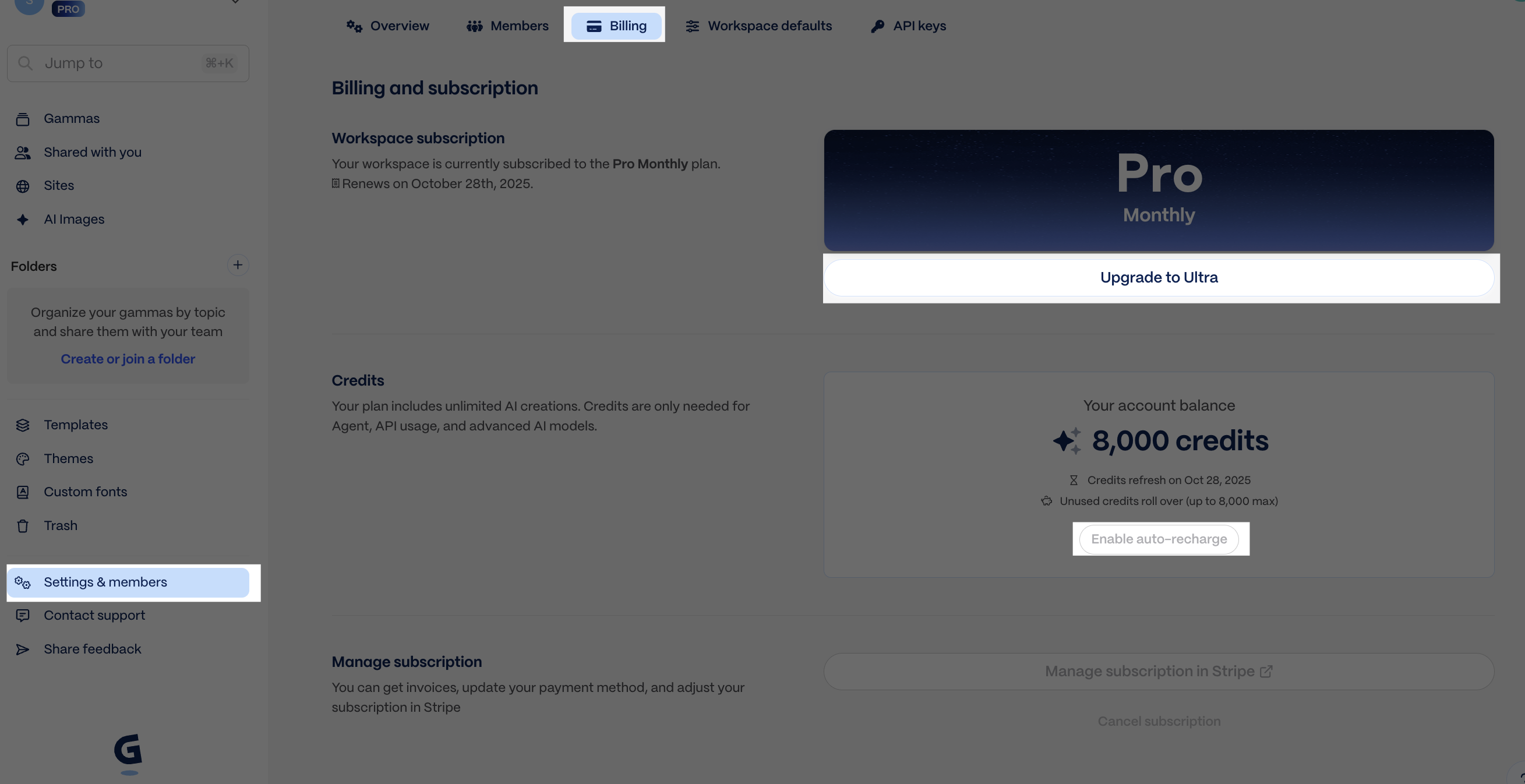
Settings > Billing
\### How credits work Credit charges are determined based on several factors and are returned in the GET response. | Feature | API parameter | Credits Charged\\\* | | --------------- | -------------------- | ----------------------------------------------------------------------------------------------------------------------- | | Number of cards | \`numCards\` | 1-3 credits/card (varies by the text generation model Gamma selects internally) | | AI image model | \`imageOptions.model\` | Standard: 2-15 credits/image. Advanced: 20-33 credits/image. Premium: 34-75 credits/image. Ultra: 30-125 credits/image. | \\\* \*\*Credit consumption rates and the actions that consume credits are subject to change.\*\* Template-based generations (\`POST /generations/from-template\`) may cost slightly more per card than standard generations. ### Illustrative scenarios \* Deck with 10 cards + 5 images using a basic image model = \\~20-60 credits \* Doc with 20 cards + 15 images using a premium image model = \\~320-1070 credits \* Socials with 30 cards + 30 images using an ultra image model = \\~930-3900 credits Both standard generations (\`POST /generations\`) and template-based generations (\`POST /generations/from-template\`) consume credits. Credit usage details are returned in the \`credits\` field of the \`GET /generations/{generationId}\` response, showing \`deducted\` and \`remaining\` values. To learn more about credits, visit our \[Help Center\](https://help.gamma.app/en/articles/7834324-how-do-ai-credits-work-in-gamma). ### Related \* \[Connect integrations\](https://developers.gamma.app/docs/connectors/connectors-and-integrations) for setup instructions by platform \* \[Poll for results\](https://developers.gamma.app/docs/guides/async-patterns-and-polling) for where \`credits.deducted\` and \`credits.remaining\` appear in the generation flow \* \[Get Help\](https://developers.gamma.app/docs/reference/get-help) if you need support with pricing or API access # POST /generations Generate a presentation, document, website, or social post from text. Start an asynchronous generation from text. Use this endpoint when Gamma should determine the layout from your input and generation settings. ## Create async generation > Creates an asynchronous generation job from provided text input. Returns a generation ID that can be used to poll for status. \`\`\`json {"openapi":"3.0.0","info":{"title":"Gamma Public API","version":"1.0"},"tags":\[{"name":"public-api","description":"Public API endpoints for external integrations"}\],"servers":\[{"url":"https://public-api.gamma.app","description":"Production"}\],"security":\[{"api-key":\[\]}\],"components":{"securitySchemes":{"api-key":{"type":"apiKey","in":"header","name":"X-API-KEY","description":"API key for authentication"}},"schemas":{"Generation":{"type":"object","properties":{"inputText":{"type":"string","description":"Input text for generation — a topic, outline, or full content. Max 400,000 characters.","minLength":1,"maxLength":400000},"additionalInstructions":{"type":"string","description":"Additional context or instructions for AI","minLength":0,"maxLength":5000},"textMode":{"$ref":"#/components/schemas/TextMode"},"format":{"$ref":"#/components/schemas/DocFormat"},"numCards":{"type":"number","description":"Target number of cards to generate. Limits vary by plan.","minimum":1},"cardSplit":{"$ref":"#/components/schemas/CardSplit"},"themeId":{"type":"string","description":"Theme ID to apply. Get available IDs from the GET /themes endpoint."},"textOptions":{"description":"Text generation options: amount, tone, audience, and language.","allOf":\[{"$ref":"#/components/schemas/TextOptions"}\]},"imageOptions":{"description":"Image generation and selection options.","allOf":\[{"$ref":"#/components/schemas/ImageOptions"}\]},"cardOptions":{"description":"Card dimensions and layout options.","allOf":\[{"$ref":"#/components/schemas/CardOptions"}\]},"sharingOptions":{"description":"Sharing and permissions for the generated Gamma.","allOf":\[{"$ref":"#/components/schemas/SharingOptions"}\]},"folderIds":{"description":"Folder IDs to place the generated Gamma in. Get available IDs from the GET /folders endpoint.","maxItems":10,"type":"array","items":{"type":"string"}},"exportAs":{"description":"Auto-export format after generation completes.","$ref":"#/components/schemas/ExportFormat"}},"required":\["inputText","textMode"\]},"TextMode":{"type":"string","description":"How to interpret the input text","enum":\["generate","condense","preserve"\]},"DocFormat":{"type":"string","description":"Output format","enum":\["presentation","document","social","webpage"\]},"CardSplit":{"type":"string","description":"Content splitting strategy across cards","enum":\["inputTextBreaks","auto"\]},"TextOptions":{"type":"object","properties":{"amount":{"$ref":"#/components/schemas/TextAmount"},"tone":{"type":"string","description":"The tone or writing style (e.g., professional, casual, academic)","minLength":0,"maxLength":500},"audience":{"type":"string","description":"Target audience description for tailored content","minLength":0,"maxLength":500},"language":{"$ref":"#/components/schemas/AILocale"}}},"TextAmount":{"type":"string","description":"Controls the amount of text generated per card","enum":\["brief","medium","detailed","extensive"\]},"AILocale":{"type":"string","description":"ISO language code for content generation","enum":\["en","en-gb","en-in","es","es-es","es-mx","es-419","ca","fr","zh-cn","zh-tw","ko","ja","ja-da","pt-br","pt-pt","de","it","ru","pl","uk","ro","hu","cs","el","tr","ar","ar-sa","he","fa","nl","sv","da","nb","fi","id","vi","hi","gu","mr","te","bn","ta","ur","kn","ml","th","sr","hr","sq","bg","sl","bs","mk","sw","ha","yo","tl","ms","kk","uz","af","lv","lt","et","is","cy"\]},"ImageOptions":{"type":"object","properties":{"model":{"type":"string","description":"AI model for image generation. Available models depend on your plan.","enum":\["dall-e-3","imagen-3-flash","imagen-3-pro","imagen-4-fast","imagen-4-pro","imagen-4-ultra","playground-3","ideogram-v2","ideogram-v2-turbo","ideogram-v2a","ideogram-v2a-turbo","ideogram-v3","ideogram-v3-turbo","ideogram-v3-quality","ideogram-v3-flash","flux-1-schnell","flux-1-pro","flux-1-quick","flux-1-ultra","flux-kontext-pro","flux-kontext-max","flux-kontext-fast","leonardo-phoenix","recraft-v3","recraft-v3-svg","recraft-v4","recraft-v4-svg","recraft-v4-pro","luma-photon-1","luma-photon-flash-1","gpt-image-1-low","gpt-image-1-medium","gpt-image-1-high","gpt-image-1-mini-low","gpt-image-1-mini-medium","gpt-image-1-mini-high","qwen-image","qwen-image-fast","gemini-2.5-flash-image","veo-3.1-fast","veo-3.1","luma-ray-2-flash","luma-ray-2","leonardo-motion-2-fast","leonardo-motion-2","gemini-3-pro-image","gemini-3-pro-image-hd","gemini-3.1-flash-image-mini","gemini-3.1-flash-image","gemini-3.1-flash-image-hd","flux-2-pro","flux-2-flex","flux-2-max","flux-2-klein"\]},"style":{"type":"string","description":"Style description for AI-generated images (e.g., \\"photorealistic, professional\\"). Max 500 characters.","minLength":0,"maxLength":500},"source":{"$ref":"#/components/schemas/ImageSource"}}},"ImageSource":{"type":"string","description":"Source for card images","enum":\["webAllImages","webFreeToUse","webFreeToUseCommercially","aiGenerated","pictographic","giphy","pexels","placeholder","noImages","themeAccent"\]},"CardOptions":{"type":"object","properties":{"dimensions":{"$ref":"#/components/schemas/CardDimensions"},"headerFooter":{"description":"Header and footer configuration. Supports text, images, and card numbers in six positions: topLeft, topCenter, topRight, bottomLeft, bottomCenter, bottomRight.","allOf":\[{"$ref":"#/components/schemas/HeaderFooter"}\]}}},"CardDimensions":{"type":"string","description":"Card dimensions/aspect ratio","enum":\["fluid","16x9","4x3","pageless","letter","a4","1x1","4x5","9x16"\]},"HeaderFooter":{"type":"object","properties":{"topLeft":{"description":"Element in top-left position","allOf":\[{"$ref":"#/components/schemas/HeaderFooterElement"}\]},"topCenter":{"description":"Element in top-center position","allOf":\[{"$ref":"#/components/schemas/HeaderFooterElement"}\]},"topRight":{"description":"Element in top-right position","allOf":\[{"$ref":"#/components/schemas/HeaderFooterElement"}\]},"bottomLeft":{"description":"Element in bottom-left position","allOf":\[{"$ref":"#/components/schemas/HeaderFooterElement"}\]},"bottomCenter":{"description":"Element in bottom-center position","allOf":\[{"$ref":"#/components/schemas/HeaderFooterElement"}\]},"bottomRight":{"description":"Element in bottom-right position","allOf":\[{"$ref":"#/components/schemas/HeaderFooterElement"}\]},"hideFromFirstCard":{"type":"boolean","description":"Hide header/footer from first card"},"hideFromLastCard":{"type":"boolean","description":"Hide header/footer from last card"}}},"HeaderFooterElement":{"type":"object","properties":{"type":{"$ref":"#/components/schemas/HeaderFooterElementType"},"source":{"type":"string","description":"Source for the image element","enum":\["themeLogo","custom"\]},"src":{"type":"string","description":"HTTPS URL for custom image","minLength":1,"maxLength":2048},"value":{"type":"string","description":"Text content to display","minLength":1,"maxLength":500},"size":{"type":"string","description":"Size of the image element","enum":\["sm","md","lg","xl"\]}},"required":\["type"\]},"HeaderFooterElementType":{"type":"string","description":"Type of element to display","enum":\["cardNumber","image","text"\]},"SharingOptions":{"type":"object","properties":{"workspaceAccess":{"$ref":"#/components/schemas/WorkspacePermission"},"externalAccess":{"$ref":"#/components/schemas/ExternalPermission"},"emailOptions":{"description":"Email sharing configuration","allOf":\[{"$ref":"#/components/schemas/EmailOptions"}\]}}},"WorkspacePermission":{"type":"string","description":"Access level for workspace members","enum":\["edit","comment","view","noAccess","fullAccess"\]},"ExternalPermission":{"type":"string","description":"Access level for external users via shared link","enum":\["edit","comment","view","noAccess"\]},"EmailOptions":{"type":"object","properties":{"recipients":{"description":"List of email addresses to share with","type":"array","items":{"type":"string"}},"access":{"$ref":"#/components/schemas/EmailPermission"}},"required":\["recipients","access"\]},"EmailPermission":{"type":"string","description":"Permission level for email recipients","enum":\["edit","comment","view","fullAccess"\]},"ExportFormat":{"type":"string","description":"Auto-export format after generation completes","enum":\["pptx","pdf","png"\]},"CreateGenerationResponse":{"type":"object","properties":{"generationId":{"type":"string","description":"Unique generation job identifier for status polling"},"warnings":{"type":"string","description":"Warnings about ignored or adjusted request parameters"}},"required":\["generationId"\]}}},"paths":{"/v1.0/generations":{"post":{"operationId":"createGeneration","summary":"Create async generation","description":"Creates an asynchronous generation job from provided text input. Returns a generation ID that can be used to poll for status.","parameters":\[\],"requestBody":{"required":true,"content":{"application/json":{"schema":{"$ref":"#/components/schemas/Generation"}}}},"responses":{"200":{"description":"Generation job created successfully","content":{"application/json":{"schema":{"$ref":"#/components/schemas/CreateGenerationResponse"}}}},"201":{"description":"","content":{"application/json":{"schema":{"$ref":"#/components/schemas/CreateGenerationResponse"}}}},"400":{"description":"Invalid request parameters"},"401":{"description":"Invalid or missing API key"},"402":{"description":"Insufficient credits"},"403":{"description":"Access denied or feature not available"}},"tags":\["public-api"\]}}}} \`\`\` {% hint style="info" %} For parameter guidance, see \[Generate from text\](https://developers.gamma.app/docs/guides/generate-api-parameters-explained). {% endhint %} ## Inspecting rate limit headers Every response from the Gamma API includes rate limit headers (\`x-ratelimit-remaining-burst\`, \`x-ratelimit-remaining\`, \`x-ratelimit-remaining-daily\`). When testing with curl, add the \`-i\` flag to display these headers alongside the response body: \`\`\`bash curl -i -X POST "https://public-api.gamma.app/v1.0/generations" \\ -H "X-API-KEY: your-api-key" \\ -H "Content-Type: application/json" \\ -d '{ "inputText": "Create a presentation about renewable energy", "textMode": "generate" }' \`\`\` Without \`-i\`, curl only shows the JSON body. In Python, JavaScript, or any HTTP client, these headers are accessible on the response object without any special flag. For a full breakdown of the rate limit headers and how to use them for adaptive polling, see \[Rate limit headers and adaptive polling\](https://developers.gamma.app/docs/guides/async-patterns-and-polling#rate-limit-headers-and-adaptive-polling). ## Related \* \[Generate from text\](https://developers.gamma.app/docs/guides/generate-api-parameters-explained) for parameter-by-parameter guidance \* \[GET /generations/{id}\](https://developers.gamma.app/docs/generations/get-generation-status) for the polling step after creation \* \[Async patterns and polling\](https://developers.gamma.app/docs/guides/async-patterns-and-polling) for the full polling workflow and rate limit guidance # POST /generations/from-template Generate content from an existing Gamma template with variable substitution. Start an asynchronous generation from an existing Gamma template. Use this when you want to keep a fixed layout and swap in new content. ## Create generation from template > Creates an asynchronous generation job from a template Gamma with variable substitution. \`\`\`json {"openapi":"3.0.0","info":{"title":"Gamma Public API","version":"1.0"},"tags":\[{"name":"public-api","description":"Public API endpoints for external integrations"}\],"servers":\[{"url":"https://public-api.gamma.app","description":"Production"}\],"security":\[{"api-key":\[\]}\],"components":{"securitySchemes":{"api-key":{"type":"apiKey","in":"header","name":"X-API-KEY","description":"API key for authentication"}},"schemas":{"FromTemplateGeneration":{"type":"object","properties":{"prompt":{"type":"string","description":"Text prompt describing the content to generate from the template. Max 400,000 characters.","minLength":1,"maxLength":400000},"gammaId":{"type":"string","description":"File ID of the template Gamma. The template must have exactly one Page."},"themeId":{"type":"string","description":"Theme ID to apply. Get available IDs from the GET /themes endpoint."},"imageOptions":{"description":"Image generation options","allOf":\[{"$ref":"#/components/schemas/FromTemplateImageOptions"}\]},"sharingOptions":{"description":"Sharing and permissions for the generated Gamma.","allOf":\[{"$ref":"#/components/schemas/SharingOptions"}\]},"folderIds":{"description":"Folder IDs to place the generated Gamma in. Get available IDs from the GET /folders endpoint.","maxItems":10,"type":"array","items":{"type":"string"}},"exportAs":{"description":"Auto-export format after generation completes.","$ref":"#/components/schemas/ExportFormat"}},"required":\["prompt","gammaId"\]},"FromTemplateImageOptions":{"type":"object","properties":{"model":{"type":"string","description":"AI model for image generation","enum":\["dall-e-3","imagen-3-flash","imagen-3-pro","imagen-4-fast","imagen-4-pro","imagen-4-ultra","playground-3","ideogram-v2","ideogram-v2-turbo","ideogram-v2a","ideogram-v2a-turbo","ideogram-v3","ideogram-v3-turbo","ideogram-v3-quality","ideogram-v3-flash","flux-1-schnell","flux-1-pro","flux-1-quick","flux-1-ultra","flux-kontext-pro","flux-kontext-max","flux-kontext-fast","leonardo-phoenix","recraft-v3","recraft-v3-svg","recraft-v4","recraft-v4-svg","recraft-v4-pro","luma-photon-1","luma-photon-flash-1","gpt-image-1-low","gpt-image-1-medium","gpt-image-1-high","gpt-image-1-mini-low","gpt-image-1-mini-medium","gpt-image-1-mini-high","qwen-image","qwen-image-fast","gemini-2.5-flash-image","veo-3.1-fast","veo-3.1","luma-ray-2-flash","luma-ray-2","leonardo-motion-2-fast","leonardo-motion-2","gemini-3-pro-image","gemini-3-pro-image-hd","gemini-3.1-flash-image-mini","gemini-3.1-flash-image","gemini-3.1-flash-image-hd","flux-2-pro","flux-2-flex","flux-2-max","flux-2-klein"\]},"style":{"type":"string","description":"Style description for AI-generated images","minLength":0,"maxLength":500}}},"SharingOptions":{"type":"object","properties":{"workspaceAccess":{"$ref":"#/components/schemas/WorkspacePermission"},"externalAccess":{"$ref":"#/components/schemas/ExternalPermission"},"emailOptions":{"description":"Email sharing configuration","allOf":\[{"$ref":"#/components/schemas/EmailOptions"}\]}}},"WorkspacePermission":{"type":"string","description":"Access level for workspace members","enum":\["edit","comment","view","noAccess","fullAccess"\]},"ExternalPermission":{"type":"string","description":"Access level for external users via shared link","enum":\["edit","comment","view","noAccess"\]},"EmailOptions":{"type":"object","properties":{"recipients":{"description":"List of email addresses to share with","type":"array","items":{"type":"string"}},"access":{"$ref":"#/components/schemas/EmailPermission"}},"required":\["recipients","access"\]},"EmailPermission":{"type":"string","description":"Permission level for email recipients","enum":\["edit","comment","view","fullAccess"\]},"ExportFormat":{"type":"string","description":"Auto-export format after generation completes","enum":\["pptx","pdf","png"\]},"FromTemplateGenerationResponse":{"type":"object","properties":{"generationId":{"type":"string","description":"Generation job identifier for status polling"},"warnings":{"type":"string","description":"Warnings about request processing"}},"required":\["generationId"\]}}},"paths":{"/v1.0/generations/from-template":{"post":{"operationId":"createFromTemplateGeneration","summary":"Create generation from template","description":"Creates an asynchronous generation job from a template Gamma with variable substitution.","parameters":\[\],"requestBody":{"required":true,"content":{"application/json":{"schema":{"$ref":"#/components/schemas/FromTemplateGeneration"}}}},"responses":{"200":{"description":"Generation job created successfully","content":{"application/json":{"schema":{"$ref":"#/components/schemas/FromTemplateGenerationResponse"}}}},"201":{"description":"","content":{"application/json":{"schema":{"$ref":"#/components/schemas/FromTemplateGenerationResponse"}}}},"400":{"description":"Invalid request or template not found"},"401":{"description":"Invalid or missing API key"},"402":{"description":"Insufficient credits"},"403":{"description":"Feature not enabled for workspace"}},"tags":\["public-api"\]}}}} \`\`\` {% hint style="info" %} For template workflow guidance, see \[Generate from template\](https://developers.gamma.app/docs/guides/create-from-template-api-parameters-explained). {% endhint %} ## Related \* \[Generate from template\](https://developers.gamma.app/docs/guides/create-from-template-api-parameters-explained) for workflow and parameter guidance \* \[GET /generations/{id}\](https://developers.gamma.app/docs/generations/get-generation-status) for the polling step after creation # GET /generations/{id} Poll this endpoint until status is completed or failed. Use this endpoint to poll an existing generation until it reaches \`completed\` or \`failed\`. This is where you receive \`gammaUrl\`, \`exportUrl\`, and credit usage. ## Get generation status > Retrieves the current status of a generation job. Poll this endpoint until status is "completed" or "failed". \`\`\`json {"openapi":"3.0.0","info":{"title":"Gamma Public API","version":"1.0"},"tags":\[{"name":"public-api","description":"Public API endpoints for external integrations"}\],"servers":\[{"url":"https://public-api.gamma.app","description":"Production"}\],"security":\[{"api-key":\[\]}\],"components":{"securitySchemes":{"api-key":{"type":"apiKey","in":"header","name":"X-API-KEY","description":"API key for authentication"}},"schemas":{"GenerationStatusResponse":{"type":"object","properties":{"generationId":{"type":"string","description":"Generation job identifier"},"status":{"$ref":"#/components/schemas/GenerationStatus"},"gammaId":{"type":"string","description":"File identifier for the generated Gamma"},"gammaUrl":{"type":"string","description":"URL to view the generated Gamma"},"error":{"description":"Error details when status is \\"failed\\"","allOf":\[{"$ref":"#/components/schemas/ErrorResponse"}\]},"exportUrl":{"type":"string","description":"Download URL for exported file (PDF/PPTX)"},"credits":{"description":"Credit deduction details","allOf":\[{"$ref":"#/components/schemas/CreditsResponse"}\]}},"required":\["generationId","status"\]},"GenerationStatus":{"type":"string","description":"Current status of the generation job","enum":\["pending","completed","failed"\]},"ErrorResponse":{"type":"object","properties":{"message":{"type":"string","description":"Human-readable error description"},"statusCode":{"type":"number","description":"HTTP status code"}},"required":\["message","statusCode"\]},"CreditsResponse":{"type":"object","properties":{"deducted":{"type":"number","description":"Credits deducted for this generation"},"remaining":{"type":"number","description":"Credits remaining in workspace after deduction"}},"required":\["deducted","remaining"\]}}},"paths":{"/v1.0/generations/{id}":{"get":{"operationId":"getGenerationStatus","summary":"Get generation status","description":"Retrieves the current status of a generation job. Poll this endpoint until status is \\"completed\\" or \\"failed\\".","parameters":\[{"name":"id","required":true,"in":"path","description":"The unique generation ID returned from the create endpoint","schema":{"type":"string"}}\],"responses":{"200":{"description":"Generation status retrieved successfully","content":{"application/json":{"schema":{"$ref":"#/components/schemas/GenerationStatusResponse"}}}},"401":{"description":"Invalid or missing API key"},"404":{"description":"Generation not found"}},"tags":\["public-api"\]}}}} \`\`\` {% hint style="info" %} For usage patterns, see \[Poll for results\](https://developers.gamma.app/docs/guides/async-patterns-and-polling). {% endhint %} ## Related \* \[Poll for results\](https://developers.gamma.app/docs/guides/async-patterns-and-polling) for complete polling implementations \* \[POST /generations\](https://developers.gamma.app/docs/generations/create-generation) if you need to start a new generation first # GET /themes List all themes available in your workspace, including custom themes. List the themes available in the authenticated workspace. Use the returned \`id\` values as \`themeId\` in generation requests. ## List themes > Lists all themes available to the workspace, including standard themes and custom workspace themes. \`\`\`json {"openapi":"3.0.0","info":{"title":"Gamma Public API","version":"1.0"},"tags":\[{"name":"public-api","description":"Public API endpoints for external integrations"}\],"servers":\[{"url":"https://public-api.gamma.app","description":"Production"}\],"security":\[{"api-key":\[\]}\],"components":{"securitySchemes":{"api-key":{"type":"apiKey","in":"header","name":"X-API-KEY","description":"API key for authentication"}},"schemas":{"ListThemesResponse":{"type":"object","properties":{"data":{"description":"List of themes","type":"array","items":{"$ref":"#/components/schemas/ThemeItem"}},"hasMore":{"type":"boolean","description":"Whether more results are available"},"nextCursor":{"type":"string","nullable":true,"description":"Cursor for next page, null if no more results"}},"required":\["data","hasMore"\]},"ThemeItem":{"type":"object","properties":{"id":{"type":"string","description":"Unique theme identifier"},"name":{"type":"string","description":"Theme display name"},"colorKeywords":{"description":"Color-related keywords","type":"array","items":{"type":"string"}},"toneKeywords":{"description":"Tone/style keywords","type":"array","items":{"type":"string"}},"type":{"$ref":"#/components/schemas/ThemeType"}},"required":\["id","name","type"\]},"ThemeType":{"type":"string","description":"Source of the theme","enum":\["standard","custom"\]}}},"paths":{"/v1.0/themes":{"get":{"operationId":"listThemes","summary":"List themes","description":"Lists all themes available to the workspace, including standard themes and custom workspace themes.","parameters":\[{"name":"query","required":false,"in":"query","description":"Search query to filter themes by name","schema":{"type":"string"}},{"name":"limit","required":false,"in":"query","description":"Maximum results to return (1-100)","schema":{"minimum":1,"maximum":50,"type":"number"}},{"name":"after","required":false,"in":"query","description":"Pagination cursor from previous response","schema":{"type":"string"}}\],"responses":{"200":{"description":"Themes retrieved successfully","content":{"application/json":{"schema":{"$ref":"#/components/schemas/ListThemesResponse"}}}},"401":{"description":"Invalid or missing API key"}},"tags":\["public-api"\]}}}} \`\`\` {% hint style="info" %} For guidance on when to fetch theme IDs and how to use them in requests, see \[Use themes and folders\](https://developers.gamma.app/docs/guides/list-themes-and-list-folders-apis-explained). {% endhint %} ## Related \* \[Use themes and folders\](https://developers.gamma.app/docs/guides/list-themes-and-list-folders-apis-explained) for workflow guidance \* \[POST /generations\](https://developers.gamma.app/docs/generations/create-generation) if you want to apply a returned \`themeId\` # GET /folders List all folders the authenticated user is a member of. List the folders the authenticated user can access. Use the returned \`id\` values in \`folderIds\` when you want generated output stored in a specific folder. ## List folders > Lists all folders the authenticated user is a member of within the workspace. \`\`\`json {"openapi":"3.0.0","info":{"title":"Gamma Public API","version":"1.0"},"tags":\[{"name":"public-api","description":"Public API endpoints for external integrations"}\],"servers":\[{"url":"https://public-api.gamma.app","description":"Production"}\],"security":\[{"api-key":\[\]}\],"components":{"securitySchemes":{"api-key":{"type":"apiKey","in":"header","name":"X-API-KEY","description":"API key for authentication"}},"schemas":{"ListFoldersResponse":{"type":"object","properties":{"data":{"description":"List of folders","type":"array","items":{"$ref":"#/components/schemas/FolderItem"}},"hasMore":{"type":"boolean","description":"Whether more results are available"},"nextCursor":{"type":"string","nullable":true,"description":"Cursor for next page, null if no more results"}},"required":\["data","hasMore"\]},"FolderItem":{"type":"object","properties":{"id":{"type":"string","description":"Unique folder identifier"},"name":{"type":"string","description":"Folder display name"}},"required":\["id","name"\]}}},"paths":{"/v1.0/folders":{"get":{"operationId":"listFolders","summary":"List folders","description":"Lists all folders the authenticated user is a member of within the workspace.","parameters":\[{"name":"query","required":false,"in":"query","description":"Search query to filter folders by name","schema":{"type":"string"}},{"name":"limit","required":false,"in":"query","description":"Maximum results to return","schema":{"minimum":1,"maximum":50,"type":"number"}},{"name":"after","required":false,"in":"query","description":"Pagination cursor from previous response","schema":{"type":"string"}}\],"responses":{"200":{"description":"Folders retrieved successfully","content":{"application/json":{"schema":{"$ref":"#/components/schemas/ListFoldersResponse"}}}},"401":{"description":"Invalid or missing API key"}},"tags":\["public-api"\]}}}} \`\`\` {% hint style="info" %} For guidance on when to fetch folder IDs and how to use them in requests, see \[Use themes and folders\](https://developers.gamma.app/docs/guides/list-themes-and-list-folders-apis-explained). {% endhint %} ## Related \* \[Use themes and folders\](https://developers.gamma.app/docs/guides/list-themes-and-list-folders-apis-explained) for workflow guidance \* \[POST /generations\](https://developers.gamma.app/docs/generations/create-generation) if you want to place output into one or more folders # Generate from text When to use the Generate endpoint and how to choose the parameters that shape the output. Use this page when you already know you want \`POST /v1.0/generations\` and need help deciding how each parameter affects the output. {% hint style="info" %} This page explains when and why to use each parameter. For the exact request body, field types, and response schema, see the \[POST /generations\](https://developers.gamma.app/docs/generations/create-generation) and \[GET /generations/{id}\](https://developers.gamma.app/docs/generations/get-generation-status) endpoint reference pages. {% endhint %} ### Quick reference \* \`inputText\` is always required. \* \`textMode\` controls whether Gamma expands, condenses, or preserves your source text. \* \`format\`, \`themeId\`, \`imageOptions\`, and \`cardOptions\` shape the look and output type. \* Poll \`GET /v1.0/generations/{generationId}\` to retrieve \`gammaUrl\`, \`exportUrl\`, and credit usage after creation. ### Top-level parameters #### \`inputText\` \*(required)\* Content used to generate your gamma, including text and image URLs. \*\*Add images to the input\*\* You can provide URLs for specific images you want to include. Simply insert the URLs into your content where you want each image to appear (see example below). You can also add instructions for how to display the images in \`additionalInstructions\`, eg, "Group the last 10 images into a gallery to showcase them together." {% hint style="info" %} \*\*Note:\*\* If you want your gamma to use \*only\* the images you provide (and not generate additional ones), set \`imageOptions.source\` to \`noImages\`. {% endhint %} \*\*Token limits\*\* The token limit is 100,000, which is approximately 400,000 characters. However, in some cases, the token limit may be lower, especially if your use case requires extra reasoning from our AI models. We highly recommend keeping inputText below 100,000 tokens and testing out a variety of inputs to get a good sense of what works for your use case. \*\*Other tips\*\* \* Text can be as little as a few words that describe the topic of the content you want to generate. \* You can also input longer text -- pages of messy notes or highly structured, detailed text. \* You can control where cards are split by adding \\n---\\n to the text. \* You may need to apply JSON escaping to your text. Find out more about JSON escaping and \[try it out here\](https://www.devtoolsdaily.com/json/escape/). {% code title="Example" %} \`\`\`json "inputText": "Ways to use AI for productivity" \`\`\` {% endcode %} {% code title="Example" %} \`\`\`json "inputText": "# The Final Frontier: Deep Sea Exploration\\n\* Less than 20% of our oceans have been explored\\n\* Deeper than 1,000 meters remains largely mysterious\\n\* More people have been to space than to the deepest parts of our ocean\\n\\nhttps://img.genially.com/5b34eda40057f90f3a45b977/1b02d693-2456-4379-a56d-4bc5e14c6ae1.jpeg\\n---\\n# Technological Breakthroughs\\n\* Advanced submersibles capable of withstanding extreme pressure\\n\* ROVs (Remotely Operated Vehicles) with HD cameras and sampling tools\\n\* Autonomous underwater vehicles for extended mapping missions\\n\* Deep-sea communication networks enabling real-time data transmission\\n\\nhttps://images.encounteredu.com/excited-hare/production/uploads/subject-update-about-exploring-the-deep-hero.jpg?w=1200&h=630&q=82&auto=format&fit=crop&dm=1631569543&s=48f275c76c565fdaa5d4bd365246afd3\\n---\\n# Ecological Discoveries\\n\* Unique ecosystems thriving without sunlight\\n\* Hydrothermal vent communities using chemosynthesis\\n\* Creatures with remarkable adaptations: bioluminescence, pressure resistance\\n\* Thousands of new species discovered annually\\n---\\n# Scientific & Economic Value\\n\* Understanding climate regulation and carbon sequestration\\n\* Pharmaceutical potential from deep-sea organisms\\n\* Mineral resources and rare earth elements\\n\* Insights into extreme life that could exist on other planets\\n\\nhttps://publicinterestnetwork.org/wp-content/uploads/2023/11/Western-Pacific-Jarvis\_PD\_NOAA-OER.jpg\\n---\\n# Future Horizons\\n\* Expansion of deep-sea protected areas\\n\* Sustainable exploration balancing discovery and conservation\\n\* Technological miniaturization enabling broader coverage\\n\* Citizen science initiatives through shared deep-sea data" \`\`\` {% endcode %} \*\*\* #### \`textMode\` \*(required)\* Determines how your \`inputText\` is modified, if at all. \* You can choose between \`generate\`, \`condense\`, or \`preserve\` \* \`generate\`: Using your \`inputText\` as a starting point, Gamma will rewrite and expand the content. Works best when you have brief text in the input that you want to elaborate on. \* \`condense\`: Gamma will summarize your \`inputText\` to fit the content length you want. Works best when you start with a large amount of text that you'd like to summarize. \* \`preserve\`: Gamma will retain the exact text in \`inputText\`, sometimes structuring it where it makes sense to do so, eg, adding headings to sections. (If you do not want any modifications at all, you can specify this in the \`additionalInstructions\` parameter.) {% code title="Example" %} \`\`\`json "textMode": "generate" \`\`\` {% endcode %} \*\*\* #### \`format\` \*(optional, defaults to\`presentation\`)\* Determines the artifact Gamma will create for you. \* You can choose between \`presentation\`, \`document\`, \`social\`, or \`webpage\`. \* You can use the \`cardOptions.dimensions\`field to further specify the shape of your output. {% code title="Example" %} \`\`\`json "format": "presentation" \`\`\` {% endcode %} \*\*\* #### \`themeId\` \*(optional, defaults to workspace default theme)\* Defines which theme from Gamma will be used for the output. Themes determine the look and feel of the gamma, including colors and fonts. \* Use \[\`GET /v1.0/themes\`\](https://developers.gamma.app/docs/workspace/list-themes) to list themes from your workspace, or copy the theme ID directly from the app.
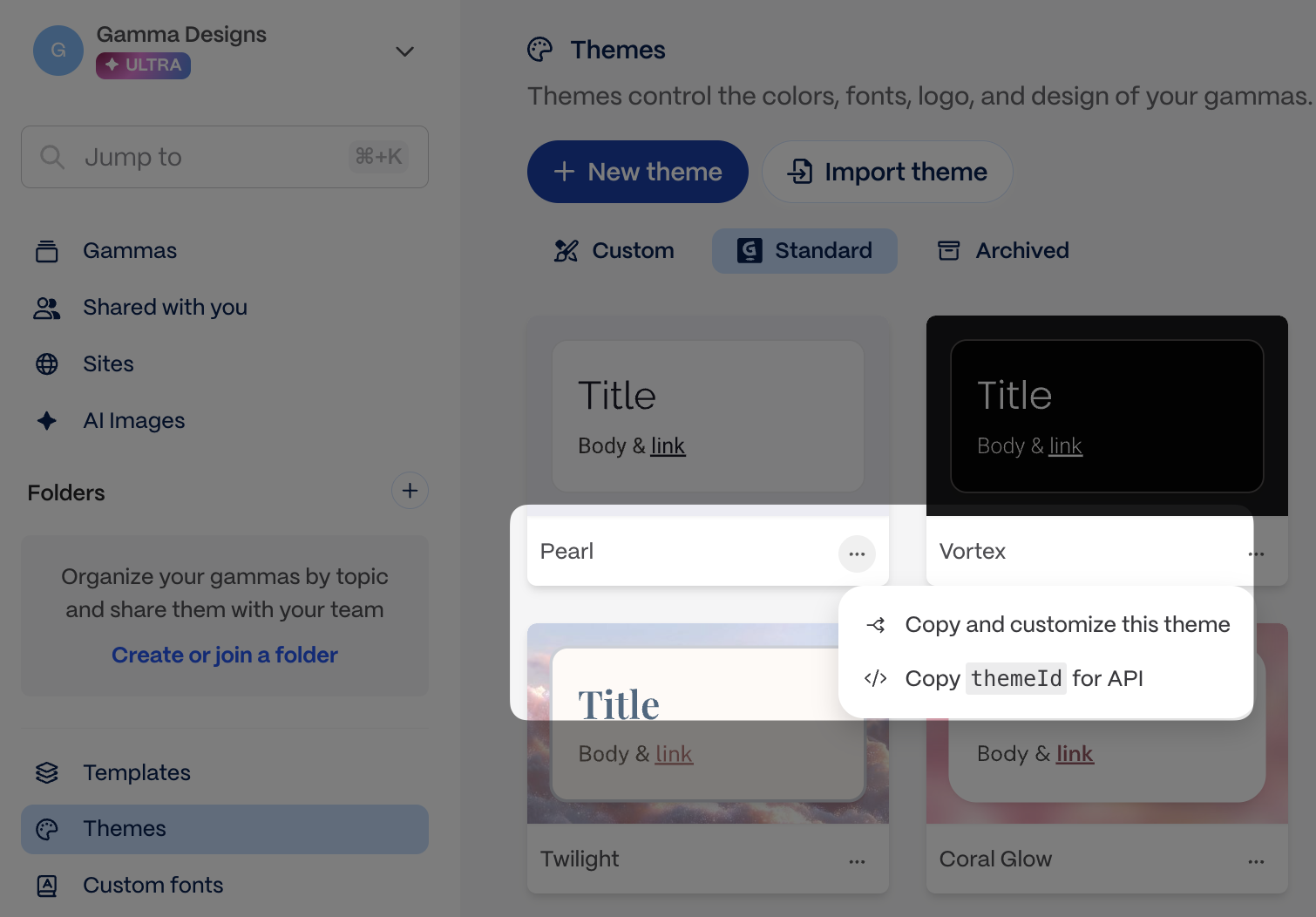
Copy the theme ID from the app
{% code title="Example" %} \`\`\`json "themeId": "abc123def456ghi" \`\`\` {% endcode %} \*\*\* #### \`numCards\` \*(optional, defaults to\`10\`)\* Determines how many cards are created if \`auto\` is chosen in \`cardSplit\` \* Pro, Teams, and Business plans: 1 to 60 cards. \* Ultra plan: 1 to 75 cards. {% code title="" %} \`\`\`json "numCards": 10 \`\`\` {% endcode %} \*\*\* #### \`cardSplit\` \*(optional, defaults to\`auto\`)\* Determines how your content will be divided into cards. \* You can choose between \`auto\` or \`inputTextBreaks\` \* Choosing \`auto\` tells Gamma to looks at the \`numCards\` field and divide up content accordingly. (It will not adhere to text breaks \\n---\\n in your \`inputText\`.) \* Choosing \`inputTextBreaks\` tells Gamma that it should look for text breaks \\n---\\n in your \`inputText\` and divide the content based on this. (It will not respect \`numCards\`.) \* Note: One \\n---\\n = one break, ie, text with one break will produce two cards, two break will produce three cards, and so on. \* Here are some scenarios to guide your use of these parameters and explain how they work | inputText contains \\n---\\n and how many | cardSplit | numCards | output has | | --------------------------------------- | --------------- | ---------- | ------------------ | | No | auto | 9 | 9 cards | | No | auto | left blank | 10 cards (default) | | No | inputTextBreaks | 9 | 1 card | | Yes, 5 | auto | 9 | 9 cards | | Yes, 5 | inputTextBreaks | 9 | 6 cards | \`\`\`json "cardSplit": "auto" \`\`\` \*\*\* #### \`additionalInstructions\` \*(optional)\* Helps you add more specifications about your desired output. \* You can add specifications to steer content, layouts, and other aspects of the output. \* Works best when the instructions do not conflict with other parameters, eg, if the \`textMode\` is defined as \`condense\`, and the \`additionalInstructions\` say to preserve all text, the output will not be able to respect these conflicting requests. \* Character limits: 1-5000. \`\`\`json "additionalInstructions": "Make the card headings humorous and catchy" \`\`\` {% hint style="success" %} \*\*Pro tip: Use \`additionalInstructions\` for aesthetic feedback\*\* This field is especially powerful for specific visual and stylistic guidance that doesn't fit elsewhere: \* \*\*Layout preferences\*\*: "Use a gallery layout for the product images", "Keep text on the left side of cards" \* \*\*Visual style\*\*: "Make it feel modern and minimalist", "Use bold colors and dynamic compositions" \* \*\*Tone adjustments\*\*: "Make headlines punchy and attention-grabbing", "Keep the overall vibe professional but approachable" \* \*\*Specific formatting\*\*: "Use bullet points instead of paragraphs", "Include a summary card at the end" The more specific you are, the better the results! {% endhint %} \*\*\* #### \`folderIds\` \*(optional)\* Defines which folder(s) your gamma is stored in. \* Use \[\`GET /v1.0/folders\`\](https://developers.gamma.app/docs/workspace/list-folders) to list folders, or copy the folder ID directly from the app. \* You must be a member of a folder to add gammas to it.
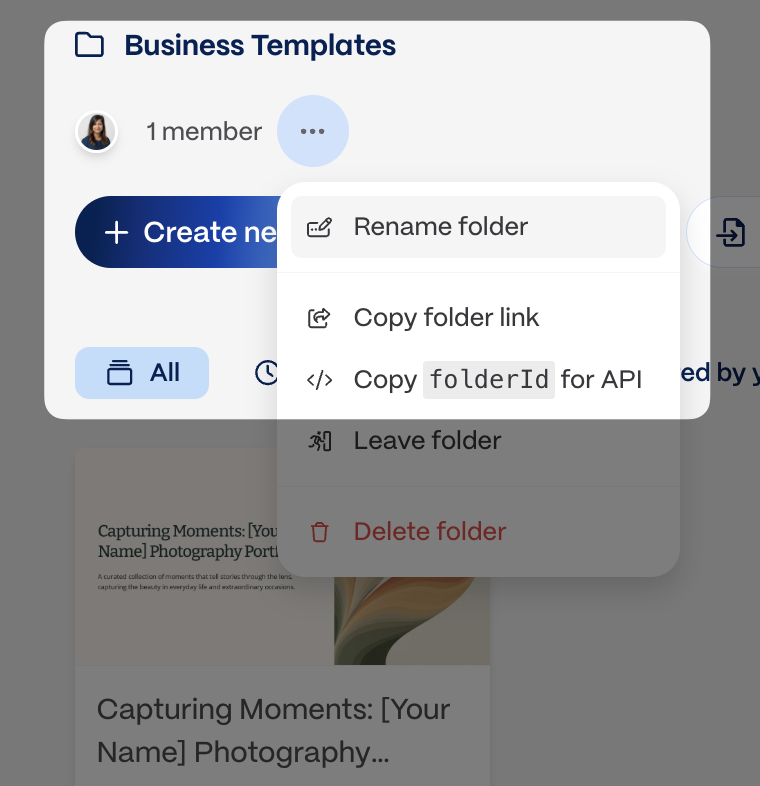
Copy the folder ID from the app
\`\`\`json "folderIds": \["123abc456def", "456123abcdef"\] \`\`\` \*\*\* #### \`exportAs\` \*(optional)\* Indicates if you'd like to return the generated gamma as an exported file as well as a Gamma URL. \* Options are \`pdf\`, \`pptx\`, or \`png\` \* Export URLs are signed and expire after approximately one week. Download promptly after generation completes. \* If you do not wish to directly export via the API, you may always do so later via the app. {% hint style="warning" %} \*\*One export format per request.\*\* You can export to PDF, PPTX, or PNG, but not multiple formats in a single API call. If you need multiple formats, make separate generation requests or export additional formats manually from the Gamma app. {% endhint %} {% code title="Example" %} \`\`\`json "exportAs": "pdf" \`\`\` {% endcode %} \*\*\* #### textOptions \*\*\`textOptions.amount\`\*\* \*(optional, defaults to \`medium\`)\* Influences how much text each card contains. Relevant only if \`textMode\` is set to \`generate\` or \`condense\`. \* You can choose between \`brief\`, \`medium\`, \`detailed\` or \`extensive\` {% code title="Example" %} \`\`\`json "textOptions": { "amount": "detailed" } \`\`\` {% endcode %} \*\*\`textOptions.tone\`\*\* \*(optional)\* Defines the mood or voice of the output. Relevant only if \`textMode\` is set to \`generate\`. \* You can add one or multiple words to hone in on the mood/voice to convey. \* Character limits: 1-500. {% code title="Example" %} \`\`\`json "textOptions": { "tone": "neutral" } \`\`\` {% endcode %} {% code title="Example" %} \`\`\`json "textOptions": { "tone": "professional, upbeat, inspiring" } \`\`\` {% endcode %} \*\*\`textOptions.audience\`\*\* \*(optional)\* Describes who will be reading/viewing the gamma, which allows Gamma to cater the output to the intended group. Relevant only if \`textMode\` is set to \`generate\`. \* You can add one or multiple words to hone in on the intended viewers/readers of the gamma. \* Character limits: 1-500. {% code title="Example" %} \`\`\`json "textOptions": { "audience": "outdoors enthusiasts, adventure seekers" } \`\`\` {% endcode %} {% code title="Example" %} \`\`\`json "textOptions": { "audience": "seven year olds" } \`\`\` {% endcode %} \*\*\`textOptions.language\`\*\* \*(optional, defaults to \`en\`)\* Determines the language in which your gamma is generated, regardless of the language of the \`inputText\`. \* You can choose from the languages listed in \[Output language accepted values\](https://developers.gamma.app/docs/reference/output-language-accepted-values). {% code title="Example" %} \`\`\`json "textOptions": { "language": "en" } \`\`\` {% endcode %} \*\*\* #### imageOptions \*\*\`imageOptions.source\`\*\* \*(optional, defaults to \`aiGenerated\`)\* Determines where the images for the gamma are sourced from. You can choose from the options below. If you are providing your own image URLs in \`inputText\` and want only those to be used, set \`imageOptions.source\` to \`noImages\` to indicate that Gamma should not generate additional images. | Options for \`source\` | Notes | | -------------------------- | ------------------------------------------------------------------------------------------------------------------------------------------------------------------------------------- | | \`aiGenerated\` | If you choose this option, you can also specify the \`imageOptions.model\` you want to use as well as an \`imageOptions.style\`. These parameters do not apply to other \`source\` options. | | \`pictographic\` | Pulls images from Pictographic. | | \`pexels\` | Gets images from Pexels. | | \`giphy\` | Gets GIFs from Giphy. | | \`webAllImages\` | Pulls the most relevant images from the web, even if licensing is unknown. | | \`webFreeToUse\` | Pulls images licensed for personal use. | | \`webFreeToUseCommercially\` | Gets images licensed for commercial use, like a sales pitch. | | \`themeAccent\` | Uses accent images from your selected theme. | | \`placeholder\` | Creates a gamma with placeholders for which images can be manually added later. | | \`noImages\` | Creates a gamma with no images. Select this option if you are providing your own image URLs in \`inputText\` and want only those in your gamma. | {% code title="Example" %} \`\`\`json "imageOptions": { "source": "aiGenerated" } \`\`\` {% endcode %} \*\*\`imageOptions.model\`\*\* \*(optional)\* This field is relevant if the \`imageOptions.source\` chosen is \`aiGenerated\`. The \`imageOptions.model\` parameter determines which model is used to generate images. \* You can choose from the models listed in \[Image model accepted values\](https://developers.gamma.app/docs/reference/image-model-accepted-values). \* If no value is specified for this parameter, Gamma automatically selects a model for you. {% code title="Example" %} \`\`\`json "imageOptions": { "model": "flux-1-pro" } \`\`\` {% endcode %} \*\*\`imageOptions.style\`\*\* \*(optional)\* This field is relevant if the \`imageOptions.source\` chosen is \`aiGenerated\`. The \`imageOptions.style\` parameter influences the artistic style of the images generated. While this is an optional field, we highly recommend adding some direction here to create images in a cohesive style. \* You can add one or multiple words to define the visual style of the images you want. \* Adding some direction -- even a simple one word like "photorealistic" -- can create visual consistency among the generated images. \* Character limits: 1-500. {% code title="Example" %} \`\`\`json "imageOptions": { "style": "minimal, black and white, line art" } \`\`\` {% endcode %} \*\*\`imageOptions.stylePreset\`\*\* \*(optional)\* Instead of writing a free-text \`style\` string, you can choose a built-in art style preset. Each named preset applies a curated style prompt that produces a consistent visual look across all generated images. | Preset | Description | | ---------------- | ---------------------------------------------------------------------------- | | \`photorealistic\` | Highly detailed, cinematic, professional photography | | \`illustration\` | Modern vector illustration with clean linework and flat color fills | | \`abstract\` | Non-representational abstract art with flowing gradients and geometric forms | | \`3D\` | 3D-rendered style | | \`lineArt\` | Clean, minimal line art in pictographic style | | \`custom\` | Uses your \`imageOptions.style\` string as the prompt (default behavior) | \* If you omit \`stylePreset\`, the default is \`custom\` -- existing behavior is unchanged. \* When a named preset (anything other than \`custom\`) is used, the \`style\` field is ignored and the API returns a warning. \* To combine a preset with your own direction, use \`custom\` and provide a \`style\` string. {% code title="Example — named preset" %} \`\`\`json "imageOptions": { "stylePreset": "illustration", "source": "aiGenerated" } \`\`\` {% endcode %} {% code title="Example — custom style (default)" %} \`\`\`json "imageOptions": { "stylePreset": "custom", "style": "watercolor, soft edges, muted tones" } \`\`\` {% endcode %} \*\*What about accent images?\*\* {% hint style="info" %} \*\*Accent images are automatically placed by Gamma\*\* - they cannot be directly controlled via the API. Accent images are large, decorative images that enhance the visual appeal of cards. Gamma's AI automatically determines: \* \*\*Whether\*\* to include an accent image on each card \* \*\*Where\*\* to place it (left, right, top, or background) \* \*\*What\*\* image to use (based on your content and \`imageOptions\` settings) The placement works best with fixed-dimension formats like \`16x9\` presentations. If you need more control over images, consider providing specific image URLs directly in your \`inputText\`. {% endhint %} \*\*Providing your own image URLs\*\* When including image URLs in your \`inputText\`, follow these best practices to avoid broken images: {% hint style="warning" %} \*\*Use long-lived or permanent URLs\*\* Gamma stores references to your image URLs. If the URL expires or becomes inaccessible, the image will appear broken in your presentation. \*\*For S3/Cloud Storage signed URLs:\*\* \* Set expiration to \*\*at least 7 days\*\* (longer is better) \* Consider using permanent public URLs or CDN links instead \* Test that URLs are accessible before submitting \*\*Avoid:\*\* \* Short-lived signed URLs (< 24 hours) \* URLs that require authentication headers \* Localhost or internal network URLs {% endhint %} | URL Type | Recommended | Notes | | ----------------------------------- | ----------- | ---------------------------------- | | Public CDN (Cloudflare, CloudFront) | ✅ Yes | Permanent, fast, reliable | | S3 signed URL (7+ days) | ✅ Yes | Works if expiration is long enough | | S3 signed URL (< 24 hours) | ❌ No | Will break after expiration | | Google Drive/Dropbox share links | ⚠️ Maybe | Can break if permissions change | | Imgur, hosted image services | ✅ Yes | Generally permanent | | Localhost / 192.168.x.x | ❌ No | Not accessible to Gamma servers | {% hint style="success" %} \*\*Testing your URLs\*\*: Before submitting a generation request, open each image URL in an incognito browser window. If you can see the image without logging in, Gamma can access it too. {% endhint %} \*\*\* #### cardOptions \*\*\`cardOptions.dimensions\`\*\* \*(optional)\* Determines the aspect ratio of the cards to be generated. Fluid cards expand with your content. Not applicable if \`format\` is \`webpage\`. \* Options if \`format\` is \`presentation\`: \`fluid\` \*\*(default)\*\*, \`16x9\`, \`4x3\` \* Options if \`format\` is \`document\`: \`fluid\` \*\*(default)\*\*, \`pageless\`, \`letter\`, \`a4\` \* Options if \`format\` is \`social\`: \`1x1\`, \`4x5\`\*\*(default)\*\* (good for Instagram posts and LinkedIn carousels), \`9x16\` (good for Instagram and TikTok stories) {% hint style="warning" %} \*\*Only the values listed above are accepted\*\* — custom ratios or pixel dimensions are not supported. The \`dimensions\` value must also be valid for the chosen \`format\`. If they don't match, the API applies a default for that format and includes a warning in the response. {% endhint %} {% code title="Example" %} \`\`\`json "cardOptions": { "dimensions": "16x9" } \`\`\` {% endcode %} \*\*\`cardOptions.headerFooter\`\*\* \*(optional)\* Allows you to specify elements in the header and footer of the cards. Not applicable if \`format\` is \`webpage\`. \* Step 1: Pick which positions you want to populate. Options: \`topLeft\`, \`topRight\`, \`topCenter\`, \`bottomLeft\`, \`bottomRight\`, \`bottomCenter\`. \* Step 2: For each position, specify what type of content goes there. Options: \`text\`, \`image\`, and \`cardNumber\`. \* Step 3: Configure based on type. \* For \`text\`, define a \`value\` (required) \* For \`image\`: \* Set the \`source\`. Options: \`themeLogo\` or \`custom\`image (required) \* Set the \`size\` . Options:\`sm\`, \`md\`, \`lg\`, \`xl\` (optional) \* For a\`custom\` image, define a \`src\` image URL (required) \* For \`cardNumber\`, no additional configuration is available. \* Step 4: For any position, you can control whether it appears on the first or last card: \* \`hideFromFirstCard\` (optional) - Set to \`true\` to hide from first card. Default: \`false\` \* \`hideFromLastCard\` (optional) - Set to \`true\` to hide from last card. Default: \`false\` {% code title="Example" %} \`\`\`json "cardOptions": { "headerFooter": { "topRight": { "type": "image", "source": "themeLogo", "size": "sm" }, "bottomRight": { "type": "cardNumber" }, "hideFromFirstCard": true } } \`\`\` {% endcode %} {% code title="Example" %} \`\`\`json "cardOptions": { "headerFooter": { "topRight": { "type": "image", "source": "custom", "src": "https://example.com/logo.png", "size": "md" }, "bottomRight": { "type": "text", "value": "© 2026 Company™" }, "hideFromFirstCard": true, "hideFromLastCard": true } } \`\`\` {% endcode %} \*\*\* #### sharingOptions \*\*\`sharingOptions.workspaceAccess\`\*\* \*(optional, defaults to workspace share settings)\* Determines level of access members in your workspace will have to your generated gamma. \* Options are: \`noAccess\`, \`view\`, \`comment\`, \`edit\`, \`fullAccess\` \* \`fullAccess\`allows members from your workspace to view, comment, edit, and share with others. \`\`\`json "sharingOptions": { "workspaceAccess": "comment" } \`\`\` \*\*\`sharingOptions.externalAccess\`\*\* \*(optional, defaults to workspace share settings)\* Determines level of access members \*\*outside your workspace\*\* will have to your generated gamma. \* Options are: \`noAccess\`, \`view\`, \`comment\`, or \`edit\` {% code title="Example" %} \`\`\`json "sharingOptions": { "externalAccess": "noAccess" } \`\`\` {% endcode %} \*\*\`sharingOptions.emailOptions\`\*\* \*(optional)\* Allows you to share your gamma with specific recipients via their email address. {% code title="Example" %} \`\`\`json "sharingOptions": { "emailOptions": { "recipients": \["ceo@example.com", "cto@example.com"\] } } \`\`\` {% endcode %} \*\*\`sharingOptions.emailOptions.access\`\*\* \*(optional)\* Determines level of access those specified in \`sharingOptions.emailOptions.recipients\` have to your generated gamma. Only workspace members can have \`fullAccess\` \* Options are: \`view\`, \`comment\`, \`edit\`, or \`fullAccess\` {% code title="Example" %} \`\`\`json "sharingOptions": { "emailOptions": { "access": "comment" } } \`\`\` {% endcode %} ### Related \* \[Generate from a template\](https://developers.gamma.app/docs/guides/create-from-template-api-parameters-explained) if you want to preserve an existing layout \* \[Poll for results\](https://developers.gamma.app/docs/guides/async-patterns-and-polling) for the post-request workflow \* \[Header and Footer Formatting\](https://developers.gamma.app/docs/guides/header-and-footer-formatting) for deeper guidance on \`cardOptions.headerFooter\` # Generate from template When to use the Create from Template endpoint and how to choose the parameters that control the generated output. Use this page when you want \`POST /v1.0/generations/from-template\` and need help choosing the parameters that preserve layout while swapping in new content. {% hint style="info" %} This page is for workflow guidance and parameter tradeoffs. For the exact request body, field types, and polling response schema, see the \[POST /generations/from-template\](https://developers.gamma.app/docs/generations/create-from-template) and \[GET /generations/{id}\](https://developers.gamma.app/docs/generations/get-generation-status) endpoint reference pages. {% endhint %} ### Quick reference \* \`gammaId\` and \`prompt\` are required. \* The template Gamma must contain exactly one page. \* Use \`themeId\`, \`folderIds\`, \`exportAs\`, and \`sharingOptions\` the same way you would in the standard generation flow. \* Poll \`GET /v1.0/generations/{generationId}\` to retrieve \`gammaUrl\`, \`exportUrl\`, and credit usage. ### Top-level parameters #### \`gammaId\` \*(required)\* Identifies the template you want to modify. You can find and copy the gammaId for a template as shown in the screenshots below. {% columns %} {% column %}
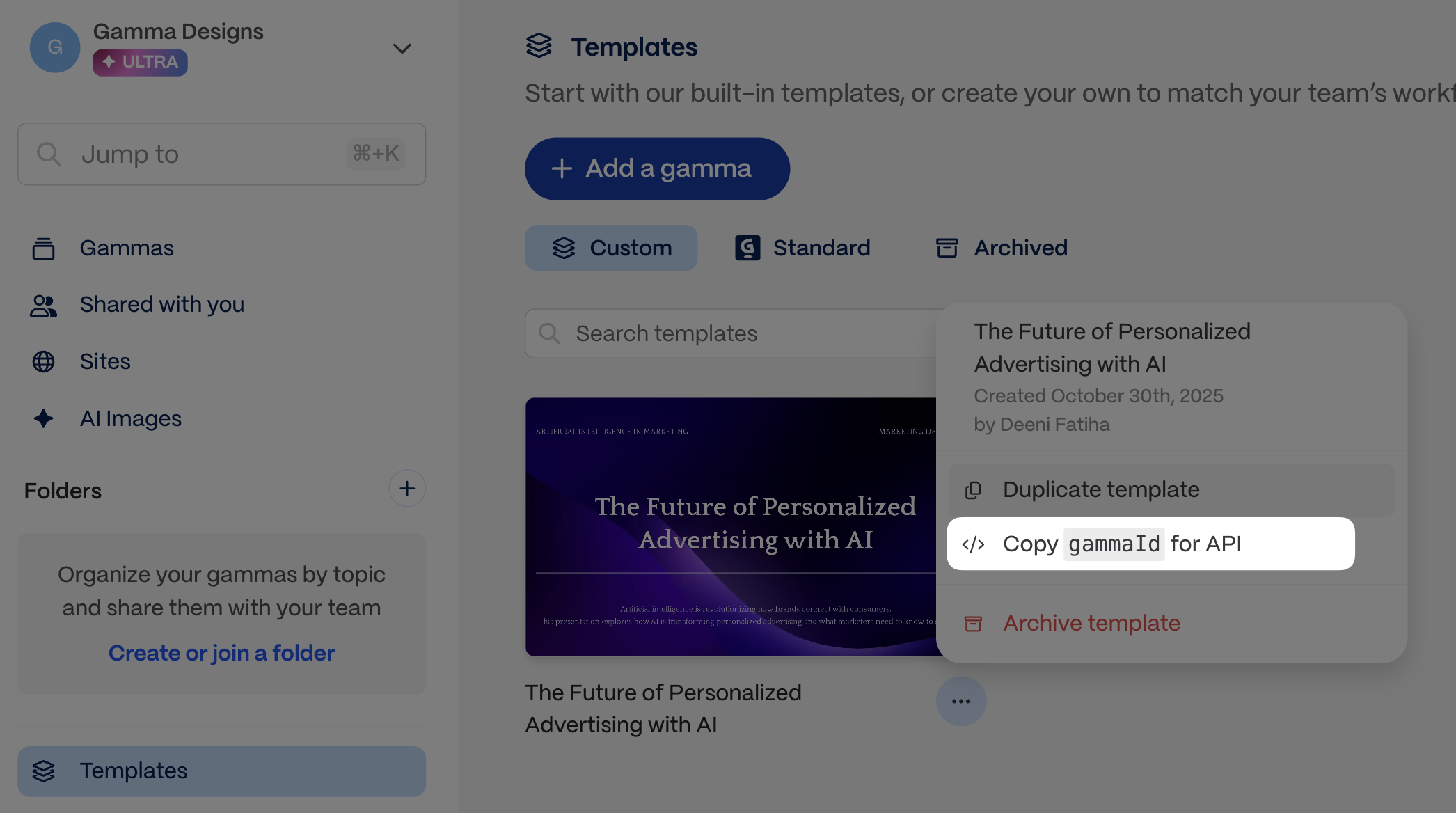
Copy the template Gamma ID from the app before you make the request.
{% endcolumn %} {% column %}

Create from Template works best when the source Gamma has exactly one page.
{% endcolumn %} {% endcolumns %} \*\*\* #### \`prompt\` \*(required)\* Use this parameter to send text content, image URLs, as well as instructions for how to use this content in relation to the template gamma. \*\*Add images to the input\*\* You can provide URLs for specific images you want to include. Simply insert the URLs into your content where you want each image to appear (see example below). You can also add instructions for how to display the images, eg, "Group the last 10 images into a gallery to showcase them together." \*\*Token limits\*\* The total token limit is 100,000, which is approximately 400,000 characters, but because part of your input is the gamma template, in practice, the token limit for your prompt becomes shorter. We highly recommend keeping your prompt well below 100,000 tokens and testing out a variety of inputs to get a good sense of what works for your use case. \*\*Other tips\*\* \* Text can be as little as a few words that describe the topic of the content you want to generate. \* You can also input longer text -- pages of messy notes or highly structured, detailed text. \* You may need to apply JSON escaping to your text. Find out more about JSON escaping and \[try it out here\](https://www.devtoolsdaily.com/json/escape/). {% code title="Example" %} \`\`\`json "prompt": "Change this pitch deck about deep sea exploration into one about space exploration." \`\`\` {% endcode %} {% code title="Example" %} \`\`\`json "prompt": "Change this pitch deck about deep sea exploration into one about space exploration. Use this quote and this image in the title card: That's one small step for man, one giant leap for mankind - Neil Armstrong, https://www.global-aero.com/wp-content/uploads/2020/06/ga-iss.jpg" \`\`\` {% endcode %} \*\*\* #### \`themeId\` \*(optional, defaults to workspace default theme)\* Defines which theme from Gamma will be used for the output. Themes determine the look and feel of the gamma, including colors and fonts. \* Use \[\`GET /v1.0/themes\`\](https://developers.gamma.app/docs/workspace/list-themes) to list themes from your workspace, or copy the theme ID directly from the app.

Copy the theme ID from the app
{% code title="Example" %} \`\`\`json "themeId": "abc123def456ghi" \`\`\` {% endcode %} \*\*\* #### \`folderIds\` \*(optional)\* Defines which folder(s) your gamma is stored in. \* Use \[\`GET /v1.0/folders\`\](https://developers.gamma.app/docs/workspace/list-folders) to list folders, or copy the folder ID directly from the app. \* You must be a member of a folder to add gammas to it.

Copy the folder ID from the app
\`\`\`json "folderIds": \["123abc456def", "456123abcdef"\] \`\`\` \*\*\* #### \`exportAs\` \*(optional)\* Indicates if you'd like to return the generated gamma as an exported file as well as a Gamma URL. \* Options are \`pdf\`, \`pptx\`, or \`png\` \* Export URLs are signed and expire after approximately one week. Download promptly after generation completes. \* If you do not wish to directly export via the API, you may always do so later via the app. {% hint style="warning" %} \*\*One export format per request.\*\* You can export to PDF, PPTX, or PNG, but not multiple formats in a single API call. If you need multiple formats, make separate generation requests or export additional formats manually from the Gamma app. {% endhint %} {% code title="Example" %} \`\`\`json "exportAs": "pdf" \`\`\` {% endcode %} \*\*\* #### imageOptions When you create content from a Gamma template, new images automatically match the image source used in the original template. For example if you used Pictographic images to generate your original template, any new images will be sourced from Pictographic. For templates with AI-generated images, you can override the default AI image settings using the optional parameters below. {% code title="Example" %} \`\`\`json "imageOptions": { "source": "aiGenerated" } \`\`\` {% endcode %} \*\*\`imageOptions.model\`\*\* \*(optional)\* This field is relevant if the \`imageOptions.source\` chosen is \`aiGenerated\`. The \`imageOptions.model\` parameter determines which model is used to generate images. \* You can choose from the models listed in \[Image model accepted values\](https://developers.gamma.app/docs/reference/image-model-accepted-values). \* If no value is specified for this parameter, Gamma automatically selects a model for you. {% code title="Example" %} \`\`\`json "imageOptions": { "model": "flux-1-pro" } \`\`\` {% endcode %} \*\*\`imageOptions.style\`\*\* \*(optional)\* This field is relevant if the \`imageOptions.source\` chosen is \`aiGenerated\`. The \`imageOptions.style\` parameter influences the artistic style of the images generated. While this is an optional field, we highly recommend adding some direction here to create images in a cohesive style. \* You can add one or multiple words to define the visual style of the images you want. \* Adding some direction -- even a simple one word like "photorealistic" -- can create visual consistency among the generated images. \* Character limits: 1-500. {% code title="Example" %} \`\`\`json "imageOptions": { "style": "minimal, black and white, line art" } \`\`\` {% endcode %} \*\*\* #### sharingOptions \*\*\`sharingOptions.workspaceAccess\`\*\* \*(optional, defaults to workspace share settings)\* Determines level of access members in your workspace will have to your generated gamma. \* Options are: \`noAccess\`, \`view\`, \`comment\`, \`edit\`, \`fullAccess\` \* \`fullAccess\`allows members from your workspace to view, comment, edit, and share with others. \`\`\`json "sharingOptions": { "workspaceAccess": "comment" } \`\`\` \*\*\`sharingOptions.externalAccess\`\*\* \*(optional, defaults to workspace share settings)\* Determines level of access members \*\*outside your workspace\*\* will have to your generated gamma. \* Options are: \`noAccess\`, \`view\`, \`comment\`, or \`edit\` {% code title="Example" %} \`\`\`json "sharingOptions": { "externalAccess": "noAccess" } \`\`\` {% endcode %} \*\*\`sharingOptions.emailOptions\`\*\* \*(optional)\* Allows you to share your gamma with specific recipients via their email address. {% code title="Example" %} \`\`\`json "sharingOptions": { "emailOptions": { "recipients": \["ceo@example.com", "cto@example.com"\] } } \`\`\` {% endcode %} \*\*\`sharingOptions.emailOptions.access\`\*\* \*(optional)\* Determines level of access those specified in \`sharingOptions.emailOptions.recipients\` have to your generated gamma. Only workspace members can have \`fullAccess\` \* Options are: \`view\`, \`comment\`, \`edit\`, or \`fullAccess\` {% code title="Example" %} \`\`\`json "sharingOptions": { "emailOptions": { "access": "comment" } } \`\`\` {% endcode %} ### Related \* \[Generate from text\](https://developers.gamma.app/docs/guides/generate-api-parameters-explained) if you want Gamma to determine the layout from scratch \* \[Poll for results\](https://developers.gamma.app/docs/guides/async-patterns-and-polling) for the polling flow after template generation starts \* \[API Overview\](https://developers.gamma.app/docs/get-started/understanding-the-api-options) for a side-by-side comparison of generation workflows # Poll for results Understanding how to work with Gamma’s asynchronous API and poll for results Gamma generation is asynchronous. You start a generation, receive a \`generationId\` immediately, then poll the status endpoint until the result is ready. ### Quick reference \* \`POST /v1.0/generations\` returns \`generationId\` only. \* Poll \`GET /v1.0/generations/{generationId}\` every 5 seconds until \`status\` is \`completed\` or \`failed\`. \* \`gammaUrl\` and \`exportUrl\` are only available from the completed status response. \* Export URLs are signed and expire after approximately one week. Download exported files promptly. ### The basic flow \`\`\` POST /generations → Returns { generationId: "abc123" } Wait ~5 seconds GET /generations/abc123 → Returns { status: "pending" } Wait ~5 seconds GET /generations/abc123 → Returns { status: "completed", gammaUrl: "...", exportUrl: "..." } \`\`\` ### What you get back When status is \`completed\`, the response includes: | Field | Description | | ----------- | ---------------------------------------------------------------- | | \`gammaUrl\` | Direct link to view/share the presentation in Gamma | | \`exportUrl\` | Download URL for the exported file (if \`exportAs\` was specified) | ### Generation states | Status | Meaning | What to Do | | ----------- | -------------------- | --------------------------------------------- | | \`pending\` | Still generating | Keep polling every 5 seconds | | \`completed\` | Done! | Stop polling — use \`gammaUrl\` and export URLs | | \`failed\` | Something went wrong | Stop polling, check the \`error\` object | ### Code examples {% tabs %} {% tab title="Python" %} \`\`\`python import requests import time API\_KEY = "sk-gamma-xxxxx" BASE\_URL = "https://public-api.gamma.app" def generate\_and\_wait(payload, max\_attempts=60, poll\_interval=5): """Generate a gamma and wait for completion.""" # Step 1: Start generation response = requests.post( f"{BASE\_URL}/v1.0/generations", headers={ "X-API-KEY": API\_KEY, "Content-Type": "application/json" }, json=payload ) response.raise\_for\_status() generation\_id = response.json()\["generationId"\] print(f"Generation started: {generation\_id}") # Step 2: Poll for completion for attempt in range(max\_attempts): time.sleep(poll\_interval) status\_response = requests.get( f"{BASE\_URL}/v1.0/generations/{generation\_id}", headers={"X-API-KEY": API\_KEY} ) status\_response.raise\_for\_status() result = status\_response.json() status = result.get("status") print(f"Attempt {attempt + 1}: {status}") if status == "completed": return result # Success! Contains gammaUrl elif status == "failed": raise Exception(f"Generation failed: {result.get('error')}") # status == "pending" - keep polling raise TimeoutError("Generation timed out") # Usage result = generate\_and\_wait({ "inputText": "Create a presentation about renewable energy", "textMode": "generate", "format": "presentation", "numCards": 8 }) print(f"Done! View at: {result\['gammaUrl'\]}") \`\`\` {% endtab %} {% tab title="JavaScript" %} \`\`\`javascript const API\_KEY = "sk-gamma-xxxxx"; const BASE\_URL = "https://public-api.gamma.app"; async function sleep(ms) { return new Promise(resolve => setTimeout(resolve, ms)); } async function generateAndWait(payload, maxAttempts = 60, pollInterval = 5000) { // Step 1: Start generation const startResponse = await fetch(\`${BASE\_URL}/v1.0/generations\`, { method: "POST", headers: { "X-API-KEY": API\_KEY, "Content-Type": "application/json" }, body: JSON.stringify(payload) }); if (!startResponse.ok) { throw new Error(\`Failed to start: ${await startResponse.text()}\`); } const { generationId } = await startResponse.json(); console.log(\`Generation started: ${generationId}\`); // Step 2: Poll for completion for (let attempt = 0; attempt < maxAttempts; attempt++) { await sleep(pollInterval); const statusResponse = await fetch( \`${BASE\_URL}/v1.0/generations/${generationId}\`, { headers: { "X-API-KEY": API\_KEY } } ); const result = await statusResponse.json(); console.log(\`Attempt ${attempt + 1}: ${result.status}\`); if (result.status === "completed") { return result; // Success! } else if (result.status === "failed") { throw new Error(\`Generation failed: ${JSON.stringify(result.error)}\`); } // status === "pending" - keep polling } throw new Error("Generation timed out"); } // Usage generateAndWait({ inputText: "Create a presentation about renewable energy", textMode: "generate", format: "presentation", numCards: 8 }).then(result => { console.log(\`Done! View at: ${result.gammaUrl}\`); }); \`\`\` {% endtab %} {% tab title="cURL" %} \`\`\`bash # Step 1: Start generation GENERATION\_ID=$(curl -s -X POST "https://public-api.gamma.app/v1.0/generations" \\ -H "X-API-KEY: sk-gamma-xxxxx" \\ -H "Content-Type: application/json" \\ -d '{ "inputText": "Create a presentation about renewable energy", "textMode": "generate", "format": "presentation", "numCards": 8 }' | jq -r '.generationId') echo "Generation ID: $GENERATION\_ID" # Step 2: Poll until complete while true; do sleep 5 RESULT=$(curl -s "https://public-api.gamma.app/v1.0/generations/$GENERATION\_ID" \\ -H "X-API-KEY: sk-gamma-xxxxx") STATUS=$(echo $RESULT | jq -r '.status') echo "Status: $STATUS" if \[ "$STATUS" = "completed" \]; then echo "Done! URL: $(echo $RESULT | jq -r '.gammaUrl')" break elif \[ "$STATUS" = "failed" \]; then echo "Failed: $(echo $RESULT | jq -r '.error')" exit 1 fi done \`\`\` {% endtab %} {% endtabs %} ### Using automation platforms Popular automation platforms have built-in ways to handle delays and polling: #### Zapier Use the \*\*Delay\*\* action between your HTTP Request steps: 1. \*\*HTTP Request\*\* (POST) → Start generation, get \`generationId\` 2. \*\*Delay for\*\* → Wait 30-60 seconds 3. \*\*HTTP Request\*\* (GET) → Check status with the \`generationId\` 4. Use \*\*Paths\*\* or \*\*Filter\*\* to check if \`status\` equals \`completed\` 5. If still pending, use \*\*Looping by Zapier\*\* to repeat steps 2-4 Zapier's "Delay for" action pauses your Zap for a specified time (minimum 1 minute). For most Gamma generations, a single 60-second delay followed by a status check works well. #### Make (formerly Integromat) Use the \*\*Sleep\*\* module or a polling pattern: 1. \*\*HTTP\*\* module → POST to start generation 2. \*\*Sleep\*\* module → Wait 30 seconds 3. \*\*HTTP\*\* module → GET to check status 4. \*\*Router\*\* with filter → Check if \`status\` is \`completed\` 5. Use \*\*Repeater\*\* + \*\*Sleep\*\* for polling loop #### n8n Use the \*\*Wait\*\* node with time interval: 1. \*\*HTTP Request\*\* node → POST to start generation 2. \*\*Wait\*\* node → Set to "After Time Interval" (30-60 seconds) 3. \*\*HTTP Request\*\* node → GET to check status 4. \*\*IF\*\* node → Check \`status === "completed"\` 5. Loop back to Wait node if still pending n8n's Wait node offloads execution data to the database during longer waits, so your workflow won't timeout even for complex generations. ### Best practices \* Use 5-second polling intervals. Polling more frequently will not speed up the generation and may increase the chance of rate limiting. \* Set a maximum timeout. Most generations complete within 2-3 minutes, so a 5-minute ceiling is a good default for automation. \* Handle all three states: \`pending\`, \`completed\`, and \`failed\`. \* Use exponential backoff if you receive a 429 response. ### Running multiple generations You can start multiple generations in parallel. To manage throughput: \* Use the \`x-ratelimit-remaining-burst\` header on each response to pace your requests. See \[Rate limit headers and adaptive polling\](#rate-limit-headers-and-adaptive-polling) below for how to read these headers. \* Stagger your \`POST /generations\` calls and poll the resulting IDs round-robin rather than waiting for each generation to complete before starting the next. \* If responses slow down or you receive a \`429\`, back off and let the rate limit headers guide your pacing. ### Starting a generation without waiting \`POST /generations\` returns a \`generationId\` immediately — you do not need to wait for the generation to finish inline. To poll later, all you need is your API key and the \`generationId\`. This is useful for workflows that start a generation in one step and check the result in a later step. For example, a multi-step automation can fire off a generation, continue with other work, and come back to poll \`GET /generations/{generationId}\` when it is ready to use the result. ### Monitoring credit usage The \`credits\` field (with \`deducted\` and \`remaining\`) appears on \`completed\` and \`failed\` poll responses. It is not included while the generation is still \`pending\`. \* Check \`credits.remaining\` after each completed generation before starting another. \* If credits run out, subsequent \`POST /generations\` calls return \`403\` with \`"Insufficient credits remaining"\`. Checking the remaining balance proactively avoids unexpected failures mid-workflow. \* Enable \[auto-recharge\](https://gamma.app/settings/billing) to avoid interruptions. ### Rate limit headers and adaptive polling Every API response includes headers that show your current rate limit usage. Use these to adjust your polling speed dynamically instead of waiting for a \`429\` error. To see these headers in curl, add the \`-i\` flag. You can also use \`-v\` for full verbose output including request headers and TLS details, but \`-i\` is cleaner for inspecting rate limits. {% code title="curl -i example" %} \`\`\`bash curl -i https://public-api.gamma.app/v1.0/generations/abc123 \\ -H "X-API-KEY: your-api-key" \`\`\` {% endcode %} {% code title="Response with headers" %} \`\`\` HTTP/2 200 content-type: application/json x-ratelimit-limit-burst: 10000 x-ratelimit-remaining-burst: 9994 x-ratelimit-limit: 40000 x-ratelimit-remaining: 39988 x-ratelimit-limit-daily: 200000 x-ratelimit-remaining-daily: 199950 { "generationId": "abc123", "status": "completed", "gammaUrl": "https://gamma.app/docs/abc123", "credits": { "deducted": 15, "remaining": 485 } } \`\`\` {% endcode %} Without \`-i\`, you'd only see the JSON body. The headers are always present — \`-i\` just tells curl to display them. In Python, JavaScript, or any HTTP client, these headers are always accessible on the response object without any special flag. | Header | Description | | ----------------------------- | ---------------------------------------------------- | | \`x-ratelimit-limit-burst\` | Maximum requests allowed in the current short window | | \`x-ratelimit-remaining-burst\` | Requests remaining in the current short window | | \`x-ratelimit-limit\` | Maximum requests allowed per hour | | \`x-ratelimit-remaining\` | Requests remaining in the current hour | | \`x-ratelimit-limit-daily\` | Maximum requests allowed per day | | \`x-ratelimit-remaining-daily\` | Requests remaining today | #### Adaptive polling example Instead of a fixed 5-second interval, read \`x-ratelimit-remaining-burst\` and slow down when capacity is low: {% tabs %} {% tab title="Python" %} \`\`\`python remaining = int(status\_response.headers.get("X-RateLimit-Remaining-Burst", 9999)) if remaining < 100: poll\_interval = 15 else: poll\_interval = 5 time.sleep(poll\_interval) \`\`\` {% endtab %} {% tab title="JavaScript" %} \`\`\`javascript const remaining = parseInt( statusResponse.headers.get("X-RateLimit-Remaining-Burst") ?? "9999" ); const pollInterval = remaining < 100 ? 15000 : 5000; await sleep(pollInterval); \`\`\` {% endtab %} {% endtabs %} {% hint style="info" %} \*\*Generation time varies.\*\* Larger decks, AI-generated images, and higher-quality image models all increase generation time. A 5-card deck with no images may complete in under a minute, while a 40-card deck with AI images could take several minutes. Factor this into your timeout and polling logic — there is no single "right" interval for all requests. {% endhint %} #### Handling a 429 response If you hit the rate limit, the API returns \`429 Too Many Requests\`. Pause for 30 seconds before retrying, then use exponential backoff if subsequent requests also return \`429\`. ### Common issues #### \`status\` stays \`pending\` for too long Generations typically complete in 1-3 minutes. If you are waiting longer than 5 minutes: \* Check that you're polling the correct \`generationId\` \* Verify your API key has sufficient credits \* Try generating with fewer cards (\`numCards\`) to test #### You receive a 429 rate-limit response If you receive a 429 error: \* Use 5+ second polling intervals \* Use \`curl -i\` to check the \`x-ratelimit-remaining-burst\` header and see if you're near the limit \* See \[Rate limit headers and adaptive polling\](#rate-limit-headers-and-adaptive-polling) above for how to throttle dynamically \* If you're using Zapier, Make, or n8n, the rate limit may be on the platform side rather than Gamma's ### Related \* \[Error codes\](https://developers.gamma.app/docs/reference/error-codes) for the full list of API errors and troubleshooting guidance \* \[Generate from text\](https://developers.gamma.app/docs/guides/generate-api-parameters-explained) for parameter-level guidance on \`POST /v1.0/generations\` \* \[Charts and structured content\](https://developers.gamma.app/docs/guides/charts-and-structured-content) for prompting charts and infographics \* \[Image URL best practices\](https://developers.gamma.app/docs/guides/image-url-best-practices) for including your own images \* \[API Overview\](https://developers.gamma.app/docs/get-started/understanding-the-api-options) for a broader workflow comparison # Use themes and folders How to use the themes and folders endpoints to fetch the IDs you need for generation requests. Use these endpoints when you need to look up IDs for a generation request. ### Quick reference \* Call \`GET /v1.0/themes\` to get a \`themeId\`. \* Call \`GET /v1.0/folders\` to get values for \`folderIds\`. \* Both endpoints use cursor-based pagination with \`query\`, \`limit\`, \`after\`, \`hasMore\`, and \`nextCursor\`. \* Theme objects include \`type\` (\`standard\` or \`custom\`), \`colorKeywords\`, and \`toneKeywords\`. {% hint style="info" %} This page focuses on how to use theme and folder IDs in your workflow. For the exact parameter and response schema, see the \[GET /themes\](https://developers.gamma.app/docs/workspace/list-themes) and \[GET /folders\](https://developers.gamma.app/docs/workspace/list-folders) endpoint reference pages. {% endhint %} ### List themes Returns a paginated list of themes in your workspace, including both workspace-specific and global themes. {% code title="Request" %} \`\`\`bash curl -X GET https://public-api.gamma.app/v1.0/themes \\ -H "X-API-KEY: sk-gamma-xxxxxxxx" \`\`\` {% endcode %} \*\*Response fields\*\* -- each theme object in the \`data\` array contains: {% code title="Sample response" %} \`\`\`json { "id": "abcdefghi", "name": "Prism", "type": "custom", "colorKeywords": \["light","blue","pink","purple","pastel","gradient","vibrant"\], "toneKeywords": \["playful","friendly","creative","inspirational","fun"\] } \`\`\` {% endcode %} The \`type\` field distinguishes between \`standard\` (global themes available to all workspaces) and \`custom\` (workspace-specific themes). ### List folders Returns a paginated list of folders in your workspace. {% code title="Request" %} \`\`\`bash curl -X GET https://public-api.gamma.app/v1.0/folders \\ -H "X-API-KEY: sk-gamma-xxxxxxxx" \`\`\` {% endcode %} \*\*Response fields\*\* -- each folder object in the \`data\` array contains: {% code title="Sample response" %} \`\`\`json { "id": "abc123def456", "name": "Business Proposals" } \`\`\` {% endcode %} ### Pagination Both endpoints use the same cursor-based pagination. The example below uses folders, but the pattern is identical for themes. \*\*First page:\*\* {% code title="Request" %} \`\`\` GET /v1.0/folders?limit=50 \`\`\` {% endcode %} {% code title="Response" %} \`\`\`json { "data": \[ { "id": "abcdef", "name": "Design" }, { "id": "xyzabc", "name": "Marketing" } \], "hasMore": true, "nextCursor": "abc123def456ghi789" } \`\`\` {% endcode %} \*\*Next page\*\* -- pass the previous \`nextCursor\` as \`after\`. When \`hasMore\` is \`false\` and \`nextCursor\` is \`null\`, you've reached the end. {% code title="Request" %} \`\`\` GET /v1.0/folders?limit=50&after=abc123def456ghi789 \`\`\` {% endcode %} {% code title="Response" %} \`\`\`json { "data": \[ { "id": "lmnop1", "name": "Sales" }, { "id": "qrstuv", "name": "Product" } \], "hasMore": false, "nextCursor": null } \`\`\` {% endcode %} ### Searching by name Use the \`query\` parameter to filter results by name. Works on both themes and folders. {% code title="Request" %} \`\`\` GET /v1.0/themes?query=dark&limit=50 \`\`\` {% endcode %} {% code title="Response" %} \`\`\`json { "data": \[ { "id": "abc123def456", "name": "Standard Dark", "type": "standard", "colorKeywords": \["black", "gray", "accent"\], "toneKeywords": \["sophisticated", "modern"\] } \], "hasMore": false, "nextCursor": null } \`\`\` {% endcode %} The returned \`id\` can be used as \`themeId\` in the Generate and Create from Template APIs. ### Related \* \[Generate from text\](https://developers.gamma.app/docs/guides/generate-api-parameters-explained) for where \`themeId\` and \`folderIds\` fit in the request \* \[Generate from template\](https://developers.gamma.app/docs/guides/create-from-template-api-parameters-explained) for using theme and folder IDs with templates \* \[GET /themes\](https://developers.gamma.app/docs/workspace/list-themes) for the full API reference \* \[GET /folders\](https://developers.gamma.app/docs/workspace/list-folders) for the full API reference # Format headers and footers Detailed guide to customizing headers and footers in Gamma presentations. Headers and footers let you add consistent branding elements, page numbers, and custom text across all cards in your presentation. ### Quick reference | Position | Description | | -------------- | --------------------------------- | | \`topLeft\` | Top-left corner of every card | | \`topCenter\` | Top-center of every card | | \`topRight\` | Top-right corner of every card | | \`bottomLeft\` | Bottom-left corner of every card | | \`bottomCenter\` | Bottom-center of every card | | \`bottomRight\` | Bottom-right corner of every card | | Element Type | Use Case | | ------------ | --------------------------------- | | \`text\` | Company name, copyright, taglines | | \`image\` | Logo from theme or custom URL | | \`cardNumber\` | Slide/page numbers | ### Basic structure The \`headerFooter\` object goes inside \`cardOptions\`: \`\`\`json { "cardOptions": { "headerFooter": { "topRight": { "type": "...", // type-specific properties }, "bottomLeft": { "type": "...", // type-specific properties } } } } \`\`\` ### Element types #### Text elements Add custom text like company names, copyright notices, or taglines. \`\`\`json { "cardOptions": { "headerFooter": { "bottomRight": { "type": "text", "value": "© 2025 Acme Corp" }, "topLeft": { "type": "text", "value": "Confidential" } } } } \`\`\` The \`value\` field is required for text elements. Keep text short because headers and footers have limited space. #### Image elements (theme logo) Use the logo from your selected theme: \`\`\`json { "cardOptions": { "headerFooter": { "topRight": { "type": "image", "source": "themeLogo", "size": "md" } } } } \`\`\` | Size | Description | | ---- | --------------------------------- | | \`sm\` | Small logo (subtle branding) | | \`md\` | Medium logo (default, balanced) | | \`lg\` | Large logo (prominent) | | \`xl\` | Extra large logo (very prominent) | #### Image elements (custom URL) Use your own logo image: \`\`\`json { "cardOptions": { "headerFooter": { "topRight": { "type": "image", "source": "custom", "src": "https://example.com/your-logo.png", "size": "sm" } } } } \`\`\` When using \`source: "custom"\`, the \`src\` field is required and must be a valid, publicly accessible URL to an image file. #### Card numbers Add automatic page/slide numbers: \`\`\`json { "cardOptions": { "headerFooter": { "bottomRight": { "type": "cardNumber" } } } } \`\`\` Card numbers have no additional configuration. Just specify the position and type. ### Hiding from first and last cards You often want to hide headers/footers from title cards or closing cards. Add these properties \*\*at the \`headerFooter\` level\*\* (they apply to all positions): \`\`\`json { "cardOptions": { "headerFooter": { "topRight": { "type": "image", "source": "themeLogo" }, "bottomRight": { "type": "cardNumber" }, "hideFromFirstCard": true, "hideFromLastCard": true } } } \`\`\` | Property | Default | Description | | ------------------- | ------- | ---------------------------------------------- | | \`hideFromFirstCard\` | \`false\` | Set \`true\` to hide from title/intro card | | \`hideFromLastCard\` | \`false\` | Set \`true\` to hide from closing/thank you card | ### Complete examples #### Professional presentation (logo and page numbers) \`\`\`json { "inputText": "Create a quarterly business review for Q4 2024", "textMode": "generate", "format": "presentation", "numCards": 12, "cardOptions": { "dimensions": "16x9", "headerFooter": { "topRight": { "type": "image", "source": "custom", "src": "https://example.com/company-logo.png", "size": "sm" }, "bottomRight": { "type": "cardNumber" }, "bottomLeft": { "type": "text", "value": "Confidential - Internal Use Only" }, "hideFromFirstCard": true, "hideFromLastCard": true } } } \`\`\` #### Social media carousel (minimal branding) \`\`\`json { "inputText": "5 tips for better productivity", "textMode": "generate", "format": "social", "numCards": 6, "cardOptions": { "dimensions": "1x1", "headerFooter": { "bottomCenter": { "type": "text", "value": "@yourhandle" } } } } \`\`\` #### Document with theme logo \`\`\`json { "inputText": "Technical specification for Project X", "textMode": "generate", "format": "document", "numCards": 8, "cardOptions": { "dimensions": "letter", "headerFooter": { "topLeft": { "type": "image", "source": "themeLogo", "size": "md" }, "topRight": { "type": "text", "value": "Technical Specification" }, "bottomRight": { "type": "cardNumber" } } } } \`\`\` ### Common mistakes #### Missing \`value\` for text elements \`\`\`json // ❌ Wrong - missing value { "type": "text" } // ✅ Correct { "type": "text", "value": "My Text" } \`\`\` #### Missing \`src\` for custom images \`\`\`json // ❌ Wrong - missing src { "type": "image", "source": "custom" } // ✅ Correct { "type": "image", "source": "custom", "src": "https://..." } \`\`\` #### Boolean values as strings \`\`\`json // ❌ Wrong - string instead of boolean { "hideFromFirstCard": "true" } // ✅ Correct { "hideFromFirstCard": true } \`\`\` ### Limitations \* \*\*Not available for \`webpage\` format\*\* — web pages don't have fixed headers/footers \* \*\*Six positions maximum\*\* — you can only use the six defined positions \* \*\*One element per position\*\* — each position can only hold one type of content ### Related \* \[Generate from text\](https://developers.gamma.app/docs/guides/generate-api-parameters-explained) for the full \`cardOptions\` and \`sharingOptions\` context \* \[Image model accepted values\](https://developers.gamma.app/docs/reference/image-model-accepted-values) if you are pairing branding with AI-generated images \* \[API Overview\](https://developers.gamma.app/docs/get-started/understanding-the-api-options) for the broader generation workflow # Optimize image URLs How to include your own images in API-generated gammas, and how to avoid common issues with broken or missing images. You can include your own images in API-generated gammas by placing image URLs directly in your \`inputText\` (Generate API) or \`prompt\` (Create from Template API). This page covers the technical requirements and common pitfalls. ### Quick reference \* URLs must be HTTPS, end with a recognized image extension, and be publicly accessible. \* Set \`imageOptions.source\` to \`noImages\` if you want only your provided images. \* Gamma fetches and re-hosts images during generation, so URLs only need to be live at generation time. \* Test URLs in an incognito window -- if you can see the image without logging in, Gamma can access it. ### How it works When Gamma encounters an image URL in your input, it: 1. Detects the URL based on format (see requirements below) 2. Fetches the image from your URL during generation 3. Re-hosts the image on Gamma's CDN If the fetch fails for any reason, the image is silently skipped — you won't get an error, but the image won't appear in the output. ### URL requirements For Gamma to detect and use your image URLs, they must meet \*\*all\*\* of the following: | \*\*Requirement\*\* | \*\*Details\*\* | | -------------------------- | ------------------------------------------------------------------------------------------------------------------- | | HTTPS only | URLs must start with \`https://\`. HTTP URLs are ignored. | | Recognized image extension | Must end with one of: \`.jpg\`, \`.jpeg\`, \`.png\`, \`.gif\`, \`.webp\`, \`.svg\`, \`.heic\`, \`.heif\`, \`.avif\` | | Publicly accessible | No authentication headers, login walls, or IP restrictions. Gamma's servers must be able to fetch the URL directly. | {% hint style="warning" %} \*\*Query parameters are fine.\*\* URLs like \`https://cdn.example.com/photo.jpg?width=800&quality=90\` will work — Gamma matches the extension before any \`?\` query string. {% endhint %} #### What won't work | URL type | Why it fails | | ------------------------------------------- | ------------------------------------------------------- | | \`http://example.com/photo.jpg\` | Not HTTPS | | \`https://example.com/image\` | No recognized extension | | \`https://example.com/document.pdf\` | Not an image extension | | \`https://internal.corp.net/photo.jpg\` | Not publicly accessible | | \`\` | HTML tags — use the raw URL instead | | \`!\[alt\](https://example.com/photo.jpg)\` | Already-wrapped markdown is skipped by the preprocessor | ### Placement in your input Image URLs can appear \*\*inline with your text or on their own line\*\* — both work. Gamma scans for any whitespace-separated URL matching the requirements above. {% code title="Inline with text" %} \`\`\` "inputText": "Our headquarters https://cdn.example.com/office.jpg is located in San Francisco." \`\`\` {% endcode %} {% code title="On its own line" %} \`\`\` "inputText": "Our headquarters\\nhttps://cdn.example.com/office.jpg\\nis located in San Francisco." \`\`\` {% endcode %} {% code title="Multiple images" %} \`\`\` "inputText": "Product lineup:\\nhttps://cdn.example.com/product-a.jpg\\nhttps://cdn.example.com/product-b.png\\nhttps://cdn.example.com/product-c.webp" \`\`\` {% endcode %} ### Use \`noImages\` to prevent extra images If you want \*\*only\*\* your provided images (no AI-generated or stock images added by Gamma), set \`imageOptions.source\` to \`noImages\`: \`\`\`json { "inputText": "...", "textMode": "preserve", "imageOptions": { "source": "noImages" } } \`\`\` Without this, Gamma may add additional images from the selected source alongside yours. ### Hosting recommendations Since Gamma fetches and re-hosts your images during generation, the URLs only need to be accessible at generation time. However, using reliable hosting avoids intermittent failures. | URL type | Recommended | Notes | | ------------------------------------------- | ----------- | ------------------------------------------------------- | | Public CDN (Cloudflare, CloudFront, Fastly) | ✅ Yes | Permanent, fast, reliable | | Direct image hosting (Imgur, Unsplash) | ✅ Yes | Generally permanent | | S3/GCS signed URL (7+ day expiry) | ✅ Yes | Works if expiration is long enough | | S3/GCS signed URL (< 24 hours) | ❌ No | May expire before Gamma fetches it | | Google Drive / Dropbox share links | ⚠️ Maybe | Can break if permissions change; not a direct image URL | | URLs behind CDN hotlink protection | ❌ No | Gamma's servers will be blocked | | Localhost / private network IPs | ❌ No | Not accessible to Gamma's servers | {% hint style="success" %} \*\*Quick test:\*\* Open your image URL in an incognito browser window. If you can see the image without logging in, Gamma can access it too. {% endhint %} ### Troubleshooting #### Images appear during generation but disappear on refresh Your URLs were accessible when Gamma first rendered the content, but the re-hosting step failed — usually because of hotlink protection, rate limiting, or signed URLs that expired between the initial render and the background upload. Use permanent, publicly accessible URLs. #### Images don't appear at all Check that your URLs meet all three requirements (HTTPS, recognized extension, publicly accessible). Also check that you're not wrapping them in HTML \`\` tags or markdown image syntax — use raw URLs only. #### Some images work, others don't Each URL is fetched independently. A mix of working and broken images usually means some URLs have access restrictions or don't end with a recognized extension. Test each URL individually in an incognito window. ### Related \* \[Generate from text\](https://developers.gamma.app/docs/guides/generate-api-parameters-explained) for where image URLs fit in \`inputText\` \* \[Generate from template\](https://developers.gamma.app/docs/guides/create-from-template-api-parameters-explained) for using image URLs in the \`prompt\` field \* \[Poll for results\](https://developers.gamma.app/docs/guides/async-patterns-and-polling) for the generation workflow after submitting your request # Add charts and structured content How to get the best chart, table, and structured visual results from the Gamma API. The Gamma API can generate charts, tables, and infographics as part of your output. Generation is non-deterministic — results may vary across runs, even with identical inputs. There are no API parameters to directly control chart type, styling, or data formatting, but you can steer the output through your prompts. ### Quick reference \* Charts are prompted through \`inputText\` and \`additionalInstructions\`, not through dedicated API parameters. \* Provide explicit data values and chart type for best results. \* Use the Create from Template API for consistent chart layouts across repeated generations. \* Output varies between runs -- test a few generations to calibrate your prompts. ### How to prompt for charts You influence chart output through \`inputText\` and \`additionalInstructions\`. The more specific you are, the better the results. {% tabs %} {% tab title="Vague (less predictable)" %} \`\`\`json { "inputText": "Revenue data for 2024", "additionalInstructions": "Include a chart" } \`\`\` {% endtab %} {% tab title="Specific (more predictable)" %} \`\`\`json { "inputText": "Revenue by quarter:\\nQ1: $1.2M\\nQ2: $1.5M\\nQ3: $1.8M\\nQ4: $2.1M", "additionalInstructions": "Display this data as a bar chart with quarters on the x-axis and revenue on the y-axis" } \`\`\` {% endtab %} {% endtabs %} ### Tips for better results \* \*\*Specify the chart type.\*\* "Bar chart comparing X and Y" produces more predictable output than "include a chart." \* \*\*Provide structured data.\*\* Explicit values (tables, bullet points with numbers) give the AI clear data to work with. \* \*\*Use \`additionalInstructions\`\*\* to reinforce preferences: "Use bar charts for comparisons, pie charts for proportions." \* \*\*Keep data labels unambiguous.\*\* Labels that resemble numeric values (e.g. \`$100\` as a category name) may be interpreted as data. \* \*\*Test a few runs.\*\* Since output varies, run a few generations to see the range and refine your prompts accordingly. ### Using templates for more consistent output If you need predictable chart layouts, the \[Create from Template API\](https://developers.gamma.app/docs/guides/create-from-template-api-parameters-explained) is a better fit. Design a gamma in the app with the exact chart types and layouts you want, then use the API to generate new content into that structure. ### Tables and infographics The same prompting principles apply: \* Provide structured data (rows, columns, key-value pairs) in your input for best table results \* Infographics such as timelines and process flows can be prompted for, but the AI determines the final layout \* Your theme controls styling for all structured content ### Related \* \[Generate from text\](https://developers.gamma.app/docs/guides/generate-api-parameters-explained) for \`inputText\` and \`additionalInstructions\` usage \* \[Generate from template\](https://developers.gamma.app/docs/guides/create-from-template-api-parameters-explained) for consistent chart layouts \* \[Image URL best practices\](https://developers.gamma.app/docs/guides/image-url-best-practices) if you want to include your own chart images # Set up the MCP server Gamma MCP powers Gamma Connectors and integrations in popular AI tools. Gamma MCP is a hosted server that gives AI tools the ability to create gammas on your behalf. Integrations like the Gamma connectors in Claude and ChatGPT are powered by this server. ### Quick reference \* Works with any AI tool that supports the Model Context Protocol. \* Available on all Gamma plans. Generations charge credits. \* Three capabilities: generate content, browse themes, organize to folders. \* Uses OAuth with Dynamic Client Registration for custom integrations. \* See \[MCP tools reference\](https://developers.gamma.app/docs/mcp/mcp-tools-reference) for full parameter tables and authentication details. ### Capabilities \*\*Generate content\*\* -- create presentations, documents, webpages, or social posts with control over text density, tone, audience, language, images, themes, layout, headers/footers, export format, and sharing permissions. \*\*Browse themes\*\* -- search Gamma's theme library by name. Each theme includes tone and color keywords to help match your style. \*\*Organize to folders\*\* -- browse or search your Gamma folders and save generated content to specific locations. ### Getting started To use a Gamma Connector, you need an AI tool with a Gamma Connector in its library and a Gamma account on any plan. The setup process varies by platform -- see \[Connect integrations\](https://developers.gamma.app/docs/connectors/connectors-and-integrations) for step-by-step instructions. ### Tips for best results \* Be specific about structure: "create a 10-slide marketing strategy covering target audience, channels, budget, and metrics" works better than "make a presentation about marketing." \* Describe your style upfront: "professional and minimal," "colorful and creative," "corporate and clean." \* Specify the format: presentation, document, webpage, or social post. \* Control text density: "keep slides brief with bullet points" or "include detailed explanations." \* Mention folder names if you want content organized: "save to my Marketing folder." \* Request exports when needed: "export as PowerPoint" or "generate a PDF." ### Request custom MCP access {% hint style="info" %} \*\*Building your own integration?\*\* The Gamma MCP server uses OAuth with Dynamic Client Registration (DCR). Your platform must support DCR to connect. {% endhint %} [Request MCP Access](https://docs.google.com/forms/d/1y5EJFP8pbl2-0PfTQexcs5vsvWpnPj3Q9bKOaH_4wuE/viewform)
The form asks for your name, email, company, use case description, OAuth redirect URIs, and a logo for the consent page (SVG, PNG, or JPEG, 256x256 px). ### Troubleshooting Authentication errors Your connection to Gamma may have expired. Disconnect and reconnect the Gamma connector in your AI assistant to refresh authentication. Connection problems Make sure you're logged into both your AI assistant and your Gamma account before connecting. If issues persist, check your network connection. Insufficient credits Your account doesn't have enough credits. Purchase more at \[Settings > Billing\](https://gamma.app/settings/billing) or upgrade your plan. Invalid parameters Your AI assistant will typically retry with corrected values. If the issue persists, try rephrasing your request with simpler options. \### FAQ Connectors, MCP, and API -- which should I use? \*\*No-code users:\*\* Use Gamma connectors in Claude or ChatGPT for conversational creation, or Zapier/Make/n8n for automated workflows. \*\*Developers:\*\* Use Gamma MCP if you're building a custom AI tool integration that supports MCP. Use the \[Gamma API\](https://developers.gamma.app/docs/get-started/understanding-the-api-options) if you need full programmatic control over requests and responses. Can I edit a gamma using MCP? Not today. Editing is only available in the \[Gamma app\](https://gamma.app). What can I request through Gamma MCP? The same capabilities as the Generate API. See the \[Generate API parameters\](https://developers.gamma.app/docs/guides/generate-api-parameters-explained) guide for the full list. Where can I learn more about MCP? Visit the \[Model Context Protocol website\](https://modelcontextprotocol.io/) for technical details. \### Related \* \[MCP tools reference\](https://developers.gamma.app/docs/mcp/mcp-tools-reference) for authentication, parameter tables, and error handling \* \[Connect integrations\](https://developers.gamma.app/docs/connectors/connectors-and-integrations) for platform-specific setup instructions \* \[Generate from text\](https://developers.gamma.app/docs/guides/generate-api-parameters-explained) for the full parameter reference \* \[Access and pricing\](https://developers.gamma.app/docs/get-started/access-and-pricing) for credit costs and plan details # MCP tools reference Authentication, tools, parameters, and error handling for the Gamma MCP server. Complete reference for the Gamma MCP server's authentication, available tools, input parameters, and error handling. ## Quick reference \* All requests require an OAuth 2.0 Bearer token. \* Three tools: \`generate\`, \`get\_themes\`, \`get\_folders\`. \* OAuth discovery via RFC 9728 at \`/.well-known/oauth-protected-resource\`. \* Dynamic Client Registration supported via RFC 7591. \* Errors return \`{ "error": "...", "isError": true }\`. ## Authentication The Gamma MCP server uses OAuth 2.0. Every request must include a valid Bearer token. ### Authorization header Include your token with each request: \`\`\` Authorization: Bearer \`\`\` ### OAuth discovery The server implements \[RFC 9728\](https://datatracker.ietf.org/doc/html/rfc9728) (OAuth Protected Resource Metadata). Clients retrieve OAuth configuration at: \`\`\` GET /.well-known/oauth-protected-resource \`\`\` ### Dynamic client registration The authorization server supports \[RFC 7591\](https://datatracker.ietf.org/doc/html/rfc7591) Dynamic Client Registration. Discover the registration endpoint URL from the authorization server metadata obtained via the OAuth discovery endpoint above. ### Authentication errors A failed authentication returns \`401 Unauthorized\` with a \`WWW-Authenticate\` header: \`\`\` WWW-Authenticate: Bearer resource\_metadata="https:///.well-known/oauth-protected-resource" \`\`\` Use the \`resource\_metadata\` URI to discover the authorization server and initiate the OAuth flow. ## Tools overview | Tool | Description | Read-only | Destructive | Idempotent | | ------------- | ---------------------------------------------------------- | --------- | ----------- | ---------- | | \`generate\` | Create presentations, documents, webpages, or social posts | No | No | No | | \`get\_themes\` | Browse or search the Gamma theme library | Yes | No | Yes | | \`get\_folders\` | Browse or search your Gamma folders | Yes | No | Yes | ## generate Create a new presentation, document, webpage, or social media post. Ask the user clarifying questions about text mode, length, tone, and audience when needed. Each call creates new content — the tool is not idempotent. ### Input parameters
| Parameter | Type | Required | Description |
| --- | --- | --- | --- |
| `inputText` | `string` | Yes | Content to generate from — a text prompt, outline, or full content |
| `textMode` | `enum` | No | How to handle input text: `generate` (new content from brief prompt), `condense` (summarize existing content), `preserve` (use content as-is) |
| `format` | `enum` | No | Output type: `presentation`, `document`, `social`, `webpage` |
| `numCards` | `int` | No | Number of slides, cards, or pages to generate |
| `themeId` | `string` | No | Theme ID from `get_themes` |
| `folderIds` | `array[string]` | No | Folder IDs from `get_folders` to organize the content |
| `additionalInstructions` | `string` | No | Extra guidance for the AI generator not covered by other parameters |
| `exportAs` | `enum` | No | Export format: `pptx` or `pdf` (only when the user explicitly requests export) |
\### Text options Optional \`textOptions\` object for controlling text generation. | Parameter | Type | Description | | ---------- | -------- | ----------------------------------------------------------------------------- | | \`amount\` | \`enum\` | Text density per slide or section: \`brief\`, \`medium\`, \`detailed\`, \`extensive\` | | \`tone\` | \`string\` | Writing tone (e.g., \`professional\`, \`casual\`) | | \`audience\` | \`string\` | Target audience (e.g., \`executives\`, \`students\`) | | \`language\` | \`string\` | Language code (e.g., \`en\`, \`es\`, \`fr\`) | ### Image options Optional \`imageOptions\` object for controlling image sourcing. | Parameter | Type | Description | | ------------- | -------- | ------------------------------------------------------------------------------------------------------------------------------------------------------- | | \`source\` | \`enum\` | Image source: \`aiGenerated\`, \`webAllImages\`, \`webFreeToUse\`, \`webFreeToUseCommercially\`, \`pictographic\`, \`giphy\`, \`unsplash\`, \`placeholder\`, \`noImages\` | | \`model\` | \`string\` | AI image model (only when \`source\` is \`aiGenerated\`) | | \`style\` | \`string\` | Custom style description for AI images (used when \`stylePreset\` is \`custom\` or omitted) | | \`stylePreset\` | \`enum\` | Art style preset: \`photorealistic\`, \`illustration\`, \`abstract\`, \`3D\`, \`lineArt\`, \`custom\`. Defaults to \`custom\` | ### Card options Optional \`cardOptions\` object for layout and header/footer configuration. | Parameter | Type | Description | | -------------- | -------- | --------------------------------------------------------------------------------------------------- | | \`dimensions\` | \`enum\` | Aspect ratio or page size: \`16x9\`, \`4x3\`, \`fluid\`, \`letter\`, \`a4\`, \`pageless\`, \`1x1\`, \`4x5\`, \`9x16\` | | \`headerFooter\` | \`object\` | Header and footer configuration (only use if explicitly requested) | \*\*Header/footer object\*\* The \`headerFooter\` object contains six slot positions and two visibility flags. All properties are optional. | Parameter | Type | Description | | ------------------- | --------- | -------------------------------------- | | \`topLeft\` | \`object\` | Top-left header slot | | \`topCenter\` | \`object\` | Top-center header slot | | \`topRight\` | \`object\` | Top-right header slot | | \`bottomLeft\` | \`object\` | Bottom-left footer slot | | \`bottomCenter\` | \`object\` | Bottom-center footer slot | | \`bottomRight\` | \`object\` | Bottom-right footer slot | | \`hideFromFirstCard\` | \`boolean\` | Hide header/footer from the first card | | \`hideFromLastCard\` | \`boolean\` | Hide header/footer from the last card | \*\*Slot configuration\*\* Each slot object (\`topLeft\`, \`topCenter\`, etc.) accepts: | Parameter | Type | Required | Description | | --------- | -------- | -------- | --------------------------------------------------------------------- | | \`type\` | \`enum\` | Yes | Content type: \`cardNumber\`, \`image\`, \`text\` | | \`source\` | \`enum\` | No | Image source (required when \`type\` is \`image\`): \`themeLogo\`, \`custom\` | | \`src\` | \`string\` | No | Image URL (required when \`type\` is \`image\` and \`source\` is \`custom\`) | | \`value\` | \`string\` | No | Text content (required when \`type\` is \`text\`) | | \`size\` | \`enum\` | No | Image size: \`sm\`, \`md\`, \`lg\`, \`xl\` | ### Sharing options Optional \`sharingOptions\` object for controlling access after generation. | Parameter | Type | Description | | ----------------- | -------- | ---------------------------------------------------------------------------- | | \`workspaceAccess\` | \`enum\` | Workspace member access: \`edit\`, \`comment\`, \`view\`, \`noAccess\`, \`fullAccess\` | | \`externalAccess\` | \`enum\` | External user access: \`edit\`, \`comment\`, \`view\`, \`noAccess\` | | \`emailOptions\` | \`object\` | Share via email to specific recipients (see below) | \*\*Email options object\*\* | Parameter | Type | Required | Description | | ------------ | --------------- | -------- | --------------------------------------------------------------- | | \`recipients\` | \`array\[string\]\` | Yes | Email addresses to share with | | \`access\` | \`enum\` | Yes | Recipient access level: \`edit\`, \`comment\`, \`view\`, \`fullAccess\` | ### Output | Field | Type | Description | | ------------------- | -------- | ---------------------------------------------------------------- | | \`generationId\` | \`string\` | Unique ID for the generation | | \`status\` | \`enum\` | Generation status: \`completed\` or \`failed\` | | \`gammaUrl\` | \`string\` | URL to the created content (when \`status\` is \`completed\`) | | \`exportUrl\` | \`string\` | Download URL for the export file (when \`exportAs\` was specified) | | \`credits.deducted\` | \`int\` | Credits deducted for this generation | | \`credits.remaining\` | \`int\` | Remaining credits after generation | | \`error\` | \`string\` | Error message (when \`status\` is \`failed\`) | ## get\\\_themes Browse or search the Gamma theme library. Use the returned \`id\` in the \`generate\` tool's \`themeId\` parameter. If the user references a theme by name, search by name. Otherwise, fetch the full list and choose based on tone and color keywords. ### Input parameters | Parameter | Type | Description | | --------- | -------- | ------------------------------------------------------------------------------------- | | \`name\` | \`string\` | Optional. Search themes by name (only when the user references a specific theme name) | ### Output | Field | Type | Description | | ------------------------ | --------------- | ------------------------------------- | | \`themes\` | \`array\[object\]\` | Array of theme objects | | \`themes\[\].id\` | \`string\` | Theme ID to pass to \`generate\` | | \`themes\[\].name\` | \`string\` | Display name | | \`themes\[\].type\` | \`enum\` | \`standard\` or \`custom\` | | \`themes\[\].colorKeywords\` | \`array\[string\]\` | Color keywords describing the palette | | \`themes\[\].toneKeywords\` | \`array\[string\]\` | Tone keywords describing the style | | \`count\` | \`int\` | Total themes returned | ## get\\\_folders Browse or search your Gamma folders. Use the returned \`id\` in the \`generate\` tool's \`folderIds\` parameter. ### Input parameters | Parameter | Type | Description | | --------- | -------- | ------------------------------------------------------------- | | \`name\` | \`string\` | Optional. Search folders by name (omit to return all folders) | ### Output | Field | Type | Description | | ---------------- | --------------- | ------------------------------- | | \`folders\` | \`array\[object\]\` | Array of folder objects | | \`folders\[\].id\` | \`string\` | Folder ID to pass to \`generate\` | | \`folders\[\].name\` | \`string\` | Display name | | \`count\` | \`int\` | Total folders returned | ## Error handling All tools return errors in a consistent format: {% code title="Error response" %} \`\`\`json { "error": "Error message describing what went wrong", "isError": true } \`\`\` {% endcode %} | Error | Description | | ------------------------ | ------------------------------------------------------------------------------------------- | | \`401 Unauthorized\` | Missing or invalid OAuth Bearer token — see \[Authentication errors\](#authentication-errors) | | Invalid parameter values | One or more parameters do not match expected format or values | | Rate limit exceeded | Too many requests in a given time period | | Network connectivity | Unable to establish connection to the server | | Insufficient credits | Account does not have enough credits to complete the generation | ## Related \* \[Set up the MCP server\](https://developers.gamma.app/docs/mcp/gamma-mcp-server) for getting started and troubleshooting \* \[Connect integrations\](https://developers.gamma.app/docs/connectors/connectors-and-integrations) for platform-specific setup \* \[Generate from text\](https://developers.gamma.app/docs/guides/generate-api-parameters-explained) for the equivalent REST API parameters \* \[Access and pricing\](https://developers.gamma.app/docs/get-started/access-and-pricing) for credit costs and plan details # Connect integrations Connect Gamma to your favorite AI tools and automation platforms. Gamma integrates with popular AI assistants and automation platforms so you can create presentations, documents, webpages, and social posts from the tools you already use. ### Quick reference \* ChatGPT, Claude, Superhuman Go, and Atlassian Rovo work on all Gamma plans and do not require an API key. \* Zapier, Make, n8n, and direct API integrations require an API key. \* Use connectors when you want Gamma inside an assistant. \* Use the API or automation platforms when you want programmatic control over prompts, polling, and downstream workflows. See \[Access and Pricing\](https://developers.gamma.app/docs/get-started/access-and-pricing) for plan details. {% tabs %} {% tab title="Claude" %} #### Claude connector Create gammas directly from Claude conversations using the Gamma Connector. {% stepper %} {% step %} \*\*Open Claude\*\* Go to \[Claude\](https://claude.ai) (web or desktop app). {% endstep %} {% step %} \*\*Find connectors\*\* Go to \*\*Settings\*\* → \*\*Connectors\*\*. {% endstep %} {% step %} \*\*Add Gamma\*\* Click \*\*Browse Connectors\*\* and search for "Gamma." {% endstep %} {% step %} \*\*Connect\*\* Click \*\*Connect\*\*, then click \*\*Allow\*\* to grant access to your Gamma account. Choose the right workspace if applicable. {% endstep %} {% endstepper %} Once connected, you can ask Claude to create presentations, documents, and more — all generated in Gamma. Example prompt: "Create a 10-slide marketing strategy presentation covering target audience, campaign channels, budget breakdown, and success metrics. Use a professional theme." {% endtab %} {% tab title="ChatGPT" %} #### ChatGPT app Create gammas directly from ChatGPT conversations using the Gamma app. {% stepper %} {% step %} \*\*Open the app directory\*\* Go to \*\*Settings\*\* → \*\*Apps\*\*, or browse the \[ChatGPT app directory\](https://chatgpt.com/apps) directly. {% endstep %} {% step %} \*\*Find Gamma\*\* Search for "Gamma" — it's listed as \*\*Gamma: Create presentations and docs\*\*. {% endstep %} {% step %} \*\*Connect\*\* Click \*\*Connect\*\* and complete the authorization flow to grant access to your Gamma account. Choose the right workspace if applicable. {% endstep %} {% endstepper %} Once connected, invoke Gamma in any conversation by: \* \*\*@mention\*\*: type \`@Gamma\` in your prompt \* \*\*App menu\*\*: click \*\*+\*\* then \*\*More\*\* and select Gamma Example prompt: "@Gamma Create a 10-slide sales enablement deck covering our Q3 product launches, competitive positioning, and customer success stories. Use a professional theme." {% endtab %} {% tab title="Zapier" %} #### Zapier integration Automate Gamma content creation as part of your Zapier workflows. \* \*\*Integration page\*\*: \[Gamma on Zapier\](https://zapier.com/apps/gamma/integrations) \*\*What you can do\*\* \* Trigger a Gamma generation when a new row is added to Google Sheets \* Create a presentation whenever a deal closes in your CRM \* Generate reports from form submissions \*\*Getting started\*\* 1. In your Zapier workflow, search for \*\*Gamma\*\* in the app directory. 2. Select the Gamma action you want to use (e.g., "Generate a Gamma"). 3. Authenticate with your Gamma API key. 4. Map your trigger data to the Gamma generation parameters. Your Gamma API key is required. Generate one from your \[account settings\](https://gamma.app/settings). {% endtab %} {% tab title="Make" %} #### Make integration Build visual automation workflows that include Gamma content creation. \* \*\*Integration page\*\*: \[Gamma on Make\](https://www.make.com/en/integrations/gamma-app) \*\*What you can do\*\* \* Generate branded presentations from CRM data \* Create documents from email content or form responses \* Build multi-step workflows combining Gamma with hundreds of other apps \*\*Getting started\*\* 1. In your Make scenario, add a new module and search for \*\*Gamma\*\*. 2. Select the action you want (e.g., "Create a Generation"). 3. Connect your Gamma account using your API key. 4. Configure the module with your desired parameters. Your Gamma API key is required. Generate one from your \[account settings\](https://gamma.app/settings). {% endtab %} {% tab title="n8n" %} #### n8n integration Use Gamma in your self-hosted or cloud n8n automation workflows with the official Gamma node. \* \*\*Integration page\*\*: \[Gamma on n8n\](https://n8n.io/integrations/gamma/) \*\*What you can do\*\* \* Automate presentation creation from any of n8n's 400+ integrations \* Generate content from CRM data, databases, and APIs using the native Gamma node \* List your workspace themes and folders to dynamically configure generations \* Build end-to-end pipelines: data ingestion → content generation → distribution \*\*Available operations\*\* | Resource | Operation | Description | | ---------- | ------------------------ | -------------------------------------------------------------- | | Generation | \*\*Create\*\* | Generate a new presentation, document, social post, or webpage | | Generation | \*\*Create from Template\*\* | Remix an existing Gamma with a new prompt | | Generation | \*\*Get Status\*\* | Check the status of a generation | | Theme | \*\*List\*\* | Get available themes from your workspace | | Folder | \*\*List\*\* | Get workspace folders | \*\*Getting started\*\* 1. In the n8n editor, click \*\*+\*\* and search for \*\*Gamma\*\*. 2. Select the Gamma node and choose your operation (e.g., \*\*Create\*\* under Generation). 3. Create a new \*\*Gamma credential\*\* by entering your API key. 4. Configure your generation parameters (input text, text mode, format, theme, etc.). 5. To poll for results, add a second Gamma node with the \*\*Get Status\*\* operation and map the generation ID from the previous step. Your Gamma API key is required. Generate one from your \[account settings\](https://gamma.app/settings). {% endtab %} {% tab title="Superhuman Go" %} #### Superhuman Go agent Turn ideas, emails, and meeting notes into polished presentations directly inside Superhuman Go. \* \*\*Agent page\*\*: \[Gamma on Superhuman\](https://superhuman.com/store/agents/gamma-47462) {% stepper %} {% step %} \*\*Open the Agent Store\*\* In Superhuman Go, open the \*\*Agent Store\*\*. {% endstep %} {% step %} \*\*Find Gamma\*\* Search for "Gamma" and select the Gamma agent. {% endstep %} {% step %} \*\*Add the agent\*\* Click \*\*Try agent\*\* and authorize access to your Gamma account. {% endstep %} {% endstepper %} Once added, ask Gamma directly in Go to generate presentations, documents, social posts, or webpages from whatever you're working on. Example prompt: "Turn this email thread into a one-pager for the leadership audience." {% endtab %} {% tab title="Atlassian Rovo" %} #### Atlassian Rovo agent Use Gamma skills inside Rovo agents to generate content from your Jira and Confluence workflows. {% hint style="info" %} Connecting Gamma requires an \*\*org admin\*\* to add the Gamma MCP server from Atlassian Administration. Once connected, all users on that site can use Gamma skills in Rovo. {% endhint %} {% stepper %} {% step %} \*\*Open Atlassian Administration\*\* Go to \[Atlassian Administration\](https://admin.atlassian.com) and select your organization. {% endstep %} {% step %} \*\*Navigate to Connected apps\*\* From the sidebar, go to \*\*Apps\*\* → \*\*Sites\*\* → select your site → \*\*Connected apps\*\*. {% endstep %} {% step %} \*\*Add the Gamma MCP server\*\* Click the dropdown beside \*\*Explore apps\*\*, select \*\*Add external MCP server\*\*, and choose \*\*Gamma\*\* from the gallery. {% endstep %} {% step %} \*\*Authorize and configure\*\* Follow the installation prompts to connect your Gamma account and configure available tools. {% endstep %} {% endstepper %} Once connected, users can invoke Gamma skills in any Rovo agent conversation or build custom agents in Rovo Studio that combine Gamma with other tools. Example prompt: "Create a presentation summarizing the key decisions from this Confluence page." {% endtab %} {% tab title="Other Platforms" %} #### Other platforms Gamma's REST API works with any automation platform or custom application that can make HTTP requests. \*\*Getting started\*\* All platforms follow the same pattern: 1. Make a \*\*POST\*\* request to \`https://public-api.gamma.app/v1.0/generations\` with your content and parameters. 2. Include your API key in the \`X-API-KEY\` header. 3. \*\*Poll\*\* the status endpoint until generation is complete. 4. Retrieve the Gamma URL and optional export URL from the response. See the \[Generate API parameters guide\](https://developers.gamma.app/docs/guides/generate-api-parameters-explained) for the full list of available options. {% hint style="warning" %} \*\*Server-side only.\*\* The Gamma API must be called from a backend server, not from browser-side JavaScript. {% endhint %} {% endtab %} {% endtabs %} ### Which integration method is right for you? | You want to... | Use | Plan required | | ------------------------------------------------- | --------------------------------------------------------------------------------------------------------------------------------------- | -------------- | | Create gammas with an AI assistant | \[ChatGPT\](#chatgpt-app), \[Claude\](#claude-connector), \[Superhuman Go\](#superhuman-go-agent), or \[Atlassian Rovo\](#atlassian-rovo-agent) | Any plan | | Automate with no-code workflows | \[Zapier\](#zapier-integration), \[Make\](#make-integration), or \[n8n\](#n8n-integration) | Pro+ (API key) | | Build a custom MCP integration | \[MCP server\](https://developers.gamma.app/docs/mcp/gamma-mcp-server) | Any plan | | Build a custom app with full programmatic control | \[Gamma API\](https://developers.gamma.app/docs/guides/generate-api-parameters-explained) | Pro+ (API key) | ### Related \* \[Access and Pricing\](https://developers.gamma.app/docs/get-started/access-and-pricing) for plan and API key requirements \* \[MCP server\](https://developers.gamma.app/docs/mcp/gamma-mcp-server) if you want an AI-tool-friendly integration layer \* \[Generate from text\](https://developers.gamma.app/docs/guides/generate-api-parameters-explained) for the full API parameter guide # Image models When creating AI generated images in your gamma, you can specify which model to use. ### Quick reference \* Set \`imageOptions.source\` to \`aiGenerated\` when using any of the model strings below. \* If \`imageOptions.model\` is omitted, Gamma selects a model automatically. \* Higher-tier, HD, and video models usually take longer to complete, so longer polling windows may be helpful. \* All models below are available to API users (Pro plan and above). Models are grouped by credit cost. \* See \[Access and Pricing\](https://developers.gamma.app/docs/get-started/access-and-pricing) for plan and credit details. ### Standard models | Model Name | String | Credits/Image | | ----------------- | --------------------- | ------------- | | Flux 2 Fast | \`flux-2-klein\` | 2 | | Flux Kontext Fast | \`flux-kontext-fast\` | 2 | | Imagen 3 Fast | \`imagen-3-flash\` | 2 | | Luma Photon Flash | \`luma-photon-flash-1\` | 2 | | Qwen Image Fast | \`qwen-image-fast\` | 3 | | Qwen Image | \`qwen-image\` | 3 | | Flux 2 Pro | \`flux-2-pro\` | 8 | | Ideogram 3 Turbo | \`ideogram-v3-turbo\` | 10 | | Imagen 4 Fast | \`imagen-4-fast\` | 10 | | Luma Photon | \`luma-photon-1\` | 10 | | Recraft V4 | \`recraft-v4\` | 12 | | Leonardo Phoenix | \`leonardo-phoenix\` | 15 | ### Advanced models | Model Name | String | Credits/Image | | ------------------------------------ | ------------------------ | ------------- | | Flux 2 Flex | \`flux-2-flex\` | 20 | | Flux 2 Max | \`flux-2-max\` | 20 | | Flux Kontext Pro | \`flux-kontext-pro\` | 20 | | Ideogram 3 | \`ideogram-v3\` | 20 | | Imagen 4 | \`imagen-4-pro\` | 20 | | Recraft V3 | \`recraft-v3\` | 20 | | Nano Banana Pro (Gemini 3 Pro) | \`gemini-3-pro-image\` | 20 | | Nano Banana Flash (Gemini 2.5 Flash) | \`gemini-2.5-flash-image\` | 20 | | GPT Image | \`gpt-image-1-medium\` | 30 | | Dall-E 3 | \`dall-e-3\` | 33 | ### Premium models | Model Name | String | Credits/Image | | ------------------------------------ | ----------------------------- | ------------- | | Nano Banana 2 Mini | \`gemini-3.1-flash-image-mini\` | 34 | | Recraft V3 Vector | \`recraft-v3-svg\` | 40 | | Recraft V4 Vector | \`recraft-v4-svg\` | 40 | | Ideogram 3 Quality | \`ideogram-v3-quality\` | 45 | | Nano Banana 2 | \`gemini-3.1-flash-image\` | 50 | | Nano Banana Pro HD (Gemini 3 Pro HD) | \`gemini-3-pro-image-hd\` | 70 | | Nano Banana 2 HD | \`gemini-3.1-flash-image-hd\` | 75 | ### Ultra models | Model Name | String | Credits/Image | | ------------------ | ------------------ | ------------- | | Imagen 4 Ultra | \`imagen-4-ultra\` | 30 | | GPT Image Detailed | \`gpt-image-1-high\` | 120 | | Recraft V4 Pro | \`recraft-v4-pro\` | 125 | ### Related \* \[Generate from text\](https://developers.gamma.app/docs/guides/generate-api-parameters-explained) for \`imageOptions\` guidance \* \[Poll for results\](https://developers.gamma.app/docs/guides/async-patterns-and-polling) if you need longer polling windows for slower models \* \[Access and Pricing\](https://developers.gamma.app/docs/get-started/access-and-pricing) for plan and credit details # Output languages Specify the output language of your gamma. You can create gammas in different languages. To specify the output language of your gamma, use the appropriate string in the \`textOptions.language\` parameter. If nothing is specified in this parameter, Gamma creates your output in \`en\`, ie English (US). ### Quick reference \* Set \`textOptions.language\` to one of the keys below. \* Each generation request produces output in a single language. \* If you need multiple language variants, make separate generation requests. | Language | Key | | ----------------------- | -------- | | Afrikaans | \`af\` | | Albanian | \`sq\` | | Arabic | \`ar\` | | Arabic (Saudi Arabia) | \`ar-sa\` | | Bengali | \`bn\` | | Bosnian | \`bs\` | | Bulgarian | \`bg\` | | Catalan | \`ca\` | | Croatian | \`hr\` | | Czech | \`cs\` | | Danish | \`da\` | | Dutch | \`nl\` | | English (India) | \`en-in\` | | English (UK) | \`en-gb\` | | English (US) | \`en\` | | Estonian | \`et\` | | Finnish | \`fi\` | | French | \`fr\` | | German | \`de\` | | Greek | \`el\` | | Gujarati | \`gu\` | | Hausa | \`ha\` | | Hebrew | \`he\` | | Hindi | \`hi\` | | Hungarian | \`hu\` | | Icelandic | \`is\` | | Indonesian | \`id\` | | Italian | \`it\` | | Japanese (です/ます style) | \`ja\` | | Japanese (だ/である style) | \`ja-da\` | | Kannada | \`kn\` | | Kazakh | \`kk\` | | Korean | \`ko\` | | Latvian | \`lv\` | | Lithuanian | \`lt\` | | Macedonian | \`mk\` | | Malay | \`ms\` | | Malayalam | \`ml\` | | Marathi | \`mr\` | | Norwegian | \`nb\` | | Persian | \`fa\` | | Polish | \`pl\` | | Portuguese (Brazil) | \`pt-br\` | | Portuguese (Portugal) | \`pt-pt\` | | Romanian | \`ro\` | | Russian | \`ru\` | | Serbian | \`sr\` | | Simplified Chinese | \`zh-cn\` | | Slovenian | \`sl\` | | Spanish | \`es\` | | Spanish (Latin America) | \`es-419\` | | Spanish (Mexico) | \`es-mx\` | | Spanish (Spain) | \`es-es\` | | Swahili | \`sw\` | | Swedish | \`sv\` | | Tagalog | \`tl\` | | Tamil | \`ta\` | | Telugu | \`te\` | | Thai | \`th\` | | Traditional Chinese | \`zh-tw\` | | Turkish | \`tr\` | | Ukrainian | \`uk\` | | Urdu | \`ur\` | | Uzbek | \`uz\` | | Vietnamese | \`vi\` | | Welsh | \`cy\` | | Yoruba | \`yo\` | ### Related \* \[Generate from text\](https://developers.gamma.app/docs/guides/generate-api-parameters-explained) for where \`textOptions.language\` fits into the full request \* \[Create from template\](https://developers.gamma.app/docs/guides/create-from-template-api-parameters-explained) if you want to reuse a layout in multiple languages # Error codes Detailed descriptions of API error codes. Below are detailed descriptions of error codes returned by the Gamma API. ### Quick reference \* \`400\` means the request shape or values are invalid. \* \`401\` usually means the API key is missing or invalid. \* \`403\` with \`"Insufficient credits remaining"\` means the workspace is out of credits. \* \`404\` on generation polling usually means the \`generationId\` is wrong or unavailable. \* \`429\` means you should slow down and retry later. ### Example error response \`\`\`json { "message": "Invalid API key.", "statusCode": 401 } \`\`\` ### Error Code Reference | Status Code | Message | Description | | ----------- | --------------------------------------------------------- | ------------------------------------------------------------------------------------------------------------------------------------------------------- | | 400 | Input validation errors | Invalid parameters detected. Check the error details for specific parameter requirements. | | 401 | Invalid API key | The provided API key is invalid or not associated with an eligible account. | | 403 | Insufficient credits remaining | Your workspace does not have enough credits. Purchase more at \[gamma.app/settings/billing\](https://gamma.app/settings/billing) or enable auto-recharge. | | 403 | Forbidden | Access denied. You do not have permission for this resource, or the requested feature is not available on your plan. | | 404 | Generation ID not found. generationId: xxxxxx | The specified generation ID could not be located. Check and correct your generation ID. | | 422 | Failed to generate text. Check your inputs and try again. | Generation produced an empty output. Review your input parameters and ensure your instructions are clear. | | 429 | Too many requests | Too many requests have been made. Retry after the rate limit period. | | 500 | An error occurred while generating the gamma. | An unexpected error occurred while generating the gamma. Contact support with the \`x-request-id\` header for troubleshooting assistance. | | 502 | Bad gateway | The request could not be processed due to a temporary gateway issue. Try again. | ### Troubleshooting Tips 400 - Input validation errors \* Check that all required fields are present (\`inputText\`, \`textMode\` for v1.0) \* Verify enum values match exactly (e.g., \`presentation\` not \`Presentation\`) \* Ensure \`inputText\` is between 1 and 400,000 characters \* Check that \`numCards\` is within your plan’s limits \### Related \* \[Warnings\](https://developers.gamma.app/docs/reference/warnings) for non-fatal response warnings \* \[Poll for results\](https://developers.gamma.app/docs/guides/async-patterns-and-polling) if your error happens during generation status checks \* \[Get Help\](https://developers.gamma.app/docs/reference/get-help) if you need support escalation 401 - Invalid API key \* Verify your API key starts with \`sk-gamma-\` \* Check that the key hasn’t been revoked \* Ensure the header is \`X-API-KEY\` (case-sensitive) 403 - Insufficient credits \* Check \`credits.remaining\` on \`completed\` and \`failed\` poll responses to monitor your balance \* Enable \[auto-recharge\](https://gamma.app/settings/billing) to avoid interruptions \* In automated workflows, check the remaining balance after each completed generation before starting another 429 - Rate limit exceeded \* Wait before retrying (check \`Retry-After\` header if present) \* Implement exponential backoff in your integration \* Consider upgrading your plan for higher limits \# Warnings Understanding warning messages in API responses. In some cases, you may receive warnings in response to a generation request. Warnings are returned if there were conflicting or ignored parameters in your API call. For example, if you specified \`preserve\` in \`textMode\` and at the same time used \`brief\` in \`textOptions.amount\`, Gamma would respect the instruction to preserve your text and would ignore the request for the generated text to be brief. For transparency, the API would return a warning informing you that we ignored the \`textOptions.amount\` parameter. {% hint style="info" %} Warnings are informational and do not prevent the generation from completing. Your Gamma will still be created, but some parameters may have been ignored or adjusted. {% endhint %} ### Quick reference \* Warnings do not stop generation. \* A warning usually means Gamma ignored a conflicting or incompatible parameter. \* The warning string is returned alongside \`generationId\` in the creation response. ### Common warning scenarios #### Conflicting format and dimensions If you specify card dimensions that don't match your chosen format, Gamma will use a valid default. \*\*Request:\*\* \`\`\`json { "format": "presentation", "inputText": "Best hikes in the United States", "cardOptions": { "dimensions": "1x1" } } \`\`\` \*\*Response:\*\* \`\`\`json { "generationId": "xxxxxxxxxx", "warnings": "cardOptions.dimensions 1x1 is not valid for format presentation. Valid dimensions are: \[ 16x9, 4x3, fluid \]. Using default: fluid." } \`\`\` #### Valid Dimensions by Format | Format | Valid Dimensions | | -------------- | ----------------------------------- | | \`presentation\` | \`16x9\`, \`4x3\`, \`fluid\` | | \`document\` | \`pageless\`, \`letter\`, \`a4\`, \`fluid\` | | \`social\` | \`1x1\`, \`4x5\`, \`9x16\` | | \`webpage\` | \`fluid\` | #### Conflicting image source and model If you specify an image model but the source is not \`aiGenerated\`, the model will be ignored. \*\*Request:\*\* \`\`\`json { "format": "presentation", "inputText": "Best hikes in the United States", "imageOptions": { "source": "pictographic", "model": "flux-1-pro" } } \`\`\` \*\*Response:\*\* \`\`\`json { "generationId": "xxxxxxxxxx", "warnings": "imageOptions.model and imageOptions.style are ignored when imageOptions.source is not aiGenerated." } \`\`\` #### textMode preserve with textOptions When using \`textMode: "preserve"\`, text generation options like \`amount\`, \`tone\`, and \`audience\` are ignored since your original text is being preserved. \*\*Request:\*\* \`\`\`json { "inputText": "Your detailed content here...", "textMode": "preserve", "textOptions": { "amount": "brief", "tone": "casual" } } \`\`\` \*\*Response:\*\* \`\`\`json { "generationId": "xxxxxxxxxx", "warnings": "textOptions.amount and textOptions.tone are ignored when textMode is preserve." } \`\`\` ### Best practices \* Log and review warnings during development so ignored parameters are easy to spot. \* Match \`format\` and \`cardOptions.dimensions\` to avoid unexpected defaults. \* Only specify \`imageOptions.model\` when \`imageOptions.source\` is \`aiGenerated\`. \* Treat \`textMode: "preserve"\` as higher priority than text-generation settings like \`amount\`, \`tone\`, or \`audience\`. ### Related \* \[Error codes\](https://developers.gamma.app/docs/reference/error-codes) for fatal API errors \* \[Generate from text\](https://developers.gamma.app/docs/guides/generate-api-parameters-explained) for parameter interactions that commonly produce warnings \* \[Generate from template\](https://developers.gamma.app/docs/guides/create-from-template-api-parameters-explained) for the template-specific workflow # API scope and limits What the Gamma API covers today and how to work within its current scope. The Gamma API focuses on content generation and workspace management. This page clarifies what falls within the current API scope and how to handle common use cases that sit outside it. ### Quick reference \* The API creates gammas but does not edit existing ones. \* Generation is asynchronous: create, then poll until complete. \* Export URLs are temporary -- download files promptly. \* Image URLs can be included in \`inputText\` but must be publicly accessible. \* Submit feature requests on our \[Canny board\](https://gamma.canny.io). ### What the API covers | Capability | Endpoint | | -------------------------------------- | --------------------------------- | | Generate a gamma from text | \`POST /generations\` | | Generate from an existing template | \`POST /generations/from-template\` | | Poll generation status and get results | \`GET /generations/{id}\` | | List available themes | \`GET /themes\` | | List workspace folders | \`GET /folders\` | {% hint style="info" %} The API focuses on generation — each call produces a new, fully styled gamma. All generation is asynchronous: start a generation with \`POST /generations\`, then poll for the result with \`GET /generations/{id}\`. See \[Poll for results\](https://developers.gamma.app/docs/guides/async-patterns-and-polling) for the full workflow. {% endhint %} ### Working outside the current scope #### Updating content after generation The API creates gammas but does not modify existing ones. To update content, generate a new gamma with the revised input. #### Waiting for generation to complete The API uses an asynchronous polling model. After creating a generation, poll \`GET /generations/{id}\` until the status is \`completed\` or \`failed\`. See \[Poll for results\](https://developers.gamma.app/docs/guides/async-patterns-and-polling) for implementation patterns across platforms. #### Exporting files A completed generation includes an \`exportUrl\` for downloading the output. This URL is signed and expires after approximately one week. #### Providing your own images You can include image URLs directly in your \`inputText\`. Gamma fetches and re-hosts them during generation. See \[Image URL best practices\](https://developers.gamma.app/docs/guides/image-url-best-practices) for URL requirements and troubleshooting. #### Generating charts and structured content Charts, tables, and infographics can be prompted for through your input text. Results vary across runs — for more predictable layouts, use the template-based generation endpoint. See \[Charts and structured content\](https://developers.gamma.app/docs/guides/charts-and-structured-content). ### Related \* \[Generate from text\](https://developers.gamma.app/docs/guides/generate-api-parameters-explained) for the full parameter reference \* \[Poll for results\](https://developers.gamma.app/docs/guides/async-patterns-and-polling) for the polling workflow \* \[Image URL best practices\](https://developers.gamma.app/docs/guides/image-url-best-practices) for including your own images \* \[Get Help\](https://developers.gamma.app/docs/reference/get-help) for support channels # Get help There are several ways to get in touch with us. ### Quick reference \* For quick questions and debugging: join the API Slack channel and include your \`x-request-id\`. \* For broader feedback: use the feedback form. \* For account or billing issues: contact the support team. ### Questions, quick feedback, and debugging Join the \[Gamma API Slack channel\](https://join.slack.com/t/gambassadors/shared\_invite/zt-39mcf05ys-419f~BVFyEtsCsDb9Ij3ow). For debugging help, include the x-request-id header from your API response. ### Broader feedback You can use \[this feedback form\](https://docs.google.com/forms/d/e/1FAIpQLSeRHjChH8DS6YC4WS23LlOb1SC1Fw2HvuPFZ3HFM4rYj16oCg/viewform?usp=header) to provide broader feedback about the API. ### Contact support If you need more help, you can \[reach out to our Support team\](https://help.gamma.app/en/articles/11016434-how-can-i-contact-gamma-support-or-provide-feedback). ### Related \* \[Error codes\](https://developers.gamma.app/docs/reference/error-codes) if you need to map a specific API response to the right fix \* \[Access and Pricing\](https://developers.gamma.app/docs/get-started/access-and-pricing) for plan and billing questions # Changelog New updates and improvements ## Changelog Release history for the Gamma Public API, MCP Server, and integrations. ### March 6, 2026 — ChatGPT App live Gamma is now available as an app in ChatGPT. Create presentations, documents, and social posts directly from ChatGPT conversations. ### March 6, 2026 — All three automation platforms Gamma now has native integrations on Zapier, Make, and n8n. Full \`v1.0\` API parity across all three platforms. ### February 27, 2026 — Create from template GA, new models, and more Create from Template is now generally available. New \`stylePreset\` parameter. Export as PNG now supported. \`GET /generations/{id}\` returns \`gammaId\`. New image models: \`recraft-v4\`, \`recraft-v4-svg\`, \`recraft-v4-pro\`, \`gemini-3.1-flash-image-mini\`, \`gemini-3.1-flash-image\`, \`gemini-3.1-flash-image-hd\`, \`flux-2-max\`, \`flux-2-klein\`. ### January 23, 2026 — Claude connector Create gammas directly from Claude conversations using the Gamma Connector. ### January 16, 2026 — v0.2 API removed \`v0.2\` endpoints have been disabled. All integrations must use \`v1.0\`. ### November 5, 2025 — Generate API GA, create from template, and more Generate API moves from beta to \`v1.0\`. Create from Template API in beta. Webpage generation. Headers and footers. Image URLs in input. Folder assignment and email sharing. List Themes and List Folders endpoints. Official Make.com integration. Removed hard generation limits. ### September 15, 2025 — Credits-based pricing, new models, and Zapier Introduction of credits-based pricing. Ultra tier unlocks more powerful models and up to 75 cards. Zapier integration available. ### July 28th, 2025 — Beta release of Gamma Generate endpoints Added Two new endpoints -- Generate POST and Generate GET -- that allow the creation and retrieval of gammas via API, have been released in beta. Read more about these in the following links: \* Overview \* Access and pricing \* Understand how the API parameters work \* API reference
---
` tags or markdown image syntax — use raw URLs only.
####
[hashtag](https://developers.gamma.app/guides/image-url-best-practices#some-images-work-others-dont)
Some images work, others don't
Each URL is fetched independently. A mix of working and broken images usually means some URLs have access restrictions or don't end with a recognized extension. Test each URL individually in an incognito window.
###
[hashtag](https://developers.gamma.app/guides/image-url-best-practices#related)
Related
* [Generate from text](https://developers.gamma.app/guides/generate-api-parameters-explained)
for where image URLs fit in `inputText`
* [Generate from template](https://developers.gamma.app/guides/create-from-template-api-parameters-explained)
for using image URLs in the `prompt` field
* [Poll for results](https://developers.gamma.app/guides/async-patterns-and-polling)
for the generation workflow after submitting your request
[PreviousFormat headers and footerschevron-left](https://developers.gamma.app/guides/header-and-footer-formatting)
[NextAdd charts and structured contentchevron-right](https://developers.gamma.app/guides/charts-and-structured-content)
Last updated 29 days ago
Was this helpful?
sun-brightdesktopmoon
Inline with text
Copy
"inputText": "Our headquarters https://cdn.example.com/office.jpg is located in San Francisco."
On its own line
Copy
"inputText": "Our headquarters\nhttps://cdn.example.com/office.jpg\nis located in San Francisco."
Multiple images
Copy
"inputText": "Product lineup:\nhttps://cdn.example.com/product-a.jpg\nhttps://cdn.example.com/product-b.png\nhttps://cdn.example.com/product-c.webp"
Copy
{
"inputText": "...",
"textMode": "preserve",
"imageOptions": {
"source": "noImages"
}
}
sun-brightdesktopmoon
---
# POST /generations/from-template | Gamma
Start an asynchronous generation from an existing Gamma template. Use this when you want to keep a fixed layout and swap in new content.
###
[hashtag](https://developers.gamma.app/generations/create-from-template#post-v1.0-generations-from-template)
Create generation from template
post
https://public-api.gamma.app/v1.0/generations/from-template
Creates an asynchronous generation job from a template Gamma with variable substitution.
Authorizations
api-keychevron-down
api-key
X-API-KEYstringRequired
API key for authentication
Body
application/jsonchevron-down
application/json
promptstring · min: 1 · max: 400000Required
Text prompt describing the content to generate from the template. Max 400,000 characters.
Example: `Q3 financial summary for investors`
gammaIdstringRequired
File ID of the template Gamma. The template must have exactly one Page.
Example: `gamma_abc123`
themeIdstringOptional
Theme ID to apply. Get available IDs from the GET /themes endpoint.
Example: `theme_xyz789`
imageOptionsobjectOptional
Show propertiesplus
sharingOptionsobjectOptional
Show propertiesplus
folderIdsstring\[\] · max: 10Optional
Folder IDs to place the generated Gamma in. Get available IDs from the GET /folders endpoint.
Example: `["folder_abc"]`
exportAsstring · enumOptional
Auto-export format after generation completes.
Example: `pdf`Possible values: `pptx``pdf``png`
Responses
chevron-right
200
Generation job created successfully
application/json
generationIdstringRequired
Generation job identifier for status polling
Example: `gen_xyz789`
warningsstringOptional
Warnings about request processing
Example: `Some template variables were not found`
chevron-right
201Success
application/json
chevron-right
400
Invalid request or template not found
chevron-right
401
Invalid or missing API key
chevron-right
402
Insufficient credits
chevron-right
403
Feature not enabled for workspace
post
/v1.0/generations/from-template
HTTPchevron-down
HTTPcURLJavaScriptPython
Test it
200
Generation job created successfully
chevron-down
circle-info
For template workflow guidance, see [Generate from template](https://developers.gamma.app/guides/create-from-template-api-parameters-explained)
.
[hashtag](https://developers.gamma.app/generations/create-from-template#related)
Related
---------------------------------------------------------------------------------------------
* [Generate from template](https://developers.gamma.app/guides/create-from-template-api-parameters-explained)
for workflow and parameter guidance
* [GET /generations/{id}](https://developers.gamma.app/generations/get-generation-status)
for the polling step after creation
[PreviousPOST /generationschevron-left](https://developers.gamma.app/generations/create-generation)
[NextGET /generations/{id}chevron-right](https://developers.gamma.app/generations/get-generation-status)
Last updated 29 days ago
Was this helpful?
* [POSTCreate generation from template](https://developers.gamma.app/generations/create-from-template#post-v1.0-generations-from-template)
* [Related](https://developers.gamma.app/generations/create-from-template#related)
Was this helpful?
sun-brightdesktopmoon
Copy
POST /v1.0/generations/from-template HTTP/1.1
Host: public-api.gamma.app
X-API-KEY: YOUR_API_KEY
Content-Type: application/json
Accept: */*
Content-Length: 350
{
"prompt": "Q3 financial summary for investors",
"gammaId": "gamma_abc123",
"themeId": "theme_xyz789",
"imageOptions": {
"model": "flux-kontext-fast",
"style": "photorealistic"
},
"sharingOptions": {
"workspaceAccess": "view",
"externalAccess": "noAccess",
"emailOptions": {
"recipients": [\
"[email protected]"\
],
"access": "view"
}
},
"folderIds": [\
"folder_abc"\
],
"exportAs": "pdf"
}
Copy
{
"generationId": "gen_xyz789",
"warnings": "Some template variables were not found"
}
sun-brightdesktopmoon
---
# Get help | Gamma
###
[hashtag](https://developers.gamma.app/reference/get-help#quick-reference)
Quick reference
* For quick questions and debugging: join the API Slack channel and include your `x-request-id`.
* For broader feedback: use the feedback form.
* For account or billing issues: contact the support team.
###
[hashtag](https://developers.gamma.app/reference/get-help#questions-quick-feedback-and-debugging)
Questions, quick feedback, and debugging
Join the [Gamma API Slack channelarrow-up-right](https://join.slack.com/t/gambassadors/shared_invite/zt-39mcf05ys-419f~BVFyEtsCsDb9Ij3ow)
. For debugging help, include the x-request-id header from your API response.
###
[hashtag](https://developers.gamma.app/reference/get-help#broader-feedback)
Broader feedback
You can use [this feedback formarrow-up-right](https://docs.google.com/forms/d/e/1FAIpQLSeRHjChH8DS6YC4WS23LlOb1SC1Fw2HvuPFZ3HFM4rYj16oCg/viewform?usp=header)
to provide broader feedback about the API.
###
[hashtag](https://developers.gamma.app/reference/get-help#contact-support)
Contact support
If you need more help, you can [reach out to our Support teamarrow-up-right](https://help.gamma.app/en/articles/11016434-how-can-i-contact-gamma-support-or-provide-feedback)
.
###
[hashtag](https://developers.gamma.app/reference/get-help#related)
Related
* [Error codes](https://developers.gamma.app/reference/error-codes)
if you need to map a specific API response to the right fix
* [Access and Pricing](https://developers.gamma.app/get-started/access-and-pricing)
for plan and billing questions
[PreviousAPI scope and limitschevron-left](https://developers.gamma.app/reference/common-feature-requests)
Last updated 29 days ago
Was this helpful?
sun-brightdesktopmoon
sun-brightdesktopmoon
---
# API scope and limits | Gamma
The Gamma API focuses on content generation and workspace management. This page clarifies what falls within the current API scope and how to handle common use cases that sit outside it.
###
[hashtag](https://developers.gamma.app/reference/common-feature-requests#quick-reference)
Quick reference
* The API creates gammas but does not edit existing ones.
* Generation is asynchronous: create, then poll until complete.
* Export URLs are temporary -- download files promptly.
* Image URLs can be included in `inputText` but must be publicly accessible.
* Submit feature requests on our [Canny boardarrow-up-right](https://gamma.canny.io/)
.
###
[hashtag](https://developers.gamma.app/reference/common-feature-requests#what-the-api-covers)
What the API covers
Capability
Endpoint
Generate a gamma from text
`POST /generations`
Generate from an existing template
`POST /generations/from-template`
Poll generation status and get results
`GET /generations/{id}`
List available themes
`GET /themes`
List workspace folders
`GET /folders`
circle-info
The API focuses on generation — each call produces a new, fully styled gamma. All generation is asynchronous: start a generation with `POST /generations`, then poll for the result with `GET /generations/{id}`. See [Poll for results](https://developers.gamma.app/guides/async-patterns-and-polling)
for the full workflow.
###
[hashtag](https://developers.gamma.app/reference/common-feature-requests#working-outside-the-current-scope)
Working outside the current scope
####
[hashtag](https://developers.gamma.app/reference/common-feature-requests#updating-content-after-generation)
Updating content after generation
The API creates gammas but does not modify existing ones. To update content, generate a new gamma with the revised input.
####
[hashtag](https://developers.gamma.app/reference/common-feature-requests#waiting-for-generation-to-complete)
Waiting for generation to complete
The API uses an asynchronous polling model. After creating a generation, poll `GET /generations/{id}` until the status is `completed` or `failed`. See [Poll for results](https://developers.gamma.app/guides/async-patterns-and-polling)
for implementation patterns across platforms.
####
[hashtag](https://developers.gamma.app/reference/common-feature-requests#exporting-files)
Exporting files
A completed generation includes an `exportUrl` for downloading the output. This URL is signed and expires after approximately one week.
####
[hashtag](https://developers.gamma.app/reference/common-feature-requests#providing-your-own-images)
Providing your own images
You can include image URLs directly in your `inputText`. Gamma fetches and re-hosts them during generation. See [Image URL best practices](https://developers.gamma.app/guides/image-url-best-practices)
for URL requirements and troubleshooting.
####
[hashtag](https://developers.gamma.app/reference/common-feature-requests#generating-charts-and-structured-content)
Generating charts and structured content
Charts, tables, and infographics can be prompted for through your input text. Results vary across runs — for more predictable layouts, use the template-based generation endpoint. See [Charts and structured content](https://developers.gamma.app/guides/charts-and-structured-content)
.
###
[hashtag](https://developers.gamma.app/reference/common-feature-requests#related)
Related
* [Generate from text](https://developers.gamma.app/guides/generate-api-parameters-explained)
for the full parameter reference
* [Poll for results](https://developers.gamma.app/guides/async-patterns-and-polling)
for the polling workflow
* [Image URL best practices](https://developers.gamma.app/guides/image-url-best-practices)
for including your own images
* [Get Help](https://developers.gamma.app/reference/get-help)
for support channels
[PreviousWarningschevron-left](https://developers.gamma.app/reference/warnings)
[NextGet helpchevron-right](https://developers.gamma.app/reference/get-help)
Last updated 15 days ago
Was this helpful?
sun-brightdesktopmoon
sun-brightdesktopmoon
---
# Image models | Gamma
###
[hashtag](https://developers.gamma.app/reference/image-model-accepted-values#quick-reference)
Quick reference
* Set `imageOptions.source` to `aiGenerated` when using any of the model strings below.
* If `imageOptions.model` is omitted, Gamma selects a model automatically.
* Higher-tier, HD, and video models usually take longer to complete, so longer polling windows may be helpful.
* All models below are available to API users (Pro plan and above). Models are grouped by credit cost.
* See [Access and Pricing](https://developers.gamma.app/get-started/access-and-pricing)
for plan and credit details.
###
[hashtag](https://developers.gamma.app/reference/image-model-accepted-values#standard-models)
Standard models
Model Name
String
Credits/Image
Flux 2 Fast
`flux-2-klein`
2
Flux Kontext Fast
`flux-kontext-fast`
2
Imagen 3 Fast
`imagen-3-flash`
2
Luma Photon Flash
`luma-photon-flash-1`
2
Qwen Image Fast
`qwen-image-fast`
3
Qwen Image
`qwen-image`
3
Flux 2 Pro
`flux-2-pro`
8
Ideogram 3 Turbo
`ideogram-v3-turbo`
10
Imagen 4 Fast
`imagen-4-fast`
10
Luma Photon
`luma-photon-1`
10
Recraft V4
`recraft-v4`
12
Leonardo Phoenix
`leonardo-phoenix`
15
###
[hashtag](https://developers.gamma.app/reference/image-model-accepted-values#advanced-models)
Advanced models
Model Name
String
Credits/Image
Flux 2 Flex
`flux-2-flex`
20
Flux 2 Max
`flux-2-max`
20
Flux Kontext Pro
`flux-kontext-pro`
20
Ideogram 3
`ideogram-v3`
20
Imagen 4
`imagen-4-pro`
20
Recraft V3
`recraft-v3`
20
Nano Banana Pro (Gemini 3 Pro)
`gemini-3-pro-image`
20
Nano Banana Flash (Gemini 2.5 Flash)
`gemini-2.5-flash-image`
20
GPT Image
`gpt-image-1-medium`
30
Dall-E 3
`dall-e-3`
33
###
[hashtag](https://developers.gamma.app/reference/image-model-accepted-values#premium-models)
Premium models
Model Name
String
Credits/Image
Nano Banana 2 Mini
`gemini-3.1-flash-image-mini`
34
Recraft V3 Vector
`recraft-v3-svg`
40
Recraft V4 Vector
`recraft-v4-svg`
40
Ideogram 3 Quality
`ideogram-v3-quality`
45
Nano Banana 2
`gemini-3.1-flash-image`
50
Nano Banana Pro HD (Gemini 3 Pro HD)
`gemini-3-pro-image-hd`
70
Nano Banana 2 HD
`gemini-3.1-flash-image-hd`
75
###
[hashtag](https://developers.gamma.app/reference/image-model-accepted-values#ultra-models)
Ultra models
Model Name
String
Credits/Image
Imagen 4 Ultra
`imagen-4-ultra`
30
GPT Image Detailed
`gpt-image-1-high`
120
Recraft V4 Pro
`recraft-v4-pro`
125
###
[hashtag](https://developers.gamma.app/reference/image-model-accepted-values#related)
Related
* [Generate from text](https://developers.gamma.app/guides/generate-api-parameters-explained)
for `imageOptions` guidance
* [Poll for results](https://developers.gamma.app/guides/async-patterns-and-polling)
if you need longer polling windows for slower models
* [Access and Pricing](https://developers.gamma.app/get-started/access-and-pricing)
for plan and credit details
[PreviousConnect integrationschevron-left](https://developers.gamma.app/connectors/connectors-and-integrations)
[NextOutput languageschevron-right](https://developers.gamma.app/reference/output-language-accepted-values)
Last updated 28 days ago
Was this helpful?
sun-brightdesktopmoon
sun-brightdesktopmoon
---
# Connect integrations | Gamma
Gamma integrates with popular AI assistants and automation platforms so you can create presentations, documents, webpages, and social posts from the tools you already use.
###
[hashtag](https://developers.gamma.app/connectors/connectors-and-integrations#quick-reference)
Quick reference
* ChatGPT, Claude, Superhuman Go, and Atlassian Rovo work on all Gamma plans and do not require an API key.
* Zapier, Make, n8n, and direct API integrations require an API key.
* Use connectors when you want Gamma inside an assistant.
* Use the API or automation platforms when you want programmatic control over prompts, polling, and downstream workflows.
See [Access and Pricing](https://developers.gamma.app/get-started/access-and-pricing)
for plan details.
Claude
ChatGPT
Zapier
Make
n8n
Superhuman Go
Atlassian Rovo
Other Platforms
####
[hashtag](https://developers.gamma.app/connectors/connectors-and-integrations#claude-connector)
Claude connector
Create gammas directly from Claude conversations using the Gamma Connector.
1
**Open Claude**
Go to [Claudearrow-up-right](https://claude.ai/)
(web or desktop app).
2
**Find connectors**
Go to **Settings** → **Connectors**.
3
**Add Gamma**
Click **Browse Connectors** and search for "Gamma."
4
**Connect**
Click **Connect**, then click **Allow** to grant access to your Gamma account. Choose the right workspace if applicable.
Once connected, you can ask Claude to create presentations, documents, and more — all generated in Gamma.
Example prompt: "Create a 10-slide marketing strategy presentation covering target audience, campaign channels, budget breakdown, and success metrics. Use a professional theme."
####
[hashtag](https://developers.gamma.app/connectors/connectors-and-integrations#chatgpt-app)
ChatGPT app
Create gammas directly from ChatGPT conversations using the Gamma app.
1
**Open the app directory**
Go to **Settings** → **Apps**, or browse the [ChatGPT app directoryarrow-up-right](https://chatgpt.com/apps)
directly.
2
**Find Gamma**
Search for "Gamma" — it's listed as **Gamma: Create presentations and docs**.
3
**Connect**
Click **Connect** and complete the authorization flow to grant access to your Gamma account. Choose the right workspace if applicable.
Once connected, invoke Gamma in any conversation by:
* **@mention**: type `@Gamma` in your prompt
* **App menu**: click **+** then **More** and select Gamma
Example prompt: "@Gamma Create a 10-slide sales enablement deck covering our Q3 product launches, competitive positioning, and customer success stories. Use a professional theme."
####
[hashtag](https://developers.gamma.app/connectors/connectors-and-integrations#zapier-integration)
Zapier integration
Automate Gamma content creation as part of your Zapier workflows.
* **Integration page**: [Gamma on Zapierarrow-up-right](https://zapier.com/apps/gamma/integrations)
**What you can do**
* Trigger a Gamma generation when a new row is added to Google Sheets
* Create a presentation whenever a deal closes in your CRM
* Generate reports from form submissions
**Getting started**
1. In your Zapier workflow, search for **Gamma** in the app directory.
2. Select the Gamma action you want to use (e.g., "Generate a Gamma").
3. Authenticate with your Gamma API key.
4. Map your trigger data to the Gamma generation parameters.
Your Gamma API key is required. Generate one from your [account settingsarrow-up-right](https://gamma.app/settings)
.
####
[hashtag](https://developers.gamma.app/connectors/connectors-and-integrations#make-integration)
Make integration
Build visual automation workflows that include Gamma content creation.
* **Integration page**: [Gamma on Makearrow-up-right](https://www.make.com/en/integrations/gamma-app)
**What you can do**
* Generate branded presentations from CRM data
* Create documents from email content or form responses
* Build multi-step workflows combining Gamma with hundreds of other apps
**Getting started**
1. In your Make scenario, add a new module and search for **Gamma**.
2. Select the action you want (e.g., "Create a Generation").
3. Connect your Gamma account using your API key.
4. Configure the module with your desired parameters.
Your Gamma API key is required. Generate one from your [account settingsarrow-up-right](https://gamma.app/settings)
.
####
[hashtag](https://developers.gamma.app/connectors/connectors-and-integrations#n8n-integration)
n8n integration
Use Gamma in your self-hosted or cloud n8n automation workflows with the official Gamma node.
* **Integration page**: [Gamma on n8narrow-up-right](https://n8n.io/integrations/gamma/)
**What you can do**
* Automate presentation creation from any of n8n's 400+ integrations
* Generate content from CRM data, databases, and APIs using the native Gamma node
* List your workspace themes and folders to dynamically configure generations
* Build end-to-end pipelines: data ingestion → content generation → distribution
**Available operations**
Resource
Operation
Description
Generation
**Create**
Generate a new presentation, document, social post, or webpage
Generation
**Create from Template**
Remix an existing Gamma with a new prompt
Generation
**Get Status**
Check the status of a generation
Theme
**List**
Get available themes from your workspace
Folder
**List**
Get workspace folders
**Getting started**
1. In the n8n editor, click **+** and search for **Gamma**.
2. Select the Gamma node and choose your operation (e.g., **Create** under Generation).
3. Create a new **Gamma credential** by entering your API key.
4. Configure your generation parameters (input text, text mode, format, theme, etc.).
5. To poll for results, add a second Gamma node with the **Get Status** operation and map the generation ID from the previous step.
Your Gamma API key is required. Generate one from your [account settingsarrow-up-right](https://gamma.app/settings)
.
####
[hashtag](https://developers.gamma.app/connectors/connectors-and-integrations#superhuman-go-agent)
Superhuman Go agent
Turn ideas, emails, and meeting notes into polished presentations directly inside Superhuman Go.
* **Agent page**: [Gamma on Superhumanarrow-up-right](https://superhuman.com/store/agents/gamma-47462)
1
**Open the Agent Store**
In Superhuman Go, open the **Agent Store**.
2
**Find Gamma**
Search for "Gamma" and select the Gamma agent.
3
**Add the agent**
Click **Try agent** and authorize access to your Gamma account.
Once added, ask Gamma directly in Go to generate presentations, documents, social posts, or webpages from whatever you're working on.
Example prompt: "Turn this email thread into a one-pager for the leadership audience."
####
[hashtag](https://developers.gamma.app/connectors/connectors-and-integrations#atlassian-rovo-agent)
Atlassian Rovo agent
Use Gamma skills inside Rovo agents to generate content from your Jira and Confluence workflows.
circle-info
Connecting Gamma requires an **org admin** to add the Gamma MCP server from Atlassian Administration. Once connected, all users on that site can use Gamma skills in Rovo.
1
**Open Atlassian Administration**
Go to [Atlassian Administrationarrow-up-right](https://admin.atlassian.com/)
and select your organization.
2
**Navigate to Connected apps**
From the sidebar, go to **Apps** → **Sites** → select your site → **Connected apps**.
3
**Add the Gamma MCP server**
Click the dropdown beside **Explore apps**, select **Add external MCP server**, and choose **Gamma** from the gallery.
4
**Authorize and configure**
Follow the installation prompts to connect your Gamma account and configure available tools.
Once connected, users can invoke Gamma skills in any Rovo agent conversation or build custom agents in Rovo Studio that combine Gamma with other tools.
Example prompt: "Create a presentation summarizing the key decisions from this Confluence page."
####
[hashtag](https://developers.gamma.app/connectors/connectors-and-integrations#other-platforms-1)
Other platforms
Gamma's REST API works with any automation platform or custom application that can make HTTP requests.
**Getting started**
All platforms follow the same pattern:
1. Make a **POST** request to `https://public-api.gamma.app/v1.0/generations` with your content and parameters.
2. Include your API key in the `X-API-KEY` header.
3. **Poll** the status endpoint until generation is complete.
4. Retrieve the Gamma URL and optional export URL from the response.
See the [Generate API parameters guide](https://developers.gamma.app/guides/generate-api-parameters-explained)
for the full list of available options.
circle-exclamation
**Server-side only.** The Gamma API must be called from a backend server, not from browser-side JavaScript.
###
[hashtag](https://developers.gamma.app/connectors/connectors-and-integrations#which-integration-method-is-right-for-you)
Which integration method is right for you?
You want to...
Use
Plan required
Create gammas with an AI assistant
[ChatGPT](https://developers.gamma.app/connectors/connectors-and-integrations#chatgpt-app)
, [Claude](https://developers.gamma.app/connectors/connectors-and-integrations#claude-connector)
, [Superhuman Go](https://developers.gamma.app/connectors/connectors-and-integrations#superhuman-go-agent)
, or [Atlassian Rovo](https://developers.gamma.app/connectors/connectors-and-integrations#atlassian-rovo-agent)
Any plan
Automate with no-code workflows
[Zapier](https://developers.gamma.app/connectors/connectors-and-integrations#zapier-integration)
, [Make](https://developers.gamma.app/connectors/connectors-and-integrations#make-integration)
, or [n8n](https://developers.gamma.app/connectors/connectors-and-integrations#n8n-integration)
Pro+ (API key)
Build a custom MCP integration
[MCP server](https://developers.gamma.app/mcp/gamma-mcp-server)
Any plan
Build a custom app with full programmatic control
[Gamma API](https://developers.gamma.app/guides/generate-api-parameters-explained)
Pro+ (API key)
###
[hashtag](https://developers.gamma.app/connectors/connectors-and-integrations#related)
Related
* [Access and Pricing](https://developers.gamma.app/get-started/access-and-pricing)
for plan and API key requirements
* [MCP server](https://developers.gamma.app/mcp/gamma-mcp-server)
if you want an AI-tool-friendly integration layer
* [Generate from text](https://developers.gamma.app/guides/generate-api-parameters-explained)
for the full API parameter guide
[PreviousMCP tools referencechevron-left](https://developers.gamma.app/mcp/mcp-tools-reference)
[NextImage modelschevron-right](https://developers.gamma.app/reference/image-model-accepted-values)
Last updated 28 days ago
Was this helpful?
sun-brightdesktopmoon
sun-brightdesktopmoon
---
# MCP tools reference | Gamma
Complete reference for the Gamma MCP server's authentication, available tools, input parameters, and error handling.
[hashtag](https://developers.gamma.app/mcp/mcp-tools-reference#quick-reference)
Quick reference
----------------------------------------------------------------------------------------------------
* All requests require an OAuth 2.0 Bearer token.
* Three tools: `generate`, `get_themes`, `get_folders`.
* OAuth discovery via RFC 9728 at `/.well-known/oauth-protected-resource`.
* Dynamic Client Registration supported via RFC 7591.
* Errors return `{ "error": "...", "isError": true }`.
[hashtag](https://developers.gamma.app/mcp/mcp-tools-reference#authentication)
Authentication
--------------------------------------------------------------------------------------------------
The Gamma MCP server uses OAuth 2.0. Every request must include a valid Bearer token.
###
[hashtag](https://developers.gamma.app/mcp/mcp-tools-reference#authorization-header)
Authorization header
Include your token with each request:
Copy
Authorization: Bearer
###
[hashtag](https://developers.gamma.app/mcp/mcp-tools-reference#oauth-discovery)
OAuth discovery
The server implements [RFC 9728arrow-up-right](https://datatracker.ietf.org/doc/html/rfc9728)
(OAuth Protected Resource Metadata). Clients retrieve OAuth configuration at:
###
[hashtag](https://developers.gamma.app/mcp/mcp-tools-reference#dynamic-client-registration)
Dynamic client registration
The authorization server supports [RFC 7591arrow-up-right](https://datatracker.ietf.org/doc/html/rfc7591)
Dynamic Client Registration. Discover the registration endpoint URL from the authorization server metadata obtained via the OAuth discovery endpoint above.
###
[hashtag](https://developers.gamma.app/mcp/mcp-tools-reference#authentication-errors)
Authentication errors
A failed authentication returns `401 Unauthorized` with a `WWW-Authenticate` header:
Use the `resource_metadata` URI to discover the authorization server and initiate the OAuth flow.
[hashtag](https://developers.gamma.app/mcp/mcp-tools-reference#tools-overview)
Tools overview
--------------------------------------------------------------------------------------------------
Tool
Description
Read-only
Destructive
Idempotent
`generate`
Create presentations, documents, webpages, or social posts
No
No
No
`get_themes`
Browse or search the Gamma theme library
Yes
No
Yes
`get_folders`
Browse or search your Gamma folders
Yes
No
Yes
[hashtag](https://developers.gamma.app/mcp/mcp-tools-reference#generate)
generate
--------------------------------------------------------------------------------------
Create a new presentation, document, webpage, or social media post. Ask the user clarifying questions about text mode, length, tone, and audience when needed.
Each call creates new content — the tool is not idempotent.
###
[hashtag](https://developers.gamma.app/mcp/mcp-tools-reference#input-parameters)
Input parameters
Parameter
Type
Required
Description
`inputText`
`string`
Yes
Content to generate from — a text prompt, outline, or full content
`textMode`
`enum`
No
How to handle input text: `generate` (new content from brief prompt), `condense` (summarize existing content), `preserve` (use content as-is)
`format`
`enum`
No
Output type: `presentation`, `document`, `social`, `webpage`
`numCards`
`int`
No
Number of slides, cards, or pages to generate
`themeId`
`string`
No
Theme ID from `get_themes`
`folderIds`
`array[string]`
No
Folder IDs from `get_folders` to organize the content
`additionalInstructions`
`string`
No
Extra guidance for the AI generator not covered by other parameters
`exportAs`
`enum`
No
Export format: `pptx` or `pdf` (only when the user explicitly requests export)
###
[hashtag](https://developers.gamma.app/mcp/mcp-tools-reference#text-options)
Text options
Optional `textOptions` object for controlling text generation.
Parameter
Type
Description
`amount`
`enum`
Text density per slide or section: `brief`, `medium`, `detailed`, `extensive`
`tone`
`string`
Writing tone (e.g., `professional`, `casual`)
`audience`
`string`
Target audience (e.g., `executives`, `students`)
`language`
`string`
Language code (e.g., `en`, `es`, `fr`)
###
[hashtag](https://developers.gamma.app/mcp/mcp-tools-reference#image-options)
Image options
Optional `imageOptions` object for controlling image sourcing.
Parameter
Type
Description
`source`
`enum`
Image source: `aiGenerated`, `webAllImages`, `webFreeToUse`, `webFreeToUseCommercially`, `pictographic`, `giphy`, `unsplash`, `placeholder`, `noImages`
`model`
`string`
AI image model (only when `source` is `aiGenerated`)
`style`
`string`
Custom style description for AI images (used when `stylePreset` is `custom` or omitted)
`stylePreset`
`enum`
Art style preset: `photorealistic`, `illustration`, `abstract`, `3D`, `lineArt`, `custom`. Defaults to `custom`
###
[hashtag](https://developers.gamma.app/mcp/mcp-tools-reference#card-options)
Card options
Optional `cardOptions` object for layout and header/footer configuration.
Parameter
Type
Description
`dimensions`
`enum`
Aspect ratio or page size: `16x9`, `4x3`, `fluid`, `letter`, `a4`, `pageless`, `1x1`, `4x5`, `9x16`
`headerFooter`
`object`
Header and footer configuration (only use if explicitly requested)
**Header/footer object**
The `headerFooter` object contains six slot positions and two visibility flags. All properties are optional.
Parameter
Type
Description
`topLeft`
`object`
Top-left header slot
`topCenter`
`object`
Top-center header slot
`topRight`
`object`
Top-right header slot
`bottomLeft`
`object`
Bottom-left footer slot
`bottomCenter`
`object`
Bottom-center footer slot
`bottomRight`
`object`
Bottom-right footer slot
`hideFromFirstCard`
`boolean`
Hide header/footer from the first card
`hideFromLastCard`
`boolean`
Hide header/footer from the last card
**Slot configuration**
Each slot object (`topLeft`, `topCenter`, etc.) accepts:
Parameter
Type
Required
Description
`type`
`enum`
Yes
Content type: `cardNumber`, `image`, `text`
`source`
`enum`
No
Image source (required when `type` is `image`): `themeLogo`, `custom`
`src`
`string`
No
Image URL (required when `type` is `image` and `source` is `custom`)
`value`
`string`
No
Text content (required when `type` is `text`)
`size`
`enum`
No
Image size: `sm`, `md`, `lg`, `xl`
###
[hashtag](https://developers.gamma.app/mcp/mcp-tools-reference#sharing-options)
Sharing options
Optional `sharingOptions` object for controlling access after generation.
Parameter
Type
Description
`workspaceAccess`
`enum`
Workspace member access: `edit`, `comment`, `view`, `noAccess`, `fullAccess`
`externalAccess`
`enum`
External user access: `edit`, `comment`, `view`, `noAccess`
`emailOptions`
`object`
Share via email to specific recipients (see below)
**Email options object**
Parameter
Type
Required
Description
`recipients`
`array[string]`
Yes
Email addresses to share with
`access`
`enum`
Yes
Recipient access level: `edit`, `comment`, `view`, `fullAccess`
###
[hashtag](https://developers.gamma.app/mcp/mcp-tools-reference#output)
Output
Field
Type
Description
`generationId`
`string`
Unique ID for the generation
`status`
`enum`
Generation status: `completed` or `failed`
`gammaUrl`
`string`
URL to the created content (when `status` is `completed`)
`exportUrl`
`string`
Download URL for the export file (when `exportAs` was specified)
`credits.deducted`
`int`
Credits deducted for this generation
`credits.remaining`
`int`
Remaining credits after generation
`error`
`string`
Error message (when `status` is `failed`)
[hashtag](https://developers.gamma.app/mcp/mcp-tools-reference#get_themes)
get\_themes
-------------------------------------------------------------------------------------------
Browse or search the Gamma theme library. Use the returned `id` in the `generate` tool's `themeId` parameter.
If the user references a theme by name, search by name. Otherwise, fetch the full list and choose based on tone and color keywords.
###
[hashtag](https://developers.gamma.app/mcp/mcp-tools-reference#input-parameters-1)
Input parameters
Parameter
Type
Description
`name`
`string`
Optional. Search themes by name (only when the user references a specific theme name)
###
[hashtag](https://developers.gamma.app/mcp/mcp-tools-reference#output-1)
Output
Field
Type
Description
`themes`
`array[object]`
Array of theme objects
`themes[].id`
`string`
Theme ID to pass to `generate`
`themes[].name`
`string`
Display name
`themes[].type`
`enum`
`standard` or `custom`
`themes[].colorKeywords`
`array[string]`
Color keywords describing the palette
`themes[].toneKeywords`
`array[string]`
Tone keywords describing the style
`count`
`int`
Total themes returned
[hashtag](https://developers.gamma.app/mcp/mcp-tools-reference#get_folders)
get\_folders
---------------------------------------------------------------------------------------------
Browse or search your Gamma folders. Use the returned `id` in the `generate` tool's `folderIds` parameter.
###
[hashtag](https://developers.gamma.app/mcp/mcp-tools-reference#input-parameters-2)
Input parameters
Parameter
Type
Description
`name`
`string`
Optional. Search folders by name (omit to return all folders)
###
[hashtag](https://developers.gamma.app/mcp/mcp-tools-reference#output-2)
Output
Field
Type
Description
`folders`
`array[object]`
Array of folder objects
`folders[].id`
`string`
Folder ID to pass to `generate`
`folders[].name`
`string`
Display name
`count`
`int`
Total folders returned
[hashtag](https://developers.gamma.app/mcp/mcp-tools-reference#error-handling)
Error handling
--------------------------------------------------------------------------------------------------
All tools return errors in a consistent format:
Error
Description
`401 Unauthorized`
Missing or invalid OAuth Bearer token — see [Authentication errors](https://developers.gamma.app/mcp/mcp-tools-reference#authentication-errors)
Invalid parameter values
One or more parameters do not match expected format or values
Rate limit exceeded
Too many requests in a given time period
Network connectivity
Unable to establish connection to the server
Insufficient credits
Account does not have enough credits to complete the generation
[hashtag](https://developers.gamma.app/mcp/mcp-tools-reference#related)
Related
------------------------------------------------------------------------------------
* [Set up the MCP server](https://developers.gamma.app/mcp/gamma-mcp-server)
for getting started and troubleshooting
* [Connect integrations](https://developers.gamma.app/connectors/connectors-and-integrations)
for platform-specific setup
* [Generate from text](https://developers.gamma.app/guides/generate-api-parameters-explained)
for the equivalent REST API parameters
* [Access and pricing](https://developers.gamma.app/get-started/access-and-pricing)
for credit costs and plan details
[PreviousSet up the MCP serverchevron-left](https://developers.gamma.app/mcp/gamma-mcp-server)
[NextConnect integrationschevron-right](https://developers.gamma.app/connectors/connectors-and-integrations)
Last updated 12 days ago
Was this helpful?
* [Quick reference](https://developers.gamma.app/mcp/mcp-tools-reference#quick-reference)
* [Authentication](https://developers.gamma.app/mcp/mcp-tools-reference#authentication)
* [Authorization header](https://developers.gamma.app/mcp/mcp-tools-reference#authorization-header)
* [OAuth discovery](https://developers.gamma.app/mcp/mcp-tools-reference#oauth-discovery)
* [Dynamic client registration](https://developers.gamma.app/mcp/mcp-tools-reference#dynamic-client-registration)
* [Authentication errors](https://developers.gamma.app/mcp/mcp-tools-reference#authentication-errors)
* [Tools overview](https://developers.gamma.app/mcp/mcp-tools-reference#tools-overview)
* [generate](https://developers.gamma.app/mcp/mcp-tools-reference#generate)
* [Input parameters](https://developers.gamma.app/mcp/mcp-tools-reference#input-parameters)
* [Text options](https://developers.gamma.app/mcp/mcp-tools-reference#text-options)
* [Image options](https://developers.gamma.app/mcp/mcp-tools-reference#image-options)
* [Card options](https://developers.gamma.app/mcp/mcp-tools-reference#card-options)
* [Sharing options](https://developers.gamma.app/mcp/mcp-tools-reference#sharing-options)
* [Output](https://developers.gamma.app/mcp/mcp-tools-reference#output)
* [get\_themes](https://developers.gamma.app/mcp/mcp-tools-reference#get_themes)
* [Input parameters](https://developers.gamma.app/mcp/mcp-tools-reference#input-parameters-1)
* [Output](https://developers.gamma.app/mcp/mcp-tools-reference#output-1)
* [get\_folders](https://developers.gamma.app/mcp/mcp-tools-reference#get_folders)
* [Input parameters](https://developers.gamma.app/mcp/mcp-tools-reference#input-parameters-2)
* [Output](https://developers.gamma.app/mcp/mcp-tools-reference#output-2)
* [Error handling](https://developers.gamma.app/mcp/mcp-tools-reference#error-handling)
* [Related](https://developers.gamma.app/mcp/mcp-tools-reference#related)
Was this helpful?
sun-brightdesktopmoon
Copy
GET /.well-known/oauth-protected-resource
Copy
WWW-Authenticate: Bearer resource_metadata="https:///.well-known/oauth-protected-resource"
Error response
Copy
{
"error": "Error message describing what went wrong",
"isError": true
}
sun-brightdesktopmoon
---
# Email Protection | Cloudflare
Please enable cookies.
Email Protection
================
You are unable to access this email address gitbook.io
------------------------------------------------------
The website from which you got to this page is protected by Cloudflare. Email addresses on that page have been hidden in order to keep them from being accessed by malicious bots. **You must enable Javascript in your browser in order to decode the e-mail address**.
If you have a website and are interested in protecting it in a similar way, you can [sign up for Cloudflare](https://www.cloudflare.com/sign-up?utm_source=email_protection)
.
* [How does Cloudflare protect email addresses on website from spammers?](https://developers.cloudflare.com/waf/tools/scrape-shield/email-address-obfuscation/)
* [Can I sign up for Cloudflare?](https://developers.cloudflare.com/fundamentals/setup/account/create-account/)
Cloudflare Ray ID: **9e97d86bbf422096** • Your IP: Click to reveal 54.237.218.47 • Performance & security by [Cloudflare](https://www.cloudflare.com/5xx-error-landing)
---
# Unknown
\# Gamma ## API Docs - \[Gamma Developer Docs\](/readme.md): Build with the Gamma API — generate presentations, documents, websites, and social posts programmatically. - \[Explore the API\](/get-started/understanding-the-api-options.md): How the Gamma API works, what it can do, and which endpoint to use. - \[Review access and pricing\](/get-started/access-and-pricing.md): API access requirements, credit-based pricing, and plan details. - \[POST /generations\](/generations/create-generation.md): Generate a presentation, document, website, or social post from text. - \[POST /generations/from-template\](/generations/create-from-template.md): Generate content from an existing Gamma template with variable substitution. - \[GET /generations/{id}\](/generations/get-generation-status.md): Poll this endpoint until status is completed or failed. - \[GET /themes\](/workspace/list-themes.md): List all themes available in your workspace, including custom themes. - \[GET /folders\](/workspace/list-folders.md): List all folders the authenticated user is a member of. - \[Generate from text\](/guides/generate-api-parameters-explained.md): When to use the Generate endpoint and how to choose the parameters that shape the output. - \[Generate from template\](/guides/create-from-template-api-parameters-explained.md): When to use the Create from Template endpoint and how to choose the parameters that control the generated output. - \[Poll for results\](/guides/async-patterns-and-polling.md): Understanding how to work with Gamma’s asynchronous API and poll for results - \[Use themes and folders\](/guides/list-themes-and-list-folders-apis-explained.md): How to use the themes and folders endpoints to fetch the IDs you need for generation requests. - \[Format headers and footers\](/guides/header-and-footer-formatting.md): Detailed guide to customizing headers and footers in Gamma presentations. - \[Optimize image URLs\](/guides/image-url-best-practices.md): How to include your own images in API-generated gammas, and how to avoid common issues with broken or missing images. - \[Add charts and structured content\](/guides/charts-and-structured-content.md): How to get the best chart, table, and structured visual results from the Gamma API. - \[Set up the MCP server\](/mcp/gamma-mcp-server.md): Gamma MCP powers Gamma Connectors and integrations in popular AI tools. - \[MCP tools reference\](/mcp/mcp-tools-reference.md): Authentication, tools, parameters, and error handling for the Gamma MCP server. - \[Connect integrations\](/connectors/connectors-and-integrations.md): Connect Gamma to your favorite AI tools and automation platforms. - \[Image models\](/reference/image-model-accepted-values.md): When creating AI generated images in your gamma, you can specify which model to use. - \[Output languages\](/reference/output-language-accepted-values.md): Specify the output language of your gamma. - \[Error codes\](/reference/error-codes.md): Detailed descriptions of API error codes. - \[Warnings\](/reference/warnings.md): Understanding warning messages in API responses. - \[API scope and limits\](/reference/common-feature-requests.md): What the Gamma API covers today and how to work within its current scope. - \[Get help\](/reference/get-help.md): There are several ways to get in touch with us. ## Changelog - \[Changelog\](/changelog/readme.md): New updates and improvements
---
# Unknown
\# Gamma Developer Docs Build with the Gamma API — generate presentations, documents, websites, and social posts programmatically. {% columns %} {% column valign="middle" %} One API call. Polished presentations, documents, websites, and social posts — branded, exported, and shared. [Get your API key](https://gamma.app/settings/api-keys)
[API overview](https://developers.gamma.app/get-started/understanding-the-api-options)
{% endcolumn %} {% column %}

{% endcolumn %} {% endcolumns %} ## Authentication All requests require an API key in the \`X-API-KEY\` header. Generate a key from \[Account Settings > API Keys\](https://gamma.app/settings/api-keys). | Header | Value | Required | | -------------- | ------------------ | -------- | | \`X-API-KEY\` | Your API key | Yes | | \`Content-Type\` | \`application/json\` | Yes | API key access requires a Pro, Ultra, Teams, or Business plan. \[Some connectors\](https://developers.gamma.app/docs/connectors/connectors-and-integrations) work on all plans and do not require an API key. {% hint style="info" %} \*\*Machine-readable docs\*\* are available at \[developers.gamma.app/llms.txt\](https://developers.gamma.app/llms.txt) and \[developers.gamma.app/llms-full.txt\](https://developers.gamma.app/llms-full.txt). Every page is also available as markdown by appending \`.md\` to the URL. {% endhint %} ## Quickstart ### 1. Start a generation {% tabs %} {% tab title="cURL" %} \`\`\`bash curl -X POST https://public-api.gamma.app/v1.0/generations \\ -H "Content-Type: application/json" \\ -H "X-API-KEY: $GAMMA\_API\_KEY" \\ -d '{ "inputText": "Q3 product launch strategy", "textMode": "generate", "format": "presentation", "numCards": 10, "exportAs": "pdf" }' \`\`\` {% endtab %} {% tab title="Python" %} \`\`\`python import requests, os response = requests.post( "https://public-api.gamma.app/v1.0/generations", headers={ "X-API-KEY": os.environ\["GAMMA\_API\_KEY"\], "Content-Type": "application/json", }, json={ "inputText": "Q3 product launch strategy", "textMode": "generate", "format": "presentation", "numCards": 10, "exportAs": "pdf", }, ) generation\_id = response.json()\["generationId"\] \`\`\` {% endtab %} {% tab title="JavaScript" %} \`\`\`javascript const response = await fetch( "https://public-api.gamma.app/v1.0/generations", { method: "POST", headers: { "Content-Type": "application/json", "X-API-KEY": process.env.GAMMA\_API\_KEY, }, body: JSON.stringify({ inputText: "Q3 product launch strategy", textMode: "generate", format: "presentation", numCards: 10, exportAs: "pdf", }), } ); const { generationId } = await response.json(); \`\`\` {% endtab %} {% endtabs %} {% code title="Response" %} \`\`\`json { "generationId": "abc123xyz" } \`\`\` {% endcode %} ### 2. Poll for the result Poll \`GET /v1.0/generations/{generationId}\` every 5 seconds until \`status\` is \`completed\` or \`failed\`. Full polling examples in \[Poll for results\](https://developers.gamma.app/docs/guides/async-patterns-and-polling). {% code title="Response (completed)" %} \`\`\`json { "generationId": "abc123xyz", "status": "completed", "gammaUrl": "https://gamma.app/docs/abc123", "exportUrl": "https://gamma.app/export/abc123.pdf", "credits": { "deducted": 15, "remaining": 485 } } \`\`\` {% endcode %} ### 3. Use your Gamma Your presentation is live at \`gammaUrl\`. If you specified \`exportAs\`, the file is ready at \`exportUrl\`. {% hint style="info" %} Getting a 401? Gamma uses \`X-API-KEY\` as a custom header — not \`Authorization: Bearer\`. See \[Error codes\](https://developers.gamma.app/docs/reference/error-codes) for other common issues. {% endhint %} ## Endpoints | Endpoint | Method | Description | | ------------------------------------------------------------------------------------------------ | ------ | ---------------------- | | \[/generations\](https://developers.gamma.app/docs/generations/create-generation) | POST | Generate from text | | \[/generations/from-template\](https://developers.gamma.app/docs/generations/create-from-template) | POST | Generate from template | | \[/generations/{id}\](https://developers.gamma.app/docs/generations/get-generation-status) | GET | Poll generation status | | \[/themes\](https://developers.gamma.app/docs/workspace/list-themes) | GET | List workspace themes | | \[/folders\](https://developers.gamma.app/docs/workspace/list-folders) | GET | List workspace folders | {% hint style="success" %} \*\*Building an AI integration?\*\* The \[MCP server\](https://developers.gamma.app/docs/mcp/gamma-mcp-server) lets AI tools create gammas on behalf of users via OAuth with Dynamic Client Registration. {% endhint %} ## Next steps
| | | |
| --- | --- | --- |
| **Generate from text** | Control format, themes, images, headers/footers, and sharing. | [generate-api-parameters-explained](https://developers.gamma.app/guides/generate-api-parameters-explained) |
| **Generate from a template** | Design a template once, then generate variations programmatically. | [create-from-template-api-parameters-explained](https://developers.gamma.app/guides/create-from-template-api-parameters-explained) |
| **Connect integrations** | Use Gamma with AI assistants and automation platforms — some require no API key. | [connectors-and-integrations](https://developers.gamma.app/connectors/connectors-and-integrations) |
| **Set up the MCP server** | Let AI tools create gammas on behalf of users via OAuth. | [gamma-mcp-server](https://developers.gamma.app/mcp/gamma-mcp-server) |
\# Explore the API How the Gamma API works, what it can do, and which endpoint to use. The Gamma API generates polished presentations, documents, websites, and social posts from text. Everything runs asynchronously: you create a generation, poll for status, and retrieve the result. Use this page to decide which workflow fits your use case. When you need the exact request schema, field types, or response contract, see the individual endpoint reference pages. ### How it works {% stepper %} {% step %} \*\*Create a generation\*\* \`POST /v1.0/generations\` with your content and parameters. You get back a \`generationId\`. {% endstep %} {% step %} \*\*Poll for status\*\* \`GET /v1.0/generations/{generationId}\` every 5 seconds until \`status\` is \`completed\` or \`failed\`. {% endstep %} {% step %} \*\*Get your result\*\* The completed response includes \`gammaUrl\` (view it in Gamma) and \`exportUrl\` (download as PDF, PPTX, or PNG). {% endstep %} {% endstepper %} See \[Poll for results\](https://developers.gamma.app/docs/guides/async-patterns-and-polling) for full implementation examples in Python, JavaScript, and cURL. ### Quick reference \* Use \`POST /v1.0/generations\` when you want Gamma to create the layout from your prompt and parameters. \* Use \`POST /v1.0/generations/from-template\` when you already have a Gamma template and want repeated outputs in the same structure. \* Poll \`GET /v1.0/generations/{generationId}\` until \`status\` is \`completed\` or \`failed\`. \* Use \`GET /v1.0/themes\` and \`GET /v1.0/folders\` to look up IDs before generation. ### Two ways to generate | | Generate API | Create from Template API | | ------------------- | ---------------------------------------------------------------------------------------------------------- | -------------------------------------------------------------------------------------------------------------------------- | | \*\*Endpoint\*\* | \`POST /v1.0/generations\` | \`POST /v1.0/generations/from-template\` | | \*\*When to use\*\* | Creating from scratch. Maximum flexibility — you control format, tone, audience, images, layout, and more. | Producing variations of a consistent layout. Design the template once in the Gamma app, then generate new content into it. | | \*\*Required fields\*\* | \`inputText\` + \`textMode\` | \`prompt\` + \`gammaId\` | | \*\*Key difference\*\* | AI determines the layout based on your parameters. | Layout stays fixed to your template. Only the content changes. | Both endpoints support \`themeId\`, \`exportAs\`, \`sharingOptions\`, and \`folderIds\`. See the full parameter reference for each: \* \[Generate API Parameters\](https://developers.gamma.app/docs/guides/generate-api-parameters-explained) \* \[Create from Template Parameters\](https://developers.gamma.app/docs/guides/create-from-template-api-parameters-explained) ### Key parameters at a glance | Parameter | What it controls | Example values | | -------------------------- | ---------------------------------- | -------------------------------------------------------------------------------------------------------------------------------- | | \`format\` | Output type | \`presentation\`, \`document\`, \`webpage\`, \`social\` | | \`textMode\` | How input text is interpreted | \`generate\` (topic → content), \`condense\` (summarize), \`preserve\` (keep as-is) | | \`themeId\` | Brand theme (colors, fonts, logo) | Get IDs from \`GET /v1.0/themes\` | | \`numCards\` | Number of slides/sections | \`1\`–\`75\` depending on plan | | \`exportAs\` | Auto-export on completion | \`pdf\`, \`pptx\`, \`png\` | | \`imageOptions.source\` | Where images come from | \`aiGenerated\`, \`webFreeToUseCommercially\`, \`noImages\` | | \`textOptions.tone\` | Writing style | Any string: \`"professional"\`, \`"casual"\`, \`"academic"\` | | \`textOptions.audience\` | Who the content is for | Any string: \`"executives"\`, \`"new hires"\`, \`"students"\` | | \`cardOptions.headerFooter\` | Logo, page numbers, text | 6 positions per card — see \[Header and Footer Formatting\](https://developers.gamma.app/docs/guides/header-and-footer-formatting) | | \`sharingOptions\` | Permissions on the generated gamma | Workspace, external link, and email access levels | ### Supporting endpoints | Endpoint | Purpose | | ------------------- | -------------------------------------------------------------------------------------- | | \`GET /v1.0/themes\` | List available themes (standard + custom workspace themes). Use the \`id\` as \`themeId\`. | | \`GET /v1.0/folders\` | List workspace folders. Use folder \`id\` values in \`folderIds\`. | Both list endpoints use cursor-based pagination: check \`hasMore\`, pass \`nextCursor\` as the \`after\` query param. ### Authentication All requests require an API key in the \`X-API-KEY\` header. Generate your key from \[Account Settings > API Keys\](https://gamma.app/settings/api-keys). \`\`\`bash curl https://public-api.gamma.app/v1.0/themes \\ -H "X-API-KEY: $GAMMA\_API\_KEY" \`\`\` API access requires a Pro, Ultra, Teams, or Business plan. See \[Access and Pricing\](https://developers.gamma.app/docs/get-started/access-and-pricing) for credit costs and plan details. {% hint style="info" %} \*\*Not a developer?\*\* You can also use Gamma through \[connectors and integrations\](https://developers.gamma.app/docs/connectors/connectors-and-integrations) — no code required. {% endhint %} ### Related \* \[Generate from text\](https://developers.gamma.app/docs/guides/generate-api-parameters-explained) for a parameter-by-parameter walkthrough of \`POST /v1.0/generations\` \* \[Generate from a template\](https://developers.gamma.app/docs/guides/create-from-template-api-parameters-explained) for the fixed-layout workflow \* \[Poll for results\](https://developers.gamma.app/docs/guides/async-patterns-and-polling) for complete polling implementations # Review access and pricing API access requirements, credit-based pricing, and plan details. ### Quick reference \* ChatGPT and Claude connectors work on all plans. \* API keys are available on Pro, Ultra, Teams, and Business plans. \* Credit usage is returned in the \`credits\` field on \`GET /v1.0/generations/{generationId}\`. \* Auto-recharge is the safest way to prevent failed generations due to exhausted credits. ### Access #### API keys (Zapier, Make, n8n, direct integration) API key access is available on Pro, Ultra, Teams, and Business plans. Generate an API key from \[Settings > API Keys\](https://gamma.app/settings/api-keys). View \[pricing plans here\](https://gamma.app/pricing).

Settings > API Keys
\#### Connectors (ChatGPT, Claude) Connectors are available on all plans, including Free and Plus. No API key required — connect directly from \[ChatGPT or Claude\](https://developers.gamma.app/docs/connectors/connectors-and-integrations) and authenticate with your Gamma account. Generations via connectors charge credits the same way as API calls. ### Usage and pricing \* API billing uses a credit-based system. Higher tier subscribers receive more monthly credits. \* If you run out of credits, you can upgrade to a higher subscription tier, purchase credits ad hoc, or enable auto-recharge (\*recommended\*) at \[Settings > Billing\](https://gamma.app/settings/billing).

Settings > Billing
\### How credits work Credit charges are determined based on several factors and are returned in the GET response. | Feature | API parameter | Credits Charged\\\* | | --------------- | -------------------- | ----------------------------------------------------------------------------------------------------------------------- | | Number of cards | \`numCards\` | 1-3 credits/card (varies by the text generation model Gamma selects internally) | | AI image model | \`imageOptions.model\` | Standard: 2-15 credits/image. Advanced: 20-33 credits/image. Premium: 34-75 credits/image. Ultra: 30-125 credits/image. | \\\* \*\*Credit consumption rates and the actions that consume credits are subject to change.\*\* Template-based generations (\`POST /generations/from-template\`) may cost slightly more per card than standard generations. ### Illustrative scenarios \* Deck with 10 cards + 5 images using a basic image model = \\~20-60 credits \* Doc with 20 cards + 15 images using a premium image model = \\~320-1070 credits \* Socials with 30 cards + 30 images using an ultra image model = \\~930-3900 credits Both standard generations (\`POST /generations\`) and template-based generations (\`POST /generations/from-template\`) consume credits. Credit usage details are returned in the \`credits\` field of the \`GET /generations/{generationId}\` response, showing \`deducted\` and \`remaining\` values. To learn more about credits, visit our \[Help Center\](https://help.gamma.app/en/articles/7834324-how-do-ai-credits-work-in-gamma). ### Related \* \[Connect integrations\](https://developers.gamma.app/docs/connectors/connectors-and-integrations) for setup instructions by platform \* \[Poll for results\](https://developers.gamma.app/docs/guides/async-patterns-and-polling) for where \`credits.deducted\` and \`credits.remaining\` appear in the generation flow \* \[Get Help\](https://developers.gamma.app/docs/reference/get-help) if you need support with pricing or API access # POST /generations Generate a presentation, document, website, or social post from text. Start an asynchronous generation from text. Use this endpoint when Gamma should determine the layout from your input and generation settings. ## Create async generation > Creates an asynchronous generation job from provided text input. Returns a generation ID that can be used to poll for status. \`\`\`json {"openapi":"3.0.0","info":{"title":"Gamma Public API","version":"1.0"},"tags":\[{"name":"public-api","description":"Public API endpoints for external integrations"}\],"servers":\[{"url":"https://public-api.gamma.app","description":"Production"}\],"security":\[{"api-key":\[\]}\],"components":{"securitySchemes":{"api-key":{"type":"apiKey","in":"header","name":"X-API-KEY","description":"API key for authentication"}},"schemas":{"Generation":{"type":"object","properties":{"inputText":{"type":"string","description":"Input text for generation — a topic, outline, or full content. Max 400,000 characters.","minLength":1,"maxLength":400000},"additionalInstructions":{"type":"string","description":"Additional context or instructions for AI","minLength":0,"maxLength":5000},"textMode":{"$ref":"#/components/schemas/TextMode"},"format":{"$ref":"#/components/schemas/DocFormat"},"numCards":{"type":"number","description":"Target number of cards to generate. Limits vary by plan.","minimum":1},"cardSplit":{"$ref":"#/components/schemas/CardSplit"},"themeId":{"type":"string","description":"Theme ID to apply. Get available IDs from the GET /themes endpoint."},"textOptions":{"description":"Text generation options: amount, tone, audience, and language.","allOf":\[{"$ref":"#/components/schemas/TextOptions"}\]},"imageOptions":{"description":"Image generation and selection options.","allOf":\[{"$ref":"#/components/schemas/ImageOptions"}\]},"cardOptions":{"description":"Card dimensions and layout options.","allOf":\[{"$ref":"#/components/schemas/CardOptions"}\]},"sharingOptions":{"description":"Sharing and permissions for the generated Gamma.","allOf":\[{"$ref":"#/components/schemas/SharingOptions"}\]},"folderIds":{"description":"Folder IDs to place the generated Gamma in. Get available IDs from the GET /folders endpoint.","maxItems":10,"type":"array","items":{"type":"string"}},"exportAs":{"description":"Auto-export format after generation completes.","$ref":"#/components/schemas/ExportFormat"}},"required":\["inputText","textMode"\]},"TextMode":{"type":"string","description":"How to interpret the input text","enum":\["generate","condense","preserve"\]},"DocFormat":{"type":"string","description":"Output format","enum":\["presentation","document","social","webpage"\]},"CardSplit":{"type":"string","description":"Content splitting strategy across cards","enum":\["inputTextBreaks","auto"\]},"TextOptions":{"type":"object","properties":{"amount":{"$ref":"#/components/schemas/TextAmount"},"tone":{"type":"string","description":"The tone or writing style (e.g., professional, casual, academic)","minLength":0,"maxLength":500},"audience":{"type":"string","description":"Target audience description for tailored content","minLength":0,"maxLength":500},"language":{"$ref":"#/components/schemas/AILocale"}}},"TextAmount":{"type":"string","description":"Controls the amount of text generated per card","enum":\["brief","medium","detailed","extensive"\]},"AILocale":{"type":"string","description":"ISO language code for content generation","enum":\["en","en-gb","en-in","es","es-es","es-mx","es-419","ca","fr","zh-cn","zh-tw","ko","ja","ja-da","pt-br","pt-pt","de","it","ru","pl","uk","ro","hu","cs","el","tr","ar","ar-sa","he","fa","nl","sv","da","nb","fi","id","vi","hi","gu","mr","te","bn","ta","ur","kn","ml","th","sr","hr","sq","bg","sl","bs","mk","sw","ha","yo","tl","ms","kk","uz","af","lv","lt","et","is","cy"\]},"ImageOptions":{"type":"object","properties":{"model":{"type":"string","description":"AI model for image generation. Available models depend on your plan.","enum":\["dall-e-3","imagen-3-flash","imagen-3-pro","imagen-4-fast","imagen-4-pro","imagen-4-ultra","playground-3","ideogram-v2","ideogram-v2-turbo","ideogram-v2a","ideogram-v2a-turbo","ideogram-v3","ideogram-v3-turbo","ideogram-v3-quality","ideogram-v3-flash","flux-1-schnell","flux-1-pro","flux-1-quick","flux-1-ultra","flux-kontext-pro","flux-kontext-max","flux-kontext-fast","leonardo-phoenix","recraft-v3","recraft-v3-svg","recraft-v4","recraft-v4-svg","recraft-v4-pro","luma-photon-1","luma-photon-flash-1","gpt-image-1-low","gpt-image-1-medium","gpt-image-1-high","gpt-image-1-mini-low","gpt-image-1-mini-medium","gpt-image-1-mini-high","qwen-image","qwen-image-fast","gemini-2.5-flash-image","veo-3.1-fast","veo-3.1","luma-ray-2-flash","luma-ray-2","leonardo-motion-2-fast","leonardo-motion-2","gemini-3-pro-image","gemini-3-pro-image-hd","gemini-3.1-flash-image-mini","gemini-3.1-flash-image","gemini-3.1-flash-image-hd","flux-2-pro","flux-2-flex","flux-2-max","flux-2-klein"\]},"style":{"type":"string","description":"Style description for AI-generated images (e.g., \\"photorealistic, professional\\"). Max 500 characters.","minLength":0,"maxLength":500},"source":{"$ref":"#/components/schemas/ImageSource"}}},"ImageSource":{"type":"string","description":"Source for card images","enum":\["webAllImages","webFreeToUse","webFreeToUseCommercially","aiGenerated","pictographic","giphy","pexels","placeholder","noImages","themeAccent"\]},"CardOptions":{"type":"object","properties":{"dimensions":{"$ref":"#/components/schemas/CardDimensions"},"headerFooter":{"description":"Header and footer configuration. Supports text, images, and card numbers in six positions: topLeft, topCenter, topRight, bottomLeft, bottomCenter, bottomRight.","allOf":\[{"$ref":"#/components/schemas/HeaderFooter"}\]}}},"CardDimensions":{"type":"string","description":"Card dimensions/aspect ratio","enum":\["fluid","16x9","4x3","pageless","letter","a4","1x1","4x5","9x16"\]},"HeaderFooter":{"type":"object","properties":{"topLeft":{"description":"Element in top-left position","allOf":\[{"$ref":"#/components/schemas/HeaderFooterElement"}\]},"topCenter":{"description":"Element in top-center position","allOf":\[{"$ref":"#/components/schemas/HeaderFooterElement"}\]},"topRight":{"description":"Element in top-right position","allOf":\[{"$ref":"#/components/schemas/HeaderFooterElement"}\]},"bottomLeft":{"description":"Element in bottom-left position","allOf":\[{"$ref":"#/components/schemas/HeaderFooterElement"}\]},"bottomCenter":{"description":"Element in bottom-center position","allOf":\[{"$ref":"#/components/schemas/HeaderFooterElement"}\]},"bottomRight":{"description":"Element in bottom-right position","allOf":\[{"$ref":"#/components/schemas/HeaderFooterElement"}\]},"hideFromFirstCard":{"type":"boolean","description":"Hide header/footer from first card"},"hideFromLastCard":{"type":"boolean","description":"Hide header/footer from last card"}}},"HeaderFooterElement":{"type":"object","properties":{"type":{"$ref":"#/components/schemas/HeaderFooterElementType"},"source":{"type":"string","description":"Source for the image element","enum":\["themeLogo","custom"\]},"src":{"type":"string","description":"HTTPS URL for custom image","minLength":1,"maxLength":2048},"value":{"type":"string","description":"Text content to display","minLength":1,"maxLength":500},"size":{"type":"string","description":"Size of the image element","enum":\["sm","md","lg","xl"\]}},"required":\["type"\]},"HeaderFooterElementType":{"type":"string","description":"Type of element to display","enum":\["cardNumber","image","text"\]},"SharingOptions":{"type":"object","properties":{"workspaceAccess":{"$ref":"#/components/schemas/WorkspacePermission"},"externalAccess":{"$ref":"#/components/schemas/ExternalPermission"},"emailOptions":{"description":"Email sharing configuration","allOf":\[{"$ref":"#/components/schemas/EmailOptions"}\]}}},"WorkspacePermission":{"type":"string","description":"Access level for workspace members","enum":\["edit","comment","view","noAccess","fullAccess"\]},"ExternalPermission":{"type":"string","description":"Access level for external users via shared link","enum":\["edit","comment","view","noAccess"\]},"EmailOptions":{"type":"object","properties":{"recipients":{"description":"List of email addresses to share with","type":"array","items":{"type":"string"}},"access":{"$ref":"#/components/schemas/EmailPermission"}},"required":\["recipients","access"\]},"EmailPermission":{"type":"string","description":"Permission level for email recipients","enum":\["edit","comment","view","fullAccess"\]},"ExportFormat":{"type":"string","description":"Auto-export format after generation completes","enum":\["pptx","pdf","png"\]},"CreateGenerationResponse":{"type":"object","properties":{"generationId":{"type":"string","description":"Unique generation job identifier for status polling"},"warnings":{"type":"string","description":"Warnings about ignored or adjusted request parameters"}},"required":\["generationId"\]}}},"paths":{"/v1.0/generations":{"post":{"operationId":"createGeneration","summary":"Create async generation","description":"Creates an asynchronous generation job from provided text input. Returns a generation ID that can be used to poll for status.","parameters":\[\],"requestBody":{"required":true,"content":{"application/json":{"schema":{"$ref":"#/components/schemas/Generation"}}}},"responses":{"200":{"description":"Generation job created successfully","content":{"application/json":{"schema":{"$ref":"#/components/schemas/CreateGenerationResponse"}}}},"201":{"description":"","content":{"application/json":{"schema":{"$ref":"#/components/schemas/CreateGenerationResponse"}}}},"400":{"description":"Invalid request parameters"},"401":{"description":"Invalid or missing API key"},"402":{"description":"Insufficient credits"},"403":{"description":"Access denied or feature not available"}},"tags":\["public-api"\]}}}} \`\`\` {% hint style="info" %} For parameter guidance, see \[Generate from text\](https://developers.gamma.app/docs/guides/generate-api-parameters-explained). {% endhint %} ## Inspecting rate limit headers Every response from the Gamma API includes rate limit headers (\`x-ratelimit-remaining-burst\`, \`x-ratelimit-remaining\`, \`x-ratelimit-remaining-daily\`). When testing with curl, add the \`-i\` flag to display these headers alongside the response body: \`\`\`bash curl -i -X POST "https://public-api.gamma.app/v1.0/generations" \\ -H "X-API-KEY: your-api-key" \\ -H "Content-Type: application/json" \\ -d '{ "inputText": "Create a presentation about renewable energy", "textMode": "generate" }' \`\`\` Without \`-i\`, curl only shows the JSON body. In Python, JavaScript, or any HTTP client, these headers are accessible on the response object without any special flag. For a full breakdown of the rate limit headers and how to use them for adaptive polling, see \[Rate limit headers and adaptive polling\](https://developers.gamma.app/docs/guides/async-patterns-and-polling#rate-limit-headers-and-adaptive-polling). ## Related \* \[Generate from text\](https://developers.gamma.app/docs/guides/generate-api-parameters-explained) for parameter-by-parameter guidance \* \[GET /generations/{id}\](https://developers.gamma.app/docs/generations/get-generation-status) for the polling step after creation \* \[Async patterns and polling\](https://developers.gamma.app/docs/guides/async-patterns-and-polling) for the full polling workflow and rate limit guidance # POST /generations/from-template Generate content from an existing Gamma template with variable substitution. Start an asynchronous generation from an existing Gamma template. Use this when you want to keep a fixed layout and swap in new content. ## Create generation from template > Creates an asynchronous generation job from a template Gamma with variable substitution. \`\`\`json {"openapi":"3.0.0","info":{"title":"Gamma Public API","version":"1.0"},"tags":\[{"name":"public-api","description":"Public API endpoints for external integrations"}\],"servers":\[{"url":"https://public-api.gamma.app","description":"Production"}\],"security":\[{"api-key":\[\]}\],"components":{"securitySchemes":{"api-key":{"type":"apiKey","in":"header","name":"X-API-KEY","description":"API key for authentication"}},"schemas":{"FromTemplateGeneration":{"type":"object","properties":{"prompt":{"type":"string","description":"Text prompt describing the content to generate from the template. Max 400,000 characters.","minLength":1,"maxLength":400000},"gammaId":{"type":"string","description":"File ID of the template Gamma. The template must have exactly one Page."},"themeId":{"type":"string","description":"Theme ID to apply. Get available IDs from the GET /themes endpoint."},"imageOptions":{"description":"Image generation options","allOf":\[{"$ref":"#/components/schemas/FromTemplateImageOptions"}\]},"sharingOptions":{"description":"Sharing and permissions for the generated Gamma.","allOf":\[{"$ref":"#/components/schemas/SharingOptions"}\]},"folderIds":{"description":"Folder IDs to place the generated Gamma in. Get available IDs from the GET /folders endpoint.","maxItems":10,"type":"array","items":{"type":"string"}},"exportAs":{"description":"Auto-export format after generation completes.","$ref":"#/components/schemas/ExportFormat"}},"required":\["prompt","gammaId"\]},"FromTemplateImageOptions":{"type":"object","properties":{"model":{"type":"string","description":"AI model for image generation","enum":\["dall-e-3","imagen-3-flash","imagen-3-pro","imagen-4-fast","imagen-4-pro","imagen-4-ultra","playground-3","ideogram-v2","ideogram-v2-turbo","ideogram-v2a","ideogram-v2a-turbo","ideogram-v3","ideogram-v3-turbo","ideogram-v3-quality","ideogram-v3-flash","flux-1-schnell","flux-1-pro","flux-1-quick","flux-1-ultra","flux-kontext-pro","flux-kontext-max","flux-kontext-fast","leonardo-phoenix","recraft-v3","recraft-v3-svg","recraft-v4","recraft-v4-svg","recraft-v4-pro","luma-photon-1","luma-photon-flash-1","gpt-image-1-low","gpt-image-1-medium","gpt-image-1-high","gpt-image-1-mini-low","gpt-image-1-mini-medium","gpt-image-1-mini-high","qwen-image","qwen-image-fast","gemini-2.5-flash-image","veo-3.1-fast","veo-3.1","luma-ray-2-flash","luma-ray-2","leonardo-motion-2-fast","leonardo-motion-2","gemini-3-pro-image","gemini-3-pro-image-hd","gemini-3.1-flash-image-mini","gemini-3.1-flash-image","gemini-3.1-flash-image-hd","flux-2-pro","flux-2-flex","flux-2-max","flux-2-klein"\]},"style":{"type":"string","description":"Style description for AI-generated images","minLength":0,"maxLength":500}}},"SharingOptions":{"type":"object","properties":{"workspaceAccess":{"$ref":"#/components/schemas/WorkspacePermission"},"externalAccess":{"$ref":"#/components/schemas/ExternalPermission"},"emailOptions":{"description":"Email sharing configuration","allOf":\[{"$ref":"#/components/schemas/EmailOptions"}\]}}},"WorkspacePermission":{"type":"string","description":"Access level for workspace members","enum":\["edit","comment","view","noAccess","fullAccess"\]},"ExternalPermission":{"type":"string","description":"Access level for external users via shared link","enum":\["edit","comment","view","noAccess"\]},"EmailOptions":{"type":"object","properties":{"recipients":{"description":"List of email addresses to share with","type":"array","items":{"type":"string"}},"access":{"$ref":"#/components/schemas/EmailPermission"}},"required":\["recipients","access"\]},"EmailPermission":{"type":"string","description":"Permission level for email recipients","enum":\["edit","comment","view","fullAccess"\]},"ExportFormat":{"type":"string","description":"Auto-export format after generation completes","enum":\["pptx","pdf","png"\]},"FromTemplateGenerationResponse":{"type":"object","properties":{"generationId":{"type":"string","description":"Generation job identifier for status polling"},"warnings":{"type":"string","description":"Warnings about request processing"}},"required":\["generationId"\]}}},"paths":{"/v1.0/generations/from-template":{"post":{"operationId":"createFromTemplateGeneration","summary":"Create generation from template","description":"Creates an asynchronous generation job from a template Gamma with variable substitution.","parameters":\[\],"requestBody":{"required":true,"content":{"application/json":{"schema":{"$ref":"#/components/schemas/FromTemplateGeneration"}}}},"responses":{"200":{"description":"Generation job created successfully","content":{"application/json":{"schema":{"$ref":"#/components/schemas/FromTemplateGenerationResponse"}}}},"201":{"description":"","content":{"application/json":{"schema":{"$ref":"#/components/schemas/FromTemplateGenerationResponse"}}}},"400":{"description":"Invalid request or template not found"},"401":{"description":"Invalid or missing API key"},"402":{"description":"Insufficient credits"},"403":{"description":"Feature not enabled for workspace"}},"tags":\["public-api"\]}}}} \`\`\` {% hint style="info" %} For template workflow guidance, see \[Generate from template\](https://developers.gamma.app/docs/guides/create-from-template-api-parameters-explained). {% endhint %} ## Related \* \[Generate from template\](https://developers.gamma.app/docs/guides/create-from-template-api-parameters-explained) for workflow and parameter guidance \* \[GET /generations/{id}\](https://developers.gamma.app/docs/generations/get-generation-status) for the polling step after creation # GET /generations/{id} Poll this endpoint until status is completed or failed. Use this endpoint to poll an existing generation until it reaches \`completed\` or \`failed\`. This is where you receive \`gammaUrl\`, \`exportUrl\`, and credit usage. ## Get generation status > Retrieves the current status of a generation job. Poll this endpoint until status is "completed" or "failed". \`\`\`json {"openapi":"3.0.0","info":{"title":"Gamma Public API","version":"1.0"},"tags":\[{"name":"public-api","description":"Public API endpoints for external integrations"}\],"servers":\[{"url":"https://public-api.gamma.app","description":"Production"}\],"security":\[{"api-key":\[\]}\],"components":{"securitySchemes":{"api-key":{"type":"apiKey","in":"header","name":"X-API-KEY","description":"API key for authentication"}},"schemas":{"GenerationStatusResponse":{"type":"object","properties":{"generationId":{"type":"string","description":"Generation job identifier"},"status":{"$ref":"#/components/schemas/GenerationStatus"},"gammaId":{"type":"string","description":"File identifier for the generated Gamma"},"gammaUrl":{"type":"string","description":"URL to view the generated Gamma"},"error":{"description":"Error details when status is \\"failed\\"","allOf":\[{"$ref":"#/components/schemas/ErrorResponse"}\]},"exportUrl":{"type":"string","description":"Download URL for exported file (PDF/PPTX)"},"credits":{"description":"Credit deduction details","allOf":\[{"$ref":"#/components/schemas/CreditsResponse"}\]}},"required":\["generationId","status"\]},"GenerationStatus":{"type":"string","description":"Current status of the generation job","enum":\["pending","completed","failed"\]},"ErrorResponse":{"type":"object","properties":{"message":{"type":"string","description":"Human-readable error description"},"statusCode":{"type":"number","description":"HTTP status code"}},"required":\["message","statusCode"\]},"CreditsResponse":{"type":"object","properties":{"deducted":{"type":"number","description":"Credits deducted for this generation"},"remaining":{"type":"number","description":"Credits remaining in workspace after deduction"}},"required":\["deducted","remaining"\]}}},"paths":{"/v1.0/generations/{id}":{"get":{"operationId":"getGenerationStatus","summary":"Get generation status","description":"Retrieves the current status of a generation job. Poll this endpoint until status is \\"completed\\" or \\"failed\\".","parameters":\[{"name":"id","required":true,"in":"path","description":"The unique generation ID returned from the create endpoint","schema":{"type":"string"}}\],"responses":{"200":{"description":"Generation status retrieved successfully","content":{"application/json":{"schema":{"$ref":"#/components/schemas/GenerationStatusResponse"}}}},"401":{"description":"Invalid or missing API key"},"404":{"description":"Generation not found"}},"tags":\["public-api"\]}}}} \`\`\` {% hint style="info" %} For usage patterns, see \[Poll for results\](https://developers.gamma.app/docs/guides/async-patterns-and-polling). {% endhint %} ## Related \* \[Poll for results\](https://developers.gamma.app/docs/guides/async-patterns-and-polling) for complete polling implementations \* \[POST /generations\](https://developers.gamma.app/docs/generations/create-generation) if you need to start a new generation first # GET /themes List all themes available in your workspace, including custom themes. List the themes available in the authenticated workspace. Use the returned \`id\` values as \`themeId\` in generation requests. ## List themes > Lists all themes available to the workspace, including standard themes and custom workspace themes. \`\`\`json {"openapi":"3.0.0","info":{"title":"Gamma Public API","version":"1.0"},"tags":\[{"name":"public-api","description":"Public API endpoints for external integrations"}\],"servers":\[{"url":"https://public-api.gamma.app","description":"Production"}\],"security":\[{"api-key":\[\]}\],"components":{"securitySchemes":{"api-key":{"type":"apiKey","in":"header","name":"X-API-KEY","description":"API key for authentication"}},"schemas":{"ListThemesResponse":{"type":"object","properties":{"data":{"description":"List of themes","type":"array","items":{"$ref":"#/components/schemas/ThemeItem"}},"hasMore":{"type":"boolean","description":"Whether more results are available"},"nextCursor":{"type":"string","nullable":true,"description":"Cursor for next page, null if no more results"}},"required":\["data","hasMore"\]},"ThemeItem":{"type":"object","properties":{"id":{"type":"string","description":"Unique theme identifier"},"name":{"type":"string","description":"Theme display name"},"colorKeywords":{"description":"Color-related keywords","type":"array","items":{"type":"string"}},"toneKeywords":{"description":"Tone/style keywords","type":"array","items":{"type":"string"}},"type":{"$ref":"#/components/schemas/ThemeType"}},"required":\["id","name","type"\]},"ThemeType":{"type":"string","description":"Source of the theme","enum":\["standard","custom"\]}}},"paths":{"/v1.0/themes":{"get":{"operationId":"listThemes","summary":"List themes","description":"Lists all themes available to the workspace, including standard themes and custom workspace themes.","parameters":\[{"name":"query","required":false,"in":"query","description":"Search query to filter themes by name","schema":{"type":"string"}},{"name":"limit","required":false,"in":"query","description":"Maximum results to return (1-100)","schema":{"minimum":1,"maximum":50,"type":"number"}},{"name":"after","required":false,"in":"query","description":"Pagination cursor from previous response","schema":{"type":"string"}}\],"responses":{"200":{"description":"Themes retrieved successfully","content":{"application/json":{"schema":{"$ref":"#/components/schemas/ListThemesResponse"}}}},"401":{"description":"Invalid or missing API key"}},"tags":\["public-api"\]}}}} \`\`\` {% hint style="info" %} For guidance on when to fetch theme IDs and how to use them in requests, see \[Use themes and folders\](https://developers.gamma.app/docs/guides/list-themes-and-list-folders-apis-explained). {% endhint %} ## Related \* \[Use themes and folders\](https://developers.gamma.app/docs/guides/list-themes-and-list-folders-apis-explained) for workflow guidance \* \[POST /generations\](https://developers.gamma.app/docs/generations/create-generation) if you want to apply a returned \`themeId\` # GET /folders List all folders the authenticated user is a member of. List the folders the authenticated user can access. Use the returned \`id\` values in \`folderIds\` when you want generated output stored in a specific folder. ## List folders > Lists all folders the authenticated user is a member of within the workspace. \`\`\`json {"openapi":"3.0.0","info":{"title":"Gamma Public API","version":"1.0"},"tags":\[{"name":"public-api","description":"Public API endpoints for external integrations"}\],"servers":\[{"url":"https://public-api.gamma.app","description":"Production"}\],"security":\[{"api-key":\[\]}\],"components":{"securitySchemes":{"api-key":{"type":"apiKey","in":"header","name":"X-API-KEY","description":"API key for authentication"}},"schemas":{"ListFoldersResponse":{"type":"object","properties":{"data":{"description":"List of folders","type":"array","items":{"$ref":"#/components/schemas/FolderItem"}},"hasMore":{"type":"boolean","description":"Whether more results are available"},"nextCursor":{"type":"string","nullable":true,"description":"Cursor for next page, null if no more results"}},"required":\["data","hasMore"\]},"FolderItem":{"type":"object","properties":{"id":{"type":"string","description":"Unique folder identifier"},"name":{"type":"string","description":"Folder display name"}},"required":\["id","name"\]}}},"paths":{"/v1.0/folders":{"get":{"operationId":"listFolders","summary":"List folders","description":"Lists all folders the authenticated user is a member of within the workspace.","parameters":\[{"name":"query","required":false,"in":"query","description":"Search query to filter folders by name","schema":{"type":"string"}},{"name":"limit","required":false,"in":"query","description":"Maximum results to return","schema":{"minimum":1,"maximum":50,"type":"number"}},{"name":"after","required":false,"in":"query","description":"Pagination cursor from previous response","schema":{"type":"string"}}\],"responses":{"200":{"description":"Folders retrieved successfully","content":{"application/json":{"schema":{"$ref":"#/components/schemas/ListFoldersResponse"}}}},"401":{"description":"Invalid or missing API key"}},"tags":\["public-api"\]}}}} \`\`\` {% hint style="info" %} For guidance on when to fetch folder IDs and how to use them in requests, see \[Use themes and folders\](https://developers.gamma.app/docs/guides/list-themes-and-list-folders-apis-explained). {% endhint %} ## Related \* \[Use themes and folders\](https://developers.gamma.app/docs/guides/list-themes-and-list-folders-apis-explained) for workflow guidance \* \[POST /generations\](https://developers.gamma.app/docs/generations/create-generation) if you want to place output into one or more folders # Generate from text When to use the Generate endpoint and how to choose the parameters that shape the output. Use this page when you already know you want \`POST /v1.0/generations\` and need help deciding how each parameter affects the output. {% hint style="info" %} This page explains when and why to use each parameter. For the exact request body, field types, and response schema, see the \[POST /generations\](https://developers.gamma.app/docs/generations/create-generation) and \[GET /generations/{id}\](https://developers.gamma.app/docs/generations/get-generation-status) endpoint reference pages. {% endhint %} ### Quick reference \* \`inputText\` is always required. \* \`textMode\` controls whether Gamma expands, condenses, or preserves your source text. \* \`format\`, \`themeId\`, \`imageOptions\`, and \`cardOptions\` shape the look and output type. \* Poll \`GET /v1.0/generations/{generationId}\` to retrieve \`gammaUrl\`, \`exportUrl\`, and credit usage after creation. ### Top-level parameters #### \`inputText\` \*(required)\* Content used to generate your gamma, including text and image URLs. \*\*Add images to the input\*\* You can provide URLs for specific images you want to include. Simply insert the URLs into your content where you want each image to appear (see example below). You can also add instructions for how to display the images in \`additionalInstructions\`, eg, "Group the last 10 images into a gallery to showcase them together." {% hint style="info" %} \*\*Note:\*\* If you want your gamma to use \*only\* the images you provide (and not generate additional ones), set \`imageOptions.source\` to \`noImages\`. {% endhint %} \*\*Token limits\*\* The token limit is 100,000, which is approximately 400,000 characters. However, in some cases, the token limit may be lower, especially if your use case requires extra reasoning from our AI models. We highly recommend keeping inputText below 100,000 tokens and testing out a variety of inputs to get a good sense of what works for your use case. \*\*Other tips\*\* \* Text can be as little as a few words that describe the topic of the content you want to generate. \* You can also input longer text -- pages of messy notes or highly structured, detailed text. \* You can control where cards are split by adding \\n---\\n to the text. \* You may need to apply JSON escaping to your text. Find out more about JSON escaping and \[try it out here\](https://www.devtoolsdaily.com/json/escape/). {% code title="Example" %} \`\`\`json "inputText": "Ways to use AI for productivity" \`\`\` {% endcode %} {% code title="Example" %} \`\`\`json "inputText": "# The Final Frontier: Deep Sea Exploration\\n\* Less than 20% of our oceans have been explored\\n\* Deeper than 1,000 meters remains largely mysterious\\n\* More people have been to space than to the deepest parts of our ocean\\n\\nhttps://img.genially.com/5b34eda40057f90f3a45b977/1b02d693-2456-4379-a56d-4bc5e14c6ae1.jpeg\\n---\\n# Technological Breakthroughs\\n\* Advanced submersibles capable of withstanding extreme pressure\\n\* ROVs (Remotely Operated Vehicles) with HD cameras and sampling tools\\n\* Autonomous underwater vehicles for extended mapping missions\\n\* Deep-sea communication networks enabling real-time data transmission\\n\\nhttps://images.encounteredu.com/excited-hare/production/uploads/subject-update-about-exploring-the-deep-hero.jpg?w=1200&h=630&q=82&auto=format&fit=crop&dm=1631569543&s=48f275c76c565fdaa5d4bd365246afd3\\n---\\n# Ecological Discoveries\\n\* Unique ecosystems thriving without sunlight\\n\* Hydrothermal vent communities using chemosynthesis\\n\* Creatures with remarkable adaptations: bioluminescence, pressure resistance\\n\* Thousands of new species discovered annually\\n---\\n# Scientific & Economic Value\\n\* Understanding climate regulation and carbon sequestration\\n\* Pharmaceutical potential from deep-sea organisms\\n\* Mineral resources and rare earth elements\\n\* Insights into extreme life that could exist on other planets\\n\\nhttps://publicinterestnetwork.org/wp-content/uploads/2023/11/Western-Pacific-Jarvis\_PD\_NOAA-OER.jpg\\n---\\n# Future Horizons\\n\* Expansion of deep-sea protected areas\\n\* Sustainable exploration balancing discovery and conservation\\n\* Technological miniaturization enabling broader coverage\\n\* Citizen science initiatives through shared deep-sea data" \`\`\` {% endcode %} \*\*\* #### \`textMode\` \*(required)\* Determines how your \`inputText\` is modified, if at all. \* You can choose between \`generate\`, \`condense\`, or \`preserve\` \* \`generate\`: Using your \`inputText\` as a starting point, Gamma will rewrite and expand the content. Works best when you have brief text in the input that you want to elaborate on. \* \`condense\`: Gamma will summarize your \`inputText\` to fit the content length you want. Works best when you start with a large amount of text that you'd like to summarize. \* \`preserve\`: Gamma will retain the exact text in \`inputText\`, sometimes structuring it where it makes sense to do so, eg, adding headings to sections. (If you do not want any modifications at all, you can specify this in the \`additionalInstructions\` parameter.) {% code title="Example" %} \`\`\`json "textMode": "generate" \`\`\` {% endcode %} \*\*\* #### \`format\` \*(optional, defaults to\`presentation\`)\* Determines the artifact Gamma will create for you. \* You can choose between \`presentation\`, \`document\`, \`social\`, or \`webpage\`. \* You can use the \`cardOptions.dimensions\`field to further specify the shape of your output. {% code title="Example" %} \`\`\`json "format": "presentation" \`\`\` {% endcode %} \*\*\* #### \`themeId\` \*(optional, defaults to workspace default theme)\* Defines which theme from Gamma will be used for the output. Themes determine the look and feel of the gamma, including colors and fonts. \* Use \[\`GET /v1.0/themes\`\](https://developers.gamma.app/docs/workspace/list-themes) to list themes from your workspace, or copy the theme ID directly from the app.

Copy the theme ID from the app
{% code title="Example" %} \`\`\`json "themeId": "abc123def456ghi" \`\`\` {% endcode %} \*\*\* #### \`numCards\` \*(optional, defaults to\`10\`)\* Determines how many cards are created if \`auto\` is chosen in \`cardSplit\` \* Pro, Teams, and Business plans: 1 to 60 cards. \* Ultra plan: 1 to 75 cards. {% code title="" %} \`\`\`json "numCards": 10 \`\`\` {% endcode %} \*\*\* #### \`cardSplit\` \*(optional, defaults to\`auto\`)\* Determines how your content will be divided into cards. \* You can choose between \`auto\` or \`inputTextBreaks\` \* Choosing \`auto\` tells Gamma to looks at the \`numCards\` field and divide up content accordingly. (It will not adhere to text breaks \\n---\\n in your \`inputText\`.) \* Choosing \`inputTextBreaks\` tells Gamma that it should look for text breaks \\n---\\n in your \`inputText\` and divide the content based on this. (It will not respect \`numCards\`.) \* Note: One \\n---\\n = one break, ie, text with one break will produce two cards, two break will produce three cards, and so on. \* Here are some scenarios to guide your use of these parameters and explain how they work | inputText contains \\n---\\n and how many | cardSplit | numCards | output has | | --------------------------------------- | --------------- | ---------- | ------------------ | | No | auto | 9 | 9 cards | | No | auto | left blank | 10 cards (default) | | No | inputTextBreaks | 9 | 1 card | | Yes, 5 | auto | 9 | 9 cards | | Yes, 5 | inputTextBreaks | 9 | 6 cards | \`\`\`json "cardSplit": "auto" \`\`\` \*\*\* #### \`additionalInstructions\` \*(optional)\* Helps you add more specifications about your desired output. \* You can add specifications to steer content, layouts, and other aspects of the output. \* Works best when the instructions do not conflict with other parameters, eg, if the \`textMode\` is defined as \`condense\`, and the \`additionalInstructions\` say to preserve all text, the output will not be able to respect these conflicting requests. \* Character limits: 1-5000. \`\`\`json "additionalInstructions": "Make the card headings humorous and catchy" \`\`\` {% hint style="success" %} \*\*Pro tip: Use \`additionalInstructions\` for aesthetic feedback\*\* This field is especially powerful for specific visual and stylistic guidance that doesn't fit elsewhere: \* \*\*Layout preferences\*\*: "Use a gallery layout for the product images", "Keep text on the left side of cards" \* \*\*Visual style\*\*: "Make it feel modern and minimalist", "Use bold colors and dynamic compositions" \* \*\*Tone adjustments\*\*: "Make headlines punchy and attention-grabbing", "Keep the overall vibe professional but approachable" \* \*\*Specific formatting\*\*: "Use bullet points instead of paragraphs", "Include a summary card at the end" The more specific you are, the better the results! {% endhint %} \*\*\* #### \`folderIds\` \*(optional)\* Defines which folder(s) your gamma is stored in. \* Use \[\`GET /v1.0/folders\`\](https://developers.gamma.app/docs/workspace/list-folders) to list folders, or copy the folder ID directly from the app. \* You must be a member of a folder to add gammas to it.

Copy the folder ID from the app
\`\`\`json "folderIds": \["123abc456def", "456123abcdef"\] \`\`\` \*\*\* #### \`exportAs\` \*(optional)\* Indicates if you'd like to return the generated gamma as an exported file as well as a Gamma URL. \* Options are \`pdf\`, \`pptx\`, or \`png\` \* Export URLs are signed and expire after approximately one week. Download promptly after generation completes. \* If you do not wish to directly export via the API, you may always do so later via the app. {% hint style="warning" %} \*\*One export format per request.\*\* You can export to PDF, PPTX, or PNG, but not multiple formats in a single API call. If you need multiple formats, make separate generation requests or export additional formats manually from the Gamma app. {% endhint %} {% code title="Example" %} \`\`\`json "exportAs": "pdf" \`\`\` {% endcode %} \*\*\* #### textOptions \*\*\`textOptions.amount\`\*\* \*(optional, defaults to \`medium\`)\* Influences how much text each card contains. Relevant only if \`textMode\` is set to \`generate\` or \`condense\`. \* You can choose between \`brief\`, \`medium\`, \`detailed\` or \`extensive\` {% code title="Example" %} \`\`\`json "textOptions": { "amount": "detailed" } \`\`\` {% endcode %} \*\*\`textOptions.tone\`\*\* \*(optional)\* Defines the mood or voice of the output. Relevant only if \`textMode\` is set to \`generate\`. \* You can add one or multiple words to hone in on the mood/voice to convey. \* Character limits: 1-500. {% code title="Example" %} \`\`\`json "textOptions": { "tone": "neutral" } \`\`\` {% endcode %} {% code title="Example" %} \`\`\`json "textOptions": { "tone": "professional, upbeat, inspiring" } \`\`\` {% endcode %} \*\*\`textOptions.audience\`\*\* \*(optional)\* Describes who will be reading/viewing the gamma, which allows Gamma to cater the output to the intended group. Relevant only if \`textMode\` is set to \`generate\`. \* You can add one or multiple words to hone in on the intended viewers/readers of the gamma. \* Character limits: 1-500. {% code title="Example" %} \`\`\`json "textOptions": { "audience": "outdoors enthusiasts, adventure seekers" } \`\`\` {% endcode %} {% code title="Example" %} \`\`\`json "textOptions": { "audience": "seven year olds" } \`\`\` {% endcode %} \*\*\`textOptions.language\`\*\* \*(optional, defaults to \`en\`)\* Determines the language in which your gamma is generated, regardless of the language of the \`inputText\`. \* You can choose from the languages listed in \[Output language accepted values\](https://developers.gamma.app/docs/reference/output-language-accepted-values). {% code title="Example" %} \`\`\`json "textOptions": { "language": "en" } \`\`\` {% endcode %} \*\*\* #### imageOptions \*\*\`imageOptions.source\`\*\* \*(optional, defaults to \`aiGenerated\`)\* Determines where the images for the gamma are sourced from. You can choose from the options below. If you are providing your own image URLs in \`inputText\` and want only those to be used, set \`imageOptions.source\` to \`noImages\` to indicate that Gamma should not generate additional images. | Options for \`source\` | Notes | | -------------------------- | ------------------------------------------------------------------------------------------------------------------------------------------------------------------------------------- | | \`aiGenerated\` | If you choose this option, you can also specify the \`imageOptions.model\` you want to use as well as an \`imageOptions.style\`. These parameters do not apply to other \`source\` options. | | \`pictographic\` | Pulls images from Pictographic. | | \`pexels\` | Gets images from Pexels. | | \`giphy\` | Gets GIFs from Giphy. | | \`webAllImages\` | Pulls the most relevant images from the web, even if licensing is unknown. | | \`webFreeToUse\` | Pulls images licensed for personal use. | | \`webFreeToUseCommercially\` | Gets images licensed for commercial use, like a sales pitch. | | \`themeAccent\` | Uses accent images from your selected theme. | | \`placeholder\` | Creates a gamma with placeholders for which images can be manually added later. | | \`noImages\` | Creates a gamma with no images. Select this option if you are providing your own image URLs in \`inputText\` and want only those in your gamma. | {% code title="Example" %} \`\`\`json "imageOptions": { "source": "aiGenerated" } \`\`\` {% endcode %} \*\*\`imageOptions.model\`\*\* \*(optional)\* This field is relevant if the \`imageOptions.source\` chosen is \`aiGenerated\`. The \`imageOptions.model\` parameter determines which model is used to generate images. \* You can choose from the models listed in \[Image model accepted values\](https://developers.gamma.app/docs/reference/image-model-accepted-values). \* If no value is specified for this parameter, Gamma automatically selects a model for you. {% code title="Example" %} \`\`\`json "imageOptions": { "model": "flux-1-pro" } \`\`\` {% endcode %} \*\*\`imageOptions.style\`\*\* \*(optional)\* This field is relevant if the \`imageOptions.source\` chosen is \`aiGenerated\`. The \`imageOptions.style\` parameter influences the artistic style of the images generated. While this is an optional field, we highly recommend adding some direction here to create images in a cohesive style. \* You can add one or multiple words to define the visual style of the images you want. \* Adding some direction -- even a simple one word like "photorealistic" -- can create visual consistency among the generated images. \* Character limits: 1-500. {% code title="Example" %} \`\`\`json "imageOptions": { "style": "minimal, black and white, line art" } \`\`\` {% endcode %} \*\*\`imageOptions.stylePreset\`\*\* \*(optional)\* Instead of writing a free-text \`style\` string, you can choose a built-in art style preset. Each named preset applies a curated style prompt that produces a consistent visual look across all generated images. | Preset | Description | | ---------------- | ---------------------------------------------------------------------------- | | \`photorealistic\` | Highly detailed, cinematic, professional photography | | \`illustration\` | Modern vector illustration with clean linework and flat color fills | | \`abstract\` | Non-representational abstract art with flowing gradients and geometric forms | | \`3D\` | 3D-rendered style | | \`lineArt\` | Clean, minimal line art in pictographic style | | \`custom\` | Uses your \`imageOptions.style\` string as the prompt (default behavior) | \* If you omit \`stylePreset\`, the default is \`custom\` -- existing behavior is unchanged. \* When a named preset (anything other than \`custom\`) is used, the \`style\` field is ignored and the API returns a warning. \* To combine a preset with your own direction, use \`custom\` and provide a \`style\` string. {% code title="Example — named preset" %} \`\`\`json "imageOptions": { "stylePreset": "illustration", "source": "aiGenerated" } \`\`\` {% endcode %} {% code title="Example — custom style (default)" %} \`\`\`json "imageOptions": { "stylePreset": "custom", "style": "watercolor, soft edges, muted tones" } \`\`\` {% endcode %} \*\*What about accent images?\*\* {% hint style="info" %} \*\*Accent images are automatically placed by Gamma\*\* - they cannot be directly controlled via the API. Accent images are large, decorative images that enhance the visual appeal of cards. Gamma's AI automatically determines: \* \*\*Whether\*\* to include an accent image on each card \* \*\*Where\*\* to place it (left, right, top, or background) \* \*\*What\*\* image to use (based on your content and \`imageOptions\` settings) The placement works best with fixed-dimension formats like \`16x9\` presentations. If you need more control over images, consider providing specific image URLs directly in your \`inputText\`. {% endhint %} \*\*Providing your own image URLs\*\* When including image URLs in your \`inputText\`, follow these best practices to avoid broken images: {% hint style="warning" %} \*\*Use long-lived or permanent URLs\*\* Gamma stores references to your image URLs. If the URL expires or becomes inaccessible, the image will appear broken in your presentation. \*\*For S3/Cloud Storage signed URLs:\*\* \* Set expiration to \*\*at least 7 days\*\* (longer is better) \* Consider using permanent public URLs or CDN links instead \* Test that URLs are accessible before submitting \*\*Avoid:\*\* \* Short-lived signed URLs (< 24 hours) \* URLs that require authentication headers \* Localhost or internal network URLs {% endhint %} | URL Type | Recommended | Notes | | ----------------------------------- | ----------- | ---------------------------------- | | Public CDN (Cloudflare, CloudFront) | ✅ Yes | Permanent, fast, reliable | | S3 signed URL (7+ days) | ✅ Yes | Works if expiration is long enough | | S3 signed URL (< 24 hours) | ❌ No | Will break after expiration | | Google Drive/Dropbox share links | ⚠️ Maybe | Can break if permissions change | | Imgur, hosted image services | ✅ Yes | Generally permanent | | Localhost / 192.168.x.x | ❌ No | Not accessible to Gamma servers | {% hint style="success" %} \*\*Testing your URLs\*\*: Before submitting a generation request, open each image URL in an incognito browser window. If you can see the image without logging in, Gamma can access it too. {% endhint %} \*\*\* #### cardOptions \*\*\`cardOptions.dimensions\`\*\* \*(optional)\* Determines the aspect ratio of the cards to be generated. Fluid cards expand with your content. Not applicable if \`format\` is \`webpage\`. \* Options if \`format\` is \`presentation\`: \`fluid\` \*\*(default)\*\*, \`16x9\`, \`4x3\` \* Options if \`format\` is \`document\`: \`fluid\` \*\*(default)\*\*, \`pageless\`, \`letter\`, \`a4\` \* Options if \`format\` is \`social\`: \`1x1\`, \`4x5\`\*\*(default)\*\* (good for Instagram posts and LinkedIn carousels), \`9x16\` (good for Instagram and TikTok stories) {% hint style="warning" %} \*\*Only the values listed above are accepted\*\* — custom ratios or pixel dimensions are not supported. The \`dimensions\` value must also be valid for the chosen \`format\`. If they don't match, the API applies a default for that format and includes a warning in the response. {% endhint %} {% code title="Example" %} \`\`\`json "cardOptions": { "dimensions": "16x9" } \`\`\` {% endcode %} \*\*\`cardOptions.headerFooter\`\*\* \*(optional)\* Allows you to specify elements in the header and footer of the cards. Not applicable if \`format\` is \`webpage\`. \* Step 1: Pick which positions you want to populate. Options: \`topLeft\`, \`topRight\`, \`topCenter\`, \`bottomLeft\`, \`bottomRight\`, \`bottomCenter\`. \* Step 2: For each position, specify what type of content goes there. Options: \`text\`, \`image\`, and \`cardNumber\`. \* Step 3: Configure based on type. \* For \`text\`, define a \`value\` (required) \* For \`image\`: \* Set the \`source\`. Options: \`themeLogo\` or \`custom\`image (required) \* Set the \`size\` . Options:\`sm\`, \`md\`, \`lg\`, \`xl\` (optional) \* For a\`custom\` image, define a \`src\` image URL (required) \* For \`cardNumber\`, no additional configuration is available. \* Step 4: For any position, you can control whether it appears on the first or last card: \* \`hideFromFirstCard\` (optional) - Set to \`true\` to hide from first card. Default: \`false\` \* \`hideFromLastCard\` (optional) - Set to \`true\` to hide from last card. Default: \`false\` {% code title="Example" %} \`\`\`json "cardOptions": { "headerFooter": { "topRight": { "type": "image", "source": "themeLogo", "size": "sm" }, "bottomRight": { "type": "cardNumber" }, "hideFromFirstCard": true } } \`\`\` {% endcode %} {% code title="Example" %} \`\`\`json "cardOptions": { "headerFooter": { "topRight": { "type": "image", "source": "custom", "src": "https://example.com/logo.png", "size": "md" }, "bottomRight": { "type": "text", "value": "© 2026 Company™" }, "hideFromFirstCard": true, "hideFromLastCard": true } } \`\`\` {% endcode %} \*\*\* #### sharingOptions \*\*\`sharingOptions.workspaceAccess\`\*\* \*(optional, defaults to workspace share settings)\* Determines level of access members in your workspace will have to your generated gamma. \* Options are: \`noAccess\`, \`view\`, \`comment\`, \`edit\`, \`fullAccess\` \* \`fullAccess\`allows members from your workspace to view, comment, edit, and share with others. \`\`\`json "sharingOptions": { "workspaceAccess": "comment" } \`\`\` \*\*\`sharingOptions.externalAccess\`\*\* \*(optional, defaults to workspace share settings)\* Determines level of access members \*\*outside your workspace\*\* will have to your generated gamma. \* Options are: \`noAccess\`, \`view\`, \`comment\`, or \`edit\` {% code title="Example" %} \`\`\`json "sharingOptions": { "externalAccess": "noAccess" } \`\`\` {% endcode %} \*\*\`sharingOptions.emailOptions\`\*\* \*(optional)\* Allows you to share your gamma with specific recipients via their email address. {% code title="Example" %} \`\`\`json "sharingOptions": { "emailOptions": { "recipients": \["ceo@example.com", "cto@example.com"\] } } \`\`\` {% endcode %} \*\*\`sharingOptions.emailOptions.access\`\*\* \*(optional)\* Determines level of access those specified in \`sharingOptions.emailOptions.recipients\` have to your generated gamma. Only workspace members can have \`fullAccess\` \* Options are: \`view\`, \`comment\`, \`edit\`, or \`fullAccess\` {% code title="Example" %} \`\`\`json "sharingOptions": { "emailOptions": { "access": "comment" } } \`\`\` {% endcode %} ### Related \* \[Generate from a template\](https://developers.gamma.app/docs/guides/create-from-template-api-parameters-explained) if you want to preserve an existing layout \* \[Poll for results\](https://developers.gamma.app/docs/guides/async-patterns-and-polling) for the post-request workflow \* \[Header and Footer Formatting\](https://developers.gamma.app/docs/guides/header-and-footer-formatting) for deeper guidance on \`cardOptions.headerFooter\` # Generate from template When to use the Create from Template endpoint and how to choose the parameters that control the generated output. Use this page when you want \`POST /v1.0/generations/from-template\` and need help choosing the parameters that preserve layout while swapping in new content. {% hint style="info" %} This page is for workflow guidance and parameter tradeoffs. For the exact request body, field types, and polling response schema, see the \[POST /generations/from-template\](https://developers.gamma.app/docs/generations/create-from-template) and \[GET /generations/{id}\](https://developers.gamma.app/docs/generations/get-generation-status) endpoint reference pages. {% endhint %} ### Quick reference \* \`gammaId\` and \`prompt\` are required. \* The template Gamma must contain exactly one page. \* Use \`themeId\`, \`folderIds\`, \`exportAs\`, and \`sharingOptions\` the same way you would in the standard generation flow. \* Poll \`GET /v1.0/generations/{generationId}\` to retrieve \`gammaUrl\`, \`exportUrl\`, and credit usage. ### Top-level parameters #### \`gammaId\` \*(required)\* Identifies the template you want to modify. You can find and copy the gammaId for a template as shown in the screenshots below. {% columns %} {% column %}

Copy the template Gamma ID from the app before you make the request.
{% endcolumn %} {% column %}

Create from Template works best when the source Gamma has exactly one page.
{% endcolumn %} {% endcolumns %} \*\*\* #### \`prompt\` \*(required)\* Use this parameter to send text content, image URLs, as well as instructions for how to use this content in relation to the template gamma. \*\*Add images to the input\*\* You can provide URLs for specific images you want to include. Simply insert the URLs into your content where you want each image to appear (see example below). You can also add instructions for how to display the images, eg, "Group the last 10 images into a gallery to showcase them together." \*\*Token limits\*\* The total token limit is 100,000, which is approximately 400,000 characters, but because part of your input is the gamma template, in practice, the token limit for your prompt becomes shorter. We highly recommend keeping your prompt well below 100,000 tokens and testing out a variety of inputs to get a good sense of what works for your use case. \*\*Other tips\*\* \* Text can be as little as a few words that describe the topic of the content you want to generate. \* You can also input longer text -- pages of messy notes or highly structured, detailed text. \* You may need to apply JSON escaping to your text. Find out more about JSON escaping and \[try it out here\](https://www.devtoolsdaily.com/json/escape/). {% code title="Example" %} \`\`\`json "prompt": "Change this pitch deck about deep sea exploration into one about space exploration." \`\`\` {% endcode %} {% code title="Example" %} \`\`\`json "prompt": "Change this pitch deck about deep sea exploration into one about space exploration. Use this quote and this image in the title card: That's one small step for man, one giant leap for mankind - Neil Armstrong, https://www.global-aero.com/wp-content/uploads/2020/06/ga-iss.jpg" \`\`\` {% endcode %} \*\*\* #### \`themeId\` \*(optional, defaults to workspace default theme)\* Defines which theme from Gamma will be used for the output. Themes determine the look and feel of the gamma, including colors and fonts. \* Use \[\`GET /v1.0/themes\`\](https://developers.gamma.app/docs/workspace/list-themes) to list themes from your workspace, or copy the theme ID directly from the app.

Copy the theme ID from the app
{% code title="Example" %} \`\`\`json "themeId": "abc123def456ghi" \`\`\` {% endcode %} \*\*\* #### \`folderIds\` \*(optional)\* Defines which folder(s) your gamma is stored in. \* Use \[\`GET /v1.0/folders\`\](https://developers.gamma.app/docs/workspace/list-folders) to list folders, or copy the folder ID directly from the app. \* You must be a member of a folder to add gammas to it.

Copy the folder ID from the app
\`\`\`json "folderIds": \["123abc456def", "456123abcdef"\] \`\`\` \*\*\* #### \`exportAs\` \*(optional)\* Indicates if you'd like to return the generated gamma as an exported file as well as a Gamma URL. \* Options are \`pdf\`, \`pptx\`, or \`png\` \* Export URLs are signed and expire after approximately one week. Download promptly after generation completes. \* If you do not wish to directly export via the API, you may always do so later via the app. {% hint style="warning" %} \*\*One export format per request.\*\* You can export to PDF, PPTX, or PNG, but not multiple formats in a single API call. If you need multiple formats, make separate generation requests or export additional formats manually from the Gamma app. {% endhint %} {% code title="Example" %} \`\`\`json "exportAs": "pdf" \`\`\` {% endcode %} \*\*\* #### imageOptions When you create content from a Gamma template, new images automatically match the image source used in the original template. For example if you used Pictographic images to generate your original template, any new images will be sourced from Pictographic. For templates with AI-generated images, you can override the default AI image settings using the optional parameters below. {% code title="Example" %} \`\`\`json "imageOptions": { "source": "aiGenerated" } \`\`\` {% endcode %} \*\*\`imageOptions.model\`\*\* \*(optional)\* This field is relevant if the \`imageOptions.source\` chosen is \`aiGenerated\`. The \`imageOptions.model\` parameter determines which model is used to generate images. \* You can choose from the models listed in \[Image model accepted values\](https://developers.gamma.app/docs/reference/image-model-accepted-values). \* If no value is specified for this parameter, Gamma automatically selects a model for you. {% code title="Example" %} \`\`\`json "imageOptions": { "model": "flux-1-pro" } \`\`\` {% endcode %} \*\*\`imageOptions.style\`\*\* \*(optional)\* This field is relevant if the \`imageOptions.source\` chosen is \`aiGenerated\`. The \`imageOptions.style\` parameter influences the artistic style of the images generated. While this is an optional field, we highly recommend adding some direction here to create images in a cohesive style. \* You can add one or multiple words to define the visual style of the images you want. \* Adding some direction -- even a simple one word like "photorealistic" -- can create visual consistency among the generated images. \* Character limits: 1-500. {% code title="Example" %} \`\`\`json "imageOptions": { "style": "minimal, black and white, line art" } \`\`\` {% endcode %} \*\*\* #### sharingOptions \*\*\`sharingOptions.workspaceAccess\`\*\* \*(optional, defaults to workspace share settings)\* Determines level of access members in your workspace will have to your generated gamma. \* Options are: \`noAccess\`, \`view\`, \`comment\`, \`edit\`, \`fullAccess\` \* \`fullAccess\`allows members from your workspace to view, comment, edit, and share with others. \`\`\`json "sharingOptions": { "workspaceAccess": "comment" } \`\`\` \*\*\`sharingOptions.externalAccess\`\*\* \*(optional, defaults to workspace share settings)\* Determines level of access members \*\*outside your workspace\*\* will have to your generated gamma. \* Options are: \`noAccess\`, \`view\`, \`comment\`, or \`edit\` {% code title="Example" %} \`\`\`json "sharingOptions": { "externalAccess": "noAccess" } \`\`\` {% endcode %} \*\*\`sharingOptions.emailOptions\`\*\* \*(optional)\* Allows you to share your gamma with specific recipients via their email address. {% code title="Example" %} \`\`\`json "sharingOptions": { "emailOptions": { "recipients": \["ceo@example.com", "cto@example.com"\] } } \`\`\` {% endcode %} \*\*\`sharingOptions.emailOptions.access\`\*\* \*(optional)\* Determines level of access those specified in \`sharingOptions.emailOptions.recipients\` have to your generated gamma. Only workspace members can have \`fullAccess\` \* Options are: \`view\`, \`comment\`, \`edit\`, or \`fullAccess\` {% code title="Example" %} \`\`\`json "sharingOptions": { "emailOptions": { "access": "comment" } } \`\`\` {% endcode %} ### Related \* \[Generate from text\](https://developers.gamma.app/docs/guides/generate-api-parameters-explained) if you want Gamma to determine the layout from scratch \* \[Poll for results\](https://developers.gamma.app/docs/guides/async-patterns-and-polling) for the polling flow after template generation starts \* \[API Overview\](https://developers.gamma.app/docs/get-started/understanding-the-api-options) for a side-by-side comparison of generation workflows # Poll for results Understanding how to work with Gamma’s asynchronous API and poll for results Gamma generation is asynchronous. You start a generation, receive a \`generationId\` immediately, then poll the status endpoint until the result is ready. ### Quick reference \* \`POST /v1.0/generations\` returns \`generationId\` only. \* Poll \`GET /v1.0/generations/{generationId}\` every 5 seconds until \`status\` is \`completed\` or \`failed\`. \* \`gammaUrl\` and \`exportUrl\` are only available from the completed status response. \* Export URLs are signed and expire after approximately one week. Download exported files promptly. ### The basic flow \`\`\` POST /generations → Returns { generationId: "abc123" } Wait ~5 seconds GET /generations/abc123 → Returns { status: "pending" } Wait ~5 seconds GET /generations/abc123 → Returns { status: "completed", gammaUrl: "...", exportUrl: "..." } \`\`\` ### What you get back When status is \`completed\`, the response includes: | Field | Description | | ----------- | ---------------------------------------------------------------- | | \`gammaUrl\` | Direct link to view/share the presentation in Gamma | | \`exportUrl\` | Download URL for the exported file (if \`exportAs\` was specified) | ### Generation states | Status | Meaning | What to Do | | ----------- | -------------------- | --------------------------------------------- | | \`pending\` | Still generating | Keep polling every 5 seconds | | \`completed\` | Done! | Stop polling — use \`gammaUrl\` and export URLs | | \`failed\` | Something went wrong | Stop polling, check the \`error\` object | ### Code examples {% tabs %} {% tab title="Python" %} \`\`\`python import requests import time API\_KEY = "sk-gamma-xxxxx" BASE\_URL = "https://public-api.gamma.app" def generate\_and\_wait(payload, max\_attempts=60, poll\_interval=5): """Generate a gamma and wait for completion.""" # Step 1: Start generation response = requests.post( f"{BASE\_URL}/v1.0/generations", headers={ "X-API-KEY": API\_KEY, "Content-Type": "application/json" }, json=payload ) response.raise\_for\_status() generation\_id = response.json()\["generationId"\] print(f"Generation started: {generation\_id}") # Step 2: Poll for completion for attempt in range(max\_attempts): time.sleep(poll\_interval) status\_response = requests.get( f"{BASE\_URL}/v1.0/generations/{generation\_id}", headers={"X-API-KEY": API\_KEY} ) status\_response.raise\_for\_status() result = status\_response.json() status = result.get("status") print(f"Attempt {attempt + 1}: {status}") if status == "completed": return result # Success! Contains gammaUrl elif status == "failed": raise Exception(f"Generation failed: {result.get('error')}") # status == "pending" - keep polling raise TimeoutError("Generation timed out") # Usage result = generate\_and\_wait({ "inputText": "Create a presentation about renewable energy", "textMode": "generate", "format": "presentation", "numCards": 8 }) print(f"Done! View at: {result\['gammaUrl'\]}") \`\`\` {% endtab %} {% tab title="JavaScript" %} \`\`\`javascript const API\_KEY = "sk-gamma-xxxxx"; const BASE\_URL = "https://public-api.gamma.app"; async function sleep(ms) { return new Promise(resolve => setTimeout(resolve, ms)); } async function generateAndWait(payload, maxAttempts = 60, pollInterval = 5000) { // Step 1: Start generation const startResponse = await fetch(\`${BASE\_URL}/v1.0/generations\`, { method: "POST", headers: { "X-API-KEY": API\_KEY, "Content-Type": "application/json" }, body: JSON.stringify(payload) }); if (!startResponse.ok) { throw new Error(\`Failed to start: ${await startResponse.text()}\`); } const { generationId } = await startResponse.json(); console.log(\`Generation started: ${generationId}\`); // Step 2: Poll for completion for (let attempt = 0; attempt < maxAttempts; attempt++) { await sleep(pollInterval); const statusResponse = await fetch( \`${BASE\_URL}/v1.0/generations/${generationId}\`, { headers: { "X-API-KEY": API\_KEY } } ); const result = await statusResponse.json(); console.log(\`Attempt ${attempt + 1}: ${result.status}\`); if (result.status === "completed") { return result; // Success! } else if (result.status === "failed") { throw new Error(\`Generation failed: ${JSON.stringify(result.error)}\`); } // status === "pending" - keep polling } throw new Error("Generation timed out"); } // Usage generateAndWait({ inputText: "Create a presentation about renewable energy", textMode: "generate", format: "presentation", numCards: 8 }).then(result => { console.log(\`Done! View at: ${result.gammaUrl}\`); }); \`\`\` {% endtab %} {% tab title="cURL" %} \`\`\`bash # Step 1: Start generation GENERATION\_ID=$(curl -s -X POST "https://public-api.gamma.app/v1.0/generations" \\ -H "X-API-KEY: sk-gamma-xxxxx" \\ -H "Content-Type: application/json" \\ -d '{ "inputText": "Create a presentation about renewable energy", "textMode": "generate", "format": "presentation", "numCards": 8 }' | jq -r '.generationId') echo "Generation ID: $GENERATION\_ID" # Step 2: Poll until complete while true; do sleep 5 RESULT=$(curl -s "https://public-api.gamma.app/v1.0/generations/$GENERATION\_ID" \\ -H "X-API-KEY: sk-gamma-xxxxx") STATUS=$(echo $RESULT | jq -r '.status') echo "Status: $STATUS" if \[ "$STATUS" = "completed" \]; then echo "Done! URL: $(echo $RESULT | jq -r '.gammaUrl')" break elif \[ "$STATUS" = "failed" \]; then echo "Failed: $(echo $RESULT | jq -r '.error')" exit 1 fi done \`\`\` {% endtab %} {% endtabs %} ### Using automation platforms Popular automation platforms have built-in ways to handle delays and polling: #### Zapier Use the \*\*Delay\*\* action between your HTTP Request steps: 1. \*\*HTTP Request\*\* (POST) → Start generation, get \`generationId\` 2. \*\*Delay for\*\* → Wait 30-60 seconds 3. \*\*HTTP Request\*\* (GET) → Check status with the \`generationId\` 4. Use \*\*Paths\*\* or \*\*Filter\*\* to check if \`status\` equals \`completed\` 5. If still pending, use \*\*Looping by Zapier\*\* to repeat steps 2-4 Zapier's "Delay for" action pauses your Zap for a specified time (minimum 1 minute). For most Gamma generations, a single 60-second delay followed by a status check works well. #### Make (formerly Integromat) Use the \*\*Sleep\*\* module or a polling pattern: 1. \*\*HTTP\*\* module → POST to start generation 2. \*\*Sleep\*\* module → Wait 30 seconds 3. \*\*HTTP\*\* module → GET to check status 4. \*\*Router\*\* with filter → Check if \`status\` is \`completed\` 5. Use \*\*Repeater\*\* + \*\*Sleep\*\* for polling loop #### n8n Use the \*\*Wait\*\* node with time interval: 1. \*\*HTTP Request\*\* node → POST to start generation 2. \*\*Wait\*\* node → Set to "After Time Interval" (30-60 seconds) 3. \*\*HTTP Request\*\* node → GET to check status 4. \*\*IF\*\* node → Check \`status === "completed"\` 5. Loop back to Wait node if still pending n8n's Wait node offloads execution data to the database during longer waits, so your workflow won't timeout even for complex generations. ### Best practices \* Use 5-second polling intervals. Polling more frequently will not speed up the generation and may increase the chance of rate limiting. \* Set a maximum timeout. Most generations complete within 2-3 minutes, so a 5-minute ceiling is a good default for automation. \* Handle all three states: \`pending\`, \`completed\`, and \`failed\`. \* Use exponential backoff if you receive a 429 response. ### Running multiple generations You can start multiple generations in parallel. To manage throughput: \* Use the \`x-ratelimit-remaining-burst\` header on each response to pace your requests. See \[Rate limit headers and adaptive polling\](#rate-limit-headers-and-adaptive-polling) below for how to read these headers. \* Stagger your \`POST /generations\` calls and poll the resulting IDs round-robin rather than waiting for each generation to complete before starting the next. \* If responses slow down or you receive a \`429\`, back off and let the rate limit headers guide your pacing. ### Starting a generation without waiting \`POST /generations\` returns a \`generationId\` immediately — you do not need to wait for the generation to finish inline. To poll later, all you need is your API key and the \`generationId\`. This is useful for workflows that start a generation in one step and check the result in a later step. For example, a multi-step automation can fire off a generation, continue with other work, and come back to poll \`GET /generations/{generationId}\` when it is ready to use the result. ### Monitoring credit usage The \`credits\` field (with \`deducted\` and \`remaining\`) appears on \`completed\` and \`failed\` poll responses. It is not included while the generation is still \`pending\`. \* Check \`credits.remaining\` after each completed generation before starting another. \* If credits run out, subsequent \`POST /generations\` calls return \`403\` with \`"Insufficient credits remaining"\`. Checking the remaining balance proactively avoids unexpected failures mid-workflow. \* Enable \[auto-recharge\](https://gamma.app/settings/billing) to avoid interruptions. ### Rate limit headers and adaptive polling Every API response includes headers that show your current rate limit usage. Use these to adjust your polling speed dynamically instead of waiting for a \`429\` error. To see these headers in curl, add the \`-i\` flag. You can also use \`-v\` for full verbose output including request headers and TLS details, but \`-i\` is cleaner for inspecting rate limits. {% code title="curl -i example" %} \`\`\`bash curl -i https://public-api.gamma.app/v1.0/generations/abc123 \\ -H "X-API-KEY: your-api-key" \`\`\` {% endcode %} {% code title="Response with headers" %} \`\`\` HTTP/2 200 content-type: application/json x-ratelimit-limit-burst: 10000 x-ratelimit-remaining-burst: 9994 x-ratelimit-limit: 40000 x-ratelimit-remaining: 39988 x-ratelimit-limit-daily: 200000 x-ratelimit-remaining-daily: 199950 { "generationId": "abc123", "status": "completed", "gammaUrl": "https://gamma.app/docs/abc123", "credits": { "deducted": 15, "remaining": 485 } } \`\`\` {% endcode %} Without \`-i\`, you'd only see the JSON body. The headers are always present — \`-i\` just tells curl to display them. In Python, JavaScript, or any HTTP client, these headers are always accessible on the response object without any special flag. | Header | Description | | ----------------------------- | ---------------------------------------------------- | | \`x-ratelimit-limit-burst\` | Maximum requests allowed in the current short window | | \`x-ratelimit-remaining-burst\` | Requests remaining in the current short window | | \`x-ratelimit-limit\` | Maximum requests allowed per hour | | \`x-ratelimit-remaining\` | Requests remaining in the current hour | | \`x-ratelimit-limit-daily\` | Maximum requests allowed per day | | \`x-ratelimit-remaining-daily\` | Requests remaining today | #### Adaptive polling example Instead of a fixed 5-second interval, read \`x-ratelimit-remaining-burst\` and slow down when capacity is low: {% tabs %} {% tab title="Python" %} \`\`\`python remaining = int(status\_response.headers.get("X-RateLimit-Remaining-Burst", 9999)) if remaining < 100: poll\_interval = 15 else: poll\_interval = 5 time.sleep(poll\_interval) \`\`\` {% endtab %} {% tab title="JavaScript" %} \`\`\`javascript const remaining = parseInt( statusResponse.headers.get("X-RateLimit-Remaining-Burst") ?? "9999" ); const pollInterval = remaining < 100 ? 15000 : 5000; await sleep(pollInterval); \`\`\` {% endtab %} {% endtabs %} {% hint style="info" %} \*\*Generation time varies.\*\* Larger decks, AI-generated images, and higher-quality image models all increase generation time. A 5-card deck with no images may complete in under a minute, while a 40-card deck with AI images could take several minutes. Factor this into your timeout and polling logic — there is no single "right" interval for all requests. {% endhint %} #### Handling a 429 response If you hit the rate limit, the API returns \`429 Too Many Requests\`. Pause for 30 seconds before retrying, then use exponential backoff if subsequent requests also return \`429\`. ### Common issues #### \`status\` stays \`pending\` for too long Generations typically complete in 1-3 minutes. If you are waiting longer than 5 minutes: \* Check that you're polling the correct \`generationId\` \* Verify your API key has sufficient credits \* Try generating with fewer cards (\`numCards\`) to test #### You receive a 429 rate-limit response If you receive a 429 error: \* Use 5+ second polling intervals \* Use \`curl -i\` to check the \`x-ratelimit-remaining-burst\` header and see if you're near the limit \* See \[Rate limit headers and adaptive polling\](#rate-limit-headers-and-adaptive-polling) above for how to throttle dynamically \* If you're using Zapier, Make, or n8n, the rate limit may be on the platform side rather than Gamma's ### Related \* \[Error codes\](https://developers.gamma.app/docs/reference/error-codes) for the full list of API errors and troubleshooting guidance \* \[Generate from text\](https://developers.gamma.app/docs/guides/generate-api-parameters-explained) for parameter-level guidance on \`POST /v1.0/generations\` \* \[Charts and structured content\](https://developers.gamma.app/docs/guides/charts-and-structured-content) for prompting charts and infographics \* \[Image URL best practices\](https://developers.gamma.app/docs/guides/image-url-best-practices) for including your own images \* \[API Overview\](https://developers.gamma.app/docs/get-started/understanding-the-api-options) for a broader workflow comparison # Use themes and folders How to use the themes and folders endpoints to fetch the IDs you need for generation requests. Use these endpoints when you need to look up IDs for a generation request. ### Quick reference \* Call \`GET /v1.0/themes\` to get a \`themeId\`. \* Call \`GET /v1.0/folders\` to get values for \`folderIds\`. \* Both endpoints use cursor-based pagination with \`query\`, \`limit\`, \`after\`, \`hasMore\`, and \`nextCursor\`. \* Theme objects include \`type\` (\`standard\` or \`custom\`), \`colorKeywords\`, and \`toneKeywords\`. {% hint style="info" %} This page focuses on how to use theme and folder IDs in your workflow. For the exact parameter and response schema, see the \[GET /themes\](https://developers.gamma.app/docs/workspace/list-themes) and \[GET /folders\](https://developers.gamma.app/docs/workspace/list-folders) endpoint reference pages. {% endhint %} ### List themes Returns a paginated list of themes in your workspace, including both workspace-specific and global themes. {% code title="Request" %} \`\`\`bash curl -X GET https://public-api.gamma.app/v1.0/themes \\ -H "X-API-KEY: sk-gamma-xxxxxxxx" \`\`\` {% endcode %} \*\*Response fields\*\* -- each theme object in the \`data\` array contains: {% code title="Sample response" %} \`\`\`json { "id": "abcdefghi", "name": "Prism", "type": "custom", "colorKeywords": \["light","blue","pink","purple","pastel","gradient","vibrant"\], "toneKeywords": \["playful","friendly","creative","inspirational","fun"\] } \`\`\` {% endcode %} The \`type\` field distinguishes between \`standard\` (global themes available to all workspaces) and \`custom\` (workspace-specific themes). ### List folders Returns a paginated list of folders in your workspace. {% code title="Request" %} \`\`\`bash curl -X GET https://public-api.gamma.app/v1.0/folders \\ -H "X-API-KEY: sk-gamma-xxxxxxxx" \`\`\` {% endcode %} \*\*Response fields\*\* -- each folder object in the \`data\` array contains: {% code title="Sample response" %} \`\`\`json { "id": "abc123def456", "name": "Business Proposals" } \`\`\` {% endcode %} ### Pagination Both endpoints use the same cursor-based pagination. The example below uses folders, but the pattern is identical for themes. \*\*First page:\*\* {% code title="Request" %} \`\`\` GET /v1.0/folders?limit=50 \`\`\` {% endcode %} {% code title="Response" %} \`\`\`json { "data": \[ { "id": "abcdef", "name": "Design" }, { "id": "xyzabc", "name": "Marketing" } \], "hasMore": true, "nextCursor": "abc123def456ghi789" } \`\`\` {% endcode %} \*\*Next page\*\* -- pass the previous \`nextCursor\` as \`after\`. When \`hasMore\` is \`false\` and \`nextCursor\` is \`null\`, you've reached the end. {% code title="Request" %} \`\`\` GET /v1.0/folders?limit=50&after=abc123def456ghi789 \`\`\` {% endcode %} {% code title="Response" %} \`\`\`json { "data": \[ { "id": "lmnop1", "name": "Sales" }, { "id": "qrstuv", "name": "Product" } \], "hasMore": false, "nextCursor": null } \`\`\` {% endcode %} ### Searching by name Use the \`query\` parameter to filter results by name. Works on both themes and folders. {% code title="Request" %} \`\`\` GET /v1.0/themes?query=dark&limit=50 \`\`\` {% endcode %} {% code title="Response" %} \`\`\`json { "data": \[ { "id": "abc123def456", "name": "Standard Dark", "type": "standard", "colorKeywords": \["black", "gray", "accent"\], "toneKeywords": \["sophisticated", "modern"\] } \], "hasMore": false, "nextCursor": null } \`\`\` {% endcode %} The returned \`id\` can be used as \`themeId\` in the Generate and Create from Template APIs. ### Related \* \[Generate from text\](https://developers.gamma.app/docs/guides/generate-api-parameters-explained) for where \`themeId\` and \`folderIds\` fit in the request \* \[Generate from template\](https://developers.gamma.app/docs/guides/create-from-template-api-parameters-explained) for using theme and folder IDs with templates \* \[GET /themes\](https://developers.gamma.app/docs/workspace/list-themes) for the full API reference \* \[GET /folders\](https://developers.gamma.app/docs/workspace/list-folders) for the full API reference # Format headers and footers Detailed guide to customizing headers and footers in Gamma presentations. Headers and footers let you add consistent branding elements, page numbers, and custom text across all cards in your presentation. ### Quick reference | Position | Description | | -------------- | --------------------------------- | | \`topLeft\` | Top-left corner of every card | | \`topCenter\` | Top-center of every card | | \`topRight\` | Top-right corner of every card | | \`bottomLeft\` | Bottom-left corner of every card | | \`bottomCenter\` | Bottom-center of every card | | \`bottomRight\` | Bottom-right corner of every card | | Element Type | Use Case | | ------------ | --------------------------------- | | \`text\` | Company name, copyright, taglines | | \`image\` | Logo from theme or custom URL | | \`cardNumber\` | Slide/page numbers | ### Basic structure The \`headerFooter\` object goes inside \`cardOptions\`: \`\`\`json { "cardOptions": { "headerFooter": { "topRight": { "type": "...", // type-specific properties }, "bottomLeft": { "type": "...", // type-specific properties } } } } \`\`\` ### Element types #### Text elements Add custom text like company names, copyright notices, or taglines. \`\`\`json { "cardOptions": { "headerFooter": { "bottomRight": { "type": "text", "value": "© 2025 Acme Corp" }, "topLeft": { "type": "text", "value": "Confidential" } } } } \`\`\` The \`value\` field is required for text elements. Keep text short because headers and footers have limited space. #### Image elements (theme logo) Use the logo from your selected theme: \`\`\`json { "cardOptions": { "headerFooter": { "topRight": { "type": "image", "source": "themeLogo", "size": "md" } } } } \`\`\` | Size | Description | | ---- | --------------------------------- | | \`sm\` | Small logo (subtle branding) | | \`md\` | Medium logo (default, balanced) | | \`lg\` | Large logo (prominent) | | \`xl\` | Extra large logo (very prominent) | #### Image elements (custom URL) Use your own logo image: \`\`\`json { "cardOptions": { "headerFooter": { "topRight": { "type": "image", "source": "custom", "src": "https://example.com/your-logo.png", "size": "sm" } } } } \`\`\` When using \`source: "custom"\`, the \`src\` field is required and must be a valid, publicly accessible URL to an image file. #### Card numbers Add automatic page/slide numbers: \`\`\`json { "cardOptions": { "headerFooter": { "bottomRight": { "type": "cardNumber" } } } } \`\`\` Card numbers have no additional configuration. Just specify the position and type. ### Hiding from first and last cards You often want to hide headers/footers from title cards or closing cards. Add these properties \*\*at the \`headerFooter\` level\*\* (they apply to all positions): \`\`\`json { "cardOptions": { "headerFooter": { "topRight": { "type": "image", "source": "themeLogo" }, "bottomRight": { "type": "cardNumber" }, "hideFromFirstCard": true, "hideFromLastCard": true } } } \`\`\` | Property | Default | Description | | ------------------- | ------- | ---------------------------------------------- | | \`hideFromFirstCard\` | \`false\` | Set \`true\` to hide from title/intro card | | \`hideFromLastCard\` | \`false\` | Set \`true\` to hide from closing/thank you card | ### Complete examples #### Professional presentation (logo and page numbers) \`\`\`json { "inputText": "Create a quarterly business review for Q4 2024", "textMode": "generate", "format": "presentation", "numCards": 12, "cardOptions": { "dimensions": "16x9", "headerFooter": { "topRight": { "type": "image", "source": "custom", "src": "https://example.com/company-logo.png", "size": "sm" }, "bottomRight": { "type": "cardNumber" }, "bottomLeft": { "type": "text", "value": "Confidential - Internal Use Only" }, "hideFromFirstCard": true, "hideFromLastCard": true } } } \`\`\` #### Social media carousel (minimal branding) \`\`\`json { "inputText": "5 tips for better productivity", "textMode": "generate", "format": "social", "numCards": 6, "cardOptions": { "dimensions": "1x1", "headerFooter": { "bottomCenter": { "type": "text", "value": "@yourhandle" } } } } \`\`\` #### Document with theme logo \`\`\`json { "inputText": "Technical specification for Project X", "textMode": "generate", "format": "document", "numCards": 8, "cardOptions": { "dimensions": "letter", "headerFooter": { "topLeft": { "type": "image", "source": "themeLogo", "size": "md" }, "topRight": { "type": "text", "value": "Technical Specification" }, "bottomRight": { "type": "cardNumber" } } } } \`\`\` ### Common mistakes #### Missing \`value\` for text elements \`\`\`json // ❌ Wrong - missing value { "type": "text" } // ✅ Correct { "type": "text", "value": "My Text" } \`\`\` #### Missing \`src\` for custom images \`\`\`json // ❌ Wrong - missing src { "type": "image", "source": "custom" } // ✅ Correct { "type": "image", "source": "custom", "src": "https://..." } \`\`\` #### Boolean values as strings \`\`\`json // ❌ Wrong - string instead of boolean { "hideFromFirstCard": "true" } // ✅ Correct { "hideFromFirstCard": true } \`\`\` ### Limitations \* \*\*Not available for \`webpage\` format\*\* — web pages don't have fixed headers/footers \* \*\*Six positions maximum\*\* — you can only use the six defined positions \* \*\*One element per position\*\* — each position can only hold one type of content ### Related \* \[Generate from text\](https://developers.gamma.app/docs/guides/generate-api-parameters-explained) for the full \`cardOptions\` and \`sharingOptions\` context \* \[Image model accepted values\](https://developers.gamma.app/docs/reference/image-model-accepted-values) if you are pairing branding with AI-generated images \* \[API Overview\](https://developers.gamma.app/docs/get-started/understanding-the-api-options) for the broader generation workflow # Optimize image URLs How to include your own images in API-generated gammas, and how to avoid common issues with broken or missing images. You can include your own images in API-generated gammas by placing image URLs directly in your \`inputText\` (Generate API) or \`prompt\` (Create from Template API). This page covers the technical requirements and common pitfalls. ### Quick reference \* URLs must be HTTPS, end with a recognized image extension, and be publicly accessible. \* Set \`imageOptions.source\` to \`noImages\` if you want only your provided images. \* Gamma fetches and re-hosts images during generation, so URLs only need to be live at generation time. \* Test URLs in an incognito window -- if you can see the image without logging in, Gamma can access it. ### How it works When Gamma encounters an image URL in your input, it: 1. Detects the URL based on format (see requirements below) 2. Fetches the image from your URL during generation 3. Re-hosts the image on Gamma's CDN If the fetch fails for any reason, the image is silently skipped — you won't get an error, but the image won't appear in the output. ### URL requirements For Gamma to detect and use your image URLs, they must meet \*\*all\*\* of the following: | \*\*Requirement\*\* | \*\*Details\*\* | | -------------------------- | ------------------------------------------------------------------------------------------------------------------- | | HTTPS only | URLs must start with \`https://\`. HTTP URLs are ignored. | | Recognized image extension | Must end with one of: \`.jpg\`, \`.jpeg\`, \`.png\`, \`.gif\`, \`.webp\`, \`.svg\`, \`.heic\`, \`.heif\`, \`.avif\` | | Publicly accessible | No authentication headers, login walls, or IP restrictions. Gamma's servers must be able to fetch the URL directly. | {% hint style="warning" %} \*\*Query parameters are fine.\*\* URLs like \`https://cdn.example.com/photo.jpg?width=800&quality=90\` will work — Gamma matches the extension before any \`?\` query string. {% endhint %} #### What won't work | URL type | Why it fails | | ------------------------------------------- | ------------------------------------------------------- | | \`http://example.com/photo.jpg\` | Not HTTPS | | \`https://example.com/image\` | No recognized extension | | \`https://example.com/document.pdf\` | Not an image extension | | \`https://internal.corp.net/photo.jpg\` | Not publicly accessible | | \`\` | HTML tags — use the raw URL instead | | \`!\[alt\](https://example.com/photo.jpg)\` | Already-wrapped markdown is skipped by the preprocessor | ### Placement in your input Image URLs can appear \*\*inline with your text or on their own line\*\* — both work. Gamma scans for any whitespace-separated URL matching the requirements above. {% code title="Inline with text" %} \`\`\` "inputText": "Our headquarters https://cdn.example.com/office.jpg is located in San Francisco." \`\`\` {% endcode %} {% code title="On its own line" %} \`\`\` "inputText": "Our headquarters\\nhttps://cdn.example.com/office.jpg\\nis located in San Francisco." \`\`\` {% endcode %} {% code title="Multiple images" %} \`\`\` "inputText": "Product lineup:\\nhttps://cdn.example.com/product-a.jpg\\nhttps://cdn.example.com/product-b.png\\nhttps://cdn.example.com/product-c.webp" \`\`\` {% endcode %} ### Use \`noImages\` to prevent extra images If you want \*\*only\*\* your provided images (no AI-generated or stock images added by Gamma), set \`imageOptions.source\` to \`noImages\`: \`\`\`json { "inputText": "...", "textMode": "preserve", "imageOptions": { "source": "noImages" } } \`\`\` Without this, Gamma may add additional images from the selected source alongside yours. ### Hosting recommendations Since Gamma fetches and re-hosts your images during generation, the URLs only need to be accessible at generation time. However, using reliable hosting avoids intermittent failures. | URL type | Recommended | Notes | | ------------------------------------------- | ----------- | ------------------------------------------------------- | | Public CDN (Cloudflare, CloudFront, Fastly) | ✅ Yes | Permanent, fast, reliable | | Direct image hosting (Imgur, Unsplash) | ✅ Yes | Generally permanent | | S3/GCS signed URL (7+ day expiry) | ✅ Yes | Works if expiration is long enough | | S3/GCS signed URL (< 24 hours) | ❌ No | May expire before Gamma fetches it | | Google Drive / Dropbox share links | ⚠️ Maybe | Can break if permissions change; not a direct image URL | | URLs behind CDN hotlink protection | ❌ No | Gamma's servers will be blocked | | Localhost / private network IPs | ❌ No | Not accessible to Gamma's servers | {% hint style="success" %} \*\*Quick test:\*\* Open your image URL in an incognito browser window. If you can see the image without logging in, Gamma can access it too. {% endhint %} ### Troubleshooting #### Images appear during generation but disappear on refresh Your URLs were accessible when Gamma first rendered the content, but the re-hosting step failed — usually because of hotlink protection, rate limiting, or signed URLs that expired between the initial render and the background upload. Use permanent, publicly accessible URLs. #### Images don't appear at all Check that your URLs meet all three requirements (HTTPS, recognized extension, publicly accessible). Also check that you're not wrapping them in HTML \`\` tags or markdown image syntax — use raw URLs only. #### Some images work, others don't Each URL is fetched independently. A mix of working and broken images usually means some URLs have access restrictions or don't end with a recognized extension. Test each URL individually in an incognito window. ### Related \* \[Generate from text\](https://developers.gamma.app/docs/guides/generate-api-parameters-explained) for where image URLs fit in \`inputText\` \* \[Generate from template\](https://developers.gamma.app/docs/guides/create-from-template-api-parameters-explained) for using image URLs in the \`prompt\` field \* \[Poll for results\](https://developers.gamma.app/docs/guides/async-patterns-and-polling) for the generation workflow after submitting your request # Add charts and structured content How to get the best chart, table, and structured visual results from the Gamma API. The Gamma API can generate charts, tables, and infographics as part of your output. Generation is non-deterministic — results may vary across runs, even with identical inputs. There are no API parameters to directly control chart type, styling, or data formatting, but you can steer the output through your prompts. ### Quick reference \* Charts are prompted through \`inputText\` and \`additionalInstructions\`, not through dedicated API parameters. \* Provide explicit data values and chart type for best results. \* Use the Create from Template API for consistent chart layouts across repeated generations. \* Output varies between runs -- test a few generations to calibrate your prompts. ### How to prompt for charts You influence chart output through \`inputText\` and \`additionalInstructions\`. The more specific you are, the better the results. {% tabs %} {% tab title="Vague (less predictable)" %} \`\`\`json { "inputText": "Revenue data for 2024", "additionalInstructions": "Include a chart" } \`\`\` {% endtab %} {% tab title="Specific (more predictable)" %} \`\`\`json { "inputText": "Revenue by quarter:\\nQ1: $1.2M\\nQ2: $1.5M\\nQ3: $1.8M\\nQ4: $2.1M", "additionalInstructions": "Display this data as a bar chart with quarters on the x-axis and revenue on the y-axis" } \`\`\` {% endtab %} {% endtabs %} ### Tips for better results \* \*\*Specify the chart type.\*\* "Bar chart comparing X and Y" produces more predictable output than "include a chart." \* \*\*Provide structured data.\*\* Explicit values (tables, bullet points with numbers) give the AI clear data to work with. \* \*\*Use \`additionalInstructions\`\*\* to reinforce preferences: "Use bar charts for comparisons, pie charts for proportions." \* \*\*Keep data labels unambiguous.\*\* Labels that resemble numeric values (e.g. \`$100\` as a category name) may be interpreted as data. \* \*\*Test a few runs.\*\* Since output varies, run a few generations to see the range and refine your prompts accordingly. ### Using templates for more consistent output If you need predictable chart layouts, the \[Create from Template API\](https://developers.gamma.app/docs/guides/create-from-template-api-parameters-explained) is a better fit. Design a gamma in the app with the exact chart types and layouts you want, then use the API to generate new content into that structure. ### Tables and infographics The same prompting principles apply: \* Provide structured data (rows, columns, key-value pairs) in your input for best table results \* Infographics such as timelines and process flows can be prompted for, but the AI determines the final layout \* Your theme controls styling for all structured content ### Related \* \[Generate from text\](https://developers.gamma.app/docs/guides/generate-api-parameters-explained) for \`inputText\` and \`additionalInstructions\` usage \* \[Generate from template\](https://developers.gamma.app/docs/guides/create-from-template-api-parameters-explained) for consistent chart layouts \* \[Image URL best practices\](https://developers.gamma.app/docs/guides/image-url-best-practices) if you want to include your own chart images # Set up the MCP server Gamma MCP powers Gamma Connectors and integrations in popular AI tools. Gamma MCP is a hosted server that gives AI tools the ability to create gammas on your behalf. Integrations like the Gamma connectors in Claude and ChatGPT are powered by this server. ### Quick reference \* Works with any AI tool that supports the Model Context Protocol. \* Available on all Gamma plans. Generations charge credits. \* Three capabilities: generate content, browse themes, organize to folders. \* Uses OAuth with Dynamic Client Registration for custom integrations. \* See \[MCP tools reference\](https://developers.gamma.app/docs/mcp/mcp-tools-reference) for full parameter tables and authentication details. ### Capabilities \*\*Generate content\*\* -- create presentations, documents, webpages, or social posts with control over text density, tone, audience, language, images, themes, layout, headers/footers, export format, and sharing permissions. \*\*Browse themes\*\* -- search Gamma's theme library by name. Each theme includes tone and color keywords to help match your style. \*\*Organize to folders\*\* -- browse or search your Gamma folders and save generated content to specific locations. ### Getting started To use a Gamma Connector, you need an AI tool with a Gamma Connector in its library and a Gamma account on any plan. The setup process varies by platform -- see \[Connect integrations\](https://developers.gamma.app/docs/connectors/connectors-and-integrations) for step-by-step instructions. ### Tips for best results \* Be specific about structure: "create a 10-slide marketing strategy covering target audience, channels, budget, and metrics" works better than "make a presentation about marketing." \* Describe your style upfront: "professional and minimal," "colorful and creative," "corporate and clean." \* Specify the format: presentation, document, webpage, or social post. \* Control text density: "keep slides brief with bullet points" or "include detailed explanations." \* Mention folder names if you want content organized: "save to my Marketing folder." \* Request exports when needed: "export as PowerPoint" or "generate a PDF." ### Request custom MCP access {% hint style="info" %} \*\*Building your own integration?\*\* The Gamma MCP server uses OAuth with Dynamic Client Registration (DCR). Your platform must support DCR to connect. {% endhint %} [Request MCP Access](https://docs.google.com/forms/d/1y5EJFP8pbl2-0PfTQexcs5vsvWpnPj3Q9bKOaH_4wuE/viewform)
The form asks for your name, email, company, use case description, OAuth redirect URIs, and a logo for the consent page (SVG, PNG, or JPEG, 256x256 px). ### Troubleshooting Authentication errors Your connection to Gamma may have expired. Disconnect and reconnect the Gamma connector in your AI assistant to refresh authentication. Connection problems Make sure you're logged into both your AI assistant and your Gamma account before connecting. If issues persist, check your network connection. Insufficient credits Your account doesn't have enough credits. Purchase more at \[Settings > Billing\](https://gamma.app/settings/billing) or upgrade your plan. Invalid parameters Your AI assistant will typically retry with corrected values. If the issue persists, try rephrasing your request with simpler options. \### FAQ Connectors, MCP, and API -- which should I use? \*\*No-code users:\*\* Use Gamma connectors in Claude or ChatGPT for conversational creation, or Zapier/Make/n8n for automated workflows. \*\*Developers:\*\* Use Gamma MCP if you're building a custom AI tool integration that supports MCP. Use the \[Gamma API\](https://developers.gamma.app/docs/get-started/understanding-the-api-options) if you need full programmatic control over requests and responses. Can I edit a gamma using MCP? Not today. Editing is only available in the \[Gamma app\](https://gamma.app). What can I request through Gamma MCP? The same capabilities as the Generate API. See the \[Generate API parameters\](https://developers.gamma.app/docs/guides/generate-api-parameters-explained) guide for the full list. Where can I learn more about MCP? Visit the \[Model Context Protocol website\](https://modelcontextprotocol.io/) for technical details. \### Related \* \[MCP tools reference\](https://developers.gamma.app/docs/mcp/mcp-tools-reference) for authentication, parameter tables, and error handling \* \[Connect integrations\](https://developers.gamma.app/docs/connectors/connectors-and-integrations) for platform-specific setup instructions \* \[Generate from text\](https://developers.gamma.app/docs/guides/generate-api-parameters-explained) for the full parameter reference \* \[Access and pricing\](https://developers.gamma.app/docs/get-started/access-and-pricing) for credit costs and plan details # MCP tools reference Authentication, tools, parameters, and error handling for the Gamma MCP server. Complete reference for the Gamma MCP server's authentication, available tools, input parameters, and error handling. ## Quick reference \* All requests require an OAuth 2.0 Bearer token. \* Three tools: \`generate\`, \`get\_themes\`, \`get\_folders\`. \* OAuth discovery via RFC 9728 at \`/.well-known/oauth-protected-resource\`. \* Dynamic Client Registration supported via RFC 7591. \* Errors return \`{ "error": "...", "isError": true }\`. ## Authentication The Gamma MCP server uses OAuth 2.0. Every request must include a valid Bearer token. ### Authorization header Include your token with each request: \`\`\` Authorization: Bearer \`\`\` ### OAuth discovery The server implements \[RFC 9728\](https://datatracker.ietf.org/doc/html/rfc9728) (OAuth Protected Resource Metadata). Clients retrieve OAuth configuration at: \`\`\` GET /.well-known/oauth-protected-resource \`\`\` ### Dynamic client registration The authorization server supports \[RFC 7591\](https://datatracker.ietf.org/doc/html/rfc7591) Dynamic Client Registration. Discover the registration endpoint URL from the authorization server metadata obtained via the OAuth discovery endpoint above. ### Authentication errors A failed authentication returns \`401 Unauthorized\` with a \`WWW-Authenticate\` header: \`\`\` WWW-Authenticate: Bearer resource\_metadata="https:///.well-known/oauth-protected-resource" \`\`\` Use the \`resource\_metadata\` URI to discover the authorization server and initiate the OAuth flow. ## Tools overview | Tool | Description | Read-only | Destructive | Idempotent | | ------------- | ---------------------------------------------------------- | --------- | ----------- | ---------- | | \`generate\` | Create presentations, documents, webpages, or social posts | No | No | No | | \`get\_themes\` | Browse or search the Gamma theme library | Yes | No | Yes | | \`get\_folders\` | Browse or search your Gamma folders | Yes | No | Yes | ## generate Create a new presentation, document, webpage, or social media post. Ask the user clarifying questions about text mode, length, tone, and audience when needed. Each call creates new content — the tool is not idempotent. ### Input parameters
| Parameter | Type | Required | Description |
| --- | --- | --- | --- |
| `inputText` | `string` | Yes | Content to generate from — a text prompt, outline, or full content |
| `textMode` | `enum` | No | How to handle input text: `generate` (new content from brief prompt), `condense` (summarize existing content), `preserve` (use content as-is) |
| `format` | `enum` | No | Output type: `presentation`, `document`, `social`, `webpage` |
| `numCards` | `int` | No | Number of slides, cards, or pages to generate |
| `themeId` | `string` | No | Theme ID from `get_themes` |
| `folderIds` | `array[string]` | No | Folder IDs from `get_folders` to organize the content |
| `additionalInstructions` | `string` | No | Extra guidance for the AI generator not covered by other parameters |
| `exportAs` | `enum` | No | Export format: `pptx` or `pdf` (only when the user explicitly requests export) |
\### Text options Optional \`textOptions\` object for controlling text generation. | Parameter | Type | Description | | ---------- | -------- | ----------------------------------------------------------------------------- | | \`amount\` | \`enum\` | Text density per slide or section: \`brief\`, \`medium\`, \`detailed\`, \`extensive\` | | \`tone\` | \`string\` | Writing tone (e.g., \`professional\`, \`casual\`) | | \`audience\` | \`string\` | Target audience (e.g., \`executives\`, \`students\`) | | \`language\` | \`string\` | Language code (e.g., \`en\`, \`es\`, \`fr\`) | ### Image options Optional \`imageOptions\` object for controlling image sourcing. | Parameter | Type | Description | | ------------- | -------- | ------------------------------------------------------------------------------------------------------------------------------------------------------- | | \`source\` | \`enum\` | Image source: \`aiGenerated\`, \`webAllImages\`, \`webFreeToUse\`, \`webFreeToUseCommercially\`, \`pictographic\`, \`giphy\`, \`unsplash\`, \`placeholder\`, \`noImages\` | | \`model\` | \`string\` | AI image model (only when \`source\` is \`aiGenerated\`) | | \`style\` | \`string\` | Custom style description for AI images (used when \`stylePreset\` is \`custom\` or omitted) | | \`stylePreset\` | \`enum\` | Art style preset: \`photorealistic\`, \`illustration\`, \`abstract\`, \`3D\`, \`lineArt\`, \`custom\`. Defaults to \`custom\` | ### Card options Optional \`cardOptions\` object for layout and header/footer configuration. | Parameter | Type | Description | | -------------- | -------- | --------------------------------------------------------------------------------------------------- | | \`dimensions\` | \`enum\` | Aspect ratio or page size: \`16x9\`, \`4x3\`, \`fluid\`, \`letter\`, \`a4\`, \`pageless\`, \`1x1\`, \`4x5\`, \`9x16\` | | \`headerFooter\` | \`object\` | Header and footer configuration (only use if explicitly requested) | \*\*Header/footer object\*\* The \`headerFooter\` object contains six slot positions and two visibility flags. All properties are optional. | Parameter | Type | Description | | ------------------- | --------- | -------------------------------------- | | \`topLeft\` | \`object\` | Top-left header slot | | \`topCenter\` | \`object\` | Top-center header slot | | \`topRight\` | \`object\` | Top-right header slot | | \`bottomLeft\` | \`object\` | Bottom-left footer slot | | \`bottomCenter\` | \`object\` | Bottom-center footer slot | | \`bottomRight\` | \`object\` | Bottom-right footer slot | | \`hideFromFirstCard\` | \`boolean\` | Hide header/footer from the first card | | \`hideFromLastCard\` | \`boolean\` | Hide header/footer from the last card | \*\*Slot configuration\*\* Each slot object (\`topLeft\`, \`topCenter\`, etc.) accepts: | Parameter | Type | Required | Description | | --------- | -------- | -------- | --------------------------------------------------------------------- | | \`type\` | \`enum\` | Yes | Content type: \`cardNumber\`, \`image\`, \`text\` | | \`source\` | \`enum\` | No | Image source (required when \`type\` is \`image\`): \`themeLogo\`, \`custom\` | | \`src\` | \`string\` | No | Image URL (required when \`type\` is \`image\` and \`source\` is \`custom\`) | | \`value\` | \`string\` | No | Text content (required when \`type\` is \`text\`) | | \`size\` | \`enum\` | No | Image size: \`sm\`, \`md\`, \`lg\`, \`xl\` | ### Sharing options Optional \`sharingOptions\` object for controlling access after generation. | Parameter | Type | Description | | ----------------- | -------- | ---------------------------------------------------------------------------- | | \`workspaceAccess\` | \`enum\` | Workspace member access: \`edit\`, \`comment\`, \`view\`, \`noAccess\`, \`fullAccess\` | | \`externalAccess\` | \`enum\` | External user access: \`edit\`, \`comment\`, \`view\`, \`noAccess\` | | \`emailOptions\` | \`object\` | Share via email to specific recipients (see below) | \*\*Email options object\*\* | Parameter | Type | Required | Description | | ------------ | --------------- | -------- | --------------------------------------------------------------- | | \`recipients\` | \`array\[string\]\` | Yes | Email addresses to share with | | \`access\` | \`enum\` | Yes | Recipient access level: \`edit\`, \`comment\`, \`view\`, \`fullAccess\` | ### Output | Field | Type | Description | | ------------------- | -------- | ---------------------------------------------------------------- | | \`generationId\` | \`string\` | Unique ID for the generation | | \`status\` | \`enum\` | Generation status: \`completed\` or \`failed\` | | \`gammaUrl\` | \`string\` | URL to the created content (when \`status\` is \`completed\`) | | \`exportUrl\` | \`string\` | Download URL for the export file (when \`exportAs\` was specified) | | \`credits.deducted\` | \`int\` | Credits deducted for this generation | | \`credits.remaining\` | \`int\` | Remaining credits after generation | | \`error\` | \`string\` | Error message (when \`status\` is \`failed\`) | ## get\\\_themes Browse or search the Gamma theme library. Use the returned \`id\` in the \`generate\` tool's \`themeId\` parameter. If the user references a theme by name, search by name. Otherwise, fetch the full list and choose based on tone and color keywords. ### Input parameters | Parameter | Type | Description | | --------- | -------- | ------------------------------------------------------------------------------------- | | \`name\` | \`string\` | Optional. Search themes by name (only when the user references a specific theme name) | ### Output | Field | Type | Description | | ------------------------ | --------------- | ------------------------------------- | | \`themes\` | \`array\[object\]\` | Array of theme objects | | \`themes\[\].id\` | \`string\` | Theme ID to pass to \`generate\` | | \`themes\[\].name\` | \`string\` | Display name | | \`themes\[\].type\` | \`enum\` | \`standard\` or \`custom\` | | \`themes\[\].colorKeywords\` | \`array\[string\]\` | Color keywords describing the palette | | \`themes\[\].toneKeywords\` | \`array\[string\]\` | Tone keywords describing the style | | \`count\` | \`int\` | Total themes returned | ## get\\\_folders Browse or search your Gamma folders. Use the returned \`id\` in the \`generate\` tool's \`folderIds\` parameter. ### Input parameters | Parameter | Type | Description | | --------- | -------- | ------------------------------------------------------------- | | \`name\` | \`string\` | Optional. Search folders by name (omit to return all folders) | ### Output | Field | Type | Description | | ---------------- | --------------- | ------------------------------- | | \`folders\` | \`array\[object\]\` | Array of folder objects | | \`folders\[\].id\` | \`string\` | Folder ID to pass to \`generate\` | | \`folders\[\].name\` | \`string\` | Display name | | \`count\` | \`int\` | Total folders returned | ## Error handling All tools return errors in a consistent format: {% code title="Error response" %} \`\`\`json { "error": "Error message describing what went wrong", "isError": true } \`\`\` {% endcode %} | Error | Description | | ------------------------ | ------------------------------------------------------------------------------------------- | | \`401 Unauthorized\` | Missing or invalid OAuth Bearer token — see \[Authentication errors\](#authentication-errors) | | Invalid parameter values | One or more parameters do not match expected format or values | | Rate limit exceeded | Too many requests in a given time period | | Network connectivity | Unable to establish connection to the server | | Insufficient credits | Account does not have enough credits to complete the generation | ## Related \* \[Set up the MCP server\](https://developers.gamma.app/docs/mcp/gamma-mcp-server) for getting started and troubleshooting \* \[Connect integrations\](https://developers.gamma.app/docs/connectors/connectors-and-integrations) for platform-specific setup \* \[Generate from text\](https://developers.gamma.app/docs/guides/generate-api-parameters-explained) for the equivalent REST API parameters \* \[Access and pricing\](https://developers.gamma.app/docs/get-started/access-and-pricing) for credit costs and plan details # Connect integrations Connect Gamma to your favorite AI tools and automation platforms. Gamma integrates with popular AI assistants and automation platforms so you can create presentations, documents, webpages, and social posts from the tools you already use. ### Quick reference \* ChatGPT, Claude, Superhuman Go, and Atlassian Rovo work on all Gamma plans and do not require an API key. \* Zapier, Make, n8n, and direct API integrations require an API key. \* Use connectors when you want Gamma inside an assistant. \* Use the API or automation platforms when you want programmatic control over prompts, polling, and downstream workflows. See \[Access and Pricing\](https://developers.gamma.app/docs/get-started/access-and-pricing) for plan details. {% tabs %} {% tab title="Claude" %} #### Claude connector Create gammas directly from Claude conversations using the Gamma Connector. {% stepper %} {% step %} \*\*Open Claude\*\* Go to \[Claude\](https://claude.ai) (web or desktop app). {% endstep %} {% step %} \*\*Find connectors\*\* Go to \*\*Settings\*\* → \*\*Connectors\*\*. {% endstep %} {% step %} \*\*Add Gamma\*\* Click \*\*Browse Connectors\*\* and search for "Gamma." {% endstep %} {% step %} \*\*Connect\*\* Click \*\*Connect\*\*, then click \*\*Allow\*\* to grant access to your Gamma account. Choose the right workspace if applicable. {% endstep %} {% endstepper %} Once connected, you can ask Claude to create presentations, documents, and more — all generated in Gamma. Example prompt: "Create a 10-slide marketing strategy presentation covering target audience, campaign channels, budget breakdown, and success metrics. Use a professional theme." {% endtab %} {% tab title="ChatGPT" %} #### ChatGPT app Create gammas directly from ChatGPT conversations using the Gamma app. {% stepper %} {% step %} \*\*Open the app directory\*\* Go to \*\*Settings\*\* → \*\*Apps\*\*, or browse the \[ChatGPT app directory\](https://chatgpt.com/apps) directly. {% endstep %} {% step %} \*\*Find Gamma\*\* Search for "Gamma" — it's listed as \*\*Gamma: Create presentations and docs\*\*. {% endstep %} {% step %} \*\*Connect\*\* Click \*\*Connect\*\* and complete the authorization flow to grant access to your Gamma account. Choose the right workspace if applicable. {% endstep %} {% endstepper %} Once connected, invoke Gamma in any conversation by: \* \*\*@mention\*\*: type \`@Gamma\` in your prompt \* \*\*App menu\*\*: click \*\*+\*\* then \*\*More\*\* and select Gamma Example prompt: "@Gamma Create a 10-slide sales enablement deck covering our Q3 product launches, competitive positioning, and customer success stories. Use a professional theme." {% endtab %} {% tab title="Zapier" %} #### Zapier integration Automate Gamma content creation as part of your Zapier workflows. \* \*\*Integration page\*\*: \[Gamma on Zapier\](https://zapier.com/apps/gamma/integrations) \*\*What you can do\*\* \* Trigger a Gamma generation when a new row is added to Google Sheets \* Create a presentation whenever a deal closes in your CRM \* Generate reports from form submissions \*\*Getting started\*\* 1. In your Zapier workflow, search for \*\*Gamma\*\* in the app directory. 2. Select the Gamma action you want to use (e.g., "Generate a Gamma"). 3. Authenticate with your Gamma API key. 4. Map your trigger data to the Gamma generation parameters. Your Gamma API key is required. Generate one from your \[account settings\](https://gamma.app/settings). {% endtab %} {% tab title="Make" %} #### Make integration Build visual automation workflows that include Gamma content creation. \* \*\*Integration page\*\*: \[Gamma on Make\](https://www.make.com/en/integrations/gamma-app) \*\*What you can do\*\* \* Generate branded presentations from CRM data \* Create documents from email content or form responses \* Build multi-step workflows combining Gamma with hundreds of other apps \*\*Getting started\*\* 1. In your Make scenario, add a new module and search for \*\*Gamma\*\*. 2. Select the action you want (e.g., "Create a Generation"). 3. Connect your Gamma account using your API key. 4. Configure the module with your desired parameters. Your Gamma API key is required. Generate one from your \[account settings\](https://gamma.app/settings). {% endtab %} {% tab title="n8n" %} #### n8n integration Use Gamma in your self-hosted or cloud n8n automation workflows with the official Gamma node. \* \*\*Integration page\*\*: \[Gamma on n8n\](https://n8n.io/integrations/gamma/) \*\*What you can do\*\* \* Automate presentation creation from any of n8n's 400+ integrations \* Generate content from CRM data, databases, and APIs using the native Gamma node \* List your workspace themes and folders to dynamically configure generations \* Build end-to-end pipelines: data ingestion → content generation → distribution \*\*Available operations\*\* | Resource | Operation | Description | | ---------- | ------------------------ | -------------------------------------------------------------- | | Generation | \*\*Create\*\* | Generate a new presentation, document, social post, or webpage | | Generation | \*\*Create from Template\*\* | Remix an existing Gamma with a new prompt | | Generation | \*\*Get Status\*\* | Check the status of a generation | | Theme | \*\*List\*\* | Get available themes from your workspace | | Folder | \*\*List\*\* | Get workspace folders | \*\*Getting started\*\* 1. In the n8n editor, click \*\*+\*\* and search for \*\*Gamma\*\*. 2. Select the Gamma node and choose your operation (e.g., \*\*Create\*\* under Generation). 3. Create a new \*\*Gamma credential\*\* by entering your API key. 4. Configure your generation parameters (input text, text mode, format, theme, etc.). 5. To poll for results, add a second Gamma node with the \*\*Get Status\*\* operation and map the generation ID from the previous step. Your Gamma API key is required. Generate one from your \[account settings\](https://gamma.app/settings). {% endtab %} {% tab title="Superhuman Go" %} #### Superhuman Go agent Turn ideas, emails, and meeting notes into polished presentations directly inside Superhuman Go. \* \*\*Agent page\*\*: \[Gamma on Superhuman\](https://superhuman.com/store/agents/gamma-47462) {% stepper %} {% step %} \*\*Open the Agent Store\*\* In Superhuman Go, open the \*\*Agent Store\*\*. {% endstep %} {% step %} \*\*Find Gamma\*\* Search for "Gamma" and select the Gamma agent. {% endstep %} {% step %} \*\*Add the agent\*\* Click \*\*Try agent\*\* and authorize access to your Gamma account. {% endstep %} {% endstepper %} Once added, ask Gamma directly in Go to generate presentations, documents, social posts, or webpages from whatever you're working on. Example prompt: "Turn this email thread into a one-pager for the leadership audience." {% endtab %} {% tab title="Atlassian Rovo" %} #### Atlassian Rovo agent Use Gamma skills inside Rovo agents to generate content from your Jira and Confluence workflows. {% hint style="info" %} Connecting Gamma requires an \*\*org admin\*\* to add the Gamma MCP server from Atlassian Administration. Once connected, all users on that site can use Gamma skills in Rovo. {% endhint %} {% stepper %} {% step %} \*\*Open Atlassian Administration\*\* Go to \[Atlassian Administration\](https://admin.atlassian.com) and select your organization. {% endstep %} {% step %} \*\*Navigate to Connected apps\*\* From the sidebar, go to \*\*Apps\*\* → \*\*Sites\*\* → select your site → \*\*Connected apps\*\*. {% endstep %} {% step %} \*\*Add the Gamma MCP server\*\* Click the dropdown beside \*\*Explore apps\*\*, select \*\*Add external MCP server\*\*, and choose \*\*Gamma\*\* from the gallery. {% endstep %} {% step %} \*\*Authorize and configure\*\* Follow the installation prompts to connect your Gamma account and configure available tools. {% endstep %} {% endstepper %} Once connected, users can invoke Gamma skills in any Rovo agent conversation or build custom agents in Rovo Studio that combine Gamma with other tools. Example prompt: "Create a presentation summarizing the key decisions from this Confluence page." {% endtab %} {% tab title="Other Platforms" %} #### Other platforms Gamma's REST API works with any automation platform or custom application that can make HTTP requests. \*\*Getting started\*\* All platforms follow the same pattern: 1. Make a \*\*POST\*\* request to \`https://public-api.gamma.app/v1.0/generations\` with your content and parameters. 2. Include your API key in the \`X-API-KEY\` header. 3. \*\*Poll\*\* the status endpoint until generation is complete. 4. Retrieve the Gamma URL and optional export URL from the response. See the \[Generate API parameters guide\](https://developers.gamma.app/docs/guides/generate-api-parameters-explained) for the full list of available options. {% hint style="warning" %} \*\*Server-side only.\*\* The Gamma API must be called from a backend server, not from browser-side JavaScript. {% endhint %} {% endtab %} {% endtabs %} ### Which integration method is right for you? | You want to... | Use | Plan required | | ------------------------------------------------- | --------------------------------------------------------------------------------------------------------------------------------------- | -------------- | | Create gammas with an AI assistant | \[ChatGPT\](#chatgpt-app), \[Claude\](#claude-connector), \[Superhuman Go\](#superhuman-go-agent), or \[Atlassian Rovo\](#atlassian-rovo-agent) | Any plan | | Automate with no-code workflows | \[Zapier\](#zapier-integration), \[Make\](#make-integration), or \[n8n\](#n8n-integration) | Pro+ (API key) | | Build a custom MCP integration | \[MCP server\](https://developers.gamma.app/docs/mcp/gamma-mcp-server) | Any plan | | Build a custom app with full programmatic control | \[Gamma API\](https://developers.gamma.app/docs/guides/generate-api-parameters-explained) | Pro+ (API key) | ### Related \* \[Access and Pricing\](https://developers.gamma.app/docs/get-started/access-and-pricing) for plan and API key requirements \* \[MCP server\](https://developers.gamma.app/docs/mcp/gamma-mcp-server) if you want an AI-tool-friendly integration layer \* \[Generate from text\](https://developers.gamma.app/docs/guides/generate-api-parameters-explained) for the full API parameter guide # Image models When creating AI generated images in your gamma, you can specify which model to use. ### Quick reference \* Set \`imageOptions.source\` to \`aiGenerated\` when using any of the model strings below. \* If \`imageOptions.model\` is omitted, Gamma selects a model automatically. \* Higher-tier, HD, and video models usually take longer to complete, so longer polling windows may be helpful. \* All models below are available to API users (Pro plan and above). Models are grouped by credit cost. \* See \[Access and Pricing\](https://developers.gamma.app/docs/get-started/access-and-pricing) for plan and credit details. ### Standard models | Model Name | String | Credits/Image | | ----------------- | --------------------- | ------------- | | Flux 2 Fast | \`flux-2-klein\` | 2 | | Flux Kontext Fast | \`flux-kontext-fast\` | 2 | | Imagen 3 Fast | \`imagen-3-flash\` | 2 | | Luma Photon Flash | \`luma-photon-flash-1\` | 2 | | Qwen Image Fast | \`qwen-image-fast\` | 3 | | Qwen Image | \`qwen-image\` | 3 | | Flux 2 Pro | \`flux-2-pro\` | 8 | | Ideogram 3 Turbo | \`ideogram-v3-turbo\` | 10 | | Imagen 4 Fast | \`imagen-4-fast\` | 10 | | Luma Photon | \`luma-photon-1\` | 10 | | Recraft V4 | \`recraft-v4\` | 12 | | Leonardo Phoenix | \`leonardo-phoenix\` | 15 | ### Advanced models | Model Name | String | Credits/Image | | ------------------------------------ | ------------------------ | ------------- | | Flux 2 Flex | \`flux-2-flex\` | 20 | | Flux 2 Max | \`flux-2-max\` | 20 | | Flux Kontext Pro | \`flux-kontext-pro\` | 20 | | Ideogram 3 | \`ideogram-v3\` | 20 | | Imagen 4 | \`imagen-4-pro\` | 20 | | Recraft V3 | \`recraft-v3\` | 20 | | Nano Banana Pro (Gemini 3 Pro) | \`gemini-3-pro-image\` | 20 | | Nano Banana Flash (Gemini 2.5 Flash) | \`gemini-2.5-flash-image\` | 20 | | GPT Image | \`gpt-image-1-medium\` | 30 | | Dall-E 3 | \`dall-e-3\` | 33 | ### Premium models | Model Name | String | Credits/Image | | ------------------------------------ | ----------------------------- | ------------- | | Nano Banana 2 Mini | \`gemini-3.1-flash-image-mini\` | 34 | | Recraft V3 Vector | \`recraft-v3-svg\` | 40 | | Recraft V4 Vector | \`recraft-v4-svg\` | 40 | | Ideogram 3 Quality | \`ideogram-v3-quality\` | 45 | | Nano Banana 2 | \`gemini-3.1-flash-image\` | 50 | | Nano Banana Pro HD (Gemini 3 Pro HD) | \`gemini-3-pro-image-hd\` | 70 | | Nano Banana 2 HD | \`gemini-3.1-flash-image-hd\` | 75 | ### Ultra models | Model Name | String | Credits/Image | | ------------------ | ------------------ | ------------- | | Imagen 4 Ultra | \`imagen-4-ultra\` | 30 | | GPT Image Detailed | \`gpt-image-1-high\` | 120 | | Recraft V4 Pro | \`recraft-v4-pro\` | 125 | ### Related \* \[Generate from text\](https://developers.gamma.app/docs/guides/generate-api-parameters-explained) for \`imageOptions\` guidance \* \[Poll for results\](https://developers.gamma.app/docs/guides/async-patterns-and-polling) if you need longer polling windows for slower models \* \[Access and Pricing\](https://developers.gamma.app/docs/get-started/access-and-pricing) for plan and credit details # Output languages Specify the output language of your gamma. You can create gammas in different languages. To specify the output language of your gamma, use the appropriate string in the \`textOptions.language\` parameter. If nothing is specified in this parameter, Gamma creates your output in \`en\`, ie English (US). ### Quick reference \* Set \`textOptions.language\` to one of the keys below. \* Each generation request produces output in a single language. \* If you need multiple language variants, make separate generation requests. | Language | Key | | ----------------------- | -------- | | Afrikaans | \`af\` | | Albanian | \`sq\` | | Arabic | \`ar\` | | Arabic (Saudi Arabia) | \`ar-sa\` | | Bengali | \`bn\` | | Bosnian | \`bs\` | | Bulgarian | \`bg\` | | Catalan | \`ca\` | | Croatian | \`hr\` | | Czech | \`cs\` | | Danish | \`da\` | | Dutch | \`nl\` | | English (India) | \`en-in\` | | English (UK) | \`en-gb\` | | English (US) | \`en\` | | Estonian | \`et\` | | Finnish | \`fi\` | | French | \`fr\` | | German | \`de\` | | Greek | \`el\` | | Gujarati | \`gu\` | | Hausa | \`ha\` | | Hebrew | \`he\` | | Hindi | \`hi\` | | Hungarian | \`hu\` | | Icelandic | \`is\` | | Indonesian | \`id\` | | Italian | \`it\` | | Japanese (です/ます style) | \`ja\` | | Japanese (だ/である style) | \`ja-da\` | | Kannada | \`kn\` | | Kazakh | \`kk\` | | Korean | \`ko\` | | Latvian | \`lv\` | | Lithuanian | \`lt\` | | Macedonian | \`mk\` | | Malay | \`ms\` | | Malayalam | \`ml\` | | Marathi | \`mr\` | | Norwegian | \`nb\` | | Persian | \`fa\` | | Polish | \`pl\` | | Portuguese (Brazil) | \`pt-br\` | | Portuguese (Portugal) | \`pt-pt\` | | Romanian | \`ro\` | | Russian | \`ru\` | | Serbian | \`sr\` | | Simplified Chinese | \`zh-cn\` | | Slovenian | \`sl\` | | Spanish | \`es\` | | Spanish (Latin America) | \`es-419\` | | Spanish (Mexico) | \`es-mx\` | | Spanish (Spain) | \`es-es\` | | Swahili | \`sw\` | | Swedish | \`sv\` | | Tagalog | \`tl\` | | Tamil | \`ta\` | | Telugu | \`te\` | | Thai | \`th\` | | Traditional Chinese | \`zh-tw\` | | Turkish | \`tr\` | | Ukrainian | \`uk\` | | Urdu | \`ur\` | | Uzbek | \`uz\` | | Vietnamese | \`vi\` | | Welsh | \`cy\` | | Yoruba | \`yo\` | ### Related \* \[Generate from text\](https://developers.gamma.app/docs/guides/generate-api-parameters-explained) for where \`textOptions.language\` fits into the full request \* \[Create from template\](https://developers.gamma.app/docs/guides/create-from-template-api-parameters-explained) if you want to reuse a layout in multiple languages # Error codes Detailed descriptions of API error codes. Below are detailed descriptions of error codes returned by the Gamma API. ### Quick reference \* \`400\` means the request shape or values are invalid. \* \`401\` usually means the API key is missing or invalid. \* \`403\` with \`"Insufficient credits remaining"\` means the workspace is out of credits. \* \`404\` on generation polling usually means the \`generationId\` is wrong or unavailable. \* \`429\` means you should slow down and retry later. ### Example error response \`\`\`json { "message": "Invalid API key.", "statusCode": 401 } \`\`\` ### Error Code Reference | Status Code | Message | Description | | ----------- | --------------------------------------------------------- | ------------------------------------------------------------------------------------------------------------------------------------------------------- | | 400 | Input validation errors | Invalid parameters detected. Check the error details for specific parameter requirements. | | 401 | Invalid API key | The provided API key is invalid or not associated with an eligible account. | | 403 | Insufficient credits remaining | Your workspace does not have enough credits. Purchase more at \[gamma.app/settings/billing\](https://gamma.app/settings/billing) or enable auto-recharge. | | 403 | Forbidden | Access denied. You do not have permission for this resource, or the requested feature is not available on your plan. | | 404 | Generation ID not found. generationId: xxxxxx | The specified generation ID could not be located. Check and correct your generation ID. | | 422 | Failed to generate text. Check your inputs and try again. | Generation produced an empty output. Review your input parameters and ensure your instructions are clear. | | 429 | Too many requests | Too many requests have been made. Retry after the rate limit period. | | 500 | An error occurred while generating the gamma. | An unexpected error occurred while generating the gamma. Contact support with the \`x-request-id\` header for troubleshooting assistance. | | 502 | Bad gateway | The request could not be processed due to a temporary gateway issue. Try again. | ### Troubleshooting Tips 400 - Input validation errors \* Check that all required fields are present (\`inputText\`, \`textMode\` for v1.0) \* Verify enum values match exactly (e.g., \`presentation\` not \`Presentation\`) \* Ensure \`inputText\` is between 1 and 400,000 characters \* Check that \`numCards\` is within your plan’s limits \### Related \* \[Warnings\](https://developers.gamma.app/docs/reference/warnings) for non-fatal response warnings \* \[Poll for results\](https://developers.gamma.app/docs/guides/async-patterns-and-polling) if your error happens during generation status checks \* \[Get Help\](https://developers.gamma.app/docs/reference/get-help) if you need support escalation 401 - Invalid API key \* Verify your API key starts with \`sk-gamma-\` \* Check that the key hasn’t been revoked \* Ensure the header is \`X-API-KEY\` (case-sensitive) 403 - Insufficient credits \* Check \`credits.remaining\` on \`completed\` and \`failed\` poll responses to monitor your balance \* Enable \[auto-recharge\](https://gamma.app/settings/billing) to avoid interruptions \* In automated workflows, check the remaining balance after each completed generation before starting another 429 - Rate limit exceeded \* Wait before retrying (check \`Retry-After\` header if present) \* Implement exponential backoff in your integration \* Consider upgrading your plan for higher limits \# Warnings Understanding warning messages in API responses. In some cases, you may receive warnings in response to a generation request. Warnings are returned if there were conflicting or ignored parameters in your API call. For example, if you specified \`preserve\` in \`textMode\` and at the same time used \`brief\` in \`textOptions.amount\`, Gamma would respect the instruction to preserve your text and would ignore the request for the generated text to be brief. For transparency, the API would return a warning informing you that we ignored the \`textOptions.amount\` parameter. {% hint style="info" %} Warnings are informational and do not prevent the generation from completing. Your Gamma will still be created, but some parameters may have been ignored or adjusted. {% endhint %} ### Quick reference \* Warnings do not stop generation. \* A warning usually means Gamma ignored a conflicting or incompatible parameter. \* The warning string is returned alongside \`generationId\` in the creation response. ### Common warning scenarios #### Conflicting format and dimensions If you specify card dimensions that don't match your chosen format, Gamma will use a valid default. \*\*Request:\*\* \`\`\`json { "format": "presentation", "inputText": "Best hikes in the United States", "cardOptions": { "dimensions": "1x1" } } \`\`\` \*\*Response:\*\* \`\`\`json { "generationId": "xxxxxxxxxx", "warnings": "cardOptions.dimensions 1x1 is not valid for format presentation. Valid dimensions are: \[ 16x9, 4x3, fluid \]. Using default: fluid." } \`\`\` #### Valid Dimensions by Format | Format | Valid Dimensions | | -------------- | ----------------------------------- | | \`presentation\` | \`16x9\`, \`4x3\`, \`fluid\` | | \`document\` | \`pageless\`, \`letter\`, \`a4\`, \`fluid\` | | \`social\` | \`1x1\`, \`4x5\`, \`9x16\` | | \`webpage\` | \`fluid\` | #### Conflicting image source and model If you specify an image model but the source is not \`aiGenerated\`, the model will be ignored. \*\*Request:\*\* \`\`\`json { "format": "presentation", "inputText": "Best hikes in the United States", "imageOptions": { "source": "pictographic", "model": "flux-1-pro" } } \`\`\` \*\*Response:\*\* \`\`\`json { "generationId": "xxxxxxxxxx", "warnings": "imageOptions.model and imageOptions.style are ignored when imageOptions.source is not aiGenerated." } \`\`\` #### textMode preserve with textOptions When using \`textMode: "preserve"\`, text generation options like \`amount\`, \`tone\`, and \`audience\` are ignored since your original text is being preserved. \*\*Request:\*\* \`\`\`json { "inputText": "Your detailed content here...", "textMode": "preserve", "textOptions": { "amount": "brief", "tone": "casual" } } \`\`\` \*\*Response:\*\* \`\`\`json { "generationId": "xxxxxxxxxx", "warnings": "textOptions.amount and textOptions.tone are ignored when textMode is preserve." } \`\`\` ### Best practices \* Log and review warnings during development so ignored parameters are easy to spot. \* Match \`format\` and \`cardOptions.dimensions\` to avoid unexpected defaults. \* Only specify \`imageOptions.model\` when \`imageOptions.source\` is \`aiGenerated\`. \* Treat \`textMode: "preserve"\` as higher priority than text-generation settings like \`amount\`, \`tone\`, or \`audience\`. ### Related \* \[Error codes\](https://developers.gamma.app/docs/reference/error-codes) for fatal API errors \* \[Generate from text\](https://developers.gamma.app/docs/guides/generate-api-parameters-explained) for parameter interactions that commonly produce warnings \* \[Generate from template\](https://developers.gamma.app/docs/guides/create-from-template-api-parameters-explained) for the template-specific workflow # API scope and limits What the Gamma API covers today and how to work within its current scope. The Gamma API focuses on content generation and workspace management. This page clarifies what falls within the current API scope and how to handle common use cases that sit outside it. ### Quick reference \* The API creates gammas but does not edit existing ones. \* Generation is asynchronous: create, then poll until complete. \* Export URLs are temporary -- download files promptly. \* Image URLs can be included in \`inputText\` but must be publicly accessible. \* Submit feature requests on our \[Canny board\](https://gamma.canny.io). ### What the API covers | Capability | Endpoint | | -------------------------------------- | --------------------------------- | | Generate a gamma from text | \`POST /generations\` | | Generate from an existing template | \`POST /generations/from-template\` | | Poll generation status and get results | \`GET /generations/{id}\` | | List available themes | \`GET /themes\` | | List workspace folders | \`GET /folders\` | {% hint style="info" %} The API focuses on generation — each call produces a new, fully styled gamma. All generation is asynchronous: start a generation with \`POST /generations\`, then poll for the result with \`GET /generations/{id}\`. See \[Poll for results\](https://developers.gamma.app/docs/guides/async-patterns-and-polling) for the full workflow. {% endhint %} ### Working outside the current scope #### Updating content after generation The API creates gammas but does not modify existing ones. To update content, generate a new gamma with the revised input. #### Waiting for generation to complete The API uses an asynchronous polling model. After creating a generation, poll \`GET /generations/{id}\` until the status is \`completed\` or \`failed\`. See \[Poll for results\](https://developers.gamma.app/docs/guides/async-patterns-and-polling) for implementation patterns across platforms. #### Exporting files A completed generation includes an \`exportUrl\` for downloading the output. This URL is signed and expires after approximately one week. #### Providing your own images You can include image URLs directly in your \`inputText\`. Gamma fetches and re-hosts them during generation. See \[Image URL best practices\](https://developers.gamma.app/docs/guides/image-url-best-practices) for URL requirements and troubleshooting. #### Generating charts and structured content Charts, tables, and infographics can be prompted for through your input text. Results vary across runs — for more predictable layouts, use the template-based generation endpoint. See \[Charts and structured content\](https://developers.gamma.app/docs/guides/charts-and-structured-content). ### Related \* \[Generate from text\](https://developers.gamma.app/docs/guides/generate-api-parameters-explained) for the full parameter reference \* \[Poll for results\](https://developers.gamma.app/docs/guides/async-patterns-and-polling) for the polling workflow \* \[Image URL best practices\](https://developers.gamma.app/docs/guides/image-url-best-practices) for including your own images \* \[Get Help\](https://developers.gamma.app/docs/reference/get-help) for support channels # Get help There are several ways to get in touch with us. ### Quick reference \* For quick questions and debugging: join the API Slack channel and include your \`x-request-id\`. \* For broader feedback: use the feedback form. \* For account or billing issues: contact the support team. ### Questions, quick feedback, and debugging Join the \[Gamma API Slack channel\](https://join.slack.com/t/gambassadors/shared\_invite/zt-39mcf05ys-419f~BVFyEtsCsDb9Ij3ow). For debugging help, include the x-request-id header from your API response. ### Broader feedback You can use \[this feedback form\](https://docs.google.com/forms/d/e/1FAIpQLSeRHjChH8DS6YC4WS23LlOb1SC1Fw2HvuPFZ3HFM4rYj16oCg/viewform?usp=header) to provide broader feedback about the API. ### Contact support If you need more help, you can \[reach out to our Support team\](https://help.gamma.app/en/articles/11016434-how-can-i-contact-gamma-support-or-provide-feedback). ### Related \* \[Error codes\](https://developers.gamma.app/docs/reference/error-codes) if you need to map a specific API response to the right fix \* \[Access and Pricing\](https://developers.gamma.app/docs/get-started/access-and-pricing) for plan and billing questions # Changelog New updates and improvements ## Changelog Release history for the Gamma Public API, MCP Server, and integrations. ### March 6, 2026 — ChatGPT App live Gamma is now available as an app in ChatGPT. Create presentations, documents, and social posts directly from ChatGPT conversations. ### March 6, 2026 — All three automation platforms Gamma now has native integrations on Zapier, Make, and n8n. Full \`v1.0\` API parity across all three platforms. ### February 27, 2026 — Create from template GA, new models, and more Create from Template is now generally available. New \`stylePreset\` parameter. Export as PNG now supported. \`GET /generations/{id}\` returns \`gammaId\`. New image models: \`recraft-v4\`, \`recraft-v4-svg\`, \`recraft-v4-pro\`, \`gemini-3.1-flash-image-mini\`, \`gemini-3.1-flash-image\`, \`gemini-3.1-flash-image-hd\`, \`flux-2-max\`, \`flux-2-klein\`. ### January 23, 2026 — Claude connector Create gammas directly from Claude conversations using the Gamma Connector. ### January 16, 2026 — v0.2 API removed \`v0.2\` endpoints have been disabled. All integrations must use \`v1.0\`. ### November 5, 2025 — Generate API GA, create from template, and more Generate API moves from beta to \`v1.0\`. Create from Template API in beta. Webpage generation. Headers and footers. Image URLs in input. Folder assignment and email sharing. List Themes and List Folders endpoints. Official Make.com integration. Removed hard generation limits. ### September 15, 2025 — Credits-based pricing, new models, and Zapier Introduction of credits-based pricing. Ultra tier unlocks more powerful models and up to 75 cards. Zapier integration available. ### July 28th, 2025 — Beta release of Gamma Generate endpoints Added Two new endpoints -- Generate POST and Generate GET -- that allow the creation and retrieval of gammas via API, have been released in beta. Read more about these in the following links: \* Overview \* Access and pricing \* Understand how the API parameters work \* API reference
---