# Table of Contents
- [Bills Payments](#bills-payments)
- [Customer Verification](#customer-verification)
- [One-Time Payments](#one-time-payments)
- [Offline Pay-ins](#offline-pay-ins)
- [Reconciliation](#reconciliation)
- [Going Live](#going-live)
- [Checkout API](#checkout-api)
- [Retry & Failure Handling](#retry-failure-handling)
- [Quickstart – Accept Payments](#quickstart-accept-payments)
- [Checkout Page](#checkout-page)
- [Unknown](#unknown)
- [Process a bill](#process-a-bill)
- [Transaction Splitting / Sub Accounts](#transaction-splitting-sub-accounts)
- [Process a bill](#process-a-bill)
- [Accept Payments](#accept-payments)
- [Verify Transactions](#verify-transactions)
- [International Payment](#international-payment)
- [Recurring Payments](#recurring-payments)
- [Invoice](#invoice)
- [Unknown](#unknown)
- [Payment Methods](#payment-methods)
- [Transfer/Payout](#transfer-payout)
- [Offline Pay-outs (Paycode)](#offline-pay-outs-paycode-)
- [Sample Codes](#sample-codes)
- [Transaction Refunds](#transaction-refunds)
- [Card Tokenization](#card-tokenization)
- [Unknown](#unknown)
- [Unknown](#unknown)
- [Integration Tools](#integration-tools)
---
# Bills Payments
[](https://developers.monnify.com/)
* [API](https://developers.monnify.com/api)
* * *
* [Home](https://developers.monnify.com/)
* Accept Payments
* [Overview](https://developers.monnify.com/docs/collections)
* [Quickstart](https://developers.monnify.com/docs/collections/quickstart)
* [Payment Methods](https://developers.monnify.com/docs/collections/payment-methods)
* [International Payments](https://developers.monnify.com/docs/collections/international-payment)
* One-Time Payments
* [Overview](https://developers.monnify.com/docs/collections/one-time-payments)
* [Checkout Page](https://developers.monnify.com/docs/collections/one-time-payments/checkout-page)
* [Checkout API](https://developers.monnify.com/docs/collections/one-time-payments/checkout-api)
* [Payment Links](https://developers.monnify.com/docs/collections/one-time-payments/payment-links)
* [Invoice](https://developers.monnify.com/docs/collections/one-time-payments/invoice)
* [Offline Pay-ins](https://developers.monnify.com/docs/collections/one-time-payments/offline-payins)
* Recurring Payments
* [Overview](https://developers.monnify.com/docs/collections/recurring-payments)
* [Reserved / Virtual Accounts](https://developers.monnify.com/docs/collections/recurring-payments/reserved-accounts)
* [Direct Debit / Mandates](https://developers.monnify.com/docs/collections/recurring-payments/direct-debit)
* [Card Tokenization](https://developers.monnify.com/docs/collections/recurring-payments/card-tokenization)
* [Retry & Failure Handling](https://developers.monnify.com/docs/collections/recurring-payments/retry-failure-handling)
* Manage Payments
* [Verify Transactions](https://developers.monnify.com/docs/collections/manage-payments/verify-transactions)
* [Transaction Splitting / Sub-accounts](https://developers.monnify.com/docs/collections/manage-payments/transaction-splitting)
* [Refunds](https://developers.monnify.com/docs/collections/manage-payments/refunds)
* [Reconciliation](https://developers.monnify.com/docs/collections/manage-payments/reconciliation)
* Transfer/Payout
* [Overview](https://developers.monnify.com/docs/disbursements)
* [Single Transfers](https://developers.monnify.com/docs/disbursements/single-transfers)
* [Bulk Transfers](https://developers.monnify.com/docs/disbursements/bulk-transfers)
* [Offline Payouts (Paycode)](https://developers.monnify.com/docs/disbursements/offline-payout)
* Bills Payment
* [Overview](https://developers.monnify.com/docs/bills-payment)
* [Process a Bill](https://developers.monnify.com/docs/bills-payment/process-a-bill)
* [Settlement Process](https://developers.monnify.com/docs/bills-payment/settlement-process)
* Wallets
* [Overview](https://developers.monnify.com/docs/wallets)
* [Create Wallet](https://developers.monnify.com/docs/wallets/create-wallet)
* [Wallet Balance](https://developers.monnify.com/docs/wallets/wallet-balance)
* [Get Wallets](https://developers.monnify.com/docs/wallets/get-wallets)
* [Wallet Statement](https://developers.monnify.com/docs/wallets/wallet-statement)
* Verification APIs
* [Overview](https://developers.monnify.com/docs/verification-api)
* [Verifying your Customers](https://developers.monnify.com/docs/verification-api/verifying-your-customers)
* [Integration Guide for Monnify BVN Verification](https://developers.monnify.com/docs/integration-guide-bvn-nin-update)
* Integration
* [Tools](https://developers.monnify.com/docs/integration)
* [Sample codes](https://developers.monnify.com/docs/integration/sample-codes)
* [MCP Server](https://developers.monnify.com/docs/integration/mcp-server)
* Webhooks
* [Overview](https://developers.monnify.com/docs/webhooks)
* [Webhook Event Types](https://developers.monnify.com/docs/webhooks/event-types)
* [Settlement](https://developers.monnify.com/docs/settlements)
* [Going Live](https://developers.monnify.com/docs/live)
* [Changelogs](https://developers.monnify.com/docs/change-logs)
* [Test Cards](https://developers.monnify.com/docs/test-cards)
* [Error Codes](https://developers.monnify.com/docs/error-codes)
* [Supported Banks](https://developers.monnify.com/docs/supported-banks)
Search..
Pay bills with Monnify
======================
Learn how to pay bills for your customers using the Monnify Biller APIs

Signing Up
Before you can start integrating to Monnify, you will need to create a Monnify account.
[Create Account](https://app.monnify.com/create-account)
* * *
Seamless Bill Vending for Your Platform
---------------------------------------
The Monnify Bills Payment feature is a robust solution that empowers Monnify Merchants to seamlessly integrate bill processing and vending directly into their applications or platforms. This allows you to offer essential services such as Utility Bills, Airtime Topup, Data Bundles, and Cable TV subscriptions, using your existing Monnify account and infrastructure.
The Biller Service provides a single, unified API to access and facilitate bill payments across multiple service categories. This singular integration replaces the need for Merchants to manage individual connections with numerous Billers, simplifying operations and accelerating time-to-market. It transforms your platform into a comprehensive service center, driving customer engagement and providing a new stream of transactions.
Key Benefits
------------
* Expanded Services: Instantly offer a wide range of bill payment options to your users.
* Unified Account: Process bills using the same Monnify account you use for collections and disbursements.
* Guaranteed Validation: Mandatory pre-payment validation ensures that every transaction is correctly directed to the intended customer and product.
Service Categories
------------------
* Electricity
* Betting
* Cable TV
* Airtime
* Data
* Education
Getting Started
===============
For a step-by-step guide on how to implement the feature and for full details on all endpoints, please refer to:
[Bill Payment Workflow\
---------------------\
\
With the Monnify Bills payment API, you can Vend and Process Bills using your existing Monnify account.\
\
](https://developers.monnify.com/docs/bills-payment/process-a-bill)
API references
--------------
For detailed information on URLs, HTTP methods, and data fields, see the [Bill Payment API Reference](https://developers.monnify.com/api#tag/bills-payment-apis)

Got Questions
Reach out to us at [support@monnify.com](mailto:support@monnify.com)
if you have any questions as regards integrating with the Monnify API.

Monnify Tutorial Videos
Check out [Our Youtube channel](https://www.youtube.com/channel/UCUyMHJL8q_JPElohU9IS22Q)
for tutorials on how to integrate the Monnify API.

Join Our Slack Community
[Click here](https://slack.monnify.com/)
to join the Monnify Slack community.
Copyright © 2026 [Monnify](https://monnify.com/)
[](https://www.instagram.com/monnifyhq/)
[](https://www.facebook.com/Monnify-102435331122100/?modal=admin_todo_tour)
[](https://twitter.com/monnify)
[Terms of Service](https://monnify.com/terms.html)
[Privacy Policy](https://monnify.com/privacy-policy.html)
---
# Customer Verification
[](https://developers.monnify.com/)
* [API](https://developers.monnify.com/api)
* * *
* [Home](https://developers.monnify.com/)
* Accept Payments
* [Overview](https://developers.monnify.com/docs/collections)
* [Quickstart](https://developers.monnify.com/docs/collections/quickstart)
* [Payment Methods](https://developers.monnify.com/docs/collections/payment-methods)
* [International Payments](https://developers.monnify.com/docs/collections/international-payment)
* One-Time Payments
* [Overview](https://developers.monnify.com/docs/collections/one-time-payments)
* [Checkout Page](https://developers.monnify.com/docs/collections/one-time-payments/checkout-page)
* [Checkout API](https://developers.monnify.com/docs/collections/one-time-payments/checkout-api)
* [Payment Links](https://developers.monnify.com/docs/collections/one-time-payments/payment-links)
* [Invoice](https://developers.monnify.com/docs/collections/one-time-payments/invoice)
* [Offline Pay-ins](https://developers.monnify.com/docs/collections/one-time-payments/offline-payins)
* Recurring Payments
* [Overview](https://developers.monnify.com/docs/collections/recurring-payments)
* [Reserved / Virtual Accounts](https://developers.monnify.com/docs/collections/recurring-payments/reserved-accounts)
* [Direct Debit / Mandates](https://developers.monnify.com/docs/collections/recurring-payments/direct-debit)
* [Card Tokenization](https://developers.monnify.com/docs/collections/recurring-payments/card-tokenization)
* [Retry & Failure Handling](https://developers.monnify.com/docs/collections/recurring-payments/retry-failure-handling)
* Manage Payments
* [Verify Transactions](https://developers.monnify.com/docs/collections/manage-payments/verify-transactions)
* [Transaction Splitting / Sub-accounts](https://developers.monnify.com/docs/collections/manage-payments/transaction-splitting)
* [Refunds](https://developers.monnify.com/docs/collections/manage-payments/refunds)
* [Reconciliation](https://developers.monnify.com/docs/collections/manage-payments/reconciliation)
* Transfer/Payout
* [Overview](https://developers.monnify.com/docs/disbursements)
* [Single Transfers](https://developers.monnify.com/docs/disbursements/single-transfers)
* [Bulk Transfers](https://developers.monnify.com/docs/disbursements/bulk-transfers)
* [Offline Payouts (Paycode)](https://developers.monnify.com/docs/disbursements/offline-payout)
* Bills Payment
* [Overview](https://developers.monnify.com/docs/bills-payment)
* [Process a Bill](https://developers.monnify.com/docs/bills-payment/process-a-bill)
* [Settlement Process](https://developers.monnify.com/docs/bills-payment/settlement-process)
* Wallets
* [Overview](https://developers.monnify.com/docs/wallets)
* [Create Wallet](https://developers.monnify.com/docs/wallets/create-wallet)
* [Wallet Balance](https://developers.monnify.com/docs/wallets/wallet-balance)
* [Get Wallets](https://developers.monnify.com/docs/wallets/get-wallets)
* [Wallet Statement](https://developers.monnify.com/docs/wallets/wallet-statement)
* Verification APIs
* [Overview](https://developers.monnify.com/docs/verification-api)
* [Verifying your Customers](https://developers.monnify.com/docs/verification-api/verifying-your-customers)
* [Integration Guide for Monnify BVN Verification](https://developers.monnify.com/docs/integration-guide-bvn-nin-update)
* Integration
* [Tools](https://developers.monnify.com/docs/integration)
* [Sample codes](https://developers.monnify.com/docs/integration/sample-codes)
* [MCP Server](https://developers.monnify.com/docs/integration/mcp-server)
* Webhooks
* [Overview](https://developers.monnify.com/docs/webhooks)
* [Webhook Event Types](https://developers.monnify.com/docs/webhooks/event-types)
* [Settlement](https://developers.monnify.com/docs/settlements)
* [Going Live](https://developers.monnify.com/docs/live)
* [Changelogs](https://developers.monnify.com/docs/change-logs)
* [Test Cards](https://developers.monnify.com/docs/test-cards)
* [Error Codes](https://developers.monnify.com/docs/error-codes)
* [Supported Banks](https://developers.monnify.com/docs/supported-banks)
Search..
Customer Verification with Monnify
==================================
Learn how to verify the phone numbers, bank accounts, and BVNs of your customers.

Signing Up
Before you can start integrating to Monnify, you will need to create a Monnify account.
[Create Account](https://app.monnify.com/create-account)
* * *
🚀 Getting Started
==================
[Verifying your Customers\
------------------------\
\
This Monnify Account Inquiry Service allows you to confirm the accuracy of your customer’s account details.\
\
](https://developers.monnify.com/docs/customer-verification/verifying-your-customers)
[Integration Guide for Monnify BVN Verification\
----------------------------------------------\
\
This guide will specifically cover BVN verification endpoints, account creation, and updating existing accounts\
\
](https://developers.monnify.com/docs/integration-guide-bvn-nin-update)

Got Questions
Reach out to us at [\[email protected\]](https://developers.monnify.com/cdn-cgi/l/email-protection#f685838686998482b69b9998989f908fd895999b)
if you have any questions as regards integrating with the Monnify API.

Monnify Tutorial Videos
Check out [Our Youtube channel](https://www.youtube.com/channel/UCUyMHJL8q_JPElohU9IS22Q)
for tutorials on how to integrate the Monnify API.

Join Our Slack Community
[Click here](https://slack.monnify.com/)
to join the Monnify Slack community.
Copyright © 2026 [Monnify](https://monnify.com/)
[](https://www.instagram.com/monnifyhq/)
[](https://www.facebook.com/Monnify-102435331122100/?modal=admin_todo_tour)
[](https://twitter.com/monnify)
[Terms of Service](https://monnify.com/terms.html)
[Privacy Policy](https://monnify.com/privacy-policy.html)
---
# One-Time Payments
[](https://developers.monnify.com/)
* [API](https://developers.monnify.com/api)
* * *
* [Home](https://developers.monnify.com/)
* Accept Payments
* [Overview](https://developers.monnify.com/docs/collections)
* [Quickstart](https://developers.monnify.com/docs/collections/quickstart)
* [Payment Methods](https://developers.monnify.com/docs/collections/payment-methods)
* [International Payments](https://developers.monnify.com/docs/collections/international-payment)
* One-Time Payments
* [Overview](https://developers.monnify.com/docs/collections/one-time-payments)
* [Checkout Page](https://developers.monnify.com/docs/collections/one-time-payments/checkout-page)
* [Checkout API](https://developers.monnify.com/docs/collections/one-time-payments/checkout-api)
* [Payment Links](https://developers.monnify.com/docs/collections/one-time-payments/payment-links)
* [Invoice](https://developers.monnify.com/docs/collections/one-time-payments/invoice)
* [Offline Pay-ins](https://developers.monnify.com/docs/collections/one-time-payments/offline-payins)
* Recurring Payments
* [Overview](https://developers.monnify.com/docs/collections/recurring-payments)
* [Reserved / Virtual Accounts](https://developers.monnify.com/docs/collections/recurring-payments/reserved-accounts)
* [Direct Debit / Mandates](https://developers.monnify.com/docs/collections/recurring-payments/direct-debit)
* [Card Tokenization](https://developers.monnify.com/docs/collections/recurring-payments/card-tokenization)
* [Retry & Failure Handling](https://developers.monnify.com/docs/collections/recurring-payments/retry-failure-handling)
* Manage Payments
* [Verify Transactions](https://developers.monnify.com/docs/collections/manage-payments/verify-transactions)
* [Transaction Splitting / Sub-accounts](https://developers.monnify.com/docs/collections/manage-payments/transaction-splitting)
* [Refunds](https://developers.monnify.com/docs/collections/manage-payments/refunds)
* [Reconciliation](https://developers.monnify.com/docs/collections/manage-payments/reconciliation)
* Transfer/Payout
* [Overview](https://developers.monnify.com/docs/disbursements)
* [Single Transfers](https://developers.monnify.com/docs/disbursements/single-transfers)
* [Bulk Transfers](https://developers.monnify.com/docs/disbursements/bulk-transfers)
* [Offline Payouts (Paycode)](https://developers.monnify.com/docs/disbursements/offline-payout)
* Bills Payment
* [Overview](https://developers.monnify.com/docs/bills-payment)
* [Process a Bill](https://developers.monnify.com/docs/bills-payment/process-a-bill)
* [Settlement Process](https://developers.monnify.com/docs/bills-payment/settlement-process)
* Wallets
* [Overview](https://developers.monnify.com/docs/wallets)
* [Create Wallet](https://developers.monnify.com/docs/wallets/create-wallet)
* [Wallet Balance](https://developers.monnify.com/docs/wallets/wallet-balance)
* [Get Wallets](https://developers.monnify.com/docs/wallets/get-wallets)
* [Wallet Statement](https://developers.monnify.com/docs/wallets/wallet-statement)
* Verification APIs
* [Overview](https://developers.monnify.com/docs/verification-api)
* [Verifying your Customers](https://developers.monnify.com/docs/verification-api/verifying-your-customers)
* [Integration Guide for Monnify BVN Verification](https://developers.monnify.com/docs/integration-guide-bvn-nin-update)
* Integration
* [Tools](https://developers.monnify.com/docs/integration)
* [Sample codes](https://developers.monnify.com/docs/integration/sample-codes)
* [MCP Server](https://developers.monnify.com/docs/integration/mcp-server)
* Webhooks
* [Overview](https://developers.monnify.com/docs/webhooks)
* [Webhook Event Types](https://developers.monnify.com/docs/webhooks/event-types)
* [Settlement](https://developers.monnify.com/docs/settlements)
* [Going Live](https://developers.monnify.com/docs/live)
* [Changelogs](https://developers.monnify.com/docs/change-logs)
* [Test Cards](https://developers.monnify.com/docs/test-cards)
* [Error Codes](https://developers.monnify.com/docs/error-codes)
* [Supported Banks](https://developers.monnify.com/docs/supported-banks)
Search..
One-Time Payments
=================
One-time payments are single, non-recurring transactions where a customer pays for a product or service. Monnify gives you several ways to collect these payments, from a fully hosted checkout your customers complete in seconds to a raw API you build your own UI on top of.

Not sure which to use?
Start with the **Checkout Page** (JS SDK / mobile SDK) for the fastest integration. Use the **Checkout API** or **Invoice** if you need a redirect flow, a custom payment UI, or time-bound virtual accounts. Use **Payment Links** if you want to collect payments without writing any code.
* * *
Integration Options
===================
[Checkout Page\
-------------\
\
Embed a Monnify-hosted payment modal in your website or mobile app using the JS, Android, Flutter, or iOS SDK. Customers pay without leaving your platform.\
\
](https://developers.monnify.com/docs/collections/one-time-payments/checkout-page)
[Checkout API\
------------\
\
Initialize a transaction via the API and redirect customers to the Monnify-hosted checkout URL, or build your own payment UI using the raw bank transfer and card charge endpoints.\
\
](https://developers.monnify.com/docs/collections/one-time-payments/checkout-api)
[Payment Links\
-------------\
\
Generate a shareable payment link from your Monnify dashboard. No code required. Send the link or QR code by email, WhatsApp, or SMS.\
\
](https://developers.monnify.com/docs/collections/one-time-payments/payment-links)
[Invoice\
-------\
\
Generate invoices via API that give customers a virtual account number and a checkout URL for payment. Supports static and dynamic invoices.\
\
](https://developers.monnify.com/docs/collections/one-time-payments/invoice)
[Offline Pay-ins\
---------------\
\
Accept cash payments from customers through Moniepoint POS Agents. Merchants create offline products and get notified when a customer pays at any agent.\
\
](https://developers.monnify.com/docs/collections/one-time-payments/offline-payins)
[WordPress / WooCommerce Plugin\
------------------------------\
\
Sell on WordPress? Install the official Monnify WooCommerce plugin to accept card and bank transfer payments directly from your WooCommerce store. No custom code required.\
\
](https://wordpress.org/plugins/monnify-official/)
* * *
Quick Comparison
================
| Method | Code required | Hosted by | Best for |
| --- | --- | --- | --- |
| Checkout Page (SDK) | Yes (SDK integration) | Monnify (modal) | Web and mobile apps needing a seamless in-app experience |
| Checkout API | Yes (server-side API) | Monnify (redirect) or you | Custom UI or redirect-based payment flows |
| Payment Links | No | Monnify | Freelancers, social commerce, quick collection without a website |
| Invoice | Yes (server-side API) | Monnify | Static invoices for repeat or recurring customers; dynamic invoices for one-time collections with a custom expiry date |
| Offline Pay-ins | Yes (payer verification endpoint required) | Moniepoint Agent | Merchants collecting cash from customers with limited access to digital payments, leveraging Moniepoint's nationwide agent network |
| WordPress / WooCommerce Plugin | No (plugin install only) | Monnify (via plugin) | WordPress merchants who want to accept payments on WooCommerce without writing code |
Rate this page
How helpful is the content on this page?
★★★★★

Got Questions
Reach out to us at [\[email protected\]](https://developers.monnify.com/cdn-cgi/l/email-protection#e5969095958a9791a5888a8b8b8c839ccb868a88)
if you have any questions as regards integrating with the Monnify API.

Monnify Tutorial Videos
Check out [Our Youtube channel](https://www.youtube.com/channel/UCUyMHJL8q_JPElohU9IS22Q)
for tutorials on how to integrate the Monnify API.

Join Our Slack Community
[Click here](https://slack.monnify.com/)
to join the Monnify Slack community.
Copyright © 2026 [Monnify](https://monnify.com/)
[](https://www.instagram.com/monnifyhq/)
[](https://www.facebook.com/Monnify-102435331122100/?modal=admin_todo_tour)
[](https://twitter.com/monnify)
[Terms of Service](https://monnify.com/terms.html)
[Privacy Policy](https://monnify.com/privacy-policy.html)
---
# Offline Pay-ins
[](https://developers.monnify.com/)
* [API](https://developers.monnify.com/api)
* * *
* [Home](https://developers.monnify.com/)
* Accept Payments
* [Overview](https://developers.monnify.com/docs/collections)
* [Quickstart](https://developers.monnify.com/docs/collections/quickstart)
* [Payment Methods](https://developers.monnify.com/docs/collections/payment-methods)
* [International Payments](https://developers.monnify.com/docs/collections/international-payment)
* One-Time Payments
* [Overview](https://developers.monnify.com/docs/collections/one-time-payments)
* [Checkout Page](https://developers.monnify.com/docs/collections/one-time-payments/checkout-page)
* [Checkout API](https://developers.monnify.com/docs/collections/one-time-payments/checkout-api)
* [Payment Links](https://developers.monnify.com/docs/collections/one-time-payments/payment-links)
* [Invoice](https://developers.monnify.com/docs/collections/one-time-payments/invoice)
* [Offline Pay-ins](https://developers.monnify.com/docs/collections/one-time-payments/offline-payins)
* Recurring Payments
* [Overview](https://developers.monnify.com/docs/collections/recurring-payments)
* [Reserved / Virtual Accounts](https://developers.monnify.com/docs/collections/recurring-payments/reserved-accounts)
* [Direct Debit / Mandates](https://developers.monnify.com/docs/collections/recurring-payments/direct-debit)
* [Card Tokenization](https://developers.monnify.com/docs/collections/recurring-payments/card-tokenization)
* [Retry & Failure Handling](https://developers.monnify.com/docs/collections/recurring-payments/retry-failure-handling)
* Manage Payments
* [Verify Transactions](https://developers.monnify.com/docs/collections/manage-payments/verify-transactions)
* [Transaction Splitting / Sub-accounts](https://developers.monnify.com/docs/collections/manage-payments/transaction-splitting)
* [Refunds](https://developers.monnify.com/docs/collections/manage-payments/refunds)
* [Reconciliation](https://developers.monnify.com/docs/collections/manage-payments/reconciliation)
* Transfer/Payout
* [Overview](https://developers.monnify.com/docs/disbursements)
* [Single Transfers](https://developers.monnify.com/docs/disbursements/single-transfers)
* [Bulk Transfers](https://developers.monnify.com/docs/disbursements/bulk-transfers)
* [Offline Payouts (Paycode)](https://developers.monnify.com/docs/disbursements/offline-payout)
* Bills Payment
* [Overview](https://developers.monnify.com/docs/bills-payment)
* [Process a Bill](https://developers.monnify.com/docs/bills-payment/process-a-bill)
* [Settlement Process](https://developers.monnify.com/docs/bills-payment/settlement-process)
* Wallets
* [Overview](https://developers.monnify.com/docs/wallets)
* [Create Wallet](https://developers.monnify.com/docs/wallets/create-wallet)
* [Wallet Balance](https://developers.monnify.com/docs/wallets/wallet-balance)
* [Get Wallets](https://developers.monnify.com/docs/wallets/get-wallets)
* [Wallet Statement](https://developers.monnify.com/docs/wallets/wallet-statement)
* Verification APIs
* [Overview](https://developers.monnify.com/docs/verification-api)
* [Verifying your Customers](https://developers.monnify.com/docs/verification-api/verifying-your-customers)
* [Integration Guide for Monnify BVN Verification](https://developers.monnify.com/docs/integration-guide-bvn-nin-update)
* Integration
* [Tools](https://developers.monnify.com/docs/integration)
* [Sample codes](https://developers.monnify.com/docs/integration/sample-codes)
* [MCP Server](https://developers.monnify.com/docs/integration/mcp-server)
* Webhooks
* [Overview](https://developers.monnify.com/docs/webhooks)
* [Webhook Event Types](https://developers.monnify.com/docs/webhooks/event-types)
* [Settlement](https://developers.monnify.com/docs/settlements)
* [Going Live](https://developers.monnify.com/docs/live)
* [Changelogs](https://developers.monnify.com/docs/change-logs)
* [Test Cards](https://developers.monnify.com/docs/test-cards)
* [Error Codes](https://developers.monnify.com/docs/error-codes)
* [Supported Banks](https://developers.monnify.com/docs/supported-banks)
Search..
Offline Pay-ins
===============
Offline collections are mechanisms that enable merchants to receive cash payments from their customers via a Moniepoint Business Owner location. Through Monnify, merchants are notified about these payments so they can automatically provide value to their customers, similar to digital payment methods. Moniepoint, being an agency banking platform with agents across every local government in Nigeria, facilitates this service.
Offline Collections/Pay-ins are defined as inbound payments made to you as a merchant by your customers via the Moniepoint Business Owner location.

Feature Activation Required
Offline Products are **not enabled by default** on any account. To request access, send an email to [\[email protected\]](https://developers.monnify.com/cdn-cgi/l/email-protection#335a5d4756544152475a5c5d1e404643435c4147735e5c5d5d5a554a1d505c5e)
with your use case and an indemnity covering potential use and misuse of the feature. The Monnify team will review your request and activate the feature on your account if approved.
Workflow and How It Works
-------------------------
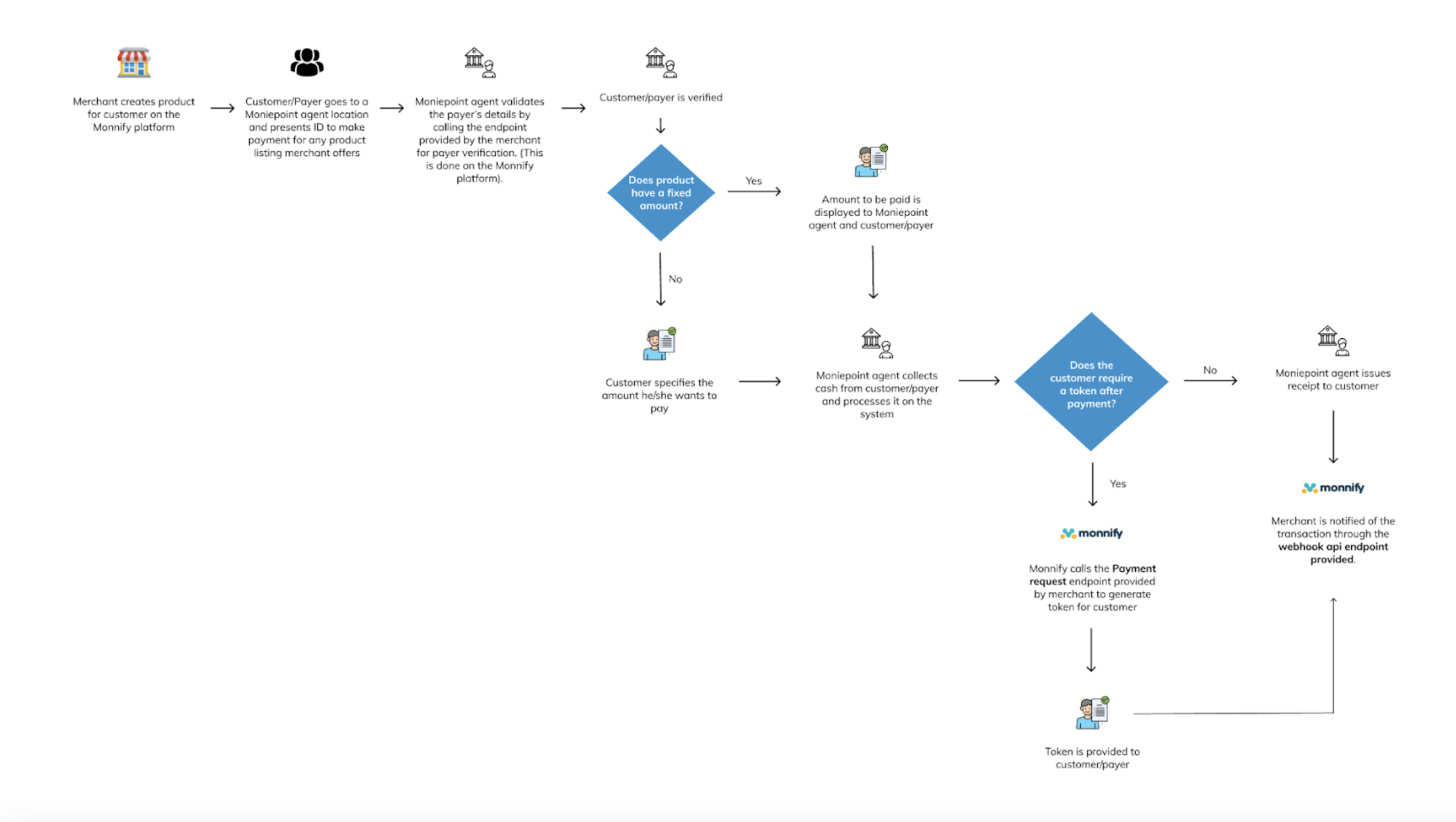
Before accepting cash payments, a merchant must first create an offline product
1. The merchant creates products for customers using the Monnify dashboard or API
2. The customer visits any Moniepoint business owner/Agent to pay for a listed product
3. The Agent validates the customer by entering their ID on the POS or web app
4. After verification, the agent either sees the payment amount (for fixed products) or the customer specifies the amount (otherwise)
5. The Moniepoint business collects the cash and processes the payment.
6. If the customer requires a token after payment, the Moniepoint business generates and issues a receipt or value token; otherwise, only a receipt is issued
7. The merchant is notified of the transaction
Offline Collection Products
---------------------------
An offline product is a commodity of interest to the customer that they are willing to pay for. Monnify supports four categories of offline products:
**1\. Fixed Product:**
This product has a fixed amount that a customer must pay for a service or product. Merchants must state the amount on the Monnify platform. For fixed product types, the amount must be stated by merchants on the Monnify platform. An example is a monthly fixed contribution.
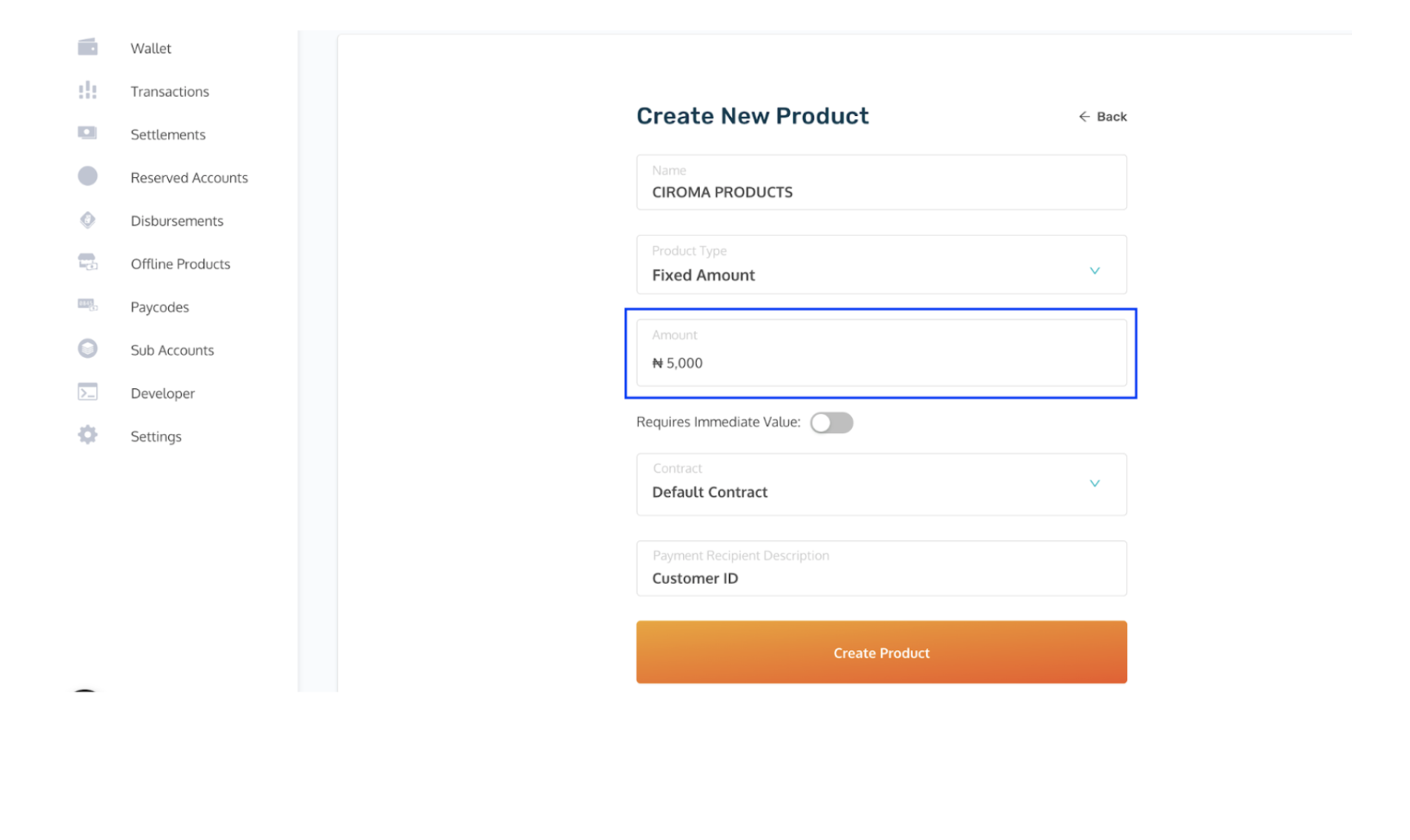
**2\. Variable Product:**
This product has a flexible amount. The merchant does not specify the amount, and the customer specifies how much they want to pay at the Moniepoint Business Owner’s location. Example: variable amount for betting.
For variable product type, you do not specify the amount as the customer specifies how much they want to pay at the Moniepoint Business Owner’s location where collection is done.
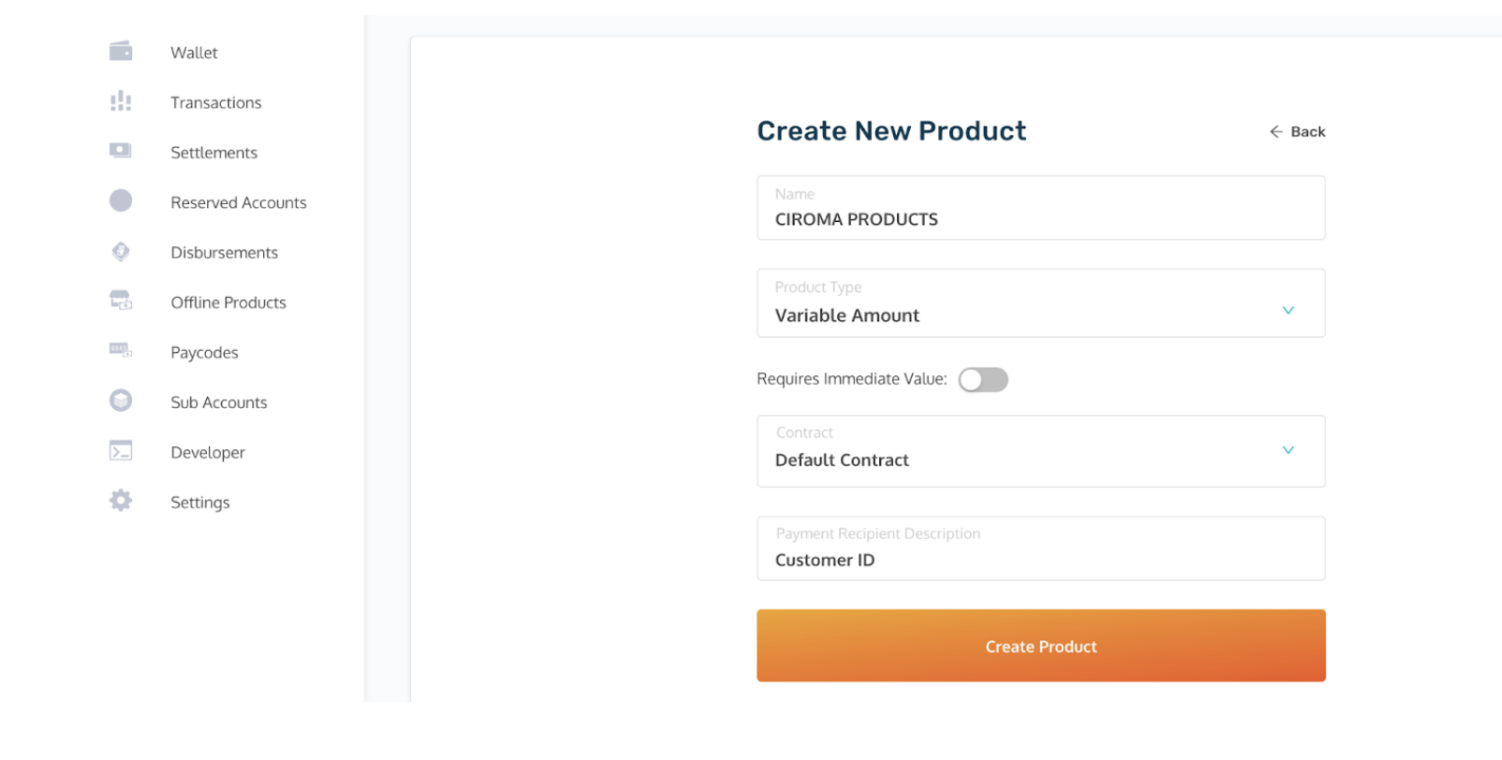
**3\. Invoice Product:**
This requires an invoice to be created for every payment. Unlike other types, the invoice does not become fully active upon creation on Monnify. To activate it, the Monnify [Create an Invoice](https://developers.monnify.com/api#create-an-invoice)
endpoint must be called, specifying "CASH" as the payment method. The amount to be paid is then tied to the generated invoice ID.
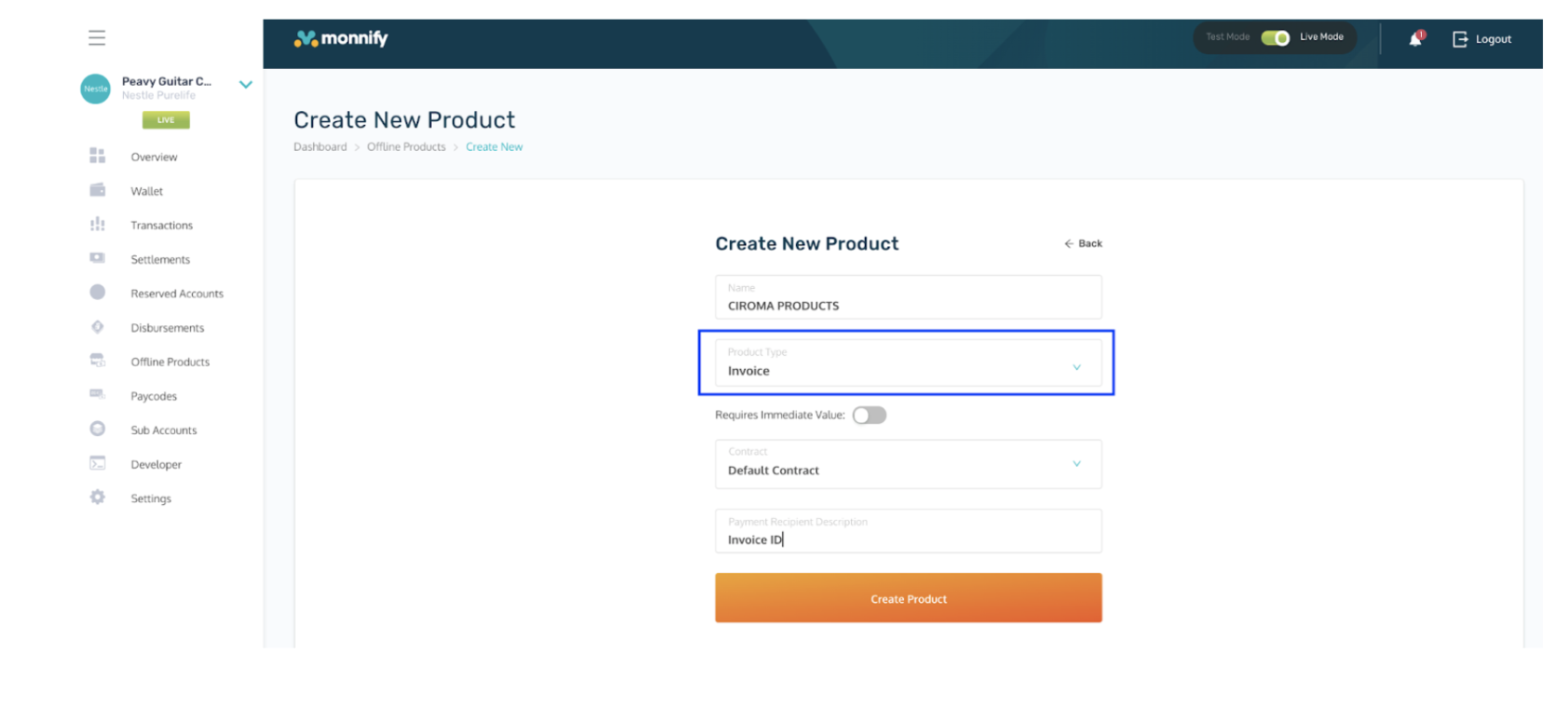
**4\. Merchant Invoice Product:**
This product type allows merchants to designate a custom payment amount for each user. Merchants can dynamically adjust the product price during the payer verification stage by including the desired amount in their successful response to Monnify.
Set Up And Endpoints
====================
After creating an offline product, the merchant must configure necessary endpoints to receive payments seamlessly. These endpoints are configured in the developer section, on the offline payment setup tab.
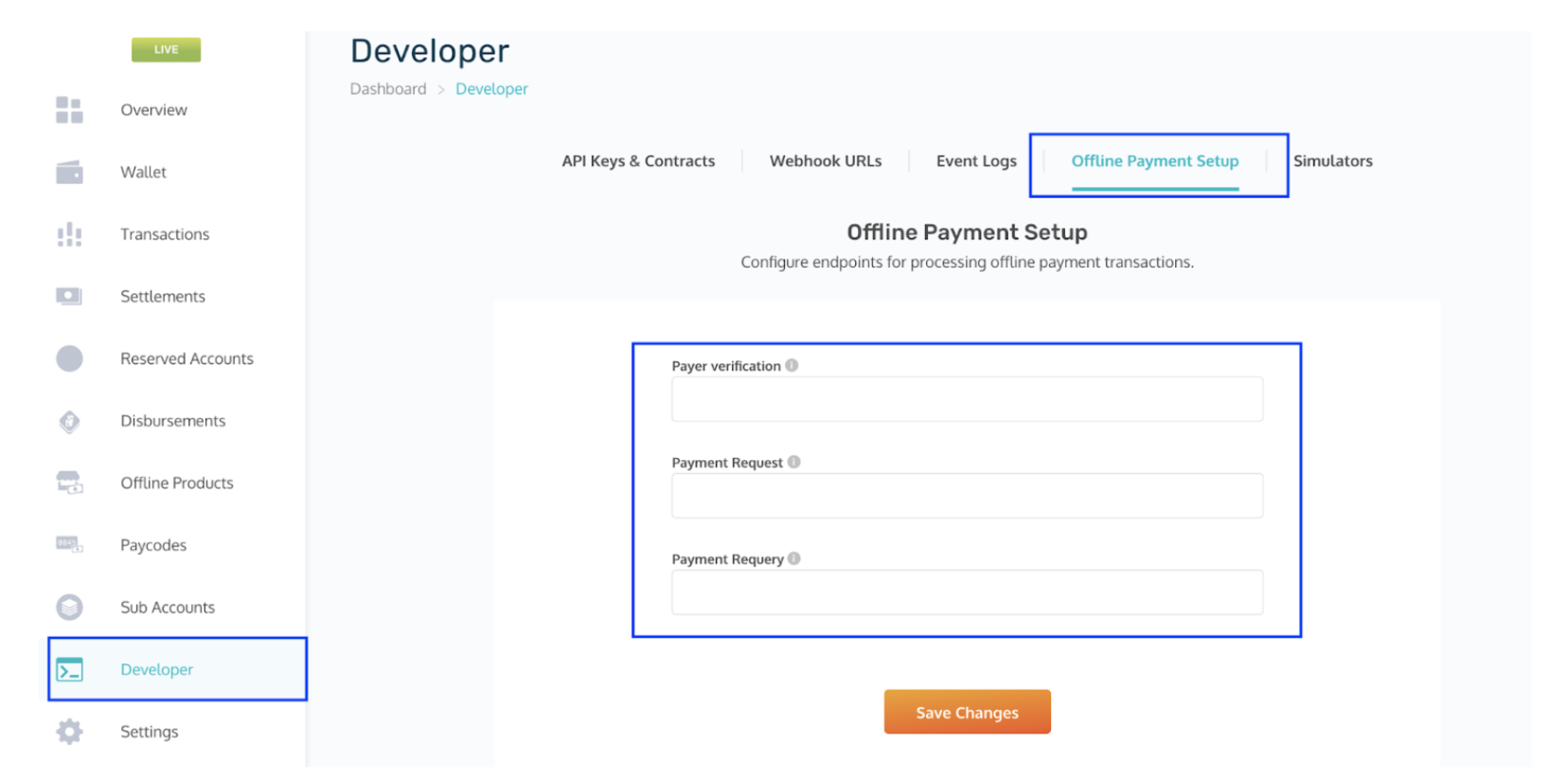
Payer Verification Endpoint (Mandatory)
---------------------------------------
This endpoint is set up on the merchant’s end and is called by Monnify to verify a customer making payment at any Moniepoint business owner location.
It’s also important to note that the response format returned by the merchant’s server should follow the format described below:
**HTTP Method: POST**
Request Parameters sent by Monnify:
| Parameter | Description |
| --- | --- |
| productCode | A unique string identifying the created product. This code is automatically generated by Monnify when the product is created. |
| paymentRecipientId | This is the id that uniquely identifies the customer on the merchant’s end. |
**Sample request to be sent by Monnify:**
Copy
**Expected response format from merchant:**
When user is verified successfully;
response.json
Copy
**Expected response format for MERCHANT\_INVOICE product type:**
response.json
Copy
When user does not exist;
response.json
Copy
Payment Request Endpoint (Optional)
-----------------------------------
This endpoint is necessary when merchants sell products or services that return a form of "value token" (e.g., meter token) after the customer makes payment.
Also the merchant’s server should return a response in the format described below.
**HTTP Method: POST**
Request Parameters:
| Parameter | Description |
| --- | --- |
| amount | The amount to be paid for the product |
| transactionReference | Monnify’s unique reference for transactions |
| productCode | This is the product code for the product to be purchased. . This code is automatically generated by Monnify when the product is created. |
| paymentRecipientId | This is the id that uniquely identifies the customer on the merchant’s end. |
**Sample request to be sent by Monnify:**
response.json
Copy
**Expected response format from merchant:**
Success response;
response.json
Copy
Failed Response;
response.json
Copy
Payment Requery Endpoint (Optional)
-----------------------------------
If provided, this endpoint is called to retrieve the status of a payment request whose initial status is unknown.
**HTTP Method: GET**
Request Parameters:
| Parameter | Description |
| --- | --- |
| transactionReference | This is the unique Monnify reference for the transaction.This reference is sent as a urlEncoded string and should be decoded on the merchant’s end |
**Sample request to be sent by Monnify:**
Copy
**Expected response format from merchant:**
For a successful response;
response.json
Copy
For a failed response
response.json
Copy

Got Questions
Reach out to us at [\[email protected\]](https://developers.monnify.com/cdn-cgi/l/email-protection#5d2e282d2d322f291d30323333343b24733e3230)
if you have any questions as regards integrating with the Monnify API.

Monnify Tutorial Videos
Check out [Our Youtube channel](https://www.youtube.com/channel/UCUyMHJL8q_JPElohU9IS22Q)
for tutorials on how to integrate the Monnify API.

Join Our Slack Community
[Click here](https://slack.monnify.com/)
to join the Monnify Slack community.
Copyright © 2026 [Monnify](https://monnify.com/)
[](https://www.instagram.com/monnifyhq/)
[](https://www.facebook.com/Monnify-102435331122100/?modal=admin_todo_tour)
[](https://twitter.com/monnify)
[Terms of Service](https://monnify.com/terms.html)
[Privacy Policy](https://monnify.com/privacy-policy.html)
---
# Reconciliation
[](https://developers.monnify.com/)
* [API](https://developers.monnify.com/api)
* * *
* [Home](https://developers.monnify.com/)
* Accept Payments
* [Overview](https://developers.monnify.com/docs/collections)
* [Quickstart](https://developers.monnify.com/docs/collections/quickstart)
* [Payment Methods](https://developers.monnify.com/docs/collections/payment-methods)
* [International Payments](https://developers.monnify.com/docs/collections/international-payment)
* One-Time Payments
* [Overview](https://developers.monnify.com/docs/collections/one-time-payments)
* [Checkout Page](https://developers.monnify.com/docs/collections/one-time-payments/checkout-page)
* [Checkout API](https://developers.monnify.com/docs/collections/one-time-payments/checkout-api)
* [Payment Links](https://developers.monnify.com/docs/collections/one-time-payments/payment-links)
* [Invoice](https://developers.monnify.com/docs/collections/one-time-payments/invoice)
* [Offline Pay-ins](https://developers.monnify.com/docs/collections/one-time-payments/offline-payins)
* Recurring Payments
* [Overview](https://developers.monnify.com/docs/collections/recurring-payments)
* [Reserved / Virtual Accounts](https://developers.monnify.com/docs/collections/recurring-payments/reserved-accounts)
* [Direct Debit / Mandates](https://developers.monnify.com/docs/collections/recurring-payments/direct-debit)
* [Card Tokenization](https://developers.monnify.com/docs/collections/recurring-payments/card-tokenization)
* [Retry & Failure Handling](https://developers.monnify.com/docs/collections/recurring-payments/retry-failure-handling)
* Manage Payments
* [Verify Transactions](https://developers.monnify.com/docs/collections/manage-payments/verify-transactions)
* [Transaction Splitting / Sub-accounts](https://developers.monnify.com/docs/collections/manage-payments/transaction-splitting)
* [Refunds](https://developers.monnify.com/docs/collections/manage-payments/refunds)
* [Reconciliation](https://developers.monnify.com/docs/collections/manage-payments/reconciliation)
* Transfer/Payout
* [Overview](https://developers.monnify.com/docs/disbursements)
* [Single Transfers](https://developers.monnify.com/docs/disbursements/single-transfers)
* [Bulk Transfers](https://developers.monnify.com/docs/disbursements/bulk-transfers)
* [Offline Payouts (Paycode)](https://developers.monnify.com/docs/disbursements/offline-payout)
* Bills Payment
* [Overview](https://developers.monnify.com/docs/bills-payment)
* [Process a Bill](https://developers.monnify.com/docs/bills-payment/process-a-bill)
* [Settlement Process](https://developers.monnify.com/docs/bills-payment/settlement-process)
* Wallets
* [Overview](https://developers.monnify.com/docs/wallets)
* [Create Wallet](https://developers.monnify.com/docs/wallets/create-wallet)
* [Wallet Balance](https://developers.monnify.com/docs/wallets/wallet-balance)
* [Get Wallets](https://developers.monnify.com/docs/wallets/get-wallets)
* [Wallet Statement](https://developers.monnify.com/docs/wallets/wallet-statement)
* Verification APIs
* [Overview](https://developers.monnify.com/docs/verification-api)
* [Verifying your Customers](https://developers.monnify.com/docs/verification-api/verifying-your-customers)
* [Integration Guide for Monnify BVN Verification](https://developers.monnify.com/docs/integration-guide-bvn-nin-update)
* Integration
* [Tools](https://developers.monnify.com/docs/integration)
* [Sample codes](https://developers.monnify.com/docs/integration/sample-codes)
* [MCP Server](https://developers.monnify.com/docs/integration/mcp-server)
* Webhooks
* [Overview](https://developers.monnify.com/docs/webhooks)
* [Webhook Event Types](https://developers.monnify.com/docs/webhooks/event-types)
* [Settlement](https://developers.monnify.com/docs/settlements)
* [Going Live](https://developers.monnify.com/docs/live)
* [Changelogs](https://developers.monnify.com/docs/change-logs)
* [Test Cards](https://developers.monnify.com/docs/test-cards)
* [Error Codes](https://developers.monnify.com/docs/error-codes)
* [Supported Banks](https://developers.monnify.com/docs/supported-banks)
Search..
Reconciliation
==============
Reconciliation is the process of matching your internal payment records against the authoritative data from Monnify. A good reconciliation workflow catches discrepancies early, such as missed payments, duplicate records, or settlement shortfalls, before they become accounting problems.
What You Are Reconciling
------------------------
There are two layers of reconciliation for most merchants:
1. **Transaction-level**: Every payment your customers made. Does your database record match what Monnify recorded?
2. **Settlement-level**: The net amount credited to your wallet or bank account. Does it match the sum of your transaction fees and settlement amounts?
Step 1 – Pull Your Transactions from Monnify
--------------------------------------------
Use the transaction search API to fetch all transactions for a given period. Paginate through the results to ensure you capture everything.
cURLJavaScriptPythonPHP
Copy
cURLJavaScriptPythonPHP
Copy

Include all statuses:
For a complete reconciliation, also fetch `PARTIALLY_PAID`, `OVERPAID`, and `REVERSED` transactions separately, not just `PAID`. Each status may require a different accounting treatment.
Step 2 – Compare Against Your Internal Records
----------------------------------------------
For each Monnify transaction, look up the corresponding record in your own database using the `paymentReference` (your own order/reference ID).
reconcile.js
Copy
| Discrepancy Type | Meaning | Action |
| --- | --- | --- |
| MISSING\_IN\_DB | Monnify recorded a payment but your DB has no matching order. | Investigate: the webhook may have been missed. Fulfill or refund as appropriate. |
| AMOUNT\_MISMATCH | Payment amount differs from your expected order amount. | Check for overpayment or partial payment. Refund the excess or chase the balance. |
| STATUS\_MISMATCH | Monnify shows PAID but your DB shows PENDING (webhook missed or duplicate). | Update your DB and fulfill the order. |
Step 3 – Reconcile Settlement Amounts
-------------------------------------
To verify that the amount credited to your Monnify wallet matches what you expect, sum the `settlementAmount` field across all paid transactions for a settlement period and compare it against your wallet credit.
settlement-recon.js
Copy

Remember transaction fees:
`amountPaid` is the gross amount. `settlementAmount` is after Monnify's fee. Always use `settlementAmount` when reconciling against your wallet credit.
Step 4 – Handle Split Payment Reconciliation
--------------------------------------------
If you use [Transaction Splitting](https://developers.monnify.com/docs/collections/manage-payments/transaction-splitting)
, each sub-account receives its portion at settlement. Reconcile each sub-account independently by querying its settlement separately or by tracking the `incomeSplitConfig` you sent when initializing the transaction.
split-recon-example.json
Copy
Automating Reconciliation
-------------------------
Run reconciliation as a scheduled job. Daily is the most common cadence, aligned with the 10 PM settlement cycle. A typical setup:
1. Schedule a job at **11 PM daily** (after settlement).
2. Fetch all Monnify transactions for the day.
3. Compare against your internal database.
4. Log or alert on any discrepancies for manual review.
5. Auto-resolve clear cases (e.g. status mismatches from missed webhooks).

Keep a recon audit log:
Store every reconciliation run and its results. This gives you an audit trail for finance reviews and makes it much easier to spot patterns in discrepancies over time.
Key API Endpoints for Reconciliation
------------------------------------
1. **Search Transactions**: `GET /api/v1/merchant/transactions/search`. Filter by status, date range, or payment method. The `from` and `to` parameters accept **Unix timestamps in milliseconds**.
2. **Verify Single Transaction**: `GET /api/v2/merchant/transactions/query`. Look up a specific transaction by reference.
See the full [API Reference](https://developers.monnify.com/api)
for query parameters and response schemas.
Rate this page
How helpful is the content on this page?
★★★★★

Got Questions
Reach out to us at [\[email protected\]](https://developers.monnify.com/cdn-cgi/l/email-protection#added8ddddc2dfd9edc0c2c3c3c4cbd483cec2c0)
if you have any questions as regards integrating with the Monnify API.

Monnify Tutorial Videos
Check out [Our Youtube channel](https://www.youtube.com/channel/UCUyMHJL8q_JPElohU9IS22Q)
for tutorials on how to integrate the Monnify API.

Join Our Slack Community
[Click here](https://slack.monnify.com/)
to join the Monnify Slack community.
Copyright © 2026 [Monnify](https://monnify.com/)
[](https://www.instagram.com/monnifyhq/)
[](https://www.facebook.com/Monnify-102435331122100/?modal=admin_todo_tour)
[](https://twitter.com/monnify)
[Terms of Service](https://monnify.com/terms.html)
[Privacy Policy](https://monnify.com/privacy-policy.html)
---
# Going Live
[](https://developers.monnify.com/)
* [API](https://developers.monnify.com/api)
* * *
* [Home](https://developers.monnify.com/)
* Accept Payments
* [Overview](https://developers.monnify.com/docs/collections)
* [Quickstart](https://developers.monnify.com/docs/collections/quickstart)
* [Payment Methods](https://developers.monnify.com/docs/collections/payment-methods)
* [International Payments](https://developers.monnify.com/docs/collections/international-payment)
* One-Time Payments
* [Overview](https://developers.monnify.com/docs/collections/one-time-payments)
* [Checkout Page](https://developers.monnify.com/docs/collections/one-time-payments/checkout-page)
* [Checkout API](https://developers.monnify.com/docs/collections/one-time-payments/checkout-api)
* [Payment Links](https://developers.monnify.com/docs/collections/one-time-payments/payment-links)
* [Invoice](https://developers.monnify.com/docs/collections/one-time-payments/invoice)
* [Offline Pay-ins](https://developers.monnify.com/docs/collections/one-time-payments/offline-payins)
* Recurring Payments
* [Overview](https://developers.monnify.com/docs/collections/recurring-payments)
* [Reserved / Virtual Accounts](https://developers.monnify.com/docs/collections/recurring-payments/reserved-accounts)
* [Direct Debit / Mandates](https://developers.monnify.com/docs/collections/recurring-payments/direct-debit)
* [Card Tokenization](https://developers.monnify.com/docs/collections/recurring-payments/card-tokenization)
* [Retry & Failure Handling](https://developers.monnify.com/docs/collections/recurring-payments/retry-failure-handling)
* Manage Payments
* [Verify Transactions](https://developers.monnify.com/docs/collections/manage-payments/verify-transactions)
* [Transaction Splitting / Sub-accounts](https://developers.monnify.com/docs/collections/manage-payments/transaction-splitting)
* [Refunds](https://developers.monnify.com/docs/collections/manage-payments/refunds)
* [Reconciliation](https://developers.monnify.com/docs/collections/manage-payments/reconciliation)
* Transfer/Payout
* [Overview](https://developers.monnify.com/docs/disbursements)
* [Single Transfers](https://developers.monnify.com/docs/disbursements/single-transfers)
* [Bulk Transfers](https://developers.monnify.com/docs/disbursements/bulk-transfers)
* [Offline Payouts (Paycode)](https://developers.monnify.com/docs/disbursements/offline-payout)
* Bills Payment
* [Overview](https://developers.monnify.com/docs/bills-payment)
* [Process a Bill](https://developers.monnify.com/docs/bills-payment/process-a-bill)
* [Settlement Process](https://developers.monnify.com/docs/bills-payment/settlement-process)
* Wallets
* [Overview](https://developers.monnify.com/docs/wallets)
* [Create Wallet](https://developers.monnify.com/docs/wallets/create-wallet)
* [Wallet Balance](https://developers.monnify.com/docs/wallets/wallet-balance)
* [Get Wallets](https://developers.monnify.com/docs/wallets/get-wallets)
* [Wallet Statement](https://developers.monnify.com/docs/wallets/wallet-statement)
* Verification APIs
* [Overview](https://developers.monnify.com/docs/verification-api)
* [Verifying your Customers](https://developers.monnify.com/docs/verification-api/verifying-your-customers)
* [Integration Guide for Monnify BVN Verification](https://developers.monnify.com/docs/integration-guide-bvn-nin-update)
* Integration
* [Tools](https://developers.monnify.com/docs/integration)
* [Sample codes](https://developers.monnify.com/docs/integration/sample-codes)
* [MCP Server](https://developers.monnify.com/docs/integration/mcp-server)
* Webhooks
* [Overview](https://developers.monnify.com/docs/webhooks)
* [Webhook Event Types](https://developers.monnify.com/docs/webhooks/event-types)
* [Settlement](https://developers.monnify.com/docs/settlements)
* [Going Live](https://developers.monnify.com/docs/live)
* [Changelogs](https://developers.monnify.com/docs/change-logs)
* [Test Cards](https://developers.monnify.com/docs/test-cards)
* [Error Codes](https://developers.monnify.com/docs/error-codes)
* [Supported Banks](https://developers.monnify.com/docs/supported-banks)
Search..
Going Live
----------
After successfully uploading the necessary documents and meeting compliance requirements, your Monnify account will be activated and you will be ready to go live. Before doing so, use the checklist below to confirm that every critical component is properly configured. This ensures smooth payment collection, accurate settlements, and reliable communication between Monnify and your application.
1\. Switch to Live API Keys
---------------------------
Your sandbox API Key and Secret Key are entirely separate from your live credentials. Using sandbox keys in production means your transactions will never actually process. A video on how to access your developer keys is available [Here](http://youtube.com/watch?v=xB62Hi08ZK0)
**Checklist:**
* [ ] Replace the sandbox **base URL** (`https://sandbox.monnify.com`) with the live base URL (`https://api.monnify.com`).
* [ ] Replace the sandbox **API Key** with your live API Key.
* [ ] Replace the sandbox **Secret Key** with your live Secret Key.
* [ ] Replace the sandbox **Contract Code** with your live Contract Code.
2\. Configure Webhooks
----------------------
Webhooks allow Monnify to send real-time notifications to your server when transactions occur (e.g. payment received, disbursement completed, settlement made). Without a valid webhook URL, your application will not be notified of payment events automatically. See the different type of webhook events and sample body [here](https://developers.monnify.com/docs/webhooks/event-types)
**How to configure:** Navigate to **Developers > Webhook URLs** on your Monnify dashboard. Populate the relevant fields (Transaction Completion, Refund Completion, Disbursement, Settlement) with your server's webhook URLs, then click **Save**.
**Checklist:**
* [ ] Transaction Completion webhook URL is set and reachable.
* [ ] Disbursement webhook URL is set (if using disbursement APIs).
* [ ] Refund and Settlement webhook URLs are set where applicable.
* [ ] Your server correctly validates the webhook hash/signature before processing notifications.
3\. Whitelist Your Server IP Address (Merchants using Disbursement)
-------------------------------------------------------------------
If your application uses Monnify's disbursement (transfers) API, you must whitelist your server's IP address. This ensures that only requests from your server are accepted, adding an important layer of security against unauthorized transfers. **How to configure:** Send an email to **[\[email protected\]](https://developers.monnify.com/cdn-cgi/l/email-protection)
** requesting:
* [ ] Disabling OTP for API disbursement on your account.
* [ ] Whitelisting your server's static IP address(es).

Important: Static IP Address(ess) Supported
Monnify supports withlisting of more than one IP addressess and supports both IPv4 and IPv6 addressess. Ensure your server has a **static IP address** before making this request. Dynamic IPs will cause disbursement requests to be rejected after an IP change.
4\. Use the Correct Contract Code
---------------------------------
Every transaction on Monnify is tied to a contract. Using the wrong contract code can result in payments being processed under the wrong configuration, incorrect fee structures, or failed transactions.
**Checklist:**
* [ ] Confirm the contract code used in your integration matches your live contract on the Monnify dashboard.
* [ ] Do not reuse sandbox contract codes in your live environment.
* [ ] If you have multiple contracts (e.g. for different products or business units), verify each service is pointing to the correct contract.
* [ ] Confirm you have the right Underpayment or Overpaymen configuration from **Settings > Contracts Setup** . By default, Monnify rejects over or under payment.
5\. Verify Your Settlement Account
----------------------------------
Your settlement account is the bank account where Monnify pays out funds collected on your behalf. An incorrectly configured settlement account can result in settlements going to the wrong account.
**Checklist:**
* [ ] Navigate to **Settings > Bank Accounts** on your dashboard and confirm the correct bank account is linked.
* [ ] Verify the account name, account number, and bank match your intended settlement destination.
* [ ] Ensure the settlement account has been validated/verified to receive inflow.
* [ ] Configure your settlemt report email address to ensure you get report of all settlement beside Webhooks.
6\. Confirm Your Settlement Method
----------------------------------
Monnify supports two settlement methods: **Wallet** and **Bank Account**. Your choice determines where collected funds are held before being disbursed to you but it currently defaults to Wallet.
* **Wallet Settlement:** Funds are settled into your Monnify wallet. You then initiate transfers to your bank account manually or via the API. This is suitable for businesses that need float or want to manage payouts programmatically.
* **Bank Account Settlement:** Funds are settled directly into your designated bank account during the next settlement cycle (Same day 10PM). This is the simpler option for most businesses.(Go to **Settings** > **Contract Setup**, select the contract and choose the right Settlement destination)
**Checklist:**
* [ ] Confirm your preferred settlement method is selected in your dashboard settings.
* [ ] If using wallet settlement, ensure your disbursement flow (manual or automated via API) is tested and working.
Rate this page
How helpful is the content on this page?
★★★★★

Got Questions
Reach out to us at [\[email protected\]](https://developers.monnify.com/cdn-cgi/l/email-protection#3b484e4b4b54494f7b56545555525d4215585456)
if you have any questions as regards integrating with the Monnify API.

Monnify Tutorial Videos
Check out [Our Youtube channel](https://www.youtube.com/channel/UCUyMHJL8q_JPElohU9IS22Q)
for tutorials on how to integrate the Monnify API.

Join Our Slack Community
[Click here](https://slack.monnify.com/)
to join the Monnify Slack community.
Copyright © 2026 [Monnify](https://monnify.com/)
[](https://www.instagram.com/monnifyhq/)
[](https://www.facebook.com/Monnify-102435331122100/?modal=admin_todo_tour)
[](https://twitter.com/monnify)
[Terms of Service](https://monnify.com/terms.html)
[Privacy Policy](https://monnify.com/privacy-policy.html)
---
# Checkout API
[](https://developers.monnify.com/)
* [API](https://developers.monnify.com/api)
* * *
* [Home](https://developers.monnify.com/)
* Accept Payments
* [Overview](https://developers.monnify.com/docs/collections)
* [Quickstart](https://developers.monnify.com/docs/collections/quickstart)
* [Payment Methods](https://developers.monnify.com/docs/collections/payment-methods)
* [International Payments](https://developers.monnify.com/docs/collections/international-payment)
* One-Time Payments
* [Overview](https://developers.monnify.com/docs/collections/one-time-payments)
* [Checkout Page](https://developers.monnify.com/docs/collections/one-time-payments/checkout-page)
* [Checkout API](https://developers.monnify.com/docs/collections/one-time-payments/checkout-api)
* [Payment Links](https://developers.monnify.com/docs/collections/one-time-payments/payment-links)
* [Invoice](https://developers.monnify.com/docs/collections/one-time-payments/invoice)
* [Offline Pay-ins](https://developers.monnify.com/docs/collections/one-time-payments/offline-payins)
* Recurring Payments
* [Overview](https://developers.monnify.com/docs/collections/recurring-payments)
* [Reserved / Virtual Accounts](https://developers.monnify.com/docs/collections/recurring-payments/reserved-accounts)
* [Direct Debit / Mandates](https://developers.monnify.com/docs/collections/recurring-payments/direct-debit)
* [Card Tokenization](https://developers.monnify.com/docs/collections/recurring-payments/card-tokenization)
* [Retry & Failure Handling](https://developers.monnify.com/docs/collections/recurring-payments/retry-failure-handling)
* Manage Payments
* [Verify Transactions](https://developers.monnify.com/docs/collections/manage-payments/verify-transactions)
* [Transaction Splitting / Sub-accounts](https://developers.monnify.com/docs/collections/manage-payments/transaction-splitting)
* [Refunds](https://developers.monnify.com/docs/collections/manage-payments/refunds)
* [Reconciliation](https://developers.monnify.com/docs/collections/manage-payments/reconciliation)
* Transfer/Payout
* [Overview](https://developers.monnify.com/docs/disbursements)
* [Single Transfers](https://developers.monnify.com/docs/disbursements/single-transfers)
* [Bulk Transfers](https://developers.monnify.com/docs/disbursements/bulk-transfers)
* [Offline Payouts (Paycode)](https://developers.monnify.com/docs/disbursements/offline-payout)
* Bills Payment
* [Overview](https://developers.monnify.com/docs/bills-payment)
* [Process a Bill](https://developers.monnify.com/docs/bills-payment/process-a-bill)
* [Settlement Process](https://developers.monnify.com/docs/bills-payment/settlement-process)
* Wallets
* [Overview](https://developers.monnify.com/docs/wallets)
* [Create Wallet](https://developers.monnify.com/docs/wallets/create-wallet)
* [Wallet Balance](https://developers.monnify.com/docs/wallets/wallet-balance)
* [Get Wallets](https://developers.monnify.com/docs/wallets/get-wallets)
* [Wallet Statement](https://developers.monnify.com/docs/wallets/wallet-statement)
* Verification APIs
* [Overview](https://developers.monnify.com/docs/verification-api)
* [Verifying your Customers](https://developers.monnify.com/docs/verification-api/verifying-your-customers)
* [Integration Guide for Monnify BVN Verification](https://developers.monnify.com/docs/integration-guide-bvn-nin-update)
* Integration
* [Tools](https://developers.monnify.com/docs/integration)
* [Sample codes](https://developers.monnify.com/docs/integration/sample-codes)
* [MCP Server](https://developers.monnify.com/docs/integration/mcp-server)
* Webhooks
* [Overview](https://developers.monnify.com/docs/webhooks)
* [Webhook Event Types](https://developers.monnify.com/docs/webhooks/event-types)
* [Settlement](https://developers.monnify.com/docs/settlements)
* [Going Live](https://developers.monnify.com/docs/live)
* [Changelogs](https://developers.monnify.com/docs/change-logs)
* [Test Cards](https://developers.monnify.com/docs/test-cards)
* [Error Codes](https://developers.monnify.com/docs/error-codes)
* [Supported Banks](https://developers.monnify.com/docs/supported-banks)
Search..
Checkout API
============
The Checkout API gives you full control over the payment flow without requiring a Monnify SDK. Use it to redirect customers to the Monnify-hosted checkout URL, or build your own payment UI by calling the bank transfer and card charge endpoints directly.

Prefer a library over raw API calls?
Monnify has official server-side libraries for Node.js, Python, Go, Java, PHP (Laravel), and more, so you can skip the boilerplate and integrate in minutes. See [Libraries and Plugins](https://developers.monnify.com/docs/integration-tools/plugin-libraries)
.
Option A – Hosted Checkout (Redirect to checkoutUrl)
----------------------------------------------------
The fastest way to go live. Your server initializes a transaction via the API, receives a `checkoutUrl`, and redirects the customer to it. Monnify handles the entire payment UI and redirects the customer back to your site when done.
### Step 1 – Authenticate
Base64-encode your `apiKey:secretKey` and call the login endpoint to get a Bearer token (valid for 1 hour).
cURLJavaScriptPythonPHP
Copy
### Step 2 – Initialize the Transaction
cURLJavaScriptPythonPHP
Copy
response.json
Copy

Important:
Always confirm that the values returned by this endpoint match what you sent in the request payload. Bad actors can intercept requests and alter values such as the transaction amount.
### Step 3 – Redirect the Customer
Take the `checkoutUrl` from Step 2's response and redirect the customer to it. Monnify handles the full payment UI from here.
server.js
Copy

Checkout expiry:
The `checkoutUrl` is valid for **40 minutes**. If the customer does not complete payment within this window, the transaction expires and they must start again.
### Step 4 – Handle the Redirect Callback
After payment, Monnify redirects the customer to your `redirectUrl` with the result as query parameters:
Copy

Always verify server-side:
Never fulfill an order based on the redirect URL parameters alone. Always call the [Verify Transactions API](https://developers.monnify.com/docs/collections/manage-payments/verify-transactions)
from your server before delivering value.
Option B – Build Your Own Payment UI (Raw Endpoints)
----------------------------------------------------
If you want to build a fully custom payment flow with your own bank transfer screen and card form, use the raw API endpoints below instead of the hosted checkout URL.
### Pay with Bank Transfer
Call the [Pay with Bank Transfer endpoint](https://developers.monnify.com/api#tag/transactions/#pay-with-bank-transfer)
with the `transactionReference` of an initialized transaction. Monnify returns a dynamic virtual account number your customer transfers to.
1. You can call this endpoint multiple times; each call returns how many seconds the account remains valid (maximum 2400 seconds / 40 minutes).
2. Pass a `bankCode` to also receive a USSD code for that bank.
3. Inform your customers of the account expiry to prevent failed or erroneous transfers.

Note:
The virtual account is valid for **40 minutes**. Always display this expiry clearly to your customers.
### Charge Card
Call the [Charge Card endpoint](https://developers.monnify.com/api#tag/transactions/#charge-a-card)
with the customer's card details and the `transactionReference` of an initialized transaction.

PCI-DSS required:
Access to the direct card charge endpoint requires PCI-DSS certification. Contact [\[email protected\]](https://developers.monnify.com/cdn-cgi/l/email-protection#afc6c1dbcac8ddcedbc6c0c182dcdadfdfc0dddbefc2c0c1c1c6c9d681ccc0c2)
to apply.
Request Field Reference
-----------------------
| Field | Required | Description |
| --- | --- | --- |
| `amount` | Yes | Payment amount in NGN (or USD for enabled merchants). |
| `paymentReference` | Yes | Your unique order reference. Must be unique per transaction. |
| `contractCode` | Yes | Your contract code from the Monnify dashboard. |
| `redirectUrl` | Yes (Option A) | Where Monnify redirects the customer after payment. Not required when building your own UI. |
| `currencyCode` | No | Defaults to `NGN`. Use `USD` if enabled for international card collection. |
| `paymentMethods` | No | Restrict available payment methods. Omit to show all. |
| `incomeSplitConfig` | No | Split the payment across multiple sub-accounts. See [Transaction Splitting](https://developers.monnify.com/docs/collections/manage-payments/transaction-splitting)
. |
Common Error Messages
---------------------
| Error Message | Meaning | Action |
| --- | --- | --- |
| Unknown currency code supplied | The `currencyCode` is not supported on your account. NGN is default; USD is only available for merchants specifically enabled for international card collection. | Use `NGN` or `USD` (if enabled). |
| Could not find specified contract | The `contractCode` is invalid or does not belong to the authenticated merchant. | Verify your contract code in the dashboard and ensure it matches the environment (test vs. live). |
| Duplicate payment reference | The `paymentReference` has already been used by this merchant in this environment. | Generate a unique reference for every new transaction. |
| Invalid Card Number | The card PAN supplied is incorrect. | Verify the card number and retry. |
| Merchant has not been configured for bin | The first six digits of the card PAN are not among Monnify's supported card bins. | Customer should confirm the card is a Nigerian-issued card, or contact Monnify support. |
| Could not find transaction with the specified transaction reference | The transaction reference does not exist for this merchant. | Confirm the reference and retry. |
Rate this page
How helpful is the content on this page?
★★★★★

Got Questions
Reach out to us at [\[email protected\]](https://developers.monnify.com/cdn-cgi/l/email-protection#1d6e686d6d726f695d70727373747b64337e7270)
if you have any questions as regards integrating with the Monnify API.

Monnify Tutorial Videos
Check out [Our Youtube channel](https://www.youtube.com/channel/UCUyMHJL8q_JPElohU9IS22Q)
for tutorials on how to integrate the Monnify API.

Join Our Slack Community
[Click here](https://slack.monnify.com/)
to join the Monnify Slack community.
Copyright © 2026 [Monnify](https://monnify.com/)
[](https://www.instagram.com/monnifyhq/)
[](https://www.facebook.com/Monnify-102435331122100/?modal=admin_todo_tour)
[](https://twitter.com/monnify)
[Terms of Service](https://monnify.com/terms.html)
[Privacy Policy](https://monnify.com/privacy-policy.html)
---
# Retry & Failure Handling
[](https://developers.monnify.com/)
* [API](https://developers.monnify.com/api)
* * *
* [Home](https://developers.monnify.com/)
* Accept Payments
* [Overview](https://developers.monnify.com/docs/collections)
* [Quickstart](https://developers.monnify.com/docs/collections/quickstart)
* [Payment Methods](https://developers.monnify.com/docs/collections/payment-methods)
* [International Payments](https://developers.monnify.com/docs/collections/international-payment)
* One-Time Payments
* [Overview](https://developers.monnify.com/docs/collections/one-time-payments)
* [Checkout Page](https://developers.monnify.com/docs/collections/one-time-payments/checkout-page)
* [Checkout API](https://developers.monnify.com/docs/collections/one-time-payments/checkout-api)
* [Payment Links](https://developers.monnify.com/docs/collections/one-time-payments/payment-links)
* [Invoice](https://developers.monnify.com/docs/collections/one-time-payments/invoice)
* [Offline Pay-ins](https://developers.monnify.com/docs/collections/one-time-payments/offline-payins)
* Recurring Payments
* [Overview](https://developers.monnify.com/docs/collections/recurring-payments)
* [Reserved / Virtual Accounts](https://developers.monnify.com/docs/collections/recurring-payments/reserved-accounts)
* [Direct Debit / Mandates](https://developers.monnify.com/docs/collections/recurring-payments/direct-debit)
* [Card Tokenization](https://developers.monnify.com/docs/collections/recurring-payments/card-tokenization)
* [Retry & Failure Handling](https://developers.monnify.com/docs/collections/recurring-payments/retry-failure-handling)
* Manage Payments
* [Verify Transactions](https://developers.monnify.com/docs/collections/manage-payments/verify-transactions)
* [Transaction Splitting / Sub-accounts](https://developers.monnify.com/docs/collections/manage-payments/transaction-splitting)
* [Refunds](https://developers.monnify.com/docs/collections/manage-payments/refunds)
* [Reconciliation](https://developers.monnify.com/docs/collections/manage-payments/reconciliation)
* Transfer/Payout
* [Overview](https://developers.monnify.com/docs/disbursements)
* [Single Transfers](https://developers.monnify.com/docs/disbursements/single-transfers)
* [Bulk Transfers](https://developers.monnify.com/docs/disbursements/bulk-transfers)
* [Offline Payouts (Paycode)](https://developers.monnify.com/docs/disbursements/offline-payout)
* Bills Payment
* [Overview](https://developers.monnify.com/docs/bills-payment)
* [Process a Bill](https://developers.monnify.com/docs/bills-payment/process-a-bill)
* [Settlement Process](https://developers.monnify.com/docs/bills-payment/settlement-process)
* Wallets
* [Overview](https://developers.monnify.com/docs/wallets)
* [Create Wallet](https://developers.monnify.com/docs/wallets/create-wallet)
* [Wallet Balance](https://developers.monnify.com/docs/wallets/wallet-balance)
* [Get Wallets](https://developers.monnify.com/docs/wallets/get-wallets)
* [Wallet Statement](https://developers.monnify.com/docs/wallets/wallet-statement)
* Verification APIs
* [Overview](https://developers.monnify.com/docs/verification-api)
* [Verifying your Customers](https://developers.monnify.com/docs/verification-api/verifying-your-customers)
* [Integration Guide for Monnify BVN Verification](https://developers.monnify.com/docs/integration-guide-bvn-nin-update)
* Integration
* [Tools](https://developers.monnify.com/docs/integration)
* [Sample codes](https://developers.monnify.com/docs/integration/sample-codes)
* [MCP Server](https://developers.monnify.com/docs/integration/mcp-server)
* Webhooks
* [Overview](https://developers.monnify.com/docs/webhooks)
* [Webhook Event Types](https://developers.monnify.com/docs/webhooks/event-types)
* [Settlement](https://developers.monnify.com/docs/settlements)
* [Going Live](https://developers.monnify.com/docs/live)
* [Changelogs](https://developers.monnify.com/docs/change-logs)
* [Test Cards](https://developers.monnify.com/docs/test-cards)
* [Error Codes](https://developers.monnify.com/docs/error-codes)
* [Supported Banks](https://developers.monnify.com/docs/supported-banks)
Search..
Retry & Failure Handling
========================
Payment failures are normal in recurring billing. This guide shows you how to detect failures, communicate with customers, and implement a retry strategy that recovers revenue without creating a poor customer experience.
Types of Failures
-----------------
1. **Insufficient funds**: the customer's account does not have enough balance at the time of the debit.
2. **Card expired**: the tokenized card has expired and the token is no longer valid.
3. **Mandate debit failure**: a direct debit mandate debit was rejected by the customer's bank (e.g. account restricted, mandate limit exceeded).
4. **Bank downtime**: temporary unavailability on the customer's bank side.
5. **Transaction timeout**: the payment session expired before the customer completed it.
Step 1 – Detect Failures
------------------------
Monnify only sends a webhook notification when a transaction is **successful**. The event type is `SUCCESSFUL_TRANSACTION`. There is no webhook for failed or pending transactions.
To detect a failure, your server must actively check the transaction status after the expected payment window:
1. Listen for the `SUCCESSFUL_TRANSACTION` webhook on your configured webhook URL.
2. If the webhook does not arrive within a reasonable window (e.g. 2–5 minutes after initiating the charge), call the [Get Transaction Status](https://developers.monnify.com/api#tag/transactions/#get-transaction-status-by-reference)
endpoint with the payment reference.
3. Inspect the `paymentStatus` field in the response. A status of `PAID` means the payment succeeded. Any other status (including `PENDING` or `FAILED`) means the transaction did not complete.
cURLJavaScriptPythonPHP
Copy
status-response.json
Copy

Always verify server-side:
Never rely solely on client-side callbacks to determine payment outcome. Always confirm the status via the server-side transaction status API before granting or revoking access.
Step 2 – Classify the Failure
-----------------------------
Not every failure should trigger an immediate retry. Classify failures before acting:
| Failure Reason | Retryable? | Recommended Action |
| --- | --- | --- |
| Insufficient funds | Yes | Retry after 4–8 hours; notify customer to fund account. |
| Bank downtime / timeout | Yes | Retry after 1–6 hours. |
| Card expired | No | Do not retry. Prompt customer to add a new card. |
| Mandate limit exceeded | No | A new mandate is needed with the right amount. |
| Account restricted | No | Customer must resolve with their bank before retrying. |
Step 3 – Notify the Customer
----------------------------
Send a notification as soon as you confirm the failure via the transaction status check. Timely communication significantly improves recovery rates.
1. Tell the customer exactly what happened (e.g. "Your payment of ₦5,000 was not completed").
2. Give them a clear action: fund their account, update their card, or pay manually via a payment link.
3. Include a direct **payment link** so they can resolve it in one click. See [Payment Links](https://developers.monnify.com/docs/collections/one-time-payments/payment-links)
.

Dunning best practice:
Space out retry notifications so customers do not feel harassed. A common pattern: notify immediately, then at 24h, then at 72h, then a final notice before service suspension.
Step 4 – Implement Retry Logic
------------------------------
For retryable failures (e.g. insufficient funds, bank downtime), implement a retry schedule on your server. The handler below covers both card token charges and direct debit mandate debits:
retry-scheduler.js
Copy

Use a job queue for production:
`setTimeout` is for illustration only. In production, use a durable job queue (Bull, Agenda, AWS SQS, etc.) so retries survive server restarts and can be monitored.
Step 5 – Verify Every Retry
---------------------------
After each retry attempt (whether from your scheduler or a customer paying manually), always verify the transaction status server-side before restoring access.
cURLJavaScriptPythonPHP
Copy
Only restore access when `paymentStatus === "PAID"` and `amountPaid` matches the expected amount. See [Verify Transactions](https://developers.monnify.com/docs/collections/manage-payments/verify-transactions)
for the full response reference.
Direct Debit Retry Flow
-----------------------
For [Direct Debit / Mandates](https://developers.monnify.com/docs/collections/recurring-payments/direct-debit)
, Monnify sends a `MANDATE_UPDATE` webhook whenever the mandate's status changes (e.g. activated, suspended, cancelled). A failed debit attempt will not always trigger a webhook. To confirm whether a debit succeeded, poll the **Get Debit Status** endpoint using the debit reference returned when you initiated the debit.
If the debit did not succeed:
1. Schedule another debit attempt against the same mandate (for retryable failures such as insufficient funds or bank downtime).
2. Fall back to a payment link or new mandate if the mandate itself is no longer valid (expired, cancelled, or suspended).

NIP mandate retry rules:
Banks may have restrictions on how frequently a mandate can be debited, Monnify currently sets limit to 2 per day. Check the specific terms of the mandate type to avoid unnecessary bank-side rejections.
Rate this page
How helpful is the content on this page?
★★★★★

Got Questions
Reach out to us at [\[email protected\]](https://developers.monnify.com/cdn-cgi/l/email-protection#fb888e8b8b94898fbb96949595929d82d5989496)
if you have any questions as regards integrating with the Monnify API.

Monnify Tutorial Videos
Check out [Our Youtube channel](https://www.youtube.com/channel/UCUyMHJL8q_JPElohU9IS22Q)
for tutorials on how to integrate the Monnify API.

Join Our Slack Community
[Click here](https://slack.monnify.com/)
to join the Monnify Slack community.
Copyright © 2026 [Monnify](https://monnify.com/)
[](https://www.instagram.com/monnifyhq/)
[](https://www.facebook.com/Monnify-102435331122100/?modal=admin_todo_tour)
[](https://twitter.com/monnify)
[Terms of Service](https://monnify.com/terms.html)
[Privacy Policy](https://monnify.com/privacy-policy.html)
---
# Quickstart – Accept Payments
[](https://developers.monnify.com/)
* [API](https://developers.monnify.com/api)
* * *
* [Home](https://developers.monnify.com/)
* Accept Payments
* [Overview](https://developers.monnify.com/docs/collections)
* [Quickstart](https://developers.monnify.com/docs/collections/quickstart)
* [Payment Methods](https://developers.monnify.com/docs/collections/payment-methods)
* [International Payments](https://developers.monnify.com/docs/collections/international-payment)
* One-Time Payments
* [Overview](https://developers.monnify.com/docs/collections/one-time-payments)
* [Checkout Page](https://developers.monnify.com/docs/collections/one-time-payments/checkout-page)
* [Checkout API](https://developers.monnify.com/docs/collections/one-time-payments/checkout-api)
* [Payment Links](https://developers.monnify.com/docs/collections/one-time-payments/payment-links)
* [Invoice](https://developers.monnify.com/docs/collections/one-time-payments/invoice)
* [Offline Pay-ins](https://developers.monnify.com/docs/collections/one-time-payments/offline-payins)
* Recurring Payments
* [Overview](https://developers.monnify.com/docs/collections/recurring-payments)
* [Reserved / Virtual Accounts](https://developers.monnify.com/docs/collections/recurring-payments/reserved-accounts)
* [Direct Debit / Mandates](https://developers.monnify.com/docs/collections/recurring-payments/direct-debit)
* [Card Tokenization](https://developers.monnify.com/docs/collections/recurring-payments/card-tokenization)
* [Retry & Failure Handling](https://developers.monnify.com/docs/collections/recurring-payments/retry-failure-handling)
* Manage Payments
* [Verify Transactions](https://developers.monnify.com/docs/collections/manage-payments/verify-transactions)
* [Transaction Splitting / Sub-accounts](https://developers.monnify.com/docs/collections/manage-payments/transaction-splitting)
* [Refunds](https://developers.monnify.com/docs/collections/manage-payments/refunds)
* [Reconciliation](https://developers.monnify.com/docs/collections/manage-payments/reconciliation)
* Transfer/Payout
* [Overview](https://developers.monnify.com/docs/disbursements)
* [Single Transfers](https://developers.monnify.com/docs/disbursements/single-transfers)
* [Bulk Transfers](https://developers.monnify.com/docs/disbursements/bulk-transfers)
* [Offline Payouts (Paycode)](https://developers.monnify.com/docs/disbursements/offline-payout)
* Bills Payment
* [Overview](https://developers.monnify.com/docs/bills-payment)
* [Process a Bill](https://developers.monnify.com/docs/bills-payment/process-a-bill)
* [Settlement Process](https://developers.monnify.com/docs/bills-payment/settlement-process)
* Wallets
* [Overview](https://developers.monnify.com/docs/wallets)
* [Create Wallet](https://developers.monnify.com/docs/wallets/create-wallet)
* [Wallet Balance](https://developers.monnify.com/docs/wallets/wallet-balance)
* [Get Wallets](https://developers.monnify.com/docs/wallets/get-wallets)
* [Wallet Statement](https://developers.monnify.com/docs/wallets/wallet-statement)
* Verification APIs
* [Overview](https://developers.monnify.com/docs/verification-api)
* [Verifying your Customers](https://developers.monnify.com/docs/verification-api/verifying-your-customers)
* [Integration Guide for Monnify BVN Verification](https://developers.monnify.com/docs/integration-guide-bvn-nin-update)
* Integration
* [Tools](https://developers.monnify.com/docs/integration)
* [Sample codes](https://developers.monnify.com/docs/integration/sample-codes)
* [MCP Server](https://developers.monnify.com/docs/integration/mcp-server)
* Webhooks
* [Overview](https://developers.monnify.com/docs/webhooks)
* [Webhook Event Types](https://developers.monnify.com/docs/webhooks/event-types)
* [Settlement](https://developers.monnify.com/docs/settlements)
* [Going Live](https://developers.monnify.com/docs/live)
* [Changelogs](https://developers.monnify.com/docs/change-logs)
* [Test Cards](https://developers.monnify.com/docs/test-cards)
* [Error Codes](https://developers.monnify.com/docs/error-codes)
* [Supported Banks](https://developers.monnify.com/docs/supported-banks)
Search..
Quickstart
==========
Get your first payment flowing in minutes. Pick the path that matches how you're integrating. The Checkout SDK lets you open a payment modal with just your API Key and Contract Code, no server authentication required. If you need full control over the transaction lifecycle, use the API-first flow instead.
Before You Begin
----------------
You will need:
1. A **Monnify merchant account**. Sign up at [app.monnify.com](https://app.monnify.com/)
2. Your **API Key, Secret Key** and **Contract Code** from **Developers > API Keys & Contracts** on your dashboard

Sandbox first:
Use your **test** API key and the base URL `https://sandbox.monnify.com` while building. Switch to `https://api.monnify.com` and your live keys when you are ready to go live.
Choose Your Integration Path
----------------------------
[Checkout SDK\
\
No server authentication needed\
\
Drop a script tag into your page and call `MonnifySDK.initialize()` with your API Key and Contract Code. Monnify handles the rest.\
\
**Best for:** frontend-only setups, quick integrations, and most web apps.](https://developers.monnify.com/docs/collections/quickstart#path-a)
[API-First\
\
Full server-side control\
\
Authenticate on your server to get a Bearer token, initialize the transaction via API, then redirect the customer to the hosted checkout or call the payment APIs directly.\
\
**Best for:** custom checkout flows, server-rendered apps, and headless payment integrations.](https://developers.monnify.com/docs/collections/quickstart#path-b)
[WordPress / WooCommerce\
\
No code required\
\
Install the official Monnify plugin from the WordPress plugin directory, enter your API keys in WooCommerce settings, and you're ready to accept payments.\
\
**Best for:** WordPress merchants who want payments without writing any code.](https://developers.monnify.com/docs/collections/quickstart#path-c)
* * *
Path A – Checkout SDK (No Authentication Required)
--------------------------------------------------
Use this path if you want to open Monnify's payment modal directly from your frontend. You only need your `apiKey` and `contractCode`, with no server-side token exchange needed.
### Step 1 – Add the SDK and Open the Checkout
Option A – Script tag (no bundler)
Drop the Monnify script into your HTML and call `MonnifySDK.initialize()` directly. No installation needed.
index.html
Copy
Option B – npm Package (React, Vue, Angular)
If you're using a framework with a bundler, install the package that matches your project:
terminal
Copy
Both packages expose the same class-based API. Instantiate with your credentials and call `initializePayment()`. Here's a React example:
PayButton.jsx
Copy
The same pattern works in Vue and Angular. Instantiate `Monnify` and call `initializePayment()` inside your component's pay handler.

Reference must be unique:
Generate a fresh `reference` for every new transaction. Reusing a reference from a previous payment will cause the checkout to fail.
### Step 2 – Verify the Payment (Server-Side)

Critical:
Always verify the transaction on your **server** before delivering value. Never trust the client callback alone, as it can be tampered with.
When `onComplete` fires, send the `paymentReference` to your server and call the verification endpoint using your Secret Key for authentication.
cURLJavaScriptPythonPHP
Copy
response.json
Copy
Only mark an order as fulfilled when `paymentStatus === "PAID"` and `amountPaid` matches your expected amount.
### Step 3 – Handle Webhooks
Set your webhook URL in **Developers > Webhook URLs** on the Monnify dashboard. Monnify will POST a notification to your endpoint for every completed transaction. Use this as a reliable server-side trigger instead of relying only on the `onComplete` callback.
webhook-payload.json
Copy
See the [Webhooks section](https://developers.monnify.com/docs/webhooks)
for the full list of event types and how to verify the webhook signature.
* * *
Path B – API-First Integration
------------------------------
Use this path when you need full server-side control: authenticate to get a Bearer token, initialize a transaction via the API, and then either redirect the customer to the `checkoutUrl` or open the checkout from your frontend.
### Step 1 – Authenticate
All Monnify API calls require a Bearer token. Generate one by Base64-encoding your `apiKey:secretKey` and calling the login endpoint. Tokens expire after 1 hour.
cURLJavaScriptPythonPHP
Copy
response.json
Copy
Store the `accessToken` and send it as `Authorization: Bearer ` on every subsequent request.
### Step 2 – Initialize a Transaction
Call the Initialize Transaction endpoint with your payment details. Use a unique `paymentReference` per transaction.
cURLJavaScriptPythonPHP
Copy
response.json
Copy
### Step 3 – Open the Checkout
You have two options for presenting the payment UI to your customer:
Option A – Redirect to Checkout URL
Redirect the customer directly to the `checkoutUrl` returned in Step 2. Monnify will redirect them back to your `redirectUrl` after payment.
server.js
Copy
Option B – Call Payment APIs Directly
Skip the hosted checkout entirely and drive the payment flow from your server. Two methods are available after initializing a transaction:
* **Pay with Transfer**: pass your `transactionReference` to the [Pay with Bank Transfer endpoint](https://developers.monnify.com/api#tag/transactions/#pay-with-bank-transfer)
and Monnify returns a dynamic, time-bound account number. Display that account number in your own UI; once the customer transfers the exact amount to it, Monnify notifies you via webhook. No PCI-DSS required.
* **Charge a Card**: collect card details in your own UI and submit them directly to Monnify's [card charge endpoint](https://developers.monnify.com/api#tag/transactions/#pay-with-bank-transfer)
. This bypasses the checkout UI completely but requires **PCI-DSS certification**. Contact [\[email protected\]](https://developers.monnify.com/cdn-cgi/l/email-protection#1f76716b7a786d7e6b767071326c6a6f6f706d6b5f72707171767966317c7072)
to enable this on your account.
### Step 4 – Verify the Payment (Server-Side)

Critical:
Always verify the transaction on your **server** before delivering value. Never trust the client callback alone, as it can be tampered with.
cURLJavaScriptPythonPHP
Copy
response.json
Copy
Only mark an order as fulfilled when `paymentStatus === "PAID"` and `amountPaid` matches your expected amount.
### Step 5 – Handle Webhooks
Set your webhook URL in **Developers > Webhook URLs**. Monnify will POST a notification to your endpoint for every completed transaction. Use this as a reliable server-side trigger instead of relying only on the redirect callback.
webhook-payload.json
Copy
See the [Webhooks section](https://developers.monnify.com/docs/webhooks)
for the full list of event types and how to verify the webhook signature.
* * *
Path C – WordPress / WooCommerce Plugin
---------------------------------------
Running a WordPress store? Skip the code entirely. The official Monnify WooCommerce plugin adds card and bank transfer as payment options to your checkout with a few clicks.
### Step 1 – Install the Plugin
1. In your WordPress admin, go to **Plugins > Add New**.
2. Search for **Monnify** and click **Install Now** on the _Monnify Official_ plugin.
3. Click **Activate**.
Or download the ZIP directly from the [WordPress Plugin Directory](https://wordpress.org/plugins/monnify-official/)
and upload it via **Plugins > Add New > Upload Plugin**.
### Step 2 – Enter Your API Keys
1. Go to **WooCommerce > Settings > Payments** and click **Manage** next to Monnify.
2. Enter your **API Key**, **Secret Key**, and **Contract Code** from the [Monnify dashboard](https://app.monnify.com/)
.
3. Set the environment to **Sandbox** for testing, then **Save changes**.

Where to find your keys:
In your Monnify dashboard, go to **Settings > API Keys & Webhooks** for your API Key and Secret Key. Your Contract Code is under **Settings > Contracts**.
### Step 3 – Test, then Go Live
Place a test order on your store in Sandbox mode to confirm payments are working. Once satisfied, return to the plugin settings, switch the environment to **Live**, swap in your live keys, and save.

Webhook setup:
Add your webhook URL in the Monnify dashboard under **Settings > API Keys & Webhooks** so WooCommerce order statuses update automatically when customers pay. Your webhook URL is: `https://yourstore.com/?wc-api=monnify_webhook`
* * *
Next Steps
----------
1. [Explore all Payment Methods](https://developers.monnify.com/docs/collections/payment-methods)
supported by Monnify
2. [Checkout API](https://developers.monnify.com/docs/collections/one-time-payments/checkout-api)
: integrate using the JS, Android, Flutter, or iOS SDK
3. [Verify Transactions](https://developers.monnify.com/docs/collections/manage-payments/verify-transactions)
: detailed guide on server-side verification
4. [Going Live](https://developers.monnify.com/docs/live)
: checklist before switching to your production keys
Rate this page
How helpful is the content on this page?
★★★★★

Got Questions
Reach out to us at [\[email protected\]](https://developers.monnify.com/cdn-cgi/l/email-protection#5e2d2b2e2e312c2a1e33313030373827703d3133)
if you have any questions as regards integrating with the Monnify API.

Monnify Tutorial Videos
Check out [Our Youtube channel](https://www.youtube.com/channel/UCUyMHJL8q_JPElohU9IS22Q)
for tutorials on how to integrate the Monnify API.

Join Our Slack Community
[Click here](https://slack.monnify.com/)
to join the Monnify Slack community.
Copyright © 2026 [Monnify](https://monnify.com/)
[](https://www.instagram.com/monnifyhq/)
[](https://www.facebook.com/Monnify-102435331122100/?modal=admin_todo_tour)
[](https://twitter.com/monnify)
[Terms of Service](https://monnify.com/terms.html)
[Privacy Policy](https://monnify.com/privacy-policy.html)
---
# Checkout Page
[](https://developers.monnify.com/)
* [API](https://developers.monnify.com/api)
* * *
* [Home](https://developers.monnify.com/)
* Accept Payments
* [Overview](https://developers.monnify.com/docs/collections)
* [Quickstart](https://developers.monnify.com/docs/collections/quickstart)
* [Payment Methods](https://developers.monnify.com/docs/collections/payment-methods)
* [International Payments](https://developers.monnify.com/docs/collections/international-payment)
* One-Time Payments
* [Overview](https://developers.monnify.com/docs/collections/one-time-payments)
* [Checkout Page](https://developers.monnify.com/docs/collections/one-time-payments/checkout-page)
* [Checkout API](https://developers.monnify.com/docs/collections/one-time-payments/checkout-api)
* [Payment Links](https://developers.monnify.com/docs/collections/one-time-payments/payment-links)
* [Invoice](https://developers.monnify.com/docs/collections/one-time-payments/invoice)
* [Offline Pay-ins](https://developers.monnify.com/docs/collections/one-time-payments/offline-payins)
* Recurring Payments
* [Overview](https://developers.monnify.com/docs/collections/recurring-payments)
* [Reserved / Virtual Accounts](https://developers.monnify.com/docs/collections/recurring-payments/reserved-accounts)
* [Direct Debit / Mandates](https://developers.monnify.com/docs/collections/recurring-payments/direct-debit)
* [Card Tokenization](https://developers.monnify.com/docs/collections/recurring-payments/card-tokenization)
* [Retry & Failure Handling](https://developers.monnify.com/docs/collections/recurring-payments/retry-failure-handling)
* Manage Payments
* [Verify Transactions](https://developers.monnify.com/docs/collections/manage-payments/verify-transactions)
* [Transaction Splitting / Sub-accounts](https://developers.monnify.com/docs/collections/manage-payments/transaction-splitting)
* [Refunds](https://developers.monnify.com/docs/collections/manage-payments/refunds)
* [Reconciliation](https://developers.monnify.com/docs/collections/manage-payments/reconciliation)
* Transfer/Payout
* [Overview](https://developers.monnify.com/docs/disbursements)
* [Single Transfers](https://developers.monnify.com/docs/disbursements/single-transfers)
* [Bulk Transfers](https://developers.monnify.com/docs/disbursements/bulk-transfers)
* [Offline Payouts (Paycode)](https://developers.monnify.com/docs/disbursements/offline-payout)
* Bills Payment
* [Overview](https://developers.monnify.com/docs/bills-payment)
* [Process a Bill](https://developers.monnify.com/docs/bills-payment/process-a-bill)
* [Settlement Process](https://developers.monnify.com/docs/bills-payment/settlement-process)
* Wallets
* [Overview](https://developers.monnify.com/docs/wallets)
* [Create Wallet](https://developers.monnify.com/docs/wallets/create-wallet)
* [Wallet Balance](https://developers.monnify.com/docs/wallets/wallet-balance)
* [Get Wallets](https://developers.monnify.com/docs/wallets/get-wallets)
* [Wallet Statement](https://developers.monnify.com/docs/wallets/wallet-statement)
* Verification APIs
* [Overview](https://developers.monnify.com/docs/verification-api)
* [Verifying your Customers](https://developers.monnify.com/docs/verification-api/verifying-your-customers)
* [Integration Guide for Monnify BVN Verification](https://developers.monnify.com/docs/integration-guide-bvn-nin-update)
* Integration
* [Tools](https://developers.monnify.com/docs/integration)
* [Sample codes](https://developers.monnify.com/docs/integration/sample-codes)
* [MCP Server](https://developers.monnify.com/docs/integration/mcp-server)
* Webhooks
* [Overview](https://developers.monnify.com/docs/webhooks)
* [Webhook Event Types](https://developers.monnify.com/docs/webhooks/event-types)
* [Settlement](https://developers.monnify.com/docs/settlements)
* [Going Live](https://developers.monnify.com/docs/live)
* [Changelogs](https://developers.monnify.com/docs/change-logs)
* [Test Cards](https://developers.monnify.com/docs/test-cards)
* [Error Codes](https://developers.monnify.com/docs/error-codes)
* [Supported Banks](https://developers.monnify.com/docs/supported-banks)
Search..
Checkout Page
=============
The Monnify Checkout Page is a pre-built payment UI that opens as a modal on your website or inside your mobile app. It handles all payment methods (bank transfer, card, USSD, and phone number) so your customers can pay without leaving your platform.
Monnify Web Checkout
--------------------
Add the Monnify JS SDK to your website to open the checkout modal. Customers can pay via:
1. **Pay with Bank Transfer:** A dynamically generated account number is displayed for the transaction. The customer transfers the exact amount from any bank app.
2. **Pay with USSD:** A bank-specific USSD code is generated. The customer dials it to authorize the payment with no internet connection required.
3. **Pay with Card:** The customer enters their debit card details directly in the Monnify modal.
4. **Pay with Phone Number:** The customer enters their phone number to initiate a payment session from their mobile wallet.
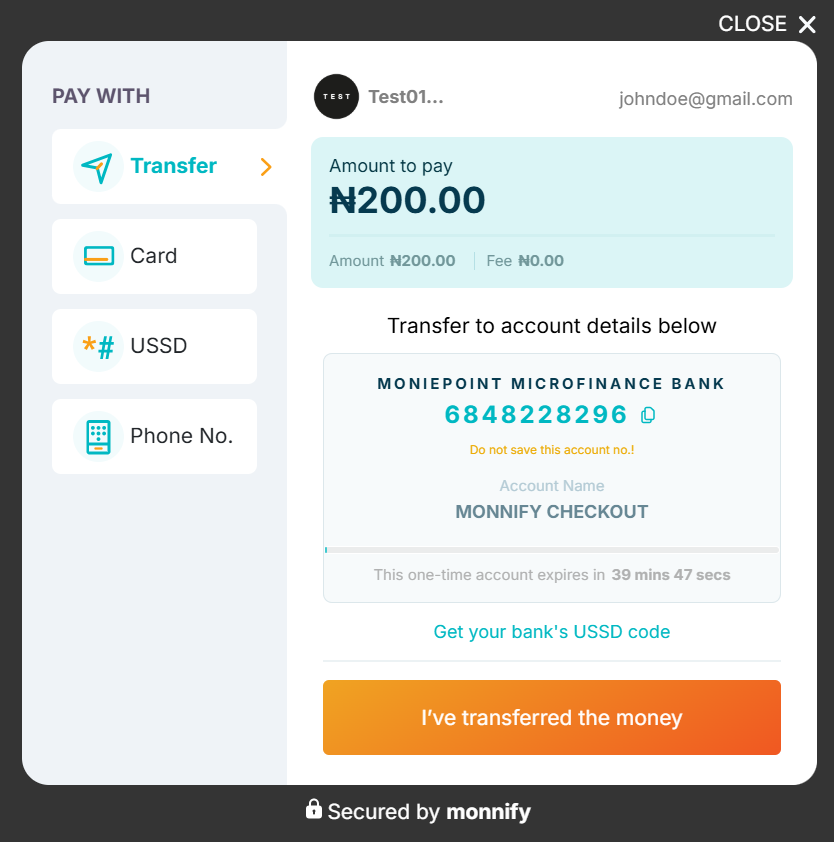
Adding Monnify Checkout to your Website
---------------------------------------
Add the Monnify JS snippet to your page and call MonnifySDK.initialize() when the customer is ready to pay:
Option A – Script tag (no bundler)
Drop the Monnify script into your HTML and call `MonnifySDK.initialize()` directly. No installation needed.
index.html
Copy
Option B – npm Package (React, Vue, Angular)
If you're using a framework with a bundler, install the package that matches your project:
terminal
Copy
Both packages expose the same class-based API. Instantiate with your credentials and call `initializePayment()`. Here's a React example:
PayButton.jsx
Copy
The same pattern works in Vue and Angular. Instantiate `Monnify` and call `initializePayment()` inside your component's pay handler.

Currency Support:
The **currency** field defaults to **NGN**. Merchants enabled for USD collection can pass **USD** to accept card payments in US Dollars. You can request access to International Payment from **Settings > Contract Setup** on your Monnify Dashboard.
Response Object
---------------
When the transaction is completed, Monnify will return a response object to your **_onComplete_** function.
response.json
Copy
Always verify the transaction server-side using the [Verify Transactions API](https://developers.monnify.com/docs/collections/manage-payments/verify-transactions)
before fulfilling an order. Monnify will also notify you via webhook for every completed transaction.
User Cancelled Response
-----------------------
If the customer closes the modal, Monnify returns the following to your **_onClose_** function:
response.json
Copy
**Controlling which payment methods appear:** By default all methods are shown. Pass a `paymentMethods` array to restrict them:
payment methods
Copy
Monnify Android SDK
-------------------
Accept payments inside your Android app via card, bank transfer, USSD, and phone number.
1. Card Payment
2. Bank Transfer
3. USSD Payment
4. Payment by Phone Number
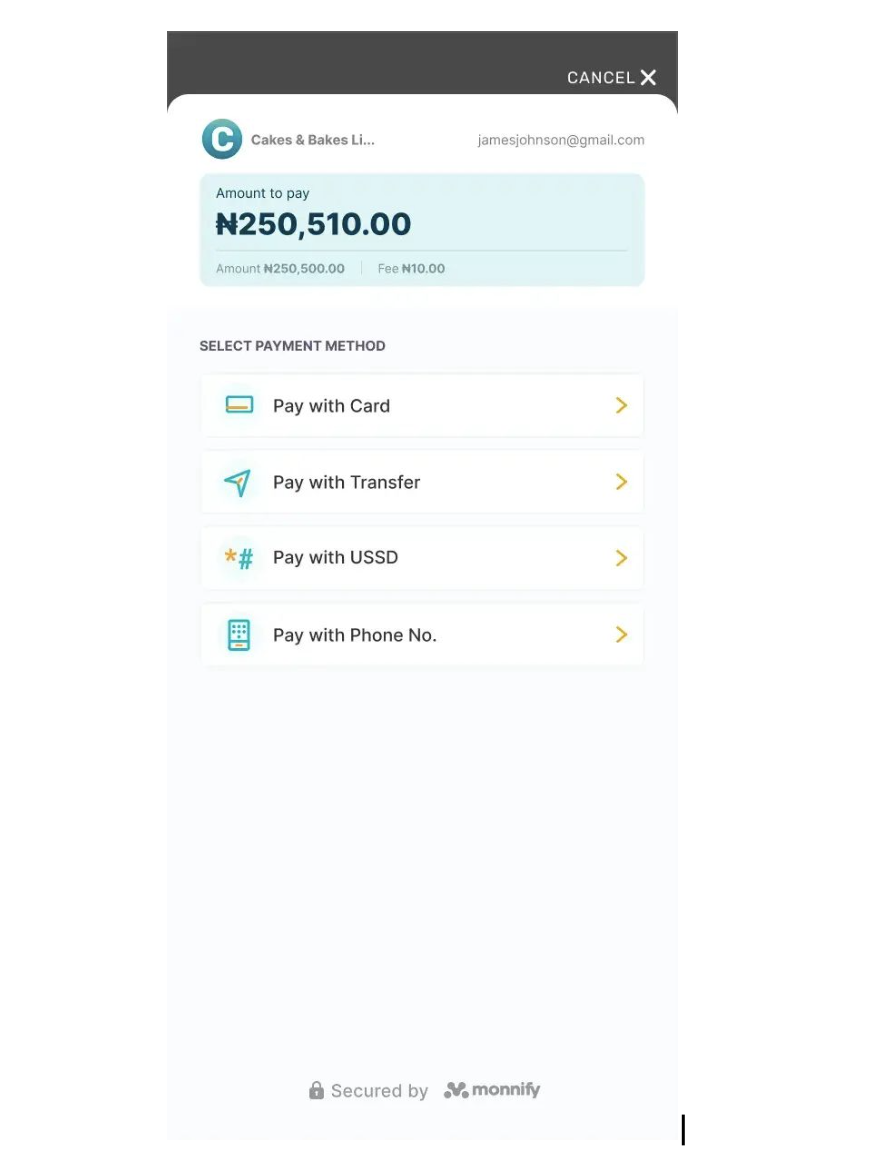
Steps to Implementation
-----------------------
**1\. Add the dependency for the Monnify SDK**
To your root build.gradle file add:
Copy
To your app-level build.gradle file add:
**2\. Create an instance of the Monnify SDK**
Copy
Monnify Flutter SDK
-------------------
Accept payments inside your Flutter app via card, bank transfer, USSD, and phone number.
1. Card Payment
2. Bank Transfer
3. USSD Payment
4. Payment by Phone Number

Steps to Implementation
-----------------------
**1\. Add the dependency for the Monnify SDK**
Add `monnify_payment_sdk` as a dependency in your `pubspec.yaml` file.
**2\. Initialize the plugin**
Initialize once, preferably in the `initState` of your widget.
Copy
**3\. Initialize payment**
Create a `Transaction` object and pass it to `initializePayment`.
Copy
Monnify iOS SDK
---------------
Accept payments inside your iOS app via card, bank transfer, USSD, and phone number.
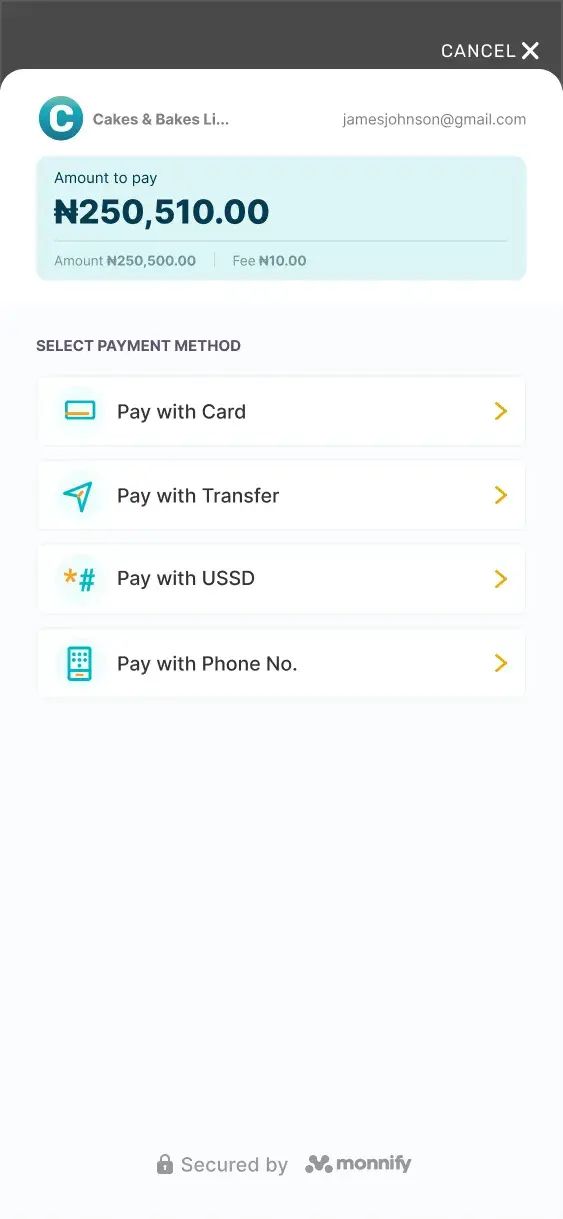
1. Card Payment
2. Bank Transfer
3. USSD Payment
4. Payment by Phone Number
Steps to Implementation
-----------------------
1. **Add the SDK via CocoaPods.** Add the following line to your Podfile:
Copy
3. **Access the shared SDK instance.**
Copy
5. **Set your API key and contract code** in `AppDelegate.swift`. Do this once at app startup. Switch to `ApplicationMode.live` for production builds.
AppDelegate.swift
Copy
7. **Specify the transaction parameters:**
Copy
9. **Launch the payment modal when the customer taps Pay.**
Copy
WordPress / WooCommerce Plugin
------------------------------
Sell on a WordPress store? Install the official Monnify WooCommerce plugin and your customers can pay via card and bank transfer directly at checkout no custom code required.
Option C – WordPress / WooCommerce
### Step 1 – Install the Plugin
1. In your WordPress admin, go to **Plugins > Add New**.
2. Search for **Monnify** and click **Install Now** on the _Monnify Official_ plugin.
3. Click **Activate** once installation completes.
Alternatively, download the ZIP from the [WordPress Plugin Directory](https://wordpress.org/plugins/monnify-official/)
and upload it via **Plugins > Add New > Upload Plugin**.
### Step 2 – Configure Your API Keys
1. Go to **WooCommerce > Settings > Payments**.
2. Find **Monnify** in the list and click **Manage**.
3. Enter your **API Key**, **Secret Key**, and **Contract Code** from the [Monnify dashboard](https://app.monnify.com/)
.
4. Set the environment to **Sandbox** for testing or **Live** for production.
5. Click **Save changes**.

Where to find your keys:
Log in to your [Monnify dashboard](https://app.monnify.com/)
, navigate to **Settings > API Keys & Webhooks**. Your Contract Code is under **Settings > Contracts**.
### Step 3 – Test in Sandbox
With the environment set to **Sandbox**, place a test order on your WooCommerce store and complete the payment using a test card or bank transfer. Confirm that the WooCommerce order status updates to _Processing_ before going live.
### Step 4 – Go Live
Switch the plugin environment to **Live**, replace your sandbox keys with your live API Key, Secret Key, and Contract Code, then save. Your store is now accepting real payments.

Webhook setup:
To keep WooCommerce order statuses in sync automatically, add your webhook URL in the Monnify dashboard under **Settings > API Keys & Webhooks**. Your WooCommerce webhook URL is: `https://yourstore.com/?wc-api=monnify_webhook`
Rate this page
How helpful is the content on this page?
★★★★★

Got Questions
Reach out to us at [\[email protected\]](https://developers.monnify.com/cdn-cgi/l/email-protection#01727471716e7375416c6e6f6f6867782f626e6c)
if you have any questions as regards integrating with the Monnify API.

Monnify Tutorial Videos
Check out [Our Youtube channel](https://www.youtube.com/channel/UCUyMHJL8q_JPElohU9IS22Q)
for tutorials on how to integrate the Monnify API.

Join Our Slack Community
[Click here](https://slack.monnify.com/)
to join the Monnify Slack community.
Copyright © 2026 [Monnify](https://monnify.com/)
[](https://www.instagram.com/monnifyhq/)
[](https://www.facebook.com/Monnify-102435331122100/?modal=admin_todo_tour)
[](https://twitter.com/monnify)
[Terms of Service](https://monnify.com/terms.html)
[Privacy Policy](https://monnify.com/privacy-policy.html)
---
# Unknown
[](https://developers.monnify.com/)
* [API](https://developers.monnify.com/api)
* * *
* [Home](https://developers.monnify.com/)
* Accept Payments
* [Overview](https://developers.monnify.com/docs/collections)
* [Quickstart](https://developers.monnify.com/docs/collections/quickstart)
* [Payment Methods](https://developers.monnify.com/docs/collections/payment-methods)
* [International Payments](https://developers.monnify.com/docs/collections/international-payment)
* One-Time Payments
* [Overview](https://developers.monnify.com/docs/collections/one-time-payments)
* [Checkout Page](https://developers.monnify.com/docs/collections/one-time-payments/checkout-page)
* [Checkout API](https://developers.monnify.com/docs/collections/one-time-payments/checkout-api)
* [Payment Links](https://developers.monnify.com/docs/collections/one-time-payments/payment-links)
* [Invoice](https://developers.monnify.com/docs/collections/one-time-payments/invoice)
* [Offline Pay-ins](https://developers.monnify.com/docs/collections/one-time-payments/offline-payins)
* Recurring Payments
* [Overview](https://developers.monnify.com/docs/collections/recurring-payments)
* [Reserved / Virtual Accounts](https://developers.monnify.com/docs/collections/recurring-payments/reserved-accounts)
* [Direct Debit / Mandates](https://developers.monnify.com/docs/collections/recurring-payments/direct-debit)
* [Card Tokenization](https://developers.monnify.com/docs/collections/recurring-payments/card-tokenization)
* [Retry & Failure Handling](https://developers.monnify.com/docs/collections/recurring-payments/retry-failure-handling)
* Manage Payments
* [Verify Transactions](https://developers.monnify.com/docs/collections/manage-payments/verify-transactions)
* [Transaction Splitting / Sub-accounts](https://developers.monnify.com/docs/collections/manage-payments/transaction-splitting)
* [Refunds](https://developers.monnify.com/docs/collections/manage-payments/refunds)
* [Reconciliation](https://developers.monnify.com/docs/collections/manage-payments/reconciliation)
* Transfer/Payout
* [Overview](https://developers.monnify.com/docs/disbursements)
* [Single Transfers](https://developers.monnify.com/docs/disbursements/single-transfers)
* [Bulk Transfers](https://developers.monnify.com/docs/disbursements/bulk-transfers)
* [Offline Payouts (Paycode)](https://developers.monnify.com/docs/disbursements/offline-payout)
* Bills Payment
* [Overview](https://developers.monnify.com/docs/bills-payment)
* [Process a Bill](https://developers.monnify.com/docs/bills-payment/process-a-bill)
* [Settlement Process](https://developers.monnify.com/docs/bills-payment/settlement-process)
* Wallets
* [Overview](https://developers.monnify.com/docs/wallets)
* [Create Wallet](https://developers.monnify.com/docs/wallets/create-wallet)
* [Wallet Balance](https://developers.monnify.com/docs/wallets/wallet-balance)
* [Get Wallets](https://developers.monnify.com/docs/wallets/get-wallets)
* [Wallet Statement](https://developers.monnify.com/docs/wallets/wallet-statement)
* Verification APIs
* [Overview](https://developers.monnify.com/docs/verification-api)
* [Verifying your Customers](https://developers.monnify.com/docs/verification-api/verifying-your-customers)
* [Integration Guide for Monnify BVN Verification](https://developers.monnify.com/docs/integration-guide-bvn-nin-update)
* Integration
* [Tools](https://developers.monnify.com/docs/integration)
* [Sample codes](https://developers.monnify.com/docs/integration/sample-codes)
* [MCP Server](https://developers.monnify.com/docs/integration/mcp-server)
* Webhooks
* [Overview](https://developers.monnify.com/docs/webhooks)
* [Webhook Event Types](https://developers.monnify.com/docs/webhooks/event-types)
* [Settlement](https://developers.monnify.com/docs/settlements)
* [Going Live](https://developers.monnify.com/docs/live)
* [Changelogs](https://developers.monnify.com/docs/change-logs)
* [Test Cards](https://developers.monnify.com/docs/test-cards)
* [Error Codes](https://developers.monnify.com/docs/error-codes)
* [Supported Banks](https://developers.monnify.com/docs/supported-banks)
Search..
Brand Logo Requirement
======================
Welcome merchant, here you can download monnify's logo
Monnify Logo
============
The Monnify Logo is a vital representation of our brand and must always be used to represent us when integrating our products on merchant platforms.


Got Questions
Reach out to us at [\[email protected\]](https://developers.monnify.com/cdn-cgi/l/email-protection#681b1d1818071a1c2805070606010e11460b0705)
if you have any questions as regards integrating with the Monnify API.

Monnify Tutorial Videos
Check out [Our Youtube channel](https://www.youtube.com/channel/UCUyMHJL8q_JPElohU9IS22Q)
for tutorials on how to integrate the Monnify API.

Join Our Slack Community
[Click here](https://slack.monnify.com/)
to join the Monnify Slack community.
Copyright © 2026 [Monnify](https://monnify.com/)
[](https://www.instagram.com/monnifyhq/)
[](https://www.facebook.com/Monnify-102435331122100/?modal=admin_todo_tour)
[](https://twitter.com/monnify)
[Terms of Service](https://monnify.com/terms.html)
[Privacy Policy](https://monnify.com/privacy-policy.html)
---
# Process a bill
[](https://developers.monnify.com/)
* [API](https://developers.monnify.com/api)
* * *
* [Home](https://developers.monnify.com/)
* Accept Payments
* [Overview](https://developers.monnify.com/docs/collections)
* [Quickstart](https://developers.monnify.com/docs/collections/quickstart)
* [Payment Methods](https://developers.monnify.com/docs/collections/payment-methods)
* [International Payments](https://developers.monnify.com/docs/collections/international-payment)
* One-Time Payments
* [Overview](https://developers.monnify.com/docs/collections/one-time-payments)
* [Checkout Page](https://developers.monnify.com/docs/collections/one-time-payments/checkout-page)
* [Checkout API](https://developers.monnify.com/docs/collections/one-time-payments/checkout-api)
* [Payment Links](https://developers.monnify.com/docs/collections/one-time-payments/payment-links)
* [Invoice](https://developers.monnify.com/docs/collections/one-time-payments/invoice)
* [Offline Pay-ins](https://developers.monnify.com/docs/collections/one-time-payments/offline-payins)
* Recurring Payments
* [Overview](https://developers.monnify.com/docs/collections/recurring-payments)
* [Reserved / Virtual Accounts](https://developers.monnify.com/docs/collections/recurring-payments/reserved-accounts)
* [Direct Debit / Mandates](https://developers.monnify.com/docs/collections/recurring-payments/direct-debit)
* [Card Tokenization](https://developers.monnify.com/docs/collections/recurring-payments/card-tokenization)
* [Retry & Failure Handling](https://developers.monnify.com/docs/collections/recurring-payments/retry-failure-handling)
* Manage Payments
* [Verify Transactions](https://developers.monnify.com/docs/collections/manage-payments/verify-transactions)
* [Transaction Splitting / Sub-accounts](https://developers.monnify.com/docs/collections/manage-payments/transaction-splitting)
* [Refunds](https://developers.monnify.com/docs/collections/manage-payments/refunds)
* [Reconciliation](https://developers.monnify.com/docs/collections/manage-payments/reconciliation)
* Transfer/Payout
* [Overview](https://developers.monnify.com/docs/disbursements)
* [Single Transfers](https://developers.monnify.com/docs/disbursements/single-transfers)
* [Bulk Transfers](https://developers.monnify.com/docs/disbursements/bulk-transfers)
* [Offline Payouts (Paycode)](https://developers.monnify.com/docs/disbursements/offline-payout)
* Bills Payment
* [Overview](https://developers.monnify.com/docs/bills-payment)
* [Process a Bill](https://developers.monnify.com/docs/bills-payment/process-a-bill)
* [Settlement Process](https://developers.monnify.com/docs/bills-payment/settlement-process)
* Wallets
* [Overview](https://developers.monnify.com/docs/wallets)
* [Create Wallet](https://developers.monnify.com/docs/wallets/create-wallet)
* [Wallet Balance](https://developers.monnify.com/docs/wallets/wallet-balance)
* [Get Wallets](https://developers.monnify.com/docs/wallets/get-wallets)
* [Wallet Statement](https://developers.monnify.com/docs/wallets/wallet-statement)
* Verification APIs
* [Overview](https://developers.monnify.com/docs/verification-api)
* [Verifying your Customers](https://developers.monnify.com/docs/verification-api/verifying-your-customers)
* [Integration Guide for Monnify BVN Verification](https://developers.monnify.com/docs/integration-guide-bvn-nin-update)
* Integration
* [Tools](https://developers.monnify.com/docs/integration)
* [Sample codes](https://developers.monnify.com/docs/integration/sample-codes)
* [MCP Server](https://developers.monnify.com/docs/integration/mcp-server)
* Webhooks
* [Overview](https://developers.monnify.com/docs/webhooks)
* [Webhook Event Types](https://developers.monnify.com/docs/webhooks/event-types)
* [Settlement](https://developers.monnify.com/docs/settlements)
* [Going Live](https://developers.monnify.com/docs/live)
* [Changelogs](https://developers.monnify.com/docs/change-logs)
* [Test Cards](https://developers.monnify.com/docs/test-cards)
* [Error Codes](https://developers.monnify.com/docs/error-codes)
* [Supported Banks](https://developers.monnify.com/docs/supported-banks)
Search..
Settlement Process: Instant Commission Payout
=============================================
The Biller Aggregation Service uses a commercial model where merchants pay a service fee. A cashback system is used to pay out commissions. Once a transaction is successful, the system instantly settles the commission. This is done by first debiting the full amount (gross debit) and then crediting the commission back, so the merchant quickly sees the final net cost of the service.
Calculation of Merchant Payable
-------------------------------
The required funds for the transaction are defined by several terms:
1. **Vend Amount:** This is the base amount of the transaction, representing the gross value of the service being purchased by the customer.
2. **Merchant Fee:** A fee charged by the Aggregator to the Merchant, applicable only for certain products (otherwise set to zero).
3. **Merchant Payable Amount:** This figure represents the total amount the Merchant must pay the Aggregation Service, equaling the Vend Amount plus the Merchant Fee.
The Settlement Flow
-------------------
The process achieves an instant net settlement position through two specific account movements:
| Step | Action | Account Movement |
| --- | --- | --- |
| 1 | Gross Debit | The Merchant's Account is debited for the full payable amount. This step signifies that the Merchant pays the full payable amount of the service. |
| 2 | Commission Credit | The Merchant's Account is immediately credited with the applicable Cashback/Commission. This represents the Merchant's profit, which is instantly paid out. The Cashback/Commission varies depending on the specific Billers and Products involved. |
The Final Net Settlement ensures that the Merchant's true cost is immediately calculated as the Merchant payable amount minus the Commission.
Example:
--------
For a transaction where the payable amount is 1000 naira and the applicable Cashback is 20 naira:
* The Merchant is Debited 1000.
* The Merchant is simultaneously Credited 20.
* The resulting Net Cost to the Merchant is 980.

Got Questions
Reach out to us at [\[email protected\]](https://developers.monnify.com/cdn-cgi/l/email-protection#7e0d0b0e0e110c0a3e13111010171807501d1113)
if you have any questions as regards integrating with the Monnify API.

Monnify Tutorial Videos
Check out [Our Youtube channel](https://www.youtube.com/channel/UCUyMHJL8q_JPElohU9IS22Q)
for tutorials on how to integrate the Monnify API.

Join Our Slack Community
[Click here](https://slack.monnify.com/)
to join the Monnify Slack community.
Copyright © 2026 [Monnify](https://monnify.com/)
[](https://www.instagram.com/monnifyhq/)
[](https://www.facebook.com/Monnify-102435331122100/?modal=admin_todo_tour)
[](https://twitter.com/monnify)
[Terms of Service](https://monnify.com/terms.html)
[Privacy Policy](https://monnify.com/privacy-policy.html)
---
# Transaction Splitting / Sub Accounts
[](https://developers.monnify.com/)
* [API](https://developers.monnify.com/api)
* * *
* [Home](https://developers.monnify.com/)
* Accept Payments
* [Overview](https://developers.monnify.com/docs/collections)
* [Quickstart](https://developers.monnify.com/docs/collections/quickstart)
* [Payment Methods](https://developers.monnify.com/docs/collections/payment-methods)
* [International Payments](https://developers.monnify.com/docs/collections/international-payment)
* One-Time Payments
* [Overview](https://developers.monnify.com/docs/collections/one-time-payments)
* [Checkout Page](https://developers.monnify.com/docs/collections/one-time-payments/checkout-page)
* [Checkout API](https://developers.monnify.com/docs/collections/one-time-payments/checkout-api)
* [Payment Links](https://developers.monnify.com/docs/collections/one-time-payments/payment-links)
* [Invoice](https://developers.monnify.com/docs/collections/one-time-payments/invoice)
* [Offline Pay-ins](https://developers.monnify.com/docs/collections/one-time-payments/offline-payins)
* Recurring Payments
* [Overview](https://developers.monnify.com/docs/collections/recurring-payments)
* [Reserved / Virtual Accounts](https://developers.monnify.com/docs/collections/recurring-payments/reserved-accounts)
* [Direct Debit / Mandates](https://developers.monnify.com/docs/collections/recurring-payments/direct-debit)
* [Card Tokenization](https://developers.monnify.com/docs/collections/recurring-payments/card-tokenization)
* [Retry & Failure Handling](https://developers.monnify.com/docs/collections/recurring-payments/retry-failure-handling)
* Manage Payments
* [Verify Transactions](https://developers.monnify.com/docs/collections/manage-payments/verify-transactions)
* [Transaction Splitting / Sub-accounts](https://developers.monnify.com/docs/collections/manage-payments/transaction-splitting)
* [Refunds](https://developers.monnify.com/docs/collections/manage-payments/refunds)
* [Reconciliation](https://developers.monnify.com/docs/collections/manage-payments/reconciliation)
* Transfer/Payout
* [Overview](https://developers.monnify.com/docs/disbursements)
* [Single Transfers](https://developers.monnify.com/docs/disbursements/single-transfers)
* [Bulk Transfers](https://developers.monnify.com/docs/disbursements/bulk-transfers)
* [Offline Payouts (Paycode)](https://developers.monnify.com/docs/disbursements/offline-payout)
* Bills Payment
* [Overview](https://developers.monnify.com/docs/bills-payment)
* [Process a Bill](https://developers.monnify.com/docs/bills-payment/process-a-bill)
* [Settlement Process](https://developers.monnify.com/docs/bills-payment/settlement-process)
* Wallets
* [Overview](https://developers.monnify.com/docs/wallets)
* [Create Wallet](https://developers.monnify.com/docs/wallets/create-wallet)
* [Wallet Balance](https://developers.monnify.com/docs/wallets/wallet-balance)
* [Get Wallets](https://developers.monnify.com/docs/wallets/get-wallets)
* [Wallet Statement](https://developers.monnify.com/docs/wallets/wallet-statement)
* Verification APIs
* [Overview](https://developers.monnify.com/docs/verification-api)
* [Verifying your Customers](https://developers.monnify.com/docs/verification-api/verifying-your-customers)
* [Integration Guide for Monnify BVN Verification](https://developers.monnify.com/docs/integration-guide-bvn-nin-update)
* Integration
* [Tools](https://developers.monnify.com/docs/integration)
* [Sample codes](https://developers.monnify.com/docs/integration/sample-codes)
* [MCP Server](https://developers.monnify.com/docs/integration/mcp-server)
* Webhooks
* [Overview](https://developers.monnify.com/docs/webhooks)
* [Webhook Event Types](https://developers.monnify.com/docs/webhooks/event-types)
* [Settlement](https://developers.monnify.com/docs/settlements)
* [Going Live](https://developers.monnify.com/docs/live)
* [Changelogs](https://developers.monnify.com/docs/change-logs)
* [Test Cards](https://developers.monnify.com/docs/test-cards)
* [Error Codes](https://developers.monnify.com/docs/error-codes)
* [Supported Banks](https://developers.monnify.com/docs/supported-banks)
Search..
Transaction Splitting / Sub Accounts
====================================
Transaction splitting is a feature on Monnify that allows you to create subaccounts so payments could be split across different accounts. This simply means that for a single transaction, Monnify can help you share the amount paid between up to five different accounts.
This means you can specify either percentage/amount of incoming payments should go into your default settlement account and what percentage/amount of payments should also go into the sub-account you’ve created. You can create sub-accounts by integrating with the Monnify [Create Sub-Account Endpoint](https://developers.monnify.com/api#tag/sub-accounts/#create-sub-accounts)
You can do the following to a sub-account once it has been created:
1. [Delete a Sub-Account Endpoint](https://developers.monnify.com/api#tag/sub-accounts/#delete-sub-account)
you no longer need
2. [Get the Sub-Accounts](https://developers.monnify.com/api#tag/sub-accounts/#get-sub-accounts)
created
3. [Update the details of a Sub-Account](https://developers.monnify.com/api#tag/sub-accounts/#update-sub-account)
Create a Sub-Account
--------------------
Use the Create Sub-Account API to register a sub-account. The request body is an array, so you can create multiple sub-accounts in a single call.
cURLJavaScriptPythonPHP
Copy
Before You Begin
----------------
Before integrating the SubAccount API, make sure you have completed the following steps:
1. **Enable Sub Account on your account**
Subaccounts are not enabled by default. You must request activation for the API (and UI - if needed) to be enabled both your **Sandbox** and/or **Live** environments. Contact [\[email protected\]](https://developers.monnify.com/cdn-cgi/l/email-protection#5c353228393b2e3d28353332712f292c2c332e281c31333232353a25723f3331)
to get this enabled stating your use case for the feature. As part of the email, you will be expected to idemnify Monnify for potential use and misuse of the feature on your platfrom.

Enabling SubAccount UI and API
Please note that activation of subaccount API does not enable it on the UI automatically, users are expected to explictly mention if they need both UI and API enabled to get both activated
Attaching Subaccounts to other payment API
------------------------------------------
To attach a subaccount to a payment request, simply append the **_incomeSplitConfig_** array to the request body. Each entry in the array defines how a portion of the payment is routed to a sub-account.
There are two ways to define the split amount for each sub-account:
1. **Percentage split**: a percentage of the total transaction amount is sent to the sub-account, using the **splitPercentage** field.
2. **Flat amount split**: a fixed static amount is sent to the sub-account regardless of the transaction value, using the **splitAmount** field.

Split Options
Only one of **splitPercentage** or **splitAmount** should be provided per sub-account entry, not both. However, you can add a mix of sub-accounts with fixed amount and percentage but not a single subaccount with both configuration.
Percentage Split
----------------
Use `splitPercentage` to route a proportion of the transaction to a sub-account. The `feePercentage` field controls what share of Monnify's transaction fee the sub-account bears.
Copy
Flat Amount Split
-----------------
Use `splitAmount` to route a fixed amount to a sub-account, independent of the total transaction value. This is useful when you always want a sub-account to receive a specific amount (e.g. a platform fee of ₦500).
Copy
You can see sample usage examples on the [Reserved Account API](https://developers.monnify.com/api#tag/customer-reserved-account)
section.
Creating a Sub Account on Monnify UI
------------------------------------
Please send an email to [\[email protected\]](https://developers.monnify.com/cdn-cgi/l/email-protection#5f36312b3a382d3e2b363031722c2a2f2f302d2b1f32303131363926713c3032)
to have the Sub Account UI enabled for you. Once enabled, you will see the Sub Account Tab under your Collections menu.
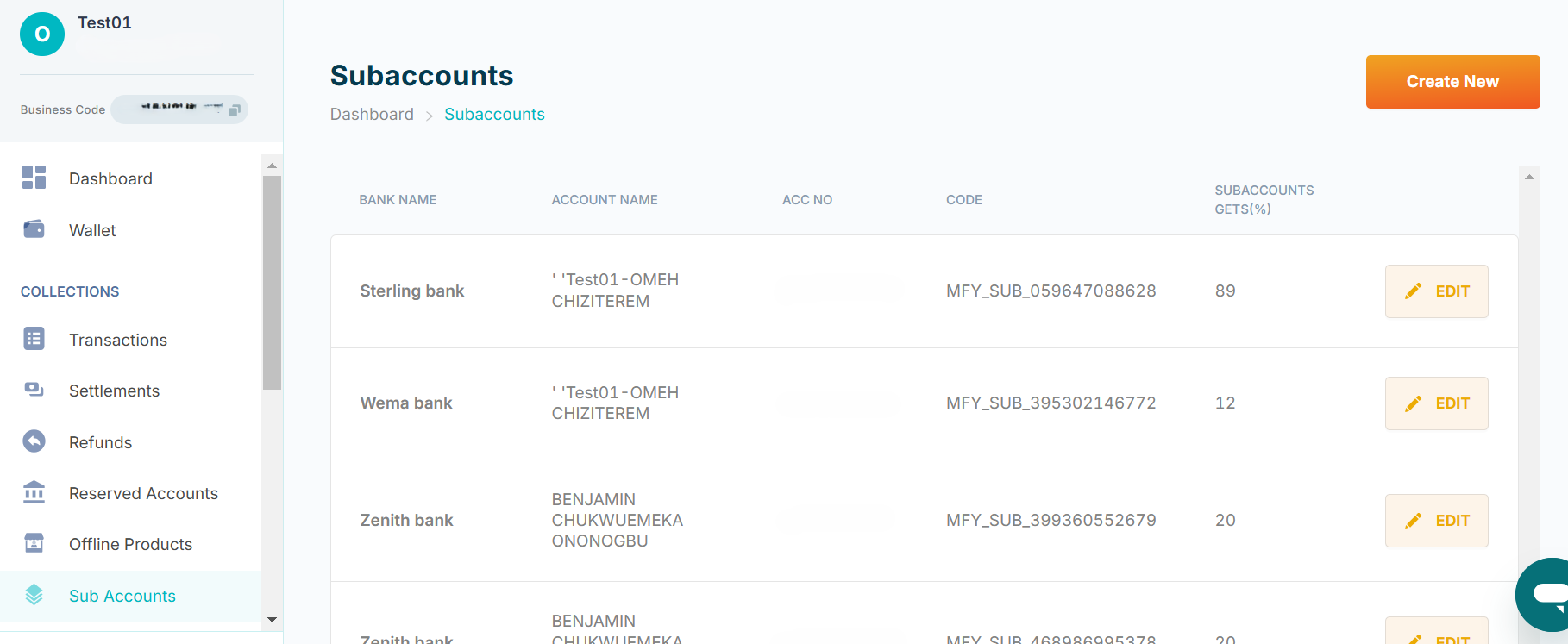
To Create a Sub Account, click on Create New and fill in the necessary details
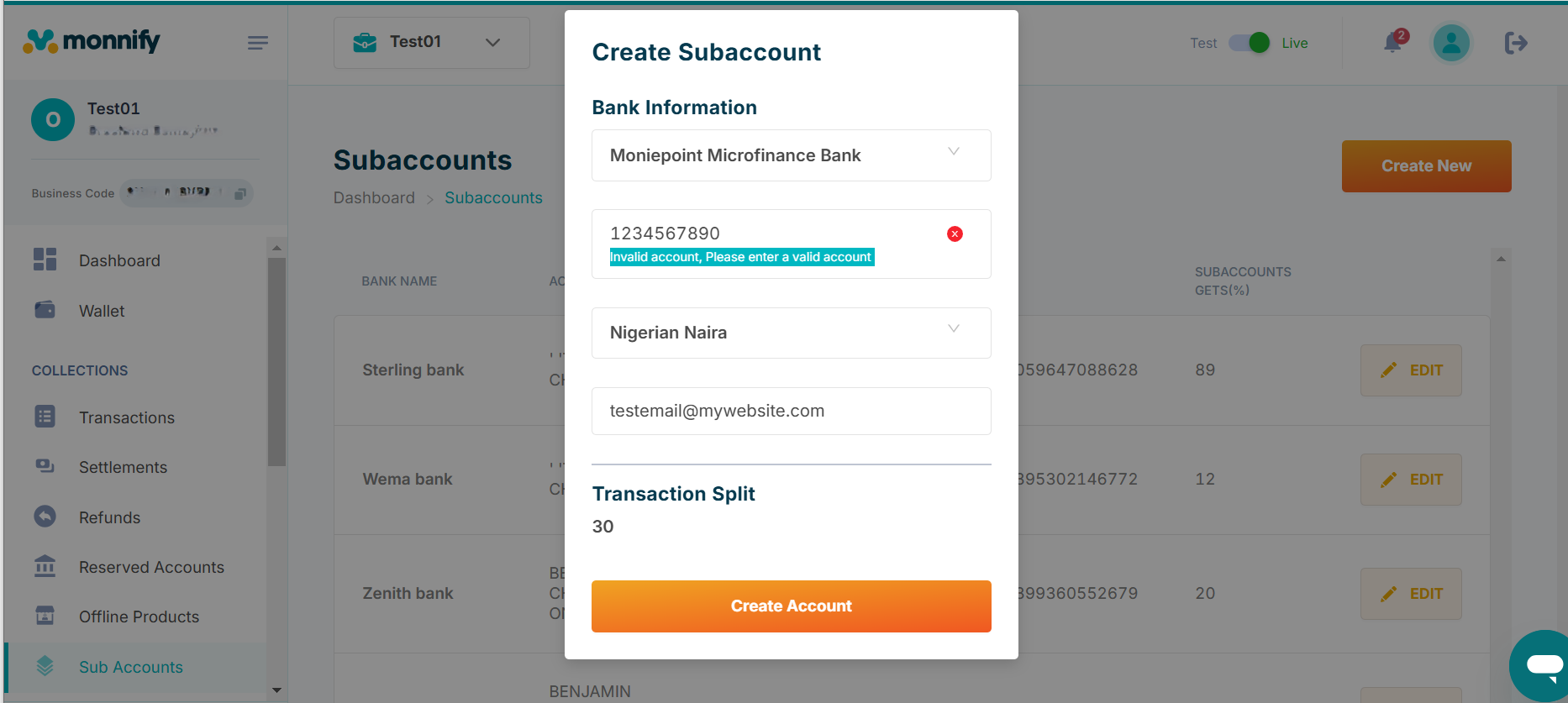
Rate this page
How helpful is the content on this page?
★★★★★

Got Questions
Reach out to us at [\[email protected\]](https://developers.monnify.com/cdn-cgi/l/email-protection#d7a4a2a7a7b8a5a397bab8b9b9beb1aef9b4b8ba)
if you have any questions as regards integrating with the Monnify API.

Monnify Tutorial Videos
Check out [Our Youtube channel](https://www.youtube.com/channel/UCUyMHJL8q_JPElohU9IS22Q)
for tutorials on how to integrate the Monnify API.

Join Our Slack Community
[Click here](https://slack.monnify.com/)
to join the Monnify Slack community.
Copyright © 2026 [Monnify](https://monnify.com/)
[](https://www.instagram.com/monnifyhq/)
[](https://www.facebook.com/Monnify-102435331122100/?modal=admin_todo_tour)
[](https://twitter.com/monnify)
[Terms of Service](https://monnify.com/terms.html)
[Privacy Policy](https://monnify.com/privacy-policy.html)
---
# Process a bill
[](https://developers.monnify.com/)
* [API](https://developers.monnify.com/api)
* * *
* [Home](https://developers.monnify.com/)
* Accept Payments
* [Overview](https://developers.monnify.com/docs/collections)
* [Quickstart](https://developers.monnify.com/docs/collections/quickstart)
* [Payment Methods](https://developers.monnify.com/docs/collections/payment-methods)
* [International Payments](https://developers.monnify.com/docs/collections/international-payment)
* One-Time Payments
* [Overview](https://developers.monnify.com/docs/collections/one-time-payments)
* [Checkout Page](https://developers.monnify.com/docs/collections/one-time-payments/checkout-page)
* [Checkout API](https://developers.monnify.com/docs/collections/one-time-payments/checkout-api)
* [Payment Links](https://developers.monnify.com/docs/collections/one-time-payments/payment-links)
* [Invoice](https://developers.monnify.com/docs/collections/one-time-payments/invoice)
* [Offline Pay-ins](https://developers.monnify.com/docs/collections/one-time-payments/offline-payins)
* Recurring Payments
* [Overview](https://developers.monnify.com/docs/collections/recurring-payments)
* [Reserved / Virtual Accounts](https://developers.monnify.com/docs/collections/recurring-payments/reserved-accounts)
* [Direct Debit / Mandates](https://developers.monnify.com/docs/collections/recurring-payments/direct-debit)
* [Card Tokenization](https://developers.monnify.com/docs/collections/recurring-payments/card-tokenization)
* [Retry & Failure Handling](https://developers.monnify.com/docs/collections/recurring-payments/retry-failure-handling)
* Manage Payments
* [Verify Transactions](https://developers.monnify.com/docs/collections/manage-payments/verify-transactions)
* [Transaction Splitting / Sub-accounts](https://developers.monnify.com/docs/collections/manage-payments/transaction-splitting)
* [Refunds](https://developers.monnify.com/docs/collections/manage-payments/refunds)
* [Reconciliation](https://developers.monnify.com/docs/collections/manage-payments/reconciliation)
* Transfer/Payout
* [Overview](https://developers.monnify.com/docs/disbursements)
* [Single Transfers](https://developers.monnify.com/docs/disbursements/single-transfers)
* [Bulk Transfers](https://developers.monnify.com/docs/disbursements/bulk-transfers)
* [Offline Payouts (Paycode)](https://developers.monnify.com/docs/disbursements/offline-payout)
* Bills Payment
* [Overview](https://developers.monnify.com/docs/bills-payment)
* [Process a Bill](https://developers.monnify.com/docs/bills-payment/process-a-bill)
* [Settlement Process](https://developers.monnify.com/docs/bills-payment/settlement-process)
* Wallets
* [Overview](https://developers.monnify.com/docs/wallets)
* [Create Wallet](https://developers.monnify.com/docs/wallets/create-wallet)
* [Wallet Balance](https://developers.monnify.com/docs/wallets/wallet-balance)
* [Get Wallets](https://developers.monnify.com/docs/wallets/get-wallets)
* [Wallet Statement](https://developers.monnify.com/docs/wallets/wallet-statement)
* Verification APIs
* [Overview](https://developers.monnify.com/docs/verification-api)
* [Verifying your Customers](https://developers.monnify.com/docs/verification-api/verifying-your-customers)
* [Integration Guide for Monnify BVN Verification](https://developers.monnify.com/docs/integration-guide-bvn-nin-update)
* Integration
* [Tools](https://developers.monnify.com/docs/integration)
* [Sample codes](https://developers.monnify.com/docs/integration/sample-codes)
* [MCP Server](https://developers.monnify.com/docs/integration/mcp-server)
* Webhooks
* [Overview](https://developers.monnify.com/docs/webhooks)
* [Webhook Event Types](https://developers.monnify.com/docs/webhooks/event-types)
* [Settlement](https://developers.monnify.com/docs/settlements)
* [Going Live](https://developers.monnify.com/docs/live)
* [Changelogs](https://developers.monnify.com/docs/change-logs)
* [Test Cards](https://developers.monnify.com/docs/test-cards)
* [Error Codes](https://developers.monnify.com/docs/error-codes)
* [Supported Banks](https://developers.monnify.com/docs/supported-banks)
Search..
Process a Bill
==============
The Monnify Bills Payment feature allows all Monnify merchants to Vend and Process Bills using their existing Monnify account. This includes services like Utility Bills, Airtime Topup, and other essential bills.

Info:
**Activation:** The Bills Payment service is not active for all Monnify Merchants by default. To enable it for your account, you must send an activation request via email to: [\[email protected\]](https://developers.monnify.com/cdn-cgi/l/email-protection)
.
Authentication
--------------
Access to the Bills Payment product is secured using Bearer Token authentication.
To use the service, first obtain an Access Token by [authenticating with your API Key and Client Secret](https://developers.monnify.com/api#tag/authentication/#generate-access-token)
, which you can find on your Monnify dashboard. Include this token in the Authorization: Bearer \`token\` header of all requests.
Bill Payment Workflow
---------------------
Integrating the Bill Payment product involves a high-level sequence of steps to ensure customers select the correct service and that their details are validated before any funds are debited.
| Step | Action | Description | Key Requirement |
| --- | --- | --- | --- |
| 1 | Get Categories | Display a list of general bill types (e.g., ELECTRICITY, CABLE\_TV) for the user to select from. | None |
| 2 | List Billers | Show all available service providers (e.g., specific electricity companies) that fall under the selected category. | Category Code |
| 3 | List Products | Fetch the specific products offered by the selected biller (e.g., Prepaid Meter, Postpaid Meter, various Data Bundles). | Biller Code |
| 4 | Validate Customer | Required Step. The customer enters their unique identifier (e.g., meter number, phone number). The system validates these details before payment can proceed. | Product Code & Customer ID |
| 5 | Vend Bill (Process Payment) | Once validation is successful, initiate the actual payment transaction by sending the amount and the unique validation reference. | Validation Reference |
| 6 | Check Transaction Status (Requery) | Check the current status of a vend request (e.g., if it is still IN\_PROGRESS, SUCCESS, or FAILED). Note: This is not used to initiate a new payment. It is only for status verification. | Transaction Reference |
How it works
------------
Consuming the Monnify Bills Payment service generally involves three primary phases: Discovery, Validation, and Vending.
1. **Discovery (Finding Billers and Products)**
Before a payment can be processed, you must identify the relevant biller and product using the following endpoints:
* **Retrieve Biller Categories:** Use the GET [Biller Categories endpoint](https://developers.monnify.com/api#tag/bills-payment-apis/#get-biller-categories)
to list all available categories (e.g., ELECTRICITY, DATA, CABLE\_TV).
* **Retrieve List of Billers:** Use the GET [Billers endpoint](https://developers.monnify.com/api#tag/bills-payment-apis/#list-billers)
to retrieve all active billers available for payment. This list can be filtered using the `categoryCode`.
* **Retrieve Available Products:** Use the GET [Billers product endpoint](https://developers.monnify.com/api#tag/bills-payment-apis/#get-biller-products)
to fetch a list of available products offered by different billers. This list must be filtered using the specific `billerCode`.
2. **Validation (Verifying Customer Details)**
Validation is an important step performed before attempting a final payment. It confirms customer information (e.g., meter number, phone number) and tells you whether a `validationReference` is required for the product.
* **Endpoint:** Perform customer validation using the POST method on [validate customer](https://developers.monnify.com/api#tag/bills-payment-apis/#validate-customer)
.
* **Request Payload:** Requires `productCode` and `customerId`.
* **Successful Response:**
* The response includes a `vendInstruction` object.
* This object indicates whether the product requires a validation reference:
* requireValidationRef: true → a `validationReference` will be included and must be used in the vend request.
* requireValidationRef: false → no validation reference is required, and you should not send one during the vend request.
3. **Vending (Executing Payment)**
This step executes the actual bill payment and charges the customer.
* **Endpoint:** Process payments using the POST method on [vend](https://developers.monnify.com/api#tag/bills-payment-apis/#process-bill-payment)
.
* **Required Inputs:**
* `productCode`
* `customerId`
* `vendAmount`
* A merchant-supplied `vendReference` (could be random but should be unique for you per transaction)
* If required: include `validationReference` only when `requireValidationRef` was true in the validation response.
* **Validation Reference Requirement:**
* Include the `validationReference` when the product requires it.
* Exclude the `validationReference` when `requireValidationRef` is false.
* **Successful Vend:** A successful response returns:
* Monnify-generated `transactionReference`
* Your (merchant) supplied `vendReference`
* `vendStatus` (which will be SUCCESS when the payment is completed)
* **Status Check/Requery:** If a vend initially returns "IN\_PROGRESS" or its final status is uncertain:
* Use the GET [Bills payment requery](https://developers.monnify.com/api#tag/bills-payment-apis/#check-bill-payment-status)
endpoint to check the updated status. This endpoint does not re-charge or re-initiate payment. It only confirms the final status (SUCCESS, FAILED, or still IN\_PROGRESS).
Key Concept: Pre-Validation
---------------------------
The Validation step (Step 4) is critical. Before you can process a bill (Step 5), you must successfully validate the customer's ID against the chosen product. A successful validation generates a unique Validation Reference, which acts as a secure key required to successfully complete the final Vend request. This ensures that the payment is directed to the correct customer account.
Error Handling / Validation Failure
-----------------------------------
If the validation step fails (e.g. invalid customerId), the API will return an error response, and you should handle this by showing an appropriate error message to the user and not calling the vend endpoint. In case the vend call returns an IN\_PROGRESS status, you should poll the “Check Transaction Status” endpoint until you receive a terminal status (SUCCESS or FAILED) or until a timeout / retry limit is reached.
Next Steps
----------
For detailed information on URLs, HTTP methods, and data fields for each step above, see the [Bill Payment API Reference](https://developers.monnify.com/api#tag/bills-payment-apis)
Rate this page
How helpful is the content on this page?
★★★★★

Got Questions
Reach out to us at [\[email protected\]](https://developers.monnify.com/cdn-cgi/l/email-protection#aad9dfdadac5d8deeac7c5c4c4c3ccd384c9c5c7)
if you have any questions as regards integrating with the Monnify API.

Monnify Tutorial Videos
Check out [Our Youtube channel](https://www.youtube.com/channel/UCUyMHJL8q_JPElohU9IS22Q)
for tutorials on how to integrate the Monnify API.

Join Our Slack Community
[Click here](https://slack.monnify.com/)
to join the Monnify Slack community.
Copyright © 2026 [Monnify](https://monnify.com/)
[](https://www.instagram.com/monnifyhq/)
[](https://www.facebook.com/Monnify-102435331122100/?modal=admin_todo_tour)
[](https://twitter.com/monnify)
[Terms of Service](https://monnify.com/terms.html)
[Privacy Policy](https://monnify.com/privacy-policy.html)
---
# Accept Payments
[](https://developers.monnify.com/)
* [API](https://developers.monnify.com/api)
* * *
* [Home](https://developers.monnify.com/)
* Accept Payments
* [Overview](https://developers.monnify.com/docs/collections)
* [Quickstart](https://developers.monnify.com/docs/collections/quickstart)
* [Payment Methods](https://developers.monnify.com/docs/collections/payment-methods)
* [International Payments](https://developers.monnify.com/docs/collections/international-payment)
* One-Time Payments
* [Overview](https://developers.monnify.com/docs/collections/one-time-payments)
* [Checkout Page](https://developers.monnify.com/docs/collections/one-time-payments/checkout-page)
* [Checkout API](https://developers.monnify.com/docs/collections/one-time-payments/checkout-api)
* [Payment Links](https://developers.monnify.com/docs/collections/one-time-payments/payment-links)
* [Invoice](https://developers.monnify.com/docs/collections/one-time-payments/invoice)
* [Offline Pay-ins](https://developers.monnify.com/docs/collections/one-time-payments/offline-payins)
* Recurring Payments
* [Overview](https://developers.monnify.com/docs/collections/recurring-payments)
* [Reserved / Virtual Accounts](https://developers.monnify.com/docs/collections/recurring-payments/reserved-accounts)
* [Direct Debit / Mandates](https://developers.monnify.com/docs/collections/recurring-payments/direct-debit)
* [Card Tokenization](https://developers.monnify.com/docs/collections/recurring-payments/card-tokenization)
* [Retry & Failure Handling](https://developers.monnify.com/docs/collections/recurring-payments/retry-failure-handling)
* Manage Payments
* [Verify Transactions](https://developers.monnify.com/docs/collections/manage-payments/verify-transactions)
* [Transaction Splitting / Sub-accounts](https://developers.monnify.com/docs/collections/manage-payments/transaction-splitting)
* [Refunds](https://developers.monnify.com/docs/collections/manage-payments/refunds)
* [Reconciliation](https://developers.monnify.com/docs/collections/manage-payments/reconciliation)
* Transfer/Payout
* [Overview](https://developers.monnify.com/docs/disbursements)
* [Single Transfers](https://developers.monnify.com/docs/disbursements/single-transfers)
* [Bulk Transfers](https://developers.monnify.com/docs/disbursements/bulk-transfers)
* [Offline Payouts (Paycode)](https://developers.monnify.com/docs/disbursements/offline-payout)
* Bills Payment
* [Overview](https://developers.monnify.com/docs/bills-payment)
* [Process a Bill](https://developers.monnify.com/docs/bills-payment/process-a-bill)
* [Settlement Process](https://developers.monnify.com/docs/bills-payment/settlement-process)
* Wallets
* [Overview](https://developers.monnify.com/docs/wallets)
* [Create Wallet](https://developers.monnify.com/docs/wallets/create-wallet)
* [Wallet Balance](https://developers.monnify.com/docs/wallets/wallet-balance)
* [Get Wallets](https://developers.monnify.com/docs/wallets/get-wallets)
* [Wallet Statement](https://developers.monnify.com/docs/wallets/wallet-statement)
* Verification APIs
* [Overview](https://developers.monnify.com/docs/verification-api)
* [Verifying your Customers](https://developers.monnify.com/docs/verification-api/verifying-your-customers)
* [Integration Guide for Monnify BVN Verification](https://developers.monnify.com/docs/integration-guide-bvn-nin-update)
* Integration
* [Tools](https://developers.monnify.com/docs/integration)
* [Sample codes](https://developers.monnify.com/docs/integration/sample-codes)
* [MCP Server](https://developers.monnify.com/docs/integration/mcp-server)
* Webhooks
* [Overview](https://developers.monnify.com/docs/webhooks)
* [Webhook Event Types](https://developers.monnify.com/docs/webhooks/event-types)
* [Settlement](https://developers.monnify.com/docs/settlements)
* [Going Live](https://developers.monnify.com/docs/live)
* [Changelogs](https://developers.monnify.com/docs/change-logs)
* [Test Cards](https://developers.monnify.com/docs/test-cards)
* [Error Codes](https://developers.monnify.com/docs/error-codes)
* [Supported Banks](https://developers.monnify.com/docs/supported-banks)
Search..
Accept Payments with Monnify
============================
Learn how to receive payment from your customers using the Monnify APIs


Signing Up
Before you can start integrating to Monnify, you will need to create a Monnify account.
[Create Account](https://app.monnify.com/create-account)
* * *
🚀 Getting Started
==================
[Quickstart\
----------\
\
Get up and running quickly with Monnify's payment APIs.\
\
](https://developers.monnify.com/docs/collections/quickstart)
[Payment Methods\
---------------\
\
Explore the payment methods available on Monnify.\
\
](https://developers.monnify.com/docs/collections/payment-methods)
[One-Time Payments\
-----------------\
\
Accept one-time payments via checkout, payment links, invoice, and more.\
\
](https://developers.monnify.com/docs/collections/one-time-payments)
[Recurring Payments\
------------------\
\
Set up recurring payments with reserved accounts, direct debit, and card tokenization.\
\
](https://developers.monnify.com/docs/collections/recurring-payments)
[Manage Payments\
---------------\
\
Verify, split, refund, and reconcile your payments.\
\
](https://developers.monnify.com/docs/collections/manage-payments/verify-transactions)
* * *
Monnify Logo
============
The Monnify Logo is a vital representation of our brand and must always be used to represent us when integrating our products on merchant platforms.

* * *
Plugins and SDKs
================
Get up and running with Monnify plugins and SDKs.
[\
\
Web SDK\
-------](https://developers.monnify.com/docs/integration-tools/sdk)
[\
\
IOS SDK\
-------](https://developers.monnify.com/docs/integration-tools/sdk)
[\
\
Android SDK\
-----------](https://developers.monnify.com/docs/integration-tools/sdk)
[\
\
Flutter SDK\
-----------](https://developers.monnify.com/docs/integration-tools/sdk)

Got Questions
Reach out to us at [\[email protected\]](https://developers.monnify.com/cdn-cgi/l/email-protection#8efdfbfefee1fcfacee3e1e0e0e7e8f7a0ede1e3)
if you have any questions as regards integrating with the Monnify API.

Monnify Tutorial Videos
Check out [Our Youtube channel](https://www.youtube.com/channel/UCUyMHJL8q_JPElohU9IS22Q)
for tutorials on how to integrate the Monnify API.

Join Our Slack Community
[Click here](https://slack.monnify.com/)
to join the Monnify Slack community.
Copyright © 2026 [Monnify](https://monnify.com/)
[](https://www.instagram.com/monnifyhq/)
[](https://www.facebook.com/Monnify-102435331122100/?modal=admin_todo_tour)
[](https://twitter.com/monnify)
[Terms of Service](https://monnify.com/terms.html)
[Privacy Policy](https://monnify.com/privacy-policy.html)
---
# Verify Transactions
[](https://developers.monnify.com/)
* [API](https://developers.monnify.com/api)
* * *
* [Home](https://developers.monnify.com/)
* Accept Payments
* [Overview](https://developers.monnify.com/docs/collections)
* [Quickstart](https://developers.monnify.com/docs/collections/quickstart)
* [Payment Methods](https://developers.monnify.com/docs/collections/payment-methods)
* [International Payments](https://developers.monnify.com/docs/collections/international-payment)
* One-Time Payments
* [Overview](https://developers.monnify.com/docs/collections/one-time-payments)
* [Checkout Page](https://developers.monnify.com/docs/collections/one-time-payments/checkout-page)
* [Checkout API](https://developers.monnify.com/docs/collections/one-time-payments/checkout-api)
* [Payment Links](https://developers.monnify.com/docs/collections/one-time-payments/payment-links)
* [Invoice](https://developers.monnify.com/docs/collections/one-time-payments/invoice)
* [Offline Pay-ins](https://developers.monnify.com/docs/collections/one-time-payments/offline-payins)
* Recurring Payments
* [Overview](https://developers.monnify.com/docs/collections/recurring-payments)
* [Reserved / Virtual Accounts](https://developers.monnify.com/docs/collections/recurring-payments/reserved-accounts)
* [Direct Debit / Mandates](https://developers.monnify.com/docs/collections/recurring-payments/direct-debit)
* [Card Tokenization](https://developers.monnify.com/docs/collections/recurring-payments/card-tokenization)
* [Retry & Failure Handling](https://developers.monnify.com/docs/collections/recurring-payments/retry-failure-handling)
* Manage Payments
* [Verify Transactions](https://developers.monnify.com/docs/collections/manage-payments/verify-transactions)
* [Transaction Splitting / Sub-accounts](https://developers.monnify.com/docs/collections/manage-payments/transaction-splitting)
* [Refunds](https://developers.monnify.com/docs/collections/manage-payments/refunds)
* [Reconciliation](https://developers.monnify.com/docs/collections/manage-payments/reconciliation)
* Transfer/Payout
* [Overview](https://developers.monnify.com/docs/disbursements)
* [Single Transfers](https://developers.monnify.com/docs/disbursements/single-transfers)
* [Bulk Transfers](https://developers.monnify.com/docs/disbursements/bulk-transfers)
* [Offline Payouts (Paycode)](https://developers.monnify.com/docs/disbursements/offline-payout)
* Bills Payment
* [Overview](https://developers.monnify.com/docs/bills-payment)
* [Process a Bill](https://developers.monnify.com/docs/bills-payment/process-a-bill)
* [Settlement Process](https://developers.monnify.com/docs/bills-payment/settlement-process)
* Wallets
* [Overview](https://developers.monnify.com/docs/wallets)
* [Create Wallet](https://developers.monnify.com/docs/wallets/create-wallet)
* [Wallet Balance](https://developers.monnify.com/docs/wallets/wallet-balance)
* [Get Wallets](https://developers.monnify.com/docs/wallets/get-wallets)
* [Wallet Statement](https://developers.monnify.com/docs/wallets/wallet-statement)
* Verification APIs
* [Overview](https://developers.monnify.com/docs/verification-api)
* [Verifying your Customers](https://developers.monnify.com/docs/verification-api/verifying-your-customers)
* [Integration Guide for Monnify BVN Verification](https://developers.monnify.com/docs/integration-guide-bvn-nin-update)
* Integration
* [Tools](https://developers.monnify.com/docs/integration)
* [Sample codes](https://developers.monnify.com/docs/integration/sample-codes)
* [MCP Server](https://developers.monnify.com/docs/integration/mcp-server)
* Webhooks
* [Overview](https://developers.monnify.com/docs/webhooks)
* [Webhook Event Types](https://developers.monnify.com/docs/webhooks/event-types)
* [Settlement](https://developers.monnify.com/docs/settlements)
* [Going Live](https://developers.monnify.com/docs/live)
* [Changelogs](https://developers.monnify.com/docs/change-logs)
* [Test Cards](https://developers.monnify.com/docs/test-cards)
* [Error Codes](https://developers.monnify.com/docs/error-codes)
* [Supported Banks](https://developers.monnify.com/docs/supported-banks)
Search..
Verify Transactions
===================
Never trust a client-side callback or redirect alone. Always verify a transaction on your server using the Monnify API before delivering goods, granting access, or crediting a wallet.

Why server-side verification matters:
Client-side callbacks (SDK `onComplete`, redirect URL parameters) can be intercepted or manipulated by a bad actor. A server-to-server verification call ensures the payment status you act on is authoritative and tamper-proof.
Verification by Payment Reference
---------------------------------
Use this endpoint when you know your own `paymentReference` (the reference you generated and passed when initializing the transaction).
cURLJavaScriptPythonPHP
Copy
Verification by Transaction Reference
-------------------------------------
Use this when you have the `transactionReference` returned by Monnify (e.g. from a webhook payload).
cURLJavaScriptPythonPHP
Copy
Response Reference
------------------
verify-response.json
Copy
| Field | Description |
| --- | --- |
| `paymentStatus` | The authoritative payment status. See statuses below. |
| `amountPaid` | Actual amount received. Always verify this equals your expected amount. |
| `totalPayable` | The amount the customer was charged (may include fees if fee bearer is customer). |
| `settlementAmount` | Amount that will be settled to your account after Monnify fees. |
| `paymentMethod` | Method used: `ACCOUNT_TRANSFER`, `CARD`, `USSD`, `PHONE_NUMBER`. |
| `paymentSourceInformation` | For bank transfers: the customer's actual account name and number. Useful for reconciliation and fraud checks. |
Payment Status Values
---------------------
| Status | Meaning | Action |
| --- | --- | --- |
| `PAID` | Full payment received. | Fulfill the order / grant access. |
| `PARTIALLY_PAID` | Customer paid less than the required amount. | Do not fulfill. Request the balance or issue a refund. |
| `PENDING` | Payment initiated but not yet confirmed. | Wait for a webhook or re-poll after a short delay. |
| `OVERPAID` | Customer paid more than the required amount. | Fulfill the order. Refund the excess or credit the customer's wallet. |
| `FAILED` | Payment attempt failed. | Do not fulfill. Notify the customer and offer a retry path. |
| `REVERSED` | Payment was reversed after confirmation. | Suspend access / hold order if not already fulfilled. |
| `EXPIRED` | The checkout session expired before payment. | Ask the customer to start a new payment session. |

Overpayment and underpayment configuration:
By default, Monnify **rejects** over and under payments. The funds are returned to the sender and you receive a `REJECTED_PAYMENT` webhook instead. The `OVERPAID` and `PARTIALLY_PAID` statuses only appear if your Monnify contract has been configured to accept them. You can update this setting in **Settings > Contracts Setup > Edit Contract** on the Monnify dashboard.
Recommended Verification Flow
-----------------------------
cURLJavaScriptPythonPHP
Copy

Check both status AND amount:
Always verify that `amountPaid` is **at least** the amount you expected. A successful status with an incorrect amount should be treated as a partial or fraudulent payment.
Using Webhooks Instead of Polling
---------------------------------
Rather than only verifying on the redirect callback, configure your webhook URL to receive real-time payment notifications. This is especially important for:
1. Customers who close the browser before the redirect completes.
2. Reserved account payments that happen asynchronously.
3. Direct debit charges triggered server-to-server.
See [Webhooks & Event Types](https://developers.monnify.com/docs/webhooks)
for details on how to validate the webhook signature and handle each event type.
Rate this page
How helpful is the content on this page?
★★★★★

Got Questions
Reach out to us at [\[email protected\]](https://developers.monnify.com/cdn-cgi/l/email-protection#13606663637c6167537e7c7d7d7a756a3d707c7e)
if you have any questions as regards integrating with the Monnify API.

Monnify Tutorial Videos
Check out [Our Youtube channel](https://www.youtube.com/channel/UCUyMHJL8q_JPElohU9IS22Q)
for tutorials on how to integrate the Monnify API.

Join Our Slack Community
[Click here](https://slack.monnify.com/)
to join the Monnify Slack community.
Copyright © 2026 [Monnify](https://monnify.com/)
[](https://www.instagram.com/monnifyhq/)
[](https://www.facebook.com/Monnify-102435331122100/?modal=admin_todo_tour)
[](https://twitter.com/monnify)
[Terms of Service](https://monnify.com/terms.html)
[Privacy Policy](https://monnify.com/privacy-policy.html)
---
# International Payment
[](https://developers.monnify.com/)
* [API](https://developers.monnify.com/api)
* * *
* [Home](https://developers.monnify.com/)
* Accept Payments
* [Overview](https://developers.monnify.com/docs/collections)
* [Quickstart](https://developers.monnify.com/docs/collections/quickstart)
* [Payment Methods](https://developers.monnify.com/docs/collections/payment-methods)
* [International Payments](https://developers.monnify.com/docs/collections/international-payment)
* One-Time Payments
* [Overview](https://developers.monnify.com/docs/collections/one-time-payments)
* [Checkout Page](https://developers.monnify.com/docs/collections/one-time-payments/checkout-page)
* [Checkout API](https://developers.monnify.com/docs/collections/one-time-payments/checkout-api)
* [Payment Links](https://developers.monnify.com/docs/collections/one-time-payments/payment-links)
* [Invoice](https://developers.monnify.com/docs/collections/one-time-payments/invoice)
* [Offline Pay-ins](https://developers.monnify.com/docs/collections/one-time-payments/offline-payins)
* Recurring Payments
* [Overview](https://developers.monnify.com/docs/collections/recurring-payments)
* [Reserved / Virtual Accounts](https://developers.monnify.com/docs/collections/recurring-payments/reserved-accounts)
* [Direct Debit / Mandates](https://developers.monnify.com/docs/collections/recurring-payments/direct-debit)
* [Card Tokenization](https://developers.monnify.com/docs/collections/recurring-payments/card-tokenization)
* [Retry & Failure Handling](https://developers.monnify.com/docs/collections/recurring-payments/retry-failure-handling)
* Manage Payments
* [Verify Transactions](https://developers.monnify.com/docs/collections/manage-payments/verify-transactions)
* [Transaction Splitting / Sub-accounts](https://developers.monnify.com/docs/collections/manage-payments/transaction-splitting)
* [Refunds](https://developers.monnify.com/docs/collections/manage-payments/refunds)
* [Reconciliation](https://developers.monnify.com/docs/collections/manage-payments/reconciliation)
* Transfer/Payout
* [Overview](https://developers.monnify.com/docs/disbursements)
* [Single Transfers](https://developers.monnify.com/docs/disbursements/single-transfers)
* [Bulk Transfers](https://developers.monnify.com/docs/disbursements/bulk-transfers)
* [Offline Payouts (Paycode)](https://developers.monnify.com/docs/disbursements/offline-payout)
* Bills Payment
* [Overview](https://developers.monnify.com/docs/bills-payment)
* [Process a Bill](https://developers.monnify.com/docs/bills-payment/process-a-bill)
* [Settlement Process](https://developers.monnify.com/docs/bills-payment/settlement-process)
* Wallets
* [Overview](https://developers.monnify.com/docs/wallets)
* [Create Wallet](https://developers.monnify.com/docs/wallets/create-wallet)
* [Wallet Balance](https://developers.monnify.com/docs/wallets/wallet-balance)
* [Get Wallets](https://developers.monnify.com/docs/wallets/get-wallets)
* [Wallet Statement](https://developers.monnify.com/docs/wallets/wallet-statement)
* Verification APIs
* [Overview](https://developers.monnify.com/docs/verification-api)
* [Verifying your Customers](https://developers.monnify.com/docs/verification-api/verifying-your-customers)
* [Integration Guide for Monnify BVN Verification](https://developers.monnify.com/docs/integration-guide-bvn-nin-update)
* Integration
* [Tools](https://developers.monnify.com/docs/integration)
* [Sample codes](https://developers.monnify.com/docs/integration/sample-codes)
* [MCP Server](https://developers.monnify.com/docs/integration/mcp-server)
* Webhooks
* [Overview](https://developers.monnify.com/docs/webhooks)
* [Webhook Event Types](https://developers.monnify.com/docs/webhooks/event-types)
* [Settlement](https://developers.monnify.com/docs/settlements)
* [Going Live](https://developers.monnify.com/docs/live)
* [Changelogs](https://developers.monnify.com/docs/change-logs)
* [Test Cards](https://developers.monnify.com/docs/test-cards)
* [Error Codes](https://developers.monnify.com/docs/error-codes)
* [Supported Banks](https://developers.monnify.com/docs/supported-banks)
Search..
International Payment
=====================
Accept international payments in USD with Monnify. Enable customers from over 150 countries to make seamless payments on your platform using our secure payment infrastructure.

Feature Activation Required
International Payment is **not enabled by default** on any account. To request access, navigate to your dashboard, go to **Settings > Contract Setup**, and toggle on International Payments. The Monnify team will review your request and activate the feature on your account if approved.
Note: International USD payments currently support Mastercard only.
How it works
------------
To collect an international payment, you need to initialize a transaction with Monnify and pass the payment details. Monnify provides two main ways to handle this:
1. [The Web SDK](https://developers.monnify.com/docs/collections/one-time-payments/checkout-page#monnify-web-checkout)
: A drop-in checkout modal that you can embed directly onto your website.
2. [The Direct API](https://developers.monnify.com/docs/collections/one-time-payments/checkout-api#checkout-api)
: A server-side integration that generates a checkout URL for you to redirect your customers to.
Supported Currencies
--------------------
1. Currency: USD (United States Dollar).
2. Card Networks: Mastercard is the only supported card network for international payments at this time.
Initializing an International Payment
-------------------------------------
Method 1: Using the Web SDK
---------------------------
The Monnify Web SDK provides a secure, ready-to-use checkout interface. To initialize a USD payment, include the Monnify SDK script on your web page and pass your transaction details. Be sure to set the currency parameter to 'USD'.
index.html
Copy
Method 2: Using the Direct API
------------------------------
If you prefer to control the routing or are integrating from a backend server, you can call the Monnify Direct API to generate a secure checkout link. Send a POST request to the initialization endpoint with currencyCode set to 'USD' and paymentMethods set to \['CARD'\].
request.json
Copy
Request Parameters
------------------
| Parameter | Type | Required | Description |
| --- | --- | --- | --- |
| amount | Number | Yes | The amount to be paid by the customer. |
| customerName | String | No | The full name of the customer. |
| customerEmail | String | Yes | The email address of the customer. |
| paymentReference | String | Yes | A unique string to identify this specific payment on your system. |
| paymentDescription | String | No | A short description of the item or service being paid for. |
| currencyCode | String | Yes | The currency code for the transaction (Must be "USD"). |
| contractCode | String | Yes | Your unique Monnify contract code. |
| redirectUrl | String | No | The URL to redirect the user to after they complete the payment. |
| paymentMethods | Array of Strings | No | Allowed payment methods. For international payments, use \["CARD"\]. |
Success Response
----------------
Upon a successful API initialization, Monnify will return a checkoutUrl. You can safely redirect your customer to this URL to complete their transaction.
response.json
Copy
Settlement
----------
Once your customer completes their transaction, the funds are processed for settlement into your accounts. When international payments are enabled on your account, Monnify automatically provisions a USD wallet for your business.
Settlement Timeline
-------------------
Because international transactions strictly rely on cross-border card networks, they operate on a T+3 settlement schedule (Transaction day plus 3 business days).
1. Business days exclude weekends and public holidays.
2. Express Settlement Please note that Express Settlement is only supported for local payments and is not available for international transactions.
Settlement Destinations
-----------------------
1. Default Settlement: By default, all successful international payment settlements are credited directly to your Monnify USD wallet after the T+3 period.
2. Custom Settlement: If you prefer, you can configure a dedicated domiciliary bank account as your primary settlement destination. This can be managed directly from your dashboard under your Contract Settings.
Rolling Reserve Policy
----------------------
To help manage the risks associated with international card networks—such as cross-border chargebacks and disputes—Monnify applies a rolling reserve of 15% strictly on USD settlements.
How the reserve works:
----------------------
1. 85% of each successful settlement is made available to your wallet or bank account based on the standard T+3 settlement schedule.
2. The remaining 15% is temporarily withheld for a period of 90 days.
After the 90-day holding period elapses, the withheld reserve is automatically released to your standard settlement destination, provided there are no unresolved disputes or chargebacks associated with those specific transactions.


Important Notes
* USD settlements are processed into your provisioned USD wallet by default.
* Merchants may configure a domiciliary account as an alternative settlement destination.
* The rolling reserve applies only to international USD transactions.
* Reserved funds are automatically released after 90 days if no disputes are recorded.
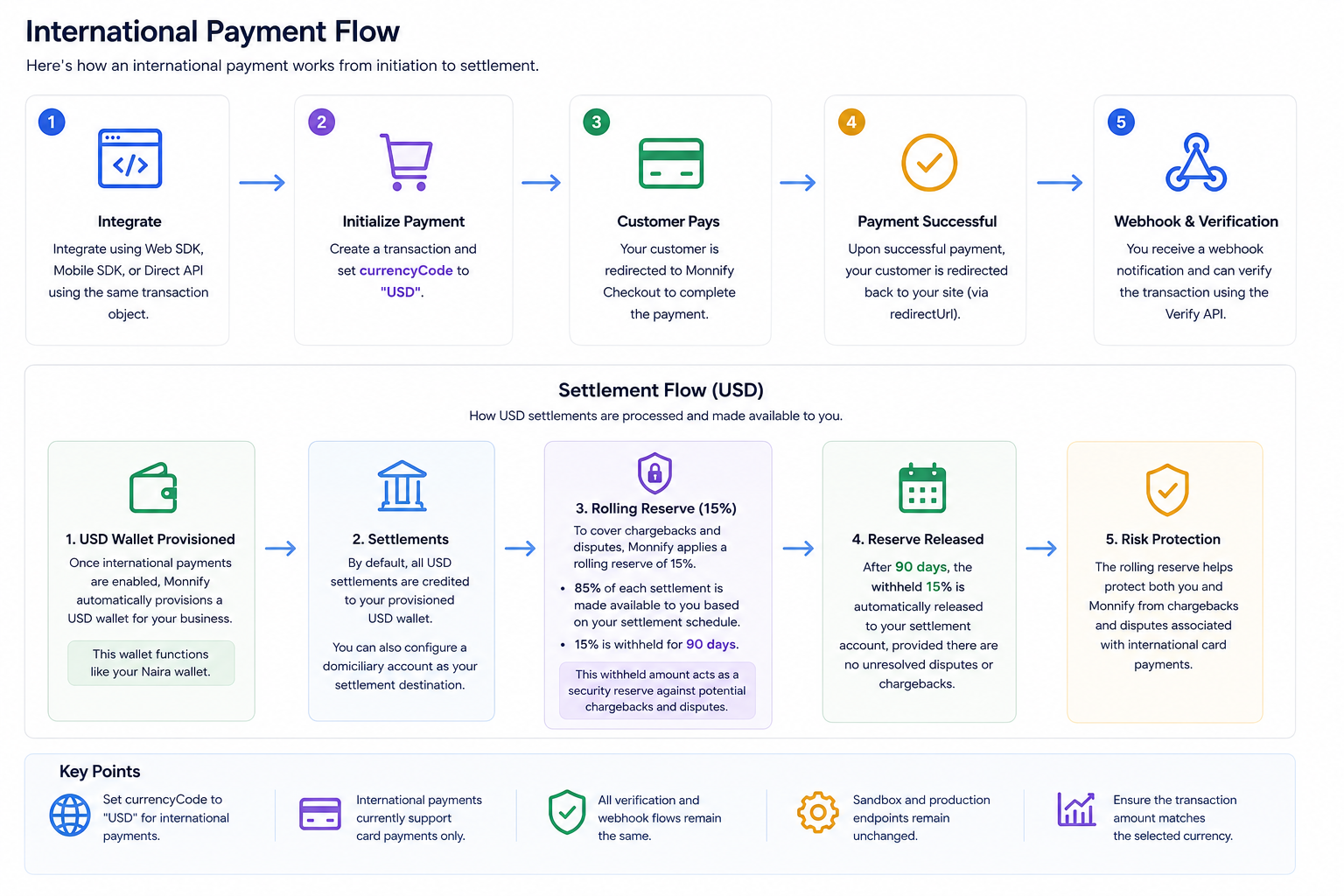

Got Questions
Reach out to us at [\[email protected\]](https://developers.monnify.com/cdn-cgi/l/email-protection#fe8d8b8e8e918c8abe93919090979887d09d9193)
if you have any questions as regards integrating with the Monnify API.

Monnify Tutorial Videos
Check out [Our Youtube channel](https://www.youtube.com/channel/UCUyMHJL8q_JPElohU9IS22Q)
for tutorials on how to integrate the Monnify API.

Join Our Slack Community
[Click here](https://slack.monnify.com/)
to join the Monnify Slack community.
Copyright © 2026 [Monnify](https://monnify.com/)
[](https://www.instagram.com/monnifyhq/)
[](https://www.facebook.com/Monnify-102435331122100/?modal=admin_todo_tour)
[](https://twitter.com/monnify)
[Terms of Service](https://monnify.com/terms.html)
[Privacy Policy](https://monnify.com/privacy-policy.html)
---
# Recurring Payments
[](https://developers.monnify.com/)
* [API](https://developers.monnify.com/api)
* * *
* [Home](https://developers.monnify.com/)
* Accept Payments
* [Overview](https://developers.monnify.com/docs/collections)
* [Quickstart](https://developers.monnify.com/docs/collections/quickstart)
* [Payment Methods](https://developers.monnify.com/docs/collections/payment-methods)
* [International Payments](https://developers.monnify.com/docs/collections/international-payment)
* One-Time Payments
* [Overview](https://developers.monnify.com/docs/collections/one-time-payments)
* [Checkout Page](https://developers.monnify.com/docs/collections/one-time-payments/checkout-page)
* [Checkout API](https://developers.monnify.com/docs/collections/one-time-payments/checkout-api)
* [Payment Links](https://developers.monnify.com/docs/collections/one-time-payments/payment-links)
* [Invoice](https://developers.monnify.com/docs/collections/one-time-payments/invoice)
* [Offline Pay-ins](https://developers.monnify.com/docs/collections/one-time-payments/offline-payins)
* Recurring Payments
* [Overview](https://developers.monnify.com/docs/collections/recurring-payments)
* [Reserved / Virtual Accounts](https://developers.monnify.com/docs/collections/recurring-payments/reserved-accounts)
* [Direct Debit / Mandates](https://developers.monnify.com/docs/collections/recurring-payments/direct-debit)
* [Card Tokenization](https://developers.monnify.com/docs/collections/recurring-payments/card-tokenization)
* [Retry & Failure Handling](https://developers.monnify.com/docs/collections/recurring-payments/retry-failure-handling)
* Manage Payments
* [Verify Transactions](https://developers.monnify.com/docs/collections/manage-payments/verify-transactions)
* [Transaction Splitting / Sub-accounts](https://developers.monnify.com/docs/collections/manage-payments/transaction-splitting)
* [Refunds](https://developers.monnify.com/docs/collections/manage-payments/refunds)
* [Reconciliation](https://developers.monnify.com/docs/collections/manage-payments/reconciliation)
* Transfer/Payout
* [Overview](https://developers.monnify.com/docs/disbursements)
* [Single Transfers](https://developers.monnify.com/docs/disbursements/single-transfers)
* [Bulk Transfers](https://developers.monnify.com/docs/disbursements/bulk-transfers)
* [Offline Payouts (Paycode)](https://developers.monnify.com/docs/disbursements/offline-payout)
* Bills Payment
* [Overview](https://developers.monnify.com/docs/bills-payment)
* [Process a Bill](https://developers.monnify.com/docs/bills-payment/process-a-bill)
* [Settlement Process](https://developers.monnify.com/docs/bills-payment/settlement-process)
* Wallets
* [Overview](https://developers.monnify.com/docs/wallets)
* [Create Wallet](https://developers.monnify.com/docs/wallets/create-wallet)
* [Wallet Balance](https://developers.monnify.com/docs/wallets/wallet-balance)
* [Get Wallets](https://developers.monnify.com/docs/wallets/get-wallets)
* [Wallet Statement](https://developers.monnify.com/docs/wallets/wallet-statement)
* Verification APIs
* [Overview](https://developers.monnify.com/docs/verification-api)
* [Verifying your Customers](https://developers.monnify.com/docs/verification-api/verifying-your-customers)
* [Integration Guide for Monnify BVN Verification](https://developers.monnify.com/docs/integration-guide-bvn-nin-update)
* Integration
* [Tools](https://developers.monnify.com/docs/integration)
* [Sample codes](https://developers.monnify.com/docs/integration/sample-codes)
* [MCP Server](https://developers.monnify.com/docs/integration/mcp-server)
* Webhooks
* [Overview](https://developers.monnify.com/docs/webhooks)
* [Webhook Event Types](https://developers.monnify.com/docs/webhooks/event-types)
* [Settlement](https://developers.monnify.com/docs/settlements)
* [Going Live](https://developers.monnify.com/docs/live)
* [Changelogs](https://developers.monnify.com/docs/change-logs)
* [Test Cards](https://developers.monnify.com/docs/test-cards)
* [Error Codes](https://developers.monnify.com/docs/error-codes)
* [Supported Banks](https://developers.monnify.com/docs/supported-banks)
Search..
Recurring Payments
==================
Recurring payments let you collect money from customers on an ongoing basis without requiring them to manually initiate each payment. Monnify supports three approaches depending on your use case, so pick the one that fits your product.

When to use recurring payments:
Use recurring payments for subscriptions, loan repayments, insurance premiums, wallet top-ups, or any scenario where you need to collect money from the same customer more than once.
* * *
Choose Your Approach
====================
[Reserved / Virtual Accounts\
---------------------------\
\
Assign a dedicated virtual account number to each customer. Every transfer they make to it is automatically reconciled, with no payment initiation needed from them.\
\
](https://developers.monnify.com/docs/collections/recurring-payments/reserved-accounts)
[Direct Debit / Mandates\
-----------------------\
\
Create a mandate, the customer authorises it, you debit their bank account automatically on a schedule. Ideal for loan repayments, insurance premiums, and SaaS billing.\
\
](https://developers.monnify.com/docs/collections/recurring-payments/direct-debit)
[Card Tokenization\
-----------------\
\
Tokenize a customer's card on their first payment and charge the token for subsequent payments, with no checkout UI needed for future debits.\
\
](https://developers.monnify.com/docs/collections/recurring-payments/card-tokenization)
* * *
Choosing the Right Method
=========================
| Method | Customer action required | Best for |
| --- | --- | --- |
| Reserved Account | Transfer to their dedicated account | Wallet top-ups, savings, investment apps |
| Direct Debit | One-time mandate authorization | Loan repayments, insurance, subscription billing |
| Card Tokenization | First card payment only | SaaS subscriptions, one-click renewals |
Rate this page
How helpful is the content on this page?
★★★★★

Got Questions
Reach out to us at [\[email protected\]](https://developers.monnify.com/cdn-cgi/l/email-protection#493a3c3939263b3d0924262727202f30672a2624)
if you have any questions as regards integrating with the Monnify API.

Monnify Tutorial Videos
Check out [Our Youtube channel](https://www.youtube.com/channel/UCUyMHJL8q_JPElohU9IS22Q)
for tutorials on how to integrate the Monnify API.

Join Our Slack Community
[Click here](https://slack.monnify.com/)
to join the Monnify Slack community.
Copyright © 2026 [Monnify](https://monnify.com/)
[](https://www.instagram.com/monnifyhq/)
[](https://www.facebook.com/Monnify-102435331122100/?modal=admin_todo_tour)
[](https://twitter.com/monnify)
[Terms of Service](https://monnify.com/terms.html)
[Privacy Policy](https://monnify.com/privacy-policy.html)
---
# Invoice
[](https://developers.monnify.com/)
* [API](https://developers.monnify.com/api)
* * *
* [Home](https://developers.monnify.com/)
* Accept Payments
* [Overview](https://developers.monnify.com/docs/collections)
* [Quickstart](https://developers.monnify.com/docs/collections/quickstart)
* [Payment Methods](https://developers.monnify.com/docs/collections/payment-methods)
* [International Payments](https://developers.monnify.com/docs/collections/international-payment)
* One-Time Payments
* [Overview](https://developers.monnify.com/docs/collections/one-time-payments)
* [Checkout Page](https://developers.monnify.com/docs/collections/one-time-payments/checkout-page)
* [Checkout API](https://developers.monnify.com/docs/collections/one-time-payments/checkout-api)
* [Payment Links](https://developers.monnify.com/docs/collections/one-time-payments/payment-links)
* [Invoice](https://developers.monnify.com/docs/collections/one-time-payments/invoice)
* [Offline Pay-ins](https://developers.monnify.com/docs/collections/one-time-payments/offline-payins)
* Recurring Payments
* [Overview](https://developers.monnify.com/docs/collections/recurring-payments)
* [Reserved / Virtual Accounts](https://developers.monnify.com/docs/collections/recurring-payments/reserved-accounts)
* [Direct Debit / Mandates](https://developers.monnify.com/docs/collections/recurring-payments/direct-debit)
* [Card Tokenization](https://developers.monnify.com/docs/collections/recurring-payments/card-tokenization)
* [Retry & Failure Handling](https://developers.monnify.com/docs/collections/recurring-payments/retry-failure-handling)
* Manage Payments
* [Verify Transactions](https://developers.monnify.com/docs/collections/manage-payments/verify-transactions)
* [Transaction Splitting / Sub-accounts](https://developers.monnify.com/docs/collections/manage-payments/transaction-splitting)
* [Refunds](https://developers.monnify.com/docs/collections/manage-payments/refunds)
* [Reconciliation](https://developers.monnify.com/docs/collections/manage-payments/reconciliation)
* Transfer/Payout
* [Overview](https://developers.monnify.com/docs/disbursements)
* [Single Transfers](https://developers.monnify.com/docs/disbursements/single-transfers)
* [Bulk Transfers](https://developers.monnify.com/docs/disbursements/bulk-transfers)
* [Offline Payouts (Paycode)](https://developers.monnify.com/docs/disbursements/offline-payout)
* Bills Payment
* [Overview](https://developers.monnify.com/docs/bills-payment)
* [Process a Bill](https://developers.monnify.com/docs/bills-payment/process-a-bill)
* [Settlement Process](https://developers.monnify.com/docs/bills-payment/settlement-process)
* Wallets
* [Overview](https://developers.monnify.com/docs/wallets)
* [Create Wallet](https://developers.monnify.com/docs/wallets/create-wallet)
* [Wallet Balance](https://developers.monnify.com/docs/wallets/wallet-balance)
* [Get Wallets](https://developers.monnify.com/docs/wallets/get-wallets)
* [Wallet Statement](https://developers.monnify.com/docs/wallets/wallet-statement)
* Verification APIs
* [Overview](https://developers.monnify.com/docs/verification-api)
* [Verifying your Customers](https://developers.monnify.com/docs/verification-api/verifying-your-customers)
* [Integration Guide for Monnify BVN Verification](https://developers.monnify.com/docs/integration-guide-bvn-nin-update)
* Integration
* [Tools](https://developers.monnify.com/docs/integration)
* [Sample codes](https://developers.monnify.com/docs/integration/sample-codes)
* [MCP Server](https://developers.monnify.com/docs/integration/mcp-server)
* Webhooks
* [Overview](https://developers.monnify.com/docs/webhooks)
* [Webhook Event Types](https://developers.monnify.com/docs/webhooks/event-types)
* [Settlement](https://developers.monnify.com/docs/settlements)
* [Going Live](https://developers.monnify.com/docs/live)
* [Changelogs](https://developers.monnify.com/docs/change-logs)
* [Test Cards](https://developers.monnify.com/docs/test-cards)
* [Error Codes](https://developers.monnify.com/docs/error-codes)
* [Supported Banks](https://developers.monnify.com/docs/supported-banks)
Search..
Invoice
=======
Monnify Invoicing allows you to generate invoices for your customers using our Create Invoice API. When you create an invoice, Monnify either generates a unique virtual account number tied to that invoice or provides a checkout URL so customers can make payments directly with their debit cards.
Types of Invoices
-----------------
Monnify supports two types of invoices: **Static Invoices** and **Dynamic Invoices**. Both are created using the same Create Invoice API but differ in how virtual accounts are generated and used.
| Feature | Static Invoice | Dynamic Invoice |
| --- | --- | --- |
| Virtual Account Number | Same account reused for a specific customer | New account generated for every invoice |
| Account Availability | Dormant until attached to an active invoice | Active only for the duration of that invoice |
| Use Case | Recurring billing, subscriptions, repeat customers | One-time payments, single-use invoices |
| Post-Payment Behavior | Account becomes dormant until next invoice | Account expires and cannot be reused |
| KYC Requirement | Requires customer BVN or NIN to reserve the account | No BVN/NIN required |
1\. Static Invoicing (Invoice Reserved Accounts)
------------------------------------------------
Static invoicing is ideal when you bill the same customer repeatedly, for example, subscriptions, recurring services, or regular payments. Instead of generating a new virtual account number each time, Monnify lets you **reserve a dedicated account number** for that customer. This account number stays the same across all future invoices you send them, but it can only accept payments when attached to an active invoice.

Info:
**Important:** Reserving a virtual account requires the customer's **BVN or NIN** to comply with regulatory KYC requirements. Once the account is reserved, you can generate as many invoices as needed without repeating the KYC step.
### Steps to Implement Static Invoicing
Follow these steps to set up and use static invoicing in your integration:
1. **Reserve a Virtual Account:** Use the [Create Invoice Reserved Account API](https://developers.monnify.com/api#tag/customer-reserved-account/#create-reserved-accountinvoice)
to reserve a dedicated account for a customer. You will need to provide the customer’s **BVN or NIN** as part of this process. The response will include a `accountReference` that uniquely identifies the reserved account.
2. **Attach an Invoice to the Reserved Account:** Once the account is reserved, use the [Create Invoice API](https://developers.monnify.com/api#tag/invoice//#create-an-invoice)
to generate an invoice linked to that reserved account. You must pass the `accountReference` you obtained earlier in the request payload. The invoice will use the same virtual account number every time.
3. **Send Invoice to Customer:** Share the generated invoice details with your customer. They can pay by transferring funds into the reserved account or through the provided checkout URL.
4. **Handle Post-Payment Behavior:** Once the invoice is paid, it expires immediately and the reserved account goes dormant. It remains inactive until a new invoice is generated for that customer.
**Key characteristics:**
* A single virtual account number is reserved for a customer and reused for every invoice you send them.
* Customers cannot make payments into this account unless it’s attached to an active invoice.
* After payment, the invoice closes, and the account becomes dormant until the next invoice is generated.
* Requires customer BVN or NIN during the initial reservation step.
* Ideal for recurring billing, subscription-based services, or repeat customers.
### Sample Request – Static Invoice
cURLJavaScriptPythonPHP
Copy
2\. Dynamic Invoicing
---------------------
Dynamic invoicing is the simplest and most flexible way to bill customers. Each time you create an invoice, Monnify automatically generates a **unique virtual account number** tied to that specific invoice. Once the invoice is paid, it expires immediately, and the account number is no longer valid.
This approach is ideal when you do not bill the same customer repeatedly or when you want a fresh virtual account for every transaction. It requires no prior account reservation or KYC step.
### Steps to Implement Dynamic Invoicing
Follow these steps to set up and use dynamic invoicing in your integration:
1. **Create an Invoice:** Call the [Create Invoice API](https://developers.monnify.com/api#tag/invoice//#create-an-invoice)
endpoint to generate a new invoice. A virtual account number will be automatically created and linked to that invoice.
2. **Send Invoice to Customer:** Share the invoice details with your customer. They can pay by transferring funds into the generated virtual account number or by using the provided checkout URL.
3. **Handle Post-Payment Behavior:** Once payment is made, the invoice expires immediately. Since a new virtual account is generated for each invoice, subsequent invoices will each have their own dedicated account numbers.
**Key characteristics:**
* A new virtual account number is generated for every invoice created.
* No prior account reservation or BVN/NIN is required.
* Once paid, the invoice expires immediately, and the virtual account is no longer active.
* Ideal for one-time payments, unique transactions, or scenarios where customers vary frequently.
### Sample Request – Dynamic Invoice
cURLJavaScriptPythonPHP
Copy
**Additional Notes:**
* For static invoices, once an invoice expires or is paid, the reserved account simply goes dormant until a new invoice is created.
* For dynamic invoices, a new virtual account is generated for every new invoice, and previous account numbers cannot be reused.
Sample Error Messages
---------------------
| Error Message | Meaning | Action |
| --- | --- | --- |
| Invoice with this reference already exists. | This implies that the invoiceReference in the request payload has already been used by you. | Retry with a unique invoiceReference |
| Unknown Contract Code provided. | The contractCode in the request parameter is not correct or it doesn’t belong to the merchant. | Navigate to the "Settings > Contract Setup", section of your Monnify dashboard to get your contact code |
| Amount must be greater than 20. | This implies that the amount field in the request payload must be at least 20 Naira | Increase the amount above N20 |
| Unknown currency code supplied. | The currency code supplied is not valid or not enabled on your account. NGN is the default supported currency; USD is only available for merchants specifically enabled for card-based USD collection. | Reconfirm that NGN is the currency code provided. |
| Invalid invoice expiry date. | This implies that the expiryDate in the request payload is before the current date. | Invoice expiry date should be beyond current time. |
| Invalid invoice expiry date format | This implies that the expiryDate in the request payload is not in the correct format. | Change invoice expiry date format to match yyyy-MM-dd HH:mm:ss. |
Rate this page
How helpful is the content on this page?
★★★★★

Got Questions
Reach out to us at [\[email protected\]](https://developers.monnify.com/cdn-cgi/l/email-protection#acdfd9dcdcc3ded8ecc1c3c2c2c5cad582cfc3c1)
if you have any questions as regards integrating with the Monnify API.

Monnify Tutorial Videos
Check out [Our Youtube channel](https://www.youtube.com/channel/UCUyMHJL8q_JPElohU9IS22Q)
for tutorials on how to integrate the Monnify API.

Join Our Slack Community
[Click here](https://slack.monnify.com/)
to join the Monnify Slack community.
Copyright © 2026 [Monnify](https://monnify.com/)
[](https://www.instagram.com/monnifyhq/)
[](https://www.facebook.com/Monnify-102435331122100/?modal=admin_todo_tour)
[](https://twitter.com/monnify)
[Terms of Service](https://monnify.com/terms.html)
[Privacy Policy](https://monnify.com/privacy-policy.html)
---
# Unknown
[](https://developers.monnify.com/)
* [API](https://developers.monnify.com/api)
* * *
* [Home](https://developers.monnify.com/)
* Accept Payments
* [Overview](https://developers.monnify.com/docs/collections)
* [Quickstart](https://developers.monnify.com/docs/collections/quickstart)
* [Payment Methods](https://developers.monnify.com/docs/collections/payment-methods)
* [International Payments](https://developers.monnify.com/docs/collections/international-payment)
* One-Time Payments
* [Overview](https://developers.monnify.com/docs/collections/one-time-payments)
* [Checkout Page](https://developers.monnify.com/docs/collections/one-time-payments/checkout-page)
* [Checkout API](https://developers.monnify.com/docs/collections/one-time-payments/checkout-api)
* [Payment Links](https://developers.monnify.com/docs/collections/one-time-payments/payment-links)
* [Invoice](https://developers.monnify.com/docs/collections/one-time-payments/invoice)
* [Offline Pay-ins](https://developers.monnify.com/docs/collections/one-time-payments/offline-payins)
* Recurring Payments
* [Overview](https://developers.monnify.com/docs/collections/recurring-payments)
* [Reserved / Virtual Accounts](https://developers.monnify.com/docs/collections/recurring-payments/reserved-accounts)
* [Direct Debit / Mandates](https://developers.monnify.com/docs/collections/recurring-payments/direct-debit)
* [Card Tokenization](https://developers.monnify.com/docs/collections/recurring-payments/card-tokenization)
* [Retry & Failure Handling](https://developers.monnify.com/docs/collections/recurring-payments/retry-failure-handling)
* Manage Payments
* [Verify Transactions](https://developers.monnify.com/docs/collections/manage-payments/verify-transactions)
* [Transaction Splitting / Sub-accounts](https://developers.monnify.com/docs/collections/manage-payments/transaction-splitting)
* [Refunds](https://developers.monnify.com/docs/collections/manage-payments/refunds)
* [Reconciliation](https://developers.monnify.com/docs/collections/manage-payments/reconciliation)
* Transfer/Payout
* [Overview](https://developers.monnify.com/docs/disbursements)
* [Single Transfers](https://developers.monnify.com/docs/disbursements/single-transfers)
* [Bulk Transfers](https://developers.monnify.com/docs/disbursements/bulk-transfers)
* [Offline Payouts (Paycode)](https://developers.monnify.com/docs/disbursements/offline-payout)
* Bills Payment
* [Overview](https://developers.monnify.com/docs/bills-payment)
* [Process a Bill](https://developers.monnify.com/docs/bills-payment/process-a-bill)
* [Settlement Process](https://developers.monnify.com/docs/bills-payment/settlement-process)
* Wallets
* [Overview](https://developers.monnify.com/docs/wallets)
* [Create Wallet](https://developers.monnify.com/docs/wallets/create-wallet)
* [Wallet Balance](https://developers.monnify.com/docs/wallets/wallet-balance)
* [Get Wallets](https://developers.monnify.com/docs/wallets/get-wallets)
* [Wallet Statement](https://developers.monnify.com/docs/wallets/wallet-statement)
* Verification APIs
* [Overview](https://developers.monnify.com/docs/verification-api)
* [Verifying your Customers](https://developers.monnify.com/docs/verification-api/verifying-your-customers)
* [Integration Guide for Monnify BVN Verification](https://developers.monnify.com/docs/integration-guide-bvn-nin-update)
* Integration
* [Tools](https://developers.monnify.com/docs/integration)
* [Sample codes](https://developers.monnify.com/docs/integration/sample-codes)
* [MCP Server](https://developers.monnify.com/docs/integration/mcp-server)
* Webhooks
* [Overview](https://developers.monnify.com/docs/webhooks)
* [Webhook Event Types](https://developers.monnify.com/docs/webhooks/event-types)
* [Settlement](https://developers.monnify.com/docs/settlements)
* [Going Live](https://developers.monnify.com/docs/live)
* [Changelogs](https://developers.monnify.com/docs/change-logs)
* [Test Cards](https://developers.monnify.com/docs/test-cards)
* [Error Codes](https://developers.monnify.com/docs/error-codes)
* [Supported Banks](https://developers.monnify.com/docs/supported-banks)
Search..
Search error messages
Browse categories. Total groups: **12**.
Clear searchOpen first group
###
Authentication Errors
###
Transaction & Payment Errors
###
Invoice Errors
###
Customer Reserved Account Errors
###
Recurring Payment Errors
###
Direct Debit Errors
###
Limit Profile Errors
###
Settlements Errors
###
PayCodes Errors
###
Disbursements / Transfer Errors
###
Account Validation Errors
###
Refund Errors

Got Questions
Reach out to us at [\[email protected\]](https://developers.monnify.com/cdn-cgi/l/email-protection#4e3d3b3e3e213c3a0e23212020272837602d2123)
if you have any questions as regards integrating with the Monnify API.

Monnify Tutorial Videos
Check out [Our Youtube channel](https://www.youtube.com/channel/UCUyMHJL8q_JPElohU9IS22Q)
for tutorials on how to integrate the Monnify API.

Join Our Slack Community
[Click here](https://slack.monnify.com/)
to join the Monnify Slack community.
Copyright © 2026 [Monnify](https://monnify.com/)
[](https://www.instagram.com/monnifyhq/)
[](https://www.facebook.com/Monnify-102435331122100/?modal=admin_todo_tour)
[](https://twitter.com/monnify)
[Terms of Service](https://monnify.com/terms.html)
[Privacy Policy](https://monnify.com/privacy-policy.html)
---
# Payment Methods
[](https://developers.monnify.com/)
* [API](https://developers.monnify.com/api)
* * *
* [Home](https://developers.monnify.com/)
* Accept Payments
* [Overview](https://developers.monnify.com/docs/collections)
* [Quickstart](https://developers.monnify.com/docs/collections/quickstart)
* [Payment Methods](https://developers.monnify.com/docs/collections/payment-methods)
* [International Payments](https://developers.monnify.com/docs/collections/international-payment)
* One-Time Payments
* [Overview](https://developers.monnify.com/docs/collections/one-time-payments)
* [Checkout Page](https://developers.monnify.com/docs/collections/one-time-payments/checkout-page)
* [Checkout API](https://developers.monnify.com/docs/collections/one-time-payments/checkout-api)
* [Payment Links](https://developers.monnify.com/docs/collections/one-time-payments/payment-links)
* [Invoice](https://developers.monnify.com/docs/collections/one-time-payments/invoice)
* [Offline Pay-ins](https://developers.monnify.com/docs/collections/one-time-payments/offline-payins)
* Recurring Payments
* [Overview](https://developers.monnify.com/docs/collections/recurring-payments)
* [Reserved / Virtual Accounts](https://developers.monnify.com/docs/collections/recurring-payments/reserved-accounts)
* [Direct Debit / Mandates](https://developers.monnify.com/docs/collections/recurring-payments/direct-debit)
* [Card Tokenization](https://developers.monnify.com/docs/collections/recurring-payments/card-tokenization)
* [Retry & Failure Handling](https://developers.monnify.com/docs/collections/recurring-payments/retry-failure-handling)
* Manage Payments
* [Verify Transactions](https://developers.monnify.com/docs/collections/manage-payments/verify-transactions)
* [Transaction Splitting / Sub-accounts](https://developers.monnify.com/docs/collections/manage-payments/transaction-splitting)
* [Refunds](https://developers.monnify.com/docs/collections/manage-payments/refunds)
* [Reconciliation](https://developers.monnify.com/docs/collections/manage-payments/reconciliation)
* Transfer/Payout
* [Overview](https://developers.monnify.com/docs/disbursements)
* [Single Transfers](https://developers.monnify.com/docs/disbursements/single-transfers)
* [Bulk Transfers](https://developers.monnify.com/docs/disbursements/bulk-transfers)
* [Offline Payouts (Paycode)](https://developers.monnify.com/docs/disbursements/offline-payout)
* Bills Payment
* [Overview](https://developers.monnify.com/docs/bills-payment)
* [Process a Bill](https://developers.monnify.com/docs/bills-payment/process-a-bill)
* [Settlement Process](https://developers.monnify.com/docs/bills-payment/settlement-process)
* Wallets
* [Overview](https://developers.monnify.com/docs/wallets)
* [Create Wallet](https://developers.monnify.com/docs/wallets/create-wallet)
* [Wallet Balance](https://developers.monnify.com/docs/wallets/wallet-balance)
* [Get Wallets](https://developers.monnify.com/docs/wallets/get-wallets)
* [Wallet Statement](https://developers.monnify.com/docs/wallets/wallet-statement)
* Verification APIs
* [Overview](https://developers.monnify.com/docs/verification-api)
* [Verifying your Customers](https://developers.monnify.com/docs/verification-api/verifying-your-customers)
* [Integration Guide for Monnify BVN Verification](https://developers.monnify.com/docs/integration-guide-bvn-nin-update)
* Integration
* [Tools](https://developers.monnify.com/docs/integration)
* [Sample codes](https://developers.monnify.com/docs/integration/sample-codes)
* [MCP Server](https://developers.monnify.com/docs/integration/mcp-server)
* Webhooks
* [Overview](https://developers.monnify.com/docs/webhooks)
* [Webhook Event Types](https://developers.monnify.com/docs/webhooks/event-types)
* [Settlement](https://developers.monnify.com/docs/settlements)
* [Going Live](https://developers.monnify.com/docs/live)
* [Changelogs](https://developers.monnify.com/docs/change-logs)
* [Test Cards](https://developers.monnify.com/docs/test-cards)
* [Error Codes](https://developers.monnify.com/docs/error-codes)
* [Supported Banks](https://developers.monnify.com/docs/supported-banks)
Search..
Payment Methods
===============
Monnify supports a range of payment methods so your customers can pay the way that suits them best. You can choose to offer all methods or restrict to specific ones per transaction.
Account Transfer (Bank Transfer)
--------------------------------
The most popular payment method in Nigeria. When a customer selects this option, Monnify generates a **dynamic virtual account number** for that specific transaction. The customer transfers the exact amount to that account from any bank app or USSD code, and Monnify confirms the payment instantly.
1. **Dynamic accounts**: Each transaction gets a fresh virtual account, preventing mismatches.
2. **Expiry**: Accounts are valid for 40 minutes (2400 seconds). Notify your customer of this window.
3. **Supported banks**: Customers can pay from any Nigerian bank. See [Supported Banks](https://developers.monnify.com/docs/supported-banks)
.
4. **USSD code included**: If you pass a `bankCode` when retrieving account details, Monnify also returns a USSD string the customer can dial.
SDK key: `"ACCOUNT_TRANSFER"`
Debit Card
----------
Customers can pay using their Mastercard, Visa, or Verve debit card. Monnify handles the card collection flow within the checkout modal, including 3D Secure authentication where required.
1. **Tokenization**: Cards can be tokenized after a successful payment for future charges without the customer re-entering their details. See [Card Tokenization](https://developers.monnify.com/docs/collections/recurring-payments/card-tokenization)
.
2. **USD support**: Merchants enabled for international collection can accept card payments in USD.
3. **PCI-DSS**: If you want to build your own card collection UI using the raw Charge Card API, PCI-DSS certification is required. Contact [\[email protected\]](https://developers.monnify.com/cdn-cgi/l/email-protection#026b6c7667657063766b6d6c2f717772726d7076426f6d6c6c6b647b2c616d6f)
.
SDK key: `"CARD"`
USSD
----
Customers dial a bank-specific USSD code to authorize the payment directly from their phone, with no internet connection required. This is ideal for customers without smartphones or in low-connectivity areas.
1. Monnify generates the USSD string as part of the bank transfer response when a `bankCode` is provided.
2. The same dynamic virtual account is used, and payment is confirmed the moment the USSD session completes.
SDK key: `"USSD"`
Phone Number
------------
Customers enter their phone number to initialize a payment session. They then receive a prompt on their feature phone or smartphone to authorize the debit from their mobile money wallet.
SDK key: `"PHONE_NUMBER"`
Customer Reserved Account (Virtual Account)
-------------------------------------------
A persistent virtual account number dedicated to a specific customer. Unlike the dynamic account used for one-time payments, a reserved account stays the same, and every transfer to it is automatically reconciled to that customer.
Best for:
1. Wallet top-ups (fintechs, betting platforms, investment apps)
2. Subscription billing via bank transfer
3. Utility payment collection (electricity, internet)
See [Reserved / Virtual Accounts](https://developers.monnify.com/docs/collections/recurring-payments/reserved-accounts)
for full integration details.
Direct Debit / Mandate
----------------------
A "pull" payment method. The merchant creates a mandate and the customer authorizes it once. After that, Monnify can automatically debit the customer's bank account on a schedule without them needing to initiate each payment.
Best for:
1. Loan repayments
2. Insurance premiums
3. SaaS subscription billing in Nigeria
See [Direct Debit / Mandates](https://developers.monnify.com/docs/collections/recurring-payments/direct-debit)
for full integration details.
Controlling Which Methods Are Shown
-----------------------------------
By default, all available payment methods appear on the checkout. You can restrict them per transaction using the `paymentMethods` array in either the SDK initialization or the Initialize Transaction API payload.
1. JS/Web SDK (script tag) or npm packages (`monnify-js` for JavaScript, `monnify-ts` for TypeScript): pass `paymentMethods: ["CARD", "ACCOUNT_TRANSFER"]`
2. Initialize Transaction API: pass `"paymentMethods": ["ACCOUNT_TRANSFER", "USSD", "PHONE_NUMBER"]`
3. Flutter SDK: pass `paymentMethods: [PaymentMethod.CARD, PaymentMethod.ACCOUNT_TRANSFER]`

Note:
Omitting `paymentMethods` shows all available methods. Passing an empty array will cause an error, so always include at least one method.
Method Availability by Integration Type
---------------------------------------
| Method | Checkout (SDK) | Checkout API | Reserved Account |
| --- | --- | --- | --- |
| Bank Transfer | ✓ | ✓ | ✓ |
| Debit Card | ✓ | ✓ (PCI-DSS) | — |
| USSD | ✓ | ✓ | ✓ |
| Phone Number | ✓ | — | — |
Rate this page
How helpful is the content on this page?
★★★★★

Got Questions
Reach out to us at [\[email protected\]](https://developers.monnify.com/cdn-cgi/l/email-protection#7e0d0b0e0e110c0a3e13111010171807501d1113)
if you have any questions as regards integrating with the Monnify API.

Monnify Tutorial Videos
Check out [Our Youtube channel](https://www.youtube.com/channel/UCUyMHJL8q_JPElohU9IS22Q)
for tutorials on how to integrate the Monnify API.

Join Our Slack Community
[Click here](https://slack.monnify.com/)
to join the Monnify Slack community.
Copyright © 2026 [Monnify](https://monnify.com/)
[](https://www.instagram.com/monnifyhq/)
[](https://www.facebook.com/Monnify-102435331122100/?modal=admin_todo_tour)
[](https://twitter.com/monnify)
[Terms of Service](https://monnify.com/terms.html)
[Privacy Policy](https://monnify.com/privacy-policy.html)
---
# Transfer/Payout
[](https://developers.monnify.com/)
* [API](https://developers.monnify.com/api)
* * *
* [Home](https://developers.monnify.com/)
* Accept Payments
* [Overview](https://developers.monnify.com/docs/collections)
* [Quickstart](https://developers.monnify.com/docs/collections/quickstart)
* [Payment Methods](https://developers.monnify.com/docs/collections/payment-methods)
* [International Payments](https://developers.monnify.com/docs/collections/international-payment)
* One-Time Payments
* [Overview](https://developers.monnify.com/docs/collections/one-time-payments)
* [Checkout Page](https://developers.monnify.com/docs/collections/one-time-payments/checkout-page)
* [Checkout API](https://developers.monnify.com/docs/collections/one-time-payments/checkout-api)
* [Payment Links](https://developers.monnify.com/docs/collections/one-time-payments/payment-links)
* [Invoice](https://developers.monnify.com/docs/collections/one-time-payments/invoice)
* [Offline Pay-ins](https://developers.monnify.com/docs/collections/one-time-payments/offline-payins)
* Recurring Payments
* [Overview](https://developers.monnify.com/docs/collections/recurring-payments)
* [Reserved / Virtual Accounts](https://developers.monnify.com/docs/collections/recurring-payments/reserved-accounts)
* [Direct Debit / Mandates](https://developers.monnify.com/docs/collections/recurring-payments/direct-debit)
* [Card Tokenization](https://developers.monnify.com/docs/collections/recurring-payments/card-tokenization)
* [Retry & Failure Handling](https://developers.monnify.com/docs/collections/recurring-payments/retry-failure-handling)
* Manage Payments
* [Verify Transactions](https://developers.monnify.com/docs/collections/manage-payments/verify-transactions)
* [Transaction Splitting / Sub-accounts](https://developers.monnify.com/docs/collections/manage-payments/transaction-splitting)
* [Refunds](https://developers.monnify.com/docs/collections/manage-payments/refunds)
* [Reconciliation](https://developers.monnify.com/docs/collections/manage-payments/reconciliation)
* Transfer/Payout
* [Overview](https://developers.monnify.com/docs/disbursements)
* [Single Transfers](https://developers.monnify.com/docs/disbursements/single-transfers)
* [Bulk Transfers](https://developers.monnify.com/docs/disbursements/bulk-transfers)
* [Offline Payouts (Paycode)](https://developers.monnify.com/docs/disbursements/offline-payout)
* Bills Payment
* [Overview](https://developers.monnify.com/docs/bills-payment)
* [Process a Bill](https://developers.monnify.com/docs/bills-payment/process-a-bill)
* [Settlement Process](https://developers.monnify.com/docs/bills-payment/settlement-process)
* Wallets
* [Overview](https://developers.monnify.com/docs/wallets)
* [Create Wallet](https://developers.monnify.com/docs/wallets/create-wallet)
* [Wallet Balance](https://developers.monnify.com/docs/wallets/wallet-balance)
* [Get Wallets](https://developers.monnify.com/docs/wallets/get-wallets)
* [Wallet Statement](https://developers.monnify.com/docs/wallets/wallet-statement)
* Verification APIs
* [Overview](https://developers.monnify.com/docs/verification-api)
* [Verifying your Customers](https://developers.monnify.com/docs/verification-api/verifying-your-customers)
* [Integration Guide for Monnify BVN Verification](https://developers.monnify.com/docs/integration-guide-bvn-nin-update)
* Integration
* [Tools](https://developers.monnify.com/docs/integration)
* [Sample codes](https://developers.monnify.com/docs/integration/sample-codes)
* [MCP Server](https://developers.monnify.com/docs/integration/mcp-server)
* Webhooks
* [Overview](https://developers.monnify.com/docs/webhooks)
* [Webhook Event Types](https://developers.monnify.com/docs/webhooks/event-types)
* [Settlement](https://developers.monnify.com/docs/settlements)
* [Going Live](https://developers.monnify.com/docs/live)
* [Changelogs](https://developers.monnify.com/docs/change-logs)
* [Test Cards](https://developers.monnify.com/docs/test-cards)
* [Error Codes](https://developers.monnify.com/docs/error-codes)
* [Supported Banks](https://developers.monnify.com/docs/supported-banks)
Search..
Transfers/Payouts with Monnify
==============================
Send Money to Nigerian Bank Accounts with Monnify

Signing Up
Before you can start integrating to Monnify, you will need to create a Monnify account.
[Create Account](https://app.monnify.com/create-account)
* * *
Transfers
=========
The Monnify transfer API enables you to initiate payouts from your Monnify Wallet to any bank account in Nigeria.
[Single Transfers\
----------------\
\
With the Monnify Transfer API, you can send money to bank accounts and money wallets.\
\
](https://developers.monnify.com/docs/disbursements/single-transfers)
[Bulk Transfers\
--------------\
\
With the Monnify Transfer API, you can also pay multiple recipients at once with the Monnify bulk transfer feature.\
\
](https://developers.monnify.com/docs/disbursements/bulk-transfers)
[Paycode\
-------\
\
Create and manage paycodes that enable your customers withdraw cash offline.\
\
](https://developers.monnify.com/docs/disbursements/paycode)

Got Questions
Reach out to us at [\[email protected\]](https://developers.monnify.com/cdn-cgi/l/email-protection#b7c4c2c7c7d8c5c3f7dad8d9d9ded1ce99d4d8da)
if you have any questions as regards integrating with the Monnify API.

Monnify Tutorial Videos
Check out [Our Youtube channel](https://www.youtube.com/channel/UCUyMHJL8q_JPElohU9IS22Q)
for tutorials on how to integrate the Monnify API.

Join Our Slack Community
[Click here](https://slack.monnify.com/)
to join the Monnify Slack community.
Copyright © 2026 [Monnify](https://monnify.com/)
[](https://www.instagram.com/monnifyhq/)
[](https://www.facebook.com/Monnify-102435331122100/?modal=admin_todo_tour)
[](https://twitter.com/monnify)
[Terms of Service](https://monnify.com/terms.html)
[Privacy Policy](https://monnify.com/privacy-policy.html)
---
# Offline Pay-outs (Paycode)
[](https://developers.monnify.com/)
* [API](https://developers.monnify.com/api)
* * *
* [Home](https://developers.monnify.com/)
* Accept Payments
* [Overview](https://developers.monnify.com/docs/collections)
* [Quickstart](https://developers.monnify.com/docs/collections/quickstart)
* [Payment Methods](https://developers.monnify.com/docs/collections/payment-methods)
* [International Payments](https://developers.monnify.com/docs/collections/international-payment)
* One-Time Payments
* [Overview](https://developers.monnify.com/docs/collections/one-time-payments)
* [Checkout Page](https://developers.monnify.com/docs/collections/one-time-payments/checkout-page)
* [Checkout API](https://developers.monnify.com/docs/collections/one-time-payments/checkout-api)
* [Payment Links](https://developers.monnify.com/docs/collections/one-time-payments/payment-links)
* [Invoice](https://developers.monnify.com/docs/collections/one-time-payments/invoice)
* [Offline Pay-ins](https://developers.monnify.com/docs/collections/one-time-payments/offline-payins)
* Recurring Payments
* [Overview](https://developers.monnify.com/docs/collections/recurring-payments)
* [Reserved / Virtual Accounts](https://developers.monnify.com/docs/collections/recurring-payments/reserved-accounts)
* [Direct Debit / Mandates](https://developers.monnify.com/docs/collections/recurring-payments/direct-debit)
* [Card Tokenization](https://developers.monnify.com/docs/collections/recurring-payments/card-tokenization)
* [Retry & Failure Handling](https://developers.monnify.com/docs/collections/recurring-payments/retry-failure-handling)
* Manage Payments
* [Verify Transactions](https://developers.monnify.com/docs/collections/manage-payments/verify-transactions)
* [Transaction Splitting / Sub-accounts](https://developers.monnify.com/docs/collections/manage-payments/transaction-splitting)
* [Refunds](https://developers.monnify.com/docs/collections/manage-payments/refunds)
* [Reconciliation](https://developers.monnify.com/docs/collections/manage-payments/reconciliation)
* Transfer/Payout
* [Overview](https://developers.monnify.com/docs/disbursements)
* [Single Transfers](https://developers.monnify.com/docs/disbursements/single-transfers)
* [Bulk Transfers](https://developers.monnify.com/docs/disbursements/bulk-transfers)
* [Offline Payouts (Paycode)](https://developers.monnify.com/docs/disbursements/offline-payout)
* Bills Payment
* [Overview](https://developers.monnify.com/docs/bills-payment)
* [Process a Bill](https://developers.monnify.com/docs/bills-payment/process-a-bill)
* [Settlement Process](https://developers.monnify.com/docs/bills-payment/settlement-process)
* Wallets
* [Overview](https://developers.monnify.com/docs/wallets)
* [Create Wallet](https://developers.monnify.com/docs/wallets/create-wallet)
* [Wallet Balance](https://developers.monnify.com/docs/wallets/wallet-balance)
* [Get Wallets](https://developers.monnify.com/docs/wallets/get-wallets)
* [Wallet Statement](https://developers.monnify.com/docs/wallets/wallet-statement)
* Verification APIs
* [Overview](https://developers.monnify.com/docs/verification-api)
* [Verifying your Customers](https://developers.monnify.com/docs/verification-api/verifying-your-customers)
* [Integration Guide for Monnify BVN Verification](https://developers.monnify.com/docs/integration-guide-bvn-nin-update)
* Integration
* [Tools](https://developers.monnify.com/docs/integration)
* [Sample codes](https://developers.monnify.com/docs/integration/sample-codes)
* [MCP Server](https://developers.monnify.com/docs/integration/mcp-server)
* Webhooks
* [Overview](https://developers.monnify.com/docs/webhooks)
* [Webhook Event Types](https://developers.monnify.com/docs/webhooks/event-types)
* [Settlement](https://developers.monnify.com/docs/settlements)
* [Going Live](https://developers.monnify.com/docs/live)
* [Changelogs](https://developers.monnify.com/docs/change-logs)
* [Test Cards](https://developers.monnify.com/docs/test-cards)
* [Error Codes](https://developers.monnify.com/docs/error-codes)
* [Supported Banks](https://developers.monnify.com/docs/supported-banks)
Search..
Offline Pay-outs (Paycode)
==========================
Offline disbursements are cash payments made by the merchant to their customers through a Paycode generated on the Monnify platform. This feature allows customers to withdraw cash from a Moniepoint Business Owner.

Info:
**FEE:** For offline disbursements done using paycodes, a flat fee of N 100 will be charged.
Paycode Definition and Features
-------------------------------
A Paycode is a short form for a payment code. It is a 10-digit number that a merchant generates and provides to a customer to withdraw cash at a Moniepoint Agent.
Merchants generate this paycode and provide it to customers who then take this paycode to any Moniepoint business owners close by. Once the paycode is shown to the agent, the paycode is verified and the amount tied to the paycode is given to the customer in cash while the merchant account is debited of the amount.
Key features of a paycode include:
* The Generated code: A 10-digit number.
* Beneficiary Name: Beneficiary of a paycode.
* Status:The status of the paycode could be Pending, Success, Expired, or Cancelled.
* Created Date: This is the date that the paycode was created.
* Expiry Date: This is a date in the future when the paycode will expire.
* Reference: Unique reference per merchant for each paycode.
Workflow and How It Works
-------------------------
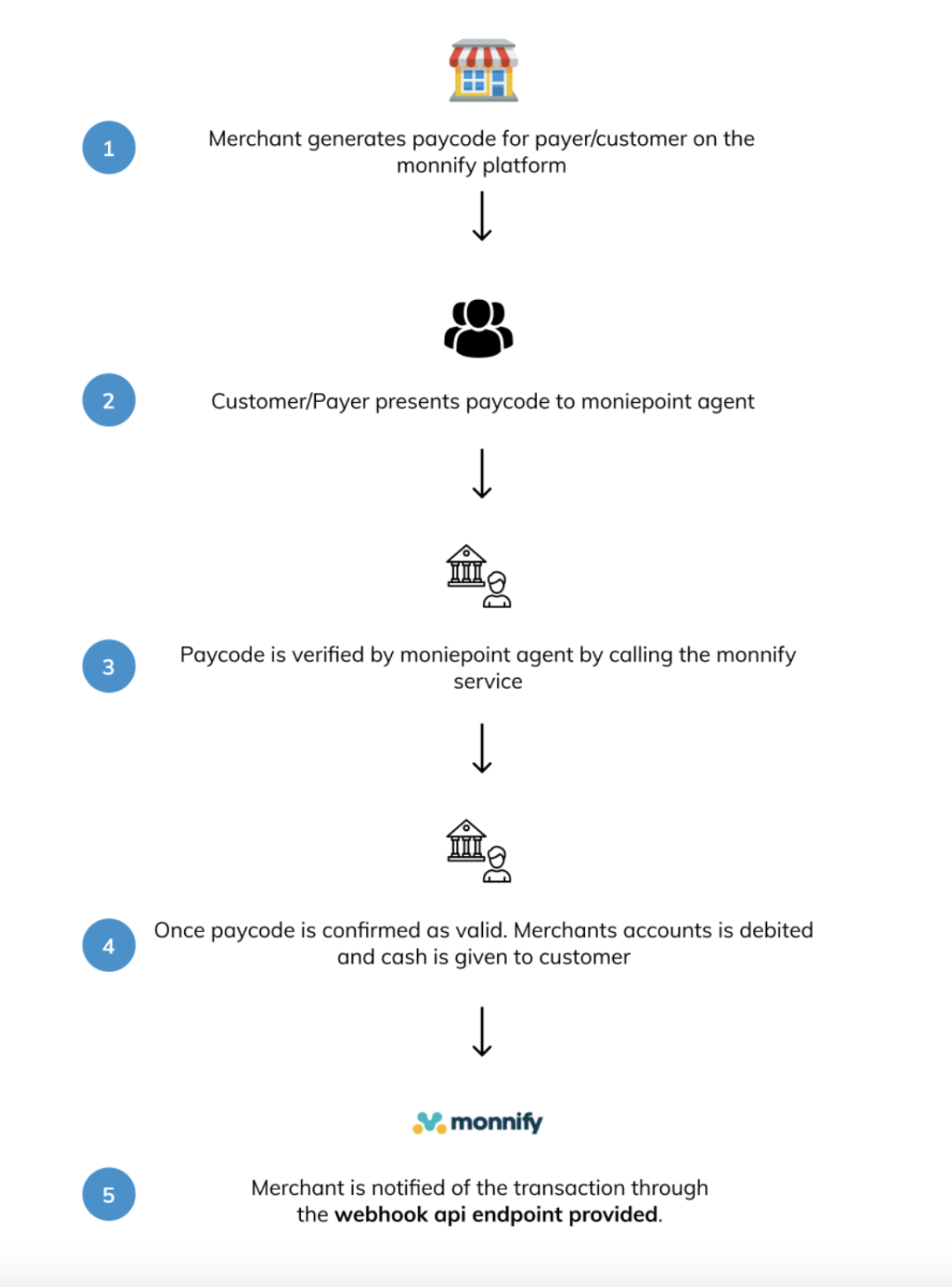
* Merchant generates paycode on the Monnify platform.
* Merchant shares paycode with their customer.
* Customer visits Moniepoint business owners.
* Customer provides paycode.
* Moniepoint verifies the paycode by calling the Monnify validation endpoint.
* Monnify debits merchants and returns responses to Moniepoint.
* Moniepoint business owners gives cash to the customer.
Paycode Generation
------------------
Merchants can generate paycode for their customers from their dashboard by using the create new paycode button.
Upon clicking the **Create New Paycode** button, you are redirected to a page to provide details that should be linked with the paycode which is what the Moniepoint business owners will use to verify the transaction before releasing funds to the your customers. Details to be provided include beneficiary name (name of customer for funds to be disbursed to), amount to be disbursed, reference, and also expiry date (If expiry date for paycode is not defined, it will expire by default after 24 hours) as shown;
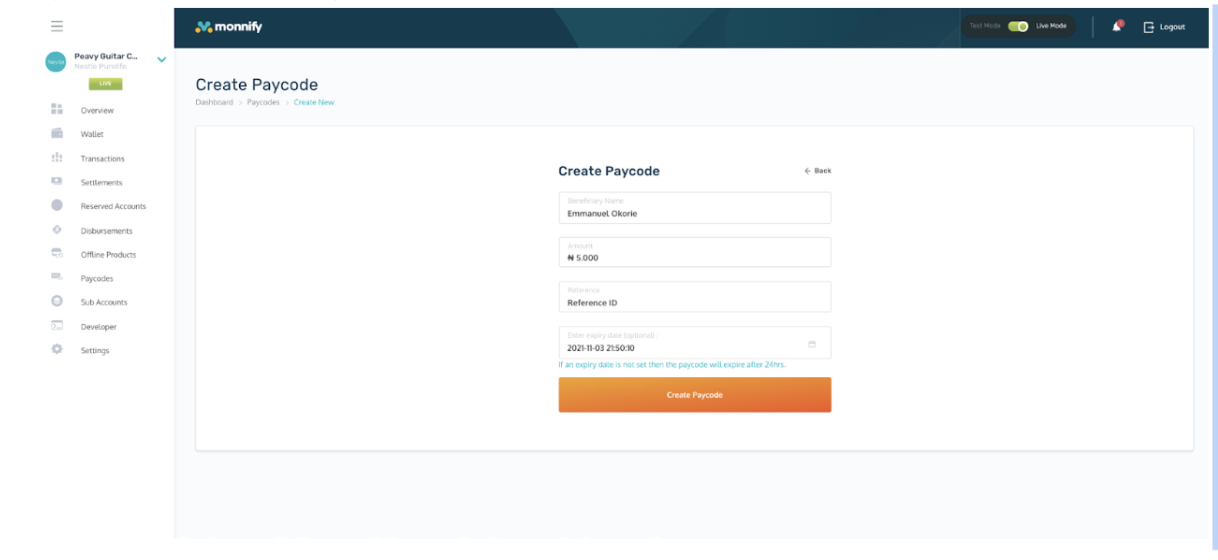
And after filling in the required details, he can click on the make transfer button to complete the transfer process.
Paycode API
-----------
Paycodes can also be generated using the Paycode generation APIs. Below is a list of endpoints required for paycode management.
1. **[Create Paycode:](https://developers.monnify.com/api#tag/paycode-api/#create-paycode)
** This endpoint helps generate a paycode for a transaction, check Create Paycode API for more information.
2. **[Cancel Paycode:](https://developers.monnify.com/api#tag/paycode-api/#delete-paycode)
** This endpoint helps to cancel a paycode after it has been created, check Cancel Paycode API for more information.
3. **[Get Paycode:](https://developers.monnify.com/api#tag/paycode-api/#get-paycode)
** This endpoint is called to get details of a paycode that has been created. The paycode returned is always masked as a layer of security. check Get Paycode API for more information.
4. **[Get Clear Paycode:](https://developers.monnify.com/api#tag/paycode-api/#get-clear-paycode)
** This endpoint provides a clear view of the paycode once authorization is provided, check Get Clear Paycode API for more information.
5. **[Fetch Paycodes:](https://developers.monnify.com/api#tag/paycode-api/#fetch-paycodes)
** This endpoint provides all paycodes that have been created within a specific period, check Fetch Paycode API for more information.
When a Paycode is created or used, it’s list of possible status are outlined as follows;
**PENDING** - Ready to be used but not used.
**SUCCESS** - Has been utilized successfully.
**EXPIRED** - Has been automatically expired having exhausted the configured lifespan.
**CANCELLED** - Was canceled by the user.
In general, all offline products can easily be tested from the Simulator tab on the developer section of the monnify dashboard.

Got Questions
Reach out to us at [\[email protected\]](https://developers.monnify.com/cdn-cgi/l/email-protection#25565055554a575165484a4b4b4c435c0b464a48)
if you have any questions as regards integrating with the Monnify API.

Monnify Tutorial Videos
Check out [Our Youtube channel](https://www.youtube.com/channel/UCUyMHJL8q_JPElohU9IS22Q)
for tutorials on how to integrate the Monnify API.

Join Our Slack Community
[Click here](https://slack.monnify.com/)
to join the Monnify Slack community.
Copyright © 2026 [Monnify](https://monnify.com/)
[](https://www.instagram.com/monnifyhq/)
[](https://www.facebook.com/Monnify-102435331122100/?modal=admin_todo_tour)
[](https://twitter.com/monnify)
[Terms of Service](https://monnify.com/terms.html)
[Privacy Policy](https://monnify.com/privacy-policy.html)
---
# Sample Codes
[](https://developers.monnify.com/)
* [API](https://developers.monnify.com/api)
* * *
* [Home](https://developers.monnify.com/)
* Accept Payments
* [Overview](https://developers.monnify.com/docs/collections)
* [Quickstart](https://developers.monnify.com/docs/collections/quickstart)
* [Payment Methods](https://developers.monnify.com/docs/collections/payment-methods)
* [International Payments](https://developers.monnify.com/docs/collections/international-payment)
* One-Time Payments
* [Overview](https://developers.monnify.com/docs/collections/one-time-payments)
* [Checkout Page](https://developers.monnify.com/docs/collections/one-time-payments/checkout-page)
* [Checkout API](https://developers.monnify.com/docs/collections/one-time-payments/checkout-api)
* [Payment Links](https://developers.monnify.com/docs/collections/one-time-payments/payment-links)
* [Invoice](https://developers.monnify.com/docs/collections/one-time-payments/invoice)
* [Offline Pay-ins](https://developers.monnify.com/docs/collections/one-time-payments/offline-payins)
* Recurring Payments
* [Overview](https://developers.monnify.com/docs/collections/recurring-payments)
* [Reserved / Virtual Accounts](https://developers.monnify.com/docs/collections/recurring-payments/reserved-accounts)
* [Direct Debit / Mandates](https://developers.monnify.com/docs/collections/recurring-payments/direct-debit)
* [Card Tokenization](https://developers.monnify.com/docs/collections/recurring-payments/card-tokenization)
* [Retry & Failure Handling](https://developers.monnify.com/docs/collections/recurring-payments/retry-failure-handling)
* Manage Payments
* [Verify Transactions](https://developers.monnify.com/docs/collections/manage-payments/verify-transactions)
* [Transaction Splitting / Sub-accounts](https://developers.monnify.com/docs/collections/manage-payments/transaction-splitting)
* [Refunds](https://developers.monnify.com/docs/collections/manage-payments/refunds)
* [Reconciliation](https://developers.monnify.com/docs/collections/manage-payments/reconciliation)
* Transfer/Payout
* [Overview](https://developers.monnify.com/docs/disbursements)
* [Single Transfers](https://developers.monnify.com/docs/disbursements/single-transfers)
* [Bulk Transfers](https://developers.monnify.com/docs/disbursements/bulk-transfers)
* [Offline Payouts (Paycode)](https://developers.monnify.com/docs/disbursements/offline-payout)
* Bills Payment
* [Overview](https://developers.monnify.com/docs/bills-payment)
* [Process a Bill](https://developers.monnify.com/docs/bills-payment/process-a-bill)
* [Settlement Process](https://developers.monnify.com/docs/bills-payment/settlement-process)
* Wallets
* [Overview](https://developers.monnify.com/docs/wallets)
* [Create Wallet](https://developers.monnify.com/docs/wallets/create-wallet)
* [Wallet Balance](https://developers.monnify.com/docs/wallets/wallet-balance)
* [Get Wallets](https://developers.monnify.com/docs/wallets/get-wallets)
* [Wallet Statement](https://developers.monnify.com/docs/wallets/wallet-statement)
* Verification APIs
* [Overview](https://developers.monnify.com/docs/verification-api)
* [Verifying your Customers](https://developers.monnify.com/docs/verification-api/verifying-your-customers)
* [Integration Guide for Monnify BVN Verification](https://developers.monnify.com/docs/integration-guide-bvn-nin-update)
* Integration
* [Tools](https://developers.monnify.com/docs/integration)
* [Sample codes](https://developers.monnify.com/docs/integration/sample-codes)
* [MCP Server](https://developers.monnify.com/docs/integration/mcp-server)
* Webhooks
* [Overview](https://developers.monnify.com/docs/webhooks)
* [Webhook Event Types](https://developers.monnify.com/docs/webhooks/event-types)
* [Settlement](https://developers.monnify.com/docs/settlements)
* [Going Live](https://developers.monnify.com/docs/live)
* [Changelogs](https://developers.monnify.com/docs/change-logs)
* [Test Cards](https://developers.monnify.com/docs/test-cards)
* [Error Codes](https://developers.monnify.com/docs/error-codes)
* [Supported Banks](https://developers.monnify.com/docs/supported-banks)
Search..
Sample Codes
============
Monnify also provides sample implementation of libraries and plugins to extend the functionality of your application, which are:
[\
\
Python Implementation Of Monnify Webhook\
----------------------------------------\
\
A setup on how to validate Monnify webhook hash.\
\
](https://github.com/marvelous-benji/monnify-django-webhook)
[\
\
PHP Sample Codes for Monnify\
----------------------------\
\
Sample codes on how you can implement API in PHP.\
\
](https://github.com/jimiejosh/monnify-php-sample-codes)
[\
\
ASP-NET Implementation Of Monnify Webhook\
-----------------------------------------\
\
A setup on how to validate Monnify webhook hash.\
\
](https://github.com/Monnify/Webhook-ASP-NET)
[\
\
NodeJs Implementation Of Monnify Webhook\
----------------------------------------\
\
A setup on how to validate Monnify webhook hash.\
\
](https://github.com/Monnify/monnify-sample-webhook-nodejs)

Got Questions
Reach out to us at [\[email protected\]](https://developers.monnify.com/cdn-cgi/l/email-protection#11626461617e6365517c7e7f7f7877683f727e7c)
if you have any questions as regards integrating with the Monnify API.

Monnify Tutorial Videos
Check out [Our Youtube channel](https://www.youtube.com/channel/UCUyMHJL8q_JPElohU9IS22Q)
for tutorials on how to integrate the Monnify API.

Join Our Slack Community
[Click here](https://slack.monnify.com/)
to join the Monnify Slack community.
Copyright © 2026 [Monnify](https://monnify.com/)
[](https://www.instagram.com/monnifyhq/)
[](https://www.facebook.com/Monnify-102435331122100/?modal=admin_todo_tour)
[](https://twitter.com/monnify)
[Terms of Service](https://monnify.com/terms.html)
[Privacy Policy](https://monnify.com/privacy-policy.html)
---
# Transaction Refunds
[](https://developers.monnify.com/)
* [API](https://developers.monnify.com/api)
* * *
* [Home](https://developers.monnify.com/)
* Accept Payments
* [Overview](https://developers.monnify.com/docs/collections)
* [Quickstart](https://developers.monnify.com/docs/collections/quickstart)
* [Payment Methods](https://developers.monnify.com/docs/collections/payment-methods)
* [International Payments](https://developers.monnify.com/docs/collections/international-payment)
* One-Time Payments
* [Overview](https://developers.monnify.com/docs/collections/one-time-payments)
* [Checkout Page](https://developers.monnify.com/docs/collections/one-time-payments/checkout-page)
* [Checkout API](https://developers.monnify.com/docs/collections/one-time-payments/checkout-api)
* [Payment Links](https://developers.monnify.com/docs/collections/one-time-payments/payment-links)
* [Invoice](https://developers.monnify.com/docs/collections/one-time-payments/invoice)
* [Offline Pay-ins](https://developers.monnify.com/docs/collections/one-time-payments/offline-payins)
* Recurring Payments
* [Overview](https://developers.monnify.com/docs/collections/recurring-payments)
* [Reserved / Virtual Accounts](https://developers.monnify.com/docs/collections/recurring-payments/reserved-accounts)
* [Direct Debit / Mandates](https://developers.monnify.com/docs/collections/recurring-payments/direct-debit)
* [Card Tokenization](https://developers.monnify.com/docs/collections/recurring-payments/card-tokenization)
* [Retry & Failure Handling](https://developers.monnify.com/docs/collections/recurring-payments/retry-failure-handling)
* Manage Payments
* [Verify Transactions](https://developers.monnify.com/docs/collections/manage-payments/verify-transactions)
* [Transaction Splitting / Sub-accounts](https://developers.monnify.com/docs/collections/manage-payments/transaction-splitting)
* [Refunds](https://developers.monnify.com/docs/collections/manage-payments/refunds)
* [Reconciliation](https://developers.monnify.com/docs/collections/manage-payments/reconciliation)
* Transfer/Payout
* [Overview](https://developers.monnify.com/docs/disbursements)
* [Single Transfers](https://developers.monnify.com/docs/disbursements/single-transfers)
* [Bulk Transfers](https://developers.monnify.com/docs/disbursements/bulk-transfers)
* [Offline Payouts (Paycode)](https://developers.monnify.com/docs/disbursements/offline-payout)
* Bills Payment
* [Overview](https://developers.monnify.com/docs/bills-payment)
* [Process a Bill](https://developers.monnify.com/docs/bills-payment/process-a-bill)
* [Settlement Process](https://developers.monnify.com/docs/bills-payment/settlement-process)
* Wallets
* [Overview](https://developers.monnify.com/docs/wallets)
* [Create Wallet](https://developers.monnify.com/docs/wallets/create-wallet)
* [Wallet Balance](https://developers.monnify.com/docs/wallets/wallet-balance)
* [Get Wallets](https://developers.monnify.com/docs/wallets/get-wallets)
* [Wallet Statement](https://developers.monnify.com/docs/wallets/wallet-statement)
* Verification APIs
* [Overview](https://developers.monnify.com/docs/verification-api)
* [Verifying your Customers](https://developers.monnify.com/docs/verification-api/verifying-your-customers)
* [Integration Guide for Monnify BVN Verification](https://developers.monnify.com/docs/integration-guide-bvn-nin-update)
* Integration
* [Tools](https://developers.monnify.com/docs/integration)
* [Sample codes](https://developers.monnify.com/docs/integration/sample-codes)
* [MCP Server](https://developers.monnify.com/docs/integration/mcp-server)
* Webhooks
* [Overview](https://developers.monnify.com/docs/webhooks)
* [Webhook Event Types](https://developers.monnify.com/docs/webhooks/event-types)
* [Settlement](https://developers.monnify.com/docs/settlements)
* [Going Live](https://developers.monnify.com/docs/live)
* [Changelogs](https://developers.monnify.com/docs/change-logs)
* [Test Cards](https://developers.monnify.com/docs/test-cards)
* [Error Codes](https://developers.monnify.com/docs/error-codes)
* [Supported Banks](https://developers.monnify.com/docs/supported-banks)
Search..
Transaction Refunds
===================
This feature allows you to return a payment to a customer. An example of a transaction refund scenario is when an e-commerce customer picks five items and makes a payment for the five of them. On arrival of the products, the customer could decide to only keep three of the items and return the rest. Upon return, the customer would have to be refunded for the two returned products by the merchant.
See [Transaction Refund API](https://developers.monnify.com/api#tag/refund/#initiate-refund)
for more information on implementing it on your platform.
Types of Refunds
----------------
* Partial Refund: A part of the total transaction amount is to be refunded. The customer will be refunded a part of the initial full payment.
* Full Refund: The total transaction amount is to be refunded.
Charges
-------
For payments made via transfers, you will be charged a refund fee of N10 and this will be deducted from your wallet. You are required to have your wallet funded before refunds can be processed.

Virtual account payments:
Monnify **does not refund to virtual account numbers**. If the original payment was made via a virtual account, refunding to that same account will fail. In such cases, the merchant must collect a regular bank account number from the customer and specify it as the refund destination. See _Refunding to a Different Account_ below.
Refund via API
--------------

Activation Required:
Refund are not enabled by default. You must request activation for the API (and UI - if needed) to be enabled both your **Sandbox** and/or **Live** environments. Contact [\[email protected\]](https://developers.monnify.com/cdn-cgi/l/email-protection#21484f554446534055484e4f0c525451514e5355614c4e4f4f4847580f424e4c)
to get this enabled stating your use case for the feature. As part of the email, you will be expected to idemnify Monnify for potential use and misuse of the feature on your platfrom.
All refund API calls require a valid bearer token. Authenticate first using your API key and secret, then use the returned token in the `Authorization` header.
cURLJavaScriptPythonPHP
Copy
### Partial Refund
A partial refund returns only a portion of the original transaction amount. Set `refundAmount` to any value less than the full transaction amount.
cURLJavaScriptPythonPHP
Copy
### Full Refund
A full refund returns the entire transaction amount. Set `refundAmount` to the original transaction amount. You can optionally specify a different destination account; if omitted, the refund is sent back to the originating account.
cURLJavaScriptPythonPHP
Copy
### Refunding to a Different Account
By default, Monnify sends the refund to the account that made the original payment. You can override this by supplying `destinationAccountNumber` and `destinationAccountBankCode` in the request body.

Virtual account payments require a different destination:
Monnify **does not refund to virtual account numbers**. Virtual accounts are temporary receive-only accounts — transfers back to them will fail. If a customer paid through a virtual account (i.e. a dynamic account number generated for the transaction), ask them to provide a regular bank account number and use it as the `destinationAccountNumber` when initiating the refund.
cURLJavaScriptPythonPHP
Copy
### Request Fields
| Field | Type | Required | Description |
| --- | --- | --- | --- |
| `transactionReference` | string | Yes | The unique transaction reference generated by Monnify for the original payment. |
| `refundReference` | string | Yes | A unique reference you generate to identify this refund. Must be distinct for each refund request. |
| `refundAmount` | number | Yes | Amount to refund. Must be between ₦100 and the original transaction amount. For a full refund, set this to the full transaction amount. |
| `refundReason` | string | Yes | Internal reason for the refund (max 64 characters). Used for your records. |
| `customerNote` | string | Yes | Narration that appears on the customer's bank credit alert (max 16 characters). |
| `destinationAccountNumber` | string | No | Account number to send the refund to. If omitted, the refund is sent back to the originating account. |
| `destinationAccountBankCode` | string | No | Bank code for the `destinationAccountNumber`. Required if `destinationAccountNumber` is provided. |
### Response
refund-response.json
Copy
| Field | Description |
| --- | --- |
| `refundType` | `PARTIAL_REFUND` or `FULL_REFUND`. Determined automatically based on whether the refund amount equals the full transaction amount. |
| `refundStatus` | Current status of the refund. See statuses below. |
| `refundStrategy` | Indicates how the refund is funded. For example, `MERCHANT_WALLET` means the refund amount is debited from your Monnify wallet. |
| `comment` | A human-readable message about the refund's current state. |
| refundStatus | Meaning |
| --- | --- |
| `PENDING` | Refund has been accepted and is being processed. |
| `COMPLETED` | Refund was successfully sent to the customer's account. |
| `FAILED` | Refund could not be processed. Check the error codes section for details. |
Get Refund Status
-----------------
Poll this endpoint to check the current status of a refund using the `refundReference` you supplied when initiating it.
cURLJavaScriptPythonPHP
Copy
get-refund-status-response.json
Copy

Prefer webhooks over polling:
Polling is useful for a one-time status check, but for production systems configure a webhook URL to receive real-time refund notifications instead. See the section below.
Refund Webhooks
---------------
Monnify sends a webhook notification to your configured URL when a refund reaches a terminal state. There are two refund event types:
### Successful Refund
Sent when the refund has been processed and the customer's account has been credited.
SUCCESSFUL\_REFUND-webhook.json
Copy
### Failed Refund
Sent when the refund could not be processed. Use the `refundReference` to look up further details or surface an error to your support team.
FAILED\_REFUND-webhook.json
Copy
### Setting Up Your Webhook URL
Configure your webhook URL in the Monnify dashboard under **Settings > API Keys & Webhooks**. All webhook notifications include a `monnify-signature` header containing an HMAC-SHA512 hash of the request body signed with your client secret. Always verify this signature before processing the payload.

Webhook best practices:
* Respond with HTTP `200` immediately on receipt. Do your processing after acknowledging.
* Verify the `monnify-signature` header before trusting the payload.
* Check for duplicate notifications using `refundReference` before crediting or updating order state.
* Whitelist Monnify's IP addresses on your server firewall.
See [Webhooks & Event Types](https://developers.monnify.com/docs/webhooks/event-types)
for the full signature verification guide and code samples in Node.js, PHP, and Java.
Refund From Monnify Dashboard
-----------------------------
To initiate a refund on a particular transaction, click on the transaction to view its details as shown below;
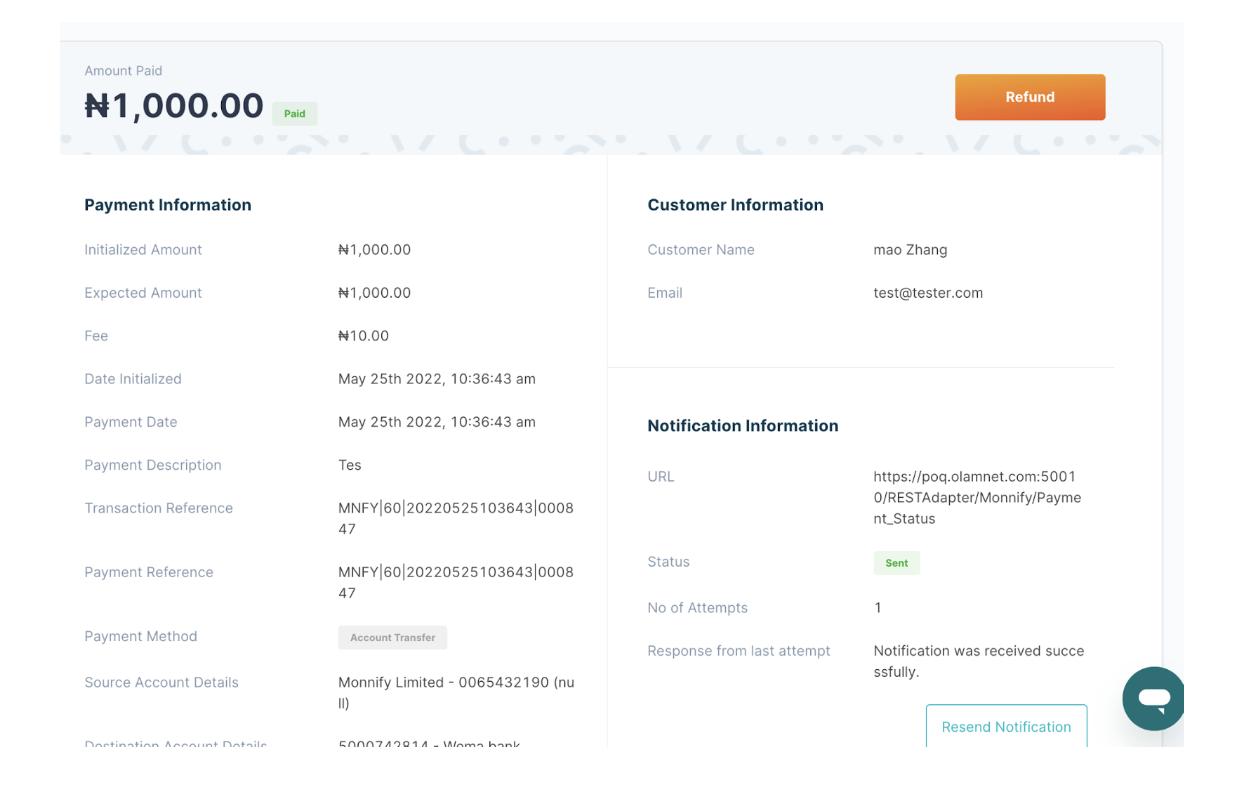
Clicking on the "Refund" button takes you to the refund page;
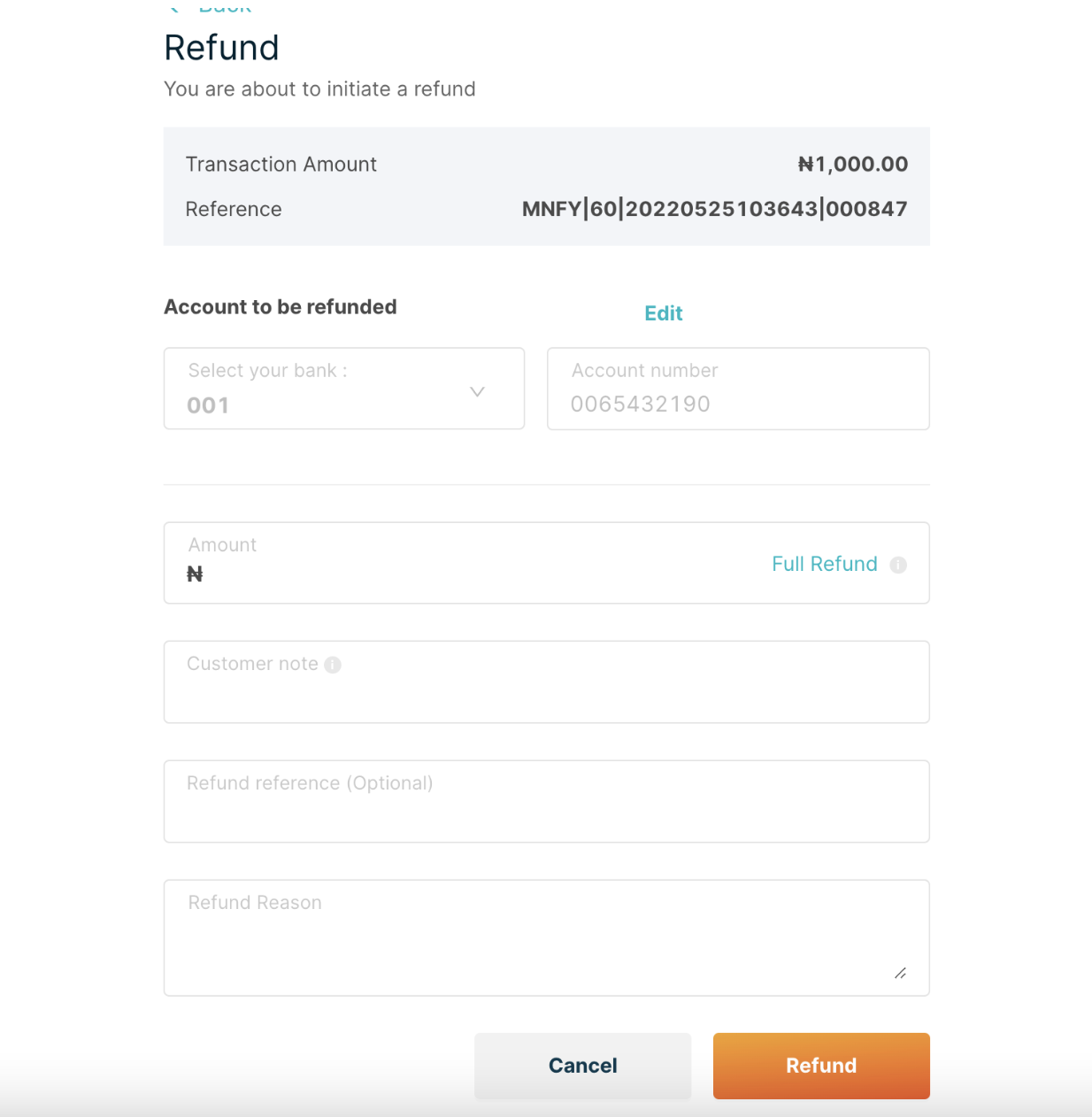
Finally populate the necessary fields and click on the refund button to perform a refund on such transaction.
Sample Error Messages
---------------------
| Error Message | Meaning | Action |
| --- | --- | --- |
| 99 | Error occurred while processing your request. | Engage the Monnify support |
| R1 | Transaction with specified reference does not exist. | Recheck if there's a transaction with such reference. |
| R2 | Refund not permitted for specified transaction. | Refund is currently only possible for payments via Account\_Transfer. Recheck if the transaction is an Account\_Transfer payment. |
| R3 | Specified refund amount is above transaction amount. | Recheck the transaction amount and retry accordingly. |
| R4 | Specified refund amount is below minimum refundable amount. | The minimum refundable amount is N100 |
| R5 | Merchant does not have sufficient funds to process refund. | Merchant should topup his Monnify wallet and retry. |
| R6 | Customer account details are invalid | Merchant should request valid account details from the customer or try again later. |
| R7 | No refund was initiated with the supplied refund reference. | Kindly recheck if a refund with the refund reference was successfully initiated. |
| R8 | Supplied value has exceeded the maximum allowed number of characters. | The refundReason should not be more than 64 characters and the customerNote should not be more than 16 characters. |
| R9 | Supplied refund reference already exists for the merchant. | Kindly use a new and distinct refund reference. |
| R10 | Merchant account balance could not be retrieved. | Contact Monnify's support. |
| R11 | Name inquiry network error. | Kindly retry later or Contact Monnify's support. |
| R12 | The total amount of all refunds done on a particular transaction has exceeded the transaction amount. | No refunds can be done for the particular transaction as the total amount of partial refunds have summed up to the transaction amount. |
| M01 | System error. Contact support. | Contact Monnify's support. |
| M02 | System error. Contact support | Contact Monnify's support. |
Rate this page
How helpful is the content on this page?
★★★★★

Got Questions
Reach out to us at [\[email protected\]](https://developers.monnify.com/cdn-cgi/l/email-protection#4d3e383d3d223f390d20222323242b34632e2220)
if you have any questions as regards integrating with the Monnify API.

Monnify Tutorial Videos
Check out [Our Youtube channel](https://www.youtube.com/channel/UCUyMHJL8q_JPElohU9IS22Q)
for tutorials on how to integrate the Monnify API.

Join Our Slack Community
[Click here](https://slack.monnify.com/)
to join the Monnify Slack community.
Copyright © 2026 [Monnify](https://monnify.com/)
[](https://www.instagram.com/monnifyhq/)
[](https://www.facebook.com/Monnify-102435331122100/?modal=admin_todo_tour)
[](https://twitter.com/monnify)
[Terms of Service](https://monnify.com/terms.html)
[Privacy Policy](https://monnify.com/privacy-policy.html)
---
# Card Tokenization
[](https://developers.monnify.com/)
* [API](https://developers.monnify.com/api)
* * *
* [Home](https://developers.monnify.com/)
* Accept Payments
* [Overview](https://developers.monnify.com/docs/collections)
* [Quickstart](https://developers.monnify.com/docs/collections/quickstart)
* [Payment Methods](https://developers.monnify.com/docs/collections/payment-methods)
* [International Payments](https://developers.monnify.com/docs/collections/international-payment)
* One-Time Payments
* [Overview](https://developers.monnify.com/docs/collections/one-time-payments)
* [Checkout Page](https://developers.monnify.com/docs/collections/one-time-payments/checkout-page)
* [Checkout API](https://developers.monnify.com/docs/collections/one-time-payments/checkout-api)
* [Payment Links](https://developers.monnify.com/docs/collections/one-time-payments/payment-links)
* [Invoice](https://developers.monnify.com/docs/collections/one-time-payments/invoice)
* [Offline Pay-ins](https://developers.monnify.com/docs/collections/one-time-payments/offline-payins)
* Recurring Payments
* [Overview](https://developers.monnify.com/docs/collections/recurring-payments)
* [Reserved / Virtual Accounts](https://developers.monnify.com/docs/collections/recurring-payments/reserved-accounts)
* [Direct Debit / Mandates](https://developers.monnify.com/docs/collections/recurring-payments/direct-debit)
* [Card Tokenization](https://developers.monnify.com/docs/collections/recurring-payments/card-tokenization)
* [Retry & Failure Handling](https://developers.monnify.com/docs/collections/recurring-payments/retry-failure-handling)
* Manage Payments
* [Verify Transactions](https://developers.monnify.com/docs/collections/manage-payments/verify-transactions)
* [Transaction Splitting / Sub-accounts](https://developers.monnify.com/docs/collections/manage-payments/transaction-splitting)
* [Refunds](https://developers.monnify.com/docs/collections/manage-payments/refunds)
* [Reconciliation](https://developers.monnify.com/docs/collections/manage-payments/reconciliation)
* Transfer/Payout
* [Overview](https://developers.monnify.com/docs/disbursements)
* [Single Transfers](https://developers.monnify.com/docs/disbursements/single-transfers)
* [Bulk Transfers](https://developers.monnify.com/docs/disbursements/bulk-transfers)
* [Offline Payouts (Paycode)](https://developers.monnify.com/docs/disbursements/offline-payout)
* Bills Payment
* [Overview](https://developers.monnify.com/docs/bills-payment)
* [Process a Bill](https://developers.monnify.com/docs/bills-payment/process-a-bill)
* [Settlement Process](https://developers.monnify.com/docs/bills-payment/settlement-process)
* Wallets
* [Overview](https://developers.monnify.com/docs/wallets)
* [Create Wallet](https://developers.monnify.com/docs/wallets/create-wallet)
* [Wallet Balance](https://developers.monnify.com/docs/wallets/wallet-balance)
* [Get Wallets](https://developers.monnify.com/docs/wallets/get-wallets)
* [Wallet Statement](https://developers.monnify.com/docs/wallets/wallet-statement)
* Verification APIs
* [Overview](https://developers.monnify.com/docs/verification-api)
* [Verifying your Customers](https://developers.monnify.com/docs/verification-api/verifying-your-customers)
* [Integration Guide for Monnify BVN Verification](https://developers.monnify.com/docs/integration-guide-bvn-nin-update)
* Integration
* [Tools](https://developers.monnify.com/docs/integration)
* [Sample codes](https://developers.monnify.com/docs/integration/sample-codes)
* [MCP Server](https://developers.monnify.com/docs/integration/mcp-server)
* Webhooks
* [Overview](https://developers.monnify.com/docs/webhooks)
* [Webhook Event Types](https://developers.monnify.com/docs/webhooks/event-types)
* [Settlement](https://developers.monnify.com/docs/settlements)
* [Going Live](https://developers.monnify.com/docs/live)
* [Changelogs](https://developers.monnify.com/docs/change-logs)
* [Test Cards](https://developers.monnify.com/docs/test-cards)
* [Error Codes](https://developers.monnify.com/docs/error-codes)
* [Supported Banks](https://developers.monnify.com/docs/supported-banks)
Search..
Card Tokenization
=================
Tokenize a customer's card during their first payment so you can charge them again in the future (subscriptions, renewals, or one-click payments) without requiring them to re-enter their card details.
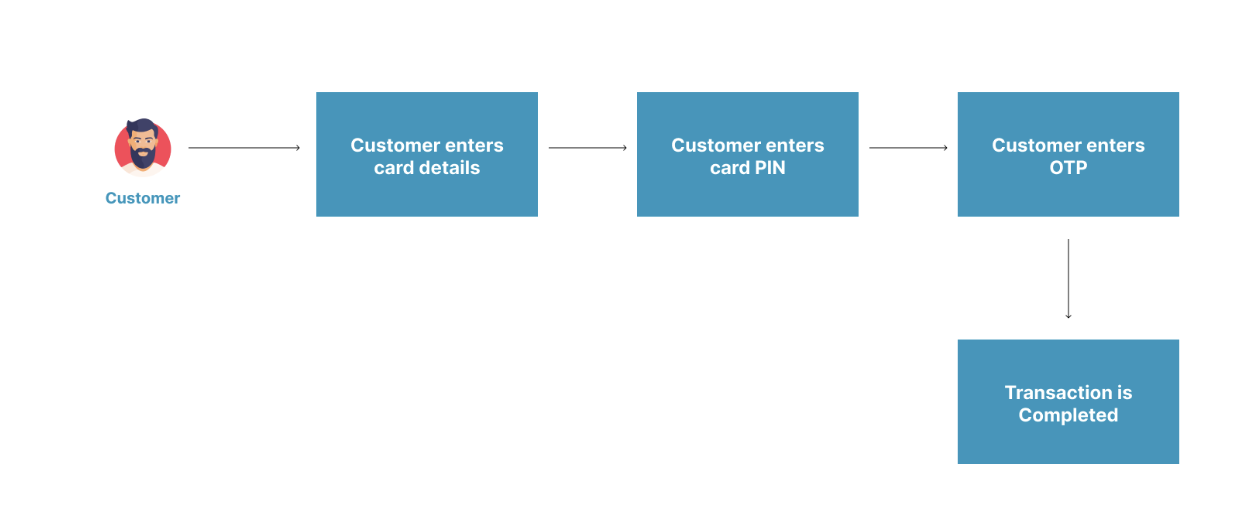
Card Tokenization allows you to debit a customer's card automatically on future transactions, without requiring any input from the customer. After the customer completes their first card payment with tokenization enabled, Monnify generates a secure token representing their card. You store this token and use it to charge them on subsequent payments.
How It Works
------------
1. The customer makes their **first payment** using the Monnify checkout or SDK. If tokenization is enabled on your merchant account, Monnify will automatically generate a card token on successful payment.
2. On successful payment, you call the **Get Transaction Status API** to retrieve the `cardToken` from the `cardDetails` object.
3. You **store the `cardToken`** securely on your server, linked to the customer's account and email address.
4. For future charges, you send the `cardToken` to the **Charge Card Token API** with no checkout UI required.

Enable tokenization first:
Card tokenization must be activated on your integration before use. Contact [\[email protected\]](https://developers.monnify.com/cdn-cgi/l/email-protection#4920273d2c2e3b283d202627643a3c3939263b3d0924262727202f30672a2624)
to enable this feature on your account.
Step 1 – Collect the First Card Payment
---------------------------------------
If card tokenization is enabled on your merchant account, Monnify automatically returns a card token after any successful card payment — no additional parameter is needed in your SDK call.
Web / JS SDK
------------
Initialize a standard card payment. The token is returned automatically if tokenization is enabled on your account.
index.html
Copy
Flutter SDK
-----------
Initialize a standard card payment. The token is returned automatically if tokenization is enabled on your account.
payment.dart
Copy
iOS SDK
-------
Initialize a standard card payment. The token is returned automatically if tokenization is enabled on your account.
PaymentView.swift
Copy
Step 2 – Retrieve the Card Token
--------------------------------
After the first payment completes, call the [Get Transaction Status API](https://developers.monnify.com/api#tag/transactions/#get-transaction-status)
using the transaction's `transactionReference` or `paymentReference`. The `cardDetails` object in the response contains the `cardToken`.

Sandbox behaviour:
In the sandbox environment, Monnify does not return a real `cardToken`. Instead, check the `supportsTokenization` field in `reusable`: `true` means the card would produce a token in production, and `false` means it would not.
get-transaction-status-response.json
Copy
Step 3 – Store the Card Token
-----------------------------
Once you have the `cardToken`, store it securely on your server alongside the customer's email address used for the original transaction. Both the token **and the email must match** on every subsequent charge, as Monnify validates this pair.
1. Treat the token like a sensitive credential and store it encrypted at rest.
2. Never expose the token to the client (browser or mobile app).
3. Link the token to the customer's internal user ID so you can retrieve it when scheduling future charges.
Step 4 – Charge the Token (Future Payments)
-------------------------------------------
Use the stored `cardToken` to charge the customer for future payments. This call happens entirely server-to-server, with no checkout UI required.
cURLJavaScriptPythonPHP
Copy
charge-response.json
Copy
Token Lifecycle & Best Practices
--------------------------------
1. **One token per card per merchant**: if the same customer tokenizes the same card twice, you get the same token.
2. **Expired cards**: the token becomes invalid when the underlying card expires. Re-collect card details from the customer and tokenize again.
3. **Customer consent**: always inform customers that you are saving their card for future charges. This is a regulatory and trust requirement.
4. **Webhook on charge**: Monnify sends a webhook notification for every token-based charge, just like a regular payment. See [Webhooks](https://developers.monnify.com/docs/webhooks)
.
5. **Verify every charge**: always call the [Verify Transactions API](https://developers.monnify.com/docs/collections/manage-payments/verify-transactions)
after a token charge before delivering value.
Sample Error Messages
---------------------
| Error Message | Meaning | Action |
| --- | --- | --- |
| Card token has expired. | The supplied token has expired. | Ask the customer to complete a new card payment with tokenization enabled to generate a fresh token. |
| Invalid card token | The token supplied in the request does not exist or is malformed. | Verify that the token stored in your database matches what was returned from the Get Transaction Status API. |
| Duplicate payment reference | The `paymentReference` used in the init-transaction request was already used in the same environment. | Generate a unique reference for every new transaction. |
Rate this page
How helpful is the content on this page?
★★★★★

Got Questions
Reach out to us at [\[email protected\]](https://developers.monnify.com/cdn-cgi/l/email-protection#295a5c5959465b5d6944464747404f50074a4644)
if you have any questions as regards integrating with the Monnify API.

Monnify Tutorial Videos
Check out [Our Youtube channel](https://www.youtube.com/channel/UCUyMHJL8q_JPElohU9IS22Q)
for tutorials on how to integrate the Monnify API.

Join Our Slack Community
[Click here](https://slack.monnify.com/)
to join the Monnify Slack community.
Copyright © 2026 [Monnify](https://monnify.com/)
[](https://www.instagram.com/monnifyhq/)
[](https://www.facebook.com/Monnify-102435331122100/?modal=admin_todo_tour)
[](https://twitter.com/monnify)
[Terms of Service](https://monnify.com/terms.html)
[Privacy Policy](https://monnify.com/privacy-policy.html)
---
# Unknown
[](https://developers.monnify.com/)
* [API](https://developers.monnify.com/api)
* * *
* [Home](https://developers.monnify.com/)
* Accept Payments
* [Overview](https://developers.monnify.com/docs/collections)
* [Quickstart](https://developers.monnify.com/docs/collections/quickstart)
* [Payment Methods](https://developers.monnify.com/docs/collections/payment-methods)
* [International Payments](https://developers.monnify.com/docs/collections/international-payment)
* One-Time Payments
* [Overview](https://developers.monnify.com/docs/collections/one-time-payments)
* [Checkout Page](https://developers.monnify.com/docs/collections/one-time-payments/checkout-page)
* [Checkout API](https://developers.monnify.com/docs/collections/one-time-payments/checkout-api)
* [Payment Links](https://developers.monnify.com/docs/collections/one-time-payments/payment-links)
* [Invoice](https://developers.monnify.com/docs/collections/one-time-payments/invoice)
* [Offline Pay-ins](https://developers.monnify.com/docs/collections/one-time-payments/offline-payins)
* Recurring Payments
* [Overview](https://developers.monnify.com/docs/collections/recurring-payments)
* [Reserved / Virtual Accounts](https://developers.monnify.com/docs/collections/recurring-payments/reserved-accounts)
* [Direct Debit / Mandates](https://developers.monnify.com/docs/collections/recurring-payments/direct-debit)
* [Card Tokenization](https://developers.monnify.com/docs/collections/recurring-payments/card-tokenization)
* [Retry & Failure Handling](https://developers.monnify.com/docs/collections/recurring-payments/retry-failure-handling)
* Manage Payments
* [Verify Transactions](https://developers.monnify.com/docs/collections/manage-payments/verify-transactions)
* [Transaction Splitting / Sub-accounts](https://developers.monnify.com/docs/collections/manage-payments/transaction-splitting)
* [Refunds](https://developers.monnify.com/docs/collections/manage-payments/refunds)
* [Reconciliation](https://developers.monnify.com/docs/collections/manage-payments/reconciliation)
* Transfer/Payout
* [Overview](https://developers.monnify.com/docs/disbursements)
* [Single Transfers](https://developers.monnify.com/docs/disbursements/single-transfers)
* [Bulk Transfers](https://developers.monnify.com/docs/disbursements/bulk-transfers)
* [Offline Payouts (Paycode)](https://developers.monnify.com/docs/disbursements/offline-payout)
* Bills Payment
* [Overview](https://developers.monnify.com/docs/bills-payment)
* [Process a Bill](https://developers.monnify.com/docs/bills-payment/process-a-bill)
* [Settlement Process](https://developers.monnify.com/docs/bills-payment/settlement-process)
* Wallets
* [Overview](https://developers.monnify.com/docs/wallets)
* [Create Wallet](https://developers.monnify.com/docs/wallets/create-wallet)
* [Wallet Balance](https://developers.monnify.com/docs/wallets/wallet-balance)
* [Get Wallets](https://developers.monnify.com/docs/wallets/get-wallets)
* [Wallet Statement](https://developers.monnify.com/docs/wallets/wallet-statement)
* Verification APIs
* [Overview](https://developers.monnify.com/docs/verification-api)
* [Verifying your Customers](https://developers.monnify.com/docs/verification-api/verifying-your-customers)
* [Integration Guide for Monnify BVN Verification](https://developers.monnify.com/docs/integration-guide-bvn-nin-update)
* Integration
* [Tools](https://developers.monnify.com/docs/integration)
* [Sample codes](https://developers.monnify.com/docs/integration/sample-codes)
* [MCP Server](https://developers.monnify.com/docs/integration/mcp-server)
* Webhooks
* [Overview](https://developers.monnify.com/docs/webhooks)
* [Webhook Event Types](https://developers.monnify.com/docs/webhooks/event-types)
* [Settlement](https://developers.monnify.com/docs/settlements)
* [Going Live](https://developers.monnify.com/docs/live)
* [Changelogs](https://developers.monnify.com/docs/change-logs)
* [Test Cards](https://developers.monnify.com/docs/test-cards)
* [Error Codes](https://developers.monnify.com/docs/error-codes)
* [Supported Banks](https://developers.monnify.com/docs/supported-banks)
Search..
Sandbox Test Cards
==================
Use the following test cards for sandbox transactions. Click any detail to copy it.
Card Without OTP
----------------

4111 1111 1111 1111
VALID THRU10/2027
CVV123
PIN: 1234
Card With OTP
-------------

5060 9959 9424 7093
VALID THRU12/2027
CVV123
PIN: 1234OTP: 123456
Card With 3DS
-------------

4000 0000 0000 0002
VALID THRU12/2027
CVV123
PIN: 1234OTP: 123456
Failed Card
-----------

4111 1111 1111 1110
VALID THRU10/2027
CVV123
PIN: 1234

Got Questions
Reach out to us at [\[email protected\]](https://developers.monnify.com/cdn-cgi/l/email-protection#3c4f494c4c534e487c51535252555a45125f5351)
if you have any questions as regards integrating with the Monnify API.

Monnify Tutorial Videos
Check out [Our Youtube channel](https://www.youtube.com/channel/UCUyMHJL8q_JPElohU9IS22Q)
for tutorials on how to integrate the Monnify API.

Join Our Slack Community
[Click here](https://slack.monnify.com/)
to join the Monnify Slack community.
Copyright © 2026 [Monnify](https://monnify.com/)
[](https://www.instagram.com/monnifyhq/)
[](https://www.facebook.com/Monnify-102435331122100/?modal=admin_todo_tour)
[](https://twitter.com/monnify)
[Terms of Service](https://monnify.com/terms.html)
[Privacy Policy](https://monnify.com/privacy-policy.html)
---
# Unknown
[](https://developers.monnify.com/)
* [API](https://developers.monnify.com/api)
* * *
* [Home](https://developers.monnify.com/)
* Accept Payments
* [Overview](https://developers.monnify.com/docs/collections)
* [Quickstart](https://developers.monnify.com/docs/collections/quickstart)
* [Payment Methods](https://developers.monnify.com/docs/collections/payment-methods)
* [International Payments](https://developers.monnify.com/docs/collections/international-payment)
* One-Time Payments
* [Overview](https://developers.monnify.com/docs/collections/one-time-payments)
* [Checkout Page](https://developers.monnify.com/docs/collections/one-time-payments/checkout-page)
* [Checkout API](https://developers.monnify.com/docs/collections/one-time-payments/checkout-api)
* [Payment Links](https://developers.monnify.com/docs/collections/one-time-payments/payment-links)
* [Invoice](https://developers.monnify.com/docs/collections/one-time-payments/invoice)
* [Offline Pay-ins](https://developers.monnify.com/docs/collections/one-time-payments/offline-payins)
* Recurring Payments
* [Overview](https://developers.monnify.com/docs/collections/recurring-payments)
* [Reserved / Virtual Accounts](https://developers.monnify.com/docs/collections/recurring-payments/reserved-accounts)
* [Direct Debit / Mandates](https://developers.monnify.com/docs/collections/recurring-payments/direct-debit)
* [Card Tokenization](https://developers.monnify.com/docs/collections/recurring-payments/card-tokenization)
* [Retry & Failure Handling](https://developers.monnify.com/docs/collections/recurring-payments/retry-failure-handling)
* Manage Payments
* [Verify Transactions](https://developers.monnify.com/docs/collections/manage-payments/verify-transactions)
* [Transaction Splitting / Sub-accounts](https://developers.monnify.com/docs/collections/manage-payments/transaction-splitting)
* [Refunds](https://developers.monnify.com/docs/collections/manage-payments/refunds)
* [Reconciliation](https://developers.monnify.com/docs/collections/manage-payments/reconciliation)
* Transfer/Payout
* [Overview](https://developers.monnify.com/docs/disbursements)
* [Single Transfers](https://developers.monnify.com/docs/disbursements/single-transfers)
* [Bulk Transfers](https://developers.monnify.com/docs/disbursements/bulk-transfers)
* [Offline Payouts (Paycode)](https://developers.monnify.com/docs/disbursements/offline-payout)
* Bills Payment
* [Overview](https://developers.monnify.com/docs/bills-payment)
* [Process a Bill](https://developers.monnify.com/docs/bills-payment/process-a-bill)
* [Settlement Process](https://developers.monnify.com/docs/bills-payment/settlement-process)
* Wallets
* [Overview](https://developers.monnify.com/docs/wallets)
* [Create Wallet](https://developers.monnify.com/docs/wallets/create-wallet)
* [Wallet Balance](https://developers.monnify.com/docs/wallets/wallet-balance)
* [Get Wallets](https://developers.monnify.com/docs/wallets/get-wallets)
* [Wallet Statement](https://developers.monnify.com/docs/wallets/wallet-statement)
* Verification APIs
* [Overview](https://developers.monnify.com/docs/verification-api)
* [Verifying your Customers](https://developers.monnify.com/docs/verification-api/verifying-your-customers)
* [Integration Guide for Monnify BVN Verification](https://developers.monnify.com/docs/integration-guide-bvn-nin-update)
* Integration
* [Tools](https://developers.monnify.com/docs/integration)
* [Sample codes](https://developers.monnify.com/docs/integration/sample-codes)
* [MCP Server](https://developers.monnify.com/docs/integration/mcp-server)
* Webhooks
* [Overview](https://developers.monnify.com/docs/webhooks)
* [Webhook Event Types](https://developers.monnify.com/docs/webhooks/event-types)
* [Settlement](https://developers.monnify.com/docs/settlements)
* [Going Live](https://developers.monnify.com/docs/live)
* [Changelogs](https://developers.monnify.com/docs/change-logs)
* [Test Cards](https://developers.monnify.com/docs/test-cards)
* [Error Codes](https://developers.monnify.com/docs/error-codes)
* [Supported Banks](https://developers.monnify.com/docs/supported-banks)
Search..
Changelog
=========
Keep track of every change to the Monnify API
Account Validation API Moved to v2
==================================
Deprecated
July 2, 2026
The Account Validation (Name Enquiry) endpoint has moved from v1 to v2. The v1 endpoint is deprecated and will be removed soon, so please update your integration to use v2.
API Route:GET /api/v2/disbursements/account/validate
[View API Reference](https://developers.monnify.com/api#tag/verification-apis/#validate-bank-account)
* Updated documentation and code samples to use /api/v2/disbursements/account/validate
* v1 endpoint is now deprecated and will be removed in a future release
New .NET SDK for Monnify APIs
=============================
Added
July 2, 2026
We added an official .NET SDK to our list of supported libraries, making it easier to integrate Monnify's collections, disbursements, bills payment, verification, and webhooks into .NET applications.
API Route:N/A
[View API Reference](https://developers.monnify.com/docs/integration-tools/plugin-libraries)
* Added Monnify .NET SDK to the Integrations page
* Added Monnify .NET SDK to the Plugins & Libraries page
New MCP Server for AI Assistants
================================
Added
July 2, 2026
We launched @monnify/mcp-server, a Model Context Protocol server that lets AI assistants like Claude Desktop, Cursor, and VS Code accept payments, verify identities, manage virtual accounts, and query transactions using natural language instead of custom integration code.
API Route:N/A
[View API Reference](https://developers.monnify.com/docs/integration/mcp-server)
* Added new MCP Server documentation page
* Exposed tools for collections, direct debit, verification, and utilities
* Added support for restricting available tools with the --tools flag
Settlement Info Update & Minor doc fixes
========================================
Updated
June 29, 2026
Added sample response to Get Settlement Detail endpoint, corrected billers to biller on Bills Payment endpoint
API Route:GET /api/v1/settlement-detail
[View API Reference](https://developers.monnify.com/api#tag/settlements/GET/api/v1/settlement-detail)
* Added response example to get Settlement details endpoint
* Changed billers to bill on get biller product api reference
* Updated the path for bulk disburesment doc example
* Added supported banks to Direct Debit docs
Rearrange Collection Docs based on Usage
========================================
Updated
June 29, 2026
Categorised collection related pages based on One Time or Recurring Payments and added other categories
* Categorised pages into one-time and recurring payment
* added quickstart, reconcillation and payment verification pages
Settlement Info Update & Minor doc fixes
========================================
Updated
June 29, 2026
Added sample response to Get Settlement Detail endpoint, corrected billers to biller on Bills Payment endpoint
API Route:GET /api/v1/settlement-detail
[View API Reference](https://developers.monnify.com/api#tag/settlements/GET/api/v1/settlement-detail)
* Added response example to get Settlement details endpoint
* Changed billers to bill on get biller product api reference
* Updated the path for bulk disburesment doc example
Disbursement,SubAccount and Go live Docs Update
===============================================
Updated
Apr 8, 2026
We've revamped our disbursement API documentation for both single and bulk disbursement adding requirements and code examples.
* Changed documentation of single disbursement
* Changed documentation of bulk disbursements
* Updated SubAccount page to show split amount and split percentage
* Better document the Verification API functionalities
* Created checklist for Go Live
Debit Mandate API Update
========================
Updated
Apr 1, 2026
We've enhanced our debit mandate API to accept incomeSplit object to enable merchants set up settle funds directly to any of their subaccounts
API Route:POST /api/v1/direct-debit/mandate/debit
[View API Reference](https://developers.monnify.com/api#tag/direct-debit/#debit-mandate)
* Added incomeSplit to request payload
Disbursement API Update
=======================
Updated
Mar 29, 2026
We've Beneficiary account name a required field for initiating disbursement. The flow is now Name Inquiry > Disbursment Request to increase accuracy.
API Route:POST /api/v2/disbursements/single
[View API Reference](https://developers.monnify.com/api#tag/transfers-disbursement/#initiate-transfer-single)
* Added benefiary account name to request payload
Disbursement API Update
=======================
Updated
Oct 29, 2025
We enhanced the Disbursement API to accept a sender information object for cases where the identify of the sender of a payment is important to be known.
API Route:POST /api/v2/disbursements/single
[View API Reference](https://developers.monnify.com/api#tag/transfers-disbursement/#initiate-transfer-single)
* Added sender object to request payload
Invoice Page Update
===================
Updated
Sept 30, 2025
We enhanced the Invoice documentation to clearly explain the differences between Static and Dynamic Invoices and how to implement each.
API Route:POST /api/v1/invoice/create
[View API Reference](https://developers.monnify.com/api#tag/invoice/#create-an-invoice)
* Added detailed steps and examples for creating a Static Invoice (reusable account number for multiple invoices)
* Added detailed steps and examples for creating a Dynamic Invoice (one-time use)
* Included a comparison table highlighting the key differences between Static and Dynamic invoices
API Reference Revamp
====================
Updated
Sept 24, 2025
We made major styling and functionality improvements to the API Reference page to make exploring and testing our APIs much easier.
API Route:Multiple
[View API Reference](https://developers.monnify.com/api)
* You can now test API endpoints directly from the documentation
* View real-time request and response samples without leaving the page
* Test credentials are provided for quick experiments, and you can swap them with your own credentials to fetch live data
* Improved design and navigation for a smoother developer experience
New Supported Banks Page
========================
Added
Sept 29, 2025
We added a 'Supported Banks' page to the documentation, allowing users to easily find all supported banks and related information for integrations.
API Route:N/A
[View API Reference](https://developers.monnify.com/docs/supported-banks)
* View a list of all supported banks and their bank codes
* Access USSD templates if available for each bank
* Quickly reference bank-specific integration details
Webhook Page Restructure
========================
Updated
Sept 22, 2025
We reorganized the Webhook documentation into a dedicated section with a dropdown for easier navigation and better clarity.
API Route:N/A
[View API Reference](https://developers.monnify.com/docs/webhooks)
* New 'Overview' page explaining how to configure your webhook and compute the hash
* New 'Event Types' page listing all webhook events with their payload structure and sample data
* Improved navigation and developer experience
New Error Codes Page
====================
Added
Sept 20, 2025
We introduced a new 'Error Codes' page in the documentation to make troubleshooting easier and faster.
API Route:N/A
[View API Reference](https://developers.monnify.com/docs/error-codes)
* Search across all error responses returned by our APIs
* View detailed information for each error including: Error Code, Error Message, Meaning, and Recommended Action
* Quickly identify and resolve integration issues
Direct Debit Routing Update
===========================
Updated
Sept 15, 2025
We improved Direct Debit processing by introducing smart routing. Transactions will now automatically use TeamApt if the customer’s bank is supported. If not, the request will seamlessly fall back to NIBSS.
API Route:POST /api/v1/direct-debit/mandate/create
[View API Reference](https://developers.monnify.com/api#tag/direct-debit/#create-mandate)
* Primary route: TeamApt (for supported banks)
* Fallback route: NIBSS (for unsupported banks)
* Expected impact: Higher transaction success rates and faster processing for supported banks
Service Name Updates
====================
Updated
Sept 15, 2025
We renamed some services to make them clearer and easier to understand.
API Route:N/A
[View API Reference](https://developers.monnify.com/docs/collections)
* 'Collections' is now 'Accept Payments'
* 'Disbursements' is now 'Transfers/Payouts'
Low Balance Alert Webhook
=========================
Added
Sept 12, 2025
A new webhook event has been added to notify you when your wallet balance falls below a threshold.
API Route:N/A
[View API Reference](https://developers.monnify.com/docs/webhooks/event-types)
* New event: \`low\_balance\_alert\`
Checkout Page Overhaul
======================
Added
Dec 1, 2024
We redesigned the checkout UI and added new lifecycle methods.
API Route:POST /api/v1/merchant/transactions/init-transaction
[View API Reference](https://developers.monnify.com/api#tag/transactions/#initialize-transaction)
* New modern UI with improved accessibility
* Introduced onLoadStart() function
Payment Links
=============
Added
May 21, 2024
Merchants can now generate customizable payment links from the dashboard.
API Route:N/A
[View API Reference](https://developers.monnify.com/docs/collections/payment-links)
Paycode API
===========
Updated
Jan 3, 2024
Exposed the Paycode API for direct integration.
API Route:POST /api/v1/paycode
[View API Reference](https://developers.monnify.com/docs/api#tag/paycode-api)
USSD API Stability Fixes
========================
Fixed
June 1, 2023
Improved reliability of Pay with USSD API across all banks.
API Route:GET /api/v1/sdk/transactions/banks
[View API Reference](https://developers.monnify.com/api#tag/others/#get-banks-with-ussd-short-code)
Deprecated Beneficiary Name Parameter
=====================================
Deprecated
May 4, 2023
The \`destinationAccountName\` parameter is now deprecated and will be removed in future versions.
API Route:POST /api/v2/disbursements/single
[View API Reference](https://developers.monnify.com/api#tag/transfers-disbursement/#initiate-transfer-single)
Rate this page
How helpful is the content on this page?
★★★★★

Got Questions
Reach out to us at [\[email protected\]](https://developers.monnify.com/cdn-cgi/l/email-protection#80f3f5f0f0eff2f4c0edefeeeee9e6f9aee3efed)
if you have any questions as regards integrating with the Monnify API.

Monnify Tutorial Videos
Check out [Our Youtube channel](https://www.youtube.com/channel/UCUyMHJL8q_JPElohU9IS22Q)
for tutorials on how to integrate the Monnify API.

Join Our Slack Community
[Click here](https://slack.monnify.com/)
to join the Monnify Slack community.
Copyright © 2026 [Monnify](https://monnify.com/)
[](https://www.instagram.com/monnifyhq/)
[](https://www.facebook.com/Monnify-102435331122100/?modal=admin_todo_tour)
[](https://twitter.com/monnify)
[Terms of Service](https://monnify.com/terms.html)
[Privacy Policy](https://monnify.com/privacy-policy.html)
---
# Integration Tools
[](https://developers.monnify.com/)
* [API](https://developers.monnify.com/api)
* * *
* [Home](https://developers.monnify.com/)
* Accept Payments
* [Overview](https://developers.monnify.com/docs/collections)
* [Quickstart](https://developers.monnify.com/docs/collections/quickstart)
* [Payment Methods](https://developers.monnify.com/docs/collections/payment-methods)
* [International Payments](https://developers.monnify.com/docs/collections/international-payment)
* One-Time Payments
* [Overview](https://developers.monnify.com/docs/collections/one-time-payments)
* [Checkout Page](https://developers.monnify.com/docs/collections/one-time-payments/checkout-page)
* [Checkout API](https://developers.monnify.com/docs/collections/one-time-payments/checkout-api)
* [Payment Links](https://developers.monnify.com/docs/collections/one-time-payments/payment-links)
* [Invoice](https://developers.monnify.com/docs/collections/one-time-payments/invoice)
* [Offline Pay-ins](https://developers.monnify.com/docs/collections/one-time-payments/offline-payins)
* Recurring Payments
* [Overview](https://developers.monnify.com/docs/collections/recurring-payments)
* [Reserved / Virtual Accounts](https://developers.monnify.com/docs/collections/recurring-payments/reserved-accounts)
* [Direct Debit / Mandates](https://developers.monnify.com/docs/collections/recurring-payments/direct-debit)
* [Card Tokenization](https://developers.monnify.com/docs/collections/recurring-payments/card-tokenization)
* [Retry & Failure Handling](https://developers.monnify.com/docs/collections/recurring-payments/retry-failure-handling)
* Manage Payments
* [Verify Transactions](https://developers.monnify.com/docs/collections/manage-payments/verify-transactions)
* [Transaction Splitting / Sub-accounts](https://developers.monnify.com/docs/collections/manage-payments/transaction-splitting)
* [Refunds](https://developers.monnify.com/docs/collections/manage-payments/refunds)
* [Reconciliation](https://developers.monnify.com/docs/collections/manage-payments/reconciliation)
* Transfer/Payout
* [Overview](https://developers.monnify.com/docs/disbursements)
* [Single Transfers](https://developers.monnify.com/docs/disbursements/single-transfers)
* [Bulk Transfers](https://developers.monnify.com/docs/disbursements/bulk-transfers)
* [Offline Payouts (Paycode)](https://developers.monnify.com/docs/disbursements/offline-payout)
* Bills Payment
* [Overview](https://developers.monnify.com/docs/bills-payment)
* [Process a Bill](https://developers.monnify.com/docs/bills-payment/process-a-bill)
* [Settlement Process](https://developers.monnify.com/docs/bills-payment/settlement-process)
* Wallets
* [Overview](https://developers.monnify.com/docs/wallets)
* [Create Wallet](https://developers.monnify.com/docs/wallets/create-wallet)
* [Wallet Balance](https://developers.monnify.com/docs/wallets/wallet-balance)
* [Get Wallets](https://developers.monnify.com/docs/wallets/get-wallets)
* [Wallet Statement](https://developers.monnify.com/docs/wallets/wallet-statement)
* Verification APIs
* [Overview](https://developers.monnify.com/docs/verification-api)
* [Verifying your Customers](https://developers.monnify.com/docs/verification-api/verifying-your-customers)
* [Integration Guide for Monnify BVN Verification](https://developers.monnify.com/docs/integration-guide-bvn-nin-update)
* Integration
* [Tools](https://developers.monnify.com/docs/integration)
* [Sample codes](https://developers.monnify.com/docs/integration/sample-codes)
* [MCP Server](https://developers.monnify.com/docs/integration/mcp-server)
* Webhooks
* [Overview](https://developers.monnify.com/docs/webhooks)
* [Webhook Event Types](https://developers.monnify.com/docs/webhooks/event-types)
* [Settlement](https://developers.monnify.com/docs/settlements)
* [Going Live](https://developers.monnify.com/docs/live)
* [Changelogs](https://developers.monnify.com/docs/change-logs)
* [Test Cards](https://developers.monnify.com/docs/test-cards)
* [Error Codes](https://developers.monnify.com/docs/error-codes)
* [Supported Banks](https://developers.monnify.com/docs/supported-banks)
Search..
Integration Tools
=================
* * *
SDKs, Libraries & Plugins
-------------------------
Monnify provides ready-made SDKs, libraries, and plugins to speed up your integration. Whether you're building for web, mobile, or the server side — there's a tool for you.
All14SDK4Library8Plugin2
14 integrations found
[\
\
SDK\
\
### Checkout Page (Web SDK)\
\
Accept payments from customers via your web platforms.\
\
](https://developers.monnify.com/docs/collections/one-time-payments/checkout-page#adding-monnify-checkout-to-your-website)
[\
\
SDK\
\
### Monnify Android SDK\
\
Accept payments from customers in your Android application.\
\
](https://developers.monnify.com/docs/collections/one-time-payments/checkout-page#monnify-android-sdk)
[\
\
SDK\
\
### Monnify iOS SDK\
\
Accept payments from customers in your iOS application.\
\
](https://developers.monnify.com/docs/collections/one-time-payments/checkout-page#monnify-ios-sdk)
[\
\
SDK\
\
### Monnify Flutter SDK\
\
Flutter SDK allows you to accept payments using Flutter.\
\
](https://developers.monnify.com/docs/collections/one-time-payments/checkout-page#monnify-flutter-sdk)
[\
\
Library\
\
### Monnify Java SDK\
\
Monnify Java SDK provides a seamless way to integrate Monnify's payment services into your Java applications.\
\
](https://central.sonatype.com/artifact/com.monnify/monnify-java-sdk)
[\
\
Library\
\
### Monnify JS Wrapper\
\
The Monnify JavaScript wrapper simplifies integration of Monnify on React, Vue, and Angular projects.\
\
](https://www.npmjs.com/package/monnify-js)
[\
\
Library\
\
### Monnify TS Wrapper\
\
A TypeScript implementation of the Monnify WebSDK that simplifies integration on React, Vue, and Angular projects.\
\
](https://www.npmjs.com/package/monnify-ts)
[\
\
Library\
\
### Monnify Node.js Library\
\
This library simplifies integration with the Monnify APIs in your Node.js project.\
\
](https://www.npmjs.com/package/monnify-nodejs-lib)
[\
\
Library\
\
### Monnify Go Wrapper\
\
This library simplifies integration with the Monnify APIs in your Golang project.\
\
](https://pkg.go.dev/github.com/Monnify/Monnify-Go-Wrapper)
[\
\
Library\
\
### Monnify Python Library\
\
This library simplifies integration with the Monnify APIs in your Python project.\
\
](https://pypi.org/project/monnify-python)
[\
\
Library\
\
### Monnify Laravel Library\
\
This library simplifies integration with the Monnify APIs in your PHP/Laravel project.\
\
](https://packagist.org/packages/monnify/monnify-laravel)
[\
\
Library\
\
### Monnify .NET SDK\
\
An idiomatic .NET SDK for the Monnify APIs, covering collections, disbursements, bills payment, verification, and webhooks.\
\
](https://www.nuget.org/packages/Monnify/)
[\
\
Plugin\
\
### WooCommerce Plugin\
\
Monnify plugin for WooCommerce allows you to accept online payments from local and international customers.\
\
](https://wordpress.org/plugins/monnify-official/)
[\
\
Plugin\
\
### Monnify WHMCS Gateway\
\
Payment Gateway for Monnify on WHMCS allows you to accept online payments from local and international customers.\
\
](https://marketplace.whmcs.com/product/5499-monnify-payment-gateway-plugin)

Got Questions
Reach out to us at [\[email protected\]](https://developers.monnify.com/cdn-cgi/l/email-protection#c9babcb9b9a6bbbd89a4a6a7a7a0afb0e7aaa6a4)
if you have any questions as regards integrating with the Monnify API.

Monnify Tutorial Videos
Check out [Our Youtube channel](https://www.youtube.com/channel/UCUyMHJL8q_JPElohU9IS22Q)
for tutorials on how to integrate the Monnify API.

Join Our Slack Community
[Click here](https://slack.monnify.com/)
to join the Monnify Slack community.
Copyright © 2026 [Monnify](https://monnify.com/)
[](https://www.instagram.com/monnifyhq/)
[](https://www.facebook.com/Monnify-102435331122100/?modal=admin_todo_tour)
[](https://twitter.com/monnify)
[Terms of Service](https://monnify.com/terms.html)
[Privacy Policy](https://monnify.com/privacy-policy.html)
---