# Table of Contents
- [Learn to Build Smart Contracts and Onchain Apps - Base Documentation](#learn-to-build-smart-contracts-and-onchain-apps-base-documentation)
- [Basename Transfer Guide - Base Documentation](#basename-transfer-guide-base-documentation)
- [Basenames FAQ - Base Documentation](#basenames-faq-base-documentation)
- [Basenames + OnchainKit Tutorial - Base Documentation](#basenames-onchainkit-tutorial-base-documentation)
- [Security and Bug Bounty - Base Documentation](#security-and-bug-bounty-base-documentation)
- [Contribute to the Base Account Docs - Base Documentation](#contribute-to-the-base-account-docs-base-documentation)
- [Dynamic - Base Documentation](#dynamic-base-documentation)
- [Basenames - Base Documentation](#basenames-base-documentation)
- [Setup - Base Documentation](#setup-base-documentation)
- [Auth (Sign In With Base) - Base Documentation](#auth-sign-in-with-base-base-documentation)
- [Base Pay - Base Documentation](#base-pay-base-documentation)
- [Migrate from Coinbase Wallet SDK - Base Documentation](#migrate-from-coinbase-wallet-sdk-base-documentation)
- [Base Gasless Campaign - Base Documentation](#base-gasless-campaign-base-documentation)
- [Sub Accounts - Base Documentation](#sub-accounts-base-documentation)
- [Use Coinbase Balances Onchain - Base Documentation](#use-coinbase-balances-onchain-base-documentation)
- [Gas Usage - Base Documentation](#gas-usage-base-documentation)
- [Transaction Simulation Data - Base Documentation](#transaction-simulation-data-base-documentation)
- [Base Account Overview - Base Documentation](#base-account-overview-base-documentation)
- [Telemetry · Base Account - Base Documentation](#telemetry-base-account-base-documentation)
- [WalletDropdownLink - Base Documentation](#walletdropdownlink-base-documentation)
- [Contributing - Base Documentation](#contributing-base-documentation)
- [Themes - Base Documentation](#themes-base-documentation)
- [AI Prompting Guide - Base Documentation](#ai-prompting-guide-base-documentation)
- [ - Base Documentation](#-walletdropdownlink-base-documentation)
- [useTokenDetails - Base Documentation](#usetokendetails-base-documentation)
- [useNames - Base Documentation](#usenames-base-documentation)
- [useAvatar - Base Documentation](#useavatar-base-documentation)
- [useAddress - Base Documentation](#useaddress-base-documentation)
- [useAvatars - Base Documentation](#useavatars-base-documentation)
- [useName - Base Documentation](#usename-base-documentation)
- [useMorphoVault - Base Documentation](#usemorphovault-base-documentation)
- [useBuildWithdrawFromMorphoTx - Base Documentation](#usebuildwithdrawfrommorphotx-base-documentation)
- [useEarnContext - Base Documentation](#useearncontext-base-documentation)
- [useBuildDepositToMorphoTx - Base Documentation](#usebuilddeposittomorphotx-base-documentation)
- [isWalletACoinbaseSmartWallet - Base Documentation](#iswalletacoinbasesmartwallet-base-documentation)
- [isValidAAEntrypoint - Base Documentation](#isvalidaaentrypoint-base-documentation)
- [formatAmount - Base Documentation](#formatamount-base-documentation)
- [getNames - Base Documentation](#getnames-base-documentation)
- [getAttestations - Base Documentation](#getattestations-base-documentation)
- [getAddress - Base Documentation](#getaddress-base-documentation)
- [getAvatar - Base Documentation](#getavatar-base-documentation)
- [getAvatars - Base Documentation](#getavatars-base-documentation)
- [getName - Base Documentation](#getname-base-documentation)
- [setupOnrampEventListeners - Base Documentation](#setuponrampeventlisteners-base-documentation)
- [fetchOnrampConfig - Base Documentation](#fetchonrampconfig-base-documentation)
- [getOnrampBuyUrl - Base Documentation](#getonrampbuyurl-base-documentation)
- [fetchOnrampQuote - Base Documentation](#fetchonrampquote-base-documentation)
- [fetchOnrampOptions - Base Documentation](#fetchonrampoptions-base-documentation)
- [fetchOnrampTransactionStatus - Base Documentation](#fetchonramptransactionstatus-base-documentation)
- [buildWithdrawFromMorphoTx - Base Documentation](#buildwithdrawfrommorphotx-base-documentation)
- [buildDepositToMorphoTx - Base Documentation](#builddeposittomorphotx-base-documentation)
---
# Learn to Build Smart Contracts and Onchain Apps - Base Documentation
[Skip to main content](https://docs.base.org/learn/welcome#content-area)
[Base Documentation home page](https://docs.base.org/)
Search...
Ctrl K
Search...
Navigation
Building Onchain
Learn to Build Smart Contracts and Onchain Apps
[Get Started](https://docs.base.org/get-started/base)
[Base Chain](https://docs.base.org/base-chain/quickstart/why-base)
[Base Account](https://docs.base.org/base-account/overview/what-is-base-account)
[Base App](https://docs.base.org/base-app/introduction/beta-faq)
[Mini Apps](https://docs.base.org/mini-apps/quickstart/migrate-existing-apps)
[OnchainKit](https://docs.base.org/onchainkit/latest/getting-started/overview)
[Cookbook](https://docs.base.org/cookbook/onboard-any-user)
[Showcase](https://docs.base.org/showcase)
[Learn](https://docs.base.org/learn/welcome)
On this page
* [Introduction](https://docs.base.org/learn/welcome#introduction)
* [What you can learn in this program](https://docs.base.org/learn/welcome#what-you-can-learn-in-this-program)
* [Ethereum Applications](https://docs.base.org/learn/welcome#ethereum-applications)
* [Gas Use in Ethereum Transactions](https://docs.base.org/learn/welcome#gas-use-in-ethereum-transactions)
* [EVM Diagram](https://docs.base.org/learn/welcome#evm-diagram)
* [Setup and Overview](https://docs.base.org/learn/welcome#setup-and-overview)
* [Testing with Hardhat and Typechain](https://docs.base.org/learn/welcome#testing-with-hardhat-and-typechain)
* [Etherscan](https://docs.base.org/learn/welcome#etherscan)
* [Deploying Smart Contracts](https://docs.base.org/learn/welcome#deploying-smart-contracts)
* [Verifying Smart Contracts](https://docs.base.org/learn/welcome#verifying-smart-contracts)
* [Hardhat Forking](https://docs.base.org/learn/welcome#hardhat-forking)
* [’Introduction to Remix’](https://docs.base.org/learn/welcome#%E2%80%99introduction-to-remix%E2%80%99)
* [Deployment in Remix](https://docs.base.org/learn/welcome#deployment-in-remix)
* [Hello World](https://docs.base.org/learn/welcome#hello-world)
* [Basic Types](https://docs.base.org/learn/welcome#basic-types)
* [Test Networks](https://docs.base.org/learn/welcome#test-networks)
* [Deployment to Base Sepolia](https://docs.base.org/learn/welcome#deployment-to-base-sepolia)
* [Contract Verification](https://docs.base.org/learn/welcome#contract-verification)
* [Control Structures](https://docs.base.org/learn/welcome#control-structures)
* [Storing Data](https://docs.base.org/learn/welcome#storing-data)
* [How Storage Works](https://docs.base.org/learn/welcome#how-storage-works)
* [Arrays](https://docs.base.org/learn/welcome#arrays)
* [Filtering an Array](https://docs.base.org/learn/welcome#filtering-an-array)
* [Mappings](https://docs.base.org/learn/welcome#mappings)
* [Function Visibility and State Mutability](https://docs.base.org/learn/welcome#function-visibility-and-state-mutability)
* [Function Modifiers](https://docs.base.org/learn/welcome#function-modifiers)
* [Structs](https://docs.base.org/learn/welcome#structs)
* [Inheritance](https://docs.base.org/learn/welcome#inheritance)
* [Multiple Inheritance](https://docs.base.org/learn/welcome#multiple-inheritance)
* [Abstract Contracts](https://docs.base.org/learn/welcome#abstract-contracts)
* [Imports](https://docs.base.org/learn/welcome#imports)
* [Error Triage](https://docs.base.org/learn/welcome#error-triage)
* [The New Keyword](https://docs.base.org/learn/welcome#the-new-keyword)
* [’Contract to Contract Interaction’](https://docs.base.org/learn/welcome#%E2%80%99contract-to-contract-interaction%E2%80%99)
* [Events](https://docs.base.org/learn/welcome#events)
* [Address and Payable in Solidity](https://docs.base.org/learn/welcome#address-and-payable-in-solidity)
* [Minimal Token](https://docs.base.org/learn/welcome#minimal-token)
* [The ERC-20 Token Standard](https://docs.base.org/learn/welcome#the-erc-20-token-standard)
* [ERC-20 Implementation](https://docs.base.org/learn/welcome#erc-20-implementation)
* [The ERC-721 Token Standard](https://docs.base.org/learn/welcome#the-erc-721-token-standard)
* [ERC-721 Token](https://docs.base.org/learn/welcome#erc-721-token)
* [Wallet Connectors](https://docs.base.org/learn/welcome#wallet-connectors)
* [Building an Onchain App](https://docs.base.org/learn/welcome#building-an-onchain-app)
* [The useAccount Hook](https://docs.base.org/learn/welcome#the-useaccount-hook)
* [The useReadContract Hook](https://docs.base.org/learn/welcome#the-usereadcontract-hook)
* [Configuring useReadContract](https://docs.base.org/learn/welcome#configuring-usereadcontract)
* [The useWriteContract hook](https://docs.base.org/learn/welcome#the-usewritecontract-hook)
* [The useSimulateContract hook](https://docs.base.org/learn/welcome#the-usesimulatecontract-hook)

[](https://docs.base.org/learn/welcome#introduction)
Introduction
---------------------------------------------------------------------
Welcome to Base Learn, your guide to learning smart contract development. Base Learn’s curriculum has been expertly crafted to equip you with the skills and knowledge needed to build and deploy smart contracts on Base, or any EVM-compatible chain, including Ethereum, Optimism, and many more. Plus, you’ll be eligible to earn NFTs as you complete each module, showcasing your mastery of the material. Whether you’re a curious novice or a seasoned pro looking to stay ahead of the game, our dynamic lessons cater to all levels of experience. You can start with the basics and work your way up, or dive straight into the more advanced concepts and push your limits to new heights. Begin your journey today!
[](https://docs.base.org/learn/welcome#what-you-can-learn-in-this-program)
What you can learn in this program
-----------------------------------------------------------------------------------------------------------------
Base Learn covers the following topics. If you’re looking for quickstarts, or deeper guides on advanced topics, check out our [Base Builder Tutorials](https://docs.base.org/)
!
###
[](https://docs.base.org/learn/welcome#ethereum-applications)
[Ethereum Applications](https://docs.base.org/learn/introduction-to-ethereum/ethereum-applications)
* Describe the origin and goals of the Ethereum blockchain
* List common types of applications that can be developed with the Ethereum blockchain
* Compare and contrast Web2 vs. Web3 development
* Compare and contrast the concept of “ownership” in Web2 vs. Web3
###
[](https://docs.base.org/learn/welcome#gas-use-in-ethereum-transactions)
[Gas Use in Ethereum Transactions](https://docs.base.org/learn/introduction-to-ethereum/gas-use-in-eth-transactions)
* Explain what gas is in Ethereum
* Explain why gas is necessary in Ethereum
* Understand how gas works in Ethereum transactions
###
[](https://docs.base.org/learn/welcome#evm-diagram)
[EVM Diagram](https://docs.base.org/learn/introduction-to-ethereum/evm-diagram)
* Diagram the EVM
###
[](https://docs.base.org/learn/welcome#setup-and-overview)
[Setup and Overview](https://docs.base.org/learn/hardhat/hardhat-setup-overview/hardhat-setup-overview-sbs)
* Install and create a new Hardhat project with Typescript support
* Describe the organization and folder structure of a Hardhat project
* List the use and properties of hardhat.config.ts
###
[](https://docs.base.org/learn/welcome#testing-with-hardhat-and-typechain)
[Testing with Hardhat and Typechain](https://docs.base.org/learn/hardhat/hardhat-testing/hardhat-testing-sbs)
* Set up TypeChain to enable testing
* Write unit tests for smart contracts using Mocha, Chai, and the Hardhat Toolkit
* Set up multiple signers and call smart contract functions with different signers
###
[](https://docs.base.org/learn/welcome#etherscan)
[Etherscan](https://docs.base.org/learn/hardhat/etherscan/etherscan-sbs)
* List some of the features of Etherscan
* Read data from the Bored Ape Yacht Club contract on Etherscan
* Write data to a contract using Etherscan.
###
[](https://docs.base.org/learn/welcome#deploying-smart-contracts)
[Deploying Smart Contracts](https://docs.base.org/learn/hardhat/hardhat-deploy/hardhat-deploy-sbs)
* Deploy a smart contract to the Base Sepolia Testnet with hardhat-deploy
* Deploy a smart contract to the Sepolia Testnet with hardhat-deploy
* Use BaseScan to view a deployed smart contract
###
[](https://docs.base.org/learn/welcome#verifying-smart-contracts)
[Verifying Smart Contracts](https://docs.base.org/learn/hardhat/hardhat-verify/hardhat-verify-sbs)
* Verify a deployed smart contract on Etherscan
* Connect a wallet to a contract in Etherscan
* Use etherscan to interact with your own deployed contract
###
[](https://docs.base.org/learn/welcome#hardhat-forking)
[Hardhat Forking](https://docs.base.org/learn/hardhat/hardhat-forking/hardhat-forking)
* Use Hardhat Network to create a local fork of mainnet and deploy a contract to it
* Utilize Hardhat forking features to configure the fork for several use cases
###
[](https://docs.base.org/learn/welcome#%E2%80%99introduction-to-remix%E2%80%99)
[’Introduction to Remix’](https://docs.base.org/learn/introduction-to-solidity/introduction-to-remix)
* List the features, pros, and cons of using Remix as an IDE
* Deploy and test the Storage.sol demo contract in Remix
###
[](https://docs.base.org/learn/welcome#deployment-in-remix)
[Deployment in Remix](https://docs.base.org/learn/introduction-to-solidity/deployment-in-remix)
* Deploy and test the Storage.sol demo contract in Remix
###
[](https://docs.base.org/learn/welcome#hello-world)
[Hello World](https://docs.base.org/learn/contracts-and-basic-functions/hello-world-step-by-step)
* Construct a simple “Hello World” contract
* List the major differences between data types in Solidity as compared to other languages
* Select the appropriate visibility for a function
###
[](https://docs.base.org/learn/welcome#basic-types)
[Basic Types](https://docs.base.org/learn/contracts-and-basic-functions/basic-types)
* Categorize basic data types
* List the major differences between data types in Solidity as compared to other languages
* Compare and contrast signed and unsigned integers
###
[](https://docs.base.org/learn/welcome#test-networks)
[Test Networks](https://docs.base.org/learn/deployment-to-testnet/test-networks)
* Describe the uses and properties of the Base testnet
* Compare and contrast Ropsten, Rinkeby, Goerli, and Sepolia
###
[](https://docs.base.org/learn/welcome#deployment-to-base-sepolia)
[Deployment to Base Sepolia](https://docs.base.org/learn/deployment-to-testnet/deployment-to-base-sepolia-sbs)
* Deploy a contract to the Base Sepolia testnet and interact with it in \[BaseScan\]
###
[](https://docs.base.org/learn/welcome#contract-verification)
[Contract Verification](https://docs.base.org/learn/deployment-to-testnet/contract-verification-sbs)
* Verify a contract on the Base Sepolia testnet and interact with it in \[BaseScan\]
###
[](https://docs.base.org/learn/welcome#control-structures)
[Control Structures](https://docs.base.org/learn/control-structures/control-structures)
* Control code flow with `if`, `else`, `while`, and `for`
* List the unique constraints for control flow in Solidity
* Utilize `require` to write a function that can only be used when a variable is set to `true`
* Write a `revert` statement to abort execution of a function in a specific state
* Utilize `error` to control flow more efficiently than with `require`
###
[](https://docs.base.org/learn/welcome#storing-data)
[Storing Data](https://docs.base.org/learn/storage/simple-storage-sbs)
* Use the constructor to initialize a variable
* Access the data in a public variable with the automatically generated getter
* Order variable declarations to use storage efficiently
###
[](https://docs.base.org/learn/welcome#how-storage-works)
[How Storage Works](https://docs.base.org/learn/storage/how-storage-works)
* Diagram how a contract’s data is stored on the blockchain (Contract -> Blockchain)
* Order variable declarations to use storage efficiently
* Diagram how variables in a contract are stored (Variable -> Contract)
###
[](https://docs.base.org/learn/welcome#arrays)
[Arrays](https://docs.base.org/learn/arrays/arrays-in-solidity)
* Describe the difference between storage, memory, and calldata arrays
###
[](https://docs.base.org/learn/welcome#filtering-an-array)
[Filtering an Array](https://docs.base.org/learn/arrays/filtering-an-array-sbs)
* Write a function that can return a filtered subset of an array
###
[](https://docs.base.org/learn/welcome#mappings)
[Mappings](https://docs.base.org/learn/mappings/mappings-sbs)
* Construct a Map (dictionary) data type
* Recall that assignment of the Map data type is not as flexible as for other data types/in other languages
* Restrict function calls with the `msg.sender` global variable
* Recall that there is no collision protection in the EVM and why this is (probably) ok
###
[](https://docs.base.org/learn/welcome#function-visibility-and-state-mutability)
[Function Visibility and State Mutability](https://docs.base.org/learn/advanced-functions/function-visibility)
* Categorize functions as public, private, internal, or external based on their usage
* Describe how pure and view functions are different than functions that modify storage
###
[](https://docs.base.org/learn/welcome#function-modifiers)
[Function Modifiers](https://docs.base.org/learn/advanced-functions/function-modifiers)
* Use modifiers to efficiently add functionality to multiple functions
###
[](https://docs.base.org/learn/welcome#structs)
[Structs](https://docs.base.org/learn/structs/structs-sbs)
* Construct a `struct` (user-defined type) that contains several different data types
* Declare members of the `struct` to maximize storage efficiency
* Describe constraints related to the assignment of `struct`s depending on the types they contain
###
[](https://docs.base.org/learn/welcome#inheritance)
[Inheritance](https://docs.base.org/learn/inheritance/inheritance-sbs)
* Write a smart contract that inherits from another contract
* Describe the impact inheritance has on the byte code size limit
###
[](https://docs.base.org/learn/welcome#multiple-inheritance)
[Multiple Inheritance](https://docs.base.org/learn/inheritance/multiple-inheritance)
* Write a smart contract that inherits from multiple contracts
###
[](https://docs.base.org/learn/welcome#abstract-contracts)
[Abstract Contracts](https://docs.base.org/learn/inheritance/abstract-contracts-sbs)
* Use the virtual, override, and abstract keywords to create and use an abstract contract
###
[](https://docs.base.org/learn/welcome#imports)
[Imports](https://docs.base.org/learn/imports/imports-sbs)
* Import and use code from another file
* Utilize OpenZeppelin contracts within Remix
###
[](https://docs.base.org/learn/welcome#error-triage)
[Error Triage](https://docs.base.org/learn/error-triage/error-triage)
* Debug common solidity errors including transaction reverted, out of gas, stack overflow, value overflow/underflow, index out of range, etc.
###
[](https://docs.base.org/learn/welcome#the-new-keyword)
[The New Keyword](https://docs.base.org/learn/new-keyword/new-keyword-sbs)
* Write a contract that creates a new contract with the new keyword
###
[](https://docs.base.org/learn/welcome#%E2%80%99contract-to-contract-interaction%E2%80%99)
[’Contract to Contract Interaction’](https://docs.base.org/learn/interfaces/contract-to-contract-interaction)
* Use interfaces to allow a smart contract to call functions in another smart contract
* Use the `call()` function to interact with another contract without using an interface
###
[](https://docs.base.org/learn/welcome#events)
[Events](https://docs.base.org/learn/events/hardhat-events-sbs)
* Write and trigger an event
* List common uses of events
* Understand events vs. smart contract storage
###
[](https://docs.base.org/learn/welcome#address-and-payable-in-solidity)
[Address and Payable in Solidity](https://docs.base.org/learn/address-and-payable/address-and-payable)
* Differentiate between address and address payable types in Solidity
* Determine when to use each type appropriately in contract development
* Employ address payable to send Ether and interact with payable functions
###
[](https://docs.base.org/learn/welcome#minimal-token)
[Minimal Token](https://docs.base.org/learn/token-development/minimal-tokens/minimal-token-sbs)
* Construct a minimal token and deploy to testnet
* Identify the properties that make a token a token
###
[](https://docs.base.org/learn/welcome#the-erc-20-token-standard)
[The ERC-20 Token Standard](https://docs.base.org/learn/token-development/erc-20-token/erc-20-standard)
* Analyze the anatomy of an ERC-20 token
* Review the formal specification for ERC-20
###
[](https://docs.base.org/learn/welcome#erc-20-implementation)
[ERC-20 Implementation](https://docs.base.org/learn/token-development/erc-20-token/erc-20-token-sbs)
* Describe OpenZeppelin
* Import the OpenZeppelin ERC-20 implementation
* Describe the difference between the ERC-20 standard and OpenZeppelin’s ERC20.sol
* Build and deploy an ERC-20 compliant token
###
[](https://docs.base.org/learn/welcome#the-erc-721-token-standard)
[The ERC-721 Token Standard](https://docs.base.org/learn/token-development/erc-721-token/erc-721-standard)
* Analyze the anatomy of an ERC-721 token
* Compare and contrast the technical specifications of ERC-20 and ERC-721
* Review the formal specification for ERC-721
###
[](https://docs.base.org/learn/welcome#erc-721-token)
[ERC-721 Token](https://docs.base.org/learn/token-development/erc-721-token/erc-721-sbs)
* Analyze the anatomy of an ERC-721 token
* Compare and contrast the technical specifications of ERC-20 and ERC-721
* Review the formal specification for ERC-721
* Build and deploy an ERC-721 compliant token
* Use an ERC-721 token to control ownership of another data structure
###
[](https://docs.base.org/learn/welcome#wallet-connectors)
[Wallet Connectors](https://docs.base.org/learn/onchain-app-development/frontend-setup/wallet-connectors)
* Identify the role of a wallet aggregator in an onchain app
* Debate the pros and cons of using a template
* Scaffold a new onchain app with RainbowKit
* Support users of EOAs and the Coinbase Smart Wallet with the same app
###
[](https://docs.base.org/learn/welcome#building-an-onchain-app)
[Building an Onchain App](https://docs.base.org/learn/onchain-app-development/frontend-setup/building-an-onchain-app)
* Identify the role of a wallet aggregator in an onchain app
* Debate the pros and cons of using a template
* Add a wallet connection to a standard template app
###
[](https://docs.base.org/learn/welcome#the-useaccount-hook)
[The `useAccount` Hook](https://docs.base.org/learn/onchain-app-development/reading-and-displaying-data/useAccount)
* Implement the `useAccount` hook to show the user’s address, connection state, network, and balance
* Implement an `isMounted` hook to prevent hydration errors
###
[](https://docs.base.org/learn/welcome#the-usereadcontract-hook)
[The `useReadContract` Hook](https://docs.base.org/learn/onchain-app-development/reading-and-displaying-data/useReadContract)
* Implement wagmi’s `useReadContract` hook to fetch data from a smart contract
* Convert data fetched from a smart contract to information displayed to the user
* Identify the caveats of reading data from automatically-generated getters
###
[](https://docs.base.org/learn/welcome#configuring-usereadcontract)
[Configuring `useReadContract`](https://docs.base.org/learn/onchain-app-development/reading-and-displaying-data/configuring-useReadContract)
* Use `useBlockNumber` and the `queryClient` to automatically fetch updates from the blockchain
* Describe the costs of using the above, and methods to reduce those costs
* Configure arguments to be passed with a call to a `pure` or `view` smart contract function
* Call an instance of `useReadContract` on demand
* Utilize `isLoading` and `isFetching` to improve user experience
###
[](https://docs.base.org/learn/welcome#the-usewritecontract-hook)
[The `useWriteContract` hook](https://docs.base.org/learn/onchain-app-development/writing-to-contracts/useWriteContract)
* Implement wagmi’s `useWriteContract` hook to send transactions to a smart contract
* Configure the options in `useWriteContract`
* Display the execution, success, or failure of a function with button state changes, and data display
###
[](https://docs.base.org/learn/welcome#the-usesimulatecontract-hook)
[The `useSimulateContract` hook](https://docs.base.org/learn/onchain-app-development/writing-to-contracts/useSimulateContract)
* Implement wagmi’s `useSimulateContract` and `useWriteContract` to send transactions to a smart contract
* Configure the options in `useSimulateContract` and `useWriteContract`
* Call a smart contract function on-demand using the write function from `useWriteContract`, with arguments and a value
Was this page helpful?
YesNo
[Suggest edits](https://github.com/base/docs/edit/master/docs/learn/welcome.mdx)
[Raise issue](https://github.com/base/docs/issues/new?title=Issue%20on%20docs&body=Path:%20/learn/welcome)
[Core Concepts](https://docs.base.org/learn/onchain-concepts/core-concepts)
Ctrl+I
Assistant
Responses are generated using AI and may contain mistakes.

---
# Basename Transfer Guide - Base Documentation
[Skip to main content](https://docs.base.org/base-account/basenames/basename-transfer#content-area)
[Base Documentation home page](https://docs.base.org/)
Search...
⌘K
Search...
Navigation
Basenames
Basename Transfer Guide
[Get Started](https://docs.base.org/get-started/base)
[Base Chain](https://docs.base.org/base-chain/quickstart/why-base)
[Base Account](https://docs.base.org/base-account/overview/what-is-base-account)
[Base App](https://docs.base.org/base-app/introduction/beta-faq)
[Mini Apps](https://docs.base.org/mini-apps/quickstart/migrate-existing-apps)
[OnchainKit](https://docs.base.org/onchainkit/latest/getting-started/overview)
[Cookbook](https://docs.base.org/cookbook/onboard-any-user)
[Showcase](https://docs.base.org/showcase)
[Learn](https://docs.base.org/learn/welcome)
On this page
* [Basename Transfer Guide](https://docs.base.org/base-account/basenames/basename-transfer#basename-transfer-guide)
* [Transferring Your Basename to Your New Wallet](https://docs.base.org/base-account/basenames/basename-transfer#transferring-your-basename-to-your-new-wallet)
* [Before You Start](https://docs.base.org/base-account/basenames/basename-transfer#before-you-start)
* [Step-by-Step Transfer Process](https://docs.base.org/base-account/basenames/basename-transfer#step-by-step-transfer-process)
* [After the Transfer](https://docs.base.org/base-account/basenames/basename-transfer#after-the-transfer)
* [What This Transfer Includes](https://docs.base.org/base-account/basenames/basename-transfer#what-this-transfer-includes)
* [Need Help?](https://docs.base.org/base-account/basenames/basename-transfer#need-help%3F)
[](https://docs.base.org/base-account/basenames/basename-transfer#basename-transfer-guide)
Basename Transfer Guide
======================================================================================================================
[](https://docs.base.org/base-account/basenames/basename-transfer#transferring-your-basename-to-your-new-wallet)
Transferring Your Basename to Your New Wallet
------------------------------------------------------------------------------------------------------------------------------------------------------------------
If you have an existing Basename you’d like to use, you’ll need to transfer it to your new wallet address. We do not allow import or linking of pre-existing Basenames without transfer at this time.
###
[](https://docs.base.org/base-account/basenames/basename-transfer#before-you-start)
Before You Start
**Your new wallet address is ready**: We’ve automatically copied your new wallet address to your clipboard. You’ll paste this when prompted.
**Make sure to use the Basenames UI to send Basenames properly, sends on platforms like OpenSea will only transfer the NFT.**
###
[](https://docs.base.org/base-account/basenames/basename-transfer#step-by-step-transfer-process)
Step-by-Step Transfer Process
1. **Navigate to Basenames**
* Go to [base.org/names](https://base.org/names)
* Sign in with your current wallet (the one that owns the Basename)
2. **Access Your Basenames**
* Click **“My Basenames”** in the top right corner
* Find the Basename you want to transfer
3. **Start the Transfer**
* Click the **three dots** next to your Basename
* Select **“Transfer name”**
4. **Enter Your New Address**
* When prompted for the destination address, **paste your new wallet address** (Ctrl/Cmd + V)
* The address is already on your clipboard
5. **Complete the Transfer**
* Sign all **four transactions** in sequence:
* Transfer token ownership
* Transfer management rights
* Change address resolution
* Send the NFT
* Each transaction updates a different aspect of your Basename ownership
###
[](https://docs.base.org/base-account/basenames/basename-transfer#after-the-transfer)
After the Transfer
Once the transfer is complete, you’ll need to activate your Basename on your new wallet:
1. Switch to your new wallet
2. Go to [base.org/manage-names](https://base.org/manage-names)
3. Sign in with your new wallet
4. Find your transferred Basename and click the three dots
5. Select **“Set as primary”** and sign the transaction
**For the new owner to use the basename they will need to confirm by setting it as their primary name.**
###
[](https://docs.base.org/base-account/basenames/basename-transfer#what-this-transfer-includes)
What This Transfer Includes
When you complete all four transactions, you’re transferring: **Transfer token ownership** - transfers ownership of the Basename token and associated permissions.
**Transfer management** - transfers ability to manage and update profile records.
**Change address resolution** - Basename will resolve to a new address. Transferring all 3 to the same address will fully transfer ownership of the Basename to that address.
###
[](https://docs.base.org/base-account/basenames/basename-transfer#need-help%3F)
Need Help?
If you encounter any issues during the transfer process, make sure:
* You’re using the correct wallet (your old one) to initiate the transfer
* You’ve pasted the correct new wallet address
* You’re completing all four transactions in the sequence
Your Basename will be fully functional on your new wallet once the transfer and primary name setup are complete.
Was this page helpful?
YesNo
[Suggest edits](https://github.com/base/docs/edit/master/docs/base-account/basenames/basename-transfer.mdx)
[Raise issue](https://github.com/base/docs/issues/new?title=Issue%20on%20docs&body=Path:%20/base-account/basenames/basename-transfer)
[Basenames FAQ](https://docs.base.org/base-account/basenames/basenames-faq)
[Basenames + OnchainKit Tutorial](https://docs.base.org/base-account/basenames/basenames-onchainkit-tutorial)
⌘I
---
# Basenames FAQ - Base Documentation
[Skip to main content](https://docs.base.org/base-account/basenames/basenames-faq#content-area)
[Base Documentation home page](https://docs.base.org/)
Search...
⌘K
Search...
Navigation
Basenames
Basenames FAQ
[Get Started](https://docs.base.org/get-started/base)
[Base Chain](https://docs.base.org/base-chain/quickstart/why-base)
[Base Account](https://docs.base.org/base-account/overview/what-is-base-account)
[Base App](https://docs.base.org/base-app/introduction/beta-faq)
[Mini Apps](https://docs.base.org/mini-apps/quickstart/migrate-existing-apps)
[OnchainKit](https://docs.base.org/onchainkit/latest/getting-started/overview)
[Cookbook](https://docs.base.org/cookbook/onboard-any-user)
[Showcase](https://docs.base.org/showcase)
[Learn](https://docs.base.org/learn/welcome)
On this page
* [FAQ](https://docs.base.org/base-account/basenames/basenames-faq#faq)
* [1\. What are Basenames?](https://docs.base.org/base-account/basenames/basenames-faq#1-what-are-basenames%3F)
* [2\. What are the Basename registration fees?](https://docs.base.org/base-account/basenames/basenames-faq#2-what-are-the-basename-registration-fees%3F)
* [3\. How do I get a free or discounted Basename?](https://docs.base.org/base-account/basenames/basenames-faq#3-how-do-i-get-a-free-or-discounted-basename%3F)
* [4\. Why is there an auction at launch, and how does it work?](https://docs.base.org/base-account/basenames/basenames-faq#4-why-is-there-an-auction-at-launch%2C-and-how-does-it-work%3F)
* [5\. Do I have to pay gas to register a Basename?](https://docs.base.org/base-account/basenames/basenames-faq#5-do-i-have-to-pay-gas-to-register-a-basename%3F)
* [6\. How long can I register a Basename for?](https://docs.base.org/base-account/basenames/basenames-faq#6-how-long-can-i-register-a-basename-for%3F)
* [7\. How can I use my Basename?](https://docs.base.org/base-account/basenames/basenames-faq#7-how-can-i-use-my-basename%3F)
* [8\. Is my profile information published onchain?](https://docs.base.org/base-account/basenames/basenames-faq#8-is-my-profile-information-published-onchain%3F)
* [9\. How do I set my Basename as my primary name for my address?](https://docs.base.org/base-account/basenames/basenames-faq#9-how-do-i-set-my-basename-as-my-primary-name-for-my-address%3F)
* [10\. How do I transfer my Basename to another address?](https://docs.base.org/base-account/basenames/basenames-faq#10-how-do-i-transfer-my-basename-to-another-address%3F)
* [11\. What happens if I forget to renew my Basename?](https://docs.base.org/base-account/basenames/basenames-faq#11-what-happens-if-i-forget-to-renew-my-basename%3F)
* [12\. What happens if a Basename is not renewed during the grace period?](https://docs.base.org/base-account/basenames/basenames-faq#12-what-happens-if-a-basename-is-not-renewed-during-the-grace-period%3F)
* [13\. Can I link multiple addresses to my Basename?](https://docs.base.org/base-account/basenames/basenames-faq#13-can-i-link-multiple-addresses-to-my-basename%3F)
* [14\. I am a builder. How do I integrate Basenames to my app?](https://docs.base.org/base-account/basenames/basenames-faq#14-i-am-a-builder-how-do-i-integrate-basenames-to-my-app%3F)
* [15\. How do I get a Basename for my app or project?](https://docs.base.org/base-account/basenames/basenames-faq#15-how-do-i-get-a-basename-for-my-app-or-project%3F)
* [16\. How are Basenames built?](https://docs.base.org/base-account/basenames/basenames-faq#16-how-are-basenames-built%3F)
* [17\. Do Basenames work on different chains?](https://docs.base.org/base-account/basenames/basenames-faq#17-do-basenames-work-on-different-chains%3F)
[](https://docs.base.org/base-account/basenames/basenames-faq#faq)
FAQ
--------------------------------------------------------------------------
###
[](https://docs.base.org/base-account/basenames/basenames-faq#1-what-are-basenames%3F)
1\. What are Basenames?
[Basenames](https://base.org/names)
are a core onchain building block that enable builders to establish their identity on Base by registering human-readable names for their wallet address(es). They are fully onchain, built on the same technology powering ENS names and deployed on Base. These human-readable names can be used when connecting to onchain apps, and sending and receiving on Base and any other EVM chain. Get your Basename at [base.org/names](https://base.org/names)
.
###
[](https://docs.base.org/base-account/basenames/basenames-faq#2-what-are-the-basename-registration-fees%3F)
2\. What are the Basename registration fees?
Basenames are priced based on name length, and are designed to be globally accessible. Annual registration fees are as follows:
| Letters | Annual fee |
| --- | --- |
| 3 | 0.1 ETH |
| 4 | 0.01 ETH |
| 5-9 | 0.001 ETH |
| 10+ | 0.0001 ETH |
###
[](https://docs.base.org/base-account/basenames/basenames-faq#3-how-do-i-get-a-free-or-discounted-basename%3F)
3\. How do I get a free or discounted Basename?
You can get one free Basename (5+ letters) for one year if you meet any of the below criteria:
* [Coinbase Verification](http://coinbase.com/onchain-verify)
* [Summer Pass Level 3 NFT](https://wallet.coinbase.com/ocs)
* [Buildathon participant NFT](https://onchain-summer.devfolio.co/)
* [base.eth NFT holder](https://opensea.io/collection/base-org-base-eth)
* cb.id username (acquired prior to Fri Aug 9, 2024)
* [BNS name owner](http://basename.app/)
- free 4+ letter name (basename.app)
An equivalent-value discount of 0.001 ETH will be applied if registering a shorter name, or registering for more than 1 year, with the exception of the BNS name owner discount (valued at 0.01 ETH per unique address). You will need to pay the standard registration fees if you wish to keep your Basename after your initial discount has been fully applied. Discounts are only applied once, and are limited to one per address. Even if you meet multiple criteria, you will only be eligible for a single discount on one Basename. If you satisfy multiple criteria, we will automatically apply the highest-value discount to your registration. We are always looking to add more discounts. If you or your project have ideas for more discounts, please reach out.
###
[](https://docs.base.org/base-account/basenames/basenames-faq#4-why-is-there-an-auction-at-launch%2C-and-how-does-it-work%3F)
4\. Why is there an auction at launch, and how does it work?
Upon initial launch, there will be a temporary premium placed on all Basenames in the form of a Dutch auction, to ensure a fair and quality distribution of names, and to maximize everyone’s chance of getting a name they like without being outcompeted by bots. The premium will start at 100 ETH and decay exponentially over the course of 36 hours. Premiums will be added on to the total registration cost of a Basename. Please note: the premium is intentionally designed to be high so that names can’t be instantly bought by bots or traders, and can instead enable fairer access and price discovery for the general public.
###
[](https://docs.base.org/base-account/basenames/basenames-faq#5-do-i-have-to-pay-gas-to-register-a-basename%3F)
5\. Do I have to pay gas to register a Basename?
If registering with a Base Account, registrations will be gasless, sponsored by Base.
###
[](https://docs.base.org/base-account/basenames/basenames-faq#6-how-long-can-i-register-a-basename-for%3F)
6\. How long can I register a Basename for?
There is no limit to registration length, but there is a minimum of 1 year.
###
[](https://docs.base.org/base-account/basenames/basenames-faq#7-how-can-i-use-my-basename%3F)
7\. How can I use my Basename?
You can use your Basename across apps in the Base ecosystem, starting with base.org, Onchain Registry, and Onchain Summer Pass. You can also use it for sending and receiving on Base and other EVM chains.
###
[](https://docs.base.org/base-account/basenames/basenames-faq#8-is-my-profile-information-published-onchain%3F)
8\. Is my profile information published onchain?
Basenames are fully onchain, and therefore any information you publish is recorded onchain, requires a transaction, and will be broadly composable with the rest of the ecosystem. Please do not publish any information you do not wish to be onchain.
###
[](https://docs.base.org/base-account/basenames/basenames-faq#9-how-do-i-set-my-basename-as-my-primary-name-for-my-address%3F)
9\. How do I set my Basename as my primary name for my address?
You can set your Basename as your primary name through Profile Management. Setting your Basename as your primary name will display it on any wallet or app that has added support for Basenames. **To set a basename as your primary name:**
* Navigate to [My Basenames](https://www.base.org/manage-names)
* Sign in with the wallet that now owns the basename
* Click the three dots of the basename you want to set as a primary name
* Click “Set as primary” and sign the transaction
###
[](https://docs.base.org/base-account/basenames/basenames-faq#10-how-do-i-transfer-my-basename-to-another-address%3F)
10\. How do I transfer my Basename to another address?
You can transfer your Basename to another address through Profile Management:
**Make sure to use the Basenames UI to send Basenames properly, sends on platforms like OpenSea will only transfer the NFT.**
Transfer token ownership - transfers ownership of the Basename token and associated permissions.
Transfer management - transfers ability to manage and update profile records.
Change address resolution - Basename will resolve to a new address.
Transferring all 3 to the same address will fully transfer ownership of the Basename to that address. Step by step:
* Navigate to [base.org/names](http://base.org/names)
* Sign in with wallet that owns the basename
* Click “My Basenames” in the top right corner
* Click the three dots of the basename you want to transfer and click transfer name
* Paste the ENS or address of the wallet you want to transfer the basename to
* Proceed to sign all four transactions to properly update the basename address, ownership, and profile records. The last transaction will be sending the NFT.
**For the new owner to use the basename they will need to confirm by setting it as their [primary name](https://docs.base.org/base-account/basenames/basenames-faq#9-how-do-i-set-my-basename-as-my-primary-name-for-my-address)
.**
###
[](https://docs.base.org/base-account/basenames/basenames-faq#11-what-happens-if-i-forget-to-renew-my-basename%3F)
11\. What happens if I forget to renew my Basename?
If you forget to renew your Name, it will enter a grace period of 90 days, during which you can still renew it. If not renewed during this period, the Basename will become available for others to register.
###
[](https://docs.base.org/base-account/basenames/basenames-faq#12-what-happens-if-a-basename-is-not-renewed-during-the-grace-period%3F)
12\. What happens if a Basename is not renewed during the grace period?
If a Basename is not renewed after the 90 day grace period, it will be subject to a [temporary premium](https://support.ens.domains/en/articles/7900612-temporary-premium)
in the form of a Dutch auction. This premium starts at 100ETH and will decay exponentially over the course of 21 days.
###
[](https://docs.base.org/base-account/basenames/basenames-faq#13-can-i-link-multiple-addresses-to-my-basename%3F)
13\. Can I link multiple addresses to my Basename?
Currently, only one address at a time can be linked to a Basename. However, we plan to support multi-address linking in the future.
###
[](https://docs.base.org/base-account/basenames/basenames-faq#14-i-am-a-builder-how-do-i-integrate-basenames-to-my-app%3F)
14\. I am a builder. How do I integrate Basenames to my app?
If you’re a builder looking to integrate Basenames into your app, [OnchainKit](https://onchainkit.xyz/wallet/wallet-dropdown-basename)
is the easiest way to get started (tutorial [here](https://docs.base.org/identity/basenames/basenames-onchainkit-tutorial)
). If you have ideas for new features or badges that you’d like to integrate with Basenames, we’d love to [hear from you](https://app.deform.cc/form/b9c1c39f-f238-459e-a765-5093ca638075/?page_number=0)
.
###
[](https://docs.base.org/base-account/basenames/basenames-faq#15-how-do-i-get-a-basename-for-my-app-or-project%3F)
15\. How do I get a Basename for my app or project?
You can register a Basename for your app just like any other Basename. If a Basename for your app or project is not available, there is a good chance it was reserved. Please reach out to our team or fill out this [form](https://app.deform.cc/form/20372eb6-ec97-4d37-967f-d36f4b7f4eb2)
and we will reach out with instructions.
###
[](https://docs.base.org/base-account/basenames/basenames-faq#16-how-are-basenames-built%3F)
16\. How are Basenames built?
Basenames are built using the Ethereum Name Service (ENS) protocol, leveraging its decentralized architecture to ensure secure and efficient name resolution.
###
[](https://docs.base.org/base-account/basenames/basenames-faq#17-do-basenames-work-on-different-chains%3F)
17\. Do Basenames work on different chains?
Yes, your Name will work on any chain as long as the app is ENSIP-10 compliant. Note that when sending money or interacting across different chains, you should ensure the receiving platform supports ENS.
Was this page helpful?
YesNo
[Suggest edits](https://github.com/base/docs/edit/master/docs/base-account/basenames/basenames-faq.mdx)
[Raise issue](https://github.com/base/docs/issues/new?title=Issue%20on%20docs&body=Path:%20/base-account/basenames/basenames-faq)
[Migrate from Coinbase Wallet SDK](https://docs.base.org/base-account/guides/migration-guide)
[Basename Transfer Guide](https://docs.base.org/base-account/basenames/basename-transfer)
⌘I
---
# Basenames + OnchainKit Tutorial - Base Documentation
[Skip to main content](https://docs.base.org/base-account/basenames/basenames-onchainkit-tutorial#content-area)
[Base Documentation home page](https://docs.base.org/)
Search...
⌘K
Search...
Navigation
Basenames
Basenames + OnchainKit Tutorial
[Get Started](https://docs.base.org/get-started/base)
[Base Chain](https://docs.base.org/base-chain/quickstart/why-base)
[Base Account](https://docs.base.org/base-account/overview/what-is-base-account)
[Base App](https://docs.base.org/base-app/introduction/beta-faq)
[Mini Apps](https://docs.base.org/mini-apps/quickstart/migrate-existing-apps)
[OnchainKit](https://docs.base.org/onchainkit/latest/getting-started/overview)
[Cookbook](https://docs.base.org/cookbook/onboard-any-user)
[Showcase](https://docs.base.org/showcase)
[Learn](https://docs.base.org/learn/welcome)
On this page
* [Add Basenames to your wagmi/viem App using OnchainKit](https://docs.base.org/base-account/basenames/basenames-onchainkit-tutorial#add-basenames-to-your-wagmi%2Fviem-app-using-onchainkit)
* [Objectives](https://docs.base.org/base-account/basenames/basenames-onchainkit-tutorial#objectives)
* [Update Wagmi config](https://docs.base.org/base-account/basenames/basenames-onchainkit-tutorial#update-wagmi-config)
[](https://docs.base.org/base-account/basenames/basenames-onchainkit-tutorial#add-basenames-to-your-wagmi%2Fviem-app-using-onchainkit)
Add Basenames to your wagmi/viem App using OnchainKit
================================================================================================================================================================================================
Basenames is now live! But what exactly is it? Basenames allows users to register human-readable names for their addresses and serves as a foundational building block for onchain identity. Think of it as your favorite social media handle, but even bigger. Your Basename is multichain by default and yours forever—no platform can take it away from you (just make sure to pay your fee). Integrating Basenames into your onchain app enhances the user experience by masking complex wallet addresses. Just as domains simplify IP addresses, Basenames do the same for wallet addresses. OnchainKit is a React component library designed to make building Onchain applications easier. In this tutorial, we’ll use the `` component to resolve Basenames. This demo uses Coinbase Base Account and Coinbase Wallet, but Basenames is supported across many \[other wallets\].
[](https://docs.base.org/base-account/basenames/basenames-onchainkit-tutorial#objectives)
Objectives
--------------------------------------------------------------------------------------------------------
By the end of this tutorial, you should be able to:
* Understand how onchain identity works on the Base network
* Enable users to use their onchain identity in your app using \[OnchainKit\]
* * *
If you’re starting from scratch, you’ll need to create a new wagmi project. If you already have an existing wagmi project, you can skip ahead to the section on installing OnchainKit. To create a new wagmi project using TypeScript and install the required dependencies, run the following command:
Report incorrect code
Copy
Ask AI
bun create wagmi
Next, you’ll need to install OnchainKit. Run the following command:
Report incorrect code
Copy
Ask AI
bun add @coinbase/onchainkit
After adding OnchainKit, install all dependencies and start your development server with:
Report incorrect code
Copy
Ask AI
bun install && bun run dev
This command will install the necessary dependencies and start a development server. To follow along with the tutorial effectively, open your web browser and your IDE side by side. This setup will allow you to code and see the changes in real time.
###
[](https://docs.base.org/base-account/basenames/basenames-onchainkit-tutorial#update-wagmi-config)
Update Wagmi config
In this section, we will configure your wagmi project to support the Base blockchain by importing the necessary modules. Start by importing the `base` and `baseSepolia` chains into your wagmi config. Navigate to `src/wagmi.ts` and update the file as follows:
wagmi.ts
Report incorrect code
Copy
Ask AI
import { http, cookieStorage, createConfig, createStorage } from 'wagmi';
import { base, baseSepolia } from 'wagmi/chains';
import { coinbaseWallet, injected } from 'wagmi/connectors';
export function getConfig() {
return createConfig({
chains: [base, baseSepolia],
connectors: [\
injected(),\
coinbaseWallet({\
appName: 'Create Wagmi',\
preference: 'smartWalletOnly',\
}),\
],
storage: createStorage({
storage: cookieStorage,
}),
ssr: true,
transports: {
[base.id]: http(),
[baseSepolia.id]: http(),
},
});
}
declare module 'wagmi' {
interface Register {
config: ReturnType;
}
}
This configuration sets up the wagmi project to connect to the Base and BaseSepolia networks, utilizing Coinbase Wallet and other connectors.
Was this page helpful?
YesNo
[Suggest edits](https://github.com/base/docs/edit/master/docs/base-account/basenames/basenames-onchainkit-tutorial.mdx)
[Raise issue](https://github.com/base/docs/issues/new?title=Issue%20on%20docs&body=Path:%20/base-account/basenames/basenames-onchainkit-tutorial)
[Basename Transfer Guide](https://docs.base.org/base-account/basenames/basename-transfer)
[Contribute to the Base Account Docs](https://docs.base.org/base-account/contribute/contribute-to-base-account-docs)
⌘I
---
# Security and Bug Bounty - Base Documentation
[Skip to main content](https://docs.base.org/base-account/contribute/security-and-bug-bounty#content-area)
[Base Documentation home page](https://docs.base.org/)
Search...
⌘K
Search...
Navigation
Contribute
Security and Bug Bounty
[Get Started](https://docs.base.org/get-started/base)
[Base Chain](https://docs.base.org/base-chain/quickstart/why-base)
[Base Account](https://docs.base.org/base-account/overview/what-is-base-account)
[Base App](https://docs.base.org/base-app/introduction/beta-faq)
[Mini Apps](https://docs.base.org/mini-apps/quickstart/migrate-existing-apps)
[OnchainKit](https://docs.base.org/onchainkit/latest/getting-started/overview)
[Cookbook](https://docs.base.org/cookbook/onboard-any-user)
[Showcase](https://docs.base.org/showcase)
[Learn](https://docs.base.org/learn/welcome)
On this page
* [Security Audits](https://docs.base.org/base-account/contribute/security-and-bug-bounty#security-audits)
* [Bug Bounty Program](https://docs.base.org/base-account/contribute/security-and-bug-bounty#bug-bounty-program)
[](https://docs.base.org/base-account/contribute/security-and-bug-bounty#security-audits)
Security Audits
-------------------------------------------------------------------------------------------------------------
Base Account has undergone multiple security audits. You can find the full list of our audits in the main Base Account repository. [Base Account audits](https://github.com/coinbase/smart-wallet/tree/main/audits)
[](https://docs.base.org/base-account/contribute/security-and-bug-bounty#bug-bounty-program)
Bug Bounty Program
-------------------------------------------------------------------------------------------------------------------
The Coinbase/Base Bug Bounty program is a crowdsourced initiative that rewards security researchers for responsibly reporting vulnerabilities in Base’s smart contracts and infrastructure. To report a bug, please follow the instructions in the [HackerOne Bug Bounty Program](https://hackerone.com/coinbase?type=team)
.
Was this page helpful?
YesNo
[Suggest edits](https://github.com/base/docs/edit/master/docs/base-account/contribute/security-and-bug-bounty.mdx)
[Raise issue](https://github.com/base/docs/issues/new?title=Issue%20on%20docs&body=Path:%20/base-account/contribute/security-and-bug-bounty)
[Contribute to the Base Account Docs](https://docs.base.org/base-account/contribute/contribute-to-base-account-docs)
⌘I
---
# Contribute to the Base Account Docs - Base Documentation
[Skip to main content](https://docs.base.org/base-account/contribute/contribute-to-base-account-docs#content-area)
[Base Documentation home page](https://docs.base.org/)
Search...
⌘K
Search...
Navigation
Contribute
Contribute to the Base Account Docs
[Get Started](https://docs.base.org/get-started/base)
[Base Chain](https://docs.base.org/base-chain/quickstart/why-base)
[Base Account](https://docs.base.org/base-account/overview/what-is-base-account)
[Base App](https://docs.base.org/base-app/introduction/beta-faq)
[Mini Apps](https://docs.base.org/mini-apps/quickstart/migrate-existing-apps)
[OnchainKit](https://docs.base.org/onchainkit/latest/getting-started/overview)
[Cookbook](https://docs.base.org/cookbook/onboard-any-user)
[Showcase](https://docs.base.org/showcase)
[Learn](https://docs.base.org/learn/welcome)
On this page
* [Documentation Structure Guidelines](https://docs.base.org/base-account/contribute/contribute-to-base-account-docs#documentation-structure-guidelines)
* [Core Principle: Maintain Existing Structure](https://docs.base.org/base-account/contribute/contribute-to-base-account-docs#core-principle%3A-maintain-existing-structure)
* [Section Purpose and Content Placement](https://docs.base.org/base-account/contribute/contribute-to-base-account-docs#section-purpose-and-content-placement)
* [Quickstart](https://docs.base.org/base-account/contribute/contribute-to-base-account-docs#quickstart)
* [Concepts](https://docs.base.org/base-account/contribute/contribute-to-base-account-docs#concepts)
* [Guides](https://docs.base.org/base-account/contribute/contribute-to-base-account-docs#guides)
* [Examples](https://docs.base.org/base-account/contribute/contribute-to-base-account-docs#examples)
* [Technical Reference](https://docs.base.org/base-account/contribute/contribute-to-base-account-docs#technical-reference)
* [Contribute](https://docs.base.org/base-account/contribute/contribute-to-base-account-docs#contribute)
* [Documentation Style Guidelines](https://docs.base.org/base-account/contribute/contribute-to-base-account-docs#documentation-style-guidelines)
* [Writing Style](https://docs.base.org/base-account/contribute/contribute-to-base-account-docs#writing-style)
* [AI-friendly Writing Tips](https://docs.base.org/base-account/contribute/contribute-to-base-account-docs#ai-friendly-writing-tips)
* [Formatting](https://docs.base.org/base-account/contribute/contribute-to-base-account-docs#formatting)
* [Abbreviations and Terminology](https://docs.base.org/base-account/contribute/contribute-to-base-account-docs#abbreviations-and-terminology)
* [Review Checklist Before Submission](https://docs.base.org/base-account/contribute/contribute-to-base-account-docs#review-checklist-before-submission)
* [Submission Process](https://docs.base.org/base-account/contribute/contribute-to-base-account-docs#submission-process)
This guide is intended for all contributors who are adding new features, content, or making updates to the Base Account documentation. Following these guidelines ensures consistency and maintains the documentation structure, making it easier for developers to find information.
**Why Documentation is Important**Good documentation significantly accelerates developer adoption. Focus on creating content that helps developers understand and implement Base Account features efficiently, while maintaining the documentation’s structural integrity.
[](https://docs.base.org/base-account/contribute/contribute-to-base-account-docs#documentation-structure-guidelines)
Documentation Structure Guidelines
-----------------------------------------------------------------------------------------------------------------------------------------------------------
###
[](https://docs.base.org/base-account/contribute/contribute-to-base-account-docs#core-principle%3A-maintain-existing-structure)
Core Principle: Maintain Existing Structure
The Base Account documentation is organized into the following main sections:
1. **Quickstart**
2. **Concepts**
3. **Guides**
4. **Examples**
5. **Technical Reference**
6. **Contribute**
**Do not create new top-level sections**All new content must fit within these existing sections.
###
[](https://docs.base.org/base-account/contribute/contribute-to-base-account-docs#section-purpose-and-content-placement)
Section Purpose and Content Placement
When adding new content, determine the appropriate section based on the following criteria:
####
[](https://docs.base.org/base-account/contribute/contribute-to-base-account-docs#quickstart)
Quickstart
* End-to-end guides for getting developers up and running quickly
* Should remain focused and concise
* Update only when there are fundamental changes to the initial setup process
####
[](https://docs.base.org/base-account/contribute/contribute-to-base-account-docs#concepts)
Concepts
* Explanatory content about Base Account components, architecture, and design philosophy
* Add new concept documentation when introducing fundamentally new capabilities or paradigms
* Subsections include:
* Intro
* Built-in Features
* Optional Features
* Additional conceptual topics as needed
####
[](https://docs.base.org/base-account/contribute/contribute-to-base-account-docs#guides)
Guides
* Step-by-step tutorials for specific tasks and implementation scenarios
* **All guides should live under the main “Guides” section**
* Avoid creating deep hierarchical subsections unless absolutely necessary
* Try to keep the number of subsections to a minimum, preferably only one page per guide
* Although not required, guides should preferably have an accompanying GitHub repository
* Name guides clearly with action-oriented titles (e.g., “Implementing Multi-Signature Verification” rather than “Multi-Sig Guide”)
####
[](https://docs.base.org/base-account/contribute/contribute-to-base-account-docs#examples)
Examples
* Complete, working code examples demonstrating real-world use cases
* Each example should be self-contained and fully functional
* Each example should have an accompanying GitHub repository
* Include comments explaining key implementation details
* Examples should cover all of the built-in and optional features of the Base Account
####
[](https://docs.base.org/base-account/contribute/contribute-to-base-account-docs#technical-reference)
Technical Reference
* Comprehensive technical documentation of APIs, methods, components, and configurations
* Structured reference material rather than tutorial content
* Include parameter descriptions, return values, and usage examples
* All technical specifications for new features go here, not in separate sections
####
[](https://docs.base.org/base-account/contribute/contribute-to-base-account-docs#contribute)
Contribute
* Information for contributors to the Base Account project
* Update when contribution processes change
**Avoiding Subsection Proliferation**
* **For Guides**: Keep all guides at the same level under the Guides section
* **For Technical Reference**: Organize by component or feature, not by use case
* When tempted to add a new subsection, consider if the content could be reorganized to fit existing sections
* Use cross-referencing between related content rather than creating new organizational structures
[](https://docs.base.org/base-account/contribute/contribute-to-base-account-docs#documentation-style-guidelines)
Documentation Style Guidelines
---------------------------------------------------------------------------------------------------------------------------------------------------
###
[](https://docs.base.org/base-account/contribute/contribute-to-base-account-docs#writing-style)
Writing Style
1. **Be concise**: Use simple, direct language. Avoid unnecessary words.
2. **Consistency**: Maintain consistent terminology throughout documentation.
3. **Persona-focused**: Think about the persona of the reader and write accordingly.
4. **Happy Path**: Focus on the happy path, but don’t forget to mention the alternative paths.
5. [**AI-friendly**](https://docs.base.org/base-account/contribute/contribute-to-base-account-docs#ai-friendly-writing-tips)
: Write in a way that is easy for AI to understand and follow.
**Make sure to review any AI generated content**If you use AI to generate content:
* Make sure to review it carefully before submission.
* Make sure that the content follows the guidelines in this document.
* Make sure that the content is easy for AI to understand and follow.
###
[](https://docs.base.org/base-account/contribute/contribute-to-base-account-docs#ai-friendly-writing-tips)
AI-friendly Writing Tips
* Make sure you use explicit language in your file names, headings, and content.
* Make active linking references to the relevant guides and examples.
* Use bulleted lists for steps or options.
* Explicitly name and reference the libraries you are using.
* Use code blocks to highlight code.
* Use semantic urls that make sense even without context. Avoid abbreviations.
**Think like a Large Language Model**When writing documentation, think about how a Large Language Model would understand the content.You should continuously ask yourself:
* “Would a Large Language Model be able to understand this content?”
* “Would a Large Language Model be able to follow this content?”
* “Would a Large Language Model be able to use this content?”
If you can’t answer yes to all of these questions, you need to rewrite the content.
###
[](https://docs.base.org/base-account/contribute/contribute-to-base-account-docs#formatting)
Formatting
1. **Markdown usage**:
* Use proper heading hierarchy (# for main titles, ## for section headings, etc.)
* Use code blocks with language specification (\`\`\`javascript)
* Use tables for parameter references
* Use bulleted lists for steps or options
2. **Code examples**:
* Include complete, working code examples
* Comment code thoroughly
* Follow the project’s coding style guide
###
[](https://docs.base.org/base-account/contribute/contribute-to-base-account-docs#abbreviations-and-terminology)
Abbreviations and Terminology
1. **First reference**: The first time you use an abbreviation or technical term, spell it out followed by the abbreviation in parentheses. Example: “Account Abstraction (AA)”
2. **Consistency**: Use the same term for the same concept throughout the documentation
3. **Technical Reference**: Keep the guides and examples to a minimal size. Put the comprehensive technical details in the Technical Reference section.
[](https://docs.base.org/base-account/contribute/contribute-to-base-account-docs#review-checklist-before-submission)
Review Checklist Before Submission
-----------------------------------------------------------------------------------------------------------------------------------------------------------
* [ ] Content fits within existing structure
* [ ] No new top-level sections created
* [ ] Minimal subsection creation
* [ ] Consistent terminology used throughout
* [ ] Abbreviations properly introduced
* [ ] Code examples are complete and functional
* [ ] Cross-references to related documentation added
* [ ] Documentation follows style guidelines
* [ ] Documentation is written in a way that is easy for AI to understand and follow
[](https://docs.base.org/base-account/contribute/contribute-to-base-account-docs#submission-process)
Submission Process
---------------------------------------------------------------------------------------------------------------------------
1. Create a documentation Pull Request (PR) to the [repository](https://github.com/base/docs)
with your changes
2. Ensure your PR includes updates to all relevant sections and respects the instructions in this guide
3. Request review from the documentation team
4. Address feedback and make necessary revisions
5. Once approved, the PR will be merged and published
Was this page helpful?
YesNo
[Suggest edits](https://github.com/base/docs/edit/master/docs/base-account/contribute/contribute-to-base-account-docs.mdx)
[Raise issue](https://github.com/base/docs/issues/new?title=Issue%20on%20docs&body=Path:%20/base-account/contribute/contribute-to-base-account-docs)
[Basenames + OnchainKit Tutorial](https://docs.base.org/base-account/basenames/basenames-onchainkit-tutorial)
[Security and Bug Bounty](https://docs.base.org/base-account/contribute/security-and-bug-bounty)
⌘I
---
# Dynamic - Base Documentation
[Skip to main content](https://docs.base.org/base-account/framework-integrations/nextjs-with-dynamic#content-area)
[Base Documentation home page](https://docs.base.org/)
Search...
⌘K
Search...
Navigation
Framework Integrations
Dynamic
[Get Started](https://docs.base.org/get-started/base)
[Base Chain](https://docs.base.org/base-chain/quickstart/why-base)
[Base Account](https://docs.base.org/base-account/overview/what-is-base-account)
[Base App](https://docs.base.org/base-app/introduction/beta-faq)
[Mini Apps](https://docs.base.org/mini-apps/quickstart/migrate-existing-apps)
[OnchainKit](https://docs.base.org/onchainkit/latest/getting-started/overview)
[Cookbook](https://docs.base.org/cookbook/onboard-any-user)
[Showcase](https://docs.base.org/showcase)
[Learn](https://docs.base.org/learn/welcome)
We are working with [Dynamic](https://www.dynamic.xyz/)
to integrate Base Account with their SDK. A full guide and example will be available soon. In the meantime, you can use the connector from the [Wagmi guide](https://docs.base.org/base-account/framework-integrations/wagmi/setup)
with [Dynamic+Wagmi](https://www.dynamic.xyz/docs/react-sdk/using-wagmi)
as a workaround.
Was this page helpful?
YesNo
[Suggest edits](https://github.com/base/docs/edit/master/docs/base-account/framework-integrations/nextjs-with-dynamic.mdx)
[Raise issue](https://github.com/base/docs/issues/new?title=Issue%20on%20docs&body=Path:%20/base-account/framework-integrations/nextjs-with-dynamic)
[RainbowKit](https://docs.base.org/base-account/framework-integrations/rainbowkit)
[createBaseAccountSDK](https://docs.base.org/base-account/reference/core/createBaseAccount)
⌘I
---
# Basenames - Base Documentation
[Skip to main content](https://docs.base.org/base-account/framework-integrations/wagmi/basenames#content-area)
[Base Documentation home page](https://docs.base.org/)
Search...
⌘K
Search...
Navigation
Wagmi/Viem
Basenames
[Get Started](https://docs.base.org/get-started/base)
[Base Chain](https://docs.base.org/base-chain/quickstart/why-base)
[Base Account](https://docs.base.org/base-account/overview/what-is-base-account)
[Base App](https://docs.base.org/base-app/introduction/beta-faq)
[Mini Apps](https://docs.base.org/mini-apps/quickstart/migrate-existing-apps)
[OnchainKit](https://docs.base.org/onchainkit/latest/getting-started/overview)
[Cookbook](https://docs.base.org/cookbook/onboard-any-user)
[Showcase](https://docs.base.org/showcase)
[Learn](https://docs.base.org/learn/welcome)
On this page
* [Overview](https://docs.base.org/base-account/framework-integrations/wagmi/basenames#overview)
* [Usage](https://docs.base.org/base-account/framework-integrations/wagmi/basenames#usage)
[](https://docs.base.org/base-account/framework-integrations/wagmi/basenames#overview)
Overview
---------------------------------------------------------------------------------------------------
Basenames are human-readable names for addresses on Base. They are built on top of the ENS protocol and comply with [ENSIP-19](https://docs.ens.domains/ensip/19/)
. To learn more about Basenames, check out the [Basenames FAQ](https://docs.base.org/base-account/basenames/basenames-faq)
. This guide will show you how to add support for Basenames to your application using [Viem](https://viem.sh/)
.
[](https://docs.base.org/base-account/framework-integrations/wagmi/basenames#usage)
Usage
---------------------------------------------------------------------------------------------
Use `getEnsName` to retrieve the primary ENS name for an address on Base:
Report incorrect code
Copy
Ask AI
import { createPublicClient, http, toCoinType } from 'viem'
import { base } from 'viem/chains'
const client = createPublicClient({
chain: mainnet,
transport: http(YOUR_PRIVATE_RPC_URL),
})
const name = await client.getEnsName({
address: '0x179A862703a4adfb29896552DF9e307980D19285',
coinType: toCoinType(base.id),
})
It is necessary to use a private RPC provider (`YOUR_PRIVATE_RPC_URL`) due to the computational demands associated with some of the ENSIP-19 resolution steps.
There may be some latency between the initial registration of a Basename and the ability to resolve this name via ENSIP-19 due to the slow production of state proofs necessary for trustless resolution.
[Learn more about getEnsName →](https://viem.sh/docs/ens/actions/getEnsName)
Was this page helpful?
YesNo
[Suggest edits](https://github.com/base/docs/edit/master/docs/base-account/framework-integrations/wagmi/basenames.mdx)
[Raise issue](https://github.com/base/docs/issues/new?title=Issue%20on%20docs&body=Path:%20/base-account/framework-integrations/wagmi/basenames)
[Base Pay](https://docs.base.org/base-account/framework-integrations/wagmi/base-pay)
[Other Use Cases](https://docs.base.org/base-account/framework-integrations/wagmi/other-use-cases)
⌘I
---
# Setup - Base Documentation
[Skip to main content](https://docs.base.org/base-account/framework-integrations/privy/setup#content-area)
[Base Documentation home page](https://docs.base.org/)
Search...
⌘K
Search...
Navigation
Privy
Setup
[Get Started](https://docs.base.org/get-started/base)
[Base Chain](https://docs.base.org/base-chain/quickstart/why-base)
[Base Account](https://docs.base.org/base-account/overview/what-is-base-account)
[Base App](https://docs.base.org/base-app/introduction/beta-faq)
[Mini Apps](https://docs.base.org/mini-apps/quickstart/migrate-existing-apps)
[OnchainKit](https://docs.base.org/onchainkit/latest/getting-started/overview)
[Cookbook](https://docs.base.org/cookbook/onboard-any-user)
[Showcase](https://docs.base.org/showcase)
[Learn](https://docs.base.org/learn/welcome)
On this page
* [Overview](https://docs.base.org/base-account/framework-integrations/privy/setup#overview)
* [What you’ll achieve](https://docs.base.org/base-account/framework-integrations/privy/setup#what-you%E2%80%99ll-achieve)
* [Installation](https://docs.base.org/base-account/framework-integrations/privy/setup#installation)
* [1\. Create a new Next.js project](https://docs.base.org/base-account/framework-integrations/privy/setup#1-create-a-new-next-js-project)
* [2\. Override the Base Account SDK version](https://docs.base.org/base-account/framework-integrations/privy/setup#2-override-the-base-account-sdk-version)
* [3\. Install the dependencies](https://docs.base.org/base-account/framework-integrations/privy/setup#3-install-the-dependencies)
* [Configuration](https://docs.base.org/base-account/framework-integrations/privy/setup#configuration)
* [1\. Set up Environment Variables](https://docs.base.org/base-account/framework-integrations/privy/setup#1-set-up-environment-variables)
* [2\. Configure Privy Provider](https://docs.base.org/base-account/framework-integrations/privy/setup#2-configure-privy-provider)
* [Usage](https://docs.base.org/base-account/framework-integrations/privy/setup#usage)
* [1\. Update the App Page](https://docs.base.org/base-account/framework-integrations/privy/setup#1-update-the-app-page)
* [2\. Run the project locally](https://docs.base.org/base-account/framework-integrations/privy/setup#2-run-the-project-locally)
* [3\. Get the Base Account SDK instance (Optional)](https://docs.base.org/base-account/framework-integrations/privy/setup#3-get-the-base-account-sdk-instance-optional)
Learn how to set up Privy with Base Account to enable seamless user authentication and wallet management.
[](https://docs.base.org/base-account/framework-integrations/privy/setup#overview)
Overview
-----------------------------------------------------------------------------------------------
[Privy](https://www.privy.io/)
provides user authentication and wallet management solutions for onchain applications. By integrating Privy with Base Account, you can access all the Privy hooks and methods while having access to the users of Base Account.
###
[](https://docs.base.org/base-account/framework-integrations/privy/setup#what-you%E2%80%99ll-achieve)
What you’ll achieve
By the end of this guide, you will:
* Set up Privy with Base Account support
* Have Base Account set up as the main authentication option
* Be able to access Base Account SDK from Privy’s React SDK
You can jump ahead and use the [Base Account Privy Template](https://github.com/base/base-account-privy)
to get started.[Base Account Privy Templatehttps://github.com/base/base-account-privy](https://github.com/base/base-account-privy)
[](https://docs.base.org/base-account/framework-integrations/privy/setup#installation)
Installation
-------------------------------------------------------------------------------------------------------
###
[](https://docs.base.org/base-account/framework-integrations/privy/setup#1-create-a-new-next-js-project)
1\. Create a new Next.js project
npm
yarn
Report incorrect code
Copy
Ask AI
npx create-next-app@latest base-account-privy
cd base-account-privy
###
[](https://docs.base.org/base-account/framework-integrations/privy/setup#2-override-the-base-account-sdk-version)
2\. Override the Base Account SDK version
In order to access the latest version of the Base Account SDK, you need to override the Privy pinned version in your package.json file. To do this, you can use the following command to override it:
npm
pnpm
yarn
bun
Report incorrect code
Copy
Ask AI
npm pkg set overrides.@base-org/account="latest"
# OR manually add to package.json:
# "overrides": { "@base-org/account": "latest" }
Or you can use a specific version by adding the version to the overrides:
npm
pnpm
yarn
bun
Report incorrect code
Copy
Ask AI
npm pkg set overrides.@base-org/account="2.2.0"
# OR manually add to package.json:
# "overrides": { "@base-org/account": "2.2.0" }
**If you’re not starting a new projects**Make sure to delete your `node_modules` and `package-lock.json` and run a new install to ensure the overrides are applied.
###
[](https://docs.base.org/base-account/framework-integrations/privy/setup#3-install-the-dependencies)
3\. Install the dependencies
Install the dependencies with your package manager of choice:
npm
pnpm
yarn
bun
Report incorrect code
Copy
Ask AI
npm install @privy-io/react-auth @privy-io/chains @privy-io/wagmi-connector wagmi viem @base-org/account-ui react-toastify
[](https://docs.base.org/base-account/framework-integrations/privy/setup#configuration)
Configuration
---------------------------------------------------------------------------------------------------------
###
[](https://docs.base.org/base-account/framework-integrations/privy/setup#1-set-up-environment-variables)
1\. Set up Environment Variables
Create a `.env.local` file in your project root:
Report incorrect code
Copy
Ask AI
NEXT_PUBLIC_PRIVY_APP_ID=your_privy_app_id
Get your Privy App ID from the [Privy Dashboard](https://dashboard.privy.io/)
.
###
[](https://docs.base.org/base-account/framework-integrations/privy/setup#2-configure-privy-provider)
2\. Configure Privy Provider
Create your Privy configuration with Base Account as the default login method and update the layout to include the `PrivyProvider`.
Create Provider (app/providers.tsx)
Add to Layout (app/layout.tsx)
Report incorrect code
Copy
Ask AI
"use client";
import { PrivyProvider } from "@privy-io/react-auth";
import { base } from "@privy-io/chains";
export default function Providers({ children }: { children: React.ReactNode }) {
return (
{children}
);
}
See all 21 lines
[](https://docs.base.org/base-account/framework-integrations/privy/setup#usage)
Usage
-----------------------------------------------------------------------------------------
###
[](https://docs.base.org/base-account/framework-integrations/privy/setup#1-update-the-app-page)
1\. Update the App Page
Update the `app/page.tsx` file to show the authentication flow:
app/page.tsx
Report incorrect code
Copy
Ask AI
"use client";
import { usePrivy } from "@privy-io/react-auth";
import { ToastContainer } from "react-toastify";
function Home() {
const { ready, authenticated, logout, login } = usePrivy();
if (!ready) {
return
Loading...
;
}
return (
{authenticated ? (
) : (
Base × Privy Demo
Build on Base
Get started building on Base with Privy's authentication and native Base Account support
)}
);
}
export default Home;
See all 65 lines
###
[](https://docs.base.org/base-account/framework-integrations/privy/setup#2-run-the-project-locally)
2\. Run the project locally
You’re done! You can now run the project locally:
npm
pnpm
yarn
bun
Report incorrect code
Copy
Ask AI
npm run dev
You should see a page that looks like this:

###
[](https://docs.base.org/base-account/framework-integrations/privy/setup#3-get-the-base-account-sdk-instance-optional)
3\. Get the Base Account SDK instance (Optional)
You can access the Base Account SDK from Privy using the `useBaseAccount` hook.
Get the SDK instance
Report incorrect code
Copy
Ask AI
import { useBaseAccountSdk } from '@privy-io/react-auth';
const { baseAccountSdk } = useBaseAccountSdk();
const provider = baseAccountSdk.getProvider();
const addresses = await provider.request({method: 'wallet_connect'});
Was this page helpful?
YesNo
[Suggest edits](https://github.com/base/docs/edit/master/docs/base-account/framework-integrations/privy/setup.mdx)
[Raise issue](https://github.com/base/docs/issues/new?title=Issue%20on%20docs&body=Path:%20/base-account/framework-integrations/privy/setup)
[Other Use Cases](https://docs.base.org/base-account/framework-integrations/wagmi/other-use-cases)
[Auth (Sign In With Base)](https://docs.base.org/base-account/framework-integrations/privy/authentication)
⌘I
---
# Auth (Sign In With Base) - Base Documentation
[Skip to main content](https://docs.base.org/base-account/framework-integrations/privy/authentication#content-area)
[Base Documentation home page](https://docs.base.org/)
Search...
⌘K
Search...
Navigation
Privy
Auth (Sign In With Base)
[Get Started](https://docs.base.org/get-started/base)
[Base Chain](https://docs.base.org/base-chain/quickstart/why-base)
[Base Account](https://docs.base.org/base-account/overview/what-is-base-account)
[Base App](https://docs.base.org/base-app/introduction/beta-faq)
[Mini Apps](https://docs.base.org/mini-apps/quickstart/migrate-existing-apps)
[OnchainKit](https://docs.base.org/onchainkit/latest/getting-started/overview)
[Cookbook](https://docs.base.org/cookbook/onboard-any-user)
[Showcase](https://docs.base.org/showcase)
[Learn](https://docs.base.org/learn/welcome)
On this page
* [Overview](https://docs.base.org/base-account/framework-integrations/privy/authentication#overview)
* [Authentication Flow](https://docs.base.org/base-account/framework-integrations/privy/authentication#authentication-flow)
* [Custom Authentication](https://docs.base.org/base-account/framework-integrations/privy/authentication#custom-authentication)
* [Setup](https://docs.base.org/base-account/framework-integrations/privy/authentication#setup)
* [Frontend Component (Sign In With Base)](https://docs.base.org/base-account/framework-integrations/privy/authentication#frontend-component-sign-in-with-base)
* [Using the Authentication Component](https://docs.base.org/base-account/framework-integrations/privy/authentication#using-the-authentication-component)
* [Backend Implementation](https://docs.base.org/base-account/framework-integrations/privy/authentication#backend-implementation)
* [Production Considerations](https://docs.base.org/base-account/framework-integrations/privy/authentication#production-considerations)
Learn how to handle authentication flows with Privy and Base Account, including both Privy-managed authentication and custom backend verification.
[](https://docs.base.org/base-account/framework-integrations/privy/authentication#overview)
Overview
--------------------------------------------------------------------------------------------------------
Privy handles the initial authentication flow, managing user sessions and wallet connections. You can also implement additional authentication layers for enhanced security or custom requirements. The code snippets in this guide are based on the following example project:[Base Account Privy Templatehttps://github.com/base/base-account-privy](https://github.com/base/base-account-privy)
[](https://docs.base.org/base-account/framework-integrations/privy/authentication#authentication-flow)
Authentication Flow
------------------------------------------------------------------------------------------------------------------------------
Privy manages the primary authentication before users enter your application:
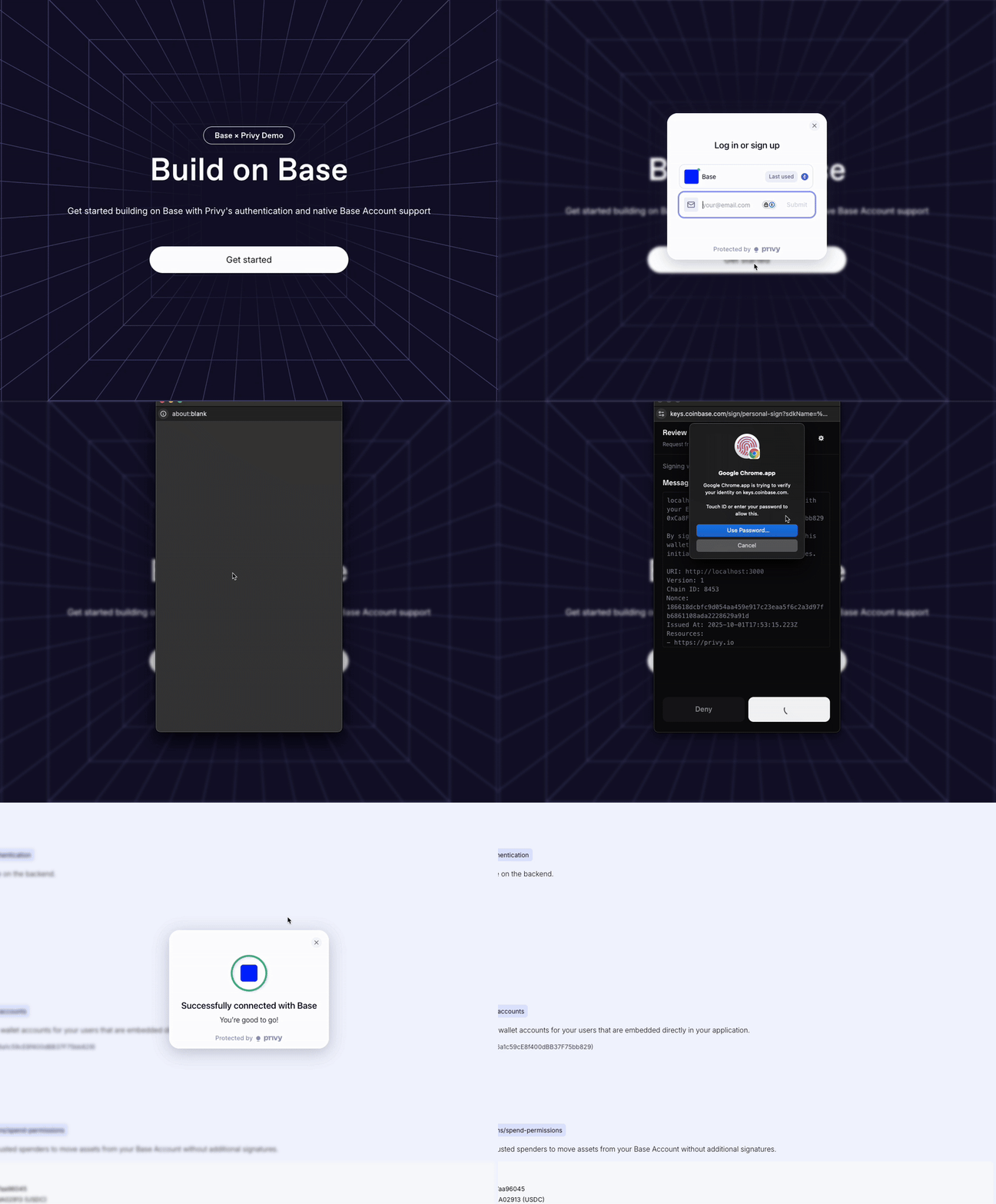
[](https://docs.base.org/base-account/framework-integrations/privy/authentication#custom-authentication)
Custom Authentication
----------------------------------------------------------------------------------------------------------------------------------
For additional security or custom authentication requirements, you can implement backend verification using Sign-In with Ethereum (SIWE) with the Base Account SDK.
###
[](https://docs.base.org/base-account/framework-integrations/privy/authentication#setup)
Setup
Follow the [Setup](https://docs.base.org/base-account/framework-integrations/privy/setup)
guide to set up Privy with Base Account.
###
[](https://docs.base.org/base-account/framework-integrations/privy/authentication#frontend-component-sign-in-with-base)
Frontend Component (Sign In With Base)
We use the [`SignInWithBaseButton`](https://docs.base.org/base-account/reference/ui-elements/sign-in-with-base-button)
component from the `@base-org/account-ui/react` package to make sure we are following the brand guidelines.
Authentication Component (components/sections/authentication.tsx)
Report incorrect code
Copy
Ask AI
"use client";
import { useState } from "react";
import { useBaseAccountSdk } from "@privy-io/react-auth";
import { SignInWithBaseButton } from "@base-org/account-ui/react";
export const Authentication = () => {
const { baseAccountSdk } = useBaseAccountSdk();
const [loading, setLoading] = useState(false);
const [verificationResult, setVerificationResult] = useState(null);
const provider = baseAccountSdk?.getProvider();
const handleSignInWithBase = async () => {
if (!provider) return;
try {
setLoading(true);
// Get a fresh nonce from backend
const nonceResponse = await fetch("/api/auth/nonce");
const { nonce } = await nonceResponse.json();
// Switch to Base Chain
await provider.request({
method: "wallet_switchEthereumChain",
params: [{ chainId: "0x2105" }],
});
// Connect and authenticate with SIWE
const response = (await provider.request({
method: "wallet_connect",
params: [{\
version: "1",\
capabilities: {\
signInWithEthereum: {\
nonce,\
chainId: "0x2105",\
},\
},\
}],
})) as {
accounts: {
address: string;
capabilities: {
signInWithEthereum: { signature: string; message: string };
};
}[];
};
const { address } = response.accounts[0];
const { message, signature } = response.accounts[0].capabilities.signInWithEthereum;
// Verify with backend
const verifyResponse = await fetch("/api/auth/verify", {
method: "POST",
headers: { "Content-Type": "application/json" },
body: JSON.stringify({ address, message, signature }),
});
const result = await verifyResponse.json();
setVerificationResult(result);
} catch (error) {
console.error("Sign in error:", error);
} finally {
setLoading(false);
}
};
return (
);
};
export default Authentication;
See all 80 lines
###
[](https://docs.base.org/base-account/framework-integrations/privy/authentication#using-the-authentication-component)
Using the Authentication Component
Add the Authentication component to your page to enable Sign In with Base functionality:
Page Implementation (app/page.tsx)
Alternative: Protected Page (app/dashboard/page.tsx)
Report incorrect code
Copy
Ask AI
import Authentication from "@/components/sections/authentication";
export default function Home() {
return (
Base Account with Privy
);
}
###
[](https://docs.base.org/base-account/framework-integrations/privy/authentication#backend-implementation)
Backend Implementation
**Development Only**: This backend implementation is not production-ready. The nonce management system needs proper persistence and security enhancements for production use.
Nonce Generation (app/api/auth/nonce/route.ts)
Signature Verification (app/api/auth/verify/route.ts)
Nonce Store (lib/nonce-store.ts)
Report incorrect code
Copy
Ask AI
import { NextResponse } from 'next/server';
import crypto from 'crypto';
import { nonceStore } from '@/lib/nonce-store';
export async function GET() {
try {
const nonce = crypto.randomBytes(16).toString('hex');
nonceStore.add(nonce);
return NextResponse.json({ nonce });
} catch (error) {
return NextResponse.json(
{ error: 'Failed to generate nonce' },
{ status: 500 }
);
}
}
###
[](https://docs.base.org/base-account/framework-integrations/privy/authentication#production-considerations)
Production Considerations
For production deployments, enhance the backend implementation with:
* **Persistent storage**: Use Redis or a database instead of in-memory storage
* **Rate limiting**: Implement request rate limiting for nonce generation
* **Session management**: Create proper JWT tokens or session cookies
* **Nonce expiration**: Add timestamp-based nonce expiration
Was this page helpful?
YesNo
[Suggest edits](https://github.com/base/docs/edit/master/docs/base-account/framework-integrations/privy/authentication.mdx)
[Raise issue](https://github.com/base/docs/issues/new?title=Issue%20on%20docs&body=Path:%20/base-account/framework-integrations/privy/authentication)
[Setup](https://docs.base.org/base-account/framework-integrations/privy/setup)
[Wallet Actions](https://docs.base.org/base-account/framework-integrations/privy/wallet-actions)
⌘I
---
# Base Pay - Base Documentation
[Skip to main content](https://docs.base.org/base-account/framework-integrations/wagmi/base-pay#content-area)
[Base Documentation home page](https://docs.base.org/)
Search...
⌘K
Search...
Navigation
Wagmi/Viem
Base Pay
[Get Started](https://docs.base.org/get-started/base)
[Base Chain](https://docs.base.org/base-chain/quickstart/why-base)
[Base Account](https://docs.base.org/base-account/overview/what-is-base-account)
[Base App](https://docs.base.org/base-app/introduction/beta-faq)
[Mini Apps](https://docs.base.org/mini-apps/quickstart/migrate-existing-apps)
[OnchainKit](https://docs.base.org/onchainkit/latest/getting-started/overview)
[Cookbook](https://docs.base.org/cookbook/onboard-any-user)
[Showcase](https://docs.base.org/showcase)
[Learn](https://docs.base.org/learn/welcome)
On this page
* [Implementation](https://docs.base.org/base-account/framework-integrations/wagmi/base-pay#implementation)
* [Quick Example](https://docs.base.org/base-account/framework-integrations/wagmi/base-pay#quick-example)
* [Learn More](https://docs.base.org/base-account/framework-integrations/wagmi/base-pay#learn-more)
Base Pay works the same way in Wagmi applications as it does anywhere else - it operates independently of wallet connections and uses the Base Account SDK directly.
[](https://docs.base.org/base-account/framework-integrations/wagmi/base-pay#implementation)
Implementation
--------------------------------------------------------------------------------------------------------------
Base Pay doesn’t require any special Wagmi integration. Simply follow the [Accept Payments guide](https://docs.base.org/base-account/guides/accept-payments)
- all the code examples work exactly the same in your Wagmi app. The key points:
* **No wallet connection needed** - Base Pay handles everything through the SDK
* **Same API** - Use `pay()` and `getPaymentStatus()` exactly as shown in the main guide
* **Works alongside Wagmi** - You can display the user’s connected address from `useAccount()` but it’s not required for payments
[](https://docs.base.org/base-account/framework-integrations/wagmi/base-pay#quick-example)
Quick Example
------------------------------------------------------------------------------------------------------------
Report incorrect code
Copy
Ask AI
import { pay } from '@base-org/account'
import { useAccount } from 'wagmi' // Optional - just for display
export function CheckoutButton() {
const { address } = useAccount() // Optional
const handlePayment = async () => {
try {
const payment = await pay({
amount: '5.00',
to: '0xYourAddress',
testnet: true
})
console.log('Payment sent:', payment.id)
} catch (error) {
console.error('Payment failed:', error)
}
}
return (
{address &&
Connected: {address}
}
)
}
**Please Follow the Brand Guidelines**If you intend on using the `BasePayButton`, please follow the [Brand Guidelines](https://docs.base.org/base-account/reference/ui-elements/brand-guidelines)
to ensure consistency across your application.
[](https://docs.base.org/base-account/framework-integrations/wagmi/base-pay#learn-more)
Learn More
------------------------------------------------------------------------------------------------------
For complete implementation details, examples, and advanced features like collecting user information, see the main [Accept Payments guide](https://docs.base.org/base-account/guides/accept-payments)
.
Was this page helpful?
YesNo
[Suggest edits](https://github.com/base/docs/edit/master/docs/base-account/framework-integrations/wagmi/base-pay.mdx)
[Raise issue](https://github.com/base/docs/issues/new?title=Issue%20on%20docs&body=Path:%20/base-account/framework-integrations/wagmi/base-pay)
[Sign in with Base](https://docs.base.org/base-account/framework-integrations/wagmi/sign-in-with-base)
[Basenames](https://docs.base.org/base-account/framework-integrations/wagmi/basenames)
⌘I
---
# Migrate from Coinbase Wallet SDK - Base Documentation
[Skip to main content](https://docs.base.org/base-account/guides/migration-guide#content-area)
[Base Documentation home page](https://docs.base.org/)
Search...
⌘K
Search...
Navigation
More
Migrate from Coinbase Wallet SDK
[Get Started](https://docs.base.org/get-started/base)
[Base Chain](https://docs.base.org/base-chain/quickstart/why-base)
[Base Account](https://docs.base.org/base-account/overview/what-is-base-account)
[Base App](https://docs.base.org/base-app/introduction/beta-faq)
[Mini Apps](https://docs.base.org/mini-apps/quickstart/migrate-existing-apps)
[OnchainKit](https://docs.base.org/onchainkit/latest/getting-started/overview)
[Cookbook](https://docs.base.org/cookbook/onboard-any-user)
[Showcase](https://docs.base.org/showcase)
[Learn](https://docs.base.org/learn/welcome)
On this page
* [Overview](https://docs.base.org/base-account/guides/migration-guide#overview)
* [Changes to user experience when click “Coinbase Wallet”](https://docs.base.org/base-account/guides/migration-guide#changes-to-user-experience-when-click-%E2%80%9Ccoinbase-wallet%E2%80%9D)
* [How to migrate?](https://docs.base.org/base-account/guides/migration-guide#how-to-migrate%3F)
[](https://docs.base.org/base-account/guides/migration-guide#overview)
Overview
-----------------------------------------------------------------------------------
The Base Account SDK allows Base Account users to connect 3rd party mobile and web applications. The Base Account SDK is the successor to the Coinbase Wallet SDK, which is now considered legacy. Developers should integrate the Base Account SDK such that users connect to use it via a “Sign in with Base” or “Base” button. We do not recommend immediately replacing existing “Coinbase Wallet” buttons in your app, but rather add the Base Account button as an additional option, next to a “Coinbase Wallet” button. This will allow a transition period for users to get familiar with the new Base brand. Driving this change is a transition of our mobile app: the Coinbase Wallet app is now the Base app. We are gradually transitioning all of our users to have Base Accounts, which are powered by our Smart Wallet platform. Below is a table of existing users and how they will connect to apps now and in the future:
| User Type | Today | Future (~Fall 2025) |
| --- | --- | --- |
| Smart Wallet users (web and mobile app) | Automatically have a Base Account, can use “Sign in with Base” | No change |
| New Base app users | Automatically have a Base Account, can use “Sign in with Base” | No change |
| Coinbase Wallet Extension Users | Should continue to connect with “Coinbase Wallet” button | Will have a path to migrate to Base Account and use “Sign in with Base” |
| Coinbase Wallet mobile app EOA users | Should continue to connect with “Coinbase Wallet” button | Will have a path to migrate to Base Account and use “Sign in with Base” |
[](https://docs.base.org/base-account/guides/migration-guide#changes-to-user-experience-when-click-%E2%80%9Ccoinbase-wallet%E2%80%9D)
Changes to user experience when click “Coinbase Wallet”
-------------------------------------------------------------------------------------------------------------------------------------------------------------------------------------------------
As of SDK v4.0, users without Coinbase Wallet extension are directed to a popup window where they can choose to connect with the mobile app, via WalletLink, or use a passkey-powered Smart Wallet natively on the web. This will continue to be the case, but the logged out experience has changed to educate Smart Wallet users that they should be using “Sign in with Base” in the future. Here is how it looks on desktop.

Desktop experience showing the updated logged out flow for Coinbase Wallet users
If you would like to avoid users seeing any popup window, we recommend using a version of the Coinbase Wallet SDK < 4.0.You can find the latest version of the Coinbase Wallet SDK [here](https://github.com/coinbase/coinbase-wallet-sdk/releases)
.
[](https://docs.base.org/base-account/guides/migration-guide#how-to-migrate%3F)
How to migrate?
---------------------------------------------------------------------------------------------------
If you’re using the SDK, you can simply replace the Coinbase Wallet SDK with the Base Account SDK.
Report incorrect code
Copy
Ask AI
import { createBaseAccountSDK } from "@base-org/account";
const baseAccount = createBaseAccountSDK({
// ...
});
For more information please refer to the [Quickstart](https://docs.base.org/base-account/quickstart/web)
guide. If you’re using a third party library, you can follow the [Wagmi](https://docs.base.org/base-account/framework-integrations/wagmi/setup)
, [Dynamic](https://docs.base.org/base-account/framework-integrations/nextjs-with-dynamic)
or [Privy](https://docs.base.org/base-account/framework-integrations/privy/setup)
guides. We will have a more complete migration guide in the near future.
Was this page helpful?
YesNo
[Suggest edits](https://github.com/base/docs/edit/master/docs/base-account/guides/migration-guide.mdx)
[Raise issue](https://github.com/base/docs/issues/new?title=Issue%20on%20docs&body=Path:%20/base-account/guides/migration-guide)
[Telemetry](https://docs.base.org/base-account/more/telemetry)
[Basenames FAQ](https://docs.base.org/base-account/basenames/basenames-faq)
⌘I
---
# Base Gasless Campaign - Base Documentation
[Skip to main content](https://docs.base.org/base-account/more/base-gasless-campaign#content-area)
[Base Documentation home page](https://docs.base.org/)
Search...
⌘K
Search...
Navigation
More
Base Gasless Campaign
[Get Started](https://docs.base.org/get-started/base)
[Base Chain](https://docs.base.org/base-chain/quickstart/why-base)
[Base Account](https://docs.base.org/base-account/overview/what-is-base-account)
[Base App](https://docs.base.org/base-app/introduction/beta-faq)
[Mini Apps](https://docs.base.org/mini-apps/quickstart/migrate-existing-apps)
[OnchainKit](https://docs.base.org/onchainkit/latest/getting-started/overview)
[Cookbook](https://docs.base.org/cookbook/onboard-any-user)
[Showcase](https://docs.base.org/showcase)
[Learn](https://docs.base.org/learn/welcome)
Base is offering gas credits to help developers make the most of Base Account’s [paymaster (sponsored transactions)](https://docs.base.org/base-account/improve-ux/sponsor-gas/paymasters)
features.
| Partner Tier | Base Gas Credit Incentive | Requirements | Actions |
| --- | --- | --- | --- |
| 1 | $15k | * \- Support Base Account * \- Onboard to CDP Paymaster * \- Preferred placement in your UI (ie “Create Wallet” button) | 1. 1\. Migrate your Coinbase SDK to add Base Account to your app, or bump to latest version of any supporting wallet library. 2. 2\. Sign in / up for [Coinbase Developer Platform](https://www.coinbase.com/developer-platform) (takes less than 2 minutes). No KYC needed - just email and phone. 3. 3\. Check out the Paymaster product where the Base Mainnet Paymaster is enabled by default. Set and change your gas policy at any time. 4. 4\. Complete [this form](https://docs.google.com/forms/d/1yPnBFW0bVUNLUN_w3ctCqYM9sjdIQO3Typ53KXlsS5g/viewform?edit_requested=true)
5. Credits will land within 1 week of completion |
| 2 | $10k | * \- Support Base Account * \- Onboard to CDP Paymaster | 1. 1\. Migrate your Coinbase SDK to add Base Account to your app, or bump to latest version of any supporting wallet library. 2. 2\. Sign in / up for [Coinbase Developer Platform](https://www.coinbase.com/developer-platform) (takes less than 2 minutes). No KYC needed - just email and phone. 3. 3\. Check out the Paymaster product where the Base Mainnet Paymaster is enabled by default. Set and change your gas policy at any time. 4. 4\. Complete [this form](https://docs.google.com/forms/d/1yPnBFW0bVUNLUN_w3ctCqYM9sjdIQO3Typ53KXlsS5g/viewform?edit_requested=true)
5. Credits will land within 1 week of completion |
| Bonus | $1k | * \- Release demo | Create a demo of your Coinbase Base Account integration, post on social (Farcaster and/or X) and tag Coinbase Wallet and/or Base |
Was this page helpful?
YesNo
[Suggest edits](https://github.com/base/docs/edit/master/docs/base-account/more/base-gasless-campaign.mdx)
[Raise issue](https://github.com/base/docs/issues/new?title=Issue%20on%20docs&body=Path:%20/base-account/more/base-gasless-campaign)
[Wallet Library Support](https://docs.base.org/base-account/more/troubleshooting/usage-details/wallet-library-support)
[Telemetry](https://docs.base.org/base-account/more/telemetry)
⌘I
---
# Sub Accounts - Base Documentation
[Skip to main content](https://docs.base.org/base-account/framework-integrations/privy/sub-accounts#content-area)
[Base Documentation home page](https://docs.base.org/)
Search...
⌘K
Search...
Navigation
Privy
Sub Accounts
[Get Started](https://docs.base.org/get-started/base)
[Base Chain](https://docs.base.org/base-chain/quickstart/why-base)
[Base Account](https://docs.base.org/base-account/overview/what-is-base-account)
[Base App](https://docs.base.org/base-app/introduction/beta-faq)
[Mini Apps](https://docs.base.org/mini-apps/quickstart/migrate-existing-apps)
[OnchainKit](https://docs.base.org/onchainkit/latest/getting-started/overview)
[Cookbook](https://docs.base.org/cookbook/onboard-any-user)
[Showcase](https://docs.base.org/showcase)
[Learn](https://docs.base.org/learn/welcome)
On this page
* [Overview](https://docs.base.org/base-account/framework-integrations/privy/sub-accounts#overview)
* [What you’ll achieve](https://docs.base.org/base-account/framework-integrations/privy/sub-accounts#what-you%E2%80%99ll-achieve)
* [Setup](https://docs.base.org/base-account/framework-integrations/privy/sub-accounts#setup)
* [Implementation](https://docs.base.org/base-account/framework-integrations/privy/sub-accounts#implementation)
* [Component Setup](https://docs.base.org/base-account/framework-integrations/privy/sub-accounts#component-setup)
* [Key Methods](https://docs.base.org/base-account/framework-integrations/privy/sub-accounts#key-methods)
* [Getting Sub Accounts](https://docs.base.org/base-account/framework-integrations/privy/sub-accounts#getting-sub-accounts)
* [Creating Sub Accounts](https://docs.base.org/base-account/framework-integrations/privy/sub-accounts#creating-sub-accounts)
* [Network Configuration](https://docs.base.org/base-account/framework-integrations/privy/sub-accounts#network-configuration)
* [Explore further](https://docs.base.org/base-account/framework-integrations/privy/sub-accounts#explore-further)
Learn how to create and manage Sub Accounts that provide app-specific wallet accounts embedded directly in your application.
[](https://docs.base.org/base-account/framework-integrations/privy/sub-accounts#overview)
Overview
------------------------------------------------------------------------------------------------------
Sub Accounts allow you to provision dedicated wallet accounts for your users within your application. These accounts are controlled by the user’s main Base Account and provide an enhanced user experience as the user’s interactions produce no passkey prompts or popups. Users can manage all their Sub Accounts at [account.base.app](https://account.base.app/)
.
If you would like to see a live demo of Sub Accounts in action, check out our [Sub Accounts Demo](https://sub-accounts-fc.vercel.app/)
.
###
[](https://docs.base.org/base-account/framework-integrations/privy/sub-accounts#what-you%E2%80%99ll-achieve)
What you’ll achieve
By the end of this guide, you will:
* Understand how Sub Accounts work with Base Account
* Create new Sub Accounts for users
* Retrieve and manage existing Sub Accounts
* Implement Sub Account in your Privy project
The code snippets in this guide are based on the following example project:[Base Account Privy Templatehttps://github.com/base/base-account-privy](https://github.com/base/base-account-privy)
[](https://docs.base.org/base-account/framework-integrations/privy/sub-accounts#setup)
Setup
------------------------------------------------------------------------------------------------
Follow the [Setup](https://docs.base.org/base-account/framework-integrations/privy/setup)
guide to set up Privy with Base Account.
[](https://docs.base.org/base-account/framework-integrations/privy/sub-accounts#implementation)
Implementation
------------------------------------------------------------------------------------------------------------------
###
[](https://docs.base.org/base-account/framework-integrations/privy/sub-accounts#component-setup)
Component Setup
Sub Accounts Component (components/sections/sub-accounts.tsx)
Report incorrect code
Copy
Ask AI
"use client";
import { useState, useMemo } from "react";
import { useWallets } from "@privy-io/react-auth";
const SubAccounts = () => {
const { wallets } = useWallets();
const [subAccounts, setSubAccounts] = useState<
{
address: string;
factory: string;
factoryData: string;
}[]
>([]);
const [isLoading, setIsLoading] = useState(false);
// Find the Base Account wallet
const baseAccount = useMemo(() => {
return wallets.find((wallet) => wallet.walletClientType === 'base_account');
}, [wallets]);
const handleGetSubAccounts = async () => {
if (!baseAccount) return;
setIsLoading(true);
try {
// Switch to Base Sepolia (or Base Mainnet - use 8453 for mainnet)
await baseAccount.switchChain(84532);
const provider = await baseAccount.getEthereumProvider();
// Get existing Sub Accounts
const response = await provider.request({
method: 'wallet_getSubAccounts',
params: [{\
account: baseAccount.address,\
domain: window.location.origin\
}]
});
const { subAccounts: existingSubAccounts } = response;
setSubAccounts(existingSubAccounts || []);
} catch (error) {
console.error("Error getting Sub Accounts:", error);
} finally {
setIsLoading(false);
}
};
const handleAddSubAccount = async () => {
if (!baseAccount) return;
setIsLoading(true);
try {
// Switch to Base Sepolia (or Base Mainnet - use 8453 for mainnet)
await baseAccount.switchChain(84532);
const provider = await baseAccount.getEthereumProvider();
// Create new Sub Account
await provider.request({
method: 'wallet_addSubAccount',
params: [{\
version: '1',\
account: {\
type: 'create',\
keys: [{\
type: 'address',\
publicKey: baseAccount.address\
}]\
}\
}]
});
// Refresh the Sub Accounts list
await handleGetSubAccounts();
} catch (error) {
console.error("Error creating Sub Account:", error);
} finally {
setIsLoading(false);
}
};
return (
{subAccounts.length > 0 && (
Existing Sub Accounts:
{subAccounts.map((subAccount, index) => (
Address: {subAccount.address}
Factory: {subAccount.factory}
Factory Data: {subAccount.factoryData}
))}
)}
);
};
See all 117 lines
###
[](https://docs.base.org/base-account/framework-integrations/privy/sub-accounts#key-methods)
Key Methods
####
[](https://docs.base.org/base-account/framework-integrations/privy/sub-accounts#getting-sub-accounts)
Getting Sub Accounts
Use `wallet_getSubAccounts` to retrieve existing Sub Accounts for a domain:
Get Sub Accounts (components/sections/sub-accounts.tsx)
Report incorrect code
Copy
Ask AI
const response = await provider.request({
method: 'wallet_getSubAccounts',
params: [{\
account: baseAccount.address,\
domain: window.location.origin\
}]
});
####
[](https://docs.base.org/base-account/framework-integrations/privy/sub-accounts#creating-sub-accounts)
Creating Sub Accounts
Use `wallet_addSubAccount` to create new Sub Accounts:
Create Sub Account (components/sections/sub-accounts.tsx)
Report incorrect code
Copy
Ask AI
await provider.request({
method: 'wallet_addSubAccount',
params: [{\
version: '1',\
account: {\
type: 'create',\
keys: [{\
type: 'address',\
publicKey: baseAccount.address\
}]\
}\
}]
});
###
[](https://docs.base.org/base-account/framework-integrations/privy/sub-accounts#network-configuration)
Network Configuration
Sub accounts work on both Base Mainnet and Base Sepolia:
* **Base Mainnet**: Chain ID `8453`
* **Base Sepolia**: Chain ID `84532`
###
[](https://docs.base.org/base-account/framework-integrations/privy/sub-accounts#explore-further)
Explore further
* [Sub Accounts Guide](https://docs.base.org/base-account/improve-ux/sub-accounts)
* [Privy Sub Accounts Recipe](https://docs.privy.io/recipes/react/external-wallets/base-sub-accounts)
Was this page helpful?
YesNo
[Suggest edits](https://github.com/base/docs/edit/master/docs/base-account/framework-integrations/privy/sub-accounts.mdx)
[Raise issue](https://github.com/base/docs/issues/new?title=Issue%20on%20docs&body=Path:%20/base-account/framework-integrations/privy/sub-accounts)
[Wallet Actions](https://docs.base.org/base-account/framework-integrations/privy/wallet-actions)
[Coinbase Developer Platform](https://docs.base.org/base-account/framework-integrations/cdp)
⌘I
---
# Use Coinbase Balances Onchain - Base Documentation
[Skip to main content](https://docs.base.org/base-account/improve-ux/magic-spend#content-area)
[Base Documentation home page](https://docs.base.org/)
Search...
⌘K
Search...
Navigation
Guides
Use Coinbase Balances Onchain
[Get Started](https://docs.base.org/get-started/base)
[Base Chain](https://docs.base.org/base-chain/quickstart/why-base)
[Base Account](https://docs.base.org/base-account/overview/what-is-base-account)
[Base App](https://docs.base.org/base-app/introduction/beta-faq)
[Mini Apps](https://docs.base.org/mini-apps/quickstart/migrate-existing-apps)
[OnchainKit](https://docs.base.org/onchainkit/latest/getting-started/overview)
[Cookbook](https://docs.base.org/cookbook/onboard-any-user)
[Showcase](https://docs.base.org/showcase)
[Learn](https://docs.base.org/learn/welcome)
On this page
* [Why it matters](https://docs.base.org/base-account/improve-ux/magic-spend#why-it-matters)
* [What the code does](https://docs.base.org/base-account/improve-ux/magic-spend#what-the-code-does)
* [Base Pay integrates Magic Spend by default](https://docs.base.org/base-account/improve-ux/magic-spend#base-pay-integrates-magic-spend-by-default)
* [Next steps](https://docs.base.org/base-account/improve-ux/magic-spend#next-steps)
With MagicSpend, Base Account users can use their Coinbase balances onchain. This means users can easily start using onchain apps without needing to onramp funds into their wallet. This also means that apps might not have all the balance information typically available to them by reading onchain data. Base Account indicates that this is the case by responding to [`wallet_getCapabilities` RPC calls](https://eip5792.xyz/reference/getCapabilities)
with the `auxiliaryFunds` capability for each chain Base Account users can use their Coinbase balances on. If your app supports Base Account, it should not assume it knows the full balances available to a user if the `auxiliaryFunds` capability is present on a given chain. For example, if your app disables a transaction button if it sees that the wallet has insufficient funds, your app should take `auxiliaryFunds` into account and enable the button if the account has `auxiliaryFunds` on the chain the user is transacting on.
[](https://docs.base.org/base-account/improve-ux/magic-spend#why-it-matters)
Why it matters
-----------------------------------------------------------------------------------------------
MagicSpend makes onboarding smoother by letting users pay gas or send funds even when their onchain wallet balance is **zero**. Your interface should therefore _never_ disable an action just because the onchain balance is insufficient.
1. Ensure you have the user’s `address` stored in your component state (from your wallet connection flow).
2. Drop the component below into your UI. It will check whether MagicSpend (`auxiliaryFunds`) is available for that address on Base and if not, disable the send button accordingly.
SendButton.tsx
Report incorrect code
Copy
Ask AI
import { useEffect, useState } from "react";
import { createBaseAccountSDK, base } from "@base-org/account";
const sdk = createBaseAccountSDK({
appName: "Magic Spend Demo",
appLogoUrl: "https://base.org/logo.png",
appChainIds: [base.constants.CHAIN_IDS.base],
});
const provider = sdk.getProvider();
interface Props {
address?: string; // wallet address from your app state
}
export function SendButton({ address }: Props) {
const [hasAuxFunds, setHasAuxFunds] = useState(null);
useEffect(() => {
if (!address) return; // Wallet not connected yet
(async () => {
try {
const capabilities = await provider.request({
method: "wallet_getCapabilities",
params: [address],
});
const supported =
capabilities?.[base.constants.CHAIN_IDS.base]?.auxiliaryFunds
?.supported ?? false;
setHasAuxFunds(supported);
} catch (err) {
console.error("wallet_getCapabilities failed", err);
setHasAuxFunds(false);
}
})();
}, [address]);
const disabled = hasAuxFunds !== true;
return (
);
}
###
[](https://docs.base.org/base-account/improve-ux/magic-spend#what-the-code-does)
What the code does
1. Receives the current `address` from your own wallet logic.
2. Calls `wallet_getCapabilities` whenever the address changes.
3. Reads `auxiliaryFunds.supported` for the Base chain (`8453`).
4. Enables the button when MagicSpend is available; otherwise shows “Insufficient Balance”.
[](https://docs.base.org/base-account/improve-ux/magic-spend#base-pay-integrates-magic-spend-by-default)
Base Pay integrates Magic Spend by default
-------------------------------------------------------------------------------------------------------------------------------------------------------
Thanks to [Magic Spend](https://docs.base.org/base-account/improve-ux/magic-spend)
, [Base Pay](https://docs.base.org/base-account/guides/accept-payments)
allows users to pay with their USDC balance on Coinbase by default.

* * *
[](https://docs.base.org/base-account/improve-ux/magic-spend#next-steps)
Next steps
---------------------------------------------------------------------------------------
* Handle loading/error states if you need fine-grained UX
* Combine this check with your existing onchain balance logic for fallback flows
Was this page helpful?
YesNo
[Suggest edits](https://github.com/base/docs/edit/master/docs/base-account/improve-ux/magic-spend.mdx)
[Raise issue](https://github.com/base/docs/issues/new?title=Issue%20on%20docs&body=Path:%20/base-account/improve-ux/magic-spend)
[Use Spend Permissions](https://docs.base.org/base-account/improve-ux/spend-permissions)
[Sign and Verify Typed Data](https://docs.base.org/base-account/guides/sign-and-verify-typed-data)
⌘I
---
# Gas Usage - Base Documentation
[Skip to main content](https://docs.base.org/base-account/more/troubleshooting/usage-details/gas-usage#content-area)
[Base Documentation home page](https://docs.base.org/)
Search...
⌘K
Search...
Navigation
Troubleshooting
Gas Usage
[Get Started](https://docs.base.org/get-started/base)
[Base Chain](https://docs.base.org/base-chain/quickstart/why-base)
[Base Account](https://docs.base.org/base-account/overview/what-is-base-account)
[Base App](https://docs.base.org/base-app/introduction/beta-faq)
[Mini Apps](https://docs.base.org/mini-apps/quickstart/migrate-existing-apps)
[OnchainKit](https://docs.base.org/onchainkit/latest/getting-started/overview)
[Cookbook](https://docs.base.org/cookbook/onboard-any-user)
[Showcase](https://docs.base.org/showcase)
[Learn](https://docs.base.org/learn/welcome)
On this page
* [Gas Usage Breakdown](https://docs.base.org/base-account/more/troubleshooting/usage-details/gas-usage#gas-usage-breakdown)
Base Accounts use more gas for transactions than traditional Ethereum accounts. On L2 networks, the cost difference to the user is a matter of cents. The gas difference is due to the additional overhead required for:
1. **ERC-4337 Bundling**
2. **Smart Contract Operations**, including one time deployment of the Base Account contract
3. **Signature Verification**
[](https://docs.base.org/base-account/more/troubleshooting/usage-details/gas-usage#gas-usage-breakdown)
Gas Usage Breakdown
-------------------------------------------------------------------------------------------------------------------------------
Here’s a rough comparison of gas usage per account:
| Operation Type | Traditional Ethereum Account | Base Account |
| --- | --- | --- |
| Native Token Transfer | ~21,000 gas | ~100,000 gas |
| ERC-20 Token Transfer | ~65,000 gas | ~150,000 gas |
| First Deployment | N/A | ~300,000+ gas |
Was this page helpful?
YesNo
[Suggest edits](https://github.com/base/docs/edit/master/docs/base-account/more/troubleshooting/usage-details/gas-usage.mdx)
[Raise issue](https://github.com/base/docs/issues/new?title=Issue%20on%20docs&body=Path:%20/base-account/more/troubleshooting/usage-details/gas-usage)
[Popup Tips](https://docs.base.org/base-account/more/troubleshooting/usage-details/popups)
[Unsupported Calls](https://docs.base.org/base-account/more/troubleshooting/usage-details/unsupported-calls)
⌘I
---
# Transaction Simulation Data - Base Documentation
[Skip to main content](https://docs.base.org/base-account/more/troubleshooting/usage-details/simulations#content-area)
[Base Documentation home page](https://docs.base.org/)
Search...
⌘K
Search...
Navigation
Troubleshooting
Transaction Simulation Data
[Get Started](https://docs.base.org/get-started/base)
[Base Chain](https://docs.base.org/base-chain/quickstart/why-base)
[Base Account](https://docs.base.org/base-account/overview/what-is-base-account)
[Base App](https://docs.base.org/base-app/introduction/beta-faq)
[Mini Apps](https://docs.base.org/mini-apps/quickstart/migrate-existing-apps)
[OnchainKit](https://docs.base.org/onchainkit/latest/getting-started/overview)
[Cookbook](https://docs.base.org/cookbook/onboard-any-user)
[Showcase](https://docs.base.org/showcase)
[Learn](https://docs.base.org/learn/welcome)
On this page
* [Instructions](https://docs.base.org/base-account/more/troubleshooting/usage-details/simulations#instructions)
There is a hidden feature which enables you to easily copy transaction simulation request and response data which can then be pasted it in a text editor to inspect.
[](https://docs.base.org/base-account/more/troubleshooting/usage-details/simulations#instructions)
Instructions
-------------------------------------------------------------------------------------------------------------------
* Click the area defined in red _**five times**_, then paste the copied data in a text editor.

Was this page helpful?
YesNo
[Suggest edits](https://github.com/base/docs/edit/master/docs/base-account/more/troubleshooting/usage-details/simulations.mdx)
[Raise issue](https://github.com/base/docs/issues/new?title=Issue%20on%20docs&body=Path:%20/base-account/more/troubleshooting/usage-details/simulations)
[Unsupported Calls](https://docs.base.org/base-account/more/troubleshooting/usage-details/unsupported-calls)
[Wallet Library Support](https://docs.base.org/base-account/more/troubleshooting/usage-details/wallet-library-support)
⌘I
---
# Base Account Overview - Base Documentation
[Skip to main content](https://docs.base.org/base-account/overview/what-is-base-account#content-area)
[Base Documentation home page](https://docs.base.org/)
Search...
⌘K
Search...
Navigation
Introduction
Base Account Overview
[Get Started](https://docs.base.org/get-started/base)
[Base Chain](https://docs.base.org/base-chain/quickstart/why-base)
[Base Account](https://docs.base.org/base-account/overview/what-is-base-account)
[Base App](https://docs.base.org/base-app/introduction/beta-faq)
[Mini Apps](https://docs.base.org/mini-apps/quickstart/migrate-existing-apps)
[OnchainKit](https://docs.base.org/onchainkit/latest/getting-started/overview)
[Cookbook](https://docs.base.org/cookbook/onboard-any-user)
[Showcase](https://docs.base.org/showcase)
[Learn](https://docs.base.org/learn/welcome)
On this page
* [What is a Base Account?](https://docs.base.org/base-account/overview/what-is-base-account#what-is-a-base-account%3F)
* [Why should developers care?](https://docs.base.org/base-account/overview/what-is-base-account#why-should-developers-care%3F)
* [Next steps](https://docs.base.org/base-account/overview/what-is-base-account#next-steps)
> **TL;DR** – Base Accounts are the onchain identity and account layer powering the [Base App](https://base.app/)
> . With the **Base Account SDK** you can connect to over one hundred thousand users and unlock authentication and payments with just a few lines of code.
[](https://docs.base.org/base-account/overview/what-is-base-account#what-is-a-base-account%3F)
What is a Base Account?
--------------------------------------------------------------------------------------------------------------------------
A Base Account is a Smart-Wallet–backed account that gives every user:
* **Universal sign-on** – one passkey works across every Base-enabled app.
* **One-tap payments** – low-friction USDC payments built into the account layer.
* **Private profile vault** – opt-in sharing of email, phone, shipping address, and more.
* **Multi-chain support** – one address that works across nine EVM networks (and counting).
> Under the hood, each Base Account is an ERC-4337 Smart Wallet that can be deployed on any EVM-compatible chain; nine EVM mainnet chains are enabled out of the box, including Base Mainnet.
**Supported networks**
* **Mainnet:** Base • Arbitrum • Optimism • Zora • Polygon • BNB • Avalanche • Lordchain • Ethereum Mainnet (not recommended due to costs)
* **Testnet:** Sepolia • Base Sepolia
[](https://docs.base.org/base-account/overview/what-is-base-account#why-should-developers-care%3F)
Why should developers care?
----------------------------------------------------------------------------------------------------------------------------------
* **Higher conversion** – no app installs, seed phrases, or network switches.
* **Fewer drop-offs at checkout** – a single `pay()` call handles gas and settlement.
* **Cross-app identity** – fetch a verified email or shipping address via the same SDK.
* **Self-custodial** – users hold the keys; you never touch private data or funds.
[](https://docs.base.org/base-account/overview/what-is-base-account#next-steps)
Next steps
----------------------------------------------------------------------------------------------
| Goal | Start here |
| --- | --- |
| Build & run in 5 min | [Quickstart](https://docs.base.org/base-account/quickstart/web) |
| Authentication flow | [Authenticate users](https://docs.base.org/base-account/guides/authenticate-users) |
| Accept USDC payments on Base | [Accept payments](https://docs.base.org/base-account/guides/accept-payments) |
| Deep-dive API shapes | [TypeScript API reference](https://docs.base.org/base-account/reference/core/getProvider) |
Was this page helpful?
YesNo
[Suggest edits](https://github.com/base/docs/edit/master/docs/base-account/overview/what-is-base-account.mdx)
[Raise issue](https://github.com/base/docs/issues/new?title=Issue%20on%20docs&body=Path:%20/base-account/overview/what-is-base-account)
[Web (HTML + JS)](https://docs.base.org/base-account/quickstart/web)
⌘I
---
# Telemetry · Base Account - Base Documentation
[Skip to main content](https://docs.base.org/base-account/more/telemetry#content-area)
[Base Documentation home page](https://docs.base.org/)
Search...
⌘K
Search...
Navigation
More
Telemetry · Base Account
[Get Started](https://docs.base.org/get-started/base)
[Base Chain](https://docs.base.org/base-chain/quickstart/why-base)
[Base Account](https://docs.base.org/base-account/overview/what-is-base-account)
[Base App](https://docs.base.org/base-app/introduction/beta-faq)
[Mini Apps](https://docs.base.org/mini-apps/quickstart/migrate-existing-apps)
[OnchainKit](https://docs.base.org/onchainkit/latest/getting-started/overview)
[Cookbook](https://docs.base.org/cookbook/onboard-any-user)
[Showcase](https://docs.base.org/showcase)
[Learn](https://docs.base.org/learn/welcome)
On this page
* [Why Are We Collecting Telemetry?](https://docs.base.org/base-account/more/telemetry#why-are-we-collecting-telemetry%3F)
* [What Data Will Be Collected?](https://docs.base.org/base-account/more/telemetry#what-data-will-be-collected%3F)
* [How Does It Work?](https://docs.base.org/base-account/more/telemetry#how-does-it-work%3F)
* [How Do I Opt Out?](https://docs.base.org/base-account/more/telemetry#how-do-i-opt-out%3F)
Base Account includes an anonymous telemetry system to help us better understand how Base Account is used across applications and improve the developer experience. Participation in this anonymous program is optional—if you’d prefer not to share any usage data, you can easily opt out.
###
[](https://docs.base.org/base-account/more/telemetry#why-are-we-collecting-telemetry%3F)
Why Are We Collecting Telemetry?
Base Account provides critical wallet infrastructure for onchain applications with features like signing transactions & messages, signer management, and more. By collecting telemetry data, we can:
* **Monitor Wallet Operation Success**: Track which wallet operations (signing, connecting, transactions) are most reliable and identify failure patterns
* **Data-Informed Improvements**: Help our engineering team generate insights that drive future wallet enhancements and reliability improvements
* **Proactive Issue Detection**: Quickly detect issues with new SDK releases or wallet operations through operational metrics and error monitoring
###
[](https://docs.base.org/base-account/more/telemetry#what-data-will-be-collected%3F)
What Data Will Be Collected?
Telemetry data is completely anonymous and focused on functional metrics. Specifically, we collect:
* **Request Success Metrics**: Information about the success and failure rates of wallet requests to identify reliability issues
* **Error Events**: Generic error events with operational context to help us improve Base Account reliability
* **UI Component Usage**: Anonymous metrics on interface component functionality to ensure optimal reliability
**Privacy First**: No sensitive data—such as private keys, transaction contents, user addresses, or personal information—is ever collected.
###
[](https://docs.base.org/base-account/more/telemetry#how-does-it-work%3F)
How Does It Work?
Telemetry is integrated into the Base Account SDK and automatically triggers when certain wallet events occur (provided telemetry is enabled in your configuration). The data is sent to secure Coinbase endpoints for analysis. For example, when a wallet request occurs, a telemetry event like this is sent:
Report incorrect code
Copy
Ask AI
curl 'https://cca-lite.coinbase.com/amp' \
-H 'content-type: application/x-www-form-urlencoded; charset=utf-8' \
-H 'origin: https://your-app.com' \
--data-raw 'e=[{"event_type":"scw_signer.request.started","event_properties":{"method":"eth_requestAccounts","correlationId":"abc123-def456","sdkVersion":"4.3.2","appName":"Your App Name","appOrigin":"https://your-app.com"}}]'
The payload contains an array of telemetry events with operational data including:
* **event\_type**: The specific wallet operation being tracked
* **method**: The wallet method being called (e.g., `eth_requestAccounts`)
* **correlationId**: A unique identifier for request tracking
* **sdkVersion**: The Base Account SDK version
* **appName**: Your application name
* **appOrigin**: Your application’s domain
###
[](https://docs.base.org/base-account/more/telemetry#how-do-i-opt-out%3F)
How Do I Opt Out?
By default, telemetry collection follows an opt-out model. If you’d like to disable telemetry in your app that uses the Base Account SDK, you can configure it during SDK initialization:
Report incorrect code
Copy
Ask AI
import { createCoinbaseWalletSDK } from "@coinbase/wallet-sdk";
const sdk = createCoinbaseWalletSDK({
appName: "My App",
appLogoUrl: "https://example.com/logo.png",
telemetry: false,
});
const provider = sdk.getProvider();
For legacy Coinbase Wallet SDK class based components:
Report incorrect code
Copy
Ask AI
import { CoinbaseWalletSDK } from "@coinbase/wallet-sdk";
const sdk = new CoinbaseWalletSDK({
appName: "My App",
appLogoUrl: "https://example.com/logo.png",
});
const provider = sdk.getProvider({
telemetry: false,
});
We believe that this telemetry initiative will help us make Base Account even better for all developers—by focusing our improvements on the most critical wallet operations and catching issues early. If you have any questions or feedback, please reach out to the Base Account team. Happy building with Base Account! — The Base Account team
Was this page helpful?
YesNo
[Suggest edits](https://github.com/base/docs/edit/master/docs/base-account/more/telemetry.mdx)
[Raise issue](https://github.com/base/docs/issues/new?title=Issue%20on%20docs&body=Path:%20/base-account/more/telemetry)
[Base Gasless Campaign](https://docs.base.org/base-account/more/base-gasless-campaign)
[Migrate from Coinbase Wallet SDK](https://docs.base.org/base-account/guides/migration-guide)
⌘I
---
# WalletDropdownLink - Base Documentation
[Skip to main content](https://docs.base.org/onchainkit/latest/components/wallet/wallet-dropdown-link#content-area)
[Base Documentation home page](https://docs.base.org/)
latest
Search...
⌘K
Search...
Navigation
Wallet
WalletDropdownLink
[Get Started](https://docs.base.org/get-started/base)
[Base Chain](https://docs.base.org/base-chain/quickstart/why-base)
[Base Account](https://docs.base.org/base-account/overview/what-is-base-account)
[Base App](https://docs.base.org/base-app/introduction/beta-faq)
[Mini Apps](https://docs.base.org/mini-apps/quickstart/migrate-existing-apps)
[OnchainKit](https://docs.base.org/onchainkit/latest/getting-started/overview)
[Cookbook](https://docs.base.org/cookbook/onboard-any-user)
[Showcase](https://docs.base.org/showcase)
[Learn](https://docs.base.org/learn/welcome)
On this page
* [Usage](https://docs.base.org/onchainkit/latest/components/wallet/wallet-dropdown-link#usage)
* [Custom link](https://docs.base.org/onchainkit/latest/components/wallet/wallet-dropdown-link#custom-link)
* [Custom children components](https://docs.base.org/onchainkit/latest/components/wallet/wallet-dropdown-link#custom-children-components)
* [Override styles](https://docs.base.org/onchainkit/latest/components/wallet/wallet-dropdown-link#override-styles)
* [Props](https://docs.base.org/onchainkit/latest/components/wallet/wallet-dropdown-link#props)
The `WalletDropdownLink` component creates customizable, interactive links within the wallet dropdown menu.
[](https://docs.base.org/onchainkit/latest/components/wallet/wallet-dropdown-link#usage)
Usage
--------------------------------------------------------------------------------------------------
Report incorrect code
Copy
Ask AI
import {
Address,
Avatar,
Name,
Identity,
EthBalance,
} from '@coinbase/onchainkit/identity';
import { color } from '@coinbase/onchainkit/theme';
import {
ConnectWallet,
Wallet,
WalletDropdown,
WalletDropdownLink,
WalletDropdownDisconnect,
} from '@coinbase/onchainkit/wallet';
export function WalletComponents() {
return (
Wallet
);
}
###
[](https://docs.base.org/onchainkit/latest/components/wallet/wallet-dropdown-link#custom-link)
Custom link
Add a custom link to the wallet dropdown menu, allowing users to navigate to external resources directly from the wallet interface.
Report incorrect code
Copy
Ask AI
import {
WalletDropdownLink,
} from '@coinbase/onchainkit/wallet';
// omitted for brevity
Base.org
###
[](https://docs.base.org/onchainkit/latest/components/wallet/wallet-dropdown-link#custom-children-components)
Custom children components
Accepts React children, enabling the use of custom elements, styled text, icons, and complex components. This allows for diverse customizations, including complex layouts and conditional rendering based on your app’s state.
Report incorrect code
Copy
Ask AI
import {
WalletDropdownLink,
} from '@coinbase/onchainkit/wallet';
// ---cut-before---
// omitted for brevity
Profile 🔵
###
[](https://docs.base.org/onchainkit/latest/components/wallet/wallet-dropdown-link#override-styles)
Override styles
You can override component styles using className.
Report incorrect code
Copy
Ask AI
import {
WalletDropdownLink,
} from '@coinbase/onchainkit/wallet';
// ---cut-before---
// omitted for brevity
Wallet
[](https://docs.base.org/onchainkit/latest/components/wallet/wallet-dropdown-link#props)
Props
--------------------------------------------------------------------------------------------------
Report incorrect code
Copy
Ask AI
type WalletDropdownLinkProps = {
children: string;
className?: string; // Optional className override for the element
href: string;
icon?: 'wallet' | ReactNode;
rel?: string;
target?: string;
};
Was this page helpful?
YesNo
[Suggest edits](https://github.com/base/docs/edit/master/docs/onchainkit/latest/components/wallet/wallet-dropdown-link.mdx)
[Raise issue](https://github.com/base/docs/issues/new?title=Issue%20on%20docs&body=Path:%20/onchainkit/latest/components/wallet/wallet-dropdown-link)
[WalletDropdownFundLink](https://docs.base.org/onchainkit/latest/components/wallet/wallet-dropdown-fund-link)
[WalletIsland](https://docs.base.org/onchainkit/latest/components/wallet/wallet-island)
⌘I
---
# Contributing - Base Documentation
[Skip to main content](https://docs.base.org/onchainkit/latest/guides/contributing#content-area)
[Base Documentation home page](https://docs.base.org/)
latest
Search...
⌘K
Search...
Navigation
Guides
Contributing
[Get Started](https://docs.base.org/get-started/base)
[Base Chain](https://docs.base.org/base-chain/quickstart/why-base)
[Base Account](https://docs.base.org/base-account/overview/what-is-base-account)
[Base App](https://docs.base.org/base-app/introduction/beta-faq)
[Mini Apps](https://docs.base.org/mini-apps/quickstart/migrate-existing-apps)
[OnchainKit](https://docs.base.org/onchainkit/latest/getting-started/overview)
[Cookbook](https://docs.base.org/cookbook/onboard-any-user)
[Showcase](https://docs.base.org/showcase)
[Learn](https://docs.base.org/learn/welcome)
On this page
* [Setup](https://docs.base.org/onchainkit/latest/guides/contributing#setup)
* [Codebase](https://docs.base.org/onchainkit/latest/guides/contributing#codebase)
* [Development](https://docs.base.org/onchainkit/latest/guides/contributing#development)
* [Changelog](https://docs.base.org/onchainkit/latest/guides/contributing#changelog)
* [What We Don’t Accept](https://docs.base.org/onchainkit/latest/guides/contributing#what-we-don%E2%80%99t-accept)
* [Feature Requests](https://docs.base.org/onchainkit/latest/guides/contributing#feature-requests)
Contributing guide for OnchainKit development.
[](https://docs.base.org/onchainkit/latest/guides/contributing#setup)
Setup
-------------------------------------------------------------------------------
Report incorrect code
Copy
Ask AI
# Clone repo
git clone git@github.com:coinbase/onchainkit.git
# Install dependencies
pnpm install
Requires Node.js and pnpm. See [pnpm installation](https://pnpm.io/installation)
if needed.
[](https://docs.base.org/onchainkit/latest/guides/contributing#codebase)
Codebase
-------------------------------------------------------------------------------------
Monorepo structure:
Report incorrect code
Copy
Ask AI
packages/onchainkit/
└── src/
├── api/ - API related components and functions
├── core/ - Files with zero dependencies
├── styles/ - Styles
│ ├── index-with-tailwind.css - CSS entrypoint
├── {Component}/ - Component folder
│ ├── components/ - React components
│ │ ├── {Name}.tsx
│ │ ├── {Name}.test.tsx
│ │ └── {Name}.css
│ ├── core/ - Utility functions
│ ├── index.ts - Entrypoint for the folder
│ └── types.ts - Export types
│
├── index.ts - Main package entry point
├── types.ts - Core types
└── OnchainKitProvider.tsx - OnchainKit provider
[](https://docs.base.org/onchainkit/latest/guides/contributing#development)
Development
-------------------------------------------------------------------------------------------
Report incorrect code
Copy
Ask AI
# Start development environment with live reload
pnpm f:play dev
# Build package
pnpm f:ock build
# Run tests
pnpm f:ock test
pnpm f:ock test:watch
pnpm f:ock test:coverage
Requirements:
* 100% test coverage for all changes
* All tests must pass
* Follow existing code patterns
[](https://docs.base.org/onchainkit/latest/guides/contributing#changelog)
Changelog
---------------------------------------------------------------------------------------
All changes require a changelog entry. Run this command and follow the prompts:
Report incorrect code
Copy
Ask AI
pnpm changeset
Select the appropriate bump type (usually `minor`) and write a clear description:
Report incorrect code
Copy
Ask AI
- **feat**: add render props to ConnectWallet component
- **fix**: resolve wallet connection timeout issue
- **docs**: update swap component examples
Types: `feat`, `fix`, `docs`, `chore` The system automatically adds your username and PR number when the change is merged.
[](https://docs.base.org/onchainkit/latest/guides/contributing#what-we-don%E2%80%99t-accept)
What We Don’t Accept
---------------------------------------------------------------------------------------------------------------------
We don’t accept PRs for:
* Typos in comments
* Test changes that don’t fix actual functionality
* Changelog edits
* Minor formatting or style changes
[](https://docs.base.org/onchainkit/latest/guides/contributing#feature-requests)
Feature Requests
-----------------------------------------------------------------------------------------------------
Submit via [GitHub Issues](https://github.com/coinbase/onchainkit/issues)
with “Feature Request:” label.
Was this page helpful?
YesNo
[Suggest edits](https://github.com/base/docs/edit/master/docs/onchainkit/latest/guides/contributing.mdx)
[Raise issue](https://github.com/base/docs/issues/new?title=Issue%20on%20docs&body=Path:%20/onchainkit/latest/guides/contributing)
[AI Prompting Guide](https://docs.base.org/onchainkit/latest/guides/ai-prompting-guide)
⌘I
---
# Themes - Base Documentation
[Skip to main content](https://docs.base.org/onchainkit/latest/configuration/themes#content-area)
[Base Documentation home page](https://docs.base.org/)
latest
Search...
⌘K
Search...
Navigation
Configuration
Themes
[Get Started](https://docs.base.org/get-started/base)
[Base Chain](https://docs.base.org/base-chain/quickstart/why-base)
[Base Account](https://docs.base.org/base-account/overview/what-is-base-account)
[Base App](https://docs.base.org/base-app/introduction/beta-faq)
[Mini Apps](https://docs.base.org/mini-apps/quickstart/migrate-existing-apps)
[OnchainKit](https://docs.base.org/onchainkit/latest/getting-started/overview)
[Cookbook](https://docs.base.org/cookbook/onboard-any-user)
[Showcase](https://docs.base.org/showcase)
[Learn](https://docs.base.org/learn/welcome)
On this page
* [Overview](https://docs.base.org/onchainkit/latest/configuration/themes#overview)
* [Built-in Themes](https://docs.base.org/onchainkit/latest/configuration/themes#built-in-themes)
* [Mode](https://docs.base.org/onchainkit/latest/configuration/themes#mode)
* [CSS Overrides](https://docs.base.org/onchainkit/latest/configuration/themes#css-overrides)
* [Custom Theme](https://docs.base.org/onchainkit/latest/configuration/themes#custom-theme)
* [Custom Theme Setup](https://docs.base.org/onchainkit/latest/configuration/themes#custom-theme-setup)
* [Theme Definition](https://docs.base.org/onchainkit/latest/configuration/themes#theme-definition)
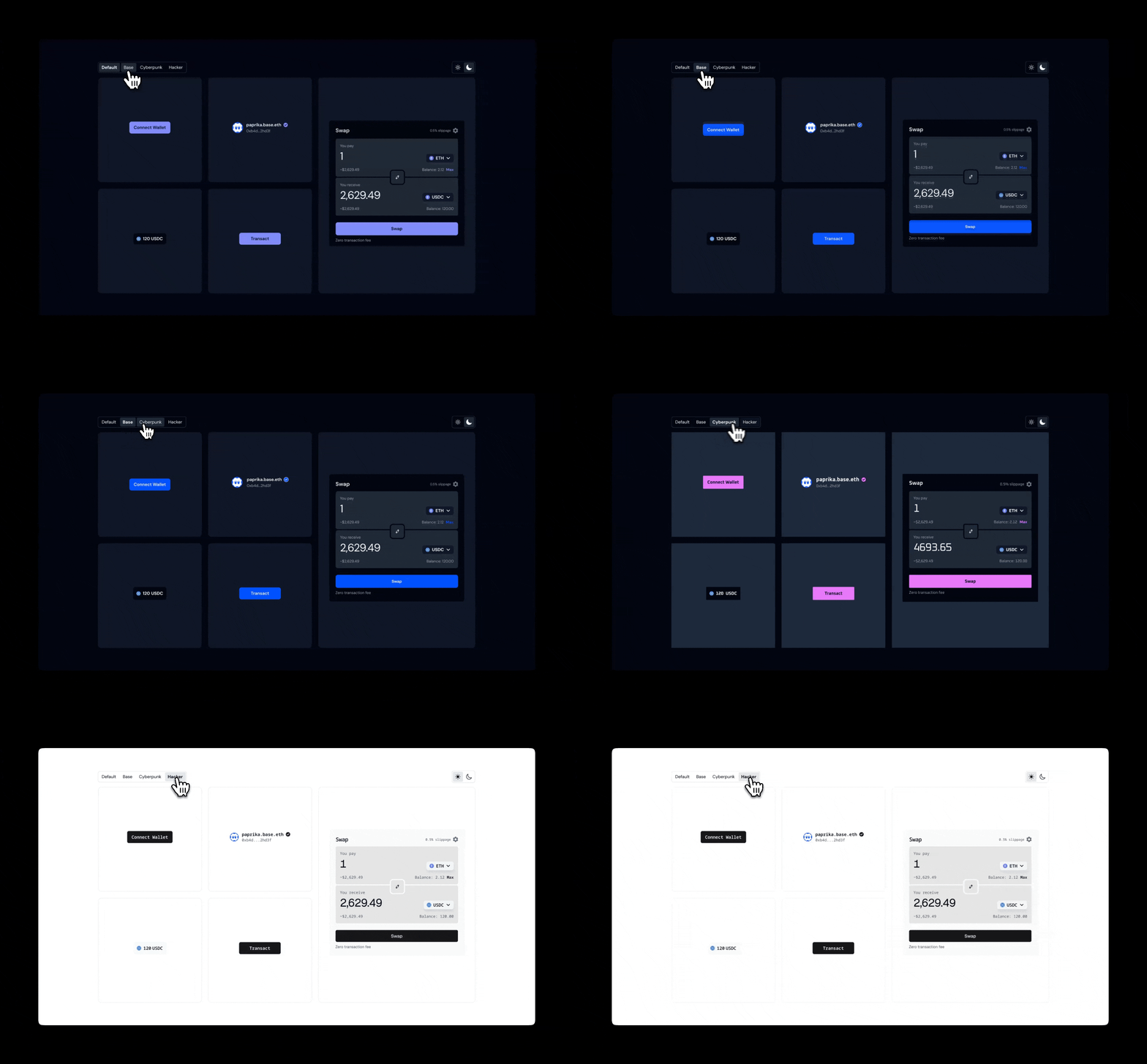
[](https://docs.base.org/onchainkit/latest/configuration/themes#overview)
Overview
--------------------------------------------------------------------------------------
OnchainKit provides flexible appearance control through two main features: `mode` and `theme`.
* **Mode**: Controls the light/dark appearance with `auto`, `light`, or `dark` options
* **Theme**: Sets the overall styling including colors, fonts, and border radius
Configure themes through the `OnchainKitProvider` to create a customized interface that matches your application’s design.
[](https://docs.base.org/onchainkit/latest/configuration/themes#built-in-themes)
Built-in Themes
----------------------------------------------------------------------------------------------------
OnchainKit includes several built-in themes. Set the theme via the `OnchainKitProvider` using `config.appearance.theme`:
* `default`: Multi-mode theme with light and dark variants
* `base`: Base brand colors, available in light and dark modes
* `cyberpunk`: Dark-only theme with fuchsia accents and Oxanium font
* `hacker`: Monospace theme with zinc colors and Noto Sans Mono font
If no theme is specified, the `default` theme is used.
Report incorrect code
Copy
Ask AI
[](https://docs.base.org/onchainkit/latest/configuration/themes#mode)
Mode
------------------------------------------------------------------------------
Control the color scheme by setting the `config.appearance.mode` property:
* `auto`: Automatically switches between light and dark based on system preference (default)
* `light`: Forces light mode for all components
* `dark`: Forces dark mode for all components
Note: Single-mode themes like `cyberpunk` and `hacker` ignore the mode setting.
Report incorrect code
Copy
Ask AI
[](https://docs.base.org/onchainkit/latest/configuration/themes#css-overrides)
CSS Overrides
------------------------------------------------------------------------------------------------
Fine-tune specific aspects of an existing theme by overriding CSS variables.
Report incorrect code
Copy
Ask AI
@layer base {
[data-ock-theme='default-light'],
[data-ock-theme='default-dark'],
[data-ock-theme='base-light'],
[data-ock-theme='base-dark'],
[data-ock-theme='cyberpunk'],
[data-ock-theme='hacker'] {
/* Override specific variables */
--ock-font-family: 'Roboto', sans-serif;
--ock-radius-default: 0.5rem;
--ock-primary: #ff6b35;
}
}
[](https://docs.base.org/onchainkit/latest/configuration/themes#custom-theme)
Custom Theme
----------------------------------------------------------------------------------------------
Create a completely custom theme with full control over colors, fonts, and styling.
###
[](https://docs.base.org/onchainkit/latest/configuration/themes#custom-theme-setup)
Custom Theme Setup
Define your custom theme using CSS variables. Theme classes should include `-light` and `-dark` suffixes for multi-mode support:
Report incorrect code
Copy
Ask AI
###
[](https://docs.base.org/onchainkit/latest/configuration/themes#theme-definition)
Theme Definition
Use the correct CSS variable names that match OnchainKit’s theming system:
Report incorrect code
Copy
Ask AI
@layer base {
[data-ock-theme='custom-light'] {
/* Typography and Shape */
--ock-font-family: 'Inter', sans-serif;
--ock-radius-default: 0.75rem;
--ock-radius-inner: 0.375rem;
/* Foreground Colors */
--ock-foreground: #1a1a1a;
--ock-foreground-muted: #6b7280;
--ock-foreground-inverse: #ffffff;
--ock-foreground-disabled: #9ca3af;
/* Background Colors */
--ock-background: #ffffff;
--ock-background-hover: #f3f4f6;
--ock-background-active: #e5e7eb;
--ock-background-alternate: #f9fafb;
--ock-background-alternate-hover: #f3f4f6;
--ock-background-alternate-active: #e5e7eb;
--ock-background-inverse: #f3f4f6;
--ock-background-inverse-hover: #e5e7eb;
--ock-background-inverse-active: #d1d5db;
--ock-background-reverse: #1a1a1a;
/* Primary Colors */
--ock-primary: #3b82f6;
--ock-primary-hover: #2563eb;
--ock-primary-active: #1d4ed8;
--ock-primary-washed: #dbeafe;
--ock-primary-disabled: #93c5fd;
/* Secondary Colors */
--ock-secondary: #e2e8f0;
--ock-secondary-hover: #cbd5e1;
--ock-secondary-active: #94a3b8;
/* State Colors */
--ock-error: #dc2626;
--ock-warning: #d97706;
--ock-success: #16a34a;
--ock-success-background: #bbf7d0;
/* Lines */
--ock-line: #e5e7eb;
}
[data-ock-theme='custom-dark'] {
/* Define dark mode variables here */
--ock-foreground: #ffffff;
--ock-foreground-muted: #9ca3af;
--ock-background: #1a1a1a;
/* ... other dark mode variables */
}
}
Was this page helpful?
YesNo
[Suggest edits](https://github.com/base/docs/edit/master/docs/onchainkit/latest/configuration/themes.mdx)
[Raise issue](https://github.com/base/docs/issues/new?title=Issue%20on%20docs&body=Path:%20/onchainkit/latest/configuration/themes)
[Wagmi & Viem Integration](https://docs.base.org/onchainkit/latest/configuration/wagmi-viem-integration)
[AppchainBridge](https://docs.base.org/onchainkit/latest/components/appchain/bridge)
⌘I
---
# AI Prompting Guide - Base Documentation
[Skip to main content](https://docs.base.org/onchainkit/latest/guides/ai-prompting-guide#content-area)
[Base Documentation home page](https://docs.base.org/)
latest
Search...
⌘K
Search...
Navigation
Guides
AI Prompting Guide
[Get Started](https://docs.base.org/get-started/base)
[Base Chain](https://docs.base.org/base-chain/quickstart/why-base)
[Base Account](https://docs.base.org/base-account/overview/what-is-base-account)
[Base App](https://docs.base.org/base-app/introduction/beta-faq)
[Mini Apps](https://docs.base.org/mini-apps/quickstart/migrate-existing-apps)
[OnchainKit](https://docs.base.org/onchainkit/latest/getting-started/overview)
[Cookbook](https://docs.base.org/cookbook/onboard-any-user)
[Showcase](https://docs.base.org/showcase)
[Learn](https://docs.base.org/learn/welcome)
On this page
* [Understanding Context Windows](https://docs.base.org/onchainkit/latest/guides/ai-prompting-guide#understanding-context-windows)
* [Why Context Matters](https://docs.base.org/onchainkit/latest/guides/ai-prompting-guide#why-context-matters)
* [Optimizing for Context Windows](https://docs.base.org/onchainkit/latest/guides/ai-prompting-guide#optimizing-for-context-windows)
* [Setting Up AI Tools](https://docs.base.org/onchainkit/latest/guides/ai-prompting-guide#setting-up-ai-tools)
* [Cursor Rules](https://docs.base.org/onchainkit/latest/guides/ai-prompting-guide#cursor-rules)
* [OnchainKit Projects](https://docs.base.org/onchainkit/latest/guides/ai-prompting-guide#onchainkit-projects)
* [Creating Project Documentation](https://docs.base.org/onchainkit/latest/guides/ai-prompting-guide#creating-project-documentation)
* [Effective Prompting Strategies](https://docs.base.org/onchainkit/latest/guides/ai-prompting-guide#effective-prompting-strategies)
* [Be Specific](https://docs.base.org/onchainkit/latest/guides/ai-prompting-guide#be-specific)
* [Provide Context](https://docs.base.org/onchainkit/latest/guides/ai-prompting-guide#provide-context)
* [Iterate](https://docs.base.org/onchainkit/latest/guides/ai-prompting-guide#iterate)
* [Working with OnchainKit](https://docs.base.org/onchainkit/latest/guides/ai-prompting-guide#working-with-onchainkit)
* [Using Documentation](https://docs.base.org/onchainkit/latest/guides/ai-prompting-guide#using-documentation)
* [Component Integration](https://docs.base.org/onchainkit/latest/guides/ai-prompting-guide#component-integration)
* [Debugging with AI](https://docs.base.org/onchainkit/latest/guides/ai-prompting-guide#debugging-with-ai)
* [Debugging Prompts](https://docs.base.org/onchainkit/latest/guides/ai-prompting-guide#debugging-prompts)
* [When Stuck](https://docs.base.org/onchainkit/latest/guides/ai-prompting-guide#when-stuck)
* [Advanced Techniques](https://docs.base.org/onchainkit/latest/guides/ai-prompting-guide#advanced-techniques)
* [Best Practices](https://docs.base.org/onchainkit/latest/guides/ai-prompting-guide#best-practices)
Get better results from AI coding assistants when building with OnchainKit. Whether you’re using Cursor, GitHub Copilot, or other AI tools, these techniques will improve your workflow.
[](https://docs.base.org/onchainkit/latest/guides/ai-prompting-guide#understanding-context-windows)
Understanding Context Windows
-------------------------------------------------------------------------------------------------------------------------------------
###
[](https://docs.base.org/onchainkit/latest/guides/ai-prompting-guide#why-context-matters)
Why Context Matters
AI coding assistants have a “context window” - the amount of text they can process at once. Think of it as working memory:
* Most assistants process thousands of tokens (roughly 4-5 words per token)
* Everything you share consumes this limited space
* Once full, older conversation parts may be lost
Provide relevant context upfront since AI can only work with what’s in its current window.
###
[](https://docs.base.org/onchainkit/latest/guides/ai-prompting-guide#optimizing-for-context-windows)
Optimizing for Context Windows
Optimize for context windows:
1. **Share relevant info first** - Most important details upfront
2. **Skip unnecessary content** - Avoid irrelevant code or docs
3. **Structure requests clearly** - Use sections and formatting
4. **Reference smartly** - Share only relevant files for large codebases
For larger projects, create a central documentation file rather than repeatedly explaining context.
[](https://docs.base.org/onchainkit/latest/guides/ai-prompting-guide#setting-up-ai-tools)
Setting Up AI Tools
-----------------------------------------------------------------------------------------------------------------
###
[](https://docs.base.org/onchainkit/latest/guides/ai-prompting-guide#cursor-rules)
Cursor Rules
Cursor Rules provide consistent context to help AI understand your codebase better.
1. Open Command Palette: `Cmd + Shift + P` (Mac) or `Ctrl + Shift + P` (Windows/Linux)
2. Search “Cursor Rules” and create/edit rules
3. Add project-specific rules:
* [Next.js](https://raw.githubusercontent.com/PatrickJS/awesome-cursorrules/refs/heads/main/rules/nextjs-tailwind-typescript-apps-cursorrules-prompt/.cursorrules)
* [Astro](https://raw.githubusercontent.com/PatrickJS/awesome-cursorrules/refs/heads/main/rules/astro-typescript-cursorrules-prompt-file/.cursorrules)
* [Vite](https://raw.githubusercontent.com/PatrickJS/awesome-cursorrules/refs/heads/main/rules/typescript-vite-tailwind-cursorrules-prompt-file/.cursorrules)
4. Save to apply rules to AI suggestions
###
[](https://docs.base.org/onchainkit/latest/guides/ai-prompting-guide#onchainkit-projects)
OnchainKit Projects
Create a new OnchainKit project:
Report incorrect code
Copy
Ask AI
npm create onchain@latest
After setup, generate comprehensive documentation for your project.
###
[](https://docs.base.org/onchainkit/latest/guides/ai-prompting-guide#creating-project-documentation)
Creating Project Documentation
A project instructions file helps AI understand your codebase. Create this early and update regularly. **Instructions.md prompt:**
Report incorrect code
Copy
Ask AI
Create a detailed instructions.md file for my OnchainKit project:
1. Overview: Project goals and core functionality
2. Tech Stack: Technologies, libraries, frameworks with versions
3. Project Structure: File organization with explanations
4. Coding Standards: Style conventions, linting rules, patterns
5. User Stories: Key functionality from user perspective
6. APIs and Integrations: External services and connections
For architecture planning and complex design decisions, use reasoning-focused AI models. They excel at analyzing tradeoffs, edge cases, and long-term planning.
[](https://docs.base.org/onchainkit/latest/guides/ai-prompting-guide#effective-prompting-strategies)
Effective Prompting Strategies
---------------------------------------------------------------------------------------------------------------------------------------
###
[](https://docs.base.org/onchainkit/latest/guides/ai-prompting-guide#be-specific)
Be Specific
AI tools respond best to clear, direct instructions. ❌ “Help me with my code” ✅ “Refactor this authentication function to use async/await instead of nested then() calls”
###
[](https://docs.base.org/onchainkit/latest/guides/ai-prompting-guide#provide-context)
Provide Context
**Template:**
Report incorrect code
Copy
Ask AI
I'm working on an OnchainKit project using [frameworks/libraries]. I need help with:
1. Problem: [describe specific issue]
2. Current approach: [what you've tried]
3. Constraints: [technical limitations]
4. Expected outcome: [what success looks like]
Relevant docs: @https://onchainkit.xyz
Relevant code:
[paste your code]
###
[](https://docs.base.org/onchainkit/latest/guides/ai-prompting-guide#iterate)
Iterate
Start simple and refine rather than trying to get everything perfect at once. **Template:**
Report incorrect code
Copy
Ask AI
Let's approach this step by step:
1. First, implement basic [feature] with minimal functionality
2. Review and identify improvements
3. Add error handling and edge cases
4. Optimize for performance
Start with step 1.
[](https://docs.base.org/onchainkit/latest/guides/ai-prompting-guide#working-with-onchainkit)
Working with OnchainKit
-------------------------------------------------------------------------------------------------------------------------
###
[](https://docs.base.org/onchainkit/latest/guides/ai-prompting-guide#using-documentation)
Using Documentation
Reference OnchainKit documentation directly in your prompts:
1. Browse [OnchainKit docs](https://docs.base.org/onchainkit/latest/getting-started/overview)
2. Find your component
3. Reference the docs URL in your prompt
**Example:**
Report incorrect code
Copy
Ask AI
I'm implementing a swap component with OnchainKit.
Docs: @https://onchainkit.xyz
Show me how to implement a swap that:
1. Swaps USDC to ETH on Base
2. Handles connection states
3. Includes error handling
4. Follows UX best practices
###
[](https://docs.base.org/onchainkit/latest/guides/ai-prompting-guide#component-integration)
Component Integration
**Token balance example:**
Report incorrect code
Copy
Ask AI
Implement a token balance display feature:
1. Shows connected wallet's balance of [TOKEN_SYMBOL]
2. Updates when balance changes
3. Handles loading and error states
4. Follows project coding standards
5. Update instructions.md with this implementation
[](https://docs.base.org/onchainkit/latest/guides/ai-prompting-guide#debugging-with-ai)
Debugging with AI
-------------------------------------------------------------------------------------------------------------
###
[](https://docs.base.org/onchainkit/latest/guides/ai-prompting-guide#debugging-prompts)
Debugging Prompts
**Bug analysis template:**
Report incorrect code
Copy
Ask AI
I'm encountering an issue:
1. Expected behavior: [what should happen]
2. Actual behavior: [what's happening]
3. Error messages: [any errors]
4. Relevant code: [problematic code]
Analyze step by step and help me:
1. Identify potential causes
2. Suggest debugging steps
3. Propose solutions
**Debug logging template:**
Report incorrect code
Copy
Ask AI
Add comprehensive logging to this function to trace:
1. Input values and types
2. Function execution flow
3. Intermediate state changes
4. Output values or errors
Code:
[paste your code]
###
[](https://docs.base.org/onchainkit/latest/guides/ai-prompting-guide#when-stuck)
When Stuck
**Clarification template:**
Report incorrect code
Copy
Ask AI
I'm unsure how to proceed with [specific task]. Here's what I know:
1. [problem context]
2. [what you've tried]
3. [specific areas needing guidance]
What additional information would help you assist better?
[](https://docs.base.org/onchainkit/latest/guides/ai-prompting-guide#advanced-techniques)
Advanced Techniques
-----------------------------------------------------------------------------------------------------------------
1. **Step-by-step reasoning**
Report incorrect code
Copy
Ask AI
Analyze this code step by step and identify potential issues.
2. **Format specification**
Report incorrect code
Copy
Ask AI
Structure your response as a tutorial with code examples.
3. **Length guidance**
Report incorrect code
Copy
Ask AI
Provide a concise explanation in 2-3 paragraphs.
4. **Clarify ambiguities**
Report incorrect code
Copy
Ask AI
You suggested two approaches. I prefer the first with TypeScript.
[](https://docs.base.org/onchainkit/latest/guides/ai-prompting-guide#best-practices)
Best Practices
-------------------------------------------------------------------------------------------------------
1. **Understand context limitations** - AI has finite memory, prioritize important info
2. **Provide relevant context** - Share code, errors, and project details that matter
3. **Be specific** - Clear instructions beat vague questions
4. **Break down complex tasks** - Iterative approaches work better
5. **Request explanations** - Ask AI to explain generated code you don’t understand
6. **Use clear formatting** - Structure prompts with sections
7. **Reference docs** - Include OnchainKit documentation links
8. **Test and validate** - Always review AI-generated code before implementing
9. **Build on context** - Reference earlier conversation parts when iterating
10. **Provide feedback** - Tell AI what worked and what didn’t
Was this page helpful?
YesNo
[Suggest edits](https://github.com/base/docs/edit/master/docs/onchainkit/latest/guides/ai-prompting-guide.mdx)
[Raise issue](https://github.com/base/docs/issues/new?title=Issue%20on%20docs&body=Path:%20/onchainkit/latest/guides/ai-prompting-guide)
[useMintDetails](https://docs.base.org/onchainkit/latest/hooks/mint/use-mint-details)
[Contributing](https://docs.base.org/onchainkit/latest/guides/contributing)
⌘I
---
# - Base Documentation
[Skip to main content](https://docs.base.org/onchainkit/wallet/wallet-dropdown-link#content-area)
[Base Documentation home page](https://docs.base.org/)
v0.38.x
Search...
⌘K
Search...
Navigation
Wallet
[Get Started](https://docs.base.org/get-started/base)
[Base Chain](https://docs.base.org/base-chain/quickstart/why-base)
[Base Account](https://docs.base.org/base-account/overview/what-is-base-account)
[Base App](https://docs.base.org/base-app/introduction/beta-faq)
[Mini Apps](https://docs.base.org/mini-apps/quickstart/migrate-existing-apps)
[OnchainKit](https://docs.base.org/onchainkit/latest/getting-started/overview)
[Cookbook](https://docs.base.org/cookbook/onboard-any-user)
[Showcase](https://docs.base.org/showcase)
[Learn](https://docs.base.org/learn/welcome)
On this page
* [Usage](https://docs.base.org/onchainkit/wallet/wallet-dropdown-link#usage)
* [Custom link](https://docs.base.org/onchainkit/wallet/wallet-dropdown-link#custom-link)
* [Custom children components](https://docs.base.org/onchainkit/wallet/wallet-dropdown-link#custom-children-components)
* [Override styles](https://docs.base.org/onchainkit/wallet/wallet-dropdown-link#override-styles)
* [Props](https://docs.base.org/onchainkit/wallet/wallet-dropdown-link#props)
The `WalletDropdownLink` component creates customizable, interactive links within the wallet dropdown menu.
[](https://docs.base.org/onchainkit/wallet/wallet-dropdown-link#usage)
Usage
--------------------------------------------------------------------------------
Report incorrect code
Copy
Ask AI
import {
Address,
Avatar,
Name,
Identity,
EthBalance,
} from '@coinbase/onchainkit/identity';
import { color } from '@coinbase/onchainkit/theme';
import {
ConnectWallet,
Wallet,
WalletDropdown,
WalletDropdownLink,
WalletDropdownDisconnect,
} from '@coinbase/onchainkit/wallet';
export function WalletComponents() {
return (
Wallet
);
}
###
[](https://docs.base.org/onchainkit/wallet/wallet-dropdown-link#custom-link)
Custom link
Add a custom link to the wallet dropdown menu, allowing users to navigate to external resources directly from the wallet interface.
Report incorrect code
Copy
Ask AI
// @noErrors: 2304 Cannot find name 'BaseIcon'
import {
WalletDropdownLink,
} from '@coinbase/onchainkit/wallet';
// ---cut-before---
// omitted for brevity
Base.org
###
[](https://docs.base.org/onchainkit/wallet/wallet-dropdown-link#custom-children-components)
Custom children components
Accepts React children, enabling the use of custom elements, styled text, icons, and complex components. This allows for diverse customizations, including complex layouts and conditional rendering based on your app’s state.
Report incorrect code
Copy
Ask AI
// @noErrors: 2322 - type 'Element' is not assignable to type 'string'
import {
WalletDropdownLink,
} from '@coinbase/onchainkit/wallet';
// ---cut-before---
// omitted for brevity
Profile 🔵
###
[](https://docs.base.org/onchainkit/wallet/wallet-dropdown-link#override-styles)
Override styles
You can override component styles using className.
Report incorrect code
Copy
Ask AI
import {
WalletDropdownLink,
} from '@coinbase/onchainkit/wallet';
// ---cut-before---
// omitted for brevity
Wallet
[](https://docs.base.org/onchainkit/wallet/wallet-dropdown-link#props)
Props
--------------------------------------------------------------------------------
See the [types](https://docs.base.org/onchainkit/wallet/types#walletdropdownlinkreact)
for more details. [WalletDropdownLinkReact](https://docs.base.org/onchainkit/wallet/types#walletdropdownlinkreact)
Was this page helpful?
YesNo
[Suggest edits](https://github.com/base/docs/edit/master/docs/onchainkit/wallet/wallet-dropdown-link.mdx)
[Raise issue](https://github.com/base/docs/issues/new?title=Issue%20on%20docs&body=Path:%20/onchainkit/wallet/wallet-dropdown-link)
[Wallet Components & Utilities](https://docs.base.org/onchainkit/wallet/wallet-dropdown-fund-link)
[](https://docs.base.org/onchainkit/wallet/wallet-island)
⌘I
---
# useTokenDetails - Base Documentation
[Skip to main content](https://docs.base.org/onchainkit/latest/hooks/mint/use-token-details#content-area)
[Base Documentation home page](https://docs.base.org/)
latest
Search...
⌘K
Search...
Navigation
Mint
useTokenDetails
[Get Started](https://docs.base.org/get-started/base)
[Base Chain](https://docs.base.org/base-chain/quickstart/why-base)
[Base Account](https://docs.base.org/base-account/overview/what-is-base-account)
[Base App](https://docs.base.org/base-app/introduction/beta-faq)
[Mini Apps](https://docs.base.org/mini-apps/quickstart/migrate-existing-apps)
[OnchainKit](https://docs.base.org/onchainkit/latest/getting-started/overview)
[Cookbook](https://docs.base.org/cookbook/onboard-any-user)
[Showcase](https://docs.base.org/showcase)
[Learn](https://docs.base.org/learn/welcome)
On this page
* [Usage](https://docs.base.org/onchainkit/latest/hooks/mint/use-token-details#usage)
* [Returns](https://docs.base.org/onchainkit/latest/hooks/mint/use-token-details#returns)
* [Parameters](https://docs.base.org/onchainkit/latest/hooks/mint/use-token-details#parameters)
The `useTokenDetails` hook implements the `getTokenDetails` API, returning the data required to view an NFT. It is implemented with [useQuery](https://tanstack.com/query/latest/docs/framework/react/reference/useQuery)
from `@tanstack/react-query`, and returns a `UseQueryResult` object, allowing you to pass through all `@tanstack/react-query` options. Before using them, make sure to obtain a [Client API Key](https://portal.cdp.coinbase.com/projects/api-keys/client-key)
from Coinbase Developer Platform.
[](https://docs.base.org/onchainkit/latest/hooks/mint/use-token-details#usage)
Usage
----------------------------------------------------------------------------------------
code
scaffolding
return value
Report incorrect code
Copy
Ask AI
import { useTokenDetails } from '@coinbase/onchainkit/nft';
const Component = () => {
const { data, isLoading, error } = useTokenDetails({
contractAddress: '0x...',
tokenId: '1',
});
if (isLoading) return
Loading...
;
return
{JSON.stringify(data)}
;
};
[](https://docs.base.org/onchainkit/latest/hooks/mint/use-token-details#returns)
Returns
--------------------------------------------------------------------------------------------
Report incorrect code
Copy
Ask AI
UseQueryResult
type TokenDetails = {
/** The name of the token */
name: string;
/** The description of the token */
description: string;
/** The image URL of the token */
imageUrl: string;
/** The animation URL of the token */
animationUrl: string;
/** The MIME type of the token */
mimeType: string;
/** The address of the owner of the token */
ownerAddress: Address;
/** The last sold price of the token */
lastSoldPrice: NFTPrice;
/** ERC721, ERC1155 */
contractType: ContractType;
};
[](https://docs.base.org/onchainkit/latest/hooks/mint/use-token-details#parameters)
Parameters
--------------------------------------------------------------------------------------------------
Report incorrect code
Copy
Ask AI
type GetTokenDetailsParams = {
/** The address of the token contract */
contractAddress: Address;
/** The ID of the token */
tokenId?: string;
};
Was this page helpful?
YesNo
[Suggest edits](https://github.com/base/docs/edit/master/docs/onchainkit/latest/hooks/mint/use-token-details.mdx)
[Raise issue](https://github.com/base/docs/issues/new?title=Issue%20on%20docs&body=Path:%20/onchainkit/latest/hooks/mint/use-token-details)
[useNames](https://docs.base.org/onchainkit/latest/hooks/identity/use-names)
[useMintDetails](https://docs.base.org/onchainkit/latest/hooks/mint/use-mint-details)
⌘I
---
# useNames - Base Documentation
[Skip to main content](https://docs.base.org/onchainkit/latest/hooks/identity/use-names#content-area)
[Base Documentation home page](https://docs.base.org/)
latest
Search...
⌘K
Search...
Navigation
Identity
useNames
[Get Started](https://docs.base.org/get-started/base)
[Base Chain](https://docs.base.org/base-chain/quickstart/why-base)
[Base Account](https://docs.base.org/base-account/overview/what-is-base-account)
[Base App](https://docs.base.org/base-app/introduction/beta-faq)
[Mini Apps](https://docs.base.org/mini-apps/quickstart/migrate-existing-apps)
[OnchainKit](https://docs.base.org/onchainkit/latest/getting-started/overview)
[Cookbook](https://docs.base.org/cookbook/onboard-any-user)
[Showcase](https://docs.base.org/showcase)
[Learn](https://docs.base.org/learn/welcome)
On this page
* [Usage](https://docs.base.org/onchainkit/latest/hooks/identity/use-names#usage)
* [Returns](https://docs.base.org/onchainkit/latest/hooks/identity/use-names#returns)
* [Parameters](https://docs.base.org/onchainkit/latest/hooks/identity/use-names#parameters)
* [UseNamesParams](https://docs.base.org/onchainkit/latest/hooks/identity/use-names#usenamesparams)
* [UseQueryOptions](https://docs.base.org/onchainkit/latest/hooks/identity/use-names#usequeryoptions)
The `useNames` hook is used to get multiple names from an onchain identity provider for an array of addresses in a single batch request. It is implemented with [useQuery](https://tanstack.com/query/latest/docs/framework/react/reference/useQuery)
from `@tanstack/react-query`, and returns a `UseQueryResult` object, allowing you to pass through all `@tanstack/react-query` options.
[](https://docs.base.org/onchainkit/latest/hooks/identity/use-names#usage)
Usage
------------------------------------------------------------------------------------
Get ENS names from multiple addresses:
code
return value
Report incorrect code
Copy
Ask AI
import { useNames } from '@coinbase/onchainkit/identity';
const addresses = [\
'0x4bEf0221d6F7Dd0C969fe46a4e9b339a84F52FDF',\
'0x838aD0EAE54F99F1926dA7C3b6bFbF617389B4D9'\
];
const { data: names, isLoading } = useNames({ addresses });
Get Basenames from multiple addresses:
code
return value
Report incorrect code
Copy
Ask AI
import { useNames } from '@coinbase/onchainkit/identity';
import { base } from 'viem/chains';
const addresses = [\
'0x4bEf0221d6F7Dd0C969fe46a4e9b339a84F52FDF',\
'0x4bEf0221d6F7Dd0C969fe46a4e9b339a84F52FDF'\
];
const { data: names, isLoading } = useNames({ addresses, chain: base });
[](https://docs.base.org/onchainkit/latest/hooks/identity/use-names#returns)
Returns
----------------------------------------------------------------------------------------
Report incorrect code
Copy
Ask AI
useQuery>
type GetNameReturnType = string | Basename | null;
[](https://docs.base.org/onchainkit/latest/hooks/identity/use-names#parameters)
Parameters
----------------------------------------------------------------------------------------------
###
[](https://docs.base.org/onchainkit/latest/hooks/identity/use-names#usenamesparams)
UseNamesParams
Report incorrect code
Copy
Ask AI
type UseNamesParams = {
/** Array of addresses to resolve ENS or Basenames for */
addresses: Address[];
/** Optional chain for domain resolution */
chain?: Chain;
};
###
[](https://docs.base.org/onchainkit/latest/hooks/identity/use-names#usequeryoptions)
UseQueryOptions
Report incorrect code
Copy
Ask AI
type UseQueryOptions = Omit<
TanstackUseQueryOptions,
'queryKey' | 'queryFn'
>;
Was this page helpful?
YesNo
[Suggest edits](https://github.com/base/docs/edit/master/docs/onchainkit/latest/hooks/identity/use-names.mdx)
[Raise issue](https://github.com/base/docs/issues/new?title=Issue%20on%20docs&body=Path:%20/onchainkit/latest/hooks/identity/use-names)
[useName](https://docs.base.org/onchainkit/latest/hooks/identity/use-name)
[useTokenDetails](https://docs.base.org/onchainkit/latest/hooks/mint/use-token-details)
⌘I
---
# useAvatar - Base Documentation
[Skip to main content](https://docs.base.org/onchainkit/latest/hooks/identity/use-avatar#content-area)
[Base Documentation home page](https://docs.base.org/)
latest
Search...
⌘K
Search...
Navigation
Identity
useAvatar
[Get Started](https://docs.base.org/get-started/base)
[Base Chain](https://docs.base.org/base-chain/quickstart/why-base)
[Base Account](https://docs.base.org/base-account/overview/what-is-base-account)
[Base App](https://docs.base.org/base-app/introduction/beta-faq)
[Mini Apps](https://docs.base.org/mini-apps/quickstart/migrate-existing-apps)
[OnchainKit](https://docs.base.org/onchainkit/latest/getting-started/overview)
[Cookbook](https://docs.base.org/cookbook/onboard-any-user)
[Showcase](https://docs.base.org/showcase)
[Learn](https://docs.base.org/learn/welcome)
On this page
* [Usage](https://docs.base.org/onchainkit/latest/hooks/identity/use-avatar#usage)
* [Returns](https://docs.base.org/onchainkit/latest/hooks/identity/use-avatar#returns)
* [Parameters](https://docs.base.org/onchainkit/latest/hooks/identity/use-avatar#parameters)
* [UseAvatarParams](https://docs.base.org/onchainkit/latest/hooks/identity/use-avatar#useavatarparams)
* [UseQueryOptions](https://docs.base.org/onchainkit/latest/hooks/identity/use-avatar#usequeryoptions)
The `useAvatar` hook is used to get avatar image URL from an onchain identity provider for a given name. It is implemented with [useQuery](https://tanstack.com/query/latest/docs/framework/react/reference/useQuery)
from `@tanstack/react-query`, and returns a `UseQueryResult` object, allowing you to pass through all `@tanstack/react-query` options.
[](https://docs.base.org/onchainkit/latest/hooks/identity/use-avatar#usage)
Usage
-------------------------------------------------------------------------------------
Report incorrect code
Copy
Ask AI
import { useAvatar } from '@coinbase/onchainkit/identity';
const { data: avatar, isLoading } = useAvatar({ ensName: 'vitalik.eth' });
[](https://docs.base.org/onchainkit/latest/hooks/identity/use-avatar#returns)
Returns
-----------------------------------------------------------------------------------------
Report incorrect code
Copy
Ask AI
useQuery>
type GetAvatarReturnType = string | null;
[](https://docs.base.org/onchainkit/latest/hooks/identity/use-avatar#parameters)
Parameters
-----------------------------------------------------------------------------------------------
###
[](https://docs.base.org/onchainkit/latest/hooks/identity/use-avatar#useavatarparams)
UseAvatarParams
Report incorrect code
Copy
Ask AI
type UseAvatarParams = {
/** ENS name to resolve */
ensName: string;
/** Optional chain for domain resolution */
chain?: Chain;
};
###
[](https://docs.base.org/onchainkit/latest/hooks/identity/use-avatar#usequeryoptions)
UseQueryOptions
Report incorrect code
Copy
Ask AI
type UseQueryOptions = Omit<
TanstackUseQueryOptions,
'queryKey' | 'queryFn'
>;
Was this page helpful?
YesNo
[Suggest edits](https://github.com/base/docs/edit/master/docs/onchainkit/latest/hooks/identity/use-avatar.mdx)
[Raise issue](https://github.com/base/docs/issues/new?title=Issue%20on%20docs&body=Path:%20/onchainkit/latest/hooks/identity/use-avatar)
[useAddress](https://docs.base.org/onchainkit/latest/hooks/identity/use-address)
[useAvatars](https://docs.base.org/onchainkit/latest/hooks/identity/use-avatars)
⌘I
---
# useAddress - Base Documentation
[Skip to main content](https://docs.base.org/onchainkit/latest/hooks/identity/use-address#content-area)
[Base Documentation home page](https://docs.base.org/)
latest
Search...
⌘K
Search...
Navigation
Identity
useAddress
[Get Started](https://docs.base.org/get-started/base)
[Base Chain](https://docs.base.org/base-chain/quickstart/why-base)
[Base Account](https://docs.base.org/base-account/overview/what-is-base-account)
[Base App](https://docs.base.org/base-app/introduction/beta-faq)
[Mini Apps](https://docs.base.org/mini-apps/quickstart/migrate-existing-apps)
[OnchainKit](https://docs.base.org/onchainkit/latest/getting-started/overview)
[Cookbook](https://docs.base.org/cookbook/onboard-any-user)
[Showcase](https://docs.base.org/showcase)
[Learn](https://docs.base.org/learn/welcome)
On this page
* [Usage](https://docs.base.org/onchainkit/latest/hooks/identity/use-address#usage)
* [Returns](https://docs.base.org/onchainkit/latest/hooks/identity/use-address#returns)
* [Parameters](https://docs.base.org/onchainkit/latest/hooks/identity/use-address#parameters)
* [UseAddressParams](https://docs.base.org/onchainkit/latest/hooks/identity/use-address#useaddressparams)
* [UseQueryOptions](https://docs.base.org/onchainkit/latest/hooks/identity/use-address#usequeryoptions)
The `useAddress` hook is used to get an address from an onchain identity provider for a given name. It is implemented with [useQuery](https://tanstack.com/query/latest/docs/framework/react/reference/useQuery)
from `@tanstack/react-query`, and returns a `UseQueryResult` object, allowing you to pass through all `@tanstack/react-query` options.
[](https://docs.base.org/onchainkit/latest/hooks/identity/use-address#usage)
Usage
--------------------------------------------------------------------------------------
Report incorrect code
Copy
Ask AI
import { useAddress } from '@coinbase/onchainkit/identity';
const { data: address, isLoading } = useAddress({ name: 'zizzamia.base.eth' });
[](https://docs.base.org/onchainkit/latest/hooks/identity/use-address#returns)
Returns
------------------------------------------------------------------------------------------
Report incorrect code
Copy
Ask AI
useQuery>
type GetAddressReturnType = Address | null;
[](https://docs.base.org/onchainkit/latest/hooks/identity/use-address#parameters)
Parameters
------------------------------------------------------------------------------------------------
###
[](https://docs.base.org/onchainkit/latest/hooks/identity/use-address#useaddressparams)
UseAddressParams
Report incorrect code
Copy
Ask AI
type UseAddressParams = {
/** The ENS or Basename for which the Ethereum address is to be fetched */
name: string | Basename;
/** Optional chain for domain resolution */
chain?: Chain;
};
###
[](https://docs.base.org/onchainkit/latest/hooks/identity/use-address#usequeryoptions)
UseQueryOptions
Report incorrect code
Copy
Ask AI
type UseQueryOptions = Omit<
TanstackUseQueryOptions,
'queryKey' | 'queryFn'
>;
Was this page helpful?
YesNo
[Suggest edits](https://github.com/base/docs/edit/master/docs/onchainkit/latest/hooks/identity/use-address.mdx)
[Raise issue](https://github.com/base/docs/issues/new?title=Issue%20on%20docs&body=Path:%20/onchainkit/latest/hooks/identity/use-address)
[useMorphoVault](https://docs.base.org/onchainkit/latest/hooks/earn/use-morpho-vault)
[useAvatar](https://docs.base.org/onchainkit/latest/hooks/identity/use-avatar)
⌘I
---
# useAvatars - Base Documentation
[Skip to main content](https://docs.base.org/onchainkit/latest/hooks/identity/use-avatars#content-area)
[Base Documentation home page](https://docs.base.org/)
latest
Search...
⌘K
Search...
Navigation
Identity
useAvatars
[Get Started](https://docs.base.org/get-started/base)
[Base Chain](https://docs.base.org/base-chain/quickstart/why-base)
[Base Account](https://docs.base.org/base-account/overview/what-is-base-account)
[Base App](https://docs.base.org/base-app/introduction/beta-faq)
[Mini Apps](https://docs.base.org/mini-apps/quickstart/migrate-existing-apps)
[OnchainKit](https://docs.base.org/onchainkit/latest/getting-started/overview)
[Cookbook](https://docs.base.org/cookbook/onboard-any-user)
[Showcase](https://docs.base.org/showcase)
[Learn](https://docs.base.org/learn/welcome)
On this page
* [Usage](https://docs.base.org/onchainkit/latest/hooks/identity/use-avatars#usage)
* [Returns](https://docs.base.org/onchainkit/latest/hooks/identity/use-avatars#returns)
* [Parameters](https://docs.base.org/onchainkit/latest/hooks/identity/use-avatars#parameters)
* [UseAvatarsParams](https://docs.base.org/onchainkit/latest/hooks/identity/use-avatars#useavatarsparams)
* [UseQueryOptions](https://docs.base.org/onchainkit/latest/hooks/identity/use-avatars#usequeryoptions)
The `useAvatars` hook is used to get multiple avatar image URLs from an onchain identity provider for an array of ENS names or Basenames in a single batch request. It is implemented with [useQuery](https://tanstack.com/query/latest/docs/framework/react/reference/useQuery)
from `@tanstack/react-query`, and returns a `UseQueryResult` object, allowing you to pass through all `@tanstack/react-query` options.
[](https://docs.base.org/onchainkit/latest/hooks/identity/use-avatars#usage)
Usage
--------------------------------------------------------------------------------------
Get avatars for multiple ENS names:
code
return value
Report incorrect code
Copy
Ask AI
import { useAvatars } from '@coinbase/onchainkit/identity';
const ensNames = ['vitalik.eth', 'paulcramer.eth'];
const { data: avatars, isLoading } = useAvatars({ ensNames });
Get avatars for multiple Basenames:
code
return value
Report incorrect code
Copy
Ask AI
import { useAvatars } from '@coinbase/onchainkit/identity';
import { base } from 'viem/chains';
const ensNames = ['paul.base.eth', 'coinbase.base.eth'];
const { data: avatars, isLoading } = useAvatars({ ensNames, chain: base });
[](https://docs.base.org/onchainkit/latest/hooks/identity/use-avatars#returns)
Returns
------------------------------------------------------------------------------------------
Report incorrect code
Copy
Ask AI
useQuery>
type GetAvatarReturnType = string | null;
[](https://docs.base.org/onchainkit/latest/hooks/identity/use-avatars#parameters)
Parameters
------------------------------------------------------------------------------------------------
###
[](https://docs.base.org/onchainkit/latest/hooks/identity/use-avatars#useavatarsparams)
UseAvatarsParams
Report incorrect code
Copy
Ask AI
type UseAvatarsParams = {
/** Array of ENS names to resolve avatars for */
ensNames: string[];
/** Optional chain for domain resolution */
chain?: Chain;
};
###
[](https://docs.base.org/onchainkit/latest/hooks/identity/use-avatars#usequeryoptions)
UseQueryOptions
Report incorrect code
Copy
Ask AI
type UseQueryOptions = Omit<
TanstackUseQueryOptions,
'queryKey' | 'queryFn'
>;
Was this page helpful?
YesNo
[Suggest edits](https://github.com/base/docs/edit/master/docs/onchainkit/latest/hooks/identity/use-avatars.mdx)
[Raise issue](https://github.com/base/docs/issues/new?title=Issue%20on%20docs&body=Path:%20/onchainkit/latest/hooks/identity/use-avatars)
[useAvatar](https://docs.base.org/onchainkit/latest/hooks/identity/use-avatar)
[useName](https://docs.base.org/onchainkit/latest/hooks/identity/use-name)
⌘I
---
# useName - Base Documentation
[Skip to main content](https://docs.base.org/onchainkit/latest/hooks/identity/use-name#content-area)
[Base Documentation home page](https://docs.base.org/)
latest
Search...
⌘K
Search...
Navigation
Identity
useName
[Get Started](https://docs.base.org/get-started/base)
[Base Chain](https://docs.base.org/base-chain/quickstart/why-base)
[Base Account](https://docs.base.org/base-account/overview/what-is-base-account)
[Base App](https://docs.base.org/base-app/introduction/beta-faq)
[Mini Apps](https://docs.base.org/mini-apps/quickstart/migrate-existing-apps)
[OnchainKit](https://docs.base.org/onchainkit/latest/getting-started/overview)
[Cookbook](https://docs.base.org/cookbook/onboard-any-user)
[Showcase](https://docs.base.org/showcase)
[Learn](https://docs.base.org/learn/welcome)
On this page
* [Usage](https://docs.base.org/onchainkit/latest/hooks/identity/use-name#usage)
* [Returns](https://docs.base.org/onchainkit/latest/hooks/identity/use-name#returns)
* [Parameters](https://docs.base.org/onchainkit/latest/hooks/identity/use-name#parameters)
* [UseNameParams](https://docs.base.org/onchainkit/latest/hooks/identity/use-name#usenameparams)
* [UseQueryOptions](https://docs.base.org/onchainkit/latest/hooks/identity/use-name#usequeryoptions)
The `useName` hook is used to get name from an onchain identity provider for a given address. It is implemented with [useQuery](https://tanstack.com/query/latest/docs/framework/react/reference/useQuery)
from `@tanstack/react-query`, and returns a `UseQueryResult` object, allowing you to pass through all `@tanstack/react-query` options.
[](https://docs.base.org/onchainkit/latest/hooks/identity/use-name#usage)
Usage
-----------------------------------------------------------------------------------
Get ENS name from an address:
code
return value
Report incorrect code
Copy
Ask AI
import { useName } from '@coinbase/onchainkit/identity';
const address = '0x02feeb0AdE57b6adEEdE5A4EEea6Cf8c21BeB6B1';
const { data: name, isLoading } = await useName({ address });
Get Basename from an address:
code
return value
Report incorrect code
Copy
Ask AI
import { useName } from '@coinbase/onchainkit/identity';
import { base } from 'viem/chains';
const address = '0x02feeb0AdE57b6adEEdE5A4EEea6Cf8c21BeB6B1';
const { data: name, isLoading } = await useName({ address, chain: base });
[](https://docs.base.org/onchainkit/latest/hooks/identity/use-name#returns)
Returns
---------------------------------------------------------------------------------------
Report incorrect code
Copy
Ask AI
useQuery>
type GetNameReturnType = string | Basename | null;
[](https://docs.base.org/onchainkit/latest/hooks/identity/use-name#parameters)
Parameters
---------------------------------------------------------------------------------------------
###
[](https://docs.base.org/onchainkit/latest/hooks/identity/use-name#usenameparams)
UseNameParams
Report incorrect code
Copy
Ask AI
type UseNameParams = {
/** The address for which the ENS or Basename is to be fetched. */
address?: Address;
/** Optional chain for domain resolution */
chain?: Chain;
};
###
[](https://docs.base.org/onchainkit/latest/hooks/identity/use-name#usequeryoptions)
UseQueryOptions
Report incorrect code
Copy
Ask AI
type UseQueryOptions = Omit<
TanstackUseQueryOptions,
'queryKey' | 'queryFn'
>;
Was this page helpful?
YesNo
[Suggest edits](https://github.com/base/docs/edit/master/docs/onchainkit/latest/hooks/identity/use-name.mdx)
[Raise issue](https://github.com/base/docs/issues/new?title=Issue%20on%20docs&body=Path:%20/onchainkit/latest/hooks/identity/use-name)
[useAvatars](https://docs.base.org/onchainkit/latest/hooks/identity/use-avatars)
[useNames](https://docs.base.org/onchainkit/latest/hooks/identity/use-names)
⌘I
---
# useMorphoVault - Base Documentation
[Skip to main content](https://docs.base.org/onchainkit/latest/hooks/earn/use-morpho-vault#content-area)
[Base Documentation home page](https://docs.base.org/)
latest
Search...
⌘K
Search...
Navigation
Earn
useMorphoVault
[Get Started](https://docs.base.org/get-started/base)
[Base Chain](https://docs.base.org/base-chain/quickstart/why-base)
[Base Account](https://docs.base.org/base-account/overview/what-is-base-account)
[Base App](https://docs.base.org/base-app/introduction/beta-faq)
[Mini Apps](https://docs.base.org/mini-apps/quickstart/migrate-existing-apps)
[OnchainKit](https://docs.base.org/onchainkit/latest/getting-started/overview)
[Cookbook](https://docs.base.org/cookbook/onboard-any-user)
[Showcase](https://docs.base.org/showcase)
[Learn](https://docs.base.org/learn/welcome)
On this page
* [Usage](https://docs.base.org/onchainkit/latest/hooks/earn/use-morpho-vault#usage)
* [Returns](https://docs.base.org/onchainkit/latest/hooks/earn/use-morpho-vault#returns)
* [Parameters](https://docs.base.org/onchainkit/latest/hooks/earn/use-morpho-vault#parameters)
The `useMorphoVault` hook fetches and returns comprehensive data about a Morpho vault, including APYs, balances, and rewards.
[](https://docs.base.org/onchainkit/latest/hooks/earn/use-morpho-vault#usage)
Usage
---------------------------------------------------------------------------------------
Report incorrect code
Copy
Ask AI
import { useMorphoVault } from '@coinbase/onchainkit/earn';
const {
balance,
totalApy,
rewards,
deposits,
liquidity,
// ... other values
} = useMorphoVault({
vaultAddress: '0x...',
recipientAddress: '0x...',
});
[](https://docs.base.org/onchainkit/latest/hooks/earn/use-morpho-vault#returns)
Returns
-------------------------------------------------------------------------------------------
Report incorrect code
Copy
Ask AI
type UseMorphoVaultReturnType = {
vaultName: string | undefined;
status: 'pending' | 'success' | 'error';
/** Warns users if vault address is invalid */
error: Error | null;
/** Underlying asset of the vault */
asset: {
address: Address;
symbol: string | undefined;
decimals: number | undefined;
};
/** User's deposits in the vault, adjusted for decimals */
balance: string | undefined;
balanceStatus: 'pending' | 'success' | 'error';
refetchBalance: () => void;
/** Total net APY of the vault after all rewards and fees */
totalApy: number | undefined;
/** Native rewards of the vault (e.g. USDC if the asset is USDC) */
nativeApy: number | undefined;
/** Additional rewards (e.g. MORPHO) */
rewards:
| Array<{
asset: Address;
assetName: string;
apy: number;
}>
| undefined;
/** Vault fee, in percent (e.g. 0.03 for 3%) */
vaultFee: number | undefined;
/** Number of decimals of the vault's share tokens (not underlying asset) */
vaultDecimals: number | undefined;
/** Total deposits in the vault */
deposits: string | undefined;
/** Total liquidity available to borrow in the vault */
liquidity: string | undefined;
};
[](https://docs.base.org/onchainkit/latest/hooks/earn/use-morpho-vault#parameters)
Parameters
-------------------------------------------------------------------------------------------------
Report incorrect code
Copy
Ask AI
type UseMorphoVaultParams = {
vaultAddress: Address;
recipientAddress?: Address;
};
Was this page helpful?
YesNo
[Suggest edits](https://github.com/base/docs/edit/master/docs/onchainkit/latest/hooks/earn/use-morpho-vault.mdx)
[Raise issue](https://github.com/base/docs/issues/new?title=Issue%20on%20docs&body=Path:%20/onchainkit/latest/hooks/earn/use-morpho-vault)
[useBuildWithdrawFromMorphoTx](https://docs.base.org/onchainkit/latest/hooks/earn/use-build-withdraw-from-morpho-tx)
[useAddress](https://docs.base.org/onchainkit/latest/hooks/identity/use-address)
⌘I
---
# useBuildWithdrawFromMorphoTx - Base Documentation
[Skip to main content](https://docs.base.org/onchainkit/latest/hooks/earn/use-build-withdraw-from-morpho-tx#content-area)
[Base Documentation home page](https://docs.base.org/)
latest
Search...
⌘K
Search...
Navigation
Earn
useBuildWithdrawFromMorphoTx
[Get Started](https://docs.base.org/get-started/base)
[Base Chain](https://docs.base.org/base-chain/quickstart/why-base)
[Base Account](https://docs.base.org/base-account/overview/what-is-base-account)
[Base App](https://docs.base.org/base-app/introduction/beta-faq)
[Mini Apps](https://docs.base.org/mini-apps/quickstart/migrate-existing-apps)
[OnchainKit](https://docs.base.org/onchainkit/latest/getting-started/overview)
[Cookbook](https://docs.base.org/cookbook/onboard-any-user)
[Showcase](https://docs.base.org/showcase)
[Learn](https://docs.base.org/learn/welcome)
On this page
* [Usage](https://docs.base.org/onchainkit/latest/hooks/earn/use-build-withdraw-from-morpho-tx#usage)
* [Returns](https://docs.base.org/onchainkit/latest/hooks/earn/use-build-withdraw-from-morpho-tx#returns)
* [Parameters](https://docs.base.org/onchainkit/latest/hooks/earn/use-build-withdraw-from-morpho-tx#parameters)
The `useBuildWithdrawFromMorphoTx` hook is used to build a withdraw transaction from Morpho from within a React component. The hook handles the following:
* Fetching data required to build the transaction
* Using [`buildWithdrawFromMorphoTx`](https://docs.base.org/onchainkit/api/build-withdraw-from-morpho-tx)
to build the transaction
* Returning the transaction calls to be used with the `` component
[](https://docs.base.org/onchainkit/latest/hooks/earn/use-build-withdraw-from-morpho-tx#usage)
Usage
--------------------------------------------------------------------------------------------------------
code
Report incorrect code
Copy
Ask AI
import { useBuildWithdrawFromMorphoTx } from '@coinbase/onchainkit/earn';
const { calls } = useBuildWithdrawFromMorphoTx({
vaultAddress: '0x...',
recipientAddress: '0x...',
amount: '1000000000000000000',
tokenDecimals: 18,
});
[](https://docs.base.org/onchainkit/latest/hooks/earn/use-build-withdraw-from-morpho-tx#returns)
Returns
------------------------------------------------------------------------------------------------------------
Report incorrect code
Copy
Ask AI
{
calls: Call[];
}
type Call = {
to: Hex;
data?: Hex;
value?: bigint;
};
[](https://docs.base.org/onchainkit/latest/hooks/earn/use-build-withdraw-from-morpho-tx#parameters)
Parameters
------------------------------------------------------------------------------------------------------------------
Report incorrect code
Copy
Ask AI
type UseBuildWithdrawFromMorphoTxParams = {
vaultAddress: Address;
recipientAddress?: Address;
amount: string;
tokenDecimals: number | undefined;
};
Was this page helpful?
YesNo
[Suggest edits](https://github.com/base/docs/edit/master/docs/onchainkit/latest/hooks/earn/use-build-withdraw-from-morpho-tx.mdx)
[Raise issue](https://github.com/base/docs/issues/new?title=Issue%20on%20docs&body=Path:%20/onchainkit/latest/hooks/earn/use-build-withdraw-from-morpho-tx)
[useBuildDepositToMorphoTx](https://docs.base.org/onchainkit/latest/hooks/earn/use-build-deposit-to-morpho-tx)
[useMorphoVault](https://docs.base.org/onchainkit/latest/hooks/earn/use-morpho-vault)
⌘I
---
# useEarnContext - Base Documentation
[Skip to main content](https://docs.base.org/onchainkit/latest/hooks/earn/use-earn-context#content-area)
[Base Documentation home page](https://docs.base.org/)
latest
Search...
⌘K
Search...
Navigation
Earn
useEarnContext
[Get Started](https://docs.base.org/get-started/base)
[Base Chain](https://docs.base.org/base-chain/quickstart/why-base)
[Base Account](https://docs.base.org/base-account/overview/what-is-base-account)
[Base App](https://docs.base.org/base-app/introduction/beta-faq)
[Mini Apps](https://docs.base.org/mini-apps/quickstart/migrate-existing-apps)
[OnchainKit](https://docs.base.org/onchainkit/latest/getting-started/overview)
[Cookbook](https://docs.base.org/cookbook/onboard-any-user)
[Showcase](https://docs.base.org/showcase)
[Learn](https://docs.base.org/learn/welcome)
On this page
* [Usage](https://docs.base.org/onchainkit/latest/hooks/earn/use-earn-context#usage)
* [Returns](https://docs.base.org/onchainkit/latest/hooks/earn/use-earn-context#returns)
Access context values from the `Earn` component. Build custom deposit and withdraw interfaces with Morpho vault data.
Use within `` or `` components.
[](https://docs.base.org/onchainkit/latest/hooks/earn/use-earn-context#usage)
Usage
---------------------------------------------------------------------------------------
code
Report incorrect code
Copy
Ask AI
import { useEarnContext } from '@coinbase/onchainkit/earn';
const { depositAmount,
setDepositAmount,
apy,
nativeApy,
rewards,
vaultFee,
vaultToken,
liquidity,
deposits
// ...
} = useEarnContext();
// Use the values to build a custom deposit interface!
[](https://docs.base.org/onchainkit/latest/hooks/earn/use-earn-context#returns)
Returns
-------------------------------------------------------------------------------------------
Report incorrect code
Copy
Ask AI
type EarnContextType = {
/** Warns users if vault address is invalid */
error: Error | null;
recipientAddress?: Address;
/** Balance of the underlying asset in the user's wallet, converted to the asset's decimals */
walletBalance?: string;
/** Status of the wallet balance fetch */
walletBalanceStatus: 'pending' | 'success' | 'error';
refetchWalletBalance: () => void;
vaultAddress: Address;
/** The token that is being deposited or withdrawn (the underlying asset of the vault) */
vaultToken: Token | undefined;
vaultName: string | undefined;
/** Total deposits in the vault */
deposits: string | undefined;
/** Total liquidity (available to borrow) in the vault */
liquidity: string | undefined;
/** Total APY of the vault, including rewards */
apy: number | undefined;
nativeApy: UseMorphoVaultReturnType['nativeApy'];
vaultFee: UseMorphoVaultReturnType['vaultFee'];
/** Rewards earned by the user in the vault */
rewards: UseMorphoVaultReturnType['rewards'];
/** The amount of underlying asset that has been deposited in the vault by the connected user */
depositedBalance?: string;
/** Whether the deposited balance is being fetched */
depositedBalanceStatus: 'pending' | 'success' | 'error';
refetchDepositedBalance: () => void;
/** Interest earned by the user in the vault */
interestEarned?: string;
/** Amount that the user has typed into the deposit amount input */
depositAmount: string;
setDepositAmount: (amount: string) => void;
depositAmountError: string | null;
depositCalls: Call[];
/** Amount that the user has typed into the withdraw amount input */
withdrawAmount: string;
setWithdrawAmount: (amount: string) => void;
withdrawAmountError: string | null;
withdrawCalls: Call[];
lifecycleStatus: LifecycleStatus;
updateLifecycleStatus: (
status: LifecycleStatusUpdate,
) => void;
isSponsored?: boolean;
};
Was this page helpful?
YesNo
[Suggest edits](https://github.com/base/docs/edit/master/docs/onchainkit/latest/hooks/earn/use-earn-context.mdx)
[Raise issue](https://github.com/base/docs/issues/new?title=Issue%20on%20docs&body=Path:%20/onchainkit/latest/hooks/earn/use-earn-context)
[isWalletACoinbaseSmartWallet](https://docs.base.org/onchainkit/latest/utilities/wallet/is-wallet-a-coinbase-smart-wallet)
[useBuildDepositToMorphoTx](https://docs.base.org/onchainkit/latest/hooks/earn/use-build-deposit-to-morpho-tx)
⌘I
---
# useBuildDepositToMorphoTx - Base Documentation
[Skip to main content](https://docs.base.org/onchainkit/latest/hooks/earn/use-build-deposit-to-morpho-tx#content-area)
[Base Documentation home page](https://docs.base.org/)
latest
Search...
⌘K
Search...
Navigation
Earn
useBuildDepositToMorphoTx
[Get Started](https://docs.base.org/get-started/base)
[Base Chain](https://docs.base.org/base-chain/quickstart/why-base)
[Base Account](https://docs.base.org/base-account/overview/what-is-base-account)
[Base App](https://docs.base.org/base-app/introduction/beta-faq)
[Mini Apps](https://docs.base.org/mini-apps/quickstart/migrate-existing-apps)
[OnchainKit](https://docs.base.org/onchainkit/latest/getting-started/overview)
[Cookbook](https://docs.base.org/cookbook/onboard-any-user)
[Showcase](https://docs.base.org/showcase)
[Learn](https://docs.base.org/learn/welcome)
On this page
* [Usage](https://docs.base.org/onchainkit/latest/hooks/earn/use-build-deposit-to-morpho-tx#usage)
* [Returns](https://docs.base.org/onchainkit/latest/hooks/earn/use-build-deposit-to-morpho-tx#returns)
* [Parameters](https://docs.base.org/onchainkit/latest/hooks/earn/use-build-deposit-to-morpho-tx#parameters)
The `useBuildDepositToMorphoTx` hook is used to build a deposit transaction to Morpho from within a React component. The hook handles the following:
* Fetching data required to build the transaction
* Using [`buildDepositToMorphoTx`](https://docs.base.org/onchainkit/api/build-deposit-to-morpho-tx)
to build the transaction
* Returning the transaction calls to be used with the `` component
[](https://docs.base.org/onchainkit/latest/hooks/earn/use-build-deposit-to-morpho-tx#usage)
Usage
-----------------------------------------------------------------------------------------------------
code
Report incorrect code
Copy
Ask AI
import { useBuildDepositToMorphoTx } from '@coinbase/onchainkit/earn';
const { calls } = useBuildDepositToMorphoTx({
vaultAddress: '0x...',
recipientAddress: '0x...',
amount: '1000000000000000000',
});
[](https://docs.base.org/onchainkit/latest/hooks/earn/use-build-deposit-to-morpho-tx#returns)
Returns
---------------------------------------------------------------------------------------------------------
Report incorrect code
Copy
Ask AI
{
calls: Call[];
}
type Call = {
to: Hex;
data?: Hex;
value?: bigint;
};
[](https://docs.base.org/onchainkit/latest/hooks/earn/use-build-deposit-to-morpho-tx#parameters)
Parameters
---------------------------------------------------------------------------------------------------------------
Report incorrect code
Copy
Ask AI
type UseBuildDepositToMorphoTxParams = {
vaultAddress: Address;
recipientAddress?: Address;
amount: string;
};
Was this page helpful?
YesNo
[Suggest edits](https://github.com/base/docs/edit/master/docs/onchainkit/latest/hooks/earn/use-build-deposit-to-morpho-tx.mdx)
[Raise issue](https://github.com/base/docs/issues/new?title=Issue%20on%20docs&body=Path:%20/onchainkit/latest/hooks/earn/use-build-deposit-to-morpho-tx)
[useEarnContext](https://docs.base.org/onchainkit/latest/hooks/earn/use-earn-context)
[useBuildWithdrawFromMorphoTx](https://docs.base.org/onchainkit/latest/hooks/earn/use-build-withdraw-from-morpho-tx)
⌘I
---
# isWalletACoinbaseSmartWallet - Base Documentation
[Skip to main content](https://docs.base.org/onchainkit/latest/utilities/wallet/is-wallet-a-coinbase-smart-wallet#content-area)
[Base Documentation home page](https://docs.base.org/)
latest
Search...
⌘K
Search...
Navigation
Wallet
isWalletACoinbaseSmartWallet
[Get Started](https://docs.base.org/get-started/base)
[Base Chain](https://docs.base.org/base-chain/quickstart/why-base)
[Base Account](https://docs.base.org/base-account/overview/what-is-base-account)
[Base App](https://docs.base.org/base-app/introduction/beta-faq)
[Mini Apps](https://docs.base.org/mini-apps/quickstart/migrate-existing-apps)
[OnchainKit](https://docs.base.org/onchainkit/latest/getting-started/overview)
[Cookbook](https://docs.base.org/cookbook/onboard-any-user)
[Showcase](https://docs.base.org/showcase)
[Learn](https://docs.base.org/learn/welcome)
On this page
* [Usage](https://docs.base.org/onchainkit/latest/utilities/wallet/is-wallet-a-coinbase-smart-wallet#usage)
* [Returns](https://docs.base.org/onchainkit/latest/utilities/wallet/is-wallet-a-coinbase-smart-wallet#returns)
* [Parameters](https://docs.base.org/onchainkit/latest/utilities/wallet/is-wallet-a-coinbase-smart-wallet#parameters)
The `isWalletACoinbaseSmartWallet` utility is designed to verify if a given sender address is a Smart Wallet proxy with the expected implementation before sponsoring a transaction.
[](https://docs.base.org/onchainkit/latest/utilities/wallet/is-wallet-a-coinbase-smart-wallet#usage)
Usage
--------------------------------------------------------------------------------------------------------------
code
return value
Report incorrect code
Copy
Ask AI
import { isWalletACoinbaseSmartWallet } from '@coinbase/onchainkit/wallet';
import { http } from 'viem';
import { baseSepolia } from 'viem/chains';
import type { UserOperation } from 'permissionless';
import { type PublicClient, createPublicClient } from 'viem';
export const publicClient = createPublicClient({
chain: baseSepolia,
transport: http(),
});
const userOperation = { sender: '0x123' } as UserOperation<'v0.6'>;
if (isWalletACoinbaseSmartWallet({ client: publicClient, userOp: userOperation })) {
console.log('The sender address is a valid smart wallet proxy.');
} else {
console.log('The sender address is not a valid smart wallet proxy.');
}
[](https://docs.base.org/onchainkit/latest/utilities/wallet/is-wallet-a-coinbase-smart-wallet#returns)
Returns
------------------------------------------------------------------------------------------------------------------
Report incorrect code
Copy
Ask AI
Promise
type IsWalletACoinbaseSmartWalletResponse =
| { isCoinbaseSmartWallet: true }
| { isCoinbaseSmartWallet: false; error: string; code: string };
[](https://docs.base.org/onchainkit/latest/utilities/wallet/is-wallet-a-coinbase-smart-wallet#parameters)
Parameters
------------------------------------------------------------------------------------------------------------------------
Report incorrect code
Copy
Ask AI
type IsWalletACoinbaseSmartWalletOptions = {
client: PublicClient;
userOp: RpcUserOperation<'0.6'>;
};
type PublicClient = {
// Viem PublicClient type
getBytecode: (args: { address: Address }) => Promise;
request: (args: { method: string; params: any[] }) => Promise;
// ... other PublicClient properties
};
type RpcUserOperation = {
sender: Address;
initCode?: Hex;
// ... other UserOperation properties
};
type Address = `0x${string}`;
type Hex = `0x${string}`;
Was this page helpful?
YesNo
[Suggest edits](https://github.com/base/docs/edit/master/docs/onchainkit/latest/utilities/wallet/is-wallet-a-coinbase-smart-wallet.mdx)
[Raise issue](https://github.com/base/docs/issues/new?title=Issue%20on%20docs&body=Path:%20/onchainkit/latest/utilities/wallet/is-wallet-a-coinbase-smart-wallet)
[isValidAAEntrypoint](https://docs.base.org/onchainkit/latest/utilities/wallet/is-valid-aa-entrypoint)
[useEarnContext](https://docs.base.org/onchainkit/latest/hooks/earn/use-earn-context)
⌘I
---
# isValidAAEntrypoint - Base Documentation
[Skip to main content](https://docs.base.org/onchainkit/latest/utilities/wallet/is-valid-aa-entrypoint#content-area)
[Base Documentation home page](https://docs.base.org/)
latest
Search...
⌘K
Search...
Navigation
Wallet
isValidAAEntrypoint
[Get Started](https://docs.base.org/get-started/base)
[Base Chain](https://docs.base.org/base-chain/quickstart/why-base)
[Base Account](https://docs.base.org/base-account/overview/what-is-base-account)
[Base App](https://docs.base.org/base-app/introduction/beta-faq)
[Mini Apps](https://docs.base.org/mini-apps/quickstart/migrate-existing-apps)
[OnchainKit](https://docs.base.org/onchainkit/latest/getting-started/overview)
[Cookbook](https://docs.base.org/cookbook/onboard-any-user)
[Showcase](https://docs.base.org/showcase)
[Learn](https://docs.base.org/learn/welcome)
On this page
* [Usage](https://docs.base.org/onchainkit/latest/utilities/wallet/is-valid-aa-entrypoint#usage)
* [Returns](https://docs.base.org/onchainkit/latest/utilities/wallet/is-valid-aa-entrypoint#returns)
* [Parameters](https://docs.base.org/onchainkit/latest/utilities/wallet/is-valid-aa-entrypoint#parameters)
The `isValidAAEntrypoint` utility is designed to verify the Account-Abstraction entrypoint before sponsoring a transaction.
[](https://docs.base.org/onchainkit/latest/utilities/wallet/is-valid-aa-entrypoint#usage)
Usage
---------------------------------------------------------------------------------------------------
code
return value
Report incorrect code
Copy
Ask AI
import { isValidAAEntrypoint } from '@coinbase/onchainkit/wallet';
const AAImplementationAddress = '0x123';
const isValid = isValidAAEntrypoint({ entrypoint: AAImplementationAddress });
if (isValid) {
console.log('The entrypoint is valid.');
} else {
console.log('Invalid entrypoint.');
}
[](https://docs.base.org/onchainkit/latest/utilities/wallet/is-valid-aa-entrypoint#returns)
Returns
-------------------------------------------------------------------------------------------------------
`boolean` - Returns `true` if the account abstraction entrypoint address is v06, otherwise `false`.
[](https://docs.base.org/onchainkit/latest/utilities/wallet/is-valid-aa-entrypoint#parameters)
Parameters
-------------------------------------------------------------------------------------------------------------
Report incorrect code
Copy
Ask AI
type IsValidAAEntrypointOptions = {
entrypoint: string;
};
Was this page helpful?
YesNo
[Suggest edits](https://github.com/base/docs/edit/master/docs/onchainkit/latest/utilities/wallet/is-valid-aa-entrypoint.mdx)
[Raise issue](https://github.com/base/docs/issues/new?title=Issue%20on%20docs&body=Path:%20/onchainkit/latest/utilities/wallet/is-valid-aa-entrypoint)
[formatAmount](https://docs.base.org/onchainkit/latest/utilities/token/format-amount)
[isWalletACoinbaseSmartWallet](https://docs.base.org/onchainkit/latest/utilities/wallet/is-wallet-a-coinbase-smart-wallet)
⌘I
---
# formatAmount - Base Documentation
[Skip to main content](https://docs.base.org/onchainkit/latest/utilities/token/format-amount#content-area)
[Base Documentation home page](https://docs.base.org/)
latest
Search...
⌘K
Search...
Navigation
Token
formatAmount
[Get Started](https://docs.base.org/get-started/base)
[Base Chain](https://docs.base.org/base-chain/quickstart/why-base)
[Base Account](https://docs.base.org/base-account/overview/what-is-base-account)
[Base App](https://docs.base.org/base-app/introduction/beta-faq)
[Mini Apps](https://docs.base.org/mini-apps/quickstart/migrate-existing-apps)
[OnchainKit](https://docs.base.org/onchainkit/latest/getting-started/overview)
[Cookbook](https://docs.base.org/cookbook/onboard-any-user)
[Showcase](https://docs.base.org/showcase)
[Learn](https://docs.base.org/learn/welcome)
On this page
* [Usage](https://docs.base.org/onchainkit/latest/utilities/token/format-amount#usage)
* [Returns](https://docs.base.org/onchainkit/latest/utilities/token/format-amount#returns)
* [Parameters](https://docs.base.org/onchainkit/latest/utilities/token/format-amount#parameters)
* [FormatAmountOptions](https://docs.base.org/onchainkit/latest/utilities/token/format-amount#formatamountoptions)
The `formatAmount` utility is designed for consistent number formatting.
[](https://docs.base.org/onchainkit/latest/utilities/token/format-amount#usage)
Usage
-----------------------------------------------------------------------------------------
code
return value
Report incorrect code
Copy
Ask AI
import { formatAmount } from '@coinbase/onchainkit/token';
const amount = formatAmount('10000', { minimumFractionDigits: 2 });
[](https://docs.base.org/onchainkit/latest/utilities/token/format-amount#returns)
Returns
---------------------------------------------------------------------------------------------
`string` - The formatted amount.
[](https://docs.base.org/onchainkit/latest/utilities/token/format-amount#parameters)
Parameters
---------------------------------------------------------------------------------------------------
###
[](https://docs.base.org/onchainkit/latest/utilities/token/format-amount#formatamountoptions)
FormatAmountOptions
Report incorrect code
Copy
Ask AI
type FormatAmountOptions = {
locale?: string; // User locale (default: browser locale)
minimumFractionDigits?: number; // Minimum fraction digits for number decimals
maximumFractionDigits?: number; // Maximum fraction digits for number decimals
};
Was this page helpful?
YesNo
[Suggest edits](https://github.com/base/docs/edit/master/docs/onchainkit/latest/utilities/token/format-amount.mdx)
[Raise issue](https://github.com/base/docs/issues/new?title=Issue%20on%20docs&body=Path:%20/onchainkit/latest/utilities/token/format-amount)
[getNames](https://docs.base.org/onchainkit/latest/utilities/identity/get-names)
[isValidAAEntrypoint](https://docs.base.org/onchainkit/latest/utilities/wallet/is-valid-aa-entrypoint)
⌘I
---
# getNames - Base Documentation
[Skip to main content](https://docs.base.org/onchainkit/latest/utilities/identity/get-names#content-area)
[Base Documentation home page](https://docs.base.org/)
latest
Search...
⌘K
Search...
Navigation
Identity
getNames
[Get Started](https://docs.base.org/get-started/base)
[Base Chain](https://docs.base.org/base-chain/quickstart/why-base)
[Base Account](https://docs.base.org/base-account/overview/what-is-base-account)
[Base App](https://docs.base.org/base-app/introduction/beta-faq)
[Mini Apps](https://docs.base.org/mini-apps/quickstart/migrate-existing-apps)
[OnchainKit](https://docs.base.org/onchainkit/latest/getting-started/overview)
[Cookbook](https://docs.base.org/cookbook/onboard-any-user)
[Showcase](https://docs.base.org/showcase)
[Learn](https://docs.base.org/learn/welcome)
On this page
* [Usage](https://docs.base.org/onchainkit/latest/utilities/identity/get-names#usage)
* [Returns](https://docs.base.org/onchainkit/latest/utilities/identity/get-names#returns)
* [Parameters](https://docs.base.org/onchainkit/latest/utilities/identity/get-names#parameters)
The `getNames` utility is designed to retrieve multiple names from an onchain identity provider for an array of addresses in a single batch request. Consider the utility instead of the hook when you use it with Next.js or any Node.js backend.
[](https://docs.base.org/onchainkit/latest/utilities/identity/get-names#usage)
Usage
----------------------------------------------------------------------------------------
Get ENS names from multiple addresses:
code
return value
Report incorrect code
Copy
Ask AI
import { getNames } from '@coinbase/onchainkit/identity';
const addresses = [\
'0x4bEf0221d6F7Dd0C969fe46a4e9b339a84F52FDF',\
'0x838aD0EAE54F99F1926dA7C3b6bFbF617389B4D9'\
];
const names = await getNames({ addresses });
Get Basenames from multiple addresses:
code
return value
Report incorrect code
Copy
Ask AI
import { getNames } from '@coinbase/onchainkit/identity';
import { base } from 'viem/chains';
const addresses = [\
'0x4bEf0221d6F7Dd0C969fe46a4e9b339a84F52FDF',\
'0x4bEf0221d6F7Dd0C969fe46a4e9b339a84F52FDF'\
];
const names = await getNames({ addresses, chain: base });
Get a mix of ENS names and sliced addresses when some addresses don’t have names:
code
return value
Report incorrect code
Copy
Ask AI
import { getNames } from '@coinbase/onchainkit/identity';
const addresses = [\
'0x4bEf0221d6F7Dd0C969fe46a4e9b339a84F52FDF',\
'0x1234567890abcdef1234567890abcdef12345678'\
];
const names = await getNames({ addresses });
[](https://docs.base.org/onchainkit/latest/utilities/identity/get-names#returns)
Returns
--------------------------------------------------------------------------------------------
Report incorrect code
Copy
Ask AI
Promise
type GetNameReturnType = string | Basename | null;
type Basename = BaseMainnetName | BaseSepoliaName;
type BaseMainnetName = `${string}.base.eth`;
type BaseSepoliaName = `${string}.basetest.eth`;
[](https://docs.base.org/onchainkit/latest/utilities/identity/get-names#parameters)
Parameters
--------------------------------------------------------------------------------------------------
Report incorrect code
Copy
Ask AI
type GetNamesParams = {
/** Array of Ethereum addresses to resolve names for */
addresses: Address[];
/** Optional chain for domain resolution */
chain?: Chain;
};
type Address = `0x${string}`;
type Chain = {
id: number;
name: string;
// ... other chain properties
};
Was this page helpful?
YesNo
[Suggest edits](https://github.com/base/docs/edit/master/docs/onchainkit/latest/utilities/identity/get-names.mdx)
[Raise issue](https://github.com/base/docs/issues/new?title=Issue%20on%20docs&body=Path:%20/onchainkit/latest/utilities/identity/get-names)
[getName](https://docs.base.org/onchainkit/latest/utilities/identity/get-name)
[formatAmount](https://docs.base.org/onchainkit/latest/utilities/token/format-amount)
⌘I
---
# getAttestations - Base Documentation
[Skip to main content](https://docs.base.org/onchainkit/latest/utilities/identity/get-attestations#content-area)
[Base Documentation home page](https://docs.base.org/)
latest
Search...
⌘K
Search...
Navigation
Identity
getAttestations
[Get Started](https://docs.base.org/get-started/base)
[Base Chain](https://docs.base.org/base-chain/quickstart/why-base)
[Base Account](https://docs.base.org/base-account/overview/what-is-base-account)
[Base App](https://docs.base.org/base-app/introduction/beta-faq)
[Mini Apps](https://docs.base.org/mini-apps/quickstart/migrate-existing-apps)
[OnchainKit](https://docs.base.org/onchainkit/latest/getting-started/overview)
[Cookbook](https://docs.base.org/cookbook/onboard-any-user)
[Showcase](https://docs.base.org/showcase)
[Learn](https://docs.base.org/learn/welcome)
On this page
* [Usage](https://docs.base.org/onchainkit/latest/utilities/identity/get-attestations#usage)
* [Returns](https://docs.base.org/onchainkit/latest/utilities/identity/get-attestations#returns)
* [Parameters](https://docs.base.org/onchainkit/latest/utilities/identity/get-attestations#parameters)
* [Address](https://docs.base.org/onchainkit/latest/utilities/identity/get-attestations#address)
* [Chain](https://docs.base.org/onchainkit/latest/utilities/identity/get-attestations#chain)
* [GetAttestationsOptions](https://docs.base.org/onchainkit/latest/utilities/identity/get-attestations#getattestationsoptions)
The `getAttestations` function fetches attestations for a specified address and blockchain in Ethereum Attestation Service (EAS). It allows optional filtering based on schema IDs, revocation status, expiration time, and the number of attestations to return. In the example, we use the Coinbase [Verified Account](https://base.easscan.org/schema/view/0xf8b05c79f090979bf4a80270aba232dff11a10d9ca55c4f88de95317970f0de9)
schema ID.
[](https://docs.base.org/onchainkit/latest/utilities/identity/get-attestations#usage)
Usage
-----------------------------------------------------------------------------------------------
code
return value
Report incorrect code
Copy
Ask AI
import { getAttestations } from '@coinbase/onchainkit/identity';
import { base } from 'viem/chains';
const COINBASE_VERIFIED_ACCOUNT_SCHEMA_ID =
'0xf8b05c79f090979bf4a80270aba232dff11a10d9ca55c4f88de95317970f0de9';
const address = '0x1234567890abcdef1234567890abcdef12345678';
const attestationsOptions = {
schemas: [COINBASE_VERIFIED_ACCOUNT_SCHEMA_ID],
};
const attestations = await getAttestations(address, base, attestationsOptions);
[](https://docs.base.org/onchainkit/latest/utilities/identity/get-attestations#returns)
Returns
---------------------------------------------------------------------------------------------------
Report incorrect code
Copy
Ask AI
Promise
type Attestation = {
/** The attester who created the attestation. */
attester: Address;
/** The attestation data decoded to JSON. */
decodedDataJson: string;
/** The Unix timestamp when the attestation expires (0 for no expiration). */
expirationTime: number;
/** The unique identifier of the attestation. */
id: string;
/** The Ethereum address of the recipient of the attestation. */
recipient: Address;
/** The Unix timestamp when the attestation was revoked, if applicable. */
revocationTime: number;
/** A boolean indicating whether the attestation is revoked or not. */
revoked: boolean;
/** The schema identifier associated with the attestation. */
schemaId: EASSchemaUid;
/** The Unix timestamp when the attestation was created. */
time: number;
};
type Address = `0x${string}`;
type EASSchemaUid = `0x${string}`;
[](https://docs.base.org/onchainkit/latest/utilities/identity/get-attestations#parameters)
Parameters
---------------------------------------------------------------------------------------------------------
###
[](https://docs.base.org/onchainkit/latest/utilities/identity/get-attestations#address)
Address
Report incorrect code
Copy
Ask AI
type Address = `0x${string}`; // The address for which attestations are being queried.
###
[](https://docs.base.org/onchainkit/latest/utilities/identity/get-attestations#chain)
Chain
Report incorrect code
Copy
Ask AI
type Chain = { // The blockchain of interest.
id: string;
name: string;
network: string;
chainId: number;
nativeCurrency: {
name: string;
symbol: string;
decimals: number;
};
rpcUrls: string[];
blockExplorerUrls: string[];
};
###
[](https://docs.base.org/onchainkit/latest/utilities/identity/get-attestations#getattestationsoptions)
GetAttestationsOptions
Report incorrect code
Copy
Ask AI
type GetAttestationsParams = {
/** Array of schema UIDs to filter by */
schemas?: EASSchemaUid[];
/** Filter by revocation status */
revoked?: boolean;
/** Filter by expiration time */
expirationTime?: number;
/** Limit number of results */
limit?: number;
};
Was this page helpful?
YesNo
[Suggest edits](https://github.com/base/docs/edit/master/docs/onchainkit/latest/utilities/identity/get-attestations.mdx)
[Raise issue](https://github.com/base/docs/issues/new?title=Issue%20on%20docs&body=Path:%20/onchainkit/latest/utilities/identity/get-attestations)
[getAddress](https://docs.base.org/onchainkit/latest/utilities/identity/get-address)
[getAvatar](https://docs.base.org/onchainkit/latest/utilities/identity/get-avatar)
⌘I
---
# getAddress - Base Documentation
[Skip to main content](https://docs.base.org/onchainkit/latest/utilities/identity/get-address#content-area)
[Base Documentation home page](https://docs.base.org/)
latest
Search...
⌘K
Search...
Navigation
Identity
getAddress
[Get Started](https://docs.base.org/get-started/base)
[Base Chain](https://docs.base.org/base-chain/quickstart/why-base)
[Base Account](https://docs.base.org/base-account/overview/what-is-base-account)
[Base App](https://docs.base.org/base-app/introduction/beta-faq)
[Mini Apps](https://docs.base.org/mini-apps/quickstart/migrate-existing-apps)
[OnchainKit](https://docs.base.org/onchainkit/latest/getting-started/overview)
[Cookbook](https://docs.base.org/cookbook/onboard-any-user)
[Showcase](https://docs.base.org/showcase)
[Learn](https://docs.base.org/learn/welcome)
On this page
* [Usage](https://docs.base.org/onchainkit/latest/utilities/identity/get-address#usage)
* [Returns](https://docs.base.org/onchainkit/latest/utilities/identity/get-address#returns)
* [Parameters](https://docs.base.org/onchainkit/latest/utilities/identity/get-address#parameters)
The `getAddress` utility is designed to retrieve an address from an onchain identity provider for a given name.
[](https://docs.base.org/onchainkit/latest/utilities/identity/get-address#usage)
Usage
------------------------------------------------------------------------------------------
Get ENS Name from mainnet chain
code
return value
Report incorrect code
Copy
Ask AI
import { getAddress } from '@coinbase/onchainkit/identity';
const address = await getAddress({ name: 'zizzamia.eth' });
Get Basename from base chain
code
return value
Report incorrect code
Copy
Ask AI
import { getAddress } from '@coinbase/onchainkit/identity';
import { base } from 'viem/chains';
const address = await getAddress({ name: 'zizzamia.base.eth', chain: base });
[](https://docs.base.org/onchainkit/latest/utilities/identity/get-address#returns)
Returns
----------------------------------------------------------------------------------------------
Report incorrect code
Copy
Ask AI
type GetAddressReturnType = Address | null;
type Address = `0x${string}`;
[](https://docs.base.org/onchainkit/latest/utilities/identity/get-address#parameters)
Parameters
----------------------------------------------------------------------------------------------------
Report incorrect code
Copy
Ask AI
type GetAddressParams = {
/** Name to resolve */
name: string | Basename;
/** Optional chain for domain resolution */
chain?: Chain;
};
type Basename = BaseMainnetName | BaseSepoliaName;
type BaseMainnetName = `${string}.base.eth`;
type BaseSepoliaName = `${string}.basetest.eth`;
type Chain = {
id: number;
name: string;
// ... other chain properties
};
Was this page helpful?
YesNo
[Suggest edits](https://github.com/base/docs/edit/master/docs/onchainkit/latest/utilities/identity/get-address.mdx)
[Raise issue](https://github.com/base/docs/issues/new?title=Issue%20on%20docs&body=Path:%20/onchainkit/latest/utilities/identity/get-address)
[setupOnrampEventListeners](https://docs.base.org/onchainkit/latest/utilities/fund/setup-onramp-event-listeners)
[getAttestations](https://docs.base.org/onchainkit/latest/utilities/identity/get-attestations)
⌘I
---
# getAvatar - Base Documentation
[Skip to main content](https://docs.base.org/onchainkit/latest/utilities/identity/get-avatar#content-area)
[Base Documentation home page](https://docs.base.org/)
latest
Search...
⌘K
Search...
Navigation
Identity
getAvatar
[Get Started](https://docs.base.org/get-started/base)
[Base Chain](https://docs.base.org/base-chain/quickstart/why-base)
[Base Account](https://docs.base.org/base-account/overview/what-is-base-account)
[Base App](https://docs.base.org/base-app/introduction/beta-faq)
[Mini Apps](https://docs.base.org/mini-apps/quickstart/migrate-existing-apps)
[OnchainKit](https://docs.base.org/onchainkit/latest/getting-started/overview)
[Cookbook](https://docs.base.org/cookbook/onboard-any-user)
[Showcase](https://docs.base.org/showcase)
[Learn](https://docs.base.org/learn/welcome)
On this page
* [Usage](https://docs.base.org/onchainkit/latest/utilities/identity/get-avatar#usage)
* [Returns](https://docs.base.org/onchainkit/latest/utilities/identity/get-avatar#returns)
* [Parameters](https://docs.base.org/onchainkit/latest/utilities/identity/get-avatar#parameters)
The `getAvatar` utility is designed to retrieve an avatar image URL from an onchain identity provider for a given name. Consider the utility instead of the hook when you use it with Next.js or any Node.js backend. Supported providers:
* [Basenames](https://www.base.org/names)
* ENS
[](https://docs.base.org/onchainkit/latest/utilities/identity/get-avatar#usage)
Usage
-----------------------------------------------------------------------------------------
Get Basename avatar:
code
return value
Report incorrect code
Copy
Ask AI
import { getAvatar } from '@coinbase/onchainkit/identity';
import { base, mainnet } from 'viem/chains';
const baseAvatar = await getAvatar({ ensName: 'paulcramer.eth', chain: base });
Get ENS avatar:
code
return value
Report incorrect code
Copy
Ask AI
import { getAvatar } from '@coinbase/onchainkit/identity';
import { mainnet } from 'viem/chains';
const ensAvatar = await getAvatar({ ensName: 'paulcramer.eth', chain: mainnet });
[](https://docs.base.org/onchainkit/latest/utilities/identity/get-avatar#returns)
Returns
---------------------------------------------------------------------------------------------
Report incorrect code
Copy
Ask AI
Promise
type GetAvatarReturnType = string | null;
[](https://docs.base.org/onchainkit/latest/utilities/identity/get-avatar#parameters)
Parameters
---------------------------------------------------------------------------------------------------
Report incorrect code
Copy
Ask AI
type GetAvatarParams = {
/** The ENS or Basename to fetch the avatar for. */
ensName: string;
/** Optional chain for domain resolution */
chain?: Chain;
};
type Chain = {
id: number;
name: string;
// ... other chain properties
};
Was this page helpful?
YesNo
[Suggest edits](https://github.com/base/docs/edit/master/docs/onchainkit/latest/utilities/identity/get-avatar.mdx)
[Raise issue](https://github.com/base/docs/issues/new?title=Issue%20on%20docs&body=Path:%20/onchainkit/latest/utilities/identity/get-avatar)
[getAttestations](https://docs.base.org/onchainkit/latest/utilities/identity/get-attestations)
[getAvatars](https://docs.base.org/onchainkit/latest/utilities/identity/get-avatars)
⌘I
---
# getAvatars - Base Documentation
[Skip to main content](https://docs.base.org/onchainkit/latest/utilities/identity/get-avatars#content-area)
[Base Documentation home page](https://docs.base.org/)
latest
Search...
⌘K
Search...
Navigation
Identity
getAvatars
[Get Started](https://docs.base.org/get-started/base)
[Base Chain](https://docs.base.org/base-chain/quickstart/why-base)
[Base Account](https://docs.base.org/base-account/overview/what-is-base-account)
[Base App](https://docs.base.org/base-app/introduction/beta-faq)
[Mini Apps](https://docs.base.org/mini-apps/quickstart/migrate-existing-apps)
[OnchainKit](https://docs.base.org/onchainkit/latest/getting-started/overview)
[Cookbook](https://docs.base.org/cookbook/onboard-any-user)
[Showcase](https://docs.base.org/showcase)
[Learn](https://docs.base.org/learn/welcome)
On this page
* [Usage](https://docs.base.org/onchainkit/latest/utilities/identity/get-avatars#usage)
* [Returns](https://docs.base.org/onchainkit/latest/utilities/identity/get-avatars#returns)
* [Parameters](https://docs.base.org/onchainkit/latest/utilities/identity/get-avatars#parameters)
The `getAvatars` utility is designed to retrieve multiple avatars from an onchain identity provider for an array of ENS names or Basenames in a single batch request. Consider the utility instead of the hook when you use it with Next.js or any Node.js backend.
[](https://docs.base.org/onchainkit/latest/utilities/identity/get-avatars#usage)
Usage
------------------------------------------------------------------------------------------
Get avatars for multiple ENS names:
code
return value
Report incorrect code
Copy
Ask AI
import { getAvatars } from '@coinbase/onchainkit/identity';
const ensNames = ['vitalik.eth', 'zizzamia.eth'];
const avatars = await getAvatars({ ensNames });
Get avatars for multiple Basenames:
code
return value
Report incorrect code
Copy
Ask AI
import { getAvatars } from '@coinbase/onchainkit/identity';
import { base } from 'viem/chains';
const ensNames = ['zizzamia.base.eth', 'coinbase.base.eth'];
const avatars = await getAvatars({ ensNames, chain: base });
Get avatars for a mix of ENS names and Basenames:
code
return value
Report incorrect code
Copy
Ask AI
import { getAvatars } from '@coinbase/onchainkit/identity';
import { base } from 'viem/chains';
const ensNames = ['vitalik.eth', 'zizzamia.base.eth'];
const avatars = await getAvatars({ ensNames, chain: base });
[](https://docs.base.org/onchainkit/latest/utilities/identity/get-avatars#returns)
Returns
----------------------------------------------------------------------------------------------
Report incorrect code
Copy
Ask AI
Promise
type GetAvatarReturnType = string | null;
[](https://docs.base.org/onchainkit/latest/utilities/identity/get-avatars#parameters)
Parameters
----------------------------------------------------------------------------------------------------
Report incorrect code
Copy
Ask AI
type GetAvatarsParams = {
/** Array of ENS names to resolve avatars for */
ensNames: string[];
/** Optional chain for domain resolution */
chain?: Chain;
};
type Chain = {
id: number;
name: string;
// ... other chain properties
};
Was this page helpful?
YesNo
[Suggest edits](https://github.com/base/docs/edit/master/docs/onchainkit/latest/utilities/identity/get-avatars.mdx)
[Raise issue](https://github.com/base/docs/issues/new?title=Issue%20on%20docs&body=Path:%20/onchainkit/latest/utilities/identity/get-avatars)
[getAvatar](https://docs.base.org/onchainkit/latest/utilities/identity/get-avatar)
[getName](https://docs.base.org/onchainkit/latest/utilities/identity/get-name)
⌘I
---
# getName - Base Documentation
[Skip to main content](https://docs.base.org/onchainkit/latest/utilities/identity/get-name#content-area)
[Base Documentation home page](https://docs.base.org/)
latest
Search...
⌘K
Search...
Navigation
Identity
getName
[Get Started](https://docs.base.org/get-started/base)
[Base Chain](https://docs.base.org/base-chain/quickstart/why-base)
[Base Account](https://docs.base.org/base-account/overview/what-is-base-account)
[Base App](https://docs.base.org/base-app/introduction/beta-faq)
[Mini Apps](https://docs.base.org/mini-apps/quickstart/migrate-existing-apps)
[OnchainKit](https://docs.base.org/onchainkit/latest/getting-started/overview)
[Cookbook](https://docs.base.org/cookbook/onboard-any-user)
[Showcase](https://docs.base.org/showcase)
[Learn](https://docs.base.org/learn/welcome)
On this page
* [Usage](https://docs.base.org/onchainkit/latest/utilities/identity/get-name#usage)
* [Returns](https://docs.base.org/onchainkit/latest/utilities/identity/get-name#returns)
* [Parameters](https://docs.base.org/onchainkit/latest/utilities/identity/get-name#parameters)
The `getName` utility is designed to retrieve a name from an onchain identity provider for a specific address. Consider the utility instead of the hook when you use it with Next.js or any Node.js backend.
[](https://docs.base.org/onchainkit/latest/utilities/identity/get-name#usage)
Usage
---------------------------------------------------------------------------------------
Get ENS name from an address:
code
return value
Report incorrect code
Copy
Ask AI
import { getName } from '@coinbase/onchainkit/identity';
const address = '0x02feeb0AdE57b6adEEdE5A4EEea6Cf8c21BeB6B1';
const name = await getName({ address });
Get Basename from an address:
code
return value
Report incorrect code
Copy
Ask AI
import { getName } from '@coinbase/onchainkit/identity';
import { base } from 'viem/chains';
const address = '0x02feeb0AdE57b6adEEdE5A4EEea6Cf8c21BeB6B1';
const name = await getName({ address, chain: base });
Get a sliced address when address does not have an ENS name:
code
return value
Report incorrect code
Copy
Ask AI
import { getName } from '@coinbase/onchainkit/identity';
const address = '0x1234567890abcdef1234567890abcdef12345678';
const name = await getName({ address });
[](https://docs.base.org/onchainkit/latest/utilities/identity/get-name#returns)
Returns
-------------------------------------------------------------------------------------------
Report incorrect code
Copy
Ask AI
Promise
type GetNameReturnType = string | Basename | null;
type Basename = BaseMainnetName | BaseSepoliaName;
type BaseMainnetName = `${string}.base.eth`;
type BaseSepoliaName = `${string}.basetest.eth`;
[](https://docs.base.org/onchainkit/latest/utilities/identity/get-name#parameters)
Parameters
-------------------------------------------------------------------------------------------------
Report incorrect code
Copy
Ask AI
type GetNameParams = {
/** Ethereum address to resolve */
address?: Address;
/** Optional chain for domain resolution */
chain?: Chain;
};
type Address = `0x${string}`;
type Chain = {
id: number;
name: string;
// ... other chain properties
};
Was this page helpful?
YesNo
[Suggest edits](https://github.com/base/docs/edit/master/docs/onchainkit/latest/utilities/identity/get-name.mdx)
[Raise issue](https://github.com/base/docs/issues/new?title=Issue%20on%20docs&body=Path:%20/onchainkit/latest/utilities/identity/get-name)
[getAvatars](https://docs.base.org/onchainkit/latest/utilities/identity/get-avatars)
[getNames](https://docs.base.org/onchainkit/latest/utilities/identity/get-names)
⌘I
---
# setupOnrampEventListeners - Base Documentation
[Skip to main content](https://docs.base.org/onchainkit/latest/utilities/fund/setup-onramp-event-listeners#content-area)
[Base Documentation home page](https://docs.base.org/)
latest
Search...
⌘K
Search...
Navigation
Fund
setupOnrampEventListeners
[Get Started](https://docs.base.org/get-started/base)
[Base Chain](https://docs.base.org/base-chain/quickstart/why-base)
[Base Account](https://docs.base.org/base-account/overview/what-is-base-account)
[Base App](https://docs.base.org/base-app/introduction/beta-faq)
[Mini Apps](https://docs.base.org/mini-apps/quickstart/migrate-existing-apps)
[OnchainKit](https://docs.base.org/onchainkit/latest/getting-started/overview)
[Cookbook](https://docs.base.org/cookbook/onboard-any-user)
[Showcase](https://docs.base.org/showcase)
[Learn](https://docs.base.org/learn/welcome)
On this page
* [Usage](https://docs.base.org/onchainkit/latest/utilities/fund/setup-onramp-event-listeners#usage)
* [Parameters](https://docs.base.org/onchainkit/latest/utilities/fund/setup-onramp-event-listeners#parameters)
* [Returns](https://docs.base.org/onchainkit/latest/utilities/fund/setup-onramp-event-listeners#returns)
* [Event Types](https://docs.base.org/onchainkit/latest/utilities/fund/setup-onramp-event-listeners#event-types)
The `setupOnrampEventListeners` utility sets up event listeners for the Coinbase Onramp widget. It helps you handle various events like successful purchases, exits, and other user interactions.
[](https://docs.base.org/onchainkit/latest/utilities/fund/setup-onramp-event-listeners#usage)
Usage
-------------------------------------------------------------------------------------------------------
code
return value
Report incorrect code
Copy
Ask AI
// @errors: 2305
import { setupOnrampEventListeners } from '@coinbase/onchainkit/fund';
import type { SuccessEventData, OnrampError, EventMetadata } from '@coinbase/onchainkit/fund';
const unsubscribe = setupOnrampEventListeners({
onSuccess: (data: SuccessEventData) => {
console.log('Purchase successful:', data);
},
onExit: (error: OnrampError) => {
if (error) {
console.error('Exit with error:', error);
}
},
onEvent: (event: EventMetadata) => {
console.log('Event received:', event);
},
});
// Clean up when done
unsubscribe();
[](https://docs.base.org/onchainkit/latest/utilities/fund/setup-onramp-event-listeners#parameters)
Parameters
-----------------------------------------------------------------------------------------------------------------
Report incorrect code
Copy
Ask AI
{
host?: string; // Optional custom host URL
onSuccess?: (data?: SuccessEventData) => void; // Success callback
onExit?: (error?: OnrampError) => void; // Exit callback
onEvent?: (event: EventMetadata) => void; // General event callback
}
[](https://docs.base.org/onchainkit/latest/utilities/fund/setup-onramp-event-listeners#returns)
Returns
-----------------------------------------------------------------------------------------------------------
`() => void` - Returns an unsubscribe function that removes the event listeners when called.
[](https://docs.base.org/onchainkit/latest/utilities/fund/setup-onramp-event-listeners#event-types)
Event Types
-------------------------------------------------------------------------------------------------------------------
Report incorrect code
Copy
Ask AI
type SuccessEventData = {
assetImageUrl: string;
assetName: string;
assetSymbol: string;
chainId: string;
};
type OnrampError = {
errorType:
| 'internal_error'
| 'handled_error'
| 'network_error'
| 'unknown_error';
code?: string;
debugMessage?: string;
};
type EventMetadata =
| OpenEvent
| TransitionViewEvent
| PublicErrorEvent
| ExitEvent
| SuccessEvent
| RequestOpenUrlEvent;
type OpenEvent = {
eventName: 'open';
widgetName: string;
};
type TransitionViewEvent = {
eventName: 'transition_view';
pageRoute: string;
};
type PublicErrorEvent = {
eventName: 'error';
error: OnrampError;
};
type ExitEvent = {
eventName: 'exit';
error?: OnrampError;
};
type SuccessEvent = {
eventName: 'success';
data?: SuccessEventData;
};
type RequestOpenUrlEvent = {
eventName: 'request_open_url';
url: string;
};
Was this page helpful?
YesNo
[Suggest edits](https://github.com/base/docs/edit/master/docs/onchainkit/latest/utilities/fund/setup-onramp-event-listeners.mdx)
[Raise issue](https://github.com/base/docs/issues/new?title=Issue%20on%20docs&body=Path:%20/onchainkit/latest/utilities/fund/setup-onramp-event-listeners)
[fetchOnrampTransactionStatus](https://docs.base.org/onchainkit/latest/utilities/fund/fetch-onramp-transaction-status)
[getAddress](https://docs.base.org/onchainkit/latest/utilities/identity/get-address)
⌘I
---
# fetchOnrampConfig - Base Documentation
[Skip to main content](https://docs.base.org/onchainkit/latest/utilities/fund/fetch-onramp-config#content-area)
[Base Documentation home page](https://docs.base.org/)
latest
Search...
⌘K
Search...
Navigation
Fund
fetchOnrampConfig
[Get Started](https://docs.base.org/get-started/base)
[Base Chain](https://docs.base.org/base-chain/quickstart/why-base)
[Base Account](https://docs.base.org/base-account/overview/what-is-base-account)
[Base App](https://docs.base.org/base-app/introduction/beta-faq)
[Mini Apps](https://docs.base.org/mini-apps/quickstart/migrate-existing-apps)
[OnchainKit](https://docs.base.org/onchainkit/latest/getting-started/overview)
[Cookbook](https://docs.base.org/cookbook/onboard-any-user)
[Showcase](https://docs.base.org/showcase)
[Learn](https://docs.base.org/learn/welcome)
On this page
* [Usage](https://docs.base.org/onchainkit/latest/utilities/fund/fetch-onramp-config#usage)
* [Parameters](https://docs.base.org/onchainkit/latest/utilities/fund/fetch-onramp-config#parameters)
* [Returns](https://docs.base.org/onchainkit/latest/utilities/fund/fetch-onramp-config#returns)
The `fetchOnrampConfig` utility fetches the list of countries supported by Coinbase Onramp and their available payment methods. This is useful when you need to validate user eligibility or display available payment options.
[](https://docs.base.org/onchainkit/latest/utilities/fund/fetch-onramp-config#usage)
Usage
----------------------------------------------------------------------------------------------
code
return value
Report incorrect code
Copy
Ask AI
import { fetchOnrampConfig } from '@coinbase/onchainkit/fund';
// When using with OnchainKitProvider
const config = await fetchOnrampConfig();
// When using without OnchainKitProvider or in non-React environment
const config2 = await fetchOnrampConfig('your-api-key');
[](https://docs.base.org/onchainkit/latest/utilities/fund/fetch-onramp-config#parameters)
Parameters
--------------------------------------------------------------------------------------------------------
Report incorrect code
Copy
Ask AI
/**
* Optional API key for Coinbase Onramp. If not provided, the API key from
* OnchainKitProvider will be used. Required when using the utility without
* OnchainKitProvider or in a non-React environment.
*/
apiKey?: string;
[](https://docs.base.org/onchainkit/latest/utilities/fund/fetch-onramp-config#returns)
Returns
--------------------------------------------------------------------------------------------------
`Promise` - Returns a promise that resolves to the configuration data containing supported countries and their payment methods.
Report incorrect code
Copy
Ask AI
type OnrampConfigResponseData = {
countries: OnrampConfigCountry[];
};
type OnrampConfigCountry = {
id: string;
subdivisions: string[];
paymentMethods: OnrampPaymentMethod[];
};
type OnrampPaymentMethod = {
id: string;
};
Was this page helpful?
YesNo
[Suggest edits](https://github.com/base/docs/edit/master/docs/onchainkit/latest/utilities/fund/fetch-onramp-config.mdx)
[Raise issue](https://github.com/base/docs/issues/new?title=Issue%20on%20docs&body=Path:%20/onchainkit/latest/utilities/fund/fetch-onramp-config)
[getOnrampBuyUrl](https://docs.base.org/onchainkit/latest/utilities/fund/get-onramp-buy-url)
[fetchOnrampQuote](https://docs.base.org/onchainkit/latest/utilities/fund/fetch-onramp-quote)
⌘I
---
# getOnrampBuyUrl - Base Documentation
[Skip to main content](https://docs.base.org/onchainkit/latest/utilities/fund/get-onramp-buy-url#content-area)
[Base Documentation home page](https://docs.base.org/)
latest
Search...
⌘K
Search...
Navigation
Fund
getOnrampBuyUrl
[Get Started](https://docs.base.org/get-started/base)
[Base Chain](https://docs.base.org/base-chain/quickstart/why-base)
[Base Account](https://docs.base.org/base-account/overview/what-is-base-account)
[Base App](https://docs.base.org/base-app/introduction/beta-faq)
[Mini Apps](https://docs.base.org/mini-apps/quickstart/migrate-existing-apps)
[OnchainKit](https://docs.base.org/onchainkit/latest/getting-started/overview)
[Cookbook](https://docs.base.org/cookbook/onboard-any-user)
[Showcase](https://docs.base.org/showcase)
[Learn](https://docs.base.org/learn/welcome)
On this page
* [Usage](https://docs.base.org/onchainkit/latest/utilities/fund/get-onramp-buy-url#usage)
* [Returns](https://docs.base.org/onchainkit/latest/utilities/fund/get-onramp-buy-url#returns)
* [Parameters](https://docs.base.org/onchainkit/latest/utilities/fund/get-onramp-buy-url#parameters)
* [Session Token Generation](https://docs.base.org/onchainkit/latest/utilities/fund/get-onramp-buy-url#session-token-generation)
The `getOnrampBuyUrl` utility is a helper method to generate a Coinbase Onramp URL. It helps you customize the funding experience for your users. For example:
* Setting a default buy/send amount, defaultAsset, or defaultNetwork
* Setting a redirect URL to return your users to your app after they complete the fund flow
**Session Token Required:** This utility requires a session token generated on your backend server using your CDP API keys. The session token encapsulates user addresses, supported assets, and client IP.**Note:** Restricting assets and addresses are done during session token creation on your backend.See [Session Token Authentication](https://docs.cdp.coinbase.com/onramp-&-offramp/session-token-authentication)
for implementation details.
[](https://docs.base.org/onchainkit/latest/utilities/fund/get-onramp-buy-url#usage)
Usage
---------------------------------------------------------------------------------------------
code
return value
Report incorrect code
Copy
Ask AI
import { getOnrampBuyUrl } from '@coinbase/onchainkit/fund';
// First, generate a session token on your backend server
// See: https://docs.cdp.coinbase.com/onramp-&-offramp/session-token-authentication
const sessionToken = 'YOUR_SESSION_TOKEN';
const onrampBuyUrl = getOnrampBuyUrl({
sessionToken,
presetFiatAmount: 20,
fiatCurrency: 'USD',
redirectUrl: 'https://yourapp.com/onramp-return?param=foo',
});
[](https://docs.base.org/onchainkit/latest/utilities/fund/get-onramp-buy-url#returns)
Returns
-------------------------------------------------------------------------------------------------
`string` - Returns a full Coinbase Onramp URL that you can redirect your users to, or open in a popup.
[](https://docs.base.org/onchainkit/latest/utilities/fund/get-onramp-buy-url#parameters)
Parameters
-------------------------------------------------------------------------------------------------------
[`GetOnrampUrlParams`](https://docs.base.org/onchainkit/fund/types#getonrampurlparams)
[](https://docs.base.org/onchainkit/latest/utilities/fund/get-onramp-buy-url#session-token-generation)
Session Token Generation
-----------------------------------------------------------------------------------------------------------------------------------
Session tokens must be generated on your backend server using the CDP API. The token encapsulates:
* User wallet addresses
* Supported assets and blockchains
* Client IP address
For complete implementation details, see the [Session Token Authentication Guide](https://docs.cdp.coinbase.com/onramp-&-offramp/session-token-authentication)
.
Was this page helpful?
YesNo
[Suggest edits](https://github.com/base/docs/edit/master/docs/onchainkit/latest/utilities/fund/get-onramp-buy-url.mdx)
[Raise issue](https://github.com/base/docs/issues/new?title=Issue%20on%20docs&body=Path:%20/onchainkit/latest/utilities/fund/get-onramp-buy-url)
[buildWithdrawFromMorphoTx](https://docs.base.org/onchainkit/latest/utilities/earn/build-withdraw-from-morpho-tx)
[fetchOnrampConfig](https://docs.base.org/onchainkit/latest/utilities/fund/fetch-onramp-config)
⌘I
---
# fetchOnrampQuote - Base Documentation
[Skip to main content](https://docs.base.org/onchainkit/latest/utilities/fund/fetch-onramp-quote#content-area)
[Base Documentation home page](https://docs.base.org/)
latest
Search...
⌘K
Search...
Navigation
Fund
fetchOnrampQuote
[Get Started](https://docs.base.org/get-started/base)
[Base Chain](https://docs.base.org/base-chain/quickstart/why-base)
[Base Account](https://docs.base.org/base-account/overview/what-is-base-account)
[Base App](https://docs.base.org/base-app/introduction/beta-faq)
[Mini Apps](https://docs.base.org/mini-apps/quickstart/migrate-existing-apps)
[OnchainKit](https://docs.base.org/onchainkit/latest/getting-started/overview)
[Cookbook](https://docs.base.org/cookbook/onboard-any-user)
[Showcase](https://docs.base.org/showcase)
[Learn](https://docs.base.org/learn/welcome)
On this page
* [Usage](https://docs.base.org/onchainkit/latest/utilities/fund/fetch-onramp-quote#usage)
* [Parameters](https://docs.base.org/onchainkit/latest/utilities/fund/fetch-onramp-quote#parameters)
* [Returns](https://docs.base.org/onchainkit/latest/utilities/fund/fetch-onramp-quote#returns)
The `fetchOnrampQuote` utility provides a quote based on the asset the user would like to purchase, plus the network, fiat payment, payment currency, payment method, and country. This is useful for getting pricing information and fees before initiating a transaction.
[](https://docs.base.org/onchainkit/latest/utilities/fund/fetch-onramp-quote#usage)
Usage
---------------------------------------------------------------------------------------------
code
return value
Report incorrect code
Copy
Ask AI
import { fetchOnrampQuote } from '@coinbase/onchainkit/fund';
const quote = await fetchOnrampQuote({
purchaseCurrency: 'ETH',
purchaseNetwork: 'ethereum',
paymentCurrency: 'USD',
paymentMethod: 'CARD',
paymentAmount: '100.00',
country: 'US',
subdivision: 'CA', // Required for US residents
apiKey: 'your-api-key', // Required when using without OnchainKitProvider or in non-React environment
});
[](https://docs.base.org/onchainkit/latest/utilities/fund/fetch-onramp-quote#parameters)
Parameters
-------------------------------------------------------------------------------------------------------
Report incorrect code
Copy
Ask AI
{
/**
* ID of the crypto asset the user wants to purchase.
* Retrieved from the options API.
*/
purchaseCurrency: string;
/**
* Name of the network that the purchase currency should be purchased on.
* Retrieved from the options API. If omitted, the default network for
* the crypto currency is used.
*/
purchaseNetwork?: string;
/**
* Fiat currency of the payment amount, e.g., USD.
*/
paymentCurrency: string;
/**
* ID of payment method used to complete the purchase.
* Retrieved from the options API.
*/
paymentMethod: string;
/**
* Fiat amount the user wants to spend to purchase the crypto currency,
* inclusive of fees with two decimals of precision, e.g., "100.00".
*/
paymentAmount: string;
/**
* ISO 3166-1 two-digit country code string representing the purchasing
* user's country of residence, e.g., US.
*/
country: string;
/**
* ISO 3166-2 two-digit country subdivision code. Required if country="US"
* because certain states (e.g., NY) have state specific asset restrictions.
*/
subdivision?: string;
/**
* Optional API key for Coinbase Onramp. If not provided, the API key from
* OnchainKitProvider will be used. Required when using the utility without
* OnchainKitProvider or in a non-React environment.
*/
apiKey?: string;
}
[](https://docs.base.org/onchainkit/latest/utilities/fund/fetch-onramp-quote#returns)
Returns
-------------------------------------------------------------------------------------------------
`Promise` - Returns a promise that resolves to the quote data containing payment amounts, fees, and quote ID.
Report incorrect code
Copy
Ask AI
type OnrampQuoteResponseData = {
/**
* Object with amount and currency of the total fiat payment required to complete the purchase, inclusive of any fees.
* The currency will match the `paymentCurrency` in the request if it is supported, otherwise it falls back to USD.
*/
paymentTotal: OnrampAmount;
/**
* Object with amount and currency of the fiat cost of the crypto asset to be purchased, exclusive of any fees.
* The currency will match the `paymentCurrency`.
*/
paymentSubtotal: OnrampAmount;
/**
* Object with amount and currency of the crypto that to be purchased.
* The currency will match the `purchaseCurrency` in the request.
* The number of decimals will be based on the crypto asset.
*/
purchaseAmount: OnrampAmount;
/**
* Object with amount and currency of the fee changed by the Coinbase exchange to complete the transaction.
* The currency will match the `paymentCurrency`.
*/
coinbaseFee: OnrampAmount;
/**
* Object with amount and currency of the network fee required to send the purchased crypto to the user's wallet.
* The currency will match the `paymentCurrency`.
*/
networkFee: OnrampAmount;
/**
* Reference to the quote that should be passed into the initialization parameters when launching the Coinbase Onramp widget via the SDK or URL generator.
*/
quoteId: string;
};
type OnrampAmount = {
value: string;
currency: string;
};
Was this page helpful?
YesNo
[Suggest edits](https://github.com/base/docs/edit/master/docs/onchainkit/latest/utilities/fund/fetch-onramp-quote.mdx)
[Raise issue](https://github.com/base/docs/issues/new?title=Issue%20on%20docs&body=Path:%20/onchainkit/latest/utilities/fund/fetch-onramp-quote)
[fetchOnrampConfig](https://docs.base.org/onchainkit/latest/utilities/fund/fetch-onramp-config)
[fetchOnrampOptions](https://docs.base.org/onchainkit/latest/utilities/fund/fetch-onramp-options)
⌘I
---
# fetchOnrampOptions - Base Documentation
[Skip to main content](https://docs.base.org/onchainkit/latest/utilities/fund/fetch-onramp-options#content-area)
[Base Documentation home page](https://docs.base.org/)
latest
Search...
⌘K
Search...
Navigation
Fund
fetchOnrampOptions
[Get Started](https://docs.base.org/get-started/base)
[Base Chain](https://docs.base.org/base-chain/quickstart/why-base)
[Base Account](https://docs.base.org/base-account/overview/what-is-base-account)
[Base App](https://docs.base.org/base-app/introduction/beta-faq)
[Mini Apps](https://docs.base.org/mini-apps/quickstart/migrate-existing-apps)
[OnchainKit](https://docs.base.org/onchainkit/latest/getting-started/overview)
[Cookbook](https://docs.base.org/cookbook/onboard-any-user)
[Showcase](https://docs.base.org/showcase)
[Learn](https://docs.base.org/learn/welcome)
On this page
* [Usage](https://docs.base.org/onchainkit/latest/utilities/fund/fetch-onramp-options#usage)
* [Parameters](https://docs.base.org/onchainkit/latest/utilities/fund/fetch-onramp-options#parameters)
* [Returns](https://docs.base.org/onchainkit/latest/utilities/fund/fetch-onramp-options#returns)
The `fetchOnrampOptions` utility retrieves supported fiat currencies and available crypto assets for a specific country. This information is essential for determining which assets can be purchased in the user’s jurisdiction.
[](https://docs.base.org/onchainkit/latest/utilities/fund/fetch-onramp-options#usage)
Usage
-----------------------------------------------------------------------------------------------
code
return value
Report incorrect code
Copy
Ask AI
import { fetchOnrampOptions } from '@coinbase/onchainkit/fund';
const options = await fetchOnrampOptions({
country: 'US',
subdivision: 'CA', // Required for US residents
apiKey: 'your-api-key', // Required when using without OnchainKitProvider or in non-React environment
});
[](https://docs.base.org/onchainkit/latest/utilities/fund/fetch-onramp-options#parameters)
Parameters
---------------------------------------------------------------------------------------------------------
Report incorrect code
Copy
Ask AI
{
/**
* ISO 3166-1 two-letter country code string representing
* the purchasing user’s country of residence, e.g., US.
*/
country: string;
/**
* ISO 3166-2 two-letter country subdivision code representing
* the purchasing user’s subdivision of residence within their country,
* e.g. NY. Required if the country=“US” because certain states (e.g., NY)
* have state specific asset restrictions.
*/
subdivision?: string;
/**
* Optional API key for Coinbase Onramp. If not provided, the API key from
* OnchainKitProvider will be used. Required when using the utility without
* OnchainKitProvider or in a non-React environment.
*/
apiKey?: string;
}
[](https://docs.base.org/onchainkit/latest/utilities/fund/fetch-onramp-options#returns)
Returns
---------------------------------------------------------------------------------------------------
`Promise` - Returns a promise that resolves to the available options for the specified location.
Report incorrect code
Copy
Ask AI
type OnrampOptionsResponseData = {
/**
* List of supported fiat currencies that can be exchanged for crypto on Onramp in the given location.
* Each currency contains a list of available payment methods, with min and max transaction limits for that currency.
*/
paymentCurrencies: OnrampPaymentCurrency[];
/**
* List of available crypto assets that can be bought on Onramp in the given location.
*/
purchaseCurrencies: OnrampPurchaseCurrency[];
};
type OnrampPurchaseCurrency = {
id: string;
name: string;
symbol: string;
iconUrl: string;
networks: OnrampNetwork[];
};
type OnrampPaymentCurrency = {
id: string;
limits: OnrampPaymentMethodLimit[];
iconUrl: string;
};
type OnrampPaymentMethodLimit = {
id: string;
min: string;
max: string;
};
type OnrampNetwork = {
name: string;
displayName: string;
chainId: string;
contractAddress: string;
};
Was this page helpful?
YesNo
[Suggest edits](https://github.com/base/docs/edit/master/docs/onchainkit/latest/utilities/fund/fetch-onramp-options.mdx)
[Raise issue](https://github.com/base/docs/issues/new?title=Issue%20on%20docs&body=Path:%20/onchainkit/latest/utilities/fund/fetch-onramp-options)
[fetchOnrampQuote](https://docs.base.org/onchainkit/latest/utilities/fund/fetch-onramp-quote)
[fetchOnrampTransactionStatus](https://docs.base.org/onchainkit/latest/utilities/fund/fetch-onramp-transaction-status)
⌘I
---
# fetchOnrampTransactionStatus - Base Documentation
[Skip to main content](https://docs.base.org/onchainkit/latest/utilities/fund/fetch-onramp-transaction-status#content-area)
[Base Documentation home page](https://docs.base.org/)
latest
Search...
⌘K
Search...
Navigation
Fund
fetchOnrampTransactionStatus
[Get Started](https://docs.base.org/get-started/base)
[Base Chain](https://docs.base.org/base-chain/quickstart/why-base)
[Base Account](https://docs.base.org/base-account/overview/what-is-base-account)
[Base App](https://docs.base.org/base-app/introduction/beta-faq)
[Mini Apps](https://docs.base.org/mini-apps/quickstart/migrate-existing-apps)
[OnchainKit](https://docs.base.org/onchainkit/latest/getting-started/overview)
[Cookbook](https://docs.base.org/cookbook/onboard-any-user)
[Showcase](https://docs.base.org/showcase)
[Learn](https://docs.base.org/learn/welcome)
On this page
* [Usage](https://docs.base.org/onchainkit/latest/utilities/fund/fetch-onramp-transaction-status#usage)
* [Parameters](https://docs.base.org/onchainkit/latest/utilities/fund/fetch-onramp-transaction-status#parameters)
* [Returns](https://docs.base.org/onchainkit/latest/utilities/fund/fetch-onramp-transaction-status#returns)
The `fetchOnrampTransactionStatus` utility retrieves the status of onramp transactions for a specific user. This is useful for tracking the progress of crypto purchases and displaying transaction history.
[](https://docs.base.org/onchainkit/latest/utilities/fund/fetch-onramp-transaction-status#usage)
Usage
----------------------------------------------------------------------------------------------------------
code
return value
Report incorrect code
Copy
Ask AI
import { fetchOnrampTransactionStatus } from '@coinbase/onchainkit/fund';
const transactions = await fetchOnrampTransactionStatus({
partnerUserId: 'user123',
nextPageKey: '',
pageSize: '10',
apiKey: 'your-api-key', // Required when using without OnchainKitProvider or in non-React environment
});
[](https://docs.base.org/onchainkit/latest/utilities/fund/fetch-onramp-transaction-status#parameters)
Parameters
--------------------------------------------------------------------------------------------------------------------
Report incorrect code
Copy
Ask AI
{
/**
* A unique identifier that will be associated with any transactions created
* by the user during their Onramp session. You can use this with the
* Transaction Status API to check the status of the user's transaction.
* See https://docs.cdp.coinbase.com/onramp/docs/api-reporting#buy-transaction-status
*/
partnerUserId: string; // Your unique identifier for the user
nextPageKey: string; // Token for pagination
pageSize: string; // Number of transactions per page
/**
* Optional API key for Coinbase Onramp. If not provided, the API key from
* OnchainKitProvider will be used. Required when using the utility without
* OnchainKitProvider or in a non-React environment.
*/
apiKey?: string;
}
[](https://docs.base.org/onchainkit/latest/utilities/fund/fetch-onramp-transaction-status#returns)
Returns
--------------------------------------------------------------------------------------------------------------
`Promise` - Returns a promise that resolves to the transaction status data.
Report incorrect code
Copy
Ask AI
type OnrampTransactionStatusResponseData = {
transactions: OnrampTransaction[];
nextPageKey?: string;
totalCount: string;
};
type OnrampTransaction = {
status: OnrampTransactionStatusName;
purchaseCurrency: string;
purchaseNetwork: string;
purchaseAmount: OnrampAmount;
paymentTotal: OnrampAmount;
paymentSubtotal: OnrampAmount;
coinbaseFee: OnrampAmount;
networkFee: OnrampAmount;
exchangeRate: OnrampAmount;
txHash: string;
createdAt: string;
country: string;
userId: string;
paymentMethod: string;
transactionId: string;
};
type OnrampTransactionStatusName =
| 'ONRAMP_TRANSACTION_STATUS_UNSPECIFIED'
| 'ONRAMP_TRANSACTION_STATUS_CREATED'
| 'ONRAMP_TRANSACTION_STATUS_IN_PROGRESS'
| 'ONRAMP_TRANSACTION_STATUS_SUCCESS'
| 'ONRAMP_TRANSACTION_STATUS_FAILED';
type OnrampAmount = {
value: string;
currency: string;
};
Was this page helpful?
YesNo
[Suggest edits](https://github.com/base/docs/edit/master/docs/onchainkit/latest/utilities/fund/fetch-onramp-transaction-status.mdx)
[Raise issue](https://github.com/base/docs/issues/new?title=Issue%20on%20docs&body=Path:%20/onchainkit/latest/utilities/fund/fetch-onramp-transaction-status)
[fetchOnrampOptions](https://docs.base.org/onchainkit/latest/utilities/fund/fetch-onramp-options)
[setupOnrampEventListeners](https://docs.base.org/onchainkit/latest/utilities/fund/setup-onramp-event-listeners)
⌘I
---
# buildWithdrawFromMorphoTx - Base Documentation
[Skip to main content](https://docs.base.org/onchainkit/latest/utilities/earn/build-withdraw-from-morpho-tx#content-area)
[Base Documentation home page](https://docs.base.org/)
latest
Search...
⌘K
Search...
Navigation
Earn
buildWithdrawFromMorphoTx
[Get Started](https://docs.base.org/get-started/base)
[Base Chain](https://docs.base.org/base-chain/quickstart/why-base)
[Base Account](https://docs.base.org/base-account/overview/what-is-base-account)
[Base App](https://docs.base.org/base-app/introduction/beta-faq)
[Mini Apps](https://docs.base.org/mini-apps/quickstart/migrate-existing-apps)
[OnchainKit](https://docs.base.org/onchainkit/latest/getting-started/overview)
[Cookbook](https://docs.base.org/cookbook/onboard-any-user)
[Showcase](https://docs.base.org/showcase)
[Learn](https://docs.base.org/learn/welcome)
On this page
* [Usage](https://docs.base.org/onchainkit/latest/utilities/earn/build-withdraw-from-morpho-tx#usage)
* [Returns](https://docs.base.org/onchainkit/latest/utilities/earn/build-withdraw-from-morpho-tx#returns)
* [Parameters](https://docs.base.org/onchainkit/latest/utilities/earn/build-withdraw-from-morpho-tx#parameters)
The `buildWithdrawFromMorphoTx` function is used to build `Call[]` for withdrawing an asset from Morpho. These calls can be passed the `` component to send a transaction.
[](https://docs.base.org/onchainkit/latest/utilities/earn/build-withdraw-from-morpho-tx#usage)
Usage
--------------------------------------------------------------------------------------------------------
code
Report incorrect code
Copy
Ask AI
import { buildWithdrawFromMorphoTx } from '@coinbase/onchainkit/earn';
const calls = await buildWithdrawFromMorphoTx({
vaultAddress: '0x...', // Morpho vault address on Base
amount: 1000000000000000000n, // Amount of tokens to withdraw
recipientAddress: '0x...', // Address of the recipient
});
[](https://docs.base.org/onchainkit/latest/utilities/earn/build-withdraw-from-morpho-tx#returns)
Returns
------------------------------------------------------------------------------------------------------------
Report incorrect code
Copy
Ask AI
Call[]
type Call = {
to: Hex;
data?: Hex;
value?: bigint;
};
type Hex = `0x${string}`;
[](https://docs.base.org/onchainkit/latest/utilities/earn/build-withdraw-from-morpho-tx#parameters)
Parameters
------------------------------------------------------------------------------------------------------------------
Report incorrect code
Copy
Ask AI
type WithdrawFromMorphoParams = {
/** The address of the Morpho vault */
vaultAddress: Address;
/** The amount of tokens to withdraw */
amount: bigint;
/** The address to which the withdrawn funds will be sent */
recipientAddress: Address;
};
type Address = `0x${string}`;
Was this page helpful?
YesNo
[Suggest edits](https://github.com/base/docs/edit/master/docs/onchainkit/latest/utilities/earn/build-withdraw-from-morpho-tx.mdx)
[Raise issue](https://github.com/base/docs/issues/new?title=Issue%20on%20docs&body=Path:%20/onchainkit/latest/utilities/earn/build-withdraw-from-morpho-tx)
[buildDepositToMorphoTx](https://docs.base.org/onchainkit/latest/utilities/earn/build-deposit-to-morpho-tx)
[getOnrampBuyUrl](https://docs.base.org/onchainkit/latest/utilities/fund/get-onramp-buy-url)
⌘I
---
# buildDepositToMorphoTx - Base Documentation
[Skip to main content](https://docs.base.org/onchainkit/latest/utilities/earn/build-deposit-to-morpho-tx#content-area)
[Base Documentation home page](https://docs.base.org/)
latest
Search...
⌘K
Search...
Navigation
Earn
buildDepositToMorphoTx
[Get Started](https://docs.base.org/get-started/base)
[Base Chain](https://docs.base.org/base-chain/quickstart/why-base)
[Base Account](https://docs.base.org/base-account/overview/what-is-base-account)
[Base App](https://docs.base.org/base-app/introduction/beta-faq)
[Mini Apps](https://docs.base.org/mini-apps/quickstart/migrate-existing-apps)
[OnchainKit](https://docs.base.org/onchainkit/latest/getting-started/overview)
[Cookbook](https://docs.base.org/cookbook/onboard-any-user)
[Showcase](https://docs.base.org/showcase)
[Learn](https://docs.base.org/learn/welcome)
On this page
* [Usage](https://docs.base.org/onchainkit/latest/utilities/earn/build-deposit-to-morpho-tx#usage)
* [Returns](https://docs.base.org/onchainkit/latest/utilities/earn/build-deposit-to-morpho-tx#returns)
* [Parameters](https://docs.base.org/onchainkit/latest/utilities/earn/build-deposit-to-morpho-tx#parameters)
Builds `Call[]` for depositing assets to Morpho. Pass the calls to `` to execute the deposit.
[](https://docs.base.org/onchainkit/latest/utilities/earn/build-deposit-to-morpho-tx#usage)
Usage
-----------------------------------------------------------------------------------------------------
code
Report incorrect code
Copy
Ask AI
import { buildDepositToMorphoTx } from '@coinbase/onchainkit/earn';
const calls = await buildDepositToMorphoTx({
vaultAddress: '0x...', // Morpho vault address on Base
tokenAddress: '0x...', // Address of the token to deposit
amount: 1000000000000000000n, // Amount of tokens to deposit
recipientAddress: '0x...', // Address of the recipient
});
[](https://docs.base.org/onchainkit/latest/utilities/earn/build-deposit-to-morpho-tx#returns)
Returns
---------------------------------------------------------------------------------------------------------
Report incorrect code
Copy
Ask AI
Call[]
type Call = {
to: Hex;
data?: Hex;
value?: bigint;
};
type Hex = `0x${string}`;
[](https://docs.base.org/onchainkit/latest/utilities/earn/build-deposit-to-morpho-tx#parameters)
Parameters
---------------------------------------------------------------------------------------------------------------
Report incorrect code
Copy
Ask AI
type DepositToMorphoParams = {
/** The address of the Morpho vault */
vaultAddress: Address;
/** The address of the token to deposit */
tokenAddress: Address;
/** The amount of tokens to deposit */
amount: bigint;
/** The address which can withdraw the deposited tokens */
recipientAddress: Address;
};
type Address = `0x${string}`;
Was this page helpful?
YesNo
[Suggest edits](https://github.com/base/docs/edit/master/docs/onchainkit/latest/utilities/earn/build-deposit-to-morpho-tx.mdx)
[Raise issue](https://github.com/base/docs/issues/new?title=Issue%20on%20docs&body=Path:%20/onchainkit/latest/utilities/earn/build-deposit-to-morpho-tx)
[Connected](https://docs.base.org/onchainkit/latest/components/connected/connected)
[buildWithdrawFromMorphoTx](https://docs.base.org/onchainkit/latest/utilities/earn/build-withdraw-from-morpho-tx)
⌘I
---