# Table of Contents
- [Overview](#overview)
- [Birdeye Bots](#birdeye-bots)
- [Web3 Wallet Log-in](#web3-wallet-log-in)
- [Advanced Centralized Exchange Liquidity](#advanced-centralized-exchange-liquidity)
- [Market Data](#market-data)
- [Third-party Swap Function](#third-party-swap-function)
- [Monitoring](#monitoring)
- [Authentication & API Keys](#authentication-api-keys)
- [Overview](#overview)
- [Payment](#payment)
- [Alert - Notification Settings](#alert-notification-settings)
- [Service cancellation rules](#service-cancellation-rules)
- [Data Coverage](#data-coverage)
- [Transaction Simulation](#transaction-simulation)
- [Overage Charge rule](#overage-charge-rule)
- [Supported networks](#supported-networks)
- [Trades - Pair](#trades-pair)
- [Compute Unit Cost](#compute-unit-cost)
- [Market Data](#market-data)
- [Trades - Token](#trades-token)
- [Subscription Changes](#subscription-changes)
- [list supported chains](#list-supported-chains)
- [price](#price)
- [Token - Top Traders](#token-top-traders)
- [Bug Bounty Program](#bug-bounty-program)
- [Token - Market List](#token-market-list)
- [Overview](#overview)
- [Batch Token CU Cost](#batch-token-cu-cost)
- [Security Check](#security-check)
- [ohlcv base/quote](#ohlcv-base-quote)
- [ohlcv pair](#ohlcv-pair)
---
# Overview
Welcome to the Birdeye Documentation page, your comprehensive guide to unlocking the full potential of our powerful APIs and features. Whether you're a seasoned developer or new to the world of crypto data, this documentation is tailored to provide you with a seamless experience as you navigate through Birdeye's offerings.
Updated about 1 month ago
* * *
---
# Birdeye Bots
Welcome to Birdeye Bots, your companions in navigating the dynamic world of crypto. These bots are designed to keep you informed, engaged, and empowered throughout your trading journey. We proudly introduce bots developed both by us and our partners:
IG9 /ig'nait/ Bots (by Birdeye)
[](#ig9-ignait-bots-by-birdeye)
-------------------------------------------------------------------
| Bot Name | Platform | Link |
| --- | --- | --- |
| IG9 | Discord | [Invite Link](https://discord.com/oauth2/authorize?client_id=1243493271313842246&permissions=2147493888&scope=bot) |
| IG9 - Solana | Telegram | [IG9 on Solana](https://t.me/ig9_sol_bot) |
| IG9 - EVM | Telegram | [IG9 on EVM](https://t.me/ig9_evm_bot) |
> ### 📘
>
> IG9 Discord Bot's Limitation
>
> Due to Discord's policy on servers limitation for a bot, our **IG9 on Discord** bot can only serve maximum 100 servers at once. We'll regularly and automatically review the list of servers and remove the bot from the inactive ones, so we can put the bot to where it's most useful.
Bots by Birdeye's partners
[](#bots-by-birdeyes-partners)
-------------------------------------------------------------
| Bot Name | Platform | Link | Developer |
| --- | --- | --- | --- |
| Discord Price Bot | Discord | [BOT No.1](https://discord.com/api/oauth2/authorize?client_id=963275738075766794&permissions=2147510272&scope=bot)
\- 100/100 servers used
[BOT No.2](https://discord.com/oauth2/authorize?client_id=999289578735276083&permissions=2147510272&scope=bot)
- 100/100 servers used
[BOT No.3](https://discord.com/oauth2/authorize?client_id=1048451754259398737&permissions=2147510272&scope=bot)
- 100/100 servers used
[BOT No.4](https://discord.com/api/oauth2/authorize?client_id=1069509767380357170&permissions=2147510272&scope=bot)
- 100/100 servers used | [Waterfall](https://t.me/centralwaterfall) |
| Telegram Price Bot | Telegram | [https://t.me/birdeyePriceBot](https://t.me/birdeyePriceBot) | [Waterfall](https://t.me/centralwaterfall) |
| Telegram New Pairs bot | Telegram | [https://t.me/+DHqr9hhHxStiMGVl](https://t.me/+DHqr9hhHxStiMGVl) | [Waterfall](https://t.me/centralwaterfall) |
* * *
🤖 IG9 on Discord
[](#-ig9-on-discord)
==========================================
Link to the bot
[](#link-to-the-bot)
----------------------------------------
Check the table above
What can it do?
[](#what-can-it-do)
---------------------------------------
Provide real time price, volume, liquidity, holder number of any tokens on Solana inside your Discord server.
How to use?
[](#how-to-use)
-------------------------------
* INVITE THE BOT TO YOUR SERVER
* You must be the OWNER of the server OR have the "Manage Server" right (ask the server Owner for that right before adding the bot).
* Click the link above to add the bot to your server.
* Start using the bot.
COMMANDS TO CHECK PRICE
[](#commands-to-check-price)
--------------------------------------------------------
* /price \[token name\] (for example /price ray)
* /price \[token address\]
Notes
[](#notes)
--------------------
* The bot only shows the details of the tokens with liquidity.
* If there are duplicate names, the bot will provide a list of duplicating options.
* * *
🤖 IG9 on Telegram
[](#-ig9-on-telegram)
============================================
What can it do?
[](#what-can-it-do-1)
-----------------------------------------
* Add the bot to Telegram group to update real time price of the group token.
* In private mode: set price alert to receive notifications when token price get over or fall under a target. **NOTE: this feature is NOT AVAILABLE in Telegram group** - you can only use it when chat directly with the bot.
How to use?
[](#how-to-use-1)
---------------------------------
**SET UP PRICE BOT IN TELEGRAM GROUP**
* Add the bot to the group.
* Set the role of the bot to group Admin. NOTE: the bot can’t work without Admin role.
* Type command /setgrouptoken \[token\_address\] to setup the bot. Only group admins can do this.
* Any users in the group can type /price to check the token price after setting up.
Updated about 1 month ago
* * *
---
# Web3 Wallet Log-in
This is an instruction to use your Web3 wallet for a seamless and secure login experience on Birdeye.so website.
**IMPORTANT NOTICE:**
[](#important-notice)
===============================================
1. **You need a Birdeye account before linking your wallet** and use Web3 Log-in feature. [How to set up a Birdeye account.](https://docs.birdeye.so/docs/birdeye-account)
2. Please check carefully the website URLs to be **birdeye.so** before connecting your wallet. Birdeye **DOES NOT ask for your private key** in any circumstances.
3. After linking your wallets to your account, you can log in to your account by "Web3 Wallet Log-in" feature, without using your email/password.
4. You can link up to 5 wallets to your account.
LINK YOUR WEB3 WALLETS
[](#link-your-web3-wallets)
======================================================
Follow these steps to log in using your Web3 wallet:
✅ **Step 1: Set Up Your Birdeye Account**
[](#-step-1-set-up-your-birdeye-account)
--------------------------------------------------------------------------------------
* Before logging in, you need to create a Birdeye account. If you haven't already, please follow the instructions [HERE](https://docs.birdeye.so/docs/birdeye-account)
to setup.
✅ **Step 2: Access the Birdeye Profile Page**
[](#-step-2-access-the-birdeye-profile-page)
----------------------------------------------------------------------------------------------
* Log in to your account and go to your profile page: [https://birdeye.so/user/profile](https://birdeye.so/user/profile)
✅ **Step 3: Link Your Web3 Wallet**
[](#-step-3-link-your-web3-wallet)
--------------------------------------------------------------------------
* On the login page, look for the "**Wallets**" session.
* Click to button "**Link Wallet**"
✅ **Step 4: Connect Your Web3 Wallet**
[](#-step-4-connect-your-web3-wallet)
--------------------------------------------------------------------------------
* Follow the instruction on the popup to link your wallet to your account.
* After clicking to connect your Web3 wallet, you'll be prompted to authorize your ownership of the wallet.
✅ **Step 5: You can now log in to your account using the wallets you linked.**
[](#-step-5-you-can-now-log-in-to-your-account--using-the-wallets-you-linked)
----------------------------------------------------------------------------------------------------------------------------------------------------------------
* Look for "**Web3 Log in**" on the top right menu on your desktop or mobile devices.
* Sign the transaction to prove your wallet ownership
* You have been successfully logged in using Web3
**IMPORTANT SECURITY TIPS:**
[](#important-security-tips)
=============================================================
Ensure that you are logging in on the official Birdeye website [birdeye.so](https://birdeye.so)
. Be cautious of phishing attempts.
Keep your Web3 wallet secure. Do not share your wallet credentials with anyone.
If you encounter any issues, please reach out to our support team on [Discord](https://discord.gg/7GVRPNynuU)
or [X (formerly Twitter)](https://twitter.com/birdeye_so)
.
Updated about 1 month ago
* * *
---
# Advanced Centralized Exchange Liquidity
**Table of Contents**
[](#table-of-contents)
================================================
1. Introduction
2. Key Features
1. Aggregated Liquidity Data
2. Orderbook Liquidity Delta
3. Orderbook Spread Distribution
3. Interpreting the Data
1. Understanding Liquidity Delta
2. Analyzing Spread Distribution
4. Important Considerations
5. Conclusion
* * *
1\. Introduction
[](#1-introduction)
========================================
Liquidity is a critical component of any financial market, reflecting the ease with which assets can be bought or sold without causing significant price movements. The Advanced Liquidity Dashboard offers enhanced analytics by aggregating data from multiple centralized exchanges and introducing two new metrics: **Orderbook Liquidity Delta** and **Orderbook Spread Distribution**. These features provide a nuanced view of market dynamics, helping users gauge the balance between buy and sell orders and understand how spreads vary over periods.
2\. Key Features
[](#2-key-features)
========================================
Aggregated Liquidity Data
[](#aggregated-liquidity-data)
------------------------------------------------------------
* **Definition:** The dashboard aggregates liquidity data from multiple centralized exchanges, providing a comprehensive view of the market's overall liquidity landscape.
* **Purpose:** By consolidating data from various sources, users can obtain a more accurate and holistic understanding of market conditions, minimizing the impact of anomalies or disparities present in individual exchanges.
* **Visualization:** Aggregated data is seamlessly integrated into all liquidity metrics, ensuring that users benefit from a unified perspective across different trading platforms.
Orderbook Liquidity Delta
[](#orderbook-liquidity-delta)
------------------------------------------------------------
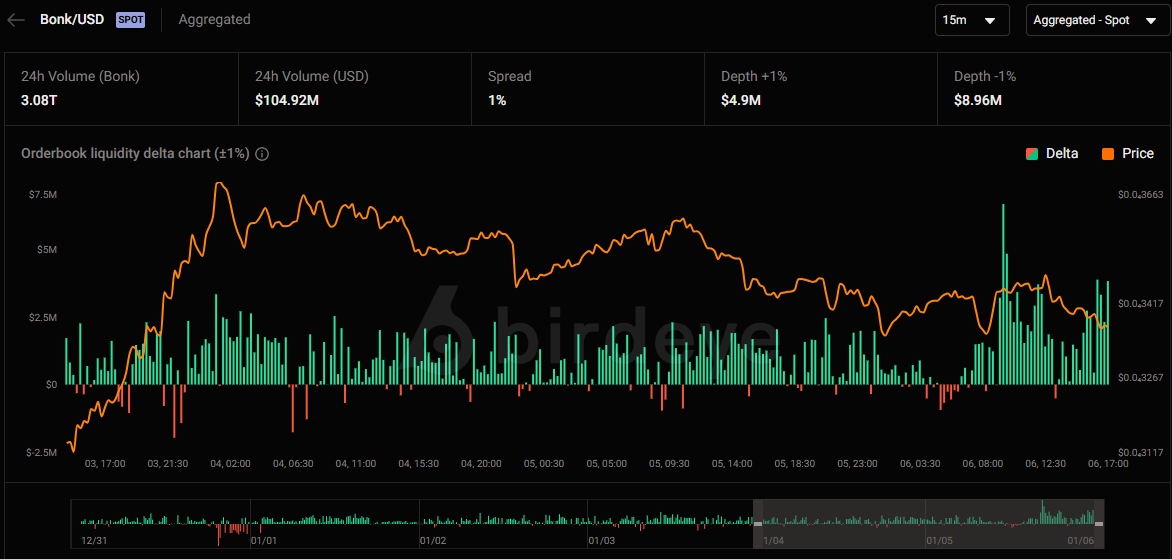
* **Definition:** The Liquidity Delta represents the net difference between bid and ask volumes in the aggregated orderbook. It is calculated as:

* **Purpose:** This metric indicates the current pressure in the market—whether buying (positive delta) or selling (negative delta) dominates.
* **Visualization:** Displayed as a dynamic chart that updates in real-time to reflect the ongoing shifts in market sentiment across all connected exchanges.
Orderbook Spread Distribution
[](#orderbook-spread-distribution)
--------------------------------------------------------------------
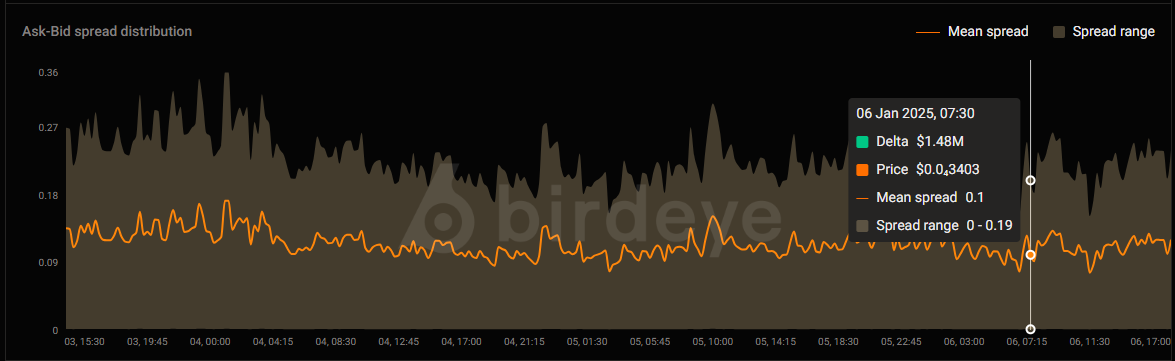
* **Definition:** This feature analyzes the distribution of the bid-ask spread over various timeframes using aggregated data, providing insights into market volatility and liquidity consistency.
* **Purpose:** Understanding spread distribution helps traders assess the cost of executing trades and the potential for price slippage across different exchanges.
* **Visualization:** Presented through histograms or line charts segmented by user-defined time intervals (e.g., 1-minute, 5-minute, 15-minute), reflecting aggregated spread data.
* * *
3\. Interpreting the Data
[](#3-interpreting-the-data)
==========================================================
Understanding Liquidity Delta
[](#understanding-liquidity-delta)
--------------------------------------------------------------------
The **Orderbook Liquidity Delta** chart offers a snapshot of the market's buying and selling pressure based on aggregated data from multiple exchanges. A positive delta suggests more aggressive buying, while a negative delta indicates stronger selling activity.
**Example Interpretation:**
* **Positive Delta:** Indicates that the cumulative bid volume across all aggregated exchanges exceeds the ask volume, potentially signaling upward price pressure.
* **Negative Delta:** Suggests that the cumulative ask volume surpasses the bid volume across all exchanges, which may lead to downward price movement.
Important Note: While the delta provides an overview of market sentiment, it does not directly translate into trading signals due to factors like _**Market and Iceberg orders**_ that may not be fully reflected in the aggregated delta.
Analyzing Spread Distribution
[](#analyzing-spread-distribution)
--------------------------------------------------------------------
The **Orderbook Spread Distribution** by Timeframes provides a detailed view of how the bid-ask spread behaves over different periods using aggregated data from multiple exchanges. A consistently narrow spread may indicate a highly liquid market, whereas a wide or fluctuating spread could point to volatility or lower liquidity.
**Example Interpretation:**
* **Narrow Spread:** Lower transaction costs and higher liquidity across aggregated exchanges.
* **Wide Spread:** Higher transaction costs and potential challenges in executing large orders without affecting the price across the market.
* * *
4\. Important Considerations
[](#4-important-considerations)
================================================================
While the **Orderbook Liquidity Delta** and aggregated data offer valuable insights into market sentiment, it's essential to understand their limitations:
* **Current Pressure Indicator:** The delta chart reflects the present balance between buy and sell orders across aggregated exchanges but does not directly translate into trading signals.
* **Positive Delta Caveat:** Even when the delta is positive (indicating more buy orders than sell orders), the price may not rise as expected. This discrepancy can occur due to:
* **Market Orders:** Large market buy orders can consume available ask liquidity without necessarily leading to a sustained price increase.
* **Iceberg Orders:** Hidden or iceberg orders, which conceal the true order size, can mask the actual supply and demand dynamics, leading to misleading delta readings.
* **Data Aggregation Dynamics:** Aggregating data from multiple exchanges provides a broader market perspective but may also introduce complexities such as varying liquidity profiles and trading behaviors across different platforms.
* **Dynamic Market Conditions:** Market conditions can change rapidly. It's crucial to combine delta analysis with other indicators and market intelligence for more accurate trading decisions.
5\. Conclusion
[](#5-conclusion)
====================================
The **Advanced Centralized Exchange Liquidity** is a powerful tool designed to provide deeper insights into market liquidity and orderbook dynamics by aggregating data from multiple exchanges. By leveraging the **Orderbook Liquidity Delta** and **Orderbook Spread Distribution**, users can better understand the forces shaping price movements and optimize their trading strategies accordingly. However, always consider the inherent limitations of these metrics and use them in conjunction with a comprehensive analysis framework to enhance trading effectiveness.
Updated about 1 month ago
* * *
---
# Market Data
Supported Decentralized Exchanges
[](#supported-decentralized-exchanges)
----------------------------------------------------------------------------
Our platform aggregates data from a variety of decentralized exchanges (DEX). This includes information from leading DEXs operating across different blockchain ecosystems.
Supported Centralized Exchanges
[](#supported-centralized-exchanges)
------------------------------------------------------------------------
In addition to the decentralized exchanges, our platform also provides real-time multi-market data for cryptocurrency tokens, supporting data from multiple top centralized exchanges (CEX). This allows users to track token prices, volume, and order books across several platforms in one place.
Here is a list of the currently supported centralized exchanges:
| No | `Exchange` | `Address` |
| --- | --- | --- |
| 1 | BINANCE | [https://www.binance.com/en](https://www.binance.com/en) |
| 2 | BINANCE US | [https://www.binance.us/](https://www.binance.us/) |
| 3 | COINBASE | [https://www.coinbase.com/](https://www.coinbase.com/) |
| 4 | TOOBIT | [https://www.toobit.com/en-US](https://www.toobit.com/en-US) |
| 5 | GATE | [https://www.gate.io/](https://www.gate.io/) |
| 6 | BYBIT | [https://www.bybit.com/en/](https://www.bybit.com/en/) |
| 7 | OKX | [https://www.okx.com/](https://www.okx.com/) |
| 8 | MEXC | [https://www.mexc.com/](https://www.mexc.com/) |
| 9 | BINGX | [https://bingx.com/](https://bingx.com/) |
We are continuously working to expand our list of supported exchanges to enhance market coverage.
####
CEX data concepts explanations
[](#cex-data-concepts-explanations)
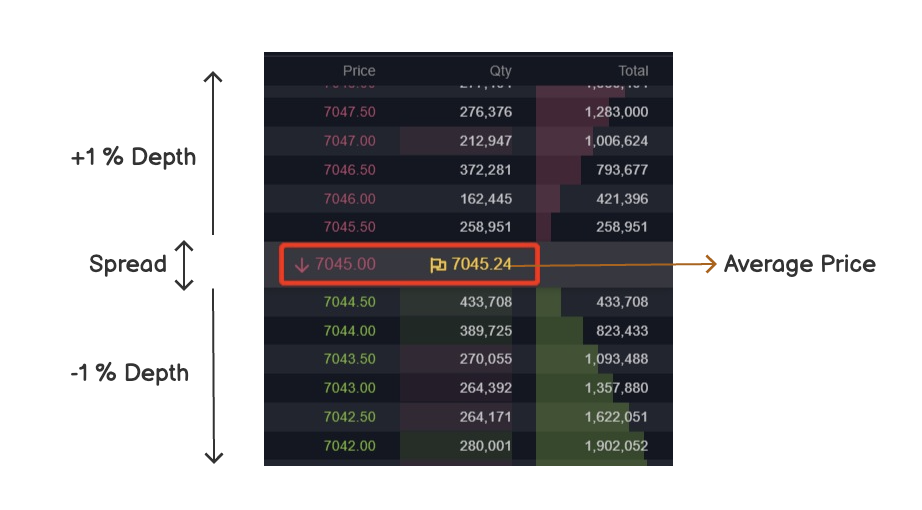
**Spread (%):** Absolute difference (%) between the best (lowest) ask price and the best (highest) bid price in the order book over average price
**Depth +1%**: refers to the cumulative volume of sell orders (asks) within 1% above the current market average price.
**Depth -1%** refers to the cumulative volume of buy orders (bids) within 1% below the current market average price.
Updated about 1 month ago
* * *
* [Advanced Cex Liquidity](/docs/advanced-cex-liquidity)
---
# Third-party Swap Function
To bring the best user experience to our users, Birdeye integrates with Jupiter, a decentralized exchange protocol. This integration allows users to seamlessly exchange cryptocurrencies directly within the Birdeye platform.
Integration with Jupiter:
[](#integration-with-jupiter)
-----------------------------------------------------------
Birdeye.so leverages Jupiter's decentralized exchange protocol to enable smooth and secure swapping of cryptocurrencies. By integrating with Jupiter, Birdeye ensures that swapping transactions occur directly on the decentralized exchange, providing users with decentralized and transparent trading experiences.
Decentralized Swaps:
[](#decentralized-swaps)
-------------------------------------------------
It's important to note that all swapping transactions initiated through Birdeye.so are executed on Jupiter's decentralized exchange. Birdeye does not intervene in the swapping process, allowing for trustless and censorship-resistant transactions directly between users.
Processing Fee:
[](#processing-fee)
---------------------------------------
Please be aware that a processing fee of 0.6% is applied to all trades conducted through Birdeye.so. This fee covers the costs associated with infrastructure, development, and maintenance for the website.
Disclaimer:
[](#disclaimer)
-------------------------------
> ### 🚧
>
> Birdeye is NOT responsible for any funds lost when users trade non-reputable tokens or engage in swaps by mistakes. Additionally, Birdeye is not responsible for processing the swap itself, as the swap occurs on Jupiter's programs on-chain. Users are encouraged to exercise caution and conduct thorough research before engaging in any trading activities.
How to Swap:
[](#how-to-swap)
---------------------------------
To initiate a swap, simply navigate to the swapping function within the Birdeye.so platform. Select the cryptocurrencies you wish to exchange, enter the desired amount, and confirm the transaction. Your swap will be executed directly on Jupiter's decentralized exchange, with the resulting assets deposited into your designated wallet.
Important Considerations:
[](#important-considerations)
-----------------------------------------------------------
* Ensure that you have sufficient funds in your wallet to cover the transaction amount, including any applicable processing fees.
* Double-check the details of your swap before confirming to avoid any errors or discrepancies.
* Please note that swapping transactions are irreversible once confirmed, so exercise caution when initiating trades.
Updated 3 days ago
* * *
---
# Monitoring
**Using the Profile Page to Monitor Your API Usage**
[](#using-the-profile-page-to-monitor-your-api-usage)
==============================================================================================================
Birdeye provides you with a user-friendly Profile page that allows you to closely monitor and manage your API usage. This page empowers you with valuable insights, tools, and control to optimize your experience with our APIs. Here's a step-by-step guide on how to navigate and leverage the features available on the Profile page:
URL: [https://bds.birdeye.so/user/metrics](https://bds.birdeye.so/user/metrics)
**1\. Accessing Your Profile:**
[](#1-accessing-your-profile)
=================================================================
* Log in to your Birdeye account.
* Click on your profile picture or name in the top right corner of the Birdeye website to access the drop-down menu.
* Select "Profile" from the menu to navigate to your Profile page.
**2\. Monitoring API Metrics:**
[](#2-monitoring-api-metrics)
=================================================================
* On the Profile page, you'll find a comprehensive overview of your API usage metrics.
* Visualize the Call Methods and Status over time to gain insights into your API activities.
* Dig deeper by exploring the detailed metrics provided, helping you understand the nature of your API calls.
**3\. Viewing API Details:**
[](#3-viewing-api-details)
===========================================================
* Access a list of origin, IPs, and user agents that have been using your API key.
* Understand the sources of API requests and ensure that your key is being utilized as intended.
**4\. Generating New API Keys:**
[](#4-generating-new-api-keys)
===================================================================
* If necessary, you can generate new API keys to enhance security or segregate usage.
* Click on the "Generate New API Key" option to create a new key.
**5\. Managing Key Access:**
[](#5-managing-key-access)
===========================================================
* Once you've generated new API keys, you can configure access restrictions, including rate limits per API keys.
* Utilize the blacklist and whitelist features to control who can or cannot access specific keys based on IP, origin, or referrer.
**6\. Viewing Audit Logs:**
[](#6-viewing-audit-logs)
=========================================================
* Gain transparency into your API activities by reviewing the Audit log.
* The Audit log provides a chronological record of user actions, API key creations, modifications, and more.
By using the Profile page, you gain a powerful toolset to effectively monitor and manage your API usage on Birdeye. From tracking metrics to generating new keys and enhancing security, this page offers you the control you need to ensure a seamless and secure experience while utilizing our APIs. Should you have any questions or need assistance, don't hesitate to reach out to our support team. Happy monitoring!
Updated about 1 month ago
* * *
---
# Authentication & API Keys
To utilize the Birdeye's APIs, an API key is required for authentication. You can obtain an API key by signing up for a Birdeye.so account and generating an API key in your BDS Dashboard. Include this API key in the headers of your API requests for authentication.
Here's a step-by-step guide on how to obtain an API key:
1 - Create a Birdeye Account
[](#1---create-a-birdeye-account)
==================================================================
* A single Birdeye account can be used for both accessing website [birdeye.so](https://birdeye.so/)
and using [Birdeye Data Services (BDS)](https://bds.birdeye.so/)
.
* You can create your Birdeye account using one of two methods:
* Using birdeye.so sign-up page: [https://birdeye.so/user/sign-up](https://birdeye.so/user/sign-up)
. Please check out detailed instructions [HERE](https://docs.birdeye.so/docs/birdeye-account)
.
* Using BDS sign-up page: [https://bds.birdeye.so/auth/sign-up](https://bds.birdeye.so/auth/sign-up)
.
**Note**: Both methods above result in one single account, and that account can be used in both systems. It is not possible to create two account in those two systems with the same email address.
2 - Get your API Keys
[](#2---get-your-api-keys)
====================================================
* **Log in to your BDS account:** use your email and password to log into BDS Dashboard using this link: [https://bds.birdeye.so/auth/sign-in](https://bds.birdeye.so/auth/sign-in)
* **Access the Security Tab:** On your Dashboard, look for a section labeled "Security" or similar. This is where you'll find options related to API keys and security settings.
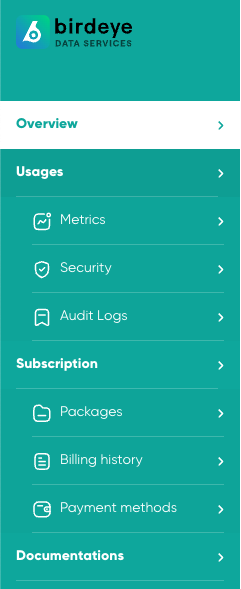
* **Generate API Key:** Within the Security section, you'll find an option to generate an API key. This might be labeled as "Generate Key" or something similar. Click on this option to initiate the API key generation process.
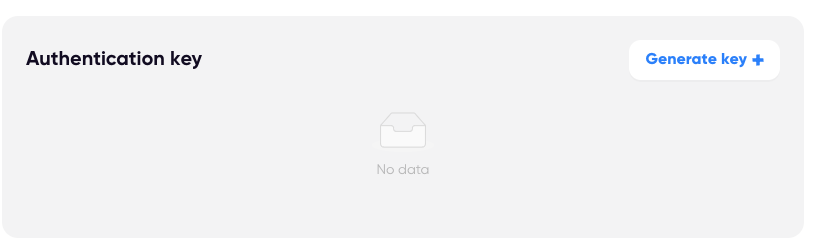
* **Configure Key Settings (Optional):** Depending on the platform, you might have the option to configure settings for your API key. This could include specifying the access permissions or adding a name/description to the key for better organization.
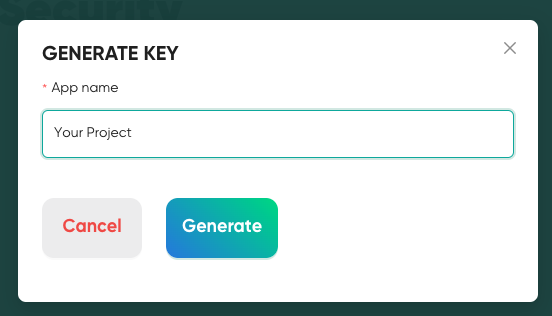
* **Generate the Key:** After configuring any optional settings, click the "Generate" or "Create" button to generate your API key. The system will create a unique API key associated with your Birdeye account.
* **Copy the API Key:** Once the API key is generated, you'll typically see it displayed on the screen. It might be a long string of alphanumeric characters. Make sure to copy this key and keep it in a secure place. You'll need to include this key in the headers of your API requests for authentication.
And that's it! You now have your API key from Birdeye.so, which you can use to authenticate your API requests and access the services provided by the Birdeye.so APIs.
Updated about 1 month ago
* * *
---
# Overview
Welcome to Birdeye Data Services! This documentation will guide you through the process of registering for a Birdeye account, obtaining API keys, upgrading your account, and making payments.
Before diving in detailed steps, make sure to check the available data and pricing:
* [Birdeye Data Services (BDS) website](https://bds.birdeye.so/)
* [Type of data we are offering](https://docs.birdeye.so/docs/premium-apis-1)
* [Compute Unit Pricing](https://docs.birdeye.so/docs/compute-unit-cost)
If you are ready, let's jump in:
✏️ 1 - Registering for a Birdeye Account
[](#️-1---registering-for-a-birdeye-account)
=========================================================================================
To get started with Birdeye Data Services, you need a Birdeye Account. Follow the steps [HERE](https://bds.birdeye.so/auth/sign-up)
to set up one.
🔑 2 - Obtaining API Keys
[](#-2---obtaining-api-keys)
==========================================================
Once you have a Birdeye account, you can obtain API keys to access our data services. Follow the steps [HERE](https://docs.birdeye.so/docs/authentication-api-keys)
to get your API keys.
🚀 3 - Upgrading Your Account & Processing Payment
[](#-3---upgrading-your-account--processing-payment)
===========================================================================================================
Please follow the instructions in your BDS Dashboard to upgrade your account.
Thank you for choosing Birdeye Data Services! We look forward to providing you with high-quality and reliable data for your projects. If you have any additional questions or need further assistance, don't hesitate to reach out to our support team.
Happy exploring with Birdeye!
Updated about 1 month ago
* * *
---
# Payment
At Birdeye Data Services, we strive to provide flexible payment options to accommodate the diverse needs of our users. Whether you prefer traditional methods or cutting-edge alternatives, we offer convenient payment solutions tailored to your preferences.
Credit Card Payments via Stripe
[](#credit-card-payments-via-stripe)
========================================================================
Our primary payment method is via credit cards processed through Stripe, a trusted and secure payment gateway. With Stripe, users can easily make payments using major credit cards, including Visa, Mastercard, American Express, and Discover. Stripe ensures seamless transactions and robust security measures to safeguard your payment information.
Crypto Payments
[](#crypto-payments)
========================================
For users seeking alternative payment methods, we also accept payments in cryptocurrencies by stablecoin such as USDC, USDT.
> ### 📘
>
> Crypto payment is only applicable for longer duration subscription
>
> It's important to note that while we accept crypto payments for all transactions, including one-time purchases and recurring subscriptions, we exclusively offer crypto payment options for subscription plans of longer durations. Specifically, **users can pay for subscription plans spanning 3 months, 6 months, or 1 year using cryptocurrencies**.
How to Make Payments
[](#how-to-make-payments)
==================================================
**Credit Card Payments:** Simply navigate to the payment section of your account dashboard and select the option to pay via credit card. Follow the prompts to securely enter your payment details and complete the transaction.
**Crypto Payments:** To make payments using cryptocurrencies, [CONTACT US](https://docs.birdeye.so/docs/enterprise-contact)
for detailed instructions.
* * *
Managing Subscriptions
[](#managing-subscriptions)
======================================================
For subscription-based services, users can easily manage their subscription preferences through their account settings. Update your payment method, modify subscription plans, or cancel subscriptions as needed to suit your evolving requirements.
* * *
Contact Us
[](#contact-us)
==============================
If you have any questions or encounter any issues regarding payment options or subscription management, our dedicated support team is here to assist you. Feel free to reach out to us using the [CONTACT DETAILS HERE](https://docs.birdeye.so/docs/enterprise-contact)
.
At Birdeye Data Services, we're committed to providing a seamless and hassle-free payment experience, empowering you to access our cutting-edge data solutions with ease and confidence. Thank you for choosing Birdeye Data Services as your trusted data partner.
Updated about 1 month ago
* * *
---
# Alert - Notification Settings
Birdeye Alert Notification Setup Guide
[](#birdeye-alert-notification-setup-guide)
======================================================================================
Welcome to Birdeye! To ensure you stay on top of real-time data and market trends, follow these steps to register channels and receive alert notifications through your preferred delivery methods: Telegram, Discord, and Email.
* * *
Telegram Setup
[](#telegram-setup)
--------------------------------------
Find your Telegram ID:
* Open your Telegram app.
* Start a chat with the "Birdeye Alert" (click here: [@birdeye\_alert\_bot](https://t.me/birdeye_alert_bot)
).
* Click "Start" or type command "/start" to receive your Telegram ID and start getting notifications.
* Save your Telegram ID in your Birdeye settings.
> ### ❗️
>
> Important Notice
>
> You will NOT receive notifications if you do not click "START" on the Telegram bot
* * *
Discord Setup
[](#discord-setup)
------------------------------------
1. Open the Discord channel you want to receive Birdeye event notifications.
2. From the channel menu, select **Edit Channel**.
3. Select **Integrations**.
4. If there are no existing webhooks, select **Create Webhook**. Otherwise, select **View Webhooks** then **New Webhook**.
5. Enter the name of the bot to post the message.
6. Optional. Edit the avatar.
7. Copy the URL from the **WEBHOOK URL** field.
8. Select **Save**.
* * *
Email Setup
[](#email-setup)
--------------------------------
* Your registered email will be input automatically to receive notifications.
* Check your spam folder for Birdeye notification emails.
* Mark Birdeye emails as "Not Spam" to ensure delivery.
* * *
Accessing Settings
[](#accessing-settings)
----------------------------------------------
* Go to Terminal page on Birdeye.so
* Navigate to the "Settings" section.
Updated about 1 month ago
* * *
---
# Service cancellation rules
Cancellation due to overage
[](#cancellation-due-to-overage)
================================================================
* The allowed overage cost is 50% of the package price. If your overage exceeds this threshold (e.g., overage cost exceeds $500 for the Business package), you will receive an invoice for payment. If the payment is not made within 1 day, your package will be suspended.
Cancellation due to non-payment for the new subscription period.
[](#cancellation-due-to-non-payment-for-the-new-subscription-period)
=========================================================================================================================================
* If payment for the new subscription period is not received within 3 days, your subscription will be cancelled and the service will be stopped.
Crypto Payment
[](#crypto-payment)
======================================
* Crypto payment users are required to pay for at least 3 months of the package or the total cost of the last three months, whichever is higher. When your credit is depleted, a new invoice will be sent. If payment is not made within 3 days, the service will be stopped.
Updated about 1 month ago
* * *
---
# Data Coverage
**Comprehensive Data Coverage with Birdeye**
[](#comprehensive-data-coverage-with-birdeye)
==============================================================================================
Birdeye is your trusted source for comprehensive crypto data, catering to your diverse informational needs across the cryptocurrency landscape.
**Supported Networks:**
[](#supported-networks)
===================================================
Our coverage spans major blockchain networks. As we continuously work to expand our data offerings, we're actively incorporating additional networks into our repertoire, ensuring you have access to evolving insights across the crypto space.
Currently these blockchains are supported on Birdeye. Please note that the list may not be updated with the latest development.
| Network | ID | Birdeye API params | URL |
| --- | --- | --- | --- |
| Ethereum | 1 | ethereum | [https://ethereum.org/](https://ethereum.org/) |
| Solana | N/A | solana | [https://solana.com/](https://solana.com/) |
| BNB Smart Chain | 56 | bsc | [https://www.binance.org/en/smartChain](https://www.binance.org/en/smartChain) |
| Arbitrum | 42161 | arbitrum | [https://arbitrum.io/](https://arbitrum.io/) |
| Optimism | 10 | optimism | [https://optimism.io/](https://optimism.io/) |
| Polygon | 137 | polygon | [https://polygon.technology/](https://polygon.technology/) |
| Avalanche C-Chain | 43114 | avalance | [https://www.avalabs.org/](https://www.avalabs.org/) |
| Base | 8453 | base | [https://base.org/](https://base.org/) |
| Zksync ERA | 324 | zksync | [https://zksync.io/](https://zksync.io/) |
| Sui | N/A | sui | [https://sui.io](https://sui.io) |
**Supported Protocols/Exchanges:**
[](#supported-protocolsexchanges)
========================================================================
With data from 180+ decentralized exchanges, including well-known platforms like [Jupiter](https://jup.ag/swap/SOL-USDC)
, [Uniswap](https://uniswap.org/)
, [Orca](https://orca.so/)
, [PancakeSwap](https://pancakeswap.finance/)
, [Jupiter](https://jup.io/)
, [1inch](https://1inch.io/)
, and [Quickswap](https://quickswap.exchange/)
, we empower you with the trade data you need from influential exchanges across major blockchains.
It's important to note that our commitment to enhancing our data **is an ongoing journey**, **and we're constantly adding more protocols and exchanges to our database**. The protocols and exchanges listed in this documentation provide a snapshot of our current offerings and may not encompass the full extent of our development efforts.
undefined
Uniswap
Pancakeswap
Sushiswap
1inch
Metamaskswap
Raydium
Raydium Concentrated Liquidity
Orca
Whirlpool
Serum
Openbook
Aldrin
Step
Saros
Cropper
Crema
Crema Concentrated Liquidity
Lifinity
Lifinity V2
Saber
Sencha
Mercurial
Penguin
Solana Swap Program
Onemoon
Cykura
Swim
Dooar
Marinade
Mango
Symmetry
Meteora
Invariant
Goosefx
Solanax
Deltafi
Dradex
Balansol
Marcopolo
Oasis
Jupiter
Jupiter Limit Order
Phoenix
Bonkswap
Fluxbeam
1sol
Francium
Apricot
Tulip
Squads
Investin
Prism
Solflare
Boson
Cypher
Jetprotocol
Atrix
Friktion
Kamino
Goblingold
P2P
Mean
Drip
Project Larix
Openocean
Kyberswap
Elixir
Slow Protocol
Drift Protocol
LP Finance
Snowflake
At Birdeye, our mission is to equip you with the most accurate and current data available. As we forge ahead in the ever-evolving crypto landscape, you can trust that our dedication to expanding and refining our data coverage remains at the forefront of our initiatives.
Updated about 1 month ago
* * *
---
# Transaction Simulation
Birdeye introduces a groundbreaking feature tailored for crypto wallets: the Transaction Simulation API. This innovative tool is meticulously crafted to simulate transaction data, offering a preview for users before they finalize and sign the transaction. With a focus on accuracy and optimization for trading events, Birdeye's Transaction Simulation API reshapes the user experience within crypto wallets.
Key Features:
[](#key-features)
===================================
* **Optimized for Trading Events**: Birdeye's Transaction Simulation API is specifically designed to excel in trading scenarios. It ensures that simulations accurately reflect the intricacies of trading transactions, providing users with a reliable preview.
* **Enhanced Transaction Parsing**: Achieve superior transaction parsing with our API. It guarantees that simulated transactions mirror real-world scenarios, empowering users with a precise understanding of the transaction before execution.
* **Cost-Efficient Solution**: Save on development costs and resources. By leveraging Birdeye's Transaction Simulation API, crypto wallets can avoid the complexities of building and maintaining their simulation systems, leading to significant cost savings.
* **Trader-Focused Simulations**: Tailored for traders, this API delivers simulations that resonate with the trading community. It goes beyond basic previews, providing a comprehensive and realistic experience that builds user confidence.
Why Choose Transaction Simulation by Birdeye:
[](#why-choose-transaction-simulation-by-birdeye)
===================================================================================================
* **Accuracy Matters:** In the dynamic world of crypto trading, accuracy is paramount. Our Transaction Simulation API ensures that users preview transactions with precision, minimizing the risk of errors.
* **Trader-Centric Design:** Understanding the unique needs of traders, Birdeye's API creates simulations that align with the expectations of the trading community, fostering trust and confidence.
* **Cost Savings:** By adopting our Transaction Simulation API, wallets can redirect resources to core functionalities, reducing the burden of in-house simulation development and maintenance.
Empower your users, build trust, and streamline your wallet's transaction experience with Birdeye's Transaction Simulation API. Elevate your platform with a tool designed for accuracy, optimization, and cost efficiency.
Related API endpoint
[](#related-api-endpoint)
==================================================
**[Transaction Simulation API](https://docs.birdeye.so/reference/post_v1-wallet-simulate)
**: Integrate this powerful API seamlessly into your crypto wallet to provide users with accurate and trader-focused transaction simulations. Enhance the user experience and build confidence with previews tailored for the dynamic world of crypto trading.
Updated about 1 month ago
* * *
---
# Overage Charge rule
1\. Stripe Users
[](#1-stripe-users)
----------------------------------------
For customers paying via Stripe, the overage charge policy is structured to handle excess usage effectively, ensuring service continuity while aligning charges with usage levels.
###
Key Points:
[](#key-points)
**Billing Cycle**: Overage charges are applied based on specific usage tiers, with higher included CU allowances permitting greater overage thresholds before additional charges are incurred.
**Overage Charges:** Each package includes a certain number of Compute Units (CUs). If usage exceeds this allowance, overage charges are applied according to predefined tiers. Higher-tier packages, which come with larger included CU allowances, allow for more extensive overage at corresponding rates.
**Payment Failure Consequences:**
* Suspended Access: If an overage payment fails, the user's access will be suspended within 1 day. To resume access, the user must settle the overdue payment.
* Cancellation: If the payment remains unresolved for 3 days, the account will be canceled. After cancellation, the user must purchase a new package to regain access.
####
Usage Tiers:
[](#usage-tiers)
Overage charges are calculated based on the following incremental tiers:
0–20 million CUs
20–50 million CUs 50–200 million CUs 200–500 million CUs 500–1,000 million CUs 1,000–2,000 million CUs Above 2,000 million CUs
**Details**
| Package | Partial overage charge each |
| --- | --- |
| Starter | $100 |
| Premium | $100 |
| Business | $300 |
This structure ensures fairness and transparency in billing, with charges aligned to usage levels and clear steps for users to restore or renew their service if payments fail.
2\. Crypto Users
[](#2-crypto-users)
----------------------------------------
For customers paying via cryptocurrency, overage charges are deducted from their prepaid credit, ensuring a smooth handling of excess usage:
* **Prepaid System**: Crypto users pay for their package **3 months in advance**.
* **Overage Deduction**: Overage usage beyond the included CU allowance is **deducted from the prepaid credit**.
* **Renewal Requirement**: Once the prepaid credit is depleted, the user will be notified and required to **renew their payment** to continue using the service.
###
Example
[](#example)
* A crypto user with a **3-month prepaid plan** runs out of included CUs after 2 months.
* The overage charges are deducted from the remaining credit.
* Once the credit is depleted, the user will be notified and prompted to renew their plan.
This system ensures that crypto users manage overage charges within their prepaid plan, allowing them to continue service smoothly.
* * *
Important Note
[](#important-note)
--------------------------------------
For a more convenient experience, users are encouraged to upgrade to a plan with a higher included usage allowance. This helps reduce the likelihood of overage charges and ensures smoother operations. Additionally, WebSocket data has a **different and separate overage charge**. For more information on WebSocket overage pricing, please contact the Birdeye team.
Updated about 1 month ago
* * *
---
# Supported networks
**API Endpoint: /defi/networks**
**Description:** This endpoint allows users to query the currently supported networks of Birdeye Data Services.
**Request Method:** GET
**Request URL:**
plaintext
https://public-api.birdeye.so/defi/networks
**Request Headers:**
plaintext
accept: application/json
X-API-KEY: YOUR_API_KEY
**Response:** The response includes a list of historical API call identifiers and the remaining time until the package's expiration.
**Example Request:**
Bash
curl --request GET \
--url https://public-api.birdeye.so/defi/networks \
-H 'X-API-KEY: YOUR_API_KEY'
**Current supported networks:**
JSON
{
"data": [\
"solana",\
"ethereum",\
"arbitrum",\
"avalanche",\
"bsc",\
"optimism",\
"polygon",\
"base",\
"zksync",\
"sui"\
],
"success": true
}
**Notes for SUI network**
1. Not supported APIs:
* Wallet APIs (v1/wallet/)
* defi/token\_security
* defi/token\_creation\_info
* defi/v2/tokens/all
2. Data not reruned in tokenoverview endpoint
* mc
* supply
3. API defi/price & API defi/token\_overview
* The liquidity calculation is currently different for this endpoint. The improvement will be release on the version 2 of both two above APIs.
Updated about 1 month ago
* * *
---
# Trades - Pair
**API Endpoint: /defi/txs/pair**
**Description:** This endpoint provides a comprehensive list of token pair transactions, enabling users to monitor swaps and transfers involving specific token pairs on any networks we support. Transactions are ordered chronologically, and the endpoint supports pagination for easy navigation through the transaction history.
**Request Method:** GET
**Data Coverage:** Multi-chain
**Request URL:**
undefined
'https://public-api.birdeye.so/defi/txs/pair?address=842NwDnKYcfMRWAYqsD3hoTWXKKMi28gVABtmaupFcnS&tx_type=swap&sort_type=desc'
**Request Headers:**
undefined
accept: application/json
x-chain: any chains that Birdeye supports. Example: solana, ethereum
X-API-KEY: YOUR_API_KEY
**Parameters:**
| Key | Data Type | Details | Example |
| --- | --- | --- | --- |
| address | string | The address of the pair for which transactions are fetched | "842NwDnKYcfMRWAYqsD3hoTWXKKMi28gVABtmaupFcnS" |
| offset | integer | The offset from which to start fetching transaction data | 0 |
| limit | integer | The maximum number of transactions to return in the response | 50 |
| tx\_type | string | The type of transactions to filter by | "swap" |
| sort\_type | string | The order in which transactions should be sorted | "desc" |
**Example Request:**
Shell
curl --request GET \
--url 'https://public-api.birdeye.so/defi/txs/pair?address=842NwDnKYcfMRWAYqsD3hoTWXKKMi28gVABtmaupFcnS&tx_type=swap&sort_type=desc' \
--header 'X-API-KEY:c2d6c8d2a892b39c0514'
**Response:** The response includes a list of transaction items involving the specified token pair, each accompanied by transaction details and source information.
**Response format**
| Data Type | Details | Description |
| --- | --- | --- |
| success | boolean | Indicates whether the request was successful |
| data | object | Contains the items array and pagination information |
| items | array | An array of transactions. Each transaction is detailed |
| hasNext | boolean | Indicates whether there are more records to fetch |
**Example Response:**
JSON
{
"data": {
"items": [\
{\
"txHash": "WuKNTaWYuk18K2WFkwcUR2FosNdeY6h9AvX4U93Tt1fsZ9pHNmyT2c3L5RpCMqVqQmThLJhxmdBXzWqi4YdoGXC",\
"source": "raydium",\
"blockUnixTime": 1714116459,\
"address": "842NwDnKYcfMRWAYqsD3hoTWXKKMi28gVABtmaupFcnS",\
"owner": "3jHUxMz7XprojdWFx6RgNzpMmcznUcKSUaKxgyGv3WaW",\
"from": {\
"symbol": "SOL",\
"decimals": 9,\
"address": "So11111111111111111111111111111111111111112",\
"amount": 93000000,\
"type": "transfer",\
"typeSwap": "from",\
"uiAmount": 0.093,\
"price": null,\
"nearestPrice": 144.26075569403358,\
"changeAmount": -93000000,\
"uiChangeAmount": -0.093\
},\
"to": {\
"symbol": "TOM",\
"decimals": 9,\
"address": "2rJSfgxoWP7h3rw3hDUF7HPToY3exb6FdH9xFBg7TeQk",\
"amount": 265575905341,\
"type": "transfer",\
"typeSwap": "to",\
"feeInfo": null,\
"uiAmount": 265.575905341,\
"price": 0.05051757335560479,\
"nearestPrice": 0.050266916041458554,\
"changeAmount": 265575905341,\
"uiChangeAmount": 265.575905341\
}\
}\
],
"hasNext": true
},
"success": true
}
**Transaction Detail**
Each transaction within the items array may contain:
**txHash**: The hash identifier of the transaction.
**source:** The platform or service where the transaction occurred.
**blockUnixTime:** The Unix timestamp denoting when the transaction was recorded on the blockchain.
**from and to:** Objects detailing the transaction's source and destination addresses, amounts, symbols, and other relevant metadata.
**Note:** Replace the address parameter in the request URL with the actual address of the token pair you want to inquire about. The sort\_type parameter determines the sorting order for transactions (descending or ascending).
Updated about 1 month ago
* * *
---
# Compute Unit Cost
Compute units are a measure of the computational resources consumed by each API call. The pricing is based on the complexity and resource requirements of individual APIs.
| API Name | Endpoint | Cost (CUs) |
| --- | --- | --- |
| Supported networks | /defi/networks | 1 |
| Token Price | /defi/price | 10 |
| Price - Multiple | /defi/multi\_price | [See batch CU cost](https://docs.birdeye.so/docs/batch-token-cu-cost#/) |
| Price - Historical | /defi/history\_price | 60 |
| Price - Historical Unix | /defi/historical\_price\_unix | 5 |
| Price - Volume (Single) | /defi/price\_volume/single | 15 |
| Price - Volume (Multiple) | /defi/price\_volume/multi | [See batch CU cost](https://docs.birdeye.so/docs/batch-token-cu-cost#/) |
| Trades - Token | /defi/txs/token | 10 |
| Trades - Token - Seek by time | /defi/txs/token/seek\_by\_time | 15 |
| Trades - Pair | /defi/txs/pair | 10 |
| Trades - Pair - Seek by time | /defi/txs/pair/seek\_by\_time | 15 |
| OHLCV | /defi/ohlcv | 30 |
| OHLCV - Pair | /defi/ohlcv/pair | 30 |
| OHLCV - Base/Quote | /defi/ohlcv/base\_quote | 30 |
| Token - List | /defi/tokenlist | 30 |
| Token - List V3 | /defi/v3/token/list | 100 |
| Token - List v2 (full list, no limit per call, only for business) | /defi/v2/tokens/all | 995 |
| Token - New Listing | /defi/v2/tokens/new\_listing | 80 |
| Token - Security | /defi/token\_security | 50 |
| Defi - Trending tokens | /defi/token\_trending | 50 |
| Token - Overview | /defi/token\_overview | 30 |
| Defi - Market List | /defi/v2/markets | 50 |
| Token - Creation Info | /defi/token\_creation\_info | 30 |
| Token - Top traders | /defi/v2/tokens/top\_traders | 30 |
| Token - Meta Data (Single) | /defi/v3/token/meta-data/single | 5 |
| Token - Meta Data (Multiple) | /defi/v3/token/meta-data/multiple | [See batch CU cost](https://docs.birdeye.so/docs/batch-token-cu-cost#/) |
| Token - Market Data | /defi/v3/token/market-data | 15 |
| Token - Trade Data (Single) | /defi/v3/token/trade-data/single | 15 |
| Token - Trade Data (Multiple) | /defi/v3/token/trade-data/multiple | [See batch CU cost](https://docs.birdeye.so/docs/batch-token-cu-cost#/) |
| Token - Holder List | /defi/v3/token/holder | 50 |
| Trader - Top Gainer Losers | /trader/gainers-losers | 30 |
| Trader - Seek by Time | /trader/txs/seek\_by\_time | 15 |
| Search | /defi/v3/search | 100 |
| Pair - Overview - Single | /defi/v3/pair/overview/single | 20 |
| Pair - Overview - Multiple | /defi/v3/pair/overview/multiple | [See batch CU cost](https://docs.birdeye.so/docs/batch-token-cu-cost#/) |
| Supported Networks | /v1/wallet/list\_supported\_chain | 1 |
| Wallet Portfolio | /v1/wallet/token\_list | 100 |
| Wallet - Token Balance | /v1/wallet/token\_balance | 5 |
| Wallet Transaction History | /v1/wallet/tx\_list | 150 |
| Transaction Simulation | /v1/wallet/simulate | 105 |
| Websocket | Cost (CUPB - Compute Unit Per Byte) |
| --- | --- |
| ohlcv (price & base-quote) | 0.006 |
| transactions | 0.0008 |
| newListing | 0.1 |
| newPair | 0.06 |
| large trades | 0.006 |
| wallet txs | 0.006 |
**Note**
* Compute costs are subject to change at any time without prior notice.
Updated 3 days ago
* * *
---
# Market Data
Updated 11 days ago
* * *
---
# Trades - Token
**API Endpoint: /defi/txs/token**
**Description:** This endpoint returns transaction records of a specific token on any blockchains that Birdeye supports. It provides information about transactions related to the specified token, including trade details, ownership, source, and other relevant data.
As of the latest update on August 1, 2024, the endpoint allows users to sort the trades of the token **by UNIX time** in either ascending (oldest to newest) or descending (newest to oldest) order. Additionally, the offset is now set to a maximum of 1,000. For users who need to retrieve more data, the upcoming version will provide enhanced capabilities to support this requirement.
**Request Method:** GET
**Data Coverage:** Multi-chain
**Request URL:**
plaintext
https://public-api.birdeye.so/defi/txs/token?address=DezXAZ8z7PnrnRJjz3wXBoRgixCa6xjnB7YaB1pPB263&offset=0&limit=2&sort_type=asc
**Request Headers:**
plaintext
accept: application/json
x-chain: any chains that Birdeye supports. Example: solana, ethereum
X-API-KEY: YOUR_API_KEY
**Parameters:**
| Key | Data Type | Details | Example |
| --- | --- | --- | --- |
| `address` | string | The token address to retrieve transaction records for. | Required
default: So11111111111111111111111111111111111111112 |
| `sort_type` | string | Sort the trades by UNIX time in the order, either descending or ascending. Descending means that sort from the latest trade backward. | Required
Value: {desc, asc}
Default: desc |
| `offset` | integer | The starting index for the list of market | NOT required
Range: {0:1000}
Default: 0 |
| `limit` | integer | The maximum number of markets to retrieve. | NOT required
Range: {1:50}
Default: 50 |
| `tx_type` | string | The type of transactions to filter by. Supports 4 values: swap, add, remove, all. | NOT required
Default: "swap" |
**Example Request:**
Bash
curl -X 'GET' \
--url 'public-api.birdeye.so/defi/txs/token?address=DezXAZ8z7PnrnRJjz3wXBoRgixCa6xjnB7YaB1pPB263&offset=0&limit=2&sort_type=asc' \
-H 'accept: application/json' \
-H 'x-chain: solana' \
-H 'X-API-KEY: YOUR_API_KEY'
**Example Response:**
JSON
{
"data": {
"items": [\
{\
"quote": {\
"symbol": "SOL",\
"decimals": 9,\
"address": "So11111111111111111111111111111111111111112",\
"amount": 264389930,\
"uiAmount": 0.26438993,\
"price": null,\
"nearestPrice": 11.309597,\
"changeAmount": -264389930,\
"uiChangeAmount": -0.26438993\
},\
"base": {\
"symbol": "Bonk",\
"decimals": 5,\
"address": "DezXAZ8z7PnrnRJjz3wXBoRgixCa6xjnB7YaB1pPB263",\
"amount": 996222551477,\
"uiAmount": 9962225.51477,\
"price": null,\
"nearestPrice": null,\
"changeAmount": 996222551477,\
"uiChangeAmount": 9962225.51477\
},\
"basePrice": null,\
"quotePrice": null,\
"txHash": "5dQDVDqA2T9YjRe6uuhQ1NXVNjqMWe3w4eR9DnFEbPM13HAjEmUhCY2T5XqR5qSbpNewLmMv52dKMNdMaPfaRRTp",\
"source": "raydium",\
"blockUnixTime": 1671883209,\
"txType": "swap",\
"owner": "VVVy6P2mfuL4RGCKZRhyg191g79GsooZfyBc98BrQS9",\
"side": "buy",\
"alias": null,\
"pricePair": 2.6539243626638986e-8,\
"from": {\
"symbol": "SOL",\
"decimals": 9,\
"address": "So11111111111111111111111111111111111111112",\
"amount": 264389930,\
"uiAmount": 0.26438993,\
"price": null,\
"nearestPrice": 11.309597,\
"changeAmount": -264389930,\
"uiChangeAmount": -0.26438993\
},\
"to": {\
"symbol": "Bonk",\
"decimals": 5,\
"address": "DezXAZ8z7PnrnRJjz3wXBoRgixCa6xjnB7YaB1pPB263",\
"amount": 996222551477,\
"uiAmount": 9962225.51477,\
"price": null,\
"nearestPrice": null,\
"changeAmount": 996222551477,\
"uiChangeAmount": 9962225.51477\
},\
"tokenPrice": null,\
"poolId": "HVNwzt7Pxfu76KHCMQPTLuTCLTm6WnQ1esLv4eizseSv"\
},\
{\
"quote": {\
"symbol": "SOL",\
"decimals": 9,\
"address": "So11111111111111111111111111111111111111112",\
"amount": 392776335,\
"uiAmount": 0.392776335,\
"price": null,\
"nearestPrice": 11.320764627990165,\
"changeAmount": -392776335,\
"uiChangeAmount": -0.392776335\
},\
"base": {\
"symbol": "Bonk",\
"decimals": 5,\
"address": "DezXAZ8z7PnrnRJjz3wXBoRgixCa6xjnB7YaB1pPB263",\
"amount": 2252006173,\
"uiAmount": 22520.06173,\
"price": null,\
"nearestPrice": null,\
"changeAmount": 2252006173,\
"uiChangeAmount": 22520.06173\
},\
"basePrice": null,\
"quotePrice": null,\
"txHash": "3JPGAvunAtkJjx3sikGX73JusZcfpDnBrYXR8WjMZZ2pKN1oejxf1kiz6yyBcPFJXChQEAs8sF6dqxjgK8LRKUwC",\
"source": "raydium",\
"blockUnixTime": 1671883220,\
"txType": "swap",\
"owner": "AmiiyHuxxsJdxvZ9YdGA5nNmpsGzr4F4zYgC1zEwTNzY",\
"side": "buy",\
"alias": null,\
"pricePair": 0.000017441174882605438,\
"from": {\
"symbol": "SOL",\
"decimals": 9,\
"address": "So11111111111111111111111111111111111111112",\
"amount": 392776335,\
"uiAmount": 0.392776335,\
"price": null,\
"nearestPrice": 11.320764627990165,\
"changeAmount": -392776335,\
"uiChangeAmount": -0.392776335\
},\
"to": {\
"symbol": "Bonk",\
"decimals": 5,\
"address": "DezXAZ8z7PnrnRJjz3wXBoRgixCa6xjnB7YaB1pPB263",\
"amount": 2252006173,\
"uiAmount": 22520.06173,\
"price": null,\
"nearestPrice": null,\
"changeAmount": 2252006173,\
"uiChangeAmount": 22520.06173\
},\
"tokenPrice": null,\
"poolId": "HVNwzt7Pxfu76KHCMQPTLuTCLTm6WnQ1esLv4eizseSv"\
}\
],
"hasNext": true
},
"success": true
}
Updated about 1 month ago
* * *
---
# Subscription Changes
Upgrading Your Subscription
[](#upgrading-your-subscription)
================================================================
Select Upgrade
[](#select-upgrade)
--------------------------------------
* Choose the desired plan (e.g., Premium, Business, or Enterprise) in your account settings.
* Follow the prompts to confirm your upgrade.
Immediate Access
[](#immediate-access)
------------------------------------------
Enjoy the enhanced features immediately upon confirmation.
Payment
[](#payment)
------------------------
Your card will be charged immediately for the new package (if applicable).
* * *
Downgrading Your Subscription
[](#downgrading-your-subscription)
====================================================================
Select Downgrade
[](#select-downgrade)
------------------------------------------
* Choose the plan you wish to downgrade to (e.g., Standard or Premium) in your account settings.
* Confirm your selection.
Immediate Access
[](#immediate-access-1)
--------------------------------------------
The downgraded plan is effective immediately.
Payment
[](#payment-1)
--------------------------
Your card will be charged immediately for the new package (if applicable).
* * *
Reactivating Your Subscription
[](#reactivating-your-subscription)
======================================================================
Select Reactivate
[](#select-reactivate)
--------------------------------------------
* Choose the plan you want to reactivate (e.g., Standard, Premium, Business, or Enterprise) in your account settings.
* Confirm your choice.
Immediate Access:
[](#immediate-access-2)
---------------------------------------------
* Enjoy the reactivated plan immediately.
* * *
Cancelling Your Subscription
[](#cancelling-your-subscription)
==================================================================
Select Cancel
[](#select-cancel)
------------------------------------
* Choose the "Cancel Subscription" option in your account settings.
* Follow the prompts to confirm your cancellation.
End of Subscription Period:
[](#end-of-subscription-period)
---------------------------------------------------------------
For cancellations, the changes take effect at the end of your current subscription period.
* * *
Payment and Refund Policy
[](#payment-and-refund-policy)
============================================================
* **No Refunds:** Please note that no refunds are offered for any subscription changes. Your remaining CUs will not be converted to the new package when you change your subscription.
* * *
Note: Be aware of the terms and conditions associated with each subscription change. If you have any questions or need assistance, feel free to contact our sales team.
Thank you for choosing Birdeye Data Services! 🚀📊
Updated about 1 month ago
* * *
---
# list supported chains
**API Description**
* **Endpoint**: /v1/wallet/list\_supported\_chain
* **Request Method**: GET
* **Description**: This API endpoint provides a list of supported blockchain chains that are available for wallet integration through the Birdeye public API.
* **Request Header**:
* Accept: application/json (Indicates that the client expects a JSON response)
* **Sample Request**:
Bash
curl -X 'GET' 'https://public-api.birdeye.so/v1/wallet/list_supported_chain' -H 'accept: application/json'
* **Sample Response**:
JSON
{
"success": true,
"data": [\
"eth-mainnet",\
"matic-mainnet",\
"bsc-mainnet",\
"avalanche-mainnet",\
"optimism-mainnet",\
"arbitrum-mainnet",\
"base-mainnet",\
"zksync-mainnet",\
"solana-mainnet"\
]
}
* **Response Description**:
* **success**: A boolean value indicating the success of the API request. `true` signifies a successful request, while `false` indicates an error.
* **data**: An array containing the supported blockchain chain identifiers. Each identifier is a string representing a specific blockchain chain that can be integrated into wallets.
* **Sample Use Case**:
* This API can be utilized by wallet service providers to fetch a list of supported blockchain chains for integration into their wallet applications.
* **Response Codes**:
* 200 OK: The request was successful, and the list of supported chains is provided.
* 4xx/5xx: Various error responses for client or server issues.
* **Error Response**:
* If there is an error, the response will include an "error" field with additional information about the problem.
* **Security**:
* No specific security requirements are mentioned for this read-only API, but token-based authentication may be required for other API endpoints depending on the use case.
Updated about 1 month ago
* * *
---
# price
**API Endpoint: /defi/price**
**Description:** This endpoint allows you to fetch the current price of a specific token on various blockchain networks. Birdeye provides comprehensive data support across multiple blockchain networks, and new data is continually added.
**Request Method:** GET
**Data Coverage:** Multi-chain
**Request URL:**
plaintext
https://public-api.birdeye.so/defi/price?address=So11111111111111111111111111111111111111112
**Request Headers:**
plaintext
accept: application/json
x-chain: any chains that Birdeye supports. Example: solana, ethereum
X-API-KEY: YOUR_API_KEY
**Parameters:**
| Key | Data Type | Details | Example |
| --- | --- | --- | --- |
| `include_liquidity` | boolean | Indicates whether liquidity data is included. | True |
| `check_liquidity` | number | The liquidity value to verify. For examples, if there is no pool having liquidity higher than the check value, then the price is null. | 1000.25 |
| `address` | string | The token address to retrieve historical prices for. | So11111111111111111111111111111111111111112 |
**Response:** The response includes the current token price along with update information.
**Example Request:**
Bash
curl -X 'GET' \
--url 'https://public-api.birdeye.so/defi/price?check_liquidity=1000.25&include_liquidity=true&address=So11111111111111111111111111111111111111112' \
-H 'accept: application/json' \
-H 'x-chain: solana' \
-H 'X-API-KEY: 061eef71caa947a3b82c8dbda8bbdf63'
**Example Response:**
JSON
{
"data": {
"value": 183.7711080837706,
"updateUnixTime": 1710817067,
"updateHumanTime": "2024-03-19T02:57:47",
"liquidity": 133174881.38553858
},
"success": true
}
**Response parameters:**
| Key | Data Type | Details | Example |
| --- | --- | --- | --- |
| `value` | number | The price of the token at the Unix timestamp. | 180.82995503693155 |
| `updateUnixtime` | integer | Represents a Unix timestamp measured in seconds. | 1710819729 |
| `updateHumanTime` | string | Represents a human-readable date and time in ISO 8601 format. | "2024-03-19T03:42:09" |
| `liquidity` | number | Represents the liquidity value associated with the request token. | 131808964.67666951 |
**Note:** Replace `So11111111111111111111111111111111111111112` in the request URL with the actual Solana token address you wish to inquire about. The `x-chain` header specifies the blockchain network (Solana) for the request, and the `X-API-KEY` header requires your API key for authorization.
Updated about 1 month ago
* * *
---
# Token - Top Traders
**API Endpoint:** /defi/v2/tokens/top\_traders
[](#api-endpoint-defiv2tokenstop_traders)
============================================================================================
**Description:** This endpoint retrieves the top traders for a specific token based on trading volume (volume) or the number of transactions (trade) within a specified time frame. Users can discover the most active traders and gain insights into their trading activities, including identifying types such as bot trading when applicable. The response provides essential details such as trader addresses, trade counts, and trading volumes.
Chain supported: solana, ethereum, arbitrum, avalanche, bsc, optimism, polygon, base, zksync.
Request
[](#request)
------------------------
**Request Method:** GET
**Data Coverage:** Multi-chain
**Request URL:**
undefined
```
**Request Headers:**
accept: application/json
X-API-KEY: YOUR_API_KEY
x-chain: solana/ethereum/ etc..
**Parameters:**
| Key | Data Type | Details | Example |
| --- | --- | --- | --- |
| `sort_by` | string | The attribute to sort the traders by. Supported values: `volume`, `trade`. Default is `volume` | volume |
| `sort_type` | string | The order to sort the traders in. Supported values: `asc`, `desc`. Default is `desc`. | desc |
| `address` | string | The token address to retrieve the top traders for. **(Required)** | 0xA1290d69c65A6Fe4DF752f95823fae25cB99e5A7 |
| `time_frame` | string | The time frame for the top traders data. Supported values: `30m`, `1h`, `2h`, `4h`, `6h`, `8h`, `12h`, `24h`. Default is `24h`. | 24h |
| `offset` | integer | The number of records to skip from the start. Default is `0`. | 0 |
| `limit` | integer | The maximum number of records to return. Supported values: `1` to `10`, Default is `10`. | 10 |
**Note: Solana chain does NOT support`time_frame` `6h` and `12h`.**
Response
[](#response)
--------------------------
The response provides a list of the top traders for the specified token, sorted by the chosen criteria, along with their trading statistics.
**Example Request:**
curl
\--request GET
--url '
--header 'X-API-KEY: YOUR_API_KEY'
--header 'accept: application/json'
**Example Response:**
JSON
{
"success": true,
"data": {
"items": [\
{\
"owner": "0x5785Fd6a2C4e11a6F3Cce7dAD5700CA9Db63bbdb",\
"tokenAddress": "0xA1290d69c65A6Fe4DF752f95823fae25cB99e5A7",\
"trade": 4,\
"tradeBuy": 4,\
"tradeSell": 0,\
"type": "24h",\
"volume": 394.10190608949824,\
"volumeBuy": 394.10190608949824,\
"volumeSell": 0,\
"tags": []\
},\
{\
"owner": "0x16C473448E770Ff647c69CBe19e28528877fba1B",\
"tokenAddress": "0xA1290d69c65A6Fe4DF752f95823fae25cB99e5A7",\
"trade": 5,\
"tradeBuy": 2,\
"tradeSell": 3,\
"type": "24h",\
"volume": 326.9638244478502,\
"volumeBuy": 294.7094594425826,\
"volumeSell": 32.25436500526758,\
"tags": [\
"arbitrage-bot",\
"sniper-bot"\
]\
},\
{\
"owner": "0x6bF52B769ac1697E8046568dd9af25a0833301db",\
"tokenAddress": "0xA1290d69c65A6Fe4DF752f95823fae25cB99e5A7",\
"trade": 2,\
"tradeBuy": 0,\
"tradeSell": 2,\
"type": "24h",\
"volume": 322.34765119398935,\
"volumeBuy": 0,\
"volumeSell": 322.34765119398935,\
"tags": []\
}\
]
}
}
**Response Parameters:**
| Key | Data type | Details | Example |
| --- | --- | --- | --- |
| `createdAt` | string | The timestamp when the record was created. | "2024-07-23T01:45:10.277Z" |
| `owner` | string | The address of the trader. | "0x171c53d55B1BCb725F660677d9e8BAd7fD084282" |
| `tokenAddress` | string | The address of the token. | "0xA1290d69c65A6Fe4DF752f95823fae25cB99e5A7" |
| `trade` | integer | The total number of trades. | 3 |
| `tradeBuy` | integer | The number of buy trades. | 0 |
| `tradeSell` | integer | The number of sell trades. | 3 |
| `type` | string | The time frame for the data. | "24h" |
| `updateTime` | integer | The Unix timestamp of the last update. | 1721718600 |
| `updatedAt` | string | The human-readable time of the last update. | "2024-07-23T07:10:11.360Z" |
| `volume` | number | The total trading volume. | 762.1365652097866 |
| `volumeBuy` | number | The total buy trading volume. | 0 |
| `volumeSell` | number | The total sell trading volume. | 762.1365652097866 |
| `tags` | array | Tags associated with the trader, such as bot types. | \[
"arbitrage-bot",
"sniper-bot"
\]\[
"arbitrage-bot",
"sniper-bot"
\] |
Updated about 1 month ago
* * *
---
# Bug Bounty Program
Welcome to the Birdeye.so Bug Bounty Program!
At Birdeye.so, we are committed to maintaining the highest standards of security for our users. We invite security researchers to help us identify vulnerabilities in our systems. In return, we offer rewards for valuable contributions that help us improve our security posture.
Program Scope
[](#program-scope)
====================================
In-Scope:
[](#in-scope)
---------------------------
* Main website: [www.birdeye.so](http://www.birdeye.so)
* API endpoints
* \[Coming soon\] Mobile apps: Birdeye for iOS and Android
Out-of-Scope:
[](#out-of-scope)
-----------------------------------
* Internal corporate network
* Third-party applications and services
* Non-production environments
* Social media accounts
Vulnerability Classification and Reward Structure
[](#vulnerability-classification-and-reward-structure)
============================================================================================================
We classify vulnerabilities based on their impact and severity. The following table outlines the criteria for each classification and the corresponding reward range.
| Category | Conditions | Reward |
| --- | --- | --- |
| * \*Critical (CVSS 9.0-10.0)\*\* | * Remote Code Execution (RCE)
* SQL Injection leading to unauthorized access to sensitive data
* Authentication bypass leading to account takeover
* Significant data leakage of personal or sensitive information
* Full system compromise | $5,000+ |
| * \*High
(CVSS 7.0-8.9)\*\* | * Cross-Site Scripting (XSS) that can lead to session hijacking or sensitive data exposure
* Privilege escalation to administrator level
* Security misconfigurations leading to sensitive data exposure
* Substantial impact on application availability (e.g., persistent DoS) | $1,000+ |
| * \*Medium
(CVSS 4.0-6.9)\*\* | * Cross-Site Request Forgery (CSRF) with significant impact
* Information disclosure that exposes non-sensitive data
* Directory traversal attacks
* Partial bypass of security controls | $500+ |
We don't offer monetary rewards for the Low (CVSS < 4 .0), but would love to hear your inputs if any. For those feedbacks, you can also let us know using our Feedback page: [https://feedback.birdeye.so/](https://feedback.birdeye.so/)
Rules and Guidelines
[](#rules-and-guidelines)
==================================================
* **Eligibility**: Only test the in-scope targets. Respect user privacy and do not access or modify data without permission.
* **Non-Disruption**: Avoid actions that could disrupt our services (e.g., DDoS attacks).
* **Confidentiality**: Do not disclose vulnerabilities publicly until they have been fixed.
* **Legality**: Comply with all applicable laws and do not engage in unethical behavior.
Submission Process
[](#submission-process)
==============================================
* **Submit Vulnerabilities**: Send an email to dev(at)birdeye.so to submit the report.
* **Required Information**: Include a detailed description, steps to reproduce, the potential impact, and any relevant proof of concept (PoC) code or screenshots.
* **Acknowledgment**: We will acknowledge receipt of your submission within 24 hours.
* **Communication**: Regular updates will be provided on the status of the report.
Triage and Validation
[](#triage-and-validation)
====================================================
Our internal security team will review and validate submitted vulnerabilities. The process includes:
* **Initial Review**: Assessing the report for completeness.
* **Reproduction**: Attempting to reproduce the vulnerability.
* **Impact Assessment**: Determining the severity and potential impact.
* **Reward Determination**: Deciding the appropriate reward based on the classification.
Continuous Improvement
[](#continuous-improvement)
======================================================
We will regularly review and update the bug bounty program based on participant feedback and changes in our systems.
* * *
🛡️**Join us in making Birdeye.so safer for everyone!**🛡️
Updated about 1 month ago
* * *
---
# Token - Market List
Endpoint: [](https://public-api.birdeye.so/defi/v2/markets)
**Description:** The API provides detailed information about the markets for a specific cryptocurrency token on a specified blockchain. Users can retrieve data for one or multiple markets related to a single token. This endpoint requires the specification of a token address and the blockchain to filter results. Additionally, it supports optional query parameters such as offset, limit, and required sorting by liquidity or sort type (ascending or descending) to refine the output.
**Request Method:** GET
**Data Coverage:** Multi-chain
**Request URL:**
undefined
https://public-api.birdeye.so/defi/v2/markets?address=So11111111111111111111111111111111111111112&sort_by=liquidity&sort_type=desc&offset=0&limit=10
**Request Headers:**
undefined
accept: application/json
x-chain: any chains that Birdeye supports. Example: solana, ethereum
X-API-KEY: YOUR_API_KEY
**Query parameters**
| Key | Data Type | Details | Example |
| --- | --- | --- | --- |
| `address` | string | The token address to retrieve market list records for. | REQUIRED:
Default: So11111111111111111111111111111111111111112 |
| 'sort\_by' | string | Sort the market list by liquidity or volume24h | REQUIRED
Value: {liquidity, volume24h}
Default: liquidity |
| sort\_type | string | Sort the market list by descending or ascending order of the "sort\_by" | REQUIRED
Value: {desc, asc}
Default: desc |
| `offset` | integer | The starting index for the list of markets. | Not required
Default: 0 |
| `limit` | integer | The maximum number of markets to retrieve. | NOT
required
Range: {1:10}
Default: 10 |
**Response:**
**Example Request:**
Bash
curl -X 'GET' \
--url 'https://dev-public-api.birdeye.so/defi/v2/markets?address=So11111111111111111111111111111111111111112&sort_by=liquidity&sort_type=desc&offset=10&limit=10' \
-H 'accept: application/json' \
-H 'x-chain: solana' \
-H 'X-API-KEY: YOUR_API_KEY'
**Example Response:**
JSON
{
"success": true,
"data": {
"items": [\
{\
"address": "8DqXqe2F2XMkAUg2pR5zcB8qnLCUXT8UQWR5KSZXQgHm",\
"base": {\
"address": "So11111111111111111111111111111111111111112",\
"decimals": 9,\
"icon": "https://img.fotofolio.xyz/?url=https%3A%2F%2Fraw.githubusercontent.com%2Fsolana-labs%2Ftoken-list%2Fmain%2Fassets%2Fmainnet%2FSo11111111111111111111111111111111111111112%2Flogo.png",\
"symbol": "SOL"\
},\
"createdAt": "2023-09-17T16:46:28.852Z",\
"name": "SOL-KZN",\
"quote": {\
"address": "EjSwAfwi4F6uYtoi2WuCSYSWPVUPJCdemmShZ9tdy65P",\
"decimals": 9,\
"icon": "https://img.fotofolio.xyz/?url=https%3A%2F%2Fraw.githubusercontent.com%2Fsolana-labs%2Ftoken-list%2Fmain%2Fassets%2Fmainnet%2FEjSwAfwi4F6uYtoi2WuCSYSWPVUPJCdemmShZ9tdy65P%2Flogo.png",\
"symbol": "KZN"\
},\
"source": "Raydium Clamm",\
"liquidity": 336243403041.08435,\
"liquidityChangePercentage24h": null,\
"price": 299293.0196374173,\
"trade24h": 1,\
"trade24hChangePercent": -50,\
"uniqueWallet24h": 1,\
"uniqueWallet24hChangePercent": -50,\
"volume24h": 2.888252202575408,\
"volume24hChangePercentage24h": null\
},\
{\
"address": "29PFtZeeQAKZpq2ia8Jd22YTYsjYu8VQrTt2V4DTuwCs",\
"base": {\
"address": "So11111111111111111111111111111111111111112",\
"decimals": 9,\
"icon": "https://img.fotofolio.xyz/?url=https%3A%2F%2Fraw.githubusercontent.com%2Fsolana-labs%2Ftoken-list%2Fmain%2Fassets%2Fmainnet%2FSo11111111111111111111111111111111111111112%2Flogo.png",\
"symbol": "SOL"\
},\
"createdAt": "2022-10-09T12:22:19.562Z",\
"name": "SOL-KZN",\
"quote": {\
"address": "EjSwAfwi4F6uYtoi2WuCSYSWPVUPJCdemmShZ9tdy65P",\
"decimals": 9,\
"icon": "https://img.fotofolio.xyz/?url=https%3A%2F%2Fraw.githubusercontent.com%2Fsolana-labs%2Ftoken-list%2Fmain%2Fassets%2Fmainnet%2FEjSwAfwi4F6uYtoi2WuCSYSWPVUPJCdemmShZ9tdy65P%2Flogo.png",\
"symbol": "KZN"\
},\
"source": "Cykura",\
"liquidity": 4533917796.457661,\
"liquidityChangePercentage24h": null,\
"price": null,\
"trade24h": 0,\
"trade24hChangePercent": null,\
"uniqueWallet24h": 0,\
"uniqueWallet24hChangePercent": null,\
"volume24h": null,\
"volume24hChangePercentage24h": null\
}\
],
"total": 629786
}
}
**Note:**
* "total": 629786 is the total number market lists of that token.
* The null value of 24h change could due to the new token released that has not have the previous data yet.
Updated about 1 month ago
* * *
---
# Overview
Unlock a world of enhanced capabilities and data-driven insights with Birdeye's PRO membership. Whether you're a seasoned trader, investor, or blockchain enthusiast, our PRO features provide unparalleled advantages to elevate your crypto journey.
> ### 🚧
>
> PRO Subscription is NOT for accessing APIs/Websocket data
>
> In order to access Birdeye data via APIs or Websockets, please check out [Birdeye Data Services](https://bds.birdeye.so/)
> , or view its documentation [HERE](https://docs.birdeye.so/docs/birdeye-data-services-bds)
> .
PRO Users have an edge by accessing the following features:
📂 Download Data as CSV Files
[](#-download-data-as-csv-files)
------------------------------------------------------------------
Make your own analysis based on our data, by downloading CSV files directly from Birdeye website. **Read more about CSV download instructions and limits below.**
📊 Advanced Data Analytics
[](#-advanced-data-analytics)
------------------------------------------------------------
Gain access to comprehensive market analysis tools.
Leverage advanced charts, indicators, and historical data for in-depth analysis.
🔔 Real-Time Alerts
[](#-real-time-alerts)
----------------------------------------------
Receive instant notifications for price changes, market trends, and critical events.
Stay ahead of the curve with timely updates on your favorite assets.
⭐ Custom Watchlists
[](#-custom-watchlists)
-----------------------------------------------
Create and manage personalized watchlists tailored to your investment strategy.
Track the performance of specific tokens or projects seamlessly.
➕ Multi-Chain Portfolio
[](#-multi-chain-portfolio)
-------------------------------------------------------
Explore portfolio performance across various blockchain networks.
Get a holistic view of your holdings, including cross-chain assets.
☑️ Ad-Free Experience
[](#️-ad-free-experience)
---------------------------------------------------
Navigate the Birdeye platform without interruptions from ads.
Immerse yourself in a clean, distraction-free environment.
Details
[](#details)
========================
| PRO Features | FREE Users | PRO Users |
| --- | --- | --- |
| View Trending Tokens List | ❌ View Top 10 | ✅ View Top 100 |
| Download Data as CSV
* Download up to 100 files per month
* Trade transaction list via 'Find Trades'
* Token list via 'Find Gems' | ❌ | ✅ Up to 100 files/month |
| Historical Data on Technical Charts | Last 30 days | All historical data |
| Ad-free browsing | ❌ | ✅ |
| Token Traders Analysis
* Most Frequent Traders Tracking
* Most Active Traders Tracking | ❌ Timeframe 24h only | ✅ Timeframe from 30min |
| Token Technical Analytics
(Vol, TVL, Holders, Supply, etc.) | ❌ Timeframe 1 month only | ✅ Timeframe from 12h |
| Find Trades
* Filter trades in the past of any tokens | ❌ Only trades in the last 90 days | ✅ All historical trades |
| Alert - Usage limit | 3 Alerts
30 Notifications in 24h | 100 Alerts
300 Notifications in 24h |
| Alert - Technical Indicator limit | Can set alert on the tokens you already knew | ✅ Can set alerts on All token |
| Alert - Delivery channels | Via Email | Via Telegram, Discord, Email |
| Watchlist - Limit | 1 wallet watchlist
1 token watchlist | ✅ Multiple watchlists |
How to Use the CSV Download Feature on Birdeye
[](#how-to-use-the-csv-download-feature-on-birdeye)
======================================================================================================
⚠️ Important Limits for CSV Downloads:
[](#️-important-limits-for-csv-downloads)
------------------------------------------------------------------------------------
###
For PRO Users:
[](#for-pro-users)
* You can download up to 100 files per month.
* Each file can contain a maximum of 500,000 records.
###
For Higher Limits:
[](#for-higher-limits)
If you need higher limits, such as downloading more than 100 files per month or files containing more than 500,000 records, you can switch to using [Birdeye Data Services (BDS)](https://bds.birdeye.so/)
(additional data usage fee might be applied).
Step-by-Step Instructions to Download Data in CSV Format:
[](#step-by-step-instructions-to-download-data-in-csv-format)
---------------------------------------------------------------------------------------------------------------------------
* **Log in to your Birdeye PRO Account**
* Log in page: [https://birdeye.so/user/sign-in](https://birdeye.so/user/sign-in)
* If you have not upgraded to PRO Membership, you can upgrade [HERE](https://birdeye.so/pro#traders)
.
* **Navigate to the Data Section**
Once logged in, go to the relevant section where you wish to download data, for example:
* [Find Gems](https://birdeye.so/find-gems?chain=solana)
* [Find Trades](https://birdeye.so/find-trades?chain=solana)
* Select the Data You Want to Export
Filter or select the data based on the specific parameters you want (e.g., date range, volume, etc.).
* Click on the CSV Export Button
After filtering the data, locate the option to "Export" or "Download" the data.
* Download the CSV file.
Visit your profile page ([https://birdeye.so/user/profile](https://birdeye.so/user/profile)
), scroll down to the Download Center and download the file you exported.
Upgrade to PRO Today
[](#upgrade-to-pro-today)
==================================================
Elevate your crypto experience with Birdeye PRO and unlock a suite of powerful tools and insights. To upgrade, visit [https://birdeye.so/pro#traders](https://birdeye.so/pro#traders)
for more information.
Updated about 1 month ago
* * *
---
# Batch Token CU Cost
###
Batch CU Cost
[](#batch-cu-cost)
**Formula:**
> Batch CU Cost = N^0.8 × Base CU Cost
where:
* **N**: Number of tokens requested in the batch.
* **Base CU Cost**: The CU unit cost of calling a single token using multiple url (different from CU cost of single url)
* The `Batch CU cost` is rounded up to the nearest whole number (0 decimal).
###
Example
[](#example)
Given the following API costs:
| API Name | Endpoint | Base CU Cost |
| --- | --- | --- |
| Token Multi Price | `/defi/multi_price` | 5 |
If we request **N = 5** tokens using `/defi/multi_price`, the cost would be:
> Multi\_price\_batch\_CU\_api\_cost = 5^0.8 x 10 = 37
**Note**:
* Using the batch API is always more cost-efficient than making multiple single API calls.
* Users should consider purchasing a Business plan to access batch APIs.
* The larger the N, the higher the discount rate, but each API has an `n_max` cap that users should be aware of.
###
`n_max` Table for Each API
[](#n_max-table-for-each-api)
| API Name | Endpoint | Base CU cost | n\_max (Max Tokens per Batch) |
| --- | --- | --- | --- |
| Price (Multiple) | `/defi/multi_price` | 5 | 100 |
| Price - Volume (Multiple) | `/defi/price_volume/multi` | 12 | 50 |
| Token - Meta Data (Multiple) | `/defi/v3/token/meta-data/multiple` | 5 | 50 |
| Token - Trade Data (Multiple) | `/defi/v3/token/trade-data/multiple` | 15 | 20 |
| Pair - Overview (Multiple) | `/defi/v3/pair/overview/multiple` | 20 | 20 |
Updated 1 day ago
* * *
---
# Security Check
How to Use
[](#how-to-use)
------------------------------
1. Go to a specific token page
2. 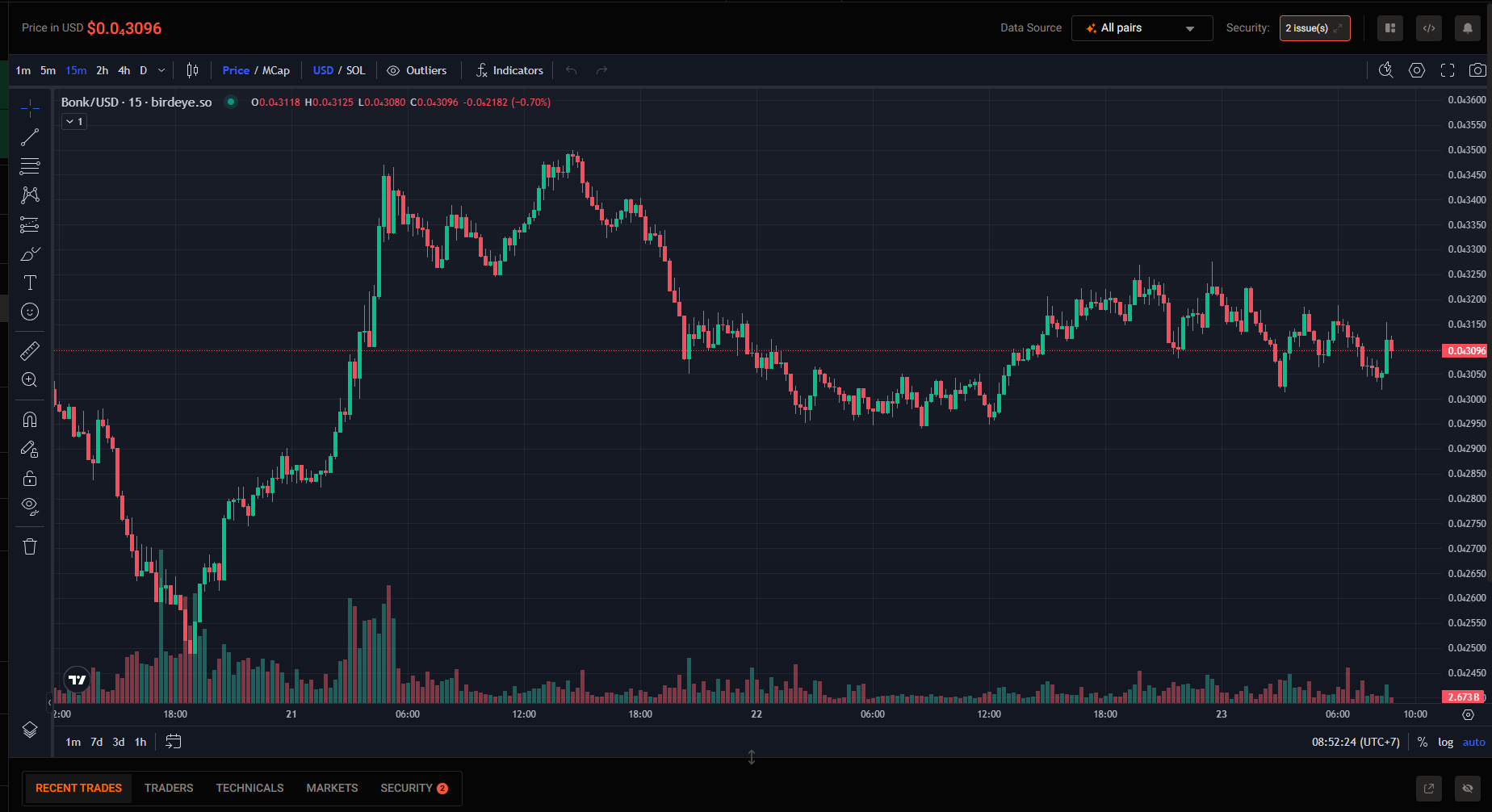
Navigate to the Security tab under the main chart.
3. 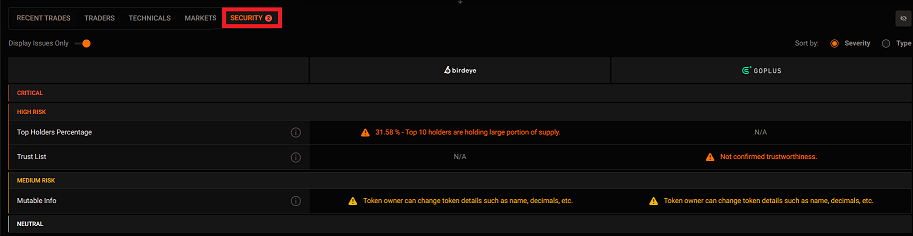
Review the security report
4. Click on the tooltip next to each criterion for more information about the issue or check the **Security Criteria Table** below
Security Criteria
[](#security-criteria)
--------------------------------------------
| **Criteria** | **Description** | Severity | Type | Solution |
| --- | --- | --- | --- | --- |
| **Fake Token** | This token is either a scam or imitation of another token. | Critical | Token Info | * |
| **Ownership Renounced** | Token's owner can adjust token parameters such as minting, token name, logo, website, etc. | Critical | Token Info | The current owner of token must transfer their owner ship to a `NULL address` .
Or set the [Mint Authority](https://solana.com/docs/core/tokens#mint-account)
and [Freeze Authority](https://solana.com/developers/guides/advanced/exchange#freeze-authority)
as `disable` while using CLI at the creation for Solana tokens. |
| **Honeypot** | If a token is Honeypot, very high chance it is a scam. Buyers may not be able to sell this token, or the token contains malicious code. | Critical | Token Info | * |
| **Freezable** | Token SPL V2 element - the authority can freeze every token from transferring among wallets. | Critical | Token Extension | [Freeze Authority](https://solana.com/developers/guides/advanced/exchange#freeze-authority) |
| **Freeze Authority** | Freeze Authority is who can freeze every token from transferring among wallets. | Critical | Token Extension | Change [Freeze Authority](https://solana.com/developers/guides/advanced/exchange#freeze-authority)
to Null address or just disable freeze authority at the creation of token. |
| **Jupiter Strict List** | If a token is in Strict List, it was verified by Jupiter's community. | High Risk | Community | [https://station.jup.ag/guides/general/get-your-token-on-jupiter#getting-on-the-strict-list](https://station.jup.ag/guides/general/get-your-token-on-jupiter#getting-on-the-strict-list) |
| **Top Holders Percentage** | If a token has high top 10 holder percentage, there are risks of those holders mass selling and make the token's price volatile. | High Risk | Community | Reduce the proportion of total token supply holdings within top 10 wallets. |
| **Token Percentage of Owner** | The percentage of tokens held by the token owner. | High Risk | Dev | Reduce the proportion of total token supply holding in Owner Address. |
| **UA Percentage** | The percentage of tokens held by the token Update Authority. | High Risk | Dev | Reduce the proportion of total token supply holding in Update Authority Address. |
| **Buy Tax** | Transfer fee will cause the actual value received when transfer a token to be less than expected, and high transfer fee may lead to large losses. | High Risk | Token Extension | * |
| **Sell Tax** | Transfer fee will cause the actual value received when transfer a token to be less than expected, and high transfer fee may lead to large losses. | High Risk | Token Extension | * |
| **Max Fee** | The maximum fee that the authority can charge on each transfer. | High Risk | Token Extension | * |
| **Transfer Fees** | Token SPL V2 element - the authority can charge a percentage fee when this token is transferred among wallets. | High Risk | Token Extension | * |
| **Transfer Fee Config Authority** | Config Authority is who can change the transfer fee anywhere from 0 to Max fee. | High Risk | Token Extension | Change the [Transfer Fee Config Authority](https://solana.com/vi/developers/courses/token-extensions/transfer-fee#configuring-a-mint-with-a-transfer-fee)
to NULL address. |
| **Mintable** | Mint function enables contract owner to issue more tokens and cause the coin price to plummet. It is extremely risky. | High Risk | Token Info | Change [Mint Authority](https://solana.com/docs/core/tokens#mint-account)
to Null wallet or just disable mint authority at the creation of token. |
| **Mutable Info** | The token information such as name, logo, website can be changed by the owner. | Medium Risk | Token Info | * Change [Update Authority](https://solana.com/vi/developers/guides/token-extensions/metadata-pointer#read-metadata-from-mint-account)
to Null wallet or just disable at the creation of token. |
| **First Mint Time** | The token is first minted at this time. There can be several other mint events after this. | Neutral | Dev | * |
| **First Mint Tx** | The token is first minted at this transaction. There can be several other mint events after this. | Neutral | Dev | * |
| **Creator Address** | The token creator's address. | Neutral | Dev | * |
| **Creator Balance** | The token balance of token creator. | Neutral | Dev | * |
| **Owner Address** | Ownership is mostly used to adjust the parameters and status of the token, such as minting, token name, logo, website, etc. | Neutral | Dev | * |
| **Owner Balance** | The token current owner's address. | Neutral | Dev | * |
| **UA Balance** | The token balance of token Update Authority. | Neutral | Dev | * |
| **Update Authority (UA)** | The token's update authority address. | Neutral | Dev | * |
| **Liquidity Burned** | When a part of token liquidity is burnt, that part can never be traded in the open market. | Neutral | Liquidity | * |
| **Liquidity Locked** | When a part of token liquidity is locked, that part can not be transacted in the open market, which reduce the risks of mass selling. However those tokens can be unlocked in the future. | Neutral | Liquidity | * |
| **LP Holders Count** | The total number of liquidity providers on this token in multiple markets. The more LPs there are, the more decentralized the token becomes. Only count from the most liquid pool | Neutral | Liquidity | * |
| **Fee Withdrawer** | Withdrawer is who can withraw all the transfer fees to a wallet of their choice. | Neutral | Token Extension | * |
| **Current Transfer Fees** | The authority can charge a percentage fee when this token is transfered among wallets. | Neutral | Token Extension | * |
Interpreting the Results
[](#interpreting-the-results)
----------------------------------------------------------
* Pass: The token satisfies the criterion with no significant risks detected.
* Warning: A potential risk is detected. Click the tooltip for more information.
* Fail: The token fails the criterion and poses significant security concerns.
❗ Disclaimer
[](#-disclaimer)
---------------------------------
The Security Check feature is a tool to assist in evaluating token security. It is not a guarantee of safety or investment performance. Users should conduct their own due diligence and consult professionals before making investment decisions.
Updated 11 days ago
* * *
---
# ohlcv base/quote
**API Endpoint:** /defi/ohlcv/base\_quote
**Description:** This endpoint facilitates retrieving historical Open, High, Low, Close, and Volume (OHLCV) data for a specific trading pair based on the addresses of the base and quote tokens. By providing the base and quote token addresses and the OHLCV interval type (e.g., 15 minutes). The response can include up to a maximum of 1000 records.
**Request Method:** GET
**Data Coverage:** Multi-chain
**Request URL:**
undefined
https://public-api.birdeye.so/defi/ohlcv/base_quote?base_address=So11111111111111111111111111111111111111112"e_address=EPjFWdd5AufqSSqeM2qN1xzybapC8G4wEGGkZwyTDt1v&type=15m&time_from=1691997839&time_to=1692266639
**Request Headers:**
undefined
accept: application/json
x-chain: any chains that Birdeye supports. Example: solana, ethereum
X-API-KEY: YOUR_API_KEY
**Parameters:**
* `base_address` (string): The base token's Solana address for the trading pair.
* `quote_address` (string): The quote token's Solana address for the trading pair.
* `type` (string): The OHLCV interval type (e.g., 15m for 15 minutes).
* `time_from` (int): The Unix timestamp representing the start of the desired time range.
* `time_to` (int): The Unix timestamp representing the end of the desired time range.
**Response:** The response provides an array of OHLCV data points for the specified trading pair, each including open, high, low, close, volume for the base and quote tokens, interval type, and Unix timestamp.
**Example Request:**
Bash
curl -X 'GET' \
'https://public-api.birdeye.so/defi/ohlcv/base_quote?base_address=So11111111111111111111111111111111111111112"e_address=EPjFWdd5AufqSSqeM2qN1xzybapC8G4wEGGkZwyTDt1v&type=15m&time_from=1691997839&time_to=1692266639' \
-H 'accept: application/json' \
-H 'x-chain: solana' \
-H 'X-API-KEY: YOUR_API_KEY'
**Example Response:**
JSON
{
"data": {
"items": [\
{\
"o": 24.47148962093433,\
"c": 24.41362256919705,\
"h": 24.49053693406104,\
"l": 24.350683512640458,\
"baseAddress": "So11111111111111111111111111111111111111112",\
"quoteAddress": "EPjFWdd5AufqSSqeM2qN1xzybapC8G4wEGGkZwyTDt1v",\
"vBase": 3409.157415062003,\
"vQuote": 91515.13598700023,\
"type": "15m",\
"unixTime": 1691998200\
},\
// More OHLCV data points for the trading pair...\
]
},
"success": true
}
**Note:** Replace the base\_address and quote\_address in the request URL with the actual addresses of the base and quote tokens for the trading pair. The x-chain header specifies the blockchain network, and the X-API-KEY header provides authentication for the premium API.
Updated about 1 month ago
* * *
---
# ohlcv pair
**API Endpoint:** /defi/ohlcv/pair
**Description:** This endpoint enables you to retrieve historical Open, High, Low, Close, and Volume (OHLCV) data for a specific trading pair on various blockchain networks. By specifying the trading pair's address and OHLCV interval type (e.g., 15 minutes). The response can include up to a maximum of 1000 records.
**Request Method:** GET
**Data Coverage:** Multi-chain
**Request URL:**
undefined
https://public-api.birdeye.so/defi/ohlcv/pair?address=9wFFyRfZBsuAha4YcuxcXLKwMxJR43S7fPfQLusDBzvT&type=15m&time_from=1691997839&time_to=1692266639
**Request Headers:**
undefined
accept: application/json
x-chain: any chains that Birdeye supports. Example: solana, ethereum
X-API-KEY: YOUR_API_KEY
**Parameters:**
* `address` (string): The trading pair's token address for which you want to retrieve OHLCV data.
* `type` (string): The OHLCV interval type (e.g., 15m for 15 minutes).
* `time_from` (int): The Unix timestamp representing the start of the desired time range.
* `time_to` (int): The Unix timestamp representing the end of the desired time range. **Response:** The response provides an array of OHLCV data points for the specified trading pair, each including open, high, low, close, volume, interval type, and Unix timestamp. **Example Request:**
Bash
curl -X 'GET' \
'https://public-api.birdeye.so/defi/ohlcv/pair?address=9wFFyRfZBsuAha4YcuxcXLKwMxJR43S7fPfQLusDBzvT&type=15m&time_from=1691997839&time_to=1692266639' \
-H 'accept: application/json' \
-H 'x-chain: solana' \
-H 'X-API-KEY: YOUR_API_KEY'
**Example Response:**
JSON
{
"data": {
"items": [\
{\
"address": "9wFFyRfZBsuAha4YcuxcXLKwMxJR43S7fPfQLusDBzvT",\
"h": 39,\
"o": 39,\
"l": 39,\
"c": 39,\
"type": "15m",\
"v": 0,\
"unixTime": 1691998200\
},\
// More OHLCV data points for the trading pair...\
]
},
"success": true
}
**Note:** Replace the address in the request URL with the actual trading pair's token address. The x-chain header specifies the blockchain network (Solana), and the X-API-KEY header provides authentication for the premium API.
Updated about 1 month ago
* * *
---