# Table of Contents
- [Welcome to Cartesia — Cartesia](#welcome-to-cartesia-cartesia)
- [JavaScript/TypeScript — Cartesia](#javascript-typescript-cartesia)
- [Make an API request — Cartesia](#make-an-api-request-cartesia)
- [Inserting Breaks/Pauses — Cartesia](#inserting-breaks-pauses-cartesia)
- [Models — Cartesia](#models-cartesia)
- [Python — Cartesia](#python-cartesia)
- [Formatting Text for Sonic — Cartesia](#formatting-text-for-sonic-cartesia)
- [Stream Inputs using Continuations — Cartesia](#stream-inputs-using-continuations-cartesia)
- [Specify Custom Pronunciations — Cartesia](#specify-custom-pronunciations-cartesia)
- [Pipecat — Cartesia](#pipecat-cartesia)
- [Clone Voices — Cartesia](#clone-voices-cartesia)
- [Localize voices — Cartesia](#localize-voices-cartesia)
- [Spelling Out Input Text — Cartesia](#spelling-out-input-text-cartesia)
- [Control Speed and Emotion — Cartesia](#control-speed-and-emotion-cartesia)
- [Set up SSO — Cartesia](#set-up-sso-cartesia)
- [API Status and Version — Cartesia](#api-status-and-version-cartesia)
- [Concurrency Limits and Timeouts — Cartesia](#concurrency-limits-and-timeouts-cartesia)
- [API Conventions — Cartesia](#api-conventions-cartesia)
- [Compare TTS Endpoints — Cartesia](#compare-tts-endpoints-cartesia)
- [LiveKit — Cartesia](#livekit-cartesia)
- [Embeddings and Voice Mixing — Cartesia](#embeddings-and-voice-mixing-cartesia)
- [Text to Speech (Bytes) — Cartesia](#text-to-speech-bytes-cartesia)
- [Text to Speech (SSE) — Cartesia](#text-to-speech-sse-cartesia)
- [Text to Speech (WebSocket) — Cartesia](#text-to-speech-websocket-cartesia)
- [Contexts — Cartesia](#contexts-cartesia)
- [List Voices — Cartesia](#list-voices-cartesia)
- [Integrate with Twilio — Cartesia](#integrate-with-twilio-cartesia)
- [Get Voice — Cartesia](#get-voice-cartesia)
- [Localize Voice — Cartesia](#localize-voice-cartesia)
- [Create Voice — Cartesia](#create-voice-cartesia)
- [Delete Voice — Cartesia](#delete-voice-cartesia)
- [Clone Voice — Cartesia](#clone-voice-cartesia)
- [Update Voice — Cartesia](#update-voice-cartesia)
- [Mix Voices — Cartesia](#mix-voices-cartesia)
- [Voice Changer (Bytes) — Cartesia](#voice-changer-bytes-cartesia)
- [List — Cartesia](#list-cartesia)
- [Voice Changer (SSE) — Cartesia](#voice-changer-sse-cartesia)
- [Create — Cartesia](#create-cartesia)
- [List Files — Cartesia](#list-files-cartesia)
- [Upload File — Cartesia](#upload-file-cartesia)
---
# Welcome to Cartesia — Cartesia

The Cartesia API currently serves our state-of-the-art multilingual generative voice model, Sonic. Sonic takes text input and and streams back ultra-realistic speech in response. It can also clone voices. You can control every aspect of generations: from speed and emotion to pronunciation and accent.
**Sonic is the world’s fastest text-to-speech model.** It can stream out the first byte of audio in just 90ms, making it perfect for real-time and conversational experiences. (To put things into perspective, that’s about twice as fast as the blink of an eye.)
**Sonic is the world’s highest quality text-to-speech model.** So even if speed isn’t your top priority, Sonic is the best choice—whether you want to narrate content, dub videos, or anything else.
Learn more about available Sonic model variants and their capabilities in the [Models](/build-with-sonic/models)
section.
Support
-------
[Discord\
\
Join our Discord server to chat with the Cartesia team, engage with the community, and get help with your projects.](https://discord.gg/cartesia)
[](mailto:support@cartesia.ai)
[](mailto:support@cartesia.ai)
[Email](mailto:support@cartesia.ai)
[](mailto:support@cartesia.ai)
[Email us at](mailto:support@cartesia.ai)
[support@cartesia.ai](mailto:support@cartesia.ai)
to get help with integrating Cartesia, your account, or billing.
---
# JavaScript/TypeScript — Cartesia
[Cartesia JS\
\
The JavaScript client for the Cartesia API.](https://github.com/cartesia-ai/cartesia-js)
---
# Make an API request — Cartesia
Prerequisites
-------------
1. A [Cartesia account](https://play.cartesia.ai/)
.
2. An [API key](https://play.cartesia.ai/keys)
.
3. [FFmpeg](https://ffmpeg.org/download.html)
installed (optional but recommended).
FFmpeg isn’t required to use the Cartesia API, but it’s useful for saving, playing, and converting audio files, so we will use it in the examples below. You can install it using your platform’s package manager:
` | | | | --- | --- | | 1 | # macOS | | 2 | brew install ffmpeg | | 3 | | | 4 | # Debian/Ubuntu | | 5 | sudo apt install ffmpeg | | 6 | | | 7 | # Fedora | | 8 | dnf install ffmpeg | | 9 | | | 10 | # Arch Linux | | 11 | sudo pacman -S ffmpeg | `
Generate your first words
-------------------------
###### cURL
###### Python
###### JavaScript/TypeScript
To generate your first words, run this command in your terminal, replacing `YOUR_API_KEY`:
` | | | | --- | --- | | $ | curl -N -X POST "https://api.cartesia.ai/tts/bytes" \ | | > | -H "Cartesia-Version: 2024-06-10" \ | | > | -H "X-API-Key: YOUR_API_KEY" \ | | > | -H "Content-Type: application/json" \ | | > | -d '{"transcript": "Welcome to Cartesia Sonic!", "model_id": "sonic-english", "voice": {"mode":"id", "id": "694f9389-aac1-45b6-b726-9d9369183238"}, "output_format":{"container":"wav", "encoding":"pcm_f32le", "sample_rate":44100}}' > sonic.wav | `
Make sure to replace `YOUR_API_KEY` with your real API key, or the command won’t output anything!
You can play the resulting `sonic.wav` file with `afplay sonic.wav` (on macOS) or `ffplay sonic.wav` (on any system with FFmpeg installed). You can also just double click it in your file explorer.
This command calls the [Text to Speech (Bytes)](/api-reference/tts/bytes)
endpoint which runs the text-to-speech generation and transmits the output in raw bytes.
The bytes endpoint supports a variety of output formats, making it perfect for batch use cases where you want to save the audio in advance.
In comparison, Cartesia’s WebSocket and Server-Sent Events endpoints stream out raw PCM audio to avoid latency overhead from transcoding the audio.
The voice used above can be found [on the playground](https://play.cartesia.ai/voices/a0e99841-438c-4a64-b679-ae501e7d6091)
.
---
# Inserting Breaks/Pauses — Cartesia
To insert breaks (or pauses) in generated speech, you can use `` tags. For example, ``. You can specify the time in seconds (`s`) or milliseconds (`ms`).
Example
-------
` | | | | --- | --- | | 1 | Hello, my name is Sonic. Nice to meet you. | `
---
# Models — Cartesia
Cartesia provides a family of state-of-the-art models, including our highly-accurate, low-latency Sonic model for text-to-speech.
Overview
--------
| Model ID | Description | Available languages |
| --- | --- | --- |
| `sonic` | Stable alias, currently points to `sonic-2024-12-12`. | en, fr, de, es, pt, zh, ja, hi, it, ko, nl, pl, ru, sv, tr |
| sonic-preview | Preview model. | en |
| sonic-2024-12-12 | December update. | en, fr, de, es, pt, zh, ja, hi, it, ko, nl, pl, ru, sv, tr |
| sonic-2024-10-19 | October update. | en, fr, de, es, pt, zh, ja, hi, it, ko, nl, pl, ru, sv, tr |
| sonic-english | \[Deprecated\] Please use `sonic` to use the most updated English model or `sonic-[date]` for a specific model release. `sonic-english` will forever point to `sonic-2024-10-19`. | en |
| sonic-multilingual | \[Deprecated\] Please use `sonic` to use the most updated multilingual model or `sonic-[date]` for a specific model release. `sonic-multilingual` will forever point to `sonic-2024-10-19`. | en, fr, de, es, pt, zh, ja, hi, it, ko, nl, pl, ru, sv, tr |
### Continuous updates
`sonic` and `sonic-preview` are aliases for the latest stable and preview models. We recommend using these for prototyping and development, then switching to a date-versioned model for production use cases to ensure stability.
Sonic
-----
_Sonic_ is our flagship text-to-speech model. It produces high-accuracy, expressive speech, and is optimized for efficiency to achieve low latency.
* **Model alias:** `sonic`
* **Release date:** Dec 2024
* **Latest version:** `sonic-2024-12-12`
To learn how to use Sonic, see [Make an API request](/get-started/make-an-api-request)
.
Sonic Preview
-------------
Sonic Preview is our latest preview snapshot. It is updated regularly, and may not be as stable as `sonic`. Use `sonic-preview` to see the latest features and research direction from Cartesia.
The latest version of `sonic-preview` demonstrates superior transcript following, especially for dates, long numbers, and phone numbers.
* **Model alias:** `sonic-preview`
* **Supported languages:** en
Legacy Models
-------------
### Sonic English (deprecated)
_Sonic English_ is our original English text-to-speech model. While it is still supported in our API, we recommend using the `sonic` model instead.
* **Model ID:** `sonic-english`
* **Release date:** May 2024
* **Latest version:** Oct 2024
* **Supported languages:** English
**Capabilities:**
* Supports abbreviations, acronyms, initialisms and phonemes (alpha).
* Supports numbers, dates, phone numbers and SSNs.
**Known issues:**
* Audio generations can loop or diverge on transcripts that have repeated words in succession.
* Audio generations may occasionally sound fast.
* Some long numbers and phone numbers may sound rushed as well.
### Sonic Multilingual (deprecated)
_Sonic Multilingual_ was the first multilingual Sonic variant, with improved transcript following and low latency. While it is still supported in our API, we recommend using the `sonic` model instead.
* **Model ID:** `sonic-multilingual`
* **Release date:** Jun 2024
* **Latest version:** Sept 2024
**Supported languages:**
1. English (`en`)
2. French (`fr`)
3. German (`de`)
4. Spanish (`es`)
5. Portuguese (`pt`)
6. Chinese (`zh`)
7. Japanese (`ja`)
8. Hindi (`hi`)
9. Italian (`it`)
10. Korean (`ko`)
11. Dutch (`nl`)
12. Polish (`pl`)
13. Russian (`ru`)
14. Swedish (`sv`)
15. Turkish (`tr`)
**Capabilities:**
* Supports numbers, dates, phone numbers in English, French, German, Spanish, and Chinese
**Known issues:**
* Some inaccuracies in numbers, dates, and phone numbers in Japanese and Portuguese.
* Audio generations may occasionally sound fast.
**Recommendations:**
* It is recommended to use voices from the same language as the transcript for the best performance.
---
# Python — Cartesia
[Cartesia Python\
\
The official Python library for the Cartesia API.](https://github.com/cartesia-ai/cartesia-python)
---
# Formatting Text for Sonic — Cartesia
The tips below are specific to current models (`sonic-english` and `sonic-multilingual`), and may change in the future as we improve our modeling and training procedure.
1. **Use appropriate punctuation.** Add punctuation where appropriate and at the end of each transcript whenever possible.
2. **Use dates in MM/DD/YYYY form.** For example, 04/20/2023.
3. **Insert pauses.** To insert pauses, insert “-” or use [break tags](/build-with-sonic/formatting-text-for-sonic/inserting-breaks-pauses)
where you need the pause.
4. **Match the voice to the language.** Each voice has a language that it works best with. You can use the playground to quickly understand which voices are most appropriate for a language.
5. **Stream in inputs for contiguous audio.** Use continuations if generating audio that should sound contiguous in separate chunks.
6. **Specify custom pronunciations for domain-specific or ambiguous words.** You may want to do this for proper nouns and trademarks, as well as for words that are spelled the same but pronounced differently, like the city of Nice and the adjective “nice.”
7. **Use two question marks to emphasize questions.** For example, “Are you here??” vs. “Are you here?”
8. **Avoid using quotation marks.** (Unless you intend to refer to a quote.)
9. **Use a space between a URL or email and a question mark.** Otherwise, the question mark will be read out. For example, write `Did you send the email to support@cartesia.ai ?` instead of `Did you send the email to support@cartesia.ai?`.
---
# Stream Inputs using Continuations — Cartesia
In many real-time use cases, you don’t have input text available upfront—like when you’re generating it on the fly using a language model. For these cases, Sonic supports input streaming through a feature we call _continuations_.
This guide will cover how input streaming works from the perspective of the Sonic model. If you just want to implement input streaming, see [the WebSocket API reference](/api-reference/tts/tts)
, which implements continuations using _contexts_.
Continuations
-------------
Continuations are generations that extend already generated speech. They’re called continuations because you’re continuing the generation from where the last one left off, maintaining the _prosody_ of the previous generation.
If you don’t use continuations, you get sudden changes in prosody that create seams in the audio.
Prosody refers to the rhythm, intonation, and stress in speech. It’s what makes speech flow naturally and sound human-like.
Let’s say we’re using an LLM and it generates a transcript in three parts, with a one second delay between each part:
1. `Hello, my name is Sonic.`
2. `It's very nice`
3. `to meet you.`
To generate speech for the whole transcript, we might think to generate speech for each part independently and stitch the audios together:

Figure 1: Generate transcripts independently & stitch them together.
Unfortunately, we end up with speech that has sudden changes in prosody and strange pacing:
Your browser does not support the audio element.
Now, let’s try the same transcripts, but using continuations. The setup looks like this:

Figure 2: Generate transcripts using continuations.
Here’s what we get:
Your browser does not support the audio element.
As you can hear, this output sounds seamless and natural.
You can scale up continuations to any number of inputs. There is no limit.
Caveat: Streamed inputs should form a valid transcript when joined
------------------------------------------------------------------
This means that `Hello, world!` can be followed by `How are you?` (note the leading space) but not `How are you?`, since when joined they form the invalid transcript `Hello, world!How are you?`.
In practice, this means you should maintain spacing and punctuation in your streamed inputs.
Caveat: Word-by-word or token-by-token inputs
---------------------------------------------
> **TL;DR:** If you want to stream the input in word-by-word, your code should buffer the first sentence of the input upfront. Then you can stream the remaining input text word-by-word.

Let’s try the following transcripts with continuations: `['Hello, my name is Sonic.', "It's ", 'very ', 'nice ', 'to ', 'meet ', 'you.']`
Your browser does not support the audio element.
---
# Specify Custom Pronunciations — Cartesia

When using Sonic (whether through the playground or API) you can directly add Sonic-flavored IPA phonemes in the transcript.
Wrap phonemes in `<<>>` and append each phoneme with a pipe `|`.
Usage example
-------------
`Can I <> <> on that?` will be pronounced as `Can I get jalapeño on that?`
Sonic-flavored IPA
------------------
We’ve compiled a pronunciation guide for the style of IPA that works most effectively with Sonic.
Our model follows the [English phonology article on Wikipedia](https://en.wikipedia.org/wiki/English_phonology)
for most phonemes, but in spots where our model requires different notation than you may expect, we’ve included a blue `<=` in the margins.
You can copy/paste some of these uncommon symbols from the original [charts here](https://docs.google.com/spreadsheets/d/1OJbiKtxLyodpNPqVfOu43X2HloLsAixTtFppEuQ_4pI/edit?usp=sharing)
.

Stresses and vowel length markers
---------------------------------
Our model requires stress markers for first (`ˈ`) and second (`ˌ`) stressed syllables, which go directly before the vowel. We also use annotations for vowel length (`ː`). The model can also operate without them, but you will have noticeably better robustness and control when using them.
---
# Pipecat — Cartesia

Pipecat is a framework for building conversational agents. To get started with Cartesia on Pipecat, see the StudyPal example:
[Pipecat > Examples > StudyPal\
\
StudyPal example in the Pipecat repo.](https://github.com/pipecat-ai/pipecat/tree/main/examples/studypal)
Pipecat’s foundational examples are built on Cartesia’s WebSocket API, which makes them a great starting point as well:
[Pipecat > Examples > Foundational\
\
Foundational examples in the Pipecat repo.](https://github.com/pipecat-ai/pipecat/tree/main/examples/foundational)
---
# Clone Voices — Cartesia

Voice cloning is available through the [playground](https://play.cartesia.ai/)
and the [API](/api-reference/voices/clone)
. Voice cloning has two modes: stability and similarity. High-similarity clones sound more like the source clip, but may reproduce background noise. Stability clones always sound like a studio recording, but may not sound as similar to the source clip.
For the best voice clones, we recommend following these best practices:
General best practices for voice cloning
----------------------------------------
1. **Choose an appropriate script to speak.** You want your recording to align as closely as possible with the voice you want to generate. For example, don’t read a colorless transcript in a monotone voice unless you’re aiming for a monotonous clone. Instead, prepare a script that is suited to your use case and has the right energy.
2. **Speak as clearly as possible and avoid background noise.** For example, when recording yourself, try to use a high-quality microphone, be in a quiet space, and so on.
3. **Avoid long pauses in the clip.** Too many long pauses could result in the cloned voice drifting from the source clip.
4. **Speak in the target language.** For instance, if you want the cloned voice to speak Spanish, speak Spanish in the recording. If this is not possible, you can use Cartesia’s localization feature—available in the playground and in the API—to convert your clone to a different language.
Best practices for high-similarity clones
-----------------------------------------
1. **Limit your recording to five seconds.** This is the sweet spot for high-similarity clones. A longer clip will not result in a better clone.
2. **Set `enhance` to `false` when cloning.** Unless your source clip has substantial background noise, any postprocessing will reduce the similarity of the clone to the source clip.
Best practices for high-stability clones
----------------------------------------
1. **Limit your recording to 10 to 20 seconds.** This is the sweet spot—a longer clip will not result in a better clone.
2. **Set `enhance` to `true` when cloning.** This optimizes sample clip quality prior to voice cloning-—improving clone fidelity, especially for lower-quality samples. Note that this may increase overall volume and remove background noises.
---
# Localize voices — Cartesia
Localization is available in the [playground](https://play.cartesia.ai/)
and the [API](/api-reference/voices/localize)
.
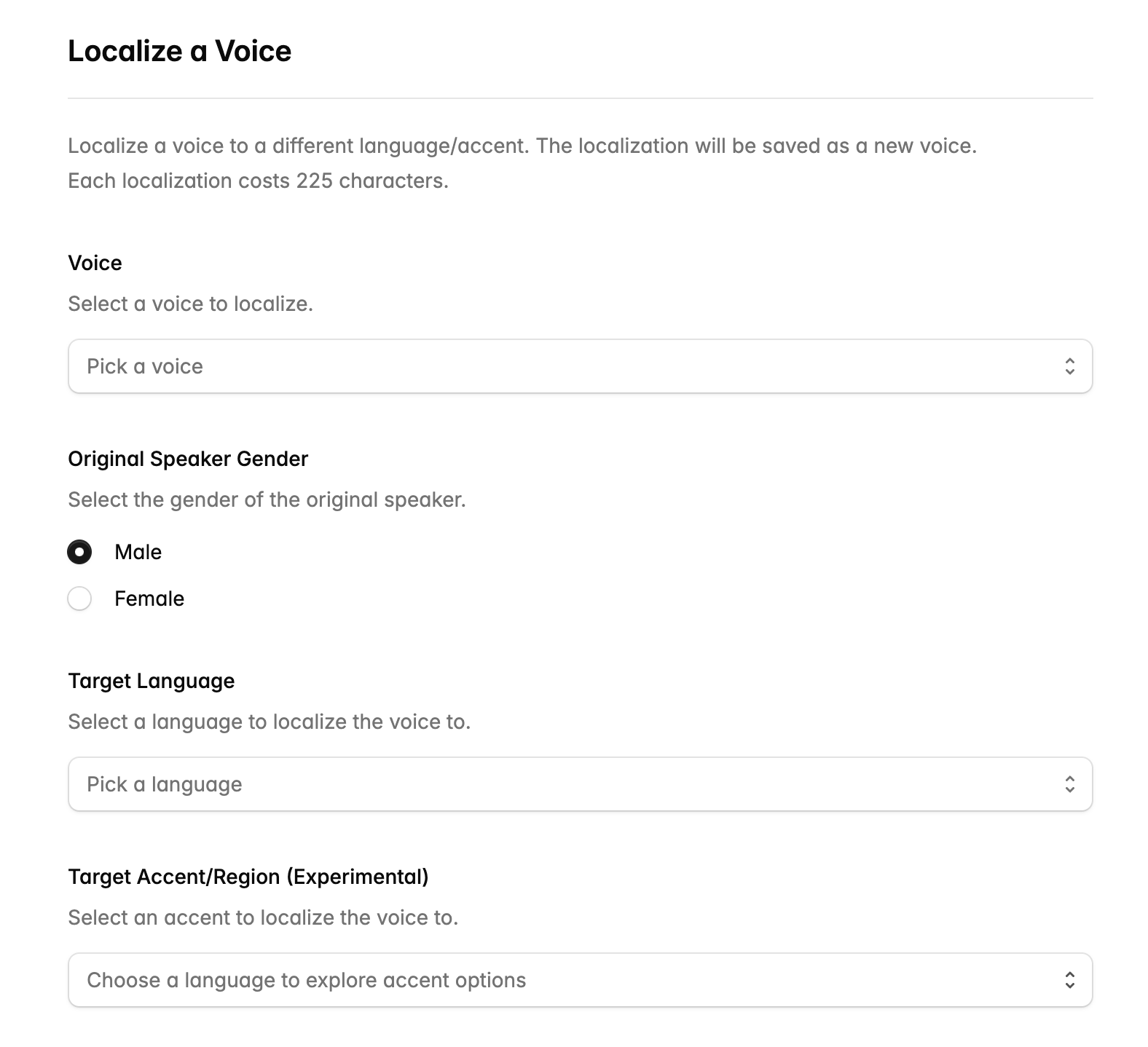
Sonic voices have an accent. If you try to use them to generate speech in a different language, they will still have the same accent. For example, if you try to use an American voice to generate speech in Spanish, the resulting Spanish speech will have an American accent.
To get a voice that sounds like a native speaker of the language you’re targeting, you can use Sonic’s localization feature through the API or playground.
The localization feature accepts a voice to localize, the gender of the voice, and the target language and accent to localize to, and produces an embedding that you can use to generate speech (or save as a new voice).
---
# Spelling Out Input Text — Cartesia
The tips below are specific to current models (`sonic`) and do not apply to `sonic-preview`.
To spell out input text, you can wrap it in `` tags.
This is particularly useful for pronouncing long numbers or identifiers, such as credit card numbers, phone numbers, or unique IDs.
Examples
--------
` | | | | --- | --- | | 1 | My phone number is (123) 456-7890 and my credit card is 1234-5678-9012-3456. | `
If you want to spell out numbers or identifiers and have planned breaks between the generations (e.g. taking a break between the area code of a phone number and the rest of that number), you can combine `` and ``.
` | | | | --- | --- | | 1 | My phone number is (123) 4712177 and my credit card number is 1234 5678 6347 4537. | `
---
# Control Speed and Emotion — Cartesia
Speed and emotion controls are available through the [playground](https://play.cartesia.ai/)
and the API in the Text to Speech endpoints ([Bytes](/api-reference/tts/bytes)
, [SSE](/api-reference/tts/sse)
, and [WebSocket](/api-reference/tts/tts)
).
**The effects of controls vary by voice and transcript.** If you find that the controls cause artifacts in the generated speech, try reducing their strength or reducing the number of controls you have applied.
Playground
----------
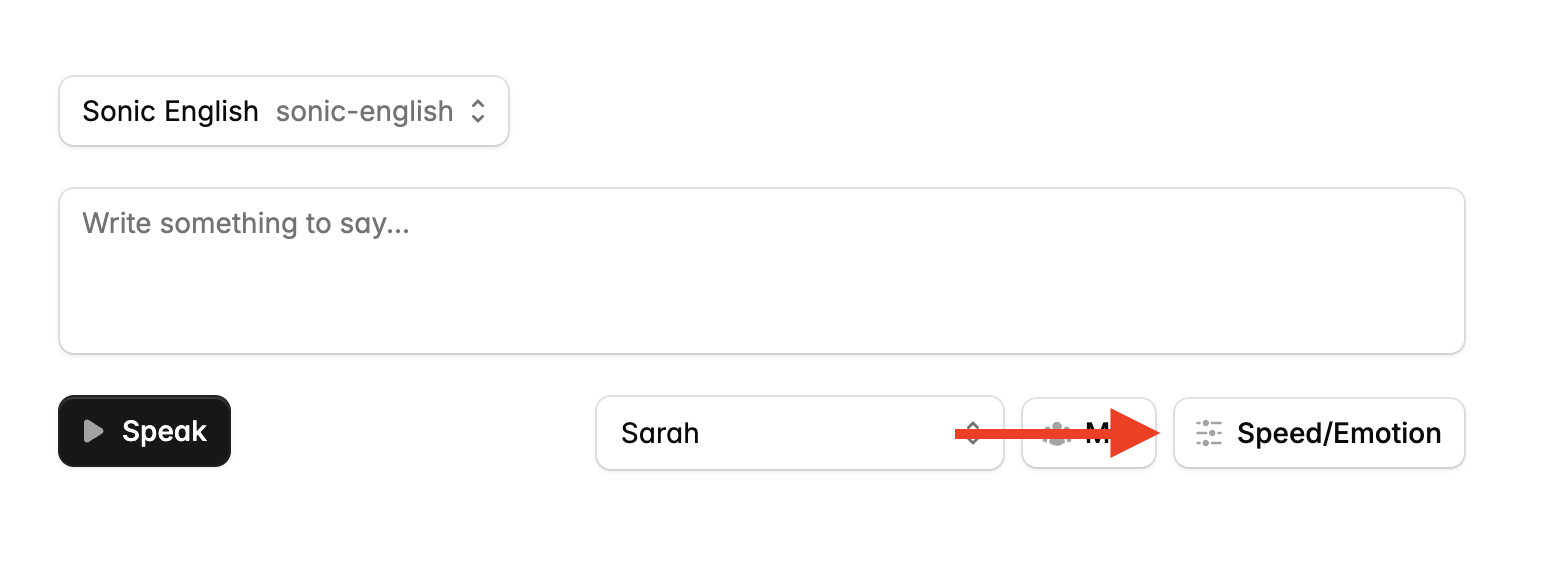
In the playground, you can access speed and emotion controls by clicking the “Speed/Emotion” button in the Text to Speech tab.
API
---
This feature is currently experimental and is subject to breaking changes.
To use controls in the API, add the `__experimental_controls` dictionary to the `voice` object in your API request:
` | | | | --- | --- | | 1 | "voice": { | | 2 | "mode": "id", | | 3 | "id": "VOICE_ID", | | 4 | "__experimental_controls": { | | 5 | "speed": "normal", | | 6 | "emotion": [ | | 7 | "positivity:high", | | 8 | "curiosity" | | 9 | ] | | 10 | } | | 11 | } | `
### Speed Options
* `"slowest"`: Very slow speech
* `"slow"`: Slower than normal speech
* `"normal"`: Default speech rate
* `"fast"`: Faster than normal speech
* `"fastest"`: Very fast speech
For more granular control, you can define speed as a number within the range \[−1.0,1.0\]\[-1.0, 1.0\]\[−1.0,1.0\]. A value of 0 represents the default speed, while negative values slow down the speech and positive values speed it up.
###### Using a label
###### Using a number
` | | | | --- | --- | | 1 | "__experimental_controls": { | | 2 | "speed": "fast" | | 3 | } | `
### Emotion Options
The `emotion` parameter is an array of “tags” in the form `emotion_name:level`. For example, `positivity:high` or `curiosity`.
#### Emotion Names
* `anger`
* `positivity`
* `surprise`
* `sadness`
* `curiosity`
#### Emotion Levels
**Emotion controls are purely additive, they cannot reduce or remove emotions.** For example, `anger:low` will add a small amount of anger to the voice, not make the voice less angry.
* `lowest`
* `low`
* (omit level for moderate addition of the emotion)
* `high`
* `highest`
---
# Set up SSO — Cartesia
We support Single-Sign On (SSO) for customers on the Enterprise plan via SAML. This integration is processed through our identity provider, [Clerk](https://clerk.com/)
.
Set up SSO with Okta
--------------------
1. Send us your SSO domain.
2. We will send you a service provider configuration, which consists of a single-sign on URL and an audience URI (SP entity ID).
3. Follow steps 2, 3, 4, and 5 in [the Clerk SSO guide](https://clerk.com/docs/authentication/enterprise-connections/saml/okta)
, and send us the metadata URL you get from step 6.1.
After you are done, we will complete the remaining SSO setup and send you a confirmation that SSO is enabled for your organization.
---
# API Status and Version — Cartesia
### Headers
Cartesia-Version"2024-06-10"Required
### Response
This endpoint returns an object.
okboolean
versionstring
[Compare TTS Endpoints\
\
Up Next](/api-reference/tts/compare-tts-endpoints)
[Built with](https://buildwithfern.com/?utm_campaign=buildWith&utm_medium=docs&utm_source=docs.cartesia.ai)
---
# Concurrency Limits and Timeouts — Cartesia
We measure concurrency in terms of the number of unique contexts active at a given time. For WebSockets, each `context_id` corresponds to a unique context; additional messages you send with the same `context_id` will not count against your concurrency limit. For regular HTTP endpoints, each HTTP request corresponds to a context.
If you exceed your concurrency limit, you will receive a `429 Too Many Requests` error. You can check your concurrency limit and upgrade it on the playground at [play.cartesia.ai](https://play.cartesia.ai/)
.
Interpreting concurrency limits
-------------------------------
How you interpret your concurrency limit depends on how you’re using Sonic.
###### Conversational use cases
###### Non-conversational use cases
WebSocket timeouts
------------------
We close idle WebSocket connections after 5 minutes. If you need to keep a connection open for longer, you can periodically do a generation to keep the connection from idling.
---
# API Conventions — Cartesia
All endpoints use HTTPS. HTTP is not supported. API keys that call the API over HTTP may be subject to automatic rotation.
All API requests use the following base URL: `https://api.cartesia.ai`. (For WebSockets the corresponding protocol is `wss://`.)
### Always send a `Cartesia-Version` header
Each request you send our API should have a `Cartesia-Version` header containing the date (`YYYY-MM-DD`) when you tested your integration. For WebSockets, you can alternately use the `?cartesia_version` query parameter, which will take precedence.
This will help us provide you with timely deprecation notices and enable us to provide automatic backwards compatibility where possible.
For a given `Cartesia-Version`, we will preserve existing input and output fields, but we may make non-breaking changes, such as:
1. Add optional request fields.
2. Add additional response fields.
3. Change conditions for specific error types
4. Add variants to enum-like output values.
Our versioning scheme is inspired by the [Anthropic API](https://docs.anthropic.com/en/api/versioning)
.
### Use API keys to authenticate
Authentication is handled using API keys. You can create a new API key from [play.cartesia.ai/keys](https://play.cartesia.ai/keys)
.
* For HTTP requests, authentication is handled by adding the field `X-API-Key: ` into the HTTP headers.
* For WebSocket connections, authentication is handled by passing in the field `?api_key=` when creating the WebSocket connection.
### Check response codes
Our API uses standard HTTP response codes; refer to [httpstatuses.io](https://httpstatuses.io/)
.
### Pass data according to the method
All GET requests use query parameters to pass data. All POST requests use a JSON body or `multipart/form-data`.
---
# Compare TTS Endpoints — Cartesia
### If you want to generate speech in real-time
We recommend using our WebSocket endpoint for real-time applications for a few reasons:
1. **Latency**: You can establish a WebSocket connection in advance, which means that you do not incur any connection latency when you start generating speech. (This usually saves you about 200ms.)
2. **Input Streaming**: You can stream in inputs while maintaining the prosody of the generated speech, which is useful when generating text inputs in real-time, such as with an LLM.
3. **Timestamps**: You can get timestamped transcripts for the generated speech to build features like subtitles or live transcripts.
4. **Multiplexing**: You can multiplex multiple conversations over a single connection.
### If you want to generate speech ahead of time
We recommend using our raw bytes (i.e. audio file) output endpoint, which can give you outputs in a variety of formats, such as WAV and MP3 (in addition to raw PCM audio).
---
# LiveKit — Cartesia
Built on WebRTC, LiveKit is a realtime platform that enables developers to build video, voice, and data capabilities into their applications.
LiveKit Agents is LiveKit’s framework for building real-time conversational agents.
Cartesia is available as a [plugin for LiveKit Agents](https://github.com/livekit/agents/tree/main/livekit-plugins/livekit-plugins-cartesia)
.
Demo
====
Here’s a demo of a voice assistant built with LiveKit Agents and Cartesia:
[LiveKit Cartesia Demo\
\
Try out the LiveKit Cartesia demo.](https://cartesia-assistant.vercel.app/)
The backend code for this demo is available at this [GitHub Gist](https://gist.github.com/davidzhao/5738f0e2d434dea6e5224262ee5c3cfa)
.
---
# Embeddings and Voice Mixing — Cartesia
You don’t need to understand embeddings to use Voice Mixing, which is available in the [playground](https://play.cartesia.ai/)
and the [API](/api-reference/voices/mix)
.
Cartesia models represent voices in the form of _embeddings_. An embedding is a length-192 vector of floats between -1 and 1. Collectively, these numbers capture the characteristics of the voice: speed, emotion, accent, and so on.
Our text-to-speech endpoints currently require embeddings to be specified for each generation. Support for specifying voice IDs instead of embeddings is planned.
Voice Mixing \[Alpha\]
----------------------
A neat feature that embeddings enable is _voice mixing_. You can interpolate two embeddings to obtain a third voice that sounds somewhere between both of them. This feature is available in [the playground](https://play.cartesia.ai/)
.
We suggest using linear interpolation to interpolate between embeddings. To interpolate between embeddings AAA and BBB to obtain CCC, use the following formula:
C\=(1−α)A+αBC = (1-\\alpha )A + \\alpha BC\=(1−α)A+αB
α\\alphaα, or alpha, is the “interpolation coefficient”—an alpha of 1 means C\=BC = BC\=B and an alpha of 0 means C\=AC = AC\=A. For example, with α\=0.5\\alpha=0.5α\=0.5, C\=0.5A+0.5B.C=0.5A+0.5B.C\=0.5A+0.5B.
The perception of a mixed voice does not change linearly with the interpolation coefficient. For instance, to get a 50/50 perceived mix, you may need to lean towards one of the voices. To get the best performance, do a little exploration.
### Prototype embeddings
Our playground’s voice design features (i.e. the speed and emotion controls) rely on _prototype embeddings_. These are embeddings that capture the essence of some characteristic: fastness, slowness, anger, curiosity, and so on. If you interpolate a voice with a prototype embedding, it will acquire the characteristics of the prototype embedding.
The current voice design sliders (speed, emotion) may alter the speaker identity. Making smaller changes should help with this, but we’re working on improving the stability of this feature!
---
# Text to Speech (Bytes) — Cartesia
### Headers
Auth
X-API-KeystringRequired
Cartesia-Version"2024-06-10"Required
### Request
This endpoint expects an object.
model\_idstringRequired
The ID of the model to use for the generation. See [Models](/build-with-sonic/models)
for available models.
transcriptstringRequired
voiceobjectRequired
Show 2 variants
output\_formatobjectRequired
Show 3 variants
languageenumOptional
The language that the given voice should speak the transcript in.
Options: English (en), French (fr), German (de), Spanish (es), Portuguese (pt), Chinese (zh), Japanese (ja), Hindi (hi), Italian (it), Korean (ko), Dutch (nl), Polish (pl), Russian (ru), Swedish (sv), Turkish (tr).
Show 15 enum values
durationdoubleOptional
The maximum duration of the audio in seconds. You do not usually need to specify this. If the duration is not appropriate for the length of the transcript, the output audio may be truncated.
### Response
This endpoint returns a file.
[Text to Speech (SSE)\
\
Up Next](/api-reference/tts/sse)
[Built with](https://buildwithfern.com/?utm_campaign=buildWith&utm_medium=docs&utm_source=docs.cartesia.ai)
---
# Text to Speech (SSE) — Cartesia
### Headers
Auth
X-API-KeystringRequired
Cartesia-Version"2024-06-10"Required
### Request
This endpoint expects an object.
model\_idstringRequired
The ID of the model to use for the generation. See [Models](/build-with-sonic/models)
for available models.
transcriptstringRequired
voiceobjectRequired
Show 2 variants
output\_formatobjectRequired
Show 3 variants
languageenumOptional
The language that the given voice should speak the transcript in.
Options: English (en), French (fr), German (de), Spanish (es), Portuguese (pt), Chinese (zh), Japanese (ja), Hindi (hi), Italian (it), Korean (ko), Dutch (nl), Polish (pl), Russian (ru), Swedish (sv), Turkish (tr).
Show 15 enum values
durationdoubleOptional
The maximum duration of the audio in seconds. You do not usually need to specify this. If the duration is not appropriate for the length of the transcript, the output audio may be truncated.
### Response
This endpoint returns a stream of object.
Chunk
Show 6 properties
OR
Done
Show 4 properties
OR
Timestamps
Show 5 properties
OR
Error
Show 5 properties
[Text to Speech (WebSocket)\
\
Up Next](/api-reference/tts/tts)
[Built with](https://buildwithfern.com/?utm_campaign=buildWith&utm_medium=docs&utm_source=docs.cartesia.ai)
---
# Text to Speech (WebSocket) — Cartesia
This endpoint creates a bidirectional WebSocket connection. The connection supports multiplexing, so you can send multiple requests and receive the corresponding responses in parallel.
The WebSocket API is built around _contexts_:
* When you send a generation request, you pass a `context_id`. Further inputs on the same `context_id` will [continue the generation](/build-with-sonic/capability-guides/stream-inputs-using-continuations)
, maintaining prosody.
* Responses for a context contain the `context_id` you passed in so that you can match requests and responses.
Read the guide on [working with contexts](/api-reference/tts/working-with-web-sockets/contexts)
to learn more.
For the best performance, we recommend the following usage pattern:
1. **Do many generations over a single WebSocket.** Just use a separate context for each generation. The WebSocket scales up to dozens of concurrent generations.
2. **Set up the WebSocket before the first generation.** This ensures you don’t incur latency when you start generating speech.
3. **Buffer the first input on a context** to at least 3 or 4 words for optimizing both latency and prosody.
4. **Split inputs into sentences:** Sending inputs in sentences allows Sonic to generate speech more accurately and with better prosody. Include necessary spaces and punctuation. For conversational agent use cases, we recommend the following usage pattern:
5. **Each turn in a conversation should correspond to a context:** For example, if you are using Sonic to power a voice agent, each turn in the conversation should be a new context.
6. **Start a new context for interruptions:** If the user interrupts the agent, start a new context for the agent’s response.
Handshake
---------
GET
wss://api.cartesia.ai/tts/websocket
### Headers
Cartesia-Version"2024-06-10"Required
### Query parameters
cartesia\_versionstringRequired
You can specify this instead of the `Cartesia-Version` header. This is particularly useful for use in the browser, where WebSockets do not support headers.
You do not need to specify this if you are passing the header.
api\_keystringRequired
You can specify this instead of the `X-API-Key` header. This is particularly useful for use in the browser, where WebSockets do not support headers.
You do not need to specify this if you are passing the header.
Send
----
Generation Requestobject
Use this to generate speech for a transcript.
Show 9 properties
OR
Cancel Context Requestobject
Use this to cancel a context, so that no more messages are generated for that context.
Show 2 properties
Receive
-------
Receiveobject
The server will send you back a stream of messages with the same `context_id` as your request. The messages can be of type `chunk`, `timestamps`, `error`, or `done`.
Show 4 variants
[Contexts\
\
Up Next](/api-reference/tts/working-with-web-sockets/contexts)
[Built with](https://buildwithfern.com/?utm_campaign=buildWith&utm_medium=docs&utm_source=docs.cartesia.ai)
---
# Contexts — Cartesia
This is a hands-on guide to input streaming using WebSocket contexts. For a conceptual overview of how input streaming works in Sonic, see the [input streaming guide](/build-with-sonic/capability-guides/stream-inputs-using-continuations)
.
> In many real time use cases, you don’t have your transcripts available upfront—like when you’re generating them using an LLM. For these cases, Sonic supports input streaming.
The context IDs you pass to the Cartesia API identify speech contexts. Contexts maintain prosody between their inputs—so you can send a transcript in multiple parts and receive seamless speech in return.
To stream in inputs on a context, just pass a `continue` flag (set to `true`) for every input that you expect will be followed by more inputs. (By default, this flag is set to `false`.)
To finish a context, just set `continue` to `false`. If you do not know the last transcript in advance, you can send an input with an empty transcript and `continue` set to `false`.
Contexts automatically expire 5 seconds after the last input that was streamed in, and attempting to send another input on the same context ID will implicitly create a new context.
continue
boolean
Whether this input may be followed by more inputs.
### Input Format
1. Inputs on the same context must keep all fields except `transcript`, `continue`, and `duration` the same.
2. Transcripts are concatenated verbatim, so make sure they form a valid transcript when joined together. Make sure to include any spaces between words or punctuations as necessary. For example, in languages with spaces, you should include a space at the end of the preceding transcript, e.g. transcript 1 is `Thanks for coming,` and transcript 2 is `it was great to see you.`
3. It’s important to buffer the first request transcript to at least 3 or 4 words for best performance.
### Example
Let’s say you’re trying to generate speech for “Hello, Sonic! I’m streaming inputs.” You should stream in the following inputs (repeated fields omitted for brevity). Note: all other fields (e.g. `model_id`, `language`) are required and should be passed unchanged between requests with input streaming.
Input Streaming
` | | | | --- | --- | | 1 | {"transcript": "Hello, Sonic!", "continue": true, "context_id": "happy-monkeys-fly"} | | 2 | {"transcript": " I'm streaming ", "continue": true, "context_id": "happy-monkeys-fly"} | | 3 | {"transcript": "inputs.", "continue": false, "context_id": "happy-monkeys-fly"} | `
If you don’t know the last transcript in advance, you can send an input with an empty transcript and `continue` set to `false`:
Input Streaming
` | | | | --- | --- | | 1 | {"transcript": "Hello, Sonic!", "continue": true, "context_id": "happy-monkeys-fly"} | | 2 | {"transcript": " I'm streaming ", "continue": true, "context_id": "happy-monkeys-fly"} | | 3 | {"transcript": "inputs.", "continue": true, "context_id": "happy-monkeys-fly"} | | 4 | {"transcript": "", "continue": false, "context_id": "happy-monkeys-fly"} | `
### Output
You will only receive `done: true` after outputs for the entire context have been returned.
Outputs for a given context will always be in order of the inputs you streamed in. (That is, if you send input A and then input B on a context, you will first receive the chunks corresponding to input A, and then the chunks corresponding to input B.)
Cancelling Requests
-------------------
You may also cancel outgoing requests through the websocket.
To cancel a request, send a JSON message with the following structure:
WebSocket Request
` | | | | --- | --- | | 1 | { | | 2 | "context_id": "happy-monkeys-fly", | | 3 | "cancel": true | | 4 | } | `
When you send a cancel request:
1. It will only halt requests that have not begun generating a response yet.
2. Any currently generating request will continue sending responses until completion.
The `context_id` in the cancel request should match the `context_id` of the request you want to cancel.
---
# List Voices — Cartesia
### Headers
Auth
X-API-KeystringRequired
Cartesia-Version"2024-06-10"Required
### Response
This endpoint returns a list of objects.
idstring
The ID of the voice.
is\_publicboolean
Whether the voice is publicly accessible.
namestring
The name of the voice.
descriptionstring
The description of the voice.
created\_atdatetime
The date and time the voice was created.
embeddinglist of doubles
A 192-dimensional vector (i.e. a list of 192 numbers) that represents the voice.
languageenum
The language that the given voice should speak the transcript in.
Options: English (en), French (fr), German (de), Spanish (es), Portuguese (pt), Chinese (zh), Japanese (ja), Hindi (hi), Italian (it), Korean (ko), Dutch (nl), Polish (pl), Russian (ru), Swedish (sv), Turkish (tr).
Show 15 enum values
user\_idstringOptional
The ID of the user who owns the voice.
base\_voice\_idstringOptional
The ID of the base voice associated with the voice, used for features like voice mixing.
[Create Voice\
\
Up Next](/api-reference/voices/create)
[Built with](https://buildwithfern.com/?utm_campaign=buildWith&utm_medium=docs&utm_source=docs.cartesia.ai)
---
# Integrate with Twilio — Cartesia
This guide will walk you through the process of integrating Cartesia’s Text-to-Speech (TTS) API with Twilio’s calling capabilities. By following these steps, you’ll be able to create an application that initiates phone calls and uses Cartesia’s TTS to speak to the call recipient.
Prerequisites
-------------
Before you begin, make sure you have the following:
1. [Node.js](https://nodejs.org/en/download)
installed.
2. A [Twilio account](https://www.twilio.com/en-us/try-twilio)
. You will need your Account SID and Auth Token.
3. A [Cartesia API key](https://play.cartesia.ai/keys)
.
4. A phone number that you want to call.
5. A Twilio phone number to call from.
Get Started
-----------
[1](/integrate-with-sonic/twilio#set-up-your-project)
### Set Up Your Project
1. Create a new directory for your project and navigate to it in your terminal.
2. Initialize a new Node.js project:
` | | | | --- | --- | | $ | npm init -y | `
3. Install the required dependencies:
` | | | | --- | --- | | $ | npm install twilio ws http ngrok dotenv | `
[2](/integrate-with-sonic/twilio#configure-environment-variables)
### Configure Environment Variables
Create a `.env` file in your project root and add the following:
` | | | | --- | --- | | 1 | TWILIO_ACCOUNT_SID="your_twilio_account_sid" | | 2 | TWILIO_AUTH_TOKEN="your_twilio_auth_token" | | 3 | CARTESIA_API_KEY="your_cartesia_api_key" | `
Replace the placeholder values with your actual credentials.
[3](/integrate-with-sonic/twilio#create-the-main-script)
### Create the Main Script
Create a file named `app.js` (or any name you prefer) and add the following code:
`` | | | | --- | --- | | 1 | const twilio = require('twilio'); | | 2 | const WebSocket = require('ws'); | | 3 | const http = require('http'); | | 4 | const ngrok = require('ngrok'); | | 5 | const dotenv = require('dotenv'); | | 6 | | | 7 | // Load environment variables | | 8 | dotenv.config(); | | 9 | | | 10 | // Function to get a value from environment variable or command line argument | | 11 | function getConfig(key, defaultValue = undefined) { | | 12 | return process.env[key] \| process.argv.find(arg => arg.startsWith(`${key}=`))?.split('=')[1] \| defaultValue; | | 13 | } | | 14 | | | 15 | // Configuration | | 16 | const config = { | | 17 | TWILIO_ACCOUNT_SID: getConfig('TWILIO_ACCOUNT_SID'), | | 18 | TWILIO_AUTH_TOKEN: getConfig('TWILIO_AUTH_TOKEN'), | | 19 | CARTESIA_API_KEY: getConfig('CARTESIA_API_KEY'), | | 20 | }; | | 21 | | | 22 | // Validate required configuration | | 23 | const requiredConfig = ['TWILIO_ACCOUNT_SID', 'TWILIO_AUTH_TOKEN', 'CARTESIA_API_KEY']; | | 24 | for (const key of requiredConfig) { | | 25 | if (!config[key]) { | | 26 | console.error(`Missing required configuration: ${key}`); | | 27 | process.exit(1); | | 28 | } | | 29 | } | | 30 | | | 31 | const client = twilio(config.TWILIO_ACCOUNT_SID, config.TWILIO_AUTH_TOKEN); | ``
[4](/integrate-with-sonic/twilio#configure-cartesia-tts)
### Configure Cartesia TTS
In the script, you’ll find a configuration section for Cartesia TTS. Make sure to set the following variables according to your needs:
`` | | | | --- | --- | | 1 | const TTS_WEBSOCKET_URL = `wss://api.cartesia.ai/tts/websocket?api_key=${config.CARTESIA_API_KEY}&cartesia_version=2024-06-10`; | | 2 | const modelId = 'sonic-english'; | | 3 | const voice = { | | 4 | 'mode': 'id', | | 5 | 'id': "VOICE_ID" // You can check available voices using the Cartesia API or at https://play.cartesia.ai | | 6 | }; | | 7 | const partialResponse = 'Hi there, my name is Cartesia. I hope youre having a great day!'; | ``
[5](/integrate-with-sonic/twilio#set-up-twilio-calling)
### Set Up Twilio Calling
Configure your Twilio outbound and inbound numbers:
` | | | | --- | --- | | 1 | const outbound = "+1234567890"; // Replace with the number you want to call | | 2 | const inbound = "+1234567890"; // Replace with your Twilio number | `
[6](/integrate-with-sonic/twilio#implement-main-logic)
### Implement Main Logic
The `main()` function orchestrates the entire process:
1. Connects to the Cartesia TTS WebSocket
2. Tests the TTS WebSocket
3. Sets up a Twilio WebSocket server
4. Creates an ngrok tunnel for the Twilio WebSocket
5. Initiates the call using Twilio
`` | | | | --- | --- | | 1 | function connectToTTSWebSocket() { | | 2 | return new Promise((resolve, reject) => { | | 3 | log('Attempting to connect to TTS WebSocket'); | | 4 | ttsWebSocket = new WebSocket(TTS_WEBSOCKET_URL); | | 5 | | | 6 | ttsWebSocket.on('open', () => { | | 7 | log('Connected to TTS WebSocket'); | | 8 | resolve(ttsWebSocket); | | 9 | }); | | 10 | | | 11 | ttsWebSocket.on('error', (error) => { | | 12 | log(`TTS WebSocket error: ${error.message}`); | | 13 | reject(error); | | 14 | }); | | 15 | | | 16 | ttsWebSocket.on('close', (code, reason) => { | | 17 | log(`TTS WebSocket closed. Code: ${code}, Reason: ${reason}`); | | 18 | reject(new Error('TTS WebSocket closed unexpectedly')); | | 19 | }); | | 20 | }); | | 21 | } | | 22 | | | 23 | function sendTTSMessage(message) { | | 24 | const textMessage = { | | 25 | 'model_id': modelId, | | 26 | 'transcript': message, | | 27 | 'voice': voice, | | 28 | 'output_format': { | | 29 | 'container': 'raw', | | 30 | 'encoding': 'pcm_mulaw', | | 31 | 'sample_rate': 8000 | | 32 | } | | 33 | }; | | 34 | | | 35 | log(`Sending message to TTS WebSocket: ${message}`); | | 36 | ttsWebSocket.send(JSON.stringify(textMessage)); | | 37 | } | | 38 | | | 39 | function testTTSWebSocket() { | | 40 | return new Promise((resolve, reject) => { | | 41 | const testMessage = 'This is a test message'; | | 42 | let receivedAudio = false; | | 43 | | | 44 | sendTTSMessage(testMessage); | | 45 | | | 46 | const timeout = setTimeout(() => { | | 47 | if (!receivedAudio) { | | 48 | reject(new Error('Timeout: No audio received from TTS WebSocket')); | | 49 | } | | 50 | }, 10000); // 10 second timeout | | 51 | | | 52 | ttsWebSocket.on('message', (audioChunk) => { | | 53 | if (!receivedAudio) { | | 54 | log(audioChunk); | | 55 | log('Received audio chunk from TTS for test message'); | | 56 | receivedAudio = true; | | 57 | clearTimeout(timeout); | | 58 | resolve(); | | 59 | } | | 60 | }); | | 61 | }); | | 62 | } | | 63 | | | 64 | async function startCall(twilioWebsocketUrl) { | | 65 | try { | | 66 | log(`Initiating call with WebSocket URL: ${twilioWebsocketUrl}`); | | 67 | const call = await client.calls.create({ | | 68 | twiml: ``, | | 69 | to: outbound, // Replace with the phone number you want to call | | 70 | from: inbound // Replace with your Twilio phone number | | 71 | }); | | 72 | | | 73 | callSid = call.sid; | | 74 | log(`Call initiated. SID: ${callSid}`); | | 75 | } catch (error) { | | 76 | log(`Error initiating call: ${error.message}`); | | 77 | throw error; | | 78 | } | | 79 | } | | 80 | | | 81 | async function hangupCall() { | | 82 | try { | | 83 | log(`Attempting to hang up call: ${callSid}`); | | 84 | await client.calls(callSid).update({status: 'completed'}); | | 85 | log('Call hung up successfully'); | | 86 | } catch (error) { | | 87 | log(`Error hanging up call: ${error.message}`); | | 88 | } | | 89 | } | | 90 | | | 91 | function setupTwilioWebSocket() { | | 92 | return new Promise((resolve, reject) => { | | 93 | const server = http.createServer((req, res) => { | | 94 | log(`Received HTTP request: ${req.method} ${req.url}`); | | 95 | res.writeHead(200); | | 96 | res.end('WebSocket server is running'); | | 97 | }); | | 98 | | | 99 | const wss = new WebSocket.Server({ server }); | | 100 | | | 101 | log('WebSocket server created'); | | 102 | | | 103 | wss.on('connection', (twilioWs, request) => { | | 104 | log(`Twilio WebSocket connection attempt from ${request.socket.remoteAddress}`); | | 105 | | | 106 | let streamSid = null; | | 107 | | | 108 | twilioWs.on('message', (message) => { | | 109 | try { | | 110 | const msg = JSON.parse(message); | | 111 | log(`Received message from Twilio: ${JSON.stringify(msg)}`); | | 112 | | | 113 | if (msg.event === 'start') { | | 114 | log('Media stream started'); | | 115 | streamSid = msg.start.streamSid; | | 116 | log(`Stream SID: ${streamSid}`); | | 117 | sendTTSMessage(partialResponse); | | 118 | } else if (msg.event === 'media' && !messageComplete) { | | 119 | log('Received media event'); | | 120 | } else if (msg.event === 'stop') { | | 121 | log('Media stream stopped'); | | 122 | hangupCall(); | | 123 | } | | 124 | } catch (error) { | | 125 | log(`Error processing Twilio message: ${error.message}`); | | 126 | } | | 127 | }); | | 128 | | | 129 | twilioWs.on('close', (code, reason) => { | | 130 | log(`Twilio WebSocket disconnected. Code: ${code}, Reason: ${reason}`); | | 131 | }); | | 132 | | | 133 | twilioWs.on('error', (error) => { | | 134 | log(`Twilio WebSocket error: ${error.message}`); | | 135 | }); | | 136 | | | 137 | // Handle incoming audio chunks from TTS WebSocket | | 138 | ttsWebSocket.on('message', (audioChunk) => { | | 139 | log('Received audio chunk from TTS'); | | 140 | try { | | 141 | if (streamSid) { | | 142 | twilioWs.send(JSON.stringify({ | | 143 | event: 'media', | | 144 | streamSid: streamSid, | | 145 | media: { | | 146 | payload: JSON.parse(audioChunk)['data'] | | 147 | } | | 148 | })); | | 149 | | | 150 | audioChunksReceived++; | | 151 | log(`Audio chunks received: ${audioChunksReceived}`); | | 152 | | | 153 | if (audioChunksReceived >= 50) { | | 154 | messageComplete = true; | | 155 | log('Message complete, preparing to hang up'); | | 156 | setTimeout(hangupCall, 2000); | | 157 | } | | 158 | } else { | | 159 | log('Warning: Received audio chunk but streamSid is not set'); | | 160 | } | | 161 | } catch (error) { | | 162 | log(`Error sending audio chunk to Twilio: ${error.message}`); | | 163 | } | | 164 | }); | | 165 | | | 166 | log('Twilio WebSocket connected and handlers set up'); | | 167 | }); | | 168 | | | 169 | wss.on('error', (error) => { | | 170 | log(`WebSocket server error: ${error.message}`); | | 171 | }); | | 172 | | | 173 | server.listen(0, () => { | | 174 | const port = server.address().port; | | 175 | log(`Twilio WebSocket server is running on port ${port}`); | | 176 | resolve(port); | | 177 | }); | | 178 | | | 179 | server.on('error', (error) => { | | 180 | log(`HTTP server error: ${error.message}`); | | 181 | reject(error); | | 182 | }); | | 183 | }); | | 184 | } | | 185 | | | 186 | async function setupNgrokTunnel(port) { | | 187 | try { | | 188 | const httpsUrl = await ngrok.connect(port); | | 189 | // Convert https:// to wss:// | | 190 | const wssUrl = httpsUrl.replace('https://', 'wss://'); | | 191 | log(`ngrok tunnel established: ${wssUrl}`); | | 192 | return wssUrl; | | 193 | } catch (error) { | | 194 | log(`Error setting up ngrok tunnel: ${error.message}`); | | 195 | throw error; | | 196 | } | | 197 | } | | 198 | | | 199 | async function main() { | | 200 | try { | | 201 | log('Starting application'); | | 202 | | | 203 | await connectToTTSWebSocket(); | | 204 | log('TTS WebSocket connected successfully'); | | 205 | | | 206 | await testTTSWebSocket(); | | 207 | log('TTS WebSocket test passed successfully'); | | 208 | | | 209 | const twilioWebsocketPort = await setupTwilioWebSocket(); | | 210 | log(`Twilio WebSocket server set up on port ${twilioWebsocketPort}`); | | 211 | | | 212 | const twilioWebsocketUrl = await setupNgrokTunnel(twilioWebsocketPort); | | 213 | | | 214 | await startCall(twilioWebsocketUrl); | | 215 | } catch (error) { | | 216 | log(`Error in main function: ${error.message}`); | | 217 | } | | 218 | } | | 219 | | | 220 | // Run the script | | 221 | main(); | ``
[7](/integrate-with-sonic/twilio#run-the-application)
### Run the Application
To run the application, use the following command:
` | | | | --- | --- | | $ | node app.js | `
How It Works
------------
1. The script establishes a connection to Cartesia’s TTS WebSocket.
2. It sets up a local WebSocket server to communicate with Twilio.
3. An ngrok tunnel is created to expose the local WebSocket server to the internet.
4. A call is initiated using Twilio, connecting to the ngrok tunnel.
5. When the call connects, the script sends the predefined message to Cartesia’s TTS.
6. Cartesia converts the text to speech and sends audio chunks back.
7. The script forwards these audio chunks to Twilio, which plays them on the call.
Customization
-------------
* To change the spoken message, modify the `partialResponse` variable.
* Adjust the voice parameters in the `voice` object to change the TTS voice characteristics.
* Modify the `audioChunksReceived` threshold to control when the call should end.
Troubleshooting
---------------
* If you encounter any issues, check the console logs for detailed error messages.
* Ensure all required environment variables are correctly set.
* Verify that your Twilio and Cartesia credentials are valid and have the necessary permissions.
---
# Get Voice — Cartesia
### Path parameters
idstringRequired
The ID of the voice.
### Headers
Auth
X-API-KeystringRequired
Cartesia-Version"2024-06-10"Required
### Response
This endpoint returns an object.
idstring
The ID of the voice.
is\_publicboolean
Whether the voice is publicly accessible.
namestring
The name of the voice.
descriptionstring
The description of the voice.
created\_atdatetime
The date and time the voice was created.
embeddinglist of doubles
A 192-dimensional vector (i.e. a list of 192 numbers) that represents the voice.
languageenum
The language that the given voice should speak the transcript in.
Options: English (en), French (fr), German (de), Spanish (es), Portuguese (pt), Chinese (zh), Japanese (ja), Hindi (hi), Italian (it), Korean (ko), Dutch (nl), Polish (pl), Russian (ru), Swedish (sv), Turkish (tr).
Show 15 enum values
user\_idstringOptional
The ID of the user who owns the voice.
base\_voice\_idstringOptional
The ID of the base voice associated with the voice, used for features like voice mixing.
[Localize Voice\
\
Up Next](/api-reference/voices/localize)
[Built with](https://buildwithfern.com/?utm_campaign=buildWith&utm_medium=docs&utm_source=docs.cartesia.ai)
---
# Localize Voice — Cartesia
### Headers
Auth
X-API-KeystringRequired
Cartesia-Version"2024-06-10"Required
### Request
This endpoint expects an object.
embeddinglist of doublesRequired
A 192-dimensional vector (i.e. a list of 192 numbers) that represents the voice.
languageenumRequired
Target language to localize the voice to.
Options: English (en), German (de), Spanish (es), French (fr), Japanese (ja), Portuguese (pt), Chinese (zh), Hindi (hi), Italian (it), Korean (ko), Dutch (nl), Polish (pl), Russian (ru), Swedish (sv), Turkish (tr).
Show 15 enum values
original\_speaker\_gender"male" or "female"Required
Allowed values: malefemale
dialectenumOptional
The dialect to localize to. Only supported for English (`en`).
Show variant
### Response
This endpoint returns an object.
embeddinglist of doubles
A 192-dimensional vector (i.e. a list of 192 numbers) that represents the voice.
[Mix Voices\
\
Up Next](/api-reference/voices/mix)
[Built with](https://buildwithfern.com/?utm_campaign=buildWith&utm_medium=docs&utm_source=docs.cartesia.ai)
---
# Create Voice — Cartesia
### Headers
Auth
X-API-KeystringRequired
Cartesia-Version"2024-06-10"Required
### Request
This endpoint expects an object.
namestringRequired
The name of the voice.
descriptionstringRequired
The description of the voice.
embeddinglist of doublesRequired
A 192-dimensional vector (i.e. a list of 192 numbers) that represents the voice.
languageenumOptional
The language that the given voice should speak the transcript in.
Options: English (en), French (fr), German (de), Spanish (es), Portuguese (pt), Chinese (zh), Japanese (ja), Hindi (hi), Italian (it), Korean (ko), Dutch (nl), Polish (pl), Russian (ru), Swedish (sv), Turkish (tr).
Show 15 enum values
base\_voice\_idstringOptional
The ID of the base voice associated with the voice, used for features like voice mixing.
### Response
This endpoint returns an object.
idstring
The ID of the voice.
is\_publicboolean
Whether the voice is publicly accessible.
namestring
The name of the voice.
descriptionstring
The description of the voice.
created\_atdatetime
The date and time the voice was created.
embeddinglist of doubles
A 192-dimensional vector (i.e. a list of 192 numbers) that represents the voice.
languageenum
The language that the given voice should speak the transcript in.
Options: English (en), French (fr), German (de), Spanish (es), Portuguese (pt), Chinese (zh), Japanese (ja), Hindi (hi), Italian (it), Korean (ko), Dutch (nl), Polish (pl), Russian (ru), Swedish (sv), Turkish (tr).
Show 15 enum values
user\_idstringOptional
The ID of the user who owns the voice.
base\_voice\_idstringOptional
The ID of the base voice associated with the voice, used for features like voice mixing.
[Delete Voice\
\
Up Next](/api-reference/voices/delete)
[Built with](https://buildwithfern.com/?utm_campaign=buildWith&utm_medium=docs&utm_source=docs.cartesia.ai)
---
# Delete Voice — Cartesia
### Path parameters
idstringRequired
The ID of the voice.
### Headers
Auth
X-API-KeystringRequired
Cartesia-Version"2024-06-10"Required
[Update Voice\
\
Up Next](/api-reference/voices/update)
[Built with](https://buildwithfern.com/?utm_campaign=buildWith&utm_medium=docs&utm_source=docs.cartesia.ai)
---
# Clone Voice — Cartesia
Clone a voice from an audio clip. This endpoint has two modes, stability and similarity.
Similarity mode clones are more similar to the source clip, but may reproduce background noise. For these, use an audio clip about 5 seconds long.
Stability mode clones are more stable, but may not sound as similar to the source clip. For these, use an audio clip 10-20 seconds long.
### Headers
Auth
X-API-KeystringRequired
Cartesia-Version"2024-06-10"Required
### Request
This endpoint expects a multipart form containing a file.
clipfileRequired
namestringRequired
The name of the voice.
descriptionstringOptional
A description for the voice.
languageenumRequired
The language of the voice.
Show 15 enum values
mode"similarity" or "stability"Required
Tradeoff between similarity and stability. Similarity clones sound more like the source clip, but may reproduce background noise. Stability clones always sound like a studio recording, but may not sound as similar to the source clip.
Allowed values: similaritystability
enhancebooleanRequired
Whether to enhance the clip to improve its quality before cloning. Useful if the clip has background noise.
transcriptstringOptional
Optional transcript of the words spoken in the audio clip. Only used for similarity mode.
### Response
This endpoint returns an object.
idstring
The ID of the voice.
user\_idstring
The ID of the user who owns the voice.
is\_publicboolean
Whether the voice is publicly accessible.
namestring
The name of the voice.
descriptionstring
The description of the voice.
created\_atdatetime
The date and time the voice was created.
languageenum
The language that the given voice should speak the transcript in.
Options: English (en), French (fr), German (de), Spanish (es), Portuguese (pt), Chinese (zh), Japanese (ja), Hindi (hi), Italian (it), Korean (ko), Dutch (nl), Polish (pl), Russian (ru), Swedish (sv), Turkish (tr).
Show 15 enum values
[Voice Changer (Bytes)\
\
Up Next](/api-reference/voice-changer/bytes)
[Built with](https://buildwithfern.com/?utm_campaign=buildWith&utm_medium=docs&utm_source=docs.cartesia.ai)
---
# Update Voice — Cartesia
### Path parameters
idstringRequired
The ID of the voice.
### Headers
Auth
X-API-KeystringRequired
Cartesia-Version"2024-06-10"Required
### Request
This endpoint expects an object.
namestringRequired
The name of the voice.
descriptionstringRequired
The description of the voice.
### Response
This endpoint returns an object.
idstring
The ID of the voice.
is\_publicboolean
Whether the voice is publicly accessible.
namestring
The name of the voice.
descriptionstring
The description of the voice.
created\_atdatetime
The date and time the voice was created.
embeddinglist of doubles
A 192-dimensional vector (i.e. a list of 192 numbers) that represents the voice.
languageenum
The language that the given voice should speak the transcript in.
Options: English (en), French (fr), German (de), Spanish (es), Portuguese (pt), Chinese (zh), Japanese (ja), Hindi (hi), Italian (it), Korean (ko), Dutch (nl), Polish (pl), Russian (ru), Swedish (sv), Turkish (tr).
Show 15 enum values
user\_idstringOptional
The ID of the user who owns the voice.
base\_voice\_idstringOptional
The ID of the base voice associated with the voice, used for features like voice mixing.
[Get Voice\
\
Up Next](/api-reference/voices/get)
[Built with](https://buildwithfern.com/?utm_campaign=buildWith&utm_medium=docs&utm_source=docs.cartesia.ai)
---
# Mix Voices — Cartesia
### Headers
Auth
X-API-KeystringRequired
Cartesia-Version"2024-06-10"Required
### Request
This endpoint expects an object.
voiceslist of objectsRequired
Show 2 variants
### Response
This endpoint returns an object.
embeddinglist of doubles
A 192-dimensional vector (i.e. a list of 192 numbers) that represents the voice.
[Clone Voice\
\
Up Next](/api-reference/voices/clone)
[Built with](https://buildwithfern.com/?utm_campaign=buildWith&utm_medium=docs&utm_source=docs.cartesia.ai)
---
# Voice Changer (Bytes) — Cartesia
Takes an audio file of speech, and returns an audio file of speech spoken with the same intonation, but with a different voice.
This endpoint is priced at 15 characters per second of input audio.
### Headers
Auth
X-API-KeystringRequired
Cartesia-Version"2024-06-10"Required
### Request
This endpoint expects a multipart form containing a file.
clipfileRequired
voice\[id\]stringRequired
output\_format\[container\]enumRequired
Allowed values: rawwavmp3
output\_format\[sample\_rate\]integerRequired
output\_format\[encoding\]enumOptional
Required for `raw` and `wav` containers.
Allowed values: pcm\_f32lepcm\_s16lepcm\_mulawpcm\_alaw
output\_format\[bit\_rate\]integerOptional
Required for `mp3` containers.
### Response
This endpoint returns a file.
[Voice Changer (SSE)\
\
Up Next](/api-reference/voice-changer/sse)
[Built with](https://buildwithfern.com/?utm_campaign=buildWith&utm_medium=docs&utm_source=docs.cartesia.ai)
---
# List — Cartesia
### Headers
Auth
X-API-KeystringRequired
Cartesia-Version"2024-06-10"Required
### Response
This endpoint returns an object.
datalist of objects
Show 3 properties
has\_moreboolean
[Create\
\
Up Next](/api-reference/datasets/create)
[Built with](https://buildwithfern.com/?utm_campaign=buildWith&utm_medium=docs&utm_source=docs.cartesia.ai)
---
# Voice Changer (SSE) — Cartesia
### Headers
Auth
X-API-KeystringRequired
Cartesia-Version"2024-06-10"Required
### Request
This endpoint expects a multipart form containing a file.
clipfileRequired
voice\[id\]stringRequired
output\_format\[container\]enumRequired
Allowed values: rawwavmp3
output\_format\[sample\_rate\]integerRequired
output\_format\[encoding\]enumOptional
Required for `raw` and `wav` containers.
Allowed values: pcm\_f32lepcm\_s16lepcm\_mulawpcm\_alaw
output\_format\[bit\_rate\]integerOptional
Required for `mp3` containers.
### Response
This endpoint returns a stream of object.
Chunk
Show 6 properties
OR
Done
Show 4 properties
OR
Error
Show 5 properties
[List\
\
Up Next](/api-reference/datasets/list)
[Built with](https://buildwithfern.com/?utm_campaign=buildWith&utm_medium=docs&utm_source=docs.cartesia.ai)
---
# Create — Cartesia
### Headers
Auth
X-API-KeystringRequired
Cartesia-Version"2024-06-10"Required
### Request
This endpoint expects an object.
namestringRequired
### Response
This endpoint returns an object.
idstring
namestring
created\_atstring
[List Files\
\
Up Next](/api-reference/datasets/list-files)
[Built with](https://buildwithfern.com/?utm_campaign=buildWith&utm_medium=docs&utm_source=docs.cartesia.ai)
---
# List Files — Cartesia
### Path parameters
idstringRequired
### Headers
Auth
X-API-KeystringRequired
Cartesia-Version"2024-06-10"Required
### Response
This endpoint returns an object.
datalist of objects
Show 3 properties
has\_moreboolean
[Upload File\
\
Up Next](/api-reference/datasets/upload-file)
[Built with](https://buildwithfern.com/?utm_campaign=buildWith&utm_medium=docs&utm_source=docs.cartesia.ai)
---
# Upload File — Cartesia
### Path parameters
idstringRequired
### Headers
Auth
X-API-KeystringRequired
Cartesia-Version"2024-06-10"Required
### Request
This endpoint expects a multipart form containing a file.
filefileRequired
purpose"fine\_tune"Required
Allowed values: fine\_tune
[Built with](https://buildwithfern.com/?utm_campaign=buildWith&utm_medium=docs&utm_source=docs.cartesia.ai)
---