# Table of Contents
- [Next Edit - Inception Platform](#next-edit-inception-platform)
- [Frequently Asked Questions - Inception Platform](#frequently-asked-questions-inception-platform)
- [Rate Limits - Inception Platform](#rate-limits-inception-platform)
- [LangChain - Inception Platform](#langchain-inception-platform)
- [Kilo Code - Inception Platform](#kilo-code-inception-platform)
- [Error Codes - Inception Platform](#error-codes-inception-platform)
- [Autocomplete (FIM) - Inception Platform](#autocomplete-fim-inception-platform)
- [Authentication - Inception Platform](#authentication-inception-platform)
- [Instant - Inception Platform](#instant-inception-platform)
- [Chat Completions - Inception Platform](#chat-completions-inception-platform)
- [Cline - Inception Platform](#cline-inception-platform)
- [Structured Outputs - Inception Platform](#structured-outputs-inception-platform)
- [Apply Edit - Inception Platform](#apply-edit-inception-platform)
- [Zed - Inception Platform](#zed-inception-platform)
- [Tool Use - Inception Platform](#tool-use-inception-platform)
- [Streaming & Diffusion - Inception Platform](#streaming-diffusion-inception-platform)
- [Roo Code - Inception Platform](#roo-code-inception-platform)
- [Continue - Inception Platform](#continue-inception-platform)
- [Welcome to the Inception Platform - Inception Platform](#welcome-to-the-inception-platform-inception-platform)
- [OpenClaw 🦞 - Inception Platform](#openclaw-inception-platform)
- [Models, Endpoints, and Pricing - Inception Platform](#models-endpoints-and-pricing-inception-platform)
---
# Next Edit - Inception Platform
[Skip to main content](https://docs.inceptionlabs.ai/capabilities/next-edit#content-area)
To get early access to Mercury 2, sign up here: [https://inceptionlabs.ai/early-access](https://inceptionlabs.ai/early-access)
[Inception Platform home page](https://docs.inceptionlabs.ai/)
Search...
⌘KAsk AI
Search...
Navigation
Capabilities
Next Edit
Export your api key as an environment variable in your terminal.
macOS / Linux
Windows
Copy
Ask AI
export INCEPTION_API_KEY="your_api_key_here"
Copy
Ask AI
curl https://api.inceptionlabs.ai/v1/edit/completions \
-H "Content-Type: application/json" \
-H "Authorization: Bearer $INCEPTION_API_KEY" \
-d "{
\"model\": \"mercury-edit\",
\"messages\": [\
{\
\"role\": \"user\",\
\"content\": \"<|recently_viewed_code_snippets|>\\n\\n<|/recently_viewed_code_snippets|>\\n\\n<|current_file_content|>\\ncurrent_file_path: solver.py\\n'''''''''\\nfunction: flagAllNeighbors\\n----------\\nThis function marks each of the covered neighbors of the cell at the given row\\n<|code_to_edit|>\\nand col as flagged.\\n'''''''''\\ndef flagAllNeighbors(board<|cursor|>, row, col): \\n for r, c in b.getNeighbors(row, col):\\n if b.isValid(r, c):\\n b.flag(r, c)\\n\\n<|/code_to_edit|>\\n<|/current_file_content|>\\n\\n<|edit_diff_history|>\\n--- /c:/Users/test/testing/solver.py\\n+++ /c:/Users/test/testing/solver.py\\n@@ -6,1 +6,1 @@\\n-def flagAllNeighbors(b, row, col): \\n+def flagAllNeighbors(board, row, col): \\n\\n<|/edit_diff_history|>\"\
}\
]
}"
**Next Edit Request Format** Mercury Edit expects next-edit requests to contain 3 sections of code contents: recently viewed snippets, the current file with the editable region, and a time-ordered edit history. The primary purpose of the recently viewed snippets and edit history are to provide context to Mercury Edit so that it can better understand the user’s current intent in modifying code.
Recently Viewed Snippets
The recently viewed snippets should be formatted as:
Copy
Ask AI
<|recently_viewed_code_snippets|>
<|recently_viewed_code_snippet|>
code_snippet_file_path: [SNIPPET FILE PATH 1]
[SNIPPET 1 CODE]
<|/recently_viewed_code_snippet|>
<|recently_viewed_code_snippet|>
code_snippet_file_path: [SNIPPET FILE PATH 2]
[SNIPPET 2 CODE]
<|/recently_viewed_code_snippet|>
<|/recently_viewed_code_snippets|>
Each snippet should correspond to a piece of code (or entire code files) that a user has recently viewed. If you do not wish to use recently viewed snippets, please add `<|recently_viewed_code_snippets|>\n\n<|/recently_viewed_code_snippets|>` with no contents inside the tags.
Current File Content
The current file content should be formatted as:
Copy
Ask AI
<|current_file_content|>
current_file_path: [CURRENT FILE PATH]
[CODE ABOVE EDITABLE REGION]
<|code_to_edit|>
[EDITABLE REGION CODE]
<|/code_to_edit|>
[CODE BELOW EDITABLE REGION]
<|/current_file_content|>
Mercury Edit will return an updated version of the editable region in its response (e.g., completing a function) enclosed in triple backticks.
Edit History
The edit history should be formatted as:
Copy
Ask AI
<|edit_diff_history|>
--- [EDITED FILE PATH 1]
+++ [EDITED FILE PATH 1]
[DIFF HUNK HEADER 1 WITH @@]
[DIFF LINES 1]
--- [EDITED FILE PATH 2]
+++ [EDITED FILE PATH 2]
[DIFF HUNK HEADER 2 WITH @@]
[DIFF LINES 2]
<|/edit_diff_history|>
As seen above, each edit should follow unidiff formatting. It is important to make sure that the bottommost edits in the prompt correspond to the most recent edits made by the user. If you do not wish to use edit history, please add `<|edit_diff_history|>\n\n<|/edit_diff_history|>` with no contents inside the tags.
**Next Edit Prompting Best Practices** The following best practices will help you get the most relevant suggestions out of Mercury Edit while maintaining low latency.
Recently Viewed Snippets
Include **3–5 snippets** of roughly 20 lines each, centered around the user’s recent cursor positions. These should be focused code excerpts — not full files. For more advanced implementations, consider using AST nodes at cursor locations or code RAG to surface relevant type definitions and method implementations across the codebase.Always provide the **latest state** of code at each snippet location, as stale snippets can cause the model to suggest reverting recent changes. Both full declarations and outlines (e.g., type signatures and docstrings) are acceptable snippet formats.
User Edit History
Include at least the **last 3–5 user edits**, ordered chronologically with the most recent edit last. Edits should be **range-based** — if a user made multiple modifications in the same area, combine them into a single unidiff rather than many granular diffs.The edit history is often the strongest signal for identifying user intent. Ensuring the final entry corresponds to the user’s most recent edit can significantly improve suggestion quality.
Current File Content
Pass in the **entire current file** so the model can draw on imports, function signatures, and surrounding code. For extremely large files, trim distant regions while preserving the area around the editable region.
Editable Region Selection
The editable region directly determines output token count and dominates latency. We recommend starting with **10–15 lines** (~100–150 tokens) and tuning from there. At ~1,000 tokens/second decoding speed, an upper bound of around 25 lines (~250 tokens) is practical depending on network latency.For selecting which lines to include, a simple approach is to center the region around the cursor: `[currentLine - 5, currentLine + 10]`.To suggest edits beyond the cursor vicinity:
* **Parallel requests**: Fire multiple requests with disjoint editable regions and check which ones produce meaningful diffs.
* **Linter-guided selection**: Wrap editable regions around locations where the linter identifies errors.
We recommend making the maximum editable region size configurable so you can tune the tradeoff between suggestion scope and latency.
Was this page helpful?
YesNo
[Autocomplete (FIM)](https://docs.inceptionlabs.ai/capabilities/fim)
[Apply Edit](https://docs.inceptionlabs.ai/capabilities/apply-edit)
⌘I
Assistant
Responses are generated using AI and may contain mistakes.
[Contact support](https://docs.inceptionlabs.ai/cdn-cgi/l/email-protection#11626461617e636551787f72746165787e7f7d7073623f7078)
---
# Frequently Asked Questions - Inception Platform
[Skip to main content](https://docs.inceptionlabs.ai/resources/faq#content-area)
To get early access to Mercury 2, sign up here: [https://inceptionlabs.ai/early-access](https://inceptionlabs.ai/early-access)
[Inception Platform home page](https://docs.inceptionlabs.ai/)
Search...
⌘KAsk AI
Search...
Navigation
Resources
Frequently Asked Questions
How do I get higher rate limits?
Reach out to our support team with details about your use case, expected volume, and any latency or throughput requirements. We’ll review your needs and can raise your limits accordingly.
How do I handle rate limits?
Implement exponential backoff in your client code. When you receive a rate limit error (429) or a server error (503), wait before retrying.
How are tokens counted?
Tokens are pieces of text that our models process. A token is roughly 4 characters for English text. Both input and output tokens count toward your usage limits.
Was this page helpful?
YesNo
[Error Codes](https://docs.inceptionlabs.ai/resources/error-codes)
[Contact Support](https://docs.inceptionlabs.ai/support/support)
⌘I
Assistant
Responses are generated using AI and may contain mistakes.
[Contact support](https://docs.inceptionlabs.ai/cdn-cgi/l/email-protection#a5d6d0d5d5cad7d1e5cccbc6c0d5d1cccacbc9c4c7d68bc4cc)
---
# Rate Limits - Inception Platform
[Skip to main content](https://docs.inceptionlabs.ai/get-started/rate-limits#content-area)
To get early access to Mercury 2, sign up here: [https://inceptionlabs.ai/early-access](https://inceptionlabs.ai/early-access)
[Inception Platform home page](https://docs.inceptionlabs.ai/)
Search...
⌘KAsk AI
Search...
Navigation
Getting Started
Rate Limits
On this page
* [Limits per Minute](https://docs.inceptionlabs.ai/get-started/rate-limits#limits-per-minute)
API requests can be subject to rate limiting based on usage and GPU availability. Your requests can sometimes take longer than expected due to the high demand.
####
[](https://docs.inceptionlabs.ai/get-started/rate-limits#limits-per-minute)
Limits per Minute
| | **Free Tier** | **Pay As You Go Tier** | **Enterprise Tier** |
| --- | --- | --- | --- |
| **API Requests** | 200 | 400 | 2,000+ |
| **Input Tokens** | 400,000 | 400,000 | 10,000,000+ |
| **Output Tokens** | 100,000 | 100,000 | 1,000,000+ |
Please [contact support](https://platform.inceptionlabs.ai/contact)
if you need increased rate limits.
Was this page helpful?
YesNo
[Models, Endpoints, and Pricing](https://docs.inceptionlabs.ai/get-started/models)
[Chat Completions](https://docs.inceptionlabs.ai/capabilities/chat-completions)
⌘I
Assistant
Responses are generated using AI and may contain mistakes.
[Contact support](https://docs.inceptionlabs.ai/cdn-cgi/l/email-protection#cdbeb8bdbda2bfb98da4a3aea8bdb9a4a2a3a1acafbee3aca4)
---
# LangChain - Inception Platform
[Skip to main content](https://docs.inceptionlabs.ai/resources/langchain#content-area)
To get early access to Mercury 2, sign up here: [https://inceptionlabs.ai/early-access](https://inceptionlabs.ai/early-access)
[Inception Platform home page](https://docs.inceptionlabs.ai/)
Search...
⌘KAsk AI
Search...
Navigation
Integrations
LangChain
On this page
* [Setup Instructions](https://docs.inceptionlabs.ai/resources/langchain#setup-instructions)
* [Code](https://docs.inceptionlabs.ai/resources/langchain#code)
###
[](https://docs.inceptionlabs.ai/resources/langchain#setup-instructions)
**Setup Instructions**
1. Install langchain and langchain-openai in your Python environment via `pip install -qU langchain-openai`
2. Export your api key as an environment variable in your terminal.
macOS / Linux
Windows
Copy
Ask AI
export INCEPTION_API_KEY="your_api_key_here"
3. The following code shows how you can interact with our model in LangChain.
###
[](https://docs.inceptionlabs.ai/resources/langchain#code)
**Code**
Copy
Ask AI
import os
from langchain_openai import ChatOpenAI
api_key = os.environ["INCEPTION_API_KEY"]
llm = ChatOpenAI(
model="mercury-2",
temperature=0.75,
api_key=api_key,
base_url="https://api.inceptionlabs.ai/v1"
)
response = llm.invoke([("user", "What is a diffusion model?")]).content
print(response)
[Documentation](https://python.langchain.com/docs/introduction/)
Was this page helpful?
YesNo
[Kilo Code](https://docs.inceptionlabs.ai/resources/kilo-code)
[OpenClaw 🦞](https://docs.inceptionlabs.ai/resources/open-claw)
⌘I
Assistant
Responses are generated using AI and may contain mistakes.
[Contact support](https://docs.inceptionlabs.ai/cdn-cgi/l/email-protection#2f5c5a5f5f405d5b6f46414c4a5f5b464041434e4d5c014e46)
---
# Kilo Code - Inception Platform
[Skip to main content](https://docs.inceptionlabs.ai/resources/kilo-code#content-area)
To get early access to Mercury 2, sign up here: [https://inceptionlabs.ai/early-access](https://inceptionlabs.ai/early-access)
[Inception Platform home page](https://docs.inceptionlabs.ai/)
Search...
⌘KAsk AI
Search...
Navigation
Integrations
Kilo Code
On this page
* [Setup Instructions](https://docs.inceptionlabs.ai/resources/kilo-code#setup-instructions)
###
[](https://docs.inceptionlabs.ai/resources/kilo-code#setup-instructions)
**Setup Instructions**
1. Install the Kilo Code extension in VS Code
2. In the Kilo Code Settings, set the following: API Provider=“Inception” and Base URL=“[https://api.inceptionlabs.ai/v1](https://api.inceptionlabs.ai/v1)
”
3. Add your API key and set `Model="mercury-2"`
4. Under Model Configurations, set the Context Window Size to 128,000.
[Documentation](https://docs.roocode.com/)
Was this page helpful?
YesNo
[Continue](https://docs.inceptionlabs.ai/resources/continue)
[LangChain](https://docs.inceptionlabs.ai/resources/langchain)
⌘I
Assistant
Responses are generated using AI and may contain mistakes.
[Contact support](https://docs.inceptionlabs.ai/cdn-cgi/l/email-protection#3645434646594442765f58555346425f59585a57544518575f)
---
# Error Codes - Inception Platform
[Skip to main content](https://docs.inceptionlabs.ai/resources/error-codes#content-area)
To get early access to Mercury 2, sign up here: [https://inceptionlabs.ai/early-access](https://inceptionlabs.ai/early-access)
[Inception Platform home page](https://docs.inceptionlabs.ai/)
Search...
⌘KAsk AI
Search...
Navigation
Resources
Error Codes
On this page
* [Response Format](https://docs.inceptionlabs.ai/resources/error-codes#response-format)
* [Error Codes](https://docs.inceptionlabs.ai/resources/error-codes#error-codes)
####
[](https://docs.inceptionlabs.ai/resources/error-codes#response-format)
**Response Format**
Responses are returned in JSON format. Successful responses have a 2xx status code and contain the requested data. Error responses have a 4xx or 5xx status code and include error details.
####
[](https://docs.inceptionlabs.ai/resources/error-codes#error-codes)
**Error Codes**
| **Code** | **Solution** |
| --- | --- |
| 401 - Incorrect API key provided | Verify API key, clear browser cache, or generate a new key. |
| 429 - Rate limit reached | Pace requests and implement exponential backoff. |
| 500 - Server error | Retry after a brief wait; contact support if persistent. |
| 503 - Engine overloaded | Retry request after a brief wait; contact support if persistent. |
Was this page helpful?
YesNo
[Inception Chat](https://docs.inceptionlabs.ai/resources/chat)
[FAQ](https://docs.inceptionlabs.ai/resources/faq)
⌘I
Assistant
Responses are generated using AI and may contain mistakes.
[Contact support](https://docs.inceptionlabs.ai/cdn-cgi/l/email-protection#f88b8d8888978a8cb891969b9d888c91979694999a8bd69991)
---
# Autocomplete (FIM) - Inception Platform
[Skip to main content](https://docs.inceptionlabs.ai/capabilities/fim#content-area)
To get early access to Mercury 2, sign up here: [https://inceptionlabs.ai/early-access](https://inceptionlabs.ai/early-access)
[Inception Platform home page](https://docs.inceptionlabs.ai/)
Search...
⌘KAsk AI
Search...
Navigation
Capabilities
Autocomplete (FIM)
Export your api key as an environment variable in your terminal.
macOS / Linux
Windows
Copy
Ask AI
export INCEPTION_API_KEY="your_api_key_here"
Copy
Ask AI
curl https://api.inceptionlabs.ai/v1/fim/completions \
-H "Content-Type: application/json" \
-H "Authorization: Bearer $INCEPTION_API_KEY" \
-d '{
"model": "mercury-edit",
"prompt": "def fibonacci(",
"suffix": "return a + b"
}'
Was this page helpful?
YesNo
[Structured Outputs](https://docs.inceptionlabs.ai/capabilities/structured-outputs)
[Next Edit](https://docs.inceptionlabs.ai/capabilities/next-edit)
⌘I
Assistant
Responses are generated using AI and may contain mistakes.
[Contact support](https://docs.inceptionlabs.ai/cdn-cgi/l/email-protection#6a191f1a1a05181e2a0304090f1a1e030504060b0819440b03)
---
# Authentication - Inception Platform
[Skip to main content](https://docs.inceptionlabs.ai/get-started/authentication#content-area)
To get early access to Mercury 2, sign up here: [https://inceptionlabs.ai/early-access](https://inceptionlabs.ai/early-access)
[Inception Platform home page](https://docs.inceptionlabs.ai/)
Search...
⌘KAsk AI
Search...
Navigation
Getting Started
Authentication
On this page
* [Obtaining API Keys](https://docs.inceptionlabs.ai/get-started/authentication#obtaining-api-keys)
* [Using API Keys](https://docs.inceptionlabs.ai/get-started/authentication#using-api-keys)
All API requests require authentication using API keys. Your API keys carry many privileges, so be sure to keep them secure.
####
[](https://docs.inceptionlabs.ai/get-started/authentication#obtaining-api-keys)
**Obtaining API Keys**
You can generate API keys from your [Inception Platform Dashboard](https://platform.inceptionlabs.ai/dashboard/api-keys)
.
####
[](https://docs.inceptionlabs.ai/get-started/authentication#using-api-keys)
**Using API Keys**
Export your api key as an [environment variable](https://en.wikipedia.org/wiki/Environment_variable)
in your terminal.
macOS / Linux
Windows
Copy
Ask AI
export INCEPTION_API_KEY="your_api_key_here"
Include your API key in the Authorization header:
Copy
Ask AI
Authorization: Bearer $INCEPTION_API_KEY
**Security Note:** Never expose your API keys in client-side code or commit them to version control. Use environment variables or a secure secrets management system.
Was this page helpful?
YesNo
[Quick Start](https://docs.inceptionlabs.ai/get-started/get-started)
[Models, Endpoints, and Pricing](https://docs.inceptionlabs.ai/get-started/models)
⌘I
Assistant
Responses are generated using AI and may contain mistakes.
[Contact support](https://docs.inceptionlabs.ai/cdn-cgi/l/email-protection#44373134342b3630042d2a272134302d2b2a282526376a252d)
---
# Instant - Inception Platform
[Skip to main content](https://docs.inceptionlabs.ai/capabilities/instant#content-area)
To get early access to Mercury 2, sign up here: [https://inceptionlabs.ai/early-access](https://inceptionlabs.ai/early-access)
[Inception Platform home page](https://docs.inceptionlabs.ai/)
Search...
⌘KAsk AI
Search...
Navigation
Capabilities
Instant
Inception API supports a near-instant mode that enables realtime responses from Mercury 2 by using `reasoning_effort=instant` . This is ideal for:
* Voice assistants
* Customer support chatbots
* Real-time decision systems
* Low-latency workflows and automations
Export your api key as an environment variable in your terminal.
macOS / Linux
Windows
Copy
Ask AI
export INCEPTION_API_KEY="your_api_key_here"
Copy
Ask AI
curl https://api.inceptionlabs.ai/v1/chat/completions \
-H "Content-Type: application/json" \
-H "Authorization: Bearer $INCEPTION_API_KEY" \
-d '{
"model": "mercury-2",
"messages": [\
{ "role": "system", "content": "You are a helpful assistant." },\
{ "role": "user", "content": "What is a diffusion model?" }\
],
"reasoning_effort": "instant"
}'
Was this page helpful?
YesNo
[Streaming & Diffusion](https://docs.inceptionlabs.ai/capabilities/streaming)
[Tool Use](https://docs.inceptionlabs.ai/capabilities/tool-use)
⌘I
Assistant
Responses are generated using AI and may contain mistakes.
[Contact support](https://docs.inceptionlabs.ai/cdn-cgi/l/email-protection#61121411110e131521080f02041115080e0f0d0003124f0008)
---
# Chat Completions - Inception Platform
[Skip to main content](https://docs.inceptionlabs.ai/capabilities/chat-completions#content-area)
To get early access to Mercury 2, sign up here: [https://inceptionlabs.ai/early-access](https://inceptionlabs.ai/early-access)
[Inception Platform home page](https://docs.inceptionlabs.ai/)
Search...
⌘KAsk AI
Search...
Navigation
Capabilities
Chat Completions
Export your api key as an environment variable in your terminal.
macOS / Linux
Windows
Copy
Ask AI
export INCEPTION_API_KEY="your_api_key_here"
Copy
Ask AI
curl https://api.inceptionlabs.ai/v1/chat/completions \
-H "Content-Type: application/json" \
-H "Authorization: Bearer $INCEPTION_API_KEY" \
-d '{
"model": "mercury-2",
"messages": [\
{ "role": "system", "content": "You are a helpful assistant." },\
{ "role": "user", "content": "What is a diffusion model?" }\
]
}'
Was this page helpful?
YesNo
[Rate Limits](https://docs.inceptionlabs.ai/get-started/rate-limits)
[Streaming & Diffusion](https://docs.inceptionlabs.ai/capabilities/streaming)
⌘I
Assistant
Responses are generated using AI and may contain mistakes.
[Contact support](https://docs.inceptionlabs.ai/cdn-cgi/l/email-protection#1e6d6b6e6e716c6a5e77707d7b6e6a777170727f7c6d307f77)
---
# Cline - Inception Platform
[Skip to main content](https://docs.inceptionlabs.ai/resources/cline#content-area)
To get early access to Mercury 2, sign up here: [https://inceptionlabs.ai/early-access](https://inceptionlabs.ai/early-access)
[Inception Platform home page](https://docs.inceptionlabs.ai/)
Search...
⌘KAsk AI
Search...
Navigation
Integrations
Cline
On this page
* [Setup Instructions](https://docs.inceptionlabs.ai/resources/cline#setup-instructions)
###
[](https://docs.inceptionlabs.ai/resources/cline#setup-instructions)
**Setup Instructions**
1. Install the Cline extension in VS Code
2. Click the gear icon (⚙️) in the top-right corner
3. Set the API Provider: “OpenAI Compatible”
4. Input the Base URL: `https://api.inceptionlabs.ai/v1`
5. Input your API Key
6. Input the Model ID: `mercury-2`
7. Click the Done button on the top-right
[Documentation](https://docs.cline.bot/core-features/model-selection-guide)
Was this page helpful?
YesNo
[Apply Edit](https://docs.inceptionlabs.ai/capabilities/apply-edit)
[Continue](https://docs.inceptionlabs.ai/resources/continue)
⌘I
Assistant
Responses are generated using AI and may contain mistakes.
[Contact support](https://docs.inceptionlabs.ai/cdn-cgi/l/email-protection#1665636666796462567f78757366627f79787a77746538777f)
---
# Structured Outputs - Inception Platform
[Skip to main content](https://docs.inceptionlabs.ai/capabilities/structured-outputs#content-area)
To get early access to Mercury 2, sign up here: [https://inceptionlabs.ai/early-access](https://inceptionlabs.ai/early-access)
[Inception Platform home page](https://docs.inceptionlabs.ai/)
Search...
⌘KAsk AI
Search...
Navigation
Capabilities
Structured Outputs
Use JSON schemas to enforce structured data output with specific properties, types, and constraints. Export your api key as an environment variable in your terminal.
macOS / Linux
Windows
Copy
Ask AI
export INCEPTION_API_KEY="your_api_key_here"
Copy
Ask AI
import os
import requests
import json
url = "https://api.inceptionlabs.ai/v1/chat/completions"
headers = {
"Content-Type": "application/json",
"Authorization": f"Bearer {os.environ["INCEPTION_API_KEY"]}",
}
response_schema = {
"name": "Sentiment",
"strict": True,
"schema": {
"type": "object",
"properties": {
"sentiment": {
"type": "string",
"enum": ["positive", "negative", "neutral"]
},
"confidence": {
"type": "number",
"minimum": 0,
"maximum": 1
},
"key_phrases": {
"type": "array",
"items": {"type": "string"}
}
},
"required": ["sentiment", "confidence", "key_phrases"]
},
}
data = {
"model": "mercury-2",
"messages": [\
{\
"role": "user",\
"content": "Analyze the sentiment of this text: 'I absolutely love this feature! It works perfectly and saves me so much time.'"\
}\
],
"response_format": {
"type": "json_schema",
"json_schema": response_schema
},
"stream": False,
}
res = requests.post(url, headers=headers, data=json.dumps(data))
print(res.json())
Was this page helpful?
YesNo
[Tool Use](https://docs.inceptionlabs.ai/capabilities/tool-use)
[Autocomplete (FIM)](https://docs.inceptionlabs.ai/capabilities/fim)
⌘I
Assistant
Responses are generated using AI and may contain mistakes.
[Contact support](https://docs.inceptionlabs.ai/cdn-cgi/l/email-protection#5e2d2b2e2e312c2a1e37303d3b2e2a373130323f3c2d703f37)
---
# Apply Edit - Inception Platform
[Skip to main content](https://docs.inceptionlabs.ai/capabilities/apply-edit#content-area)
To get early access to Mercury 2, sign up here: [https://inceptionlabs.ai/early-access](https://inceptionlabs.ai/early-access)
[Inception Platform home page](https://docs.inceptionlabs.ai/)
Search...
⌘KAsk AI
Search...
Navigation
Capabilities
Apply Edit
Export your api key as an environment variable in your terminal.
macOS / Linux
Windows
Copy
Ask AI
export INCEPTION_API_KEY="your_api_key_here"
Copy
Ask AI
curl https://api.inceptionlabs.ai/v1/apply/completions \
-H "Content-Type: application/json" \
-H "Authorization: Bearer $INCEPTION_API_KEY" \
-d '{
"model": "mercury-edit",
"messages": [\
{\
"role": "user",\
"content": "<|original_code|>\nclass Calculator:\n \"\"\"A simple calculator class.\"\"\"\n def __init__(self):\n self.history = []\n\n def add(self, a, b):\n \"\"\"Adds two numbers.\"\"\"\n result = a + b\n return result\n<|/original_code|>\n\n<|update_snippet|>\n// ... existing code ...\ndef multiply(self, a, b):\n \"\"\"Multiplies two numbers.\"\"\"\n result = a * b\n return result\n// ... existing code ...\n<|/update_snippet|>"\
}\
]
}'
**Apply Edit Request Format** Mercury Edit expects apply-edit requests to contain 2 sections: the original code and an update snippet. The model will intelligently merge the update snippet into the original code while preserving the code’s structure, order, comments, and indentation.
Original Code
The original code should be formatted as:
Copy
Ask AI
<|original_code|>
{original_code}
<|/original_code|>
Update Snippet
The update snippet should be formatted as:
Copy
Ask AI
<|update_snippet|>
// ... existing code ...
[UPDATED CODE SNIPPET 1]
// ... existing code ...
[UPDATED CODE SNIPPET 2]
// ... existing code ...
<|/update_snippet|>
Was this page helpful?
YesNo
[Next Edit](https://docs.inceptionlabs.ai/capabilities/next-edit)
[Cline](https://docs.inceptionlabs.ai/resources/cline)
⌘I
Assistant
Responses are generated using AI and may contain mistakes.
[Contact support](https://docs.inceptionlabs.ai/cdn-cgi/l/email-protection#5625232626392422163f38353326223f39383a37342578373f)
---
# Zed - Inception Platform
[Skip to main content](https://docs.inceptionlabs.ai/resources/zed#content-area)
To get early access to Mercury 2, sign up here: [https://inceptionlabs.ai/early-access](https://inceptionlabs.ai/early-access)
[Inception Platform home page](https://docs.inceptionlabs.ai/)
Search...
⌘KAsk AI
Search...
Navigation
Integrations
Zed
On this page
* [Setup Instructions](https://docs.inceptionlabs.ai/resources/zed#setup-instructions)
###
[](https://docs.inceptionlabs.ai/resources/zed#setup-instructions)
**Setup Instructions**
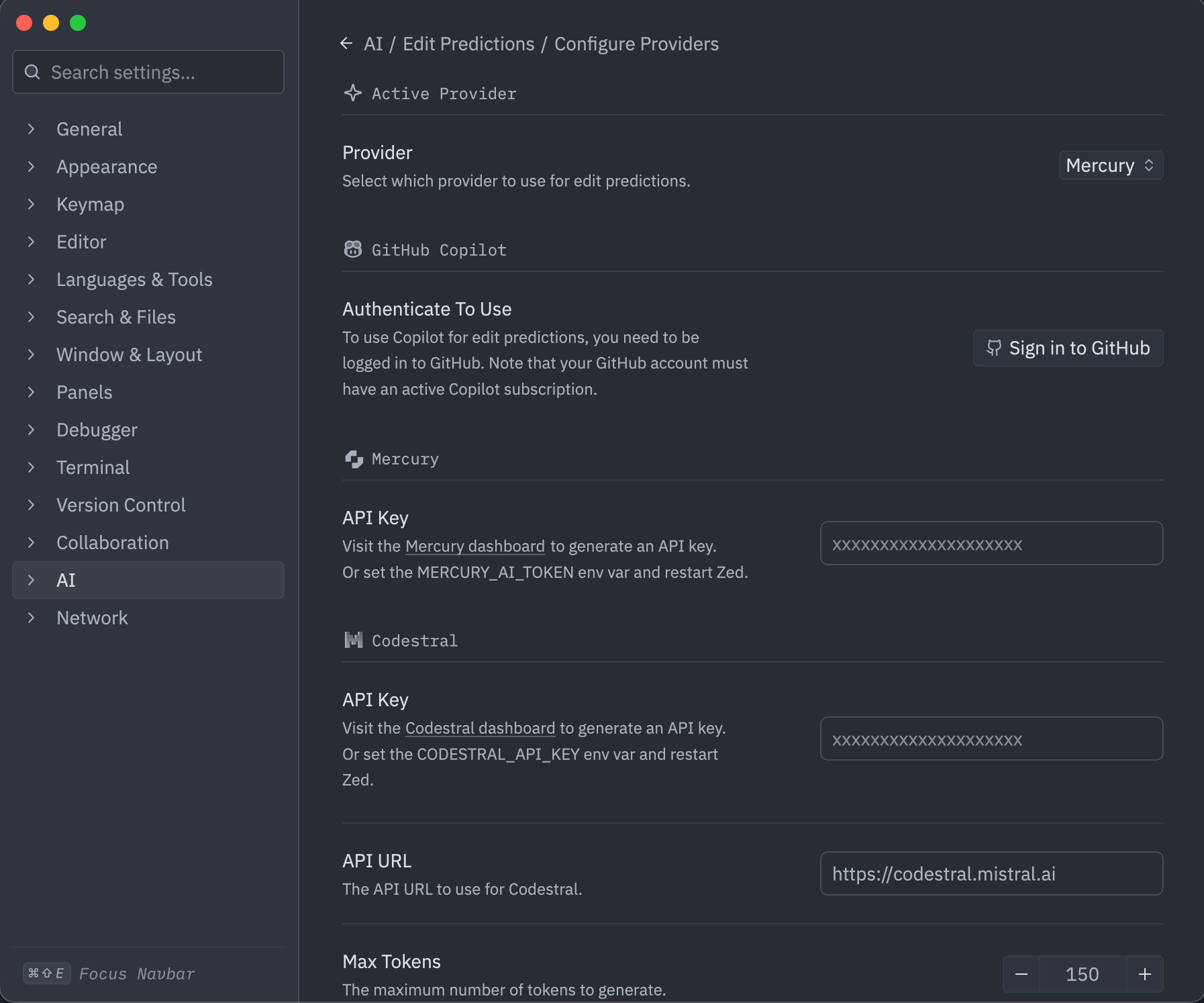
1. After installing Zed, proceed to the Zed settings and navigate to AI -> Edit Predictions -> Configure Providers -> Mercury.
2. Copy paste your Inception API Key and press Enter
3. You’re ready to receive next-edit predictions from Mercury Coder! To ensure it is active, confirm that the Inception logo is present in the bottom-right corner of your Zed editor.
  [Documentation](https://zed.dev/docs/)
Was this page helpful?
YesNo
[Roo Code](https://docs.inceptionlabs.ai/resources/roo-code)
[Inception Chat](https://docs.inceptionlabs.ai/resources/chat)
⌘I
Assistant
Responses are generated using AI and may contain mistakes.
[Contact support](https://docs.inceptionlabs.ai/cdn-cgi/l/email-protection#93e0e6e3e3fce1e7d3fafdf0f6e3e7fafcfdfff2f1e0bdf2fa)
---
# Tool Use - Inception Platform
[Skip to main content](https://docs.inceptionlabs.ai/capabilities/tool-use#content-area)
To get early access to Mercury 2, sign up here: [https://inceptionlabs.ai/early-access](https://inceptionlabs.ai/early-access)
[Inception Platform home page](https://docs.inceptionlabs.ai/)
Search...
⌘KAsk AI
Search...
Navigation
Capabilities
Tool Use
Export your api key as an environment variable in your terminal.
macOS / Linux
Windows
Copy
Ask AI
export INCEPTION_API_KEY="your_api_key_here"
cURL
Python
Copy
Ask AI
curl https://api.inceptionlabs.ai/v1/chat/completions \
-H "Content-Type: application/json" \
-H "Authorization: Bearer $INCEPTION_API_KEY" \
-d '{
"model": "mercury-2",
"messages": [{"role": "user", "content": "What'"'"'s the weather like in San Francisco?"}],
"tools": [{"type": "function", "function": {"name": "get_weather", "description": "Get the current weather in a given location", "parameters": {"type": "object", "properties": {"location": {"type": "string", "description": "City and state, e.g., '"'"'San Francisco, CA'"'"'"}, "unit": {"type": "string", "enum": ["celsius", "fahrenheit"]}}, "required": ["location", "unit"]}}}]
}'
Was this page helpful?
YesNo
[Instant](https://docs.inceptionlabs.ai/capabilities/instant)
[Structured Outputs](https://docs.inceptionlabs.ai/capabilities/structured-outputs)
⌘I
Assistant
Responses are generated using AI and may contain mistakes.
[Contact support](https://docs.inceptionlabs.ai/cdn-cgi/l/email-protection#0a797f7a7a65787e4a6364696f7a7e636564666b6879246b63)
---
# Streaming & Diffusion - Inception Platform
[Skip to main content](https://docs.inceptionlabs.ai/capabilities/streaming#content-area)
To get early access to Mercury 2, sign up here: [https://inceptionlabs.ai/early-access](https://inceptionlabs.ai/early-access)
[Inception Platform home page](https://docs.inceptionlabs.ai/)
Search...
⌘KAsk AI
Search...
Navigation
Capabilities
Streaming & Diffusion
Inception API supports streaming output and diffusion effect modes:
* **Streaming:** Get responses block-by-block for instant feedback—ideal for chat and live applications.
* **Diffusing:** Optionally visualize how noisy outputs are refined into final text, showcasing the model’s iterative denoising process.
Export your api key as an environment variable in your terminal.
macOS / Linux
Windows
Copy
Ask AI
export INCEPTION_API_KEY="your_api_key_here"
Streaming
Diffusing
Copy
Ask AI
curl https://api.inceptionlabs.ai/v1/chat/completions \
-H "Content-Type: application/json" \
-H "Authorization: Bearer $INCEPTION_API_KEY" \
-d '{
"model": "mercury-2",
"messages": [\
{"role": "user", "content": "What is a diffusion model?"}\
],
"max_tokens": 1000,
"stream": true
}'
Here is an example of how to show the diffusing effect in your web app using JavaScript:
Copy
Ask AI
const reader = response.body.getReader();
const decoder = new TextDecoder();
let fullContent = '';
while (true) {
const { done, value } = await reader.read();
if (done) break;
const chunk = decoder.decode(value);
const lines = chunk.split('\n');
for (const line of lines) {
const trimmed = line.trim();
if (!trimmed || !trimmed.startsWith('data: ')) continue;
if (trimmed === 'data: [DONE]') continue;
const jsonStr = trimmed.substring(6);
if (!jsonStr.startsWith('{')) continue;
try {
const data = JSON.parse(jsonStr);
for (const choice of data.choices || []) {
if (choice.delta && choice.delta.content !== null && choice.delta.content !== undefined) {
fullContent = choice.delta.content || '';
contentElement.textContent = fullContent;
}
}
} catch (error) {
console.error('Parsing error:', error);
}
}
}
Was this page helpful?
YesNo
[Chat Completions](https://docs.inceptionlabs.ai/capabilities/chat-completions)
[Instant](https://docs.inceptionlabs.ai/capabilities/instant)
⌘I
Assistant
Responses are generated using AI and may contain mistakes.
[Contact support](https://docs.inceptionlabs.ai/cdn-cgi/l/email-protection#c0b3b5b0b0afb2b480a9aea3a5b0b4a9afaeaca1a2b3eea1a9)
---
# Roo Code - Inception Platform
[Skip to main content](https://docs.inceptionlabs.ai/resources/roo-code#content-area)
To get early access to Mercury 2, sign up here: [https://inceptionlabs.ai/early-access](https://inceptionlabs.ai/early-access)
[Inception Platform home page](https://docs.inceptionlabs.ai/)
Search...
⌘KAsk AI
Search...
Navigation
Integrations
Roo Code
On this page
* [Setup Instructions](https://docs.inceptionlabs.ai/resources/roo-code#setup-instructions)
###
[](https://docs.inceptionlabs.ai/resources/roo-code#setup-instructions)
**Setup Instructions**
1. Install the Roo Code extension in [VS Code](https://docs.roocode.com/getting-started/installing)
2. Click the gear icon (⚙️) in the top-right corner of the left panel
3. Set the API Provider: “OpenAI Compatible”
4. Input the Base URL: `https://api.inceptionlabs.ai/v1`
5. Input your API Key
6. Input the Model ID: `mercury-2`
7. Click the Save button on the top-right
[Documentation](https://docs.roocode.com/)
Was this page helpful?
YesNo
[OpenClaw 🦞](https://docs.inceptionlabs.ai/resources/open-claw)
[Zed](https://docs.inceptionlabs.ai/resources/zed)
⌘I
Assistant
Responses are generated using AI and may contain mistakes.
[Contact support](https://docs.inceptionlabs.ai/cdn-cgi/l/email-protection#20535550504f525460494e43455054494f4e4c4142530e4149)
---
# Continue - Inception Platform
[Skip to main content](https://docs.inceptionlabs.ai/resources/continue#content-area)
To get early access to Mercury 2, sign up here: [https://inceptionlabs.ai/early-access](https://inceptionlabs.ai/early-access)
[Inception Platform home page](https://docs.inceptionlabs.ai/)
Search...
⌘KAsk AI
Search...
Navigation
Integrations
Continue
On this page
* [Setup Instructions](https://docs.inceptionlabs.ai/resources/continue#setup-instructions)
###
[](https://docs.inceptionlabs.ai/resources/continue#setup-instructions)
**Setup Instructions**
1. Install the Continue extension for [VS Code](https://marketplace.visualstudio.com/items?itemName=Continue.continue)
or [JetBrains](https://plugins.jetbrains.com/plugin/22707-continue)
.
2. Go to Settings
3. Select “OpenAI Compatible” as the provider
4. Input the Base URL: `https://api.inceptionlabs.ai/v1`
5. Input your API Key
6. Input the Model ID: `mercury-2`
7. Click Save
Alternatively, you can use the following `config.yaml` within your `.continue/` folder:
Copy
Ask AI
name: Mercury 2
version: 1.0.0
schema: v1
models:
- name: Mercury 2
provider: inception
model: mercury-2
apiKey: INCEPTION_API_KEY
roles:
- chat
[Documentation](https://docs.continue.dev/)
Was this page helpful?
YesNo
[Cline](https://docs.inceptionlabs.ai/resources/cline)
[Kilo Code](https://docs.inceptionlabs.ai/resources/kilo-code)
⌘I
Assistant
Responses are generated using AI and may contain mistakes.
[Contact support](https://docs.inceptionlabs.ai/cdn-cgi/l/email-protection#186b6d6868776a6c5871767b7d686c71777674797a6b367971)
---
# Welcome to the Inception Platform - Inception Platform
[Skip to main content](https://docs.inceptionlabs.ai/get-started/get-started#content-area)
To get early access to Mercury 2, sign up here: [https://inceptionlabs.ai/early-access](https://inceptionlabs.ai/early-access)
[Inception Platform home page](https://docs.inceptionlabs.ai/)
Search...
⌘KAsk AI
Search...
Navigation
Getting Started
Welcome to the Inception Platform
On this page
* [Account Setup](https://docs.inceptionlabs.ai/get-started/get-started#account-setup)
* [Quick Start](https://docs.inceptionlabs.ai/get-started/get-started#quick-start)
* [Using Third-Party Libraries](https://docs.inceptionlabs.ai/get-started/get-started#using-third-party-libraries)
[](https://docs.inceptionlabs.ai/get-started/get-started#account-setup)
Account Setup
-----------------------------------------------------------------------------------------
1. Create an Inception Platform account or [sign in](https://platform.inceptionlabs.ai/auth/login)
directly if you already have one. Each new user is initially assigned **10 million free tokens** to help get started with the API.
2. Go to [API Keys](https://platform.inceptionlabs.ai/dashboard/api-keys)
and create a new API key. You can start using the API immediately with your free tokens!
3. When your free tokens are running low, navigate to [Billing](https://platform.inceptionlabs.ai/dashboard/billing)
to add your payment information for continued usage beyond the free tier.
[](https://docs.inceptionlabs.ai/get-started/get-started#quick-start)
Quick Start
-------------------------------------------------------------------------------------
Export your api key as an [environment variable](https://en.wikipedia.org/wiki/Environment_variable)
in your terminal.
macOS / Linux
Windows
Copy
Ask AI
export INCEPTION_API_KEY="your_api_key_here"
cURL
Python
JavaScript
Copy
Ask AI
curl https://api.inceptionlabs.ai/v1/chat/completions \
-H "Content-Type: application/json" \
-H "Authorization: Bearer $INCEPTION_API_KEY" \
-d '{
"model": "mercury-2",
"messages": [\
{"role": "user", "content": "What is a diffusion model?"}\
],
"max_tokens": 1000
}'
All API requests should be made to:
Copy
Ask AI
https://api.inceptionlabs.ai/v1
All API requests should be sent with the API key in the Authorization header:
Copy
Ask AI
Authorization: Bearer $INCEPTION_API_KEY
####
[](https://docs.inceptionlabs.ai/get-started/get-started#using-third-party-libraries)
Using Third-Party Libraries
Inception API is also fully compatible with popular Python libraries:
AISuite
LiteLLM
LangChain
OpenAI Client
VercelAI
Copy
Ask AI
import os
import aisuite as ai
client = ai.Client(
{
"inception": {"api_key": os.environ["INCEPTION_API_KEY"], "base_url": "https://api.inceptionlabs.ai/v1"},
}
)
response = client.chat.completions.create(
model="inception:mercury-2",
messages=[{"role": "user", "content": "What is a diffusion model?"}],
max_tokens=1000
)
print(response.choices[0].message.content)
Was this page helpful?
YesNo
[Authentication](https://docs.inceptionlabs.ai/get-started/authentication)
⌘I
Assistant
Responses are generated using AI and may contain mistakes.
[Contact support](https://docs.inceptionlabs.ai/cdn-cgi/l/email-protection#4d3e383d3d223f390d24232e283d39242223212c2f3e632c24)
---
# OpenClaw 🦞 - Inception Platform
[Skip to main content](https://docs.inceptionlabs.ai/resources/open-claw#content-area)
To get early access to Mercury 2, sign up here: [https://inceptionlabs.ai/early-access](https://inceptionlabs.ai/early-access)
[Inception Platform home page](https://docs.inceptionlabs.ai/)
Search...
⌘KAsk AI
Search...
Navigation
Integrations
OpenClaw 🦞
On this page
* [Setup Instructions](https://docs.inceptionlabs.ai/resources/open-claw#setup-instructions)
* [Switching Models](https://docs.inceptionlabs.ai/resources/open-claw#switching-models)
* [Troubleshooting](https://docs.inceptionlabs.ai/resources/open-claw#troubleshooting)
[OpenClaw](https://openclaw.ai/)
is an open-source personal AI assistant that runs locally on your machine and connects to messaging platforms like WhatsApp, Telegram, Discord, and more. It supports any OpenAI-compatible provider, including Inception.
###
[](https://docs.inceptionlabs.ai/resources/open-claw#setup-instructions)
**Setup Instructions**
1. Set your Inception API key as an environment variable:
Copy
Ask AI
export INCEPTION_API_KEY="your-api-key-here"
Add this line to your `~/.zshrc` or `~/.bash_profile` so it persists across terminal sessions.
2. Open your OpenClaw config file at `~/.openclaw/openclaw.json` and add Inception as a custom provider:
Copy
Ask AI
{
"models": {
"mode": "merge",
"providers": {
"inception": {
"baseUrl": "https://api.inceptionlabs.ai/v1",
"apiKey": "${INCEPTION_API_KEY}",
"api": "openai-completions",
"models": [\
{\
"id": "mercury-2",\
"name": "Mercury 2",\
"contextWindow": 128000,\
"maxTokens": 16384\
}\
]
}
}
}
}
Setting `mode: "merge"` ensures all built-in providers (Anthropic, OpenAI, Gemini, etc.) remain available alongside Inception. Without it, custom providers replace the entire built-in catalog.
3. Set Mercury as your primary model:
Copy
Ask AI
openclaw models set inception/mercury-2
4. Restart the gateway to pick up the new provider:
Copy
Ask AI
openclaw gateway restart
OpenClaw’s gateway hot-reloads most config changes automatically, but restarting ensures new provider definitions are fully loaded.
5. Verify everything is working:
Copy
Ask AI
# Check that the Inception provider and model appear
openclaw models list
# Confirm primary model, auth status, and provider endpoint
openclaw models status
You should see `inception/mercury-2` listed as your primary model with valid auth.
###
[](https://docs.inceptionlabs.ai/resources/open-claw#switching-models)
**Switching Models**
You can switch to Mercury mid-session from any connected chat (Telegram, Discord, WhatsApp, etc.):
Copy
Ask AI
/model inception/mercury-2
Or use Mercury as a fallback instead of the primary model:
Copy
Ask AI
openclaw models fallbacks add inception/mercury-2
###
[](https://docs.inceptionlabs.ai/resources/open-claw#troubleshooting)
**Troubleshooting**
If something isn’t working, run the built-in diagnostics:
Copy
Ask AI
# General health check — finds and fixes common config issues
openclaw doctor --fix
# Detailed gateway and provider status
openclaw status --all
[Documentation](https://docs.openclaw.ai/)
Was this page helpful?
YesNo
[LangChain](https://docs.inceptionlabs.ai/resources/langchain)
[Roo Code](https://docs.inceptionlabs.ai/resources/roo-code)
⌘I
Assistant
Responses are generated using AI and may contain mistakes.
[Contact support](https://docs.inceptionlabs.ai/cdn-cgi/l/email-protection#4e3d3b3e3e213c3a0e27202d2b3e3a272120222f2c3d602f27)
---
# Models, Endpoints, and Pricing - Inception Platform
[Skip to main content](https://docs.inceptionlabs.ai/get-started/models#content-area)
To get early access to Mercury 2, sign up here: [https://inceptionlabs.ai/early-access](https://inceptionlabs.ai/early-access)
[Inception Platform home page](https://docs.inceptionlabs.ai/)
Search...
⌘KAsk AI
Search...
Navigation
Getting Started
Models, Endpoints, and Pricing
Start Free with 10M Tokens
--------------------------
Every new account includes 10 million free tokens.
[](https://docs.inceptionlabs.ai/get-started/models#production-models)
Production Models
--------------------------------------------------------------------------------------------
| Model | Input Price (1M Tokens) | Cached Input Price (1M Tokens) | Output Price (1M Tokens) | Supported Endpoints | Context Window | Features | Supported Formats |
| --- | --- | --- | --- | --- | --- | --- | --- |
| **Mercury 2** | $0.25 | $0.025 | $0.75 | `v1/chat/completions` | Chat: 128K | `Tool Calling` `Structured Outputs` | `Text` |
| **Mercury Edit** | $0.25 | $0.025 | $0.75 | `v1/fim/completions` `v1/apply/completions` `v1/edit/completions` | FIM: 32K
ApplyEdit: 32K
NextEdit: 32K | | `Text` |
[](https://docs.inceptionlabs.ai/get-started/models#api-specs)
API Specs
----------------------------------------------------------------------------
* Mercury 2
* Mercury Edit
The fastest reasoning LLM and our most powerful model.
[](https://docs.inceptionlabs.ai/get-started/models#param-reasoning-effort)
reasoning\_effort
string
default:"medium"
Control the amount of reasoning (`instant`, `low`, `medium`, `high`).
[](https://docs.inceptionlabs.ai/get-started/models#param-reasoning-summary)
reasoning\_summary
boolean
default:"true"
Whether to return a best-effort summary of the model’s reasoning.
[](https://docs.inceptionlabs.ai/get-started/models#param-reasoning-summary-wait)
reasoning\_summary\_wait
boolean
default:"false"
Whether to delay the final response until the reasoning summary is ready.
[](https://docs.inceptionlabs.ai/get-started/models#param-max-tokens)
max\_tokens
number
default:"8192"
Maximum number of tokens to generate. Range: 1-50,000
[](https://docs.inceptionlabs.ai/get-started/models#param-temperature)
temperature
number
default:"0.75"
Controls randomness. Range: 0.5-1.0
[](https://docs.inceptionlabs.ai/get-started/models#param-stop)
stop
string\[\]
default:"null"
Up to 4 sequences where the model will stop generating further tokens. The returned text will not contain these sequences.
[](https://docs.inceptionlabs.ai/get-started/models#param-stream)
stream
boolean
default:"false"
Whether to stream the response.
[](https://docs.inceptionlabs.ai/get-started/models#param-stream-options)
stream\_options
object
default:"null"
Include include\_usage=true to get usage information.
[](https://docs.inceptionlabs.ai/get-started/models#param-diffusing)
diffusing
boolean
default:"false"
Streaming should be set to true for diffusing effect.
[](https://docs.inceptionlabs.ai/get-started/models#param-tools)
tools
object\[\]
default:"null"
A list of tools the model may call.
[](https://docs.inceptionlabs.ai/get-started/models#example-usage)
Example Usage
------------------------------------------------------------------------------------
###
[](https://docs.inceptionlabs.ai/get-started/models#chat-completions)
Chat Completions
`v1/chat/completions`
cURL
Python
JavaScript
Copy
Ask AI
curl https://api.inceptionlabs.ai/v1/chat/completions \
-H "Content-Type: application/json" \
-H "Authorization: Bearer $INCEPTION_API_KEY" \
-d '{
"model": "mercury-2",
"messages": [\
{"role": "user", "content": "What is a diffusion model?"}\
],
"max_tokens": 10000
}'
A code editing LLM for autocomplete (FIM), apply edit, and next edit suggestions.
[](https://docs.inceptionlabs.ai/get-started/models#param-max-tokens-1)
max\_tokens
number
Maximum number of tokens to generate. Range: 1–8192. Default: `512` for autocomplete, `8192` for next-edit, `8192` for apply-edit.
[](https://docs.inceptionlabs.ai/get-started/models#param-presence-penalty)
presence\_penalty
number
Penalizes new tokens based on whether they appear in the generated text so far. Range: -2.0-2.0. Default: `1.5` for autocomplete, `1.0` for next-edit, `0.0` for apply-edit.
[](https://docs.inceptionlabs.ai/get-started/models#param-temperature-1)
temperature
number
Controls randomness. Range: 0.0-1.0. Default: `0.0` for autocomplete, `0.3` for next-edit, `0.0` for apply-edit.
[](https://docs.inceptionlabs.ai/get-started/models#param-top-p)
top\_p
number
Controls the cumulative probability of the top tokens to consider. Range: 0.0–1.0. Default: `1.0` for autocomplete, `0.8` for next-edit, `1.0` for apply-edit.
[](https://docs.inceptionlabs.ai/get-started/models#param-stop-1)
stop
string\[\]
Up to 4 sequences where the model will stop generating further tokens. The returned text will not contain these sequences.
[](https://docs.inceptionlabs.ai/get-started/models#param-stream-1)
stream
boolean
default:"false"
Whether to stream the response.
[](https://docs.inceptionlabs.ai/get-started/models#param-stream-options-1)
stream\_options
object
default:"null"
Include include\_usage=true to get usage information.
[](https://docs.inceptionlabs.ai/get-started/models#example-usage-2)
Example Usage
--------------------------------------------------------------------------------------
###
[](https://docs.inceptionlabs.ai/get-started/models#autocomplete)
Autocomplete
`v1/fim/completions`
cURL
Python
JavaScript
Copy
Ask AI
curl https://api.inceptionlabs.ai/v1/fim/completions \
-H "Content-Type: application/json" \
-H "Authorization: Bearer $INCEPTION_API_KEY" \
-d '{
"model": "mercury-edit",
"prompt": "def fibonacci(",
"suffix": "return a + b",
"max_tokens": 1000
}'
###
[](https://docs.inceptionlabs.ai/get-started/models#apply-edit)
Apply-Edit
`v1/apply/completions`
cURL
Python
JavaScript
Copy
Ask AI
curl https://api.inceptionlabs.ai/v1/apply/completions \
-H "Content-Type: application/json" \
-H "Authorization: Bearer $INCEPTION_API_KEY" \
--data-binary @- <<'JSON'
{
"model": "mercury-edit",
"messages": [\
{"role": "user", "content": "<|original_code|>\nclass Calculator:\n \"\"\"A simple calculator class.\"\"\"\n def __init__(self):\n self.history = []\n\n def add(self, a, b):\n \"\"\"Adds two numbers.\"\"\"\n result = a + b\n return result\n<|/original_code|>\n\n<|update_snippet|>\n// ... existing code ...\ndef multiply(self, a, b):\n \"\"\"Multiplies two numbers.\"\"\"\n result = a * b\n return result\n// ... existing code ...\n<|/update_snippet|>"}\
],
"max_tokens": 1000
}
JSON
###
[](https://docs.inceptionlabs.ai/get-started/models#next-edit)
Next-Edit
`v1/edit/completions`
cURL
Python
JavaScript
Copy
Ask AI
curl https://api.inceptionlabs.ai/v1/edit/completions \
-H "Content-Type: application/json" \
-H "Authorization: Bearer $INCEPTION_API_KEY" \
--data-binary @- <<'JSON'
{
"model": "mercury-edit",
"messages": [\
{"role": "user", "content": "<|recently_viewed_code_snippets|>\n\n<|/recently_viewed_code_snippets|>\n\n<|current_file_content|>\ncurrent_file_path: solver.py\n'''\nfunction: flagAllNeighbors\n----------\nThis function marks each of the covered neighbors of the cell at the given row\n<|code_to_edit|>\nand col as flagged.\n'''\ndef flagAllNeighbors(board<|cursor|>, row, col): \n for r, c in b.getNeighbors(row, col):\n if b.isValid(r, c):\n b.flag(r, c)\n\n<|/code_to_edit|>\n<|/current_file_content|>\n\n<|edit_diff_history|>\n--- /c:/Users/test/testing/solver.py\n+++ /c:/Users/test/testing/solver.py\n@@ -6,1 +6,1 @@\n-def flagAllNeighbors(b, row, col): \n+def flagAllNeighbors(board, row, col): \n\n<|/edit_diff_history|>"}\
],
"max_tokens": 1000
}
JSON
Was this page helpful?
YesNo
[Authentication](https://docs.inceptionlabs.ai/get-started/authentication)
[Rate Limits](https://docs.inceptionlabs.ai/get-started/rate-limits)
⌘I
Assistant
Responses are generated using AI and may contain mistakes.
[Contact support](https://docs.inceptionlabs.ai/cdn-cgi/l/email-protection#2d5e585d5d425f596d44434e485d59444243414c4f5e034c44)
---