# Table of Contents
- [K3s](#k3s)
- [k3s blog | K3s](#k3s-blog-k3s)
- [Hello Blog | K3s](#hello-blog-k3s)
- [The Basic HA Cluster | K3s](#the-basic-ha-cluster-k3s)
- [K3s initialization deep dive | K3s](#k3s-initialization-deep-dive-k3s)
- [Kubernetes v1.34 is out! | K3s](#kubernetes-v1-34-is-out-k3s)
- [Sysbox Runtime With K3s | K3s](#sysbox-runtime-with-k3s-k3s)
- [K3s strategies for image consumption | K3s](#k3s-strategies-for-image-consumption-k3s)
- [Kubernetes v1.35 is out! | K3s](#kubernetes-v1-35-is-out-k3s)
- [Archive | K3s](#archive-k3s)
- [Authors | K3s](#authors-k3s)
- [Tags | K3s](#tags-k3s)
- [One post tagged with "runc" | K3s](#one-post-tagged-with-runc-k3s)
- [One post tagged with "sysbox" | K3s](#one-post-tagged-with-sysbox-k3s)
- [Search the documentation](#search-the-documentation)
- [Import Images | K3s](#import-images-k3s)
- [Helm | K3s](#helm-k3s)
- [Volumes and Storage | K3s](#volumes-and-storage-k3s)
- [Advanced Options / Configuration | K3s](#advanced-options-configuration-k3s)
- [Architecture | K3s](#architecture-k3s)
- [agent | K3s](#agent-k3s)
- [CLI Tools | K3s](#cli-tools-k3s)
- [certificate | K3s](#certificate-k3s)
- [Cluster Access | K3s](#cluster-access-k3s)
- [etcd-snapshot | K3s](#etcd-snapshot-k3s)
- [token | K3s](#token-k3s)
- [secrets-encrypt | K3s](#secrets-encrypt-k3s)
- [server | K3s](#server-k3s)
- [Cluster Datastore | K3s](#cluster-datastore-k3s)
- [Backup and Restore | K3s](#backup-and-restore-k3s)
- [High Availability External DB | K3s](#high-availability-external-db-k3s)
- [High Availability Embedded etcd | K3s](#high-availability-embedded-etcd-k3s)
- [Cluster Load Balancer | K3s](#cluster-load-balancer-k3s)
- [FAQ | K3s](#faq-k3s)
- [Installation | K3s](#installation-k3s)
- [Configuration Options | K3s](#configuration-options-k3s)
- [Air-Gap Install | K3s](#air-gap-install-k3s)
- [Managing Packaged Components | K3s](#managing-packaged-components-k3s)
- [Known Issues | K3s](#known-issues-k3s)
- [Networking | K3s](#networking-k3s)
- [Private Registry Configuration | K3s](#private-registry-configuration-k3s)
- [Managing Server Roles | K3s](#managing-server-roles-k3s)
- [Distributed hybrid or multicloud cluster | K3s](#distributed-hybrid-or-multicloud-cluster-k3s)
- [Basic Network Options | K3s](#basic-network-options-k3s)
- [Embedded Registry Mirror | K3s](#embedded-registry-mirror-k3s)
- [Requirements | K3s](#requirements-k3s)
- [Quick-Start Guide | K3s](#quick-start-guide-k3s)
- [Environment Variables | K3s](#environment-variables-k3s)
- [Related Projects | K3s](#related-projects-k3s)
- [Uninstalling K3s | K3s](#uninstalling-k3s-k3s)
- [Multus and IPAM plugins | K3s](#multus-and-ipam-plugins-k3s)
- [K3s - 轻量级 Kubernetes | K3s](#k3s-kubernetes-k3s)
- [K3s - 軽量なKubernetes | K3s](#k3s-kubernetes-k3s)
- [Flag Deprecation | K3s](#flag-deprecation-k3s)
- [Networking Services | K3s](#networking-services-k3s)
- [Metrics | K3s](#metrics-k3s)
- [Resource Profiling | K3s](#resource-profiling-k3s)
- [CIS 1.24 Self Assessment Guide | K3s](#cis-1-24-self-assessment-guide-k3s)
- [CIS 1.8 Self Assessment Guide | K3s](#cis-1-8-self-assessment-guide-k3s)
- [v1.35.X | K3s](#v1-35-x-k3s)
- [Security | K3s](#security-k3s)
- [CIS 1.7 Self Assessment Guide | K3s](#cis-1-7-self-assessment-guide-k3s)
- [v1.34.X | K3s](#v1-34-x-k3s)
- [v1.33.X | K3s](#v1-33-x-k3s)
- [Secrets Encryption | K3s](#secrets-encryption-k3s)
- [CIS 1.23 Self Assessment Guide | K3s](#cis-1-23-self-assessment-guide-k3s)
- [v1.32.X | K3s](#v1-32-x-k3s)
- [Upgrades | K3s](#upgrades-k3s)
- [Stopping K3s | K3s](#stopping-k3s-k3s)
- [Manual Upgrades | K3s](#manual-upgrades-k3s)
- [Automated Upgrades | K3s](#automated-upgrades-k3s)
- [CIS Hardening Guide | K3s](#cis-hardening-guide-k3s)
- [Rolling Back K3s | K3s](#rolling-back-k3s-k3s)
- [v1.30.X | K3s](#v1-30-x-k3s)
- [v1.31.X | K3s](#v1-31-x-k3s)
- [v1.26.X | K3s](#v1-26-x-k3s)
- [v1.29.X | K3s](#v1-29-x-k3s)
- [v1.28.X | K3s](#v1-28-x-k3s)
- [v1.25.X | K3s](#v1-25-x-k3s)
- [v1.24.X | K3s](#v1-24-x-k3s)
- [v1.27.X | K3s](#v1-27-x-k3s)
- [k3s blog | K3s](#k3s-blog-k3s)
- [CIS 1.9 Self Assessment Guide | K3s](#cis-1-9-self-assessment-guide-k3s)
- [CIS 1.10 Self Assessment Guide | K3s](#cis-1-10-self-assessment-guide-k3s)
---
# K3s
[Skip to main content](https://docs.k3s.io/#__docusaurus_skipToContent_fallback)
Lightweight Kubernetes. Easy to install, half the memory, all in a binary of less than 100 MB.
Great for:
* Edge
* Homelab
* Internet of Things (IoT)
* Continuous Integration (CI)
* Development
* Single board computers (ARM)
* Air-gapped environments
* Embedded K8s
* Situations where a PhD in K8s clusterology is infeasible
K3s is a fully compliant Kubernetes distribution with the following enhancements:
* Distributed as a single binary or minimal container image.
* Lightweight datastore based on sqlite3 as the default storage backend. etcd3, MySQL, and Postgres are also available.
* Wrapped in simple launcher that handles a lot of the complexity of TLS and options.
* Secure by default with reasonable defaults for lightweight environments.
* Operation of all Kubernetes control plane components is encapsulated in a single binary and process, allowing K3s to automate and manage complex cluster operations like distributing certificates.
* External dependencies have been minimized; the only requirements are a modern kernel and cgroup mounts.
* Packages the required dependencies for easy "batteries-included" cluster creation:
* containerd / cri-dockerd container runtime (CRI)
* Flannel Container Network Interface (CNI)
* CoreDNS Cluster DNS
* Traefik Ingress controller
* ServiceLB Load-Balancer controller
* Kube-router Network Policy controller
* Local-path-provisioner Persistent Volume controller
* Spegel distributed container image registry mirror
* Host utilities (iptables, socat, etc)
What's with the name?
=====================
We wanted an installation of Kubernetes that was half the size in terms of memory footprint. Kubernetes is a 10-letter word stylized as K8s. So something half as big as Kubernetes would be a 5-letter word stylized as K3s. There is no long form of K3s and no official pronunciation.
---
# k3s blog | K3s
[Skip to main content](https://docs.k3s.io/blog#__docusaurus_skipToContent_fallback)
Kubernetes 1.35 has arrived! As we roll out this latest version, it’s the perfect time to reflect on the significant strides the K3s project has made over the last quarter. 🥳
Slow image pulls can be annoying and may increase Kubernetes startup times over a healthy threshold, particularly in resource-constrained or air-gapped environments. The situation is exacerbated by new AI-driven apps, which often rely on astronomically large images, frequently tens or hundreds of gigabytes. This post dives into mechanisms that K3s makes available to improve the user's experience when handling large images.
The K3s binary bundles all the components needed to run a production-ready, CNCF-conformant Kubernetes cluster including containerd, runc, kubelet, and more. In this post we will discuss how containerd communicates with OCI runtimes and will discuss adding another container runtime (Sysbox) to K3s and how it can be used to run system pods in your environment.
Kubernetes 1.34 is finally here! A look back at K3s recent work and achievements 🥳
It's been a busy and productive few months, and we're excited to share some of the amazing progress we've made. From new features that make your lives easier to important bug fixes and foundational improvements, our team and community have been hard at work.
K3s is a lightweight Kubernetes distribution which excels in its deployment speed and minimal resource footprint. In fact, a lot of our users love K3s because it offers an unparalleled initialization speed.
While we have more [detailed docs](https://docs.k3s.io/datastore/ha-embedded)
on setting up a High Availability (HA) cluster, this post will cover the simplest HA cluster you can create.
This is the first post on blog.k3s.io
---
# Hello Blog | K3s
[Skip to main content](https://docs.k3s.io/blog/2025/03/09/hello-blog#__docusaurus_skipToContent_fallback)
This is the first post on blog.k3s.io
We will explore aspects of K3s, Kubernetes, and other related topics. These long form posts will be written by the K3s team and help illuminate aspects of the project that are not easily covered in the documentation.
Stay tuned for more posts in the future.
---
# The Basic HA Cluster | K3s
[Skip to main content](https://docs.k3s.io/blog/2025/03/10/simple-ha#__docusaurus_skipToContent_fallback)
While we have more [detailed docs](https://docs.k3s.io/datastore/ha-embedded)
on setting up a High Availability (HA) cluster, this post will cover the simplest HA cluster you can create.
Baseline HA Cluster 💻🖥️💻[](https://docs.k3s.io/blog/2025/03/10/simple-ha#baseline-ha-cluster-%EF%B8%8F "Direct link to Baseline HA Cluster 💻🖥️💻")
---------------------------------------------------------------------------------------------------------------------------------------------------------
Whenever we get a question around HA, this is the cluster configuration I start with. It provides a solid foundation when deploying beyond a single server.
Our cluster will have:
* 4 nodes or VMs:
* 1 load balancer
* 3 servers
* A k3s-upgrade plan that will automatically update the cluster to the latest patch version of a given minor.
Cluster Setup 🌐🔧[](https://docs.k3s.io/blog/2025/03/10/simple-ha#cluster-setup- "Direct link to Cluster Setup 🌐🔧")
------------------------------------------------------------------------------------------------------------------------
I'm using `vagrant` to provision 4 Ubuntu 24.04 VMs for this setup, all on a flat network. Setup of nodes is left as an exercise for the reader 😅.
My nodes are configured with the following names and IPs:
| Name | IP |
| --- | --- |
| lb-0 | 10.10.10.100 |
| server-0 | 10.10.10.50 |
| server-1 | 10.10.10.51 |
| server-2 | 10.10.10.52 |
### Load Balancer[](https://docs.k3s.io/blog/2025/03/10/simple-ha#load-balancer "Direct link to Load Balancer")
I'm using [haproxy](https://www.haproxy.org/)
as it supports later expansion to multiple LB nodes (via keepalived).
SSH into the load balancer and install haproxy:
sudo apt install haproxy
The haproxy config is simple, just forward traffic to the servers:
#/etc/haproxy/haproxy.cfgfrontend k3s bind *:6443 mode tcp default_backend k3sbackend k3s mode tcp option tcp-check balance roundrobin server server-0 10.10.10.50:6443 check server server-1 10.10.10.51:6443 check server server-2 10.10.10.52:6443 check
Restart haproxy to apply the config:
systemctl restart haproxy
### Install K3s on first server[](https://docs.k3s.io/blog/2025/03/10/simple-ha#install-k3s-on-first-server "Direct link to Install K3s on first server")
On the first server, install K3s with embedded etcd and a known token:
curl -sfL https://get.k3s.io | INSTALL_K3S_CHANNEL=v1.31 sh -s - \--cluster-init --token k3sblog --tls-san 10.10.10.100
We pass the `--tls-san` flag adds the load balancer IP as a Subject Alternative Name (SAN) for the certificate.
### Join the other servers[](https://docs.k3s.io/blog/2025/03/10/simple-ha#join-the-other-servers "Direct link to Join the other servers")
On the other servers, join the cluster via the load balancer:
curl -sfL https://get.k3s.io | INSTALL_K3S_CHANNEL=v1.31 sh -s - \--server https://10.10.10.100:6443 --token k3sblog
### Grab the kubeconfig[](https://docs.k3s.io/blog/2025/03/10/simple-ha#grab-the-kubeconfig "Direct link to Grab the kubeconfig")
Now that the cluster is up, we can grab the kubeconfig from the first server:
scp server-0:/etc/rancher/k3s/k3s.yaml k3s.yaml
Modify it to access the cluster via the load balancer:
sed -i 's/127.0.0.1/10.10.10.100/' k3s.yaml
No we can manage the cluster from our local machine:
export KUBECONFIG=$(pwd)/k3s.yamlkubectl get nodes
Upgrade Plan 🏗️📝📐[](https://docs.k3s.io/blog/2025/03/10/simple-ha#upgrade-plan-%EF%B8%8F "Direct link to Upgrade Plan 🏗️📝📐")
------------------------------------------------------------------------------------------------------------------------------------
The plan I'm using will keep k3s updated to the latest patch version of the channel we give. In this case I'm using the `v1.31` channel, the same channel used above. Kubernetes v1.31.4 just released at time of writing this post, so with this plan we have stable upgrades handled for the next 10-12 months (depending on how many patch releases this minor gets).
### Install the system-upgrade-controller[](https://docs.k3s.io/blog/2025/03/10/simple-ha#install-the-system-upgrade-controller "Direct link to Install the system-upgrade-controller")
The upgrade plan is managed by the system-upgrade-controller. Install it:
kubectl apply -f https://github.com/rancher/system-upgrade-controller/releases/latest/download/system-upgrade-controller.yamlkubectl apply -f https://github.com/rancher/system-upgrade-controller/releases/latest/download/crd.yaml
### Create the upgrade plan[](https://docs.k3s.io/blog/2025/03/10/simple-ha#create-the-upgrade-plan "Direct link to Create the upgrade plan")
#server-plan.yamlapiVersion: upgrade.cattle.io/v1kind: Planmetadata: name: server-plan namespace: system-upgradespec: concurrency: 1 cordon: true nodeSelector: matchExpressions: - key: node-role.kubernetes.io/control-plane operator: In values: - "true" serviceAccountName: system-upgrade upgrade: image: rancher/k3s-upgrade channel: https://update.k3s.io/v1-release/channels/v1.31
kubectl apply -f server-plan.yaml
See the [automated upgrade docs](https://docs.k3s.io/upgrades/automated)
for more details.
Conclusion 🚀[](https://docs.k3s.io/blog/2025/03/10/simple-ha#conclusion- "Direct link to Conclusion 🚀")
-----------------------------------------------------------------------------------------------------------
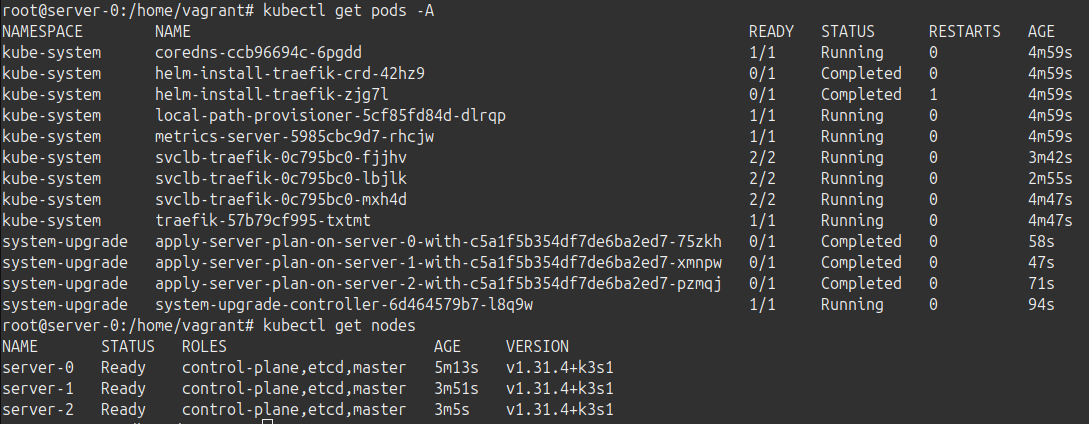
We now have a high-availability cluster, accessible via a single IP. Upgrades are handled for the next year. This is a great starting point to:
* Add agent nodes to expand our workload capacity
* Add another load-balancer for additional redundancy
---
# K3s initialization deep dive | K3s
[Skip to main content](https://docs.k3s.io/blog/2025/03/25/K3s-initialization#__docusaurus_skipToContent_fallback)
K3s is a lightweight Kubernetes distribution which excels in its deployment speed and minimal resource footprint. In fact, a lot of our users love K3s because it offers an unparalleled initialization speed.
This blog post delves into the heart of K3s's efficiency: its initialization process. We'll embark on a journey through the steps that enable K3s to materialize a fully functional Kubernetes cluster so quickly. By examining K3s’s own logs, we'll unravel the meaning behind each step, providing you with a practical understanding of how K3s achieves its remarkable speed. This exploration not only illuminates the inner workings of K3s but also equips you with the knowledge to troubleshoot your deployments.
The Embedded Powerhouse ⚙️⚡[](https://docs.k3s.io/blog/2025/03/25/K3s-initialization#the-embedded-powerhouse-%EF%B8%8F "Direct link to The Embedded Powerhouse ⚙️⚡")
----------------------------------------------------------------------------------------------------------------------------------------------------------------------
K3s leverages `go-bindata` to embed essential Linux userspace binaries and manifests directly into its executable. This eliminates external dependencies and streamlines the deployment process. Within the K3s binary, you'll find core components like `runc` and `containerd`, along with the k3s-root tarball (e.g. k3s-root-amd64.tar). This tarball contains all the userspace binaries necessary for K3s to function, reducing the reliance on the host OS. If you would like all the K3s embedded binaries to take preference over the host OS binaries, you should use the `--prefer-bundled-bin` flag.
The embedded binaries are always deployed in the same directory: `/var/lib/rancher/k3s/data`. If you inspect this folder, you will notice it contains at least three subdirectories: `cni`, `current` and a long string of characters (or SHA). That long string of characters is generated when building K3s and it is the result of a `sha256sum` operation made on the tarball with the embedded binaries. As these change in each release, you will see a different string of characters for each release. In fact, after an upgrade, there will be two directories with a long string of characters as their name.
`current` is just a symlink to the SHA directory and `cni` includes different cni plugins that are also symlinks to the cni binary in the SHA directory. This is because we are building all cni plugins in just one binary using multi-exec tooling. This is again a way to be more efficient and less resource consuming. If your current K3s deployment underwent an upgrade process, you will see one extra directory called `previous`, which is another symlink to the previous SHA directory. For clarification this example:
$> ls -ahltr /var/lib/rancher/k3s/data/total 24K-rw------- 1 root root 0 Mar 19 06:22 .lockdrwxr-xr-x 4 root root 4.0K Mar 19 06:22 ..drwxr-xr-x 4 root root 4.0K Mar 19 06:28 82142f5157c67effc219aeefe0bc03e0460fc62b9fbae9e901270c86b5635d53lrwxrwxrwx 1 root root 90 Mar 19 06:28 previous -> /var/lib/rancher/k3s/data/82142f5157c67effc219aeefe0bc03e0460fc62b9fbae9e901270c86b5635d53drwxr-xr-x 4 root root 4.0K Mar 19 06:30 b13851fe661ab93938fc9a881cdce529da8c6b9b310b2440ef01a860f8b9c3a9lrwxrwxrwx 1 root root 90 Mar 19 06:30 current -> /var/lib/rancher/k3s/data/b13851fe661ab93938fc9a881cdce529da8c6b9b310b2440ef01a860f8b9c3a9drwxr-xr-x 2 root root 4.0K Mar 19 06:30 cnidrwxr-xr-x 4 root root 4.0K Mar 19 06:40 .
Additionally, K3s includes embedded Helm charts and manifests for deploying critical services such as CoreDNS, Traefik, and local storage. These embedded charts, formatted as yaml files, can be found in the control plane nodes in the directory: `/var/lib/rancher/k3s/server/manifests`.
For 67MB our K3s binary includes a lot of stuff!
The Boot Sequence, Step-by-Step 👣[](https://docs.k3s.io/blog/2025/03/25/K3s-initialization#the-boot-sequence-step-by-step- "Direct link to The Boot Sequence, Step-by-Step 👣")
----------------------------------------------------------------------------------------------------------------------------------------------------------------------------------
Now that we established how K3s is carrying its embedded tools, we can explore the boot up sequence. Let us look at the typical logs you can find in `journalctl` when deploying a control-plane or K3s server instance. It all starts with:
Starting Lightweight Kubernetes...
And then:
/usr/bin/systemctl is-enabled --quiet nm-cloud-setup.service
This part is checking for a network manager utility which must be disabled as described in the [docs](https://docs.k3s.io/installation/requirements?_highlight=nm&_highlight=cloud&_highlight=setup.service&os=rhel#operating-systems)
. It configures some parts of the network stack, specifically the routing tables, which conflict with Kubernetes networking, and that is why we verify if it was correctly disabled.
The next message should look familiar
Acquiring lock file /var/lib/rancher/k3s/data/.lockPreparing data dir /var/lib/rancher/k3s/data/f8e9b5e7d85085972f4a9ddfd539d4dcf887be2e380a55f415c93cac5516dad5
When this message is shown, the directory where K3s deploys the embedded binaries has already been created. At this point, K3s will extract the binaries. We use the lock to avoid concurrent modifications, preventing K3s embedded commands like `kubectl` or `ctr` from executing and disturbing the K3s initialization.
The next block of logs point at the K3s version and the datastore. In this case, I am using the default datastore which means kine with sqlite. For more information on the different datastores available check this [link](https://docs.k3s.io/datastore)
Starting k3s v1.32.2+k3s1Configuring sqlite3 database connection pooling: maxIdleConns=2, maxOpenConns=0, connMaxLifetime=0sConfiguring database table schema and indexes, this may take a moment...Database tables and indexes are up to dateKine available at unix://kine.sock
Once the datastore is available k3s locks the bootstrap key. This step is useful for HA mode and this this key is just a placeholder so that other control-plane nodes do not start generating new CA certs. As we are not using HA mode in this example, this is not relevant.
Bootstrap key locked for initial create
K3s then generates all the TLS certificates required for the internal communications:
generated self-signed CA certificatecertificate CN=system:admin,O=system:masters signed by CN=k3s-client-ca@1742309831certificate CN=system:k3s-supervisor,O=system:masters signed by CN=k3s-client-ca@1742309831certificate CN=system:kube-controller-manager signed by CN=k3s-client-ca@1742309831certificate CN=system:kube-scheduler signed by CN=k3s-client-ca@1742309831certificate CN=system:apiserver,O=system:masters signed by CN=k3s-client-ca@1742309831certificate CN=k3s-cloud-controller-manager signed by CN=k3s-client-ca@1742309831generated self-signed CA certificate CN=k3s-server-ca@1742309831certificate CN=kube-apiserver signed by CN=k3s-server-ca@1742309831generated self-signed CA certificate CN=k3s-request-header-ca@1742309831certificate CN=system:auth-proxy signed by CN=k3s-request-header-ca@1742309831generated self-signed CA certificate CN=etcd-server-ca@1742309831certificate CN=etcd-client signed by CN=etcd-server-ca@1742309831generated self-signed CA certificate CN=etcd-peer-ca@1742309831certificate CN=etcd-peer signed by CN=etcd-peer-ca@1742309831certificate CN=etcd-server signed by CN=etcd-server-ca@1742309831certificate CN=k3s,O=k3s signed by CN=k3s-server-ca@1742309831
And then saves the bootstrap data in the bootstrap key. Again, this is not relevant for this example:
Saving cluster bootstrap data to datastore
After that, K3s starts the different Kubernetes components. These components are all run within the k3s process as goroutines, which are lightweight, concurrent functions in Go, allowing for efficient resource usage. This is another design decision taken to reduce boot time and reduce resource consumption.
Running kube-apiserverRunning kube-schedulerRunning kube-controller-manager
Manifests for packaged components are extracted to `/var/lib/rancher/k3s/server/manifests/`. When all the different Kubernetes components are running and K3s initialization is ready, the deploy controller begins watching this directory and applies all the manifests. This is how components like CoreDNS or Traefik eventually get installed.
And that’s it, in a short period of time, you end up with a fully deployed and running Kubernetes distribution. 🎉
Conclusion 🏁[](https://docs.k3s.io/blog/2025/03/25/K3s-initialization#conclusion- "Direct link to Conclusion 🏁")
--------------------------------------------------------------------------------------------------------------------
This exploration has hopefully demystified some of the initial steps that enable K3s to materialize a fully functional Kubernetes cluster. By examining the logs, we've shed some light on the meaning behind each step, providing you with a deeper understanding of how K3s deploys in such a fast manner. We hope you find this knowledge useful to troubleshoot or at least to understand a bit deeper how K3s works.
---
# Kubernetes v1.34 is out! | K3s
[Skip to main content](https://docs.k3s.io/blog/2025/08/30/K3s-1.34-release#__docusaurus_skipToContent_fallback)
Kubernetes 1.34 is finally here! A look back at K3s recent work and achievements 🥳
It's been a busy and productive few months, and we're excited to share some of the amazing progress we've made. From new features that make your lives easier to important bug fixes and foundational improvements, our team and community have been hard at work.
Key Features and Improvements ✨[](https://docs.k3s.io/blog/2025/08/30/K3s-1.34-release#key-features-and-improvements- "Direct link to Key Features and Improvements ✨")
-------------------------------------------------------------------------------------------------------------------------------------------------------------------------
Here’s a look at some of the most impactful features and updates we've rolled out:
#### Automatic Certificate Renewal Window Increase 📅[](https://docs.k3s.io/blog/2025/08/30/K3s-1.34-release#automatic-certificate-renewal-window-increase- "Direct link to Automatic Certificate Renewal Window Increase 📅")
We've made certificate management more user-friendly by increasing the automatic certificate renewal window from 90 to 120 days. This means if you perform quarterly upgrades, your certificates will be renewed more frequently, preventing them from expiring and making your clusters unusable. For more information check our [docs](https://docs.k3s.io/cli/certificate#client-and-server-certificates)
#### Optional Airgap Image Tarball Imports 💨[](https://docs.k3s.io/blog/2025/08/30/K3s-1.34-release#optional-airgap-image-tarball-imports- "Direct link to Optional Airgap Image Tarball Imports 💨")
For those who use K3s in an airgap environment, you now have the option to skip importing all image tarballs. You can select to import only images that have changed since they were last imported, even across restarts. This can significantly speed up the startup process when deploying a large number of images, as the kubelet can start sooner. Check our [docs](https://docs.k3s.io/installation/airgap?airgap-load-images=Manually+Deploy+Images#enable-conditional-image-imports)
for more information
#### Enhanced Certificate Check Output ✅[](https://docs.k3s.io/blog/2025/08/30/K3s-1.34-release#enhanced-certificate-check-output- "Direct link to Enhanced Certificate Check Output ✅")
We've improved the output of our certificate checks to provide clearer information about certificate usage and expiration dates. The output can also now be viewed in different formats. Our [docs](https://docs.k3s.io/cli/certificate#checking-expiration-dates)
show an example of the new output format.
#### Kube-scheduler and Kube-controller-manager Certificate Management 🔐[](https://docs.k3s.io/blog/2025/08/30/K3s-1.34-release#kube-scheduler-and-kube-controller-manager-certificate-management- "Direct link to Kube-scheduler and Kube-controller-manager Certificate Management 🔐")
We are now generating and managing certificates for kube-scheduler and kube-controller-manager, and they can be rotated using our existing certificate rotation [tool](https://docs.k3s.io/cli/certificate)
.
#### Retention Flag for S3 Stored Snapshots 💾[](https://docs.k3s.io/blog/2025/08/30/K3s-1.34-release#retention-flag-for-s3-stored-snapshots- "Direct link to Retention Flag for S3 Stored Snapshots 💾")
We've added a new retention flag for snapshots stored in an S3 bucket. This allows you to keep snapshots in S3 for longer periods while maintaining a smaller number of local snapshots. This is a great feature for balancing long-term disaster recovery with local storage efficiency. Check out our [docs](https://docs.k3s.io/cli/etcd-snapshot#s3-retention)
for more information about how to use it.
#### Official Governance Model 🤝[](https://docs.k3s.io/blog/2025/08/30/K3s-1.34-release#official-governance-model- "Direct link to Official Governance Model 🤝")
We're proud to announce that we now have an official governance model in place! This will help bring more clarity to our project and hopefully encourage more developers to join our fantastic community. You can read it [here](https://github.com/k3s-io/k3s/blob/master/GOVERNANCE.md)
.
Bug Fixes and Other Notable Changes 🛠️[](https://docs.k3s.io/blog/2025/08/30/K3s-1.34-release#bug-fixes-and-other-notable-changes-%EF%B8%8F "Direct link to Bug Fixes and Other Notable Changes 🛠️")
--------------------------------------------------------------------------------------------------------------------------------------------------------------------------------------------------------
We've also been busy tackling a number of bugs, tech debt items and making other important improvements under the hood:
Numerous bug fixes, including those for secrets encryption timeouts and race conditions, DNS fallbacks, various authorization and authentication handling issues and replacing go-bindata with the go native embed package.
Improvements to our test and build infrastructure, e.g. migrating of K3s release artifacts to GitHub Actions (GHA).
Version bumps for key components 🚀[](https://docs.k3s.io/blog/2025/08/30/K3s-1.34-release#version-bumps-for-key-components- "Direct link to Version bumps for key components 🚀")
------------------------------------------------------------------------------------------------------------------------------------------------------------------------------------
Apart from Kubernetes v1.34.x, we bumped versions for several key components. Here is the list with the latest versions:
| Component | New Version |
| --- | --- |
| Kine | v0.14.0 |
| SQLite | v3.50.4 |
| Etcd | v3.6.4 |
| Containerd | v2.1.4 |
| Runc | v1.3.1 |
| Flannel | v0.27.0 |
| Metrics-server | v0.8.0 |
| Traefik | v3.3.6 |
| Coredns | v1.12.3 |
| Helm-controller | v0.16.13 |
| Local-path-provisioner | v0.0.32 |
Special Thanks to Our Contributors 🙏[](https://docs.k3s.io/blog/2025/08/30/K3s-1.34-release#special-thanks-to-our-contributors- "Direct link to Special Thanks to Our Contributors 🙏")
------------------------------------------------------------------------------------------------------------------------------------------------------------------------------------------
We want to give a special shout-out to the incredible contributors who are not part of our core maintainers list. Your work is invaluable to the project's success. Thank you to: @ErikJiang, @eggplants, @muicoder, @eugercek, @yulken, @l2dy, @OrlinVasilev
We look forward to an even more productive future with all of you!
---
# Sysbox Runtime With K3s | K3s
[Skip to main content](https://docs.k3s.io/blog/2025/09/27/k3s-sysbox#__docusaurus_skipToContent_fallback)
The K3s binary bundles all the components needed to run a production-ready, CNCF-conformant Kubernetes cluster including containerd, runc, kubelet, and more. In this post we will discuss how containerd communicates with OCI runtimes and will discuss adding another container runtime (Sysbox) to K3s and how it can be used to run system pods in your environment.
Containerd and Runc[](https://docs.k3s.io/blog/2025/09/27/k3s-sysbox#containerd-and-runc "Direct link to Containerd and Runc")
--------------------------------------------------------------------------------------------------------------------------------
First we need to talk briefly about how containerd works with runc. Containerd is a long running daemon that is responsible for:
* **Image Management**: Pulls and stores images from registries.
* **Container Management**: Manages the lifecycle of containers (create, start, stop, delete).
* **Snapshot Management**: Uses snapshotters to manage the filesystem layers for containers.
* **Runtime Management**: Delegates the creation of containers to OCI-compatible runtimes like runc.
When you create a pod in Kubernetes, kubelet uses the CRI plugin implemented in containerd to request a **pod sandbox** (`RunPodSandbox`) and then container creation (`CreateContainer`). Containerd then calls a `shim` process that acts as a middleman between `containerd` and the OCI runtime (for example `runc`). This shim process allows the container to keep running even if the containerd daemon crashes or restarts.
The shim generates the OCI runtime bundle (`config.json` and `rootfs` path) and then executes the runc binary. Runc reads the `config.json`, sets up the container’s namespaces and cgroups, and then launches the container process.
Runc is the component that directly interfaces with the Linux kernel — configuring cgroups, namespaces, seccomp, capabilities, and mounts. After runc finishes creating the container, it **exits**, leaving the shim to manage the lifecycle and I/O of the container.
Sysbox Runtime[](https://docs.k3s.io/blog/2025/09/27/k3s-sysbox#sysbox-runtime "Direct link to Sysbox Runtime")
-----------------------------------------------------------------------------------------------------------------
[Sysbox](https://github.com/nestybox/sysbox)
is an open-source, next-generation container runtime created by Nestybox. Unlike traditional runtimes (such as runc), Sysbox is designed to let you run "system containers". It primarily leverages **Linux user namespaces** and other features to provide containers that behave more like lightweight virtual machines.
This means you can run workloads like Docker, Systemd, containerd, or even K3s inside your pods — all without requiring privileged mode.
In short, Sysbox bridges the gap between application containers and virtual machines, enabling use cases like running Kubernetes-in-Kubernetes (K8s-in-K8s), CI/CD pipelines that need full OS-like environments, or development sandboxes with VM-level isolation but container speed.
info
Currently, Sysbox officially supports **CRI-O** only. CRI-O has native support for Linux user namespaces, which Sysbox relies on. While containerd added user namespace support starting in version v2.0, there was a [bug](https://github.com/nestybox/sysbox/issues/958)
in sysbox-runc that prevented it from working properly with Sysbox.
Sysbox-runc Containerd Integration[](https://docs.k3s.io/blog/2025/09/27/k3s-sysbox#sysbox-runc-containerd-integration "Direct link to Sysbox-runc Containerd Integration")
-----------------------------------------------------------------------------------------------------------------------------------------------------------------------------
After investigating this issue, I was able to locate the root cause, as explained in this [PR](https://github.com/nestybox/sysbox-runc/pull/106)
. Containerd was failing to run a specific subcommand for sysbox-runc called `features`, which led to the following error:
level=debug msg="failed to introspect features of runtime \"sysbox-runc\"" error="failed to unmarshal Features (*anypb.Any): type with url : not found"
Because of this, containerd instructed sysbox-runc to run containers **without user namespaces**, causing container creation to fail. The fix for this bug was recently merged in the `sysbox-runc` repo, enabling containerd to work with sysbox-runc.
Running Sysbox-runc With K3S
============================
In order to run `sysbox-runc` with K3s you need to have a running K3s cluster, and then you can proceed to install the latest version of sysbox, However, since the fix for containerd support hasn't yet been integrated to sysbox main repo only in `sysbox-runc`, we need to build the binaries from source to get the latest updates.
1. Install docker in your system.
2. Clone the repo and prepare the code
git clone --recursive https://github.com/nestybox/sysbox.gitcd sysbox/sysbox-runcgit pull origin maincd ..make IMAGE_BASE_DISTRO=ubuntu IMAGE_BASE_RELEASE=jammy sysbox-static
You can then copy the binaries built to `/usr/bin` or if you are building on the same machine that you will run containerd you can just run:
make install
3. Run sysbox binary
sysbox
4. Create sysbox runc runtime class
apiVersion: node.k8s.io/v1handler: sysbox-runckind: RuntimeClassmetadata: name: sysbox-runc
5. Add sysbox runc to containerd configuration, you can do that by creating `/var/lib/rancher/k3s/agent/etc/containerd/config.toml.tmpl`:
[plugins.'io.containerd.cri.v1.runtime'.containerd.runtimes.sysbox-runc] runtime_type = "io.containerd.runc.v2"[plugins.'io.containerd.cri.v1.runtime'.containerd.runtimes.sysbox-runc.options] SystemdCgroup = false BinaryName="/usr/bin/sysbox-runc"
6. Finally you can create pod running with the runtime class for sysbox-runc and `hostUsers: false`:
apiVersion: v1kind: Podmetadata: name: ubuntuspec: runtimeClassName: sysbox-runc hostUsers: false containers: - name: ubuntu2204 image: ubuntu:22.04 command: ["sleep", "40000000000"] restartPolicy: Never
Conclusion[](https://docs.k3s.io/blog/2025/09/27/k3s-sysbox#conclusion "Direct link to Conclusion")
-----------------------------------------------------------------------------------------------------
Sysbox brings a powerful capability to Kubernetes: the ability to run system-level workloads inside containers with strong isolation, without requiring privileged mode. When combined with K3s, this opens the door to new use cases such as:
* Running Kubernetes-in-Kubernetes clusters for virtual clusters ([k3k](https://github.com/rancher/k3k)
).
* Creating secure developer sandboxes that behave like lightweight VMs.
* Running system daemons or nested container engines inside pods.
While Sysbox is officially supported with CRI-O today, the recent fixes in `sysbox-runc` allow it to run on containerd as well — making it possible to integrate with K3s. The integration is still evolving, but it shows how the container ecosystem is moving beyond traditional app containers toward more flexible "system containers."
If you’re experimenting with K3s and want to explore system workloads inside pods, Sysbox provides a compelling way to do so while maintaining Kubernetes-native workflows
---
# K3s strategies for image consumption | K3s
[Skip to main content](https://docs.k3s.io/blog/2025/11/11/strategies-for-large-images#__docusaurus_skipToContent_fallback)
Slow image pulls can be annoying and may increase Kubernetes startup times over a healthy threshold, particularly in resource-constrained or air-gapped environments. The situation is exacerbated by new AI-driven apps, which often rely on astronomically large images, frequently tens or hundreds of gigabytes. This post dives into mechanisms that K3s makes available to improve the user's experience when handling large images.
Online & Offline Strategies: The Power of Local Import 📦[](https://docs.k3s.io/blog/2025/11/11/strategies-for-large-images#online--offline-strategies-the-power-of-local-import- "Direct link to Online & Offline Strategies: The Power of Local Import 📦")
---------------------------------------------------------------------------------------------------------------------------------------------------------------------------------------------------------------------------------------------------------------
K3s provides mechanisms for ensuring large images are available quickly, that address two common scenarios:
* Online Clusters: To avoid slow image pulls from an external registry when a pod starts, K3s can `pre-pull` images from a manifest file.
* Offline (Air-Gapped) Clusters: Where no external registry is available, K3s can `import` images directly from local tarball archives.
1. Pre-Pulling Images via a Manifest File (Online) In scenarios with internet connectivity, the goal is to initiate image pulls as early and efficiently as possible. K3s can be instructed to sequentially pull a set of images into the embedded containerd store during startup or while K3s is running. This is ideal for ensuring base images are ready the moment the cluster starts or the moment the application is deployed. However, if this process is done before the cluster is started, K3s won't successfully start until all images have been pulled, which could make K3s fail to start if it takes more than 15 minutes. If you suspect this is happening to you, you'd better do the pre-pulling while K3s is running.
Users can trigger a pull of images into the containerd image store by placing a simple text file containing the image names, one per line, in the `/var/lib/rancher/k3s/agent/images` directory. As we have just explained, this can be done before K3s starts or while K3s is running. For example, you can execute the following in one of the nodes:
mkdir -p /var/lib/rancher/k3s/agent/images && echo docker.io/pytorch/pytorch:2.9.0-cuda12.6-cudnn9-runtime > /var/lib/rancher/k3s/agent/images/pytorch.txt
In the previous command, we have created the images directory on the node and dropped a file names `pytorch.txt` that contains the image: `docker.io/pytorch/pytorch:2.9.0-cuda12.6-cudnn9-runtime`.
The K3s process will then pull these images via the CRI API. You should see the following two logs:
# When the k3s controller detects the filelevel=info msg="Pulling images from /var/lib/rancher/k3s/agent/images/example.txt"level=info msg="Pulling image docker.io/pytorch/pytorch:2.9.0-cuda12.6-cudnn9-runtime"# When the import is ready. It specifies how much time it took in ms:level=info msg="Imported docker.io/pytorch/pytorch:2.9.0-cuda12.6-cudnn9-runtime"level=info msg="Imported images from /var/lib/rancher/k3s/agent/images/example.txt in 6m1.178972902s"
2. Importing Images from Tarballs (Offline & Ultra-Fast)
For the absolute fastest startup—critical or when being in an air-gapped environment, the images should be available locally as tarballs. K3s will load these images directly into the containerd image store, bypassing any network traffic entirely.
Place the image tarballs (created using docker save or ctr save) in the same /var/lib/rancher/k3s/agent/images directory. K3s will decompress the tarball, extract the image layers, and load them.
For example, I have created an image tarball with all the images required to deploy the popular [microservices-demo](https://github.com/GoogleCloudPlatform/microservices-demo)
with the name `microservices-demo.tar.gz`.
# Example: Save the image and place the tarballmkdir -p /var/lib/rancher/k3s/agent/imagescp microservices-demo.tar.gz /var/lib/rancher/k3s/agent/images/
The K3s process will load those images and you should see the following two logs:
level=info msg="Importing images from /var/lib/rancher/k3s/agent/images/microservices-demo.tar.gz"level=info msg="Imported images from /var/lib/rancher/k3s/agent/images/microservices-demo.tar.gz in 1m39.8610592s
You can verify the successfully imported images at any time using the bundled client: `k3s ctr images list`
### Optimizing booting times with tarballs[](https://docs.k3s.io/blog/2025/11/11/strategies-for-large-images#optimizing-booting-times-with-tarballs "Direct link to Optimizing booting times with tarballs")
By default, image archives are imported every time K3s starts to ensure consistency. However, this delay can be significant when dealing with many large archives, for example, `microservices-demo.tar.gz` took 1m39s to import. To alleviate this, K3s offers a feature to only import tarballs that have changed since they were last processed. To enable this feature, create an empty `.cache.json` file in the images directory:
touch /var/lib/rancher/k3s/agent/images/.cache.json
The cache file will store archive metadata (size and modification time). Subsequent restarts of K3s will check this file and skip the import process for any large tarballs that haven't changed, dramatically speeding up cluster boot time. Therefore, to check that this is working, check `.cache.json` is not empty and, after restarting, that the two log lines do not appear anymore.
Note that the caching mechanism needs to be enabled carefully. If an image was removed or pruned since last startup, take manual action to reimport the image. Check our [docs](https://docs.k3s.io/installation/airgap?_highlight=.cache.json&airgap-load-images=Manually+Deploy+Images#enable-conditional-image-imports)
for more information.
Embedded Registry Mirror 🕸️[](https://docs.k3s.io/blog/2025/11/11/strategies-for-large-images#embedded-registry-mirror-%EF%B8%8F "Direct link to Embedded Registry Mirror 🕸️")
----------------------------------------------------------------------------------------------------------------------------------------------------------------------------------
K3s offers an in-cluster container image registry mirror by embedding [Spegel](https://spegel.dev/)
. Its primary use case is to accelerate image pulling and reduce external network dependency in Kubernetes clusters by allowing nodes to pull cached image content directly from other nodes whenever possible, instead of requiring each node to reach out to a central registry. To enable this feature, server nodes must be started with the `--embedded-registry` flag, or with `embedded-registry: true` in the configuration file. When enabled, every node in your cluster instantly becomes a stateless, local image mirror listening on port 6443. Nodes share a constantly updated list of available images over a peer-to-peer network on port 5001.
# Enable the embedded registry mirrorembedded-registry: true# To enable metrics that can help with the embedded registry mirrorsupervisor-metrics: true
And then, on all nodes, you must add a `registries.yaml` where we specified what registries to allow a node to both push and pull images with other nodes. If a registry is enabled for mirroring on some nodes, but not on others, only the nodes with the registry enabled will exchange images. For example:
mirrors: docker.io: registry.k8s.io:
If everything boots up correctly, you should see in the logs:
level=info msg="Starting distributed registry mirror at https://10.11.0.11:6443/v2 for registries [docker.io registry.k8s.io]"level=info msg="Starting distributed registry P2P node at 10.11.0.11:5001"
And you should be able to see metrics of Spegel by querying the supervisor metrics server:
kubectl get --server https://10.11.0.11:6443 --raw /metrics | grep spegel
For more information check the [docs](https://docs.k3s.io/installation/registry-mirror)
Bonus: eStargz images ⚡[](https://docs.k3s.io/blog/2025/11/11/strategies-for-large-images#bonus-estargz-images- "Direct link to Bonus: eStargz images ⚡")
-----------------------------------------------------------------------------------------------------------------------------------------------------------
A different solution to speed up the creation of pods is by using a special image format called eStargz. This enables lazy pulling, which means that the application can start almost instantly while the rest of the image is pulled in the background. This strategy requires both the image to be specifically built in the eStargz format and the K3s agent to be configured to use the stargz snapshotter: `--snapshotter=estargz` flag, or with `snapshotter: estargz` in the configuration file.
This is currently an experimental feature in K3s and we have more information in the [advanced section of our docs](https://docs.k3s.io/advanced#enabling-lazy-pulling-of-estargz-experimental)
. We would love to hear your feedback if you are using it.
Conclusion 🏁[](https://docs.k3s.io/blog/2025/11/11/strategies-for-large-images#conclusion- "Direct link to Conclusion 🏁")
-----------------------------------------------------------------------------------------------------------------------------
K3s provides robust, flexible tools to tackle slow image pulls, a problem magnified by today's multi-gigabyte cloud-native and AI images. By leveraging pre-pulling manifest strategies, tarball loading or optimizing image distribution with the embedded [Spegel](https://spegel.dev/)
registry mirror, you can shift slow network operations into quick local operations. These mechanisms ensure your resource-constrained and air-gapped clusters achieve rapid, predictable startup times, delivering a consistently better user experience.
---
# Kubernetes v1.35 is out! | K3s
[Skip to main content](https://docs.k3s.io/blog/2026/01/15/K3s-1.35-release#__docusaurus_skipToContent_fallback)
Kubernetes 1.35 has arrived! As we roll out this latest version, it’s the perfect time to reflect on the significant strides the K3s project has made over the last quarter. 🥳
Our focus this release was on stability. We know that our users value a platform that remains consistent and reliable year over year. From major security milestones to core language upgrades, here is what’s new in the world of K3s.
Key Features and Improvements ✨[](https://docs.k3s.io/blog/2026/01/15/K3s-1.35-release#key-features-and-improvements- "Direct link to Key Features and Improvements ✨")
-------------------------------------------------------------------------------------------------------------------------------------------------------------------------
#### Modular Executor Interface & CNI Startup 🏗️[](https://docs.k3s.io/blog/2026/01/15/K3s-1.35-release#modular-executor-interface--cni-startup-%EF%B8%8F "Direct link to Modular Executor Interface & CNI Startup 🏗️")
One of the most significant architectural improvements in this release is the refactoring of the Executor interface. By making CNI startup a first-class part of this interface, we have removed reliance on "CLI flag hacks" and direct dependencies on networking providers like Flannel or Kube-router. This decoupling makes K3s more modular and significantly easier to integrate into diverse platforms and distributions.
#### Embedded Kine Metrics 📊[](https://docs.k3s.io/blog/2026/01/15/K3s-1.35-release#embedded-kine-metrics- "Direct link to Embedded Kine Metrics 📊")
Visibility into your database layer just got a lot better. We’ve enabled embedded metrics for Kine, allowing you to monitor the performance of your external database (like PostgreSQL or MySQL) directly through the K3s metrics endpoint. This is essential for debugging latency at the storage layer before it impacts your workloads.
#### Node Password Secrets 🔐[](https://docs.k3s.io/blog/2026/01/15/K3s-1.35-release#node-password-secrets- "Direct link to Node Password Secrets 🔐")
Security and automation take a step forward with the evolution of the Node Password Secrets. Instead of using the generic `opaque` type, we use a custom type. This allows the node password secret controller to only watch node password secrets instead of all secrets, which improves resource utilization and increases responsiveness in larger clusters. Node password secrets are also now automatically cleaned up if node registration fails, instead of leaving orphaned secrets.
#### Security Self-Assessment 🛡️[](https://docs.k3s.io/blog/2026/01/15/K3s-1.35-release#security-self-assessment-%EF%B8%8F "Direct link to Security Self-Assessment 🛡️")
As part of our commitment to excellence, we have completed a comprehensive Security Self-Assessment. This deep dive into our architecture and processes ensures that K3s continues to meet the highest standards for production environments, providing a clear roadmap for how we protect your data. [link](https://github.com/cncf/toc/pull/1986)
#### Language Evolution: Go 1.25 🚀[](https://docs.k3s.io/blog/2026/01/15/K3s-1.35-release#language-evolution-go-125- "Direct link to Language Evolution: Go 1.25 🚀")
K3s is now built with **Go 1.25**. This brings the latest performance optimizations and security patches to the K3s binary, ensuring that our "default" remains the most efficient way to run Kubernetes.
#### Inclusive Naming Migration 🤝[](https://docs.k3s.io/blog/2026/01/15/K3s-1.35-release#inclusive-naming-migration- "Direct link to Inclusive Naming Migration 🤝")
Words matter. We have officially transitioned our primary branch naming from `master` to `main` and updated internal references to align with [inclusive naming standards](https://www.cncf.io/announcements/2021/10/13/inclusive-naming-initiative-announces-new-community-resources-for-a-more-inclusive-future/)
. This ensures our codebase remains welcoming to all developers who wish to contribute.
You can find more information on what v1.35 brought upstream in this cool [blog post](https://kubernetes.io/blog/2025/12/17/kubernetes-v1-35-release/)
Bug Fixes and Notable Changes 🛠️[](https://docs.k3s.io/blog/2026/01/15/K3s-1.35-release#bug-fixes-and-notable-changes-%EF%B8%8F "Direct link to Bug Fixes and Notable Changes 🛠️")
--------------------------------------------------------------------------------------------------------------------------------------------------------------------------------------
As always, there were a lot of bug fixes and here, are the most impactful:
* **Networking & Dual-Stack Resilience:** We've pushed several fixes to stabilize complex networking setups. This includes corrected IPv6 handling for LoadBalancer addresses, resolving fatal errors in Network Policies (NetPol) when node IPs change, and hardening our Tailscale integration to handle pre-existing configurations more gracefully.
* **Reliable HA Cluster Management:** Resolved critical edge-case bugs related to etcd member promotion and bootstrap data reconciliation. This ensures that when etcd members join or leave, or are restarted, the quorum remains stable and the promotion process is seamless.
* **CI Pipeline Migration:** We successfully migrated the K3s Pull Request and Release CI pipelines from Drone to GitHub Actions, increasing transparency and ensuring the continuity of our build process for years to come.
Version Bumps for Key Components 🚀[](https://docs.k3s.io/blog/2026/01/15/K3s-1.35-release#version-bumps-for-key-components- "Direct link to Version Bumps for Key Components 🚀")
------------------------------------------------------------------------------------------------------------------------------------------------------------------------------------
| Component | New Version |
| --- | --- |
| Kine | v0.14.9 |
| SQLite | v3.50.4 |
| Etcd | v3.6.6 |
| Containerd | v2.1.5 |
| Runc | v1.4.0 |
| Flannel | v0.27.4 |
| Metrics-server | v0.8.0 |
| Traefik | v3.5.1 |
| Coredns | v1.13.1 |
| Helm-controller | v0.16.17 |
| Local-path-provisioner | v0.0.32 |
Special Thanks to Our Contributors 🙏[](https://docs.k3s.io/blog/2026/01/15/K3s-1.35-release#special-thanks-to-our-contributors- "Direct link to Special Thanks to Our Contributors 🙏")
------------------------------------------------------------------------------------------------------------------------------------------------------------------------------------------
We are incredibly grateful to our community members who contributed key improvements during this cycle. A massive thank you to:
**@systemj**, **@farazkhawaja**, **@AshiqN**, **@rorosen**, **@xelus22**, **@jvassev**
Join our Adopters list 💎[](https://docs.k3s.io/blog/2026/01/15/K3s-1.35-release#join-our-adopters-list- "Direct link to Join our Adopters list 💎")
------------------------------------------------------------------------------------------------------------------------------------------------------
If K3s is making your life easier, the best way to say "thanks" is to add your company to our official Adopters list. It’s a tiny gesture that carries a lot of weight for the project's health and visibility within the CNCF ecosystem. We are currently working hard to get our 'status' inside the CNCF to progress and showing a large list of Adopters would help tremendously.
The task is easy: create a PR that adds your name in [https://github.com/k3s-io/k3s/blob/main/ADOPTERS.md](https://github.com/k3s-io/k3s/blob/main/ADOPTERS.md)
.
Thanks a lot!
---
# Archive | K3s
[Skip to main content](https://docs.k3s.io/blog/archive#__docusaurus_skipToContent_fallback)
### 2026[](https://docs.k3s.io/blog/archive#2026 "Direct link to 2026")
* [January 15 - Kubernetes v1.35 is out!](https://docs.k3s.io/blog/2026/01/15/K3s-1.35-release)
### 2025[](https://docs.k3s.io/blog/archive#2025 "Direct link to 2025")
* [March 9 - Hello Blog](https://docs.k3s.io/blog/2025/03/09/hello-blog)
* [March 10 - The Basic HA Cluster](https://docs.k3s.io/blog/2025/03/10/simple-ha)
* [March 25 - K3s initialization deep dive](https://docs.k3s.io/blog/2025/03/25/K3s-initialization)
* [August 30 - Kubernetes v1.34 is out!](https://docs.k3s.io/blog/2025/08/30/K3s-1.34-release)
* [September 27 - Sysbox Runtime With K3s](https://docs.k3s.io/blog/2025/09/27/k3s-sysbox)
* [November 11 - K3s strategies for image consumption](https://docs.k3s.io/blog/2025/11/11/strategies-for-large-images)
---
# Authors | K3s
[Skip to main content](https://docs.k3s.io/blog/authors#__docusaurus_skipToContent_fallback)
Authors
=======
* [](https://github.com/dereknola)
[Derek Nola\
----------](https://github.com/dereknola)
2
K3s maintainer
* [](https://github.com/manuelbuil)
[Manuel Buil\
-----------](https://github.com/manuelbuil)
4
K3s maintainer
* [](https://github.com/galal-hussein)
[Hussein Galal\
-------------](https://github.com/galal-hussein)
1
K3s maintainer
---
# Tags | K3s
[Skip to main content](https://docs.k3s.io/blog/tags#__docusaurus_skipToContent_fallback)
Tags
====
R[](https://docs.k3s.io/blog/tags#R "Direct link to R")
---------------------------------------------------------
* [runc1](https://docs.k3s.io/blog/tags/runc)
* * *
S[](https://docs.k3s.io/blog/tags#S "Direct link to S")
---------------------------------------------------------
* [sysbox1](https://docs.k3s.io/blog/tags/sysbox)
* * *
---
# One post tagged with "runc" | K3s
[Skip to main content](https://docs.k3s.io/blog/tags/runc#__docusaurus_skipToContent_fallback)
The K3s binary bundles all the components needed to run a production-ready, CNCF-conformant Kubernetes cluster including containerd, runc, kubelet, and more. In this post we will discuss how containerd communicates with OCI runtimes and will discuss adding another container runtime (Sysbox) to K3s and how it can be used to run system pods in your environment.
---
# One post tagged with "sysbox" | K3s
[Skip to main content](https://docs.k3s.io/blog/tags/sysbox#__docusaurus_skipToContent_fallback)
The K3s binary bundles all the components needed to run a production-ready, CNCF-conformant Kubernetes cluster including containerd, runc, kubelet, and more. In this post we will discuss how containerd communicates with OCI runtimes and will discuss adding another container runtime (Sysbox) to K3s and how it can be used to run system pods in your environment.
---
# Search the documentation
[Skip to main content](https://docs.k3s.io/search#__docusaurus_skipToContent_fallback)
Search the documentation
========================
---
# Import Images | K3s
[Skip to main content](https://docs.k3s.io/add-ons/import-images#__docusaurus_skipToContent_fallback)
On this page
Container images are cached locally on each node by the containerd image store. Images can be pulled from the registry as needed by pods, preloaded via image pull, or imported from an image tarball.
On-demand image pulling[](https://docs.k3s.io/add-ons/import-images#on-demand-image-pulling "Direct link to On-demand image pulling")
---------------------------------------------------------------------------------------------------------------------------------------
Kubernetes, by default, automatically pulls images when a Pod requires them if the image is not already present on the node. This behavior can be changed by using the [image pull policy](https://kubernetes.io/docs/concepts/containers/images/#image-pull-policy)
field of the Pod. When using the default `IfNotPresent` policy, containerd will pull the image from either upstream (default) or your [private registry](https://docs.k3s.io/installation/private-registry)
and store it in its image store. Users do not need to apply any additional configuration for on-demand image pulling to work.
Pre-import images[](https://docs.k3s.io/add-ons/import-images#pre-import-images "Direct link to Pre-import images")
---------------------------------------------------------------------------------------------------------------------
Version Gate
The pre-importing of images while K3s is running feature is available as of January 2025 releases: v1.32.0+k3s1, v1.31.5+k3s1, v1.30.9+k3s1, v1.29.13+k3s1. Before that, K3s pre-imported the images only when booting.
Pre-importing images onto the node is essential if you configure Kubernetes' `imagePullPolicy` as `Never`. You might do this for security reasons or to reduce the time it takes for your K3s nodes to spin up.
K3s includes two mechanisms to pre-import images into the containerd image store:
* Online image importing
* Offline image importing
Users can trigger a pull of images into the containerd image store by placing a text file containing the image names, one per line, in the `/var/lib/rancher/k3s/agent/images` directory. The text file can be placed before K3s is started, or created/modified while K3s is running. K3s will sequentially pull the images via the CRI API, optionally using the [registries.yaml](https://docs.k3s.io/installation/private-registry)
configuration.
For example:
mkdir /var/lib/rancher/k3s/agent/imagescp example.txt /var/lib/rancher/k3s/agent/images
Where `example.txt` contains:
docker.io/library/redis:latestdocker.io/library/mysql:latest
After a few seconds, the `redis` and the `mysql` images will be available in the containerd image store of the node.
Use `sudo k3s ctr images list` to query the containerd image store.
Users can import images directly into the containerd image store by placing image tarballs in the `/var/lib/rancher/k3s/agent/images` directory. The tarball can be placed before K3s is started, or created/modified while K3s is running. K3s will decompress the image tarball if necessary, extract the images, and load them into the containerd image store.
For example:
mkdir /var/lib/rancher/k3s/agent/imagescurl https://github.com/k3s-io/k3s/releases/download/v1.33.1%2Bk3s1/k3s-airgap-images-amd64.tar.zst -O /var/lib/rancher/k3s/agent/images/k3s-airgap-images-amd64.tar.zst
After a few seconds, the images included in the image tarball will be available in the containerd image store of the node.
Use `sudo k3s ctr images list` to query the containerd image store.
This is the method used in Airgap. Please follow the [Airgap install documentation](https://docs.k3s.io/installation/airgap)
for detailed information.
Set up an image registry[](https://docs.k3s.io/add-ons/import-images#set-up-an-image-registry "Direct link to Set up an image registry")
------------------------------------------------------------------------------------------------------------------------------------------
K3s supports two alternatives for image registries:
* [Private Registry Configuration](https://docs.k3s.io/installation/private-registry)
covers use of `registries.yaml` to configure container image registry authentication and mirroring.
* [Embedded Registry Mirror](https://docs.k3s.io/installation/registry-mirror)
shows how to enable the embedded distributed image registry mirror, for peer-to-peer sharing of images between nodes.
* [On-demand image pulling](https://docs.k3s.io/add-ons/import-images#on-demand-image-pulling)
* [Pre-import images](https://docs.k3s.io/add-ons/import-images#pre-import-images)
* [Set up an image registry](https://docs.k3s.io/add-ons/import-images#set-up-an-image-registry)
---
# Helm | K3s
[Skip to main content](https://docs.k3s.io/add-ons/helm#__docusaurus_skipToContent_fallback)
On this page
Helm is the package management tool of choice for Kubernetes. Helm charts provide templating syntax for Kubernetes YAML manifest documents. With Helm, developers or cluster administrators can create configurable templates known as Charts, instead of just using static manifests. For more information about creating your own Chart catalog, check out the docs at [https://helm.sh/docs/intro/quickstart/](https://helm.sh/docs/intro/quickstart/)
.
K3s does not require any special configuration to support Helm. Just be sure you have properly set the kubeconfig path as per the [cluster access](https://docs.k3s.io/cluster-access)
documentation.
K3s includes a [Helm Controller](https://github.com/k3s-io/helm-controller/)
that manages installing, upgrading/reconfiguring, and uninstalling Helm charts using a HelmChart Custom Resource Definition (CRD). Paired with [auto-deploying AddOn manifests](https://docs.k3s.io/installation/packaged-components)
, installing a Helm chart on your cluster can be automated by creating a single file on disk.
Using the Helm Controller[](https://docs.k3s.io/add-ons/helm#using-the-helm-controller "Direct link to Using the Helm Controller")
------------------------------------------------------------------------------------------------------------------------------------
The [HelmChart Custom Resource](https://github.com/k3s-io/helm-controller#helm-controller)
captures most of the options you would normally pass to the `helm` command-line tool.
### HelmChart Field Definitions[](https://docs.k3s.io/add-ons/helm#helmchart-field-definitions "Direct link to HelmChart Field Definitions")
note
The `name` field should follow the Helm chart naming conventions, in addition to Kubernetes rules for [object names and IDs](https://kubernetes.io/docs/concepts/overview/working-with-objects/names/)
. Refer to the [Helm Best Practices documentation](https://helm.sh/docs/chart_best_practices/conventions/#chart-names)
to learn more.
| Field | Default | Description | Helm Argument / Flag Equivalent |
| --- | --- | --- | --- |
| metadata.name | | Helm Chart name | NAME |
| spec.chart | | Helm Chart name in repository, or complete HTTPS URL to chart archive (.tgz) | CHART |
| spec.chartContent | | Base64-encoded chart archive .tgz - overrides spec.chart | CHART |
| spec.targetNamespace | default | Helm Chart target namespace | `--namespace` |
| spec.createNamespace | false | Create target namespace if not present | `--create-namespace` |
| spec.version | | Helm Chart version (when installing from repository) | `--version` |
| spec.repo | | Helm Chart repository URL | `--repo` |
| spec.repoCA | | Verify certificates of HTTPS-enabled servers using this CA bundle. Should be a string containing one or more PEM-encoded CA Certificates. | `--ca-file` |
| spec.repoCAConfigMap | | Reference to a ConfigMap containing CA Certificates to be be trusted by Helm. Can be used along with or instead of `repoCA` | `--ca-file` |
| spec.plainHTTP | false | Use insecure HTTP connections for the chart download. | `--plain-http` |
| spec.insecureSkipTLSVerify | false | Skip TLS certificate checks for the chart download. | `--insecure-skip-tls-verify` |
| spec.helmVersion | v3 | Helm version to use. Only `v3` is currently supported. | |
| spec.bootstrap | false | Set to True if this chart is needed to bootstrap the cluster (Cloud Controller Manager, etc) | |
| spec.jobImage | | Specify the image to use when installing the helm chart. E.g. rancher/klipper-helm:v0.3.0 . | |
| spec.podSecurityContext | | Custom [`v1.PodSecurityContext`](https://kubernetes.io/docs/reference/generated/kubernetes-api/v1.32/#podsecuritycontext-v1-core)
for the Helm job pod | |
| spec.securityContext | | Custom [`v1.SecurityContext`](https://kubernetes.io/docs/reference/generated/kubernetes-api/v1.32/#securitycontext-v1-core)
for the Helm job pod's containers | |
| spec.backOffLimit | 1000 | Specify the number of retries before considering a job failed. | |
| spec.timeout | 300s | Timeout for Helm operations, as a [duration string](https://pkg.go.dev/time#ParseDuration)
(`300s`, `10m`, `1h`, etc) | `--timeout` |
| spec.failurePolicy | reinstall | Set to `abort` which case the Helm operation is aborted, pending manual intervention by the operator. | |
| spec.authSecret | | Reference to Secret of type `kubernetes.io/basic-auth` holding Basic auth credentials for the Chart repo. | |
| spec.authPassCredentials | false | Pass Basic auth credentials to all domains. | `--pass-credentials` |
| spec.dockerRegistrySecret | | Reference to Secret of type `kubernetes.io/dockerconfigjson` holding Docker auth credentials for the OCI-based registry acting as the Chart repo. | |
| spec.set | | Override simple Chart values. These take precedence over options set via valuesContent. | `--set` / `--set-string` |
| spec.valuesContent | | Override complex Chart values via inline YAML content | `--values` |
| spec.valuesSecrets | | Override complex Chart values via references to external Secrets | `--values` |
Content placed in `/var/lib/rancher/k3s/server/static/` can be accessed anonymously via the Kubernetes APIServer from within the cluster. This URL can be templated using the special variable `%{KUBERNETES_API}%` in the `spec.chart` field. For example, the packaged Traefik component loads its chart from `https://%{KUBERNETES_API}%/static/charts/traefik-VERSION.tgz`.
Chart values are used in the following order, from least to greatest precedence:
1. Chart default values
2. HelmChart `spec.valuesContent`
3. HelmChart `spec.valuesSecrets` in listed order of secret name and keys
4. HelmChartConfig `spec.valuesContent`
5. HelmChartConfig `spec.valuesSecrets` in listed order of secret name and keys
6. HelmChart `spec.set`
Here's an example of how you might deploy Apache from the Bitnami chart repository, overriding some of the default chart values. Note that the HelmChart resource itself is in the `kube-system` namespace, but the chart's resources will be deployed to the `web` namespace, which is created in the same manifest. This can be useful if you want to keep your HelmChart resources separated from the resources they deploy.
apiVersion: v1kind: Namespacemetadata: name: web---apiVersion: helm.cattle.io/v1kind: HelmChartmetadata: name: apache namespace: kube-systemspec: repo: https://charts.bitnami.com/bitnami chart: apache targetNamespace: web valuesContent: |- service: type: ClusterIP ingress: enabled: true hostname: www.example.com metrics: enabled: true
An example of deploying a helm chart from a private repo with authentication:
apiVersion: helm.cattle.io/v1kind: HelmChartmetadata: namespace: kube-system name: example-appspec: targetNamespace: example-namespace createNamespace: true version: v1.2.3 chart: example-app repo: https://secure-repo.example.com authSecret: name: example-repo-auth repoCAConfigMap: name: example-repo-ca valuesContent: |- image: tag: v1.2.2---apiVersion: v1kind: Secretmetadata: namespace: kube-system name: example-repo-authtype: kubernetes.io/basic-authstringData: username: user password: pass---apiVersion: v1kind: ConfigMapmetadata: namespace: kube-system name: example-repo-cadata: ca.crt: |- -----BEGIN CERTIFICATE----- -----END CERTIFICATE-----
### Chart Values from Secrets[](https://docs.k3s.io/add-ons/helm#chart-values-from-secrets "Direct link to Chart Values from Secrets")
Chart values can be read from externally-managed Secrets, instead of storing the values in the `spec.set` or `spec.valuesContent` fields. This should be done when passing confidential information such as credentials in to Charts that do not support referring to existing Secrets via the `existingSecret` pattern.
As with other Secrets (`spec.authSecret` and `spec.dockerRegistrySecret`), Secrets referenced in `spec.valuesSecrets` must be in the same namespace as the HelmChart.
Each listed `valuesSecrets` entry has the following fields:
| Field | Description |
| --- | --- |
| name | The name of the Secret. Required. |
| keys | List of keys to read values from, values are used in the listed order. Required. |
| ignoreUpdates | Mark this Secret as optional, and do not update the chart if the Secret changes. Optional, defaults to `false`. |
* If `ignoreUpdates` is set to `false` or unspecified, the Secret and all listed keys must exist. Any change to a referenced values Secret will cause the chart to be updated with new values.
* If `ignoreUpdates` is set to `true`, the Secret is used if it exists when the Chart is created, or updated due to any other change to related resources. Changes to the Secret will not cause the chart to be updated.
An example of deploying a helm chart using an existing Secret with two keys:
apiVersion: helm.cattle.io/v1kind: HelmChartmetadata: namespace: kube-system name: example-appspec: targetNamespace: example-namespace createNamespace: true version: v1.2.3 chart: example-app repo: https://repo.example.com valuesContent: |- image: tag: v1.2.2 valuesSecrets: - name: example-app-custom-values ignoreUpdates: false keys: - someValues - moreValues---apiVersion: v1kind: Secretmetadata: namespace: kube-system name: example-app-custom-valuesstringData: moreValues: |- database: address: db.example.com username: user password: pass someValues: |- adminUser: create: true username: admin password: secret
Customizing Packaged Components with HelmChartConfig[](https://docs.k3s.io/add-ons/helm#customizing-packaged-components-with-helmchartconfig "Direct link to Customizing Packaged Components with HelmChartConfig")
---------------------------------------------------------------------------------------------------------------------------------------------------------------------------------------------------------------------
To allow overriding values for packaged components that are deployed as HelmCharts (such as Traefik), K3s supports customizing deployments via a HelmChartConfig resources. The HelmChartConfig resource must match the name and namespace of its corresponding HelmChart, and it supports providing additional `valuesContent`, which is passed to the `helm` command as an additional value file.
### HelmChartConfig Field Definitions[](https://docs.k3s.io/add-ons/helm#helmchartconfig-field-definitions "Direct link to HelmChartConfig Field Definitions")
| Field | Description |
| --- | --- |
| metadata.name | Helm Chart name - must match the HelmChart resource name. |
| spec.valuesContent | Override complex default Chart values via YAML file content. |
| spec.valuesSecrets | Override complect default Chart values via external Secrets. |
| spec.failurePolicy | Set to `abort` which case the Helm operation is aborted, pending manual intervention by the operator. |
note
HelmChart `spec.set` values override HelmChart and HelmChartConfig `spec.valuesContent` and `spec.valuesSecrets` settings, as described above.
For example, to customize the packaged Traefik ingress configuration, you can create a file named `/var/lib/rancher/k3s/server/manifests/traefik-config.yaml` and populate it with the following content:
apiVersion: helm.cattle.io/v1kind: HelmChartConfigmetadata: name: traefik namespace: kube-systemspec: valuesContent: |- image: repository: docker.io/library/traefik tag: 3.3.5 ports: web: forwardedHeaders: trustedIPs: - 10.0.0.0/8
* [Using the Helm Controller](https://docs.k3s.io/add-ons/helm#using-the-helm-controller)
* [HelmChart Field Definitions](https://docs.k3s.io/add-ons/helm#helmchart-field-definitions)
* [Chart Values from Secrets](https://docs.k3s.io/add-ons/helm#chart-values-from-secrets)
* [Customizing Packaged Components with HelmChartConfig](https://docs.k3s.io/add-ons/helm#customizing-packaged-components-with-helmchartconfig)
* [HelmChartConfig Field Definitions](https://docs.k3s.io/add-ons/helm#helmchartconfig-field-definitions)
---
# Volumes and Storage | K3s
[Skip to main content](https://docs.k3s.io/add-ons/storage#__docusaurus_skipToContent_fallback)
On this page
When deploying an application that needs to retain data, you’ll need to create persistent storage. Persistent storage allows you to store application data external from the pod running your application. This storage practice allows you to maintain application data, even if the application’s pod fails.
A persistent volume (PV) is a piece of storage in the Kubernetes cluster, while a persistent volume claim (PVC) is a request for storage. For details on how PVs and PVCs work, refer to the official Kubernetes documentation on [storage.](https://kubernetes.io/docs/concepts/storage/volumes/)
K3s, as a compliant Kubernetes distribution, uses the [Container Storage Interface (CSI)](https://github.com/container-storage-interface/spec/blob/master/spec.md)
and [Cloud Provider Interface (CPI)](https://kubernetes.io/docs/tasks/administer-cluster/running-cloud-controller/)
to manage persistent storage.
This page describes how to set up persistent storage with a local storage provider, or with [Longhorn.](https://docs.k3s.io/add-ons/storage#setting-up-longhorn)
Setting up the Local Storage Provider[](https://docs.k3s.io/add-ons/storage#setting-up-the-local-storage-provider "Direct link to Setting up the Local Storage Provider")
---------------------------------------------------------------------------------------------------------------------------------------------------------------------------
K3s comes with Rancher's Local Path Provisioner and this enables the ability to create persistent volume claims out of the box using local storage on the respective node. Below we cover a simple example. For more information please reference the official documentation [here](https://github.com/rancher/local-path-provisioner/blob/master/README.md#usage)
.
Create a hostPath backed persistent volume claim and a pod to utilize it:
### pvc.yaml[](https://docs.k3s.io/add-ons/storage#pvcyaml "Direct link to pvc.yaml")
apiVersion: v1kind: PersistentVolumeClaimmetadata: name: local-path-pvc namespace: defaultspec: accessModes: - ReadWriteOnce storageClassName: local-path resources: requests: storage: 2Gi
### pod.yaml[](https://docs.k3s.io/add-ons/storage#podyaml "Direct link to pod.yaml")
apiVersion: v1kind: Podmetadata: name: volume-test namespace: defaultspec: containers: - name: volume-test image: nginx:stable-alpine imagePullPolicy: IfNotPresent volumeMounts: - name: volv mountPath: /data ports: - containerPort: 80 volumes: - name: volv persistentVolumeClaim: claimName: local-path-pvc
Apply the yaml:
kubectl create -f pvc.yamlkubectl create -f pod.yaml
Confirm the PV and PVC are created:
kubectl get pvkubectl get pvc
The status should be Bound for each.
Setting up Longhorn[](https://docs.k3s.io/add-ons/storage#setting-up-longhorn "Direct link to Setting up Longhorn")
---------------------------------------------------------------------------------------------------------------------
warning
Longhorn does not support ARM32.
K3s supports [Longhorn](https://github.com/longhorn/longhorn)
, an open-source distributed block storage system for Kubernetes.
Below we cover a simple example. For more information, refer to the [official documentation](https://longhorn.io/docs/latest/)
.
Apply the longhorn.yaml to install Longhorn:
kubectl apply -f https://raw.githubusercontent.com/longhorn/longhorn/v1.8.1/deploy/longhorn.yaml
Longhorn will be installed in the namespace `longhorn-system`.
Create a persistent volume claim and a pod to utilize it:
### pvc.yaml[](https://docs.k3s.io/add-ons/storage#pvcyaml-1 "Direct link to pvc.yaml")
apiVersion: v1kind: PersistentVolumeClaimmetadata: name: longhorn-volv-pvcspec: accessModes: - ReadWriteOnce storageClassName: longhorn resources: requests: storage: 2Gi
### pod.yaml[](https://docs.k3s.io/add-ons/storage#podyaml-1 "Direct link to pod.yaml")
apiVersion: v1kind: Podmetadata: name: volume-test namespace: defaultspec: containers: - name: volume-test image: nginx:stable-alpine imagePullPolicy: IfNotPresent volumeMounts: - name: volv mountPath: /data ports: - containerPort: 80 volumes: - name: volv persistentVolumeClaim: claimName: longhorn-volv-pvc
Apply the yaml to create the PVC and pod:
kubectl create -f pvc.yamlkubectl create -f pod.yaml
Confirm the PV and PVC are created:
kubectl get pvkubectl get pvc
The status should be Bound for each.
* [Setting up the Local Storage Provider](https://docs.k3s.io/add-ons/storage#setting-up-the-local-storage-provider)
* [pvc.yaml](https://docs.k3s.io/add-ons/storage#pvcyaml)
* [pod.yaml](https://docs.k3s.io/add-ons/storage#podyaml)
* [Setting up Longhorn](https://docs.k3s.io/add-ons/storage#setting-up-longhorn)
* [pvc.yaml](https://docs.k3s.io/add-ons/storage#pvcyaml-1)
* [pod.yaml](https://docs.k3s.io/add-ons/storage#podyaml-1)
---
# Advanced Options / Configuration | K3s
[Skip to main content](https://docs.k3s.io/advanced#__docusaurus_skipToContent_fallback)
On this page
This section contains advanced information describing the different ways you can run and manage K3s, as well as steps necessary to prepare the host OS for K3s use.
Certificate Management[](https://docs.k3s.io/advanced#certificate-management "Direct link to Certificate Management")
-----------------------------------------------------------------------------------------------------------------------
### Certificate Authority Certificates[](https://docs.k3s.io/advanced#certificate-authority-certificates "Direct link to Certificate Authority Certificates")
K3s generates self-signed Certificate Authority (CA) Certificates during startup of the first server node. These CA certificates are valid for 10 years, and are not automatically renewed.
For information on using custom CA certificates, or renewing the self-signed CA certificates, see the [`k3s certificate rotate-ca` command documentation](https://docs.k3s.io/cli/certificate#certificate-authority-ca-certificates)
.
### Client and Server certificates[](https://docs.k3s.io/advanced#client-and-server-certificates "Direct link to Client and Server certificates")
K3s client and server certificates are valid for 365 days from their date of issuance. Any certificates that are expired, or within 90 days of expiring, are automatically renewed every time K3s starts.
For information on manually rotating client and server certificates, see the [`k3s certificate rotate` command documentation](https://docs.k3s.io/cli/certificate#client-and-server-certificates)
.
Token Management[](https://docs.k3s.io/advanced#token-management "Direct link to Token Management")
-----------------------------------------------------------------------------------------------------
By default, K3s uses a single static token for both servers and agents. With care, this token can be rotated once the cluster has been created. It is also possible to enable a second static token that can only be used to join agents, or to create temporary `kubeadm` style join tokens that expire automatically. For more information, see the [`k3s token` command documentation](https://docs.k3s.io/cli/token#k3s-token-1)
.
Configuring DNS Resolution[](https://docs.k3s.io/advanced#configuring-dns-resolution "Direct link to Configuring DNS Resolution")
-----------------------------------------------------------------------------------------------------------------------------------
### Nameserver Viability Checks[](https://docs.k3s.io/advanced#nameserver-viability-checks "Direct link to Nameserver Viability Checks")
On startup, each node checks the files at `/etc/resolv.conf` and `/run/systemd/resolve/resolv.conf` for loopback, multicast, or link-local nameservers. If any such entries are present, the configuration file is not used, as such entries would not function properly within pods that [inherit name resolution configuration](https://kubernetes.io/docs/concepts/services-networking/dns-pod-service/#pod-s-dns-policy)
from their node. If no usable resolv.conf is found, K3s will print a warning message to the logs, and generate a stub resolv.conf that uses `8.8.8.8` and `2001:4860:4860::8888` as the nameservers.
If you want to provide K3s with an alternative resolver configuration without modifying the system configuration files, you may use the `--resolv-conf` option to specify the path to a suitable file. Manually specified resolver configuration files are not subject to viability checks.
### CoreDNS Custom Configuration Imports[](https://docs.k3s.io/advanced#coredns-custom-configuration-imports "Direct link to CoreDNS Custom Configuration Imports")
In order to customize the CoreDNS configuration, you may create a ConfigMap named `coredns-custom` in the `kube-system` namespace. Keys matching `*.override` will be imported into the `:.53` Server Block. Additional Server Blocks may be placed in keys matching `*.server`. Additional content (zone files, etc) may also be present, and will be mounted under `/etc/coredns/custom` in the coredns pods.
Here is an example ConfigMap that forwards lookups to `example.com` to a nameserver at 10.0.0.1, and serves `example.net` from an [RFC 1035](https://datatracker.ietf.org/doc/html/rfc1035#section-5)
compliant text file:
apiVersion: v1kind: ConfigMapmetadata: name: coredns-custom namespace: kube-systemdata: example-com.override: | forward example.com 10.0.0.1 example-net.server: | example.net:53 { log errors file /etc/coredns/custom/db.example.net } db.example.net: | $ORIGIN example.net. @ 3600 IN SOA sns.dns.icann.org. noc.dns.icann.org. 2017042745 7200 3600 1209600 3600 3600 IN NS a.iana-servers.net. 3600 IN NS b.iana-servers.net. www IN A 127.0.0.1 IN AAAA ::1
Configuring an HTTP proxy[](https://docs.k3s.io/advanced#configuring-an-http-proxy "Direct link to Configuring an HTTP proxy")
--------------------------------------------------------------------------------------------------------------------------------
If you are running K3s in an environment, which only has external connectivity through an HTTP proxy, you can configure your proxy settings on the K3s systemd service. These proxy settings will then be used in K3s and passed down to the embedded containerd and kubelet. Note that proxy configuration and other environment variables from the host are NOT passed into Pods.
The K3s installation script will automatically take the `HTTP_PROXY`, `HTTPS_PROXY` and `NO_PROXY`, as well as the `CONTAINERD_HTTP_PROXY`, `CONTAINERD_HTTPS_PROXY` and `CONTAINERD_NO_PROXY` variables from the current shell, if they are present, and write them to the environment file of your systemd service, usually:
* `/etc/systemd/system/k3s.service.env`
* `/etc/systemd/system/k3s-agent.service.env`
Of course, you can also configure the proxy by editing these files.
K3s will automatically add the cluster internal Pod and Service IP ranges and cluster DNS domain to the list of `NO_PROXY` entries. You should ensure that the IP address ranges used by the Kubernetes nodes themselves (i.e. the public and private IPs of the nodes) are included in the `NO_PROXY` list, or that the nodes can be reached through the proxy.
HTTP_PROXY=http://your-proxy.example.com:8888HTTPS_PROXY=http://your-proxy.example.com:8888NO_PROXY=127.0.0.0/8,10.0.0.0/8,172.16.0.0/12,192.168.0.0/16
If you want to configure the proxy settings for containerd without affecting K3s and the Kubelet, you can prefix the variables with `CONTAINERD_`:
CONTAINERD_HTTP_PROXY=http://your-proxy.example.com:8888CONTAINERD_HTTPS_PROXY=http://your-proxy.example.com:8888CONTAINERD_NO_PROXY=127.0.0.0/8,10.0.0.0/8,172.16.0.0/12,192.168.0.0/16
Using Docker as the Container Runtime[](https://docs.k3s.io/advanced#using-docker-as-the-container-runtime "Direct link to Using Docker as the Container Runtime")
--------------------------------------------------------------------------------------------------------------------------------------------------------------------
K3s includes and defaults to [containerd](https://containerd.io/)
, an industry-standard container runtime. As of Kubernetes 1.24, the Kubelet no longer includes dockershim, the component that allows the kubelet to communicate with dockerd. K3s 1.24 and higher include [cri-dockerd](https://github.com/Mirantis/cri-dockerd)
, which allows seamless upgrade from prior releases of K3s while continuing to use the Docker container runtime.
To use Docker instead of containerd:
1. Install Docker on the K3s node. One of Rancher's [Docker installation scripts](https://github.com/rancher/install-docker)
can be used to install Docker:
curl https://releases.rancher.com/install-docker/20.10.sh | sh
2. Install K3s using the `--docker` option:
curl -sfL https://get.k3s.io | sh -s - --docker
3. Confirm that the cluster is available:
$ sudo k3s kubectl get pods --all-namespacesNAMESPACE NAME READY STATUS RESTARTS AGEkube-system local-path-provisioner-6d59f47c7-lncxn 1/1 Running 0 51skube-system metrics-server-7566d596c8-9tnck 1/1 Running 0 51skube-system helm-install-traefik-mbkn9 0/1 Completed 1 51skube-system coredns-8655855d6-rtbnb 1/1 Running 0 51skube-system svclb-traefik-jbmvl 2/2 Running 0 43skube-system traefik-758cd5fc85-2wz97 1/1 Running 0 43s
4. Confirm that the Docker containers are running:
$ sudo docker psCONTAINER ID IMAGE COMMAND CREATED STATUS PORTS NAMES3e4d34729602 897ce3c5fc8f "entry" About a minute ago Up About a minute k8s_lb-port-443_svclb-traefik-jbmvl_kube-system_d46f10c6-073f-4c7e-8d7a-8e7ac18f9cb0_0bffdc9d7a65f rancher/klipper-lb "entry" About a minute ago Up About a minute k8s_lb-port-80_svclb-traefik-jbmvl_kube-system_d46f10c6-073f-4c7e-8d7a-8e7ac18f9cb0_0436b85c5e38d rancher/library-traefik "/traefik --configfi…" About a minute ago Up About a minute k8s_traefik_traefik-758cd5fc85-2wz97_kube-system_07abe831-ffd6-4206-bfa1-7c9ca4fb39e7_0de8fded06188 rancher/pause:3.1 "/pause" About a minute ago Up About a minute k8s_POD_svclb-traefik-jbmvl_kube-system_d46f10c6-073f-4c7e-8d7a-8e7ac18f9cb0_07c6a30aeeb2f rancher/pause:3.1 "/pause" About a minute ago Up About a minute k8s_POD_traefik-758cd5fc85-2wz97_kube-system_07abe831-ffd6-4206-bfa1-7c9ca4fb39e7_0ae6c58cab4a7 9d12f9848b99 "local-path-provisio…" About a minute ago Up About a minute k8s_local-path-provisioner_local-path-provisioner-6d59f47c7-lncxn_kube-system_2dbd22bf-6ad9-4bea-a73d-620c90a6c1c1_0be1450e1a11e 9dd718864ce6 "/metrics-server" About a minute ago Up About a minute k8s_metrics-server_metrics-server-7566d596c8-9tnck_kube-system_031e74b5-e9ef-47ef-a88d-fbf3f726cbc6_04454d14e4d3f c4d3d16fe508 "/coredns -conf /etc…" About a minute ago Up About a minute k8s_coredns_coredns-8655855d6-rtbnb_kube-system_d05725df-4fb1-410a-8e82-2b1c8278a6a1_0c3675b87f96c rancher/pause:3.1 "/pause" About a minute ago Up About a minute k8s_POD_coredns-8655855d6-rtbnb_kube-system_d05725df-4fb1-410a-8e82-2b1c8278a6a1_04b1fddbe6ca6 rancher/pause:3.1 "/pause" About a minute ago Up About a minute k8s_POD_local-path-provisioner-6d59f47c7-lncxn_kube-system_2dbd22bf-6ad9-4bea-a73d-620c90a6c1c1_064d3517d4a95 rancher/pause:3.1 "/pause"
Using etcdctl[](https://docs.k3s.io/advanced#using-etcdctl "Direct link to Using etcdctl")
--------------------------------------------------------------------------------------------
etcdctl provides a CLI for interacting with etcd servers. K3s does not bundle etcdctl.
If you would like to use etcdctl to interact with K3s's embedded etcd, install etcdctl using the [official documentation](https://etcd.io/docs/latest/install/)
.
ETCD_VERSION="v3.5.5"ETCD_URL="https://github.com/etcd-io/etcd/releases/download/${ETCD_VERSION}/etcd-${ETCD_VERSION}-linux-amd64.tar.gz"curl -sL ${ETCD_URL} | sudo tar -zxv --strip-components=1 -C /usr/local/bin
You may then use etcdctl by configuring it to use the K3s-managed certificates and keys for authentication:
sudo etcdctl version \ --cacert=/var/lib/rancher/k3s/server/tls/etcd/server-ca.crt \ --cert=/var/lib/rancher/k3s/server/tls/etcd/client.crt \ --key=/var/lib/rancher/k3s/server/tls/etcd/client.key
Configuring containerd[](https://docs.k3s.io/advanced#configuring-containerd "Direct link to Configuring containerd")
-----------------------------------------------------------------------------------------------------------------------
Version Gate
K3s includes containerd 2.0 as of the February 2025 releases: v1.31.6+k3s1 and v1.32.2+k3s1.
Be aware that containerd 2.0 prefers config version 3, while containerd 1.7 prefers config version 2.
K3s will generate a configuration file for containerd at `/var/lib/rancher/k3s/agent/etc/containerd/config.toml`, using values specific to the current cluster and node configuration.
For advanced customization, you can create a containerd config template in the same directory:
* For containerd 2.0, place a version 3 configuration template in `config-v3.toml.tmpl`
See the [containerd 2.0 documentation](https://github.com/containerd/containerd/blob/release/2.0/docs/cri/config.md)
for more information.
* For containerd 1.7 and earlier, place a version 2 configuration template in `config.toml.tmpl`
See the [containerd 1.7 documentation](https://github.com/containerd/containerd/blob/release/1.7/docs/cri/config.md)
for more information.
Containerd 2.0 is backwards compatible with prior config versions, and k3s will continue to render legacy version 2 configuration from `config.toml.tmpl` if `config-v3.toml.tmpl` is not found.
The template file is rendered into the containerd config using the [`text/template`](https://pkg.go.dev/text/template)
library. See `ContainerdConfigTemplateV3` and `ContainerdConfigTemplate` in [`templates.go`](https://github.com/k3s-io/k3s/blob/main/pkg/agent/templates/templates.go)
for the default template content. The template is executed with a [`ContainerdConfig`](https://github.com/k3s-io/k3s/blob/main/pkg/agent/templates/templates.go#L22-L33)
struct as its dot value (data argument).
### Base template[](https://docs.k3s.io/advanced#base-template "Direct link to Base template")
You can extend the K3s base template instead of copy-pasting the complete stock template out of the K3s source code. This is useful if you only need to build on the existing configuration by adding a few extra lines before or after the defaults.
/var/lib/rancher/k3s/agent/etc/containerd/config-v3.toml.tmpl
{{ template "base" . }}[plugins.'io.containerd.cri.v1.runtime'.containerd.runtimes.'custom'] runtime_type = "io.containerd.runc.v2"[plugins.'io.containerd.cri.v1.runtime'.containerd.runtimes.'custom'.options] BinaryName = "/usr/bin/custom-container-runtime" SystemdCgroup = true
warning
For best results, do NOT simply copy a prerendered `config.toml` into the template and make your desired changes. Use the base template, or provide a full template based on the k3s defaults linked above.
Alternative Container Runtime Support[](https://docs.k3s.io/advanced#alternative-container-runtime-support "Direct link to Alternative Container Runtime Support")
--------------------------------------------------------------------------------------------------------------------------------------------------------------------
K3s will automatically detect alternative container runtimes if they are present when K3s starts. Supported container runtimes are:
crun, lunatic, nvidia, nvidia-cdi, nvidia-experimental, slight, spin, wasmedge, wasmer, wasmtime, wws
K3s uses the service's `PATH` environment variable to search for container runtime executables. If an installed container runtime is not detected by K3s, ensure it is present in a system path, which generally includes:
`/usr/local/sbin /usr/local/bin /usr/sbin /usr/bin /sbin /bin`
### NVIDIA Container Runtime[](https://docs.k3s.io/advanced#nvidia-container-runtime "Direct link to NVIDIA Container Runtime")
NVIDIA GPUs require installation of the NVIDIA Container Runtime in order to schedule and run accelerated workloads in Pods. To use NVIDIA GPUs with K3s, perform the following steps:
1. Install the nvidia-container package repository on the node by following the instructions at:
[https://nvidia.github.io/libnvidia-container/](https://nvidia.github.io/libnvidia-container/)
2. Install the nvidia container runtime packages. For example:
`apt install -y nvidia-container-runtime cuda-drivers-fabricmanager-515 nvidia-headless-515-server`
3. [Install K3s](https://docs.k3s.io/installation)
, or restart it if already installed.
4. Confirm that the nvidia container runtime has been found by k3s:
`grep nvidia /var/lib/rancher/k3s/agent/etc/containerd/config.toml`
If these steps are followed properly, K3s will automatically add NVIDIA runtimes to the containerd configuration, depending on what runtime executables are found.
K3s includes Kubernetes RuntimeClass definitions for all supported alternative runtimes. You can select one of these to replace `runc` as the default runtime on a node by setting the `--default-runtime` value via the k3s CLI or config file.
If you have not changed the default runtime on your GPU nodes, you must explicitly request the NVIDIA runtime by setting `runtimeClassName: nvidia` in the Pod spec:
apiVersion: v1kind: Podmetadata: name: nbody-gpu-benchmark namespace: defaultspec: restartPolicy: OnFailure runtimeClassName: nvidia containers: - name: cuda-container image: nvcr.io/nvidia/k8s/cuda-sample:nbody args: ["nbody", "-gpu", "-benchmark"] resources: limits: nvidia.com/gpu: 1 env: - name: NVIDIA_VISIBLE_DEVICES value: all - name: NVIDIA_DRIVER_CAPABILITIES value: all
Note that the NVIDIA Container Runtime is also frequently used with [NVIDIA Device Plugin](https://github.com/NVIDIA/k8s-device-plugin/)
, with modifications to ensure that pod specs include `runtimeClassName: nvidia`, as mentioned above.
Running Agentless Servers (Experimental)[](https://docs.k3s.io/advanced#running-agentless-servers-experimental "Direct link to Running Agentless Servers (Experimental)")
---------------------------------------------------------------------------------------------------------------------------------------------------------------------------
> **Warning:** This feature is experimental.
When started with the `--disable-agent` flag, servers do not run the kubelet, container runtime, or CNI. They do not register a Node resource in the cluster, and will not appear in `kubectl get nodes` output. Because they do not host a kubelet, they cannot run pods or be managed by operators that rely on enumerating cluster nodes, including the embedded etcd controller and the system upgrade controller.
Running agentless servers may be advantageous if you want to obscure your control-plane nodes from discovery by agents and workloads, at the cost of increased administrative overhead caused by lack of cluster operator support.
By default, the apiserver on agentless servers will not be able to make outgoing connections to admission webhooks or aggregated apiservices running within the cluster. To remedy this, set the `--egress-selector-mode` server flag to either `pod` or `cluster`. If you are changing this flag on an existing cluster, you'll need to restart all nodes in the cluster for the option to take effect.
Running Rootless Servers (Experimental)[](https://docs.k3s.io/advanced#running-rootless-servers-experimental "Direct link to Running Rootless Servers (Experimental)")
------------------------------------------------------------------------------------------------------------------------------------------------------------------------
> **Warning:** This feature is experimental.
Rootless mode allows running K3s servers as an unprivileged user, so as to protect the real root on the host from potential container-breakout attacks.
See [https://rootlesscontaine.rs/](https://rootlesscontaine.rs/)
to learn more about Rootless Kubernetes.
### Known Issues with Rootless mode[](https://docs.k3s.io/advanced#known-issues-with-rootless-mode "Direct link to Known Issues with Rootless mode")
* **Ports**
When running rootless a new network namespace is created. This means that K3s instance is running with networking fairly detached from the host. The only way to access Services run in K3s from the host is to set up port forwards to the K3s network namespace. Rootless K3s includes controller that will automatically bind 6443 and service ports below 1024 to the host with an offset of 10000.
For example, a Service on port 80 will become 10080 on the host, but 8080 will become 8080 without any offset. Currently, only LoadBalancer Services are automatically bound.
* **Cgroups**
Cgroup v1 and Hybrid v1/v2 are not supported; only pure Cgroup v2 is supported. If K3s fails to start due to missing cgroups when running rootless, it is likely that your node is in Hybrid mode, and the "missing" cgroups are still bound to a v1 controller.
* **Multi-node/multi-process cluster**
Multi-node rootless clusters, or multiple rootless k3s processes on the same node, are not currently supported. See [#6488](https://github.com/k3s-io/k3s/issues/6488)
for more details.
### Starting Rootless Servers[](https://docs.k3s.io/advanced#starting-rootless-servers "Direct link to Starting Rootless Servers")
* Enable cgroup v2 delegation, see [https://rootlesscontaine.rs/getting-started/common/cgroup2/](https://rootlesscontaine.rs/getting-started/common/cgroup2/)
. This step is required; the rootless kubelet will fail to start without the proper cgroups delegated.
* On Ubuntu or other distributions with AppArmor support, you must allow the K3s binary to run unconfined:
cat <,include /usr/local/bin/k3s flags=(unconfined) { userns, include if exists }EOFsudo systemctl restart apparmor.service
* Download `k3s-rootless.service` from [`https://github.com/k3s-io/k3s/blob/main/k3s-rootless.service`](https://github.com/k3s-io/k3s/blob/main/k3s-rootless.service)
.
* Install `k3s-rootless.service` to `~/.config/systemd/user/k3s-rootless.service`. Installing this file as a system-wide service (`/etc/systemd/...`) is not supported. Depending on the path to the `k3s` binary, you might need to modify the `ExecStart=/usr/local/bin/k3s ...` line of the file.
* Run `systemctl --user daemon-reload`
* Run `systemctl --user enable --now k3s-rootless`
* Run `KUBECONFIG=~/.kube/k3s.yaml kubectl get pods -A`, and make sure the pods are running.
> **Note:** Don't try to run `k3s server --rootless` on a terminal, as terminal sessions do not allow cgroup v2 delegation. If you really need to try it on a terminal, use `systemd-run --user -p Delegate=yes --tty k3s server --rootless` to wrap it in a systemd scope.
### Advanced Rootless Configuration[](https://docs.k3s.io/advanced#advanced-rootless-configuration "Direct link to Advanced Rootless Configuration")
Rootless K3s uses [rootlesskit](https://github.com/rootless-containers/rootlesskit)
and [slirp4netns](https://github.com/rootless-containers/slirp4netns)
to communicate between host and user network namespaces. Some of the configuration used by rootlesskit and slirp4nets can be set by environment variables. The best way to set these is to add them to the `Environment` field of the k3s-rootless systemd unit.
| Variable | Default | Description |
| --- | --- | --- |
| `K3S_ROOTLESS_MTU` | 1500 | Sets the MTU for the slirp4netns virtual interfaces. |
| `K3S_ROOTLESS_CIDR` | 10.41.0.0/16 | Sets the CIDR used by slirp4netns virtual interfaces. |
| `K3S_ROOTLESS_ENABLE_IPV6` | autotedected | Enables slirp4netns IPv6 support. If not specified, it is automatically enabled if K3s is configured for dual-stack operation. |
| `K3S_ROOTLESS_PORT_DRIVER` | builtin | Selects the rootless port driver; either `builtin` or `slirp4netns`. Builtin is faster, but masquerades the original source address of inbound packets. |
| `K3S_ROOTLESS_DISABLE_HOST_LOOPBACK` | true | Controls whether or not access to the hosts's loopback address via the gateway interface is enabled. It is recommended that this not be changed, for security reasons. |
### Troubleshooting Rootless[](https://docs.k3s.io/advanced#troubleshooting-rootless "Direct link to Troubleshooting Rootless")
* Run `systemctl --user status k3s-rootless` to check the daemon status
* Run `journalctl --user -f -u k3s-rootless` to see the daemon log
* See also [https://rootlesscontaine.rs/](https://rootlesscontaine.rs/)
Node Labels and Taints[](https://docs.k3s.io/advanced#node-labels-and-taints "Direct link to Node Labels and Taints")
-----------------------------------------------------------------------------------------------------------------------
K3s agents can be configured with the options `--node-label` and `--node-taint` which adds a label and taint to the kubelet. The two options only add labels and/or taints [at registration time](https://docs.k3s.io/cli/agent#node-labels-and-taints-for-agents)
, so they can only be set when the node is first joined to the cluster.
All current versions of Kubernetes restrict nodes from registering with most labels with `kubernetes.io` and `k8s.io` prefixes, specifically including the `kubernetes.io/role` label. If you attempt to start a node with a disallowed label, K3s will fail to start. As stated by the Kubernetes authors:
> Nodes are not permitted to assert their own role labels. Node roles are typically used to identify privileged or control plane types of nodes, and allowing nodes to label themselves into that pool allows a compromised node to trivially attract workloads (like control plane daemonsets) that confer access to higher privilege credentials.
See [SIG-Auth KEP 279](https://github.com/kubernetes/enhancements/blob/master/keps/sig-auth/279-limit-node-access/README.md)
for more information.
If you want to change node labels and taints after node registration, or add reserved labels, you should use `kubectl`. Refer to the official Kubernetes documentation for details on how to add [taints](https://kubernetes.io/docs/concepts/configuration/taint-and-toleration/)
and [node labels.](https://kubernetes.io/docs/tasks/configure-pod-container/assign-pods-nodes/#add-a-label-to-a-node)
Starting the Service with the Installation Script[](https://docs.k3s.io/advanced#starting-the-service-with-the-installation-script "Direct link to Starting the Service with the Installation Script")
--------------------------------------------------------------------------------------------------------------------------------------------------------------------------------------------------------
The installation script will auto-detect if your OS is using systemd or openrc and enable and start the service as part of the installation process.
* When running with openrc, logs will be created at `/var/log/k3s.log`.
* When running with systemd, logs will be created in `/var/log/syslog` and viewed using `journalctl -u k3s` (or `journalctl -u k3s-agent` on agents).
An example of disabling auto-starting and service enablement with the install script:
curl -sfL https://get.k3s.io | INSTALL_K3S_SKIP_START=true INSTALL_K3S_SKIP_ENABLE=true sh -
Running K3s in Docker[](https://docs.k3s.io/advanced#running-k3s-in-docker "Direct link to Running K3s in Docker")
--------------------------------------------------------------------------------------------------------------------
There are several ways to run K3s in Docker:
* K3d
* Docker
[k3d](https://github.com/k3d-io/k3d)
is a utility designed to easily run multi-node K3s clusters in Docker.
k3d makes it very easy to create single- and multi-node k3s clusters in docker, e.g. for local development on Kubernetes.
See the [Installation](https://k3d.io/#installation)
documentation for more information on how to install and use k3d.
To use Docker, `rancher/k3s` images are also available to run the K3s server and agent. Using the `docker run` command:
sudo docker run \ --privileged \ --name k3s-server-1 \ --hostname k3s-server-1 \ -p 6443:6443 \ -d rancher/k3s:v1.24.10-k3s1 \ server
note
You must specify a valid K3s version as the tag; the `latest` tag is not maintained.
Docker images do not allow a `+` sign in tags, use a `-` in the tag instead.
Once K3s is up and running, you can copy the admin kubeconfig out of the Docker container for use:
sudo docker cp k3s-server-1:/etc/rancher/k3s/k3s.yaml ~/.kube/config
SELinux Support[](https://docs.k3s.io/advanced#selinux-support "Direct link to SELinux Support")
--------------------------------------------------------------------------------------------------
If you are installing K3s on a system where SELinux is enabled by default (such as CentOS), you must ensure the proper SELinux policies have been installed.
* Automatic Installation
* Manual Installation
The [install script](https://docs.k3s.io/installation/configuration#configuration-with-install-script)
will automatically install the SELinux RPM from the Rancher RPM repository if on a compatible system if not performing an air-gapped install. Automatic installation can be skipped by setting `INSTALL_K3S_SKIP_SELINUX_RPM=true`.
The necessary policies can be installed with the following commands:
yum install -y container-selinux selinux-policy-baseyum install -y https://rpm.rancher.io/k3s/latest/common/centos/9/noarch/k3s-selinux-1.6-1.el9.noarch.rpm
To force the install script to log a warning rather than fail, you can set the following environment variable: `INSTALL_K3S_SELINUX_WARN=true`.
### Enabling SELinux Enforcement[](https://docs.k3s.io/advanced#enabling-selinux-enforcement "Direct link to Enabling SELinux Enforcement")
To leverage SELinux, specify the `--selinux` flag when starting K3s servers and agents or setting the K3S\_SELINUX=true environment variable.
This option can also be specified in the K3s [configuration file](https://docs.k3s.io/installation/configuration#configuration-file)
.
selinux: true
Using a custom `--data-dir` under SELinux is not supported. To customize it, you would most likely need to write your own custom policy. For guidance, you could refer to the [containers/container-selinux](https://github.com/containers/container-selinux)
repository, which contains the SELinux policy files for Container Runtimes, and the [k3s-io/k3s-selinux](https://github.com/k3s-io/k3s-selinux)
repository, which contains the SELinux policy for K3s.
Enabling Lazy Pulling of eStargz (Experimental)[](https://docs.k3s.io/advanced#enabling-lazy-pulling-of-estargz-experimental "Direct link to Enabling Lazy Pulling of eStargz (Experimental)")
------------------------------------------------------------------------------------------------------------------------------------------------------------------------------------------------
### What's lazy pulling and eStargz?[](https://docs.k3s.io/advanced#whats-lazy-pulling-and-estargz "Direct link to What's lazy pulling and eStargz?")
Pulling images is known as one of the time-consuming steps in the container lifecycle. According to [Harter, et al.](https://www.usenix.org/conference/fast16/technical-sessions/presentation/harter)
,
> pulling packages accounts for 76% of container start time, but only 6.4% of that data is read
To address this issue, k3s experimentally supports _lazy pulling_ of image contents. This allows k3s to start a container before the entire image has been pulled. Instead, the necessary chunks of contents (e.g. individual files) are fetched on-demand. Especially for large images, this technique can shorten the container startup latency.
To enable lazy pulling, the target image needs to be formatted as [_eStargz_](https://github.com/containerd/stargz-snapshotter/blob/main/docs/stargz-estargz.md)
. This is an OCI-alternative but 100% OCI-compatible image format for lazy pulling. Because of the compatibility, eStargz can be pushed to standard container registries (e.g. ghcr.io) as well as this is _still runnable_ even on eStargz-agnostic runtimes.
eStargz is developed based on the [stargz format proposed by Google CRFS project](https://github.com/google/crfs)
but comes with practical features including content verification and performance optimization. For more details about lazy pulling and eStargz, please refer to [Stargz Snapshotter project repository](https://github.com/containerd/stargz-snapshotter)
.
### Configure k3s for lazy pulling of eStargz[](https://docs.k3s.io/advanced#configure-k3s-for-lazy-pulling-of-estargz "Direct link to Configure k3s for lazy pulling of eStargz")
As shown in the following, `--snapshotter=stargz` option is needed for k3s server and agent.
k3s server --snapshotter=stargz
With this configuration, you can perform lazy pulling for eStargz-formatted images. The following example Pod manifest uses eStargz-formatted `node:13.13.0` image (`ghcr.io/stargz-containers/node:13.13.0-esgz`). When the stargz snapshotter is enabled, K3s performs lazy pulling for this image.
apiVersion: v1kind: Podmetadata: name: nodejsspec: containers: - name: nodejs-estargz image: ghcr.io/stargz-containers/node:13.13.0-esgz command: ["node"] args: - -e - var http = require('http'); http.createServer(function(req, res) { res.writeHead(200); res.end('Hello World!\n'); }).listen(80); ports: - containerPort: 80
Additional Logging Sources[](https://docs.k3s.io/advanced#additional-logging-sources "Direct link to Additional Logging Sources")
-----------------------------------------------------------------------------------------------------------------------------------
[Rancher logging](https://ranchermanager.docs.rancher.com/integrations-in-rancher/logging/logging-helm-chart-options)
for K3s can be installed without using Rancher. The following instructions should be executed to do so:
helm repo add rancher-charts https://charts.rancher.iohelm repo updatehelm install --create-namespace -n cattle-logging-system rancher-logging-crd rancher-charts/rancher-logging-crdhelm install --create-namespace -n cattle-logging-system rancher-logging --set additionalLoggingSources.k3s.enabled=true rancher-charts/rancher-logging
Additional Network Policy Logging[](https://docs.k3s.io/advanced#additional-network-policy-logging "Direct link to Additional Network Policy Logging")
--------------------------------------------------------------------------------------------------------------------------------------------------------
Packets dropped by network policies can be logged. The packet is sent to the iptables NFLOG action, which shows the packet details, including the network policy that blocked it.
If there is a lot of traffic, the number of log messages could be very high. To control the log rate on a per-policy basis, set the `limit` and `limit-burst` iptables parameters by adding the following annotations to the network policy in question:
* `kube-router.io/netpol-nflog-limit=`
* `kube-router.io/netpol-nflog-limit-burst=`
Default values are `limit=10/minute` and `limit-burst=10`. Check the [iptables manual](https://www.netfilter.org/documentation/HOWTO/packet-filtering-HOWTO-7.html#:~:text=restrict%20the%20rate%20of%20matches)
for more information on the format and possible values for these fields.
To convert NFLOG packets to log entries, install ulogd2 and configure `[log1]` to read on `group=100`. Then, restart the ulogd2 service for the new config to be committed. When a packet is blocked by network policy rules, a log message will appear in `/var/log/ulog/syslogemu.log`.
Packets sent to the NFLOG netlink socket can also be read by using command-line tools like tcpdump or tshark:
tcpdump -ni nflog:100
While more readily available, tcpdump will not show the name of the network policy that blocked the packet. Use wireshark's tshark command instead to display the full NFLOG packet header, including the `nflog.prefix` field that contains the policy name.
Network Policy logging of dropped packets does not support [policies with an empty `podSelector`](https://github.com/k3s-io/k3s/issues/8008)
. If you rely on logging dropped packets for diagnostic or audit purposes, ensure that your policies include a pod selector that matches the affected pods.
* [Certificate Management](https://docs.k3s.io/advanced#certificate-management)
* [Certificate Authority Certificates](https://docs.k3s.io/advanced#certificate-authority-certificates)
* [Client and Server certificates](https://docs.k3s.io/advanced#client-and-server-certificates)
* [Token Management](https://docs.k3s.io/advanced#token-management)
* [Configuring DNS Resolution](https://docs.k3s.io/advanced#configuring-dns-resolution)
* [Nameserver Viability Checks](https://docs.k3s.io/advanced#nameserver-viability-checks)
* [CoreDNS Custom Configuration Imports](https://docs.k3s.io/advanced#coredns-custom-configuration-imports)
* [Configuring an HTTP proxy](https://docs.k3s.io/advanced#configuring-an-http-proxy)
* [Using Docker as the Container Runtime](https://docs.k3s.io/advanced#using-docker-as-the-container-runtime)
* [Using etcdctl](https://docs.k3s.io/advanced#using-etcdctl)
* [Configuring containerd](https://docs.k3s.io/advanced#configuring-containerd)
* [Base template](https://docs.k3s.io/advanced#base-template)
* [Alternative Container Runtime Support](https://docs.k3s.io/advanced#alternative-container-runtime-support)
* [NVIDIA Container Runtime](https://docs.k3s.io/advanced#nvidia-container-runtime)
* [Running Agentless Servers (Experimental)](https://docs.k3s.io/advanced#running-agentless-servers-experimental)
* [Running Rootless Servers (Experimental)](https://docs.k3s.io/advanced#running-rootless-servers-experimental)
* [Known Issues with Rootless mode](https://docs.k3s.io/advanced#known-issues-with-rootless-mode)
* [Starting Rootless Servers](https://docs.k3s.io/advanced#starting-rootless-servers)
* [Advanced Rootless Configuration](https://docs.k3s.io/advanced#advanced-rootless-configuration)
* [Troubleshooting Rootless](https://docs.k3s.io/advanced#troubleshooting-rootless)
* [Node Labels and Taints](https://docs.k3s.io/advanced#node-labels-and-taints)
* [Starting the Service with the Installation Script](https://docs.k3s.io/advanced#starting-the-service-with-the-installation-script)
* [Running K3s in Docker](https://docs.k3s.io/advanced#running-k3s-in-docker)
* [SELinux Support](https://docs.k3s.io/advanced#selinux-support)
* [Enabling SELinux Enforcement](https://docs.k3s.io/advanced#enabling-selinux-enforcement)
* [Enabling Lazy Pulling of eStargz (Experimental)](https://docs.k3s.io/advanced#enabling-lazy-pulling-of-estargz-experimental)
* [What's lazy pulling and eStargz?](https://docs.k3s.io/advanced#whats-lazy-pulling-and-estargz)
* [Configure k3s for lazy pulling of eStargz](https://docs.k3s.io/advanced#configure-k3s-for-lazy-pulling-of-estargz)
* [Additional Logging Sources](https://docs.k3s.io/advanced#additional-logging-sources)
* [Additional Network Policy Logging](https://docs.k3s.io/advanced#additional-network-policy-logging)
---
# Architecture | K3s
[Skip to main content](https://docs.k3s.io/architecture#__docusaurus_skipToContent_fallback)
On this page
### Servers and Agents[](https://docs.k3s.io/architecture#servers-and-agents "Direct link to Servers and Agents")
* A server node is defined as a host running the `k3s server` command, with control-plane and datastore components managed by K3s.
* An agent node is defined as a host running the `k3s agent` command, without any datastore or control-plane components.
* Both servers and agents run the kubelet, container runtime, and CNI. See the [Advanced Options](https://docs.k3s.io/advanced#running-agentless-servers-experimental)
documentation for more information on running agentless servers.
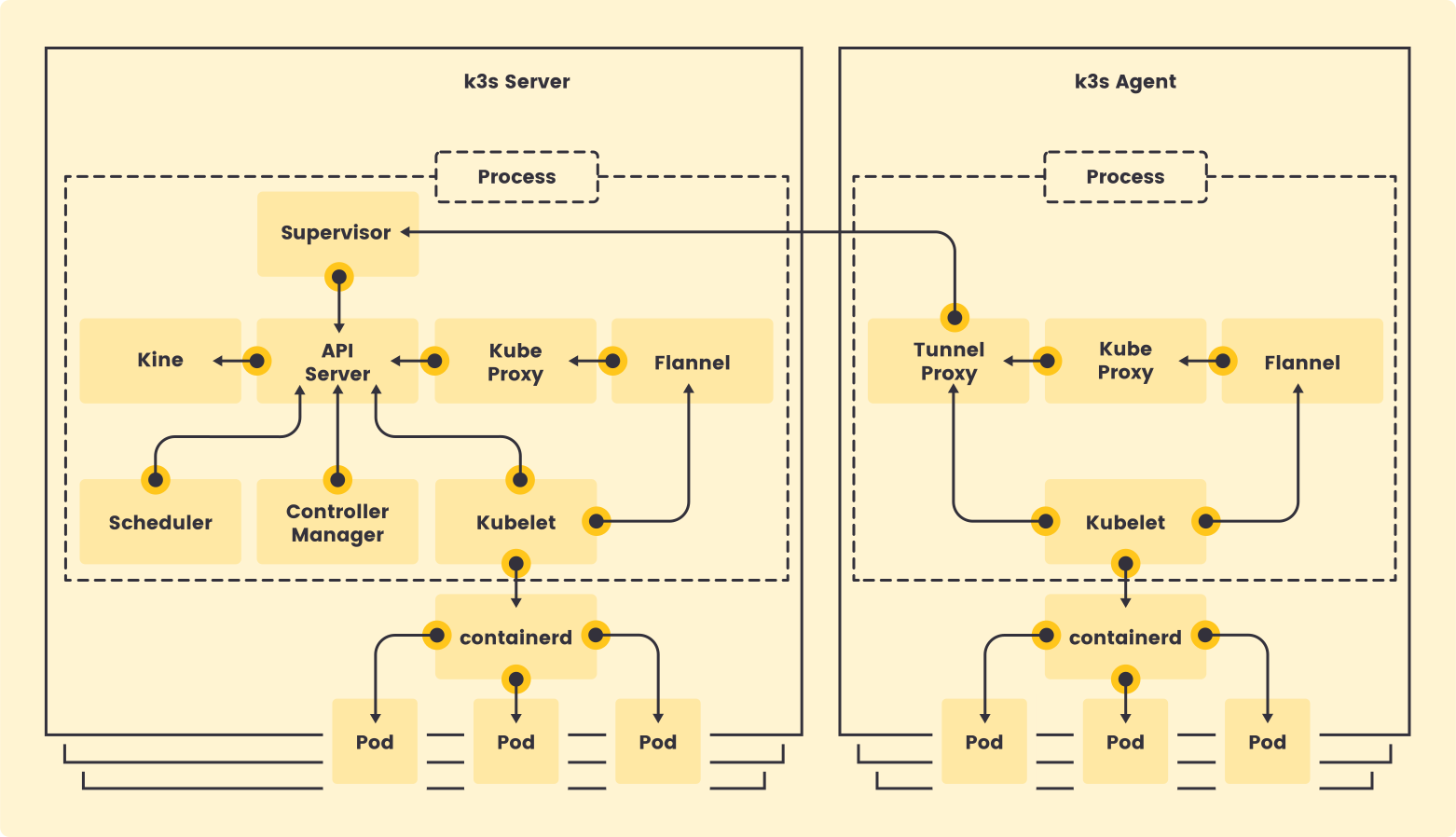
### Single-server Setup with an Embedded DB[](https://docs.k3s.io/architecture#single-server-setup-with-an-embedded-db "Direct link to Single-server Setup with an Embedded DB")
The following diagram shows an example of a cluster that has a single-node K3s server with an embedded SQLite database.
In this configuration, each agent node is registered to the same server node. A K3s user can manipulate Kubernetes resources by calling the K3s API on the server node.
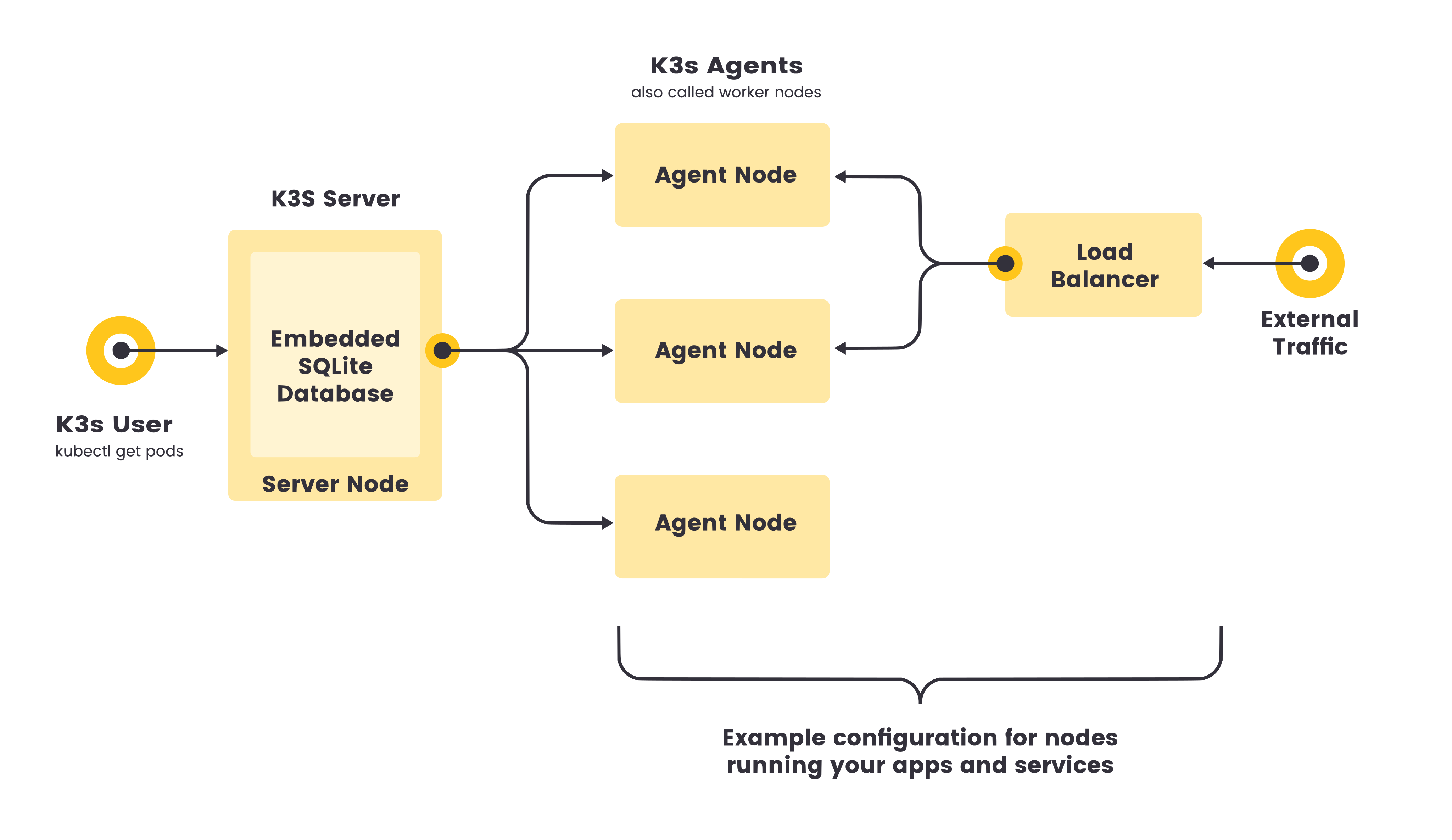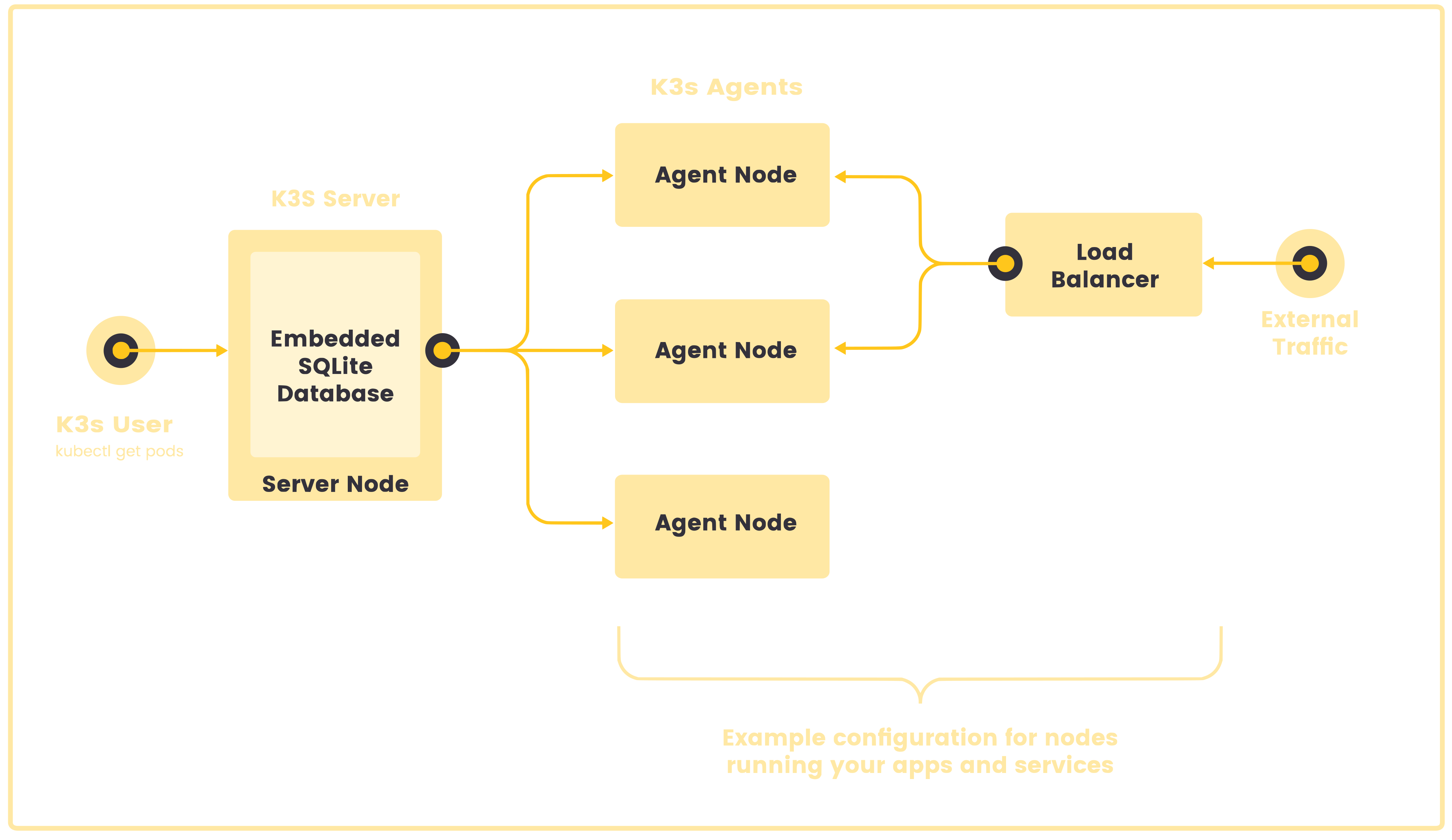
### High-Availability K3s[](https://docs.k3s.io/architecture#high-availability-k3s "Direct link to High-Availability K3s")
Single server clusters can meet a variety of use cases, but for environments where uptime of the Kubernetes control plane is critical, you can run K3s in an HA configuration. An HA K3s cluster comprises:
* Embedded DB
* External DB
* Three or more **server nodes** that will serve the Kubernetes API and run other control plane services
* An **embedded etcd datastore** (as opposed to the embedded SQLite datastore used in single-server setups)
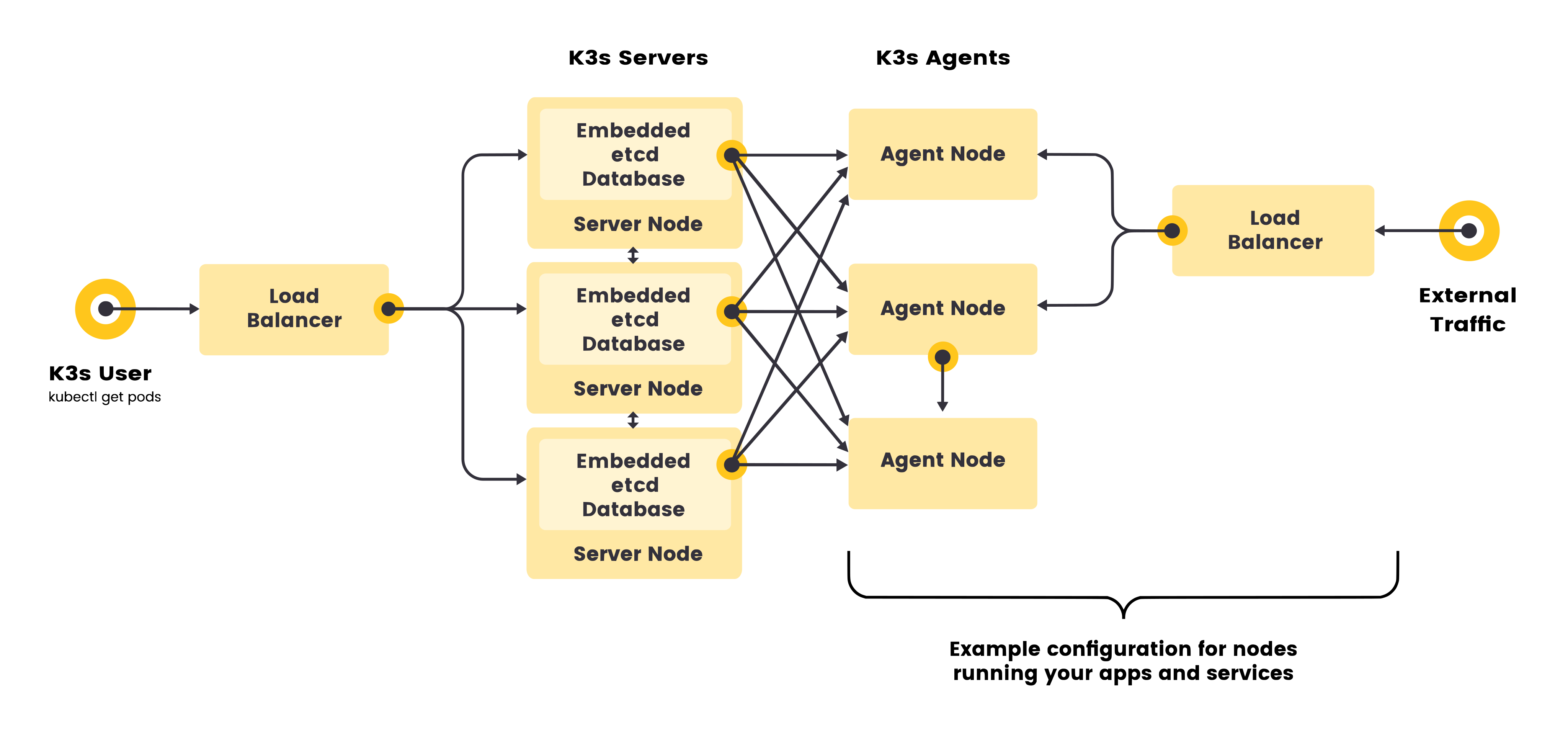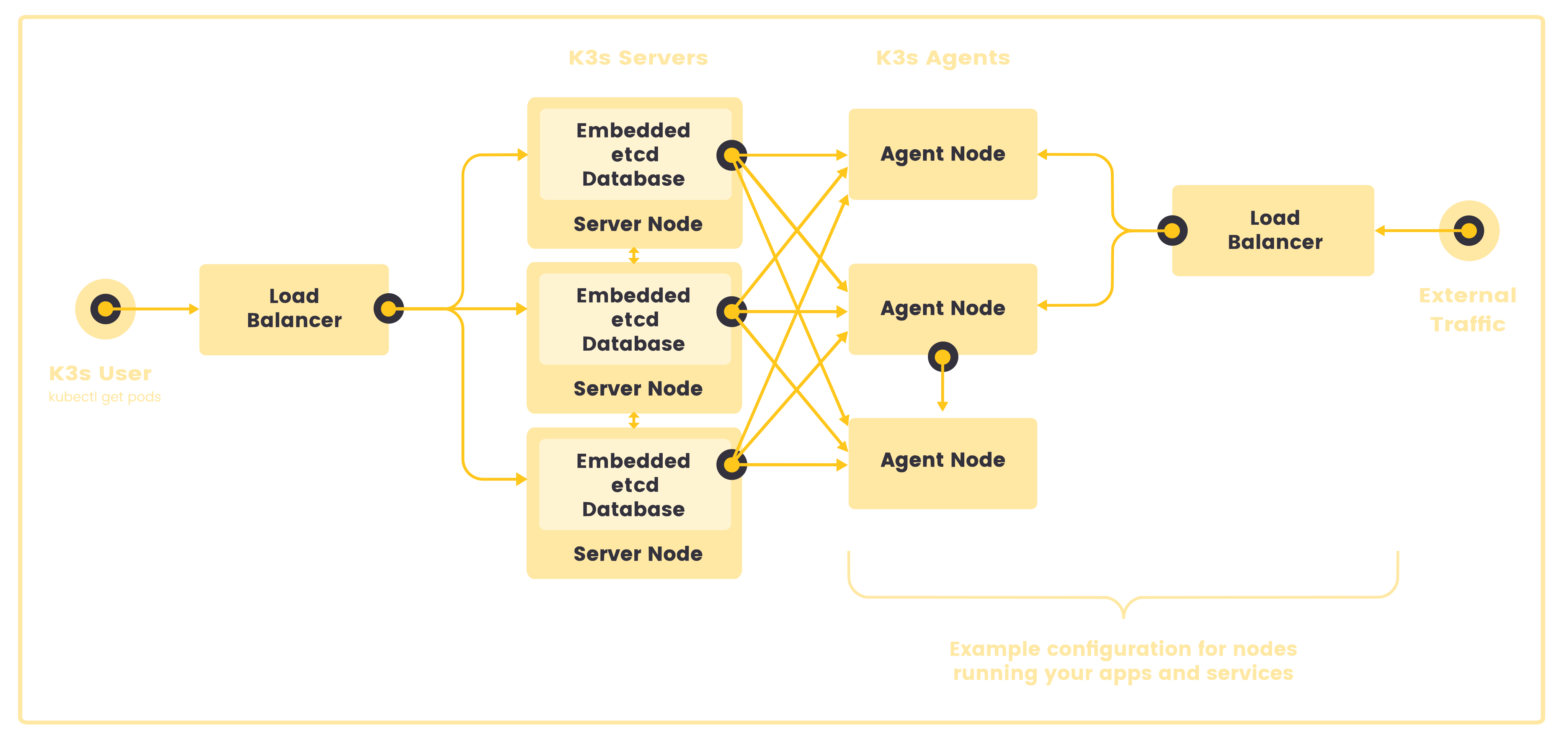
* Two or more **server nodes** that will serve the Kubernetes API and run other control plane services
* An **external datastore** (such as MySQL, PostgreSQL, or etcd)
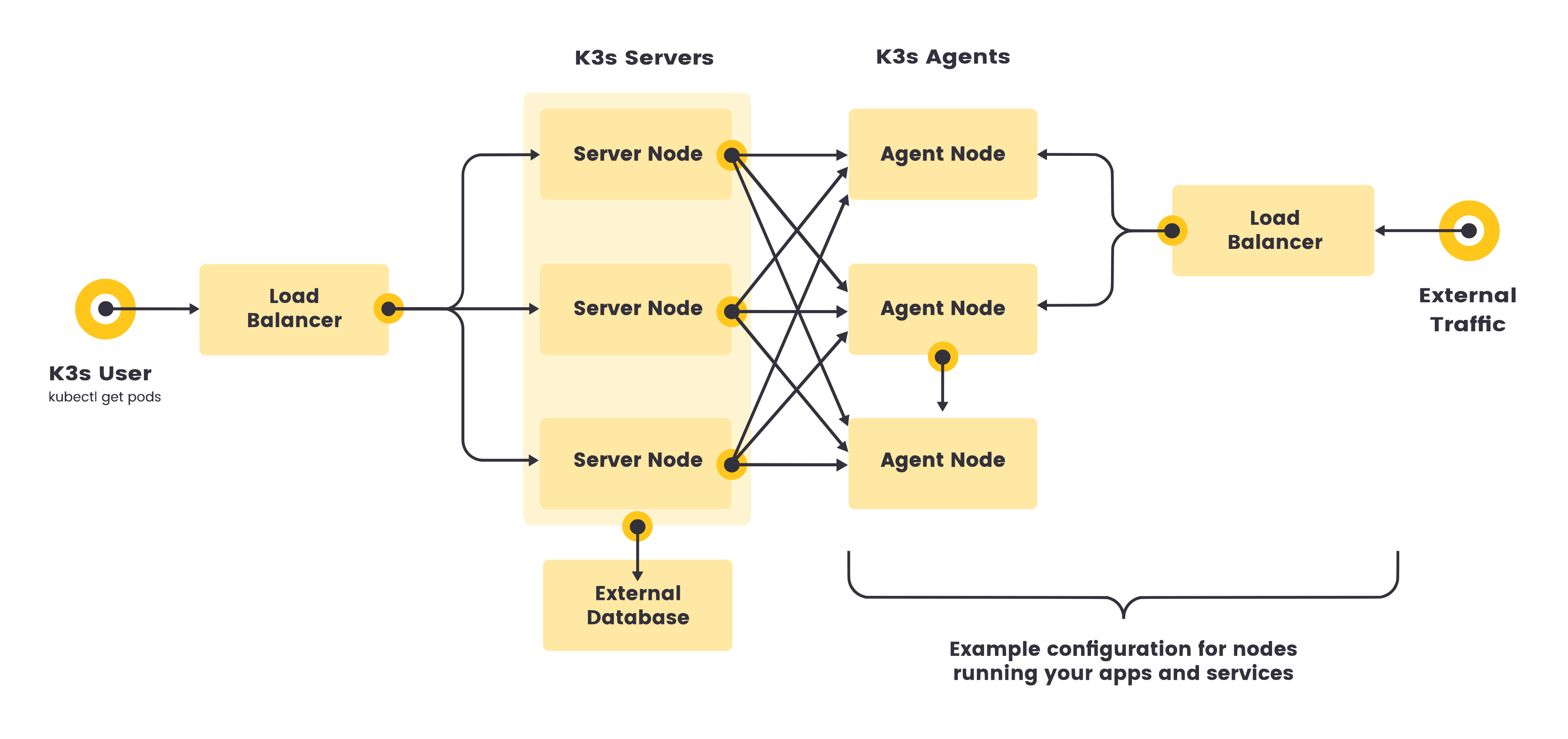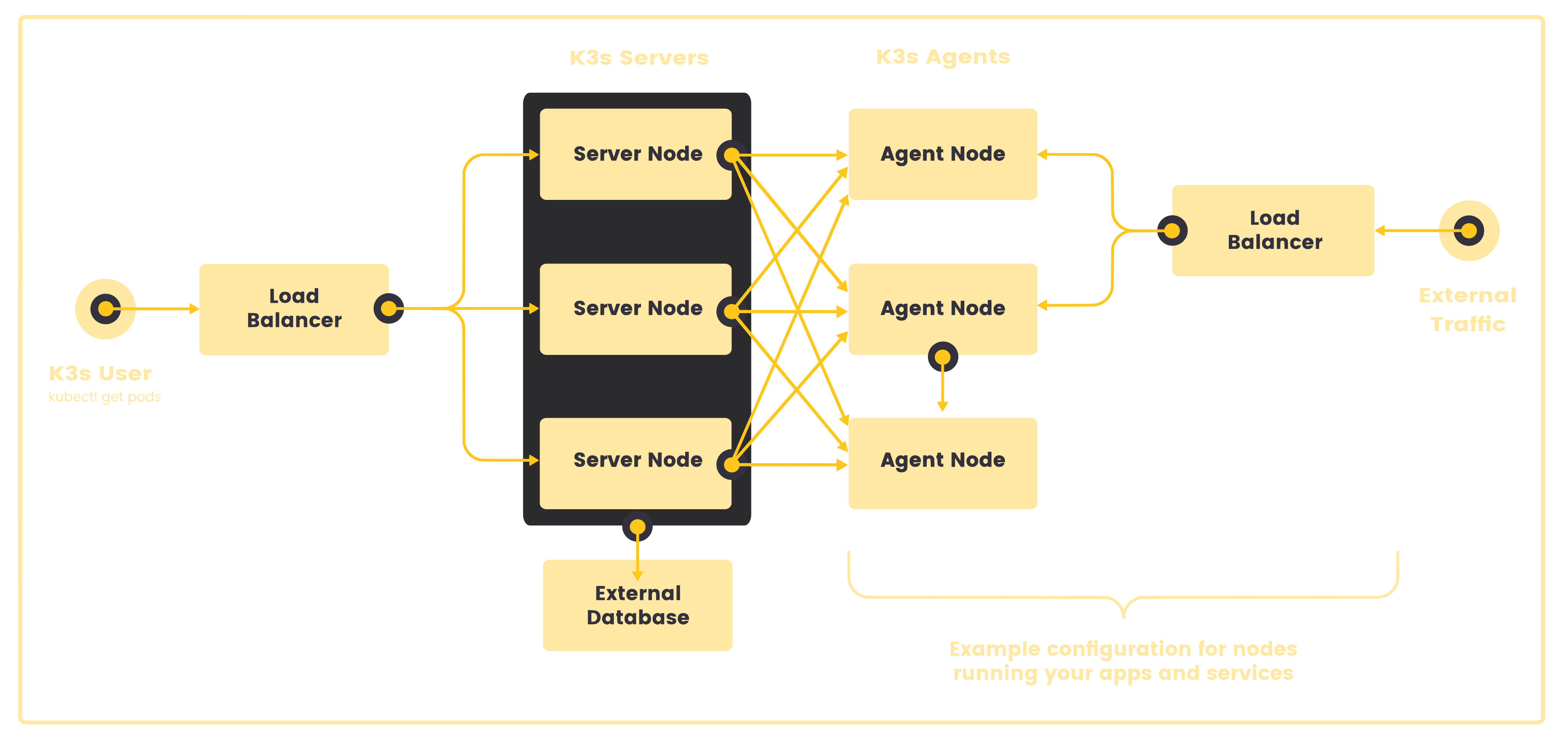
### Fixed Registration Address for Agent Nodes[](https://docs.k3s.io/architecture#fixed-registration-address-for-agent-nodes "Direct link to Fixed Registration Address for Agent Nodes")
In the high-availability server configuration, each node can also register with the Kubernetes API by using a fixed registration address, as shown in the diagram below.
After registration, the agent nodes establish a connection directly to one of the server nodes.
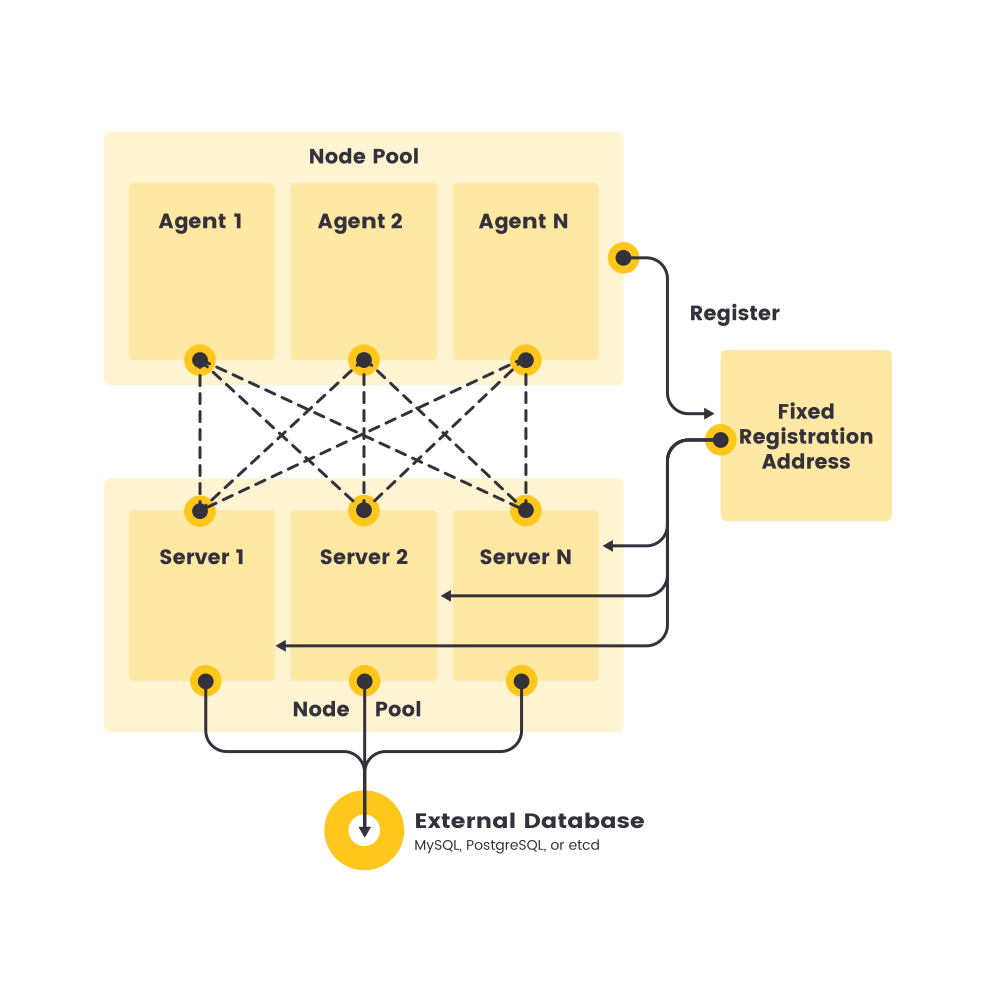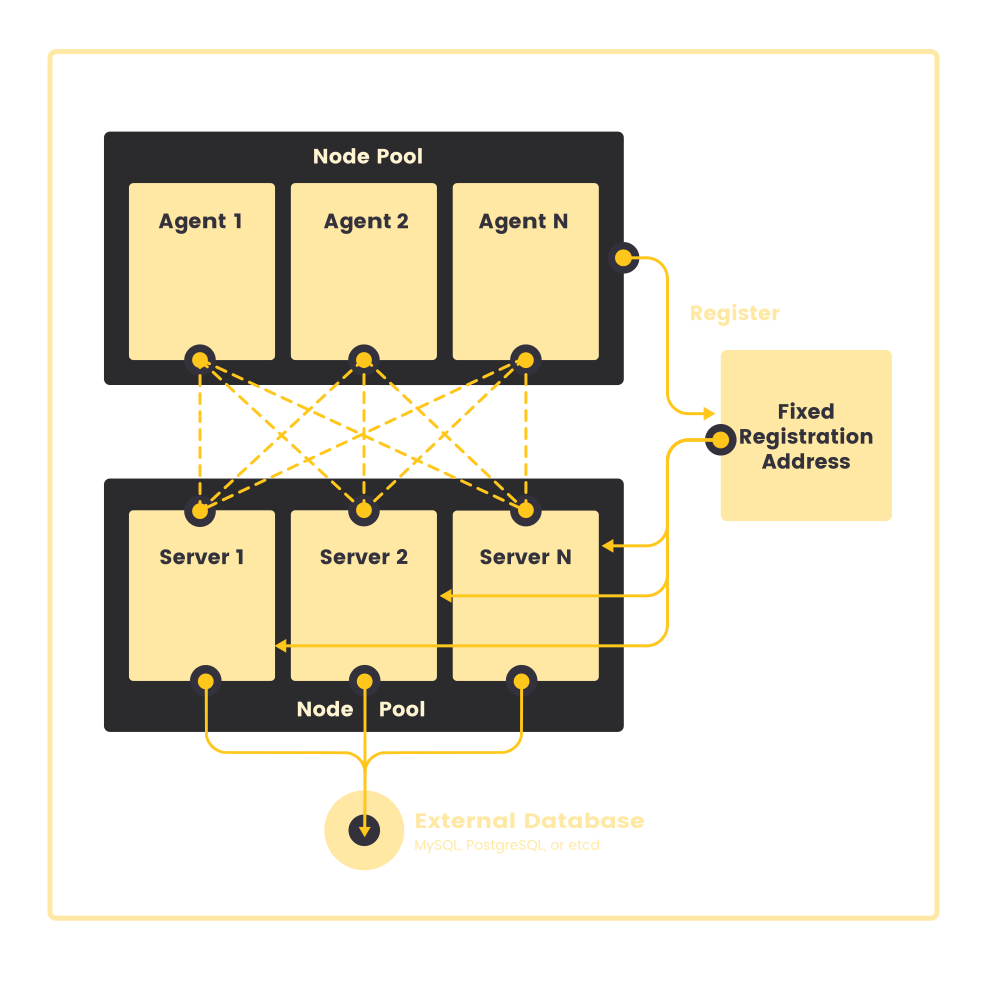
### How Agent Node Registration Works[](https://docs.k3s.io/architecture#how-agent-node-registration-works "Direct link to How Agent Node Registration Works")
Agent nodes are registered with a websocket connection initiated by the `k3s agent` process, and the connection is maintained by a client-side load balancer running as part of the agent process. Initially, the agent connects to the supervisor (and kube-apiserver) via the local load-balancer on port 6443. The load-balancer maintains a list of available endpoints to connect to. The default (and initially only) endpoint is seeded by the hostname from the `--server` address. Once it connects to the cluster, the agent retrieves a list of kube-apiserver addresses from the Kubernetes service endpoint list in the default namespace. Those endpoints are added to the load balancer, which then maintains stable connections to all servers in the cluster, providing a connection to the kube-apiserver that tolerates outages of individual servers.
Agents will register with the server using the node cluster secret along with a randomly generated password for the node, stored at `/etc/rancher/node/password`. The server will store the passwords for individual nodes as Kubernetes secrets, and any subsequent attempts must use the same password. Node password secrets are stored in the `kube-system` namespace with names using the template `.node-password.k3s`. This is done to protect the integrity of node IDs.
If the `/etc/rancher/node` directory of an agent is removed, or you wish to rejoin a node using an existing name, the node should be deleted from the cluster. This will clean up both the old node entry, and the node password secret, and allow the node to (re)join the cluster.
If you frequently reuse hostnames, but are unable to remove the node password secrets, a unique node ID can be automatically appended to the hostname by launching K3s servers or agents using the `--with-node-id` flag. When enabled, the node ID is also stored in `/etc/rancher/node/`.
* [Servers and Agents](https://docs.k3s.io/architecture#servers-and-agents)
* [Single-server Setup with an Embedded DB](https://docs.k3s.io/architecture#single-server-setup-with-an-embedded-db)
* [High-Availability K3s](https://docs.k3s.io/architecture#high-availability-k3s)
* [Fixed Registration Address for Agent Nodes](https://docs.k3s.io/architecture#fixed-registration-address-for-agent-nodes)
* [How Agent Node Registration Works](https://docs.k3s.io/architecture#how-agent-node-registration-works)
---
# agent | K3s
[Skip to main content](https://docs.k3s.io/cli/agent#__docusaurus_skipToContent_fallback)
On this page
In this section, you'll learn how to configure the K3s agent.
Note that servers also run an agent, so all flags listed on this page are also valid for use on servers.
Options are documented on this page as CLI flags, but can also be passed as configuration file options. See the [Configuration File](https://docs.k3s.io/installation/configuration#configuration-file)
documentation for more information on using YAML configuration files.
### Logging[](https://docs.k3s.io/cli/agent#logging "Direct link to Logging")
| Flag | Default | Description |
| --- | --- | --- |
| `-v` value | 0 | Number for the log level verbosity |
| `--vmodule` value | N/A | Comma-separated list of FILE\_PATTERN=LOG\_LEVEL settings for file-filtered logging |
| `--log value, -l` value | N/A | Log to file |
| `--alsologtostderr` | N/A | Log to standard error as well as file (if set) |
### Cluster Options[](https://docs.k3s.io/cli/agent#cluster-options "Direct link to Cluster Options")
| Flag | Environment Variable | Description |
| --- | --- | --- |
| `--token value, -t` value | `K3S_TOKEN` | Token to use for authentication |
| `--token-file` value | `K3S_TOKEN_FILE` | Token file to use for authentication |
| `--server value, -s` value | `K3S_URL` | Server to connect to |
### Listener[](https://docs.k3s.io/cli/agent#listener "Direct link to Listener")
| Flag | Default | Description |
| --- | --- | --- |
| `--bind-address` | 0.0.0.0 | k3s bind address |
### Data[](https://docs.k3s.io/cli/agent#data "Direct link to Data")
| Flag | Default | Description |
| --- | --- | --- |
| `--data-dir value, -d` value | "/var/lib/rancher/k3s" | Folder to hold state |
### Node[](https://docs.k3s.io/cli/agent#node "Direct link to Node")
| Flag | Environment Variable | Description |
| --- | --- | --- |
| `--node-name` value | `K3S_NODE_NAME` | Node name |
| `--with-node-id` | N/A | Append id to node name |
| `--node-label` value | N/A | Registering and starting kubelet with set of labels |
| `--node-taint` value | N/A | Registering kubelet with set of taints |
| `--protect-kernel-defaults` | N/A | Kernel tuning behavior. If set, error if kernel tunables are different from kubelet defaults. |
| `--selinux` | `K3S_SELINUX` | Enable SELinux in containerd |
| `--lb-server-port` value | `K3S_LB_SERVER_PORT` | Local port for supervisor client load-balancer. If the supervisor and apiserver are not colocated an additional port 1 less than this port will also be used for the apiserver client load-balancer. (default: 6444) |
### Runtime[](https://docs.k3s.io/cli/agent#runtime "Direct link to Runtime")
| Flag | Default | Description |
| --- | --- | --- |
| `--container-runtime-endpoint` | N/A | Disable embedded containerd and use the CRI socket at the given path; when used with --docker this sets the docker socket path |
| `--default-runtime` | N/A | Set the default runtime in containerd |
| `--image-service-endpoint` | N/A | Disable embedded containerd image service and use remote image service socket at the given path. If not specified, defaults to --container-runtime-endpoint. |
| `--pause-image` value | "docker.io/rancher/pause:3.1" | Customized pause image for containerd or docker sandbox |
| `--private-registry` value | "/etc/rancher/k3s/registries.yaml" | Private registry configuration file |
### Networking[](https://docs.k3s.io/cli/agent#networking "Direct link to Networking")
| Flag | Environment Variable | Description |
| --- | --- | --- |
| `--node-ip value, -i` value | N/A | IP address to advertise for node |
| `--node-external-ip` value | N/A | External IP address to advertise for node |
| `--node-internal-dns` | N/A | internal DNS addresses to advertise for node |
| `--node-external-dns` | N/A | external DNS addresses to advertise for node |
| `--resolv-conf` value | `K3S_RESOLV_CONF` | Kubelet resolv.conf file |
| `--flannel-iface` value | N/A | Override default flannel interface |
| `--flannel-conf` value | N/A | Override default flannel config file |
| `--flannel-cni-conf` value | N/A | Override default flannel cni config file |
### Customized Flags[](https://docs.k3s.io/cli/agent#customized-flags "Direct link to Customized Flags")
| Flag | Description |
| --- | --- |
| `--kubelet-arg` value | Customized flag for kubelet process |
| `--kube-proxy-arg` value | Customized flag for kube-proxy process |
### Experimental[](https://docs.k3s.io/cli/agent#experimental "Direct link to Experimental")
| Flag | Description |
| --- | --- |
| `--rootless` | Run rootless |
| `--docker` | Use cri-dockerd instead of containerd |
| `--enable-pprof` | Enable pprof endpoint on supervisor port |
| `--prefer-bundled-bin` | Prefer bundled userspace binaries over host binaries |
| `--disable-default-registry-endpoint` | See "[Default Endpoint Fallback](https://docs.k3s.io/installation/private-registry#default-endpoint-fallback)
" |
| `--vpn-auth` | See "[Integration with the Tailscale VPN provider](https://docs.k3s.io/networking/distributed-multicloud#integration-with-the-tailscale-vpn-provider-experimental)
" |
| `--vpn-auth-file` | See "[Integration with the Tailscale VPN provider](https://docs.k3s.io/networking/distributed-multicloud#integration-with-the-tailscale-vpn-provider-experimental)
" |
### Deprecated[](https://docs.k3s.io/cli/agent#deprecated "Direct link to Deprecated")
| Flag | Environment Variable | Description |
| --- | --- | --- |
| `--no-flannel` | N/A | Use `--flannel-backend=none` |
| `--cluster-secret` value | `K3S_CLUSTER_SECRET` | Use `--token` |
### Node Labels and Taints for Agents[](https://docs.k3s.io/cli/agent#node-labels-and-taints-for-agents "Direct link to Node Labels and Taints for Agents")
K3s agents can be configured with the options `--node-label` and `--node-taint` which adds a label and taint to the kubelet. The two options only add labels and/or taints at registration time, so they can only be added once and not changed after that again by running K3s commands.
Below is an example showing how to add labels and a taint:
--node-label foo=bar \ --node-label hello=world \ --node-taint key1=value1:NoExecute
If you want to change node labels and taints after node registration you should use `kubectl`. Refer to the official Kubernetes documentation for details on how to add [taints](https://kubernetes.io/docs/concepts/configuration/taint-and-toleration/)
and [node labels.](https://kubernetes.io/docs/tasks/configure-pod-container/assign-pods-nodes/#add-a-label-to-a-node)
### K3s Agent CLI Help[](https://docs.k3s.io/cli/agent#k3s-agent-cli-help "Direct link to K3s Agent CLI Help")
> If an option appears in brackets below, for example `[$K3S_URL]`, it means that the option can be passed in as an environment variable of that name.
NAME: k3s agent - Run node agentUSAGE: k3s agent [OPTIONS]OPTIONS: --config FILE, -c FILE (config) Load configuration from FILE (default: "/etc/rancher/k3s/config.yaml") [$K3S_CONFIG_FILE] --debug (logging) Turn on debug logs [$K3S_DEBUG] -v value (logging) Number for the log level verbosity (default: 0) --vmodule value (logging) Comma-separated list of FILE_PATTERN=LOG_LEVEL settings for file-filtered logging --log value, -l value (logging) Log to file --alsologtostderr (logging) Log to standard error as well as file (if set) --token value, -t value (cluster) Token to use for authentication [$K3S_TOKEN] --token-file value (cluster) Token file to use for authentication [$K3S_TOKEN_FILE] --server value, -s value (cluster) Server to connect to [$K3S_URL] --data-dir value, -d value (agent/data) Folder to hold state (default: "/var/lib/rancher/k3s") [$K3S_DATA_DIR] --node-name value (agent/node) Node name [$K3S_NODE_NAME] --with-node-id (agent/node) Append id to node name --node-label value (agent/node) Registering and starting kubelet with set of labels --node-taint value (agent/node) Registering kubelet with set of taints --image-credential-provider-bin-dir value (agent/node) The path to the directory where credential provider plugin binaries are located (default: "/var/lib/rancher/credentialprovider/bin") --image-credential-provider-config value (agent/node) The path to the credential provider plugin config file (default: "/var/lib/rancher/credentialprovider/config.yaml") --selinux (agent/node) Enable SELinux in containerd [$K3S_SELINUX] --lb-server-port value (agent/node) Local port for supervisor client load-balancer. If the supervisor and apiserver are not colocated an additional port 1 less than this port will also be used for the apiserver client load-balancer. (default: 6444) [$K3S_LB_SERVER_PORT] --protect-kernel-defaults (agent/node) Kernel tuning behavior. If set, error if kernel tunables are different than kubelet defaults. --container-runtime-endpoint value (agent/runtime) Disable embedded containerd and use the CRI socket at the given path; when used with --docker this sets the docker socket path --default-runtime value (agent/runtime) Set the default runtime in containerd --image-service-endpoint value (agent/runtime) Disable embedded containerd image service and use remote image service socket at the given path. If not specified, defaults to --container-runtime-endpoint. --pause-image value (agent/runtime) Customized pause image for containerd or docker sandbox (default: "rancher/mirrored-pause:3.6") --snapshotter value (agent/runtime) Override default containerd snapshotter (default: "overlayfs") --private-registry value (agent/runtime) Private registry configuration file (default: "/etc/rancher/k3s/registries.yaml") --disable-default-registry-endpoint (agent/containerd) Disables containerd fallback default registry endpoint when a mirror is configured for that registry --nonroot-devices (agent/containerd) Allows non-root pods to access devices by setting device_ownership_from_security_context=true in the containerd CRI config --node-ip value, -i value (agent/networking) IPv4/IPv6 addresses to advertise for node --bind-address value (listener) k3s bind address (default: 0.0.0.0) --node-external-ip value (agent/networking) IPv4/IPv6 external IP addresses to advertise for node --node-internal-dns value (agent/networking) internal DNS addresses to advertise for node --node-external-dns value (agent/networking) external DNS addresses to advertise for node --resolv-conf value (agent/networking) Kubelet resolv.conf file [$K3S_RESOLV_CONF] --flannel-iface value (agent/networking) Override default flannel interface --flannel-conf value (agent/networking) Override default flannel config file --flannel-cni-conf value (agent/networking) Override default flannel cni config file --kubelet-arg value (agent/flags) Customized flag for kubelet process --kube-proxy-arg value (agent/flags) Customized flag for kube-proxy process --enable-pprof (experimental) Enable pprof endpoint on supervisor port --rootless (experimental) Run rootless --prefer-bundled-bin (experimental) Prefer bundled userspace binaries over host binaries --docker (agent/runtime) (experimental) Use cri-dockerd instead of containerd --vpn-auth value (agent/networking) (experimental) Credentials for the VPN provider. It must include the provider name and join key in the format name=,joinKey=[,controlServerURL=][,extraArgs=] [$K3S_VPN_AUTH] --vpn-auth-file value (agent/networking) (experimental) File containing credentials for the VPN provider. It must include the provider name and join key in the format name=,joinKey=[,controlServerURL=][,extraArgs=] [$K3S_VPN_AUTH_FILE] --disable-apiserver-lb (agent/networking) (experimental) Disable the agent client-side load-balancer and connect directly to the configured server address
* [Logging](https://docs.k3s.io/cli/agent#logging)
* [Cluster Options](https://docs.k3s.io/cli/agent#cluster-options)
* [Listener](https://docs.k3s.io/cli/agent#listener)
* [Data](https://docs.k3s.io/cli/agent#data)
* [Node](https://docs.k3s.io/cli/agent#node)
* [Runtime](https://docs.k3s.io/cli/agent#runtime)
* [Networking](https://docs.k3s.io/cli/agent#networking)
* [Customized Flags](https://docs.k3s.io/cli/agent#customized-flags)
* [Experimental](https://docs.k3s.io/cli/agent#experimental)
* [Deprecated](https://docs.k3s.io/cli/agent#deprecated)
* [Node Labels and Taints for Agents](https://docs.k3s.io/cli/agent#node-labels-and-taints-for-agents)
* [K3s Agent CLI Help](https://docs.k3s.io/cli/agent#k3s-agent-cli-help)
---
# CLI Tools | K3s
[Skip to main content](https://docs.k3s.io/cli#__docusaurus_skipToContent_fallback)
The K3s binary contains a number of additional tools the help you manage your cluster.
| Command | Description |
| --- | --- |
| `k3s server` | Run a K3s server node, which launches the Kubernetes `apiserver`, `scheduler`, `controller-manager`, and `cloud-controller-manager` components, in addition a datastore and the agent components. See the [`k3s server` command documentation](https://docs.k3s.io/cli/server)
for more information. |
| `k3s agent` | Run the K3s agent node, which launches `containerd`, `flannel`, `kube-router` network policy controller, and the Kubernetes `kubelet` and `kube-proxy` components. See the [`k3s agent` command documentation](https://docs.k3s.io/cli/agent)
for more information. |
| `k3s kubectl` | Run the embedded [`kubectl` command](https://kubernetes.io/docs/reference/kubectl)
. This is a CLI for interacting with the Kubernetes apiserver. If the `KUBECONFIG` environment variable is not set, this will automatically attempt to use the kubeconfig at `/etc/rancher/k3s/k3s.yaml`. |
| `k3s crictl` | Run the embedded [`crictl` command](https://github.com/kubernetes-sigs/cri-tools/blob/master/docs/crictl.md)
. This is a CLI for interacting with Kubernetes's container runtime interface (CRI). Useful for debugging. |
| `k3s ctr` | Run the embedded [`ctr` command](https://github.com/projectatomic/containerd/blob/master/docs/cli.md)
. This is a CLI for containerd, the container daemon used by K3s. Useful for debugging. |
| `k3s token` | Manage bootstrap tokens. See the [`k3s token` command documentation](https://docs.k3s.io/cli/token)
for more information. |
| `k3s etcd-snapshot` | Perform on demand backups of the K3s cluster data and upload to S3. See the [`k3s etcd-snapshot` command documentation](https://docs.k3s.io/cli/etcd-snapshot)
for more information. |
| `k3s secrets-encrypt` | Configure K3s to encrypt secrets when storing them in the cluster. See the [`k3s secrets-encrypt` command documentation](https://docs.k3s.io/cli/secrets-encrypt)
for more information. |
| `k3s certificate` | Manage K3s certificates. See the [`k3s certificate` command documentation](https://docs.k3s.io/cli/certificate)
for more information. |
| `k3s completion` | Generate shell completion scripts for k3s |
| `k3s help` | Shows a list of commands or help for one command |
---
# certificate | K3s
[Skip to main content](https://docs.k3s.io/cli/certificate#__docusaurus_skipToContent_fallback)
On this page
Client and Server Certificates[](https://docs.k3s.io/cli/certificate#client-and-server-certificates "Direct link to Client and Server Certificates")
------------------------------------------------------------------------------------------------------------------------------------------------------
K3s client and server certificates are valid for 365 days from their date of issuance. Any certificates that are expired or within 120 days of expiring are automatically renewed every time K3s starts. This renewal reuses the existing keys, and extends the lifetime of the existing certificates. If you want to generate new certificates and keys, instead of extending the validity of the existing certificates, use the [`rotate`](https://docs.k3s.io/cli/certificate#rotating-client-and-server-certificates)
subcommand documented below.
When a certificate is within 120 days of expiring a Kubernetes Warning Event with `reason: CertificateExpirationWarning` is created, with a relation to the Node using the certificate.
Prior to the May 2025 releases (v1.33.1+k3s1, v1.32.5+k3s1, v1.31.9+k3s1, v1.30.13+k3s1), alerts and rotation were triggered at 90 days, instead of 120 days.
### Checking expiration dates[](https://docs.k3s.io/cli/certificate#checking-expiration-dates "Direct link to Checking expiration dates")
Version Gate
Output format is configurable as of the January 2025 releases: v1.32.0+k3s1, v1.31.5+k3s1, v1.30.9+k3s1, v1.30.13+k3s1
A new format with more information is available as of the May 2025 releases: v1.33.1+k3s1, v1.32.5+k3s1, v1.31.9+k3s1, v1.29.13+k3s1
To check the node certificates and their expiration date use the `k3s certificate check --output table`:
FILENAME SUBJECT USAGES EXPIRES RESIDUAL TIME STATUS-------- ------- ------ ------- ------------- ------client-kube-proxy.crt system:kube-proxy ClientAuth Jun 09, 2026 10:17 UTC 1 year OKclient-kube-proxy.crt k3s-client-ca@1749464211 CertSign Jun 07, 2035 10:16 UTC 10 years OKclient-kubelet.crt system:node:ip-10-11-0-14 ClientAuth Jun 09, 2026 10:17 UTC 1 year OKclient-kubelet.crt k3s-client-ca@1749464211 CertSign Jun 07, 2035 10:16 UTC 10 years OKserving-kubelet.crt ip-10-11-0-14 ServerAuth Jun 09, 2026 10:17 UTC 1 year OKserving-kubelet.crt k3s-server-ca@1749464211 CertSign Jun 07, 2035 10:16 UTC 10 years OKclient-k3s-controller.crt system:k3s-controller ClientAuth Jun 09, 2026 10:17 UTC 1 year OKclient-k3s-controller.crt k3s-client-ca@1749464211 CertSign Jun 07, 2035 10:16 UTC 10 years OK
SAME CERTIFICATE TWICE
Each certificate file (FILENAME column) contains at least two certificates - the leaf (or end entity) client/server certificate, any intermediate Certificate Authority certificates, and the root Certificate Authority certificate.
In case of unexpected output, please ensure that you are specifying the correct data directory with the `--data-dir` flag (if using a custom data directory), or use the `--debug` flag to get additional output from the check process.
### Rotating Client and Server Certificates[](https://docs.k3s.io/cli/certificate#rotating-client-and-server-certificates "Direct link to Rotating Client and Server Certificates")
To rotate client and server certificates manually, use the `k3s certificate rotate` subcommand:
# Stop K3ssystemctl stop k3s# Rotate certificatesk3s certificate rotate# Start K3ssystemctl start k3s
Individual or lists of certificates can be rotated by specifying the certificate name:
k3s certificate rotate --service ,
The following certificates can be rotated: `admin`, `api-server`, `controller-manager`, `scheduler`, `k3s-controller`, `k3s-server`, `cloud-controller`, `etcd`, `auth-proxy`, `kubelet`, `kube-proxy`.
Certificate Authority (CA) Certificates[](https://docs.k3s.io/cli/certificate#certificate-authority-ca-certificates "Direct link to Certificate Authority (CA) Certificates")
-------------------------------------------------------------------------------------------------------------------------------------------------------------------------------
Kubernetes requires a number of CA certificates for proper operation. For more information on how Kubernetes uses CA certificates, see the Kubernetes [PKI Certificates and Requirements](https://kubernetes.io/docs/setup/best-practices/certificates/#all-certificates)
documentation.
By default, K3s generates self-signed CA certificates during startup of the first server node. These CA certificates are valid for 10 years from date of issuance, and are not automatically renewed.
The authoritative CA certificates and keys are stored within the datastore's bootstrap key, encrypted using the [server token](https://docs.k3s.io/cli/token#server)
as the PBKDF2 passphrase with AES256-GCM and HMAC-SHA1. Copies of the CA certificates and keys are extracted to disk during K3s server startup. Any server may generate leaf certificates for nodes as they join the cluster, and the Kubernetes [Certificates API](https://kubernetes.io/docs/reference/access-authn-authz/certificate-signing-requests/)
controllers may issue additional certificates at runtime.
To rotate CA certificates and keys, use the `k3s certificate rotate-ca` command. The command performs integrity checks to confirm that the updated certificates and keys are usable. If the updated data is acceptable, the datastore's encrypted bootstrap key is updated, and the new certificates and keys will be used the next time K3s starts. If problems are encountered while validating the certificates and keys, an error is reported to the system log and the operation is cancelled without changes.
### Using Custom CA Certificates[](https://docs.k3s.io/cli/certificate#using-custom-ca-certificates "Direct link to Using Custom CA Certificates")
#### Cautions Against CA Reuse[](https://docs.k3s.io/cli/certificate#cautions-against-ca-reuse "Direct link to Cautions Against CA Reuse")
warning
It is not recommended to share Root or Intermediate CAs across multiple clusters, or to use an existing private CA as your cluster CA.
When multiple clusters share a common root of trust, any client or server certificates issued by one cluster will also be trusted by all other clusters, as all certificates chain up to the same trust anchor - the common Root Certificate Authority. This means that any user with a valid client certificate (or kubeconfig) for one cluster will also be able to authenticate to other clusters, and any RBAC that matches a client's user or group will also be applied in those other clusters. Similarly, server certificates issued by one cluster will also be trusted in all other clusters, and by all other infrastructure or clients that trust that root CA.
Kubernetes does not support use of Certificate Revocation Lists. If you ever need to revoke a certificate for any reason (for example, due to a compromised admin kubeconfig), you must perform a full replacement of the cluster Certificate Authority in order to invalidate the certificate's trust.
#### Using Custom CA Certificates[](https://docs.k3s.io/cli/certificate#using-custom-ca-certificates-1 "Direct link to Using Custom CA Certificates")
If CA certificates and keys are found the correct location during initial startup of the first server in the cluster, automatic generation of CA certificates will be bypassed.
An example script to pre-create the appropriate certificates and keys is available [in the K3s repo at `contrib/util/generate-custom-ca-certs.sh`](https://github.com/k3s-io/k3s/blob/main/contrib/util/generate-custom-ca-certs.sh)
. This script should be run prior to starting K3s for the first time, and will create a full set of leaf CA certificates signed by common Root and Intermediate CA certificates. If you have an existing Root or Intermediate CA, this script can be used (or used as a starting point) to create the correct CA certificates to provision a K3s cluster with PKI rooted in an existing authority.
Custom Certificate Authority files must be placed in `/var/lib/rancher/k3s/server/tls`. The following files are required:
* `server-ca.crt`
* `server-ca.key`
* `client-ca.crt`
* `client-ca.key`
* `request-header-ca.crt`
* `request-header-ca.key`
_// note: etcd files are required even if embedded etcd is not in use._
* `etcd/peer-ca.crt`
* `etcd/peer-ca.key`
* `etcd/server-ca.crt`
* `etcd/server-ca.key`
_// note: This is the private key used to sign service-account tokens. It does not have a corresponding certificate._
* `service.key`
#### Custom CA Topology[](https://docs.k3s.io/cli/certificate#custom-ca-topology "Direct link to Custom CA Topology")
Custom CA Certificates generated by the example script will have the following topology:
#### Using the Example Script[](https://docs.k3s.io/cli/certificate#using-the-example-script "Direct link to Using the Example Script")
Important
If you want to sign the cluster CA certificates with an existing root CA using the example script, you must place the root and intermediate files in the target directory prior to running the script. If the files do not exist, the script will create new root and intermediate CA certificates.
If you want to use only an existing root CA certificate, provide the following files:
* `root-ca.pem`
* `root-ca.key`
If you want to use existing root and intermediate CA certificates, provide the following files:
* `root-ca.pem`
* `intermediate-ca.pem`
* `intermediate-ca.key`
The example script uses the provided CAs as the root for all cluster CA bundles - Server, Client, API Aggregation, and etcd Peer/Server. For advanced use cases, such as using the provided CAs for only select bundles, or using different CAs for different bundles, the example script should be modified to meet the specific needs of your organization.
To use the example script to generate custom certs and keys before starting K3s, run the following commands:
# Create the target directory for cert generation.mkdir -p /var/lib/rancher/k3s/server/tls# Copy your root CA cert and intermediate CA cert+key into the correct location for the script.# For the purposes of this example, we assume you have existing root and intermediate CA files in /etc/ssl.# If you do not have an existing root and/or intermediate CA, the script will generate them for you.cp /etc/ssl/certs/root-ca.pem /etc/ssl/certs/intermediate-ca.pem /etc/ssl/private/intermediate-ca.key /var/lib/rancher/k3s/server/tls# Generate custom CA certs and keys.curl -sL https://github.com/k3s-io/k3s/raw/main/contrib/util/generate-custom-ca-certs.sh | bash -
If the command completes successfully, you may install and/or start K3s for the first time. If the script generated root and/or intermediate CA files, you should back up these files so that they can be reused if it is necessary to rotate the CA certificates at a later date.
### Rotating Custom CA Certificates[](https://docs.k3s.io/cli/certificate#rotating-custom-ca-certificates "Direct link to Rotating Custom CA Certificates")
To rotate custom CA certificates, use the `k3s certificate rotate-ca` subcommand. Updated files must be staged into a temporary directory, loaded into the datastore, and k3s must be restarted on all nodes to use the updated certificates.
warning
You must not overwrite the currently in-use data in `/var/lib/rancher/k3s/server/tls`.
Stage the updated certificates and keys into a separate directory.
A cluster that has been started with custom CA certificates can renew or rotate the CA certificates and keys non-disruptively, as long as the same root CA is used.
If a new root CA is required, the rotation will be disruptive. The `k3s certificate rotate-ca --force` option must be used, all nodes that were joined with a [secure token](https://docs.k3s.io/cli/token#secure)
(including servers) will need to be reconfigured to use the new token value, and pods will need to be restarted to trust the new root CA.
#### Using the Example Script[](https://docs.k3s.io/cli/certificate#using-the-example-script-1 "Direct link to Using the Example Script")
The example `generate-custom-ca-certs.sh` script linked above can also be used to generate updated certs in a new temporary directory, by copying files into the correct location and setting the `DATA_DIR` environment variable. To use the example script to generate updated certs and keys, run the following commands:
# Create a temporary directory for cert generation.mkdir -p /opt/k3s/server/tls# Copy your root CA cert and intermediate CA cert+key into the correct location for the script.# Non-disruptive rotation requires the same root CA that was used to generate the original certificates.# If the original files are still in the data directory, you can just run:cp /var/lib/rancher/k3s/server/tls/root-ca.* /var/lib/rancher/k3s/server/tls/intermediate-ca.* /opt/k3s/server/tls# Copy the current service-account signing key, so that existing service-account tokens are not invalidated.cp /var/lib/rancher/k3s/server/tls/service.key /opt/k3s/server/tls# Generate updated custom CA certs and keys.curl -sL https://github.com/k3s-io/k3s/raw/main/contrib/util/generate-custom-ca-certs.sh | DATA_DIR=/opt/k3s bash -# Load the updated CA certs and keys into the datastore.k3s certificate rotate-ca --path=/opt/k3s/server
If the `rotate-ca` command returns an error, check the service log for errors. If the command completes successfully, restart K3s on all nodes in the cluster - servers first, then agents.
If you used the `--force` option or changed the root CA, ensure that any nodes that were joined with a [secure token](https://docs.k3s.io/cli/token#secure)
are reconfigured to use the new token value, prior to being restarted. The token may be stored in a `.env` file, systemd unit, or config.yaml, depending on how the node was configured during initial installation.
### Rotating Self-Signed CA Certificates[](https://docs.k3s.io/cli/certificate#rotating-self-signed-ca-certificates "Direct link to Rotating Self-Signed CA Certificates")
To rotate the K3s-generated self-signed CA certificates, use the `k3s certificate rotate-ca` subcommand. Updated files must be staged into a temporary directory, loaded into the datastore, and k3s must be restarted on all nodes to use the updated certificates.
warning
You must not overwrite the currently in-use data in `/var/lib/rancher/k3s/server/tls`.
Stage the updated certificates and keys into a separate directory.
If the cluster has been started with default self-signed CA certificates, rotation will be disruptive. All nodes that were joined with a [secure token](https://docs.k3s.io/cli/token#secure)
will need to be reconfigured to trust the new CA hash. If the new CA certificates are not cross-signed by the old CA certificates, you will need to use the `--force` option to bypass integrity checks, and pods will need to be restarted to trust the new root CA.
#### Default CA Topology[](https://docs.k3s.io/cli/certificate#default-ca-topology "Direct link to Default CA Topology")
The default self-signed CA certificates have the following topology:
When rotating the default self-signed CAs, a modified certificate topology with intermediate CAs and a new root CA cross-signed by the old CA can be used so that there is a continuous chain of trust between the old and new CAs:
#### Using The Example Script[](https://docs.k3s.io/cli/certificate#using-the-example-script-2 "Direct link to Using The Example Script")
An example script to create updated CA certificates and keys cross-signed by the existing CAs is available [in the K3s repo at `contrib/util/rotate-default-ca-certs.sh`](https://github.com/k3s-io/k3s/blob/main/contrib/util/rotate-default-ca-certs.sh)
.
To use the example script to generate updated self-signed certificates that are cross-signed by the existing CAs, run the following commands:
# Create updated CA certs and keys, cross-signed by the current CAs.# This script will create a new temporary directory containing the updated certs, and output the new token values.curl -sL https://github.com/k3s-io/k3s/raw/main/contrib/util/rotate-default-ca-certs.sh | bash -# Load the updated certs into the datastore; see the script output for the updated token values.k3s certificate rotate-ca --path=/var/lib/rancher/k3s/server/rotate-ca
If the `rotate-ca` command returns an error, check the service log for errors. If the command completes successfully, restart K3s on all nodes in the cluster - servers first, then agents.
Ensure that any nodes that were joined with a [secure token](https://docs.k3s.io/cli/token#secure)
, including other server nodes, are reconfigured to use the new token value prior to being restarted. The token may be stored in a `.env` file, systemd unit, or config.yaml, depending on how the node was configured during initial installation.
Service-Account Issuer Key Rotation[](https://docs.k3s.io/cli/certificate#service-account-issuer-key-rotation "Direct link to Service-Account Issuer Key Rotation")
---------------------------------------------------------------------------------------------------------------------------------------------------------------------
The service-account issuer key is an RSA private key used to sign service-account tokens. When rotating the service-account issuer key, at least one old key should be retained in the file so that existing service-account tokens are not invalidated. It can be rotated independent of the cluster CAs by using the `k3s certificate rotate-ca` to install only an updated `service.key` file that includes both the new and old keys.
warning
You must not overwrite the currently in-use data in `/var/lib/rancher/k3s/server/tls`.
Stage the updated key into a separate directory.
For example, to rotate only the service-account issuer key, run the following commands:
# Create a temporary directory for cert generationmkdir -p /opt/k3s/server/tls# Check OpenSSL versionopenssl version | grep -qF 'OpenSSL 3' && OPENSSL_GENRSA_FLAGS=-traditional# Generate a new keyopenssl genrsa ${OPENSSL_GENRSA_FLAGS:-} -out /opt/k3s/server/tls/service.key 2048# Append the existing key to avoid invalidating current tokenscat /var/lib/rancher/k3s/server/tls/service.key >> /opt/k3s/server/tls/service.key# Load the updated key into the datastorek3s certificate rotate-ca --path=/opt/k3s/server
It is normal to see warnings for files that are not being updated. If the `rotate-ca` command returns an error, check the service log for errors. If the command completes successfully, restart K3s on all servers in the cluster. It is not necessary to restart agents or restart any pods.
* [Client and Server Certificates](https://docs.k3s.io/cli/certificate#client-and-server-certificates)
* [Checking expiration dates](https://docs.k3s.io/cli/certificate#checking-expiration-dates)
* [Rotating Client and Server Certificates](https://docs.k3s.io/cli/certificate#rotating-client-and-server-certificates)
* [Certificate Authority (CA) Certificates](https://docs.k3s.io/cli/certificate#certificate-authority-ca-certificates)
* [Using Custom CA Certificates](https://docs.k3s.io/cli/certificate#using-custom-ca-certificates)
* [Rotating Custom CA Certificates](https://docs.k3s.io/cli/certificate#rotating-custom-ca-certificates)
* [Rotating Self-Signed CA Certificates](https://docs.k3s.io/cli/certificate#rotating-self-signed-ca-certificates)
* [Service-Account Issuer Key Rotation](https://docs.k3s.io/cli/certificate#service-account-issuer-key-rotation)
---
# Cluster Access | K3s
[Skip to main content](https://docs.k3s.io/cluster-access#__docusaurus_skipToContent_fallback)
On this page
The admin kubeconfig file stored at `/etc/rancher/k3s/k3s.yaml` can be used to provide access to the Kubernetes cluster. This file grants access as the `system:admin` user and `system:masters` group, which are hardcoded by Kubernetes to have unrestricted access to all resources within the cluster.
The `kubectl` command that comes with K3s has been configured to load configuration from this path by default. If you have installed upstream Kubernetes command line tools such as kubectl or helm you will need to configure them with the correct kubeconfig path. This can be done by either exporting the `KUBECONFIG` environment variable or by invoking the `--kubeconfig` command line flag. Refer to the examples below for details.
* Export the KUBECONFIG environment variable:
export KUBECONFIG=/etc/rancher/k3s/k3s.yamlkubectl get pods --all-namespaceshelm ls --all-namespaces
* Specify the location of the kubeconfig file in the command:
kubectl --kubeconfig /etc/rancher/k3s/k3s.yaml get pods --all-namespaceshelm --kubeconfig /etc/rancher/k3s/k3s.yaml ls --all-namespaces
### Accessing the Cluster from Outside with kubectl[](https://docs.k3s.io/cluster-access#accessing-the-cluster-from-outside-with-kubectl "Direct link to Accessing the Cluster from Outside with kubectl")
Copy `/etc/rancher/k3s/k3s.yaml` on your machine located outside the cluster as `~/.kube/config`. Then replace the value of the `server` field with the IP or name of your K3s server. `kubectl` can now manage your K3s cluster.
info
K3s will automatically update the certificates within the admin kubeconfig every time it starts. If you make a copy of this file, you will need to manually update those copies to ensure that the inline certificates do not expire.
* [Accessing the Cluster from Outside with kubectl](https://docs.k3s.io/cluster-access#accessing-the-cluster-from-outside-with-kubectl)
---
# etcd-snapshot | K3s
[Skip to main content](https://docs.k3s.io/cli/etcd-snapshot#__docusaurus_skipToContent_fallback)
On this page
This page describes how to use the `k3s etcd-snapshot` CLI tool to manage etcd snapshots and how to restore from an etcd snapshot.
K3s etcd snapshots are stored on the node file system, and may optionally be uploaded to an S3 compatible object store for disaster recovery scenarios. Snapshots can be both automated on a reoccurring schedule, and taken manually on-demand. The `k3s etcd-snapshot` CLI tool offers a set of subcommands that can be used to create, delete, and manage snapshots.
| Subcommand | Description |
| --- | --- |
| delete | Delete given snapshot(s) |
| ls, list, l | List snapshots |
| prune | Remove snapshots that exceed the configured retention count |
| save | Trigger an on-demand etcd snapshot |
For additional information on the etcd snapshot subcommands, run `k3s etcd-snapshot --help`.
Creating Snapshots[](https://docs.k3s.io/cli/etcd-snapshot#creating-snapshots "Direct link to Creating Snapshots")
--------------------------------------------------------------------------------------------------------------------
* Scheduled
* On-demand
Scheduled snapshots are enabled by default, at 00:00 and 12:00 system time, with 5 snapshots retained. Scheduled snapshots have a name that starts with `etcd-snapshot`, followed by the node name and timestamp.
The following options control the operation of scheduled snapshots:
| Flag | Description |
| --- | --- |
| `--etcd-disable-snapshots` | Disable scheduled snapshots |
| `--etcd-snapshot-name` | Sets the base name of etcd scheduled snapshots. (Default: `etcd-snapshot`) |
| `--etcd-snapshot-compress` | Compress etcd snapshots |
| `--etcd-snapshot-dir` | Directory to save db snapshots. (Default location: `${data-dir}/db/snapshots`) |
| `--etcd-snapshot-retention` | Number of snapshots to retain (default: 5) |
| `--etcd-snapshot-schedule-cron` | Snapshot interval time in cron spec. eg. every 5 hours `0 */5 * * *` (default: `0 */12 * * *`) |
The data-dir value defaults to `/var/lib/rancher/k3s` and can be changed independently by setting the `--data-dir` flag.
Scheduled snapshots are saved to the path set by the server's `--etcd-snapshot-dir` value. If you want them replicated in S3 compatible object stores, refer to [S3 configuration options](https://docs.k3s.io/cli/etcd-snapshot#s3-compatible-object-store-support)
Snapshots can be saved manually by running the `k3s etcd-snapshot save` command. There is no retention for these on-demand snapshots and the user needs to remove them manually by using `k3s etcd-snapshot delete` or `k3s etcd-snapshot prune` commands. On-demand snapshots have a name that starts with `on-demand`, followed by the node name and timestamp.
The following options control the operation of on-demand snapshots:
| Flag | Description |
| --- | --- |
| `--name` | Sets the base name of etcd on-demand snapshots. (Default: `on-demand`) |
| `--etcd-snapshot-compress` | Compress etcd snapshots |
| `--etcd-snapshot-dir` | Directory to save db snapshots. (Default location: `${data-dir}/db/snapshots`) |
The data-dir value defaults to `/var/lib/rancher/k3s` and can be changed independently by setting the `--data-dir` flag.
The `--name` flag can only be set when running the `k3s etcd-snapshot save` command. The other two can also be part of the `k3s server` [configuration file](https://docs.k3s.io/installation/configuration#configuration-file)
On-demand snapshots are saved to the path set by the server's `--etcd-snapshot-dir` value. If you want them replicated in S3 compatible object stores, refer to [S3 configuration options](https://docs.k3s.io/cli/etcd-snapshot#s3-compatible-object-store-support)
Deleting Snapshots[](https://docs.k3s.io/cli/etcd-snapshot#deleting-snapshots "Direct link to Deleting Snapshots")
--------------------------------------------------------------------------------------------------------------------
Scheduled snapshots are deleted automatically when the number of snapshots exceeds the configured retention count (5 by default). The oldest snapshots are removed first.
To manually delete scheduled snapshot(s) or on-demand snapshot(s), you can use the `k3s etcd-snapshot delete` command:
k3s etcd-snapshot delete ...
The `prune` subcommand removes snapshots that match the name prefix (`on-demand` by default) and exceed the configured retention count. It includes the flag `--snapshot-retention` to set the retention count. For scheduled snapshots, it overrides the default retention policy. On-demand snapshots have no retention policy and hence this flag is required.
Prune "on-demand" snapshots down to a smaller amount:
k3s etcd-snapshot prune --snapshot-retention
Prune "scheduled" snapshots down to a smaller amount:
k3s etcd-snapshot prune --name etcd-snapshot --etcd-snapshot-retention
S3 Compatible Object Store Support[](https://docs.k3s.io/cli/etcd-snapshot#s3-compatible-object-store-support "Direct link to S3 Compatible Object Store Support")
--------------------------------------------------------------------------------------------------------------------------------------------------------------------
K3s supports replicating etcd snapshots to and restoring etcd snapshots from S3-compatible object stores. S3 support is available for both on-demand and scheduled snapshots.
| Flag | Description |
| --- | --- |
| `--etcd-s3` | Enable backup to S3 |
| `--etcd-s3-endpoint` | S3 endpoint url |
| `--etcd-s3-endpoint-ca` | S3 custom CA cert to connect to S3 endpoint |
| `--etcd-s3-skip-ssl-verify` | Disables S3 SSL certificate validation |
| `--etcd-s3-access-key` | S3 access key |
| `--etcd-s3-secret-key` | S3 secret key |
| `--etcd-s3-session-token` | S3 session token |
| `--etcd-s3-bucket` | S3 bucket name |
| `--etcd-s3-bucket-lookup-type` | S3 bucket lookup type, one of 'auto', 'dns', 'path'; default is 'auto' if not set |
| `--etcd-s3-region` | S3 region / bucket location (optional). defaults to us-east-1 |
| `--etcd-s3-folder` | S3 folder |
| `--etcd-s3-retention` | S3 retention limit (default: 5) |
| `--etcd-s3-proxy` | Proxy server to use when connecting to S3, overriding any proxy-releated environment variables |
| `--etcd-s3-insecure` | Disables S3 over HTTPS |
| `--etcd-s3-timeout` | S3 timeout (default: `5m0s`) |
| `--etcd-s3-config-secret` | Name of secret in the kube-system namespace used to configure S3, if etcd-s3 is enabled and no other etcd-s3 options are set |
For example, this is how the creation and deletion of on-demand etcd snapshots in S3 would work:
$ k3s etcd-snapshot --s3 --s3-bucket=test-bucket --s3-access-key=test --s3-secret-key=secret saveINFO[0155] Snapshot on-demand-server-0-1753178523 saved. INFO[0155] Snapshot on-demand-server-0-1753178523 saved. $ k3s etcd-snapshot --s3 --s3-bucket=test-bucket --s3-access-key=test --s3-secret-key=secret lsName Location Size Createdon-demand-server-0-1753178523 s3://test-bucket/test-folder/on-demand-server-0-1753178523 5062688 2025-07-22T10:02:03Zon-demand-server-0-1753178523 file:///var/lib/rancher/k3s/server/db/snapshots/on-demand-server-0-1753178523 5062688 2025-07-22T10:02:03Z$ k3s etcd-snapshot --s3 --s3-bucket=test-bucket --s3-access-key=test --s3-secret-key=secret delete on-demand-server-0-1753178523INFO[0000] Snapshot on-demand-server-0-1753178523 deleted.$ k3s etcd-snapshot --s3 --s3-bucket=test-bucket --s3-access-key=test --s3-secret-key=secret lsName Location Size Created
### S3 Retention[](https://docs.k3s.io/cli/etcd-snapshot#s3-retention "Direct link to S3 Retention")
Version Gate
Starting in versions v1.34.0+k3s1, v1.33.4+k3s1, v1.32.8+k3s1, v1.31.12+k3s1, K3s includes a new flag for S3 retention. It has the same default value as the local snapshot retention.
| Flag | Description |
| --- | --- |
| `--etcd-s3-retention` | Number of snapshots in S3 to retain (default: `5`) |
### S3 Configuration Secret Support[](https://docs.k3s.io/cli/etcd-snapshot#s3-configuration-secret-support "Direct link to S3 Configuration Secret Support")
Version Gate
S3 Configuration Secret support is available as of the August 2024 releases: v1.30.4+k3s1, v1.29.8+k3s1, v1.28.13+k3s1
K3s supports reading etcd S3 snapshot configuration from a Kubernetes Secret. This may be preferred to hardcoding credentials in K3s CLI flags or config files for security reasons, or if credentials need to be rotated without restarting K3s. To pass S3 snapshot configuration via a Secret, start K3s with `--etcd-s3` and `--etcd-s3-config-secret=`. The Secret does not need to exist when K3s is started, but it will be checked for every time a snapshot save/list/delete/prune operation is performed.
The S3 config Secret cannot be used when restoring a snapshot, as the apiserver is not available to provide the secret during a restore. S3 configuration must be passed via the CLI when restoring a snapshot stored on S3.
note
Pass only the `--etcd-s3` and `--etcd-s3-config-secret` flags to enable the Secret.
If any other S3 configuration flags are set, the Secret will be ignored.
Keys in the Secret correspond to the `--etcd-s3-*` CLI flags listed above. The `etcd-s3-endpoint-ca` key accepts a PEM-encoded CA bundle, or the `etcd-s3-endpoint-ca-name` key may be used to specify the name of a ConfigMap in the `kube-system` namespace containing one or more PEM-encoded CA bundles.
apiVersion: v1kind: Secretmetadata: name: k3s-etcd-snapshot-s3-config namespace: kube-systemtype: etcd.k3s.cattle.io/s3-config-secretstringData: etcd-s3-endpoint: "" etcd-s3-endpoint-ca: "" etcd-s3-endpoint-ca-name: "" etcd-s3-skip-ssl-verify: "false" etcd-s3-access-key: "AWS_ACCESS_KEY_ID" etcd-s3-secret-key: "AWS_SECRET_ACCESS_KEY" etcd-s3-bucket: "bucket" etcd-s3-folder: "folder" etcd-s3-region: "us-east-1" etcd-s3-insecure: "false" etcd-s3-timeout: "5m" etcd-s3-proxy: ""
Restoring Snapshots[](https://docs.k3s.io/cli/etcd-snapshot#restoring-snapshots "Direct link to Restoring Snapshots")
-----------------------------------------------------------------------------------------------------------------------
K3s runs through several steps when restoring a snapshot:
1. If the snapshot is stored on S3, the file is downloaded into the snapshot directory.
2. If the snapshot is compressed, it is decompressed.
3. If present, the current etcd database files are moved to `${data-dir}/server/db/etcd-old-$TIMESTAMP/`.
4. The snapshot's contents are extracted out to disk, and the checksum is verified.
5. Etcd is started, and all etcd cluster members except the current node are removed from the cluster.
6. CA Certificates and other confidential data are extracted from the datastore and written to disk, for later use.
7. The restore is complete, and K3s can be restarted and used normally on the server where the restore was performed.
8. (optional) Agents and control-plane servers can be started normally.
9. (optional) Etcd servers can be restarted to rejoin to the cluster after removing old database files.
When restoring a snapshot, you don't need to use the same K3s version that created it; a higher minor version is also acceptable.
### Snapshot Restore Steps[](https://docs.k3s.io/cli/etcd-snapshot#snapshot-restore-steps "Direct link to Snapshot Restore Steps")
Select the tab below that matches your cluster configuration.
* Single Server
* Multiple Servers
1. Stop the K3s service:
systemctl stop k3s
2. Run `k3s server` with the `--cluster-reset` flag, and `--cluster-reset-restore-path` indicating the path to the snapshot to restore. If the snapshot is stored on S3, provide S3 configuration flags (`--etcd-s3`, `--etcd-s3-bucket`, and so on), and give only the filename name of the snapshot as the restore path.
note
Using the `--cluster-reset` flag without specifying a snapshot to restore simply resets the etcd cluster to a single member without restoring a snapshot.
k3s server \ --cluster-reset \ --cluster-reset-restore-path=
**Result:** K3s restores the snapshot and resets cluster membership, then prints a message indicating that it is ready to be restarted:
`Managed etcd cluster membership has been reset, restart without --cluster-reset flag now.`
3. Start K3s again:
systemctl start k3s
If an etcd-s3 backup configuration is defined within the K3s config file, the k3s restore will attempt to pull the snapshot file from the configured S3 bucket. In this instance only the snapshot filename should be passed in the argument `--cluster-reset-restore-path`. To restore from a local snapshot file, where an etcd-s3 backup configuration is present, add the argument `--etcd-s3=false` and pass the full path to the local snapshot file in the argument `--cluster-reset-restore-path`.
As a safety mechanism, when K3s resets the cluster, it creates an empty file at `/var/lib/rancher/k3s/server/db/reset-flag` that prevents users from accidentally running multiple cluster resets in succession. This file is deleted when K3s starts normally.
In this example there are 3 servers, `S1`, `S2`, and `S3`. The snapshot is located on `S1`.
1. Stop K3s on all servers:
systemctl stop k3s
2. On S1, run `k3s server` with the `--cluster-reset` option, and `--cluster-reset-restore-path` indicating the path to the snapshot to restore. If the snapshot is stored on S3, provide S3 configuration flags (`--etcd-s3`, `--etcd-s3-bucket`, and so on), and give only the filename name of the snapshot as the restore path.
note
Using the `--cluster-reset` flag without specifying a snapshot to restore simply resets the etcd cluster to a single member without restoring a snapshot.
k3s server \ --cluster-reset \ --cluster-reset-restore-path=
**Result:** K3s restores the snapshot and resets cluster membership, then prints a message indicating that it is ready to be restarted:
`Managed etcd cluster membership has been reset, restart without --cluster-reset flag now.`
`Backup and delete ${datadir}/server/db on each peer etcd server and rejoin the nodes.`
3. On S1, start K3s again:
systemctl start k3s
4. On S2 and S3, delete the data directory, `/var/lib/rancher/k3s/server/db/`:
rm -rf /var/lib/rancher/k3s/server/db/
5. On S2 and S3, start K3s again to join the restored cluster:
systemctl start k3s
If an etcd-s3 backup configuration is defined within the K3s config file, the k3s restore will attempt to pull the snapshot file from the configured S3 bucket. In this instance only the snapshot filename should be passed in the argument `--cluster-reset-restore-path`. To restore from a local snapshot file, where an etcd-s3 backup configuration is present, add the argument `--etcd-s3=false` and pass the full path to the local snapshot file in the argument `--cluster-reset-restore-path`.
As a safety mechanism, when K3s resets the cluster, it creates an empty file at `/var/lib/rancher/k3s/server/db/reset-flag` that prevents users from accidentally running multiple cluster resets in succession. This file is deleted when K3s starts normally.
#### Restoring To New Hosts[](https://docs.k3s.io/cli/etcd-snapshot#restoring-to-new-hosts "Direct link to Restoring To New Hosts")
It is possible to restore an etcd snapshot to a different host than it was taken on. When doing so, you must pass the [server token](https://docs.k3s.io/cli/token#server)
that was originally used when taking the snapshot, as it is used to decrypt the bootstrap data inside the snapshot. The process is the same as above but changing step 2 by:
1. In the node that took the snapshot save the value of: `/var/lib/rancher/k3s/server/token`. This is `` in step 3.
2. Copy the snapshot to the new node. The path in the node is `` in step 3
3. Initiate the restore from snapshot on the first server node with the following commands:
k3s server \ --cluster-reset \ --cluster-reset-restore-path= --token=
The token value can also be set in the K3s config file.
warning
1. Node resources are also included in the etcd snapshot. If restoring to a new set of nodes, you will need to manually delete any old nodes that are no longer present in the cluster.
2. If there is a token set in the K3s config file, make sure it is the same as the ``, otherwise k3s will fail to start.
ETCDSnapshotFile Custom Resources[](https://docs.k3s.io/cli/etcd-snapshot#etcdsnapshotfile-custom-resources "Direct link to ETCDSnapshotFile Custom Resources")
-----------------------------------------------------------------------------------------------------------------------------------------------------------------
Snapshots can be viewed remotely using any Kubernetes client by listing or describing cluster-scoped `ETCDSnapshotFile` resources. Unlike the `k3s etcd-snapshot list` command, which only shows snapshots visible to that node, `ETCDSnapshotFile` resources track all snapshots present on cluster members.
$ kubectl get etcdsnapshotfileNAME SNAPSHOTNAME NODE LOCATION SIZE CREATIONTIMElocal-on-demand-k3s-server-1-1730308816-3e9290 on-demand-k3s-server-1-1730308816 k3s-server-1 file:///var/lib/rancher/k3s/server/db/snapshots/on-demand-k3s-server-1-1730308816 2891808 2024-10-30T17:20:16Zs3-on-demand-k3s-server-1-1730308816-79b15c on-demand-k3s-server-1-1730308816 s3 s3://etcd/k3s-test/on-demand-k3s-server-1-1730308816 2891808 2024-10-30T17:20:16Z
$ kubectl describe etcdsnapshotfile s3-on-demand-k3s-server-1-1730308816-79b15cName: s3-on-demand-k3s-server-1-1730308816-79b15cNamespace:Labels: etcd.k3s.cattle.io/snapshot-storage-node=s3Annotations: etcd.k3s.cattle.io/snapshot-token-hash: b4b83cda3099API Version: k3s.cattle.io/v1Kind: ETCDSnapshotFileMetadata: Creation Timestamp: 2024-10-30T17:20:16Z Finalizers: wrangler.cattle.io/managed-etcd-snapshots-controller Generation: 1 Resource Version: 790 UID: bec9a51c-dbbe-4746-922e-a5136bef53fcSpec: Location: s3://etcd/k3s-test/on-demand-k3s-server-1-1730308816 Node Name: s3 s3: Bucket: etcd Endpoint: s3.example.com Prefix: k3s-test Region: us-east-1 Skip SSL Verify: true Snapshot Name: on-demand-k3s-server-1-1730308816Status: Creation Time: 2024-10-30T17:20:16Z Ready To Use: true Size: 2891808Events: Type Reason Age From Message ---- ------ ---- ---- ------- Normal ETCDSnapshotCreated 113s k3s-supervisor Snapshot on-demand-k3s-server-1-1730308816 saved on S3
* [Creating Snapshots](https://docs.k3s.io/cli/etcd-snapshot#creating-snapshots)
* [Deleting Snapshots](https://docs.k3s.io/cli/etcd-snapshot#deleting-snapshots)
* [S3 Compatible Object Store Support](https://docs.k3s.io/cli/etcd-snapshot#s3-compatible-object-store-support)
* [S3 Retention](https://docs.k3s.io/cli/etcd-snapshot#s3-retention)
* [S3 Configuration Secret Support](https://docs.k3s.io/cli/etcd-snapshot#s3-configuration-secret-support)
* [Restoring Snapshots](https://docs.k3s.io/cli/etcd-snapshot#restoring-snapshots)
* [Snapshot Restore Steps](https://docs.k3s.io/cli/etcd-snapshot#snapshot-restore-steps)
* [ETCDSnapshotFile Custom Resources](https://docs.k3s.io/cli/etcd-snapshot#etcdsnapshotfile-custom-resources)
---
# token | K3s
[Skip to main content](https://docs.k3s.io/cli/token#__docusaurus_skipToContent_fallback)
On this page
K3s uses tokens to secure the node join process and to encrypt confidential information that is persisted to the datastore. Tokens authenticate the cluster to the joining node, and the node to the cluster.
Token Format[](https://docs.k3s.io/cli/token#token-format "Direct link to Token Format")
------------------------------------------------------------------------------------------
K3s tokens can be specified in either secure or short format. The secure format is preferred, as it enables the client to authenticate the identity of the cluster it is joining, before sending credentials.
### Secure[](https://docs.k3s.io/cli/token#secure "Direct link to Secure")
The secure token format (occasionally referred to as a "full" token) contains the following parts:
`::`
* `prefix`: a fixed `K10` prefix that identifies the token format
* `cluster CA hash`: The hash of the cluster's server CA certificate, used to authenticate the server to the joining node.
* For self-signed CA certificates, this is the SHA256 sum of the PEM-formatted certificate, as stored on disk.
* For custom CA certificates, this is the SHA256 sum of the DER encoding of the root certificate; commonly known as the certificate fingerprint.
* `credentials`: The username and password, or bearer token, used to authenticate the joining node to the cluster.
#### TLS Bootstrapping[](https://docs.k3s.io/cli/token#tls-bootstrapping "Direct link to TLS Bootstrapping")
When a secure token is specified, the joining node performs the following steps to validate the identity of the server it has connected to, before transmitting credentials:
1. With TLS verification disabled, download the CA bundle from `/cacerts` on the server it is joining.
2. Calculate the SHA256 hash of the CA certificate, as described above.
3. Compare the calculated SHA256 hash to the hash from the token.
4. If the hash matches, validate that the certificate presented by the server can be validated by the server's CA bundle.
5. If the server certificate is valid, present credentials to join the cluster using either basic or bearer token authentication, depending on the token type.
### Short[](https://docs.k3s.io/cli/token#short "Direct link to Short")
The short token format includes only the password or bearer token used to authenticate the joining node to the cluster.
If a short token is used, the joining node implicitly trusts the CA bundle presented by the server; steps 2-4 in the TLS Bootstrapping process are skipped. The initial connection may be vulnerable to [man-in-the-middle](https://en.wikipedia.org/wiki/Man-in-the-middle_attack)
attack.
Token Types[](https://docs.k3s.io/cli/token#token-types "Direct link to Token Types")
---------------------------------------------------------------------------------------
K3s supports three types of tokens. Only the server token is available by default; additional token types must be configured or created by the administrator.
| Type | CLI Option | Environment Variable |
| --- | --- | --- |
| Server | `--token` | `K3S_TOKEN` |
| Agent | `--agent-token` | `K3S_AGENT_TOKEN` |
| Bootstrap | `n/a` | `n/a` |
### Server[](https://docs.k3s.io/cli/token#server "Direct link to Server")
If no token is provided when starting the first server in the cluster, one is created with a random password. The server token is always written to `/var/lib/rancher/k3s/server/token`, in secure format.
The server token can be used to join both server and agent nodes to the cluster. Anyone with access to the server token essentially has full administrator access to the cluster. This token should be guarded carefully.
The server token is also used as the [PBKDF2](https://en.wikipedia.org/wiki/PBKDF2)
passphrase to encrypt confidential information that is persisted to the datastore known as bootstrap data. Bootstrap data is essential to set up new server nodes or restore from a snapshot. For this reason, the token must be backed up alongside the cluster datastore itself.
warning
Unless custom CA certificates are in use, only the short (password-only) token format can be used when starting the first server in the cluster. This is because the cluster CA hash cannot be known until after the server has generated the self-signed cluster CA certificates.
For more information on using custom CA certificates, see the [`k3s certificate` documentation](https://docs.k3s.io/cli/certificate)
.
For more information on backing up your cluster, see the [Backup and Restore](https://docs.k3s.io/datastore/backup-restore)
documentation.
### Agent[](https://docs.k3s.io/cli/token#agent "Direct link to Agent")
By default, the agent token is the same as the server token. The agent token can be set before or after the cluster has been started, by changing the CLI option or environment variable on all servers in the cluster. The agent token is similar to the server token in that is it statically configured, and does not expire.
The agent token is written to `/var/lib/rancher/k3s/server/agent-token`, in secure format. If no agent token is specified, this file is a link to the server token.
### Bootstrap[](https://docs.k3s.io/cli/token#bootstrap "Direct link to Bootstrap")
K3s supports dynamically generated, automatically expiring agent [bootstrap tokens](https://kubernetes.io/docs/reference/access-authn-authz/bootstrap-tokens/)
.
k3s token[](https://docs.k3s.io/cli/token#k3s-token-1 "Direct link to k3s token")
-----------------------------------------------------------------------------------
The k3s token CLI tool handles:
* The life cycle of bootstrap tokens, using the same generation and validation code as `kubeadm token` bootstrap tokens. Note that both CLIs are similar.
* The rotation of the server token
NAME: k3s token - Manage tokensUSAGE: k3s token command [command options] [arguments...]COMMANDS: create Create bootstrap tokens on the server delete Delete bootstrap tokens on the server generate Generate and print a bootstrap token, but do not create it on the server list List bootstrap tokens on the server rotate Rotate original server token with a new server tokenOPTIONS: --help, -h show help
#### `k3s token create [token]`[](https://docs.k3s.io/cli/token#k3s-token-create-token "Direct link to k3s-token-create-token")
Create a new token. The `[token]` is the actual token to write, as generated by `k3s token generate`. If no token is given, a random one will be generated.
A token in secure format, including the cluster CA hash, will be written to stdout. The output of this command should be saved, as the secret portion of the token cannot be shown again.
| Flag | Description |
| --- | --- |
| `--data-dir` value | Folder to hold state (default: /var/lib/rancher/k3s or ${HOME}/.rancher/k3s if not root) |
| `--kubeconfig` value | Server to connect to \[$KUBECONFIG\] |
| `--description` value | A human friendly description of how this token is used |
| `--groups` value | Extra groups that this token will authenticate as when used for authentication. (default: Default: "system:bootstrappers:k3s:default-node-token") |
| `--ttl` value | The duration before the token is automatically deleted (e.g. 1s, 2m, 3h). If set to '0', the token will never expire (default: 24h0m0s) |
| `--usages` value | Describes the ways in which this token can be used. (default: "signing,authentication") |
#### `k3s token delete`[](https://docs.k3s.io/cli/token#k3s-token-delete "Direct link to k3s-token-delete")
Delete one or more tokens. The full token can be provided, or just the token ID.
| Flag | Description |
| --- | --- |
| `--data-dir` value | Folder to hold state (default: /var/lib/rancher/k3s or ${HOME}/.rancher/k3s if not root) |
| `--kubeconfig` value | Server to connect to \[$KUBECONFIG\] |
#### `k3s token generate`[](https://docs.k3s.io/cli/token#k3s-token-generate "Direct link to k3s-token-generate")
Generate a randomly-generated bootstrap token.
You don't have to use this command in order to generate a token. You can do so yourself as long as it is in the format `[a-z0-9]{6}.[a-z0-9]{16}`, where the first portion is the token ID, and the second portion is the secret.
| Flag | Description |
| --- | --- |
| `--data-dir` value | Folder to hold state (default: /var/lib/rancher/k3s or ${HOME}/.rancher/k3s if not root) |
| `--kubeconfig` value | Server to connect to \[$KUBECONFIG\] |
#### `k3s token list`[](https://docs.k3s.io/cli/token#k3s-token-list "Direct link to k3s-token-list")
List bootstrap tokens, showing their ID, description, and remaining time-to-live.
| Flag | Description |
| --- | --- |
| `--data-dir` value | Folder to hold state (default: /var/lib/rancher/k3s or ${HOME}/.rancher/k3s if not root) |
| `--kubeconfig` value | Server to connect to \[$KUBECONFIG\] |
| `--output` value | Output format. Valid options: text, json (default: "text") |
#### `k3s token rotate`[](https://docs.k3s.io/cli/token#k3s-token-rotate "Direct link to k3s-token-rotate")
Rotate original server token with a new server token. After running this command, all servers and any agents that originally joined with the old token must be restarted with the new token.
If you do not specify a new token, one will be generated for you.
| Flag | Description |
| --- | --- |
| `--data-dir` value | Folder to hold state (default: /var/lib/rancher/k3s or ${HOME}/.rancher/k3s if not root) |
| `--kubeconfig` value | Server to connect to \[$KUBECONFIG\] |
| `--server` value | Server to connect to (default: "[https://127.0.0.1:6443](https://127.0.0.1:6443/)
") \[$K3S\_URL\] |
| `--token` value | Existing token used to join a server or agent to a cluster \[$K3S\_TOKEN\] |
| `--new-token` value | New token that replaces existing token |
warning
Snapshots taken before the rotation will require the old server token when restoring the cluster
* [Token Format](https://docs.k3s.io/cli/token#token-format)
* [Secure](https://docs.k3s.io/cli/token#secure)
* [Short](https://docs.k3s.io/cli/token#short)
* [Token Types](https://docs.k3s.io/cli/token#token-types)
* [Server](https://docs.k3s.io/cli/token#server)
* [Agent](https://docs.k3s.io/cli/token#agent)
* [Bootstrap](https://docs.k3s.io/cli/token#bootstrap)
* [k3s token](https://docs.k3s.io/cli/token#k3s-token-1)
---
# secrets-encrypt | K3s
[Skip to main content](https://docs.k3s.io/cli/secrets-encrypt#__docusaurus_skipToContent_fallback)
On this page
K3s supports enabling secrets encryption at rest. For more information, see [Secrets Encryption](https://docs.k3s.io/security/secrets-encryption)
.
Secrets Encryption Tool[](https://docs.k3s.io/cli/secrets-encrypt#secrets-encryption-tool "Direct link to Secrets Encryption Tool")
-------------------------------------------------------------------------------------------------------------------------------------
Version Gate
Available as of [v1.21.8+k3s1](https://github.com/k3s-io/k3s/releases/tag/v1.21.8%2Bk3s1)
K3s contains a CLI tool `secrets-encrypt`, which enables automatic control over the following:
* Disabling/Enabling secrets encryption
* Adding new encryption keys
* Rotating and deleting encryption keys
* Reencrypting secrets
warning
Failure to follow proper procedure for rotating encryption keys can leave your cluster permanently corrupted. Proceed with caution.
### Encryption Key Rotation[](https://docs.k3s.io/cli/secrets-encrypt#encryption-key-rotation "Direct link to Encryption Key Rotation")
Version Gate
Available as of the September 2024 releases: v1.30.5+k3s1, v1.31.1+k3s1
* Single-Server
* High-Availability
To rotate secrets encryption keys on a single-server cluster:
1. Start the K3s server with the flag `--secrets-encryption`
note
Starting K3s without encryption and enabling it at a later time is currently _not_ supported.
2. Rotate secrets encryption keys
k3s secrets-encrypt rotate-keys
3. Wait for reencryption to finish. Watch the server logs, or wait for:
$ k3s secrets-encrypt statusEncryption Status: EnabledCurrent Rotation Stage: reencrypt_finished
To rotate secrets encryption keys on HA setups:
1. Start up all three K3s servers with the `--secrets-encryption` flag. For brevity, the servers will be referred to as S1, S2, S3.
note
Starting K3s without encryption and enabling it at a later time is currently _not_ supported.
2. Rotate secrets encryption keys on S1
k3s secrets-encrypt rotate-keys
3. Wait for reencryption to finish. Watch the server logs, or wait for:
$ k3s secrets-encrypt statusEncryption Status: EnabledCurrent Rotation Stage: reencrypt_finished
info
K3s will reencrypt ~5 secrets per second. Clusters with large # of secrets can take several minutes to reencrypt. You can track progress in the server logs.
4. Restart K3s on S1 with same arguments. If running K3s as a service:
# If using systemdsystemctl restart k3s# If using openrcrc-service k3s restart
5. Once S1 is up, restart K3s on S2 and S3
### Legacy Encryption Key Rotation[](https://docs.k3s.io/cli/secrets-encrypt#legacy-encryption-key-rotation "Direct link to Legacy Encryption Key Rotation")
New Procedure
If using K3s versions v1.30+, we recommend using the [Encryption Key Rotation](https://docs.k3s.io/cli/secrets-encrypt#encryption-key-rotation)
instead.
* Single-Server
* High-Availability
To rotate secrets encryption keys on a single-server cluster:
1. Start the K3s server with the flag `--secrets-encryption`
note
Starting K3s without encryption and enabling it at a later time is currently _not_ supported.
2. Prepare
k3s secrets-encrypt prepare
3. Kill and restart the K3s server with same arguments. If running K3s as a service:
# If using systemdsystemctl restart k3s# If using openrcrc-service k3s restart
4. Rotate
k3s secrets-encrypt rotate
5. Kill and restart the K3s server with same arguments
6. Reencrypt
info
K3s will reencrypt ~5 secrets per second.
Clusters with large # of secrets can take several minutes to reencrypt.
k3s secrets-encrypt reencrypt
The steps are the same for both embedded DB and external DB clusters.
To rotate secrets encryption keys on HA setups:
1. Start up all three K3s servers with the `--secrets-encryption` flag. For brevity, the servers will be referred to as S1, S2, S3.
Notes
* Starting K3s without encryption and enabling it at a later time is currently _not_ supported.
* While not required, it is recommended that you pick one server node from which to run the `secrets-encrypt` commands.
2. Prepare on S1
k3s secrets-encrypt prepare
3. Kill and restart S1 with same arguments. If running K3s as a service:
# If using systemdsystemctl restart k3s# If using openrcrc-service k3s restart
4. Once S1 is up, kill and restart the S2 and S3
5. Rotate on S1
k3s secrets-encrypt rotate
6. Kill and restart S1 with same arguments
7. Once S1 is up, kill and restart the S2 and S3
8. Reencrypt on S1
info
K3s will reencrypt ~5 secrets per second.
Clusters with large # of secrets can take several minutes to reencrypt.
k3s secrets-encrypt reencrypt
9. Kill and restart S1 with same arguments
10. Once S1 is up, kill and restart the S2 and S3
### Secrets Encryption Disable/Re-enable[](https://docs.k3s.io/cli/secrets-encrypt#secrets-encryption-disablere-enable "Direct link to Secrets Encryption Disable/Re-enable")
* Single-Server
* High-Availability
After launching a server with `--secrets-encryption` flag, secrets encryption can be disabled.
To disable secrets encryption on a single-node cluster:
1. Disable
k3s secrets-encrypt disable
2. Kill and restart the K3s server with same arguments. If running K3s as a service:
# If using systemdsystemctl restart k3s# If using openrcrc-service k3s restart
3. Reencrypt with flags
k3s secrets-encrypt reencrypt --force --skip
To re-enable secrets encryption on a single node cluster:
1. Enable
k3s secrets-encrypt enable
2. Kill and restart the K3s server with same arguments
3. Reencrypt with flags
k3s secrets-encrypt reencrypt --force --skip
After launching a HA cluster with `--secrets-encryption` flags, secrets encryption can be disabled.
note
While not required, it is recommended that you pick one server node from which to run the `secrets-encrypt` commands.
For brevity, the three servers used in this guide will be referred to as S1, S2, S3.
To disable secrets encryption on a HA cluster:
1. Disable on S1
k3s secrets-encrypt disable
2. Kill and restart S1 with same arguments. If running K3s as a service:
# If using systemdsystemctl restart k3s# If using openrcrc-service k3s restart
3. Once S1 is up, kill and restart the S2 and S3
4. Reencrypt with flags on S1
k3s secrets-encrypt reencrypt --force --skip
To re-enable secrets encryption on a HA cluster:
1. Enable on S1
k3s secrets-encrypt enable
2. Kill and restart S1 with same arguments
3. Once S1 is up, kill and restart the S2 and S3
4. Reencrypt with flags on S1
k3s secrets-encrypt reencrypt --force --skip
### Secrets Encryption Status[](https://docs.k3s.io/cli/secrets-encrypt#secrets-encryption-status "Direct link to Secrets Encryption Status")
The secrets-encrypt tool includes a `status` command that displays information about the current status of secrets encryption on the node.
An example of the command on a single-server node:
$ k3s secrets-encrypt statusEncryption Status: EnabledCurrent Rotation Stage: startServer Encryption Hashes: All hashes matchActive Key Type Name------ -------- ---- * AES-CBC aescbckey
Another example on HA cluster, after rotating the keys, but before restarting the servers:
$ k3s secrets-encrypt statusEncryption Status: EnabledCurrent Rotation Stage: rotateServer Encryption Hashes: hash does not match between node-1 and node-2Active Key Type Name------ -------- ---- * AES-CBC aescbckey-2021-12-10T22:54:38Z AES-CBC aescbckey
Details on each section are as follows:
* **Encryption Status**: Displayed whether secrets encryption is disabled or enabled on the node
* **Current Rotation Stage**: Indicates the current rotation stage on the node.
Stages are: `start`, `prepare`, `rotate`, `reencrypt_request`, `reencrypt_active`, `reencrypt_finished`
* **Server Encryption Hashes**: Useful for HA clusters, this indicates whether all servers are on the same stage with their local files. This can be used to identify whether a restart of servers is required before proceeding to the next stage. In the HA example above, node-1 and node-2 have different hashes, indicating that they currently do not have the same encryption configuration. Restarting the servers will sync up their configuration.
* **Key Table**: Summarizes information about the secrets encryption keys found on the node.
* **Active**: The "\*" indicates which, if any, of the keys are currently used for secrets encryption. An active key is used by Kubernetes to encrypt any new secrets.
* **Key Type**: All keys using this tool are `AES-CBC` type. See more info [here.](https://kubernetes.io/docs/tasks/administer-cluster/encrypt-data/#providers)
* **Name**: Name of the encryption key.
* [Secrets Encryption Tool](https://docs.k3s.io/cli/secrets-encrypt#secrets-encryption-tool)
* [Encryption Key Rotation](https://docs.k3s.io/cli/secrets-encrypt#encryption-key-rotation)
* [Legacy Encryption Key Rotation](https://docs.k3s.io/cli/secrets-encrypt#legacy-encryption-key-rotation)
* [Secrets Encryption Disable/Re-enable](https://docs.k3s.io/cli/secrets-encrypt#secrets-encryption-disablere-enable)
* [Secrets Encryption Status](https://docs.k3s.io/cli/secrets-encrypt#secrets-encryption-status)
---
# server | K3s
[Skip to main content](https://docs.k3s.io/cli/server#__docusaurus_skipToContent_fallback)
On this page
In this section, you'll learn how to configure the K3s server.
Note that servers also run an agent, so all of the configuration options listed in the [`k3s agent` documentation](https://docs.k3s.io/cli/agent)
are also supported on servers.
Options are documented on this page as CLI flags, but can also be passed as configuration file options. See the [Configuration File](https://docs.k3s.io/installation/configuration#configuration-file)
documentation for more information on using YAML configuration files.
Critical Configuration Values[](https://docs.k3s.io/cli/server#critical-configuration-values "Direct link to Critical Configuration Values")
----------------------------------------------------------------------------------------------------------------------------------------------
The following options must be set to the same value on all servers in the cluster. Failure to do so will cause new servers to fail to join the cluster when using embedded etcd, or incorrect operation of the cluster when using an external datastore.
* `--agent-token`
* `--cluster-cidr`
* `--cluster-dns`
* `--cluster-domain`
* `--disable-cloud-controller`
* `--disable-helm-controller`
* `--disable-network-policy`
* `--disable=servicelb` _note: other packaged components may be disabled on a per-server basis_
* `--egress-selector-mode`
* `--embedded-registry`
* `--flannel-backend`
* `--flannel-external-ip`
* `--flannel-ipv6-masq`
* `--secrets-encryption`
* `--secrets-encryption-provider`
* `--service-cidr`
Commonly Used Options[](https://docs.k3s.io/cli/server#commonly-used-options "Direct link to Commonly Used Options")
----------------------------------------------------------------------------------------------------------------------
### Database[](https://docs.k3s.io/cli/server#database "Direct link to Database")
| Flag | Environment Variable | Default | Description |
| --- | --- | --- | --- |
| `--datastore-endpoint` value | `K3S_DATASTORE_ENDPOINT` | | Specify etcd, NATS, MySQL, Postgres, or SQLite data source name |
| `--datastore-cafile` value | `K3S_DATASTORE_CAFILE` | | TLS Certificate Authority file used to secure datastore backend communication |
| `--datastore-certfile` value | `K3S_DATASTORE_CERTFILE` | | TLS certification file used to secure datastore backend communication |
| `--datastore-keyfile` value | `K3S_DATASTORE_KEYFILE` | | TLS key file used to secure datastore backend communication |
| `--etcd-expose-metrics` | | false | Expose etcd metrics to client interface |
| `--etcd-disable-snapshots` | | false | Disable automatic etcd snapshots |
| `--etcd-snapshot-name` value | | "etcd-snapshot-" | Set the base name of etcd snapshots. |
| `--etcd-snapshot-schedule-cron` value | | "0 \*/12 \* \* \*" | Snapshot interval time in cron spec. eg. every 5 hours '0 \*/5 \_ \* \_' |
| `--etcd-snapshot-retention` value | | 5 | Number of snapshots to retain |
| `--etcd-snapshot-dir` value | | ${data-dir}/db/snapshots | Directory to save db snapshots |
### S3 etcd Snapshot Storage[](https://docs.k3s.io/cli/server#s3-etcd-snapshot-storage "Direct link to S3 etcd Snapshot Storage")
| Flag | Environment Variable | Default | Description |
| --- | --- | --- | --- |
| `--etcd-s3` | | | Enable backup to S3 |
| `--etcd-s3-endpoint` value | | "s3.amazonaws.com" | S3 endpoint url |
| `--etcd-s3-endpoint-ca` value | | | S3 custom CA cert to connect to S3 endpoint |
| `--etcd-s3-skip-ssl-verify` | | | Disables S3 SSL certificate validation |
| `--etcd-s3-access-key` value | `AWS_ACCESS_KEY_ID` | | S3 access key |
| `--etcd-s3-secret-key` value | `AWS_SECRET_ACCESS_KEY` | | S3 secret key |
| `--etcd-s3-session-token` value | `AWS_SESSION_TOKEN` | | S3 session token |
| `--etcd-s3-bucket` value | | | S3 bucket name |
| `--etcd-s3-bucket-lookup-type` value | | | S3 bucket lookup type, one of 'auto', 'dns', 'path'; default is 'auto' if not set |
| `--etcd-s3-region` value | | "us-east-1" | S3 region / bucket location (optional) |
| `--etcd-s3-folder` value | | | S3 folder |
| `--etcd-s3-retention` value | | 5 | S3 retention limit |
| `--etcd-s3-proxy` value | | | Proxy server to use when connecting to S3, overriding any proxy-releated environment variables |
| `--etcd-s3-config-secret` value | | | Name of secret in the kube-system namespace used to configure S3, if etcd-s3 is enabled and no other etcd-s3 options are set |
| `--etcd-s3-insecure` | | | Disables S3 over HTTPS |
| `--etcd-s3-timeout` value | | 5m0s | S3 timeout (default: 5m0s) |
### Cluster Options[](https://docs.k3s.io/cli/server#cluster-options "Direct link to Cluster Options")
| Flag | Environment Variable | Description |
| --- | --- | --- |
| `--token` value, `-t` value | `K3S_TOKEN` | Shared secret used to join a server or agent to a cluster |
| `--token-file` value | `K3S_TOKEN_FILE` | File containing the cluster-secret/token |
| `--agent-token` value | `K3S_AGENT_TOKEN` | Shared secret used to join agents to the cluster, but not servers |
| `--agent-token-file` value | `K3S_AGENT_TOKEN_FILE` | File containing the agent secret |
| `--server` value | `K3S_URL` | Server to connect to, used to join a cluster |
| `--cluster-init` | `K3S_CLUSTER_INIT` | Initialize a new cluster using embedded Etcd |
| `--cluster-reset` | `K3S_CLUSTER_RESET` | Forget all peers and become sole member of a new cluster |
### Admin Kubeconfig Options[](https://docs.k3s.io/cli/server#admin-kubeconfig-options "Direct link to Admin Kubeconfig Options")
| Flag | Environment Variable | Description |
| --- | --- | --- |
| `--write-kubeconfig value, -o` value | `K3S_KUBECONFIG_OUTPUT` | Write kubeconfig for admin client to this file |
| `--write-kubeconfig-mode` value | `K3S_KUBECONFIG_MODE` | Write kubeconfig with this [mode.](https://en.wikipedia.org/wiki/Chmod)
The kubeconfig file is owned by root, and written with a default mode of 600. Changing the mode to 644 will allow it to be read by other unprivileged users on the host. |
| `--write-kubeconfig-group` value | `K3S_KUBECONFIG_GROUP` | Write kubeconfig group. Combining with `--write-kubeconfig-mode`, it will allow your k3s administrators accessing the kubeconfig file but keeping the file owned by root. |
Advanced Options[](https://docs.k3s.io/cli/server#advanced-options "Direct link to Advanced Options")
-------------------------------------------------------------------------------------------------------
### Logging[](https://docs.k3s.io/cli/server#logging "Direct link to Logging")
| Flag | Default | Description |
| --- | --- | --- |
| `--debug` | N/A | Turn on debug logs |
| `-v` value | 0 | Number for the log level verbosity |
| `--vmodule` value | N/A | Comma-separated list of FILE\_PATTERN=LOG\_LEVEL settings for file-filtered logging |
| `--log value, -l` value | N/A | Log to file |
| `--alsologtostderr` | N/A | Log to standard error as well as file (if set) |
### Listeners[](https://docs.k3s.io/cli/server#listeners "Direct link to Listeners")
| Flag | Default | Description |
| --- | --- | --- |
| `--bind-address` value | 0.0.0.0 | k3s bind address |
| `--https-listen-port` value | 6443 | HTTPS listen port |
| `--advertise-address` value | node-external-ip/node-ip | IPv4/IPv6 address that apiserver advertises for its service endpoint
Note that the primary `service-cidr` IP range must be of the same address family as the advertised address |
| `--advertise-port` value | listen-port/0 | Port that apiserver uses to advertise to members of the cluster |
| `--tls-san` value | N/A | Add additional hostnames or IPv4/IPv6 addresses as Subject Alternative Names on the TLS cert |
| `--tls-san-security` | true | Protect the server TLS cert by refusing to add Subject Alternative Names not associated with the kubernetes apiserver service, server nodes, or values of the tls-san option |
### Data[](https://docs.k3s.io/cli/server#data "Direct link to Data")
| Flag | Default | Description |
| --- | --- | --- |
| `--data-dir value, -d` value | `/var/lib/rancher/k3s` or `${HOME}/.rancher/k3s` if not root | Folder to hold state |
### Secrets Encryption[](https://docs.k3s.io/cli/server#secrets-encryption "Direct link to Secrets Encryption")
| Flag | Default | Description |
| --- | --- | --- |
| `--secrets-encryption` | false | Enable Secret encryption at rest |
| `--secrets-encryption-provider` | aescbc | Encryption provider to use |
### Networking[](https://docs.k3s.io/cli/server#networking "Direct link to Networking")
| Flag | Default | Description |
| --- | --- | --- |
| `--cluster-cidr` value | "10.42.0.0/16" | IPv4/IPv6 network CIDRs to use for pod IPs |
| `--service-cidr` value | "10.43.0.0/16" | IPv4/IPv6 network CIDRs to use for service |
| `--service-node-port-range` value | "30000-32767" | Port range to reserve for services with NodePort visibility |
| `--cluster-dns` value | "10.43.0.10" | IPv4 Cluster IP for coredns service. Should be in your service-cidr range |
| `--cluster-domain` value | "cluster.local" | Cluster Domain |
| `--flannel-backend` value | "vxlan" | One of 'none', 'vxlan', 'ipsec'(deprecated), 'host-gw', 'wireguard-native', or 'wireguard'(deprecated) |
| `--flannel-ipv6-masq` | "N/A" | Enable IPv6 masquerading for pod |
| `--flannel-external-ip` | "N/A" | Use node external IP addresses for Flannel traffic |
| `--servicelb-namespace` value | "kube-system" | Namespace of the pods for the servicelb component |
| `--egress-selector-mode` value | "agent" | Must be one of the following:
* disabled: The apiserver does not use agent tunnels to communicate with nodes. Requires that servers run agents, and have direct connectivity to the kubelet on agents, or the apiserver will not be able to function access service endpoints or perform kubectl exec and kubectl logs.
* agent: The apiserver uses agent tunnels to communicate with nodes. Nodes allow the tunnel connection from loopback addresses. Requires that servers also run agents, or the apiserver will not be able to access service endpoints. The historical default for k3s.
* pod: The apiserver uses agent tunnels to communicate with nodes and service endpoints, routing endpoint connections to the correct agent by watching Nodes. Nodes allow the tunnel connection from loopback addresses, or a CIDR assigned to their node.
* cluster: The apiserver uses agent tunnels to communicate with nodes and service endpoints, routing endpoint connections to the correct agent by watching Endpoints. Nodes allow the tunnel connection from loopback addresses, or the configured cluster CIDR range. |
### Storage Class[](https://docs.k3s.io/cli/server#storage-class "Direct link to Storage Class")
| Flag | Description |
| --- | --- |
| `--default-local-storage-path` value | Default local storage path for local provisioner storage class |
### Kubernetes Components[](https://docs.k3s.io/cli/server#kubernetes-components "Direct link to Kubernetes Components")
| Flag | Description |
| --- | --- |
| `--disable` value | See "[Using the `--disable` flag](https://docs.k3s.io/installation/packaged-components#using-the---disable-flag)
" |
| `--disable-scheduler` | Disable Kubernetes default scheduler |
| `--disable-cloud-controller` | Disable k3s default cloud controller manager |
| `--disable-kube-proxy` | Disable running kube-proxy |
| `--disable-network-policy` | Disable k3s default network policy controller |
| `--disable-helm-controller` | Disable Helm controller |
### Customized Flags for Kubernetes Processes[](https://docs.k3s.io/cli/server#customized-flags-for-kubernetes-processes "Direct link to Customized Flags for Kubernetes Processes")
| Flag | Description |
| --- | --- |
| `--etcd-arg` value | Customized flag for etcd process |
| `--kube-apiserver-arg` value | Customized flag for kube-apiserver process |
| `--kube-scheduler-arg` value | Customized flag for kube-scheduler process |
| `--kube-controller-manager-arg` value | Customized flag for kube-controller-manager process |
| `--kube-cloud-controller-manager-arg` value | Customized flag for kube-cloud-controller-manager process |
| `--kubelet-arg` value | Customized flag for kubelet process |
| `--kube-proxy-arg` value | Customized flag for kube-proxy process |
### Experimental Options[](https://docs.k3s.io/cli/server#experimental-options "Direct link to Experimental Options")
| Flag | Description |
| --- | --- |
| `--rootless` | Run rootless |
| `--enable-pprof` | Enable pprof endpoint on supervisor port |
| `--docker` | Use cri-dockerd instead of containerd |
| `--prefer-bundled-bin` | Prefer bundled userspace binaries over host binaries |
| `--disable-agent` | See "[Running Agentless Servers](https://docs.k3s.io/advanced#running-agentless-servers-experimental)
" |
| `--embedded-registry` | See "[Embedded Registry Mirror](https://docs.k3s.io/installation/registry-mirror)
" |
| `--vpn-auth` | See "[Integration with the Tailscale VPN provider](https://docs.k3s.io/networking/distributed-multicloud#integration-with-the-tailscale-vpn-provider-experimental)
" |
| `--vpn-auth-file` | See "[Integration with the Tailscale VPN provider](https://docs.k3s.io/networking/distributed-multicloud#integration-with-the-tailscale-vpn-provider-experimental)
" |
### Deprecated Options[](https://docs.k3s.io/cli/server#deprecated-options "Direct link to Deprecated Options")
| Flag | Environment Variable | Description |
| --- | --- | --- |
| `--no-flannel` | N/A | Use `--flannel-backend=none` |
| `--no-deploy` value | N/A | Use `--disable` |
| `--cluster-secret` value | `K3S_CLUSTER_SECRET` | Use `--token` |
| `--flannel-backend` wireguard | N/A | Use `--flannel-backend=wireguard-native` |
| `--flannel-backend` value=option1=value | N/A | Use `--flannel-conf` to specify the flannel config file with the backend config |
K3s Server CLI Help[](https://docs.k3s.io/cli/server#k3s-server-cli-help "Direct link to K3s Server CLI Help")
----------------------------------------------------------------------------------------------------------------
> If an option appears in brackets below, for example `[$K3S_TOKEN]`, it means that the option can be passed in as an environment variable of that name.
NAME: k3s server - Run management serverUSAGE: k3s server [OPTIONS]OPTIONS: --config FILE, -c FILE (config) Load configuration from FILE (default: "/etc/rancher/k3s/config.yaml") [$K3S_CONFIG_FILE] --debug (logging) Turn on debug logs [$K3S_DEBUG] -v value (logging) Number for the log level verbosity (default: 0) --vmodule value (logging) Comma-separated list of FILE_PATTERN=LOG_LEVEL settings for file-filtered logging --log value, -l value (logging) Log to file --alsologtostderr (logging) Log to standard error as well as file (if set) --bind-address value (listener) k3s bind address (default: 0.0.0.0) --https-listen-port value (listener) HTTPS listen port (default: 6443) --advertise-address value (listener) IPv4/IPv6 address that apiserver uses to advertise to members of the cluster (default: node-external-ip/node-ip) --advertise-port value (listener) Port that apiserver uses to advertise to members of the cluster (default: listen-port) (default: 0) --tls-san value (listener) Add additional hostnames or IPv4/IPv6 addresses as Subject Alternative Names on the server TLS cert --tls-san-security (listener) Protect the server TLS cert by refusing to add Subject Alternative Names not associated with the kubernetes apiserver service, server nodes, or values of the tls-san option (default: true) --data-dir value, -d value (data) Folder to hold state default /var/lib/rancher/k3s or ${HOME}/.rancher/k3s if not root [$K3S_DATA_DIR] --cluster-cidr value (networking) IPv4/IPv6 network CIDRs to use for pod IPs (default: 10.42.0.0/16) --service-cidr value (networking) IPv4/IPv6 network CIDRs to use for service IPs (default: 10.43.0.0/16) --service-node-port-range value (networking) Port range to reserve for services with NodePort visibility (default: "30000-32767") --cluster-dns value (networking) IPv4 Cluster IP for coredns service. Should be in your service-cidr range (default: 10.43.0.10) --cluster-domain value (networking) Cluster Domain (default: "cluster.local") --flannel-backend value (networking) Backend (valid values: 'none', 'vxlan', 'host-gw', 'wireguard-native' (default: "vxlan") --flannel-ipv6-masq (networking) Enable IPv6 masquerading for pod --flannel-external-ip (networking) Use node external IP addresses for Flannel traffic --egress-selector-mode value (networking) One of 'agent', 'cluster', 'pod', 'disabled' (default: "agent") --servicelb-namespace value (networking) Namespace of the pods for the servicelb component (default: "kube-system") --write-kubeconfig value, -o value (client) Write kubeconfig for admin client to this file [$K3S_KUBECONFIG_OUTPUT] --write-kubeconfig-mode value (client) Write kubeconfig with this mode [$K3S_KUBECONFIG_MODE] --write-kubeconfig-group value (client) Write kubeconfig with this group [$K3S_KUBECONFIG_GROUP] --helm-job-image value (helm) Default image to use for helm jobs --token value, -t value (cluster) Shared secret used to join a server or agent to a cluster [$K3S_TOKEN] --token-file value (cluster) File containing the token [$K3S_TOKEN_FILE] --agent-token value (cluster) Shared secret used to join agents to the cluster, but not servers [$K3S_AGENT_TOKEN] --agent-token-file value (cluster) File containing the agent secret [$K3S_AGENT_TOKEN_FILE] --server value, -s value (cluster) Server to connect to, used to join a cluster [$K3S_URL] --cluster-init (cluster) Initialize a new cluster using embedded Etcd [$K3S_CLUSTER_INIT] --cluster-reset (cluster) Forget all peers and become sole member of a new cluster [$K3S_CLUSTER_RESET] --cluster-reset-restore-path value (db) Path to snapshot file to be restored --kube-apiserver-arg value (flags) Customized flag for kube-apiserver process --etcd-arg value (flags) Customized flag for etcd process --kube-controller-manager-arg value (flags) Customized flag for kube-controller-manager process --kube-scheduler-arg value (flags) Customized flag for kube-scheduler process --kube-cloud-controller-manager-arg value (flags) Customized flag for kube-cloud-controller-manager process --datastore-endpoint value (db) Specify etcd, NATS, MySQL, Postgres, or SQLite (default) data source name [$K3S_DATASTORE_ENDPOINT] --datastore-cafile value (db) TLS Certificate Authority file used to secure datastore backend communication [$K3S_DATASTORE_CAFILE] --datastore-certfile value (db) TLS certification file used to secure datastore backend communication [$K3S_DATASTORE_CERTFILE] --datastore-keyfile value (db) TLS key file used to secure datastore backend communication [$K3S_DATASTORE_KEYFILE] --etcd-expose-metrics (db) Expose etcd metrics to client interface. (default: false) --etcd-disable-snapshots (db) Disable automatic etcd snapshots --etcd-snapshot-name value (db) Set the base name of etcd snapshots (default: etcd-snapshot-) (default: "etcd-snapshot") --etcd-snapshot-schedule-cron value (db) Snapshot interval time in cron spec. eg. every 5 hours '0 */5 * * *' (default: "0 */12 * * *") --etcd-snapshot-retention value (db) Number of snapshots to retain (default: 5) --etcd-snapshot-dir value (db) Directory to save db snapshots. (default: ${data-dir}/db/snapshots) --etcd-snapshot-compress (db) Compress etcd snapshot --etcd-s3 (db) Enable backup to S3 --etcd-s3-endpoint value (db) S3 endpoint url (default: "s3.amazonaws.com") --etcd-s3-endpoint-ca value (db) S3 custom CA cert to connect to S3 endpoint --etcd-s3-skip-ssl-verify (db) Disables S3 SSL certificate validation --etcd-s3-access-key value (db) S3 access key [$AWS_ACCESS_KEY_ID] --etcd-s3-secret-key value (db) S3 secret key [$AWS_SECRET_ACCESS_KEY] --etcd-s3-bucket value (db) S3 bucket name --etcd-s3-region value (db) S3 region / bucket location (optional) (default: "us-east-1") --etcd-s3-folder value (db) S3 folder --etcd-s3-proxy value (db) Proxy server to use when connecting to S3, overriding any proxy-releated environment variables --etcd-s3-config-secret value (db) Name of secret in the kube-system namespace used to configure S3, if etcd-s3 is enabled and no other etcd-s3 options are set --etcd-s3-insecure (db) Disables S3 over HTTPS --etcd-s3-timeout value (db) S3 timeout (default: 5m0s) --default-local-storage-path value (storage) Default local storage path for local provisioner storage class --disable value (components) Do not deploy packaged components and delete any deployed components (valid items: coredns, servicelb, traefik, local-storage, metrics-server, runtimes) --disable-scheduler (components) Disable Kubernetes default scheduler --disable-cloud-controller (components) Disable k3s default cloud controller manager --disable-kube-proxy (components) Disable running kube-proxy --disable-network-policy (components) Disable k3s default network policy controller --disable-helm-controller (components) Disable Helm controller --embedded-registry (experimental/components) Enable embedded distributed container registry; requires use of embedded containerd; when enabled agents will also listen on the supervisor port --supervisor-metrics (experimental/components) Enable serving k3s internal metrics on the supervisor port; when enabled agents will also listen on the supervisor port --node-name value (agent/node) Node name [$K3S_NODE_NAME] --with-node-id (agent/node) Append id to node name --node-label value (agent/node) Registering and starting kubelet with set of labels --node-taint value (agent/node) Registering kubelet with set of taints --image-credential-provider-bin-dir value (agent/node) The path to the directory where credential provider plugin binaries are located (default: "/var/lib/rancher/credentialprovider/bin") --image-credential-provider-config value (agent/node) The path to the credential provider plugin config file (default: "/var/lib/rancher/credentialprovider/config.yaml") --docker (agent/runtime) (experimental) Use cri-dockerd instead of containerd --container-runtime-endpoint value (agent/runtime) Disable embedded containerd and use the CRI socket at the given path; when used with --docker this sets the docker socket path --default-runtime value (agent/runtime) Set the default runtime in containerd --image-service-endpoint value (agent/runtime) Disable embedded containerd image service and use remote image service socket at the given path. If not specified, defaults to --container-runtime-endpoint. --disable-default-registry-endpoint (agent/containerd) Disables containerd fallback default registry endpoint when a mirror is configured for that registry --nonroot-devices (agent/containerd) Allows non-root pods to access devices by setting device_ownership_from_security_context=true in the containerd CRI config --pause-image value (agent/runtime) Customized pause image for containerd or docker sandbox (default: "rancher/mirrored-pause:3.6") --snapshotter value (agent/runtime) Override default containerd snapshotter (default: "overlayfs") --private-registry value (agent/runtime) Private registry configuration file (default: "/etc/rancher/k3s/registries.yaml") --system-default-registry value (agent/runtime) Private registry to be used for all system images [$K3S_SYSTEM_DEFAULT_REGISTRY] --node-ip value, -i value (agent/networking) IPv4/IPv6 addresses to advertise for node --node-external-ip value (agent/networking) IPv4/IPv6 external IP addresses to advertise for node --node-internal-dns value (agent/networking) internal DNS addresses to advertise for node --node-external-dns value (agent/networking) external DNS addresses to advertise for node --resolv-conf value (agent/networking) Kubelet resolv.conf file [$K3S_RESOLV_CONF] --flannel-iface value (agent/networking) Override default flannel interface --flannel-conf value (agent/networking) Override default flannel config file --flannel-cni-conf value (agent/networking) Override default flannel cni config file --vpn-auth value (agent/networking) (experimental) Credentials for the VPN provider. It must include the provider name and join key in the format name=,joinKey=[,controlServerURL=][,extraArgs=] [$K3S_VPN_AUTH] --vpn-auth-file value (agent/networking) (experimental) File containing credentials for the VPN provider. It must include the provider name and join key in the format name=,joinKey=[,controlServerURL=][,extraArgs=] [$K3S_VPN_AUTH_FILE] --kubelet-arg value (agent/flags) Customized flag for kubelet process --kube-proxy-arg value (agent/flags) Customized flag for kube-proxy process --protect-kernel-defaults (agent/node) Kernel tuning behavior. If set, error if kernel tunables are different than kubelet defaults. --secrets-encryption Enable secret encryption at rest --enable-pprof (experimental) Enable pprof endpoint on supervisor port --rootless (experimental) Run rootless --prefer-bundled-bin (experimental) Prefer bundled userspace binaries over host binaries --selinux (agent/node) Enable SELinux in containerd [$K3S_SELINUX] --lb-server-port value (agent/node) Local port for supervisor client load-balancer. If the supervisor and apiserver are not colocated an additional port 1 less than this port will also be used for the apiserver client load-balancer. (default: 6444) [$K3S_LB_SERVER_PORT]
* [Critical Configuration Values](https://docs.k3s.io/cli/server#critical-configuration-values)
* [Commonly Used Options](https://docs.k3s.io/cli/server#commonly-used-options)
* [Database](https://docs.k3s.io/cli/server#database)
* [S3 etcd Snapshot Storage](https://docs.k3s.io/cli/server#s3-etcd-snapshot-storage)
* [Cluster Options](https://docs.k3s.io/cli/server#cluster-options)
* [Admin Kubeconfig Options](https://docs.k3s.io/cli/server#admin-kubeconfig-options)
* [Advanced Options](https://docs.k3s.io/cli/server#advanced-options)
* [Logging](https://docs.k3s.io/cli/server#logging)
* [Listeners](https://docs.k3s.io/cli/server#listeners)
* [Data](https://docs.k3s.io/cli/server#data)
* [Secrets Encryption](https://docs.k3s.io/cli/server#secrets-encryption)
* [Networking](https://docs.k3s.io/cli/server#networking)
* [Storage Class](https://docs.k3s.io/cli/server#storage-class)
* [Kubernetes Components](https://docs.k3s.io/cli/server#kubernetes-components)
* [Customized Flags for Kubernetes Processes](https://docs.k3s.io/cli/server#customized-flags-for-kubernetes-processes)
* [Experimental Options](https://docs.k3s.io/cli/server#experimental-options)
* [Deprecated Options](https://docs.k3s.io/cli/server#deprecated-options)
* [K3s Server CLI Help](https://docs.k3s.io/cli/server#k3s-server-cli-help)
---
# Cluster Datastore | K3s
[Skip to main content](https://docs.k3s.io/datastore#__docusaurus_skipToContent_fallback)
On this page
The ability to run Kubernetes using a datastore other than etcd sets K3s apart from other Kubernetes distributions. This feature provides flexibility to Kubernetes operators. The available datastore options allow you to select a datastore that best fits your use case. For example:
* If your team doesn't have expertise in operating etcd, you can choose an enterprise-grade SQL database like MySQL or PostgreSQL
* If you need to run a simple, short-lived cluster in your CI/CD environment, you can use the embedded SQLite database
* If you wish to deploy Kubernetes on the edge and require a highly available solution but can't afford the operational overhead of managing a database at the edge, you can use K3s's embedded HA datastore built on top of embedded etcd.
K3s supports the following datastore options:
* **Embedded [SQLite](https://www.sqlite.org/index.html)
**
SQLite cannot be used on clusters with multiple servers.
SQLite is the default datastore, and will be used if no other datastore configuration is present, and no embedded etcd database files are present on disk.
* **Embedded etcd**
See the [High Availability Embedded etcd](https://docs.k3s.io/datastore/ha-embedded)
documentation for more information on using embedded etcd with multiple servers. Embedded etcd will be automatically selected if K3s is configured to initialize a new etcd cluster, join an existing etcd cluster, or if etcd database files are present on disk during startup.
* **External Database**
See the [High Availability External DB](https://docs.k3s.io/datastore/ha)
documentation for more information on using external datastores with multiple servers.
The following external datastores are supported:
* [etcd](https://etcd.io/)
(certified against version 3.5.21)
* [MySQL](https://www.mysql.com/)
(certified against versions 8.0 and 8.4)
* [MariaDB](https://mariadb.org/)
(certified against version 10.11, and 11.4)
* [PostgreSQL](https://www.postgresql.org/)
(certified against versions 15.12, 16.7, and 17.3)
Prepared Statement Support
K3s requires prepared statements support from the DB. This means that connection poolers such as [PgBouncer](https://www.pgbouncer.org/faq.html#how-to-use-prepared-statements-with-transaction-pooling)
may require additional configuration to work with K3s.
Multimaster Setups
Multi-master databases that set `auto_increment_increment` or `auto_increment_offset` greater than 1 are not supported. Kine expects that the revision will start at 0 and always move forward by exactly 1 when a key is successfully inserted. This affects products such as Galera for MySQL/MariaDB.
### External Datastore Configuration Parameters[](https://docs.k3s.io/datastore#external-datastore-configuration-parameters "Direct link to External Datastore Configuration Parameters")
If you wish to use an external datastore such as PostgreSQL, MySQL, or etcd you must set the `datastore-endpoint` parameter so that K3s knows how to connect to it. You may also specify parameters to configure the authentication and encryption of the connection. The below table summarizes these parameters, which can be passed as either CLI flags or environment variables.
| CLI Flag | Environment Variable | Description |
| --- | --- | --- |
| `--datastore-endpoint` | `K3S_DATASTORE_ENDPOINT` | Specify a PostgreSQL, MySQL, or etcd connection string. This is a string used to describe the connection to the datastore. The structure of this string is specific to each backend and is detailed below. |
| `--datastore-cafile` | `K3S_DATASTORE_CAFILE` | TLS Certificate Authority (CA) file used to help secure communication with the datastore. If your datastore serves requests over TLS using a certificate signed by a custom certificate authority, you can specify that CA using this parameter so that the K3s client can properly verify the certificate. |
| `--datastore-certfile` | `K3S_DATASTORE_CERTFILE` | TLS certificate file used for client certificate based authentication to your datastore. To use this feature, your datastore must be configured to support client certificate based authentication. If you specify this parameter, you must also specify the `datastore-keyfile` parameter. |
| `--datastore-keyfile` | `K3S_DATASTORE_KEYFILE` | TLS key file used for client certificate based authentication to your datastore. See the previous `datastore-certfile` parameter for more details. |
As a best practice we recommend setting these parameters as environment variables rather than command line arguments so that your database credentials or other sensitive information aren't exposed as part of the process info.
### Datastore Endpoint Format and Functionality[](https://docs.k3s.io/datastore#datastore-endpoint-format-and-functionality "Direct link to Datastore Endpoint Format and Functionality")
As mentioned, the format of the value passed to the `datastore-endpoint` parameter is dependent upon the datastore backend. The following details this format and functionality for each supported external datastore.
* PostgreSQL
* MySQL / MariaDB
* etcd
In its most common form, the datastore-endpoint parameter for PostgreSQL has the following format:
`postgres://username:password@hostname:port/database-name`
More advanced configuration parameters are available. For more information on these, please see [https://godoc.org/github.com/lib/pq](https://godoc.org/github.com/lib/pq)
.
If you specify a database name and it does not exist, the server will attempt to create it.
If you only supply `postgres://` as the endpoint, K3s will attempt to do the following:
* Connect to localhost using `postgres` as the username and password
* Create a database named `kubernetes`
In its most common form, the `datastore-endpoint` parameter for MySQL and MariaDB has the following format:
`mysql://username:password@tcp(hostname:3306)/database-name`
More advanced configuration parameters are available. For more information on these, please see [https://github.com/go-sql-driver/mysql#dsn-data-source-name](https://github.com/go-sql-driver/mysql#dsn-data-source-name)
Note that due to a [known issue](https://github.com/k3s-io/k3s/issues/1093)
in K3s, you cannot set the `tls` parameter. TLS communication is supported, but you cannot, for example, set this parameter to "skip-verify" to cause K3s to skip certificate verification.
If you specify a database name and it does not exist, the server will attempt to create it.
If you only supply `mysql://` as the endpoint, K3s will attempt to do the following:
* Connect to the MySQL socket at `/var/run/mysqld/mysqld.sock` using the `root` user and no password
* Create a database with the name `kubernetes`
In its most common form, the `datastore-endpoint` parameter for etcd has the following format:
`https://etcd-host-1:2379,https://etcd-host-2:2379,https://etcd-host-3:2379`
The above assumes a typical three node etcd cluster. The parameter can accept one or more comma separated etcd URLs.
* [External Datastore Configuration Parameters](https://docs.k3s.io/datastore#external-datastore-configuration-parameters)
* [Datastore Endpoint Format and Functionality](https://docs.k3s.io/datastore#datastore-endpoint-format-and-functionality)
---
# Backup and Restore | K3s
[Skip to main content](https://docs.k3s.io/datastore/backup-restore#__docusaurus_skipToContent_fallback)
On this page
The way K3s is backed up and restored depends on which type of datastore is used.
warning
In addition to backing up the datastore itself, you must also back up the server token file at `/var/lib/rancher/k3s/server/token`. You must restore this file, or pass its value into the `--token` option, when restoring from backup. If you do not use the same token value when restoring, the snapshot will be unusable, as the token is used to encrypt confidential data within the datastore itself.
Backup and Restore with SQLite[](https://docs.k3s.io/datastore/backup-restore#backup-and-restore-with-sqlite "Direct link to Backup and Restore with SQLite")
---------------------------------------------------------------------------------------------------------------------------------------------------------------
No special commands are required to back up or restore the SQLite datastore.
* To back up the SQLite datastore, take a copy of `/var/lib/rancher/k3s/server/db/`.
* To restore the SQLite datastore, restore the contents of `/var/lib/rancher/k3s/server/db` (and the token, as discussed above).
Backup and Restore with External Datastore[](https://docs.k3s.io/datastore/backup-restore#backup-and-restore-with-external-datastore "Direct link to Backup and Restore with External Datastore")
---------------------------------------------------------------------------------------------------------------------------------------------------------------------------------------------------
When an external datastore is used, backup and restore operations are handled outside of K3s. The database administrator will need to back up the external database, or restore it from a snapshot or dump.
We recommend configuring the database to take recurring snapshots.
For details on taking database snapshots and restoring your database from them, refer to the official database documentation:
* [Official MySQL documentation](https://dev.mysql.com/doc/refman/8.0/en/replication-snapshot-method.html)
* [Official PostgreSQL documentation](https://www.postgresql.org/docs/8.3/backup-dump.html)
* [Official etcd documentation](https://etcd.io/docs/latest/op-guide/recovery/)
Backup and Restore with Embedded etcd Datastore[](https://docs.k3s.io/datastore/backup-restore#backup-and-restore-with-embedded-etcd-datastore "Direct link to Backup and Restore with Embedded etcd Datastore")
------------------------------------------------------------------------------------------------------------------------------------------------------------------------------------------------------------------
See the [`k3s etcd-snapshot` command documentation](https://docs.k3s.io/cli/etcd-snapshot)
for information on performing backup and restore operations on the embedded etcd datastore.
* [Backup and Restore with SQLite](https://docs.k3s.io/datastore/backup-restore#backup-and-restore-with-sqlite)
* [Backup and Restore with External Datastore](https://docs.k3s.io/datastore/backup-restore#backup-and-restore-with-external-datastore)
* [Backup and Restore with Embedded etcd Datastore](https://docs.k3s.io/datastore/backup-restore#backup-and-restore-with-embedded-etcd-datastore)
---
# High Availability External DB | K3s
[Skip to main content](https://docs.k3s.io/datastore/ha#__docusaurus_skipToContent_fallback)
On this page
This section describes how to install a high-availability K3s cluster with an external database.
note
To rapidly deploy large HA clusters, see [Related Projects](https://docs.k3s.io/related-projects)
Single server clusters can meet a variety of use cases, but for environments where uptime of the Kubernetes control plane is critical, you can run K3s in an HA configuration. An HA K3s cluster is composed of:
* Two or more **server nodes** that will serve the Kubernetes API and run other control plane services
* An **external datastore** (as opposed to the embedded SQLite datastore used in single-server setups)
* Optional: Zero or more **agent nodes** that are designated to run your apps and services
* Optional: A **fixed registration address** for agent nodes to register with the cluster
For more details on how these components work together, refer to the [architecture section.](https://docs.k3s.io/architecture#high-availability-k3s)
Installation Outline[](https://docs.k3s.io/datastore/ha#installation-outline "Direct link to Installation Outline")
---------------------------------------------------------------------------------------------------------------------
Setting up an HA cluster requires the following steps:
### 1\. Create an External Datastore[](https://docs.k3s.io/datastore/ha#1-create-an-external-datastore "Direct link to 1. Create an External Datastore")
You will first need to create an external datastore for the cluster. See the [Cluster Datastore Options](https://docs.k3s.io/datastore)
documentation for more details.
### 2\. Launch Server Nodes[](https://docs.k3s.io/datastore/ha#2-launch-server-nodes "Direct link to 2. Launch Server Nodes")
K3s requires two or more server nodes for this HA configuration. See the [Requirements](https://docs.k3s.io/installation/requirements)
guide for minimum machine requirements.
When running the `k3s server` command on these nodes, you must set the `datastore-endpoint` parameter so that K3s knows how to connect to the external datastore. The `token` parameter can also be used to set a deterministic token when adding nodes. When empty, this token will be generated automatically for further use.
For example, a command like the following could be used to install the K3s server with a MySQL database as the external datastore and [set a token](https://docs.k3s.io/cli/server#cluster-options)
:
curl -sfL https://get.k3s.io | sh -s - server \ --token=SECRET \ --datastore-endpoint="mysql://username:password@tcp(hostname:3306)/database-name" \ --tls-san= # Optional, needed if using a fixed registration address
The datastore endpoint format differs based on the database type. For details, refer to the section on [datastore endpoint formats.](https://docs.k3s.io/datastore#datastore-endpoint-format-and-functionality)
To configure TLS certificates when launching server nodes, refer to the [datastore configuration guide.](https://docs.k3s.io/datastore#external-datastore-configuration-parameters)
note
The same installation options available to single-server installs are also available for high-availability installs. For more details, see the [Configuration Options](https://docs.k3s.io/installation/configuration)
documentation.
By default, server nodes will be schedulable and thus your workloads can get launched on them. If you wish to have a dedicated control plane where no user workloads will run, you can use taints. The `node-taint` parameter will allow you to configure nodes with taints, for example `--node-taint CriticalAddonsOnly=true:NoExecute`.
Once you've launched the `k3s server` process on all server nodes, ensure that the cluster has come up properly with `k3s kubectl get nodes`. You should see your server nodes in the Ready state.
### 3\. Optional: Join Additional Server Nodes[](https://docs.k3s.io/datastore/ha#3-optional-join-additional-server-nodes "Direct link to 3. Optional: Join Additional Server Nodes")
The same example command in Step 2 can be used to join additional server nodes, where the token from the first node needs to be used.
If the first server node was started without the `--token` CLI flag or `K3S_TOKEN` variable, the token value can be retrieved from any server already joined to the cluster:
cat /var/lib/rancher/k3s/server/token
Additional server nodes can then be added [using the token](https://docs.k3s.io/cli/server#cluster-options)
:
curl -sfL https://get.k3s.io | sh -s - server \ --token=SECRET \ --datastore-endpoint="mysql://username:password@tcp(hostname:3306)/database-name"
There are a few config flags that must be the same in all server nodes:
* Network related flags: `--cluster-dns`, `--cluster-domain`, `--cluster-cidr`, `--service-cidr`
* Flags controlling the deployment of certain components: `--disable-helm-controller`, `--disable-kube-proxy`, `--disable-network-policy` and any component passed to `--disable`
* Feature related flags: `--secrets-encryption`
note
Ensure that you retain a copy of this token as it is required when restoring from backup and adding nodes. Previously, K3s did not enforce the use of a token when using external SQL datastores.
### 4\. Optional: Configure a Fixed Registration Address[](https://docs.k3s.io/datastore/ha#4-optional-configure-a-fixed-registration-address "Direct link to 4. Optional: Configure a Fixed Registration Address")
Agent nodes need a URL to register against. This can be the IP or hostname of any server node, but in many cases those may change over time. For example, if running your cluster in a cloud that supports scaling groups, nodes may be created and destroyed over time, changing to different IPs from the initial set of server nodes. It would be best to have a stable endpoint in front of the server nodes that will not change over time. This endpoint can be set up using any number approaches, such as:
* A layer-4 (TCP) load balancer
* Round-robin DNS
* Virtual or elastic IP addresses
See [Cluster Loadbalancer](https://docs.k3s.io/datastore/cluster-loadbalancer)
for example configurations.
This endpoint can also be used for accessing the Kubernetes API. So you can, for example, modify your [kubeconfig](https://kubernetes.io/docs/concepts/configuration/organize-cluster-access-kubeconfig/)
file to point to it instead of a specific node.
To avoid certificate errors in such a configuration, you should configure the server with the `--tls-san=YOUR_IP_OR_HOSTNAME_HERE` option. This option adds an additional hostname or IP as a Subject Alternative Name in the TLS cert, and it can be specified multiple times if you would like to access via both the IP and the hostname.
### 5\. Optional: Join Agent Nodes[](https://docs.k3s.io/datastore/ha#5-optional-join-agent-nodes "Direct link to 5. Optional: Join Agent Nodes")
Because K3s server nodes are schedulable by default, agent nodes are not required for a HA K3s cluster. However, you may wish to have dedicated agent nodes to run your apps and services.
Joining agent nodes in an HA cluster is the same as joining agent nodes in a single server cluster. You just need to specify the URL the agent should register to (either one of the server IPs or a fixed registration address) and the token it should use.
K3S_TOKEN=SECRET k3s agent --server https://server-or-fixed-registration-address:6443
* [Installation Outline](https://docs.k3s.io/datastore/ha#installation-outline)
* [1\. Create an External Datastore](https://docs.k3s.io/datastore/ha#1-create-an-external-datastore)
* [2\. Launch Server Nodes](https://docs.k3s.io/datastore/ha#2-launch-server-nodes)
* [3\. Optional: Join Additional Server Nodes](https://docs.k3s.io/datastore/ha#3-optional-join-additional-server-nodes)
* [4\. Optional: Configure a Fixed Registration Address](https://docs.k3s.io/datastore/ha#4-optional-configure-a-fixed-registration-address)
* [5\. Optional: Join Agent Nodes](https://docs.k3s.io/datastore/ha#5-optional-join-agent-nodes)
---
# High Availability Embedded etcd | K3s
[Skip to main content](https://docs.k3s.io/datastore/ha-embedded#__docusaurus_skipToContent_fallback)
On this page
warning
Embedded etcd (HA) may have performance issues on slower disks such as Raspberry Pis running with SD cards.
Why An Odd Number Of Server Nodes?
HA embedded etcd cluster must be comprised of an odd number of server nodes for etcd to maintain quorum. For a cluster with n servers, quorum is (n/2)+1. For any odd-sized cluster, adding one node will always increase the number of nodes necessary for quorum. Although adding a node to an odd-sized cluster appears better since there are more machines, the fault tolerance is worse since exactly the same number of nodes may fail without losing quorum but there are more nodes that can fail.
An HA K3s cluster with embedded etcd is composed of:
* Three or more **server nodes** that will serve the Kubernetes API and run other control plane services, as well as host the embedded etcd datastore.
* Optional: Zero or more **agent nodes** that are designated to run your apps and services
* Optional: A **fixed registration address** for agent nodes to register with the cluster
note
To rapidly deploy large HA clusters, see [Related Projects](https://docs.k3s.io/related-projects)
To get started, first launch a server node with the `cluster-init` flag to enable clustering and a token that will be used as a shared secret to join additional servers to the cluster.
curl -sfL https://get.k3s.io | K3S_TOKEN=SECRET sh -s - server \ --cluster-init \ --tls-san= # Optional, needed if using a fixed registration address
After launching the first server, join the second and third servers to the cluster using the shared secret:
curl -sfL https://get.k3s.io | K3S_TOKEN=SECRET sh -s - server \ --server https://:6443 \ --tls-san= # Optional, needed if using a fixed registration address
Check to see that the second and third servers are now part of the cluster:
$ kubectl get nodesNAME STATUS ROLES AGE VERSIONserver1 Ready control-plane,etcd,master 28m vX.Y.Zserver2 Ready control-plane,etcd,master 13m vX.Y.Zserver3 Ready control-plane,etcd,master 10m vX.Y.Z
Now you have a highly available control plane. Any successfully clustered servers can be used in the `--server` argument to join additional server and agent nodes. Joining additional agent nodes to the cluster follows the same procedure as servers:
curl -sfL https://get.k3s.io | K3S_TOKEN=SECRET sh -s - agent --server https://:6443
There are a few config flags that must be the same in all server nodes:
* Network related flags: `--cluster-dns`, `--cluster-domain`, `--cluster-cidr`, `--service-cidr`
* Flags controlling the deployment of certain components: `--disable-helm-controller`, `--disable-kube-proxy`, `--disable-network-policy` and any component passed to `--disable`
* Feature related flags: `--secrets-encryption`
Existing single-node clusters[](https://docs.k3s.io/datastore/ha-embedded#existing-single-node-clusters "Direct link to Existing single-node clusters")
---------------------------------------------------------------------------------------------------------------------------------------------------------
Version Gate
Available as of [v1.22.2+k3s1](https://github.com/k3s-io/k3s/releases/tag/v1.22.2%2Bk3s1)
If you have an existing cluster using the default embedded SQLite database, you can convert it to etcd by simply restarting your K3s server with the `--cluster-init` flag. Once you've done that, you'll be able to add additional instances as described above.
If an etcd datastore is found on disk either because that node has either initialized or joined a cluster already, the datastore arguments (`--cluster-init`, `--server`, `--datastore-endpoint`, etc) are ignored.
* [Existing single-node clusters](https://docs.k3s.io/datastore/ha-embedded#existing-single-node-clusters)
---
# Cluster Load Balancer | K3s
[Skip to main content](https://docs.k3s.io/datastore/cluster-loadbalancer#__docusaurus_skipToContent_fallback)
On this page
This section describes how to install an external load balancer in front of a High Availability (HA) K3s cluster's server nodes. Two examples are provided: Nginx and HAProxy.
tip
External load-balancers should not be confused with the embedded ServiceLB, which is an embedded controller that allows for use of Kubernetes LoadBalancer Services without deploying a third-party load-balancer controller. For more details, see [Service Load Balancer](https://docs.k3s.io/networking/networking-services#service-load-balancer)
.
External load-balancers can be used to provide a fixed registration address for registering nodes, or for external access to the Kubernetes API Server. For exposing LoadBalancer Services, external load-balancers can be used alongside or instead of ServiceLB, but in most cases, replacement load-balancer controllers such as MetalLB or Kube-VIP are a better choice.
Prerequisites[](https://docs.k3s.io/datastore/cluster-loadbalancer#prerequisites "Direct link to Prerequisites")
------------------------------------------------------------------------------------------------------------------
All nodes in this example are running Ubuntu 20.04.
For both examples, assume that a [HA K3s cluster with embedded etcd](https://docs.k3s.io/datastore/ha-embedded)
has been installed on 3 nodes.
Each k3s server is configured with:
# /etc/rancher/k3s/config.yamltoken: lb-cluster-gdtls-san: 10.10.10.100
The nodes have hostnames and IPs of:
* server-1: `10.10.10.50`
* server-2: `10.10.10.51`
* server-3: `10.10.10.52`
Two additional nodes for load balancing are configured with hostnames and IPs of:
* lb-1: `10.10.10.98`
* lb-2: `10.10.10.99`
Three additional nodes exist with hostnames and IPs of:
* agent-1: `10.10.10.101`
* agent-2: `10.10.10.102`
* agent-3: `10.10.10.103`
Setup Load Balancer[](https://docs.k3s.io/datastore/cluster-loadbalancer#setup-load-balancer "Direct link to Setup Load Balancer")
------------------------------------------------------------------------------------------------------------------------------------
* HAProxy
* Nginx
* Kube-VIP
[HAProxy](http://www.haproxy.org/)
is an open source option that provides a TCP load balancer. It also supports HA for the load balancer itself, ensuring redundancy at all levels. See [HAProxy Documentation](http://docs.haproxy.org/2.8/intro.html)
for more info.
Additionally, we will use KeepAlived to generate a virtual IP (VIP) that will be used to access the cluster. See [KeepAlived Documentation](https://www.keepalived.org/manpage.html)
for more info.
1. Install HAProxy and KeepAlived:
sudo apt-get install haproxy keepalived
2. Add the following to `/etc/haproxy/haproxy.cfg` on lb-1 and lb-2:
frontend k3s-frontend bind *:6443 mode tcp option tcplog default_backend k3s-backendbackend k3s-backend mode tcp option tcp-check balance roundrobin default-server inter 10s downinter 5s server server-1 10.10.10.50:6443 check server server-2 10.10.10.51:6443 check server server-3 10.10.10.52:6443 check
3. Add the following to `/etc/keepalived/keepalived.conf` on lb-1 and lb-2:
global_defs { enable_script_security script_user root}vrrp_script chk_haproxy { script 'killall -0 haproxy' # faster than pidof interval 2}vrrp_instance haproxy-vip { interface eth1 state # MASTER on lb-1, BACKUP on lb-2 priority # 200 on lb-1, 100 on lb-2 virtual_router_id 51 virtual_ipaddress { 10.10.10.100/24 } track_script { chk_haproxy }}
6. Restart HAProxy and KeepAlived on lb-1 and lb-2:
systemctl restart haproxysystemctl restart keepalived
5. On agent-1, agent-2, and agent-3, run the following command to install k3s and join the cluster:
curl -sfL https://get.k3s.io | K3S_TOKEN=lb-cluster-gd sh -s - agent --server https://10.10.10.100:6443
You can now use `kubectl` from server node to interact with the cluster.
root@server-1 $ k3s kubectl get nodes -ANAME STATUS ROLES AGE VERSIONagent-1 Ready 32s v1.27.3+k3s1agent-2 Ready 20s v1.27.3+k3s1agent-3 Ready 9s v1.27.3+k3s1server-1 Ready control-plane,etcd,master 4m22s v1.27.3+k3s1server-2 Ready control-plane,etcd,master 3m58s v1.27.3+k3s1server-3 Ready control-plane,etcd,master 3m12s v1.27.3+k3s1
Nginx Load Balancer[](https://docs.k3s.io/datastore/cluster-loadbalancer#nginx-load-balancer "Direct link to Nginx Load Balancer")
------------------------------------------------------------------------------------------------------------------------------------
danger
Nginx does not natively support a High Availability (HA) configuration. If setting up an HA cluster, having a single load balancer in front of K3s will reintroduce a single point of failure.
[Nginx Open Source](http://nginx.org/)
provides a TCP load balancer. See [Using nginx as HTTP load balancer](https://nginx.org/en/docs/http/load_balancing.html)
for more info.
1. Create a `nginx.conf` file on lb-1 with the following contents:
events {}stream { upstream k3s_servers { server 10.10.10.50:6443; server 10.10.10.51:6443; server 10.10.10.52:6443; } server { listen 6443; proxy_pass k3s_servers; }}
2. Run the Nginx load balancer on lb-1:
Using docker:
docker run -d --restart unless-stopped \ -v ${PWD}/nginx.conf:/etc/nginx/nginx.conf \ -p 6443:6443 \ nginx:stable
Or [install nginx](https://docs.nginx.com/nginx/admin-guide/installing-nginx/installing-nginx-open-source/)
and then run:
cp nginx.conf /etc/nginx/nginx.confsystemctl start nginx
3. On agent-1, agent-2, and agent-3, run the following command to install k3s and join the cluster:
curl -sfL https://get.k3s.io | K3S_TOKEN=lb-cluster-gd sh -s - agent --server https://10.10.10.98:6443
You can now use `kubectl` from server node to interact with the cluster.
root@server1 $ k3s kubectl get nodes -ANAME STATUS ROLES AGE VERSIONagent-1 Ready 30s v1.27.3+k3s1agent-2 Ready 22s v1.27.3+k3s1agent-3 Ready 13s v1.27.3+k3s1server-1 Ready control-plane,etcd,master 4m49s v1.27.3+k3s1server-2 Ready control-plane,etcd,master 3m58s v1.27.3+k3s1server-3 Ready control-plane,etcd,master 3m16s v1.27.3+k3s1
Kube-VIP[](https://docs.k3s.io/datastore/cluster-loadbalancer#kube-vip "Direct link to Kube-VIP")
---------------------------------------------------------------------------------------------------
info
This example configures kube-vip in ARP (layer‑2) mode to provide a Virtual IP (VIP) and a control-plane load balancer. The manifest below deploys kube-vip as a DaemonSet on control-plane nodes and announces the VIP on the node network. Adjust the interface and subnet to match your environment.
[Kube-VIP](https://kube-vip.io/)
provides a virtual IP and load balancer for the Kubernetes control plane and for Services of type LoadBalancer. The instructions below show how to generate and deploy the daemonset manifest on K3s control-plane nodes.
1. Install the RBAC manifest:
curl -fsSL https://kube-vip.io/manifests/rbac.yaml -o /var/lib/rancher/k3s/server/manifests/kube-vip-rbac.yaml
or
kubectl apply -f https://kube-vip.io/manifests/rbac.yaml
2. Deploy the kube-vip daemonset:
* Update these values before applying:
* vip\_interface: the network interface name on each control-plane host (e.g. ens160, eth0).
* address: the VIP (example: 10.10.10.100).
* node affinity: ensure it matches your control-plane node labels (node-role.kubernetes.io/control-plane vs master).
* The list of environment variables is available in the [documentation](https://kube-vip.io/docs/installation/flags/#environment-variables)
.
Apply the following manifest using the `kubectl apply -f` command.
apiVersion: apps/v1kind: DaemonSetmetadata: labels: app.kubernetes.io/name: kube-vip-ds app.kubernetes.io/version: v1.0.4 name: kube-vip-ds namespace: kube-systemspec: selector: matchLabels: app.kubernetes.io/name: kube-vip-ds template: metadata: labels: app.kubernetes.io/name: kube-vip-ds app.kubernetes.io/version: v1.0.4 spec: affinity: nodeAffinity: requiredDuringSchedulingIgnoredDuringExecution: nodeSelectorTerms: - matchExpressions: - key: node-role.kubernetes.io/master operator: Exists - matchExpressions: - key: node-role.kubernetes.io/control-plane operator: Exists containers: - args: - manager env: - name: vip_arp value: "true" - name: port value: "6443" - name: vip_nodename valueFrom: fieldRef: fieldPath: spec.nodeName - name: vip_interface value: ens160 # <- CHANGE to your host interface or omit - name: vip_subnet value: "32" - name: cp_enable value: "true" - name: cp_namespace value: kube-system - name: vip_ddns value: "false" - name: vip_leaderelection value: "true" - name: vip_leaseduration value: "5" - name: vip_renewdeadline value: "3" - name: vip_retryperiod value: "1" - name: address value: 10.10.10.100 # <- CHANGE to your VIP image: ghcr.io/kube-vip/kube-vip:v1.0.4 imagePullPolicy: Always name: kube-vip resources: {} securityContext: capabilities: add: - NET_ADMIN - NET_RAW - SYS_TIME hostNetwork: true serviceAccountName: kube-vip tolerations: - effect: NoSchedule operator: Exists - effect: NoExecute operator: Exists updateStrategy: {}
3. Verify kube-vip and VIP announcement
# check podskubectl -n kube-system get pods -l app.kubernetes.io/name=kube-vip-ds# on a control-plane host, confirm the VIP is in the ARP/neighbor tableip neigh show | grep 10.10.10.100
4. TLS certificate note
If K3s was installed before the VIP was added to the API server certificate SANs, kubelets and API clients will not trust the server certificate for the VIP. To include the VIP in server certificates:
# Stop K3s servicesystemctl stop k3s# Rotate server certificates to include the configured tls-san/VIPk3s certificate rotate# Start K3s servicesystemctl start k3s
* After rotation, verify API access using the VIP: kubectl --server=[https://10.10.10.100:6443](https://10.10.10.100:6443/)
get nodes
* [Prerequisites](https://docs.k3s.io/datastore/cluster-loadbalancer#prerequisites)
* [Setup Load Balancer](https://docs.k3s.io/datastore/cluster-loadbalancer#setup-load-balancer)
* [Nginx Load Balancer](https://docs.k3s.io/datastore/cluster-loadbalancer#nginx-load-balancer)
* [Kube-VIP](https://docs.k3s.io/datastore/cluster-loadbalancer#kube-vip)
---
# FAQ | K3s
[Skip to main content](https://docs.k3s.io/faq#__docusaurus_skipToContent_fallback)
On this page
The FAQ is updated periodically and designed to answer the questions our users most frequently ask about K3s.
### Is K3s a suitable replacement for Kubernetes?[](https://docs.k3s.io/faq#is-k3s-a-suitable-replacement-for-kubernetes "Direct link to Is K3s a suitable replacement for Kubernetes?")
K3s is a CNCF-certified Kubernetes distribution, and can do everything required of a standard Kubernetes cluster. It is just a more lightweight version. See the [main](https://docs.k3s.io/)
docs page for more details.
### How can I use my own Ingress instead of Traefik?[](https://docs.k3s.io/faq#how-can-i-use-my-own-ingress-instead-of-traefik "Direct link to How can I use my own Ingress instead of Traefik?")
Simply start K3s server with `--disable=traefik` and deploy your ingress.
### Does K3s support Windows?[](https://docs.k3s.io/faq#does-k3s-support-windows "Direct link to Does K3s support Windows?")
At this time K3s does not natively support Windows, however we are open to the idea in the future.
### What exactly are Servers and Agents?[](https://docs.k3s.io/faq#what-exactly-are-servers-and-agents "Direct link to What exactly are Servers and Agents?")
For a breakdown on the components that make up a server and agent, see the [Architecture page](https://docs.k3s.io/architecture)
.
### How can I build from source?[](https://docs.k3s.io/faq#how-can-i-build-from-source "Direct link to How can I build from source?")
Please reference the K3s [BUILDING.md](https://github.com/k3s-io/k3s/blob/main/BUILDING.md)
with instructions.
### Where are the K3s logs?[](https://docs.k3s.io/faq#where-are-the-k3s-logs "Direct link to Where are the K3s logs?")
The location of K3s logs will vary depending on how you run K3s and the node's OS.
* When run from the command line, logs are sent to stdout and stderr.
* When running under openrc, logs will be created at `/var/log/k3s.log`.
* When running under Systemd, logs will be sent to Journald and can be viewed using `journalctl -u k3s`.
* Pod logs can be found at `/var/log/pods`.
* Containerd logs can be found at `/var/lib/rancher/k3s/agent/containerd/containerd.log`.
You can generate more detailed logs by using the `--debug` flag when starting K3s (or `debug: true` in the configuration file).
Kubernetes uses a logging framework known as `klog`, which uses a single logging configuration for all components within a process. Since K3s runs all Kubernetes components within a single process, it is not possible to configure different log levels or destinations for individual Kubernetes components. Use of the `-v=` or `--vmodule==` component args will likely not have the desired effect.
See [Additional Logging Sources](https://docs.k3s.io/advanced#additional-logging-sources)
for even more log options.
### Can I run K3s in Docker?[](https://docs.k3s.io/faq#can-i-run-k3s-in-docker "Direct link to Can I run K3s in Docker?")
Yes, there are multiple ways to run K3s in Docker. See [Advanced Options](https://docs.k3s.io/advanced#running-k3s-in-docker)
for more details.
### What is the difference between K3s Server and Agent Tokens?[](https://docs.k3s.io/faq#what-is-the-difference-between-k3s-server-and-agent-tokens "Direct link to What is the difference between K3s Server and Agent Tokens?")
For more information on managing K3s join tokens, see the [`k3s token` command documentation](https://docs.k3s.io/cli/token)
.
### How compatible are different versions of K3s?[](https://docs.k3s.io/faq#how-compatible-are-different-versions-of-k3s "Direct link to How compatible are different versions of K3s?")
In general, the [Kubernetes version skew policy](https://kubernetes.io/releases/version-skew-policy/)
applies.
In short, servers can be newer than agents, but agents cannot be newer than servers.
### I'm having an issue, where can I get help?[](https://docs.k3s.io/faq#im-having-an-issue-where-can-i-get-help "Direct link to I'm having an issue, where can I get help?")
If you are having an issue with deploying K3s, you should:
1. Check the [Known Issues](https://docs.k3s.io/known-issues)
page.
2. Check that you have resolved any [Additional OS Preparation](https://docs.k3s.io/installation/requirements#operating-systems)
. Run `k3s check-config` and ensure that it passes.
3. Search the K3s [Issues](https://github.com/k3s-io/k3s/issues)
and [Discussions](https://github.com/k3s-io/k3s/discussions)
for one that matches your problem.
4. Join the [Rancher Slack](https://slack.rancher.io/)
K3s channel to get help.
5. Submit a [New Issue](https://github.com/k3s-io/k3s/issues/new/choose)
on the K3s Github describing your setup and the issue you are experiencing.
* [Is K3s a suitable replacement for Kubernetes?](https://docs.k3s.io/faq#is-k3s-a-suitable-replacement-for-kubernetes)
* [How can I use my own Ingress instead of Traefik?](https://docs.k3s.io/faq#how-can-i-use-my-own-ingress-instead-of-traefik)
* [Does K3s support Windows?](https://docs.k3s.io/faq#does-k3s-support-windows)
* [What exactly are Servers and Agents?](https://docs.k3s.io/faq#what-exactly-are-servers-and-agents)
* [How can I build from source?](https://docs.k3s.io/faq#how-can-i-build-from-source)
* [Where are the K3s logs?](https://docs.k3s.io/faq#where-are-the-k3s-logs)
* [Can I run K3s in Docker?](https://docs.k3s.io/faq#can-i-run-k3s-in-docker)
* [What is the difference between K3s Server and Agent Tokens?](https://docs.k3s.io/faq#what-is-the-difference-between-k3s-server-and-agent-tokens)
* [How compatible are different versions of K3s?](https://docs.k3s.io/faq#how-compatible-are-different-versions-of-k3s)
* [I'm having an issue, where can I get help?](https://docs.k3s.io/faq#im-having-an-issue-where-can-i-get-help)
---
# Installation | K3s
[Skip to main content](https://docs.k3s.io/installation#__docusaurus_skipToContent_fallback)
This section contains instructions for installing K3s in various environments. Please ensure you have met the [Requirements](https://docs.k3s.io/installation/requirements)
before you begin installing K3s.
[Configuration Options](https://docs.k3s.io/installation/configuration)
provides guidance on the options available to you when installing K3s.
[Private Registry Configuration](https://docs.k3s.io/installation/private-registry)
covers use of `registries.yaml` to configure container image registry authentication and mirroring.
[Embedded Registry Mirror](https://docs.k3s.io/installation/registry-mirror)
shows how to enable the embedded distributed image registry mirror, for peer-to-peer sharing of images between nodes.
[Air-Gap Install](https://docs.k3s.io/installation/airgap)
details how to set up K3s in environments that do not have direct access to the Internet.
[Managing Server Roles](https://docs.k3s.io/installation/server-roles)
details how to set up K3s with dedicated `control-plane` or `etcd` servers.
[Managing Packaged Components](https://docs.k3s.io/installation/packaged-components)
details how to disable packaged components, or install your own using auto-deploying manifests.
[Uninstalling K3s](https://docs.k3s.io/installation/uninstall)
details how to remove K3s from a host.
---
# Configuration Options | K3s
[Skip to main content](https://docs.k3s.io/installation/configuration#__docusaurus_skipToContent_fallback)
On this page
This page focuses on the options that are commonly used when setting up K3s for the first time. Refer to the documentation on [Advanced Options and Configuration](https://docs.k3s.io/advanced)
and the [server](https://docs.k3s.io/cli/server)
and [agent](https://docs.k3s.io/cli/agent)
command documentation for more in-depth coverage.
Configuration with install script[](https://docs.k3s.io/installation/configuration#configuration-with-install-script "Direct link to Configuration with install script")
--------------------------------------------------------------------------------------------------------------------------------------------------------------------------
As mentioned in the [Quick-Start Guide](https://docs.k3s.io/quick-start)
, you can use the installation script available at [https://get.k3s.io](https://get.k3s.io/)
to install K3s as a service on systemd and openrc based systems.
You can use a combination of `INSTALL_K3S_EXEC`, `K3S_` environment variables, and command flags to pass configuration to the service configuration. The prefixed environment variables, `INSTALL_K3S_EXEC` value, and trailing shell arguments are all persisted into the service configuration. After installation, configuration may be altered by editing the environment file, editing the service configuration, or simply re-running the installer with new options.
To illustrate this, the following commands all result in the same behavior of registering a server without flannel and with a token:
curl -sfL https://get.k3s.io | INSTALL_K3S_EXEC="server" sh -s - --flannel-backend none --token 12345curl -sfL https://get.k3s.io | INSTALL_K3S_EXEC="server --flannel-backend none" K3S_TOKEN=12345 sh -s -curl -sfL https://get.k3s.io | K3S_TOKEN=12345 sh -s - server --flannel-backend none# server is assumed below because there is no K3S_URLcurl -sfL https://get.k3s.io | INSTALL_K3S_EXEC="--flannel-backend none --token 12345" sh -s - curl -sfL https://get.k3s.io | sh -s - --flannel-backend none --token 12345
When registering an agent, the following commands all result in the same behavior:
curl -sfL https://get.k3s.io | INSTALL_K3S_EXEC="agent --server https://k3s.example.com --token mypassword" sh -s -curl -sfL https://get.k3s.io | INSTALL_K3S_EXEC="agent" K3S_TOKEN="mypassword" sh -s - --server https://k3s.example.comcurl -sfL https://get.k3s.io | K3S_URL=https://k3s.example.com sh -s - agent --token mypasswordcurl -sfL https://get.k3s.io | K3S_URL=https://k3s.example.com K3S_TOKEN=mypassword sh -s - # agent is assumed because of K3S_URL
For details on all environment variables, see [Environment Variables.](https://docs.k3s.io/reference/env-variables)
Note
If you set configuration when running the install script, but do not set it again when re-running the install script, the original values will be lost.
The contents of the [configuration file](https://docs.k3s.io/installation/configuration#configuration-file)
are not managed by the install script. If you want your configuration to be independent from the install script, you should use a configuration file instead of passing environment variables or arguments to the install script.
Configuration with binary[](https://docs.k3s.io/installation/configuration#configuration-with-binary "Direct link to Configuration with binary")
--------------------------------------------------------------------------------------------------------------------------------------------------
The installation script is primarily concerned with configuring K3s to run as a system service.
If you choose to not use the install script, you can run K3s simply by downloading the binary from our [GitHub release page](https://github.com/k3s-io/k3s/releases/latest)
, placing it on your path, and executing it. This is not particularly useful for permanent installations, but may be useful when performing quick tests that do not merit managing K3s as a system service.
curl -Lo /usr/local/bin/k3s https://github.com/k3s-io/k3s/releases/download/v1.26.5+k3s1/k3s; chmod a+x /usr/local/bin/k3s
You can pass configuration by setting `K3S_` environment variables:
K3S_KUBECONFIG_MODE="644" k3s server
Or command flags:
k3s server --write-kubeconfig-mode=644
The k3s agent can also be configured this way:
k3s agent --server https://k3s.example.com --token mypassword
For details on configuring the K3s server, see the [`k3s server` documentation](https://docs.k3s.io/cli/server)
.
For details on configuring the K3s agent, see the [`k3s agent` documentation](https://docs.k3s.io/cli/agent)
.
You can also use the `--help` flag to see a list of all available options, and their corresponding environment variables.
Matching Flags
It is important to match critical flags on your server nodes. For example, if you use the flag `--disable servicelb` or `--cluster-cidr=10.200.0.0/16` on your master node, but don't set it on other server nodes, the nodes will fail to join. They will print errors such as: `failed to validate server configuration: critical configuration value mismatch.` See the Server Configuration documentation (linked above) for more information on which flags must be set identically on server nodes.
Configuration with container image[](https://docs.k3s.io/installation/configuration#configuration-with-container-image "Direct link to Configuration with container image")
-----------------------------------------------------------------------------------------------------------------------------------------------------------------------------
The k3s container image ([`docker.io/rancher/k3s`](https://hub.docker.com/r/rancher/k3s)
) supports the same configuration methods as the binary available on the GitHub release page.
Configuration File[](https://docs.k3s.io/installation/configuration#configuration-file "Direct link to Configuration File")
-----------------------------------------------------------------------------------------------------------------------------
In addition to configuring K3s with environment variables and CLI arguments, K3s can also use a config file. The config file is loaded regardless of how k3s is installed or executed.
By default, configuration is loaded from `/etc/rancher/k3s/config.yaml`, and drop-in files are loaded from `/etc/rancher/k3s/config.yaml.d/*.yaml` in alphabetical order. This path is configurable via the `--config` CLI flag or `K3S_CONFIG_FILE` env var. When overriding the default config file name, the drop-in directory path is also modified.
An example of a basic `server` config file is below:
/etc/rancher/k3s/config.yaml
write-kubeconfig-mode: "0644"tls-san: - "foo.local"node-label: - "foo=bar" - "something=amazing"cluster-init: true
This is equivalent to the following CLI arguments:
k3s server \ --write-kubeconfig-mode "0644" \ --tls-san "foo.local" \ --node-label "foo=bar" \ --node-label "something=amazing" \ --cluster-init
In general, CLI arguments map to their respective YAML key, with repeatable CLI arguments being represented as YAML lists. Boolean flags are represented as `true` or `false` in the YAML file.
It is also possible to use both a configuration file and CLI arguments. In these situations, values will be loaded from both sources, but CLI arguments will take precedence. For repeatable arguments such as `--node-label`, the CLI arguments will overwrite all values in the list.
### Value Merge Behavior[](https://docs.k3s.io/installation/configuration#value-merge-behavior "Direct link to Value Merge Behavior")
If present in multiple files, the last value found for a given key will be used. A `+` can be appended to the key to append the value to the existing string or slice, instead of replacing it. All occurrences of this key in subsequent files will also require a `+` to prevent overwriting the accumulated value.
An example of values merged from multiple config files is below:
/etc/rancher/k3s/config.yaml
token: boopnode-label: - foo=bar - bar=baz
/etc/rancher/k3s/config.yaml.d/test1.yaml
write-kubeconfig-mode: 600node-taint: - alice=bob:NoExecute
/etc/rancher/k3s/config.yaml.d/test2.yaml
write-kubeconfig-mode: 777node-label: - other=what - foo=threenode-taint+: - charlie=delta:NoSchedule
This results in a final configuration of:
write-kubeconfig-mode: 777token: boopnode-label: - other=what - foo=threenode-taint: - alice=bob:NoExecute - charlie=delta:NoSchedule
Putting it all together[](https://docs.k3s.io/installation/configuration#putting-it-all-together "Direct link to Putting it all together")
--------------------------------------------------------------------------------------------------------------------------------------------
All of the above options can be combined into a single example.
A `config.yaml` file is created at `/etc/rancher/k3s/config.yaml`:
token: "secret"debug: true
Then the installation script is run with a combination of environment variables and flags:
curl -sfL https://get.k3s.io | K3S_KUBECONFIG_MODE="644" INSTALL_K3S_EXEC="server" sh -s - --flannel-backend none
Or if you have already installed the K3s Binary:
K3S_KUBECONFIG_MODE="644" k3s server --flannel-backend none
This results in a server with:
* A kubeconfig file with permissions `644`
* Flannel backend set to `none`
* The token set to `secret`
* Debug logging enabled
Kubelet Configuration Files[](https://docs.k3s.io/installation/configuration#kubelet-configuration-files "Direct link to Kubelet Configuration Files")
--------------------------------------------------------------------------------------------------------------------------------------------------------
Kubernetes supports configuring the kubelet via both CLI flags, and configuration files. Configuring the kubelet via CLI flags has long been deprecated, but it is still supported, and is the easiest way to set basic options. Some advanced kubelet configuration can only be set via a config file. For more information, see the Kubernetes documentation for the [kubelet](https://kubernetes.io/docs/reference/command-line-tools-reference/kubelet/)
and [setting kubelet parameters via a configuration file](https://kubernetes.io/docs/tasks/administer-cluster/kubelet-config-file/)
.
Version Gate
Support for kubelet drop-in configuration files or the config file (options 1 and 2 below) are only available in v1.32 and above.
For older releases, you should use the kubelet args directly (option number 3 below).
K3s uses a default kubelet configuration which is stored under `/var/lib/rancher/k3s/agent/etc/kubelet.conf.d/00-k3s-defaults.conf`. If you would like to change the default configuration parameters, there are three ways to do so:
1. Place a drop-in configuration file in `/var/lib/rancher/k3s/agent/etc/kubelet.conf.d/` _(recommended)_
2. By using the flag `--kubelet-arg=config=$PATHTOFILE`, where `$PATHTOFILE` is the path to a file that includes kubelet config parameters (e.g. `/etc/rancher/k3s/kubelet.conf`) or the flag `--kubelet-arg=config-dir=$PATHTODIR`, where `$PATHTODIR` is the path to a directory which can include files that contain kubelet config parameters (e.g. `/etc/rancher/k3s/kubelet.conf.d`)
3. By using the flag `--kubelet-arg=$FLAG`, where `$FLAG` is a kubelet configuration parameter (e.g. `image-gc-high-threshold=100`).
When mixing kubelet CLI flags and configuration file drop-ins, pay attention to the [order of precedence](https://kubernetes.io/docs/tasks/administer-cluster/kubelet-config-file/#kubelet-configuration-merging-order)
.
* [Configuration with install script](https://docs.k3s.io/installation/configuration#configuration-with-install-script)
* [Configuration with binary](https://docs.k3s.io/installation/configuration#configuration-with-binary)
* [Configuration with container image](https://docs.k3s.io/installation/configuration#configuration-with-container-image)
* [Configuration File](https://docs.k3s.io/installation/configuration#configuration-file)
* [Value Merge Behavior](https://docs.k3s.io/installation/configuration#value-merge-behavior)
* [Putting it all together](https://docs.k3s.io/installation/configuration#putting-it-all-together)
* [Kubelet Configuration Files](https://docs.k3s.io/installation/configuration#kubelet-configuration-files)
---
# Air-Gap Install | K3s
[Skip to main content](https://docs.k3s.io/installation/airgap#__docusaurus_skipToContent_fallback)
On this page
This guide walks you through installing K3s in an air-gapped environment using a three-step process.
1\. Load Images[](https://docs.k3s.io/installation/airgap#1-load-images "Direct link to 1. Load Images")
----------------------------------------------------------------------------------------------------------
Each image loading method has different requirements and is suited for different air-gapped scenarios. Choose the method that best fits your infrastructure and security requirements.
* Private Registry Method
* Manually Deploy Images
* Embedded Registry Mirror
These steps assume you have already created nodes in your air-gap environment, are using the bundled containerd as the container runtime, and have a OCI-compliant private registry available in your environment.
If you have not yet set up a private Docker registry, refer to the [official Registry documentation](https://distribution.github.io/distribution/about/deploying/#run-an-externally-accessible-registry)
.
#### Create the Registry YAML and Push Images[](https://docs.k3s.io/installation/airgap#create-the-registry-yaml-and-push-images "Direct link to Create the Registry YAML and Push Images")
1. Obtain the images archive for your architecture from the [releases](https://github.com/k3s-io/k3s/releases)
page for the version of K3s you will be running.
2. Use `docker image load k3s-airgap-images-amd64.tar.zst` to import images from the tar file into docker.
3. Use `docker tag` and `docker push` to retag and push the loaded images to your private registry.
4. Follow the [Private Registry Configuration](https://docs.k3s.io/installation/private-registry)
guide to create and configure the `registries.yaml` file.
5. Proceed to the [Install K3s](https://docs.k3s.io/installation/airgap#2-install-k3s)
section below.
These steps assume you have already created nodes in your air-gap environment, are using the bundled containerd as the container runtime, and cannot or do not want to use a private registry.
This method requires you to manually deploy the necessary images to each node, and is appropriate for edge deployments where running a private registry is not practical.
#### Prepare the Images Directory and Airgap Image Tarball[](https://docs.k3s.io/installation/airgap#prepare-the-images-directory-and-airgap-image-tarball "Direct link to Prepare the Images Directory and Airgap Image Tarball")
1. On internet accessible machine, download the images archive for your architecture from the [releases](https://github.com/k3s-io/k3s/releases)
page for the version of K3s you will be running. For example:
curl -L -o k3s-airgap-images-amd64.tar.zst "https://github.com/k3s-io/k3s/releases/download/v1.33.3%2Bk3s1/k3s-airgap-images-amd64.tar.zst"
2. Transfer the images archive to the airgap nodes. Place them in the agent's image directory, for example:
sudo mkdir -p /var/lib/rancher/k3s/agent/images/sudo cp k3s-airgap-images-amd64.tar.zst /var/lib/rancher/k3s/agent/images/k3s-airgap-images-amd64.tar.zst
3. Proceed to the [Install K3s](https://docs.k3s.io/installation/airgap#2-install-k3s)
section below.
#### Enable Conditional Image Imports[](https://docs.k3s.io/installation/airgap#enable-conditional-image-imports "Direct link to Enable Conditional Image Imports")
Version Gate
Conditional Image imports is available as of the May 2025 releases: v1.33.1+k3s1, v1.32.5+k3s1, v1.31.9+k3s1, v1.30.13+k3s1,
Image archives are imported every time k3s starts. This is done to ensure that all the images are consistently available, even if some images have been removed or pruned since last startup. However, this delays startup as the kubelet is not started until after all archives have been processed. To alleviate this delay there is an option to only import tarballs that have changed since they were last imported, even across restarts.
To enable this feature, create a `.cache.json` file in the images directory:
touch /var/lib/rancher/k3s/agent/images/.cache.json
The cache file will store archive metadata as files are processed. Subsequent restarts of K3s will not import the images, as long as the size and modification time of the archive remains the same.
warning
When this feature is enabled, it will not be possible to ensure that all images are available every time k3s starts. If an image was removed or pruned since last startup, take manual action to reimport the image. Either:
* Manually import the archive with `ctr image import`.
* Use `touch` to modify the timestamp of the archive containing the image.
* Clear the contents of the `.cache.json` file, and restart k3s.
K3s includes an embedded distributed OCI-compliant registry mirror. When enabled and properly configured, images available in the containerd image store on any node can be pulled by other cluster members without access to an external image registry.
The mirrored images may be sourced from an upstream registry, registry mirror, or airgap image tarball. For more information on enabling the embedded distributed registry mirror, see the [Embedded Registry Mirror](https://docs.k3s.io/installation/registry-mirror)
documentation.
2\. Install K3s[](https://docs.k3s.io/installation/airgap#2-install-k3s "Direct link to 2. Install K3s")
----------------------------------------------------------------------------------------------------------
### Prerequisites[](https://docs.k3s.io/installation/airgap#prerequisites "Direct link to Prerequisites")
Before installing K3s, choose one of the [Load Images](https://docs.k3s.io/installation/airgap#1-load-images)
options above to prepopulate the images that K3s needs to install.
#### Download binary and script[](https://docs.k3s.io/installation/airgap#download-binary-and-script "Direct link to Download binary and script")
* Download the K3s binary from the [releases](https://github.com/k3s-io/k3s/releases)
page, matching the same version used to get the airgap images. Place the binary in `/usr/local/bin` on each air-gapped node and ensure it is executable.
sudo curl -Lo /usr/local/bin/k3s https://github.com/k3s-io/k3s/releases/download/v1.33.3%2Bk3s1/k3ssudo chmod +x /usr/local/bin/k3s
* Download the K3s install script at [get.k3s.io](https://get.k3s.io/)
. Place the install script anywhere on each air-gapped node, and name it `install.sh`.
curl -Lo install.sh https://get.k3s.iochmod +x install.sh
**Set Default Network Route** - required for nodes without a default route
If your nodes do not have an interface with a default route, a default route must be configured; even a black-hole route via a dummy interface will suffice. K3s requires a default route in order to auto-detect the node's primary IP, and for kube-proxy ClusterIP routing to function properly. To add a dummy route, do the following:
ip link add dummy0 type dummyip link set dummy0 upip addr add 203.0.113.254/31 dev dummy0ip route add default via 203.0.113.255 dev dummy0 metric 1000
**Download SELinux RPM** - required for airgapped nodes with SELinux enabled
If running on an air-gapped node with SELinux enabled, you must manually install the k3s-selinux RPM before installing K3s. This RPM includes the necessary SELinux policies for K3s to run properly. The latest version of the RPM can be found [here](https://github.com/k3s-io/k3s-selinux/releases/latest)
. For example, on CentOS 8:
# On internet accessible machine:curl -LO https://github.com/k3s-io/k3s-selinux/releases/download/v1.6.stable.1/k3s-selinux-1.6-1.el8.noarch.rpm# Transfer RPM to air-gapped machinesudo yum install ./k3s-selinux-1.6-1.el8.noarch.rpm
The k3s-selinux RPM installation requires the following dependencies to be available in the OS:
* container-selinux
* policycoreutils
* selinux-policy
See the [SELinux](https://docs.k3s.io/advanced#selinux-support)
section for more information.
### Running Install Script[](https://docs.k3s.io/installation/airgap#running-install-script "Direct link to Running Install Script")
You can install K3s on one or more servers as described below.
* Single Server Configuration
* High Availability Configuration
To install K3s on a single server, simply do the following on the server node:
INSTALL_K3S_SKIP_DOWNLOAD=true ./install.sh
To add additional agents, do the following on each agent node:
INSTALL_K3S_SKIP_DOWNLOAD=true K3S_URL=https://:6443 K3S_TOKEN= ./install.sh
Reference the [High Availability with an External DB](https://docs.k3s.io/datastore/ha)
or [High Availability with Embedded DB](https://docs.k3s.io/datastore/ha-embedded)
guides. You will be tweaking install commands so you specify `INSTALL_K3S_SKIP_DOWNLOAD=true` and run your install script locally instead of via curl. You will also utilize `INSTALL_K3S_EXEC='args'` to supply any arguments to k3s.
For example, step two of the High Availability with an External DB guide mentions the following:
curl -sfL https://get.k3s.io | sh -s - server \ --token=SECRET \ --datastore-endpoint="mysql://username:password@tcp(hostname:3306)/database-name"
Instead, you would modify such examples like below:
INSTALL_K3S_SKIP_DOWNLOAD=true INSTALL_K3S_EXEC='server --token=SECRET' \K3S_DATASTORE_ENDPOINT='mysql://username:password@tcp(hostname:3306)/database-name' \./install.sh
note
K3s's `--resolv-conf` flag is passed through to the kubelet, which may help with configuring pod DNS resolution in air-gap networks where the host does not have upstream nameservers configured.
3\. Upgrading[](https://docs.k3s.io/installation/airgap#3-upgrading "Direct link to 3. Upgrading")
----------------------------------------------------------------------------------------------------
* Manual Upgrade
* Automated Upgrade
Upgrading an air-gap environment can be accomplished in the following manner:
1. Download the new air-gap images (tar file) from the [releases](https://github.com/k3s-io/k3s/releases)
page for the version of K3s you will be upgrading to. Place the tar in the `/var/lib/rancher/k3s/agent/images/` directory on each node. Delete the old tar file.
2. Copy and replace the old K3s binary in `/usr/local/bin` on each node. Copy over the install script at [https://get.k3s.io](https://get.k3s.io/)
(as it is possible it has changed since the last release). Run the script again just as you had done in the past with the same environment variables.
3. Restart the K3s service (if not restarted automatically by installer).
K3s supports [automated upgrades](https://docs.k3s.io/upgrades/automated)
. To enable this in air-gapped environments, you must ensure the required images are available in your private registry.
You will need the version of rancher/k3s-upgrade that corresponds to the version of K3s you intend to upgrade to. Note, the image tag replaces the `+` in the K3s release with a `-` because Docker images do not support `+`.
You will also need the versions of system-upgrade-controller and kubectl that are specified in the system-upgrade-controller manifest YAML that you will deploy. Check for the latest release of the system-upgrade-controller [here](https://github.com/rancher/system-upgrade-controller/releases/latest)
and download the system-upgrade-controller.yaml to determine the versions you need to push to your private registry. For example, in release v0.15.2 of the system-upgrade-controller, these images are specified in the manifest YAML:
rancher/system-upgrade-controller:v0.15.2rancher/kubectl:v1.30.3
Once you have added the necessary rancher/k3s-upgrade, rancher/system-upgrade-controller, and rancher/kubectl images to your private registry, follow the [automated upgrades](https://docs.k3s.io/upgrades/automated)
guide.
* [1\. Load Images](https://docs.k3s.io/installation/airgap#1-load-images)
* [2\. Install K3s](https://docs.k3s.io/installation/airgap#2-install-k3s)
* [Prerequisites](https://docs.k3s.io/installation/airgap#prerequisites)
* [Running Install Script](https://docs.k3s.io/installation/airgap#running-install-script)
* [3\. Upgrading](https://docs.k3s.io/installation/airgap#3-upgrading)
---
# Managing Packaged Components | K3s
[Skip to main content](https://docs.k3s.io/installation/packaged-components#__docusaurus_skipToContent_fallback)
On this page
Auto-Deploying Manifests (AddOns)[](https://docs.k3s.io/installation/packaged-components#auto-deploying-manifests-addons "Direct link to Auto-Deploying Manifests (AddOns)")
------------------------------------------------------------------------------------------------------------------------------------------------------------------------------
On server nodes, any file found in `/var/lib/rancher/k3s/server/manifests` will automatically be deployed to Kubernetes in a manner similar to `kubectl apply`, both on startup and when the file is changed on disk. Deleting files out of this directory will not delete the corresponding resources from the cluster.
Manifests are tracked as `AddOn` custom resources in the `kube-system` namespace. Any errors or warnings encountered when applying the manifest file may seen by using `kubectl describe` on the corresponding `AddOn`, or by using `kubectl get event -n kube-system` to view all events for that namespace, including those from the deploy controller.
### Packaged Components[](https://docs.k3s.io/installation/packaged-components#packaged-components "Direct link to Packaged Components")
K3s comes with a number of packaged components that are deployed as AddOns via the manifests directory: `coredns`, `traefik`, `local-storage`, and `metrics-server`. The embedded `servicelb` LoadBalancer controller does not have a manifest file, but can be disabled as if it were an `AddOn` for historical reasons.
Manifests for packaged components are managed by K3s, and should not be altered. The files are re-written to disk whenever K3s is started, in order to ensure their integrity.
### User AddOns[](https://docs.k3s.io/installation/packaged-components#user-addons "Direct link to User AddOns")
You may place additional files in the manifests directory for deployment as an `AddOn`. Each file may contain multiple Kubernetes resources, delimited by the `---` YAML document separator. For more information on organizing resources in manifests, see the [Managing Resources](https://kubernetes.io/docs/concepts/cluster-administration/manage-deployment/)
section of the Kubernetes documentation.
#### File Naming Requirements[](https://docs.k3s.io/installation/packaged-components#file-naming-requirements "Direct link to File Naming Requirements")
The `AddOn` name for each file in the manifest directory is derived from the file basename. Ensure that all files within the manifests directory (or within any subdirectories) have names that are unique, and adhere to Kubernetes [object naming restrictions](https://kubernetes.io/docs/concepts/overview/working-with-objects/names/)
. Care should also be taken not to conflict with names in use by the default K3s packaged components, even if those components are disabled.
Here is en example of an error that would be reported if the file name contains underscores:
> `Failed to process config: failed to process /var/lib/rancher/k3s/server/manifests/example_manifest.yaml: Addon.k3s.cattle.io "example_manifest" is invalid: metadata.name: Invalid value: "example_manifest": a lowercase RFC 1123 subdomain must consist of lower case alphanumeric characters, '-' or '.', and must start and end with an alphanumeric character (e.g. 'example.com', regex used for validation is '[a-z0-9]([-a-z0-9]*[a-z0-9])?(\\.[a-z0-9]([-a-z0-9]*[a-z0-9])?)*')`
danger
If you have multiple server nodes, and place additional AddOn manifests on more than one server, it is your responsibility to ensure that files stay in sync across those nodes. K3s does not sync AddOn content between nodes, and cannot guarantee correct behavior if different servers attempt to deploy conflicting manifests.
Disabling Manifests[](https://docs.k3s.io/installation/packaged-components#disabling-manifests "Direct link to Disabling Manifests")
--------------------------------------------------------------------------------------------------------------------------------------
There are two ways to disable deployment of specific content from the manifests directory.
### Using the `--disable` flag[](https://docs.k3s.io/installation/packaged-components#using-the---disable-flag "Direct link to using-the---disable-flag")
The AddOns for packaged components listed above, in addition to AddOns for any additional manifests placed in the `manifests` directory, can be disabled with the `--disable` flag. Disabled AddOns are actively uninstalled from the cluster, and the source files deleted from the `manifests` directory.
For example, to disable traefik from being installed on a new cluster, or to uninstall it and remove the manifest from an existing cluster, you can start K3s with `--disable=traefik`. Multiple items can be disabled by separating their names with commas, or by repeating the flag.
### Using .skip files[](https://docs.k3s.io/installation/packaged-components#using-skip-files "Direct link to Using .skip files")
For any file under `/var/lib/rancher/k3s/server/manifests`, you can create a `.skip` file which will cause K3s to ignore the corresponding manifest. The contents of the `.skip` file do not matter, only its existence is checked. Note that creating a `.skip` file after an AddOn has already been created will not remove or otherwise modify it or the resources it created; the file is simply treated as if it did not exist.
For example, creating an empty `traefik.yaml.skip` file in the manifests directory before K3s is started the first time, will cause K3s to skip deploying `traefik.yaml`:
$ ls /var/lib/rancher/k3s/server/manifestsccm.yaml local-storage.yaml rolebindings.yaml traefik.yaml.skipcoredns.yaml traefik.yaml$ kubectl get pods -ANAMESPACE NAME READY STATUS RESTARTS AGEkube-system local-path-provisioner-64ffb68fd-xx98j 1/1 Running 0 74skube-system metrics-server-5489f84d5d-7zwkt 1/1 Running 0 74skube-system coredns-85cb69466-vcq7j 1/1 Running 0 74s
If Traefik had already been deployed prior to creating the `traefik.skip` file, Traefik would stay as-is, and would not be affected by future updates when K3s is upgraded.
Helm AddOns[](https://docs.k3s.io/installation/packaged-components#helm-addons "Direct link to Helm AddOns")
--------------------------------------------------------------------------------------------------------------
For information about managing Helm charts via auto-deploying manifests, refer to the section about [Helm.](https://docs.k3s.io/add-ons/helm)
* [Auto-Deploying Manifests (AddOns)](https://docs.k3s.io/installation/packaged-components#auto-deploying-manifests-addons)
* [Packaged Components](https://docs.k3s.io/installation/packaged-components#packaged-components)
* [User AddOns](https://docs.k3s.io/installation/packaged-components#user-addons)
* [Disabling Manifests](https://docs.k3s.io/installation/packaged-components#disabling-manifests)
* [Using the `--disable` flag](https://docs.k3s.io/installation/packaged-components#using-the---disable-flag)
* [Using .skip files](https://docs.k3s.io/installation/packaged-components#using-skip-files)
* [Helm AddOns](https://docs.k3s.io/installation/packaged-components#helm-addons)
---
# Known Issues | K3s
[Skip to main content](https://docs.k3s.io/known-issues#__docusaurus_skipToContent_fallback)
On this page
The Known Issues are updated periodically and designed to inform you about any issues that may not be immediately addressed in the next upcoming release. For the most up-to-date information, check open and pinned issues on the [K3s Project Issue Tracker](https://github.com/k3s-io/k3s/issues)
. If you are not running the most recent release of K3s, make sure to also search closed issues and release notes to ensure that your issue has not already been resolved.
### Kine/SQL 2147483647 (MAX INT) Revision Limit[](https://docs.k3s.io/known-issues#kinesql-2147483647-max-int-revision-limit "Direct link to Kine/SQL 2147483647 (MAX INT) Revision Limit")
When using K3s with an [external SQL database](https://docs.k3s.io/datastore/ha)
that was created on a release of K3s prior to May 2024, you must apply schema migrations to your database to allow for more than 2.1 million revisions to be stored within the database. Databases without updated schema will become read-only when the current datastore revision reaches 2147483647.
You can check the current revision of your datastore by examining the `resourceVersion` field of the response to a list call made against the Kubernetes API. For example, in the following output, the current revision is 12345:
$ kubectl get --raw /api/v1/namespaces?labelSelector=none{"kind":"NamespaceList","apiVersion":"v1","metadata":{"resourceVersion":"12345"},"items":[]}
You can update the datastore schema by setting the `KINE_SCHEMA_MIGRATION` environment variable to 1 or higher in the K3s service's env file, and restarting the service. This change should be made on all servers within the cluster.
### Docker Snap[](https://docs.k3s.io/known-issues#docker-snap "Direct link to Docker Snap")
If you plan to use K3s with the Docker container runtime, the Docker snap package is not recommended as it has been known to cause issues running K3s. Install Docker using the native package management system provided by your operating system.
### iptables[](https://docs.k3s.io/known-issues#iptables "Direct link to iptables")
If your node uses iptables v1.6.1 or older in nftables mode you might encounter issues. We recommend utilizing newer iptables (such as 1.6.1+), or running iptables legacy mode, to avoid issues.
update-alternatives --set iptables /usr/sbin/iptables-legacyupdate-alternatives --set ip6tables /usr/sbin/ip6tables-legacy
Iptables versions 1.8.0-1.8.4 also have known issues that can cause K3s to fail. Several popular Linux distributions ship with these versions by default. One bug causes the accumulation of duplicate rules, which negatively affects the performance and stability of the node. See [Issue #3117](https://github.com/k3s-io/k3s/issues/3117)
for information on how to determine if you are affected by this problem.
K3s includes a known-good version of iptables (v1.8.8) which has been tested to function properly. You can tell K3s to use its bundled version of iptables by starting K3s with the `--prefer-bundled-bin` option, or by uninstalling the iptables/nftables packages from your operating system.
### Rootless Mode[](https://docs.k3s.io/known-issues#rootless-mode "Direct link to Rootless Mode")
Running K3s with Rootless mode is experimental and has several [known issues.](https://docs.k3s.io/advanced#known-issues-with-rootless-mode)
* [Kine/SQL 2147483647 (MAX INT) Revision Limit](https://docs.k3s.io/known-issues#kinesql-2147483647-max-int-revision-limit)
* [Docker Snap](https://docs.k3s.io/known-issues#docker-snap)
* [iptables](https://docs.k3s.io/known-issues#iptables)
* [Rootless Mode](https://docs.k3s.io/known-issues#rootless-mode)
---
# Networking | K3s
[Skip to main content](https://docs.k3s.io/networking#__docusaurus_skipToContent_fallback)
This section contains instructions for configuring networking in K3s.
[Basic Network Options](https://docs.k3s.io/networking/basic-network-options)
covers the basic networking configuration of the cluster such as flannel and single/dual stack configurations
[Hybrid/Multicloud cluster](https://docs.k3s.io/networking/distributed-multicloud)
provides guidance on the options available to span the k3s cluster over remote or hybrid nodes
[Multus and IPAM plugins](https://docs.k3s.io/networking/multus-ipams)
provides guidance to leverage Multus in K3s in order to have multiple interfaces per pod
[Networking services: dns, ingress, etc](https://docs.k3s.io/networking/networking-services)
explains how CoreDNS, Traefik, Network Policy controller and ServiceLB controller work within k3s
---
# Private Registry Configuration | K3s
[Skip to main content](https://docs.k3s.io/installation/private-registry#__docusaurus_skipToContent_fallback)
On this page
Containerd can be configured to connect to private registries and use them to pull images as needed by the kubelet.
Upon startup, K3s will check to see if `/etc/rancher/k3s/registries.yaml` exists. If so, the registry configuration contained in this file is used when generating the containerd configuration.
* If you want to use a private registry as a mirror for a public registry such as docker.io, then you will need to configure `registries.yaml` on each node that you want to use the mirror.
* If your private registry requires authentication, uses custom TLS certificates, or does not use TLS, you will need to configure `registries.yaml` on each node that will pull images from your registry.
Note that server nodes are schedulable by default. If you have not tainted the server nodes and will be running workloads on them, please ensure you also create the `registries.yaml` file on each server as well.
Default Endpoint Fallback[](https://docs.k3s.io/installation/private-registry#default-endpoint-fallback "Direct link to Default Endpoint Fallback")
-----------------------------------------------------------------------------------------------------------------------------------------------------
Containerd has an implicit "default endpoint" for all registries. The default endpoint is always tried as a last resort, even if there are other endpoints listed for that registry in `registries.yaml`. Rewrites are not applied to pulls against the default endpoint. For example, when pulling `registry.example.com:5000/rancher/mirrored-pause:3.6`, containerd will use a default endpoint of `https://registry.example.com:5000/v2`.
* The default endpoint for `docker.io` is `https://index.docker.io/v2`.
* The default endpoint for all other registries is `https:///v2`, where `` is the registry hostname and optional port.
In order to be recognized as a registry, the first component of the image name must contain at least one period or colon. For historical reasons, images without a registry specified in their name are implicitly identified as being from `docker.io`.
Version Gate
The `--disable-default-registry-endpoint` option is available as of January 2024 releases: v1.26.13+k3s1, v1.27.10+k3s1, v1.28.6+k3s1, v1.29.1+k3s1
Nodes may be started with the `--disable-default-registry-endpoint` option. When this is set, containerd will not fall back to the default registry endpoint, and will only pull from configured mirror endpoints, along with the distributed registry if it is enabled.
This may be desired if your cluster is in a true air-gapped environment where the upstream registry is not available, or if you wish to have only some nodes pull from the upstream registry.
Disabling the default registry endpoint applies only to registries configured via `registries.yaml`. If the registry is not explicitly configured via mirror entry in `registries.yaml`, the default fallback behavior will still be used.
Registries Configuration File[](https://docs.k3s.io/installation/private-registry#registries-configuration-file "Direct link to Registries Configuration File")
-----------------------------------------------------------------------------------------------------------------------------------------------------------------
The file consists of two top-level keys, with subkeys for each registry:
mirrors: : endpoint: - https:///v2configs: : auth: username: password: token: tls: ca_file: cert_file: key_file: insecure_skip_verify:
### Mirrors[](https://docs.k3s.io/installation/private-registry#mirrors "Direct link to Mirrors")
The mirrors section defines the names and endpoints of registries, for example:
mirrors: registry.example.com: endpoint: - "https://registry.example.com:5000"
Each mirror must have a name and set of endpoints. When pulling an image from a registry, containerd will try these endpoint URLs, plus the default endpoint, and use the first working one.
#### Redirects[](https://docs.k3s.io/installation/private-registry#redirects "Direct link to Redirects")
If the private registry is used as a mirror for another registry, such as when configuring a [pull through cache](https://docs.docker.com/registry/recipes/mirror/)
, images pulls are transparently redirected to the listed endpoints. The original registry name is passed to the mirror endpoint via the `ns` query parameter.
For example, if you have a mirror configured for `docker.io`:
mirrors: docker.io: endpoint: - "https://registry.example.com:5000"
Then pulling `docker.io/rancher/mirrored-pause:3.6` will transparently pull the image as `registry.example.com:5000/rancher/mirrored-pause:3.6`.
#### Rewrites[](https://docs.k3s.io/installation/private-registry#rewrites "Direct link to Rewrites")
Each mirror can have a set of rewrites, which use regular expressions to match and transform the name of an image when it is pulled from a mirror. This is useful if the organization/project structure in the private registry is different than the registry it is mirroring. Rewrites match and transform only the image name, NOT the tag.
For example, the following configuration would transparently pull the image `docker.io/rancher/mirrored-pause:3.6` as `registry.example.com:5000/mirrorproject/rancher-images/mirrored-pause:3.6`:
mirrors: docker.io: endpoint: - "https://registry.example.com:5000" rewrite: "^rancher/(.*)": "mirrorproject/rancher-images/$1"
Version Gate
Rewrites are no longer applied to the [Default Endpoint](https://docs.k3s.io/installation/private-registry#default-endpoint-fallback)
as of the January 2024 releases: v1.26.13+k3s1, v1.27.10+k3s1, v1.28.6+k3s1, v1.29.1+k3s1
Prior to these releases, rewrites were also applied to the default endpoint, which would prevent K3s from pulling from the upstream registry if the image could not be pulled from a mirror endpoint, and the image was not available under the modified name in the upstream.
If you want to apply rewrites when pulling directly from a registry - when it is not being used as a mirror for a different upstream registry - you must provide a mirror endpoint that does not match the default endpoint. Mirror endpoints in `registries.yaml` that match the default endpoint are ignored; the default endpoint is always tried last with no rewrites, if fallback has not been disabled.
For example, if you have a registry at `https://registry.example.com/`, and want to apply rewrites when explicitly pulling `registry.example.com/rancher/mirrored-pause:3.6`, you can add a mirror endpoint with the port listed. Because the mirror endpoint does not match the default endpoint - **`"https://registry.example.com:443/v2" != "https://registry.example.com/v2"`** - the endpoint is accepted as a mirror and rewrites are applied, despite it being effectively the same as the default.
mirrors: registry.example.com endpoint: - "https://registry.example.com:443" rewrite: "^rancher/(.*)": "mirrorproject/rancher-images/$1"
Note that when using mirrors and rewrites, images will still be stored under the original name. For example, `crictl image ls` will show `docker.io/rancher/mirrored-pause:3.6` as available on the node, even if the image was pulled from a mirror with a different name.
### Configs[](https://docs.k3s.io/installation/private-registry#configs "Direct link to Configs")
The `configs` section defines the TLS and credential configuration for each mirror. For each mirror you can define `auth` and/or `tls`.
The `tls` part consists of:
| Directive | Description |
| --- | --- |
| `cert_file` | The client certificate path that will be used to authenticate with the registry |
| `key_file` | The client key path that will be used to authenticate with the registry |
| `ca_file` | Defines the CA certificate path to be used to verify the registry's server cert file |
| `insecure_skip_verify` | Boolean that defines if TLS verification should be skipped for the registry |
The `auth` part consists of either username/password or authentication token:
| Directive | Description |
| --- | --- |
| `username` | user name of the private registry basic auth |
| `password` | user password of the private registry basic auth |
| `auth` | authentication token of the private registry basic auth |
Below are basic examples of using private registries in different modes:
### Wildcard Support[](https://docs.k3s.io/installation/private-registry#wildcard-support "Direct link to Wildcard Support")
Version Gate
Wildcard support is available as of the March 2024 releases: v1.26.15+k3s1, v1.27.12+k3s1, v1.28.8+k3s1, v1.29.3+k3s1
The `"*"` wildcard entry can be used in the `mirrors` and `configs` sections to provide default configuration for all registries. The default configuration will only be used if there is no specific entry for that registry. Note that the asterisk MUST be quoted.
In the following example, a local registry mirror will be used for all registries. TLS verification will be disabled for all registries, except `docker.io`.
mirrors: "*": endpoint: - "https://registry.example.com:5000"configs: "docker.io": "*": tls: insecure_skip_verify: true
### With TLS[](https://docs.k3s.io/installation/private-registry#with-tls "Direct link to With TLS")
Below are examples showing how you may configure `/etc/rancher/k3s/registries.yaml` on each node when using TLS.
* With Authentication
* Without Authentication
mirrors: docker.io: endpoint: - "https://registry.example.com:5000"configs: "registry.example.com:5000": auth: username: xxxxxx # this is the registry username password: xxxxxx # this is the registry password tls: cert_file: # path to the cert file used in the registry key_file: # path to the key file used in the registry ca_file: # path to the ca file used in the registry
mirrors: docker.io: endpoint: - "https://registry.example.com:5000"configs: "registry.example.com:5000": tls: cert_file: # path to the cert file used in the registry key_file: # path to the key file used in the registry ca_file: # path to the ca file used in the registry
### Without TLS[](https://docs.k3s.io/installation/private-registry#without-tls "Direct link to Without TLS")
Below are examples showing how you may configure `/etc/rancher/k3s/registries.yaml` on each node when _not_ using TLS.
* With Authentication
* Without Authentication
mirrors: docker.io: endpoint: - "http://registry.example.com:5000"configs: "registry.example.com:5000": auth: username: xxxxxx # this is the registry username password: xxxxxx # this is the registry password
mirrors: docker.io: endpoint: - "http://registry.example.com:5000"
> In case of no TLS communication, you need to specify `http://` for the endpoints, otherwise it will default to https.
In order for the registry changes to take effect, you need to restart K3s on each node.
Troubleshooting Image Pulls[](https://docs.k3s.io/installation/private-registry#troubleshooting-image-pulls "Direct link to Troubleshooting Image Pulls")
-----------------------------------------------------------------------------------------------------------------------------------------------------------
When Kubernetes experiences problems pulling an image, the error displayed by the kubelet may only reflect the terminal error returned by the pull attempt made against the default endpoint, making it appear that the configured endpoints are not being used.
Check the containerd log on the node at `/var/lib/rancher/k3s/agent/containerd/containerd.log` for detailed information on the root cause of the failure. Note that you must look at the logs on the node where the pod was scheduled. You can check which node your pod was scheduled to by issuing `kubectl get pod -o wide -n NAMESPACE POD` and checking the NODE column.
Adding Images to the Private Registry[](https://docs.k3s.io/installation/private-registry#adding-images-to-the-private-registry "Direct link to Adding Images to the Private Registry")
-----------------------------------------------------------------------------------------------------------------------------------------------------------------------------------------
Mirroring images to a private registry requires a host with Docker or other 3rd party tooling that is capable of pulling and pushing images.
The steps below assume you have a host with dockerd and the docker CLI tools, and access to both docker.io and your private registry.
1. Obtain the `k3s-images.txt` file from GitHub for the release you are working with.
2. Pull each of the K3s images listed on the k3s-images.txt file from docker.io.
Example: `docker pull docker.io/rancher/mirrored-pause:3.6`
3. Retag the images to the private registry.
Example: `docker tag docker.io/rancher/mirrored-pause:3.6 registry.example.com:5000/rancher/mirrored-pause:3.6`
4. Push the images to the private registry.
Example: `docker push registry.example.com:5000/rancher/mirrored-pause:3.6`
* [Default Endpoint Fallback](https://docs.k3s.io/installation/private-registry#default-endpoint-fallback)
* [Registries Configuration File](https://docs.k3s.io/installation/private-registry#registries-configuration-file)
* [Mirrors](https://docs.k3s.io/installation/private-registry#mirrors)
* [Configs](https://docs.k3s.io/installation/private-registry#configs)
* [Wildcard Support](https://docs.k3s.io/installation/private-registry#wildcard-support)
* [With TLS](https://docs.k3s.io/installation/private-registry#with-tls)
* [Without TLS](https://docs.k3s.io/installation/private-registry#without-tls)
* [Troubleshooting Image Pulls](https://docs.k3s.io/installation/private-registry#troubleshooting-image-pulls)
* [Adding Images to the Private Registry](https://docs.k3s.io/installation/private-registry#adding-images-to-the-private-registry)
---
# Managing Server Roles | K3s
[Skip to main content](https://docs.k3s.io/installation/server-roles#__docusaurus_skipToContent_fallback)
On this page
Starting the K3s server with `--cluster-init` will run all control-plane components, including the apiserver, controller-manager, scheduler, and etcd. It is possible to disable specific components in order to split the control-plane and etcd roles on to separate nodes.
info
This document is only relevant when using embedded etcd. When not using embedded etcd, all servers will have the control-plane role and run control-plane components.
Dedicated `etcd` Nodes[](https://docs.k3s.io/installation/server-roles#dedicated-etcd-nodes "Direct link to dedicated-etcd-nodes")
------------------------------------------------------------------------------------------------------------------------------------
To create a server with only the `etcd` role, start K3s with all the control-plane components disabled:
curl -fL https://get.k3s.io | sh -s - server --cluster-init --disable-apiserver --disable-controller-manager --disable-scheduler
This first node will start etcd, and wait for additional `etcd` and/or `control-plane` nodes to join. The cluster will not be usable until you join an additional server with the `control-plane` components enabled.
Dedicated `control-plane` Nodes[](https://docs.k3s.io/installation/server-roles#dedicated-control-plane-nodes "Direct link to dedicated-control-plane-nodes")
---------------------------------------------------------------------------------------------------------------------------------------------------------------
note
A dedicated `control-plane` node cannot be the first server in the cluster; there must be an existing node with the `etcd` role before joining dedicated `control-plane` nodes.
To create a server with only the `control-plane` role, start k3s with etcd disabled:
curl -fL https://get.k3s.io | sh -s - server --token --disable-etcd --server https://:6443
After creating dedicated server nodes, the selected roles will be visible in `kubectl get node`:
$ kubectl get nodesNAME STATUS ROLES AGE VERSIONk3s-server-1 Ready etcd 5h39m v1.20.4+k3s1k3s-server-2 Ready control-plane,master 5h39m v1.20.4+k3s1
Adding Roles To Existing Servers[](https://docs.k3s.io/installation/server-roles#adding-roles-to-existing-servers "Direct link to Adding Roles To Existing Servers")
----------------------------------------------------------------------------------------------------------------------------------------------------------------------
Roles can be added to existing dedicated nodes by restarting K3s with the disable flags removed. For example ,if you want to add the `control-plane` role to a dedicated `etcd` node, you can remove the `--disable-apiserver --disable-controller-manager --disable-scheduler` flags from the systemd unit or config file, and restart the service.
Configuration File Syntax[](https://docs.k3s.io/installation/server-roles#configuration-file-syntax "Direct link to Configuration File Syntax")
-------------------------------------------------------------------------------------------------------------------------------------------------
As with all other CLI flags, you can use the [Configuration File](https://docs.k3s.io/installation/configuration#configuration-file)
to disable components, instead of passing the options as CLI flags. For example, to create a dedicated `etcd` node, you can place the following values in `/etc/rancher/k3s/config.yaml`:
cluster-init: truedisable-apiserver: truedisable-controller-manager: truedisable-scheduler: true
* [Dedicated `etcd` Nodes](https://docs.k3s.io/installation/server-roles#dedicated-etcd-nodes)
* [Dedicated `control-plane` Nodes](https://docs.k3s.io/installation/server-roles#dedicated-control-plane-nodes)
* [Adding Roles To Existing Servers](https://docs.k3s.io/installation/server-roles#adding-roles-to-existing-servers)
* [Configuration File Syntax](https://docs.k3s.io/installation/server-roles#configuration-file-syntax)
---
# Distributed hybrid or multicloud cluster | K3s
[Skip to main content](https://docs.k3s.io/networking/distributed-multicloud#__docusaurus_skipToContent_fallback)
On this page
A K3s cluster can still be deployed on nodes which do not share a common private network and are not directly connected (e.g. nodes in different public clouds). There are two options to achieve this: the embedded k3s multicloud solution and the integration with the `tailscale` VPN provider.
warning
The latency between nodes will increase as external connectivity requires more hops. This will reduce the network performance and could also impact the health of the cluster if latency is too high.
warning
Embedded etcd is not supported in this type of deployment. If using embedded etcd, all server nodes must be reachable to each other via their private IPs. Agents may be distributed over multiple networks, but all servers should be in the same location.
### Embedded k3s multicloud solution[](https://docs.k3s.io/networking/distributed-multicloud#embedded-k3s-multicloud-solution "Direct link to Embedded k3s multicloud solution")
K3s uses wireguard to establish a VPN mesh for cluster traffic. Nodes must each have a unique IP through which they can be reached (usually a public IP). K3s supervisor traffic will use a websocket tunnel, and cluster (CNI) traffic will use a wireguard tunnel.
To enable this type of deployment, you must add the following parameters on servers:
--node-external-ip= --flannel-backend=wireguard-native --flannel-external-ip
and on agents:
--node-external-ip=
where `SERVER_EXTERNAL_IP` is the IP through which we can reach the server node and `AGENT_EXTERNAL_IP` is the IP through which we can reach the agent node. Note that the `K3S_URL` config parameter in the agent should use the `SERVER_EXTERNAL_IP` to be able to connect to it. Remember to check the [Networking Requirements](https://docs.k3s.io/installation/requirements#networking)
and allow access to the listed ports on both internal and external addresses.
Both `SERVER_EXTERNAL_IP` and `AGENT_EXTERNAL_IP` must have connectivity between them and are normally public IPs.
Dynamic IPs
If nodes are assigned dynamic IPs and the IP changes (e.g. in AWS), you must modify the `--node-external-ip` parameter to reflect the new IP. If running K3s as a service, you must modify `/etc/systemd/system/k3s.service` then run:
systemctl daemon-reloadsystemctl restart k3s
### Integration with the Tailscale VPN provider (experimental)[](https://docs.k3s.io/networking/distributed-multicloud#integration-with-the-tailscale-vpn-provider-experimental "Direct link to Integration with the Tailscale VPN provider (experimental)")
Available in v1.27.3, v1.26.6, v1.25.11 and newer.
K3s can integrate with [Tailscale](https://tailscale.com/)
so that nodes use the Tailscale VPN service to build a mesh between nodes.
There are four steps to be done with Tailscale before deploying K3s:
1. Log in to your Tailscale account
2. In `Settings > Keys`, generate an auth key ($AUTH-KEY), which may be reusable for all nodes in your cluster
3. Decide on the podCIDR the cluster will use (by default `10.42.0.0/16`). Append the CIDR (or CIDRs for dual-stack) in Access controls with the stanza:
"autoApprovers": { "routes": { "10.42.0.0/16": ["your_account@xyz.com"], "2001:cafe:42::/56": ["your_account@xyz.com"], }, },
4. Install Tailscale in your nodes:
curl -fsSL https://tailscale.com/install.sh | sh
To deploy K3s with Tailscale integration enabled, you must add the following parameter on each of your nodes:
--vpn-auth="name=tailscale,joinKey=$AUTH-KEY"
or provide that information in a file and use the parameter:
--vpn-auth-file=$PATH_TO_FILE
Optionally, if you have your own Tailscale server (e.g. headscale), you can connect to it by appending `,controlServerURL=$URL` to the vpn-auth parameters.
Next, you can proceed to create the server using the following command:
k3s server --token --vpn-auth="name=tailscale,joinKey=" --node-external-ip=
After executing this command, access the Tailscale admin console to approve the Tailscale node and subnet (if not already approved through autoApprovers).
Once the server is set up, connect the agents using:
k3s agent --token --vpn-auth="name=tailscale,joinKey=" --server https://:6443 --node-external-ip=
Again, approve the Tailscale node and subnet as you did for the server.
If you have ACLs activated in Tailscale, you need to add an "accept" rule to allow pods to communicate with each other. Assuming the auth key you created automatically tags the Tailscale nodes with the tag `testing-k3s`, the rule should look like this:
"acls": [ { "action": "accept", "src": ["tag:testing-k3s", "10.42.0.0/16"], "dst": ["tag:testing-k3s:*", "10.42.0.0/16:*"], },],
warning
If you plan on running several K3s clusters using the same tailscale network, please create appropriate [ACLs](https://tailscale.com/kb/1018/acls)
to avoid IP conflicts or use different podCIDR subnets for each cluster.
* [Embedded k3s multicloud solution](https://docs.k3s.io/networking/distributed-multicloud#embedded-k3s-multicloud-solution)
* [Integration with the Tailscale VPN provider (experimental)](https://docs.k3s.io/networking/distributed-multicloud#integration-with-the-tailscale-vpn-provider-experimental)
---
# Basic Network Options | K3s
[Skip to main content](https://docs.k3s.io/networking/basic-network-options#__docusaurus_skipToContent_fallback)
On this page
This page describes K3s network configuration options, including configuration or replacement of Flannel, and configuring IPv6 or dualStack.
Flannel Options[](https://docs.k3s.io/networking/basic-network-options#flannel-options "Direct link to Flannel Options")
--------------------------------------------------------------------------------------------------------------------------
[Flannel](https://github.com/flannel-io/flannel/blob/master/README.md)
is a lightweight provider of layer 3 network fabric that implements the Kubernetes Container Network Interface (CNI). It is what is commonly referred to as a CNI Plugin.
* Flannel options can only be set on server nodes, and must be identical on all servers in the cluster.
* The default backend for Flannel is `vxlan`. To enable encryption, use the `wireguard-native` backend.
* Using `vxlan` on Rasperry Pi with recent versions of Ubuntu requires [additional preparation](https://docs.k3s.io/installation/requirements?os=pi#operating-systems)
.
* Using `wireguard-native` as the Flannel backend may require additional modules on some Linux distributions. Please see the [WireGuard Install Guide](https://www.wireguard.com/install/)
for details. The WireGuard install steps will ensure the appropriate kernel modules are installed for your operating system. You must ensure that WireGuard kernel modules are available on every node, both servers and agents, before attempting to use the WireGuard Flannel backend.
| CLI Flag and Value | Description |
| --- | --- |
| `--flannel-ipv6-masq` | Apply masquerading rules to IPv6 traffic (default for IPv4). Only applies on dual-stack or IPv6-only clusters. Compatible with any Flannel backend other than `none`. |
| `--flannel-external-ip` | Use node external IP addresses as the destination for Flannel traffic, instead of internal IPs. Only applies when --node-external-ip is set on a node. |
| `--flannel-backend=vxlan` | Use VXLAN to encapsulate the packets. May require additional kernel modules on Raspberry Pi. |
| `--flannel-backend=host-gw` | Use IP routes to pod subnets via node IPs. Requires direct layer 2 connectivity between all nodes in the cluster. |
| `--flannel-backend=wireguard-native` | Use WireGuard to encapsulate and encrypt network traffic. May require additional kernel modules. |
| `--flannel-backend=ipsec` | Use strongSwan IPSec via the `swanctl` binary to encrypt network traffic. (Deprecated; will be removed in v1.27.0) |
| `--flannel-backend=none` | Disable Flannel entirely. |
Version Gate
K3s no longer includes strongSwan `swanctl` and `charon` binaries starting with the 2022-12 releases (v1.26.0+k3s1, v1.25.5+k3s1, v1.24.9+k3s1, v1.23.15+k3s1). Please install the correct packages on your node before upgrading to or installing these releases if you want to use the `ipsec` backend.
### Migrating from `wireguard` or `ipsec` to `wireguard-native`[](https://docs.k3s.io/networking/basic-network-options#migrating-from-wireguard-or-ipsec-to-wireguard-native "Direct link to migrating-from-wireguard-or-ipsec-to-wireguard-native")
The legacy `wireguard` backend requires installation of the `wg` tool on the host. This backend is not available in K3s v1.26 and higher, in favor of `wireguard-native` backend, which directly interfaces with the kernel.
The legacy `ipsec` backend requires installation of the `swanctl` and `charon` binaries on the host. This backend is not available in K3s v1.27 and higher, in favor of the `wireguard-native` backend.
We recommend that users migrate to the new backend as soon as possible. The migration requires a short period of downtime while nodes come up with the new configuration. You should follow these two steps:
1. Update the K3s config on all server nodes. If using config files, the `/etc/rancher/k3s/config.yaml` should include `flannel-backend: wireguard-native` instead of `flannel-backend: wireguard` or `flannel-backend: ipsec`. If you are configuring K3s via CLI flags in the systemd unit, the equivalent flags should be changed.
2. Reboot all nodes, starting with the servers.
### Flannel Agent Options[](https://docs.k3s.io/networking/basic-network-options#flannel-agent-options "Direct link to Flannel Agent Options")
* These options are available for each agent and are specific to the Flannel instance running on that node
| CLI Flag | Description |
| --- | --- |
| `--flannel-iface` value | Override default flannel interface |
| `--flannel-conf` value | Override default flannel config file |
| `--flannel-cni-conf` value | Override default flannel cni config file |
Custom CNI[](https://docs.k3s.io/networking/basic-network-options#custom-cni "Direct link to Custom CNI")
-----------------------------------------------------------------------------------------------------------
Start K3s with `--flannel-backend=none` and install your CNI of choice. Most CNI plugins come with their own network policy engine, so it is recommended to set `--disable-network-policy` as well to avoid conflicts. Some important information to take into consideration:
* Canal
* Calico
* Cilium
Visit the [Canal Docs](https://docs.tigera.io/calico/latest/getting-started/kubernetes/flannel/install-for-flannel#installing-calico-for-policy-and-flannel-aka-canal-for-networking)
website. Follow the steps to install Canal. Modify the Canal YAML so that IP forwarding is allowed in the `container_settings` section, for example:
"container_settings": { "allow_ip_forwarding": true}
Apply the Canal YAML.
Ensure the settings were applied by running the following command on the host:
cat /etc/cni/net.d/10-canal.conflist
You should see that IP forwarding is set to true.
Follow the [Calico CNI Plugins Guide](https://docs.tigera.io/calico/latest/reference/configure-cni-plugins)
. Modify the Calico YAML so that IP forwarding is allowed in the `container_settings` section, for example:
"container_settings": { "allow_ip_forwarding": true}
Apply the Calico YAML.
Ensure the settings were applied by running the following command on the host:
cat /etc/cni/net.d/10-calico.conflist
You should see that IP forwarding is set to true.
Before running `k3s-killall.sh` or `k3s-uninstall.sh`, you must manually remove `cilium_host`, `cilium_net` and `cilium_vxlan` interfaces. If you fail to do this, you may lose network connectivity to the host when K3s is stopped
ip link delete cilium_hostip link delete cilium_netip link delete cilium_vxlan
Additionally, iptables rules for cilium should be removed:
iptables-save | grep -iv cilium | iptables-restoreip6tables-save | grep -iv cilium | ip6tables-restore
Control-Plane Egress Selector configuration[](https://docs.k3s.io/networking/basic-network-options#control-plane-egress-selector-configuration "Direct link to Control-Plane Egress Selector configuration")
--------------------------------------------------------------------------------------------------------------------------------------------------------------------------------------------------------------
K3s agents and servers maintain websocket tunnels between nodes that are used to encapsulate bidirectional communication between the control-plane (apiserver) and agent (kubelet and containerd) components. This allows agents to operate without exposing the kubelet and container runtime streaming ports to incoming connections, and for the control-plane to connect to cluster services when operating with the agent disabled. This functionality is equivalent to the [Konnectivity](https://kubernetes.io/docs/tasks/extend-kubernetes/setup-konnectivity/)
service commonly used on other Kubernetes distributions, and is managed via the apiserver's egress selector configuration.
The default mode is `agent`. `pod` or `cluster` modes are recommended when running [agentless servers](https://docs.k3s.io/advanced#running-agentless-servers-experimental)
, in order to provide the apiserver with access to cluster service endpoints in the absence of flannel and kube-proxy.
The egress selector mode may be configured on servers via the `--egress-selector-mode` flag, and offers four modes:
* `disabled`: The apiserver does not use agent tunnels to communicate with kubelets or cluster endpoints. This mode requires that servers run the kubelet, CNI, and kube-proxy, and have direct connectivity to agents, or the apiserver will not be able to access service endpoints or perform `kubectl exec` and `kubectl logs`.
* `agent` (default): The apiserver uses agent tunnels to communicate with kubelets. This mode requires that the servers also run the kubelet, CNI, and kube-proxy, or the apiserver will not be able to access service endpoints.
* `pod`: The apiserver uses agent tunnels to communicate with kubelets and service endpoints, routing endpoint connections to the correct agent by watching Nodes and Endpoints.
**NOTE**: This mode will not work when using a CNI that uses its own IPAM and does not respect the node's PodCIDR allocation. `cluster` or `agent` mode should be used with these CNIs instead.
* `cluster`: The apiserver uses agent tunnels to communicate with kubelets and service endpoints, routing endpoint connections to the correct agent by watching Pods and Endpoints. This mode has the highest portability across different cluster configurations, at the cost of increased overhead.
Dual-stack (IPv4 + IPv6) Networking[](https://docs.k3s.io/networking/basic-network-options#dual-stack-ipv4--ipv6-networking "Direct link to Dual-stack (IPv4 + IPv6) Networking")
-----------------------------------------------------------------------------------------------------------------------------------------------------------------------------------
Version Gate
Experimental support is available as of [v1.21.0+k3s1](https://github.com/k3s-io/k3s/releases/tag/v1.21.0%2Bk3s1)
.
Stable support is available as of [v1.23.7+k3s1](https://github.com/k3s-io/k3s/releases/tag/v1.23.7%2Bk3s1)
.
Known Issue
Before 1.27, Kubernetes [Issue #111695](https://github.com/kubernetes/kubernetes/issues/111695)
causes the Kubelet to ignore the node IPv6 addresses if you have a dual-stack environment and you are not using the primary network interface for cluster traffic. To avoid this bug, use 1.27 or newer or add the following flag to both K3s servers and agents:
--kubelet-arg="node-ip=0.0.0.0" # To proritize IPv4 traffic#OR--kubelet-arg="node-ip=::" # To proritize IPv6 traffic
Dual-stack networking must be configured when the cluster is first created. It cannot be enabled on an existing cluster once it has been started as IPv4-only.
To enable dual-stack in K3s, you must provide valid dual-stack `cluster-cidr` and `service-cidr` on all server nodes. This is an example of a valid configuration:
--cluster-cidr=10.42.0.0/16,2001:db8:42::/56 --service-cidr=10.43.0.0/16,2001:db8:43::/112
Note that you may configure any valid `cluster-cidr` and `service-cidr` values, but the above masks are recommended. If you change the `cluster-cidr` mask, you should also change the `node-cidr-mask-size-ipv4` and `node-cidr-mask-size-ipv6` values to match the planned pods per node and total node count. The largest supported `service-cidr` mask is /12 for IPv4, and /112 for IPv6. Remember to allow ipv6 traffic if you are deploying in a public cloud.
When using IPv6 addresses that are not publicly routed, for example in the ULA range, you might want to add the `--flannel-ipv6-masq` option to enable IPv6 NAT, as per default pods use their pod IPv6 address for outgoing traffic. If, however, publicly routed IPv6 addresses are used you need to ensure that those addresses are routed towards your cluster. Otherwise, pods will not be able to receive responses for packets originating from their IPv6 address. While it is outside the scope of K3s to automatically communicate which addresses are used on which node to outside routing infrastructure, cluster members will forward pod traffic correctly so you can point your routes to any node belonging to the cluster.
If you are using a custom CNI plugin, i.e. a CNI plugin other than Flannel, the additional configuration may be required. Please consult your plugin's dual-stack documentation and verify if network policies can be enabled.
Known Issue
When defining cluster-cidr and service-cidr with IPv6 as the primary family, the node-ip of all cluster members should be explicitly set, placing node's desired IPv6 address as the first address. By default, the kubelet always uses IPv4 as the primary address family.
Single-stack IPv6 Networking[](https://docs.k3s.io/networking/basic-network-options#single-stack-ipv6-networking "Direct link to Single-stack IPv6 Networking")
-----------------------------------------------------------------------------------------------------------------------------------------------------------------
Version Gate
Available as of [v1.22.9+k3s1](https://github.com/k3s-io/k3s/releases/tag/v1.22.9%2Bk3s1)
Known Issue
If your IPv6 default route is set by a router advertisement (RA), you will need to set the sysctl `net.ipv6.conf.all.accept_ra=2`; otherwise, the node will drop the default route once it expires. Be aware that accepting RAs could increase the risk of [man-in-the-middle attacks](https://github.com/kubernetes/kubernetes/issues/91507)
.
Single-stack IPv6 clusters (clusters without IPv4) are supported on K3s using the `--cluster-cidr` and `--service-cidr` flags. This is an example of a valid configuration:
--cluster-cidr=2001:db8:42::/56 --service-cidr=2001:db8:43::/112
When using IPv6 addresses that are not publicly routed, for example in the ULA range, you might want to add the `--flannel-ipv6-masq` option to enable IPv6 NAT, as per default pods use their pod IPv6 address for outgoing traffic.
Nodes Without a Hostname[](https://docs.k3s.io/networking/basic-network-options#nodes-without-a-hostname "Direct link to Nodes Without a Hostname")
-----------------------------------------------------------------------------------------------------------------------------------------------------
Some cloud providers, such as Linode, will create machines with "localhost" as the hostname and others may not have a hostname set at all. This can cause problems with domain name resolution. You can run K3s with the `--node-name` flag or `K3S_NODE_NAME` environment variable and this will pass the node name to resolve this issue.
* [Flannel Options](https://docs.k3s.io/networking/basic-network-options#flannel-options)
* [Migrating from `wireguard` or `ipsec` to `wireguard-native`](https://docs.k3s.io/networking/basic-network-options#migrating-from-wireguard-or-ipsec-to-wireguard-native)
* [Flannel Agent Options](https://docs.k3s.io/networking/basic-network-options#flannel-agent-options)
* [Custom CNI](https://docs.k3s.io/networking/basic-network-options#custom-cni)
* [Control-Plane Egress Selector configuration](https://docs.k3s.io/networking/basic-network-options#control-plane-egress-selector-configuration)
* [Dual-stack (IPv4 + IPv6) Networking](https://docs.k3s.io/networking/basic-network-options#dual-stack-ipv4--ipv6-networking)
* [Single-stack IPv6 Networking](https://docs.k3s.io/networking/basic-network-options#single-stack-ipv6-networking)
* [Nodes Without a Hostname](https://docs.k3s.io/networking/basic-network-options#nodes-without-a-hostname)
---
# Embedded Registry Mirror | K3s
[Skip to main content](https://docs.k3s.io/installation/registry-mirror#__docusaurus_skipToContent_fallback)
On this page
Version Gate
The Embedded Registry Mirror is available as an experimental feature as of January 2024 releases: v1.26.13+k3s1, v1.27.10+k3s1, v1.28.6+k3s1, v1.29.1+k3s1 and GA as of December 2024 releases: v1.29.12+k3s1, v1.30.8+k3s1, v1.31.4+k3s1
K3s embeds [Spegel](https://github.com/spegel-org/spegel)
, a stateless distributed OCI registry mirror that allows peer-to-peer sharing of container images between nodes in a Kubernetes cluster. The distributed registry mirror is disabled by default. For K3s to leverage it, you must enable both the [Distributed OCI Registry Mirror](https://docs.k3s.io/installation/registry-mirror#enabling-the-distributed-oci-registry-mirror)
and the [Registry mirroring](https://docs.k3s.io/installation/registry-mirror#enabling-registry-mirroring)
as explained in the following subsections.
Enabling The Distributed OCI Registry Mirror[](https://docs.k3s.io/installation/registry-mirror#enabling-the-distributed-oci-registry-mirror "Direct link to Enabling The Distributed OCI Registry Mirror")
-------------------------------------------------------------------------------------------------------------------------------------------------------------------------------------------------------------
In order to enable the embedded registry mirror, server nodes must be started with the `--embedded-registry` flag, or with `embedded-registry: true` in the configuration file. This option enables the embedded mirror for use on all nodes in the cluster.
When enabled at a cluster level, all nodes will host a local OCI registry on port 6443, and publish a list of available images via a peer to peer network on port 5001. Any image available in the containerd image store on any node, can be pulled by other cluster members without access to an external registry. Images imported via [air-gap image tar files](https://docs.k3s.io/installation/airgap?airgap-load-images=Manually+Deploy+Images)
or [pre-imported](https://docs.k3s.io/add-ons/import-images#pre-import-images)
are pinned in containerd to ensure that they remain available and are not pruned by Kubelet garbage collection.
The peer to peer port can changed from 5001 by setting the `K3S_P2P_PORT` environment variable for the K3s service. The port must be set to the same value on all nodes. Changing the port is unsupported and not recommended.
### Requirements[](https://docs.k3s.io/installation/registry-mirror#requirements "Direct link to Requirements")
When the embedded registry mirror is enabled, all nodes must be able to reach each other via their internal IP addresses, on TCP ports 5001 and 6443. If nodes cannot reach each other, it may take longer for images to be pulled, as the distributed registry will be tried first by containerd, before it falls back to other endpoints.
Enabling Registry Mirroring[](https://docs.k3s.io/installation/registry-mirror#enabling-registry-mirroring "Direct link to Enabling Registry Mirroring")
----------------------------------------------------------------------------------------------------------------------------------------------------------
Enabling mirroring for a registry allows a node to both pull images from that registry from other nodes, and share the registry's images with other nodes. If a registry is enabled for mirroring on some nodes, but not on others, only the nodes with the registry enabled will exchange images from that registry.
In order to enable mirroring of images from an upstream container registry, nodes must have an entry in the `mirrors` section of `registries.yaml` for that registry. The registry does not need to have any endpoints listed, it just needs to be present. For example, to enable distributed mirroring of images from `docker.io` and `registry.k8s.io`, configure `registries.yaml` with the following content on all cluster nodes:
mirrors: docker.io: registry.k8s.io:
Endpoints for registry mirrors may also be added as usual. In the following configuration, images pull attempts will first try the embedded mirror, then `mirror.example.com`, then finally `docker.io`:
mirrors: docker.io: endpoint: - https://mirror.example.com
If you are using a private registry directly, instead of as a mirror for an upstream registry, you may enable distributed mirroring in the same way public registries are enabled - by listing it in the mirrors section:
mirrors: mirror.example.com:
Version Gate
Wildcard support is available as of the March 2024 releases: v1.26.15+k3s1, v1.27.12+k3s1, v1.28.8+k3s1, v1.29.3+k3s1
The `"*"` wildcard mirror entry can be used to enable distributed mirroring of all registries. Note that the asterisk MUST be quoted:
mirrors: "*":
If no registries are enabled for mirroring on a node, that node does not participate in the distributed registry in any capacity.
For more information on the structure of the `registries.yaml` file, see [Private Registry Configuration](https://docs.k3s.io/installation/private-registry)
.
### Default Endpoint Fallback[](https://docs.k3s.io/installation/registry-mirror#default-endpoint-fallback "Direct link to Default Endpoint Fallback")
By default, containerd will fall back to the default endpoint when pulling from registries with mirror endpoints configured. If you want to disable this, and only pull images from the configured mirrors and/or the embedded mirror, see the [Default Endpoint Fallback](https://docs.k3s.io/installation/private-registry#default-endpoint-fallback)
section of the Private Registry Configuration documentation.
Note that if you are using the `--disable-default-registry-endpoint` option and want to allow pulling directly from a particular registry, while disallowing the rest, you can explicitly provide an endpoint in order to allow the image pull to fall back to the registry itself:
mirrors: docker.io: # no default endpoint, pulls will fail if not available on a node registry.k8s.io: # no default endpoint, pulls will fail if not available on a node mirror.example.com: # explicit default endpoint, can pull from upstream if not available on a node endpoint: - https://mirror.example.com
### Latest Tag[](https://docs.k3s.io/installation/registry-mirror#latest-tag "Direct link to Latest Tag")
When no tag is specified for a container image, the implicit default tag is `latest`. This tag is frequently updated to point at the most recent version of the image. Because this tag will point at a different revisions of an image depending on when it is pulled, the distributed registry **will not** pull the `latest` tag from other nodes. This forces containerd go out to an upstream registry or registry mirror to ensure a consistent view of what the `latest` tag refers to.
This aligns with the [special `imagePullPolicy` defaulting](https://kubernetes.io/docs/concepts/containers/images/#imagepullpolicy-defaulting)
observed by Kubernetes when using the `latest` tag for a container image.
Mirroring the `latest` tag can be enabled by setting the `K3S_P2P_ENABLE_LATEST=true` environment variable for the K3s service. This is unsupported and not recommended, for the reasons discussed above.
Security[](https://docs.k3s.io/installation/registry-mirror#security "Direct link to Security")
-------------------------------------------------------------------------------------------------
### Authentication[](https://docs.k3s.io/installation/registry-mirror#authentication "Direct link to Authentication")
Access to the embedded mirror's registry API requires a valid client certificate, signed by the cluster's client certificate authority.
Access to the distributed hash table's peer-to-peer network requires a preshared key that is controlled by server nodes. Nodes authenticate each other using both the preshared key, and a certificate signed by the cluster certificate authority.
### Potential Concerns[](https://docs.k3s.io/installation/registry-mirror#potential-concerns "Direct link to Potential Concerns")
warning
The distributed registry is built on peer-to-peer principles, and assumes an equal level of privilege and trust between all cluster members. If this does not match your cluster's security posture, you should not enable the embedded distributed registry.
The embedded registry may make available images that a node may not otherwise have access to. For example, if some of your images are pulled from a registry, project, or repository that requires authentication via Kubernetes Image Pull Secrets, or credentials in `registries.yaml`, the distributed registry will allow other nodes to share those images without providing any credentials to the upstream registry.
Users with access to push images into the containerd image store on one node may be able to use this to 'poison' the image for other cluster nodes, as other nodes will trust the tag advertised by the node, and use it without checking with the upstream registry. If image integrity is important, you should use image digests instead of tags, as the digest cannot be poisoned in this manner.
Sharing Air-gap or Manually Loaded Images[](https://docs.k3s.io/installation/registry-mirror#sharing-air-gap-or-manually-loaded-images "Direct link to Sharing Air-gap or Manually Loaded Images")
----------------------------------------------------------------------------------------------------------------------------------------------------------------------------------------------------
Image sharing is controlled based on the source registry. Images loaded directly into containerd via [air-gap tarballs](https://docs.k3s.io/installation/airgap?airgap-load-images=Manually+Deploy+Images)
, [pre-imported](https://docs.k3s.io/add-ons/import-images#pre-import-images)
or loaded directly into containerd's image store using the `ctr` command line tool, will be shared between nodes if they are tagged as being from a registry that is enabled for mirroring.
Note that the upstream registry that the images appear to come from does not actually have to exist or be reachable. For example, you could tag images as being from a fictitious upstream registry, and import those images into containerd's image store. You would then be able to pull those images from all cluster members, as long as that registry is listed in `registries.yaml`
Pushing Images[](https://docs.k3s.io/installation/registry-mirror#pushing-images "Direct link to Pushing Images")
-------------------------------------------------------------------------------------------------------------------
The embedded registry is read-only, and cannot be pushed to directly using `docker push` or other common tools that interact with OCI registries.
Images can be manually made available via the embedded registry by running `ctr -n k8s.io image pull` to pull an image, or by loading image archives created by `docker save` via the `ctr -n k8s.io image import` command or the [pre-import feature](https://docs.k3s.io/add-ons/import-images#pre-import-images)
. Note that the `k8s.io` namespace must be specified when managing images via `ctr` in order for them to be visible to the kubelet.
* [Enabling The Distributed OCI Registry Mirror](https://docs.k3s.io/installation/registry-mirror#enabling-the-distributed-oci-registry-mirror)
* [Requirements](https://docs.k3s.io/installation/registry-mirror#requirements)
* [Enabling Registry Mirroring](https://docs.k3s.io/installation/registry-mirror#enabling-registry-mirroring)
* [Default Endpoint Fallback](https://docs.k3s.io/installation/registry-mirror#default-endpoint-fallback)
* [Latest Tag](https://docs.k3s.io/installation/registry-mirror#latest-tag)
* [Security](https://docs.k3s.io/installation/registry-mirror#security)
* [Authentication](https://docs.k3s.io/installation/registry-mirror#authentication)
* [Potential Concerns](https://docs.k3s.io/installation/registry-mirror#potential-concerns)
* [Sharing Air-gap or Manually Loaded Images](https://docs.k3s.io/installation/registry-mirror#sharing-air-gap-or-manually-loaded-images)
* [Pushing Images](https://docs.k3s.io/installation/registry-mirror#pushing-images)
---
# Requirements | K3s
[Skip to main content](https://docs.k3s.io/installation/requirements#__docusaurus_skipToContent_fallback)
On this page
K3s is very lightweight, but has some minimum requirements as outlined below.
Whether you're configuring K3s to run in a container or as a native Linux service, each node running K3s should meet the following minimum requirements. These requirements are baseline for K3s and its packaged components, and do not include resources consumed by the workload itself.
Prerequisites[](https://docs.k3s.io/installation/requirements#prerequisites "Direct link to Prerequisites")
-------------------------------------------------------------------------------------------------------------
Two nodes cannot have the same hostname.
If multiple nodes will have the same hostname, or if hostnames may be reused by an automated provisioning system, use the `--with-node-id` option to append a random suffix for each node, or devise a unique name to pass with `--node-name` or `$K3S_NODE_NAME` for each node you add to the cluster.
Architecture[](https://docs.k3s.io/installation/requirements#architecture "Direct link to Architecture")
----------------------------------------------------------------------------------------------------------
K3s is available for the following architectures:
* x86\_64
* armhf
* arm64/aarch64
Operating Systems[](https://docs.k3s.io/installation/requirements#operating-systems "Direct link to Operating Systems")
-------------------------------------------------------------------------------------------------------------------------
K3s is expected to work on most modern Linux systems.
Some OSs have additional setup requirements:
* SUSE Linux Enterprise / openSUSE
* Red Hat Enterprise Linux / CentOS / Fedora
* Ubuntu / Debian
* Raspberry Pi
#### Firewalld[](https://docs.k3s.io/installation/requirements#firewalld "Direct link to Firewalld")
It is recommended to turn off firewalld:
systemctl disable firewalld --now
If you wish to keep firewalld enabled, by default, the following rules are required:
firewall-cmd --permanent --add-port=6443/tcp #apiserverfirewall-cmd --permanent --zone=trusted --add-source=10.42.0.0/16 #podsfirewall-cmd --permanent --zone=trusted --add-source=10.43.0.0/16 #servicesfirewall-cmd --reload
Additional ports may need to be opened depending on your setup. See [Inbound Rules](https://docs.k3s.io/installation/requirements#inbound-rules-for-k3s-nodes)
for more information. If you change the default CIDR for pods or services, you will need to update the firewall rules accordingly.
#### RHEL 10[](https://docs.k3s.io/installation/requirements#rhel-10 "Direct link to RHEL 10")
On RHEL 10, an additional package is required:
sudo dnf install -y kernel-modules-extra
#### Firewalld[](https://docs.k3s.io/installation/requirements#firewalld-1 "Direct link to Firewalld")
It is recommended to turn off firewalld:
systemctl disable firewalld --now
If you wish to keep firewalld enabled, by default, the following rules are required:
firewall-cmd --permanent --add-port=6443/tcp #apiserverfirewall-cmd --permanent --zone=trusted --add-source=10.42.0.0/16 #podsfirewall-cmd --permanent --zone=trusted --add-source=10.43.0.0/16 #servicesfirewall-cmd --reload
Additional ports may need to be opened depending on your setup. See [Inbound Rules](https://docs.k3s.io/installation/requirements#inbound-rules-for-k3s-nodes)
for more information. If you change the default CIDR for pods or services, you will need to update the firewall rules accordingly.
Older RHEL/CentOS Releases
OS versions prior to RHEL 8.4 carry NetworkManager with a known bug that interferes with K3s networking. If using an older release, it is required to disable nm-cloud-setup and reboot the node:
systemctl disable nm-cloud-setup.service nm-cloud-setup.timerreboot
Older Debian release may suffer from a known iptables bug. See [Known Issues](https://docs.k3s.io/known-issues#iptables)
.
#### UFW[](https://docs.k3s.io/installation/requirements#ufw "Direct link to UFW")
It is recommended to turn off ufw (uncomplicated firewall):
ufw disable
If you wish to keep ufw enabled, by default, the following rules are required:
ufw allow 6443/tcp #apiserverufw allow from 10.42.0.0/16 to any #podsufw allow from 10.43.0.0/16 to any #services
Additional ports may need to be opened depending on your setup. See [Inbound Rules](https://docs.k3s.io/installation/requirements#inbound-rules-for-k3s-nodes)
for more information. If you change the default CIDR for pods or services, you will need to update the firewall rules accordingly.
Raspberry Pi OS is Debian based, and may suffer from a known iptables bug. See [Known Issues](https://docs.k3s.io/known-issues#iptables)
.
#### Cgroups[](https://docs.k3s.io/installation/requirements#cgroups "Direct link to Cgroups")
Standard Raspberry Pi OS installations do not start with `cgroups` enabled. **K3S** needs `cgroups` to start the systemd service. `cgroups`can be enabled by appending `cgroup_memory=1 cgroup_enable=memory` to `/boot/firmware/cmdline.txt`.
**Note:** On Debian 11 and older Pi OS releases the cmdline.txt is located at `/boot/cmdline.txt`.
Example cmdline.txt:
console=serial0,115200 console=tty1 root=PARTUUID=58b06195-02 rootfstype=ext4 elevator=deadline fsck.repair=yes rootwait cgroup_memory=1 cgroup_enable=memory
#### Ubuntu Vxlan Module[](https://docs.k3s.io/installation/requirements#ubuntu-vxlan-module "Direct link to Ubuntu Vxlan Module")
With Ubuntu 21.10 to Ubuntu 23.10, vxlan support on Raspberry Pi was moved into a separate kernel module. This step in not required for Ubuntu 24.04 and later.
sudo apt install linux-modules-extra-raspi
For more information on which OSs were tested with Rancher managed K3s clusters, refer to the [Rancher support and maintenance terms.](https://rancher.com/support-maintenance-terms/)
Hardware[](https://docs.k3s.io/installation/requirements#hardware "Direct link to Hardware")
----------------------------------------------------------------------------------------------
Hardware requirements scale based on the size of your deployments. The minimum requirements are:
| Node | CPU | RAM |
| --- | --- | --- |
| Server | 2 cores | 2 GB |
| Agent | 1 core | 512 MB |
[Resource Profiling](https://docs.k3s.io/reference/resource-profiling)
captures the results of tests and analysis to determine minimum resource requirements for the K3s agent, the K3s server with a workload, and the K3s server with one agent.
### Disks[](https://docs.k3s.io/installation/requirements#disks "Direct link to Disks")
K3s performance depends on the performance of the database. To ensure optimal speed, we recommend using an SSD when possible.
If deploying K3s on a Raspberry Pi or other ARM devices, it is recommended that you use an external SSD. etcd is write intensive; SD cards and eMMC cannot handle the IO load.
### Server Sizing Guide[](https://docs.k3s.io/installation/requirements#server-sizing-guide "Direct link to Server Sizing Guide")
When limited on CPU and RAM on the server (control-plane + etcd) node, there are limitations on the amount of agent nodes that can be joined under standard workload conditions.
| Server CPU | Server RAM | Number of Agents |
| --- | --- | --- |
| 2 | 4 GB | 0-350 |
| 4 | 8 GB | 351-900 |
| 8 | 16 GB | 901-1800 |
| 16+ | 32 GB | 1800+ |
High Availability Sizing
When using a high-availability setup of 3 server nodes, the number of agents can scale roughly ~50% more than the above table.
Ex: 3 server with 4 vCPU/8 GB can scale to ~1200 agents.
It is recommended to join agent nodes in batches of 50 or less to allow the CPU to free up space, as there is a spike on node join. Remember to modify the default `cluster-cidr` if desiring more than 255 nodes!
[Resource Profiling](https://docs.k3s.io/reference/resource-profiling#server-sizing-requirements-for-k3s)
contains more information how these recommendations were found.
Networking[](https://docs.k3s.io/installation/requirements#networking "Direct link to Networking")
----------------------------------------------------------------------------------------------------
The K3s server needs port 6443 to be accessible by all nodes.
The nodes need to be able to reach other nodes over UDP port 8472 when using the Flannel VXLAN backend, or over UDP port 51820 (and 51821 if IPv6 is used) when using the Flannel WireGuard backend. The node should not listen on any other port. K3s uses reverse tunneling such that the nodes make outbound connections to the server and all kubelet traffic runs through that tunnel. However, if you do not use Flannel and provide your own custom CNI, then the ports needed by Flannel are not needed by K3s.
If you wish to utilize the metrics server, all nodes must be accessible to each other on port 10250.
If you plan on achieving high availability with embedded etcd, server nodes must be accessible to each other on ports 2379 and 2380.
Additional changes to the firewall may be required depending on the OS used.
Important
The VXLAN port on nodes should not be exposed to the world as it opens up your cluster network to be accessed by anyone. Run your nodes behind a firewall/security group that disables access to port 8472.
danger
Flannel relies on the [Bridge CNI plugin](https://www.cni.dev/plugins/current/main/bridge/)
to create a L2 network that switches traffic. Rogue pods with `NET_RAW` capabilities can abuse that L2 network to launch attacks such as ARP spoofing. Therefore, as documented in the [Kubernetes docs](https://kubernetes.io/docs/concepts/security/pod-security-standards/)
, please set a restricted profile that disables `NET_RAW` on non-trustable pods.
### Inbound Rules for K3s Nodes[](https://docs.k3s.io/installation/requirements#inbound-rules-for-k3s-nodes "Direct link to Inbound Rules for K3s Nodes")
| Protocol | Port | Source | Destination | Description |
| --- | --- | --- | --- | --- |
| TCP | 2379-2380 | Servers | Servers | Required only for HA with embedded etcd |
| TCP | 6443 | Agents | Servers | K3s supervisor and Kubernetes API Server |
| UDP | 8472 | All nodes | All nodes | Required only for Flannel VXLAN |
| TCP | 10250 | All nodes | All nodes | Kubelet metrics and API |
| UDP | 51820 | All nodes | All nodes | Required only for Flannel Wireguard with IPv4 |
| UDP | 51821 | All nodes | All nodes | Required only for Flannel Wireguard with IPv6 |
| TCP | 5001 | All nodes | All nodes | Required only for embedded distributed registry (Spegel) |
| TCP | 6443 | All nodes | All nodes | Required only for embedded distributed registry (Spegel) |
### Outbound Rules for K3s Nodes[](https://docs.k3s.io/installation/requirements#outbound-rules-for-k3s-nodes "Direct link to Outbound Rules for K3s Nodes")
Typically, all outbound traffic is allowed.
### Local Ports[](https://docs.k3s.io/installation/requirements#local-ports "Direct link to Local Ports")
Kubernetes and the Container Runtime listen on the loopback interface for monitoring and communication between components. Avoid deploying other workloads that use these ports, or using these as the Node Port for pods or services.
| Protocol | Port | Description |
| --- | --- | --- |
| TCP | 2381 | etcd metrics |
| TCP | 2382 | etcd legacy HTTP API |
| TCP | 6444 | kube-apiserver local access |
| TCP | 10010 | containerd and cri-dockerd CRI service exec/logs streaming |
| TCP | 10248 | kubelet health |
| TCP | 10249 | kube-proxy metrics |
| TCP | 10250 | kubelet metrics and API |
| TCP | 10256 | kube-proxy health |
| TCP | 10257 | kube-controller-manager metrics |
| TCP | 10258 | cloud-controller-manager metrics |
| TCP | 10259 | kube-scheduler metrics |
Large Clusters[](https://docs.k3s.io/installation/requirements#large-clusters "Direct link to Large Clusters")
----------------------------------------------------------------------------------------------------------------
Hardware requirements are based on the size of your K3s cluster. For production and large clusters, we recommend using a high-availability setup with an external database. The following options are recommended for the external database in production:
* MySQL
* PostgreSQL
* etcd
### CPU and Memory[](https://docs.k3s.io/installation/requirements#cpu-and-memory "Direct link to CPU and Memory")
The following are the minimum CPU and memory requirements for nodes in a high-availability K3s server:
| Deployment Size | Nodes | vCPUs | RAM |
| --- | --- | --- | --- |
| Small | Up to 10 | 2 | 4 GB |
| Medium | Up to 100 | 4 | 8 GB |
| Large | Up to 250 | 8 | 16 GB |
| X-Large | Up to 500 | 16 | 32 GB |
| XX-Large | 500+ | 32 | 64 GB |
### Disks[](https://docs.k3s.io/installation/requirements#disks-1 "Direct link to Disks")
The cluster performance depends on database performance. To ensure optimal speed, we recommend always using SSD disks to back your K3s cluster. On cloud providers, you will also want to use the minimum size that allows the maximum IOPS.
### Network[](https://docs.k3s.io/installation/requirements#network "Direct link to Network")
You should consider increasing the subnet size for the cluster CIDR so that you don't run out of IPs for the pods. You can do that by passing the `--cluster-cidr` option to K3s server upon starting.
### Database[](https://docs.k3s.io/installation/requirements#database "Direct link to Database")
K3s supports different databases including MySQL, PostgreSQL, MariaDB, and etcd. See [Cluster Datastore](https://docs.k3s.io/datastore)
for more info.
The following is a sizing guide for the database resources you need to run large clusters:
| Deployment Size | Nodes | vCPUs | RAM |
| --- | --- | --- | --- |
| Small | Up to 10 | 1 | 2 GB |
| Medium | Up to 100 | 2 | 8 GB |
| Large | Up to 250 | 4 | 16 GB |
| X-Large | Up to 500 | 8 | 32 GB |
| XX-Large | 500+ | 16 | 64 GB |
* [Prerequisites](https://docs.k3s.io/installation/requirements#prerequisites)
* [Architecture](https://docs.k3s.io/installation/requirements#architecture)
* [Operating Systems](https://docs.k3s.io/installation/requirements#operating-systems)
* [Hardware](https://docs.k3s.io/installation/requirements#hardware)
* [Disks](https://docs.k3s.io/installation/requirements#disks)
* [Server Sizing Guide](https://docs.k3s.io/installation/requirements#server-sizing-guide)
* [Networking](https://docs.k3s.io/installation/requirements#networking)
* [Inbound Rules for K3s Nodes](https://docs.k3s.io/installation/requirements#inbound-rules-for-k3s-nodes)
* [Outbound Rules for K3s Nodes](https://docs.k3s.io/installation/requirements#outbound-rules-for-k3s-nodes)
* [Local Ports](https://docs.k3s.io/installation/requirements#local-ports)
* [Large Clusters](https://docs.k3s.io/installation/requirements#large-clusters)
* [CPU and Memory](https://docs.k3s.io/installation/requirements#cpu-and-memory)
* [Disks](https://docs.k3s.io/installation/requirements#disks-1)
* [Network](https://docs.k3s.io/installation/requirements#network)
* [Database](https://docs.k3s.io/installation/requirements#database)
---
# Quick-Start Guide | K3s
[Skip to main content](https://docs.k3s.io/quick-start#__docusaurus_skipToContent_fallback)
On this page
This guide will help you quickly launch a cluster with default options. Make sure your nodes meet the [requirements](https://docs.k3s.io/installation/requirements)
before proceeding.
* Consult the [Installation](https://docs.k3s.io/installation)
page for greater detail on installing and configuring K3s.
* For information on how K3s components work together, refer to the [Architecture](https://docs.k3s.io/architecture)
page.
* If you are new to Kubernetes, the [official Kubernetes docs](https://kubernetes.io/docs/tutorials/kubernetes-basics/)
have great tutorials covering basics that all cluster administrators should be familiar with.
Install Script[](https://docs.k3s.io/quick-start#install-script "Direct link to Install Script")
--------------------------------------------------------------------------------------------------
K3s provides an installation script that is a convenient way to install it as a service on systemd or openrc based systems. This script is available at [https://get.k3s.io](https://get.k3s.io/)
. To install K3s using this method, just run:
curl -sfL https://get.k3s.io | sh -
After running this installation:
* The K3s service will be configured to automatically restart after node reboots or if the process crashes or is killed
* Additional utilities will be installed, including `kubectl`, `crictl`, `ctr`, `k3s-killall.sh`, and `k3s-uninstall.sh`
* A [kubeconfig](https://kubernetes.io/docs/concepts/configuration/organize-cluster-access-kubeconfig/)
file will be written to `/etc/rancher/k3s/k3s.yaml` and the kubectl installed by K3s will automatically use it
A single-node server installation is a fully-functional Kubernetes cluster, including all the datastore, control-plane, kubelet, and container runtime components necessary to host workload pods. It is not necessary to add additional server or agents nodes, but you may want to do so to add additional capacity or redundancy to your cluster.
To install additional agent nodes and add them to the cluster, run the installation script with the `K3S_URL` and `K3S_TOKEN` environment variables. Here is an example showing how to join an agent:
curl -sfL https://get.k3s.io | K3S_URL=https://myserver:6443 K3S_TOKEN=mynodetoken sh -
Setting the `K3S_URL` parameter causes the installer to configure K3s as an agent, instead of a server. The K3s agent will register with the K3s server listening at the supplied URL. The value to use for `K3S_TOKEN` is stored at `/var/lib/rancher/k3s/server/node-token` on your server node.
note
Each machine must have a unique hostname. If your machines do not have unique hostnames, pass the `K3S_NODE_NAME` environment variable and provide a value with a valid and unique hostname for each node.
If you are interested in having more server nodes, see the [High Availability Embedded etcd](https://docs.k3s.io/datastore/ha-embedded)
and [High Availability External DB](https://docs.k3s.io/datastore/ha)
pages for more information.
* [Install Script](https://docs.k3s.io/quick-start#install-script)
---
# Environment Variables | K3s
[Skip to main content](https://docs.k3s.io/reference/env-variables#__docusaurus_skipToContent_fallback)
As mentioned in the [Quick-Start Guide](https://docs.k3s.io/quick-start)
, you can use the installation script available at [https://get.k3s.io](https://get.k3s.io/)
to install K3s as a service on systemd and openrc based systems.
The simplest form of this command is as follows:
curl -sfL https://get.k3s.io | sh -
When using this method to install K3s, the following environment variables can be used to configure the installation:
| Environment Variable | Description |
| --- | --- |
| `INSTALL_K3S_SKIP_DOWNLOAD` | If set to true will not download K3s hash or binary. |
| `INSTALL_K3S_SYMLINK` | By default will create symlinks for the kubectl, crictl, and ctr binaries if the commands do not already exist in path. If set to 'skip' will not create symlinks and 'force' will overwrite. |
| `INSTALL_K3S_SKIP_ENABLE` | If set to true will not enable or start K3s service. |
| `INSTALL_K3S_SKIP_START` | If set to true will not start K3s service. |
| `INSTALL_K3S_VERSION` | Version of K3s to download from Github. Will attempt to download from the stable channel if not specified. |
| `INSTALL_K3S_BIN_DIR` | Directory to install K3s binary, links, and uninstall script to, or use `/usr/local/bin` as the default. |
| `INSTALL_K3S_BIN_DIR_READ_ONLY` | If set to true will not write files to `INSTALL_K3S_BIN_DIR`, forces setting `INSTALL_K3S_SKIP_DOWNLOAD=true`. |
| `INSTALL_K3S_SYSTEMD_DIR` | Directory to install systemd service and environment files to, or use `/etc/systemd/system` as the default. |
| `INSTALL_K3S_EXEC` | Command with flags to use for launching K3s in the service. If the command is not specified, and the `K3S_URL` is set, it will default to "agent." If `K3S_URL` not set, it will default to "server." For help, refer to [this example.](https://docs.k3s.io/installation/configuration#configuration-with-install-script) |
| `INSTALL_K3S_NAME` | Name of systemd service to create, will default to 'k3s' if running k3s as a server and 'k3s-agent' if running k3s as an agent. If specified the name will be prefixed with 'k3s-'. |
| `INSTALL_K3S_TYPE` | Type of systemd service to create, will default from the K3s exec command if not specified. |
| `INSTALL_K3S_SELINUX_WARN` | If set to true will continue if k3s-selinux policy is not found. |
| `INSTALL_K3S_SKIP_SELINUX_RPM` | If set to true will skip automatic installation of the k3s RPM. |
| `INSTALL_K3S_CHANNEL_URL` | Channel URL for fetching K3s download URL. Defaults to [https://update.k3s.io/v1-release/channels](https://update.k3s.io/v1-release/channels)
. |
| `INSTALL_K3S_CHANNEL` | Channel to use for fetching K3s download URL. Defaults to "stable". Options include: `stable`, `latest`, `testing`. |
This example shows where to place aforementioned environment variables as options (after the pipe):
curl -sfL https://get.k3s.io | INSTALL_K3S_CHANNEL=latest sh -
Environment variables which begin with `K3S_` will be preserved for the systemd and openrc services to use.
Setting `K3S_URL` without explicitly setting an exec command will default the command to "agent".
When running the agent, `K3S_TOKEN` must also be set.
Version Gate
Available as of October 2024 releases: v1.28.15+k3s1, v1.29.10+k3s1, v1.30.6+k3s1, v1.31.2+k3s1.
K3s will now use `PATH` to find alternative container runtimes, in addition to checking the default paths used by the container runtime packages. In order to use this feature, you must modify the K3s service's PATH environment variable to add the directories containing the container runtime binaries.
It's recommended that you modify one of this two environment files:
* /etc/default/k3s # or k3s-agent
* /etc/sysconfig/k3s # or k3s-agent
This example will add the `PATH` in `/etc/default/k3s`:
echo PATH=$PATH >> /etc/default/k3s
warning
`PATH` changes should be done with care to avoid placing untrusted binaries in the path of services that run as root.
---
# Related Projects | K3s
[Skip to main content](https://docs.k3s.io/related-projects#__docusaurus_skipToContent_fallback)
On this page
Projects implementing the K3s distribution are welcome additions to help expand the community. These projects help to:
* Explore K3s capabilities and potential applications.
* Extend K3s functionality across different platforms and environments.
* Simplify the process of creating large High Availability (HA) K3s clusters.
k3s-ansible[](https://docs.k3s.io/related-projects#k3s-ansible "Direct link to k3s-ansible")
----------------------------------------------------------------------------------------------
For users seeking to bootstrap a multi-node K3s cluster and familiar with ansible, take a look at [k3s-io/k3s-ansible](https://github.com/k3s-io/k3s-ansible)
repository. This set of ansible playbooks provides a convenient way to install K3s on your nodes, allowing you to focus on the configuration of your cluster rather than the installation process.
k3sup[](https://docs.k3s.io/related-projects#k3sup "Direct link to k3sup")
----------------------------------------------------------------------------
Another project that simplifies the process of setting up a K3s cluster is [k3sup](https://github.com/alexellis/k3sup)
. This project, written in golang, only requires ssh access to your nodes. It also provides a convenient way to deploy K3s with external datastores, not just the embedded etcd.
autok3s[](https://docs.k3s.io/related-projects#autok3s "Direct link to autok3s")
----------------------------------------------------------------------------------
Another provisioning tool, [autok3s](https://github.com/cnrancher/autok3s)
, provides a GUI for provising k3s cluster across a range of cloud providers, VMs, and local machines. This tool is useful for users who prefer a graphical interface for provising K3s clusters.
hetzner-k3s[](https://docs.k3s.io/related-projects#hetzner-k3s "Direct link to hetzner-k3s")
----------------------------------------------------------------------------------------------
For users who deploy on Hetzner Cloud, take a look at [hetzner-k3s](https://github.com/vitobotta/hetzner-k3s)
. This CLI tool, written in Crystal, handles the additional steps required to set up a K3s cluster on Hetzner Cloud.
* [k3s-ansible](https://docs.k3s.io/related-projects#k3s-ansible)
* [k3sup](https://docs.k3s.io/related-projects#k3sup)
* [autok3s](https://docs.k3s.io/related-projects#autok3s)
* [hetzner-k3s](https://docs.k3s.io/related-projects#hetzner-k3s)
---
# Uninstalling K3s | K3s
[Skip to main content](https://docs.k3s.io/installation/uninstall#__docusaurus_skipToContent_fallback)
On this page
warning
Uninstalling K3s may cause data loss!
If you installed K3s using the installation script, a script to uninstall K3s was generated during installation.
Running the uninstall script stops K3s and all running pods, and deletes the local cluster datastore, [Local Storage](https://docs.k3s.io/add-ons/storage#setting-up-the-local-storage-provider)
Persistent Volume data, node configuration, and all of the scripts and CLI tools. It does not remove any data from external datastores, or created by pods using external Kubernetes Persistent Volumes.
If you are planning on rejoining a node to an existing cluster after uninstalling and reinstalling, be sure to delete the node from the cluster to ensure that the node password secret is removed. See the [Node Registration](https://docs.k3s.io/architecture#how-agent-node-registration-works)
documentation for more information.
### Uninstalling Servers[](https://docs.k3s.io/installation/uninstall#uninstalling-servers "Direct link to Uninstalling Servers")
To uninstall K3s from a server node, run:
/usr/local/bin/k3s-uninstall.sh
### Uninstalling Agents[](https://docs.k3s.io/installation/uninstall#uninstalling-agents "Direct link to Uninstalling Agents")
To uninstall K3s from an agent node, run:
/usr/local/bin/k3s-agent-uninstall.sh
* [Uninstalling Servers](https://docs.k3s.io/installation/uninstall#uninstalling-servers)
* [Uninstalling Agents](https://docs.k3s.io/installation/uninstall#uninstalling-agents)
---
# Multus and IPAM plugins | K3s
[Skip to main content](https://docs.k3s.io/networking/multus-ipams#__docusaurus_skipToContent_fallback)
On this page
[Multus CNI](https://github.com/k8snetworkplumbingwg/multus-cni)
is a CNI plugin that enables attaching multiple network interfaces to pods. Multus does not replace CNI plugins, instead it acts as a CNI plugin multiplexer. Multus is useful in certain use cases, especially when pods are network intensive and require extra network interfaces that support dataplane acceleration techniques such as SR-IOV.
For more information about Multus, refer to the [multus-cni](https://github.com/k8snetworkplumbingwg/multus-cni/tree/master/docs)
documentation.
Multus can not be deployed standalone. It always requires at least one conventional CNI plugin that fulfills the Kubernetes cluster network requirements. That CNI plugin becomes the default for Multus, and will be used to provide the primary interface for all pods. When deploying K3s with default options, that CNI plugin is Flannel.
Version Gate
K3s uses a fixed CNI binary path as of the October 2024 releases: v1.28.15+k3s1, v1.29.10+k3s1, v1.30.6+k3s1, v1.31.2+k3s1.
K3s looks at `$DATA_DIR/data/cni` for CNI plugin binaries. By default this is `/var/lib/rancher/k3s/data/cni`. Additional CNI plugins should be installed to this location.
Prior to the October 2024 releases, CNI binaries were part of the K3s userspace bundle at `$DATA_DIR/data/$HASH/bin`, where the hash is unique to each release of K3s. This made it difficult to deploy additional CNI plugins, as the path would change every time K3s was upgraded. If deploying Multus to an older release of K3s, you should use `/var/lib/rancher/k3s/data/current/bin/` as the CNI bin dir, but expect that the plugins will need to be re-deployed whenever K3s is upgraded.
### Deploy with an IPAM plugin[](https://docs.k3s.io/networking/multus-ipams#deploy-with-an-ipam-plugin "Direct link to Deploy with an IPAM plugin")
An IP Address Manager (IPAM) plugin is required to assign IP addresses on the extra interfaces created by Multus. One or more IPAMs can be installed; the examples below each show use of a single IPAM plugin but they may be combined as needed.
The helm deployment examples below will deploy a DaemonSet to create Multus pods to install the required CNI binaries in `/var/lib/rancher/k3s/data/cni/` and Multus CNI config in `/var/lib/rancher/k3s/agent/etc/cni/net.d`.
* host-local
* Whereabouts
* Multus DHCP daemon
The host-local IPAM plugin allocates ip addresses out of a set of address ranges. It stores the state locally on the host filesystem, hence ensuring uniqueness of IP addresses on a single host. Therefore, we don't recommend it for multi-node clusters. This IPAM plugin does not require any extra deployment. For more information: [https://www.cni.dev/plugins/current/ipam/host-local/](https://www.cni.dev/plugins/current/ipam/host-local/)
.
To use the host-local plugin, deploy Multus with the following configuration:
apiVersion: helm.cattle.io/v1kind: HelmChartmetadata: name: multus namespace: kube-systemspec: repo: https://rke2-charts.rancher.io chart: rke2-multus targetNamespace: kube-system valuesContent: |- config: fullnameOverride: multus cni_conf: confDir: /var/lib/rancher/k3s/agent/etc/cni/net.d binDir: /var/lib/rancher/k3s/data/cni/ kubeconfig: /var/lib/rancher/k3s/agent/etc/cni/net.d/multus.d/multus.kubeconfig # Comment the following line when using rke2-multus < v4.2.202 multusAutoconfigDir: /var/lib/rancher/k3s/agent/etc/cni/net.d
[Whereabouts](https://github.com/k8snetworkplumbingwg/whereabouts)
is an IP Address Management (IPAM) CNI plugin that assigns IP addresses cluster-wide.
To use the Whereabouts IPAM plugin, deploy Multus with the following configuration:
apiVersion: helm.cattle.io/v1kind: HelmChartmetadata: name: multus namespace: kube-systemspec: repo: https://rke2-charts.rancher.io chart: rke2-multus targetNamespace: kube-system valuesContent: |- config: fullnameOverride: multus cni_conf: confDir: /var/lib/rancher/k3s/agent/etc/cni/net.d binDir: /var/lib/rancher/k3s/data/cni/ kubeconfig: /var/lib/rancher/k3s/agent/etc/cni/net.d/multus.d/multus.kubeconfig # Comment the following line when using rke2-multus < v4.2.202 multusAutoconfigDir: /var/lib/rancher/k3s/agent/etc/cni/net.d rke2-whereabouts: fullnameOverride: whereabouts enabled: true cniConf: confDir: /var/lib/rancher/k3s/agent/etc/cni/net.d binDir: /var/lib/rancher/k3s/data/cni/
When using whereabouts on K3s, `configuration_path` must be set to `/var/lib/rancher/k3s/agent/etc/cni/net.d/whereabouts.d/whereabouts.conf` in the NetworkAttachmentDefinition's `ipam` configuration. For example, when using whereabouts as the IPAM with the macvlan plugin:
apiVersion: k8s.cni.cncf.io/v1kind: NetworkAttachmentDefinitionmetadata: name: macvlan-whereaboutsspec: config: |- { "cniVersion": "1.0.0", "type": "macvlan", "master": "eth0", "mode": "bridge", "ipam": { "type": "whereabouts", "range": "172.17.0.0/24", "gateway": "172.17.0.1", "configuration_path": "/var/lib/rancher/k3s/agent/etc/cni/net.d/whereabouts.d/whereabouts.conf" } }
The dhcp IPAM plugin can be deployed when there is already a DHCP server running on the network. This daemonset takes care of periodically renewing the DHCP lease. For more information please check the official docs of [DHCP IPAM plugin](https://www.cni.dev/plugins/current/ipam/dhcp/)
.
To use the DHCP plugin, deploy Multus with the following configuration:
apiVersion: helm.cattle.io/v1kind: HelmChartmetadata: name: multus namespace: kube-systemspec: repo: https://rke2-charts.rancher.io chart: rke2-multus targetNamespace: kube-system valuesContent: |- config: fullnameOverride: multus cni_conf: confDir: /var/lib/rancher/k3s/agent/etc/cni/net.d binDir: /var/lib/rancher/k3s/data/cni/ kubeconfig: /var/lib/rancher/k3s/agent/etc/cni/net.d/multus.d/multus.kubeconfig # Comment the following line when using rke2-multus < v4.2.202 multusAutoconfigDir: /var/lib/rancher/k3s/agent/etc/cni/net.d manifests: dhcpDaemonSet: true
### Using Multus[](https://docs.k3s.io/networking/multus-ipams#using-multus "Direct link to Using Multus")
Once Multus has been deployed, you can create NetworkAttachmentDefinition resources, and reference these in Pod specs to attach additional interfaces. For example, using the whereabouts example above, you can create an `eth1` interface on a Pod using the `k8s.v1.cni.cncf.io/networks` annotation:
apiVersion: apps/v1kind: Deploymentmetadata: name: multus-demo labels: app: multus-demospec: replicas: 1 selector: matchLabels: app: multus-demo template: metadata: annotations: k8s.v1.cni.cncf.io/networks: macvlan-whereabouts@eth1 labels: app: multus-demo spec: containers: - name: shell image: docker.io/rancher/mirrored-library-busybox:1.36.1 imagePullPolicy: IfNotPresent command: - sleep - "3600"
See the upstream documentation for additional information and examples.
* [Deploy with an IPAM plugin](https://docs.k3s.io/networking/multus-ipams#deploy-with-an-ipam-plugin)
* [Using Multus](https://docs.k3s.io/networking/multus-ipams#using-multus)
---
# K3s - 轻量级 Kubernetes | K3s
[跳到主要内容](https://docs.k3s.io/zh/#__docusaurus_skipToContent_fallback)
K3s 是轻量级的 Kubernetes。K3s 易于安装,仅需要 Kubernetes 内存的一半,所有组件都在一个小于 100 MB 的二进制文件中。
它适用于:
* Edge
* IoT
* CI
* Development
* ARM
* 嵌入 K8s
* 不去学习那么多的 Kubernetes 高深知识也能上手使用
K3s 是一个完全兼容的 Kubernetes 发行版,具有以下增强功能:
* 打包为单个二进制文件。
* 使用基于 sqlite3 作为默认存储机制的轻量级存储后端。同时支持使用 etcd3、MySQL 和 Postgres。
* 封装在简单的启动程序中,可以处理很多复杂的 TLS 和选项。
* 默认情况下是安全的,对轻量级环境有合理的默认值。
* 添加了简单但强大的 `batteries-included` 功能,例如:
* 本地存储提供程序
* service load balancer
* Helm controller
* Traefik ingress controller
* 所有 Kubernetes control plane 组件的操作都封装在单个二进制文件和进程中。因此,K3s 支持自动化和管理复杂的集群操作(例如证书分发等)。
* 最大程度减轻了外部依赖性,K3s 仅需要现代内核和 cgroup 挂载。K3s 打包了所需的依赖,包括:
* containerd
* Flannel (CNI)
* CoreDNS
* Traefik (Ingress)
* Klipper-lb (Service LB)
* 嵌入式网络策略控制器
* 嵌入式 local-path-provisioner
* 主机实用程序(iptables、socat 等)
为什么叫 K3s?
=========
我们希望安装的 Kubernetes 只占用一半的内存。Kubernetes 是一个 10 个字母的单词,简写为 K8s。Kubernetes 的一半就是一个 5 个字母的单词,因此简写为 K3s。K3s 没有全称,也没有官方的发音。
---
# K3s - 軽量なKubernetes | K3s
[メインコンテンツまでスキップ](https://docs.k3s.io/ja/#__docusaurus_skipToContent_fallback)
軽量なKubernetes。インストールが簡単で、メモリ使用量は半分、100MB未満のバイナリにすべてが収まります。
以下に最適です:
* エッジ
* ホームラボ
* モノのインターネット (IoT)
* 継続的インテグレーション (CI)
* 開発
* シングルボードコンピュータ (ARM)
* エアギャップ環境
* 組み込みK8s
* K8sクラスタロジーの博士号が不要な状況
K3sは、以下の強化機能を備えた完全準拠のKubernetesディストリビューションです:
* 単一のバイナリまたは最小限のコンテナイメージとして配布。
* デフォルトのストレージバックエンドとしてsqlite3に基づく軽量データストア。etcd3、MySQL、およびPostgresも利用可能。
* TLSやオプションの複雑さを処理するシンプルなランチャーにラップ。
* 軽量環境に適した合理的なデフォルト設定でデフォルトでセキュア。
* すべてのKubernetesコントロールプレーンコンポーネントの操作が単一のバイナリとプロセスにカプセル化されており、K3sは証明書の配布などの複雑なクラスタ操作を自動化および管理可能。
* 外部依存関係が最小限に抑えられており、必要なのは最新のカーネルとcgroupマウントのみ。
* 簡単な「バッテリー同梱」クラスタ作成のために必要な依存関係をパッケージ化:
* containerd / cri-dockerdコンテナランタイム (CRI)
* Flannelコンテナネットワークインターフェース (CNI)
* CoreDNSクラスタDNS
* Traefikイングレスコントローラ
* ServiceLBロードバランサーコントローラ
* Kube-routerネットワークポリシーコントローラ
* Local-path-provisioner永続ボリュームコントローラ
* Spegel分散コンテナイメージレジストリミラー
* ホストユーティリティ (iptables, socat, etc)
名前の由来は?
=======
メモリフットプリントが半分のKubernetesインストールを望んでいました。KubernetesはK8sとして表記される10文字の単語です。したがって、Kubernetesの半分の大きさのものはK3sとして表記される5文字の単語になります。K3sの正式な長い形や公式の発音はありません。
---
# Flag Deprecation | K3s
[Skip to main content](https://docs.k3s.io/reference/flag-deprecation#__docusaurus_skipToContent_fallback)
On this page
K3s is a fast-moving project, and as such, we need a way to deprecate flags and configuration options. This page outlines the process for deprecating flags and configuration options. In order to ensure that users are not surprised by the removal of flags, the process is similar to the [Kubernetes Deprecation Policy](https://kubernetes.io/docs/reference/using-api/deprecation-policy/)
.
Process[](https://docs.k3s.io/reference/flag-deprecation#process "Direct link to Process")
--------------------------------------------------------------------------------------------
1. Flags can be declared as "To Be Deprecated" at any time.
2. Flags that are "To Be Deprecated" must be labeled as such on the next patch of all currently supported releases. Additionally, the flag will begin to warn users that it is going to be deprecated in the next minor release.
3. On the next minor release, a flag will be marked as deprecated in the documentation and converted to a hidden flag in code. The flag will continue to operate and give warnings to users.
4. In the following minor release branch, deprecated flags will become "nonoperational", causing a fatal error if used. This error must explain to the user any new flags or configuration that replace this flag.
5. In the next minor release, the nonoperational flags will be removed from documentation and code.
Example[](https://docs.k3s.io/reference/flag-deprecation#example "Direct link to Example")
--------------------------------------------------------------------------------------------
An example of the process:
* `--foo` exists in v1.22.14, v1.23.10, and v1.24.2.
* After the v1.24.2 release, it is decided to deprecate `--foo` in favor of `--new-foo`.
* In v1.22.15, v1.23.11, and v1.24.3, `--foo` continues to exist, but will warn users:
[Warning] --foo will be deprecated in v1.25.0, use `--new-foo` instead
`--foo` will continue to exist as an operational flag for the life of v1.22, v1.23 and v1.24.
* In v1.25.0, `--foo` is marked as deprecated in documentation and will be hidden in code. It will continue to work and warn users to move to `--new-foo`.
* In v1.26.0, `--foo` will cause a fatal error if used. The error message will say:
[Fatal] exit 1: --foo is no longer supported, use --new-foo instead
* In v1.27.0, `--foo` will be removed completely from all code and documentation.
* [Process](https://docs.k3s.io/reference/flag-deprecation#process)
* [Example](https://docs.k3s.io/reference/flag-deprecation#example)
---
# Networking Services | K3s
[Skip to main content](https://docs.k3s.io/networking/networking-services#__docusaurus_skipToContent_fallback)
On this page
This page explains how CoreDNS, Traefik Ingress controller, Network Policy controller, and ServiceLB load balancer controller work within K3s.
Refer to the [Installation Network Options](https://docs.k3s.io/networking/basic-network-options)
page for details on Flannel configuration options and backend selection, or how to set up your own CNI.
For information on which ports need to be opened for K3s, refer to the [Networking Requirements](https://docs.k3s.io/installation/requirements#networking)
.
CoreDNS[](https://docs.k3s.io/networking/networking-services#coredns "Direct link to CoreDNS")
------------------------------------------------------------------------------------------------
CoreDNS is deployed automatically on server startup. To disable it, configure all servers in the cluster with the `--disable=coredns` option.
If you don't install CoreDNS, you will need to install a cluster DNS provider yourself.
Traefik Ingress Controller[](https://docs.k3s.io/networking/networking-services#traefik-ingress-controller "Direct link to Traefik Ingress Controller")
---------------------------------------------------------------------------------------------------------------------------------------------------------
[Traefik](https://traefik.io/)
is a modern HTTP reverse proxy and load balancer made to deploy microservices with ease. It simplifies networking complexity while designing, deploying, and running applications.
The Traefik ingress controller deploys a LoadBalancer Service that uses ports 80 and 443, advertises the LoadBalancer Service's External IPs in the Status of Ingress resources it manages.
By default, ServiceLB will use all nodes in the cluster to host the Traefik LoadBalancer Service, meaning ports 80 and 443 will not be usable for other HostPort or NodePort pods, and Ingress resources' Status will show all cluster members' node IPs.
To restrict the nodes used by Traefik, and by extension the node IPs advertised in the Ingress Status, you can follow the instructions in the [Controlling ServiceLB Node Selection](https://docs.k3s.io/networking/networking-services#controlling-servicelb-node-selection)
section below to limit what nodes ServiceLB runs on, or by adding some nodes to a LoadBalancer pool and restricting the Traefik Service to that pool by setting matching labels in the Traefik HelmChartConfig.
Traefik is deployed by default when starting the server. The default chart values can be found in `/var/lib/rancher/k3s/server/manifests/traefik.yaml`, but this file should not be edited manually, as K3s will replace the file with defaults at startup. Instead, you should customize Traefik by creating an additional `HelmChartConfig` manifest in `/var/lib/rancher/k3s/server/manifests`. For more details and an example see [Customizing Packaged Components with HelmChartConfig](https://docs.k3s.io/add-ons/helm#customizing-packaged-components-with-helmchartconfig)
. For more information on the possible configuration values, refer to `values.yaml` of the [Traefik Helm Chart](https://github.com/k3s-io/k3s-charts/tree/main/charts/traefik)
included with your version of K3s.
To remove Traefik from your cluster, start all servers with the `--disable=traefik` flag. For more information, see [Managing Packaged Components](https://docs.k3s.io/installation/packaged-components)
.
For details on the specific version of Traefik included with K3s, consult the Release Notes for your version.
* K3s versions starting with **1.32** include Traefik v3. Existing installations of Traefik v2 will be automatically upgraded to v3 when K3s is upgraded. Traefik v3 should be compatible with configuration from v2; consult the upstream [v2 to v3 migration](https://doc.traefik.io/traefik/migrate/v2-to-v3/)
docs for more information.
* K3s versions **1.21** through **1.31** included Traefik v2, unless an existing installation of Traefik v1 was found, in which case Traefik was not upgraded to v2.
* K3s versions **1.20** and **earlier** included Traefik v1.
Network Policy Controller[](https://docs.k3s.io/networking/networking-services#network-policy-controller "Direct link to Network Policy Controller")
------------------------------------------------------------------------------------------------------------------------------------------------------
K3s includes an embedded network policy controller. The underlying implementation is [kube-router's](https://github.com/cloudnativelabs/kube-router)
netpol controller library (no other kube-router functionality is present) and can be found [here](https://github.com/k3s-io/k3s/tree/main/pkg/agent/netpol)
.
To disable it, start each server with the `--disable-network-policy` flag.
note
Network policy iptables rules are not removed if the K3s configuration is changed to disable the network policy controller. To clean up the configured kube-router network policy rules after disabling the network policy controller, use the `k3s-killall.sh` script, or clean them using `iptables-save` and `iptables-restore`. These steps must be run manually on all nodes in the cluster.
iptables-save | grep -v KUBE-ROUTER | iptables-restoreip6tables-save | grep -v KUBE-ROUTER | ip6tables-restore
Service Load Balancer[](https://docs.k3s.io/networking/networking-services#service-load-balancer "Direct link to Service Load Balancer")
------------------------------------------------------------------------------------------------------------------------------------------
Any LoadBalancer controller can be deployed to your K3s cluster. By default, K3s provides a load balancer known as [ServiceLB](https://github.com/k3s-io/klipper-lb)
(formerly Klipper LoadBalancer) that uses available host ports.
Upstream Kubernetes allows Services of type LoadBalancer to be created, but doesn't include a default load balancer implementation, so these services will remain `pending` until one is installed. Many hosted services require a cloud provider such as Amazon EC2 or Microsoft Azure to offer an external load balancer implementation. By contrast, the K3s ServiceLB makes it possible to use LoadBalancer Services without a cloud provider or any additional configuration.
### How ServiceLB Works[](https://docs.k3s.io/networking/networking-services#how-servicelb-works "Direct link to How ServiceLB Works")
The ServiceLB controller watches Kubernetes [Services](https://kubernetes.io/docs/concepts/services-networking/service/)
with the `spec.type` field set to `LoadBalancer`.
For each LoadBalancer Service, a [DaemonSet](https://kubernetes.io/docs/concepts/workloads/controllers/daemonset/)
is created in the `kube-system` namespace. This DaemonSet in turn creates ServiceLB Pods with a `svc-` prefix, on each node. These pods leverage hostPort using the service port, hence they will only be deployed on nodes that have that port available. If there aren't any nodes with that port available, the LB will remain Pending. Note that it is possible to expose multiple Services on the same node, as long as they use different ports.
When the ServiceLB Pod runs on a node that has an external IP configured, the node's external IP is populated into the Service's `status.loadBalancer.ingress` address list with `ipMode: VIP`. Otherwise, the node's internal IP is used.
If the traffic to the external IP is subject to [Network Address Translation (NAT)](https://en.wikipedia.org/wiki/Network_address_translation)
- for example in public clouds when using the public IP of the node as external IP - the traffic is routed into the ServiceLB pod via the hostPort. The pod then uses iptables to forward traffic to the Service's ClusterIP address and port. If the traffic is not subject to NAT and instead arrives with destination address matching the LoadBalancer address, traffic is intercepted (normally by kube-proxy iptables chains or ipvs) and forwarded to the Service's ClusterIP address and port.
### Usage[](https://docs.k3s.io/networking/networking-services#usage "Direct link to Usage")
Create a [Service of type LoadBalancer](https://kubernetes.io/docs/concepts/services-networking/service/#loadbalancer)
in K3s.
Known Issue
If external traffic reaches the node using a NAT (e.g. in public clouds) and you require `externalTrafficPolicy=local` for purposes such as client source IP preservation, please do not define the k3s config `node-external-ip` for any of the nodes, as that will not work correctly
### Controlling ServiceLB Node Selection[](https://docs.k3s.io/networking/networking-services#controlling-servicelb-node-selection "Direct link to Controlling ServiceLB Node Selection")
Adding the `svccontroller.k3s.cattle.io/enablelb=true` label to one or more nodes switches the ServiceLB controller into allow-list mode, where only nodes with the label are eligible to host LoadBalancer pods. Nodes that remain unlabeled will be excluded from use by ServiceLB.
note
By default, nodes are not labeled. As long as all nodes remain unlabeled, all nodes with ports available will be used by ServiceLB.
### Creating ServiceLB Node Pools[](https://docs.k3s.io/networking/networking-services#creating-servicelb-node-pools "Direct link to Creating ServiceLB Node Pools")
To select a particular subset of nodes to host pods for a LoadBalancer, add the `enablelb` label to the desired nodes, and set matching `lbpool` label values on the Nodes and Services. For example:
1. Label Node A and Node B with `svccontroller.k3s.cattle.io/lbpool=pool1` and `svccontroller.k3s.cattle.io/enablelb=true`
2. Label Node C and Node D with `svccontroller.k3s.cattle.io/lbpool=pool2` and `svccontroller.k3s.cattle.io/enablelb=true`
3. Create one LoadBalancer Service on port 443 with label `svccontroller.k3s.cattle.io/lbpool=pool1`. The DaemonSet for this service only deploy Pods to Node A and Node B.
4. Create another LoadBalancer Service on port 443 with label `svccontroller.k3s.cattle.io/lbpool=pool2`. The DaemonSet will only deploy Pods to Node C and Node D.
### Disabling ServiceLB[](https://docs.k3s.io/networking/networking-services#disabling-servicelb "Direct link to Disabling ServiceLB")
To disable ServiceLB, configure all servers in the cluster with the `--disable=servicelb` flag.
This is necessary if you wish to run a different LB, such as MetalLB.
Deploying an External Cloud Controller Manager[](https://docs.k3s.io/networking/networking-services#deploying-an-external-cloud-controller-manager "Direct link to Deploying an External Cloud Controller Manager")
---------------------------------------------------------------------------------------------------------------------------------------------------------------------------------------------------------------------
K3s provides an embedded Cloud Controller Manager (CCM) that does the following:
* Hosts the [ServiceLB](https://docs.k3s.io/networking/networking-services#service-load-balancer)
LoadBalancer controller.
* Clears the `node.cloudprovider.kubernetes.io/uninitialized` taint.
* Sets node address fields based on the `--node-ip`, `--node-external-ip`, `--node-internal-dns`, and `--node-external-dns` flags.
Before deploying an external CCM, you must start all K3s servers with the `--disable-cloud-controller` flag to disable the embedded CCM. When using an external CCM, node addresses will be provided by cloud provider instance metadata APIs, instead of the K3s flag values.
note
If you disable the built-in CCM and set `--kubelet-arg=cloud-provider=external` without deploying and properly configuring an external substitute, nodes will remain tainted and unschedulable. By default, disabling the built-in CCM prevents K3s from setting the kubelet `cloud-provider` arg, which indicates that no cloud provider is in use. Without any cloud-provider, Node Provider-IDs and External Addresses will not be set.
* [CoreDNS](https://docs.k3s.io/networking/networking-services#coredns)
* [Traefik Ingress Controller](https://docs.k3s.io/networking/networking-services#traefik-ingress-controller)
* [Network Policy Controller](https://docs.k3s.io/networking/networking-services#network-policy-controller)
* [Service Load Balancer](https://docs.k3s.io/networking/networking-services#service-load-balancer)
* [How ServiceLB Works](https://docs.k3s.io/networking/networking-services#how-servicelb-works)
* [Usage](https://docs.k3s.io/networking/networking-services#usage)
* [Controlling ServiceLB Node Selection](https://docs.k3s.io/networking/networking-services#controlling-servicelb-node-selection)
* [Creating ServiceLB Node Pools](https://docs.k3s.io/networking/networking-services#creating-servicelb-node-pools)
* [Disabling ServiceLB](https://docs.k3s.io/networking/networking-services#disabling-servicelb)
* [Deploying an External Cloud Controller Manager](https://docs.k3s.io/networking/networking-services#deploying-an-external-cloud-controller-manager)
---
# Metrics | K3s
[Skip to main content](https://docs.k3s.io/reference/metrics#__docusaurus_skipToContent_fallback)
On this page
K3s provides metrics for monitoring the health and performance of the cluster.
Most metrics are provided by individual components. See the following component-specific documentation for more information:
* [coredns metrics](https://coredns.io/plugins/metrics/)
* [etcd metrics](https://etcd.io/docs/v3.5/metrics/)
Additional metrics may be provided by other components. Consult the upstream project documentation for any components not listed above.
Supervisor Metrics[](https://docs.k3s.io/reference/metrics#supervisor-metrics "Direct link to Supervisor Metrics")
--------------------------------------------------------------------------------------------------------------------
When K3s is started with `supervisor-metrics: true`, metrics are exposed by the K3s process and can be accessed via the `/metrics` endpoint on each node at port `6443`:
kubectl get --server https://NODENAME:6443 --raw /metrics
Metrics exposed by the K3s supervisor process include:
* K3s Cluster Management Metrics
* [Lasso controller metrics](https://github.com/rancher/lasso/blob/main/README.md#lasso-controller)
* [Kubernetes client and workqueue metrics](https://github.com/kubernetes/client-go/blob/master/README.md)
* [Kubernetes Node Metrics](https://kubernetes.io/docs/reference/instrumentation/node-metrics/)
* [Kubernetes Component Metrics](https://kubernetes.io/docs/reference/instrumentation/metrics/)
* [Go runtime metrics](https://pkg.go.dev/runtime/metrics#hdr-Supported_metrics)
* If the K3s embedded registry is enabled, [Spegel metrics](https://spegel.dev/docs/metrics/)
and [libp2p metrics](https://github.com/libp2p/go-libp2p/blob/master/README.md)
K3s runs all Kubernetes components in the main K3s process. Since Kubernetes uses a single Prometheus metric registry per process, metrics for all components are available via all exposed metrics endpoints. If you scrape all the individual metrics endpoints, you may find that you are collecting duplicate metrics. It is only necessary to scrape a single K3s metric endpoint in order to get metrics for all embedded Kubernetes components.
K3s Cluster Management Metrics[](https://docs.k3s.io/reference/metrics#k3s-cluster-management-metrics "Direct link to K3s Cluster Management Metrics")
--------------------------------------------------------------------------------------------------------------------------------------------------------
### k3s\_certificate\_expiration\_seconds[](https://docs.k3s.io/reference/metrics#k3s_certificate_expiration_seconds "Direct link to k3s_certificate_expiration_seconds")
Remaining lifetime in seconds of the certificate, labeled by certificate subject and usages.
* Type: Gauge
* Labels: subject usage
### k3s\_loadbalancer\_server\_connections[](https://docs.k3s.io/reference/metrics#k3s_loadbalancer_server_connections "Direct link to k3s_loadbalancer_server_connections")
Count of current connections to loadbalancer server, labeled by loadbalancer name and server address.
* Type: Gauge
* Labels: name server
### k3s\_loadbalancer\_server\_health[](https://docs.k3s.io/reference/metrics#k3s_loadbalancer_server_health "Direct link to k3s_loadbalancer_server_health")
Current health state of loadbalancer backend servers, labeled by loadbalancer name and server address.
State is enum of 0=INVALID, 1=FAILED, 2=STANDBY, 3=UNCHECKED, 4=RECOVERING, 5=HEALTHY, 6=PREFERRED, 7=ACTIVE.
* Type: Gauge
* Labels: name server
### k3s\_loadbalancer\_dial\_duration\_seconds[](https://docs.k3s.io/reference/metrics#k3s_loadbalancer_dial_duration_seconds "Direct link to k3s_loadbalancer_dial_duration_seconds")
Time in seconds taken to dial a connection to a backend server, labeled by loadbalancer name and success/failure status.
* Type: Histogram
* Labels: name status
### k3s\_etcd\_snapshot\_save\_duration\_seconds[](https://docs.k3s.io/reference/metrics#k3s_etcd_snapshot_save_duration_seconds "Direct link to k3s_etcd_snapshot_save_duration_seconds")
Total time in seconds taken to complete the etcd snapshot process, labeled by success/failure status.
* Type: Histrogram
* Labels: status
### k3s\_etcd\_snapshot\_save\_local\_duration\_seconds[](https://docs.k3s.io/reference/metrics#k3s_etcd_snapshot_save_local_duration_seconds "Direct link to k3s_etcd_snapshot_save_local_duration_seconds")
Total time in seconds taken to save a local snapshot file, labeled by success/failure status.
* Type: Histrogram
* Labels: status
### k3s\_etcd\_snapshot\_save\_s3\_duration\_seconds[](https://docs.k3s.io/reference/metrics#k3s_etcd_snapshot_save_s3_duration_seconds "Direct link to k3s_etcd_snapshot_save_s3_duration_seconds")
Total time in seconds taken to upload a snapshot file to S3, labeled by success/failure status.
* Type: Histrogram
* Labels: status
### k3s\_etcd\_snapshot\_reconcile\_duration\_seconds[](https://docs.k3s.io/reference/metrics#k3s_etcd_snapshot_reconcile_duration_seconds "Direct link to k3s_etcd_snapshot_reconcile_duration_seconds")
Total time in seconds taken to sync the list of etcd snapshots, labeled by success/failure status.
* Type: Histrogram
* Labels: status
### k3s\_etcd\_snapshot\_reconcile\_local\_duration\_seconds[](https://docs.k3s.io/reference/metrics#k3s_etcd_snapshot_reconcile_local_duration_seconds "Direct link to k3s_etcd_snapshot_reconcile_local_duration_seconds")
Total time in seconds taken to list local snapshot files, labeled by success/failure status.
* Type: Histrogram
* Labels: status
### k3s\_etcd\_snapshot\_reconcile\_s3\_duration\_seconds[](https://docs.k3s.io/reference/metrics#k3s_etcd_snapshot_reconcile_s3_duration_seconds "Direct link to k3s_etcd_snapshot_reconcile_s3_duration_seconds")
Total time in seconds taken to list S3 snapshot files, labeled by success/failure status.
* Type: Histrogram
* Labels: status
* [Supervisor Metrics](https://docs.k3s.io/reference/metrics#supervisor-metrics)
* [K3s Cluster Management Metrics](https://docs.k3s.io/reference/metrics#k3s-cluster-management-metrics)
* [k3s\_certificate\_expiration\_seconds](https://docs.k3s.io/reference/metrics#k3s_certificate_expiration_seconds)
* [k3s\_loadbalancer\_server\_connections](https://docs.k3s.io/reference/metrics#k3s_loadbalancer_server_connections)
* [k3s\_loadbalancer\_server\_health](https://docs.k3s.io/reference/metrics#k3s_loadbalancer_server_health)
* [k3s\_loadbalancer\_dial\_duration\_seconds](https://docs.k3s.io/reference/metrics#k3s_loadbalancer_dial_duration_seconds)
* [k3s\_etcd\_snapshot\_save\_duration\_seconds](https://docs.k3s.io/reference/metrics#k3s_etcd_snapshot_save_duration_seconds)
* [k3s\_etcd\_snapshot\_save\_local\_duration\_seconds](https://docs.k3s.io/reference/metrics#k3s_etcd_snapshot_save_local_duration_seconds)
* [k3s\_etcd\_snapshot\_save\_s3\_duration\_seconds](https://docs.k3s.io/reference/metrics#k3s_etcd_snapshot_save_s3_duration_seconds)
* [k3s\_etcd\_snapshot\_reconcile\_duration\_seconds](https://docs.k3s.io/reference/metrics#k3s_etcd_snapshot_reconcile_duration_seconds)
* [k3s\_etcd\_snapshot\_reconcile\_local\_duration\_seconds](https://docs.k3s.io/reference/metrics#k3s_etcd_snapshot_reconcile_local_duration_seconds)
* [k3s\_etcd\_snapshot\_reconcile\_s3\_duration\_seconds](https://docs.k3s.io/reference/metrics#k3s_etcd_snapshot_reconcile_s3_duration_seconds)
---
# Resource Profiling | K3s
[Skip to main content](https://docs.k3s.io/reference/resource-profiling#__docusaurus_skipToContent_fallback)
On this page
This section captures the results of tests to determine resource requirements for K3s.
Minimum Resource Requirements for K3s[](https://docs.k3s.io/reference/resource-profiling#minimum-resource-requirements-for-k3s "Direct link to Minimum Resource Requirements for K3s")
----------------------------------------------------------------------------------------------------------------------------------------------------------------------------------------
The results are summarized as follows:
| Components | Processor | Min CPU | Min RAM with Kine/SQLite | Min RAM with Embedded etcd |
| --- | --- | --- | --- | --- |
| K3s server with a workload | Intel 8375C CPU, 2.90 GHz | 6% of a core | 1596 M | 1606 M |
| K3s cluster with a single agent | Intel 8375C CPU, 2.90 GHz | 5% of a core | 1428 M | 1450 M |
| K3s agent | Intel 8375C CPU, 2.90 GHz | 3% of a core | 275 M | 275 M |
| K3s server with a workload | Pi4B BCM2711, 1.50 GHz | 30% of a core | 1588 M | 1613 M |
| K3s cluster with a single agent | Pi4B BCM2711, 1.50 GHz | 25% of a core | 1215 M | 1413 M |
| K3s agent | Pi4B BCM2711, 1.50 GHz | 10% of a core | 268 M | 268 M |
### Scope of Resource Testing[](https://docs.k3s.io/reference/resource-profiling#scope-of-resource-testing "Direct link to Scope of Resource Testing")
The resource tests were intended to address the following problem statements:
* On a single-node cluster, determine the legitimate minimum amount of CPU, memory, and IOPs that should be set aside to run the entire K3s stack server stack, assuming that a real workload will be deployed on the cluster.
* On an agent (worker) node, determine the legitimate minimum amount of CPU, memory, and IOPs that should be set aside for the Kubernetes and K3s control plane components (the kubelet and k3s agent).
### Components Included for Baseline Measurements[](https://docs.k3s.io/reference/resource-profiling#components-included-for-baseline-measurements "Direct link to Components Included for Baseline Measurements")
The tested components are:
* K3s v1.26.5 with all packaged components enabled
* Prometheus + Grafana monitoring stack
* [Kubernetes Example Nginx Deployment](https://kubernetes.io/docs/tasks/run-application/run-stateless-application-deployment/)
These are baseline figures for a stable system using only K3s packaged components (Traefik Ingress, Klipper lb, local-path storage) running a standard monitoring stack (Prometheus and Grafana) and the Guestbook example app.
Resource figures including IOPS are for the Kubernetes datastore and control plane only, and do not include overhead for system-level management agents or logging, container image management, or any workload-specific requirements.
### Methodology[](https://docs.k3s.io/reference/resource-profiling#methodology "Direct link to Methodology")
A standalone instance of Prometheus v2.43.0 was used to collect host CPU, memory, and disk IO statistics using `prometheus-node-exporter` installed via apt.
`systemd-cgtop` was used to spot-check systemd cgroup-level CPU and memory utilization. `system.slice/k3s.service` tracks resource utilization for both K3s and containerd, while individual pods are under the `kubepods` hierarchy.
Additional detailed K3s memory utilization data was collected from `kubectl top node` using the integrated metrics-server for the server and agent processes.
Utilization figures were based on 95th percentile readings from steady state operation on nodes running the described workloads.
### Environment[](https://docs.k3s.io/reference/resource-profiling#environment "Direct link to Environment")
| Arch | OS | System | CPU | RAM | Disk |
| --- | --- | --- | --- | --- | --- |
| x86\_64 | Ubuntu 22.04 | AWS c6id.xlarge | Intel Xeon Platinum 8375C CPU, 4 Core 2.90 GHz | 8 GB | NVME SSD |
| aarch64 | Raspberry Pi OS 11 | Raspberry Pi 4 Model B | BCM2711, 4 Core 1.50 GHz | 8 GB | UHS-III SDXC |
### Baseline Resource Requirements[](https://docs.k3s.io/reference/resource-profiling#baseline-resource-requirements "Direct link to Baseline Resource Requirements")
This section captures the results of tests to determine minimum resource requirements for basic K3s operation.
#### K3s Server with a Workload[](https://docs.k3s.io/reference/resource-profiling#k3s-server-with-a-workload "Direct link to K3s Server with a Workload")
These are the requirements for a single-node cluster in which the K3s server shares resources with a [simple workload](https://kubernetes.io/docs/tasks/run-application/run-stateless-application-deployment/)
.
The CPU requirements are:
| System | CPU Core Usage |
| --- | --- |
| Intel 8375C | 6% of a core |
| Pi4B | 30% of a core |
The Memory Requirements are:
| Tested Datastore | System | Memory |
| --- | --- | --- |
| Kine/SQLite | Intel 8375C | 1596 M |
| | Pi4B | 1588 M |
| Embedded etcd | Intel 8375C | 1606 M |
| | Pi4B | 1613 M |
The Disk requirements are:
| Tested Datastore | IOPS | KiB/sec | Latency |
| --- | --- | --- | --- |
| Kine/SQLite | 10 | 500 | < 10 ms |
| Embedded etcd | 50 | 250 | < 5 ms |
### K3s Cluster with a Single Agent[](https://docs.k3s.io/reference/resource-profiling#k3s-cluster-with-a-single-agent "Direct link to K3s Cluster with a Single Agent")
These are the baseline requirements for a K3s cluster with a K3s server node and a K3s agent, but no workload.
#### K3s Server[](https://docs.k3s.io/reference/resource-profiling#k3s-server "Direct link to K3s Server")
The CPU requirements are:
| System | CPU Core Usage |
| --- | --- |
| Intel 8375C | 5% of a core |
| Pi4B | 25% of a core |
The Memory Requirements are:
| Tested Datastore | System | Memory |
| --- | --- | --- |
| Kine/SQLite | Intel 8375C | 1428 M |
| | Pi4B | 1215 M |
| Embedded etcd | Intel 8375C | 1450 M |
| | Pi4B | 1413 M |
#### K3s Agent[](https://docs.k3s.io/reference/resource-profiling#k3s-agent "Direct link to K3s Agent")
The requirements are:
| System | CPU Core Usage | RAM |
| --- | --- | --- |
| Intel 8375C | 3% of a core | 275 M |
| Pi4B | 5% of a core | 268 M |
### Analysis of Primary Resource Utilization Drivers[](https://docs.k3s.io/reference/resource-profiling#analysis-of-primary-resource-utilization-drivers "Direct link to Analysis of Primary Resource Utilization Drivers")
K3s server utilization figures are primarily driven by support of the Kubernetes datastore (kine or etcd), API Server, Controller-Manager, and Scheduler control loops, as well as any management tasks necessary to effect changes to the state of the system. Operations that place additional load on the Kubernetes control plane, such as creating/modifying/deleting resources, will cause temporary spikes in utilization. Using operators or apps that make extensive use of the Kubernetes datastore (such as Rancher or other Operator-type applications) will increase the server's resource requirements. Scaling up the cluster by adding additional nodes or creating many cluster resources will increase the server's resource requirements.
K3s agent utilization figures are primarily driven by support of container lifecycle management control loops. Operations that involve managing images, provisioning storage, or creating/destroying containers will cause temporary spikes in utilization. Image pulls in particular are typically highly CPU and IO bound, as they involve decompressing image content to disk. If possible, workload storage (pod ephemeral storage and volumes) should be isolated from the agent components (/var/lib/rancher/k3s/agent) to ensure that there are no resource conflicts.
### Preventing Agents and Workloads from Interfering with the Cluster Datastore[](https://docs.k3s.io/reference/resource-profiling#preventing-agents-and-workloads-from-interfering-with-the-cluster-datastore "Direct link to Preventing Agents and Workloads from Interfering with the Cluster Datastore")
When running in an environment where the server is also hosting workload pods, care should be taken to ensure that agent and workload IOPS do not interfere with the datastore.
This can be best accomplished by placing the server components (/var/lib/rancher/k3s/server) on a different storage medium than the agent components (/var/lib/rancher/k3s/agent), which include the containerd image store.
Workload storage (pod ephemeral storage and volumes) should also be isolated from the datastore.
Failure to meet datastore throughput and latency requirements may result in delayed response from the control plane and/or failure of the control plane to maintain system state.
Server Sizing Requirements for K3s[](https://docs.k3s.io/reference/resource-profiling#server-sizing-requirements-for-k3s "Direct link to Server Sizing Requirements for K3s")
-------------------------------------------------------------------------------------------------------------------------------------------------------------------------------
### Environment[](https://docs.k3s.io/reference/resource-profiling#environment-1 "Direct link to Environment")
* All agents were t3.medium AWS ec2 instances.
* A single agent was a c5.4xlarge instance. This hosted the grafana monitoring stack and prevented it from interfering with the control-plane resources.
* The Server was a c5 AWS ec2 instance. As the number of agents increased, the server was upgraded to larger c5 instances.
### Methodology[](https://docs.k3s.io/reference/resource-profiling#methodology-1 "Direct link to Methodology")
This data was retrieved under specific test conditions. It will vary depending upon environment and workloads. The steps below give an overview of the test that was run to retrieve this. It was last performed on v1.31.0+k3s1. All the machines were provisioned in AWS with standard 20 GiB gp3 volumes. The test was run with the following steps:
1. Monitor resources on grafana using prometheus data source.
2. Deploy workloads in such a way to simulate continuous cluster activity:
* A basic workload that scales up and down continuously
* A workload that is deleted and recreated in a loop
* A constant workload that contains multiple other resources including CRDs.
3. Join agent nodes in batches of 50-100 at a time.
4. Stop adding agents when server CPU spikes above 90% utilization on agent joining, or if RAM was above 80% utilization.
### Observations[](https://docs.k3s.io/reference/resource-profiling#observations "Direct link to Observations")
* When joining agents, server CPU saw spikes of ~20% over baseline.
* Typically, the limiting factor was CPU, not RAM. For most of the tests, when the CPU hit 90% utilization, RAM utilization was around 60%.
#### A note on High Availability (HA)[](https://docs.k3s.io/reference/resource-profiling#a-note-on-high-availability-ha "Direct link to A note on High Availability (HA)")
At the end of each test, two additional servers were joined (forming a basic 3 node HA cluster) to observe what effect this had on the original server resources. The effect was:
* A noticeable drop in CPU utilization, usually 30-50%.
* RAM utilization remained the same.
While not tested, with CPU utilization as the limiting factor on a single server, it is expected that the number of agents that can be joined would increase by ~50% with a 3 node HA cluster.
* [Minimum Resource Requirements for K3s](https://docs.k3s.io/reference/resource-profiling#minimum-resource-requirements-for-k3s)
* [Scope of Resource Testing](https://docs.k3s.io/reference/resource-profiling#scope-of-resource-testing)
* [Components Included for Baseline Measurements](https://docs.k3s.io/reference/resource-profiling#components-included-for-baseline-measurements)
* [Methodology](https://docs.k3s.io/reference/resource-profiling#methodology)
* [Environment](https://docs.k3s.io/reference/resource-profiling#environment)
* [Baseline Resource Requirements](https://docs.k3s.io/reference/resource-profiling#baseline-resource-requirements)
* [K3s Cluster with a Single Agent](https://docs.k3s.io/reference/resource-profiling#k3s-cluster-with-a-single-agent)
* [Analysis of Primary Resource Utilization Drivers](https://docs.k3s.io/reference/resource-profiling#analysis-of-primary-resource-utilization-drivers)
* [Preventing Agents and Workloads from Interfering with the Cluster Datastore](https://docs.k3s.io/reference/resource-profiling#preventing-agents-and-workloads-from-interfering-with-the-cluster-datastore)
* [Server Sizing Requirements for K3s](https://docs.k3s.io/reference/resource-profiling#server-sizing-requirements-for-k3s)
* [Environment](https://docs.k3s.io/reference/resource-profiling#environment-1)
* [Methodology](https://docs.k3s.io/reference/resource-profiling#methodology-1)
* [Observations](https://docs.k3s.io/reference/resource-profiling#observations)
---
# CIS 1.24 Self Assessment Guide | K3s
[Skip to main content](https://docs.k3s.io/security/self-assessment-1.24#__docusaurus_skipToContent_fallback)
On this page
Overview[](https://docs.k3s.io/security/self-assessment-1.24#overview "Direct link to Overview")
--------------------------------------------------------------------------------------------------
This document is a companion to the [K3s security hardening guide](https://docs.k3s.io/security/hardening-guide)
. The hardening guide provides prescriptive guidance for hardening a production installation of K3s, and this benchmark guide is meant to help you evaluate the level of security of the hardened cluster against each control in the CIS Kubernetes Benchmark. It is to be used by K3s operators, security teams, auditors, and decision-makers.
This guide is specific to the **v1.24** release line of K3s and the **v1.24** release of the CIS Kubernetes Benchmark.
For more information about each control, including detailed descriptions and remediations for failing tests, you can refer to the corresponding section of the CIS Kubernetes Benchmark v1.6. You can download the benchmark, after creating a free account, in [Center for Internet Security (CIS)](https://www.cisecurity.org/benchmark/kubernetes)
.
### Testing controls methodology[](https://docs.k3s.io/security/self-assessment-1.24#testing-controls-methodology "Direct link to Testing controls methodology")
Each control in the CIS Kubernetes Benchmark was evaluated against a K3s cluster that was configured according to the accompanying hardening guide.
Where control audits differ from the original CIS benchmark, the audit commands specific to K3s are provided for testing.
These are the possible results for each control:
* **Pass** - The K3s cluster under test passed the audit outlined in the benchmark.
* **Not Applicable** - The control is not applicable to K3s because of how it is designed to operate. The remediation section will explain why this is so.
* **Warn** - The control is manual in the CIS benchmark and it depends on the cluster's use case or some other factor that must be determined by the cluster operator. These controls have been evaluated to ensure K3s does not prevent their implementation, but no further configuration or auditing of the cluster under test has been performed.
This guide makes the assumption that K3s is running as a Systemd unit. Your installation may vary and will require you to adjust the "audit" commands to fit your scenario.
1.1 Control Plane Node Configuration Files[](https://docs.k3s.io/security/self-assessment-1.24#11-control-plane-node-configuration-files "Direct link to 1.1 Control Plane Node Configuration Files")
-------------------------------------------------------------------------------------------------------------------------------------------------------------------------------------------------------
### 1.1.1 Ensure that the API server pod specification file permissions are set to 644 or more restrictive (Automated)[](https://docs.k3s.io/security/self-assessment-1.24#111-ensure-that-the-api-server-pod-specification-file-permissions-are-set-to-644-or-more-restrictive-automated "Direct link to 1.1.1 Ensure that the API server pod specification file permissions are set to 644 or more restrictive (Automated)")
**Result:** Not Applicable
**Rationale:**
By default, K3s embeds the api server within the k3s process. There is no API server pod specification file.
### 1.1.2 Ensure that the API server pod specification file ownership is set to root:root (Automated)[](https://docs.k3s.io/security/self-assessment-1.24#112-ensure-that-the-api-server-pod-specification-file-ownership-is-set-to-root-automated "Direct link to 112-ensure-that-the-api-server-pod-specification-file-ownership-is-set-to-root-automated")
**Result:** Not Applicable
**Rationale:**
By default, K3s embeds the api server within the k3s process. There is no API server pod specification file.
### 1.1.3 Ensure that the controller manager pod specification file permissions are set to 600 or more restrictive (Automated)[](https://docs.k3s.io/security/self-assessment-1.24#113-ensure-that-the-controller-manager-pod-specification-file-permissions-are-set-to-600-or-more-restrictive-automated "Direct link to 1.1.3 Ensure that the controller manager pod specification file permissions are set to 600 or more restrictive (Automated)")
**Result:** Not Applicable
**Rationale:**
By default, K3s embeds the controller manager within the k3s process. There is no controller manager pod specification file.
### 1.1.4 Ensure that the controller manager pod specification file ownership is set to root:root (Automated)[](https://docs.k3s.io/security/self-assessment-1.24#114-ensure-that-the-controller-manager-pod-specification-file-ownership-is-set-to-root-automated "Direct link to 114-ensure-that-the-controller-manager-pod-specification-file-ownership-is-set-to-root-automated")
**Result:** Not Applicable
**Rationale:**
By default, K3s embeds the controller manager within the k3s process. There is no controller manager pod specification file.
### 1.1.5 Ensure that the scheduler pod specification file permissions are set to 600 or more restrictive (Automated)[](https://docs.k3s.io/security/self-assessment-1.24#115-ensure-that-the-scheduler-pod-specification-file-permissions-are-set-to-600-or-more-restrictive-automated "Direct link to 1.1.5 Ensure that the scheduler pod specification file permissions are set to 600 or more restrictive (Automated)")
**Result:** Not Applicable
**Rationale:**
By default, K3s embeds the scheduler within the k3s process. There is no scheduler pod specification file.
### 1.1.6 Ensure that the scheduler pod specification file ownership is set to root:root (Automated)[](https://docs.k3s.io/security/self-assessment-1.24#116-ensure-that-the-scheduler-pod-specification-file-ownership-is-set-to-root-automated "Direct link to 116-ensure-that-the-scheduler-pod-specification-file-ownership-is-set-to-root-automated")
**Result:** Not Applicable
**Rationale:**
By default, K3s embeds the scheduler within the k3s process. There is no scheduler pod specification file.
### 1.1.7 Ensure that the etcd pod specification file permissions are set to 600 or more restrictive (Automated)[](https://docs.k3s.io/security/self-assessment-1.24#117-ensure-that-the-etcd-pod-specification-file-permissions-are-set-to-600-or-more-restrictive-automated "Direct link to 1.1.7 Ensure that the etcd pod specification file permissions are set to 600 or more restrictive (Automated)")
**Result:** Not Applicable
**Rationale:**
By default, K3s embeds etcd within the k3s process. There is no etcd pod specification file.
### 1.1.8 Ensure that the etcd pod specification file ownership is set to root:root (Automated)[](https://docs.k3s.io/security/self-assessment-1.24#118-ensure-that-the-etcd-pod-specification-file-ownership-is-set-to-root-automated "Direct link to 118-ensure-that-the-etcd-pod-specification-file-ownership-is-set-to-root-automated")
**Result:** Not Applicable
**Rationale:**
By default, K3s embeds etcd within the k3s process. There is no etcd pod specification file.
### 1.1.9 Ensure that the Container Network Interface file permissions are set to 600 or more restrictive (Automated)[](https://docs.k3s.io/security/self-assessment-1.24#119-ensure-that-the-container-network-interface-file-permissions-are-set-to-600-or-more-restrictive-automated "Direct link to 1.1.9 Ensure that the Container Network Interface file permissions are set to 600 or more restrictive (Automated)")
**Result:** Not Applicable
**Rationale:**
The default K3s CNI, flannel, does not create any files in /var/lib/cni/networks.
### 1.1.10 Ensure that the Container Network Interface file ownership is set to root:root (Manual)[](https://docs.k3s.io/security/self-assessment-1.24#1110-ensure-that-the-container-network-interface-file-ownership-is-set-to-root-manual "Direct link to 1110-ensure-that-the-container-network-interface-file-ownership-is-set-to-root-manual")
**Result:** Not Applicable
**Rationale:**
The default K3s CNI, flannel, does not create any files in /var/lib/cni/networks.
### 1.1.11 Ensure that the etcd data directory permissions are set to 700 or more restrictive (Automated)[](https://docs.k3s.io/security/self-assessment-1.24#1111-ensure-that-the-etcd-data-directory-permissions-are-set-to-700-or-more-restrictive-automated "Direct link to 1.1.11 Ensure that the etcd data directory permissions are set to 700 or more restrictive (Automated)")
**Result:** PASS
**Audit:**
if [ "$(journalctl -u k3s | grep -m1 'Managed etcd cluster' | wc -l)" -gt 0 ]; then stat -c permissions=%a /var/lib/rancher/k3s/server/db/etcdelse echo "permissions=700"fi
**Expected Result:** permissions has permissions 700, expected 700 or more restrictive
**Returned Value:**
permissions=700
**Remediation:**
On the etcd server node, get the etcd data directory, passed as an argument --data-dir, from the command 'ps -ef | grep etcd'. Run the below command (based on the etcd data directory found above). For example, `chmod 700 /var/lib/etcd`
### 1.1.12 Ensure that the etcd data directory ownership is set to etcd:etcd (Automated)[](https://docs.k3s.io/security/self-assessment-1.24#1112-ensure-that-the-etcd-data-directory-ownership-is-set-to-etcd-automated "Direct link to 1112-ensure-that-the-etcd-data-directory-ownership-is-set-to-etcd-automated")
**Result:** Not Applicable
**Rationale:**
For K3s, etcd is embedded within the k3s process. There is no separate etcd process. Therefore the etcd data directory ownership is managed by the k3s process and should be root:root.
### 1.1.13 Ensure that the admin.conf file permissions are set to 600 or more restrictive (Automated)[](https://docs.k3s.io/security/self-assessment-1.24#1113-ensure-that-the-adminconf-file-permissions-are-set-to-600-or-more-restrictive-automated "Direct link to 1.1.13 Ensure that the admin.conf file permissions are set to 600 or more restrictive (Automated)")
**Result:** INFO
**Remediation:** Run the below command (based on the file location on your system) on the control plane node. For example, `chmod 600 /var/lib/rancher/k3s/server/cred/admin.kubeconfig`
### 1.1.14 Ensure that the admin.conf file ownership is set to root:root (Automated)[](https://docs.k3s.io/security/self-assessment-1.24#1114-ensure-that-the-adminconf-file-ownership-is-set-to-root-automated "Direct link to 1114-ensure-that-the-adminconf-file-ownership-is-set-to-root-automated")
**Result:** PASS
**Audit:**
/bin/sh -c 'if test -e /var/lib/rancher/k3s/server/cred/admin.kubeconfig; then stat -c %U:%G /var/lib/rancher/k3s/server/cred/admin.kubeconfig; fi'
**Expected Result:** 'root:root' is equal to 'root:root'
**Returned Value:**
root:root
**Remediation:**
Run the below command (based on the file location on your system) on the control plane node. For example, `chown root:root /var/lib/rancher/k3s/server/cred/admin.kubeconfig`
### 1.1.15 Ensure that the scheduler.conf file permissions are set to 600 or more restrictive (Automated)[](https://docs.k3s.io/security/self-assessment-1.24#1115-ensure-that-the-schedulerconf-file-permissions-are-set-to-600-or-more-restrictive-automated "Direct link to 1.1.15 Ensure that the scheduler.conf file permissions are set to 600 or more restrictive (Automated)")
**Result:** PASS
**Audit:**
/bin/sh -c 'if test -e /var/lib/rancher/k3s/server/cred/scheduler.kubeconfig; then stat -c permissions=%a /var/lib/rancher/k3s/server/cred/scheduler.kubeconfig; fi'
**Expected Result:** permissions has permissions 600, expected 600 or more restrictive
**Returned Value:**
permissions=600
**Remediation:**
Run the below command (based on the file location on your system) on the control plane node. For example, `chmod 600 /var/lib/rancher/k3s/server/cred/scheduler.kubeconfig`
### 1.1.16 Ensure that the scheduler.conf file ownership is set to root:root (Automated)[](https://docs.k3s.io/security/self-assessment-1.24#1116-ensure-that-the-schedulerconf-file-ownership-is-set-to-root-automated "Direct link to 1116-ensure-that-the-schedulerconf-file-ownership-is-set-to-root-automated")
**Result:** PASS
**Audit:**
/bin/sh -c 'if test -e /var/lib/rancher/k3s/server/cred/scheduler.kubeconfig; then stat -c %U:%G /var/lib/rancher/k3s/server/cred/scheduler.kubeconfig; fi'
**Expected Result:** 'root:root' is present
**Returned Value:**
root:root
**Remediation:**
Run the below command (based on the file location on your system) on the control plane node. For example, `chown root:root /var/lib/rancher/k3s/server/cred/scheduler.kubeconfig`
### 1.1.17 Ensure that the controller-manager.conf file permissions are set to 600 or more restrictive (Automated)[](https://docs.k3s.io/security/self-assessment-1.24#1117-ensure-that-the-controller-managerconf-file-permissions-are-set-to-600-or-more-restrictive-automated "Direct link to 1.1.17 Ensure that the controller-manager.conf file permissions are set to 600 or more restrictive (Automated)")
**Result:** PASS
**Audit:**
/bin/sh -c 'if test -e /var/lib/rancher/k3s/server/cred/controller.kubeconfig; then stat -c permissions=%a /var/lib/rancher/k3s/server/cred/controller.kubeconfig; fi'
**Expected Result:** permissions has permissions 600, expected 600 or more restrictive
**Returned Value:**
permissions=600
**Remediation:**
Run the below command (based on the file location on your system) on the control plane node. For example, `chmod 600 /var/lib/rancher/k3s/server/cred/controller.kubeconfig`
### 1.1.18 Ensure that the controller-manager.conf file ownership is set to root:root (Automated)[](https://docs.k3s.io/security/self-assessment-1.24#1118-ensure-that-the-controller-managerconf-file-ownership-is-set-to-root-automated "Direct link to 1118-ensure-that-the-controller-managerconf-file-ownership-is-set-to-root-automated")
**Result:** PASS
**Audit:**
stat -c %U:%G /var/lib/rancher/k3s/server/tls
**Expected Result:** 'root:root' is equal to 'root:root'
**Returned Value:**
root:root
**Remediation:**
Run the below command (based on the file location on your system) on the control plane node. For example, `chown root:root /var/lib/rancher/k3s/server/cred/controller.kubeconfig`
### 1.1.19 Ensure that the Kubernetes PKI directory and file ownership is set to root:root (Automated)[](https://docs.k3s.io/security/self-assessment-1.24#1119-ensure-that-the-kubernetes-pki-directory-and-file-ownership-is-set-to-root-automated "Direct link to 1119-ensure-that-the-kubernetes-pki-directory-and-file-ownership-is-set-to-root-automated")
**Result:** PASS
**Audit:**
find /var/lib/rancher/k3s/server/tls | xargs stat -c %U:%G
**Expected Result:** 'root:root' is present
**Returned Value:**
root:rootroot:rootroot:rootroot:rootroot:rootroot:rootroot:rootroot:rootroot:rootroot:rootroot:rootroot:rootroot:rootroot:rootroot:rootroot:rootroot:rootroot:rootroot:rootroot:rootroot:rootroot:rootroot:rootroot:rootroot:rootroot:rootroot:rootroot:rootroot:rootroot:rootroot:rootroot:rootroot:rootroot:rootroot:rootroot:rootroot:rootroot:rootroot:rootroot:rootroot:rootroot:rootroot:rootroot:rootroot:rootroot:rootroot:rootroot:root
**Remediation:**
Run the below command (based on the file location on your system) on the control plane node. For example, `chown -R root:root /etc/kubernetes/pki/`
### 1.1.20 Ensure that the Kubernetes PKI certificate file permissions are set to 600 or more restrictive (Manual)[](https://docs.k3s.io/security/self-assessment-1.24#1120-ensure-that-the-kubernetes-pki-certificate-file-permissions-are-set-to-600-or-more-restrictive-manual "Direct link to 1.1.20 Ensure that the Kubernetes PKI certificate file permissions are set to 600 or more restrictive (Manual)")
**Result:** WARN
**Remediation:** Run the below command (based on the file location on your system) on the master node. For example, `chmod -R 600 /var/lib/rancher/k3s/server/tls/*.crt`
### 1.1.21 Ensure that the Kubernetes PKI key file permissions are set to 600 (Automated)[](https://docs.k3s.io/security/self-assessment-1.24#1121-ensure-that-the-kubernetes-pki-key-file-permissions-are-set-to-600-automated "Direct link to 1.1.21 Ensure that the Kubernetes PKI key file permissions are set to 600 (Automated)")
**Result:** PASS
**Audit:**
/bin/sh -c 'stat -c permissions=%a /var/lib/rancher/k3s/server/tls/*.key'
**Expected Result:** permissions has permissions 600, expected 600 or more restrictive
**Returned Value:**
permissions=600permissions=600permissions=600permissions=600permissions=600permissions=600permissions=600permissions=600permissions=600permissions=600permissions=600permissions=600permissions=600permissions=600permissions=600permissions=600permissions=600
**Remediation:**
Run the below command (based on the file location on your system) on the master node. For example, `chmod -R 600 /var/lib/rancher/k3s/server/tls/*.key`
1.2 API Server[](https://docs.k3s.io/security/self-assessment-1.24#12-api-server "Direct link to 1.2 API Server")
-------------------------------------------------------------------------------------------------------------------
### 1.2.1 Ensure that the --anonymous-auth argument is set to false (Automated)[](https://docs.k3s.io/security/self-assessment-1.24#121-ensure-that-the---anonymous-auth-argument-is-set-to-false-automated "Direct link to 1.2.1 Ensure that the --anonymous-auth argument is set to false (Automated)")
**Result:** PASS
**Audit:**
journalctl -u k3s | grep 'Running kube-apiserver' | tail -n1 | grep 'anonymous-auth'
**Expected Result:** '--anonymous-auth' is equal to 'false'
**Returned Value:**
Aug 09 18:56:04 server-0 k3s[2366]: time="2024-08-09T18:56:04Z" level=info msg="Running kube-apiserver --advertise-address=10.10.10.100 --advertise-port=6443 --allow-privileged=true --anonymous-auth=false --api-audiences=https://kubernetes.default.svc.cluster.local,k3s --audit-log-maxage=30 --audit-log-maxbackup=10 --audit-log-maxsize=100 --audit-log-path=/var/lib/rancher/k3s/server/logs/audit.log --audit-policy-file=/var/lib/rancher/k3s/server/audit.yaml --authorization-mode=Node,RBAC --bind-address=127.0.0.1 --cert-dir=/var/lib/rancher/k3s/server/tls/temporary-certs --client-ca-file=/var/lib/rancher/k3s/server/tls/client-ca.crt --egress-selector-config-file=/var/lib/rancher/k3s/server/etc/egress-selector-config.yaml --enable-admission-plugins=NodeRestriction,NamespaceLifecycle,ServiceAccount,PodSecurityPolicy --enable-aggregator-routing=true --enable-bootstrap-token-auth=true --encryption-provider-config=/var/lib/rancher/k3s/server/cred/encryption-config.json --etcd-cafile=/var/lib/rancher/k3s/server/tls/etcd/server-ca.crt --etcd-certfile=/var/lib/rancher/k3s/server/tls/etcd/client.crt --etcd-keyfile=/var/lib/rancher/k3s/server/tls/etcd/client.key --etcd-servers=https://127.0.0.1:2379 --feature-gates=JobTrackingWithFinalizers=true --kubelet-certificate-authority=/var/lib/rancher/k3s/server/tls/server-ca.crt --kubelet-client-certificate=/var/lib/rancher/k3s/server/tls/client-kube-apiserver.crt --kubelet-client-key=/var/lib/rancher/k3s/server/tls/client-kube-apiserver.key --kubelet-preferred-address-types=InternalIP,ExternalIP,Hostname --profiling=false --proxy-client-cert-file=/var/lib/rancher/k3s/server/tls/client-auth-proxy.crt --proxy-client-key-file=/var/lib/rancher/k3s/server/tls/client-auth-proxy.key --requestheader-allowed-names=system:auth-proxy --requestheader-client-ca-file=/var/lib/rancher/k3s/server/tls/request-header-ca.crt --requestheader-extra-headers-prefix=X-Remote-Extra- --requestheader-group-headers=X-Remote-Group --requestheader-username-headers=X-Remote-User --secure-port=6444 --service-account-issuer=https://kubernetes.default.svc.cluster.local --service-account-key-file=/var/lib/rancher/k3s/server/tls/service.key --service-account-signing-key-file=/var/lib/rancher/k3s/server/tls/service.current.key --service-cluster-ip-range=10.43.0.0/16 --service-node-port-range=30000-32767 --storage-backend=etcd3 --tls-cert-file=/var/lib/rancher/k3s/server/tls/serving-kube-apiserver.crt --tls-cipher-suites=TLS_ECDHE_ECDSA_WITH_AES_256_GCM_SHA384,TLS_ECDHE_RSA_WITH_AES_256_GCM_SHA384,TLS_ECDHE_ECDSA_WITH_AES_128_GCM_SHA256,TLS_ECDHE_RSA_WITH_AES_128_GCM_SHA256,TLS_ECDHE_ECDSA_WITH_CHACHA20_POLY1305,TLS_ECDHE_RSA_WITH_CHACHA20_POLY1305 --tls-private-key-file=/var/lib/rancher/k3s/server/tls/serving-kube-apiserver.key"
**Remediation:**
By default, K3s sets the --anonymous-auth argument to false. If it is set to true, edit the K3s config file /etc/rancher/k3s/config.yaml and remove anything similar to below.
kube-apiserver-arg: - "anonymous-auth=true"
### 1.2.2 Ensure that the --token-auth-file parameter is not set (Automated)[](https://docs.k3s.io/security/self-assessment-1.24#122-ensure-that-the---token-auth-file-parameter-is-not-set-automated "Direct link to 1.2.2 Ensure that the --token-auth-file parameter is not set (Automated)")
**Result:** PASS
**Audit:**
journalctl -u k3s | grep 'Running kube-apiserver' | tail -n1
**Expected Result:** '--token-auth-file' is not present
**Returned Value:**
Aug 09 18:56:04 server-0 k3s[2366]: time="2024-08-09T18:56:04Z" level=info msg="Running kube-apiserver --advertise-address=10.10.10.100 --advertise-port=6443 --allow-privileged=true --anonymous-auth=false --api-audiences=https://kubernetes.default.svc.cluster.local,k3s --audit-log-maxage=30 --audit-log-maxbackup=10 --audit-log-maxsize=100 --audit-log-path=/var/lib/rancher/k3s/server/logs/audit.log --audit-policy-file=/var/lib/rancher/k3s/server/audit.yaml --authorization-mode=Node,RBAC --bind-address=127.0.0.1 --cert-dir=/var/lib/rancher/k3s/server/tls/temporary-certs --client-ca-file=/var/lib/rancher/k3s/server/tls/client-ca.crt --egress-selector-config-file=/var/lib/rancher/k3s/server/etc/egress-selector-config.yaml --enable-admission-plugins=NodeRestriction,NamespaceLifecycle,ServiceAccount,PodSecurityPolicy --enable-aggregator-routing=true --enable-bootstrap-token-auth=true --encryption-provider-config=/var/lib/rancher/k3s/server/cred/encryption-config.json --etcd-cafile=/var/lib/rancher/k3s/server/tls/etcd/server-ca.crt --etcd-certfile=/var/lib/rancher/k3s/server/tls/etcd/client.crt --etcd-keyfile=/var/lib/rancher/k3s/server/tls/etcd/client.key --etcd-servers=https://127.0.0.1:2379 --feature-gates=JobTrackingWithFinalizers=true --kubelet-certificate-authority=/var/lib/rancher/k3s/server/tls/server-ca.crt --kubelet-client-certificate=/var/lib/rancher/k3s/server/tls/client-kube-apiserver.crt --kubelet-client-key=/var/lib/rancher/k3s/server/tls/client-kube-apiserver.key --kubelet-preferred-address-types=InternalIP,ExternalIP,Hostname --profiling=false --proxy-client-cert-file=/var/lib/rancher/k3s/server/tls/client-auth-proxy.crt --proxy-client-key-file=/var/lib/rancher/k3s/server/tls/client-auth-proxy.key --requestheader-allowed-names=system:auth-proxy --requestheader-client-ca-file=/var/lib/rancher/k3s/server/tls/request-header-ca.crt --requestheader-extra-headers-prefix=X-Remote-Extra- --requestheader-group-headers=X-Remote-Group --requestheader-username-headers=X-Remote-User --secure-port=6444 --service-account-issuer=https://kubernetes.default.svc.cluster.local --service-account-key-file=/var/lib/rancher/k3s/server/tls/service.key --service-account-signing-key-file=/var/lib/rancher/k3s/server/tls/service.current.key --service-cluster-ip-range=10.43.0.0/16 --service-node-port-range=30000-32767 --storage-backend=etcd3 --tls-cert-file=/var/lib/rancher/k3s/server/tls/serving-kube-apiserver.crt --tls-cipher-suites=TLS_ECDHE_ECDSA_WITH_AES_256_GCM_SHA384,TLS_ECDHE_RSA_WITH_AES_256_GCM_SHA384,TLS_ECDHE_ECDSA_WITH_AES_128_GCM_SHA256,TLS_ECDHE_RSA_WITH_AES_128_GCM_SHA256,TLS_ECDHE_ECDSA_WITH_CHACHA20_POLY1305,TLS_ECDHE_RSA_WITH_CHACHA20_POLY1305 --tls-private-key-file=/var/lib/rancher/k3s/server/tls/serving-kube-apiserver.key"
**Remediation:**
Follow the documentation and configure alternate mechanisms for authentication. If this check fails, edit the K3s config file /etc/rancher/k3s/config.yaml and remove anything similar to below.
kube-apiserver-arg: - "token-auth-file="
### 1.2.3 Ensure that the --DenyServiceExternalIPs is not set (Automated)[](https://docs.k3s.io/security/self-assessment-1.24#123-ensure-that-the---denyserviceexternalips-is-not-set-automated "Direct link to 1.2.3 Ensure that the --DenyServiceExternalIPs is not set (Automated)")
**Result:** PASS
**Audit:**
journalctl -u k3s | grep 'Running kube-apiserver' | tail -n1
**Expected Result:** '--enable-admission-plugins' does not have 'DenyServiceExternalIPs' OR '--enable-admission-plugins' is not present
**Returned Value:**
Aug 09 18:56:04 server-0 k3s[2366]: time="2024-08-09T18:56:04Z" level=info msg="Running kube-apiserver --advertise-address=10.10.10.100 --advertise-port=6443 --allow-privileged=true --anonymous-auth=false --api-audiences=https://kubernetes.default.svc.cluster.local,k3s --audit-log-maxage=30 --audit-log-maxbackup=10 --audit-log-maxsize=100 --audit-log-path=/var/lib/rancher/k3s/server/logs/audit.log --audit-policy-file=/var/lib/rancher/k3s/server/audit.yaml --authorization-mode=Node,RBAC --bind-address=127.0.0.1 --cert-dir=/var/lib/rancher/k3s/server/tls/temporary-certs --client-ca-file=/var/lib/rancher/k3s/server/tls/client-ca.crt --egress-selector-config-file=/var/lib/rancher/k3s/server/etc/egress-selector-config.yaml --enable-admission-plugins=NodeRestriction,NamespaceLifecycle,ServiceAccount,PodSecurityPolicy --enable-aggregator-routing=true --enable-bootstrap-token-auth=true --encryption-provider-config=/var/lib/rancher/k3s/server/cred/encryption-config.json --etcd-cafile=/var/lib/rancher/k3s/server/tls/etcd/server-ca.crt --etcd-certfile=/var/lib/rancher/k3s/server/tls/etcd/client.crt --etcd-keyfile=/var/lib/rancher/k3s/server/tls/etcd/client.key --etcd-servers=https://127.0.0.1:2379 --feature-gates=JobTrackingWithFinalizers=true --kubelet-certificate-authority=/var/lib/rancher/k3s/server/tls/server-ca.crt --kubelet-client-certificate=/var/lib/rancher/k3s/server/tls/client-kube-apiserver.crt --kubelet-client-key=/var/lib/rancher/k3s/server/tls/client-kube-apiserver.key --kubelet-preferred-address-types=InternalIP,ExternalIP,Hostname --profiling=false --proxy-client-cert-file=/var/lib/rancher/k3s/server/tls/client-auth-proxy.crt --proxy-client-key-file=/var/lib/rancher/k3s/server/tls/client-auth-proxy.key --requestheader-allowed-names=system:auth-proxy --requestheader-client-ca-file=/var/lib/rancher/k3s/server/tls/request-header-ca.crt --requestheader-extra-headers-prefix=X-Remote-Extra- --requestheader-group-headers=X-Remote-Group --requestheader-username-headers=X-Remote-User --secure-port=6444 --service-account-issuer=https://kubernetes.default.svc.cluster.local --service-account-key-file=/var/lib/rancher/k3s/server/tls/service.key --service-account-signing-key-file=/var/lib/rancher/k3s/server/tls/service.current.key --service-cluster-ip-range=10.43.0.0/16 --service-node-port-range=30000-32767 --storage-backend=etcd3 --tls-cert-file=/var/lib/rancher/k3s/server/tls/serving-kube-apiserver.crt --tls-cipher-suites=TLS_ECDHE_ECDSA_WITH_AES_256_GCM_SHA384,TLS_ECDHE_RSA_WITH_AES_256_GCM_SHA384,TLS_ECDHE_ECDSA_WITH_AES_128_GCM_SHA256,TLS_ECDHE_RSA_WITH_AES_128_GCM_SHA256,TLS_ECDHE_ECDSA_WITH_CHACHA20_POLY1305,TLS_ECDHE_RSA_WITH_CHACHA20_POLY1305 --tls-private-key-file=/var/lib/rancher/k3s/server/tls/serving-kube-apiserver.key"
**Remediation:**
By default, K3s does not set DenyServiceExternalIPs. If this check fails, edit the K3s config file /etc/rancher/k3s/config.yaml, remove any lines like below.
kube-apiserver-arg: - "enable-admission-plugins=DenyServiceExternalIPs"
### 1.2.4 Ensure that the --kubelet-https argument is set to true (Automated)[](https://docs.k3s.io/security/self-assessment-1.24#124-ensure-that-the---kubelet-https-argument-is-set-to-true-automated "Direct link to 1.2.4 Ensure that the --kubelet-https argument is set to true (Automated)")
**Result:** INFO
**Remediation:** Edit the API server pod specification file /etc/kubernetes/manifests/kube-apiserver.yaml on the control plane node and remove the --kubelet-https parameter.
### 1.2.5 Ensure that the --kubelet-client-certificate and --kubelet-client-key arguments are set as appropriate (Automated)[](https://docs.k3s.io/security/self-assessment-1.24#125-ensure-that-the---kubelet-client-certificate-and---kubelet-client-key-arguments-are-set-as-appropriate-automated "Direct link to 1.2.5 Ensure that the --kubelet-client-certificate and --kubelet-client-key arguments are set as appropriate (Automated)")
**Result:** PASS
**Audit:**
journalctl -u k3s | grep 'Running kube-apiserver' | tail -n1 | grep 'kubelet-certificate-authority'
**Expected Result:** '--kubelet-client-certificate' is present AND '--kubelet-client-key' is present
**Returned Value:**
Aug 09 18:56:04 server-0 k3s[2366]: time="2024-08-09T18:56:04Z" level=info msg="Running kube-apiserver --advertise-address=10.10.10.100 --advertise-port=6443 --allow-privileged=true --anonymous-auth=false --api-audiences=https://kubernetes.default.svc.cluster.local,k3s --audit-log-maxage=30 --audit-log-maxbackup=10 --audit-log-maxsize=100 --audit-log-path=/var/lib/rancher/k3s/server/logs/audit.log --audit-policy-file=/var/lib/rancher/k3s/server/audit.yaml --authorization-mode=Node,RBAC --bind-address=127.0.0.1 --cert-dir=/var/lib/rancher/k3s/server/tls/temporary-certs --client-ca-file=/var/lib/rancher/k3s/server/tls/client-ca.crt --egress-selector-config-file=/var/lib/rancher/k3s/server/etc/egress-selector-config.yaml --enable-admission-plugins=NodeRestriction,NamespaceLifecycle,ServiceAccount,PodSecurityPolicy --enable-aggregator-routing=true --enable-bootstrap-token-auth=true --encryption-provider-config=/var/lib/rancher/k3s/server/cred/encryption-config.json --etcd-cafile=/var/lib/rancher/k3s/server/tls/etcd/server-ca.crt --etcd-certfile=/var/lib/rancher/k3s/server/tls/etcd/client.crt --etcd-keyfile=/var/lib/rancher/k3s/server/tls/etcd/client.key --etcd-servers=https://127.0.0.1:2379 --feature-gates=JobTrackingWithFinalizers=true --kubelet-certificate-authority=/var/lib/rancher/k3s/server/tls/server-ca.crt --kubelet-client-certificate=/var/lib/rancher/k3s/server/tls/client-kube-apiserver.crt --kubelet-client-key=/var/lib/rancher/k3s/server/tls/client-kube-apiserver.key --kubelet-preferred-address-types=InternalIP,ExternalIP,Hostname --profiling=false --proxy-client-cert-file=/var/lib/rancher/k3s/server/tls/client-auth-proxy.crt --proxy-client-key-file=/var/lib/rancher/k3s/server/tls/client-auth-proxy.key --requestheader-allowed-names=system:auth-proxy --requestheader-client-ca-file=/var/lib/rancher/k3s/server/tls/request-header-ca.crt --requestheader-extra-headers-prefix=X-Remote-Extra- --requestheader-group-headers=X-Remote-Group --requestheader-username-headers=X-Remote-User --secure-port=6444 --service-account-issuer=https://kubernetes.default.svc.cluster.local --service-account-key-file=/var/lib/rancher/k3s/server/tls/service.key --service-account-signing-key-file=/var/lib/rancher/k3s/server/tls/service.current.key --service-cluster-ip-range=10.43.0.0/16 --service-node-port-range=30000-32767 --storage-backend=etcd3 --tls-cert-file=/var/lib/rancher/k3s/server/tls/serving-kube-apiserver.crt --tls-cipher-suites=TLS_ECDHE_ECDSA_WITH_AES_256_GCM_SHA384,TLS_ECDHE_RSA_WITH_AES_256_GCM_SHA384,TLS_ECDHE_ECDSA_WITH_AES_128_GCM_SHA256,TLS_ECDHE_RSA_WITH_AES_128_GCM_SHA256,TLS_ECDHE_ECDSA_WITH_CHACHA20_POLY1305,TLS_ECDHE_RSA_WITH_CHACHA20_POLY1305 --tls-private-key-file=/var/lib/rancher/k3s/server/tls/serving-kube-apiserver.key"
**Remediation:**
By default, K3s automatically provides the kubelet client certificate and key. They are generated and located at /var/lib/rancher/k3s/server/tls/client-kube-apiserver.crt and /var/lib/rancher/k3s/server/tls/client-kube-apiserver.key If for some reason you need to provide your own certificate and key, you can set the below parameters in the K3s config file /etc/rancher/k3s/config.yaml.
kube-apiserver-arg: - "kubelet-client-certificate=" - "kubelet-client-key="
### 1.2.6 Ensure that the --kubelet-certificate-authority argument is set as appropriate (Automated)[](https://docs.k3s.io/security/self-assessment-1.24#126-ensure-that-the---kubelet-certificate-authority-argument-is-set-as-appropriate-automated "Direct link to 1.2.6 Ensure that the --kubelet-certificate-authority argument is set as appropriate (Automated)")
**Result:** PASS
**Audit:**
journalctl -u k3s | grep 'Running kube-apiserver' | tail -n1 | grep 'kubelet-certificate-authority'
**Expected Result:** '--kubelet-certificate-authority' is present
**Returned Value:**
Aug 09 18:56:04 server-0 k3s[2366]: time="2024-08-09T18:56:04Z" level=info msg="Running kube-apiserver --advertise-address=10.10.10.100 --advertise-port=6443 --allow-privileged=true --anonymous-auth=false --api-audiences=https://kubernetes.default.svc.cluster.local,k3s --audit-log-maxage=30 --audit-log-maxbackup=10 --audit-log-maxsize=100 --audit-log-path=/var/lib/rancher/k3s/server/logs/audit.log --audit-policy-file=/var/lib/rancher/k3s/server/audit.yaml --authorization-mode=Node,RBAC --bind-address=127.0.0.1 --cert-dir=/var/lib/rancher/k3s/server/tls/temporary-certs --client-ca-file=/var/lib/rancher/k3s/server/tls/client-ca.crt --egress-selector-config-file=/var/lib/rancher/k3s/server/etc/egress-selector-config.yaml --enable-admission-plugins=NodeRestriction,NamespaceLifecycle,ServiceAccount,PodSecurityPolicy --enable-aggregator-routing=true --enable-bootstrap-token-auth=true --encryption-provider-config=/var/lib/rancher/k3s/server/cred/encryption-config.json --etcd-cafile=/var/lib/rancher/k3s/server/tls/etcd/server-ca.crt --etcd-certfile=/var/lib/rancher/k3s/server/tls/etcd/client.crt --etcd-keyfile=/var/lib/rancher/k3s/server/tls/etcd/client.key --etcd-servers=https://127.0.0.1:2379 --feature-gates=JobTrackingWithFinalizers=true --kubelet-certificate-authority=/var/lib/rancher/k3s/server/tls/server-ca.crt --kubelet-client-certificate=/var/lib/rancher/k3s/server/tls/client-kube-apiserver.crt --kubelet-client-key=/var/lib/rancher/k3s/server/tls/client-kube-apiserver.key --kubelet-preferred-address-types=InternalIP,ExternalIP,Hostname --profiling=false --proxy-client-cert-file=/var/lib/rancher/k3s/server/tls/client-auth-proxy.crt --proxy-client-key-file=/var/lib/rancher/k3s/server/tls/client-auth-proxy.key --requestheader-allowed-names=system:auth-proxy --requestheader-client-ca-file=/var/lib/rancher/k3s/server/tls/request-header-ca.crt --requestheader-extra-headers-prefix=X-Remote-Extra- --requestheader-group-headers=X-Remote-Group --requestheader-username-headers=X-Remote-User --secure-port=6444 --service-account-issuer=https://kubernetes.default.svc.cluster.local --service-account-key-file=/var/lib/rancher/k3s/server/tls/service.key --service-account-signing-key-file=/var/lib/rancher/k3s/server/tls/service.current.key --service-cluster-ip-range=10.43.0.0/16 --service-node-port-range=30000-32767 --storage-backend=etcd3 --tls-cert-file=/var/lib/rancher/k3s/server/tls/serving-kube-apiserver.crt --tls-cipher-suites=TLS_ECDHE_ECDSA_WITH_AES_256_GCM_SHA384,TLS_ECDHE_RSA_WITH_AES_256_GCM_SHA384,TLS_ECDHE_ECDSA_WITH_AES_128_GCM_SHA256,TLS_ECDHE_RSA_WITH_AES_128_GCM_SHA256,TLS_ECDHE_ECDSA_WITH_CHACHA20_POLY1305,TLS_ECDHE_RSA_WITH_CHACHA20_POLY1305 --tls-private-key-file=/var/lib/rancher/k3s/server/tls/serving-kube-apiserver.key"
**Remediation:**
Follow the Kubernetes documentation and setup the TLS connection between the apiserver and kubelets. Then, edit the API server pod specification file /etc/kubernetes/manifests/kube-apiserver.yaml on the control plane node and set the --kubelet-certificate-authority parameter to the path to the cert file for the certificate authority. --kubelet-certificate-authority=
### 1.2.7 Ensure that the --authorization-mode argument is not set to AlwaysAllow (Automated)[](https://docs.k3s.io/security/self-assessment-1.24#127-ensure-that-the---authorization-mode-argument-is-not-set-to-alwaysallow-automated "Direct link to 1.2.7 Ensure that the --authorization-mode argument is not set to AlwaysAllow (Automated)")
**Result:** PASS
**Audit:**
journalctl -u k3s | grep 'Running kube-apiserver' | tail -n1 | grep 'authorization-mode'
**Expected Result:** '--authorization-mode' does not have 'AlwaysAllow'
**Returned Value:**
Aug 09 18:56:04 server-0 k3s[2366]: time="2024-08-09T18:56:04Z" level=info msg="Running kube-apiserver --advertise-address=10.10.10.100 --advertise-port=6443 --allow-privileged=true --anonymous-auth=false --api-audiences=https://kubernetes.default.svc.cluster.local,k3s --audit-log-maxage=30 --audit-log-maxbackup=10 --audit-log-maxsize=100 --audit-log-path=/var/lib/rancher/k3s/server/logs/audit.log --audit-policy-file=/var/lib/rancher/k3s/server/audit.yaml --authorization-mode=Node,RBAC --bind-address=127.0.0.1 --cert-dir=/var/lib/rancher/k3s/server/tls/temporary-certs --client-ca-file=/var/lib/rancher/k3s/server/tls/client-ca.crt --egress-selector-config-file=/var/lib/rancher/k3s/server/etc/egress-selector-config.yaml --enable-admission-plugins=NodeRestriction,NamespaceLifecycle,ServiceAccount,PodSecurityPolicy --enable-aggregator-routing=true --enable-bootstrap-token-auth=true --encryption-provider-config=/var/lib/rancher/k3s/server/cred/encryption-config.json --etcd-cafile=/var/lib/rancher/k3s/server/tls/etcd/server-ca.crt --etcd-certfile=/var/lib/rancher/k3s/server/tls/etcd/client.crt --etcd-keyfile=/var/lib/rancher/k3s/server/tls/etcd/client.key --etcd-servers=https://127.0.0.1:2379 --feature-gates=JobTrackingWithFinalizers=true --kubelet-certificate-authority=/var/lib/rancher/k3s/server/tls/server-ca.crt --kubelet-client-certificate=/var/lib/rancher/k3s/server/tls/client-kube-apiserver.crt --kubelet-client-key=/var/lib/rancher/k3s/server/tls/client-kube-apiserver.key --kubelet-preferred-address-types=InternalIP,ExternalIP,Hostname --profiling=false --proxy-client-cert-file=/var/lib/rancher/k3s/server/tls/client-auth-proxy.crt --proxy-client-key-file=/var/lib/rancher/k3s/server/tls/client-auth-proxy.key --requestheader-allowed-names=system:auth-proxy --requestheader-client-ca-file=/var/lib/rancher/k3s/server/tls/request-header-ca.crt --requestheader-extra-headers-prefix=X-Remote-Extra- --requestheader-group-headers=X-Remote-Group --requestheader-username-headers=X-Remote-User --secure-port=6444 --service-account-issuer=https://kubernetes.default.svc.cluster.local --service-account-key-file=/var/lib/rancher/k3s/server/tls/service.key --service-account-signing-key-file=/var/lib/rancher/k3s/server/tls/service.current.key --service-cluster-ip-range=10.43.0.0/16 --service-node-port-range=30000-32767 --storage-backend=etcd3 --tls-cert-file=/var/lib/rancher/k3s/server/tls/serving-kube-apiserver.crt --tls-cipher-suites=TLS_ECDHE_ECDSA_WITH_AES_256_GCM_SHA384,TLS_ECDHE_RSA_WITH_AES_256_GCM_SHA384,TLS_ECDHE_ECDSA_WITH_AES_128_GCM_SHA256,TLS_ECDHE_RSA_WITH_AES_128_GCM_SHA256,TLS_ECDHE_ECDSA_WITH_CHACHA20_POLY1305,TLS_ECDHE_RSA_WITH_CHACHA20_POLY1305 --tls-private-key-file=/var/lib/rancher/k3s/server/tls/serving-kube-apiserver.key"
**Remediation:**
By default, K3s does not set the --authorization-mode to AlwaysAllow. If this check fails, edit K3s config file /etc/rancher/k3s/config.yaml, remove any lines like below.
kube-apiserver-arg: - "authorization-mode=AlwaysAllow"
### 1.2.8 Ensure that the --authorization-mode argument includes Node (Automated)[](https://docs.k3s.io/security/self-assessment-1.24#128-ensure-that-the---authorization-mode-argument-includes-node-automated "Direct link to 1.2.8 Ensure that the --authorization-mode argument includes Node (Automated)")
**Result:** PASS
**Audit:**
journalctl -u k3s | grep 'Running kube-apiserver' | tail -n1 | grep 'authorization-mode'
**Expected Result:** '--authorization-mode' has 'Node'
**Returned Value:**
Aug 09 18:56:04 server-0 k3s[2366]: time="2024-08-09T18:56:04Z" level=info msg="Running kube-apiserver --advertise-address=10.10.10.100 --advertise-port=6443 --allow-privileged=true --anonymous-auth=false --api-audiences=https://kubernetes.default.svc.cluster.local,k3s --audit-log-maxage=30 --audit-log-maxbackup=10 --audit-log-maxsize=100 --audit-log-path=/var/lib/rancher/k3s/server/logs/audit.log --audit-policy-file=/var/lib/rancher/k3s/server/audit.yaml --authorization-mode=Node,RBAC --bind-address=127.0.0.1 --cert-dir=/var/lib/rancher/k3s/server/tls/temporary-certs --client-ca-file=/var/lib/rancher/k3s/server/tls/client-ca.crt --egress-selector-config-file=/var/lib/rancher/k3s/server/etc/egress-selector-config.yaml --enable-admission-plugins=NodeRestriction,NamespaceLifecycle,ServiceAccount,PodSecurityPolicy --enable-aggregator-routing=true --enable-bootstrap-token-auth=true --encryption-provider-config=/var/lib/rancher/k3s/server/cred/encryption-config.json --etcd-cafile=/var/lib/rancher/k3s/server/tls/etcd/server-ca.crt --etcd-certfile=/var/lib/rancher/k3s/server/tls/etcd/client.crt --etcd-keyfile=/var/lib/rancher/k3s/server/tls/etcd/client.key --etcd-servers=https://127.0.0.1:2379 --feature-gates=JobTrackingWithFinalizers=true --kubelet-certificate-authority=/var/lib/rancher/k3s/server/tls/server-ca.crt --kubelet-client-certificate=/var/lib/rancher/k3s/server/tls/client-kube-apiserver.crt --kubelet-client-key=/var/lib/rancher/k3s/server/tls/client-kube-apiserver.key --kubelet-preferred-address-types=InternalIP,ExternalIP,Hostname --profiling=false --proxy-client-cert-file=/var/lib/rancher/k3s/server/tls/client-auth-proxy.crt --proxy-client-key-file=/var/lib/rancher/k3s/server/tls/client-auth-proxy.key --requestheader-allowed-names=system:auth-proxy --requestheader-client-ca-file=/var/lib/rancher/k3s/server/tls/request-header-ca.crt --requestheader-extra-headers-prefix=X-Remote-Extra- --requestheader-group-headers=X-Remote-Group --requestheader-username-headers=X-Remote-User --secure-port=6444 --service-account-issuer=https://kubernetes.default.svc.cluster.local --service-account-key-file=/var/lib/rancher/k3s/server/tls/service.key --service-account-signing-key-file=/var/lib/rancher/k3s/server/tls/service.current.key --service-cluster-ip-range=10.43.0.0/16 --service-node-port-range=30000-32767 --storage-backend=etcd3 --tls-cert-file=/var/lib/rancher/k3s/server/tls/serving-kube-apiserver.crt --tls-cipher-suites=TLS_ECDHE_ECDSA_WITH_AES_256_GCM_SHA384,TLS_ECDHE_RSA_WITH_AES_256_GCM_SHA384,TLS_ECDHE_ECDSA_WITH_AES_128_GCM_SHA256,TLS_ECDHE_RSA_WITH_AES_128_GCM_SHA256,TLS_ECDHE_ECDSA_WITH_CHACHA20_POLY1305,TLS_ECDHE_RSA_WITH_CHACHA20_POLY1305 --tls-private-key-file=/var/lib/rancher/k3s/server/tls/serving-kube-apiserver.key"
**Remediation:**
By default, K3s sets the --authorization-mode to Node and RBAC. If this check fails, edit the K3s config file /etc/rancher/k3s/config.yaml, ensure that you are not overriding authorization-mode.
### 1.2.9 Ensure that the --authorization-mode argument includes RBAC (Automated)[](https://docs.k3s.io/security/self-assessment-1.24#129-ensure-that-the---authorization-mode-argument-includes-rbac-automated "Direct link to 1.2.9 Ensure that the --authorization-mode argument includes RBAC (Automated)")
**Result:** PASS
**Audit:**
journalctl -u k3s | grep 'Running kube-apiserver' | tail -n1 | grep 'authorization-mode'
**Expected Result:** '--authorization-mode' has 'RBAC'
**Returned Value:**
Aug 09 18:56:04 server-0 k3s[2366]: time="2024-08-09T18:56:04Z" level=info msg="Running kube-apiserver --advertise-address=10.10.10.100 --advertise-port=6443 --allow-privileged=true --anonymous-auth=false --api-audiences=https://kubernetes.default.svc.cluster.local,k3s --audit-log-maxage=30 --audit-log-maxbackup=10 --audit-log-maxsize=100 --audit-log-path=/var/lib/rancher/k3s/server/logs/audit.log --audit-policy-file=/var/lib/rancher/k3s/server/audit.yaml --authorization-mode=Node,RBAC --bind-address=127.0.0.1 --cert-dir=/var/lib/rancher/k3s/server/tls/temporary-certs --client-ca-file=/var/lib/rancher/k3s/server/tls/client-ca.crt --egress-selector-config-file=/var/lib/rancher/k3s/server/etc/egress-selector-config.yaml --enable-admission-plugins=NodeRestriction,NamespaceLifecycle,ServiceAccount,PodSecurityPolicy --enable-aggregator-routing=true --enable-bootstrap-token-auth=true --encryption-provider-config=/var/lib/rancher/k3s/server/cred/encryption-config.json --etcd-cafile=/var/lib/rancher/k3s/server/tls/etcd/server-ca.crt --etcd-certfile=/var/lib/rancher/k3s/server/tls/etcd/client.crt --etcd-keyfile=/var/lib/rancher/k3s/server/tls/etcd/client.key --etcd-servers=https://127.0.0.1:2379 --feature-gates=JobTrackingWithFinalizers=true --kubelet-certificate-authority=/var/lib/rancher/k3s/server/tls/server-ca.crt --kubelet-client-certificate=/var/lib/rancher/k3s/server/tls/client-kube-apiserver.crt --kubelet-client-key=/var/lib/rancher/k3s/server/tls/client-kube-apiserver.key --kubelet-preferred-address-types=InternalIP,ExternalIP,Hostname --profiling=false --proxy-client-cert-file=/var/lib/rancher/k3s/server/tls/client-auth-proxy.crt --proxy-client-key-file=/var/lib/rancher/k3s/server/tls/client-auth-proxy.key --requestheader-allowed-names=system:auth-proxy --requestheader-client-ca-file=/var/lib/rancher/k3s/server/tls/request-header-ca.crt --requestheader-extra-headers-prefix=X-Remote-Extra- --requestheader-group-headers=X-Remote-Group --requestheader-username-headers=X-Remote-User --secure-port=6444 --service-account-issuer=https://kubernetes.default.svc.cluster.local --service-account-key-file=/var/lib/rancher/k3s/server/tls/service.key --service-account-signing-key-file=/var/lib/rancher/k3s/server/tls/service.current.key --service-cluster-ip-range=10.43.0.0/16 --service-node-port-range=30000-32767 --storage-backend=etcd3 --tls-cert-file=/var/lib/rancher/k3s/server/tls/serving-kube-apiserver.crt --tls-cipher-suites=TLS_ECDHE_ECDSA_WITH_AES_256_GCM_SHA384,TLS_ECDHE_RSA_WITH_AES_256_GCM_SHA384,TLS_ECDHE_ECDSA_WITH_AES_128_GCM_SHA256,TLS_ECDHE_RSA_WITH_AES_128_GCM_SHA256,TLS_ECDHE_ECDSA_WITH_CHACHA20_POLY1305,TLS_ECDHE_RSA_WITH_CHACHA20_POLY1305 --tls-private-key-file=/var/lib/rancher/k3s/server/tls/serving-kube-apiserver.key"
**Remediation:**
By default, K3s sets the --authorization-mode to Node and RBAC. If this check fails, edit the K3s config file /etc/rancher/k3s/config.yaml, ensure that you are not overriding authorization-mode.
### 1.2.10 Ensure that the admission control plugin EventRateLimit is set (Manual)[](https://docs.k3s.io/security/self-assessment-1.24#1210-ensure-that-the-admission-control-plugin-eventratelimit-is-set-manual "Direct link to 1.2.10 Ensure that the admission control plugin EventRateLimit is set (Manual)")
**Result:** WARN
**Remediation:** Follow the Kubernetes documentation and set the desired limits in a configuration file. Then, edit the K3s config file /etc/rancher/k3s/config.yaml and set the below parameters.
kube-apiserver-arg: - "enable-admission-plugins=...,EventRateLimit,..." - "admission-control-config-file="
### 1.2.11 Ensure that the admission control plugin AlwaysAdmit is not set (Automated)[](https://docs.k3s.io/security/self-assessment-1.24#1211-ensure-that-the-admission-control-plugin-alwaysadmit-is-not-set-automated "Direct link to 1.2.11 Ensure that the admission control plugin AlwaysAdmit is not set (Automated)")
**Result:** PASS
**Audit:**
journalctl -u k3s | grep 'Running kube-apiserver' | tail -n1 | grep 'enable-admission-plugins'
**Expected Result:** '--enable-admission-plugins' does not have 'AlwaysAdmit' OR '--enable-admission-plugins' is not present
**Returned Value:**
Aug 09 18:56:04 server-0 k3s[2366]: time="2024-08-09T18:56:04Z" level=info msg="Running kube-apiserver --advertise-address=10.10.10.100 --advertise-port=6443 --allow-privileged=true --anonymous-auth=false --api-audiences=https://kubernetes.default.svc.cluster.local,k3s --audit-log-maxage=30 --audit-log-maxbackup=10 --audit-log-maxsize=100 --audit-log-path=/var/lib/rancher/k3s/server/logs/audit.log --audit-policy-file=/var/lib/rancher/k3s/server/audit.yaml --authorization-mode=Node,RBAC --bind-address=127.0.0.1 --cert-dir=/var/lib/rancher/k3s/server/tls/temporary-certs --client-ca-file=/var/lib/rancher/k3s/server/tls/client-ca.crt --egress-selector-config-file=/var/lib/rancher/k3s/server/etc/egress-selector-config.yaml --enable-admission-plugins=NodeRestriction,NamespaceLifecycle,ServiceAccount,PodSecurityPolicy --enable-aggregator-routing=true --enable-bootstrap-token-auth=true --encryption-provider-config=/var/lib/rancher/k3s/server/cred/encryption-config.json --etcd-cafile=/var/lib/rancher/k3s/server/tls/etcd/server-ca.crt --etcd-certfile=/var/lib/rancher/k3s/server/tls/etcd/client.crt --etcd-keyfile=/var/lib/rancher/k3s/server/tls/etcd/client.key --etcd-servers=https://127.0.0.1:2379 --feature-gates=JobTrackingWithFinalizers=true --kubelet-certificate-authority=/var/lib/rancher/k3s/server/tls/server-ca.crt --kubelet-client-certificate=/var/lib/rancher/k3s/server/tls/client-kube-apiserver.crt --kubelet-client-key=/var/lib/rancher/k3s/server/tls/client-kube-apiserver.key --kubelet-preferred-address-types=InternalIP,ExternalIP,Hostname --profiling=false --proxy-client-cert-file=/var/lib/rancher/k3s/server/tls/client-auth-proxy.crt --proxy-client-key-file=/var/lib/rancher/k3s/server/tls/client-auth-proxy.key --requestheader-allowed-names=system:auth-proxy --requestheader-client-ca-file=/var/lib/rancher/k3s/server/tls/request-header-ca.crt --requestheader-extra-headers-prefix=X-Remote-Extra- --requestheader-group-headers=X-Remote-Group --requestheader-username-headers=X-Remote-User --secure-port=6444 --service-account-issuer=https://kubernetes.default.svc.cluster.local --service-account-key-file=/var/lib/rancher/k3s/server/tls/service.key --service-account-signing-key-file=/var/lib/rancher/k3s/server/tls/service.current.key --service-cluster-ip-range=10.43.0.0/16 --service-node-port-range=30000-32767 --storage-backend=etcd3 --tls-cert-file=/var/lib/rancher/k3s/server/tls/serving-kube-apiserver.crt --tls-cipher-suites=TLS_ECDHE_ECDSA_WITH_AES_256_GCM_SHA384,TLS_ECDHE_RSA_WITH_AES_256_GCM_SHA384,TLS_ECDHE_ECDSA_WITH_AES_128_GCM_SHA256,TLS_ECDHE_RSA_WITH_AES_128_GCM_SHA256,TLS_ECDHE_ECDSA_WITH_CHACHA20_POLY1305,TLS_ECDHE_RSA_WITH_CHACHA20_POLY1305 --tls-private-key-file=/var/lib/rancher/k3s/server/tls/serving-kube-apiserver.key"
**Remediation:**
By default, K3s does not set the --enable-admission-plugins to AlwaysAdmit. If this check fails, edit K3s config file /etc/rancher/k3s/config.yaml, remove any lines like below.
kube-apiserver-arg: - "enable-admission-plugins=AlwaysAdmit"
### 1.2.12 Ensure that the admission control plugin AlwaysPullImages is set (Manual)[](https://docs.k3s.io/security/self-assessment-1.24#1212-ensure-that-the-admission-control-plugin-alwayspullimages-is-set-manual "Direct link to 1.2.12 Ensure that the admission control plugin AlwaysPullImages is set (Manual)")
**Result:** WARN
**Remediation:** Permissive, per CIS guidelines, "This setting could impact offline or isolated clusters, which have images pre-loaded and do not have access to a registry to pull in-use images. This setting is not appropriate for clusters which use this configuration." Edit the K3s config file /etc/rancher/k3s/config.yaml and set the below parameter.
kube-apiserver-arg: - "enable-admission-plugins=...,AlwaysPullImages,..."
### 1.2.13 Ensure that the admission control plugin SecurityContextDeny is set if PodSecurityPolicy is not used (Manual)[](https://docs.k3s.io/security/self-assessment-1.24#1213-ensure-that-the-admission-control-plugin-securitycontextdeny-is-set-if-podsecuritypolicy-is-not-used-manual "Direct link to 1.2.13 Ensure that the admission control plugin SecurityContextDeny is set if PodSecurityPolicy is not used (Manual)")
**Result:** PASS
**Audit:**
journalctl -u k3s | grep 'Running kube-apiserver' | tail -n1 | grep 'enable-admission-plugins'
**Expected Result:** '--enable-admission-plugins' has 'SecurityContextDeny' OR '--enable-admission-plugins' has 'PodSecurityPolicy'
**Returned Value:**
Aug 09 18:56:04 server-0 k3s[2366]: time="2024-08-09T18:56:04Z" level=info msg="Running kube-apiserver --advertise-address=10.10.10.100 --advertise-port=6443 --allow-privileged=true --anonymous-auth=false --api-audiences=https://kubernetes.default.svc.cluster.local,k3s --audit-log-maxage=30 --audit-log-maxbackup=10 --audit-log-maxsize=100 --audit-log-path=/var/lib/rancher/k3s/server/logs/audit.log --audit-policy-file=/var/lib/rancher/k3s/server/audit.yaml --authorization-mode=Node,RBAC --bind-address=127.0.0.1 --cert-dir=/var/lib/rancher/k3s/server/tls/temporary-certs --client-ca-file=/var/lib/rancher/k3s/server/tls/client-ca.crt --egress-selector-config-file=/var/lib/rancher/k3s/server/etc/egress-selector-config.yaml --enable-admission-plugins=NodeRestriction,NamespaceLifecycle,ServiceAccount,PodSecurityPolicy --enable-aggregator-routing=true --enable-bootstrap-token-auth=true --encryption-provider-config=/var/lib/rancher/k3s/server/cred/encryption-config.json --etcd-cafile=/var/lib/rancher/k3s/server/tls/etcd/server-ca.crt --etcd-certfile=/var/lib/rancher/k3s/server/tls/etcd/client.crt --etcd-keyfile=/var/lib/rancher/k3s/server/tls/etcd/client.key --etcd-servers=https://127.0.0.1:2379 --feature-gates=JobTrackingWithFinalizers=true --kubelet-certificate-authority=/var/lib/rancher/k3s/server/tls/server-ca.crt --kubelet-client-certificate=/var/lib/rancher/k3s/server/tls/client-kube-apiserver.crt --kubelet-client-key=/var/lib/rancher/k3s/server/tls/client-kube-apiserver.key --kubelet-preferred-address-types=InternalIP,ExternalIP,Hostname --profiling=false --proxy-client-cert-file=/var/lib/rancher/k3s/server/tls/client-auth-proxy.crt --proxy-client-key-file=/var/lib/rancher/k3s/server/tls/client-auth-proxy.key --requestheader-allowed-names=system:auth-proxy --requestheader-client-ca-file=/var/lib/rancher/k3s/server/tls/request-header-ca.crt --requestheader-extra-headers-prefix=X-Remote-Extra- --requestheader-group-headers=X-Remote-Group --requestheader-username-headers=X-Remote-User --secure-port=6444 --service-account-issuer=https://kubernetes.default.svc.cluster.local --service-account-key-file=/var/lib/rancher/k3s/server/tls/service.key --service-account-signing-key-file=/var/lib/rancher/k3s/server/tls/service.current.key --service-cluster-ip-range=10.43.0.0/16 --service-node-port-range=30000-32767 --storage-backend=etcd3 --tls-cert-file=/var/lib/rancher/k3s/server/tls/serving-kube-apiserver.crt --tls-cipher-suites=TLS_ECDHE_ECDSA_WITH_AES_256_GCM_SHA384,TLS_ECDHE_RSA_WITH_AES_256_GCM_SHA384,TLS_ECDHE_ECDSA_WITH_AES_128_GCM_SHA256,TLS_ECDHE_RSA_WITH_AES_128_GCM_SHA256,TLS_ECDHE_ECDSA_WITH_CHACHA20_POLY1305,TLS_ECDHE_RSA_WITH_CHACHA20_POLY1305 --tls-private-key-file=/var/lib/rancher/k3s/server/tls/serving-kube-apiserver.key"
**Remediation:**
Edit the API server pod specification file /etc/kubernetes/manifests/kube-apiserver.yaml on the control plane node and set the --enable-admission-plugins parameter to include SecurityContextDeny, unless PodSecurityPolicy is already in place. --enable-admission-plugins=...,SecurityContextDeny,...
### 1.2.14 Ensure that the admission control plugin ServiceAccount is set (Automated)[](https://docs.k3s.io/security/self-assessment-1.24#1214-ensure-that-the-admission-control-plugin-serviceaccount-is-set-automated "Direct link to 1.2.14 Ensure that the admission control plugin ServiceAccount is set (Automated)")
**Result:** PASS
**Audit:**
journalctl -u k3s | grep 'Running kube-apiserver' | tail -n1 | grep 'ServiceAccount'
**Expected Result:** '--disable-admission-plugins' is present OR '--disable-admission-plugins' is not present
**Returned Value:**
Aug 09 18:56:04 server-0 k3s[2366]: time="2024-08-09T18:56:04Z" level=info msg="Running kube-apiserver --advertise-address=10.10.10.100 --advertise-port=6443 --allow-privileged=true --anonymous-auth=false --api-audiences=https://kubernetes.default.svc.cluster.local,k3s --audit-log-maxage=30 --audit-log-maxbackup=10 --audit-log-maxsize=100 --audit-log-path=/var/lib/rancher/k3s/server/logs/audit.log --audit-policy-file=/var/lib/rancher/k3s/server/audit.yaml --authorization-mode=Node,RBAC --bind-address=127.0.0.1 --cert-dir=/var/lib/rancher/k3s/server/tls/temporary-certs --client-ca-file=/var/lib/rancher/k3s/server/tls/client-ca.crt --egress-selector-config-file=/var/lib/rancher/k3s/server/etc/egress-selector-config.yaml --enable-admission-plugins=NodeRestriction,NamespaceLifecycle,ServiceAccount,PodSecurityPolicy --enable-aggregator-routing=true --enable-bootstrap-token-auth=true --encryption-provider-config=/var/lib/rancher/k3s/server/cred/encryption-config.json --etcd-cafile=/var/lib/rancher/k3s/server/tls/etcd/server-ca.crt --etcd-certfile=/var/lib/rancher/k3s/server/tls/etcd/client.crt --etcd-keyfile=/var/lib/rancher/k3s/server/tls/etcd/client.key --etcd-servers=https://127.0.0.1:2379 --feature-gates=JobTrackingWithFinalizers=true --kubelet-certificate-authority=/var/lib/rancher/k3s/server/tls/server-ca.crt --kubelet-client-certificate=/var/lib/rancher/k3s/server/tls/client-kube-apiserver.crt --kubelet-client-key=/var/lib/rancher/k3s/server/tls/client-kube-apiserver.key --kubelet-preferred-address-types=InternalIP,ExternalIP,Hostname --profiling=false --proxy-client-cert-file=/var/lib/rancher/k3s/server/tls/client-auth-proxy.crt --proxy-client-key-file=/var/lib/rancher/k3s/server/tls/client-auth-proxy.key --requestheader-allowed-names=system:auth-proxy --requestheader-client-ca-file=/var/lib/rancher/k3s/server/tls/request-header-ca.crt --requestheader-extra-headers-prefix=X-Remote-Extra- --requestheader-group-headers=X-Remote-Group --requestheader-username-headers=X-Remote-User --secure-port=6444 --service-account-issuer=https://kubernetes.default.svc.cluster.local --service-account-key-file=/var/lib/rancher/k3s/server/tls/service.key --service-account-signing-key-file=/var/lib/rancher/k3s/server/tls/service.current.key --service-cluster-ip-range=10.43.0.0/16 --service-node-port-range=30000-32767 --storage-backend=etcd3 --tls-cert-file=/var/lib/rancher/k3s/server/tls/serving-kube-apiserver.crt --tls-cipher-suites=TLS_ECDHE_ECDSA_WITH_AES_256_GCM_SHA384,TLS_ECDHE_RSA_WITH_AES_256_GCM_SHA384,TLS_ECDHE_ECDSA_WITH_AES_128_GCM_SHA256,TLS_ECDHE_RSA_WITH_AES_128_GCM_SHA256,TLS_ECDHE_ECDSA_WITH_CHACHA20_POLY1305,TLS_ECDHE_RSA_WITH_CHACHA20_POLY1305 --tls-private-key-file=/var/lib/rancher/k3s/server/tls/serving-kube-apiserver.key"
**Remediation:**
By default, K3s does not set the --disable-admission-plugins to anything. Follow the documentation and create ServiceAccount objects as per your environment. If this check fails, edit the K3s config file /etc/rancher/k3s/config.yaml and remove any lines like below.
kube-apiserver-arg: - "disable-admission-plugins=ServiceAccount"
### 1.2.15 Ensure that the admission control plugin NamespaceLifecycle is set (Automated)[](https://docs.k3s.io/security/self-assessment-1.24#1215-ensure-that-the-admission-control-plugin-namespacelifecycle-is-set-automated "Direct link to 1.2.15 Ensure that the admission control plugin NamespaceLifecycle is set (Automated)")
**Result:** PASS
**Audit:**
journalctl -u k3s | grep 'Running kube-apiserver' | tail -n1
**Expected Result:** '--disable-admission-plugins' is present OR '--disable-admission-plugins' is not present
**Returned Value:**
Aug 09 18:56:04 server-0 k3s[2366]: time="2024-08-09T18:56:04Z" level=info msg="Running kube-apiserver --advertise-address=10.10.10.100 --advertise-port=6443 --allow-privileged=true --anonymous-auth=false --api-audiences=https://kubernetes.default.svc.cluster.local,k3s --audit-log-maxage=30 --audit-log-maxbackup=10 --audit-log-maxsize=100 --audit-log-path=/var/lib/rancher/k3s/server/logs/audit.log --audit-policy-file=/var/lib/rancher/k3s/server/audit.yaml --authorization-mode=Node,RBAC --bind-address=127.0.0.1 --cert-dir=/var/lib/rancher/k3s/server/tls/temporary-certs --client-ca-file=/var/lib/rancher/k3s/server/tls/client-ca.crt --egress-selector-config-file=/var/lib/rancher/k3s/server/etc/egress-selector-config.yaml --enable-admission-plugins=NodeRestriction,NamespaceLifecycle,ServiceAccount,PodSecurityPolicy --enable-aggregator-routing=true --enable-bootstrap-token-auth=true --encryption-provider-config=/var/lib/rancher/k3s/server/cred/encryption-config.json --etcd-cafile=/var/lib/rancher/k3s/server/tls/etcd/server-ca.crt --etcd-certfile=/var/lib/rancher/k3s/server/tls/etcd/client.crt --etcd-keyfile=/var/lib/rancher/k3s/server/tls/etcd/client.key --etcd-servers=https://127.0.0.1:2379 --feature-gates=JobTrackingWithFinalizers=true --kubelet-certificate-authority=/var/lib/rancher/k3s/server/tls/server-ca.crt --kubelet-client-certificate=/var/lib/rancher/k3s/server/tls/client-kube-apiserver.crt --kubelet-client-key=/var/lib/rancher/k3s/server/tls/client-kube-apiserver.key --kubelet-preferred-address-types=InternalIP,ExternalIP,Hostname --profiling=false --proxy-client-cert-file=/var/lib/rancher/k3s/server/tls/client-auth-proxy.crt --proxy-client-key-file=/var/lib/rancher/k3s/server/tls/client-auth-proxy.key --requestheader-allowed-names=system:auth-proxy --requestheader-client-ca-file=/var/lib/rancher/k3s/server/tls/request-header-ca.crt --requestheader-extra-headers-prefix=X-Remote-Extra- --requestheader-group-headers=X-Remote-Group --requestheader-username-headers=X-Remote-User --secure-port=6444 --service-account-issuer=https://kubernetes.default.svc.cluster.local --service-account-key-file=/var/lib/rancher/k3s/server/tls/service.key --service-account-signing-key-file=/var/lib/rancher/k3s/server/tls/service.current.key --service-cluster-ip-range=10.43.0.0/16 --service-node-port-range=30000-32767 --storage-backend=etcd3 --tls-cert-file=/var/lib/rancher/k3s/server/tls/serving-kube-apiserver.crt --tls-cipher-suites=TLS_ECDHE_ECDSA_WITH_AES_256_GCM_SHA384,TLS_ECDHE_RSA_WITH_AES_256_GCM_SHA384,TLS_ECDHE_ECDSA_WITH_AES_128_GCM_SHA256,TLS_ECDHE_RSA_WITH_AES_128_GCM_SHA256,TLS_ECDHE_ECDSA_WITH_CHACHA20_POLY1305,TLS_ECDHE_RSA_WITH_CHACHA20_POLY1305 --tls-private-key-file=/var/lib/rancher/k3s/server/tls/serving-kube-apiserver.key"
**Remediation:**
By default, K3s does not set the --disable-admission-plugins to anything. If this check fails, edit the K3s config file /etc/rancher/k3s/config.yaml and remove any lines like below.
kube-apiserver-arg: - "disable-admission-plugins=...,NamespaceLifecycle,..."
### 1.2.16 Ensure that the admission control plugin NodeRestriction is set (Automated)[](https://docs.k3s.io/security/self-assessment-1.24#1216-ensure-that-the-admission-control-plugin-noderestriction-is-set-automated "Direct link to 1.2.16 Ensure that the admission control plugin NodeRestriction is set (Automated)")
**Result:** PASS
**Audit:**
journalctl -u k3s | grep 'Running kube-apiserver' | tail -n1 | grep 'enable-admission-plugins'
**Expected Result:** '--enable-admission-plugins' has 'NodeRestriction'
**Returned Value:**
Aug 09 18:56:04 server-0 k3s[2366]: time="2024-08-09T18:56:04Z" level=info msg="Running kube-apiserver --advertise-address=10.10.10.100 --advertise-port=6443 --allow-privileged=true --anonymous-auth=false --api-audiences=https://kubernetes.default.svc.cluster.local,k3s --audit-log-maxage=30 --audit-log-maxbackup=10 --audit-log-maxsize=100 --audit-log-path=/var/lib/rancher/k3s/server/logs/audit.log --audit-policy-file=/var/lib/rancher/k3s/server/audit.yaml --authorization-mode=Node,RBAC --bind-address=127.0.0.1 --cert-dir=/var/lib/rancher/k3s/server/tls/temporary-certs --client-ca-file=/var/lib/rancher/k3s/server/tls/client-ca.crt --egress-selector-config-file=/var/lib/rancher/k3s/server/etc/egress-selector-config.yaml --enable-admission-plugins=NodeRestriction,NamespaceLifecycle,ServiceAccount,PodSecurityPolicy --enable-aggregator-routing=true --enable-bootstrap-token-auth=true --encryption-provider-config=/var/lib/rancher/k3s/server/cred/encryption-config.json --etcd-cafile=/var/lib/rancher/k3s/server/tls/etcd/server-ca.crt --etcd-certfile=/var/lib/rancher/k3s/server/tls/etcd/client.crt --etcd-keyfile=/var/lib/rancher/k3s/server/tls/etcd/client.key --etcd-servers=https://127.0.0.1:2379 --feature-gates=JobTrackingWithFinalizers=true --kubelet-certificate-authority=/var/lib/rancher/k3s/server/tls/server-ca.crt --kubelet-client-certificate=/var/lib/rancher/k3s/server/tls/client-kube-apiserver.crt --kubelet-client-key=/var/lib/rancher/k3s/server/tls/client-kube-apiserver.key --kubelet-preferred-address-types=InternalIP,ExternalIP,Hostname --profiling=false --proxy-client-cert-file=/var/lib/rancher/k3s/server/tls/client-auth-proxy.crt --proxy-client-key-file=/var/lib/rancher/k3s/server/tls/client-auth-proxy.key --requestheader-allowed-names=system:auth-proxy --requestheader-client-ca-file=/var/lib/rancher/k3s/server/tls/request-header-ca.crt --requestheader-extra-headers-prefix=X-Remote-Extra- --requestheader-group-headers=X-Remote-Group --requestheader-username-headers=X-Remote-User --secure-port=6444 --service-account-issuer=https://kubernetes.default.svc.cluster.local --service-account-key-file=/var/lib/rancher/k3s/server/tls/service.key --service-account-signing-key-file=/var/lib/rancher/k3s/server/tls/service.current.key --service-cluster-ip-range=10.43.0.0/16 --service-node-port-range=30000-32767 --storage-backend=etcd3 --tls-cert-file=/var/lib/rancher/k3s/server/tls/serving-kube-apiserver.crt --tls-cipher-suites=TLS_ECDHE_ECDSA_WITH_AES_256_GCM_SHA384,TLS_ECDHE_RSA_WITH_AES_256_GCM_SHA384,TLS_ECDHE_ECDSA_WITH_AES_128_GCM_SHA256,TLS_ECDHE_RSA_WITH_AES_128_GCM_SHA256,TLS_ECDHE_ECDSA_WITH_CHACHA20_POLY1305,TLS_ECDHE_RSA_WITH_CHACHA20_POLY1305 --tls-private-key-file=/var/lib/rancher/k3s/server/tls/serving-kube-apiserver.key"
**Remediation:**
By default, K3s sets the --enable-admission-plugins to NodeRestriction. If using the K3s config file /etc/rancher/k3s/config.yaml, check that you are not overriding the admission plugins. If you are, include NodeRestriction in the list.
kube-apiserver-arg: - "enable-admission-plugins=...,NodeRestriction,..."
### 1.2.17 Ensure that the --secure-port argument is not set to 0 (Automated)[](https://docs.k3s.io/security/self-assessment-1.24#1217-ensure-that-the---secure-port-argument-is-not-set-to-0-automated "Direct link to 1.2.17 Ensure that the --secure-port argument is not set to 0 (Automated)")
**Result:** PASS
**Audit:**
journalctl -u k3s | grep 'Running kube-apiserver' | tail -n1 | grep 'secure-port'
**Expected Result:** '--secure-port' is greater than 0 OR '--secure-port' is not present
**Returned Value:**
Aug 09 18:56:04 server-0 k3s[2366]: time="2024-08-09T18:56:04Z" level=info msg="Running kube-apiserver --advertise-address=10.10.10.100 --advertise-port=6443 --allow-privileged=true --anonymous-auth=false --api-audiences=https://kubernetes.default.svc.cluster.local,k3s --audit-log-maxage=30 --audit-log-maxbackup=10 --audit-log-maxsize=100 --audit-log-path=/var/lib/rancher/k3s/server/logs/audit.log --audit-policy-file=/var/lib/rancher/k3s/server/audit.yaml --authorization-mode=Node,RBAC --bind-address=127.0.0.1 --cert-dir=/var/lib/rancher/k3s/server/tls/temporary-certs --client-ca-file=/var/lib/rancher/k3s/server/tls/client-ca.crt --egress-selector-config-file=/var/lib/rancher/k3s/server/etc/egress-selector-config.yaml --enable-admission-plugins=NodeRestriction,NamespaceLifecycle,ServiceAccount,PodSecurityPolicy --enable-aggregator-routing=true --enable-bootstrap-token-auth=true --encryption-provider-config=/var/lib/rancher/k3s/server/cred/encryption-config.json --etcd-cafile=/var/lib/rancher/k3s/server/tls/etcd/server-ca.crt --etcd-certfile=/var/lib/rancher/k3s/server/tls/etcd/client.crt --etcd-keyfile=/var/lib/rancher/k3s/server/tls/etcd/client.key --etcd-servers=https://127.0.0.1:2379 --feature-gates=JobTrackingWithFinalizers=true --kubelet-certificate-authority=/var/lib/rancher/k3s/server/tls/server-ca.crt --kubelet-client-certificate=/var/lib/rancher/k3s/server/tls/client-kube-apiserver.crt --kubelet-client-key=/var/lib/rancher/k3s/server/tls/client-kube-apiserver.key --kubelet-preferred-address-types=InternalIP,ExternalIP,Hostname --profiling=false --proxy-client-cert-file=/var/lib/rancher/k3s/server/tls/client-auth-proxy.crt --proxy-client-key-file=/var/lib/rancher/k3s/server/tls/client-auth-proxy.key --requestheader-allowed-names=system:auth-proxy --requestheader-client-ca-file=/var/lib/rancher/k3s/server/tls/request-header-ca.crt --requestheader-extra-headers-prefix=X-Remote-Extra- --requestheader-group-headers=X-Remote-Group --requestheader-username-headers=X-Remote-User --secure-port=6444 --service-account-issuer=https://kubernetes.default.svc.cluster.local --service-account-key-file=/var/lib/rancher/k3s/server/tls/service.key --service-account-signing-key-file=/var/lib/rancher/k3s/server/tls/service.current.key --service-cluster-ip-range=10.43.0.0/16 --service-node-port-range=30000-32767 --storage-backend=etcd3 --tls-cert-file=/var/lib/rancher/k3s/server/tls/serving-kube-apiserver.crt --tls-cipher-suites=TLS_ECDHE_ECDSA_WITH_AES_256_GCM_SHA384,TLS_ECDHE_RSA_WITH_AES_256_GCM_SHA384,TLS_ECDHE_ECDSA_WITH_AES_128_GCM_SHA256,TLS_ECDHE_RSA_WITH_AES_128_GCM_SHA256,TLS_ECDHE_ECDSA_WITH_CHACHA20_POLY1305,TLS_ECDHE_RSA_WITH_CHACHA20_POLY1305 --tls-private-key-file=/var/lib/rancher/k3s/server/tls/serving-kube-apiserver.key"
**Remediation:**
By default, K3s sets the secure port to 6444. If this check fails, edit the K3s config file /etc/rancher/k3s/config.yaml and remove any lines like below.
kube-apiserver-arg: - "secure-port="
### 1.2.18 Ensure that the --profiling argument is set to false (Automated)[](https://docs.k3s.io/security/self-assessment-1.24#1218-ensure-that-the---profiling-argument-is-set-to-false-automated "Direct link to 1.2.18 Ensure that the --profiling argument is set to false (Automated)")
**Result:** PASS
**Audit:**
journalctl -u k3s | grep 'Running kube-apiserver' | tail -n1 | grep 'profiling'
**Expected Result:** '--profiling' is equal to 'false'
**Returned Value:**
Aug 09 18:56:04 server-0 k3s[2366]: time="2024-08-09T18:56:04Z" level=info msg="Running kube-apiserver --advertise-address=10.10.10.100 --advertise-port=6443 --allow-privileged=true --anonymous-auth=false --api-audiences=https://kubernetes.default.svc.cluster.local,k3s --audit-log-maxage=30 --audit-log-maxbackup=10 --audit-log-maxsize=100 --audit-log-path=/var/lib/rancher/k3s/server/logs/audit.log --audit-policy-file=/var/lib/rancher/k3s/server/audit.yaml --authorization-mode=Node,RBAC --bind-address=127.0.0.1 --cert-dir=/var/lib/rancher/k3s/server/tls/temporary-certs --client-ca-file=/var/lib/rancher/k3s/server/tls/client-ca.crt --egress-selector-config-file=/var/lib/rancher/k3s/server/etc/egress-selector-config.yaml --enable-admission-plugins=NodeRestriction,NamespaceLifecycle,ServiceAccount,PodSecurityPolicy --enable-aggregator-routing=true --enable-bootstrap-token-auth=true --encryption-provider-config=/var/lib/rancher/k3s/server/cred/encryption-config.json --etcd-cafile=/var/lib/rancher/k3s/server/tls/etcd/server-ca.crt --etcd-certfile=/var/lib/rancher/k3s/server/tls/etcd/client.crt --etcd-keyfile=/var/lib/rancher/k3s/server/tls/etcd/client.key --etcd-servers=https://127.0.0.1:2379 --feature-gates=JobTrackingWithFinalizers=true --kubelet-certificate-authority=/var/lib/rancher/k3s/server/tls/server-ca.crt --kubelet-client-certificate=/var/lib/rancher/k3s/server/tls/client-kube-apiserver.crt --kubelet-client-key=/var/lib/rancher/k3s/server/tls/client-kube-apiserver.key --kubelet-preferred-address-types=InternalIP,ExternalIP,Hostname --profiling=false --proxy-client-cert-file=/var/lib/rancher/k3s/server/tls/client-auth-proxy.crt --proxy-client-key-file=/var/lib/rancher/k3s/server/tls/client-auth-proxy.key --requestheader-allowed-names=system:auth-proxy --requestheader-client-ca-file=/var/lib/rancher/k3s/server/tls/request-header-ca.crt --requestheader-extra-headers-prefix=X-Remote-Extra- --requestheader-group-headers=X-Remote-Group --requestheader-username-headers=X-Remote-User --secure-port=6444 --service-account-issuer=https://kubernetes.default.svc.cluster.local --service-account-key-file=/var/lib/rancher/k3s/server/tls/service.key --service-account-signing-key-file=/var/lib/rancher/k3s/server/tls/service.current.key --service-cluster-ip-range=10.43.0.0/16 --service-node-port-range=30000-32767 --storage-backend=etcd3 --tls-cert-file=/var/lib/rancher/k3s/server/tls/serving-kube-apiserver.crt --tls-cipher-suites=TLS_ECDHE_ECDSA_WITH_AES_256_GCM_SHA384,TLS_ECDHE_RSA_WITH_AES_256_GCM_SHA384,TLS_ECDHE_ECDSA_WITH_AES_128_GCM_SHA256,TLS_ECDHE_RSA_WITH_AES_128_GCM_SHA256,TLS_ECDHE_ECDSA_WITH_CHACHA20_POLY1305,TLS_ECDHE_RSA_WITH_CHACHA20_POLY1305 --tls-private-key-file=/var/lib/rancher/k3s/server/tls/serving-kube-apiserver.key"
**Remediation:**
By default, K3s sets the --profiling argument to false. If this check fails, edit the K3s config file /etc/rancher/k3s/config.yaml and remove any lines like below.
kube-apiserver-arg: - "profiling=true"
### 1.2.19 Ensure that the --audit-log-path argument is set (Manual)[](https://docs.k3s.io/security/self-assessment-1.24#1219-ensure-that-the---audit-log-path-argument-is-set-manual "Direct link to 1.2.19 Ensure that the --audit-log-path argument is set (Manual)")
**Result:** PASS
**Audit:**
journalctl -u k3s | grep 'Running kube-apiserver' | tail -n1 | grep 'audit-log-path'
**Expected Result:** '--audit-log-path' is present
**Returned Value:**
Aug 09 18:56:04 server-0 k3s[2366]: time="2024-08-09T18:56:04Z" level=info msg="Running kube-apiserver --advertise-address=10.10.10.100 --advertise-port=6443 --allow-privileged=true --anonymous-auth=false --api-audiences=https://kubernetes.default.svc.cluster.local,k3s --audit-log-maxage=30 --audit-log-maxbackup=10 --audit-log-maxsize=100 --audit-log-path=/var/lib/rancher/k3s/server/logs/audit.log --audit-policy-file=/var/lib/rancher/k3s/server/audit.yaml --authorization-mode=Node,RBAC --bind-address=127.0.0.1 --cert-dir=/var/lib/rancher/k3s/server/tls/temporary-certs --client-ca-file=/var/lib/rancher/k3s/server/tls/client-ca.crt --egress-selector-config-file=/var/lib/rancher/k3s/server/etc/egress-selector-config.yaml --enable-admission-plugins=NodeRestriction,NamespaceLifecycle,ServiceAccount,PodSecurityPolicy --enable-aggregator-routing=true --enable-bootstrap-token-auth=true --encryption-provider-config=/var/lib/rancher/k3s/server/cred/encryption-config.json --etcd-cafile=/var/lib/rancher/k3s/server/tls/etcd/server-ca.crt --etcd-certfile=/var/lib/rancher/k3s/server/tls/etcd/client.crt --etcd-keyfile=/var/lib/rancher/k3s/server/tls/etcd/client.key --etcd-servers=https://127.0.0.1:2379 --feature-gates=JobTrackingWithFinalizers=true --kubelet-certificate-authority=/var/lib/rancher/k3s/server/tls/server-ca.crt --kubelet-client-certificate=/var/lib/rancher/k3s/server/tls/client-kube-apiserver.crt --kubelet-client-key=/var/lib/rancher/k3s/server/tls/client-kube-apiserver.key --kubelet-preferred-address-types=InternalIP,ExternalIP,Hostname --profiling=false --proxy-client-cert-file=/var/lib/rancher/k3s/server/tls/client-auth-proxy.crt --proxy-client-key-file=/var/lib/rancher/k3s/server/tls/client-auth-proxy.key --requestheader-allowed-names=system:auth-proxy --requestheader-client-ca-file=/var/lib/rancher/k3s/server/tls/request-header-ca.crt --requestheader-extra-headers-prefix=X-Remote-Extra- --requestheader-group-headers=X-Remote-Group --requestheader-username-headers=X-Remote-User --secure-port=6444 --service-account-issuer=https://kubernetes.default.svc.cluster.local --service-account-key-file=/var/lib/rancher/k3s/server/tls/service.key --service-account-signing-key-file=/var/lib/rancher/k3s/server/tls/service.current.key --service-cluster-ip-range=10.43.0.0/16 --service-node-port-range=30000-32767 --storage-backend=etcd3 --tls-cert-file=/var/lib/rancher/k3s/server/tls/serving-kube-apiserver.crt --tls-cipher-suites=TLS_ECDHE_ECDSA_WITH_AES_256_GCM_SHA384,TLS_ECDHE_RSA_WITH_AES_256_GCM_SHA384,TLS_ECDHE_ECDSA_WITH_AES_128_GCM_SHA256,TLS_ECDHE_RSA_WITH_AES_128_GCM_SHA256,TLS_ECDHE_ECDSA_WITH_CHACHA20_POLY1305,TLS_ECDHE_RSA_WITH_CHACHA20_POLY1305 --tls-private-key-file=/var/lib/rancher/k3s/server/tls/serving-kube-apiserver.key"
**Remediation:**
Edit the K3s config file /etc/rancher/k3s/config.yaml and set the audit-log-path parameter to a suitable path and file where you would like audit logs to be written, for example,
kube-apiserver-arg: - "audit-log-path=/var/lib/rancher/k3s/server/logs/audit.log"
### 1.2.20 Ensure that the --audit-log-maxage argument is set to 30 or as appropriate (Automated)[](https://docs.k3s.io/security/self-assessment-1.24#1220-ensure-that-the---audit-log-maxage-argument-is-set-to-30-or-as-appropriate-automated "Direct link to 1.2.20 Ensure that the --audit-log-maxage argument is set to 30 or as appropriate (Automated)")
**Result:** PASS
**Audit:**
journalctl -u k3s | grep 'Running kube-apiserver' | tail -n1 | grep 'audit-log-maxage'
**Expected Result:** '--audit-log-maxage' is greater or equal to 30
**Returned Value:**
Aug 09 18:56:04 server-0 k3s[2366]: time="2024-08-09T18:56:04Z" level=info msg="Running kube-apiserver --advertise-address=10.10.10.100 --advertise-port=6443 --allow-privileged=true --anonymous-auth=false --api-audiences=https://kubernetes.default.svc.cluster.local,k3s --audit-log-maxage=30 --audit-log-maxbackup=10 --audit-log-maxsize=100 --audit-log-path=/var/lib/rancher/k3s/server/logs/audit.log --audit-policy-file=/var/lib/rancher/k3s/server/audit.yaml --authorization-mode=Node,RBAC --bind-address=127.0.0.1 --cert-dir=/var/lib/rancher/k3s/server/tls/temporary-certs --client-ca-file=/var/lib/rancher/k3s/server/tls/client-ca.crt --egress-selector-config-file=/var/lib/rancher/k3s/server/etc/egress-selector-config.yaml --enable-admission-plugins=NodeRestriction,NamespaceLifecycle,ServiceAccount,PodSecurityPolicy --enable-aggregator-routing=true --enable-bootstrap-token-auth=true --encryption-provider-config=/var/lib/rancher/k3s/server/cred/encryption-config.json --etcd-cafile=/var/lib/rancher/k3s/server/tls/etcd/server-ca.crt --etcd-certfile=/var/lib/rancher/k3s/server/tls/etcd/client.crt --etcd-keyfile=/var/lib/rancher/k3s/server/tls/etcd/client.key --etcd-servers=https://127.0.0.1:2379 --feature-gates=JobTrackingWithFinalizers=true --kubelet-certificate-authority=/var/lib/rancher/k3s/server/tls/server-ca.crt --kubelet-client-certificate=/var/lib/rancher/k3s/server/tls/client-kube-apiserver.crt --kubelet-client-key=/var/lib/rancher/k3s/server/tls/client-kube-apiserver.key --kubelet-preferred-address-types=InternalIP,ExternalIP,Hostname --profiling=false --proxy-client-cert-file=/var/lib/rancher/k3s/server/tls/client-auth-proxy.crt --proxy-client-key-file=/var/lib/rancher/k3s/server/tls/client-auth-proxy.key --requestheader-allowed-names=system:auth-proxy --requestheader-client-ca-file=/var/lib/rancher/k3s/server/tls/request-header-ca.crt --requestheader-extra-headers-prefix=X-Remote-Extra- --requestheader-group-headers=X-Remote-Group --requestheader-username-headers=X-Remote-User --secure-port=6444 --service-account-issuer=https://kubernetes.default.svc.cluster.local --service-account-key-file=/var/lib/rancher/k3s/server/tls/service.key --service-account-signing-key-file=/var/lib/rancher/k3s/server/tls/service.current.key --service-cluster-ip-range=10.43.0.0/16 --service-node-port-range=30000-32767 --storage-backend=etcd3 --tls-cert-file=/var/lib/rancher/k3s/server/tls/serving-kube-apiserver.crt --tls-cipher-suites=TLS_ECDHE_ECDSA_WITH_AES_256_GCM_SHA384,TLS_ECDHE_RSA_WITH_AES_256_GCM_SHA384,TLS_ECDHE_ECDSA_WITH_AES_128_GCM_SHA256,TLS_ECDHE_RSA_WITH_AES_128_GCM_SHA256,TLS_ECDHE_ECDSA_WITH_CHACHA20_POLY1305,TLS_ECDHE_RSA_WITH_CHACHA20_POLY1305 --tls-private-key-file=/var/lib/rancher/k3s/server/tls/serving-kube-apiserver.key"
**Remediation:**
Edit the K3s config file /etc/rancher/k3s/config.yaml on the control plane node and set the audit-log-maxage parameter to 30 or as an appropriate number of days, for example,
kube-apiserver-arg: - "audit-log-maxage=30"
### 1.2.21 Ensure that the --audit-log-maxbackup argument is set to 10 or as appropriate (Automated)[](https://docs.k3s.io/security/self-assessment-1.24#1221-ensure-that-the---audit-log-maxbackup-argument-is-set-to-10-or-as-appropriate-automated "Direct link to 1.2.21 Ensure that the --audit-log-maxbackup argument is set to 10 or as appropriate (Automated)")
**Result:** PASS
**Audit:**
journalctl -u k3s | grep 'Running kube-apiserver' | tail -n1 | grep 'audit-log-maxbackup'
**Expected Result:** '--audit-log-maxbackup' is greater or equal to 10
**Returned Value:**
Aug 09 18:56:04 server-0 k3s[2366]: time="2024-08-09T18:56:04Z" level=info msg="Running kube-apiserver --advertise-address=10.10.10.100 --advertise-port=6443 --allow-privileged=true --anonymous-auth=false --api-audiences=https://kubernetes.default.svc.cluster.local,k3s --audit-log-maxage=30 --audit-log-maxbackup=10 --audit-log-maxsize=100 --audit-log-path=/var/lib/rancher/k3s/server/logs/audit.log --audit-policy-file=/var/lib/rancher/k3s/server/audit.yaml --authorization-mode=Node,RBAC --bind-address=127.0.0.1 --cert-dir=/var/lib/rancher/k3s/server/tls/temporary-certs --client-ca-file=/var/lib/rancher/k3s/server/tls/client-ca.crt --egress-selector-config-file=/var/lib/rancher/k3s/server/etc/egress-selector-config.yaml --enable-admission-plugins=NodeRestriction,NamespaceLifecycle,ServiceAccount,PodSecurityPolicy --enable-aggregator-routing=true --enable-bootstrap-token-auth=true --encryption-provider-config=/var/lib/rancher/k3s/server/cred/encryption-config.json --etcd-cafile=/var/lib/rancher/k3s/server/tls/etcd/server-ca.crt --etcd-certfile=/var/lib/rancher/k3s/server/tls/etcd/client.crt --etcd-keyfile=/var/lib/rancher/k3s/server/tls/etcd/client.key --etcd-servers=https://127.0.0.1:2379 --feature-gates=JobTrackingWithFinalizers=true --kubelet-certificate-authority=/var/lib/rancher/k3s/server/tls/server-ca.crt --kubelet-client-certificate=/var/lib/rancher/k3s/server/tls/client-kube-apiserver.crt --kubelet-client-key=/var/lib/rancher/k3s/server/tls/client-kube-apiserver.key --kubelet-preferred-address-types=InternalIP,ExternalIP,Hostname --profiling=false --proxy-client-cert-file=/var/lib/rancher/k3s/server/tls/client-auth-proxy.crt --proxy-client-key-file=/var/lib/rancher/k3s/server/tls/client-auth-proxy.key --requestheader-allowed-names=system:auth-proxy --requestheader-client-ca-file=/var/lib/rancher/k3s/server/tls/request-header-ca.crt --requestheader-extra-headers-prefix=X-Remote-Extra- --requestheader-group-headers=X-Remote-Group --requestheader-username-headers=X-Remote-User --secure-port=6444 --service-account-issuer=https://kubernetes.default.svc.cluster.local --service-account-key-file=/var/lib/rancher/k3s/server/tls/service.key --service-account-signing-key-file=/var/lib/rancher/k3s/server/tls/service.current.key --service-cluster-ip-range=10.43.0.0/16 --service-node-port-range=30000-32767 --storage-backend=etcd3 --tls-cert-file=/var/lib/rancher/k3s/server/tls/serving-kube-apiserver.crt --tls-cipher-suites=TLS_ECDHE_ECDSA_WITH_AES_256_GCM_SHA384,TLS_ECDHE_RSA_WITH_AES_256_GCM_SHA384,TLS_ECDHE_ECDSA_WITH_AES_128_GCM_SHA256,TLS_ECDHE_RSA_WITH_AES_128_GCM_SHA256,TLS_ECDHE_ECDSA_WITH_CHACHA20_POLY1305,TLS_ECDHE_RSA_WITH_CHACHA20_POLY1305 --tls-private-key-file=/var/lib/rancher/k3s/server/tls/serving-kube-apiserver.key"
**Remediation:**
Edit the K3s config file /etc/rancher/k3s/config.yaml on the control plane node and set the audit-log-maxbackup parameter to 10 or to an appropriate value. For example,
kube-apiserver-arg: - "audit-log-maxbackup=10"
### 1.2.22 Ensure that the --audit-log-maxsize argument is set to 100 or as appropriate (Automated)[](https://docs.k3s.io/security/self-assessment-1.24#1222-ensure-that-the---audit-log-maxsize-argument-is-set-to-100-or-as-appropriate-automated "Direct link to 1.2.22 Ensure that the --audit-log-maxsize argument is set to 100 or as appropriate (Automated)")
**Result:** PASS
**Audit:**
journalctl -u k3s | grep 'Running kube-apiserver' | tail -n1 | grep 'audit-log-maxsize'
**Expected Result:** '--audit-log-maxsize' is greater or equal to 100
**Returned Value:**
Aug 09 18:56:04 server-0 k3s[2366]: time="2024-08-09T18:56:04Z" level=info msg="Running kube-apiserver --advertise-address=10.10.10.100 --advertise-port=6443 --allow-privileged=true --anonymous-auth=false --api-audiences=https://kubernetes.default.svc.cluster.local,k3s --audit-log-maxage=30 --audit-log-maxbackup=10 --audit-log-maxsize=100 --audit-log-path=/var/lib/rancher/k3s/server/logs/audit.log --audit-policy-file=/var/lib/rancher/k3s/server/audit.yaml --authorization-mode=Node,RBAC --bind-address=127.0.0.1 --cert-dir=/var/lib/rancher/k3s/server/tls/temporary-certs --client-ca-file=/var/lib/rancher/k3s/server/tls/client-ca.crt --egress-selector-config-file=/var/lib/rancher/k3s/server/etc/egress-selector-config.yaml --enable-admission-plugins=NodeRestriction,NamespaceLifecycle,ServiceAccount,PodSecurityPolicy --enable-aggregator-routing=true --enable-bootstrap-token-auth=true --encryption-provider-config=/var/lib/rancher/k3s/server/cred/encryption-config.json --etcd-cafile=/var/lib/rancher/k3s/server/tls/etcd/server-ca.crt --etcd-certfile=/var/lib/rancher/k3s/server/tls/etcd/client.crt --etcd-keyfile=/var/lib/rancher/k3s/server/tls/etcd/client.key --etcd-servers=https://127.0.0.1:2379 --feature-gates=JobTrackingWithFinalizers=true --kubelet-certificate-authority=/var/lib/rancher/k3s/server/tls/server-ca.crt --kubelet-client-certificate=/var/lib/rancher/k3s/server/tls/client-kube-apiserver.crt --kubelet-client-key=/var/lib/rancher/k3s/server/tls/client-kube-apiserver.key --kubelet-preferred-address-types=InternalIP,ExternalIP,Hostname --profiling=false --proxy-client-cert-file=/var/lib/rancher/k3s/server/tls/client-auth-proxy.crt --proxy-client-key-file=/var/lib/rancher/k3s/server/tls/client-auth-proxy.key --requestheader-allowed-names=system:auth-proxy --requestheader-client-ca-file=/var/lib/rancher/k3s/server/tls/request-header-ca.crt --requestheader-extra-headers-prefix=X-Remote-Extra- --requestheader-group-headers=X-Remote-Group --requestheader-username-headers=X-Remote-User --secure-port=6444 --service-account-issuer=https://kubernetes.default.svc.cluster.local --service-account-key-file=/var/lib/rancher/k3s/server/tls/service.key --service-account-signing-key-file=/var/lib/rancher/k3s/server/tls/service.current.key --service-cluster-ip-range=10.43.0.0/16 --service-node-port-range=30000-32767 --storage-backend=etcd3 --tls-cert-file=/var/lib/rancher/k3s/server/tls/serving-kube-apiserver.crt --tls-cipher-suites=TLS_ECDHE_ECDSA_WITH_AES_256_GCM_SHA384,TLS_ECDHE_RSA_WITH_AES_256_GCM_SHA384,TLS_ECDHE_ECDSA_WITH_AES_128_GCM_SHA256,TLS_ECDHE_RSA_WITH_AES_128_GCM_SHA256,TLS_ECDHE_ECDSA_WITH_CHACHA20_POLY1305,TLS_ECDHE_RSA_WITH_CHACHA20_POLY1305 --tls-private-key-file=/var/lib/rancher/k3s/server/tls/serving-kube-apiserver.key"
**Remediation:**
Edit the K3s config file /etc/rancher/k3s/config.yaml on the control plane node and set the audit-log-maxsize parameter to an appropriate size in MB. For example,
kube-apiserver-arg: - "audit-log-maxsize=100"
### 1.2.23 Ensure that the --request-timeout argument is set as appropriate (Manual)[](https://docs.k3s.io/security/self-assessment-1.24#1223-ensure-that-the---request-timeout-argument-is-set-as-appropriate-manual "Direct link to 1.2.23 Ensure that the --request-timeout argument is set as appropriate (Manual)")
**Result:** WARN
**Remediation:** Permissive, per CIS guidelines, "it is recommended to set this limit as appropriate and change the default limit of 60 seconds only if needed". Edit the K3s config file /etc/rancher/k3s/config.yaml and set the below parameter if needed. For example,
kube-apiserver-arg: - "request-timeout=300s"
### 1.2.24 Ensure that the --service-account-lookup argument is set to true (Automated)[](https://docs.k3s.io/security/self-assessment-1.24#1224-ensure-that-the---service-account-lookup-argument-is-set-to-true-automated "Direct link to 1.2.24 Ensure that the --service-account-lookup argument is set to true (Automated)")
**Result:** PASS
**Audit:**
journalctl -u k3s | grep 'Running kube-apiserver' | tail -n1
**Expected Result:** '--service-account-lookup' is not present OR '--service-account-lookup' is present
**Returned Value:**
Aug 09 18:56:04 server-0 k3s[2366]: time="2024-08-09T18:56:04Z" level=info msg="Running kube-apiserver --advertise-address=10.10.10.100 --advertise-port=6443 --allow-privileged=true --anonymous-auth=false --api-audiences=https://kubernetes.default.svc.cluster.local,k3s --audit-log-maxage=30 --audit-log-maxbackup=10 --audit-log-maxsize=100 --audit-log-path=/var/lib/rancher/k3s/server/logs/audit.log --audit-policy-file=/var/lib/rancher/k3s/server/audit.yaml --authorization-mode=Node,RBAC --bind-address=127.0.0.1 --cert-dir=/var/lib/rancher/k3s/server/tls/temporary-certs --client-ca-file=/var/lib/rancher/k3s/server/tls/client-ca.crt --egress-selector-config-file=/var/lib/rancher/k3s/server/etc/egress-selector-config.yaml --enable-admission-plugins=NodeRestriction,NamespaceLifecycle,ServiceAccount,PodSecurityPolicy --enable-aggregator-routing=true --enable-bootstrap-token-auth=true --encryption-provider-config=/var/lib/rancher/k3s/server/cred/encryption-config.json --etcd-cafile=/var/lib/rancher/k3s/server/tls/etcd/server-ca.crt --etcd-certfile=/var/lib/rancher/k3s/server/tls/etcd/client.crt --etcd-keyfile=/var/lib/rancher/k3s/server/tls/etcd/client.key --etcd-servers=https://127.0.0.1:2379 --feature-gates=JobTrackingWithFinalizers=true --kubelet-certificate-authority=/var/lib/rancher/k3s/server/tls/server-ca.crt --kubelet-client-certificate=/var/lib/rancher/k3s/server/tls/client-kube-apiserver.crt --kubelet-client-key=/var/lib/rancher/k3s/server/tls/client-kube-apiserver.key --kubelet-preferred-address-types=InternalIP,ExternalIP,Hostname --profiling=false --proxy-client-cert-file=/var/lib/rancher/k3s/server/tls/client-auth-proxy.crt --proxy-client-key-file=/var/lib/rancher/k3s/server/tls/client-auth-proxy.key --requestheader-allowed-names=system:auth-proxy --requestheader-client-ca-file=/var/lib/rancher/k3s/server/tls/request-header-ca.crt --requestheader-extra-headers-prefix=X-Remote-Extra- --requestheader-group-headers=X-Remote-Group --requestheader-username-headers=X-Remote-User --secure-port=6444 --service-account-issuer=https://kubernetes.default.svc.cluster.local --service-account-key-file=/var/lib/rancher/k3s/server/tls/service.key --service-account-signing-key-file=/var/lib/rancher/k3s/server/tls/service.current.key --service-cluster-ip-range=10.43.0.0/16 --service-node-port-range=30000-32767 --storage-backend=etcd3 --tls-cert-file=/var/lib/rancher/k3s/server/tls/serving-kube-apiserver.crt --tls-cipher-suites=TLS_ECDHE_ECDSA_WITH_AES_256_GCM_SHA384,TLS_ECDHE_RSA_WITH_AES_256_GCM_SHA384,TLS_ECDHE_ECDSA_WITH_AES_128_GCM_SHA256,TLS_ECDHE_RSA_WITH_AES_128_GCM_SHA256,TLS_ECDHE_ECDSA_WITH_CHACHA20_POLY1305,TLS_ECDHE_RSA_WITH_CHACHA20_POLY1305 --tls-private-key-file=/var/lib/rancher/k3s/server/tls/serving-kube-apiserver.key"
**Remediation:**
By default, K3s does not set the --service-account-lookup argument. Edit the K3s config file /etc/rancher/k3s/config.yaml and set the service-account-lookup. For example,
kube-apiserver-arg: - "service-account-lookup=true"
Alternatively, you can delete the service-account-lookup parameter from this file so that the default takes effect.
### 1.2.25 Ensure that the --service-account-key-file argument is set as appropriate (Automated)[](https://docs.k3s.io/security/self-assessment-1.24#1225-ensure-that-the---service-account-key-file-argument-is-set-as-appropriate-automated "Direct link to 1.2.25 Ensure that the --service-account-key-file argument is set as appropriate (Automated)")
**Result:** PASS
**Audit:**
journalctl -u k3s | grep 'Running kube-apiserver' | tail -n1 | grep 'service-account-key-file'
**Expected Result:** '--service-account-key-file' is present
**Returned Value:**
Aug 09 18:56:04 server-0 k3s[2366]: time="2024-08-09T18:56:04Z" level=info msg="Running kube-apiserver --advertise-address=10.10.10.100 --advertise-port=6443 --allow-privileged=true --anonymous-auth=false --api-audiences=https://kubernetes.default.svc.cluster.local,k3s --audit-log-maxage=30 --audit-log-maxbackup=10 --audit-log-maxsize=100 --audit-log-path=/var/lib/rancher/k3s/server/logs/audit.log --audit-policy-file=/var/lib/rancher/k3s/server/audit.yaml --authorization-mode=Node,RBAC --bind-address=127.0.0.1 --cert-dir=/var/lib/rancher/k3s/server/tls/temporary-certs --client-ca-file=/var/lib/rancher/k3s/server/tls/client-ca.crt --egress-selector-config-file=/var/lib/rancher/k3s/server/etc/egress-selector-config.yaml --enable-admission-plugins=NodeRestriction,NamespaceLifecycle,ServiceAccount,PodSecurityPolicy --enable-aggregator-routing=true --enable-bootstrap-token-auth=true --encryption-provider-config=/var/lib/rancher/k3s/server/cred/encryption-config.json --etcd-cafile=/var/lib/rancher/k3s/server/tls/etcd/server-ca.crt --etcd-certfile=/var/lib/rancher/k3s/server/tls/etcd/client.crt --etcd-keyfile=/var/lib/rancher/k3s/server/tls/etcd/client.key --etcd-servers=https://127.0.0.1:2379 --feature-gates=JobTrackingWithFinalizers=true --kubelet-certificate-authority=/var/lib/rancher/k3s/server/tls/server-ca.crt --kubelet-client-certificate=/var/lib/rancher/k3s/server/tls/client-kube-apiserver.crt --kubelet-client-key=/var/lib/rancher/k3s/server/tls/client-kube-apiserver.key --kubelet-preferred-address-types=InternalIP,ExternalIP,Hostname --profiling=false --proxy-client-cert-file=/var/lib/rancher/k3s/server/tls/client-auth-proxy.crt --proxy-client-key-file=/var/lib/rancher/k3s/server/tls/client-auth-proxy.key --requestheader-allowed-names=system:auth-proxy --requestheader-client-ca-file=/var/lib/rancher/k3s/server/tls/request-header-ca.crt --requestheader-extra-headers-prefix=X-Remote-Extra- --requestheader-group-headers=X-Remote-Group --requestheader-username-headers=X-Remote-User --secure-port=6444 --service-account-issuer=https://kubernetes.default.svc.cluster.local --service-account-key-file=/var/lib/rancher/k3s/server/tls/service.key --service-account-signing-key-file=/var/lib/rancher/k3s/server/tls/service.current.key --service-cluster-ip-range=10.43.0.0/16 --service-node-port-range=30000-32767 --storage-backend=etcd3 --tls-cert-file=/var/lib/rancher/k3s/server/tls/serving-kube-apiserver.crt --tls-cipher-suites=TLS_ECDHE_ECDSA_WITH_AES_256_GCM_SHA384,TLS_ECDHE_RSA_WITH_AES_256_GCM_SHA384,TLS_ECDHE_ECDSA_WITH_AES_128_GCM_SHA256,TLS_ECDHE_RSA_WITH_AES_128_GCM_SHA256,TLS_ECDHE_ECDSA_WITH_CHACHA20_POLY1305,TLS_ECDHE_RSA_WITH_CHACHA20_POLY1305 --tls-private-key-file=/var/lib/rancher/k3s/server/tls/serving-kube-apiserver.key"
**Remediation:**
K3s automatically generates and sets the service account key file. It is located at /var/lib/rancher/k3s/server/tls/service.key. If this check fails, edit K3s config file /etc/rancher/k3s/config.yaml and remove any lines like below.
kube-apiserver-arg: - "service-account-key-file="
### 1.2.26 Ensure that the --etcd-certfile and --etcd-keyfile arguments are set as appropriate (Automated)[](https://docs.k3s.io/security/self-assessment-1.24#1226-ensure-that-the---etcd-certfile-and---etcd-keyfile-arguments-are-set-as-appropriate-automated "Direct link to 1.2.26 Ensure that the --etcd-certfile and --etcd-keyfile arguments are set as appropriate (Automated)")
**Result:** PASS
**Audit:**
if [ "$(journalctl -u k3s | grep -m1 'Managed etcd cluster' | wc -l)" -gt 0 ]; then journalctl -D /var/log/journal -u k3s | grep -m1 'Running kube-apiserver' | tail -n1else echo "--etcd-certfile AND --etcd-keyfile"fi
**Expected Result:** '--etcd-certfile' is present AND '--etcd-keyfile' is present
**Returned Value:**
Aug 09 18:56:04 server-0 k3s[2366]: time="2024-08-09T18:56:04Z" level=info msg="Running kube-apiserver --advertise-address=10.10.10.100 --advertise-port=6443 --allow-privileged=true --anonymous-auth=false --api-audiences=https://kubernetes.default.svc.cluster.local,k3s --audit-log-maxage=30 --audit-log-maxbackup=10 --audit-log-maxsize=100 --audit-log-path=/var/lib/rancher/k3s/server/logs/audit.log --audit-policy-file=/var/lib/rancher/k3s/server/audit.yaml --authorization-mode=Node,RBAC --bind-address=127.0.0.1 --cert-dir=/var/lib/rancher/k3s/server/tls/temporary-certs --client-ca-file=/var/lib/rancher/k3s/server/tls/client-ca.crt --egress-selector-config-file=/var/lib/rancher/k3s/server/etc/egress-selector-config.yaml --enable-admission-plugins=NodeRestriction,NamespaceLifecycle,ServiceAccount,PodSecurityPolicy --enable-aggregator-routing=true --enable-bootstrap-token-auth=true --encryption-provider-config=/var/lib/rancher/k3s/server/cred/encryption-config.json --etcd-cafile=/var/lib/rancher/k3s/server/tls/etcd/server-ca.crt --etcd-certfile=/var/lib/rancher/k3s/server/tls/etcd/client.crt --etcd-keyfile=/var/lib/rancher/k3s/server/tls/etcd/client.key --etcd-servers=https://127.0.0.1:2379 --feature-gates=JobTrackingWithFinalizers=true --kubelet-certificate-authority=/var/lib/rancher/k3s/server/tls/server-ca.crt --kubelet-client-certificate=/var/lib/rancher/k3s/server/tls/client-kube-apiserver.crt --kubelet-client-key=/var/lib/rancher/k3s/server/tls/client-kube-apiserver.key --kubelet-preferred-address-types=InternalIP,ExternalIP,Hostname --profiling=false --proxy-client-cert-file=/var/lib/rancher/k3s/server/tls/client-auth-proxy.crt --proxy-client-key-file=/var/lib/rancher/k3s/server/tls/client-auth-proxy.key --requestheader-allowed-names=system:auth-proxy --requestheader-client-ca-file=/var/lib/rancher/k3s/server/tls/request-header-ca.crt --requestheader-extra-headers-prefix=X-Remote-Extra- --requestheader-group-headers=X-Remote-Group --requestheader-username-headers=X-Remote-User --secure-port=6444 --service-account-issuer=https://kubernetes.default.svc.cluster.local --service-account-key-file=/var/lib/rancher/k3s/server/tls/service.key --service-account-signing-key-file=/var/lib/rancher/k3s/server/tls/service.current.key --service-cluster-ip-range=10.43.0.0/16 --service-node-port-range=30000-32767 --storage-backend=etcd3 --tls-cert-file=/var/lib/rancher/k3s/server/tls/serving-kube-apiserver.crt --tls-cipher-suites=TLS_ECDHE_ECDSA_WITH_AES_256_GCM_SHA384,TLS_ECDHE_RSA_WITH_AES_256_GCM_SHA384,TLS_ECDHE_ECDSA_WITH_AES_128_GCM_SHA256,TLS_ECDHE_RSA_WITH_AES_128_GCM_SHA256,TLS_ECDHE_ECDSA_WITH_CHACHA20_POLY1305,TLS_ECDHE_RSA_WITH_CHACHA20_POLY1305 --tls-private-key-file=/var/lib/rancher/k3s/server/tls/serving-kube-apiserver.key"
**Remediation:**
K3s automatically generates and sets the etcd certificate and key files. They are located at /var/lib/rancher/k3s/server/tls/etcd/client.crt and /var/lib/rancher/k3s/server/tls/etcd/client.key. If this check fails, edit the K3s config file /etc/rancher/k3s/config.yaml and remove any lines like below.
kube-apiserver-arg: - "etcd-certfile=" - "etcd-keyfile="
### 1.2.27 Ensure that the --tls-cert-file and --tls-private-key-file arguments are set as appropriate (Automated)[](https://docs.k3s.io/security/self-assessment-1.24#1227-ensure-that-the---tls-cert-file-and---tls-private-key-file-arguments-are-set-as-appropriate-automated "Direct link to 1.2.27 Ensure that the --tls-cert-file and --tls-private-key-file arguments are set as appropriate (Automated)")
**Result:** PASS
**Audit:**
journalctl -D /var/log/journal -u k3s | grep -A1 'Running kube-apiserver' | tail -n2
**Expected Result:** '--tls-cert-file' is present AND '--tls-private-key-file' is present
**Returned Value:**
Aug 09 18:56:04 server-0 k3s[2366]: time="2024-08-09T18:56:04Z" level=info msg="Running kube-apiserver --advertise-address=10.10.10.100 --advertise-port=6443 --allow-privileged=true --anonymous-auth=false --api-audiences=https://kubernetes.default.svc.cluster.local,k3s --audit-log-maxage=30 --audit-log-maxbackup=10 --audit-log-maxsize=100 --audit-log-path=/var/lib/rancher/k3s/server/logs/audit.log --audit-policy-file=/var/lib/rancher/k3s/server/audit.yaml --authorization-mode=Node,RBAC --bind-address=127.0.0.1 --cert-dir=/var/lib/rancher/k3s/server/tls/temporary-certs --client-ca-file=/var/lib/rancher/k3s/server/tls/client-ca.crt --egress-selector-config-file=/var/lib/rancher/k3s/server/etc/egress-selector-config.yaml --enable-admission-plugins=NodeRestriction,NamespaceLifecycle,ServiceAccount,PodSecurityPolicy --enable-aggregator-routing=true --enable-bootstrap-token-auth=true --encryption-provider-config=/var/lib/rancher/k3s/server/cred/encryption-config.json --etcd-cafile=/var/lib/rancher/k3s/server/tls/etcd/server-ca.crt --etcd-certfile=/var/lib/rancher/k3s/server/tls/etcd/client.crt --etcd-keyfile=/var/lib/rancher/k3s/server/tls/etcd/client.key --etcd-servers=https://127.0.0.1:2379 --feature-gates=JobTrackingWithFinalizers=true --kubelet-certificate-authority=/var/lib/rancher/k3s/server/tls/server-ca.crt --kubelet-client-certificate=/var/lib/rancher/k3s/server/tls/client-kube-apiserver.crt --kubelet-client-key=/var/lib/rancher/k3s/server/tls/client-kube-apiserver.key --kubelet-preferred-address-types=InternalIP,ExternalIP,Hostname --profiling=false --proxy-client-cert-file=/var/lib/rancher/k3s/server/tls/client-auth-proxy.crt --proxy-client-key-file=/var/lib/rancher/k3s/server/tls/client-auth-proxy.key --requestheader-allowed-names=system:auth-proxy --requestheader-client-ca-file=/var/lib/rancher/k3s/server/tls/request-header-ca.crt --requestheader-extra-headers-prefix=X-Remote-Extra- --requestheader-group-headers=X-Remote-Group --requestheader-username-headers=X-Remote-User --secure-port=6444 --service-account-issuer=https://kubernetes.default.svc.cluster.local --service-account-key-file=/var/lib/rancher/k3s/server/tls/service.key --service-account-signing-key-file=/var/lib/rancher/k3s/server/tls/service.current.key --service-cluster-ip-range=10.43.0.0/16 --service-node-port-range=30000-32767 --storage-backend=etcd3 --tls-cert-file=/var/lib/rancher/k3s/server/tls/serving-kube-apiserver.crt --tls-cipher-suites=TLS_ECDHE_ECDSA_WITH_AES_256_GCM_SHA384,TLS_ECDHE_RSA_WITH_AES_256_GCM_SHA384,TLS_ECDHE_ECDSA_WITH_AES_128_GCM_SHA256,TLS_ECDHE_RSA_WITH_AES_128_GCM_SHA256,TLS_ECDHE_ECDSA_WITH_CHACHA20_POLY1305,TLS_ECDHE_RSA_WITH_CHACHA20_POLY1305 --tls-private-key-file=/var/lib/rancher/k3s/server/tls/serving-kube-apiserver.key"Aug 09 18:56:04 server-0 k3s[2366]: time="2024-08-09T18:56:04Z" level=info msg="Running kube-scheduler --authentication-kubeconfig=/var/lib/rancher/k3s/server/cred/scheduler.kubeconfig --authorization-kubeconfig=/var/lib/rancher/k3s/server/cred/scheduler.kubeconfig --bind-address=127.0.0.1 --kubeconfig=/var/lib/rancher/k3s/server/cred/scheduler.kubeconfig --profiling=false --secure-port=10259"
**Remediation:**
By default, K3s automatically generates and provides the TLS certificate and private key for the apiserver. They are generated and located at /var/lib/rancher/k3s/server/tls/serving-kube-apiserver.crt and /var/lib/rancher/k3s/server/tls/serving-kube-apiserver.key If this check fails, edit the K3s config file /etc/rancher/k3s/config.yaml and remove any lines like below.
kube-apiserver-arg: - "tls-cert-file=" - "tls-private-key-file="
### 1.2.28 Ensure that the --client-ca-file argument is set as appropriate (Automated)[](https://docs.k3s.io/security/self-assessment-1.24#1228-ensure-that-the---client-ca-file-argument-is-set-as-appropriate-automated "Direct link to 1.2.28 Ensure that the --client-ca-file argument is set as appropriate (Automated)")
**Result:** PASS
**Audit:**
journalctl -u k3s | grep 'Running kube-apiserver' | tail -n1 | grep 'client-ca-file'
**Expected Result:** '--client-ca-file' is present
**Returned Value:**
Aug 09 18:56:04 server-0 k3s[2366]: time="2024-08-09T18:56:04Z" level=info msg="Running kube-apiserver --advertise-address=10.10.10.100 --advertise-port=6443 --allow-privileged=true --anonymous-auth=false --api-audiences=https://kubernetes.default.svc.cluster.local,k3s --audit-log-maxage=30 --audit-log-maxbackup=10 --audit-log-maxsize=100 --audit-log-path=/var/lib/rancher/k3s/server/logs/audit.log --audit-policy-file=/var/lib/rancher/k3s/server/audit.yaml --authorization-mode=Node,RBAC --bind-address=127.0.0.1 --cert-dir=/var/lib/rancher/k3s/server/tls/temporary-certs --client-ca-file=/var/lib/rancher/k3s/server/tls/client-ca.crt --egress-selector-config-file=/var/lib/rancher/k3s/server/etc/egress-selector-config.yaml --enable-admission-plugins=NodeRestriction,NamespaceLifecycle,ServiceAccount,PodSecurityPolicy --enable-aggregator-routing=true --enable-bootstrap-token-auth=true --encryption-provider-config=/var/lib/rancher/k3s/server/cred/encryption-config.json --etcd-cafile=/var/lib/rancher/k3s/server/tls/etcd/server-ca.crt --etcd-certfile=/var/lib/rancher/k3s/server/tls/etcd/client.crt --etcd-keyfile=/var/lib/rancher/k3s/server/tls/etcd/client.key --etcd-servers=https://127.0.0.1:2379 --feature-gates=JobTrackingWithFinalizers=true --kubelet-certificate-authority=/var/lib/rancher/k3s/server/tls/server-ca.crt --kubelet-client-certificate=/var/lib/rancher/k3s/server/tls/client-kube-apiserver.crt --kubelet-client-key=/var/lib/rancher/k3s/server/tls/client-kube-apiserver.key --kubelet-preferred-address-types=InternalIP,ExternalIP,Hostname --profiling=false --proxy-client-cert-file=/var/lib/rancher/k3s/server/tls/client-auth-proxy.crt --proxy-client-key-file=/var/lib/rancher/k3s/server/tls/client-auth-proxy.key --requestheader-allowed-names=system:auth-proxy --requestheader-client-ca-file=/var/lib/rancher/k3s/server/tls/request-header-ca.crt --requestheader-extra-headers-prefix=X-Remote-Extra- --requestheader-group-headers=X-Remote-Group --requestheader-username-headers=X-Remote-User --secure-port=6444 --service-account-issuer=https://kubernetes.default.svc.cluster.local --service-account-key-file=/var/lib/rancher/k3s/server/tls/service.key --service-account-signing-key-file=/var/lib/rancher/k3s/server/tls/service.current.key --service-cluster-ip-range=10.43.0.0/16 --service-node-port-range=30000-32767 --storage-backend=etcd3 --tls-cert-file=/var/lib/rancher/k3s/server/tls/serving-kube-apiserver.crt --tls-cipher-suites=TLS_ECDHE_ECDSA_WITH_AES_256_GCM_SHA384,TLS_ECDHE_RSA_WITH_AES_256_GCM_SHA384,TLS_ECDHE_ECDSA_WITH_AES_128_GCM_SHA256,TLS_ECDHE_RSA_WITH_AES_128_GCM_SHA256,TLS_ECDHE_ECDSA_WITH_CHACHA20_POLY1305,TLS_ECDHE_RSA_WITH_CHACHA20_POLY1305 --tls-private-key-file=/var/lib/rancher/k3s/server/tls/serving-kube-apiserver.key"
**Remediation:**
By default, K3s automatically provides the client certificate authority file. It is generated and located at /var/lib/rancher/k3s/server/tls/client-ca.crt. If this check fails, edit the K3s config file /etc/rancher/k3s/config.yaml and remove any lines like below.
kube-apiserver-arg: - "client-ca-file="
### 1.2.29 Ensure that the --etcd-cafile argument is set as appropriate (Automated)[](https://docs.k3s.io/security/self-assessment-1.24#1229-ensure-that-the---etcd-cafile-argument-is-set-as-appropriate-automated "Direct link to 1.2.29 Ensure that the --etcd-cafile argument is set as appropriate (Automated)")
**Result:** PASS
**Audit:**
journalctl -u k3s | grep 'Running kube-apiserver' | tail -n1 | grep 'etcd-cafile'
**Expected Result:** '--etcd-cafile' is present
**Returned Value:**
Aug 09 18:56:04 server-0 k3s[2366]: time="2024-08-09T18:56:04Z" level=info msg="Running kube-apiserver --advertise-address=10.10.10.100 --advertise-port=6443 --allow-privileged=true --anonymous-auth=false --api-audiences=https://kubernetes.default.svc.cluster.local,k3s --audit-log-maxage=30 --audit-log-maxbackup=10 --audit-log-maxsize=100 --audit-log-path=/var/lib/rancher/k3s/server/logs/audit.log --audit-policy-file=/var/lib/rancher/k3s/server/audit.yaml --authorization-mode=Node,RBAC --bind-address=127.0.0.1 --cert-dir=/var/lib/rancher/k3s/server/tls/temporary-certs --client-ca-file=/var/lib/rancher/k3s/server/tls/client-ca.crt --egress-selector-config-file=/var/lib/rancher/k3s/server/etc/egress-selector-config.yaml --enable-admission-plugins=NodeRestriction,NamespaceLifecycle,ServiceAccount,PodSecurityPolicy --enable-aggregator-routing=true --enable-bootstrap-token-auth=true --encryption-provider-config=/var/lib/rancher/k3s/server/cred/encryption-config.json --etcd-cafile=/var/lib/rancher/k3s/server/tls/etcd/server-ca.crt --etcd-certfile=/var/lib/rancher/k3s/server/tls/etcd/client.crt --etcd-keyfile=/var/lib/rancher/k3s/server/tls/etcd/client.key --etcd-servers=https://127.0.0.1:2379 --feature-gates=JobTrackingWithFinalizers=true --kubelet-certificate-authority=/var/lib/rancher/k3s/server/tls/server-ca.crt --kubelet-client-certificate=/var/lib/rancher/k3s/server/tls/client-kube-apiserver.crt --kubelet-client-key=/var/lib/rancher/k3s/server/tls/client-kube-apiserver.key --kubelet-preferred-address-types=InternalIP,ExternalIP,Hostname --profiling=false --proxy-client-cert-file=/var/lib/rancher/k3s/server/tls/client-auth-proxy.crt --proxy-client-key-file=/var/lib/rancher/k3s/server/tls/client-auth-proxy.key --requestheader-allowed-names=system:auth-proxy --requestheader-client-ca-file=/var/lib/rancher/k3s/server/tls/request-header-ca.crt --requestheader-extra-headers-prefix=X-Remote-Extra- --requestheader-group-headers=X-Remote-Group --requestheader-username-headers=X-Remote-User --secure-port=6444 --service-account-issuer=https://kubernetes.default.svc.cluster.local --service-account-key-file=/var/lib/rancher/k3s/server/tls/service.key --service-account-signing-key-file=/var/lib/rancher/k3s/server/tls/service.current.key --service-cluster-ip-range=10.43.0.0/16 --service-node-port-range=30000-32767 --storage-backend=etcd3 --tls-cert-file=/var/lib/rancher/k3s/server/tls/serving-kube-apiserver.crt --tls-cipher-suites=TLS_ECDHE_ECDSA_WITH_AES_256_GCM_SHA384,TLS_ECDHE_RSA_WITH_AES_256_GCM_SHA384,TLS_ECDHE_ECDSA_WITH_AES_128_GCM_SHA256,TLS_ECDHE_RSA_WITH_AES_128_GCM_SHA256,TLS_ECDHE_ECDSA_WITH_CHACHA20_POLY1305,TLS_ECDHE_RSA_WITH_CHACHA20_POLY1305 --tls-private-key-file=/var/lib/rancher/k3s/server/tls/serving-kube-apiserver.key"
**Remediation:**
By default, K3s automatically provides the etcd certificate authority file. It is generated and located at /var/lib/rancher/k3s/server/tls/client-ca.crt. If this check fails, edit the K3s config file /etc/rancher/k3s/config.yaml and remove any lines like below.
kube-apiserver-arg: - "etcd-cafile="
### 1.2.30 Ensure that the --encryption-provider-config argument is set as appropriate (Manual)[](https://docs.k3s.io/security/self-assessment-1.24#1230-ensure-that-the---encryption-provider-config-argument-is-set-as-appropriate-manual "Direct link to 1.2.30 Ensure that the --encryption-provider-config argument is set as appropriate (Manual)")
**Result:** PASS
**Audit:**
journalctl -u k3s | grep 'Running kube-apiserver' | tail -n1 | grep 'encryption-provider-config'
**Expected Result:** '--encryption-provider-config' is present
**Returned Value:**
Aug 09 18:56:04 server-0 k3s[2366]: time="2024-08-09T18:56:04Z" level=info msg="Running kube-apiserver --advertise-address=10.10.10.100 --advertise-port=6443 --allow-privileged=true --anonymous-auth=false --api-audiences=https://kubernetes.default.svc.cluster.local,k3s --audit-log-maxage=30 --audit-log-maxbackup=10 --audit-log-maxsize=100 --audit-log-path=/var/lib/rancher/k3s/server/logs/audit.log --audit-policy-file=/var/lib/rancher/k3s/server/audit.yaml --authorization-mode=Node,RBAC --bind-address=127.0.0.1 --cert-dir=/var/lib/rancher/k3s/server/tls/temporary-certs --client-ca-file=/var/lib/rancher/k3s/server/tls/client-ca.crt --egress-selector-config-file=/var/lib/rancher/k3s/server/etc/egress-selector-config.yaml --enable-admission-plugins=NodeRestriction,NamespaceLifecycle,ServiceAccount,PodSecurityPolicy --enable-aggregator-routing=true --enable-bootstrap-token-auth=true --encryption-provider-config=/var/lib/rancher/k3s/server/cred/encryption-config.json --etcd-cafile=/var/lib/rancher/k3s/server/tls/etcd/server-ca.crt --etcd-certfile=/var/lib/rancher/k3s/server/tls/etcd/client.crt --etcd-keyfile=/var/lib/rancher/k3s/server/tls/etcd/client.key --etcd-servers=https://127.0.0.1:2379 --feature-gates=JobTrackingWithFinalizers=true --kubelet-certificate-authority=/var/lib/rancher/k3s/server/tls/server-ca.crt --kubelet-client-certificate=/var/lib/rancher/k3s/server/tls/client-kube-apiserver.crt --kubelet-client-key=/var/lib/rancher/k3s/server/tls/client-kube-apiserver.key --kubelet-preferred-address-types=InternalIP,ExternalIP,Hostname --profiling=false --proxy-client-cert-file=/var/lib/rancher/k3s/server/tls/client-auth-proxy.crt --proxy-client-key-file=/var/lib/rancher/k3s/server/tls/client-auth-proxy.key --requestheader-allowed-names=system:auth-proxy --requestheader-client-ca-file=/var/lib/rancher/k3s/server/tls/request-header-ca.crt --requestheader-extra-headers-prefix=X-Remote-Extra- --requestheader-group-headers=X-Remote-Group --requestheader-username-headers=X-Remote-User --secure-port=6444 --service-account-issuer=https://kubernetes.default.svc.cluster.local --service-account-key-file=/var/lib/rancher/k3s/server/tls/service.key --service-account-signing-key-file=/var/lib/rancher/k3s/server/tls/service.current.key --service-cluster-ip-range=10.43.0.0/16 --service-node-port-range=30000-32767 --storage-backend=etcd3 --tls-cert-file=/var/lib/rancher/k3s/server/tls/serving-kube-apiserver.crt --tls-cipher-suites=TLS_ECDHE_ECDSA_WITH_AES_256_GCM_SHA384,TLS_ECDHE_RSA_WITH_AES_256_GCM_SHA384,TLS_ECDHE_ECDSA_WITH_AES_128_GCM_SHA256,TLS_ECDHE_RSA_WITH_AES_128_GCM_SHA256,TLS_ECDHE_ECDSA_WITH_CHACHA20_POLY1305,TLS_ECDHE_RSA_WITH_CHACHA20_POLY1305 --tls-private-key-file=/var/lib/rancher/k3s/server/tls/serving-kube-apiserver.key"
**Remediation:**
K3s can be configured to use encryption providers to encrypt secrets at rest. Edit the K3s config file /etc/rancher/k3s/config.yaml on the control plane node and set the below parameter. secrets-encryption: true Secrets encryption can then be managed with the k3s secrets-encrypt command line tool. If needed, you can find the generated encryption config at /var/lib/rancher/k3s/server/cred/encryption-config.json.
### 1.2.31 Ensure that encryption providers are appropriately configured (Manual)[](https://docs.k3s.io/security/self-assessment-1.24#1231-ensure-that-encryption-providers-are-appropriately-configured-manual "Direct link to 1.2.31 Ensure that encryption providers are appropriately configured (Manual)")
**Result:** PASS
**Audit:**
ENCRYPTION_PROVIDER_CONFIG=$(journalctl -u k3s | grep 'Running kube-apiserver' | tail -n1 | grep -- --encryption-provider-config | sed 's%.*encryption-provider-config[= ]\([^ ]*\).*%\1%')if test -e $ENCRYPTION_PROVIDER_CONFIG; then grep -o 'providers\"\:\[.*\]' $ENCRYPTION_PROVIDER_CONFIG | grep -o "[A-Za-z]*" | head -2 | tail -1 | sed 's/^/provider=/'; fi
**Expected Result:** 'provider' contains valid elements from 'aescbc,kms,secretbox'
**Returned Value:**
provider=aescbc
**Remediation:**
K3s can be configured to use encryption providers to encrypt secrets at rest. K3s will utilize the aescbc provider. Edit the K3s config file /etc/rancher/k3s/config.yaml on the control plane node and set the below parameter. secrets-encryption: true Secrets encryption can then be managed with the k3s secrets-encrypt command line tool. If needed, you can find the generated encryption config at /var/lib/rancher/k3s/server/cred/encryption-config.json
### 1.2.32 Ensure that the API Server only makes use of Strong Cryptographic Ciphers (Automated)[](https://docs.k3s.io/security/self-assessment-1.24#1232-ensure-that-the-api-server-only-makes-use-of-strong-cryptographic-ciphers-automated "Direct link to 1.2.32 Ensure that the API Server only makes use of Strong Cryptographic Ciphers (Automated)")
**Result:** PASS
**Audit:**
journalctl -D /var/log/journal -u k3s | grep 'Running kube-apiserver' | tail -n1 | grep 'tls-cipher-suites'
**Expected Result:** '--tls-cipher-suites' contains valid elements from 'TLS\_AES\_128\_GCM\_SHA256,TLS\_AES\_256\_GCM\_SHA384,TLS\_CHACHA20\_POLY1305\_SHA256,TLS\_ECDHE\_ECDSA\_WITH\_AES\_128\_CBC\_SHA,TLS\_ECDHE\_ECDSA\_WITH\_AES\_128\_GCM\_SHA256,TLS\_ECDHE\_ECDSA\_WITH\_AES\_256\_CBC\_SHA,TLS\_ECDHE\_ECDSA\_WITH\_AES\_256\_GCM\_SHA384,TLS\_ECDHE\_ECDSA\_WITH\_CHACHA20\_POLY1305,TLS\_ECDHE\_ECDSA\_WITH\_CHACHA20\_POLY1305\_SHA256,TLS\_ECDHE\_RSA\_WITH\_3DES\_EDE\_CBC\_SHA,TLS\_ECDHE\_RSA\_WITH\_AES\_128\_CBC\_SHA,TLS\_ECDHE\_RSA\_WITH\_AES\_128\_GCM\_SHA256,TLS\_ECDHE\_RSA\_WITH\_AES\_256\_CBC\_SHA,TLS\_ECDHE\_RSA\_WITH\_AES\_256\_GCM\_SHA384,TLS\_ECDHE\_RSA\_WITH\_CHACHA20\_POLY1305,TLS\_ECDHE\_RSA\_WITH\_CHACHA20\_POLY1305\_SHA256,TLS\_RSA\_WITH\_3DES\_EDE\_CBC\_SHA,TLS\_RSA\_WITH\_AES\_128\_CBC\_SHA,TLS\_RSA\_WITH\_AES\_128\_GCM\_SHA256,TLS\_RSA\_WITH\_AES\_256\_CBC\_SHA,TLS\_RSA\_WITH\_AES\_256\_GCM\_SHA384'
**Returned Value:**
Aug 09 18:56:04 server-0 k3s[2366]: time="2024-08-09T18:56:04Z" level=info msg="Running kube-apiserver --advertise-address=10.10.10.100 --advertise-port=6443 --allow-privileged=true --anonymous-auth=false --api-audiences=https://kubernetes.default.svc.cluster.local,k3s --audit-log-maxage=30 --audit-log-maxbackup=10 --audit-log-maxsize=100 --audit-log-path=/var/lib/rancher/k3s/server/logs/audit.log --audit-policy-file=/var/lib/rancher/k3s/server/audit.yaml --authorization-mode=Node,RBAC --bind-address=127.0.0.1 --cert-dir=/var/lib/rancher/k3s/server/tls/temporary-certs --client-ca-file=/var/lib/rancher/k3s/server/tls/client-ca.crt --egress-selector-config-file=/var/lib/rancher/k3s/server/etc/egress-selector-config.yaml --enable-admission-plugins=NodeRestriction,NamespaceLifecycle,ServiceAccount,PodSecurityPolicy --enable-aggregator-routing=true --enable-bootstrap-token-auth=true --encryption-provider-config=/var/lib/rancher/k3s/server/cred/encryption-config.json --etcd-cafile=/var/lib/rancher/k3s/server/tls/etcd/server-ca.crt --etcd-certfile=/var/lib/rancher/k3s/server/tls/etcd/client.crt --etcd-keyfile=/var/lib/rancher/k3s/server/tls/etcd/client.key --etcd-servers=https://127.0.0.1:2379 --feature-gates=JobTrackingWithFinalizers=true --kubelet-certificate-authority=/var/lib/rancher/k3s/server/tls/server-ca.crt --kubelet-client-certificate=/var/lib/rancher/k3s/server/tls/client-kube-apiserver.crt --kubelet-client-key=/var/lib/rancher/k3s/server/tls/client-kube-apiserver.key --kubelet-preferred-address-types=InternalIP,ExternalIP,Hostname --profiling=false --proxy-client-cert-file=/var/lib/rancher/k3s/server/tls/client-auth-proxy.crt --proxy-client-key-file=/var/lib/rancher/k3s/server/tls/client-auth-proxy.key --requestheader-allowed-names=system:auth-proxy --requestheader-client-ca-file=/var/lib/rancher/k3s/server/tls/request-header-ca.crt --requestheader-extra-headers-prefix=X-Remote-Extra- --requestheader-group-headers=X-Remote-Group --requestheader-username-headers=X-Remote-User --secure-port=6444 --service-account-issuer=https://kubernetes.default.svc.cluster.local --service-account-key-file=/var/lib/rancher/k3s/server/tls/service.key --service-account-signing-key-file=/var/lib/rancher/k3s/server/tls/service.current.key --service-cluster-ip-range=10.43.0.0/16 --service-node-port-range=30000-32767 --storage-backend=etcd3 --tls-cert-file=/var/lib/rancher/k3s/server/tls/serving-kube-apiserver.crt --tls-cipher-suites=TLS_ECDHE_ECDSA_WITH_AES_256_GCM_SHA384,TLS_ECDHE_RSA_WITH_AES_256_GCM_SHA384,TLS_ECDHE_ECDSA_WITH_AES_128_GCM_SHA256,TLS_ECDHE_RSA_WITH_AES_128_GCM_SHA256,TLS_ECDHE_ECDSA_WITH_CHACHA20_POLY1305,TLS_ECDHE_RSA_WITH_CHACHA20_POLY1305 --tls-private-key-file=/var/lib/rancher/k3s/server/tls/serving-kube-apiserver.key"
**Remediation:**
By default, the K3s kube-apiserver complies with this test. Changes to these values may cause regression, therefore ensure that all apiserver clients support the new TLS configuration before applying it in production deployments. If a custom TLS configuration is required, consider also creating a custom version of this rule that aligns with your requirements. If this check fails, remove any custom configuration around `tls-cipher-suites` or update the /etc/rancher/k3s/config.yaml file to match the default by adding the following:
kube-apiserver-arg: - "tls-cipher-suites=TLS_ECDHE_ECDSA_WITH_AES_256_GCM_SHA384,TLS_ECDHE_RSA_WITH_AES_256_GCM_SHA384,TLS_ECDHE_ECDSA_WITH_AES_128_GCM_SHA256,TLS_ECDHE_RSA_WITH_AES_128_GCM_SHA256,TLS_ECDHE_ECDSA_WITH_CHACHA20_POLY1305,TLS_ECDHE_RSA_WITH_CHACHA20_POLY1305"
1.3 Controller Manager[](https://docs.k3s.io/security/self-assessment-1.24#13-controller-manager "Direct link to 1.3 Controller Manager")
-------------------------------------------------------------------------------------------------------------------------------------------
### 1.3.1 Ensure that the --terminated-pod-gc-threshold argument is set as appropriate (Manual)[](https://docs.k3s.io/security/self-assessment-1.24#131-ensure-that-the---terminated-pod-gc-threshold-argument-is-set-as-appropriate-manual "Direct link to 1.3.1 Ensure that the --terminated-pod-gc-threshold argument is set as appropriate (Manual)")
**Result:** PASS
**Audit:**
journalctl -u k3s | grep 'Running kube-controller-manager' | tail -n1 | grep 'terminated-pod-gc-threshold'
**Expected Result:** '--terminated-pod-gc-threshold' is present
**Returned Value:**
Aug 09 18:56:04 server-0 k3s[2366]: time="2024-08-09T18:56:04Z" level=info msg="Running kube-controller-manager --allocate-node-cidrs=true --authentication-kubeconfig=/var/lib/rancher/k3s/server/cred/controller.kubeconfig --authorization-kubeconfig=/var/lib/rancher/k3s/server/cred/controller.kubeconfig --bind-address=127.0.0.1 --cluster-cidr=10.42.0.0/16 --cluster-signing-kube-apiserver-client-cert-file=/var/lib/rancher/k3s/server/tls/client-ca.nochain.crt --cluster-signing-kube-apiserver-client-key-file=/var/lib/rancher/k3s/server/tls/client-ca.key --cluster-signing-kubelet-client-cert-file=/var/lib/rancher/k3s/server/tls/client-ca.nochain.crt --cluster-signing-kubelet-client-key-file=/var/lib/rancher/k3s/server/tls/client-ca.key --cluster-signing-kubelet-serving-cert-file=/var/lib/rancher/k3s/server/tls/server-ca.nochain.crt --cluster-signing-kubelet-serving-key-file=/var/lib/rancher/k3s/server/tls/server-ca.key --cluster-signing-legacy-unknown-cert-file=/var/lib/rancher/k3s/server/tls/server-ca.nochain.crt --cluster-signing-legacy-unknown-key-file=/var/lib/rancher/k3s/server/tls/server-ca.key --configure-cloud-routes=false --controllers=*,tokencleaner,-service,-route,-cloud-node-lifecycle --feature-gates=JobTrackingWithFinalizers=true --kubeconfig=/var/lib/rancher/k3s/server/cred/controller.kubeconfig --profiling=false --root-ca-file=/var/lib/rancher/k3s/server/tls/server-ca.crt --secure-port=10257 --service-account-private-key-file=/var/lib/rancher/k3s/server/tls/service.current.key --service-cluster-ip-range=10.43.0.0/16 --terminated-pod-gc-threshold=10 --use-service-account-credentials=true"
**Remediation:**
Edit the K3s config file /etc/rancher/k3s/config.yaml on the control plane node and set the --terminated-pod-gc-threshold to an appropriate threshold,
kube-controller-manager-arg: - "terminated-pod-gc-threshold=10"
### 1.3.2 Ensure that the --profiling argument is set to false (Automated)[](https://docs.k3s.io/security/self-assessment-1.24#132-ensure-that-the---profiling-argument-is-set-to-false-automated "Direct link to 1.3.2 Ensure that the --profiling argument is set to false (Automated)")
**Result:** PASS
**Audit:**
journalctl -u k3s | grep 'Running kube-controller-manager' | tail -n1 | grep 'profiling'
**Expected Result:** '--profiling' is equal to 'false'
**Returned Value:**
Aug 09 18:56:04 server-0 k3s[2366]: time="2024-08-09T18:56:04Z" level=info msg="Running kube-controller-manager --allocate-node-cidrs=true --authentication-kubeconfig=/var/lib/rancher/k3s/server/cred/controller.kubeconfig --authorization-kubeconfig=/var/lib/rancher/k3s/server/cred/controller.kubeconfig --bind-address=127.0.0.1 --cluster-cidr=10.42.0.0/16 --cluster-signing-kube-apiserver-client-cert-file=/var/lib/rancher/k3s/server/tls/client-ca.nochain.crt --cluster-signing-kube-apiserver-client-key-file=/var/lib/rancher/k3s/server/tls/client-ca.key --cluster-signing-kubelet-client-cert-file=/var/lib/rancher/k3s/server/tls/client-ca.nochain.crt --cluster-signing-kubelet-client-key-file=/var/lib/rancher/k3s/server/tls/client-ca.key --cluster-signing-kubelet-serving-cert-file=/var/lib/rancher/k3s/server/tls/server-ca.nochain.crt --cluster-signing-kubelet-serving-key-file=/var/lib/rancher/k3s/server/tls/server-ca.key --cluster-signing-legacy-unknown-cert-file=/var/lib/rancher/k3s/server/tls/server-ca.nochain.crt --cluster-signing-legacy-unknown-key-file=/var/lib/rancher/k3s/server/tls/server-ca.key --configure-cloud-routes=false --controllers=*,tokencleaner,-service,-route,-cloud-node-lifecycle --feature-gates=JobTrackingWithFinalizers=true --kubeconfig=/var/lib/rancher/k3s/server/cred/controller.kubeconfig --profiling=false --root-ca-file=/var/lib/rancher/k3s/server/tls/server-ca.crt --secure-port=10257 --service-account-private-key-file=/var/lib/rancher/k3s/server/tls/service.current.key --service-cluster-ip-range=10.43.0.0/16 --terminated-pod-gc-threshold=10 --use-service-account-credentials=true"
**Remediation:**
By default, K3s sets the --profiling argument to false. If this check fails, edit the K3s config file /etc/rancher/k3s/config.yaml and remove any lines like below.
kube-controller-manager-arg: - "profiling=true"
### 1.3.3 Ensure that the --use-service-account-credentials argument is set to true (Automated)[](https://docs.k3s.io/security/self-assessment-1.24#133-ensure-that-the---use-service-account-credentials-argument-is-set-to-true-automated "Direct link to 1.3.3 Ensure that the --use-service-account-credentials argument is set to true (Automated)")
**Result:** PASS
**Audit:**
journalctl -u k3s | grep 'Running kube-controller-manager' | tail -n1 | grep 'use-service-account-credentials'
**Expected Result:** '--use-service-account-credentials' is not equal to 'false'
**Returned Value:**
Aug 09 18:56:04 server-0 k3s[2366]: time="2024-08-09T18:56:04Z" level=info msg="Running kube-controller-manager --allocate-node-cidrs=true --authentication-kubeconfig=/var/lib/rancher/k3s/server/cred/controller.kubeconfig --authorization-kubeconfig=/var/lib/rancher/k3s/server/cred/controller.kubeconfig --bind-address=127.0.0.1 --cluster-cidr=10.42.0.0/16 --cluster-signing-kube-apiserver-client-cert-file=/var/lib/rancher/k3s/server/tls/client-ca.nochain.crt --cluster-signing-kube-apiserver-client-key-file=/var/lib/rancher/k3s/server/tls/client-ca.key --cluster-signing-kubelet-client-cert-file=/var/lib/rancher/k3s/server/tls/client-ca.nochain.crt --cluster-signing-kubelet-client-key-file=/var/lib/rancher/k3s/server/tls/client-ca.key --cluster-signing-kubelet-serving-cert-file=/var/lib/rancher/k3s/server/tls/server-ca.nochain.crt --cluster-signing-kubelet-serving-key-file=/var/lib/rancher/k3s/server/tls/server-ca.key --cluster-signing-legacy-unknown-cert-file=/var/lib/rancher/k3s/server/tls/server-ca.nochain.crt --cluster-signing-legacy-unknown-key-file=/var/lib/rancher/k3s/server/tls/server-ca.key --configure-cloud-routes=false --controllers=*,tokencleaner,-service,-route,-cloud-node-lifecycle --feature-gates=JobTrackingWithFinalizers=true --kubeconfig=/var/lib/rancher/k3s/server/cred/controller.kubeconfig --profiling=false --root-ca-file=/var/lib/rancher/k3s/server/tls/server-ca.crt --secure-port=10257 --service-account-private-key-file=/var/lib/rancher/k3s/server/tls/service.current.key --service-cluster-ip-range=10.43.0.0/16 --terminated-pod-gc-threshold=10 --use-service-account-credentials=true"
**Remediation:**
By default, K3s sets the --use-service-account-credentials argument to true. If this check fails, edit the K3s config file /etc/rancher/k3s/config.yaml and remove any lines like below.
kube-controller-manager-arg: - "use-service-account-credentials=false"
### 1.3.4 Ensure that the --service-account-private-key-file argument is set as appropriate (Automated)[](https://docs.k3s.io/security/self-assessment-1.24#134-ensure-that-the---service-account-private-key-file-argument-is-set-as-appropriate-automated "Direct link to 1.3.4 Ensure that the --service-account-private-key-file argument is set as appropriate (Automated)")
**Result:** PASS
**Audit:**
journalctl -u k3s | grep 'Running kube-controller-manager' | tail -n1 | grep 'service-account-private-key-file'
**Expected Result:** '--service-account-private-key-file' is present
**Returned Value:**
Aug 09 18:56:04 server-0 k3s[2366]: time="2024-08-09T18:56:04Z" level=info msg="Running kube-controller-manager --allocate-node-cidrs=true --authentication-kubeconfig=/var/lib/rancher/k3s/server/cred/controller.kubeconfig --authorization-kubeconfig=/var/lib/rancher/k3s/server/cred/controller.kubeconfig --bind-address=127.0.0.1 --cluster-cidr=10.42.0.0/16 --cluster-signing-kube-apiserver-client-cert-file=/var/lib/rancher/k3s/server/tls/client-ca.nochain.crt --cluster-signing-kube-apiserver-client-key-file=/var/lib/rancher/k3s/server/tls/client-ca.key --cluster-signing-kubelet-client-cert-file=/var/lib/rancher/k3s/server/tls/client-ca.nochain.crt --cluster-signing-kubelet-client-key-file=/var/lib/rancher/k3s/server/tls/client-ca.key --cluster-signing-kubelet-serving-cert-file=/var/lib/rancher/k3s/server/tls/server-ca.nochain.crt --cluster-signing-kubelet-serving-key-file=/var/lib/rancher/k3s/server/tls/server-ca.key --cluster-signing-legacy-unknown-cert-file=/var/lib/rancher/k3s/server/tls/server-ca.nochain.crt --cluster-signing-legacy-unknown-key-file=/var/lib/rancher/k3s/server/tls/server-ca.key --configure-cloud-routes=false --controllers=*,tokencleaner,-service,-route,-cloud-node-lifecycle --feature-gates=JobTrackingWithFinalizers=true --kubeconfig=/var/lib/rancher/k3s/server/cred/controller.kubeconfig --profiling=false --root-ca-file=/var/lib/rancher/k3s/server/tls/server-ca.crt --secure-port=10257 --service-account-private-key-file=/var/lib/rancher/k3s/server/tls/service.current.key --service-cluster-ip-range=10.43.0.0/16 --terminated-pod-gc-threshold=10 --use-service-account-credentials=true"
**Remediation:**
By default, K3s automatically provides the service account private key file. It is generated and located at /var/lib/rancher/k3s/server/tls/service.current.key. If this check fails, edit the K3s config file /etc/rancher/k3s/config.yaml and remove any lines like below.
kube-controller-manager-arg: - "service-account-private-key-file="
### 1.3.5 Ensure that the --root-ca-file argument is set as appropriate (Automated)[](https://docs.k3s.io/security/self-assessment-1.24#135-ensure-that-the---root-ca-file-argument-is-set-as-appropriate-automated "Direct link to 1.3.5 Ensure that the --root-ca-file argument is set as appropriate (Automated)")
**Result:** PASS
**Audit:**
journalctl -u k3s | grep 'Running kube-controller-manager' | tail -n1 | grep 'root-ca-file'
**Expected Result:** '--root-ca-file' is present
**Returned Value:**
Aug 09 18:56:04 server-0 k3s[2366]: time="2024-08-09T18:56:04Z" level=info msg="Running kube-controller-manager --allocate-node-cidrs=true --authentication-kubeconfig=/var/lib/rancher/k3s/server/cred/controller.kubeconfig --authorization-kubeconfig=/var/lib/rancher/k3s/server/cred/controller.kubeconfig --bind-address=127.0.0.1 --cluster-cidr=10.42.0.0/16 --cluster-signing-kube-apiserver-client-cert-file=/var/lib/rancher/k3s/server/tls/client-ca.nochain.crt --cluster-signing-kube-apiserver-client-key-file=/var/lib/rancher/k3s/server/tls/client-ca.key --cluster-signing-kubelet-client-cert-file=/var/lib/rancher/k3s/server/tls/client-ca.nochain.crt --cluster-signing-kubelet-client-key-file=/var/lib/rancher/k3s/server/tls/client-ca.key --cluster-signing-kubelet-serving-cert-file=/var/lib/rancher/k3s/server/tls/server-ca.nochain.crt --cluster-signing-kubelet-serving-key-file=/var/lib/rancher/k3s/server/tls/server-ca.key --cluster-signing-legacy-unknown-cert-file=/var/lib/rancher/k3s/server/tls/server-ca.nochain.crt --cluster-signing-legacy-unknown-key-file=/var/lib/rancher/k3s/server/tls/server-ca.key --configure-cloud-routes=false --controllers=*,tokencleaner,-service,-route,-cloud-node-lifecycle --feature-gates=JobTrackingWithFinalizers=true --kubeconfig=/var/lib/rancher/k3s/server/cred/controller.kubeconfig --profiling=false --root-ca-file=/var/lib/rancher/k3s/server/tls/server-ca.crt --secure-port=10257 --service-account-private-key-file=/var/lib/rancher/k3s/server/tls/service.current.key --service-cluster-ip-range=10.43.0.0/16 --terminated-pod-gc-threshold=10 --use-service-account-credentials=true"
**Remediation:**
By default, K3s automatically provides the root CA file. It is generated and located at /var/lib/rancher/k3s/server/tls/server-ca.crt. If this check fails, edit the K3s config file /etc/rancher/k3s/config.yaml and remove any lines like below.
kube-controller-manager-arg: - "root-ca-file="
### 1.3.6 Ensure that the RotateKubeletServerCertificate argument is set to true (Automated)[](https://docs.k3s.io/security/self-assessment-1.24#136-ensure-that-the-rotatekubeletservercertificate-argument-is-set-to-true-automated "Direct link to 1.3.6 Ensure that the RotateKubeletServerCertificate argument is set to true (Automated)")
**Result:** PASS
**Audit:**
journalctl -u k3s | grep 'Running kube-controller-manager' | tail -n1
**Expected Result:** '--feature-gates' does not have 'RotateKubeletServerCertificate=false' OR '--feature-gates' is not present
**Returned Value:**
Aug 09 18:56:04 server-0 k3s[2366]: time="2024-08-09T18:56:04Z" level=info msg="Running kube-controller-manager --allocate-node-cidrs=true --authentication-kubeconfig=/var/lib/rancher/k3s/server/cred/controller.kubeconfig --authorization-kubeconfig=/var/lib/rancher/k3s/server/cred/controller.kubeconfig --bind-address=127.0.0.1 --cluster-cidr=10.42.0.0/16 --cluster-signing-kube-apiserver-client-cert-file=/var/lib/rancher/k3s/server/tls/client-ca.nochain.crt --cluster-signing-kube-apiserver-client-key-file=/var/lib/rancher/k3s/server/tls/client-ca.key --cluster-signing-kubelet-client-cert-file=/var/lib/rancher/k3s/server/tls/client-ca.nochain.crt --cluster-signing-kubelet-client-key-file=/var/lib/rancher/k3s/server/tls/client-ca.key --cluster-signing-kubelet-serving-cert-file=/var/lib/rancher/k3s/server/tls/server-ca.nochain.crt --cluster-signing-kubelet-serving-key-file=/var/lib/rancher/k3s/server/tls/server-ca.key --cluster-signing-legacy-unknown-cert-file=/var/lib/rancher/k3s/server/tls/server-ca.nochain.crt --cluster-signing-legacy-unknown-key-file=/var/lib/rancher/k3s/server/tls/server-ca.key --configure-cloud-routes=false --controllers=*,tokencleaner,-service,-route,-cloud-node-lifecycle --feature-gates=JobTrackingWithFinalizers=true --kubeconfig=/var/lib/rancher/k3s/server/cred/controller.kubeconfig --profiling=false --root-ca-file=/var/lib/rancher/k3s/server/tls/server-ca.crt --secure-port=10257 --service-account-private-key-file=/var/lib/rancher/k3s/server/tls/service.current.key --service-cluster-ip-range=10.43.0.0/16 --terminated-pod-gc-threshold=10 --use-service-account-credentials=true"
**Remediation:**
By default, K3s does not set the RotateKubeletServerCertificate feature gate. If you have enabled this feature gate, you should remove it. If this check fails, edit the K3s config file /etc/rancher/k3s/config.yaml, remove any lines like below.
kube-controller-manager-arg: - "feature-gate=RotateKubeletServerCertificate"
### 1.3.7 Ensure that the --bind-address argument is set to 127.0.0.1 (Automated)[](https://docs.k3s.io/security/self-assessment-1.24#137-ensure-that-the---bind-address-argument-is-set-to-127001-automated "Direct link to 1.3.7 Ensure that the --bind-address argument is set to 127.0.0.1 (Automated)")
**Result:** PASS
**Audit:**
journalctl -u k3s | grep 'Running kube-controller-manager' | tail -n1 | grep 'bind-address'
**Expected Result:** '--bind-address' is equal to '127.0.0.1' OR '--bind-address' is not present
**Returned Value:**
Aug 09 18:56:04 server-0 k3s[2366]: time="2024-08-09T18:56:04Z" level=info msg="Running kube-controller-manager --allocate-node-cidrs=true --authentication-kubeconfig=/var/lib/rancher/k3s/server/cred/controller.kubeconfig --authorization-kubeconfig=/var/lib/rancher/k3s/server/cred/controller.kubeconfig --bind-address=127.0.0.1 --cluster-cidr=10.42.0.0/16 --cluster-signing-kube-apiserver-client-cert-file=/var/lib/rancher/k3s/server/tls/client-ca.nochain.crt --cluster-signing-kube-apiserver-client-key-file=/var/lib/rancher/k3s/server/tls/client-ca.key --cluster-signing-kubelet-client-cert-file=/var/lib/rancher/k3s/server/tls/client-ca.nochain.crt --cluster-signing-kubelet-client-key-file=/var/lib/rancher/k3s/server/tls/client-ca.key --cluster-signing-kubelet-serving-cert-file=/var/lib/rancher/k3s/server/tls/server-ca.nochain.crt --cluster-signing-kubelet-serving-key-file=/var/lib/rancher/k3s/server/tls/server-ca.key --cluster-signing-legacy-unknown-cert-file=/var/lib/rancher/k3s/server/tls/server-ca.nochain.crt --cluster-signing-legacy-unknown-key-file=/var/lib/rancher/k3s/server/tls/server-ca.key --configure-cloud-routes=false --controllers=*,tokencleaner,-service,-route,-cloud-node-lifecycle --feature-gates=JobTrackingWithFinalizers=true --kubeconfig=/var/lib/rancher/k3s/server/cred/controller.kubeconfig --profiling=false --root-ca-file=/var/lib/rancher/k3s/server/tls/server-ca.crt --secure-port=10257 --service-account-private-key-file=/var/lib/rancher/k3s/server/tls/service.current.key --service-cluster-ip-range=10.43.0.0/16 --terminated-pod-gc-threshold=10 --use-service-account-credentials=true"
**Remediation:**
By default, K3s sets the --bind-address argument to 127.0.0.1 If this check fails, edit the K3s config file /etc/rancher/k3s/config.yaml and remove any lines like below.
kube-controller-manager-arg: - "bind-address="
1.4 Scheduler[](https://docs.k3s.io/security/self-assessment-1.24#14-scheduler "Direct link to 1.4 Scheduler")
----------------------------------------------------------------------------------------------------------------
### 1.4.1 Ensure that the --profiling argument is set to false (Automated)[](https://docs.k3s.io/security/self-assessment-1.24#141-ensure-that-the---profiling-argument-is-set-to-false-automated "Direct link to 1.4.1 Ensure that the --profiling argument is set to false (Automated)")
**Result:** PASS
**Audit:**
journalctl -D /var/log/journal -u k3s | grep 'Running kube-scheduler' | tail -n1
**Expected Result:** '--profiling' is equal to 'false'
**Returned Value:**
Aug 09 18:56:04 server-0 k3s[2366]: time="2024-08-09T18:56:04Z" level=info msg="Running kube-scheduler --authentication-kubeconfig=/var/lib/rancher/k3s/server/cred/scheduler.kubeconfig --authorization-kubeconfig=/var/lib/rancher/k3s/server/cred/scheduler.kubeconfig --bind-address=127.0.0.1 --kubeconfig=/var/lib/rancher/k3s/server/cred/scheduler.kubeconfig --profiling=false --secure-port=10259"
**Remediation:**
By default, K3s sets the --profiling argument to false. If this check fails, edit the K3s config file /etc/rancher/k3s/config.yaml and remove any lines like below.
kube-scheduler-arg: - "profiling=true"
### 1.4.2 Ensure that the --bind-address argument is set to 127.0.0.1 (Automated)[](https://docs.k3s.io/security/self-assessment-1.24#142-ensure-that-the---bind-address-argument-is-set-to-127001-automated "Direct link to 1.4.2 Ensure that the --bind-address argument is set to 127.0.0.1 (Automated)")
**Result:** PASS
**Audit:**
journalctl -u k3s | grep 'Running kube-scheduler' | tail -n1 | grep 'bind-address'
**Expected Result:** '--bind-address' is equal to '127.0.0.1' OR '--bind-address' is not present
**Returned Value:**
Aug 09 18:56:04 server-0 k3s[2366]: time="2024-08-09T18:56:04Z" level=info msg="Running kube-scheduler --authentication-kubeconfig=/var/lib/rancher/k3s/server/cred/scheduler.kubeconfig --authorization-kubeconfig=/var/lib/rancher/k3s/server/cred/scheduler.kubeconfig --bind-address=127.0.0.1 --kubeconfig=/var/lib/rancher/k3s/server/cred/scheduler.kubeconfig --profiling=false --secure-port=10259"
**Remediation:**
By default, K3s sets the --bind-address argument to 127.0.0.1 If this check fails, edit the K3s config file /etc/rancher/k3s/config.yaml and remove any lines like below.
kube-scheduler-arg: - "bind-address="
2 Etcd Node Configuration[](https://docs.k3s.io/security/self-assessment-1.24#2-etcd-node-configuration "Direct link to 2 Etcd Node Configuration")
-----------------------------------------------------------------------------------------------------------------------------------------------------
### 2.1 Ensure that the --cert-file and --key-file arguments are set as appropriate (Automated)[](https://docs.k3s.io/security/self-assessment-1.24#21-ensure-that-the---cert-file-and---key-file-arguments-are-set-as-appropriate-automated "Direct link to 2.1 Ensure that the --cert-file and --key-file arguments are set as appropriate (Automated)")
**Result:** PASS
**Audit:**
**Expected Result:** '.client-transport-security.cert-file' is equal to '/var/lib/rancher/k3s/server/tls/etcd/server-client.crt' AND '.client-transport-security.key-file' is equal to '/var/lib/rancher/k3s/server/tls/etcd/server-client.key'
**Returned Value:**
advertise-client-urls: https://10.10.10.100:2379client-transport-security: cert-file: /var/lib/rancher/k3s/server/tls/etcd/server-client.crt client-cert-auth: true key-file: /var/lib/rancher/k3s/server/tls/etcd/server-client.key trusted-ca-file: /var/lib/rancher/k3s/server/tls/etcd/server-ca.crtdata-dir: /var/lib/rancher/k3s/server/db/etcdelection-timeout: 5000experimental-initial-corrupt-check: trueheartbeat-interval: 500initial-advertise-peer-urls: https://10.10.10.100:2380initial-cluster: server-0-ee1de912=https://10.10.10.100:2380initial-cluster-state: newlisten-client-urls: https://127.0.0.1:2379,https://10.10.10.100:2379listen-metrics-urls: http://127.0.0.1:2381listen-peer-urls: https://127.0.0.1:2380,https://10.10.10.100:2380log-outputs:- stderrlogger: zapname: server-0-ee1de912peer-transport-security: cert-file: /var/lib/rancher/k3s/server/tls/etcd/peer-server-client.crt client-cert-auth: true key-file: /var/lib/rancher/k3s/server/tls/etcd/peer-server-client.key trusted-ca-file: /var/lib/rancher/k3s/server/tls/etcd/peer-ca.crtsnapshot-count: 10000
**Remediation:**
If running on with sqlite or a external DB, etcd checks are Not Applicable. When running with embedded-etcd, K3s generates cert and key files for etcd. These are located in /var/lib/rancher/k3s/server/tls/etcd/. If this check fails, ensure that the configuration file /var/lib/rancher/k3s/server/db/etcd/config has not been modified to use custom cert and key files.
### 2.2 Ensure that the --client-cert-auth argument is set to true (Automated)[](https://docs.k3s.io/security/self-assessment-1.24#22-ensure-that-the---client-cert-auth-argument-is-set-to-true-automated "Direct link to 2.2 Ensure that the --client-cert-auth argument is set to true (Automated)")
**Result:** PASS
**Audit:**
**Expected Result:** '.client-transport-security.client-cert-auth' is equal to 'true'
**Returned Value:**
advertise-client-urls: https://10.10.10.100:2379client-transport-security: cert-file: /var/lib/rancher/k3s/server/tls/etcd/server-client.crt client-cert-auth: true key-file: /var/lib/rancher/k3s/server/tls/etcd/server-client.key trusted-ca-file: /var/lib/rancher/k3s/server/tls/etcd/server-ca.crtdata-dir: /var/lib/rancher/k3s/server/db/etcdelection-timeout: 5000experimental-initial-corrupt-check: trueheartbeat-interval: 500initial-advertise-peer-urls: https://10.10.10.100:2380initial-cluster: server-0-ee1de912=https://10.10.10.100:2380initial-cluster-state: newlisten-client-urls: https://127.0.0.1:2379,https://10.10.10.100:2379listen-metrics-urls: http://127.0.0.1:2381listen-peer-urls: https://127.0.0.1:2380,https://10.10.10.100:2380log-outputs:- stderrlogger: zapname: server-0-ee1de912peer-transport-security: cert-file: /var/lib/rancher/k3s/server/tls/etcd/peer-server-client.crt client-cert-auth: true key-file: /var/lib/rancher/k3s/server/tls/etcd/peer-server-client.key trusted-ca-file: /var/lib/rancher/k3s/server/tls/etcd/peer-ca.crtsnapshot-count: 10000
**Remediation:**
If running on with sqlite or a external DB, etcd checks are Not Applicable. When running with embedded-etcd, K3s sets the --client-cert-auth parameter to true. If this check fails, ensure that the configuration file /var/lib/rancher/k3s/server/db/etcd/config has not been modified to disable client certificate authentication.
### 2.3 Ensure that the --auto-tls argument is not set to true (Automated)[](https://docs.k3s.io/security/self-assessment-1.24#23-ensure-that-the---auto-tls-argument-is-not-set-to-true-automated "Direct link to 2.3 Ensure that the --auto-tls argument is not set to true (Automated)")
**Result:** PASS
**Audit:**
**Expected Result:** '.client-transport-security.auto-tls' is present OR '.client-transport-security.auto-tls' is not present
**Returned Value:**
advertise-client-urls: https://10.10.10.100:2379client-transport-security: cert-file: /var/lib/rancher/k3s/server/tls/etcd/server-client.crt client-cert-auth: true key-file: /var/lib/rancher/k3s/server/tls/etcd/server-client.key trusted-ca-file: /var/lib/rancher/k3s/server/tls/etcd/server-ca.crtdata-dir: /var/lib/rancher/k3s/server/db/etcdelection-timeout: 5000experimental-initial-corrupt-check: trueheartbeat-interval: 500initial-advertise-peer-urls: https://10.10.10.100:2380initial-cluster: server-0-ee1de912=https://10.10.10.100:2380initial-cluster-state: newlisten-client-urls: https://127.0.0.1:2379,https://10.10.10.100:2379listen-metrics-urls: http://127.0.0.1:2381listen-peer-urls: https://127.0.0.1:2380,https://10.10.10.100:2380log-outputs:- stderrlogger: zapname: server-0-ee1de912peer-transport-security: cert-file: /var/lib/rancher/k3s/server/tls/etcd/peer-server-client.crt client-cert-auth: true key-file: /var/lib/rancher/k3s/server/tls/etcd/peer-server-client.key trusted-ca-file: /var/lib/rancher/k3s/server/tls/etcd/peer-ca.crtsnapshot-count: 10000
**Remediation:**
If running on with sqlite or a external DB, etcd checks are Not Applicable. When running with embedded-etcd, K3s does not set the --auto-tls parameter. If this check fails, edit the etcd pod specification file /var/lib/rancher/k3s/server/db/etcd/config on the master node and either remove the --auto-tls parameter or set it to false. client-transport-security: auto-tls: false
### 2.4 Ensure that the --peer-cert-file and --peer-key-file arguments are set as appropriate (Automated)[](https://docs.k3s.io/security/self-assessment-1.24#24-ensure-that-the---peer-cert-file-and---peer-key-file-arguments-are-set-as-appropriate-automated "Direct link to 2.4 Ensure that the --peer-cert-file and --peer-key-file arguments are set as appropriate (Automated)")
**Result:** PASS
**Audit:**
**Expected Result:** '.peer-transport-security.cert-file' is equal to '/var/lib/rancher/k3s/server/tls/etcd/peer-server-client.crt' AND '.peer-transport-security.key-file' is equal to '/var/lib/rancher/k3s/server/tls/etcd/peer-server-client.key'
**Returned Value:**
advertise-client-urls: https://10.10.10.100:2379client-transport-security: cert-file: /var/lib/rancher/k3s/server/tls/etcd/server-client.crt client-cert-auth: true key-file: /var/lib/rancher/k3s/server/tls/etcd/server-client.key trusted-ca-file: /var/lib/rancher/k3s/server/tls/etcd/server-ca.crtdata-dir: /var/lib/rancher/k3s/server/db/etcdelection-timeout: 5000experimental-initial-corrupt-check: trueheartbeat-interval: 500initial-advertise-peer-urls: https://10.10.10.100:2380initial-cluster: server-0-ee1de912=https://10.10.10.100:2380initial-cluster-state: newlisten-client-urls: https://127.0.0.1:2379,https://10.10.10.100:2379listen-metrics-urls: http://127.0.0.1:2381listen-peer-urls: https://127.0.0.1:2380,https://10.10.10.100:2380log-outputs:- stderrlogger: zapname: server-0-ee1de912peer-transport-security: cert-file: /var/lib/rancher/k3s/server/tls/etcd/peer-server-client.crt client-cert-auth: true key-file: /var/lib/rancher/k3s/server/tls/etcd/peer-server-client.key trusted-ca-file: /var/lib/rancher/k3s/server/tls/etcd/peer-ca.crtsnapshot-count: 10000
**Remediation:**
If running on with sqlite or a external DB, etcd checks are Not Applicable. When running with embedded-etcd, K3s generates peer cert and key files for etcd. These are located in /var/lib/rancher/k3s/server/tls/etcd/. If this check fails, ensure that the configuration file /var/lib/rancher/k3s/server/db/etcd/config has not been modified to use custom peer cert and key files.
### 2.5 Ensure that the --peer-client-cert-auth argument is set to true (Automated)[](https://docs.k3s.io/security/self-assessment-1.24#25-ensure-that-the---peer-client-cert-auth-argument-is-set-to-true-automated "Direct link to 2.5 Ensure that the --peer-client-cert-auth argument is set to true (Automated)")
**Result:** PASS
**Audit:**
**Expected Result:** '.peer-transport-security.client-cert-auth' is equal to 'true'
**Returned Value:**
advertise-client-urls: https://10.10.10.100:2379client-transport-security: cert-file: /var/lib/rancher/k3s/server/tls/etcd/server-client.crt client-cert-auth: true key-file: /var/lib/rancher/k3s/server/tls/etcd/server-client.key trusted-ca-file: /var/lib/rancher/k3s/server/tls/etcd/server-ca.crtdata-dir: /var/lib/rancher/k3s/server/db/etcdelection-timeout: 5000experimental-initial-corrupt-check: trueheartbeat-interval: 500initial-advertise-peer-urls: https://10.10.10.100:2380initial-cluster: server-0-ee1de912=https://10.10.10.100:2380initial-cluster-state: newlisten-client-urls: https://127.0.0.1:2379,https://10.10.10.100:2379listen-metrics-urls: http://127.0.0.1:2381listen-peer-urls: https://127.0.0.1:2380,https://10.10.10.100:2380log-outputs:- stderrlogger: zapname: server-0-ee1de912peer-transport-security: cert-file: /var/lib/rancher/k3s/server/tls/etcd/peer-server-client.crt client-cert-auth: true key-file: /var/lib/rancher/k3s/server/tls/etcd/peer-server-client.key trusted-ca-file: /var/lib/rancher/k3s/server/tls/etcd/peer-ca.crtsnapshot-count: 10000
**Remediation:**
If running on with sqlite or a external DB, etcd checks are Not Applicable. When running with embedded-etcd, K3s sets the --peer-cert-auth parameter to true. If this check fails, ensure that the configuration file /var/lib/rancher/k3s/server/db/etcd/config has not been modified to disable peer client certificate authentication.
### 2.6 Ensure that the --peer-auto-tls argument is not set to true (Automated)[](https://docs.k3s.io/security/self-assessment-1.24#26-ensure-that-the---peer-auto-tls-argument-is-not-set-to-true-automated "Direct link to 2.6 Ensure that the --peer-auto-tls argument is not set to true (Automated)")
**Result:** PASS
**Audit:**
**Expected Result:** '.peer-transport-security.auto-tls' is present OR '.peer-transport-security.auto-tls' is not present
**Returned Value:**
advertise-client-urls: https://10.10.10.100:2379client-transport-security: cert-file: /var/lib/rancher/k3s/server/tls/etcd/server-client.crt client-cert-auth: true key-file: /var/lib/rancher/k3s/server/tls/etcd/server-client.key trusted-ca-file: /var/lib/rancher/k3s/server/tls/etcd/server-ca.crtdata-dir: /var/lib/rancher/k3s/server/db/etcdelection-timeout: 5000experimental-initial-corrupt-check: trueheartbeat-interval: 500initial-advertise-peer-urls: https://10.10.10.100:2380initial-cluster: server-0-ee1de912=https://10.10.10.100:2380initial-cluster-state: newlisten-client-urls: https://127.0.0.1:2379,https://10.10.10.100:2379listen-metrics-urls: http://127.0.0.1:2381listen-peer-urls: https://127.0.0.1:2380,https://10.10.10.100:2380log-outputs:- stderrlogger: zapname: server-0-ee1de912peer-transport-security: cert-file: /var/lib/rancher/k3s/server/tls/etcd/peer-server-client.crt client-cert-auth: true key-file: /var/lib/rancher/k3s/server/tls/etcd/peer-server-client.key trusted-ca-file: /var/lib/rancher/k3s/server/tls/etcd/peer-ca.crtsnapshot-count: 10000
**Remediation:**
If running on with sqlite or a external DB, etcd checks are Not Applicable. When running with embedded-etcd, K3s does not set the --peer-auto-tls parameter. If this check fails, edit the etcd pod specification file /var/lib/rancher/k3s/server/db/etcd/config on the master node and either remove the --peer-auto-tls parameter or set it to false. peer-transport-security: auto-tls: false
### 2.7 Ensure that a unique Certificate Authority is used for etcd (Automated)[](https://docs.k3s.io/security/self-assessment-1.24#27-ensure-that-a-unique-certificate-authority-is-used-for-etcd-automated "Direct link to 2.7 Ensure that a unique Certificate Authority is used for etcd (Automated)")
**Result:** PASS
**Audit:**
**Expected Result:** '.peer-transport-security.trusted-ca-file' is equal to '/var/lib/rancher/k3s/server/tls/etcd/peer-ca.crt'
**Returned Value:**
advertise-client-urls: https://10.10.10.100:2379client-transport-security: cert-file: /var/lib/rancher/k3s/server/tls/etcd/server-client.crt client-cert-auth: true key-file: /var/lib/rancher/k3s/server/tls/etcd/server-client.key trusted-ca-file: /var/lib/rancher/k3s/server/tls/etcd/server-ca.crtdata-dir: /var/lib/rancher/k3s/server/db/etcdelection-timeout: 5000experimental-initial-corrupt-check: trueheartbeat-interval: 500initial-advertise-peer-urls: https://10.10.10.100:2380initial-cluster: server-0-ee1de912=https://10.10.10.100:2380initial-cluster-state: newlisten-client-urls: https://127.0.0.1:2379,https://10.10.10.100:2379listen-metrics-urls: http://127.0.0.1:2381listen-peer-urls: https://127.0.0.1:2380,https://10.10.10.100:2380log-outputs:- stderrlogger: zapname: server-0-ee1de912peer-transport-security: cert-file: /var/lib/rancher/k3s/server/tls/etcd/peer-server-client.crt client-cert-auth: true key-file: /var/lib/rancher/k3s/server/tls/etcd/peer-server-client.key trusted-ca-file: /var/lib/rancher/k3s/server/tls/etcd/peer-ca.crtsnapshot-count: 10000
**Remediation:**
If running on with sqlite or a external DB, etcd checks are Not Applicable. When running with embedded-etcd, K3s generates a unique certificate authority for etcd. This is located at /var/lib/rancher/k3s/server/tls/etcd/peer-ca.crt. If this check fails, ensure that the configuration file /var/lib/rancher/k3s/server/db/etcd/config has not been modified to use a shared certificate authority.
4.1 Worker Node Configuration Files[](https://docs.k3s.io/security/self-assessment-1.24#41-worker-node-configuration-files "Direct link to 4.1 Worker Node Configuration Files")
----------------------------------------------------------------------------------------------------------------------------------------------------------------------------------
### 4.1.1 Ensure that the kubelet service file permissions are set to 600 or more restrictive (Automated)[](https://docs.k3s.io/security/self-assessment-1.24#411-ensure-that-the-kubelet-service-file-permissions-are-set-to-600-or-more-restrictive-automated "Direct link to 4.1.1 Ensure that the kubelet service file permissions are set to 600 or more restrictive (Automated)")
**Result:** Not Applicable
**Rationale:**
The kubelet is embedded in the k3s process. There is no kubelet service file, all configuration is passed in as arguments at runtime.
### 4.1.2 Ensure that the kubelet service file ownership is set to root:root (Automated)[](https://docs.k3s.io/security/self-assessment-1.24#412-ensure-that-the-kubelet-service-file-ownership-is-set-to-root-automated "Direct link to 412-ensure-that-the-kubelet-service-file-ownership-is-set-to-root-automated")
**Result:** Not Applicable
**Rationale:**
The kubelet is embedded in the k3s process. There is no kubelet service file, all configuration is passed in as arguments at runtime.
### 4.1.3 If proxy kubeconfig file exists ensure permissions are set to 600 or more restrictive (Automated)[](https://docs.k3s.io/security/self-assessment-1.24#413-if-proxy-kubeconfig-file-exists-ensure-permissions-are-set-to-600-or-more-restrictive-automated "Direct link to 4.1.3 If proxy kubeconfig file exists ensure permissions are set to 600 or more restrictive (Automated)")
**Result:** PASS
**Audit:**
/bin/sh -c 'if test -e /var/lib/rancher/k3s/agent/kubeproxy.kubeconfig; then stat -c permissions=%a /var/lib/rancher/k3s/agent/kubeproxy.kubeconfig; fi'
**Expected Result:** permissions has permissions 600, expected 600 or more restrictive
**Returned Value:**
permissions=600
**Remediation:**
Run the below command (based on the file location on your system) on the each worker node. For example, `chmod 600 /var/lib/rancher/k3s/agent/kubeproxy.kubeconfig`
### 4.1.4 If proxy kubeconfig file exists ensure ownership is set to root:root (Automated)[](https://docs.k3s.io/security/self-assessment-1.24#414-if-proxy-kubeconfig-file-exists-ensure-ownership-is-set-to-root-automated "Direct link to 414-if-proxy-kubeconfig-file-exists-ensure-ownership-is-set-to-root-automated")
**Result:** PASS
**Audit:**
stat -c %U:%G /var/lib/rancher/k3s/agent/kubeproxy.kubeconfig
**Expected Result:** 'root:root' is present
**Returned Value:**
root:root
**Remediation:**
Run the below command (based on the file location on your system) on the each worker node. For example, `chown root:root /var/lib/rancher/k3s/agent/kubeproxy.kubeconfig`
### 4.1.5 Ensure that the --kubeconfig kubelet.conf file permissions are set to 600 or more restrictive (Automated)[](https://docs.k3s.io/security/self-assessment-1.24#415-ensure-that-the---kubeconfig-kubeletconf-file-permissions-are-set-to-600-or-more-restrictive-automated "Direct link to 4.1.5 Ensure that the --kubeconfig kubelet.conf file permissions are set to 600 or more restrictive (Automated)")
**Result:** PASS
**Audit:**
/bin/sh -c 'if test -e /var/lib/rancher/k3s/agent/kubelet.kubeconfig; then stat -c permissions=%a /var/lib/rancher/k3s/agent/kubelet.kubeconfig; fi'
**Expected Result:** permissions has permissions 600, expected 600 or more restrictive
**Returned Value:**
permissions=600
**Remediation:**
Run the below command (based on the file location on your system) on the each worker node. For example, `chmod 600 /var/lib/rancher/k3s/agent/kubelet.kubeconfig`
### 4.1.6 Ensure that the --kubeconfig kubelet.conf file ownership is set to root:root (Automated)[](https://docs.k3s.io/security/self-assessment-1.24#416-ensure-that-the---kubeconfig-kubeletconf-file-ownership-is-set-to-root-automated "Direct link to 416-ensure-that-the---kubeconfig-kubeletconf-file-ownership-is-set-to-root-automated")
**Result:** PASS
**Audit:**
stat -c %U:%G /var/lib/rancher/k3s/agent/kubelet.kubeconfig
**Expected Result:** 'root:root' is equal to 'root:root'
**Returned Value:**
root:root
**Remediation:**
Run the below command (based on the file location on your system) on the each worker node. For example, `chown root:root /var/lib/rancher/k3s/agent/kubelet.kubeconfig`
### 4.1.7 Ensure that the certificate authorities file permissions are set to 600 or more restrictive (Automated)[](https://docs.k3s.io/security/self-assessment-1.24#417-ensure-that-the-certificate-authorities-file-permissions-are-set-to-600-or-more-restrictive-automated "Direct link to 4.1.7 Ensure that the certificate authorities file permissions are set to 600 or more restrictive (Automated)")
**Result:** PASS
**Audit:**
stat -c permissions=%a /var/lib/rancher/k3s/agent/client-ca.crt
**Expected Result:** permissions has permissions 600, expected 600 or more restrictive
**Returned Value:**
permissions=600
**Remediation:**
Run the following command to modify the file permissions of the --client-ca-file `chmod 600 /var/lib/rancher/k3s/agent/client-ca.crt`
### 4.1.8 Ensure that the client certificate authorities file ownership is set to root:root (Automated)[](https://docs.k3s.io/security/self-assessment-1.24#418-ensure-that-the-client-certificate-authorities-file-ownership-is-set-to-root-automated "Direct link to 418-ensure-that-the-client-certificate-authorities-file-ownership-is-set-to-root-automated")
**Result:** PASS
**Audit:**
stat -c %U:%G /var/lib/rancher/k3s/agent/client-ca.crt
**Expected Result:** 'root:root' is equal to 'root:root'
**Returned Value:**
root:root
**Remediation:**
Run the following command to modify the ownership of the --client-ca-file. `chown root:root /var/lib/rancher/k3s/agent/client-ca.crt`
### 4.1.9 If the kubelet config.yaml configuration file is being used validate permissions set to 600 or more restrictive (Automated)[](https://docs.k3s.io/security/self-assessment-1.24#419-if-the-kubelet-configyaml-configuration-file-is-being-used-validate-permissions-set-to-600-or-more-restrictive-automated "Direct link to 4.1.9 If the kubelet config.yaml configuration file is being used validate permissions set to 600 or more restrictive (Automated)")
**Result:** Not Applicable
**Rationale:**
The kubelet is embedded in the k3s process. There is no kubelet config file, all configuration is passed in as arguments at runtime.
### 4.1.10 If the kubelet config.yaml configuration file is being used validate file ownership is set to root:root (Automated)[](https://docs.k3s.io/security/self-assessment-1.24#4110-if-the-kubelet-configyaml-configuration-file-is-being-used-validate-file-ownership-is-set-to-root-automated "Direct link to 4110-if-the-kubelet-configyaml-configuration-file-is-being-used-validate-file-ownership-is-set-to-root-automated")
**Result:** Not Applicable
**Rationale:**
The kubelet is embedded in the k3s process. There is no kubelet config file, all configuration is passed in as arguments at runtime.
4.2 Kubelet[](https://docs.k3s.io/security/self-assessment-1.24#42-kubelet "Direct link to 4.2 Kubelet")
----------------------------------------------------------------------------------------------------------
### 4.2.1 Ensure that the --anonymous-auth argument is set to false (Automated)[](https://docs.k3s.io/security/self-assessment-1.24#421-ensure-that-the---anonymous-auth-argument-is-set-to-false-automated "Direct link to 4.2.1 Ensure that the --anonymous-auth argument is set to false (Automated)")
**Result:** PASS
**Audit:**
/bin/sh -c 'if test $(journalctl -D /var/log/journal -u k3s | grep "Running kube-apiserver" | wc -l) -gt 0; then journalctl -D /var/log/journal -u k3s | grep "Running kube-apiserver" | tail -n1 | grep "anonymous-auth" | grep -v grep; else echo "--anonymous-auth=false"; fi'
**Expected Result:** '--anonymous-auth' is equal to 'false'
**Returned Value:**
Aug 09 18:56:04 server-0 k3s[2366]: time="2024-08-09T18:56:04Z" level=info msg="Running kube-apiserver --advertise-address=10.10.10.100 --advertise-port=6443 --allow-privileged=true --anonymous-auth=false --api-audiences=https://kubernetes.default.svc.cluster.local,k3s --audit-log-maxage=30 --audit-log-maxbackup=10 --audit-log-maxsize=100 --audit-log-path=/var/lib/rancher/k3s/server/logs/audit.log --audit-policy-file=/var/lib/rancher/k3s/server/audit.yaml --authorization-mode=Node,RBAC --bind-address=127.0.0.1 --cert-dir=/var/lib/rancher/k3s/server/tls/temporary-certs --client-ca-file=/var/lib/rancher/k3s/server/tls/client-ca.crt --egress-selector-config-file=/var/lib/rancher/k3s/server/etc/egress-selector-config.yaml --enable-admission-plugins=NodeRestriction,NamespaceLifecycle,ServiceAccount,PodSecurityPolicy --enable-aggregator-routing=true --enable-bootstrap-token-auth=true --encryption-provider-config=/var/lib/rancher/k3s/server/cred/encryption-config.json --etcd-cafile=/var/lib/rancher/k3s/server/tls/etcd/server-ca.crt --etcd-certfile=/var/lib/rancher/k3s/server/tls/etcd/client.crt --etcd-keyfile=/var/lib/rancher/k3s/server/tls/etcd/client.key --etcd-servers=https://127.0.0.1:2379 --feature-gates=JobTrackingWithFinalizers=true --kubelet-certificate-authority=/var/lib/rancher/k3s/server/tls/server-ca.crt --kubelet-client-certificate=/var/lib/rancher/k3s/server/tls/client-kube-apiserver.crt --kubelet-client-key=/var/lib/rancher/k3s/server/tls/client-kube-apiserver.key --kubelet-preferred-address-types=InternalIP,ExternalIP,Hostname --profiling=false --proxy-client-cert-file=/var/lib/rancher/k3s/server/tls/client-auth-proxy.crt --proxy-client-key-file=/var/lib/rancher/k3s/server/tls/client-auth-proxy.key --requestheader-allowed-names=system:auth-proxy --requestheader-client-ca-file=/var/lib/rancher/k3s/server/tls/request-header-ca.crt --requestheader-extra-headers-prefix=X-Remote-Extra- --requestheader-group-headers=X-Remote-Group --requestheader-username-headers=X-Remote-User --secure-port=6444 --service-account-issuer=https://kubernetes.default.svc.cluster.local --service-account-key-file=/var/lib/rancher/k3s/server/tls/service.key --service-account-signing-key-file=/var/lib/rancher/k3s/server/tls/service.current.key --service-cluster-ip-range=10.43.0.0/16 --service-node-port-range=30000-32767 --storage-backend=etcd3 --tls-cert-file=/var/lib/rancher/k3s/server/tls/serving-kube-apiserver.crt --tls-cipher-suites=TLS_ECDHE_ECDSA_WITH_AES_256_GCM_SHA384,TLS_ECDHE_RSA_WITH_AES_256_GCM_SHA384,TLS_ECDHE_ECDSA_WITH_AES_128_GCM_SHA256,TLS_ECDHE_RSA_WITH_AES_128_GCM_SHA256,TLS_ECDHE_ECDSA_WITH_CHACHA20_POLY1305,TLS_ECDHE_RSA_WITH_CHACHA20_POLY1305 --tls-private-key-file=/var/lib/rancher/k3s/server/tls/serving-kube-apiserver.key"
**Remediation:**
By default, K3s sets the --anonymous-auth to false. If you have set this to a different value, you should set it back to false. If using the K3s config file /etc/rancher/k3s/config.yaml, remove any lines similar to below.
kubelet-arg: - "anonymous-auth=true"
If using the command line, edit the K3s service file and remove the below argument. --kubelet-arg="anonymous-auth=true" Based on your system, restart the k3s service. For example, systemctl daemon-reload systemctl restart k3s.service
### 4.2.2 Ensure that the --authorization-mode argument is not set to AlwaysAllow (Automated)[](https://docs.k3s.io/security/self-assessment-1.24#422-ensure-that-the---authorization-mode-argument-is-not-set-to-alwaysallow-automated "Direct link to 4.2.2 Ensure that the --authorization-mode argument is not set to AlwaysAllow (Automated)")
**Result:** PASS
**Audit:**
/bin/sh -c 'if test $(journalctl -D /var/log/journal -u k3s | grep "Running kube-apiserver" | wc -l) -gt 0; then journalctl -D /var/log/journal -u k3s | grep "Running kube-apiserver" | tail -n1 | grep "authorization-mode"; else echo "--authorization-mode=Webhook"; fi'
**Expected Result:** '--authorization-mode' does not have 'AlwaysAllow'
**Returned Value:**
Aug 09 18:56:04 server-0 k3s[2366]: time="2024-08-09T18:56:04Z" level=info msg="Running kube-apiserver --advertise-address=10.10.10.100 --advertise-port=6443 --allow-privileged=true --anonymous-auth=false --api-audiences=https://kubernetes.default.svc.cluster.local,k3s --audit-log-maxage=30 --audit-log-maxbackup=10 --audit-log-maxsize=100 --audit-log-path=/var/lib/rancher/k3s/server/logs/audit.log --audit-policy-file=/var/lib/rancher/k3s/server/audit.yaml --authorization-mode=Node,RBAC --bind-address=127.0.0.1 --cert-dir=/var/lib/rancher/k3s/server/tls/temporary-certs --client-ca-file=/var/lib/rancher/k3s/server/tls/client-ca.crt --egress-selector-config-file=/var/lib/rancher/k3s/server/etc/egress-selector-config.yaml --enable-admission-plugins=NodeRestriction,NamespaceLifecycle,ServiceAccount,PodSecurityPolicy --enable-aggregator-routing=true --enable-bootstrap-token-auth=true --encryption-provider-config=/var/lib/rancher/k3s/server/cred/encryption-config.json --etcd-cafile=/var/lib/rancher/k3s/server/tls/etcd/server-ca.crt --etcd-certfile=/var/lib/rancher/k3s/server/tls/etcd/client.crt --etcd-keyfile=/var/lib/rancher/k3s/server/tls/etcd/client.key --etcd-servers=https://127.0.0.1:2379 --feature-gates=JobTrackingWithFinalizers=true --kubelet-certificate-authority=/var/lib/rancher/k3s/server/tls/server-ca.crt --kubelet-client-certificate=/var/lib/rancher/k3s/server/tls/client-kube-apiserver.crt --kubelet-client-key=/var/lib/rancher/k3s/server/tls/client-kube-apiserver.key --kubelet-preferred-address-types=InternalIP,ExternalIP,Hostname --profiling=false --proxy-client-cert-file=/var/lib/rancher/k3s/server/tls/client-auth-proxy.crt --proxy-client-key-file=/var/lib/rancher/k3s/server/tls/client-auth-proxy.key --requestheader-allowed-names=system:auth-proxy --requestheader-client-ca-file=/var/lib/rancher/k3s/server/tls/request-header-ca.crt --requestheader-extra-headers-prefix=X-Remote-Extra- --requestheader-group-headers=X-Remote-Group --requestheader-username-headers=X-Remote-User --secure-port=6444 --service-account-issuer=https://kubernetes.default.svc.cluster.local --service-account-key-file=/var/lib/rancher/k3s/server/tls/service.key --service-account-signing-key-file=/var/lib/rancher/k3s/server/tls/service.current.key --service-cluster-ip-range=10.43.0.0/16 --service-node-port-range=30000-32767 --storage-backend=etcd3 --tls-cert-file=/var/lib/rancher/k3s/server/tls/serving-kube-apiserver.crt --tls-cipher-suites=TLS_ECDHE_ECDSA_WITH_AES_256_GCM_SHA384,TLS_ECDHE_RSA_WITH_AES_256_GCM_SHA384,TLS_ECDHE_ECDSA_WITH_AES_128_GCM_SHA256,TLS_ECDHE_RSA_WITH_AES_128_GCM_SHA256,TLS_ECDHE_ECDSA_WITH_CHACHA20_POLY1305,TLS_ECDHE_RSA_WITH_CHACHA20_POLY1305 --tls-private-key-file=/var/lib/rancher/k3s/server/tls/serving-kube-apiserver.key"
**Remediation:**
By default, K3s does not set the --authorization-mode to AlwaysAllow. If using the K3s config file /etc/rancher/k3s/config.yaml, remove any lines similar to below.
kubelet-arg: - "authorization-mode=AlwaysAllow"
If using the command line, edit the K3s service file and remove the below argument. --kubelet-arg="authorization-mode=AlwaysAllow" Based on your system, restart the k3s service. For example, systemctl daemon-reload systemctl restart k3s.service
### 4.2.3 Ensure that the --client-ca-file argument is set as appropriate (Automated)[](https://docs.k3s.io/security/self-assessment-1.24#423-ensure-that-the---client-ca-file-argument-is-set-as-appropriate-automated "Direct link to 4.2.3 Ensure that the --client-ca-file argument is set as appropriate (Automated)")
**Result:** PASS
**Audit:**
/bin/sh -c 'if test $(journalctl -D /var/log/journal -u k3s | grep "Running kube-apiserver" | wc -l) -gt 0; then journalctl -D /var/log/journal -u k3s | grep "Running kube-apiserver" | tail -n1 | grep "client-ca-file"; else echo "--client-ca-file=/var/lib/rancher/k3s/server/tls/request-header-ca.crt"; fi'
**Expected Result:** '--client-ca-file' is present
**Returned Value:**
Aug 09 18:56:04 server-0 k3s[2366]: time="2024-08-09T18:56:04Z" level=info msg="Running kube-apiserver --advertise-address=10.10.10.100 --advertise-port=6443 --allow-privileged=true --anonymous-auth=false --api-audiences=https://kubernetes.default.svc.cluster.local,k3s --audit-log-maxage=30 --audit-log-maxbackup=10 --audit-log-maxsize=100 --audit-log-path=/var/lib/rancher/k3s/server/logs/audit.log --audit-policy-file=/var/lib/rancher/k3s/server/audit.yaml --authorization-mode=Node,RBAC --bind-address=127.0.0.1 --cert-dir=/var/lib/rancher/k3s/server/tls/temporary-certs --client-ca-file=/var/lib/rancher/k3s/server/tls/client-ca.crt --egress-selector-config-file=/var/lib/rancher/k3s/server/etc/egress-selector-config.yaml --enable-admission-plugins=NodeRestriction,NamespaceLifecycle,ServiceAccount,PodSecurityPolicy --enable-aggregator-routing=true --enable-bootstrap-token-auth=true --encryption-provider-config=/var/lib/rancher/k3s/server/cred/encryption-config.json --etcd-cafile=/var/lib/rancher/k3s/server/tls/etcd/server-ca.crt --etcd-certfile=/var/lib/rancher/k3s/server/tls/etcd/client.crt --etcd-keyfile=/var/lib/rancher/k3s/server/tls/etcd/client.key --etcd-servers=https://127.0.0.1:2379 --feature-gates=JobTrackingWithFinalizers=true --kubelet-certificate-authority=/var/lib/rancher/k3s/server/tls/server-ca.crt --kubelet-client-certificate=/var/lib/rancher/k3s/server/tls/client-kube-apiserver.crt --kubelet-client-key=/var/lib/rancher/k3s/server/tls/client-kube-apiserver.key --kubelet-preferred-address-types=InternalIP,ExternalIP,Hostname --profiling=false --proxy-client-cert-file=/var/lib/rancher/k3s/server/tls/client-auth-proxy.crt --proxy-client-key-file=/var/lib/rancher/k3s/server/tls/client-auth-proxy.key --requestheader-allowed-names=system:auth-proxy --requestheader-client-ca-file=/var/lib/rancher/k3s/server/tls/request-header-ca.crt --requestheader-extra-headers-prefix=X-Remote-Extra- --requestheader-group-headers=X-Remote-Group --requestheader-username-headers=X-Remote-User --secure-port=6444 --service-account-issuer=https://kubernetes.default.svc.cluster.local --service-account-key-file=/var/lib/rancher/k3s/server/tls/service.key --service-account-signing-key-file=/var/lib/rancher/k3s/server/tls/service.current.key --service-cluster-ip-range=10.43.0.0/16 --service-node-port-range=30000-32767 --storage-backend=etcd3 --tls-cert-file=/var/lib/rancher/k3s/server/tls/serving-kube-apiserver.crt --tls-cipher-suites=TLS_ECDHE_ECDSA_WITH_AES_256_GCM_SHA384,TLS_ECDHE_RSA_WITH_AES_256_GCM_SHA384,TLS_ECDHE_ECDSA_WITH_AES_128_GCM_SHA256,TLS_ECDHE_RSA_WITH_AES_128_GCM_SHA256,TLS_ECDHE_ECDSA_WITH_CHACHA20_POLY1305,TLS_ECDHE_RSA_WITH_CHACHA20_POLY1305 --tls-private-key-file=/var/lib/rancher/k3s/server/tls/serving-kube-apiserver.key"
**Remediation:**
By default, K3s automatically provides the client ca certificate for the Kubelet. It is generated and located at /var/lib/rancher/k3s/agent/client-ca.crt
### 4.2.4 Verify that the --read-only-port argument is set to 0 (Automated)[](https://docs.k3s.io/security/self-assessment-1.24#424-verify-that-the---read-only-port-argument-is-set-to-0-automated "Direct link to 4.2.4 Verify that the --read-only-port argument is set to 0 (Automated)")
**Result:** PASS
**Audit:**
journalctl -u k3s -u k3s-agent | grep 'Running kubelet' | tail -n1
**Expected Result:** '--read-only-port' is equal to '0' OR '--read-only-port' is not present
**Returned Value:**
Aug 09 18:56:06 server-0 k3s[2366]: time="2024-08-09T18:56:06Z" level=info msg="Running kubelet --address=0.0.0.0 --allowed-unsafe-sysctls=net.ipv4.ip_forward,net.ipv6.conf.all.forwarding --anonymous-auth=false --authentication-token-webhook=true --authorization-mode=Webhook --cgroup-driver=systemd --client-ca-file=/var/lib/rancher/k3s/agent/client-ca.crt --cloud-provider=external --cluster-dns=10.43.0.10 --cluster-domain=cluster.local --container-runtime-endpoint=unix:///run/k3s/containerd/containerd.sock --containerd=/run/k3s/containerd/containerd.sock --event-qps=0 --eviction-hard=imagefs.available<5%,nodefs.available<5% --eviction-minimum-reclaim=imagefs.available=10%,nodefs.available=10% --fail-swap-on=false --healthz-bind-address=127.0.0.1 --hostname-override=server-0 --kubeconfig=/var/lib/rancher/k3s/agent/kubelet.kubeconfig --make-iptables-util-chains=true --node-ip=10.10.10.100 --node-labels= --pod-infra-container-image=rancher/mirrored-pause:3.6 --pod-manifest-path=/var/lib/rancher/k3s/agent/pod-manifests --protect-kernel-defaults=true --read-only-port=0 --resolv-conf=/run/systemd/resolve/resolv.conf --serialize-image-pulls=false --streaming-connection-idle-timeout=5m --tls-cert-file=/var/lib/rancher/k3s/agent/serving-kubelet.crt --tls-cipher-suites=TLS_ECDHE_ECDSA_WITH_AES_256_GCM_SHA384,TLS_ECDHE_RSA_WITH_AES_256_GCM_SHA384,TLS_ECDHE_ECDSA_WITH_AES_128_GCM_SHA256,TLS_ECDHE_RSA_WITH_AES_128_GCM_SHA256,TLS_ECDHE_ECDSA_WITH_CHACHA20_POLY1305,TLS_ECDHE_RSA_WITH_CHACHA20_POLY1305 --tls-private-key-file=/var/lib/rancher/k3s/agent/serving-kubelet.key"
**Remediation:**
By default, K3s sets the --read-only-port to 0. If you have set this to a different value, you should set it back to 0. If using the K3s config file /etc/rancher/k3s/config.yaml, remove any lines similar to below.
kubelet-arg: - "read-only-port=XXXX"
If using the command line, edit the K3s service file and remove the below argument. --kubelet-arg="read-only-port=XXXX" Based on your system, restart the k3s service. For example, systemctl daemon-reload systemctl restart k3s.service
### 4.2.5 Ensure that the --streaming-connection-idle-timeout argument is not set to 0 (Manual)[](https://docs.k3s.io/security/self-assessment-1.24#425-ensure-that-the---streaming-connection-idle-timeout-argument-is-not-set-to-0-manual "Direct link to 4.2.5 Ensure that the --streaming-connection-idle-timeout argument is not set to 0 (Manual)")
**Result:** PASS
**Audit:**
journalctl -u k3s -u k3s-agent | grep 'Running kubelet' | tail -n1
**Expected Result:** '--streaming-connection-idle-timeout' is not equal to '0' OR '--streaming-connection-idle-timeout' is not present
**Returned Value:**
Aug 09 18:56:06 server-0 k3s[2366]: time="2024-08-09T18:56:06Z" level=info msg="Running kubelet --address=0.0.0.0 --allowed-unsafe-sysctls=net.ipv4.ip_forward,net.ipv6.conf.all.forwarding --anonymous-auth=false --authentication-token-webhook=true --authorization-mode=Webhook --cgroup-driver=systemd --client-ca-file=/var/lib/rancher/k3s/agent/client-ca.crt --cloud-provider=external --cluster-dns=10.43.0.10 --cluster-domain=cluster.local --container-runtime-endpoint=unix:///run/k3s/containerd/containerd.sock --containerd=/run/k3s/containerd/containerd.sock --event-qps=0 --eviction-hard=imagefs.available<5%,nodefs.available<5% --eviction-minimum-reclaim=imagefs.available=10%,nodefs.available=10% --fail-swap-on=false --healthz-bind-address=127.0.0.1 --hostname-override=server-0 --kubeconfig=/var/lib/rancher/k3s/agent/kubelet.kubeconfig --make-iptables-util-chains=true --node-ip=10.10.10.100 --node-labels= --pod-infra-container-image=rancher/mirrored-pause:3.6 --pod-manifest-path=/var/lib/rancher/k3s/agent/pod-manifests --protect-kernel-defaults=true --read-only-port=0 --resolv-conf=/run/systemd/resolve/resolv.conf --serialize-image-pulls=false --streaming-connection-idle-timeout=5m --tls-cert-file=/var/lib/rancher/k3s/agent/serving-kubelet.crt --tls-cipher-suites=TLS_ECDHE_ECDSA_WITH_AES_256_GCM_SHA384,TLS_ECDHE_RSA_WITH_AES_256_GCM_SHA384,TLS_ECDHE_ECDSA_WITH_AES_128_GCM_SHA256,TLS_ECDHE_RSA_WITH_AES_128_GCM_SHA256,TLS_ECDHE_ECDSA_WITH_CHACHA20_POLY1305,TLS_ECDHE_RSA_WITH_CHACHA20_POLY1305 --tls-private-key-file=/var/lib/rancher/k3s/agent/serving-kubelet.key"
**Remediation:**
If using the K3s config file /etc/rancher/k3s/config.yaml, set the following parameter to an appropriate value.
kubelet-arg: - "streaming-connection-idle-timeout=5m"
If using the command line, run K3s with --kubelet-arg="streaming-connection-idle-timeout=5m". Based on your system, restart the k3s service. For example, systemctl restart k3s.service
### 4.2.6 Ensure that the --protect-kernel-defaults argument is set to true (Automated)[](https://docs.k3s.io/security/self-assessment-1.24#426-ensure-that-the---protect-kernel-defaults-argument-is-set-to-true-automated "Direct link to 4.2.6 Ensure that the --protect-kernel-defaults argument is set to true (Automated)")
**Result:** PASS
**Audit:**
journalctl -u k3s -u k3s-agent | grep 'Running kubelet' | tail -n1
**Expected Result:** '--protect-kernel-defaults' is equal to 'true'
**Returned Value:**
Aug 09 18:56:06 server-0 k3s[2366]: time="2024-08-09T18:56:06Z" level=info msg="Running kubelet --address=0.0.0.0 --allowed-unsafe-sysctls=net.ipv4.ip_forward,net.ipv6.conf.all.forwarding --anonymous-auth=false --authentication-token-webhook=true --authorization-mode=Webhook --cgroup-driver=systemd --client-ca-file=/var/lib/rancher/k3s/agent/client-ca.crt --cloud-provider=external --cluster-dns=10.43.0.10 --cluster-domain=cluster.local --container-runtime-endpoint=unix:///run/k3s/containerd/containerd.sock --containerd=/run/k3s/containerd/containerd.sock --event-qps=0 --eviction-hard=imagefs.available<5%,nodefs.available<5% --eviction-minimum-reclaim=imagefs.available=10%,nodefs.available=10% --fail-swap-on=false --healthz-bind-address=127.0.0.1 --hostname-override=server-0 --kubeconfig=/var/lib/rancher/k3s/agent/kubelet.kubeconfig --make-iptables-util-chains=true --node-ip=10.10.10.100 --node-labels= --pod-infra-container-image=rancher/mirrored-pause:3.6 --pod-manifest-path=/var/lib/rancher/k3s/agent/pod-manifests --protect-kernel-defaults=true --read-only-port=0 --resolv-conf=/run/systemd/resolve/resolv.conf --serialize-image-pulls=false --streaming-connection-idle-timeout=5m --tls-cert-file=/var/lib/rancher/k3s/agent/serving-kubelet.crt --tls-cipher-suites=TLS_ECDHE_ECDSA_WITH_AES_256_GCM_SHA384,TLS_ECDHE_RSA_WITH_AES_256_GCM_SHA384,TLS_ECDHE_ECDSA_WITH_AES_128_GCM_SHA256,TLS_ECDHE_RSA_WITH_AES_128_GCM_SHA256,TLS_ECDHE_ECDSA_WITH_CHACHA20_POLY1305,TLS_ECDHE_RSA_WITH_CHACHA20_POLY1305 --tls-private-key-file=/var/lib/rancher/k3s/agent/serving-kubelet.key"
**Remediation:**
If using the K3s config file /etc/rancher/k3s/config.yaml, set the following parameter. protect-kernel-defaults: true If using the command line, run K3s with --protect-kernel-defaults=true. Based on your system, restart the k3s service. For example, systemctl restart k3s.service
### 4.2.7 Ensure that the --make-iptables-util-chains argument is set to true (Automated)[](https://docs.k3s.io/security/self-assessment-1.24#427-ensure-that-the---make-iptables-util-chains-argument-is-set-to-true-automated "Direct link to 4.2.7 Ensure that the --make-iptables-util-chains argument is set to true (Automated)")
**Result:** PASS
**Audit:**
journalctl -u k3s -u k3s-agent | grep 'Running kubelet' | tail -n1
**Expected Result:** '--make-iptables-util-chains' is equal to 'true' OR '--make-iptables-util-chains' is not present
**Returned Value:**
Aug 09 18:56:06 server-0 k3s[2366]: time="2024-08-09T18:56:06Z" level=info msg="Running kubelet --address=0.0.0.0 --allowed-unsafe-sysctls=net.ipv4.ip_forward,net.ipv6.conf.all.forwarding --anonymous-auth=false --authentication-token-webhook=true --authorization-mode=Webhook --cgroup-driver=systemd --client-ca-file=/var/lib/rancher/k3s/agent/client-ca.crt --cloud-provider=external --cluster-dns=10.43.0.10 --cluster-domain=cluster.local --container-runtime-endpoint=unix:///run/k3s/containerd/containerd.sock --containerd=/run/k3s/containerd/containerd.sock --event-qps=0 --eviction-hard=imagefs.available<5%,nodefs.available<5% --eviction-minimum-reclaim=imagefs.available=10%,nodefs.available=10% --fail-swap-on=false --healthz-bind-address=127.0.0.1 --hostname-override=server-0 --kubeconfig=/var/lib/rancher/k3s/agent/kubelet.kubeconfig --make-iptables-util-chains=true --node-ip=10.10.10.100 --node-labels= --pod-infra-container-image=rancher/mirrored-pause:3.6 --pod-manifest-path=/var/lib/rancher/k3s/agent/pod-manifests --protect-kernel-defaults=true --read-only-port=0 --resolv-conf=/run/systemd/resolve/resolv.conf --serialize-image-pulls=false --streaming-connection-idle-timeout=5m --tls-cert-file=/var/lib/rancher/k3s/agent/serving-kubelet.crt --tls-cipher-suites=TLS_ECDHE_ECDSA_WITH_AES_256_GCM_SHA384,TLS_ECDHE_RSA_WITH_AES_256_GCM_SHA384,TLS_ECDHE_ECDSA_WITH_AES_128_GCM_SHA256,TLS_ECDHE_RSA_WITH_AES_128_GCM_SHA256,TLS_ECDHE_ECDSA_WITH_CHACHA20_POLY1305,TLS_ECDHE_RSA_WITH_CHACHA20_POLY1305 --tls-private-key-file=/var/lib/rancher/k3s/agent/serving-kubelet.key"
**Remediation:**
If using the K3s config file /etc/rancher/k3s/config.yaml, set the following parameter.
kubelet-arg: - "make-iptables-util-chains=true"
If using the command line, run K3s with --kubelet-arg="make-iptables-util-chains=true". Based on your system, restart the k3s service. For example, systemctl restart k3s.service
### 4.2.8 Ensure that the --hostname-override argument is not set (Automated)[](https://docs.k3s.io/security/self-assessment-1.24#428-ensure-that-the---hostname-override-argument-is-not-set-automated "Direct link to 4.2.8 Ensure that the --hostname-override argument is not set (Automated)")
**Result:** Not Applicable
**Rationale:**
By default, K3s does set the --hostname-override argument. Per CIS guidelines, this is to comply with cloud providers that require this flag to ensure that hostname matches node names.
### 4.2.9 Ensure that the eventRecordQPS argument is set to a level which ensures appropriate event capture (Manual)[](https://docs.k3s.io/security/self-assessment-1.24#429-ensure-that-the-eventrecordqps-argument-is-set-to-a-level-which-ensures-appropriate-event-capture-manual "Direct link to 4.2.9 Ensure that the eventRecordQPS argument is set to a level which ensures appropriate event capture (Manual)")
**Result:** PASS
**Audit:**
journalctl -u k3s -u k3s-agent | grep 'Running kubelet' | tail -n1
**Expected Result:** '--event-qps' is equal to '0'
**Returned Value:**
Aug 09 18:56:06 server-0 k3s[2366]: time="2024-08-09T18:56:06Z" level=info msg="Running kubelet --address=0.0.0.0 --allowed-unsafe-sysctls=net.ipv4.ip_forward,net.ipv6.conf.all.forwarding --anonymous-auth=false --authentication-token-webhook=true --authorization-mode=Webhook --cgroup-driver=systemd --client-ca-file=/var/lib/rancher/k3s/agent/client-ca.crt --cloud-provider=external --cluster-dns=10.43.0.10 --cluster-domain=cluster.local --container-runtime-endpoint=unix:///run/k3s/containerd/containerd.sock --containerd=/run/k3s/containerd/containerd.sock --event-qps=0 --eviction-hard=imagefs.available<5%,nodefs.available<5% --eviction-minimum-reclaim=imagefs.available=10%,nodefs.available=10% --fail-swap-on=false --healthz-bind-address=127.0.0.1 --hostname-override=server-0 --kubeconfig=/var/lib/rancher/k3s/agent/kubelet.kubeconfig --make-iptables-util-chains=true --node-ip=10.10.10.100 --node-labels= --pod-infra-container-image=rancher/mirrored-pause:3.6 --pod-manifest-path=/var/lib/rancher/k3s/agent/pod-manifests --protect-kernel-defaults=true --read-only-port=0 --resolv-conf=/run/systemd/resolve/resolv.conf --serialize-image-pulls=false --streaming-connection-idle-timeout=5m --tls-cert-file=/var/lib/rancher/k3s/agent/serving-kubelet.crt --tls-cipher-suites=TLS_ECDHE_ECDSA_WITH_AES_256_GCM_SHA384,TLS_ECDHE_RSA_WITH_AES_256_GCM_SHA384,TLS_ECDHE_ECDSA_WITH_AES_128_GCM_SHA256,TLS_ECDHE_RSA_WITH_AES_128_GCM_SHA256,TLS_ECDHE_ECDSA_WITH_CHACHA20_POLY1305,TLS_ECDHE_RSA_WITH_CHACHA20_POLY1305 --tls-private-key-file=/var/lib/rancher/k3s/agent/serving-kubelet.key"
**Remediation:**
By default, K3s sets the event-qps to 0. Should you wish to change this, If using the K3s config file /etc/rancher/k3s/config.yaml, set the following parameter to an appropriate value.
kubelet-arg: - "event-qps="
If using the command line, run K3s with --kubelet-arg="event-qps=". Based on your system, restart the k3s service. For example, systemctl restart k3s.service
### 4.2.10 Ensure that the --tls-cert-file and --tls-private-key-file arguments are set as appropriate (Automated)[](https://docs.k3s.io/security/self-assessment-1.24#4210-ensure-that-the---tls-cert-file-and---tls-private-key-file-arguments-are-set-as-appropriate-automated "Direct link to 4.2.10 Ensure that the --tls-cert-file and --tls-private-key-file arguments are set as appropriate (Automated)")
**Result:** PASS
**Audit:**
journalctl -u k3s -u k3s-agent | grep 'Running kubelet' | tail -n1
**Expected Result:** '--tls-cert-file' is present AND '--tls-private-key-file' is present
**Returned Value:**
Aug 09 18:56:06 server-0 k3s[2366]: time="2024-08-09T18:56:06Z" level=info msg="Running kubelet --address=0.0.0.0 --allowed-unsafe-sysctls=net.ipv4.ip_forward,net.ipv6.conf.all.forwarding --anonymous-auth=false --authentication-token-webhook=true --authorization-mode=Webhook --cgroup-driver=systemd --client-ca-file=/var/lib/rancher/k3s/agent/client-ca.crt --cloud-provider=external --cluster-dns=10.43.0.10 --cluster-domain=cluster.local --container-runtime-endpoint=unix:///run/k3s/containerd/containerd.sock --containerd=/run/k3s/containerd/containerd.sock --event-qps=0 --eviction-hard=imagefs.available<5%,nodefs.available<5% --eviction-minimum-reclaim=imagefs.available=10%,nodefs.available=10% --fail-swap-on=false --healthz-bind-address=127.0.0.1 --hostname-override=server-0 --kubeconfig=/var/lib/rancher/k3s/agent/kubelet.kubeconfig --make-iptables-util-chains=true --node-ip=10.10.10.100 --node-labels= --pod-infra-container-image=rancher/mirrored-pause:3.6 --pod-manifest-path=/var/lib/rancher/k3s/agent/pod-manifests --protect-kernel-defaults=true --read-only-port=0 --resolv-conf=/run/systemd/resolve/resolv.conf --serialize-image-pulls=false --streaming-connection-idle-timeout=5m --tls-cert-file=/var/lib/rancher/k3s/agent/serving-kubelet.crt --tls-cipher-suites=TLS_ECDHE_ECDSA_WITH_AES_256_GCM_SHA384,TLS_ECDHE_RSA_WITH_AES_256_GCM_SHA384,TLS_ECDHE_ECDSA_WITH_AES_128_GCM_SHA256,TLS_ECDHE_RSA_WITH_AES_128_GCM_SHA256,TLS_ECDHE_ECDSA_WITH_CHACHA20_POLY1305,TLS_ECDHE_RSA_WITH_CHACHA20_POLY1305 --tls-private-key-file=/var/lib/rancher/k3s/agent/serving-kubelet.key"
**Remediation:**
By default, K3s automatically provides the TLS certificate and private key for the Kubelet. They are generated and located at /var/lib/rancher/k3s/agent/serving-kubelet.crt and /var/lib/rancher/k3s/agent/serving-kubelet.key If for some reason you need to provide your own certificate and key, you can set the below parameters in the K3s config file /etc/rancher/k3s/config.yaml.
kubelet-arg: - "tls-cert-file=" - "tls-private-key-file="
### 4.2.11 Ensure that the --rotate-certificates argument is not set to false (Automated)[](https://docs.k3s.io/security/self-assessment-1.24#4211-ensure-that-the---rotate-certificates-argument-is-not-set-to-false-automated "Direct link to 4.2.11 Ensure that the --rotate-certificates argument is not set to false (Automated)")
**Result:** PASS
**Audit:**
journalctl -u k3s -u k3s-agent | grep 'Running kubelet' | tail -n1
**Expected Result:** '--rotate-certificates' is present OR '--rotate-certificates' is not present
**Returned Value:**
Aug 09 18:56:06 server-0 k3s[2366]: time="2024-08-09T18:56:06Z" level=info msg="Running kubelet --address=0.0.0.0 --allowed-unsafe-sysctls=net.ipv4.ip_forward,net.ipv6.conf.all.forwarding --anonymous-auth=false --authentication-token-webhook=true --authorization-mode=Webhook --cgroup-driver=systemd --client-ca-file=/var/lib/rancher/k3s/agent/client-ca.crt --cloud-provider=external --cluster-dns=10.43.0.10 --cluster-domain=cluster.local --container-runtime-endpoint=unix:///run/k3s/containerd/containerd.sock --containerd=/run/k3s/containerd/containerd.sock --event-qps=0 --eviction-hard=imagefs.available<5%,nodefs.available<5% --eviction-minimum-reclaim=imagefs.available=10%,nodefs.available=10% --fail-swap-on=false --healthz-bind-address=127.0.0.1 --hostname-override=server-0 --kubeconfig=/var/lib/rancher/k3s/agent/kubelet.kubeconfig --make-iptables-util-chains=true --node-ip=10.10.10.100 --node-labels= --pod-infra-container-image=rancher/mirrored-pause:3.6 --pod-manifest-path=/var/lib/rancher/k3s/agent/pod-manifests --protect-kernel-defaults=true --read-only-port=0 --resolv-conf=/run/systemd/resolve/resolv.conf --serialize-image-pulls=false --streaming-connection-idle-timeout=5m --tls-cert-file=/var/lib/rancher/k3s/agent/serving-kubelet.crt --tls-cipher-suites=TLS_ECDHE_ECDSA_WITH_AES_256_GCM_SHA384,TLS_ECDHE_RSA_WITH_AES_256_GCM_SHA384,TLS_ECDHE_ECDSA_WITH_AES_128_GCM_SHA256,TLS_ECDHE_RSA_WITH_AES_128_GCM_SHA256,TLS_ECDHE_ECDSA_WITH_CHACHA20_POLY1305,TLS_ECDHE_RSA_WITH_CHACHA20_POLY1305 --tls-private-key-file=/var/lib/rancher/k3s/agent/serving-kubelet.key"
**Remediation:**
By default, K3s does not set the --rotate-certificates argument. If you have set this flag with a value of `false`, you should either set it to `true` or completely remove the flag. If using the K3s config file /etc/rancher/k3s/config.yaml, remove any rotate-certificates parameter. If using the command line, remove the K3s flag --kubelet-arg="rotate-certificates". Based on your system, restart the k3s service. For example, systemctl restart k3s.service
### 4.2.12 Verify that the RotateKubeletServerCertificate argument is set to true (Automated)[](https://docs.k3s.io/security/self-assessment-1.24#4212-verify-that-the-rotatekubeletservercertificate-argument-is-set-to-true-automated "Direct link to 4.2.12 Verify that the RotateKubeletServerCertificate argument is set to true (Automated)")
**Result:** PASS
**Audit:**
journalctl -u k3s -u k3s-agent | grep 'Running kubelet' | tail -n1
**Expected Result:** 'RotateKubeletServerCertificate' is present OR 'RotateKubeletServerCertificate' is not present
**Returned Value:**
Aug 09 18:56:06 server-0 k3s[2366]: time="2024-08-09T18:56:06Z" level=info msg="Running kubelet --address=0.0.0.0 --allowed-unsafe-sysctls=net.ipv4.ip_forward,net.ipv6.conf.all.forwarding --anonymous-auth=false --authentication-token-webhook=true --authorization-mode=Webhook --cgroup-driver=systemd --client-ca-file=/var/lib/rancher/k3s/agent/client-ca.crt --cloud-provider=external --cluster-dns=10.43.0.10 --cluster-domain=cluster.local --container-runtime-endpoint=unix:///run/k3s/containerd/containerd.sock --containerd=/run/k3s/containerd/containerd.sock --event-qps=0 --eviction-hard=imagefs.available<5%,nodefs.available<5% --eviction-minimum-reclaim=imagefs.available=10%,nodefs.available=10% --fail-swap-on=false --healthz-bind-address=127.0.0.1 --hostname-override=server-0 --kubeconfig=/var/lib/rancher/k3s/agent/kubelet.kubeconfig --make-iptables-util-chains=true --node-ip=10.10.10.100 --node-labels= --pod-infra-container-image=rancher/mirrored-pause:3.6 --pod-manifest-path=/var/lib/rancher/k3s/agent/pod-manifests --protect-kernel-defaults=true --read-only-port=0 --resolv-conf=/run/systemd/resolve/resolv.conf --serialize-image-pulls=false --streaming-connection-idle-timeout=5m --tls-cert-file=/var/lib/rancher/k3s/agent/serving-kubelet.crt --tls-cipher-suites=TLS_ECDHE_ECDSA_WITH_AES_256_GCM_SHA384,TLS_ECDHE_RSA_WITH_AES_256_GCM_SHA384,TLS_ECDHE_ECDSA_WITH_AES_128_GCM_SHA256,TLS_ECDHE_RSA_WITH_AES_128_GCM_SHA256,TLS_ECDHE_ECDSA_WITH_CHACHA20_POLY1305,TLS_ECDHE_RSA_WITH_CHACHA20_POLY1305 --tls-private-key-file=/var/lib/rancher/k3s/agent/serving-kubelet.key"
**Remediation:**
By default, K3s does not set the RotateKubeletServerCertificate feature gate. If you have enabled this feature gate, you should remove it. If using the K3s config file /etc/rancher/k3s/config.yaml, remove any feature-gate=RotateKubeletServerCertificate parameter. If using the command line, remove the K3s flag --kubelet-arg="feature-gate=RotateKubeletServerCertificate". Based on your system, restart the k3s service. For example, systemctl restart k3s.service
### 4.2.13 Ensure that the Kubelet only makes use of Strong Cryptographic Ciphers (Manual)[](https://docs.k3s.io/security/self-assessment-1.24#4213-ensure-that-the-kubelet-only-makes-use-of-strong-cryptographic-ciphers-manual "Direct link to 4.2.13 Ensure that the Kubelet only makes use of Strong Cryptographic Ciphers (Manual)")
**Result:** PASS
**Audit:**
journalctl -u k3s -u k3s-agent | grep 'Running kubelet' | tail -n1
**Expected Result:** '--tls-cipher-suites' contains valid elements from 'TLS\_ECDHE\_ECDSA\_WITH\_AES\_128\_GCM\_SHA256,TLS\_ECDHE\_RSA\_WITH\_AES\_128\_GCM\_SHA256,TLS\_ECDHE\_ECDSA\_WITH\_CHACHA20\_POLY1305,TLS\_ECDHE\_RSA\_WITH\_AES\_256\_GCM\_SHA384,TLS\_ECDHE\_RSA\_WITH\_CHACHA20\_POLY1305,TLS\_ECDHE\_ECDSA\_WITH\_AES\_256\_GCM\_SHA384,TLS\_RSA\_WITH\_AES\_256\_GCM\_SHA384,TLS\_RSA\_WITH\_AES\_128\_GCM\_SHA256'
**Returned Value:**
Aug 09 18:56:06 server-0 k3s[2366]: time="2024-08-09T18:56:06Z" level=info msg="Running kubelet --address=0.0.0.0 --allowed-unsafe-sysctls=net.ipv4.ip_forward,net.ipv6.conf.all.forwarding --anonymous-auth=false --authentication-token-webhook=true --authorization-mode=Webhook --cgroup-driver=systemd --client-ca-file=/var/lib/rancher/k3s/agent/client-ca.crt --cloud-provider=external --cluster-dns=10.43.0.10 --cluster-domain=cluster.local --container-runtime-endpoint=unix:///run/k3s/containerd/containerd.sock --containerd=/run/k3s/containerd/containerd.sock --event-qps=0 --eviction-hard=imagefs.available<5%,nodefs.available<5% --eviction-minimum-reclaim=imagefs.available=10%,nodefs.available=10% --fail-swap-on=false --healthz-bind-address=127.0.0.1 --hostname-override=server-0 --kubeconfig=/var/lib/rancher/k3s/agent/kubelet.kubeconfig --make-iptables-util-chains=true --node-ip=10.10.10.100 --node-labels= --pod-infra-container-image=rancher/mirrored-pause:3.6 --pod-manifest-path=/var/lib/rancher/k3s/agent/pod-manifests --protect-kernel-defaults=true --read-only-port=0 --resolv-conf=/run/systemd/resolve/resolv.conf --serialize-image-pulls=false --streaming-connection-idle-timeout=5m --tls-cert-file=/var/lib/rancher/k3s/agent/serving-kubelet.crt --tls-cipher-suites=TLS_ECDHE_ECDSA_WITH_AES_256_GCM_SHA384,TLS_ECDHE_RSA_WITH_AES_256_GCM_SHA384,TLS_ECDHE_ECDSA_WITH_AES_128_GCM_SHA256,TLS_ECDHE_RSA_WITH_AES_128_GCM_SHA256,TLS_ECDHE_ECDSA_WITH_CHACHA20_POLY1305,TLS_ECDHE_RSA_WITH_CHACHA20_POLY1305 --tls-private-key-file=/var/lib/rancher/k3s/agent/serving-kubelet.key"
**Remediation:**
If using a K3s config file /etc/rancher/k3s/config.yaml, edit the file to set `TLSCipherSuites` to
kubelet-arg: - "tls-cipher-suites=TLS_ECDHE_ECDSA_WITH_AES_256_GCM_SHA384,TLS_ECDHE_RSA_WITH_AES_256_GCM_SHA384,TLS_ECDHE_ECDSA_WITH_AES_128_GCM_SHA256,TLS_ECDHE_RSA_WITH_AES_128_GCM_SHA256,TLS_ECDHE_ECDSA_WITH_CHACHA20_POLY1305,TLS_ECDHE_RSA_WITH_CHACHA20_POLY1305"
or to a subset of these values. If using the command line, add the K3s flag --kubelet-arg="tls-cipher-suites=" Based on your system, restart the k3s service. For example, systemctl restart k3s.service
5.1 RBAC and Service Accounts[](https://docs.k3s.io/security/self-assessment-1.24#51-rbac-and-service-accounts "Direct link to 5.1 RBAC and Service Accounts")
----------------------------------------------------------------------------------------------------------------------------------------------------------------
### 5.1.1 Ensure that the cluster-admin role is only used where required (Manual)[](https://docs.k3s.io/security/self-assessment-1.24#511-ensure-that-the-cluster-admin-role-is-only-used-where-required-manual "Direct link to 5.1.1 Ensure that the cluster-admin role is only used where required (Manual)")
**Result:** WARN
**Remediation:** Identify all clusterrolebindings to the cluster-admin role. Check if they are used and if they need this role or if they could use a role with fewer privileges. Where possible, first bind users to a lower privileged role and then remove the clusterrolebinding to the cluster-admin role : kubectl delete clusterrolebinding \[name\]
### 5.1.2 Minimize access to secrets (Manual)[](https://docs.k3s.io/security/self-assessment-1.24#512-minimize-access-to-secrets-manual "Direct link to 5.1.2 Minimize access to secrets (Manual)")
**Result:** WARN
**Remediation:** Where possible, remove get, list and watch access to Secret objects in the cluster.
### 5.1.3 Minimize wildcard use in Roles and ClusterRoles (Manual)[](https://docs.k3s.io/security/self-assessment-1.24#513-minimize-wildcard-use-in-roles-and-clusterroles-manual "Direct link to 5.1.3 Minimize wildcard use in Roles and ClusterRoles (Manual)")
**Result:** WARN
**Remediation:** Where possible replace any use of wildcards in clusterroles and roles with specific objects or actions.
### 5.1.4 Minimize access to create pods (Manual)[](https://docs.k3s.io/security/self-assessment-1.24#514-minimize-access-to-create-pods-manual "Direct link to 5.1.4 Minimize access to create pods (Manual)")
**Result:** WARN
**Remediation:** Where possible, remove create access to pod objects in the cluster.
### 5.1.5 Ensure that default service accounts are not actively used. (Manual)[](https://docs.k3s.io/security/self-assessment-1.24#515-ensure-that-default-service-accounts-are-not-actively-used-manual "Direct link to 5.1.5 Ensure that default service accounts are not actively used. (Manual)")
**Result:** WARN
**Remediation:** Create explicit service accounts wherever a Kubernetes workload requires specific access to the Kubernetes API server. Modify the configuration of each default service account to include this value automountServiceAccountToken: false
### 5.1.6 Ensure that Service Account Tokens are only mounted where necessary (Manual)[](https://docs.k3s.io/security/self-assessment-1.24#516-ensure-that-service-account-tokens-are-only-mounted-where-necessary-manual "Direct link to 5.1.6 Ensure that Service Account Tokens are only mounted where necessary (Manual)")
**Result:** WARN
**Remediation:** Modify the definition of pods and service accounts which do not need to mount service account tokens to disable it.
### 5.1.7 Avoid use of system:masters group (Manual)[](https://docs.k3s.io/security/self-assessment-1.24#517-avoid-use-of-system-group-manual "Direct link to 517-avoid-use-of-system-group-manual")
**Result:** WARN
**Remediation:** Remove the system:masters group from all users in the cluster.
### 5.1.8 Limit use of the Bind, Impersonate and Escalate permissions in the Kubernetes cluster (Manual)[](https://docs.k3s.io/security/self-assessment-1.24#518-limit-use-of-the-bind-impersonate-and-escalate-permissions-in-the-kubernetes-cluster-manual "Direct link to 5.1.8 Limit use of the Bind, Impersonate and Escalate permissions in the Kubernetes cluster (Manual)")
**Result:** WARN
**Remediation:** Where possible, remove the impersonate, bind and escalate rights from subjects.
5.2 Pod Security Standards[](https://docs.k3s.io/security/self-assessment-1.24#52-pod-security-standards "Direct link to 5.2 Pod Security Standards")
-------------------------------------------------------------------------------------------------------------------------------------------------------
### 5.2.1 Ensure that the cluster has at least one active policy control mechanism in place (Manual)[](https://docs.k3s.io/security/self-assessment-1.24#521-ensure-that-the-cluster-has-at-least-one-active-policy-control-mechanism-in-place-manual "Direct link to 5.2.1 Ensure that the cluster has at least one active policy control mechanism in place (Manual)")
**Result:** WARN
**Remediation:** Ensure that either Pod Security Admission or an external policy control system is in place for every namespace which contains user workloads.
### 5.2.2 Minimize the admission of privileged containers (Manual)[](https://docs.k3s.io/security/self-assessment-1.24#522-minimize-the-admission-of-privileged-containers-manual "Direct link to 5.2.2 Minimize the admission of privileged containers (Manual)")
**Result:** WARN
**Remediation:** Add policies to each namespace in the cluster which has user workloads to restrict the admission of privileged containers.
### 5.2.3 Minimize the admission of containers wishing to share the host process ID namespace (Automated)[](https://docs.k3s.io/security/self-assessment-1.24#523-minimize-the-admission-of-containers-wishing-to-share-the-host-process-id-namespace-automated "Direct link to 5.2.3 Minimize the admission of containers wishing to share the host process ID namespace (Automated)")
**Result:** WARN
**Remediation:** Add policies to each namespace in the cluster which has user workloads to restrict the admission of `hostPID` containers.
### 5.2.4 Minimize the admission of containers wishing to share the host IPC namespace (Automated)[](https://docs.k3s.io/security/self-assessment-1.24#524-minimize-the-admission-of-containers-wishing-to-share-the-host-ipc-namespace-automated "Direct link to 5.2.4 Minimize the admission of containers wishing to share the host IPC namespace (Automated)")
**Result:** WARN
**Remediation:** Add policies to each namespace in the cluster which has user workloads to restrict the admission of `hostIPC` containers.
### 5.2.5 Minimize the admission of containers wishing to share the host network namespace (Automated)[](https://docs.k3s.io/security/self-assessment-1.24#525-minimize-the-admission-of-containers-wishing-to-share-the-host-network-namespace-automated "Direct link to 5.2.5 Minimize the admission of containers wishing to share the host network namespace (Automated)")
**Result:** WARN
**Remediation:** Add policies to each namespace in the cluster which has user workloads to restrict the admission of `hostNetwork` containers.
### 5.2.6 Minimize the admission of containers with allowPrivilegeEscalation (Automated)[](https://docs.k3s.io/security/self-assessment-1.24#526-minimize-the-admission-of-containers-with-allowprivilegeescalation-automated "Direct link to 5.2.6 Minimize the admission of containers with allowPrivilegeEscalation (Automated)")
**Result:** WARN
**Remediation:** Add policies to each namespace in the cluster which has user workloads to restrict the admission of containers with `.spec.allowPrivilegeEscalation` set to `true`.
### 5.2.7 Minimize the admission of root containers (Automated)[](https://docs.k3s.io/security/self-assessment-1.24#527-minimize-the-admission-of-root-containers-automated "Direct link to 5.2.7 Minimize the admission of root containers (Automated)")
**Result:** WARN
**Remediation:** Create a policy for each namespace in the cluster, ensuring that either `MustRunAsNonRoot` or `MustRunAs` with the range of UIDs not including 0, is set.
### 5.2.8 Minimize the admission of containers with the NET\_RAW capability (Automated)[](https://docs.k3s.io/security/self-assessment-1.24#528-minimize-the-admission-of-containers-with-the-net_raw-capability-automated "Direct link to 5.2.8 Minimize the admission of containers with the NET_RAW capability (Automated)")
**Result:** WARN
**Remediation:** Add policies to each namespace in the cluster which has user workloads to restrict the admission of containers with the `NET_RAW` capability.
### 5.2.9 Minimize the admission of containers with added capabilities (Automated)[](https://docs.k3s.io/security/self-assessment-1.24#529-minimize-the-admission-of-containers-with-added-capabilities-automated "Direct link to 5.2.9 Minimize the admission of containers with added capabilities (Automated)")
**Result:** WARN
**Remediation:** Ensure that `allowedCapabilities` is not present in policies for the cluster unless it is set to an empty array.
### 5.2.10 Minimize the admission of containers with capabilities assigned (Manual)[](https://docs.k3s.io/security/self-assessment-1.24#5210-minimize-the-admission-of-containers-with-capabilities-assigned-manual "Direct link to 5.2.10 Minimize the admission of containers with capabilities assigned (Manual)")
**Result:** WARN
**Remediation:** Review the use of capabilities in applications running on your cluster. Where a namespace contains applications which do not require any Linux capabities to operate consider adding a PSP which forbids the admission of containers which do not drop all capabilities.
### 5.2.11 Minimize the admission of Windows HostProcess containers (Manual)[](https://docs.k3s.io/security/self-assessment-1.24#5211-minimize-the-admission-of-windows-hostprocess-containers-manual "Direct link to 5.2.11 Minimize the admission of Windows HostProcess containers (Manual)")
**Result:** WARN
**Remediation:** Add policies to each namespace in the cluster which has user workloads to restrict the admission of containers that have `.securityContext.windowsOptions.hostProcess` set to `true`.
### 5.2.12 Minimize the admission of HostPath volumes (Manual)[](https://docs.k3s.io/security/self-assessment-1.24#5212-minimize-the-admission-of-hostpath-volumes-manual "Direct link to 5.2.12 Minimize the admission of HostPath volumes (Manual)")
**Result:** WARN
**Remediation:** Add policies to each namespace in the cluster which has user workloads to restrict the admission of containers with `hostPath` volumes.
### 5.2.13 Minimize the admission of containers which use HostPorts (Manual)[](https://docs.k3s.io/security/self-assessment-1.24#5213-minimize-the-admission-of-containers-which-use-hostports-manual "Direct link to 5.2.13 Minimize the admission of containers which use HostPorts (Manual)")
**Result:** WARN
**Remediation:** Add policies to each namespace in the cluster which has user workloads to restrict the admission of containers which use `hostPort` sections.
5.3 Network Policies and CNI[](https://docs.k3s.io/security/self-assessment-1.24#53-network-policies-and-cni "Direct link to 5.3 Network Policies and CNI")
-------------------------------------------------------------------------------------------------------------------------------------------------------------
### 5.3.1 Ensure that the CNI in use supports NetworkPolicies (Manual)[](https://docs.k3s.io/security/self-assessment-1.24#531-ensure-that-the-cni-in-use-supports-networkpolicies-manual "Direct link to 5.3.1 Ensure that the CNI in use supports NetworkPolicies (Manual)")
**Result:** WARN
**Remediation:** If the CNI plugin in use does not support network policies, consideration should be given to making use of a different plugin, or finding an alternate mechanism for restricting traffic in the Kubernetes cluster.
### 5.3.2 Ensure that all Namespaces have NetworkPolicies defined (Manual)[](https://docs.k3s.io/security/self-assessment-1.24#532-ensure-that-all-namespaces-have-networkpolicies-defined-manual "Direct link to 5.3.2 Ensure that all Namespaces have NetworkPolicies defined (Manual)")
**Result:** WARN
**Remediation:** Follow the documentation and create NetworkPolicy objects as you need them.
5.4 Secrets Management[](https://docs.k3s.io/security/self-assessment-1.24#54-secrets-management "Direct link to 5.4 Secrets Management")
-------------------------------------------------------------------------------------------------------------------------------------------
### 5.4.1 Prefer using Secrets as files over Secrets as environment variables (Manual)[](https://docs.k3s.io/security/self-assessment-1.24#541-prefer-using-secrets-as-files-over-secrets-as-environment-variables-manual "Direct link to 5.4.1 Prefer using Secrets as files over Secrets as environment variables (Manual)")
**Result:** WARN
**Remediation:** If possible, rewrite application code to read Secrets from mounted secret files, rather than from environment variables.
### 5.4.2 Consider external secret storage (Manual)[](https://docs.k3s.io/security/self-assessment-1.24#542-consider-external-secret-storage-manual "Direct link to 5.4.2 Consider external secret storage (Manual)")
**Result:** WARN
**Remediation:** Refer to the Secrets management options offered by your cloud provider or a third-party secrets management solution.
5.5 Extensible Admission Control[](https://docs.k3s.io/security/self-assessment-1.24#55-extensible-admission-control "Direct link to 5.5 Extensible Admission Control")
-------------------------------------------------------------------------------------------------------------------------------------------------------------------------
### 5.5.1 Configure Image Provenance using ImagePolicyWebhook admission controller (Manual)[](https://docs.k3s.io/security/self-assessment-1.24#551-configure-image-provenance-using-imagepolicywebhook-admission-controller-manual "Direct link to 5.5.1 Configure Image Provenance using ImagePolicyWebhook admission controller (Manual)")
**Result:** WARN
**Remediation:** Follow the Kubernetes documentation and setup image provenance.
5.7 General Policies[](https://docs.k3s.io/security/self-assessment-1.24#57-general-policies "Direct link to 5.7 General Policies")
-------------------------------------------------------------------------------------------------------------------------------------
### 5.7.1 Create administrative boundaries between resources using namespaces (Manual)[](https://docs.k3s.io/security/self-assessment-1.24#571-create-administrative-boundaries-between-resources-using-namespaces-manual "Direct link to 5.7.1 Create administrative boundaries between resources using namespaces (Manual)")
**Result:** WARN
**Remediation:** Follow the documentation and create namespaces for objects in your deployment as you need them.
### 5.7.2 Ensure that the seccomp profile is set to docker/default in your Pod definitions (Manual)[](https://docs.k3s.io/security/self-assessment-1.24#572-ensure-that-the-seccomp-profile-is-set-to-dockerdefault-in-your-pod-definitions-manual "Direct link to 5.7.2 Ensure that the seccomp profile is set to docker/default in your Pod definitions (Manual)")
**Result:** WARN
**Remediation:** Use `securityContext` to enable the docker/default seccomp profile in your pod definitions. An example is as below: securityContext: seccompProfile: type: RuntimeDefault
### 5.7.3 Apply SecurityContext to your Pods and Containers (Manual)[](https://docs.k3s.io/security/self-assessment-1.24#573-apply-securitycontext-to-your-pods-and-containers-manual "Direct link to 5.7.3 Apply SecurityContext to your Pods and Containers (Manual)")
**Result:** WARN
**Remediation:** Follow the Kubernetes documentation and apply SecurityContexts to your Pods. For a suggested list of SecurityContexts, you may refer to the CIS Security Benchmark for Docker Containers.
### 5.7.4 The default namespace should not be used (Manual)[](https://docs.k3s.io/security/self-assessment-1.24#574-the-default-namespace-should-not-be-used-manual "Direct link to 5.7.4 The default namespace should not be used (Manual)")
**Result:** WARN
**Remediation:** Ensure that namespaces are created to allow for appropriate segregation of Kubernetes resources and that all new resources are created in a specific namespace.
* [Overview](https://docs.k3s.io/security/self-assessment-1.24#overview)
* [Testing controls methodology](https://docs.k3s.io/security/self-assessment-1.24#testing-controls-methodology)
* [1.1 Control Plane Node Configuration Files](https://docs.k3s.io/security/self-assessment-1.24#11-control-plane-node-configuration-files)
* [1.1.1 Ensure that the API server pod specification file permissions are set to 644 or more restrictive (Automated)](https://docs.k3s.io/security/self-assessment-1.24#111-ensure-that-the-api-server-pod-specification-file-permissions-are-set-to-644-or-more-restrictive-automated)
* [1.1.2 Ensure that the API server pod specification file ownership is set to root (Automated)](https://docs.k3s.io/security/self-assessment-1.24#112-ensure-that-the-api-server-pod-specification-file-ownership-is-set-to-root-automated)
* [1.1.3 Ensure that the controller manager pod specification file permissions are set to 600 or more restrictive (Automated)](https://docs.k3s.io/security/self-assessment-1.24#113-ensure-that-the-controller-manager-pod-specification-file-permissions-are-set-to-600-or-more-restrictive-automated)
* [1.1.4 Ensure that the controller manager pod specification file ownership is set to root (Automated)](https://docs.k3s.io/security/self-assessment-1.24#114-ensure-that-the-controller-manager-pod-specification-file-ownership-is-set-to-root-automated)
* [1.1.5 Ensure that the scheduler pod specification file permissions are set to 600 or more restrictive (Automated)](https://docs.k3s.io/security/self-assessment-1.24#115-ensure-that-the-scheduler-pod-specification-file-permissions-are-set-to-600-or-more-restrictive-automated)
* [1.1.6 Ensure that the scheduler pod specification file ownership is set to root (Automated)](https://docs.k3s.io/security/self-assessment-1.24#116-ensure-that-the-scheduler-pod-specification-file-ownership-is-set-to-root-automated)
* [1.1.7 Ensure that the etcd pod specification file permissions are set to 600 or more restrictive (Automated)](https://docs.k3s.io/security/self-assessment-1.24#117-ensure-that-the-etcd-pod-specification-file-permissions-are-set-to-600-or-more-restrictive-automated)
* [1.1.8 Ensure that the etcd pod specification file ownership is set to root (Automated)](https://docs.k3s.io/security/self-assessment-1.24#118-ensure-that-the-etcd-pod-specification-file-ownership-is-set-to-root-automated)
* [1.1.9 Ensure that the Container Network Interface file permissions are set to 600 or more restrictive (Automated)](https://docs.k3s.io/security/self-assessment-1.24#119-ensure-that-the-container-network-interface-file-permissions-are-set-to-600-or-more-restrictive-automated)
* [1.1.10 Ensure that the Container Network Interface file ownership is set to root (Manual)](https://docs.k3s.io/security/self-assessment-1.24#1110-ensure-that-the-container-network-interface-file-ownership-is-set-to-root-manual)
* [1.1.11 Ensure that the etcd data directory permissions are set to 700 or more restrictive (Automated)](https://docs.k3s.io/security/self-assessment-1.24#1111-ensure-that-the-etcd-data-directory-permissions-are-set-to-700-or-more-restrictive-automated)
* [1.1.12 Ensure that the etcd data directory ownership is set to etcd (Automated)](https://docs.k3s.io/security/self-assessment-1.24#1112-ensure-that-the-etcd-data-directory-ownership-is-set-to-etcd-automated)
* [1.1.13 Ensure that the admin.conf file permissions are set to 600 or more restrictive (Automated)](https://docs.k3s.io/security/self-assessment-1.24#1113-ensure-that-the-adminconf-file-permissions-are-set-to-600-or-more-restrictive-automated)
* [1.1.14 Ensure that the admin.conf file ownership is set to root (Automated)](https://docs.k3s.io/security/self-assessment-1.24#1114-ensure-that-the-adminconf-file-ownership-is-set-to-root-automated)
* [1.1.15 Ensure that the scheduler.conf file permissions are set to 600 or more restrictive (Automated)](https://docs.k3s.io/security/self-assessment-1.24#1115-ensure-that-the-schedulerconf-file-permissions-are-set-to-600-or-more-restrictive-automated)
* [1.1.16 Ensure that the scheduler.conf file ownership is set to root (Automated)](https://docs.k3s.io/security/self-assessment-1.24#1116-ensure-that-the-schedulerconf-file-ownership-is-set-to-root-automated)
* [1.1.17 Ensure that the controller-manager.conf file permissions are set to 600 or more restrictive (Automated)](https://docs.k3s.io/security/self-assessment-1.24#1117-ensure-that-the-controller-managerconf-file-permissions-are-set-to-600-or-more-restrictive-automated)
* [1.1.18 Ensure that the controller-manager.conf file ownership is set to root (Automated)](https://docs.k3s.io/security/self-assessment-1.24#1118-ensure-that-the-controller-managerconf-file-ownership-is-set-to-root-automated)
* [1.1.19 Ensure that the Kubernetes PKI directory and file ownership is set to root (Automated)](https://docs.k3s.io/security/self-assessment-1.24#1119-ensure-that-the-kubernetes-pki-directory-and-file-ownership-is-set-to-root-automated)
* [1.1.20 Ensure that the Kubernetes PKI certificate file permissions are set to 600 or more restrictive (Manual)](https://docs.k3s.io/security/self-assessment-1.24#1120-ensure-that-the-kubernetes-pki-certificate-file-permissions-are-set-to-600-or-more-restrictive-manual)
* [1.1.21 Ensure that the Kubernetes PKI key file permissions are set to 600 (Automated)](https://docs.k3s.io/security/self-assessment-1.24#1121-ensure-that-the-kubernetes-pki-key-file-permissions-are-set-to-600-automated)
* [1.2 API Server](https://docs.k3s.io/security/self-assessment-1.24#12-api-server)
* [1.2.1 Ensure that the --anonymous-auth argument is set to false (Automated)](https://docs.k3s.io/security/self-assessment-1.24#121-ensure-that-the---anonymous-auth-argument-is-set-to-false-automated)
* [1.2.2 Ensure that the --token-auth-file parameter is not set (Automated)](https://docs.k3s.io/security/self-assessment-1.24#122-ensure-that-the---token-auth-file-parameter-is-not-set-automated)
* [1.2.3 Ensure that the --DenyServiceExternalIPs is not set (Automated)](https://docs.k3s.io/security/self-assessment-1.24#123-ensure-that-the---denyserviceexternalips-is-not-set-automated)
* [1.2.4 Ensure that the --kubelet-https argument is set to true (Automated)](https://docs.k3s.io/security/self-assessment-1.24#124-ensure-that-the---kubelet-https-argument-is-set-to-true-automated)
* [1.2.5 Ensure that the --kubelet-client-certificate and --kubelet-client-key arguments are set as appropriate (Automated)](https://docs.k3s.io/security/self-assessment-1.24#125-ensure-that-the---kubelet-client-certificate-and---kubelet-client-key-arguments-are-set-as-appropriate-automated)
* [1.2.6 Ensure that the --kubelet-certificate-authority argument is set as appropriate (Automated)](https://docs.k3s.io/security/self-assessment-1.24#126-ensure-that-the---kubelet-certificate-authority-argument-is-set-as-appropriate-automated)
* [1.2.7 Ensure that the --authorization-mode argument is not set to AlwaysAllow (Automated)](https://docs.k3s.io/security/self-assessment-1.24#127-ensure-that-the---authorization-mode-argument-is-not-set-to-alwaysallow-automated)
* [1.2.8 Ensure that the --authorization-mode argument includes Node (Automated)](https://docs.k3s.io/security/self-assessment-1.24#128-ensure-that-the---authorization-mode-argument-includes-node-automated)
* [1.2.9 Ensure that the --authorization-mode argument includes RBAC (Automated)](https://docs.k3s.io/security/self-assessment-1.24#129-ensure-that-the---authorization-mode-argument-includes-rbac-automated)
* [1.2.10 Ensure that the admission control plugin EventRateLimit is set (Manual)](https://docs.k3s.io/security/self-assessment-1.24#1210-ensure-that-the-admission-control-plugin-eventratelimit-is-set-manual)
* [1.2.11 Ensure that the admission control plugin AlwaysAdmit is not set (Automated)](https://docs.k3s.io/security/self-assessment-1.24#1211-ensure-that-the-admission-control-plugin-alwaysadmit-is-not-set-automated)
* [1.2.12 Ensure that the admission control plugin AlwaysPullImages is set (Manual)](https://docs.k3s.io/security/self-assessment-1.24#1212-ensure-that-the-admission-control-plugin-alwayspullimages-is-set-manual)
* [1.2.13 Ensure that the admission control plugin SecurityContextDeny is set if PodSecurityPolicy is not used (Manual)](https://docs.k3s.io/security/self-assessment-1.24#1213-ensure-that-the-admission-control-plugin-securitycontextdeny-is-set-if-podsecuritypolicy-is-not-used-manual)
* [1.2.14 Ensure that the admission control plugin ServiceAccount is set (Automated)](https://docs.k3s.io/security/self-assessment-1.24#1214-ensure-that-the-admission-control-plugin-serviceaccount-is-set-automated)
* [1.2.15 Ensure that the admission control plugin NamespaceLifecycle is set (Automated)](https://docs.k3s.io/security/self-assessment-1.24#1215-ensure-that-the-admission-control-plugin-namespacelifecycle-is-set-automated)
* [1.2.16 Ensure that the admission control plugin NodeRestriction is set (Automated)](https://docs.k3s.io/security/self-assessment-1.24#1216-ensure-that-the-admission-control-plugin-noderestriction-is-set-automated)
* [1.2.17 Ensure that the --secure-port argument is not set to 0 (Automated)](https://docs.k3s.io/security/self-assessment-1.24#1217-ensure-that-the---secure-port-argument-is-not-set-to-0-automated)
* [1.2.18 Ensure that the --profiling argument is set to false (Automated)](https://docs.k3s.io/security/self-assessment-1.24#1218-ensure-that-the---profiling-argument-is-set-to-false-automated)
* [1.2.19 Ensure that the --audit-log-path argument is set (Manual)](https://docs.k3s.io/security/self-assessment-1.24#1219-ensure-that-the---audit-log-path-argument-is-set-manual)
* [1.2.20 Ensure that the --audit-log-maxage argument is set to 30 or as appropriate (Automated)](https://docs.k3s.io/security/self-assessment-1.24#1220-ensure-that-the---audit-log-maxage-argument-is-set-to-30-or-as-appropriate-automated)
* [1.2.21 Ensure that the --audit-log-maxbackup argument is set to 10 or as appropriate (Automated)](https://docs.k3s.io/security/self-assessment-1.24#1221-ensure-that-the---audit-log-maxbackup-argument-is-set-to-10-or-as-appropriate-automated)
* [1.2.22 Ensure that the --audit-log-maxsize argument is set to 100 or as appropriate (Automated)](https://docs.k3s.io/security/self-assessment-1.24#1222-ensure-that-the---audit-log-maxsize-argument-is-set-to-100-or-as-appropriate-automated)
* [1.2.23 Ensure that the --request-timeout argument is set as appropriate (Manual)](https://docs.k3s.io/security/self-assessment-1.24#1223-ensure-that-the---request-timeout-argument-is-set-as-appropriate-manual)
* [1.2.24 Ensure that the --service-account-lookup argument is set to true (Automated)](https://docs.k3s.io/security/self-assessment-1.24#1224-ensure-that-the---service-account-lookup-argument-is-set-to-true-automated)
* [1.2.25 Ensure that the --service-account-key-file argument is set as appropriate (Automated)](https://docs.k3s.io/security/self-assessment-1.24#1225-ensure-that-the---service-account-key-file-argument-is-set-as-appropriate-automated)
* [1.2.26 Ensure that the --etcd-certfile and --etcd-keyfile arguments are set as appropriate (Automated)](https://docs.k3s.io/security/self-assessment-1.24#1226-ensure-that-the---etcd-certfile-and---etcd-keyfile-arguments-are-set-as-appropriate-automated)
* [1.2.27 Ensure that the --tls-cert-file and --tls-private-key-file arguments are set as appropriate (Automated)](https://docs.k3s.io/security/self-assessment-1.24#1227-ensure-that-the---tls-cert-file-and---tls-private-key-file-arguments-are-set-as-appropriate-automated)
* [1.2.28 Ensure that the --client-ca-file argument is set as appropriate (Automated)](https://docs.k3s.io/security/self-assessment-1.24#1228-ensure-that-the---client-ca-file-argument-is-set-as-appropriate-automated)
* [1.2.29 Ensure that the --etcd-cafile argument is set as appropriate (Automated)](https://docs.k3s.io/security/self-assessment-1.24#1229-ensure-that-the---etcd-cafile-argument-is-set-as-appropriate-automated)
* [1.2.30 Ensure that the --encryption-provider-config argument is set as appropriate (Manual)](https://docs.k3s.io/security/self-assessment-1.24#1230-ensure-that-the---encryption-provider-config-argument-is-set-as-appropriate-manual)
* [1.2.31 Ensure that encryption providers are appropriately configured (Manual)](https://docs.k3s.io/security/self-assessment-1.24#1231-ensure-that-encryption-providers-are-appropriately-configured-manual)
* [1.2.32 Ensure that the API Server only makes use of Strong Cryptographic Ciphers (Automated)](https://docs.k3s.io/security/self-assessment-1.24#1232-ensure-that-the-api-server-only-makes-use-of-strong-cryptographic-ciphers-automated)
* [1.3 Controller Manager](https://docs.k3s.io/security/self-assessment-1.24#13-controller-manager)
* [1.3.1 Ensure that the --terminated-pod-gc-threshold argument is set as appropriate (Manual)](https://docs.k3s.io/security/self-assessment-1.24#131-ensure-that-the---terminated-pod-gc-threshold-argument-is-set-as-appropriate-manual)
* [1.3.2 Ensure that the --profiling argument is set to false (Automated)](https://docs.k3s.io/security/self-assessment-1.24#132-ensure-that-the---profiling-argument-is-set-to-false-automated)
* [1.3.3 Ensure that the --use-service-account-credentials argument is set to true (Automated)](https://docs.k3s.io/security/self-assessment-1.24#133-ensure-that-the---use-service-account-credentials-argument-is-set-to-true-automated)
* [1.3.4 Ensure that the --service-account-private-key-file argument is set as appropriate (Automated)](https://docs.k3s.io/security/self-assessment-1.24#134-ensure-that-the---service-account-private-key-file-argument-is-set-as-appropriate-automated)
* [1.3.5 Ensure that the --root-ca-file argument is set as appropriate (Automated)](https://docs.k3s.io/security/self-assessment-1.24#135-ensure-that-the---root-ca-file-argument-is-set-as-appropriate-automated)
* [1.3.6 Ensure that the RotateKubeletServerCertificate argument is set to true (Automated)](https://docs.k3s.io/security/self-assessment-1.24#136-ensure-that-the-rotatekubeletservercertificate-argument-is-set-to-true-automated)
* [1.3.7 Ensure that the --bind-address argument is set to 127.0.0.1 (Automated)](https://docs.k3s.io/security/self-assessment-1.24#137-ensure-that-the---bind-address-argument-is-set-to-127001-automated)
* [1.4 Scheduler](https://docs.k3s.io/security/self-assessment-1.24#14-scheduler)
* [1.4.1 Ensure that the --profiling argument is set to false (Automated)](https://docs.k3s.io/security/self-assessment-1.24#141-ensure-that-the---profiling-argument-is-set-to-false-automated)
* [1.4.2 Ensure that the --bind-address argument is set to 127.0.0.1 (Automated)](https://docs.k3s.io/security/self-assessment-1.24#142-ensure-that-the---bind-address-argument-is-set-to-127001-automated)
* [2 Etcd Node Configuration](https://docs.k3s.io/security/self-assessment-1.24#2-etcd-node-configuration)
* [2.1 Ensure that the --cert-file and --key-file arguments are set as appropriate (Automated)](https://docs.k3s.io/security/self-assessment-1.24#21-ensure-that-the---cert-file-and---key-file-arguments-are-set-as-appropriate-automated)
* [2.2 Ensure that the --client-cert-auth argument is set to true (Automated)](https://docs.k3s.io/security/self-assessment-1.24#22-ensure-that-the---client-cert-auth-argument-is-set-to-true-automated)
* [2.3 Ensure that the --auto-tls argument is not set to true (Automated)](https://docs.k3s.io/security/self-assessment-1.24#23-ensure-that-the---auto-tls-argument-is-not-set-to-true-automated)
* [2.4 Ensure that the --peer-cert-file and --peer-key-file arguments are set as appropriate (Automated)](https://docs.k3s.io/security/self-assessment-1.24#24-ensure-that-the---peer-cert-file-and---peer-key-file-arguments-are-set-as-appropriate-automated)
* [2.5 Ensure that the --peer-client-cert-auth argument is set to true (Automated)](https://docs.k3s.io/security/self-assessment-1.24#25-ensure-that-the---peer-client-cert-auth-argument-is-set-to-true-automated)
* [2.6 Ensure that the --peer-auto-tls argument is not set to true (Automated)](https://docs.k3s.io/security/self-assessment-1.24#26-ensure-that-the---peer-auto-tls-argument-is-not-set-to-true-automated)
* [2.7 Ensure that a unique Certificate Authority is used for etcd (Automated)](https://docs.k3s.io/security/self-assessment-1.24#27-ensure-that-a-unique-certificate-authority-is-used-for-etcd-automated)
* [4.1 Worker Node Configuration Files](https://docs.k3s.io/security/self-assessment-1.24#41-worker-node-configuration-files)
* [4.1.1 Ensure that the kubelet service file permissions are set to 600 or more restrictive (Automated)](https://docs.k3s.io/security/self-assessment-1.24#411-ensure-that-the-kubelet-service-file-permissions-are-set-to-600-or-more-restrictive-automated)
* [4.1.2 Ensure that the kubelet service file ownership is set to root (Automated)](https://docs.k3s.io/security/self-assessment-1.24#412-ensure-that-the-kubelet-service-file-ownership-is-set-to-root-automated)
* [4.1.3 If proxy kubeconfig file exists ensure permissions are set to 600 or more restrictive (Automated)](https://docs.k3s.io/security/self-assessment-1.24#413-if-proxy-kubeconfig-file-exists-ensure-permissions-are-set-to-600-or-more-restrictive-automated)
* [4.1.4 If proxy kubeconfig file exists ensure ownership is set to root (Automated)](https://docs.k3s.io/security/self-assessment-1.24#414-if-proxy-kubeconfig-file-exists-ensure-ownership-is-set-to-root-automated)
* [4.1.5 Ensure that the --kubeconfig kubelet.conf file permissions are set to 600 or more restrictive (Automated)](https://docs.k3s.io/security/self-assessment-1.24#415-ensure-that-the---kubeconfig-kubeletconf-file-permissions-are-set-to-600-or-more-restrictive-automated)
* [4.1.6 Ensure that the --kubeconfig kubelet.conf file ownership is set to root (Automated)](https://docs.k3s.io/security/self-assessment-1.24#416-ensure-that-the---kubeconfig-kubeletconf-file-ownership-is-set-to-root-automated)
* [4.1.7 Ensure that the certificate authorities file permissions are set to 600 or more restrictive (Automated)](https://docs.k3s.io/security/self-assessment-1.24#417-ensure-that-the-certificate-authorities-file-permissions-are-set-to-600-or-more-restrictive-automated)
* [4.1.8 Ensure that the client certificate authorities file ownership is set to root (Automated)](https://docs.k3s.io/security/self-assessment-1.24#418-ensure-that-the-client-certificate-authorities-file-ownership-is-set-to-root-automated)
* [4.1.9 If the kubelet config.yaml configuration file is being used validate permissions set to 600 or more restrictive (Automated)](https://docs.k3s.io/security/self-assessment-1.24#419-if-the-kubelet-configyaml-configuration-file-is-being-used-validate-permissions-set-to-600-or-more-restrictive-automated)
* [4.1.10 If the kubelet config.yaml configuration file is being used validate file ownership is set to root (Automated)](https://docs.k3s.io/security/self-assessment-1.24#4110-if-the-kubelet-configyaml-configuration-file-is-being-used-validate-file-ownership-is-set-to-root-automated)
* [4.2 Kubelet](https://docs.k3s.io/security/self-assessment-1.24#42-kubelet)
* [4.2.1 Ensure that the --anonymous-auth argument is set to false (Automated)](https://docs.k3s.io/security/self-assessment-1.24#421-ensure-that-the---anonymous-auth-argument-is-set-to-false-automated)
* [4.2.2 Ensure that the --authorization-mode argument is not set to AlwaysAllow (Automated)](https://docs.k3s.io/security/self-assessment-1.24#422-ensure-that-the---authorization-mode-argument-is-not-set-to-alwaysallow-automated)
* [4.2.3 Ensure that the --client-ca-file argument is set as appropriate (Automated)](https://docs.k3s.io/security/self-assessment-1.24#423-ensure-that-the---client-ca-file-argument-is-set-as-appropriate-automated)
* [4.2.4 Verify that the --read-only-port argument is set to 0 (Automated)](https://docs.k3s.io/security/self-assessment-1.24#424-verify-that-the---read-only-port-argument-is-set-to-0-automated)
* [4.2.5 Ensure that the --streaming-connection-idle-timeout argument is not set to 0 (Manual)](https://docs.k3s.io/security/self-assessment-1.24#425-ensure-that-the---streaming-connection-idle-timeout-argument-is-not-set-to-0-manual)
* [4.2.6 Ensure that the --protect-kernel-defaults argument is set to true (Automated)](https://docs.k3s.io/security/self-assessment-1.24#426-ensure-that-the---protect-kernel-defaults-argument-is-set-to-true-automated)
* [4.2.7 Ensure that the --make-iptables-util-chains argument is set to true (Automated)](https://docs.k3s.io/security/self-assessment-1.24#427-ensure-that-the---make-iptables-util-chains-argument-is-set-to-true-automated)
* [4.2.8 Ensure that the --hostname-override argument is not set (Automated)](https://docs.k3s.io/security/self-assessment-1.24#428-ensure-that-the---hostname-override-argument-is-not-set-automated)
* [4.2.9 Ensure that the eventRecordQPS argument is set to a level which ensures appropriate event capture (Manual)](https://docs.k3s.io/security/self-assessment-1.24#429-ensure-that-the-eventrecordqps-argument-is-set-to-a-level-which-ensures-appropriate-event-capture-manual)
* [4.2.10 Ensure that the --tls-cert-file and --tls-private-key-file arguments are set as appropriate (Automated)](https://docs.k3s.io/security/self-assessment-1.24#4210-ensure-that-the---tls-cert-file-and---tls-private-key-file-arguments-are-set-as-appropriate-automated)
* [4.2.11 Ensure that the --rotate-certificates argument is not set to false (Automated)](https://docs.k3s.io/security/self-assessment-1.24#4211-ensure-that-the---rotate-certificates-argument-is-not-set-to-false-automated)
* [4.2.12 Verify that the RotateKubeletServerCertificate argument is set to true (Automated)](https://docs.k3s.io/security/self-assessment-1.24#4212-verify-that-the-rotatekubeletservercertificate-argument-is-set-to-true-automated)
* [4.2.13 Ensure that the Kubelet only makes use of Strong Cryptographic Ciphers (Manual)](https://docs.k3s.io/security/self-assessment-1.24#4213-ensure-that-the-kubelet-only-makes-use-of-strong-cryptographic-ciphers-manual)
* [5.1 RBAC and Service Accounts](https://docs.k3s.io/security/self-assessment-1.24#51-rbac-and-service-accounts)
* [5.1.1 Ensure that the cluster-admin role is only used where required (Manual)](https://docs.k3s.io/security/self-assessment-1.24#511-ensure-that-the-cluster-admin-role-is-only-used-where-required-manual)
* [5.1.2 Minimize access to secrets (Manual)](https://docs.k3s.io/security/self-assessment-1.24#512-minimize-access-to-secrets-manual)
* [5.1.3 Minimize wildcard use in Roles and ClusterRoles (Manual)](https://docs.k3s.io/security/self-assessment-1.24#513-minimize-wildcard-use-in-roles-and-clusterroles-manual)
* [5.1.4 Minimize access to create pods (Manual)](https://docs.k3s.io/security/self-assessment-1.24#514-minimize-access-to-create-pods-manual)
* [5.1.5 Ensure that default service accounts are not actively used. (Manual)](https://docs.k3s.io/security/self-assessment-1.24#515-ensure-that-default-service-accounts-are-not-actively-used-manual)
* [5.1.6 Ensure that Service Account Tokens are only mounted where necessary (Manual)](https://docs.k3s.io/security/self-assessment-1.24#516-ensure-that-service-account-tokens-are-only-mounted-where-necessary-manual)
* [5.1.7 Avoid use of system group (Manual)](https://docs.k3s.io/security/self-assessment-1.24#517-avoid-use-of-system-group-manual)
* [5.1.8 Limit use of the Bind, Impersonate and Escalate permissions in the Kubernetes cluster (Manual)](https://docs.k3s.io/security/self-assessment-1.24#518-limit-use-of-the-bind-impersonate-and-escalate-permissions-in-the-kubernetes-cluster-manual)
* [5.2 Pod Security Standards](https://docs.k3s.io/security/self-assessment-1.24#52-pod-security-standards)
* [5.2.1 Ensure that the cluster has at least one active policy control mechanism in place (Manual)](https://docs.k3s.io/security/self-assessment-1.24#521-ensure-that-the-cluster-has-at-least-one-active-policy-control-mechanism-in-place-manual)
* [5.2.2 Minimize the admission of privileged containers (Manual)](https://docs.k3s.io/security/self-assessment-1.24#522-minimize-the-admission-of-privileged-containers-manual)
* [5.2.3 Minimize the admission of containers wishing to share the host process ID namespace (Automated)](https://docs.k3s.io/security/self-assessment-1.24#523-minimize-the-admission-of-containers-wishing-to-share-the-host-process-id-namespace-automated)
* [5.2.4 Minimize the admission of containers wishing to share the host IPC namespace (Automated)](https://docs.k3s.io/security/self-assessment-1.24#524-minimize-the-admission-of-containers-wishing-to-share-the-host-ipc-namespace-automated)
* [5.2.5 Minimize the admission of containers wishing to share the host network namespace (Automated)](https://docs.k3s.io/security/self-assessment-1.24#525-minimize-the-admission-of-containers-wishing-to-share-the-host-network-namespace-automated)
* [5.2.6 Minimize the admission of containers with allowPrivilegeEscalation (Automated)](https://docs.k3s.io/security/self-assessment-1.24#526-minimize-the-admission-of-containers-with-allowprivilegeescalation-automated)
* [5.2.7 Minimize the admission of root containers (Automated)](https://docs.k3s.io/security/self-assessment-1.24#527-minimize-the-admission-of-root-containers-automated)
* [5.2.8 Minimize the admission of containers with the NET\_RAW capability (Automated)](https://docs.k3s.io/security/self-assessment-1.24#528-minimize-the-admission-of-containers-with-the-net_raw-capability-automated)
* [5.2.9 Minimize the admission of containers with added capabilities (Automated)](https://docs.k3s.io/security/self-assessment-1.24#529-minimize-the-admission-of-containers-with-added-capabilities-automated)
* [5.2.10 Minimize the admission of containers with capabilities assigned (Manual)](https://docs.k3s.io/security/self-assessment-1.24#5210-minimize-the-admission-of-containers-with-capabilities-assigned-manual)
* [5.2.11 Minimize the admission of Windows HostProcess containers (Manual)](https://docs.k3s.io/security/self-assessment-1.24#5211-minimize-the-admission-of-windows-hostprocess-containers-manual)
* [5.2.12 Minimize the admission of HostPath volumes (Manual)](https://docs.k3s.io/security/self-assessment-1.24#5212-minimize-the-admission-of-hostpath-volumes-manual)
* [5.2.13 Minimize the admission of containers which use HostPorts (Manual)](https://docs.k3s.io/security/self-assessment-1.24#5213-minimize-the-admission-of-containers-which-use-hostports-manual)
* [5.3 Network Policies and CNI](https://docs.k3s.io/security/self-assessment-1.24#53-network-policies-and-cni)
* [5.3.1 Ensure that the CNI in use supports NetworkPolicies (Manual)](https://docs.k3s.io/security/self-assessment-1.24#531-ensure-that-the-cni-in-use-supports-networkpolicies-manual)
* [5.3.2 Ensure that all Namespaces have NetworkPolicies defined (Manual)](https://docs.k3s.io/security/self-assessment-1.24#532-ensure-that-all-namespaces-have-networkpolicies-defined-manual)
* [5.4 Secrets Management](https://docs.k3s.io/security/self-assessment-1.24#54-secrets-management)
* [5.4.1 Prefer using Secrets as files over Secrets as environment variables (Manual)](https://docs.k3s.io/security/self-assessment-1.24#541-prefer-using-secrets-as-files-over-secrets-as-environment-variables-manual)
* [5.4.2 Consider external secret storage (Manual)](https://docs.k3s.io/security/self-assessment-1.24#542-consider-external-secret-storage-manual)
* [5.5 Extensible Admission Control](https://docs.k3s.io/security/self-assessment-1.24#55-extensible-admission-control)
* [5.5.1 Configure Image Provenance using ImagePolicyWebhook admission controller (Manual)](https://docs.k3s.io/security/self-assessment-1.24#551-configure-image-provenance-using-imagepolicywebhook-admission-controller-manual)
* [5.7 General Policies](https://docs.k3s.io/security/self-assessment-1.24#57-general-policies)
* [5.7.1 Create administrative boundaries between resources using namespaces (Manual)](https://docs.k3s.io/security/self-assessment-1.24#571-create-administrative-boundaries-between-resources-using-namespaces-manual)
* [5.7.2 Ensure that the seccomp profile is set to docker/default in your Pod definitions (Manual)](https://docs.k3s.io/security/self-assessment-1.24#572-ensure-that-the-seccomp-profile-is-set-to-dockerdefault-in-your-pod-definitions-manual)
* [5.7.3 Apply SecurityContext to your Pods and Containers (Manual)](https://docs.k3s.io/security/self-assessment-1.24#573-apply-securitycontext-to-your-pods-and-containers-manual)
* [5.7.4 The default namespace should not be used (Manual)](https://docs.k3s.io/security/self-assessment-1.24#574-the-default-namespace-should-not-be-used-manual)
---
# CIS 1.8 Self Assessment Guide | K3s
[Skip to main content](https://docs.k3s.io/security/self-assessment-1.8#__docusaurus_skipToContent_fallback)
On this page
Overview[](https://docs.k3s.io/security/self-assessment-1.8#overview "Direct link to Overview")
-------------------------------------------------------------------------------------------------
This document is a companion to the [K3s security hardening guide](https://docs.k3s.io/security/hardening-guide)
. The hardening guide provides prescriptive guidance for hardening a production installation of K3s, and this benchmark guide is meant to help you evaluate the level of security of the hardened cluster against each control in the CIS Kubernetes Benchmark. It is to be used by K3s operators, security teams, auditors, and decision-makers.
This guide is specific to the **v1.26** release line of K3s and the **v1.8** release of the CIS Kubernetes Benchmark.
For more information about each control, including detailed descriptions and remediations for failing tests, you can refer to the corresponding section of the CIS Kubernetes Benchmark v1.8. You can download the benchmark, after creating a free account, in [Center for Internet Security (CIS)](https://www.cisecurity.org/benchmark/kubernetes)
.
### Testing controls methodology[](https://docs.k3s.io/security/self-assessment-1.8#testing-controls-methodology "Direct link to Testing controls methodology")
Each control in the CIS Kubernetes Benchmark was evaluated against a K3s cluster that was configured according to the accompanying hardening guide.
Where control audits differ from the original CIS benchmark, the audit commands specific to K3s are provided for testing.
These are the possible results for each control:
* **Pass** - The K3s cluster under test passed the audit outlined in the benchmark.
* **Not Applicable** - The control is not applicable to K3s because of how it is designed to operate. The remediation section will explain why this is so.
* **Warn** - The control is manual in the CIS benchmark and it depends on the cluster's use case or some other factor that must be determined by the cluster operator. These controls have been evaluated to ensure K3s does not prevent their implementation, but no further configuration or auditing of the cluster under test has been performed.
This guide makes the assumption that K3s is running as a Systemd unit. Your installation may vary and will require you to adjust the "audit" commands to fit your scenario.
1.1 Control Plane Node Configuration Files[](https://docs.k3s.io/security/self-assessment-1.8#11-control-plane-node-configuration-files "Direct link to 1.1 Control Plane Node Configuration Files")
------------------------------------------------------------------------------------------------------------------------------------------------------------------------------------------------------
### 1.1.1 Ensure that the API server pod specification file permissions are set to 600 or more restrictive (Automated)[](https://docs.k3s.io/security/self-assessment-1.8#111-ensure-that-the-api-server-pod-specification-file-permissions-are-set-to-600-or-more-restrictive-automated "Direct link to 1.1.1 Ensure that the API server pod specification file permissions are set to 600 or more restrictive (Automated)")
**Result:** Not Applicable
**Rationale:**
By default, K3s embeds the api server within the k3s process. There is no API server pod specification file.
### 1.1.2 Ensure that the API server pod specification file ownership is set to root:root (Automated)[](https://docs.k3s.io/security/self-assessment-1.8#112-ensure-that-the-api-server-pod-specification-file-ownership-is-set-to-root-automated "Direct link to 112-ensure-that-the-api-server-pod-specification-file-ownership-is-set-to-root-automated")
**Result:** Not Applicable
**Rationale:**
By default, K3s embeds the api server within the k3s process. There is no API server pod specification file.
### 1.1.3 Ensure that the controller manager pod specification file permissions are set to 600 or more restrictive (Automated)[](https://docs.k3s.io/security/self-assessment-1.8#113-ensure-that-the-controller-manager-pod-specification-file-permissions-are-set-to-600-or-more-restrictive-automated "Direct link to 1.1.3 Ensure that the controller manager pod specification file permissions are set to 600 or more restrictive (Automated)")
**Result:** Not Applicable
**Rationale:**
By default, K3s embeds the controller manager within the k3s process. There is no controller manager pod specification file.
### 1.1.4 Ensure that the controller manager pod specification file ownership is set to root:root (Automated)[](https://docs.k3s.io/security/self-assessment-1.8#114-ensure-that-the-controller-manager-pod-specification-file-ownership-is-set-to-root-automated "Direct link to 114-ensure-that-the-controller-manager-pod-specification-file-ownership-is-set-to-root-automated")
**Result:** Not Applicable
**Rationale:**
By default, K3s embeds the controller manager within the k3s process. There is no controller manager pod specification file.
### 1.1.5 Ensure that the scheduler pod specification file permissions are set to 600 or more restrictive (Automated)[](https://docs.k3s.io/security/self-assessment-1.8#115-ensure-that-the-scheduler-pod-specification-file-permissions-are-set-to-600-or-more-restrictive-automated "Direct link to 1.1.5 Ensure that the scheduler pod specification file permissions are set to 600 or more restrictive (Automated)")
**Result:** Not Applicable
**Rationale:**
By default, K3s embeds the scheduler within the k3s process. There is no scheduler pod specification file.
### 1.1.6 Ensure that the scheduler pod specification file ownership is set to root:root (Automated)[](https://docs.k3s.io/security/self-assessment-1.8#116-ensure-that-the-scheduler-pod-specification-file-ownership-is-set-to-root-automated "Direct link to 116-ensure-that-the-scheduler-pod-specification-file-ownership-is-set-to-root-automated")
**Result:** Not Applicable
**Rationale:**
By default, K3s embeds the scheduler within the k3s process. There is no scheduler pod specification file.
### 1.1.7 Ensure that the etcd pod specification file permissions are set to 600 or more restrictive (Automated)[](https://docs.k3s.io/security/self-assessment-1.8#117-ensure-that-the-etcd-pod-specification-file-permissions-are-set-to-600-or-more-restrictive-automated "Direct link to 1.1.7 Ensure that the etcd pod specification file permissions are set to 600 or more restrictive (Automated)")
**Result:** Not Applicable
**Rationale:**
By default, K3s embeds etcd within the k3s process. There is no etcd pod specification file.
### 1.1.8 Ensure that the etcd pod specification file ownership is set to root:root (Automated)[](https://docs.k3s.io/security/self-assessment-1.8#118-ensure-that-the-etcd-pod-specification-file-ownership-is-set-to-root-automated "Direct link to 118-ensure-that-the-etcd-pod-specification-file-ownership-is-set-to-root-automated")
**Result:** Not Applicable
**Rationale:**
By default, K3s embeds etcd within the k3s process. There is no etcd pod specification file.
### 1.1.9 Ensure that the Container Network Interface file permissions are set to 600 or more restrictive (Automated)[](https://docs.k3s.io/security/self-assessment-1.8#119-ensure-that-the-container-network-interface-file-permissions-are-set-to-600-or-more-restrictive-automated "Direct link to 1.1.9 Ensure that the Container Network Interface file permissions are set to 600 or more restrictive (Automated)")
**Result:** PASS
**Audit:**
find /var/lib/cni/networks -type f ! -name lock 2> /dev/null | xargs --no-run-if-empty stat -c permissions=%a
**Expected Result:** permissions has permissions 600, expected 600 or more restrictive
**Returned Value:**
permissions=600permissions=600permissions=600permissions=600permissions=600permissions=600
**Remediation:**
By default, K3s sets the CNI file permissions to 600. Note that for many CNIs, a lock file is created with permissions 750. This is expected and can be ignored. If you modify your CNI configuration, ensure that the permissions are set to 600. For example, `chmod 600 /var/lib/cni/networks/`
### 1.1.10 Ensure that the Container Network Interface file ownership is set to root:root (Manual)[](https://docs.k3s.io/security/self-assessment-1.8#1110-ensure-that-the-container-network-interface-file-ownership-is-set-to-root-manual "Direct link to 1110-ensure-that-the-container-network-interface-file-ownership-is-set-to-root-manual")
**Result:** Not Applicable
**Rationale:**
Run the below command (based on the file location on your system) on the control plane node. For example, `chown root:root `
### 1.1.11 Ensure that the etcd data directory permissions are set to 700 or more restrictive (Automated)[](https://docs.k3s.io/security/self-assessment-1.8#1111-ensure-that-the-etcd-data-directory-permissions-are-set-to-700-or-more-restrictive-automated "Direct link to 1.1.11 Ensure that the etcd data directory permissions are set to 700 or more restrictive (Automated)")
**Result:** PASS
**Audit:**
if [ "$(journalctl -u k3s | grep -m1 'Managed etcd cluster' | wc -l)" -gt 0 ]; then stat -c permissions=%a /var/lib/rancher/k3s/server/db/etcdelse echo "permissions=700"fi
**Expected Result:** permissions has permissions 700, expected 700 or more restrictive
**Returned Value:**
permissions=700
**Remediation:**
On the etcd server node, get the etcd data directory, passed as an argument --data-dir, from the command 'ps -ef | grep etcd'. Run the below command (based on the etcd data directory found above). For example, `chmod 700 /var/lib/etcd`
### 1.1.12 Ensure that the etcd data directory ownership is set to etcd:etcd (Automated)[](https://docs.k3s.io/security/self-assessment-1.8#1112-ensure-that-the-etcd-data-directory-ownership-is-set-to-etcd-automated "Direct link to 1112-ensure-that-the-etcd-data-directory-ownership-is-set-to-etcd-automated")
**Result:** Not Applicable
**Rationale:**
For K3s, etcd is embedded within the k3s process. There is no separate etcd process. Therefore the etcd data directory ownership is managed by the k3s process and should be root:root.
### 1.1.13 Ensure that the admin.conf file permissions are set to 600 or more restrictive (Automated)[](https://docs.k3s.io/security/self-assessment-1.8#1113-ensure-that-the-adminconf-file-permissions-are-set-to-600-or-more-restrictive-automated "Direct link to 1.1.13 Ensure that the admin.conf file permissions are set to 600 or more restrictive (Automated)")
**Result:** PASS
**Audit:**
/bin/sh -c 'if test -e /var/lib/rancher/k3s/server/cred/admin.kubeconfig; then stat -c permissions=%a /var/lib/rancher/k3s/server/cred/admin.kubeconfig; fi'
**Expected Result:** permissions has permissions 600, expected 600 or more restrictive
**Returned Value:**
permissions=600
**Remediation:**
Run the below command (based on the file location on your system) on the control plane node. For example, `chmod 600 /var/lib/rancher/k3s/server/cred/admin.kubeconfig`
### 1.1.14 Ensure that the admin.conf file ownership is set to root:root (Automated)[](https://docs.k3s.io/security/self-assessment-1.8#1114-ensure-that-the-adminconf-file-ownership-is-set-to-root-automated "Direct link to 1114-ensure-that-the-adminconf-file-ownership-is-set-to-root-automated")
**Result:** PASS
**Audit:**
/bin/sh -c 'if test -e /var/lib/rancher/k3s/server/cred/admin.kubeconfig; then stat -c %U:%G /var/lib/rancher/k3s/server/cred/admin.kubeconfig; fi'
**Expected Result:** 'root:root' is equal to 'root:root'
**Returned Value:**
root:root
**Remediation:**
Run the below command (based on the file location on your system) on the control plane node. For example, `chown root:root /var/lib/rancher/k3s/server/cred/admin.kubeconfig`
### 1.1.15 Ensure that the scheduler.conf file permissions are set to 600 or more restrictive (Automated)[](https://docs.k3s.io/security/self-assessment-1.8#1115-ensure-that-the-schedulerconf-file-permissions-are-set-to-600-or-more-restrictive-automated "Direct link to 1.1.15 Ensure that the scheduler.conf file permissions are set to 600 or more restrictive (Automated)")
**Result:** PASS
**Audit:**
/bin/sh -c 'if test -e /var/lib/rancher/k3s/server/cred/scheduler.kubeconfig; then stat -c permissions=%a /var/lib/rancher/k3s/server/cred/scheduler.kubeconfig; fi'
**Expected Result:** permissions has permissions 600, expected 600 or more restrictive
**Returned Value:**
permissions=600
**Remediation:**
Run the below command (based on the file location on your system) on the control plane node. For example, `chmod 600 /var/lib/rancher/k3s/server/cred/scheduler.kubeconfig`
### 1.1.16 Ensure that the scheduler.conf file ownership is set to root:root (Automated)[](https://docs.k3s.io/security/self-assessment-1.8#1116-ensure-that-the-schedulerconf-file-ownership-is-set-to-root-automated "Direct link to 1116-ensure-that-the-schedulerconf-file-ownership-is-set-to-root-automated")
**Result:** PASS
**Audit:**
/bin/sh -c 'if test -e /var/lib/rancher/k3s/server/cred/scheduler.kubeconfig; then stat -c %U:%G /var/lib/rancher/k3s/server/cred/scheduler.kubeconfig; fi'
**Expected Result:** 'root:root' is present
**Returned Value:**
root:root
**Remediation:**
Run the below command (based on the file location on your system) on the control plane node. For example, `chown root:root /var/lib/rancher/k3s/server/cred/scheduler.kubeconfig`
### 1.1.17 Ensure that the controller-manager.conf file permissions are set to 600 or more restrictive (Automated)[](https://docs.k3s.io/security/self-assessment-1.8#1117-ensure-that-the-controller-managerconf-file-permissions-are-set-to-600-or-more-restrictive-automated "Direct link to 1.1.17 Ensure that the controller-manager.conf file permissions are set to 600 or more restrictive (Automated)")
**Result:** PASS
**Audit:**
/bin/sh -c 'if test -e /var/lib/rancher/k3s/server/cred/controller.kubeconfig; then stat -c permissions=%a /var/lib/rancher/k3s/server/cred/controller.kubeconfig; fi'
**Expected Result:** permissions has permissions 600, expected 600 or more restrictive
**Returned Value:**
permissions=600
**Remediation:**
Run the below command (based on the file location on your system) on the control plane node. For example, `chmod 600 /var/lib/rancher/k3s/server/cred/controller.kubeconfig`
### 1.1.18 Ensure that the controller-manager.conf file ownership is set to root:root (Automated)[](https://docs.k3s.io/security/self-assessment-1.8#1118-ensure-that-the-controller-managerconf-file-ownership-is-set-to-root-automated "Direct link to 1118-ensure-that-the-controller-managerconf-file-ownership-is-set-to-root-automated")
**Result:** PASS
**Audit:**
stat -c %U:%G /var/lib/rancher/k3s/server/cred/controller.kubeconfig
**Expected Result:** 'root:root' is equal to 'root:root'
**Returned Value:**
root:root
**Remediation:**
Run the below command (based on the file location on your system) on the control plane node. For example, `chown root:root /var/lib/rancher/k3s/server/cred/controller.kubeconfig`
### 1.1.19 Ensure that the Kubernetes PKI directory and file ownership is set to root:root (Automated)[](https://docs.k3s.io/security/self-assessment-1.8#1119-ensure-that-the-kubernetes-pki-directory-and-file-ownership-is-set-to-root-automated "Direct link to 1119-ensure-that-the-kubernetes-pki-directory-and-file-ownership-is-set-to-root-automated")
**Result:** PASS
**Audit:**
stat -c %U:%G /var/lib/rancher/k3s/server/tls
**Expected Result:** 'root:root' is present
**Returned Value:**
root:root
**Remediation:**
Run the below command (based on the file location on your system) on the control plane node. For example, `chown -R root:root /var/lib/rancher/k3s/server/tls`
### 1.1.20 Ensure that the Kubernetes PKI certificate file permissions are set to 600 or more restrictive (Manual)[](https://docs.k3s.io/security/self-assessment-1.8#1120-ensure-that-the-kubernetes-pki-certificate-file-permissions-are-set-to-600-or-more-restrictive-manual "Direct link to 1.1.20 Ensure that the Kubernetes PKI certificate file permissions are set to 600 or more restrictive (Manual)")
**Result:** WARN
**Remediation:** Run the below command (based on the file location on your system) on the master node. For example, `chmod -R 600 /var/lib/rancher/k3s/server/tls/*.crt`
### 1.1.21 Ensure that the Kubernetes PKI key file permissions are set to 600 (Automated)[](https://docs.k3s.io/security/self-assessment-1.8#1121-ensure-that-the-kubernetes-pki-key-file-permissions-are-set-to-600-automated "Direct link to 1.1.21 Ensure that the Kubernetes PKI key file permissions are set to 600 (Automated)")
**Result:** PASS
**Audit:**
/bin/sh -c 'stat -c permissions=%a /var/lib/rancher/k3s/server/tls/*.key'
**Expected Result:** permissions has permissions 600, expected 600 or more restrictive
**Returned Value:**
permissions=600permissions=600permissions=600permissions=600permissions=600permissions=600permissions=600permissions=600permissions=600permissions=600permissions=600permissions=600permissions=600permissions=600permissions=600permissions=600permissions=600
**Remediation:**
Run the below command (based on the file location on your system) on the master node. For example, `chmod -R 600 /var/lib/rancher/k3s/server/tls/*.key`
1.2 API Server[](https://docs.k3s.io/security/self-assessment-1.8#12-api-server "Direct link to 1.2 API Server")
------------------------------------------------------------------------------------------------------------------
### 1.2.1 Ensure that the --anonymous-auth argument is set to false (Automated)[](https://docs.k3s.io/security/self-assessment-1.8#121-ensure-that-the---anonymous-auth-argument-is-set-to-false-automated "Direct link to 1.2.1 Ensure that the --anonymous-auth argument is set to false (Automated)")
**Result:** PASS
**Audit:**
journalctl -u k3s | grep 'Running kube-apiserver' | tail -n1 | grep 'anonymous-auth'
**Expected Result:** '--anonymous-auth' is equal to 'false'
**Returned Value:**
Aug 09 19:06:17 server-0 k3s[2357]: time="2024-08-09T19:06:17Z" level=info msg="Running kube-apiserver --admission-control-config-file=/var/lib/rancher/k3s/server/psa.yaml --advertise-address=10.10.10.100 --advertise-port=6443 --allow-privileged=true --anonymous-auth=false --api-audiences=https://kubernetes.default.svc.cluster.local,k3s --audit-log-maxage=30 --audit-log-maxbackup=10 --audit-log-maxsize=100 --audit-log-path=/var/lib/rancher/k3s/server/logs/audit.log --audit-policy-file=/var/lib/rancher/k3s/server/audit.yaml --authorization-mode=Node,RBAC --bind-address=127.0.0.1 --cert-dir=/var/lib/rancher/k3s/server/tls/temporary-certs --client-ca-file=/var/lib/rancher/k3s/server/tls/client-ca.crt --egress-selector-config-file=/var/lib/rancher/k3s/server/etc/egress-selector-config.yaml --enable-admission-plugins=NodeRestriction --enable-aggregator-routing=true --enable-bootstrap-token-auth=true --encryption-provider-config=/var/lib/rancher/k3s/server/cred/encryption-config.json --encryption-provider-config-automatic-reload=true --etcd-cafile=/var/lib/rancher/k3s/server/tls/etcd/server-ca.crt --etcd-certfile=/var/lib/rancher/k3s/server/tls/etcd/client.crt --etcd-keyfile=/var/lib/rancher/k3s/server/tls/etcd/client.key --etcd-servers=https://127.0.0.1:2379 --kubelet-certificate-authority=/var/lib/rancher/k3s/server/tls/server-ca.crt --kubelet-client-certificate=/var/lib/rancher/k3s/server/tls/client-kube-apiserver.crt --kubelet-client-key=/var/lib/rancher/k3s/server/tls/client-kube-apiserver.key --kubelet-preferred-address-types=InternalIP,ExternalIP,Hostname --profiling=false --proxy-client-cert-file=/var/lib/rancher/k3s/server/tls/client-auth-proxy.crt --proxy-client-key-file=/var/lib/rancher/k3s/server/tls/client-auth-proxy.key --requestheader-allowed-names=system:auth-proxy --requestheader-client-ca-file=/var/lib/rancher/k3s/server/tls/request-header-ca.crt --requestheader-extra-headers-prefix=X-Remote-Extra- --requestheader-group-headers=X-Remote-Group --requestheader-username-headers=X-Remote-User --secure-port=6444 --service-account-issuer=https://kubernetes.default.svc.cluster.local --service-account-key-file=/var/lib/rancher/k3s/server/tls/service.key --service-account-signing-key-file=/var/lib/rancher/k3s/server/tls/service.current.key --service-cluster-ip-range=10.43.0.0/16 --service-node-port-range=30000-32767 --storage-backend=etcd3 --tls-cert-file=/var/lib/rancher/k3s/server/tls/serving-kube-apiserver.crt --tls-cipher-suites=TLS_ECDHE_ECDSA_WITH_AES_256_GCM_SHA384,TLS_ECDHE_RSA_WITH_AES_256_GCM_SHA384,TLS_ECDHE_ECDSA_WITH_AES_128_GCM_SHA256,TLS_ECDHE_RSA_WITH_AES_128_GCM_SHA256,TLS_ECDHE_ECDSA_WITH_CHACHA20_POLY1305,TLS_ECDHE_RSA_WITH_CHACHA20_POLY1305 --tls-private-key-file=/var/lib/rancher/k3s/server/tls/serving-kube-apiserver.key"
**Remediation:**
By default, K3s sets the --anonymous-auth argument to false. If this check fails, edit the K3s config file /etc/rancher/k3s/config.yaml and remove anything similar to below.
kube-apiserver-arg: - "anonymous-auth=true"
### 1.2.2 Ensure that the --token-auth-file parameter is not set (Automated)[](https://docs.k3s.io/security/self-assessment-1.8#122-ensure-that-the---token-auth-file-parameter-is-not-set-automated "Direct link to 1.2.2 Ensure that the --token-auth-file parameter is not set (Automated)")
**Result:** PASS
**Audit:**
journalctl -u k3s | grep 'Running kube-apiserver' | tail -n1
**Expected Result:** '--token-auth-file' is not present
**Returned Value:**
Aug 09 19:06:17 server-0 k3s[2357]: time="2024-08-09T19:06:17Z" level=info msg="Running kube-apiserver --admission-control-config-file=/var/lib/rancher/k3s/server/psa.yaml --advertise-address=10.10.10.100 --advertise-port=6443 --allow-privileged=true --anonymous-auth=false --api-audiences=https://kubernetes.default.svc.cluster.local,k3s --audit-log-maxage=30 --audit-log-maxbackup=10 --audit-log-maxsize=100 --audit-log-path=/var/lib/rancher/k3s/server/logs/audit.log --audit-policy-file=/var/lib/rancher/k3s/server/audit.yaml --authorization-mode=Node,RBAC --bind-address=127.0.0.1 --cert-dir=/var/lib/rancher/k3s/server/tls/temporary-certs --client-ca-file=/var/lib/rancher/k3s/server/tls/client-ca.crt --egress-selector-config-file=/var/lib/rancher/k3s/server/etc/egress-selector-config.yaml --enable-admission-plugins=NodeRestriction --enable-aggregator-routing=true --enable-bootstrap-token-auth=true --encryption-provider-config=/var/lib/rancher/k3s/server/cred/encryption-config.json --encryption-provider-config-automatic-reload=true --etcd-cafile=/var/lib/rancher/k3s/server/tls/etcd/server-ca.crt --etcd-certfile=/var/lib/rancher/k3s/server/tls/etcd/client.crt --etcd-keyfile=/var/lib/rancher/k3s/server/tls/etcd/client.key --etcd-servers=https://127.0.0.1:2379 --kubelet-certificate-authority=/var/lib/rancher/k3s/server/tls/server-ca.crt --kubelet-client-certificate=/var/lib/rancher/k3s/server/tls/client-kube-apiserver.crt --kubelet-client-key=/var/lib/rancher/k3s/server/tls/client-kube-apiserver.key --kubelet-preferred-address-types=InternalIP,ExternalIP,Hostname --profiling=false --proxy-client-cert-file=/var/lib/rancher/k3s/server/tls/client-auth-proxy.crt --proxy-client-key-file=/var/lib/rancher/k3s/server/tls/client-auth-proxy.key --requestheader-allowed-names=system:auth-proxy --requestheader-client-ca-file=/var/lib/rancher/k3s/server/tls/request-header-ca.crt --requestheader-extra-headers-prefix=X-Remote-Extra- --requestheader-group-headers=X-Remote-Group --requestheader-username-headers=X-Remote-User --secure-port=6444 --service-account-issuer=https://kubernetes.default.svc.cluster.local --service-account-key-file=/var/lib/rancher/k3s/server/tls/service.key --service-account-signing-key-file=/var/lib/rancher/k3s/server/tls/service.current.key --service-cluster-ip-range=10.43.0.0/16 --service-node-port-range=30000-32767 --storage-backend=etcd3 --tls-cert-file=/var/lib/rancher/k3s/server/tls/serving-kube-apiserver.crt --tls-cipher-suites=TLS_ECDHE_ECDSA_WITH_AES_256_GCM_SHA384,TLS_ECDHE_RSA_WITH_AES_256_GCM_SHA384,TLS_ECDHE_ECDSA_WITH_AES_128_GCM_SHA256,TLS_ECDHE_RSA_WITH_AES_128_GCM_SHA256,TLS_ECDHE_ECDSA_WITH_CHACHA20_POLY1305,TLS_ECDHE_RSA_WITH_CHACHA20_POLY1305 --tls-private-key-file=/var/lib/rancher/k3s/server/tls/serving-kube-apiserver.key"
**Remediation:**
Follow the documentation and configure alternate mechanisms for authentication. If this check fails, edit the K3s config file /etc/rancher/k3s/config.yaml and remove anything similar to below.
kube-apiserver-arg: - "token-auth-file="
### 1.2.3 Ensure that the --DenyServiceExternalIPs is not set (Automated)[](https://docs.k3s.io/security/self-assessment-1.8#123-ensure-that-the---denyserviceexternalips-is-not-set-automated "Direct link to 1.2.3 Ensure that the --DenyServiceExternalIPs is not set (Automated)")
**Result:** PASS
**Audit:**
journalctl -u k3s | grep 'Running kube-apiserver' | tail -n1
**Expected Result:** '--enable-admission-plugins' does not have 'DenyServiceExternalIPs' OR '--enable-admission-plugins' is not present
**Returned Value:**
Aug 09 19:06:17 server-0 k3s[2357]: time="2024-08-09T19:06:17Z" level=info msg="Running kube-apiserver --admission-control-config-file=/var/lib/rancher/k3s/server/psa.yaml --advertise-address=10.10.10.100 --advertise-port=6443 --allow-privileged=true --anonymous-auth=false --api-audiences=https://kubernetes.default.svc.cluster.local,k3s --audit-log-maxage=30 --audit-log-maxbackup=10 --audit-log-maxsize=100 --audit-log-path=/var/lib/rancher/k3s/server/logs/audit.log --audit-policy-file=/var/lib/rancher/k3s/server/audit.yaml --authorization-mode=Node,RBAC --bind-address=127.0.0.1 --cert-dir=/var/lib/rancher/k3s/server/tls/temporary-certs --client-ca-file=/var/lib/rancher/k3s/server/tls/client-ca.crt --egress-selector-config-file=/var/lib/rancher/k3s/server/etc/egress-selector-config.yaml --enable-admission-plugins=NodeRestriction --enable-aggregator-routing=true --enable-bootstrap-token-auth=true --encryption-provider-config=/var/lib/rancher/k3s/server/cred/encryption-config.json --encryption-provider-config-automatic-reload=true --etcd-cafile=/var/lib/rancher/k3s/server/tls/etcd/server-ca.crt --etcd-certfile=/var/lib/rancher/k3s/server/tls/etcd/client.crt --etcd-keyfile=/var/lib/rancher/k3s/server/tls/etcd/client.key --etcd-servers=https://127.0.0.1:2379 --kubelet-certificate-authority=/var/lib/rancher/k3s/server/tls/server-ca.crt --kubelet-client-certificate=/var/lib/rancher/k3s/server/tls/client-kube-apiserver.crt --kubelet-client-key=/var/lib/rancher/k3s/server/tls/client-kube-apiserver.key --kubelet-preferred-address-types=InternalIP,ExternalIP,Hostname --profiling=false --proxy-client-cert-file=/var/lib/rancher/k3s/server/tls/client-auth-proxy.crt --proxy-client-key-file=/var/lib/rancher/k3s/server/tls/client-auth-proxy.key --requestheader-allowed-names=system:auth-proxy --requestheader-client-ca-file=/var/lib/rancher/k3s/server/tls/request-header-ca.crt --requestheader-extra-headers-prefix=X-Remote-Extra- --requestheader-group-headers=X-Remote-Group --requestheader-username-headers=X-Remote-User --secure-port=6444 --service-account-issuer=https://kubernetes.default.svc.cluster.local --service-account-key-file=/var/lib/rancher/k3s/server/tls/service.key --service-account-signing-key-file=/var/lib/rancher/k3s/server/tls/service.current.key --service-cluster-ip-range=10.43.0.0/16 --service-node-port-range=30000-32767 --storage-backend=etcd3 --tls-cert-file=/var/lib/rancher/k3s/server/tls/serving-kube-apiserver.crt --tls-cipher-suites=TLS_ECDHE_ECDSA_WITH_AES_256_GCM_SHA384,TLS_ECDHE_RSA_WITH_AES_256_GCM_SHA384,TLS_ECDHE_ECDSA_WITH_AES_128_GCM_SHA256,TLS_ECDHE_RSA_WITH_AES_128_GCM_SHA256,TLS_ECDHE_ECDSA_WITH_CHACHA20_POLY1305,TLS_ECDHE_RSA_WITH_CHACHA20_POLY1305 --tls-private-key-file=/var/lib/rancher/k3s/server/tls/serving-kube-apiserver.key"
**Remediation:**
By default, K3s does not set DenyServiceExternalIPs. If this check fails, edit the K3s config file /etc/rancher/k3s/config.yaml, remove any lines like below.
kube-apiserver-arg: - "enable-admission-plugins=DenyServiceExternalIPs"
### 1.2.4 Ensure that the --kubelet-client-certificate and --kubelet-client-key arguments are set as appropriate (Automated)[](https://docs.k3s.io/security/self-assessment-1.8#124-ensure-that-the---kubelet-client-certificate-and---kubelet-client-key-arguments-are-set-as-appropriate-automated "Direct link to 1.2.4 Ensure that the --kubelet-client-certificate and --kubelet-client-key arguments are set as appropriate (Automated)")
**Result:** PASS
**Audit:**
journalctl -u k3s | grep 'Running kube-apiserver' | tail -n1
**Expected Result:** '--kubelet-client-certificate' is present AND '--kubelet-client-key' is present
**Returned Value:**
Aug 09 19:06:17 server-0 k3s[2357]: time="2024-08-09T19:06:17Z" level=info msg="Running kube-apiserver --admission-control-config-file=/var/lib/rancher/k3s/server/psa.yaml --advertise-address=10.10.10.100 --advertise-port=6443 --allow-privileged=true --anonymous-auth=false --api-audiences=https://kubernetes.default.svc.cluster.local,k3s --audit-log-maxage=30 --audit-log-maxbackup=10 --audit-log-maxsize=100 --audit-log-path=/var/lib/rancher/k3s/server/logs/audit.log --audit-policy-file=/var/lib/rancher/k3s/server/audit.yaml --authorization-mode=Node,RBAC --bind-address=127.0.0.1 --cert-dir=/var/lib/rancher/k3s/server/tls/temporary-certs --client-ca-file=/var/lib/rancher/k3s/server/tls/client-ca.crt --egress-selector-config-file=/var/lib/rancher/k3s/server/etc/egress-selector-config.yaml --enable-admission-plugins=NodeRestriction --enable-aggregator-routing=true --enable-bootstrap-token-auth=true --encryption-provider-config=/var/lib/rancher/k3s/server/cred/encryption-config.json --encryption-provider-config-automatic-reload=true --etcd-cafile=/var/lib/rancher/k3s/server/tls/etcd/server-ca.crt --etcd-certfile=/var/lib/rancher/k3s/server/tls/etcd/client.crt --etcd-keyfile=/var/lib/rancher/k3s/server/tls/etcd/client.key --etcd-servers=https://127.0.0.1:2379 --kubelet-certificate-authority=/var/lib/rancher/k3s/server/tls/server-ca.crt --kubelet-client-certificate=/var/lib/rancher/k3s/server/tls/client-kube-apiserver.crt --kubelet-client-key=/var/lib/rancher/k3s/server/tls/client-kube-apiserver.key --kubelet-preferred-address-types=InternalIP,ExternalIP,Hostname --profiling=false --proxy-client-cert-file=/var/lib/rancher/k3s/server/tls/client-auth-proxy.crt --proxy-client-key-file=/var/lib/rancher/k3s/server/tls/client-auth-proxy.key --requestheader-allowed-names=system:auth-proxy --requestheader-client-ca-file=/var/lib/rancher/k3s/server/tls/request-header-ca.crt --requestheader-extra-headers-prefix=X-Remote-Extra- --requestheader-group-headers=X-Remote-Group --requestheader-username-headers=X-Remote-User --secure-port=6444 --service-account-issuer=https://kubernetes.default.svc.cluster.local --service-account-key-file=/var/lib/rancher/k3s/server/tls/service.key --service-account-signing-key-file=/var/lib/rancher/k3s/server/tls/service.current.key --service-cluster-ip-range=10.43.0.0/16 --service-node-port-range=30000-32767 --storage-backend=etcd3 --tls-cert-file=/var/lib/rancher/k3s/server/tls/serving-kube-apiserver.crt --tls-cipher-suites=TLS_ECDHE_ECDSA_WITH_AES_256_GCM_SHA384,TLS_ECDHE_RSA_WITH_AES_256_GCM_SHA384,TLS_ECDHE_ECDSA_WITH_AES_128_GCM_SHA256,TLS_ECDHE_RSA_WITH_AES_128_GCM_SHA256,TLS_ECDHE_ECDSA_WITH_CHACHA20_POLY1305,TLS_ECDHE_RSA_WITH_CHACHA20_POLY1305 --tls-private-key-file=/var/lib/rancher/k3s/server/tls/serving-kube-apiserver.key"
**Remediation:**
By default, K3s automatically provides the kubelet client certificate and key. They are generated and located at /var/lib/rancher/k3s/server/tls/client-kube-apiserver.crt and /var/lib/rancher/k3s/server/tls/client-kube-apiserver.key If for some reason you need to provide your own certificate and key, you can set the below parameters in the K3s config file /etc/rancher/k3s/config.yaml.
kube-apiserver-arg: - "kubelet-client-certificate=" - "kubelet-client-key="
### 1.2.5 Ensure that the --kubelet-certificate-authority argument is set as appropriate (Automated)[](https://docs.k3s.io/security/self-assessment-1.8#125-ensure-that-the---kubelet-certificate-authority-argument-is-set-as-appropriate-automated "Direct link to 1.2.5 Ensure that the --kubelet-certificate-authority argument is set as appropriate (Automated)")
**Result:** PASS
**Audit:**
journalctl -u k3s | grep 'Running kube-apiserver' | tail -n1 | grep 'kubelet-certificate-authority'
**Expected Result:** '--kubelet-certificate-authority' is present
**Returned Value:**
Aug 09 19:06:17 server-0 k3s[2357]: time="2024-08-09T19:06:17Z" level=info msg="Running kube-apiserver --admission-control-config-file=/var/lib/rancher/k3s/server/psa.yaml --advertise-address=10.10.10.100 --advertise-port=6443 --allow-privileged=true --anonymous-auth=false --api-audiences=https://kubernetes.default.svc.cluster.local,k3s --audit-log-maxage=30 --audit-log-maxbackup=10 --audit-log-maxsize=100 --audit-log-path=/var/lib/rancher/k3s/server/logs/audit.log --audit-policy-file=/var/lib/rancher/k3s/server/audit.yaml --authorization-mode=Node,RBAC --bind-address=127.0.0.1 --cert-dir=/var/lib/rancher/k3s/server/tls/temporary-certs --client-ca-file=/var/lib/rancher/k3s/server/tls/client-ca.crt --egress-selector-config-file=/var/lib/rancher/k3s/server/etc/egress-selector-config.yaml --enable-admission-plugins=NodeRestriction --enable-aggregator-routing=true --enable-bootstrap-token-auth=true --encryption-provider-config=/var/lib/rancher/k3s/server/cred/encryption-config.json --encryption-provider-config-automatic-reload=true --etcd-cafile=/var/lib/rancher/k3s/server/tls/etcd/server-ca.crt --etcd-certfile=/var/lib/rancher/k3s/server/tls/etcd/client.crt --etcd-keyfile=/var/lib/rancher/k3s/server/tls/etcd/client.key --etcd-servers=https://127.0.0.1:2379 --kubelet-certificate-authority=/var/lib/rancher/k3s/server/tls/server-ca.crt --kubelet-client-certificate=/var/lib/rancher/k3s/server/tls/client-kube-apiserver.crt --kubelet-client-key=/var/lib/rancher/k3s/server/tls/client-kube-apiserver.key --kubelet-preferred-address-types=InternalIP,ExternalIP,Hostname --profiling=false --proxy-client-cert-file=/var/lib/rancher/k3s/server/tls/client-auth-proxy.crt --proxy-client-key-file=/var/lib/rancher/k3s/server/tls/client-auth-proxy.key --requestheader-allowed-names=system:auth-proxy --requestheader-client-ca-file=/var/lib/rancher/k3s/server/tls/request-header-ca.crt --requestheader-extra-headers-prefix=X-Remote-Extra- --requestheader-group-headers=X-Remote-Group --requestheader-username-headers=X-Remote-User --secure-port=6444 --service-account-issuer=https://kubernetes.default.svc.cluster.local --service-account-key-file=/var/lib/rancher/k3s/server/tls/service.key --service-account-signing-key-file=/var/lib/rancher/k3s/server/tls/service.current.key --service-cluster-ip-range=10.43.0.0/16 --service-node-port-range=30000-32767 --storage-backend=etcd3 --tls-cert-file=/var/lib/rancher/k3s/server/tls/serving-kube-apiserver.crt --tls-cipher-suites=TLS_ECDHE_ECDSA_WITH_AES_256_GCM_SHA384,TLS_ECDHE_RSA_WITH_AES_256_GCM_SHA384,TLS_ECDHE_ECDSA_WITH_AES_128_GCM_SHA256,TLS_ECDHE_RSA_WITH_AES_128_GCM_SHA256,TLS_ECDHE_ECDSA_WITH_CHACHA20_POLY1305,TLS_ECDHE_RSA_WITH_CHACHA20_POLY1305 --tls-private-key-file=/var/lib/rancher/k3s/server/tls/serving-kube-apiserver.key"
**Remediation:**
By default, K3s automatically provides the kubelet CA cert file, at /var/lib/rancher/k3s/server/tls/server-ca.crt. If for some reason you need to provide your own ca certificate, look at using the k3s certificate command line tool. If this check fails, edit the K3s config file /etc/rancher/k3s/config.yaml and remove any lines like below.
kube-apiserver-arg: - "kubelet-certificate-authority="
### 1.2.6 Ensure that the --authorization-mode argument is not set to AlwaysAllow (Automated)[](https://docs.k3s.io/security/self-assessment-1.8#126-ensure-that-the---authorization-mode-argument-is-not-set-to-alwaysallow-automated "Direct link to 1.2.6 Ensure that the --authorization-mode argument is not set to AlwaysAllow (Automated)")
**Result:** PASS
**Audit:**
journalctl -u k3s | grep 'Running kube-apiserver' | tail -n1 | grep 'authorization-mode'
**Expected Result:** '--authorization-mode' does not have 'AlwaysAllow'
**Returned Value:**
Aug 09 19:06:17 server-0 k3s[2357]: time="2024-08-09T19:06:17Z" level=info msg="Running kube-apiserver --admission-control-config-file=/var/lib/rancher/k3s/server/psa.yaml --advertise-address=10.10.10.100 --advertise-port=6443 --allow-privileged=true --anonymous-auth=false --api-audiences=https://kubernetes.default.svc.cluster.local,k3s --audit-log-maxage=30 --audit-log-maxbackup=10 --audit-log-maxsize=100 --audit-log-path=/var/lib/rancher/k3s/server/logs/audit.log --audit-policy-file=/var/lib/rancher/k3s/server/audit.yaml --authorization-mode=Node,RBAC --bind-address=127.0.0.1 --cert-dir=/var/lib/rancher/k3s/server/tls/temporary-certs --client-ca-file=/var/lib/rancher/k3s/server/tls/client-ca.crt --egress-selector-config-file=/var/lib/rancher/k3s/server/etc/egress-selector-config.yaml --enable-admission-plugins=NodeRestriction --enable-aggregator-routing=true --enable-bootstrap-token-auth=true --encryption-provider-config=/var/lib/rancher/k3s/server/cred/encryption-config.json --encryption-provider-config-automatic-reload=true --etcd-cafile=/var/lib/rancher/k3s/server/tls/etcd/server-ca.crt --etcd-certfile=/var/lib/rancher/k3s/server/tls/etcd/client.crt --etcd-keyfile=/var/lib/rancher/k3s/server/tls/etcd/client.key --etcd-servers=https://127.0.0.1:2379 --kubelet-certificate-authority=/var/lib/rancher/k3s/server/tls/server-ca.crt --kubelet-client-certificate=/var/lib/rancher/k3s/server/tls/client-kube-apiserver.crt --kubelet-client-key=/var/lib/rancher/k3s/server/tls/client-kube-apiserver.key --kubelet-preferred-address-types=InternalIP,ExternalIP,Hostname --profiling=false --proxy-client-cert-file=/var/lib/rancher/k3s/server/tls/client-auth-proxy.crt --proxy-client-key-file=/var/lib/rancher/k3s/server/tls/client-auth-proxy.key --requestheader-allowed-names=system:auth-proxy --requestheader-client-ca-file=/var/lib/rancher/k3s/server/tls/request-header-ca.crt --requestheader-extra-headers-prefix=X-Remote-Extra- --requestheader-group-headers=X-Remote-Group --requestheader-username-headers=X-Remote-User --secure-port=6444 --service-account-issuer=https://kubernetes.default.svc.cluster.local --service-account-key-file=/var/lib/rancher/k3s/server/tls/service.key --service-account-signing-key-file=/var/lib/rancher/k3s/server/tls/service.current.key --service-cluster-ip-range=10.43.0.0/16 --service-node-port-range=30000-32767 --storage-backend=etcd3 --tls-cert-file=/var/lib/rancher/k3s/server/tls/serving-kube-apiserver.crt --tls-cipher-suites=TLS_ECDHE_ECDSA_WITH_AES_256_GCM_SHA384,TLS_ECDHE_RSA_WITH_AES_256_GCM_SHA384,TLS_ECDHE_ECDSA_WITH_AES_128_GCM_SHA256,TLS_ECDHE_RSA_WITH_AES_128_GCM_SHA256,TLS_ECDHE_ECDSA_WITH_CHACHA20_POLY1305,TLS_ECDHE_RSA_WITH_CHACHA20_POLY1305 --tls-private-key-file=/var/lib/rancher/k3s/server/tls/serving-kube-apiserver.key"
**Remediation:**
By default, K3s does not set the --authorization-mode to AlwaysAllow. If this check fails, edit K3s config file /etc/rancher/k3s/config.yaml, remove any lines like below.
kube-apiserver-arg: - "authorization-mode=AlwaysAllow"
### 1.2.7 Ensure that the --authorization-mode argument includes Node (Automated)[](https://docs.k3s.io/security/self-assessment-1.8#127-ensure-that-the---authorization-mode-argument-includes-node-automated "Direct link to 1.2.7 Ensure that the --authorization-mode argument includes Node (Automated)")
**Result:** PASS
**Audit:**
journalctl -u k3s | grep 'Running kube-apiserver' | tail -n1 | grep 'authorization-mode'
**Expected Result:** '--authorization-mode' has 'Node'
**Returned Value:**
Aug 09 19:06:17 server-0 k3s[2357]: time="2024-08-09T19:06:17Z" level=info msg="Running kube-apiserver --admission-control-config-file=/var/lib/rancher/k3s/server/psa.yaml --advertise-address=10.10.10.100 --advertise-port=6443 --allow-privileged=true --anonymous-auth=false --api-audiences=https://kubernetes.default.svc.cluster.local,k3s --audit-log-maxage=30 --audit-log-maxbackup=10 --audit-log-maxsize=100 --audit-log-path=/var/lib/rancher/k3s/server/logs/audit.log --audit-policy-file=/var/lib/rancher/k3s/server/audit.yaml --authorization-mode=Node,RBAC --bind-address=127.0.0.1 --cert-dir=/var/lib/rancher/k3s/server/tls/temporary-certs --client-ca-file=/var/lib/rancher/k3s/server/tls/client-ca.crt --egress-selector-config-file=/var/lib/rancher/k3s/server/etc/egress-selector-config.yaml --enable-admission-plugins=NodeRestriction --enable-aggregator-routing=true --enable-bootstrap-token-auth=true --encryption-provider-config=/var/lib/rancher/k3s/server/cred/encryption-config.json --encryption-provider-config-automatic-reload=true --etcd-cafile=/var/lib/rancher/k3s/server/tls/etcd/server-ca.crt --etcd-certfile=/var/lib/rancher/k3s/server/tls/etcd/client.crt --etcd-keyfile=/var/lib/rancher/k3s/server/tls/etcd/client.key --etcd-servers=https://127.0.0.1:2379 --kubelet-certificate-authority=/var/lib/rancher/k3s/server/tls/server-ca.crt --kubelet-client-certificate=/var/lib/rancher/k3s/server/tls/client-kube-apiserver.crt --kubelet-client-key=/var/lib/rancher/k3s/server/tls/client-kube-apiserver.key --kubelet-preferred-address-types=InternalIP,ExternalIP,Hostname --profiling=false --proxy-client-cert-file=/var/lib/rancher/k3s/server/tls/client-auth-proxy.crt --proxy-client-key-file=/var/lib/rancher/k3s/server/tls/client-auth-proxy.key --requestheader-allowed-names=system:auth-proxy --requestheader-client-ca-file=/var/lib/rancher/k3s/server/tls/request-header-ca.crt --requestheader-extra-headers-prefix=X-Remote-Extra- --requestheader-group-headers=X-Remote-Group --requestheader-username-headers=X-Remote-User --secure-port=6444 --service-account-issuer=https://kubernetes.default.svc.cluster.local --service-account-key-file=/var/lib/rancher/k3s/server/tls/service.key --service-account-signing-key-file=/var/lib/rancher/k3s/server/tls/service.current.key --service-cluster-ip-range=10.43.0.0/16 --service-node-port-range=30000-32767 --storage-backend=etcd3 --tls-cert-file=/var/lib/rancher/k3s/server/tls/serving-kube-apiserver.crt --tls-cipher-suites=TLS_ECDHE_ECDSA_WITH_AES_256_GCM_SHA384,TLS_ECDHE_RSA_WITH_AES_256_GCM_SHA384,TLS_ECDHE_ECDSA_WITH_AES_128_GCM_SHA256,TLS_ECDHE_RSA_WITH_AES_128_GCM_SHA256,TLS_ECDHE_ECDSA_WITH_CHACHA20_POLY1305,TLS_ECDHE_RSA_WITH_CHACHA20_POLY1305 --tls-private-key-file=/var/lib/rancher/k3s/server/tls/serving-kube-apiserver.key"
**Remediation:**
By default, K3s sets the --authorization-mode to Node and RBAC. If this check fails, edit the K3s config file /etc/rancher/k3s/config.yaml, ensure that you are not overriding authorization-mode.
### 1.2.8 Ensure that the --authorization-mode argument includes RBAC (Automated)[](https://docs.k3s.io/security/self-assessment-1.8#128-ensure-that-the---authorization-mode-argument-includes-rbac-automated "Direct link to 1.2.8 Ensure that the --authorization-mode argument includes RBAC (Automated)")
**Result:** PASS
**Audit:**
journalctl -u k3s | grep 'Running kube-apiserver' | tail -n1 | grep 'authorization-mode'
**Expected Result:** '--authorization-mode' has 'RBAC'
**Returned Value:**
Aug 09 19:06:17 server-0 k3s[2357]: time="2024-08-09T19:06:17Z" level=info msg="Running kube-apiserver --admission-control-config-file=/var/lib/rancher/k3s/server/psa.yaml --advertise-address=10.10.10.100 --advertise-port=6443 --allow-privileged=true --anonymous-auth=false --api-audiences=https://kubernetes.default.svc.cluster.local,k3s --audit-log-maxage=30 --audit-log-maxbackup=10 --audit-log-maxsize=100 --audit-log-path=/var/lib/rancher/k3s/server/logs/audit.log --audit-policy-file=/var/lib/rancher/k3s/server/audit.yaml --authorization-mode=Node,RBAC --bind-address=127.0.0.1 --cert-dir=/var/lib/rancher/k3s/server/tls/temporary-certs --client-ca-file=/var/lib/rancher/k3s/server/tls/client-ca.crt --egress-selector-config-file=/var/lib/rancher/k3s/server/etc/egress-selector-config.yaml --enable-admission-plugins=NodeRestriction --enable-aggregator-routing=true --enable-bootstrap-token-auth=true --encryption-provider-config=/var/lib/rancher/k3s/server/cred/encryption-config.json --encryption-provider-config-automatic-reload=true --etcd-cafile=/var/lib/rancher/k3s/server/tls/etcd/server-ca.crt --etcd-certfile=/var/lib/rancher/k3s/server/tls/etcd/client.crt --etcd-keyfile=/var/lib/rancher/k3s/server/tls/etcd/client.key --etcd-servers=https://127.0.0.1:2379 --kubelet-certificate-authority=/var/lib/rancher/k3s/server/tls/server-ca.crt --kubelet-client-certificate=/var/lib/rancher/k3s/server/tls/client-kube-apiserver.crt --kubelet-client-key=/var/lib/rancher/k3s/server/tls/client-kube-apiserver.key --kubelet-preferred-address-types=InternalIP,ExternalIP,Hostname --profiling=false --proxy-client-cert-file=/var/lib/rancher/k3s/server/tls/client-auth-proxy.crt --proxy-client-key-file=/var/lib/rancher/k3s/server/tls/client-auth-proxy.key --requestheader-allowed-names=system:auth-proxy --requestheader-client-ca-file=/var/lib/rancher/k3s/server/tls/request-header-ca.crt --requestheader-extra-headers-prefix=X-Remote-Extra- --requestheader-group-headers=X-Remote-Group --requestheader-username-headers=X-Remote-User --secure-port=6444 --service-account-issuer=https://kubernetes.default.svc.cluster.local --service-account-key-file=/var/lib/rancher/k3s/server/tls/service.key --service-account-signing-key-file=/var/lib/rancher/k3s/server/tls/service.current.key --service-cluster-ip-range=10.43.0.0/16 --service-node-port-range=30000-32767 --storage-backend=etcd3 --tls-cert-file=/var/lib/rancher/k3s/server/tls/serving-kube-apiserver.crt --tls-cipher-suites=TLS_ECDHE_ECDSA_WITH_AES_256_GCM_SHA384,TLS_ECDHE_RSA_WITH_AES_256_GCM_SHA384,TLS_ECDHE_ECDSA_WITH_AES_128_GCM_SHA256,TLS_ECDHE_RSA_WITH_AES_128_GCM_SHA256,TLS_ECDHE_ECDSA_WITH_CHACHA20_POLY1305,TLS_ECDHE_RSA_WITH_CHACHA20_POLY1305 --tls-private-key-file=/var/lib/rancher/k3s/server/tls/serving-kube-apiserver.key"
**Remediation:**
By default, K3s sets the --authorization-mode to Node and RBAC. If this check fails, edit the K3s config file /etc/rancher/k3s/config.yaml, ensure that you are not overriding authorization-mode.
### 1.2.9 Ensure that the admission control plugin EventRateLimit is set (Manual)[](https://docs.k3s.io/security/self-assessment-1.8#129-ensure-that-the-admission-control-plugin-eventratelimit-is-set-manual "Direct link to 1.2.9 Ensure that the admission control plugin EventRateLimit is set (Manual)")
**Result:** WARN
**Remediation:** Follow the Kubernetes documentation and set the desired limits in a configuration file. Then, edit the K3s config file /etc/rancher/k3s/config.yaml and set the below parameters.
kube-apiserver-arg: - "enable-admission-plugins=...,EventRateLimit,..." - "admission-control-config-file="
### 1.2.10 Ensure that the admission control plugin AlwaysAdmit is not set (Automated)[](https://docs.k3s.io/security/self-assessment-1.8#1210-ensure-that-the-admission-control-plugin-alwaysadmit-is-not-set-automated "Direct link to 1.2.10 Ensure that the admission control plugin AlwaysAdmit is not set (Automated)")
**Result:** PASS
**Audit:**
journalctl -u k3s | grep 'Running kube-apiserver' | tail -n1 | grep 'enable-admission-plugins'
**Expected Result:** '--enable-admission-plugins' does not have 'AlwaysAdmit' OR '--enable-admission-plugins' is not present
**Returned Value:**
Aug 09 19:06:17 server-0 k3s[2357]: time="2024-08-09T19:06:17Z" level=info msg="Running kube-apiserver --admission-control-config-file=/var/lib/rancher/k3s/server/psa.yaml --advertise-address=10.10.10.100 --advertise-port=6443 --allow-privileged=true --anonymous-auth=false --api-audiences=https://kubernetes.default.svc.cluster.local,k3s --audit-log-maxage=30 --audit-log-maxbackup=10 --audit-log-maxsize=100 --audit-log-path=/var/lib/rancher/k3s/server/logs/audit.log --audit-policy-file=/var/lib/rancher/k3s/server/audit.yaml --authorization-mode=Node,RBAC --bind-address=127.0.0.1 --cert-dir=/var/lib/rancher/k3s/server/tls/temporary-certs --client-ca-file=/var/lib/rancher/k3s/server/tls/client-ca.crt --egress-selector-config-file=/var/lib/rancher/k3s/server/etc/egress-selector-config.yaml --enable-admission-plugins=NodeRestriction --enable-aggregator-routing=true --enable-bootstrap-token-auth=true --encryption-provider-config=/var/lib/rancher/k3s/server/cred/encryption-config.json --encryption-provider-config-automatic-reload=true --etcd-cafile=/var/lib/rancher/k3s/server/tls/etcd/server-ca.crt --etcd-certfile=/var/lib/rancher/k3s/server/tls/etcd/client.crt --etcd-keyfile=/var/lib/rancher/k3s/server/tls/etcd/client.key --etcd-servers=https://127.0.0.1:2379 --kubelet-certificate-authority=/var/lib/rancher/k3s/server/tls/server-ca.crt --kubelet-client-certificate=/var/lib/rancher/k3s/server/tls/client-kube-apiserver.crt --kubelet-client-key=/var/lib/rancher/k3s/server/tls/client-kube-apiserver.key --kubelet-preferred-address-types=InternalIP,ExternalIP,Hostname --profiling=false --proxy-client-cert-file=/var/lib/rancher/k3s/server/tls/client-auth-proxy.crt --proxy-client-key-file=/var/lib/rancher/k3s/server/tls/client-auth-proxy.key --requestheader-allowed-names=system:auth-proxy --requestheader-client-ca-file=/var/lib/rancher/k3s/server/tls/request-header-ca.crt --requestheader-extra-headers-prefix=X-Remote-Extra- --requestheader-group-headers=X-Remote-Group --requestheader-username-headers=X-Remote-User --secure-port=6444 --service-account-issuer=https://kubernetes.default.svc.cluster.local --service-account-key-file=/var/lib/rancher/k3s/server/tls/service.key --service-account-signing-key-file=/var/lib/rancher/k3s/server/tls/service.current.key --service-cluster-ip-range=10.43.0.0/16 --service-node-port-range=30000-32767 --storage-backend=etcd3 --tls-cert-file=/var/lib/rancher/k3s/server/tls/serving-kube-apiserver.crt --tls-cipher-suites=TLS_ECDHE_ECDSA_WITH_AES_256_GCM_SHA384,TLS_ECDHE_RSA_WITH_AES_256_GCM_SHA384,TLS_ECDHE_ECDSA_WITH_AES_128_GCM_SHA256,TLS_ECDHE_RSA_WITH_AES_128_GCM_SHA256,TLS_ECDHE_ECDSA_WITH_CHACHA20_POLY1305,TLS_ECDHE_RSA_WITH_CHACHA20_POLY1305 --tls-private-key-file=/var/lib/rancher/k3s/server/tls/serving-kube-apiserver.key"
**Remediation:**
By default, K3s does not set the --enable-admission-plugins to AlwaysAdmit. If this check fails, edit K3s config file /etc/rancher/k3s/config.yaml, remove any lines like below.
kube-apiserver-arg: - "enable-admission-plugins=AlwaysAdmit"
### 1.2.11 Ensure that the admission control plugin AlwaysPullImages is set (Manual)[](https://docs.k3s.io/security/self-assessment-1.8#1211-ensure-that-the-admission-control-plugin-alwayspullimages-is-set-manual "Direct link to 1.2.11 Ensure that the admission control plugin AlwaysPullImages is set (Manual)")
**Result:** WARN
**Remediation:** Permissive, per CIS guidelines, "This setting could impact offline or isolated clusters, which have images pre-loaded and do not have access to a registry to pull in-use images. This setting is not appropriate for clusters which use this configuration." Edit the K3s config file /etc/rancher/k3s/config.yaml and set the below parameter.
kube-apiserver-arg: - "enable-admission-plugins=...,AlwaysPullImages,..."
### 1.2.12 Ensure that the admission control plugin SecurityContextDeny is set if PodSecurityPolicy is not used (Manual)[](https://docs.k3s.io/security/self-assessment-1.8#1212-ensure-that-the-admission-control-plugin-securitycontextdeny-is-set-if-podsecuritypolicy-is-not-used-manual "Direct link to 1.2.12 Ensure that the admission control plugin SecurityContextDeny is set if PodSecurityPolicy is not used (Manual)")
**Result:** Not Applicable
**Rationale:**
Enabling Pod Security Policy is no longer supported on K3s v1.25+ and will cause applications to unexpectedly fail.
### 1.2.13 Ensure that the admission control plugin ServiceAccount is set (Automated)[](https://docs.k3s.io/security/self-assessment-1.8#1213-ensure-that-the-admission-control-plugin-serviceaccount-is-set-automated "Direct link to 1.2.13 Ensure that the admission control plugin ServiceAccount is set (Automated)")
**Result:** PASS
**Audit:**
journalctl -u k3s | grep 'Running kube-apiserver' | tail -n1
**Expected Result:** '--disable-admission-plugins' is present OR '--disable-admission-plugins' is not present
**Returned Value:**
Aug 09 19:06:17 server-0 k3s[2357]: time="2024-08-09T19:06:17Z" level=info msg="Running kube-apiserver --admission-control-config-file=/var/lib/rancher/k3s/server/psa.yaml --advertise-address=10.10.10.100 --advertise-port=6443 --allow-privileged=true --anonymous-auth=false --api-audiences=https://kubernetes.default.svc.cluster.local,k3s --audit-log-maxage=30 --audit-log-maxbackup=10 --audit-log-maxsize=100 --audit-log-path=/var/lib/rancher/k3s/server/logs/audit.log --audit-policy-file=/var/lib/rancher/k3s/server/audit.yaml --authorization-mode=Node,RBAC --bind-address=127.0.0.1 --cert-dir=/var/lib/rancher/k3s/server/tls/temporary-certs --client-ca-file=/var/lib/rancher/k3s/server/tls/client-ca.crt --egress-selector-config-file=/var/lib/rancher/k3s/server/etc/egress-selector-config.yaml --enable-admission-plugins=NodeRestriction --enable-aggregator-routing=true --enable-bootstrap-token-auth=true --encryption-provider-config=/var/lib/rancher/k3s/server/cred/encryption-config.json --encryption-provider-config-automatic-reload=true --etcd-cafile=/var/lib/rancher/k3s/server/tls/etcd/server-ca.crt --etcd-certfile=/var/lib/rancher/k3s/server/tls/etcd/client.crt --etcd-keyfile=/var/lib/rancher/k3s/server/tls/etcd/client.key --etcd-servers=https://127.0.0.1:2379 --kubelet-certificate-authority=/var/lib/rancher/k3s/server/tls/server-ca.crt --kubelet-client-certificate=/var/lib/rancher/k3s/server/tls/client-kube-apiserver.crt --kubelet-client-key=/var/lib/rancher/k3s/server/tls/client-kube-apiserver.key --kubelet-preferred-address-types=InternalIP,ExternalIP,Hostname --profiling=false --proxy-client-cert-file=/var/lib/rancher/k3s/server/tls/client-auth-proxy.crt --proxy-client-key-file=/var/lib/rancher/k3s/server/tls/client-auth-proxy.key --requestheader-allowed-names=system:auth-proxy --requestheader-client-ca-file=/var/lib/rancher/k3s/server/tls/request-header-ca.crt --requestheader-extra-headers-prefix=X-Remote-Extra- --requestheader-group-headers=X-Remote-Group --requestheader-username-headers=X-Remote-User --secure-port=6444 --service-account-issuer=https://kubernetes.default.svc.cluster.local --service-account-key-file=/var/lib/rancher/k3s/server/tls/service.key --service-account-signing-key-file=/var/lib/rancher/k3s/server/tls/service.current.key --service-cluster-ip-range=10.43.0.0/16 --service-node-port-range=30000-32767 --storage-backend=etcd3 --tls-cert-file=/var/lib/rancher/k3s/server/tls/serving-kube-apiserver.crt --tls-cipher-suites=TLS_ECDHE_ECDSA_WITH_AES_256_GCM_SHA384,TLS_ECDHE_RSA_WITH_AES_256_GCM_SHA384,TLS_ECDHE_ECDSA_WITH_AES_128_GCM_SHA256,TLS_ECDHE_RSA_WITH_AES_128_GCM_SHA256,TLS_ECDHE_ECDSA_WITH_CHACHA20_POLY1305,TLS_ECDHE_RSA_WITH_CHACHA20_POLY1305 --tls-private-key-file=/var/lib/rancher/k3s/server/tls/serving-kube-apiserver.key"
**Remediation:**
By default, K3s does not set the --disable-admission-plugins to anything. Follow the documentation and create ServiceAccount objects as per your environment. If this check fails, edit the K3s config file /etc/rancher/k3s/config.yaml and remove any lines like below.
kube-apiserver-arg: - "disable-admission-plugins=ServiceAccount"
### 1.2.14 Ensure that the admission control plugin NamespaceLifecycle is set (Automated)[](https://docs.k3s.io/security/self-assessment-1.8#1214-ensure-that-the-admission-control-plugin-namespacelifecycle-is-set-automated "Direct link to 1.2.14 Ensure that the admission control plugin NamespaceLifecycle is set (Automated)")
**Result:** PASS
**Audit:**
journalctl -u k3s | grep 'Running kube-apiserver' | tail -n1
**Expected Result:** '--disable-admission-plugins' is present OR '--disable-admission-plugins' is not present
**Returned Value:**
Aug 09 19:06:17 server-0 k3s[2357]: time="2024-08-09T19:06:17Z" level=info msg="Running kube-apiserver --admission-control-config-file=/var/lib/rancher/k3s/server/psa.yaml --advertise-address=10.10.10.100 --advertise-port=6443 --allow-privileged=true --anonymous-auth=false --api-audiences=https://kubernetes.default.svc.cluster.local,k3s --audit-log-maxage=30 --audit-log-maxbackup=10 --audit-log-maxsize=100 --audit-log-path=/var/lib/rancher/k3s/server/logs/audit.log --audit-policy-file=/var/lib/rancher/k3s/server/audit.yaml --authorization-mode=Node,RBAC --bind-address=127.0.0.1 --cert-dir=/var/lib/rancher/k3s/server/tls/temporary-certs --client-ca-file=/var/lib/rancher/k3s/server/tls/client-ca.crt --egress-selector-config-file=/var/lib/rancher/k3s/server/etc/egress-selector-config.yaml --enable-admission-plugins=NodeRestriction --enable-aggregator-routing=true --enable-bootstrap-token-auth=true --encryption-provider-config=/var/lib/rancher/k3s/server/cred/encryption-config.json --encryption-provider-config-automatic-reload=true --etcd-cafile=/var/lib/rancher/k3s/server/tls/etcd/server-ca.crt --etcd-certfile=/var/lib/rancher/k3s/server/tls/etcd/client.crt --etcd-keyfile=/var/lib/rancher/k3s/server/tls/etcd/client.key --etcd-servers=https://127.0.0.1:2379 --kubelet-certificate-authority=/var/lib/rancher/k3s/server/tls/server-ca.crt --kubelet-client-certificate=/var/lib/rancher/k3s/server/tls/client-kube-apiserver.crt --kubelet-client-key=/var/lib/rancher/k3s/server/tls/client-kube-apiserver.key --kubelet-preferred-address-types=InternalIP,ExternalIP,Hostname --profiling=false --proxy-client-cert-file=/var/lib/rancher/k3s/server/tls/client-auth-proxy.crt --proxy-client-key-file=/var/lib/rancher/k3s/server/tls/client-auth-proxy.key --requestheader-allowed-names=system:auth-proxy --requestheader-client-ca-file=/var/lib/rancher/k3s/server/tls/request-header-ca.crt --requestheader-extra-headers-prefix=X-Remote-Extra- --requestheader-group-headers=X-Remote-Group --requestheader-username-headers=X-Remote-User --secure-port=6444 --service-account-issuer=https://kubernetes.default.svc.cluster.local --service-account-key-file=/var/lib/rancher/k3s/server/tls/service.key --service-account-signing-key-file=/var/lib/rancher/k3s/server/tls/service.current.key --service-cluster-ip-range=10.43.0.0/16 --service-node-port-range=30000-32767 --storage-backend=etcd3 --tls-cert-file=/var/lib/rancher/k3s/server/tls/serving-kube-apiserver.crt --tls-cipher-suites=TLS_ECDHE_ECDSA_WITH_AES_256_GCM_SHA384,TLS_ECDHE_RSA_WITH_AES_256_GCM_SHA384,TLS_ECDHE_ECDSA_WITH_AES_128_GCM_SHA256,TLS_ECDHE_RSA_WITH_AES_128_GCM_SHA256,TLS_ECDHE_ECDSA_WITH_CHACHA20_POLY1305,TLS_ECDHE_RSA_WITH_CHACHA20_POLY1305 --tls-private-key-file=/var/lib/rancher/k3s/server/tls/serving-kube-apiserver.key"
**Remediation:**
By default, K3s does not set the --disable-admission-plugins to anything. If this check fails, edit the K3s config file /etc/rancher/k3s/config.yaml and remove any lines like below.
kube-apiserver-arg: - "disable-admission-plugins=...,NamespaceLifecycle,..."
### 1.2.15 Ensure that the admission control plugin NodeRestriction is set (Automated)[](https://docs.k3s.io/security/self-assessment-1.8#1215-ensure-that-the-admission-control-plugin-noderestriction-is-set-automated "Direct link to 1.2.15 Ensure that the admission control plugin NodeRestriction is set (Automated)")
**Result:** PASS
**Audit:**
journalctl -u k3s | grep 'Running kube-apiserver' | tail -n1 | grep 'enable-admission-plugins'
**Expected Result:** '--enable-admission-plugins' has 'NodeRestriction'
**Returned Value:**
Aug 09 19:06:17 server-0 k3s[2357]: time="2024-08-09T19:06:17Z" level=info msg="Running kube-apiserver --admission-control-config-file=/var/lib/rancher/k3s/server/psa.yaml --advertise-address=10.10.10.100 --advertise-port=6443 --allow-privileged=true --anonymous-auth=false --api-audiences=https://kubernetes.default.svc.cluster.local,k3s --audit-log-maxage=30 --audit-log-maxbackup=10 --audit-log-maxsize=100 --audit-log-path=/var/lib/rancher/k3s/server/logs/audit.log --audit-policy-file=/var/lib/rancher/k3s/server/audit.yaml --authorization-mode=Node,RBAC --bind-address=127.0.0.1 --cert-dir=/var/lib/rancher/k3s/server/tls/temporary-certs --client-ca-file=/var/lib/rancher/k3s/server/tls/client-ca.crt --egress-selector-config-file=/var/lib/rancher/k3s/server/etc/egress-selector-config.yaml --enable-admission-plugins=NodeRestriction --enable-aggregator-routing=true --enable-bootstrap-token-auth=true --encryption-provider-config=/var/lib/rancher/k3s/server/cred/encryption-config.json --encryption-provider-config-automatic-reload=true --etcd-cafile=/var/lib/rancher/k3s/server/tls/etcd/server-ca.crt --etcd-certfile=/var/lib/rancher/k3s/server/tls/etcd/client.crt --etcd-keyfile=/var/lib/rancher/k3s/server/tls/etcd/client.key --etcd-servers=https://127.0.0.1:2379 --kubelet-certificate-authority=/var/lib/rancher/k3s/server/tls/server-ca.crt --kubelet-client-certificate=/var/lib/rancher/k3s/server/tls/client-kube-apiserver.crt --kubelet-client-key=/var/lib/rancher/k3s/server/tls/client-kube-apiserver.key --kubelet-preferred-address-types=InternalIP,ExternalIP,Hostname --profiling=false --proxy-client-cert-file=/var/lib/rancher/k3s/server/tls/client-auth-proxy.crt --proxy-client-key-file=/var/lib/rancher/k3s/server/tls/client-auth-proxy.key --requestheader-allowed-names=system:auth-proxy --requestheader-client-ca-file=/var/lib/rancher/k3s/server/tls/request-header-ca.crt --requestheader-extra-headers-prefix=X-Remote-Extra- --requestheader-group-headers=X-Remote-Group --requestheader-username-headers=X-Remote-User --secure-port=6444 --service-account-issuer=https://kubernetes.default.svc.cluster.local --service-account-key-file=/var/lib/rancher/k3s/server/tls/service.key --service-account-signing-key-file=/var/lib/rancher/k3s/server/tls/service.current.key --service-cluster-ip-range=10.43.0.0/16 --service-node-port-range=30000-32767 --storage-backend=etcd3 --tls-cert-file=/var/lib/rancher/k3s/server/tls/serving-kube-apiserver.crt --tls-cipher-suites=TLS_ECDHE_ECDSA_WITH_AES_256_GCM_SHA384,TLS_ECDHE_RSA_WITH_AES_256_GCM_SHA384,TLS_ECDHE_ECDSA_WITH_AES_128_GCM_SHA256,TLS_ECDHE_RSA_WITH_AES_128_GCM_SHA256,TLS_ECDHE_ECDSA_WITH_CHACHA20_POLY1305,TLS_ECDHE_RSA_WITH_CHACHA20_POLY1305 --tls-private-key-file=/var/lib/rancher/k3s/server/tls/serving-kube-apiserver.key"
**Remediation:**
By default, K3s sets the --enable-admission-plugins to NodeRestriction. If using the K3s config file /etc/rancher/k3s/config.yaml, check that you are not overriding the admission plugins. If you are, include NodeRestriction in the list.
kube-apiserver-arg: - "enable-admission-plugins=...,NodeRestriction,..."
### 1.2.16 Ensure that the --profiling argument is set to false (Automated)[](https://docs.k3s.io/security/self-assessment-1.8#1216-ensure-that-the---profiling-argument-is-set-to-false-automated "Direct link to 1.2.16 Ensure that the --profiling argument is set to false (Automated)")
**Result:** PASS
**Audit:**
journalctl -u k3s | grep 'Running kube-apiserver' | tail -n1 | grep 'profiling'
**Expected Result:** '--profiling' is equal to 'false'
**Returned Value:**
Aug 09 19:06:17 server-0 k3s[2357]: time="2024-08-09T19:06:17Z" level=info msg="Running kube-apiserver --admission-control-config-file=/var/lib/rancher/k3s/server/psa.yaml --advertise-address=10.10.10.100 --advertise-port=6443 --allow-privileged=true --anonymous-auth=false --api-audiences=https://kubernetes.default.svc.cluster.local,k3s --audit-log-maxage=30 --audit-log-maxbackup=10 --audit-log-maxsize=100 --audit-log-path=/var/lib/rancher/k3s/server/logs/audit.log --audit-policy-file=/var/lib/rancher/k3s/server/audit.yaml --authorization-mode=Node,RBAC --bind-address=127.0.0.1 --cert-dir=/var/lib/rancher/k3s/server/tls/temporary-certs --client-ca-file=/var/lib/rancher/k3s/server/tls/client-ca.crt --egress-selector-config-file=/var/lib/rancher/k3s/server/etc/egress-selector-config.yaml --enable-admission-plugins=NodeRestriction --enable-aggregator-routing=true --enable-bootstrap-token-auth=true --encryption-provider-config=/var/lib/rancher/k3s/server/cred/encryption-config.json --encryption-provider-config-automatic-reload=true --etcd-cafile=/var/lib/rancher/k3s/server/tls/etcd/server-ca.crt --etcd-certfile=/var/lib/rancher/k3s/server/tls/etcd/client.crt --etcd-keyfile=/var/lib/rancher/k3s/server/tls/etcd/client.key --etcd-servers=https://127.0.0.1:2379 --kubelet-certificate-authority=/var/lib/rancher/k3s/server/tls/server-ca.crt --kubelet-client-certificate=/var/lib/rancher/k3s/server/tls/client-kube-apiserver.crt --kubelet-client-key=/var/lib/rancher/k3s/server/tls/client-kube-apiserver.key --kubelet-preferred-address-types=InternalIP,ExternalIP,Hostname --profiling=false --proxy-client-cert-file=/var/lib/rancher/k3s/server/tls/client-auth-proxy.crt --proxy-client-key-file=/var/lib/rancher/k3s/server/tls/client-auth-proxy.key --requestheader-allowed-names=system:auth-proxy --requestheader-client-ca-file=/var/lib/rancher/k3s/server/tls/request-header-ca.crt --requestheader-extra-headers-prefix=X-Remote-Extra- --requestheader-group-headers=X-Remote-Group --requestheader-username-headers=X-Remote-User --secure-port=6444 --service-account-issuer=https://kubernetes.default.svc.cluster.local --service-account-key-file=/var/lib/rancher/k3s/server/tls/service.key --service-account-signing-key-file=/var/lib/rancher/k3s/server/tls/service.current.key --service-cluster-ip-range=10.43.0.0/16 --service-node-port-range=30000-32767 --storage-backend=etcd3 --tls-cert-file=/var/lib/rancher/k3s/server/tls/serving-kube-apiserver.crt --tls-cipher-suites=TLS_ECDHE_ECDSA_WITH_AES_256_GCM_SHA384,TLS_ECDHE_RSA_WITH_AES_256_GCM_SHA384,TLS_ECDHE_ECDSA_WITH_AES_128_GCM_SHA256,TLS_ECDHE_RSA_WITH_AES_128_GCM_SHA256,TLS_ECDHE_ECDSA_WITH_CHACHA20_POLY1305,TLS_ECDHE_RSA_WITH_CHACHA20_POLY1305 --tls-private-key-file=/var/lib/rancher/k3s/server/tls/serving-kube-apiserver.key"
**Remediation:**
By default, K3s sets the --profiling argument to false. If this check fails, edit the K3s config file /etc/rancher/k3s/config.yaml and remove any lines like below.
kube-apiserver-arg: - "profiling=true"
### 1.2.17 Ensure that the --audit-log-path argument is set (Manual)[](https://docs.k3s.io/security/self-assessment-1.8#1217-ensure-that-the---audit-log-path-argument-is-set-manual "Direct link to 1.2.17 Ensure that the --audit-log-path argument is set (Manual)")
**Result:** PASS
**Audit:**
journalctl -u k3s | grep 'Running kube-apiserver' | tail -n1
**Expected Result:** '--audit-log-path' is present
**Returned Value:**
Aug 09 19:06:17 server-0 k3s[2357]: time="2024-08-09T19:06:17Z" level=info msg="Running kube-apiserver --admission-control-config-file=/var/lib/rancher/k3s/server/psa.yaml --advertise-address=10.10.10.100 --advertise-port=6443 --allow-privileged=true --anonymous-auth=false --api-audiences=https://kubernetes.default.svc.cluster.local,k3s --audit-log-maxage=30 --audit-log-maxbackup=10 --audit-log-maxsize=100 --audit-log-path=/var/lib/rancher/k3s/server/logs/audit.log --audit-policy-file=/var/lib/rancher/k3s/server/audit.yaml --authorization-mode=Node,RBAC --bind-address=127.0.0.1 --cert-dir=/var/lib/rancher/k3s/server/tls/temporary-certs --client-ca-file=/var/lib/rancher/k3s/server/tls/client-ca.crt --egress-selector-config-file=/var/lib/rancher/k3s/server/etc/egress-selector-config.yaml --enable-admission-plugins=NodeRestriction --enable-aggregator-routing=true --enable-bootstrap-token-auth=true --encryption-provider-config=/var/lib/rancher/k3s/server/cred/encryption-config.json --encryption-provider-config-automatic-reload=true --etcd-cafile=/var/lib/rancher/k3s/server/tls/etcd/server-ca.crt --etcd-certfile=/var/lib/rancher/k3s/server/tls/etcd/client.crt --etcd-keyfile=/var/lib/rancher/k3s/server/tls/etcd/client.key --etcd-servers=https://127.0.0.1:2379 --kubelet-certificate-authority=/var/lib/rancher/k3s/server/tls/server-ca.crt --kubelet-client-certificate=/var/lib/rancher/k3s/server/tls/client-kube-apiserver.crt --kubelet-client-key=/var/lib/rancher/k3s/server/tls/client-kube-apiserver.key --kubelet-preferred-address-types=InternalIP,ExternalIP,Hostname --profiling=false --proxy-client-cert-file=/var/lib/rancher/k3s/server/tls/client-auth-proxy.crt --proxy-client-key-file=/var/lib/rancher/k3s/server/tls/client-auth-proxy.key --requestheader-allowed-names=system:auth-proxy --requestheader-client-ca-file=/var/lib/rancher/k3s/server/tls/request-header-ca.crt --requestheader-extra-headers-prefix=X-Remote-Extra- --requestheader-group-headers=X-Remote-Group --requestheader-username-headers=X-Remote-User --secure-port=6444 --service-account-issuer=https://kubernetes.default.svc.cluster.local --service-account-key-file=/var/lib/rancher/k3s/server/tls/service.key --service-account-signing-key-file=/var/lib/rancher/k3s/server/tls/service.current.key --service-cluster-ip-range=10.43.0.0/16 --service-node-port-range=30000-32767 --storage-backend=etcd3 --tls-cert-file=/var/lib/rancher/k3s/server/tls/serving-kube-apiserver.crt --tls-cipher-suites=TLS_ECDHE_ECDSA_WITH_AES_256_GCM_SHA384,TLS_ECDHE_RSA_WITH_AES_256_GCM_SHA384,TLS_ECDHE_ECDSA_WITH_AES_128_GCM_SHA256,TLS_ECDHE_RSA_WITH_AES_128_GCM_SHA256,TLS_ECDHE_ECDSA_WITH_CHACHA20_POLY1305,TLS_ECDHE_RSA_WITH_CHACHA20_POLY1305 --tls-private-key-file=/var/lib/rancher/k3s/server/tls/serving-kube-apiserver.key"
**Remediation:**
Edit the K3s config file /etc/rancher/k3s/config.yaml and set the audit-log-path parameter to a suitable path and file where you would like audit logs to be written, for example,
kube-apiserver-arg: - "audit-log-path=/var/lib/rancher/k3s/server/logs/audit.log"
### 1.2.18 Ensure that the --audit-log-maxage argument is set to 30 or as appropriate (Manual)[](https://docs.k3s.io/security/self-assessment-1.8#1218-ensure-that-the---audit-log-maxage-argument-is-set-to-30-or-as-appropriate-manual "Direct link to 1.2.18 Ensure that the --audit-log-maxage argument is set to 30 or as appropriate (Manual)")
**Result:** PASS
**Audit:**
journalctl -u k3s | grep 'Running kube-apiserver' | tail -n1
**Expected Result:** '--audit-log-maxage' is greater or equal to 30
**Returned Value:**
Aug 09 19:06:17 server-0 k3s[2357]: time="2024-08-09T19:06:17Z" level=info msg="Running kube-apiserver --admission-control-config-file=/var/lib/rancher/k3s/server/psa.yaml --advertise-address=10.10.10.100 --advertise-port=6443 --allow-privileged=true --anonymous-auth=false --api-audiences=https://kubernetes.default.svc.cluster.local,k3s --audit-log-maxage=30 --audit-log-maxbackup=10 --audit-log-maxsize=100 --audit-log-path=/var/lib/rancher/k3s/server/logs/audit.log --audit-policy-file=/var/lib/rancher/k3s/server/audit.yaml --authorization-mode=Node,RBAC --bind-address=127.0.0.1 --cert-dir=/var/lib/rancher/k3s/server/tls/temporary-certs --client-ca-file=/var/lib/rancher/k3s/server/tls/client-ca.crt --egress-selector-config-file=/var/lib/rancher/k3s/server/etc/egress-selector-config.yaml --enable-admission-plugins=NodeRestriction --enable-aggregator-routing=true --enable-bootstrap-token-auth=true --encryption-provider-config=/var/lib/rancher/k3s/server/cred/encryption-config.json --encryption-provider-config-automatic-reload=true --etcd-cafile=/var/lib/rancher/k3s/server/tls/etcd/server-ca.crt --etcd-certfile=/var/lib/rancher/k3s/server/tls/etcd/client.crt --etcd-keyfile=/var/lib/rancher/k3s/server/tls/etcd/client.key --etcd-servers=https://127.0.0.1:2379 --kubelet-certificate-authority=/var/lib/rancher/k3s/server/tls/server-ca.crt --kubelet-client-certificate=/var/lib/rancher/k3s/server/tls/client-kube-apiserver.crt --kubelet-client-key=/var/lib/rancher/k3s/server/tls/client-kube-apiserver.key --kubelet-preferred-address-types=InternalIP,ExternalIP,Hostname --profiling=false --proxy-client-cert-file=/var/lib/rancher/k3s/server/tls/client-auth-proxy.crt --proxy-client-key-file=/var/lib/rancher/k3s/server/tls/client-auth-proxy.key --requestheader-allowed-names=system:auth-proxy --requestheader-client-ca-file=/var/lib/rancher/k3s/server/tls/request-header-ca.crt --requestheader-extra-headers-prefix=X-Remote-Extra- --requestheader-group-headers=X-Remote-Group --requestheader-username-headers=X-Remote-User --secure-port=6444 --service-account-issuer=https://kubernetes.default.svc.cluster.local --service-account-key-file=/var/lib/rancher/k3s/server/tls/service.key --service-account-signing-key-file=/var/lib/rancher/k3s/server/tls/service.current.key --service-cluster-ip-range=10.43.0.0/16 --service-node-port-range=30000-32767 --storage-backend=etcd3 --tls-cert-file=/var/lib/rancher/k3s/server/tls/serving-kube-apiserver.crt --tls-cipher-suites=TLS_ECDHE_ECDSA_WITH_AES_256_GCM_SHA384,TLS_ECDHE_RSA_WITH_AES_256_GCM_SHA384,TLS_ECDHE_ECDSA_WITH_AES_128_GCM_SHA256,TLS_ECDHE_RSA_WITH_AES_128_GCM_SHA256,TLS_ECDHE_ECDSA_WITH_CHACHA20_POLY1305,TLS_ECDHE_RSA_WITH_CHACHA20_POLY1305 --tls-private-key-file=/var/lib/rancher/k3s/server/tls/serving-kube-apiserver.key"
**Remediation:**
Edit the K3s config file /etc/rancher/k3s/config.yaml on the control plane node and set the audit-log-maxage parameter to 30 or as an appropriate number of days, for example,
kube-apiserver-arg: - "audit-log-maxage=30"
### 1.2.19 Ensure that the --audit-log-maxbackup argument is set to 10 or as appropriate (Manual)[](https://docs.k3s.io/security/self-assessment-1.8#1219-ensure-that-the---audit-log-maxbackup-argument-is-set-to-10-or-as-appropriate-manual "Direct link to 1.2.19 Ensure that the --audit-log-maxbackup argument is set to 10 or as appropriate (Manual)")
**Result:** PASS
**Audit:**
journalctl -u k3s | grep 'Running kube-apiserver' | tail -n1
**Expected Result:** '--audit-log-maxbackup' is greater or equal to 10
**Returned Value:**
Aug 09 19:06:17 server-0 k3s[2357]: time="2024-08-09T19:06:17Z" level=info msg="Running kube-apiserver --admission-control-config-file=/var/lib/rancher/k3s/server/psa.yaml --advertise-address=10.10.10.100 --advertise-port=6443 --allow-privileged=true --anonymous-auth=false --api-audiences=https://kubernetes.default.svc.cluster.local,k3s --audit-log-maxage=30 --audit-log-maxbackup=10 --audit-log-maxsize=100 --audit-log-path=/var/lib/rancher/k3s/server/logs/audit.log --audit-policy-file=/var/lib/rancher/k3s/server/audit.yaml --authorization-mode=Node,RBAC --bind-address=127.0.0.1 --cert-dir=/var/lib/rancher/k3s/server/tls/temporary-certs --client-ca-file=/var/lib/rancher/k3s/server/tls/client-ca.crt --egress-selector-config-file=/var/lib/rancher/k3s/server/etc/egress-selector-config.yaml --enable-admission-plugins=NodeRestriction --enable-aggregator-routing=true --enable-bootstrap-token-auth=true --encryption-provider-config=/var/lib/rancher/k3s/server/cred/encryption-config.json --encryption-provider-config-automatic-reload=true --etcd-cafile=/var/lib/rancher/k3s/server/tls/etcd/server-ca.crt --etcd-certfile=/var/lib/rancher/k3s/server/tls/etcd/client.crt --etcd-keyfile=/var/lib/rancher/k3s/server/tls/etcd/client.key --etcd-servers=https://127.0.0.1:2379 --kubelet-certificate-authority=/var/lib/rancher/k3s/server/tls/server-ca.crt --kubelet-client-certificate=/var/lib/rancher/k3s/server/tls/client-kube-apiserver.crt --kubelet-client-key=/var/lib/rancher/k3s/server/tls/client-kube-apiserver.key --kubelet-preferred-address-types=InternalIP,ExternalIP,Hostname --profiling=false --proxy-client-cert-file=/var/lib/rancher/k3s/server/tls/client-auth-proxy.crt --proxy-client-key-file=/var/lib/rancher/k3s/server/tls/client-auth-proxy.key --requestheader-allowed-names=system:auth-proxy --requestheader-client-ca-file=/var/lib/rancher/k3s/server/tls/request-header-ca.crt --requestheader-extra-headers-prefix=X-Remote-Extra- --requestheader-group-headers=X-Remote-Group --requestheader-username-headers=X-Remote-User --secure-port=6444 --service-account-issuer=https://kubernetes.default.svc.cluster.local --service-account-key-file=/var/lib/rancher/k3s/server/tls/service.key --service-account-signing-key-file=/var/lib/rancher/k3s/server/tls/service.current.key --service-cluster-ip-range=10.43.0.0/16 --service-node-port-range=30000-32767 --storage-backend=etcd3 --tls-cert-file=/var/lib/rancher/k3s/server/tls/serving-kube-apiserver.crt --tls-cipher-suites=TLS_ECDHE_ECDSA_WITH_AES_256_GCM_SHA384,TLS_ECDHE_RSA_WITH_AES_256_GCM_SHA384,TLS_ECDHE_ECDSA_WITH_AES_128_GCM_SHA256,TLS_ECDHE_RSA_WITH_AES_128_GCM_SHA256,TLS_ECDHE_ECDSA_WITH_CHACHA20_POLY1305,TLS_ECDHE_RSA_WITH_CHACHA20_POLY1305 --tls-private-key-file=/var/lib/rancher/k3s/server/tls/serving-kube-apiserver.key"
**Remediation:**
Edit the K3s config file /etc/rancher/k3s/config.yaml on the control plane node and set the audit-log-maxbackup parameter to 10 or to an appropriate value. For example,
kube-apiserver-arg: - "audit-log-maxbackup=10"
### 1.2.20 Ensure that the --audit-log-maxsize argument is set to 100 or as appropriate (Manual)[](https://docs.k3s.io/security/self-assessment-1.8#1220-ensure-that-the---audit-log-maxsize-argument-is-set-to-100-or-as-appropriate-manual "Direct link to 1.2.20 Ensure that the --audit-log-maxsize argument is set to 100 or as appropriate (Manual)")
**Result:** PASS
**Audit:**
journalctl -u k3s | grep 'Running kube-apiserver' | tail -n1
**Expected Result:** '--audit-log-maxsize' is greater or equal to 100
**Returned Value:**
Aug 09 19:06:17 server-0 k3s[2357]: time="2024-08-09T19:06:17Z" level=info msg="Running kube-apiserver --admission-control-config-file=/var/lib/rancher/k3s/server/psa.yaml --advertise-address=10.10.10.100 --advertise-port=6443 --allow-privileged=true --anonymous-auth=false --api-audiences=https://kubernetes.default.svc.cluster.local,k3s --audit-log-maxage=30 --audit-log-maxbackup=10 --audit-log-maxsize=100 --audit-log-path=/var/lib/rancher/k3s/server/logs/audit.log --audit-policy-file=/var/lib/rancher/k3s/server/audit.yaml --authorization-mode=Node,RBAC --bind-address=127.0.0.1 --cert-dir=/var/lib/rancher/k3s/server/tls/temporary-certs --client-ca-file=/var/lib/rancher/k3s/server/tls/client-ca.crt --egress-selector-config-file=/var/lib/rancher/k3s/server/etc/egress-selector-config.yaml --enable-admission-plugins=NodeRestriction --enable-aggregator-routing=true --enable-bootstrap-token-auth=true --encryption-provider-config=/var/lib/rancher/k3s/server/cred/encryption-config.json --encryption-provider-config-automatic-reload=true --etcd-cafile=/var/lib/rancher/k3s/server/tls/etcd/server-ca.crt --etcd-certfile=/var/lib/rancher/k3s/server/tls/etcd/client.crt --etcd-keyfile=/var/lib/rancher/k3s/server/tls/etcd/client.key --etcd-servers=https://127.0.0.1:2379 --kubelet-certificate-authority=/var/lib/rancher/k3s/server/tls/server-ca.crt --kubelet-client-certificate=/var/lib/rancher/k3s/server/tls/client-kube-apiserver.crt --kubelet-client-key=/var/lib/rancher/k3s/server/tls/client-kube-apiserver.key --kubelet-preferred-address-types=InternalIP,ExternalIP,Hostname --profiling=false --proxy-client-cert-file=/var/lib/rancher/k3s/server/tls/client-auth-proxy.crt --proxy-client-key-file=/var/lib/rancher/k3s/server/tls/client-auth-proxy.key --requestheader-allowed-names=system:auth-proxy --requestheader-client-ca-file=/var/lib/rancher/k3s/server/tls/request-header-ca.crt --requestheader-extra-headers-prefix=X-Remote-Extra- --requestheader-group-headers=X-Remote-Group --requestheader-username-headers=X-Remote-User --secure-port=6444 --service-account-issuer=https://kubernetes.default.svc.cluster.local --service-account-key-file=/var/lib/rancher/k3s/server/tls/service.key --service-account-signing-key-file=/var/lib/rancher/k3s/server/tls/service.current.key --service-cluster-ip-range=10.43.0.0/16 --service-node-port-range=30000-32767 --storage-backend=etcd3 --tls-cert-file=/var/lib/rancher/k3s/server/tls/serving-kube-apiserver.crt --tls-cipher-suites=TLS_ECDHE_ECDSA_WITH_AES_256_GCM_SHA384,TLS_ECDHE_RSA_WITH_AES_256_GCM_SHA384,TLS_ECDHE_ECDSA_WITH_AES_128_GCM_SHA256,TLS_ECDHE_RSA_WITH_AES_128_GCM_SHA256,TLS_ECDHE_ECDSA_WITH_CHACHA20_POLY1305,TLS_ECDHE_RSA_WITH_CHACHA20_POLY1305 --tls-private-key-file=/var/lib/rancher/k3s/server/tls/serving-kube-apiserver.key"
**Remediation:**
Edit the K3s config file /etc/rancher/k3s/config.yaml on the control plane node and set the audit-log-maxsize parameter to an appropriate size in MB. For example,
kube-apiserver-arg: - "audit-log-maxsize=100"
### 1.2.21 Ensure that the --request-timeout argument is set as appropriate (Manual)[](https://docs.k3s.io/security/self-assessment-1.8#1221-ensure-that-the---request-timeout-argument-is-set-as-appropriate-manual "Direct link to 1.2.21 Ensure that the --request-timeout argument is set as appropriate (Manual)")
**Result:** WARN
**Remediation:** Permissive, per CIS guidelines, "it is recommended to set this limit as appropriate and change the default limit of 60 seconds only if needed". Edit the K3s config file /etc/rancher/k3s/config.yaml and set the below parameter if needed. For example,
kube-apiserver-arg: - "request-timeout=300s"
### 1.2.22 Ensure that the --service-account-lookup argument is set to true (Automated)[](https://docs.k3s.io/security/self-assessment-1.8#1222-ensure-that-the---service-account-lookup-argument-is-set-to-true-automated "Direct link to 1.2.22 Ensure that the --service-account-lookup argument is set to true (Automated)")
**Result:** PASS
**Audit:**
journalctl -u k3s | grep 'Running kube-apiserver' | tail -n1
**Expected Result:** '--service-account-lookup' is not present OR '--service-account-lookup' is present
**Returned Value:**
Aug 09 19:06:17 server-0 k3s[2357]: time="2024-08-09T19:06:17Z" level=info msg="Running kube-apiserver --admission-control-config-file=/var/lib/rancher/k3s/server/psa.yaml --advertise-address=10.10.10.100 --advertise-port=6443 --allow-privileged=true --anonymous-auth=false --api-audiences=https://kubernetes.default.svc.cluster.local,k3s --audit-log-maxage=30 --audit-log-maxbackup=10 --audit-log-maxsize=100 --audit-log-path=/var/lib/rancher/k3s/server/logs/audit.log --audit-policy-file=/var/lib/rancher/k3s/server/audit.yaml --authorization-mode=Node,RBAC --bind-address=127.0.0.1 --cert-dir=/var/lib/rancher/k3s/server/tls/temporary-certs --client-ca-file=/var/lib/rancher/k3s/server/tls/client-ca.crt --egress-selector-config-file=/var/lib/rancher/k3s/server/etc/egress-selector-config.yaml --enable-admission-plugins=NodeRestriction --enable-aggregator-routing=true --enable-bootstrap-token-auth=true --encryption-provider-config=/var/lib/rancher/k3s/server/cred/encryption-config.json --encryption-provider-config-automatic-reload=true --etcd-cafile=/var/lib/rancher/k3s/server/tls/etcd/server-ca.crt --etcd-certfile=/var/lib/rancher/k3s/server/tls/etcd/client.crt --etcd-keyfile=/var/lib/rancher/k3s/server/tls/etcd/client.key --etcd-servers=https://127.0.0.1:2379 --kubelet-certificate-authority=/var/lib/rancher/k3s/server/tls/server-ca.crt --kubelet-client-certificate=/var/lib/rancher/k3s/server/tls/client-kube-apiserver.crt --kubelet-client-key=/var/lib/rancher/k3s/server/tls/client-kube-apiserver.key --kubelet-preferred-address-types=InternalIP,ExternalIP,Hostname --profiling=false --proxy-client-cert-file=/var/lib/rancher/k3s/server/tls/client-auth-proxy.crt --proxy-client-key-file=/var/lib/rancher/k3s/server/tls/client-auth-proxy.key --requestheader-allowed-names=system:auth-proxy --requestheader-client-ca-file=/var/lib/rancher/k3s/server/tls/request-header-ca.crt --requestheader-extra-headers-prefix=X-Remote-Extra- --requestheader-group-headers=X-Remote-Group --requestheader-username-headers=X-Remote-User --secure-port=6444 --service-account-issuer=https://kubernetes.default.svc.cluster.local --service-account-key-file=/var/lib/rancher/k3s/server/tls/service.key --service-account-signing-key-file=/var/lib/rancher/k3s/server/tls/service.current.key --service-cluster-ip-range=10.43.0.0/16 --service-node-port-range=30000-32767 --storage-backend=etcd3 --tls-cert-file=/var/lib/rancher/k3s/server/tls/serving-kube-apiserver.crt --tls-cipher-suites=TLS_ECDHE_ECDSA_WITH_AES_256_GCM_SHA384,TLS_ECDHE_RSA_WITH_AES_256_GCM_SHA384,TLS_ECDHE_ECDSA_WITH_AES_128_GCM_SHA256,TLS_ECDHE_RSA_WITH_AES_128_GCM_SHA256,TLS_ECDHE_ECDSA_WITH_CHACHA20_POLY1305,TLS_ECDHE_RSA_WITH_CHACHA20_POLY1305 --tls-private-key-file=/var/lib/rancher/k3s/server/tls/serving-kube-apiserver.key"
**Remediation:**
By default, K3s does not set the --service-account-lookup argument. Edit the K3s config file /etc/rancher/k3s/config.yaml and set the service-account-lookup. For example,
kube-apiserver-arg: - "service-account-lookup=true"
Alternatively, you can delete the service-account-lookup parameter from this file so that the default takes effect.
### 1.2.23 Ensure that the --service-account-key-file argument is set as appropriate (Automated)[](https://docs.k3s.io/security/self-assessment-1.8#1223-ensure-that-the---service-account-key-file-argument-is-set-as-appropriate-automated "Direct link to 1.2.23 Ensure that the --service-account-key-file argument is set as appropriate (Automated)")
**Result:** PASS
**Audit:**
journalctl -u k3s | grep 'Running kube-apiserver' | tail -n1
**Expected Result:** '--service-account-key-file' is present
**Returned Value:**
Aug 09 19:06:17 server-0 k3s[2357]: time="2024-08-09T19:06:17Z" level=info msg="Running kube-apiserver --admission-control-config-file=/var/lib/rancher/k3s/server/psa.yaml --advertise-address=10.10.10.100 --advertise-port=6443 --allow-privileged=true --anonymous-auth=false --api-audiences=https://kubernetes.default.svc.cluster.local,k3s --audit-log-maxage=30 --audit-log-maxbackup=10 --audit-log-maxsize=100 --audit-log-path=/var/lib/rancher/k3s/server/logs/audit.log --audit-policy-file=/var/lib/rancher/k3s/server/audit.yaml --authorization-mode=Node,RBAC --bind-address=127.0.0.1 --cert-dir=/var/lib/rancher/k3s/server/tls/temporary-certs --client-ca-file=/var/lib/rancher/k3s/server/tls/client-ca.crt --egress-selector-config-file=/var/lib/rancher/k3s/server/etc/egress-selector-config.yaml --enable-admission-plugins=NodeRestriction --enable-aggregator-routing=true --enable-bootstrap-token-auth=true --encryption-provider-config=/var/lib/rancher/k3s/server/cred/encryption-config.json --encryption-provider-config-automatic-reload=true --etcd-cafile=/var/lib/rancher/k3s/server/tls/etcd/server-ca.crt --etcd-certfile=/var/lib/rancher/k3s/server/tls/etcd/client.crt --etcd-keyfile=/var/lib/rancher/k3s/server/tls/etcd/client.key --etcd-servers=https://127.0.0.1:2379 --kubelet-certificate-authority=/var/lib/rancher/k3s/server/tls/server-ca.crt --kubelet-client-certificate=/var/lib/rancher/k3s/server/tls/client-kube-apiserver.crt --kubelet-client-key=/var/lib/rancher/k3s/server/tls/client-kube-apiserver.key --kubelet-preferred-address-types=InternalIP,ExternalIP,Hostname --profiling=false --proxy-client-cert-file=/var/lib/rancher/k3s/server/tls/client-auth-proxy.crt --proxy-client-key-file=/var/lib/rancher/k3s/server/tls/client-auth-proxy.key --requestheader-allowed-names=system:auth-proxy --requestheader-client-ca-file=/var/lib/rancher/k3s/server/tls/request-header-ca.crt --requestheader-extra-headers-prefix=X-Remote-Extra- --requestheader-group-headers=X-Remote-Group --requestheader-username-headers=X-Remote-User --secure-port=6444 --service-account-issuer=https://kubernetes.default.svc.cluster.local --service-account-key-file=/var/lib/rancher/k3s/server/tls/service.key --service-account-signing-key-file=/var/lib/rancher/k3s/server/tls/service.current.key --service-cluster-ip-range=10.43.0.0/16 --service-node-port-range=30000-32767 --storage-backend=etcd3 --tls-cert-file=/var/lib/rancher/k3s/server/tls/serving-kube-apiserver.crt --tls-cipher-suites=TLS_ECDHE_ECDSA_WITH_AES_256_GCM_SHA384,TLS_ECDHE_RSA_WITH_AES_256_GCM_SHA384,TLS_ECDHE_ECDSA_WITH_AES_128_GCM_SHA256,TLS_ECDHE_RSA_WITH_AES_128_GCM_SHA256,TLS_ECDHE_ECDSA_WITH_CHACHA20_POLY1305,TLS_ECDHE_RSA_WITH_CHACHA20_POLY1305 --tls-private-key-file=/var/lib/rancher/k3s/server/tls/serving-kube-apiserver.key"
**Remediation:**
K3s automatically generates and sets the service account key file. It is located at /var/lib/rancher/k3s/server/tls/service.key. If this check fails, edit K3s config file /etc/rancher/k3s/config.yaml and remove any lines like below.
kube-apiserver-arg: - "service-account-key-file="
### 1.2.24 Ensure that the --etcd-certfile and --etcd-keyfile arguments are set as appropriate (Automated)[](https://docs.k3s.io/security/self-assessment-1.8#1224-ensure-that-the---etcd-certfile-and---etcd-keyfile-arguments-are-set-as-appropriate-automated "Direct link to 1.2.24 Ensure that the --etcd-certfile and --etcd-keyfile arguments are set as appropriate (Automated)")
**Result:** PASS
**Audit:**
if [ "$(journalctl -u k3s | grep -m1 'Managed etcd cluster' | wc -l)" -gt 0 ]; then journalctl -D /var/log/journal -u k3s | grep -m1 'Running kube-apiserver' | tail -n1else echo "--etcd-certfile AND --etcd-keyfile"fi
**Expected Result:** '--etcd-certfile' is present AND '--etcd-keyfile' is present
**Returned Value:**
Aug 09 19:06:17 server-0 k3s[2357]: time="2024-08-09T19:06:17Z" level=info msg="Running kube-apiserver --admission-control-config-file=/var/lib/rancher/k3s/server/psa.yaml --advertise-address=10.10.10.100 --advertise-port=6443 --allow-privileged=true --anonymous-auth=false --api-audiences=https://kubernetes.default.svc.cluster.local,k3s --audit-log-maxage=30 --audit-log-maxbackup=10 --audit-log-maxsize=100 --audit-log-path=/var/lib/rancher/k3s/server/logs/audit.log --audit-policy-file=/var/lib/rancher/k3s/server/audit.yaml --authorization-mode=Node,RBAC --bind-address=127.0.0.1 --cert-dir=/var/lib/rancher/k3s/server/tls/temporary-certs --client-ca-file=/var/lib/rancher/k3s/server/tls/client-ca.crt --egress-selector-config-file=/var/lib/rancher/k3s/server/etc/egress-selector-config.yaml --enable-admission-plugins=NodeRestriction --enable-aggregator-routing=true --enable-bootstrap-token-auth=true --encryption-provider-config=/var/lib/rancher/k3s/server/cred/encryption-config.json --encryption-provider-config-automatic-reload=true --etcd-cafile=/var/lib/rancher/k3s/server/tls/etcd/server-ca.crt --etcd-certfile=/var/lib/rancher/k3s/server/tls/etcd/client.crt --etcd-keyfile=/var/lib/rancher/k3s/server/tls/etcd/client.key --etcd-servers=https://127.0.0.1:2379 --kubelet-certificate-authority=/var/lib/rancher/k3s/server/tls/server-ca.crt --kubelet-client-certificate=/var/lib/rancher/k3s/server/tls/client-kube-apiserver.crt --kubelet-client-key=/var/lib/rancher/k3s/server/tls/client-kube-apiserver.key --kubelet-preferred-address-types=InternalIP,ExternalIP,Hostname --profiling=false --proxy-client-cert-file=/var/lib/rancher/k3s/server/tls/client-auth-proxy.crt --proxy-client-key-file=/var/lib/rancher/k3s/server/tls/client-auth-proxy.key --requestheader-allowed-names=system:auth-proxy --requestheader-client-ca-file=/var/lib/rancher/k3s/server/tls/request-header-ca.crt --requestheader-extra-headers-prefix=X-Remote-Extra- --requestheader-group-headers=X-Remote-Group --requestheader-username-headers=X-Remote-User --secure-port=6444 --service-account-issuer=https://kubernetes.default.svc.cluster.local --service-account-key-file=/var/lib/rancher/k3s/server/tls/service.key --service-account-signing-key-file=/var/lib/rancher/k3s/server/tls/service.current.key --service-cluster-ip-range=10.43.0.0/16 --service-node-port-range=30000-32767 --storage-backend=etcd3 --tls-cert-file=/var/lib/rancher/k3s/server/tls/serving-kube-apiserver.crt --tls-cipher-suites=TLS_ECDHE_ECDSA_WITH_AES_256_GCM_SHA384,TLS_ECDHE_RSA_WITH_AES_256_GCM_SHA384,TLS_ECDHE_ECDSA_WITH_AES_128_GCM_SHA256,TLS_ECDHE_RSA_WITH_AES_128_GCM_SHA256,TLS_ECDHE_ECDSA_WITH_CHACHA20_POLY1305,TLS_ECDHE_RSA_WITH_CHACHA20_POLY1305 --tls-private-key-file=/var/lib/rancher/k3s/server/tls/serving-kube-apiserver.key"
**Remediation:**
K3s automatically generates and sets the etcd certificate and key files. They are located at /var/lib/rancher/k3s/server/tls/etcd/client.crt and /var/lib/rancher/k3s/server/tls/etcd/client.key. If this check fails, edit the K3s config file /etc/rancher/k3s/config.yaml and remove any lines like below.
kube-apiserver-arg: - "etcd-certfile=" - "etcd-keyfile="
### 1.2.25 Ensure that the --tls-cert-file and --tls-private-key-file arguments are set as appropriate (Automated)[](https://docs.k3s.io/security/self-assessment-1.8#1225-ensure-that-the---tls-cert-file-and---tls-private-key-file-arguments-are-set-as-appropriate-automated "Direct link to 1.2.25 Ensure that the --tls-cert-file and --tls-private-key-file arguments are set as appropriate (Automated)")
**Result:** PASS
**Audit:**
journalctl -D /var/log/journal -u k3s | grep -A1 'Running kube-apiserver' | tail -n2
**Expected Result:** '--tls-cert-file' is present AND '--tls-private-key-file' is present
**Returned Value:**
Aug 09 19:06:17 server-0 k3s[2357]: time="2024-08-09T19:06:17Z" level=info msg="Running kube-apiserver --admission-control-config-file=/var/lib/rancher/k3s/server/psa.yaml --advertise-address=10.10.10.100 --advertise-port=6443 --allow-privileged=true --anonymous-auth=false --api-audiences=https://kubernetes.default.svc.cluster.local,k3s --audit-log-maxage=30 --audit-log-maxbackup=10 --audit-log-maxsize=100 --audit-log-path=/var/lib/rancher/k3s/server/logs/audit.log --audit-policy-file=/var/lib/rancher/k3s/server/audit.yaml --authorization-mode=Node,RBAC --bind-address=127.0.0.1 --cert-dir=/var/lib/rancher/k3s/server/tls/temporary-certs --client-ca-file=/var/lib/rancher/k3s/server/tls/client-ca.crt --egress-selector-config-file=/var/lib/rancher/k3s/server/etc/egress-selector-config.yaml --enable-admission-plugins=NodeRestriction --enable-aggregator-routing=true --enable-bootstrap-token-auth=true --encryption-provider-config=/var/lib/rancher/k3s/server/cred/encryption-config.json --encryption-provider-config-automatic-reload=true --etcd-cafile=/var/lib/rancher/k3s/server/tls/etcd/server-ca.crt --etcd-certfile=/var/lib/rancher/k3s/server/tls/etcd/client.crt --etcd-keyfile=/var/lib/rancher/k3s/server/tls/etcd/client.key --etcd-servers=https://127.0.0.1:2379 --kubelet-certificate-authority=/var/lib/rancher/k3s/server/tls/server-ca.crt --kubelet-client-certificate=/var/lib/rancher/k3s/server/tls/client-kube-apiserver.crt --kubelet-client-key=/var/lib/rancher/k3s/server/tls/client-kube-apiserver.key --kubelet-preferred-address-types=InternalIP,ExternalIP,Hostname --profiling=false --proxy-client-cert-file=/var/lib/rancher/k3s/server/tls/client-auth-proxy.crt --proxy-client-key-file=/var/lib/rancher/k3s/server/tls/client-auth-proxy.key --requestheader-allowed-names=system:auth-proxy --requestheader-client-ca-file=/var/lib/rancher/k3s/server/tls/request-header-ca.crt --requestheader-extra-headers-prefix=X-Remote-Extra- --requestheader-group-headers=X-Remote-Group --requestheader-username-headers=X-Remote-User --secure-port=6444 --service-account-issuer=https://kubernetes.default.svc.cluster.local --service-account-key-file=/var/lib/rancher/k3s/server/tls/service.key --service-account-signing-key-file=/var/lib/rancher/k3s/server/tls/service.current.key --service-cluster-ip-range=10.43.0.0/16 --service-node-port-range=30000-32767 --storage-backend=etcd3 --tls-cert-file=/var/lib/rancher/k3s/server/tls/serving-kube-apiserver.crt --tls-cipher-suites=TLS_ECDHE_ECDSA_WITH_AES_256_GCM_SHA384,TLS_ECDHE_RSA_WITH_AES_256_GCM_SHA384,TLS_ECDHE_ECDSA_WITH_AES_128_GCM_SHA256,TLS_ECDHE_RSA_WITH_AES_128_GCM_SHA256,TLS_ECDHE_ECDSA_WITH_CHACHA20_POLY1305,TLS_ECDHE_RSA_WITH_CHACHA20_POLY1305 --tls-private-key-file=/var/lib/rancher/k3s/server/tls/serving-kube-apiserver.key"Aug 09 19:06:17 server-0 k3s[2357]: time="2024-08-09T19:06:17Z" level=info msg="Running kube-scheduler --authentication-kubeconfig=/var/lib/rancher/k3s/server/cred/scheduler.kubeconfig --authorization-kubeconfig=/var/lib/rancher/k3s/server/cred/scheduler.kubeconfig --bind-address=127.0.0.1 --kubeconfig=/var/lib/rancher/k3s/server/cred/scheduler.kubeconfig --profiling=false --secure-port=10259"
**Remediation:**
By default, K3s automatically generates and provides the TLS certificate and private key for the apiserver. They are generated and located at /var/lib/rancher/k3s/server/tls/serving-kube-apiserver.crt and /var/lib/rancher/k3s/server/tls/serving-kube-apiserver.key If this check fails, edit the K3s config file /etc/rancher/k3s/config.yaml and remove any lines like below.
kube-apiserver-arg: - "tls-cert-file=" - "tls-private-key-file="
### 1.2.26 Ensure that the --client-ca-file argument is set as appropriate (Automated)[](https://docs.k3s.io/security/self-assessment-1.8#1226-ensure-that-the---client-ca-file-argument-is-set-as-appropriate-automated "Direct link to 1.2.26 Ensure that the --client-ca-file argument is set as appropriate (Automated)")
**Result:** PASS
**Audit:**
journalctl -u k3s | grep 'Running kube-apiserver' | tail -n1 | grep 'client-ca-file'
**Expected Result:** '--client-ca-file' is present
**Returned Value:**
Aug 09 19:06:17 server-0 k3s[2357]: time="2024-08-09T19:06:17Z" level=info msg="Running kube-apiserver --admission-control-config-file=/var/lib/rancher/k3s/server/psa.yaml --advertise-address=10.10.10.100 --advertise-port=6443 --allow-privileged=true --anonymous-auth=false --api-audiences=https://kubernetes.default.svc.cluster.local,k3s --audit-log-maxage=30 --audit-log-maxbackup=10 --audit-log-maxsize=100 --audit-log-path=/var/lib/rancher/k3s/server/logs/audit.log --audit-policy-file=/var/lib/rancher/k3s/server/audit.yaml --authorization-mode=Node,RBAC --bind-address=127.0.0.1 --cert-dir=/var/lib/rancher/k3s/server/tls/temporary-certs --client-ca-file=/var/lib/rancher/k3s/server/tls/client-ca.crt --egress-selector-config-file=/var/lib/rancher/k3s/server/etc/egress-selector-config.yaml --enable-admission-plugins=NodeRestriction --enable-aggregator-routing=true --enable-bootstrap-token-auth=true --encryption-provider-config=/var/lib/rancher/k3s/server/cred/encryption-config.json --encryption-provider-config-automatic-reload=true --etcd-cafile=/var/lib/rancher/k3s/server/tls/etcd/server-ca.crt --etcd-certfile=/var/lib/rancher/k3s/server/tls/etcd/client.crt --etcd-keyfile=/var/lib/rancher/k3s/server/tls/etcd/client.key --etcd-servers=https://127.0.0.1:2379 --kubelet-certificate-authority=/var/lib/rancher/k3s/server/tls/server-ca.crt --kubelet-client-certificate=/var/lib/rancher/k3s/server/tls/client-kube-apiserver.crt --kubelet-client-key=/var/lib/rancher/k3s/server/tls/client-kube-apiserver.key --kubelet-preferred-address-types=InternalIP,ExternalIP,Hostname --profiling=false --proxy-client-cert-file=/var/lib/rancher/k3s/server/tls/client-auth-proxy.crt --proxy-client-key-file=/var/lib/rancher/k3s/server/tls/client-auth-proxy.key --requestheader-allowed-names=system:auth-proxy --requestheader-client-ca-file=/var/lib/rancher/k3s/server/tls/request-header-ca.crt --requestheader-extra-headers-prefix=X-Remote-Extra- --requestheader-group-headers=X-Remote-Group --requestheader-username-headers=X-Remote-User --secure-port=6444 --service-account-issuer=https://kubernetes.default.svc.cluster.local --service-account-key-file=/var/lib/rancher/k3s/server/tls/service.key --service-account-signing-key-file=/var/lib/rancher/k3s/server/tls/service.current.key --service-cluster-ip-range=10.43.0.0/16 --service-node-port-range=30000-32767 --storage-backend=etcd3 --tls-cert-file=/var/lib/rancher/k3s/server/tls/serving-kube-apiserver.crt --tls-cipher-suites=TLS_ECDHE_ECDSA_WITH_AES_256_GCM_SHA384,TLS_ECDHE_RSA_WITH_AES_256_GCM_SHA384,TLS_ECDHE_ECDSA_WITH_AES_128_GCM_SHA256,TLS_ECDHE_RSA_WITH_AES_128_GCM_SHA256,TLS_ECDHE_ECDSA_WITH_CHACHA20_POLY1305,TLS_ECDHE_RSA_WITH_CHACHA20_POLY1305 --tls-private-key-file=/var/lib/rancher/k3s/server/tls/serving-kube-apiserver.key"
**Remediation:**
By default, K3s automatically provides the client certificate authority file. It is generated and located at /var/lib/rancher/k3s/server/tls/client-ca.crt. If for some reason you need to provide your own ca certificate, look at using the k3s certificate command line tool. If this check fails, edit the K3s config file /etc/rancher/k3s/config.yaml and remove any lines like below.
kube-apiserver-arg: - "client-ca-file="
### 1.2.27 Ensure that the --etcd-cafile argument is set as appropriate (Automated)[](https://docs.k3s.io/security/self-assessment-1.8#1227-ensure-that-the---etcd-cafile-argument-is-set-as-appropriate-automated "Direct link to 1.2.27 Ensure that the --etcd-cafile argument is set as appropriate (Automated)")
**Result:** PASS
**Audit:**
journalctl -u k3s | grep 'Running kube-apiserver' | tail -n1 | grep 'etcd-cafile'
**Expected Result:** '--etcd-cafile' is present
**Returned Value:**
Aug 09 19:06:17 server-0 k3s[2357]: time="2024-08-09T19:06:17Z" level=info msg="Running kube-apiserver --admission-control-config-file=/var/lib/rancher/k3s/server/psa.yaml --advertise-address=10.10.10.100 --advertise-port=6443 --allow-privileged=true --anonymous-auth=false --api-audiences=https://kubernetes.default.svc.cluster.local,k3s --audit-log-maxage=30 --audit-log-maxbackup=10 --audit-log-maxsize=100 --audit-log-path=/var/lib/rancher/k3s/server/logs/audit.log --audit-policy-file=/var/lib/rancher/k3s/server/audit.yaml --authorization-mode=Node,RBAC --bind-address=127.0.0.1 --cert-dir=/var/lib/rancher/k3s/server/tls/temporary-certs --client-ca-file=/var/lib/rancher/k3s/server/tls/client-ca.crt --egress-selector-config-file=/var/lib/rancher/k3s/server/etc/egress-selector-config.yaml --enable-admission-plugins=NodeRestriction --enable-aggregator-routing=true --enable-bootstrap-token-auth=true --encryption-provider-config=/var/lib/rancher/k3s/server/cred/encryption-config.json --encryption-provider-config-automatic-reload=true --etcd-cafile=/var/lib/rancher/k3s/server/tls/etcd/server-ca.crt --etcd-certfile=/var/lib/rancher/k3s/server/tls/etcd/client.crt --etcd-keyfile=/var/lib/rancher/k3s/server/tls/etcd/client.key --etcd-servers=https://127.0.0.1:2379 --kubelet-certificate-authority=/var/lib/rancher/k3s/server/tls/server-ca.crt --kubelet-client-certificate=/var/lib/rancher/k3s/server/tls/client-kube-apiserver.crt --kubelet-client-key=/var/lib/rancher/k3s/server/tls/client-kube-apiserver.key --kubelet-preferred-address-types=InternalIP,ExternalIP,Hostname --profiling=false --proxy-client-cert-file=/var/lib/rancher/k3s/server/tls/client-auth-proxy.crt --proxy-client-key-file=/var/lib/rancher/k3s/server/tls/client-auth-proxy.key --requestheader-allowed-names=system:auth-proxy --requestheader-client-ca-file=/var/lib/rancher/k3s/server/tls/request-header-ca.crt --requestheader-extra-headers-prefix=X-Remote-Extra- --requestheader-group-headers=X-Remote-Group --requestheader-username-headers=X-Remote-User --secure-port=6444 --service-account-issuer=https://kubernetes.default.svc.cluster.local --service-account-key-file=/var/lib/rancher/k3s/server/tls/service.key --service-account-signing-key-file=/var/lib/rancher/k3s/server/tls/service.current.key --service-cluster-ip-range=10.43.0.0/16 --service-node-port-range=30000-32767 --storage-backend=etcd3 --tls-cert-file=/var/lib/rancher/k3s/server/tls/serving-kube-apiserver.crt --tls-cipher-suites=TLS_ECDHE_ECDSA_WITH_AES_256_GCM_SHA384,TLS_ECDHE_RSA_WITH_AES_256_GCM_SHA384,TLS_ECDHE_ECDSA_WITH_AES_128_GCM_SHA256,TLS_ECDHE_RSA_WITH_AES_128_GCM_SHA256,TLS_ECDHE_ECDSA_WITH_CHACHA20_POLY1305,TLS_ECDHE_RSA_WITH_CHACHA20_POLY1305 --tls-private-key-file=/var/lib/rancher/k3s/server/tls/serving-kube-apiserver.key"
**Remediation:**
By default, K3s automatically provides the etcd certificate authority file. It is generated and located at /var/lib/rancher/k3s/server/tls/client-ca.crt. If for some reason you need to provide your own ca certificate, look at using the k3s certificate command line tool. If this check fails, edit the K3s config file /etc/rancher/k3s/config.yaml and remove any lines like below.
kube-apiserver-arg: - "etcd-cafile="
### 1.2.28 Ensure that the --encryption-provider-config argument is set as appropriate (Manual)[](https://docs.k3s.io/security/self-assessment-1.8#1228-ensure-that-the---encryption-provider-config-argument-is-set-as-appropriate-manual "Direct link to 1.2.28 Ensure that the --encryption-provider-config argument is set as appropriate (Manual)")
**Result:** PASS
**Audit:**
journalctl -u k3s | grep 'Running kube-apiserver' | tail -n1 | grep 'encryption-provider-config'
**Expected Result:** '--encryption-provider-config' is present
**Returned Value:**
Aug 09 19:06:17 server-0 k3s[2357]: time="2024-08-09T19:06:17Z" level=info msg="Running kube-apiserver --admission-control-config-file=/var/lib/rancher/k3s/server/psa.yaml --advertise-address=10.10.10.100 --advertise-port=6443 --allow-privileged=true --anonymous-auth=false --api-audiences=https://kubernetes.default.svc.cluster.local,k3s --audit-log-maxage=30 --audit-log-maxbackup=10 --audit-log-maxsize=100 --audit-log-path=/var/lib/rancher/k3s/server/logs/audit.log --audit-policy-file=/var/lib/rancher/k3s/server/audit.yaml --authorization-mode=Node,RBAC --bind-address=127.0.0.1 --cert-dir=/var/lib/rancher/k3s/server/tls/temporary-certs --client-ca-file=/var/lib/rancher/k3s/server/tls/client-ca.crt --egress-selector-config-file=/var/lib/rancher/k3s/server/etc/egress-selector-config.yaml --enable-admission-plugins=NodeRestriction --enable-aggregator-routing=true --enable-bootstrap-token-auth=true --encryption-provider-config=/var/lib/rancher/k3s/server/cred/encryption-config.json --encryption-provider-config-automatic-reload=true --etcd-cafile=/var/lib/rancher/k3s/server/tls/etcd/server-ca.crt --etcd-certfile=/var/lib/rancher/k3s/server/tls/etcd/client.crt --etcd-keyfile=/var/lib/rancher/k3s/server/tls/etcd/client.key --etcd-servers=https://127.0.0.1:2379 --kubelet-certificate-authority=/var/lib/rancher/k3s/server/tls/server-ca.crt --kubelet-client-certificate=/var/lib/rancher/k3s/server/tls/client-kube-apiserver.crt --kubelet-client-key=/var/lib/rancher/k3s/server/tls/client-kube-apiserver.key --kubelet-preferred-address-types=InternalIP,ExternalIP,Hostname --profiling=false --proxy-client-cert-file=/var/lib/rancher/k3s/server/tls/client-auth-proxy.crt --proxy-client-key-file=/var/lib/rancher/k3s/server/tls/client-auth-proxy.key --requestheader-allowed-names=system:auth-proxy --requestheader-client-ca-file=/var/lib/rancher/k3s/server/tls/request-header-ca.crt --requestheader-extra-headers-prefix=X-Remote-Extra- --requestheader-group-headers=X-Remote-Group --requestheader-username-headers=X-Remote-User --secure-port=6444 --service-account-issuer=https://kubernetes.default.svc.cluster.local --service-account-key-file=/var/lib/rancher/k3s/server/tls/service.key --service-account-signing-key-file=/var/lib/rancher/k3s/server/tls/service.current.key --service-cluster-ip-range=10.43.0.0/16 --service-node-port-range=30000-32767 --storage-backend=etcd3 --tls-cert-file=/var/lib/rancher/k3s/server/tls/serving-kube-apiserver.crt --tls-cipher-suites=TLS_ECDHE_ECDSA_WITH_AES_256_GCM_SHA384,TLS_ECDHE_RSA_WITH_AES_256_GCM_SHA384,TLS_ECDHE_ECDSA_WITH_AES_128_GCM_SHA256,TLS_ECDHE_RSA_WITH_AES_128_GCM_SHA256,TLS_ECDHE_ECDSA_WITH_CHACHA20_POLY1305,TLS_ECDHE_RSA_WITH_CHACHA20_POLY1305 --tls-private-key-file=/var/lib/rancher/k3s/server/tls/serving-kube-apiserver.key"
**Remediation:**
K3s can be configured to use encryption providers to encrypt secrets at rest. Edit the K3s config file /etc/rancher/k3s/config.yaml on the control plane node and set the below parameter. secrets-encryption: true Secrets encryption can then be managed with the k3s secrets-encrypt command line tool. If needed, you can find the generated encryption config at /var/lib/rancher/k3s/server/cred/encryption-config.json.
### 1.2.29 Ensure that encryption providers are appropriately configured (Manual)[](https://docs.k3s.io/security/self-assessment-1.8#1229-ensure-that-encryption-providers-are-appropriately-configured-manual "Direct link to 1.2.29 Ensure that encryption providers are appropriately configured (Manual)")
**Result:** PASS
**Audit:**
ENCRYPTION_PROVIDER_CONFIG=$(journalctl -u k3s | grep 'Running kube-apiserver' | tail -n1 | grep -- --encryption-provider-config | sed 's%.*encryption-provider-config[= ]\([^ ]*\).*%\1%')if test -e $ENCRYPTION_PROVIDER_CONFIG; then grep -o 'providers\"\:\[.*\]' $ENCRYPTION_PROVIDER_CONFIG | grep -o "[A-Za-z]*" | head -2 | tail -1 | sed 's/^/provider=/'; fi
**Expected Result:** 'provider' contains valid elements from 'aescbc,kms,secretbox'
**Returned Value:**
provider=aescbc
**Remediation:**
K3s can be configured to use encryption providers to encrypt secrets at rest. K3s will utilize the aescbc provider. Edit the K3s config file /etc/rancher/k3s/config.yaml on the control plane node and set the below parameter. secrets-encryption: true Secrets encryption can then be managed with the k3s secrets-encrypt command line tool. If needed, you can find the generated encryption config at /var/lib/rancher/k3s/server/cred/encryption-config.json
### 1.2.30 Ensure that the API Server only makes use of Strong Cryptographic Ciphers (Automated)[](https://docs.k3s.io/security/self-assessment-1.8#1230-ensure-that-the-api-server-only-makes-use-of-strong-cryptographic-ciphers-automated "Direct link to 1.2.30 Ensure that the API Server only makes use of Strong Cryptographic Ciphers (Automated)")
**Result:** PASS
**Audit:**
journalctl -D /var/log/journal -u k3s | grep 'Running kube-apiserver' | tail -n1 | grep 'tls-cipher-suites'
**Expected Result:** '--tls-cipher-suites' contains valid elements from 'TLS\_AES\_128\_GCM\_SHA256,TLS\_AES\_256\_GCM\_SHA384,TLS\_CHACHA20\_POLY1305\_SHA256,TLS\_ECDHE\_ECDSA\_WITH\_AES\_128\_CBC\_SHA,TLS\_ECDHE\_ECDSA\_WITH\_AES\_128\_GCM\_SHA256,TLS\_ECDHE\_ECDSA\_WITH\_AES\_256\_CBC\_SHA,TLS\_ECDHE\_ECDSA\_WITH\_AES\_256\_GCM\_SHA384,TLS\_ECDHE\_ECDSA\_WITH\_CHACHA20\_POLY1305,TLS\_ECDHE\_ECDSA\_WITH\_CHACHA20\_POLY1305\_SHA256,TLS\_ECDHE\_RSA\_WITH\_3DES\_EDE\_CBC\_SHA,TLS\_ECDHE\_RSA\_WITH\_AES\_128\_CBC\_SHA,TLS\_ECDHE\_RSA\_WITH\_AES\_128\_GCM\_SHA256,TLS\_ECDHE\_RSA\_WITH\_AES\_256\_CBC\_SHA,TLS\_ECDHE\_RSA\_WITH\_AES\_256\_GCM\_SHA384,TLS\_ECDHE\_RSA\_WITH\_CHACHA20\_POLY1305,TLS\_ECDHE\_RSA\_WITH\_CHACHA20\_POLY1305\_SHA256,TLS\_RSA\_WITH\_3DES\_EDE\_CBC\_SHA,TLS\_RSA\_WITH\_AES\_128\_CBC\_SHA,TLS\_RSA\_WITH\_AES\_128\_GCM\_SHA256,TLS\_RSA\_WITH\_AES\_256\_CBC\_SHA,TLS\_RSA\_WITH\_AES\_256\_GCM\_SHA384'
**Returned Value:**
Aug 09 19:06:17 server-0 k3s[2357]: time="2024-08-09T19:06:17Z" level=info msg="Running kube-apiserver --admission-control-config-file=/var/lib/rancher/k3s/server/psa.yaml --advertise-address=10.10.10.100 --advertise-port=6443 --allow-privileged=true --anonymous-auth=false --api-audiences=https://kubernetes.default.svc.cluster.local,k3s --audit-log-maxage=30 --audit-log-maxbackup=10 --audit-log-maxsize=100 --audit-log-path=/var/lib/rancher/k3s/server/logs/audit.log --audit-policy-file=/var/lib/rancher/k3s/server/audit.yaml --authorization-mode=Node,RBAC --bind-address=127.0.0.1 --cert-dir=/var/lib/rancher/k3s/server/tls/temporary-certs --client-ca-file=/var/lib/rancher/k3s/server/tls/client-ca.crt --egress-selector-config-file=/var/lib/rancher/k3s/server/etc/egress-selector-config.yaml --enable-admission-plugins=NodeRestriction --enable-aggregator-routing=true --enable-bootstrap-token-auth=true --encryption-provider-config=/var/lib/rancher/k3s/server/cred/encryption-config.json --encryption-provider-config-automatic-reload=true --etcd-cafile=/var/lib/rancher/k3s/server/tls/etcd/server-ca.crt --etcd-certfile=/var/lib/rancher/k3s/server/tls/etcd/client.crt --etcd-keyfile=/var/lib/rancher/k3s/server/tls/etcd/client.key --etcd-servers=https://127.0.0.1:2379 --kubelet-certificate-authority=/var/lib/rancher/k3s/server/tls/server-ca.crt --kubelet-client-certificate=/var/lib/rancher/k3s/server/tls/client-kube-apiserver.crt --kubelet-client-key=/var/lib/rancher/k3s/server/tls/client-kube-apiserver.key --kubelet-preferred-address-types=InternalIP,ExternalIP,Hostname --profiling=false --proxy-client-cert-file=/var/lib/rancher/k3s/server/tls/client-auth-proxy.crt --proxy-client-key-file=/var/lib/rancher/k3s/server/tls/client-auth-proxy.key --requestheader-allowed-names=system:auth-proxy --requestheader-client-ca-file=/var/lib/rancher/k3s/server/tls/request-header-ca.crt --requestheader-extra-headers-prefix=X-Remote-Extra- --requestheader-group-headers=X-Remote-Group --requestheader-username-headers=X-Remote-User --secure-port=6444 --service-account-issuer=https://kubernetes.default.svc.cluster.local --service-account-key-file=/var/lib/rancher/k3s/server/tls/service.key --service-account-signing-key-file=/var/lib/rancher/k3s/server/tls/service.current.key --service-cluster-ip-range=10.43.0.0/16 --service-node-port-range=30000-32767 --storage-backend=etcd3 --tls-cert-file=/var/lib/rancher/k3s/server/tls/serving-kube-apiserver.crt --tls-cipher-suites=TLS_ECDHE_ECDSA_WITH_AES_256_GCM_SHA384,TLS_ECDHE_RSA_WITH_AES_256_GCM_SHA384,TLS_ECDHE_ECDSA_WITH_AES_128_GCM_SHA256,TLS_ECDHE_RSA_WITH_AES_128_GCM_SHA256,TLS_ECDHE_ECDSA_WITH_CHACHA20_POLY1305,TLS_ECDHE_RSA_WITH_CHACHA20_POLY1305 --tls-private-key-file=/var/lib/rancher/k3s/server/tls/serving-kube-apiserver.key"
**Remediation:**
By default, the K3s kube-apiserver complies with this test. Changes to these values may cause regression, therefore ensure that all apiserver clients support the new TLS configuration before applying it in production deployments. If a custom TLS configuration is required, consider also creating a custom version of this rule that aligns with your requirements. If this check fails, remove any custom configuration around `tls-cipher-suites` or update the /etc/rancher/k3s/config.yaml file to match the default by adding the following:
kube-apiserver-arg: - "tls-cipher-suites=TLS_ECDHE_ECDSA_WITH_AES_256_GCM_SHA384,TLS_ECDHE_RSA_WITH_AES_256_GCM_SHA384,TLS_ECDHE_ECDSA_WITH_AES_128_GCM_SHA256,TLS_ECDHE_RSA_WITH_AES_128_GCM_SHA256,TLS_ECDHE_ECDSA_WITH_CHACHA20_POLY1305,TLS_ECDHE_RSA_WITH_CHACHA20_POLY1305"
1.3 Controller Manager[](https://docs.k3s.io/security/self-assessment-1.8#13-controller-manager "Direct link to 1.3 Controller Manager")
------------------------------------------------------------------------------------------------------------------------------------------
### 1.3.1 Ensure that the --terminated-pod-gc-threshold argument is set as appropriate (Manual)[](https://docs.k3s.io/security/self-assessment-1.8#131-ensure-that-the---terminated-pod-gc-threshold-argument-is-set-as-appropriate-manual "Direct link to 1.3.1 Ensure that the --terminated-pod-gc-threshold argument is set as appropriate (Manual)")
**Result:** PASS
**Audit:**
journalctl -u k3s | grep 'Running kube-controller-manager' | tail -n1 | grep 'terminated-pod-gc-threshold'
**Expected Result:** '--terminated-pod-gc-threshold' is present
**Returned Value:**
Aug 09 19:06:17 server-0 k3s[2357]: time="2024-08-09T19:06:17Z" level=info msg="Running kube-controller-manager --allocate-node-cidrs=true --authentication-kubeconfig=/var/lib/rancher/k3s/server/cred/controller.kubeconfig --authorization-kubeconfig=/var/lib/rancher/k3s/server/cred/controller.kubeconfig --bind-address=127.0.0.1 --cluster-cidr=10.42.0.0/16 --cluster-signing-kube-apiserver-client-cert-file=/var/lib/rancher/k3s/server/tls/client-ca.nochain.crt --cluster-signing-kube-apiserver-client-key-file=/var/lib/rancher/k3s/server/tls/client-ca.key --cluster-signing-kubelet-client-cert-file=/var/lib/rancher/k3s/server/tls/client-ca.nochain.crt --cluster-signing-kubelet-client-key-file=/var/lib/rancher/k3s/server/tls/client-ca.key --cluster-signing-kubelet-serving-cert-file=/var/lib/rancher/k3s/server/tls/server-ca.nochain.crt --cluster-signing-kubelet-serving-key-file=/var/lib/rancher/k3s/server/tls/server-ca.key --cluster-signing-legacy-unknown-cert-file=/var/lib/rancher/k3s/server/tls/server-ca.nochain.crt --cluster-signing-legacy-unknown-key-file=/var/lib/rancher/k3s/server/tls/server-ca.key --configure-cloud-routes=false --controllers=*,tokencleaner,-service,-route,-cloud-node-lifecycle --kubeconfig=/var/lib/rancher/k3s/server/cred/controller.kubeconfig --profiling=false --root-ca-file=/var/lib/rancher/k3s/server/tls/server-ca.crt --secure-port=10257 --service-account-private-key-file=/var/lib/rancher/k3s/server/tls/service.current.key --service-cluster-ip-range=10.43.0.0/16 --terminated-pod-gc-threshold=10 --use-service-account-credentials=true"
**Remediation:**
Edit the K3s config file /etc/rancher/k3s/config.yaml on the control plane node and set the --terminated-pod-gc-threshold to an appropriate threshold,
kube-controller-manager-arg: - "terminated-pod-gc-threshold=10"
### 1.3.2 Ensure that the --profiling argument is set to false (Automated)[](https://docs.k3s.io/security/self-assessment-1.8#132-ensure-that-the---profiling-argument-is-set-to-false-automated "Direct link to 1.3.2 Ensure that the --profiling argument is set to false (Automated)")
**Result:** PASS
**Audit:**
journalctl -u k3s | grep 'Running kube-controller-manager' | tail -n1 | grep 'profiling'
**Expected Result:** '--profiling' is equal to 'false'
**Returned Value:**
Aug 09 19:06:17 server-0 k3s[2357]: time="2024-08-09T19:06:17Z" level=info msg="Running kube-controller-manager --allocate-node-cidrs=true --authentication-kubeconfig=/var/lib/rancher/k3s/server/cred/controller.kubeconfig --authorization-kubeconfig=/var/lib/rancher/k3s/server/cred/controller.kubeconfig --bind-address=127.0.0.1 --cluster-cidr=10.42.0.0/16 --cluster-signing-kube-apiserver-client-cert-file=/var/lib/rancher/k3s/server/tls/client-ca.nochain.crt --cluster-signing-kube-apiserver-client-key-file=/var/lib/rancher/k3s/server/tls/client-ca.key --cluster-signing-kubelet-client-cert-file=/var/lib/rancher/k3s/server/tls/client-ca.nochain.crt --cluster-signing-kubelet-client-key-file=/var/lib/rancher/k3s/server/tls/client-ca.key --cluster-signing-kubelet-serving-cert-file=/var/lib/rancher/k3s/server/tls/server-ca.nochain.crt --cluster-signing-kubelet-serving-key-file=/var/lib/rancher/k3s/server/tls/server-ca.key --cluster-signing-legacy-unknown-cert-file=/var/lib/rancher/k3s/server/tls/server-ca.nochain.crt --cluster-signing-legacy-unknown-key-file=/var/lib/rancher/k3s/server/tls/server-ca.key --configure-cloud-routes=false --controllers=*,tokencleaner,-service,-route,-cloud-node-lifecycle --kubeconfig=/var/lib/rancher/k3s/server/cred/controller.kubeconfig --profiling=false --root-ca-file=/var/lib/rancher/k3s/server/tls/server-ca.crt --secure-port=10257 --service-account-private-key-file=/var/lib/rancher/k3s/server/tls/service.current.key --service-cluster-ip-range=10.43.0.0/16 --terminated-pod-gc-threshold=10 --use-service-account-credentials=true"
**Remediation:**
By default, K3s sets the --profiling argument to false. If this check fails, edit the K3s config file /etc/rancher/k3s/config.yaml and remove any lines like below.
kube-controller-manager-arg: - "profiling=true"
### 1.3.3 Ensure that the --use-service-account-credentials argument is set to true (Automated)[](https://docs.k3s.io/security/self-assessment-1.8#133-ensure-that-the---use-service-account-credentials-argument-is-set-to-true-automated "Direct link to 1.3.3 Ensure that the --use-service-account-credentials argument is set to true (Automated)")
**Result:** PASS
**Audit:**
journalctl -u k3s | grep 'Running kube-controller-manager' | tail -n1 | grep 'use-service-account-credentials'
**Expected Result:** '--use-service-account-credentials' is not equal to 'false'
**Returned Value:**
Aug 09 19:06:17 server-0 k3s[2357]: time="2024-08-09T19:06:17Z" level=info msg="Running kube-controller-manager --allocate-node-cidrs=true --authentication-kubeconfig=/var/lib/rancher/k3s/server/cred/controller.kubeconfig --authorization-kubeconfig=/var/lib/rancher/k3s/server/cred/controller.kubeconfig --bind-address=127.0.0.1 --cluster-cidr=10.42.0.0/16 --cluster-signing-kube-apiserver-client-cert-file=/var/lib/rancher/k3s/server/tls/client-ca.nochain.crt --cluster-signing-kube-apiserver-client-key-file=/var/lib/rancher/k3s/server/tls/client-ca.key --cluster-signing-kubelet-client-cert-file=/var/lib/rancher/k3s/server/tls/client-ca.nochain.crt --cluster-signing-kubelet-client-key-file=/var/lib/rancher/k3s/server/tls/client-ca.key --cluster-signing-kubelet-serving-cert-file=/var/lib/rancher/k3s/server/tls/server-ca.nochain.crt --cluster-signing-kubelet-serving-key-file=/var/lib/rancher/k3s/server/tls/server-ca.key --cluster-signing-legacy-unknown-cert-file=/var/lib/rancher/k3s/server/tls/server-ca.nochain.crt --cluster-signing-legacy-unknown-key-file=/var/lib/rancher/k3s/server/tls/server-ca.key --configure-cloud-routes=false --controllers=*,tokencleaner,-service,-route,-cloud-node-lifecycle --kubeconfig=/var/lib/rancher/k3s/server/cred/controller.kubeconfig --profiling=false --root-ca-file=/var/lib/rancher/k3s/server/tls/server-ca.crt --secure-port=10257 --service-account-private-key-file=/var/lib/rancher/k3s/server/tls/service.current.key --service-cluster-ip-range=10.43.0.0/16 --terminated-pod-gc-threshold=10 --use-service-account-credentials=true"
**Remediation:**
By default, K3s sets the --use-service-account-credentials argument to true. If this check fails, edit the K3s config file /etc/rancher/k3s/config.yaml and remove any lines like below.
kube-controller-manager-arg: - "use-service-account-credentials=false"
### 1.3.4 Ensure that the --service-account-private-key-file argument is set as appropriate (Automated)[](https://docs.k3s.io/security/self-assessment-1.8#134-ensure-that-the---service-account-private-key-file-argument-is-set-as-appropriate-automated "Direct link to 1.3.4 Ensure that the --service-account-private-key-file argument is set as appropriate (Automated)")
**Result:** PASS
**Audit:**
journalctl -u k3s | grep 'Running kube-controller-manager' | tail -n1 | grep 'service-account-private-key-file'
**Expected Result:** '--service-account-private-key-file' is present
**Returned Value:**
Aug 09 19:06:17 server-0 k3s[2357]: time="2024-08-09T19:06:17Z" level=info msg="Running kube-controller-manager --allocate-node-cidrs=true --authentication-kubeconfig=/var/lib/rancher/k3s/server/cred/controller.kubeconfig --authorization-kubeconfig=/var/lib/rancher/k3s/server/cred/controller.kubeconfig --bind-address=127.0.0.1 --cluster-cidr=10.42.0.0/16 --cluster-signing-kube-apiserver-client-cert-file=/var/lib/rancher/k3s/server/tls/client-ca.nochain.crt --cluster-signing-kube-apiserver-client-key-file=/var/lib/rancher/k3s/server/tls/client-ca.key --cluster-signing-kubelet-client-cert-file=/var/lib/rancher/k3s/server/tls/client-ca.nochain.crt --cluster-signing-kubelet-client-key-file=/var/lib/rancher/k3s/server/tls/client-ca.key --cluster-signing-kubelet-serving-cert-file=/var/lib/rancher/k3s/server/tls/server-ca.nochain.crt --cluster-signing-kubelet-serving-key-file=/var/lib/rancher/k3s/server/tls/server-ca.key --cluster-signing-legacy-unknown-cert-file=/var/lib/rancher/k3s/server/tls/server-ca.nochain.crt --cluster-signing-legacy-unknown-key-file=/var/lib/rancher/k3s/server/tls/server-ca.key --configure-cloud-routes=false --controllers=*,tokencleaner,-service,-route,-cloud-node-lifecycle --kubeconfig=/var/lib/rancher/k3s/server/cred/controller.kubeconfig --profiling=false --root-ca-file=/var/lib/rancher/k3s/server/tls/server-ca.crt --secure-port=10257 --service-account-private-key-file=/var/lib/rancher/k3s/server/tls/service.current.key --service-cluster-ip-range=10.43.0.0/16 --terminated-pod-gc-threshold=10 --use-service-account-credentials=true"
**Remediation:**
By default, K3s automatically provides the service account private key file. It is generated and located at /var/lib/rancher/k3s/server/tls/service.current.key. If this check fails, edit the K3s config file /etc/rancher/k3s/config.yaml and remove any lines like below.
kube-controller-manager-arg: - "service-account-private-key-file="
### 1.3.5 Ensure that the --root-ca-file argument is set as appropriate (Automated)[](https://docs.k3s.io/security/self-assessment-1.8#135-ensure-that-the---root-ca-file-argument-is-set-as-appropriate-automated "Direct link to 1.3.5 Ensure that the --root-ca-file argument is set as appropriate (Automated)")
**Result:** PASS
**Audit:**
journalctl -u k3s | grep 'Running kube-controller-manager' | tail -n1 | grep 'root-ca-file'
**Expected Result:** '--root-ca-file' is present
**Returned Value:**
Aug 09 19:06:17 server-0 k3s[2357]: time="2024-08-09T19:06:17Z" level=info msg="Running kube-controller-manager --allocate-node-cidrs=true --authentication-kubeconfig=/var/lib/rancher/k3s/server/cred/controller.kubeconfig --authorization-kubeconfig=/var/lib/rancher/k3s/server/cred/controller.kubeconfig --bind-address=127.0.0.1 --cluster-cidr=10.42.0.0/16 --cluster-signing-kube-apiserver-client-cert-file=/var/lib/rancher/k3s/server/tls/client-ca.nochain.crt --cluster-signing-kube-apiserver-client-key-file=/var/lib/rancher/k3s/server/tls/client-ca.key --cluster-signing-kubelet-client-cert-file=/var/lib/rancher/k3s/server/tls/client-ca.nochain.crt --cluster-signing-kubelet-client-key-file=/var/lib/rancher/k3s/server/tls/client-ca.key --cluster-signing-kubelet-serving-cert-file=/var/lib/rancher/k3s/server/tls/server-ca.nochain.crt --cluster-signing-kubelet-serving-key-file=/var/lib/rancher/k3s/server/tls/server-ca.key --cluster-signing-legacy-unknown-cert-file=/var/lib/rancher/k3s/server/tls/server-ca.nochain.crt --cluster-signing-legacy-unknown-key-file=/var/lib/rancher/k3s/server/tls/server-ca.key --configure-cloud-routes=false --controllers=*,tokencleaner,-service,-route,-cloud-node-lifecycle --kubeconfig=/var/lib/rancher/k3s/server/cred/controller.kubeconfig --profiling=false --root-ca-file=/var/lib/rancher/k3s/server/tls/server-ca.crt --secure-port=10257 --service-account-private-key-file=/var/lib/rancher/k3s/server/tls/service.current.key --service-cluster-ip-range=10.43.0.0/16 --terminated-pod-gc-threshold=10 --use-service-account-credentials=true"
**Remediation:**
By default, K3s automatically provides the root CA file. It is generated and located at /var/lib/rancher/k3s/server/tls/server-ca.crt. If for some reason you need to provide your own ca certificate, look at using the k3s certificate command line tool. If this check fails, edit the K3s config file /etc/rancher/k3s/config.yaml and remove any lines like below.
kube-controller-manager-arg: - "root-ca-file="
### 1.3.6 Ensure that the RotateKubeletServerCertificate argument is set to true (Automated)[](https://docs.k3s.io/security/self-assessment-1.8#136-ensure-that-the-rotatekubeletservercertificate-argument-is-set-to-true-automated "Direct link to 1.3.6 Ensure that the RotateKubeletServerCertificate argument is set to true (Automated)")
**Result:** PASS
**Audit:**
journalctl -u k3s | grep 'Running kube-controller-manager' | tail -n1
**Expected Result:** '--feature-gates' is present OR '--feature-gates' is not present
**Returned Value:**
Aug 09 19:06:17 server-0 k3s[2357]: time="2024-08-09T19:06:17Z" level=info msg="Running kube-controller-manager --allocate-node-cidrs=true --authentication-kubeconfig=/var/lib/rancher/k3s/server/cred/controller.kubeconfig --authorization-kubeconfig=/var/lib/rancher/k3s/server/cred/controller.kubeconfig --bind-address=127.0.0.1 --cluster-cidr=10.42.0.0/16 --cluster-signing-kube-apiserver-client-cert-file=/var/lib/rancher/k3s/server/tls/client-ca.nochain.crt --cluster-signing-kube-apiserver-client-key-file=/var/lib/rancher/k3s/server/tls/client-ca.key --cluster-signing-kubelet-client-cert-file=/var/lib/rancher/k3s/server/tls/client-ca.nochain.crt --cluster-signing-kubelet-client-key-file=/var/lib/rancher/k3s/server/tls/client-ca.key --cluster-signing-kubelet-serving-cert-file=/var/lib/rancher/k3s/server/tls/server-ca.nochain.crt --cluster-signing-kubelet-serving-key-file=/var/lib/rancher/k3s/server/tls/server-ca.key --cluster-signing-legacy-unknown-cert-file=/var/lib/rancher/k3s/server/tls/server-ca.nochain.crt --cluster-signing-legacy-unknown-key-file=/var/lib/rancher/k3s/server/tls/server-ca.key --configure-cloud-routes=false --controllers=*,tokencleaner,-service,-route,-cloud-node-lifecycle --kubeconfig=/var/lib/rancher/k3s/server/cred/controller.kubeconfig --profiling=false --root-ca-file=/var/lib/rancher/k3s/server/tls/server-ca.crt --secure-port=10257 --service-account-private-key-file=/var/lib/rancher/k3s/server/tls/service.current.key --service-cluster-ip-range=10.43.0.0/16 --terminated-pod-gc-threshold=10 --use-service-account-credentials=true"
**Remediation:**
By default, K3s does not set the RotateKubeletServerCertificate feature gate. If you have enabled this feature gate, you should remove it. If this check fails, edit the K3s config file /etc/rancher/k3s/config.yaml, remove any lines like below.
kube-controller-manager-arg: - "feature-gate=RotateKubeletServerCertificate"
### 1.3.7 Ensure that the --bind-address argument is set to 127.0.0.1 (Automated)[](https://docs.k3s.io/security/self-assessment-1.8#137-ensure-that-the---bind-address-argument-is-set-to-127001-automated "Direct link to 1.3.7 Ensure that the --bind-address argument is set to 127.0.0.1 (Automated)")
**Result:** PASS
**Audit:**
journalctl -u k3s | grep 'Running kube-controller-manager' | tail -n1
**Expected Result:** '--bind-address' is equal to '127.0.0.1' OR '--bind-address' is not present
**Returned Value:**
Aug 09 19:06:17 server-0 k3s[2357]: time="2024-08-09T19:06:17Z" level=info msg="Running kube-controller-manager --allocate-node-cidrs=true --authentication-kubeconfig=/var/lib/rancher/k3s/server/cred/controller.kubeconfig --authorization-kubeconfig=/var/lib/rancher/k3s/server/cred/controller.kubeconfig --bind-address=127.0.0.1 --cluster-cidr=10.42.0.0/16 --cluster-signing-kube-apiserver-client-cert-file=/var/lib/rancher/k3s/server/tls/client-ca.nochain.crt --cluster-signing-kube-apiserver-client-key-file=/var/lib/rancher/k3s/server/tls/client-ca.key --cluster-signing-kubelet-client-cert-file=/var/lib/rancher/k3s/server/tls/client-ca.nochain.crt --cluster-signing-kubelet-client-key-file=/var/lib/rancher/k3s/server/tls/client-ca.key --cluster-signing-kubelet-serving-cert-file=/var/lib/rancher/k3s/server/tls/server-ca.nochain.crt --cluster-signing-kubelet-serving-key-file=/var/lib/rancher/k3s/server/tls/server-ca.key --cluster-signing-legacy-unknown-cert-file=/var/lib/rancher/k3s/server/tls/server-ca.nochain.crt --cluster-signing-legacy-unknown-key-file=/var/lib/rancher/k3s/server/tls/server-ca.key --configure-cloud-routes=false --controllers=*,tokencleaner,-service,-route,-cloud-node-lifecycle --kubeconfig=/var/lib/rancher/k3s/server/cred/controller.kubeconfig --profiling=false --root-ca-file=/var/lib/rancher/k3s/server/tls/server-ca.crt --secure-port=10257 --service-account-private-key-file=/var/lib/rancher/k3s/server/tls/service.current.key --service-cluster-ip-range=10.43.0.0/16 --terminated-pod-gc-threshold=10 --use-service-account-credentials=true"
**Remediation:**
By default, K3s sets the --bind-address argument to 127.0.0.1 If this check fails, edit the K3s config file /etc/rancher/k3s/config.yaml and remove any lines like below.
kube-controller-manager-arg: - "bind-address="
1.4 Scheduler[](https://docs.k3s.io/security/self-assessment-1.8#14-scheduler "Direct link to 1.4 Scheduler")
---------------------------------------------------------------------------------------------------------------
### 1.4.1 Ensure that the --profiling argument is set to false (Automated)[](https://docs.k3s.io/security/self-assessment-1.8#141-ensure-that-the---profiling-argument-is-set-to-false-automated "Direct link to 1.4.1 Ensure that the --profiling argument is set to false (Automated)")
**Result:** PASS
**Audit:**
journalctl -D /var/log/journal -u k3s | grep 'Running kube-scheduler' | tail -n1 | grep 'profiling'
**Expected Result:** '--profiling' is equal to 'false'
**Returned Value:**
Aug 09 19:06:17 server-0 k3s[2357]: time="2024-08-09T19:06:17Z" level=info msg="Running kube-scheduler --authentication-kubeconfig=/var/lib/rancher/k3s/server/cred/scheduler.kubeconfig --authorization-kubeconfig=/var/lib/rancher/k3s/server/cred/scheduler.kubeconfig --bind-address=127.0.0.1 --kubeconfig=/var/lib/rancher/k3s/server/cred/scheduler.kubeconfig --profiling=false --secure-port=10259"
**Remediation:**
By default, K3s sets the --profiling argument to false. If this check fails, edit the K3s config file /etc/rancher/k3s/config.yaml and remove any lines like below.
kube-scheduler-arg: - "profiling=true"
### 1.4.2 Ensure that the --bind-address argument is set to 127.0.0.1 (Automated)[](https://docs.k3s.io/security/self-assessment-1.8#142-ensure-that-the---bind-address-argument-is-set-to-127001-automated "Direct link to 1.4.2 Ensure that the --bind-address argument is set to 127.0.0.1 (Automated)")
**Result:** PASS
**Audit:**
journalctl -u k3s | grep 'Running kube-scheduler' | tail -n1 | grep 'bind-address'
**Expected Result:** '--bind-address' is equal to '127.0.0.1' OR '--bind-address' is not present
**Returned Value:**
Aug 09 19:06:17 server-0 k3s[2357]: time="2024-08-09T19:06:17Z" level=info msg="Running kube-scheduler --authentication-kubeconfig=/var/lib/rancher/k3s/server/cred/scheduler.kubeconfig --authorization-kubeconfig=/var/lib/rancher/k3s/server/cred/scheduler.kubeconfig --bind-address=127.0.0.1 --kubeconfig=/var/lib/rancher/k3s/server/cred/scheduler.kubeconfig --profiling=false --secure-port=10259"
**Remediation:**
By default, K3s sets the --bind-address argument to 127.0.0.1 If this check fails, edit the K3s config file /etc/rancher/k3s/config.yaml and remove any lines like below.
kube-scheduler-arg: - "bind-address="
2 Etcd Node Configuration[](https://docs.k3s.io/security/self-assessment-1.8#2-etcd-node-configuration "Direct link to 2 Etcd Node Configuration")
----------------------------------------------------------------------------------------------------------------------------------------------------
### 2.1 Ensure that the --cert-file and --key-file arguments are set as appropriate (Automated)[](https://docs.k3s.io/security/self-assessment-1.8#21-ensure-that-the---cert-file-and---key-file-arguments-are-set-as-appropriate-automated "Direct link to 2.1 Ensure that the --cert-file and --key-file arguments are set as appropriate (Automated)")
**Result:** PASS
**Audit:**
**Expected Result:** '.client-transport-security.cert-file' is equal to '/var/lib/rancher/k3s/server/tls/etcd/server-client.crt' AND '.client-transport-security.key-file' is equal to '/var/lib/rancher/k3s/server/tls/etcd/server-client.key'
**Returned Value:**
advertise-client-urls: https://10.10.10.100:2379client-transport-security: cert-file: /var/lib/rancher/k3s/server/tls/etcd/server-client.crt client-cert-auth: true key-file: /var/lib/rancher/k3s/server/tls/etcd/server-client.key trusted-ca-file: /var/lib/rancher/k3s/server/tls/etcd/server-ca.crtdata-dir: /var/lib/rancher/k3s/server/db/etcdelection-timeout: 5000experimental-initial-corrupt-check: trueexperimental-watch-progress-notify-interval: 5000000000heartbeat-interval: 500initial-advertise-peer-urls: https://10.10.10.100:2380initial-cluster: server-0-11120bb0=https://10.10.10.100:2380initial-cluster-state: newlisten-client-http-urls: https://127.0.0.1:2382listen-client-urls: https://127.0.0.1:2379,https://10.10.10.100:2379listen-metrics-urls: http://127.0.0.1:2381listen-peer-urls: https://127.0.0.1:2380,https://10.10.10.100:2380log-outputs:- stderrlogger: zapname: server-0-11120bb0peer-transport-security: cert-file: /var/lib/rancher/k3s/server/tls/etcd/peer-server-client.crt client-cert-auth: true key-file: /var/lib/rancher/k3s/server/tls/etcd/peer-server-client.key trusted-ca-file: /var/lib/rancher/k3s/server/tls/etcd/peer-ca.crtsnapshot-count: 10000
**Remediation:**
If running on with sqlite or a external DB, etcd checks are Not Applicable. When running with embedded-etcd, K3s generates cert and key files for etcd. These are located in /var/lib/rancher/k3s/server/tls/etcd/. If this check fails, ensure that the configuration file /var/lib/rancher/k3s/server/db/etcd/config has not been modified to use custom cert and key files.
### 2.2 Ensure that the --client-cert-auth argument is set to true (Automated)[](https://docs.k3s.io/security/self-assessment-1.8#22-ensure-that-the---client-cert-auth-argument-is-set-to-true-automated "Direct link to 2.2 Ensure that the --client-cert-auth argument is set to true (Automated)")
**Result:** PASS
**Audit:**
**Expected Result:** '.client-transport-security.client-cert-auth' is equal to 'true'
**Returned Value:**
advertise-client-urls: https://10.10.10.100:2379client-transport-security: cert-file: /var/lib/rancher/k3s/server/tls/etcd/server-client.crt client-cert-auth: true key-file: /var/lib/rancher/k3s/server/tls/etcd/server-client.key trusted-ca-file: /var/lib/rancher/k3s/server/tls/etcd/server-ca.crtdata-dir: /var/lib/rancher/k3s/server/db/etcdelection-timeout: 5000experimental-initial-corrupt-check: trueexperimental-watch-progress-notify-interval: 5000000000heartbeat-interval: 500initial-advertise-peer-urls: https://10.10.10.100:2380initial-cluster: server-0-11120bb0=https://10.10.10.100:2380initial-cluster-state: newlisten-client-http-urls: https://127.0.0.1:2382listen-client-urls: https://127.0.0.1:2379,https://10.10.10.100:2379listen-metrics-urls: http://127.0.0.1:2381listen-peer-urls: https://127.0.0.1:2380,https://10.10.10.100:2380log-outputs:- stderrlogger: zapname: server-0-11120bb0peer-transport-security: cert-file: /var/lib/rancher/k3s/server/tls/etcd/peer-server-client.crt client-cert-auth: true key-file: /var/lib/rancher/k3s/server/tls/etcd/peer-server-client.key trusted-ca-file: /var/lib/rancher/k3s/server/tls/etcd/peer-ca.crtsnapshot-count: 10000
**Remediation:**
If running on with sqlite or a external DB, etcd checks are Not Applicable. When running with embedded-etcd, K3s sets the --client-cert-auth parameter to true. If this check fails, ensure that the configuration file /var/lib/rancher/k3s/server/db/etcd/config has not been modified to disable client certificate authentication.
### 2.3 Ensure that the --auto-tls argument is not set to true (Automated)[](https://docs.k3s.io/security/self-assessment-1.8#23-ensure-that-the---auto-tls-argument-is-not-set-to-true-automated "Direct link to 2.3 Ensure that the --auto-tls argument is not set to true (Automated)")
**Result:** PASS
**Audit:**
**Expected Result:** '.client-transport-security.auto-tls' is present OR '.client-transport-security.auto-tls' is not present
**Returned Value:**
advertise-client-urls: https://10.10.10.100:2379client-transport-security: cert-file: /var/lib/rancher/k3s/server/tls/etcd/server-client.crt client-cert-auth: true key-file: /var/lib/rancher/k3s/server/tls/etcd/server-client.key trusted-ca-file: /var/lib/rancher/k3s/server/tls/etcd/server-ca.crtdata-dir: /var/lib/rancher/k3s/server/db/etcdelection-timeout: 5000experimental-initial-corrupt-check: trueexperimental-watch-progress-notify-interval: 5000000000heartbeat-interval: 500initial-advertise-peer-urls: https://10.10.10.100:2380initial-cluster: server-0-11120bb0=https://10.10.10.100:2380initial-cluster-state: newlisten-client-http-urls: https://127.0.0.1:2382listen-client-urls: https://127.0.0.1:2379,https://10.10.10.100:2379listen-metrics-urls: http://127.0.0.1:2381listen-peer-urls: https://127.0.0.1:2380,https://10.10.10.100:2380log-outputs:- stderrlogger: zapname: server-0-11120bb0peer-transport-security: cert-file: /var/lib/rancher/k3s/server/tls/etcd/peer-server-client.crt client-cert-auth: true key-file: /var/lib/rancher/k3s/server/tls/etcd/peer-server-client.key trusted-ca-file: /var/lib/rancher/k3s/server/tls/etcd/peer-ca.crtsnapshot-count: 10000
**Remediation:**
If running on with sqlite or a external DB, etcd checks are Not Applicable. When running with embedded-etcd, K3s does not set the --auto-tls parameter. If this check fails, edit the etcd pod specification file /var/lib/rancher/k3s/server/db/etcd/config on the master node and either remove the --auto-tls parameter or set it to false. client-transport-security: auto-tls: false
### 2.4 Ensure that the --peer-cert-file and --peer-key-file arguments are set as appropriate (Automated)[](https://docs.k3s.io/security/self-assessment-1.8#24-ensure-that-the---peer-cert-file-and---peer-key-file-arguments-are-set-as-appropriate-automated "Direct link to 2.4 Ensure that the --peer-cert-file and --peer-key-file arguments are set as appropriate (Automated)")
**Result:** PASS
**Audit:**
**Expected Result:** '.peer-transport-security.cert-file' is equal to '/var/lib/rancher/k3s/server/tls/etcd/peer-server-client.crt' AND '.peer-transport-security.key-file' is equal to '/var/lib/rancher/k3s/server/tls/etcd/peer-server-client.key'
**Returned Value:**
advertise-client-urls: https://10.10.10.100:2379client-transport-security: cert-file: /var/lib/rancher/k3s/server/tls/etcd/server-client.crt client-cert-auth: true key-file: /var/lib/rancher/k3s/server/tls/etcd/server-client.key trusted-ca-file: /var/lib/rancher/k3s/server/tls/etcd/server-ca.crtdata-dir: /var/lib/rancher/k3s/server/db/etcdelection-timeout: 5000experimental-initial-corrupt-check: trueexperimental-watch-progress-notify-interval: 5000000000heartbeat-interval: 500initial-advertise-peer-urls: https://10.10.10.100:2380initial-cluster: server-0-11120bb0=https://10.10.10.100:2380initial-cluster-state: newlisten-client-http-urls: https://127.0.0.1:2382listen-client-urls: https://127.0.0.1:2379,https://10.10.10.100:2379listen-metrics-urls: http://127.0.0.1:2381listen-peer-urls: https://127.0.0.1:2380,https://10.10.10.100:2380log-outputs:- stderrlogger: zapname: server-0-11120bb0peer-transport-security: cert-file: /var/lib/rancher/k3s/server/tls/etcd/peer-server-client.crt client-cert-auth: true key-file: /var/lib/rancher/k3s/server/tls/etcd/peer-server-client.key trusted-ca-file: /var/lib/rancher/k3s/server/tls/etcd/peer-ca.crtsnapshot-count: 10000
**Remediation:**
If running on with sqlite or a external DB, etcd checks are Not Applicable. When running with embedded-etcd, K3s generates peer cert and key files for etcd. These are located in /var/lib/rancher/k3s/server/tls/etcd/. If this check fails, ensure that the configuration file /var/lib/rancher/k3s/server/db/etcd/config has not been modified to use custom peer cert and key files.
### 2.5 Ensure that the --peer-client-cert-auth argument is set to true (Automated)[](https://docs.k3s.io/security/self-assessment-1.8#25-ensure-that-the---peer-client-cert-auth-argument-is-set-to-true-automated "Direct link to 2.5 Ensure that the --peer-client-cert-auth argument is set to true (Automated)")
**Result:** PASS
**Audit:**
**Expected Result:** '.peer-transport-security.client-cert-auth' is equal to 'true'
**Returned Value:**
advertise-client-urls: https://10.10.10.100:2379client-transport-security: cert-file: /var/lib/rancher/k3s/server/tls/etcd/server-client.crt client-cert-auth: true key-file: /var/lib/rancher/k3s/server/tls/etcd/server-client.key trusted-ca-file: /var/lib/rancher/k3s/server/tls/etcd/server-ca.crtdata-dir: /var/lib/rancher/k3s/server/db/etcdelection-timeout: 5000experimental-initial-corrupt-check: trueexperimental-watch-progress-notify-interval: 5000000000heartbeat-interval: 500initial-advertise-peer-urls: https://10.10.10.100:2380initial-cluster: server-0-11120bb0=https://10.10.10.100:2380initial-cluster-state: newlisten-client-http-urls: https://127.0.0.1:2382listen-client-urls: https://127.0.0.1:2379,https://10.10.10.100:2379listen-metrics-urls: http://127.0.0.1:2381listen-peer-urls: https://127.0.0.1:2380,https://10.10.10.100:2380log-outputs:- stderrlogger: zapname: server-0-11120bb0peer-transport-security: cert-file: /var/lib/rancher/k3s/server/tls/etcd/peer-server-client.crt client-cert-auth: true key-file: /var/lib/rancher/k3s/server/tls/etcd/peer-server-client.key trusted-ca-file: /var/lib/rancher/k3s/server/tls/etcd/peer-ca.crtsnapshot-count: 10000
**Remediation:**
If running on with sqlite or a external DB, etcd checks are Not Applicable. When running with embedded-etcd, K3s sets the --peer-cert-auth parameter to true. If this check fails, ensure that the configuration file /var/lib/rancher/k3s/server/db/etcd/config has not been modified to disable peer client certificate authentication.
### 2.6 Ensure that the --peer-auto-tls argument is not set to true (Automated)[](https://docs.k3s.io/security/self-assessment-1.8#26-ensure-that-the---peer-auto-tls-argument-is-not-set-to-true-automated "Direct link to 2.6 Ensure that the --peer-auto-tls argument is not set to true (Automated)")
**Result:** PASS
**Audit:**
**Expected Result:** '.peer-transport-security.auto-tls' is present OR '.peer-transport-security.auto-tls' is not present
**Returned Value:**
advertise-client-urls: https://10.10.10.100:2379client-transport-security: cert-file: /var/lib/rancher/k3s/server/tls/etcd/server-client.crt client-cert-auth: true key-file: /var/lib/rancher/k3s/server/tls/etcd/server-client.key trusted-ca-file: /var/lib/rancher/k3s/server/tls/etcd/server-ca.crtdata-dir: /var/lib/rancher/k3s/server/db/etcdelection-timeout: 5000experimental-initial-corrupt-check: trueexperimental-watch-progress-notify-interval: 5000000000heartbeat-interval: 500initial-advertise-peer-urls: https://10.10.10.100:2380initial-cluster: server-0-11120bb0=https://10.10.10.100:2380initial-cluster-state: newlisten-client-http-urls: https://127.0.0.1:2382listen-client-urls: https://127.0.0.1:2379,https://10.10.10.100:2379listen-metrics-urls: http://127.0.0.1:2381listen-peer-urls: https://127.0.0.1:2380,https://10.10.10.100:2380log-outputs:- stderrlogger: zapname: server-0-11120bb0peer-transport-security: cert-file: /var/lib/rancher/k3s/server/tls/etcd/peer-server-client.crt client-cert-auth: true key-file: /var/lib/rancher/k3s/server/tls/etcd/peer-server-client.key trusted-ca-file: /var/lib/rancher/k3s/server/tls/etcd/peer-ca.crtsnapshot-count: 10000
**Remediation:**
If running on with sqlite or a external DB, etcd checks are Not Applicable. When running with embedded-etcd, K3s does not set the --peer-auto-tls parameter. If this check fails, edit the etcd pod specification file /var/lib/rancher/k3s/server/db/etcd/config on the master node and either remove the --peer-auto-tls parameter or set it to false. peer-transport-security: auto-tls: false
### 2.7 Ensure that a unique Certificate Authority is used for etcd (Automated)[](https://docs.k3s.io/security/self-assessment-1.8#27-ensure-that-a-unique-certificate-authority-is-used-for-etcd-automated "Direct link to 2.7 Ensure that a unique Certificate Authority is used for etcd (Automated)")
**Result:** PASS
**Audit:**
**Expected Result:** '.peer-transport-security.trusted-ca-file' is equal to '/var/lib/rancher/k3s/server/tls/etcd/peer-ca.crt'
**Returned Value:**
advertise-client-urls: https://10.10.10.100:2379client-transport-security: cert-file: /var/lib/rancher/k3s/server/tls/etcd/server-client.crt client-cert-auth: true key-file: /var/lib/rancher/k3s/server/tls/etcd/server-client.key trusted-ca-file: /var/lib/rancher/k3s/server/tls/etcd/server-ca.crtdata-dir: /var/lib/rancher/k3s/server/db/etcdelection-timeout: 5000experimental-initial-corrupt-check: trueexperimental-watch-progress-notify-interval: 5000000000heartbeat-interval: 500initial-advertise-peer-urls: https://10.10.10.100:2380initial-cluster: server-0-11120bb0=https://10.10.10.100:2380initial-cluster-state: newlisten-client-http-urls: https://127.0.0.1:2382listen-client-urls: https://127.0.0.1:2379,https://10.10.10.100:2379listen-metrics-urls: http://127.0.0.1:2381listen-peer-urls: https://127.0.0.1:2380,https://10.10.10.100:2380log-outputs:- stderrlogger: zapname: server-0-11120bb0peer-transport-security: cert-file: /var/lib/rancher/k3s/server/tls/etcd/peer-server-client.crt client-cert-auth: true key-file: /var/lib/rancher/k3s/server/tls/etcd/peer-server-client.key trusted-ca-file: /var/lib/rancher/k3s/server/tls/etcd/peer-ca.crtsnapshot-count: 10000
**Remediation:**
If running on with sqlite or a external DB, etcd checks are Not Applicable. When running with embedded-etcd, K3s generates a unique certificate authority for etcd. This is located at /var/lib/rancher/k3s/server/tls/etcd/peer-ca.crt. If this check fails, ensure that the configuration file /var/lib/rancher/k3s/server/db/etcd/config has not been modified to use a shared certificate authority.
4.1 Worker Node Configuration Files[](https://docs.k3s.io/security/self-assessment-1.8#41-worker-node-configuration-files "Direct link to 4.1 Worker Node Configuration Files")
---------------------------------------------------------------------------------------------------------------------------------------------------------------------------------
### 4.1.1 Ensure that the kubelet service file permissions are set to 600 or more restrictive (Automated)[](https://docs.k3s.io/security/self-assessment-1.8#411-ensure-that-the-kubelet-service-file-permissions-are-set-to-600-or-more-restrictive-automated "Direct link to 4.1.1 Ensure that the kubelet service file permissions are set to 600 or more restrictive (Automated)")
**Result:** Not Applicable
**Rationale:**
The kubelet is embedded in the k3s process. There is no kubelet service file, all configuration is passed in as arguments at runtime.
### 4.1.2 Ensure that the kubelet service file ownership is set to root:root (Automated)[](https://docs.k3s.io/security/self-assessment-1.8#412-ensure-that-the-kubelet-service-file-ownership-is-set-to-root-automated "Direct link to 412-ensure-that-the-kubelet-service-file-ownership-is-set-to-root-automated")
**Result:** Not Applicable
**Rationale:**
The kubelet is embedded in the k3s process. There is no kubelet service file, all configuration is passed in as arguments at runtime.
All configuration is passed in as arguments at container run time.
### 4.1.3 If proxy kubeconfig file exists ensure permissions are set to 600 or more restrictive (Automated)[](https://docs.k3s.io/security/self-assessment-1.8#413-if-proxy-kubeconfig-file-exists-ensure-permissions-are-set-to-600-or-more-restrictive-automated "Direct link to 4.1.3 If proxy kubeconfig file exists ensure permissions are set to 600 or more restrictive (Automated)")
**Result:** PASS
**Audit:**
/bin/sh -c 'if test -e /var/lib/rancher/k3s/agent/kubeproxy.kubeconfig; then stat -c permissions=%a /var/lib/rancher/k3s/agent/kubeproxy.kubeconfig; fi'
**Expected Result:** permissions has permissions 600, expected 600 or more restrictive
**Returned Value:**
permissions=600
**Remediation:**
Run the below command (based on the file location on your system) on the each worker node. For example, `chmod 600 /var/lib/rancher/k3s/agent/kubeproxy.kubeconfig`
### 4.1.4 If proxy kubeconfig file exists ensure ownership is set to root:root (Automated)[](https://docs.k3s.io/security/self-assessment-1.8#414-if-proxy-kubeconfig-file-exists-ensure-ownership-is-set-to-root-automated "Direct link to 414-if-proxy-kubeconfig-file-exists-ensure-ownership-is-set-to-root-automated")
**Result:** PASS
**Audit:**
/bin/sh -c 'if test -e /var/lib/rancher/k3s/agent/kubeproxy.kubeconfig; then stat -c %U:%G /var/lib/rancher/k3s/agent/kubeproxy.kubeconfig; fi'
**Expected Result:** 'root:root' is present
**Returned Value:**
root:root
**Remediation:**
Run the below command (based on the file location on your system) on the each worker node. For example, `chown root:root /var/lib/rancher/k3s/agent/kubeproxy.kubeconfig`
### 4.1.5 Ensure that the --kubeconfig kubelet.conf file permissions are set to 600 or more restrictive (Automated)[](https://docs.k3s.io/security/self-assessment-1.8#415-ensure-that-the---kubeconfig-kubeletconf-file-permissions-are-set-to-600-or-more-restrictive-automated "Direct link to 4.1.5 Ensure that the --kubeconfig kubelet.conf file permissions are set to 600 or more restrictive (Automated)")
**Result:** PASS
**Audit:**
/bin/sh -c 'if test -e /var/lib/rancher/k3s/agent/kubelet.kubeconfig; then stat -c permissions=%a /var/lib/rancher/k3s/agent/kubelet.kubeconfig; fi'
**Expected Result:** permissions has permissions 600, expected 600 or more restrictive
**Returned Value:**
permissions=600
**Remediation:**
Run the below command (based on the file location on your system) on the each worker node. For example, `chmod 600 /var/lib/rancher/k3s/agent/kubelet.kubeconfig`
### 4.1.6 Ensure that the --kubeconfig kubelet.conf file ownership is set to root:root (Automated)[](https://docs.k3s.io/security/self-assessment-1.8#416-ensure-that-the---kubeconfig-kubeletconf-file-ownership-is-set-to-root-automated "Direct link to 416-ensure-that-the---kubeconfig-kubeletconf-file-ownership-is-set-to-root-automated")
**Result:** PASS
**Audit:**
stat -c %U:%G /var/lib/rancher/k3s/agent/kubelet.kubeconfig
**Expected Result:** 'root:root' is present
**Returned Value:**
root:root
**Remediation:**
Run the below command (based on the file location on your system) on the each worker node. For example, `chown root:root /var/lib/rancher/k3s/agent/kubelet.kubeconfig`
### 4.1.7 Ensure that the certificate authorities file permissions are set to 600 or more restrictive (Automated)[](https://docs.k3s.io/security/self-assessment-1.8#417-ensure-that-the-certificate-authorities-file-permissions-are-set-to-600-or-more-restrictive-automated "Direct link to 4.1.7 Ensure that the certificate authorities file permissions are set to 600 or more restrictive (Automated)")
**Result:** PASS
**Audit:**
stat -c permissions=%a /var/lib/rancher/k3s/agent/client-ca.crt
**Expected Result:** permissions has permissions 600, expected 600 or more restrictive
**Returned Value:**
permissions=600
**Remediation:**
Run the following command to modify the file permissions of the --client-ca-file `chmod 600 /var/lib/rancher/k3s/agent/client-ca.crt`
### 4.1.8 Ensure that the client certificate authorities file ownership is set to root:root (Automated)[](https://docs.k3s.io/security/self-assessment-1.8#418-ensure-that-the-client-certificate-authorities-file-ownership-is-set-to-root-automated "Direct link to 418-ensure-that-the-client-certificate-authorities-file-ownership-is-set-to-root-automated")
**Result:** PASS
**Audit:**
stat -c %U:%G /var/lib/rancher/k3s/agent/client-ca.crt
**Expected Result:** 'root:root' is equal to 'root:root'
**Returned Value:**
root:root
**Remediation:**
Run the following command to modify the ownership of the --client-ca-file. `chown root:root /var/lib/rancher/k3s/agent/client-ca.crt`
### 4.1.9 Ensure that the kubelet --config configuration file has permissions set to 600 or more restrictive (Automated)[](https://docs.k3s.io/security/self-assessment-1.8#419-ensure-that-the-kubelet---config-configuration-file-has-permissions-set-to-600-or-more-restrictive-automated "Direct link to 4.1.9 Ensure that the kubelet --config configuration file has permissions set to 600 or more restrictive (Automated)")
**Result:** Not Applicable
**Rationale:**
The kubelet is embedded in the k3s process. There is no kubelet config file, all configuration is passed in as arguments at runtime.
### 4.1.10 Ensure that the kubelet --config configuration file ownership is set to root:root (Automated)[](https://docs.k3s.io/security/self-assessment-1.8#4110-ensure-that-the-kubelet---config-configuration-file-ownership-is-set-to-root-automated "Direct link to 4110-ensure-that-the-kubelet---config-configuration-file-ownership-is-set-to-root-automated")
**Result:** Not Applicable
**Rationale:**
The kubelet is embedded in the k3s process. There is no kubelet config file, all configuration is passed in as arguments at runtime.
4.2 Kubelet[](https://docs.k3s.io/security/self-assessment-1.8#42-kubelet "Direct link to 4.2 Kubelet")
---------------------------------------------------------------------------------------------------------
### 4.2.1 Ensure that the --anonymous-auth argument is set to false (Automated)[](https://docs.k3s.io/security/self-assessment-1.8#421-ensure-that-the---anonymous-auth-argument-is-set-to-false-automated "Direct link to 4.2.1 Ensure that the --anonymous-auth argument is set to false (Automated)")
**Result:** PASS
**Audit:**
/bin/sh -c 'if test $(journalctl -D /var/log/journal -u k3s | grep "Running kube-apiserver" | wc -l) -gt 0; then journalctl -D /var/log/journal -u k3s | grep "Running kube-apiserver" | tail -n1 | grep "anonymous-auth" | grep -v grep; else echo "--anonymous-auth=false"; fi'
**Expected Result:** '--anonymous-auth' is equal to 'false'
**Returned Value:**
Aug 09 19:06:17 server-0 k3s[2357]: time="2024-08-09T19:06:17Z" level=info msg="Running kube-apiserver --admission-control-config-file=/var/lib/rancher/k3s/server/psa.yaml --advertise-address=10.10.10.100 --advertise-port=6443 --allow-privileged=true --anonymous-auth=false --api-audiences=https://kubernetes.default.svc.cluster.local,k3s --audit-log-maxage=30 --audit-log-maxbackup=10 --audit-log-maxsize=100 --audit-log-path=/var/lib/rancher/k3s/server/logs/audit.log --audit-policy-file=/var/lib/rancher/k3s/server/audit.yaml --authorization-mode=Node,RBAC --bind-address=127.0.0.1 --cert-dir=/var/lib/rancher/k3s/server/tls/temporary-certs --client-ca-file=/var/lib/rancher/k3s/server/tls/client-ca.crt --egress-selector-config-file=/var/lib/rancher/k3s/server/etc/egress-selector-config.yaml --enable-admission-plugins=NodeRestriction --enable-aggregator-routing=true --enable-bootstrap-token-auth=true --encryption-provider-config=/var/lib/rancher/k3s/server/cred/encryption-config.json --encryption-provider-config-automatic-reload=true --etcd-cafile=/var/lib/rancher/k3s/server/tls/etcd/server-ca.crt --etcd-certfile=/var/lib/rancher/k3s/server/tls/etcd/client.crt --etcd-keyfile=/var/lib/rancher/k3s/server/tls/etcd/client.key --etcd-servers=https://127.0.0.1:2379 --kubelet-certificate-authority=/var/lib/rancher/k3s/server/tls/server-ca.crt --kubelet-client-certificate=/var/lib/rancher/k3s/server/tls/client-kube-apiserver.crt --kubelet-client-key=/var/lib/rancher/k3s/server/tls/client-kube-apiserver.key --kubelet-preferred-address-types=InternalIP,ExternalIP,Hostname --profiling=false --proxy-client-cert-file=/var/lib/rancher/k3s/server/tls/client-auth-proxy.crt --proxy-client-key-file=/var/lib/rancher/k3s/server/tls/client-auth-proxy.key --requestheader-allowed-names=system:auth-proxy --requestheader-client-ca-file=/var/lib/rancher/k3s/server/tls/request-header-ca.crt --requestheader-extra-headers-prefix=X-Remote-Extra- --requestheader-group-headers=X-Remote-Group --requestheader-username-headers=X-Remote-User --secure-port=6444 --service-account-issuer=https://kubernetes.default.svc.cluster.local --service-account-key-file=/var/lib/rancher/k3s/server/tls/service.key --service-account-signing-key-file=/var/lib/rancher/k3s/server/tls/service.current.key --service-cluster-ip-range=10.43.0.0/16 --service-node-port-range=30000-32767 --storage-backend=etcd3 --tls-cert-file=/var/lib/rancher/k3s/server/tls/serving-kube-apiserver.crt --tls-cipher-suites=TLS_ECDHE_ECDSA_WITH_AES_256_GCM_SHA384,TLS_ECDHE_RSA_WITH_AES_256_GCM_SHA384,TLS_ECDHE_ECDSA_WITH_AES_128_GCM_SHA256,TLS_ECDHE_RSA_WITH_AES_128_GCM_SHA256,TLS_ECDHE_ECDSA_WITH_CHACHA20_POLY1305,TLS_ECDHE_RSA_WITH_CHACHA20_POLY1305 --tls-private-key-file=/var/lib/rancher/k3s/server/tls/serving-kube-apiserver.key"
**Remediation:**
By default, K3s sets the --anonymous-auth to false. If you have set this to a different value, you should set it back to false. If using the K3s config file /etc/rancher/k3s/config.yaml, remove any lines similar to below.
kubelet-arg: - "anonymous-auth=true"
If using the command line, edit the K3s service file and remove the below argument. --kubelet-arg="anonymous-auth=true" Based on your system, restart the k3s service. For example, systemctl daemon-reload systemctl restart k3s.service
### 4.2.2 Ensure that the --authorization-mode argument is not set to AlwaysAllow (Automated)[](https://docs.k3s.io/security/self-assessment-1.8#422-ensure-that-the---authorization-mode-argument-is-not-set-to-alwaysallow-automated "Direct link to 4.2.2 Ensure that the --authorization-mode argument is not set to AlwaysAllow (Automated)")
**Result:** PASS
**Audit:**
/bin/sh -c 'if test $(journalctl -D /var/log/journal -u k3s | grep "Running kube-apiserver" | wc -l) -gt 0; then journalctl -D /var/log/journal -u k3s | grep "Running kube-apiserver" | tail -n1 | grep "authorization-mode"; else echo "--authorization-mode=Webhook"; fi'
**Expected Result:** '--authorization-mode' does not have 'AlwaysAllow'
**Returned Value:**
Aug 09 19:06:17 server-0 k3s[2357]: time="2024-08-09T19:06:17Z" level=info msg="Running kube-apiserver --admission-control-config-file=/var/lib/rancher/k3s/server/psa.yaml --advertise-address=10.10.10.100 --advertise-port=6443 --allow-privileged=true --anonymous-auth=false --api-audiences=https://kubernetes.default.svc.cluster.local,k3s --audit-log-maxage=30 --audit-log-maxbackup=10 --audit-log-maxsize=100 --audit-log-path=/var/lib/rancher/k3s/server/logs/audit.log --audit-policy-file=/var/lib/rancher/k3s/server/audit.yaml --authorization-mode=Node,RBAC --bind-address=127.0.0.1 --cert-dir=/var/lib/rancher/k3s/server/tls/temporary-certs --client-ca-file=/var/lib/rancher/k3s/server/tls/client-ca.crt --egress-selector-config-file=/var/lib/rancher/k3s/server/etc/egress-selector-config.yaml --enable-admission-plugins=NodeRestriction --enable-aggregator-routing=true --enable-bootstrap-token-auth=true --encryption-provider-config=/var/lib/rancher/k3s/server/cred/encryption-config.json --encryption-provider-config-automatic-reload=true --etcd-cafile=/var/lib/rancher/k3s/server/tls/etcd/server-ca.crt --etcd-certfile=/var/lib/rancher/k3s/server/tls/etcd/client.crt --etcd-keyfile=/var/lib/rancher/k3s/server/tls/etcd/client.key --etcd-servers=https://127.0.0.1:2379 --kubelet-certificate-authority=/var/lib/rancher/k3s/server/tls/server-ca.crt --kubelet-client-certificate=/var/lib/rancher/k3s/server/tls/client-kube-apiserver.crt --kubelet-client-key=/var/lib/rancher/k3s/server/tls/client-kube-apiserver.key --kubelet-preferred-address-types=InternalIP,ExternalIP,Hostname --profiling=false --proxy-client-cert-file=/var/lib/rancher/k3s/server/tls/client-auth-proxy.crt --proxy-client-key-file=/var/lib/rancher/k3s/server/tls/client-auth-proxy.key --requestheader-allowed-names=system:auth-proxy --requestheader-client-ca-file=/var/lib/rancher/k3s/server/tls/request-header-ca.crt --requestheader-extra-headers-prefix=X-Remote-Extra- --requestheader-group-headers=X-Remote-Group --requestheader-username-headers=X-Remote-User --secure-port=6444 --service-account-issuer=https://kubernetes.default.svc.cluster.local --service-account-key-file=/var/lib/rancher/k3s/server/tls/service.key --service-account-signing-key-file=/var/lib/rancher/k3s/server/tls/service.current.key --service-cluster-ip-range=10.43.0.0/16 --service-node-port-range=30000-32767 --storage-backend=etcd3 --tls-cert-file=/var/lib/rancher/k3s/server/tls/serving-kube-apiserver.crt --tls-cipher-suites=TLS_ECDHE_ECDSA_WITH_AES_256_GCM_SHA384,TLS_ECDHE_RSA_WITH_AES_256_GCM_SHA384,TLS_ECDHE_ECDSA_WITH_AES_128_GCM_SHA256,TLS_ECDHE_RSA_WITH_AES_128_GCM_SHA256,TLS_ECDHE_ECDSA_WITH_CHACHA20_POLY1305,TLS_ECDHE_RSA_WITH_CHACHA20_POLY1305 --tls-private-key-file=/var/lib/rancher/k3s/server/tls/serving-kube-apiserver.key"
**Remediation:**
By default, K3s does not set the --authorization-mode to AlwaysAllow. If using the K3s config file /etc/rancher/k3s/config.yaml, remove any lines similar to below.
kubelet-arg: - "authorization-mode=AlwaysAllow"
If using the command line, edit the K3s service file and remove the below argument. --kubelet-arg="authorization-mode=AlwaysAllow" Based on your system, restart the k3s service. For example, systemctl daemon-reload systemctl restart k3s.service
### 4.2.3 Ensure that the --client-ca-file argument is set as appropriate (Automated)[](https://docs.k3s.io/security/self-assessment-1.8#423-ensure-that-the---client-ca-file-argument-is-set-as-appropriate-automated "Direct link to 4.2.3 Ensure that the --client-ca-file argument is set as appropriate (Automated)")
**Result:** PASS
**Audit:**
/bin/sh -c 'if test $(journalctl -D /var/log/journal -u k3s | grep "Running kube-apiserver" | wc -l) -gt 0; then journalctl -D /var/log/journal -u k3s | grep "Running kube-apiserver" | tail -n1 | grep "client-ca-file"; else echo "--client-ca-file=/var/lib/rancher/k3s/server/tls/request-header-ca.crt"; fi'
**Expected Result:** '--client-ca-file' is present
**Returned Value:**
Aug 09 19:06:17 server-0 k3s[2357]: time="2024-08-09T19:06:17Z" level=info msg="Running kube-apiserver --admission-control-config-file=/var/lib/rancher/k3s/server/psa.yaml --advertise-address=10.10.10.100 --advertise-port=6443 --allow-privileged=true --anonymous-auth=false --api-audiences=https://kubernetes.default.svc.cluster.local,k3s --audit-log-maxage=30 --audit-log-maxbackup=10 --audit-log-maxsize=100 --audit-log-path=/var/lib/rancher/k3s/server/logs/audit.log --audit-policy-file=/var/lib/rancher/k3s/server/audit.yaml --authorization-mode=Node,RBAC --bind-address=127.0.0.1 --cert-dir=/var/lib/rancher/k3s/server/tls/temporary-certs --client-ca-file=/var/lib/rancher/k3s/server/tls/client-ca.crt --egress-selector-config-file=/var/lib/rancher/k3s/server/etc/egress-selector-config.yaml --enable-admission-plugins=NodeRestriction --enable-aggregator-routing=true --enable-bootstrap-token-auth=true --encryption-provider-config=/var/lib/rancher/k3s/server/cred/encryption-config.json --encryption-provider-config-automatic-reload=true --etcd-cafile=/var/lib/rancher/k3s/server/tls/etcd/server-ca.crt --etcd-certfile=/var/lib/rancher/k3s/server/tls/etcd/client.crt --etcd-keyfile=/var/lib/rancher/k3s/server/tls/etcd/client.key --etcd-servers=https://127.0.0.1:2379 --kubelet-certificate-authority=/var/lib/rancher/k3s/server/tls/server-ca.crt --kubelet-client-certificate=/var/lib/rancher/k3s/server/tls/client-kube-apiserver.crt --kubelet-client-key=/var/lib/rancher/k3s/server/tls/client-kube-apiserver.key --kubelet-preferred-address-types=InternalIP,ExternalIP,Hostname --profiling=false --proxy-client-cert-file=/var/lib/rancher/k3s/server/tls/client-auth-proxy.crt --proxy-client-key-file=/var/lib/rancher/k3s/server/tls/client-auth-proxy.key --requestheader-allowed-names=system:auth-proxy --requestheader-client-ca-file=/var/lib/rancher/k3s/server/tls/request-header-ca.crt --requestheader-extra-headers-prefix=X-Remote-Extra- --requestheader-group-headers=X-Remote-Group --requestheader-username-headers=X-Remote-User --secure-port=6444 --service-account-issuer=https://kubernetes.default.svc.cluster.local --service-account-key-file=/var/lib/rancher/k3s/server/tls/service.key --service-account-signing-key-file=/var/lib/rancher/k3s/server/tls/service.current.key --service-cluster-ip-range=10.43.0.0/16 --service-node-port-range=30000-32767 --storage-backend=etcd3 --tls-cert-file=/var/lib/rancher/k3s/server/tls/serving-kube-apiserver.crt --tls-cipher-suites=TLS_ECDHE_ECDSA_WITH_AES_256_GCM_SHA384,TLS_ECDHE_RSA_WITH_AES_256_GCM_SHA384,TLS_ECDHE_ECDSA_WITH_AES_128_GCM_SHA256,TLS_ECDHE_RSA_WITH_AES_128_GCM_SHA256,TLS_ECDHE_ECDSA_WITH_CHACHA20_POLY1305,TLS_ECDHE_RSA_WITH_CHACHA20_POLY1305 --tls-private-key-file=/var/lib/rancher/k3s/server/tls/serving-kube-apiserver.key"
**Remediation:**
By default, K3s automatically provides the client ca certificate for the Kubelet. It is generated and located at /var/lib/rancher/k3s/agent/client-ca.crt
### 4.2.4 Verify that the --read-only-port argument is set to 0 (Automated)[](https://docs.k3s.io/security/self-assessment-1.8#424-verify-that-the---read-only-port-argument-is-set-to-0-automated "Direct link to 4.2.4 Verify that the --read-only-port argument is set to 0 (Automated)")
**Result:** PASS
**Audit:**
journalctl -u k3s -u k3s-agent | grep 'Running kubelet' | tail -n1
**Expected Result:** '--read-only-port' is equal to '0' OR '--read-only-port' is not present
**Returned Value:**
Aug 09 19:06:19 server-0 k3s[2357]: time="2024-08-09T19:06:19Z" level=info msg="Running kubelet --address=0.0.0.0 --allowed-unsafe-sysctls=net.ipv4.ip_forward,net.ipv6.conf.all.forwarding --anonymous-auth=false --authentication-token-webhook=true --authorization-mode=Webhook --cgroup-driver=systemd --client-ca-file=/var/lib/rancher/k3s/agent/client-ca.crt --cloud-provider=external --cluster-dns=10.43.0.10 --cluster-domain=cluster.local --container-runtime-endpoint=unix:///run/k3s/containerd/containerd.sock --containerd=/run/k3s/containerd/containerd.sock --event-qps=0 --eviction-hard=imagefs.available<5%,nodefs.available<5% --eviction-minimum-reclaim=imagefs.available=10%,nodefs.available=10% --fail-swap-on=false --feature-gates=CloudDualStackNodeIPs=true --healthz-bind-address=127.0.0.1 --hostname-override=server-0 --kubeconfig=/var/lib/rancher/k3s/agent/kubelet.kubeconfig --make-iptables-util-chains=true --node-ip=10.10.10.100 --node-labels= --pod-infra-container-image=rancher/mirrored-pause:3.6 --pod-manifest-path=/var/lib/rancher/k3s/agent/pod-manifests --protect-kernel-defaults=true --read-only-port=0 --resolv-conf=/run/systemd/resolve/resolv.conf --serialize-image-pulls=false --streaming-connection-idle-timeout=5m --tls-cert-file=/var/lib/rancher/k3s/agent/serving-kubelet.crt --tls-cipher-suites=TLS_ECDHE_ECDSA_WITH_AES_256_GCM_SHA384,TLS_ECDHE_RSA_WITH_AES_256_GCM_SHA384,TLS_ECDHE_ECDSA_WITH_AES_128_GCM_SHA256,TLS_ECDHE_RSA_WITH_AES_128_GCM_SHA256,TLS_ECDHE_ECDSA_WITH_CHACHA20_POLY1305,TLS_ECDHE_RSA_WITH_CHACHA20_POLY1305 --tls-private-key-file=/var/lib/rancher/k3s/agent/serving-kubelet.key"
**Remediation:**
By default, K3s sets the --read-only-port to 0. If you have set this to a different value, you should set it back to 0. If using the K3s config file /etc/rancher/k3s/config.yaml, remove any lines similar to below.
kubelet-arg: - "read-only-port=XXXX"
If using the command line, edit the K3s service file and remove the below argument. --kubelet-arg="read-only-port=XXXX" Based on your system, restart the k3s service. For example, systemctl daemon-reload systemctl restart k3s.service
### 4.2.5 Ensure that the --streaming-connection-idle-timeout argument is not set to 0 (Manual)[](https://docs.k3s.io/security/self-assessment-1.8#425-ensure-that-the---streaming-connection-idle-timeout-argument-is-not-set-to-0-manual "Direct link to 4.2.5 Ensure that the --streaming-connection-idle-timeout argument is not set to 0 (Manual)")
**Result:** PASS
**Audit:**
journalctl -u k3s -u k3s-agent | grep 'Running kubelet' | tail -n1
**Expected Result:** '--streaming-connection-idle-timeout' is not equal to '0' OR '--streaming-connection-idle-timeout' is not present
**Returned Value:**
Aug 09 19:06:19 server-0 k3s[2357]: time="2024-08-09T19:06:19Z" level=info msg="Running kubelet --address=0.0.0.0 --allowed-unsafe-sysctls=net.ipv4.ip_forward,net.ipv6.conf.all.forwarding --anonymous-auth=false --authentication-token-webhook=true --authorization-mode=Webhook --cgroup-driver=systemd --client-ca-file=/var/lib/rancher/k3s/agent/client-ca.crt --cloud-provider=external --cluster-dns=10.43.0.10 --cluster-domain=cluster.local --container-runtime-endpoint=unix:///run/k3s/containerd/containerd.sock --containerd=/run/k3s/containerd/containerd.sock --event-qps=0 --eviction-hard=imagefs.available<5%,nodefs.available<5% --eviction-minimum-reclaim=imagefs.available=10%,nodefs.available=10% --fail-swap-on=false --feature-gates=CloudDualStackNodeIPs=true --healthz-bind-address=127.0.0.1 --hostname-override=server-0 --kubeconfig=/var/lib/rancher/k3s/agent/kubelet.kubeconfig --make-iptables-util-chains=true --node-ip=10.10.10.100 --node-labels= --pod-infra-container-image=rancher/mirrored-pause:3.6 --pod-manifest-path=/var/lib/rancher/k3s/agent/pod-manifests --protect-kernel-defaults=true --read-only-port=0 --resolv-conf=/run/systemd/resolve/resolv.conf --serialize-image-pulls=false --streaming-connection-idle-timeout=5m --tls-cert-file=/var/lib/rancher/k3s/agent/serving-kubelet.crt --tls-cipher-suites=TLS_ECDHE_ECDSA_WITH_AES_256_GCM_SHA384,TLS_ECDHE_RSA_WITH_AES_256_GCM_SHA384,TLS_ECDHE_ECDSA_WITH_AES_128_GCM_SHA256,TLS_ECDHE_RSA_WITH_AES_128_GCM_SHA256,TLS_ECDHE_ECDSA_WITH_CHACHA20_POLY1305,TLS_ECDHE_RSA_WITH_CHACHA20_POLY1305 --tls-private-key-file=/var/lib/rancher/k3s/agent/serving-kubelet.key"
**Remediation:**
If using the K3s config file /etc/rancher/k3s/config.yaml, set the following parameter to an appropriate value.
kubelet-arg: - "streaming-connection-idle-timeout=5m"
If using the command line, run K3s with --kubelet-arg="streaming-connection-idle-timeout=5m". Based on your system, restart the k3s service. For example, systemctl restart k3s.service
### 4.2.6 Ensure that the --make-iptables-util-chains argument is set to true (Automated)[](https://docs.k3s.io/security/self-assessment-1.8#426-ensure-that-the---make-iptables-util-chains-argument-is-set-to-true-automated "Direct link to 4.2.6 Ensure that the --make-iptables-util-chains argument is set to true (Automated)")
**Result:** PASS
**Audit:**
journalctl -u k3s -u k3s-agent | grep 'Running kubelet' | tail -n1
**Expected Result:** '--make-iptables-util-chains' is equal to 'true' OR '--make-iptables-util-chains' is not present
**Returned Value:**
Aug 09 19:06:19 server-0 k3s[2357]: time="2024-08-09T19:06:19Z" level=info msg="Running kubelet --address=0.0.0.0 --allowed-unsafe-sysctls=net.ipv4.ip_forward,net.ipv6.conf.all.forwarding --anonymous-auth=false --authentication-token-webhook=true --authorization-mode=Webhook --cgroup-driver=systemd --client-ca-file=/var/lib/rancher/k3s/agent/client-ca.crt --cloud-provider=external --cluster-dns=10.43.0.10 --cluster-domain=cluster.local --container-runtime-endpoint=unix:///run/k3s/containerd/containerd.sock --containerd=/run/k3s/containerd/containerd.sock --event-qps=0 --eviction-hard=imagefs.available<5%,nodefs.available<5% --eviction-minimum-reclaim=imagefs.available=10%,nodefs.available=10% --fail-swap-on=false --feature-gates=CloudDualStackNodeIPs=true --healthz-bind-address=127.0.0.1 --hostname-override=server-0 --kubeconfig=/var/lib/rancher/k3s/agent/kubelet.kubeconfig --make-iptables-util-chains=true --node-ip=10.10.10.100 --node-labels= --pod-infra-container-image=rancher/mirrored-pause:3.6 --pod-manifest-path=/var/lib/rancher/k3s/agent/pod-manifests --protect-kernel-defaults=true --read-only-port=0 --resolv-conf=/run/systemd/resolve/resolv.conf --serialize-image-pulls=false --streaming-connection-idle-timeout=5m --tls-cert-file=/var/lib/rancher/k3s/agent/serving-kubelet.crt --tls-cipher-suites=TLS_ECDHE_ECDSA_WITH_AES_256_GCM_SHA384,TLS_ECDHE_RSA_WITH_AES_256_GCM_SHA384,TLS_ECDHE_ECDSA_WITH_AES_128_GCM_SHA256,TLS_ECDHE_RSA_WITH_AES_128_GCM_SHA256,TLS_ECDHE_ECDSA_WITH_CHACHA20_POLY1305,TLS_ECDHE_RSA_WITH_CHACHA20_POLY1305 --tls-private-key-file=/var/lib/rancher/k3s/agent/serving-kubelet.key"
**Remediation:**
If using the K3s config file /etc/rancher/k3s/config.yaml, set the following parameter.
kubelet-arg: - "make-iptables-util-chains=true"
If using the command line, run K3s with --kubelet-arg="make-iptables-util-chains=true". Based on your system, restart the k3s service. For example, systemctl restart k3s.service
### 4.2.7 Ensure that the --hostname-override argument is not set (Automated)[](https://docs.k3s.io/security/self-assessment-1.8#427-ensure-that-the---hostname-override-argument-is-not-set-automated "Direct link to 4.2.7 Ensure that the --hostname-override argument is not set (Automated)")
**Result:** Not Applicable
**Rationale:**
By default, K3s does set the --hostname-override argument. Per CIS guidelines, this is to comply with cloud providers that require this flag to ensure that hostname matches node names.
### 4.2.8 Ensure that the eventRecordQPS argument is set to a level which ensures appropriate event capture (Manual)[](https://docs.k3s.io/security/self-assessment-1.8#428-ensure-that-the-eventrecordqps-argument-is-set-to-a-level-which-ensures-appropriate-event-capture-manual "Direct link to 4.2.8 Ensure that the eventRecordQPS argument is set to a level which ensures appropriate event capture (Manual)")
**Result:** PASS
**Audit:**
journalctl -u k3s -u k3s-agent | grep 'Running kubelet' | tail -n1
**Expected Result:** '--event-qps' is greater or equal to 0 OR '--event-qps' is not present
**Returned Value:**
Aug 09 19:06:19 server-0 k3s[2357]: time="2024-08-09T19:06:19Z" level=info msg="Running kubelet --address=0.0.0.0 --allowed-unsafe-sysctls=net.ipv4.ip_forward,net.ipv6.conf.all.forwarding --anonymous-auth=false --authentication-token-webhook=true --authorization-mode=Webhook --cgroup-driver=systemd --client-ca-file=/var/lib/rancher/k3s/agent/client-ca.crt --cloud-provider=external --cluster-dns=10.43.0.10 --cluster-domain=cluster.local --container-runtime-endpoint=unix:///run/k3s/containerd/containerd.sock --containerd=/run/k3s/containerd/containerd.sock --event-qps=0 --eviction-hard=imagefs.available<5%,nodefs.available<5% --eviction-minimum-reclaim=imagefs.available=10%,nodefs.available=10% --fail-swap-on=false --feature-gates=CloudDualStackNodeIPs=true --healthz-bind-address=127.0.0.1 --hostname-override=server-0 --kubeconfig=/var/lib/rancher/k3s/agent/kubelet.kubeconfig --make-iptables-util-chains=true --node-ip=10.10.10.100 --node-labels= --pod-infra-container-image=rancher/mirrored-pause:3.6 --pod-manifest-path=/var/lib/rancher/k3s/agent/pod-manifests --protect-kernel-defaults=true --read-only-port=0 --resolv-conf=/run/systemd/resolve/resolv.conf --serialize-image-pulls=false --streaming-connection-idle-timeout=5m --tls-cert-file=/var/lib/rancher/k3s/agent/serving-kubelet.crt --tls-cipher-suites=TLS_ECDHE_ECDSA_WITH_AES_256_GCM_SHA384,TLS_ECDHE_RSA_WITH_AES_256_GCM_SHA384,TLS_ECDHE_ECDSA_WITH_AES_128_GCM_SHA256,TLS_ECDHE_RSA_WITH_AES_128_GCM_SHA256,TLS_ECDHE_ECDSA_WITH_CHACHA20_POLY1305,TLS_ECDHE_RSA_WITH_CHACHA20_POLY1305 --tls-private-key-file=/var/lib/rancher/k3s/agent/serving-kubelet.key"
**Remediation:**
By default, K3s sets the event-qps to 0. Should you wish to change this, If using the K3s config file /etc/rancher/k3s/config.yaml, set the following parameter to an appropriate value.
kubelet-arg: - "event-qps="
If using the command line, run K3s with --kubelet-arg="event-qps=". Based on your system, restart the k3s service. For example, systemctl restart k3s.service
### 4.2.9 Ensure that the --tls-cert-file and --tls-private-key-file arguments are set as appropriate (Automated)[](https://docs.k3s.io/security/self-assessment-1.8#429-ensure-that-the---tls-cert-file-and---tls-private-key-file-arguments-are-set-as-appropriate-automated "Direct link to 4.2.9 Ensure that the --tls-cert-file and --tls-private-key-file arguments are set as appropriate (Automated)")
**Result:** PASS
**Audit:**
journalctl -u k3s -u k3s-agent | grep 'Running kubelet' | tail -n1
**Expected Result:** '--tls-cert-file' is present AND '--tls-private-key-file' is present
**Returned Value:**
Aug 09 19:06:19 server-0 k3s[2357]: time="2024-08-09T19:06:19Z" level=info msg="Running kubelet --address=0.0.0.0 --allowed-unsafe-sysctls=net.ipv4.ip_forward,net.ipv6.conf.all.forwarding --anonymous-auth=false --authentication-token-webhook=true --authorization-mode=Webhook --cgroup-driver=systemd --client-ca-file=/var/lib/rancher/k3s/agent/client-ca.crt --cloud-provider=external --cluster-dns=10.43.0.10 --cluster-domain=cluster.local --container-runtime-endpoint=unix:///run/k3s/containerd/containerd.sock --containerd=/run/k3s/containerd/containerd.sock --event-qps=0 --eviction-hard=imagefs.available<5%,nodefs.available<5% --eviction-minimum-reclaim=imagefs.available=10%,nodefs.available=10% --fail-swap-on=false --feature-gates=CloudDualStackNodeIPs=true --healthz-bind-address=127.0.0.1 --hostname-override=server-0 --kubeconfig=/var/lib/rancher/k3s/agent/kubelet.kubeconfig --make-iptables-util-chains=true --node-ip=10.10.10.100 --node-labels= --pod-infra-container-image=rancher/mirrored-pause:3.6 --pod-manifest-path=/var/lib/rancher/k3s/agent/pod-manifests --protect-kernel-defaults=true --read-only-port=0 --resolv-conf=/run/systemd/resolve/resolv.conf --serialize-image-pulls=false --streaming-connection-idle-timeout=5m --tls-cert-file=/var/lib/rancher/k3s/agent/serving-kubelet.crt --tls-cipher-suites=TLS_ECDHE_ECDSA_WITH_AES_256_GCM_SHA384,TLS_ECDHE_RSA_WITH_AES_256_GCM_SHA384,TLS_ECDHE_ECDSA_WITH_AES_128_GCM_SHA256,TLS_ECDHE_RSA_WITH_AES_128_GCM_SHA256,TLS_ECDHE_ECDSA_WITH_CHACHA20_POLY1305,TLS_ECDHE_RSA_WITH_CHACHA20_POLY1305 --tls-private-key-file=/var/lib/rancher/k3s/agent/serving-kubelet.key"
**Remediation:**
By default, K3s automatically provides the TLS certificate and private key for the Kubelet. They are generated and located at /var/lib/rancher/k3s/agent/serving-kubelet.crt and /var/lib/rancher/k3s/agent/serving-kubelet.key If for some reason you need to provide your own certificate and key, you can set the below parameters in the K3s config file /etc/rancher/k3s/config.yaml.
kubelet-arg: - "tls-cert-file=" - "tls-private-key-file="
### 4.2.10 Ensure that the --rotate-certificates argument is not set to false (Automated)[](https://docs.k3s.io/security/self-assessment-1.8#4210-ensure-that-the---rotate-certificates-argument-is-not-set-to-false-automated "Direct link to 4.2.10 Ensure that the --rotate-certificates argument is not set to false (Automated)")
**Result:** PASS
**Audit:**
journalctl -u k3s -u k3s-agent | grep 'Running kubelet' | tail -n1
**Expected Result:** '.rotateCertificates' is present OR '.rotateCertificates' is not present
**Returned Value:**
apiVersion: v1clusters:- cluster: server: https://127.0.0.1:6443 certificate-authority: /var/lib/rancher/k3s/agent/server-ca.crt name: localcontexts:- context: cluster: local namespace: default user: user name: Defaultcurrent-context: Defaultkind: Configpreferences: {}users:- name: user user: client-certificate: /var/lib/rancher/k3s/agent/client-kubelet.crt client-key: /var/lib/rancher/k3s/agent/client-kubelet.key
**Remediation:**
By default, K3s does not set the --rotate-certificates argument. If you have set this flag with a value of `false`, you should either set it to `true` or completely remove the flag. If using the K3s config file /etc/rancher/k3s/config.yaml, remove any rotate-certificates parameter. If using the command line, remove the K3s flag --kubelet-arg="rotate-certificates". Based on your system, restart the k3s service. For example, systemctl restart k3s.service
### 4.2.11 Verify that the RotateKubeletServerCertificate argument is set to true (Automated)[](https://docs.k3s.io/security/self-assessment-1.8#4211-verify-that-the-rotatekubeletservercertificate-argument-is-set-to-true-automated "Direct link to 4.2.11 Verify that the RotateKubeletServerCertificate argument is set to true (Automated)")
**Result:** PASS
**Audit:**
journalctl -u k3s -u k3s-agent | grep 'Running kubelet' | tail -n1
**Expected Result:** '.featureGates.RotateKubeletServerCertificate' is present OR '.featureGates.RotateKubeletServerCertificate' is not present
**Returned Value:**
apiVersion: v1clusters:- cluster: server: https://127.0.0.1:6443 certificate-authority: /var/lib/rancher/k3s/agent/server-ca.crt name: localcontexts:- context: cluster: local namespace: default user: user name: Defaultcurrent-context: Defaultkind: Configpreferences: {}users:- name: user user: client-certificate: /var/lib/rancher/k3s/agent/client-kubelet.crt client-key: /var/lib/rancher/k3s/agent/client-kubelet.key
**Remediation:**
By default, K3s does not set the RotateKubeletServerCertificate feature gate. If you have enabled this feature gate, you should remove it. If using the K3s config file /etc/rancher/k3s/config.yaml, remove any feature-gate=RotateKubeletServerCertificate parameter. If using the command line, remove the K3s flag --kubelet-arg="feature-gate=RotateKubeletServerCertificate". Based on your system, restart the k3s service. For example, systemctl restart k3s.service
### 4.2.12 Ensure that the Kubelet only makes use of Strong Cryptographic Ciphers (Manual)[](https://docs.k3s.io/security/self-assessment-1.8#4212-ensure-that-the-kubelet-only-makes-use-of-strong-cryptographic-ciphers-manual "Direct link to 4.2.12 Ensure that the Kubelet only makes use of Strong Cryptographic Ciphers (Manual)")
**Result:** PASS
**Audit:**
journalctl -u k3s -u k3s-agent | grep 'Running kubelet' | tail -n1
**Expected Result:** '--tls-cipher-suites' contains valid elements from 'TLS\_ECDHE\_ECDSA\_WITH\_AES\_128\_GCM\_SHA256,TLS\_ECDHE\_RSA\_WITH\_AES\_128\_GCM\_SHA256,TLS\_ECDHE\_ECDSA\_WITH\_CHACHA20\_POLY1305,TLS\_ECDHE\_RSA\_WITH\_AES\_256\_GCM\_SHA384,TLS\_ECDHE\_RSA\_WITH\_CHACHA20\_POLY1305,TLS\_ECDHE\_ECDSA\_WITH\_AES\_256\_GCM\_SHA384,TLS\_RSA\_WITH\_AES\_256\_GCM\_SHA384,TLS\_RSA\_WITH\_AES\_128\_GCM\_SHA256'
**Returned Value:**
Aug 09 19:06:19 server-0 k3s[2357]: time="2024-08-09T19:06:19Z" level=info msg="Running kubelet --address=0.0.0.0 --allowed-unsafe-sysctls=net.ipv4.ip_forward,net.ipv6.conf.all.forwarding --anonymous-auth=false --authentication-token-webhook=true --authorization-mode=Webhook --cgroup-driver=systemd --client-ca-file=/var/lib/rancher/k3s/agent/client-ca.crt --cloud-provider=external --cluster-dns=10.43.0.10 --cluster-domain=cluster.local --container-runtime-endpoint=unix:///run/k3s/containerd/containerd.sock --containerd=/run/k3s/containerd/containerd.sock --event-qps=0 --eviction-hard=imagefs.available<5%,nodefs.available<5% --eviction-minimum-reclaim=imagefs.available=10%,nodefs.available=10% --fail-swap-on=false --feature-gates=CloudDualStackNodeIPs=true --healthz-bind-address=127.0.0.1 --hostname-override=server-0 --kubeconfig=/var/lib/rancher/k3s/agent/kubelet.kubeconfig --make-iptables-util-chains=true --node-ip=10.10.10.100 --node-labels= --pod-infra-container-image=rancher/mirrored-pause:3.6 --pod-manifest-path=/var/lib/rancher/k3s/agent/pod-manifests --protect-kernel-defaults=true --read-only-port=0 --resolv-conf=/run/systemd/resolve/resolv.conf --serialize-image-pulls=false --streaming-connection-idle-timeout=5m --tls-cert-file=/var/lib/rancher/k3s/agent/serving-kubelet.crt --tls-cipher-suites=TLS_ECDHE_ECDSA_WITH_AES_256_GCM_SHA384,TLS_ECDHE_RSA_WITH_AES_256_GCM_SHA384,TLS_ECDHE_ECDSA_WITH_AES_128_GCM_SHA256,TLS_ECDHE_RSA_WITH_AES_128_GCM_SHA256,TLS_ECDHE_ECDSA_WITH_CHACHA20_POLY1305,TLS_ECDHE_RSA_WITH_CHACHA20_POLY1305 --tls-private-key-file=/var/lib/rancher/k3s/agent/serving-kubelet.key"
**Remediation:**
If using a K3s config file /etc/rancher/k3s/config.yaml, edit the file to set `TLSCipherSuites` to
kubelet-arg: - "tls-cipher-suites=TLS_ECDHE_ECDSA_WITH_AES_256_GCM_SHA384,TLS_ECDHE_RSA_WITH_AES_256_GCM_SHA384,TLS_ECDHE_ECDSA_WITH_AES_128_GCM_SHA256,TLS_ECDHE_RSA_WITH_AES_128_GCM_SHA256,TLS_ECDHE_ECDSA_WITH_CHACHA20_POLY1305,TLS_ECDHE_RSA_WITH_CHACHA20_POLY1305"
or to a subset of these values. If using the command line, add the K3s flag --kubelet-arg="tls-cipher-suites=" Based on your system, restart the k3s service. For example, systemctl restart k3s.service
### 4.2.13 Ensure that a limit is set on pod PIDs (Manual)[](https://docs.k3s.io/security/self-assessment-1.8#4213-ensure-that-a-limit-is-set-on-pod-pids-manual "Direct link to 4.2.13 Ensure that a limit is set on pod PIDs (Manual)")
**Result:** WARN
**Remediation:** Decide on an appropriate level for this parameter and set it, If using a K3s config file /etc/rancher/k3s/config.yaml, edit the file to set `podPidsLimit` to
kubelet-arg: - "pod-max-pids="
5.1 RBAC and Service Accounts[](https://docs.k3s.io/security/self-assessment-1.8#51-rbac-and-service-accounts "Direct link to 5.1 RBAC and Service Accounts")
---------------------------------------------------------------------------------------------------------------------------------------------------------------
### 5.1.1 Ensure that the cluster-admin role is only used where required (Manual)[](https://docs.k3s.io/security/self-assessment-1.8#511-ensure-that-the-cluster-admin-role-is-only-used-where-required-manual "Direct link to 5.1.1 Ensure that the cluster-admin role is only used where required (Manual)")
**Result:** WARN
**Remediation:** Identify all clusterrolebindings to the cluster-admin role. Check if they are used and if they need this role or if they could use a role with fewer privileges. Where possible, first bind users to a lower privileged role and then remove the clusterrolebinding to the cluster-admin role : kubectl delete clusterrolebinding \[name\]
### 5.1.2 Minimize access to secrets (Manual)[](https://docs.k3s.io/security/self-assessment-1.8#512-minimize-access-to-secrets-manual "Direct link to 5.1.2 Minimize access to secrets (Manual)")
**Result:** WARN
**Remediation:** Where possible, remove get, list and watch access to Secret objects in the cluster.
### 5.1.3 Minimize wildcard use in Roles and ClusterRoles (Manual)[](https://docs.k3s.io/security/self-assessment-1.8#513-minimize-wildcard-use-in-roles-and-clusterroles-manual "Direct link to 5.1.3 Minimize wildcard use in Roles and ClusterRoles (Manual)")
**Result:** WARN
**Remediation:** Where possible replace any use of wildcards in clusterroles and roles with specific objects or actions.
### 5.1.4 Minimize access to create pods (Manual)[](https://docs.k3s.io/security/self-assessment-1.8#514-minimize-access-to-create-pods-manual "Direct link to 5.1.4 Minimize access to create pods (Manual)")
**Result:** WARN
**Remediation:** Where possible, remove create access to pod objects in the cluster.
### 5.1.5 Ensure that default service accounts are not actively used. (Manual)[](https://docs.k3s.io/security/self-assessment-1.8#515-ensure-that-default-service-accounts-are-not-actively-used-manual "Direct link to 5.1.5 Ensure that default service accounts are not actively used. (Manual)")
**Result:** WARN
**Remediation:** Create explicit service accounts wherever a Kubernetes workload requires specific access to the Kubernetes API server. Modify the configuration of each default service account to include this value automountServiceAccountToken: false
### 5.1.6 Ensure that Service Account Tokens are only mounted where necessary (Manual)[](https://docs.k3s.io/security/self-assessment-1.8#516-ensure-that-service-account-tokens-are-only-mounted-where-necessary-manual "Direct link to 5.1.6 Ensure that Service Account Tokens are only mounted where necessary (Manual)")
**Result:** WARN
**Remediation:** Modify the definition of pods and service accounts which do not need to mount service account tokens to disable it.
### 5.1.7 Avoid use of system:masters group (Manual)[](https://docs.k3s.io/security/self-assessment-1.8#517-avoid-use-of-system-group-manual "Direct link to 517-avoid-use-of-system-group-manual")
**Result:** WARN
**Remediation:** Remove the system:masters group from all users in the cluster.
### 5.1.8 Limit use of the Bind, Impersonate and Escalate permissions in the Kubernetes cluster (Manual)[](https://docs.k3s.io/security/self-assessment-1.8#518-limit-use-of-the-bind-impersonate-and-escalate-permissions-in-the-kubernetes-cluster-manual "Direct link to 5.1.8 Limit use of the Bind, Impersonate and Escalate permissions in the Kubernetes cluster (Manual)")
**Result:** WARN
**Remediation:** Where possible, remove the impersonate, bind and escalate rights from subjects.
### 5.1.9 Minimize access to create persistent volumes (Manual)[](https://docs.k3s.io/security/self-assessment-1.8#519-minimize-access-to-create-persistent-volumes-manual "Direct link to 5.1.9 Minimize access to create persistent volumes (Manual)")
**Result:** WARN
**Remediation:** Where possible, remove create access to PersistentVolume objects in the cluster.
### 5.1.10 Minimize access to the proxy sub-resource of nodes (Manual)[](https://docs.k3s.io/security/self-assessment-1.8#5110-minimize-access-to-the-proxy-sub-resource-of-nodes-manual "Direct link to 5.1.10 Minimize access to the proxy sub-resource of nodes (Manual)")
**Result:** WARN
**Remediation:** Where possible, remove access to the proxy sub-resource of node objects.
### 5.1.11 Minimize access to the approval sub-resource of certificatesigningrequests objects (Manual)[](https://docs.k3s.io/security/self-assessment-1.8#5111-minimize-access-to-the-approval-sub-resource-of-certificatesigningrequests-objects-manual "Direct link to 5.1.11 Minimize access to the approval sub-resource of certificatesigningrequests objects (Manual)")
**Result:** WARN
**Remediation:** Where possible, remove access to the approval sub-resource of certificatesigningrequest objects.
### 5.1.12 Minimize access to webhook configuration objects (Manual)[](https://docs.k3s.io/security/self-assessment-1.8#5112-minimize-access-to-webhook-configuration-objects-manual "Direct link to 5.1.12 Minimize access to webhook configuration objects (Manual)")
**Result:** WARN
**Remediation:** Where possible, remove access to the validatingwebhookconfigurations or mutatingwebhookconfigurations objects
### 5.1.13 Minimize access to the service account token creation (Manual)[](https://docs.k3s.io/security/self-assessment-1.8#5113-minimize-access-to-the-service-account-token-creation-manual "Direct link to 5.1.13 Minimize access to the service account token creation (Manual)")
**Result:** WARN
**Remediation:** Where possible, remove access to the token sub-resource of serviceaccount objects.
5.2 Pod Security Standards[](https://docs.k3s.io/security/self-assessment-1.8#52-pod-security-standards "Direct link to 5.2 Pod Security Standards")
------------------------------------------------------------------------------------------------------------------------------------------------------
### 5.2.1 Ensure that the cluster has at least one active policy control mechanism in place (Manual)[](https://docs.k3s.io/security/self-assessment-1.8#521-ensure-that-the-cluster-has-at-least-one-active-policy-control-mechanism-in-place-manual "Direct link to 5.2.1 Ensure that the cluster has at least one active policy control mechanism in place (Manual)")
**Result:** WARN
**Remediation:** Ensure that either Pod Security Admission or an external policy control system is in place for every namespace which contains user workloads.
### 5.2.2 Minimize the admission of privileged containers (Manual)[](https://docs.k3s.io/security/self-assessment-1.8#522-minimize-the-admission-of-privileged-containers-manual "Direct link to 5.2.2 Minimize the admission of privileged containers (Manual)")
**Result:** WARN
**Remediation:** Add policies to each namespace in the cluster which has user workloads to restrict the admission of privileged containers.
### 5.2.3 Minimize the admission of containers wishing to share the host process ID namespace (Automated)[](https://docs.k3s.io/security/self-assessment-1.8#523-minimize-the-admission-of-containers-wishing-to-share-the-host-process-id-namespace-automated "Direct link to 5.2.3 Minimize the admission of containers wishing to share the host process ID namespace (Automated)")
**Result:** WARN
**Remediation:** Add policies to each namespace in the cluster which has user workloads to restrict the admission of `hostPID` containers.
### 5.2.4 Minimize the admission of containers wishing to share the host IPC namespace (Automated)[](https://docs.k3s.io/security/self-assessment-1.8#524-minimize-the-admission-of-containers-wishing-to-share-the-host-ipc-namespace-automated "Direct link to 5.2.4 Minimize the admission of containers wishing to share the host IPC namespace (Automated)")
**Result:** WARN
**Remediation:** Add policies to each namespace in the cluster which has user workloads to restrict the admission of `hostIPC` containers.
### 5.2.5 Minimize the admission of containers wishing to share the host network namespace (Automated)[](https://docs.k3s.io/security/self-assessment-1.8#525-minimize-the-admission-of-containers-wishing-to-share-the-host-network-namespace-automated "Direct link to 5.2.5 Minimize the admission of containers wishing to share the host network namespace (Automated)")
**Result:** WARN
**Remediation:** Add policies to each namespace in the cluster which has user workloads to restrict the admission of `hostNetwork` containers.
### 5.2.6 Minimize the admission of containers with allowPrivilegeEscalation (Automated)[](https://docs.k3s.io/security/self-assessment-1.8#526-minimize-the-admission-of-containers-with-allowprivilegeescalation-automated "Direct link to 5.2.6 Minimize the admission of containers with allowPrivilegeEscalation (Automated)")
**Result:** WARN
**Remediation:** Add policies to each namespace in the cluster which has user workloads to restrict the admission of containers with `.spec.allowPrivilegeEscalation` set to `true`.
### 5.2.7 Minimize the admission of root containers (Automated)[](https://docs.k3s.io/security/self-assessment-1.8#527-minimize-the-admission-of-root-containers-automated "Direct link to 5.2.7 Minimize the admission of root containers (Automated)")
**Result:** WARN
**Remediation:** Create a policy for each namespace in the cluster, ensuring that either `MustRunAsNonRoot` or `MustRunAs` with the range of UIDs not including 0, is set.
### 5.2.8 Minimize the admission of containers with the NET\_RAW capability (Automated)[](https://docs.k3s.io/security/self-assessment-1.8#528-minimize-the-admission-of-containers-with-the-net_raw-capability-automated "Direct link to 5.2.8 Minimize the admission of containers with the NET_RAW capability (Automated)")
**Result:** WARN
**Remediation:** Add policies to each namespace in the cluster which has user workloads to restrict the admission of containers with the `NET_RAW` capability.
### 5.2.9 Minimize the admission of containers with added capabilities (Automated)[](https://docs.k3s.io/security/self-assessment-1.8#529-minimize-the-admission-of-containers-with-added-capabilities-automated "Direct link to 5.2.9 Minimize the admission of containers with added capabilities (Automated)")
**Result:** WARN
**Remediation:** Ensure that `allowedCapabilities` is not present in policies for the cluster unless it is set to an empty array.
### 5.2.10 Minimize the admission of containers with capabilities assigned (Manual)[](https://docs.k3s.io/security/self-assessment-1.8#5210-minimize-the-admission-of-containers-with-capabilities-assigned-manual "Direct link to 5.2.10 Minimize the admission of containers with capabilities assigned (Manual)")
**Result:** WARN
**Remediation:** Review the use of capabilities in applications running on your cluster. Where a namespace contains applications which do not require any Linux capabities to operate consider adding a PSP which forbids the admission of containers which do not drop all capabilities.
### 5.2.11 Minimize the admission of Windows HostProcess containers (Manual)[](https://docs.k3s.io/security/self-assessment-1.8#5211-minimize-the-admission-of-windows-hostprocess-containers-manual "Direct link to 5.2.11 Minimize the admission of Windows HostProcess containers (Manual)")
**Result:** WARN
**Remediation:** Add policies to each namespace in the cluster which has user workloads to restrict the admission of containers that have `.securityContext.windowsOptions.hostProcess` set to `true`.
### 5.2.12 Minimize the admission of HostPath volumes (Manual)[](https://docs.k3s.io/security/self-assessment-1.8#5212-minimize-the-admission-of-hostpath-volumes-manual "Direct link to 5.2.12 Minimize the admission of HostPath volumes (Manual)")
**Result:** WARN
**Remediation:** Add policies to each namespace in the cluster which has user workloads to restrict the admission of containers with `hostPath` volumes.
### 5.2.13 Minimize the admission of containers which use HostPorts (Manual)[](https://docs.k3s.io/security/self-assessment-1.8#5213-minimize-the-admission-of-containers-which-use-hostports-manual "Direct link to 5.2.13 Minimize the admission of containers which use HostPorts (Manual)")
**Result:** WARN
**Remediation:** Add policies to each namespace in the cluster which has user workloads to restrict the admission of containers which use `hostPort` sections.
5.3 Network Policies and CNI[](https://docs.k3s.io/security/self-assessment-1.8#53-network-policies-and-cni "Direct link to 5.3 Network Policies and CNI")
------------------------------------------------------------------------------------------------------------------------------------------------------------
### 5.3.1 Ensure that the CNI in use supports NetworkPolicies (Manual)[](https://docs.k3s.io/security/self-assessment-1.8#531-ensure-that-the-cni-in-use-supports-networkpolicies-manual "Direct link to 5.3.1 Ensure that the CNI in use supports NetworkPolicies (Manual)")
**Result:** WARN
**Remediation:** If the CNI plugin in use does not support network policies, consideration should be given to making use of a different plugin, or finding an alternate mechanism for restricting traffic in the Kubernetes cluster.
### 5.3.2 Ensure that all Namespaces have NetworkPolicies defined (Manual)[](https://docs.k3s.io/security/self-assessment-1.8#532-ensure-that-all-namespaces-have-networkpolicies-defined-manual "Direct link to 5.3.2 Ensure that all Namespaces have NetworkPolicies defined (Manual)")
**Result:** WARN
**Remediation:** Follow the documentation and create NetworkPolicy objects as you need them.
5.4 Secrets Management[](https://docs.k3s.io/security/self-assessment-1.8#54-secrets-management "Direct link to 5.4 Secrets Management")
------------------------------------------------------------------------------------------------------------------------------------------
### 5.4.1 Prefer using Secrets as files over Secrets as environment variables (Manual)[](https://docs.k3s.io/security/self-assessment-1.8#541-prefer-using-secrets-as-files-over-secrets-as-environment-variables-manual "Direct link to 5.4.1 Prefer using Secrets as files over Secrets as environment variables (Manual)")
**Result:** WARN
**Remediation:** If possible, rewrite application code to read Secrets from mounted secret files, rather than from environment variables.
### 5.4.2 Consider external secret storage (Manual)[](https://docs.k3s.io/security/self-assessment-1.8#542-consider-external-secret-storage-manual "Direct link to 5.4.2 Consider external secret storage (Manual)")
**Result:** WARN
**Remediation:** Refer to the Secrets management options offered by your cloud provider or a third-party secrets management solution.
5.5 Extensible Admission Control[](https://docs.k3s.io/security/self-assessment-1.8#55-extensible-admission-control "Direct link to 5.5 Extensible Admission Control")
------------------------------------------------------------------------------------------------------------------------------------------------------------------------
### 5.5.1 Configure Image Provenance using ImagePolicyWebhook admission controller (Manual)[](https://docs.k3s.io/security/self-assessment-1.8#551-configure-image-provenance-using-imagepolicywebhook-admission-controller-manual "Direct link to 5.5.1 Configure Image Provenance using ImagePolicyWebhook admission controller (Manual)")
**Result:** WARN
**Remediation:** Follow the Kubernetes documentation and setup image provenance.
5.7 General Policies[](https://docs.k3s.io/security/self-assessment-1.8#57-general-policies "Direct link to 5.7 General Policies")
------------------------------------------------------------------------------------------------------------------------------------
### 5.7.1 Create administrative boundaries between resources using namespaces (Manual)[](https://docs.k3s.io/security/self-assessment-1.8#571-create-administrative-boundaries-between-resources-using-namespaces-manual "Direct link to 5.7.1 Create administrative boundaries between resources using namespaces (Manual)")
**Result:** WARN
**Remediation:** Follow the documentation and create namespaces for objects in your deployment as you need them.
### 5.7.2 Ensure that the seccomp profile is set to docker/default in your Pod definitions (Manual)[](https://docs.k3s.io/security/self-assessment-1.8#572-ensure-that-the-seccomp-profile-is-set-to-dockerdefault-in-your-pod-definitions-manual "Direct link to 5.7.2 Ensure that the seccomp profile is set to docker/default in your Pod definitions (Manual)")
**Result:** WARN
**Remediation:** Use `securityContext` to enable the docker/default seccomp profile in your pod definitions. An example is as below: securityContext: seccompProfile: type: RuntimeDefault
### 5.7.3 Apply SecurityContext to your Pods and Containers (Manual)[](https://docs.k3s.io/security/self-assessment-1.8#573-apply-securitycontext-to-your-pods-and-containers-manual "Direct link to 5.7.3 Apply SecurityContext to your Pods and Containers (Manual)")
**Result:** WARN
**Remediation:** Follow the Kubernetes documentation and apply SecurityContexts to your Pods. For a suggested list of SecurityContexts, you may refer to the CIS Security Benchmark for Docker Containers.
### 5.7.4 The default namespace should not be used (Manual)[](https://docs.k3s.io/security/self-assessment-1.8#574-the-default-namespace-should-not-be-used-manual "Direct link to 5.7.4 The default namespace should not be used (Manual)")
**Result:** WARN
**Remediation:** Ensure that namespaces are created to allow for appropriate segregation of Kubernetes resources and that all new resources are created in a specific namespace.
* [Overview](https://docs.k3s.io/security/self-assessment-1.8#overview)
* [Testing controls methodology](https://docs.k3s.io/security/self-assessment-1.8#testing-controls-methodology)
* [1.1 Control Plane Node Configuration Files](https://docs.k3s.io/security/self-assessment-1.8#11-control-plane-node-configuration-files)
* [1.1.1 Ensure that the API server pod specification file permissions are set to 600 or more restrictive (Automated)](https://docs.k3s.io/security/self-assessment-1.8#111-ensure-that-the-api-server-pod-specification-file-permissions-are-set-to-600-or-more-restrictive-automated)
* [1.1.2 Ensure that the API server pod specification file ownership is set to root (Automated)](https://docs.k3s.io/security/self-assessment-1.8#112-ensure-that-the-api-server-pod-specification-file-ownership-is-set-to-root-automated)
* [1.1.3 Ensure that the controller manager pod specification file permissions are set to 600 or more restrictive (Automated)](https://docs.k3s.io/security/self-assessment-1.8#113-ensure-that-the-controller-manager-pod-specification-file-permissions-are-set-to-600-or-more-restrictive-automated)
* [1.1.4 Ensure that the controller manager pod specification file ownership is set to root (Automated)](https://docs.k3s.io/security/self-assessment-1.8#114-ensure-that-the-controller-manager-pod-specification-file-ownership-is-set-to-root-automated)
* [1.1.5 Ensure that the scheduler pod specification file permissions are set to 600 or more restrictive (Automated)](https://docs.k3s.io/security/self-assessment-1.8#115-ensure-that-the-scheduler-pod-specification-file-permissions-are-set-to-600-or-more-restrictive-automated)
* [1.1.6 Ensure that the scheduler pod specification file ownership is set to root (Automated)](https://docs.k3s.io/security/self-assessment-1.8#116-ensure-that-the-scheduler-pod-specification-file-ownership-is-set-to-root-automated)
* [1.1.7 Ensure that the etcd pod specification file permissions are set to 600 or more restrictive (Automated)](https://docs.k3s.io/security/self-assessment-1.8#117-ensure-that-the-etcd-pod-specification-file-permissions-are-set-to-600-or-more-restrictive-automated)
* [1.1.8 Ensure that the etcd pod specification file ownership is set to root (Automated)](https://docs.k3s.io/security/self-assessment-1.8#118-ensure-that-the-etcd-pod-specification-file-ownership-is-set-to-root-automated)
* [1.1.9 Ensure that the Container Network Interface file permissions are set to 600 or more restrictive (Automated)](https://docs.k3s.io/security/self-assessment-1.8#119-ensure-that-the-container-network-interface-file-permissions-are-set-to-600-or-more-restrictive-automated)
* [1.1.10 Ensure that the Container Network Interface file ownership is set to root (Manual)](https://docs.k3s.io/security/self-assessment-1.8#1110-ensure-that-the-container-network-interface-file-ownership-is-set-to-root-manual)
* [1.1.11 Ensure that the etcd data directory permissions are set to 700 or more restrictive (Automated)](https://docs.k3s.io/security/self-assessment-1.8#1111-ensure-that-the-etcd-data-directory-permissions-are-set-to-700-or-more-restrictive-automated)
* [1.1.12 Ensure that the etcd data directory ownership is set to etcd (Automated)](https://docs.k3s.io/security/self-assessment-1.8#1112-ensure-that-the-etcd-data-directory-ownership-is-set-to-etcd-automated)
* [1.1.13 Ensure that the admin.conf file permissions are set to 600 or more restrictive (Automated)](https://docs.k3s.io/security/self-assessment-1.8#1113-ensure-that-the-adminconf-file-permissions-are-set-to-600-or-more-restrictive-automated)
* [1.1.14 Ensure that the admin.conf file ownership is set to root (Automated)](https://docs.k3s.io/security/self-assessment-1.8#1114-ensure-that-the-adminconf-file-ownership-is-set-to-root-automated)
* [1.1.15 Ensure that the scheduler.conf file permissions are set to 600 or more restrictive (Automated)](https://docs.k3s.io/security/self-assessment-1.8#1115-ensure-that-the-schedulerconf-file-permissions-are-set-to-600-or-more-restrictive-automated)
* [1.1.16 Ensure that the scheduler.conf file ownership is set to root (Automated)](https://docs.k3s.io/security/self-assessment-1.8#1116-ensure-that-the-schedulerconf-file-ownership-is-set-to-root-automated)
* [1.1.17 Ensure that the controller-manager.conf file permissions are set to 600 or more restrictive (Automated)](https://docs.k3s.io/security/self-assessment-1.8#1117-ensure-that-the-controller-managerconf-file-permissions-are-set-to-600-or-more-restrictive-automated)
* [1.1.18 Ensure that the controller-manager.conf file ownership is set to root (Automated)](https://docs.k3s.io/security/self-assessment-1.8#1118-ensure-that-the-controller-managerconf-file-ownership-is-set-to-root-automated)
* [1.1.19 Ensure that the Kubernetes PKI directory and file ownership is set to root (Automated)](https://docs.k3s.io/security/self-assessment-1.8#1119-ensure-that-the-kubernetes-pki-directory-and-file-ownership-is-set-to-root-automated)
* [1.1.20 Ensure that the Kubernetes PKI certificate file permissions are set to 600 or more restrictive (Manual)](https://docs.k3s.io/security/self-assessment-1.8#1120-ensure-that-the-kubernetes-pki-certificate-file-permissions-are-set-to-600-or-more-restrictive-manual)
* [1.1.21 Ensure that the Kubernetes PKI key file permissions are set to 600 (Automated)](https://docs.k3s.io/security/self-assessment-1.8#1121-ensure-that-the-kubernetes-pki-key-file-permissions-are-set-to-600-automated)
* [1.2 API Server](https://docs.k3s.io/security/self-assessment-1.8#12-api-server)
* [1.2.1 Ensure that the --anonymous-auth argument is set to false (Automated)](https://docs.k3s.io/security/self-assessment-1.8#121-ensure-that-the---anonymous-auth-argument-is-set-to-false-automated)
* [1.2.2 Ensure that the --token-auth-file parameter is not set (Automated)](https://docs.k3s.io/security/self-assessment-1.8#122-ensure-that-the---token-auth-file-parameter-is-not-set-automated)
* [1.2.3 Ensure that the --DenyServiceExternalIPs is not set (Automated)](https://docs.k3s.io/security/self-assessment-1.8#123-ensure-that-the---denyserviceexternalips-is-not-set-automated)
* [1.2.4 Ensure that the --kubelet-client-certificate and --kubelet-client-key arguments are set as appropriate (Automated)](https://docs.k3s.io/security/self-assessment-1.8#124-ensure-that-the---kubelet-client-certificate-and---kubelet-client-key-arguments-are-set-as-appropriate-automated)
* [1.2.5 Ensure that the --kubelet-certificate-authority argument is set as appropriate (Automated)](https://docs.k3s.io/security/self-assessment-1.8#125-ensure-that-the---kubelet-certificate-authority-argument-is-set-as-appropriate-automated)
* [1.2.6 Ensure that the --authorization-mode argument is not set to AlwaysAllow (Automated)](https://docs.k3s.io/security/self-assessment-1.8#126-ensure-that-the---authorization-mode-argument-is-not-set-to-alwaysallow-automated)
* [1.2.7 Ensure that the --authorization-mode argument includes Node (Automated)](https://docs.k3s.io/security/self-assessment-1.8#127-ensure-that-the---authorization-mode-argument-includes-node-automated)
* [1.2.8 Ensure that the --authorization-mode argument includes RBAC (Automated)](https://docs.k3s.io/security/self-assessment-1.8#128-ensure-that-the---authorization-mode-argument-includes-rbac-automated)
* [1.2.9 Ensure that the admission control plugin EventRateLimit is set (Manual)](https://docs.k3s.io/security/self-assessment-1.8#129-ensure-that-the-admission-control-plugin-eventratelimit-is-set-manual)
* [1.2.10 Ensure that the admission control plugin AlwaysAdmit is not set (Automated)](https://docs.k3s.io/security/self-assessment-1.8#1210-ensure-that-the-admission-control-plugin-alwaysadmit-is-not-set-automated)
* [1.2.11 Ensure that the admission control plugin AlwaysPullImages is set (Manual)](https://docs.k3s.io/security/self-assessment-1.8#1211-ensure-that-the-admission-control-plugin-alwayspullimages-is-set-manual)
* [1.2.12 Ensure that the admission control plugin SecurityContextDeny is set if PodSecurityPolicy is not used (Manual)](https://docs.k3s.io/security/self-assessment-1.8#1212-ensure-that-the-admission-control-plugin-securitycontextdeny-is-set-if-podsecuritypolicy-is-not-used-manual)
* [1.2.13 Ensure that the admission control plugin ServiceAccount is set (Automated)](https://docs.k3s.io/security/self-assessment-1.8#1213-ensure-that-the-admission-control-plugin-serviceaccount-is-set-automated)
* [1.2.14 Ensure that the admission control plugin NamespaceLifecycle is set (Automated)](https://docs.k3s.io/security/self-assessment-1.8#1214-ensure-that-the-admission-control-plugin-namespacelifecycle-is-set-automated)
* [1.2.15 Ensure that the admission control plugin NodeRestriction is set (Automated)](https://docs.k3s.io/security/self-assessment-1.8#1215-ensure-that-the-admission-control-plugin-noderestriction-is-set-automated)
* [1.2.16 Ensure that the --profiling argument is set to false (Automated)](https://docs.k3s.io/security/self-assessment-1.8#1216-ensure-that-the---profiling-argument-is-set-to-false-automated)
* [1.2.17 Ensure that the --audit-log-path argument is set (Manual)](https://docs.k3s.io/security/self-assessment-1.8#1217-ensure-that-the---audit-log-path-argument-is-set-manual)
* [1.2.18 Ensure that the --audit-log-maxage argument is set to 30 or as appropriate (Manual)](https://docs.k3s.io/security/self-assessment-1.8#1218-ensure-that-the---audit-log-maxage-argument-is-set-to-30-or-as-appropriate-manual)
* [1.2.19 Ensure that the --audit-log-maxbackup argument is set to 10 or as appropriate (Manual)](https://docs.k3s.io/security/self-assessment-1.8#1219-ensure-that-the---audit-log-maxbackup-argument-is-set-to-10-or-as-appropriate-manual)
* [1.2.20 Ensure that the --audit-log-maxsize argument is set to 100 or as appropriate (Manual)](https://docs.k3s.io/security/self-assessment-1.8#1220-ensure-that-the---audit-log-maxsize-argument-is-set-to-100-or-as-appropriate-manual)
* [1.2.21 Ensure that the --request-timeout argument is set as appropriate (Manual)](https://docs.k3s.io/security/self-assessment-1.8#1221-ensure-that-the---request-timeout-argument-is-set-as-appropriate-manual)
* [1.2.22 Ensure that the --service-account-lookup argument is set to true (Automated)](https://docs.k3s.io/security/self-assessment-1.8#1222-ensure-that-the---service-account-lookup-argument-is-set-to-true-automated)
* [1.2.23 Ensure that the --service-account-key-file argument is set as appropriate (Automated)](https://docs.k3s.io/security/self-assessment-1.8#1223-ensure-that-the---service-account-key-file-argument-is-set-as-appropriate-automated)
* [1.2.24 Ensure that the --etcd-certfile and --etcd-keyfile arguments are set as appropriate (Automated)](https://docs.k3s.io/security/self-assessment-1.8#1224-ensure-that-the---etcd-certfile-and---etcd-keyfile-arguments-are-set-as-appropriate-automated)
* [1.2.25 Ensure that the --tls-cert-file and --tls-private-key-file arguments are set as appropriate (Automated)](https://docs.k3s.io/security/self-assessment-1.8#1225-ensure-that-the---tls-cert-file-and---tls-private-key-file-arguments-are-set-as-appropriate-automated)
* [1.2.26 Ensure that the --client-ca-file argument is set as appropriate (Automated)](https://docs.k3s.io/security/self-assessment-1.8#1226-ensure-that-the---client-ca-file-argument-is-set-as-appropriate-automated)
* [1.2.27 Ensure that the --etcd-cafile argument is set as appropriate (Automated)](https://docs.k3s.io/security/self-assessment-1.8#1227-ensure-that-the---etcd-cafile-argument-is-set-as-appropriate-automated)
* [1.2.28 Ensure that the --encryption-provider-config argument is set as appropriate (Manual)](https://docs.k3s.io/security/self-assessment-1.8#1228-ensure-that-the---encryption-provider-config-argument-is-set-as-appropriate-manual)
* [1.2.29 Ensure that encryption providers are appropriately configured (Manual)](https://docs.k3s.io/security/self-assessment-1.8#1229-ensure-that-encryption-providers-are-appropriately-configured-manual)
* [1.2.30 Ensure that the API Server only makes use of Strong Cryptographic Ciphers (Automated)](https://docs.k3s.io/security/self-assessment-1.8#1230-ensure-that-the-api-server-only-makes-use-of-strong-cryptographic-ciphers-automated)
* [1.3 Controller Manager](https://docs.k3s.io/security/self-assessment-1.8#13-controller-manager)
* [1.3.1 Ensure that the --terminated-pod-gc-threshold argument is set as appropriate (Manual)](https://docs.k3s.io/security/self-assessment-1.8#131-ensure-that-the---terminated-pod-gc-threshold-argument-is-set-as-appropriate-manual)
* [1.3.2 Ensure that the --profiling argument is set to false (Automated)](https://docs.k3s.io/security/self-assessment-1.8#132-ensure-that-the---profiling-argument-is-set-to-false-automated)
* [1.3.3 Ensure that the --use-service-account-credentials argument is set to true (Automated)](https://docs.k3s.io/security/self-assessment-1.8#133-ensure-that-the---use-service-account-credentials-argument-is-set-to-true-automated)
* [1.3.4 Ensure that the --service-account-private-key-file argument is set as appropriate (Automated)](https://docs.k3s.io/security/self-assessment-1.8#134-ensure-that-the---service-account-private-key-file-argument-is-set-as-appropriate-automated)
* [1.3.5 Ensure that the --root-ca-file argument is set as appropriate (Automated)](https://docs.k3s.io/security/self-assessment-1.8#135-ensure-that-the---root-ca-file-argument-is-set-as-appropriate-automated)
* [1.3.6 Ensure that the RotateKubeletServerCertificate argument is set to true (Automated)](https://docs.k3s.io/security/self-assessment-1.8#136-ensure-that-the-rotatekubeletservercertificate-argument-is-set-to-true-automated)
* [1.3.7 Ensure that the --bind-address argument is set to 127.0.0.1 (Automated)](https://docs.k3s.io/security/self-assessment-1.8#137-ensure-that-the---bind-address-argument-is-set-to-127001-automated)
* [1.4 Scheduler](https://docs.k3s.io/security/self-assessment-1.8#14-scheduler)
* [1.4.1 Ensure that the --profiling argument is set to false (Automated)](https://docs.k3s.io/security/self-assessment-1.8#141-ensure-that-the---profiling-argument-is-set-to-false-automated)
* [1.4.2 Ensure that the --bind-address argument is set to 127.0.0.1 (Automated)](https://docs.k3s.io/security/self-assessment-1.8#142-ensure-that-the---bind-address-argument-is-set-to-127001-automated)
* [2 Etcd Node Configuration](https://docs.k3s.io/security/self-assessment-1.8#2-etcd-node-configuration)
* [2.1 Ensure that the --cert-file and --key-file arguments are set as appropriate (Automated)](https://docs.k3s.io/security/self-assessment-1.8#21-ensure-that-the---cert-file-and---key-file-arguments-are-set-as-appropriate-automated)
* [2.2 Ensure that the --client-cert-auth argument is set to true (Automated)](https://docs.k3s.io/security/self-assessment-1.8#22-ensure-that-the---client-cert-auth-argument-is-set-to-true-automated)
* [2.3 Ensure that the --auto-tls argument is not set to true (Automated)](https://docs.k3s.io/security/self-assessment-1.8#23-ensure-that-the---auto-tls-argument-is-not-set-to-true-automated)
* [2.4 Ensure that the --peer-cert-file and --peer-key-file arguments are set as appropriate (Automated)](https://docs.k3s.io/security/self-assessment-1.8#24-ensure-that-the---peer-cert-file-and---peer-key-file-arguments-are-set-as-appropriate-automated)
* [2.5 Ensure that the --peer-client-cert-auth argument is set to true (Automated)](https://docs.k3s.io/security/self-assessment-1.8#25-ensure-that-the---peer-client-cert-auth-argument-is-set-to-true-automated)
* [2.6 Ensure that the --peer-auto-tls argument is not set to true (Automated)](https://docs.k3s.io/security/self-assessment-1.8#26-ensure-that-the---peer-auto-tls-argument-is-not-set-to-true-automated)
* [2.7 Ensure that a unique Certificate Authority is used for etcd (Automated)](https://docs.k3s.io/security/self-assessment-1.8#27-ensure-that-a-unique-certificate-authority-is-used-for-etcd-automated)
* [4.1 Worker Node Configuration Files](https://docs.k3s.io/security/self-assessment-1.8#41-worker-node-configuration-files)
* [4.1.1 Ensure that the kubelet service file permissions are set to 600 or more restrictive (Automated)](https://docs.k3s.io/security/self-assessment-1.8#411-ensure-that-the-kubelet-service-file-permissions-are-set-to-600-or-more-restrictive-automated)
* [4.1.2 Ensure that the kubelet service file ownership is set to root (Automated)](https://docs.k3s.io/security/self-assessment-1.8#412-ensure-that-the-kubelet-service-file-ownership-is-set-to-root-automated)
* [4.1.3 If proxy kubeconfig file exists ensure permissions are set to 600 or more restrictive (Automated)](https://docs.k3s.io/security/self-assessment-1.8#413-if-proxy-kubeconfig-file-exists-ensure-permissions-are-set-to-600-or-more-restrictive-automated)
* [4.1.4 If proxy kubeconfig file exists ensure ownership is set to root (Automated)](https://docs.k3s.io/security/self-assessment-1.8#414-if-proxy-kubeconfig-file-exists-ensure-ownership-is-set-to-root-automated)
* [4.1.5 Ensure that the --kubeconfig kubelet.conf file permissions are set to 600 or more restrictive (Automated)](https://docs.k3s.io/security/self-assessment-1.8#415-ensure-that-the---kubeconfig-kubeletconf-file-permissions-are-set-to-600-or-more-restrictive-automated)
* [4.1.6 Ensure that the --kubeconfig kubelet.conf file ownership is set to root (Automated)](https://docs.k3s.io/security/self-assessment-1.8#416-ensure-that-the---kubeconfig-kubeletconf-file-ownership-is-set-to-root-automated)
* [4.1.7 Ensure that the certificate authorities file permissions are set to 600 or more restrictive (Automated)](https://docs.k3s.io/security/self-assessment-1.8#417-ensure-that-the-certificate-authorities-file-permissions-are-set-to-600-or-more-restrictive-automated)
* [4.1.8 Ensure that the client certificate authorities file ownership is set to root (Automated)](https://docs.k3s.io/security/self-assessment-1.8#418-ensure-that-the-client-certificate-authorities-file-ownership-is-set-to-root-automated)
* [4.1.9 Ensure that the kubelet --config configuration file has permissions set to 600 or more restrictive (Automated)](https://docs.k3s.io/security/self-assessment-1.8#419-ensure-that-the-kubelet---config-configuration-file-has-permissions-set-to-600-or-more-restrictive-automated)
* [4.1.10 Ensure that the kubelet --config configuration file ownership is set to root (Automated)](https://docs.k3s.io/security/self-assessment-1.8#4110-ensure-that-the-kubelet---config-configuration-file-ownership-is-set-to-root-automated)
* [4.2 Kubelet](https://docs.k3s.io/security/self-assessment-1.8#42-kubelet)
* [4.2.1 Ensure that the --anonymous-auth argument is set to false (Automated)](https://docs.k3s.io/security/self-assessment-1.8#421-ensure-that-the---anonymous-auth-argument-is-set-to-false-automated)
* [4.2.2 Ensure that the --authorization-mode argument is not set to AlwaysAllow (Automated)](https://docs.k3s.io/security/self-assessment-1.8#422-ensure-that-the---authorization-mode-argument-is-not-set-to-alwaysallow-automated)
* [4.2.3 Ensure that the --client-ca-file argument is set as appropriate (Automated)](https://docs.k3s.io/security/self-assessment-1.8#423-ensure-that-the---client-ca-file-argument-is-set-as-appropriate-automated)
* [4.2.4 Verify that the --read-only-port argument is set to 0 (Automated)](https://docs.k3s.io/security/self-assessment-1.8#424-verify-that-the---read-only-port-argument-is-set-to-0-automated)
* [4.2.5 Ensure that the --streaming-connection-idle-timeout argument is not set to 0 (Manual)](https://docs.k3s.io/security/self-assessment-1.8#425-ensure-that-the---streaming-connection-idle-timeout-argument-is-not-set-to-0-manual)
* [4.2.6 Ensure that the --make-iptables-util-chains argument is set to true (Automated)](https://docs.k3s.io/security/self-assessment-1.8#426-ensure-that-the---make-iptables-util-chains-argument-is-set-to-true-automated)
* [4.2.7 Ensure that the --hostname-override argument is not set (Automated)](https://docs.k3s.io/security/self-assessment-1.8#427-ensure-that-the---hostname-override-argument-is-not-set-automated)
* [4.2.8 Ensure that the eventRecordQPS argument is set to a level which ensures appropriate event capture (Manual)](https://docs.k3s.io/security/self-assessment-1.8#428-ensure-that-the-eventrecordqps-argument-is-set-to-a-level-which-ensures-appropriate-event-capture-manual)
* [4.2.9 Ensure that the --tls-cert-file and --tls-private-key-file arguments are set as appropriate (Automated)](https://docs.k3s.io/security/self-assessment-1.8#429-ensure-that-the---tls-cert-file-and---tls-private-key-file-arguments-are-set-as-appropriate-automated)
* [4.2.10 Ensure that the --rotate-certificates argument is not set to false (Automated)](https://docs.k3s.io/security/self-assessment-1.8#4210-ensure-that-the---rotate-certificates-argument-is-not-set-to-false-automated)
* [4.2.11 Verify that the RotateKubeletServerCertificate argument is set to true (Automated)](https://docs.k3s.io/security/self-assessment-1.8#4211-verify-that-the-rotatekubeletservercertificate-argument-is-set-to-true-automated)
* [4.2.12 Ensure that the Kubelet only makes use of Strong Cryptographic Ciphers (Manual)](https://docs.k3s.io/security/self-assessment-1.8#4212-ensure-that-the-kubelet-only-makes-use-of-strong-cryptographic-ciphers-manual)
* [4.2.13 Ensure that a limit is set on pod PIDs (Manual)](https://docs.k3s.io/security/self-assessment-1.8#4213-ensure-that-a-limit-is-set-on-pod-pids-manual)
* [5.1 RBAC and Service Accounts](https://docs.k3s.io/security/self-assessment-1.8#51-rbac-and-service-accounts)
* [5.1.1 Ensure that the cluster-admin role is only used where required (Manual)](https://docs.k3s.io/security/self-assessment-1.8#511-ensure-that-the-cluster-admin-role-is-only-used-where-required-manual)
* [5.1.2 Minimize access to secrets (Manual)](https://docs.k3s.io/security/self-assessment-1.8#512-minimize-access-to-secrets-manual)
* [5.1.3 Minimize wildcard use in Roles and ClusterRoles (Manual)](https://docs.k3s.io/security/self-assessment-1.8#513-minimize-wildcard-use-in-roles-and-clusterroles-manual)
* [5.1.4 Minimize access to create pods (Manual)](https://docs.k3s.io/security/self-assessment-1.8#514-minimize-access-to-create-pods-manual)
* [5.1.5 Ensure that default service accounts are not actively used. (Manual)](https://docs.k3s.io/security/self-assessment-1.8#515-ensure-that-default-service-accounts-are-not-actively-used-manual)
* [5.1.6 Ensure that Service Account Tokens are only mounted where necessary (Manual)](https://docs.k3s.io/security/self-assessment-1.8#516-ensure-that-service-account-tokens-are-only-mounted-where-necessary-manual)
* [5.1.7 Avoid use of system group (Manual)](https://docs.k3s.io/security/self-assessment-1.8#517-avoid-use-of-system-group-manual)
* [5.1.8 Limit use of the Bind, Impersonate and Escalate permissions in the Kubernetes cluster (Manual)](https://docs.k3s.io/security/self-assessment-1.8#518-limit-use-of-the-bind-impersonate-and-escalate-permissions-in-the-kubernetes-cluster-manual)
* [5.1.9 Minimize access to create persistent volumes (Manual)](https://docs.k3s.io/security/self-assessment-1.8#519-minimize-access-to-create-persistent-volumes-manual)
* [5.1.10 Minimize access to the proxy sub-resource of nodes (Manual)](https://docs.k3s.io/security/self-assessment-1.8#5110-minimize-access-to-the-proxy-sub-resource-of-nodes-manual)
* [5.1.11 Minimize access to the approval sub-resource of certificatesigningrequests objects (Manual)](https://docs.k3s.io/security/self-assessment-1.8#5111-minimize-access-to-the-approval-sub-resource-of-certificatesigningrequests-objects-manual)
* [5.1.12 Minimize access to webhook configuration objects (Manual)](https://docs.k3s.io/security/self-assessment-1.8#5112-minimize-access-to-webhook-configuration-objects-manual)
* [5.1.13 Minimize access to the service account token creation (Manual)](https://docs.k3s.io/security/self-assessment-1.8#5113-minimize-access-to-the-service-account-token-creation-manual)
* [5.2 Pod Security Standards](https://docs.k3s.io/security/self-assessment-1.8#52-pod-security-standards)
* [5.2.1 Ensure that the cluster has at least one active policy control mechanism in place (Manual)](https://docs.k3s.io/security/self-assessment-1.8#521-ensure-that-the-cluster-has-at-least-one-active-policy-control-mechanism-in-place-manual)
* [5.2.2 Minimize the admission of privileged containers (Manual)](https://docs.k3s.io/security/self-assessment-1.8#522-minimize-the-admission-of-privileged-containers-manual)
* [5.2.3 Minimize the admission of containers wishing to share the host process ID namespace (Automated)](https://docs.k3s.io/security/self-assessment-1.8#523-minimize-the-admission-of-containers-wishing-to-share-the-host-process-id-namespace-automated)
* [5.2.4 Minimize the admission of containers wishing to share the host IPC namespace (Automated)](https://docs.k3s.io/security/self-assessment-1.8#524-minimize-the-admission-of-containers-wishing-to-share-the-host-ipc-namespace-automated)
* [5.2.5 Minimize the admission of containers wishing to share the host network namespace (Automated)](https://docs.k3s.io/security/self-assessment-1.8#525-minimize-the-admission-of-containers-wishing-to-share-the-host-network-namespace-automated)
* [5.2.6 Minimize the admission of containers with allowPrivilegeEscalation (Automated)](https://docs.k3s.io/security/self-assessment-1.8#526-minimize-the-admission-of-containers-with-allowprivilegeescalation-automated)
* [5.2.7 Minimize the admission of root containers (Automated)](https://docs.k3s.io/security/self-assessment-1.8#527-minimize-the-admission-of-root-containers-automated)
* [5.2.8 Minimize the admission of containers with the NET\_RAW capability (Automated)](https://docs.k3s.io/security/self-assessment-1.8#528-minimize-the-admission-of-containers-with-the-net_raw-capability-automated)
* [5.2.9 Minimize the admission of containers with added capabilities (Automated)](https://docs.k3s.io/security/self-assessment-1.8#529-minimize-the-admission-of-containers-with-added-capabilities-automated)
* [5.2.10 Minimize the admission of containers with capabilities assigned (Manual)](https://docs.k3s.io/security/self-assessment-1.8#5210-minimize-the-admission-of-containers-with-capabilities-assigned-manual)
* [5.2.11 Minimize the admission of Windows HostProcess containers (Manual)](https://docs.k3s.io/security/self-assessment-1.8#5211-minimize-the-admission-of-windows-hostprocess-containers-manual)
* [5.2.12 Minimize the admission of HostPath volumes (Manual)](https://docs.k3s.io/security/self-assessment-1.8#5212-minimize-the-admission-of-hostpath-volumes-manual)
* [5.2.13 Minimize the admission of containers which use HostPorts (Manual)](https://docs.k3s.io/security/self-assessment-1.8#5213-minimize-the-admission-of-containers-which-use-hostports-manual)
* [5.3 Network Policies and CNI](https://docs.k3s.io/security/self-assessment-1.8#53-network-policies-and-cni)
* [5.3.1 Ensure that the CNI in use supports NetworkPolicies (Manual)](https://docs.k3s.io/security/self-assessment-1.8#531-ensure-that-the-cni-in-use-supports-networkpolicies-manual)
* [5.3.2 Ensure that all Namespaces have NetworkPolicies defined (Manual)](https://docs.k3s.io/security/self-assessment-1.8#532-ensure-that-all-namespaces-have-networkpolicies-defined-manual)
* [5.4 Secrets Management](https://docs.k3s.io/security/self-assessment-1.8#54-secrets-management)
* [5.4.1 Prefer using Secrets as files over Secrets as environment variables (Manual)](https://docs.k3s.io/security/self-assessment-1.8#541-prefer-using-secrets-as-files-over-secrets-as-environment-variables-manual)
* [5.4.2 Consider external secret storage (Manual)](https://docs.k3s.io/security/self-assessment-1.8#542-consider-external-secret-storage-manual)
* [5.5 Extensible Admission Control](https://docs.k3s.io/security/self-assessment-1.8#55-extensible-admission-control)
* [5.5.1 Configure Image Provenance using ImagePolicyWebhook admission controller (Manual)](https://docs.k3s.io/security/self-assessment-1.8#551-configure-image-provenance-using-imagepolicywebhook-admission-controller-manual)
* [5.7 General Policies](https://docs.k3s.io/security/self-assessment-1.8#57-general-policies)
* [5.7.1 Create administrative boundaries between resources using namespaces (Manual)](https://docs.k3s.io/security/self-assessment-1.8#571-create-administrative-boundaries-between-resources-using-namespaces-manual)
* [5.7.2 Ensure that the seccomp profile is set to docker/default in your Pod definitions (Manual)](https://docs.k3s.io/security/self-assessment-1.8#572-ensure-that-the-seccomp-profile-is-set-to-dockerdefault-in-your-pod-definitions-manual)
* [5.7.3 Apply SecurityContext to your Pods and Containers (Manual)](https://docs.k3s.io/security/self-assessment-1.8#573-apply-securitycontext-to-your-pods-and-containers-manual)
* [5.7.4 The default namespace should not be used (Manual)](https://docs.k3s.io/security/self-assessment-1.8#574-the-default-namespace-should-not-be-used-manual)
---
# v1.35.X | K3s
[Skip to main content](https://docs.k3s.io/release-notes/v1.35.X#__docusaurus_skipToContent_fallback)
Upgrade Notice
Before upgrading from earlier releases, be sure to read the Kubernetes [Urgent Upgrade Notes](https://github.com/kubernetes/kubernetes/blob/master/CHANGELOG/CHANGELOG-1.35.md#urgent-upgrade-notes)
.
| Version | Release date | Kubernetes | Kine | SQLite | Etcd | Containerd | Runc | Flannel | Metrics-server | Traefik | CoreDNS | Helm-controller | Local-path-provisioner |
| --- | --- | --- | --- | --- | --- | --- | --- | --- | --- | --- | --- | --- | --- |
| [v1.35.2+k3s1](https://docs.k3s.io/release-notes/v1.35.X#release-v1352k3s1) | Mar 04 2026 | [v1.35.2](https://github.com/kubernetes/kubernetes/blob/master/CHANGELOG/CHANGELOG-1.35.md#v1352) | [v0.14.12](https://github.com/k3s-io/kine/releases/tag/v0.14.12) | [3.51.2](https://sqlite.org/releaselog/3_51_2.html) | [v3.6.7-k3s1](https://github.com/k3s-io/etcd/releases/tag/v3.6.7-k3s1) | [v2.1.5-k3s1](https://github.com/k3s-io/containerd/releases/tag/v2.1.5-k3s1) | [v1.4.0](https://github.com/opencontainers/runc/releases/tag/v1.4.0) | [v0.28.0](https://github.com/flannel-io/flannel/releases/tag/v0.28.0) | [v0.8.1](https://github.com/kubernetes-sigs/metrics-server/releases/tag/v0.8.1) | [v3.6.9](https://github.com/traefik/traefik/releases/tag/v3.6.9) | [v1.14.1](https://github.com/coredns/coredns/releases/tag/v1.14.1) | [v0.16.17](https://github.com/k3s-io/helm-controller/releases/tag/v0.16.17) | [v0.0.34](https://github.com/rancher/local-path-provisioner/releases/tag/v0.0.34) |
| [v1.35.1+k3s1](https://docs.k3s.io/release-notes/v1.35.X#release-v1351k3s1) | Feb 12 2026 | [v1.35.1](https://github.com/kubernetes/kubernetes/blob/master/CHANGELOG/CHANGELOG-1.35.md#v1351) | [v0.14.11](https://github.com/k3s-io/kine/releases/tag/v0.14.11) | [3.51.1](https://sqlite.org/releaselog/3_51_1.html) | [v3.6.7-k3s1](https://github.com/k3s-io/etcd/releases/tag/v3.6.7-k3s1) | [v2.1.5-k3s1](https://github.com/k3s-io/containerd/releases/tag/v2.1.5-k3s1) | [v1.4.0](https://github.com/opencontainers/runc/releases/tag/v1.4.0) | [v0.28.0](https://github.com/flannel-io/flannel/releases/tag/v0.28.0) | [v0.8.1](https://github.com/kubernetes-sigs/metrics-server/releases/tag/v0.8.1) | [v3.6.7](https://github.com/traefik/traefik/releases/tag/v3.6.7) | [v1.14.1](https://github.com/coredns/coredns/releases/tag/v1.14.1) | [v0.16.17](https://github.com/k3s-io/helm-controller/releases/tag/v0.16.17) | [v0.0.34](https://github.com/rancher/local-path-provisioner/releases/tag/v0.0.34) |
| [v1.35.0+k3s3](https://docs.k3s.io/release-notes/v1.35.X#release-v1350k3s3) | Feb 03 2026 | [v1.35.0](https://github.com/kubernetes/kubernetes/blob/master/CHANGELOG/CHANGELOG-1.35.md#v1350) | [v0.14.10](https://github.com/k3s-io/kine/releases/tag/v0.14.10) | [3.51.1](https://sqlite.org/releaselog/3_51_1.html) | [v3.6.7-k3s1](https://github.com/k3s-io/etcd/releases/tag/v3.6.7-k3s1) | [v2.1.5-k3s1](https://github.com/k3s-io/containerd/releases/tag/v2.1.5-k3s1) | [v1.4.0](https://github.com/opencontainers/runc/releases/tag/v1.4.0) | [v0.28.0](https://github.com/flannel-io/flannel/releases/tag/v0.28.0) | [v0.8.0](https://github.com/kubernetes-sigs/metrics-server/releases/tag/v0.8.0) | [v3.6.7](https://github.com/traefik/traefik/releases/tag/v3.6.7) | [v1.14.0](https://github.com/coredns/coredns/releases/tag/v1.14.0) | [v0.16.17](https://github.com/k3s-io/helm-controller/releases/tag/v0.16.17) | [v0.0.34](https://github.com/rancher/local-path-provisioner/releases/tag/v0.0.34) |
| [v1.35.0+k3s1](https://docs.k3s.io/release-notes/v1.35.X#release-v1350k3s1) | Dec 23 2025 | [v1.35.0](https://github.com/kubernetes/kubernetes/blob/master/CHANGELOG/CHANGELOG-1.35.md#v1350) | [v0.14.9](https://github.com/k3s-io/kine/releases/tag/v0.14.9) | [3.50.4](https://sqlite.org/releaselog/3_50_4.html) | [v3.6.6-k3s1](https://github.com/k3s-io/etcd/releases/tag/v3.6.6-k3s1) | [v2.1.5-k3s1](https://github.com/k3s-io/containerd/releases/tag/v2.1.5-k3s1) | [v1.4.0](https://github.com/opencontainers/runc/releases/tag/v1.4.0) | [v0.27.4](https://github.com/flannel-io/flannel/releases/tag/v0.27.4) | [v0.8.0](https://github.com/kubernetes-sigs/metrics-server/releases/tag/v0.8.0) | [v3.5.1](https://github.com/traefik/traefik/releases/tag/v3.5.1) | [v1.13.1](https://github.com/coredns/coredns/releases/tag/v1.13.1) | [v0.16.17](https://github.com/k3s-io/helm-controller/releases/tag/v0.16.17) | [v0.0.32](https://github.com/rancher/local-path-provisioner/releases/tag/v0.0.32) |
Release [v1.35.2+k3s1](https://github.com/k3s-io/k3s/releases/tag/v1.35.2+k3s1)
[](https://docs.k3s.io/release-notes/v1.35.X#release-v1352k3s1 "Direct link to release-v1352k3s1")
------------------------------------------------------------------------------------------------------------------------------------------------------------------------------------
This release updates Kubernetes to v1.35.2, and fixes a number of issues.
For more details on what's new, see the [Kubernetes release notes](https://github.com/kubernetes/kubernetes/blob/master/CHANGELOG/CHANGELOG-1.35.md#changelog-since-v1351)
.
### Changes since v1.35.1+k3s1:[](https://docs.k3s.io/release-notes/v1.35.X#changes-since-v1351k3s1 "Direct link to Changes since v1.35.1+k3s1:")
* Rootlesskit Revert + Test Fixes [(#13689)](https://github.com/k3s-io/k3s/pull/13689)
* Backports for 2026-02 BONUS RELEASE [(#13690)](https://github.com/k3s-io/k3s/pull/13690)
* Bump Traefik to v3.6.9 [(#13703)](https://github.com/k3s-io/k3s/pull/13703)
* Update to v1.35.2-k3s1 and Go 1.25.7 [(#13707)](https://github.com/k3s-io/k3s/pull/13707)
* * *
Release [v1.35.1+k3s1](https://github.com/k3s-io/k3s/releases/tag/v1.35.1+k3s1)
[](https://docs.k3s.io/release-notes/v1.35.X#release-v1351k3s1 "Direct link to release-v1351k3s1")
------------------------------------------------------------------------------------------------------------------------------------------------------------------------------------
This release updates Kubernetes to v1.35.1, and fixes a number of issues.
For more details on what's new, see the [Kubernetes release notes](https://github.com/kubernetes/kubernetes/blob/master/CHANGELOG/CHANGELOG-1.35.md#changelog-since-v1350)
.
### Changes since v1.35.0+k3s3:[](https://docs.k3s.io/release-notes/v1.35.X#changes-since-v1350k3s3 "Direct link to Changes since v1.35.0+k3s3:")
* Bulk Backports 2026-02 [(#13564)](https://github.com/k3s-io/k3s/pull/13564)
* Explicitly close mvcc backend to fix high CPU on initial etcd server after restart [(#13570)](https://github.com/k3s-io/k3s/pull/13570)
* Backports for 2026-02 [(#13580)](https://github.com/k3s-io/k3s/pull/13580)
* Bump kine for list/watch revision fixes [(#13576)](https://github.com/k3s-io/k3s/pull/13576)
* Fix VPN node IP not being applied to kubelet [(#13560)](https://github.com/k3s-io/k3s/pull/13560)
* * Bump to coredns 1.14.1 and metrics-server v0.8.1 [(#13608)](https://github.com/k3s-io/k3s/pull/13608)
* Add registry prefix to image-list file [(#13602)](https://github.com/k3s-io/k3s/pull/13602)
* Bump klipper-helm and klipper-lb images [(#13619)](https://github.com/k3s-io/k3s/pull/13619)
* Fix removal of init node [(#13630)](https://github.com/k3s-io/k3s/pull/13630)
* Update to v1.35.1-k3s1 and Go 1.25.6 [(#13637)](https://github.com/k3s-io/k3s/pull/13637)
* * *
Release [v1.35.0+k3s3](https://github.com/k3s-io/k3s/releases/tag/v1.35.0+k3s3)
[](https://docs.k3s.io/release-notes/v1.35.X#release-v1350k3s3 "Direct link to release-v1350k3s3")
------------------------------------------------------------------------------------------------------------------------------------------------------------------------------------
This release updates Kubernetes to v1.35.0, and fixes a number of issues.
For more details on what's new, see the [Kubernetes release notes](https://github.com/kubernetes/kubernetes/blob/master/CHANGELOG/CHANGELOG-1.35.md#changelog-since-v1350)
.
### Changes since v1.35.0+k3s1:[](https://docs.k3s.io/release-notes/v1.35.X#changes-since-v1350k3s1 "Direct link to Changes since v1.35.0+k3s1:")
* Add firewall section to check-config.sh [(#13390)](https://github.com/k3s-io/k3s/pull/13390)
* Expand docker upgrade test, sunset E2E upgrade test [(#13398)](https://github.com/k3s-io/k3s/pull/13398)
* Allow k3s secrets-encrypt enable on existing clusters [(#13403)](https://github.com/k3s-io/k3s/pull/13403)
* Chore: Bump charts - Jan 2025 [(#13420)](https://github.com/k3s-io/k3s/pull/13420)
* Bump local path provisioner to v0.0.34 [(#13426)](https://github.com/k3s-io/k3s/pull/13426)
* Backports for 2026-01 [(#13446)](https://github.com/k3s-io/k3s/pull/13446)
* Bump to coredns 1.14.0 [(#13451)](https://github.com/k3s-io/k3s/pull/13451)
* Update Traefik version to v3.6.7 [(#13484)](https://github.com/k3s-io/k3s/pull/13484)
* Bump etcd to v3.6.7 [(#13497)](https://github.com/k3s-io/k3s/pull/13497)
* Update to v1.35.0-k3s3 [(#13523)](https://github.com/k3s-io/k3s/pull/13523)
* Fix restart of control-plane-only nodes attempting to reconcile from local datastore [(#13535)](https://github.com/k3s-io/k3s/pull/13535)
* * *
Release [v1.35.0+k3s1](https://github.com/k3s-io/k3s/releases/tag/v1.35.0+k3s1)
[](https://docs.k3s.io/release-notes/v1.35.X#release-v1350k3s1 "Direct link to release-v1350k3s1")
------------------------------------------------------------------------------------------------------------------------------------------------------------------------------------
This release updates Kubernetes to v1.35.0, and fixes a number of issues.
For more details on what's new, see the [Kubernetes release notes](https://github.com/kubernetes/kubernetes/blob/master/CHANGELOG/CHANGELOG-1.35.md#changelog-since-v1342)
.
### Changes since v1.34.2+k3s1:[](https://docs.k3s.io/release-notes/v1.35.X#changes-since-v1342k3s1 "Direct link to Changes since v1.34.2+k3s1:")
* Add id-token [(#13209)](https://github.com/k3s-io/k3s/pull/13209)
* Fix windows build os [(#13201)](https://github.com/k3s-io/k3s/pull/13201)
* Tunnel: handle pod IP reuse [(#13212)](https://github.com/k3s-io/k3s/pull/13212)
* Fix for clusters with few nodes and a lot of pod churn when webhooks are accessed using egress-selector
* Add multus e2e test [(#13216)](https://github.com/k3s-io/k3s/pull/13216)
* Fix spegel sharing of imported images [(#13221)](https://github.com/k3s-io/k3s/pull/13221)
* Bump opencontainers/selinux [(#13253)](https://github.com/k3s-io/k3s/pull/13253)
* Update channels to 1.33.6 [(#13246)](https://github.com/k3s-io/k3s/pull/13246)
* Remove remaining references to drone [(#13254)](https://github.com/k3s-io/k3s/pull/13254)
* Bump actions/checkout from 5 to 6 [(#13256)](https://github.com/k3s-io/k3s/pull/13256)
* Update busybox image version to 1.37.0 [(#13237)](https://github.com/k3s-io/k3s/pull/13237)
* Update kube-router to v2.6.2 [(#13280)](https://github.com/k3s-io/k3s/pull/13280)
* Consolidate test util functions [(#13281)](https://github.com/k3s-io/k3s/pull/13281)
* Define DefaultHelmJobImage in K3s, overriding what helm-controller defaults to. [(#13258)](https://github.com/k3s-io/k3s/pull/13258)
* Reorganize Executor interface to make CNI startup part of Executor implementation [(#13262)](https://github.com/k3s-io/k3s/pull/13262)
* Bump kine and etcd [(#13297)](https://github.com/k3s-io/k3s/pull/13297)
* Bump runc to v1.4.0 [(#13298)](https://github.com/k3s-io/k3s/pull/13298)
* Bump kine to v0.14.8 [(#13303)](https://github.com/k3s-io/k3s/pull/13303)
* Bump kube-router to v2.6.3-k3s1 [(#13304)](https://github.com/k3s-io/k3s/pull/13304)
* Fix cross-platform image save [(#13311)](https://github.com/k3s-io/k3s/pull/13311)
* Update to v1.34.3-k3s1 and Go 1.24.11 [(#13308)](https://github.com/k3s-io/k3s/pull/13308)
* Bump kine to v0.14.9 [(#13314)](https://github.com/k3s-io/k3s/pull/13314)
* Override DefaultHelmJob at build time [(#13351)](https://github.com/k3s-io/k3s/pull/13351)
* Fix arm airgap platforms [(#13330)](https://github.com/k3s-io/k3s/pull/13330)
* Bump actions/upload-artifact from 5 to 6 [(#13348)](https://github.com/k3s-io/k3s/pull/13348)
* Update to kubernetes v1.35.0 and golang v1.25.5 [(#13334)](https://github.com/k3s-io/k3s/pull/13334)
* * *
---
# Security | K3s
[Skip to main content](https://docs.k3s.io/security#__docusaurus_skipToContent_fallback)
This section describes the methodology and means of securing a K3s cluster. It's broken into 2 sections. These guides assume k3s is running with embedded etcd.
First the hardening guide provides a list of security best practices to secure a K3s cluster.
* [Hardening Guide](https://docs.k3s.io/security/hardening-guide)
Second, is the self assessment to validate a hardened cluster. We currently have two different assessments available:
* [CIS 1.9 Benchmark Self-Assessment Guide](https://docs.k3s.io/security/self-assessment-1.9)
, for K3s version v1.27-v1.29
* [CIS 1.10 Benchmark Self-Assessment Guide](https://docs.k3s.io/security/self-assessment-1.10)
, for K3s version v1.28-v1.31
* [CIS 1.11 Benchmark Self-Assessment Guide](https://docs.k3s.io/security/self-assessment-1.11)
, for K3s version v1.29-v1.34
---
# CIS 1.7 Self Assessment Guide | K3s
[Skip to main content](https://docs.k3s.io/security/self-assessment-1.7#__docusaurus_skipToContent_fallback)
On this page
Overview[](https://docs.k3s.io/security/self-assessment-1.7#overview "Direct link to Overview")
-------------------------------------------------------------------------------------------------
This document is a companion to the [K3s security hardening guide](https://docs.k3s.io/security/hardening-guide)
. The hardening guide provides prescriptive guidance for hardening a production installation of K3s, and this benchmark guide is meant to help you evaluate the level of security of the hardened cluster against each control in the CIS Kubernetes Benchmark. It is to be used by K3s operators, security teams, auditors, and decision-makers.
This guide is specific to the **v1.25** release line of K3s and the **v1.7.1** release of the CIS Kubernetes Benchmark.
For more information about each control, including detailed descriptions and remediations for failing tests, you can refer to the corresponding section of the CIS Kubernetes Benchmark v1.7.1. You can download the benchmark, after creating a free account, in [Center for Internet Security (CIS)](https://www.cisecurity.org/benchmark/kubernetes)
.
### Testing controls methodology[](https://docs.k3s.io/security/self-assessment-1.7#testing-controls-methodology "Direct link to Testing controls methodology")
Each control in the CIS Kubernetes Benchmark was evaluated against a K3s cluster that was configured according to the accompanying hardening guide.
Where control audits differ from the original CIS benchmark, the audit commands specific to K3s are provided for testing.
These are the possible results for each control:
* **Pass** - The K3s cluster under test passed the audit outlined in the benchmark.
* **Not Applicable** - The control is not applicable to K3s because of how it is designed to operate. The remediation section will explain why this is so.
* **Warn** - The control is manual in the CIS benchmark and it depends on the cluster's use case or some other factor that must be determined by the cluster operator. These controls have been evaluated to ensure K3s does not prevent their implementation, but no further configuration or auditing of the cluster under test has been performed.
This guide makes the assumption that K3s is running as a Systemd unit. Your installation may vary and will require you to adjust the "audit" commands to fit your scenario.
note
Only `scored` test, also know as `automated` tests are covered in this guide.
1.1 Control Plane Node Configuration Files[](https://docs.k3s.io/security/self-assessment-1.7#11-control-plane-node-configuration-files "Direct link to 1.1 Control Plane Node Configuration Files")
------------------------------------------------------------------------------------------------------------------------------------------------------------------------------------------------------
### 1.1.1 Ensure that the API server pod specification file permissions are set to 600 or more restrictive (Automated)[](https://docs.k3s.io/security/self-assessment-1.7#111-ensure-that-the-api-server-pod-specification-file-permissions-are-set-to-600-or-more-restrictive-automated "Direct link to 1.1.1 Ensure that the API server pod specification file permissions are set to 600 or more restrictive (Automated)")
**Result:** Not Applicable
**Rationale:**
By default, K3s embeds the api server within the k3s process. There is no API server pod specification file.
### 1.1.2 Ensure that the API server pod specification file ownership is set to root:root (Automated)[](https://docs.k3s.io/security/self-assessment-1.7#112-ensure-that-the-api-server-pod-specification-file-ownership-is-set-to-root-automated "Direct link to 112-ensure-that-the-api-server-pod-specification-file-ownership-is-set-to-root-automated")
**Result:** Not Applicable
**Rationale:**
By default, K3s embeds the api server within the k3s process. There is no API server pod specification file.
### 1.1.3 Ensure that the controller manager pod specification file permissions are set to 600 or more restrictive (Automated)[](https://docs.k3s.io/security/self-assessment-1.7#113-ensure-that-the-controller-manager-pod-specification-file-permissions-are-set-to-600-or-more-restrictive-automated "Direct link to 1.1.3 Ensure that the controller manager pod specification file permissions are set to 600 or more restrictive (Automated)")
**Result:** Not Applicable
**Rationale:**
By default, K3s embeds the controller manager within the k3s process. There is no controller manager pod specification file.
### 1.1.4 Ensure that the controller manager pod specification file ownership is set to root:root (Automated)[](https://docs.k3s.io/security/self-assessment-1.7#114-ensure-that-the-controller-manager-pod-specification-file-ownership-is-set-to-root-automated "Direct link to 114-ensure-that-the-controller-manager-pod-specification-file-ownership-is-set-to-root-automated")
**Result:** Not Applicable
**Rationale:**
By default, K3s embeds the controller manager within the k3s process. There is no controller manager pod specification file.
### 1.1.5 Ensure that the scheduler pod specification file permissions are set to 600 or more restrictive (Automated)[](https://docs.k3s.io/security/self-assessment-1.7#115-ensure-that-the-scheduler-pod-specification-file-permissions-are-set-to-600-or-more-restrictive-automated "Direct link to 1.1.5 Ensure that the scheduler pod specification file permissions are set to 600 or more restrictive (Automated)")
**Result:** Not Applicable
**Rationale:**
By default, K3s embeds the scheduler within the k3s process. There is no scheduler pod specification file.
### 1.1.6 Ensure that the scheduler pod specification file ownership is set to root:root (Automated)[](https://docs.k3s.io/security/self-assessment-1.7#116-ensure-that-the-scheduler-pod-specification-file-ownership-is-set-to-root-automated "Direct link to 116-ensure-that-the-scheduler-pod-specification-file-ownership-is-set-to-root-automated")
**Result:** Not Applicable
**Rationale:**
By default, K3s embeds the scheduler within the k3s process. There is no scheduler pod specification file.
### 1.1.7 Ensure that the etcd pod specification file permissions are set to 600 or more restrictive (Automated)[](https://docs.k3s.io/security/self-assessment-1.7#117-ensure-that-the-etcd-pod-specification-file-permissions-are-set-to-600-or-more-restrictive-automated "Direct link to 1.1.7 Ensure that the etcd pod specification file permissions are set to 600 or more restrictive (Automated)")
**Result:** Not Applicable
**Rationale:**
By default, K3s embeds etcd within the k3s process. There is no etcd pod specification file.
### 1.1.8 Ensure that the etcd pod specification file ownership is set to root:root (Automated)[](https://docs.k3s.io/security/self-assessment-1.7#118-ensure-that-the-etcd-pod-specification-file-ownership-is-set-to-root-automated "Direct link to 118-ensure-that-the-etcd-pod-specification-file-ownership-is-set-to-root-automated")
**Result:** Not Applicable
**Rationale:**
By default, K3s embeds etcd within the k3s process. There is no etcd pod specification file.
### 1.1.9 Ensure that the Container Network Interface file permissions are set to 600 or more restrictive (Manual)[](https://docs.k3s.io/security/self-assessment-1.7#119-ensure-that-the-container-network-interface-file-permissions-are-set-to-600-or-more-restrictive-manual "Direct link to 1.1.9 Ensure that the Container Network Interface file permissions are set to 600 or more restrictive (Manual)")
**Result:** WARN
**Remediation:** By default, K3s sets the CNI file permissions to 644. Note that for many CNIs, a lock file is created with permissions 750. This is expected and can be ignored. If you modify your CNI configuration, ensure that the permissions are set to 600. For example, `chmod 600 /var/lib/cni/networks/`
### 1.1.10 Ensure that the Container Network Interface file ownership is set to root:root (Automated)[](https://docs.k3s.io/security/self-assessment-1.7#1110-ensure-that-the-container-network-interface-file-ownership-is-set-to-root-automated "Direct link to 1110-ensure-that-the-container-network-interface-file-ownership-is-set-to-root-automated")
**Result:** PASS
**Audit:**
ps -ef | grep containerd | grep -- --cni-conf-dir | sed 's%.*cni-conf-dir[= ]\([^ ]*\).*%\1%' | xargs -I{} find {} -mindepth 1 | xargs --no-run-if-empty stat -c %U:%Gfind /var/lib/cni/networks -type f 2> /dev/null | xargs --no-run-if-empty stat -c %U:%G
**Expected Result:** 'root:root' is present
**Returned Value:**
root:rootroot:rootroot:rootroot:rootroot:rootroot:rootroot:root
**Remediation:**
Run the below command (based on the file location on your system) on the control plane node. For example, `chown root:root `
### 1.1.11 Ensure that the etcd data directory permissions are set to 700 or more restrictive (Automated)[](https://docs.k3s.io/security/self-assessment-1.7#1111-ensure-that-the-etcd-data-directory-permissions-are-set-to-700-or-more-restrictive-automated "Direct link to 1.1.11 Ensure that the etcd data directory permissions are set to 700 or more restrictive (Automated)")
**Result:** PASS
**Audit:**
if [ "$(journalctl -u k3s | grep -m1 'Managed etcd cluster' | wc -l)" -gt 0 ]; then stat -c permissions=%a /var/lib/rancher/k3s/server/db/etcdelse echo "permissions=700"fi
**Expected Result:** permissions has permissions 700, expected 700 or more restrictive
**Returned Value:**
permissions=700
**Remediation:**
On the etcd server node, get the etcd data directory, passed as an argument --data-dir, from the command 'ps -ef | grep etcd'. Run the below command (based on the etcd data directory found above). For example, `chmod 700 /var/lib/rancher/k3s/server/db/etcd`
### 1.1.12 Ensure that the etcd data directory ownership is set to etcd:etcd (Automated)[](https://docs.k3s.io/security/self-assessment-1.7#1112-ensure-that-the-etcd-data-directory-ownership-is-set-to-etcd-automated "Direct link to 1112-ensure-that-the-etcd-data-directory-ownership-is-set-to-etcd-automated")
**Result:** Not Applicable
**Rationale:**
For K3s, etcd is embedded within the k3s process. There is no separate etcd process. Therefore the etcd data directory ownership is managed by the k3s process and should be root:root.
### 1.1.13 Ensure that the admin.conf file permissions are set to 600 or more restrictive (Automated)[](https://docs.k3s.io/security/self-assessment-1.7#1113-ensure-that-the-adminconf-file-permissions-are-set-to-600-or-more-restrictive-automated "Direct link to 1.1.13 Ensure that the admin.conf file permissions are set to 600 or more restrictive (Automated)")
**Result:** PASS
**Audit:**
/bin/sh -c 'if test -e /var/lib/rancher/k3s/server/cred/admin.kubeconfig; then stat -c permissions=%a /var/lib/rancher/k3s/server/cred/admin.kubeconfig; fi'
**Expected Result:** permissions has permissions 600, expected 600 or more restrictive
**Returned Value:**
permissions=600
**Remediation:**
Run the below command (based on the file location on your system) on the control plane node. For example, `chmod 600 /var/lib/rancher/k3s/server/cred/admin.kubeconfig`
### 1.1.14 Ensure that the admin.conf file ownership is set to root:root (Automated)[](https://docs.k3s.io/security/self-assessment-1.7#1114-ensure-that-the-adminconf-file-ownership-is-set-to-root-automated "Direct link to 1114-ensure-that-the-adminconf-file-ownership-is-set-to-root-automated")
**Result:** PASS
**Audit:**
/bin/sh -c 'if test -e /var/lib/rancher/k3s/server/cred/admin.kubeconfig; then stat -c %U:%G /var/lib/rancher/k3s/server/cred/admin.kubeconfig; fi'
**Expected Result:** 'root:root' is equal to 'root:root'
**Returned Value:**
root:root
**Remediation:**
Run the below command (based on the file location on your system) on the control plane node. For example, `chown root:root /var/lib/rancher/k3s/server/cred/admin.kubeconfig`
### 1.1.15 Ensure that the scheduler.conf file permissions are set to 600 or more restrictive (Automated)[](https://docs.k3s.io/security/self-assessment-1.7#1115-ensure-that-the-schedulerconf-file-permissions-are-set-to-600-or-more-restrictive-automated "Direct link to 1.1.15 Ensure that the scheduler.conf file permissions are set to 600 or more restrictive (Automated)")
**Result:** PASS
**Audit:**
/bin/sh -c 'if test -e /var/lib/rancher/k3s/server/cred/scheduler.kubeconfig; then stat -c permissions=%a /var/lib/rancher/k3s/server/cred/scheduler.kubeconfig; fi'
**Expected Result:** permissions has permissions 600, expected 600 or more restrictive
**Returned Value:**
permissions=600
**Remediation:**
Run the below command (based on the file location on your system) on the control plane node. For example, `chmod 600 /var/lib/rancher/k3s/server/cred/scheduler.kubeconfig`
### 1.1.16 Ensure that the scheduler.conf file ownership is set to root:root (Automated)[](https://docs.k3s.io/security/self-assessment-1.7#1116-ensure-that-the-schedulerconf-file-ownership-is-set-to-root-automated "Direct link to 1116-ensure-that-the-schedulerconf-file-ownership-is-set-to-root-automated")
**Result:** PASS
**Audit:**
/bin/sh -c 'if test -e /var/lib/rancher/k3s/server/cred/scheduler.kubeconfig; then stat -c %U:%G /var/lib/rancher/k3s/server/cred/scheduler.kubeconfig; fi'
**Expected Result:** 'root:root' is present
**Returned Value:**
root:root
**Remediation:**
Run the below command (based on the file location on your system) on the control plane node. For example, `chown root:root /var/lib/rancher/k3s/server/cred/scheduler.kubeconfig`
### 1.1.17 Ensure that the controller-manager.conf file permissions are set to 600 or more restrictive (Automated)[](https://docs.k3s.io/security/self-assessment-1.7#1117-ensure-that-the-controller-managerconf-file-permissions-are-set-to-600-or-more-restrictive-automated "Direct link to 1.1.17 Ensure that the controller-manager.conf file permissions are set to 600 or more restrictive (Automated)")
**Result:** PASS
**Audit:**
/bin/sh -c 'if test -e /var/lib/rancher/k3s/server/cred/controller.kubeconfig; then stat -c permissions=%a /var/lib/rancher/k3s/server/cred/controller.kubeconfig; fi'
**Expected Result:** permissions has permissions 600, expected 600 or more restrictive
**Returned Value:**
permissions=600
**Remediation:**
Run the below command (based on the file location on your system) on the control plane node. For example, `chmod 600 /var/lib/rancher/k3s/server/cred/controller.kubeconfig`
### 1.1.18 Ensure that the controller-manager.conf file ownership is set to root:root (Automated)[](https://docs.k3s.io/security/self-assessment-1.7#1118-ensure-that-the-controller-managerconf-file-ownership-is-set-to-root-automated "Direct link to 1118-ensure-that-the-controller-managerconf-file-ownership-is-set-to-root-automated")
**Result:** PASS
**Audit:**
stat -c %U:%G /var/lib/rancher/k3s/server/cred/controller.kubeconfig
**Expected Result:** 'root:root' is equal to 'root:root'
**Returned Value:**
root:root
**Remediation:**
Run the below command (based on the file location on your system) on the control plane node. For example, `chown root:root /var/lib/rancher/k3s/server/cred/controller.kubeconfig`
### 1.1.19 Ensure that the Kubernetes PKI directory and file ownership is set to root:root (Automated)[](https://docs.k3s.io/security/self-assessment-1.7#1119-ensure-that-the-kubernetes-pki-directory-and-file-ownership-is-set-to-root-automated "Direct link to 1119-ensure-that-the-kubernetes-pki-directory-and-file-ownership-is-set-to-root-automated")
**Result:** PASS
**Audit:**
stat -c %U:%G /var/lib/rancher/k3s/server/tls
**Expected Result:** 'root:root' is present
**Returned Value:**
root:root
**Remediation:**
Run the below command (based on the file location on your system) on the control plane node. For example, `chown -R root:root /var/lib/rancher/k3s/server/tls`
### 1.1.20 Ensure that the Kubernetes PKI certificate file permissions are set to 600 or more restrictive (Manual)[](https://docs.k3s.io/security/self-assessment-1.7#1120-ensure-that-the-kubernetes-pki-certificate-file-permissions-are-set-to-600-or-more-restrictive-manual "Direct link to 1.1.20 Ensure that the Kubernetes PKI certificate file permissions are set to 600 or more restrictive (Manual)")
**Result:** WARN
**Remediation:** Run the below command (based on the file location on your system) on the master node. For example, `chmod -R 600 /var/lib/rancher/k3s/server/tls/*.crt`
### 1.1.21 Ensure that the Kubernetes PKI key file permissions are set to 600 (Automated)[](https://docs.k3s.io/security/self-assessment-1.7#1121-ensure-that-the-kubernetes-pki-key-file-permissions-are-set-to-600-automated "Direct link to 1.1.21 Ensure that the Kubernetes PKI key file permissions are set to 600 (Automated)")
**Result:** PASS
**Audit:**
/bin/sh -c 'stat -c permissions=%a /var/lib/rancher/k3s/server/tls/*.key'
**Expected Result:** permissions has permissions 600, expected 600 or more restrictive
**Returned Value:**
permissions=600permissions=600permissions=600permissions=600permissions=600permissions=600permissions=600permissions=600permissions=600permissions=600permissions=600permissions=600permissions=600permissions=600permissions=600permissions=600permissions=600
**Remediation:**
Run the below command (based on the file location on your system) on the master node. For example, `chmod -R 600 /var/lib/rancher/k3s/server/tls/*.key`
1.2 API Server[](https://docs.k3s.io/security/self-assessment-1.7#12-api-server "Direct link to 1.2 API Server")
------------------------------------------------------------------------------------------------------------------
### 1.2.1 Ensure that the --anonymous-auth argument is set to false (Automated)[](https://docs.k3s.io/security/self-assessment-1.7#121-ensure-that-the---anonymous-auth-argument-is-set-to-false-automated "Direct link to 1.2.1 Ensure that the --anonymous-auth argument is set to false (Automated)")
**Result:** PASS
**Audit:**
journalctl -u k3s | grep 'Running kube-apiserver' | tail -n1 | grep 'anonymous-auth'
**Expected Result:** '--anonymous-auth' is equal to 'false'
**Returned Value:**
Aug 09 19:01:28 server-0 k3s[2354]: time="2024-08-09T19:01:28Z" level=info msg="Running kube-apiserver --admission-control-config-file=/var/lib/rancher/k3s/server/psa.yaml --advertise-address=10.10.10.100 --advertise-port=6443 --allow-privileged=true --anonymous-auth=false --api-audiences=https://kubernetes.default.svc.cluster.local,k3s --audit-log-maxage=30 --audit-log-maxbackup=10 --audit-log-maxsize=100 --audit-log-path=/var/lib/rancher/k3s/server/logs/audit.log --audit-policy-file=/var/lib/rancher/k3s/server/audit.yaml --authorization-mode=Node,RBAC --bind-address=127.0.0.1 --cert-dir=/var/lib/rancher/k3s/server/tls/temporary-certs --client-ca-file=/var/lib/rancher/k3s/server/tls/client-ca.crt --egress-selector-config-file=/var/lib/rancher/k3s/server/etc/egress-selector-config.yaml --enable-admission-plugins=NodeRestriction --enable-aggregator-routing=true --enable-bootstrap-token-auth=true --encryption-provider-config=/var/lib/rancher/k3s/server/cred/encryption-config.json --etcd-cafile=/var/lib/rancher/k3s/server/tls/etcd/server-ca.crt --etcd-certfile=/var/lib/rancher/k3s/server/tls/etcd/client.crt --etcd-keyfile=/var/lib/rancher/k3s/server/tls/etcd/client.key --etcd-servers=https://127.0.0.1:2379 --feature-gates=JobTrackingWithFinalizers=true --kubelet-certificate-authority=/var/lib/rancher/k3s/server/tls/server-ca.crt --kubelet-client-certificate=/var/lib/rancher/k3s/server/tls/client-kube-apiserver.crt --kubelet-client-key=/var/lib/rancher/k3s/server/tls/client-kube-apiserver.key --kubelet-preferred-address-types=InternalIP,ExternalIP,Hostname --profiling=false --proxy-client-cert-file=/var/lib/rancher/k3s/server/tls/client-auth-proxy.crt --proxy-client-key-file=/var/lib/rancher/k3s/server/tls/client-auth-proxy.key --requestheader-allowed-names=system:auth-proxy --requestheader-client-ca-file=/var/lib/rancher/k3s/server/tls/request-header-ca.crt --requestheader-extra-headers-prefix=X-Remote-Extra- --requestheader-group-headers=X-Remote-Group --requestheader-username-headers=X-Remote-User --secure-port=6444 --service-account-issuer=https://kubernetes.default.svc.cluster.local --service-account-key-file=/var/lib/rancher/k3s/server/tls/service.key --service-account-signing-key-file=/var/lib/rancher/k3s/server/tls/service.current.key --service-cluster-ip-range=10.43.0.0/16 --service-node-port-range=30000-32767 --storage-backend=etcd3 --tls-cert-file=/var/lib/rancher/k3s/server/tls/serving-kube-apiserver.crt --tls-cipher-suites=TLS_ECDHE_ECDSA_WITH_AES_256_GCM_SHA384,TLS_ECDHE_RSA_WITH_AES_256_GCM_SHA384,TLS_ECDHE_ECDSA_WITH_AES_128_GCM_SHA256,TLS_ECDHE_RSA_WITH_AES_128_GCM_SHA256,TLS_ECDHE_ECDSA_WITH_CHACHA20_POLY1305,TLS_ECDHE_RSA_WITH_CHACHA20_POLY1305 --tls-private-key-file=/var/lib/rancher/k3s/server/tls/serving-kube-apiserver.key"
**Remediation:**
By default, K3s sets the --anonymous-auth argument to false. If it is set to true, edit the K3s config file /etc/rancher/k3s/config.yaml and remove anything similar to below.
kube-apiserver-arg: - "anonymous-auth=true"
### 1.2.2 Ensure that the --token-auth-file parameter is not set (Automated)[](https://docs.k3s.io/security/self-assessment-1.7#122-ensure-that-the---token-auth-file-parameter-is-not-set-automated "Direct link to 1.2.2 Ensure that the --token-auth-file parameter is not set (Automated)")
**Result:** PASS
**Audit:**
journalctl -u k3s | grep 'Running kube-apiserver' | tail -n1
**Expected Result:** '--token-auth-file' is not present
**Returned Value:**
Aug 09 19:01:28 server-0 k3s[2354]: time="2024-08-09T19:01:28Z" level=info msg="Running kube-apiserver --admission-control-config-file=/var/lib/rancher/k3s/server/psa.yaml --advertise-address=10.10.10.100 --advertise-port=6443 --allow-privileged=true --anonymous-auth=false --api-audiences=https://kubernetes.default.svc.cluster.local,k3s --audit-log-maxage=30 --audit-log-maxbackup=10 --audit-log-maxsize=100 --audit-log-path=/var/lib/rancher/k3s/server/logs/audit.log --audit-policy-file=/var/lib/rancher/k3s/server/audit.yaml --authorization-mode=Node,RBAC --bind-address=127.0.0.1 --cert-dir=/var/lib/rancher/k3s/server/tls/temporary-certs --client-ca-file=/var/lib/rancher/k3s/server/tls/client-ca.crt --egress-selector-config-file=/var/lib/rancher/k3s/server/etc/egress-selector-config.yaml --enable-admission-plugins=NodeRestriction --enable-aggregator-routing=true --enable-bootstrap-token-auth=true --encryption-provider-config=/var/lib/rancher/k3s/server/cred/encryption-config.json --etcd-cafile=/var/lib/rancher/k3s/server/tls/etcd/server-ca.crt --etcd-certfile=/var/lib/rancher/k3s/server/tls/etcd/client.crt --etcd-keyfile=/var/lib/rancher/k3s/server/tls/etcd/client.key --etcd-servers=https://127.0.0.1:2379 --feature-gates=JobTrackingWithFinalizers=true --kubelet-certificate-authority=/var/lib/rancher/k3s/server/tls/server-ca.crt --kubelet-client-certificate=/var/lib/rancher/k3s/server/tls/client-kube-apiserver.crt --kubelet-client-key=/var/lib/rancher/k3s/server/tls/client-kube-apiserver.key --kubelet-preferred-address-types=InternalIP,ExternalIP,Hostname --profiling=false --proxy-client-cert-file=/var/lib/rancher/k3s/server/tls/client-auth-proxy.crt --proxy-client-key-file=/var/lib/rancher/k3s/server/tls/client-auth-proxy.key --requestheader-allowed-names=system:auth-proxy --requestheader-client-ca-file=/var/lib/rancher/k3s/server/tls/request-header-ca.crt --requestheader-extra-headers-prefix=X-Remote-Extra- --requestheader-group-headers=X-Remote-Group --requestheader-username-headers=X-Remote-User --secure-port=6444 --service-account-issuer=https://kubernetes.default.svc.cluster.local --service-account-key-file=/var/lib/rancher/k3s/server/tls/service.key --service-account-signing-key-file=/var/lib/rancher/k3s/server/tls/service.current.key --service-cluster-ip-range=10.43.0.0/16 --service-node-port-range=30000-32767 --storage-backend=etcd3 --tls-cert-file=/var/lib/rancher/k3s/server/tls/serving-kube-apiserver.crt --tls-cipher-suites=TLS_ECDHE_ECDSA_WITH_AES_256_GCM_SHA384,TLS_ECDHE_RSA_WITH_AES_256_GCM_SHA384,TLS_ECDHE_ECDSA_WITH_AES_128_GCM_SHA256,TLS_ECDHE_RSA_WITH_AES_128_GCM_SHA256,TLS_ECDHE_ECDSA_WITH_CHACHA20_POLY1305,TLS_ECDHE_RSA_WITH_CHACHA20_POLY1305 --tls-private-key-file=/var/lib/rancher/k3s/server/tls/serving-kube-apiserver.key"
**Remediation:**
Follow the documentation and configure alternate mechanisms for authentication. If this check fails, edit the K3s config file /etc/rancher/k3s/config.yaml and remove anything similar to below.
kube-apiserver-arg: - "token-auth-file="
### 1.2.3 Ensure that the --DenyServiceExternalIPs is not set (Automated)[](https://docs.k3s.io/security/self-assessment-1.7#123-ensure-that-the---denyserviceexternalips-is-not-set-automated "Direct link to 1.2.3 Ensure that the --DenyServiceExternalIPs is not set (Automated)")
**Result:** PASS
**Audit:**
journalctl -u k3s | grep 'Running kube-apiserver' | tail -n1
**Expected Result:** '--enable-admission-plugins' does not have 'DenyServiceExternalIPs' OR '--enable-admission-plugins' is not present
**Returned Value:**
Aug 09 19:01:28 server-0 k3s[2354]: time="2024-08-09T19:01:28Z" level=info msg="Running kube-apiserver --admission-control-config-file=/var/lib/rancher/k3s/server/psa.yaml --advertise-address=10.10.10.100 --advertise-port=6443 --allow-privileged=true --anonymous-auth=false --api-audiences=https://kubernetes.default.svc.cluster.local,k3s --audit-log-maxage=30 --audit-log-maxbackup=10 --audit-log-maxsize=100 --audit-log-path=/var/lib/rancher/k3s/server/logs/audit.log --audit-policy-file=/var/lib/rancher/k3s/server/audit.yaml --authorization-mode=Node,RBAC --bind-address=127.0.0.1 --cert-dir=/var/lib/rancher/k3s/server/tls/temporary-certs --client-ca-file=/var/lib/rancher/k3s/server/tls/client-ca.crt --egress-selector-config-file=/var/lib/rancher/k3s/server/etc/egress-selector-config.yaml --enable-admission-plugins=NodeRestriction --enable-aggregator-routing=true --enable-bootstrap-token-auth=true --encryption-provider-config=/var/lib/rancher/k3s/server/cred/encryption-config.json --etcd-cafile=/var/lib/rancher/k3s/server/tls/etcd/server-ca.crt --etcd-certfile=/var/lib/rancher/k3s/server/tls/etcd/client.crt --etcd-keyfile=/var/lib/rancher/k3s/server/tls/etcd/client.key --etcd-servers=https://127.0.0.1:2379 --feature-gates=JobTrackingWithFinalizers=true --kubelet-certificate-authority=/var/lib/rancher/k3s/server/tls/server-ca.crt --kubelet-client-certificate=/var/lib/rancher/k3s/server/tls/client-kube-apiserver.crt --kubelet-client-key=/var/lib/rancher/k3s/server/tls/client-kube-apiserver.key --kubelet-preferred-address-types=InternalIP,ExternalIP,Hostname --profiling=false --proxy-client-cert-file=/var/lib/rancher/k3s/server/tls/client-auth-proxy.crt --proxy-client-key-file=/var/lib/rancher/k3s/server/tls/client-auth-proxy.key --requestheader-allowed-names=system:auth-proxy --requestheader-client-ca-file=/var/lib/rancher/k3s/server/tls/request-header-ca.crt --requestheader-extra-headers-prefix=X-Remote-Extra- --requestheader-group-headers=X-Remote-Group --requestheader-username-headers=X-Remote-User --secure-port=6444 --service-account-issuer=https://kubernetes.default.svc.cluster.local --service-account-key-file=/var/lib/rancher/k3s/server/tls/service.key --service-account-signing-key-file=/var/lib/rancher/k3s/server/tls/service.current.key --service-cluster-ip-range=10.43.0.0/16 --service-node-port-range=30000-32767 --storage-backend=etcd3 --tls-cert-file=/var/lib/rancher/k3s/server/tls/serving-kube-apiserver.crt --tls-cipher-suites=TLS_ECDHE_ECDSA_WITH_AES_256_GCM_SHA384,TLS_ECDHE_RSA_WITH_AES_256_GCM_SHA384,TLS_ECDHE_ECDSA_WITH_AES_128_GCM_SHA256,TLS_ECDHE_RSA_WITH_AES_128_GCM_SHA256,TLS_ECDHE_ECDSA_WITH_CHACHA20_POLY1305,TLS_ECDHE_RSA_WITH_CHACHA20_POLY1305 --tls-private-key-file=/var/lib/rancher/k3s/server/tls/serving-kube-apiserver.key"
**Remediation:**
By default, K3s does not set DenyServiceExternalIPs. If this check fails, edit the K3s config file /etc/rancher/k3s/config.yaml, remove any lines like below.
kube-apiserver-arg: - "enable-admission-plugins=DenyServiceExternalIPs"
### 1.2.4 Ensure that the --kubelet-client-certificate and --kubelet-client-key arguments are set as appropriate (Automated)[](https://docs.k3s.io/security/self-assessment-1.7#124-ensure-that-the---kubelet-client-certificate-and---kubelet-client-key-arguments-are-set-as-appropriate-automated "Direct link to 1.2.4 Ensure that the --kubelet-client-certificate and --kubelet-client-key arguments are set as appropriate (Automated)")
**Result:** PASS
**Audit:**
journalctl -u k3s | grep 'Running kube-apiserver' | tail -n1 | grep 'kubelet-certificate-authority'
**Expected Result:** '--kubelet-client-certificate' is present AND '--kubelet-client-key' is present
**Returned Value:**
Aug 09 19:01:28 server-0 k3s[2354]: time="2024-08-09T19:01:28Z" level=info msg="Running kube-apiserver --admission-control-config-file=/var/lib/rancher/k3s/server/psa.yaml --advertise-address=10.10.10.100 --advertise-port=6443 --allow-privileged=true --anonymous-auth=false --api-audiences=https://kubernetes.default.svc.cluster.local,k3s --audit-log-maxage=30 --audit-log-maxbackup=10 --audit-log-maxsize=100 --audit-log-path=/var/lib/rancher/k3s/server/logs/audit.log --audit-policy-file=/var/lib/rancher/k3s/server/audit.yaml --authorization-mode=Node,RBAC --bind-address=127.0.0.1 --cert-dir=/var/lib/rancher/k3s/server/tls/temporary-certs --client-ca-file=/var/lib/rancher/k3s/server/tls/client-ca.crt --egress-selector-config-file=/var/lib/rancher/k3s/server/etc/egress-selector-config.yaml --enable-admission-plugins=NodeRestriction --enable-aggregator-routing=true --enable-bootstrap-token-auth=true --encryption-provider-config=/var/lib/rancher/k3s/server/cred/encryption-config.json --etcd-cafile=/var/lib/rancher/k3s/server/tls/etcd/server-ca.crt --etcd-certfile=/var/lib/rancher/k3s/server/tls/etcd/client.crt --etcd-keyfile=/var/lib/rancher/k3s/server/tls/etcd/client.key --etcd-servers=https://127.0.0.1:2379 --feature-gates=JobTrackingWithFinalizers=true --kubelet-certificate-authority=/var/lib/rancher/k3s/server/tls/server-ca.crt --kubelet-client-certificate=/var/lib/rancher/k3s/server/tls/client-kube-apiserver.crt --kubelet-client-key=/var/lib/rancher/k3s/server/tls/client-kube-apiserver.key --kubelet-preferred-address-types=InternalIP,ExternalIP,Hostname --profiling=false --proxy-client-cert-file=/var/lib/rancher/k3s/server/tls/client-auth-proxy.crt --proxy-client-key-file=/var/lib/rancher/k3s/server/tls/client-auth-proxy.key --requestheader-allowed-names=system:auth-proxy --requestheader-client-ca-file=/var/lib/rancher/k3s/server/tls/request-header-ca.crt --requestheader-extra-headers-prefix=X-Remote-Extra- --requestheader-group-headers=X-Remote-Group --requestheader-username-headers=X-Remote-User --secure-port=6444 --service-account-issuer=https://kubernetes.default.svc.cluster.local --service-account-key-file=/var/lib/rancher/k3s/server/tls/service.key --service-account-signing-key-file=/var/lib/rancher/k3s/server/tls/service.current.key --service-cluster-ip-range=10.43.0.0/16 --service-node-port-range=30000-32767 --storage-backend=etcd3 --tls-cert-file=/var/lib/rancher/k3s/server/tls/serving-kube-apiserver.crt --tls-cipher-suites=TLS_ECDHE_ECDSA_WITH_AES_256_GCM_SHA384,TLS_ECDHE_RSA_WITH_AES_256_GCM_SHA384,TLS_ECDHE_ECDSA_WITH_AES_128_GCM_SHA256,TLS_ECDHE_RSA_WITH_AES_128_GCM_SHA256,TLS_ECDHE_ECDSA_WITH_CHACHA20_POLY1305,TLS_ECDHE_RSA_WITH_CHACHA20_POLY1305 --tls-private-key-file=/var/lib/rancher/k3s/server/tls/serving-kube-apiserver.key"
**Remediation:**
By default, K3s automatically provides the kubelet client certificate and key. They are generated and located at /var/lib/rancher/k3s/server/tls/client-kube-apiserver.crt and /var/lib/rancher/k3s/server/tls/client-kube-apiserver.key If for some reason you need to provide your own certificate and key, you can set the below parameters in the K3s config file /etc/rancher/k3s/config.yaml.
kube-apiserver-arg: - "kubelet-client-certificate=" - "kubelet-client-key="
### 1.2.5 Ensure that the --kubelet-certificate-authority argument is set as appropriate (Automated)[](https://docs.k3s.io/security/self-assessment-1.7#125-ensure-that-the---kubelet-certificate-authority-argument-is-set-as-appropriate-automated "Direct link to 1.2.5 Ensure that the --kubelet-certificate-authority argument is set as appropriate (Automated)")
**Result:** PASS
**Audit:**
journalctl -u k3s | grep 'Running kube-apiserver' | tail -n1 | grep 'kubelet-certificate-authority'
**Expected Result:** '--kubelet-certificate-authority' is present
**Returned Value:**
Aug 09 19:01:28 server-0 k3s[2354]: time="2024-08-09T19:01:28Z" level=info msg="Running kube-apiserver --admission-control-config-file=/var/lib/rancher/k3s/server/psa.yaml --advertise-address=10.10.10.100 --advertise-port=6443 --allow-privileged=true --anonymous-auth=false --api-audiences=https://kubernetes.default.svc.cluster.local,k3s --audit-log-maxage=30 --audit-log-maxbackup=10 --audit-log-maxsize=100 --audit-log-path=/var/lib/rancher/k3s/server/logs/audit.log --audit-policy-file=/var/lib/rancher/k3s/server/audit.yaml --authorization-mode=Node,RBAC --bind-address=127.0.0.1 --cert-dir=/var/lib/rancher/k3s/server/tls/temporary-certs --client-ca-file=/var/lib/rancher/k3s/server/tls/client-ca.crt --egress-selector-config-file=/var/lib/rancher/k3s/server/etc/egress-selector-config.yaml --enable-admission-plugins=NodeRestriction --enable-aggregator-routing=true --enable-bootstrap-token-auth=true --encryption-provider-config=/var/lib/rancher/k3s/server/cred/encryption-config.json --etcd-cafile=/var/lib/rancher/k3s/server/tls/etcd/server-ca.crt --etcd-certfile=/var/lib/rancher/k3s/server/tls/etcd/client.crt --etcd-keyfile=/var/lib/rancher/k3s/server/tls/etcd/client.key --etcd-servers=https://127.0.0.1:2379 --feature-gates=JobTrackingWithFinalizers=true --kubelet-certificate-authority=/var/lib/rancher/k3s/server/tls/server-ca.crt --kubelet-client-certificate=/var/lib/rancher/k3s/server/tls/client-kube-apiserver.crt --kubelet-client-key=/var/lib/rancher/k3s/server/tls/client-kube-apiserver.key --kubelet-preferred-address-types=InternalIP,ExternalIP,Hostname --profiling=false --proxy-client-cert-file=/var/lib/rancher/k3s/server/tls/client-auth-proxy.crt --proxy-client-key-file=/var/lib/rancher/k3s/server/tls/client-auth-proxy.key --requestheader-allowed-names=system:auth-proxy --requestheader-client-ca-file=/var/lib/rancher/k3s/server/tls/request-header-ca.crt --requestheader-extra-headers-prefix=X-Remote-Extra- --requestheader-group-headers=X-Remote-Group --requestheader-username-headers=X-Remote-User --secure-port=6444 --service-account-issuer=https://kubernetes.default.svc.cluster.local --service-account-key-file=/var/lib/rancher/k3s/server/tls/service.key --service-account-signing-key-file=/var/lib/rancher/k3s/server/tls/service.current.key --service-cluster-ip-range=10.43.0.0/16 --service-node-port-range=30000-32767 --storage-backend=etcd3 --tls-cert-file=/var/lib/rancher/k3s/server/tls/serving-kube-apiserver.crt --tls-cipher-suites=TLS_ECDHE_ECDSA_WITH_AES_256_GCM_SHA384,TLS_ECDHE_RSA_WITH_AES_256_GCM_SHA384,TLS_ECDHE_ECDSA_WITH_AES_128_GCM_SHA256,TLS_ECDHE_RSA_WITH_AES_128_GCM_SHA256,TLS_ECDHE_ECDSA_WITH_CHACHA20_POLY1305,TLS_ECDHE_RSA_WITH_CHACHA20_POLY1305 --tls-private-key-file=/var/lib/rancher/k3s/server/tls/serving-kube-apiserver.key"
**Remediation:**
By default, K3s automatically provides the kubelet CA cert file, at /var/lib/rancher/k3s/server/tls/server-ca.crt. If this check fails, edit the K3s config file /etc/rancher/k3s/config.yaml and remove any lines like below.
kube-apiserver-arg: - "kubelet-certificate-authority="
### 1.2.6 Ensure that the --authorization-mode argument is not set to AlwaysAllow (Automated)[](https://docs.k3s.io/security/self-assessment-1.7#126-ensure-that-the---authorization-mode-argument-is-not-set-to-alwaysallow-automated "Direct link to 1.2.6 Ensure that the --authorization-mode argument is not set to AlwaysAllow (Automated)")
**Result:** PASS
**Audit:**
journalctl -u k3s | grep 'Running kube-apiserver' | tail -n1 | grep 'authorization-mode'
**Expected Result:** '--authorization-mode' does not have 'AlwaysAllow'
**Returned Value:**
Aug 09 19:01:28 server-0 k3s[2354]: time="2024-08-09T19:01:28Z" level=info msg="Running kube-apiserver --admission-control-config-file=/var/lib/rancher/k3s/server/psa.yaml --advertise-address=10.10.10.100 --advertise-port=6443 --allow-privileged=true --anonymous-auth=false --api-audiences=https://kubernetes.default.svc.cluster.local,k3s --audit-log-maxage=30 --audit-log-maxbackup=10 --audit-log-maxsize=100 --audit-log-path=/var/lib/rancher/k3s/server/logs/audit.log --audit-policy-file=/var/lib/rancher/k3s/server/audit.yaml --authorization-mode=Node,RBAC --bind-address=127.0.0.1 --cert-dir=/var/lib/rancher/k3s/server/tls/temporary-certs --client-ca-file=/var/lib/rancher/k3s/server/tls/client-ca.crt --egress-selector-config-file=/var/lib/rancher/k3s/server/etc/egress-selector-config.yaml --enable-admission-plugins=NodeRestriction --enable-aggregator-routing=true --enable-bootstrap-token-auth=true --encryption-provider-config=/var/lib/rancher/k3s/server/cred/encryption-config.json --etcd-cafile=/var/lib/rancher/k3s/server/tls/etcd/server-ca.crt --etcd-certfile=/var/lib/rancher/k3s/server/tls/etcd/client.crt --etcd-keyfile=/var/lib/rancher/k3s/server/tls/etcd/client.key --etcd-servers=https://127.0.0.1:2379 --feature-gates=JobTrackingWithFinalizers=true --kubelet-certificate-authority=/var/lib/rancher/k3s/server/tls/server-ca.crt --kubelet-client-certificate=/var/lib/rancher/k3s/server/tls/client-kube-apiserver.crt --kubelet-client-key=/var/lib/rancher/k3s/server/tls/client-kube-apiserver.key --kubelet-preferred-address-types=InternalIP,ExternalIP,Hostname --profiling=false --proxy-client-cert-file=/var/lib/rancher/k3s/server/tls/client-auth-proxy.crt --proxy-client-key-file=/var/lib/rancher/k3s/server/tls/client-auth-proxy.key --requestheader-allowed-names=system:auth-proxy --requestheader-client-ca-file=/var/lib/rancher/k3s/server/tls/request-header-ca.crt --requestheader-extra-headers-prefix=X-Remote-Extra- --requestheader-group-headers=X-Remote-Group --requestheader-username-headers=X-Remote-User --secure-port=6444 --service-account-issuer=https://kubernetes.default.svc.cluster.local --service-account-key-file=/var/lib/rancher/k3s/server/tls/service.key --service-account-signing-key-file=/var/lib/rancher/k3s/server/tls/service.current.key --service-cluster-ip-range=10.43.0.0/16 --service-node-port-range=30000-32767 --storage-backend=etcd3 --tls-cert-file=/var/lib/rancher/k3s/server/tls/serving-kube-apiserver.crt --tls-cipher-suites=TLS_ECDHE_ECDSA_WITH_AES_256_GCM_SHA384,TLS_ECDHE_RSA_WITH_AES_256_GCM_SHA384,TLS_ECDHE_ECDSA_WITH_AES_128_GCM_SHA256,TLS_ECDHE_RSA_WITH_AES_128_GCM_SHA256,TLS_ECDHE_ECDSA_WITH_CHACHA20_POLY1305,TLS_ECDHE_RSA_WITH_CHACHA20_POLY1305 --tls-private-key-file=/var/lib/rancher/k3s/server/tls/serving-kube-apiserver.key"
**Remediation:**
By default, K3s does not set the --authorization-mode to AlwaysAllow. If this check fails, edit K3s config file /etc/rancher/k3s/config.yaml, remove any lines like below.
kube-apiserver-arg: - "authorization-mode=AlwaysAllow"
### 1.2.7 Ensure that the --authorization-mode argument includes Node (Automated)[](https://docs.k3s.io/security/self-assessment-1.7#127-ensure-that-the---authorization-mode-argument-includes-node-automated "Direct link to 1.2.7 Ensure that the --authorization-mode argument includes Node (Automated)")
**Result:** PASS
**Audit:**
journalctl -u k3s | grep 'Running kube-apiserver' | tail -n1 | grep 'authorization-mode'
**Expected Result:** '--authorization-mode' has 'Node'
**Returned Value:**
Aug 09 19:01:28 server-0 k3s[2354]: time="2024-08-09T19:01:28Z" level=info msg="Running kube-apiserver --admission-control-config-file=/var/lib/rancher/k3s/server/psa.yaml --advertise-address=10.10.10.100 --advertise-port=6443 --allow-privileged=true --anonymous-auth=false --api-audiences=https://kubernetes.default.svc.cluster.local,k3s --audit-log-maxage=30 --audit-log-maxbackup=10 --audit-log-maxsize=100 --audit-log-path=/var/lib/rancher/k3s/server/logs/audit.log --audit-policy-file=/var/lib/rancher/k3s/server/audit.yaml --authorization-mode=Node,RBAC --bind-address=127.0.0.1 --cert-dir=/var/lib/rancher/k3s/server/tls/temporary-certs --client-ca-file=/var/lib/rancher/k3s/server/tls/client-ca.crt --egress-selector-config-file=/var/lib/rancher/k3s/server/etc/egress-selector-config.yaml --enable-admission-plugins=NodeRestriction --enable-aggregator-routing=true --enable-bootstrap-token-auth=true --encryption-provider-config=/var/lib/rancher/k3s/server/cred/encryption-config.json --etcd-cafile=/var/lib/rancher/k3s/server/tls/etcd/server-ca.crt --etcd-certfile=/var/lib/rancher/k3s/server/tls/etcd/client.crt --etcd-keyfile=/var/lib/rancher/k3s/server/tls/etcd/client.key --etcd-servers=https://127.0.0.1:2379 --feature-gates=JobTrackingWithFinalizers=true --kubelet-certificate-authority=/var/lib/rancher/k3s/server/tls/server-ca.crt --kubelet-client-certificate=/var/lib/rancher/k3s/server/tls/client-kube-apiserver.crt --kubelet-client-key=/var/lib/rancher/k3s/server/tls/client-kube-apiserver.key --kubelet-preferred-address-types=InternalIP,ExternalIP,Hostname --profiling=false --proxy-client-cert-file=/var/lib/rancher/k3s/server/tls/client-auth-proxy.crt --proxy-client-key-file=/var/lib/rancher/k3s/server/tls/client-auth-proxy.key --requestheader-allowed-names=system:auth-proxy --requestheader-client-ca-file=/var/lib/rancher/k3s/server/tls/request-header-ca.crt --requestheader-extra-headers-prefix=X-Remote-Extra- --requestheader-group-headers=X-Remote-Group --requestheader-username-headers=X-Remote-User --secure-port=6444 --service-account-issuer=https://kubernetes.default.svc.cluster.local --service-account-key-file=/var/lib/rancher/k3s/server/tls/service.key --service-account-signing-key-file=/var/lib/rancher/k3s/server/tls/service.current.key --service-cluster-ip-range=10.43.0.0/16 --service-node-port-range=30000-32767 --storage-backend=etcd3 --tls-cert-file=/var/lib/rancher/k3s/server/tls/serving-kube-apiserver.crt --tls-cipher-suites=TLS_ECDHE_ECDSA_WITH_AES_256_GCM_SHA384,TLS_ECDHE_RSA_WITH_AES_256_GCM_SHA384,TLS_ECDHE_ECDSA_WITH_AES_128_GCM_SHA256,TLS_ECDHE_RSA_WITH_AES_128_GCM_SHA256,TLS_ECDHE_ECDSA_WITH_CHACHA20_POLY1305,TLS_ECDHE_RSA_WITH_CHACHA20_POLY1305 --tls-private-key-file=/var/lib/rancher/k3s/server/tls/serving-kube-apiserver.key"
**Remediation:**
By default, K3s sets the --authorization-mode to Node and RBAC. If this check fails, edit the K3s config file /etc/rancher/k3s/config.yaml, ensure that you are not overriding authorization-mode.
### 1.2.8 Ensure that the --authorization-mode argument includes RBAC (Automated)[](https://docs.k3s.io/security/self-assessment-1.7#128-ensure-that-the---authorization-mode-argument-includes-rbac-automated "Direct link to 1.2.8 Ensure that the --authorization-mode argument includes RBAC (Automated)")
**Result:** PASS
**Audit:**
journalctl -u k3s | grep 'Running kube-apiserver' | tail -n1 | grep 'authorization-mode'
**Expected Result:** '--authorization-mode' has 'RBAC'
**Returned Value:**
Aug 09 19:01:28 server-0 k3s[2354]: time="2024-08-09T19:01:28Z" level=info msg="Running kube-apiserver --admission-control-config-file=/var/lib/rancher/k3s/server/psa.yaml --advertise-address=10.10.10.100 --advertise-port=6443 --allow-privileged=true --anonymous-auth=false --api-audiences=https://kubernetes.default.svc.cluster.local,k3s --audit-log-maxage=30 --audit-log-maxbackup=10 --audit-log-maxsize=100 --audit-log-path=/var/lib/rancher/k3s/server/logs/audit.log --audit-policy-file=/var/lib/rancher/k3s/server/audit.yaml --authorization-mode=Node,RBAC --bind-address=127.0.0.1 --cert-dir=/var/lib/rancher/k3s/server/tls/temporary-certs --client-ca-file=/var/lib/rancher/k3s/server/tls/client-ca.crt --egress-selector-config-file=/var/lib/rancher/k3s/server/etc/egress-selector-config.yaml --enable-admission-plugins=NodeRestriction --enable-aggregator-routing=true --enable-bootstrap-token-auth=true --encryption-provider-config=/var/lib/rancher/k3s/server/cred/encryption-config.json --etcd-cafile=/var/lib/rancher/k3s/server/tls/etcd/server-ca.crt --etcd-certfile=/var/lib/rancher/k3s/server/tls/etcd/client.crt --etcd-keyfile=/var/lib/rancher/k3s/server/tls/etcd/client.key --etcd-servers=https://127.0.0.1:2379 --feature-gates=JobTrackingWithFinalizers=true --kubelet-certificate-authority=/var/lib/rancher/k3s/server/tls/server-ca.crt --kubelet-client-certificate=/var/lib/rancher/k3s/server/tls/client-kube-apiserver.crt --kubelet-client-key=/var/lib/rancher/k3s/server/tls/client-kube-apiserver.key --kubelet-preferred-address-types=InternalIP,ExternalIP,Hostname --profiling=false --proxy-client-cert-file=/var/lib/rancher/k3s/server/tls/client-auth-proxy.crt --proxy-client-key-file=/var/lib/rancher/k3s/server/tls/client-auth-proxy.key --requestheader-allowed-names=system:auth-proxy --requestheader-client-ca-file=/var/lib/rancher/k3s/server/tls/request-header-ca.crt --requestheader-extra-headers-prefix=X-Remote-Extra- --requestheader-group-headers=X-Remote-Group --requestheader-username-headers=X-Remote-User --secure-port=6444 --service-account-issuer=https://kubernetes.default.svc.cluster.local --service-account-key-file=/var/lib/rancher/k3s/server/tls/service.key --service-account-signing-key-file=/var/lib/rancher/k3s/server/tls/service.current.key --service-cluster-ip-range=10.43.0.0/16 --service-node-port-range=30000-32767 --storage-backend=etcd3 --tls-cert-file=/var/lib/rancher/k3s/server/tls/serving-kube-apiserver.crt --tls-cipher-suites=TLS_ECDHE_ECDSA_WITH_AES_256_GCM_SHA384,TLS_ECDHE_RSA_WITH_AES_256_GCM_SHA384,TLS_ECDHE_ECDSA_WITH_AES_128_GCM_SHA256,TLS_ECDHE_RSA_WITH_AES_128_GCM_SHA256,TLS_ECDHE_ECDSA_WITH_CHACHA20_POLY1305,TLS_ECDHE_RSA_WITH_CHACHA20_POLY1305 --tls-private-key-file=/var/lib/rancher/k3s/server/tls/serving-kube-apiserver.key"
**Remediation:**
By default, K3s sets the --authorization-mode to Node and RBAC. If this check fails, edit the K3s config file /etc/rancher/k3s/config.yaml, ensure that you are not overriding authorization-mode.
### 1.2.9 Ensure that the admission control plugin EventRateLimit is set (Manual)[](https://docs.k3s.io/security/self-assessment-1.7#129-ensure-that-the-admission-control-plugin-eventratelimit-is-set-manual "Direct link to 1.2.9 Ensure that the admission control plugin EventRateLimit is set (Manual)")
**Result:** WARN
**Remediation:** Follow the Kubernetes documentation and set the desired limits in a configuration file. Then, edit the K3s config file /etc/rancher/k3s/config.yaml and set the below parameters.
kube-apiserver-arg: - "enable-admission-plugins=...,EventRateLimit,..." - "admission-control-config-file="
### 1.2.10 Ensure that the admission control plugin AlwaysAdmit is not set (Automated)[](https://docs.k3s.io/security/self-assessment-1.7#1210-ensure-that-the-admission-control-plugin-alwaysadmit-is-not-set-automated "Direct link to 1.2.10 Ensure that the admission control plugin AlwaysAdmit is not set (Automated)")
**Result:** PASS
**Audit:**
journalctl -u k3s | grep 'Running kube-apiserver' | tail -n1 | grep 'enable-admission-plugins'
**Expected Result:** '--enable-admission-plugins' does not have 'AlwaysAdmit' OR '--enable-admission-plugins' is not present
**Returned Value:**
Aug 09 19:01:28 server-0 k3s[2354]: time="2024-08-09T19:01:28Z" level=info msg="Running kube-apiserver --admission-control-config-file=/var/lib/rancher/k3s/server/psa.yaml --advertise-address=10.10.10.100 --advertise-port=6443 --allow-privileged=true --anonymous-auth=false --api-audiences=https://kubernetes.default.svc.cluster.local,k3s --audit-log-maxage=30 --audit-log-maxbackup=10 --audit-log-maxsize=100 --audit-log-path=/var/lib/rancher/k3s/server/logs/audit.log --audit-policy-file=/var/lib/rancher/k3s/server/audit.yaml --authorization-mode=Node,RBAC --bind-address=127.0.0.1 --cert-dir=/var/lib/rancher/k3s/server/tls/temporary-certs --client-ca-file=/var/lib/rancher/k3s/server/tls/client-ca.crt --egress-selector-config-file=/var/lib/rancher/k3s/server/etc/egress-selector-config.yaml --enable-admission-plugins=NodeRestriction --enable-aggregator-routing=true --enable-bootstrap-token-auth=true --encryption-provider-config=/var/lib/rancher/k3s/server/cred/encryption-config.json --etcd-cafile=/var/lib/rancher/k3s/server/tls/etcd/server-ca.crt --etcd-certfile=/var/lib/rancher/k3s/server/tls/etcd/client.crt --etcd-keyfile=/var/lib/rancher/k3s/server/tls/etcd/client.key --etcd-servers=https://127.0.0.1:2379 --feature-gates=JobTrackingWithFinalizers=true --kubelet-certificate-authority=/var/lib/rancher/k3s/server/tls/server-ca.crt --kubelet-client-certificate=/var/lib/rancher/k3s/server/tls/client-kube-apiserver.crt --kubelet-client-key=/var/lib/rancher/k3s/server/tls/client-kube-apiserver.key --kubelet-preferred-address-types=InternalIP,ExternalIP,Hostname --profiling=false --proxy-client-cert-file=/var/lib/rancher/k3s/server/tls/client-auth-proxy.crt --proxy-client-key-file=/var/lib/rancher/k3s/server/tls/client-auth-proxy.key --requestheader-allowed-names=system:auth-proxy --requestheader-client-ca-file=/var/lib/rancher/k3s/server/tls/request-header-ca.crt --requestheader-extra-headers-prefix=X-Remote-Extra- --requestheader-group-headers=X-Remote-Group --requestheader-username-headers=X-Remote-User --secure-port=6444 --service-account-issuer=https://kubernetes.default.svc.cluster.local --service-account-key-file=/var/lib/rancher/k3s/server/tls/service.key --service-account-signing-key-file=/var/lib/rancher/k3s/server/tls/service.current.key --service-cluster-ip-range=10.43.0.0/16 --service-node-port-range=30000-32767 --storage-backend=etcd3 --tls-cert-file=/var/lib/rancher/k3s/server/tls/serving-kube-apiserver.crt --tls-cipher-suites=TLS_ECDHE_ECDSA_WITH_AES_256_GCM_SHA384,TLS_ECDHE_RSA_WITH_AES_256_GCM_SHA384,TLS_ECDHE_ECDSA_WITH_AES_128_GCM_SHA256,TLS_ECDHE_RSA_WITH_AES_128_GCM_SHA256,TLS_ECDHE_ECDSA_WITH_CHACHA20_POLY1305,TLS_ECDHE_RSA_WITH_CHACHA20_POLY1305 --tls-private-key-file=/var/lib/rancher/k3s/server/tls/serving-kube-apiserver.key"
**Remediation:**
By default, K3s does not set the --enable-admission-plugins to AlwaysAdmit. If this check fails, edit K3s config file /etc/rancher/k3s/config.yaml, remove any lines like below.
kube-apiserver-arg: - "enable-admission-plugins=AlwaysAdmit"
### 1.2.11 Ensure that the admission control plugin AlwaysPullImages is set (Manual)[](https://docs.k3s.io/security/self-assessment-1.7#1211-ensure-that-the-admission-control-plugin-alwayspullimages-is-set-manual "Direct link to 1.2.11 Ensure that the admission control plugin AlwaysPullImages is set (Manual)")
**Result:** WARN
**Remediation:** Permissive, per CIS guidelines, "This setting could impact offline or isolated clusters, which have images pre-loaded and do not have access to a registry to pull in-use images. This setting is not appropriate for clusters which use this configuration." Edit the K3s config file /etc/rancher/k3s/config.yaml and set the below parameter.
kube-apiserver-arg: - "enable-admission-plugins=...,AlwaysPullImages,..."
### 1.2.12 Ensure that the admission control plugin SecurityContextDeny is set if PodSecurityPolicy is not used (Manual)[](https://docs.k3s.io/security/self-assessment-1.7#1212-ensure-that-the-admission-control-plugin-securitycontextdeny-is-set-if-podsecuritypolicy-is-not-used-manual "Direct link to 1.2.12 Ensure that the admission control plugin SecurityContextDeny is set if PodSecurityPolicy is not used (Manual)")
**Result:** Not Applicable
**Rationale:**
Enabling Pod Security Policy is no longer supported on K3s v1.25+ and will cause applications to unexpectedly fail.
### 1.2.13 Ensure that the admission control plugin ServiceAccount is set (Automated)[](https://docs.k3s.io/security/self-assessment-1.7#1213-ensure-that-the-admission-control-plugin-serviceaccount-is-set-automated "Direct link to 1.2.13 Ensure that the admission control plugin ServiceAccount is set (Automated)")
**Result:** PASS
**Audit:**
journalctl -u k3s | grep 'Running kube-apiserver' | tail -n1
**Expected Result:** '--disable-admission-plugins' is present OR '--disable-admission-plugins' is not present
**Returned Value:**
Aug 09 19:01:28 server-0 k3s[2354]: time="2024-08-09T19:01:28Z" level=info msg="Running kube-apiserver --admission-control-config-file=/var/lib/rancher/k3s/server/psa.yaml --advertise-address=10.10.10.100 --advertise-port=6443 --allow-privileged=true --anonymous-auth=false --api-audiences=https://kubernetes.default.svc.cluster.local,k3s --audit-log-maxage=30 --audit-log-maxbackup=10 --audit-log-maxsize=100 --audit-log-path=/var/lib/rancher/k3s/server/logs/audit.log --audit-policy-file=/var/lib/rancher/k3s/server/audit.yaml --authorization-mode=Node,RBAC --bind-address=127.0.0.1 --cert-dir=/var/lib/rancher/k3s/server/tls/temporary-certs --client-ca-file=/var/lib/rancher/k3s/server/tls/client-ca.crt --egress-selector-config-file=/var/lib/rancher/k3s/server/etc/egress-selector-config.yaml --enable-admission-plugins=NodeRestriction --enable-aggregator-routing=true --enable-bootstrap-token-auth=true --encryption-provider-config=/var/lib/rancher/k3s/server/cred/encryption-config.json --etcd-cafile=/var/lib/rancher/k3s/server/tls/etcd/server-ca.crt --etcd-certfile=/var/lib/rancher/k3s/server/tls/etcd/client.crt --etcd-keyfile=/var/lib/rancher/k3s/server/tls/etcd/client.key --etcd-servers=https://127.0.0.1:2379 --feature-gates=JobTrackingWithFinalizers=true --kubelet-certificate-authority=/var/lib/rancher/k3s/server/tls/server-ca.crt --kubelet-client-certificate=/var/lib/rancher/k3s/server/tls/client-kube-apiserver.crt --kubelet-client-key=/var/lib/rancher/k3s/server/tls/client-kube-apiserver.key --kubelet-preferred-address-types=InternalIP,ExternalIP,Hostname --profiling=false --proxy-client-cert-file=/var/lib/rancher/k3s/server/tls/client-auth-proxy.crt --proxy-client-key-file=/var/lib/rancher/k3s/server/tls/client-auth-proxy.key --requestheader-allowed-names=system:auth-proxy --requestheader-client-ca-file=/var/lib/rancher/k3s/server/tls/request-header-ca.crt --requestheader-extra-headers-prefix=X-Remote-Extra- --requestheader-group-headers=X-Remote-Group --requestheader-username-headers=X-Remote-User --secure-port=6444 --service-account-issuer=https://kubernetes.default.svc.cluster.local --service-account-key-file=/var/lib/rancher/k3s/server/tls/service.key --service-account-signing-key-file=/var/lib/rancher/k3s/server/tls/service.current.key --service-cluster-ip-range=10.43.0.0/16 --service-node-port-range=30000-32767 --storage-backend=etcd3 --tls-cert-file=/var/lib/rancher/k3s/server/tls/serving-kube-apiserver.crt --tls-cipher-suites=TLS_ECDHE_ECDSA_WITH_AES_256_GCM_SHA384,TLS_ECDHE_RSA_WITH_AES_256_GCM_SHA384,TLS_ECDHE_ECDSA_WITH_AES_128_GCM_SHA256,TLS_ECDHE_RSA_WITH_AES_128_GCM_SHA256,TLS_ECDHE_ECDSA_WITH_CHACHA20_POLY1305,TLS_ECDHE_RSA_WITH_CHACHA20_POLY1305 --tls-private-key-file=/var/lib/rancher/k3s/server/tls/serving-kube-apiserver.key"
**Remediation:**
By default, K3s does not set the --disable-admission-plugins to anything. Follow the documentation and create ServiceAccount objects as per your environment. If this check fails, edit the K3s config file /etc/rancher/k3s/config.yaml and remove any lines like below.
kube-apiserver-arg: - "disable-admission-plugins=ServiceAccount"
### 1.2.14 Ensure that the admission control plugin NamespaceLifecycle is set (Automated)[](https://docs.k3s.io/security/self-assessment-1.7#1214-ensure-that-the-admission-control-plugin-namespacelifecycle-is-set-automated "Direct link to 1.2.14 Ensure that the admission control plugin NamespaceLifecycle is set (Automated)")
**Result:** PASS
**Audit:**
journalctl -u k3s | grep 'Running kube-apiserver' | tail -n1
**Expected Result:** '--disable-admission-plugins' is present OR '--disable-admission-plugins' is not present
**Returned Value:**
Aug 09 19:01:28 server-0 k3s[2354]: time="2024-08-09T19:01:28Z" level=info msg="Running kube-apiserver --admission-control-config-file=/var/lib/rancher/k3s/server/psa.yaml --advertise-address=10.10.10.100 --advertise-port=6443 --allow-privileged=true --anonymous-auth=false --api-audiences=https://kubernetes.default.svc.cluster.local,k3s --audit-log-maxage=30 --audit-log-maxbackup=10 --audit-log-maxsize=100 --audit-log-path=/var/lib/rancher/k3s/server/logs/audit.log --audit-policy-file=/var/lib/rancher/k3s/server/audit.yaml --authorization-mode=Node,RBAC --bind-address=127.0.0.1 --cert-dir=/var/lib/rancher/k3s/server/tls/temporary-certs --client-ca-file=/var/lib/rancher/k3s/server/tls/client-ca.crt --egress-selector-config-file=/var/lib/rancher/k3s/server/etc/egress-selector-config.yaml --enable-admission-plugins=NodeRestriction --enable-aggregator-routing=true --enable-bootstrap-token-auth=true --encryption-provider-config=/var/lib/rancher/k3s/server/cred/encryption-config.json --etcd-cafile=/var/lib/rancher/k3s/server/tls/etcd/server-ca.crt --etcd-certfile=/var/lib/rancher/k3s/server/tls/etcd/client.crt --etcd-keyfile=/var/lib/rancher/k3s/server/tls/etcd/client.key --etcd-servers=https://127.0.0.1:2379 --feature-gates=JobTrackingWithFinalizers=true --kubelet-certificate-authority=/var/lib/rancher/k3s/server/tls/server-ca.crt --kubelet-client-certificate=/var/lib/rancher/k3s/server/tls/client-kube-apiserver.crt --kubelet-client-key=/var/lib/rancher/k3s/server/tls/client-kube-apiserver.key --kubelet-preferred-address-types=InternalIP,ExternalIP,Hostname --profiling=false --proxy-client-cert-file=/var/lib/rancher/k3s/server/tls/client-auth-proxy.crt --proxy-client-key-file=/var/lib/rancher/k3s/server/tls/client-auth-proxy.key --requestheader-allowed-names=system:auth-proxy --requestheader-client-ca-file=/var/lib/rancher/k3s/server/tls/request-header-ca.crt --requestheader-extra-headers-prefix=X-Remote-Extra- --requestheader-group-headers=X-Remote-Group --requestheader-username-headers=X-Remote-User --secure-port=6444 --service-account-issuer=https://kubernetes.default.svc.cluster.local --service-account-key-file=/var/lib/rancher/k3s/server/tls/service.key --service-account-signing-key-file=/var/lib/rancher/k3s/server/tls/service.current.key --service-cluster-ip-range=10.43.0.0/16 --service-node-port-range=30000-32767 --storage-backend=etcd3 --tls-cert-file=/var/lib/rancher/k3s/server/tls/serving-kube-apiserver.crt --tls-cipher-suites=TLS_ECDHE_ECDSA_WITH_AES_256_GCM_SHA384,TLS_ECDHE_RSA_WITH_AES_256_GCM_SHA384,TLS_ECDHE_ECDSA_WITH_AES_128_GCM_SHA256,TLS_ECDHE_RSA_WITH_AES_128_GCM_SHA256,TLS_ECDHE_ECDSA_WITH_CHACHA20_POLY1305,TLS_ECDHE_RSA_WITH_CHACHA20_POLY1305 --tls-private-key-file=/var/lib/rancher/k3s/server/tls/serving-kube-apiserver.key"
**Remediation:**
By default, K3s does not set the --disable-admission-plugins to anything. If this check fails, edit the K3s config file /etc/rancher/k3s/config.yaml and remove any lines like below.
kube-apiserver-arg: - "disable-admission-plugins=...,NamespaceLifecycle,..."
### 1.2.15 Ensure that the admission control plugin NodeRestriction is set (Automated)[](https://docs.k3s.io/security/self-assessment-1.7#1215-ensure-that-the-admission-control-plugin-noderestriction-is-set-automated "Direct link to 1.2.15 Ensure that the admission control plugin NodeRestriction is set (Automated)")
**Result:** PASS
**Audit:**
journalctl -u k3s | grep 'Running kube-apiserver' | tail -n1 | grep 'enable-admission-plugins'
**Expected Result:** '--enable-admission-plugins' has 'NodeRestriction'
**Returned Value:**
Aug 09 19:01:28 server-0 k3s[2354]: time="2024-08-09T19:01:28Z" level=info msg="Running kube-apiserver --admission-control-config-file=/var/lib/rancher/k3s/server/psa.yaml --advertise-address=10.10.10.100 --advertise-port=6443 --allow-privileged=true --anonymous-auth=false --api-audiences=https://kubernetes.default.svc.cluster.local,k3s --audit-log-maxage=30 --audit-log-maxbackup=10 --audit-log-maxsize=100 --audit-log-path=/var/lib/rancher/k3s/server/logs/audit.log --audit-policy-file=/var/lib/rancher/k3s/server/audit.yaml --authorization-mode=Node,RBAC --bind-address=127.0.0.1 --cert-dir=/var/lib/rancher/k3s/server/tls/temporary-certs --client-ca-file=/var/lib/rancher/k3s/server/tls/client-ca.crt --egress-selector-config-file=/var/lib/rancher/k3s/server/etc/egress-selector-config.yaml --enable-admission-plugins=NodeRestriction --enable-aggregator-routing=true --enable-bootstrap-token-auth=true --encryption-provider-config=/var/lib/rancher/k3s/server/cred/encryption-config.json --etcd-cafile=/var/lib/rancher/k3s/server/tls/etcd/server-ca.crt --etcd-certfile=/var/lib/rancher/k3s/server/tls/etcd/client.crt --etcd-keyfile=/var/lib/rancher/k3s/server/tls/etcd/client.key --etcd-servers=https://127.0.0.1:2379 --feature-gates=JobTrackingWithFinalizers=true --kubelet-certificate-authority=/var/lib/rancher/k3s/server/tls/server-ca.crt --kubelet-client-certificate=/var/lib/rancher/k3s/server/tls/client-kube-apiserver.crt --kubelet-client-key=/var/lib/rancher/k3s/server/tls/client-kube-apiserver.key --kubelet-preferred-address-types=InternalIP,ExternalIP,Hostname --profiling=false --proxy-client-cert-file=/var/lib/rancher/k3s/server/tls/client-auth-proxy.crt --proxy-client-key-file=/var/lib/rancher/k3s/server/tls/client-auth-proxy.key --requestheader-allowed-names=system:auth-proxy --requestheader-client-ca-file=/var/lib/rancher/k3s/server/tls/request-header-ca.crt --requestheader-extra-headers-prefix=X-Remote-Extra- --requestheader-group-headers=X-Remote-Group --requestheader-username-headers=X-Remote-User --secure-port=6444 --service-account-issuer=https://kubernetes.default.svc.cluster.local --service-account-key-file=/var/lib/rancher/k3s/server/tls/service.key --service-account-signing-key-file=/var/lib/rancher/k3s/server/tls/service.current.key --service-cluster-ip-range=10.43.0.0/16 --service-node-port-range=30000-32767 --storage-backend=etcd3 --tls-cert-file=/var/lib/rancher/k3s/server/tls/serving-kube-apiserver.crt --tls-cipher-suites=TLS_ECDHE_ECDSA_WITH_AES_256_GCM_SHA384,TLS_ECDHE_RSA_WITH_AES_256_GCM_SHA384,TLS_ECDHE_ECDSA_WITH_AES_128_GCM_SHA256,TLS_ECDHE_RSA_WITH_AES_128_GCM_SHA256,TLS_ECDHE_ECDSA_WITH_CHACHA20_POLY1305,TLS_ECDHE_RSA_WITH_CHACHA20_POLY1305 --tls-private-key-file=/var/lib/rancher/k3s/server/tls/serving-kube-apiserver.key"
**Remediation:**
By default, K3s sets the --enable-admission-plugins to NodeRestriction. If using the K3s config file /etc/rancher/k3s/config.yaml, check that you are not overriding the admission plugins. If you are, include NodeRestriction in the list.
kube-apiserver-arg: - "enable-admission-plugins=...,NodeRestriction,..."
### 1.2.16 Ensure that the --secure-port argument is not set to 0 - NoteThis recommendation is obsolete and will be deleted per the consensus process (Automated)[](https://docs.k3s.io/security/self-assessment-1.7#1216-ensure-that-the---secure-port-argument-is-not-set-to-0---notethis-recommendation-is-obsolete-and-will-be-deleted-per-the-consensus-process-automated "Direct link to 1.2.16 Ensure that the --secure-port argument is not set to 0 - NoteThis recommendation is obsolete and will be deleted per the consensus process (Automated)")
**Result:** PASS
**Audit:**
journalctl -u k3s | grep 'Running kube-apiserver' | tail -n1 | grep 'secure-port'
**Expected Result:** '--secure-port' is greater than 0 OR '--secure-port' is not present
**Returned Value:**
Aug 09 19:01:28 server-0 k3s[2354]: time="2024-08-09T19:01:28Z" level=info msg="Running kube-apiserver --admission-control-config-file=/var/lib/rancher/k3s/server/psa.yaml --advertise-address=10.10.10.100 --advertise-port=6443 --allow-privileged=true --anonymous-auth=false --api-audiences=https://kubernetes.default.svc.cluster.local,k3s --audit-log-maxage=30 --audit-log-maxbackup=10 --audit-log-maxsize=100 --audit-log-path=/var/lib/rancher/k3s/server/logs/audit.log --audit-policy-file=/var/lib/rancher/k3s/server/audit.yaml --authorization-mode=Node,RBAC --bind-address=127.0.0.1 --cert-dir=/var/lib/rancher/k3s/server/tls/temporary-certs --client-ca-file=/var/lib/rancher/k3s/server/tls/client-ca.crt --egress-selector-config-file=/var/lib/rancher/k3s/server/etc/egress-selector-config.yaml --enable-admission-plugins=NodeRestriction --enable-aggregator-routing=true --enable-bootstrap-token-auth=true --encryption-provider-config=/var/lib/rancher/k3s/server/cred/encryption-config.json --etcd-cafile=/var/lib/rancher/k3s/server/tls/etcd/server-ca.crt --etcd-certfile=/var/lib/rancher/k3s/server/tls/etcd/client.crt --etcd-keyfile=/var/lib/rancher/k3s/server/tls/etcd/client.key --etcd-servers=https://127.0.0.1:2379 --feature-gates=JobTrackingWithFinalizers=true --kubelet-certificate-authority=/var/lib/rancher/k3s/server/tls/server-ca.crt --kubelet-client-certificate=/var/lib/rancher/k3s/server/tls/client-kube-apiserver.crt --kubelet-client-key=/var/lib/rancher/k3s/server/tls/client-kube-apiserver.key --kubelet-preferred-address-types=InternalIP,ExternalIP,Hostname --profiling=false --proxy-client-cert-file=/var/lib/rancher/k3s/server/tls/client-auth-proxy.crt --proxy-client-key-file=/var/lib/rancher/k3s/server/tls/client-auth-proxy.key --requestheader-allowed-names=system:auth-proxy --requestheader-client-ca-file=/var/lib/rancher/k3s/server/tls/request-header-ca.crt --requestheader-extra-headers-prefix=X-Remote-Extra- --requestheader-group-headers=X-Remote-Group --requestheader-username-headers=X-Remote-User --secure-port=6444 --service-account-issuer=https://kubernetes.default.svc.cluster.local --service-account-key-file=/var/lib/rancher/k3s/server/tls/service.key --service-account-signing-key-file=/var/lib/rancher/k3s/server/tls/service.current.key --service-cluster-ip-range=10.43.0.0/16 --service-node-port-range=30000-32767 --storage-backend=etcd3 --tls-cert-file=/var/lib/rancher/k3s/server/tls/serving-kube-apiserver.crt --tls-cipher-suites=TLS_ECDHE_ECDSA_WITH_AES_256_GCM_SHA384,TLS_ECDHE_RSA_WITH_AES_256_GCM_SHA384,TLS_ECDHE_ECDSA_WITH_AES_128_GCM_SHA256,TLS_ECDHE_RSA_WITH_AES_128_GCM_SHA256,TLS_ECDHE_ECDSA_WITH_CHACHA20_POLY1305,TLS_ECDHE_RSA_WITH_CHACHA20_POLY1305 --tls-private-key-file=/var/lib/rancher/k3s/server/tls/serving-kube-apiserver.key"
**Remediation:**
By default, K3s sets the secure port to 6444. If this check fails, edit the K3s config file /etc/rancher/k3s/config.yaml and remove any lines like below.
kube-apiserver-arg: - "secure-port="
### 1.2.17 Ensure that the --profiling argument is set to false (Automated)[](https://docs.k3s.io/security/self-assessment-1.7#1217-ensure-that-the---profiling-argument-is-set-to-false-automated "Direct link to 1.2.17 Ensure that the --profiling argument is set to false (Automated)")
**Result:** PASS
**Audit:**
journalctl -u k3s | grep 'Running kube-apiserver' | tail -n1 | grep 'profiling'
**Expected Result:** '--profiling' is equal to 'false'
**Returned Value:**
Aug 09 19:01:28 server-0 k3s[2354]: time="2024-08-09T19:01:28Z" level=info msg="Running kube-apiserver --admission-control-config-file=/var/lib/rancher/k3s/server/psa.yaml --advertise-address=10.10.10.100 --advertise-port=6443 --allow-privileged=true --anonymous-auth=false --api-audiences=https://kubernetes.default.svc.cluster.local,k3s --audit-log-maxage=30 --audit-log-maxbackup=10 --audit-log-maxsize=100 --audit-log-path=/var/lib/rancher/k3s/server/logs/audit.log --audit-policy-file=/var/lib/rancher/k3s/server/audit.yaml --authorization-mode=Node,RBAC --bind-address=127.0.0.1 --cert-dir=/var/lib/rancher/k3s/server/tls/temporary-certs --client-ca-file=/var/lib/rancher/k3s/server/tls/client-ca.crt --egress-selector-config-file=/var/lib/rancher/k3s/server/etc/egress-selector-config.yaml --enable-admission-plugins=NodeRestriction --enable-aggregator-routing=true --enable-bootstrap-token-auth=true --encryption-provider-config=/var/lib/rancher/k3s/server/cred/encryption-config.json --etcd-cafile=/var/lib/rancher/k3s/server/tls/etcd/server-ca.crt --etcd-certfile=/var/lib/rancher/k3s/server/tls/etcd/client.crt --etcd-keyfile=/var/lib/rancher/k3s/server/tls/etcd/client.key --etcd-servers=https://127.0.0.1:2379 --feature-gates=JobTrackingWithFinalizers=true --kubelet-certificate-authority=/var/lib/rancher/k3s/server/tls/server-ca.crt --kubelet-client-certificate=/var/lib/rancher/k3s/server/tls/client-kube-apiserver.crt --kubelet-client-key=/var/lib/rancher/k3s/server/tls/client-kube-apiserver.key --kubelet-preferred-address-types=InternalIP,ExternalIP,Hostname --profiling=false --proxy-client-cert-file=/var/lib/rancher/k3s/server/tls/client-auth-proxy.crt --proxy-client-key-file=/var/lib/rancher/k3s/server/tls/client-auth-proxy.key --requestheader-allowed-names=system:auth-proxy --requestheader-client-ca-file=/var/lib/rancher/k3s/server/tls/request-header-ca.crt --requestheader-extra-headers-prefix=X-Remote-Extra- --requestheader-group-headers=X-Remote-Group --requestheader-username-headers=X-Remote-User --secure-port=6444 --service-account-issuer=https://kubernetes.default.svc.cluster.local --service-account-key-file=/var/lib/rancher/k3s/server/tls/service.key --service-account-signing-key-file=/var/lib/rancher/k3s/server/tls/service.current.key --service-cluster-ip-range=10.43.0.0/16 --service-node-port-range=30000-32767 --storage-backend=etcd3 --tls-cert-file=/var/lib/rancher/k3s/server/tls/serving-kube-apiserver.crt --tls-cipher-suites=TLS_ECDHE_ECDSA_WITH_AES_256_GCM_SHA384,TLS_ECDHE_RSA_WITH_AES_256_GCM_SHA384,TLS_ECDHE_ECDSA_WITH_AES_128_GCM_SHA256,TLS_ECDHE_RSA_WITH_AES_128_GCM_SHA256,TLS_ECDHE_ECDSA_WITH_CHACHA20_POLY1305,TLS_ECDHE_RSA_WITH_CHACHA20_POLY1305 --tls-private-key-file=/var/lib/rancher/k3s/server/tls/serving-kube-apiserver.key"
**Remediation:**
By default, K3s sets the --profiling argument to false. If this check fails, edit the K3s config file /etc/rancher/k3s/config.yaml and remove any lines like below.
kube-apiserver-arg: - "profiling=true"
### 1.2.18 Ensure that the --audit-log-path argument is set (Manual)[](https://docs.k3s.io/security/self-assessment-1.7#1218-ensure-that-the---audit-log-path-argument-is-set-manual "Direct link to 1.2.18 Ensure that the --audit-log-path argument is set (Manual)")
**Result:** PASS
**Audit:**
journalctl -u k3s | grep 'Running kube-apiserver' | tail -n1
**Expected Result:** '--audit-log-path' is present
**Returned Value:**
Aug 09 19:01:28 server-0 k3s[2354]: time="2024-08-09T19:01:28Z" level=info msg="Running kube-apiserver --admission-control-config-file=/var/lib/rancher/k3s/server/psa.yaml --advertise-address=10.10.10.100 --advertise-port=6443 --allow-privileged=true --anonymous-auth=false --api-audiences=https://kubernetes.default.svc.cluster.local,k3s --audit-log-maxage=30 --audit-log-maxbackup=10 --audit-log-maxsize=100 --audit-log-path=/var/lib/rancher/k3s/server/logs/audit.log --audit-policy-file=/var/lib/rancher/k3s/server/audit.yaml --authorization-mode=Node,RBAC --bind-address=127.0.0.1 --cert-dir=/var/lib/rancher/k3s/server/tls/temporary-certs --client-ca-file=/var/lib/rancher/k3s/server/tls/client-ca.crt --egress-selector-config-file=/var/lib/rancher/k3s/server/etc/egress-selector-config.yaml --enable-admission-plugins=NodeRestriction --enable-aggregator-routing=true --enable-bootstrap-token-auth=true --encryption-provider-config=/var/lib/rancher/k3s/server/cred/encryption-config.json --etcd-cafile=/var/lib/rancher/k3s/server/tls/etcd/server-ca.crt --etcd-certfile=/var/lib/rancher/k3s/server/tls/etcd/client.crt --etcd-keyfile=/var/lib/rancher/k3s/server/tls/etcd/client.key --etcd-servers=https://127.0.0.1:2379 --feature-gates=JobTrackingWithFinalizers=true --kubelet-certificate-authority=/var/lib/rancher/k3s/server/tls/server-ca.crt --kubelet-client-certificate=/var/lib/rancher/k3s/server/tls/client-kube-apiserver.crt --kubelet-client-key=/var/lib/rancher/k3s/server/tls/client-kube-apiserver.key --kubelet-preferred-address-types=InternalIP,ExternalIP,Hostname --profiling=false --proxy-client-cert-file=/var/lib/rancher/k3s/server/tls/client-auth-proxy.crt --proxy-client-key-file=/var/lib/rancher/k3s/server/tls/client-auth-proxy.key --requestheader-allowed-names=system:auth-proxy --requestheader-client-ca-file=/var/lib/rancher/k3s/server/tls/request-header-ca.crt --requestheader-extra-headers-prefix=X-Remote-Extra- --requestheader-group-headers=X-Remote-Group --requestheader-username-headers=X-Remote-User --secure-port=6444 --service-account-issuer=https://kubernetes.default.svc.cluster.local --service-account-key-file=/var/lib/rancher/k3s/server/tls/service.key --service-account-signing-key-file=/var/lib/rancher/k3s/server/tls/service.current.key --service-cluster-ip-range=10.43.0.0/16 --service-node-port-range=30000-32767 --storage-backend=etcd3 --tls-cert-file=/var/lib/rancher/k3s/server/tls/serving-kube-apiserver.crt --tls-cipher-suites=TLS_ECDHE_ECDSA_WITH_AES_256_GCM_SHA384,TLS_ECDHE_RSA_WITH_AES_256_GCM_SHA384,TLS_ECDHE_ECDSA_WITH_AES_128_GCM_SHA256,TLS_ECDHE_RSA_WITH_AES_128_GCM_SHA256,TLS_ECDHE_ECDSA_WITH_CHACHA20_POLY1305,TLS_ECDHE_RSA_WITH_CHACHA20_POLY1305 --tls-private-key-file=/var/lib/rancher/k3s/server/tls/serving-kube-apiserver.key"
**Remediation:**
Edit the K3s config file /etc/rancher/k3s/config.yaml and set the audit-log-path parameter to a suitable path and file where you would like audit logs to be written, for example,
kube-apiserver-arg: - "audit-log-path=/var/lib/rancher/k3s/server/logs/audit.log"
### 1.2.19 Ensure that the --audit-log-maxage argument is set to 30 or as appropriate (Manual)[](https://docs.k3s.io/security/self-assessment-1.7#1219-ensure-that-the---audit-log-maxage-argument-is-set-to-30-or-as-appropriate-manual "Direct link to 1.2.19 Ensure that the --audit-log-maxage argument is set to 30 or as appropriate (Manual)")
**Result:** PASS
**Audit:**
journalctl -u k3s | grep 'Running kube-apiserver' | tail -n1
**Expected Result:** '--audit-log-maxage' is greater or equal to 30
**Returned Value:**
Aug 09 19:01:28 server-0 k3s[2354]: time="2024-08-09T19:01:28Z" level=info msg="Running kube-apiserver --admission-control-config-file=/var/lib/rancher/k3s/server/psa.yaml --advertise-address=10.10.10.100 --advertise-port=6443 --allow-privileged=true --anonymous-auth=false --api-audiences=https://kubernetes.default.svc.cluster.local,k3s --audit-log-maxage=30 --audit-log-maxbackup=10 --audit-log-maxsize=100 --audit-log-path=/var/lib/rancher/k3s/server/logs/audit.log --audit-policy-file=/var/lib/rancher/k3s/server/audit.yaml --authorization-mode=Node,RBAC --bind-address=127.0.0.1 --cert-dir=/var/lib/rancher/k3s/server/tls/temporary-certs --client-ca-file=/var/lib/rancher/k3s/server/tls/client-ca.crt --egress-selector-config-file=/var/lib/rancher/k3s/server/etc/egress-selector-config.yaml --enable-admission-plugins=NodeRestriction --enable-aggregator-routing=true --enable-bootstrap-token-auth=true --encryption-provider-config=/var/lib/rancher/k3s/server/cred/encryption-config.json --etcd-cafile=/var/lib/rancher/k3s/server/tls/etcd/server-ca.crt --etcd-certfile=/var/lib/rancher/k3s/server/tls/etcd/client.crt --etcd-keyfile=/var/lib/rancher/k3s/server/tls/etcd/client.key --etcd-servers=https://127.0.0.1:2379 --feature-gates=JobTrackingWithFinalizers=true --kubelet-certificate-authority=/var/lib/rancher/k3s/server/tls/server-ca.crt --kubelet-client-certificate=/var/lib/rancher/k3s/server/tls/client-kube-apiserver.crt --kubelet-client-key=/var/lib/rancher/k3s/server/tls/client-kube-apiserver.key --kubelet-preferred-address-types=InternalIP,ExternalIP,Hostname --profiling=false --proxy-client-cert-file=/var/lib/rancher/k3s/server/tls/client-auth-proxy.crt --proxy-client-key-file=/var/lib/rancher/k3s/server/tls/client-auth-proxy.key --requestheader-allowed-names=system:auth-proxy --requestheader-client-ca-file=/var/lib/rancher/k3s/server/tls/request-header-ca.crt --requestheader-extra-headers-prefix=X-Remote-Extra- --requestheader-group-headers=X-Remote-Group --requestheader-username-headers=X-Remote-User --secure-port=6444 --service-account-issuer=https://kubernetes.default.svc.cluster.local --service-account-key-file=/var/lib/rancher/k3s/server/tls/service.key --service-account-signing-key-file=/var/lib/rancher/k3s/server/tls/service.current.key --service-cluster-ip-range=10.43.0.0/16 --service-node-port-range=30000-32767 --storage-backend=etcd3 --tls-cert-file=/var/lib/rancher/k3s/server/tls/serving-kube-apiserver.crt --tls-cipher-suites=TLS_ECDHE_ECDSA_WITH_AES_256_GCM_SHA384,TLS_ECDHE_RSA_WITH_AES_256_GCM_SHA384,TLS_ECDHE_ECDSA_WITH_AES_128_GCM_SHA256,TLS_ECDHE_RSA_WITH_AES_128_GCM_SHA256,TLS_ECDHE_ECDSA_WITH_CHACHA20_POLY1305,TLS_ECDHE_RSA_WITH_CHACHA20_POLY1305 --tls-private-key-file=/var/lib/rancher/k3s/server/tls/serving-kube-apiserver.key"
**Remediation:**
Edit the K3s config file /etc/rancher/k3s/config.yaml on the control plane node and set the audit-log-maxage parameter to 30 or as an appropriate number of days, for example,
kube-apiserver-arg: - "audit-log-maxage=30"
### 1.2.20 Ensure that the --audit-log-maxbackup argument is set to 10 or as appropriate (Manual)[](https://docs.k3s.io/security/self-assessment-1.7#1220-ensure-that-the---audit-log-maxbackup-argument-is-set-to-10-or-as-appropriate-manual "Direct link to 1.2.20 Ensure that the --audit-log-maxbackup argument is set to 10 or as appropriate (Manual)")
**Result:** PASS
**Audit:**
journalctl -u k3s | grep 'Running kube-apiserver' | tail -n1
**Expected Result:** '--audit-log-maxbackup' is greater or equal to 10
**Returned Value:**
Aug 09 19:01:28 server-0 k3s[2354]: time="2024-08-09T19:01:28Z" level=info msg="Running kube-apiserver --admission-control-config-file=/var/lib/rancher/k3s/server/psa.yaml --advertise-address=10.10.10.100 --advertise-port=6443 --allow-privileged=true --anonymous-auth=false --api-audiences=https://kubernetes.default.svc.cluster.local,k3s --audit-log-maxage=30 --audit-log-maxbackup=10 --audit-log-maxsize=100 --audit-log-path=/var/lib/rancher/k3s/server/logs/audit.log --audit-policy-file=/var/lib/rancher/k3s/server/audit.yaml --authorization-mode=Node,RBAC --bind-address=127.0.0.1 --cert-dir=/var/lib/rancher/k3s/server/tls/temporary-certs --client-ca-file=/var/lib/rancher/k3s/server/tls/client-ca.crt --egress-selector-config-file=/var/lib/rancher/k3s/server/etc/egress-selector-config.yaml --enable-admission-plugins=NodeRestriction --enable-aggregator-routing=true --enable-bootstrap-token-auth=true --encryption-provider-config=/var/lib/rancher/k3s/server/cred/encryption-config.json --etcd-cafile=/var/lib/rancher/k3s/server/tls/etcd/server-ca.crt --etcd-certfile=/var/lib/rancher/k3s/server/tls/etcd/client.crt --etcd-keyfile=/var/lib/rancher/k3s/server/tls/etcd/client.key --etcd-servers=https://127.0.0.1:2379 --feature-gates=JobTrackingWithFinalizers=true --kubelet-certificate-authority=/var/lib/rancher/k3s/server/tls/server-ca.crt --kubelet-client-certificate=/var/lib/rancher/k3s/server/tls/client-kube-apiserver.crt --kubelet-client-key=/var/lib/rancher/k3s/server/tls/client-kube-apiserver.key --kubelet-preferred-address-types=InternalIP,ExternalIP,Hostname --profiling=false --proxy-client-cert-file=/var/lib/rancher/k3s/server/tls/client-auth-proxy.crt --proxy-client-key-file=/var/lib/rancher/k3s/server/tls/client-auth-proxy.key --requestheader-allowed-names=system:auth-proxy --requestheader-client-ca-file=/var/lib/rancher/k3s/server/tls/request-header-ca.crt --requestheader-extra-headers-prefix=X-Remote-Extra- --requestheader-group-headers=X-Remote-Group --requestheader-username-headers=X-Remote-User --secure-port=6444 --service-account-issuer=https://kubernetes.default.svc.cluster.local --service-account-key-file=/var/lib/rancher/k3s/server/tls/service.key --service-account-signing-key-file=/var/lib/rancher/k3s/server/tls/service.current.key --service-cluster-ip-range=10.43.0.0/16 --service-node-port-range=30000-32767 --storage-backend=etcd3 --tls-cert-file=/var/lib/rancher/k3s/server/tls/serving-kube-apiserver.crt --tls-cipher-suites=TLS_ECDHE_ECDSA_WITH_AES_256_GCM_SHA384,TLS_ECDHE_RSA_WITH_AES_256_GCM_SHA384,TLS_ECDHE_ECDSA_WITH_AES_128_GCM_SHA256,TLS_ECDHE_RSA_WITH_AES_128_GCM_SHA256,TLS_ECDHE_ECDSA_WITH_CHACHA20_POLY1305,TLS_ECDHE_RSA_WITH_CHACHA20_POLY1305 --tls-private-key-file=/var/lib/rancher/k3s/server/tls/serving-kube-apiserver.key"
**Remediation:**
Edit the K3s config file /etc/rancher/k3s/config.yaml on the control plane node and set the audit-log-maxbackup parameter to 10 or to an appropriate value. For example,
kube-apiserver-arg: - "audit-log-maxbackup=10"
### 1.2.21 Ensure that the --audit-log-maxsize argument is set to 100 or as appropriate (Manual)[](https://docs.k3s.io/security/self-assessment-1.7#1221-ensure-that-the---audit-log-maxsize-argument-is-set-to-100-or-as-appropriate-manual "Direct link to 1.2.21 Ensure that the --audit-log-maxsize argument is set to 100 or as appropriate (Manual)")
**Result:** PASS
**Audit:**
journalctl -u k3s | grep 'Running kube-apiserver' | tail -n1
**Expected Result:** '--audit-log-maxsize' is greater or equal to 100
**Returned Value:**
Aug 09 19:01:28 server-0 k3s[2354]: time="2024-08-09T19:01:28Z" level=info msg="Running kube-apiserver --admission-control-config-file=/var/lib/rancher/k3s/server/psa.yaml --advertise-address=10.10.10.100 --advertise-port=6443 --allow-privileged=true --anonymous-auth=false --api-audiences=https://kubernetes.default.svc.cluster.local,k3s --audit-log-maxage=30 --audit-log-maxbackup=10 --audit-log-maxsize=100 --audit-log-path=/var/lib/rancher/k3s/server/logs/audit.log --audit-policy-file=/var/lib/rancher/k3s/server/audit.yaml --authorization-mode=Node,RBAC --bind-address=127.0.0.1 --cert-dir=/var/lib/rancher/k3s/server/tls/temporary-certs --client-ca-file=/var/lib/rancher/k3s/server/tls/client-ca.crt --egress-selector-config-file=/var/lib/rancher/k3s/server/etc/egress-selector-config.yaml --enable-admission-plugins=NodeRestriction --enable-aggregator-routing=true --enable-bootstrap-token-auth=true --encryption-provider-config=/var/lib/rancher/k3s/server/cred/encryption-config.json --etcd-cafile=/var/lib/rancher/k3s/server/tls/etcd/server-ca.crt --etcd-certfile=/var/lib/rancher/k3s/server/tls/etcd/client.crt --etcd-keyfile=/var/lib/rancher/k3s/server/tls/etcd/client.key --etcd-servers=https://127.0.0.1:2379 --feature-gates=JobTrackingWithFinalizers=true --kubelet-certificate-authority=/var/lib/rancher/k3s/server/tls/server-ca.crt --kubelet-client-certificate=/var/lib/rancher/k3s/server/tls/client-kube-apiserver.crt --kubelet-client-key=/var/lib/rancher/k3s/server/tls/client-kube-apiserver.key --kubelet-preferred-address-types=InternalIP,ExternalIP,Hostname --profiling=false --proxy-client-cert-file=/var/lib/rancher/k3s/server/tls/client-auth-proxy.crt --proxy-client-key-file=/var/lib/rancher/k3s/server/tls/client-auth-proxy.key --requestheader-allowed-names=system:auth-proxy --requestheader-client-ca-file=/var/lib/rancher/k3s/server/tls/request-header-ca.crt --requestheader-extra-headers-prefix=X-Remote-Extra- --requestheader-group-headers=X-Remote-Group --requestheader-username-headers=X-Remote-User --secure-port=6444 --service-account-issuer=https://kubernetes.default.svc.cluster.local --service-account-key-file=/var/lib/rancher/k3s/server/tls/service.key --service-account-signing-key-file=/var/lib/rancher/k3s/server/tls/service.current.key --service-cluster-ip-range=10.43.0.0/16 --service-node-port-range=30000-32767 --storage-backend=etcd3 --tls-cert-file=/var/lib/rancher/k3s/server/tls/serving-kube-apiserver.crt --tls-cipher-suites=TLS_ECDHE_ECDSA_WITH_AES_256_GCM_SHA384,TLS_ECDHE_RSA_WITH_AES_256_GCM_SHA384,TLS_ECDHE_ECDSA_WITH_AES_128_GCM_SHA256,TLS_ECDHE_RSA_WITH_AES_128_GCM_SHA256,TLS_ECDHE_ECDSA_WITH_CHACHA20_POLY1305,TLS_ECDHE_RSA_WITH_CHACHA20_POLY1305 --tls-private-key-file=/var/lib/rancher/k3s/server/tls/serving-kube-apiserver.key"
**Remediation:**
Edit the K3s config file /etc/rancher/k3s/config.yaml on the control plane node and set the audit-log-maxsize parameter to an appropriate size in MB. For example,
kube-apiserver-arg: - "audit-log-maxsize=100"
### 1.2.22 Ensure that the --request-timeout argument is set as appropriate (Manual)[](https://docs.k3s.io/security/self-assessment-1.7#1222-ensure-that-the---request-timeout-argument-is-set-as-appropriate-manual "Direct link to 1.2.22 Ensure that the --request-timeout argument is set as appropriate (Manual)")
**Result:** WARN
**Remediation:** Permissive, per CIS guidelines, "it is recommended to set this limit as appropriate and change the default limit of 60 seconds only if needed". Edit the K3s config file /etc/rancher/k3s/config.yaml and set the below parameter if needed. For example,
kube-apiserver-arg: - "request-timeout=300s"
### 1.2.23 Ensure that the --service-account-lookup argument is set to true (Automated)[](https://docs.k3s.io/security/self-assessment-1.7#1223-ensure-that-the---service-account-lookup-argument-is-set-to-true-automated "Direct link to 1.2.23 Ensure that the --service-account-lookup argument is set to true (Automated)")
**Result:** PASS
**Audit:**
journalctl -u k3s | grep 'Running kube-apiserver' | tail -n1
**Expected Result:** '--service-account-lookup' is not present OR '--service-account-lookup' is present
**Returned Value:**
Aug 09 19:01:28 server-0 k3s[2354]: time="2024-08-09T19:01:28Z" level=info msg="Running kube-apiserver --admission-control-config-file=/var/lib/rancher/k3s/server/psa.yaml --advertise-address=10.10.10.100 --advertise-port=6443 --allow-privileged=true --anonymous-auth=false --api-audiences=https://kubernetes.default.svc.cluster.local,k3s --audit-log-maxage=30 --audit-log-maxbackup=10 --audit-log-maxsize=100 --audit-log-path=/var/lib/rancher/k3s/server/logs/audit.log --audit-policy-file=/var/lib/rancher/k3s/server/audit.yaml --authorization-mode=Node,RBAC --bind-address=127.0.0.1 --cert-dir=/var/lib/rancher/k3s/server/tls/temporary-certs --client-ca-file=/var/lib/rancher/k3s/server/tls/client-ca.crt --egress-selector-config-file=/var/lib/rancher/k3s/server/etc/egress-selector-config.yaml --enable-admission-plugins=NodeRestriction --enable-aggregator-routing=true --enable-bootstrap-token-auth=true --encryption-provider-config=/var/lib/rancher/k3s/server/cred/encryption-config.json --etcd-cafile=/var/lib/rancher/k3s/server/tls/etcd/server-ca.crt --etcd-certfile=/var/lib/rancher/k3s/server/tls/etcd/client.crt --etcd-keyfile=/var/lib/rancher/k3s/server/tls/etcd/client.key --etcd-servers=https://127.0.0.1:2379 --feature-gates=JobTrackingWithFinalizers=true --kubelet-certificate-authority=/var/lib/rancher/k3s/server/tls/server-ca.crt --kubelet-client-certificate=/var/lib/rancher/k3s/server/tls/client-kube-apiserver.crt --kubelet-client-key=/var/lib/rancher/k3s/server/tls/client-kube-apiserver.key --kubelet-preferred-address-types=InternalIP,ExternalIP,Hostname --profiling=false --proxy-client-cert-file=/var/lib/rancher/k3s/server/tls/client-auth-proxy.crt --proxy-client-key-file=/var/lib/rancher/k3s/server/tls/client-auth-proxy.key --requestheader-allowed-names=system:auth-proxy --requestheader-client-ca-file=/var/lib/rancher/k3s/server/tls/request-header-ca.crt --requestheader-extra-headers-prefix=X-Remote-Extra- --requestheader-group-headers=X-Remote-Group --requestheader-username-headers=X-Remote-User --secure-port=6444 --service-account-issuer=https://kubernetes.default.svc.cluster.local --service-account-key-file=/var/lib/rancher/k3s/server/tls/service.key --service-account-signing-key-file=/var/lib/rancher/k3s/server/tls/service.current.key --service-cluster-ip-range=10.43.0.0/16 --service-node-port-range=30000-32767 --storage-backend=etcd3 --tls-cert-file=/var/lib/rancher/k3s/server/tls/serving-kube-apiserver.crt --tls-cipher-suites=TLS_ECDHE_ECDSA_WITH_AES_256_GCM_SHA384,TLS_ECDHE_RSA_WITH_AES_256_GCM_SHA384,TLS_ECDHE_ECDSA_WITH_AES_128_GCM_SHA256,TLS_ECDHE_RSA_WITH_AES_128_GCM_SHA256,TLS_ECDHE_ECDSA_WITH_CHACHA20_POLY1305,TLS_ECDHE_RSA_WITH_CHACHA20_POLY1305 --tls-private-key-file=/var/lib/rancher/k3s/server/tls/serving-kube-apiserver.key"
**Remediation:**
By default, K3s does not set the --service-account-lookup argument. Edit the K3s config file /etc/rancher/k3s/config.yaml and set the service-account-lookup. For example,
kube-apiserver-arg: - "service-account-lookup=true"
Alternatively, you can delete the service-account-lookup parameter from this file so that the default takes effect.
### 1.2.24 Ensure that the --service-account-key-file argument is set as appropriate (Automated)[](https://docs.k3s.io/security/self-assessment-1.7#1224-ensure-that-the---service-account-key-file-argument-is-set-as-appropriate-automated "Direct link to 1.2.24 Ensure that the --service-account-key-file argument is set as appropriate (Automated)")
**Result:** PASS
**Audit:**
journalctl -u k3s | grep 'Running kube-apiserver' | tail -n1
**Expected Result:** '--service-account-key-file' is present
**Returned Value:**
Aug 09 19:01:28 server-0 k3s[2354]: time="2024-08-09T19:01:28Z" level=info msg="Running kube-apiserver --admission-control-config-file=/var/lib/rancher/k3s/server/psa.yaml --advertise-address=10.10.10.100 --advertise-port=6443 --allow-privileged=true --anonymous-auth=false --api-audiences=https://kubernetes.default.svc.cluster.local,k3s --audit-log-maxage=30 --audit-log-maxbackup=10 --audit-log-maxsize=100 --audit-log-path=/var/lib/rancher/k3s/server/logs/audit.log --audit-policy-file=/var/lib/rancher/k3s/server/audit.yaml --authorization-mode=Node,RBAC --bind-address=127.0.0.1 --cert-dir=/var/lib/rancher/k3s/server/tls/temporary-certs --client-ca-file=/var/lib/rancher/k3s/server/tls/client-ca.crt --egress-selector-config-file=/var/lib/rancher/k3s/server/etc/egress-selector-config.yaml --enable-admission-plugins=NodeRestriction --enable-aggregator-routing=true --enable-bootstrap-token-auth=true --encryption-provider-config=/var/lib/rancher/k3s/server/cred/encryption-config.json --etcd-cafile=/var/lib/rancher/k3s/server/tls/etcd/server-ca.crt --etcd-certfile=/var/lib/rancher/k3s/server/tls/etcd/client.crt --etcd-keyfile=/var/lib/rancher/k3s/server/tls/etcd/client.key --etcd-servers=https://127.0.0.1:2379 --feature-gates=JobTrackingWithFinalizers=true --kubelet-certificate-authority=/var/lib/rancher/k3s/server/tls/server-ca.crt --kubelet-client-certificate=/var/lib/rancher/k3s/server/tls/client-kube-apiserver.crt --kubelet-client-key=/var/lib/rancher/k3s/server/tls/client-kube-apiserver.key --kubelet-preferred-address-types=InternalIP,ExternalIP,Hostname --profiling=false --proxy-client-cert-file=/var/lib/rancher/k3s/server/tls/client-auth-proxy.crt --proxy-client-key-file=/var/lib/rancher/k3s/server/tls/client-auth-proxy.key --requestheader-allowed-names=system:auth-proxy --requestheader-client-ca-file=/var/lib/rancher/k3s/server/tls/request-header-ca.crt --requestheader-extra-headers-prefix=X-Remote-Extra- --requestheader-group-headers=X-Remote-Group --requestheader-username-headers=X-Remote-User --secure-port=6444 --service-account-issuer=https://kubernetes.default.svc.cluster.local --service-account-key-file=/var/lib/rancher/k3s/server/tls/service.key --service-account-signing-key-file=/var/lib/rancher/k3s/server/tls/service.current.key --service-cluster-ip-range=10.43.0.0/16 --service-node-port-range=30000-32767 --storage-backend=etcd3 --tls-cert-file=/var/lib/rancher/k3s/server/tls/serving-kube-apiserver.crt --tls-cipher-suites=TLS_ECDHE_ECDSA_WITH_AES_256_GCM_SHA384,TLS_ECDHE_RSA_WITH_AES_256_GCM_SHA384,TLS_ECDHE_ECDSA_WITH_AES_128_GCM_SHA256,TLS_ECDHE_RSA_WITH_AES_128_GCM_SHA256,TLS_ECDHE_ECDSA_WITH_CHACHA20_POLY1305,TLS_ECDHE_RSA_WITH_CHACHA20_POLY1305 --tls-private-key-file=/var/lib/rancher/k3s/server/tls/serving-kube-apiserver.key"
**Remediation:**
K3s automatically generates and sets the service account key file. It is located at /var/lib/rancher/k3s/server/tls/service.key. If this check fails, edit K3s config file /etc/rancher/k3s/config.yaml and remove any lines like below.
kube-apiserver-arg: - "service-account-key-file="
### 1.2.25 Ensure that the --etcd-certfile and --etcd-keyfile arguments are set as appropriate (Automated)[](https://docs.k3s.io/security/self-assessment-1.7#1225-ensure-that-the---etcd-certfile-and---etcd-keyfile-arguments-are-set-as-appropriate-automated "Direct link to 1.2.25 Ensure that the --etcd-certfile and --etcd-keyfile arguments are set as appropriate (Automated)")
**Result:** PASS
**Audit:**
if [ "$(journalctl -u k3s | grep -m1 'Managed etcd cluster' | wc -l)" -gt 0 ]; then journalctl -D /var/log/journal -u k3s | grep -m1 'Running kube-apiserver' | tail -n1else echo "--etcd-certfile AND --etcd-keyfile"fi
**Expected Result:** '--etcd-certfile' is present AND '--etcd-keyfile' is present
**Returned Value:**
Aug 09 19:01:28 server-0 k3s[2354]: time="2024-08-09T19:01:28Z" level=info msg="Running kube-apiserver --admission-control-config-file=/var/lib/rancher/k3s/server/psa.yaml --advertise-address=10.10.10.100 --advertise-port=6443 --allow-privileged=true --anonymous-auth=false --api-audiences=https://kubernetes.default.svc.cluster.local,k3s --audit-log-maxage=30 --audit-log-maxbackup=10 --audit-log-maxsize=100 --audit-log-path=/var/lib/rancher/k3s/server/logs/audit.log --audit-policy-file=/var/lib/rancher/k3s/server/audit.yaml --authorization-mode=Node,RBAC --bind-address=127.0.0.1 --cert-dir=/var/lib/rancher/k3s/server/tls/temporary-certs --client-ca-file=/var/lib/rancher/k3s/server/tls/client-ca.crt --egress-selector-config-file=/var/lib/rancher/k3s/server/etc/egress-selector-config.yaml --enable-admission-plugins=NodeRestriction --enable-aggregator-routing=true --enable-bootstrap-token-auth=true --encryption-provider-config=/var/lib/rancher/k3s/server/cred/encryption-config.json --etcd-cafile=/var/lib/rancher/k3s/server/tls/etcd/server-ca.crt --etcd-certfile=/var/lib/rancher/k3s/server/tls/etcd/client.crt --etcd-keyfile=/var/lib/rancher/k3s/server/tls/etcd/client.key --etcd-servers=https://127.0.0.1:2379 --feature-gates=JobTrackingWithFinalizers=true --kubelet-certificate-authority=/var/lib/rancher/k3s/server/tls/server-ca.crt --kubelet-client-certificate=/var/lib/rancher/k3s/server/tls/client-kube-apiserver.crt --kubelet-client-key=/var/lib/rancher/k3s/server/tls/client-kube-apiserver.key --kubelet-preferred-address-types=InternalIP,ExternalIP,Hostname --profiling=false --proxy-client-cert-file=/var/lib/rancher/k3s/server/tls/client-auth-proxy.crt --proxy-client-key-file=/var/lib/rancher/k3s/server/tls/client-auth-proxy.key --requestheader-allowed-names=system:auth-proxy --requestheader-client-ca-file=/var/lib/rancher/k3s/server/tls/request-header-ca.crt --requestheader-extra-headers-prefix=X-Remote-Extra- --requestheader-group-headers=X-Remote-Group --requestheader-username-headers=X-Remote-User --secure-port=6444 --service-account-issuer=https://kubernetes.default.svc.cluster.local --service-account-key-file=/var/lib/rancher/k3s/server/tls/service.key --service-account-signing-key-file=/var/lib/rancher/k3s/server/tls/service.current.key --service-cluster-ip-range=10.43.0.0/16 --service-node-port-range=30000-32767 --storage-backend=etcd3 --tls-cert-file=/var/lib/rancher/k3s/server/tls/serving-kube-apiserver.crt --tls-cipher-suites=TLS_ECDHE_ECDSA_WITH_AES_256_GCM_SHA384,TLS_ECDHE_RSA_WITH_AES_256_GCM_SHA384,TLS_ECDHE_ECDSA_WITH_AES_128_GCM_SHA256,TLS_ECDHE_RSA_WITH_AES_128_GCM_SHA256,TLS_ECDHE_ECDSA_WITH_CHACHA20_POLY1305,TLS_ECDHE_RSA_WITH_CHACHA20_POLY1305 --tls-private-key-file=/var/lib/rancher/k3s/server/tls/serving-kube-apiserver.key"
**Remediation:**
K3s automatically generates and sets the etcd certificate and key files. They are located at /var/lib/rancher/k3s/server/tls/etcd/client.crt and /var/lib/rancher/k3s/server/tls/etcd/client.key. If this check fails, edit the K3s config file /etc/rancher/k3s/config.yaml and remove any lines like below.
kube-apiserver-arg: - "etcd-certfile=" - "etcd-keyfile="
### 1.2.26 Ensure that the --tls-cert-file and --tls-private-key-file arguments are set as appropriate (Automated)[](https://docs.k3s.io/security/self-assessment-1.7#1226-ensure-that-the---tls-cert-file-and---tls-private-key-file-arguments-are-set-as-appropriate-automated "Direct link to 1.2.26 Ensure that the --tls-cert-file and --tls-private-key-file arguments are set as appropriate (Automated)")
**Result:** PASS
**Audit:**
journalctl -D /var/log/journal -u k3s | grep -A1 'Running kube-apiserver' | tail -n2
**Expected Result:** '--tls-cert-file' is present AND '--tls-private-key-file' is present
**Returned Value:**
Aug 09 19:01:28 server-0 k3s[2354]: time="2024-08-09T19:01:28Z" level=info msg="Running kube-apiserver --admission-control-config-file=/var/lib/rancher/k3s/server/psa.yaml --advertise-address=10.10.10.100 --advertise-port=6443 --allow-privileged=true --anonymous-auth=false --api-audiences=https://kubernetes.default.svc.cluster.local,k3s --audit-log-maxage=30 --audit-log-maxbackup=10 --audit-log-maxsize=100 --audit-log-path=/var/lib/rancher/k3s/server/logs/audit.log --audit-policy-file=/var/lib/rancher/k3s/server/audit.yaml --authorization-mode=Node,RBAC --bind-address=127.0.0.1 --cert-dir=/var/lib/rancher/k3s/server/tls/temporary-certs --client-ca-file=/var/lib/rancher/k3s/server/tls/client-ca.crt --egress-selector-config-file=/var/lib/rancher/k3s/server/etc/egress-selector-config.yaml --enable-admission-plugins=NodeRestriction --enable-aggregator-routing=true --enable-bootstrap-token-auth=true --encryption-provider-config=/var/lib/rancher/k3s/server/cred/encryption-config.json --etcd-cafile=/var/lib/rancher/k3s/server/tls/etcd/server-ca.crt --etcd-certfile=/var/lib/rancher/k3s/server/tls/etcd/client.crt --etcd-keyfile=/var/lib/rancher/k3s/server/tls/etcd/client.key --etcd-servers=https://127.0.0.1:2379 --feature-gates=JobTrackingWithFinalizers=true --kubelet-certificate-authority=/var/lib/rancher/k3s/server/tls/server-ca.crt --kubelet-client-certificate=/var/lib/rancher/k3s/server/tls/client-kube-apiserver.crt --kubelet-client-key=/var/lib/rancher/k3s/server/tls/client-kube-apiserver.key --kubelet-preferred-address-types=InternalIP,ExternalIP,Hostname --profiling=false --proxy-client-cert-file=/var/lib/rancher/k3s/server/tls/client-auth-proxy.crt --proxy-client-key-file=/var/lib/rancher/k3s/server/tls/client-auth-proxy.key --requestheader-allowed-names=system:auth-proxy --requestheader-client-ca-file=/var/lib/rancher/k3s/server/tls/request-header-ca.crt --requestheader-extra-headers-prefix=X-Remote-Extra- --requestheader-group-headers=X-Remote-Group --requestheader-username-headers=X-Remote-User --secure-port=6444 --service-account-issuer=https://kubernetes.default.svc.cluster.local --service-account-key-file=/var/lib/rancher/k3s/server/tls/service.key --service-account-signing-key-file=/var/lib/rancher/k3s/server/tls/service.current.key --service-cluster-ip-range=10.43.0.0/16 --service-node-port-range=30000-32767 --storage-backend=etcd3 --tls-cert-file=/var/lib/rancher/k3s/server/tls/serving-kube-apiserver.crt --tls-cipher-suites=TLS_ECDHE_ECDSA_WITH_AES_256_GCM_SHA384,TLS_ECDHE_RSA_WITH_AES_256_GCM_SHA384,TLS_ECDHE_ECDSA_WITH_AES_128_GCM_SHA256,TLS_ECDHE_RSA_WITH_AES_128_GCM_SHA256,TLS_ECDHE_ECDSA_WITH_CHACHA20_POLY1305,TLS_ECDHE_RSA_WITH_CHACHA20_POLY1305 --tls-private-key-file=/var/lib/rancher/k3s/server/tls/serving-kube-apiserver.key"Aug 09 19:01:28 server-0 k3s[2354]: time="2024-08-09T19:01:28Z" level=info msg="Running kube-scheduler --authentication-kubeconfig=/var/lib/rancher/k3s/server/cred/scheduler.kubeconfig --authorization-kubeconfig=/var/lib/rancher/k3s/server/cred/scheduler.kubeconfig --bind-address=127.0.0.1 --kubeconfig=/var/lib/rancher/k3s/server/cred/scheduler.kubeconfig --profiling=false --secure-port=10259"
**Remediation:**
By default, K3s automatically generates and provides the TLS certificate and private key for the apiserver. They are generated and located at /var/lib/rancher/k3s/server/tls/serving-kube-apiserver.crt and /var/lib/rancher/k3s/server/tls/serving-kube-apiserver.key If this check fails, edit the K3s config file /etc/rancher/k3s/config.yaml and remove any lines like below.
kube-apiserver-arg: - "tls-cert-file=" - "tls-private-key-file="
### 1.2.27 Ensure that the --client-ca-file argument is set as appropriate (Automated)[](https://docs.k3s.io/security/self-assessment-1.7#1227-ensure-that-the---client-ca-file-argument-is-set-as-appropriate-automated "Direct link to 1.2.27 Ensure that the --client-ca-file argument is set as appropriate (Automated)")
**Result:** PASS
**Audit:**
journalctl -u k3s | grep 'Running kube-apiserver' | tail -n1 | grep 'client-ca-file'
**Expected Result:** '--client-ca-file' is present
**Returned Value:**
Aug 09 19:01:28 server-0 k3s[2354]: time="2024-08-09T19:01:28Z" level=info msg="Running kube-apiserver --admission-control-config-file=/var/lib/rancher/k3s/server/psa.yaml --advertise-address=10.10.10.100 --advertise-port=6443 --allow-privileged=true --anonymous-auth=false --api-audiences=https://kubernetes.default.svc.cluster.local,k3s --audit-log-maxage=30 --audit-log-maxbackup=10 --audit-log-maxsize=100 --audit-log-path=/var/lib/rancher/k3s/server/logs/audit.log --audit-policy-file=/var/lib/rancher/k3s/server/audit.yaml --authorization-mode=Node,RBAC --bind-address=127.0.0.1 --cert-dir=/var/lib/rancher/k3s/server/tls/temporary-certs --client-ca-file=/var/lib/rancher/k3s/server/tls/client-ca.crt --egress-selector-config-file=/var/lib/rancher/k3s/server/etc/egress-selector-config.yaml --enable-admission-plugins=NodeRestriction --enable-aggregator-routing=true --enable-bootstrap-token-auth=true --encryption-provider-config=/var/lib/rancher/k3s/server/cred/encryption-config.json --etcd-cafile=/var/lib/rancher/k3s/server/tls/etcd/server-ca.crt --etcd-certfile=/var/lib/rancher/k3s/server/tls/etcd/client.crt --etcd-keyfile=/var/lib/rancher/k3s/server/tls/etcd/client.key --etcd-servers=https://127.0.0.1:2379 --feature-gates=JobTrackingWithFinalizers=true --kubelet-certificate-authority=/var/lib/rancher/k3s/server/tls/server-ca.crt --kubelet-client-certificate=/var/lib/rancher/k3s/server/tls/client-kube-apiserver.crt --kubelet-client-key=/var/lib/rancher/k3s/server/tls/client-kube-apiserver.key --kubelet-preferred-address-types=InternalIP,ExternalIP,Hostname --profiling=false --proxy-client-cert-file=/var/lib/rancher/k3s/server/tls/client-auth-proxy.crt --proxy-client-key-file=/var/lib/rancher/k3s/server/tls/client-auth-proxy.key --requestheader-allowed-names=system:auth-proxy --requestheader-client-ca-file=/var/lib/rancher/k3s/server/tls/request-header-ca.crt --requestheader-extra-headers-prefix=X-Remote-Extra- --requestheader-group-headers=X-Remote-Group --requestheader-username-headers=X-Remote-User --secure-port=6444 --service-account-issuer=https://kubernetes.default.svc.cluster.local --service-account-key-file=/var/lib/rancher/k3s/server/tls/service.key --service-account-signing-key-file=/var/lib/rancher/k3s/server/tls/service.current.key --service-cluster-ip-range=10.43.0.0/16 --service-node-port-range=30000-32767 --storage-backend=etcd3 --tls-cert-file=/var/lib/rancher/k3s/server/tls/serving-kube-apiserver.crt --tls-cipher-suites=TLS_ECDHE_ECDSA_WITH_AES_256_GCM_SHA384,TLS_ECDHE_RSA_WITH_AES_256_GCM_SHA384,TLS_ECDHE_ECDSA_WITH_AES_128_GCM_SHA256,TLS_ECDHE_RSA_WITH_AES_128_GCM_SHA256,TLS_ECDHE_ECDSA_WITH_CHACHA20_POLY1305,TLS_ECDHE_RSA_WITH_CHACHA20_POLY1305 --tls-private-key-file=/var/lib/rancher/k3s/server/tls/serving-kube-apiserver.key"
**Remediation:**
By default, K3s automatically provides the client certificate authority file. It is generated and located at /var/lib/rancher/k3s/server/tls/client-ca.crt. If this check fails, edit the K3s config file /etc/rancher/k3s/config.yaml and remove any lines like below.
kube-apiserver-arg: - "client-ca-file="
### 1.2.28 Ensure that the --etcd-cafile argument is set as appropriate (Automated)[](https://docs.k3s.io/security/self-assessment-1.7#1228-ensure-that-the---etcd-cafile-argument-is-set-as-appropriate-automated "Direct link to 1.2.28 Ensure that the --etcd-cafile argument is set as appropriate (Automated)")
**Result:** PASS
**Audit:**
journalctl -u k3s | grep 'Running kube-apiserver' | tail -n1 | grep 'etcd-cafile'
**Expected Result:** '--etcd-cafile' is present
**Returned Value:**
Aug 09 19:01:28 server-0 k3s[2354]: time="2024-08-09T19:01:28Z" level=info msg="Running kube-apiserver --admission-control-config-file=/var/lib/rancher/k3s/server/psa.yaml --advertise-address=10.10.10.100 --advertise-port=6443 --allow-privileged=true --anonymous-auth=false --api-audiences=https://kubernetes.default.svc.cluster.local,k3s --audit-log-maxage=30 --audit-log-maxbackup=10 --audit-log-maxsize=100 --audit-log-path=/var/lib/rancher/k3s/server/logs/audit.log --audit-policy-file=/var/lib/rancher/k3s/server/audit.yaml --authorization-mode=Node,RBAC --bind-address=127.0.0.1 --cert-dir=/var/lib/rancher/k3s/server/tls/temporary-certs --client-ca-file=/var/lib/rancher/k3s/server/tls/client-ca.crt --egress-selector-config-file=/var/lib/rancher/k3s/server/etc/egress-selector-config.yaml --enable-admission-plugins=NodeRestriction --enable-aggregator-routing=true --enable-bootstrap-token-auth=true --encryption-provider-config=/var/lib/rancher/k3s/server/cred/encryption-config.json --etcd-cafile=/var/lib/rancher/k3s/server/tls/etcd/server-ca.crt --etcd-certfile=/var/lib/rancher/k3s/server/tls/etcd/client.crt --etcd-keyfile=/var/lib/rancher/k3s/server/tls/etcd/client.key --etcd-servers=https://127.0.0.1:2379 --feature-gates=JobTrackingWithFinalizers=true --kubelet-certificate-authority=/var/lib/rancher/k3s/server/tls/server-ca.crt --kubelet-client-certificate=/var/lib/rancher/k3s/server/tls/client-kube-apiserver.crt --kubelet-client-key=/var/lib/rancher/k3s/server/tls/client-kube-apiserver.key --kubelet-preferred-address-types=InternalIP,ExternalIP,Hostname --profiling=false --proxy-client-cert-file=/var/lib/rancher/k3s/server/tls/client-auth-proxy.crt --proxy-client-key-file=/var/lib/rancher/k3s/server/tls/client-auth-proxy.key --requestheader-allowed-names=system:auth-proxy --requestheader-client-ca-file=/var/lib/rancher/k3s/server/tls/request-header-ca.crt --requestheader-extra-headers-prefix=X-Remote-Extra- --requestheader-group-headers=X-Remote-Group --requestheader-username-headers=X-Remote-User --secure-port=6444 --service-account-issuer=https://kubernetes.default.svc.cluster.local --service-account-key-file=/var/lib/rancher/k3s/server/tls/service.key --service-account-signing-key-file=/var/lib/rancher/k3s/server/tls/service.current.key --service-cluster-ip-range=10.43.0.0/16 --service-node-port-range=30000-32767 --storage-backend=etcd3 --tls-cert-file=/var/lib/rancher/k3s/server/tls/serving-kube-apiserver.crt --tls-cipher-suites=TLS_ECDHE_ECDSA_WITH_AES_256_GCM_SHA384,TLS_ECDHE_RSA_WITH_AES_256_GCM_SHA384,TLS_ECDHE_ECDSA_WITH_AES_128_GCM_SHA256,TLS_ECDHE_RSA_WITH_AES_128_GCM_SHA256,TLS_ECDHE_ECDSA_WITH_CHACHA20_POLY1305,TLS_ECDHE_RSA_WITH_CHACHA20_POLY1305 --tls-private-key-file=/var/lib/rancher/k3s/server/tls/serving-kube-apiserver.key"
**Remediation:**
By default, K3s automatically provides the etcd certificate authority file. It is generated and located at /var/lib/rancher/k3s/server/tls/client-ca.crt. If this check fails, edit the K3s config file /etc/rancher/k3s/config.yaml and remove any lines like below.
kube-apiserver-arg: - "etcd-cafile="
### 1.2.29 Ensure that the --encryption-provider-config argument is set as appropriate (Manual)[](https://docs.k3s.io/security/self-assessment-1.7#1229-ensure-that-the---encryption-provider-config-argument-is-set-as-appropriate-manual "Direct link to 1.2.29 Ensure that the --encryption-provider-config argument is set as appropriate (Manual)")
**Result:** PASS
**Audit:**
journalctl -u k3s | grep 'Running kube-apiserver' | tail -n1 | grep 'encryption-provider-config'
**Expected Result:** '--encryption-provider-config' is present
**Returned Value:**
Aug 09 19:01:28 server-0 k3s[2354]: time="2024-08-09T19:01:28Z" level=info msg="Running kube-apiserver --admission-control-config-file=/var/lib/rancher/k3s/server/psa.yaml --advertise-address=10.10.10.100 --advertise-port=6443 --allow-privileged=true --anonymous-auth=false --api-audiences=https://kubernetes.default.svc.cluster.local,k3s --audit-log-maxage=30 --audit-log-maxbackup=10 --audit-log-maxsize=100 --audit-log-path=/var/lib/rancher/k3s/server/logs/audit.log --audit-policy-file=/var/lib/rancher/k3s/server/audit.yaml --authorization-mode=Node,RBAC --bind-address=127.0.0.1 --cert-dir=/var/lib/rancher/k3s/server/tls/temporary-certs --client-ca-file=/var/lib/rancher/k3s/server/tls/client-ca.crt --egress-selector-config-file=/var/lib/rancher/k3s/server/etc/egress-selector-config.yaml --enable-admission-plugins=NodeRestriction --enable-aggregator-routing=true --enable-bootstrap-token-auth=true --encryption-provider-config=/var/lib/rancher/k3s/server/cred/encryption-config.json --etcd-cafile=/var/lib/rancher/k3s/server/tls/etcd/server-ca.crt --etcd-certfile=/var/lib/rancher/k3s/server/tls/etcd/client.crt --etcd-keyfile=/var/lib/rancher/k3s/server/tls/etcd/client.key --etcd-servers=https://127.0.0.1:2379 --feature-gates=JobTrackingWithFinalizers=true --kubelet-certificate-authority=/var/lib/rancher/k3s/server/tls/server-ca.crt --kubelet-client-certificate=/var/lib/rancher/k3s/server/tls/client-kube-apiserver.crt --kubelet-client-key=/var/lib/rancher/k3s/server/tls/client-kube-apiserver.key --kubelet-preferred-address-types=InternalIP,ExternalIP,Hostname --profiling=false --proxy-client-cert-file=/var/lib/rancher/k3s/server/tls/client-auth-proxy.crt --proxy-client-key-file=/var/lib/rancher/k3s/server/tls/client-auth-proxy.key --requestheader-allowed-names=system:auth-proxy --requestheader-client-ca-file=/var/lib/rancher/k3s/server/tls/request-header-ca.crt --requestheader-extra-headers-prefix=X-Remote-Extra- --requestheader-group-headers=X-Remote-Group --requestheader-username-headers=X-Remote-User --secure-port=6444 --service-account-issuer=https://kubernetes.default.svc.cluster.local --service-account-key-file=/var/lib/rancher/k3s/server/tls/service.key --service-account-signing-key-file=/var/lib/rancher/k3s/server/tls/service.current.key --service-cluster-ip-range=10.43.0.0/16 --service-node-port-range=30000-32767 --storage-backend=etcd3 --tls-cert-file=/var/lib/rancher/k3s/server/tls/serving-kube-apiserver.crt --tls-cipher-suites=TLS_ECDHE_ECDSA_WITH_AES_256_GCM_SHA384,TLS_ECDHE_RSA_WITH_AES_256_GCM_SHA384,TLS_ECDHE_ECDSA_WITH_AES_128_GCM_SHA256,TLS_ECDHE_RSA_WITH_AES_128_GCM_SHA256,TLS_ECDHE_ECDSA_WITH_CHACHA20_POLY1305,TLS_ECDHE_RSA_WITH_CHACHA20_POLY1305 --tls-private-key-file=/var/lib/rancher/k3s/server/tls/serving-kube-apiserver.key"
**Remediation:**
K3s can be configured to use encryption providers to encrypt secrets at rest. Edit the K3s config file /etc/rancher/k3s/config.yaml on the control plane node and set the below parameter. secrets-encryption: true Secrets encryption can then be managed with the k3s secrets-encrypt command line tool. If needed, you can find the generated encryption config at /var/lib/rancher/k3s/server/cred/encryption-config.json.
### 1.2.30 Ensure that encryption providers are appropriately configured (Manual)[](https://docs.k3s.io/security/self-assessment-1.7#1230-ensure-that-encryption-providers-are-appropriately-configured-manual "Direct link to 1.2.30 Ensure that encryption providers are appropriately configured (Manual)")
**Result:** PASS
**Audit:**
ENCRYPTION_PROVIDER_CONFIG=$(journalctl -u k3s | grep 'Running kube-apiserver' | tail -n1 | grep -- --encryption-provider-config | sed 's%.*encryption-provider-config[= ]\([^ ]*\).*%\1%')if test -e $ENCRYPTION_PROVIDER_CONFIG; then grep -o 'providers\"\:\[.*\]' $ENCRYPTION_PROVIDER_CONFIG | grep -o "[A-Za-z]*" | head -2 | tail -1 | sed 's/^/provider=/'; fi
**Expected Result:** 'provider' contains valid elements from 'aescbc,kms,secretbox'
**Returned Value:**
provider=aescbc
**Remediation:**
K3s can be configured to use encryption providers to encrypt secrets at rest. K3s will utilize the aescbc provider. Edit the K3s config file /etc/rancher/k3s/config.yaml on the control plane node and set the below parameter. secrets-encryption: true Secrets encryption can then be managed with the k3s secrets-encrypt command line tool. If needed, you can find the generated encryption config at /var/lib/rancher/k3s/server/cred/encryption-config.json
### 1.2.31 Ensure that the API Server only makes use of Strong Cryptographic Ciphers (Automated)[](https://docs.k3s.io/security/self-assessment-1.7#1231-ensure-that-the-api-server-only-makes-use-of-strong-cryptographic-ciphers-automated "Direct link to 1.2.31 Ensure that the API Server only makes use of Strong Cryptographic Ciphers (Automated)")
**Result:** PASS
**Audit:**
journalctl -D /var/log/journal -u k3s | grep 'Running kube-apiserver' | tail -n1 | grep 'tls-cipher-suites'
**Expected Result:** '--tls-cipher-suites' contains valid elements from 'TLS\_AES\_128\_GCM\_SHA256,TLS\_AES\_256\_GCM\_SHA384,TLS\_CHACHA20\_POLY1305\_SHA256,TLS\_ECDHE\_ECDSA\_WITH\_AES\_128\_CBC\_SHA,TLS\_ECDHE\_ECDSA\_WITH\_AES\_128\_GCM\_SHA256,TLS\_ECDHE\_ECDSA\_WITH\_AES\_256\_CBC\_SHA,TLS\_ECDHE\_ECDSA\_WITH\_AES\_256\_GCM\_SHA384,TLS\_ECDHE\_ECDSA\_WITH\_CHACHA20\_POLY1305,TLS\_ECDHE\_ECDSA\_WITH\_CHACHA20\_POLY1305\_SHA256,TLS\_ECDHE\_RSA\_WITH\_3DES\_EDE\_CBC\_SHA,TLS\_ECDHE\_RSA\_WITH\_AES\_128\_CBC\_SHA,TLS\_ECDHE\_RSA\_WITH\_AES\_128\_GCM\_SHA256,TLS\_ECDHE\_RSA\_WITH\_AES\_256\_CBC\_SHA,TLS\_ECDHE\_RSA\_WITH\_AES\_256\_GCM\_SHA384,TLS\_ECDHE\_RSA\_WITH\_CHACHA20\_POLY1305,TLS\_ECDHE\_RSA\_WITH\_CHACHA20\_POLY1305\_SHA256,TLS\_RSA\_WITH\_3DES\_EDE\_CBC\_SHA,TLS\_RSA\_WITH\_AES\_128\_CBC\_SHA,TLS\_RSA\_WITH\_AES\_128\_GCM\_SHA256,TLS\_RSA\_WITH\_AES\_256\_CBC\_SHA,TLS\_RSA\_WITH\_AES\_256\_GCM\_SHA384'
**Returned Value:**
Aug 09 19:01:28 server-0 k3s[2354]: time="2024-08-09T19:01:28Z" level=info msg="Running kube-apiserver --admission-control-config-file=/var/lib/rancher/k3s/server/psa.yaml --advertise-address=10.10.10.100 --advertise-port=6443 --allow-privileged=true --anonymous-auth=false --api-audiences=https://kubernetes.default.svc.cluster.local,k3s --audit-log-maxage=30 --audit-log-maxbackup=10 --audit-log-maxsize=100 --audit-log-path=/var/lib/rancher/k3s/server/logs/audit.log --audit-policy-file=/var/lib/rancher/k3s/server/audit.yaml --authorization-mode=Node,RBAC --bind-address=127.0.0.1 --cert-dir=/var/lib/rancher/k3s/server/tls/temporary-certs --client-ca-file=/var/lib/rancher/k3s/server/tls/client-ca.crt --egress-selector-config-file=/var/lib/rancher/k3s/server/etc/egress-selector-config.yaml --enable-admission-plugins=NodeRestriction --enable-aggregator-routing=true --enable-bootstrap-token-auth=true --encryption-provider-config=/var/lib/rancher/k3s/server/cred/encryption-config.json --etcd-cafile=/var/lib/rancher/k3s/server/tls/etcd/server-ca.crt --etcd-certfile=/var/lib/rancher/k3s/server/tls/etcd/client.crt --etcd-keyfile=/var/lib/rancher/k3s/server/tls/etcd/client.key --etcd-servers=https://127.0.0.1:2379 --feature-gates=JobTrackingWithFinalizers=true --kubelet-certificate-authority=/var/lib/rancher/k3s/server/tls/server-ca.crt --kubelet-client-certificate=/var/lib/rancher/k3s/server/tls/client-kube-apiserver.crt --kubelet-client-key=/var/lib/rancher/k3s/server/tls/client-kube-apiserver.key --kubelet-preferred-address-types=InternalIP,ExternalIP,Hostname --profiling=false --proxy-client-cert-file=/var/lib/rancher/k3s/server/tls/client-auth-proxy.crt --proxy-client-key-file=/var/lib/rancher/k3s/server/tls/client-auth-proxy.key --requestheader-allowed-names=system:auth-proxy --requestheader-client-ca-file=/var/lib/rancher/k3s/server/tls/request-header-ca.crt --requestheader-extra-headers-prefix=X-Remote-Extra- --requestheader-group-headers=X-Remote-Group --requestheader-username-headers=X-Remote-User --secure-port=6444 --service-account-issuer=https://kubernetes.default.svc.cluster.local --service-account-key-file=/var/lib/rancher/k3s/server/tls/service.key --service-account-signing-key-file=/var/lib/rancher/k3s/server/tls/service.current.key --service-cluster-ip-range=10.43.0.0/16 --service-node-port-range=30000-32767 --storage-backend=etcd3 --tls-cert-file=/var/lib/rancher/k3s/server/tls/serving-kube-apiserver.crt --tls-cipher-suites=TLS_ECDHE_ECDSA_WITH_AES_256_GCM_SHA384,TLS_ECDHE_RSA_WITH_AES_256_GCM_SHA384,TLS_ECDHE_ECDSA_WITH_AES_128_GCM_SHA256,TLS_ECDHE_RSA_WITH_AES_128_GCM_SHA256,TLS_ECDHE_ECDSA_WITH_CHACHA20_POLY1305,TLS_ECDHE_RSA_WITH_CHACHA20_POLY1305 --tls-private-key-file=/var/lib/rancher/k3s/server/tls/serving-kube-apiserver.key"
**Remediation:**
By default, the K3s kube-apiserver complies with this test. Changes to these values may cause regression, therefore ensure that all apiserver clients support the new TLS configuration before applying it in production deployments. If a custom TLS configuration is required, consider also creating a custom version of this rule that aligns with your requirements. If this check fails, remove any custom configuration around `tls-cipher-suites` or update the /etc/rancher/k3s/config.yaml file to match the default by adding the following:
kube-apiserver-arg: - "tls-cipher-suites=TLS_ECDHE_ECDSA_WITH_AES_256_GCM_SHA384,TLS_ECDHE_RSA_WITH_AES_256_GCM_SHA384,TLS_ECDHE_ECDSA_WITH_AES_128_GCM_SHA256,TLS_ECDHE_RSA_WITH_AES_128_GCM_SHA256,TLS_ECDHE_ECDSA_WITH_CHACHA20_POLY1305,TLS_ECDHE_RSA_WITH_CHACHA20_POLY1305"
1.3 Controller Manager[](https://docs.k3s.io/security/self-assessment-1.7#13-controller-manager "Direct link to 1.3 Controller Manager")
------------------------------------------------------------------------------------------------------------------------------------------
### 1.3.1 Ensure that the --terminated-pod-gc-threshold argument is set as appropriate (Manual)[](https://docs.k3s.io/security/self-assessment-1.7#131-ensure-that-the---terminated-pod-gc-threshold-argument-is-set-as-appropriate-manual "Direct link to 1.3.1 Ensure that the --terminated-pod-gc-threshold argument is set as appropriate (Manual)")
**Result:** PASS
**Audit:**
journalctl -u k3s | grep 'Running kube-controller-manager' | tail -n1 | grep 'terminated-pod-gc-threshold'
**Expected Result:** '--terminated-pod-gc-threshold' is present
**Returned Value:**
Aug 09 19:01:28 server-0 k3s[2354]: time="2024-08-09T19:01:28Z" level=info msg="Running kube-controller-manager --allocate-node-cidrs=true --authentication-kubeconfig=/var/lib/rancher/k3s/server/cred/controller.kubeconfig --authorization-kubeconfig=/var/lib/rancher/k3s/server/cred/controller.kubeconfig --bind-address=127.0.0.1 --cluster-cidr=10.42.0.0/16 --cluster-signing-kube-apiserver-client-cert-file=/var/lib/rancher/k3s/server/tls/client-ca.nochain.crt --cluster-signing-kube-apiserver-client-key-file=/var/lib/rancher/k3s/server/tls/client-ca.key --cluster-signing-kubelet-client-cert-file=/var/lib/rancher/k3s/server/tls/client-ca.nochain.crt --cluster-signing-kubelet-client-key-file=/var/lib/rancher/k3s/server/tls/client-ca.key --cluster-signing-kubelet-serving-cert-file=/var/lib/rancher/k3s/server/tls/server-ca.nochain.crt --cluster-signing-kubelet-serving-key-file=/var/lib/rancher/k3s/server/tls/server-ca.key --cluster-signing-legacy-unknown-cert-file=/var/lib/rancher/k3s/server/tls/server-ca.nochain.crt --cluster-signing-legacy-unknown-key-file=/var/lib/rancher/k3s/server/tls/server-ca.key --configure-cloud-routes=false --controllers=*,tokencleaner,-service,-route,-cloud-node-lifecycle --feature-gates=JobTrackingWithFinalizers=true --kubeconfig=/var/lib/rancher/k3s/server/cred/controller.kubeconfig --profiling=false --root-ca-file=/var/lib/rancher/k3s/server/tls/server-ca.crt --secure-port=10257 --service-account-private-key-file=/var/lib/rancher/k3s/server/tls/service.current.key --service-cluster-ip-range=10.43.0.0/16 --terminated-pod-gc-threshold=10 --use-service-account-credentials=true"
**Remediation:**
Edit the K3s config file /etc/rancher/k3s/config.yaml on the control plane node and set the --terminated-pod-gc-threshold to an appropriate threshold,
kube-controller-manager-arg: - "terminated-pod-gc-threshold=10"
### 1.3.2 Ensure that the --profiling argument is set to false (Automated)[](https://docs.k3s.io/security/self-assessment-1.7#132-ensure-that-the---profiling-argument-is-set-to-false-automated "Direct link to 1.3.2 Ensure that the --profiling argument is set to false (Automated)")
**Result:** PASS
**Audit:**
journalctl -u k3s | grep 'Running kube-controller-manager' | tail -n1 | grep 'profiling'
**Expected Result:** '--profiling' is equal to 'false'
**Returned Value:**
Aug 09 19:01:28 server-0 k3s[2354]: time="2024-08-09T19:01:28Z" level=info msg="Running kube-controller-manager --allocate-node-cidrs=true --authentication-kubeconfig=/var/lib/rancher/k3s/server/cred/controller.kubeconfig --authorization-kubeconfig=/var/lib/rancher/k3s/server/cred/controller.kubeconfig --bind-address=127.0.0.1 --cluster-cidr=10.42.0.0/16 --cluster-signing-kube-apiserver-client-cert-file=/var/lib/rancher/k3s/server/tls/client-ca.nochain.crt --cluster-signing-kube-apiserver-client-key-file=/var/lib/rancher/k3s/server/tls/client-ca.key --cluster-signing-kubelet-client-cert-file=/var/lib/rancher/k3s/server/tls/client-ca.nochain.crt --cluster-signing-kubelet-client-key-file=/var/lib/rancher/k3s/server/tls/client-ca.key --cluster-signing-kubelet-serving-cert-file=/var/lib/rancher/k3s/server/tls/server-ca.nochain.crt --cluster-signing-kubelet-serving-key-file=/var/lib/rancher/k3s/server/tls/server-ca.key --cluster-signing-legacy-unknown-cert-file=/var/lib/rancher/k3s/server/tls/server-ca.nochain.crt --cluster-signing-legacy-unknown-key-file=/var/lib/rancher/k3s/server/tls/server-ca.key --configure-cloud-routes=false --controllers=*,tokencleaner,-service,-route,-cloud-node-lifecycle --feature-gates=JobTrackingWithFinalizers=true --kubeconfig=/var/lib/rancher/k3s/server/cred/controller.kubeconfig --profiling=false --root-ca-file=/var/lib/rancher/k3s/server/tls/server-ca.crt --secure-port=10257 --service-account-private-key-file=/var/lib/rancher/k3s/server/tls/service.current.key --service-cluster-ip-range=10.43.0.0/16 --terminated-pod-gc-threshold=10 --use-service-account-credentials=true"
**Remediation:**
By default, K3s sets the --profiling argument to false. If this check fails, edit the K3s config file /etc/rancher/k3s/config.yaml and remove any lines like below.
kube-controller-manager-arg: - "profiling=true"
### 1.3.3 Ensure that the --use-service-account-credentials argument is set to true (Automated)[](https://docs.k3s.io/security/self-assessment-1.7#133-ensure-that-the---use-service-account-credentials-argument-is-set-to-true-automated "Direct link to 1.3.3 Ensure that the --use-service-account-credentials argument is set to true (Automated)")
**Result:** PASS
**Audit:**
journalctl -u k3s | grep 'Running kube-controller-manager' | tail -n1 | grep 'use-service-account-credentials'
**Expected Result:** '--use-service-account-credentials' is not equal to 'false'
**Returned Value:**
Aug 09 19:01:28 server-0 k3s[2354]: time="2024-08-09T19:01:28Z" level=info msg="Running kube-controller-manager --allocate-node-cidrs=true --authentication-kubeconfig=/var/lib/rancher/k3s/server/cred/controller.kubeconfig --authorization-kubeconfig=/var/lib/rancher/k3s/server/cred/controller.kubeconfig --bind-address=127.0.0.1 --cluster-cidr=10.42.0.0/16 --cluster-signing-kube-apiserver-client-cert-file=/var/lib/rancher/k3s/server/tls/client-ca.nochain.crt --cluster-signing-kube-apiserver-client-key-file=/var/lib/rancher/k3s/server/tls/client-ca.key --cluster-signing-kubelet-client-cert-file=/var/lib/rancher/k3s/server/tls/client-ca.nochain.crt --cluster-signing-kubelet-client-key-file=/var/lib/rancher/k3s/server/tls/client-ca.key --cluster-signing-kubelet-serving-cert-file=/var/lib/rancher/k3s/server/tls/server-ca.nochain.crt --cluster-signing-kubelet-serving-key-file=/var/lib/rancher/k3s/server/tls/server-ca.key --cluster-signing-legacy-unknown-cert-file=/var/lib/rancher/k3s/server/tls/server-ca.nochain.crt --cluster-signing-legacy-unknown-key-file=/var/lib/rancher/k3s/server/tls/server-ca.key --configure-cloud-routes=false --controllers=*,tokencleaner,-service,-route,-cloud-node-lifecycle --feature-gates=JobTrackingWithFinalizers=true --kubeconfig=/var/lib/rancher/k3s/server/cred/controller.kubeconfig --profiling=false --root-ca-file=/var/lib/rancher/k3s/server/tls/server-ca.crt --secure-port=10257 --service-account-private-key-file=/var/lib/rancher/k3s/server/tls/service.current.key --service-cluster-ip-range=10.43.0.0/16 --terminated-pod-gc-threshold=10 --use-service-account-credentials=true"
**Remediation:**
By default, K3s sets the --use-service-account-credentials argument to true. If this check fails, edit the K3s config file /etc/rancher/k3s/config.yaml and remove any lines like below.
kube-controller-manager-arg: - "use-service-account-credentials=false"
### 1.3.4 Ensure that the --service-account-private-key-file argument is set as appropriate (Automated)[](https://docs.k3s.io/security/self-assessment-1.7#134-ensure-that-the---service-account-private-key-file-argument-is-set-as-appropriate-automated "Direct link to 1.3.4 Ensure that the --service-account-private-key-file argument is set as appropriate (Automated)")
**Result:** PASS
**Audit:**
journalctl -u k3s | grep 'Running kube-controller-manager' | tail -n1 | grep 'service-account-private-key-file'
**Expected Result:** '--service-account-private-key-file' is present
**Returned Value:**
Aug 09 19:01:28 server-0 k3s[2354]: time="2024-08-09T19:01:28Z" level=info msg="Running kube-controller-manager --allocate-node-cidrs=true --authentication-kubeconfig=/var/lib/rancher/k3s/server/cred/controller.kubeconfig --authorization-kubeconfig=/var/lib/rancher/k3s/server/cred/controller.kubeconfig --bind-address=127.0.0.1 --cluster-cidr=10.42.0.0/16 --cluster-signing-kube-apiserver-client-cert-file=/var/lib/rancher/k3s/server/tls/client-ca.nochain.crt --cluster-signing-kube-apiserver-client-key-file=/var/lib/rancher/k3s/server/tls/client-ca.key --cluster-signing-kubelet-client-cert-file=/var/lib/rancher/k3s/server/tls/client-ca.nochain.crt --cluster-signing-kubelet-client-key-file=/var/lib/rancher/k3s/server/tls/client-ca.key --cluster-signing-kubelet-serving-cert-file=/var/lib/rancher/k3s/server/tls/server-ca.nochain.crt --cluster-signing-kubelet-serving-key-file=/var/lib/rancher/k3s/server/tls/server-ca.key --cluster-signing-legacy-unknown-cert-file=/var/lib/rancher/k3s/server/tls/server-ca.nochain.crt --cluster-signing-legacy-unknown-key-file=/var/lib/rancher/k3s/server/tls/server-ca.key --configure-cloud-routes=false --controllers=*,tokencleaner,-service,-route,-cloud-node-lifecycle --feature-gates=JobTrackingWithFinalizers=true --kubeconfig=/var/lib/rancher/k3s/server/cred/controller.kubeconfig --profiling=false --root-ca-file=/var/lib/rancher/k3s/server/tls/server-ca.crt --secure-port=10257 --service-account-private-key-file=/var/lib/rancher/k3s/server/tls/service.current.key --service-cluster-ip-range=10.43.0.0/16 --terminated-pod-gc-threshold=10 --use-service-account-credentials=true"
**Remediation:**
By default, K3s automatically provides the service account private key file. It is generated and located at /var/lib/rancher/k3s/server/tls/service.current.key. If this check fails, edit the K3s config file /etc/rancher/k3s/config.yaml and remove any lines like below.
kube-controller-manager-arg: - "service-account-private-key-file="
### 1.3.5 Ensure that the --root-ca-file argument is set as appropriate (Automated)[](https://docs.k3s.io/security/self-assessment-1.7#135-ensure-that-the---root-ca-file-argument-is-set-as-appropriate-automated "Direct link to 1.3.5 Ensure that the --root-ca-file argument is set as appropriate (Automated)")
**Result:** PASS
**Audit:**
journalctl -u k3s | grep 'Running kube-controller-manager' | tail -n1 | grep 'root-ca-file'
**Expected Result:** '--root-ca-file' is present
**Returned Value:**
Aug 09 19:01:28 server-0 k3s[2354]: time="2024-08-09T19:01:28Z" level=info msg="Running kube-controller-manager --allocate-node-cidrs=true --authentication-kubeconfig=/var/lib/rancher/k3s/server/cred/controller.kubeconfig --authorization-kubeconfig=/var/lib/rancher/k3s/server/cred/controller.kubeconfig --bind-address=127.0.0.1 --cluster-cidr=10.42.0.0/16 --cluster-signing-kube-apiserver-client-cert-file=/var/lib/rancher/k3s/server/tls/client-ca.nochain.crt --cluster-signing-kube-apiserver-client-key-file=/var/lib/rancher/k3s/server/tls/client-ca.key --cluster-signing-kubelet-client-cert-file=/var/lib/rancher/k3s/server/tls/client-ca.nochain.crt --cluster-signing-kubelet-client-key-file=/var/lib/rancher/k3s/server/tls/client-ca.key --cluster-signing-kubelet-serving-cert-file=/var/lib/rancher/k3s/server/tls/server-ca.nochain.crt --cluster-signing-kubelet-serving-key-file=/var/lib/rancher/k3s/server/tls/server-ca.key --cluster-signing-legacy-unknown-cert-file=/var/lib/rancher/k3s/server/tls/server-ca.nochain.crt --cluster-signing-legacy-unknown-key-file=/var/lib/rancher/k3s/server/tls/server-ca.key --configure-cloud-routes=false --controllers=*,tokencleaner,-service,-route,-cloud-node-lifecycle --feature-gates=JobTrackingWithFinalizers=true --kubeconfig=/var/lib/rancher/k3s/server/cred/controller.kubeconfig --profiling=false --root-ca-file=/var/lib/rancher/k3s/server/tls/server-ca.crt --secure-port=10257 --service-account-private-key-file=/var/lib/rancher/k3s/server/tls/service.current.key --service-cluster-ip-range=10.43.0.0/16 --terminated-pod-gc-threshold=10 --use-service-account-credentials=true"
**Remediation:**
By default, K3s automatically provides the root CA file. It is generated and located at /var/lib/rancher/k3s/server/tls/server-ca.crt. If this check fails, edit the K3s config file /etc/rancher/k3s/config.yaml and remove any lines like below.
kube-controller-manager-arg: - "root-ca-file="
### 1.3.6 Ensure that the RotateKubeletServerCertificate argument is set to true (Automated)[](https://docs.k3s.io/security/self-assessment-1.7#136-ensure-that-the-rotatekubeletservercertificate-argument-is-set-to-true-automated "Direct link to 1.3.6 Ensure that the RotateKubeletServerCertificate argument is set to true (Automated)")
**Result:** PASS
**Audit:**
journalctl -u k3s | grep 'Running kube-controller-manager' | tail -n1
**Expected Result:** '--feature-gates' does not have 'RotateKubeletServerCertificate=false' OR '--feature-gates' is not present
**Returned Value:**
Aug 09 19:01:28 server-0 k3s[2354]: time="2024-08-09T19:01:28Z" level=info msg="Running kube-controller-manager --allocate-node-cidrs=true --authentication-kubeconfig=/var/lib/rancher/k3s/server/cred/controller.kubeconfig --authorization-kubeconfig=/var/lib/rancher/k3s/server/cred/controller.kubeconfig --bind-address=127.0.0.1 --cluster-cidr=10.42.0.0/16 --cluster-signing-kube-apiserver-client-cert-file=/var/lib/rancher/k3s/server/tls/client-ca.nochain.crt --cluster-signing-kube-apiserver-client-key-file=/var/lib/rancher/k3s/server/tls/client-ca.key --cluster-signing-kubelet-client-cert-file=/var/lib/rancher/k3s/server/tls/client-ca.nochain.crt --cluster-signing-kubelet-client-key-file=/var/lib/rancher/k3s/server/tls/client-ca.key --cluster-signing-kubelet-serving-cert-file=/var/lib/rancher/k3s/server/tls/server-ca.nochain.crt --cluster-signing-kubelet-serving-key-file=/var/lib/rancher/k3s/server/tls/server-ca.key --cluster-signing-legacy-unknown-cert-file=/var/lib/rancher/k3s/server/tls/server-ca.nochain.crt --cluster-signing-legacy-unknown-key-file=/var/lib/rancher/k3s/server/tls/server-ca.key --configure-cloud-routes=false --controllers=*,tokencleaner,-service,-route,-cloud-node-lifecycle --feature-gates=JobTrackingWithFinalizers=true --kubeconfig=/var/lib/rancher/k3s/server/cred/controller.kubeconfig --profiling=false --root-ca-file=/var/lib/rancher/k3s/server/tls/server-ca.crt --secure-port=10257 --service-account-private-key-file=/var/lib/rancher/k3s/server/tls/service.current.key --service-cluster-ip-range=10.43.0.0/16 --terminated-pod-gc-threshold=10 --use-service-account-credentials=true"
**Remediation:**
By default, K3s does not set the RotateKubeletServerCertificate feature gate. If you have enabled this feature gate, you should remove it. If this check fails, edit the K3s config file /etc/rancher/k3s/config.yaml, remove any lines like below.
kube-controller-manager-arg: - "feature-gate=RotateKubeletServerCertificate"
### 1.3.7 Ensure that the --bind-address argument is set to 127.0.0.1 (Automated)[](https://docs.k3s.io/security/self-assessment-1.7#137-ensure-that-the---bind-address-argument-is-set-to-127001-automated "Direct link to 1.3.7 Ensure that the --bind-address argument is set to 127.0.0.1 (Automated)")
**Result:** PASS
**Audit:**
/bin/ps -ef | grep containerd | grep -v grep
**Expected Result:** '--bind-address' is present OR '--bind-address' is not present
**Returned Value:**
root 2372 2354 4 19:01 ? 00:00:05 containerd -c /var/lib/rancher/k3s/agent/etc/containerd/config.toml -a /run/k3s/containerd/containerd.sock --state /run/k3s/containerd --root /var/lib/rancher/k3s/agent/containerdroot 3128 1 0 19:01 ? 00:00:00 /var/lib/rancher/k3s/data/0f1a87835be3817408b496b439fddb9ea54cab4298db472792bb1b1cbdc210bc/bin/containerd-shim-runc-v2 -namespace k8s.io -id 878d74b0d77d904ec40cd1db71956f2edeb68ab420227a5a42e6d25f249a140a -address /run/k3s/containerd/containerd.sockroot 3239 1 0 19:01 ? 00:00:00 /var/lib/rancher/k3s/data/0f1a87835be3817408b496b439fddb9ea54cab4298db472792bb1b1cbdc210bc/bin/containerd-shim-runc-v2 -namespace k8s.io -id d00cc363af40aee36210e396597e4c02712ae99535be21d204849dc33a22af88 -address /run/k3s/containerd/containerd.sockroot 3293 1 0 19:01 ? 00:00:00 /var/lib/rancher/k3s/data/0f1a87835be3817408b496b439fddb9ea54cab4298db472792bb1b1cbdc210bc/bin/containerd-shim-runc-v2 -namespace k8s.io -id 5df076fa9547c555a2231b9a9a7cbb44021eaa1ab68c9b59b13da960697143f6 -address /run/k3s/containerd/containerd.sockroot 4557 1 0 19:02 ? 00:00:00 /var/lib/rancher/k3s/data/0f1a87835be3817408b496b439fddb9ea54cab4298db472792bb1b1cbdc210bc/bin/containerd-shim-runc-v2 -namespace k8s.io -id f6483b71bcb7ea23356003921a7d90cf638b8f9e473728f3b28dc67163e0fa2d -address /run/k3s/containerd/containerd.sockroot 4644 1 0 19:02 ? 00:00:00 /var/lib/rancher/k3s/data/0f1a87835be3817408b496b439fddb9ea54cab4298db472792bb1b1cbdc210bc/bin/containerd-shim-runc-v2 -namespace k8s.io -id 4d8ceb2620c4e0501a49dc9192fc56d035e76bc79a2c6072fee8619730006233 -address /run/k3s/containerd/containerd.sock
**Remediation:**
By default, K3s sets the --bind-address argument to 127.0.0.1 If this check fails, edit the K3s config file /etc/rancher/k3s/config.yaml and remove any lines like below.
kube-controller-manager-arg: - "bind-address="
1.4 Scheduler[](https://docs.k3s.io/security/self-assessment-1.7#14-scheduler "Direct link to 1.4 Scheduler")
---------------------------------------------------------------------------------------------------------------
### 1.4.1 Ensure that the --profiling argument is set to false (Automated)[](https://docs.k3s.io/security/self-assessment-1.7#141-ensure-that-the---profiling-argument-is-set-to-false-automated "Direct link to 1.4.1 Ensure that the --profiling argument is set to false (Automated)")
**Result:** PASS
**Audit:**
journalctl -D /var/log/journal -u k3s | grep 'Running kube-scheduler' | tail -n1
**Expected Result:** '--profiling' is equal to 'false'
**Returned Value:**
Aug 09 19:01:28 server-0 k3s[2354]: time="2024-08-09T19:01:28Z" level=info msg="Running kube-scheduler --authentication-kubeconfig=/var/lib/rancher/k3s/server/cred/scheduler.kubeconfig --authorization-kubeconfig=/var/lib/rancher/k3s/server/cred/scheduler.kubeconfig --bind-address=127.0.0.1 --kubeconfig=/var/lib/rancher/k3s/server/cred/scheduler.kubeconfig --profiling=false --secure-port=10259"
**Remediation:**
By default, K3s sets the --profiling argument to false. If this check fails, edit the K3s config file /etc/rancher/k3s/config.yaml and remove any lines like below.
kube-scheduler-arg: - "profiling=true"
### 1.4.2 Ensure that the --bind-address argument is set to 127.0.0.1 (Automated)[](https://docs.k3s.io/security/self-assessment-1.7#142-ensure-that-the---bind-address-argument-is-set-to-127001-automated "Direct link to 1.4.2 Ensure that the --bind-address argument is set to 127.0.0.1 (Automated)")
**Result:** PASS
**Audit:**
journalctl -u k3s | grep 'Running kube-scheduler' | tail -n1 | grep 'bind-address'
**Expected Result:** '--bind-address' is equal to '127.0.0.1' OR '--bind-address' is not present
**Returned Value:**
Aug 09 19:01:28 server-0 k3s[2354]: time="2024-08-09T19:01:28Z" level=info msg="Running kube-scheduler --authentication-kubeconfig=/var/lib/rancher/k3s/server/cred/scheduler.kubeconfig --authorization-kubeconfig=/var/lib/rancher/k3s/server/cred/scheduler.kubeconfig --bind-address=127.0.0.1 --kubeconfig=/var/lib/rancher/k3s/server/cred/scheduler.kubeconfig --profiling=false --secure-port=10259"
**Remediation:**
By default, K3s sets the --bind-address argument to 127.0.0.1 If this check fails, edit the K3s config file /etc/rancher/k3s/config.yaml and remove any lines like below.
kube-scheduler-arg: - "bind-address="
2 Etcd Node Configuration[](https://docs.k3s.io/security/self-assessment-1.7#2-etcd-node-configuration "Direct link to 2 Etcd Node Configuration")
----------------------------------------------------------------------------------------------------------------------------------------------------
### 2.1 Ensure that the --cert-file and --key-file arguments are set as appropriate (Automated)[](https://docs.k3s.io/security/self-assessment-1.7#21-ensure-that-the---cert-file-and---key-file-arguments-are-set-as-appropriate-automated "Direct link to 2.1 Ensure that the --cert-file and --key-file arguments are set as appropriate (Automated)")
**Result:** PASS
**Audit:**
**Expected Result:** '.client-transport-security.cert-file' is equal to '/var/lib/rancher/k3s/server/tls/etcd/server-client.crt' AND '.client-transport-security.key-file' is equal to '/var/lib/rancher/k3s/server/tls/etcd/server-client.key'
**Returned Value:**
advertise-client-urls: https://10.10.10.100:2379client-transport-security: cert-file: /var/lib/rancher/k3s/server/tls/etcd/server-client.crt client-cert-auth: true key-file: /var/lib/rancher/k3s/server/tls/etcd/server-client.key trusted-ca-file: /var/lib/rancher/k3s/server/tls/etcd/server-ca.crtdata-dir: /var/lib/rancher/k3s/server/db/etcdelection-timeout: 5000experimental-initial-corrupt-check: trueheartbeat-interval: 500initial-advertise-peer-urls: https://10.10.10.100:2380initial-cluster: server-0-4a89bd20=https://10.10.10.100:2380initial-cluster-state: newlisten-client-http-urls: https://127.0.0.1:2382listen-client-urls: https://127.0.0.1:2379,https://10.10.10.100:2379listen-metrics-urls: http://127.0.0.1:2381listen-peer-urls: https://127.0.0.1:2380,https://10.10.10.100:2380log-outputs:- stderrlogger: zapname: server-0-4a89bd20peer-transport-security: cert-file: /var/lib/rancher/k3s/server/tls/etcd/peer-server-client.crt client-cert-auth: true key-file: /var/lib/rancher/k3s/server/tls/etcd/peer-server-client.key trusted-ca-file: /var/lib/rancher/k3s/server/tls/etcd/peer-ca.crtsnapshot-count: 10000
**Remediation:**
If running on with sqlite or a external DB, etcd checks are Not Applicable. When running with embedded-etcd, K3s generates cert and key files for etcd. These are located in /var/lib/rancher/k3s/server/tls/etcd/. If this check fails, ensure that the configuration file /var/lib/rancher/k3s/server/db/etcd/config has not been modified to use custom cert and key files.
### 2.2 Ensure that the --client-cert-auth argument is set to true (Automated)[](https://docs.k3s.io/security/self-assessment-1.7#22-ensure-that-the---client-cert-auth-argument-is-set-to-true-automated "Direct link to 2.2 Ensure that the --client-cert-auth argument is set to true (Automated)")
**Result:** PASS
**Audit:**
**Expected Result:** '.client-transport-security.client-cert-auth' is equal to 'true'
**Returned Value:**
advertise-client-urls: https://10.10.10.100:2379client-transport-security: cert-file: /var/lib/rancher/k3s/server/tls/etcd/server-client.crt client-cert-auth: true key-file: /var/lib/rancher/k3s/server/tls/etcd/server-client.key trusted-ca-file: /var/lib/rancher/k3s/server/tls/etcd/server-ca.crtdata-dir: /var/lib/rancher/k3s/server/db/etcdelection-timeout: 5000experimental-initial-corrupt-check: trueheartbeat-interval: 500initial-advertise-peer-urls: https://10.10.10.100:2380initial-cluster: server-0-4a89bd20=https://10.10.10.100:2380initial-cluster-state: newlisten-client-http-urls: https://127.0.0.1:2382listen-client-urls: https://127.0.0.1:2379,https://10.10.10.100:2379listen-metrics-urls: http://127.0.0.1:2381listen-peer-urls: https://127.0.0.1:2380,https://10.10.10.100:2380log-outputs:- stderrlogger: zapname: server-0-4a89bd20peer-transport-security: cert-file: /var/lib/rancher/k3s/server/tls/etcd/peer-server-client.crt client-cert-auth: true key-file: /var/lib/rancher/k3s/server/tls/etcd/peer-server-client.key trusted-ca-file: /var/lib/rancher/k3s/server/tls/etcd/peer-ca.crtsnapshot-count: 10000
**Remediation:**
If running on with sqlite or a external DB, etcd checks are Not Applicable. When running with embedded-etcd, K3s sets the --client-cert-auth parameter to true. If this check fails, ensure that the configuration file /var/lib/rancher/k3s/server/db/etcd/config has not been modified to disable client certificate authentication.
### 2.3 Ensure that the --auto-tls argument is not set to true (Automated)[](https://docs.k3s.io/security/self-assessment-1.7#23-ensure-that-the---auto-tls-argument-is-not-set-to-true-automated "Direct link to 2.3 Ensure that the --auto-tls argument is not set to true (Automated)")
**Result:** PASS
**Audit:**
**Expected Result:** '.client-transport-security.auto-tls' is present OR '.client-transport-security.auto-tls' is not present
**Returned Value:**
advertise-client-urls: https://10.10.10.100:2379client-transport-security: cert-file: /var/lib/rancher/k3s/server/tls/etcd/server-client.crt client-cert-auth: true key-file: /var/lib/rancher/k3s/server/tls/etcd/server-client.key trusted-ca-file: /var/lib/rancher/k3s/server/tls/etcd/server-ca.crtdata-dir: /var/lib/rancher/k3s/server/db/etcdelection-timeout: 5000experimental-initial-corrupt-check: trueheartbeat-interval: 500initial-advertise-peer-urls: https://10.10.10.100:2380initial-cluster: server-0-4a89bd20=https://10.10.10.100:2380initial-cluster-state: newlisten-client-http-urls: https://127.0.0.1:2382listen-client-urls: https://127.0.0.1:2379,https://10.10.10.100:2379listen-metrics-urls: http://127.0.0.1:2381listen-peer-urls: https://127.0.0.1:2380,https://10.10.10.100:2380log-outputs:- stderrlogger: zapname: server-0-4a89bd20peer-transport-security: cert-file: /var/lib/rancher/k3s/server/tls/etcd/peer-server-client.crt client-cert-auth: true key-file: /var/lib/rancher/k3s/server/tls/etcd/peer-server-client.key trusted-ca-file: /var/lib/rancher/k3s/server/tls/etcd/peer-ca.crtsnapshot-count: 10000
**Remediation:**
If running on with sqlite or a external DB, etcd checks are Not Applicable. When running with embedded-etcd, K3s does not set the --auto-tls parameter. If this check fails, edit the etcd pod specification file /var/lib/rancher/k3s/server/db/etcd/config on the master node and either remove the --auto-tls parameter or set it to false. client-transport-security: auto-tls: false
### 2.4 Ensure that the --peer-cert-file and --peer-key-file arguments are set as appropriate (Automated)[](https://docs.k3s.io/security/self-assessment-1.7#24-ensure-that-the---peer-cert-file-and---peer-key-file-arguments-are-set-as-appropriate-automated "Direct link to 2.4 Ensure that the --peer-cert-file and --peer-key-file arguments are set as appropriate (Automated)")
**Result:** PASS
**Audit:**
**Expected Result:** '.peer-transport-security.cert-file' is equal to '/var/lib/rancher/k3s/server/tls/etcd/peer-server-client.crt' AND '.peer-transport-security.key-file' is equal to '/var/lib/rancher/k3s/server/tls/etcd/peer-server-client.key'
**Returned Value:**
advertise-client-urls: https://10.10.10.100:2379client-transport-security: cert-file: /var/lib/rancher/k3s/server/tls/etcd/server-client.crt client-cert-auth: true key-file: /var/lib/rancher/k3s/server/tls/etcd/server-client.key trusted-ca-file: /var/lib/rancher/k3s/server/tls/etcd/server-ca.crtdata-dir: /var/lib/rancher/k3s/server/db/etcdelection-timeout: 5000experimental-initial-corrupt-check: trueheartbeat-interval: 500initial-advertise-peer-urls: https://10.10.10.100:2380initial-cluster: server-0-4a89bd20=https://10.10.10.100:2380initial-cluster-state: newlisten-client-http-urls: https://127.0.0.1:2382listen-client-urls: https://127.0.0.1:2379,https://10.10.10.100:2379listen-metrics-urls: http://127.0.0.1:2381listen-peer-urls: https://127.0.0.1:2380,https://10.10.10.100:2380log-outputs:- stderrlogger: zapname: server-0-4a89bd20peer-transport-security: cert-file: /var/lib/rancher/k3s/server/tls/etcd/peer-server-client.crt client-cert-auth: true key-file: /var/lib/rancher/k3s/server/tls/etcd/peer-server-client.key trusted-ca-file: /var/lib/rancher/k3s/server/tls/etcd/peer-ca.crtsnapshot-count: 10000
**Remediation:**
If running on with sqlite or a external DB, etcd checks are Not Applicable. When running with embedded-etcd, K3s generates peer cert and key files for etcd. These are located in /var/lib/rancher/k3s/server/tls/etcd/. If this check fails, ensure that the configuration file /var/lib/rancher/k3s/server/db/etcd/config has not been modified to use custom peer cert and key files.
### 2.5 Ensure that the --peer-client-cert-auth argument is set to true (Automated)[](https://docs.k3s.io/security/self-assessment-1.7#25-ensure-that-the---peer-client-cert-auth-argument-is-set-to-true-automated "Direct link to 2.5 Ensure that the --peer-client-cert-auth argument is set to true (Automated)")
**Result:** PASS
**Audit:**
**Expected Result:** '.peer-transport-security.client-cert-auth' is equal to 'true'
**Returned Value:**
advertise-client-urls: https://10.10.10.100:2379client-transport-security: cert-file: /var/lib/rancher/k3s/server/tls/etcd/server-client.crt client-cert-auth: true key-file: /var/lib/rancher/k3s/server/tls/etcd/server-client.key trusted-ca-file: /var/lib/rancher/k3s/server/tls/etcd/server-ca.crtdata-dir: /var/lib/rancher/k3s/server/db/etcdelection-timeout: 5000experimental-initial-corrupt-check: trueheartbeat-interval: 500initial-advertise-peer-urls: https://10.10.10.100:2380initial-cluster: server-0-4a89bd20=https://10.10.10.100:2380initial-cluster-state: newlisten-client-http-urls: https://127.0.0.1:2382listen-client-urls: https://127.0.0.1:2379,https://10.10.10.100:2379listen-metrics-urls: http://127.0.0.1:2381listen-peer-urls: https://127.0.0.1:2380,https://10.10.10.100:2380log-outputs:- stderrlogger: zapname: server-0-4a89bd20peer-transport-security: cert-file: /var/lib/rancher/k3s/server/tls/etcd/peer-server-client.crt client-cert-auth: true key-file: /var/lib/rancher/k3s/server/tls/etcd/peer-server-client.key trusted-ca-file: /var/lib/rancher/k3s/server/tls/etcd/peer-ca.crtsnapshot-count: 10000
**Remediation:**
If running on with sqlite or a external DB, etcd checks are Not Applicable. When running with embedded-etcd, K3s sets the --peer-cert-auth parameter to true. If this check fails, ensure that the configuration file /var/lib/rancher/k3s/server/db/etcd/config has not been modified to disable peer client certificate authentication.
### 2.6 Ensure that the --peer-auto-tls argument is not set to true (Automated)[](https://docs.k3s.io/security/self-assessment-1.7#26-ensure-that-the---peer-auto-tls-argument-is-not-set-to-true-automated "Direct link to 2.6 Ensure that the --peer-auto-tls argument is not set to true (Automated)")
**Result:** PASS
**Audit:**
**Expected Result:** '.peer-transport-security.auto-tls' is present OR '.peer-transport-security.auto-tls' is not present
**Returned Value:**
advertise-client-urls: https://10.10.10.100:2379client-transport-security: cert-file: /var/lib/rancher/k3s/server/tls/etcd/server-client.crt client-cert-auth: true key-file: /var/lib/rancher/k3s/server/tls/etcd/server-client.key trusted-ca-file: /var/lib/rancher/k3s/server/tls/etcd/server-ca.crtdata-dir: /var/lib/rancher/k3s/server/db/etcdelection-timeout: 5000experimental-initial-corrupt-check: trueheartbeat-interval: 500initial-advertise-peer-urls: https://10.10.10.100:2380initial-cluster: server-0-4a89bd20=https://10.10.10.100:2380initial-cluster-state: newlisten-client-http-urls: https://127.0.0.1:2382listen-client-urls: https://127.0.0.1:2379,https://10.10.10.100:2379listen-metrics-urls: http://127.0.0.1:2381listen-peer-urls: https://127.0.0.1:2380,https://10.10.10.100:2380log-outputs:- stderrlogger: zapname: server-0-4a89bd20peer-transport-security: cert-file: /var/lib/rancher/k3s/server/tls/etcd/peer-server-client.crt client-cert-auth: true key-file: /var/lib/rancher/k3s/server/tls/etcd/peer-server-client.key trusted-ca-file: /var/lib/rancher/k3s/server/tls/etcd/peer-ca.crtsnapshot-count: 10000
**Remediation:**
If running on with sqlite or a external DB, etcd checks are Not Applicable. When running with embedded-etcd, K3s does not set the --peer-auto-tls parameter. If this check fails, edit the etcd pod specification file /var/lib/rancher/k3s/server/db/etcd/config on the master node and either remove the --peer-auto-tls parameter or set it to false. peer-transport-security: auto-tls: false
### 2.7 Ensure that a unique Certificate Authority is used for etcd (Automated)[](https://docs.k3s.io/security/self-assessment-1.7#27-ensure-that-a-unique-certificate-authority-is-used-for-etcd-automated "Direct link to 2.7 Ensure that a unique Certificate Authority is used for etcd (Automated)")
**Result:** PASS
**Audit:**
**Expected Result:** '.peer-transport-security.trusted-ca-file' is equal to '/var/lib/rancher/k3s/server/tls/etcd/peer-ca.crt'
**Returned Value:**
advertise-client-urls: https://10.10.10.100:2379client-transport-security: cert-file: /var/lib/rancher/k3s/server/tls/etcd/server-client.crt client-cert-auth: true key-file: /var/lib/rancher/k3s/server/tls/etcd/server-client.key trusted-ca-file: /var/lib/rancher/k3s/server/tls/etcd/server-ca.crtdata-dir: /var/lib/rancher/k3s/server/db/etcdelection-timeout: 5000experimental-initial-corrupt-check: trueheartbeat-interval: 500initial-advertise-peer-urls: https://10.10.10.100:2380initial-cluster: server-0-4a89bd20=https://10.10.10.100:2380initial-cluster-state: newlisten-client-http-urls: https://127.0.0.1:2382listen-client-urls: https://127.0.0.1:2379,https://10.10.10.100:2379listen-metrics-urls: http://127.0.0.1:2381listen-peer-urls: https://127.0.0.1:2380,https://10.10.10.100:2380log-outputs:- stderrlogger: zapname: server-0-4a89bd20peer-transport-security: cert-file: /var/lib/rancher/k3s/server/tls/etcd/peer-server-client.crt client-cert-auth: true key-file: /var/lib/rancher/k3s/server/tls/etcd/peer-server-client.key trusted-ca-file: /var/lib/rancher/k3s/server/tls/etcd/peer-ca.crtsnapshot-count: 10000
**Remediation:**
If running on with sqlite or a external DB, etcd checks are Not Applicable. When running with embedded-etcd, K3s generates a unique certificate authority for etcd. This is located at /var/lib/rancher/k3s/server/tls/etcd/peer-ca.crt. If this check fails, ensure that the configuration file /var/lib/rancher/k3s/server/db/etcd/config has not been modified to use a shared certificate authority.
4.1 Worker Node Configuration Files[](https://docs.k3s.io/security/self-assessment-1.7#41-worker-node-configuration-files "Direct link to 4.1 Worker Node Configuration Files")
---------------------------------------------------------------------------------------------------------------------------------------------------------------------------------
### 4.1.1 Ensure that the kubelet service file permissions are set to 600 or more restrictive (Automated)[](https://docs.k3s.io/security/self-assessment-1.7#411-ensure-that-the-kubelet-service-file-permissions-are-set-to-600-or-more-restrictive-automated "Direct link to 4.1.1 Ensure that the kubelet service file permissions are set to 600 or more restrictive (Automated)")
**Result:** Not Applicable
**Rationale:**
The kubelet is embedded in the k3s process. There is no kubelet service file, all configuration is passed in as arguments at runtime.
### 4.1.2 Ensure that the kubelet service file ownership is set to root:root (Automated)[](https://docs.k3s.io/security/self-assessment-1.7#412-ensure-that-the-kubelet-service-file-ownership-is-set-to-root-automated "Direct link to 412-ensure-that-the-kubelet-service-file-ownership-is-set-to-root-automated")
**Result:** Not Applicable
**Rationale:**
The kubelet is embedded in the k3s process. There is no kubelet service file, all configuration is passed in as arguments at runtime.
All configuration is passed in as arguments at container run time.
### 4.1.3 If proxy kubeconfig file exists ensure permissions are set to 600 or more restrictive (Automated)[](https://docs.k3s.io/security/self-assessment-1.7#413-if-proxy-kubeconfig-file-exists-ensure-permissions-are-set-to-600-or-more-restrictive-automated "Direct link to 4.1.3 If proxy kubeconfig file exists ensure permissions are set to 600 or more restrictive (Automated)")
**Result:** PASS
**Audit:**
/bin/sh -c 'if test -e /var/lib/rancher/k3s/agent/kubeproxy.kubeconfig; then stat -c permissions=%a /var/lib/rancher/k3s/agent/kubeproxy.kubeconfig; fi'
**Expected Result:** permissions has permissions 600, expected 600 or more restrictive
**Returned Value:**
permissions=600
**Remediation:**
Run the below command (based on the file location on your system) on the each worker node. For example, `chmod 600 /var/lib/rancher/k3s/agent/kubeproxy.kubeconfig`
### 4.1.4 If proxy kubeconfig file exists ensure ownership is set to root:root (Automated)[](https://docs.k3s.io/security/self-assessment-1.7#414-if-proxy-kubeconfig-file-exists-ensure-ownership-is-set-to-root-automated "Direct link to 414-if-proxy-kubeconfig-file-exists-ensure-ownership-is-set-to-root-automated")
**Result:** PASS
**Audit:**
/bin/sh -c 'if test -e /var/lib/rancher/k3s/agent/kubeproxy.kubeconfig; then stat -c %U:%G /var/lib/rancher/k3s/agent/kubeproxy.kubeconfig; fi'
**Expected Result:** 'root:root' is present
**Returned Value:**
root:root
**Remediation:**
Run the below command (based on the file location on your system) on the each worker node. For example, `chown root:root /var/lib/rancher/k3s/agent/kubeproxy.kubeconfig`
### 4.1.5 Ensure that the --kubeconfig kubelet.conf file permissions are set to 600 or more restrictive (Automated)[](https://docs.k3s.io/security/self-assessment-1.7#415-ensure-that-the---kubeconfig-kubeletconf-file-permissions-are-set-to-600-or-more-restrictive-automated "Direct link to 4.1.5 Ensure that the --kubeconfig kubelet.conf file permissions are set to 600 or more restrictive (Automated)")
**Result:** PASS
**Audit:**
/bin/sh -c 'if test -e /var/lib/rancher/k3s/agent/kubelet.kubeconfig; then stat -c permissions=%a /var/lib/rancher/k3s/agent/kubelet.kubeconfig; fi'
**Expected Result:** permissions has permissions 600, expected 600 or more restrictive
**Returned Value:**
permissions=600
**Remediation:**
Run the below command (based on the file location on your system) on the each worker node. For example, `chmod 600 /var/lib/rancher/k3s/agent/kubelet.kubeconfig`
### 4.1.6 Ensure that the --kubeconfig kubelet.conf file ownership is set to root:root (Automated)[](https://docs.k3s.io/security/self-assessment-1.7#416-ensure-that-the---kubeconfig-kubeletconf-file-ownership-is-set-to-root-automated "Direct link to 416-ensure-that-the---kubeconfig-kubeletconf-file-ownership-is-set-to-root-automated")
**Result:** PASS
**Audit:**
stat -c %U:%G /var/lib/rancher/k3s/agent/kubelet.kubeconfig
**Expected Result:** 'root:root' is present
**Returned Value:**
root:root
**Remediation:**
Run the below command (based on the file location on your system) on the each worker node. For example, `chown root:root /var/lib/rancher/k3s/agent/kubelet.kubeconfig`
### 4.1.7 Ensure that the certificate authorities file permissions are set to 600 or more restrictive (Automated)[](https://docs.k3s.io/security/self-assessment-1.7#417-ensure-that-the-certificate-authorities-file-permissions-are-set-to-600-or-more-restrictive-automated "Direct link to 4.1.7 Ensure that the certificate authorities file permissions are set to 600 or more restrictive (Automated)")
**Result:** PASS
**Audit:**
stat -c permissions=%a /var/lib/rancher/k3s/agent/client-ca.crt
**Expected Result:** permissions has permissions 600, expected 600 or more restrictive
**Returned Value:**
permissions=600
**Remediation:**
Run the following command to modify the file permissions of the --client-ca-file `chmod 600 /var/lib/rancher/k3s/agent/client-ca.crt`
### 4.1.8 Ensure that the client certificate authorities file ownership is set to root:root (Automated)[](https://docs.k3s.io/security/self-assessment-1.7#418-ensure-that-the-client-certificate-authorities-file-ownership-is-set-to-root-automated "Direct link to 418-ensure-that-the-client-certificate-authorities-file-ownership-is-set-to-root-automated")
**Result:** PASS
**Audit:**
stat -c %U:%G /var/lib/rancher/k3s/agent/client-ca.crt
**Expected Result:** 'root:root' is equal to 'root:root'
**Returned Value:**
root:root
**Remediation:**
Run the following command to modify the ownership of the --client-ca-file. `chown root:root /var/lib/rancher/k3s/agent/client-ca.crt`
### 4.1.9 Ensure that the kubelet --config configuration file has permissions set to 600 or more restrictive (Automated)[](https://docs.k3s.io/security/self-assessment-1.7#419-ensure-that-the-kubelet---config-configuration-file-has-permissions-set-to-600-or-more-restrictive-automated "Direct link to 4.1.9 Ensure that the kubelet --config configuration file has permissions set to 600 or more restrictive (Automated)")
**Result:** Not Applicable
**Rationale:**
The kubelet is embedded in the k3s process. There is no kubelet config file, all configuration is passed in as arguments at runtime.
### 4.1.10 Ensure that the kubelet --config configuration file ownership is set to root:root (Automated)[](https://docs.k3s.io/security/self-assessment-1.7#4110-ensure-that-the-kubelet---config-configuration-file-ownership-is-set-to-root-automated "Direct link to 4110-ensure-that-the-kubelet---config-configuration-file-ownership-is-set-to-root-automated")
**Result:** Not Applicable
**Rationale:**
The kubelet is embedded in the k3s process. There is no kubelet config file, all configuration is passed in as arguments at runtime.
4.2 Kubelet[](https://docs.k3s.io/security/self-assessment-1.7#42-kubelet "Direct link to 4.2 Kubelet")
---------------------------------------------------------------------------------------------------------
### 4.2.1 Ensure that the --anonymous-auth argument is set to false (Automated)[](https://docs.k3s.io/security/self-assessment-1.7#421-ensure-that-the---anonymous-auth-argument-is-set-to-false-automated "Direct link to 4.2.1 Ensure that the --anonymous-auth argument is set to false (Automated)")
**Result:** PASS
**Audit:**
/bin/sh -c 'if test $(journalctl -D /var/log/journal -u k3s | grep "Running kube-apiserver" | wc -l) -gt 0; then journalctl -D /var/log/journal -u k3s | grep "Running kube-apiserver" | tail -n1 | grep "anonymous-auth" | grep -v grep; else echo "--anonymous-auth=false"; fi'
**Expected Result:** '--anonymous-auth' is equal to 'false'
**Returned Value:**
Aug 09 19:01:28 server-0 k3s[2354]: time="2024-08-09T19:01:28Z" level=info msg="Running kube-apiserver --admission-control-config-file=/var/lib/rancher/k3s/server/psa.yaml --advertise-address=10.10.10.100 --advertise-port=6443 --allow-privileged=true --anonymous-auth=false --api-audiences=https://kubernetes.default.svc.cluster.local,k3s --audit-log-maxage=30 --audit-log-maxbackup=10 --audit-log-maxsize=100 --audit-log-path=/var/lib/rancher/k3s/server/logs/audit.log --audit-policy-file=/var/lib/rancher/k3s/server/audit.yaml --authorization-mode=Node,RBAC --bind-address=127.0.0.1 --cert-dir=/var/lib/rancher/k3s/server/tls/temporary-certs --client-ca-file=/var/lib/rancher/k3s/server/tls/client-ca.crt --egress-selector-config-file=/var/lib/rancher/k3s/server/etc/egress-selector-config.yaml --enable-admission-plugins=NodeRestriction --enable-aggregator-routing=true --enable-bootstrap-token-auth=true --encryption-provider-config=/var/lib/rancher/k3s/server/cred/encryption-config.json --etcd-cafile=/var/lib/rancher/k3s/server/tls/etcd/server-ca.crt --etcd-certfile=/var/lib/rancher/k3s/server/tls/etcd/client.crt --etcd-keyfile=/var/lib/rancher/k3s/server/tls/etcd/client.key --etcd-servers=https://127.0.0.1:2379 --feature-gates=JobTrackingWithFinalizers=true --kubelet-certificate-authority=/var/lib/rancher/k3s/server/tls/server-ca.crt --kubelet-client-certificate=/var/lib/rancher/k3s/server/tls/client-kube-apiserver.crt --kubelet-client-key=/var/lib/rancher/k3s/server/tls/client-kube-apiserver.key --kubelet-preferred-address-types=InternalIP,ExternalIP,Hostname --profiling=false --proxy-client-cert-file=/var/lib/rancher/k3s/server/tls/client-auth-proxy.crt --proxy-client-key-file=/var/lib/rancher/k3s/server/tls/client-auth-proxy.key --requestheader-allowed-names=system:auth-proxy --requestheader-client-ca-file=/var/lib/rancher/k3s/server/tls/request-header-ca.crt --requestheader-extra-headers-prefix=X-Remote-Extra- --requestheader-group-headers=X-Remote-Group --requestheader-username-headers=X-Remote-User --secure-port=6444 --service-account-issuer=https://kubernetes.default.svc.cluster.local --service-account-key-file=/var/lib/rancher/k3s/server/tls/service.key --service-account-signing-key-file=/var/lib/rancher/k3s/server/tls/service.current.key --service-cluster-ip-range=10.43.0.0/16 --service-node-port-range=30000-32767 --storage-backend=etcd3 --tls-cert-file=/var/lib/rancher/k3s/server/tls/serving-kube-apiserver.crt --tls-cipher-suites=TLS_ECDHE_ECDSA_WITH_AES_256_GCM_SHA384,TLS_ECDHE_RSA_WITH_AES_256_GCM_SHA384,TLS_ECDHE_ECDSA_WITH_AES_128_GCM_SHA256,TLS_ECDHE_RSA_WITH_AES_128_GCM_SHA256,TLS_ECDHE_ECDSA_WITH_CHACHA20_POLY1305,TLS_ECDHE_RSA_WITH_CHACHA20_POLY1305 --tls-private-key-file=/var/lib/rancher/k3s/server/tls/serving-kube-apiserver.key"
**Remediation:**
By default, K3s sets the --anonymous-auth to false. If you have set this to a different value, you should set it back to false. If using the K3s config file /etc/rancher/k3s/config.yaml, remove any lines similar to below.
kubelet-arg: - "anonymous-auth=true"
If using the command line, edit the K3s service file and remove the below argument. --kubelet-arg="anonymous-auth=true" Based on your system, restart the k3s service. For example, systemctl daemon-reload systemctl restart k3s.service
### 4.2.2 Ensure that the --authorization-mode argument is not set to AlwaysAllow (Automated)[](https://docs.k3s.io/security/self-assessment-1.7#422-ensure-that-the---authorization-mode-argument-is-not-set-to-alwaysallow-automated "Direct link to 4.2.2 Ensure that the --authorization-mode argument is not set to AlwaysAllow (Automated)")
**Result:** PASS
**Audit:**
/bin/sh -c 'if test $(journalctl -D /var/log/journal -u k3s | grep "Running kube-apiserver" | wc -l) -gt 0; then journalctl -D /var/log/journal -u k3s | grep "Running kube-apiserver" | tail -n1 | grep "authorization-mode"; else echo "--authorization-mode=Webhook"; fi'
**Expected Result:** '--authorization-mode' does not have 'AlwaysAllow'
**Returned Value:**
Aug 09 19:01:28 server-0 k3s[2354]: time="2024-08-09T19:01:28Z" level=info msg="Running kube-apiserver --admission-control-config-file=/var/lib/rancher/k3s/server/psa.yaml --advertise-address=10.10.10.100 --advertise-port=6443 --allow-privileged=true --anonymous-auth=false --api-audiences=https://kubernetes.default.svc.cluster.local,k3s --audit-log-maxage=30 --audit-log-maxbackup=10 --audit-log-maxsize=100 --audit-log-path=/var/lib/rancher/k3s/server/logs/audit.log --audit-policy-file=/var/lib/rancher/k3s/server/audit.yaml --authorization-mode=Node,RBAC --bind-address=127.0.0.1 --cert-dir=/var/lib/rancher/k3s/server/tls/temporary-certs --client-ca-file=/var/lib/rancher/k3s/server/tls/client-ca.crt --egress-selector-config-file=/var/lib/rancher/k3s/server/etc/egress-selector-config.yaml --enable-admission-plugins=NodeRestriction --enable-aggregator-routing=true --enable-bootstrap-token-auth=true --encryption-provider-config=/var/lib/rancher/k3s/server/cred/encryption-config.json --etcd-cafile=/var/lib/rancher/k3s/server/tls/etcd/server-ca.crt --etcd-certfile=/var/lib/rancher/k3s/server/tls/etcd/client.crt --etcd-keyfile=/var/lib/rancher/k3s/server/tls/etcd/client.key --etcd-servers=https://127.0.0.1:2379 --feature-gates=JobTrackingWithFinalizers=true --kubelet-certificate-authority=/var/lib/rancher/k3s/server/tls/server-ca.crt --kubelet-client-certificate=/var/lib/rancher/k3s/server/tls/client-kube-apiserver.crt --kubelet-client-key=/var/lib/rancher/k3s/server/tls/client-kube-apiserver.key --kubelet-preferred-address-types=InternalIP,ExternalIP,Hostname --profiling=false --proxy-client-cert-file=/var/lib/rancher/k3s/server/tls/client-auth-proxy.crt --proxy-client-key-file=/var/lib/rancher/k3s/server/tls/client-auth-proxy.key --requestheader-allowed-names=system:auth-proxy --requestheader-client-ca-file=/var/lib/rancher/k3s/server/tls/request-header-ca.crt --requestheader-extra-headers-prefix=X-Remote-Extra- --requestheader-group-headers=X-Remote-Group --requestheader-username-headers=X-Remote-User --secure-port=6444 --service-account-issuer=https://kubernetes.default.svc.cluster.local --service-account-key-file=/var/lib/rancher/k3s/server/tls/service.key --service-account-signing-key-file=/var/lib/rancher/k3s/server/tls/service.current.key --service-cluster-ip-range=10.43.0.0/16 --service-node-port-range=30000-32767 --storage-backend=etcd3 --tls-cert-file=/var/lib/rancher/k3s/server/tls/serving-kube-apiserver.crt --tls-cipher-suites=TLS_ECDHE_ECDSA_WITH_AES_256_GCM_SHA384,TLS_ECDHE_RSA_WITH_AES_256_GCM_SHA384,TLS_ECDHE_ECDSA_WITH_AES_128_GCM_SHA256,TLS_ECDHE_RSA_WITH_AES_128_GCM_SHA256,TLS_ECDHE_ECDSA_WITH_CHACHA20_POLY1305,TLS_ECDHE_RSA_WITH_CHACHA20_POLY1305 --tls-private-key-file=/var/lib/rancher/k3s/server/tls/serving-kube-apiserver.key"
**Remediation:**
By default, K3s does not set the --authorization-mode to AlwaysAllow. If using the K3s config file /etc/rancher/k3s/config.yaml, remove any lines similar to below.
kubelet-arg: - "authorization-mode=AlwaysAllow"
If using the command line, edit the K3s service file and remove the below argument. --kubelet-arg="authorization-mode=AlwaysAllow" Based on your system, restart the k3s service. For example, systemctl daemon-reload systemctl restart k3s.service
### 4.2.3 Ensure that the --client-ca-file argument is set as appropriate (Automated)[](https://docs.k3s.io/security/self-assessment-1.7#423-ensure-that-the---client-ca-file-argument-is-set-as-appropriate-automated "Direct link to 4.2.3 Ensure that the --client-ca-file argument is set as appropriate (Automated)")
**Result:** PASS
**Audit:**
/bin/sh -c 'if test $(journalctl -D /var/log/journal -u k3s | grep "Running kube-apiserver" | wc -l) -gt 0; then journalctl -D /var/log/journal -u k3s | grep "Running kube-apiserver" | tail -n1 | grep "client-ca-file"; else echo "--client-ca-file=/var/lib/rancher/k3s/server/tls/request-header-ca.crt"; fi'
**Expected Result:** '--client-ca-file' is present
**Returned Value:**
Aug 09 19:01:28 server-0 k3s[2354]: time="2024-08-09T19:01:28Z" level=info msg="Running kube-apiserver --admission-control-config-file=/var/lib/rancher/k3s/server/psa.yaml --advertise-address=10.10.10.100 --advertise-port=6443 --allow-privileged=true --anonymous-auth=false --api-audiences=https://kubernetes.default.svc.cluster.local,k3s --audit-log-maxage=30 --audit-log-maxbackup=10 --audit-log-maxsize=100 --audit-log-path=/var/lib/rancher/k3s/server/logs/audit.log --audit-policy-file=/var/lib/rancher/k3s/server/audit.yaml --authorization-mode=Node,RBAC --bind-address=127.0.0.1 --cert-dir=/var/lib/rancher/k3s/server/tls/temporary-certs --client-ca-file=/var/lib/rancher/k3s/server/tls/client-ca.crt --egress-selector-config-file=/var/lib/rancher/k3s/server/etc/egress-selector-config.yaml --enable-admission-plugins=NodeRestriction --enable-aggregator-routing=true --enable-bootstrap-token-auth=true --encryption-provider-config=/var/lib/rancher/k3s/server/cred/encryption-config.json --etcd-cafile=/var/lib/rancher/k3s/server/tls/etcd/server-ca.crt --etcd-certfile=/var/lib/rancher/k3s/server/tls/etcd/client.crt --etcd-keyfile=/var/lib/rancher/k3s/server/tls/etcd/client.key --etcd-servers=https://127.0.0.1:2379 --feature-gates=JobTrackingWithFinalizers=true --kubelet-certificate-authority=/var/lib/rancher/k3s/server/tls/server-ca.crt --kubelet-client-certificate=/var/lib/rancher/k3s/server/tls/client-kube-apiserver.crt --kubelet-client-key=/var/lib/rancher/k3s/server/tls/client-kube-apiserver.key --kubelet-preferred-address-types=InternalIP,ExternalIP,Hostname --profiling=false --proxy-client-cert-file=/var/lib/rancher/k3s/server/tls/client-auth-proxy.crt --proxy-client-key-file=/var/lib/rancher/k3s/server/tls/client-auth-proxy.key --requestheader-allowed-names=system:auth-proxy --requestheader-client-ca-file=/var/lib/rancher/k3s/server/tls/request-header-ca.crt --requestheader-extra-headers-prefix=X-Remote-Extra- --requestheader-group-headers=X-Remote-Group --requestheader-username-headers=X-Remote-User --secure-port=6444 --service-account-issuer=https://kubernetes.default.svc.cluster.local --service-account-key-file=/var/lib/rancher/k3s/server/tls/service.key --service-account-signing-key-file=/var/lib/rancher/k3s/server/tls/service.current.key --service-cluster-ip-range=10.43.0.0/16 --service-node-port-range=30000-32767 --storage-backend=etcd3 --tls-cert-file=/var/lib/rancher/k3s/server/tls/serving-kube-apiserver.crt --tls-cipher-suites=TLS_ECDHE_ECDSA_WITH_AES_256_GCM_SHA384,TLS_ECDHE_RSA_WITH_AES_256_GCM_SHA384,TLS_ECDHE_ECDSA_WITH_AES_128_GCM_SHA256,TLS_ECDHE_RSA_WITH_AES_128_GCM_SHA256,TLS_ECDHE_ECDSA_WITH_CHACHA20_POLY1305,TLS_ECDHE_RSA_WITH_CHACHA20_POLY1305 --tls-private-key-file=/var/lib/rancher/k3s/server/tls/serving-kube-apiserver.key"
**Remediation:**
By default, K3s automatically provides the client ca certificate for the Kubelet. It is generated and located at /var/lib/rancher/k3s/agent/client-ca.crt
### 4.2.4 Verify that the --read-only-port argument is set to 0 (Automated)[](https://docs.k3s.io/security/self-assessment-1.7#424-verify-that-the---read-only-port-argument-is-set-to-0-automated "Direct link to 4.2.4 Verify that the --read-only-port argument is set to 0 (Automated)")
**Result:** PASS
**Audit:**
journalctl -u k3s -u k3s-agent | grep 'Running kubelet' | tail -n1
**Expected Result:** '--read-only-port' is equal to '0' OR '--read-only-port' is not present
**Returned Value:**
Aug 09 19:01:30 server-0 k3s[2354]: time="2024-08-09T19:01:30Z" level=info msg="Running kubelet --address=0.0.0.0 --allowed-unsafe-sysctls=net.ipv4.ip_forward,net.ipv6.conf.all.forwarding --anonymous-auth=false --authentication-token-webhook=true --authorization-mode=Webhook --cgroup-driver=systemd --client-ca-file=/var/lib/rancher/k3s/agent/client-ca.crt --cloud-provider=external --cluster-dns=10.43.0.10 --cluster-domain=cluster.local --container-runtime-endpoint=unix:///run/k3s/containerd/containerd.sock --containerd=/run/k3s/containerd/containerd.sock --event-qps=0 --eviction-hard=imagefs.available<5%,nodefs.available<5% --eviction-minimum-reclaim=imagefs.available=10%,nodefs.available=10% --fail-swap-on=false --healthz-bind-address=127.0.0.1 --hostname-override=server-0 --kubeconfig=/var/lib/rancher/k3s/agent/kubelet.kubeconfig --make-iptables-util-chains=true --node-ip=10.10.10.100 --node-labels= --pod-infra-container-image=rancher/mirrored-pause:3.6 --pod-manifest-path=/var/lib/rancher/k3s/agent/pod-manifests --protect-kernel-defaults=true --read-only-port=0 --resolv-conf=/run/systemd/resolve/resolv.conf --serialize-image-pulls=false --streaming-connection-idle-timeout=5m --tls-cert-file=/var/lib/rancher/k3s/agent/serving-kubelet.crt --tls-cipher-suites=TLS_ECDHE_ECDSA_WITH_AES_256_GCM_SHA384,TLS_ECDHE_RSA_WITH_AES_256_GCM_SHA384,TLS_ECDHE_ECDSA_WITH_AES_128_GCM_SHA256,TLS_ECDHE_RSA_WITH_AES_128_GCM_SHA256,TLS_ECDHE_ECDSA_WITH_CHACHA20_POLY1305,TLS_ECDHE_RSA_WITH_CHACHA20_POLY1305 --tls-private-key-file=/var/lib/rancher/k3s/agent/serving-kubelet.key"
**Remediation:**
By default, K3s sets the --read-only-port to 0. If you have set this to a different value, you should set it back to 0. If using the K3s config file /etc/rancher/k3s/config.yaml, remove any lines similar to below.
kubelet-arg: - "read-only-port=XXXX"
If using the command line, edit the K3s service file and remove the below argument. --kubelet-arg="read-only-port=XXXX" Based on your system, restart the k3s service. For example, systemctl daemon-reload systemctl restart k3s.service
### 4.2.5 Ensure that the --streaming-connection-idle-timeout argument is not set to 0 (Manual)[](https://docs.k3s.io/security/self-assessment-1.7#425-ensure-that-the---streaming-connection-idle-timeout-argument-is-not-set-to-0-manual "Direct link to 4.2.5 Ensure that the --streaming-connection-idle-timeout argument is not set to 0 (Manual)")
**Result:** PASS
**Audit:**
journalctl -u k3s -u k3s-agent | grep 'Running kubelet' | tail -n1
**Expected Result:** '--streaming-connection-idle-timeout' is not equal to '0' OR '--streaming-connection-idle-timeout' is not present
**Returned Value:**
Aug 09 19:01:30 server-0 k3s[2354]: time="2024-08-09T19:01:30Z" level=info msg="Running kubelet --address=0.0.0.0 --allowed-unsafe-sysctls=net.ipv4.ip_forward,net.ipv6.conf.all.forwarding --anonymous-auth=false --authentication-token-webhook=true --authorization-mode=Webhook --cgroup-driver=systemd --client-ca-file=/var/lib/rancher/k3s/agent/client-ca.crt --cloud-provider=external --cluster-dns=10.43.0.10 --cluster-domain=cluster.local --container-runtime-endpoint=unix:///run/k3s/containerd/containerd.sock --containerd=/run/k3s/containerd/containerd.sock --event-qps=0 --eviction-hard=imagefs.available<5%,nodefs.available<5% --eviction-minimum-reclaim=imagefs.available=10%,nodefs.available=10% --fail-swap-on=false --healthz-bind-address=127.0.0.1 --hostname-override=server-0 --kubeconfig=/var/lib/rancher/k3s/agent/kubelet.kubeconfig --make-iptables-util-chains=true --node-ip=10.10.10.100 --node-labels= --pod-infra-container-image=rancher/mirrored-pause:3.6 --pod-manifest-path=/var/lib/rancher/k3s/agent/pod-manifests --protect-kernel-defaults=true --read-only-port=0 --resolv-conf=/run/systemd/resolve/resolv.conf --serialize-image-pulls=false --streaming-connection-idle-timeout=5m --tls-cert-file=/var/lib/rancher/k3s/agent/serving-kubelet.crt --tls-cipher-suites=TLS_ECDHE_ECDSA_WITH_AES_256_GCM_SHA384,TLS_ECDHE_RSA_WITH_AES_256_GCM_SHA384,TLS_ECDHE_ECDSA_WITH_AES_128_GCM_SHA256,TLS_ECDHE_RSA_WITH_AES_128_GCM_SHA256,TLS_ECDHE_ECDSA_WITH_CHACHA20_POLY1305,TLS_ECDHE_RSA_WITH_CHACHA20_POLY1305 --tls-private-key-file=/var/lib/rancher/k3s/agent/serving-kubelet.key"
**Remediation:**
If using the K3s config file /etc/rancher/k3s/config.yaml, set the following parameter to an appropriate value.
kubelet-arg: - "streaming-connection-idle-timeout=5m"
If using the command line, run K3s with --kubelet-arg="streaming-connection-idle-timeout=5m". Based on your system, restart the k3s service. For example, systemctl restart k3s.service
### 4.2.6 Ensure that the --make-iptables-util-chains argument is set to true (Automated)[](https://docs.k3s.io/security/self-assessment-1.7#426-ensure-that-the---make-iptables-util-chains-argument-is-set-to-true-automated "Direct link to 4.2.6 Ensure that the --make-iptables-util-chains argument is set to true (Automated)")
**Result:** PASS
**Audit:**
journalctl -u k3s -u k3s-agent | grep 'Running kubelet' | tail -n1
**Expected Result:** '--make-iptables-util-chains' is equal to 'true' OR '--make-iptables-util-chains' is not present
**Returned Value:**
Aug 09 19:01:30 server-0 k3s[2354]: time="2024-08-09T19:01:30Z" level=info msg="Running kubelet --address=0.0.0.0 --allowed-unsafe-sysctls=net.ipv4.ip_forward,net.ipv6.conf.all.forwarding --anonymous-auth=false --authentication-token-webhook=true --authorization-mode=Webhook --cgroup-driver=systemd --client-ca-file=/var/lib/rancher/k3s/agent/client-ca.crt --cloud-provider=external --cluster-dns=10.43.0.10 --cluster-domain=cluster.local --container-runtime-endpoint=unix:///run/k3s/containerd/containerd.sock --containerd=/run/k3s/containerd/containerd.sock --event-qps=0 --eviction-hard=imagefs.available<5%,nodefs.available<5% --eviction-minimum-reclaim=imagefs.available=10%,nodefs.available=10% --fail-swap-on=false --healthz-bind-address=127.0.0.1 --hostname-override=server-0 --kubeconfig=/var/lib/rancher/k3s/agent/kubelet.kubeconfig --make-iptables-util-chains=true --node-ip=10.10.10.100 --node-labels= --pod-infra-container-image=rancher/mirrored-pause:3.6 --pod-manifest-path=/var/lib/rancher/k3s/agent/pod-manifests --protect-kernel-defaults=true --read-only-port=0 --resolv-conf=/run/systemd/resolve/resolv.conf --serialize-image-pulls=false --streaming-connection-idle-timeout=5m --tls-cert-file=/var/lib/rancher/k3s/agent/serving-kubelet.crt --tls-cipher-suites=TLS_ECDHE_ECDSA_WITH_AES_256_GCM_SHA384,TLS_ECDHE_RSA_WITH_AES_256_GCM_SHA384,TLS_ECDHE_ECDSA_WITH_AES_128_GCM_SHA256,TLS_ECDHE_RSA_WITH_AES_128_GCM_SHA256,TLS_ECDHE_ECDSA_WITH_CHACHA20_POLY1305,TLS_ECDHE_RSA_WITH_CHACHA20_POLY1305 --tls-private-key-file=/var/lib/rancher/k3s/agent/serving-kubelet.key"
**Remediation:**
If using the K3s config file /etc/rancher/k3s/config.yaml, set the following parameter.
kubelet-arg: - "make-iptables-util-chains=true"
If using the command line, run K3s with --kubelet-arg="make-iptables-util-chains=true". Based on your system, restart the k3s service. For example, systemctl restart k3s.service
### 4.2.7 Ensure that the --hostname-override argument is not set (Automated)[](https://docs.k3s.io/security/self-assessment-1.7#427-ensure-that-the---hostname-override-argument-is-not-set-automated "Direct link to 4.2.7 Ensure that the --hostname-override argument is not set (Automated)")
**Result:** Not Applicable
**Rationale:**
By default, K3s does set the --hostname-override argument. Per CIS guidelines, this is to comply with cloud providers that require this flag to ensure that hostname matches node names.
### 4.2.8 Ensure that the eventRecordQPS argument is set to a level which ensures appropriate event capture (Manual)[](https://docs.k3s.io/security/self-assessment-1.7#428-ensure-that-the-eventrecordqps-argument-is-set-to-a-level-which-ensures-appropriate-event-capture-manual "Direct link to 4.2.8 Ensure that the eventRecordQPS argument is set to a level which ensures appropriate event capture (Manual)")
**Result:** PASS
**Audit:**
journalctl -u k3s -u k3s-agent | grep 'Running kubelet' | tail -n1
**Expected Result:** '--event-qps' is greater or equal to 0 OR '--event-qps' is not present
**Returned Value:**
Aug 09 19:01:30 server-0 k3s[2354]: time="2024-08-09T19:01:30Z" level=info msg="Running kubelet --address=0.0.0.0 --allowed-unsafe-sysctls=net.ipv4.ip_forward,net.ipv6.conf.all.forwarding --anonymous-auth=false --authentication-token-webhook=true --authorization-mode=Webhook --cgroup-driver=systemd --client-ca-file=/var/lib/rancher/k3s/agent/client-ca.crt --cloud-provider=external --cluster-dns=10.43.0.10 --cluster-domain=cluster.local --container-runtime-endpoint=unix:///run/k3s/containerd/containerd.sock --containerd=/run/k3s/containerd/containerd.sock --event-qps=0 --eviction-hard=imagefs.available<5%,nodefs.available<5% --eviction-minimum-reclaim=imagefs.available=10%,nodefs.available=10% --fail-swap-on=false --healthz-bind-address=127.0.0.1 --hostname-override=server-0 --kubeconfig=/var/lib/rancher/k3s/agent/kubelet.kubeconfig --make-iptables-util-chains=true --node-ip=10.10.10.100 --node-labels= --pod-infra-container-image=rancher/mirrored-pause:3.6 --pod-manifest-path=/var/lib/rancher/k3s/agent/pod-manifests --protect-kernel-defaults=true --read-only-port=0 --resolv-conf=/run/systemd/resolve/resolv.conf --serialize-image-pulls=false --streaming-connection-idle-timeout=5m --tls-cert-file=/var/lib/rancher/k3s/agent/serving-kubelet.crt --tls-cipher-suites=TLS_ECDHE_ECDSA_WITH_AES_256_GCM_SHA384,TLS_ECDHE_RSA_WITH_AES_256_GCM_SHA384,TLS_ECDHE_ECDSA_WITH_AES_128_GCM_SHA256,TLS_ECDHE_RSA_WITH_AES_128_GCM_SHA256,TLS_ECDHE_ECDSA_WITH_CHACHA20_POLY1305,TLS_ECDHE_RSA_WITH_CHACHA20_POLY1305 --tls-private-key-file=/var/lib/rancher/k3s/agent/serving-kubelet.key"
**Remediation:**
By default, K3s sets the event-qps to 0. Should you wish to change this, If using the K3s config file /etc/rancher/k3s/config.yaml, set the following parameter to an appropriate value.
kubelet-arg: - "event-qps="
If using the command line, run K3s with --kubelet-arg="event-qps=". Based on your system, restart the k3s service. For example, systemctl restart k3s.service
### 4.2.9 Ensure that the --tls-cert-file and --tls-private-key-file arguments are set as appropriate (Automated)[](https://docs.k3s.io/security/self-assessment-1.7#429-ensure-that-the---tls-cert-file-and---tls-private-key-file-arguments-are-set-as-appropriate-automated "Direct link to 4.2.9 Ensure that the --tls-cert-file and --tls-private-key-file arguments are set as appropriate (Automated)")
**Result:** PASS
**Audit:**
journalctl -u k3s -u k3s-agent | grep 'Running kubelet' | tail -n1
**Expected Result:** '--tls-cert-file' is present AND '--tls-private-key-file' is present
**Returned Value:**
Aug 09 19:01:30 server-0 k3s[2354]: time="2024-08-09T19:01:30Z" level=info msg="Running kubelet --address=0.0.0.0 --allowed-unsafe-sysctls=net.ipv4.ip_forward,net.ipv6.conf.all.forwarding --anonymous-auth=false --authentication-token-webhook=true --authorization-mode=Webhook --cgroup-driver=systemd --client-ca-file=/var/lib/rancher/k3s/agent/client-ca.crt --cloud-provider=external --cluster-dns=10.43.0.10 --cluster-domain=cluster.local --container-runtime-endpoint=unix:///run/k3s/containerd/containerd.sock --containerd=/run/k3s/containerd/containerd.sock --event-qps=0 --eviction-hard=imagefs.available<5%,nodefs.available<5% --eviction-minimum-reclaim=imagefs.available=10%,nodefs.available=10% --fail-swap-on=false --healthz-bind-address=127.0.0.1 --hostname-override=server-0 --kubeconfig=/var/lib/rancher/k3s/agent/kubelet.kubeconfig --make-iptables-util-chains=true --node-ip=10.10.10.100 --node-labels= --pod-infra-container-image=rancher/mirrored-pause:3.6 --pod-manifest-path=/var/lib/rancher/k3s/agent/pod-manifests --protect-kernel-defaults=true --read-only-port=0 --resolv-conf=/run/systemd/resolve/resolv.conf --serialize-image-pulls=false --streaming-connection-idle-timeout=5m --tls-cert-file=/var/lib/rancher/k3s/agent/serving-kubelet.crt --tls-cipher-suites=TLS_ECDHE_ECDSA_WITH_AES_256_GCM_SHA384,TLS_ECDHE_RSA_WITH_AES_256_GCM_SHA384,TLS_ECDHE_ECDSA_WITH_AES_128_GCM_SHA256,TLS_ECDHE_RSA_WITH_AES_128_GCM_SHA256,TLS_ECDHE_ECDSA_WITH_CHACHA20_POLY1305,TLS_ECDHE_RSA_WITH_CHACHA20_POLY1305 --tls-private-key-file=/var/lib/rancher/k3s/agent/serving-kubelet.key"
**Remediation:**
By default, K3s automatically provides the TLS certificate and private key for the Kubelet. They are generated and located at /var/lib/rancher/k3s/agent/serving-kubelet.crt and /var/lib/rancher/k3s/agent/serving-kubelet.key If for some reason you need to provide your own certificate and key, you can set the the below parameters in the K3s config file /etc/rancher/k3s/config.yaml.
kubelet-arg: - "tls-cert-file=" - "tls-private-key-file="
### 4.2.10 Ensure that the --rotate-certificates argument is not set to false (Automated)[](https://docs.k3s.io/security/self-assessment-1.7#4210-ensure-that-the---rotate-certificates-argument-is-not-set-to-false-automated "Direct link to 4.2.10 Ensure that the --rotate-certificates argument is not set to false (Automated)")
**Result:** PASS
**Audit:**
journalctl -u k3s -u k3s-agent | grep 'Running kubelet' | tail -n1
**Expected Result:** '--rotate-certificates' is present OR '--rotate-certificates' is not present
**Returned Value:**
Aug 09 19:01:30 server-0 k3s[2354]: time="2024-08-09T19:01:30Z" level=info msg="Running kubelet --address=0.0.0.0 --allowed-unsafe-sysctls=net.ipv4.ip_forward,net.ipv6.conf.all.forwarding --anonymous-auth=false --authentication-token-webhook=true --authorization-mode=Webhook --cgroup-driver=systemd --client-ca-file=/var/lib/rancher/k3s/agent/client-ca.crt --cloud-provider=external --cluster-dns=10.43.0.10 --cluster-domain=cluster.local --container-runtime-endpoint=unix:///run/k3s/containerd/containerd.sock --containerd=/run/k3s/containerd/containerd.sock --event-qps=0 --eviction-hard=imagefs.available<5%,nodefs.available<5% --eviction-minimum-reclaim=imagefs.available=10%,nodefs.available=10% --fail-swap-on=false --healthz-bind-address=127.0.0.1 --hostname-override=server-0 --kubeconfig=/var/lib/rancher/k3s/agent/kubelet.kubeconfig --make-iptables-util-chains=true --node-ip=10.10.10.100 --node-labels= --pod-infra-container-image=rancher/mirrored-pause:3.6 --pod-manifest-path=/var/lib/rancher/k3s/agent/pod-manifests --protect-kernel-defaults=true --read-only-port=0 --resolv-conf=/run/systemd/resolve/resolv.conf --serialize-image-pulls=false --streaming-connection-idle-timeout=5m --tls-cert-file=/var/lib/rancher/k3s/agent/serving-kubelet.crt --tls-cipher-suites=TLS_ECDHE_ECDSA_WITH_AES_256_GCM_SHA384,TLS_ECDHE_RSA_WITH_AES_256_GCM_SHA384,TLS_ECDHE_ECDSA_WITH_AES_128_GCM_SHA256,TLS_ECDHE_RSA_WITH_AES_128_GCM_SHA256,TLS_ECDHE_ECDSA_WITH_CHACHA20_POLY1305,TLS_ECDHE_RSA_WITH_CHACHA20_POLY1305 --tls-private-key-file=/var/lib/rancher/k3s/agent/serving-kubelet.key"
**Remediation:**
By default, K3s does not set the --rotate-certificates argument. If you have set this flag with a value of `false`, you should either set it to `true` or completely remove the flag. If using the K3s config file /etc/rancher/k3s/config.yaml, remove any rotate-certificates parameter. If using the command line, remove the K3s flag --kubelet-arg="rotate-certificates". Based on your system, restart the k3s service. For example, systemctl restart k3s.service
### 4.2.11 Verify that the RotateKubeletServerCertificate argument is set to true (Automated)[](https://docs.k3s.io/security/self-assessment-1.7#4211-verify-that-the-rotatekubeletservercertificate-argument-is-set-to-true-automated "Direct link to 4.2.11 Verify that the RotateKubeletServerCertificate argument is set to true (Automated)")
**Result:** PASS
**Audit:**
journalctl -u k3s -u k3s-agent | grep 'Running kubelet' | tail -n1
**Expected Result:** 'RotateKubeletServerCertificate' is present OR 'RotateKubeletServerCertificate' is not present
**Returned Value:**
Aug 09 19:01:30 server-0 k3s[2354]: time="2024-08-09T19:01:30Z" level=info msg="Running kubelet --address=0.0.0.0 --allowed-unsafe-sysctls=net.ipv4.ip_forward,net.ipv6.conf.all.forwarding --anonymous-auth=false --authentication-token-webhook=true --authorization-mode=Webhook --cgroup-driver=systemd --client-ca-file=/var/lib/rancher/k3s/agent/client-ca.crt --cloud-provider=external --cluster-dns=10.43.0.10 --cluster-domain=cluster.local --container-runtime-endpoint=unix:///run/k3s/containerd/containerd.sock --containerd=/run/k3s/containerd/containerd.sock --event-qps=0 --eviction-hard=imagefs.available<5%,nodefs.available<5% --eviction-minimum-reclaim=imagefs.available=10%,nodefs.available=10% --fail-swap-on=false --healthz-bind-address=127.0.0.1 --hostname-override=server-0 --kubeconfig=/var/lib/rancher/k3s/agent/kubelet.kubeconfig --make-iptables-util-chains=true --node-ip=10.10.10.100 --node-labels= --pod-infra-container-image=rancher/mirrored-pause:3.6 --pod-manifest-path=/var/lib/rancher/k3s/agent/pod-manifests --protect-kernel-defaults=true --read-only-port=0 --resolv-conf=/run/systemd/resolve/resolv.conf --serialize-image-pulls=false --streaming-connection-idle-timeout=5m --tls-cert-file=/var/lib/rancher/k3s/agent/serving-kubelet.crt --tls-cipher-suites=TLS_ECDHE_ECDSA_WITH_AES_256_GCM_SHA384,TLS_ECDHE_RSA_WITH_AES_256_GCM_SHA384,TLS_ECDHE_ECDSA_WITH_AES_128_GCM_SHA256,TLS_ECDHE_RSA_WITH_AES_128_GCM_SHA256,TLS_ECDHE_ECDSA_WITH_CHACHA20_POLY1305,TLS_ECDHE_RSA_WITH_CHACHA20_POLY1305 --tls-private-key-file=/var/lib/rancher/k3s/agent/serving-kubelet.key"
**Remediation:**
By default, K3s does not set the RotateKubeletServerCertificate feature gate. If you have enabled this feature gate, you should remove it. If using the K3s config file /etc/rancher/k3s/config.yaml, remove any feature-gate=RotateKubeletServerCertificate parameter. If using the command line, remove the K3s flag --kubelet-arg="feature-gate=RotateKubeletServerCertificate". Based on your system, restart the k3s service. For example, systemctl restart k3s.service
### 4.2.12 Ensure that the Kubelet only makes use of Strong Cryptographic Ciphers (Manual)[](https://docs.k3s.io/security/self-assessment-1.7#4212-ensure-that-the-kubelet-only-makes-use-of-strong-cryptographic-ciphers-manual "Direct link to 4.2.12 Ensure that the Kubelet only makes use of Strong Cryptographic Ciphers (Manual)")
**Result:** PASS
**Audit:**
journalctl -u k3s -u k3s-agent | grep 'Running kubelet' | tail -n1
**Expected Result:** '--tls-cipher-suites' contains valid elements from 'TLS\_ECDHE\_ECDSA\_WITH\_AES\_128\_GCM\_SHA256,TLS\_ECDHE\_RSA\_WITH\_AES\_128\_GCM\_SHA256,TLS\_ECDHE\_ECDSA\_WITH\_CHACHA20\_POLY1305,TLS\_ECDHE\_RSA\_WITH\_AES\_256\_GCM\_SHA384,TLS\_ECDHE\_RSA\_WITH\_CHACHA20\_POLY1305,TLS\_ECDHE\_ECDSA\_WITH\_AES\_256\_GCM\_SHA384,TLS\_RSA\_WITH\_AES\_256\_GCM\_SHA384,TLS\_RSA\_WITH\_AES\_128\_GCM\_SHA256'
**Returned Value:**
Aug 09 19:01:30 server-0 k3s[2354]: time="2024-08-09T19:01:30Z" level=info msg="Running kubelet --address=0.0.0.0 --allowed-unsafe-sysctls=net.ipv4.ip_forward,net.ipv6.conf.all.forwarding --anonymous-auth=false --authentication-token-webhook=true --authorization-mode=Webhook --cgroup-driver=systemd --client-ca-file=/var/lib/rancher/k3s/agent/client-ca.crt --cloud-provider=external --cluster-dns=10.43.0.10 --cluster-domain=cluster.local --container-runtime-endpoint=unix:///run/k3s/containerd/containerd.sock --containerd=/run/k3s/containerd/containerd.sock --event-qps=0 --eviction-hard=imagefs.available<5%,nodefs.available<5% --eviction-minimum-reclaim=imagefs.available=10%,nodefs.available=10% --fail-swap-on=false --healthz-bind-address=127.0.0.1 --hostname-override=server-0 --kubeconfig=/var/lib/rancher/k3s/agent/kubelet.kubeconfig --make-iptables-util-chains=true --node-ip=10.10.10.100 --node-labels= --pod-infra-container-image=rancher/mirrored-pause:3.6 --pod-manifest-path=/var/lib/rancher/k3s/agent/pod-manifests --protect-kernel-defaults=true --read-only-port=0 --resolv-conf=/run/systemd/resolve/resolv.conf --serialize-image-pulls=false --streaming-connection-idle-timeout=5m --tls-cert-file=/var/lib/rancher/k3s/agent/serving-kubelet.crt --tls-cipher-suites=TLS_ECDHE_ECDSA_WITH_AES_256_GCM_SHA384,TLS_ECDHE_RSA_WITH_AES_256_GCM_SHA384,TLS_ECDHE_ECDSA_WITH_AES_128_GCM_SHA256,TLS_ECDHE_RSA_WITH_AES_128_GCM_SHA256,TLS_ECDHE_ECDSA_WITH_CHACHA20_POLY1305,TLS_ECDHE_RSA_WITH_CHACHA20_POLY1305 --tls-private-key-file=/var/lib/rancher/k3s/agent/serving-kubelet.key"
**Remediation:**
If using a K3s config file /etc/rancher/k3s/config.yaml, edit the file to set `TLSCipherSuites` to
kubelet-arg: - "tls-cipher-suites=TLS_ECDHE_ECDSA_WITH_AES_256_GCM_SHA384,TLS_ECDHE_RSA_WITH_AES_256_GCM_SHA384,TLS_ECDHE_ECDSA_WITH_AES_128_GCM_SHA256,TLS_ECDHE_RSA_WITH_AES_128_GCM_SHA256,TLS_ECDHE_ECDSA_WITH_CHACHA20_POLY1305,TLS_ECDHE_RSA_WITH_CHACHA20_POLY1305"
or to a subset of these values. If using the command line, add the K3s flag --kubelet-arg="tls-cipher-suites=" Based on your system, restart the k3s service. For example, systemctl restart k3s.service
### 4.2.13 Ensure that a limit is set on pod PIDs (Manual)[](https://docs.k3s.io/security/self-assessment-1.7#4213-ensure-that-a-limit-is-set-on-pod-pids-manual "Direct link to 4.2.13 Ensure that a limit is set on pod PIDs (Manual)")
**Result:** WARN
**Remediation:** Decide on an appropriate level for this parameter and set it, If using a K3s config file /etc/rancher/k3s/config.yaml, edit the file to set `podPidsLimit` to
kubelet-arg: - "pod-max-pids="
5.1 RBAC and Service Accounts[](https://docs.k3s.io/security/self-assessment-1.7#51-rbac-and-service-accounts "Direct link to 5.1 RBAC and Service Accounts")
---------------------------------------------------------------------------------------------------------------------------------------------------------------
### 5.1.1 Ensure that the cluster-admin role is only used where required (Manual)[](https://docs.k3s.io/security/self-assessment-1.7#511-ensure-that-the-cluster-admin-role-is-only-used-where-required-manual "Direct link to 5.1.1 Ensure that the cluster-admin role is only used where required (Manual)")
**Result:** WARN
**Remediation:** Identify all clusterrolebindings to the cluster-admin role. Check if they are used and if they need this role or if they could use a role with fewer privileges. Where possible, first bind users to a lower privileged role and then remove the clusterrolebinding to the cluster-admin role : kubectl delete clusterrolebinding \[name\]
### 5.1.2 Minimize access to secrets (Manual)[](https://docs.k3s.io/security/self-assessment-1.7#512-minimize-access-to-secrets-manual "Direct link to 5.1.2 Minimize access to secrets (Manual)")
**Result:** WARN
**Remediation:** Where possible, remove get, list and watch access to Secret objects in the cluster.
### 5.1.3 Minimize wildcard use in Roles and ClusterRoles (Manual)[](https://docs.k3s.io/security/self-assessment-1.7#513-minimize-wildcard-use-in-roles-and-clusterroles-manual "Direct link to 5.1.3 Minimize wildcard use in Roles and ClusterRoles (Manual)")
**Result:** WARN
**Remediation:** Where possible replace any use of wildcards in clusterroles and roles with specific objects or actions.
### 5.1.4 Minimize access to create pods (Manual)[](https://docs.k3s.io/security/self-assessment-1.7#514-minimize-access-to-create-pods-manual "Direct link to 5.1.4 Minimize access to create pods (Manual)")
**Result:** WARN
**Remediation:** Where possible, remove create access to pod objects in the cluster.
### 5.1.5 Ensure that default service accounts are not actively used. (Manual)[](https://docs.k3s.io/security/self-assessment-1.7#515-ensure-that-default-service-accounts-are-not-actively-used-manual "Direct link to 5.1.5 Ensure that default service accounts are not actively used. (Manual)")
**Result:** WARN
**Remediation:** Create explicit service accounts wherever a Kubernetes workload requires specific access to the Kubernetes API server. Modify the configuration of each default service account to include this value automountServiceAccountToken: false
### 5.1.6 Ensure that Service Account Tokens are only mounted where necessary (Manual)[](https://docs.k3s.io/security/self-assessment-1.7#516-ensure-that-service-account-tokens-are-only-mounted-where-necessary-manual "Direct link to 5.1.6 Ensure that Service Account Tokens are only mounted where necessary (Manual)")
**Result:** WARN
**Remediation:** Modify the definition of pods and service accounts which do not need to mount service account tokens to disable it.
### 5.1.7 Avoid use of system:masters group (Manual)[](https://docs.k3s.io/security/self-assessment-1.7#517-avoid-use-of-system-group-manual "Direct link to 517-avoid-use-of-system-group-manual")
**Result:** WARN
**Remediation:** Remove the system:masters group from all users in the cluster.
### 5.1.8 Limit use of the Bind, Impersonate and Escalate permissions in the Kubernetes cluster (Manual)[](https://docs.k3s.io/security/self-assessment-1.7#518-limit-use-of-the-bind-impersonate-and-escalate-permissions-in-the-kubernetes-cluster-manual "Direct link to 5.1.8 Limit use of the Bind, Impersonate and Escalate permissions in the Kubernetes cluster (Manual)")
**Result:** WARN
**Remediation:** Where possible, remove the impersonate, bind and escalate rights from subjects.
### 5.1.9 Minimize access to create persistent volumes (Manual)[](https://docs.k3s.io/security/self-assessment-1.7#519-minimize-access-to-create-persistent-volumes-manual "Direct link to 5.1.9 Minimize access to create persistent volumes (Manual)")
**Result:** WARN
**Remediation:** Where possible, remove create access to PersistentVolume objects in the cluster.
### 5.1.10 Minimize access to the proxy sub-resource of nodes (Manual)[](https://docs.k3s.io/security/self-assessment-1.7#5110-minimize-access-to-the-proxy-sub-resource-of-nodes-manual "Direct link to 5.1.10 Minimize access to the proxy sub-resource of nodes (Manual)")
**Result:** WARN
**Remediation:** Where possible, remove access to the proxy sub-resource of node objects.
### 5.1.11 Minimize access to the approval sub-resource of certificatesigningrequests objects (Manual)[](https://docs.k3s.io/security/self-assessment-1.7#5111-minimize-access-to-the-approval-sub-resource-of-certificatesigningrequests-objects-manual "Direct link to 5.1.11 Minimize access to the approval sub-resource of certificatesigningrequests objects (Manual)")
**Result:** WARN
**Remediation:** Where possible, remove access to the approval sub-resource of certificatesigningrequest objects.
### 5.1.12 Minimize access to webhook configuration objects (Manual)[](https://docs.k3s.io/security/self-assessment-1.7#5112-minimize-access-to-webhook-configuration-objects-manual "Direct link to 5.1.12 Minimize access to webhook configuration objects (Manual)")
**Result:** WARN
**Remediation:** Where possible, remove access to the validatingwebhookconfigurations or mutatingwebhookconfigurations objects
### 5.1.13 Minimize access to the service account token creation (Manual)[](https://docs.k3s.io/security/self-assessment-1.7#5113-minimize-access-to-the-service-account-token-creation-manual "Direct link to 5.1.13 Minimize access to the service account token creation (Manual)")
**Result:** WARN
**Remediation:** Where possible, remove access to the token sub-resource of serviceaccount objects.
5.2 Pod Security Standards[](https://docs.k3s.io/security/self-assessment-1.7#52-pod-security-standards "Direct link to 5.2 Pod Security Standards")
------------------------------------------------------------------------------------------------------------------------------------------------------
### 5.2.1 Ensure that the cluster has at least one active policy control mechanism in place (Manual)[](https://docs.k3s.io/security/self-assessment-1.7#521-ensure-that-the-cluster-has-at-least-one-active-policy-control-mechanism-in-place-manual "Direct link to 5.2.1 Ensure that the cluster has at least one active policy control mechanism in place (Manual)")
**Result:** WARN
**Remediation:** Ensure that either Pod Security Admission or an external policy control system is in place for every namespace which contains user workloads.
### 5.2.2 Minimize the admission of privileged containers (Manual)[](https://docs.k3s.io/security/self-assessment-1.7#522-minimize-the-admission-of-privileged-containers-manual "Direct link to 5.2.2 Minimize the admission of privileged containers (Manual)")
**Result:** WARN
**Remediation:** Add policies to each namespace in the cluster which has user workloads to restrict the admission of privileged containers.
### 5.2.3 Minimize the admission of containers wishing to share the host process ID namespace (Automated)[](https://docs.k3s.io/security/self-assessment-1.7#523-minimize-the-admission-of-containers-wishing-to-share-the-host-process-id-namespace-automated "Direct link to 5.2.3 Minimize the admission of containers wishing to share the host process ID namespace (Automated)")
**Result:** WARN
**Remediation:** Add policies to each namespace in the cluster which has user workloads to restrict the admission of `hostPID` containers.
### 5.2.4 Minimize the admission of containers wishing to share the host IPC namespace (Automated)[](https://docs.k3s.io/security/self-assessment-1.7#524-minimize-the-admission-of-containers-wishing-to-share-the-host-ipc-namespace-automated "Direct link to 5.2.4 Minimize the admission of containers wishing to share the host IPC namespace (Automated)")
**Result:** WARN
**Remediation:** Add policies to each namespace in the cluster which has user workloads to restrict the admission of `hostIPC` containers.
### 5.2.5 Minimize the admission of containers wishing to share the host network namespace (Automated)[](https://docs.k3s.io/security/self-assessment-1.7#525-minimize-the-admission-of-containers-wishing-to-share-the-host-network-namespace-automated "Direct link to 5.2.5 Minimize the admission of containers wishing to share the host network namespace (Automated)")
**Result:** WARN
**Remediation:** Add policies to each namespace in the cluster which has user workloads to restrict the admission of `hostNetwork` containers.
### 5.2.6 Minimize the admission of containers with allowPrivilegeEscalation (Automated)[](https://docs.k3s.io/security/self-assessment-1.7#526-minimize-the-admission-of-containers-with-allowprivilegeescalation-automated "Direct link to 5.2.6 Minimize the admission of containers with allowPrivilegeEscalation (Automated)")
**Result:** WARN
**Remediation:** Add policies to each namespace in the cluster which has user workloads to restrict the admission of containers with `.spec.allowPrivilegeEscalation` set to `true`.
### 5.2.7 Minimize the admission of root containers (Automated)[](https://docs.k3s.io/security/self-assessment-1.7#527-minimize-the-admission-of-root-containers-automated "Direct link to 5.2.7 Minimize the admission of root containers (Automated)")
**Result:** WARN
**Remediation:** Create a policy for each namespace in the cluster, ensuring that either `MustRunAsNonRoot` or `MustRunAs` with the range of UIDs not including 0, is set.
### 5.2.8 Minimize the admission of containers with the NET\_RAW capability (Automated)[](https://docs.k3s.io/security/self-assessment-1.7#528-minimize-the-admission-of-containers-with-the-net_raw-capability-automated "Direct link to 5.2.8 Minimize the admission of containers with the NET_RAW capability (Automated)")
**Result:** WARN
**Remediation:** Add policies to each namespace in the cluster which has user workloads to restrict the admission of containers with the `NET_RAW` capability.
### 5.2.9 Minimize the admission of containers with added capabilities (Automated)[](https://docs.k3s.io/security/self-assessment-1.7#529-minimize-the-admission-of-containers-with-added-capabilities-automated "Direct link to 5.2.9 Minimize the admission of containers with added capabilities (Automated)")
**Result:** WARN
**Remediation:** Ensure that `allowedCapabilities` is not present in policies for the cluster unless it is set to an empty array.
### 5.2.10 Minimize the admission of containers with capabilities assigned (Manual)[](https://docs.k3s.io/security/self-assessment-1.7#5210-minimize-the-admission-of-containers-with-capabilities-assigned-manual "Direct link to 5.2.10 Minimize the admission of containers with capabilities assigned (Manual)")
**Result:** WARN
**Remediation:** Review the use of capabilities in applications running on your cluster. Where a namespace contains applications which do not require any Linux capabities to operate consider adding a PSP which forbids the admission of containers which do not drop all capabilities.
### 5.2.11 Minimize the admission of Windows HostProcess containers (Manual)[](https://docs.k3s.io/security/self-assessment-1.7#5211-minimize-the-admission-of-windows-hostprocess-containers-manual "Direct link to 5.2.11 Minimize the admission of Windows HostProcess containers (Manual)")
**Result:** WARN
**Remediation:** Add policies to each namespace in the cluster which has user workloads to restrict the admission of containers that have `.securityContext.windowsOptions.hostProcess` set to `true`.
### 5.2.12 Minimize the admission of HostPath volumes (Manual)[](https://docs.k3s.io/security/self-assessment-1.7#5212-minimize-the-admission-of-hostpath-volumes-manual "Direct link to 5.2.12 Minimize the admission of HostPath volumes (Manual)")
**Result:** WARN
**Remediation:** Add policies to each namespace in the cluster which has user workloads to restrict the admission of containers with `hostPath` volumes.
### 5.2.13 Minimize the admission of containers which use HostPorts (Manual)[](https://docs.k3s.io/security/self-assessment-1.7#5213-minimize-the-admission-of-containers-which-use-hostports-manual "Direct link to 5.2.13 Minimize the admission of containers which use HostPorts (Manual)")
**Result:** WARN
**Remediation:** Add policies to each namespace in the cluster which has user workloads to restrict the admission of containers which use `hostPort` sections.
5.3 Network Policies and CNI[](https://docs.k3s.io/security/self-assessment-1.7#53-network-policies-and-cni "Direct link to 5.3 Network Policies and CNI")
------------------------------------------------------------------------------------------------------------------------------------------------------------
### 5.3.1 Ensure that the CNI in use supports NetworkPolicies (Manual)[](https://docs.k3s.io/security/self-assessment-1.7#531-ensure-that-the-cni-in-use-supports-networkpolicies-manual "Direct link to 5.3.1 Ensure that the CNI in use supports NetworkPolicies (Manual)")
**Result:** WARN
**Remediation:** If the CNI plugin in use does not support network policies, consideration should be given to making use of a different plugin, or finding an alternate mechanism for restricting traffic in the Kubernetes cluster.
### 5.3.2 Ensure that all Namespaces have NetworkPolicies defined (Manual)[](https://docs.k3s.io/security/self-assessment-1.7#532-ensure-that-all-namespaces-have-networkpolicies-defined-manual "Direct link to 5.3.2 Ensure that all Namespaces have NetworkPolicies defined (Manual)")
**Result:** WARN
**Remediation:** Follow the documentation and create NetworkPolicy objects as you need them.
5.4 Secrets Management[](https://docs.k3s.io/security/self-assessment-1.7#54-secrets-management "Direct link to 5.4 Secrets Management")
------------------------------------------------------------------------------------------------------------------------------------------
### 5.4.1 Prefer using Secrets as files over Secrets as environment variables (Manual)[](https://docs.k3s.io/security/self-assessment-1.7#541-prefer-using-secrets-as-files-over-secrets-as-environment-variables-manual "Direct link to 5.4.1 Prefer using Secrets as files over Secrets as environment variables (Manual)")
**Result:** WARN
**Remediation:** If possible, rewrite application code to read Secrets from mounted secret files, rather than from environment variables.
### 5.4.2 Consider external secret storage (Manual)[](https://docs.k3s.io/security/self-assessment-1.7#542-consider-external-secret-storage-manual "Direct link to 5.4.2 Consider external secret storage (Manual)")
**Result:** WARN
**Remediation:** Refer to the Secrets management options offered by your cloud provider or a third-party secrets management solution.
5.5 Extensible Admission Control[](https://docs.k3s.io/security/self-assessment-1.7#55-extensible-admission-control "Direct link to 5.5 Extensible Admission Control")
------------------------------------------------------------------------------------------------------------------------------------------------------------------------
### 5.5.1 Configure Image Provenance using ImagePolicyWebhook admission controller (Manual)[](https://docs.k3s.io/security/self-assessment-1.7#551-configure-image-provenance-using-imagepolicywebhook-admission-controller-manual "Direct link to 5.5.1 Configure Image Provenance using ImagePolicyWebhook admission controller (Manual)")
**Result:** WARN
**Remediation:** Follow the Kubernetes documentation and setup image provenance.
5.7 General Policies[](https://docs.k3s.io/security/self-assessment-1.7#57-general-policies "Direct link to 5.7 General Policies")
------------------------------------------------------------------------------------------------------------------------------------
### 5.7.1 Create administrative boundaries between resources using namespaces (Manual)[](https://docs.k3s.io/security/self-assessment-1.7#571-create-administrative-boundaries-between-resources-using-namespaces-manual "Direct link to 5.7.1 Create administrative boundaries between resources using namespaces (Manual)")
**Result:** WARN
**Remediation:** Follow the documentation and create namespaces for objects in your deployment as you need them.
### 5.7.2 Ensure that the seccomp profile is set to docker/default in your Pod definitions (Manual)[](https://docs.k3s.io/security/self-assessment-1.7#572-ensure-that-the-seccomp-profile-is-set-to-dockerdefault-in-your-pod-definitions-manual "Direct link to 5.7.2 Ensure that the seccomp profile is set to docker/default in your Pod definitions (Manual)")
**Result:** WARN
**Remediation:** Use `securityContext` to enable the docker/default seccomp profile in your pod definitions. An example is as below: securityContext: seccompProfile: type: RuntimeDefault
### 5.7.3 Apply SecurityContext to your Pods and Containers (Manual)[](https://docs.k3s.io/security/self-assessment-1.7#573-apply-securitycontext-to-your-pods-and-containers-manual "Direct link to 5.7.3 Apply SecurityContext to your Pods and Containers (Manual)")
**Result:** WARN
**Remediation:** Follow the Kubernetes documentation and apply SecurityContexts to your Pods. For a suggested list of SecurityContexts, you may refer to the CIS Security Benchmark for Docker Containers.
### 5.7.4 The default namespace should not be used (Manual)[](https://docs.k3s.io/security/self-assessment-1.7#574-the-default-namespace-should-not-be-used-manual "Direct link to 5.7.4 The default namespace should not be used (Manual)")
**Result:** WARN
**Remediation:** Ensure that namespaces are created to allow for appropriate segregation of Kubernetes resources and that all new resources are created in a specific namespace.
* [Overview](https://docs.k3s.io/security/self-assessment-1.7#overview)
* [Testing controls methodology](https://docs.k3s.io/security/self-assessment-1.7#testing-controls-methodology)
* [1.1 Control Plane Node Configuration Files](https://docs.k3s.io/security/self-assessment-1.7#11-control-plane-node-configuration-files)
* [1.1.1 Ensure that the API server pod specification file permissions are set to 600 or more restrictive (Automated)](https://docs.k3s.io/security/self-assessment-1.7#111-ensure-that-the-api-server-pod-specification-file-permissions-are-set-to-600-or-more-restrictive-automated)
* [1.1.2 Ensure that the API server pod specification file ownership is set to root (Automated)](https://docs.k3s.io/security/self-assessment-1.7#112-ensure-that-the-api-server-pod-specification-file-ownership-is-set-to-root-automated)
* [1.1.3 Ensure that the controller manager pod specification file permissions are set to 600 or more restrictive (Automated)](https://docs.k3s.io/security/self-assessment-1.7#113-ensure-that-the-controller-manager-pod-specification-file-permissions-are-set-to-600-or-more-restrictive-automated)
* [1.1.4 Ensure that the controller manager pod specification file ownership is set to root (Automated)](https://docs.k3s.io/security/self-assessment-1.7#114-ensure-that-the-controller-manager-pod-specification-file-ownership-is-set-to-root-automated)
* [1.1.5 Ensure that the scheduler pod specification file permissions are set to 600 or more restrictive (Automated)](https://docs.k3s.io/security/self-assessment-1.7#115-ensure-that-the-scheduler-pod-specification-file-permissions-are-set-to-600-or-more-restrictive-automated)
* [1.1.6 Ensure that the scheduler pod specification file ownership is set to root (Automated)](https://docs.k3s.io/security/self-assessment-1.7#116-ensure-that-the-scheduler-pod-specification-file-ownership-is-set-to-root-automated)
* [1.1.7 Ensure that the etcd pod specification file permissions are set to 600 or more restrictive (Automated)](https://docs.k3s.io/security/self-assessment-1.7#117-ensure-that-the-etcd-pod-specification-file-permissions-are-set-to-600-or-more-restrictive-automated)
* [1.1.8 Ensure that the etcd pod specification file ownership is set to root (Automated)](https://docs.k3s.io/security/self-assessment-1.7#118-ensure-that-the-etcd-pod-specification-file-ownership-is-set-to-root-automated)
* [1.1.9 Ensure that the Container Network Interface file permissions are set to 600 or more restrictive (Manual)](https://docs.k3s.io/security/self-assessment-1.7#119-ensure-that-the-container-network-interface-file-permissions-are-set-to-600-or-more-restrictive-manual)
* [1.1.10 Ensure that the Container Network Interface file ownership is set to root (Automated)](https://docs.k3s.io/security/self-assessment-1.7#1110-ensure-that-the-container-network-interface-file-ownership-is-set-to-root-automated)
* [1.1.11 Ensure that the etcd data directory permissions are set to 700 or more restrictive (Automated)](https://docs.k3s.io/security/self-assessment-1.7#1111-ensure-that-the-etcd-data-directory-permissions-are-set-to-700-or-more-restrictive-automated)
* [1.1.12 Ensure that the etcd data directory ownership is set to etcd (Automated)](https://docs.k3s.io/security/self-assessment-1.7#1112-ensure-that-the-etcd-data-directory-ownership-is-set-to-etcd-automated)
* [1.1.13 Ensure that the admin.conf file permissions are set to 600 or more restrictive (Automated)](https://docs.k3s.io/security/self-assessment-1.7#1113-ensure-that-the-adminconf-file-permissions-are-set-to-600-or-more-restrictive-automated)
* [1.1.14 Ensure that the admin.conf file ownership is set to root (Automated)](https://docs.k3s.io/security/self-assessment-1.7#1114-ensure-that-the-adminconf-file-ownership-is-set-to-root-automated)
* [1.1.15 Ensure that the scheduler.conf file permissions are set to 600 or more restrictive (Automated)](https://docs.k3s.io/security/self-assessment-1.7#1115-ensure-that-the-schedulerconf-file-permissions-are-set-to-600-or-more-restrictive-automated)
* [1.1.16 Ensure that the scheduler.conf file ownership is set to root (Automated)](https://docs.k3s.io/security/self-assessment-1.7#1116-ensure-that-the-schedulerconf-file-ownership-is-set-to-root-automated)
* [1.1.17 Ensure that the controller-manager.conf file permissions are set to 600 or more restrictive (Automated)](https://docs.k3s.io/security/self-assessment-1.7#1117-ensure-that-the-controller-managerconf-file-permissions-are-set-to-600-or-more-restrictive-automated)
* [1.1.18 Ensure that the controller-manager.conf file ownership is set to root (Automated)](https://docs.k3s.io/security/self-assessment-1.7#1118-ensure-that-the-controller-managerconf-file-ownership-is-set-to-root-automated)
* [1.1.19 Ensure that the Kubernetes PKI directory and file ownership is set to root (Automated)](https://docs.k3s.io/security/self-assessment-1.7#1119-ensure-that-the-kubernetes-pki-directory-and-file-ownership-is-set-to-root-automated)
* [1.1.20 Ensure that the Kubernetes PKI certificate file permissions are set to 600 or more restrictive (Manual)](https://docs.k3s.io/security/self-assessment-1.7#1120-ensure-that-the-kubernetes-pki-certificate-file-permissions-are-set-to-600-or-more-restrictive-manual)
* [1.1.21 Ensure that the Kubernetes PKI key file permissions are set to 600 (Automated)](https://docs.k3s.io/security/self-assessment-1.7#1121-ensure-that-the-kubernetes-pki-key-file-permissions-are-set-to-600-automated)
* [1.2 API Server](https://docs.k3s.io/security/self-assessment-1.7#12-api-server)
* [1.2.1 Ensure that the --anonymous-auth argument is set to false (Automated)](https://docs.k3s.io/security/self-assessment-1.7#121-ensure-that-the---anonymous-auth-argument-is-set-to-false-automated)
* [1.2.2 Ensure that the --token-auth-file parameter is not set (Automated)](https://docs.k3s.io/security/self-assessment-1.7#122-ensure-that-the---token-auth-file-parameter-is-not-set-automated)
* [1.2.3 Ensure that the --DenyServiceExternalIPs is not set (Automated)](https://docs.k3s.io/security/self-assessment-1.7#123-ensure-that-the---denyserviceexternalips-is-not-set-automated)
* [1.2.4 Ensure that the --kubelet-client-certificate and --kubelet-client-key arguments are set as appropriate (Automated)](https://docs.k3s.io/security/self-assessment-1.7#124-ensure-that-the---kubelet-client-certificate-and---kubelet-client-key-arguments-are-set-as-appropriate-automated)
* [1.2.5 Ensure that the --kubelet-certificate-authority argument is set as appropriate (Automated)](https://docs.k3s.io/security/self-assessment-1.7#125-ensure-that-the---kubelet-certificate-authority-argument-is-set-as-appropriate-automated)
* [1.2.6 Ensure that the --authorization-mode argument is not set to AlwaysAllow (Automated)](https://docs.k3s.io/security/self-assessment-1.7#126-ensure-that-the---authorization-mode-argument-is-not-set-to-alwaysallow-automated)
* [1.2.7 Ensure that the --authorization-mode argument includes Node (Automated)](https://docs.k3s.io/security/self-assessment-1.7#127-ensure-that-the---authorization-mode-argument-includes-node-automated)
* [1.2.8 Ensure that the --authorization-mode argument includes RBAC (Automated)](https://docs.k3s.io/security/self-assessment-1.7#128-ensure-that-the---authorization-mode-argument-includes-rbac-automated)
* [1.2.9 Ensure that the admission control plugin EventRateLimit is set (Manual)](https://docs.k3s.io/security/self-assessment-1.7#129-ensure-that-the-admission-control-plugin-eventratelimit-is-set-manual)
* [1.2.10 Ensure that the admission control plugin AlwaysAdmit is not set (Automated)](https://docs.k3s.io/security/self-assessment-1.7#1210-ensure-that-the-admission-control-plugin-alwaysadmit-is-not-set-automated)
* [1.2.11 Ensure that the admission control plugin AlwaysPullImages is set (Manual)](https://docs.k3s.io/security/self-assessment-1.7#1211-ensure-that-the-admission-control-plugin-alwayspullimages-is-set-manual)
* [1.2.12 Ensure that the admission control plugin SecurityContextDeny is set if PodSecurityPolicy is not used (Manual)](https://docs.k3s.io/security/self-assessment-1.7#1212-ensure-that-the-admission-control-plugin-securitycontextdeny-is-set-if-podsecuritypolicy-is-not-used-manual)
* [1.2.13 Ensure that the admission control plugin ServiceAccount is set (Automated)](https://docs.k3s.io/security/self-assessment-1.7#1213-ensure-that-the-admission-control-plugin-serviceaccount-is-set-automated)
* [1.2.14 Ensure that the admission control plugin NamespaceLifecycle is set (Automated)](https://docs.k3s.io/security/self-assessment-1.7#1214-ensure-that-the-admission-control-plugin-namespacelifecycle-is-set-automated)
* [1.2.15 Ensure that the admission control plugin NodeRestriction is set (Automated)](https://docs.k3s.io/security/self-assessment-1.7#1215-ensure-that-the-admission-control-plugin-noderestriction-is-set-automated)
* [1.2.16 Ensure that the --secure-port argument is not set to 0 - NoteThis recommendation is obsolete and will be deleted per the consensus process (Automated)](https://docs.k3s.io/security/self-assessment-1.7#1216-ensure-that-the---secure-port-argument-is-not-set-to-0---notethis-recommendation-is-obsolete-and-will-be-deleted-per-the-consensus-process-automated)
* [1.2.17 Ensure that the --profiling argument is set to false (Automated)](https://docs.k3s.io/security/self-assessment-1.7#1217-ensure-that-the---profiling-argument-is-set-to-false-automated)
* [1.2.18 Ensure that the --audit-log-path argument is set (Manual)](https://docs.k3s.io/security/self-assessment-1.7#1218-ensure-that-the---audit-log-path-argument-is-set-manual)
* [1.2.19 Ensure that the --audit-log-maxage argument is set to 30 or as appropriate (Manual)](https://docs.k3s.io/security/self-assessment-1.7#1219-ensure-that-the---audit-log-maxage-argument-is-set-to-30-or-as-appropriate-manual)
* [1.2.20 Ensure that the --audit-log-maxbackup argument is set to 10 or as appropriate (Manual)](https://docs.k3s.io/security/self-assessment-1.7#1220-ensure-that-the---audit-log-maxbackup-argument-is-set-to-10-or-as-appropriate-manual)
* [1.2.21 Ensure that the --audit-log-maxsize argument is set to 100 or as appropriate (Manual)](https://docs.k3s.io/security/self-assessment-1.7#1221-ensure-that-the---audit-log-maxsize-argument-is-set-to-100-or-as-appropriate-manual)
* [1.2.22 Ensure that the --request-timeout argument is set as appropriate (Manual)](https://docs.k3s.io/security/self-assessment-1.7#1222-ensure-that-the---request-timeout-argument-is-set-as-appropriate-manual)
* [1.2.23 Ensure that the --service-account-lookup argument is set to true (Automated)](https://docs.k3s.io/security/self-assessment-1.7#1223-ensure-that-the---service-account-lookup-argument-is-set-to-true-automated)
* [1.2.24 Ensure that the --service-account-key-file argument is set as appropriate (Automated)](https://docs.k3s.io/security/self-assessment-1.7#1224-ensure-that-the---service-account-key-file-argument-is-set-as-appropriate-automated)
* [1.2.25 Ensure that the --etcd-certfile and --etcd-keyfile arguments are set as appropriate (Automated)](https://docs.k3s.io/security/self-assessment-1.7#1225-ensure-that-the---etcd-certfile-and---etcd-keyfile-arguments-are-set-as-appropriate-automated)
* [1.2.26 Ensure that the --tls-cert-file and --tls-private-key-file arguments are set as appropriate (Automated)](https://docs.k3s.io/security/self-assessment-1.7#1226-ensure-that-the---tls-cert-file-and---tls-private-key-file-arguments-are-set-as-appropriate-automated)
* [1.2.27 Ensure that the --client-ca-file argument is set as appropriate (Automated)](https://docs.k3s.io/security/self-assessment-1.7#1227-ensure-that-the---client-ca-file-argument-is-set-as-appropriate-automated)
* [1.2.28 Ensure that the --etcd-cafile argument is set as appropriate (Automated)](https://docs.k3s.io/security/self-assessment-1.7#1228-ensure-that-the---etcd-cafile-argument-is-set-as-appropriate-automated)
* [1.2.29 Ensure that the --encryption-provider-config argument is set as appropriate (Manual)](https://docs.k3s.io/security/self-assessment-1.7#1229-ensure-that-the---encryption-provider-config-argument-is-set-as-appropriate-manual)
* [1.2.30 Ensure that encryption providers are appropriately configured (Manual)](https://docs.k3s.io/security/self-assessment-1.7#1230-ensure-that-encryption-providers-are-appropriately-configured-manual)
* [1.2.31 Ensure that the API Server only makes use of Strong Cryptographic Ciphers (Automated)](https://docs.k3s.io/security/self-assessment-1.7#1231-ensure-that-the-api-server-only-makes-use-of-strong-cryptographic-ciphers-automated)
* [1.3 Controller Manager](https://docs.k3s.io/security/self-assessment-1.7#13-controller-manager)
* [1.3.1 Ensure that the --terminated-pod-gc-threshold argument is set as appropriate (Manual)](https://docs.k3s.io/security/self-assessment-1.7#131-ensure-that-the---terminated-pod-gc-threshold-argument-is-set-as-appropriate-manual)
* [1.3.2 Ensure that the --profiling argument is set to false (Automated)](https://docs.k3s.io/security/self-assessment-1.7#132-ensure-that-the---profiling-argument-is-set-to-false-automated)
* [1.3.3 Ensure that the --use-service-account-credentials argument is set to true (Automated)](https://docs.k3s.io/security/self-assessment-1.7#133-ensure-that-the---use-service-account-credentials-argument-is-set-to-true-automated)
* [1.3.4 Ensure that the --service-account-private-key-file argument is set as appropriate (Automated)](https://docs.k3s.io/security/self-assessment-1.7#134-ensure-that-the---service-account-private-key-file-argument-is-set-as-appropriate-automated)
* [1.3.5 Ensure that the --root-ca-file argument is set as appropriate (Automated)](https://docs.k3s.io/security/self-assessment-1.7#135-ensure-that-the---root-ca-file-argument-is-set-as-appropriate-automated)
* [1.3.6 Ensure that the RotateKubeletServerCertificate argument is set to true (Automated)](https://docs.k3s.io/security/self-assessment-1.7#136-ensure-that-the-rotatekubeletservercertificate-argument-is-set-to-true-automated)
* [1.3.7 Ensure that the --bind-address argument is set to 127.0.0.1 (Automated)](https://docs.k3s.io/security/self-assessment-1.7#137-ensure-that-the---bind-address-argument-is-set-to-127001-automated)
* [1.4 Scheduler](https://docs.k3s.io/security/self-assessment-1.7#14-scheduler)
* [1.4.1 Ensure that the --profiling argument is set to false (Automated)](https://docs.k3s.io/security/self-assessment-1.7#141-ensure-that-the---profiling-argument-is-set-to-false-automated)
* [1.4.2 Ensure that the --bind-address argument is set to 127.0.0.1 (Automated)](https://docs.k3s.io/security/self-assessment-1.7#142-ensure-that-the---bind-address-argument-is-set-to-127001-automated)
* [2 Etcd Node Configuration](https://docs.k3s.io/security/self-assessment-1.7#2-etcd-node-configuration)
* [2.1 Ensure that the --cert-file and --key-file arguments are set as appropriate (Automated)](https://docs.k3s.io/security/self-assessment-1.7#21-ensure-that-the---cert-file-and---key-file-arguments-are-set-as-appropriate-automated)
* [2.2 Ensure that the --client-cert-auth argument is set to true (Automated)](https://docs.k3s.io/security/self-assessment-1.7#22-ensure-that-the---client-cert-auth-argument-is-set-to-true-automated)
* [2.3 Ensure that the --auto-tls argument is not set to true (Automated)](https://docs.k3s.io/security/self-assessment-1.7#23-ensure-that-the---auto-tls-argument-is-not-set-to-true-automated)
* [2.4 Ensure that the --peer-cert-file and --peer-key-file arguments are set as appropriate (Automated)](https://docs.k3s.io/security/self-assessment-1.7#24-ensure-that-the---peer-cert-file-and---peer-key-file-arguments-are-set-as-appropriate-automated)
* [2.5 Ensure that the --peer-client-cert-auth argument is set to true (Automated)](https://docs.k3s.io/security/self-assessment-1.7#25-ensure-that-the---peer-client-cert-auth-argument-is-set-to-true-automated)
* [2.6 Ensure that the --peer-auto-tls argument is not set to true (Automated)](https://docs.k3s.io/security/self-assessment-1.7#26-ensure-that-the---peer-auto-tls-argument-is-not-set-to-true-automated)
* [2.7 Ensure that a unique Certificate Authority is used for etcd (Automated)](https://docs.k3s.io/security/self-assessment-1.7#27-ensure-that-a-unique-certificate-authority-is-used-for-etcd-automated)
* [4.1 Worker Node Configuration Files](https://docs.k3s.io/security/self-assessment-1.7#41-worker-node-configuration-files)
* [4.1.1 Ensure that the kubelet service file permissions are set to 600 or more restrictive (Automated)](https://docs.k3s.io/security/self-assessment-1.7#411-ensure-that-the-kubelet-service-file-permissions-are-set-to-600-or-more-restrictive-automated)
* [4.1.2 Ensure that the kubelet service file ownership is set to root (Automated)](https://docs.k3s.io/security/self-assessment-1.7#412-ensure-that-the-kubelet-service-file-ownership-is-set-to-root-automated)
* [4.1.3 If proxy kubeconfig file exists ensure permissions are set to 600 or more restrictive (Automated)](https://docs.k3s.io/security/self-assessment-1.7#413-if-proxy-kubeconfig-file-exists-ensure-permissions-are-set-to-600-or-more-restrictive-automated)
* [4.1.4 If proxy kubeconfig file exists ensure ownership is set to root (Automated)](https://docs.k3s.io/security/self-assessment-1.7#414-if-proxy-kubeconfig-file-exists-ensure-ownership-is-set-to-root-automated)
* [4.1.5 Ensure that the --kubeconfig kubelet.conf file permissions are set to 600 or more restrictive (Automated)](https://docs.k3s.io/security/self-assessment-1.7#415-ensure-that-the---kubeconfig-kubeletconf-file-permissions-are-set-to-600-or-more-restrictive-automated)
* [4.1.6 Ensure that the --kubeconfig kubelet.conf file ownership is set to root (Automated)](https://docs.k3s.io/security/self-assessment-1.7#416-ensure-that-the---kubeconfig-kubeletconf-file-ownership-is-set-to-root-automated)
* [4.1.7 Ensure that the certificate authorities file permissions are set to 600 or more restrictive (Automated)](https://docs.k3s.io/security/self-assessment-1.7#417-ensure-that-the-certificate-authorities-file-permissions-are-set-to-600-or-more-restrictive-automated)
* [4.1.8 Ensure that the client certificate authorities file ownership is set to root (Automated)](https://docs.k3s.io/security/self-assessment-1.7#418-ensure-that-the-client-certificate-authorities-file-ownership-is-set-to-root-automated)
* [4.1.9 Ensure that the kubelet --config configuration file has permissions set to 600 or more restrictive (Automated)](https://docs.k3s.io/security/self-assessment-1.7#419-ensure-that-the-kubelet---config-configuration-file-has-permissions-set-to-600-or-more-restrictive-automated)
* [4.1.10 Ensure that the kubelet --config configuration file ownership is set to root (Automated)](https://docs.k3s.io/security/self-assessment-1.7#4110-ensure-that-the-kubelet---config-configuration-file-ownership-is-set-to-root-automated)
* [4.2 Kubelet](https://docs.k3s.io/security/self-assessment-1.7#42-kubelet)
* [4.2.1 Ensure that the --anonymous-auth argument is set to false (Automated)](https://docs.k3s.io/security/self-assessment-1.7#421-ensure-that-the---anonymous-auth-argument-is-set-to-false-automated)
* [4.2.2 Ensure that the --authorization-mode argument is not set to AlwaysAllow (Automated)](https://docs.k3s.io/security/self-assessment-1.7#422-ensure-that-the---authorization-mode-argument-is-not-set-to-alwaysallow-automated)
* [4.2.3 Ensure that the --client-ca-file argument is set as appropriate (Automated)](https://docs.k3s.io/security/self-assessment-1.7#423-ensure-that-the---client-ca-file-argument-is-set-as-appropriate-automated)
* [4.2.4 Verify that the --read-only-port argument is set to 0 (Automated)](https://docs.k3s.io/security/self-assessment-1.7#424-verify-that-the---read-only-port-argument-is-set-to-0-automated)
* [4.2.5 Ensure that the --streaming-connection-idle-timeout argument is not set to 0 (Manual)](https://docs.k3s.io/security/self-assessment-1.7#425-ensure-that-the---streaming-connection-idle-timeout-argument-is-not-set-to-0-manual)
* [4.2.6 Ensure that the --make-iptables-util-chains argument is set to true (Automated)](https://docs.k3s.io/security/self-assessment-1.7#426-ensure-that-the---make-iptables-util-chains-argument-is-set-to-true-automated)
* [4.2.7 Ensure that the --hostname-override argument is not set (Automated)](https://docs.k3s.io/security/self-assessment-1.7#427-ensure-that-the---hostname-override-argument-is-not-set-automated)
* [4.2.8 Ensure that the eventRecordQPS argument is set to a level which ensures appropriate event capture (Manual)](https://docs.k3s.io/security/self-assessment-1.7#428-ensure-that-the-eventrecordqps-argument-is-set-to-a-level-which-ensures-appropriate-event-capture-manual)
* [4.2.9 Ensure that the --tls-cert-file and --tls-private-key-file arguments are set as appropriate (Automated)](https://docs.k3s.io/security/self-assessment-1.7#429-ensure-that-the---tls-cert-file-and---tls-private-key-file-arguments-are-set-as-appropriate-automated)
* [4.2.10 Ensure that the --rotate-certificates argument is not set to false (Automated)](https://docs.k3s.io/security/self-assessment-1.7#4210-ensure-that-the---rotate-certificates-argument-is-not-set-to-false-automated)
* [4.2.11 Verify that the RotateKubeletServerCertificate argument is set to true (Automated)](https://docs.k3s.io/security/self-assessment-1.7#4211-verify-that-the-rotatekubeletservercertificate-argument-is-set-to-true-automated)
* [4.2.12 Ensure that the Kubelet only makes use of Strong Cryptographic Ciphers (Manual)](https://docs.k3s.io/security/self-assessment-1.7#4212-ensure-that-the-kubelet-only-makes-use-of-strong-cryptographic-ciphers-manual)
* [4.2.13 Ensure that a limit is set on pod PIDs (Manual)](https://docs.k3s.io/security/self-assessment-1.7#4213-ensure-that-a-limit-is-set-on-pod-pids-manual)
* [5.1 RBAC and Service Accounts](https://docs.k3s.io/security/self-assessment-1.7#51-rbac-and-service-accounts)
* [5.1.1 Ensure that the cluster-admin role is only used where required (Manual)](https://docs.k3s.io/security/self-assessment-1.7#511-ensure-that-the-cluster-admin-role-is-only-used-where-required-manual)
* [5.1.2 Minimize access to secrets (Manual)](https://docs.k3s.io/security/self-assessment-1.7#512-minimize-access-to-secrets-manual)
* [5.1.3 Minimize wildcard use in Roles and ClusterRoles (Manual)](https://docs.k3s.io/security/self-assessment-1.7#513-minimize-wildcard-use-in-roles-and-clusterroles-manual)
* [5.1.4 Minimize access to create pods (Manual)](https://docs.k3s.io/security/self-assessment-1.7#514-minimize-access-to-create-pods-manual)
* [5.1.5 Ensure that default service accounts are not actively used. (Manual)](https://docs.k3s.io/security/self-assessment-1.7#515-ensure-that-default-service-accounts-are-not-actively-used-manual)
* [5.1.6 Ensure that Service Account Tokens are only mounted where necessary (Manual)](https://docs.k3s.io/security/self-assessment-1.7#516-ensure-that-service-account-tokens-are-only-mounted-where-necessary-manual)
* [5.1.7 Avoid use of system group (Manual)](https://docs.k3s.io/security/self-assessment-1.7#517-avoid-use-of-system-group-manual)
* [5.1.8 Limit use of the Bind, Impersonate and Escalate permissions in the Kubernetes cluster (Manual)](https://docs.k3s.io/security/self-assessment-1.7#518-limit-use-of-the-bind-impersonate-and-escalate-permissions-in-the-kubernetes-cluster-manual)
* [5.1.9 Minimize access to create persistent volumes (Manual)](https://docs.k3s.io/security/self-assessment-1.7#519-minimize-access-to-create-persistent-volumes-manual)
* [5.1.10 Minimize access to the proxy sub-resource of nodes (Manual)](https://docs.k3s.io/security/self-assessment-1.7#5110-minimize-access-to-the-proxy-sub-resource-of-nodes-manual)
* [5.1.11 Minimize access to the approval sub-resource of certificatesigningrequests objects (Manual)](https://docs.k3s.io/security/self-assessment-1.7#5111-minimize-access-to-the-approval-sub-resource-of-certificatesigningrequests-objects-manual)
* [5.1.12 Minimize access to webhook configuration objects (Manual)](https://docs.k3s.io/security/self-assessment-1.7#5112-minimize-access-to-webhook-configuration-objects-manual)
* [5.1.13 Minimize access to the service account token creation (Manual)](https://docs.k3s.io/security/self-assessment-1.7#5113-minimize-access-to-the-service-account-token-creation-manual)
* [5.2 Pod Security Standards](https://docs.k3s.io/security/self-assessment-1.7#52-pod-security-standards)
* [5.2.1 Ensure that the cluster has at least one active policy control mechanism in place (Manual)](https://docs.k3s.io/security/self-assessment-1.7#521-ensure-that-the-cluster-has-at-least-one-active-policy-control-mechanism-in-place-manual)
* [5.2.2 Minimize the admission of privileged containers (Manual)](https://docs.k3s.io/security/self-assessment-1.7#522-minimize-the-admission-of-privileged-containers-manual)
* [5.2.3 Minimize the admission of containers wishing to share the host process ID namespace (Automated)](https://docs.k3s.io/security/self-assessment-1.7#523-minimize-the-admission-of-containers-wishing-to-share-the-host-process-id-namespace-automated)
* [5.2.4 Minimize the admission of containers wishing to share the host IPC namespace (Automated)](https://docs.k3s.io/security/self-assessment-1.7#524-minimize-the-admission-of-containers-wishing-to-share-the-host-ipc-namespace-automated)
* [5.2.5 Minimize the admission of containers wishing to share the host network namespace (Automated)](https://docs.k3s.io/security/self-assessment-1.7#525-minimize-the-admission-of-containers-wishing-to-share-the-host-network-namespace-automated)
* [5.2.6 Minimize the admission of containers with allowPrivilegeEscalation (Automated)](https://docs.k3s.io/security/self-assessment-1.7#526-minimize-the-admission-of-containers-with-allowprivilegeescalation-automated)
* [5.2.7 Minimize the admission of root containers (Automated)](https://docs.k3s.io/security/self-assessment-1.7#527-minimize-the-admission-of-root-containers-automated)
* [5.2.8 Minimize the admission of containers with the NET\_RAW capability (Automated)](https://docs.k3s.io/security/self-assessment-1.7#528-minimize-the-admission-of-containers-with-the-net_raw-capability-automated)
* [5.2.9 Minimize the admission of containers with added capabilities (Automated)](https://docs.k3s.io/security/self-assessment-1.7#529-minimize-the-admission-of-containers-with-added-capabilities-automated)
* [5.2.10 Minimize the admission of containers with capabilities assigned (Manual)](https://docs.k3s.io/security/self-assessment-1.7#5210-minimize-the-admission-of-containers-with-capabilities-assigned-manual)
* [5.2.11 Minimize the admission of Windows HostProcess containers (Manual)](https://docs.k3s.io/security/self-assessment-1.7#5211-minimize-the-admission-of-windows-hostprocess-containers-manual)
* [5.2.12 Minimize the admission of HostPath volumes (Manual)](https://docs.k3s.io/security/self-assessment-1.7#5212-minimize-the-admission-of-hostpath-volumes-manual)
* [5.2.13 Minimize the admission of containers which use HostPorts (Manual)](https://docs.k3s.io/security/self-assessment-1.7#5213-minimize-the-admission-of-containers-which-use-hostports-manual)
* [5.3 Network Policies and CNI](https://docs.k3s.io/security/self-assessment-1.7#53-network-policies-and-cni)
* [5.3.1 Ensure that the CNI in use supports NetworkPolicies (Manual)](https://docs.k3s.io/security/self-assessment-1.7#531-ensure-that-the-cni-in-use-supports-networkpolicies-manual)
* [5.3.2 Ensure that all Namespaces have NetworkPolicies defined (Manual)](https://docs.k3s.io/security/self-assessment-1.7#532-ensure-that-all-namespaces-have-networkpolicies-defined-manual)
* [5.4 Secrets Management](https://docs.k3s.io/security/self-assessment-1.7#54-secrets-management)
* [5.4.1 Prefer using Secrets as files over Secrets as environment variables (Manual)](https://docs.k3s.io/security/self-assessment-1.7#541-prefer-using-secrets-as-files-over-secrets-as-environment-variables-manual)
* [5.4.2 Consider external secret storage (Manual)](https://docs.k3s.io/security/self-assessment-1.7#542-consider-external-secret-storage-manual)
* [5.5 Extensible Admission Control](https://docs.k3s.io/security/self-assessment-1.7#55-extensible-admission-control)
* [5.5.1 Configure Image Provenance using ImagePolicyWebhook admission controller (Manual)](https://docs.k3s.io/security/self-assessment-1.7#551-configure-image-provenance-using-imagepolicywebhook-admission-controller-manual)
* [5.7 General Policies](https://docs.k3s.io/security/self-assessment-1.7#57-general-policies)
* [5.7.1 Create administrative boundaries between resources using namespaces (Manual)](https://docs.k3s.io/security/self-assessment-1.7#571-create-administrative-boundaries-between-resources-using-namespaces-manual)
* [5.7.2 Ensure that the seccomp profile is set to docker/default in your Pod definitions (Manual)](https://docs.k3s.io/security/self-assessment-1.7#572-ensure-that-the-seccomp-profile-is-set-to-dockerdefault-in-your-pod-definitions-manual)
* [5.7.3 Apply SecurityContext to your Pods and Containers (Manual)](https://docs.k3s.io/security/self-assessment-1.7#573-apply-securitycontext-to-your-pods-and-containers-manual)
* [5.7.4 The default namespace should not be used (Manual)](https://docs.k3s.io/security/self-assessment-1.7#574-the-default-namespace-should-not-be-used-manual)
---
# v1.34.X | K3s
[Skip to main content](https://docs.k3s.io/release-notes/v1.34.X#__docusaurus_skipToContent_fallback)
Upgrade Notice
Before upgrading from earlier releases, be sure to read the Kubernetes [Urgent Upgrade Notes](https://github.com/kubernetes/kubernetes/blob/master/CHANGELOG/CHANGELOG-1.34.md#urgent-upgrade-notes)
.
| Version | Release date | Kubernetes | Kine | SQLite | Etcd | Containerd | Runc | Flannel | Metrics-server | Traefik | CoreDNS | Helm-controller | Local-path-provisioner |
| --- | --- | --- | --- | --- | --- | --- | --- | --- | --- | --- | --- | --- | --- |
| [v1.34.5+k3s1](https://docs.k3s.io/release-notes/v1.34.X#release-v1345k3s1) | Mar 04 2026 | [v1.34.5](https://github.com/kubernetes/kubernetes/blob/master/CHANGELOG/CHANGELOG-1.34.md#v1345) | [v0.14.12](https://github.com/k3s-io/kine/releases/tag/v0.14.12) | [3.51.2](https://sqlite.org/releaselog/3_51_2.html) | [v3.6.7-k3s1](https://github.com/k3s-io/etcd/releases/tag/v3.6.7-k3s1) | [v2.1.5-k3s1](https://github.com/k3s-io/containerd/releases/tag/v2.1.5-k3s1) | [v1.4.0](https://github.com/opencontainers/runc/releases/tag/v1.4.0) | [v0.28.0](https://github.com/flannel-io/flannel/releases/tag/v0.28.0) | [v0.8.1](https://github.com/kubernetes-sigs/metrics-server/releases/tag/v0.8.1) | [v3.6.9](https://github.com/traefik/traefik/releases/tag/v3.6.9) | [v1.14.1](https://github.com/coredns/coredns/releases/tag/v1.14.1) | [v0.16.17](https://github.com/k3s-io/helm-controller/releases/tag/v0.16.17) | [v0.0.34](https://github.com/rancher/local-path-provisioner/releases/tag/v0.0.34) |
| [v1.34.4+k3s1](https://docs.k3s.io/release-notes/v1.34.X#release-v1344k3s1) | Feb 12 2026 | [v1.34.4](https://github.com/kubernetes/kubernetes/blob/master/CHANGELOG/CHANGELOG-1.34.md#v1344) | [v0.14.11](https://github.com/k3s-io/kine/releases/tag/v0.14.11) | [3.51.1](https://sqlite.org/releaselog/3_51_1.html) | [v3.6.7-k3s1](https://github.com/k3s-io/etcd/releases/tag/v3.6.7-k3s1) | [v2.1.5-k3s1](https://github.com/k3s-io/containerd/releases/tag/v2.1.5-k3s1) | [v1.4.0](https://github.com/opencontainers/runc/releases/tag/v1.4.0) | [v0.28.0](https://github.com/flannel-io/flannel/releases/tag/v0.28.0) | [v0.8.1](https://github.com/kubernetes-sigs/metrics-server/releases/tag/v0.8.1) | [v3.6.7](https://github.com/traefik/traefik/releases/tag/v3.6.7) | [v1.14.1](https://github.com/coredns/coredns/releases/tag/v1.14.1) | [v0.16.17](https://github.com/k3s-io/helm-controller/releases/tag/v0.16.17) | [v0.0.34](https://github.com/rancher/local-path-provisioner/releases/tag/v0.0.34) |
| [v1.34.3+k3s3](https://docs.k3s.io/release-notes/v1.34.X#release-v1343k3s3) | Feb 03 2026 | [v1.34.3](https://github.com/kubernetes/kubernetes/blob/master/CHANGELOG/CHANGELOG-1.34.md#v1343) | [v0.14.10](https://github.com/k3s-io/kine/releases/tag/v0.14.10) | [3.51.1](https://sqlite.org/releaselog/3_51_1.html) | [v3.6.7-k3s1](https://github.com/k3s-io/etcd/releases/tag/v3.6.7-k3s1) | [v2.1.5-k3s1](https://github.com/k3s-io/containerd/releases/tag/v2.1.5-k3s1) | [v1.4.0](https://github.com/opencontainers/runc/releases/tag/v1.4.0) | [v0.28.0](https://github.com/flannel-io/flannel/releases/tag/v0.28.0) | [v0.8.0](https://github.com/kubernetes-sigs/metrics-server/releases/tag/v0.8.0) | [v3.6.7](https://github.com/traefik/traefik/releases/tag/v3.6.7) | [v1.14.0](https://github.com/coredns/coredns/releases/tag/v1.14.0) | [v0.16.17](https://github.com/k3s-io/helm-controller/releases/tag/v0.16.17) | [v0.0.34](https://github.com/rancher/local-path-provisioner/releases/tag/v0.0.34) |
| [v1.34.3+k3s1](https://docs.k3s.io/release-notes/v1.34.X#release-v1343k3s1) | Dec 19 2025 | [v1.34.3](https://github.com/kubernetes/kubernetes/blob/master/CHANGELOG/CHANGELOG-1.34.md#v1343) | [v0.14.9](https://github.com/k3s-io/kine/releases/tag/v0.14.9) | [3.50.4](https://sqlite.org/releaselog/3_50_4.html) | [v3.6.6-k3s1](https://github.com/k3s-io/etcd/releases/tag/v3.6.6-k3s1) | [v2.1.5-k3s1](https://github.com/k3s-io/containerd/releases/tag/v2.1.5-k3s1) | [v1.4.0](https://github.com/opencontainers/runc/releases/tag/v1.4.0) | [v0.27.4](https://github.com/flannel-io/flannel/releases/tag/v0.27.4) | [v0.8.0](https://github.com/kubernetes-sigs/metrics-server/releases/tag/v0.8.0) | [v3.5.1](https://github.com/traefik/traefik/releases/tag/v3.5.1) | [v1.13.1](https://github.com/coredns/coredns/releases/tag/v1.13.1) | [v0.16.17](https://github.com/k3s-io/helm-controller/releases/tag/v0.16.17) | [v0.0.32](https://github.com/rancher/local-path-provisioner/releases/tag/v0.0.32) |
| [v1.34.2+k3s1](https://docs.k3s.io/release-notes/v1.34.X#release-v1342k3s1) | Nov 20 2025 | [v1.34.2](https://github.com/kubernetes/kubernetes/blob/master/CHANGELOG/CHANGELOG-1.34.md#v1342) | [v0.14.6](https://github.com/k3s-io/kine/releases/tag/v0.14.6) | [3.50.4](https://sqlite.org/releaselog/3_50_4.html) | [v3.6.5-k3s1](https://github.com/k3s-io/etcd/releases/tag/v3.6.5-k3s1) | [v2.1.5-k3s1](https://github.com/k3s-io/containerd/releases/tag/v2.1.5-k3s1) | [v1.3.3](https://github.com/opencontainers/runc/releases/tag/v1.3.3) | [v0.27.4](https://github.com/flannel-io/flannel/releases/tag/v0.27.4) | [v0.8.0](https://github.com/kubernetes-sigs/metrics-server/releases/tag/v0.8.0) | [v3.5.1](https://github.com/traefik/traefik/releases/tag/v3.5.1) | [v1.13.1](https://github.com/coredns/coredns/releases/tag/v1.13.1) | [v0.16.16](https://github.com/k3s-io/helm-controller/releases/tag/v0.16.16) | [v0.0.32](https://github.com/rancher/local-path-provisioner/releases/tag/v0.0.32) |
| [v1.34.1+k3s1](https://docs.k3s.io/release-notes/v1.34.X#release-v1341k3s1) | Sep 22 2025 | [v1.34.1](https://github.com/kubernetes/kubernetes/blob/master/CHANGELOG/CHANGELOG-1.34.md#v1341) | [v0.14.0](https://github.com/k3s-io/kine/releases/tag/v0.14.0) | [3.50.4](https://sqlite.org/releaselog/3_50_4.html) | [v3.6.4-k3s3](https://github.com/k3s-io/etcd/releases/tag/v3.6.4-k3s3) | [v2.1.4-k3s2](https://github.com/k3s-io/containerd/releases/tag/v2.1.4-k3s2) | [v1.3.1](https://github.com/opencontainers/runc/releases/tag/v1.3.1) | [v0.27.0](https://github.com/flannel-io/flannel/releases/tag/v0.27.0) | [v0.8.0](https://github.com/kubernetes-sigs/metrics-server/releases/tag/v0.8.0) | [v3.3.6](https://github.com/traefik/traefik/releases/tag/v3.3.6) | [v1.12.3](https://github.com/coredns/coredns/releases/tag/v1.12.3) | [v0.16.13](https://github.com/k3s-io/helm-controller/releases/tag/v0.16.13) | [v0.0.32](https://github.com/rancher/local-path-provisioner/releases/tag/v0.0.32) |
Release [v1.34.5+k3s1](https://github.com/k3s-io/k3s/releases/tag/v1.34.5+k3s1)
[](https://docs.k3s.io/release-notes/v1.34.X#release-v1345k3s1 "Direct link to release-v1345k3s1")
------------------------------------------------------------------------------------------------------------------------------------------------------------------------------------
This release updates Kubernetes to v1.34.5, and fixes a number of issues.
For more details on what's new, see the [Kubernetes release notes](https://github.com/kubernetes/kubernetes/blob/master/CHANGELOG/CHANGELOG-1.34.md#changelog-since-v1344)
.
### Changes since v1.34.4+k3s1:[](https://docs.k3s.io/release-notes/v1.34.X#changes-since-v1344k3s1 "Direct link to Changes since v1.34.4+k3s1:")
* Rootlesskit Revert + Test Fixes [(#13682)](https://github.com/k3s-io/k3s/pull/13682)
* Backports for 2026-02 BONUS RELEASE [(#13691)](https://github.com/k3s-io/k3s/pull/13691)
* Bump Traefik to v3.6.9 [(#13702)](https://github.com/k3s-io/k3s/pull/13702)
* Update to v1.34.5-k3s1 and Go 1.24.13 [(#13706)](https://github.com/k3s-io/k3s/pull/13706)
* * *
Release [v1.34.4+k3s1](https://github.com/k3s-io/k3s/releases/tag/v1.34.4+k3s1)
[](https://docs.k3s.io/release-notes/v1.34.X#release-v1344k3s1 "Direct link to release-v1344k3s1")
------------------------------------------------------------------------------------------------------------------------------------------------------------------------------------
This release updates Kubernetes to v1.34.4, and fixes a number of issues.
For more details on what's new, see the [Kubernetes release notes](https://github.com/kubernetes/kubernetes/blob/master/CHANGELOG/CHANGELOG-1.34.md#changelog-since-v1343)
.
### Changes since v1.34.3+k3s3:[](https://docs.k3s.io/release-notes/v1.34.X#changes-since-v1343k3s3 "Direct link to Changes since v1.34.3+k3s3:")
* Explicitly close mvcc backend to fix high CPU on initial etcd server after restart [(#13571)](https://github.com/k3s-io/k3s/pull/13571)
* Backports for 2026-02 [(#13581)](https://github.com/k3s-io/k3s/pull/13581)
* Bump kine for list/watch revision fixes [(#13577)](https://github.com/k3s-io/k3s/pull/13577)
* Fix VPN node IP not being applied to kubelet [(#13561)](https://github.com/k3s-io/k3s/pull/13561)
* Bulk Backports 2026-02 [(#13565)](https://github.com/k3s-io/k3s/pull/13565)
* * Bump to coredns 1.14.1 and metrics-server v0.8.1 [(#13609)](https://github.com/k3s-io/k3s/pull/13609)
* Add registry prefix to image-list file [(#13601)](https://github.com/k3s-io/k3s/pull/13601)
* Bump klipper-helm and klipper-lb images [(#13620)](https://github.com/k3s-io/k3s/pull/13620)
* Fix removal of init node [(#13631)](https://github.com/k3s-io/k3s/pull/13631)
* Update to v1.34.4-k3s1 and Go 1.24.12 [(#13636)](https://github.com/k3s-io/k3s/pull/13636)
* * *
Release [v1.34.3+k3s3](https://github.com/k3s-io/k3s/releases/tag/v1.34.3+k3s3)
[](https://docs.k3s.io/release-notes/v1.34.X#release-v1343k3s3 "Direct link to release-v1343k3s3")
------------------------------------------------------------------------------------------------------------------------------------------------------------------------------------
This release updates Kubernetes to v1.34.3, and fixes a number of issues.
For more details on what's new, see the [Kubernetes release notes](https://github.com/kubernetes/kubernetes/blob/master/CHANGELOG/CHANGELOG-1.34.md#changelog-since-v1343)
.
### Changes since v1.34.3+k3s1:[](https://docs.k3s.io/release-notes/v1.34.X#changes-since-v1343k3s1 "Direct link to Changes since v1.34.3+k3s1:")
* Add firewall section to check-config.sh [(#13391)](https://github.com/k3s-io/k3s/pull/13391)
* Expand docker upgrade test, sunset E2E upgrade test [(#13399)](https://github.com/k3s-io/k3s/pull/13399)
* Allow k3s secrets-encrypt enable on existing clusters [(#13404)](https://github.com/k3s-io/k3s/pull/13404)
* Chore: Bump charts - Jan 2025 [(#13421)](https://github.com/k3s-io/k3s/pull/13421)
* Bump local path provisioner to v0.0.34 [(#13427)](https://github.com/k3s-io/k3s/pull/13427)
* Backports for 2026-01 [(#13447)](https://github.com/k3s-io/k3s/pull/13447)
* Bump to coredns 1.14.0 [(#13452)](https://github.com/k3s-io/k3s/pull/13452)
* Rootless ports: add support for udp [(#13460)](https://github.com/k3s-io/k3s/pull/13460)
* Update Traefik version to v3.6.7 [(#13483)](https://github.com/k3s-io/k3s/pull/13483)
* Bump etcd to v3.6.7 [(#13496)](https://github.com/k3s-io/k3s/pull/13496)
* Update to v1.34.3-k3s3 and Go 1.24.11 [(#13522)](https://github.com/k3s-io/k3s/pull/13522)
* Fix restart of control-plane-only nodes attempting to reconcile from local datastore [(#13536)](https://github.com/k3s-io/k3s/pull/13536)
* * *
Release [v1.34.3+k3s1](https://github.com/k3s-io/k3s/releases/tag/v1.34.3+k3s1)
[](https://docs.k3s.io/release-notes/v1.34.X#release-v1343k3s1 "Direct link to release-v1343k3s1")
------------------------------------------------------------------------------------------------------------------------------------------------------------------------------------
This release updates Kubernetes to v1.34.3, and fixes a number of issues.
For more details on what's new, see the [Kubernetes release notes](https://github.com/kubernetes/kubernetes/blob/master/CHANGELOG/CHANGELOG-1.34.md#changelog-since-v1342)
.
### Changes since v1.34.2+k3s1:[](https://docs.k3s.io/release-notes/v1.34.X#changes-since-v1342k3s1 "Direct link to Changes since v1.34.2+k3s1:")
* Update busybox to 1.37.0 [(#13241)](https://github.com/k3s-io/k3s/pull/13241)
* Add multus e2e test [(#13264)](https://github.com/k3s-io/k3s/pull/13264)
* Backports for 2025-12 [(#13251)](https://github.com/k3s-io/k3s/pull/13251)
* Add docker dualstack test
* Fix windows build os
* Fix for clusters with few nodes and a lot of pod churn when webhooks are accessed using egress-selector
* Fix spegel sharing of imported images
* Bump opencontainers/selinux
* Remove remaining references to drone
* Bump actions/checkout from 5 to 6
* Reorganize Executor interface to make CNI startup part of Executor implementation
* Bump kine and etcd
* Bump runc to v1.4.0
* Consolidate test util functions
* Define DefaultHelmJobImage in K3s, overriding what helm-controller defaults to
* Bump actions/setup-go from 5 to 6
* Fix tailscale setup in case of an already running configuration [(#13267)](https://github.com/k3s-io/k3s/pull/13267)
* Update kube-router to v2.6.2 [(#13288)](https://github.com/k3s-io/k3s/pull/13288)
* Update to v1.34.3-k3s1 and Go 1.24.11 [(#13306)](https://github.com/k3s-io/k3s/pull/13306)
* Fix cross-platform image save [(#13310)](https://github.com/k3s-io/k3s/pull/13310)
* Bump kine to v0.14.9 [(#13318)](https://github.com/k3s-io/k3s/pull/13318)
* Fix arm airgap platforms [(#13331)](https://github.com/k3s-io/k3s/pull/13331)
* Reuse airgap image release action [(#13337)](https://github.com/k3s-io/k3s/pull/13337)
* Fix release workflow [(#13339)](https://github.com/k3s-io/k3s/pull/13339)
* Combine airgap and binary publishing steps [(#13340)](https://github.com/k3s-io/k3s/pull/13340)
* Validate collected release artifact list before uploading [(#13350)](https://github.com/k3s-io/k3s/pull/13350)
* Override DefaultHelmJob at build time [(#13361)](https://github.com/k3s-io/k3s/pull/13361)
* * *
Release [v1.34.2+k3s1](https://github.com/k3s-io/k3s/releases/tag/v1.34.2+k3s1)
[](https://docs.k3s.io/release-notes/v1.34.X#release-v1342k3s1 "Direct link to release-v1342k3s1")
------------------------------------------------------------------------------------------------------------------------------------------------------------------------------------
This release updates Kubernetes to v1.34.2, and fixes a number of issues.
For more details on what's new, see the [Kubernetes release notes](https://github.com/kubernetes/kubernetes/blob/master/CHANGELOG/CHANGELOG-1.34.md#changelog-since-v1341)
.
### Changes since v1.34.1+k3s1:[](https://docs.k3s.io/release-notes/v1.34.X#changes-since-v1341k3s1 "Direct link to Changes since v1.34.1+k3s1:")
* Bump traefik to 3.5.1 [(#12957)](https://github.com/k3s-io/k3s/pull/12957)
* Fix garbled CLI [(#13032)](https://github.com/k3s-io/k3s/pull/13032)
* Update flannel, kube-router and cni plugins [(#13040)](https://github.com/k3s-io/k3s/pull/13040)
* Backports for 2025-10 [(#13057)](https://github.com/k3s-io/k3s/pull/13057)
* Fix netpol fatal error when changing node IP
* Bump dynamiclistener for stacked update fix
* Bump Klipper Helm and Helm Controller version
* Fix IPv6 handling for loadbalancer addresses
* Fix multiple issues with server shutdown sequencing
* Fix etcd member promotion
* Bump spegel to v0.4.0
* Fix kine metrics registration without --kine-tls
* Bump kine to v0.14.2
* Fix: default forward after override imports
* Fix handling of vendored dependencies in version script
* Fix helm controller apiserver address for bootstrap charts on ipv6-only nodes
* Create dynamic-cert-regenerate file in CA cert rotation handler
* Fix ability to rotate server token to an invalid format
* Drop calls to rand.Seed
* Bump kine for postgres object count fix
* Bump kine=v0.14.4, etcd=v3.6.5
* Bump coredns to 1.13.1
* Update dispatch script [(#13078)](https://github.com/k3s-io/k3s/pull/13078)
* Bump helm-controller/klipper-helm [(#13091)](https://github.com/k3s-io/k3s/pull/13091)
* Backports for 2025-11 [(#13125)](https://github.com/k3s-io/k3s/pull/13125)
* Inclusive naming proposal [(#13132)](https://github.com/k3s-io/k3s/pull/13132)
* Migrate release pipelines into GitHub Actions [(#13119)](https://github.com/k3s-io/k3s/pull/13119)
* Bump runc to v1.3.3 [(#13144)](https://github.com/k3s-io/k3s/pull/13144)
* Add Prime assets upload [(#13159)](https://github.com/k3s-io/k3s/pull/13159)
* More backports for 2025-11 [(#13177)](https://github.com/k3s-io/k3s/pull/13177)
* Bump klipper-helm and helm-controller [(#13193)](https://github.com/k3s-io/k3s/pull/13193)
* Update to v1.34.2-k3s1 and Go 1.24.9 [(#13199)](https://github.com/k3s-io/k3s/pull/13199)
* Add id-token [(#13208)](https://github.com/k3s-io/k3s/pull/13208)
* * *
Release [v1.34.1+k3s1](https://github.com/k3s-io/k3s/releases/tag/v1.34.1+k3s1)
[](https://docs.k3s.io/release-notes/v1.34.X#release-v1341k3s1 "Direct link to release-v1341k3s1")
------------------------------------------------------------------------------------------------------------------------------------------------------------------------------------
This release updates Kubernetes to v1.34.1. This is the first k3s release in the 1.34 release line.
For more details on what's new, see the [Kubernetes release notes](https://github.com/kubernetes/kubernetes/blob/master/CHANGELOG/CHANGELOG-1.34.md)
.
### Changes since v1.33.4+k3s1:[](https://docs.k3s.io/release-notes/v1.34.X#changes-since-v1334k3s1 "Direct link to Changes since v1.33.4+k3s1:")
* Bump rancher libs: wrangler/lasso/remotedialer [(#12784)](https://github.com/k3s-io/k3s/pull/12784)
* Wire cri-dockerd `--log-level=debug` up to k3s `--debug` flag [(#12755)](https://github.com/k3s-io/k3s/pull/12755)
* Fix spegel logging and startup sequence [(#12796)](https://github.com/k3s-io/k3s/pull/12796)
* Update to runc v1.3.0 [(#12789)](https://github.com/k3s-io/k3s/pull/12789)
* Do not bootstrap etcd-only nodes from existing supervisor [(#12754)](https://github.com/k3s-io/k3s/pull/12754)
* Add retry on etcd MemberAdd timeout [(#12815)](https://github.com/k3s-io/k3s/pull/12815)
* Bump containerd to v2.1.4 [(#12788)](https://github.com/k3s-io/k3s/pull/12788)
* Retry CRD creation in case of conflict [(#12814)](https://github.com/k3s-io/k3s/pull/12814)
* Update stable to v1.33.4+k3s1 [(#12826)](https://github.com/k3s-io/k3s/pull/12826)
* Bump actions/checkout from 4 to 5 [(#12773)](https://github.com/k3s-io/k3s/pull/12773)
* Wire up kine metrics [(#12831)](https://github.com/k3s-io/k3s/pull/12831)
* Fix etcd join timeout handling [(#12833)](https://github.com/k3s-io/k3s/pull/12833)
* Wire up remotedialer metrics [(#12832)](https://github.com/k3s-io/k3s/pull/12832)
* Bump k3s-root to v0.15.0 [(#12853)](https://github.com/k3s-io/k3s/pull/12853)
* The bundled userspace binaries are now built from the buildroot 2025.02 LTS branch.
* The bundled nft binary now supports json output, required for compatibility with kube-proxy's nft proxier.
* Update to Kubernetes v1.34 [(#12854)](https://github.com/k3s-io/k3s/pull/12854)
* Add opencontainers/runc pin to v1.3.1 [(#12864)](https://github.com/k3s-io/k3s/pull/12864)
* Move data dir into position before creating CNI symlinks [(#12876)](https://github.com/k3s-io/k3s/pull/12876)
* Update to v1.34.1 and Go 1.24.6 [(#12896)](https://github.com/k3s-io/k3s/pull/12896)
* * *
---
# v1.33.X | K3s
[Skip to main content](https://docs.k3s.io/release-notes/v1.33.X#__docusaurus_skipToContent_fallback)
Upgrade Notice
Before upgrading from earlier releases, be sure to read the Kubernetes [Urgent Upgrade Notes](https://github.com/kubernetes/kubernetes/blob/master/CHANGELOG/CHANGELOG-1.33.md#urgent-upgrade-notes)
.
| Version | Release date | Kubernetes | Kine | SQLite | Etcd | Containerd | Runc | Flannel | Metrics-server | Traefik | CoreDNS | Helm-controller | Local-path-provisioner |
| --- | --- | --- | --- | --- | --- | --- | --- | --- | --- | --- | --- | --- | --- |
| [v1.33.9+k3s1](https://docs.k3s.io/release-notes/v1.33.X#release-v1339k3s1) | Mar 04 2026 | [v1.33.9](https://github.com/kubernetes/kubernetes/blob/master/CHANGELOG/CHANGELOG-1.33.md#v1339) | [v0.14.12](https://github.com/k3s-io/kine/releases/tag/v0.14.12) | [3.51.2](https://sqlite.org/releaselog/3_51_2.html) | [v3.5.26-k3s1](https://github.com/k3s-io/etcd/releases/tag/v3.5.26-k3s1) | [v2.1.5-k3s1.33](https://github.com/k3s-io/containerd/releases/tag/v2.1.5-k3s1.33) | [v1.3.4](https://github.com/opencontainers/runc/releases/tag/v1.3.4) | [v0.28.0](https://github.com/flannel-io/flannel/releases/tag/v0.28.0) | [v0.8.1](https://github.com/kubernetes-sigs/metrics-server/releases/tag/v0.8.1) | [v3.6.9](https://github.com/traefik/traefik/releases/tag/v3.6.9) | [v1.14.1](https://github.com/coredns/coredns/releases/tag/v1.14.1) | [v0.16.17](https://github.com/k3s-io/helm-controller/releases/tag/v0.16.17) | [v0.0.34](https://github.com/rancher/local-path-provisioner/releases/tag/v0.0.34) |
| [v1.33.8+k3s1](https://docs.k3s.io/release-notes/v1.33.X#release-v1338k3s1) | Feb 12 2026 | [v1.33.8](https://github.com/kubernetes/kubernetes/blob/master/CHANGELOG/CHANGELOG-1.33.md#v1338) | [v0.14.11](https://github.com/k3s-io/kine/releases/tag/v0.14.11) | [3.51.1](https://sqlite.org/releaselog/3_51_1.html) | [v3.5.26-k3s1](https://github.com/k3s-io/etcd/releases/tag/v3.5.26-k3s1) | [v2.1.5-k3s1.33](https://github.com/k3s-io/containerd/releases/tag/v2.1.5-k3s1.33) | [v1.3.4](https://github.com/opencontainers/runc/releases/tag/v1.3.4) | [v0.28.0](https://github.com/flannel-io/flannel/releases/tag/v0.28.0) | [v0.8.1](https://github.com/kubernetes-sigs/metrics-server/releases/tag/v0.8.1) | [v3.6.7](https://github.com/traefik/traefik/releases/tag/v3.6.7) | [v1.14.1](https://github.com/coredns/coredns/releases/tag/v1.14.1) | [v0.16.17](https://github.com/k3s-io/helm-controller/releases/tag/v0.16.17) | [v0.0.34](https://github.com/rancher/local-path-provisioner/releases/tag/v0.0.34) |
| [v1.33.7+k3s3](https://docs.k3s.io/release-notes/v1.33.X#release-v1337k3s3) | Feb 03 2026 | [v1.33.7](https://github.com/kubernetes/kubernetes/blob/master/CHANGELOG/CHANGELOG-1.33.md#v1337) | [v0.14.10](https://github.com/k3s-io/kine/releases/tag/v0.14.10) | [3.51.1](https://sqlite.org/releaselog/3_51_1.html) | [v3.5.26-k3s1](https://github.com/k3s-io/etcd/releases/tag/v3.5.26-k3s1) | [v2.1.5-k3s1.33](https://github.com/k3s-io/containerd/releases/tag/v2.1.5-k3s1.33) | [v1.3.4](https://github.com/opencontainers/runc/releases/tag/v1.3.4) | [v0.28.0](https://github.com/flannel-io/flannel/releases/tag/v0.28.0) | [v0.8.0](https://github.com/kubernetes-sigs/metrics-server/releases/tag/v0.8.0) | [v3.6.7](https://github.com/traefik/traefik/releases/tag/v3.6.7) | [v1.14.0](https://github.com/coredns/coredns/releases/tag/v1.14.0) | [v0.16.17](https://github.com/k3s-io/helm-controller/releases/tag/v0.16.17) | [v0.0.34](https://github.com/rancher/local-path-provisioner/releases/tag/v0.0.34) |
| [v1.33.7+k3s1](https://docs.k3s.io/release-notes/v1.33.X#release-v1337k3s1) | Dec 19 2025 | [v1.33.7](https://github.com/kubernetes/kubernetes/blob/master/CHANGELOG/CHANGELOG-1.33.md#v1337) | [v0.14.9](https://github.com/k3s-io/kine/releases/tag/v0.14.9) | [3.50.4](https://sqlite.org/releaselog/3_50_4.html) | [v3.5.25-k3s1](https://github.com/k3s-io/etcd/releases/tag/v3.5.25-k3s1) | [v2.1.5-k3s1.33](https://github.com/k3s-io/containerd/releases/tag/v2.1.5-k3s1.33) | [v1.3.4](https://github.com/opencontainers/runc/releases/tag/v1.3.4) | [v0.27.4](https://github.com/flannel-io/flannel/releases/tag/v0.27.4) | [v0.8.0](https://github.com/kubernetes-sigs/metrics-server/releases/tag/v0.8.0) | [v3.5.1](https://github.com/traefik/traefik/releases/tag/v3.5.1) | [v1.13.1](https://github.com/coredns/coredns/releases/tag/v1.13.1) | [v0.16.17](https://github.com/k3s-io/helm-controller/releases/tag/v0.16.17) | [v0.0.32](https://github.com/rancher/local-path-provisioner/releases/tag/v0.0.32) |
| [v1.33.6+k3s1](https://docs.k3s.io/release-notes/v1.33.X#release-v1336k3s1) | Nov 20 2025 | [v1.33.6](https://github.com/kubernetes/kubernetes/blob/master/CHANGELOG/CHANGELOG-1.33.md#v1336) | [v0.14.6](https://github.com/k3s-io/kine/releases/tag/v0.14.6) | [3.50.4](https://sqlite.org/releaselog/3_50_4.html) | [v3.5.21-k3s1](https://github.com/k3s-io/etcd/releases/tag/v3.5.21-k3s1) | [v2.1.5-k3s1.33](https://github.com/k3s-io/containerd/releases/tag/v2.1.5-k3s1.33) | [v1.3.3](https://github.com/opencontainers/runc/releases/tag/v1.3.3) | [v0.27.4](https://github.com/flannel-io/flannel/releases/tag/v0.27.4) | [v0.8.0](https://github.com/kubernetes-sigs/metrics-server/releases/tag/v0.8.0) | [v3.5.1](https://github.com/traefik/traefik/releases/tag/v3.5.1) | [v1.13.1](https://github.com/coredns/coredns/releases/tag/v1.13.1) | [v0.16.16](https://github.com/k3s-io/helm-controller/releases/tag/v0.16.16) | [v0.0.32](https://github.com/rancher/local-path-provisioner/releases/tag/v0.0.32) |
| [v1.33.5+k3s1](https://docs.k3s.io/release-notes/v1.33.X#release-v1335k3s1) | Sep 22 2025 | [v1.33.5](https://github.com/kubernetes/kubernetes/blob/master/CHANGELOG/CHANGELOG-1.33.md#v1335) | [v0.14.0](https://github.com/k3s-io/kine/releases/tag/v0.14.0) | [3.50.4](https://sqlite.org/releaselog/3_50_4.html) | [v3.5.21-k3s1](https://github.com/k3s-io/etcd/releases/tag/v3.5.21-k3s1) | [v2.1.4-k3s1](https://github.com/k3s-io/containerd/releases/tag/v2.1.4-k3s1) | [v1.3.1](https://github.com/opencontainers/runc/releases/tag/v1.3.1) | [v0.27.0](https://github.com/flannel-io/flannel/releases/tag/v0.27.0) | [v0.8.0](https://github.com/kubernetes-sigs/metrics-server/releases/tag/v0.8.0) | [v3.3.6](https://github.com/traefik/traefik/releases/tag/v3.3.6) | [v1.12.3](https://github.com/coredns/coredns/releases/tag/v1.12.3) | [v0.16.13](https://github.com/k3s-io/helm-controller/releases/tag/v0.16.13) | [v0.0.31](https://github.com/rancher/local-path-provisioner/releases/tag/v0.0.31) |
| [v1.33.4+k3s1](https://docs.k3s.io/release-notes/v1.33.X#release-v1334k3s1) | Aug 25 2025 | [v1.33.4](https://github.com/kubernetes/kubernetes/blob/master/CHANGELOG/CHANGELOG-1.33.md#v1334) | [v0.13.17](https://github.com/k3s-io/kine/releases/tag/v0.13.17) | [3.49.1](https://sqlite.org/releaselog/3_49_1.html) | [v3.5.21-k3s1](https://github.com/k3s-io/etcd/releases/tag/v3.5.21-k3s1) | [v2.0.5-k3s2](https://github.com/k3s-io/containerd/releases/tag/v2.0.5-k3s2) | [v1.2.6](https://github.com/opencontainers/runc/releases/tag/v1.2.6) | [v0.27.0](https://github.com/flannel-io/flannel/releases/tag/v0.27.0) | [v0.8.0](https://github.com/kubernetes-sigs/metrics-server/releases/tag/v0.8.0) | [v3.3.6](https://github.com/traefik/traefik/releases/tag/v3.3.6) | [v1.12.3](https://github.com/coredns/coredns/releases/tag/v1.12.3) | [v0.16.13](https://github.com/k3s-io/helm-controller/releases/tag/v0.16.13) | [v0.0.31](https://github.com/rancher/local-path-provisioner/releases/tag/v0.0.31) |
| [v1.33.3+k3s1](https://docs.k3s.io/release-notes/v1.33.X#release-v1333k3s1) | Jul 26 2025 | [v1.33.3](https://github.com/kubernetes/kubernetes/blob/master/CHANGELOG/CHANGELOG-1.33.md#v1333) | [v0.13.17](https://github.com/k3s-io/kine/releases/tag/v0.13.17) | [3.49.1](https://sqlite.org/releaselog/3_49_1.html) | [v3.5.21-k3s1](https://github.com/k3s-io/etcd/releases/tag/v3.5.21-k3s1) | [v2.0.5-k3s2](https://github.com/k3s-io/containerd/releases/tag/v2.0.5-k3s2) | [v1.2.6](https://github.com/opencontainers/runc/releases/tag/v1.2.6) | [v0.27.0](https://github.com/flannel-io/flannel/releases/tag/v0.27.0) | [v0.7.2](https://github.com/kubernetes-sigs/metrics-server/releases/tag/v0.7.2) | [v3.3.6](https://github.com/traefik/traefik/releases/tag/v3.3.6) | [v1.12.1](https://github.com/coredns/coredns/releases/tag/v1.12.1) | [v0.16.13](https://github.com/k3s-io/helm-controller/releases/tag/v0.16.13) | [v0.0.31](https://github.com/rancher/local-path-provisioner/releases/tag/v0.0.31) |
| [v1.33.2+k3s1](https://docs.k3s.io/release-notes/v1.33.X#release-v1332k3s1) | Jun 30 2025 | [v1.33.2](https://github.com/kubernetes/kubernetes/blob/master/CHANGELOG/CHANGELOG-1.33.md#v1332) | [v0.13.15](https://github.com/k3s-io/kine/releases/tag/v0.13.15) | [3.49.1](https://sqlite.org/releaselog/3_49_1.html) | [v3.5.21-k3s1](https://github.com/k3s-io/etcd/releases/tag/v3.5.21-k3s1) | [v2.0.5-k3s1](https://github.com/k3s-io/containerd/releases/tag/v2.0.5-k3s1) | [v1.2.6](https://github.com/opencontainers/runc/releases/tag/v1.2.6) | [v0.27.0](https://github.com/flannel-io/flannel/releases/tag/v0.27.0) | [v0.7.2](https://github.com/kubernetes-sigs/metrics-server/releases/tag/v0.7.2) | [v3.3.6](https://github.com/traefik/traefik/releases/tag/v3.3.6) | [v1.12.1](https://github.com/coredns/coredns/releases/tag/v1.12.1) | [v0.16.11](https://github.com/k3s-io/helm-controller/releases/tag/v0.16.11) | [v0.0.31](https://github.com/rancher/local-path-provisioner/releases/tag/v0.0.31) |
| [v1.33.1+k3s1](https://docs.k3s.io/release-notes/v1.33.X#release-v1331k3s1) | May 23 2025 | [v1.33.1](https://github.com/kubernetes/kubernetes/blob/master/CHANGELOG/CHANGELOG-1.33.md#v1331) | [v0.13.15](https://github.com/k3s-io/kine/releases/tag/v0.13.15) | [3.49.1](https://sqlite.org/releaselog/3_49_1.html) | [v3.5.21-k3s1](https://github.com/k3s-io/etcd/releases/tag/v3.5.21-k3s1) | [v2.0.5-k3s1](https://github.com/k3s-io/containerd/releases/tag/v2.0.5-k3s1) | [v1.2.6](https://github.com/opencontainers/runc/releases/tag/v1.2.6) | [v0.26.7](https://github.com/flannel-io/flannel/releases/tag/v0.26.7) | [v0.7.2](https://github.com/kubernetes-sigs/metrics-server/releases/tag/v0.7.2) | [v3.3.6](https://github.com/traefik/traefik/releases/tag/v3.3.6) | [v1.12.1](https://github.com/coredns/coredns/releases/tag/v1.12.1) | [v0.16.10](https://github.com/k3s-io/helm-controller/releases/tag/v0.16.10) | [v0.0.31](https://github.com/rancher/local-path-provisioner/releases/tag/v0.0.31) |
| [v1.33.0+k3s1](https://docs.k3s.io/release-notes/v1.33.X#release-v1330k3s1) | May 08 2025 | [v1.33.0](https://github.com/kubernetes/kubernetes/blob/master/CHANGELOG/CHANGELOG-1.33.md#v1330) | [v0.13.14](https://github.com/k3s-io/kine/releases/tag/v0.13.14) | [v3.46.1](https://sqlite.org/releaselog/3_46_1.html) | [v3.5.21-k3s1](https://github.com/k3s-io/etcd/releases/tag/v3.5.21-k3s1) | [v2.0.4-k3s4](https://github.com/k3s-io/containerd/releases/tag/v2.0.4-k3s4) | [v1.2.5](https://github.com/opencontainers/runc/releases/tag/v1.2.5) | [v0.26.7](https://github.com/flannel-io/flannel/releases/tag/v0.26.7) | [v0.7.2](https://github.com/kubernetes-sigs/metrics-server/releases/tag/v0.7.2) | [v3.3.6](https://github.com/traefik/traefik/releases/tag/v3.3.6) | [v1.12.1](https://github.com/coredns/coredns/releases/tag/v1.12.1) | [v0.16.10](https://github.com/k3s-io/helm-controller/releases/tag/v0.16.10) | [v0.0.31](https://github.com/rancher/local-path-provisioner/releases/tag/v0.0.31) |
Release [v1.33.9+k3s1](https://github.com/k3s-io/k3s/releases/tag/v1.33.9+k3s1)
[](https://docs.k3s.io/release-notes/v1.33.X#release-v1339k3s1 "Direct link to release-v1339k3s1")
------------------------------------------------------------------------------------------------------------------------------------------------------------------------------------
This release updates Kubernetes to v1.33.9, and fixes a number of issues.
For more details on what's new, see the [Kubernetes release notes](https://github.com/kubernetes/kubernetes/blob/master/CHANGELOG/CHANGELOG-1.33.md#changelog-since-v1338)
.
### Changes since v1.33.8+k3s1:[](https://docs.k3s.io/release-notes/v1.33.X#changes-since-v1338k3s1 "Direct link to Changes since v1.33.8+k3s1:")
* Rootlesskit Revert + Test Fixes [(#13688)](https://github.com/k3s-io/k3s/pull/13688)
* Backports for 2026-02 BONUS RELEASE [(#13692)](https://github.com/k3s-io/k3s/pull/13692)
* Bump Traefik to v3.6.9 [(#13701)](https://github.com/k3s-io/k3s/pull/13701)
* Update to v1.33.9-k3s1 and Go 1.24.13 [(#13705)](https://github.com/k3s-io/k3s/pull/13705)
* * *
Release [v1.33.8+k3s1](https://github.com/k3s-io/k3s/releases/tag/v1.33.8+k3s1)
[](https://docs.k3s.io/release-notes/v1.33.X#release-v1338k3s1 "Direct link to release-v1338k3s1")
------------------------------------------------------------------------------------------------------------------------------------------------------------------------------------
This release updates Kubernetes to v1.33.8, and fixes a number of issues.
For more details on what's new, see the [Kubernetes release notes](https://github.com/kubernetes/kubernetes/blob/master/CHANGELOG/CHANGELOG-1.33.md#changelog-since-v1337)
.
### Changes since v1.33.7+k3s3:[](https://docs.k3s.io/release-notes/v1.33.X#changes-since-v1337k3s3 "Direct link to Changes since v1.33.7+k3s3:")
* Bulk Backports 2026-02 [(#13566)](https://github.com/k3s-io/k3s/pull/13566)
* Explicitly close mvcc backend to fix high CPU on initial etcd server after restart [(#13572)](https://github.com/k3s-io/k3s/pull/13572)
* Backports for 2026-02 [(#13582)](https://github.com/k3s-io/k3s/pull/13582)
* Bump kine for list/watch revision fixes [(#13578)](https://github.com/k3s-io/k3s/pull/13578)
* Fix VPN node IP not being applied to kubelet [(#13562)](https://github.com/k3s-io/k3s/pull/13562)
* * Bump to coredns 1.14.1 and metrics-server v0.8.1 [(#13610)](https://github.com/k3s-io/k3s/pull/13610)
* Add registry prefix to image-list file [(#13600)](https://github.com/k3s-io/k3s/pull/13600)
* Bump klipper-helm and klipper-lb images [(#13621)](https://github.com/k3s-io/k3s/pull/13621)
* Fix removal of init node [(#13632)](https://github.com/k3s-io/k3s/pull/13632)
* Update to v1.33.8-k3s1 and Go 1.24.12 [(#13635)](https://github.com/k3s-io/k3s/pull/13635)
* * *
Release [v1.33.7+k3s3](https://github.com/k3s-io/k3s/releases/tag/v1.33.7+k3s3)
[](https://docs.k3s.io/release-notes/v1.33.X#release-v1337k3s3 "Direct link to release-v1337k3s3")
------------------------------------------------------------------------------------------------------------------------------------------------------------------------------------
This release updates Kubernetes to v1.33.7, and fixes a number of issues.
For more details on what's new, see the [Kubernetes release notes](https://github.com/kubernetes/kubernetes/blob/master/CHANGELOG/CHANGELOG-1.33.md#changelog-since-v1337)
.
### K3s v1.34 Upgrade Warning[](https://docs.k3s.io/release-notes/v1.33.X#k3s-v134-upgrade-warning "Direct link to K3s v1.34 Upgrade Warning")
This warning targets users who perform upgrades by adding new nodes to the cluster, and removing old ones. If your etcd cluster membership is and has been consistent across versions, you should **NOT** be affected by this issue.
K3s v1.34 and higher include etcd 3.6. Maintainers of the etcd project have indicated that there no safe path from etcd 3.5 to 3.6 except by upgrading to v3.5.26 first.
In mid December, the project [released an announcement](https://etcd.io/blog/2025/zombie_members_upgrade/)
indicating that there is NO safe path from etcd 3.5 to 3.6 except by upgrading to v3.5.26 first. Failure to do so can cause the cluster to report “zombie members” (etcd nodes that were removed from the cluster some time ago) re-appearing and joining database consensus, ultimately causing the cluster to lose quorum. This updated blog post contradicts [previous announcements on this topic](https://etcd.io/blog/2025/upgrade_from_3.5_to_3.6_issue_followup/)
, which indicated that it was safe to upgrade from v3.5.20+ as long as nodes had been restarted at least once, to reconcile membership lists across internal storage layers.
The January releases of K3s v1.32 and v1.33 will include etcd v3.5.26. All users should plan on upgrading to this patch release, prior to upgrading to v1.34 and v1.35.
### Changes since v1.33.7+k3s1:[](https://docs.k3s.io/release-notes/v1.33.X#changes-since-v1337k3s1 "Direct link to Changes since v1.33.7+k3s1:")
* Add firewall section to check-config.sh [(#13392)](https://github.com/k3s-io/k3s/pull/13392)
* Expand docker upgrade test, sunset E2E upgrade test [(#13400)](https://github.com/k3s-io/k3s/pull/13400)
* Allow k3s secrets-encrypt enable on existing clusters [(#13405)](https://github.com/k3s-io/k3s/pull/13405)
* Chore: Bump charts - Jan 2025 [(#13422)](https://github.com/k3s-io/k3s/pull/13422)
* Bump local path provisioner to v0.0.34 [(#13428)](https://github.com/k3s-io/k3s/pull/13428)
* Bump to coredns 1.14.0 [(#13453)](https://github.com/k3s-io/k3s/pull/13453)
* Backports for 2026-01 [(#13448)](https://github.com/k3s-io/k3s/pull/13448)
* Rootless ports: add support for udp [(#13461)](https://github.com/k3s-io/k3s/pull/13461)
* Update Traefik version to v3.6.7 [(#13482)](https://github.com/k3s-io/k3s/pull/13482)
* Bump etcd to v3.5.26 for zombie member fix [(#13493)](https://github.com/k3s-io/k3s/pull/13493)
* Update to v1.33.7-k3s3 and Go 1.24.11 [(#13521)](https://github.com/k3s-io/k3s/pull/13521)
* Fix restart of control-plane-only nodes attempting to reconcile from local datastore [(#13537)](https://github.com/k3s-io/k3s/pull/13537)
* * *
Release [v1.33.7+k3s1](https://github.com/k3s-io/k3s/releases/tag/v1.33.7+k3s1)
[](https://docs.k3s.io/release-notes/v1.33.X#release-v1337k3s1 "Direct link to release-v1337k3s1")
------------------------------------------------------------------------------------------------------------------------------------------------------------------------------------
This release updates Kubernetes to v1.33.7, and fixes a number of issues.
For more details on what's new, see the [Kubernetes release notes](https://github.com/kubernetes/kubernetes/blob/master/CHANGELOG/CHANGELOG-1.33.md#changelog-since-v1336)
.
### Changes since v1.33.6+k3s1:[](https://docs.k3s.io/release-notes/v1.33.X#changes-since-v1336k3s1 "Direct link to Changes since v1.33.6+k3s1:")
* Update busybox to 1.37.0 [(#13240)](https://github.com/k3s-io/k3s/pull/13240)
* Add multus e2e test [(#13265)](https://github.com/k3s-io/k3s/pull/13265)
* Backports for 2025-12 [(#13252)](https://github.com/k3s-io/k3s/pull/13252)
* Add docker dualstack test
* Fix windows build os
* Fix for clusters with few nodes and a lot of pod churn when webhooks are accessed using egress-selector
* Fix spegel sharing of imported images
* Bump opencontainers/selinux
* Remove remaining references to drone
* Bump actions/checkout from 5 to 6
* Reorganize Executor interface to make CNI startup part of Executor implementation
* Bump kine and etcd
* Bump runc to v1.4.0
* Consolidate test util functions
* Define DefaultHelmJobImage in K3s, overriding what helm-controller defaults to
* Bump actions/setup-go from 5 to 6
* Fix tailscale setup in case of an already running configuration [(#13268)](https://github.com/k3s-io/k3s/pull/13268)
* Update kube-router to v2.6.2 [(#13289)](https://github.com/k3s-io/k3s/pull/13289)
* Update to v1.33.7-k3s1 and Go 1.24.11 [(#13307)](https://github.com/k3s-io/k3s/pull/13307)
* Fix cross-platform image save [(#13312)](https://github.com/k3s-io/k3s/pull/13312)
* Bump kine to v0.14.9 [(#13319)](https://github.com/k3s-io/k3s/pull/13319)
* Fix arm airgap platforms [(#13332)](https://github.com/k3s-io/k3s/pull/13332)
* Fix release CI [(#13341)](https://github.com/k3s-io/k3s/pull/13341)
* Override DefaultHelmJob at build time [(#13362)](https://github.com/k3s-io/k3s/pull/13362)
* Validate collected release artifact list before uploading [(#13359)](https://github.com/k3s-io/k3s/pull/13359)
* * *
Release [v1.33.6+k3s1](https://github.com/k3s-io/k3s/releases/tag/v1.33.6+k3s1)
[](https://docs.k3s.io/release-notes/v1.33.X#release-v1336k3s1 "Direct link to release-v1336k3s1")
------------------------------------------------------------------------------------------------------------------------------------------------------------------------------------
This release updates Kubernetes to v1.33.6, and fixes a number of issues.
For more details on what's new, see the [Kubernetes release notes](https://github.com/kubernetes/kubernetes/blob/master/CHANGELOG/CHANGELOG-1.33.md#changelog-since-v1335)
.
### Changes since v1.33.5+k3s1:[](https://docs.k3s.io/release-notes/v1.33.X#changes-since-v1335k3s1 "Direct link to Changes since v1.33.5+k3s1:")
* Bump traefik to 3.5.1 [(#12958)](https://github.com/k3s-io/k3s/pull/12958)
* Fix garbled CLI [(#13033)](https://github.com/k3s-io/k3s/pull/13033)
* Update flannel, kube-router and cni plugins [(#13041)](https://github.com/k3s-io/k3s/pull/13041)
* Backports for 2025-10 [(#13058)](https://github.com/k3s-io/k3s/pull/13058)
* Fix netpol fatal error when changing node IP
* Bump dynamiclistener for stacked update fix
* Bump Klipper Helm and Helm Controller version
* Bump Local Path Provisioner version
* Fix IPv6 handling for loadbalancer addresses
* Fix multiple issues with server shutdown sequencing
* Fix etcd member promotion
* Bump spegel to v0.4.0
* Fix kine metrics registration without --kine-tls
* Bump kine to v0.14.2
* Fix: default forward after override imports
* Fix handling of vendored dependencies in version script
* Fix helm controller apiserver address for bootstrap charts on ipv6-only nodes
* Create dynamic-cert-regenerate file in CA cert rotation handler
* Fix ability to rotate server token to an invalid format
* Drop calls to rand.Seed
* Bump kine for postgres object count fix
* Bump kine=v0.14.5
* Bump coredns to 1.13.1
* Update dispatch script [(#13077)](https://github.com/k3s-io/k3s/pull/13077)
* Bump helm-controller/klipper-helm [(#13092)](https://github.com/k3s-io/k3s/pull/13092)
* Backports for 2025-11 [(#13126)](https://github.com/k3s-io/k3s/pull/13126)
* Inclusive naming proposal [(#13133)](https://github.com/k3s-io/k3s/pull/13133)
* Migrate release pipeline into GitHub Actions [(#13116)](https://github.com/k3s-io/k3s/pull/13116)
* Bump runc to v1.3.3 [(#13145)](https://github.com/k3s-io/k3s/pull/13145)
* Add Prime assets upload [(#13158)](https://github.com/k3s-io/k3s/pull/13158)
* More backports for 2025-11 [(#13178)](https://github.com/k3s-io/k3s/pull/13178)
* Bump klipper-helm and helm-controller [(#13194)](https://github.com/k3s-io/k3s/pull/13194)
* Update to v1.33.6-k3s1 and Go 1.24.9 [(#13200)](https://github.com/k3s-io/k3s/pull/13200)
* Add id-token [(#13207)](https://github.com/k3s-io/k3s/pull/13207)
* * *
Release [v1.33.5+k3s1](https://github.com/k3s-io/k3s/releases/tag/v1.33.5+k3s1)
[](https://docs.k3s.io/release-notes/v1.33.X#release-v1335k3s1 "Direct link to release-v1335k3s1")
------------------------------------------------------------------------------------------------------------------------------------------------------------------------------------
This release updates Kubernetes to v1.33.5, and fixes a number of issues.
For more details on what's new, see the [Kubernetes release notes](https://github.com/kubernetes/kubernetes/blob/master/CHANGELOG/CHANGELOG-1.33.md#changelog-since-v1334)
.
### Changes since v1.33.4+k3s1:[](https://docs.k3s.io/release-notes/v1.33.X#changes-since-v1334k3s1 "Direct link to Changes since v1.33.4+k3s1:")
* Backports for 2025-09 [(#12885)](https://github.com/k3s-io/k3s/pull/12885)
* Bump rancher libs: wrangler/lasso/remotedialer
* Wire cri-dockerd --log-level=debug up to k3s --debug flag
* Fix spegel logging and startup sequence
* Update to runc v1.3.0
* Do not bootstrap etcd-only nodes from existing supervisor
* Add retry on etcd MemberAdd timeout
* Bump containerd to v2.1.4
* Retry CRD creation in case of conflict
* Wire up kine metrics
* Wire up remotedialer metrics
* Fix etcd join timeout handling
* Bump k3s-root to v0.15.0
* Add opencontainers/runc pin to v1.3.1
* Move data dir into position before creating CNI symlinks
* Update to v1.33.5-k3s1 and Go 1.24.6 [(#12895)](https://github.com/k3s-io/k3s/pull/12895)
* * *
Release [v1.33.4+k3s1](https://github.com/k3s-io/k3s/releases/tag/v1.33.4+k3s1)
[](https://docs.k3s.io/release-notes/v1.33.X#release-v1334k3s1 "Direct link to release-v1334k3s1")
------------------------------------------------------------------------------------------------------------------------------------------------------------------------------------
This release updates Kubernetes to v1.33.4, and fixes a number of issues.
For more details on what's new, see the [Kubernetes release notes](https://github.com/kubernetes/kubernetes/blob/master/CHANGELOG/CHANGELOG-1.33.md#changelog-since-v1333)
.
### Changes since v1.33.3+k3s1:[](https://docs.k3s.io/release-notes/v1.33.X#changes-since-v1333k3s1 "Direct link to Changes since v1.33.3+k3s1:")
* Add retention flag specific for s3 [(#12694)](https://github.com/k3s-io/k3s/pull/12694)
* Backports for August [(#12718)](https://github.com/k3s-io/k3s/pull/12718)
* Bump coredns to 1.12.3 [(#12728)](https://github.com/k3s-io/k3s/pull/12728)
* * Bump metrics-server to v0.8.0 [(#12741)](https://github.com/k3s-io/k3s/pull/12741)
* Fix cert startup check events [(#12746)](https://github.com/k3s-io/k3s/pull/12746)
* Emit certs OK event on startup, if no certs need renewal [(#12760)](https://github.com/k3s-io/k3s/pull/12760)
* Update to v1.33.4-k3s1 and Go 1.24.5 [(#12758)](https://github.com/k3s-io/k3s/pull/12758)
* Update metric help to be more descriptive. [(#12764)](https://github.com/k3s-io/k3s/pull/12764)
* * *
Release [v1.33.3+k3s1](https://github.com/k3s-io/k3s/releases/tag/v1.33.3+k3s1)
[](https://docs.k3s.io/release-notes/v1.33.X#release-v1333k3s1 "Direct link to release-v1333k3s1")
------------------------------------------------------------------------------------------------------------------------------------------------------------------------------------
This release updates Kubernetes to v1.33.3, and fixes a number of issues.
For more details on what's new, see the [Kubernetes release notes](https://github.com/kubernetes/kubernetes/blob/master/CHANGELOG/CHANGELOG-1.33.md#changelog-since-v1332)
.
### Changes since v1.33.2+k3s1:[](https://docs.k3s.io/release-notes/v1.33.X#changes-since-v1332k3s1 "Direct link to Changes since v1.33.2+k3s1:")
* Add usage description for etcd-snapshot [(#12573)](https://github.com/k3s-io/k3s/pull/12573)
* Refac shell completion to a better command structure [(#12605)](https://github.com/k3s-io/k3s/pull/12605)
* K3s completion shell command will now be separate to specific subcommands for bash and zsh
* GHA + Testing Backports [(#12608)](https://github.com/k3s-io/k3s/pull/12608)
* Backports for 2025-07 [(#12631)](https://github.com/k3s-io/k3s/pull/12631)
* Update to v1.33.3-k3s1 [(#12652)](https://github.com/k3s-io/k3s/pull/12652)
* * *
Release [v1.33.2+k3s1](https://github.com/k3s-io/k3s/releases/tag/v1.33.2+k3s1)
[](https://docs.k3s.io/release-notes/v1.33.X#release-v1332k3s1 "Direct link to release-v1332k3s1")
------------------------------------------------------------------------------------------------------------------------------------------------------------------------------------
This release updates Kubernetes to v1.33.2, and fixes a number of issues.
For more details on what's new, see the [Kubernetes release notes](https://github.com/kubernetes/kubernetes/blob/master/CHANGELOG/CHANGELOG-1.33.md#changelog-since-v1331)
.
### Changes since v1.33.1+k3s1:[](https://docs.k3s.io/release-notes/v1.33.X#changes-since-v1331k3s1 "Direct link to Changes since v1.33.1+k3s1:")
* GHCR image release [(#12462)](https://github.com/k3s-io/k3s/pull/12462)
* Backports for 2025-06 [(#12492)](https://github.com/k3s-io/k3s/pull/12492)
* Bump helm-controller [(#12518)](https://github.com/k3s-io/k3s/pull/12518)
* Update network components [(#12512)](https://github.com/k3s-io/k3s/pull/12512)
* Update to v1.33.2-k3s1 and Go 1.24.4 [(#12529)](https://github.com/k3s-io/k3s/pull/12529)
* * *
Release [v1.33.1+k3s1](https://github.com/k3s-io/k3s/releases/tag/v1.33.1+k3s1)
[](https://docs.k3s.io/release-notes/v1.33.X#release-v1331k3s1 "Direct link to release-v1331k3s1")
------------------------------------------------------------------------------------------------------------------------------------------------------------------------------------
This release updates Kubernetes to v1.33.1, and fixes a number of issues.
For more details on what's new, see the [Kubernetes release notes](https://github.com/kubernetes/kubernetes/blob/master/CHANGELOG/CHANGELOG-1.33.md#changelog-since-v1330)
.
### Changes since v1.33.0+k3s1:[](https://docs.k3s.io/release-notes/v1.33.X#changes-since-v1330k3s1 "Direct link to Changes since v1.33.0+k3s1:")
* Backports for May [(#12319)](https://github.com/k3s-io/k3s/pull/12319)
* Backports for 2025-05 [(#12325)](https://github.com/k3s-io/k3s/pull/12325)
* Fix authorization-config/authentication-config handling [(#12344)](https://github.com/k3s-io/k3s/pull/12344)
* Fix secretsencrypt race conditions [(#12355)](https://github.com/k3s-io/k3s/pull/12355)
* Update to v1.33.1-k3s1 [(#12360)](https://github.com/k3s-io/k3s/pull/12360)
* Fix startup e2e test [(#12370)](https://github.com/k3s-io/k3s/pull/12370)
* * *
Release [v1.33.0+k3s1](https://github.com/k3s-io/k3s/releases/tag/v1.33.0+k3s1)
[](https://docs.k3s.io/release-notes/v1.33.X#release-v1330k3s1 "Direct link to release-v1330k3s1")
------------------------------------------------------------------------------------------------------------------------------------------------------------------------------------
This release updates Kubernetes to v1.33.0, and fixes a number of issues.
For more details on what's new, see the [Kubernetes release notes](https://github.com/kubernetes/kubernetes/blob/master/CHANGELOG/CHANGELOG-1.33.md#changelog-since-v1324)
.
### Changes since v1.32.4+k3s1[](https://docs.k3s.io/release-notes/v1.33.X#changes-since-v1324k3s1 "Direct link to Changes since v1.32.4+k3s1")
* Build k3s overhaul [(#12200)](https://github.com/k3s-io/k3s/pull/12200)
* Fix sonobuoy conformance testing [(#12214)](https://github.com/k3s-io/k3s/pull/12214)
* Update k8s version to 1.33 [(#12221)](https://github.com/k3s-io/k3s/pull/12221)
* Remove ghcr from drone [(#12229)](https://github.com/k3s-io/k3s/pull/12229)
* * *
---
# Secrets Encryption | K3s
[Skip to main content](https://docs.k3s.io/security/secrets-encryption#__docusaurus_skipToContent_fallback)
On this page
K3s supports enabling secrets encryption at rest. When first starting the server, passing the flag `--secrets-encryption` will do the following automatically:
* Generate an AES-CBC key
* Generate an encryption config file with the generated key
* Pass the config to the KubeAPI as encryption-provider-config
tip
Secrets-encryption cannot be enabled on an existing server without restarting it.
Use `curl -sfL https://get.k3s.io | sh -s - server --secrets-encryption` if installing from script, or other methods described in [Configuration Options](https://docs.k3s.io/installation/configuration#configuration-with-install-script)
.
Choosing Encryption Provider[](https://docs.k3s.io/security/secrets-encryption#choosing-encryption-provider "Direct link to Choosing Encryption Provider")
------------------------------------------------------------------------------------------------------------------------------------------------------------
Version Gate
Available as of the April 2025 releases: v1.30.12+k3s1, v1.31.8+k3s1, v1.32.4+k3s1, v1.33.0+k3s1
Using the `--secrets-encryption-provider` flag, you can choose which encryption provider to use. The default is `aescbc`.
K3s supports the following encryption providers:
* `aescbc`: AES-CBC with PKCS#7 padding
* `secretbox`: XSalsa20 and Poly1305
#### Migrating Providers[](https://docs.k3s.io/security/secrets-encryption#migrating-providers "Direct link to Migrating Providers")
You can migrate from the `aescbc` provider to the `secretbox` provider by following these steps:
1. Ensure that the `secretbox` provider is supported by your K3s version.
2. Update/Add the `secrets-encryption-provider` flag in your K3s configuration file to `secretbox`.
3. Rotate the encryption keys, following the [Encryption Key Rotation](https://docs.k3s.io/cli/secrets-encrypt#encryption-key-rotation)
section below.
Generated encryption config file[](https://docs.k3s.io/security/secrets-encryption#generated-encryption-config-file "Direct link to Generated encryption config file")
------------------------------------------------------------------------------------------------------------------------------------------------------------------------
When you start the server with `--secrets-encryption`, K3s will generate an encryption config file at `/var/lib/rancher/k3s/server/cred/encryption-config.json`.
Below is an example of the generated encryption config file with the default `aescbc` provider:
{ "kind": "EncryptionConfiguration", "apiVersion": "apiserver.config.k8s.io/v1", "resources": [ { "resources": [ "secrets" ], "providers": [ { "aescbc": { "keys": [ { "name": "aescbckey", "secret": "xxxxxxxxxxxxxxxxxxx" } ] } }, { "identity": {} } ] } ]}
Secrets Encryption Tool[](https://docs.k3s.io/security/secrets-encryption#secrets-encryption-tool "Direct link to Secrets Encryption Tool")
---------------------------------------------------------------------------------------------------------------------------------------------
K3s contains a utility tool `secrets-encrypt`, which enables automatic control over the following:
* Disabling/Enabling secrets encryption
* Adding new encryption keys
* Rotating and deleting encryption keys
* Reencrypting secrets
For more information, see the [`k3s secrets-encrypt` command documentation](https://docs.k3s.io/cli/secrets-encrypt)
.
* [Choosing Encryption Provider](https://docs.k3s.io/security/secrets-encryption#choosing-encryption-provider)
* [Generated encryption config file](https://docs.k3s.io/security/secrets-encryption#generated-encryption-config-file)
* [Secrets Encryption Tool](https://docs.k3s.io/security/secrets-encryption#secrets-encryption-tool)
---
# CIS 1.23 Self Assessment Guide | K3s
[Skip to main content](https://docs.k3s.io/security/self-assessment-1.23#__docusaurus_skipToContent_fallback)
On this page
Overview[](https://docs.k3s.io/security/self-assessment-1.23#overview "Direct link to Overview")
--------------------------------------------------------------------------------------------------
This document is a companion to the [K3s security hardening guide](https://docs.k3s.io/security/hardening-guide)
. The hardening guide provides prescriptive guidance for hardening a production installation of K3s, and this benchmark guide is meant to help you evaluate the level of security of the hardened cluster against each control in the CIS Kubernetes Benchmark. It is to be used by K3s operators, security teams, auditors, and decision-makers.
This guide is specific to the **v1.22-v1.23** release lines of K3s and the **v1.23** release of the CIS Kubernetes Benchmark.
For more information about each control, including detailed descriptions and remediations for failing tests, you can refer to the corresponding section of the CIS Kubernetes Benchmark v1.6. You can download the benchmark, after creating a free account, in [Center for Internet Security (CIS)](https://www.cisecurity.org/benchmark/kubernetes)
.
### Testing controls methodology[](https://docs.k3s.io/security/self-assessment-1.23#testing-controls-methodology "Direct link to Testing controls methodology")
Each control in the CIS Kubernetes Benchmark was evaluated against a K3s cluster that was configured according to the accompanying hardening guide.
Where control audits differ from the original CIS benchmark, the audit commands specific to K3s are provided for testing.
These are the possible results for each control:
* **Pass** - The K3s cluster under test passed the audit outlined in the benchmark.
* **Not Applicable** - The control is not applicable to K3s because of how it is designed to operate. The remediation section will explain why this is so.
* **Warn** - The control is manual in the CIS benchmark and it depends on the cluster's use case or some other factor that must be determined by the cluster operator. These controls have been evaluated to ensure K3s does not prevent their implementation, but no further configuration or auditing of the cluster under test has been performed.
This guide makes the assumption that K3s is running as a Systemd unit. Your installation may vary and will require you to adjust the "audit" commands to fit your scenario.
> NOTE: Only `automated` tests (previously called `scored`) are covered in this guide.
1.1 Control Plane Node Configuration Files[](https://docs.k3s.io/security/self-assessment-1.23#11-control-plane-node-configuration-files "Direct link to 1.1 Control Plane Node Configuration Files")
-------------------------------------------------------------------------------------------------------------------------------------------------------------------------------------------------------
### 1.1.1 Ensure that the API server pod specification file permissions are set to 644 or more restrictive (Automated)[](https://docs.k3s.io/security/self-assessment-1.23#111-ensure-that-the-api-server-pod-specification-file-permissions-are-set-to-644-or-more-restrictive-automated "Direct link to 1.1.1 Ensure that the API server pod specification file permissions are set to 644 or more restrictive (Automated)")
**Result:** Not Applicable
**Remediation:** Run the below command (based on the file location on your system) on the control plane node. For example, `chmod 644 /etc/kubernetes/manifests/kube-apiserver.yaml`
### 1.1.2 Ensure that the API server pod specification file ownership is set to root:root (Automated)[](https://docs.k3s.io/security/self-assessment-1.23#112-ensure-that-the-api-server-pod-specification-file-ownership-is-set-to-root-automated "Direct link to 112-ensure-that-the-api-server-pod-specification-file-ownership-is-set-to-root-automated")
**Result:** Not Applicable
**Remediation:** Run the below command (based on the file location on your system) on the control plane node. For example, `chown root:root /etc/kubernetes/manifests/kube-apiserver.yaml`
### 1.1.3 Ensure that the controller manager pod specification file permissions are set to 644 or more restrictive (Automated)[](https://docs.k3s.io/security/self-assessment-1.23#113-ensure-that-the-controller-manager-pod-specification-file-permissions-are-set-to-644-or-more-restrictive-automated "Direct link to 1.1.3 Ensure that the controller manager pod specification file permissions are set to 644 or more restrictive (Automated)")
**Result:** Not Applicable
**Remediation:** Run the below command (based on the file location on your system) on the control plane node. For example, `chmod 644 /etc/kubernetes/manifests/kube-controller-manager.yaml`
### 1.1.4 Ensure that the controller manager pod specification file ownership is set to root:root (Automated)[](https://docs.k3s.io/security/self-assessment-1.23#114-ensure-that-the-controller-manager-pod-specification-file-ownership-is-set-to-root-automated "Direct link to 114-ensure-that-the-controller-manager-pod-specification-file-ownership-is-set-to-root-automated")
**Result:** Not Applicable
**Remediation:** Run the below command (based on the file location on your system) on the control plane node. For example, `chown root:root /etc/kubernetes/manifests/kube-controller-manager.yaml`
### 1.1.5 Ensure that the scheduler pod specification file permissions are set to 644 or more restrictive (Automated)[](https://docs.k3s.io/security/self-assessment-1.23#115-ensure-that-the-scheduler-pod-specification-file-permissions-are-set-to-644-or-more-restrictive-automated "Direct link to 1.1.5 Ensure that the scheduler pod specification file permissions are set to 644 or more restrictive (Automated)")
**Result:** Not Applicable
**Remediation:** Run the below command (based on the file location on your system) on the control plane node. For example, `chmod 644 /etc/kubernetes/manifests/kube-scheduler.yaml`
### 1.1.6 Ensure that the scheduler pod specification file ownership is set to root:root (Automated)[](https://docs.k3s.io/security/self-assessment-1.23#116-ensure-that-the-scheduler-pod-specification-file-ownership-is-set-to-root-automated "Direct link to 116-ensure-that-the-scheduler-pod-specification-file-ownership-is-set-to-root-automated")
**Result:** Not Applicable
**Remediation:** Run the below command (based on the file location on your system) on the control plane node. For example, `chown root:root /etc/kubernetes/manifests/kube-scheduler.yaml`
### 1.1.7 Ensure that the etcd pod specification file permissions are set to 644 or more restrictive (Automated)[](https://docs.k3s.io/security/self-assessment-1.23#117-ensure-that-the-etcd-pod-specification-file-permissions-are-set-to-644-or-more-restrictive-automated "Direct link to 1.1.7 Ensure that the etcd pod specification file permissions are set to 644 or more restrictive (Automated)")
**Result:** Not Applicable
**Remediation:** Run the below command (based on the file location on your system) on the control plane node. For example, `chmod 644 /etc/kubernetes/manifests/etcd.yaml`
### 1.1.8 Ensure that the etcd pod specification file ownership is set to root:root (Automated)[](https://docs.k3s.io/security/self-assessment-1.23#118-ensure-that-the-etcd-pod-specification-file-ownership-is-set-to-root-automated "Direct link to 118-ensure-that-the-etcd-pod-specification-file-ownership-is-set-to-root-automated")
**Result:** Not Applicable
**Remediation:** Run the below command (based on the file location on your system) on the control plane node. For example, `chown root:root /etc/kubernetes/manifests/etcd.yaml`
### 1.1.9 Ensure that the Container Network Interface file permissions are set to 644 or more restrictive (Manual)[](https://docs.k3s.io/security/self-assessment-1.23#119-ensure-that-the-container-network-interface-file-permissions-are-set-to-644-or-more-restrictive-manual "Direct link to 1.1.9 Ensure that the Container Network Interface file permissions are set to 644 or more restrictive (Manual)")
**Result:** Not Applicable
**Remediation:** Run the below command (based on the file location on your system) on the control plane node. For example, `chmod 644 `
### 1.1.10 Ensure that the Container Network Interface file ownership is set to root:root (Manual)[](https://docs.k3s.io/security/self-assessment-1.23#1110-ensure-that-the-container-network-interface-file-ownership-is-set-to-root-manual "Direct link to 1110-ensure-that-the-container-network-interface-file-ownership-is-set-to-root-manual")
**Result:** Not Applicable
**Remediation:** Run the below command (based on the file location on your system) on the control plane node. For example, `chown root:root `
### 1.1.11 Ensure that the etcd data directory permissions are set to 700 or more restrictive (Automated)[](https://docs.k3s.io/security/self-assessment-1.23#1111-ensure-that-the-etcd-data-directory-permissions-are-set-to-700-or-more-restrictive-automated "Direct link to 1.1.11 Ensure that the etcd data directory permissions are set to 700 or more restrictive (Automated)")
**Result:** pass
**Remediation:** On the etcd server node, get the etcd data directory, passed as an argument --data-dir, from the command 'ps -ef | grep etcd'. Run the below command (based on the etcd data directory found above). For example, chmod 700 /var/lib/etcd
**Audit Script:** `check_for_k3s_etcd.sh`
#!/bin/bash# This script is used to ensure that k3s is actually running etcd (and not other databases like sqlite3)# before it checks the requirementset -eEhandle_error() { echo "false"}trap 'handle_error' ERRif [[ "$(journalctl -D /var/log/journal -u k3s | grep 'Managed etcd cluster initializing' | grep -v grep | wc -l)" -gt 0 ]]; then case $1 in "1.1.11") echo $(stat -c %a /var/lib/rancher/k3s/server/db/etcd);; "1.2.29") echo $(journalctl -D /var/log/journal -u k3s | grep 'Running kube-apiserver' | tail -n1 | grep 'etcd-');; "2.1") echo $(grep -A 5 'client-transport-security' /var/lib/rancher/k3s/server/db/etcd/config | grep -E 'cert-file|key-file');; "2.2") echo $(grep -A 5 'client-transport-security' /var/lib/rancher/k3s/server/db/etcd/config | grep 'client-cert-auth');; "2.3") echo $(grep 'auto-tls' /var/lib/rancher/k3s/server/db/etcd/config);; "2.4") echo $(grep -A 5 'peer-transport-security' /var/lib/rancher/k3s/server/db/etcd/config | grep -E 'cert-file|key-file');; "2.5") echo $(grep -A 5 'peer-transport-security' /var/lib/rancher/k3s/server/db/etcd/config | grep 'client-cert-auth');; "2.6") echo $(grep 'peer-auto-tls' /var/lib/rancher/k3s/server/db/etcd/config);; "2.7") echo $(grep 'trusted-ca-file' /var/lib/rancher/k3s/server/db/etcd/config);; esacelse# If another database is running, return whatever is required to pass the scan case $1 in "1.1.11") echo "700";; "1.2.29") echo "--etcd-certfile AND --etcd-keyfile";; "2.1") echo "cert-file AND key-file";; "2.2") echo "--client-cert-auth=true";; "2.3") echo "false";; "2.4") echo "peer-cert-file AND peer-key-file";; "2.5") echo "--client-cert-auth=true";; "2.6") echo "--peer-auto-tls=false";; "2.7") echo "--trusted-ca-file";; esacfi
**Audit Execution:**
./check_for_k3s_etcd.sh 1.1.11
**Expected Result**:
'700' is equal to '700'
**Returned Value**:
700
### 1.1.12 Ensure that the etcd data directory ownership is set to etcd:etcd (Automated)[](https://docs.k3s.io/security/self-assessment-1.23#1112-ensure-that-the-etcd-data-directory-ownership-is-set-to-etcd-automated "Direct link to 1112-ensure-that-the-etcd-data-directory-ownership-is-set-to-etcd-automated")
**Result:** Not Applicable
**Remediation:** On the etcd server node, get the etcd data directory, passed as an argument --data-dir, from the command 'ps -ef | grep etcd'. Run the below command (based on the etcd data directory found above). For example, chown etcd:etcd /var/lib/etcd
### 1.1.13 Ensure that the admin.conf file permissions are set to 600 or more restrictive (Automated)[](https://docs.k3s.io/security/self-assessment-1.23#1113-ensure-that-the-adminconf-file-permissions-are-set-to-600-or-more-restrictive-automated "Direct link to 1.1.13 Ensure that the admin.conf file permissions are set to 600 or more restrictive (Automated)")
**Result:** Not Applicable
**Remediation:** Run the below command (based on the file location on your system) on the control plane node. For example, chmod 600 /var/lib/rancher/k3s/server/cred/admin.kubeconfig
### 1.1.14 Ensure that the admin.conf file ownership is set to root:root (Automated)[](https://docs.k3s.io/security/self-assessment-1.23#1114-ensure-that-the-adminconf-file-ownership-is-set-to-root-automated "Direct link to 1114-ensure-that-the-adminconf-file-ownership-is-set-to-root-automated")
**Result:** pass
**Remediation:** Run the below command (based on the file location on your system) on the control plane node. For example, chown root:root /etc/kubernetes/admin.conf
**Audit:**
/bin/sh -c 'if test -e /var/lib/rancher/k3s/server/cred/admin.kubeconfig; then stat -c %U:%G /var/lib/rancher/k3s/server/cred/admin.kubeconfig; fi'
**Expected Result**:
'root:root' is equal to 'root:root'
**Returned Value**:
root:root
### 1.1.15 Ensure that the scheduler.conf file permissions are set to 644 or more restrictive (Automated)[](https://docs.k3s.io/security/self-assessment-1.23#1115-ensure-that-the-schedulerconf-file-permissions-are-set-to-644-or-more-restrictive-automated "Direct link to 1.1.15 Ensure that the scheduler.conf file permissions are set to 644 or more restrictive (Automated)")
**Result:** pass
**Remediation:** Run the below command (based on the file location on your system) on the control plane node. For example, chmod 644 scheduler
**Audit:**
/bin/sh -c 'if test -e /var/lib/rancher/k3s/server/cred/scheduler.kubeconfig; then stat -c permissions=%a /var/lib/rancher/k3s/server/cred/scheduler.kubeconfig; fi'
**Expected Result**:
permissions has permissions 644, expected 644 or more restrictive
**Returned Value**:
permissions=644
### 1.1.16 Ensure that the scheduler.conf file ownership is set to root:root (Automated)[](https://docs.k3s.io/security/self-assessment-1.23#1116-ensure-that-the-schedulerconf-file-ownership-is-set-to-root-automated "Direct link to 1116-ensure-that-the-schedulerconf-file-ownership-is-set-to-root-automated")
**Result:** pass
**Remediation:** Run the below command (based on the file location on your system) on the control plane node. For example, `chown root:root scheduler`
**Audit:**
/bin/sh -c 'if test -e /var/lib/rancher/k3s/server/cred/scheduler.kubeconfig; then stat -c %U:%G /var/lib/rancher/k3s/server/cred/scheduler.kubeconfig; fi'
**Expected Result**:
'root:root' is present
**Returned Value**:
root:root
### 1.1.17 Ensure that the controller-manager.conf file permissions are set to 644 or more restrictive (Automated)[](https://docs.k3s.io/security/self-assessment-1.23#1117-ensure-that-the-controller-managerconf-file-permissions-are-set-to-644-or-more-restrictive-automated "Direct link to 1.1.17 Ensure that the controller-manager.conf file permissions are set to 644 or more restrictive (Automated)")
**Result:** pass
**Remediation:** Run the below command (based on the file location on your system) on the control plane node. For example, chmod 644 controllermanager
**Audit:**
/bin/sh -c 'if test -e /var/lib/rancher/k3s/server/cred/controller.kubeconfig; then stat -c permissions=%a /var/lib/rancher/k3s/server/cred/controller.kubeconfig; fi'
**Expected Result**:
permissions has permissions 644, expected 644 or more restrictive
**Returned Value**:
permissions=644
### 1.1.18 Ensure that the controller-manager.conf file ownership is set to root:root (Automated)[](https://docs.k3s.io/security/self-assessment-1.23#1118-ensure-that-the-controller-managerconf-file-ownership-is-set-to-root-automated "Direct link to 1118-ensure-that-the-controller-managerconf-file-ownership-is-set-to-root-automated")
**Result:** pass
**Remediation:** Run the below command (based on the file location on your system) on the control plane node. For example, chown root:root controllermanager
**Audit:**
stat -c %U:%G /var/lib/rancher/k3s/server/tls
**Expected Result**:
'root:root' is equal to 'root:root'
**Returned Value**:
root:root
### 1.1.19 Ensure that the Kubernetes PKI directory and file ownership is set to root:root (Automated)[](https://docs.k3s.io/security/self-assessment-1.23#1119-ensure-that-the-kubernetes-pki-directory-and-file-ownership-is-set-to-root-automated "Direct link to 1119-ensure-that-the-kubernetes-pki-directory-and-file-ownership-is-set-to-root-automated")
**Result:** pass
**Remediation:** Run the below command (based on the file location on your system) on the control plane node. For example, chown -R root:root /etc/kubernetes/pki/
**Audit:**
find /var/lib/rancher/k3s/server/tls | xargs stat -c %U:%G
**Expected Result**:
'root:root' is present
**Returned Value**:
root:root root:root root:root root:root root:root root:root root:root root:root root:root root:root root:root root:root root:root root:root root:root root:root root:root root:root root:root root:root root:root root:root root:root root:root root:root root:root root:root root:root root:root root:root root:root root:root root:root root:root root:root root:root root:root root:root root:root root:root root:root root:root root:root root:root root:root root:root root:root root:root root:root root:root root:root root:root root:root
### 1.1.20 Ensure that the Kubernetes PKI certificate file permissions are set to 644 or more restrictive (Manual)[](https://docs.k3s.io/security/self-assessment-1.23#1120-ensure-that-the-kubernetes-pki-certificate-file-permissions-are-set-to-644-or-more-restrictive-manual "Direct link to 1.1.20 Ensure that the Kubernetes PKI certificate file permissions are set to 644 or more restrictive (Manual)")
**Result:** warn
**Remediation:** Run the below command (based on the file location on your system) on the control plane node. For example, chmod -R 644 /etc/kubernetes/pki/\*.crt
**Audit:**
stat -c %n %a /var/lib/rancher/k3s/server/tls/*.crt
### 1.1.21 Ensure that the Kubernetes PKI key file permissions are set to 600 (Manual)[](https://docs.k3s.io/security/self-assessment-1.23#1121-ensure-that-the-kubernetes-pki-key-file-permissions-are-set-to-600-manual "Direct link to 1.1.21 Ensure that the Kubernetes PKI key file permissions are set to 600 (Manual)")
**Result:** warn
**Remediation:** Run the below command (based on the file location on your system) on the control plane node. For example, chmod -R 600 /etc/kubernetes/pki/\*.key
**Audit:**
stat -c %n %a /var/lib/rancher/k3s/server/tls/*.key
1.2 API Server[](https://docs.k3s.io/security/self-assessment-1.23#12-api-server "Direct link to 1.2 API Server")
-------------------------------------------------------------------------------------------------------------------
### 1.2.1 Ensure that the --anonymous-auth argument is set to false (Manual)[](https://docs.k3s.io/security/self-assessment-1.23#121-ensure-that-the---anonymous-auth-argument-is-set-to-false-manual "Direct link to 1.2.1 Ensure that the --anonymous-auth argument is set to false (Manual)")
**Result:** warn
**Remediation:** Edit the API server pod specification file /etc/kubernetes/manifests/kube-apiserver.yaml on the control plane node and set the below parameter. --anonymous-auth=false
**Audit:**
journalctl -D /var/log/journal -u k3s | grep 'Running kube-apiserver' | tail -n1 | grep 'anonymous-auth'
### 1.2.2 Ensure that the --token-auth-file parameter is not set (Automated)[](https://docs.k3s.io/security/self-assessment-1.23#122-ensure-that-the---token-auth-file-parameter-is-not-set-automated "Direct link to 1.2.2 Ensure that the --token-auth-file parameter is not set (Automated)")
**Result:** pass
**Remediation:** Follow the documentation and configure alternate mechanisms for authentication. Then, edit the API server pod specification file /etc/kubernetes/manifests/kube-apiserver.yaml on the control plane node and remove the `--token-auth-file=` parameter.
**Audit:**
/bin/ps -ef | grep containerd | grep -v grep
**Expected Result**:
'--token-auth-file' is not present
**Returned Value**:
root 1616 1600 6 13:26 ? 00:01:28 containerd -c /var/lib/rancher/k3s/agent/etc/containerd/config.toml -a /run/k3s/containerd/containerd.sock --state /run/k3s/containerd --root /var/lib/rancher/k3s/agent/containerd root 2318 1 0 13:27 ? 00:00:00 /var/lib/rancher/k3s/data/577968fa3d58539cc4265245941b7be688833e6bf5ad7869fa2afe02f15f1cd2/bin/containerd-shim-runc-v2 -namespace k8s.io -id b41ec3297be4625c2406ad8b7b4f8b91cddd60850c420050c4c3273f809b3e7e -address /run/k3s/containerd/containerd.sock root 2341 1 0 13:27 ? 00:00:00 /var/lib/rancher/k3s/data/577968fa3d58539cc4265245941b7be688833e6bf5ad7869fa2afe02f15f1cd2/bin/containerd-shim-runc-v2 -namespace k8s.io -id e7999a65ae0a4e9969f32317ec48ae4f7071b62f92e5236696737973be77c2e1 -address /run/k3s/containerd/containerd.sock root 3199 1 0 13:27 ? 00:00:00 /var/lib/rancher/k3s/data/577968fa3d58539cc4265245941b7be688833e6bf5ad7869fa2afe02f15f1cd2/bin/containerd-shim-runc-v2 -namespace k8s.io -id 90c4e63d6ee29d40a48c2fdaf2738c2472cba1139dde8a550466c452184f8528 -address /run/k3s/containerd/containerd.sock root 3923 1 0 13:27 ? 00:00:00 /var/lib/rancher/k3s/data/577968fa3d58539cc4265245941b7be688833e6bf5ad7869fa2afe02f15f1cd2/bin/containerd-shim-runc-v2 -namespace k8s.io -id be5f4b9bd1ed9239362b7000b47f353acb8bc8ca52a9c9145cba0e902ec1c4b9 -address /run/k3s/containerd/containerd.sock root 4559 1 0 13:28 ? 00:00:00 /var/lib/rancher/k3s/data/577968fa3d58539cc4265245941b7be688833e6bf5ad7869fa2afe02f15f1cd2/bin/containerd-shim-runc-v2 -namespace k8s.io -id 04cd40ea6b6078797f177c902c89412c70e523ad2a687a62829bf1d16ff0e19c -address /run/k3s/containerd/containerd.sock root 4647 1 0 13:28 ? 00:00:00 /var/lib/rancher/k3s/data/577968fa3d58539cc4265245941b7be688833e6bf5ad7869fa2afe02f15f1cd2/bin/containerd-shim-runc-v2 -namespace k8s.io -id 48f37a480315b6adce2d2a5c5d67a85412dd0ba7a2e82816434e0deb9fa75de9 -address /run/k3s/containerd/containerd.sock root 6610 1 0 13:47 ? 00:00:00 /var/lib/rancher/k3s/data/577968fa3d58539cc4265245941b7be688833e6bf5ad7869fa2afe02f15f1cd2/bin/containerd-shim-runc-v2 -namespace k8s.io -id 1cf71c22f568468055e517ab363437c0e54e45274c64024d337cc5bcce66341d -address /run/k3s/containerd/containerd.sock
### 1.2.3 Ensure that the --DenyServiceExternalIPs is not set (Automated)[](https://docs.k3s.io/security/self-assessment-1.23#123-ensure-that-the---denyserviceexternalips-is-not-set-automated "Direct link to 1.2.3 Ensure that the --DenyServiceExternalIPs is not set (Automated)")
**Result:** pass
**Remediation:** Edit the API server pod specification file /etc/kubernetes/manifests/kube-apiserver.yaml on the control plane node and remove the `DenyServiceExternalIPs` from enabled admission plugins.
**Audit:**
/bin/ps -ef | grep containerd | grep -v grep
**Expected Result**:
'--enable-admission-plugins' is present OR '--enable-admission-plugins' is not present
**Returned Value**:
root 1616 1600 6 13:26 ? 00:01:28 containerd -c /var/lib/rancher/k3s/agent/etc/containerd/config.toml -a /run/k3s/containerd/containerd.sock --state /run/k3s/containerd --root /var/lib/rancher/k3s/agent/containerd root 2318 1 0 13:27 ? 00:00:00 /var/lib/rancher/k3s/data/577968fa3d58539cc4265245941b7be688833e6bf5ad7869fa2afe02f15f1cd2/bin/containerd-shim-runc-v2 -namespace k8s.io -id b41ec3297be4625c2406ad8b7b4f8b91cddd60850c420050c4c3273f809b3e7e -address /run/k3s/containerd/containerd.sock root 2341 1 0 13:27 ? 00:00:00 /var/lib/rancher/k3s/data/577968fa3d58539cc4265245941b7be688833e6bf5ad7869fa2afe02f15f1cd2/bin/containerd-shim-runc-v2 -namespace k8s.io -id e7999a65ae0a4e9969f32317ec48ae4f7071b62f92e5236696737973be77c2e1 -address /run/k3s/containerd/containerd.sock root 3199 1 0 13:27 ? 00:00:00 /var/lib/rancher/k3s/data/577968fa3d58539cc4265245941b7be688833e6bf5ad7869fa2afe02f15f1cd2/bin/containerd-shim-runc-v2 -namespace k8s.io -id 90c4e63d6ee29d40a48c2fdaf2738c2472cba1139dde8a550466c452184f8528 -address /run/k3s/containerd/containerd.sock root 3923 1 0 13:27 ? 00:00:00 /var/lib/rancher/k3s/data/577968fa3d58539cc4265245941b7be688833e6bf5ad7869fa2afe02f15f1cd2/bin/containerd-shim-runc-v2 -namespace k8s.io -id be5f4b9bd1ed9239362b7000b47f353acb8bc8ca52a9c9145cba0e902ec1c4b9 -address /run/k3s/containerd/containerd.sock root 4559 1 0 13:28 ? 00:00:00 /var/lib/rancher/k3s/data/577968fa3d58539cc4265245941b7be688833e6bf5ad7869fa2afe02f15f1cd2/bin/containerd-shim-runc-v2 -namespace k8s.io -id 04cd40ea6b6078797f177c902c89412c70e523ad2a687a62829bf1d16ff0e19c -address /run/k3s/containerd/containerd.sock root 4647 1 0 13:28 ? 00:00:00 /var/lib/rancher/k3s/data/577968fa3d58539cc4265245941b7be688833e6bf5ad7869fa2afe02f15f1cd2/bin/containerd-shim-runc-v2 -namespace k8s.io -id 48f37a480315b6adce2d2a5c5d67a85412dd0ba7a2e82816434e0deb9fa75de9 -address /run/k3s/containerd/containerd.sock root 6610 1 0 13:47 ? 00:00:00 /var/lib/rancher/k3s/data/577968fa3d58539cc4265245941b7be688833e6bf5ad7869fa2afe02f15f1cd2/bin/containerd-shim-runc-v2 -namespace k8s.io -id 1cf71c22f568468055e517ab363437c0e54e45274c64024d337cc5bcce66341d -address /run/k3s/containerd/containerd.sock
### 1.2.4 Ensure that the --kubelet-https argument is set to true (Automated)[](https://docs.k3s.io/security/self-assessment-1.23#124-ensure-that-the---kubelet-https-argument-is-set-to-true-automated "Direct link to 1.2.4 Ensure that the --kubelet-https argument is set to true (Automated)")
**Result:** Not Applicable
**Remediation:** Edit the API server pod specification file /etc/kubernetes/manifests/kube-apiserver.yaml on the control plane node and remove the --kubelet-https parameter.
### 1.2.5 Ensure that the --kubelet-client-certificate and --kubelet-client-key arguments are set as appropriate (Automated)[](https://docs.k3s.io/security/self-assessment-1.23#125-ensure-that-the---kubelet-client-certificate-and---kubelet-client-key-arguments-are-set-as-appropriate-automated "Direct link to 1.2.5 Ensure that the --kubelet-client-certificate and --kubelet-client-key arguments are set as appropriate (Automated)")
**Result:** pass
**Remediation:** Follow the Kubernetes documentation and set up the TLS connection between the apiserver and kubelets. Then, edit API server pod specification file /etc/kubernetes/manifests/kube-apiserver.yaml on the control plane node and set the kubelet client certificate and key parameters as below.
--kubelet-client-certificate=--kubelet-client-key=
**Audit:**
journalctl -D /var/log/journal -u k3s | grep 'Running kube-apiserver' | tail -n1 | grep 'kubelet-certificate-authority'
**Expected Result**:
'--kubelet-client-certificate' is present AND '--kubelet-client-key' is present
**Returned Value**:
Sep 13 13:26:40 k3s-123-cis-pool3-b403f678-bzdg5 k3s[1600]: time="2022-09-13T13:26:40Z" level=info msg="Running kube-apiserver --advertise-address=172.31.0.140 --advertise-port=6443 --allow-privileged=true --anonymous-auth=false --api-audiences=https://kubernetes.default.svc.cluster.local,k3s --authorization-mode=Node,RBAC --bind-address=127.0.0.1 --cert-dir=/var/lib/rancher/k3s/server/tls/temporary-certs --client-ca-file=/var/lib/rancher/k3s/server/tls/client-ca.crt --egress-selector-config-file=/var/lib/rancher/k3s/server/etc/egress-selector-config.yaml --enable-admission-plugins=NodeRestriction --enable-aggregator-routing=true --etcd-cafile=/var/lib/rancher/k3s/server/tls/etcd/server-ca.crt --etcd-certfile=/var/lib/rancher/k3s/server/tls/etcd/client.crt --etcd-keyfile=/var/lib/rancher/k3s/server/tls/etcd/client.key --etcd-servers=https://127.0.0.1:2379 --feature-gates=JobTrackingWithFinalizers=true --kubelet-certificate-authority=/var/lib/rancher/k3s/server/tls/server-ca.crt --kubelet-client-certificate=/var/lib/rancher/k3s/server/tls/client-kube-apiserver.crt --kubelet-client-key=/var/lib/rancher/k3s/server/tls/client-kube-apiserver.key --kubelet-preferred-address-types=InternalIP,ExternalIP,Hostname --profiling=false --proxy-client-cert-file=/var/lib/rancher/k3s/server/tls/client-auth-proxy.crt --proxy-client-key-file=/var/lib/rancher/k3s/server/tls/client-auth-proxy.key --requestheader-allowed-names=system:auth-proxy --requestheader-client-ca-file=/var/lib/rancher/k3s/server/tls/request-header-ca.crt --requestheader-extra-headers-prefix=X-Remote-Extra- --requestheader-group-headers=X-Remote-Group --requestheader-username-headers=X-Remote-User --secure-port=6444 --service-account-issuer=https://kubernetes.default.svc.cluster.local --service-account-key-file=/var/lib/rancher/k3s/server/tls/service.key --service-account-signing-key-file=/var/lib/rancher/k3s/server/tls/service.key --service-cluster-ip-range=10.43.0.0/16 --service-node-port-range=30000-32767 --storage-backend=etcd3 --tls-cert-file=/var/lib/rancher/k3s/server/tls/serving-kube-apiserver.crt --tls-private-key-file=/var/lib/rancher/k3s/server/tls/serving-kube-apiserver.key"
### 1.2.6 Ensure that the --kubelet-certificate-authority argument is set as appropriate (Automated)[](https://docs.k3s.io/security/self-assessment-1.23#126-ensure-that-the---kubelet-certificate-authority-argument-is-set-as-appropriate-automated "Direct link to 1.2.6 Ensure that the --kubelet-certificate-authority argument is set as appropriate (Automated)")
**Result:** pass
**Remediation:** Follow the Kubernetes documentation and setup the TLS connection between the apiserver and kubelets. Then, edit the API server pod specification file /etc/kubernetes/manifests/kube-apiserver.yaml on the control plane node and set the --kubelet-certificate-authority parameter to the path to the cert file for the certificate authority `--kubelet-certificate-authority=`.
**Audit:**
journalctl -D /var/log/journal -u k3s | grep 'Running kube-apiserver' | tail -n1 | grep 'kubelet-certificate-authority'
**Expected Result**:
'--kubelet-certificate-authority' is present
**Returned Value**:
Sep 13 13:26:40 k3s-123-cis-pool3-b403f678-bzdg5 k3s[1600]: time="2022-09-13T13:26:40Z" level=info msg="Running kube-apiserver --advertise-address=172.31.0.140 --advertise-port=6443 --allow-privileged=true --anonymous-auth=false --api-audiences=https://kubernetes.default.svc.cluster.local,k3s --authorization-mode=Node,RBAC --bind-address=127.0.0.1 --cert-dir=/var/lib/rancher/k3s/server/tls/temporary-certs --client-ca-file=/var/lib/rancher/k3s/server/tls/client-ca.crt --egress-selector-config-file=/var/lib/rancher/k3s/server/etc/egress-selector-config.yaml --enable-admission-plugins=NodeRestriction --enable-aggregator-routing=true --etcd-cafile=/var/lib/rancher/k3s/server/tls/etcd/server-ca.crt --etcd-certfile=/var/lib/rancher/k3s/server/tls/etcd/client.crt --etcd-keyfile=/var/lib/rancher/k3s/server/tls/etcd/client.key --etcd-servers=https://127.0.0.1:2379 --feature-gates=JobTrackingWithFinalizers=true --kubelet-certificate-authority=/var/lib/rancher/k3s/server/tls/server-ca.crt --kubelet-client-certificate=/var/lib/rancher/k3s/server/tls/client-kube-apiserver.crt --kubelet-client-key=/var/lib/rancher/k3s/server/tls/client-kube-apiserver.key --kubelet-preferred-address-types=InternalIP,ExternalIP,Hostname --profiling=false --proxy-client-cert-file=/var/lib/rancher/k3s/server/tls/client-auth-proxy.crt --proxy-client-key-file=/var/lib/rancher/k3s/server/tls/client-auth-proxy.key --requestheader-allowed-names=system:auth-proxy --requestheader-client-ca-file=/var/lib/rancher/k3s/server/tls/request-header-ca.crt --requestheader-extra-headers-prefix=X-Remote-Extra- --requestheader-group-headers=X-Remote-Group --requestheader-username-headers=X-Remote-User --secure-port=6444 --service-account-issuer=https://kubernetes.default.svc.cluster.local --service-account-key-file=/var/lib/rancher/k3s/server/tls/service.key --service-account-signing-key-file=/var/lib/rancher/k3s/server/tls/service.key --service-cluster-ip-range=10.43.0.0/16 --service-node-port-range=30000-32767 --storage-backend=etcd3 --tls-cert-file=/var/lib/rancher/k3s/server/tls/serving-kube-apiserver.crt --tls-private-key-file=/var/lib/rancher/k3s/server/tls/serving-kube-apiserver.key"
### 1.2.7 Ensure that the --authorization-mode argument is not set to AlwaysAllow (Automated)[](https://docs.k3s.io/security/self-assessment-1.23#127-ensure-that-the---authorization-mode-argument-is-not-set-to-alwaysallow-automated "Direct link to 1.2.7 Ensure that the --authorization-mode argument is not set to AlwaysAllow (Automated)")
**Result:** pass
**Remediation:** Edit the API server pod specification file /etc/kubernetes/manifests/kube-apiserver.yaml on the control plane node and set the --authorization-mode parameter to values other than AlwaysAllow. One such example could be as below. --authorization-mode=RBAC
**Audit:**
journalctl -D /var/log/journal -u k3s | grep 'Running kube-apiserver' | tail -n1 | grep 'authorization-mode'
**Expected Result**:
'--authorization-mode' does not have 'AlwaysAllow'
**Returned Value**:
Sep 13 13:26:40 k3s-123-cis-pool3-b403f678-bzdg5 k3s[1600]: time="2022-09-13T13:26:40Z" level=info msg="Running kube-apiserver --advertise-address=172.31.0.140 --advertise-port=6443 --allow-privileged=true --anonymous-auth=false --api-audiences=https://kubernetes.default.svc.cluster.local,k3s --authorization-mode=Node,RBAC --bind-address=127.0.0.1 --cert-dir=/var/lib/rancher/k3s/server/tls/temporary-certs --client-ca-file=/var/lib/rancher/k3s/server/tls/client-ca.crt --egress-selector-config-file=/var/lib/rancher/k3s/server/etc/egress-selector-config.yaml --enable-admission-plugins=NodeRestriction --enable-aggregator-routing=true --etcd-cafile=/var/lib/rancher/k3s/server/tls/etcd/server-ca.crt --etcd-certfile=/var/lib/rancher/k3s/server/tls/etcd/client.crt --etcd-keyfile=/var/lib/rancher/k3s/server/tls/etcd/client.key --etcd-servers=https://127.0.0.1:2379 --feature-gates=JobTrackingWithFinalizers=true --kubelet-certificate-authority=/var/lib/rancher/k3s/server/tls/server-ca.crt --kubelet-client-certificate=/var/lib/rancher/k3s/server/tls/client-kube-apiserver.crt --kubelet-client-key=/var/lib/rancher/k3s/server/tls/client-kube-apiserver.key --kubelet-preferred-address-types=InternalIP,ExternalIP,Hostname --profiling=false --proxy-client-cert-file=/var/lib/rancher/k3s/server/tls/client-auth-proxy.crt --proxy-client-key-file=/var/lib/rancher/k3s/server/tls/client-auth-proxy.key --requestheader-allowed-names=system:auth-proxy --requestheader-client-ca-file=/var/lib/rancher/k3s/server/tls/request-header-ca.crt --requestheader-extra-headers-prefix=X-Remote-Extra- --requestheader-group-headers=X-Remote-Group --requestheader-username-headers=X-Remote-User --secure-port=6444 --service-account-issuer=https://kubernetes.default.svc.cluster.local --service-account-key-file=/var/lib/rancher/k3s/server/tls/service.key --service-account-signing-key-file=/var/lib/rancher/k3s/server/tls/service.key --service-cluster-ip-range=10.43.0.0/16 --service-node-port-range=30000-32767 --storage-backend=etcd3 --tls-cert-file=/var/lib/rancher/k3s/server/tls/serving-kube-apiserver.crt --tls-private-key-file=/var/lib/rancher/k3s/server/tls/serving-kube-apiserver.key"
### 1.2.8 Ensure that the --authorization-mode argument includes Node (Automated)[](https://docs.k3s.io/security/self-assessment-1.23#128-ensure-that-the---authorization-mode-argument-includes-node-automated "Direct link to 1.2.8 Ensure that the --authorization-mode argument includes Node (Automated)")
**Result:** pass
**Remediation:** Edit the API server pod specification file /etc/kubernetes/manifests/kube-apiserver.yaml on the control plane node and set the --authorization-mode parameter to a value that includes Node. --authorization-mode=Node,RBAC
**Audit:**
journalctl -D /var/log/journal -u k3s | grep 'Running kube-apiserver' | tail -n1 | grep 'authorization-mode'
**Expected Result**:
'--authorization-mode' has 'Node'
**Returned Value**:
Sep 13 13:26:40 k3s-123-cis-pool3-b403f678-bzdg5 k3s[1600]: time="2022-09-13T13:26:40Z" level=info msg="Running kube-apiserver --advertise-address=172.31.0.140 --advertise-port=6443 --allow-privileged=true --anonymous-auth=false --api-audiences=https://kubernetes.default.svc.cluster.local,k3s --authorization-mode=Node,RBAC --bind-address=127.0.0.1 --cert-dir=/var/lib/rancher/k3s/server/tls/temporary-certs --client-ca-file=/var/lib/rancher/k3s/server/tls/client-ca.crt --egress-selector-config-file=/var/lib/rancher/k3s/server/etc/egress-selector-config.yaml --enable-admission-plugins=NodeRestriction --enable-aggregator-routing=true --etcd-cafile=/var/lib/rancher/k3s/server/tls/etcd/server-ca.crt --etcd-certfile=/var/lib/rancher/k3s/server/tls/etcd/client.crt --etcd-keyfile=/var/lib/rancher/k3s/server/tls/etcd/client.key --etcd-servers=https://127.0.0.1:2379 --feature-gates=JobTrackingWithFinalizers=true --kubelet-certificate-authority=/var/lib/rancher/k3s/server/tls/server-ca.crt --kubelet-client-certificate=/var/lib/rancher/k3s/server/tls/client-kube-apiserver.crt --kubelet-client-key=/var/lib/rancher/k3s/server/tls/client-kube-apiserver.key --kubelet-preferred-address-types=InternalIP,ExternalIP,Hostname --profiling=false --proxy-client-cert-file=/var/lib/rancher/k3s/server/tls/client-auth-proxy.crt --proxy-client-key-file=/var/lib/rancher/k3s/server/tls/client-auth-proxy.key --requestheader-allowed-names=system:auth-proxy --requestheader-client-ca-file=/var/lib/rancher/k3s/server/tls/request-header-ca.crt --requestheader-extra-headers-prefix=X-Remote-Extra- --requestheader-group-headers=X-Remote-Group --requestheader-username-headers=X-Remote-User --secure-port=6444 --service-account-issuer=https://kubernetes.default.svc.cluster.local --service-account-key-file=/var/lib/rancher/k3s/server/tls/service.key --service-account-signing-key-file=/var/lib/rancher/k3s/server/tls/service.key --service-cluster-ip-range=10.43.0.0/16 --service-node-port-range=30000-32767 --storage-backend=etcd3 --tls-cert-file=/var/lib/rancher/k3s/server/tls/serving-kube-apiserver.crt --tls-private-key-file=/var/lib/rancher/k3s/server/tls/serving-kube-apiserver.key"
### 1.2.9 Ensure that the --authorization-mode argument includes RBAC (Automated)[](https://docs.k3s.io/security/self-assessment-1.23#129-ensure-that-the---authorization-mode-argument-includes-rbac-automated "Direct link to 1.2.9 Ensure that the --authorization-mode argument includes RBAC (Automated)")
**Result:** pass
**Remediation:** Edit the API server pod specification file /etc/kubernetes/manifests/kube-apiserver.yaml on the control plane node and set the --authorization-mode parameter to a value that includes RBAC, for example `--authorization-mode=Node,RBAC`.
**Audit:**
journalctl -D /var/log/journal -u k3s | grep 'Running kube-apiserver' | tail -n1 | grep 'authorization-mode'
**Expected Result**:
'--authorization-mode' has 'RBAC'
**Returned Value**:
Sep 13 13:26:40 k3s-123-cis-pool3-b403f678-bzdg5 k3s[1600]: time="2022-09-13T13:26:40Z" level=info msg="Running kube-apiserver --advertise-address=172.31.0.140 --advertise-port=6443 --allow-privileged=true --anonymous-auth=false --api-audiences=https://kubernetes.default.svc.cluster.local,k3s --authorization-mode=Node,RBAC --bind-address=127.0.0.1 --cert-dir=/var/lib/rancher/k3s/server/tls/temporary-certs --client-ca-file=/var/lib/rancher/k3s/server/tls/client-ca.crt --egress-selector-config-file=/var/lib/rancher/k3s/server/etc/egress-selector-config.yaml --enable-admission-plugins=NodeRestriction --enable-aggregator-routing=true --etcd-cafile=/var/lib/rancher/k3s/server/tls/etcd/server-ca.crt --etcd-certfile=/var/lib/rancher/k3s/server/tls/etcd/client.crt --etcd-keyfile=/var/lib/rancher/k3s/server/tls/etcd/client.key --etcd-servers=https://127.0.0.1:2379 --feature-gates=JobTrackingWithFinalizers=true --kubelet-certificate-authority=/var/lib/rancher/k3s/server/tls/server-ca.crt --kubelet-client-certificate=/var/lib/rancher/k3s/server/tls/client-kube-apiserver.crt --kubelet-client-key=/var/lib/rancher/k3s/server/tls/client-kube-apiserver.key --kubelet-preferred-address-types=InternalIP,ExternalIP,Hostname --profiling=false --proxy-client-cert-file=/var/lib/rancher/k3s/server/tls/client-auth-proxy.crt --proxy-client-key-file=/var/lib/rancher/k3s/server/tls/client-auth-proxy.key --requestheader-allowed-names=system:auth-proxy --requestheader-client-ca-file=/var/lib/rancher/k3s/server/tls/request-header-ca.crt --requestheader-extra-headers-prefix=X-Remote-Extra- --requestheader-group-headers=X-Remote-Group --requestheader-username-headers=X-Remote-User --secure-port=6444 --service-account-issuer=https://kubernetes.default.svc.cluster.local --service-account-key-file=/var/lib/rancher/k3s/server/tls/service.key --service-account-signing-key-file=/var/lib/rancher/k3s/server/tls/service.key --service-cluster-ip-range=10.43.0.0/16 --service-node-port-range=30000-32767 --storage-backend=etcd3 --tls-cert-file=/var/lib/rancher/k3s/server/tls/serving-kube-apiserver.crt --tls-private-key-file=/var/lib/rancher/k3s/server/tls/serving-kube-apiserver.key"
### 1.2.10 Ensure that the admission control plugin EventRateLimit is set (Manual)[](https://docs.k3s.io/security/self-assessment-1.23#1210-ensure-that-the-admission-control-plugin-eventratelimit-is-set-manual "Direct link to 1.2.10 Ensure that the admission control plugin EventRateLimit is set (Manual)")
**Result:** warn
**Remediation:** Follow the Kubernetes documentation and set the desired limits in a configuration file. Then, edit the API server pod specification file /etc/kubernetes/manifests/kube-apiserver.yaml and set the below parameters.
--enable-admission-plugins=...,EventRateLimit,...--admission-control-config-file=
**Audit:**
journalctl -D /var/log/journal -u k3s | grep 'Running kube-apiserver' | tail -n1 | grep 'enable-admission-plugins'
**Expected Result**:
'--enable-admission-plugins' has 'EventRateLimit'
**Returned Value**:
Sep 13 13:26:40 k3s-123-cis-pool3-b403f678-bzdg5 k3s[1600]: time="2022-09-13T13:26:40Z" level=info msg="Running kube-apiserver --advertise-address=172.31.0.140 --advertise-port=6443 --allow-privileged=true --anonymous-auth=false --api-audiences=https://kubernetes.default.svc.cluster.local,k3s --authorization-mode=Node,RBAC --bind-address=127.0.0.1 --cert-dir=/var/lib/rancher/k3s/server/tls/temporary-certs --client-ca-file=/var/lib/rancher/k3s/server/tls/client-ca.crt --egress-selector-config-file=/var/lib/rancher/k3s/server/etc/egress-selector-config.yaml --enable-admission-plugins=NodeRestriction --enable-aggregator-routing=true --etcd-cafile=/var/lib/rancher/k3s/server/tls/etcd/server-ca.crt --etcd-certfile=/var/lib/rancher/k3s/server/tls/etcd/client.crt --etcd-keyfile=/var/lib/rancher/k3s/server/tls/etcd/client.key --etcd-servers=https://127.0.0.1:2379 --feature-gates=JobTrackingWithFinalizers=true --kubelet-certificate-authority=/var/lib/rancher/k3s/server/tls/server-ca.crt --kubelet-client-certificate=/var/lib/rancher/k3s/server/tls/client-kube-apiserver.crt --kubelet-client-key=/var/lib/rancher/k3s/server/tls/client-kube-apiserver.key --kubelet-preferred-address-types=InternalIP,ExternalIP,Hostname --profiling=false --proxy-client-cert-file=/var/lib/rancher/k3s/server/tls/client-auth-proxy.crt --proxy-client-key-file=/var/lib/rancher/k3s/server/tls/client-auth-proxy.key --requestheader-allowed-names=system:auth-proxy --requestheader-client-ca-file=/var/lib/rancher/k3s/server/tls/request-header-ca.crt --requestheader-extra-headers-prefix=X-Remote-Extra- --requestheader-group-headers=X-Remote-Group --requestheader-username-headers=X-Remote-User --secure-port=6444 --service-account-issuer=https://kubernetes.default.svc.cluster.local --service-account-key-file=/var/lib/rancher/k3s/server/tls/service.key --service-account-signing-key-file=/var/lib/rancher/k3s/server/tls/service.key --service-cluster-ip-range=10.43.0.0/16 --service-node-port-range=30000-32767 --storage-backend=etcd3 --tls-cert-file=/var/lib/rancher/k3s/server/tls/serving-kube-apiserver.crt --tls-private-key-file=/var/lib/rancher/k3s/server/tls/serving-kube-apiserver.key"
### 1.2.11 Ensure that the admission control plugin AlwaysAdmit is not set (Automated)[](https://docs.k3s.io/security/self-assessment-1.23#1211-ensure-that-the-admission-control-plugin-alwaysadmit-is-not-set-automated "Direct link to 1.2.11 Ensure that the admission control plugin AlwaysAdmit is not set (Automated)")
**Result:** pass
**Remediation:** Edit the API server pod specification file /etc/kubernetes/manifests/kube-apiserver.yaml on the control plane node and either remove the --enable-admission-plugins parameter, or set it to a value that does not include AlwaysAdmit.
**Audit:**
journalctl -D /var/log/journal -u k3s | grep 'Running kube-apiserver' | tail -n1 | grep 'enable-admission-plugins'
**Expected Result**:
'--enable-admission-plugins' does not have 'AlwaysAdmit' OR '--enable-admission-plugins' is not present
**Returned Value**:
Sep 13 13:26:40 k3s-123-cis-pool3-b403f678-bzdg5 k3s[1600]: time="2022-09-13T13:26:40Z" level=info msg="Running kube-apiserver --advertise-address=172.31.0.140 --advertise-port=6443 --allow-privileged=true --anonymous-auth=false --api-audiences=https://kubernetes.default.svc.cluster.local,k3s --authorization-mode=Node,RBAC --bind-address=127.0.0.1 --cert-dir=/var/lib/rancher/k3s/server/tls/temporary-certs --client-ca-file=/var/lib/rancher/k3s/server/tls/client-ca.crt --egress-selector-config-file=/var/lib/rancher/k3s/server/etc/egress-selector-config.yaml --enable-admission-plugins=NodeRestriction --enable-aggregator-routing=true --etcd-cafile=/var/lib/rancher/k3s/server/tls/etcd/server-ca.crt --etcd-certfile=/var/lib/rancher/k3s/server/tls/etcd/client.crt --etcd-keyfile=/var/lib/rancher/k3s/server/tls/etcd/client.key --etcd-servers=https://127.0.0.1:2379 --feature-gates=JobTrackingWithFinalizers=true --kubelet-certificate-authority=/var/lib/rancher/k3s/server/tls/server-ca.crt --kubelet-client-certificate=/var/lib/rancher/k3s/server/tls/client-kube-apiserver.crt --kubelet-client-key=/var/lib/rancher/k3s/server/tls/client-kube-apiserver.key --kubelet-preferred-address-types=InternalIP,ExternalIP,Hostname --profiling=false --proxy-client-cert-file=/var/lib/rancher/k3s/server/tls/client-auth-proxy.crt --proxy-client-key-file=/var/lib/rancher/k3s/server/tls/client-auth-proxy.key --requestheader-allowed-names=system:auth-proxy --requestheader-client-ca-file=/var/lib/rancher/k3s/server/tls/request-header-ca.crt --requestheader-extra-headers-prefix=X-Remote-Extra- --requestheader-group-headers=X-Remote-Group --requestheader-username-headers=X-Remote-User --secure-port=6444 --service-account-issuer=https://kubernetes.default.svc.cluster.local --service-account-key-file=/var/lib/rancher/k3s/server/tls/service.key --service-account-signing-key-file=/var/lib/rancher/k3s/server/tls/service.key --service-cluster-ip-range=10.43.0.0/16 --service-node-port-range=30000-32767 --storage-backend=etcd3 --tls-cert-file=/var/lib/rancher/k3s/server/tls/serving-kube-apiserver.crt --tls-private-key-file=/var/lib/rancher/k3s/server/tls/serving-kube-apiserver.key"
### 1.2.12 Ensure that the admission control plugin AlwaysPullImages is set (Manual)[](https://docs.k3s.io/security/self-assessment-1.23#1212-ensure-that-the-admission-control-plugin-alwayspullimages-is-set-manual "Direct link to 1.2.12 Ensure that the admission control plugin AlwaysPullImages is set (Manual)")
**Result:** warn
**Remediation:** Edit the API server pod specification file /etc/kubernetes/manifests/kube-apiserver.yaml on the control plane node and set the --enable-admission-plugins parameter to include AlwaysPullImages. --enable-admission-plugins=...,AlwaysPullImages,...
**Audit:**
/bin/ps -ef | grep containerd | grep -v grep
**Expected Result**:
'--enable-admission-plugins' is present
**Returned Value**:
root 1616 1600 6 13:26 ? 00:01:28 containerd -c /var/lib/rancher/k3s/agent/etc/containerd/config.toml -a /run/k3s/containerd/containerd.sock --state /run/k3s/containerd --root /var/lib/rancher/k3s/agent/containerd root 2318 1 0 13:27 ? 00:00:00 /var/lib/rancher/k3s/data/577968fa3d58539cc4265245941b7be688833e6bf5ad7869fa2afe02f15f1cd2/bin/containerd-shim-runc-v2 -namespace k8s.io -id b41ec3297be4625c2406ad8b7b4f8b91cddd60850c420050c4c3273f809b3e7e -address /run/k3s/containerd/containerd.sock root 2341 1 0 13:27 ? 00:00:00 /var/lib/rancher/k3s/data/577968fa3d58539cc4265245941b7be688833e6bf5ad7869fa2afe02f15f1cd2/bin/containerd-shim-runc-v2 -namespace k8s.io -id e7999a65ae0a4e9969f32317ec48ae4f7071b62f92e5236696737973be77c2e1 -address /run/k3s/containerd/containerd.sock root 3199 1 0 13:27 ? 00:00:00 /var/lib/rancher/k3s/data/577968fa3d58539cc4265245941b7be688833e6bf5ad7869fa2afe02f15f1cd2/bin/containerd-shim-runc-v2 -namespace k8s.io -id 90c4e63d6ee29d40a48c2fdaf2738c2472cba1139dde8a550466c452184f8528 -address /run/k3s/containerd/containerd.sock root 3923 1 0 13:27 ? 00:00:00 /var/lib/rancher/k3s/data/577968fa3d58539cc4265245941b7be688833e6bf5ad7869fa2afe02f15f1cd2/bin/containerd-shim-runc-v2 -namespace k8s.io -id be5f4b9bd1ed9239362b7000b47f353acb8bc8ca52a9c9145cba0e902ec1c4b9 -address /run/k3s/containerd/containerd.sock root 4559 1 0 13:28 ? 00:00:00 /var/lib/rancher/k3s/data/577968fa3d58539cc4265245941b7be688833e6bf5ad7869fa2afe02f15f1cd2/bin/containerd-shim-runc-v2 -namespace k8s.io -id 04cd40ea6b6078797f177c902c89412c70e523ad2a687a62829bf1d16ff0e19c -address /run/k3s/containerd/containerd.sock root 4647 1 0 13:28 ? 00:00:00 /var/lib/rancher/k3s/data/577968fa3d58539cc4265245941b7be688833e6bf5ad7869fa2afe02f15f1cd2/bin/containerd-shim-runc-v2 -namespace k8s.io -id 48f37a480315b6adce2d2a5c5d67a85412dd0ba7a2e82816434e0deb9fa75de9 -address /run/k3s/containerd/containerd.sock root 6610 1 0 13:47 ? 00:00:00 /var/lib/rancher/k3s/data/577968fa3d58539cc4265245941b7be688833e6bf5ad7869fa2afe02f15f1cd2/bin/containerd-shim-runc-v2 -namespace k8s.io -id 1cf71c22f568468055e517ab363437c0e54e45274c64024d337cc5bcce66341d -address /run/k3s/containerd/containerd.sock
### 1.2.13 Ensure that the admission control plugin SecurityContextDeny is set if PodSecurityPolicy is not used (Manual)[](https://docs.k3s.io/security/self-assessment-1.23#1213-ensure-that-the-admission-control-plugin-securitycontextdeny-is-set-if-podsecuritypolicy-is-not-used-manual "Direct link to 1.2.13 Ensure that the admission control plugin SecurityContextDeny is set if PodSecurityPolicy is not used (Manual)")
**Result:** warn
**Remediation:** Edit the API server pod specification file /etc/kubernetes/manifests/kube-apiserver.yaml on the control plane node and set the --enable-admission-plugins parameter to include SecurityContextDeny, unless PodSecurityPolicy is already in place. --enable-admission-plugins=...,SecurityContextDeny,...
**Audit:**
journalctl -D /var/log/journal -u k3s | grep 'Running kube-apiserver' | tail -n1 | grep 'enable-admission-plugins'
**Expected Result**:
'--enable-admission-plugins' has 'SecurityContextDeny' OR '--enable-admission-plugins' has 'PodSecurityPolicy'
**Returned Value**:
Sep 13 13:26:40 k3s-123-cis-pool3-b403f678-bzdg5 k3s[1600]: time="2022-09-13T13:26:40Z" level=info msg="Running kube-apiserver --advertise-address=172.31.0.140 --advertise-port=6443 --allow-privileged=true --anonymous-auth=false --api-audiences=https://kubernetes.default.svc.cluster.local,k3s --authorization-mode=Node,RBAC --bind-address=127.0.0.1 --cert-dir=/var/lib/rancher/k3s/server/tls/temporary-certs --client-ca-file=/var/lib/rancher/k3s/server/tls/client-ca.crt --egress-selector-config-file=/var/lib/rancher/k3s/server/etc/egress-selector-config.yaml --enable-admission-plugins=NodeRestriction --enable-aggregator-routing=true --etcd-cafile=/var/lib/rancher/k3s/server/tls/etcd/server-ca.crt --etcd-certfile=/var/lib/rancher/k3s/server/tls/etcd/client.crt --etcd-keyfile=/var/lib/rancher/k3s/server/tls/etcd/client.key --etcd-servers=https://127.0.0.1:2379 --feature-gates=JobTrackingWithFinalizers=true --kubelet-certificate-authority=/var/lib/rancher/k3s/server/tls/server-ca.crt --kubelet-client-certificate=/var/lib/rancher/k3s/server/tls/client-kube-apiserver.crt --kubelet-client-key=/var/lib/rancher/k3s/server/tls/client-kube-apiserver.key --kubelet-preferred-address-types=InternalIP,ExternalIP,Hostname --profiling=false --proxy-client-cert-file=/var/lib/rancher/k3s/server/tls/client-auth-proxy.crt --proxy-client-key-file=/var/lib/rancher/k3s/server/tls/client-auth-proxy.key --requestheader-allowed-names=system:auth-proxy --requestheader-client-ca-file=/var/lib/rancher/k3s/server/tls/request-header-ca.crt --requestheader-extra-headers-prefix=X-Remote-Extra- --requestheader-group-headers=X-Remote-Group --requestheader-username-headers=X-Remote-User --secure-port=6444 --service-account-issuer=https://kubernetes.default.svc.cluster.local --service-account-key-file=/var/lib/rancher/k3s/server/tls/service.key --service-account-signing-key-file=/var/lib/rancher/k3s/server/tls/service.key --service-cluster-ip-range=10.43.0.0/16 --service-node-port-range=30000-32767 --storage-backend=etcd3 --tls-cert-file=/var/lib/rancher/k3s/server/tls/serving-kube-apiserver.crt --tls-private-key-file=/var/lib/rancher/k3s/server/tls/serving-kube-apiserver.key"
### 1.2.14 Ensure that the admission control plugin ServiceAccount is set (Automated)[](https://docs.k3s.io/security/self-assessment-1.23#1214-ensure-that-the-admission-control-plugin-serviceaccount-is-set-automated "Direct link to 1.2.14 Ensure that the admission control plugin ServiceAccount is set (Automated)")
**Result:** pass
**Remediation:** Follow the documentation and create ServiceAccount objects as per your environment. Then, edit the API server pod specification file /etc/kubernetes/manifests/kube-apiserver.yaml on the control plane node and ensure that the --disable-admission-plugins parameter is set to a value that does not include ServiceAccount.
**Audit:**
journalctl -D /var/log/journal -u k3s | grep 'Running kube-apiserver' | tail -n1 | grep -v grep
**Expected Result**:
'--disable-admission-plugins' is present OR '--disable-admission-plugins' is not present
**Returned Value**:
Sep 13 13:26:40 k3s-123-cis-pool3-b403f678-bzdg5 k3s[1600]: time="2022-09-13T13:26:40Z" level=info msg="Running kube-apiserver --advertise-address=172.31.0.140 --advertise-port=6443 --allow-privileged=true --anonymous-auth=false --api-audiences=https://kubernetes.default.svc.cluster.local,k3s --authorization-mode=Node,RBAC --bind-address=127.0.0.1 --cert-dir=/var/lib/rancher/k3s/server/tls/temporary-certs --client-ca-file=/var/lib/rancher/k3s/server/tls/client-ca.crt --egress-selector-config-file=/var/lib/rancher/k3s/server/etc/egress-selector-config.yaml --enable-admission-plugins=NodeRestriction --enable-aggregator-routing=true --etcd-cafile=/var/lib/rancher/k3s/server/tls/etcd/server-ca.crt --etcd-certfile=/var/lib/rancher/k3s/server/tls/etcd/client.crt --etcd-keyfile=/var/lib/rancher/k3s/server/tls/etcd/client.key --etcd-servers=https://127.0.0.1:2379 --feature-gates=JobTrackingWithFinalizers=true --kubelet-certificate-authority=/var/lib/rancher/k3s/server/tls/server-ca.crt --kubelet-client-certificate=/var/lib/rancher/k3s/server/tls/client-kube-apiserver.crt --kubelet-client-key=/var/lib/rancher/k3s/server/tls/client-kube-apiserver.key --kubelet-preferred-address-types=InternalIP,ExternalIP,Hostname --profiling=false --proxy-client-cert-file=/var/lib/rancher/k3s/server/tls/client-auth-proxy.crt --proxy-client-key-file=/var/lib/rancher/k3s/server/tls/client-auth-proxy.key --requestheader-allowed-names=system:auth-proxy --requestheader-client-ca-file=/var/lib/rancher/k3s/server/tls/request-header-ca.crt --requestheader-extra-headers-prefix=X-Remote-Extra- --requestheader-group-headers=X-Remote-Group --requestheader-username-headers=X-Remote-User --secure-port=6444 --service-account-issuer=https://kubernetes.default.svc.cluster.local --service-account-key-file=/var/lib/rancher/k3s/server/tls/service.key --service-account-signing-key-file=/var/lib/rancher/k3s/server/tls/service.key --service-cluster-ip-range=10.43.0.0/16 --service-node-port-range=30000-32767 --storage-backend=etcd3 --tls-cert-file=/var/lib/rancher/k3s/server/tls/serving-kube-apiserver.crt --tls-private-key-file=/var/lib/rancher/k3s/server/tls/serving-kube-apiserver.key"
### 1.2.15 Ensure that the admission control plugin NamespaceLifecycle is set (Automated)[](https://docs.k3s.io/security/self-assessment-1.23#1215-ensure-that-the-admission-control-plugin-namespacelifecycle-is-set-automated "Direct link to 1.2.15 Ensure that the admission control plugin NamespaceLifecycle is set (Automated)")
**Result:** pass
**Remediation:** Edit the API server pod specification file /etc/kubernetes/manifests/kube-apiserver.yaml on the control plane node and set the --disable-admission-plugins parameter to ensure it does not include NamespaceLifecycle.
**Audit:**
journalctl -D /var/log/journal -u k3s | grep 'Running kube-apiserver' | tail -n1 | grep -v grep
**Expected Result**:
'--disable-admission-plugins' is present OR '--disable-admission-plugins' is not present
**Returned Value**:
Sep 13 13:26:40 k3s-123-cis-pool3-b403f678-bzdg5 k3s[1600]: time="2022-09-13T13:26:40Z" level=info msg="Running kube-apiserver --advertise-address=172.31.0.140 --advertise-port=6443 --allow-privileged=true --anonymous-auth=false --api-audiences=https://kubernetes.default.svc.cluster.local,k3s --authorization-mode=Node,RBAC --bind-address=127.0.0.1 --cert-dir=/var/lib/rancher/k3s/server/tls/temporary-certs --client-ca-file=/var/lib/rancher/k3s/server/tls/client-ca.crt --egress-selector-config-file=/var/lib/rancher/k3s/server/etc/egress-selector-config.yaml --enable-admission-plugins=NodeRestriction --enable-aggregator-routing=true --etcd-cafile=/var/lib/rancher/k3s/server/tls/etcd/server-ca.crt --etcd-certfile=/var/lib/rancher/k3s/server/tls/etcd/client.crt --etcd-keyfile=/var/lib/rancher/k3s/server/tls/etcd/client.key --etcd-servers=https://127.0.0.1:2379 --feature-gates=JobTrackingWithFinalizers=true --kubelet-certificate-authority=/var/lib/rancher/k3s/server/tls/server-ca.crt --kubelet-client-certificate=/var/lib/rancher/k3s/server/tls/client-kube-apiserver.crt --kubelet-client-key=/var/lib/rancher/k3s/server/tls/client-kube-apiserver.key --kubelet-preferred-address-types=InternalIP,ExternalIP,Hostname --profiling=false --proxy-client-cert-file=/var/lib/rancher/k3s/server/tls/client-auth-proxy.crt --proxy-client-key-file=/var/lib/rancher/k3s/server/tls/client-auth-proxy.key --requestheader-allowed-names=system:auth-proxy --requestheader-client-ca-file=/var/lib/rancher/k3s/server/tls/request-header-ca.crt --requestheader-extra-headers-prefix=X-Remote-Extra- --requestheader-group-headers=X-Remote-Group --requestheader-username-headers=X-Remote-User --secure-port=6444 --service-account-issuer=https://kubernetes.default.svc.cluster.local --service-account-key-file=/var/lib/rancher/k3s/server/tls/service.key --service-account-signing-key-file=/var/lib/rancher/k3s/server/tls/service.key --service-cluster-ip-range=10.43.0.0/16 --service-node-port-range=30000-32767 --storage-backend=etcd3 --tls-cert-file=/var/lib/rancher/k3s/server/tls/serving-kube-apiserver.crt --tls-private-key-file=/var/lib/rancher/k3s/server/tls/serving-kube-apiserver.key"
### 1.2.16 Ensure that the admission control plugin NodeRestriction is set (Automated)[](https://docs.k3s.io/security/self-assessment-1.23#1216-ensure-that-the-admission-control-plugin-noderestriction-is-set-automated "Direct link to 1.2.16 Ensure that the admission control plugin NodeRestriction is set (Automated)")
**Result:** pass
**Remediation:** Follow the Kubernetes documentation and configure NodeRestriction plug-in on kubelets. Then, edit the API server pod specification file /etc/kubernetes/manifests/kube-apiserver.yaml on the control plane node and set the --enable-admission-plugins parameter to a value that includes NodeRestriction. --enable-admission-plugins=...,NodeRestriction,...
**Audit:**
journalctl -D /var/log/journal -u k3s | grep 'Running kube-apiserver' | tail -n1 | grep 'enable-admission-plugins'
**Expected Result**:
'--enable-admission-plugins' has 'NodeRestriction'
**Returned Value**:
Sep 13 13:26:40 k3s-123-cis-pool3-b403f678-bzdg5 k3s[1600]: time="2022-09-13T13:26:40Z" level=info msg="Running kube-apiserver --advertise-address=172.31.0.140 --advertise-port=6443 --allow-privileged=true --anonymous-auth=false --api-audiences=https://kubernetes.default.svc.cluster.local,k3s --authorization-mode=Node,RBAC --bind-address=127.0.0.1 --cert-dir=/var/lib/rancher/k3s/server/tls/temporary-certs --client-ca-file=/var/lib/rancher/k3s/server/tls/client-ca.crt --egress-selector-config-file=/var/lib/rancher/k3s/server/etc/egress-selector-config.yaml --enable-admission-plugins=NodeRestriction --enable-aggregator-routing=true --etcd-cafile=/var/lib/rancher/k3s/server/tls/etcd/server-ca.crt --etcd-certfile=/var/lib/rancher/k3s/server/tls/etcd/client.crt --etcd-keyfile=/var/lib/rancher/k3s/server/tls/etcd/client.key --etcd-servers=https://127.0.0.1:2379 --feature-gates=JobTrackingWithFinalizers=true --kubelet-certificate-authority=/var/lib/rancher/k3s/server/tls/server-ca.crt --kubelet-client-certificate=/var/lib/rancher/k3s/server/tls/client-kube-apiserver.crt --kubelet-client-key=/var/lib/rancher/k3s/server/tls/client-kube-apiserver.key --kubelet-preferred-address-types=InternalIP,ExternalIP,Hostname --profiling=false --proxy-client-cert-file=/var/lib/rancher/k3s/server/tls/client-auth-proxy.crt --proxy-client-key-file=/var/lib/rancher/k3s/server/tls/client-auth-proxy.key --requestheader-allowed-names=system:auth-proxy --requestheader-client-ca-file=/var/lib/rancher/k3s/server/tls/request-header-ca.crt --requestheader-extra-headers-prefix=X-Remote-Extra- --requestheader-group-headers=X-Remote-Group --requestheader-username-headers=X-Remote-User --secure-port=6444 --service-account-issuer=https://kubernetes.default.svc.cluster.local --service-account-key-file=/var/lib/rancher/k3s/server/tls/service.key --service-account-signing-key-file=/var/lib/rancher/k3s/server/tls/service.key --service-cluster-ip-range=10.43.0.0/16 --service-node-port-range=30000-32767 --storage-backend=etcd3 --tls-cert-file=/var/lib/rancher/k3s/server/tls/serving-kube-apiserver.crt --tls-private-key-file=/var/lib/rancher/k3s/server/tls/serving-kube-apiserver.key"
### 1.2.17 Ensure that the --secure-port argument is not set to 0 (Automated)[](https://docs.k3s.io/security/self-assessment-1.23#1217-ensure-that-the---secure-port-argument-is-not-set-to-0-automated "Direct link to 1.2.17 Ensure that the --secure-port argument is not set to 0 (Automated)")
**Result:** pass
**Remediation:** Edit the API server pod specification file /etc/kubernetes/manifests/kube-apiserver.yaml on the control plane node and either remove the --secure-port parameter or set it to a different (non-zero) desired port.
**Audit:**
journalctl -D /var/log/journal -u k3s | grep 'Running kube-apiserver' | tail -n1 | grep 'secure-port'
**Expected Result**:
'--secure-port' is greater than 0 OR '--secure-port' is not present
**Returned Value**:
Sep 13 13:26:40 k3s-123-cis-pool3-b403f678-bzdg5 k3s[1600]: time="2022-09-13T13:26:40Z" level=info msg="Running kube-apiserver --advertise-address=172.31.0.140 --advertise-port=6443 --allow-privileged=true --anonymous-auth=false --api-audiences=https://kubernetes.default.svc.cluster.local,k3s --authorization-mode=Node,RBAC --bind-address=127.0.0.1 --cert-dir=/var/lib/rancher/k3s/server/tls/temporary-certs --client-ca-file=/var/lib/rancher/k3s/server/tls/client-ca.crt --egress-selector-config-file=/var/lib/rancher/k3s/server/etc/egress-selector-config.yaml --enable-admission-plugins=NodeRestriction --enable-aggregator-routing=true --etcd-cafile=/var/lib/rancher/k3s/server/tls/etcd/server-ca.crt --etcd-certfile=/var/lib/rancher/k3s/server/tls/etcd/client.crt --etcd-keyfile=/var/lib/rancher/k3s/server/tls/etcd/client.key --etcd-servers=https://127.0.0.1:2379 --feature-gates=JobTrackingWithFinalizers=true --kubelet-certificate-authority=/var/lib/rancher/k3s/server/tls/server-ca.crt --kubelet-client-certificate=/var/lib/rancher/k3s/server/tls/client-kube-apiserver.crt --kubelet-client-key=/var/lib/rancher/k3s/server/tls/client-kube-apiserver.key --kubelet-preferred-address-types=InternalIP,ExternalIP,Hostname --profiling=false --proxy-client-cert-file=/var/lib/rancher/k3s/server/tls/client-auth-proxy.crt --proxy-client-key-file=/var/lib/rancher/k3s/server/tls/client-auth-proxy.key --requestheader-allowed-names=system:auth-proxy --requestheader-client-ca-file=/var/lib/rancher/k3s/server/tls/request-header-ca.crt --requestheader-extra-headers-prefix=X-Remote-Extra- --requestheader-group-headers=X-Remote-Group --requestheader-username-headers=X-Remote-User --secure-port=6444 --service-account-issuer=https://kubernetes.default.svc.cluster.local --service-account-key-file=/var/lib/rancher/k3s/server/tls/service.key --service-account-signing-key-file=/var/lib/rancher/k3s/server/tls/service.key --service-cluster-ip-range=10.43.0.0/16 --service-node-port-range=30000-32767 --storage-backend=etcd3 --tls-cert-file=/var/lib/rancher/k3s/server/tls/serving-kube-apiserver.crt --tls-private-key-file=/var/lib/rancher/k3s/server/tls/serving-kube-apiserver.key"
### 1.2.18 Ensure that the --profiling argument is set to false (Automated)[](https://docs.k3s.io/security/self-assessment-1.23#1218-ensure-that-the---profiling-argument-is-set-to-false-automated "Direct link to 1.2.18 Ensure that the --profiling argument is set to false (Automated)")
**Result:** pass
**Remediation:** Edit the API server pod specification file /etc/kubernetes/manifests/kube-apiserver.yaml on the control plane node and set the below parameter. --profiling=false
**Audit:**
journalctl -D /var/log/journal -u k3s | grep 'Running kube-apiserver' | tail -n1 | grep 'profiling'
**Expected Result**:
'--profiling' is equal to 'false'
**Returned Value**:
Sep 13 13:26:40 k3s-123-cis-pool3-b403f678-bzdg5 k3s[1600]: time="2022-09-13T13:26:40Z" level=info msg="Running kube-apiserver --advertise-address=172.31.0.140 --advertise-port=6443 --allow-privileged=true --anonymous-auth=false --api-audiences=https://kubernetes.default.svc.cluster.local,k3s --authorization-mode=Node,RBAC --bind-address=127.0.0.1 --cert-dir=/var/lib/rancher/k3s/server/tls/temporary-certs --client-ca-file=/var/lib/rancher/k3s/server/tls/client-ca.crt --egress-selector-config-file=/var/lib/rancher/k3s/server/etc/egress-selector-config.yaml --enable-admission-plugins=NodeRestriction --enable-aggregator-routing=true --etcd-cafile=/var/lib/rancher/k3s/server/tls/etcd/server-ca.crt --etcd-certfile=/var/lib/rancher/k3s/server/tls/etcd/client.crt --etcd-keyfile=/var/lib/rancher/k3s/server/tls/etcd/client.key --etcd-servers=https://127.0.0.1:2379 --feature-gates=JobTrackingWithFinalizers=true --kubelet-certificate-authority=/var/lib/rancher/k3s/server/tls/server-ca.crt --kubelet-client-certificate=/var/lib/rancher/k3s/server/tls/client-kube-apiserver.crt --kubelet-client-key=/var/lib/rancher/k3s/server/tls/client-kube-apiserver.key --kubelet-preferred-address-types=InternalIP,ExternalIP,Hostname --profiling=false --proxy-client-cert-file=/var/lib/rancher/k3s/server/tls/client-auth-proxy.crt --proxy-client-key-file=/var/lib/rancher/k3s/server/tls/client-auth-proxy.key --requestheader-allowed-names=system:auth-proxy --requestheader-client-ca-file=/var/lib/rancher/k3s/server/tls/request-header-ca.crt --requestheader-extra-headers-prefix=X-Remote-Extra- --requestheader-group-headers=X-Remote-Group --requestheader-username-headers=X-Remote-User --secure-port=6444 --service-account-issuer=https://kubernetes.default.svc.cluster.local --service-account-key-file=/var/lib/rancher/k3s/server/tls/service.key --service-account-signing-key-file=/var/lib/rancher/k3s/server/tls/service.key --service-cluster-ip-range=10.43.0.0/16 --service-node-port-range=30000-32767 --storage-backend=etcd3 --tls-cert-file=/var/lib/rancher/k3s/server/tls/serving-kube-apiserver.crt --tls-private-key-file=/var/lib/rancher/k3s/server/tls/serving-kube-apiserver.key"
### 1.2.19 Ensure that the --audit-log-path argument is set (Automated)[](https://docs.k3s.io/security/self-assessment-1.23#1219-ensure-that-the---audit-log-path-argument-is-set-automated "Direct link to 1.2.19 Ensure that the --audit-log-path argument is set (Automated)")
**Result:** Not Applicable
**Remediation:** Edit the API server pod specification file /etc/kubernetes/manifests/kube-apiserver.yaml on the control plane node and set the --audit-log-path parameter to a suitable path and file where you would like audit logs to be written, for example, --audit-log-path=/var/log/apiserver/audit.log
### 1.2.20 Ensure that the --audit-log-maxage argument is set to 30 or as appropriate (Automated)[](https://docs.k3s.io/security/self-assessment-1.23#1220-ensure-that-the---audit-log-maxage-argument-is-set-to-30-or-as-appropriate-automated "Direct link to 1.2.20 Ensure that the --audit-log-maxage argument is set to 30 or as appropriate (Automated)")
**Result:** Not Applicable
**Remediation:** Edit the API server pod specification file /etc/kubernetes/manifests/kube-apiserver.yaml on the control plane node and set the --audit-log-maxage parameter to 30 or as an appropriate number of days, for example, --audit-log-maxage=30
### 1.2.21 Ensure that the --audit-log-maxbackup argument is set to 10 or as appropriate (Automated)[](https://docs.k3s.io/security/self-assessment-1.23#1221-ensure-that-the---audit-log-maxbackup-argument-is-set-to-10-or-as-appropriate-automated "Direct link to 1.2.21 Ensure that the --audit-log-maxbackup argument is set to 10 or as appropriate (Automated)")
**Result:** Not Applicable
**Remediation:** Edit the API server pod specification file /etc/kubernetes/manifests/kube-apiserver.yaml on the control plane node and set the --audit-log-maxbackup parameter to 10 or to an appropriate value. For example, --audit-log-maxbackup=10
### 1.2.22 Ensure that the --audit-log-maxsize argument is set to 100 or as appropriate (Automated)[](https://docs.k3s.io/security/self-assessment-1.23#1222-ensure-that-the---audit-log-maxsize-argument-is-set-to-100-or-as-appropriate-automated "Direct link to 1.2.22 Ensure that the --audit-log-maxsize argument is set to 100 or as appropriate (Automated)")
**Result:** Not Applicable
**Remediation:** Edit the API server pod specification file /etc/kubernetes/manifests/kube-apiserver.yaml on the control plane node and set the --audit-log-maxsize parameter to an appropriate size in MB. For example, to set it as 100 MB, --audit-log-maxsize=100
### 1.2.24 Ensure that the --service-account-lookup argument is set to true (Automated)[](https://docs.k3s.io/security/self-assessment-1.23#1224-ensure-that-the---service-account-lookup-argument-is-set-to-true-automated "Direct link to 1.2.24 Ensure that the --service-account-lookup argument is set to true (Automated)")
**Result:** pass
**Remediation:** Edit the API server pod specification file /etc/kubernetes/manifests/kube-apiserver.yaml on the control plane node and set the below parameter. --service-account-lookup=true Alternatively, you can delete the --service-account-lookup parameter from this file so that the default takes effect.
**Audit:**
journalctl -D /var/log/journal -u k3s | grep 'Running kube-apiserver' | tail -n1 | grep -v grep
**Expected Result**:
'--service-account-lookup' is not present OR '--service-account-lookup' is present
**Returned Value**:
Sep 13 13:26:40 k3s-123-cis-pool3-b403f678-bzdg5 k3s[1600]: time="2022-09-13T13:26:40Z" level=info msg="Running kube-apiserver --advertise-address=172.31.0.140 --advertise-port=6443 --allow-privileged=true --anonymous-auth=false --api-audiences=https://kubernetes.default.svc.cluster.local,k3s --authorization-mode=Node,RBAC --bind-address=127.0.0.1 --cert-dir=/var/lib/rancher/k3s/server/tls/temporary-certs --client-ca-file=/var/lib/rancher/k3s/server/tls/client-ca.crt --egress-selector-config-file=/var/lib/rancher/k3s/server/etc/egress-selector-config.yaml --enable-admission-plugins=NodeRestriction --enable-aggregator-routing=true --etcd-cafile=/var/lib/rancher/k3s/server/tls/etcd/server-ca.crt --etcd-certfile=/var/lib/rancher/k3s/server/tls/etcd/client.crt --etcd-keyfile=/var/lib/rancher/k3s/server/tls/etcd/client.key --etcd-servers=https://127.0.0.1:2379 --feature-gates=JobTrackingWithFinalizers=true --kubelet-certificate-authority=/var/lib/rancher/k3s/server/tls/server-ca.crt --kubelet-client-certificate=/var/lib/rancher/k3s/server/tls/client-kube-apiserver.crt --kubelet-client-key=/var/lib/rancher/k3s/server/tls/client-kube-apiserver.key --kubelet-preferred-address-types=InternalIP,ExternalIP,Hostname --profiling=false --proxy-client-cert-file=/var/lib/rancher/k3s/server/tls/client-auth-proxy.crt --proxy-client-key-file=/var/lib/rancher/k3s/server/tls/client-auth-proxy.key --requestheader-allowed-names=system:auth-proxy --requestheader-client-ca-file=/var/lib/rancher/k3s/server/tls/request-header-ca.crt --requestheader-extra-headers-prefix=X-Remote-Extra- --requestheader-group-headers=X-Remote-Group --requestheader-username-headers=X-Remote-User --secure-port=6444 --service-account-issuer=https://kubernetes.default.svc.cluster.local --service-account-key-file=/var/lib/rancher/k3s/server/tls/service.key --service-account-signing-key-file=/var/lib/rancher/k3s/server/tls/service.key --service-cluster-ip-range=10.43.0.0/16 --service-node-port-range=30000-32767 --storage-backend=etcd3 --tls-cert-file=/var/lib/rancher/k3s/server/tls/serving-kube-apiserver.crt --tls-private-key-file=/var/lib/rancher/k3s/server/tls/serving-kube-apiserver.key"
### 1.2.25 Ensure that the --request-timeout argument is set as appropriate (Automated)[](https://docs.k3s.io/security/self-assessment-1.23#1225-ensure-that-the---request-timeout-argument-is-set-as-appropriate-automated "Direct link to 1.2.25 Ensure that the --request-timeout argument is set as appropriate (Automated)")
**Result:** Not Applicable
**Remediation:** Edit the API server pod specification file /etc/kubernetes/manifests/kube-apiserver.yaml on the control plane node and set the --service-account-key-file parameter to the public key file for service accounts. For example, `--service-account-key-file=`.
### 1.2.26 Ensure that the --etcd-certfile and --etcd-keyfile arguments are set as appropriate (Automated)[](https://docs.k3s.io/security/self-assessment-1.23#1226-ensure-that-the---etcd-certfile-and---etcd-keyfile-arguments-are-set-as-appropriate-automated "Direct link to 1.2.26 Ensure that the --etcd-certfile and --etcd-keyfile arguments are set as appropriate (Automated)")
**Result:** pass
**Remediation:** Follow the Kubernetes documentation and set up the TLS connection between the apiserver and etcd. Then, edit the API server pod specification file /etc/kubernetes/manifests/kube-apiserver.yaml on the control plane node and set the etcd certificate and key file parameters.
--etcd-certfile=--etcd-keyfile=
**Audit Script:** `check_for_k3s_etcd.sh`
#!/bin/bash# This script is used to ensure that k3s is actually running etcd (and not other databases like sqlite3)# before it checks the requirementset -eEhandle_error() { echo "false"}trap 'handle_error' ERRif [[ "$(journalctl -D /var/log/journal -u k3s | grep 'Managed etcd cluster initializing' | grep -v grep | wc -l)" -gt 0 ]]; then case $1 in "1.1.11") echo $(stat -c %a /var/lib/rancher/k3s/server/db/etcd);; "1.2.29") echo $(journalctl -D /var/log/journal -u k3s | grep 'Running kube-apiserver' | tail -n1 | grep 'etcd-');; "2.1") echo $(grep -A 5 'client-transport-security' /var/lib/rancher/k3s/server/db/etcd/config | grep -E 'cert-file|key-file');; "2.2") echo $(grep -A 5 'client-transport-security' /var/lib/rancher/k3s/server/db/etcd/config | grep 'client-cert-auth');; "2.3") echo $(grep 'auto-tls' /var/lib/rancher/k3s/server/db/etcd/config);; "2.4") echo $(grep -A 5 'peer-transport-security' /var/lib/rancher/k3s/server/db/etcd/config | grep -E 'cert-file|key-file');; "2.5") echo $(grep -A 5 'peer-transport-security' /var/lib/rancher/k3s/server/db/etcd/config | grep 'client-cert-auth');; "2.6") echo $(grep 'peer-auto-tls' /var/lib/rancher/k3s/server/db/etcd/config);; "2.7") echo $(grep 'trusted-ca-file' /var/lib/rancher/k3s/server/db/etcd/config);; esacelse# If another database is running, return whatever is required to pass the scan case $1 in "1.1.11") echo "700";; "1.2.29") echo "--etcd-certfile AND --etcd-keyfile";; "2.1") echo "cert-file AND key-file";; "2.2") echo "--client-cert-auth=true";; "2.3") echo "false";; "2.4") echo "peer-cert-file AND peer-key-file";; "2.5") echo "--client-cert-auth=true";; "2.6") echo "--peer-auto-tls=false";; "2.7") echo "--trusted-ca-file";; esacfi
**Audit Execution:**
./check_for_k3s_etcd.sh 1.2.29
**Expected Result**:
'--etcd-certfile' is present AND '--etcd-keyfile' is present
**Returned Value**:
--etcd-certfile AND --etcd-keyfile
### 1.2.27 Ensure that the --tls-cert-file and --tls-private-key-file arguments are set as appropriate (Automated)[](https://docs.k3s.io/security/self-assessment-1.23#1227-ensure-that-the---tls-cert-file-and---tls-private-key-file-arguments-are-set-as-appropriate-automated "Direct link to 1.2.27 Ensure that the --tls-cert-file and --tls-private-key-file arguments are set as appropriate (Automated)")
**Result:** pass
**Remediation:** Follow the Kubernetes documentation and set up the TLS connection on the apiserver. Then, edit the API server pod specification file /etc/kubernetes/manifests/kube-apiserver.yaml on the control plane node and set the TLS certificate and private key file parameters.
--tls-cert-file=--tls-private-key-file=
**Audit:**
journalctl -D /var/log/journal -u k3s | grep -A1 'Running kube-apiserver' | tail -n2
**Expected Result**:
'--tls-cert-file' is present AND '--tls-private-key-file' is present
**Returned Value**:
Sep 13 13:26:40 k3s-123-cis-pool3-b403f678-bzdg5 k3s[1600]: time="2022-09-13T13:26:40Z" level=info msg="Running kube-apiserver --advertise-address=172.31.0.140 --advertise-port=6443 --allow-privileged=true --anonymous-auth=false --api-audiences=https://kubernetes.default.svc.cluster.local,k3s --authorization-mode=Node,RBAC --bind-address=127.0.0.1 --cert-dir=/var/lib/rancher/k3s/server/tls/temporary-certs --client-ca-file=/var/lib/rancher/k3s/server/tls/client-ca.crt --egress-selector-config-file=/var/lib/rancher/k3s/server/etc/egress-selector-config.yaml --enable-admission-plugins=NodeRestriction --enable-aggregator-routing=true --etcd-cafile=/var/lib/rancher/k3s/server/tls/etcd/server-ca.crt --etcd-certfile=/var/lib/rancher/k3s/server/tls/etcd/client.crt --etcd-keyfile=/var/lib/rancher/k3s/server/tls/etcd/client.key --etcd-servers=https://127.0.0.1:2379 --feature-gates=JobTrackingWithFinalizers=true --kubelet-certificate-authority=/var/lib/rancher/k3s/server/tls/server-ca.crt --kubelet-client-certificate=/var/lib/rancher/k3s/server/tls/client-kube-apiserver.crt --kubelet-client-key=/var/lib/rancher/k3s/server/tls/client-kube-apiserver.key --kubelet-preferred-address-types=InternalIP,ExternalIP,Hostname --profiling=false --proxy-client-cert-file=/var/lib/rancher/k3s/server/tls/client-auth-proxy.crt --proxy-client-key-file=/var/lib/rancher/k3s/server/tls/client-auth-proxy.key --requestheader-allowed-names=system:auth-proxy --requestheader-client-ca-file=/var/lib/rancher/k3s/server/tls/request-header-ca.crt --requestheader-extra-headers-prefix=X-Remote-Extra- --requestheader-group-headers=X-Remote-Group --requestheader-username-headers=X-Remote-User --secure-port=6444 --service-account-issuer=https://kubernetes.default.svc.cluster.local --service-account-key-file=/var/lib/rancher/k3s/server/tls/service.key --service-account-signing-key-file=/var/lib/rancher/k3s/server/tls/service.key --service-cluster-ip-range=10.43.0.0/16 --service-node-port-range=30000-32767 --storage-backend=etcd3 --tls-cert-file=/var/lib/rancher/k3s/server/tls/serving-kube-apiserver.crt --tls-private-key-file=/var/lib/rancher/k3s/server/tls/serving-kube-apiserver.key" Sep 13 13:26:40 k3s-123-cis-pool3-b403f678-bzdg5 k3s[1600]: time="2022-09-13T13:26:40Z" level=info msg="Running kube-scheduler --authentication-kubeconfig=/var/lib/rancher/k3s/server/cred/scheduler.kubeconfig --authorization-kubeconfig=/var/lib/rancher/k3s/server/cred/scheduler.kubeconfig --bind-address=127.0.0.1 --cert-dir=/var/lib/rancher/k3s/server/tls/kube-scheduler --kubeconfig=/var/lib/rancher/k3s/server/cred/scheduler.kubeconfig --profiling=false --secure-port=10259"
### 1.2.28 Ensure that the --client-ca-file argument is set as appropriate (Automated)[](https://docs.k3s.io/security/self-assessment-1.23#1228-ensure-that-the---client-ca-file-argument-is-set-as-appropriate-automated "Direct link to 1.2.28 Ensure that the --client-ca-file argument is set as appropriate (Automated)")
**Result:** pass
**Remediation:** Follow the Kubernetes documentation and set up the TLS connection on the apiserver. Then, edit the API server pod specification file /etc/kubernetes/manifests/kube-apiserver.yaml on the control plane node and set the client certificate authority file. `--client-ca-file=`
**Audit:**
journalctl -D /var/log/journal -u k3s | grep 'Running kube-apiserver' | tail -n1 | grep 'client-ca-file'
**Expected Result**:
'--client-ca-file' is present
**Returned Value**:
Sep 13 13:26:40 k3s-123-cis-pool3-b403f678-bzdg5 k3s[1600]: time="2022-09-13T13:26:40Z" level=info msg="Running kube-apiserver --advertise-address=172.31.0.140 --advertise-port=6443 --allow-privileged=true --anonymous-auth=false --api-audiences=https://kubernetes.default.svc.cluster.local,k3s --authorization-mode=Node,RBAC --bind-address=127.0.0.1 --cert-dir=/var/lib/rancher/k3s/server/tls/temporary-certs --client-ca-file=/var/lib/rancher/k3s/server/tls/client-ca.crt --egress-selector-config-file=/var/lib/rancher/k3s/server/etc/egress-selector-config.yaml --enable-admission-plugins=NodeRestriction --enable-aggregator-routing=true --etcd-cafile=/var/lib/rancher/k3s/server/tls/etcd/server-ca.crt --etcd-certfile=/var/lib/rancher/k3s/server/tls/etcd/client.crt --etcd-keyfile=/var/lib/rancher/k3s/server/tls/etcd/client.key --etcd-servers=https://127.0.0.1:2379 --feature-gates=JobTrackingWithFinalizers=true --kubelet-certificate-authority=/var/lib/rancher/k3s/server/tls/server-ca.crt --kubelet-client-certificate=/var/lib/rancher/k3s/server/tls/client-kube-apiserver.crt --kubelet-client-key=/var/lib/rancher/k3s/server/tls/client-kube-apiserver.key --kubelet-preferred-address-types=InternalIP,ExternalIP,Hostname --profiling=false --proxy-client-cert-file=/var/lib/rancher/k3s/server/tls/client-auth-proxy.crt --proxy-client-key-file=/var/lib/rancher/k3s/server/tls/client-auth-proxy.key --requestheader-allowed-names=system:auth-proxy --requestheader-client-ca-file=/var/lib/rancher/k3s/server/tls/request-header-ca.crt --requestheader-extra-headers-prefix=X-Remote-Extra- --requestheader-group-headers=X-Remote-Group --requestheader-username-headers=X-Remote-User --secure-port=6444 --service-account-issuer=https://kubernetes.default.svc.cluster.local --service-account-key-file=/var/lib/rancher/k3s/server/tls/service.key --service-account-signing-key-file=/var/lib/rancher/k3s/server/tls/service.key --service-cluster-ip-range=10.43.0.0/16 --service-node-port-range=30000-32767 --storage-backend=etcd3 --tls-cert-file=/var/lib/rancher/k3s/server/tls/serving-kube-apiserver.crt --tls-private-key-file=/var/lib/rancher/k3s/server/tls/serving-kube-apiserver.key"
### 1.2.29 Ensure that the --etcd-cafile argument is set as appropriate (Automated)[](https://docs.k3s.io/security/self-assessment-1.23#1229-ensure-that-the---etcd-cafile-argument-is-set-as-appropriate-automated "Direct link to 1.2.29 Ensure that the --etcd-cafile argument is set as appropriate (Automated)")
**Result:** pass
**Remediation:** Follow the Kubernetes documentation and set up the TLS connection between the apiserver and etcd. Then, edit the API server pod specification file /etc/kubernetes/manifests/kube-apiserver.yaml on the control plane node and set the etcd certificate authority file parameter. `--etcd-cafile=`
**Audit:**
journalctl -D /var/log/journal -u k3s | grep 'Running kube-apiserver' | tail -n1 | grep 'etcd-cafile'
**Expected Result**:
'--etcd-cafile' is present
**Returned Value**:
Sep 13 13:26:40 k3s-123-cis-pool3-b403f678-bzdg5 k3s[1600]: time="2022-09-13T13:26:40Z" level=info msg="Running kube-apiserver --advertise-address=172.31.0.140 --advertise-port=6443 --allow-privileged=true --anonymous-auth=false --api-audiences=https://kubernetes.default.svc.cluster.local,k3s --authorization-mode=Node,RBAC --bind-address=127.0.0.1 --cert-dir=/var/lib/rancher/k3s/server/tls/temporary-certs --client-ca-file=/var/lib/rancher/k3s/server/tls/client-ca.crt --egress-selector-config-file=/var/lib/rancher/k3s/server/etc/egress-selector-config.yaml --enable-admission-plugins=NodeRestriction --enable-aggregator-routing=true --etcd-cafile=/var/lib/rancher/k3s/server/tls/etcd/server-ca.crt --etcd-certfile=/var/lib/rancher/k3s/server/tls/etcd/client.crt --etcd-keyfile=/var/lib/rancher/k3s/server/tls/etcd/client.key --etcd-servers=https://127.0.0.1:2379 --feature-gates=JobTrackingWithFinalizers=true --kubelet-certificate-authority=/var/lib/rancher/k3s/server/tls/server-ca.crt --kubelet-client-certificate=/var/lib/rancher/k3s/server/tls/client-kube-apiserver.crt --kubelet-client-key=/var/lib/rancher/k3s/server/tls/client-kube-apiserver.key --kubelet-preferred-address-types=InternalIP,ExternalIP,Hostname --profiling=false --proxy-client-cert-file=/var/lib/rancher/k3s/server/tls/client-auth-proxy.crt --proxy-client-key-file=/var/lib/rancher/k3s/server/tls/client-auth-proxy.key --requestheader-allowed-names=system:auth-proxy --requestheader-client-ca-file=/var/lib/rancher/k3s/server/tls/request-header-ca.crt --requestheader-extra-headers-prefix=X-Remote-Extra- --requestheader-group-headers=X-Remote-Group --requestheader-username-headers=X-Remote-User --secure-port=6444 --service-account-issuer=https://kubernetes.default.svc.cluster.local --service-account-key-file=/var/lib/rancher/k3s/server/tls/service.key --service-account-signing-key-file=/var/lib/rancher/k3s/server/tls/service.key --service-cluster-ip-range=10.43.0.0/16 --service-node-port-range=30000-32767 --storage-backend=etcd3 --tls-cert-file=/var/lib/rancher/k3s/server/tls/serving-kube-apiserver.crt --tls-private-key-file=/var/lib/rancher/k3s/server/tls/serving-kube-apiserver.key"
### 1.2.30 Ensure that the --encryption-provider-config argument is set as appropriate (Manual)[](https://docs.k3s.io/security/self-assessment-1.23#1230-ensure-that-the---encryption-provider-config-argument-is-set-as-appropriate-manual "Direct link to 1.2.30 Ensure that the --encryption-provider-config argument is set as appropriate (Manual)")
**Result:** warn
**Remediation:** Follow the Kubernetes documentation and configure a EncryptionConfig file. Then, edit the API server pod specification file /etc/kubernetes/manifests/kube-apiserver.yaml on the control plane node and set the --encryption-provider-config parameter to the path of that file. For example, `--encryption-provider-config=`
**Audit:**
journalctl -D /var/log/journal -u k3s | grep 'Running kube-apiserver' | tail -n1 | grep 'encryption-provider-config'
### 1.2.31 Ensure that encryption providers are appropriately configured (Manual)[](https://docs.k3s.io/security/self-assessment-1.23#1231-ensure-that-encryption-providers-are-appropriately-configured-manual "Direct link to 1.2.31 Ensure that encryption providers are appropriately configured (Manual)")
**Result:** warn
**Remediation:** Follow the Kubernetes documentation and configure a EncryptionConfig file. In this file, choose aescbc, kms or secretbox as the encryption provider.
**Audit:**
grep aescbc /path/to/encryption-config.json
### 1.2.32 Ensure that the API Server only makes use of Strong Cryptographic Ciphers (Manual)[](https://docs.k3s.io/security/self-assessment-1.23#1232-ensure-that-the-api-server-only-makes-use-of-strong-cryptographic-ciphers-manual "Direct link to 1.2.32 Ensure that the API Server only makes use of Strong Cryptographic Ciphers (Manual)")
**Result:** warn
**Remediation:** Edit the API server pod specification file /etc/kubernetes/manifests/kube-apiserver.yaml on the control plane node and set the below parameter. --tls-cipher-suites=TLS\_AES\_128\_GCM\_SHA256,TLS\_AES\_256\_GCM\_SHA384,TLS\_CHACHA20\_POLY1305\_SHA256, TLS\_ECDHE\_ECDSA\_WITH\_AES\_128\_CBC\_SHA,TLS\_ECDHE\_ECDSA\_WITH\_AES\_128\_GCM\_SHA256, TLS\_ECDHE\_ECDSA\_WITH\_AES\_256\_CBC\_SHA,TLS\_ECDHE\_ECDSA\_WITH\_AES\_256\_GCM\_SHA384, TLS\_ECDHE\_ECDSA\_WITH\_CHACHA20\_POLY1305,TLS\_ECDHE\_ECDSA\_WITH\_CHACHA20\_POLY1305\_SHA256, TLS\_ECDHE\_RSA\_WITH\_3DES\_EDE\_CBC\_SHA,TLS\_ECDHE\_RSA\_WITH\_AES\_128\_CBC\_SHA,TLS\_ECDHE\_RSA\_WITH\_AES\_128\_GCM\_SHA256, TLS\_ECDHE\_RSA\_WITH\_AES\_256\_CBC\_SHA,TLS\_ECDHE\_RSA\_WITH\_AES\_256\_GCM\_SHA384,TLS\_ECDHE\_RSA\_WITH\_CHACHA20\_POLY1305, TLS\_ECDHE\_RSA\_WITH\_CHACHA20\_POLY1305\_SHA256,TLS\_RSA\_WITH\_3DES\_EDE\_CBC\_SHA,TLS\_RSA\_WITH\_AES\_128\_CBC\_SHA, TLS\_RSA\_WITH\_AES\_128\_GCM\_SHA256,TLS\_RSA\_WITH\_AES\_256\_CBC\_SHA,TLS\_RSA\_WITH\_AES\_256\_GCM\_SHA384
**Audit:**
journalctl -D /var/log/journal -u k3s | grep 'Running kube-apiserver' | tail -n1 | grep 'tls-cipher-suites'
1.3 Controller Manager[](https://docs.k3s.io/security/self-assessment-1.23#13-controller-manager "Direct link to 1.3 Controller Manager")
-------------------------------------------------------------------------------------------------------------------------------------------
### 1.3.1 Ensure that the --terminated-pod-gc-threshold argument is set as appropriate (Manual)[](https://docs.k3s.io/security/self-assessment-1.23#131-ensure-that-the---terminated-pod-gc-threshold-argument-is-set-as-appropriate-manual "Direct link to 1.3.1 Ensure that the --terminated-pod-gc-threshold argument is set as appropriate (Manual)")
**Result:** warn
**Remediation:** Edit the Controller Manager pod specification file /etc/kubernetes/manifests/kube-controller-manager.yaml on the control plane node and set the --terminated-pod-gc-threshold to an appropriate threshold, for example, --terminated-pod-gc-threshold=10
**Audit:**
journalctl -D /var/log/journal -u k3s | grep 'Running kube-controller-manager' | tail -n1 | grep 'terminated-pod-gc-threshold'
### 1.3.2 Ensure that the --profiling argument is set to false (Automated)[](https://docs.k3s.io/security/self-assessment-1.23#132-ensure-that-the---profiling-argument-is-set-to-false-automated "Direct link to 1.3.2 Ensure that the --profiling argument is set to false (Automated)")
**Result:** pass
**Remediation:** Edit the Controller Manager pod specification file /etc/kubernetes/manifests/kube-controller-manager.yaml on the control plane node and set the below parameter. --profiling=false
**Audit:**
journalctl -D /var/log/journal -u k3s | grep 'Running kube-controller-manager' | tail -n1 | grep 'profiling'
**Expected Result**:
'--profiling' is equal to 'false'
**Returned Value**:
Sep 13 13:26:40 k3s-123-cis-pool3-b403f678-bzdg5 k3s[1600]: time="2022-09-13T13:26:40Z" level=info msg="Running kube-controller-manager --allocate-node-cidrs=true --authentication-kubeconfig=/var/lib/rancher/k3s/server/cred/controller.kubeconfig --authorization-kubeconfig=/var/lib/rancher/k3s/server/cred/controller.kubeconfig --bind-address=127.0.0.1 --cert-dir=/var/lib/rancher/k3s/server/tls/kube-controller-manager --cluster-cidr=10.42.0.0/16 --cluster-signing-kube-apiserver-client-cert-file=/var/lib/rancher/k3s/server/tls/client-ca.crt --cluster-signing-kube-apiserver-client-key-file=/var/lib/rancher/k3s/server/tls/client-ca.key --cluster-signing-kubelet-client-cert-file=/var/lib/rancher/k3s/server/tls/client-ca.crt --cluster-signing-kubelet-client-key-file=/var/lib/rancher/k3s/server/tls/client-ca.key --cluster-signing-kubelet-serving-cert-file=/var/lib/rancher/k3s/server/tls/server-ca.crt --cluster-signing-kubelet-serving-key-file=/var/lib/rancher/k3s/server/tls/server-ca.key --cluster-signing-legacy-unknown-cert-file=/var/lib/rancher/k3s/server/tls/server-ca.crt --cluster-signing-legacy-unknown-key-file=/var/lib/rancher/k3s/server/tls/server-ca.key --configure-cloud-routes=false --controllers=*,-service,-route,-cloud-node-lifecycle --feature-gates=JobTrackingWithFinalizers=true --kubeconfig=/var/lib/rancher/k3s/server/cred/controller.kubeconfig --profiling=false --root-ca-file=/var/lib/rancher/k3s/server/tls/server-ca.crt --secure-port=10257 --service-account-private-key-file=/var/lib/rancher/k3s/server/tls/service.key --service-cluster-ip-range=10.43.0.0/16 --use-service-account-credentials=true"
### 1.3.3 Ensure that the --use-service-account-credentials argument is set to true (Automated)[](https://docs.k3s.io/security/self-assessment-1.23#133-ensure-that-the---use-service-account-credentials-argument-is-set-to-true-automated "Direct link to 1.3.3 Ensure that the --use-service-account-credentials argument is set to true (Automated)")
**Result:** pass
**Remediation:** Edit the Controller Manager pod specification file /etc/kubernetes/manifests/kube-controller-manager.yaml on the control plane node to set the below parameter. --use-service-account-credentials=true
**Audit:**
journalctl -D /var/log/journal -u k3s | grep 'Running kube-controller-manager' | tail -n1 | grep 'use-service-account-credentials'
**Expected Result**:
'--use-service-account-credentials' is not equal to 'false'
**Returned Value**:
Sep 13 13:26:40 k3s-123-cis-pool3-b403f678-bzdg5 k3s[1600]: time="2022-09-13T13:26:40Z" level=info msg="Running kube-controller-manager --allocate-node-cidrs=true --authentication-kubeconfig=/var/lib/rancher/k3s/server/cred/controller.kubeconfig --authorization-kubeconfig=/var/lib/rancher/k3s/server/cred/controller.kubeconfig --bind-address=127.0.0.1 --cert-dir=/var/lib/rancher/k3s/server/tls/kube-controller-manager --cluster-cidr=10.42.0.0/16 --cluster-signing-kube-apiserver-client-cert-file=/var/lib/rancher/k3s/server/tls/client-ca.crt --cluster-signing-kube-apiserver-client-key-file=/var/lib/rancher/k3s/server/tls/client-ca.key --cluster-signing-kubelet-client-cert-file=/var/lib/rancher/k3s/server/tls/client-ca.crt --cluster-signing-kubelet-client-key-file=/var/lib/rancher/k3s/server/tls/client-ca.key --cluster-signing-kubelet-serving-cert-file=/var/lib/rancher/k3s/server/tls/server-ca.crt --cluster-signing-kubelet-serving-key-file=/var/lib/rancher/k3s/server/tls/server-ca.key --cluster-signing-legacy-unknown-cert-file=/var/lib/rancher/k3s/server/tls/server-ca.crt --cluster-signing-legacy-unknown-key-file=/var/lib/rancher/k3s/server/tls/server-ca.key --configure-cloud-routes=false --controllers=*,-service,-route,-cloud-node-lifecycle --feature-gates=JobTrackingWithFinalizers=true --kubeconfig=/var/lib/rancher/k3s/server/cred/controller.kubeconfig --profiling=false --root-ca-file=/var/lib/rancher/k3s/server/tls/server-ca.crt --secure-port=10257 --service-account-private-key-file=/var/lib/rancher/k3s/server/tls/service.key --service-cluster-ip-range=10.43.0.0/16 --use-service-account-credentials=true"
### 1.3.4 Ensure that the --service-account-private-key-file argument is set as appropriate (Automated)[](https://docs.k3s.io/security/self-assessment-1.23#134-ensure-that-the---service-account-private-key-file-argument-is-set-as-appropriate-automated "Direct link to 1.3.4 Ensure that the --service-account-private-key-file argument is set as appropriate (Automated)")
**Result:** pass
**Remediation:** Edit the Controller Manager pod specification file /etc/kubernetes/manifests/kube-controller-manager.yaml on the control plane node and set the --service-account-private-key-file parameter to the private key file for service accounts. For example, `--service-account-private-key-file=`.
**Audit:**
journalctl -D /var/log/journal -u k3s | grep 'Running kube-controller-manager' | tail -n1 | grep 'service-account-private-key-file'
**Expected Result**:
'--service-account-private-key-file' is present
**Returned Value**:
Sep 13 13:26:40 k3s-123-cis-pool3-b403f678-bzdg5 k3s[1600]: time="2022-09-13T13:26:40Z" level=info msg="Running kube-controller-manager --allocate-node-cidrs=true --authentication-kubeconfig=/var/lib/rancher/k3s/server/cred/controller.kubeconfig --authorization-kubeconfig=/var/lib/rancher/k3s/server/cred/controller.kubeconfig --bind-address=127.0.0.1 --cert-dir=/var/lib/rancher/k3s/server/tls/kube-controller-manager --cluster-cidr=10.42.0.0/16 --cluster-signing-kube-apiserver-client-cert-file=/var/lib/rancher/k3s/server/tls/client-ca.crt --cluster-signing-kube-apiserver-client-key-file=/var/lib/rancher/k3s/server/tls/client-ca.key --cluster-signing-kubelet-client-cert-file=/var/lib/rancher/k3s/server/tls/client-ca.crt --cluster-signing-kubelet-client-key-file=/var/lib/rancher/k3s/server/tls/client-ca.key --cluster-signing-kubelet-serving-cert-file=/var/lib/rancher/k3s/server/tls/server-ca.crt --cluster-signing-kubelet-serving-key-file=/var/lib/rancher/k3s/server/tls/server-ca.key --cluster-signing-legacy-unknown-cert-file=/var/lib/rancher/k3s/server/tls/server-ca.crt --cluster-signing-legacy-unknown-key-file=/var/lib/rancher/k3s/server/tls/server-ca.key --configure-cloud-routes=false --controllers=*,-service,-route,-cloud-node-lifecycle --feature-gates=JobTrackingWithFinalizers=true --kubeconfig=/var/lib/rancher/k3s/server/cred/controller.kubeconfig --profiling=false --root-ca-file=/var/lib/rancher/k3s/server/tls/server-ca.crt --secure-port=10257 --service-account-private-key-file=/var/lib/rancher/k3s/server/tls/service.key --service-cluster-ip-range=10.43.0.0/16 --use-service-account-credentials=true"
### 1.3.5 Ensure that the --root-ca-file argument is set as appropriate (Automated)[](https://docs.k3s.io/security/self-assessment-1.23#135-ensure-that-the---root-ca-file-argument-is-set-as-appropriate-automated "Direct link to 1.3.5 Ensure that the --root-ca-file argument is set as appropriate (Automated)")
**Result:** pass
**Remediation:** Edit the Controller Manager pod specification file /etc/kubernetes/manifests/kube-controller-manager.yaml on the control plane node and set the --root-ca-file parameter to the certificate bundle file. `--root-ca-file=`
**Audit:**
journalctl -D /var/log/journal -u k3s | grep 'Running kube-controller-manager' | tail -n1 | grep 'root-ca-file'
**Expected Result**:
'--root-ca-file' is present
**Returned Value**:
Sep 13 13:26:40 k3s-123-cis-pool3-b403f678-bzdg5 k3s[1600]: time="2022-09-13T13:26:40Z" level=info msg="Running kube-controller-manager --allocate-node-cidrs=true --authentication-kubeconfig=/var/lib/rancher/k3s/server/cred/controller.kubeconfig --authorization-kubeconfig=/var/lib/rancher/k3s/server/cred/controller.kubeconfig --bind-address=127.0.0.1 --cert-dir=/var/lib/rancher/k3s/server/tls/kube-controller-manager --cluster-cidr=10.42.0.0/16 --cluster-signing-kube-apiserver-client-cert-file=/var/lib/rancher/k3s/server/tls/client-ca.crt --cluster-signing-kube-apiserver-client-key-file=/var/lib/rancher/k3s/server/tls/client-ca.key --cluster-signing-kubelet-client-cert-file=/var/lib/rancher/k3s/server/tls/client-ca.crt --cluster-signing-kubelet-client-key-file=/var/lib/rancher/k3s/server/tls/client-ca.key --cluster-signing-kubelet-serving-cert-file=/var/lib/rancher/k3s/server/tls/server-ca.crt --cluster-signing-kubelet-serving-key-file=/var/lib/rancher/k3s/server/tls/server-ca.key --cluster-signing-legacy-unknown-cert-file=/var/lib/rancher/k3s/server/tls/server-ca.crt --cluster-signing-legacy-unknown-key-file=/var/lib/rancher/k3s/server/tls/server-ca.key --configure-cloud-routes=false --controllers=*,-service,-route,-cloud-node-lifecycle --feature-gates=JobTrackingWithFinalizers=true --kubeconfig=/var/lib/rancher/k3s/server/cred/controller.kubeconfig --profiling=false --root-ca-file=/var/lib/rancher/k3s/server/tls/server-ca.crt --secure-port=10257 --service-account-private-key-file=/var/lib/rancher/k3s/server/tls/service.key --service-cluster-ip-range=10.43.0.0/16 --use-service-account-credentials=true"
### 1.3.6 Ensure that the RotateKubeletServerCertificate argument is set to true (Automated)[](https://docs.k3s.io/security/self-assessment-1.23#136-ensure-that-the-rotatekubeletservercertificate-argument-is-set-to-true-automated "Direct link to 1.3.6 Ensure that the RotateKubeletServerCertificate argument is set to true (Automated)")
**Result:** Not Applicable
**Remediation:** Edit the Controller Manager pod specification file /etc/kubernetes/manifests/kube-controller-manager.yaml on the control plane node and set the --feature-gates parameter to include RotateKubeletServerCertificate=true. --feature-gates=RotateKubeletServerCertificate=true
### 1.3.7 Ensure that the --bind-address argument is set to 127.0.0.1 (Automated)[](https://docs.k3s.io/security/self-assessment-1.23#137-ensure-that-the---bind-address-argument-is-set-to-127001-automated "Direct link to 1.3.7 Ensure that the --bind-address argument is set to 127.0.0.1 (Automated)")
**Result:** pass
**Remediation:** Edit the Controller Manager pod specification file /etc/kubernetes/manifests/kube-controller-manager.yaml on the control plane node and ensure the correct value for the --bind-address parameter
**Audit:**
/bin/ps -ef | grep containerd | grep -v grep
**Expected Result**:
'--bind-address' is present OR '--bind-address' is not present
**Returned Value**:
root 1616 1600 6 13:26 ? 00:01:28 containerd -c /var/lib/rancher/k3s/agent/etc/containerd/config.toml -a /run/k3s/containerd/containerd.sock --state /run/k3s/containerd --root /var/lib/rancher/k3s/agent/containerd root 2318 1 0 13:27 ? 00:00:00 /var/lib/rancher/k3s/data/577968fa3d58539cc4265245941b7be688833e6bf5ad7869fa2afe02f15f1cd2/bin/containerd-shim-runc-v2 -namespace k8s.io -id b41ec3297be4625c2406ad8b7b4f8b91cddd60850c420050c4c3273f809b3e7e -address /run/k3s/containerd/containerd.sock root 2341 1 0 13:27 ? 00:00:00 /var/lib/rancher/k3s/data/577968fa3d58539cc4265245941b7be688833e6bf5ad7869fa2afe02f15f1cd2/bin/containerd-shim-runc-v2 -namespace k8s.io -id e7999a65ae0a4e9969f32317ec48ae4f7071b62f92e5236696737973be77c2e1 -address /run/k3s/containerd/containerd.sock root 3199 1 0 13:27 ? 00:00:00 /var/lib/rancher/k3s/data/577968fa3d58539cc4265245941b7be688833e6bf5ad7869fa2afe02f15f1cd2/bin/containerd-shim-runc-v2 -namespace k8s.io -id 90c4e63d6ee29d40a48c2fdaf2738c2472cba1139dde8a550466c452184f8528 -address /run/k3s/containerd/containerd.sock root 3923 1 0 13:27 ? 00:00:00 /var/lib/rancher/k3s/data/577968fa3d58539cc4265245941b7be688833e6bf5ad7869fa2afe02f15f1cd2/bin/containerd-shim-runc-v2 -namespace k8s.io -id be5f4b9bd1ed9239362b7000b47f353acb8bc8ca52a9c9145cba0e902ec1c4b9 -address /run/k3s/containerd/containerd.sock root 4559 1 0 13:28 ? 00:00:00 /var/lib/rancher/k3s/data/577968fa3d58539cc4265245941b7be688833e6bf5ad7869fa2afe02f15f1cd2/bin/containerd-shim-runc-v2 -namespace k8s.io -id 04cd40ea6b6078797f177c902c89412c70e523ad2a687a62829bf1d16ff0e19c -address /run/k3s/containerd/containerd.sock root 4647 1 0 13:28 ? 00:00:00 /var/lib/rancher/k3s/data/577968fa3d58539cc4265245941b7be688833e6bf5ad7869fa2afe02f15f1cd2/bin/containerd-shim-runc-v2 -namespace k8s.io -id 48f37a480315b6adce2d2a5c5d67a85412dd0ba7a2e82816434e0deb9fa75de9 -address /run/k3s/containerd/containerd.sock root 6610 1 0 13:47 ? 00:00:00 /var/lib/rancher/k3s/data/577968fa3d58539cc4265245941b7be688833e6bf5ad7869fa2afe02f15f1cd2/bin/containerd-shim-runc-v2 -namespace k8s.io -id 1cf71c22f568468055e517ab363437c0e54e45274c64024d337cc5bcce66341d -address /run/k3s/containerd/containerd.sock
1.4 Scheduler[](https://docs.k3s.io/security/self-assessment-1.23#14-scheduler "Direct link to 1.4 Scheduler")
----------------------------------------------------------------------------------------------------------------
### 1.4.1 Ensure that the --profiling argument is set to false (Automated)[](https://docs.k3s.io/security/self-assessment-1.23#141-ensure-that-the---profiling-argument-is-set-to-false-automated "Direct link to 1.4.1 Ensure that the --profiling argument is set to false (Automated)")
**Result:** pass
**Remediation:** Edit the Scheduler pod specification file /etc/kubernetes/manifests/kube-scheduler.yaml file on the control plane node and set the below parameter. --profiling=false
**Audit:**
journalctl -D /var/log/journal -u k3s | grep 'Running kube-scheduler' | tail -n1
**Expected Result**:
'--profiling' is equal to 'false'
**Returned Value**:
Sep 13 13:26:40 k3s-123-cis-pool3-b403f678-bzdg5 k3s[1600]: time="2022-09-13T13:26:40Z" level=info msg="Running kube-scheduler --authentication-kubeconfig=/var/lib/rancher/k3s/server/cred/scheduler.kubeconfig --authorization-kubeconfig=/var/lib/rancher/k3s/server/cred/scheduler.kubeconfig --bind-address=127.0.0.1 --cert-dir=/var/lib/rancher/k3s/server/tls/kube-scheduler --kubeconfig=/var/lib/rancher/k3s/server/cred/scheduler.kubeconfig --profiling=false --secure-port=10259"
### 1.4.2 Ensure that the --bind-address argument is set to 127.0.0.1 (Automated)[](https://docs.k3s.io/security/self-assessment-1.23#142-ensure-that-the---bind-address-argument-is-set-to-127001-automated "Direct link to 1.4.2 Ensure that the --bind-address argument is set to 127.0.0.1 (Automated)")
**Result:** pass
**Remediation:** Edit the Scheduler pod specification file /etc/kubernetes/manifests/kube-scheduler.yaml on the control plane node and ensure the correct value for the --bind-address parameter
**Audit:**
journalctl -D /var/log/journal -u k3s | grep 'Running kube-scheduler' | tail -n1 | grep 'bind-address'
**Expected Result**:
'--bind-address' is equal to '127.0.0.1' OR '--bind-address' is not present
**Returned Value**:
Sep 13 13:26:40 k3s-123-cis-pool3-b403f678-bzdg5 k3s[1600]: time="2022-09-13T13:26:40Z" level=info msg="Running kube-scheduler --authentication-kubeconfig=/var/lib/rancher/k3s/server/cred/scheduler.kubeconfig --authorization-kubeconfig=/var/lib/rancher/k3s/server/cred/scheduler.kubeconfig --bind-address=127.0.0.1 --cert-dir=/var/lib/rancher/k3s/server/tls/kube-scheduler --kubeconfig=/var/lib/rancher/k3s/server/cred/scheduler.kubeconfig --profiling=false --secure-port=10259"
2 Etcd Node Configuration[](https://docs.k3s.io/security/self-assessment-1.23#2-etcd-node-configuration "Direct link to 2 Etcd Node Configuration")
-----------------------------------------------------------------------------------------------------------------------------------------------------
### 2.1 Ensure that the --cert-file and --key-file arguments are set as appropriate (Automated)[](https://docs.k3s.io/security/self-assessment-1.23#21-ensure-that-the---cert-file-and---key-file-arguments-are-set-as-appropriate-automated "Direct link to 2.1 Ensure that the --cert-file and --key-file arguments are set as appropriate (Automated)")
**Result:** pass
**Remediation:** Follow the etcd service documentation and configure TLS encryption. Then, edit the etcd pod specification file /etc/kubernetes/manifests/etcd.yaml on the master node and set the below parameters.
--cert-file=--key-file=
**Audit Script:** `check_for_k3s_etcd.sh`
#!/bin/bash# This script is used to ensure that k3s is actually running etcd (and not other databases like sqlite3)# before it checks the requirementset -eEhandle_error() { echo "false"}trap 'handle_error' ERRif [[ "$(journalctl -D /var/log/journal -u k3s | grep 'Managed etcd cluster initializing' | grep -v grep | wc -l)" -gt 0 ]]; then case $1 in "1.1.11") echo $(stat -c %a /var/lib/rancher/k3s/server/db/etcd);; "1.2.29") echo $(journalctl -D /var/log/journal -u k3s | grep 'Running kube-apiserver' | tail -n1 | grep 'etcd-');; "2.1") echo $(grep -A 5 'client-transport-security' /var/lib/rancher/k3s/server/db/etcd/config | grep -E 'cert-file|key-file');; "2.2") echo $(grep -A 5 'client-transport-security' /var/lib/rancher/k3s/server/db/etcd/config | grep 'client-cert-auth');; "2.3") echo $(grep 'auto-tls' /var/lib/rancher/k3s/server/db/etcd/config);; "2.4") echo $(grep -A 5 'peer-transport-security' /var/lib/rancher/k3s/server/db/etcd/config | grep -E 'cert-file|key-file');; "2.5") echo $(grep -A 5 'peer-transport-security' /var/lib/rancher/k3s/server/db/etcd/config | grep 'client-cert-auth');; "2.6") echo $(grep 'peer-auto-tls' /var/lib/rancher/k3s/server/db/etcd/config);; "2.7") echo $(grep 'trusted-ca-file' /var/lib/rancher/k3s/server/db/etcd/config);; esacelse# If another database is running, return whatever is required to pass the scan case $1 in "1.1.11") echo "700";; "1.2.29") echo "--etcd-certfile AND --etcd-keyfile";; "2.1") echo "cert-file AND key-file";; "2.2") echo "--client-cert-auth=true";; "2.3") echo "false";; "2.4") echo "peer-cert-file AND peer-key-file";; "2.5") echo "--client-cert-auth=true";; "2.6") echo "--peer-auto-tls=false";; "2.7") echo "--trusted-ca-file";; esacfi
**Audit Execution:**
./check_for_k3s_etcd.sh 2.1
**Expected Result**:
'cert-file' is present AND 'key-file' is present
**Returned Value**:
cert-file AND key-file cert-file: /var/lib/rancher/k3s/server/tls/etcd/server-client.crt key-file: /var/lib/rancher/k3s/server/tls/etcd/server-client.key cert-file AND key-file
### 2.2 Ensure that the --client-cert-auth argument is set to true (Automated)[](https://docs.k3s.io/security/self-assessment-1.23#22-ensure-that-the---client-cert-auth-argument-is-set-to-true-automated "Direct link to 2.2 Ensure that the --client-cert-auth argument is set to true (Automated)")
**Result:** pass
**Remediation:** Edit the etcd pod specification file /etc/kubernetes/manifests/etcd.yaml on the master node and set the below parameter. --client-cert-auth="true"
**Audit Script:** `check_for_k3s_etcd.sh`
#!/bin/bash# This script is used to ensure that k3s is actually running etcd (and not other databases like sqlite3)# before it checks the requirementset -eEhandle_error() { echo "false"}trap 'handle_error' ERRif [[ "$(journalctl -D /var/log/journal -u k3s | grep 'Managed etcd cluster initializing' | grep -v grep | wc -l)" -gt 0 ]]; then case $1 in "1.1.11") echo $(stat -c %a /var/lib/rancher/k3s/server/db/etcd);; "1.2.29") echo $(journalctl -D /var/log/journal -u k3s | grep 'Running kube-apiserver' | tail -n1 | grep 'etcd-');; "2.1") echo $(grep -A 5 'client-transport-security' /var/lib/rancher/k3s/server/db/etcd/config | grep -E 'cert-file|key-file');; "2.2") echo $(grep -A 5 'client-transport-security' /var/lib/rancher/k3s/server/db/etcd/config | grep 'client-cert-auth');; "2.3") echo $(grep 'auto-tls' /var/lib/rancher/k3s/server/db/etcd/config);; "2.4") echo $(grep -A 5 'peer-transport-security' /var/lib/rancher/k3s/server/db/etcd/config | grep -E 'cert-file|key-file');; "2.5") echo $(grep -A 5 'peer-transport-security' /var/lib/rancher/k3s/server/db/etcd/config | grep 'client-cert-auth');; "2.6") echo $(grep 'peer-auto-tls' /var/lib/rancher/k3s/server/db/etcd/config);; "2.7") echo $(grep 'trusted-ca-file' /var/lib/rancher/k3s/server/db/etcd/config);; esacelse# If another database is running, return whatever is required to pass the scan case $1 in "1.1.11") echo "700";; "1.2.29") echo "--etcd-certfile AND --etcd-keyfile";; "2.1") echo "cert-file AND key-file";; "2.2") echo "--client-cert-auth=true";; "2.3") echo "false";; "2.4") echo "peer-cert-file AND peer-key-file";; "2.5") echo "--client-cert-auth=true";; "2.6") echo "--peer-auto-tls=false";; "2.7") echo "--trusted-ca-file";; esacfi
**Audit Execution:**
./check_for_k3s_etcd.sh 2.2
**Expected Result**:
'--client-cert-auth' is present OR 'client-cert-auth' is equal to 'true'
**Returned Value**:
--client-cert-auth=true client-cert-auth: true --client-cert-auth=true
### 2.3 Ensure that the --auto-tls argument is not set to true (Automated)[](https://docs.k3s.io/security/self-assessment-1.23#23-ensure-that-the---auto-tls-argument-is-not-set-to-true-automated "Direct link to 2.3 Ensure that the --auto-tls argument is not set to true (Automated)")
**Result:** pass
**Remediation:** Edit the etcd pod specification file /etc/kubernetes/manifests/etcd.yaml on the master node and either remove the --auto-tls parameter or set it to false. --auto-tls=false
**Audit Script:** `check_for_k3s_etcd.sh`
#!/bin/bash# This script is used to ensure that k3s is actually running etcd (and not other databases like sqlite3)# before it checks the requirementset -eEhandle_error() { echo "false"}trap 'handle_error' ERRif [[ "$(journalctl -D /var/log/journal -u k3s | grep 'Managed etcd cluster initializing' | grep -v grep | wc -l)" -gt 0 ]]; then case $1 in "1.1.11") echo $(stat -c %a /var/lib/rancher/k3s/server/db/etcd);; "1.2.29") echo $(journalctl -D /var/log/journal -u k3s | grep 'Running kube-apiserver' | tail -n1 | grep 'etcd-');; "2.1") echo $(grep -A 5 'client-transport-security' /var/lib/rancher/k3s/server/db/etcd/config | grep -E 'cert-file|key-file');; "2.2") echo $(grep -A 5 'client-transport-security' /var/lib/rancher/k3s/server/db/etcd/config | grep 'client-cert-auth');; "2.3") echo $(grep 'auto-tls' /var/lib/rancher/k3s/server/db/etcd/config);; "2.4") echo $(grep -A 5 'peer-transport-security' /var/lib/rancher/k3s/server/db/etcd/config | grep -E 'cert-file|key-file');; "2.5") echo $(grep -A 5 'peer-transport-security' /var/lib/rancher/k3s/server/db/etcd/config | grep 'client-cert-auth');; "2.6") echo $(grep 'peer-auto-tls' /var/lib/rancher/k3s/server/db/etcd/config);; "2.7") echo $(grep 'trusted-ca-file' /var/lib/rancher/k3s/server/db/etcd/config);; esacelse# If another database is running, return whatever is required to pass the scan case $1 in "1.1.11") echo "700";; "1.2.29") echo "--etcd-certfile AND --etcd-keyfile";; "2.1") echo "cert-file AND key-file";; "2.2") echo "--client-cert-auth=true";; "2.3") echo "false";; "2.4") echo "peer-cert-file AND peer-key-file";; "2.5") echo "--client-cert-auth=true";; "2.6") echo "--peer-auto-tls=false";; "2.7") echo "--trusted-ca-file";; esacfi
**Audit Execution:**
./check_for_k3s_etcd.sh 2.3
**Expected Result**:
'ETCD_AUTO_TLS' is not present OR 'ETCD_AUTO_TLS' is present
**Returned Value**:
error: process ID list syntax error Usage: ps [options] Try 'ps --help ' or 'ps --help ' for additional help text. For more details see ps(1). cat: /proc//environ: No such file or directory error: process ID list syntax error Usage: ps [options] Try 'ps --help ' or 'ps --help ' for additional help text. For more details see ps(1). cat: /proc//environ: No such file or directory error: process ID list syntax error Usage: ps [options] Try 'ps --help ' or 'ps --help ' for additional help text. For more details see ps(1). cat: /proc//environ: No such file or directory
### 2.4 Ensure that the --peer-cert-file and --peer-key-file arguments are set as appropriate (Automated)[](https://docs.k3s.io/security/self-assessment-1.23#24-ensure-that-the---peer-cert-file-and---peer-key-file-arguments-are-set-as-appropriate-automated "Direct link to 2.4 Ensure that the --peer-cert-file and --peer-key-file arguments are set as appropriate (Automated)")
**Result:** pass
**Remediation:** Follow the etcd service documentation and configure peer TLS encryption as appropriate for your etcd cluster. Then, edit the etcd pod specification file /etc/kubernetes/manifests/etcd.yaml on the master node and set the below parameters.
--peer-client-file=--peer-key-file=
**Audit Script:** `check_for_k3s_etcd.sh`
#!/bin/bash# This script is used to ensure that k3s is actually running etcd (and not other databases like sqlite3)# before it checks the requirementset -eEhandle_error() { echo "false"}trap 'handle_error' ERRif [[ "$(journalctl -D /var/log/journal -u k3s | grep 'Managed etcd cluster initializing' | grep -v grep | wc -l)" -gt 0 ]]; then case $1 in "1.1.11") echo $(stat -c %a /var/lib/rancher/k3s/server/db/etcd);; "1.2.29") echo $(journalctl -D /var/log/journal -u k3s | grep 'Running kube-apiserver' | tail -n1 | grep 'etcd-');; "2.1") echo $(grep -A 5 'client-transport-security' /var/lib/rancher/k3s/server/db/etcd/config | grep -E 'cert-file|key-file');; "2.2") echo $(grep -A 5 'client-transport-security' /var/lib/rancher/k3s/server/db/etcd/config | grep 'client-cert-auth');; "2.3") echo $(grep 'auto-tls' /var/lib/rancher/k3s/server/db/etcd/config);; "2.4") echo $(grep -A 5 'peer-transport-security' /var/lib/rancher/k3s/server/db/etcd/config | grep -E 'cert-file|key-file');; "2.5") echo $(grep -A 5 'peer-transport-security' /var/lib/rancher/k3s/server/db/etcd/config | grep 'client-cert-auth');; "2.6") echo $(grep 'peer-auto-tls' /var/lib/rancher/k3s/server/db/etcd/config);; "2.7") echo $(grep 'trusted-ca-file' /var/lib/rancher/k3s/server/db/etcd/config);; esacelse# If another database is running, return whatever is required to pass the scan case $1 in "1.1.11") echo "700";; "1.2.29") echo "--etcd-certfile AND --etcd-keyfile";; "2.1") echo "cert-file AND key-file";; "2.2") echo "--client-cert-auth=true";; "2.3") echo "false";; "2.4") echo "peer-cert-file AND peer-key-file";; "2.5") echo "--client-cert-auth=true";; "2.6") echo "--peer-auto-tls=false";; "2.7") echo "--trusted-ca-file";; esacfi
**Audit Execution:**
./check_for_k3s_etcd.sh 2.4
**Expected Result**:
'cert-file' is present AND 'key-file' is present
**Returned Value**:
peer-cert-file AND peer-key-file cert-file: /var/lib/rancher/k3s/server/tls/etcd/peer-server-client.crt key-file: /var/lib/rancher/k3s/server/tls/etcd/peer-server-client.key peer-cert-file AND peer-key-file
### 2.5 Ensure that the --peer-client-cert-auth argument is set to true (Automated)[](https://docs.k3s.io/security/self-assessment-1.23#25-ensure-that-the---peer-client-cert-auth-argument-is-set-to-true-automated "Direct link to 2.5 Ensure that the --peer-client-cert-auth argument is set to true (Automated)")
**Result:** pass
**Remediation:** Edit the etcd pod specification file /etc/kubernetes/manifests/etcd.yaml on the master node and set the below parameter. --peer-client-cert-auth=true
**Audit Script:** `check_for_k3s_etcd.sh`
#!/bin/bash# This script is used to ensure that k3s is actually running etcd (and not other databases like sqlite3)# before it checks the requirementset -eEhandle_error() { echo "false"}trap 'handle_error' ERRif [[ "$(journalctl -D /var/log/journal -u k3s | grep 'Managed etcd cluster initializing' | grep -v grep | wc -l)" -gt 0 ]]; then case $1 in "1.1.11") echo $(stat -c %a /var/lib/rancher/k3s/server/db/etcd);; "1.2.29") echo $(journalctl -D /var/log/journal -u k3s | grep 'Running kube-apiserver' | tail -n1 | grep 'etcd-');; "2.1") echo $(grep -A 5 'client-transport-security' /var/lib/rancher/k3s/server/db/etcd/config | grep -E 'cert-file|key-file');; "2.2") echo $(grep -A 5 'client-transport-security' /var/lib/rancher/k3s/server/db/etcd/config | grep 'client-cert-auth');; "2.3") echo $(grep 'auto-tls' /var/lib/rancher/k3s/server/db/etcd/config);; "2.4") echo $(grep -A 5 'peer-transport-security' /var/lib/rancher/k3s/server/db/etcd/config | grep -E 'cert-file|key-file');; "2.5") echo $(grep -A 5 'peer-transport-security' /var/lib/rancher/k3s/server/db/etcd/config | grep 'client-cert-auth');; "2.6") echo $(grep 'peer-auto-tls' /var/lib/rancher/k3s/server/db/etcd/config);; "2.7") echo $(grep 'trusted-ca-file' /var/lib/rancher/k3s/server/db/etcd/config);; esacelse# If another database is running, return whatever is required to pass the scan case $1 in "1.1.11") echo "700";; "1.2.29") echo "--etcd-certfile AND --etcd-keyfile";; "2.1") echo "cert-file AND key-file";; "2.2") echo "--client-cert-auth=true";; "2.3") echo "false";; "2.4") echo "peer-cert-file AND peer-key-file";; "2.5") echo "--client-cert-auth=true";; "2.6") echo "--peer-auto-tls=false";; "2.7") echo "--trusted-ca-file";; esacfi
**Audit Execution:**
./check_for_k3s_etcd.sh 2.5
**Expected Result**:
'--client-cert-auth' is present OR 'client-cert-auth' is equal to 'true'
**Returned Value**:
--client-cert-auth=true client-cert-auth: true --client-cert-auth=true
### 2.6 Ensure that the --peer-auto-tls argument is not set to true (Automated)[](https://docs.k3s.io/security/self-assessment-1.23#26-ensure-that-the---peer-auto-tls-argument-is-not-set-to-true-automated "Direct link to 2.6 Ensure that the --peer-auto-tls argument is not set to true (Automated)")
**Result:** pass
**Remediation:** Edit the etcd pod specification file /etc/kubernetes/manifests/etcd.yaml on the master node and either remove the --peer-auto-tls parameter or set it to false. --peer-auto-tls=false
**Audit Script:** `check_for_k3s_etcd.sh`
#!/bin/bash# This script is used to ensure that k3s is actually running etcd (and not other databases like sqlite3)# before it checks the requirementset -eEhandle_error() { echo "false"}trap 'handle_error' ERRif [[ "$(journalctl -D /var/log/journal -u k3s | grep 'Managed etcd cluster initializing' | grep -v grep | wc -l)" -gt 0 ]]; then case $1 in "1.1.11") echo $(stat -c %a /var/lib/rancher/k3s/server/db/etcd);; "1.2.29") echo $(journalctl -D /var/log/journal -u k3s | grep 'Running kube-apiserver' | tail -n1 | grep 'etcd-');; "2.1") echo $(grep -A 5 'client-transport-security' /var/lib/rancher/k3s/server/db/etcd/config | grep -E 'cert-file|key-file');; "2.2") echo $(grep -A 5 'client-transport-security' /var/lib/rancher/k3s/server/db/etcd/config | grep 'client-cert-auth');; "2.3") echo $(grep 'auto-tls' /var/lib/rancher/k3s/server/db/etcd/config);; "2.4") echo $(grep -A 5 'peer-transport-security' /var/lib/rancher/k3s/server/db/etcd/config | grep -E 'cert-file|key-file');; "2.5") echo $(grep -A 5 'peer-transport-security' /var/lib/rancher/k3s/server/db/etcd/config | grep 'client-cert-auth');; "2.6") echo $(grep 'peer-auto-tls' /var/lib/rancher/k3s/server/db/etcd/config);; "2.7") echo $(grep 'trusted-ca-file' /var/lib/rancher/k3s/server/db/etcd/config);; esacelse# If another database is running, return whatever is required to pass the scan case $1 in "1.1.11") echo "700";; "1.2.29") echo "--etcd-certfile AND --etcd-keyfile";; "2.1") echo "cert-file AND key-file";; "2.2") echo "--client-cert-auth=true";; "2.3") echo "false";; "2.4") echo "peer-cert-file AND peer-key-file";; "2.5") echo "--client-cert-auth=true";; "2.6") echo "--peer-auto-tls=false";; "2.7") echo "--trusted-ca-file";; esacfi
**Audit Execution:**
./check_for_k3s_etcd.sh 2.6
**Expected Result**:
'--peer-auto-tls' is not present OR '--peer-auto-tls' is equal to 'false'
**Returned Value**:
--peer-auto-tls=false error: process ID list syntax error Usage: ps [options] Try 'ps --help ' or 'ps --help ' for additional help text. For more details see ps(1). cat: /proc//environ: No such file or directory --peer-auto-tls=false
### 2.7 Ensure that a unique Certificate Authority is used for etcd (Manual)[](https://docs.k3s.io/security/self-assessment-1.23#27-ensure-that-a-unique-certificate-authority-is-used-for-etcd-manual "Direct link to 2.7 Ensure that a unique Certificate Authority is used for etcd (Manual)")
**Result:** pass
**Remediation:** \[Manual test\] Follow the etcd documentation and create a dedicated certificate authority setup for the etcd service. Then, edit the etcd pod specification file /etc/kubernetes/manifests/etcd.yaml on the master node and set the below parameter. `--trusted-ca-file=`
**Audit Script:** `check_for_k3s_etcd.sh`
#!/bin/bash# This script is used to ensure that k3s is actually running etcd (and not other databases like sqlite3)# before it checks the requirementset -eEhandle_error() { echo "false"}trap 'handle_error' ERRif [[ "$(journalctl -D /var/log/journal -u k3s | grep 'Managed etcd cluster initializing' | grep -v grep | wc -l)" -gt 0 ]]; then case $1 in "1.1.11") echo $(stat -c %a /var/lib/rancher/k3s/server/db/etcd);; "1.2.29") echo $(journalctl -D /var/log/journal -u k3s | grep 'Running kube-apiserver' | tail -n1 | grep 'etcd-');; "2.1") echo $(grep -A 5 'client-transport-security' /var/lib/rancher/k3s/server/db/etcd/config | grep -E 'cert-file|key-file');; "2.2") echo $(grep -A 5 'client-transport-security' /var/lib/rancher/k3s/server/db/etcd/config | grep 'client-cert-auth');; "2.3") echo $(grep 'auto-tls' /var/lib/rancher/k3s/server/db/etcd/config);; "2.4") echo $(grep -A 5 'peer-transport-security' /var/lib/rancher/k3s/server/db/etcd/config | grep -E 'cert-file|key-file');; "2.5") echo $(grep -A 5 'peer-transport-security' /var/lib/rancher/k3s/server/db/etcd/config | grep 'client-cert-auth');; "2.6") echo $(grep 'peer-auto-tls' /var/lib/rancher/k3s/server/db/etcd/config);; "2.7") echo $(grep 'trusted-ca-file' /var/lib/rancher/k3s/server/db/etcd/config);; esacelse# If another database is running, return whatever is required to pass the scan case $1 in "1.1.11") echo "700";; "1.2.29") echo "--etcd-certfile AND --etcd-keyfile";; "2.1") echo "cert-file AND key-file";; "2.2") echo "--client-cert-auth=true";; "2.3") echo "false";; "2.4") echo "peer-cert-file AND peer-key-file";; "2.5") echo "--client-cert-auth=true";; "2.6") echo "--peer-auto-tls=false";; "2.7") echo "--trusted-ca-file";; esacfi
**Audit Execution:**
./check_for_k3s_etcd.sh 2.7
**Expected Result**:
'trusted-ca-file' is present
**Returned Value**:
--trusted-ca-file trusted-ca-file: /var/lib/rancher/k3s/server/tls/etcd/server-ca.crt trusted-ca-file: /var/lib/rancher/k3s/server/tls/etcd/peer-ca.crt --trusted-ca-file
3.1 Authentication and Authorization[](https://docs.k3s.io/security/self-assessment-1.23#31-authentication-and-authorization "Direct link to 3.1 Authentication and Authorization")
-------------------------------------------------------------------------------------------------------------------------------------------------------------------------------------
### 3.1.1 Client certificate authentication should not be used for users (Manual)[](https://docs.k3s.io/security/self-assessment-1.23#311-client-certificate-authentication-should-not-be-used-for-users-manual "Direct link to 3.1.1 Client certificate authentication should not be used for users (Manual)")
**Result:** warn
**Remediation:** Alternative mechanisms provided by Kubernetes such as the use of OIDC should be implemented in place of client certificates.
3.2 Logging[](https://docs.k3s.io/security/self-assessment-1.23#32-logging "Direct link to 3.2 Logging")
----------------------------------------------------------------------------------------------------------
### 3.2.1 Ensure that a minimal audit policy is created (Manual)[](https://docs.k3s.io/security/self-assessment-1.23#321-ensure-that-a-minimal-audit-policy-is-created-manual "Direct link to 3.2.1 Ensure that a minimal audit policy is created (Manual)")
**Result:** warn
**Remediation:** Create an audit policy file for your cluster.
**Audit:**
journalctl -D /var/log/journal -u k3s | grep 'Running kube-apiserver' | tail -n1 | grep 'audit-policy-file'
### 3.2.2 Ensure that the audit policy covers key security concerns (Manual)[](https://docs.k3s.io/security/self-assessment-1.23#322-ensure-that-the-audit-policy-covers-key-security-concerns-manual "Direct link to 3.2.2 Ensure that the audit policy covers key security concerns (Manual)")
**Result:** warn
**Remediation:** Review the audit policy provided for the cluster and ensure that it covers at least the following areas,
* Access to Secrets managed by the cluster. Care should be taken to only log Metadata for requests to Secrets, ConfigMaps, and TokenReviews, in order to avoid risk of logging sensitive data.
* Modification of Pod and Deployment objects.
* Use of `pods/exec`, `pods/portforward`, `pods/proxy` and `services/proxy`. For most requests, minimally logging at the Metadata level is recommended (the most basic level of logging).
4.1 Worker Node Configuration Files[](https://docs.k3s.io/security/self-assessment-1.23#41-worker-node-configuration-files "Direct link to 4.1 Worker Node Configuration Files")
----------------------------------------------------------------------------------------------------------------------------------------------------------------------------------
### 4.1.1 Ensure that the kubelet service file permissions are set to 644 or more restrictive (Automated)[](https://docs.k3s.io/security/self-assessment-1.23#411-ensure-that-the-kubelet-service-file-permissions-are-set-to-644-or-more-restrictive-automated "Direct link to 4.1.1 Ensure that the kubelet service file permissions are set to 644 or more restrictive (Automated)")
**Result:** Not Applicable
**Remediation:** Run the below command (based on the file location on your system) on the each worker node. For example, chmod 644 /etc/systemd/system/kubelet.service.d/10-kubeadm.conf
### 4.1.2 Ensure that the kubelet service file ownership is set to root:root (Automated)[](https://docs.k3s.io/security/self-assessment-1.23#412-ensure-that-the-kubelet-service-file-ownership-is-set-to-root-automated "Direct link to 412-ensure-that-the-kubelet-service-file-ownership-is-set-to-root-automated")
**Result:** Not Applicable
**Remediation:** Run the below command (based on the file location on your system) on the each worker node. For example, chown root:root /etc/systemd/system/kubelet.service.d/10-kubeadm.conf
### 4.1.3 If proxy kubeconfig file exists ensure permissions are set to 644 or more restrictive (Manual)[](https://docs.k3s.io/security/self-assessment-1.23#413-if-proxy-kubeconfig-file-exists-ensure-permissions-are-set-to-644-or-more-restrictive-manual "Direct link to 4.1.3 If proxy kubeconfig file exists ensure permissions are set to 644 or more restrictive (Manual)")
**Result:** pass
**Remediation:** Run the below command (based on the file location on your system) on the each worker node. For example, chmod 644 /var/lib/rancher/k3s/agent/kubeproxy.kubeconfig
**Audit:**
stat -c %a /var/lib/rancher/k3s/agent/kubeproxy.kubeconfig
**Expected Result**:
'permissions' is present OR '/var/lib/rancher/k3s/agent/kubeproxy.kubeconfig' is not present
**Returned Value**:
644 644
### 4.1.4 If proxy kubeconfig file exists ensure ownership is set to root:root (Manual)[](https://docs.k3s.io/security/self-assessment-1.23#414-if-proxy-kubeconfig-file-exists-ensure-ownership-is-set-to-root-manual "Direct link to 414-if-proxy-kubeconfig-file-exists-ensure-ownership-is-set-to-root-manual")
**Result:** pass
**Remediation:** Run the below command (based on the file location on your system) on the each worker node. For example, chown root:root /var/lib/rancher/k3s/agent/kubeproxy.kubeconfig
**Audit:**
/bin/sh -c 'if test -e /var/lib/rancher/k3s/agent/kubeproxy.kubeconfig; then stat -c %U:%G /var/lib/rancher/k3s/agent/kubeproxy.kubeconfig; fi'
**Expected Result**:
'root:root' is present OR '/var/lib/rancher/k3s/agent/kubeproxy.kubeconfig' is not present
**Returned Value**:
root:root root:root
### 4.1.5 Ensure that the --kubeconfig kubelet.conf file permissions are set to 644 or more restrictive (Automated)[](https://docs.k3s.io/security/self-assessment-1.23#415-ensure-that-the---kubeconfig-kubeletconf-file-permissions-are-set-to-644-or-more-restrictive-automated "Direct link to 4.1.5 Ensure that the --kubeconfig kubelet.conf file permissions are set to 644 or more restrictive (Automated)")
**Result:** pass
**Remediation:** Run the below command (based on the file location on your system) on the each worker node. For example, chmod 644 /var/lib/rancher/k3s/server/cred/admin.kubeconfig
**Audit:**
stat -c %a /var/lib/rancher/k3s/agent/kubelet.kubeconfig
**Expected Result**:
'644' is equal to '644'
**Returned Value**:
644 644
### 4.1.6 Ensure that the --kubeconfig kubelet.conf file ownership is set to root:root (Automated)[](https://docs.k3s.io/security/self-assessment-1.23#416-ensure-that-the---kubeconfig-kubeletconf-file-ownership-is-set-to-root-automated "Direct link to 416-ensure-that-the---kubeconfig-kubeletconf-file-ownership-is-set-to-root-automated")
**Result:** pass
**Remediation:** Run the below command (based on the file location on your system) on the each worker node. For example, chown root:root /var/lib/rancher/k3s/server/cred/admin.kubeconfig
**Audit:**
stat -c %U:%G /var/lib/rancher/k3s/agent/kubelet.kubeconfig
**Expected Result**:
'root:root' is equal to 'root:root'
**Returned Value**:
root:root root:root
### 4.1.7 Ensure that the certificate authorities file permissions are set to 644 or more restrictive (Manual)[](https://docs.k3s.io/security/self-assessment-1.23#417-ensure-that-the-certificate-authorities-file-permissions-are-set-to-644-or-more-restrictive-manual "Direct link to 4.1.7 Ensure that the certificate authorities file permissions are set to 644 or more restrictive (Manual)")
**Result:** pass
**Remediation:** Run the following command to modify the file permissions of the --client-ca-file: `chmod 644 `
**Audit:**
stat -c %a /var/lib/rancher/k3s/server/tls/server-ca.crt
**Expected Result**:
'644' is present OR '640' is present OR '600' is equal to '600' OR '444' is present OR '440' is present OR '400' is present OR '000' is present
**Returned Value**:
644 600
### 4.1.8 Ensure that the client certificate authorities file ownership is set to root:root (Manual)[](https://docs.k3s.io/security/self-assessment-1.23#418-ensure-that-the-client-certificate-authorities-file-ownership-is-set-to-root-manual "Direct link to 418-ensure-that-the-client-certificate-authorities-file-ownership-is-set-to-root-manual")
**Result:** pass
**Remediation:** Run the following command to modify the ownership of the --client-ca-file: `chown root:root `.
**Audit:**
stat -c %U:%G /var/lib/rancher/k3s/server/tls/client-ca.crt
**Expected Result**:
'root:root' is equal to 'root:root'
**Returned Value**:
root:root root:root
### 4.1.9 Ensure that the kubelet --config configuration file has permissions set to 644 or more restrictive (Automated)[](https://docs.k3s.io/security/self-assessment-1.23#419-ensure-that-the-kubelet---config-configuration-file-has-permissions-set-to-644-or-more-restrictive-automated "Direct link to 4.1.9 Ensure that the kubelet --config configuration file has permissions set to 644 or more restrictive (Automated)")
**Result:** Not Applicable
**Remediation:** Run the following command (using the config file location identified in the Audit step) chmod 644 /var/lib/kubelet/config.yaml
### 4.1.10 Ensure that the kubelet --config configuration file ownership is set to root:root (Automated)[](https://docs.k3s.io/security/self-assessment-1.23#4110-ensure-that-the-kubelet---config-configuration-file-ownership-is-set-to-root-automated "Direct link to 4110-ensure-that-the-kubelet---config-configuration-file-ownership-is-set-to-root-automated")
**Result:** Not Applicable
**Remediation:** Run the following command (using the config file location identified in the Audit step) chown root:root /var/lib/kubelet/config.yaml
4.2 Kubelet[](https://docs.k3s.io/security/self-assessment-1.23#42-kubelet "Direct link to 4.2 Kubelet")
----------------------------------------------------------------------------------------------------------
### 4.2.1 Ensure that the --anonymous-auth argument is set to false (Automated)[](https://docs.k3s.io/security/self-assessment-1.23#421-ensure-that-the---anonymous-auth-argument-is-set-to-false-automated "Direct link to 4.2.1 Ensure that the --anonymous-auth argument is set to false (Automated)")
**Result:** pass
**Remediation:** If using a Kubelet config file, edit the file to set `authentication: anonymous: enabled` to `false`. If using executable arguments, edit the kubelet service file /etc/systemd/system/kubelet.service.d/10-kubeadm.conf on each worker node and set the below parameter in KUBELET\_SYSTEM\_PODS\_ARGS variable. `--anonymous-auth=false` Based on your system, restart the kubelet service. For example, systemctl daemon-reload systemctl restart kubelet.service
**Audit:**
/bin/sh -c 'if test $(journalctl -D /var/log/journal -u k3s | grep "Running kube-apiserver" | wc -l) -gt 0; then journalctl -D /var/log/journal -u k3s | grep "Running kube-apiserver" | tail -n1 | grep "anonymous-auth" | grep -v grep; else echo "--anonymous-auth=false"; fi'
**Expected Result**:
'--anonymous-auth' is equal to 'false'
**Returned Value**:
--anonymous-auth=false Sep 13 13:26:40 k3s-123-cis-pool3-b403f678-bzdg5 k3s[1600]: time="2022-09-13T13:26:40Z" level=info msg="Running kube-apiserver --advertise-address=172.31.0.140 --advertise-port=6443 --allow-privileged=true --anonymous-auth=false --api-audiences=https://kubernetes.default.svc.cluster.local,k3s --authorization-mode=Node,RBAC --bind-address=127.0.0.1 --cert-dir=/var/lib/rancher/k3s/server/tls/temporary-certs --client-ca-file=/var/lib/rancher/k3s/server/tls/client-ca.crt --egress-selector-config-file=/var/lib/rancher/k3s/server/etc/egress-selector-config.yaml --enable-admission-plugins=NodeRestriction --enable-aggregator-routing=true --etcd-cafile=/var/lib/rancher/k3s/server/tls/etcd/server-ca.crt --etcd-certfile=/var/lib/rancher/k3s/server/tls/etcd/client.crt --etcd-keyfile=/var/lib/rancher/k3s/server/tls/etcd/client.key --etcd-servers=https://127.0.0.1:2379 --feature-gates=JobTrackingWithFinalizers=true --kubelet-certificate-authority=/var/lib/rancher/k3s/server/tls/server-ca.crt --kubelet-client-certificate=/var/lib/rancher/k3s/server/tls/client-kube-apiserver.crt --kubelet-client-key=/var/lib/rancher/k3s/server/tls/client-kube-apiserver.key --kubelet-preferred-address-types=InternalIP,ExternalIP,Hostname --profiling=false --proxy-client-cert-file=/var/lib/rancher/k3s/server/tls/client-auth-proxy.crt --proxy-client-key-file=/var/lib/rancher/k3s/server/tls/client-auth-proxy.key --requestheader-allowed-names=system:auth-proxy --requestheader-client-ca-file=/var/lib/rancher/k3s/server/tls/request-header-ca.crt --requestheader-extra-headers-prefix=X-Remote-Extra- --requestheader-group-headers=X-Remote-Group --requestheader-username-headers=X-Remote-User --secure-port=6444 --service-account-issuer=https://kubernetes.default.svc.cluster.local --service-account-key-file=/var/lib/rancher/k3s/server/tls/service.key --service-account-signing-key-file=/var/lib/rancher/k3s/server/tls/service.key --service-cluster-ip-range=10.43.0.0/16 --service-node-port-range=30000-32767 --storage-backend=etcd3 --tls-cert-file=/var/lib/rancher/k3s/server/tls/serving-kube-apiserver.crt --tls-private-key-file=/var/lib/rancher/k3s/server/tls/serving-kube-apiserver.key"
### 4.2.2 Ensure that the --authorization-mode argument is not set to AlwaysAllow (Automated)[](https://docs.k3s.io/security/self-assessment-1.23#422-ensure-that-the---authorization-mode-argument-is-not-set-to-alwaysallow-automated "Direct link to 4.2.2 Ensure that the --authorization-mode argument is not set to AlwaysAllow (Automated)")
**Result:** pass
**Remediation:** If using a Kubelet config file, edit the file to set `authorization.mode` to Webhook. If using executable arguments, edit the kubelet service file /etc/systemd/system/kubelet.service.d/10-kubeadm.conf on each worker node and set the below parameter in KUBELET\_AUTHZ\_ARGS variable. --authorization-mode=Webhook Based on your system, restart the kubelet service. For example, systemctl daemon-reload systemctl restart kubelet.service
**Audit:**
/bin/sh -c 'if test $(journalctl -D /var/log/journal -u k3s | grep "Running kube-apiserver" | wc -l) -gt 0; then journalctl -D /var/log/journal -u k3s | grep "Running kube-apiserver" | tail -n1 | grep "authorization-mode" | grep -v grep; else echo "--authorization-mode=Webhook"; fi'
**Expected Result**:
'--authorization-mode' does not have 'AlwaysAllow'
**Returned Value**:
--authorization-mode=Webhook Sep 13 13:26:40 k3s-123-cis-pool3-b403f678-bzdg5 k3s[1600]: time="2022-09-13T13:26:40Z" level=info msg="Running kube-apiserver --advertise-address=172.31.0.140 --advertise-port=6443 --allow-privileged=true --anonymous-auth=false --api-audiences=https://kubernetes.default.svc.cluster.local,k3s --authorization-mode=Node,RBAC --bind-address=127.0.0.1 --cert-dir=/var/lib/rancher/k3s/server/tls/temporary-certs --client-ca-file=/var/lib/rancher/k3s/server/tls/client-ca.crt --egress-selector-config-file=/var/lib/rancher/k3s/server/etc/egress-selector-config.yaml --enable-admission-plugins=NodeRestriction --enable-aggregator-routing=true --etcd-cafile=/var/lib/rancher/k3s/server/tls/etcd/server-ca.crt --etcd-certfile=/var/lib/rancher/k3s/server/tls/etcd/client.crt --etcd-keyfile=/var/lib/rancher/k3s/server/tls/etcd/client.key --etcd-servers=https://127.0.0.1:2379 --feature-gates=JobTrackingWithFinalizers=true --kubelet-certificate-authority=/var/lib/rancher/k3s/server/tls/server-ca.crt --kubelet-client-certificate=/var/lib/rancher/k3s/server/tls/client-kube-apiserver.crt --kubelet-client-key=/var/lib/rancher/k3s/server/tls/client-kube-apiserver.key --kubelet-preferred-address-types=InternalIP,ExternalIP,Hostname --profiling=false --proxy-client-cert-file=/var/lib/rancher/k3s/server/tls/client-auth-proxy.crt --proxy-client-key-file=/var/lib/rancher/k3s/server/tls/client-auth-proxy.key --requestheader-allowed-names=system:auth-proxy --requestheader-client-ca-file=/var/lib/rancher/k3s/server/tls/request-header-ca.crt --requestheader-extra-headers-prefix=X-Remote-Extra- --requestheader-group-headers=X-Remote-Group --requestheader-username-headers=X-Remote-User --secure-port=6444 --service-account-issuer=https://kubernetes.default.svc.cluster.local --service-account-key-file=/var/lib/rancher/k3s/server/tls/service.key --service-account-signing-key-file=/var/lib/rancher/k3s/server/tls/service.key --service-cluster-ip-range=10.43.0.0/16 --service-node-port-range=30000-32767 --storage-backend=etcd3 --tls-cert-file=/var/lib/rancher/k3s/server/tls/serving-kube-apiserver.crt --tls-private-key-file=/var/lib/rancher/k3s/server/tls/serving-kube-apiserver.key"
### 4.2.3 Ensure that the --client-ca-file argument is set as appropriate (Automated)[](https://docs.k3s.io/security/self-assessment-1.23#423-ensure-that-the---client-ca-file-argument-is-set-as-appropriate-automated "Direct link to 4.2.3 Ensure that the --client-ca-file argument is set as appropriate (Automated)")
**Result:** pass
**Remediation:** If using a Kubelet config file, edit the file to set `authentication.x509.clientCAFile` to the location of the client CA file. If using command line arguments, edit the kubelet service file /etc/systemd/system/kubelet.service.d/10-kubeadm.conf on each worker node and set the below parameter in KUBELET\_AUTHZ\_ARGS variable. `--client-ca-file=` Based on your system, restart the kubelet service. For example, systemctl daemon-reload systemctl restart kubelet.service
**Audit:**
/bin/sh -c 'if test $(journalctl -D /var/log/journal -u k3s | grep "Running kube-apiserver" | wc -l) -gt 0; then journalctl -D /var/log/journal -u k3s | grep "Running kube-apiserver" | tail -n1 | grep "client-ca-file" | grep -v grep; else echo "--client-ca-file=/var/lib/rancher/k3s/server/tls/request-header-ca.crt"; fi'
**Expected Result**:
'--client-ca-file' is present
**Returned Value**:
--client-ca-file=/var/lib/rancher/k3s/server/tls/request-header-ca.crt Sep 13 13:26:40 k3s-123-cis-pool3-b403f678-bzdg5 k3s[1600]: time="2022-09-13T13:26:40Z" level=info msg="Running kube-apiserver --advertise-address=172.31.0.140 --advertise-port=6443 --allow-privileged=true --anonymous-auth=false --api-audiences=https://kubernetes.default.svc.cluster.local,k3s --authorization-mode=Node,RBAC --bind-address=127.0.0.1 --cert-dir=/var/lib/rancher/k3s/server/tls/temporary-certs --client-ca-file=/var/lib/rancher/k3s/server/tls/client-ca.crt --egress-selector-config-file=/var/lib/rancher/k3s/server/etc/egress-selector-config.yaml --enable-admission-plugins=NodeRestriction --enable-aggregator-routing=true --etcd-cafile=/var/lib/rancher/k3s/server/tls/etcd/server-ca.crt --etcd-certfile=/var/lib/rancher/k3s/server/tls/etcd/client.crt --etcd-keyfile=/var/lib/rancher/k3s/server/tls/etcd/client.key --etcd-servers=https://127.0.0.1:2379 --feature-gates=JobTrackingWithFinalizers=true --kubelet-certificate-authority=/var/lib/rancher/k3s/server/tls/server-ca.crt --kubelet-client-certificate=/var/lib/rancher/k3s/server/tls/client-kube-apiserver.crt --kubelet-client-key=/var/lib/rancher/k3s/server/tls/client-kube-apiserver.key --kubelet-preferred-address-types=InternalIP,ExternalIP,Hostname --profiling=false --proxy-client-cert-file=/var/lib/rancher/k3s/server/tls/client-auth-proxy.crt --proxy-client-key-file=/var/lib/rancher/k3s/server/tls/client-auth-proxy.key --requestheader-allowed-names=system:auth-proxy --requestheader-client-ca-file=/var/lib/rancher/k3s/server/tls/request-header-ca.crt --requestheader-extra-headers-prefix=X-Remote-Extra- --requestheader-group-headers=X-Remote-Group --requestheader-username-headers=X-Remote-User --secure-port=6444 --service-account-issuer=https://kubernetes.default.svc.cluster.local --service-account-key-file=/var/lib/rancher/k3s/server/tls/service.key --service-account-signing-key-file=/var/lib/rancher/k3s/server/tls/service.key --service-cluster-ip-range=10.43.0.0/16 --service-node-port-range=30000-32767 --storage-backend=etcd3 --tls-cert-file=/var/lib/rancher/k3s/server/tls/serving-kube-apiserver.crt --tls-private-key-file=/var/lib/rancher/k3s/server/tls/serving-kube-apiserver.key"
### 4.2.4 Ensure that the --read-only-port argument is set to 0 (Manual)[](https://docs.k3s.io/security/self-assessment-1.23#424-ensure-that-the---read-only-port-argument-is-set-to-0-manual "Direct link to 4.2.4 Ensure that the --read-only-port argument is set to 0 (Manual)")
**Result:** pass
**Remediation:** If using a Kubelet config file, edit the file to set `readOnlyPort` to 0. If using command line arguments, edit the kubelet service file /etc/systemd/system/kubelet.service.d/10-kubeadm.conf on each worker node and set the below parameter in KUBELET\_SYSTEM\_PODS\_ARGS variable. --read-only-port=0 Based on your system, restart the kubelet service. For example, systemctl daemon-reload systemctl restart kubelet.service
**Audit:**
journalctl -D /var/log/journal -u k3s | grep 'Running kubelet' | tail -n1 | grep 'read-only-port'
**Expected Result**:
'--read-only-port' is equal to '0' OR '--read-only-port' is not present
**Returned Value**:
Sep 13 13:26:50 k3s-123-cis-pool2-98604672-hr9p5 k3s[1592]: time="2022-09-13T13:26:50Z" level=info msg="Running kubelet --address=0.0.0.0 --anonymous-auth=false --authentication-token-webhook=true --authorization-mode=Webhook --cgroup-driver=systemd --client-ca-file=/var/lib/rancher/k3s/agent/client-ca.crt --cloud-provider=external --cluster-dns=10.43.0.10 --cluster-domain=cluster.local --container-runtime-endpoint=unix:///run/k3s/containerd/containerd.sock --containerd=/run/k3s/containerd/containerd.sock --eviction-hard=imagefs.available<5%,nodefs.available<5% --eviction-minimum-reclaim=imagefs.available=10%,nodefs.available=10% --fail-swap-on=false --healthz-bind-address=127.0.0.1 --hostname-override=k3s-123-cis-pool2-98604672-hr9p5 --kubeconfig=/var/lib/rancher/k3s/agent/kubelet.kubeconfig --node-labels=rke.cattle.io/machine=00c4e7a0-5497-4367-a70c-0b836757eae8 --pod-infra-container-image=rancher/mirrored-pause:3.6 --pod-manifest-path=/var/lib/rancher/k3s/agent/pod-manifests --read-only-port=0 --resolv-conf=/run/systemd/resolve/resolv.conf --serialize-image-pulls=false --tls-cert-file=/var/lib/rancher/k3s/agent/serving-kubelet.crt --tls-private-key-file=/var/lib/rancher/k3s/agent/serving-kubelet.key" Sep 13 13:26:44 k3s-123-cis-pool3-b403f678-bzdg5 k3s[1600]: time="2022-09-13T13:26:44Z" level=info msg="Running kubelet --address=0.0.0.0 --anonymous-auth=false --authentication-token-webhook=true --authorization-mode=Webhook --cgroup-driver=systemd --client-ca-file=/var/lib/rancher/k3s/agent/client-ca.crt --cloud-provider=external --cluster-dns=10.43.0.10 --cluster-domain=cluster.local --container-runtime-endpoint=unix:///run/k3s/containerd/containerd.sock --containerd=/run/k3s/containerd/containerd.sock --eviction-hard=imagefs.available<5%,nodefs.available<5% --eviction-minimum-reclaim=imagefs.available=10%,nodefs.available=10% --fail-swap-on=false --healthz-bind-address=127.0.0.1 --hostname-override=k3s-123-cis-pool3-b403f678-bzdg5 --kubeconfig=/var/lib/rancher/k3s/agent/kubelet.kubeconfig --node-labels=rke.cattle.io/machine=109d596c-89f5-4c10-8c7f-6b82a38edd8f --pod-infra-container-image=rancher/mirrored-pause:3.6 --pod-manifest-path=/var/lib/rancher/k3s/agent/pod-manifests --read-only-port=0 --resolv-conf=/run/systemd/resolve/resolv.conf --serialize-image-pulls=false --tls-cert-file=/var/lib/rancher/k3s/agent/serving-kubelet.crt --tls-private-key-file=/var/lib/rancher/k3s/agent/serving-kubelet.key"
### 4.2.5 Ensure that the --streaming-connection-idle-timeout argument is not set to 0 (Manual)[](https://docs.k3s.io/security/self-assessment-1.23#425-ensure-that-the---streaming-connection-idle-timeout-argument-is-not-set-to-0-manual "Direct link to 4.2.5 Ensure that the --streaming-connection-idle-timeout argument is not set to 0 (Manual)")
**Result:** warn
**Remediation:** If using a Kubelet config file, edit the file to set `streamingConnectionIdleTimeout` to a value other than 0. If using command line arguments, edit the kubelet service file /etc/systemd/system/kubelet.service.d/10-kubeadm.conf on each worker node and set the below parameter in KUBELET\_SYSTEM\_PODS\_ARGS variable. --streaming-connection-idle-timeout=5m Based on your system, restart the kubelet service. For example, systemctl daemon-reload systemctl restart kubelet.service
**Audit:**
journalctl -D /var/log/journal -u k3s | grep 'Running kubelet' | tail -n1 | grep 'streaming-connection-idle-timeout'
### 4.2.6 Ensure that the --protect-kernel-defaults argument is set to true (Automated)[](https://docs.k3s.io/security/self-assessment-1.23#426-ensure-that-the---protect-kernel-defaults-argument-is-set-to-true-automated "Direct link to 4.2.6 Ensure that the --protect-kernel-defaults argument is set to true (Automated)")
**Result:** Not Applicable
**Remediation:** If using a Kubelet config file, edit the file to set `protectKernelDefaults` to `true`. If using command line arguments, edit the kubelet service file /etc/systemd/system/kubelet.service.d/10-kubeadm.conf on each worker node and set the below parameter in KUBELET\_SYSTEM\_PODS\_ARGS variable. --protect-kernel-defaults=true Based on your system, restart the kubelet service. For example: systemctl daemon-reload systemctl restart kubelet.service
### 4.2.7 Ensure that the --make-iptables-util-chains argument is set to true (Automated)[](https://docs.k3s.io/security/self-assessment-1.23#427-ensure-that-the---make-iptables-util-chains-argument-is-set-to-true-automated "Direct link to 4.2.7 Ensure that the --make-iptables-util-chains argument is set to true (Automated)")
**Result:** Not Applicable
**Remediation:** If using a Kubelet config file, edit the file to set `makeIPTablesUtilChains` to `true`. If using command line arguments, edit the kubelet service file /etc/systemd/system/kubelet.service.d/10-kubeadm.conf on each worker node and remove the --make-iptables-util-chains argument from the KUBELET\_SYSTEM\_PODS\_ARGS variable. Based on your system, restart the kubelet service. For example: systemctl daemon-reload systemctl restart kubelet.service
### 4.2.8 Ensure that the --hostname-override argument is not set (Manual)[](https://docs.k3s.io/security/self-assessment-1.23#428-ensure-that-the---hostname-override-argument-is-not-set-manual "Direct link to 4.2.8 Ensure that the --hostname-override argument is not set (Manual)")
**Result:** Not Applicable
**Remediation:** Edit the kubelet service file /etc/systemd/system/kubelet.service.d/10-kubeadm.conf on each worker node and remove the --hostname-override argument from the KUBELET\_SYSTEM\_PODS\_ARGS variable. Based on your system, restart the kubelet service. For example, systemctl daemon-reload systemctl restart kubelet.service
### 4.2.9 Ensure that the --event-qps argument is set to 0 or a level which ensures appropriate event capture (Manual)[](https://docs.k3s.io/security/self-assessment-1.23#429-ensure-that-the---event-qps-argument-is-set-to-0-or-a-level-which-ensures-appropriate-event-capture-manual "Direct link to 4.2.9 Ensure that the --event-qps argument is set to 0 or a level which ensures appropriate event capture (Manual)")
**Result:** warn
**Remediation:** If using a Kubelet config file, edit the file to set `eventRecordQPS` to an appropriate level. If using command line arguments, edit the kubelet service file /etc/systemd/system/kubelet.service.d/10-kubeadm.conf on each worker node and set the below parameter in KUBELET\_SYSTEM\_PODS\_ARGS variable. Based on your system, restart the kubelet service. For example, systemctl daemon-reload systemctl restart kubelet.service
**Audit:**
/bin/ps -fC containerd
### 4.2.10 Ensure that the --tls-cert-file and --tls-private-key-file arguments are set as appropriate (Manual)[](https://docs.k3s.io/security/self-assessment-1.23#4210-ensure-that-the---tls-cert-file-and---tls-private-key-file-arguments-are-set-as-appropriate-manual "Direct link to 4.2.10 Ensure that the --tls-cert-file and --tls-private-key-file arguments are set as appropriate (Manual)")
**Result:** pass
**Remediation:** If using a Kubelet config file, edit the file to set `tlsCertFile` to the location of the certificate file to use to identify this Kubelet, and `tlsPrivateKeyFile` to the location of the corresponding private key file. If using command line arguments, edit the kubelet service file /etc/systemd/system/kubelet.service.d/10-kubeadm.conf on each worker node and set the below parameters in KUBELET\_CERTIFICATE\_ARGS variable.
--tls-cert-file=--tls-private-key-file=
Based on your system, restart the kubelet service. For example, systemctl daemon-reload systemctl restart kubelet.service
**Audit:**
journalctl -D /var/log/journal -u k3s | grep 'Running kubelet' | tail -n1
**Expected Result**:
'--tls-cert-file' is present AND '--tls-private-key-file' is present
**Returned Value**:
Sep 13 13:26:50 k3s-123-cis-pool2-98604672-hr9p5 k3s[1592]: time="2022-09-13T13:26:50Z" level=info msg="Running kubelet --address=0.0.0.0 --anonymous-auth=false --authentication-token-webhook=true --authorization-mode=Webhook --cgroup-driver=systemd --client-ca-file=/var/lib/rancher/k3s/agent/client-ca.crt --cloud-provider=external --cluster-dns=10.43.0.10 --cluster-domain=cluster.local --container-runtime-endpoint=unix:///run/k3s/containerd/containerd.sock --containerd=/run/k3s/containerd/containerd.sock --eviction-hard=imagefs.available<5%,nodefs.available<5% --eviction-minimum-reclaim=imagefs.available=10%,nodefs.available=10% --fail-swap-on=false --healthz-bind-address=127.0.0.1 --hostname-override=k3s-123-cis-pool2-98604672-hr9p5 --kubeconfig=/var/lib/rancher/k3s/agent/kubelet.kubeconfig --node-labels=rke.cattle.io/machine=00c4e7a0-5497-4367-a70c-0b836757eae8 --pod-infra-container-image=rancher/mirrored-pause:3.6 --pod-manifest-path=/var/lib/rancher/k3s/agent/pod-manifests --read-only-port=0 --resolv-conf=/run/systemd/resolve/resolv.conf --serialize-image-pulls=false --tls-cert-file=/var/lib/rancher/k3s/agent/serving-kubelet.crt --tls-private-key-file=/var/lib/rancher/k3s/agent/serving-kubelet.key" Sep 13 13:26:44 k3s-123-cis-pool3-b403f678-bzdg5 k3s[1600]: time="2022-09-13T13:26:44Z" level=info msg="Running kubelet --address=0.0.0.0 --anonymous-auth=false --authentication-token-webhook=true --authorization-mode=Webhook --cgroup-driver=systemd --client-ca-file=/var/lib/rancher/k3s/agent/client-ca.crt --cloud-provider=external --cluster-dns=10.43.0.10 --cluster-domain=cluster.local --container-runtime-endpoint=unix:///run/k3s/containerd/containerd.sock --containerd=/run/k3s/containerd/containerd.sock --eviction-hard=imagefs.available<5%,nodefs.available<5% --eviction-minimum-reclaim=imagefs.available=10%,nodefs.available=10% --fail-swap-on=false --healthz-bind-address=127.0.0.1 --hostname-override=k3s-123-cis-pool3-b403f678-bzdg5 --kubeconfig=/var/lib/rancher/k3s/agent/kubelet.kubeconfig --node-labels=rke.cattle.io/machine=109d596c-89f5-4c10-8c7f-6b82a38edd8f --pod-infra-container-image=rancher/mirrored-pause:3.6 --pod-manifest-path=/var/lib/rancher/k3s/agent/pod-manifests --read-only-port=0 --resolv-conf=/run/systemd/resolve/resolv.conf --serialize-image-pulls=false --tls-cert-file=/var/lib/rancher/k3s/agent/serving-kubelet.crt --tls-private-key-file=/var/lib/rancher/k3s/agent/serving-kubelet.key"
### 4.2.11 Ensure that the --rotate-certificates argument is not set to false (Automated)[](https://docs.k3s.io/security/self-assessment-1.23#4211-ensure-that-the---rotate-certificates-argument-is-not-set-to-false-automated "Direct link to 4.2.11 Ensure that the --rotate-certificates argument is not set to false (Automated)")
**Result:** Not Applicable
**Remediation:** If using a Kubelet config file, edit the file to add the line `rotateCertificates` to `true` or remove it altogether to use the default value. If using command line arguments, edit the kubelet service file /etc/systemd/system/kubelet.service.d/10-kubeadm.conf on each worker node and remove --rotate-certificates=false argument from the KUBELET\_CERTIFICATE\_ARGS variable. Based on your system, restart the kubelet service. For example, systemctl daemon-reload systemctl restart kubelet.service
### 4.2.12 Verify that the RotateKubeletServerCertificate argument is set to true (Manual)[](https://docs.k3s.io/security/self-assessment-1.23#4212-verify-that-the-rotatekubeletservercertificate-argument-is-set-to-true-manual "Direct link to 4.2.12 Verify that the RotateKubeletServerCertificate argument is set to true (Manual)")
**Result:** Not Applicable
**Remediation:** Edit the kubelet service file /etc/systemd/system/kubelet.service.d/10-kubeadm.conf on each worker node and set the below parameter in KUBELET\_CERTIFICATE\_ARGS variable. --feature-gates=RotateKubeletServerCertificate=true Based on your system, restart the kubelet service. For example: systemctl daemon-reload systemctl restart kubelet.service
### 4.2.13 Ensure that the Kubelet only makes use of Strong Cryptographic Ciphers (Manual)[](https://docs.k3s.io/security/self-assessment-1.23#4213-ensure-that-the-kubelet-only-makes-use-of-strong-cryptographic-ciphers-manual "Direct link to 4.2.13 Ensure that the Kubelet only makes use of Strong Cryptographic Ciphers (Manual)")
**Result:** warn
**Remediation:** If using a Kubelet config file, edit the file to set `TLSCipherSuites` to TLS\_ECDHE\_ECDSA\_WITH\_AES\_128\_GCM\_SHA256,TLS\_ECDHE\_RSA\_WITH\_AES\_128\_GCM\_SHA256,TLS\_ECDHE\_ECDSA\_WITH\_CHACHA20\_POLY1305,TLS\_ECDHE\_RSA\_WITH\_AES\_256\_GCM\_SHA384,TLS\_ECDHE\_RSA\_WITH\_CHACHA20\_POLY1305,TLS\_ECDHE\_ECDSA\_WITH\_AES\_256\_GCM\_SHA384,TLS\_RSA\_WITH\_AES\_256\_GCM\_SHA384,TLS\_RSA\_WITH\_AES\_128\_GCM\_SHA256 or to a subset of these values. If using executable arguments, edit the kubelet service file /etc/systemd/system/kubelet.service.d/10-kubeadm.conf on each worker node and set the --tls-cipher-suites parameter as follows, or to a subset of these values. --tls-cipher-suites=TLS\_ECDHE\_ECDSA\_WITH\_AES\_128\_GCM\_SHA256,TLS\_ECDHE\_RSA\_WITH\_AES\_128\_GCM\_SHA256,TLS\_ECDHE\_ECDSA\_WITH\_CHACHA20\_POLY1305,TLS\_ECDHE\_RSA\_WITH\_AES\_256\_GCM\_SHA384,TLS\_ECDHE\_RSA\_WITH\_CHACHA20\_POLY1305,TLS\_ECDHE\_ECDSA\_WITH\_AES\_256\_GCM\_SHA384,TLS\_RSA\_WITH\_AES\_256\_GCM\_SHA384,TLS\_RSA\_WITH\_AES\_128\_GCM\_SHA256 Based on your system, restart the kubelet service. For example: systemctl daemon-reload systemctl restart kubelet.service
**Audit:**
/bin/ps -fC containerd
5.1 RBAC and Service Accounts[](https://docs.k3s.io/security/self-assessment-1.23#51-rbac-and-service-accounts "Direct link to 5.1 RBAC and Service Accounts")
----------------------------------------------------------------------------------------------------------------------------------------------------------------
### 5.1.1 Ensure that the cluster-admin role is only used where required (Manual)[](https://docs.k3s.io/security/self-assessment-1.23#511-ensure-that-the-cluster-admin-role-is-only-used-where-required-manual "Direct link to 5.1.1 Ensure that the cluster-admin role is only used where required (Manual)")
**Result:** warn
**Remediation:** Identify all clusterrolebindings to the cluster-admin role. Check if they are used and if they need this role or if they could use a role with fewer privileges. Where possible, first bind users to a lower privileged role and then remove the clusterrolebinding to the cluster-admin role : kubectl delete clusterrolebinding \[name\]
### 5.1.2 Minimize access to secrets (Manual)[](https://docs.k3s.io/security/self-assessment-1.23#512-minimize-access-to-secrets-manual "Direct link to 5.1.2 Minimize access to secrets (Manual)")
**Result:** warn
**Remediation:** Where possible, remove get, list and watch access to Secret objects in the cluster.
### 5.1.3 Minimize wildcard use in Roles and ClusterRoles (Manual)[](https://docs.k3s.io/security/self-assessment-1.23#513-minimize-wildcard-use-in-roles-and-clusterroles-manual "Direct link to 5.1.3 Minimize wildcard use in Roles and ClusterRoles (Manual)")
**Result:** warn
**Remediation:** Where possible replace any use of wildcards in clusterroles and roles with specific objects or actions.
### 5.1.4 Minimize access to create pods (Manual)[](https://docs.k3s.io/security/self-assessment-1.23#514-minimize-access-to-create-pods-manual "Direct link to 5.1.4 Minimize access to create pods (Manual)")
**Result:** warn
**Remediation:** Where possible, remove create access to pod objects in the cluster.
### 5.1.5 Ensure that default service accounts are not actively used. (Manual)[](https://docs.k3s.io/security/self-assessment-1.23#515-ensure-that-default-service-accounts-are-not-actively-used-manual "Direct link to 5.1.5 Ensure that default service accounts are not actively used. (Manual)")
**Result:** warn
**Remediation:** Create explicit service accounts wherever a Kubernetes workload requires specific access to the Kubernetes API server. Modify the configuration of each default service account to include this value automountServiceAccountToken: false
### 5.1.6 Ensure that Service Account Tokens are only mounted where necessary (Manual)[](https://docs.k3s.io/security/self-assessment-1.23#516-ensure-that-service-account-tokens-are-only-mounted-where-necessary-manual "Direct link to 5.1.6 Ensure that Service Account Tokens are only mounted where necessary (Manual)")
**Result:** warn
**Remediation:** Modify the definition of pods and service accounts which do not need to mount service account tokens to disable it.
### 5.1.7 Avoid use of system:masters group (Manual)[](https://docs.k3s.io/security/self-assessment-1.23#517-avoid-use-of-system-group-manual "Direct link to 517-avoid-use-of-system-group-manual")
**Result:** warn
**Remediation:** Remove the system:masters group from all users in the cluster.
### 5.1.8 Limit use of the Bind, Impersonate and Escalate permissions in the Kubernetes cluster (Manual)[](https://docs.k3s.io/security/self-assessment-1.23#518-limit-use-of-the-bind-impersonate-and-escalate-permissions-in-the-kubernetes-cluster-manual "Direct link to 5.1.8 Limit use of the Bind, Impersonate and Escalate permissions in the Kubernetes cluster (Manual)")
**Result:** warn
**Remediation:** Where possible, remove the impersonate, bind and escalate rights from subjects.
5.2 Pod Security Standards[](https://docs.k3s.io/security/self-assessment-1.23#52-pod-security-standards "Direct link to 5.2 Pod Security Standards")
-------------------------------------------------------------------------------------------------------------------------------------------------------
### 5.2.1 Ensure that the cluster has at least one active policy control mechanism in place (Manual)[](https://docs.k3s.io/security/self-assessment-1.23#521-ensure-that-the-cluster-has-at-least-one-active-policy-control-mechanism-in-place-manual "Direct link to 5.2.1 Ensure that the cluster has at least one active policy control mechanism in place (Manual)")
**Result:** warn
**Remediation:** Ensure that either Pod Security Admission or an external policy control system is in place for every namespace which contains user workloads.
### 5.2.2 Minimize the admission of privileged containers (Automated)[](https://docs.k3s.io/security/self-assessment-1.23#522-minimize-the-admission-of-privileged-containers-automated "Direct link to 5.2.2 Minimize the admission of privileged containers (Automated)")
**Result:** warn
**Remediation:** Add policies to each namespace in the cluster which has user workloads to restrict the admission of privileged containers.
### 5.2.3 Minimize the admission of containers wishing to share the host process ID namespace (Automated)[](https://docs.k3s.io/security/self-assessment-1.23#523-minimize-the-admission-of-containers-wishing-to-share-the-host-process-id-namespace-automated "Direct link to 5.2.3 Minimize the admission of containers wishing to share the host process ID namespace (Automated)")
**Result:** warn
**Remediation:** Add policies to each namespace in the cluster which has user workloads to restrict the admission of `hostPID` containers.
### 5.2.4 Minimize the admission of containers wishing to share the host IPC namespace (Automated)[](https://docs.k3s.io/security/self-assessment-1.23#524-minimize-the-admission-of-containers-wishing-to-share-the-host-ipc-namespace-automated "Direct link to 5.2.4 Minimize the admission of containers wishing to share the host IPC namespace (Automated)")
**Result:** warn
**Remediation:** Add policies to each namespace in the cluster which has user workloads to restrict the admission of `hostIPC` containers.
### 5.2.5 Minimize the admission of containers wishing to share the host network namespace (Automated)[](https://docs.k3s.io/security/self-assessment-1.23#525-minimize-the-admission-of-containers-wishing-to-share-the-host-network-namespace-automated "Direct link to 5.2.5 Minimize the admission of containers wishing to share the host network namespace (Automated)")
**Result:** warn
**Remediation:** Add policies to each namespace in the cluster which has user workloads to restrict the admission of `hostNetwork` containers.
### 5.2.6 Minimize the admission of containers with allowPrivilegeEscalation (Automated)[](https://docs.k3s.io/security/self-assessment-1.23#526-minimize-the-admission-of-containers-with-allowprivilegeescalation-automated "Direct link to 5.2.6 Minimize the admission of containers with allowPrivilegeEscalation (Automated)")
**Result:** warn
**Remediation:** Add policies to each namespace in the cluster which has user workloads to restrict the admission of containers with `.spec.allowPrivilegeEscalation` set to `true`.
### 5.2.7 Minimize the admission of root containers (Automated)[](https://docs.k3s.io/security/self-assessment-1.23#527-minimize-the-admission-of-root-containers-automated "Direct link to 5.2.7 Minimize the admission of root containers (Automated)")
**Result:** warn
**Remediation:** Create a policy for each namespace in the cluster, ensuring that either `MustRunAsNonRoot` or `MustRunAs` with the range of UIDs not including 0, is set.
### 5.2.8 Minimize the admission of containers with the NET\_RAW capability (Automated)[](https://docs.k3s.io/security/self-assessment-1.23#528-minimize-the-admission-of-containers-with-the-net_raw-capability-automated "Direct link to 5.2.8 Minimize the admission of containers with the NET_RAW capability (Automated)")
**Result:** warn
**Remediation:** Add policies to each namespace in the cluster which has user workloads to restrict the admission of containers with the `NET_RAW` capability.
### 5.2.9 Minimize the admission of containers with added capabilities (Automated)[](https://docs.k3s.io/security/self-assessment-1.23#529-minimize-the-admission-of-containers-with-added-capabilities-automated "Direct link to 5.2.9 Minimize the admission of containers with added capabilities (Automated)")
**Result:** warn
**Remediation:** Ensure that `allowedCapabilities` is not present in policies for the cluster unless it is set to an empty array.
### 5.2.10 Minimize the admission of containers with capabilities assigned (Manual)[](https://docs.k3s.io/security/self-assessment-1.23#5210-minimize-the-admission-of-containers-with-capabilities-assigned-manual "Direct link to 5.2.10 Minimize the admission of containers with capabilities assigned (Manual)")
**Result:** warn
**Remediation:** Review the use of capabilities in applications running on your cluster. Where a namespace contains applications which do not require any Linux capabilities to operate consider adding a PSP which forbids the admission of containers which do not drop all capabilities.
### 5.2.11 Minimize the admission of Windows HostProcess containers (Manual)[](https://docs.k3s.io/security/self-assessment-1.23#5211-minimize-the-admission-of-windows-hostprocess-containers-manual "Direct link to 5.2.11 Minimize the admission of Windows HostProcess containers (Manual)")
**Result:** warn
**Remediation:** Add policies to each namespace in the cluster which has user workloads to restrict the admission of containers that have `.securityContext.windowsOptions.hostProcess` set to `true`.
### 5.2.12 Minimize the admission of HostPath volumes (Manual)[](https://docs.k3s.io/security/self-assessment-1.23#5212-minimize-the-admission-of-hostpath-volumes-manual "Direct link to 5.2.12 Minimize the admission of HostPath volumes (Manual)")
**Result:** warn
**Remediation:** Add policies to each namespace in the cluster which has user workloads to restrict the admission of containers with `hostPath` volumes.
### 5.2.13 Minimize the admission of containers which use HostPorts (Manual)[](https://docs.k3s.io/security/self-assessment-1.23#5213-minimize-the-admission-of-containers-which-use-hostports-manual "Direct link to 5.2.13 Minimize the admission of containers which use HostPorts (Manual)")
**Result:** warn
**Remediation:** Add policies to each namespace in the cluster which has user workloads to restrict the admission of containers which use `hostPort` sections.
5.3 Network Policies and CNI[](https://docs.k3s.io/security/self-assessment-1.23#53-network-policies-and-cni "Direct link to 5.3 Network Policies and CNI")
-------------------------------------------------------------------------------------------------------------------------------------------------------------
### 5.3.1 Ensure that the CNI in use supports NetworkPolicies (Manual)[](https://docs.k3s.io/security/self-assessment-1.23#531-ensure-that-the-cni-in-use-supports-networkpolicies-manual "Direct link to 5.3.1 Ensure that the CNI in use supports NetworkPolicies (Manual)")
**Result:** warn
**Remediation:** If the CNI plugin in use does not support network policies, consideration should be given to making use of a different plugin, or finding an alternate mechanism for restricting traffic in the Kubernetes cluster.
### 5.3.2 Ensure that all Namespaces have NetworkPolicies defined (Manual)[](https://docs.k3s.io/security/self-assessment-1.23#532-ensure-that-all-namespaces-have-networkpolicies-defined-manual "Direct link to 5.3.2 Ensure that all Namespaces have NetworkPolicies defined (Manual)")
**Result:** warn
**Remediation:** Follow the documentation and create NetworkPolicy objects as you need them.
5.4 Secrets Management[](https://docs.k3s.io/security/self-assessment-1.23#54-secrets-management "Direct link to 5.4 Secrets Management")
-------------------------------------------------------------------------------------------------------------------------------------------
### 5.4.1 Prefer using Secrets as files over Secrets as environment variables (Manual)[](https://docs.k3s.io/security/self-assessment-1.23#541-prefer-using-secrets-as-files-over-secrets-as-environment-variables-manual "Direct link to 5.4.1 Prefer using Secrets as files over Secrets as environment variables (Manual)")
**Result:** warn
**Remediation:** If possible, rewrite application code to read Secrets from mounted secret files, rather than from environment variables.
### 5.4.2 Consider external secret storage (Manual)[](https://docs.k3s.io/security/self-assessment-1.23#542-consider-external-secret-storage-manual "Direct link to 5.4.2 Consider external secret storage (Manual)")
**Result:** warn
**Remediation:** Refer to the Secrets management options offered by your cloud provider or a third-party secrets management solution.
5.5 Extensible Admission Control[](https://docs.k3s.io/security/self-assessment-1.23#55-extensible-admission-control "Direct link to 5.5 Extensible Admission Control")
-------------------------------------------------------------------------------------------------------------------------------------------------------------------------
### 5.5.1 Configure Image Provenance using ImagePolicyWebhook admission controller (Manual)[](https://docs.k3s.io/security/self-assessment-1.23#551-configure-image-provenance-using-imagepolicywebhook-admission-controller-manual "Direct link to 5.5.1 Configure Image Provenance using ImagePolicyWebhook admission controller (Manual)")
**Result:** warn
**Remediation:** Follow the Kubernetes documentation and setup image provenance.
5.7 General Policies[](https://docs.k3s.io/security/self-assessment-1.23#57-general-policies "Direct link to 5.7 General Policies")
-------------------------------------------------------------------------------------------------------------------------------------
### 5.7.1 Create administrative boundaries between resources using namespaces (Manual)[](https://docs.k3s.io/security/self-assessment-1.23#571-create-administrative-boundaries-between-resources-using-namespaces-manual "Direct link to 5.7.1 Create administrative boundaries between resources using namespaces (Manual)")
**Result:** warn
**Remediation:** Follow the documentation and create namespaces for objects in your deployment as you need them.
### 5.7.2 Ensure that the seccomp profile is set to docker/default in your Pod definitions (Manual)[](https://docs.k3s.io/security/self-assessment-1.23#572-ensure-that-the-seccomp-profile-is-set-to-dockerdefault-in-your-pod-definitions-manual "Direct link to 5.7.2 Ensure that the seccomp profile is set to docker/default in your Pod definitions (Manual)")
**Result:** warn
**Remediation:** Use `securityContext` to enable the docker/default seccomp profile in your pod definitions. An example is as below: securityContext: seccompProfile: type: RuntimeDefault
### 5.7.3 Apply SecurityContext to your Pods and Containers (Manual)[](https://docs.k3s.io/security/self-assessment-1.23#573-apply-securitycontext-to-your-pods-and-containers-manual "Direct link to 5.7.3 Apply SecurityContext to your Pods and Containers (Manual)")
**Result:** warn
**Remediation:** Follow the Kubernetes documentation and apply SecurityContexts to your Pods. For a suggested list of SecurityContexts, you may refer to the CIS Security Benchmark for Docker Containers.
### 5.7.4 The default namespace should not be used (Manual)[](https://docs.k3s.io/security/self-assessment-1.23#574-the-default-namespace-should-not-be-used-manual "Direct link to 5.7.4 The default namespace should not be used (Manual)")
**Result:** warn
**Remediation:** Ensure that namespaces are created to allow for appropriate segregation of Kubernetes resources and that all new resources are created in a specific namespace.
* [Overview](https://docs.k3s.io/security/self-assessment-1.23#overview)
* [Testing controls methodology](https://docs.k3s.io/security/self-assessment-1.23#testing-controls-methodology)
* [1.1 Control Plane Node Configuration Files](https://docs.k3s.io/security/self-assessment-1.23#11-control-plane-node-configuration-files)
* [1.1.1 Ensure that the API server pod specification file permissions are set to 644 or more restrictive (Automated)](https://docs.k3s.io/security/self-assessment-1.23#111-ensure-that-the-api-server-pod-specification-file-permissions-are-set-to-644-or-more-restrictive-automated)
* [1.1.2 Ensure that the API server pod specification file ownership is set to root (Automated)](https://docs.k3s.io/security/self-assessment-1.23#112-ensure-that-the-api-server-pod-specification-file-ownership-is-set-to-root-automated)
* [1.1.3 Ensure that the controller manager pod specification file permissions are set to 644 or more restrictive (Automated)](https://docs.k3s.io/security/self-assessment-1.23#113-ensure-that-the-controller-manager-pod-specification-file-permissions-are-set-to-644-or-more-restrictive-automated)
* [1.1.4 Ensure that the controller manager pod specification file ownership is set to root (Automated)](https://docs.k3s.io/security/self-assessment-1.23#114-ensure-that-the-controller-manager-pod-specification-file-ownership-is-set-to-root-automated)
* [1.1.5 Ensure that the scheduler pod specification file permissions are set to 644 or more restrictive (Automated)](https://docs.k3s.io/security/self-assessment-1.23#115-ensure-that-the-scheduler-pod-specification-file-permissions-are-set-to-644-or-more-restrictive-automated)
* [1.1.6 Ensure that the scheduler pod specification file ownership is set to root (Automated)](https://docs.k3s.io/security/self-assessment-1.23#116-ensure-that-the-scheduler-pod-specification-file-ownership-is-set-to-root-automated)
* [1.1.7 Ensure that the etcd pod specification file permissions are set to 644 or more restrictive (Automated)](https://docs.k3s.io/security/self-assessment-1.23#117-ensure-that-the-etcd-pod-specification-file-permissions-are-set-to-644-or-more-restrictive-automated)
* [1.1.8 Ensure that the etcd pod specification file ownership is set to root (Automated)](https://docs.k3s.io/security/self-assessment-1.23#118-ensure-that-the-etcd-pod-specification-file-ownership-is-set-to-root-automated)
* [1.1.9 Ensure that the Container Network Interface file permissions are set to 644 or more restrictive (Manual)](https://docs.k3s.io/security/self-assessment-1.23#119-ensure-that-the-container-network-interface-file-permissions-are-set-to-644-or-more-restrictive-manual)
* [1.1.10 Ensure that the Container Network Interface file ownership is set to root (Manual)](https://docs.k3s.io/security/self-assessment-1.23#1110-ensure-that-the-container-network-interface-file-ownership-is-set-to-root-manual)
* [1.1.11 Ensure that the etcd data directory permissions are set to 700 or more restrictive (Automated)](https://docs.k3s.io/security/self-assessment-1.23#1111-ensure-that-the-etcd-data-directory-permissions-are-set-to-700-or-more-restrictive-automated)
* [1.1.12 Ensure that the etcd data directory ownership is set to etcd (Automated)](https://docs.k3s.io/security/self-assessment-1.23#1112-ensure-that-the-etcd-data-directory-ownership-is-set-to-etcd-automated)
* [1.1.13 Ensure that the admin.conf file permissions are set to 600 or more restrictive (Automated)](https://docs.k3s.io/security/self-assessment-1.23#1113-ensure-that-the-adminconf-file-permissions-are-set-to-600-or-more-restrictive-automated)
* [1.1.14 Ensure that the admin.conf file ownership is set to root (Automated)](https://docs.k3s.io/security/self-assessment-1.23#1114-ensure-that-the-adminconf-file-ownership-is-set-to-root-automated)
* [1.1.15 Ensure that the scheduler.conf file permissions are set to 644 or more restrictive (Automated)](https://docs.k3s.io/security/self-assessment-1.23#1115-ensure-that-the-schedulerconf-file-permissions-are-set-to-644-or-more-restrictive-automated)
* [1.1.16 Ensure that the scheduler.conf file ownership is set to root (Automated)](https://docs.k3s.io/security/self-assessment-1.23#1116-ensure-that-the-schedulerconf-file-ownership-is-set-to-root-automated)
* [1.1.17 Ensure that the controller-manager.conf file permissions are set to 644 or more restrictive (Automated)](https://docs.k3s.io/security/self-assessment-1.23#1117-ensure-that-the-controller-managerconf-file-permissions-are-set-to-644-or-more-restrictive-automated)
* [1.1.18 Ensure that the controller-manager.conf file ownership is set to root (Automated)](https://docs.k3s.io/security/self-assessment-1.23#1118-ensure-that-the-controller-managerconf-file-ownership-is-set-to-root-automated)
* [1.1.19 Ensure that the Kubernetes PKI directory and file ownership is set to root (Automated)](https://docs.k3s.io/security/self-assessment-1.23#1119-ensure-that-the-kubernetes-pki-directory-and-file-ownership-is-set-to-root-automated)
* [1.1.20 Ensure that the Kubernetes PKI certificate file permissions are set to 644 or more restrictive (Manual)](https://docs.k3s.io/security/self-assessment-1.23#1120-ensure-that-the-kubernetes-pki-certificate-file-permissions-are-set-to-644-or-more-restrictive-manual)
* [1.1.21 Ensure that the Kubernetes PKI key file permissions are set to 600 (Manual)](https://docs.k3s.io/security/self-assessment-1.23#1121-ensure-that-the-kubernetes-pki-key-file-permissions-are-set-to-600-manual)
* [1.2 API Server](https://docs.k3s.io/security/self-assessment-1.23#12-api-server)
* [1.2.1 Ensure that the --anonymous-auth argument is set to false (Manual)](https://docs.k3s.io/security/self-assessment-1.23#121-ensure-that-the---anonymous-auth-argument-is-set-to-false-manual)
* [1.2.2 Ensure that the --token-auth-file parameter is not set (Automated)](https://docs.k3s.io/security/self-assessment-1.23#122-ensure-that-the---token-auth-file-parameter-is-not-set-automated)
* [1.2.3 Ensure that the --DenyServiceExternalIPs is not set (Automated)](https://docs.k3s.io/security/self-assessment-1.23#123-ensure-that-the---denyserviceexternalips-is-not-set-automated)
* [1.2.4 Ensure that the --kubelet-https argument is set to true (Automated)](https://docs.k3s.io/security/self-assessment-1.23#124-ensure-that-the---kubelet-https-argument-is-set-to-true-automated)
* [1.2.5 Ensure that the --kubelet-client-certificate and --kubelet-client-key arguments are set as appropriate (Automated)](https://docs.k3s.io/security/self-assessment-1.23#125-ensure-that-the---kubelet-client-certificate-and---kubelet-client-key-arguments-are-set-as-appropriate-automated)
* [1.2.6 Ensure that the --kubelet-certificate-authority argument is set as appropriate (Automated)](https://docs.k3s.io/security/self-assessment-1.23#126-ensure-that-the---kubelet-certificate-authority-argument-is-set-as-appropriate-automated)
* [1.2.7 Ensure that the --authorization-mode argument is not set to AlwaysAllow (Automated)](https://docs.k3s.io/security/self-assessment-1.23#127-ensure-that-the---authorization-mode-argument-is-not-set-to-alwaysallow-automated)
* [1.2.8 Ensure that the --authorization-mode argument includes Node (Automated)](https://docs.k3s.io/security/self-assessment-1.23#128-ensure-that-the---authorization-mode-argument-includes-node-automated)
* [1.2.9 Ensure that the --authorization-mode argument includes RBAC (Automated)](https://docs.k3s.io/security/self-assessment-1.23#129-ensure-that-the---authorization-mode-argument-includes-rbac-automated)
* [1.2.10 Ensure that the admission control plugin EventRateLimit is set (Manual)](https://docs.k3s.io/security/self-assessment-1.23#1210-ensure-that-the-admission-control-plugin-eventratelimit-is-set-manual)
* [1.2.11 Ensure that the admission control plugin AlwaysAdmit is not set (Automated)](https://docs.k3s.io/security/self-assessment-1.23#1211-ensure-that-the-admission-control-plugin-alwaysadmit-is-not-set-automated)
* [1.2.12 Ensure that the admission control plugin AlwaysPullImages is set (Manual)](https://docs.k3s.io/security/self-assessment-1.23#1212-ensure-that-the-admission-control-plugin-alwayspullimages-is-set-manual)
* [1.2.13 Ensure that the admission control plugin SecurityContextDeny is set if PodSecurityPolicy is not used (Manual)](https://docs.k3s.io/security/self-assessment-1.23#1213-ensure-that-the-admission-control-plugin-securitycontextdeny-is-set-if-podsecuritypolicy-is-not-used-manual)
* [1.2.14 Ensure that the admission control plugin ServiceAccount is set (Automated)](https://docs.k3s.io/security/self-assessment-1.23#1214-ensure-that-the-admission-control-plugin-serviceaccount-is-set-automated)
* [1.2.15 Ensure that the admission control plugin NamespaceLifecycle is set (Automated)](https://docs.k3s.io/security/self-assessment-1.23#1215-ensure-that-the-admission-control-plugin-namespacelifecycle-is-set-automated)
* [1.2.16 Ensure that the admission control plugin NodeRestriction is set (Automated)](https://docs.k3s.io/security/self-assessment-1.23#1216-ensure-that-the-admission-control-plugin-noderestriction-is-set-automated)
* [1.2.17 Ensure that the --secure-port argument is not set to 0 (Automated)](https://docs.k3s.io/security/self-assessment-1.23#1217-ensure-that-the---secure-port-argument-is-not-set-to-0-automated)
* [1.2.18 Ensure that the --profiling argument is set to false (Automated)](https://docs.k3s.io/security/self-assessment-1.23#1218-ensure-that-the---profiling-argument-is-set-to-false-automated)
* [1.2.19 Ensure that the --audit-log-path argument is set (Automated)](https://docs.k3s.io/security/self-assessment-1.23#1219-ensure-that-the---audit-log-path-argument-is-set-automated)
* [1.2.20 Ensure that the --audit-log-maxage argument is set to 30 or as appropriate (Automated)](https://docs.k3s.io/security/self-assessment-1.23#1220-ensure-that-the---audit-log-maxage-argument-is-set-to-30-or-as-appropriate-automated)
* [1.2.21 Ensure that the --audit-log-maxbackup argument is set to 10 or as appropriate (Automated)](https://docs.k3s.io/security/self-assessment-1.23#1221-ensure-that-the---audit-log-maxbackup-argument-is-set-to-10-or-as-appropriate-automated)
* [1.2.22 Ensure that the --audit-log-maxsize argument is set to 100 or as appropriate (Automated)](https://docs.k3s.io/security/self-assessment-1.23#1222-ensure-that-the---audit-log-maxsize-argument-is-set-to-100-or-as-appropriate-automated)
* [1.2.24 Ensure that the --service-account-lookup argument is set to true (Automated)](https://docs.k3s.io/security/self-assessment-1.23#1224-ensure-that-the---service-account-lookup-argument-is-set-to-true-automated)
* [1.2.25 Ensure that the --request-timeout argument is set as appropriate (Automated)](https://docs.k3s.io/security/self-assessment-1.23#1225-ensure-that-the---request-timeout-argument-is-set-as-appropriate-automated)
* [1.2.26 Ensure that the --etcd-certfile and --etcd-keyfile arguments are set as appropriate (Automated)](https://docs.k3s.io/security/self-assessment-1.23#1226-ensure-that-the---etcd-certfile-and---etcd-keyfile-arguments-are-set-as-appropriate-automated)
* [1.2.27 Ensure that the --tls-cert-file and --tls-private-key-file arguments are set as appropriate (Automated)](https://docs.k3s.io/security/self-assessment-1.23#1227-ensure-that-the---tls-cert-file-and---tls-private-key-file-arguments-are-set-as-appropriate-automated)
* [1.2.28 Ensure that the --client-ca-file argument is set as appropriate (Automated)](https://docs.k3s.io/security/self-assessment-1.23#1228-ensure-that-the---client-ca-file-argument-is-set-as-appropriate-automated)
* [1.2.29 Ensure that the --etcd-cafile argument is set as appropriate (Automated)](https://docs.k3s.io/security/self-assessment-1.23#1229-ensure-that-the---etcd-cafile-argument-is-set-as-appropriate-automated)
* [1.2.30 Ensure that the --encryption-provider-config argument is set as appropriate (Manual)](https://docs.k3s.io/security/self-assessment-1.23#1230-ensure-that-the---encryption-provider-config-argument-is-set-as-appropriate-manual)
* [1.2.31 Ensure that encryption providers are appropriately configured (Manual)](https://docs.k3s.io/security/self-assessment-1.23#1231-ensure-that-encryption-providers-are-appropriately-configured-manual)
* [1.2.32 Ensure that the API Server only makes use of Strong Cryptographic Ciphers (Manual)](https://docs.k3s.io/security/self-assessment-1.23#1232-ensure-that-the-api-server-only-makes-use-of-strong-cryptographic-ciphers-manual)
* [1.3 Controller Manager](https://docs.k3s.io/security/self-assessment-1.23#13-controller-manager)
* [1.3.1 Ensure that the --terminated-pod-gc-threshold argument is set as appropriate (Manual)](https://docs.k3s.io/security/self-assessment-1.23#131-ensure-that-the---terminated-pod-gc-threshold-argument-is-set-as-appropriate-manual)
* [1.3.2 Ensure that the --profiling argument is set to false (Automated)](https://docs.k3s.io/security/self-assessment-1.23#132-ensure-that-the---profiling-argument-is-set-to-false-automated)
* [1.3.3 Ensure that the --use-service-account-credentials argument is set to true (Automated)](https://docs.k3s.io/security/self-assessment-1.23#133-ensure-that-the---use-service-account-credentials-argument-is-set-to-true-automated)
* [1.3.4 Ensure that the --service-account-private-key-file argument is set as appropriate (Automated)](https://docs.k3s.io/security/self-assessment-1.23#134-ensure-that-the---service-account-private-key-file-argument-is-set-as-appropriate-automated)
* [1.3.5 Ensure that the --root-ca-file argument is set as appropriate (Automated)](https://docs.k3s.io/security/self-assessment-1.23#135-ensure-that-the---root-ca-file-argument-is-set-as-appropriate-automated)
* [1.3.6 Ensure that the RotateKubeletServerCertificate argument is set to true (Automated)](https://docs.k3s.io/security/self-assessment-1.23#136-ensure-that-the-rotatekubeletservercertificate-argument-is-set-to-true-automated)
* [1.3.7 Ensure that the --bind-address argument is set to 127.0.0.1 (Automated)](https://docs.k3s.io/security/self-assessment-1.23#137-ensure-that-the---bind-address-argument-is-set-to-127001-automated)
* [1.4 Scheduler](https://docs.k3s.io/security/self-assessment-1.23#14-scheduler)
* [1.4.1 Ensure that the --profiling argument is set to false (Automated)](https://docs.k3s.io/security/self-assessment-1.23#141-ensure-that-the---profiling-argument-is-set-to-false-automated)
* [1.4.2 Ensure that the --bind-address argument is set to 127.0.0.1 (Automated)](https://docs.k3s.io/security/self-assessment-1.23#142-ensure-that-the---bind-address-argument-is-set-to-127001-automated)
* [2 Etcd Node Configuration](https://docs.k3s.io/security/self-assessment-1.23#2-etcd-node-configuration)
* [2.1 Ensure that the --cert-file and --key-file arguments are set as appropriate (Automated)](https://docs.k3s.io/security/self-assessment-1.23#21-ensure-that-the---cert-file-and---key-file-arguments-are-set-as-appropriate-automated)
* [2.2 Ensure that the --client-cert-auth argument is set to true (Automated)](https://docs.k3s.io/security/self-assessment-1.23#22-ensure-that-the---client-cert-auth-argument-is-set-to-true-automated)
* [2.3 Ensure that the --auto-tls argument is not set to true (Automated)](https://docs.k3s.io/security/self-assessment-1.23#23-ensure-that-the---auto-tls-argument-is-not-set-to-true-automated)
* [2.4 Ensure that the --peer-cert-file and --peer-key-file arguments are set as appropriate (Automated)](https://docs.k3s.io/security/self-assessment-1.23#24-ensure-that-the---peer-cert-file-and---peer-key-file-arguments-are-set-as-appropriate-automated)
* [2.5 Ensure that the --peer-client-cert-auth argument is set to true (Automated)](https://docs.k3s.io/security/self-assessment-1.23#25-ensure-that-the---peer-client-cert-auth-argument-is-set-to-true-automated)
* [2.6 Ensure that the --peer-auto-tls argument is not set to true (Automated)](https://docs.k3s.io/security/self-assessment-1.23#26-ensure-that-the---peer-auto-tls-argument-is-not-set-to-true-automated)
* [2.7 Ensure that a unique Certificate Authority is used for etcd (Manual)](https://docs.k3s.io/security/self-assessment-1.23#27-ensure-that-a-unique-certificate-authority-is-used-for-etcd-manual)
* [3.1 Authentication and Authorization](https://docs.k3s.io/security/self-assessment-1.23#31-authentication-and-authorization)
* [3.1.1 Client certificate authentication should not be used for users (Manual)](https://docs.k3s.io/security/self-assessment-1.23#311-client-certificate-authentication-should-not-be-used-for-users-manual)
* [3.2 Logging](https://docs.k3s.io/security/self-assessment-1.23#32-logging)
* [3.2.1 Ensure that a minimal audit policy is created (Manual)](https://docs.k3s.io/security/self-assessment-1.23#321-ensure-that-a-minimal-audit-policy-is-created-manual)
* [3.2.2 Ensure that the audit policy covers key security concerns (Manual)](https://docs.k3s.io/security/self-assessment-1.23#322-ensure-that-the-audit-policy-covers-key-security-concerns-manual)
* [4.1 Worker Node Configuration Files](https://docs.k3s.io/security/self-assessment-1.23#41-worker-node-configuration-files)
* [4.1.1 Ensure that the kubelet service file permissions are set to 644 or more restrictive (Automated)](https://docs.k3s.io/security/self-assessment-1.23#411-ensure-that-the-kubelet-service-file-permissions-are-set-to-644-or-more-restrictive-automated)
* [4.1.2 Ensure that the kubelet service file ownership is set to root (Automated)](https://docs.k3s.io/security/self-assessment-1.23#412-ensure-that-the-kubelet-service-file-ownership-is-set-to-root-automated)
* [4.1.3 If proxy kubeconfig file exists ensure permissions are set to 644 or more restrictive (Manual)](https://docs.k3s.io/security/self-assessment-1.23#413-if-proxy-kubeconfig-file-exists-ensure-permissions-are-set-to-644-or-more-restrictive-manual)
* [4.1.4 If proxy kubeconfig file exists ensure ownership is set to root (Manual)](https://docs.k3s.io/security/self-assessment-1.23#414-if-proxy-kubeconfig-file-exists-ensure-ownership-is-set-to-root-manual)
* [4.1.5 Ensure that the --kubeconfig kubelet.conf file permissions are set to 644 or more restrictive (Automated)](https://docs.k3s.io/security/self-assessment-1.23#415-ensure-that-the---kubeconfig-kubeletconf-file-permissions-are-set-to-644-or-more-restrictive-automated)
* [4.1.6 Ensure that the --kubeconfig kubelet.conf file ownership is set to root (Automated)](https://docs.k3s.io/security/self-assessment-1.23#416-ensure-that-the---kubeconfig-kubeletconf-file-ownership-is-set-to-root-automated)
* [4.1.7 Ensure that the certificate authorities file permissions are set to 644 or more restrictive (Manual)](https://docs.k3s.io/security/self-assessment-1.23#417-ensure-that-the-certificate-authorities-file-permissions-are-set-to-644-or-more-restrictive-manual)
* [4.1.8 Ensure that the client certificate authorities file ownership is set to root (Manual)](https://docs.k3s.io/security/self-assessment-1.23#418-ensure-that-the-client-certificate-authorities-file-ownership-is-set-to-root-manual)
* [4.1.9 Ensure that the kubelet --config configuration file has permissions set to 644 or more restrictive (Automated)](https://docs.k3s.io/security/self-assessment-1.23#419-ensure-that-the-kubelet---config-configuration-file-has-permissions-set-to-644-or-more-restrictive-automated)
* [4.1.10 Ensure that the kubelet --config configuration file ownership is set to root (Automated)](https://docs.k3s.io/security/self-assessment-1.23#4110-ensure-that-the-kubelet---config-configuration-file-ownership-is-set-to-root-automated)
* [4.2 Kubelet](https://docs.k3s.io/security/self-assessment-1.23#42-kubelet)
* [4.2.1 Ensure that the --anonymous-auth argument is set to false (Automated)](https://docs.k3s.io/security/self-assessment-1.23#421-ensure-that-the---anonymous-auth-argument-is-set-to-false-automated)
* [4.2.2 Ensure that the --authorization-mode argument is not set to AlwaysAllow (Automated)](https://docs.k3s.io/security/self-assessment-1.23#422-ensure-that-the---authorization-mode-argument-is-not-set-to-alwaysallow-automated)
* [4.2.3 Ensure that the --client-ca-file argument is set as appropriate (Automated)](https://docs.k3s.io/security/self-assessment-1.23#423-ensure-that-the---client-ca-file-argument-is-set-as-appropriate-automated)
* [4.2.4 Ensure that the --read-only-port argument is set to 0 (Manual)](https://docs.k3s.io/security/self-assessment-1.23#424-ensure-that-the---read-only-port-argument-is-set-to-0-manual)
* [4.2.5 Ensure that the --streaming-connection-idle-timeout argument is not set to 0 (Manual)](https://docs.k3s.io/security/self-assessment-1.23#425-ensure-that-the---streaming-connection-idle-timeout-argument-is-not-set-to-0-manual)
* [4.2.6 Ensure that the --protect-kernel-defaults argument is set to true (Automated)](https://docs.k3s.io/security/self-assessment-1.23#426-ensure-that-the---protect-kernel-defaults-argument-is-set-to-true-automated)
* [4.2.7 Ensure that the --make-iptables-util-chains argument is set to true (Automated)](https://docs.k3s.io/security/self-assessment-1.23#427-ensure-that-the---make-iptables-util-chains-argument-is-set-to-true-automated)
* [4.2.8 Ensure that the --hostname-override argument is not set (Manual)](https://docs.k3s.io/security/self-assessment-1.23#428-ensure-that-the---hostname-override-argument-is-not-set-manual)
* [4.2.9 Ensure that the --event-qps argument is set to 0 or a level which ensures appropriate event capture (Manual)](https://docs.k3s.io/security/self-assessment-1.23#429-ensure-that-the---event-qps-argument-is-set-to-0-or-a-level-which-ensures-appropriate-event-capture-manual)
* [4.2.10 Ensure that the --tls-cert-file and --tls-private-key-file arguments are set as appropriate (Manual)](https://docs.k3s.io/security/self-assessment-1.23#4210-ensure-that-the---tls-cert-file-and---tls-private-key-file-arguments-are-set-as-appropriate-manual)
* [4.2.11 Ensure that the --rotate-certificates argument is not set to false (Automated)](https://docs.k3s.io/security/self-assessment-1.23#4211-ensure-that-the---rotate-certificates-argument-is-not-set-to-false-automated)
* [4.2.12 Verify that the RotateKubeletServerCertificate argument is set to true (Manual)](https://docs.k3s.io/security/self-assessment-1.23#4212-verify-that-the-rotatekubeletservercertificate-argument-is-set-to-true-manual)
* [4.2.13 Ensure that the Kubelet only makes use of Strong Cryptographic Ciphers (Manual)](https://docs.k3s.io/security/self-assessment-1.23#4213-ensure-that-the-kubelet-only-makes-use-of-strong-cryptographic-ciphers-manual)
* [5.1 RBAC and Service Accounts](https://docs.k3s.io/security/self-assessment-1.23#51-rbac-and-service-accounts)
* [5.1.1 Ensure that the cluster-admin role is only used where required (Manual)](https://docs.k3s.io/security/self-assessment-1.23#511-ensure-that-the-cluster-admin-role-is-only-used-where-required-manual)
* [5.1.2 Minimize access to secrets (Manual)](https://docs.k3s.io/security/self-assessment-1.23#512-minimize-access-to-secrets-manual)
* [5.1.3 Minimize wildcard use in Roles and ClusterRoles (Manual)](https://docs.k3s.io/security/self-assessment-1.23#513-minimize-wildcard-use-in-roles-and-clusterroles-manual)
* [5.1.4 Minimize access to create pods (Manual)](https://docs.k3s.io/security/self-assessment-1.23#514-minimize-access-to-create-pods-manual)
* [5.1.5 Ensure that default service accounts are not actively used. (Manual)](https://docs.k3s.io/security/self-assessment-1.23#515-ensure-that-default-service-accounts-are-not-actively-used-manual)
* [5.1.6 Ensure that Service Account Tokens are only mounted where necessary (Manual)](https://docs.k3s.io/security/self-assessment-1.23#516-ensure-that-service-account-tokens-are-only-mounted-where-necessary-manual)
* [5.1.7 Avoid use of system group (Manual)](https://docs.k3s.io/security/self-assessment-1.23#517-avoid-use-of-system-group-manual)
* [5.1.8 Limit use of the Bind, Impersonate and Escalate permissions in the Kubernetes cluster (Manual)](https://docs.k3s.io/security/self-assessment-1.23#518-limit-use-of-the-bind-impersonate-and-escalate-permissions-in-the-kubernetes-cluster-manual)
* [5.2 Pod Security Standards](https://docs.k3s.io/security/self-assessment-1.23#52-pod-security-standards)
* [5.2.1 Ensure that the cluster has at least one active policy control mechanism in place (Manual)](https://docs.k3s.io/security/self-assessment-1.23#521-ensure-that-the-cluster-has-at-least-one-active-policy-control-mechanism-in-place-manual)
* [5.2.2 Minimize the admission of privileged containers (Automated)](https://docs.k3s.io/security/self-assessment-1.23#522-minimize-the-admission-of-privileged-containers-automated)
* [5.2.3 Minimize the admission of containers wishing to share the host process ID namespace (Automated)](https://docs.k3s.io/security/self-assessment-1.23#523-minimize-the-admission-of-containers-wishing-to-share-the-host-process-id-namespace-automated)
* [5.2.4 Minimize the admission of containers wishing to share the host IPC namespace (Automated)](https://docs.k3s.io/security/self-assessment-1.23#524-minimize-the-admission-of-containers-wishing-to-share-the-host-ipc-namespace-automated)
* [5.2.5 Minimize the admission of containers wishing to share the host network namespace (Automated)](https://docs.k3s.io/security/self-assessment-1.23#525-minimize-the-admission-of-containers-wishing-to-share-the-host-network-namespace-automated)
* [5.2.6 Minimize the admission of containers with allowPrivilegeEscalation (Automated)](https://docs.k3s.io/security/self-assessment-1.23#526-minimize-the-admission-of-containers-with-allowprivilegeescalation-automated)
* [5.2.7 Minimize the admission of root containers (Automated)](https://docs.k3s.io/security/self-assessment-1.23#527-minimize-the-admission-of-root-containers-automated)
* [5.2.8 Minimize the admission of containers with the NET\_RAW capability (Automated)](https://docs.k3s.io/security/self-assessment-1.23#528-minimize-the-admission-of-containers-with-the-net_raw-capability-automated)
* [5.2.9 Minimize the admission of containers with added capabilities (Automated)](https://docs.k3s.io/security/self-assessment-1.23#529-minimize-the-admission-of-containers-with-added-capabilities-automated)
* [5.2.10 Minimize the admission of containers with capabilities assigned (Manual)](https://docs.k3s.io/security/self-assessment-1.23#5210-minimize-the-admission-of-containers-with-capabilities-assigned-manual)
* [5.2.11 Minimize the admission of Windows HostProcess containers (Manual)](https://docs.k3s.io/security/self-assessment-1.23#5211-minimize-the-admission-of-windows-hostprocess-containers-manual)
* [5.2.12 Minimize the admission of HostPath volumes (Manual)](https://docs.k3s.io/security/self-assessment-1.23#5212-minimize-the-admission-of-hostpath-volumes-manual)
* [5.2.13 Minimize the admission of containers which use HostPorts (Manual)](https://docs.k3s.io/security/self-assessment-1.23#5213-minimize-the-admission-of-containers-which-use-hostports-manual)
* [5.3 Network Policies and CNI](https://docs.k3s.io/security/self-assessment-1.23#53-network-policies-and-cni)
* [5.3.1 Ensure that the CNI in use supports NetworkPolicies (Manual)](https://docs.k3s.io/security/self-assessment-1.23#531-ensure-that-the-cni-in-use-supports-networkpolicies-manual)
* [5.3.2 Ensure that all Namespaces have NetworkPolicies defined (Manual)](https://docs.k3s.io/security/self-assessment-1.23#532-ensure-that-all-namespaces-have-networkpolicies-defined-manual)
* [5.4 Secrets Management](https://docs.k3s.io/security/self-assessment-1.23#54-secrets-management)
* [5.4.1 Prefer using Secrets as files over Secrets as environment variables (Manual)](https://docs.k3s.io/security/self-assessment-1.23#541-prefer-using-secrets-as-files-over-secrets-as-environment-variables-manual)
* [5.4.2 Consider external secret storage (Manual)](https://docs.k3s.io/security/self-assessment-1.23#542-consider-external-secret-storage-manual)
* [5.5 Extensible Admission Control](https://docs.k3s.io/security/self-assessment-1.23#55-extensible-admission-control)
* [5.5.1 Configure Image Provenance using ImagePolicyWebhook admission controller (Manual)](https://docs.k3s.io/security/self-assessment-1.23#551-configure-image-provenance-using-imagepolicywebhook-admission-controller-manual)
* [5.7 General Policies](https://docs.k3s.io/security/self-assessment-1.23#57-general-policies)
* [5.7.1 Create administrative boundaries between resources using namespaces (Manual)](https://docs.k3s.io/security/self-assessment-1.23#571-create-administrative-boundaries-between-resources-using-namespaces-manual)
* [5.7.2 Ensure that the seccomp profile is set to docker/default in your Pod definitions (Manual)](https://docs.k3s.io/security/self-assessment-1.23#572-ensure-that-the-seccomp-profile-is-set-to-dockerdefault-in-your-pod-definitions-manual)
* [5.7.3 Apply SecurityContext to your Pods and Containers (Manual)](https://docs.k3s.io/security/self-assessment-1.23#573-apply-securitycontext-to-your-pods-and-containers-manual)
* [5.7.4 The default namespace should not be used (Manual)](https://docs.k3s.io/security/self-assessment-1.23#574-the-default-namespace-should-not-be-used-manual)
---
# v1.32.X | K3s
[Skip to main content](https://docs.k3s.io/release-notes/v1.32.X#__docusaurus_skipToContent_fallback)
Upgrade Notice
Before upgrading from earlier releases, be sure to read the Kubernetes [Urgent Upgrade Notes](https://github.com/kubernetes/kubernetes/blob/master/CHANGELOG/CHANGELOG-1.32.md#urgent-upgrade-notes)
.
| Version | Release date | Kubernetes | Kine | SQLite | Etcd | Containerd | Runc | Flannel | Metrics-server | Traefik | CoreDNS | Helm-controller | Local-path-provisioner |
| --- | --- | --- | --- | --- | --- | --- | --- | --- | --- | --- | --- | --- | --- |
| [v1.32.13+k3s1](https://docs.k3s.io/release-notes/v1.32.X#release-v13213k3s1) | Mar 04 2026 | [v1.32.13](https://github.com/kubernetes/kubernetes/blob/master/CHANGELOG/CHANGELOG-1.32.md#v13213) | [v0.14.12](https://github.com/k3s-io/kine/releases/tag/v0.14.12) | [3.51.2](https://sqlite.org/releaselog/3_51_2.html) | [v3.5.26-k3s1](https://github.com/k3s-io/etcd/releases/tag/v3.5.26-k3s1) | [v2.1.5-k3s1.32](https://github.com/k3s-io/containerd/releases/tag/v2.1.5-k3s1.32) | [v1.2.9](https://github.com/opencontainers/runc/releases/tag/v1.2.9) | [v0.28.0](https://github.com/flannel-io/flannel/releases/tag/v0.28.0) | [v0.8.1](https://github.com/kubernetes-sigs/metrics-server/releases/tag/v0.8.1) | [v3.6.9](https://github.com/traefik/traefik/releases/tag/v3.6.9) | [v1.14.1](https://github.com/coredns/coredns/releases/tag/v1.14.1) | [v0.16.17](https://github.com/k3s-io/helm-controller/releases/tag/v0.16.17) | [v0.0.34](https://github.com/rancher/local-path-provisioner/releases/tag/v0.0.34) |
| [v1.32.12+k3s1](https://docs.k3s.io/release-notes/v1.32.X#release-v13212k3s1) | Feb 12 2026 | [v1.32.12](https://github.com/kubernetes/kubernetes/blob/master/CHANGELOG/CHANGELOG-1.32.md#v13212) | [v0.14.11](https://github.com/k3s-io/kine/releases/tag/v0.14.11) | [3.51.1](https://sqlite.org/releaselog/3_51_1.html) | [v3.5.26-k3s1](https://github.com/k3s-io/etcd/releases/tag/v3.5.26-k3s1) | [v2.1.5-k3s1.32](https://github.com/k3s-io/containerd/releases/tag/v2.1.5-k3s1.32) | [v1.2.9](https://github.com/opencontainers/runc/releases/tag/v1.2.9) | [v0.28.0](https://github.com/flannel-io/flannel/releases/tag/v0.28.0) | [v0.8.1](https://github.com/kubernetes-sigs/metrics-server/releases/tag/v0.8.1) | [v3.6.7](https://github.com/traefik/traefik/releases/tag/v3.6.7) | [v1.14.1](https://github.com/coredns/coredns/releases/tag/v1.14.1) | [v0.16.17](https://github.com/k3s-io/helm-controller/releases/tag/v0.16.17) | [v0.0.34](https://github.com/rancher/local-path-provisioner/releases/tag/v0.0.34) |
| [v1.32.11+k3s3](https://docs.k3s.io/release-notes/v1.32.X#release-v13211k3s3) | Feb 03 2026 | [v1.32.11](https://github.com/kubernetes/kubernetes/blob/master/CHANGELOG/CHANGELOG-1.32.md#v13211) | [v0.14.10](https://github.com/k3s-io/kine/releases/tag/v0.14.10) | [3.51.1](https://sqlite.org/releaselog/3_51_1.html) | [v3.5.26-k3s1](https://github.com/k3s-io/etcd/releases/tag/v3.5.26-k3s1) | [v2.1.5-k3s1.32](https://github.com/k3s-io/containerd/releases/tag/v2.1.5-k3s1.32) | [v1.2.9](https://github.com/opencontainers/runc/releases/tag/v1.2.9) | [v0.28.0](https://github.com/flannel-io/flannel/releases/tag/v0.28.0) | [v0.8.0](https://github.com/kubernetes-sigs/metrics-server/releases/tag/v0.8.0) | [v3.6.7](https://github.com/traefik/traefik/releases/tag/v3.6.7) | [v1.14.0](https://github.com/coredns/coredns/releases/tag/v1.14.0) | [v0.16.17](https://github.com/k3s-io/helm-controller/releases/tag/v0.16.17) | [v0.0.34](https://github.com/rancher/local-path-provisioner/releases/tag/v0.0.34) |
| [v1.32.11+k3s1](https://docs.k3s.io/release-notes/v1.32.X#release-v13211k3s1) | Dec 19 2025 | [v1.32.11](https://github.com/kubernetes/kubernetes/blob/master/CHANGELOG/CHANGELOG-1.32.md#v13211) | [v0.14.9-k3s1.32](https://github.com/k3s-io/kine/releases/tag/v0.14.9-k3s1.32) | [3.50.4](https://sqlite.org/releaselog/3_50_4.html) | [v3.5.25-k3s1](https://github.com/k3s-io/etcd/releases/tag/v3.5.25-k3s1) | [v2.1.5-k3s1.32](https://github.com/k3s-io/containerd/releases/tag/v2.1.5-k3s1.32) | [v1.2.9](https://github.com/opencontainers/runc/releases/tag/v1.2.9) | [v0.27.4](https://github.com/flannel-io/flannel/releases/tag/v0.27.4) | [v0.8.0](https://github.com/kubernetes-sigs/metrics-server/releases/tag/v0.8.0) | [v3.5.1](https://github.com/traefik/traefik/releases/tag/v3.5.1) | [v1.13.1](https://github.com/coredns/coredns/releases/tag/v1.13.1) | [v0.16.17](https://github.com/k3s-io/helm-controller/releases/tag/v0.16.17) | [v0.0.32](https://github.com/rancher/local-path-provisioner/releases/tag/v0.0.32) |
| [v1.32.10+k3s1](https://docs.k3s.io/release-notes/v1.32.X#release-v13210k3s1) | Nov 20 2025 | [v1.32.10](https://github.com/kubernetes/kubernetes/blob/master/CHANGELOG/CHANGELOG-1.32.md#v13210) | [v0.14.6-k3s1.32](https://github.com/k3s-io/kine/releases/tag/v0.14.6-k3s1.32) | [3.50.4](https://sqlite.org/releaselog/3_50_4.html) | [v3.5.21-k3s1](https://github.com/k3s-io/etcd/releases/tag/v3.5.21-k3s1) | [v2.1.5-k3s1.32](https://github.com/k3s-io/containerd/releases/tag/v2.1.5-k3s1.32) | [v1.2.8](https://github.com/opencontainers/runc/releases/tag/v1.2.8) | [v0.27.4](https://github.com/flannel-io/flannel/releases/tag/v0.27.4) | [v0.8.0](https://github.com/kubernetes-sigs/metrics-server/releases/tag/v0.8.0) | [v3.5.1](https://github.com/traefik/traefik/releases/tag/v3.5.1) | [v1.13.1](https://github.com/coredns/coredns/releases/tag/v1.13.1) | [v0.16.16](https://github.com/k3s-io/helm-controller/releases/tag/v0.16.16) | [v0.0.32](https://github.com/rancher/local-path-provisioner/releases/tag/v0.0.32) |
| [v1.32.9+k3s1](https://docs.k3s.io/release-notes/v1.32.X#release-v1329k3s1) | Sep 22 2025 | [v1.32.9](https://github.com/kubernetes/kubernetes/blob/master/CHANGELOG/CHANGELOG-1.32.md#v1329) | [v0.14.0](https://github.com/k3s-io/kine/releases/tag/v0.14.0) | [3.50.4](https://sqlite.org/releaselog/3_50_4.html) | [v3.5.21-k3s1](https://github.com/k3s-io/etcd/releases/tag/v3.5.21-k3s1) | [v2.1.4-k3s1.32](https://github.com/k3s-io/containerd/releases/tag/v2.1.4-k3s1.32) | [v1.2.7](https://github.com/opencontainers/runc/releases/tag/v1.2.7) | [v0.27.0](https://github.com/flannel-io/flannel/releases/tag/v0.27.0) | [v0.8.0](https://github.com/kubernetes-sigs/metrics-server/releases/tag/v0.8.0) | [v3.3.6](https://github.com/traefik/traefik/releases/tag/v3.3.6) | [v1.12.3](https://github.com/coredns/coredns/releases/tag/v1.12.3) | [v0.16.13](https://github.com/k3s-io/helm-controller/releases/tag/v0.16.13) | [v0.0.31](https://github.com/rancher/local-path-provisioner/releases/tag/v0.0.31) |
| [v1.32.8+k3s1](https://docs.k3s.io/release-notes/v1.32.X#release-v1328k3s1) | Aug 25 2025 | [v1.32.8](https://github.com/kubernetes/kubernetes/blob/master/CHANGELOG/CHANGELOG-1.32.md#v1328) | [v0.13.17](https://github.com/k3s-io/kine/releases/tag/v0.13.17) | [3.49.1](https://sqlite.org/releaselog/3_49_1.html) | [v3.5.21-k3s1](https://github.com/k3s-io/etcd/releases/tag/v3.5.21-k3s1) | [v2.0.5-k3s2.32](https://github.com/k3s-io/containerd/releases/tag/v2.0.5-k3s2.32) | [v1.2.6](https://github.com/opencontainers/runc/releases/tag/v1.2.6) | [v0.27.0](https://github.com/flannel-io/flannel/releases/tag/v0.27.0) | [v0.8.0](https://github.com/kubernetes-sigs/metrics-server/releases/tag/v0.8.0) | [v3.3.6](https://github.com/traefik/traefik/releases/tag/v3.3.6) | [v1.12.3](https://github.com/coredns/coredns/releases/tag/v1.12.3) | [v0.16.13](https://github.com/k3s-io/helm-controller/releases/tag/v0.16.13) | [v0.0.31](https://github.com/rancher/local-path-provisioner/releases/tag/v0.0.31) |
| [v1.32.7+k3s1](https://docs.k3s.io/release-notes/v1.32.X#release-v1327k3s1) | Jul 26 2025 | [v1.32.7](https://github.com/kubernetes/kubernetes/blob/master/CHANGELOG/CHANGELOG-1.32.md#v1327) | [v0.13.17](https://github.com/k3s-io/kine/releases/tag/v0.13.17) | [3.49.1](https://sqlite.org/releaselog/3_49_1.html) | [v3.5.21-k3s1](https://github.com/k3s-io/etcd/releases/tag/v3.5.21-k3s1) | [v2.0.5-k3s2.32](https://github.com/k3s-io/containerd/releases/tag/v2.0.5-k3s2.32) | [v1.2.6](https://github.com/opencontainers/runc/releases/tag/v1.2.6) | [v0.27.0](https://github.com/flannel-io/flannel/releases/tag/v0.27.0) | [v0.7.2](https://github.com/kubernetes-sigs/metrics-server/releases/tag/v0.7.2) | [v3.3.6](https://github.com/traefik/traefik/releases/tag/v3.3.6) | [v1.12.1](https://github.com/coredns/coredns/releases/tag/v1.12.1) | [v0.16.13](https://github.com/k3s-io/helm-controller/releases/tag/v0.16.13) | [v0.0.31](https://github.com/rancher/local-path-provisioner/releases/tag/v0.0.31) |
| [v1.32.6+k3s1](https://docs.k3s.io/release-notes/v1.32.X#release-v1326k3s1) | Jun 30 2025 | [v1.32.6](https://github.com/kubernetes/kubernetes/blob/master/CHANGELOG/CHANGELOG-1.32.md#v1326) | [v0.13.15](https://github.com/k3s-io/kine/releases/tag/v0.13.15) | [3.49.1](https://sqlite.org/releaselog/3_49_1.html) | [v3.5.21-k3s1](https://github.com/k3s-io/etcd/releases/tag/v3.5.21-k3s1) | [v2.0.5-k3s1.32](https://github.com/k3s-io/containerd/releases/tag/v2.0.5-k3s1.32) | [v1.2.6](https://github.com/opencontainers/runc/releases/tag/v1.2.6) | [v0.27.0](https://github.com/flannel-io/flannel/releases/tag/v0.27.0) | [v0.7.2](https://github.com/kubernetes-sigs/metrics-server/releases/tag/v0.7.2) | [v3.3.6](https://github.com/traefik/traefik/releases/tag/v3.3.6) | [v1.12.1](https://github.com/coredns/coredns/releases/tag/v1.12.1) | [v0.16.11](https://github.com/k3s-io/helm-controller/releases/tag/v0.16.11) | [v0.0.31](https://github.com/rancher/local-path-provisioner/releases/tag/v0.0.31) |
| [v1.32.5+k3s1](https://docs.k3s.io/release-notes/v1.32.X#release-v1325k3s1) | May 23 2025 | [v1.32.5](https://github.com/kubernetes/kubernetes/blob/master/CHANGELOG/CHANGELOG-1.32.md#v1325) | [v0.13.15](https://github.com/k3s-io/kine/releases/tag/v0.13.15) | [3.49.1](https://sqlite.org/releaselog/3_49_1.html) | [v3.5.21-k3s1](https://github.com/k3s-io/etcd/releases/tag/v3.5.21-k3s1) | [v2.0.5-k3s1.32](https://github.com/k3s-io/containerd/releases/tag/v2.0.5-k3s1.32) | [v1.2.6](https://github.com/opencontainers/runc/releases/tag/v1.2.6) | [v0.26.7](https://github.com/flannel-io/flannel/releases/tag/v0.26.7) | [v0.7.2](https://github.com/kubernetes-sigs/metrics-server/releases/tag/v0.7.2) | [v3.3.6](https://github.com/traefik/traefik/releases/tag/v3.3.6) | [v1.12.1](https://github.com/coredns/coredns/releases/tag/v1.12.1) | [v0.16.10](https://github.com/k3s-io/helm-controller/releases/tag/v0.16.10) | [v0.0.31](https://github.com/rancher/local-path-provisioner/releases/tag/v0.0.31) |
| [v1.32.4+k3s1](https://docs.k3s.io/release-notes/v1.32.X#release-v1324k3s1) | May 01 2025 | [v1.32.4](https://github.com/kubernetes/kubernetes/blob/master/CHANGELOG/CHANGELOG-1.32.md#v1324) | [v0.13.14](https://github.com/k3s-io/kine/releases/tag/v0.13.14) | [3.46.1](https://sqlite.org/releaselog/3_46_1.html) | [v3.5.21-k3s1](https://github.com/k3s-io/etcd/releases/tag/v3.5.21-k3s1) | [v2.0.4-k3s2](https://github.com/k3s-io/containerd/releases/tag/v2.0.4-k3s2) | [v1.2.5](https://github.com/opencontainers/runc/releases/tag/v1.2.5) | [v0.26.7](https://github.com/flannel-io/flannel/releases/tag/v0.26.7) | [v0.7.2](https://github.com/kubernetes-sigs/metrics-server/releases/tag/v0.7.2) | [v3.3.6](https://github.com/traefik/traefik/releases/tag/v3.3.6) | [v1.12.1](https://github.com/coredns/coredns/releases/tag/v1.12.1) | [v0.16.10](https://github.com/k3s-io/helm-controller/releases/tag/v0.16.10) | [v0.0.31](https://github.com/rancher/local-path-provisioner/releases/tag/v0.0.31) |
| [v1.32.3+k3s1](https://docs.k3s.io/release-notes/v1.32.X#release-v1323k3s1) | Mar 25 2025 | [v1.32.3](https://github.com/kubernetes/kubernetes/blob/master/CHANGELOG/CHANGELOG-1.32.md#v1323) | [v0.13.9](https://github.com/k3s-io/kine/releases/tag/v0.13.9) | [3.46.1](https://sqlite.org/releaselog/3_46_1.html) | [v3.5.19-k3s1](https://github.com/k3s-io/etcd/releases/tag/v3.5.19-k3s1) | [v2.0.4-k3s2](https://github.com/k3s-io/containerd/releases/tag/v2.0.4-k3s2) | [v1.2.5](https://github.com/opencontainers/runc/releases/tag/v1.2.5) | [v0.25.7](https://github.com/flannel-io/flannel/releases/tag/v0.25.7) | [v0.7.2](https://github.com/kubernetes-sigs/metrics-server/releases/tag/v0.7.2) | [v3.3.2](https://github.com/traefik/traefik/releases/tag/v3.3.2) | [v1.12.0](https://github.com/coredns/coredns/releases/tag/v1.12.0) | [v0.16.6](https://github.com/k3s-io/helm-controller/releases/tag/v0.16.6) | [v0.0.31](https://github.com/rancher/local-path-provisioner/releases/tag/v0.0.31) |
| [v1.32.2+k3s1](https://docs.k3s.io/release-notes/v1.32.X#release-v1322k3s1) | Feb 27 2025 | [v1.32.2](https://github.com/kubernetes/kubernetes/blob/master/CHANGELOG/CHANGELOG-1.32.md#v1322) | [v0.13.9](https://github.com/k3s-io/kine/releases/tag/v0.13.9) | [3.46.1](https://sqlite.org/releaselog/3_46_1.html) | [v3.5.18-k3s1](https://github.com/k3s-io/etcd/releases/tag/v3.5.18-k3s1) | [v2.0.2-k3s2](https://github.com/k3s-io/containerd/releases/tag/v2.0.2-k3s2) | [v1.2.4-k3s1](https://github.com/opencontainers/runc/releases/tag/v1.2.4-k3s1) | [v0.25.7](https://github.com/flannel-io/flannel/releases/tag/v0.25.7) | [v0.7.2](https://github.com/kubernetes-sigs/metrics-server/releases/tag/v0.7.2) | [v3.3.2](https://github.com/traefik/traefik/releases/tag/v3.3.2) | [v1.12.0](https://github.com/coredns/coredns/releases/tag/v1.12.0) | [v0.16.6](https://github.com/k3s-io/helm-controller/releases/tag/v0.16.6) | [v0.0.31](https://github.com/rancher/local-path-provisioner/releases/tag/v0.0.31) |
| [v1.32.1+k3s1](https://docs.k3s.io/release-notes/v1.32.X#release-v1321k3s1) | Jan 28 2025 | [v1.32.1](https://github.com/kubernetes/kubernetes/blob/master/CHANGELOG/CHANGELOG-1.32.md#v1321) | [v0.13.5](https://github.com/k3s-io/kine/releases/tag/v0.13.5) | [3.46.1](https://sqlite.org/releaselog/3_46_1.html) | [v3.5.16-k3s1](https://github.com/k3s-io/etcd/releases/tag/v3.5.16-k3s1) | [v1.7.23-k3s2](https://github.com/k3s-io/containerd/releases/tag/v1.7.23-k3s2) | [v1.2.4-k3s1](https://github.com/opencontainers/runc/releases/tag/v1.2.4-k3s1) | [v0.25.7](https://github.com/flannel-io/flannel/releases/tag/v0.25.7) | [v0.7.2](https://github.com/kubernetes-sigs/metrics-server/releases/tag/v0.7.2) | [v2.11.18](https://github.com/traefik/traefik/releases/tag/v2.11.18) | [v1.12.0](https://github.com/coredns/coredns/releases/tag/v1.12.0) | [v0.16.5](https://github.com/k3s-io/helm-controller/releases/tag/v0.16.5) | [v0.0.30](https://github.com/rancher/local-path-provisioner/releases/tag/v0.0.30) |
| [v1.32.0+k3s1](https://docs.k3s.io/release-notes/v1.32.X#release-v1320k3s1) | Jan 10 2025 | [v1.32.0](https://github.com/kubernetes/kubernetes/blob/master/CHANGELOG/CHANGELOG-1.32.md#v1320) | [v0.13.5](https://github.com/k3s-io/kine/releases/tag/v0.13.5) | [3.46.1](https://sqlite.org/releaselog/3_46_1.html) | [v3.5.16-k3s1](https://github.com/k3s-io/etcd/releases/tag/v3.5.16-k3s1) | [v1.7.23-k3s2](https://github.com/k3s-io/containerd/releases/tag/v1.7.23-k3s2) | [v1.2.1-k3s1](https://github.com/opencontainers/runc/releases/tag/v1.2.1-k3s1) | [v0.25.7](https://github.com/flannel-io/flannel/releases/tag/v0.25.7) | [v0.7.2](https://github.com/kubernetes-sigs/metrics-server/releases/tag/v0.7.2) | [v2.11.10](https://github.com/traefik/traefik/releases/tag/v2.11.10) | [v1.12.0](https://github.com/coredns/coredns/releases/tag/v1.12.0) | [v0.16.5](https://github.com/k3s-io/helm-controller/releases/tag/v0.16.5) | [v0.0.30](https://github.com/rancher/local-path-provisioner/releases/tag/v0.0.30) |
Release [v1.32.13+k3s1](https://github.com/k3s-io/k3s/releases/tag/v1.32.13+k3s1)
[](https://docs.k3s.io/release-notes/v1.32.X#release-v13213k3s1 "Direct link to release-v13213k3s1")
----------------------------------------------------------------------------------------------------------------------------------------------------------------------------------------
This release updates Kubernetes to v1.32.13, and fixes a number of issues.
For more details on what's new, see the [Kubernetes release notes](https://github.com/kubernetes/kubernetes/blob/master/CHANGELOG/CHANGELOG-1.32.md#changelog-since-v13212)
.
### Changes since v1.32.12+k3s1:[](https://docs.k3s.io/release-notes/v1.32.X#changes-since-v13212k3s1 "Direct link to Changes since v1.32.12+k3s1:")
* Rootlesskit Revert + Test Fixes [(#13683)](https://github.com/k3s-io/k3s/pull/13683)
* Backports for 2026-02 BONUS RELEASE [(#13694)](https://github.com/k3s-io/k3s/pull/13694)
* Bump Traefik to v3.6.9 [(#13700)](https://github.com/k3s-io/k3s/pull/13700)
* Update to v1.32.13-k3s1 and Go 1.24.13 [(#13704)](https://github.com/k3s-io/k3s/pull/13704)
* * *
Release [v1.32.12+k3s1](https://github.com/k3s-io/k3s/releases/tag/v1.32.12+k3s1)
[](https://docs.k3s.io/release-notes/v1.32.X#release-v13212k3s1 "Direct link to release-v13212k3s1")
----------------------------------------------------------------------------------------------------------------------------------------------------------------------------------------
This release updates Kubernetes to v1.32.12, and fixes a number of issues.
For more details on what's new, see the [Kubernetes release notes](https://github.com/kubernetes/kubernetes/blob/master/CHANGELOG/CHANGELOG-1.32.md#changelog-since-v13211)
.
### Changes since v1.32.11+k3s3:[](https://docs.k3s.io/release-notes/v1.32.X#changes-since-v13211k3s3 "Direct link to Changes since v1.32.11+k3s3:")
* Explicitly close mvcc backend to fix high CPU on initial etcd server after restart [(#13573)](https://github.com/k3s-io/k3s/pull/13573)
* Backports for 2026-02 [(#13583)](https://github.com/k3s-io/k3s/pull/13583)
* Bump kine for list/watch revision fixes [(#13579)](https://github.com/k3s-io/k3s/pull/13579)
* Fix VPN node IP not being applied to kubelet [(#13563)](https://github.com/k3s-io/k3s/pull/13563)
* Bulk Backports 2026-02 [(#13567)](https://github.com/k3s-io/k3s/pull/13567)
* * Bump to coredns 1.14.1 and metrics-server v0.8.1 [(#13611)](https://github.com/k3s-io/k3s/pull/13611)
* Add registry prefix to image-list file [(#13599)](https://github.com/k3s-io/k3s/pull/13599)
* Bump klipper-helm and klipper-lb images [(#13622)](https://github.com/k3s-io/k3s/pull/13622)
* Fix removal of init node [(#13633)](https://github.com/k3s-io/k3s/pull/13633)
* Update to v1.32.12-k3s1 and Go 1.24.12 [(#13634)](https://github.com/k3s-io/k3s/pull/13634)
* * *
Release [v1.32.11+k3s3](https://github.com/k3s-io/k3s/releases/tag/v1.32.11+k3s3)
[](https://docs.k3s.io/release-notes/v1.32.X#release-v13211k3s3 "Direct link to release-v13211k3s3")
----------------------------------------------------------------------------------------------------------------------------------------------------------------------------------------
This release updates Kubernetes to v1.32.11, and fixes a number of issues.
For more details on what's new, see the [Kubernetes release notes](https://github.com/kubernetes/kubernetes/blob/master/CHANGELOG/CHANGELOG-1.32.md#changelog-since-v13211)
.
### K3s v1.34 Upgrade Warning[](https://docs.k3s.io/release-notes/v1.32.X#k3s-v134-upgrade-warning "Direct link to K3s v1.34 Upgrade Warning")
This warning targets users who perform upgrades by adding new nodes to the cluster, and removing old ones. If your etcd cluster membership is and has been consistent across versions, you should **NOT** be affected by this issue.
K3s v1.34 and higher include etcd 3.6. Maintainers of the etcd project have indicated that there no safe path from etcd 3.5 to 3.6 except by upgrading to v3.5.26 first.
In mid December, the project [released an announcement](https://etcd.io/blog/2025/zombie_members_upgrade/)
indicating that there is NO safe path from etcd 3.5 to 3.6 except by upgrading to v3.5.26 first. Failure to do so can cause the cluster to report “zombie members” (etcd nodes that were removed from the cluster some time ago) re-appearing and joining database consensus, ultimately causing the cluster to lose quorum. This updated blog post contradicts [previous announcements on this topic](https://etcd.io/blog/2025/upgrade_from_3.5_to_3.6_issue_followup/)
, which indicated that it was safe to upgrade from v3.5.20+ as long as nodes had been restarted at least once, to reconcile membership lists across internal storage layers.
The January releases of K3s v1.32 and v1.33 will include etcd v3.5.26. All users should plan on upgrading to this patch release, prior to upgrading to v1.34 and v1.35.
### Changes since v1.32.11+k3s1:[](https://docs.k3s.io/release-notes/v1.32.X#changes-since-v13211k3s1 "Direct link to Changes since v1.32.11+k3s1:")
* Add firewall section to check-config.sh [(#13393)](https://github.com/k3s-io/k3s/pull/13393)
* Expand docker upgrade test, sunset E2E upgrade test [(#13401)](https://github.com/k3s-io/k3s/pull/13401)
* Allow k3s secrets-encrypt enable on existing clusters [(#13406)](https://github.com/k3s-io/k3s/pull/13406)
* Chore: Bump charts - Jan 2025 [(#13423)](https://github.com/k3s-io/k3s/pull/13423)
* Bump local path provisioner to v0.0.34 [(#13429)](https://github.com/k3s-io/k3s/pull/13429)
* Bump to coredns 1.14.0 [(#13454)](https://github.com/k3s-io/k3s/pull/13454)
* Backports for 2026-01 [(#13450)](https://github.com/k3s-io/k3s/pull/13450)
* Rootless ports: add support for udp [(#13462)](https://github.com/k3s-io/k3s/pull/13462)
* Update Traefik version to v3.6.7 [(#13481)](https://github.com/k3s-io/k3s/pull/13481)
* Bump etcd to v3.5.26 for zombie member fix [(#13494)](https://github.com/k3s-io/k3s/pull/13494)
* Update to v1.32.11-k3s3 and Go 1.24.11 [(#13520)](https://github.com/k3s-io/k3s/pull/13520)
* Fix restart of control-plane-only nodes attempting to reconcile from local datastore [(#13538)](https://github.com/k3s-io/k3s/pull/13538)
* * *
Release [v1.32.11+k3s1](https://github.com/k3s-io/k3s/releases/tag/v1.32.11+k3s1)
[](https://docs.k3s.io/release-notes/v1.32.X#release-v13211k3s1 "Direct link to release-v13211k3s1")
----------------------------------------------------------------------------------------------------------------------------------------------------------------------------------------
This release updates Kubernetes to v1.32.11, and fixes a number of issues.
For more details on what's new, see the [Kubernetes release notes](https://github.com/kubernetes/kubernetes/blob/master/CHANGELOG/CHANGELOG-1.32.md#changelog-since-v13210)
.
### Changes since v1.32.10+k3s1:[](https://docs.k3s.io/release-notes/v1.32.X#changes-since-v13210k3s1 "Direct link to Changes since v1.32.10+k3s1:")
* Update busybox version to 1.37.0 [(#13239)](https://github.com/k3s-io/k3s/pull/13239)
* Add multus e2e test [(#13266)](https://github.com/k3s-io/k3s/pull/13266)
* Backports for 2025-12 [(#13299)](https://github.com/k3s-io/k3s/pull/13299)
* Add docker dualstack test
* Fix windows build os
* Fix for clusters with few nodes and a lot of pod churn when webhooks are accessed using egress-selector
* Fix spegel sharing of imported images
* Bump opencontainers/selinux
* Remove remaining references to drone
* Bump actions/checkout from 5 to 6
* Reorganize Executor interface to make CNI startup part of Executor implementation
* Bump kine and etcd
* Bump runc to v1.4.0
* Consolidate test util functions
* Define DefaultHelmJobImage in K3s, overriding what helm-controller defaults to
* Bump actions/setup-go from 5 to 6
* Fix tailscale setup in case of an already running configuration [(#13269)](https://github.com/k3s-io/k3s/pull/13269)
* Update kube-router to v2.6.2 [(#13290)](https://github.com/k3s-io/k3s/pull/13290)
* Fix cross-platform image save [(#13313)](https://github.com/k3s-io/k3s/pull/13313)
* Bump kine to v0.14.9 [(#13320)](https://github.com/k3s-io/k3s/pull/13320)
* Fix arm airgap platforms [(#13333)](https://github.com/k3s-io/k3s/pull/13333)
* Fix release CI [(#13342)](https://github.com/k3s-io/k3s/pull/13342)
* Override DefaultHelmJob at build time [(#13363)](https://github.com/k3s-io/k3s/pull/13363)
* Validate collected release artifact list before uploading [(#13360)](https://github.com/k3s-io/k3s/pull/13360)
* Update to v1.32.11-k3s1 and Go 1.24.11 [(#13365)](https://github.com/k3s-io/k3s/pull/13365)
* * *
Release [v1.32.10+k3s1](https://github.com/k3s-io/k3s/releases/tag/v1.32.10+k3s1)
[](https://docs.k3s.io/release-notes/v1.32.X#release-v13210k3s1 "Direct link to release-v13210k3s1")
----------------------------------------------------------------------------------------------------------------------------------------------------------------------------------------
This release updates Kubernetes to v1.32.10, and fixes a number of issues.
For more details on what's new, see the [Kubernetes release notes](https://github.com/kubernetes/kubernetes/blob/master/CHANGELOG/CHANGELOG-1.32.md#changelog-since-v1329)
.
### Changes since v1.32.9+k3s1:[](https://docs.k3s.io/release-notes/v1.32.X#changes-since-v1329k3s1 "Direct link to Changes since v1.32.9+k3s1:")
* Bump traefik to 3.5.1 [(#12959)](https://github.com/k3s-io/k3s/pull/12959)
* Fix garbled CLI [(#13034)](https://github.com/k3s-io/k3s/pull/13034)
* Update flannel, kube-router and cni plugins [(#13042)](https://github.com/k3s-io/k3s/pull/13042)
* Backports for 2025-10 [(#13059)](https://github.com/k3s-io/k3s/pull/13059)
* Fix netpol fatal error when changing node IP
* Bump dynamiclistener for stacked update fix
* Bump Klipper Helm and Helm Controller version
* Bump Local Path Provisioner version
* Fix IPv6 handling for loadbalancer addresses
* Fix multiple issues with server shutdown sequencing
* Fix etcd member promotion
* Bump spegel to v0.4.0
* Fix kine metrics registration without --kine-tls
* Bump kine to v0.14.2
* Fix: default forward after override imports
* Fix handling of vendored dependencies in version script
* Fix helm controller apiserver address for bootstrap charts on ipv6-only nodes
* Create dynamic-cert-regenerate file in CA cert rotation handler
* Fix ability to rotate server token to an invalid format
* Drop calls to rand.Seed
* Bump kine for postgres object count fix
* Bump kine=v0.14.5
* Bump coredns to 1.13.1
* Update dispatch script [(#13076)](https://github.com/k3s-io/k3s/pull/13076)
* Bump helm-controller/klipper-helm [(#13093)](https://github.com/k3s-io/k3s/pull/13093)
* Backports for 2025-11 [(#13127)](https://github.com/k3s-io/k3s/pull/13127)
* Inclusive naming proposal [(#13134)](https://github.com/k3s-io/k3s/pull/13134)
* Migrate release pipeline into GitHub Actions [(#13117)](https://github.com/k3s-io/k3s/pull/13117)
* Bump runc to v1.2.8 [(#13148)](https://github.com/k3s-io/k3s/pull/13148)
* Add Prime assets upload [(#13157)](https://github.com/k3s-io/k3s/pull/13157)
* More backports for 2025-11 [(#13179)](https://github.com/k3s-io/k3s/pull/13179)
* Bump klipper-helm and helm-controller [(#13195)](https://github.com/k3s-io/k3s/pull/13195)
* Update to v1.32.10-k3s1 and Go 1.24.9 [(#13202)](https://github.com/k3s-io/k3s/pull/13202)
* Add id-token [(#13206)](https://github.com/k3s-io/k3s/pull/13206)
* * *
Release [v1.32.9+k3s1](https://github.com/k3s-io/k3s/releases/tag/v1.32.9+k3s1)
[](https://docs.k3s.io/release-notes/v1.32.X#release-v1329k3s1 "Direct link to release-v1329k3s1")
------------------------------------------------------------------------------------------------------------------------------------------------------------------------------------
This release updates Kubernetes to v1.32.9, and fixes a number of issues.
For more details on what's new, see the [Kubernetes release notes](https://github.com/kubernetes/kubernetes/blob/master/CHANGELOG/CHANGELOG-1.32.md#changelog-since-v1328)
.
### Changes since v1.32.8+k3s1:[](https://docs.k3s.io/release-notes/v1.32.X#changes-since-v1328k3s1 "Direct link to Changes since v1.32.8+k3s1:")
* Backports for 2025-09 [(#12886)](https://github.com/k3s-io/k3s/pull/12886)
* Wire cri-dockerd --log-level=debug up to k3s --debug flag
* Fix spegel logging and startup sequence
* Update to runc v1.2.7
* Do not bootstrap etcd-only nodes from existing supervisor
* Add retry on etcd MemberAdd timeout
* Bump containerd to v2.1.4
* Retry CRD creation in case of conflict
* Wire up kine metrics
* Fix etcd join timeout handling
* Bump k3s-root to v0.15.0
* Move data dir into position before creating CNI symlinks
* Update to v1.32.9-k3s1 and Go 1.23.12 [(#12894)](https://github.com/k3s-io/k3s/pull/12894)
* * *
Release [v1.32.8+k3s1](https://github.com/k3s-io/k3s/releases/tag/v1.32.8+k3s1)
[](https://docs.k3s.io/release-notes/v1.32.X#release-v1328k3s1 "Direct link to release-v1328k3s1")
------------------------------------------------------------------------------------------------------------------------------------------------------------------------------------
This release updates Kubernetes to v1.32.8, and fixes a number of issues.
For more details on what's new, see the [Kubernetes release notes](https://github.com/kubernetes/kubernetes/blob/master/CHANGELOG/CHANGELOG-1.32.md#changelog-since-v1327)
.
### Changes since v1.32.7+k3s1:[](https://docs.k3s.io/release-notes/v1.32.X#changes-since-v1327k3s1 "Direct link to Changes since v1.32.7+k3s1:")
* Add retention flag specific for s3 [(#12695)](https://github.com/k3s-io/k3s/pull/12695)
* Backports for August [(#12719)](https://github.com/k3s-io/k3s/pull/12719)
* Bump coredns to 1.12.3 [(#12730)](https://github.com/k3s-io/k3s/pull/12730)
* * Bump metrics-server to v0.8.0 [(#12742)](https://github.com/k3s-io/k3s/pull/12742)
* Fix cert startup check events [(#12747)](https://github.com/k3s-io/k3s/pull/12747)
* Emit certs OK event on startup, if no certs need renewal [(#12761)](https://github.com/k3s-io/k3s/pull/12761)
* Update metric help to be more descriptive. [(#12765)](https://github.com/k3s-io/k3s/pull/12765)
* Update to v1.32.8-k3s1 and Go 1.23.11 [(#12759)](https://github.com/k3s-io/k3s/pull/12759)
* * *
Release [v1.32.7+k3s1](https://github.com/k3s-io/k3s/releases/tag/v1.32.7+k3s1)
[](https://docs.k3s.io/release-notes/v1.32.X#release-v1327k3s1 "Direct link to release-v1327k3s1")
------------------------------------------------------------------------------------------------------------------------------------------------------------------------------------
This release updates Kubernetes to v1.32.7, and fixes a number of issues.
For more details on what's new, see the [Kubernetes release notes](https://github.com/kubernetes/kubernetes/blob/master/CHANGELOG/CHANGELOG-1.32.md#changelog-since-v1326)
.
### Changes since v1.32.6+k3s1:[](https://docs.k3s.io/release-notes/v1.32.X#changes-since-v1326k3s1 "Direct link to Changes since v1.32.6+k3s1:")
* Add usage description for etcd-snapshot [(#12574)](https://github.com/k3s-io/k3s/pull/12574)
* Refac shell completion to a better command structure [(#12603)](https://github.com/k3s-io/k3s/pull/12603)
* K3s completion shell command will now be separate to specific subcommands for bash and zsh
* GHA + Testing Backports [(#12609)](https://github.com/k3s-io/k3s/pull/12609)
* Backports for 2025-07 [(#12641)](https://github.com/k3s-io/k3s/pull/12641)
* Update to v1.32.7-k3s1 [(#12651)](https://github.com/k3s-io/k3s/pull/12651)
* * *
Release [v1.32.6+k3s1](https://github.com/k3s-io/k3s/releases/tag/v1.32.6+k3s1)
[](https://docs.k3s.io/release-notes/v1.32.X#release-v1326k3s1 "Direct link to release-v1326k3s1")
------------------------------------------------------------------------------------------------------------------------------------------------------------------------------------
This release updates Kubernetes to v1.32.6, and fixes a number of issues.
For more details on what's new, see the [Kubernetes release notes](https://github.com/kubernetes/kubernetes/blob/master/CHANGELOG/CHANGELOG-1.32.md#changelog-since-v1325)
.
### Changes since v1.32.5+k3s1:[](https://docs.k3s.io/release-notes/v1.32.X#changes-since-v1325k3s1 "Direct link to Changes since v1.32.5+k3s1:")
* GHCR image release [(#12463)](https://github.com/k3s-io/k3s/pull/12463)
* Backports for 2025-06 [(#12497)](https://github.com/k3s-io/k3s/pull/12497)
* Bump helm-controller [(#12519)](https://github.com/k3s-io/k3s/pull/12519)
* Update network components [(#12513)](https://github.com/k3s-io/k3s/pull/12513)
* Update to v1.32.6-k3s1 and Go 1.23.10 [(#12530)](https://github.com/k3s-io/k3s/pull/12530)
* * *
Release [v1.32.5+k3s1](https://github.com/k3s-io/k3s/releases/tag/v1.32.5+k3s1)
[](https://docs.k3s.io/release-notes/v1.32.X#release-v1325k3s1 "Direct link to release-v1325k3s1")
------------------------------------------------------------------------------------------------------------------------------------------------------------------------------------
This release updates Kubernetes to v1.32.5, and fixes a number of issues.
For more details on what's new, see the [Kubernetes release notes](https://github.com/kubernetes/kubernetes/blob/master/CHANGELOG/CHANGELOG-1.32.md#changelog-since-v1324)
.
### Changes since v1.32.4+k3s1:[](https://docs.k3s.io/release-notes/v1.32.X#changes-since-v1324k3s1 "Direct link to Changes since v1.32.4+k3s1:")
* Testing backports for 2025 May [(#12233)](https://github.com/k3s-io/k3s/pull/12233)
* Backports for May [(#12318)](https://github.com/k3s-io/k3s/pull/12318)
* Backports for 2025-05 [(#12327)](https://github.com/k3s-io/k3s/pull/12327)
* Fix authorization-config/authentication-config handling [(#12345)](https://github.com/k3s-io/k3s/pull/12345)
* Fix secretsencrypt race conditions [(#12356)](https://github.com/k3s-io/k3s/pull/12356)
* Fix startup e2e test [(#12359)](https://github.com/k3s-io/k3s/pull/12359)
* Update to v1.32.5-k3s1 and Go 1.23.8 [(#12361)](https://github.com/k3s-io/k3s/pull/12361)
* * *
Release [v1.32.4+k3s1](https://github.com/k3s-io/k3s/releases/tag/v1.32.4+k3s1)
[](https://docs.k3s.io/release-notes/v1.32.X#release-v1324k3s1 "Direct link to release-v1324k3s1")
------------------------------------------------------------------------------------------------------------------------------------------------------------------------------------
This release updates Kubernetes to v1.32.4, and fixes a number of issues.
For more details on what's new, see the [Kubernetes release notes](https://github.com/kubernetes/kubernetes/blob/master/CHANGELOG/CHANGELOG-1.32.md#changelog-since-v1323)
.
### Changes since v1.32.3+k3s1:[](https://docs.k3s.io/release-notes/v1.32.X#changes-since-v1323k3s1 "Direct link to Changes since v1.32.3+k3s1:")
* Migrate to UrfaveCLI v2 [(#12031)](https://github.com/k3s-io/k3s/pull/12031)
* Improve readiness polling on node startup [(#12038)](https://github.com/k3s-io/k3s/pull/12038)
* Fix issue caused by default authorization-mode apiserver arg [(#12042)](https://github.com/k3s-io/k3s/pull/12042)
* Fix flakey etcd startup tests [(#12050)](https://github.com/k3s-io/k3s/pull/12050)
* Cleanup anonymous and named volumes for docker tests [(#12079)](https://github.com/k3s-io/k3s/pull/12079)
* Add support for secretbox encryption provider with the `k3s secrets-encrypt` command [(#12067)](https://github.com/k3s-io/k3s/pull/12067)
* Users can now configure secrets encryption to use `secretbox` provider by setting the `secrets-encryption-provider` flag.
* Add error in certificate check [(#12098)](https://github.com/k3s-io/k3s/pull/12098)
* Backports for 2025-04 [(#12104)](https://github.com/k3s-io/k3s/pull/12104)
* Bump kine for nats-server/v2 CVE-2025-30215 [(#12141)](https://github.com/k3s-io/k3s/pull/12141)
* Drone Test Split and Reduction [(#12151)](https://github.com/k3s-io/k3s/pull/12151)
* More backports for 2025-04 [(#12167)](https://github.com/k3s-io/k3s/pull/12167)
* Fix handler panic when bootstrapper returns empty peer list [(#12178)](https://github.com/k3s-io/k3s/pull/12178)
* Bump traefik to v3.3.6 [(#12189)](https://github.com/k3s-io/k3s/pull/12189)
* Update to v1.32.4-k3s1 and Go 1.23.6 [(#12209)](https://github.com/k3s-io/k3s/pull/12209)
* * *
Release [v1.32.3+k3s1](https://github.com/k3s-io/k3s/releases/tag/v1.32.3+k3s1)
[](https://docs.k3s.io/release-notes/v1.32.X#release-v1323k3s1 "Direct link to release-v1323k3s1")
------------------------------------------------------------------------------------------------------------------------------------------------------------------------------------
This release updates Kubernetes to v1.32.3, and fixes a number of issues.
For more details on what's new, see the [Kubernetes release notes](https://github.com/kubernetes/kubernetes/blob/master/CHANGELOG/CHANGELOG-1.32.md#changelog-since-v1322)
.
### Changes since v1.32.2+k3s1:[](https://docs.k3s.io/release-notes/v1.32.X#changes-since-v1322k3s1 "Direct link to Changes since v1.32.2+k3s1:")
* Revert "Add ability to pass configuration options to flannel backend" [(#11867)](https://github.com/k3s-io/k3s/pull/11867)
* Backport Docker + E2E testing PRs for 2025 March [(#11888)](https://github.com/k3s-io/k3s/pull/11888)
* Backports for 2025-03 [(#11919)](https://github.com/k3s-io/k3s/pull/11919)
* Bump klipper-lb image to v0.4.13 [(#11930)](https://github.com/k3s-io/k3s/pull/11930)
* Fix syncing empty list of apiserver addresses during initial startup [(#11953)](https://github.com/k3s-io/k3s/pull/11953)
* Update to v1.32.3-k3s1 [(#11960)](https://github.com/k3s-io/k3s/pull/11960)
* Update Kubernetes to v1.32.3-k3s2 [(#11968)](https://github.com/k3s-io/k3s/pull/11968)
* Fix skew test for release candidates [(#11991)](https://github.com/k3s-io/k3s/pull/11991)
* Bump to containerd v2.0.4 [(#12003)](https://github.com/k3s-io/k3s/pull/12003)
* Fix upgrade test container version [(#12000)](https://github.com/k3s-io/k3s/pull/12000)
* * *
Release [v1.32.2+k3s1](https://github.com/k3s-io/k3s/releases/tag/v1.32.2+k3s1)
[](https://docs.k3s.io/release-notes/v1.32.X#release-v1322k3s1 "Direct link to release-v1322k3s1")
------------------------------------------------------------------------------------------------------------------------------------------------------------------------------------
This release updates Kubernetes to v1.32.2, and fixes a number of issues.
For more details on what's new, see the [Kubernetes release notes](https://github.com/kubernetes/kubernetes/blob/master/CHANGELOG/CHANGELOG-1.32.md#changelog-since-v1321)
.
### Changes since v1.32.1+k3s1:[](https://docs.k3s.io/release-notes/v1.32.X#changes-since-v1321k3s1 "Direct link to Changes since v1.32.1+k3s1:")
* Correct the k3s token command help [(#11686)](https://github.com/k3s-io/k3s/pull/11686)
* Jan 2025 Testing Overhaul, E2E to Docker Migration, [(#11723)](https://github.com/k3s-io/k3s/pull/11723)
* Backports for 2025-02 [(#11730)](https://github.com/k3s-io/k3s/pull/11730)
* Align the CLI-reported default `--etcd-snapshot-dir` value with the actual one (`server`, `etcd-snapshot` commands).
* Disable s3 transport transparent compression/decompression
* Etcd snapshot backup/restore now supports loading s3 credentials from an AWS SDK shared credentials file.
* Bump klipper-helm to v0.9.4
* Bump klipper-lb to v0.4.10
* Bump spegel to v0.0.30
* Bump local-path-provisioner to v0.0.31
* Bump kine to v0.13.8
* Bump etcd to v3.5.18
* Bump traefik to 3.3.2
* Containerd has been bumped to version 2.0.
* The containerd config templates for linux and windows have been consolidated and are no longer os-specific.
* Containerd 2.0 uses a new config file schema. If you are using a custom containerd config template, you should migrate your template to `config-v3.toml.tmpl` to switch to the new version. See the [upstream documentation](https://github.com/containerd/containerd/blob/release/2.0/docs/cri/config.md)
for more information.
* Update to v1.32.2-k3s1 and Go 1.23.6 [(#11788)](https://github.com/k3s-io/k3s/pull/11788)
* Render CNI dir config whenever vars are set [(#11819)](https://github.com/k3s-io/k3s/pull/11819)
* Bump containerd for go-cni deadlock fix [(#11833)](https://github.com/k3s-io/k3s/pull/11833)
* * *
Release [v1.32.1+k3s1](https://github.com/k3s-io/k3s/releases/tag/v1.32.1+k3s1)
[](https://docs.k3s.io/release-notes/v1.32.X#release-v1321k3s1 "Direct link to release-v1321k3s1")
------------------------------------------------------------------------------------------------------------------------------------------------------------------------------------
This release updates Kubernetes to v1.32.1, and fixes a number of issues.
For more details on what's new, see the [Kubernetes release notes](https://github.com/kubernetes/kubernetes/blob/master/CHANGELOG/CHANGELOG-1.32.md#changelog-since-v1320)
.
### Changes since v1.32.0+k3s1:[](https://docs.k3s.io/release-notes/v1.32.X#changes-since-v1320k3s1 "Direct link to Changes since v1.32.0+k3s1:")
* Backports for 2025-01 [(#11565)](https://github.com/k3s-io/k3s/pull/11565)
* Add auto import images for containerd image store [(#11563)](https://github.com/k3s-io/k3s/pull/11563)
* 2025 January Backports [(#11583)](https://github.com/k3s-io/k3s/pull/11583)
* Fix local password validation when bind-address is set [(#11610)](https://github.com/k3s-io/k3s/pull/11610)
* Update to v1.32.1-k3s1 and Go 1.23.4 [(#11620)](https://github.com/k3s-io/k3s/pull/11620)
* Remove local restriction for deferred node password validation [(#11648)](https://github.com/k3s-io/k3s/pull/11648)
* * *
Release [v1.32.0+k3s1](https://github.com/k3s-io/k3s/releases/tag/v1.32.0+k3s1)
[](https://docs.k3s.io/release-notes/v1.32.X#release-v1320k3s1 "Direct link to release-v1320k3s1")
------------------------------------------------------------------------------------------------------------------------------------------------------------------------------------
This release is K3S's first in the v1.32 line. This release updates Kubernetes to v1.32.0.
Kubernetes 1.32 moves the `AuthorizeNodeWithSelectors` feature gate to Beta and on by default. See [KEP-4601](https://github.com/kubernetes/enhancements/blob/master/keps/sig-auth/4601-authorize-with-selectors/README.md)
for more information.
This feature-gate breaks some of the RBAC that previous releases of K3s relied upon. The January releases of K3s v1.29, v1.30, and v1.31 will contain backported fixes. Until then, you must set `--kube-apiserver-arg=feature-gates=AuthorizeNodeWithSelectors=false` on server nodes, if you want to mix K3s v1.32 nodes with nodes of other versions (within the limits of what is supported by the [Kubernetes Version Skew Policy](https://kubernetes.io/releases/version-skew-policy/)
).
For more details on what's new, see the [Kubernetes release notes](https://github.com/kubernetes/kubernetes/blob/master/CHANGELOG/CHANGELOG-1.32.md#changelog-since-v1310)
.
### Changes since v1.31.4+k3s1:[](https://docs.k3s.io/release-notes/v1.32.X#changes-since-v1314k3s1 "Direct link to Changes since v1.31.4+k3s1:")
* Fix rotateca validation failures when not touching default self-signed CAs [(#10710)](https://github.com/k3s-io/k3s/pull/10710)
* Bump runc to v1.1.13 [(#10737)](https://github.com/k3s-io/k3s/pull/10737)
* Update stable channel to v1.30.4+k3s1 [(#10739)](https://github.com/k3s-io/k3s/pull/10739)
* Fix deploy latest commit on E2E tests [(#10725)](https://github.com/k3s-io/k3s/pull/10725)
* Remove secrets encryption controller [(#10612)](https://github.com/k3s-io/k3s/pull/10612)
* Update kubernetes to v1.31.0-k3s3 [(#10764)](https://github.com/k3s-io/k3s/pull/10764)
* Bump traefik to v2.11.8 [(#10779)](https://github.com/k3s-io/k3s/pull/10779)
* Update coredns to 1.11.3 and metrics-server to 0.7.2 [(#10760)](https://github.com/k3s-io/k3s/pull/10760)
* Add trivy scanning to PR reports [(#10758)](https://github.com/k3s-io/k3s/pull/10758)
* Cover edge case when on new minor release for E2E upgrade test [(#10781)](https://github.com/k3s-io/k3s/pull/10781)
* Bump aquasecurity/trivy-action from 0.20.0 to 0.24.0 [(#10795)](https://github.com/k3s-io/k3s/pull/10795)
* Update CNI plugins version [(#10798)](https://github.com/k3s-io/k3s/pull/10798)
* Bump Sonobuoy version [(#10792)](https://github.com/k3s-io/k3s/pull/10792)
* Fix /trivy action running against target branch instead of PR branch [(#10824)](https://github.com/k3s-io/k3s/pull/10824)
* Launch private registry with init [(#10822)](https://github.com/k3s-io/k3s/pull/10822)
* Add channel for v1.31 [(#10826)](https://github.com/k3s-io/k3s/pull/10826)
* Bump containerd to v1.7.21, runc to v1.1.14 [(#10805)](https://github.com/k3s-io/k3s/pull/10805)
* Bump helm-controller for skip-verify/plain-http and updated tolerations [(#10832)](https://github.com/k3s-io/k3s/pull/10832)
* Tag PR image build as latest before scanning [(#10825)](https://github.com/k3s-io/k3s/pull/10825)
* Only clean up containerd hosts dirs managed by k3s [(#10823)](https://github.com/k3s-io/k3s/pull/10823)
* Remove otelgrpc pinned dependency [(#10799)](https://github.com/k3s-io/k3s/pull/10799)
* Add node-internal-dns/node-external-dns address pass-through support [(#10852)](https://github.com/k3s-io/k3s/pull/10852)
* Give good report if no CVEs found in trivy [(#10853)](https://github.com/k3s-io/k3s/pull/10853)
* Fix hosts.toml header var [(#10870)](https://github.com/k3s-io/k3s/pull/10870)
* Bump Trivy version [(#10863)](https://github.com/k3s-io/k3s/pull/10863)
* Add int test for flannel-ipv6masq [(#10440)](https://github.com/k3s-io/k3s/pull/10440)
* Bump Trivy version [(#10899)](https://github.com/k3s-io/k3s/pull/10899)
* Update Kubernetes to v1.31.1-k3s3 [(#10911)](https://github.com/k3s-io/k3s/pull/10911)
* Add MariaDB to CI [(#10724)](https://github.com/k3s-io/k3s/pull/10724)
* Update stable channel tov1.30.5+k3s1 [(#10921)](https://github.com/k3s-io/k3s/pull/10921)
* Use static CNI bin dir [(#10868)](https://github.com/k3s-io/k3s/pull/10868)
* K3s now uses a stable directory for CNI binaries, which simplifies the installation of additional CNI plugins.
* Breakup trivy scan and check comment author [(#10935)](https://github.com/k3s-io/k3s/pull/10935)
* Fix getMembershipForUserInOrg call [(#10937)](https://github.com/k3s-io/k3s/pull/10937)
* Check k3s-io organization membership not team membership for trivy scans [(#10940)](https://github.com/k3s-io/k3s/pull/10940)
* Bump kine to v0.13.0 [(#10932)](https://github.com/k3s-io/k3s/pull/10932)
* Kine has been bumped to v0.13.0. This release includes changes that should enhance performance when using postgres as an external DB. The updated schema will be automatically used for new databases; to migrate to the new schema on existing databases, K3s can be started with the `KINE_SCHEMA_MIGRATION=2` environment variable set.
* Fix trivy report download [(#10943)](https://github.com/k3s-io/k3s/pull/10943)
* Trivy workflow: Specify GH\_REPO env to use gh cli [(#10949)](https://github.com/k3s-io/k3s/pull/10949)
* Bump Trivy version [(#10924)](https://github.com/k3s-io/k3s/pull/10924)
* Bump traefik to chart 27.0.2 [(#10939)](https://github.com/k3s-io/k3s/pull/10939)
* Pass Rancher's VEX report to Trivy to remove known false-positives CVEs [(#10956)](https://github.com/k3s-io/k3s/pull/10956)
* Fix trivy vex line [(#10970)](https://github.com/k3s-io/k3s/pull/10970)
* Add user path to runtimes search [(#10953)](https://github.com/k3s-io/k3s/pull/10953)
* Runtimes detection will now use $PATH
* Bump to new wharfie version [(#10971)](https://github.com/k3s-io/k3s/pull/10971)
* Update README.md [(#10523)](https://github.com/k3s-io/k3s/pull/10523)
* Remove trailing whitespace [(#9362)](https://github.com/k3s-io/k3s/pull/9362)
* Bump kine to v0.13.2 [(#10978)](https://github.com/k3s-io/k3s/pull/10978)
* Allow configuration of Rootlesskit's CopyUpDirs through an environment variable [(#10386)](https://github.com/k3s-io/k3s/pull/10386)
* Add new environment variable "K3S\_ROOTLESS\_COPYUPDIRS" to add folders to the Rootlesskit configuration.
* Fix race condition when multiple nodes reconcile S3 snapshots [(#10979)](https://github.com/k3s-io/k3s/pull/10979)
* Bump Trivy version [(#10996)](https://github.com/k3s-io/k3s/pull/10996)
* Add ca-cert rotation integration test, and fix ca-cert rotation [(#11013)](https://github.com/k3s-io/k3s/pull/11013)
* Add e2e test which verifies traffic policies and firewall in services [(#10972)](https://github.com/k3s-io/k3s/pull/10972)
* Update tcpproxy for import path change [(#11029)](https://github.com/k3s-io/k3s/pull/11029)
* Bump Local Path Provisioner version [(#10862)](https://github.com/k3s-io/k3s/pull/10862)
* Bump local-path-provisioner to v0.0.30 [(#11049)](https://github.com/k3s-io/k3s/pull/11049)
* Bump helm-controller and klipper-helm [(#11060)](https://github.com/k3s-io/k3s/pull/11060)
* Bump containerd to v1.7.22 [(#11067)](https://github.com/k3s-io/k3s/pull/11067)
* Simplify svclb daemonset [(#10954)](https://github.com/k3s-io/k3s/pull/10954)
* Stop using klipper-lb as the image for svclb. Replace it with a simple busybox which just sleeps
* Add the nvidia runtime cdi [(#11065)](https://github.com/k3s-io/k3s/pull/11065)
* Add nvidia cdi runtime to the list of supported and discoverable runtimes
* Bump Trivy version [(#11103)](https://github.com/k3s-io/k3s/pull/11103)
* Rollback GHA to Ubuntu 22.04 [(#11111)](https://github.com/k3s-io/k3s/pull/11111)
* Revert "Make svclb as simple as possible" [(#11109)](https://github.com/k3s-io/k3s/pull/11109)
* Fix Github Actions for Ubuntu-24.04 [(#11112)](https://github.com/k3s-io/k3s/pull/11112)
* Bump aquasecurity/trivy-action from 0.24.0 to 0.27.0 [(#11105)](https://github.com/k3s-io/k3s/pull/11105)
* Check the last 10 commits for upgrade E2E test [(#11086)](https://github.com/k3s-io/k3s/pull/11086)
* Bump aquasecurity/trivy-action from 0.27.0 to 0.28.0 [(#11138)](https://github.com/k3s-io/k3s/pull/11138)
* Fixes "file exists" error from CNI bins when upgrading k3s [(#11123)](https://github.com/k3s-io/k3s/pull/11123)
* Reduce the number of GH api request for E2E nightly [(#11148)](https://github.com/k3s-io/k3s/pull/11148)
* Update Kubernetes to v1.31.2-k3s1 and Go 1.22.8 [(#11163)](https://github.com/k3s-io/k3s/pull/11163)
* Update stable channel to v1.30.6+k3s1 [(#11186)](https://github.com/k3s-io/k3s/pull/11186)
* Fix timeout when defragmenting etcd on startup [(#11164)](https://github.com/k3s-io/k3s/pull/11164)
* Capture all fedora atomic variants in install script [(#11170)](https://github.com/k3s-io/k3s/pull/11170)
* Allow easier installation of k3s on all variants of fedora atomic that use rpm-ostree
* Typo fixes in contributing.md [(#11201)](https://github.com/k3s-io/k3s/pull/11201)
* Bump Trivy version [(#11206)](https://github.com/k3s-io/k3s/pull/11206)
* Pin vagrant to older version to avoid known issue 13527 [(#11226)](https://github.com/k3s-io/k3s/pull/11226)
* Set kine EmulatedETCDVersion from embedded etcd version [(#11221)](https://github.com/k3s-io/k3s/pull/11221)
* Add nonroot-devices flag to agent CLI [(#11200)](https://github.com/k3s-io/k3s/pull/11200)
* `Device_ownership_from_security_context` can now be enabled in the containerd CRI config by setting the `--nonroot-devices` flag or config key.
* Bump runc to v1.2 [(#10896)](https://github.com/k3s-io/k3s/pull/10896)
* Update flannel and base cni plugins version [(#11188)](https://github.com/k3s-io/k3s/pull/11188)
* Bump github.com/golang-jwt/jwt/v4 from 4.5.0 to 4.5.1 [(#11236)](https://github.com/k3s-io/k3s/pull/11236)
* Fix MustFindString returning override flags on external CLI commands [(#11237)](https://github.com/k3s-io/k3s/pull/11237)
* Bump containerd to v1.7.23-k3s1 to fix registry rewrite token scopes [(#11238)](https://github.com/k3s-io/k3s/pull/11238)
* Fix the "Standalone"-mode of oidc-login in the wrapped kubectl library [(#11266)](https://github.com/k3s-io/k3s/pull/11266)
* Fixes 'no Auth Provider found for name "oidc"' when using oidc-login in standalone mode.
* Bump K3s-root version to v0.14.1 [(#11282)](https://github.com/k3s-io/k3s/pull/11282)
* Bump kine [(#11277)](https://github.com/k3s-io/k3s/pull/11277)
* Bump kine for mysql connection close fix [(#11305)](https://github.com/k3s-io/k3s/pull/11305)
* Fix handling of wrapped subcommands when run with a path [(#11306)](https://github.com/k3s-io/k3s/pull/11306)
* Fix updatecli config for klipper and helm-controller [(#11290)](https://github.com/k3s-io/k3s/pull/11290)
* Fix issue with loadbalancer failover to default server [(#11319)](https://github.com/k3s-io/k3s/pull/11319)
* Update `localstorage_int_test.go` reference [(#11339)](https://github.com/k3s-io/k3s/pull/11339)
* Update `localstorage_int_test.go` reference in `tests/integration/README.md`
* Add to the output command to be consistent with the product command [(#11345)](https://github.com/k3s-io/k3s/pull/11345)
* Allow install script to print error on failed binary download [(#11335)](https://github.com/k3s-io/k3s/pull/11335)
* Remove the go toolchain line [(#11358)](https://github.com/k3s-io/k3s/pull/11358)
* Add ubuntu 24.04 apt command for e2e test [(#11361)](https://github.com/k3s-io/k3s/pull/11361)
* Bump Trivy version [(#11360)](https://github.com/k3s-io/k3s/pull/11360)
* Bump aquasecurity/trivy-action from 0.28.0 to 0.29.0 [(#11364)](https://github.com/k3s-io/k3s/pull/11364)
* Convert legacy docker tests from bash to golang [(#11357)](https://github.com/k3s-io/k3s/pull/11357)
* Update Kubernetes to v1.31.3-k3s1 [(#11373)](https://github.com/k3s-io/k3s/pull/11373)
* Fix Branch Name logic for Dependabot and UpdateCLI pushes to k3s-io [(#11376)](https://github.com/k3s-io/k3s/pull/11376)
* Fix INSTALL\_K3S\_PR support [(#11383)](https://github.com/k3s-io/k3s/pull/11383)
* Fix etcd backup/restore test and add guardrail for etcd-snapshot [(#11314)](https://github.com/k3s-io/k3s/pull/11314)
* Bump containerd to -k3s2 to fix rewrites [(#11401)](https://github.com/k3s-io/k3s/pull/11401)
* Fix opensuse-leap install test [(#11379)](https://github.com/k3s-io/k3s/pull/11379)
* Fix secrets-encrypt reencrypt timeout error [(#11385)](https://github.com/k3s-io/k3s/pull/11385)
* Rework loadbalancer server selection logic [(#11329)](https://github.com/k3s-io/k3s/pull/11329)
* Remove experimental from embedded-registry flag [(#11443)](https://github.com/k3s-io/k3s/pull/11443)
* Update stable channel to v1.31.3+k3s1 [(#11436)](https://github.com/k3s-io/k3s/pull/11436)
* Fix agent tunnel address with dedicated supervisor port [(#11427)](https://github.com/k3s-io/k3s/pull/11427)
* Update coredns to 1.12.0 [(#11387)](https://github.com/k3s-io/k3s/pull/11387)
* Bump Trivy version [(#11430)](https://github.com/k3s-io/k3s/pull/11430)
* Update to v1.31.4-k3s1 and Go 1.22.9 [(#11463)](https://github.com/k3s-io/k3s/pull/11463)
* Bump alpine from 3.20 to 3.21 in /conformance [(#11433)](https://github.com/k3s-io/k3s/pull/11433)
* Fix docker check warnings [(#11474)](https://github.com/k3s-io/k3s/pull/11474)
* Update stable channel to v1.31.4+k3s1 [(#11483)](https://github.com/k3s-io/k3s/pull/11483)
* V1.32.0+k3s1 [(#11478)](https://github.com/k3s-io/k3s/pull/11478)
* Switch to using kubelet config file for all supported flags [(#10433)](https://github.com/k3s-io/k3s/pull/10433)
* Load kernel modules for nft in agent setup [(#11527)](https://github.com/k3s-io/k3s/pull/11527)
* * *
---
# Upgrades | K3s
[Skip to main content](https://docs.k3s.io/upgrades#__docusaurus_skipToContent_fallback)
On this page
### Upgrading your K3s cluster[](https://docs.k3s.io/upgrades#upgrading-your-k3s-cluster "Direct link to Upgrading your K3s cluster")
[Manual Upgrades](https://docs.k3s.io/upgrades/manual)
describes several techniques for upgrading your cluster manually. It can also be used as a basis for upgrading through third-party Infrastructure-as-Code tools like [Terraform](https://developer.hashicorp.com/terraform)
.
[Automated Upgrades](https://docs.k3s.io/upgrades/automated)
describes how to perform Kubernetes-native automated upgrades using Rancher's [system-upgrade-controller](https://github.com/rancher/system-upgrade-controller)
.
### Version-specific caveats[](https://docs.k3s.io/upgrades#version-specific-caveats "Direct link to Version-specific caveats")
* **Traefik:** If Traefik is not disabled, K3s versions v1.31 and earlier will install Traefik v2, while K3s versions v1.32 and later will install Traefik v3. To upgrade from the older Traefik v2 to Traefik v3, please refer to the [Traefik documentation](https://doc.traefik.io/traefik/migrate/v2-to-v3/)
.
* **K3s bootstrap data:** If you are using K3s in an HA configuration with an external SQL datastore, and your server (control-plane) nodes were not started with the `--token` CLI flag, you will no longer be able to add additional K3s servers to the cluster without specifying the token. Ensure that you retain a copy of this token, as it is required when restoring from backup. Previously, K3s did not enforce the use of a token when using external SQL datastores.
* The affected versions are <= v1.19.12+k3s1, v1.20.8+k3s1, v1.21.2+k3s1; the patched versions are v1.19.13+k3s1, v1.20.9+k3s1, v1.21.3+k3s1.
* You may retrieve the token value from any server already joined to the cluster as follows:
cat /var/lib/rancher/k3s/server/token
* [Upgrading your K3s cluster](https://docs.k3s.io/upgrades#upgrading-your-k3s-cluster)
* [Version-specific caveats](https://docs.k3s.io/upgrades#version-specific-caveats)
---
# Stopping K3s | K3s
[Skip to main content](https://docs.k3s.io/upgrades/killall#__docusaurus_skipToContent_fallback)
On this page
To allow high availability during upgrades, the K3s containers continue running when the K3s service is stopped.
K3s Service[](https://docs.k3s.io/upgrades/killall#k3s-service "Direct link to K3s Service")
----------------------------------------------------------------------------------------------
Stopping and restarting K3s is supported by the installation script for systemd and OpenRC.
* systemd
* OpenRC
To stop servers:
sudo systemctl stop k3s
To restart servers:
sudo systemctl start k3s
To stop agents:
sudo systemctl stop k3s-agent
To restart agents:
sudo systemctl start k3s-agent
To stop servers:
sudo rc-service k3s stop
To restart servers:
sudo rc-service k3s restart
To stop agents:
sudo rc-service k3s-agent stop
To restart agents:
sudo rc-service k3s-agent restart
Killall Script[](https://docs.k3s.io/upgrades/killall#killall-script "Direct link to Killall Script")
-------------------------------------------------------------------------------------------------------
To stop all of the K3s containers and reset the containerd state, the `k3s-killall.sh` script can be used.
The killall script cleans up containers, K3s directories, and networking components while also removing the iptables chain with all the associated rules. The cluster data will not be deleted.
To run the killall script from a server node, run:
/usr/local/bin/k3s-killall.sh
* [K3s Service](https://docs.k3s.io/upgrades/killall#k3s-service)
* [Killall Script](https://docs.k3s.io/upgrades/killall#killall-script)
---
# Manual Upgrades | K3s
[Skip to main content](https://docs.k3s.io/upgrades/manual#__docusaurus_skipToContent_fallback)
On this page
You can upgrade K3s by using the installation script, or by manually installing the binary of the desired version.
note
When upgrading, upgrade server nodes first one at a time, then any agent nodes.
### Release Channels[](https://docs.k3s.io/upgrades/manual#release-channels "Direct link to Release Channels")
Upgrades performed via the installation script or using our [automated upgrades](https://docs.k3s.io/upgrades/automated)
feature can be tied to different release channels. The following channels are available:
| Channel | Description |
| --- | --- |
| stable | (Default) Stable is recommended for production environments. These releases have been through a period of community testing. |
| latest | Latest always points at the highest non-prerelease version available, as determined by semver ordering rules. These releases have not yet been through a period of community testing. |
| v1.33 (example) | There is a release channel tied to each Kubernetes minor version, including versions that are end-of-life. These channels will select the latest release available for that minor version, not necessarily a stable release. |
For an exhaustive and up-to-date list of channels, you can visit the [k3s channel service API](https://update.k3s.io/v1-release/channels)
. For more technical details on how channels work, you see the [channelserver project](https://github.com/rancher/channelserver)
.
warning
When attempting to upgrade to a new version of K3s, the [Kubernetes version skew policy](https://kubernetes.io/releases/version-skew-policy/)
applies. Ensure that your plan does not skip intermediate minor versions when upgrading. The system-upgrade-controller itself will not protect against unsupported changes to the Kubernetes version.
### Upgrade K3s Using the Installation Script[](https://docs.k3s.io/upgrades/manual#upgrade-k3s-using-the-installation-script "Direct link to Upgrade K3s Using the Installation Script")
To upgrade K3s from an older version you can re-run the installation script using the same configuration options you originally used when running the install script.
Note
The `INSTALL_K3S_EXEC` variable, `K3S_` variables, and trailing shell arguments are all used by the install script to generate the systemd unit and environment file. If you set configuration when originally running the install script, but do not set it again when re-running the install script, the original values will be lost.
The contents of the [configuration file](https://docs.k3s.io/installation/configuration#configuration-file)
are not managed by the install script. If you want your configuration to be independent from the install script, you should use a configuration file instead of passing environment variables or arguments to the install script.
Running the install script will:
1. Download the new k3s binary
2. Update the systemd unit or openrc init script to reflect the args passed to the install script
3. Restart the k3s service
note
Containers for Pods continue running even when K3s is stopped. The install script does not drain or cordon the node before restarting k3s. If your workload is sensitive to brief API server outages, you should manually [drain and cordon](https://kubernetes.io/docs/reference/kubectl/generated/kubectl_drain/)
the node using `kubectl` before re-running the install script to upgrade k3s or modify the configuration, and uncordon it afterwards.
For example, to upgrade to the current stable release:
curl -sfL https://get.k3s.io | sh -s -
If you want to upgrade to a newer version in a specific channel (such as latest) you can specify the channel:
curl -sfL https://get.k3s.io | INSTALL_K3S_CHANNEL=latest sh -s -
If you want to upgrade to a specific version you can run the following command:
curl -sfL https://get.k3s.io | INSTALL_K3S_VERSION=vX.Y.Z+k3s1 sh -s -
tip
If you want to download the new version of k3s, but not start it, you can use the `INSTALL_K3S_SKIP_START=true` environment variable.
### Upgrade K3s Using the Binary[](https://docs.k3s.io/upgrades/manual#upgrade-k3s-using-the-binary "Direct link to Upgrade K3s Using the Binary")
To upgrade K3s manually, you can download the desired version of the K3s binary and replace the existing binary with the new one.
1. Download the desired version of the K3s binary from [releases](https://github.com/k3s-io/k3s/releases)
2. Copy the downloaded binary to `/usr/local/bin/k3s` (or your desired location)
3. Restart the k3s or k3s-agent service or restart the k3s process (binary)
note
Containers for Pods continue running even when K3s is stopped. It is generally safe to restart K3s without draining pods and cordoning the node. If your workload is sensitive to brief API server outages, you should manually [drain and cordon](https://kubernetes.io/docs/reference/kubectl/generated/kubectl_drain/)
the node using `kubectl` before restarting K3s, and uncordon it afterwards.
* [Release Channels](https://docs.k3s.io/upgrades/manual#release-channels)
* [Upgrade K3s Using the Installation Script](https://docs.k3s.io/upgrades/manual#upgrade-k3s-using-the-installation-script)
* [Upgrade K3s Using the Binary](https://docs.k3s.io/upgrades/manual#upgrade-k3s-using-the-binary)
---
# Automated Upgrades | K3s
[Skip to main content](https://docs.k3s.io/upgrades/automated#__docusaurus_skipToContent_fallback)
On this page
Overview[](https://docs.k3s.io/upgrades/automated#overview "Direct link to Overview")
---------------------------------------------------------------------------------------
You can manage K3s cluster upgrades using Rancher's system-upgrade-controller. This is a Kubernetes-native approach to cluster upgrades. It leverages a [`Plan`](https://github.com/rancher/system-upgrade-controller/blob/master/doc/plan.md#planspec)
Custom Resource to declaratively describe what nodes to upgrade, and to what version.
The plan defines upgrade policies and requirements. It also defines which nodes should be upgraded through a [label selector](https://kubernetes.io/docs/concepts/overview/working-with-objects/labels/)
. See below for plans with defaults appropriate for upgrading a K3s cluster. For more advanced plan configuration options, see the Plan documentation linked above.
The System Upgrade controller schedules upgrades by monitoring plans and selecting nodes to run upgrade [Jobs](https://kubernetes.io/docs/concepts/workloads/controllers/jobs-run-to-completion/)
on. When a Job has run to completion successfully, the controller will label the node on which it ran accordingly.
warning
If the K3s cluster is managed by Rancher, you should use the Rancher UI to manage upgrades.
* If the K3s cluster was imported (registered) into Rancher, Rancher will by default manage the system-upgrade-controller deployment and plans. Do not follow the steps on this page unless you have disabled version management in Rancher.
See [Configuring Version Management for RKE2 and K3s Clusters](https://ranchermanager.docs.rancher.com/how-to-guides/new-user-guides/kubernetes-clusters-in-rancher-setup/register-existing-clusters#configuring-version-management-for-rke2-and-k3s-clusters)
for more information.
* If the K3s cluster was provisioned by Rancher, Rancher will use system agent to manage version upgrades. Do not follow the steps on this page.
* If the K3s cluster is _not_ managed by Rancher, you may follow the steps below.
Using the System Upgrade Controller[](https://docs.k3s.io/upgrades/automated#using-the-system-upgrade-controller "Direct link to Using the System Upgrade Controller")
------------------------------------------------------------------------------------------------------------------------------------------------------------------------
To automate upgrades , you must do the following:
1. Install the system-upgrade-controller into your cluster
2. Create plans describing which groups of nodes to upgrade, and how.
For more details on the design and architecture of the system-upgrade-controller or its integration with K3s, see the following Git repositories:
* [system-upgrade-controller](https://github.com/rancher/system-upgrade-controller)
* [k3s-upgrade](https://github.com/k3s-io/k3s-upgrade)
tip
When attempting to upgrade to a new version of K3s, the [Kubernetes version skew policy](https://kubernetes.io/releases/version-skew-policy/)
applies. Ensure that your plan does not skip intermediate minor versions when upgrading. The system-upgrade-controller itself will not protect against unsupported changes to the Kubernetes version.
### Installation[](https://docs.k3s.io/upgrades/automated#installation "Direct link to Installation")
The system-upgrade-controller manifest installs a custom resource definition, deployment, service account, cluster role binding, and configmap. To install these components, run the following command:
kubectl apply -f https://github.com/rancher/system-upgrade-controller/releases/latest/download/crd.yaml -f https://github.com/rancher/system-upgrade-controller/releases/latest/download/system-upgrade-controller.yaml
The controller can be configured and customized via the previously mentioned configmap, but the controller pod must be deleted for the changes to be applied.
### Configuration[](https://docs.k3s.io/upgrades/automated#configuration "Direct link to Configuration")
Server nodes should always be upgraded before agent nodes. For this reason, it is recommended you create at least two plans: a plan for upgrading server (control-plane) nodes, and a plan for upgrading agent nodes. You can create additional plans as needed to control the rollout of the upgrade across nodes. Once the plans are created, the controller will pick them up and begin to upgrade your cluster.
The following two example plans will continuously keep your your cluster upgraded to the current stable release, by targeting the stable [release channel](https://docs.k3s.io/upgrades/manual#release-channels)
:
# Server planapiVersion: upgrade.cattle.io/v1kind: Planmetadata: name: server-plan namespace: system-upgradespec: concurrency: 1 cordon: true nodeSelector: matchExpressions: - key: node-role.kubernetes.io/control-plane operator: In values: - "true" serviceAccountName: system-upgrade upgrade: image: rancher/k3s-upgrade channel: https://update.k3s.io/v1-release/channels/stable---# Agent planapiVersion: upgrade.cattle.io/v1kind: Planmetadata: name: agent-plan namespace: system-upgradespec: concurrency: 1 cordon: true nodeSelector: matchExpressions: - key: node-role.kubernetes.io/control-plane operator: DoesNotExist prepare: args: - prepare - server-plan image: rancher/k3s-upgrade serviceAccountName: system-upgrade upgrade: image: rancher/k3s-upgrade channel: https://update.k3s.io/v1-release/channels/stable
There are a few important things to call out regarding these plans:
1. The plans must be created in the same namespace where the controller was deployed.
2. The `concurrency` field indicates how many nodes can be upgraded at the same time.
3. The server-plan targets server nodes by specifying a label selector that selects nodes with the `node-role.kubernetes.io/control-plane` label. The agent-plan targets agent nodes by specifying a label selector that select nodes without that label.
4. The `prepare` step in the agent-plan will cause upgrade jobs for that plan to wait for the server-plan to complete before they execute. This logic is built into the image used for the prepare step, and is not part of system-upgrade-controller itself.
5. Both plans have the `channel` field set to the stable release channel URL. This will cause the controller to monitor that URL and upgrade the cluster any time it resolves to a new release. This works well with the [release channels](https://docs.k3s.io/upgrades/manual#release-channels)
. Thus, you can configure your plans with the following channel to ensure your cluster is always automatically upgraded to the newest stable release of K3s. Alternatively, you can omit the `channel` field and set the `version` field to a specific release of K3s:
apiVersion: upgrade.cattle.io/v1kind: Plan# ...spec: # ... version: v1.33.4+k3s1
The upgrade will begin as soon as the controller detects the target version for a plan has been resolved, either from the version field, or by polling the channel server. Modifying a plan will cause the controller to re-evaluate the plan and determine if another upgrade is needed. If a channel has been configured, the URL is also polled periodically to check for new versions.
You can monitor the progress of an upgrade by viewing the plan and jobs via kubectl:
kubectl -n system-upgrade get plans -o widekubectl -n system-upgrade get jobs
### Scheduling Upgrades[](https://docs.k3s.io/upgrades/automated#scheduling-upgrades "Direct link to Scheduling Upgrades")
Plans can be restricted to occurring within a specific time window by setting the `window` field within the plan spec. The time window fields are compatible with and take the same format as [kured schedule options](https://kured.dev/docs/configuration/#setting-a-schedule)
. For example:
apiVersion: upgrade.cattle.io/v1kind: Plan# ...spec: # ... window: days: - monday - tuesday - wednesday - thursday - friday startTime: 19:00 endTime: 21:00 timeZone: UTC
Jobs to execute upgrades for a plan will not be created outside the time window. Once jobs are created, may continue running once the window has closed.
Downgrade Prevention[](https://docs.k3s.io/upgrades/automated#downgrade-prevention "Direct link to Downgrade Prevention")
---------------------------------------------------------------------------------------------------------------------------
Kubernetes does not support downgrades of control-plane components. The k3s-upgrade image used by upgrade plans will refuse to downgrade K3s, failing the plan. Nodes with `cordon: true` configured in their plan will stay cordoned following the failure.
Here is an example cluster, showing failed upgrade pods and cordoned nodes:
$ kubectl get pods -n system-upgradeNAME READY STATUS RESTARTS AGEapply-k3s-server-on-ip-172-31-0-16-with-7af95590a5af8e8c3-2cdc6 0/1 Error 0 9m25sapply-k3s-server-on-ip-172-31-10-23-with-7af95590a5af8e8c-9xvwg 0/1 Error 0 14mapply-k3s-server-on-ip-172-31-13-213-with-7af95590a5af8e8-8j72v 0/1 Error 0 18msystem-upgrade-controller-7c4b84d5d9-kkzr6 1/1 Running 0 20m$ kubectl get nodesNAME STATUS ROLES AGE VERSIONip-172-31-0-16 Ready,SchedulingDisabled control-plane,etcd,master 19h v1.27.4+k3s1ip-172-31-10-23 Ready,SchedulingDisabled control-plane,etcd,master 19h v1.27.4+k3s1ip-172-31-13-213 Ready,SchedulingDisabled control-plane,etcd,master 19h v1.27.4+k3s1ip-172-31-2-13 Ready 19h v1.27.4+k3s1
You can return your cordoned nodes to service by either of the following methods:
* Change the version or channel on your plan to target a release that is the same or newer than what is currently running on the cluster, so that the plan succeeds.
* Delete the plan and manually uncordon the nodes. Use `kubectl get plan -n system-upgrade` to find the plan name, then `kubectl delete plan -n system-upgrade PLAN_NAME` to delete it. Once the plan has been deleted, use `kubectl uncordon NODE_NAME` to uncordon each of the nodes.
Security[](https://docs.k3s.io/upgrades/automated#security "Direct link to Security")
---------------------------------------------------------------------------------------
The upgrade job that is launched must be highly privileged in order to effect change to the underlying nodes. By default, it is configured with the following:
* Host `IPC`, `NET`, and `PID` namespaces
* The `CAP_SYS_BOOT` capability
* Host root mounted at `/host` with read and write permissions
* [Overview](https://docs.k3s.io/upgrades/automated#overview)
* [Using the System Upgrade Controller](https://docs.k3s.io/upgrades/automated#using-the-system-upgrade-controller)
* [Installation](https://docs.k3s.io/upgrades/automated#installation)
* [Configuration](https://docs.k3s.io/upgrades/automated#configuration)
* [Scheduling Upgrades](https://docs.k3s.io/upgrades/automated#scheduling-upgrades)
* [Downgrade Prevention](https://docs.k3s.io/upgrades/automated#downgrade-prevention)
* [Security](https://docs.k3s.io/upgrades/automated#security)
---
# CIS Hardening Guide | K3s
[Skip to main content](https://docs.k3s.io/security/hardening-guide#__docusaurus_skipToContent_fallback)
On this page
This document provides prescriptive guidance for hardening a production installation of K3s. It outlines the configurations and controls required to address Kubernetes benchmark controls from the Center for Internet Security (CIS).
K3s has a number of security mitigations applied and turned on by default and will pass a number of the Kubernetes CIS controls without modification. There are some notable exceptions to this that require manual intervention to fully comply with the CIS Benchmark:
1. K3s will not modify the host operating system. Any host-level modifications will need to be done manually.
2. Certain CIS policy controls for `NetworkPolicies` and `PodSecurityStandards` (`PodSecurityPolicies` on v1.24 and older) will restrict the functionality of the cluster. You must opt into having K3s configure these by adding the appropriate options (enabling of admission plugins) to your command-line flags or configuration file as well as manually applying appropriate policies. Further details are presented in the sections below.
The first section (1.1) of the CIS Benchmark concerns itself primarily with pod manifest permissions and ownership. K3s doesn't utilize these for the core components since everything is packaged into a single binary.
Host-level Requirements[](https://docs.k3s.io/security/hardening-guide#host-level-requirements "Direct link to Host-level Requirements")
------------------------------------------------------------------------------------------------------------------------------------------
There are two areas of host-level requirements: kernel parameters and etcd process/directory configuration. These are outlined in this section.
### Ensure `protect-kernel-defaults` is set[](https://docs.k3s.io/security/hardening-guide#ensure-protect-kernel-defaults-is-set "Direct link to ensure-protect-kernel-defaults-is-set")
This is a kubelet flag that will cause the kubelet to exit if the required kernel parameters are unset or are set to values that are different from the kubelet's defaults.
> **Note:** `protect-kernel-defaults` is exposed as a top-level flag for K3s.
#### Set kernel parameters[](https://docs.k3s.io/security/hardening-guide#set-kernel-parameters "Direct link to Set kernel parameters")
Create a file called `/etc/sysctl.d/90-kubelet.conf` and add the snippet below. Then run `sysctl -p /etc/sysctl.d/90-kubelet.conf`.
vm.panic_on_oom=0vm.overcommit_memory=1kernel.panic=10kernel.panic_on_oops=1
Configuration for Kubernetes Components[](https://docs.k3s.io/security/hardening-guide#configuration-for-kubernetes-components "Direct link to Configuration for Kubernetes Components")
------------------------------------------------------------------------------------------------------------------------------------------------------------------------------------------
The configuration below should be placed in the [configuration file](https://docs.k3s.io/installation/configuration#configuration-file)
, and contains all the necessary remediations to harden the Kubernetes components.
* v1.29 and Newer
* v1.25 - v1.28
* v1.24 and Older
protect-kernel-defaults: truesecrets-encryption: truekube-apiserver-arg: - "enable-admission-plugins=NodeRestriction,EventRateLimit" - 'admission-control-config-file=/var/lib/rancher/k3s/server/psa.yaml' - 'audit-log-path=/var/lib/rancher/k3s/server/logs/audit.log' - 'audit-policy-file=/var/lib/rancher/k3s/server/audit.yaml' - 'audit-log-maxage=30' - 'audit-log-maxbackup=10' - 'audit-log-maxsize=100' - 'service-account-extend-token-expiration=false'kube-controller-manager-arg: - 'terminated-pod-gc-threshold=100'kubelet-arg: - 'streaming-connection-idle-timeout=5m' - "tls-cipher-suites=TLS_ECDHE_ECDSA_WITH_AES_256_GCM_SHA384,TLS_ECDHE_RSA_WITH_AES_256_GCM_SHA384,TLS_ECDHE_ECDSA_WITH_AES_128_GCM_SHA256,TLS_ECDHE_RSA_WITH_AES_128_GCM_SHA256,TLS_ECDHE_ECDSA_WITH_CHACHA20_POLY1305,TLS_ECDHE_RSA_WITH_CHACHA20_POLY1305"
protect-kernel-defaults: truesecrets-encryption: truekube-apiserver-arg: - "enable-admission-plugins=NodeRestriction,EventRateLimit" - 'admission-control-config-file=/var/lib/rancher/k3s/server/psa.yaml' - 'audit-log-path=/var/lib/rancher/k3s/server/logs/audit.log' - 'audit-policy-file=/var/lib/rancher/k3s/server/audit.yaml' - 'audit-log-maxage=30' - 'audit-log-maxbackup=10' - 'audit-log-maxsize=100'kube-controller-manager-arg: - 'terminated-pod-gc-threshold=10'kubelet-arg: - 'streaming-connection-idle-timeout=5m' - "tls-cipher-suites=TLS_ECDHE_ECDSA_WITH_AES_256_GCM_SHA384,TLS_ECDHE_RSA_WITH_AES_256_GCM_SHA384,TLS_ECDHE_ECDSA_WITH_AES_128_GCM_SHA256,TLS_ECDHE_RSA_WITH_AES_128_GCM_SHA256,TLS_ECDHE_ECDSA_WITH_CHACHA20_POLY1305,TLS_ECDHE_RSA_WITH_CHACHA20_POLY1305"
protect-kernel-defaults: truesecrets-encryption: truekube-apiserver-arg: - 'enable-admission-plugins=NodeRestriction,PodSecurityPolicy,NamespaceLifecycle,ServiceAccount' - 'audit-log-path=/var/lib/rancher/k3s/server/logs/audit.log' - 'audit-policy-file=/var/lib/rancher/k3s/server/audit.yaml' - 'audit-log-maxage=30' - 'audit-log-maxbackup=10' - 'audit-log-maxsize=100'kube-controller-manager-arg: - 'terminated-pod-gc-threshold=10'kubelet-arg: - 'streaming-connection-idle-timeout=5m' - 'make-iptables-util-chains=true' - "tls-cipher-suites=TLS_ECDHE_ECDSA_WITH_AES_256_GCM_SHA384,TLS_ECDHE_RSA_WITH_AES_256_GCM_SHA384,TLS_ECDHE_ECDSA_WITH_AES_128_GCM_SHA256,TLS_ECDHE_RSA_WITH_AES_128_GCM_SHA256,TLS_ECDHE_ECDSA_WITH_CHACHA20_POLY1305,TLS_ECDHE_RSA_WITH_CHACHA20_POLY1305"
Kubernetes Runtime Requirements[](https://docs.k3s.io/security/hardening-guide#kubernetes-runtime-requirements "Direct link to Kubernetes Runtime Requirements")
------------------------------------------------------------------------------------------------------------------------------------------------------------------
The runtime requirements to comply with the CIS Benchmark are centered around pod security (via PSP or PSA), network policies and API Server auditing logs. These are outlined in this section.
By default, K3s does not include any pod security or network policies. However, K3s ships with a controller that will enforce network policies, if any are created. K3s doesn't enable auditing by default, so audit log configuration and audit policy must be created manually. By default, K3s runs with the both the `PodSecurity` and `NodeRestriction` admission controllers enabled, among others.
### Pod Security[](https://docs.k3s.io/security/hardening-guide#pod-security "Direct link to Pod Security")
* v1.25 and Newer
* v1.24 and Older
K3s v1.25 and newer support [Pod Security Admissions (PSAs)](https://kubernetes.io/docs/concepts/security/pod-security-admission/)
for controlling pod security. PSAs are enabled by passing the following flag to the K3s server:
--kube-apiserver-arg="admission-control-config-file=/var/lib/rancher/k3s/server/psa.yaml"
The policy should be written to a file named `psa.yaml` in `/var/lib/rancher/k3s/server` directory.
Here is an example of a compliant PSA:
apiVersion: apiserver.config.k8s.io/v1kind: AdmissionConfigurationplugins:- name: PodSecurity configuration: apiVersion: pod-security.admission.config.k8s.io/v1beta1 kind: PodSecurityConfiguration defaults: enforce: "restricted" enforce-version: "latest" audit: "restricted" audit-version: "latest" warn: "restricted" warn-version: "latest" exemptions: usernames: [] runtimeClasses: [] namespaces: [kube-system, cis-operator-system]
K3s v1.24 and older support [Pod Security Policies (PSPs)](https://kubernetes.io/docs/concepts/security/pod-security-policy/)
for controlling pod security. PSPs are enabled by passing the following flag to the K3s server:
--kube-apiserver-arg="enable-admission-plugins=NodeRestriction,PodSecurityPolicy"
This will have the effect of maintaining the `NodeRestriction` plugin as well as enabling the `PodSecurityPolicy`.
When PSPs are enabled, a policy can be applied to satisfy the necessary controls described in section 5.2 of the CIS Benchmark.
Here is an example of a compliant PSP:
apiVersion: policy/v1beta1kind: PodSecurityPolicymetadata: name: restricted-pspspec: privileged: false # CIS - 5.2.1 allowPrivilegeEscalation: false # CIS - 5.2.5 requiredDropCapabilities: # CIS - 5.2.7/8/9 - ALL volumes: - 'configMap' - 'emptyDir' - 'projected' - 'secret' - 'downwardAPI' - 'csi' - 'persistentVolumeClaim' - 'ephemeral' hostNetwork: false # CIS - 5.2.4 hostIPC: false # CIS - 5.2.3 hostPID: false # CIS - 5.2.2 runAsUser: rule: 'MustRunAsNonRoot' # CIS - 5.2.6 seLinux: rule: 'RunAsAny' supplementalGroups: rule: 'MustRunAs' ranges: - min: 1 max: 65535 fsGroup: rule: 'MustRunAs' ranges: - min: 1 max: 65535 readOnlyRootFilesystem: false
For the above PSP to be effective, we need to create a ClusterRole and a ClusterRoleBinding. We also need to include a "system unrestricted policy" which is needed for system-level pods that require additional privileges, and an additional policy that allows sysctls necessary for servicelb to function properly.
Combining the configuration above with the [Network Policy](https://docs.k3s.io/security/hardening-guide#networkpolicies)
described in the next section, a single file can be placed in the `/var/lib/rancher/k3s/server/manifests` directory. Here is an example of a `policy.yaml` file:
apiVersion: policy/v1beta1kind: PodSecurityPolicymetadata: name: restricted-pspspec: privileged: false allowPrivilegeEscalation: false requiredDropCapabilities: - ALL volumes: - 'configMap' - 'emptyDir' - 'projected' - 'secret' - 'downwardAPI' - 'csi' - 'persistentVolumeClaim' - 'ephemeral' hostNetwork: false hostIPC: false hostPID: false runAsUser: rule: 'MustRunAsNonRoot' seLinux: rule: 'RunAsAny' supplementalGroups: rule: 'MustRunAs' ranges: - min: 1 max: 65535 fsGroup: rule: 'MustRunAs' ranges: - min: 1 max: 65535 readOnlyRootFilesystem: false---apiVersion: policy/v1beta1kind: PodSecurityPolicymetadata: name: system-unrestricted-psp annotations: seccomp.security.alpha.kubernetes.io/allowedProfileNames: '*'spec: allowPrivilegeEscalation: true allowedCapabilities: - '*' fsGroup: rule: RunAsAny hostIPC: true hostNetwork: true hostPID: true hostPorts: - max: 65535 min: 0 privileged: true runAsUser: rule: RunAsAny seLinux: rule: RunAsAny supplementalGroups: rule: RunAsAny volumes: - '*'---apiVersion: policy/v1beta1kind: PodSecurityPolicymetadata: name: svclb-psp annotations: seccomp.security.alpha.kubernetes.io/allowedProfileNames: '*'spec: allowPrivilegeEscalation: false allowedCapabilities: - NET_ADMIN allowedUnsafeSysctls: - net.ipv4.ip_forward - net.ipv6.conf.all.forwarding fsGroup: rule: RunAsAny hostPorts: - max: 65535 min: 0 runAsUser: rule: RunAsAny seLinux: rule: RunAsAny supplementalGroups: rule: RunAsAny---apiVersion: rbac.authorization.k8s.io/v1kind: ClusterRolemetadata: name: psp:restricted-psprules:- apiGroups: - policy resources: - podsecuritypolicies verbs: - use resourceNames: - restricted-psp---apiVersion: rbac.authorization.k8s.io/v1kind: ClusterRolemetadata: name: psp:system-unrestricted-psprules:- apiGroups: - policy resources: - podsecuritypolicies resourceNames: - system-unrestricted-psp verbs: - use---apiVersion: rbac.authorization.k8s.io/v1kind: ClusterRolemetadata: name: psp:svclb-psprules:- apiGroups: - policy resources: - podsecuritypolicies resourceNames: - svclb-psp verbs: - use---apiVersion: rbac.authorization.k8s.io/v1kind: ClusterRoleBindingmetadata: name: default:restricted-psproleRef: apiGroup: rbac.authorization.k8s.io kind: ClusterRole name: psp:restricted-pspsubjects:- kind: Group name: system:authenticated apiGroup: rbac.authorization.k8s.io---apiVersion: rbac.authorization.k8s.io/v1kind: ClusterRoleBindingmetadata: name: system-unrestricted-node-psp-rolebindingroleRef: apiGroup: rbac.authorization.k8s.io kind: ClusterRole name: psp:system-unrestricted-pspsubjects:- apiGroup: rbac.authorization.k8s.io kind: Group name: system:nodes---apiVersion: rbac.authorization.k8s.io/v1kind: RoleBindingmetadata: name: system-unrestricted-svc-acct-psp-rolebinding namespace: kube-systemroleRef: apiGroup: rbac.authorization.k8s.io kind: ClusterRole name: psp:system-unrestricted-pspsubjects:- apiGroup: rbac.authorization.k8s.io kind: Group name: system:serviceaccounts---apiVersion: rbac.authorization.k8s.io/v1kind: RoleBindingmetadata: name: svclb-psp-rolebinding namespace: kube-systemroleRef: apiGroup: rbac.authorization.k8s.io kind: ClusterRole name: psp:svclb-pspsubjects:- kind: ServiceAccount name: svclb---kind: NetworkPolicyapiVersion: networking.k8s.io/v1metadata: name: intra-namespace namespace: kube-systemspec: podSelector: {} ingress: - from: - namespaceSelector: matchLabels: name: kube-system---kind: NetworkPolicyapiVersion: networking.k8s.io/v1metadata: name: intra-namespace namespace: defaultspec: podSelector: {} ingress: - from: - namespaceSelector: matchLabels: name: default---kind: NetworkPolicyapiVersion: networking.k8s.io/v1metadata: name: intra-namespace namespace: kube-publicspec: podSelector: {} ingress: - from: - namespaceSelector: matchLabels: name: kube-public
> **Note:** The Kubernetes critical additions such as CNI, DNS, and Ingress are run as pods in the `kube-system` namespace. Therefore, this namespace will have a policy that is less restrictive so that these components can run properly.
### NetworkPolicies[](https://docs.k3s.io/security/hardening-guide#networkpolicies "Direct link to NetworkPolicies")
CIS requires that all namespaces have a network policy applied that reasonably limits traffic into namespaces and pods.
Network policies should be placed the `/var/lib/rancher/k3s/server/manifests` directory, where they will automatically be deployed on startup.
Here is an example of a compliant network policy.
kind: NetworkPolicyapiVersion: networking.k8s.io/v1metadata: name: intra-namespace namespace: kube-systemspec: podSelector: {} ingress: - from: - namespaceSelector: matchLabels: kubernetes.io/metadata.name: kube-system
With the applied restrictions, DNS will be blocked unless purposely allowed. Below is a network policy that will allow for traffic to exist for DNS.
apiVersion: networking.k8s.io/v1kind: NetworkPolicymetadata: name: default-network-dns-policy namespace: spec: ingress: - ports: - port: 53 protocol: TCP - port: 53 protocol: UDP podSelector: matchLabels: k8s-app: kube-dns policyTypes: - Ingress
The metrics-server and Traefik ingress controller will be blocked by default if network policies are not created to allow access. Ensure that you use the sample yaml below:
apiVersion: networking.k8s.io/v1kind: NetworkPolicymetadata: name: allow-all-metrics-server namespace: kube-systemspec: podSelector: matchLabels: k8s-app: metrics-server ingress: - {} policyTypes: - Ingress---apiVersion: networking.k8s.io/v1kind: NetworkPolicymetadata: name: allow-all-svclbtraefik-ingress namespace: kube-systemspec: podSelector: matchLabels: svccontroller.k3s.cattle.io/svcname: traefik ingress: - {} policyTypes: - Ingress---apiVersion: networking.k8s.io/v1kind: NetworkPolicymetadata: name: allow-all-traefik-v121-ingress namespace: kube-systemspec: podSelector: matchLabels: app.kubernetes.io/name: traefik ingress: - {} policyTypes: - Ingress
info
Operators must manage network policies as normal for additional namespaces that are created.
### API Server audit configuration[](https://docs.k3s.io/security/hardening-guide#api-server-audit-configuration "Direct link to API Server audit configuration")
CIS requirements 1.2.22 to 1.2.25 are related to configuring audit logs for the API Server. K3s doesn't create by default the log directory and audit policy, as auditing requirements are specific to each user's policies and environment.
The log directory, ideally, must be created before starting K3s. A restrictive access permission is recommended to avoid leaking potential sensitive information.
sudo mkdir -p -m 700 /var/lib/rancher/k3s/server/logs
A starter audit policy to log request metadata is provided below. The policy should be written to a file named `audit.yaml` in `/var/lib/rancher/k3s/server` directory. Detailed information about policy configuration for the API server can be found in the Kubernetes [documentation](https://kubernetes.io/docs/tasks/debug/debug-cluster/audit/)
.
apiVersion: audit.k8s.io/v1kind: Policyrules:- level: Metadata
Both configurations must be passed as arguments to the API Server as:
* config
* cmdline
kube-apiserver-arg: - 'admission-control-config-file=/var/lib/rancher/k3s/server/psa.yaml' - 'audit-log-path=/var/lib/rancher/k3s/server/logs/audit.log' - 'audit-policy-file=/var/lib/rancher/k3s/server/audit.yaml' - 'audit-log-maxage=30' - 'audit-log-maxbackup=10' - 'audit-log-maxsize=100' - 'service-account-extend-token-expiration=false'
--kube-apiserver-arg='audit-log-path=/var/lib/rancher/k3s/server/logs/audit.log'--kube-apiserver-arg='audit-policy-file=/var/lib/rancher/k3s/server/audit.yaml'
K3s must be restarted to load the new configuration.
sudo systemctl daemon-reloadsudo systemctl restart k3s.service
Manual Operations[](https://docs.k3s.io/security/hardening-guide#manual-operations "Direct link to Manual Operations")
------------------------------------------------------------------------------------------------------------------------
The following are controls that K3s currently does not pass by with the above configuration applied. These controls require manual intervention to fully comply with the CIS Benchmark.
### Control 1.1.20[](https://docs.k3s.io/security/hardening-guide#control-1120 "Direct link to Control 1.1.20")
Ensure that the Kubernetes PKI certificate file permissions are set to 600 or more restrictive (Manual)
Details
Remediation K3s PKI certificate files are stored in `/var/lib/rancher/k3s/server/tls/` with permission 644. To remediate, run the following command:
chmod -R 600 /var/lib/rancher/k3s/server/tls/*.crt
### Control 1.2.9[](https://docs.k3s.io/security/hardening-guide#control-129 "Direct link to Control 1.2.9")
Ensure that the admission control plugin EventRateLimit is set
Details
Remediation Follow the [Kubernetes documentation](https://kubernetes.io/docs/reference/access-authn-authz/admission-controllers/#eventratelimit)
and set the desired limits in a configuration file. For this and other psa configuration, this documentation uses /var/lib/rancher/k3s/server/psa.yaml. Then, edit the K3s config file /etc/rancher/k3s/config.yaml and set the below parameters.
kube-apiserver-arg: - "enable-admission-plugins=NodeRestriction,EventRateLimit" - "admission-control-config-file=/var/lib/rancher/k3s/server/psa.yaml"
### Control 1.2.11[](https://docs.k3s.io/security/hardening-guide#control-1211 "Direct link to Control 1.2.11")
Ensure that the admission control plugin AlwaysPullImages is set
Details
Remediation Permissive, per CIS guidelines, "This setting could impact offline or isolated clusters, which have images pre-loaded and do not have access to a registry to pull in-use images. This setting is not appropriate for clusters which use this configuration." Edit the K3s config file /etc/rancher/k3s/config.yaml and set the below parameter.
kube-apiserver-arg: - "enable-admission-plugins=...,AlwaysPullImages,..."
### Control 1.2.21[](https://docs.k3s.io/security/hardening-guide#control-1221 "Direct link to Control 1.2.21")
Ensure that the --request-timeout argument is set as appropriate
Details
Remediation Permissive, per CIS guidelines, "it is recommended to set this limit as appropriate and change the default limit of 60 seconds only if needed". Edit the K3s config file /etc/rancher/k3s/config.yaml and set the below parameter if needed. For example,
kube-apiserver-arg: - "request-timeout=300s"
### Control 4.2.13[](https://docs.k3s.io/security/hardening-guide#control-4213 "Direct link to Control 4.2.13")
Ensure that a limit is set on pod PIDs
Details
Remediation Decide on an appropriate level for this parameter and set it, If using a K3s config file /etc/rancher/k3s/config.yaml, edit the file to set `podPidsLimit` to
kubelet-arg: - "pod-max-pids="
### Control 5.X[](https://docs.k3s.io/security/hardening-guide#control-5x "Direct link to Control 5.X")
All the 5.X Controls are related to Kubernetes policy configuration. These controls are not enforced by K3s by default.
Refer to [CIS 1.8 Section 5](https://docs.k3s.io/security/self-assessment-1.8#51-rbac-and-service-accounts)
for more information on how to create and apply these policies.
#### Control 5.1.5[](https://docs.k3s.io/security/hardening-guide#control-515 "Direct link to Control 5.1.5")
note
Remediation to achieve passing score is only needed for cis-1.9
Details
Remediation Create explicit service accounts wherever a Kubernetes workload requires specific access to the Kubernetes API server. At a minimum, patch the following:
kubectl patch serviceaccount --namespace default default --patch '{"automountServiceAccountToken": false}'kubectl patch serviceaccount --namespace kube-node-lease default --patch '{"automountServiceAccountToken": false}'kubectl patch serviceaccount --namespace kube-public default --patch '{"automountServiceAccountToken": false}'
Conclusion[](https://docs.k3s.io/security/hardening-guide#conclusion "Direct link to Conclusion")
---------------------------------------------------------------------------------------------------
If you have followed this guide, your K3s cluster will be configured to comply with the CIS Kubernetes Benchmark. You can review the [CIS 1.11 Self-Assessment Guide](https://docs.k3s.io/security/self-assessment-1.11)
to understand the expectations of each of the benchmark's checks and how you can do the same on your cluster.
* [Host-level Requirements](https://docs.k3s.io/security/hardening-guide#host-level-requirements)
* [Ensure `protect-kernel-defaults` is set](https://docs.k3s.io/security/hardening-guide#ensure-protect-kernel-defaults-is-set)
* [Configuration for Kubernetes Components](https://docs.k3s.io/security/hardening-guide#configuration-for-kubernetes-components)
* [Kubernetes Runtime Requirements](https://docs.k3s.io/security/hardening-guide#kubernetes-runtime-requirements)
* [Pod Security](https://docs.k3s.io/security/hardening-guide#pod-security)
* [NetworkPolicies](https://docs.k3s.io/security/hardening-guide#networkpolicies)
* [API Server audit configuration](https://docs.k3s.io/security/hardening-guide#api-server-audit-configuration)
* [Manual Operations](https://docs.k3s.io/security/hardening-guide#manual-operations)
* [Control 1.1.20](https://docs.k3s.io/security/hardening-guide#control-1120)
* [Control 1.2.9](https://docs.k3s.io/security/hardening-guide#control-129)
* [Control 1.2.11](https://docs.k3s.io/security/hardening-guide#control-1211)
* [Control 1.2.21](https://docs.k3s.io/security/hardening-guide#control-1221)
* [Control 4.2.13](https://docs.k3s.io/security/hardening-guide#control-4213)
* [Control 5.X](https://docs.k3s.io/security/hardening-guide#control-5x)
* [Conclusion](https://docs.k3s.io/security/hardening-guide#conclusion)
---
# Rolling Back K3s | K3s
[Skip to main content](https://docs.k3s.io/upgrades/roll-back#__docusaurus_skipToContent_fallback)
On this page
You can roll back the K3s Kubernetes version after an upgrade, using a combination of K3s binary downgrade and datastore restoration. Rollback can be performed on clusters of all types, including a single-node SQLite, an external datastore, or an embedded etcd. When rolling back to a previous Kubernetes minor version, you must have a datastore snapshot taken on the Kubernetes minor version you wish to roll back to.
warning
If you cannot restore the database, you cannot roll back to a previous minor version.
Important Considerations[](https://docs.k3s.io/upgrades/roll-back#important-considerations "Direct link to Important Considerations")
---------------------------------------------------------------------------------------------------------------------------------------
* **Backups:** Before upgrading, ensure you have a valid database or etcd snapshot from your cluster running the older version of K3s. Without a backup, a rollback is impossible.
* **Potential Data Loss:** The `k3s-killall.sh` script forcefully terminates K3s processes and may result in data loss if applications are not properly shut down.
* **Version Specifics:** Always verify K3s and component versions before and after the rollback.
Rolling Back a K3s Cluster[](https://docs.k3s.io/upgrades/roll-back#rolling-back-a-k3s-cluster "Direct link to Rolling Back a K3s Cluster")
---------------------------------------------------------------------------------------------------------------------------------------------
* SQLite
* Embedded etcd
* External Database
To roll back a K3s cluster when using a SQLite database, replace the `.db` file with the copy of the `.db` file you made while backing up your database.
To roll back a K3s cluster when using an embedded etcd, follow these steps:
1. If the cluster is running and the Kubernetes API is available, gracefully stop workloads by draining all nodes:
kubectl drain --ignore-daemonsets --delete-emptydir-data ...
2. On each node, stop the K3s service and all running pod processes:
k3s-killall.sh
3. On each node, roll back the K3s binary to the previous version, but _do not_ start K3s.
* Clusters with Internet Access:
* Server nodes:
curl -sfL https://get.k3s.io | INSTALL_K3S_VERSION=vX.Y.Zk3s1 INSTALL_K3S_EXEC="server" INSTALL_K3S_SKIP_START="true" sh -
* Agent nodes:
curl -sfL https://get.k3s.io | INSTALL_K3S_VERSION=vX.Y.Zk3s1 INSTALL_K3S_EXEC="agent" INSTALL_K3S_SKIP_START="true" sh -
* Air-gapped Clusters:
* Download the artifacts and run the [install script](https://docs.k3s.io/installation/airgap#2-install-k3s)
locally. Add the environment variable `INSTALL_K3S_SKIP_START="true"` when running the install script to prevent K3s from starting.
4. On the first server node or the node without a `server:` entry in its [K3s config file](https://docs.k3s.io/installation/configuration)
, initiate the cluster restore. Refer to the [Snapshot Restore Steps](https://docs.k3s.io/cli/etcd-snapshot#snapshot-restore-steps)
for more information:
k3s server --cluster-reset --cluster-reset-restore-path=
warning
This overwrites all data in the etcd datastore. Verify the snapshot's integrity before restoring. Be aware that large snapshots can take a long time to restore.
5. Start the K3s service on the first server node:
systemctl start k3s
6. On the other server nodes, remove the K3s database directory:
rm -rf /var/lib/rancher/k3s/server/db
7. Start the K3s service on the other server nodes:
systemctl start k3s
8. Start the K3s service on all agent nodes:
systemctl start k3s
9. Verify the K3s service status with `systemctl status k3s`.
To roll back a K3s cluster when using an external database (e.g., PostgreSQL, MySQL), follow these steps:
1. If the cluster is running and the Kubernetes API is available, gracefully stop workloads by draining all nodes:
kubectl drain --ignore-daemonsets --delete-emptydir-data ...
note
This process may disrupt running applications.
2. On each node, stop the K3s service and all running pod processes:
k3s-killall.sh
3. Restore a database snapshot taken before upgrading K3s and verify the integrity of the database. For example, if you're using PostgreSQL, run the following command:
pg_restore -U -d
4. On each node, roll back the K3s binary to the previous version.
* Clusters with Internet Access:
* Server nodes:
curl -sfL https://get.k3s.io | INSTALL_K3S_VERSION=vX.Y.Zk3s1 INSTALL_K3S_EXEC="server" sh -
* Agent nodes:
curl -sfL https://get.k3s.io | INSTALL_K3S_VERSION=vX.Y.Zk3s1 INSTALL_K3S_EXEC="agent" sh -
* Air-gapped Clusters:
* Download the artifacts and run the [install script](https://docs.k3s.io/installation/airgap#2-install-k3s)
locally. Verify the K3s version after install with `k3s --version` and reapply any custom configurations that were used before the upgrade.
5. Start the K3s service on each node:
systemctl start k3s
6. Verify the K3s service status with `systemctl status k3s`.
Verification[](https://docs.k3s.io/upgrades/roll-back#verification "Direct link to Verification")
---------------------------------------------------------------------------------------------------
After the rollback, verify the following:
* K3s version: `k3s --version`
* Kubernetes cluster health: `kubectl get nodes`
* Application functionality.
* Check the K3s logs for errors.
* [Important Considerations](https://docs.k3s.io/upgrades/roll-back#important-considerations)
* [Rolling Back a K3s Cluster](https://docs.k3s.io/upgrades/roll-back#rolling-back-a-k3s-cluster)
* [Verification](https://docs.k3s.io/upgrades/roll-back#verification)
---
# v1.30.X | K3s
[Skip to main content](https://docs.k3s.io/release-notes-old/v1.30.X#__docusaurus_skipToContent_fallback)
Upgrade Notice
Before upgrading from earlier releases, be sure to read the Kubernetes [Urgent Upgrade Notes](https://github.com/kubernetes/kubernetes/blob/master/CHANGELOG/CHANGELOG-1.30.md#urgent-upgrade-notes)
.
| Version | Release date | Kubernetes | Kine | SQLite | Etcd | Containerd | Runc | Flannel | Metrics-server | Traefik | CoreDNS | Helm-controller | Local-path-provisioner |
| --- | --- | --- | --- | --- | --- | --- | --- | --- | --- | --- | --- | --- | --- |
| [v1.30.14+k3s2](https://docs.k3s.io/release-notes-old/v1.30.X#release-v13014k3s2) | Jul 26 2025 | [v1.30.14](https://github.com/kubernetes/kubernetes/blob/master/CHANGELOG/CHANGELOG-1.30.md#v13014) | [v0.13.17](https://github.com/k3s-io/kine/releases/tag/v0.13.17) | [3.49.1](https://sqlite.org/releaselog/3_49_1.html) | [v3.5.21-k3s1](https://github.com/k3s-io/etcd/releases/tag/v3.5.21-k3s1) | [v1.7.27-k3s1](https://github.com/k3s-io/containerd/releases/tag/v1.7.27-k3s1) | [v1.2.6](https://github.com/opencontainers/runc/releases/tag/v1.2.6) | [v0.27.0](https://github.com/flannel-io/flannel/releases/tag/v0.27.0) | [v0.7.2](https://github.com/kubernetes-sigs/metrics-server/releases/tag/v0.7.2) | [v2.11.24](https://github.com/traefik/traefik/releases/tag/v2.11.24) | [v1.12.1](https://github.com/coredns/coredns/releases/tag/v1.12.1) | [v0.16.13](https://github.com/k3s-io/helm-controller/releases/tag/v0.16.13) | [v0.0.31](https://github.com/rancher/local-path-provisioner/releases/tag/v0.0.31) |
| [v1.30.14+k3s1](https://docs.k3s.io/release-notes-old/v1.30.X#release-v13014k3s1) | Jun 30 2025 | [v1.30.14](https://github.com/kubernetes/kubernetes/blob/master/CHANGELOG/CHANGELOG-1.30.md#v13014) | [v0.13.15](https://github.com/k3s-io/kine/releases/tag/v0.13.15) | [3.49.1](https://sqlite.org/releaselog/3_49_1.html) | [v3.5.21-k3s1](https://github.com/k3s-io/etcd/releases/tag/v3.5.21-k3s1) | [v1.7.27-k3s1](https://github.com/k3s-io/containerd/releases/tag/v1.7.27-k3s1) | [v1.2.6](https://github.com/opencontainers/runc/releases/tag/v1.2.6) | [v0.27.0](https://github.com/flannel-io/flannel/releases/tag/v0.27.0) | [v0.7.2](https://github.com/kubernetes-sigs/metrics-server/releases/tag/v0.7.2) | [v2.11.24](https://github.com/traefik/traefik/releases/tag/v2.11.24) | [v1.12.1](https://github.com/coredns/coredns/releases/tag/v1.12.1) | [v0.16.11](https://github.com/k3s-io/helm-controller/releases/tag/v0.16.11) | [v0.0.31](https://github.com/rancher/local-path-provisioner/releases/tag/v0.0.31) |
| [v1.30.13+k3s1](https://docs.k3s.io/release-notes-old/v1.30.X#release-v13013k3s1) | May 23 2025 | [v1.30.13](https://github.com/kubernetes/kubernetes/blob/master/CHANGELOG/CHANGELOG-1.30.md#v13013) | [v0.13.15](https://github.com/k3s-io/kine/releases/tag/v0.13.15) | [3.49.1](https://sqlite.org/releaselog/3_49_1.html) | [v3.5.21-k3s1](https://github.com/k3s-io/etcd/releases/tag/v3.5.21-k3s1) | [v1.7.27-k3s1](https://github.com/k3s-io/containerd/releases/tag/v1.7.27-k3s1) | [v1.2.6](https://github.com/opencontainers/runc/releases/tag/v1.2.6) | [v0.26.7](https://github.com/flannel-io/flannel/releases/tag/v0.26.7) | [v0.7.2](https://github.com/kubernetes-sigs/metrics-server/releases/tag/v0.7.2) | [v2.11.24](https://github.com/traefik/traefik/releases/tag/v2.11.24) | [v1.12.1](https://github.com/coredns/coredns/releases/tag/v1.12.1) | [v0.16.10](https://github.com/k3s-io/helm-controller/releases/tag/v0.16.10) | [v0.0.31](https://github.com/rancher/local-path-provisioner/releases/tag/v0.0.31) |
| [v1.30.12+k3s1](https://docs.k3s.io/release-notes-old/v1.30.X#release-v13012k3s1) | May 01 2025 | [v1.30.12](https://github.com/kubernetes/kubernetes/blob/master/CHANGELOG/CHANGELOG-1.30.md#v13012) | [v0.13.14](https://github.com/k3s-io/kine/releases/tag/v0.13.14) | [3.46.1](https://sqlite.org/releaselog/3_46_1.html) | [v3.5.21-k3s1](https://github.com/k3s-io/etcd/releases/tag/v3.5.21-k3s1) | [v1.7.26-k3s1](https://github.com/k3s-io/containerd/releases/tag/v1.7.26-k3s1) | [v1.2.5](https://github.com/opencontainers/runc/releases/tag/v1.2.5) | [v0.26.7](https://github.com/flannel-io/flannel/releases/tag/v0.26.7) | [v0.7.2](https://github.com/kubernetes-sigs/metrics-server/releases/tag/v0.7.2) | [v2.11.24](https://github.com/traefik/traefik/releases/tag/v2.11.24) | [v1.12.1](https://github.com/coredns/coredns/releases/tag/v1.12.1) | [v0.16.10](https://github.com/k3s-io/helm-controller/releases/tag/v0.16.10) | [v0.0.31](https://github.com/rancher/local-path-provisioner/releases/tag/v0.0.31) |
| [v1.30.11+k3s1](https://docs.k3s.io/release-notes-old/v1.30.X#release-v13011k3s1) | Mar 25 2025 | [v1.30.11](https://github.com/kubernetes/kubernetes/blob/master/CHANGELOG/CHANGELOG-1.30.md#v13011) | [v0.13.9](https://github.com/k3s-io/kine/releases/tag/v0.13.9) | [3.46.1](https://sqlite.org/releaselog/3_46_1.html) | [v3.5.19-k3s1.30](https://github.com/k3s-io/etcd/releases/tag/v3.5.19-k3s1.30) | [v1.7.26-k3s1](https://github.com/k3s-io/containerd/releases/tag/v1.7.26-k3s1) | [v1.2.5](https://github.com/opencontainers/runc/releases/tag/v1.2.5) | [v0.25.7](https://github.com/flannel-io/flannel/releases/tag/v0.25.7) | [v0.7.2](https://github.com/kubernetes-sigs/metrics-server/releases/tag/v0.7.2) | [v2.11.20](https://github.com/traefik/traefik/releases/tag/v2.11.20) | [v1.12.0](https://github.com/coredns/coredns/releases/tag/v1.12.0) | [v0.16.6](https://github.com/k3s-io/helm-controller/releases/tag/v0.16.6) | [v0.0.31](https://github.com/rancher/local-path-provisioner/releases/tag/v0.0.31) |
| [v1.30.10+k3s1](https://docs.k3s.io/release-notes-old/v1.30.X#release-v13010k3s1) | Feb 27 2025 | [v1.30.10](https://github.com/kubernetes/kubernetes/blob/master/CHANGELOG/CHANGELOG-1.30.md#v13010) | [v0.13.9](https://github.com/k3s-io/kine/releases/tag/v0.13.9) | [3.46.1](https://sqlite.org/releaselog/3_46_1.html) | [v3.5.18-k3s1](https://github.com/k3s-io/etcd/releases/tag/v3.5.18-k3s1) | [v1.7.23-k3s2](https://github.com/k3s-io/containerd/releases/tag/v1.7.23-k3s2) | [v1.2.4-k3s1](https://github.com/opencontainers/runc/releases/tag/v1.2.4-k3s1) | [v0.25.7](https://github.com/flannel-io/flannel/releases/tag/v0.25.7) | [v0.7.2](https://github.com/kubernetes-sigs/metrics-server/releases/tag/v0.7.2) | [v2.11.20](https://github.com/traefik/traefik/releases/tag/v2.11.20) | [v1.12.0](https://github.com/coredns/coredns/releases/tag/v1.12.0) | [v0.16.6](https://github.com/k3s-io/helm-controller/releases/tag/v0.16.6) | [v0.0.31](https://github.com/rancher/local-path-provisioner/releases/tag/v0.0.31) |
| [v1.30.9+k3s1](https://docs.k3s.io/release-notes-old/v1.30.X#release-v1309k3s1) | Jan 28 2025 | [v1.30.9](https://github.com/kubernetes/kubernetes/blob/master/CHANGELOG/CHANGELOG-1.30.md#v1309) | [v0.13.5](https://github.com/k3s-io/kine/releases/tag/v0.13.5) | [3.46.1](https://sqlite.org/releaselog/3_46_1.html) | [v3.5.16-k3s1](https://github.com/k3s-io/etcd/releases/tag/v3.5.16-k3s1) | [v1.7.23-k3s2](https://github.com/k3s-io/containerd/releases/tag/v1.7.23-k3s2) | [v1.2.4-k3s1](https://github.com/opencontainers/runc/releases/tag/v1.2.4-k3s1) | [v0.25.7](https://github.com/flannel-io/flannel/releases/tag/v0.25.7) | [v0.7.2](https://github.com/kubernetes-sigs/metrics-server/releases/tag/v0.7.2) | [v2.11.18](https://github.com/traefik/traefik/releases/tag/v2.11.18) | [v1.12.0](https://github.com/coredns/coredns/releases/tag/v1.12.0) | [v0.16.5](https://github.com/k3s-io/helm-controller/releases/tag/v0.16.5) | [v0.0.30](https://github.com/rancher/local-path-provisioner/releases/tag/v0.0.30) |
| [v1.30.8+k3s1](https://docs.k3s.io/release-notes-old/v1.30.X#release-v1308k3s1) | Dec 18 2024 | [v1.30.8](https://github.com/kubernetes/kubernetes/blob/master/CHANGELOG/CHANGELOG-1.30.md#v1308) | [v0.13.5](https://github.com/k3s-io/kine/releases/tag/v0.13.5) | [3.46.1](https://sqlite.org/releaselog/3_46_1.html) | [v3.5.16-k3s1](https://github.com/k3s-io/etcd/releases/tag/v3.5.16-k3s1) | [v1.7.23-k3s2](https://github.com/k3s-io/containerd/releases/tag/v1.7.23-k3s2) | [v1.2.1](https://github.com/opencontainers/runc/releases/tag/v1.2.1) | [v0.25.7](https://github.com/flannel-io/flannel/releases/tag/v0.25.7) | [v0.7.2](https://github.com/kubernetes-sigs/metrics-server/releases/tag/v0.7.2) | [v2.11.10](https://github.com/traefik/traefik/releases/tag/v2.11.10) | [v1.12.0](https://github.com/coredns/coredns/releases/tag/v1.12.0) | [v0.16.5](https://github.com/k3s-io/helm-controller/releases/tag/v0.16.5) | [v0.0.30](https://github.com/rancher/local-path-provisioner/releases/tag/v0.0.30) |
| [v1.30.7+k3s1](https://docs.k3s.io/release-notes-old/v1.30.X#release-v1307k3s1) | Dec 04 2024 | [v1.30.7](https://github.com/kubernetes/kubernetes/blob/master/CHANGELOG/CHANGELOG-1.30.md#v1307) | [v0.13.5](https://github.com/k3s-io/kine/releases/tag/v0.13.5) | [3.46.1](https://sqlite.org/releaselog/3_46_1.html) | [v3.5.16-k3s1](https://github.com/k3s-io/etcd/releases/tag/v3.5.16-k3s1) | [v1.7.23-k3s2](https://github.com/k3s-io/containerd/releases/tag/v1.7.23-k3s2) | [v1.2.1](https://github.com/opencontainers/runc/releases/tag/v1.2.1) | [v0.25.7](https://github.com/flannel-io/flannel/releases/tag/v0.25.7) | [v0.7.2](https://github.com/kubernetes-sigs/metrics-server/releases/tag/v0.7.2) | [v2.11.10](https://github.com/traefik/traefik/releases/tag/v2.11.10) | [v1.11.3](https://github.com/coredns/coredns/releases/tag/v1.11.3) | [v0.16.5](https://github.com/k3s-io/helm-controller/releases/tag/v0.16.5) | [v0.0.30](https://github.com/rancher/local-path-provisioner/releases/tag/v0.0.30) |
| [v1.30.6+k3s1](https://docs.k3s.io/release-notes-old/v1.30.X#release-v1306k3s1) | Oct 26 2024 | [v1.30.6](https://github.com/kubernetes/kubernetes/blob/master/CHANGELOG/CHANGELOG-1.30.md#v1306) | [v0.13.2](https://github.com/k3s-io/kine/releases/tag/v0.13.2) | [3.46.1](https://sqlite.org/releaselog/3_46_1.html) | [v3.5.13-k3s1](https://github.com/k3s-io/etcd/releases/tag/v3.5.13-k3s1) | [v1.7.22-k3s1](https://github.com/k3s-io/containerd/releases/tag/v1.7.22-k3s1) | [v1.1.14](https://github.com/opencontainers/runc/releases/tag/v1.1.14) | [v0.25.6](https://github.com/flannel-io/flannel/releases/tag/v0.25.6) | [v0.7.2](https://github.com/kubernetes-sigs/metrics-server/releases/tag/v0.7.2) | [v2.11.10](https://github.com/traefik/traefik/releases/tag/v2.11.10) | [v1.11.3](https://github.com/coredns/coredns/releases/tag/v1.11.3) | [v0.16.5](https://github.com/k3s-io/helm-controller/releases/tag/v0.16.5) | [v0.0.30](https://github.com/rancher/local-path-provisioner/releases/tag/v0.0.30) |
| [v1.30.5+k3s1](https://docs.k3s.io/release-notes-old/v1.30.X#release-v1305k3s1) | Sep 19 2024 | [v1.30.5](https://github.com/kubernetes/kubernetes/blob/master/CHANGELOG/CHANGELOG-1.30.md#v1305) | [v0.12.0](https://github.com/k3s-io/kine/releases/tag/v0.12.0) | [3.44.0](https://sqlite.org/releaselog/3_44_0.html) | [v3.5.13-k3s1](https://github.com/k3s-io/etcd/releases/tag/v3.5.13-k3s1) | [v1.7.21-k3s2](https://github.com/k3s-io/containerd/releases/tag/v1.7.21-k3s2) | [v1.1.14](https://github.com/opencontainers/runc/releases/tag/v1.1.14) | [v0.25.6](https://github.com/flannel-io/flannel/releases/tag/v0.25.6) | [v0.7.2](https://github.com/kubernetes-sigs/metrics-server/releases/tag/v0.7.2) | [v2.11.8](https://github.com/traefik/traefik/releases/tag/v2.11.8) | [v1.11.3](https://github.com/coredns/coredns/releases/tag/v1.11.3) | [v0.16.4](https://github.com/k3s-io/helm-controller/releases/tag/v0.16.4) | [v0.0.28](https://github.com/rancher/local-path-provisioner/releases/tag/v0.0.28) |
| [v1.30.4+k3s1](https://docs.k3s.io/release-notes-old/v1.30.X#release-v1304k3s1) | Aug 21 2024 | [v1.30.4](https://github.com/kubernetes/kubernetes/blob/master/CHANGELOG/CHANGELOG-1.30.md#v1304) | [v0.11.11](https://github.com/k3s-io/kine/releases/tag/v0.11.11) | [3.44.0](https://sqlite.org/releaselog/3_44_0.html) | [v3.5.13-k3s1](https://github.com/k3s-io/etcd/releases/tag/v3.5.13-k3s1) | [v1.7.20-k3s1](https://github.com/k3s-io/containerd/releases/tag/v1.7.20-k3s1) | [v1.1.12](https://github.com/opencontainers/runc/releases/tag/v1.1.12) | [v0.25.4](https://github.com/flannel-io/flannel/releases/tag/v0.25.4) | [v0.7.0](https://github.com/kubernetes-sigs/metrics-server/releases/tag/v0.7.0) | [v2.10.7](https://github.com/traefik/traefik/releases/tag/v2.10.7) | [v1.10.1](https://github.com/coredns/coredns/releases/tag/v1.10.1) | [v0.16.1](https://github.com/k3s-io/helm-controller/releases/tag/v0.16.1) | [v0.0.28](https://github.com/rancher/local-path-provisioner/releases/tag/v0.0.28) |
| [v1.30.3+k3s1](https://docs.k3s.io/release-notes-old/v1.30.X#release-v1303k3s1) | Jul 31 2024 | [v1.30.3](https://github.com/kubernetes/kubernetes/blob/master/CHANGELOG/CHANGELOG-1.30.md#v1303) | [v0.11.11](https://github.com/k3s-io/kine/releases/tag/v0.11.11) | [3.44.0](https://sqlite.org/releaselog/3_44_0.html) | [v3.5.13-k3s1](https://github.com/k3s-io/etcd/releases/tag/v3.5.13-k3s1) | [v1.7.17-k3s1](https://github.com/k3s-io/containerd/releases/tag/v1.7.17-k3s1) | [v1.1.12](https://github.com/opencontainers/runc/releases/tag/v1.1.12) | [v0.25.4](https://github.com/flannel-io/flannel/releases/tag/v0.25.4) | [v0.7.0](https://github.com/kubernetes-sigs/metrics-server/releases/tag/v0.7.0) | [v2.10.7](https://github.com/traefik/traefik/releases/tag/v2.10.7) | [v1.10.1](https://github.com/coredns/coredns/releases/tag/v1.10.1) | [v0.16.1](https://github.com/k3s-io/helm-controller/releases/tag/v0.16.1) | [v0.0.28](https://github.com/rancher/local-path-provisioner/releases/tag/v0.0.28) |
| [v1.30.2+k3s2](https://docs.k3s.io/release-notes-old/v1.30.X#release-v1302k3s2) | Jul 03 2024 | [v1.30.2](https://github.com/kubernetes/kubernetes/blob/master/CHANGELOG/CHANGELOG-1.30.md#v1302) | [v0.11.9](https://github.com/k3s-io/kine/releases/tag/v0.11.9) | [3.44.0](https://sqlite.org/releaselog/3_44_0.html) | [v3.5.13-k3s1](https://github.com/k3s-io/etcd/releases/tag/v3.5.13-k3s1) | [v1.7.17-k3s1](https://github.com/k3s-io/containerd/releases/tag/v1.7.17-k3s1) | [v1.1.12](https://github.com/opencontainers/runc/releases/tag/v1.1.12) | [v0.25.4](https://github.com/flannel-io/flannel/releases/tag/v0.25.4) | [v0.7.0](https://github.com/kubernetes-sigs/metrics-server/releases/tag/v0.7.0) | [v2.10.7](https://github.com/traefik/traefik/releases/tag/v2.10.7) | [v1.10.1](https://github.com/coredns/coredns/releases/tag/v1.10.1) | [v0.16.1](https://github.com/k3s-io/helm-controller/releases/tag/v0.16.1) | [v0.0.27](https://github.com/rancher/local-path-provisioner/releases/tag/v0.0.27) |
| [v1.30.2+k3s1](https://docs.k3s.io/release-notes-old/v1.30.X#release-v1302k3s1) | Jun 25 2024 | [v1.30.2](https://github.com/kubernetes/kubernetes/blob/master/CHANGELOG/CHANGELOG-1.30.md#v1302) | [v0.11.9](https://github.com/k3s-io/kine/releases/tag/v0.11.9) | [3.44.0](https://sqlite.org/releaselog/3_44_0.html) | [v3.5.13-k3s1](https://github.com/k3s-io/etcd/releases/tag/v3.5.13-k3s1) | [v1.7.17-k3s1](https://github.com/k3s-io/containerd/releases/tag/v1.7.17-k3s1) | [v1.1.12](https://github.com/opencontainers/runc/releases/tag/v1.1.12) | [v0.25.2](https://github.com/flannel-io/flannel/releases/tag/v0.25.2) | [v0.7.0](https://github.com/kubernetes-sigs/metrics-server/releases/tag/v0.7.0) | [v2.10.7](https://github.com/traefik/traefik/releases/tag/v2.10.7) | [v1.10.1](https://github.com/coredns/coredns/releases/tag/v1.10.1) | [v0.16.1](https://github.com/k3s-io/helm-controller/releases/tag/v0.16.1) | [v0.0.27](https://github.com/rancher/local-path-provisioner/releases/tag/v0.0.27) |
| [v1.30.1+k3s1](https://docs.k3s.io/release-notes-old/v1.30.X#release-v1301k3s1) | May 22 2024 | [v1.30.1](https://github.com/kubernetes/kubernetes/blob/master/CHANGELOG/CHANGELOG-1.30.md#v1301) | [v0.11.8-0.20240430184817-f9ce6f8da97b](https://github.com/k3s-io/kine/releases/tag/v0.11.8-0.20240430184817-f9ce6f8da97b) | [3.44.0](https://sqlite.org/releaselog/3_44_0.html) | [v3.5.9-k3s1](https://github.com/k3s-io/etcd/releases/tag/v3.5.9-k3s1) | [v1.7.15-k3s1](https://github.com/k3s-io/containerd/releases/tag/v1.7.15-k3s1) | [v1.1.12-k3s1](https://github.com/opencontainers/runc/releases/tag/v1.1.12-k3s1) | [v0.24.2](https://github.com/flannel-io/flannel/releases/tag/v0.24.2) | [v0.7.0](https://github.com/kubernetes-sigs/metrics-server/releases/tag/v0.7.0) | [v2.10.7](https://github.com/traefik/traefik/releases/tag/v2.10.7) | [v1.10.1](https://github.com/coredns/coredns/releases/tag/v1.10.1) | [v0.16.1-0.20240502205943-2f32059d43e6](https://github.com/k3s-io/helm-controller/releases/tag/v0.16.1-0.20240502205943-2f32059d43e6) | [v0.0.26](https://github.com/rancher/local-path-provisioner/releases/tag/v0.0.26) |
| [v1.30.0+k3s1](https://docs.k3s.io/release-notes-old/v1.30.X#release-v1300k3s1) | May 10 2024 | [v1.30.0](https://github.com/kubernetes/kubernetes/blob/master/CHANGELOG/CHANGELOG-1.30.md#v1300) | [v0.11.8](https://github.com/k3s-io/kine/releases/tag/v0.11.7) | [3.44.0](https://sqlite.org/releaselog/3_44_0.html) | [v3.5.9-k3s1](https://github.com/k3s-io/etcd/releases/tag/v3.5.9-k3s1) | [v1.7.15-k3s1](https://github.com/k3s-io/containerd/releases/tag/v1.7.15-k3s1) | [v1.1.12](https://github.com/opencontainers/runc/releases/tag/v1.1.12) | [v0.24.2](https://github.com/flannel-io/flannel/releases/tag/v0.24.2) | [v0.7.0](https://github.com/kubernetes-sigs/metrics-server/releases/tag/v0.7.0) | [v2.10.7](https://github.com/traefik/traefik/releases/tag/v2.10.7) | [v1.10.1](https://github.com/coredns/coredns/releases/tag/v1.10.1) | [v0.16.1](https://github.com/k3s-io/helm-controller/releases/tag/v0.15.9) | [v0.0.26](https://github.com/rancher/local-path-provisioner/releases/tag/v0.0.26) |
Release [v1.30.14+k3s2](https://github.com/k3s-io/k3s/releases/tag/v1.30.14+k3s2)
[](https://docs.k3s.io/release-notes-old/v1.30.X#release-v13014k3s2 "Direct link to release-v13014k3s2")
--------------------------------------------------------------------------------------------------------------------------------------------------------------------------------------------
This release updates Kubernetes to v1.30.14, and fixes a number of issues.
For more details on what's new, see the [Kubernetes release notes](https://github.com/kubernetes/kubernetes/blob/master/CHANGELOG/CHANGELOG-1.30.md#changelog-since-v13014)
.
### Changes since v1.30.14+k3s1:[](https://docs.k3s.io/release-notes-old/v1.30.X#changes-since-v13014k3s1 "Direct link to Changes since v1.30.14+k3s1:")
* Add usage description for etcd-snapshot [(#12571)](https://github.com/k3s-io/k3s/pull/12571)
* Build and push k3s image to GHCR [(#12576)](https://github.com/k3s-io/k3s/pull/12576)
* GHA + Testing Backports [(#12611)](https://github.com/k3s-io/k3s/pull/12611)
* Refac for shell completion [(#12633)](https://github.com/k3s-io/k3s/pull/12633)
* K3s completion shell command will now be separate to specific subcommands for bash and zsh
* Backports for 2025-07 [(#12643)](https://github.com/k3s-io/k3s/pull/12643)
* Update to v1.30.14-k3s2 and Go 1.23.10 [(#12662)](https://github.com/k3s-io/k3s/pull/12662)
* * *
Release [v1.30.14+k3s1](https://github.com/k3s-io/k3s/releases/tag/v1.30.14+k3s1)
[](https://docs.k3s.io/release-notes-old/v1.30.X#release-v13014k3s1 "Direct link to release-v13014k3s1")
--------------------------------------------------------------------------------------------------------------------------------------------------------------------------------------------
This release updates Kubernetes to v1.30.14, and fixes a number of issues.
For more details on what's new, see the [Kubernetes release notes](https://github.com/kubernetes/kubernetes/blob/master/CHANGELOG/CHANGELOG-1.30.md#changelog-since-v13013)
.
### Changes since v1.30.13+k3s1:[](https://docs.k3s.io/release-notes-old/v1.30.X#changes-since-v13013k3s1 "Direct link to Changes since v1.30.13+k3s1:")
* Backports for 2025-06 [(#12499)](https://github.com/k3s-io/k3s/pull/12499)
* Bump helm-controller [(#12521)](https://github.com/k3s-io/k3s/pull/12521)
* Update network components [(#12516)](https://github.com/k3s-io/k3s/pull/12516)
* Update to v1.30.14-k3s1 and Go 1.23.10 [(#12532)](https://github.com/k3s-io/k3s/pull/12532)
* * *
Release [v1.30.13+k3s1](https://github.com/k3s-io/k3s/releases/tag/v1.30.13+k3s1)
[](https://docs.k3s.io/release-notes-old/v1.30.X#release-v13013k3s1 "Direct link to release-v13013k3s1")
--------------------------------------------------------------------------------------------------------------------------------------------------------------------------------------------
This release updates Kubernetes to v1.30.13, and fixes a number of issues.
For more details on what's new, see the [Kubernetes release notes](https://github.com/kubernetes/kubernetes/blob/master/CHANGELOG/CHANGELOG-1.30.md#changelog-since-v13012)
.
### Changes since v1.30.12+k3s1:[](https://docs.k3s.io/release-notes-old/v1.30.X#changes-since-v13012k3s1 "Direct link to Changes since v1.30.12+k3s1:")
* Testing backports for 2025 May [(#12235)](https://github.com/k3s-io/k3s/pull/12235)
* Backports for May [(#12316)](https://github.com/k3s-io/k3s/pull/12316)
* Backports for 2025-05 [(#12333)](https://github.com/k3s-io/k3s/pull/12333)
* Fix authorization-config/authentication-config handling [(#12347)](https://github.com/k3s-io/k3s/pull/12347)
* Fix secretsencrypt race conditions [(#12358)](https://github.com/k3s-io/k3s/pull/12358)
* Update to v1.30.13-k3s1 and Go 1.23.8 [(#12364)](https://github.com/k3s-io/k3s/pull/12364)
* Fix startup e2e test [(#12372)](https://github.com/k3s-io/k3s/pull/12372)
* * *
Release [v1.30.12+k3s1](https://github.com/k3s-io/k3s/releases/tag/v1.30.12+k3s1)
[](https://docs.k3s.io/release-notes-old/v1.30.X#release-v13012k3s1 "Direct link to release-v13012k3s1")
--------------------------------------------------------------------------------------------------------------------------------------------------------------------------------------------
This release updates Kubernetes to v1.30.12, and fixes a number of issues.
For more details on what's new, see the [Kubernetes release notes](https://github.com/kubernetes/kubernetes/blob/master/CHANGELOG/CHANGELOG-1.30.md#changelog-since-v13011)
.
### Changes since v1.30.11+k3s1:[](https://docs.k3s.io/release-notes-old/v1.30.X#changes-since-v13011k3s1 "Direct link to Changes since v1.30.11+k3s1:")
* Improve readiness polling on node startup [(#12035)](https://github.com/k3s-io/k3s/pull/12035)
* Fix issue caused by default authorization-mode apiserver arg [(#12043)](https://github.com/k3s-io/k3s/pull/12043)
* Cleanup anonymous and named volumes for docker tests [(#12077)](https://github.com/k3s-io/k3s/pull/12077)
* Add support for secretbox encryption provider with the `k3s secrets-encrypt` command [(#12065)](https://github.com/k3s-io/k3s/pull/12065)
* Users can now configure secrets encryption to use `secretbox` provider by setting the `secrets-encryption-provider` flag.
* Add error in certificate check [(#12099)](https://github.com/k3s-io/k3s/pull/12099)
* Backports for 2025-04 [(#12106)](https://github.com/k3s-io/k3s/pull/12106)
* Bump kine for nats-server/v2 CVE-2025-30215 [(#12143)](https://github.com/k3s-io/k3s/pull/12143)
* Drone Test Split and Reduction [(#12149)](https://github.com/k3s-io/k3s/pull/12149)
* More backports for 2025-04 [(#12169)](https://github.com/k3s-io/k3s/pull/12169)
* Fix handler panic when bootstrapper returns empty peer list [(#12180)](https://github.com/k3s-io/k3s/pull/12180)
* Bump traefik to v2.11.24 [(#12191)](https://github.com/k3s-io/k3s/pull/12191)
* Update to v1.30.12-k3s1 and Go 1.23.6 [(#12208)](https://github.com/k3s-io/k3s/pull/12208)
* * *
Release [v1.30.11+k3s1](https://github.com/k3s-io/k3s/releases/tag/v1.30.11+k3s1)
[](https://docs.k3s.io/release-notes-old/v1.30.X#release-v13011k3s1 "Direct link to release-v13011k3s1")
--------------------------------------------------------------------------------------------------------------------------------------------------------------------------------------------
This release updates Kubernetes to v1.30.11, and fixes a number of issues.
For more details on what's new, see the [Kubernetes release notes](https://github.com/kubernetes/kubernetes/blob/master/CHANGELOG/CHANGELOG-1.30.md#changelog-since-v13010)
.
### Changes since v1.30.10+k3s1:[](https://docs.k3s.io/release-notes-old/v1.30.X#changes-since-v13010k3s1 "Direct link to Changes since v1.30.10+k3s1:")
* Revert "Add ability to pass configuration options to flannel backend" [(#11869)](https://github.com/k3s-io/k3s/pull/11869)
* Backport Docker + E2E testing PRs for 2025 March [(#11886)](https://github.com/k3s-io/k3s/pull/11886)
* Backports for 2025-03 [(#11921)](https://github.com/k3s-io/k3s/pull/11921)
* Bump klipper-lb to v0.4.13 [(#11928)](https://github.com/k3s-io/k3s/pull/11928)
* Fix syncing empty list of apiserver addresses during initial startup [(#11955)](https://github.com/k3s-io/k3s/pull/11955)
* Update to v1.30.11-k3s1 [(#11959)](https://github.com/k3s-io/k3s/pull/11959)
* Fix skew test for release candidates [(#11989)](https://github.com/k3s-io/k3s/pull/11989)
* * *
Release [v1.30.10+k3s1](https://github.com/k3s-io/k3s/releases/tag/v1.30.10+k3s1)
[](https://docs.k3s.io/release-notes-old/v1.30.X#release-v13010k3s1 "Direct link to release-v13010k3s1")
--------------------------------------------------------------------------------------------------------------------------------------------------------------------------------------------
This release updates Kubernetes to v1.30.10, and fixes a number of issues.
For more details on what's new, see the [Kubernetes release notes](https://github.com/kubernetes/kubernetes/blob/master/CHANGELOG/CHANGELOG-1.30.md#changelog-since-v1309)
.
### Changes since v1.30.9+k3s1:[](https://docs.k3s.io/release-notes-old/v1.30.X#changes-since-v1309k3s1 "Direct link to Changes since v1.30.9+k3s1:")
* Correct the k3s token command help [(#11684)](https://github.com/k3s-io/k3s/pull/11684)
* Jan 2025 Testing Overhaul, E2E to Docker Migration, [(#11725)](https://github.com/k3s-io/k3s/pull/11725)
* Backports for 2025-02 [(#11737)](https://github.com/k3s-io/k3s/pull/11737)
* Align the CLI-reported default `--etcd-snapshot-dir` value with the actual one (`server`, `etcd-snapshot` commands).
* Disable s3 transport transparent compression/decompression
* Etcd snapshot backup/restore now supports loading s3 credentials from an AWS SDK shared credentials file.
* The containerd config templates for linux and windows have been consolidated and are no longer os-specific.
* Bump klipper-helm to v0.9.4
* Bump klipper-lb to v0.4.10
* Bump spegel to v0.0.30
* Bump local-path-provisioner to v0.0.31
* Bump kine to v0.13.8
* Bump etcd to v3.5.18
* Bump traefik to 2.11.20
* Bump traefik to v2.11.20 [(#11764)](https://github.com/k3s-io/k3s/pull/11764)
* Update to v1.30.10-k3s1 and Go 1.22.12 [(#11786)](https://github.com/k3s-io/k3s/pull/11786)
* Render CNI dir config whenever vars are set [(#11821)](https://github.com/k3s-io/k3s/pull/11821)
* * *
Release [v1.30.9+k3s1](https://github.com/k3s-io/k3s/releases/tag/v1.30.9+k3s1)
[](https://docs.k3s.io/release-notes-old/v1.30.X#release-v1309k3s1 "Direct link to release-v1309k3s1")
----------------------------------------------------------------------------------------------------------------------------------------------------------------------------------------
This release updates Kubernetes to v1.30.9, and fixes a number of issues.
For more details on what's new, see the [Kubernetes release notes](https://github.com/kubernetes/kubernetes/blob/master/CHANGELOG/CHANGELOG-1.30.md#changelog-since-v1308)
.
### Changes since v1.30.8+k3s1:[](https://docs.k3s.io/release-notes-old/v1.30.X#changes-since-v1308k3s1 "Direct link to Changes since v1.30.8+k3s1:")
* Add guardrail for etcd-snapshot [(#11394)](https://github.com/k3s-io/k3s/pull/11394)
* Backports for 2025-01 [(#11567)](https://github.com/k3s-io/k3s/pull/11567)
* Add auto import images for containerd image store [(#11561)](https://github.com/k3s-io/k3s/pull/11561)
* 2025 January Backports [(#11589)](https://github.com/k3s-io/k3s/pull/11589)
* Load kernel modules for nft in agent setup [(#11597)](https://github.com/k3s-io/k3s/pull/11597)
* Fix local password validation when bind-address is set [(#11612)](https://github.com/k3s-io/k3s/pull/11612)
* Update to v1.30.9-k3s1 and Go 1.22.10 [(#11618)](https://github.com/k3s-io/k3s/pull/11618)
* Remove local restriction for deferred node password validation [(#11650)](https://github.com/k3s-io/k3s/pull/11650)
* * *
Release [v1.30.8+k3s1](https://github.com/k3s-io/k3s/releases/tag/v1.30.8+k3s1)
[](https://docs.k3s.io/release-notes-old/v1.30.X#release-v1308k3s1 "Direct link to release-v1308k3s1")
----------------------------------------------------------------------------------------------------------------------------------------------------------------------------------------
This release updates Kubernetes to v1.30.8, and fixes a number of issues.
For more details on what's new, see the [Kubernetes release notes](https://github.com/kubernetes/kubernetes/blob/master/CHANGELOG/CHANGELOG-1.30.md#changelog-since-v1307)
.
### Changes since v1.30.7+k3s1:[](https://docs.k3s.io/release-notes-old/v1.30.X#changes-since-v1307k3s1 "Direct link to Changes since v1.30.7+k3s1:")
* Fix secrets-encrypt reencrypt timeout error [(#11441)](https://github.com/k3s-io/k3s/pull/11441)
* Remove experimental from embedded-registry flag [(#11445)](https://github.com/k3s-io/k3s/pull/11445)
* Update coredns to 1.12.0 [(#11455)](https://github.com/k3s-io/k3s/pull/11455)
* Rework loadbalancer server selection logic [(#11458)](https://github.com/k3s-io/k3s/pull/11458)
* The embedded client loadbalancer that handles connectivity to control-plane elements has been extensively reworked for improved performance, reliability, and observability.
* Add node-internal-dns/node-external-dns address pass-through support … [(#11465)](https://github.com/k3s-io/k3s/pull/11465)
* Update to v1.30.8-k3s1 and Go 1.22.9 [(#11461)](https://github.com/k3s-io/k3s/pull/11461)
* * *
Release [v1.30.7+k3s1](https://github.com/k3s-io/k3s/releases/tag/v1.30.7+k3s1)
[](https://docs.k3s.io/release-notes-old/v1.30.X#release-v1307k3s1 "Direct link to release-v1307k3s1")
----------------------------------------------------------------------------------------------------------------------------------------------------------------------------------------
This release updates Kubernetes to v1.30.7, and fixes a number of issues.
For more details on what's new, see the [Kubernetes release notes](https://github.com/kubernetes/kubernetes/blob/master/CHANGELOG/CHANGELOG-1.30.md#changelog-since-v1306)
.
### Changes since v1.30.6+k3s1:[](https://docs.k3s.io/release-notes-old/v1.30.X#changes-since-v1306k3s1 "Direct link to Changes since v1.30.6+k3s1:")
* Backport E2E GHA fixes [(#11227)](https://github.com/k3s-io/k3s/pull/11227)
* Backports for 2024-11 [(#11262)](https://github.com/k3s-io/k3s/pull/11262)
* Update flannel and base cni plugins version [(#11248)](https://github.com/k3s-io/k3s/pull/11248)
* Bump to latest k3s-root version in scripts/version.sh [(#11299)](https://github.com/k3s-io/k3s/pull/11299)
* More backports for 2024-11 [(#11308)](https://github.com/k3s-io/k3s/pull/11308)
* Fix issue with loadbalancer failover to default server [(#11325)](https://github.com/k3s-io/k3s/pull/11325)
* Update Kubernetes to v1.30.7-k3s1 [(#11371)](https://github.com/k3s-io/k3s/pull/11371)
* Bump containerd to -k3s2 to fix rewrites [(#11404)](https://github.com/k3s-io/k3s/pull/11404)
* * *
Release [v1.30.6+k3s1](https://github.com/k3s-io/k3s/releases/tag/v1.30.6+k3s1)
[](https://docs.k3s.io/release-notes-old/v1.30.X#release-v1306k3s1 "Direct link to release-v1306k3s1")
----------------------------------------------------------------------------------------------------------------------------------------------------------------------------------------
This release updates Kubernetes to v1.30.6, and fixes a number of issues.
For more details on what's new, see the [Kubernetes release notes](https://github.com/kubernetes/kubernetes/blob/master/CHANGELOG/CHANGELOG-1.30.md#changelog-since-v1305)
.
### Changes since v1.30.5+k3s1:[](https://docs.k3s.io/release-notes-old/v1.30.X#changes-since-v1305k3s1 "Direct link to Changes since v1.30.5+k3s1:")
* Add int test for flannel-ipv6masq [(#10903)](https://github.com/k3s-io/k3s/pull/10903)
* Bump Wharfie to v0.6.7 [(#10975)](https://github.com/k3s-io/k3s/pull/10975)
* Add user path to runtimes search [(#11003)](https://github.com/k3s-io/k3s/pull/11003)
* Add e2e test for advanced fields in services [(#11022)](https://github.com/k3s-io/k3s/pull/11022)
* Launch private registry with init [(#11047)](https://github.com/k3s-io/k3s/pull/11047)
* Backports for 2024-10 [(#11061)](https://github.com/k3s-io/k3s/pull/11061)
* Allow additional Rootless CopyUpDirs through K3S\_ROOTLESS\_COPYUPDIRS [(#11044)](https://github.com/k3s-io/k3s/pull/11044)
* Bump containerd to v1.7.22 [(#11073)](https://github.com/k3s-io/k3s/pull/11073)
* Simplify svclb ds [(#11083)](https://github.com/k3s-io/k3s/pull/11083)
* Add the nvidia runtime cdi [(#11092)](https://github.com/k3s-io/k3s/pull/11092)
* Revert "Make svclb as simple as possible" [(#11113)](https://github.com/k3s-io/k3s/pull/11113)
* Fixes "file exists" error from CNI bins when upgrading k3s [(#11126)](https://github.com/k3s-io/k3s/pull/11126)
* Update to Kubernetes v1.30.6-k3s1 and Go 1.22.8 [(#11162)](https://github.com/k3s-io/k3s/pull/11162)
* * *
Release [v1.30.5+k3s1](https://github.com/k3s-io/k3s/releases/tag/v1.30.5+k3s1)
[](https://docs.k3s.io/release-notes-old/v1.30.X#release-v1305k3s1 "Direct link to release-v1305k3s1")
----------------------------------------------------------------------------------------------------------------------------------------------------------------------------------------
This release updates Kubernetes to v1.30.5, and fixes a number of issues.
For more details on what's new, see the [Kubernetes release notes](https://github.com/kubernetes/kubernetes/blob/master/CHANGELOG/CHANGELOG-1.30.md#changelog-since-v1304)
.
### Changes since v1.30.4+k3s1:[](https://docs.k3s.io/release-notes-old/v1.30.X#changes-since-v1304k3s1 "Direct link to Changes since v1.30.4+k3s1:")
* Testing And Secrets-Encryption Backports for 2024-09 [(#10801)](https://github.com/k3s-io/k3s/pull/10801)
* Update to newer OS images for install testing
* Fix caching name for e2e vagrant box
* Remove secrets encryption controller
* Cover edge case when on new minor release for E2E upgrade test
* Removes deprecated alpha Secrets Encryption metrics (deprecated in 1.30, removed in 1.31)
* Update CNI plugins version [(#10818)](https://github.com/k3s-io/k3s/pull/10818)
* Backports for 2024-09 [(#10843)](https://github.com/k3s-io/k3s/pull/10843)
* Fix hosts.toml header var [(#10872)](https://github.com/k3s-io/k3s/pull/10872)
* Update to v1.30.5-k3s1 and Go 1.22.6 [(#10888)](https://github.com/k3s-io/k3s/pull/10888)
* Update Kubernetes to v1.30.5-k3s2 [(#10909)](https://github.com/k3s-io/k3s/pull/10909)
* * *
Release [v1.30.4+k3s1](https://github.com/k3s-io/k3s/releases/tag/v1.30.4+k3s1)
[](https://docs.k3s.io/release-notes-old/v1.30.X#release-v1304k3s1 "Direct link to release-v1304k3s1")
----------------------------------------------------------------------------------------------------------------------------------------------------------------------------------------
This release updates Kubernetes to v1.30.4, and fixes a number of issues.
For more details on what's new, see the [Kubernetes release notes](https://github.com/kubernetes/kubernetes/blob/master/CHANGELOG/CHANGELOG-1.30.md#changelog-since-v1303)
.
### Changes since v1.30.3+k3s1:[](https://docs.k3s.io/release-notes-old/v1.30.X#changes-since-v1303k3s1 "Direct link to Changes since v1.30.3+k3s1:")
* Bump docker/docker to v25.0.6 [(#10649)](https://github.com/k3s-io/k3s/pull/10649)
* Backports for 2024-08 release cycle [(#10664)](https://github.com/k3s-io/k3s/pull/10664)
* Use pagination when listing large numbers of resources
* Fix multiple issues with servicelb
* Remove deprecated use of wait. functions
* Wire lasso metrics up to metrics endpoint
* Backports for August 2024 [(#10671)](https://github.com/k3s-io/k3s/pull/10671)
* Bump containerd to v1.7.20 [(#10660)](https://github.com/k3s-io/k3s/pull/10660)
* Add tolerations support for DaemonSet pods [(#10703)](https://github.com/k3s-io/k3s/pull/10703)
* **New Feature**: Users can now define Kubernetes tolerations for ServiceLB DaemonSet directly in the `svccontroller.k3s.cattle.io/tolerations` annotation on services.
* Update to v1.30.4-k3s1 and Go 1.22.5 [(#10721)](https://github.com/k3s-io/k3s/pull/10721)
* * *
Release [v1.30.3+k3s1](https://github.com/k3s-io/k3s/releases/tag/v1.30.3+k3s1)
[](https://docs.k3s.io/release-notes-old/v1.30.X#release-v1303k3s1 "Direct link to release-v1303k3s1")
----------------------------------------------------------------------------------------------------------------------------------------------------------------------------------------
This release updates Kubernetes to v1.30.3, and fixes a number of issues.
For more details on what's new, see the [Kubernetes release notes](https://github.com/kubernetes/kubernetes/blob/master/CHANGELOG/CHANGELOG-1.30.md#changelog-since-v1302)
.
### Changes since v1.30.2+k3s2:[](https://docs.k3s.io/release-notes-old/v1.30.X#changes-since-v1302k3s2 "Direct link to Changes since v1.30.2+k3s2:")
* Update channel server for k3s2 [(#10446)](https://github.com/k3s-io/k3s/pull/10446)
* Set correct release channel for e2e upgrade test [(#10460)](https://github.com/k3s-io/k3s/pull/10460)
* Backports for 2024-07 release cycle [(#10497)](https://github.com/k3s-io/k3s/pull/10497)
* Bump k3s-root to v0.14.0
* Bump github.com/hashicorp/go-retryablehttp from 0.7.4 to 0.7.7
* Bump Local Path Provisioner version
* Ensure remotedialer kubelet connections use kubelet bind address
* Chore: Bump Trivy version
* Add etcd s3 config secret implementation
* July Test Backports [(#10507)](https://github.com/k3s-io/k3s/pull/10507)
* Update to v1.30.3-k3s1 and Go 1.22.5 [(#10536)](https://github.com/k3s-io/k3s/pull/10536)
* Fix issues loading data-dir value from env vars or dropping config files [(#10596)](https://github.com/k3s-io/k3s/pull/10596)
* * *
Release [v1.30.2+k3s2](https://github.com/k3s-io/k3s/releases/tag/v1.30.2+k3s2)
[](https://docs.k3s.io/release-notes-old/v1.30.X#release-v1302k3s2 "Direct link to release-v1302k3s2")
----------------------------------------------------------------------------------------------------------------------------------------------------------------------------------------
This release updates Kubernetes to v1.30.2, and fixes a number of issues.
For more details on what's new, see the [Kubernetes release notes](https://github.com/kubernetes/kubernetes/blob/master/CHANGELOG/CHANGELOG-1.30.md#changelog-since-v1302)
.
### Changes since v1.30.2+k3s1:[](https://docs.k3s.io/release-notes-old/v1.30.X#changes-since-v1302k3s1 "Direct link to Changes since v1.30.2+k3s1:")
* Update stable channel to v1.29.6+k3s1 [(#10417)](https://github.com/k3s-io/k3s/pull/10417)
* Update flannel to v0.25.4 and fixed issue with IPv6 mask [(#10422)](https://github.com/k3s-io/k3s/pull/10422)
* * *
Release [v1.30.2+k3s1](https://github.com/k3s-io/k3s/releases/tag/v1.30.2+k3s1)
[](https://docs.k3s.io/release-notes-old/v1.30.X#release-v1302k3s1 "Direct link to release-v1302k3s1")
----------------------------------------------------------------------------------------------------------------------------------------------------------------------------------------
This release updates Kubernetes to v1.30.2, and fixes a number of issues.
For more details on what's new, see the [Kubernetes release notes](https://github.com/kubernetes/kubernetes/blob/master/CHANGELOG/CHANGELOG-1.30.md#changelog-since-v1301)
.
### Changes since v1.30.1+k3s1:[](https://docs.k3s.io/release-notes-old/v1.30.X#changes-since-v1301k3s1 "Direct link to Changes since v1.30.1+k3s1:")
* Fix bug when using tailscale config by file [(#10074)](https://github.com/k3s-io/k3s/pull/10074)
* Fix bug when using `vpn-auth-file` in the agent
* Add WithSkipMissing to not fail import on missing blobs [(#10136)](https://github.com/k3s-io/k3s/pull/10136)
* Use fixed stream server bind address for cri-dockerd [(#9975)](https://github.com/k3s-io/k3s/pull/9975)
* Switch stargz over to cri registry config\_path [(#9977)](https://github.com/k3s-io/k3s/pull/9977)
* Bump to containerd v1.7.17, etcd v3.5.13 [(#10123)](https://github.com/k3s-io/k3s/pull/10123)
* Bump spegel version [(#10118)](https://github.com/k3s-io/k3s/pull/10118)
* Fix issue installing artifacts from PR builds with multiple runs [(#10122)](https://github.com/k3s-io/k3s/pull/10122)
* Fix issue with `externalTrafficPolicy: Local` for single-stack services on dual-stack nodes [(#9963)](https://github.com/k3s-io/k3s/pull/9963)
* Update local-path-provisioner helper script [(#9964)](https://github.com/k3s-io/k3s/pull/9964)
* Add support for svclb pod PriorityClassName [(#10045)](https://github.com/k3s-io/k3s/pull/10045)
* ServiceLB now sets the priorityClassName on svclb pods to `system-node-critical` by default. This can be overridden on a per-service basis via the `svccontroller.k3s.cattle.io/priorityclassname` annotation.
* Drop check for legacy traefik v1 chart [(#9593)](https://github.com/k3s-io/k3s/pull/9593)
* K3s no longer automatically skips deploying traefik v2 if traefik v1 is present. All clusters should have been upgraded to v2 at some point over the last three years.
* Update kube-router version to v2.1.2 [(#10177)](https://github.com/k3s-io/k3s/pull/10177)
* Create ADR for branching strategy [(#10147)](https://github.com/k3s-io/k3s/pull/10147)
* Bump minio-go to v7.0.70 [(#10081)](https://github.com/k3s-io/k3s/pull/10081)
* Bump kine to v0.11.9 to fix pagination [(#10082)](https://github.com/k3s-io/k3s/pull/10082)
* Update valid resolv conf [(#9948)](https://github.com/k3s-io/k3s/pull/9948)
* Add missing kernel config check [(#10100)](https://github.com/k3s-io/k3s/pull/10100)
* Git workflow file name correction [(#10131)](https://github.com/k3s-io/k3s/pull/10131)
* None
* Follow directory symlinks in auto deploying manifests (#9288) [(#10049)](https://github.com/k3s-io/k3s/pull/10049)
* Symlinked sub-directories are now respected when scanning Auto-Deploying Manifests (AddOns)
* Fix bug: allow helm controller set owner reference [(#10048)](https://github.com/k3s-io/k3s/pull/10048)
* Fix go.mod [(#10192)](https://github.com/k3s-io/k3s/pull/10192)
* Bump flannel version to v0.25.2 [(#10146)](https://github.com/k3s-io/k3s/pull/10146)
* Test: add agent with auth file [(#10119)](https://github.com/k3s-io/k3s/pull/10119)
* Fix bug when using `vpn-auth-file` in the agent
* Add extra log in e2e tests [(#10145)](https://github.com/k3s-io/k3s/pull/10145)
* Update channel server for may 2024 [(#10137)](https://github.com/k3s-io/k3s/pull/10137)
* Bump klipper-helm image for tls secret support [(#10187)](https://github.com/k3s-io/k3s/pull/10187)
* Updating the script binary\_size\_check to complete the command name by… [(#9992)](https://github.com/k3s-io/k3s/pull/9992)
* Fix issue with k3s-etcd informers not starting [(#10047)](https://github.com/k3s-io/k3s/pull/10047)
* Enable serving supervisor metrics [(#10019)](https://github.com/k3s-io/k3s/pull/10019)
* `--Enable-pprof` can now be set on agents to enable the debug/pprof endpoints. When set, agents will listen on the supervisor port.
* `--Supervisor-metrics` can now be set on servers to enable serving internal metrics on the supervisor endpoint; when set agents will listen on the supervisor port.
* Bump alpine from 3.18 to 3.20 in /conformance [(#10210)](https://github.com/k3s-io/k3s/pull/10210)
* Bump alpine from 3.18 to 3.20 in /package [(#10211)](https://github.com/k3s-io/k3s/pull/10211)
* Bump ubuntu from 22.04 to 24.04 in /tests/e2e/scripts [(#10040)](https://github.com/k3s-io/k3s/pull/10040)
* Bump Trivy version [(#10039)](https://github.com/k3s-io/k3s/pull/10039)
* Fix netpol crash when node remains tainted uninitialized [(#10073)](https://github.com/k3s-io/k3s/pull/10073)
* Fix issue caused by sole server marked as failed under load [(#10241)](https://github.com/k3s-io/k3s/pull/10241)
* The embedded load-balancer will now fall back to trying all servers with health-checks ignored, if all servers have been marked unavailable due to failed health checks.
* Add write-kubeconfig-group flag to server [(#9233)](https://github.com/k3s-io/k3s/pull/9233)
* New flag in k3s server: --write-kubeconfig-group
* Fix embedded mirror blocked by SAR RBAC and re-enable test [(#10257)](https://github.com/k3s-io/k3s/pull/10257)
* Bump Local Path Provisioner version [(#10268)](https://github.com/k3s-io/k3s/pull/10268)
* Fix: Use actual warningPeriod in certmonitor [(#10271)](https://github.com/k3s-io/k3s/pull/10271)
* Fix bug that caused agents to bypass local loadbalancer [(#10280)](https://github.com/k3s-io/k3s/pull/10280)
* Add ADR for support for etcd s3 config secret [(#9364)](https://github.com/k3s-io/k3s/pull/9364)
* Add test for `isValidResolvConf` [(#10302)](https://github.com/k3s-io/k3s/pull/10302)
* Add snapshot retention etcd-s3-folder fix [(#10293)](https://github.com/k3s-io/k3s/pull/10293)
* Expand GHA golang caching to include newest release branch [(#10307)](https://github.com/k3s-io/k3s/pull/10307)
* Fix race condition panic in loadbalancer.nextServer [(#10318)](https://github.com/k3s-io/k3s/pull/10318)
* Fix typo, use `rancher/permissions` [(#10296)](https://github.com/k3s-io/k3s/pull/10296)
* Update Kubernetes to v1.30.2 [(#10349)](https://github.com/k3s-io/k3s/pull/10349)
* Fix agent supervisor port using apiserver port instead [(#10352)](https://github.com/k3s-io/k3s/pull/10352)
* Fix issue that allowed multiple simultaneous snapshots to be allowed [(#10372)](https://github.com/k3s-io/k3s/pull/10372)
* * *
Release [v1.30.1+k3s1](https://github.com/k3s-io/k3s/releases/tag/v1.30.1+k3s1)
[](https://docs.k3s.io/release-notes-old/v1.30.X#release-v1301k3s1 "Direct link to release-v1301k3s1")
----------------------------------------------------------------------------------------------------------------------------------------------------------------------------------------
This release updates Kubernetes to v1.30.1, and fixes a number of issues.
For more details on what's new, see the [Kubernetes release notes](https://github.com/kubernetes/kubernetes/blob/master/CHANGELOG/CHANGELOG-1.30.md#changelog-since-v1300)
.
### Changes since v1.30.0+k3s1:[](https://docs.k3s.io/release-notes-old/v1.30.X#changes-since-v1300k3s1 "Direct link to Changes since v1.30.0+k3s1:")
* Replace deprecated ruby function in e2e tests [(#10084)](https://github.com/k3s-io/k3s/pull/10084)
* Update channels with 1.30 [(#10097)](https://github.com/k3s-io/k3s/pull/10097)
* Address 461 [(#10112)](https://github.com/k3s-io/k3s/pull/10112)
* Update to v1.30.1-k3s1 and Go 1.22.2 [(#10105)](https://github.com/k3s-io/k3s/pull/10105)
* * *
Release [v1.30.0+k3s1](https://github.com/k3s-io/k3s/releases/tag/v1.30.0+k3s1)
[](https://docs.k3s.io/release-notes-old/v1.30.X#release-v1300k3s1 "Direct link to release-v1300k3s1")
----------------------------------------------------------------------------------------------------------------------------------------------------------------------------------------
This release is K3S's first in the v1.30 line. This release updates Kubernetes to v1.30.0.
For more details on what's new, see the [Kubernetes release notes](https://github.com/kubernetes/kubernetes/blob/master/CHANGELOG/CHANGELOG-1.30.md#changelog-since-v1290)
.
### Changes since v1.29.4+k3s1:[](https://docs.k3s.io/release-notes-old/v1.30.X#changes-since-v1294k3s1 "Direct link to Changes since v1.29.4+k3s1:")
* Kubernetes V1.30.0-k3s1 [(#10063)](https://github.com/k3s-io/k3s/pull/10063)
* Update stable channel to v1.29.4+k3s1 [(#10031)](https://github.com/k3s-io/k3s/pull/10031)
* Add E2E Split Server to Drone, support parallel testing in Drone [(#9940)](https://github.com/k3s-io/k3s/pull/9940)
* Bump E2E opensuse leap to 15.6, fix btrfs test [(#10057)](https://github.com/k3s-io/k3s/pull/10057)
* Remove deprecated `pod-infra-container-image` kubelet flag [(#7409)](https://github.com/k3s-io/k3s/pull/7409)
* Fix e2e tests [(#10061)](https://github.com/k3s-io/k3s/pull/10061)
* * *
---
# v1.31.X | K3s
[Skip to main content](https://docs.k3s.io/release-notes-old/v1.31.X#__docusaurus_skipToContent_fallback)
Upgrade Notice
Before upgrading from earlier releases, be sure to read the Kubernetes [Urgent Upgrade Notes](https://github.com/kubernetes/kubernetes/blob/master/CHANGELOG/CHANGELOG-1.31.md#urgent-upgrade-notes)
.
| Version | Release date | Kubernetes | Kine | SQLite | Etcd | Containerd | Runc | Flannel | Metrics-server | Traefik | CoreDNS | Helm-controller | Local-path-provisioner |
| --- | --- | --- | --- | --- | --- | --- | --- | --- | --- | --- | --- | --- | --- |
| [v1.31.14+k3s1](https://docs.k3s.io/release-notes-old/v1.31.X#release-v13114k3s1) | Nov 20 2025 | [v1.31.14](https://github.com/kubernetes/kubernetes/blob/master/CHANGELOG/CHANGELOG-1.31.md#v13114) | [v0.14.6-k3s1.31](https://github.com/k3s-io/kine/releases/tag/v0.14.6-k3s1.31) | [3.50.4](https://sqlite.org/releaselog/3_50_4.html) | [v3.5.21-k3s1](https://github.com/k3s-io/etcd/releases/tag/v3.5.21-k3s1) | [v2.1.5-k3s1.32](https://github.com/k3s-io/containerd/releases/tag/v2.1.5-k3s1.32) | [v1.2.8](https://github.com/opencontainers/runc/releases/tag/v1.2.8) | [v0.27.4](https://github.com/flannel-io/flannel/releases/tag/v0.27.4) | [v0.8.0](https://github.com/kubernetes-sigs/metrics-server/releases/tag/v0.8.0) | [v2.11.24](https://github.com/traefik/traefik/releases/tag/v2.11.24) | [v1.13.1](https://github.com/coredns/coredns/releases/tag/v1.13.1) | [v0.16.16](https://github.com/k3s-io/helm-controller/releases/tag/v0.16.16) | [v0.0.32](https://github.com/rancher/local-path-provisioner/releases/tag/v0.0.32) |
| [v1.31.13+k3s1](https://docs.k3s.io/release-notes-old/v1.31.X#release-v13113k3s1) | Sep 22 2025 | [v1.31.13](https://github.com/kubernetes/kubernetes/blob/master/CHANGELOG/CHANGELOG-1.31.md#v13113) | [v0.14.0](https://github.com/k3s-io/kine/releases/tag/v0.14.0) | [3.50.4](https://sqlite.org/releaselog/3_50_4.html) | [v3.5.21-k3s1](https://github.com/k3s-io/etcd/releases/tag/v3.5.21-k3s1) | [v2.1.4-k3s1.32](https://github.com/k3s-io/containerd/releases/tag/v2.1.4-k3s1.32) | [v1.2.7](https://github.com/opencontainers/runc/releases/tag/v1.2.7) | [v0.27.0](https://github.com/flannel-io/flannel/releases/tag/v0.27.0) | [v0.8.0](https://github.com/kubernetes-sigs/metrics-server/releases/tag/v0.8.0) | [v2.11.24](https://github.com/traefik/traefik/releases/tag/v2.11.24) | [v1.12.3](https://github.com/coredns/coredns/releases/tag/v1.12.3) | [v0.16.13](https://github.com/k3s-io/helm-controller/releases/tag/v0.16.13) | [v0.0.31](https://github.com/rancher/local-path-provisioner/releases/tag/v0.0.31) |
| [v1.31.12+k3s1](https://docs.k3s.io/release-notes-old/v1.31.X#release-v13112k3s1) | Aug 25 2025 | [v1.31.12](https://github.com/kubernetes/kubernetes/blob/master/CHANGELOG/CHANGELOG-1.31.md#v13112) | [v0.13.17](https://github.com/k3s-io/kine/releases/tag/v0.13.17) | [3.49.1](https://sqlite.org/releaselog/3_49_1.html) | [v3.5.21-k3s1](https://github.com/k3s-io/etcd/releases/tag/v3.5.21-k3s1) | [v2.0.5-k3s2.32](https://github.com/k3s-io/containerd/releases/tag/v2.0.5-k3s2.32) | [v1.2.6](https://github.com/opencontainers/runc/releases/tag/v1.2.6) | [v0.27.0](https://github.com/flannel-io/flannel/releases/tag/v0.27.0) | [v0.8.0](https://github.com/kubernetes-sigs/metrics-server/releases/tag/v0.8.0) | [v2.11.24](https://github.com/traefik/traefik/releases/tag/v2.11.24) | [v1.12.3](https://github.com/coredns/coredns/releases/tag/v1.12.3) | [v0.16.13](https://github.com/k3s-io/helm-controller/releases/tag/v0.16.13) | [v0.0.31](https://github.com/rancher/local-path-provisioner/releases/tag/v0.0.31) |
| [v1.31.11+k3s1](https://docs.k3s.io/release-notes-old/v1.31.X#release-v13111k3s1) | Jul 26 2025 | [v1.31.11](https://github.com/kubernetes/kubernetes/blob/master/CHANGELOG/CHANGELOG-1.31.md#v13111) | [v0.13.17](https://github.com/k3s-io/kine/releases/tag/v0.13.17) | [3.49.1](https://sqlite.org/releaselog/3_49_1.html) | [v3.5.21-k3s1](https://github.com/k3s-io/etcd/releases/tag/v3.5.21-k3s1) | [v2.0.5-k3s2.32](https://github.com/k3s-io/containerd/releases/tag/v2.0.5-k3s2.32) | [v1.2.6](https://github.com/opencontainers/runc/releases/tag/v1.2.6) | [v0.27.0](https://github.com/flannel-io/flannel/releases/tag/v0.27.0) | [v0.7.2](https://github.com/kubernetes-sigs/metrics-server/releases/tag/v0.7.2) | [v2.11.24](https://github.com/traefik/traefik/releases/tag/v2.11.24) | [v1.12.1](https://github.com/coredns/coredns/releases/tag/v1.12.1) | [v0.16.13](https://github.com/k3s-io/helm-controller/releases/tag/v0.16.13) | [v0.0.31](https://github.com/rancher/local-path-provisioner/releases/tag/v0.0.31) |
| [v1.31.10+k3s1](https://docs.k3s.io/release-notes-old/v1.31.X#release-v13110k3s1) | Jun 30 2025 | [v1.31.10](https://github.com/kubernetes/kubernetes/blob/master/CHANGELOG/CHANGELOG-1.31.md#v13110) | [v0.13.15](https://github.com/k3s-io/kine/releases/tag/v0.13.15) | [3.49.1](https://sqlite.org/releaselog/3_49_1.html) | [v3.5.21-k3s1](https://github.com/k3s-io/etcd/releases/tag/v3.5.21-k3s1) | [v2.0.5-k3s1.32](https://github.com/k3s-io/containerd/releases/tag/v2.0.5-k3s1.32) | [v1.2.6](https://github.com/opencontainers/runc/releases/tag/v1.2.6) | [v0.27.0](https://github.com/flannel-io/flannel/releases/tag/v0.27.0) | [v0.7.2](https://github.com/kubernetes-sigs/metrics-server/releases/tag/v0.7.2) | [v2.11.24](https://github.com/traefik/traefik/releases/tag/v2.11.24) | [v1.12.1](https://github.com/coredns/coredns/releases/tag/v1.12.1) | [v0.16.11](https://github.com/k3s-io/helm-controller/releases/tag/v0.16.11) | [v0.0.31](https://github.com/rancher/local-path-provisioner/releases/tag/v0.0.31) |
| [v1.31.9+k3s1](https://docs.k3s.io/release-notes-old/v1.31.X#release-v1319k3s1) | May 23 2025 | [v1.31.9](https://github.com/kubernetes/kubernetes/blob/master/CHANGELOG/CHANGELOG-1.31.md#v1319) | [v0.13.15](https://github.com/k3s-io/kine/releases/tag/v0.13.15) | [3.49.1](https://sqlite.org/releaselog/3_49_1.html) | [v3.5.21-k3s1](https://github.com/k3s-io/etcd/releases/tag/v3.5.21-k3s1) | [v2.0.5-k3s1.32](https://github.com/k3s-io/containerd/releases/tag/v2.0.5-k3s1.32) | [v1.2.6](https://github.com/opencontainers/runc/releases/tag/v1.2.6) | [v0.26.7](https://github.com/flannel-io/flannel/releases/tag/v0.26.7) | [v0.7.2](https://github.com/kubernetes-sigs/metrics-server/releases/tag/v0.7.2) | [v2.11.24](https://github.com/traefik/traefik/releases/tag/v2.11.24) | [v1.12.1](https://github.com/coredns/coredns/releases/tag/v1.12.1) | [v0.16.10](https://github.com/k3s-io/helm-controller/releases/tag/v0.16.10) | [v0.0.31](https://github.com/rancher/local-path-provisioner/releases/tag/v0.0.31) |
| [v1.31.8+k3s1](https://docs.k3s.io/release-notes-old/v1.31.X#release-v1318k3s1) | May 01 2025 | [v1.31.8](https://github.com/kubernetes/kubernetes/blob/master/CHANGELOG/CHANGELOG-1.31.md#v1318) | [v0.13.14](https://github.com/k3s-io/kine/releases/tag/v0.13.14) | [3.46.1](https://sqlite.org/releaselog/3_46_1.html) | [v3.5.21-k3s1](https://github.com/k3s-io/etcd/releases/tag/v3.5.21-k3s1) | [v2.0.4-k3s2](https://github.com/k3s-io/containerd/releases/tag/v2.0.4-k3s2) | [v1.2.5](https://github.com/opencontainers/runc/releases/tag/v1.2.5) | [v0.26.7](https://github.com/flannel-io/flannel/releases/tag/v0.26.7) | [v0.7.2](https://github.com/kubernetes-sigs/metrics-server/releases/tag/v0.7.2) | [v2.11.24](https://github.com/traefik/traefik/releases/tag/v2.11.24) | [v1.12.1](https://github.com/coredns/coredns/releases/tag/v1.12.1) | [v0.16.10](https://github.com/k3s-io/helm-controller/releases/tag/v0.16.10) | [v0.0.31](https://github.com/rancher/local-path-provisioner/releases/tag/v0.0.31) |
| [v1.31.7+k3s1](https://docs.k3s.io/release-notes-old/v1.31.X#release-v1317k3s1) | Mar 25 2025 | [v1.31.7](https://github.com/kubernetes/kubernetes/blob/master/CHANGELOG/CHANGELOG-1.31.md#v1317) | [v0.13.9](https://github.com/k3s-io/kine/releases/tag/v0.13.9) | [3.46.1](https://sqlite.org/releaselog/3_46_1.html) | [v3.5.19-k3s1.30](https://github.com/k3s-io/etcd/releases/tag/v3.5.19-k3s1.30) | [v2.0.4-k3s2](https://github.com/k3s-io/containerd/releases/tag/v2.0.4-k3s2) | [v1.2.5](https://github.com/opencontainers/runc/releases/tag/v1.2.5) | [v0.25.7](https://github.com/flannel-io/flannel/releases/tag/v0.25.7) | [v0.7.2](https://github.com/kubernetes-sigs/metrics-server/releases/tag/v0.7.2) | [v2.11.20](https://github.com/traefik/traefik/releases/tag/v2.11.20) | [v1.12.0](https://github.com/coredns/coredns/releases/tag/v1.12.0) | [v0.16.6](https://github.com/k3s-io/helm-controller/releases/tag/v0.16.6) | [v0.0.31](https://github.com/rancher/local-path-provisioner/releases/tag/v0.0.31) |
| [v1.31.6+k3s1](https://docs.k3s.io/release-notes-old/v1.31.X#release-v1316k3s1) | Feb 27 2025 | [v1.31.6](https://github.com/kubernetes/kubernetes/blob/master/CHANGELOG/CHANGELOG-1.31.md#v1316) | [v0.13.9](https://github.com/k3s-io/kine/releases/tag/v0.13.9) | [3.46.1](https://sqlite.org/releaselog/3_46_1.html) | [v3.5.18-k3s1](https://github.com/k3s-io/etcd/releases/tag/v3.5.18-k3s1) | [v2.0.2-k3s2](https://github.com/k3s-io/containerd/releases/tag/v2.0.2-k3s2) | [v1.2.4-k3s2](https://github.com/opencontainers/runc/releases/tag/v1.2.4-k3s2) | [v0.25.7](https://github.com/flannel-io/flannel/releases/tag/v0.25.7) | [v0.7.2](https://github.com/kubernetes-sigs/metrics-server/releases/tag/v0.7.2) | [v2.11.20](https://github.com/traefik/traefik/releases/tag/v2.11.20) | [v1.12.0](https://github.com/coredns/coredns/releases/tag/v1.12.0) | [v0.16.6](https://github.com/k3s-io/helm-controller/releases/tag/v0.16.6) | [v0.0.31](https://github.com/rancher/local-path-provisioner/releases/tag/v0.0.31) |
| [v1.31.5+k3s1](https://docs.k3s.io/release-notes-old/v1.31.X#release-v1315k3s1) | Jan 28 2025 | [v1.31.5](https://github.com/kubernetes/kubernetes/blob/master/CHANGELOG/CHANGELOG-1.31.md#v1315) | [v0.13.5](https://github.com/k3s-io/kine/releases/tag/v0.13.5) | [3.46.1](https://sqlite.org/releaselog/3_46_1.html) | [v3.5.16-k3s1](https://github.com/k3s-io/etcd/releases/tag/v3.5.16-k3s1) | [v1.7.23-k3s2](https://github.com/k3s-io/containerd/releases/tag/v1.7.23-k3s2) | [v1.2.4-k3s1](https://github.com/opencontainers/runc/releases/tag/v1.2.4-k3s1) | [v0.25.7](https://github.com/flannel-io/flannel/releases/tag/v0.25.7) | [v0.7.2](https://github.com/kubernetes-sigs/metrics-server/releases/tag/v0.7.2) | [v2.11.18](https://github.com/traefik/traefik/releases/tag/v2.11.18) | [v1.12.0](https://github.com/coredns/coredns/releases/tag/v1.12.0) | [v0.16.5](https://github.com/k3s-io/helm-controller/releases/tag/v0.16.5) | [v0.0.30](https://github.com/rancher/local-path-provisioner/releases/tag/v0.0.30) |
| [v1.31.4+k3s1](https://docs.k3s.io/release-notes-old/v1.31.X#release-v1314k3s1) | Dec 18 2024 | [v1.31.4](https://github.com/kubernetes/kubernetes/blob/master/CHANGELOG/CHANGELOG-1.31.md#v1314) | [v0.13.5](https://github.com/k3s-io/kine/releases/tag/v0.13.5) | [3.46.1](https://sqlite.org/releaselog/3_46_1.html) | [v3.5.16-k3s1](https://github.com/k3s-io/etcd/releases/tag/v3.5.16-k3s1) | [v1.7.23-k3s2](https://github.com/k3s-io/containerd/releases/tag/v1.7.23-k3s2) | [v1.2.1](https://github.com/opencontainers/runc/releases/tag/v1.2.1) | [v0.25.7](https://github.com/flannel-io/flannel/releases/tag/v0.25.7) | [v0.7.2](https://github.com/kubernetes-sigs/metrics-server/releases/tag/v0.7.2) | [v2.11.10](https://github.com/traefik/traefik/releases/tag/v2.11.10) | [v1.12.0](https://github.com/coredns/coredns/releases/tag/v1.12.0) | [v0.16.5](https://github.com/k3s-io/helm-controller/releases/tag/v0.16.5) | [v0.0.30](https://github.com/rancher/local-path-provisioner/releases/tag/v0.0.30) |
| [v1.31.3+k3s1](https://docs.k3s.io/release-notes-old/v1.31.X#release-v1313k3s1) | Dec 04 2024 | [v1.31.3](https://github.com/kubernetes/kubernetes/blob/master/CHANGELOG/CHANGELOG-1.31.md#v1313) | [v0.13.5](https://github.com/k3s-io/kine/releases/tag/v0.13.5) | [3.46.1](https://sqlite.org/releaselog/3_46_1.html) | [v3.5.16-k3s1](https://github.com/k3s-io/etcd/releases/tag/v3.5.16-k3s1) | [v1.7.23-k3s2](https://github.com/k3s-io/containerd/releases/tag/v1.7.23-k3s2) | [v1.2.1](https://github.com/opencontainers/runc/releases/tag/v1.2.1) | [v0.25.7](https://github.com/flannel-io/flannel/releases/tag/v0.25.7) | [v0.7.2](https://github.com/kubernetes-sigs/metrics-server/releases/tag/v0.7.2) | [v2.11.10](https://github.com/traefik/traefik/releases/tag/v2.11.10) | [v1.11.3](https://github.com/coredns/coredns/releases/tag/v1.11.3) | [v0.16.5](https://github.com/k3s-io/helm-controller/releases/tag/v0.16.5) | [v0.0.30](https://github.com/rancher/local-path-provisioner/releases/tag/v0.0.30) |
| [v1.31.2+k3s1](https://docs.k3s.io/release-notes-old/v1.31.X#release-v1312k3s1) | Oct 26 2024 | [v1.31.2](https://github.com/kubernetes/kubernetes/blob/master/CHANGELOG/CHANGELOG-1.31.md#v1312) | [v0.13.2](https://github.com/k3s-io/kine/releases/tag/v0.13.2) | [3.46.1](https://sqlite.org/releaselog/3_46_1.html) | [v3.5.13-k3s1](https://github.com/k3s-io/etcd/releases/tag/v3.5.13-k3s1) | [v1.7.22-k3s1](https://github.com/k3s-io/containerd/releases/tag/v1.7.22-k3s1) | [v1.1.14](https://github.com/opencontainers/runc/releases/tag/v1.1.14) | [v0.25.6](https://github.com/flannel-io/flannel/releases/tag/v0.25.6) | [v0.7.2](https://github.com/kubernetes-sigs/metrics-server/releases/tag/v0.7.2) | [v2.11.10](https://github.com/traefik/traefik/releases/tag/v2.11.10) | [v1.11.3](https://github.com/coredns/coredns/releases/tag/v1.11.3) | [v0.16.5](https://github.com/k3s-io/helm-controller/releases/tag/v0.16.5) | [v0.0.30](https://github.com/rancher/local-path-provisioner/releases/tag/v0.0.30) |
| [v1.31.1+k3s1](https://docs.k3s.io/release-notes-old/v1.31.X#release-v1311k3s1) | Sep 19 2024 | [v1.31.1](https://github.com/kubernetes/kubernetes/blob/master/CHANGELOG/CHANGELOG-1.31.md#v1311) | [v0.12.0](https://github.com/k3s-io/kine/releases/tag/v0.12.0) | [3.44.0](https://sqlite.org/releaselog/3_44_0.html) | [v3.5.13-k3s1](https://github.com/k3s-io/etcd/releases/tag/v3.5.13-k3s1) | [v1.7.21-k3s2](https://github.com/k3s-io/containerd/releases/tag/v1.7.21-k3s2) | [v1.1.14](https://github.com/opencontainers/runc/releases/tag/v1.1.14) | [v0.25.6](https://github.com/flannel-io/flannel/releases/tag/v0.25.6) | [v0.7.2](https://github.com/kubernetes-sigs/metrics-server/releases/tag/v0.7.2) | [v2.11.8](https://github.com/traefik/traefik/releases/tag/v2.11.8) | [v1.11.3](https://github.com/coredns/coredns/releases/tag/v1.11.3) | [v0.16.4](https://github.com/k3s-io/helm-controller/releases/tag/v0.16.4) | [v0.0.28](https://github.com/rancher/local-path-provisioner/releases/tag/v0.0.28) |
| [v1.31.0+k3s1](https://docs.k3s.io/release-notes-old/v1.31.X#release-v1310k3s1) | Sep 02 2024 | [v1.31.0](https://github.com/kubernetes/kubernetes/blob/master/CHANGELOG/CHANGELOG-1.31.md#v1310) | [v0.12.0](https://github.com/k3s-io/kine/releases/tag/v0.12.0) | [3.44.0](https://sqlite.org/releaselog/3_44_0.html) | [v3.5.13-k3s1](https://github.com/k3s-io/etcd/releases/tag/v3.5.13-k3s1) | [v1.7.20-k3s1](https://github.com/k3s-io/containerd/releases/tag/v1.7.20-k3s1) | [v1.1.12](https://github.com/opencontainers/runc/releases/tag/v1.1.12) | [v0.25.4](https://github.com/flannel-io/flannel/releases/tag/v0.25.4) | [v0.7.0](https://github.com/kubernetes-sigs/metrics-server/releases/tag/v0.7.0) | [v2.10.7](https://github.com/traefik/traefik/releases/tag/v2.10.7) | [v1.10.1](https://github.com/coredns/coredns/releases/tag/v1.10.1) | [v0.16.3](https://github.com/k3s-io/helm-controller/releases/tag/v0.16.3) | [v0.0.28](https://github.com/rancher/local-path-provisioner/releases/tag/v0.0.28) |
Release [v1.31.14+k3s1](https://github.com/k3s-io/k3s/releases/tag/v1.31.14+k3s1)
[](https://docs.k3s.io/release-notes-old/v1.31.X#release-v13114k3s1 "Direct link to release-v13114k3s1")
--------------------------------------------------------------------------------------------------------------------------------------------------------------------------------------------
This release updates Kubernetes to v1.31.14, and fixes a number of issues.
For more details on what's new, see the [Kubernetes release notes](https://github.com/kubernetes/kubernetes/blob/master/CHANGELOG/CHANGELOG-1.31.md#changelog-since-v13113)
.
### Changes since v1.31.13+k3s1:[](https://docs.k3s.io/release-notes-old/v1.31.X#changes-since-v13113k3s1 "Direct link to Changes since v1.31.13+k3s1:")
* Fix garbled CLI [(#13035)](https://github.com/k3s-io/k3s/pull/13035)
* Update flannel, kube-router and cni plugins [(#13043)](https://github.com/k3s-io/k3s/pull/13043)
* Backports for 2025-10 [(#13060)](https://github.com/k3s-io/k3s/pull/13060)
* Fix netpol fatal error when changing node IP
* Bump dynamiclistener for stacked update fix
* Bump Klipper Helm and Helm Controller version
* Bump Local Path Provisioner version
* Fix IPv6 handling for loadbalancer addresses
* Fix multiple issues with server shutdown sequencing
* Fix etcd member promotion
* Bump spegel to v0.4.0
* Fix kine metrics registration without --kine-tls
* Bump kine to v0.14.2
* Fix: default forward after override imports
* Fix handling of vendored dependencies in version script
* Fix helm controller apiserver address for bootstrap charts on ipv6-only nodes
* Create dynamic-cert-regenerate file in CA cert rotation handler
* Fix ability to rotate server token to an invalid format
* Drop calls to rand.Seed
* Bump kine for postgres object count fix
* Bump kine=v0.14.5
* Bump coredns to 1.13.1
* Update dispatch script [(#13075)](https://github.com/k3s-io/k3s/pull/13075)
* Bump helm-controller/klipper-helm [(#13094)](https://github.com/k3s-io/k3s/pull/13094)
* Backports for 2025-11 [(#13128)](https://github.com/k3s-io/k3s/pull/13128)
* Inclusive naming proposal [(#13135)](https://github.com/k3s-io/k3s/pull/13135)
* Migrate release pipeline into GitHub Actions [(#13118)](https://github.com/k3s-io/k3s/pull/13118)
* Bump runc to v1.2.8 [(#13146)](https://github.com/k3s-io/k3s/pull/13146)
* Add Prime assets upload [(#13156)](https://github.com/k3s-io/k3s/pull/13156)
* More backports for 2025-11 [(#13180)](https://github.com/k3s-io/k3s/pull/13180)
* Bump klipper-helm and helm-controller [(#13196)](https://github.com/k3s-io/k3s/pull/13196)
* Update to v1.31.14-k3s1 and Go 1.24.9 [(#13203)](https://github.com/k3s-io/k3s/pull/13203)
* Add id-token [(#13205)](https://github.com/k3s-io/k3s/pull/13205)
* * *
Release [v1.31.13+k3s1](https://github.com/k3s-io/k3s/releases/tag/v1.31.13+k3s1)
[](https://docs.k3s.io/release-notes-old/v1.31.X#release-v13113k3s1 "Direct link to release-v13113k3s1")
--------------------------------------------------------------------------------------------------------------------------------------------------------------------------------------------
This release updates Kubernetes to v1.31.13, and fixes a number of issues.
For more details on what's new, see the [Kubernetes release notes](https://github.com/kubernetes/kubernetes/blob/master/CHANGELOG/CHANGELOG-1.31.md#changelog-since-v13112)
.
### Changes since v1.31.12+k3s1:[](https://docs.k3s.io/release-notes-old/v1.31.X#changes-since-v13112k3s1 "Direct link to Changes since v1.31.12+k3s1:")
* Backports for 2025-09 [(#12887)](https://github.com/k3s-io/k3s/pull/12887)
* Wire cri-dockerd --log-level=debug up to k3s --debug flag
* Fix spegel logging and startup sequence
* Update to runc v1.2.7
* Do not bootstrap etcd-only nodes from existing supervisor
* Add retry on etcd MemberAdd timeout
* Bump containerd to v2.1.4
* Retry CRD creation in case of conflict
* Wire up kine metrics
* Fix etcd join timeout handling
* Bump k3s-root to v0.15.0
* Move data dir into position before creating CNI symlinks
* Update to v1.31.13-k3s1 and Go 1.23.12 [(#12893)](https://github.com/k3s-io/k3s/pull/12893)
* * *
Release [v1.31.12+k3s1](https://github.com/k3s-io/k3s/releases/tag/v1.31.12+k3s1)
[](https://docs.k3s.io/release-notes-old/v1.31.X#release-v13112k3s1 "Direct link to release-v13112k3s1")
--------------------------------------------------------------------------------------------------------------------------------------------------------------------------------------------
This release updates Kubernetes to v1.31.12, and fixes a number of issues.
For more details on what's new, see the [Kubernetes release notes](https://github.com/kubernetes/kubernetes/blob/master/CHANGELOG/CHANGELOG-1.31.md#changelog-since-v13111)
.
### Changes since v1.31.11+k3s1:[](https://docs.k3s.io/release-notes-old/v1.31.X#changes-since-v13111k3s1 "Direct link to Changes since v1.31.11+k3s1:")
* Add retention flag specific for s3 [(#12696)](https://github.com/k3s-io/k3s/pull/12696)
* Backport For August [(#12721)](https://github.com/k3s-io/k3s/pull/12721)
* Bump coredns to 1.12.3 [(#12732)](https://github.com/k3s-io/k3s/pull/12732)
* * Bump metrics-server to v0.8.0 [(#12743)](https://github.com/k3s-io/k3s/pull/12743)
* Fix cert startup check events [(#12748)](https://github.com/k3s-io/k3s/pull/12748)
* Emit certs OK event on startup, if no certs need renewal [(#12762)](https://github.com/k3s-io/k3s/pull/12762)
* Update metric help to be more descriptive. [(#12766)](https://github.com/k3s-io/k3s/pull/12766)
* Update to v1.31.12-k3s1 and Go 1.23.11 [(#12763)](https://github.com/k3s-io/k3s/pull/12763)
* * *
Release [v1.31.11+k3s1](https://github.com/k3s-io/k3s/releases/tag/v1.31.11+k3s1)
[](https://docs.k3s.io/release-notes-old/v1.31.X#release-v13111k3s1 "Direct link to release-v13111k3s1")
--------------------------------------------------------------------------------------------------------------------------------------------------------------------------------------------
This release updates Kubernetes to v1.31.11, and fixes a number of issues.
For more details on what's new, see the [Kubernetes release notes](https://github.com/kubernetes/kubernetes/blob/master/CHANGELOG/CHANGELOG-1.31.md#changelog-since-v13110)
.
### Changes since v1.31.10+k3s1:[](https://docs.k3s.io/release-notes-old/v1.31.X#changes-since-v13110k3s1 "Direct link to Changes since v1.31.10+k3s1:")
* Add usage description for etcd-snapshot [(#12572)](https://github.com/k3s-io/k3s/pull/12572)
* Refac shell completion to a better command structure [(#12604)](https://github.com/k3s-io/k3s/pull/12604)
* K3s completion shell command will now be separate to specific subcommands for bash and zsh
* GHA + Testing Backports [(#12610)](https://github.com/k3s-io/k3s/pull/12610)
* Backports for 2025-07 [(#12642)](https://github.com/k3s-io/k3s/pull/12642)
* Update to v1.31.11-k3s1 [(#12650)](https://github.com/k3s-io/k3s/pull/12650)
* * *
Release [v1.31.10+k3s1](https://github.com/k3s-io/k3s/releases/tag/v1.31.10+k3s1)
[](https://docs.k3s.io/release-notes-old/v1.31.X#release-v13110k3s1 "Direct link to release-v13110k3s1")
--------------------------------------------------------------------------------------------------------------------------------------------------------------------------------------------
This release updates Kubernetes to v1.31.10, and fixes a number of issues.
For more details on what's new, see the [Kubernetes release notes](https://github.com/kubernetes/kubernetes/blob/master/CHANGELOG/CHANGELOG-1.31.md#changelog-since-v1319)
.
### Changes since v1.31.9+k3s1:[](https://docs.k3s.io/release-notes-old/v1.31.X#changes-since-v1319k3s1 "Direct link to Changes since v1.31.9+k3s1:")
* GHCR image release [(#12461)](https://github.com/k3s-io/k3s/pull/12461)
* Backports for 2025-06 [(#12498)](https://github.com/k3s-io/k3s/pull/12498)
* Bump helm-controller [(#12520)](https://github.com/k3s-io/k3s/pull/12520)
* Update network components [(#12515)](https://github.com/k3s-io/k3s/pull/12515)
* Update to v1.31.10-k3s1 and Go 1.23.10 [(#12531)](https://github.com/k3s-io/k3s/pull/12531)
* * *
Release [v1.31.9+k3s1](https://github.com/k3s-io/k3s/releases/tag/v1.31.9+k3s1)
[](https://docs.k3s.io/release-notes-old/v1.31.X#release-v1319k3s1 "Direct link to release-v1319k3s1")
----------------------------------------------------------------------------------------------------------------------------------------------------------------------------------------
This release updates Kubernetes to v1.31.9, and fixes a number of issues.
For more details on what's new, see the [Kubernetes release notes](https://github.com/kubernetes/kubernetes/blob/master/CHANGELOG/CHANGELOG-1.31.md#changelog-since-v1318)
.
### Changes since v1.31.8+k3s1:[](https://docs.k3s.io/release-notes-old/v1.31.X#changes-since-v1318k3s1 "Direct link to Changes since v1.31.8+k3s1:")
* Testing backports for 2025 May [(#12234)](https://github.com/k3s-io/k3s/pull/12234)
* Backports for May [(#12317)](https://github.com/k3s-io/k3s/pull/12317)
* Backports for 2025-05 [(#12328)](https://github.com/k3s-io/k3s/pull/12328)
* Fix authorization-config/authentication-config handling [(#12346)](https://github.com/k3s-io/k3s/pull/12346)
* Fix secretsencrypt race conditions [(#12357)](https://github.com/k3s-io/k3s/pull/12357)
* Update to v1.31.9-k3s1 and Go 1.23.8 [(#12363)](https://github.com/k3s-io/k3s/pull/12363)
* Fix startup e2e test [(#12371)](https://github.com/k3s-io/k3s/pull/12371)
* * *
Release [v1.31.8+k3s1](https://github.com/k3s-io/k3s/releases/tag/v1.31.8+k3s1)
[](https://docs.k3s.io/release-notes-old/v1.31.X#release-v1318k3s1 "Direct link to release-v1318k3s1")
----------------------------------------------------------------------------------------------------------------------------------------------------------------------------------------
This release updates Kubernetes to v1.31.8, and fixes a number of issues.
For more details on what's new, see the [Kubernetes release notes](https://github.com/kubernetes/kubernetes/blob/master/CHANGELOG/CHANGELOG-1.31.md#changelog-since-v1317)
.
### Changes since v1.31.7+k3s1:[](https://docs.k3s.io/release-notes-old/v1.31.X#changes-since-v1317k3s1 "Direct link to Changes since v1.31.7+k3s1:")
* Migrate to UrfaveCLI v2 [(#12030)](https://github.com/k3s-io/k3s/pull/12030)
* Improve readiness polling on node startup [(#12037)](https://github.com/k3s-io/k3s/pull/12037)
* Fix issue caused by default authorization-mode apiserver arg [(#12044)](https://github.com/k3s-io/k3s/pull/12044)
* Cleanup anonymous and named volumes for docker tests (#12069) [(#12076)](https://github.com/k3s-io/k3s/pull/12076)
* Add support for secretbox encryption provider with the `k3s secrets-encrypt` command [(#12066)](https://github.com/k3s-io/k3s/pull/12066)
* Users can now configure secrets encryption to use `secretbox` provider by setting the `secrets-encryption-provider` flag.
* Add error in certificate check [(#12097)](https://github.com/k3s-io/k3s/pull/12097)
* Backports for 2025-04 [(#12105)](https://github.com/k3s-io/k3s/pull/12105)
* Bump kine for nats-server/v2 CVE-2025-30215 [(#12142)](https://github.com/k3s-io/k3s/pull/12142)
* Drone Test Split and Reduction [(#12150)](https://github.com/k3s-io/k3s/pull/12150)
* More backports for 2025-04 [(#12168)](https://github.com/k3s-io/k3s/pull/12168)
* Fix handler panic when bootstrapper returns empty peer list [(#12179)](https://github.com/k3s-io/k3s/pull/12179)
* Bump traefik to v2.11.24 [(#12190)](https://github.com/k3s-io/k3s/pull/12190)
* Update to v1.31.8-k3s1 and Go 1.23.6 [(#12207)](https://github.com/k3s-io/k3s/pull/12207)
* * *
Release [v1.31.7+k3s1](https://github.com/k3s-io/k3s/releases/tag/v1.31.7+k3s1)
[](https://docs.k3s.io/release-notes-old/v1.31.X#release-v1317k3s1 "Direct link to release-v1317k3s1")
----------------------------------------------------------------------------------------------------------------------------------------------------------------------------------------
This release updates Kubernetes to v1.31.7, and fixes a number of issues.
For more details on what's new, see the [Kubernetes release notes](https://github.com/kubernetes/kubernetes/blob/master/CHANGELOG/CHANGELOG-1.31.md#changelog-since-v1316)
.
### Changes since v1.31.6+k3s1:[](https://docs.k3s.io/release-notes-old/v1.31.X#changes-since-v1316k3s1 "Direct link to Changes since v1.31.6+k3s1:")
* Revert "Add ability to pass configuration options to flannel backend" [(#11868)](https://github.com/k3s-io/k3s/pull/11868)
* Backport Docker + E2E testing PRs for 2025 March [(#11887)](https://github.com/k3s-io/k3s/pull/11887)
* Backports for 2025-03 [(#11920)](https://github.com/k3s-io/k3s/pull/11920)
* Bump klipper-lb to v0.4.13 [(#11927)](https://github.com/k3s-io/k3s/pull/11927)
* Fix syncing empty list of apiserver addresses during initial startup [(#11954)](https://github.com/k3s-io/k3s/pull/11954)
* Update to v1.31.7-k3s1 [(#11958)](https://github.com/k3s-io/k3s/pull/11958)
* Fix skew test for release candidates [(#11990)](https://github.com/k3s-io/k3s/pull/11990)
* Bump to containerd v2.0.4 [(#12004)](https://github.com/k3s-io/k3s/pull/12004)
* Fix upgrade test container version [(#11999)](https://github.com/k3s-io/k3s/pull/11999)
* * *
Release [v1.31.6+k3s1](https://github.com/k3s-io/k3s/releases/tag/v1.31.6+k3s1)
[](https://docs.k3s.io/release-notes-old/v1.31.X#release-v1316k3s1 "Direct link to release-v1316k3s1")
----------------------------------------------------------------------------------------------------------------------------------------------------------------------------------------
This release updates Kubernetes to v1.31.6, and fixes a number of issues.
For more details on what's new, see the [Kubernetes release notes](https://github.com/kubernetes/kubernetes/blob/master/CHANGELOG/CHANGELOG-1.31.md#changelog-since-v1315)
.
### Changes since v1.31.5+k3s1:[](https://docs.k3s.io/release-notes-old/v1.31.X#changes-since-v1315k3s1 "Direct link to Changes since v1.31.5+k3s1:")
* Correct the k3s token command help [(#11685)](https://github.com/k3s-io/k3s/pull/11685)
* Jan 2025 Testing Overhaul, E2E to Docker Migration, [(#11724)](https://github.com/k3s-io/k3s/pull/11724)
* Backports for 2025-02 [(#11732)](https://github.com/k3s-io/k3s/pull/11732)
* Align the CLI-reported default `--etcd-snapshot-dir` value with the actual one (`server`, `etcd-snapshot` commands).
* Disable s3 transport transparent compression/decompression
* Etcd snapshot backup/restore now supports loading s3 credentials from an AWS SDK shared credentials file.
* Bump klipper-helm to v0.9.4
* Bump klipper-lb to v0.4.10
* Bump spegel to v0.0.30
* Bump local-path-provisioner to v0.0.31
* Bump kine to v0.13.8
* Bump etcd to v3.5.18
* Bump traefik to 2.11.20
* Containerd has been bumped to version 2.0.
* The containerd config templates for linux and windows have been consolidated and are no longer os-specific.
* Containerd 2.0 uses a new config file schema. If you are using a custom containerd config template, you should migrate your template to `config-v3.toml.tmpl` to switch to the new version. See the [upstream documentation](https://github.com/containerd/containerd/blob/release/2.0/docs/cri/config.md)
for more information.
* Bump traefik to v2.11.20 [(#11763)](https://github.com/k3s-io/k3s/pull/11763)
* Update to v1.31.6-k3s1 and Go 1.22.12 [(#11787)](https://github.com/k3s-io/k3s/pull/11787)
* Render CNI dir config whenever vars are set [(#11820)](https://github.com/k3s-io/k3s/pull/11820)
* Bump containerd for go-cni deadlock fix [(#11834)](https://github.com/k3s-io/k3s/pull/11834)
* * *
Release [v1.31.5+k3s1](https://github.com/k3s-io/k3s/releases/tag/v1.31.5+k3s1)
[](https://docs.k3s.io/release-notes-old/v1.31.X#release-v1315k3s1 "Direct link to release-v1315k3s1")
----------------------------------------------------------------------------------------------------------------------------------------------------------------------------------------
This release updates Kubernetes to v1.31.5, and fixes a number of issues.
For more details on what's new, see the [Kubernetes release notes](https://github.com/kubernetes/kubernetes/blob/master/CHANGELOG/CHANGELOG-1.31.md#changelog-since-v1314)
.
### Changes since v1.31.4+k3s1:[](https://docs.k3s.io/release-notes-old/v1.31.X#changes-since-v1314k3s1 "Direct link to Changes since v1.31.4+k3s1:")
* Add guardrail for etcd-snapshot [(#11393)](https://github.com/k3s-io/k3s/pull/11393)
* Backports for 2025-01 [(#11566)](https://github.com/k3s-io/k3s/pull/11566)
* Add auto import images for containerd image store [(#11562)](https://github.com/k3s-io/k3s/pull/11562)
* 2025 January Backports [(#11588)](https://github.com/k3s-io/k3s/pull/11588)
* Load kernel modules for nft in agent setup [(#11596)](https://github.com/k3s-io/k3s/pull/11596)
* Fix local password validation when bind-address is set [(#11611)](https://github.com/k3s-io/k3s/pull/11611)
* Update to v1.31.5-k3s1 and Go 1.22.10 [(#11621)](https://github.com/k3s-io/k3s/pull/11621)
* Remove local restriction for deferred node password validation [(#11649)](https://github.com/k3s-io/k3s/pull/11649)
* * *
Release [v1.31.4+k3s1](https://github.com/k3s-io/k3s/releases/tag/v1.31.4+k3s1)
[](https://docs.k3s.io/release-notes-old/v1.31.X#release-v1314k3s1 "Direct link to release-v1314k3s1")
----------------------------------------------------------------------------------------------------------------------------------------------------------------------------------------
This release updates Kubernetes to v1.31.4, and fixes a number of issues.
For more details on what's new, see the [Kubernetes release notes](https://github.com/kubernetes/kubernetes/blob/master/CHANGELOG/CHANGELOG-1.31.md#changelog-since-v1313)
.
### Changes since v1.31.3+k3s1:[](https://docs.k3s.io/release-notes-old/v1.31.X#changes-since-v1313k3s1 "Direct link to Changes since v1.31.3+k3s1:")
* Fix secrets-encrypt reencrypt timeout error [(#11442)](https://github.com/k3s-io/k3s/pull/11442)
* Remove experimental from embedded-registry flag [(#11444)](https://github.com/k3s-io/k3s/pull/11444)
* Rework loadbalancer server selection logic [(#11457)](https://github.com/k3s-io/k3s/pull/11457)
* The embedded client loadbalancer that handles connectivity to control-plane elements has been extensively reworked for improved performance, reliability, and observability.
* Update coredns to 1.12.0 [(#11454)](https://github.com/k3s-io/k3s/pull/11454)
* Add node-internal-dns/node-external-dns address pass-through support … [(#11464)](https://github.com/k3s-io/k3s/pull/11464)
* Update to v1.31.4-k3s1 and Go 1.22.9 [(#11462)](https://github.com/k3s-io/k3s/pull/11462)
* * *
Release [v1.31.3+k3s1](https://github.com/k3s-io/k3s/releases/tag/v1.31.3+k3s1)
[](https://docs.k3s.io/release-notes-old/v1.31.X#release-v1313k3s1 "Direct link to release-v1313k3s1")
----------------------------------------------------------------------------------------------------------------------------------------------------------------------------------------
This release updates Kubernetes to v1.31.3, and fixes a number of issues.
For more details on what's new, see the [Kubernetes release notes](https://github.com/kubernetes/kubernetes/blob/master/CHANGELOG/CHANGELOG-1.31.md#changelog-since-v1312)
.
### Changes since v1.31.2+k3s1:[](https://docs.k3s.io/release-notes-old/v1.31.X#changes-since-v1312k3s1 "Direct link to Changes since v1.31.2+k3s1:")
* Backport E2E GHA fixes [(#11230)](https://github.com/k3s-io/k3s/pull/11230)
* Backports for 2024-11 [(#11261)](https://github.com/k3s-io/k3s/pull/11261)
* Update flannel and base cni plugins version [(#11247)](https://github.com/k3s-io/k3s/pull/11247)
* Bump to latest k3s-root version in scripts/version.sh [(#11302)](https://github.com/k3s-io/k3s/pull/11302)
* More backports for 2024-11 [(#11307)](https://github.com/k3s-io/k3s/pull/11307)
* Fix issue with loadbalancer failover to default server [(#11324)](https://github.com/k3s-io/k3s/pull/11324)
* Update Kubernetes to v1.31.3-k3s1 [(#11372)](https://github.com/k3s-io/k3s/pull/11372)
* Bump containerd to -k3s2 to fix rewrites [(#11403)](https://github.com/k3s-io/k3s/pull/11403)
* * *
Release [v1.31.2+k3s1](https://github.com/k3s-io/k3s/releases/tag/v1.31.2+k3s1)
[](https://docs.k3s.io/release-notes-old/v1.31.X#release-v1312k3s1 "Direct link to release-v1312k3s1")
----------------------------------------------------------------------------------------------------------------------------------------------------------------------------------------
This release updates Kubernetes to v1.31.2, and fixes a number of issues.
For more details on what's new, see the [Kubernetes release notes](https://github.com/kubernetes/kubernetes/blob/master/CHANGELOG/CHANGELOG-1.31.md#changelog-since-v1311)
.
### Changes since v1.31.1+k3s1:[](https://docs.k3s.io/release-notes-old/v1.31.X#changes-since-v1311k3s1 "Direct link to Changes since v1.31.1+k3s1:")
* Add int test for flannel-ipv6masq [(#10904)](https://github.com/k3s-io/k3s/pull/10904)
* Bump Wharfie to v0.6.7 [(#10974)](https://github.com/k3s-io/k3s/pull/10974)
* Add user path to runtimes search [(#11002)](https://github.com/k3s-io/k3s/pull/11002)
* Add e2e test for advanced fields in services [(#11023)](https://github.com/k3s-io/k3s/pull/11023)
* Launch private registry with init [(#11048)](https://github.com/k3s-io/k3s/pull/11048)
* Backports for 2024-10 [(#11054)](https://github.com/k3s-io/k3s/pull/11054)
* Allow additional Rootless CopyUpDirs through K3S\_ROOTLESS\_COPYUPDIRS [(#11041)](https://github.com/k3s-io/k3s/pull/11041)
* Bump containerd to v1.7.22 [(#11072)](https://github.com/k3s-io/k3s/pull/11072)
* Simplify svclb ds [(#11079)](https://github.com/k3s-io/k3s/pull/11079)
* Add the nvidia runtime cdi [(#11093)](https://github.com/k3s-io/k3s/pull/11093)
* Revert "Make svclb as simple as possible" [(#11118)](https://github.com/k3s-io/k3s/pull/11118)
* Fixes "file exists" error from CNI bins when upgrading k3s [(#11125)](https://github.com/k3s-io/k3s/pull/11125)
* Update Kubernetes to v1.31.2 [(#11155)](https://github.com/k3s-io/k3s/pull/11155)
* * *
Release [v1.31.1+k3s1](https://github.com/k3s-io/k3s/releases/tag/v1.31.1+k3s1)
[](https://docs.k3s.io/release-notes-old/v1.31.X#release-v1311k3s1 "Direct link to release-v1311k3s1")
----------------------------------------------------------------------------------------------------------------------------------------------------------------------------------------
This release updates Kubernetes to v1.31.1, and fixes a number of issues.
For more details on what's new, see the [Kubernetes release notes](https://github.com/kubernetes/kubernetes/blob/master/CHANGELOG/CHANGELOG-1.31.md#changelog-since-v1310)
.
### Changes since v1.31.0+k3s1:[](https://docs.k3s.io/release-notes-old/v1.31.X#changes-since-v1310k3s1 "Direct link to Changes since v1.31.0+k3s1:")
* Testing And Secrets-Encryption Backports for 2024-09 [(#10802)](https://github.com/k3s-io/k3s/pull/10802)
* Remove secrets encryption controller
* Cover edge case when on new minor release for E2E upgrade test
* Update CNI plugins version [(#10817)](https://github.com/k3s-io/k3s/pull/10817)
* Backports for 2024-09 [(#10842)](https://github.com/k3s-io/k3s/pull/10842)
* Fix hosts.toml header var [(#10871)](https://github.com/k3s-io/k3s/pull/10871)
* Update Kubernetes to v1.31.1 [(#10895)](https://github.com/k3s-io/k3s/pull/10895)
* Update Kubernetes to v1.31.1-k3s3 [(#10910)](https://github.com/k3s-io/k3s/pull/10910)
* * *
Release [v1.31.0+k3s1](https://github.com/k3s-io/k3s/releases/tag/v1.31.0+k3s1)
[](https://docs.k3s.io/release-notes-old/v1.31.X#release-v1310k3s1 "Direct link to release-v1310k3s1")
----------------------------------------------------------------------------------------------------------------------------------------------------------------------------------------
This release is K3S's first in the v1.31 line. This release updates Kubernetes to v1.31.0.
For more details on what's new, see the [Kubernetes release notes](https://github.com/kubernetes/kubernetes/blob/master/CHANGELOG/CHANGELOG-1.31.md#changelog-since-v1300)
.
### Changes since v1.30.4+k3s1:[](https://docs.k3s.io/release-notes-old/v1.31.X#changes-since-v1304k3s1 "Direct link to Changes since v1.30.4+k3s1:")
* Move test-compat docker test to GHA [(#10414)](https://github.com/k3s-io/k3s/pull/10414)
* Check for bad token permissions when install via PR [(#10387)](https://github.com/k3s-io/k3s/pull/10387)
* Bump k3s-root to v0.14.0 [(#10466)](https://github.com/k3s-io/k3s/pull/10466)
* The k3s bundled userspace has been bumped to a release based on buildroot 2024.02.3, addressing several CVEs in busybox and coreutils.
* Fix INSTALL\_K3S\_PR support [(#10472)](https://github.com/k3s-io/k3s/pull/10472)
* Add `data-dir` to uninstall and killall scripts [(#10473)](https://github.com/k3s-io/k3s/pull/10473)
* Bump github.com/hashicorp/go-retryablehttp from 0.7.4 to 0.7.7 [(#10400)](https://github.com/k3s-io/k3s/pull/10400)
* Bump golang:alpine image version [(#10359)](https://github.com/k3s-io/k3s/pull/10359)
* Bump Local Path Provisioner version [(#10394)](https://github.com/k3s-io/k3s/pull/10394)
* Ensure remotedialer kubelet connections use kubelet bind address [(#10480)](https://github.com/k3s-io/k3s/pull/10480)
* Fixed an issue where setting the `--bind-address` flag to a non-loopback or wildcard address would prevent `kubectl logs` from working properly.
* Bump Trivy version [(#10339)](https://github.com/k3s-io/k3s/pull/10339)
* Add etcd s3 config secret implementation [(#10340)](https://github.com/k3s-io/k3s/pull/10340)
* A proxy can now be configured for use when uploading etcd snapshots to a s3-compatible storage service. This overrides any proxy settings passed via environment variables.
* Credentials and endpoint configuration for storing etcd snapshots on a s3-compatible storage service can now be read from a Secret, instead of passing them via the CLI or config file. See [https://github.com/k3s-io/k3s/blob/master/docs/adrs/etcd-s3-secret.md](https://github.com/k3s-io/k3s/blob/master/docs/adrs/etcd-s3-secret.md)
for more information.
* For E2E upgrade test, automatically determine the channel to use [(#10461)](https://github.com/k3s-io/k3s/pull/10461)
* Bump kine to v0.11.11 [(#10494)](https://github.com/k3s-io/k3s/pull/10494)
* Fix loadbalancer reentrant rlock [(#10511)](https://github.com/k3s-io/k3s/pull/10511)
* Fixed an issue that could cause the agent loadbalancer to deadlock when the currently in-use server goes down.
* Don't use server value from config file for etcd-snapshot commands [(#10514)](https://github.com/k3s-io/k3s/pull/10514)
* The `--server` and `--token` flags for the `k3s etcd-snapshot` command have been renamed to `--etcd-server` and `--etcd-token`, to avoid unintentionally running snapshot management commands against a remote node when the cluster join address or token are present in a config file.
* Use pagination when listing large numbers of resources [(#10527)](https://github.com/k3s-io/k3s/pull/10527)
* Fix multiple issues with servicelb [(#10552)](https://github.com/k3s-io/k3s/pull/10552)
* Fixed issue that caused ServiceLB to fail to create a daemonset for services with long names
* Fixed issue that caused ServiceLB pods to crashloop on nodes with ipv6 disabled at the kernel level
* Enhance E2E Hardened option [(#10558)](https://github.com/k3s-io/k3s/pull/10558)
* Allow Pprof and Superisor metrics in standalone mode [(#10576)](https://github.com/k3s-io/k3s/pull/10576)
* Use higher QPS for secrets reencryption [(#10571)](https://github.com/k3s-io/k3s/pull/10571)
* Fix issues loading data-dir value from env vars or dropin config files [(#10591)](https://github.com/k3s-io/k3s/pull/10591)
* Remove deprecated use of wait. functions [(#10546)](https://github.com/k3s-io/k3s/pull/10546)
* Wire lasso metrics up to metrics endpoint [(#10528)](https://github.com/k3s-io/k3s/pull/10528)
* Update stable channel to v1.30.3+k3s1 [(#10647)](https://github.com/k3s-io/k3s/pull/10647)
* Bump docker/docker to v25.0.6 [(#10642)](https://github.com/k3s-io/k3s/pull/10642)
* Add a change for killall to not unmount server and agent directory [(#10403)](https://github.com/k3s-io/k3s/pull/10403)
* Allow edge case OS rpm installs [(#10680)](https://github.com/k3s-io/k3s/pull/10680)
* Bump containerd to v1.7.20 [(#10659)](https://github.com/k3s-io/k3s/pull/10659)
* Update to newer OS images for install testing [(#10681)](https://github.com/k3s-io/k3s/pull/10681)
* Bump helm-controller to v0.16.3 to drop Helm v2 support [(#10628)](https://github.com/k3s-io/k3s/pull/10628)
* Add toleration support to ServiceLB DaemonSet [(#10687)](https://github.com/k3s-io/k3s/pull/10687)
* * **New Feature**: Users can now define Kubernetes tolerations for ServiceLB DaemonSet directly in the `svccontroller.k3s.cattle.io/tolerations` annotation on services.
* Fix: Add $SUDO prefix to transactional-update commands in install script [(#10531)](https://github.com/k3s-io/k3s/pull/10531)
* Update to v1.30.3-k3s1 and Go 1.22.5 [(#10707)](https://github.com/k3s-io/k3s/pull/10707)
* Fix caching name for e2e vagrant box [(#10695)](https://github.com/k3s-io/k3s/pull/10695)
* Fix k3s-killall.sh support for custom data dir [(#10709)](https://github.com/k3s-io/k3s/pull/10709)
* Adding MariaDB to README.md [(#10717)](https://github.com/k3s-io/k3s/pull/10717)
* Bump Trivy version [(#10670)](https://github.com/k3s-io/k3s/pull/10670)
* V1.31.0-k3s1 [(#10715)](https://github.com/k3s-io/k3s/pull/10715)
* Update kubernetes to v1.31.0-k3s3 [(#10780)](https://github.com/k3s-io/k3s/pull/10780)
* * *
---
# v1.26.X | K3s
[Skip to main content](https://docs.k3s.io/release-notes-old/v1.26.X#__docusaurus_skipToContent_fallback)
Upgrade Notice
Before upgrading from earlier releases, be sure to read the Kubernetes [Urgent Upgrade Notes](https://github.com/kubernetes/kubernetes/blob/master/CHANGELOG/CHANGELOG-1.26.md#urgent-upgrade-notes)
.
| Version | Release date | Kubernetes | Kine | SQLite | Etcd | Containerd | Runc | Flannel | Metrics-server | Traefik | CoreDNS | Helm-controller | Local-path-provisioner |
| --- | --- | --- | --- | --- | --- | --- | --- | --- | --- | --- | --- | --- | --- |
| [v1.26.15+k3s1](https://docs.k3s.io/release-notes-old/v1.26.X#release-v12615k3s1) | Mar 25 2024 | [v1.26.15](https://github.com/kubernetes/kubernetes/blob/master/CHANGELOG/CHANGELOG-1.26.md#v12615) | [v0.11.4](https://github.com/k3s-io/kine/releases/tag/v0.11.4) | [3.44.0](https://sqlite.org/releaselog/3_44_0.html) | [v3.5.9-k3s1](https://github.com/k3s-io/etcd/releases/tag/v3.5.9-k3s1) | [v1.7.11-k3s2.26](https://github.com/k3s-io/containerd/releases/tag/v1.7.11-k3s2.26) | [v1.1.12-k3s1](https://github.com/opencontainers/runc/releases/tag/v1.1.12-k3s1) | [v0.24.2](https://github.com/flannel-io/flannel/releases/tag/v0.24.2) | [v0.7.0](https://github.com/kubernetes-sigs/metrics-server/releases/tag/v0.7.0) | [v2.10.5](https://github.com/traefik/traefik/releases/tag/v2.10.5) | [v1.10.1](https://github.com/coredns/coredns/releases/tag/v1.10.1) | [v0.15.9](https://github.com/k3s-io/helm-controller/releases/tag/v0.15.9) | [v0.0.26](https://github.com/rancher/local-path-provisioner/releases/tag/v0.0.26) |
| [v1.26.14+k3s1](https://docs.k3s.io/release-notes-old/v1.26.X#release-v12614k3s1) | Feb 29 2024 | [v1.26.14](https://github.com/kubernetes/kubernetes/blob/master/CHANGELOG/CHANGELOG-1.26.md#v12614) | [v0.11.4](https://github.com/k3s-io/kine/releases/tag/v0.11.4) | [3.44.0](https://sqlite.org/releaselog/3_44_0.html) | [v3.5.9-k3s1](https://github.com/k3s-io/etcd/releases/tag/v3.5.9-k3s1) | [v1.7.11-k3s2.26](https://github.com/k3s-io/containerd/releases/tag/v1.7.11-k3s2.26) | [v1.1.12-k3s1](https://github.com/k3s-io/runc/releases/tag/v1.1.12-k3s1) | [v0.24.2](https://github.com/flannel-io/flannel/releases/tag/v0.24.2) | [v0.6.3](https://github.com/kubernetes-sigs/metrics-server/releases/tag/v0.6.3) | [v2.10.5](https://github.com/traefik/traefik/releases/tag/v2.10.5) | [v1.10.1](https://github.com/coredns/coredns/releases/tag/v1.10.1) | [v0.15.8](https://github.com/k3s-io/helm-controller/releases/tag/v0.15.8) | [v0.0.26](https://github.com/rancher/local-path-provisioner/releases/tag/v0.0.26) |
| [v1.26.13+k3s2](https://docs.k3s.io/release-notes-old/v1.26.X#release-v12613k3s2) | Feb 06 2024 | [v1.26.13](https://github.com/kubernetes/kubernetes/blob/master/CHANGELOG/CHANGELOG-1.26.md#v12613) | [v0.11.0](https://github.com/k3s-io/kine/releases/tag/v0.11.0) | [3.42.0](https://sqlite.org/releaselog/3_42_0.html) | [v3.5.9-k3s1](https://github.com/k3s-io/etcd/releases/tag/v3.5.9-k3s1) | [v1.7.11-k3s2.26](https://github.com/k3s-io/containerd/releases/tag/v1.7.11-k3s2.26) | [v1.1.12-k3s1](https://github.com/opencontainers/runc/releases/tag/v1.1.12-k3s1) | [v0.22.2](https://github.com/flannel-io/flannel/releases/tag/v0.22.2) | [v0.6.3](https://github.com/kubernetes-sigs/metrics-server/releases/tag/v0.6.3) | [v2.10.5](https://github.com/traefik/traefik/releases/tag/v2.10.5) | [v1.10.1](https://github.com/coredns/coredns/releases/tag/v1.10.1) | [v0.15.8](https://github.com/k3s-io/helm-controller/releases/tag/v0.15.8) | [v0.0.24](https://github.com/rancher/local-path-provisioner/releases/tag/v0.0.24) |
| [v1.26.12+k3s1](https://docs.k3s.io/release-notes-old/v1.26.X#release-v12612k3s1) | Dec 27 2023 | [v1.26.12](https://github.com/kubernetes/kubernetes/blob/master/CHANGELOG/CHANGELOG-1.26.md#v12612) | [v0.11.0](https://github.com/k3s-io/kine/releases/tag/v0.11.0) | [3.42.0](https://sqlite.org/releaselog/3_42_0.html) | [v3.5.9-k3s1](https://github.com/k3s-io/etcd/releases/tag/v3.5.9-k3s1) | [v1.7.11-k3s2.26](https://github.com/k3s-io/containerd/releases/tag/v1.7.11-k3s2.26) | [v1.1.10](https://github.com/opencontainers/runc/releases/tag/v1.1.10) | [v0.22.2](https://github.com/flannel-io/flannel/releases/tag/v0.22.2) | [v0.6.3](https://github.com/kubernetes-sigs/metrics-server/releases/tag/v0.6.3) | [v2.10.5](https://github.com/traefik/traefik/releases/tag/v2.10.5) | [v1.10.1](https://github.com/coredns/coredns/releases/tag/v1.10.1) | [v0.15.4](https://github.com/k3s-io/helm-controller/releases/tag/v0.15.4) | [v0.0.24](https://github.com/rancher/local-path-provisioner/releases/tag/v0.0.24) |
| [v1.26.11+k3s2](https://docs.k3s.io/release-notes-old/v1.26.X#release-v12611k3s2) | Dec 07 2023 | [v1.26.11](https://github.com/kubernetes/kubernetes/blob/master/CHANGELOG/CHANGELOG-1.26.md#v12611) | [v0.11.0](https://github.com/k3s-io/kine/releases/tag/v0.11.0) | [3.42.0](https://sqlite.org/releaselog/3_42_0.html) | [v3.5.9-k3s1](https://github.com/k3s-io/etcd/releases/tag/v3.5.9-k3s1) | [v1.7.7-k3s1.26](https://github.com/k3s-io/containerd/releases/tag/v1.7.7-k3s1.26) | [v1.1.8](https://github.com/opencontainers/runc/releases/tag/v1.1.8) | [v0.22.2](https://github.com/flannel-io/flannel/releases/tag/v0.22.2) | [v0.6.3](https://github.com/kubernetes-sigs/metrics-server/releases/tag/v0.6.3) | [v2.10.5](https://github.com/traefik/traefik/releases/tag/v2.10.5) | [v1.10.1](https://github.com/coredns/coredns/releases/tag/v1.10.1) | [v0.15.4](https://github.com/k3s-io/helm-controller/releases/tag/v0.15.4) | [v0.0.24](https://github.com/rancher/local-path-provisioner/releases/tag/v0.0.24) |
| [v1.26.10+k3s2](https://docs.k3s.io/release-notes-old/v1.26.X#release-v12610k3s2) | Nov 08 2023 | [v1.26.10](https://github.com/kubernetes/kubernetes/blob/master/CHANGELOG/CHANGELOG-1.26.md#v12610) | [v0.10.3](https://github.com/k3s-io/kine/releases/tag/v0.10.3) | [3.42.0](https://sqlite.org/releaselog/3_42_0.html) | [v3.5.9-k3s1](https://github.com/k3s-io/etcd/releases/tag/v3.5.9-k3s1) | [v1.7.7-k3s1.26](https://github.com/k3s-io/containerd/releases/tag/v1.7.7-k3s1.26) | [v1.1.8](https://github.com/opencontainers/runc/releases/tag/v1.1.8) | [v0.22.2](https://github.com/flannel-io/flannel/releases/tag/v0.22.2) | [v0.6.3](https://github.com/kubernetes-sigs/metrics-server/releases/tag/v0.6.3) | [v2.10.5](https://github.com/traefik/traefik/releases/tag/v2.10.5) | [v1.10.1](https://github.com/coredns/coredns/releases/tag/v1.10.1) | [v0.15.4](https://github.com/k3s-io/helm-controller/releases/tag/v0.15.4) | [v0.0.24](https://github.com/rancher/local-path-provisioner/releases/tag/v0.0.24) |
| [v1.26.10+k3s1](https://docs.k3s.io/release-notes-old/v1.26.X#release-v12610k3s1) | Oct 30 2023 | [v1.26.10](https://github.com/kubernetes/kubernetes/blob/master/CHANGELOG/CHANGELOG-1.26.md#v12610) | [v0.10.3](https://github.com/k3s-io/kine/releases/tag/v0.10.3) | [3.42.0](https://sqlite.org/releaselog/3_42_0.html) | [v3.5.9-k3s1](https://github.com/k3s-io/etcd/releases/tag/v3.5.9-k3s1) | [v1.7.7-k3s1.26](https://github.com/k3s-io/containerd/releases/tag/v1.7.7-k3s1.26) | [v1.1.8](https://github.com/opencontainers/runc/releases/tag/v1.1.8) | [v0.22.2](https://github.com/flannel-io/flannel/releases/tag/v0.22.2) | [v0.6.3](https://github.com/kubernetes-sigs/metrics-server/releases/tag/v0.6.3) | [v2.10.5](https://github.com/traefik/traefik/releases/tag/v2.10.5) | [v1.10.1](https://github.com/coredns/coredns/releases/tag/v1.10.1) | [v0.15.4](https://github.com/k3s-io/helm-controller/releases/tag/v0.15.4) | [v0.0.24](https://github.com/rancher/local-path-provisioner/releases/tag/v0.0.24) |
| [v1.26.9+k3s1](https://docs.k3s.io/release-notes-old/v1.26.X#release-v1269k3s1) | Sep 20 2023 | [v1.26.9](https://github.com/kubernetes/kubernetes/blob/master/CHANGELOG/CHANGELOG-1.26.md#v1269) | [v0.10.3](https://github.com/k3s-io/kine/releases/tag/v0.10.3) | [3.42.0](https://sqlite.org/releaselog/3_42_0.html) | [v3.5.9-k3s1](https://github.com/k3s-io/etcd/releases/tag/v3.5.9-k3s1) | [v1.7.6-k3s1.26](https://github.com/k3s-io/containerd/releases/tag/v1.7.6-k3s1.26) | [v1.1.8](https://github.com/opencontainers/runc/releases/tag/v1.1.8) | [v0.22.2](https://github.com/flannel-io/flannel/releases/tag/v0.22.2) | [v0.6.3](https://github.com/kubernetes-sigs/metrics-server/releases/tag/v0.6.3) | [v2.9.10](https://github.com/traefik/traefik/releases/tag/v2.9.10) | [v1.10.1](https://github.com/coredns/coredns/releases/tag/v1.10.1) | [v0.15.4](https://github.com/k3s-io/helm-controller/releases/tag/v0.15.4) | [v0.0.24](https://github.com/rancher/local-path-provisioner/releases/tag/v0.0.24) |
| [v1.26.8+k3s1](https://docs.k3s.io/release-notes-old/v1.26.X#release-v1268k3s1) | Sep 05 2023 | [v1.26.8](https://github.com/kubernetes/kubernetes/blob/master/CHANGELOG/CHANGELOG-1.26.md#v1268) | [v0.10.2](https://github.com/k3s-io/kine/releases/tag/v0.10.2) | [3.42.0](https://sqlite.org/releaselog/3_42_0.html) | [v3.5.9-k3s1](https://github.com/k3s-io/etcd/releases/tag/v3.5.9-k3s1) | [v1.7.3-k3s1](https://github.com/k3s-io/containerd/releases/tag/v1.7.3-k3s1) | [v1.1.8](https://github.com/opencontainers/runc/releases/tag/v1.1.8) | [v0.22.2](https://github.com/flannel-io/flannel/releases/tag/v0.22.2) | [v0.6.3](https://github.com/kubernetes-sigs/metrics-server/releases/tag/v0.6.3) | [v2.9.10](https://github.com/traefik/traefik/releases/tag/v2.9.10) | [v1.10.1](https://github.com/coredns/coredns/releases/tag/v1.10.1) | [v0.15.4](https://github.com/k3s-io/helm-controller/releases/tag/v0.15.4) | [v0.0.24](https://github.com/rancher/local-path-provisioner/releases/tag/v0.0.24) |
| [v1.26.7+k3s1](https://docs.k3s.io/release-notes-old/v1.26.X#release-v1267k3s1) | Jul 27 2023 | [v1.26.7](https://github.com/kubernetes/kubernetes/blob/master/CHANGELOG/CHANGELOG-1.26.md#v1267) | [v0.10.1](https://github.com/k3s-io/kine/releases/tag/v0.10.1) | [3.39.2](https://sqlite.org/releaselog/3_39_2.html) | [v3.5.7-k3s1](https://github.com/k3s-io/etcd/releases/tag/v3.5.7-k3s1) | [v1.7.1-k3s1](https://github.com/k3s-io/containerd/releases/tag/v1.7.1-k3s1) | [v1.1.7](https://github.com/opencontainers/runc/releases/tag/v1.1.7) | [v0.22.0](https://github.com/flannel-io/flannel/releases/tag/v0.22.0) | [v0.6.3](https://github.com/kubernetes-sigs/metrics-server/releases/tag/v0.6.3) | [v2.9.10](https://github.com/traefik/traefik/releases/tag/v2.9.10) | [v1.10.1](https://github.com/coredns/coredns/releases/tag/v1.10.1) | [v0.15.2](https://github.com/k3s-io/helm-controller/releases/tag/v0.15.2) | [v0.0.24](https://github.com/rancher/local-path-provisioner/releases/tag/v0.0.24) |
| [v1.26.6+k3s1](https://docs.k3s.io/release-notes-old/v1.26.X#release-v1266k3s1) | Jun 26 2023 | [v1.26.6](https://github.com/kubernetes/kubernetes/blob/master/CHANGELOG/CHANGELOG-1.26.md#v1266) | [v0.10.1](https://github.com/k3s-io/kine/releases/tag/v0.10.1) | [3.39.2](https://sqlite.org/releaselog/3_39_2.html) | [v3.5.7-k3s1](https://github.com/k3s-io/etcd/releases/tag/v3.5.7-k3s1) | [v1.7.1-k3s1](https://github.com/k3s-io/containerd/releases/tag/v1.7.1-k3s1) | [v1.1.7](https://github.com/opencontainers/runc/releases/tag/v1.1.7) | [v0.22.0](https://github.com/flannel-io/flannel/releases/tag/v0.22.0) | [v0.6.3](https://github.com/kubernetes-sigs/metrics-server/releases/tag/v0.6.3) | [v2.9.10](https://github.com/traefik/traefik/releases/tag/v2.9.10) | [v1.10.1](https://github.com/coredns/coredns/releases/tag/v1.10.1) | [v0.15.0](https://github.com/k3s-io/helm-controller/releases/tag/v0.15.0) | [v0.0.24](https://github.com/rancher/local-path-provisioner/releases/tag/v0.0.24) |
| [v1.26.5+k3s1](https://docs.k3s.io/release-notes-old/v1.26.X#release-v1265k3s1) | May 26 2023 | [v1.26.5](https://github.com/kubernetes/kubernetes/blob/master/CHANGELOG/CHANGELOG-1.26.md#v1265) | [v0.10.1](https://github.com/k3s-io/kine/releases/tag/v0.10.1) | [3.39.2](https://sqlite.org/releaselog/3_39_2.html) | [v3.5.7-k3s1](https://github.com/k3s-io/etcd/releases/tag/v3.5.7-k3s1) | [v1.7.1-k3s1](https://github.com/k3s-io/containerd/releases/tag/v1.7.1-k3s1) | [v1.1.7](https://github.com/opencontainers/runc/releases/tag/v1.1.7) | [v0.21.4](https://github.com/flannel-io/flannel/releases/tag/v0.21.4) | [v0.6.2](https://github.com/kubernetes-sigs/metrics-server/releases/tag/v0.6.2) | [v2.9.10](https://github.com/traefik/traefik/releases/tag/v2.9.10) | [v1.10.1](https://github.com/coredns/coredns/releases/tag/v1.10.1) | [v0.14.0](https://github.com/k3s-io/helm-controller/releases/tag/v0.14.0) | [v0.0.24](https://github.com/rancher/local-path-provisioner/releases/tag/v0.0.24) |
| [v1.26.4+k3s1](https://docs.k3s.io/release-notes-old/v1.26.X#release-v1264k3s1) | Apr 20 2023 | [v1.26.4](https://github.com/kubernetes/kubernetes/blob/master/CHANGELOG/CHANGELOG-1.26.md#v1264) | [v0.9.9](https://github.com/k3s-io/kine/releases/tag/v0.9.9) | [3.39.2](https://sqlite.org/releaselog/3_39_2.html) | [v3.5.7-k3s1](https://github.com/k3s-io/etcd/releases/tag/v3.5.7-k3s1) | [v1.6.19-k3s1](https://github.com/k3s-io/containerd/releases/tag/v1.6.19-k3s1) | [v1.1.5](https://github.com/opencontainers/runc/releases/tag/v1.1.5) | [v0.21.4](https://github.com/flannel-io/flannel/releases/tag/v0.21.4) | [v0.6.2](https://github.com/kubernetes-sigs/metrics-server/releases/tag/v0.6.2) | [v2.9.4](https://github.com/traefik/traefik/releases/tag/v2.9.4) | [v1.10.1](https://github.com/coredns/coredns/releases/tag/v1.10.1) | [v0.13.3](https://github.com/k3s-io/helm-controller/releases/tag/v0.13.3) | [v0.0.24](https://github.com/rancher/local-path-provisioner/releases/tag/v0.0.24) |
| [v1.26.3+k3s1](https://docs.k3s.io/release-notes-old/v1.26.X#release-v1263k3s1) | Mar 27 2023 | [v1.26.3](https://github.com/kubernetes/kubernetes/blob/master/CHANGELOG/CHANGELOG-1.26.md#v1263) | [v0.9.9](https://github.com/k3s-io/kine/releases/tag/v0.9.9) | [3.39.2](https://sqlite.org/releaselog/3_39_2.html) | [v3.5.5-k3s1](https://github.com/k3s-io/etcd/releases/tag/v3.5.5-k3s1) | [v1.6.19-k3s1](https://github.com/k3s-io/containerd/releases/tag/v1.6.19-k3s1) | [v1.1.4](https://github.com/opencontainers/runc/releases/tag/v1.1.4) | [v0.21.4](https://github.com/flannel-io/flannel/releases/tag/v0.21.4) | [v0.6.2](https://github.com/kubernetes-sigs/metrics-server/releases/tag/v0.6.2) | [v2.9.4](https://github.com/traefik/traefik/releases/tag/v2.9.4) | [v1.9.4](https://github.com/coredns/coredns/releases/tag/v1.9.4) | [v0.13.1](https://github.com/k3s-io/helm-controller/releases/tag/v0.13.1) | [v0.0.23](https://github.com/rancher/local-path-provisioner/releases/tag/v0.0.23) |
| [v1.26.2+k3s1](https://docs.k3s.io/release-notes-old/v1.26.X#release-v1262k3s1) | Mar 10 2023 | [v1.26.2](https://github.com/kubernetes/kubernetes/blob/master/CHANGELOG/CHANGELOG-1.26.md#v1262) | [v0.9.9](https://github.com/k3s-io/kine/releases/tag/v0.9.9) | [3.39.2](https://sqlite.org/releaselog/3_39_2.html) | [v3.5.5-k3s1](https://github.com/k3s-io/etcd/releases/tag/v3.5.5-k3s1) | [v1.6.15-k3s1](https://github.com/k3s-io/containerd/releases/tag/v1.6.15-k3s1) | [v1.1.4](https://github.com/opencontainers/runc/releases/tag/v1.1.4) | [v0.21.1](https://github.com/flannel-io/flannel/releases/tag/v0.21.1) | [v0.6.2](https://github.com/kubernetes-sigs/metrics-server/releases/tag/v0.6.2) | [v2.9.4](https://github.com/traefik/traefik/releases/tag/v2.9.4) | [v1.9.4](https://github.com/coredns/coredns/releases/tag/v1.9.4) | [v0.13.1](https://github.com/k3s-io/helm-controller/releases/tag/v0.13.1) | [v0.0.23](https://github.com/rancher/local-path-provisioner/releases/tag/v0.0.23) |
| [v1.26.1+k3s1](https://docs.k3s.io/release-notes-old/v1.26.X#release-v1261k3s1) | Jan 26 2023 | [v1.26.1](https://github.com/kubernetes/kubernetes/blob/master/CHANGELOG/CHANGELOG-1.26.md#v1261) | [v0.9.8](https://github.com/k3s-io/kine/releases/tag/v0.9.8) | [3.39.2](https://sqlite.org/releaselog/3_39_2.html) | [v3.5.5-k3s1](https://github.com/k3s-io/etcd/releases/tag/v3.5.5-k3s1) | [v1.6.15-k3s1](https://github.com/k3s-io/containerd/releases/tag/v1.6.15-k3s1) | [v1.1.4](https://github.com/opencontainers/runc/releases/tag/v1.1.4) | [v0.20.2](https://github.com/flannel-io/flannel/releases/tag/v0.20.2) | [v0.6.2](https://github.com/kubernetes-sigs/metrics-server/releases/tag/v0.6.2) | [v2.9.4](https://github.com/traefik/traefik/releases/tag/v2.9.4) | [v1.9.4](https://github.com/coredns/coredns/releases/tag/v1.9.4) | [v0.13.1](https://github.com/k3s-io/helm-controller/releases/tag/v0.13.1) | [v0.0.23](https://github.com/rancher/local-path-provisioner/releases/tag/v0.0.23) |
| [v1.26.0+k3s2](https://docs.k3s.io/release-notes-old/v1.26.X#release-v1260k3s2) | Jan 11 2023 | [v1.26.0](https://github.com/kubernetes/kubernetes/blob/master/CHANGELOG/CHANGELOG-1.26.md#v1260) | [v0.9.8](https://github.com/k3s-io/kine/releases/tag/v0.9.8) | [3.39.2](https://sqlite.org/releaselog/3_39_2.html) | [v3.5.5-k3s1](https://github.com/k3s-io/etcd/releases/tag/v3.5.5-k3s1) | [v1.6.14-k3s1](https://github.com/k3s-io/containerd/releases/tag/v1.6.14-k3s1) | [v1.1.4](https://github.com/opencontainers/runc/releases/tag/v1.1.4) | [v0.20.2](https://github.com/flannel-io/flannel/releases/tag/v0.20.2) | [v0.6.2](https://github.com/kubernetes-sigs/metrics-server/releases/tag/v0.6.2) | [v2.9.4](https://github.com/traefik/traefik/releases/tag/v2.9.4) | [v1.9.4](https://github.com/coredns/coredns/releases/tag/v1.9.4) | [v0.13.1](https://github.com/k3s-io/helm-controller/releases/tag/v0.13.1) | [v0.0.23](https://github.com/rancher/local-path-provisioner/releases/tag/v0.0.23) |
| [v1.26.0+k3s1](https://docs.k3s.io/release-notes-old/v1.26.X#release-v1260k3s1) | Dec 21 2022 | [v1.26.0](https://github.com/kubernetes/kubernetes/blob/master/CHANGELOG/CHANGELOG-1.26.md#v1260) | [v0.9.8](https://github.com/k3s-io/kine/releases/tag/v0.9.8) | [3.39.2](https://sqlite.org/releaselog/3_39_2.html) | [v3.5.5-k3s1](https://github.com/k3s-io/etcd/releases/tag/v3.5.5-k3s1) | [v1.6.12-k3s1](https://github.com/k3s-io/containerd/releases/tag/v1.6.12-k3s1) | [v1.1.4](https://github.com/opencontainers/runc/releases/tag/v1.1.4) | [v0.20.2](https://github.com/flannel-io/flannel/releases/tag/v0.20.2) | [v0.6.2](https://github.com/kubernetes-sigs/metrics-server/releases/tag/v0.6.2) | [v2.9.4](https://github.com/traefik/traefik/releases/tag/v2.9.4) | [v1.9.4](https://github.com/coredns/coredns/releases/tag/v1.9.4) | [v0.13.1](https://github.com/k3s-io/helm-controller/releases/tag/v0.13.1) | [v0.0.23](https://github.com/rancher/local-path-provisioner/releases/tag/v0.0.23) |
Release [v1.26.15+k3s1](https://github.com/k3s-io/k3s/releases/tag/v1.26.15+k3s1)
[](https://docs.k3s.io/release-notes-old/v1.26.X#release-v12615k3s1 "Direct link to release-v12615k3s1")
--------------------------------------------------------------------------------------------------------------------------------------------------------------------------------------------
This release updates Kubernetes to v1.26.15, and fixes a number of issues.
For more details on what's new, see the [Kubernetes release notes](https://github.com/kubernetes/kubernetes/blob/master/CHANGELOG/CHANGELOG-1.26.md#changelog-since-v12614)
.
### Changes since v1.26.14+k3s1:[](https://docs.k3s.io/release-notes-old/v1.26.X#changes-since-v12614k3s1 "Direct link to Changes since v1.26.14+k3s1:")
* Update klipper-lb image version [(#9607)](https://github.com/k3s-io/k3s/pull/9607)
* Install and Unit test backports [(#9645)](https://github.com/k3s-io/k3s/pull/9645)
* Adjust first node-ip based on configured clusterCIDR [(#9633)](https://github.com/k3s-io/k3s/pull/9633)
* Add an integration test for flannel-backend=none [(#9610)](https://github.com/k3s-io/k3s/pull/9610)
* Improve tailscale e2e test [(#9655)](https://github.com/k3s-io/k3s/pull/9655)
* Backports for 2024-03 release cycle [(#9692)](https://github.com/k3s-io/k3s/pull/9692)
* Fix: use correct wasm shims names
* The embedded flannel cni-plugin binary is now built and versioned separate from the rest of the cni plugins and the embedded flannel controller.
* Bump spegel to v0.0.18-k3s3
* Adds wildcard registry support
* Fixes issue with excessive CPU utilization while waiting for containerd to start
* Add env var to allow spegel mirroring of latest tag
* Tweak netpol node wait logs
* Fix coredns NodeHosts on dual-stack clusters
* Bump helm-controller/klipper-helm versions
* Fix snapshot prune
* Fix issue with etcd node name missing hostname
* Rootless mode should also bind service nodePort to host for LoadBalancer type, matching UX of rootful mode.
* To enable raw output for the `check-config` subcommand, you may now set NO\_COLOR=1
* Fix additional corner cases in registries handling
* Bump metrics-server to v0.7.0
* K3s will now warn and suppress duplicate entries in the mirror endpoint list for a registry. Containerd does not support listing the same endpoint multiple times as a mirror for a single upstream registry.
* Fix wildcard entry upstream fallback [(#9735)](https://github.com/k3s-io/k3s/pull/9735)
* Update to v1.26.15-k3s1 and Go 1.21.8 [(#9740)](https://github.com/k3s-io/k3s/pull/9740)
* * *
Release [v1.26.14+k3s1](https://github.com/k3s-io/k3s/releases/tag/v1.26.14+k3s1)
[](https://docs.k3s.io/release-notes-old/v1.26.X#release-v12614k3s1 "Direct link to release-v12614k3s1")
--------------------------------------------------------------------------------------------------------------------------------------------------------------------------------------------
This release updates Kubernetes to v1.26.14, and fixes a number of issues.
For more details on what's new, see the [Kubernetes release notes](https://github.com/kubernetes/kubernetes/blob/master/CHANGELOG/CHANGELOG-1.26.md#changelog-since-v12613)
.
### Changes since v1.26.13+k3s2:[](https://docs.k3s.io/release-notes-old/v1.26.X#changes-since-v12613k3s2 "Direct link to Changes since v1.26.13+k3s2:")
* Chore: bump Local Path Provisioner version [(#9428)](https://github.com/k3s-io/k3s/pull/9428)
* Bump cri-dockerd to fix compat with Docker Engine 25 [(#9292)](https://github.com/k3s-io/k3s/pull/9292)
* Auto Dependency Bump [(#9421)](https://github.com/k3s-io/k3s/pull/9421)
* Runtimes refactor using exec.LookPath [(#9429)](https://github.com/k3s-io/k3s/pull/9429)
* Directories containing runtimes need to be included in the $PATH environment variable for effective runtime detection.
* Changed how lastHeartBeatTime works in the etcd condition [(#9423)](https://github.com/k3s-io/k3s/pull/9423)
* Allow executors to define containerd and docker behavior [(#9252)](https://github.com/k3s-io/k3s/pull/9252)
* Update Kube-router to v2.0.1 [(#9406)](https://github.com/k3s-io/k3s/pull/9406)
* Backports for 2024-02 release cycle [(#9464)](https://github.com/k3s-io/k3s/pull/9464)
* Bump flannel version + remove multiclustercidr [(#9409)](https://github.com/k3s-io/k3s/pull/9409)
* Enable longer http timeout requests [(#9446)](https://github.com/k3s-io/k3s/pull/9446)
* Test\_UnitApplyContainerdQoSClassConfigFileIfPresent [(#9442)](https://github.com/k3s-io/k3s/pull/9442)
* Support PR testing installs [(#9471)](https://github.com/k3s-io/k3s/pull/9471)
* Update Kubernetes to v1.26.14 [(#9490)](https://github.com/k3s-io/k3s/pull/9490)
* Fix drone publish for arm [(#9510)](https://github.com/k3s-io/k3s/pull/9510)
* Remove failing Drone step [(#9514)](https://github.com/k3s-io/k3s/pull/9514)
* Restore original order of agent startup functions [(#9547)](https://github.com/k3s-io/k3s/pull/9547)
* Fix netpol startup when flannel is disabled [(#9580)](https://github.com/k3s-io/k3s/pull/9580)
* * *
Release [v1.26.13+k3s2](https://github.com/k3s-io/k3s/releases/tag/v1.26.13+k3s2)
[](https://docs.k3s.io/release-notes-old/v1.26.X#release-v12613k3s2 "Direct link to release-v12613k3s2")
--------------------------------------------------------------------------------------------------------------------------------------------------------------------------------------------
This release updates Kubernetes to v1.26.13, and fixes a number of issues.
For more details on what's new, see the [Kubernetes release notes](https://github.com/kubernetes/kubernetes/blob/master/CHANGELOG/CHANGELOG-1.26.md#changelog-since-v12612)
.
**Important Notes**
Addresses the runc CVE: [CVE-2024-21626](https://nvd.nist.gov/vuln/detail/CVE-2024-21626)
by updating runc to v1.1.12.
### Changes since v1.26.12+k3s1:[](https://docs.k3s.io/release-notes-old/v1.26.X#changes-since-v12612k3s1 "Direct link to Changes since v1.26.12+k3s1:")
* Add a retry around updating a secrets-encrypt node annotations [(#9123)](https://github.com/k3s-io/k3s/pull/9123)
* Added support for env \*\_PROXY variables for agent loadbalancer [(#9116)](https://github.com/k3s-io/k3s/pull/9116)
* Wait for taint to be gone in the node before starting the netpol controller [(#9177)](https://github.com/k3s-io/k3s/pull/9177)
* Etcd condition [(#9183)](https://github.com/k3s-io/k3s/pull/9183)
* Backports for 2024-01 [(#9212)](https://github.com/k3s-io/k3s/pull/9212)
* Move proxy dialer out of init() and fix crash [(#9221)](https://github.com/k3s-io/k3s/pull/9221)
* Pin opa version for missing dependency chain [(#9218)](https://github.com/k3s-io/k3s/pull/9218)
* Etcd node is nil [(#9230)](https://github.com/k3s-io/k3s/pull/9230)
* Update to v1.26.13 and Go 1.20.13 [(#9262)](https://github.com/k3s-io/k3s/pull/9262)
* Use `ipFamilyPolicy: RequireDualStack` for dual-stack kube-dns [(#9271)](https://github.com/k3s-io/k3s/pull/9271)
* Backports for 2024-01 k3s2 [(#9338)](https://github.com/k3s-io/k3s/pull/9338)
* Bump runc to v1.1.12 and helm-controller to v0.15.7
* Fix handling of bare hostname or IP as endpoint address in registries.yaml
* Bump helm-controller to fix issue with ChartContent [(#9348)](https://github.com/k3s-io/k3s/pull/9348)
* * *
Release [v1.26.12+k3s1](https://github.com/k3s-io/k3s/releases/tag/v1.26.12+k3s1)
[](https://docs.k3s.io/release-notes-old/v1.26.X#release-v12612k3s1 "Direct link to release-v12612k3s1")
--------------------------------------------------------------------------------------------------------------------------------------------------------------------------------------------
This release updates Kubernetes to v1.26.12, and fixes a number of issues.
For more details on what's new, see the [Kubernetes release notes](https://github.com/kubernetes/kubernetes/blob/master/CHANGELOG/CHANGELOG-1.26.md#changelog-since-v12611)
.
### Changes since v1.26.11+k3s2:[](https://docs.k3s.io/release-notes-old/v1.26.X#changes-since-v12611k3s2 "Direct link to Changes since v1.26.11+k3s2:")
* Runtimes backport [(#9014)](https://github.com/k3s-io/k3s/pull/9014)
* Added runtime classes for wasm/nvidia/crun
* Added default runtime flag for containerd
* Bump containerd/runc to v1.7.10-k3s1/v1.1.10 [(#8964)](https://github.com/k3s-io/k3s/pull/8964)
* Fix overlapping address range [(#9019)](https://github.com/k3s-io/k3s/pull/9019)
* Allow setting default-runtime on servers [(#9028)](https://github.com/k3s-io/k3s/pull/9028)
* Bump containerd to v1.7.11 [(#9042)](https://github.com/k3s-io/k3s/pull/9042)
* Update to v1.26.12-k3s1 [(#9077)](https://github.com/k3s-io/k3s/pull/9077)
* * *
Release [v1.26.11+k3s2](https://github.com/k3s-io/k3s/releases/tag/v1.26.11+k3s2)
[](https://docs.k3s.io/release-notes-old/v1.26.X#release-v12611k3s2 "Direct link to release-v12611k3s2")
--------------------------------------------------------------------------------------------------------------------------------------------------------------------------------------------
This release updates Kubernetes to v1.26.11, and fixes a number of issues.
For more details on what's new, see the [Kubernetes release notes](https://github.com/kubernetes/kubernetes/blob/master/CHANGELOG/CHANGELOG-1.26.md#changelog-since-v12610)
.
### Changes since v1.26.10+k3s2:[](https://docs.k3s.io/release-notes-old/v1.26.X#changes-since-v12610k3s2 "Direct link to Changes since v1.26.10+k3s2:")
* Etcd status condition [(#8820)](https://github.com/k3s-io/k3s/pull/8820)
* Backports for 2023-11 release [(#8879)](https://github.com/k3s-io/k3s/pull/8879)
* New timezone info in Docker image allows the use of `spec.timeZone` in CronJobs
* Bumped kine to v0.11.0 to resolve issues with postgres and NATS, fix performance of watch channels under heavy load, and improve compatibility with the reference implementation.
* Containerd may now be configured to use rdt or blockio configuration by defining `rdt_config.yaml` or `blockio_config.yaml` files.
* Add agent flag disable-apiserver-lb, agent will not start load balance proxy.
* Improved ingress IP ordering from ServiceLB
* Disable helm CRD installation for disable-helm-controller
* Omit snapshot list configmap entries for snapshots without extra metadata
* Add jitter to client config retry to avoid hammering servers when they are starting up
* Add warning for removal of multiclustercidr flag [(#8760)](https://github.com/k3s-io/k3s/pull/8760)
* Handle nil pointer when runtime core is not ready in etcd [(#8888)](https://github.com/k3s-io/k3s/pull/8888)
* Improve dualStack log [(#8829)](https://github.com/k3s-io/k3s/pull/8829)
* Bump dynamiclistener; reduce snapshot controller log spew [(#8903)](https://github.com/k3s-io/k3s/pull/8903)
* Bumped dynamiclistener to address a race condition that could cause a server to fail to sync its certificates into the Kubernetes secret
* Reduced etcd snapshot log spam during initial cluster startup
* Fix etcd snapshot S3 issues [(#8938)](https://github.com/k3s-io/k3s/pull/8938)
* Don't apply S3 retention if S3 client failed to initialize
* Don't request metadata when listing S3 snapshots
* Print key instead of file path in snapshot metadata log message
* Update to v1.26.11 and Go to 1.20.11 [(#8922)](https://github.com/k3s-io/k3s/pull/8922)
* Remove s390x [(#9000)](https://github.com/k3s-io/k3s/pull/9000)
* * *
Release [v1.26.10+k3s2](https://github.com/k3s-io/k3s/releases/tag/v1.26.10+k3s2)
[](https://docs.k3s.io/release-notes-old/v1.26.X#release-v12610k3s2 "Direct link to release-v12610k3s2")
--------------------------------------------------------------------------------------------------------------------------------------------------------------------------------------------
This release updates Kubernetes to v1.26.10, and fixes a number of issues.
For more details on what's new, see the [Kubernetes release notes](https://github.com/kubernetes/kubernetes/blob/master/CHANGELOG/CHANGELOG-1.26.md#changelog-since-v12610)
.
### Changes since v1.26.10+k3s1:[](https://docs.k3s.io/release-notes-old/v1.26.X#changes-since-v12610k3s1 "Direct link to Changes since v1.26.10+k3s1:")
* Fix SystemdCgroup in templates\_linux.go [(#8766)](https://github.com/k3s-io/k3s/pull/8766)
* Fixed an issue with identifying additional container runtimes
* Update traefik chart to v25.0.0 [(#8776)](https://github.com/k3s-io/k3s/pull/8776)
* Update traefik to fix registry value [(#8790)](https://github.com/k3s-io/k3s/pull/8790)
* * *
Release [v1.26.10+k3s1](https://github.com/k3s-io/k3s/releases/tag/v1.26.10+k3s1)
[](https://docs.k3s.io/release-notes-old/v1.26.X#release-v12610k3s1 "Direct link to release-v12610k3s1")
--------------------------------------------------------------------------------------------------------------------------------------------------------------------------------------------
This release updates Kubernetes to v1.26.10, and fixes a number of issues.
For more details on what's new, see the [Kubernetes release notes](https://github.com/kubernetes/kubernetes/blob/master/CHANGELOG/CHANGELOG-1.26.md#changelog-since-v1269)
.
### Changes since v1.26.9+k3s1:[](https://docs.k3s.io/release-notes-old/v1.26.X#changes-since-v1269k3s1 "Direct link to Changes since v1.26.9+k3s1:")
* Fix error reporting [(#8412)](https://github.com/k3s-io/k3s/pull/8412)
* Add context to flannel errors [(#8420)](https://github.com/k3s-io/k3s/pull/8420)
* Testing Backports for September [(#8300)](https://github.com/k3s-io/k3s/pull/8300)
* Include the interface name in the error message [(#8436)](https://github.com/k3s-io/k3s/pull/8436)
* Update kube-router [(#8444)](https://github.com/k3s-io/k3s/pull/8444)
* Add extraArgs to tailscale [(#8465)](https://github.com/k3s-io/k3s/pull/8465)
* Added error when cluster reset while using server flag [(#8456)](https://github.com/k3s-io/k3s/pull/8456)
* The user will receive a error when --cluster-reset with the --server flag
* Cluster reset from non bootstrap nodes [(#8453)](https://github.com/k3s-io/k3s/pull/8453)
* Fix spellcheck problem [(#8510)](https://github.com/k3s-io/k3s/pull/8510)
* Take IPFamily precedence based on order [(#8505)](https://github.com/k3s-io/k3s/pull/8505)
* Network defaults are duplicated, remove one [(#8552)](https://github.com/k3s-io/k3s/pull/8552)
* Advertise address integration test [(#8517)](https://github.com/k3s-io/k3s/pull/8517)
* System agent push tags fix [(#8570)](https://github.com/k3s-io/k3s/pull/8570)
* Fixed tailscale node IP dualstack mode in case of IPv4 only node [(#8559)](https://github.com/k3s-io/k3s/pull/8559)
* Server Token Rotation [(#8577)](https://github.com/k3s-io/k3s/pull/8577)
* Users can now rotate the server token using `k3s token rotate -t --new-token `. After command succeeds, all server nodes must be restarted with the new token.
* Clear remove annotations on cluster reset [(#8590)](https://github.com/k3s-io/k3s/pull/8590)
* Fixed an issue that could cause k3s to attempt to remove members from the etcd cluster immediately following a cluster-reset/restore, if they were queued for removal at the time the snapshot was taken.
* Use IPv6 in case is the first configured IP with dualstack [(#8598)](https://github.com/k3s-io/k3s/pull/8598)
* Backports for 2023-10 release [(#8616)](https://github.com/k3s-io/k3s/pull/8616)
* E2E Domain Drone Cleanup [(#8583)](https://github.com/k3s-io/k3s/pull/8583)
* Update kube-router package in build script [(#8635)](https://github.com/k3s-io/k3s/pull/8635)
* Add etcd-only/control-plane-only server test and fix control-plane-only server crash [(#8643)](https://github.com/k3s-io/k3s/pull/8643)
* Use `version.Program` not K3s in token rotate logs [(#8655)](https://github.com/k3s-io/k3s/pull/8655)
* Windows agent support [(#8647)](https://github.com/k3s-io/k3s/pull/8647)
* Add --image-service-endpoint flag (#8279) [(#8663)](https://github.com/k3s-io/k3s/pull/8663)
* Add `--image-service-endpoint` flag to specify an external image service socket.
* Backport etcd fixes [(#8691)](https://github.com/k3s-io/k3s/pull/8691)
* Re-enable etcd endpoint auto-sync
* Manually requeue configmap reconcile when no nodes have reconciled snapshots
* Update to v1.26.10 and Go to v1.20.10 [(#8680)](https://github.com/k3s-io/k3s/pull/8680)
* Fix s3 snapshot restore [(#8734)](https://github.com/k3s-io/k3s/pull/8734)
* * *
Release [v1.26.9+k3s1](https://github.com/k3s-io/k3s/releases/tag/v1.26.9+k3s1)
[](https://docs.k3s.io/release-notes-old/v1.26.X#release-v1269k3s1 "Direct link to release-v1269k3s1")
----------------------------------------------------------------------------------------------------------------------------------------------------------------------------------------
This release updates Kubernetes to v1.26.9, and fixes a number of issues.
For more details on what's new, see the [Kubernetes release notes](https://github.com/kubernetes/kubernetes/blob/master/CHANGELOG/CHANGELOG-1.26.md#changelog-since-v1268)
.
### Changes since v1.26.8+k3s1:[](https://docs.k3s.io/release-notes-old/v1.26.X#changes-since-v1268k3s1 "Direct link to Changes since v1.26.8+k3s1:")
* Bump kine to v0.10.3 [(#8325)](https://github.com/k3s-io/k3s/pull/8325)
* Update to v1.26.9 and go to v1.20.8 [(#8357)](https://github.com/k3s-io/k3s/pull/8357)
* Bump embedded containerd to v1.7.6
* Bump embedded stargz-snapshotter plugin to latest
* Fixed intermittent drone CI failures due to race conditions in test environment setup scripts
* Fixed CI failures due to changes to api discovery changes in Kubernetes 1.28
* * *
Release [v1.26.8+k3s1](https://github.com/k3s-io/k3s/releases/tag/v1.26.8+k3s1)
[](https://docs.k3s.io/release-notes-old/v1.26.X#release-v1268k3s1 "Direct link to release-v1268k3s1")
----------------------------------------------------------------------------------------------------------------------------------------------------------------------------------------
This release updates Kubernetes to v1.26.8, and fixes a number of issues.
Important
This release includes support for remediating CVE-2023-32187, a potential Denial of Service attack vector on K3s servers. See [https://github.com/k3s-io/k3s/security/advisories/GHSA-m4hf-6vgr-75r2](https://github.com/k3s-io/k3s/security/advisories/GHSA-m4hf-6vgr-75r2)
for more information, including mandatory steps necessary to harden clusters against this vulnerability.
For more details on what's new, see the [Kubernetes release notes](https://github.com/kubernetes/kubernetes/blob/master/CHANGELOG/CHANGELOG-1.26.md#changelog-since-v1267)
.
### Changes since v1.26.7+k3s1:[](https://docs.k3s.io/release-notes-old/v1.26.X#changes-since-v1267k3s1 "Direct link to Changes since v1.26.7+k3s1:")
* Update flannel and plugins [(#8075)](https://github.com/k3s-io/k3s/pull/8075)
* Fix tailscale bug with ip modes [(#8097)](https://github.com/k3s-io/k3s/pull/8097)
* Etcd snapshots retention when node name changes [(#8122)](https://github.com/k3s-io/k3s/pull/8122)
* August Test Backports [(#8126)](https://github.com/k3s-io/k3s/pull/8126)
* Backports for 2023-08 release [(#8129)](https://github.com/k3s-io/k3s/pull/8129)
* K3s's external apiserver listener now declines to add to its certificate any subject names not associated with the kubernetes apiserver service, server nodes, or values of the --tls-san option. This prevents the certificate's SAN list from being filled with unwanted entries.
* K3s no longer enables the apiserver's `enable-aggregator-routing` flag when the egress proxy is not being used to route connections to in-cluster endpoints.
* Updated the embedded containerd to v1.7.3+k3s1
* Updated the embedded runc to v1.1.8
* Updated the embedded etcd to v3.5.9+k3s1
* User-provided containerd config templates may now use `{{ template "base" . }}` to include the default K3s template content. This makes it easier to maintain user configuration if the only need is to add additional sections to the file.
* Bump docker/docker module version to fix issues with cri-dockerd caused by recent releases of golang rejecting invalid host headers sent by the docker client.
* Updated kine to v0.10.2
* * K3s etcd-snapshot delete fail to delete local file when called with s3 flag [(#8144)](https://github.com/k3s-io/k3s/pull/8144)
* * Fix for cluster-reset backup from s3 when etcd snapshots are disabled [(#8170)](https://github.com/k3s-io/k3s/pull/8170)
* Fixed the etcd retention to delete orphaned snapshots based on the date [(#8189)](https://github.com/k3s-io/k3s/pull/8189)
* Additional backports for 2023-08 release [(#8212)](https://github.com/k3s-io/k3s/pull/8212)
* The version of `helm` used by the bundled helm controller's job image has been updated to v3.12.3
* Bumped dynamiclistener to address an issue that could cause the apiserver/supervisor listener on 6443 to stop serving requests on etcd-only nodes.
* The K3s external apiserver/supervisor listener on 6443 now sends a complete certificate chain in the TLS handshake.
* Move flannel to 0.22.2 [(#8222)](https://github.com/k3s-io/k3s/pull/8222)
* Update to v1.26.8 [(#8235)](https://github.com/k3s-io/k3s/pull/8235)
* Add new CLI flag to enable TLS SAN CN filtering [(#8258)](https://github.com/k3s-io/k3s/pull/8258)
* Added a new `--tls-san-security` option. This flag defaults to false, but can be set to true to disable automatically adding SANs to the server's TLS certificate to satisfy any hostname requested by a client.
* Add RWMutex to address controller [(#8274)](https://github.com/k3s-io/k3s/pull/8274)
* * *
Release [v1.26.7+k3s1](https://github.com/k3s-io/k3s/releases/tag/v1.26.7+k3s1)
[](https://docs.k3s.io/release-notes-old/v1.26.X#release-v1267k3s1 "Direct link to release-v1267k3s1")
----------------------------------------------------------------------------------------------------------------------------------------------------------------------------------------
This release updates Kubernetes to v1.26.7, and fixes a number of issues. For more details on what's new, see the [Kubernetes release notes](https://github.com/kubernetes/kubernetes/blob/master/CHANGELOG/CHANGELOG-1.26.md#changelog-since-v1266)
.
### Changes since v1.26.6+k3s1:[](https://docs.k3s.io/release-notes-old/v1.26.X#changes-since-v1266k3s1 "Direct link to Changes since v1.26.6+k3s1:")
* Remove file\_windows.go [(#7855)](https://github.com/k3s-io/k3s/pull/7855)
* Fix code spell check [(#7859)](https://github.com/k3s-io/k3s/pull/7859)
* Allow k3s to customize apiServerPort on helm-controller [(#7874)](https://github.com/k3s-io/k3s/pull/7874)
* Check if we are on ipv4, ipv6 or dualStack when doing tailscale [(#7882)](https://github.com/k3s-io/k3s/pull/7882)
* Support setting control server URL for Tailscale. [(#7893)](https://github.com/k3s-io/k3s/pull/7893)
* S3 and Startup tests [(#7885)](https://github.com/k3s-io/k3s/pull/7885)
* Fix rootless node password [(#7901)](https://github.com/k3s-io/k3s/pull/7901)
* Backports for 2023-07 release [(#7908)](https://github.com/k3s-io/k3s/pull/7908)
* Resolved an issue that caused agents joined with kubeadm-style bootstrap tokens to fail to rejoin the cluster when their node object is deleted.
* The `k3s certificate rotate-ca` command now supports the data-dir flag.
* Adding cli to custom klipper helm image [(#7914)](https://github.com/k3s-io/k3s/pull/7914)
* The default helm-controller job image can now be overridden with the --helm-job-image CLI flag
* Generation of certs and keys for etcd gated if etcd is disabled [(#7944)](https://github.com/k3s-io/k3s/pull/7944)
* Don't use zgrep in `check-config` if apparmor profile is enforced [(#7956)](https://github.com/k3s-io/k3s/pull/7956)
* Fix image\_scan.sh script and download trivy version (#7950) [(#7968)](https://github.com/k3s-io/k3s/pull/7968)
* Adjust default kubeconfig file permissions [(#7983)](https://github.com/k3s-io/k3s/pull/7983)
* Update to v1.26.7 [(#8022)](https://github.com/k3s-io/k3s/pull/8022)
* * *
Release [v1.26.6+k3s1](https://github.com/k3s-io/k3s/releases/tag/v1.26.6+k3s1)
[](https://docs.k3s.io/release-notes-old/v1.26.X#release-v1266k3s1 "Direct link to release-v1266k3s1")
----------------------------------------------------------------------------------------------------------------------------------------------------------------------------------------
This release updates Kubernetes to v1.26.6, and fixes a number of issues.
For more details on what's new, see the [Kubernetes release notes](https://github.com/kubernetes/kubernetes/blob/master/CHANGELOG/CHANGELOG-1.26.md#changelog-since-v1265)
.
### Changes since v1.26.5+k3s1:[](https://docs.k3s.io/release-notes-old/v1.26.X#changes-since-v1265k3s1 "Direct link to Changes since v1.26.5+k3s1:")
* Update flannel version [(#7648)](https://github.com/k3s-io/k3s/pull/7648)
* Bump vagrant libvirt with fix for plugin installs [(#7658)](https://github.com/k3s-io/k3s/pull/7658)
* E2E and Dep Backports - June [(#7693)](https://github.com/k3s-io/k3s/pull/7693)
* Bump docker go.mod #7681
* Shortcircuit commands with version or help flags #7683
* Add Rotation certification Check, remove func to restart agents #7097
* E2E: Sudo for RunCmdOnNode #7686
* VPN integration [(#7727)](https://github.com/k3s-io/k3s/pull/7727)
* E2e: Private registry test [(#7721)](https://github.com/k3s-io/k3s/pull/7721)
* Fix spelling check [(#7751)](https://github.com/k3s-io/k3s/pull/7751)
* Remove unused libvirt config [(#7757)](https://github.com/k3s-io/k3s/pull/7757)
* Backport version bumps and bugfixes [(#7717)](https://github.com/k3s-io/k3s/pull/7717)
* The bundled metrics-server has been bumped to v0.6.3, and now uses only secure TLS ciphers by default.
* The `coredns-custom` ConfigMap now allows for `*.override` sections to be included in the `.:53` default server block.
* The K3s core controllers (supervisor, deploy, and helm) no longer use the admin kubeconfig. This makes it easier to determine from access and audit logs which actions are performed by the system, and which are performed by an administrative user.
* Bumped klipper-lb image to v0.4.4 to resolve an issue that prevented access to ServiceLB ports from localhost when the Service ExternalTrafficPolicy was set to Local.
* Make LB image configurable when compiling k3s
* K3s now allows nodes to join the cluster even if the node password secret cannot be created at the time the node joins. The secret create will be retried in the background. This resolves a potential deadlock created by fail-closed validating webhooks that block secret creation, where the webhook is unavailable until new nodes join the cluster to run the webhook pod.
* The bundled containerd's aufs/devmapper/zfs snapshotter plugins have been restored. These were unintentionally omitted when moving containerd back into the k3s multicall binary in the previous release.
* The embedded helm controller has been bumped to v0.15.0, and now supports creating the chart's target namespace if it does not exist.
* Add format command on makefile [(#7762)](https://github.com/k3s-io/k3s/pull/7762)
* Fix logging and cleanup in Tailscale [(#7782)](https://github.com/k3s-io/k3s/pull/7782)
* Update Kubernetes to v1.26.6 [(#7789)](https://github.com/k3s-io/k3s/pull/7789)
* * *
Release [v1.26.5+k3s1](https://github.com/k3s-io/k3s/releases/tag/v1.26.5+k3s1)
[](https://docs.k3s.io/release-notes-old/v1.26.X#release-v1265k3s1 "Direct link to release-v1265k3s1")
----------------------------------------------------------------------------------------------------------------------------------------------------------------------------------------
This release updates Kubernetes to v1.26.5, and fixes a number of issues.
For more details on what's new, see the [Kubernetes release notes](https://github.com/kubernetes/kubernetes/blob/master/CHANGELOG/CHANGELOG-1.26.md#changelog-since-v1264)
.
### Changes since v1.26.4+k3s1:[](https://docs.k3s.io/release-notes-old/v1.26.X#changes-since-v1264k3s1 "Direct link to Changes since v1.26.4+k3s1:")
* Ensure that klog verbosity is set to the same level as logrus [(#7360)](https://github.com/k3s-io/k3s/pull/7360)
* Prepend release branch to dependabot [(#7374)](https://github.com/k3s-io/k3s/pull/7374)
* Add integration tests for etc-snapshot server flags [(#7377)](https://github.com/k3s-io/k3s/pull/7377)
* Bump Runc and Containerd [(#7399)](https://github.com/k3s-io/k3s/pull/7399)
* CLI + Config Enhancement [(#7403)](https://github.com/k3s-io/k3s/pull/7403)
* `--Tls-sans` now accepts multiple arguments: `--tls-sans="foo,bar"`
* `Prefer-bundled-bin: true` now works properly when set in `config.yaml.d` files
* Migrate netutil methods into /utils/net.go [(#7432)](https://github.com/k3s-io/k3s/pull/7432)
* Bump kube-router version to fix a bug when a port name is used [(#7460)](https://github.com/k3s-io/k3s/pull/7460)
* Kube flags and longhorn storage tests [(#7465)](https://github.com/k3s-io/k3s/pull/7465)
* Local-storage: Fix permission [(#7474)](https://github.com/k3s-io/k3s/pull/7474)
* Bump containerd to v1.7.0 and move back into multicall binary [(#7444)](https://github.com/k3s-io/k3s/pull/7444)
* The embedded containerd version has been bumped to `v1.7.0-k3s1`, and has been reintegrated into the main k3s binary for a significant savings in release artifact size.
* Backport version bumps and bugfixes [(#7514)](https://github.com/k3s-io/k3s/pull/7514)
* K3s now retries the cluster join operation when receiving a "too many learners" error from etcd. This most frequently occurred when attempting to add multiple servers at the same time.
* K3s once again supports aarch64 nodes with page size > 4k
* The packaged Traefik version has been bumped to v2.9.10 / chart 21.2.0
* K3s now prints a more meaningful error when attempting to run from a filesystem mounted `noexec`.
* K3s now exits with a proper error message when the server token uses a bootstrap token `id.secret` format.
* Fixed an issue where Addon, HelmChart, and HelmChartConfig CRDs were created without structural schema, allowing the creation of custom resources of these types with invalid content.
* Servers started with the (experimental) --disable-agent flag no longer attempt to run the tunnel authorizer agent component.
* Fixed an regression that prevented the pod and cluster egress-selector modes from working properly.
* K3s now correctly passes through etcd-args to the temporary etcd that is used to extract cluster bootstrap data when restarting managed etcd nodes.
* K3s now properly handles errors obtaining the current etcd cluster member list when a new server is joining the managed etcd cluster.
* The embedded kine version has been bumped to v0.10.1. This replaces the legacy `lib/pq` postgres driver with `pgx`.
* The bundled CNI plugins have been upgraded to v1.2.0-k3s1. The bandwidth and firewall plugins are now included in the bundle.
* The embedded Helm controller now supports authenticating to chart repositories via credentials stored in a Secret, as well as passing repo CAs via ConfigMap.
* Bump containerd/runc to v1.7.1-k3s1/v1.1.7 [(#7534)](https://github.com/k3s-io/k3s/pull/7534)
* The bundled containerd and runc versions have been bumped to v1.7.1-k3s1/v1.1.7
* Wrap error stating that it is coming from netpol [(#7547)](https://github.com/k3s-io/k3s/pull/7547)
* Add '-all' flag to apply to inactive units [(#7573)](https://github.com/k3s-io/k3s/pull/7573)
* Update to v1.26.5-k3s1 [(#7576)](https://github.com/k3s-io/k3s/pull/7576)
* Pin emicklei/go-restful to v3.9.0 [(#7598)](https://github.com/k3s-io/k3s/pull/7598)
* * *
Release [v1.26.4+k3s1](https://github.com/k3s-io/k3s/releases/tag/v1.26.4+k3s1)
[](https://docs.k3s.io/release-notes-old/v1.26.X#release-v1264k3s1 "Direct link to release-v1264k3s1")
----------------------------------------------------------------------------------------------------------------------------------------------------------------------------------------
This release updates Kubernetes to v1.26.4, and fixes a number of issues.
For more details on what's new, see the [Kubernetes release notes](https://github.com/kubernetes/kubernetes/blob/master/CHANGELOG/CHANGELOG-1.26.md#changelog-since-v1263)
.
### Changes since v1.26.3+k3s1:[](https://docs.k3s.io/release-notes-old/v1.26.X#changes-since-v1263k3s1 "Direct link to Changes since v1.26.3+k3s1:")
* Enhance `k3s check-config` [(#7091)](https://github.com/k3s-io/k3s/pull/7091)
* Update stable channel to v1.25.8+k3s1 [(#7161)](https://github.com/k3s-io/k3s/pull/7161)
* Drone Pipelines enhancement [(#7169)](https://github.com/k3s-io/k3s/pull/7169)
* Fix\_get\_sha\_url [(#7187)](https://github.com/k3s-io/k3s/pull/7187)
* Improve Updatecli local-path-provisioner pipeline [(#7181)](https://github.com/k3s-io/k3s/pull/7181)
* Improve workflow [(#7142)](https://github.com/k3s-io/k3s/pull/7142)
* Improve Trivy configuration [(#7154)](https://github.com/k3s-io/k3s/pull/7154)
* Bump Local Path Provisioner version [(#7167)](https://github.com/k3s-io/k3s/pull/7167)
* The bundled local-path-provisioner version has been bumped to v0.0.24
* Bump etcd to v3.5.7 [(#7170)](https://github.com/k3s-io/k3s/pull/7170)
* The embedded etcd version has been bumped to v3.5.7
* Bump runc to v1.1.5 [(#7171)](https://github.com/k3s-io/k3s/pull/7171)
* The bundled runc version has been bumped to v1.1.5
* Fix race condition caused by etcd advertising addresses that it does not listen on [(#7147)](https://github.com/k3s-io/k3s/pull/7147)
* Fixed a race condition during cluster reset that could cause the operation to hang and time out.
* Bump coredns to v1.10.1 [(#7168)](https://github.com/k3s-io/k3s/pull/7168)
* The bundled coredns version has been bumped to v1.10.1
* Don't apply hardened args to agent [(#7089)](https://github.com/k3s-io/k3s/pull/7089)
* Upgrade helm-controller to v0.13.3 [(#7209)](https://github.com/k3s-io/k3s/pull/7209)
* Improve Klipper Helm and Helm controller bumps [(#7146)](https://github.com/k3s-io/k3s/pull/7146)
* Fix issue with stale connections to removed LB server [(#7194)](https://github.com/k3s-io/k3s/pull/7194)
* The client load-balancer that maintains connections to active server nodes now closes connections to servers when they are removed from the cluster. This ensures that agent components immediately reconnect to a current cluster member.
* Bump actions/setup-go from 3 to 4 [(#7111)](https://github.com/k3s-io/k3s/pull/7111)
* Lock bootstrap data with empty key to prevent conflicts [(#7215)](https://github.com/k3s-io/k3s/pull/7215)
* When using an external datastore, K3s now locks the bootstrap key while creating initial cluster bootstrap data, preventing a race condition when multiple servers attempted to initialize the cluster simultaneously.
* Updated kube-router to move the default ACCEPT rule at the end of the chain [(#7218)](https://github.com/k3s-io/k3s/pull/7218)
* The embedded kube-router controller has been updated to fix a regression that caused traffic from pods to be blocked by any default drop/deny rules present on the host. Users should still confirm that any externally-managed firewall rules explicitly allow traffic to/from pod and service networks, but this returns the old behavior that was relied upon by some users.
* Add make commands to terraform automation and fix external dbs related issue [(#7159)](https://github.com/k3s-io/k3s/pull/7159)
* Update klipper lb to v0.4.2 [(#7210)](https://github.com/k3s-io/k3s/pull/7210)
* Add coreos and sle micro to selinux support [(#6945)](https://github.com/k3s-io/k3s/pull/6945)
* Fix call for k3s-selinux versions in airgapped environments [(#7264)](https://github.com/k3s-io/k3s/pull/7264)
* Update Kube-router ACCEPT rule insertion and install script to clean rules before start [(#7274)](https://github.com/k3s-io/k3s/pull/7274)
* The embedded kube-router controller has been updated to fix a regression that caused traffic from pods to be blocked by any default drop/deny rules present on the host. Users should still confirm that any externally-managed firewall rules explicitly allow traffic to/from pod and service networks, but this returns the old behavior that was relied upon by some users.
* Update to v1.26.4-k3s1 [(#7282)](https://github.com/k3s-io/k3s/pull/7282)
* Bump golang:alpine image version [(#7292)](https://github.com/k3s-io/k3s/pull/7292)
* Bump Sonobuoy version [(#7256)](https://github.com/k3s-io/k3s/pull/7256)
* Bump Trivy version [(#7257)](https://github.com/k3s-io/k3s/pull/7257)
* * *
Release [v1.26.3+k3s1](https://github.com/k3s-io/k3s/releases/tag/v1.26.3+k3s1)
[](https://docs.k3s.io/release-notes-old/v1.26.X#release-v1263k3s1 "Direct link to release-v1263k3s1")
----------------------------------------------------------------------------------------------------------------------------------------------------------------------------------------
This release updates Kubernetes to v1.26.3, and fixes a number of issues.
For more details on what's new, see the [Kubernetes release notes](https://github.com/kubernetes/kubernetes/blob/master/CHANGELOG/CHANGELOG-1.26.md#changelog-since-v1262)
.
### Changes since v1.26.2+k3s1:[](https://docs.k3s.io/release-notes-old/v1.26.X#changes-since-v1262k3s1 "Direct link to Changes since v1.26.2+k3s1:")
* Add E2E to Drone [(#6890)](https://github.com/k3s-io/k3s/pull/6890)
* Add flannel adr [(#6973)](https://github.com/k3s-io/k3s/pull/6973)
* Update flannel and kube-router [(#7039)](https://github.com/k3s-io/k3s/pull/7039)
* Bump various dependencies for CVEs [(#7044)](https://github.com/k3s-io/k3s/pull/7044)
* Adds a warning about editing to the containerd config.toml file [(#7057)](https://github.com/k3s-io/k3s/pull/7057)
* Update stable version in channel server [(#7066)](https://github.com/k3s-io/k3s/pull/7066)
* Wait for kubelet port to be ready before setting [(#7041)](https://github.com/k3s-io/k3s/pull/7041)
* The agent tunnel authorizer now waits for the kubelet to be ready before reading the kubelet port from the node object.
* Improve support for rotating the default self-signed certs [(#7032)](https://github.com/k3s-io/k3s/pull/7032)
* The `k3s certificate rotate-ca` checks now support rotating self-signed certificates without the `--force` option.
* Skip all pipelines based on what is in the PR [(#6996)](https://github.com/k3s-io/k3s/pull/6996)
* Add missing kernel config checks [(#6946)](https://github.com/k3s-io/k3s/pull/6946)
* Remove deprecated nodeSelector label beta.kubernetes.io/os [(#6970)](https://github.com/k3s-io/k3s/pull/6970)
* MultiClusterCIDR for v1.26 [(#6885)](https://github.com/k3s-io/k3s/pull/6885)
* MultiClusterCIDR feature
* Remove Nikolai from MAINTAINERS list [(#7088)](https://github.com/k3s-io/k3s/pull/7088)
* Add automation for Restart command for K3s [(#7002)](https://github.com/k3s-io/k3s/pull/7002)
* Fix to Rotate CA e2e test [(#7101)](https://github.com/k3s-io/k3s/pull/7101)
* Drone: Cleanup E2E VMs on test panic [(#7104)](https://github.com/k3s-io/k3s/pull/7104)
* Update to v1.26.3-k3s1 [(#7108)](https://github.com/k3s-io/k3s/pull/7108)
* Pin golangci-lint version to v1.51.2 [(#7113)](https://github.com/k3s-io/k3s/pull/7113)
* Clean E2E VMs before testing [(#7109)](https://github.com/k3s-io/k3s/pull/7109)
* Update flannel to fix NAT issue with old iptables version [(#7136)](https://github.com/k3s-io/k3s/pull/7136)
* * *
Release [v1.26.2+k3s1](https://github.com/k3s-io/k3s/releases/tag/v1.26.2+k3s1)
[](https://docs.k3s.io/release-notes-old/v1.26.X#release-v1262k3s1 "Direct link to release-v1262k3s1")
----------------------------------------------------------------------------------------------------------------------------------------------------------------------------------------
This release updates Kubernetes to v1.26.2, and fixes a number of issues.
For more details on what's new, see the [Kubernetes release notes](https://github.com/kubernetes/kubernetes/blob/master/CHANGELOG/CHANGELOG-1.26.md#changelog-since-v1261)
.
### Changes since v1.26.1+k3s1:[](https://docs.k3s.io/release-notes-old/v1.26.X#changes-since-v1261k3s1 "Direct link to Changes since v1.26.1+k3s1:")
* Add build tag to disable cri-dockerd [(#6760)](https://github.com/k3s-io/k3s/pull/6760)
* Bump cri-dockerd [(#6797)](https://github.com/k3s-io/k3s/pull/6797)
* The embedded cri-dockerd has been updated to v0.3.1
* Update stable channel to v1.25.6+k3s1 [(#6828)](https://github.com/k3s-io/k3s/pull/6828)
* E2E Rancher and Hardened script improvements [(#6778)](https://github.com/k3s-io/k3s/pull/6778)
* Add Ayedo to Adopters [(#6801)](https://github.com/k3s-io/k3s/pull/6801)
* Consolidate E2E tests and GH Actions [(#6772)](https://github.com/k3s-io/k3s/pull/6772)
* Allow ServiceLB to honor `ExternalTrafficPolicy=Local` [(#6726)](https://github.com/k3s-io/k3s/pull/6726)
* ServiceLB now honors the Service's ExternalTrafficPolicy. When set to Local, the LoadBalancer will only advertise addresses of Nodes with a Pod for the Service, and will not forward traffic to other cluster members.
* Fix cronjob example [(#6707)](https://github.com/k3s-io/k3s/pull/6707)
* Bump vagrant boxes to fedora37 [(#6832)](https://github.com/k3s-io/k3s/pull/6832)
* Ensure flag type consistency [(#6852)](https://github.com/k3s-io/k3s/pull/6852)
* E2E: Consoldiate docker and prefer bundled tests into new startup test [(#6851)](https://github.com/k3s-io/k3s/pull/6851)
* Fix reference to documentation [(#6860)](https://github.com/k3s-io/k3s/pull/6860)
* Bump deps: trivy, sonobuoy, dapper, golangci-lint, gopls [(#6807)](https://github.com/k3s-io/k3s/pull/6807)
* Fix check for (open)SUSE version [(#6791)](https://github.com/k3s-io/k3s/pull/6791)
* Add support for user-provided CA certificates [(#6615)](https://github.com/k3s-io/k3s/pull/6615)
* K3s now functions properly when the cluster CA certificates are signed by an existing root or intermediate CA. You can find a sample script for generating such certificates before K3s starts in the github repo at [contrib/util/certs.sh](https://github.com/k3s-io/k3s/blob/main/contrib/util/certs.sh)
.
* Ignore value conflicts when reencrypting secrets [(#6850)](https://github.com/k3s-io/k3s/pull/6850)
* Add `kubeadm` style bootstrap token secret support [(#6663)](https://github.com/k3s-io/k3s/pull/6663)
* K3s now supports `kubeadm` style join tokens. `k3s token create` now creates join token secrets, optionally with a limited TTL.
* K3s agents joined with an expired or deleted token stay in the cluster using existing client certificates via the NodeAuthorization admission plugin, unless their Node object is deleted from the cluster.
* Add NATS to the list of supported data stores [(#6876)](https://github.com/k3s-io/k3s/pull/6876)
* Use default address family when adding kubernetes service address to SAN list [(#6857)](https://github.com/k3s-io/k3s/pull/6857)
* The apiserver advertised address and IP SAN entry are now set correctly on clusters that use IPv6 as the default IP family.
* Fix issue with servicelb startup failure when validating webhooks block creation [(#6911)](https://github.com/k3s-io/k3s/pull/6911)
* The embedded cloud controller manager will no longer attempt to unconditionally re-create its namespace and serviceaccount on startup. This resolves an issue that could cause a deadlocked cluster when fail-closed webhooks are in use.
* Fix access to hostNetwork port on NodeIP when egress-selector-mode=agent [(#6829)](https://github.com/k3s-io/k3s/pull/6829)
* Fixed an issue that would cause the apiserver egress proxy to attempt to use the agent tunnel to connect to service endpoints even in agent or disabled mode.
* Wait for server to become ready before creating token [(#6932)](https://github.com/k3s-io/k3s/pull/6932)
* Allow for multiple sets of leader-elected controllers [(#6922)](https://github.com/k3s-io/k3s/pull/6922)
* Fixed an issue where leader-elected controllers for managed etcd did not run on etcd-only nodes
* Update Flannel to v0.21.1 [(#6944)](https://github.com/k3s-io/k3s/pull/6944)
* Fix Nightly E2E tests [(#6950)](https://github.com/k3s-io/k3s/pull/6950)
* Fix etcd and ca-cert rotate issues [(#6952)](https://github.com/k3s-io/k3s/pull/6952)
* Fix ServiceLB dual-stack ingress IP listing [(#6979)](https://github.com/k3s-io/k3s/pull/6979)
* Resolved an issue with ServiceLB that would cause it to advertise node IPv6 addresses, even if the cluster or service was not enabled for dual-stack operation.
* Bump kine to v0.9.9 [(#6974)](https://github.com/k3s-io/k3s/pull/6974)
* The embedded kine version has been bumped to v0.9.9. Compaction log messages are now omitted at `info` level for increased visibility.
* Update to v1.26.2-k3s1 [(#7011)](https://github.com/k3s-io/k3s/pull/7011)
* * *
Release [v1.26.1+k3s1](https://github.com/k3s-io/k3s/releases/tag/v1.26.1+k3s1)
[](https://docs.k3s.io/release-notes-old/v1.26.X#release-v1261k3s1 "Direct link to release-v1261k3s1")
----------------------------------------------------------------------------------------------------------------------------------------------------------------------------------------
This release updates Kubernetes to v1.26.1, and fixes a number of issues.
For more details on what's new, see the [Kubernetes release notes](https://github.com/kubernetes/kubernetes/blob/master/CHANGELOG/CHANGELOG-1.26.md#changelog-since-v1260)
.
### Changes since v1.26.0+k3s2:[](https://docs.k3s.io/release-notes-old/v1.26.X#changes-since-v1260k3s2 "Direct link to Changes since v1.26.0+k3s2:")
* Add jitter to scheduled snapshots and retry harder on conflicts [(#6715)](https://github.com/k3s-io/k3s/pull/6715)
* Scheduled etcd snapshots are now offset by a short random delay of up to several seconds. This should prevent multi-server clusters from executing pathological behavior when attempting to simultaneously update the snapshot list ConfigMap. The snapshot controller will also be more persistent in attempting to update the snapshot list.
* Adjust e2e test run script and fixes [(#6718)](https://github.com/k3s-io/k3s/pull/6718)
* RIP Codespell [(#6701)](https://github.com/k3s-io/k3s/pull/6701)
* Bump alpine from 3.16 to 3.17 in /package [(#6688)](https://github.com/k3s-io/k3s/pull/6688)
* Bump alpine from 3.16 to 3.17 in /conformance [(#6687)](https://github.com/k3s-io/k3s/pull/6687)
* Bump containerd to v1.6.15-k3s1 [(#6722)](https://github.com/k3s-io/k3s/pull/6722)
* The embedded containerd version has been bumped to v1.6.15-k3s1
* Containerd restart testlet [(#6696)](https://github.com/k3s-io/k3s/pull/6696)
* Bump ubuntu from 20.04 to 22.04 in /tests/e2e/scripts [(#6686)](https://github.com/k3s-io/k3s/pull/6686)
* Add explicit read permissions to workflows [(#6700)](https://github.com/k3s-io/k3s/pull/6700)
* Pass through default tls-cipher-suites [(#6725)](https://github.com/k3s-io/k3s/pull/6725)
* The K3s default cipher suites are now explicitly passed in to kube-apiserver, ensuring that all listeners use these values.
* Bump golang:alpine image version [(#6683)](https://github.com/k3s-io/k3s/pull/6683)
* Bugfix: do not break cert-manager when pprof is enabled [(#6635)](https://github.com/k3s-io/k3s/pull/6635)
* Fix CI tests on Alpine 3.17 [(#6744)](https://github.com/k3s-io/k3s/pull/6744)
* Update Stable to 1.25.5+k3s2 [(#6753)](https://github.com/k3s-io/k3s/pull/6753)
* Bump action/download-artifact to v3 [(#6746)](https://github.com/k3s-io/k3s/pull/6746)
* Generate report and upload test results [(#6737)](https://github.com/k3s-io/k3s/pull/6737)
* Slow dependency CI to weekly [(#6764)](https://github.com/k3s-io/k3s/pull/6764)
* Fix Drone plugins/docker tag for 32 bit arm [(#6769)](https://github.com/k3s-io/k3s/pull/6769)
* Update to v1.26.1-k3s1 [(#6774)](https://github.com/k3s-io/k3s/pull/6774)
* * *
Release [v1.26.0+k3s2](https://github.com/k3s-io/k3s/releases/tag/v1.26.0+k3s2)
[](https://docs.k3s.io/release-notes-old/v1.26.X#release-v1260k3s2 "Direct link to release-v1260k3s2")
----------------------------------------------------------------------------------------------------------------------------------------------------------------------------------------
This release updates containerd to v1.6.14 to resolve an issue where pods would lose their CNI information when containerd was restarted, as well as a number of other stability and administrative changes.
Before upgrading from earlier releases, be sure to read the Kubernetes [Urgent Upgrade Notes](https://github.com/kubernetes/kubernetes/blob/master/CHANGELOG/CHANGELOG-1.26.md#urgent-upgrade-notes)
.
### Changes since v1.26.0+k3s1:[](https://docs.k3s.io/release-notes-old/v1.26.X#changes-since-v1260k3s1 "Direct link to Changes since v1.26.0+k3s1:")
* Current status badges [(#6653)](https://github.com/k3s-io/k3s/pull/6653)
* Add initial Updatecli ADR automation [(#6583)](https://github.com/k3s-io/k3s/pull/6583)
* December 2022 channels update [(#6618)](https://github.com/k3s-io/k3s/pull/6618)
* Change Updatecli GH action reference branch [(#6682)](https://github.com/k3s-io/k3s/pull/6682)
* Fix OpenRC init script error 'openrc-run.sh: source: not found' [(#6614)](https://github.com/k3s-io/k3s/pull/6614)
* Add Dependabot config for security ADR [(#6560)](https://github.com/k3s-io/k3s/pull/6560)
* Bump containerd to v1.6.14-k3s1 [(#6693)](https://github.com/k3s-io/k3s/pull/6693)
* The embedded containerd version has been bumped to v1.6.14-k3s1. This includes a backported fix for [containerd/7843](https://github.com/containerd/containerd/issues/7843)
which caused pods to lose their CNI info when containerd was restarted, which in turn caused the kubelet to recreate the pod.
* Exclude December r1 releases from channel server [(#6706)](https://github.com/k3s-io/k3s/pull/6706)
* * *
Release [v1.26.0+k3s1](https://github.com/k3s-io/k3s/releases/tag/v1.26.0+k3s1)
[](https://docs.k3s.io/release-notes-old/v1.26.X#release-v1260k3s1 "Direct link to release-v1260k3s1")
----------------------------------------------------------------------------------------------------------------------------------------------------------------------------------------
> ⚠️ WARNING[](https://docs.k3s.io/release-notes-old/v1.26.X#%EF%B8%8F-warning "Direct link to ⚠️ WARNING")
>
> -----------------------------------------------------------------------------------------------------------
>
> This release is affected by [https://github.com/containerd/containerd/issues/7843](https://github.com/containerd/containerd/issues/7843)
> , which causes the kubelet to restart all pods whenever K3s is restarted. For this reason, we have removed this K3s release from the channel server. Please use `v1.26.0+k3s2` instead.
This release is K3S's first in the v1.26 line. This release updates Kubernetes to v1.26.0.
Before upgrading from earlier releases, be sure to read the Kubernetes [Urgent Upgrade Notes](https://github.com/kubernetes/kubernetes/blob/master/CHANGELOG/CHANGELOG-1.26.md#urgent-upgrade-notes)
.
### Changes since v1.25.5+k3s1:[](https://docs.k3s.io/release-notes-old/v1.26.X#changes-since-v1255k3s1 "Direct link to Changes since v1.25.5+k3s1:")
* Remove deprecated flags in v1.26 [(#6574)](https://github.com/k3s-io/k3s/pull/6574)
* Using "etcd-snapshot" for saving snapshots is now deprecated, use "etcd-snapshot save" instead. [(#6575)](https://github.com/k3s-io/k3s/pull/6575)
* Update to v1.26.0-k3s1
* * Update kubernetes to v1.26.0-k3s1
* * Update cri-tools to v1.26.0-rc.0-k3s1
* * Update helm controller to v0.13.1
* * Update etcd to v3.5.5-k3s1
* * Update cri-dockerd to the latest 1.26.0
* * Update cadvisor
* * Update containerd to v1.6.12-k3s1 [(#6370)](https://github.com/k3s-io/k3s/pull/6370)
* Preload iptable\_filter/ip6table\_filter [(#6645)](https://github.com/k3s-io/k3s/pull/6645)
* Bump k3s-root version to v0.12.1 [(#6651)](https://github.com/k3s-io/k3s/pull/6651)
* * *
---
# v1.29.X | K3s
[Skip to main content](https://docs.k3s.io/release-notes-old/v1.29.X#__docusaurus_skipToContent_fallback)
Upgrade Notice
Before upgrading from earlier releases, be sure to read the Kubernetes [Urgent Upgrade Notes](https://github.com/kubernetes/kubernetes/blob/master/CHANGELOG/CHANGELOG-1.29.md#urgent-upgrade-notes)
.
| Version | Release date | Kubernetes | Kine | SQLite | Etcd | Containerd | Runc | Flannel | Metrics-server | Traefik | CoreDNS | Helm-controller | Local-path-provisioner |
| --- | --- | --- | --- | --- | --- | --- | --- | --- | --- | --- | --- | --- | --- |
| [v1.29.15+k3s1](https://docs.k3s.io/release-notes-old/v1.29.X#release-v12915k3s1) | Mar 25 2025 | [v1.29.15](https://github.com/kubernetes/kubernetes/blob/master/CHANGELOG/CHANGELOG-1.29.md#v12915) | [v0.13.9](https://github.com/k3s-io/kine/releases/tag/v0.13.9) | [3.46.1](https://sqlite.org/releaselog/3_46_1.html) | [v3.5.19-k3s1.30](https://github.com/k3s-io/etcd/releases/tag/v3.5.19-k3s1.30) | [v1.7.26-k3s1](https://github.com/k3s-io/containerd/releases/tag/v1.7.26-k3s1) | [v1.2.5](https://github.com/opencontainers/runc/releases/tag/v1.2.5) | [v0.25.7](https://github.com/flannel-io/flannel/releases/tag/v0.25.7) | [v0.7.2](https://github.com/kubernetes-sigs/metrics-server/releases/tag/v0.7.2) | [v2.11.20](https://github.com/traefik/traefik/releases/tag/v2.11.20) | [v1.12.0](https://github.com/coredns/coredns/releases/tag/v1.12.0) | [v0.15.16](https://github.com/k3s-io/helm-controller/releases/tag/v0.15.16) | [v0.0.31](https://github.com/rancher/local-path-provisioner/releases/tag/v0.0.31) |
| [v1.29.14+k3s1](https://docs.k3s.io/release-notes-old/v1.29.X#release-v12914k3s1) | Feb 27 2025 | [v1.29.14](https://github.com/kubernetes/kubernetes/blob/master/CHANGELOG/CHANGELOG-1.29.md#v12914) | [v0.13.9](https://github.com/k3s-io/kine/releases/tag/v0.13.9) | [3.46.1](https://sqlite.org/releaselog/3_46_1.html) | [v3.5.18-k3s1](https://github.com/k3s-io/etcd/releases/tag/v3.5.18-k3s1) | [v1.7.23-k3s2](https://github.com/k3s-io/containerd/releases/tag/v1.7.23-k3s2) | [v1.2.4-k3s1](https://github.com/opencontainers/runc/releases/tag/v1.2.4-k3s1) | [v0.25.7](https://github.com/flannel-io/flannel/releases/tag/v0.25.7) | [v0.7.2](https://github.com/kubernetes-sigs/metrics-server/releases/tag/v0.7.2) | [v2.11.20](https://github.com/traefik/traefik/releases/tag/v2.11.20) | [v1.12.0](https://github.com/coredns/coredns/releases/tag/v1.12.0) | [v0.15.16](https://github.com/k3s-io/helm-controller/releases/tag/v0.15.16) | [v0.0.31](https://github.com/rancher/local-path-provisioner/releases/tag/v0.0.31) |
| [v1.29.13+k3s1](https://docs.k3s.io/release-notes-old/v1.29.X#release-v12913k3s1) | Jan 28 2025 | [v1.29.13](https://github.com/kubernetes/kubernetes/blob/master/CHANGELOG/CHANGELOG-1.29.md#v12913) | [v0.13.5](https://github.com/k3s-io/kine/releases/tag/v0.13.5) | [3.46.1](https://sqlite.org/releaselog/3_46_1.html) | [v3.5.16-k3s1](https://github.com/k3s-io/etcd/releases/tag/v3.5.16-k3s1) | [v1.7.23-k3s2](https://github.com/k3s-io/containerd/releases/tag/v1.7.23-k3s2) | [v1.2.4-k3s1](https://github.com/opencontainers/runc/releases/tag/v1.2.4-k3s1) | [v0.25.7](https://github.com/flannel-io/flannel/releases/tag/v0.25.7) | [v0.7.2](https://github.com/kubernetes-sigs/metrics-server/releases/tag/v0.7.2) | [v2.11.18](https://github.com/traefik/traefik/releases/tag/v2.11.18) | [v1.12.0](https://github.com/coredns/coredns/releases/tag/v1.12.0) | [v0.15.15](https://github.com/k3s-io/helm-controller/releases/tag/v0.15.15) | [v0.0.30](https://github.com/rancher/local-path-provisioner/releases/tag/v0.0.30) |
| [v1.29.12+k3s1](https://docs.k3s.io/release-notes-old/v1.29.X#release-v12912k3s1) | Dec 18 2024 | [v1.29.12](https://github.com/kubernetes/kubernetes/blob/master/CHANGELOG/CHANGELOG-1.29.md#v12912) | [v0.13.5](https://github.com/k3s-io/kine/releases/tag/v0.13.5) | [3.46.1](https://sqlite.org/releaselog/3_46_1.html) | [v3.5.16-k3s1](https://github.com/k3s-io/etcd/releases/tag/v3.5.16-k3s1) | [v1.7.23-k3s2](https://github.com/k3s-io/containerd/releases/tag/v1.7.23-k3s2) | [v1.2.1](https://github.com/opencontainers/runc/releases/tag/v1.2.1) | [v0.25.7](https://github.com/flannel-io/flannel/releases/tag/v0.25.7) | [v0.7.2](https://github.com/kubernetes-sigs/metrics-server/releases/tag/v0.7.2) | [v2.11.10](https://github.com/traefik/traefik/releases/tag/v2.11.10) | [v1.12.0](https://github.com/coredns/coredns/releases/tag/v1.12.0) | [v0.15.15](https://github.com/k3s-io/helm-controller/releases/tag/v0.15.15) | [v0.0.30](https://github.com/rancher/local-path-provisioner/releases/tag/v0.0.30) |
| [v1.29.11+k3s1](https://docs.k3s.io/release-notes-old/v1.29.X#release-v12911k3s1) | Dec 04 2024 | [v1.29.11](https://github.com/kubernetes/kubernetes/blob/master/CHANGELOG/CHANGELOG-1.29.md#v12911) | [v0.13.5](https://github.com/k3s-io/kine/releases/tag/v0.13.5) | [3.46.1](https://sqlite.org/releaselog/3_46_1.html) | [v3.5.16-k3s1](https://github.com/k3s-io/etcd/releases/tag/v3.5.16-k3s1) | [v1.7.23-k3s2](https://github.com/k3s-io/containerd/releases/tag/v1.7.23-k3s2) | [v1.2.1](https://github.com/opencontainers/runc/releases/tag/v1.2.1) | [v0.25.7](https://github.com/flannel-io/flannel/releases/tag/v0.25.7) | [v0.7.2](https://github.com/kubernetes-sigs/metrics-server/releases/tag/v0.7.2) | [v2.11.10](https://github.com/traefik/traefik/releases/tag/v2.11.10) | [v1.11.3](https://github.com/coredns/coredns/releases/tag/v1.11.3) | [v0.15.15](https://github.com/k3s-io/helm-controller/releases/tag/v0.15.15) | [v0.0.30](https://github.com/rancher/local-path-provisioner/releases/tag/v0.0.30) |
| [v1.29.10+k3s1](https://docs.k3s.io/release-notes-old/v1.29.X#release-v12910k3s1) | Oct 26 2024 | [v1.29.10](https://github.com/kubernetes/kubernetes/blob/master/CHANGELOG/CHANGELOG-1.29.md#v12910) | [v0.13.2](https://github.com/k3s-io/kine/releases/tag/v0.13.2) | [3.46.1](https://sqlite.org/releaselog/3_46_1.html) | [v3.5.13-k3s1](https://github.com/k3s-io/etcd/releases/tag/v3.5.13-k3s1) | [v1.7.22-k3s1](https://github.com/k3s-io/containerd/releases/tag/v1.7.22-k3s1) | [v1.1.14](https://github.com/opencontainers/runc/releases/tag/v1.1.14) | [v0.25.6](https://github.com/flannel-io/flannel/releases/tag/v0.25.6) | [v0.7.2](https://github.com/kubernetes-sigs/metrics-server/releases/tag/v0.7.2) | [v2.11.10](https://github.com/traefik/traefik/releases/tag/v2.11.10) | [v1.11.3](https://github.com/coredns/coredns/releases/tag/v1.11.3) | [v0.15.15](https://github.com/k3s-io/helm-controller/releases/tag/v0.15.15) | [v0.0.30](https://github.com/rancher/local-path-provisioner/releases/tag/v0.0.30) |
| [v1.29.9+k3s1](https://docs.k3s.io/release-notes-old/v1.29.X#release-v1299k3s1) | Sep 19 2024 | [v1.29.9](https://github.com/kubernetes/kubernetes/blob/master/CHANGELOG/CHANGELOG-1.29.md#v1299) | [v0.12.0](https://github.com/k3s-io/kine/releases/tag/v0.12.0) | [3.44.0](https://sqlite.org/releaselog/3_44_0.html) | [v3.5.13-k3s1](https://github.com/k3s-io/etcd/releases/tag/v3.5.13-k3s1) | [v1.7.21-k3s2](https://github.com/k3s-io/containerd/releases/tag/v1.7.21-k3s2) | [v1.1.14](https://github.com/opencontainers/runc/releases/tag/v1.1.14) | [v0.25.6](https://github.com/flannel-io/flannel/releases/tag/v0.25.6) | [v0.7.2](https://github.com/kubernetes-sigs/metrics-server/releases/tag/v0.7.2) | [v2.11.8](https://github.com/traefik/traefik/releases/tag/v2.11.8) | [v1.11.3](https://github.com/coredns/coredns/releases/tag/v1.11.3) | [v0.15.13](https://github.com/k3s-io/helm-controller/releases/tag/v0.15.13) | [v0.0.28](https://github.com/rancher/local-path-provisioner/releases/tag/v0.0.28) |
| [v1.29.8+k3s1](https://docs.k3s.io/release-notes-old/v1.29.X#release-v1298k3s1) | Aug 21 2024 | [v1.29.8](https://github.com/kubernetes/kubernetes/blob/master/CHANGELOG/CHANGELOG-1.29.md#v1298) | [v0.11.11](https://github.com/k3s-io/kine/releases/tag/v0.11.11) | [3.44.0](https://sqlite.org/releaselog/3_44_0.html) | [v3.5.13-k3s1](https://github.com/k3s-io/etcd/releases/tag/v3.5.13-k3s1) | [v1.7.20-k3s1](https://github.com/k3s-io/containerd/releases/tag/v1.7.20-k3s1) | [v1.1.12](https://github.com/opencontainers/runc/releases/tag/v1.1.12) | [v0.25.4](https://github.com/flannel-io/flannel/releases/tag/v0.25.4) | [v0.7.0](https://github.com/kubernetes-sigs/metrics-server/releases/tag/v0.7.0) | [v2.10.7](https://github.com/traefik/traefik/releases/tag/v2.10.7) | [v1.10.1](https://github.com/coredns/coredns/releases/tag/v1.10.1) | [v0.15.10](https://github.com/k3s-io/helm-controller/releases/tag/v0.15.10) | [v0.0.28](https://github.com/rancher/local-path-provisioner/releases/tag/v0.0.28) |
| [v1.29.7+k3s1](https://docs.k3s.io/release-notes-old/v1.29.X#release-v1297k3s1) | Jul 31 2024 | [v1.29.7](https://github.com/kubernetes/kubernetes/blob/master/CHANGELOG/CHANGELOG-1.29.md#v1297) | [v0.11.11](https://github.com/k3s-io/kine/releases/tag/v0.11.11) | [3.44.0](https://sqlite.org/releaselog/3_44_0.html) | [v3.5.13-k3s1](https://github.com/k3s-io/etcd/releases/tag/v3.5.13-k3s1) | [v1.7.17-k3s1](https://github.com/k3s-io/containerd/releases/tag/v1.7.17-k3s1) | [v1.1.12](https://github.com/opencontainers/runc/releases/tag/v1.1.12) | [v0.25.4](https://github.com/flannel-io/flannel/releases/tag/v0.25.4) | [v0.7.0](https://github.com/kubernetes-sigs/metrics-server/releases/tag/v0.7.0) | [v2.10.7](https://github.com/traefik/traefik/releases/tag/v2.10.7) | [v1.10.1](https://github.com/coredns/coredns/releases/tag/v1.10.1) | [v0.15.10](https://github.com/k3s-io/helm-controller/releases/tag/v0.15.10) | [v0.0.28](https://github.com/rancher/local-path-provisioner/releases/tag/v0.0.28) |
| [v1.29.6+k3s2](https://docs.k3s.io/release-notes-old/v1.29.X#release-v1296k3s2) | Jul 03 2024 | [v1.29.6](https://github.com/kubernetes/kubernetes/blob/master/CHANGELOG/CHANGELOG-1.29.md#v1296) | [v0.11.9](https://github.com/k3s-io/kine/releases/tag/v0.11.9) | [3.44.0](https://sqlite.org/releaselog/3_44_0.html) | [v3.5.13-k3s1](https://github.com/k3s-io/etcd/releases/tag/v3.5.13-k3s1) | [v1.7.17-k3s1](https://github.com/k3s-io/containerd/releases/tag/v1.7.17-k3s1) | [v1.1.12-](https://github.com/opencontainers/runc/releases/tag/v1.1.12) | [v0.25.4](https://github.com/flannel-io/flannel/releases/tag/v0.25.4) | [v0.7.0](https://github.com/kubernetes-sigs/metrics-server/releases/tag/v0.7.0) | [v2.10.7](https://github.com/traefik/traefik/releases/tag/v2.10.7) | [v1.10.1](https://github.com/coredns/coredns/releases/tag/v1.10.1) | [v0.15.10](https://github.com/k3s-io/helm-controller/releases/tag/v0.15.10) | [v0.0.27](https://github.com/rancher/local-path-provisioner/releases/tag/v0.0.27) |
| [v1.29.6+k3s1](https://docs.k3s.io/release-notes-old/v1.29.X#release-v1296k3s1) | Jun 25 2024 | [v1.29.6](https://github.com/kubernetes/kubernetes/blob/master/CHANGELOG/CHANGELOG-1.29.md#v1296) | [v0.11.9](https://github.com/k3s-io/kine/releases/tag/v0.11.9) | [3.44.0](https://sqlite.org/releaselog/3_44_0.html) | [v3.5.13-k3s1](https://github.com/k3s-io/etcd/releases/tag/v3.5.13-k3s1) | [v1.7.17-k3s1](https://github.com/k3s-io/containerd/releases/tag/v1.7.17-k3s1) | [v1.1.12](https://github.com/opencontainers/runc/releases/tag/v1.1.12) | [v0.25.2](https://github.com/flannel-io/flannel/releases/tag/v0.25.2) | [v0.7.0](https://github.com/kubernetes-sigs/metrics-server/releases/tag/v0.7.0) | [v2.10.7](https://github.com/traefik/traefik/releases/tag/v2.10.7) | [v1.10.1](https://github.com/coredns/coredns/releases/tag/v1.10.1) | [v0.15.10](https://github.com/k3s-io/helm-controller/releases/tag/v0.15.10) | [v0.0.27](https://github.com/rancher/local-path-provisioner/releases/tag/v0.0.27) |
| [v1.29.5+k3s1](https://docs.k3s.io/release-notes-old/v1.29.X#release-v1295k3s1) | May 22 2024 | [v1.29.5](https://github.com/kubernetes/kubernetes/blob/master/CHANGELOG/CHANGELOG-1.29.md#v1295) | [v0.11.7](https://github.com/k3s-io/kine/releases/tag/v0.11.7) | [3.44.0](https://sqlite.org/releaselog/3_44_0.html) | [v3.5.9-k3s1](https://github.com/k3s-io/etcd/releases/tag/v3.5.9-k3s1) | [v1.7.15-k3s1](https://github.com/k3s-io/containerd/releases/tag/v1.7.15-k3s1) | [v1.1.12-k3s1](https://github.com/opencontainers/runc/releases/tag/v1.1.12-k3s1) | [v0.24.2](https://github.com/flannel-io/flannel/releases/tag/v0.24.2) | [v0.7.0](https://github.com/kubernetes-sigs/metrics-server/releases/tag/v0.7.0) | [v2.10.7](https://github.com/traefik/traefik/releases/tag/v2.10.7) | [v1.10.1](https://github.com/coredns/coredns/releases/tag/v1.10.1) | [v0.15.9](https://github.com/k3s-io/helm-controller/releases/tag/v0.15.9) | [v0.0.26](https://github.com/rancher/local-path-provisioner/releases/tag/v0.0.26) |
| [v1.29.4+k3s1](https://docs.k3s.io/release-notes-old/v1.29.X#release-v1294k3s1) | Apr 25 2024 | [v1.29.4](https://github.com/kubernetes/kubernetes/blob/master/CHANGELOG/CHANGELOG-1.29.md#v1294) | [v0.11.7](https://github.com/k3s-io/kine/releases/tag/v0.11.7) | [3.44.0](https://sqlite.org/releaselog/3_44_0.html) | [v3.5.9-k3s1](https://github.com/k3s-io/etcd/releases/tag/v3.5.9-k3s1) | [v1.7.15-k3s1](https://github.com/k3s-io/containerd/releases/tag/v1.7.15-k3s1) | [v1.1.12](https://github.com/opencontainers/runc/releases/tag/v1.1.12) | [v0.24.2](https://github.com/flannel-io/flannel/releases/tag/v0.24.2) | [v0.7.0](https://github.com/kubernetes-sigs/metrics-server/releases/tag/v0.7.0) | [v2.10.7](https://github.com/traefik/traefik/releases/tag/v2.10.7) | [v1.10.1](https://github.com/coredns/coredns/releases/tag/v1.10.1) | [v0.15.9](https://github.com/k3s-io/helm-controller/releases/tag/v0.15.9) | [v0.0.26](https://github.com/rancher/local-path-provisioner/releases/tag/v0.0.26) |
| [v1.29.3+k3s1](https://docs.k3s.io/release-notes-old/v1.29.X#release-v1293k3s1) | Mar 25 2024 | [v1.29.3](https://github.com/kubernetes/kubernetes/blob/master/CHANGELOG/CHANGELOG-1.29.md#v1293) | [v0.11.4](https://github.com/k3s-io/kine/releases/tag/v0.11.4) | [3.44.0](https://sqlite.org/releaselog/3_44_0.html) | [v3.5.9-k3s1](https://github.com/k3s-io/etcd/releases/tag/v3.5.9-k3s1) | [v1.7.11-k3s2](https://github.com/k3s-io/containerd/releases/tag/v1.7.11-k3s2) | [v1.1.12-k3s1](https://github.com/opencontainers/runc/releases/tag/v1.1.12-k3s1) | [v0.24.2](https://github.com/flannel-io/flannel/releases/tag/v0.24.2) | [v0.7.0](https://github.com/kubernetes-sigs/metrics-server/releases/tag/v0.7.0) | [v2.10.5](https://github.com/traefik/traefik/releases/tag/v2.10.5) | [v1.10.1](https://github.com/coredns/coredns/releases/tag/v1.10.1) | [v0.15.9](https://github.com/k3s-io/helm-controller/releases/tag/v0.15.9) | [v0.0.26](https://github.com/rancher/local-path-provisioner/releases/tag/v0.0.26) |
| [v1.29.2+k3s1](https://docs.k3s.io/release-notes-old/v1.29.X#release-v1292k3s1) | Feb 29 2024 | [v1.29.2](https://github.com/kubernetes/kubernetes/blob/master/CHANGELOG/CHANGELOG-1.29.md#v1292) | [v0.11.4](https://github.com/k3s-io/kine/releases/tag/v0.11.4) | [3.44.0](https://sqlite.org/releaselog/3_44_0.html) | [v3.5.9-k3s1](https://github.com/k3s-io/etcd/releases/tag/v3.5.9-k3s1) | [v1.7.11-k3s2](https://github.com/k3s-io/containerd/releases/tag/v1.7.11-k3s2) | [v1.1.12-k3s1](https://github.com/k3s-io/runc/releases/tag/v1.1.12-k3s1) | [v0.24.2](https://github.com/flannel-io/flannel/releases/tag/v0.24.2) | [v0.6.3](https://github.com/kubernetes-sigs/metrics-server/releases/tag/v0.6.3) | [v2.10.5](https://github.com/traefik/traefik/releases/tag/v2.10.5) | [v1.10.1](https://github.com/coredns/coredns/releases/tag/v1.10.1) | [v0.15.8](https://github.com/k3s-io/helm-controller/releases/tag/v0.15.8) | [v0.0.26](https://github.com/rancher/local-path-provisioner/releases/tag/v0.0.26) |
| [v1.29.1+k3s2](https://docs.k3s.io/release-notes-old/v1.29.X#release-v1291k3s2) | Feb 06 2024 | [v1.29.1](https://github.com/kubernetes/kubernetes/blob/master/CHANGELOG/CHANGELOG-1.29.md#v1291) | [v0.11.0](https://github.com/k3s-io/kine/releases/tag/v0.11.0) | [3.42.0](https://sqlite.org/releaselog/3_42_0.html) | [v3.5.9-k3s1](https://github.com/k3s-io/etcd/releases/tag/v3.5.9-k3s1) | [v1.7.11-k3s2](https://github.com/k3s-io/containerd/releases/tag/v1.7.11-k3s2) | [v1.1.12-k3s1](https://github.com/opencontainers/runc/releases/tag/v1.1.12-k3s1) | [v0.24.0](https://github.com/flannel-io/flannel/releases/tag/v0.24.0) | [v0.6.3](https://github.com/kubernetes-sigs/metrics-server/releases/tag/v0.6.3) | [v2.10.5](https://github.com/traefik/traefik/releases/tag/v2.10.5) | [v1.10.1](https://github.com/coredns/coredns/releases/tag/v1.10.1) | [v0.15.8](https://github.com/k3s-io/helm-controller/releases/tag/v0.15.8) | [v0.0.24](https://github.com/rancher/local-path-provisioner/releases/tag/v0.0.24) |
| [v1.29.0+k3s1](https://docs.k3s.io/release-notes-old/v1.29.X#release-v1290k3s1) | Dec 22 2023 | [v1.29.0](https://github.com/kubernetes/kubernetes/blob/master/CHANGELOG/CHANGELOG-1.29.md#v1290) | [v0.11.0](https://github.com/k3s-io/kine/releases/tag/v0.11.0) | [3.42.0](https://sqlite.org/releaselog/3_42_0.html) | [v3.5.9-k3s1](https://github.com/k3s-io/etcd/releases/tag/v3.5.9-k3s1) | [v1.7.11-k3s2](https://github.com/k3s-io/containerd/releases/tag/v1.7.11-k3s2) | [v1.1.10](https://github.com/opencontainers/runc/releases/tag/v1.1.10) | [v0.24.0](https://github.com/flannel-io/flannel/releases/tag/v0.24.0) | [v0.6.3](https://github.com/kubernetes-sigs/metrics-server/releases/tag/v0.6.3) | [v2.10.5](https://github.com/traefik/traefik/releases/tag/v2.10.5) | [v1.10.1](https://github.com/coredns/coredns/releases/tag/v1.10.1) | [v0.15.4](https://github.com/k3s-io/helm-controller/releases/tag/v0.15.4) | [v0.0.24](https://github.com/rancher/local-path-provisioner/releases/tag/v0.0.24) |
Release [v1.29.15+k3s1](https://github.com/k3s-io/k3s/releases/tag/v1.29.15+k3s1)
[](https://docs.k3s.io/release-notes-old/v1.29.X#release-v12915k3s1 "Direct link to release-v12915k3s1")
--------------------------------------------------------------------------------------------------------------------------------------------------------------------------------------------
This release updates Kubernetes to v1.29.15, and fixes a number of issues.
For more details on what's new, see the [Kubernetes release notes](https://github.com/kubernetes/kubernetes/blob/master/CHANGELOG/CHANGELOG-1.29.md#changelog-since-v12914)
.
### Changes since v1.29.14+k3s1:[](https://docs.k3s.io/release-notes-old/v1.29.X#changes-since-v12914k3s1 "Direct link to Changes since v1.29.14+k3s1:")
* Backports for 2025-03 [(#11931)](https://github.com/k3s-io/k3s/pull/11931)
* Bump klipper-lb to v0.4.13 [(#11929)](https://github.com/k3s-io/k3s/pull/11929)
* Fix syncing empty list of apiserver addresses during initial startup [(#11956)](https://github.com/k3s-io/k3s/pull/11956)
* Update to v1.29.15-k3s1 [(#11957)](https://github.com/k3s-io/k3s/pull/11957)
* Fix skew test for release candidates [(#11988)](https://github.com/k3s-io/k3s/pull/11988)
* * *
Release [v1.29.14+k3s1](https://github.com/k3s-io/k3s/releases/tag/v1.29.14+k3s1)
[](https://docs.k3s.io/release-notes-old/v1.29.X#release-v12914k3s1 "Direct link to release-v12914k3s1")
--------------------------------------------------------------------------------------------------------------------------------------------------------------------------------------------
This release updates Kubernetes to v1.29.14, and fixes a number of issues.
For more details on what's new, see the [Kubernetes release notes](https://github.com/kubernetes/kubernetes/blob/master/CHANGELOG/CHANGELOG-1.29.md#changelog-since-v12913)
.
### Changes since v1.29.13+k3s1:[](https://docs.k3s.io/release-notes-old/v1.29.X#changes-since-v12913k3s1 "Direct link to Changes since v1.29.13+k3s1:")
* Correct the k3s token command help [(#11683)](https://github.com/k3s-io/k3s/pull/11683)
* Jan 2025 Testing Overhaul, E2E to Docker Migration [(#11726)](https://github.com/k3s-io/k3s/pull/11726)
* Backports for 2025-02 [(#11738)](https://github.com/k3s-io/k3s/pull/11738)
* Align the CLI-reported default `--etcd-snapshot-dir` value with the actual one (`server`, `etcd-snapshot` commands).
* Disable s3 transport transparent compression/decompression
* Etcd snapshot backup/restore now supports loading s3 credentials from an AWS SDK shared credentials file.
* The containerd config templates for linux and windows have been consolidated and are no longer os-specific.
* Bump spegel to v0.0.30
* Bump local-path-provisioner to v0.0.31
* Bump kine to v0.13.8
* Bump etcd to v3.5.18
* Bump traefik to 2.11.20
* Bump traefik to v2.11.20 [(#11765)](https://github.com/k3s-io/k3s/pull/11765)
* Chore: Bump klipper-lb and klipper-helm [(#11772)](https://github.com/k3s-io/k3s/pull/11772)
* Update to v1.29.14-k3s1 and Go 1.22.12 [(#11785)](https://github.com/k3s-io/k3s/pull/11785)
* Render CNI dir config whenever vars are set [(#11822)](https://github.com/k3s-io/k3s/pull/11822)
* * *
Release [v1.29.13+k3s1](https://github.com/k3s-io/k3s/releases/tag/v1.29.13+k3s1)
[](https://docs.k3s.io/release-notes-old/v1.29.X#release-v12913k3s1 "Direct link to release-v12913k3s1")
--------------------------------------------------------------------------------------------------------------------------------------------------------------------------------------------
This release updates Kubernetes to v1.29.13, and fixes a number of issues.
For more details on what's new, see the [Kubernetes release notes](https://github.com/kubernetes/kubernetes/blob/master/CHANGELOG/CHANGELOG-1.29.md#changelog-since-v12912)
.
### Changes since v1.29.12+k3s1:[](https://docs.k3s.io/release-notes-old/v1.29.X#changes-since-v12912k3s1 "Direct link to Changes since v1.29.12+k3s1:")
* Add a guardrail for etcd-snapshot [(#11395)](https://github.com/k3s-io/k3s/pull/11395)
* Backports for 2025-01 [(#11568)](https://github.com/k3s-io/k3s/pull/11568)
* Add auto import images for containerd image store [(#11560)](https://github.com/k3s-io/k3s/pull/11560)
* 2025 January Backports [(#11590)](https://github.com/k3s-io/k3s/pull/11590)
* Load kernel modules for nft in agent setup [(#11598)](https://github.com/k3s-io/k3s/pull/11598)
* Fix local password validation when bind-address is set [(#11613)](https://github.com/k3s-io/k3s/pull/11613)
* Update to v1.29.13-k3s1 and Go 1.22.10 [(#11615)](https://github.com/k3s-io/k3s/pull/11615)
* Remove local restriction for deferred node password validation [(#11651)](https://github.com/k3s-io/k3s/pull/11651)
* * *
Release [v1.29.12+k3s1](https://github.com/k3s-io/k3s/releases/tag/v1.29.12+k3s1)
[](https://docs.k3s.io/release-notes-old/v1.29.X#release-v12912k3s1 "Direct link to release-v12912k3s1")
--------------------------------------------------------------------------------------------------------------------------------------------------------------------------------------------
This release updates Kubernetes to v1.29.12, and fixes a number of issues.
For more details on what's new, see the [Kubernetes release notes](https://github.com/kubernetes/kubernetes/blob/master/CHANGELOG/CHANGELOG-1.29.md#changelog-since-v12911)
.
### Changes since v1.29.11+k3s1:[](https://docs.k3s.io/release-notes-old/v1.29.X#changes-since-v12911k3s1 "Direct link to Changes since v1.29.11+k3s1:")
* Fix secrets-encrypt reencrypt timeout error [(#11440)](https://github.com/k3s-io/k3s/pull/11440)
* Remove experimental from embedded-registry flag [(#11446)](https://github.com/k3s-io/k3s/pull/11446)
* Update coredns to 1.12.0 [(#11456)](https://github.com/k3s-io/k3s/pull/11456)
* Rework loadbalancer server selection logic [(#11459)](https://github.com/k3s-io/k3s/pull/11459)
* The embedded client loadbalancer that handles connectivity to control-plane elements has been extensively reworked for improved performance, reliability, and observability.
* Add node-internal-dns/node-external-dns address pass-through support … [(#11466)](https://github.com/k3s-io/k3s/pull/11466)
* Update to v1.29.12-k3s1 and Go 1.22.9 [(#11460)](https://github.com/k3s-io/k3s/pull/11460)
* * *
Release [v1.29.11+k3s1](https://github.com/k3s-io/k3s/releases/tag/v1.29.11+k3s1)
[](https://docs.k3s.io/release-notes-old/v1.29.X#release-v12911k3s1 "Direct link to release-v12911k3s1")
--------------------------------------------------------------------------------------------------------------------------------------------------------------------------------------------
This release updates Kubernetes to v1.29.11, and fixes a number of issues.
For more details on what's new, see the [Kubernetes release notes](https://github.com/kubernetes/kubernetes/blob/master/CHANGELOG/CHANGELOG-1.29.md#changelog-since-v12910)
.
### Changes since v1.29.10+k3s1:[](https://docs.k3s.io/release-notes-old/v1.29.X#changes-since-v12910k3s1 "Direct link to Changes since v1.29.10+k3s1:")
* Backport E2E GHA fixes [(#11229)](https://github.com/k3s-io/k3s/pull/11229)
* Backports for 2024-11 [(#11263)](https://github.com/k3s-io/k3s/pull/11263)
* Update flannel and base cni plugins version [(#11249)](https://github.com/k3s-io/k3s/pull/11249)
* Bump to latest k3s-root version in scripts/version.sh [(#11300)](https://github.com/k3s-io/k3s/pull/11300)
* More backports for 2024-11 [(#11309)](https://github.com/k3s-io/k3s/pull/11309)
* Fix issue with loadbalancer failover to default server [(#11326)](https://github.com/k3s-io/k3s/pull/11326)
* Update Kubernetes to v1.29.11-k3s1 [(#11370)](https://github.com/k3s-io/k3s/pull/11370)
* Bump containerd to -k3s2 to fix rewrites [(#11405)](https://github.com/k3s-io/k3s/pull/11405)
* * *
Release [v1.29.10+k3s1](https://github.com/k3s-io/k3s/releases/tag/v1.29.10+k3s1)
[](https://docs.k3s.io/release-notes-old/v1.29.X#release-v12910k3s1 "Direct link to release-v12910k3s1")
--------------------------------------------------------------------------------------------------------------------------------------------------------------------------------------------
This release updates Kubernetes to v1.29.10, and fixes a number of issues.
For more details on what's new, see the [Kubernetes release notes](https://github.com/kubernetes/kubernetes/blob/master/CHANGELOG/CHANGELOG-1.29.md#changelog-since-v1299)
.
### Changes since v1.29.9+k3s1:[](https://docs.k3s.io/release-notes-old/v1.29.X#changes-since-v1299k3s1 "Direct link to Changes since v1.29.9+k3s1:")
* Add int test for flannel-ipv6masq [(#10905)](https://github.com/k3s-io/k3s/pull/10905)
* Bump Wharfie to v0.6.7 [(#10976)](https://github.com/k3s-io/k3s/pull/10976)
* Add user path to runtimes search [(#11004)](https://github.com/k3s-io/k3s/pull/11004)
* Add e2e test for advanced fields in services [(#11021)](https://github.com/k3s-io/k3s/pull/11021)
* Launch private registry with init [(#11046)](https://github.com/k3s-io/k3s/pull/11046)
* Backports for 2024-10 [(#11062)](https://github.com/k3s-io/k3s/pull/11062)
* Allow additional Rootless CopyUpDirs through K3S\_ROOTLESS\_COPYUPDIRS [(#11043)](https://github.com/k3s-io/k3s/pull/11043)
* Bump containerd to v1.7.22 [(#11074)](https://github.com/k3s-io/k3s/pull/11074)
* Simplify svclb ds [(#11084)](https://github.com/k3s-io/k3s/pull/11084)
* Add the nvidia runtime cdi [(#11094)](https://github.com/k3s-io/k3s/pull/11094)
* Revert "Make svclb as simple as possible" [(#11114)](https://github.com/k3s-io/k3s/pull/11114)
* Fixes "file exists" error from CNI bins when upgrading k3s [(#11127)](https://github.com/k3s-io/k3s/pull/11127)
* Update to Kubernetes v1.29.10-k3s1 and Go 1.22.8 [(#11160)](https://github.com/k3s-io/k3s/pull/11160)
* * *
Release [v1.29.9+k3s1](https://github.com/k3s-io/k3s/releases/tag/v1.29.9+k3s1)
[](https://docs.k3s.io/release-notes-old/v1.29.X#release-v1299k3s1 "Direct link to release-v1299k3s1")
----------------------------------------------------------------------------------------------------------------------------------------------------------------------------------------
This release updates Kubernetes to v1.29.9, and fixes a number of issues.
For more details on what's new, see the [Kubernetes release notes](https://github.com/kubernetes/kubernetes/blob/master/CHANGELOG/CHANGELOG-1.29.md#changelog-since-v1298)
.
### Changes since v1.29.8+k3s1:[](https://docs.k3s.io/release-notes-old/v1.29.X#changes-since-v1298k3s1 "Direct link to Changes since v1.29.8+k3s1:")
* Update CNI plugins version [(#10819)](https://github.com/k3s-io/k3s/pull/10819)
* Backports for 2024-09 [(#10844)](https://github.com/k3s-io/k3s/pull/10844)
* Testing And Secrets-Encryption Backports for 2024-09 [(#10803)](https://github.com/k3s-io/k3s/pull/10803)
* Update to newer OS images for install testing
* Fix caching name for e2e vagrant box
* Fix deploy latest commit on E2E tests
* Remove secrets encryption controller #10612
* DRY E2E Upgrade test setup
* Cover edge case when on new minor release for E2E upgrade test
* Fix hosts.toml header var [(#10873)](https://github.com/k3s-io/k3s/pull/10873)
* Update to v1.29.9-k3s1 and Go 1.22.6 [(#10885)](https://github.com/k3s-io/k3s/pull/10885)
* Update Kubernetes to v1.29.9-k3s2 [(#10908)](https://github.com/k3s-io/k3s/pull/10908)
* * *
Release [v1.29.8+k3s1](https://github.com/k3s-io/k3s/releases/tag/v1.29.8+k3s1)
[](https://docs.k3s.io/release-notes-old/v1.29.X#release-v1298k3s1 "Direct link to release-v1298k3s1")
----------------------------------------------------------------------------------------------------------------------------------------------------------------------------------------
This release updates Kubernetes to v1.29.8, and fixes a number of issues.
For more details on what's new, see the [Kubernetes release notes](https://github.com/kubernetes/kubernetes/blob/master/CHANGELOG/CHANGELOG-1.29.md#changelog-since-v1297)
.
### Changes since v1.29.7+k3s1:[](https://docs.k3s.io/release-notes-old/v1.29.X#changes-since-v1297k3s1 "Direct link to Changes since v1.29.7+k3s1:")
* Fixing setproctitle function [(#10623)](https://github.com/k3s-io/k3s/pull/10623)
* Bump docker/docker to v25.0.6 [(#10650)](https://github.com/k3s-io/k3s/pull/10650)
* Backports for 2024-08 release cycle [(#10665)](https://github.com/k3s-io/k3s/pull/10665)
* Use pagination when listing large numbers of resources
* Fix multiple issues with servicelb
* Remove deprecated use of wait. functions
* Wire lasso metrics up to metrics endpoint
* Backports for August 2024 [(#10672)](https://github.com/k3s-io/k3s/pull/10672)
* Bump containerd to v1.7.20 [(#10661)](https://github.com/k3s-io/k3s/pull/10661)
* Add tolerations support for DaemonSet pods [(#10704)](https://github.com/k3s-io/k3s/pull/10704)
* **New Feature**: Users can now define Kubernetes tolerations for ServiceLB DaemonSet directly in the `svccontroller.k3s.cattle.io/tolerations` annotation on services.
* Update to v1.29.8-k3s1 and Go 1.22.5 [(#10720)](https://github.com/k3s-io/k3s/pull/10720)
* * *
Release [v1.29.7+k3s1](https://github.com/k3s-io/k3s/releases/tag/v1.29.7+k3s1)
[](https://docs.k3s.io/release-notes-old/v1.29.X#release-v1297k3s1 "Direct link to release-v1297k3s1")
----------------------------------------------------------------------------------------------------------------------------------------------------------------------------------------
This release updates Kubernetes to v1.29.7, and fixes a number of issues.
For more details on what's new, see the [Kubernetes release notes](https://github.com/kubernetes/kubernetes/blob/master/CHANGELOG/CHANGELOG-1.29.md#changelog-since-v1296)
.
### Changes since v1.29.6+k3s2:[](https://docs.k3s.io/release-notes-old/v1.29.X#changes-since-v1296k3s2 "Direct link to Changes since v1.29.6+k3s2:")
* Backports for 2024-07 release cycle [(#10498)](https://github.com/k3s-io/k3s/pull/10498)
* Bump k3s-root to v0.14.0
* Bump github.com/hashicorp/go-retryablehttp from 0.7.4 to 0.7.7
* Bump Local Path Provisioner version
* Ensure remotedialer kubelet connections use kubelet bind address
* Chore: Bump Trivy version
* Add etcd s3 config secret implementation
* July Test Backports [(#10508)](https://github.com/k3s-io/k3s/pull/10508)
* Update to v1.29.7-k3s1 and Go 1.22.5 [(#10539)](https://github.com/k3s-io/k3s/pull/10539)
* Fix issues loading data-dir value from env vars or dropping config files [(#10597)](https://github.com/k3s-io/k3s/pull/10597)
* * *
Release [v1.29.6+k3s2](https://github.com/k3s-io/k3s/releases/tag/v1.29.6+k3s2)
[](https://docs.k3s.io/release-notes-old/v1.29.X#release-v1296k3s2 "Direct link to release-v1296k3s2")
----------------------------------------------------------------------------------------------------------------------------------------------------------------------------------------
This release updates Kubernetes to v1.29.6, and fixes a number of issues.
For more details on what's new, see the [Kubernetes release notes](https://github.com/kubernetes/kubernetes/blob/master/CHANGELOG/CHANGELOG-1.29.md#changelog-since-v1296)
.
### Changes since v1.29.6+k3s1:[](https://docs.k3s.io/release-notes-old/v1.29.X#changes-since-v1296k3s1 "Direct link to Changes since v1.29.6+k3s1:")
* Update flannel to v0.25.4 and fixed issue with IPv6 mask [(#10427)](https://github.com/k3s-io/k3s/pull/10427)
* * *
Release [v1.29.6+k3s1](https://github.com/k3s-io/k3s/releases/tag/v1.29.6+k3s1)
[](https://docs.k3s.io/release-notes-old/v1.29.X#release-v1296k3s1 "Direct link to release-v1296k3s1")
----------------------------------------------------------------------------------------------------------------------------------------------------------------------------------------
This release updates Kubernetes to v1.29.6, and fixes a number of issues.
For more details on what's new, see the [Kubernetes release notes](https://github.com/kubernetes/kubernetes/blob/master/CHANGELOG/CHANGELOG-1.29.md#changelog-since-v1295)
.
### Changes since v1.29.5+k3s1:[](https://docs.k3s.io/release-notes-old/v1.29.X#changes-since-v1295k3s1 "Direct link to Changes since v1.29.5+k3s1:")
* Fix bug when using tailscale config by file [(#10142)](https://github.com/k3s-io/k3s/pull/10142)
* Bump flannel version to v0.25.2 [(#10220)](https://github.com/k3s-io/k3s/pull/10220)
* Update kube-router version to v2.1.2 [(#10181)](https://github.com/k3s-io/k3s/pull/10181)
* Improve tailscale test & add extra log in e2e tests [(#10212)](https://github.com/k3s-io/k3s/pull/10212)
* Backports for 2024-06 release cycle [(#10249)](https://github.com/k3s-io/k3s/pull/10249)
* Add WithSkipMissing to not fail import on missing blobs
* Use fixed stream server bind address for cri-dockerd
* Switch stargz over to cri registry config\_path
* Bump to containerd v1.7.17, etcd v3.5.13
* Bump spegel version
* Fix issue with externalTrafficPolicy: Local for single-stack services on dual-stack nodes
* ServiceLB now sets the priorityClassName on svclb pods to `system-node-critical` by default. This can be overridden on a per-service basis via the `svccontroller.k3s.cattle.io/priorityclassname` annotation.
* Bump minio-go to v7.0.70
* Bump kine to v0.11.9 to fix pagination
* Update valid resolv conf
* Add missing kernel config check
* Symlinked sub-directories are now respected when scanning Auto-Deploying Manifests (AddOns)
* Fix bug: allow helm controller set owner reference
* Bump klipper-helm image for tls secret support
* Fix issue with k3s-etcd informers not starting
* `--Enable-pprof` can now be set on agents to enable the debug/pprof endpoints. When set, agents will listen on the supervisor port.
* `--Supervisor-metrics` can now be set on servers to enable serving internal metrics on the supervisor endpoint; when set agents will listen on the supervisor port.
* Fix netpol crash when node remains tainted uninitialized
* The embedded load-balancer will now fall back to trying all servers with health-checks ignored, if all servers have been marked unavailable due to failed health checks.
* More backports for 2024-06 release cycle [(#10288)](https://github.com/k3s-io/k3s/pull/10288)
* Add snapshot retention etcd-s3-folder fix [(#10316)](https://github.com/k3s-io/k3s/pull/10316)
* Add test for `isValidResolvConf` (#10302) [(#10329)](https://github.com/k3s-io/k3s/pull/10329)
* Fix race condition panic in loadbalancer.nextServer [(#10322)](https://github.com/k3s-io/k3s/pull/10322)
* Fix typo, use `rancher/permissions` [(#10298)](https://github.com/k3s-io/k3s/pull/10298)
* Expand GHA go caching to include newest release branch [(#10334)](https://github.com/k3s-io/k3s/pull/10334)
* Update Kubernetes to v1.29.6 [(#10348)](https://github.com/k3s-io/k3s/pull/10348)
* Fix agent supervisor port using apiserver port instead [(#10354)](https://github.com/k3s-io/k3s/pull/10354)
* Fix issue that allowed multiple simultaneous snapshots to be allowed [(#10376)](https://github.com/k3s-io/k3s/pull/10376)
* * *
Release [v1.29.5+k3s1](https://github.com/k3s-io/k3s/releases/tag/v1.29.5+k3s1)
[](https://docs.k3s.io/release-notes-old/v1.29.X#release-v1295k3s1 "Direct link to release-v1295k3s1")
----------------------------------------------------------------------------------------------------------------------------------------------------------------------------------------
This release updates Kubernetes to v1.29.5, and fixes a number of issues.
For more details on what's new, see the [Kubernetes release notes](https://github.com/kubernetes/kubernetes/blob/master/CHANGELOG/CHANGELOG-1.29.md#changelog-since-v1294)
.
### Changes since v1.29.4+k3s1:[](https://docs.k3s.io/release-notes-old/v1.29.X#changes-since-v1294k3s1 "Direct link to Changes since v1.29.4+k3s1:")
* Update stable channel to v1.29.4+k3s1 [(#10031)](https://github.com/k3s-io/k3s/pull/10031)
* Add E2E Split Server to Drone, support parallel testing in Drone [(#9940)](https://github.com/k3s-io/k3s/pull/9940)
* Bump E2E opensuse leap to 15.6, fix btrfs test [(#10057)](https://github.com/k3s-io/k3s/pull/10057)
* Replace deprecated ruby function [(#10091)](https://github.com/k3s-io/k3s/pull/10091)
* Set correct release channel for e2e upgrade test [(#10106)](https://github.com/k3s-io/k3s/pull/10106)
* Windows changes [(#10115)](https://github.com/k3s-io/k3s/pull/10115)
* Update to v1.29.5-k3s1 and Go 1.21.9 [(#10108)](https://github.com/k3s-io/k3s/pull/10108)
* * *
Release [v1.29.4+k3s1](https://github.com/k3s-io/k3s/releases/tag/v1.29.4+k3s1)
[](https://docs.k3s.io/release-notes-old/v1.29.X#release-v1294k3s1 "Direct link to release-v1294k3s1")
----------------------------------------------------------------------------------------------------------------------------------------------------------------------------------------
This release updates Kubernetes to v1.29.4, and fixes a number of issues.
For more details on what's new, see the [Kubernetes release notes](https://github.com/kubernetes/kubernetes/blob/master/CHANGELOG/CHANGELOG-1.29.md#changelog-since-v1293)
.
### Changes since v1.29.3+k3s1:[](https://docs.k3s.io/release-notes-old/v1.29.X#changes-since-v1293k3s1 "Direct link to Changes since v1.29.3+k3s1:")
* Send error response if member list cannot be retrieved [(#9722)](https://github.com/k3s-io/k3s/pull/9722)
* Respect cloud-provider fields set by kubelet [(#9721)](https://github.com/k3s-io/k3s/pull/9721)
* The k3s stub cloud provider now respects the kubelet's requested provider-id, instance type, and topology labels
* Fix error when image has already been pulled [(#9770)](https://github.com/k3s-io/k3s/pull/9770)
* Add a new error when kine is with disable apiserver or disable etcd [(#9766)](https://github.com/k3s-io/k3s/pull/9766)
* Bump k3s-root to v0.13.0 [(#9718)](https://github.com/k3s-io/k3s/pull/9718)
* Use ubuntu latest for better golang caching keys [(#9711)](https://github.com/k3s-io/k3s/pull/9711)
* Bump Trivy version [(#9780)](https://github.com/k3s-io/k3s/pull/9780)
* Move to ubuntu 23.10 for E2E tests [(#9755)](https://github.com/k3s-io/k3s/pull/9755)
* Update channel server [(#9808)](https://github.com/k3s-io/k3s/pull/9808)
* Add /etc/passwd and /etc/group to k3s docker image [(#9784)](https://github.com/k3s-io/k3s/pull/9784)
* Fix etcd snapshot reconcile for agentless servers [(#9809)](https://github.com/k3s-io/k3s/pull/9809)
* Add health-check support to loadbalancer [(#9757)](https://github.com/k3s-io/k3s/pull/9757)
* Add tls for kine [(#9572)](https://github.com/k3s-io/k3s/pull/9572)
* Kine is now able to use TLS
* Transition from deprecated pointer library to ptr [(#9801)](https://github.com/k3s-io/k3s/pull/9801)
* Remove old pinned dependencies [(#9806)](https://github.com/k3s-io/k3s/pull/9806)
* Several E2E Matrix improvements [(#9802)](https://github.com/k3s-io/k3s/pull/9802)
* Add certificate expiry check, events, and metrics [(#9772)](https://github.com/k3s-io/k3s/pull/9772)
* Add updatecli policy to update k3s-root [(#9844)](https://github.com/k3s-io/k3s/pull/9844)
* Bump Trivy version [(#9840)](https://github.com/k3s-io/k3s/pull/9840)
* Add workaround for containerd hosts.toml bug when passing config for default registry endpoint [(#9853)](https://github.com/k3s-io/k3s/pull/9853)
* Fix: agent volume in example docker compose [(#9838)](https://github.com/k3s-io/k3s/pull/9838)
* Bump spegel to v0.0.20-k3s1 [(#9863)](https://github.com/k3s-io/k3s/pull/9863)
* Add supervisor cert/key to rotate list [(#9832)](https://github.com/k3s-io/k3s/pull/9832)
* Add quotes to avoid useless updatecli updates [(#9877)](https://github.com/k3s-io/k3s/pull/9877)
* Bump containerd and cri-dockerd [(#9886)](https://github.com/k3s-io/k3s/pull/9886)
* The embedded containerd has been bumped to v1.7.15
* The embedded cri-dockerd has been bumped to v0.3.12
* Move etcd snapshot management CLI to request/response [(#9816)](https://github.com/k3s-io/k3s/pull/9816)
* The `k3s etcd-snapshot` command has been reworked for improved consistency. All snapshots operations are now performed by the server process, with the CLI acting as a client to initiate and report results. As a side effect, the CLI is now less noisy when managing snapshots.
* Improve etcd load-balancer startup behavior [(#9883)](https://github.com/k3s-io/k3s/pull/9883)
* Actually fix agent certificate rotation [(#9902)](https://github.com/k3s-io/k3s/pull/9902)
* Bump latest to v1.29.3+k3s1 [(#9909)](https://github.com/k3s-io/k3s/pull/9909)
* Update packaged manifests [(#9920)](https://github.com/k3s-io/k3s/pull/9920)
* Traefik has been bumped to v2.10.7.
* Traefik pod annotations are now set properly in the default chart values.
* The system-default-registry value now supports RFC2732 IPv6 literals.
* The local-path provisioner now defaults to creating `local` volumes, instead of `hostPath`.
* Allow Local path provisioner to read helper logs [(#9835)](https://github.com/k3s-io/k3s/pull/9835)
* Update kube-router to v2.1.0 [(#9926)](https://github.com/k3s-io/k3s/pull/9926)
* Match setup-go caching key in GitHub Actions [(#9890)](https://github.com/k3s-io/k3s/pull/9890)
* Add startup testlet on preloaded images [(#9941)](https://github.com/k3s-io/k3s/pull/9941)
* Update to v1.29.4-k3s1 and Go 1.21.9 [(#9960)](https://github.com/k3s-io/k3s/pull/9960)
* Fix on-demand snapshots timing out; not honoring folder [(#9984)](https://github.com/k3s-io/k3s/pull/9984)
* Make `/db/info` available anonymously from localhost [(#10001)](https://github.com/k3s-io/k3s/pull/10001)
* * *
Release [v1.29.3+k3s1](https://github.com/k3s-io/k3s/releases/tag/v1.29.3+k3s1)
[](https://docs.k3s.io/release-notes-old/v1.29.X#release-v1293k3s1 "Direct link to release-v1293k3s1")
----------------------------------------------------------------------------------------------------------------------------------------------------------------------------------------
This release updates Kubernetes to v1.29.3, and fixes a number of issues.
For more details on what's new, see the [Kubernetes release notes](https://github.com/kubernetes/kubernetes/blob/master/CHANGELOG/CHANGELOG-1.29.md#changelog-since-v1292)
.
### Changes since v1.29.2+k3s1:[](https://docs.k3s.io/release-notes-old/v1.29.X#changes-since-v1292k3s1 "Direct link to Changes since v1.29.2+k3s1:")
* Testing ADR [(#9562)](https://github.com/k3s-io/k3s/pull/9562)
* Unit Testing Matrix and Actions bump [(#9479)](https://github.com/k3s-io/k3s/pull/9479)
* Update install test OS matrix [(#9480)](https://github.com/k3s-io/k3s/pull/9480)
* Update klipper-lb image version [(#9488)](https://github.com/k3s-io/k3s/pull/9488)
* Add an integration test for flannel-backend=none [(#9582)](https://github.com/k3s-io/k3s/pull/9582)
* Better GitHub CI caching strategy for golang [(#9495)](https://github.com/k3s-io/k3s/pull/9495)
* Correct formatting of GH PR sha256sum artifact [(#9472)](https://github.com/k3s-io/k3s/pull/9472)
* Rootless mode also bind service nodePort to host for LoadBalancer type [(#9512)](https://github.com/k3s-io/k3s/pull/9512)
* Rootless mode should also bind service nodePort to host for LoadBalancer type, matching UX of rootful mode.
* Fix coredns NodeHosts on dual-stack clusters [(#9584)](https://github.com/k3s-io/k3s/pull/9584)
* Tweak netpol node wait logs [(#9581)](https://github.com/k3s-io/k3s/pull/9581)
* Fix issue with etcd node name missing hostname [(#9522)](https://github.com/k3s-io/k3s/pull/9522)
* Bump helm-controller/klipper-helm versions [(#9595)](https://github.com/k3s-io/k3s/pull/9595)
* Update stable channel to v1.28.7+k3s1 [(#9615)](https://github.com/k3s-io/k3s/pull/9615)
* Reenable Install and Snapshotter Testing [(#9601)](https://github.com/k3s-io/k3s/pull/9601)
* Move docker tests into tests folder [(#9555)](https://github.com/k3s-io/k3s/pull/9555)
* Fix setup-go typo [(#9634)](https://github.com/k3s-io/k3s/pull/9634)
* Fix additional corner cases in registries handling [(#9556)](https://github.com/k3s-io/k3s/pull/9556)
* Fix snapshot prune [(#9502)](https://github.com/k3s-io/k3s/pull/9502)
* Use and version flannel/cni-plugin properly [(#9635)](https://github.com/k3s-io/k3s/pull/9635)
* The embedded flannel cni-plugin binary is now built and versioned separate from the rest of the cni plugins and the embedded flannel controller.
* Bump spegel [(#9599)](https://github.com/k3s-io/k3s/pull/9599)
* Bump spegel to v0.0.18-k3s3
* Adds wildcard registry support
* Fixes issue with excessive CPU utilization while waiting for containerd to start
* Add env var to allow spegel mirroring of latest tag
* Chore(deps): Remediating CVEs found by trivy; CVE-2023-45142 on otelrestful and CVE-2023-48795 on golang.org/x/crypto [(#9513)](https://github.com/k3s-io/k3s/pull/9513)
* Fix: use correct wasm shims names [(#9519)](https://github.com/k3s-io/k3s/pull/9519)
* Fix wildcard with embedded registry test [(#9649)](https://github.com/k3s-io/k3s/pull/9649)
* Disable color outputs using `NO_COLOR` env var [(#9357)](https://github.com/k3s-io/k3s/pull/9357)
* To enable raw output for the `check-config` subcommand, you may now set NO\_COLOR=1
* Improve tailscale e2e test [(#9586)](https://github.com/k3s-io/k3s/pull/9586)
* Adjust first node-ip based on configured clusterCIDR [(#9520)](https://github.com/k3s-io/k3s/pull/9520)
* Bump Trivy version [(#9528)](https://github.com/k3s-io/k3s/pull/9528)
* Include flannel version in flannel cni plugin version [(#9648)](https://github.com/k3s-io/k3s/pull/9648)
* The flannel controller version is now reported as build metadata on the flannel cni plugin version.
* Enable E2E tests on GitHub Actions [(#9660)](https://github.com/k3s-io/k3s/pull/9660)
* Bump metrics-server to v0.7.0 [(#9673)](https://github.com/k3s-io/k3s/pull/9673)
* Bump upload and download actions to v4 [(#9666)](https://github.com/k3s-io/k3s/pull/9666)
* Warn and suppress duplicate registry mirror endpoints [(#9697)](https://github.com/k3s-io/k3s/pull/9697)
* K3s will now warn and suppress duplicate entries in the mirror endpoint list for a registry. Containerd does not support listing the same endpoint multiple times as a mirror for a single upstream registry.
* Remove repetitive words [(#9671)](https://github.com/k3s-io/k3s/pull/9671)
* Run Subset of Docker tests in GitHub Actions [(#9698)](https://github.com/k3s-io/k3s/pull/9698)
* Fix wildcard entry upstream fallback [(#9729)](https://github.com/k3s-io/k3s/pull/9729)
* Update to v1.29.3-k3s1 and Go 1.21.8 [(#9747)](https://github.com/k3s-io/k3s/pull/9747)
* * *
Release [v1.29.2+k3s1](https://github.com/k3s-io/k3s/releases/tag/v1.29.2+k3s1)
[](https://docs.k3s.io/release-notes-old/v1.29.X#release-v1292k3s1 "Direct link to release-v1292k3s1")
----------------------------------------------------------------------------------------------------------------------------------------------------------------------------------------
This release updates Kubernetes to v1.29.2, and fixes a number of issues.
For more details on what's new, see the [Kubernetes release notes](https://github.com/kubernetes/kubernetes/blob/master/CHANGELOG/CHANGELOG-1.29.md#changelog-since-v1291)
.
### Changes since v1.29.1+k3s2:[](https://docs.k3s.io/release-notes-old/v1.29.X#changes-since-v1291k3s2 "Direct link to Changes since v1.29.1+k3s2:")
* Bump Local Path Provisioner version [(#8953)](https://github.com/k3s-io/k3s/pull/8953)
* Add ability to install K3s PR Artifact from GitHub [(#9185)](https://github.com/k3s-io/k3s/pull/9185)
* Adds `INSTALL_K3S_PR` option to install a build of K3s from any open PR with CI approval
* Bump Trivy version [(#9237)](https://github.com/k3s-io/k3s/pull/9237)
* Bump codecov/codecov-action from 3 to 4 [(#9353)](https://github.com/k3s-io/k3s/pull/9353)
* Update stable channel [(#9388)](https://github.com/k3s-io/k3s/pull/9388)
* Fix snapshot reconcile retry [(#9318)](https://github.com/k3s-io/k3s/pull/9318)
* Add check for etcd-snapshot-dir and fix panic in Walk [(#9317)](https://github.com/k3s-io/k3s/pull/9317)
* Bump CNI plugins to v1.4.0 [(#9249)](https://github.com/k3s-io/k3s/pull/9249)
* Fix issue with coredns node hosts controller [(#9354)](https://github.com/k3s-io/k3s/pull/9354)
* Fixed issue that could cause coredns pods to fail to start when the embedded helm controller is disabled, due to the configmap not being updated with node hosts entries.
* Fix on-demand snapshots on ipv6-only nodes [(#9247)](https://github.com/k3s-io/k3s/pull/9247)
* Bump flannel version [(#9395)](https://github.com/k3s-io/k3s/pull/9395)
* Bumped flannel to v0.24.2
* Build: Align drone base images [(#8959)](https://github.com/k3s-io/k3s/pull/8959)
* Changed how lastHeartBeatTime works in the etcd condition [(#9263)](https://github.com/k3s-io/k3s/pull/9263)
* Runtimes refactor using exec.LookPath [(#9311)](https://github.com/k3s-io/k3s/pull/9311)
* Directories containing runtimes need to be included in the $PATH environment variable for effective runtime detection.
* Bump cri-dockerd to fix compat with Docker Engine 25 [(#9290)](https://github.com/k3s-io/k3s/pull/9290)
* Add codcov secret for integration tests on Push [(#9422)](https://github.com/k3s-io/k3s/pull/9422)
* Allow executors to define `containerd` and `cridockerd` behavior [(#9184)](https://github.com/k3s-io/k3s/pull/9184)
* Update Kube-router to v2.0.1 [(#9396)](https://github.com/k3s-io/k3s/pull/9396)
* : Test\_UnitApplyContainerdQoSClassConfigFileIfPresent (Created) [(#8945)](https://github.com/k3s-io/k3s/pull/8945)
* Readd `k3s secrets-encrypt rotate-keys` with correct support for KMSv2 GA [(#9340)](https://github.com/k3s-io/k3s/pull/9340)
* Fix iptables check when sbin isn't in user PATH [(#9344)](https://github.com/k3s-io/k3s/pull/9344)
* Don't create NodePasswordValidationFailed event if agent is disabled [(#9312)](https://github.com/k3s-io/k3s/pull/9312)
* The `NodePasswordValidationFailed` Events will no longer be emitted, if the agent is disabled.
* Expose rootless state dir under ~/.rancher/k3s/rootless [(#9308)](https://github.com/k3s-io/k3s/pull/9308)
* When running k3s in rootless mode, expose rootlesskit's state directory as `~/.rancher/k3s/rootless`
* Expose rootless containerd socket directories for external access [(#9309)](https://github.com/k3s-io/k3s/pull/9309)
* Mount k3s rootless containerd & cri-dockerd socket directories to `$XDG_RUNTIME_DIR/k3s/containerd` and `$XDG_RUNTIME_DIR/k3s/cri-dockerd` respectively.
* Bump kine and set NotifyInterval to what the apiserver expects [(#9349)](https://github.com/k3s-io/k3s/pull/9349)
* Update Kubernetes to v1.29.2 [(#9493)](https://github.com/k3s-io/k3s/pull/9493)
* Fix drone publish for arm [(#9503)](https://github.com/k3s-io/k3s/pull/9503)
* Remove failing Drone step [(#9517)](https://github.com/k3s-io/k3s/pull/9517)
* Restore original order of agent startup functions [(#9539)](https://github.com/k3s-io/k3s/pull/9539)
* Fix netpol startup when flannel is disabled [(#9571)](https://github.com/k3s-io/k3s/pull/9571)
* * *
Release [v1.29.1+k3s2](https://github.com/k3s-io/k3s/releases/tag/v1.29.1+k3s2)
[](https://docs.k3s.io/release-notes-old/v1.29.X#release-v1291k3s2 "Direct link to release-v1291k3s2")
----------------------------------------------------------------------------------------------------------------------------------------------------------------------------------------
This release updates Kubernetes to v1.29.1, and fixes a number of issues.
For more details on what's new, see the [Kubernetes release notes](https://github.com/kubernetes/kubernetes/blob/master/CHANGELOG/CHANGELOG-1.29.md#changelog-since-v1290)
.
**Important Notes**
Addresses the runc CVE: [CVE-2024-21626](https://nvd.nist.gov/vuln/detail/CVE-2024-21626)
by updating runc to v1.1.12.
### Changes since v1.29.0+k3s1:[](https://docs.k3s.io/release-notes-old/v1.29.X#changes-since-v1290k3s1 "Direct link to Changes since v1.29.0+k3s1:")
* Bump Sonobuoy version [(#8910)](https://github.com/k3s-io/k3s/pull/8910)
* Bump actions/setup-go from 4 to 5 [(#9036)](https://github.com/k3s-io/k3s/pull/9036)
* Chore: Update Code of Conduct to Redirect to CNCF CoC [(#9104)](https://github.com/k3s-io/k3s/pull/9104)
* NONE
* Update stable channel to v1.28.5+k3s1 and add v1.29 channel [(#9110)](https://github.com/k3s-io/k3s/pull/9110)
* Added support for env \*\_PROXY variables for agent loadbalancer [(#9070)](https://github.com/k3s-io/k3s/pull/9070)
* HTTP\_PROXY, HTTPS\_PROXY and NO\_PROXY environment variables are now taken into account by the agent loadbalancer if K3S\_AGENT\_HTTP\_PROXY\_ALLOWED env variable is set to true.
* This however doesn't affect local requests as the function used prevents that: [https://pkg.go.dev/net/http#ProxyFromEnvironment](https://pkg.go.dev/net/http#ProxyFromEnvironment)
.
* Add a retry around updating a secrets-encrypt node annotations [(#9039)](https://github.com/k3s-io/k3s/pull/9039)
* Silence SELinux warning on INSTALL\_K3S\_SKIP\_SELINUX\_RPM [(#8703)](https://github.com/k3s-io/k3s/pull/8703)
* Add ServiceLB support for PodHostIPs FeatureGate [(#8917)](https://github.com/k3s-io/k3s/pull/8917)
* Added support for env \*\_PROXY variables for agent loadbalancer [(#9118)](https://github.com/k3s-io/k3s/pull/9118)
* Redirect error stream to null when checking nm-cloud systemd unit [(#8815)](https://github.com/k3s-io/k3s/pull/8815)
* Remove confusing "nm-cloud-setup.service: No such file or directory" journalctl log
* Dockerfile.dapper: set $HOME properly [(#9090)](https://github.com/k3s-io/k3s/pull/9090)
* Add system-agent-installer-k3s step to GA release instructions [(#9153)](https://github.com/k3s-io/k3s/pull/9153)
* Fix install script checksum [(#9159)](https://github.com/k3s-io/k3s/pull/9159)
* Fix the OTHER etcd snapshot s3 log message that prints the wrong variable [(#8944)](https://github.com/k3s-io/k3s/pull/8944)
* Handle logging flags when parsing kube-proxy args [(#8916)](https://github.com/k3s-io/k3s/pull/8916)
* Fix nil map in full snapshot configmap reconcile [(#9049)](https://github.com/k3s-io/k3s/pull/9049)
* Add support for containerd cri registry config\_path [(#8973)](https://github.com/k3s-io/k3s/pull/8973)
* Add more paths to crun runtime detection [(#9086)](https://github.com/k3s-io/k3s/pull/9086)
* Add runtime checking of golang version [(#9054)](https://github.com/k3s-io/k3s/pull/9054)
* Fix OS PRETTY\_NAME on tagged releases [(#9062)](https://github.com/k3s-io/k3s/pull/9062)
* Print error when downloading file error inside install script [(#6874)](https://github.com/k3s-io/k3s/pull/6874)
* Wait for cloud-provider taint to be gone before starting the netpol controller [(#9076)](https://github.com/k3s-io/k3s/pull/9076)
* Bump Trivy version [(#8812)](https://github.com/k3s-io/k3s/pull/8812)
* Use `ipFamilyPolicy: RequireDualStack` for dual-stack kube-dns [(#8984)](https://github.com/k3s-io/k3s/pull/8984)
* Handle etcd status condition when node is not ready and disable etcd [(#9084)](https://github.com/k3s-io/k3s/pull/9084)
* Update s3 e2e test [(#9025)](https://github.com/k3s-io/k3s/pull/9025)
* Add e2e startup test for rootless k3s [(#8383)](https://github.com/k3s-io/k3s/pull/8383)
* Add spegel distributed registry mirror [(#8977)](https://github.com/k3s-io/k3s/pull/8977)
* Bump quic-go for CVE-2023-49295 [(#9208)](https://github.com/k3s-io/k3s/pull/9208)
* Enable network policy controller metrics [(#9195)](https://github.com/k3s-io/k3s/pull/9195)
* Kube-router network policy controller metrics are now exposed via the default node metrics endpoint
* Fix nonexistent dependency repositories [(#9213)](https://github.com/k3s-io/k3s/pull/9213)
* Move proxy dialer out of init() and fix crash when using `K3S_AGENT_HTTP_PROXY_ALLOWED=true` [(#9219)](https://github.com/k3s-io/k3s/pull/9219)
* Error getting node in setEtcdStatusCondition [(#9210)](https://github.com/k3s-io/k3s/pull/9210)
* Update to v1.29.1 and Go 1.21.6 [(#9259)](https://github.com/k3s-io/k3s/pull/9259)
* New stale action [(#9278)](https://github.com/k3s-io/k3s/pull/9278)
* Fix handling of bare hostname or IP as endpoint address in registries.yaml [(#9323)](https://github.com/k3s-io/k3s/pull/9323)
* Bump runc to v1.1.12 and helm-controller to v0.15.7 [(#9332)](https://github.com/k3s-io/k3s/pull/9332)
* Bump helm-controller to fix issue with ChartContent [(#9345)](https://github.com/k3s-io/k3s/pull/9345)
* * *
Release [v1.29.0+k3s1](https://github.com/k3s-io/k3s/releases/tag/v1.29.0+k3s1)
[](https://docs.k3s.io/release-notes-old/v1.29.X#release-v1290k3s1 "Direct link to release-v1290k3s1")
----------------------------------------------------------------------------------------------------------------------------------------------------------------------------------------
This release is K3S's first in the v1.29 line. This release updates Kubernetes to v1.29.0.
Before upgrading from earlier releases, be sure to read the Kubernetes [Urgent Upgrade Notes](https://github.com/kubernetes/kubernetes/blob/master/CHANGELOG/CHANGELOG-1.29.md#urgent-upgrade-notes)
.
Important
This release removes the experimental `rotate-keys` subcommand due to changes in Kubernetes upstream for [KMSv2](https://github.com/kubernetes/kubernetes/issues/117728)
, the subcommand should be added back in future releases.
Important
This release also removes the `multi-cluster-cidr` flag, since the support for this alpha feature has been removed completely from [Kubernetes upstream](https://groups.google.com/g/kubernetes-sig-network/c/nts1xEZ--gQ/m/2aTOUNFFAAAJ)
, this flag should be removed from the configuration before upgrade.
### Changes since v1.28.4+k3s2:[](https://docs.k3s.io/release-notes-old/v1.29.X#changes-since-v1284k3s2 "Direct link to Changes since v1.28.4+k3s2:")
* Fix overlapping address range [(#8913)](https://github.com/k3s-io/k3s/pull/8913)
* Modify CONTRIBUTING.md guide [(#8954)](https://github.com/k3s-io/k3s/pull/8954)
* Nov 2023 stable channel update [(#9022)](https://github.com/k3s-io/k3s/pull/9022)
* Default runtime and runtime classes for wasm/nvidia/crun [(#8936)](https://github.com/k3s-io/k3s/pull/8936)
* Added runtime classes for wasm/nvidia/crun
* Added default runtime flag for containerd
* Bump containerd/runc to v1.7.10-k3s1/v1.1.10 [(#8962)](https://github.com/k3s-io/k3s/pull/8962)
* Allow setting default-runtime on servers [(#9027)](https://github.com/k3s-io/k3s/pull/9027)
* Bump containerd to v1.7.11 [(#9040)](https://github.com/k3s-io/k3s/pull/9040)
* Remove GA feature-gates [(#8970)](https://github.com/k3s-io/k3s/pull/8970)
* Only publish to code\_cov on merged E2E builds [(#9051)](https://github.com/k3s-io/k3s/pull/9051)
* Update Kubernetes to v1.29.0+k3s1 [(#9052)](https://github.com/k3s-io/k3s/pull/9052)
* Update flannel to v0.24.0 and remove multiclustercidr flag [(#9075)](https://github.com/k3s-io/k3s/pull/9075)
* Remove rotate-keys subcommand [(#9079)](https://github.com/k3s-io/k3s/pull/9079)
* * *
---
# v1.28.X | K3s
[Skip to main content](https://docs.k3s.io/release-notes-old/v1.28.X#__docusaurus_skipToContent_fallback)
Upgrade Notice
Before upgrading from earlier releases, be sure to read the Kubernetes [Urgent Upgrade Notes](https://github.com/kubernetes/kubernetes/blob/master/CHANGELOG/CHANGELOG-1.28.md#urgent-upgrade-notes)
.
| Version | Release date | Kubernetes | Kine | SQLite | Etcd | Containerd | Runc | Flannel | Metrics-server | Traefik | CoreDNS | Helm-controller | Local-path-provisioner |
| --- | --- | --- | --- | --- | --- | --- | --- | --- | --- | --- | --- | --- | --- |
| [v1.28.15+k3s1](https://docs.k3s.io/release-notes-old/v1.28.X#release-v12815k3s1) | Oct 26 2024 | [v1.28.15](https://github.com/kubernetes/kubernetes/blob/master/CHANGELOG/CHANGELOG-1.28.md#v12815) | [v0.13.2](https://github.com/k3s-io/kine/releases/tag/v0.13.2) | [3.46.1](https://sqlite.org/releaselog/3_46_1.html) | [v3.5.13-k3s1](https://github.com/k3s-io/etcd/releases/tag/v3.5.13-k3s1) | [v1.7.22-k3s1.28](https://github.com/k3s-io/containerd/releases/tag/v1.7.22-k3s1.28) | [v1.1.14](https://github.com/opencontainers/runc/releases/tag/v1.1.14) | [v0.25.6](https://github.com/flannel-io/flannel/releases/tag/v0.25.6) | [v0.7.2](https://github.com/kubernetes-sigs/metrics-server/releases/tag/v0.7.2) | [v2.11.10](https://github.com/traefik/traefik/releases/tag/v2.11.10) | [v1.11.3](https://github.com/coredns/coredns/releases/tag/v1.11.3) | [v0.15.15](https://github.com/k3s-io/helm-controller/releases/tag/v0.15.15) | [v0.0.30](https://github.com/rancher/local-path-provisioner/releases/tag/v0.0.30) |
| [v1.28.14+k3s1](https://docs.k3s.io/release-notes-old/v1.28.X#release-v12814k3s1) | Sep 19 2024 | [v1.28.14](https://github.com/kubernetes/kubernetes/blob/master/CHANGELOG/CHANGELOG-1.28.md#v12814) | [v0.12.0](https://github.com/k3s-io/kine/releases/tag/v0.12.0) | [3.44.0](https://sqlite.org/releaselog/3_44_0.html) | [v3.5.13-k3s1](https://github.com/k3s-io/etcd/releases/tag/v3.5.13-k3s1) | [v1.7.21-k3s2.28](https://github.com/k3s-io/containerd/releases/tag/v1.7.21-k3s2.28) | [v1.1.14](https://github.com/opencontainers/runc/releases/tag/v1.1.14) | [v0.25.6](https://github.com/flannel-io/flannel/releases/tag/v0.25.6) | [v0.7.2](https://github.com/kubernetes-sigs/metrics-server/releases/tag/v0.7.2) | [v2.11.8](https://github.com/traefik/traefik/releases/tag/v2.11.8) | [v1.11.3](https://github.com/coredns/coredns/releases/tag/v1.11.3) | [v0.15.13](https://github.com/k3s-io/helm-controller/releases/tag/v0.15.13) | [v0.0.28](https://github.com/rancher/local-path-provisioner/releases/tag/v0.0.28) |
| [v1.28.13+k3s1](https://docs.k3s.io/release-notes-old/v1.28.X#release-v12813k3s1) | Aug 21 2024 | [v1.28.13](https://github.com/kubernetes/kubernetes/blob/master/CHANGELOG/CHANGELOG-1.28.md#v12813) | [v0.11.11](https://github.com/k3s-io/kine/releases/tag/v0.11.11) | [3.44.0](https://sqlite.org/releaselog/3_44_0.html) | [v3.5.13-k3s1](https://github.com/k3s-io/etcd/releases/tag/v3.5.13-k3s1) | [v1.7.20-k3s2.28](https://github.com/k3s-io/containerd/releases/tag/v1.7.20-k3s2.28) | [v1.1.12](https://github.com/opencontainers/runc/releases/tag/v1.1.12) | [v0.25.4](https://github.com/flannel-io/flannel/releases/tag/v0.25.4) | [v0.7.0](https://github.com/kubernetes-sigs/metrics-server/releases/tag/v0.7.0) | [v2.10.7](https://github.com/traefik/traefik/releases/tag/v2.10.7) | [v1.10.1](https://github.com/coredns/coredns/releases/tag/v1.10.1) | [v0.15.10](https://github.com/k3s-io/helm-controller/releases/tag/v0.15.10) | [v0.0.28](https://github.com/rancher/local-path-provisioner/releases/tag/v0.0.28) |
| [v1.28.12+k3s1](https://docs.k3s.io/release-notes-old/v1.28.X#release-v12812k3s1) | Jul 31 2024 | [v1.28.12](https://github.com/kubernetes/kubernetes/blob/master/CHANGELOG/CHANGELOG-1.28.md#v12812) | [v0.11.11](https://github.com/k3s-io/kine/releases/tag/v0.11.11) | [3.44.0](https://sqlite.org/releaselog/3_44_0.html) | [v3.5.13-k3s1](https://github.com/k3s-io/etcd/releases/tag/v3.5.13-k3s1) | [v1.7.17-k3s1.28](https://github.com/k3s-io/containerd/releases/tag/v1.7.17-k3s1.28) | [v1.1.12](https://github.com/opencontainers/runc/releases/tag/v1.1.12) | [v0.25.4](https://github.com/flannel-io/flannel/releases/tag/v0.25.4) | [v0.7.0](https://github.com/kubernetes-sigs/metrics-server/releases/tag/v0.7.0) | [v2.10.7](https://github.com/traefik/traefik/releases/tag/v2.10.7) | [v1.10.1](https://github.com/coredns/coredns/releases/tag/v1.10.1) | [v0.15.10](https://github.com/k3s-io/helm-controller/releases/tag/v0.15.10) | [v0.0.28](https://github.com/rancher/local-path-provisioner/releases/tag/v0.0.28) |
| [v1.28.11+k3s2](https://docs.k3s.io/release-notes-old/v1.28.X#release-v12811k3s2) | Jul 03 2024 | [v1.28.11](https://github.com/kubernetes/kubernetes/blob/master/CHANGELOG/CHANGELOG-1.28.md#v12811) | [v0.11.9](https://github.com/k3s-io/kine/releases/tag/v0.11.9) | [3.44.0](https://sqlite.org/releaselog/3_44_0.html) | [v3.5.13-k3s1](https://github.com/k3s-io/etcd/releases/tag/v3.5.13-k3s1) | [v1.7.17-k3s1.28](https://github.com/k3s-io/containerd/releases/tag/v1.7.17-k3s1.28) | [v1.1.12](https://github.com/opencontainers/runc/releases/tag/v1.1.12) | [v0.25.4](https://github.com/flannel-io/flannel/releases/tag/v0.25.4) | [v0.7.0](https://github.com/kubernetes-sigs/metrics-server/releases/tag/v0.7.0) | [v2.10.7](https://github.com/traefik/traefik/releases/tag/v2.10.7) | [v1.10.1](https://github.com/coredns/coredns/releases/tag/v1.10.1) | [v0.15.10](https://github.com/k3s-io/helm-controller/releases/tag/v0.15.10) | [v0.0.27](https://github.com/rancher/local-path-provisioner/releases/tag/v0.0.27) |
| [v1.28.11+k3s1](https://docs.k3s.io/release-notes-old/v1.28.X#release-v12811k3s1) | Jun 25 2024 | [v1.28.11](https://github.com/kubernetes/kubernetes/blob/master/CHANGELOG/CHANGELOG-1.28.md#v12811) | [v0.11.9](https://github.com/k3s-io/kine/releases/tag/v0.11.9) | [3.44.0](https://sqlite.org/releaselog/3_44_0.html) | [v3.5.13-k3s1](https://github.com/k3s-io/etcd/releases/tag/v3.5.13-k3s1) | [v1.7.17-k3s1.28](https://github.com/k3s-io/containerd/releases/tag/v1.7.17-k3s1.28) | [v1.1.12](https://github.com/opencontainers/runc/releases/tag/v1.1.12) | [v0.25.2](https://github.com/flannel-io/flannel/releases/tag/v0.25.2) | [v0.7.0](https://github.com/kubernetes-sigs/metrics-server/releases/tag/v0.7.0) | [v2.10.7](https://github.com/traefik/traefik/releases/tag/v2.10.7) | [v1.10.1](https://github.com/coredns/coredns/releases/tag/v1.10.1) | [v0.15.10](https://github.com/k3s-io/helm-controller/releases/tag/v0.15.10) | [v0.0.27](https://github.com/rancher/local-path-provisioner/releases/tag/v0.0.27) |
| [v1.28.10+k3s1](https://docs.k3s.io/release-notes-old/v1.28.X#release-v12810k3s1) | May 22 2024 | [v1.28.10](https://github.com/kubernetes/kubernetes/blob/master/CHANGELOG/CHANGELOG-1.28.md#v12810) | [v0.11.7](https://github.com/k3s-io/kine/releases/tag/v0.11.7) | [3.44.0](https://sqlite.org/releaselog/3_44_0.html) | [v3.5.9-k3s1](https://github.com/k3s-io/etcd/releases/tag/v3.5.9-k3s1) | [v1.7.15-k3s1](https://github.com/k3s-io/containerd/releases/tag/v1.7.15-k3s1) | [v1.1.12-k3s1](https://github.com/opencontainers/runc/releases/tag/v1.1.12-k3s1) | [v0.24.2](https://github.com/flannel-io/flannel/releases/tag/v0.24.2) | [v0.7.0](https://github.com/kubernetes-sigs/metrics-server/releases/tag/v0.7.0) | [v2.10.7](https://github.com/traefik/traefik/releases/tag/v2.10.7) | [v1.10.1](https://github.com/coredns/coredns/releases/tag/v1.10.1) | [v0.15.9](https://github.com/k3s-io/helm-controller/releases/tag/v0.15.9) | [v0.0.26](https://github.com/rancher/local-path-provisioner/releases/tag/v0.0.26) |
| [v1.28.9+k3s1](https://docs.k3s.io/release-notes-old/v1.28.X#release-v1289k3s1) | Apr 25 2024 | [v1.28.9](https://github.com/kubernetes/kubernetes/blob/master/CHANGELOG/CHANGELOG-1.28.md#v1289) | [v0.11.7](https://github.com/k3s-io/kine/releases/tag/v0.11.7) | [3.44.0](https://sqlite.org/releaselog/3_44_0.html) | [v3.5.9-k3s1](https://github.com/k3s-io/etcd/releases/tag/v3.5.9-k3s1) | [v1.7.15-k3s1](https://github.com/k3s-io/containerd/releases/tag/v1.7.15-k3s1) | [v1.1.12](https://github.com/opencontainers/runc/releases/tag/v1.1.12) | [v0.24.2](https://github.com/flannel-io/flannel/releases/tag/v0.24.2) | [v0.7.0](https://github.com/kubernetes-sigs/metrics-server/releases/tag/v0.7.0) | [v2.10.7](https://github.com/traefik/traefik/releases/tag/v2.10.7) | [v1.10.1](https://github.com/coredns/coredns/releases/tag/v1.10.1) | [v0.15.9](https://github.com/k3s-io/helm-controller/releases/tag/v0.15.9) | [v0.0.26](https://github.com/rancher/local-path-provisioner/releases/tag/v0.0.26) |
| [v1.28.8+k3s1](https://docs.k3s.io/release-notes-old/v1.28.X#release-v1288k3s1) | Mar 25 2024 | [v1.28.8](https://github.com/kubernetes/kubernetes/blob/master/CHANGELOG/CHANGELOG-1.28.md#v1288) | [v0.11.4](https://github.com/k3s-io/kine/releases/tag/v0.11.4) | [3.44.0](https://sqlite.org/releaselog/3_44_0.html) | [v3.5.9-k3s1](https://github.com/k3s-io/etcd/releases/tag/v3.5.9-k3s1) | [v1.7.11-k3s2](https://github.com/k3s-io/containerd/releases/tag/v1.7.11-k3s2) | [v1.1.12-k3s1](https://github.com/opencontainers/runc/releases/tag/v1.1.12-k3s1) | [v0.24.2](https://github.com/flannel-io/flannel/releases/tag/v0.24.2) | [v0.7.0](https://github.com/kubernetes-sigs/metrics-server/releases/tag/v0.7.0) | [v2.10.5](https://github.com/traefik/traefik/releases/tag/v2.10.5) | [v1.10.1](https://github.com/coredns/coredns/releases/tag/v1.10.1) | [v0.15.9](https://github.com/k3s-io/helm-controller/releases/tag/v0.15.9) | [v0.0.26](https://github.com/rancher/local-path-provisioner/releases/tag/v0.0.26) |
| [v1.28.7+k3s1](https://docs.k3s.io/release-notes-old/v1.28.X#release-v1287k3s1) | Feb 29 2024 | [v1.28.7](https://github.com/kubernetes/kubernetes/blob/master/CHANGELOG/CHANGELOG-1.28.md#v1287) | [v0.11.4](https://github.com/k3s-io/kine/releases/tag/v0.11.4) | [3.44.0](https://sqlite.org/releaselog/3_44_0.html) | [v3.5.9-k3s1](https://github.com/k3s-io/etcd/releases/tag/v3.5.9-k3s1) | [v1.7.11-k3s2](https://github.com/k3s-io/containerd/releases/tag/v1.7.11-k3s2) | [v1.1.12-k3s1](https://github.com/k3s-io/runc/releases/tag/v1.1.12-k3s1) | [v0.24.2](https://github.com/flannel-io/flannel/releases/tag/v0.24.2) | [v0.6.3](https://github.com/kubernetes-sigs/metrics-server/releases/tag/v0.6.3) | [v2.10.5](https://github.com/traefik/traefik/releases/tag/v2.10.5) | [v1.10.1](https://github.com/coredns/coredns/releases/tag/v1.10.1) | [v0.15.8](https://github.com/k3s-io/helm-controller/releases/tag/v0.15.8) | [v0.0.26](https://github.com/rancher/local-path-provisioner/releases/tag/v0.0.26) |
| [v1.28.6+k3s2](https://docs.k3s.io/release-notes-old/v1.28.X#release-v1286k3s2) | Feb 06 2024 | [v1.28.6](https://github.com/kubernetes/kubernetes/blob/master/CHANGELOG/CHANGELOG-1.28.md#v1286) | [v0.11.0](https://github.com/k3s-io/kine/releases/tag/v0.11.0) | [3.42.0](https://sqlite.org/releaselog/3_42_0.html) | [v3.5.9-k3s1](https://github.com/k3s-io/etcd/releases/tag/v3.5.9-k3s1) | [v1.7.11-k3s2](https://github.com/k3s-io/containerd/releases/tag/v1.7.11-k3s2) | [v1.1.12-k3s1](https://github.com/opencontainers/runc/releases/tag/v1.1.12-k3s1) | [v0.22.2](https://github.com/flannel-io/flannel/releases/tag/v0.22.2) | [v0.6.3](https://github.com/kubernetes-sigs/metrics-server/releases/tag/v0.6.3) | [v2.10.5](https://github.com/traefik/traefik/releases/tag/v2.10.5) | [v1.10.1](https://github.com/coredns/coredns/releases/tag/v1.10.1) | [v0.15.8](https://github.com/k3s-io/helm-controller/releases/tag/v0.15.8) | [v0.0.24](https://github.com/rancher/local-path-provisioner/releases/tag/v0.0.24) |
| [v1.28.5+k3s1](https://docs.k3s.io/release-notes-old/v1.28.X#release-v1285k3s1) | Dec 27 2023 | [v1.28.5](https://github.com/kubernetes/kubernetes/blob/master/CHANGELOG/CHANGELOG-1.28.md#v1285) | [v0.11.0](https://github.com/k3s-io/kine/releases/tag/v0.11.0) | [3.42.0](https://sqlite.org/releaselog/3_42_0.html) | [v3.5.9-k3s1](https://github.com/k3s-io/etcd/releases/tag/v3.5.9-k3s1) | [v1.7.11-k3s2](https://github.com/k3s-io/containerd/releases/tag/v1.7.11-k3s2) | [v1.1.10](https://github.com/opencontainers/runc/releases/tag/v1.1.10) | [v0.22.2](https://github.com/flannel-io/flannel/releases/tag/v0.22.2) | [v0.6.3](https://github.com/kubernetes-sigs/metrics-server/releases/tag/v0.6.3) | [v2.10.5](https://github.com/traefik/traefik/releases/tag/v2.10.5) | [v1.10.1](https://github.com/coredns/coredns/releases/tag/v1.10.1) | [v0.15.4](https://github.com/k3s-io/helm-controller/releases/tag/v0.15.4) | [v0.0.24](https://github.com/rancher/local-path-provisioner/releases/tag/v0.0.24) |
| [v1.28.4+k3s2](https://docs.k3s.io/release-notes-old/v1.28.X#release-v1284k3s2) | Dec 06 2023 | [v1.28.4](https://github.com/kubernetes/kubernetes/blob/master/CHANGELOG/CHANGELOG-1.28.md#v1284) | [v0.11.0](https://github.com/k3s-io/kine/releases/tag/v0.11.0) | [3.42.0](https://sqlite.org/releaselog/3_42_0.html) | [v3.5.9-k3s1](https://github.com/k3s-io/etcd/releases/tag/v3.5.9-k3s1) | [v1.7.7-k3s1](https://github.com/k3s-io/containerd/releases/tag/v1.7.7-k3s1) | [v1.1.8](https://github.com/opencontainers/runc/releases/tag/v1.1.8) | [v0.22.2](https://github.com/flannel-io/flannel/releases/tag/v0.22.2) | [v0.6.3](https://github.com/kubernetes-sigs/metrics-server/releases/tag/v0.6.3) | [v2.10.5](https://github.com/traefik/traefik/releases/tag/v2.10.5) | [v1.10.1](https://github.com/coredns/coredns/releases/tag/v1.10.1) | [v0.15.4](https://github.com/k3s-io/helm-controller/releases/tag/v0.15.4) | [v0.0.24](https://github.com/rancher/local-path-provisioner/releases/tag/v0.0.24) |
| [v1.28.3+k3s2](https://docs.k3s.io/release-notes-old/v1.28.X#release-v1283k3s2) | Nov 08 2023 | [v1.28.3](https://github.com/kubernetes/kubernetes/blob/master/CHANGELOG/CHANGELOG-1.28.md#v1283) | [v0.10.3](https://github.com/k3s-io/kine/releases/tag/v0.10.3) | [3.42.0](https://sqlite.org/releaselog/3_42_0.html) | [v3.5.9-k3s1](https://github.com/k3s-io/etcd/releases/tag/v3.5.9-k3s1) | [v1.7.7-k3s1](https://github.com/k3s-io/containerd/releases/tag/v1.7.7-k3s1) | [v1.1.8](https://github.com/opencontainers/runc/releases/tag/v1.1.8) | [v0.22.2](https://github.com/flannel-io/flannel/releases/tag/v0.22.2) | [v0.6.3](https://github.com/kubernetes-sigs/metrics-server/releases/tag/v0.6.3) | [v2.10.5](https://github.com/traefik/traefik/releases/tag/v2.10.5) | [v1.10.1](https://github.com/coredns/coredns/releases/tag/v1.10.1) | [v0.15.4](https://github.com/k3s-io/helm-controller/releases/tag/v0.15.4) | [v0.0.24](https://github.com/rancher/local-path-provisioner/releases/tag/v0.0.24) |
| [v1.28.3+k3s1](https://docs.k3s.io/release-notes-old/v1.28.X#release-v1283k3s1) | Oct 30 2023 | [v1.28.3](https://github.com/kubernetes/kubernetes/blob/master/CHANGELOG/CHANGELOG-1.28.md#v1283) | [v0.10.3](https://github.com/k3s-io/kine/releases/tag/v0.10.3) | [3.42.0](https://sqlite.org/releaselog/3_42_0.html) | [v3.5.9-k3s1](https://github.com/k3s-io/etcd/releases/tag/v3.5.9-k3s1) | [v1.7.7-k3s1](https://github.com/k3s-io/containerd/releases/tag/v1.7.7-k3s1) | [v1.1.8](https://github.com/opencontainers/runc/releases/tag/v1.1.8) | [v0.22.2](https://github.com/flannel-io/flannel/releases/tag/v0.22.2) | [v0.6.3](https://github.com/kubernetes-sigs/metrics-server/releases/tag/v0.6.3) | [v2.10.5](https://github.com/traefik/traefik/releases/tag/v2.10.5) | [v1.10.1](https://github.com/coredns/coredns/releases/tag/v1.10.1) | [v0.15.4](https://github.com/k3s-io/helm-controller/releases/tag/v0.15.4) | [v0.0.24](https://github.com/rancher/local-path-provisioner/releases/tag/v0.0.24) |
| [v1.28.2+k3s1](https://docs.k3s.io/release-notes-old/v1.28.X#release-v1282k3s1) | Sep 20 2023 | [v1.28.2](https://github.com/kubernetes/kubernetes/blob/master/CHANGELOG/CHANGELOG-1.28.md#v1282) | [v0.10.3](https://github.com/k3s-io/kine/releases/tag/v0.10.3) | [3.42.0](https://sqlite.org/releaselog/3_42_0.html) | [v3.5.9-k3s1](https://github.com/k3s-io/etcd/releases/tag/v3.5.9-k3s1) | [v1.7.6-k3s1](https://github.com/k3s-io/containerd/releases/tag/v1.7.6-k3s1) | [v1.1.8](https://github.com/opencontainers/runc/releases/tag/v1.1.8) | [v0.22.2](https://github.com/flannel-io/flannel/releases/tag/v0.22.2) | [v0.6.3](https://github.com/kubernetes-sigs/metrics-server/releases/tag/v0.6.3) | [v2.9.10](https://github.com/traefik/traefik/releases/tag/v2.9.10) | [v1.10.1](https://github.com/coredns/coredns/releases/tag/v1.10.1) | [v0.15.4](https://github.com/k3s-io/helm-controller/releases/tag/v0.15.4) | [v0.0.24](https://github.com/rancher/local-path-provisioner/releases/tag/v0.0.24) |
| [v1.28.1+k3s1](https://docs.k3s.io/release-notes-old/v1.28.X#release-v1281k3s1) | Sep 08 2023 | [v1.28.1](https://github.com/kubernetes/kubernetes/blob/master/CHANGELOG/CHANGELOG-1.28.md#v1281) | [v0.10.3](https://github.com/k3s-io/kine/releases/tag/v0.10.3) | [3.42.0](https://sqlite.org/releaselog/3_42_0.html) | [v3.5.9-k3s1](https://github.com/k3s-io/etcd/releases/tag/v3.5.9-k3s1) | [v1.7.3-k3s2](https://github.com/k3s-io/containerd/releases/tag/v1.7.3-k3s2) | [v1.1.8](https://github.com/opencontainers/runc/releases/tag/v1.1.8) | [v0.22.2](https://github.com/flannel-io/flannel/releases/tag/v0.22.2) | [v0.6.3](https://github.com/kubernetes-sigs/metrics-server/releases/tag/v0.6.3) | [v2.9.10](https://github.com/traefik/traefik/releases/tag/v2.9.10) | [v1.10.1](https://github.com/coredns/coredns/releases/tag/v1.10.1) | [v0.15.4](https://github.com/k3s-io/helm-controller/releases/tag/v0.15.4) | [v0.0.24](https://github.com/rancher/local-path-provisioner/releases/tag/v0.0.24) |
Release [v1.28.15+k3s1](https://github.com/k3s-io/k3s/releases/tag/v1.28.15+k3s1)
[](https://docs.k3s.io/release-notes-old/v1.28.X#release-v12815k3s1 "Direct link to release-v12815k3s1")
--------------------------------------------------------------------------------------------------------------------------------------------------------------------------------------------
This release updates Kubernetes to v1.28.15, and fixes a number of issues.
For more details on what's new, see the [Kubernetes release notes](https://github.com/kubernetes/kubernetes/blob/master/CHANGELOG/CHANGELOG-1.28.md#changelog-since-v12814)
.
### Changes since v1.28.14+k3s1:[](https://docs.k3s.io/release-notes-old/v1.28.X#changes-since-v12814k3s1 "Direct link to Changes since v1.28.14+k3s1:")
* Add int test for flannel-ipv6masq [(#10906)](https://github.com/k3s-io/k3s/pull/10906)
* Bump Wharfie to v0.6.7 [(#10977)](https://github.com/k3s-io/k3s/pull/10977)
* Add user path to runtimes search [(#11005)](https://github.com/k3s-io/k3s/pull/11005)
* Add e2e test for advanced fields in services [(#11020)](https://github.com/k3s-io/k3s/pull/11020)
* Launch private registry with init [(#11045)](https://github.com/k3s-io/k3s/pull/11045)
* Backports for 2024-10 [(#11063)](https://github.com/k3s-io/k3s/pull/11063)
* Allow additional Rootless CopyUpDirs through K3S\_ROOTLESS\_COPYUPDIRS [(#11042)](https://github.com/k3s-io/k3s/pull/11042)
* Bump containerd to v1.7.22 [(#11075)](https://github.com/k3s-io/k3s/pull/11075)
* Add the nvidia runtime cdi [(#11095)](https://github.com/k3s-io/k3s/pull/11095)
* Simplify svclb ds [(#11085)](https://github.com/k3s-io/k3s/pull/11085)
* Revert "Make svclb as simple as possible" [(#11115)](https://github.com/k3s-io/k3s/pull/11115)
* Fixes "file exists" error from CNI bins when upgrading k3s [(#11128)](https://github.com/k3s-io/k3s/pull/11128)
* Update to Kubernetes v1.28.15-k3s1 and Go 1.22.8 [(#11161)](https://github.com/k3s-io/k3s/pull/11161)
* * *
Release [v1.28.14+k3s1](https://github.com/k3s-io/k3s/releases/tag/v1.28.14+k3s1)
[](https://docs.k3s.io/release-notes-old/v1.28.X#release-v12814k3s1 "Direct link to release-v12814k3s1")
--------------------------------------------------------------------------------------------------------------------------------------------------------------------------------------------
This release updates Kubernetes to v1.28.14, and fixes a number of issues.
For more details on what's new, see the [Kubernetes release notes](https://github.com/kubernetes/kubernetes/blob/master/CHANGELOG/CHANGELOG-1.28.md#changelog-since-v12813)
.
### Changes since v1.28.13+k3s1:[](https://docs.k3s.io/release-notes-old/v1.28.X#changes-since-v12813k3s1 "Direct link to Changes since v1.28.13+k3s1:")
* Testing Backports for 2024-09 [(#10804)](https://github.com/k3s-io/k3s/pull/10804)
* Update to newer OS images for install testing
* Fix caching name for e2e vagrant box
* Fix deploy latest commit on E2E tests
* DRY E2E Upgrade test setup
* Cover edge case when on new minor release for E2E upgrade test
* Update CNI plugins version [(#10820)](https://github.com/k3s-io/k3s/pull/10820)
* Backports for 2024-09 [(#10845)](https://github.com/k3s-io/k3s/pull/10845)
* Fix hosts.toml header var [(#10874)](https://github.com/k3s-io/k3s/pull/10874)
* Update to v1.28.14-k3s1 and Go 1.22.6 [(#10884)](https://github.com/k3s-io/k3s/pull/10884)
* Update Kubernetes to v1.28.14-k3s2 [(#10907)](https://github.com/k3s-io/k3s/pull/10907)
* * *
Release [v1.28.13+k3s1](https://github.com/k3s-io/k3s/releases/tag/v1.28.13+k3s1)
[](https://docs.k3s.io/release-notes-old/v1.28.X#release-v12813k3s1 "Direct link to release-v12813k3s1")
--------------------------------------------------------------------------------------------------------------------------------------------------------------------------------------------
This release updates Kubernetes to v1.28.13, and fixes a number of issues.
For more details on what's new, see the [Kubernetes release notes](https://github.com/kubernetes/kubernetes/blob/master/CHANGELOG/CHANGELOG-1.28.md#changelog-since-v12812)
.
### Changes since v1.28.12+k3s1:[](https://docs.k3s.io/release-notes-old/v1.28.X#changes-since-v12812k3s1 "Direct link to Changes since v1.28.12+k3s1:")
* Fixing setproctitle function [(#10624)](https://github.com/k3s-io/k3s/pull/10624)
* Bump docker/docker to v24.0.10-0.20240723193628-852759a7df45 [(#10651)](https://github.com/k3s-io/k3s/pull/10651)
* Backports for 2024-08 release cycle [(#10666)](https://github.com/k3s-io/k3s/pull/10666)
* Use pagination when listing large numbers of resources
* Fix multiple issues with servicelb
* Remove deprecated use of wait. functions
* Wire lasso metrics up to metrics endpoint
* Backports for August 2024 [(#10673)](https://github.com/k3s-io/k3s/pull/10673)
* Bump containerd to v1.7.20 [(#10662)](https://github.com/k3s-io/k3s/pull/10662)
* Add tolerations support for DaemonSet pods [(#10705)](https://github.com/k3s-io/k3s/pull/10705)
* **New Feature**: Users can now define Kubernetes tolerations for ServiceLB DaemonSet directly in the `svccontroller.k3s.cattle.io/tolerations` annotation on services.
* Update to v1.28.13-k3s1 and Go 1.22.5 [(#10719)](https://github.com/k3s-io/k3s/pull/10719)
* * *
Release [v1.28.12+k3s1](https://github.com/k3s-io/k3s/releases/tag/v1.28.12+k3s1)
[](https://docs.k3s.io/release-notes-old/v1.28.X#release-v12812k3s1 "Direct link to release-v12812k3s1")
--------------------------------------------------------------------------------------------------------------------------------------------------------------------------------------------
This release updates Kubernetes to v1.28.12, and fixes a number of issues.
For more details on what's new, see the [Kubernetes release notes](https://github.com/kubernetes/kubernetes/blob/master/CHANGELOG/CHANGELOG-1.28.md#changelog-since-v12811)
.
### Changes since v1.28.11+k3s2:[](https://docs.k3s.io/release-notes-old/v1.28.X#changes-since-v12811k3s2 "Direct link to Changes since v1.28.11+k3s2:")
* Backports for 2024-07 release cycle [(#10499)](https://github.com/k3s-io/k3s/pull/10499)
* Bump k3s-root to v0.14.0
* Bump github.com/hashicorp/go-retryablehttp from 0.7.4 to 0.7.7
* Bump Local Path Provisioner version
* Ensure remotedialer kubelet connections use kubelet bind address
* Chore: Bump Trivy version
* Add etcd s3 config secret implementation
* July Test Backports [(#10509)](https://github.com/k3s-io/k3s/pull/10509)
* Update to v1.28.12-k3s1 and Go 1.22.5 [(#10541)](https://github.com/k3s-io/k3s/pull/10541)
* Fix issues loading data-dir value from env vars or dropping config files [(#10598)](https://github.com/k3s-io/k3s/pull/10598)
* * *
Release [v1.28.11+k3s2](https://github.com/k3s-io/k3s/releases/tag/v1.28.11+k3s2)
[](https://docs.k3s.io/release-notes-old/v1.28.X#release-v12811k3s2 "Direct link to release-v12811k3s2")
--------------------------------------------------------------------------------------------------------------------------------------------------------------------------------------------
This release updates Kubernetes to v1.28.11, and fixes a number of issues.
For more details on what's new, see the [Kubernetes release notes](https://github.com/kubernetes/kubernetes/blob/master/CHANGELOG/CHANGELOG-1.28.md#changelog-since-v12811)
.
### Changes since v1.28.11+k3s1:[](https://docs.k3s.io/release-notes-old/v1.28.X#changes-since-v12811k3s1 "Direct link to Changes since v1.28.11+k3s1:")
* Update flannel to v0.25.4 and fixed issue with IPv6 mask [(#10428)](https://github.com/k3s-io/k3s/pull/10428)
* * *
Release [v1.28.11+k3s1](https://github.com/k3s-io/k3s/releases/tag/v1.28.11+k3s1)
[](https://docs.k3s.io/release-notes-old/v1.28.X#release-v12811k3s1 "Direct link to release-v12811k3s1")
--------------------------------------------------------------------------------------------------------------------------------------------------------------------------------------------
This release updates Kubernetes to v1.28.11, and fixes a number of issues.
For more details on what's new, see the [Kubernetes release notes](https://github.com/kubernetes/kubernetes/blob/master/CHANGELOG/CHANGELOG-1.28.md#changelog-since-v12810)
.
### Changes since v1.28.10+k3s1:[](https://docs.k3s.io/release-notes-old/v1.28.X#changes-since-v12810k3s1 "Direct link to Changes since v1.28.10+k3s1:")
* Replace deprecated ruby function [(#10090)](https://github.com/k3s-io/k3s/pull/10090)
* Fix bug when using tailscale config by file [(#10144)](https://github.com/k3s-io/k3s/pull/10144)
* Bump flannel version to v0.25.2 [(#10221)](https://github.com/k3s-io/k3s/pull/10221)
* Update kube-router version to v2.1.2 [(#10182)](https://github.com/k3s-io/k3s/pull/10182)
* Improve tailscale test & add extra log in e2e tests [(#10213)](https://github.com/k3s-io/k3s/pull/10213)
* Backports for 2024-06 release cycle [(#10258)](https://github.com/k3s-io/k3s/pull/10258)
* Add WithSkipMissing to not fail import on missing blobs
* Use fixed stream server bind address for cri-dockerd
* Switch stargz over to cri registry config\_path
* Bump to containerd v1.7.17, etcd v3.5.13
* Bump spegel version
* Fix issue with externalTrafficPolicy: Local for single-stack services on dual-stack nodes
* ServiceLB now sets the priorityClassName on svclb pods to `system-node-critical` by default. This can be overridden on a per-service basis via the `svccontroller.k3s.cattle.io/priorityclassname` annotation.
* Bump minio-go to v7.0.70
* Bump kine to v0.11.9 to fix pagination
* Update valid resolv conf
* Add missing kernel config check
* Symlinked sub-directories are now respected when scanning Auto-Deploying Manifests (AddOns)
* Fix bug: allow helm controller set owner reference
* Bump klipper-helm image for tls secret support
* Fix issue with k3s-etcd informers not starting
* `--Enable-pprof` can now be set on agents to enable the debug/pprof endpoints. When set, agents will listen on the supervisor port.
* `--Supervisor-metrics` can now be set on servers to enable serving internal metrics on the supervisor endpoint; when set agents will listen on the supervisor port.
* Fix netpol crash when node remains tainted uninitialized
* The embedded load-balancer will now fall back to trying all servers with health-checks ignored, if all servers have been marked unavailable due to failed health checks.
* More backports for 2024-06 release cycle [(#10289)](https://github.com/k3s-io/k3s/pull/10289)
* Add snapshot retention etcd-s3-folder fix [(#10315)](https://github.com/k3s-io/k3s/pull/10315)
* Add test for `isValidResolvConf` (#10302) [(#10331)](https://github.com/k3s-io/k3s/pull/10331)
* Fix race condition panic in loadbalancer.nextServer [(#10323)](https://github.com/k3s-io/k3s/pull/10323)
* Fix typo, use `rancher/permissions` [(#10299)](https://github.com/k3s-io/k3s/pull/10299)
* Update Kubernetes to v1.28.11 [(#10347)](https://github.com/k3s-io/k3s/pull/10347)
* Fix agent supervisor port using apiserver port instead [(#10355)](https://github.com/k3s-io/k3s/pull/10355)
* Fix issue that allowed multiple simultaneous snapshots to be allowed [(#10377)](https://github.com/k3s-io/k3s/pull/10377)
* * *
Release [v1.28.10+k3s1](https://github.com/k3s-io/k3s/releases/tag/v1.28.10+k3s1)
[](https://docs.k3s.io/release-notes-old/v1.28.X#release-v12810k3s1 "Direct link to release-v12810k3s1")
--------------------------------------------------------------------------------------------------------------------------------------------------------------------------------------------
This release updates Kubernetes to v1.28.10, and fixes a number of issues.
For more details on what's new, see the [Kubernetes release notes](https://github.com/kubernetes/kubernetes/blob/master/CHANGELOG/CHANGELOG-1.28.md#changelog-since-v1289)
.
### Changes since v1.28.9+k3s1:[](https://docs.k3s.io/release-notes-old/v1.28.X#changes-since-v1289k3s1 "Direct link to Changes since v1.28.9+k3s1:")
* Bump E2E opensuse leap to 15.6, fix btrfs test [(#10095)](https://github.com/k3s-io/k3s/pull/10095)
* Windows changes [(#10114)](https://github.com/k3s-io/k3s/pull/10114)
* Update to v1.28.10-k3s1 [(#10098)](https://github.com/k3s-io/k3s/pull/10098)
* * *
Release [v1.28.9+k3s1](https://github.com/k3s-io/k3s/releases/tag/v1.28.9+k3s1)
[](https://docs.k3s.io/release-notes-old/v1.28.X#release-v1289k3s1 "Direct link to release-v1289k3s1")
----------------------------------------------------------------------------------------------------------------------------------------------------------------------------------------
This release updates Kubernetes to v1.28.9, and fixes a number of issues.
For more details on what's new, see the [Kubernetes release notes](https://github.com/kubernetes/kubernetes/blob/master/CHANGELOG/CHANGELOG-1.28.md#changelog-since-v1288)
.
### Changes since v1.28.8+k3s1:[](https://docs.k3s.io/release-notes-old/v1.28.X#changes-since-v1288k3s1 "Direct link to Changes since v1.28.8+k3s1:")
* Add a new error when kine is with disable apiserver or disable etcd [(#9804)](https://github.com/k3s-io/k3s/pull/9804)
* Remove old pinned dependencies [(#9827)](https://github.com/k3s-io/k3s/pull/9827)
* Transition from deprecated pointer library to ptr [(#9824)](https://github.com/k3s-io/k3s/pull/9824)
* Golang caching and E2E ubuntu 23.10 [(#9821)](https://github.com/k3s-io/k3s/pull/9821)
* Add tls for kine [(#9849)](https://github.com/k3s-io/k3s/pull/9849)
* Bump spegel to v0.0.20-k3s1 [(#9880)](https://github.com/k3s-io/k3s/pull/9880)
* Backports for 2024-04 release cycle [(#9911)](https://github.com/k3s-io/k3s/pull/9911)
* Send error response if member list cannot be retrieved
* The k3s stub cloud provider now respects the kubelet's requested provider-id, instance type, and topology labels
* Fix error when image has already been pulled
* Add /etc/passwd and /etc/group to k3s docker image
* Fix etcd snapshot reconcile for agentless servers
* Add health-check support to loadbalancer
* Add certificate expiry check, events, and metrics
* Add workaround for containerd hosts.toml bug when passing config for default registry endpoint
* Add supervisor cert/key to rotate list
* The embedded containerd has been bumped to v1.7.15
* The embedded cri-dockerd has been bumped to v0.3.12
* The `k3s etcd-snapshot` command has been reworked for improved consistency. All snapshots operations are now performed by the server process, with the CLI acting as a client to initiate and report results. As a side effect, the CLI is now less noisy when managing snapshots.
* Improve etcd load-balancer startup behavior
* Actually fix agent certificate rotation
* Traefik has been bumped to v2.10.7.
* Traefik pod annotations are now set properly in the default chart values.
* The system-default-registry value now supports RFC2732 IPv6 literals.
* The local-path provisioner now defaults to creating `local` volumes, instead of `hostPath`.
* Allow LPP to read helper logs [(#9938)](https://github.com/k3s-io/k3s/pull/9938)
* Update kube-router to v2.1.0 [(#9942)](https://github.com/k3s-io/k3s/pull/9942)
* Update to v1.28.9-k3s1 and Go 1.21.9 [(#9959)](https://github.com/k3s-io/k3s/pull/9959)
* Fix on-demand snapshots timing out; not honoring folder [(#9994)](https://github.com/k3s-io/k3s/pull/9994)
* Make /db/info available anonymously from localhost [(#10002)](https://github.com/k3s-io/k3s/pull/10002)
* * *
Release [v1.28.8+k3s1](https://github.com/k3s-io/k3s/releases/tag/v1.28.8+k3s1)
[](https://docs.k3s.io/release-notes-old/v1.28.X#release-v1288k3s1 "Direct link to release-v1288k3s1")
----------------------------------------------------------------------------------------------------------------------------------------------------------------------------------------
This release updates Kubernetes to v1.28.8, and fixes a number of issues.
For more details on what's new, see the [Kubernetes release notes](https://github.com/kubernetes/kubernetes/blob/master/CHANGELOG/CHANGELOG-1.28.md#changelog-since-v1287)
.
### Changes since v1.28.7+k3s1:[](https://docs.k3s.io/release-notes-old/v1.28.X#changes-since-v1287k3s1 "Direct link to Changes since v1.28.7+k3s1:")
* Add an integration test for flannel-backend=none [(#9608)](https://github.com/k3s-io/k3s/pull/9608)
* Install and Unit test backports [(#9641)](https://github.com/k3s-io/k3s/pull/9641)
* Update klipper-lb image version [(#9605)](https://github.com/k3s-io/k3s/pull/9605)
* Chore(deps): Remediating CVE-2023-45142 CVE-2023-48795 [(#9647)](https://github.com/k3s-io/k3s/pull/9647)
* Adjust first node-ip based on configured clusterCIDR [(#9631)](https://github.com/k3s-io/k3s/pull/9631)
* Improve tailscale e2e test [(#9653)](https://github.com/k3s-io/k3s/pull/9653)
* Backports for 2024-03 release cycle [(#9669)](https://github.com/k3s-io/k3s/pull/9669)
* Fix: use correct wasm shims names
* The embedded flannel cni-plugin binary is now built and versioned separate from the rest of the cni plugins and the embedded flannel controller.
* Bump spegel to v0.0.18-k3s3
* Adds wildcard registry support
* Fixes issue with excessive CPU utilization while waiting for containerd to start
* Add env var to allow spegel mirroring of latest tag
* Tweak netpol node wait logs
* Fix coredns NodeHosts on dual-stack clusters
* Bump helm-controller/klipper-helm versions
* Fix snapshot prune
* Fix issue with etcd node name missing hostname
* Rootless mode should also bind service nodePort to host for LoadBalancer type, matching UX of rootful mode.
* To enable raw output for the `check-config` subcommand, you may now set NO\_COLOR=1
* Fix additional corner cases in registries handling
* Bump metrics-server to v0.7.0
* K3s will now warn and suppress duplicate entries in the mirror endpoint list for a registry. Containerd does not support listing the same endpoint multiple times as a mirror for a single upstream registry.
* Docker and E2E Test Backports [(#9707)](https://github.com/k3s-io/k3s/pull/9707)
* Fix wildcard entry upstream fallback [(#9733)](https://github.com/k3s-io/k3s/pull/9733)
* Update to v1.28.8-k3s1 and Go 1.21.8 [(#9746)](https://github.com/k3s-io/k3s/pull/9746)
* * *
Release [v1.28.7+k3s1](https://github.com/k3s-io/k3s/releases/tag/v1.28.7+k3s1)
[](https://docs.k3s.io/release-notes-old/v1.28.X#release-v1287k3s1 "Direct link to release-v1287k3s1")
----------------------------------------------------------------------------------------------------------------------------------------------------------------------------------------
This release updates Kubernetes to v1.28.7, and fixes a number of issues.
For more details on what's new, see the [Kubernetes release notes](https://github.com/kubernetes/kubernetes/blob/master/CHANGELOG/CHANGELOG-1.28.md#changelog-since-v1286)
.
### Changes since v1.28.6+k3s2:[](https://docs.k3s.io/release-notes-old/v1.28.X#changes-since-v1286k3s2 "Direct link to Changes since v1.28.6+k3s2:")
* Chore: bump Local Path Provisioner version [(#9426)](https://github.com/k3s-io/k3s/pull/9426)
* Bump cri-dockerd to fix compat with Docker Engine 25 [(#9293)](https://github.com/k3s-io/k3s/pull/9293)
* Auto Dependency Bump [(#9419)](https://github.com/k3s-io/k3s/pull/9419)
* Runtimes refactor using exec.LookPath [(#9431)](https://github.com/k3s-io/k3s/pull/9431)
* Directories containing runtimes need to be included in the $PATH environment variable for effective runtime detection.
* Changed how lastHeartBeatTime works in the etcd condition [(#9424)](https://github.com/k3s-io/k3s/pull/9424)
* Bump Flannel v0.24.2 + remove multiclustercidr [(#9401)](https://github.com/k3s-io/k3s/pull/9401)
* Allow executors to define containerd and docker behavior [(#9254)](https://github.com/k3s-io/k3s/pull/9254)
* Update Kube-router to v2.0.1 [(#9404)](https://github.com/k3s-io/k3s/pull/9404)
* Backports for 2024-02 release cycle [(#9462)](https://github.com/k3s-io/k3s/pull/9462)
* Enable longer http timeout requests [(#9444)](https://github.com/k3s-io/k3s/pull/9444)
* Test\_UnitApplyContainerdQoSClassConfigFileIfPresent [(#9440)](https://github.com/k3s-io/k3s/pull/9440)
* Support PR testing installs [(#9469)](https://github.com/k3s-io/k3s/pull/9469)
* Update Kubernetes to v1.28.7 [(#9492)](https://github.com/k3s-io/k3s/pull/9492)
* Fix drone publish for arm [(#9508)](https://github.com/k3s-io/k3s/pull/9508)
* Remove failing Drone step [(#9516)](https://github.com/k3s-io/k3s/pull/9516)
* Restore original order of agent startup functions [(#9545)](https://github.com/k3s-io/k3s/pull/9545)
* Fix netpol startup when flannel is disabled [(#9578)](https://github.com/k3s-io/k3s/pull/9578)
* * *
Release [v1.28.6+k3s2](https://github.com/k3s-io/k3s/releases/tag/v1.28.6+k3s2)
[](https://docs.k3s.io/release-notes-old/v1.28.X#release-v1286k3s2 "Direct link to release-v1286k3s2")
----------------------------------------------------------------------------------------------------------------------------------------------------------------------------------------
This release updates Kubernetes to v1.28.6, and fixes a number of issues.
For more details on what's new, see the [Kubernetes release notes](https://github.com/kubernetes/kubernetes/blob/master/CHANGELOG/CHANGELOG-1.28.md#changelog-since-v1285)
.
**Important Notes**
Addresses the runc CVE: [CVE-2024-21626](https://nvd.nist.gov/vuln/detail/CVE-2024-21626)
by updating runc to v1.1.12.
### Changes since v1.28.5+k3s1:[](https://docs.k3s.io/release-notes-old/v1.28.X#changes-since-v1285k3s1 "Direct link to Changes since v1.28.5+k3s1:")
* Add a retry around updating a secrets-encrypt node annotations [(#9125)](https://github.com/k3s-io/k3s/pull/9125)
* Wait for taint to be gone in the node before starting the netpol controller [(#9175)](https://github.com/k3s-io/k3s/pull/9175)
* Etcd condition [(#9181)](https://github.com/k3s-io/k3s/pull/9181)
* Backports for 2024-01 [(#9203)](https://github.com/k3s-io/k3s/pull/9203)
* Pin opa version for missing dependency chain [(#9216)](https://github.com/k3s-io/k3s/pull/9216)
* Added support for env \*\_PROXY variables for agent loadbalancer [(#9206)](https://github.com/k3s-io/k3s/pull/9206)
* Etcd node is nil [(#9228)](https://github.com/k3s-io/k3s/pull/9228)
* Update to v1.28.6 and Go 1.20.13 [(#9260)](https://github.com/k3s-io/k3s/pull/9260)
* Use `ipFamilyPolicy: RequireDualStack` for dual-stack kube-dns [(#9269)](https://github.com/k3s-io/k3s/pull/9269)
* Backports for 2024-01 k3s2 [(#9336)](https://github.com/k3s-io/k3s/pull/9336)
* Bump runc to v1.1.12 and helm-controller to v0.15.7
* Fix handling of bare hostname or IP as endpoint address in registries.yaml
* Bump helm-controller to fix issue with ChartContent [(#9346)](https://github.com/k3s-io/k3s/pull/9346)
* * *
Release [v1.28.5+k3s1](https://github.com/k3s-io/k3s/releases/tag/v1.28.5+k3s1)
[](https://docs.k3s.io/release-notes-old/v1.28.X#release-v1285k3s1 "Direct link to release-v1285k3s1")
----------------------------------------------------------------------------------------------------------------------------------------------------------------------------------------
This release updates Kubernetes to v1.28.5, and fixes a number of issues.
For more details on what's new, see the [Kubernetes release notes](https://github.com/kubernetes/kubernetes/blob/master/CHANGELOG/CHANGELOG-1.28.md#changelog-since-v1284)
.
### Changes since v1.28.4+k3s1:[](https://docs.k3s.io/release-notes-old/v1.28.X#changes-since-v1284k3s1 "Direct link to Changes since v1.28.4+k3s1:")
* Remove s390x steps temporarily since runners are disabled [(#8983)](https://github.com/k3s-io/k3s/pull/8983)
* Remove s390x from manifest [(#8998)](https://github.com/k3s-io/k3s/pull/8998)
* Fix overlapping address range [(#8913)](https://github.com/k3s-io/k3s/pull/8913)
* Modify CONTRIBUTING.md guide [(#8954)](https://github.com/k3s-io/k3s/pull/8954)
* Nov 2023 stable channel update [(#9022)](https://github.com/k3s-io/k3s/pull/9022)
* Default runtime and runtime classes for wasm/nvidia/crun [(#8936)](https://github.com/k3s-io/k3s/pull/8936)
* Added runtime classes for wasm/nvidia/crun
* Added default runtime flag for containerd
* Bump containerd/runc to v1.7.10-k3s1/v1.1.10 [(#8962)](https://github.com/k3s-io/k3s/pull/8962)
* Allow setting default-runtime on servers [(#9027)](https://github.com/k3s-io/k3s/pull/9027)
* Bump containerd to v1.7.11 [(#9040)](https://github.com/k3s-io/k3s/pull/9040)
* Update to v1.28.5-k3s1 [(#9081)](https://github.com/k3s-io/k3s/pull/9081)
* * *
Release [v1.28.4+k3s2](https://github.com/k3s-io/k3s/releases/tag/v1.28.4+k3s2)
[](https://docs.k3s.io/release-notes-old/v1.28.X#release-v1284k3s2 "Direct link to release-v1284k3s2")
----------------------------------------------------------------------------------------------------------------------------------------------------------------------------------------
This release updates Kubernetes to v1.28.4, and fixes a number of issues.
For more details on what's new, see the [Kubernetes release notes](https://github.com/kubernetes/kubernetes/blob/master/CHANGELOG/CHANGELOG-1.28.md#changelog-since-v1283)
.
### Changes since v1.28.3+k3s2:[](https://docs.k3s.io/release-notes-old/v1.28.X#changes-since-v1283k3s2 "Direct link to Changes since v1.28.3+k3s2:")
* Update channels latest to v1.27.7+k3s2 [(#8799)](https://github.com/k3s-io/k3s/pull/8799)
* Add etcd status condition [(#8724)](https://github.com/k3s-io/k3s/pull/8724)
* Now the user can see the etcd status from each node in a simple way
* ADR for etcd status [(#8355)](https://github.com/k3s-io/k3s/pull/8355)
* Wasm shims detection [(#8751)](https://github.com/k3s-io/k3s/pull/8751)
* Automatic discovery of WebAssembly runtimes
* Add warning for removal of multiclustercidr flag [(#8758)](https://github.com/k3s-io/k3s/pull/8758)
* Improve dualStack log [(#8798)](https://github.com/k3s-io/k3s/pull/8798)
* Optimize: Simplify and clean up Dockerfile [(#8244)](https://github.com/k3s-io/k3s/pull/8244)
* Add: timezone info in image [(#8764)](https://github.com/k3s-io/k3s/pull/8764)
* * New timezone info in Docker image allows the use of `spec.timeZone` in CronJobs
* Bump kine to fix nats, postgres, and watch issues [(#8778)](https://github.com/k3s-io/k3s/pull/8778)
* Bumped kine to v0.11.0 to resolve issues with postgres and NATS, fix performance of watch channels under heavy load, and improve compatibility with the reference implementation.
* QoS-class resource configuration [(#8726)](https://github.com/k3s-io/k3s/pull/8726)
* Containerd may now be configured to use rdt or blockio configuration by defining `rdt_config.yaml` or `blockio_config.yaml` files.
* Add agent flag disable-apiserver-lb [(#8717)](https://github.com/k3s-io/k3s/pull/8717)
* Add agent flag disable-apiserver-lb, agent will not start load balance proxy.
* Force umount for NFS mount (like with longhorn) [(#8521)](https://github.com/k3s-io/k3s/pull/8521)
* General updates to README [(#8786)](https://github.com/k3s-io/k3s/pull/8786)
* Fix wrong warning from restorecon in install script [(#8871)](https://github.com/k3s-io/k3s/pull/8871)
* Fix issue with snapshot metadata configmap [(#8835)](https://github.com/k3s-io/k3s/pull/8835)
* Omit snapshot list configmap entries for snapshots without extra metadata
* Skip initial datastore reconcile during cluster-reset [(#8861)](https://github.com/k3s-io/k3s/pull/8861)
* Tweaked order of ingress IPs in ServiceLB [(#8711)](https://github.com/k3s-io/k3s/pull/8711)
* Improved ingress IP ordering from ServiceLB
* Disable helm CRD installation for disable-helm-controller [(#8702)](https://github.com/k3s-io/k3s/pull/8702)
* More improves for K3s patch release docs [(#8800)](https://github.com/k3s-io/k3s/pull/8800)
* Update install.sh sha256sum [(#8885)](https://github.com/k3s-io/k3s/pull/8885)
* Add jitter to client config retry to avoid hammering servers when they are starting up [(#8863)](https://github.com/k3s-io/k3s/pull/8863)
* Handle nil pointer when runtime core is not ready in etcd [(#8886)](https://github.com/k3s-io/k3s/pull/8886)
* Bump dynamiclistener; reduce snapshot controller log spew [(#8894)](https://github.com/k3s-io/k3s/pull/8894)
* Bumped dynamiclistener to address a race condition that could cause a server to fail to sync its certificates into the Kubernetes secret
* Reduced etcd snapshot log spam during initial cluster startup
* Remove depends\_on for e2e step; fix cert rotate e2e [(#8906)](https://github.com/k3s-io/k3s/pull/8906)
* Fix etcd snapshot S3 issues [(#8926)](https://github.com/k3s-io/k3s/pull/8926)
* Don't apply S3 retention if S3 client failed to initialize
* Don't request metadata when listing S3 snapshots
* Print key instead of file path in snapshot metadata log message
* Update to v1.28.4 and Go to v1.20.11 [(#8920)](https://github.com/k3s-io/k3s/pull/8920)
* Remove s390x steps temporarily since runners are disabled [(#8983)](https://github.com/k3s-io/k3s/pull/8983)
* Remove s390x from manifest [(#8998)](https://github.com/k3s-io/k3s/pull/8998)
* * *
Release [v1.28.3+k3s2](https://github.com/k3s-io/k3s/releases/tag/v1.28.3+k3s2)
[](https://docs.k3s.io/release-notes-old/v1.28.X#release-v1283k3s2 "Direct link to release-v1283k3s2")
----------------------------------------------------------------------------------------------------------------------------------------------------------------------------------------
This release updates Kubernetes to v1.28.3, and fixes a number of issues.
For more details on what's new, see the [Kubernetes release notes](https://github.com/kubernetes/kubernetes/blob/master/CHANGELOG/CHANGELOG-1.28.md#changelog-since-v1283)
.
### Changes since v1.28.3+k3s1:[](https://docs.k3s.io/release-notes-old/v1.28.X#changes-since-v1283k3s1 "Direct link to Changes since v1.28.3+k3s1:")
* Restore selinux context systemd unit file [(#8593)](https://github.com/k3s-io/k3s/pull/8593)
* Update channel to v1.27.7+k3s1 [(#8753)](https://github.com/k3s-io/k3s/pull/8753)
* Bump Sonobuoy version [(#8710)](https://github.com/k3s-io/k3s/pull/8710)
* Bump Trivy version [(#8739)](https://github.com/k3s-io/k3s/pull/8739)
* Fix: Access outer scope .SystemdCgroup [(#8761)](https://github.com/k3s-io/k3s/pull/8761)
* Fixed failing to start with nvidia-container-runtime
* Upgrade traefik chart to v25.0.0 [(#8771)](https://github.com/k3s-io/k3s/pull/8771)
* Update traefik to fix registry value [(#8792)](https://github.com/k3s-io/k3s/pull/8792)
* Don't use iptables-save/iptables-restore if it will corrupt rules [(#8795)](https://github.com/k3s-io/k3s/pull/8795)
* * *
Release [v1.28.3+k3s1](https://github.com/k3s-io/k3s/releases/tag/v1.28.3+k3s1)
[](https://docs.k3s.io/release-notes-old/v1.28.X#release-v1283k3s1 "Direct link to release-v1283k3s1")
----------------------------------------------------------------------------------------------------------------------------------------------------------------------------------------
This release updates Kubernetes to v1.28.3, and fixes a number of issues.
For more details on what's new, see the [Kubernetes release notes](https://github.com/kubernetes/kubernetes/blob/master/CHANGELOG/CHANGELOG-1.28.md#changelog-since-v1282)
.
### Changes since v1.28.2+k3s1:[](https://docs.k3s.io/release-notes-old/v1.28.X#changes-since-v1282k3s1 "Direct link to Changes since v1.28.2+k3s1:")
* Fix error reporting [(#8250)](https://github.com/k3s-io/k3s/pull/8250)
* Add context to flannel errors [(#8284)](https://github.com/k3s-io/k3s/pull/8284)
* Update channel, September patch release [(#8397)](https://github.com/k3s-io/k3s/pull/8397)
* Add missing link to drone in documentation [(#8295)](https://github.com/k3s-io/k3s/pull/8295)
* Include the interface name in the error message [(#8346)](https://github.com/k3s-io/k3s/pull/8346)
* Add extraArgs to vpn provider [(#8354)](https://github.com/k3s-io/k3s/pull/8354)
* Allow to pass extra args to the vpn provider
* Disable HTTP on main etcd client port [(#8402)](https://github.com/k3s-io/k3s/pull/8402)
* Embedded etcd no longer serves http requests on the client port, only grpc. This addresses a performance issue that could cause watch stream starvation under load. For more information, see [https://github.com/etcd-io/etcd/issues/15402](https://github.com/etcd-io/etcd/issues/15402)
* Server token rotation [(#8215)](https://github.com/k3s-io/k3s/pull/8215)
* Fix issues with etcd member removal after reset [(#8392)](https://github.com/k3s-io/k3s/pull/8392)
* Fixed an issue that could cause k3s to attempt to remove members from the etcd cluster immediately following a cluster-reset/restore, if they were queued for removal at the time the snapshot was taken.
* Fix gofmt error [(#8439)](https://github.com/k3s-io/k3s/pull/8439)
* Added advertise address integration test [(#8344)](https://github.com/k3s-io/k3s/pull/8344)
* Added cluster reset from non bootstrap nodes on snapshot restore e2e test [(#8292)](https://github.com/k3s-io/k3s/pull/8292)
* Fix .github regex to skip drone runs on gh action bumps [(#8433)](https://github.com/k3s-io/k3s/pull/8433)
* Added error when cluster reset while using server flag [(#8385)](https://github.com/k3s-io/k3s/pull/8385)
* The user will receive a error when --cluster-reset with the --server flag
* Update kube-router [(#8423)](https://github.com/k3s-io/k3s/pull/8423)
* Update kube-router to v2.0.0-rc7 to fix performance issues
* Add SHA256 signatures of the install script [(#8312)](https://github.com/k3s-io/k3s/pull/8312)
* * Add SHA256 signatures of the install script.
* Add --image-service-endpoint flag [(#8279)](https://github.com/k3s-io/k3s/pull/8279)
* Add `--image-service-endpoint` flag to specify an external image service socket.
* Don't ignore assets in home dir if system assets exist [(#8458)](https://github.com/k3s-io/k3s/pull/8458)
* Pass SystemdCgroup setting through to nvidia runtime options [(#8470)](https://github.com/k3s-io/k3s/pull/8470)
* Fixed issue that would cause pods using nvidia container runtime to be killed after a few seconds, when using newer versions of nvidia-container-toolkit.
* Improve release docs - updated [(#8414)](https://github.com/k3s-io/k3s/pull/8414)
* Take IPFamily precedence based on order [(#8460)](https://github.com/k3s-io/k3s/pull/8460)
* Fix spellcheck problem [(#8507)](https://github.com/k3s-io/k3s/pull/8507)
* Network defaults are duplicated, remove one [(#8523)](https://github.com/k3s-io/k3s/pull/8523)
* Fix slemicro check for selinux [(#8526)](https://github.com/k3s-io/k3s/pull/8526)
* Update install.sh.sha256sum [(#8566)](https://github.com/k3s-io/k3s/pull/8566)
* System agent push tags fix [(#8568)](https://github.com/k3s-io/k3s/pull/8568)
* Fixed tailscale node IP dualstack mode in case of IPv4 only node [(#8524)](https://github.com/k3s-io/k3s/pull/8524)
* Server Token Rotation [(#8265)](https://github.com/k3s-io/k3s/pull/8265)
* Users can now rotate the server token using `k3s token rotate -t --new-token `. After command succeeds, all server nodes must be restarted with the new token.
* E2E Domain Drone Cleanup [(#8579)](https://github.com/k3s-io/k3s/pull/8579)
* Bump containerd to v1.7.7-k3s1 [(#8604)](https://github.com/k3s-io/k3s/pull/8604)
* Bump busybox to v1.36.1 [(#8602)](https://github.com/k3s-io/k3s/pull/8602)
* Migrate to using custom resource to store etcd snapshot metadata [(#8064)](https://github.com/k3s-io/k3s/pull/8064)
* Switch build target from main.go to a package. [(#8342)](https://github.com/k3s-io/k3s/pull/8342)
* Use IPv6 in case is the first configured IP with dualstack [(#8581)](https://github.com/k3s-io/k3s/pull/8581)
* Bump traefik, golang.org/x/net, google.golang.org/grpc [(#8624)](https://github.com/k3s-io/k3s/pull/8624)
* Update kube-router package in build script [(#8630)](https://github.com/k3s-io/k3s/pull/8630)
* Add etcd-only/control-plane-only server test and fix control-plane-only server crash [(#8638)](https://github.com/k3s-io/k3s/pull/8638)
* Use `version.Program` not K3s in token rotate logs [(#8653)](https://github.com/k3s-io/k3s/pull/8653)
* \[Windows Port [(#7259)](https://github.com/k3s-io/k3s/pull/7259)\
\
* Fix CloudDualStackNodeIPs feature-gate inconsistency [(#8667)](https://github.com/k3s-io/k3s/pull/8667)\
\
* Re-enable etcd endpoint auto-sync [(#8675)](https://github.com/k3s-io/k3s/pull/8675)\
\
* Manually requeue configmap reconcile when no nodes have reconciled snapshots [(#8683)](https://github.com/k3s-io/k3s/pull/8683)\
\
* Update to v1.28.3 and Go to v1.20.10 [(#8682)](https://github.com/k3s-io/k3s/pull/8682)\
\
* Fix s3 snapshot restore [(#8729)](https://github.com/k3s-io/k3s/pull/8729)\
\
\
* * *\
\
Release [v1.28.2+k3s1](https://github.com/k3s-io/k3s/releases/tag/v1.28.2+k3s1)\
[](https://docs.k3s.io/release-notes-old/v1.28.X#release-v1282k3s1 "Direct link to release-v1282k3s1")\
\
----------------------------------------------------------------------------------------------------------------------------------------------------------------------------------------\
\
This release updates Kubernetes to v1.28.2, and fixes a number of issues.\
\
For more details on what's new, see the [Kubernetes release notes](https://github.com/kubernetes/kubernetes/blob/master/CHANGELOG/CHANGELOG-1.28.md#changelog-since-v1281)\
.\
\
### Changes since v1.28.1+k3s1:[](https://docs.k3s.io/release-notes-old/v1.28.X#changes-since-v1281k3s1 "Direct link to Changes since v1.28.1+k3s1:")\
\
* Update channel for version v1.28 [(#8305)](https://github.com/k3s-io/k3s/pull/8305)\
\
* Bump kine to v0.10.3 [(#8323)](https://github.com/k3s-io/k3s/pull/8323)\
\
* Update to v1.28.2 and go v1.20.8 [(#8364)](https://github.com/k3s-io/k3s/pull/8364)\
* Bump embedded containerd to v1.7.6\
* Bump embedded stargz-snapshotter plugin to latest\
* Fixed intermittent drone CI failures due to race conditions in test environment setup scripts\
* Fixed CI failures due to changes to api discovery changes in Kubernetes 1.28\
\
* * *\
\
Release [v1.28.1+k3s1](https://github.com/k3s-io/k3s/releases/tag/v1.28.1+k3s1)\
[](https://docs.k3s.io/release-notes-old/v1.28.X#release-v1281k3s1 "Direct link to release-v1281k3s1")\
\
----------------------------------------------------------------------------------------------------------------------------------------------------------------------------------------\
\
This release is K3S's first in the v1.28 line. This release updates Kubernetes to v1.28.1.\
\
Important\
\
This release includes remediation for CVE-2023-32187, a potential Denial of Service attack vector on K3s servers. See [https://github.com/k3s-io/k3s/security/advisories/GHSA-m4hf-6vgr-75r2](https://github.com/k3s-io/k3s/security/advisories/GHSA-m4hf-6vgr-75r2)\
for more information, including documentation on changes in behavior that harden clusters against this vulnerability.\
\
Critical Regression\
\
Kubernetes v1.28 contains a critical regression ([kubernetes/kubernetes#120247](https://github.com/kubernetes/kubernetes/issues/120247)\
) that causes init containers to run at the same time as app containers following a restart of the node. This issue will be fixed in v1.28.2. We do not recommend using K3s v1.28 at this time if your application depends on init containers.\
\
For more details on what's new, see the [Kubernetes release notes](https://github.com/kubernetes/kubernetes/blob/master/CHANGELOG/CHANGELOG-1.28.md#changelog-since-v1270)\
.\
\
### Changes since v1.27.5+k3s1:[](https://docs.k3s.io/release-notes-old/v1.28.X#changes-since-v1275k3s1 "Direct link to Changes since v1.27.5+k3s1:")\
\
* Update to v1.28.1 [(#8239)](https://github.com/k3s-io/k3s/pull/8239)\
\
* CLI Removal for v1.28.0 [(#8203)](https://github.com/k3s-io/k3s/pull/8203)\
\
* Secrets Encryption V3 [(#8111)](https://github.com/k3s-io/k3s/pull/8111)\
\
* Add new CLI flag to disable TLS SAN CN filtering [(#8252)](https://github.com/k3s-io/k3s/pull/8252)\
* Added a new `--tls-san-security` option.\
* Add RWMutex to address controller [(#8268)](https://github.com/k3s-io/k3s/pull/8268)\
\
\
* * *
---
# v1.25.X | K3s
[Skip to main content](https://docs.k3s.io/release-notes-old/v1.25.X#__docusaurus_skipToContent_fallback)
Upgrade Notice
Before upgrading from earlier releases, be sure to read the Kubernetes [Urgent Upgrade Notes](https://github.com/kubernetes/kubernetes/blob/master/CHANGELOG/CHANGELOG-1.25.md#urgent-upgrade-notes)
.
| Version | Release date | Kubernetes | Kine | SQLite | Etcd | Containerd | Runc | Flannel | Metrics-server | Traefik | CoreDNS | Helm-controller | Local-path-provisioner |
| --- | --- | --- | --- | --- | --- | --- | --- | --- | --- | --- | --- | --- | --- |
| [v1.25.16+k3s4](https://docs.k3s.io/release-notes-old/v1.25.X#release-v12516k3s4) | Dec 07 2023 | [v1.25.16](https://github.com/kubernetes/kubernetes/blob/master/CHANGELOG/CHANGELOG-1.25.md#v12516) | [v0.11.0](https://github.com/k3s-io/kine/releases/tag/v0.11.0) | [3.42.0](https://sqlite.org/releaselog/3_42_0.html) | [v3.5.3-k3s1](https://github.com/k3s-io/etcd/releases/tag/v3.5.3-k3s1) | [v1.7.7-k3s1](https://github.com/k3s-io/containerd/releases/tag/v1.7.7-k3s1) | [v1.1.8](https://github.com/opencontainers/runc/releases/tag/v1.1.8) | [v0.22.2](https://github.com/flannel-io/flannel/releases/tag/v0.22.2) | [v0.6.3](https://github.com/kubernetes-sigs/metrics-server/releases/tag/v0.6.3) | [v2.10.5](https://github.com/traefik/traefik/releases/tag/v2.10.5) | [v1.10.1](https://github.com/coredns/coredns/releases/tag/v1.10.1) | [v0.15.4](https://github.com/k3s-io/helm-controller/releases/tag/v0.15.4) | [v0.0.24](https://github.com/rancher/local-path-provisioner/releases/tag/v0.0.24) |
| [v1.25.15+k3s2](https://docs.k3s.io/release-notes-old/v1.25.X#release-v12515k3s2) | Nov 08 2023 | [v1.25.15](https://github.com/kubernetes/kubernetes/blob/master/CHANGELOG/CHANGELOG-1.25.md#v12515) | [v0.10.3](https://github.com/k3s-io/kine/releases/tag/v0.10.3) | [3.42.0](https://sqlite.org/releaselog/3_42_0.html) | [v3.5.3-k3s1](https://github.com/k3s-io/etcd/releases/tag/v3.5.3-k3s1) | [v1.7.7-k3s1](https://github.com/k3s-io/containerd/releases/tag/v1.7.7-k3s1) | [v1.1.8](https://github.com/opencontainers/runc/releases/tag/v1.1.8) | [v0.22.2](https://github.com/flannel-io/flannel/releases/tag/v0.22.2) | [v0.6.3](https://github.com/kubernetes-sigs/metrics-server/releases/tag/v0.6.3) | [v2.10.5](https://github.com/traefik/traefik/releases/tag/v2.10.5) | [v1.10.1](https://github.com/coredns/coredns/releases/tag/v1.10.1) | [v0.15.4](https://github.com/k3s-io/helm-controller/releases/tag/v0.15.4) | [v0.0.24](https://github.com/rancher/local-path-provisioner/releases/tag/v0.0.24) |
| [v1.25.15+k3s1](https://docs.k3s.io/release-notes-old/v1.25.X#release-v12515k3s1) | Oct 30 2023 | [v1.25.15](https://github.com/kubernetes/kubernetes/blob/master/CHANGELOG/CHANGELOG-1.25.md#v12515) | [v0.10.3](https://github.com/k3s-io/kine/releases/tag/v0.10.3) | [3.42.0](https://sqlite.org/releaselog/3_42_0.html) | [v3.5.3-k3s1](https://github.com/k3s-io/etcd/releases/tag/v3.5.3-k3s1) | [v1.7.7-k3s1](https://github.com/k3s-io/containerd/releases/tag/v1.7.7-k3s1) | [v1.1.8](https://github.com/opencontainers/runc/releases/tag/v1.1.8) | [v0.22.2](https://github.com/flannel-io/flannel/releases/tag/v0.22.2) | [v0.6.3](https://github.com/kubernetes-sigs/metrics-server/releases/tag/v0.6.3) | [v2.10.5](https://github.com/traefik/traefik/releases/tag/v2.10.5) | [v1.10.1](https://github.com/coredns/coredns/releases/tag/v1.10.1) | [v0.15.4](https://github.com/k3s-io/helm-controller/releases/tag/v0.15.4) | [v0.0.24](https://github.com/rancher/local-path-provisioner/releases/tag/v0.0.24) |
| [v1.25.14+k3s1](https://docs.k3s.io/release-notes-old/v1.25.X#release-v12514k3s1) | Sep 20 2023 | [v1.25.14](https://github.com/kubernetes/kubernetes/blob/master/CHANGELOG/CHANGELOG-1.25.md#v12514) | [v0.10.3](https://github.com/k3s-io/kine/releases/tag/v0.10.3) | [3.42.0](https://sqlite.org/releaselog/3_42_0.html) | [v3.5.3-k3s1](https://github.com/k3s-io/etcd/releases/tag/v3.5.3-k3s1) | [v1.7.6-k3s1](https://github.com/k3s-io/containerd/releases/tag/v1.7.6-k3s1) | [v1.1.8](https://github.com/opencontainers/runc/releases/tag/v1.1.8) | [v0.22.2](https://github.com/flannel-io/flannel/releases/tag/v0.22.2) | [v0.6.3](https://github.com/kubernetes-sigs/metrics-server/releases/tag/v0.6.3) | [v2.9.10](https://github.com/traefik/traefik/releases/tag/v2.9.10) | [v1.10.1](https://github.com/coredns/coredns/releases/tag/v1.10.1) | [v0.15.4](https://github.com/k3s-io/helm-controller/releases/tag/v0.15.4) | [v0.0.24](https://github.com/rancher/local-path-provisioner/releases/tag/v0.0.24) |
| [v1.25.13+k3s1](https://docs.k3s.io/release-notes-old/v1.25.X#release-v12513k3s1) | Sep 05 2023 | [v1.25.13](https://github.com/kubernetes/kubernetes/blob/master/CHANGELOG/CHANGELOG-1.25.md#v12513) | [v0.10.2](https://github.com/k3s-io/kine/releases/tag/v0.10.2) | [3.42.0](https://sqlite.org/releaselog/3_42_0.html) | [v3.5.3-k3s1](https://github.com/k3s-io/etcd/releases/tag/v3.5.3-k3s1) | [v1.7.3-k3s1](https://github.com/k3s-io/containerd/releases/tag/v1.7.3-k3s1) | [v1.1.8](https://github.com/opencontainers/runc/releases/tag/v1.1.8) | [v0.22.2](https://github.com/flannel-io/flannel/releases/tag/v0.22.2) | [v0.6.3](https://github.com/kubernetes-sigs/metrics-server/releases/tag/v0.6.3) | [v2.9.10](https://github.com/traefik/traefik/releases/tag/v2.9.10) | [v1.10.1](https://github.com/coredns/coredns/releases/tag/v1.10.1) | [v0.15.4](https://github.com/k3s-io/helm-controller/releases/tag/v0.15.4) | [v0.0.24](https://github.com/rancher/local-path-provisioner/releases/tag/v0.0.24) |
| [v1.25.12+k3s1](https://docs.k3s.io/release-notes-old/v1.25.X#release-v12512k3s1) | Jul 27 2023 | [v1.25.12](https://github.com/kubernetes/kubernetes/blob/master/CHANGELOG/CHANGELOG-1.25.md#v12512) | [v0.10.1](https://github.com/k3s-io/kine/releases/tag/v0.10.1) | [3.39.2](https://sqlite.org/releaselog/3_39_2.html) | [v3.5.3-k3s1](https://github.com/k3s-io/etcd/releases/tag/v3.5.3-k3s1) | [v1.7.1-k3s1](https://github.com/k3s-io/containerd/releases/tag/v1.7.1-k3s1) | [v1.1.7](https://github.com/opencontainers/runc/releases/tag/v1.1.7) | [v0.22.0](https://github.com/flannel-io/flannel/releases/tag/v0.22.0) | [v0.6.3](https://github.com/kubernetes-sigs/metrics-server/releases/tag/v0.6.3) | [v2.9.10](https://github.com/traefik/traefik/releases/tag/v2.9.10) | [v1.10.1](https://github.com/coredns/coredns/releases/tag/v1.10.1) | [v0.15.2](https://github.com/k3s-io/helm-controller/releases/tag/v0.15.2) | [v0.0.24](https://github.com/rancher/local-path-provisioner/releases/tag/v0.0.24) |
| [v1.25.11+k3s1](https://docs.k3s.io/release-notes-old/v1.25.X#release-v12511k3s1) | Jun 26 2023 | [v1.25.11](https://github.com/kubernetes/kubernetes/blob/master/CHANGELOG/CHANGELOG-1.25.md#v12511) | [v0.10.1](https://github.com/k3s-io/kine/releases/tag/v0.10.1) | [3.39.2](https://sqlite.org/releaselog/3_39_2.html) | [v3.5.3-k3s1](https://github.com/k3s-io/etcd/releases/tag/v3.5.3-k3s1) | [v1.7.1-k3s1](https://github.com/k3s-io/containerd/releases/tag/v1.7.1-k3s1) | [v1.1.7](https://github.com/opencontainers/runc/releases/tag/v1.1.7) | [v0.22.0](https://github.com/flannel-io/flannel/releases/tag/v0.22.0) | [v0.6.3](https://github.com/kubernetes-sigs/metrics-server/releases/tag/v0.6.3) | [v2.9.10](https://github.com/traefik/traefik/releases/tag/v2.9.10) | [v1.10.1](https://github.com/coredns/coredns/releases/tag/v1.10.1) | [v0.15.0](https://github.com/k3s-io/helm-controller/releases/tag/v0.15.0) | [v0.0.24](https://github.com/rancher/local-path-provisioner/releases/tag/v0.0.24) |
| [v1.25.10+k3s1](https://docs.k3s.io/release-notes-old/v1.25.X#release-v12510k3s1) | May 26 2023 | [v1.25.10](https://github.com/kubernetes/kubernetes/blob/master/CHANGELOG/CHANGELOG-1.25.md#v12510) | [v0.10.1](https://github.com/k3s-io/kine/releases/tag/v0.10.1) | [3.39.2](https://sqlite.org/releaselog/3_39_2.html) | [v3.5.3-k3s1](https://github.com/k3s-io/etcd/releases/tag/v3.5.3-k3s1) | [v1.7.1-k3s1](https://github.com/k3s-io/containerd/releases/tag/v1.7.1-k3s1) | [v1.1.7](https://github.com/opencontainers/runc/releases/tag/v1.1.7) | [v0.21.4](https://github.com/flannel-io/flannel/releases/tag/v0.21.4) | [v0.6.2](https://github.com/kubernetes-sigs/metrics-server/releases/tag/v0.6.2) | [v2.9.10](https://github.com/traefik/traefik/releases/tag/v2.9.10) | [v1.10.1](https://github.com/coredns/coredns/releases/tag/v1.10.1) | [v0.14.0](https://github.com/k3s-io/helm-controller/releases/tag/v0.14.0) | [v0.0.24](https://github.com/rancher/local-path-provisioner/releases/tag/v0.0.24) |
| [v1.25.9+k3s1](https://docs.k3s.io/release-notes-old/v1.25.X#release-v1259k3s1) | Apr 20 2023 | [v1.25.9](https://github.com/kubernetes/kubernetes/blob/master/CHANGELOG/CHANGELOG-1.25.md#v1259) | [v0.9.9](https://github.com/k3s-io/kine/releases/tag/v0.9.9) | [3.39.2](https://sqlite.org/releaselog/3_39_2.html) | [v3.5.3-k3s1](https://github.com/k3s-io/etcd/releases/tag/v3.5.3-k3s1) | [v1.6.19-k3s1](https://github.com/k3s-io/containerd/releases/tag/v1.6.19-k3s1) | [v1.1.5](https://github.com/opencontainers/runc/releases/tag/v1.1.5) | [v0.21.4](https://github.com/flannel-io/flannel/releases/tag/v0.21.4) | [v0.6.2](https://github.com/kubernetes-sigs/metrics-server/releases/tag/v0.6.2) | [v2.9.4](https://github.com/traefik/traefik/releases/tag/v2.9.4) | [v1.10.1](https://github.com/coredns/coredns/releases/tag/v1.10.1) | [v0.13.3](https://github.com/k3s-io/helm-controller/releases/tag/v0.13.3) | [v0.0.24](https://github.com/rancher/local-path-provisioner/releases/tag/v0.0.24) |
| [v1.25.8+k3s1](https://docs.k3s.io/release-notes-old/v1.25.X#release-v1258k3s1) | Mar 27 2023 | [v1.25.8](https://github.com/kubernetes/kubernetes/blob/master/CHANGELOG/CHANGELOG-1.25.md#v1258) | [v0.9.9](https://github.com/k3s-io/kine/releases/tag/v0.9.9) | [3.39.2](https://sqlite.org/releaselog/3_39_2.html) | [v3.5.3-k3s1](https://github.com/k3s-io/etcd/releases/tag/v3.5.3-k3s1) | [v1.6.19-k3s1](https://github.com/k3s-io/containerd/releases/tag/v1.6.19-k3s1) | [v1.1.4](https://github.com/opencontainers/runc/releases/tag/v1.1.4) | [v0.21.4](https://github.com/flannel-io/flannel/releases/tag/v0.21.4) | [v0.6.2](https://github.com/kubernetes-sigs/metrics-server/releases/tag/v0.6.2) | [v2.9.4](https://github.com/traefik/traefik/releases/tag/v2.9.4) | [v1.9.4](https://github.com/coredns/coredns/releases/tag/v1.9.4) | [v0.13.1](https://github.com/k3s-io/helm-controller/releases/tag/v0.13.1) | [v0.0.23](https://github.com/rancher/local-path-provisioner/releases/tag/v0.0.23) |
| [v1.25.7+k3s1](https://docs.k3s.io/release-notes-old/v1.25.X#release-v1257k3s1) | Mar 10 2023 | [v1.25.7](https://github.com/kubernetes/kubernetes/blob/master/CHANGELOG/CHANGELOG-1.25.md#v1257) | [v0.9.9](https://github.com/k3s-io/kine/releases/tag/v0.9.9) | [3.39.2](https://sqlite.org/releaselog/3_39_2.html) | [v3.5.3-k3s1](https://github.com/k3s-io/etcd/releases/tag/v3.5.3-k3s1) | [v1.6.15-k3s1](https://github.com/k3s-io/containerd/releases/tag/v1.6.15-k3s1) | [v1.1.4](https://github.com/opencontainers/runc/releases/tag/v1.1.4) | [v0.21.1](https://github.com/flannel-io/flannel/releases/tag/v0.21.1) | [v0.6.2](https://github.com/kubernetes-sigs/metrics-server/releases/tag/v0.6.2) | [v2.9.4](https://github.com/traefik/traefik/releases/tag/v2.9.4) | [v1.9.4](https://github.com/coredns/coredns/releases/tag/v1.9.4) | [v0.13.1](https://github.com/k3s-io/helm-controller/releases/tag/v0.13.1) | [v0.0.23](https://github.com/rancher/local-path-provisioner/releases/tag/v0.0.23) |
| [v1.25.6+k3s1](https://docs.k3s.io/release-notes-old/v1.25.X#release-v1256k3s1) | Jan 26 2023 | [v1.25.6](https://github.com/kubernetes/kubernetes/blob/master/CHANGELOG/CHANGELOG-1.25.md#v1256) | [v0.9.6](https://github.com/k3s-io/kine/releases/tag/v0.9.6) | [3.39.2](https://sqlite.org/releaselog/3_39_2.html) | [v3.5.3-k3s1](https://github.com/k3s-io/etcd/releases/tag/v3.5.3-k3s1) | [v1.6.15-k3s1](https://github.com/k3s-io/containerd/releases/tag/v1.6.15-k3s1) | [v1.1.4](https://github.com/opencontainers/runc/releases/tag/v1.1.4) | [v0.20.2](https://github.com/flannel-io/flannel/releases/tag/v0.20.2) | [v0.6.2](https://github.com/kubernetes-sigs/metrics-server/releases/tag/v0.6.2) | [v2.9.4](https://github.com/traefik/traefik/releases/tag/v2.9.4) | [v1.9.4](https://github.com/coredns/coredns/releases/tag/v1.9.4) | [v0.13.1](https://github.com/k3s-io/helm-controller/releases/tag/v0.13.1) | [v0.0.23](https://github.com/rancher/local-path-provisioner/releases/tag/v0.0.23) |
| [v1.25.5+k3s2](https://docs.k3s.io/release-notes-old/v1.25.X#release-v1255k3s2) | Jan 11 2023 | [v1.25.5](https://github.com/kubernetes/kubernetes/blob/master/CHANGELOG/CHANGELOG-1.25.md#v1255) | [v0.9.6](https://github.com/k3s-io/kine/releases/tag/v0.9.6) | [3.39.2](https://sqlite.org/releaselog/3_39_2.html) | [v3.5.3-k3s1](https://github.com/k3s-io/etcd/releases/tag/v3.5.3-k3s1) | [v1.6.14-k3s1](https://github.com/k3s-io/containerd/releases/tag/v1.6.14-k3s1) | [v1.1.4](https://github.com/opencontainers/runc/releases/tag/v1.1.4) | [v0.20.2](https://github.com/flannel-io/flannel/releases/tag/v0.20.2) | [v0.6.2](https://github.com/kubernetes-sigs/metrics-server/releases/tag/v0.6.2) | [v2.9.4](https://github.com/traefik/traefik/releases/tag/v2.9.4) | [v1.9.4](https://github.com/coredns/coredns/releases/tag/v1.9.4) | [v0.13.1](https://github.com/k3s-io/helm-controller/releases/tag/v0.13.1) | [v0.0.23](https://github.com/rancher/local-path-provisioner/releases/tag/v0.0.23) |
| [v1.25.5+k3s1](https://docs.k3s.io/release-notes-old/v1.25.X#release-v1255k3s1) | Dec 20 2022 | [v1.25.5](https://github.com/kubernetes/kubernetes/blob/master/CHANGELOG/CHANGELOG-1.25.md#v1255) | [v0.9.6](https://github.com/k3s-io/kine/releases/tag/v0.9.6) | [3.39.2](https://sqlite.org/releaselog/3_39_2.html) | [v3.5.3-k3s1](https://github.com/k3s-io/etcd/releases/tag/v3.5.3-k3s1) | [v1.6.12-k3s1](https://github.com/k3s-io/containerd/releases/tag/v1.6.12-k3s1) | [v1.1.4](https://github.com/opencontainers/runc/releases/tag/v1.1.4) | [v0.20.2](https://github.com/flannel-io/flannel/releases/tag/v0.20.2) | [v0.6.2](https://github.com/kubernetes-sigs/metrics-server/releases/tag/v0.6.2) | [v2.9.4](https://github.com/traefik/traefik/releases/tag/v2.9.4) | [v1.9.4](https://github.com/coredns/coredns/releases/tag/v1.9.4) | [v0.13.1](https://github.com/k3s-io/helm-controller/releases/tag/v0.13.1) | [v0.0.23](https://github.com/rancher/local-path-provisioner/releases/tag/v0.0.23) |
| [v1.25.4+k3s1](https://docs.k3s.io/release-notes-old/v1.25.X#release-v1254k3s1) | Nov 18 2022 | [v1.25.4](https://github.com/kubernetes/kubernetes/blob/master/CHANGELOG/CHANGELOG-1.25.md#v1254) | [v0.9.6](https://github.com/k3s-io/kine/releases/tag/v0.9.6) | [3.39.2](https://sqlite.org/releaselog/3_39_2.html) | [v3.5.3-k3s1](https://github.com/k3s-io/etcd/releases/tag/v3.5.3-k3s1) | [v1.6.8-k3s1](https://github.com/k3s-io/containerd/releases/tag/v1.6.8-k3s1) | [v1.1.4](https://github.com/opencontainers/runc/releases/tag/v1.1.4) | [v0.20.1](https://github.com/flannel-io/flannel/releases/tag/v0.20.1) | [v0.6.1](https://github.com/kubernetes-sigs/metrics-server/releases/tag/v0.6.1) | [v2.9.4](https://github.com/traefik/traefik/releases/tag/v2.9.4) | [v1.9.4](https://github.com/coredns/coredns/releases/tag/v1.9.4) | [v0.13.0](https://github.com/k3s-io/helm-controller/releases/tag/v0.13.0) | [v0.0.23](https://github.com/rancher/local-path-provisioner/releases/tag/v0.0.23) |
| [v1.25.3+k3s1](https://docs.k3s.io/release-notes-old/v1.25.X#release-v1253k3s1) | Oct 25 2022 | [v1.25.3](https://github.com/kubernetes/kubernetes/blob/master/CHANGELOG/CHANGELOG-1.25.md#v1253) | [v0.9.3](https://github.com/k3s-io/kine/releases/tag/v0.9.3) | [3.36.0](https://sqlite.org/releaselog/3_36_0.html) | [v3.5.3-k3s1](https://github.com/k3s-io/etcd/releases/tag/v3.5.3-k3s1) | [v1.6.8-k3s1](https://github.com/k3s-io/containerd/releases/tag/v1.6.8-k3s1) | [v1.1.4](https://github.com/opencontainers/runc/releases/tag/v1.1.4) | [v0.19.2](https://github.com/flannel-io/flannel/releases/tag/v0.19.2) | [v0.6.1](https://github.com/kubernetes-sigs/metrics-server/releases/tag/v0.6.1) | [v2.9.1](https://github.com/traefik/traefik/releases/tag/v2.9.1) | [v1.9.1](https://github.com/coredns/coredns/releases/tag/v1.9.1) | [v0.12.3](https://github.com/k3s-io/helm-controller/releases/tag/v0.12.3) | [v0.0.21](https://github.com/rancher/local-path-provisioner/releases/tag/v0.0.21) |
| [v1.25.2+k3s1](https://docs.k3s.io/release-notes-old/v1.25.X#release-v1252k3s1) | Sep 28 2022 | [v1.25.2](https://github.com/kubernetes/kubernetes/blob/master/CHANGELOG/CHANGELOG-1.25.md#v1252) | [v0.9.3](https://github.com/k3s-io/kine/releases/tag/v0.9.3) | [3.36.0](https://sqlite.org/releaselog/3_36_0.html) | [v3.5.3-k3s1](https://github.com/k3s-io/etcd/releases/tag/v3.5.3-k3s1) | [v1.6.8-k3s1](https://github.com/k3s-io/containerd/releases/tag/v1.6.8-k3s1) | [v1.1.4](https://github.com/opencontainers/runc/releases/tag/v1.1.4) | [v0.19.2](https://github.com/flannel-io/flannel/releases/tag/v0.19.2) | [v0.5.2](https://github.com/kubernetes-sigs/metrics-server/releases/tag/v0.5.2) | [v2.6.2](https://github.com/traefik/traefik/releases/tag/v2.6.2) | [v1.9.1](https://github.com/coredns/coredns/releases/tag/v1.9.1) | [v0.12.3](https://github.com/k3s-io/helm-controller/releases/tag/v0.12.3) | [v0.0.21](https://github.com/rancher/local-path-provisioner/releases/tag/v0.0.21) |
| [v1.25.0+k3s1](https://docs.k3s.io/release-notes-old/v1.25.X#release-v1250k3s1) | Sep 12 2022 | [v1.25.0](https://github.com/kubernetes/kubernetes/blob/master/CHANGELOG/CHANGELOG-1.25.md#v1250) | [v0.9.3](https://github.com/k3s-io/kine/releases/tag/v0.9.3) | [3.36.0](https://sqlite.org/releaselog/3_36_0.html) | [v3.5.3-k3s1](https://github.com/k3s-io/etcd/releases/tag/v3.5.3-k3s1) | [v1.5.13-k3s2](https://github.com/k3s-io/containerd/releases/tag/v1.5.13-k3s2) | [v1.1.3](https://github.com/opencontainers/runc/releases/tag/v1.1.3) | [v0.19.1](https://github.com/flannel-io/flannel/releases/tag/v0.19.1) | [v0.5.2](https://github.com/kubernetes-sigs/metrics-server/releases/tag/v0.5.2) | [v2.6.2](https://github.com/traefik/traefik/releases/tag/v2.6.2) | [v1.9.1](https://github.com/coredns/coredns/releases/tag/v1.9.1) | [v0.12.3](https://github.com/k3s-io/helm-controller/releases/tag/v0.12.3) | [v0.0.21](https://github.com/rancher/local-path-provisioner/releases/tag/v0.0.21) |
Release [v1.25.16+k3s4](https://github.com/k3s-io/k3s/releases/tag/v1.25.16+k3s4)
[](https://docs.k3s.io/release-notes-old/v1.25.X#release-v12516k3s4 "Direct link to release-v12516k3s4")
--------------------------------------------------------------------------------------------------------------------------------------------------------------------------------------------
This release updates Kubernetes to v1.25.16, and fixes a number of issues.
For more details on what's new, see the [Kubernetes release notes](https://github.com/kubernetes/kubernetes/blob/master/CHANGELOG/CHANGELOG-1.25.md#changelog-since-v12515)
.
### Changes since v1.25.15+k3s2:[](https://docs.k3s.io/release-notes-old/v1.25.X#changes-since-v12515k3s2 "Direct link to Changes since v1.25.15+k3s2:")
* Etcd status condition [(#8819)](https://github.com/k3s-io/k3s/pull/8819)
* Backports for 2023-11 release [(#8880)](https://github.com/k3s-io/k3s/pull/8880)
* New timezone info in Docker image allows the use of `spec.timeZone` in CronJobs
* Bumped kine to v0.11.0 to resolve issues with postgres and NATS, fix performance of watch channels under heavy load, and improve compatibility with the reference implementation.
* Containerd may now be configured to use rdt or blockio configuration by defining `rdt_config.yaml` or `blockio_config.yaml` files.
* Add agent flag disable-apiserver-lb, agent will not start load balance proxy.
* Improved ingress IP ordering from ServiceLB
* Disable helm CRD installation for disable-helm-controller
* Omit snapshot list configmap entries for snapshots without extra metadata
* Add jitter to client config retry to avoid hammering servers when they are starting up
* Handle nil pointer when runtime core is not ready in etcd [(#8889)](https://github.com/k3s-io/k3s/pull/8889)
* Improve dualStack log [(#8867)](https://github.com/k3s-io/k3s/pull/8867)
* Bump dynamiclistener; reduce snapshot controller log spew [(#8904)](https://github.com/k3s-io/k3s/pull/8904)
* Bumped dynamiclistener to address a race condition that could cause a server to fail to sync its certificates into the Kubernetes secret
* Reduced etcd snapshot log spam during initial cluster startup
* Fix etcd snapshot S3 issues [(#8939)](https://github.com/k3s-io/k3s/pull/8939)
* Don't apply S3 retention if S3 client failed to initialize
* Don't request metadata when listing S3 snapshots
* Print key instead of file path in snapshot metadata log message
* Update to v1.25.16 [(#8923)](https://github.com/k3s-io/k3s/pull/8923)
* Remove s390x steps temporarily since runners are disabled [(#8993)](https://github.com/k3s-io/k3s/pull/8993)
* Remove s390x from manifest script [(#8994)](https://github.com/k3s-io/k3s/pull/8994)
* * *
Release [v1.25.15+k3s2](https://github.com/k3s-io/k3s/releases/tag/v1.25.15+k3s2)
[](https://docs.k3s.io/release-notes-old/v1.25.X#release-v12515k3s2 "Direct link to release-v12515k3s2")
--------------------------------------------------------------------------------------------------------------------------------------------------------------------------------------------
This release updates Kubernetes to v1.25.15, and fixes a number of issues.
For more details on what's new, see the [Kubernetes release notes](https://github.com/kubernetes/kubernetes/blob/master/CHANGELOG/CHANGELOG-1.25.md#changelog-since-v12515)
.
### Changes since v1.25.15+k3s1:[](https://docs.k3s.io/release-notes-old/v1.25.X#changes-since-v12515k3s1 "Direct link to Changes since v1.25.15+k3s1:")
* E2E Domain Drone Cleanup [(#8584)](https://github.com/k3s-io/k3s/pull/8584)
* Fix SystemdCgroup in templates\_linux.go [(#8767)](https://github.com/k3s-io/k3s/pull/8767)
* Fixed an issue with identifying additional container runtimes
* Update traefik chart to v25.0.0 [(#8777)](https://github.com/k3s-io/k3s/pull/8777)
* Update traefik to fix registry value [(#8791)](https://github.com/k3s-io/k3s/pull/8791)
* * *
Release [v1.25.15+k3s1](https://github.com/k3s-io/k3s/releases/tag/v1.25.15+k3s1)
[](https://docs.k3s.io/release-notes-old/v1.25.X#release-v12515k3s1 "Direct link to release-v12515k3s1")
--------------------------------------------------------------------------------------------------------------------------------------------------------------------------------------------
This release updates Kubernetes to v1.25.15, and fixes a number of issues.
For more details on what's new, see the [Kubernetes release notes](https://github.com/kubernetes/kubernetes/blob/master/CHANGELOG/CHANGELOG-1.25.md#changelog-since-v12514)
.
### Changes since v1.25.14+k3s1:[](https://docs.k3s.io/release-notes-old/v1.25.X#changes-since-v12514k3s1 "Direct link to Changes since v1.25.14+k3s1:")
* Fix error reporting [(#8413)](https://github.com/k3s-io/k3s/pull/8413)
* Add context to flannel errors [(#8421)](https://github.com/k3s-io/k3s/pull/8421)
* Testing Backports for September [(#8301)](https://github.com/k3s-io/k3s/pull/8301)
* Include the interface name in the error message [(#8437)](https://github.com/k3s-io/k3s/pull/8437)
* Add extraArgs to tailscale [(#8466)](https://github.com/k3s-io/k3s/pull/8466)
* Update kube-router [(#8445)](https://github.com/k3s-io/k3s/pull/8445)
* Added error when cluster reset while using server flag [(#8457)](https://github.com/k3s-io/k3s/pull/8457)
* The user will receive a error when --cluster-reset with the --server flag
* Cluster reset from non bootstrap nodes [(#8454)](https://github.com/k3s-io/k3s/pull/8454)
* Fix spellcheck problem [(#8511)](https://github.com/k3s-io/k3s/pull/8511)
* Take IPFamily precedence based on order [(#8506)](https://github.com/k3s-io/k3s/pull/8506)
* Network defaults are duplicated, remove one [(#8553)](https://github.com/k3s-io/k3s/pull/8553)
* Advertise address integration test [(#8518)](https://github.com/k3s-io/k3s/pull/8518)
* Fixed tailscale node IP dualstack mode in case of IPv4 only node [(#8560)](https://github.com/k3s-io/k3s/pull/8560)
* Server Token Rotation [(#8578)](https://github.com/k3s-io/k3s/pull/8578)
* Users can now rotate the server token using `k3s token rotate -t --new-token `. After command succeeds, all server nodes must be restarted with the new token.
* Clear remove annotations on cluster reset [(#8589)](https://github.com/k3s-io/k3s/pull/8589)
* Fixed an issue that could cause k3s to attempt to remove members from the etcd cluster immediately following a cluster-reset/restore, if they were queued for removal at the time the snapshot was taken.
* Use IPv6 in case is the first configured IP with dualstack [(#8599)](https://github.com/k3s-io/k3s/pull/8599)
* Backports for 2023-10 release [(#8617)](https://github.com/k3s-io/k3s/pull/8617)
* Update kube-router package in build script [(#8636)](https://github.com/k3s-io/k3s/pull/8636)
* Add etcd-only/control-plane-only server test and fix control-plane-only server crash [(#8644)](https://github.com/k3s-io/k3s/pull/8644)
* Windows agent support [(#8646)](https://github.com/k3s-io/k3s/pull/8646)
* Use `version.Program` not K3s in token rotate logs [(#8654)](https://github.com/k3s-io/k3s/pull/8654)
* Add --image-service-endpoint flag (#8279) [(#8664)](https://github.com/k3s-io/k3s/pull/8664)
* Add `--image-service-endpoint` flag to specify an external image service socket.
* Backport etcd fixes [(#8692)](https://github.com/k3s-io/k3s/pull/8692)
* Re-enable etcd endpoint auto-sync
* Manually requeue configmap reconcile when no nodes have reconciled snapshots
* Update to v1.25.15 and Go to v1.20.10 [(#8679)](https://github.com/k3s-io/k3s/pull/8679)
* Fix s3 snapshot restore [(#8735)](https://github.com/k3s-io/k3s/pull/8735)
* * *
Release [v1.25.14+k3s1](https://github.com/k3s-io/k3s/releases/tag/v1.25.14+k3s1)
[](https://docs.k3s.io/release-notes-old/v1.25.X#release-v12514k3s1 "Direct link to release-v12514k3s1")
--------------------------------------------------------------------------------------------------------------------------------------------------------------------------------------------
This release updates Kubernetes to v1.25.14, and fixes a number of issues.
For more details on what's new, see the [Kubernetes release notes](https://github.com/kubernetes/kubernetes/blob/master/CHANGELOG/CHANGELOG-1.25.md#changelog-since-v12513)
.
### Changes since v1.25.13+k3s1:[](https://docs.k3s.io/release-notes-old/v1.25.X#changes-since-v12513k3s1 "Direct link to Changes since v1.25.13+k3s1:")
* Bump kine to v0.10.3 [(#8326)](https://github.com/k3s-io/k3s/pull/8326)
* Update Kubernetes to v1.25.14 and go to 1.20.8 [(#8350)](https://github.com/k3s-io/k3s/pull/8350)
* Backport containerd bump and and test fixes [(#8384)](https://github.com/k3s-io/k3s/pull/8384)
* Bump embedded containerd to v1.7.6
* Bump embedded stargz-snapshotter plugin to latest
* Fixed intermittent drone CI failures due to race conditions in test environment setup scripts
* Fixed CI failures due to changes to api discovery changes in Kubernetes 1.28
* * *
Release [v1.25.13+k3s1](https://github.com/k3s-io/k3s/releases/tag/v1.25.13+k3s1)
[](https://docs.k3s.io/release-notes-old/v1.25.X#release-v12513k3s1 "Direct link to release-v12513k3s1")
--------------------------------------------------------------------------------------------------------------------------------------------------------------------------------------------
This release updates Kubernetes to v1.25.13, and fixes a number of issues.
Important
This release includes support for remediating CVE-2023-32187, a potential Denial of Service attack vector on K3s servers. See [https://github.com/k3s-io/k3s/security/advisories/GHSA-m4hf-6vgr-75r2](https://github.com/k3s-io/k3s/security/advisories/GHSA-m4hf-6vgr-75r2)
for more information, including mandatory steps necessary to harden clusters against this vulnerability.
For more details on what's new, see the [Kubernetes release notes](https://github.com/kubernetes/kubernetes/blob/master/CHANGELOG/CHANGELOG-1.25.md#changelog-since-v12512)
.
### Changes since v1.25.12+k3s1:[](https://docs.k3s.io/release-notes-old/v1.25.X#changes-since-v12512k3s1 "Direct link to Changes since v1.25.12+k3s1:")
* Update flannel and plugins [(#8076)](https://github.com/k3s-io/k3s/pull/8076)
* Fix tailscale bug with ip modes [(#8098)](https://github.com/k3s-io/k3s/pull/8098)
* Etcd snapshots retention when node name changes [(#8123)](https://github.com/k3s-io/k3s/pull/8123)
* August Test Backports [(#8127)](https://github.com/k3s-io/k3s/pull/8127)
* Backports for 2023-08 release [(#8132)](https://github.com/k3s-io/k3s/pull/8132)
* K3s's external apiserver listener now declines to add to its certificate any subject names not associated with the kubernetes apiserver service, server nodes, or values of the --tls-san option. This prevents the certificate's SAN list from being filled with unwanted entries.
* K3s no longer enables the apiserver's `enable-aggregator-routing` flag when the egress proxy is not being used to route connections to in-cluster endpoints.
* Updated the embedded containerd to v1.7.3+k3s1
* Updated the embedded runc to v1.1.8
* User-provided containerd config templates may now use `{{ template "base" . }}` to include the default K3s template content. This makes it easier to maintain user configuration if the only need is to add additional sections to the file.
* Bump docker/docker module version to fix issues with cri-dockerd caused by recent releases of golang rejecting invalid host headers sent by the docker client.
* Updated kine to v0.10.2
* K3s etcd-snapshot delete fail to delete local file when called with s3 flag [(#8145)](https://github.com/k3s-io/k3s/pull/8145)
* Fix for cluster-reset backup from s3 when etcd snapshots are disabled [(#8169)](https://github.com/k3s-io/k3s/pull/8169)
* Fixed the etcd retention to delete orphaned snapshots based on the date [(#8190)](https://github.com/k3s-io/k3s/pull/8190)
* Additional backports for 2023-08 release [(#8213)](https://github.com/k3s-io/k3s/pull/8213)
* The version of `helm` used by the bundled helm controller's job image has been updated to v3.12.3
* Bumped dynamiclistener to address an issue that could cause the apiserver/supervisor listener on 6443 to stop serving requests on etcd-only nodes.
* The K3s external apiserver/supervisor listener on 6443 now sends a complete certificate chain in the TLS handshake.
* Move flannel to 0.22.2 [(#8223)](https://github.com/k3s-io/k3s/pull/8223)
* Update to v1.25.13 [(#8241)](https://github.com/k3s-io/k3s/pull/8241)
* Fix runc version bump [(#8246)](https://github.com/k3s-io/k3s/pull/8246)
* Add new CLI flag to enable TLS SAN CN filtering [(#8259)](https://github.com/k3s-io/k3s/pull/8259)
* Added a new `--tls-san-security` option. This flag defaults to false, but can be set to true to disable automatically adding SANs to the server's TLS certificate to satisfy any hostname requested by a client.
* Add RWMutex to address controller [(#8275)](https://github.com/k3s-io/k3s/pull/8275)
* * *
Release [v1.25.12+k3s1](https://github.com/k3s-io/k3s/releases/tag/v1.25.12+k3s1)
[](https://docs.k3s.io/release-notes-old/v1.25.X#release-v12512k3s1 "Direct link to release-v12512k3s1")
--------------------------------------------------------------------------------------------------------------------------------------------------------------------------------------------
This release updates Kubernetes to v1.25.12, and fixes a number of issues.
For more details on what's new, see the [Kubernetes release notes](https://github.com/kubernetes/kubernetes/blob/master/CHANGELOG/CHANGELOG-1.25.md#changelog-since-v12511)
.
### Changes since v1.25.11+k3s1:[](https://docs.k3s.io/release-notes-old/v1.25.X#changes-since-v12511k3s1 "Direct link to Changes since v1.25.11+k3s1:")
* Remove file\_windows.go [(#7856)](https://github.com/k3s-io/k3s/pull/7856)
* Fix code spell check [(#7860)](https://github.com/k3s-io/k3s/pull/7860)
* Allow k3s to customize apiServerPort on helm-controller [(#7873)](https://github.com/k3s-io/k3s/pull/7873)
* Check if we are on ipv4, ipv6 or dualStack when doing tailscale [(#7883)](https://github.com/k3s-io/k3s/pull/7883)
* Support setting control server URL for Tailscale. [(#7894)](https://github.com/k3s-io/k3s/pull/7894)
* S3 and Startup tests [(#7886)](https://github.com/k3s-io/k3s/pull/7886)
* Fix rootless node password [(#7900)](https://github.com/k3s-io/k3s/pull/7900)
* Backports for 2023-07 release [(#7909)](https://github.com/k3s-io/k3s/pull/7909)
* Resolved an issue that caused agents joined with kubeadm-style bootstrap tokens to fail to rejoin the cluster when their node object is deleted.
* The `k3s certificate rotate-ca` command now supports the data-dir flag.
* Adding cli to custom klipper helm image [(#7915)](https://github.com/k3s-io/k3s/pull/7915)
* The default helm-controller job image can now be overridden with the --helm-job-image CLI flag
* Generation of certs and keys for etcd gated if etcd is disabled [(#7945)](https://github.com/k3s-io/k3s/pull/7945)
* Don't use zgrep in `check-config` if apparmor profile is enforced [(#7954)](https://github.com/k3s-io/k3s/pull/7954)
* Fix image\_scan.sh script and download trivy version (#7950) [(#7969)](https://github.com/k3s-io/k3s/pull/7969)
* Adjust default kubeconfig file permissions [(#7984)](https://github.com/k3s-io/k3s/pull/7984)
* Update to v1.25.12 [(#8021)](https://github.com/k3s-io/k3s/pull/8021)
* * *
Release [v1.25.11+k3s1](https://github.com/k3s-io/k3s/releases/tag/v1.25.11+k3s1)
[](https://docs.k3s.io/release-notes-old/v1.25.X#release-v12511k3s1 "Direct link to release-v12511k3s1")
--------------------------------------------------------------------------------------------------------------------------------------------------------------------------------------------
This release updates Kubernetes to v1.25.11, and fixes a number of issues.
For more details on what's new, see the [Kubernetes release notes](https://github.com/kubernetes/kubernetes/blob/master/CHANGELOG/CHANGELOG-1.25.md#changelog-since-v12510)
.
### Changes since v1.25.10+k3s1:[](https://docs.k3s.io/release-notes-old/v1.25.X#changes-since-v12510k3s1 "Direct link to Changes since v1.25.10+k3s1:")
* Update flannel version [(#7649)](https://github.com/k3s-io/k3s/pull/7649)
* Bump vagrant libvirt with fix for plugin installs [(#7659)](https://github.com/k3s-io/k3s/pull/7659)
* E2E Backports - June [(#7705)](https://github.com/k3s-io/k3s/pull/7705)
* Shortcircuit commands with version or help flags #7683
* Add Rotation certification Check, remove func to restart agents #7097
* E2E: Sudo for RunCmdOnNode #7686
* Add private registry e2e test [(#7722)](https://github.com/k3s-io/k3s/pull/7722)
* VPN integration [(#7728)](https://github.com/k3s-io/k3s/pull/7728)
* Fix spelling test [(#7752)](https://github.com/k3s-io/k3s/pull/7752)
* Remove unused libvirt config [(#7758)](https://github.com/k3s-io/k3s/pull/7758)
* Backport version bumps and bugfixes [(#7718)](https://github.com/k3s-io/k3s/pull/7718)
* The bundled metrics-server has been bumped to v0.6.3, and now uses only secure TLS ciphers by default.
* The `coredns-custom` ConfigMap now allows for `*.override` sections to be included in the `.:53` default server block.
* The K3s core controllers (supervisor, deploy, and helm) no longer use the admin kubeconfig. This makes it easier to determine from access and audit logs which actions are performed by the system, and which are performed by an administrative user.
* Bumped klipper-lb image to v0.4.4 to resolve an issue that prevented access to ServiceLB ports from localhost when the Service ExternalTrafficPolicy was set to Local.
* Make LB image configurable when compiling k3s
* K3s now allows nodes to join the cluster even if the node password secret cannot be created at the time the node joins. The secret create will be retried in the background. This resolves a potential deadlock created by fail-closed validating webhooks that block secret creation, where the webhook is unavailable until new nodes join the cluster to run the webhook pod.
* The bundled containerd's aufs/devmapper/zfs snapshotter plugins have been restored. These were unintentionally omitted when moving containerd back into the k3s multicall binary in the previous release.
* The embedded helm controller has been bumped to v0.15.0, and now supports creating the chart's target namespace if it does not exist.
* Add format command on Makefile [(#7763)](https://github.com/k3s-io/k3s/pull/7763)
* Fix logging and cleanup in Tailscale [(#7784)](https://github.com/k3s-io/k3s/pull/7784)
* Update Kubernetes to v1.25.11 [(#7788)](https://github.com/k3s-io/k3s/pull/7788)
* Path normalization affecting kubectl proxy conformance test for /api endpoint [(#7818)](https://github.com/k3s-io/k3s/pull/7818)
* * *
Release [v1.25.10+k3s1](https://github.com/k3s-io/k3s/releases/tag/v1.25.10+k3s1)
[](https://docs.k3s.io/release-notes-old/v1.25.X#release-v12510k3s1 "Direct link to release-v12510k3s1")
--------------------------------------------------------------------------------------------------------------------------------------------------------------------------------------------
This release updates Kubernetes to v1.25.10, and fixes a number of issues.
For more details on what's new, see the [Kubernetes release notes](https://github.com/kubernetes/kubernetes/blob/master/CHANGELOG/CHANGELOG-1.25.md#changelog-since-v1259)
.
### Changes since v1.25.9+k3s1:[](https://docs.k3s.io/release-notes-old/v1.25.X#changes-since-v1259k3s1 "Direct link to Changes since v1.25.9+k3s1:")
* Ensure that klog verbosity is set to the same level as logrus [(#7361)](https://github.com/k3s-io/k3s/pull/7361)
* Add E2E testing in Drone [(#7375)](https://github.com/k3s-io/k3s/pull/7375)
* Add integration tests for etc-snapshot server flags #7377 [(#7378)](https://github.com/k3s-io/k3s/pull/7378)
* CLI + Config Enhancement [(#7404)](https://github.com/k3s-io/k3s/pull/7404)
* `--Tls-sans` now accepts multiple arguments: `--tls-sans="foo,bar"`
* `Prefer-bundled-bin: true` now works properly when set in `config.yaml.d` files
* Migrate netutil methods into /utils/net.go [(#7433)](https://github.com/k3s-io/k3s/pull/7433)
* Bump Runc + Containerd + Docker for CVE fixes [(#7452)](https://github.com/k3s-io/k3s/pull/7452)
* Bump kube-router version to fix a bug when a port name is used [(#7461)](https://github.com/k3s-io/k3s/pull/7461)
* Kube flags and longhorn storage tests 1.25 [(#7466)](https://github.com/k3s-io/k3s/pull/7466)
* Local-storage: Fix permission [(#7473)](https://github.com/k3s-io/k3s/pull/7473)
* Backport version bumps and bugfixes [(#7515)](https://github.com/k3s-io/k3s/pull/7515)
* K3s now retries the cluster join operation when receiving a "too many learners" error from etcd. This most frequently occurred when attempting to add multiple servers at the same time.
* K3s once again supports aarch64 nodes with page size > 4k
* The packaged Traefik version has been bumped to v2.9.10 / chart 21.2.0
* K3s now prints a more meaningful error when attempting to run from a filesystem mounted `noexec`.
* K3s now exits with a proper error message when the server token uses a bootstrap token `id.secret` format.
* Fixed an issue where Addon, HelmChart, and HelmChartConfig CRDs were created without structural schema, allowing the creation of custom resources of these types with invalid content.
* Servers started with the (experimental) --disable-agent flag no longer attempt to run the tunnel authorizer agent component.
* Fixed an regression that prevented the pod and cluster egress-selector modes from working properly.
* K3s now correctly passes through etcd-args to the temporary etcd that is used to extract cluster bootstrap data when restarting managed etcd nodes.
* K3s now properly handles errors obtaining the current etcd cluster member list when a new server is joining the managed etcd cluster.
* The embedded kine version has been bumped to v0.10.1. This replaces the legacy `lib/pq` postgres driver with `pgx`.
* The bundled CNI plugins have been upgraded to v1.2.0-k3s1. The bandwidth and firewall plugins are now included in the bundle.
* The embedded Helm controller now supports authenticating to chart repositories via credentials stored in a Secret, as well as passing repo CAs via ConfigMap.
* Bump containerd/runc to v1.7.1-k3s1/v1.1.7 [(#7535)](https://github.com/k3s-io/k3s/pull/7535)
* The bundled containerd and runc versions have been bumped to v1.7.1-k3s1/v1.1.7
* Wrap error stating that it is coming from netpol [(#7548)](https://github.com/k3s-io/k3s/pull/7548)
* Add '-all' flag to apply to inactive units [(#7574)](https://github.com/k3s-io/k3s/pull/7574)
* Update to v1.25.10-k3s1 [(#7582)](https://github.com/k3s-io/k3s/pull/7582)
* * *
Release [v1.25.9+k3s1](https://github.com/k3s-io/k3s/releases/tag/v1.25.9+k3s1)
[](https://docs.k3s.io/release-notes-old/v1.25.X#release-v1259k3s1 "Direct link to release-v1259k3s1")
----------------------------------------------------------------------------------------------------------------------------------------------------------------------------------------
This release updates Kubernetes to v1.25.9, and fixes a number of issues.
For more details on what's new, see the [Kubernetes release notes](https://github.com/kubernetes/kubernetes/blob/master/CHANGELOG/CHANGELOG-1.25.md#changelog-since-v1258)
.
### Changes since v1.25.8+k3s1:[](https://docs.k3s.io/release-notes-old/v1.25.X#changes-since-v1258k3s1 "Direct link to Changes since v1.25.8+k3s1:")
* Enhance `check-config` [(#7164)](https://github.com/k3s-io/k3s/pull/7164)
* Remove deprecated nodeSelector label beta.kubernetes.io/os (#6970) [(#7121)](https://github.com/k3s-io/k3s/pull/7121)
* Backport version bumps and bugfixes [(#7228)](https://github.com/k3s-io/k3s/pull/7228)
* The bundled local-path-provisioner version has been bumped to v0.0.24
* The bundled runc version has been bumped to v1.1.5
* The bundled coredns version has been bumped to v1.10.1
* When using an external datastore, K3s now locks the bootstrap key while creating initial cluster bootstrap data, preventing a race condition when multiple servers attempted to initialize the cluster simultaneously.
* The client load-balancer that maintains connections to active server nodes now closes connections to servers when they are removed from the cluster. This ensures that agent components immediately reconnect to a current cluster member.
* Fixed a race condition during cluster reset that could cause the operation to hang and time out.
* Updated kube-router to move the default ACCEPT rule at the end of the chain [(#7221)](https://github.com/k3s-io/k3s/pull/7221)
* The embedded kube-router controller has been updated to fix a regression that caused traffic from pods to be blocked by any default drop/deny rules present on the host. Users should still confirm that any externally-managed firewall rules explicitly allow traffic to/from pod and service networks, but this returns the old behavior that was relied upon by some users.
* Update klipper lb and helm-controller [(#7240)](https://github.com/k3s-io/k3s/pull/7240)
* Update Kube-router ACCEPT rule insertion and install script to clean rules before start [(#7276)](https://github.com/k3s-io/k3s/pull/7276)
* The embedded kube-router controller has been updated to fix a regression that caused traffic from pods to be blocked by any default drop/deny rules present on the host. Users should still confirm that any externally-managed firewall rules explicitly allow traffic to/from pod and service networks, but this returns the old behavior that was relied upon by some users.
* Update to v1.25.9-k3s1 [(#7283)](https://github.com/k3s-io/k3s/pull/7283)
* * *
Release [v1.25.8+k3s1](https://github.com/k3s-io/k3s/releases/tag/v1.25.8+k3s1)
[](https://docs.k3s.io/release-notes-old/v1.25.X#release-v1258k3s1 "Direct link to release-v1258k3s1")
----------------------------------------------------------------------------------------------------------------------------------------------------------------------------------------
This release updates Kubernetes to v1.25.8, and fixes a number of issues.
For more details on what's new, see the [Kubernetes release notes](https://github.com/kubernetes/kubernetes/blob/master/CHANGELOG/CHANGELOG-1.25.md#changelog-since-v1257)
.
### Changes since v1.25.7+k3s1:[](https://docs.k3s.io/release-notes-old/v1.25.X#changes-since-v1257k3s1 "Direct link to Changes since v1.25.7+k3s1:")
* Update flannel and kube-router [(#7061)](https://github.com/k3s-io/k3s/pull/7061)
* Bump various dependencies for CVEs [(#7043)](https://github.com/k3s-io/k3s/pull/7043)
* Enable dependabot [(#7045)](https://github.com/k3s-io/k3s/pull/7045)
* Wait for kubelet port to be ready before setting [(#7064)](https://github.com/k3s-io/k3s/pull/7064)
* The agent tunnel authorizer now waits for the kubelet to be ready before reading the kubelet port from the node object.
* Adds a warning about editing to the containerd config.toml file [(#7075)](https://github.com/k3s-io/k3s/pull/7075)
* Improve support for rotating the default self-signed certs [(#7079)](https://github.com/k3s-io/k3s/pull/7079)
* The `k3s certificate rotate-ca` checks now support rotating self-signed certificates without the `--force` option.
* Update to v1.25.8-k3s1 [(#7106)](https://github.com/k3s-io/k3s/pull/7106)
* Update flannel to fix NAT issue with old iptables version [(#7138)](https://github.com/k3s-io/k3s/pull/7138)
* * *
Release [v1.25.7+k3s1](https://github.com/k3s-io/k3s/releases/tag/v1.25.7+k3s1)
[](https://docs.k3s.io/release-notes-old/v1.25.X#release-v1257k3s1 "Direct link to release-v1257k3s1")
----------------------------------------------------------------------------------------------------------------------------------------------------------------------------------------
This release updates Kubernetes to v1.25.7, and fixes a number of issues.
For more details on what's new, see the [Kubernetes release notes](https://github.com/kubernetes/kubernetes/blob/master/CHANGELOG/CHANGELOG-1.25.md#changelog-since-v1256)
.
### Changes since v1.25.6+k3s1:[](https://docs.k3s.io/release-notes-old/v1.25.X#changes-since-v1256k3s1 "Direct link to Changes since v1.25.6+k3s1:")
* Add jitter to scheduled snapshots and retry harder on conflicts [(#6782)](https://github.com/k3s-io/k3s/pull/6782)
* Scheduled etcd snapshots are now offset by a short random delay of up to several seconds. This should prevent multi-server clusters from executing pathological behavior when attempting to simultaneously update the snapshot list ConfigMap. The snapshot controller will also be more persistent in attempting to update the snapshot list.
* Bump cri-dockerd [(#6798)](https://github.com/k3s-io/k3s/pull/6798)
* The embedded cri-dockerd has been updated to v0.3.1
* Bugfix: do not break cert-manager when pprof is enabled [(#6837)](https://github.com/k3s-io/k3s/pull/6837)
* Wait for cri-dockerd socket [(#6853)](https://github.com/k3s-io/k3s/pull/6853)
* Bump vagrant boxes to fedora37 [(#6858)](https://github.com/k3s-io/k3s/pull/6858)
* Fix cronjob example [(#6864)](https://github.com/k3s-io/k3s/pull/6864)
* Ensure flag type consistency [(#6867)](https://github.com/k3s-io/k3s/pull/6867)
* Consolidate E2E tests [(#6887)](https://github.com/k3s-io/k3s/pull/6887)
* Ignore value conflicts when reencrypting secrets [(#6919)](https://github.com/k3s-io/k3s/pull/6919)
* Use default address family when adding kubernetes service address to SAN list [(#6904)](https://github.com/k3s-io/k3s/pull/6904)
* The apiserver advertised address and IP SAN entry are now set correctly on clusters that use IPv6 as the default IP family.
* Allow ServiceLB to honor `ExternalTrafficPolicy=Local` [(#6907)](https://github.com/k3s-io/k3s/pull/6907)
* ServiceLB now honors the Service's ExternalTrafficPolicy. When set to Local, the LoadBalancer will only advertise addresses of Nodes with a Pod for the Service, and will not forward traffic to other cluster members.
* Fix issue with servicelb startup failure when validating webhooks block creation [(#6916)](https://github.com/k3s-io/k3s/pull/6916)
* The embedded cloud controller manager will no longer attempt to unconditionally re-create its namespace and serviceaccount on startup. This resolves an issue that could cause a deadlocked cluster when fail-closed webhooks are in use.
* Backport user-provided CA cert and `kubeadm` bootstrap token support [(#6929)](https://github.com/k3s-io/k3s/pull/6929)
* K3s now functions properly when the cluster CA certificates are signed by an existing root or intermediate CA. You can find a sample script for generating such certificates before K3s starts in the github repo at [contrib/util/certs.sh](https://github.com/k3s-io/k3s/blob/main/contrib/util/certs.sh)
.
* K3s now supports `kubeadm` style join tokens. `k3s token create` now creates join token secrets, optionally with a limited TTL.
* K3s agents joined with an expired or deleted token stay in the cluster using existing client certificates via the NodeAuthorization admission plugin, unless their Node object is deleted from the cluster.
* Fix access to hostNetwork port on NodeIP when egress-selector-mode=agent [(#6936)](https://github.com/k3s-io/k3s/pull/6936)
* Fixed an issue that would cause the apiserver egress proxy to attempt to use the agent tunnel to connect to service endpoints even in agent or disabled mode.
* Updated flannel version to v0.21.1 [(#6915)](https://github.com/k3s-io/k3s/pull/6915)
* Allow for multiple sets of leader-elected controllers [(#6941)](https://github.com/k3s-io/k3s/pull/6941)
* Fixed an issue where leader-elected controllers for managed etcd did not run on etcd-only nodes
* Fix etcd and ca-cert rotate issues [(#6954)](https://github.com/k3s-io/k3s/pull/6954)
* Fix ServiceLB dual-stack ingress IP listing [(#6987)](https://github.com/k3s-io/k3s/pull/6987)
* Resolved an issue with ServiceLB that would cause it to advertise node IPv6 addresses, even if the cluster or service was not enabled for dual-stack operation.
* Bump kine to v0.9.9 [(#6975)](https://github.com/k3s-io/k3s/pull/6975)
* The embedded kine version has been bumped to v0.9.9. Compaction log messages are now omitted at `info` level for increased visibility.
* Update to v1.25.7-k3s1 [(#7010)](https://github.com/k3s-io/k3s/pull/7010)
* * *
Release [v1.25.6+k3s1](https://github.com/k3s-io/k3s/releases/tag/v1.25.6+k3s1)
[](https://docs.k3s.io/release-notes-old/v1.25.X#release-v1256k3s1 "Direct link to release-v1256k3s1")
----------------------------------------------------------------------------------------------------------------------------------------------------------------------------------------
This release updates Kubernetes to v1.25.6, and fixes a number of issues.
For more details on what's new, see the [Kubernetes release notes](https://github.com/kubernetes/kubernetes/blob/master/CHANGELOG/CHANGELOG-1.25.md#changelog-since-v1255)
.
### Changes since v1.25.5+k3s2:[](https://docs.k3s.io/release-notes-old/v1.25.X#changes-since-v1255k3s2 "Direct link to Changes since v1.25.5+k3s2:")
* Pass through default tls-cipher-suites [(#6730)](https://github.com/k3s-io/k3s/pull/6730)
* The K3s default cipher suites are now explicitly passed in to kube-apiserver, ensuring that all listeners use these values.
* Bump containerd to v1.6.15-k3s1 [(#6735)](https://github.com/k3s-io/k3s/pull/6735)
* The embedded containerd version has been bumped to v1.6.15-k3s1
* Bump action/download-artifact to v3 [(#6747)](https://github.com/k3s-io/k3s/pull/6747)
* Backport dependabot/updatecli updates [(#6761)](https://github.com/k3s-io/k3s/pull/6761)
* Fix Drone plugins/docker tag for 32 bit arm [(#6768)](https://github.com/k3s-io/k3s/pull/6768)
* Update to v1.25.6+k3s1 [(#6775)](https://github.com/k3s-io/k3s/pull/6775)
* * *
Release [v1.25.5+k3s2](https://github.com/k3s-io/k3s/releases/tag/v1.25.5+k3s2)
[](https://docs.k3s.io/release-notes-old/v1.25.X#release-v1255k3s2 "Direct link to release-v1255k3s2")
----------------------------------------------------------------------------------------------------------------------------------------------------------------------------------------
This release updates containerd to v1.6.14 to resolve an issue where pods would lose their CNI information when containerd was restarted.
### Changes since v1.25.5+k3s1:[](https://docs.k3s.io/release-notes-old/v1.25.X#changes-since-v1255k3s1 "Direct link to Changes since v1.25.5+k3s1:")
* Bump containerd to v1.6.14-k3s1 [(#6694)](https://github.com/k3s-io/k3s/pull/6694)
* The embedded containerd version has been bumped to v1.6.14-k3s1. This includes a backported fix for [containerd/7843](https://github.com/containerd/containerd/issues/7843)
which caused pods to lose their CNI info when containerd was restarted, which in turn caused the kubelet to recreate the pod.
* * *
Release [v1.25.5+k3s1](https://github.com/k3s-io/k3s/releases/tag/v1.25.5+k3s1)
[](https://docs.k3s.io/release-notes-old/v1.25.X#release-v1255k3s1 "Direct link to release-v1255k3s1")
----------------------------------------------------------------------------------------------------------------------------------------------------------------------------------------
> ⚠️ WARNING[](https://docs.k3s.io/release-notes-old/v1.25.X#%EF%B8%8F-warning "Direct link to ⚠️ WARNING")
>
> -----------------------------------------------------------------------------------------------------------
>
> This release is affected by [https://github.com/containerd/containerd/issues/7843](https://github.com/containerd/containerd/issues/7843)
> , which causes the kubelet to restart all pods whenever K3s is restarted. For this reason, we have removed this K3s release from the channel server. Please use `v1.25.5+k3s2` instead.
This release updates Kubernetes to v1.25.5, and fixes a number of issues.
**Breaking Change:** K3s no longer includes `swanctl` and `charon` binaries. If you are using the ipsec flannel backend, please ensure that the strongswan `swanctl` and `charon` packages are installed on your node before upgrading K3s to this release.
For more details on what's new, see the [Kubernetes release notes](https://github.com/kubernetes/kubernetes/blob/master/CHANGELOG/CHANGELOG-1.25.md#changelog-since-v1254)
.
### Changes since v1.25.4+k3s1:[](https://docs.k3s.io/release-notes-old/v1.25.X#changes-since-v1254k3s1 "Direct link to Changes since v1.25.4+k3s1:")
* Fix log for flannelExternalIP use case [(#6531)](https://github.com/k3s-io/k3s/pull/6531)
* Fix Carolines github id [(#6464)](https://github.com/k3s-io/k3s/pull/6464)
* Github CI Updates [(#6522)](https://github.com/k3s-io/k3s/pull/6522)
* Add new `prefer-bundled-bin` experimental flag [(#6420)](https://github.com/k3s-io/k3s/pull/6420)
* Added new prefer-bundled-bin flag which force K3s to use its bundle binaries over that of the host tools
* Bump containerd to v1.6.10 [(#6512)](https://github.com/k3s-io/k3s/pull/6512)
* The embedded containerd version has been updated to v1.6.10-k3s1
* Stage the Traefik charts through k3s-charts [(#6519)](https://github.com/k3s-io/k3s/pull/6519)
* Make rootless settings configurable [(#6498)](https://github.com/k3s-io/k3s/pull/6498)
* The rootless `port-driver`, `cidr`, `mtu`, `enable-ipv6`, and `disable-host-loopback` settings can now be configured via environment variables.
* Remove stuff which belongs in the windows executor implementation [(#6517)](https://github.com/k3s-io/k3s/pull/6517)
* Mark v1.25.4+k3s1 as stable [(#6534)](https://github.com/k3s-io/k3s/pull/6534)
* Add `prefer-bundled-bin` as an agent flag [(#6545)](https://github.com/k3s-io/k3s/pull/6545)
* Bump klipper-helm and klipper-lb versions [(#6549)](https://github.com/k3s-io/k3s/pull/6549)
* The embedded Load-Balancer controller image has been bumped to klipper-lb:v0.4.0, which includes support for the [LoadBalancerSourceRanges](https://kubernetes.io/docs/reference/kubernetes-api/service-resources/service-v1/#:~:text=loadBalancerSourceRanges)
field.
* The embedded Helm controller image has been bumped to klipper-helm:v0.7.4-build20221121
* Switch from Google Buckets to AWS S3 Buckets [(#6497)](https://github.com/k3s-io/k3s/pull/6497)
* Fix passing AWS creds through Dapper [(#6567)](https://github.com/k3s-io/k3s/pull/6567)
* Fix artifact upload with `aws s3 cp` [(#6568)](https://github.com/k3s-io/k3s/pull/6568)
* Disable CCM metrics port when legacy CCM functionality is disabled [(#6572)](https://github.com/k3s-io/k3s/pull/6572)
* The embedded cloud-controller-manager's metrics listener on port 10258 is now disabled when the `--disable-cloud-controller` flag is set.
* Sync packaged component Deployment config [(#6552)](https://github.com/k3s-io/k3s/pull/6552)
* Deployments for K3s packaged components now have consistent upgrade strategy and revisionHistoryLimit settings, and will not override scaling decisions by hardcoding the replica count.
* The packaged metrics-server has been bumped to v0.6.2
* Mark secrets-encryption flag as GA [(#6582)](https://github.com/k3s-io/k3s/pull/6582)
* Bump k3s root to v0.12.0 and remove strongswan binaries [(#6400)](https://github.com/k3s-io/k3s/pull/6400)
* The embedded k3s-root version has been bumped to v0.12.0, based on buildroot 2022.08.1.
* The embedded swanctl and charon binaries have been removed. If you are using the ipsec flannel backend, please ensure that the strongswan `swanctl` and `charon` packages are installed on your node before upgrading k3s.
* Update flannel to v0.20.2 [(#6588)](https://github.com/k3s-io/k3s/pull/6588)
* Add ADR for security bumps automation [(#6559)](https://github.com/k3s-io/k3s/pull/6559)
* Update node12->node16 based GH actions [(#6593)](https://github.com/k3s-io/k3s/pull/6593)
* Updating rel docs [(#6237)](https://github.com/k3s-io/k3s/pull/6237)
* Update install.sh to recommend current version of k3s-selinux [(#6453)](https://github.com/k3s-io/k3s/pull/6453)
* Update to v1.25.5-k3s1 [(#6622)](https://github.com/k3s-io/k3s/pull/6622)
* Bump containerd to v1.6.12-k3s1 [(#6631)](https://github.com/k3s-io/k3s/pull/6631)
* The embedded containerd version has been bumped to v1.6.12
* Preload iptable\_filter/ip6table\_filter [(#6646)](https://github.com/k3s-io/k3s/pull/6646)
* * *
Release [v1.25.4+k3s1](https://github.com/k3s-io/k3s/releases/tag/v1.25.4+k3s1)
[](https://docs.k3s.io/release-notes-old/v1.25.X#release-v1254k3s1 "Direct link to release-v1254k3s1")
----------------------------------------------------------------------------------------------------------------------------------------------------------------------------------------
This release updates Kubernetes to v1.25.4, and fixes a number of issues.
For more details on what's new, see the [Kubernetes release notes](https://github.com/kubernetes/kubernetes/blob/master/CHANGELOG/CHANGELOG-1.25.md#changelog-since-v1253)
.
### Changes since v1.25.3+k3s1:[](https://docs.k3s.io/release-notes-old/v1.25.X#changes-since-v1253k3s1 "Direct link to Changes since v1.25.3+k3s1:")
* Add the gateway parameter in netplan [(#6292)](https://github.com/k3s-io/k3s/pull/6292)
* Bumped dynamiclistener library to v0.3.5 [(#6300)](https://github.com/k3s-io/k3s/pull/6300)
* Update kube-router to v1.5.1 with extra logging [(#6345)](https://github.com/k3s-io/k3s/pull/6345)
* Update maintainers [(#6298)](https://github.com/k3s-io/k3s/pull/6298)
* Bump testing to opensuse Leap 15.4 [(#6337)](https://github.com/k3s-io/k3s/pull/6337)
* Update E2E docs with more info on ubuntu 22.04 [(#6316)](https://github.com/k3s-io/k3s/pull/6316)
* Netpol test for podSelector & ingress [(#6247)](https://github.com/k3s-io/k3s/pull/6247)
* Bump all alpine images to 3.16 [(#6334)](https://github.com/k3s-io/k3s/pull/6334)
* Bump kine to v0.9.6 / sqlite3 v3.39.2 ([CVE-2022-35737](https://nvd.nist.gov/vuln/detail/CVE-2022-35737)
) [(#6317)](https://github.com/k3s-io/k3s/pull/6317)
* Add hardened cluster and upgrade tests [(#6320)](https://github.com/k3s-io/k3s/pull/6320)
* The bundled Traefik helm chart has been updated to v18.0.0 [(#6353)](https://github.com/k3s-io/k3s/pull/6353)
* Mark v1.25.3+k3s1 as stable [(#6338)](https://github.com/k3s-io/k3s/pull/6338)
* The embedded helm controller has been bumped to v0.13.0 [(#6294)](https://github.com/k3s-io/k3s/pull/6294)
* Fixed an issue that would prevent the deploy controller from handling manifests that include resource types that are no longer supported by the apiserver. [(#6295)](https://github.com/k3s-io/k3s/pull/6295)
* Replace fedora-coreos with fedora 36 for install tests [(#6315)](https://github.com/k3s-io/k3s/pull/6315)
* Convert containerd config.toml.tmpl Linux template to v2 syntax [(#6267)](https://github.com/k3s-io/k3s/pull/6267)
* Add test for node-external-ip config parameter [(#6359)](https://github.com/k3s-io/k3s/pull/6359)
* Use debugger-friendly compile settings if DEBUG is set [(#6147)](https://github.com/k3s-io/k3s/pull/6147)
* update e2e tests [(#6354)](https://github.com/k3s-io/k3s/pull/6354)
* Remove unused vagrant development scripts [(#6395)](https://github.com/k3s-io/k3s/pull/6395)
* The bundled Traefik has been updated to v2.9.4 / helm chart v18.3.0 [(#6397)](https://github.com/k3s-io/k3s/pull/6397)
* None [(#6371)](https://github.com/k3s-io/k3s/pull/6371)
* Fix incorrect defer usage [(#6296)](https://github.com/k3s-io/k3s/pull/6296)
* Add snapshot restore e2e test [(#6396)](https://github.com/k3s-io/k3s/pull/6396)
* Fix sonobouy tests on v1.25 [(#6399)](https://github.com/k3s-io/k3s/pull/6399)
* Bump packaged component versions
* The packaged traefik helm chart has been bumped to v19.0.0, enabling ingressClass support by default.
* The packaged local-path-provisioner has been bumped to v0.0.23
* The packaged coredns has been bumped to v1.9.4 [(#6408)](https://github.com/k3s-io/k3s/pull/6408)
* log kube-router version when starting netpol controller [(#6405)](https://github.com/k3s-io/k3s/pull/6405)
* Add Kairos to ADOPTERS [(#6417)](https://github.com/k3s-io/k3s/pull/6417)
* Update Flannel to 0.20.1 [(#6388)](https://github.com/k3s-io/k3s/pull/6388)
* Avoid wrong config for `flannel-external-ip` and add warning if unencrypted backend [(#6403)](https://github.com/k3s-io/k3s/pull/6403)
* Fix test-mods to allow for pinning version from k8s.io [(#6413)](https://github.com/k3s-io/k3s/pull/6413)
* Fix for metrics-server in the multi-cloud cluster env [(#6386)](https://github.com/k3s-io/k3s/pull/6386)
* K3s now indicates specifically which cluster-level configuration flags are out of sync when critical configuration differs between server nodes. [(#6409)](https://github.com/k3s-io/k3s/pull/6409)
* Convert test output to JSON format [(#6410)](https://github.com/k3s-io/k3s/pull/6410)
* Pull traefik helm chart directly from GH [(#6468)](https://github.com/k3s-io/k3s/pull/6468)
* Nightly test fix [(#6475)](https://github.com/k3s-io/k3s/pull/6475)
* Update to v1.25.4 [(#6477)](https://github.com/k3s-io/k3s/pull/6477)
* Remove stuff which belongs in the windows executor implementation [(#6492)](https://github.com/k3s-io/k3s/pull/6492)
* The packaged traefik helm chart has been bumped to 19.0.4 [(#6494)](https://github.com/k3s-io/k3s/pull/6494)
* Move traefik chart repo again [(#6508)](https://github.com/k3s-io/k3s/pull/6508)
* * *
Release [v1.25.3+k3s1](https://github.com/k3s-io/k3s/releases/tag/v1.25.3+k3s1)
[](https://docs.k3s.io/release-notes-old/v1.25.X#release-v1253k3s1 "Direct link to release-v1253k3s1")
----------------------------------------------------------------------------------------------------------------------------------------------------------------------------------------
This release updates Kubernetes to v1.25.3, and fixes a number of issues.
For more details on what's new, see the [Kubernetes release notes](https://github.com/kubernetes/kubernetes/blob/master/CHANGELOG/CHANGELOG-1.25.md#changelog-since-v1252)
.
### Changes since v1.25.2+k3s1:[](https://docs.k3s.io/release-notes-old/v1.25.X#changes-since-v1252k3s1 "Direct link to Changes since v1.25.2+k3s1:")
* E2E: Groundwork for PR runs [(#6131)](https://github.com/k3s-io/k3s/pull/6131)
* Fix flannel for deployments of nodes which do not belong to the same network and connect using their public IP [(#6180)](https://github.com/k3s-io/k3s/pull/6180)
* Mark v1.24.6+k3s1 as stable [(#6193)](https://github.com/k3s-io/k3s/pull/6193)
* Add cluster reset test [(#6161)](https://github.com/k3s-io/k3s/pull/6161)
* The embedded metrics-server version has been bumped to v0.6.1 [(#6151)](https://github.com/k3s-io/k3s/pull/6151)
* The ServiceLB (klipper-lb) service controller is now integrated into the K3s stub cloud controller manager. [(#6181)](https://github.com/k3s-io/k3s/pull/6181)
* Events recorded to the cluster by embedded controllers are now properly formatted in the service logs. [(#6203)](https://github.com/k3s-io/k3s/pull/6203)
* Fix `error dialing backend` errors in apiserver network proxy [(#6216)](https://github.com/k3s-io/k3s/pull/6216)
* Fixed an issue with the apiserver network proxy that caused `kubectl exec` to occasionally fail with `error dialing backend: EOF`
* Fixed an issue with the apiserver network proxy that caused `kubectl exec` and `kubectl logs` to fail when a custom kubelet port was used, and the custom port was blocked by firewall or security group rules.
* Fix the typo in the test [(#6183)](https://github.com/k3s-io/k3s/pull/6183)
* Use setup-go action to cache dependencies [(#6220)](https://github.com/k3s-io/k3s/pull/6220)
* Add journalctl logs to E2E tests [(#6224)](https://github.com/k3s-io/k3s/pull/6224)
* The embedded Traefik version has been bumped to v2.9.1 / chart 12.0.0 [(#6223)](https://github.com/k3s-io/k3s/pull/6223)
* Fix flakey etcd test [(#6232)](https://github.com/k3s-io/k3s/pull/6232)
* Replace deprecated ioutil package [(#6230)](https://github.com/k3s-io/k3s/pull/6230)
* Fix dualStack test [(#6245)](https://github.com/k3s-io/k3s/pull/6245)
* Add ServiceAccount for svclb pods [(#6253)](https://github.com/k3s-io/k3s/pull/6253)
* Update to v1.25.3-k3s1 [(#6269)](https://github.com/k3s-io/k3s/pull/6269)
* Return ProviderID in URI format [(#6284)](https://github.com/k3s-io/k3s/pull/6284)
* Corrected CCM RBAC to allow for removal of legacy service finalizer during upgrades. [(#6306)](https://github.com/k3s-io/k3s/pull/6306)
* Added a new --flannel-external-ip flag. [(#6321)](https://github.com/k3s-io/k3s/pull/6321)
* When enabled, Flannel traffic will now use the nodes external IPs, instead of internal.
* This is meant for use with distributed clusters that are not all on the same local network.
* * *
Release [v1.25.2+k3s1](https://github.com/k3s-io/k3s/releases/tag/v1.25.2+k3s1)
[](https://docs.k3s.io/release-notes-old/v1.25.X#release-v1252k3s1 "Direct link to release-v1252k3s1")
----------------------------------------------------------------------------------------------------------------------------------------------------------------------------------------
This release updates Kubernetes to v1.25.2, and fixes a number of issues.
For more details on what's new, see the [Kubernetes release notes](https://github.com/kubernetes/kubernetes/blob/master/CHANGELOG/CHANGELOG-1.25.md#changelog-since-v1250)
.
### Changes since v1.25.0+k3s1:[](https://docs.k3s.io/release-notes-old/v1.25.X#changes-since-v1250k3s1 "Direct link to Changes since v1.25.0+k3s1:")
* Add k3s v1.25 to the release channel [(#6129)](https://github.com/k3s-io/k3s/pull/6129)
* Restore original INSTALL\_K3S\_SKIP\_DOWNLOAD behavior [(#6130)](https://github.com/k3s-io/k3s/pull/6130)
* Add K3S Release Documentation [(#6135)](https://github.com/k3s-io/k3s/pull/6135)
* Update to v1.25.1 [(#6140)](https://github.com/k3s-io/k3s/pull/6140)
* Update to v1.25.2-k3s1 [(#6168)](https://github.com/k3s-io/k3s/pull/6168)
* * *
Release [v1.25.0+k3s1](https://github.com/k3s-io/k3s/releases/tag/v1.25.0+k3s1)
[](https://docs.k3s.io/release-notes-old/v1.25.X#release-v1250k3s1 "Direct link to release-v1250k3s1")
----------------------------------------------------------------------------------------------------------------------------------------------------------------------------------------
This release is K3S's first in the v1.25 line. This release updates Kubernetes to v1.25.0.
Before upgrading from earlier releases, be sure to read the Kubernetes [Urgent Upgrade Notes](https://github.com/kubernetes/kubernetes/blob/master/CHANGELOG/CHANGELOG-1.25.md#urgent-upgrade-notes)
.
**Important Note:** Kubernetes v1.25 removes the beta `PodSecurityPolicy` admission plugin. Please follow the [upstream documentation](https://kubernetes.io/docs/tasks/configure-pod-container/migrate-from-psp/)
to migrate from PSP if using the built-in PodSecurity Admission Plugin, prior to upgrading to v1.25.0+k3s1.
### Changes since v1.24.4+k3s1:[](https://docs.k3s.io/release-notes-old/v1.25.X#changes-since-v1244k3s1 "Direct link to Changes since v1.24.4+k3s1:")
* Update Kubernetes to v1.25.0 [(#6040)](https://github.com/k3s-io/k3s/pull/6040)
* Remove `--containerd` flag from windows kubelet args [(#6028)](https://github.com/k3s-io/k3s/pull/6028)
* E2E: Add support for CentOS 7 and Rocky 8 [(#6015)](https://github.com/k3s-io/k3s/pull/6015)
* Convert install tests to run PR build of k3s [(#6003)](https://github.com/k3s-io/k3s/pull/6003)
* CI: update Fedora 34 -> 35 [(#5996)](https://github.com/k3s-io/k3s/pull/5996)
* Fix dualStack test and change ipv6 network prefix [(#6023)](https://github.com/k3s-io/k3s/pull/6023)
* Fix e2e tests [(#6018)](https://github.com/k3s-io/k3s/pull/6018)
* Update README.md [(#6048)](https://github.com/k3s-io/k3s/pull/6048)
* Remove wireguard interfaces when deleting the cluster [(#6055)](https://github.com/k3s-io/k3s/pull/6055)
* Add validation check to confirm correct golang version for Kubernetes [(#6050)](https://github.com/k3s-io/k3s/pull/6050)
* Expand startup integration test [(#6030)](https://github.com/k3s-io/k3s/pull/6030)
* Update go.mod version to 1.19 [(#6049)](https://github.com/k3s-io/k3s/pull/6049)
* Usage of `--cluster-secret`, `--no-deploy`, and `--no-flannel` is no longer supported. Attempts to use these flags will cause fatal errors. See [the docs](https://k3s-io.github.io/docs/reference/server-config#deprecated-options)
for their replacement. [(#6069)](https://github.com/k3s-io/k3s/pull/6069)
* Update Flannel version to fix older iptables version issue. [(#6090)](https://github.com/k3s-io/k3s/pull/6090)
* The bundled version of runc has been bumped to v1.1.4 [(#6071)](https://github.com/k3s-io/k3s/pull/6071)
* The embedded containerd version has been bumped to v1.6.8-k3s1 [(#6078)](https://github.com/k3s-io/k3s/pull/6078)
* Fix deprecation message [(#6112)](https://github.com/k3s-io/k3s/pull/6112)
* Added warning message for flannel backend additional options deprecation [(#6111)](https://github.com/k3s-io/k3s/pull/6111)
* * *
---
# v1.24.X | K3s
[Skip to main content](https://docs.k3s.io/release-notes-old/v1.24.X#__docusaurus_skipToContent_fallback)
Upgrade Notice
Before upgrading from earlier releases, be sure to read the Kubernetes [Urgent Upgrade Notes](https://github.com/kubernetes/kubernetes/blob/master/CHANGELOG/CHANGELOG-1.24.md#urgent-upgrade-notes)
.
| Version | Release date | Kubernetes | Kine | SQLite | Etcd | Containerd | Runc | Flannel | Metrics-server | Traefik | CoreDNS | Helm-controller | Local-path-provisioner |
| --- | --- | --- | --- | --- | --- | --- | --- | --- | --- | --- | --- | --- | --- |
| [v1.24.17+k3s1](https://docs.k3s.io/release-notes-old/v1.24.X#release-v12417k3s1) | Sep 05 2023 | [v1.24.17](https://github.com/kubernetes/kubernetes/blob/master/CHANGELOG/CHANGELOG-1.24.md#v12417) | [v0.10.2](https://github.com/k3s-io/kine/releases/tag/v0.10.2) | [3.42.0](https://sqlite.org/releaselog/3_42_0.html) | [v3.5.3-k3s1](https://github.com/k3s-io/etcd/releases/tag/v3.5.3-k3s1) | [v1.7.3-k3s1](https://github.com/k3s-io/containerd/releases/tag/v1.7.3-k3s1) | [v1.1.8](https://github.com/opencontainers/runc/releases/tag/v1.1.8) | [v0.21.3-k3s1.23](https://github.com/flannel-io/flannel/releases/tag/v0.21.3-k3s1.23) | [v0.6.3](https://github.com/kubernetes-sigs/metrics-server/releases/tag/v0.6.3) | [v2.9.10](https://github.com/traefik/traefik/releases/tag/v2.9.10) | [v1.10.1](https://github.com/coredns/coredns/releases/tag/v1.10.1) | [v0.15.4](https://github.com/k3s-io/helm-controller/releases/tag/v0.15.4) | [v0.0.24](https://github.com/rancher/local-path-provisioner/releases/tag/v0.0.24) |
| [v1.24.16+k3s1](https://docs.k3s.io/release-notes-old/v1.24.X#release-v12416k3s1) | Jul 27 2023 | [v1.24.16](https://github.com/kubernetes/kubernetes/blob/master/CHANGELOG/CHANGELOG-1.24.md#v12416) | [v0.10.1](https://github.com/k3s-io/kine/releases/tag/v0.10.1) | [3.39.2](https://sqlite.org/releaselog/3_39_2.html) | [v3.5.3-k3s1](https://github.com/k3s-io/etcd/releases/tag/v3.5.3-k3s1) | [v1.7.1-k3s1](https://github.com/k3s-io/containerd/releases/tag/v1.7.1-k3s1) | [v1.1.7](https://github.com/opencontainers/runc/releases/tag/v1.1.7) | [v0.21.3-k3s1.23](https://github.com/flannel-io/flannel/releases/tag/v0.21.3-k3s1.23) | [v0.6.3](https://github.com/kubernetes-sigs/metrics-server/releases/tag/v0.6.3) | [v2.9.10](https://github.com/traefik/traefik/releases/tag/v2.9.10) | [v1.10.1](https://github.com/coredns/coredns/releases/tag/v1.10.1) | [v0.15.2](https://github.com/k3s-io/helm-controller/releases/tag/v0.15.2) | [v0.0.24](https://github.com/rancher/local-path-provisioner/releases/tag/v0.0.24) |
| [v1.24.15+k3s1](https://docs.k3s.io/release-notes-old/v1.24.X#release-v12415k3s1) | Jun 26 2023 | [v1.24.15](https://github.com/kubernetes/kubernetes/blob/master/CHANGELOG/CHANGELOG-1.24.md#v12415) | [v0.10.1](https://github.com/k3s-io/kine/releases/tag/v0.10.1) | [3.39.2](https://sqlite.org/releaselog/3_39_2.html) | [v3.5.3-k3s1](https://github.com/k3s-io/etcd/releases/tag/v3.5.3-k3s1) | [v1.7.1-k3s1](https://github.com/k3s-io/containerd/releases/tag/v1.7.1-k3s1) | [v1.1.7](https://github.com/opencontainers/runc/releases/tag/v1.1.7) | [v0.21.3-k3s1.23](https://github.com/flannel-io/flannel/releases/tag/v0.21.3-k3s1.23) | [v0.6.3](https://github.com/kubernetes-sigs/metrics-server/releases/tag/v0.6.3) | [v2.9.10](https://github.com/traefik/traefik/releases/tag/v2.9.10) | [v1.10.1](https://github.com/coredns/coredns/releases/tag/v1.10.1) | [v0.15.0](https://github.com/k3s-io/helm-controller/releases/tag/v0.15.0) | [v0.0.24](https://github.com/rancher/local-path-provisioner/releases/tag/v0.0.24) |
| [v1.24.14+k3s1](https://docs.k3s.io/release-notes-old/v1.24.X#release-v12414k3s1) | May 26 2023 | [v1.24.14](https://github.com/kubernetes/kubernetes/blob/master/CHANGELOG/CHANGELOG-1.24.md#v12414) | [v0.10.1](https://github.com/k3s-io/kine/releases/tag/v0.10.1) | [3.39.2](https://sqlite.org/releaselog/3_39_2.html) | [v3.5.3-k3s1](https://github.com/k3s-io/etcd/releases/tag/v3.5.3-k3s1) | [v1.7.1-k3s1](https://github.com/k3s-io/containerd/releases/tag/v1.7.1-k3s1) | [v1.1.7](https://github.com/opencontainers/runc/releases/tag/v1.1.7) | [v0.21.3-k3s1.23](https://github.com/flannel-io/flannel/releases/tag/v0.21.3-k3s1.23) | [v0.6.2](https://github.com/kubernetes-sigs/metrics-server/releases/tag/v0.6.2) | [v2.9.10](https://github.com/traefik/traefik/releases/tag/v2.9.10) | [v1.10.1](https://github.com/coredns/coredns/releases/tag/v1.10.1) | [v0.14.0](https://github.com/k3s-io/helm-controller/releases/tag/v0.14.0) | [v0.0.24](https://github.com/rancher/local-path-provisioner/releases/tag/v0.0.24) |
| [v1.24.13+k3s1](https://docs.k3s.io/release-notes-old/v1.24.X#release-v12413k3s1) | Apr 20 2023 | [v1.24.13](https://github.com/kubernetes/kubernetes/blob/master/CHANGELOG/CHANGELOG-1.24.md#v12413) | [v0.9.9](https://github.com/k3s-io/kine/releases/tag/v0.9.9) | [3.39.2](https://sqlite.org/releaselog/3_39_2.html) | [v3.5.3-k3s1](https://github.com/k3s-io/etcd/releases/tag/v3.5.3-k3s1) | [v1.6.19-k3s1](https://github.com/k3s-io/containerd/releases/tag/v1.6.19-k3s1) | [v1.1.5](https://github.com/opencontainers/runc/releases/tag/v1.1.5) | [v0.21.3-k3s1.23](https://github.com/flannel-io/flannel/releases/tag/v0.21.3-k3s1.23) | [v0.6.2](https://github.com/kubernetes-sigs/metrics-server/releases/tag/v0.6.2) | [v2.9.4](https://github.com/traefik/traefik/releases/tag/v2.9.4) | [v1.10.1](https://github.com/coredns/coredns/releases/tag/v1.10.1) | [v0.13.3](https://github.com/k3s-io/helm-controller/releases/tag/v0.13.3) | [v0.0.24](https://github.com/rancher/local-path-provisioner/releases/tag/v0.0.24) |
| [v1.24.12+k3s1](https://docs.k3s.io/release-notes-old/v1.24.X#release-v12412k3s1) | Mar 27 2023 | [v1.24.12](https://github.com/kubernetes/kubernetes/blob/master/CHANGELOG/CHANGELOG-1.24.md#v12412) | [v0.9.9](https://github.com/k3s-io/kine/releases/tag/v0.9.9) | [3.39.2](https://sqlite.org/releaselog/3_39_2.html) | [v3.5.3-k3s1](https://github.com/k3s-io/etcd/releases/tag/v3.5.3-k3s1) | [v1.6.19-k3s1](https://github.com/k3s-io/containerd/releases/tag/v1.6.19-k3s1) | [v1.1.4](https://github.com/opencontainers/runc/releases/tag/v1.1.4) | [v0.21.3-k3s1.23](https://github.com/flannel-io/flannel/releases/tag/v0.21.3-k3s1.23) | [v0.6.2](https://github.com/kubernetes-sigs/metrics-server/releases/tag/v0.6.2) | [v2.9.4](https://github.com/traefik/traefik/releases/tag/v2.9.4) | [v1.9.4](https://github.com/coredns/coredns/releases/tag/v1.9.4) | [v0.13.1](https://github.com/k3s-io/helm-controller/releases/tag/v0.13.1) | [v0.0.23](https://github.com/rancher/local-path-provisioner/releases/tag/v0.0.23) |
| [v1.24.11+k3s1](https://docs.k3s.io/release-notes-old/v1.24.X#release-v12411k3s1) | Mar 10 2023 | [v1.24.11](https://github.com/kubernetes/kubernetes/blob/master/CHANGELOG/CHANGELOG-1.24.md#v12411) | [v0.9.9](https://github.com/k3s-io/kine/releases/tag/v0.9.9) | [3.39.2](https://sqlite.org/releaselog/3_39_2.html) | [v3.5.3-k3s1](https://github.com/k3s-io/etcd/releases/tag/v3.5.3-k3s1) | [v1.6.15-k3s1](https://github.com/k3s-io/containerd/releases/tag/v1.6.15-k3s1) | [v1.1.4](https://github.com/opencontainers/runc/releases/tag/v1.1.4) | [v0.21.1-k3s1.23](https://github.com/flannel-io/flannel/releases/tag/v0.21.1-k3s1.23) | [v0.6.2](https://github.com/kubernetes-sigs/metrics-server/releases/tag/v0.6.2) | [v2.9.4](https://github.com/traefik/traefik/releases/tag/v2.9.4) | [v1.9.4](https://github.com/coredns/coredns/releases/tag/v1.9.4) | [v0.13.1](https://github.com/k3s-io/helm-controller/releases/tag/v0.13.1) | [v0.0.23](https://github.com/rancher/local-path-provisioner/releases/tag/v0.0.23) |
| [v1.24.10+k3s1](https://docs.k3s.io/release-notes-old/v1.24.X#release-v12410k3s1) | Jan 26 2023 | [v1.24.10](https://github.com/kubernetes/kubernetes/blob/master/CHANGELOG/CHANGELOG-1.24.md#v12410) | [v0.9.6](https://github.com/k3s-io/kine/releases/tag/v0.9.6) | [3.39.2](https://sqlite.org/releaselog/3_39_2.html) | [v3.5.3-k3s1](https://github.com/k3s-io/etcd/releases/tag/v3.5.3-k3s1) | [v1.6.15-k3s1](https://github.com/k3s-io/containerd/releases/tag/v1.6.15-k3s1) | [v1.1.4](https://github.com/opencontainers/runc/releases/tag/v1.1.4) | [v0.20.2-k3s1.23](https://github.com/flannel-io/flannel/releases/tag/v0.20.2-k3s1.23) | [v0.6.2](https://github.com/kubernetes-sigs/metrics-server/releases/tag/v0.6.2) | [v2.9.4](https://github.com/traefik/traefik/releases/tag/v2.9.4) | [v1.9.4](https://github.com/coredns/coredns/releases/tag/v1.9.4) | [v0.13.1](https://github.com/k3s-io/helm-controller/releases/tag/v0.13.1) | [v0.0.23](https://github.com/rancher/local-path-provisioner/releases/tag/v0.0.23) |
| [v1.24.9+k3s2](https://docs.k3s.io/release-notes-old/v1.24.X#release-v1249k3s2) | Jan 11 2023 | [v1.24.9](https://github.com/kubernetes/kubernetes/blob/master/CHANGELOG/CHANGELOG-1.24.md#v1249) | [v0.9.6](https://github.com/k3s-io/kine/releases/tag/v0.9.6) | [3.39.2](https://sqlite.org/releaselog/3_39_2.html) | [v3.5.3-k3s1](https://github.com/k3s-io/etcd/releases/tag/v3.5.3-k3s1) | [v1.6.14-k3s1](https://github.com/k3s-io/containerd/releases/tag/v1.6.14-k3s1) | [v1.1.4](https://github.com/opencontainers/runc/releases/tag/v1.1.4) | [v0.20.2-k3s1.23](https://github.com/flannel-io/flannel/releases/tag/v0.20.2-k3s1.23) | [v0.6.2](https://github.com/kubernetes-sigs/metrics-server/releases/tag/v0.6.2) | [v2.9.4](https://github.com/traefik/traefik/releases/tag/v2.9.4) | [v1.9.4](https://github.com/coredns/coredns/releases/tag/v1.9.4) | [v0.13.1](https://github.com/k3s-io/helm-controller/releases/tag/v0.13.1) | [v0.0.23](https://github.com/rancher/local-path-provisioner/releases/tag/v0.0.23) |
| [v1.24.9+k3s1](https://docs.k3s.io/release-notes-old/v1.24.X#release-v1249k3s1) | Dec 20 2022 | [v1.24.9](https://github.com/kubernetes/kubernetes/blob/master/CHANGELOG/CHANGELOG-1.24.md#v1249) | [v0.9.6](https://github.com/k3s-io/kine/releases/tag/v0.9.6) | [3.39.2](https://sqlite.org/releaselog/3_39_2.html) | [v3.5.3-k3s1](https://github.com/k3s-io/etcd/releases/tag/v3.5.3-k3s1) | [v1.6.12-k3s1](https://github.com/k3s-io/containerd/releases/tag/v1.6.12-k3s1) | [v1.1.4](https://github.com/opencontainers/runc/releases/tag/v1.1.4) | [v0.20.2-k3s1.23](https://github.com/flannel-io/flannel/releases/tag/v0.20.2-k3s1.23) | [v0.6.2](https://github.com/kubernetes-sigs/metrics-server/releases/tag/v0.6.2) | [v2.9.4](https://github.com/traefik/traefik/releases/tag/v2.9.4) | [v1.9.4](https://github.com/coredns/coredns/releases/tag/v1.9.4) | [v0.13.1](https://github.com/k3s-io/helm-controller/releases/tag/v0.13.1) | [v0.0.23](https://github.com/rancher/local-path-provisioner/releases/tag/v0.0.23) |
| [v1.24.8+k3s1](https://docs.k3s.io/release-notes-old/v1.24.X#release-v1248k3s1) | Nov 18 2022 | [v1.24.8](https://github.com/kubernetes/kubernetes/blob/master/CHANGELOG/CHANGELOG-1.24.md#v1248) | [v0.9.6](https://github.com/k3s-io/kine/releases/tag/v0.9.6) | [3.39.2](https://sqlite.org/releaselog/3_39_2.html) | [v3.5.3-k3s1](https://github.com/k3s-io/etcd/releases/tag/v3.5.3-k3s1) | [v1.6.8-k3s1](https://github.com/k3s-io/containerd/releases/tag/v1.6.8-k3s1) | [v1.1.4](https://github.com/opencontainers/runc/releases/tag/v1.1.4) | [v0.20.1-k3s1.23](https://github.com/flannel-io/flannel/releases/tag/v0.20.1-k3s1.23) | [v0.6.1](https://github.com/kubernetes-sigs/metrics-server/releases/tag/v0.6.1) | [v2.9.4](https://github.com/traefik/traefik/releases/tag/v2.9.4) | [v1.9.4](https://github.com/coredns/coredns/releases/tag/v1.9.4) | [v0.13.0](https://github.com/k3s-io/helm-controller/releases/tag/v0.13.0) | [v0.0.23](https://github.com/rancher/local-path-provisioner/releases/tag/v0.0.23) |
| [v1.24.7+k3s1](https://docs.k3s.io/release-notes-old/v1.24.X#release-v1247k3s1) | Oct 25 2022 | [v1.24.7](https://github.com/kubernetes/kubernetes/blob/master/CHANGELOG/CHANGELOG-1.24.md#v1247) | [v0.9.3](https://github.com/k3s-io/kine/releases/tag/v0.9.3) | [3.36.0](https://sqlite.org/releaselog/3_36_0.html) | [v3.5.3-k3s1](https://github.com/k3s-io/etcd/releases/tag/v3.5.3-k3s1) | [v1.6.8-k3s1](https://github.com/k3s-io/containerd/releases/tag/v1.6.8-k3s1) | [v1.1.4](https://github.com/opencontainers/runc/releases/tag/v1.1.4) | [v0.19.2](https://github.com/flannel-io/flannel/releases/tag/v0.19.2) | [v0.6.1](https://github.com/kubernetes-sigs/metrics-server/releases/tag/v0.6.1) | [v2.9.1](https://github.com/traefik/traefik/releases/tag/v2.9.1) | [v1.9.1](https://github.com/coredns/coredns/releases/tag/v1.9.1) | [v0.12.3](https://github.com/k3s-io/helm-controller/releases/tag/v0.12.3) | [v0.0.21](https://github.com/rancher/local-path-provisioner/releases/tag/v0.0.21) |
| [v1.24.6+k3s1](https://docs.k3s.io/release-notes-old/v1.24.X#release-v1246k3s1) | Sep 28 2022 | [v1.24.6](https://github.com/kubernetes/kubernetes/blob/master/CHANGELOG/CHANGELOG-1.24.md#v1246) | [v0.9.3](https://github.com/k3s-io/kine/releases/tag/v0.9.3) | [3.36.0](https://sqlite.org/releaselog/3_36_0.html) | [v3.5.3-k3s1](https://github.com/k3s-io/etcd/releases/tag/v3.5.3-k3s1) | [v1.6.8-k3s1](https://github.com/k3s-io/containerd/releases/tag/v1.6.8-k3s1) | [v1.1.4](https://github.com/opencontainers/runc/releases/tag/v1.1.4) | [v0.19.2](https://github.com/flannel-io/flannel/releases/tag/v0.19.2) | [v0.5.2](https://github.com/kubernetes-sigs/metrics-server/releases/tag/v0.5.2) | [v2.6.2](https://github.com/traefik/traefik/releases/tag/v2.6.2) | [v1.9.1](https://github.com/coredns/coredns/releases/tag/v1.9.1) | [v0.12.3](https://github.com/k3s-io/helm-controller/releases/tag/v0.12.3) | [v0.0.21](https://github.com/rancher/local-path-provisioner/releases/tag/v0.0.21) |
| [v1.24.4+k3s1](https://docs.k3s.io/release-notes-old/v1.24.X#release-v1244k3s1) | Aug 25 2022 | [v1.24.4](https://github.com/kubernetes/kubernetes/blob/master/CHANGELOG/CHANGELOG-1.24.md#v1244) | [v0.9.3](https://github.com/k3s-io/kine/releases/tag/v0.9.3) | [3.36.0](https://sqlite.org/releaselog/3_36_0.html) | [v3.5.3-k3s1](https://github.com/k3s-io/etcd/releases/tag/v3.5.3-k3s1) | [v1.5.13-k3s1](https://github.com/k3s-io/containerd/releases/tag/v1.5.13-k3s1) | [v1.1.3](https://github.com/opencontainers/runc/releases/tag/v1.1.3) | [v0.19.1](https://github.com/flannel-io/flannel/releases/tag/v0.19.1) | [v0.5.2](https://github.com/kubernetes-sigs/metrics-server/releases/tag/v0.5.2) | [v2.6.2](https://github.com/traefik/traefik/releases/tag/v2.6.2) | [v1.9.1](https://github.com/coredns/coredns/releases/tag/v1.9.1) | [v0.12.3](https://github.com/k3s-io/helm-controller/releases/tag/v0.12.3) | [v0.0.21](https://github.com/rancher/local-path-provisioner/releases/tag/v0.0.21) |
| [v1.24.3+k3s1](https://docs.k3s.io/release-notes-old/v1.24.X#release-v1243k3s1) | Jul 19 2022 | [v1.24.3](https://github.com/kubernetes/kubernetes/blob/master/CHANGELOG/CHANGELOG-1.24.md#v1243) | [v0.9.3](https://github.com/k3s-io/kine/releases/tag/v0.9.3) | [3.36.0](https://sqlite.org/releaselog/3_36_0.html) | [v3.5.3-k3s1](https://github.com/k3s-io/etcd/releases/tag/v3.5.3-k3s1) | [v1.5.13-k3s1](https://github.com/k3s-io/containerd/releases/tag/v1.5.13-k3s1) | [v1.1.3](https://github.com/opencontainers/runc/releases/tag/v1.1.3) | [v0.18.1](https://github.com/flannel-io/flannel/releases/tag/v0.18.1) | [v0.5.2](https://github.com/kubernetes-sigs/metrics-server/releases/tag/v0.5.2) | [v2.6.2](https://github.com/traefik/traefik/releases/tag/v2.6.2) | [v1.9.1](https://github.com/coredns/coredns/releases/tag/v1.9.1) | [v0.12.3](https://github.com/k3s-io/helm-controller/releases/tag/v0.12.3) | [v0.0.21](https://github.com/rancher/local-path-provisioner/releases/tag/v0.0.21) |
| [v1.24.2+k3s2](https://docs.k3s.io/release-notes-old/v1.24.X#release-v1242k3s2) | Jul 06 2022 | [v1.24.2](https://github.com/kubernetes/kubernetes/blob/master/CHANGELOG/CHANGELOG-1.24.md#v1242) | [v0.9.3](https://github.com/k3s-io/kine/releases/tag/v0.9.3) | [3.36.0](https://sqlite.org/releaselog/3_36_0.html) | [v3.5.3-k3s1](https://github.com/k3s-io/etcd/releases/tag/v3.5.3-k3s1) | [v1.5.13-k3s1](https://github.com/k3s-io/containerd/releases/tag/v1.5.13-k3s1) | [v1.1.2](https://github.com/opencontainers/runc/releases/tag/v1.1.2) | [v0.18.1](https://github.com/flannel-io/flannel/releases/tag/v0.18.1) | [v0.5.2](https://github.com/kubernetes-sigs/metrics-server/releases/tag/v0.5.2) | [v2.6.2](https://github.com/traefik/traefik/releases/tag/v2.6.2) | [v1.9.1](https://github.com/coredns/coredns/releases/tag/v1.9.1) | [v0.12.3](https://github.com/k3s-io/helm-controller/releases/tag/v0.12.3) | [v0.0.21](https://github.com/rancher/local-path-provisioner/releases/tag/v0.0.21) |
| [v1.24.2+k3s1](https://docs.k3s.io/release-notes-old/v1.24.X#release-v1242k3s1) | Jun 27 2022 | [v1.24.2](https://github.com/kubernetes/kubernetes/blob/master/CHANGELOG/CHANGELOG-1.24.md#v1242) | [v0.9.1](https://github.com/k3s-io/kine/releases/tag/v0.9.1) | [3.36.0](https://sqlite.org/releaselog/3_36_0.html) | [v3.5.3-k3s1](https://github.com/k3s-io/etcd/releases/tag/v3.5.3-k3s1) | [v1.6.6-k3s1](https://github.com/k3s-io/containerd/releases/tag/v1.6.6-k3s1) | [v1.1.2](https://github.com/opencontainers/runc/releases/tag/v1.1.2) | [v0.18.1](https://github.com/flannel-io/flannel/releases/tag/v0.18.1) | [v0.5.2](https://github.com/kubernetes-sigs/metrics-server/releases/tag/v0.5.2) | [v2.6.2](https://github.com/traefik/traefik/releases/tag/v2.6.2) | [v1.9.1](https://github.com/coredns/coredns/releases/tag/v1.9.1) | [v0.12.3](https://github.com/k3s-io/helm-controller/releases/tag/v0.12.3) | [v0.0.21](https://github.com/rancher/local-path-provisioner/releases/tag/v0.0.21) |
| [v1.24.1+k3s1](https://docs.k3s.io/release-notes-old/v1.24.X#release-v1241k3s1) | Jun 11 2022 | [v1.24.1](https://github.com/kubernetes/kubernetes/blob/master/CHANGELOG/CHANGELOG-1.24.md#v1241) | [v0.9.1](https://github.com/k3s-io/kine/releases/tag/v0.9.1) | [3.36.0](https://sqlite.org/releaselog/3_36_0.html) | [v3.5.3-k3s1](https://github.com/k3s-io/etcd/releases/tag/v3.5.3-k3s1) | [v1.5.11-k3s1](https://github.com/k3s-io/containerd/releases/tag/v1.5.11-k3s1) | [v1.1.1](https://github.com/opencontainers/runc/releases/tag/v1.1.1) | [v0.17.0](https://github.com/flannel-io/flannel/releases/tag/v0.17.0) | [v0.5.2](https://github.com/kubernetes-sigs/metrics-server/releases/tag/v0.5.2) | [v2.6.2](https://github.com/traefik/traefik/releases/tag/v2.6.2) | [v1.9.1](https://github.com/coredns/coredns/releases/tag/v1.9.1) | [v0.12.1](https://github.com/k3s-io/helm-controller/releases/tag/v0.12.1) | [v0.0.21](https://github.com/rancher/local-path-provisioner/releases/tag/v0.0.21) |
Release [v1.24.17+k3s1](https://github.com/k3s-io/k3s/releases/tag/v1.24.17+k3s1)
[](https://docs.k3s.io/release-notes-old/v1.24.X#release-v12417k3s1 "Direct link to release-v12417k3s1")
--------------------------------------------------------------------------------------------------------------------------------------------------------------------------------------------
This release updates Kubernetes to v1.24.17, and fixes a number of issues.
IMPORTANT
This release includes support for remediating CVE-2023-32187, a potential Denial of Service attack vector on K3s servers. See [https://github.com/k3s-io/k3s/security/advisories/GHSA-m4hf-6vgr-75r2](https://github.com/k3s-io/k3s/security/advisories/GHSA-m4hf-6vgr-75r2)
for more information, including mandatory steps necessary to harden clusters against this vulnerability.
For more details on what's new, see the [Kubernetes release notes](https://github.com/kubernetes/kubernetes/blob/master/CHANGELOG/CHANGELOG-1.24.md#changelog-since-v12416)
.
### Changes since v1.24.16+k3s1:[](https://docs.k3s.io/release-notes-old/v1.24.X#changes-since-v12416k3s1 "Direct link to Changes since v1.24.16+k3s1:")
* Update cni plugins version to v1.3.0 [(#8087)](https://github.com/k3s-io/k3s/pull/8087)
* Etcd snapshots retention when node name changes [(#8124)](https://github.com/k3s-io/k3s/pull/8124)
* August Test Backports [(#8128)](https://github.com/k3s-io/k3s/pull/8128)
* Backports for 2023-08 release [(#8135)](https://github.com/k3s-io/k3s/pull/8135)
* K3s's external apiserver listener now declines to add to its certificate any subject names not associated with the kubernetes apiserver service, server nodes, or values of the --tls-san option. This prevents the certificate's SAN list from being filled with unwanted entries.
* K3s no longer enables the apiserver's `enable-aggregator-routing` flag when the egress proxy is not being used to route connections to in-cluster endpoints.
* Updated the embedded containerd to v1.7.3+k3s1
* Updated the embedded runc to v1.1.8
* User-provided containerd config templates may now use `{{ template "base" . }}` to include the default K3s template content. This makes it easier to maintain user configuration if the only need is to add additional sections to the file.
* Bump docker/docker module version to fix issues with cri-dockerd caused by recent releases of golang rejecting invalid host headers sent by the docker client.
* Updated kine to v0.10.2
* K3s etcd-snapshot delete fail to delete local file when called with s3 flag [(#8146)](https://github.com/k3s-io/k3s/pull/8146)
* Fix for cluster-reset backup from s3 when etcd snapshots are disabled [(#8168)](https://github.com/k3s-io/k3s/pull/8168)
* Fixed the etcd retention to delete orphaned snapshots based on the date [(#8191)](https://github.com/k3s-io/k3s/pull/8191)
* Additional backports for 2023-08 release [(#8214)](https://github.com/k3s-io/k3s/pull/8214)
* The version of `helm` used by the bundled helm controller's job image has been updated to v3.12.3
* Bumped dynamiclistener to address an issue that could cause the apiserver/supervisor listener on 6443 to stop serving requests on etcd-only nodes.
* The K3s external apiserver/supervisor listener on 6443 now sends a complete certificate chain in the TLS handshake.
* Fix runc version bump [(#8243)](https://github.com/k3s-io/k3s/pull/8243)
* Update to v1.24.17 [(#8240)](https://github.com/k3s-io/k3s/pull/8240)
* Add new CLI flag to enable TLS SAN CN filtering [(#8260)](https://github.com/k3s-io/k3s/pull/8260)
* Added a new `--tls-san-security` option. This flag defaults to false, but can be set to true to disable automatically adding SANs to the server's TLS certificate to satisfy any hostname requested by a client.
* Add RWMutex to address controller [(#8276)](https://github.com/k3s-io/k3s/pull/8276)
* * *
Release [v1.24.16+k3s1](https://github.com/k3s-io/k3s/releases/tag/v1.24.16+k3s1)
[](https://docs.k3s.io/release-notes-old/v1.24.X#release-v12416k3s1 "Direct link to release-v12416k3s1")
--------------------------------------------------------------------------------------------------------------------------------------------------------------------------------------------
This release updates Kubernetes to v1.24.16, and fixes a number of issues.
For more details on what's new, see the [Kubernetes release notes](https://github.com/kubernetes/kubernetes/blob/master/CHANGELOG/CHANGELOG-1.24.md#changelog-since-v12415)
.
### Changes since v1.24.14+k3s1:[](https://docs.k3s.io/release-notes-old/v1.24.X#changes-since-v12414k3s1 "Direct link to Changes since v1.24.14+k3s1:")
* Fix code spell check [(#7861)](https://github.com/k3s-io/k3s/pull/7861)
* Remove file\_windows.go [(#7857)](https://github.com/k3s-io/k3s/pull/7857)
* Allow k3s to customize apiServerPort on helm-controller [(#7872)](https://github.com/k3s-io/k3s/pull/7872)
* Fix rootless node password [(#7899)](https://github.com/k3s-io/k3s/pull/7899)
* Backports for 2023-07 release [(#7910)](https://github.com/k3s-io/k3s/pull/7910)
* Resolved an issue that caused agents joined with kubeadm-style bootstrap tokens to fail to rejoin the cluster when their node object is deleted.
* The `k3s certificate rotate-ca` command now supports the data-dir flag.
* Adding cli to custom klipper helm image [(#7916)](https://github.com/k3s-io/k3s/pull/7916)
* The default helm-controller job image can now be overridden with the --helm-job-image CLI flag
* Generation of certs and keys for etcd gated if etcd is disabled [(#7946)](https://github.com/k3s-io/k3s/pull/7946)
* Don't use zgrep in `check-config` if apparmor profile is enforced [(#7955)](https://github.com/k3s-io/k3s/pull/7955)
* Fix image\_scan.sh script and download trivy version (#7950) [(#7970)](https://github.com/k3s-io/k3s/pull/7970)
* Adjust default kubeconfig file permissions [(#7985)](https://github.com/k3s-io/k3s/pull/7985)
* Update to v1.24.16 [(#8023)](https://github.com/k3s-io/k3s/pull/8023)
* * *
Release [v1.24.15+k3s1](https://github.com/k3s-io/k3s/releases/tag/v1.24.15+k3s1)
[](https://docs.k3s.io/release-notes-old/v1.24.X#release-v12415k3s1 "Direct link to release-v12415k3s1")
--------------------------------------------------------------------------------------------------------------------------------------------------------------------------------------------
This release updates Kubernetes to v1.24.15, and fixes a number of issues.
For more details on what's new, see the [Kubernetes release notes](https://github.com/kubernetes/kubernetes/blob/master/CHANGELOG/CHANGELOG-1.24.md#changelog-since-v12414)
.
### Changes since v1.24.14+k3s1:[](https://docs.k3s.io/release-notes-old/v1.24.X#changes-since-v12414k3s1-1 "Direct link to Changes since v1.24.14+k3s1:")
* E2E Backports - June [(#7726)](https://github.com/k3s-io/k3s/pull/7726)
* Shortcircuit commands with version or help flags #7683
* Add Rotation certification Check, remove func to restart agents #7097
* E2E: Sudo for RunCmdOnNode #7686
* Fix spelling check [(#7753)](https://github.com/k3s-io/k3s/pull/7753)
* Backport version bumps and bugfixes [(#7719)](https://github.com/k3s-io/k3s/pull/7719)
* The bundled metrics-server has been bumped to v0.6.3, and now uses only secure TLS ciphers by default.
* The `coredns-custom` ConfigMap now allows for `*.override` sections to be included in the `.:53` default server block.
* The K3s core controllers (supervisor, deploy, and helm) no longer use the admin kubeconfig. This makes it easier to determine from access and audit logs which actions are performed by the system, and which are performed by an administrative user.
* Bumped klipper-lb image to v0.4.4 to resolve an issue that prevented access to ServiceLB ports from localhost when the Service ExternalTrafficPolicy was set to Local.
* Make LB image configurable when compiling k3s
* K3s now allows nodes to join the cluster even if the node password secret cannot be created at the time the node joins. The secret create will be retried in the background. This resolves a potential deadlock created by fail-closed validating webhooks that block secret creation, where the webhook is unavailable until new nodes join the cluster to run the webhook pod.
* The bundled containerd's aufs/devmapper/zfs snapshotter plugins have been restored. These were unintentionally omitted when moving containerd back into the k3s multicall binary in the previous release.
* The embedded helm controller has been bumped to v0.15.0, and now supports creating the chart's target namespace if it does not exist.
* Remove unused libvirt config [(#7759)](https://github.com/k3s-io/k3s/pull/7759)
* Add format command on Makefile [(#7764)](https://github.com/k3s-io/k3s/pull/7764)
* Update Kubernetes to v1.24.15 [(#7785)](https://github.com/k3s-io/k3s/pull/7785)
* * *
Release [v1.24.14+k3s1](https://github.com/k3s-io/k3s/releases/tag/v1.24.14+k3s1)
[](https://docs.k3s.io/release-notes-old/v1.24.X#release-v12414k3s1 "Direct link to release-v12414k3s1")
--------------------------------------------------------------------------------------------------------------------------------------------------------------------------------------------
This release updates Kubernetes to v1.24.14, and fixes a number of issues.
For more details on what's new, see the [Kubernetes release notes](https://github.com/kubernetes/kubernetes/blob/master/CHANGELOG/CHANGELOG-1.24.md#changelog-since-v12413)
.
### Changes since v1.24.13+k3s1:[](https://docs.k3s.io/release-notes-old/v1.24.X#changes-since-v12413k3s1 "Direct link to Changes since v1.24.13+k3s1:")
* Add E2E testing in Drone [(#7376)](https://github.com/k3s-io/k3s/pull/7376)
* Add integration tests for etc-snapshot server flags [(#7379)](https://github.com/k3s-io/k3s/pull/7379)
* CLI + Config Enhancement [(#7407)](https://github.com/k3s-io/k3s/pull/7407)
* `--Tls-sans` now accepts multiple arguments: `--tls-sans="foo,bar"`
* `Prefer-bundled-bin: true` now works properly when set in `config.yaml.d` files
* Migrate netutil methods into /utils/net.go [(#7435)](https://github.com/k3s-io/k3s/pull/7435)
* Bump Runc + Containerd + Docker for CVE fixes [(#7453)](https://github.com/k3s-io/k3s/pull/7453)
* Bump kube-router version to fix a bug when a port name is used [(#7462)](https://github.com/k3s-io/k3s/pull/7462)
* Kube flags and longhorn tests 1.24 [(#7467)](https://github.com/k3s-io/k3s/pull/7467)
* Local-storage: Fix permission [(#7472)](https://github.com/k3s-io/k3s/pull/7472)
* Backport version bumps and bugfixes [(#7516)](https://github.com/k3s-io/k3s/pull/7516)
* K3s now retries the cluster join operation when receiving a "too many learners" error from etcd. This most frequently occurred when attempting to add multiple servers at the same time.
* K3s once again supports aarch64 nodes with page size > 4k
* The packaged Traefik version has been bumped to v2.9.10 / chart 21.2.0
* K3s now prints a more meaningful error when attempting to run from a filesystem mounted `noexec`.
* K3s now exits with a proper error message when the server token uses a bootstrap token `id.secret` format.
* Fixed an issue where Addon, HelmChart, and HelmChartConfig CRDs were created without structural schema, allowing the creation of custom resources of these types with invalid content.
* Servers started with the (experimental) --disable-agent flag no longer attempt to run the tunnel authorizer agent component.
* Fixed an regression that prevented the pod and cluster egress-selector modes from working properly.
* K3s now correctly passes through etcd-args to the temporary etcd that is used to extract cluster bootstrap data when restarting managed etcd nodes.
* K3s now properly handles errors obtaining the current etcd cluster member list when a new server is joining the managed etcd cluster.
* The embedded kine version has been bumped to v0.10.1. This replaces the legacy `lib/pq` postgres driver with `pgx`.
* The bundled CNI plugins have been upgraded to v1.2.0-k3s1. The bandwidth and firewall plugins are now included in the bundle.
* The embedded Helm controller now supports authenticating to chart repositories via credentials stored in a Secret, as well as passing repo CAs via ConfigMap.
* Bump containerd/runc to v1.7.1-k3s1/v1.1.7 [(#7536)](https://github.com/k3s-io/k3s/pull/7536)
* The bundled containerd and runc versions have been bumped to v1.7.1-k3s1/v1.1.7
* Wrap error stating that it is coming from netpol [(#7549)](https://github.com/k3s-io/k3s/pull/7549)
* Update to v1.24.14-k3s1 [(#7577)](https://github.com/k3s-io/k3s/pull/7577)
* * *
Release [v1.24.13+k3s1](https://github.com/k3s-io/k3s/releases/tag/v1.24.13+k3s1)
[](https://docs.k3s.io/release-notes-old/v1.24.X#release-v12413k3s1 "Direct link to release-v12413k3s1")
--------------------------------------------------------------------------------------------------------------------------------------------------------------------------------------------
This release updates Kubernetes to v1.24.13, and fixes a number of issues.
For more details on what's new, see the [Kubernetes release notes](https://github.com/kubernetes/kubernetes/blob/master/CHANGELOG/CHANGELOG-1.24.md#changelog-since-v12412)
.
### Changes since v1.24.12+k3s1:[](https://docs.k3s.io/release-notes-old/v1.24.X#changes-since-v12412k3s1 "Direct link to Changes since v1.24.12+k3s1:")
* Enhance `check-config` [(#7165)](https://github.com/k3s-io/k3s/pull/7165)
* Remove deprecated nodeSelector label beta.kubernetes.io/os (#6970) [(#7122)](https://github.com/k3s-io/k3s/pull/7122)
* Backport version bumps and bugfixes [(#7229)](https://github.com/k3s-io/k3s/pull/7229)
* The bundled local-path-provisioner version has been bumped to v0.0.24
* The bundled runc version has been bumped to v1.1.5
* The bundled coredns version has been bumped to v1.10.1
* When using an external datastore, K3s now locks the bootstrap key while creating initial cluster bootstrap data, preventing a race condition when multiple servers attempted to initialize the cluster simultaneously.
* The client load-balancer that maintains connections to active server nodes now closes connections to servers when they are removed from the cluster. This ensures that agent components immediately reconnect to a current cluster member.
* Fixed a race condition during cluster reset that could cause the operation to hang and time out.
* Updated kube-router to move the default ACCEPT rule at the end of the chain [(#7222)](https://github.com/k3s-io/k3s/pull/7222)
* The embedded kube-router controller has been updated to fix a regression that caused traffic from pods to be blocked by any default drop/deny rules present on the host. Users should still confirm that any externally-managed firewall rules explicitly allow traffic to/from pod and service networks, but this returns the old behavior that was relied upon by some users.
* Update klipper lb and helm-controller [(#7241)](https://github.com/k3s-io/k3s/pull/7241)
* Update Kube-router ACCEPT rule insertion and install script to clean rules before start [(#7277)](https://github.com/k3s-io/k3s/pull/7277)
* The embedded kube-router controller has been updated to fix a regression that caused traffic from pods to be blocked by any default drop/deny rules present on the host. Users should still confirm that any externally-managed firewall rules explicitly allow traffic to/from pod and service networks, but this returns the old behavior that was relied upon by some users.
* Update to v1.24.13-k3s1 [(#7284)](https://github.com/k3s-io/k3s/pull/7284)
* * *
Release [v1.24.12+k3s1](https://github.com/k3s-io/k3s/releases/tag/v1.24.12+k3s1)
[](https://docs.k3s.io/release-notes-old/v1.24.X#release-v12412k3s1 "Direct link to release-v12412k3s1")
--------------------------------------------------------------------------------------------------------------------------------------------------------------------------------------------
This release updates Kubernetes to v1.24.12, and fixes a number of issues.
For more details on what's new, see the [Kubernetes release notes](https://github.com/kubernetes/kubernetes/blob/master/CHANGELOG/CHANGELOG-1.24.md#changelog-since-v12411)
.
### Changes since v1.24.11+k3s1:[](https://docs.k3s.io/release-notes-old/v1.24.X#changes-since-v12411k3s1 "Direct link to Changes since v1.24.11+k3s1:")
* Update flannel and kube-router [(#7063)](https://github.com/k3s-io/k3s/pull/7063)
* Bump various dependencies for CVEs [(#7042)](https://github.com/k3s-io/k3s/pull/7042)
* Enable dependabot [(#7046)](https://github.com/k3s-io/k3s/pull/7046)
* Wait for kubelet port to be ready before setting [(#7065)](https://github.com/k3s-io/k3s/pull/7065)
* The agent tunnel authorizer now waits for the kubelet to be ready before reading the kubelet port from the node object.
* Improve support for rotating the default self-signed certs [(#7080)](https://github.com/k3s-io/k3s/pull/7080)
* The `k3s certificate rotate-ca` checks now support rotating self-signed certificates without the `--force` option.
* Adds a warning about editing to the containerd config.toml file [(#7076)](https://github.com/k3s-io/k3s/pull/7076)
* Update to v1.24.12-k3s1 [(#7105)](https://github.com/k3s-io/k3s/pull/7105)
* * *
Release [v1.24.11+k3s1](https://github.com/k3s-io/k3s/releases/tag/v1.24.11+k3s1)
[](https://docs.k3s.io/release-notes-old/v1.24.X#release-v12411k3s1 "Direct link to release-v12411k3s1")
--------------------------------------------------------------------------------------------------------------------------------------------------------------------------------------------
This release updates Kubernetes to v1.24.11, and fixes a number of issues.
For more details on what's new, see the [Kubernetes release notes](https://github.com/kubernetes/kubernetes/blob/master/CHANGELOG/CHANGELOG-1.24.md#changelog-since-v12410)
.
### Changes since v1.24.10+k3s1:[](https://docs.k3s.io/release-notes-old/v1.24.X#changes-since-v12410k3s1 "Direct link to Changes since v1.24.10+k3s1:")
* Add jitter to scheduled snapshots and retry harder on conflicts [(#6783)](https://github.com/k3s-io/k3s/pull/6783)
* Scheduled etcd snapshots are now offset by a short random delay of up to several seconds. This should prevent multi-server clusters from executing pathological behavior when attempting to simultaneously update the snapshot list ConfigMap. The snapshot controller will also be more persistent in attempting to update the snapshot list.
* Bump cri-dockerd [(#6799)](https://github.com/k3s-io/k3s/pull/6799)
* The embedded cri-dockerd has been updated to v0.3.1
* Bugfix: do not break cert-manager when pprof is enabled [(#6838)](https://github.com/k3s-io/k3s/pull/6838)
* Bump vagrant boxes to fedora37 [(#6859)](https://github.com/k3s-io/k3s/pull/6859)
* Fix cronjob example [(#6865)](https://github.com/k3s-io/k3s/pull/6865)
* Ensure flag type consistency [(#6868)](https://github.com/k3s-io/k3s/pull/6868)
* Wait for cri-dockerd socket [(#6854)](https://github.com/k3s-io/k3s/pull/6854)
* Consolidate E2E tests [(#6888)](https://github.com/k3s-io/k3s/pull/6888)
* Ignore value conflicts when reencrypting secrets [(#6918)](https://github.com/k3s-io/k3s/pull/6918)
* Allow ServiceLB to honor `ExternalTrafficPolicy=Local` [(#6908)](https://github.com/k3s-io/k3s/pull/6908)
* ServiceLB now honors the Service's ExternalTrafficPolicy. When set to Local, the LoadBalancer will only advertise addresses of Nodes with a Pod for the Service, and will not forward traffic to other cluster members.
* Use default address family when adding kubernetes service address to SAN list [(#6905)](https://github.com/k3s-io/k3s/pull/6905)
* The apiserver advertised address and IP SAN entry are now set correctly on clusters that use IPv6 as the default IP family.
* Fix issue with servicelb startup failure when validating webhooks block creation [(#6920)](https://github.com/k3s-io/k3s/pull/6920)
* The embedded cloud controller manager will no longer attempt to unconditionally re-create its namespace and serviceaccount on startup. This resolves an issue that could cause a deadlocked cluster when fail-closed webhooks are in use.
* Backport user-provided CA cert and `kubeadm` bootstrap token support [(#6930)](https://github.com/k3s-io/k3s/pull/6930)
* K3s now functions properly when the cluster CA certificates are signed by an existing root or intermediate CA. You can find a sample script for generating such certificates before K3s starts in the github repo at [contrib/util/certs.sh](https://github.com/k3s-io/k3s/blob/main/contrib/util/certs.sh)
.
* K3s now supports `kubeadm` style join tokens. `k3s token create` now creates join token secrets, optionally with a limited TTL.
* K3s agents joined with an expired or deleted token stay in the cluster using existing client certificates via the NodeAuthorization admission plugin, unless their Node object is deleted from the cluster.
* Fix access to hostNetwork port on NodeIP when egress-selector-mode=agent [(#6937)](https://github.com/k3s-io/k3s/pull/6937)
* Fixed an issue that would cause the apiserver egress proxy to attempt to use the agent tunnel to connect to service endpoints even in agent or disabled mode.
* Update flannel to v0.21.1 [(#6925)](https://github.com/k3s-io/k3s/pull/6925)
* Allow for multiple sets of leader-elected controllers [(#6942)](https://github.com/k3s-io/k3s/pull/6942)
* Fixed an issue where leader-elected controllers for managed etcd did not run on etcd-only nodes
* Fix etcd and ca-cert rotate issues [(#6955)](https://github.com/k3s-io/k3s/pull/6955)
* Fix ServiceLB dual-stack ingress IP listing [(#6988)](https://github.com/k3s-io/k3s/pull/6988)
* Resolved an issue with ServiceLB that would cause it to advertise node IPv6 addresses, even if the cluster or service was not enabled for dual-stack operation.
* Bump kine to v0.9.9 [(#6976)](https://github.com/k3s-io/k3s/pull/6976)
* The embedded kine version has been bumped to v0.9.9. Compaction log messages are now omitted at `info` level for increased visibility.
* Update to v1.24.11-k3s1 [(#7009)](https://github.com/k3s-io/k3s/pull/7009)
* * *
Release [v1.24.10+k3s1](https://github.com/k3s-io/k3s/releases/tag/v1.24.10+k3s1)
[](https://docs.k3s.io/release-notes-old/v1.24.X#release-v12410k3s1 "Direct link to release-v12410k3s1")
--------------------------------------------------------------------------------------------------------------------------------------------------------------------------------------------
This release updates Kubernetes to v1.24.10+k3s1, and fixes a number of issues.
For more details on what's new, see the [Kubernetes release notes](https://github.com/kubernetes/kubernetes/blob/master/CHANGELOG/CHANGELOG-1.24.md#changelog-since-v1249)
.
### Changes since v1.24.9+k3s2:[](https://docs.k3s.io/release-notes-old/v1.24.X#changes-since-v1249k3s2 "Direct link to Changes since v1.24.9+k3s2:")
* Pass through default tls-cipher-suites [(#6731)](https://github.com/k3s-io/k3s/pull/6731)
* The K3s default cipher suites are now explicitly passed in to kube-apiserver, ensuring that all listeners use these values.
* Bump containerd to v1.6.15-k3s1 [(#6736)](https://github.com/k3s-io/k3s/pull/6736)
* The embedded containerd version has been bumped to v1.6.15-k3s1
* Bump action/download-artifact to v3 [(#6748)](https://github.com/k3s-io/k3s/pull/6748)
* * *
Release [v1.24.9+k3s2](https://github.com/k3s-io/k3s/releases/tag/v1.24.9+k3s2)
[](https://docs.k3s.io/release-notes-old/v1.24.X#release-v1249k3s2 "Direct link to release-v1249k3s2")
----------------------------------------------------------------------------------------------------------------------------------------------------------------------------------------
This release updates containerd to v1.6.14 to resolve an issue where pods would lose their CNI information when containerd was restarted.
### Changes since v1.24.9+k3s1:[](https://docs.k3s.io/release-notes-old/v1.24.X#changes-since-v1249k3s1 "Direct link to Changes since v1.24.9+k3s1:")
* Backport missing E2E test commits [(#6616)](https://github.com/k3s-io/k3s/pull/6616)
* Bump containerd to v1.6.14-k3s1 [(#6695)](https://github.com/k3s-io/k3s/pull/6695)
* The embedded containerd version has been bumped to v1.6.14-k3s1. This includes a backported fix for [containerd/7843](https://github.com/containerd/containerd/issues/7843)
which caused pods to lose their CNI info when containerd was restarted, which in turn caused the kubelet to recreate the pod.
* * *
Release [v1.24.9+k3s1](https://github.com/k3s-io/k3s/releases/tag/v1.24.9+k3s1)
[](https://docs.k3s.io/release-notes-old/v1.24.X#release-v1249k3s1 "Direct link to release-v1249k3s1")
----------------------------------------------------------------------------------------------------------------------------------------------------------------------------------------
> ⚠️ WARNING[](https://docs.k3s.io/release-notes-old/v1.24.X#%EF%B8%8F-warning "Direct link to ⚠️ WARNING")
>
> -----------------------------------------------------------------------------------------------------------
>
> This release is affected by [https://github.com/containerd/containerd/issues/7843](https://github.com/containerd/containerd/issues/7843)
> , which causes the kubelet to restart all pods whenever K3s is restarted. For this reason, we have removed this K3s release from the channel server. Please use `v1.24.9+k3s2` instead.
This release updates Kubernetes to v1.24.9, and fixes a number of issues.
**Breaking Change:** K3s no longer includes `swanctl` and `charon` binaries. If you are using the ipsec flannel backend, please ensure that the strongswan `swanctl` and `charon` packages are installed on your node before upgrading K3s to this release.
For more details on what's new, see the [Kubernetes release notes](https://github.com/kubernetes/kubernetes/blob/master/CHANGELOG/CHANGELOG-1.24.md#changelog-since-v1248)
.
### Changes since v1.24.8+k3s1:[](https://docs.k3s.io/release-notes-old/v1.24.X#changes-since-v1248k3s1 "Direct link to Changes since v1.24.8+k3s1:")
* Remove stuff which belongs in the windows executor implementation [(#6502)](https://github.com/k3s-io/k3s/pull/6502)
* Github CI Updates [(#6535)](https://github.com/k3s-io/k3s/pull/6535)
* Fix log for flannelExternalIP use case [(#6540)](https://github.com/k3s-io/k3s/pull/6540)
* Switch from Google Buckets to AWS S3 Buckets [(#6570)](https://github.com/k3s-io/k3s/pull/6570)
* Change secrets-encryption flag to GA [(#6591)](https://github.com/k3s-io/k3s/pull/6591)
* Update flannel to v0.20.2 [(#6589)](https://github.com/k3s-io/k3s/pull/6589)
* Backports for 2022-12 [(#6599)](https://github.com/k3s-io/k3s/pull/6599)
* Added new prefer-bundled-bin flag which force K3s to use its bundle binaries over that of the host tools
* The embedded containerd version has been updated to v1.6.10-k3s1
* The rootless `port-driver`, `cidr`, `mtu`, `enable-ipv6`, and `disable-host-loopback` settings can now be configured via environment variables.
* The embedded Load-Balancer controller image has been bumped to klipper-lb:v0.4.0, which includes support for the [LoadBalancerSourceRanges](https://kubernetes.io/docs/reference/kubernetes-api/service-resources/service-v1/#:~:text=loadBalancerSourceRanges)
field.
* The embedded Helm controller image has been bumped to klipper-helm:v0.7.4-build20221121
* The embedded cloud-controller-manager's metrics listener on port 10258 is now disabled when the `--disable-cloud-controller` flag is set.
* Deployments for K3s packaged components now have consistent upgrade strategy and revisionHistoryLimit settings, and will not override scaling decisions by hardcoding the replica count.
* The packaged metrics-server has been bumped to v0.6.2
* The embedded k3s-root version has been bumped to v0.12.0, based on buildroot 2022.08.1.
* The embedded swanctl and charon binaries have been removed. If you are using the ipsec flannel backend, please ensure that the strongswan `swanctl` and `charon` packages are installed on your node before upgrading k3s.
* Update node12->node16 based GH actions [(#6595)](https://github.com/k3s-io/k3s/pull/6595)
* Update to v1.24.9-k3s1 [(#6623)](https://github.com/k3s-io/k3s/pull/6623)
* Bump containerd to v1.6.12-k3s1 [(#6630)](https://github.com/k3s-io/k3s/pull/6630)
* The embedded containerd version has been bumped to v1.6.12
* Preload iptable\_filter/ip6table\_filter [(#6647)](https://github.com/k3s-io/k3s/pull/6647)
* * *
Release [v1.24.8+k3s1](https://github.com/k3s-io/k3s/releases/tag/v1.24.8+k3s1)
[](https://docs.k3s.io/release-notes-old/v1.24.X#release-v1248k3s1 "Direct link to release-v1248k3s1")
----------------------------------------------------------------------------------------------------------------------------------------------------------------------------------------
This release updates Kubernetes to v1.24.8, and fixes a number of issues.
For more details on what's new, see the [Kubernetes release notes](https://github.com/kubernetes/kubernetes/blob/master/CHANGELOG/CHANGELOG-1.24.md#changelog-since-v1247)
.
### Changes since v1.24.7+k3s1:[](https://docs.k3s.io/release-notes-old/v1.24.X#changes-since-v1247k3s1 "Direct link to Changes since v1.24.7+k3s1:")
* Add the gateway parameter in netplan [(#6341)](https://github.com/k3s-io/k3s/pull/6341)
* Add a netpol test for podSelector & ingress type [(#6348)](https://github.com/k3s-io/k3s/pull/6348)
* Upgrade kube-router to v1.5.1 [(#6356)](https://github.com/k3s-io/k3s/pull/6356)
* Bump install tests OS images [(#6379)](https://github.com/k3s-io/k3s/pull/6379)
* Add test for node-external-ip config parameter [(#6363)](https://github.com/k3s-io/k3s/pull/6363)
* Update Flannel to v0.20.1 [(#6418)](https://github.com/k3s-io/k3s/pull/6418)
* Backports for 2022-11
* The packaged traefik helm chart has been bumped to v19.0.0, enabling ingressclass support by default.
* The packaged local-path-provisioner has been bumped to v0.0.23
* The packaged coredns has been bumped to v1.9.4
* Fix incorrect defer usage
* The bundled traefik has been updated to v2.9.4 / helm chart v18.3.0
* Use debugger-friendly compile settings if debug is set
* Add test for node-external-ip config parameter
* Convert containerd config.toml.tmpl linux template to v2 syntax
* Replace fedora-coreos with fedora 36 for install tests
* Fixed an issue that would prevent the deploy controller from handling manifests that include resource types that are no longer supported by the apiserver.
* The embedded helm controller has been bumped to v0.13.0
* The bundled traefik helm chart has been updated to v18.0.0
* Add hardened cluster and upgrade tests
* Bump kine to v0.9.6 / sqlite3 v3.39.2 ([cve-2022-35737](https://nvd.nist.gov/vuln/detail/cve-2022-35737)
)
* Bumped dynamiclistener library to v0.3.5 [(#6411)](https://github.com/k3s-io/k3s/pull/6411)
* Add some helping logs to avoid wrong configs [(#6432)](https://github.com/k3s-io/k3s/pull/6432)
* Change the priority of address types depending on flannel-external-ip [(#6434)](https://github.com/k3s-io/k3s/pull/6434)
* log kube-router version when starting netpol controller [(#6439)](https://github.com/k3s-io/k3s/pull/6439)
* K3s now indicates specifically which cluster-level configuration flags are out of sync when critical configuration differs between server nodes. [(#6446)](https://github.com/k3s-io/k3s/pull/6446)
* Pull traefik helm chart directly from GH [(#6469)](https://github.com/k3s-io/k3s/pull/6469)
* Update to v1.24.8 [(#6479)](https://github.com/k3s-io/k3s/pull/6479)
* The packaged traefik helm chart has been bumped to 19.0.4 [(#6495)](https://github.com/k3s-io/k3s/pull/6495)
* Move traefik chart repo again [(#6509)](https://github.com/k3s-io/k3s/pull/6509)
* * *
Release [v1.24.7+k3s1](https://github.com/k3s-io/k3s/releases/tag/v1.24.7+k3s1)
[](https://docs.k3s.io/release-notes-old/v1.24.X#release-v1247k3s1 "Direct link to release-v1247k3s1")
----------------------------------------------------------------------------------------------------------------------------------------------------------------------------------------
This release updates Kubernetes to v1.24.7, and fixes a number of issues.
The K3s [CIS Hardening Guide](https://docs.k3s.io/security/hardening-guide)
has been updated to include configuration changes required to support embedding ServiceLB in the cloud controller manager. If you have followed the hardening guide, please update your policies and RBAC in accordingly.
For more details on what's new, see the [Kubernetes release notes](https://github.com/kubernetes/kubernetes/blob/master/CHANGELOG/CHANGELOG-1.24.md#changelog-since-v1246)
.
### Changes since v1.24.6+k3s1:[](https://docs.k3s.io/release-notes-old/v1.24.X#changes-since-v1246k3s1 "Direct link to Changes since v1.24.6+k3s1:")
* Add flannel-external-ip when there is a k3s node-external-ip [(#6189)](https://github.com/k3s-io/k3s/pull/6189)
* Backports for 2022-10 [(#6227)](https://github.com/k3s-io/k3s/pull/6227)
* The embedded metrics-server version has been bumped to v0.6.1
* The ServiceLB (klipper-lb) service controller is now integrated into the K3s stub cloud controller manager.
* Events recorded to the cluster by embedded controllers are now properly formatted in the service logs.
* Fixed an issue with the apiserver network proxy that caused `kubectl exec` to occasionally fail with `error dialing backend: EOF`
* Fixed an issue with the apiserver network proxy that caused `kubectl exec` and `kubectl logs` to fail when a custom kubelet port was used, and the custom port was blocked by firewall or security group rules.
* The embedded Traefik version has been bumped to v2.9.1 / chart 12.0.0
* Replace deprecated ioutil package [(#6235)](https://github.com/k3s-io/k3s/pull/6235)
* Fix dualStack test [(#6250)](https://github.com/k3s-io/k3s/pull/6250)
* Update to v1.24.7-k3s1 [(#6270)](https://github.com/k3s-io/k3s/pull/6270)
* Add ServiceAccount for svclb pods [(#6276)](https://github.com/k3s-io/k3s/pull/6276)
* Return ProviderID in URI format [(#6287)](https://github.com/k3s-io/k3s/pull/6287)
* Corrected CCM RBAC to allow for removal of legacy service finalizer during upgrades. [(#6307)](https://github.com/k3s-io/k3s/pull/6307)
* Added a new --flannel-external-ip flag. [(#6322)](https://github.com/k3s-io/k3s/pull/6322)
* When enabled, Flannel traffic will now use the nodes external IPs, instead of internal.
* This is meant for use with distributed clusters that are not all on the same local network.
* * *
Release [v1.24.6+k3s1](https://github.com/k3s-io/k3s/releases/tag/v1.24.6+k3s1)
[](https://docs.k3s.io/release-notes-old/v1.24.X#release-v1246k3s1 "Direct link to release-v1246k3s1")
----------------------------------------------------------------------------------------------------------------------------------------------------------------------------------------
This release updates Kubernetes to v1.24.6, and fixes a number of issues.
For more details on what's new, see the [Kubernetes release notes](https://github.com/kubernetes/kubernetes/blob/master/CHANGELOG/CHANGELOG-1.24.md#changelog-since-v1244)
.
### Changes since v1.24.4+k3s1:[](https://docs.k3s.io/release-notes-old/v1.24.X#changes-since-v1244k3s1 "Direct link to Changes since v1.24.4+k3s1:")
* Remove `--containerd` flag from windows kubelet args [(#6028)](https://github.com/k3s-io/k3s/pull/6028)
* Mark v1.24.4+k3s1 as stable [(#6036)](https://github.com/k3s-io/k3s/pull/6036)
* E2E: Add support for CentOS 7 and Rocky 8 [(#6015)](https://github.com/k3s-io/k3s/pull/6015)
* Convert install tests to run PR build of k3s [(#6003)](https://github.com/k3s-io/k3s/pull/6003)
* CI: update Fedora 34 -> 35 [(#5996)](https://github.com/k3s-io/k3s/pull/5996)
* Fix dualStack test and change ipv6 network prefix [(#6023)](https://github.com/k3s-io/k3s/pull/6023)
* Fix e2e tests [(#6018)](https://github.com/k3s-io/k3s/pull/6018)
* Update Flannel version to fix older iptables version issue. [(#6088)](https://github.com/k3s-io/k3s/pull/6088)
* The bundled version of runc has been bumped to v1.1.4 [(#6072)](https://github.com/k3s-io/k3s/pull/6072)
* The embedded containerd version has been bumped to v1.6.8-k3s1 [(#6079)](https://github.com/k3s-io/k3s/pull/6079)
* Bulk Backport of Testing Changes [(#6085)](https://github.com/k3s-io/k3s/pull/6085)
* Add validation check to confirm correct golang version for Kubernetes [(#6113)](https://github.com/k3s-io/k3s/pull/6113)
* Update to v1.24.5 [(#6143)](https://github.com/k3s-io/k3s/pull/6143)
* Update to v1.24.6-k3s1 [(#6164)](https://github.com/k3s-io/k3s/pull/6164)
* * *
Release [v1.24.4+k3s1](https://github.com/k3s-io/k3s/releases/tag/v1.24.4+k3s1)
[](https://docs.k3s.io/release-notes-old/v1.24.X#release-v1244k3s1 "Direct link to release-v1244k3s1")
----------------------------------------------------------------------------------------------------------------------------------------------------------------------------------------
This release updates Kubernetes to v1.24.4, and fixes a number of issues.
This release restores use of the `--docker` flag to the v1.24 branch. See [docs/adrs/cri-dockerd.md](https://github.com/k3s-io/k3s/blob/main/docs/adrs/cri-dockerd.md)
for more information.
For more details on what's new, see the [Kubernetes release notes](https://github.com/kubernetes/kubernetes/blob/master/CHANGELOG/CHANGELOG-1.24.md#changelog-since-v1243)
.
### Changes since v1.24.3+k3s1:[](https://docs.k3s.io/release-notes-old/v1.24.X#changes-since-v1243k3s1 "Direct link to Changes since v1.24.3+k3s1:")
* Put the terraform tests into their own packages and cleanup the test runs [(#5861)](https://github.com/k3s-io/k3s/pull/5861)
* Bumped rootlesskit to v1.0.1 [(#5773)](https://github.com/k3s-io/k3s/pull/5773)
* The initial health-check time for the etcd datastore has been raised from 10 to 30 seconds. [(#5882)](https://github.com/k3s-io/k3s/pull/5882)
* Fixed a regression that caused systemd cgroup driver autoconfiguration to fail on server nodes. [(#5851)](https://github.com/k3s-io/k3s/pull/5851)
* The embedded network policy controller has been updated to kube-router v1.5.0 [(#5789)](https://github.com/k3s-io/k3s/pull/5789)
* The configured service CIDR is now passed to the Kubernetes controller-manager via the `--service-cluster-ip-range` flag. Previously this value was only passed to the apiserver. [(#5894)](https://github.com/k3s-io/k3s/pull/5894)
* Updated dynamiclistener to fix a regression that prevented certificate renewal from working properly. [(#5896)](https://github.com/k3s-io/k3s/pull/5896)
* Promote v1.24.3+k3s1 to stable [(#5889)](https://github.com/k3s-io/k3s/pull/5889)
* ADR: Depreciating and Removing Old Flags [(#5890)](https://github.com/k3s-io/k3s/pull/5890)
* K3s no longer sets containerd's `enable_unprivileged_icmp` and `enable_unprivileged_ports` options on kernels that do not support them. [(#5913)](https://github.com/k3s-io/k3s/pull/5913)
* The etcd error on incorrect peer urls now correctly includes the expected https and 2380 port. [(#5909)](https://github.com/k3s-io/k3s/pull/5909)
* When set, the agent-token value is now written to `$datadir/server/agent-token`, in the same manner as the default (server) token is written to `$datadir/server/token` [(#5906)](https://github.com/k3s-io/k3s/pull/5906)
* Deprecated flags now warn of their v1.25 removal [(#5937)](https://github.com/k3s-io/k3s/pull/5937)
* Fix secrets reencryption for clusters with 8K+ secrets [(#5936)](https://github.com/k3s-io/k3s/pull/5936)
* Bumped minio-go to v7.0.33. This adds support for IMDSv2 credentials. [(#5928)](https://github.com/k3s-io/k3s/pull/5928)
* Upgrade GH Actions macos-10.15 to macos-12 [(#5953)](https://github.com/k3s-io/k3s/pull/5953)
* Added dualstack IP auto detection [(#5920)](https://github.com/k3s-io/k3s/pull/5920)
* The `--docker` flag has been restored to k3s, as a shortcut to enabling embedded cri-dockerd [(#5916)](https://github.com/k3s-io/k3s/pull/5916)
* Update MAINTAINERS with new folks and departures [(#5948)](https://github.com/k3s-io/k3s/pull/5948)
* Removing checkbox indicating backports [(#5947)](https://github.com/k3s-io/k3s/pull/5947)
* fix checkError in terraform/testutils [(#5893)](https://github.com/k3s-io/k3s/pull/5893)
* Add scripts to run e2e test using ansible [(#5134)](https://github.com/k3s-io/k3s/pull/5134)
* Updated flannel to v0.19.1 [(#5962)](https://github.com/k3s-io/k3s/pull/5962)
* Update run scripts [(#5979)](https://github.com/k3s-io/k3s/pull/5979)
* Convert install/cgroup tests to yaml based config [(#5992)](https://github.com/k3s-io/k3s/pull/5992)
* E2E: Local cluster testing [(#5977)](https://github.com/k3s-io/k3s/pull/5977)
* Add nightly install github action [(#5998)](https://github.com/k3s-io/k3s/pull/5998)
* Convert codespell from Drone to GH actions [(#6004)](https://github.com/k3s-io/k3s/pull/6004)
* Update to v1.24.4 [(#6014)](https://github.com/k3s-io/k3s/pull/6014)
* * *
Release [v1.24.3+k3s1](https://github.com/k3s-io/k3s/releases/tag/v1.24.3+k3s1)
[](https://docs.k3s.io/release-notes-old/v1.24.X#release-v1243k3s1 "Direct link to release-v1243k3s1")
----------------------------------------------------------------------------------------------------------------------------------------------------------------------------------------
This release updates Kubernetes to v1.24.3, and fixes a number of issues.
For more details on what's new, see the [Kubernetes release notes](https://github.com/kubernetes/kubernetes/blob/master/CHANGELOG/CHANGELOG-1.24.md#changelog-since-v1242)
.
### Changes since v1.24.2+k3s2:[](https://docs.k3s.io/release-notes-old/v1.24.X#changes-since-v1242k3s2 "Direct link to Changes since v1.24.2+k3s2:")
* Updated rancher/remotedialer to address a potential memory leak. [(#5784)](https://github.com/k3s-io/k3s/pull/5784)
* The embedded runc binary has been bumped to v1.1.3 [(#5783)](https://github.com/k3s-io/k3s/pull/5783)
* Fixed a regression that caused some containerd labels to be empty in cadvisor pod metrics [(#5812)](https://github.com/k3s-io/k3s/pull/5812)
* Replace dapper testing with regular docker [(#5805)](https://github.com/k3s-io/k3s/pull/5805)
* Promote v1.23.8+k3s2 to stable [(#5814)](https://github.com/k3s-io/k3s/pull/5814)
* Fixed an issue that would cause etcd restore to fail when restoring a snapshot made with secrets encryption enabled if the --secrets-encryption command was not included in the config file or restore command. [(#5817)](https://github.com/k3s-io/k3s/pull/5817)
* Fix deletion of svclb DaemonSet when Service is deleted
* Fixed a regression that caused ServiceLB DaemonSets to remain present after their corresponding Services were deleted. Manual cleanup of orphaned `svclb-*` DaemonSets from the `kube-system` namespace may be necessary if any LoadBalancer Services were deleted while running an affected release. [(#5824)](https://github.com/k3s-io/k3s/pull/5824)
* Address issues with etcd snapshots
* Scheduled etcd snapshots are now compressed when snapshot compression is enabled.
* The default etcd snapshot timeout has been raised to 5 minutes. Only one scheduled etcd snapshot will run at a time. If another snapshot would occur while the previous snapshot is still in progress, an error will be logged and the second scheduled snapshot will be skipped.
* S3 objects for etcd snapshots are now labeled with the correct content-type when compression is not enabled. [(#5833)](https://github.com/k3s-io/k3s/pull/5833)
* Update to v1.24.3 [(#5870)](https://github.com/k3s-io/k3s/pull/5870)
* * *
Release [v1.24.2+k3s2](https://github.com/k3s-io/k3s/releases/tag/v1.24.2+k3s2)
[](https://docs.k3s.io/release-notes-old/v1.24.X#release-v1242k3s2 "Direct link to release-v1242k3s2")
----------------------------------------------------------------------------------------------------------------------------------------------------------------------------------------
This fixes several issues in the v1.24.2+k3s1 and prior releases.
### Changes since v1.24.2+k3s1:[](https://docs.k3s.io/release-notes-old/v1.24.X#changes-since-v1242k3s1 "Direct link to Changes since v1.24.2+k3s1:")
* Bumped kine to fix an issue where namespaced lists that included a field-selector on metadata.name would fail to return results when using a sql storage backend. ([#5795](https://github.com/k3s-io/k3s/pull/5795)
)
* K3s will no longer log panics after upgrading directly from much older kubernetes releases, or when deploying services with `type: externalname`. ([#5771](https://github.com/k3s-io/k3s/pull/5771)
)
* Fixed an issue that prevented `kubectl logs` and other functionality that requires a connection to the agent from working correctly when the server's `--bind-address` flag was used, or when k3s is used behind a http proxy. ([#5780](https://github.com/k3s-io/k3s/pull/5780)
)
* Fixed an issue that prevented newer versions of k3s from joining clusters that do not have egress-selector-mode support. ([#5785](https://github.com/k3s-io/k3s/pull/5785)
)
* Remove go-powershell dead dependency ([#5777](https://github.com/k3s-io/k3s/pull/5777)
)
* * *
Release [v1.24.2+k3s1](https://github.com/k3s-io/k3s/releases/tag/v1.24.2+k3s1)
[](https://docs.k3s.io/release-notes-old/v1.24.X#release-v1242k3s1 "Direct link to release-v1242k3s1")
----------------------------------------------------------------------------------------------------------------------------------------------------------------------------------------
This release updates Kubernetes to v1.24.2, and fixes a number of issues.
For more details on what's new, see the [Kubernetes release notes](https://github.com/kubernetes/kubernetes/blob/master/CHANGELOG/CHANGELOG-1.24.md#changelog-since-v1241)
.
### Changes since v1.24.1+k3s1:[](https://docs.k3s.io/release-notes-old/v1.24.X#changes-since-v1241k3s1 "Direct link to Changes since v1.24.1+k3s1:")
* Remove kube-ipvs0 interface when cleaning up [(#5644)](https://github.com/k3s-io/k3s/pull/5644)
* The `--flannel-wireguard-mode` switch was added to the k3s cli to configure the wireguard tunnel mode with the wireguard native backend [(#5552)](https://github.com/k3s-io/k3s/pull/5552)
* Introduce the flannelcniconf flag to set the desired flannel cni configuration [(#5656)](https://github.com/k3s-io/k3s/pull/5656)
* Integration Test: Startup [(#5630)](https://github.com/k3s-io/k3s/pull/5630)
* E2E Improvements and groundwork for test-pad tool [(#5593)](https://github.com/k3s-io/k3s/pull/5593)
* Update SECURITY.md [(#5607)](https://github.com/k3s-io/k3s/pull/5607)
* Introduce --enable-pprof flag to optionally run pprof server [(#5527)](https://github.com/k3s-io/k3s/pull/5527)
* E2E: Dualstack test [(#5617)](https://github.com/k3s-io/k3s/pull/5617)
* Pods created by ServiceLB are now all placed in the `kube-system` namespace, instead of in the same namespace as the Service. This allows for [enforcing Pod Security Standards](https://kubernetes.io/docs/tasks/configure-pod-container/enforce-standards-namespace-labels/)
in user namespaces without breaking ServiceLB. [(#5657)](https://github.com/k3s-io/k3s/pull/5657)
* E2E: testpad prep, add alternate scripts location [(#5692)](https://github.com/k3s-io/k3s/pull/5692)
* Add arm tests and upgrade tests [(#5526)](https://github.com/k3s-io/k3s/pull/5526)
* Delay service readiness until after startuphooks have finished [(#5649)](https://github.com/k3s-io/k3s/pull/5649)
* Disable urfave markdown/man docs generation [(#5566)](https://github.com/k3s-io/k3s/pull/5566)
* The embedded etcd snapshot controller will no longer fail to process snapshot files containing characters that are invalid for use in ConfigMap keys. [(#5702)](https://github.com/k3s-io/k3s/pull/5702)
* Environment variables prefixed with `CONTAINERD_` now take priority over other existing variables, when passed through to containerd. [(#5706)](https://github.com/k3s-io/k3s/pull/5706)
* The embedded etcd instance no longer accepts connections from other nodes while resetting or restoring. [(#5542)](https://github.com/k3s-io/k3s/pull/5542)
* Enable compatibility tests for k3s s390x [(#5658)](https://github.com/k3s-io/k3s/pull/5658)
* Containerd: Enable enable\_unprivileged\_ports and enable\_unprivileged\_… [(#5538)](https://github.com/k3s-io/k3s/pull/5538)
* The embedded Helm controller now properly updates Chart deployments when HelmChartConfig resources are updated or deleted. [(#5731)](https://github.com/k3s-io/k3s/pull/5731)
* Update to v1.24.2 [(#5749)](https://github.com/k3s-io/k3s/pull/5749)
* * *
Release [v1.24.1+k3s1](https://github.com/k3s-io/k3s/releases/tag/v1.24.1+k3s1)
[](https://docs.k3s.io/release-notes-old/v1.24.X#release-v1241k3s1 "Direct link to release-v1241k3s1")
----------------------------------------------------------------------------------------------------------------------------------------------------------------------------------------
This release updates Kubernetes to v1.24.1, and fixes a number of issues.
For more details on what's new, see the [Kubernetes release notes](https://github.com/kubernetes/kubernetes/blob/master/CHANGELOG/CHANGELOG-1.24.md#changelog-since-v1240)
.
### Changes since v1.24.0+k3s1:[](https://docs.k3s.io/release-notes-old/v1.24.X#changes-since-v1240k3s1 "Direct link to Changes since v1.24.0+k3s1:")
* Objects will be removed from Kubernetes when they are removed from manifest files. [(#5560)](https://github.com/k3s-io/k3s/pull/5560)
* Remove errant unversioned etcd go.mod entry [(#5548)](https://github.com/k3s-io/k3s/pull/5548)
* Pass the node-ip values to kubelet [(#5579)](https://github.com/k3s-io/k3s/pull/5579)
* The integrated apiserver network proxy's operational mode can now be set with `--egress-selector-mode`. [(#5577)](https://github.com/k3s-io/k3s/pull/5577)
* remove dweomer from maintainers [(#5582)](https://github.com/k3s-io/k3s/pull/5582)
* Bump dynamiclistener to v0.3.3 [(#5554)](https://github.com/k3s-io/k3s/pull/5554)
* Update to v1.24.1-k3s1 [(#5616)](https://github.com/k3s-io/k3s/pull/5616)
* Re-add `--cloud-provider=external` kubelet arg [(#5628)](https://github.com/k3s-io/k3s/pull/5628)
* Revert "Give kubelet the node-ip value (#5579)" [(#5636)](https://github.com/k3s-io/k3s/pull/5636)
* * *
---
# v1.27.X | K3s
[Skip to main content](https://docs.k3s.io/release-notes-old/v1.27.X#__docusaurus_skipToContent_fallback)
Upgrade Notice
Before upgrading from earlier releases, be sure to read the Kubernetes [Urgent Upgrade Notes](https://github.com/kubernetes/kubernetes/blob/master/CHANGELOG/CHANGELOG-1.27.md#urgent-upgrade-notes)
.
| Version | Release date | Kubernetes | Kine | SQLite | Etcd | Containerd | Runc | Flannel | Metrics-server | Traefik | CoreDNS | Helm-controller | Local-path-provisioner |
| --- | --- | --- | --- | --- | --- | --- | --- | --- | --- | --- | --- | --- | --- |
| [v1.27.16+k3s1](https://docs.k3s.io/release-notes-old/v1.27.X#release-v12716k3s1) | Jul 31 2024 | [v1.27.16](https://github.com/kubernetes/kubernetes/blob/master/CHANGELOG/CHANGELOG-1.27.md#v12716) | [v0.11.11](https://github.com/k3s-io/kine/releases/tag/v0.11.11) | [3.44.0](https://sqlite.org/releaselog/3_44_0.html) | [v3.5.13-k3s1](https://github.com/k3s-io/etcd/releases/tag/v3.5.13-k3s1) | [v1.7.17-k3s2.27](https://github.com/k3s-io/containerd/releases/tag/v1.7.17-k3s2.27) | [v1.1.12](https://github.com/opencontainers/runc/releases/tag/v1.1.12) | [v0.25.4](https://github.com/flannel-io/flannel/releases/tag/v0.25.4) | [v0.7.0](https://github.com/kubernetes-sigs/metrics-server/releases/tag/v0.7.0) | [v2.10.7](https://github.com/traefik/traefik/releases/tag/v2.10.7) | [v1.10.1](https://github.com/coredns/coredns/releases/tag/v1.10.1) | [v0.15.10](https://github.com/k3s-io/helm-controller/releases/tag/v0.15.10) | [v0.0.28](https://github.com/rancher/local-path-provisioner/releases/tag/v0.0.28) |
| [v1.27.15+k3s2](https://docs.k3s.io/release-notes-old/v1.27.X#release-v12715k3s2) | Jul 03 2024 | [v1.27.15](https://github.com/kubernetes/kubernetes/blob/master/CHANGELOG/CHANGELOG-1.27.md#v12715) | [v0.11.9](https://github.com/k3s-io/kine/releases/tag/v0.11.9) | [3.44.0](https://sqlite.org/releaselog/3_44_0.html) | [v3.5.13-k3s1](https://github.com/k3s-io/etcd/releases/tag/v3.5.13-k3s1) | [v1.7.17-k3s2.27](https://github.com/k3s-io/containerd/releases/tag/v1.7.17-k3s2.27) | [v1.1.12](https://github.com/opencontainers/runc/releases/tag/v1.1.12) | [v0.25.4](https://github.com/flannel-io/flannel/releases/tag/v0.25.4) | [v0.7.0](https://github.com/kubernetes-sigs/metrics-server/releases/tag/v0.7.0) | [v2.10.7](https://github.com/traefik/traefik/releases/tag/v2.10.7) | [v1.10.1](https://github.com/coredns/coredns/releases/tag/v1.10.1) | [v0.15.10](https://github.com/k3s-io/helm-controller/releases/tag/v0.15.10) | [v0.0.27](https://github.com/rancher/local-path-provisioner/releases/tag/v0.0.27) |
| [v1.27.15+k3s1](https://docs.k3s.io/release-notes-old/v1.27.X#release-v12715k3s1) | Jun 25 2024 | [v1.27.15](https://github.com/kubernetes/kubernetes/blob/master/CHANGELOG/CHANGELOG-1.27.md#v12715) | [v0.11.9](https://github.com/k3s-io/kine/releases/tag/v0.11.9) | [3.44.0](https://sqlite.org/releaselog/3_44_0.html) | [v3.5.13-k3s1](https://github.com/k3s-io/etcd/releases/tag/v3.5.13-k3s1) | [v1.7.17-k3s2.27](https://github.com/k3s-io/containerd/releases/tag/v1.7.17-k3s2.27) | [v1.1.12](https://github.com/opencontainers/runc/releases/tag/v1.1.12) | [v0.25.2](https://github.com/flannel-io/flannel/releases/tag/v0.25.2) | [v0.7.0](https://github.com/kubernetes-sigs/metrics-server/releases/tag/v0.7.0) | [v2.10.7](https://github.com/traefik/traefik/releases/tag/v2.10.7) | [v1.10.1](https://github.com/coredns/coredns/releases/tag/v1.10.1) | [v0.15.10](https://github.com/k3s-io/helm-controller/releases/tag/v0.15.10) | [v0.0.27](https://github.com/rancher/local-path-provisioner/releases/tag/v0.0.27) |
| [v1.27.14+k3s1](https://docs.k3s.io/release-notes-old/v1.27.X#release-v12714k3s1) | May 22 2024 | [v1.27.14](https://github.com/kubernetes/kubernetes/blob/master/CHANGELOG/CHANGELOG-1.27.md#v12714) | [v0.11.7](https://github.com/k3s-io/kine/releases/tag/v0.11.7) | [3.44.0](https://sqlite.org/releaselog/3_44_0.html) | [v3.5.9-k3s1](https://github.com/k3s-io/etcd/releases/tag/v3.5.9-k3s1) | [v1.7.15-k3s1.27](https://github.com/k3s-io/containerd/releases/tag/v1.7.15-k3s1.27) | [v1.1.12-k3s1](https://github.com/opencontainers/runc/releases/tag/v1.1.12-k3s1) | [v0.24.2](https://github.com/flannel-io/flannel/releases/tag/v0.24.2) | [v0.7.0](https://github.com/kubernetes-sigs/metrics-server/releases/tag/v0.7.0) | [v2.10.7](https://github.com/traefik/traefik/releases/tag/v2.10.7) | [v1.10.1](https://github.com/coredns/coredns/releases/tag/v1.10.1) | [v0.15.9](https://github.com/k3s-io/helm-controller/releases/tag/v0.15.9) | [v0.0.26](https://github.com/rancher/local-path-provisioner/releases/tag/v0.0.26) |
| [v1.27.13+k3s1](https://docs.k3s.io/release-notes-old/v1.27.X#release-v12713k3s1) | Apr 25 2024 | [v1.27.13](https://github.com/kubernetes/kubernetes/blob/master/CHANGELOG/CHANGELOG-1.27.md#v12713) | [v0.11.7](https://github.com/k3s-io/kine/releases/tag/v0.11.7) | [3.44.0](https://sqlite.org/releaselog/3_44_0.html) | [v3.5.9-k3s1](https://github.com/k3s-io/etcd/releases/tag/v3.5.9-k3s1) | [v1.7.15-k3s1.27](https://github.com/k3s-io/containerd/releases/tag/v1.7.15-k3s1.27) | [v1.1.12](https://github.com/opencontainers/runc/releases/tag/v1.1.12) | [v0.24.2](https://github.com/flannel-io/flannel/releases/tag/v0.24.2) | [v0.7.0](https://github.com/kubernetes-sigs/metrics-server/releases/tag/v0.7.0) | [v2.10.7](https://github.com/traefik/traefik/releases/tag/v2.10.7) | [v1.10.1](https://github.com/coredns/coredns/releases/tag/v1.10.1) | [v0.15.9](https://github.com/k3s-io/helm-controller/releases/tag/v0.15.9) | [v0.0.26](https://github.com/rancher/local-path-provisioner/releases/tag/v0.0.26) |
| [v1.27.12+k3s1](https://docs.k3s.io/release-notes-old/v1.27.X#release-v12712k3s1) | Mar 25 2024 | [v1.27.12](https://github.com/kubernetes/kubernetes/blob/master/CHANGELOG/CHANGELOG-1.27.md#v12712) | [v0.11.4](https://github.com/k3s-io/kine/releases/tag/v0.11.4) | [3.44.0](https://sqlite.org/releaselog/3_44_0.html) | [v3.5.9-k3s1](https://github.com/k3s-io/etcd/releases/tag/v3.5.9-k3s1) | [v1.7.11-k3s2.27](https://github.com/k3s-io/containerd/releases/tag/v1.7.11-k3s2.27) | [v1.1.12-k3s1](https://github.com/opencontainers/runc/releases/tag/v1.1.12-k3s1) | [v0.24.2](https://github.com/flannel-io/flannel/releases/tag/v0.24.2) | [v0.7.0](https://github.com/kubernetes-sigs/metrics-server/releases/tag/v0.7.0) | [v2.10.5](https://github.com/traefik/traefik/releases/tag/v2.10.5) | [v1.10.1](https://github.com/coredns/coredns/releases/tag/v1.10.1) | [v0.15.9](https://github.com/k3s-io/helm-controller/releases/tag/v0.15.9) | [v0.0.26](https://github.com/rancher/local-path-provisioner/releases/tag/v0.0.26) |
| [v1.27.11+k3s1](https://docs.k3s.io/release-notes-old/v1.27.X#release-v12711k3s1) | Feb 29 2024 | [v1.27.11](https://github.com/kubernetes/kubernetes/blob/master/CHANGELOG/CHANGELOG-1.27.md#v12711) | [v0.11.4](https://github.com/k3s-io/kine/releases/tag/v0.11.4) | [3.44.0](https://sqlite.org/releaselog/3_44_0.html) | [v3.5.9-k3s1](https://github.com/k3s-io/etcd/releases/tag/v3.5.9-k3s1) | [v1.7.11-k3s2.27](https://github.com/k3s-io/containerd/releases/tag/v1.7.11-k3s2.27) | [v1.1.12-k3s1](https://github.com/k3s-io/runc/releases/tag/v1.1.12-k3s1) | [v0.24.2](https://github.com/flannel-io/flannel/releases/tag/v0.24.2) | [v0.6.3](https://github.com/kubernetes-sigs/metrics-server/releases/tag/v0.6.3) | [v2.10.5](https://github.com/traefik/traefik/releases/tag/v2.10.5) | [v1.10.1](https://github.com/coredns/coredns/releases/tag/v1.10.1) | [v0.15.8](https://github.com/k3s-io/helm-controller/releases/tag/v0.15.8) | [v0.0.26](https://github.com/rancher/local-path-provisioner/releases/tag/v0.0.26) |
| [v1.27.10+k3s2](https://docs.k3s.io/release-notes-old/v1.27.X#release-v12710k3s2) | Feb 06 2024 | [v1.27.10](https://github.com/kubernetes/kubernetes/blob/master/CHANGELOG/CHANGELOG-1.27.md#v12710) | [v0.11.0](https://github.com/k3s-io/kine/releases/tag/v0.11.0) | [3.42.0](https://sqlite.org/releaselog/3_42_0.html) | [v3.5.9-k3s1](https://github.com/k3s-io/etcd/releases/tag/v3.5.9-k3s1) | [v1.7.11-k3s2.27](https://github.com/k3s-io/containerd/releases/tag/v1.7.11-k3s2.27) | [v1.1.12-k3s1](https://github.com/opencontainers/runc/releases/tag/v1.1.12-k3s1) | [v0.22.2](https://github.com/flannel-io/flannel/releases/tag/v0.22.2) | [v0.6.3](https://github.com/kubernetes-sigs/metrics-server/releases/tag/v0.6.3) | [v2.10.5](https://github.com/traefik/traefik/releases/tag/v2.10.5) | [v1.10.1](https://github.com/coredns/coredns/releases/tag/v1.10.1) | [v0.15.8](https://github.com/k3s-io/helm-controller/releases/tag/v0.15.8) | [v0.0.24](https://github.com/rancher/local-path-provisioner/releases/tag/v0.0.24) |
| [v1.27.9+k3s1](https://docs.k3s.io/release-notes-old/v1.27.X#release-v1279k3s1) | Dec 27 2023 | [v1.27.9](https://github.com/kubernetes/kubernetes/blob/master/CHANGELOG/CHANGELOG-1.27.md#v1279) | [v0.11.0](https://github.com/k3s-io/kine/releases/tag/v0.11.0) | [3.42.0](https://sqlite.org/releaselog/3_42_0.html) | [v3.5.9-k3s1](https://github.com/k3s-io/etcd/releases/tag/v3.5.9-k3s1) | [v1.7.11-k3s2.27](https://github.com/k3s-io/containerd/releases/tag/v1.7.11-k3s2.27) | [v1.1.10](https://github.com/opencontainers/runc/releases/tag/v1.1.10) | [v0.22.2](https://github.com/flannel-io/flannel/releases/tag/v0.22.2) | [v0.6.3](https://github.com/kubernetes-sigs/metrics-server/releases/tag/v0.6.3) | [v2.10.5](https://github.com/traefik/traefik/releases/tag/v2.10.5) | [v1.10.1](https://github.com/coredns/coredns/releases/tag/v1.10.1) | [v0.15.4](https://github.com/k3s-io/helm-controller/releases/tag/v0.15.4) | [v0.0.24](https://github.com/rancher/local-path-provisioner/releases/tag/v0.0.24) |
| [v1.27.8+k3s2](https://docs.k3s.io/release-notes-old/v1.27.X#release-v1278k3s2) | Dec 07 2023 | [v1.27.8](https://github.com/kubernetes/kubernetes/blob/master/CHANGELOG/CHANGELOG-1.27.md#v1278) | [v0.11.0](https://github.com/k3s-io/kine/releases/tag/v0.11.0) | [3.42.0](https://sqlite.org/releaselog/3_42_0.html) | [v3.5.9-k3s1](https://github.com/k3s-io/etcd/releases/tag/v3.5.9-k3s1) | [v1.7.7-k3s1.27](https://github.com/k3s-io/containerd/releases/tag/v1.7.7-k3s1.27) | [v1.1.8](https://github.com/opencontainers/runc/releases/tag/v1.1.8) | [v0.22.2](https://github.com/flannel-io/flannel/releases/tag/v0.22.2) | [v0.6.3](https://github.com/kubernetes-sigs/metrics-server/releases/tag/v0.6.3) | [v2.10.5](https://github.com/traefik/traefik/releases/tag/v2.10.5) | [v1.10.1](https://github.com/coredns/coredns/releases/tag/v1.10.1) | [v0.15.4](https://github.com/k3s-io/helm-controller/releases/tag/v0.15.4) | [v0.0.24](https://github.com/rancher/local-path-provisioner/releases/tag/v0.0.24) |
| [v1.27.7+k3s2](https://docs.k3s.io/release-notes-old/v1.27.X#release-v1277k3s2) | Nov 08 2023 | [v1.27.7](https://github.com/kubernetes/kubernetes/blob/master/CHANGELOG/CHANGELOG-1.27.md#v1277) | [v0.10.3](https://github.com/k3s-io/kine/releases/tag/v0.10.3) | [3.42.0](https://sqlite.org/releaselog/3_42_0.html) | [v3.5.9-k3s1](https://github.com/k3s-io/etcd/releases/tag/v3.5.9-k3s1) | [v1.7.7-k3s1.27](https://github.com/k3s-io/containerd/releases/tag/v1.7.7-k3s1.27) | [v1.1.8](https://github.com/opencontainers/runc/releases/tag/v1.1.8) | [v0.22.2](https://github.com/flannel-io/flannel/releases/tag/v0.22.2) | [v0.6.3](https://github.com/kubernetes-sigs/metrics-server/releases/tag/v0.6.3) | [v2.10.5](https://github.com/traefik/traefik/releases/tag/v2.10.5) | [v1.10.1](https://github.com/coredns/coredns/releases/tag/v1.10.1) | [v0.15.4](https://github.com/k3s-io/helm-controller/releases/tag/v0.15.4) | [v0.0.24](https://github.com/rancher/local-path-provisioner/releases/tag/v0.0.24) |
| [v1.27.7+k3s1](https://docs.k3s.io/release-notes-old/v1.27.X#release-v1277k3s1) | Oct 30 2023 | [v1.27.7](https://github.com/kubernetes/kubernetes/blob/master/CHANGELOG/CHANGELOG-1.27.md#v1277) | [v0.10.3](https://github.com/k3s-io/kine/releases/tag/v0.10.3) | [3.42.0](https://sqlite.org/releaselog/3_42_0.html) | [v3.5.9-k3s1](https://github.com/k3s-io/etcd/releases/tag/v3.5.9-k3s1) | [v1.7.7-k3s1.27](https://github.com/k3s-io/containerd/releases/tag/v1.7.7-k3s1.27) | [v1.1.8](https://github.com/opencontainers/runc/releases/tag/v1.1.8) | [v0.22.2](https://github.com/flannel-io/flannel/releases/tag/v0.22.2) | [v0.6.3](https://github.com/kubernetes-sigs/metrics-server/releases/tag/v0.6.3) | [v2.10.5](https://github.com/traefik/traefik/releases/tag/v2.10.5) | [v1.10.1](https://github.com/coredns/coredns/releases/tag/v1.10.1) | [v0.15.4](https://github.com/k3s-io/helm-controller/releases/tag/v0.15.4) | [v0.0.24](https://github.com/rancher/local-path-provisioner/releases/tag/v0.0.24) |
| [v1.27.6+k3s1](https://docs.k3s.io/release-notes-old/v1.27.X#release-v1276k3s1) | Sep 20 2023 | [v1.27.6](https://github.com/kubernetes/kubernetes/blob/master/CHANGELOG/CHANGELOG-1.27.md#v1276) | [v0.10.3](https://github.com/k3s-io/kine/releases/tag/v0.10.3) | [3.42.0](https://sqlite.org/releaselog/3_42_0.html) | [v3.5.9-k3s1](https://github.com/k3s-io/etcd/releases/tag/v3.5.9-k3s1) | [v1.7.6-k3s1.27](https://github.com/k3s-io/containerd/releases/tag/v1.7.6-k3s1.27) | [v1.1.8](https://github.com/opencontainers/runc/releases/tag/v1.1.8) | [v0.22.2](https://github.com/flannel-io/flannel/releases/tag/v0.22.2) | [v0.6.3](https://github.com/kubernetes-sigs/metrics-server/releases/tag/v0.6.3) | [v2.9.10](https://github.com/traefik/traefik/releases/tag/v2.9.10) | [v1.10.1](https://github.com/coredns/coredns/releases/tag/v1.10.1) | [v0.15.4](https://github.com/k3s-io/helm-controller/releases/tag/v0.15.4) | [v0.0.24](https://github.com/rancher/local-path-provisioner/releases/tag/v0.0.24) |
| [v1.27.5+k3s1](https://docs.k3s.io/release-notes-old/v1.27.X#release-v1275k3s1) | Sep 05 2023 | [v1.27.5](https://github.com/kubernetes/kubernetes/blob/master/CHANGELOG/CHANGELOG-1.27.md#v1275) | [v0.10.2](https://github.com/k3s-io/kine/releases/tag/v0.10.2) | [3.42.0](https://sqlite.org/releaselog/3_42_0.html) | [v3.5.9-k3s1](https://github.com/k3s-io/etcd/releases/tag/v3.5.9-k3s1) | [v1.7.3-k3s1](https://github.com/k3s-io/containerd/releases/tag/v1.7.3-k3s1) | [v1.1.8](https://github.com/opencontainers/runc/releases/tag/v1.1.8) | [v0.22.2](https://github.com/flannel-io/flannel/releases/tag/v0.22.2) | [v0.6.3](https://github.com/kubernetes-sigs/metrics-server/releases/tag/v0.6.3) | [v2.9.10](https://github.com/traefik/traefik/releases/tag/v2.9.10) | [v1.10.1](https://github.com/coredns/coredns/releases/tag/v1.10.1) | [v0.15.4](https://github.com/k3s-io/helm-controller/releases/tag/v0.15.4) | [v0.0.24](https://github.com/rancher/local-path-provisioner/releases/tag/v0.0.24) |
| [v1.27.4+k3s1](https://docs.k3s.io/release-notes-old/v1.27.X#release-v1274k3s1) | Jul 27 2023 | [v1.27.4](https://github.com/kubernetes/kubernetes/blob/master/CHANGELOG/CHANGELOG-1.27.md#v1274) | [v0.10.1](https://github.com/k3s-io/kine/releases/tag/v0.10.1) | [3.39.2](https://sqlite.org/releaselog/3_39_2.html) | [v3.5.7-k3s1](https://github.com/k3s-io/etcd/releases/tag/v3.5.7-k3s1) | [v1.7.1-k3s1](https://github.com/k3s-io/containerd/releases/tag/v1.7.1-k3s1) | [v1.1.7](https://github.com/opencontainers/runc/releases/tag/v1.1.7) | [v0.22.0](https://github.com/flannel-io/flannel/releases/tag/v0.22.0) | [v0.6.3](https://github.com/kubernetes-sigs/metrics-server/releases/tag/v0.6.3) | [v2.9.10](https://github.com/traefik/traefik/releases/tag/v2.9.10) | [v1.10.1](https://github.com/coredns/coredns/releases/tag/v1.10.1) | [v0.15.2](https://github.com/k3s-io/helm-controller/releases/tag/v0.15.2) | [v0.0.24](https://github.com/rancher/local-path-provisioner/releases/tag/v0.0.24) |
| [v1.27.3+k3s1](https://docs.k3s.io/release-notes-old/v1.27.X#release-v1273k3s1) | Jun 26 2023 | [v1.27.3](https://github.com/kubernetes/kubernetes/blob/master/CHANGELOG/CHANGELOG-1.27.md#v1273) | [v0.10.1](https://github.com/k3s-io/kine/releases/tag/v0.10.1) | [3.39.2](https://sqlite.org/releaselog/3_39_2.html) | [v3.5.7-k3s1](https://github.com/k3s-io/etcd/releases/tag/v3.5.7-k3s1) | [v1.7.1-k3s1](https://github.com/k3s-io/containerd/releases/tag/v1.7.1-k3s1) | [v1.1.7](https://github.com/opencontainers/runc/releases/tag/v1.1.7) | [v0.22.0](https://github.com/flannel-io/flannel/releases/tag/v0.22.0) | [v0.6.3](https://github.com/kubernetes-sigs/metrics-server/releases/tag/v0.6.3) | [v2.9.10](https://github.com/traefik/traefik/releases/tag/v2.9.10) | [v1.10.1](https://github.com/coredns/coredns/releases/tag/v1.10.1) | [v0.15.0](https://github.com/k3s-io/helm-controller/releases/tag/v0.15.0) | [v0.0.24](https://github.com/rancher/local-path-provisioner/releases/tag/v0.0.24) |
| [v1.27.2+k3s1](https://docs.k3s.io/release-notes-old/v1.27.X#release-v1272k3s1) | May 26 2023 | [v1.27.2](https://github.com/kubernetes/kubernetes/blob/master/CHANGELOG/CHANGELOG-1.27.md#v1272) | [v0.10.1](https://github.com/k3s-io/kine/releases/tag/v0.10.1) | [3.39.2](https://sqlite.org/releaselog/3_39_2.html) | [v3.5.7-k3s1](https://github.com/k3s-io/etcd/releases/tag/v3.5.7-k3s1) | [v1.7.1-k3s1](https://github.com/k3s-io/containerd/releases/tag/v1.7.1-k3s1) | [v1.1.7](https://github.com/opencontainers/runc/releases/tag/v1.1.7) | [v0.21.4](https://github.com/flannel-io/flannel/releases/tag/v0.21.4) | [v0.6.2](https://github.com/kubernetes-sigs/metrics-server/releases/tag/v0.6.2) | [v2.9.10](https://github.com/traefik/traefik/releases/tag/v2.9.10) | [v1.10.1](https://github.com/coredns/coredns/releases/tag/v1.10.1) | [v0.14.0](https://github.com/k3s-io/helm-controller/releases/tag/v0.14.0) | [v0.0.24](https://github.com/rancher/local-path-provisioner/releases/tag/v0.0.24) |
| [v1.27.1+k3s1](https://docs.k3s.io/release-notes-old/v1.27.X#release-v1271k3s1) | Apr 27 2023 | [v1.27.1](https://github.com/kubernetes/kubernetes/blob/master/CHANGELOG/CHANGELOG-1.27.md#v1271) | [v0.9.9](https://github.com/k3s-io/kine/releases/tag/v0.9.9) | [3.39.2](https://sqlite.org/releaselog/3_39_2.html) | [v3.5.7-k3s1](https://github.com/k3s-io/etcd/releases/tag/v3.5.7-k3s1) | [v1.6.19-k3s1](https://github.com/k3s-io/containerd/releases/tag/v1.6.19-k3s1) | [v1.1.5](https://github.com/opencontainers/runc/releases/tag/v1.1.5) | [v0.21.4](https://github.com/flannel-io/flannel/releases/tag/v0.21.4) | [v0.6.2](https://github.com/kubernetes-sigs/metrics-server/releases/tag/v0.6.2) | [v2.9.4](https://github.com/traefik/traefik/releases/tag/v2.9.4) | [v1.10.1](https://github.com/coredns/coredns/releases/tag/v1.10.1) | [v0.13.3](https://github.com/k3s-io/helm-controller/releases/tag/v0.13.3) | [v0.0.24](https://github.com/rancher/local-path-provisioner/releases/tag/v0.0.24) |
Release [v1.27.16+k3s1](https://github.com/k3s-io/k3s/releases/tag/v1.27.16+k3s1)
[](https://docs.k3s.io/release-notes-old/v1.27.X#release-v12716k3s1 "Direct link to release-v12716k3s1")
--------------------------------------------------------------------------------------------------------------------------------------------------------------------------------------------
This release updates Kubernetes to v1.27.16, and fixes a number of issues.
For more details on what's new, see the [Kubernetes release notes](https://github.com/kubernetes/kubernetes/blob/master/CHANGELOG/CHANGELOG-1.27.md#changelog-since-v12715)
.
### Changes since v1.27.15+k3s2:[](https://docs.k3s.io/release-notes-old/v1.27.X#changes-since-v12715k3s2 "Direct link to Changes since v1.27.15+k3s2:")
* Backports for 2024-07 release cycle [(#10500)](https://github.com/k3s-io/k3s/pull/10500)
* Bump k3s-root to v0.14.0
* Bump github.com/hashicorp/go-retryablehttp from 0.7.4 to 0.7.7
* Bump Local Path Provisioner version
* Ensure remotedialer kubelet connections use kubelet bind address
* Chore: Bump Trivy version
* Add etcd s3 config secret implementation
* July Test Backports [(#10510)](https://github.com/k3s-io/k3s/pull/10510)
* Update to v1.27.16-k3s1 and Go 1.22.5 [(#10542)](https://github.com/k3s-io/k3s/pull/10542)
* Fix issues loading data-dir value from env vars or dropping config files [(#10599)](https://github.com/k3s-io/k3s/pull/10599)
* * *
Release [v1.27.15+k3s2](https://github.com/k3s-io/k3s/releases/tag/v1.27.15+k3s2)
[](https://docs.k3s.io/release-notes-old/v1.27.X#release-v12715k3s2 "Direct link to release-v12715k3s2")
--------------------------------------------------------------------------------------------------------------------------------------------------------------------------------------------
This release updates Kubernetes to v1.27.15, and fixes a number of issues.
For more details on what's new, see the [Kubernetes release notes](https://github.com/kubernetes/kubernetes/blob/master/CHANGELOG/CHANGELOG-1.27.md#changelog-since-v12715)
.
### Changes since v1.27.15+k3s1:[](https://docs.k3s.io/release-notes-old/v1.27.X#changes-since-v12715k3s1 "Direct link to Changes since v1.27.15+k3s1:")
* Update flannel to v0.25.4 and fixed issue with IPv6 mask [(#10429)](https://github.com/k3s-io/k3s/pull/10429)
* * *
Release [v1.27.15+k3s1](https://github.com/k3s-io/k3s/releases/tag/v1.27.15+k3s1)
[](https://docs.k3s.io/release-notes-old/v1.27.X#release-v12715k3s1 "Direct link to release-v12715k3s1")
--------------------------------------------------------------------------------------------------------------------------------------------------------------------------------------------
This release updates Kubernetes to v1.27.15, and fixes a number of issues.
For more details on what's new, see the [Kubernetes release notes](https://github.com/kubernetes/kubernetes/blob/master/CHANGELOG/CHANGELOG-1.27.md#changelog-since-v12714)
.
### Changes since v1.27.14+k3s1:[](https://docs.k3s.io/release-notes-old/v1.27.X#changes-since-v12714k3s1 "Direct link to Changes since v1.27.14+k3s1:")
* Replace deprecated ruby function [(#10089)](https://github.com/k3s-io/k3s/pull/10089)
* Fix bug when using tailscale config by file [(#10143)](https://github.com/k3s-io/k3s/pull/10143)
* Bump flannel version to v0.25.2 [(#10222)](https://github.com/k3s-io/k3s/pull/10222)
* Update kube-router version to v2.1.2 [(#10183)](https://github.com/k3s-io/k3s/pull/10183)
* Improve tailscale test & add extra log in e2e tests [(#10214)](https://github.com/k3s-io/k3s/pull/10214)
* Backports for 2024-06 release cycle [(#10259)](https://github.com/k3s-io/k3s/pull/10259)
* Add WithSkipMissing to not fail import on missing blobs
* Use fixed stream server bind address for cri-dockerd
* Switch stargz over to cri registry config\_path
* Bump to containerd v1.7.17, etcd v3.5.13
* Bump spegel version
* Fix issue with externalTrafficPolicy: Local for single-stack services on dual-stack nodes
* ServiceLB now sets the priorityClassName on svclb pods to `system-node-critical` by default. This can be overridden on a per-service basis via the `svccontroller.k3s.cattle.io/priorityclassname` annotation.
* Bump minio-go to v7.0.70
* Bump kine to v0.11.9 to fix pagination
* Update valid resolv conf
* Add missing kernel config check
* Symlinked sub-directories are now respected when scanning Auto-Deploying Manifests (AddOns)
* Fix bug: allow helm controller set owner reference
* Bump klipper-helm image for tls secret support
* Fix issue with k3s-etcd informers not starting
* `--Enable-pprof` can now be set on agents to enable the debug/pprof endpoints. When set, agents will listen on the supervisor port.
* `--Supervisor-metrics` can now be set on servers to enable serving internal metrics on the supervisor endpoint; when set agents will listen on the supervisor port.
* Fix netpol crash when node remains tainted uninitialized
* The embedded load-balancer will now fall back to trying all servers with health-checks ignored, if all servers have been marked unavailable due to failed health checks.
* More backports for 2024-06 release cycle [(#10290)](https://github.com/k3s-io/k3s/pull/10290)
* Add snapshot retention etcd-s3-folder fix [(#10314)](https://github.com/k3s-io/k3s/pull/10314)
* Add test for `isValidResolvConf` (#10302) [(#10332)](https://github.com/k3s-io/k3s/pull/10332)
* Fix race condition panic in loadbalancer.nextServer [(#10324)](https://github.com/k3s-io/k3s/pull/10324)
* Fix typo, use `rancher/permissions` [(#10297)](https://github.com/k3s-io/k3s/pull/10297)
* Update Kubernetes to v1.27.15 [(#10346)](https://github.com/k3s-io/k3s/pull/10346)
* Update Kubernetes to v1.27.15
* Fix agent supervisor port using apiserver port instead [(#10356)](https://github.com/k3s-io/k3s/pull/10356)
* Fix issue that allowed multiple simultaneous snapshots to be allowed [(#10378)](https://github.com/k3s-io/k3s/pull/10378)
* * *
Release [v1.27.14+k3s1](https://github.com/k3s-io/k3s/releases/tag/v1.27.14+k3s1)
[](https://docs.k3s.io/release-notes-old/v1.27.X#release-v12714k3s1 "Direct link to release-v12714k3s1")
--------------------------------------------------------------------------------------------------------------------------------------------------------------------------------------------
This release updates Kubernetes to v1.27.14, and fixes a number of issues.
For more details on what's new, see the [Kubernetes release notes](https://github.com/kubernetes/kubernetes/blob/master/CHANGELOG/CHANGELOG-1.27.md#changelog-since-v12713)
.
### Changes since v1.27.13+k3s1:[](https://docs.k3s.io/release-notes-old/v1.27.X#changes-since-v12713k3s1 "Direct link to Changes since v1.27.13+k3s1:")
* Bump E2E opensuse leap to 15.6, fix btrfs test [(#10096)](https://github.com/k3s-io/k3s/pull/10096)
* Windows changes [(#10113)](https://github.com/k3s-io/k3s/pull/10113)
* Update to v1.27.14-k3s1 and Go 1.21.9 [(#10103)](https://github.com/k3s-io/k3s/pull/10103)
* * *
Release [v1.27.13+k3s1](https://github.com/k3s-io/k3s/releases/tag/v1.27.13+k3s1)
[](https://docs.k3s.io/release-notes-old/v1.27.X#release-v12713k3s1 "Direct link to release-v12713k3s1")
--------------------------------------------------------------------------------------------------------------------------------------------------------------------------------------------
This release updates Kubernetes to v1.27.13, and fixes a number of issues.
For more details on what's new, see the [Kubernetes release notes](https://github.com/kubernetes/kubernetes/blob/master/CHANGELOG/CHANGELOG-1.27.md#changelog-since-v12712)
.
### Changes since v1.27.12+k3s1:[](https://docs.k3s.io/release-notes-old/v1.27.X#changes-since-v12712k3s1 "Direct link to Changes since v1.27.12+k3s1:")
* Add a new error when kine is with disable apiserver or disable etcd [(#9803)](https://github.com/k3s-io/k3s/pull/9803)
* Remove old pinned dependencies [(#9828)](https://github.com/k3s-io/k3s/pull/9828)
* Transition from deprecated pointer library to ptr [(#9825)](https://github.com/k3s-io/k3s/pull/9825)
* Golang caching and E2E ubuntu 23.10 [(#9822)](https://github.com/k3s-io/k3s/pull/9822)
* Add tls for kine [(#9850)](https://github.com/k3s-io/k3s/pull/9850)
* Bump spegel to v0.0.20-k3s1 [(#9881)](https://github.com/k3s-io/k3s/pull/9881)
* Backports for 2024-04 release cycle [(#9912)](https://github.com/k3s-io/k3s/pull/9912)
* Send error response if member list cannot be retrieved
* The k3s stub cloud provider now respects the kubelet's requested provider-id, instance type, and topology labels
* Fix error when image has already been pulled
* Add /etc/passwd and /etc/group to k3s docker image
* Fix etcd snapshot reconcile for agentless servers
* Add health-check support to loadbalancer
* Add certificate expiry check, events, and metrics
* Add workaround for containerd hosts.toml bug when passing config for default registry endpoint
* Add supervisor cert/key to rotate list
* The embedded containerd has been bumped to v1.7.15
* The embedded cri-dockerd has been bumped to v0.3.12
* The `k3s etcd-snapshot` command has been reworked for improved consistency. All snapshots operations are now performed by the server process, with the CLI acting as a client to initiate and report results. As a side effect, the CLI is now less noisy when managing snapshots.
* Improve etcd load-balancer startup behavior
* Actually fix agent certificate rotation
* Traefik has been bumped to v2.10.7.
* Traefik pod annotations are now set properly in the default chart values.
* The system-default-registry value now supports RFC2732 IPv6 literals.
* The local-path provisioner now defaults to creating `local` volumes, instead of `hostPath`.
* Allow LPP to read helper logs [(#9939)](https://github.com/k3s-io/k3s/pull/9939)
* Update kube-router to v2.1.0 [(#9943)](https://github.com/k3s-io/k3s/pull/9943)
* Update to v1.27.13-k3s1 and Go 1.21.9 [(#9958)](https://github.com/k3s-io/k3s/pull/9958)
* Fix on-demand snapshots timing out; not honoring folder [(#9995)](https://github.com/k3s-io/k3s/pull/9995)
* Make /db/info available anonymously from localhost [(#10003)](https://github.com/k3s-io/k3s/pull/10003)
* * *
Release [v1.27.12+k3s1](https://github.com/k3s-io/k3s/releases/tag/v1.27.12+k3s1)
[](https://docs.k3s.io/release-notes-old/v1.27.X#release-v12712k3s1 "Direct link to release-v12712k3s1")
--------------------------------------------------------------------------------------------------------------------------------------------------------------------------------------------
This release updates Kubernetes to v1.27.12, and fixes a number of issues.
For more details on what's new, see the [Kubernetes release notes](https://github.com/kubernetes/kubernetes/blob/master/CHANGELOG/CHANGELOG-1.27.md#changelog-since-v12711)
.
### Changes since v1.27.11+k3s1:[](https://docs.k3s.io/release-notes-old/v1.27.X#changes-since-v12711k3s1 "Direct link to Changes since v1.27.11+k3s1:")
* Add an integration test for flannel-backend=none [(#9609)](https://github.com/k3s-io/k3s/pull/9609)
* Install and Unit test backports [(#9642)](https://github.com/k3s-io/k3s/pull/9642)
* Update klipper-lb image version [(#9606)](https://github.com/k3s-io/k3s/pull/9606)
* Adjust first node-ip based on configured clusterCIDR [(#9632)](https://github.com/k3s-io/k3s/pull/9632)
* Improve tailscale e2e test [(#9654)](https://github.com/k3s-io/k3s/pull/9654)
* Backports for 2024-03 release cycle [(#9670)](https://github.com/k3s-io/k3s/pull/9670)
* Fix: use correct wasm shims names
* The embedded flannel cni-plugin binary is now built and versioned separate from the rest of the cni plugins and the embedded flannel controller.
* Bump spegel to v0.0.18-k3s3
* Adds wildcard registry support
* Fixes issue with excessive CPU utilization while waiting for containerd to start
* Add env var to allow spegel mirroring of latest tag
* Tweak netpol node wait logs
* Fix coredns NodeHosts on dual-stack clusters
* Bump helm-controller/klipper-helm versions
* Fix snapshot prune
* Fix issue with etcd node name missing hostname
* Rootless mode should also bind service nodePort to host for LoadBalancer type, matching UX of rootful mode.
* To enable raw output for the `check-config` subcommand, you may now set NO\_COLOR=1
* Fix additional corner cases in registries handling
* Bump metrics-server to v0.7.0
* K3s will now warn and suppress duplicate entries in the mirror endpoint list for a registry. Containerd does not support listing the same endpoint multiple times as a mirror for a single upstream registry.
* Docker and E2E Test Backports [(#9708)](https://github.com/k3s-io/k3s/pull/9708)
* Fix wildcard entry upstream fallback [(#9734)](https://github.com/k3s-io/k3s/pull/9734)
* Update to v1.27.12-k3s1 and Go 1.21.8 [(#9745)](https://github.com/k3s-io/k3s/pull/9745)
* * *
Release [v1.27.11+k3s1](https://github.com/k3s-io/k3s/releases/tag/v1.27.11+k3s1)
[](https://docs.k3s.io/release-notes-old/v1.27.X#release-v12711k3s1 "Direct link to release-v12711k3s1")
--------------------------------------------------------------------------------------------------------------------------------------------------------------------------------------------
This release updates Kubernetes to v1.27.11, and fixes a number of issues.
For more details on what's new, see the [Kubernetes release notes](https://github.com/kubernetes/kubernetes/blob/master/CHANGELOG/CHANGELOG-1.27.md#changelog-since-v12710)
.
### Changes since v1.27.10+k3s2:[](https://docs.k3s.io/release-notes-old/v1.27.X#changes-since-v12710k3s2 "Direct link to Changes since v1.27.10+k3s2:")
* Chore: bump Local Path Provisioner version [(#9427)](https://github.com/k3s-io/k3s/pull/9427)
* Bump cri-dockerd to fix compat with Docker Engine 25 [(#9291)](https://github.com/k3s-io/k3s/pull/9291)
* Auto Dependency Bump [(#9420)](https://github.com/k3s-io/k3s/pull/9420)
* Runtimes refactor using exec.LookPath [(#9430)](https://github.com/k3s-io/k3s/pull/9430)
* Directories containing runtimes need to be included in the $PATH environment variable for effective runtime detection.
* Changed how lastHeartBeatTime works in the etcd condition [(#9425)](https://github.com/k3s-io/k3s/pull/9425)
* Allow executors to define containerd and docker behavior [(#9253)](https://github.com/k3s-io/k3s/pull/9253)
* Update Kube-router to v2.0.1 [(#9405)](https://github.com/k3s-io/k3s/pull/9405)
* Backports for 2024-02 release cycle [(#9463)](https://github.com/k3s-io/k3s/pull/9463)
* Bump flannel version + remove multiclustercidr [(#9407)](https://github.com/k3s-io/k3s/pull/9407)
* Enable longer http timeout requests [(#9445)](https://github.com/k3s-io/k3s/pull/9445)
* Test\_UnitApplyContainerdQoSClassConfigFileIfPresent [(#9441)](https://github.com/k3s-io/k3s/pull/9441)
* Support PR testing installs [(#9470)](https://github.com/k3s-io/k3s/pull/9470)
* Update Kubernetes to v1.27.11 [(#9491)](https://github.com/k3s-io/k3s/pull/9491)
* Fix drone publish for arm [(#9509)](https://github.com/k3s-io/k3s/pull/9509)
* Remove failing Drone step [(#9515)](https://github.com/k3s-io/k3s/pull/9515)
* Restore original order of agent startup functions [(#9546)](https://github.com/k3s-io/k3s/pull/9546)
* Fix netpol startup when flannel is disabled [(#9579)](https://github.com/k3s-io/k3s/pull/9579)
* * *
Release [v1.27.10+k3s2](https://github.com/k3s-io/k3s/releases/tag/v1.27.10+k3s2)
[](https://docs.k3s.io/release-notes-old/v1.27.X#release-v12710k3s2 "Direct link to release-v12710k3s2")
--------------------------------------------------------------------------------------------------------------------------------------------------------------------------------------------
This release updates Kubernetes to v1.27.10, and fixes a number of issues.
For more details on what's new, see the [Kubernetes release notes](https://github.com/kubernetes/kubernetes/blob/master/CHANGELOG/CHANGELOG-1.27.md#changelog-since-v1279)
.
**Important Notes**
Addresses the runc CVE: [CVE-2024-21626](https://nvd.nist.gov/vuln/detail/CVE-2024-21626)
by updating runc to v1.1.12.
### Changes since v1.27.9+k3s1:[](https://docs.k3s.io/release-notes-old/v1.27.X#changes-since-v1279k3s1 "Direct link to Changes since v1.27.9+k3s1:")
* Add a retry around updating a secrets-encrypt node annotations [(#9124)](https://github.com/k3s-io/k3s/pull/9124)
* Added support for env \*\_PROXY variables for agent loadbalancer [(#9117)](https://github.com/k3s-io/k3s/pull/9117)
* Wait for taint to be gone in the node before starting the netpol controller [(#9176)](https://github.com/k3s-io/k3s/pull/9176)
* Etcd condition [(#9182)](https://github.com/k3s-io/k3s/pull/9182)
* Backports for 2024-01 [(#9211)](https://github.com/k3s-io/k3s/pull/9211)
* Move proxy dialer out of init() and fix crash [(#9220)](https://github.com/k3s-io/k3s/pull/9220)
* Pin opa version for missing dependency chain [(#9217)](https://github.com/k3s-io/k3s/pull/9217)
* Etcd node is nil [(#9229)](https://github.com/k3s-io/k3s/pull/9229)
* Update to v1.27.10 and Go 1.20.13 [(#9261)](https://github.com/k3s-io/k3s/pull/9261)
* Use `ipFamilyPolicy: RequireDualStack` for dual-stack kube-dns [(#9270)](https://github.com/k3s-io/k3s/pull/9270)
* Backports for 2024-01 k3s2 [(#9337)](https://github.com/k3s-io/k3s/pull/9337)
* Bump runc to v1.1.12 and helm-controller to v0.15.7
* Fix handling of bare hostname or IP as endpoint address in registries.yaml
* Bump helm-controller to fix issue with ChartContent [(#9347)](https://github.com/k3s-io/k3s/pull/9347)
* * *
Release [v1.27.9+k3s1](https://github.com/k3s-io/k3s/releases/tag/v1.27.9+k3s1)
[](https://docs.k3s.io/release-notes-old/v1.27.X#release-v1279k3s1 "Direct link to release-v1279k3s1")
----------------------------------------------------------------------------------------------------------------------------------------------------------------------------------------
This release updates Kubernetes to v1.27.9, and fixes a number of issues.
For more details on what's new, see the [Kubernetes release notes](https://github.com/kubernetes/kubernetes/blob/master/CHANGELOG/CHANGELOG-1.27.md#changelog-since-v1278)
.
### Changes since v1.27.8+k3s2:[](https://docs.k3s.io/release-notes-old/v1.27.X#changes-since-v1278k3s2 "Direct link to Changes since v1.27.8+k3s2:")
* Bump containerd/runc to v1.7.10-k3s1/v1.1.10 [(#8963)](https://github.com/k3s-io/k3s/pull/8963)
* Fix overlapping address range [(#9018)](https://github.com/k3s-io/k3s/pull/9018)
* Runtimes backport [(#9013)](https://github.com/k3s-io/k3s/pull/9013)
* Added runtime classes for wasm/nvidia/crun
* Added default runtime flag for containerd
* Bump containerd to v1.7.11 [(#9041)](https://github.com/k3s-io/k3s/pull/9041)
* Update to v1.27.9-k3s1 [(#9078)](https://github.com/k3s-io/k3s/pull/9078)
* * *
Release [v1.27.8+k3s2](https://github.com/k3s-io/k3s/releases/tag/v1.27.8+k3s2)
[](https://docs.k3s.io/release-notes-old/v1.27.X#release-v1278k3s2 "Direct link to release-v1278k3s2")
----------------------------------------------------------------------------------------------------------------------------------------------------------------------------------------
This release updates Kubernetes to v1.27.8, and fixes a number of issues.
For more details on what's new, see the [Kubernetes release notes](https://github.com/kubernetes/kubernetes/blob/master/CHANGELOG/CHANGELOG-1.27.md#changelog-since-v1277)
.
### Changes since v1.27.7+k3s2:[](https://docs.k3s.io/release-notes-old/v1.27.X#changes-since-v1277k3s2 "Direct link to Changes since v1.27.7+k3s2:")
* Etcd status condition [(#8821)](https://github.com/k3s-io/k3s/pull/8821)
* Add warning for removal of multiclustercidr flag [(#8759)](https://github.com/k3s-io/k3s/pull/8759)
* Backports for 2023-11 release [(#8878)](https://github.com/k3s-io/k3s/pull/8878)
* New timezone info in Docker image allows the use of `spec.timeZone` in CronJobs
* Bumped kine to v0.11.0 to resolve issues with postgres and NATS, fix performance of watch channels under heavy load, and improve compatibility with the reference implementation.
* Containerd may now be configured to use rdt or blockio configuration by defining `rdt_config.yaml` or `blockio_config.yaml` files.
* Add agent flag disable-apiserver-lb, agent will not start load balance proxy.
* Improved ingress IP ordering from ServiceLB
* Disable helm CRD installation for disable-helm-controller
* Omit snapshot list configmap entries for snapshots without extra metadata
* Add jitter to client config retry to avoid hammering servers when they are starting up
* Handle nil pointer when runtime core is not ready in etcd [(#8887)](https://github.com/k3s-io/k3s/pull/8887)
* Improve dualStack log [(#8828)](https://github.com/k3s-io/k3s/pull/8828)
* Bump dynamiclistener; reduce snapshot controller log spew [(#8902)](https://github.com/k3s-io/k3s/pull/8902)
* Bumped dynamiclistener to address a race condition that could cause a server to fail to sync its certificates into the Kubernetes secret
* Reduced etcd snapshot log spam during initial cluster startup
* Remove depends\_on for e2e step; fix cert rotate e2e [(#8907)](https://github.com/k3s-io/k3s/pull/8907)
* Fix etcd snapshot S3 issues [(#8937)](https://github.com/k3s-io/k3s/pull/8937)
* Don't apply S3 retention if S3 client failed to initialize
* Don't request metadata when listing S3 snapshots
* Print key instead of file path in snapshot metadata log message
* Update to v1.27.8 and Go to 1.20.11 [(#8921)](https://github.com/k3s-io/k3s/pull/8921)
* Remove s390x [(#8999)](https://github.com/k3s-io/k3s/pull/8999)
* * *
Release [v1.27.7+k3s2](https://github.com/k3s-io/k3s/releases/tag/v1.27.7+k3s2)
[](https://docs.k3s.io/release-notes-old/v1.27.X#release-v1277k3s2 "Direct link to release-v1277k3s2")
----------------------------------------------------------------------------------------------------------------------------------------------------------------------------------------
This release updates Kubernetes to v1.27.7, and fixes a number of issues.
For more details on what's new, see the [Kubernetes release notes](https://github.com/kubernetes/kubernetes/blob/master/CHANGELOG/CHANGELOG-1.27.md#changelog-since-v1277)
.
### Changes since v1.27.7+k3s1:[](https://docs.k3s.io/release-notes-old/v1.27.X#changes-since-v1277k3s1 "Direct link to Changes since v1.27.7+k3s1:")
* Fix SystemdCgroup in templates\_linux.go [(#8765)](https://github.com/k3s-io/k3s/pull/8765)
* Fixed an issue with identifying additional container runtimes
* Update traefik chart to v25.0.0 [(#8775)](https://github.com/k3s-io/k3s/pull/8775)
* Update traefik to fix registry value [(#8789)](https://github.com/k3s-io/k3s/pull/8789)
* * *
Release [v1.27.7+k3s1](https://github.com/k3s-io/k3s/releases/tag/v1.27.7+k3s1)
[](https://docs.k3s.io/release-notes-old/v1.27.X#release-v1277k3s1 "Direct link to release-v1277k3s1")
----------------------------------------------------------------------------------------------------------------------------------------------------------------------------------------
This release updates Kubernetes to v1.27.7, and fixes a number of issues.
For more details on what's new, see the [Kubernetes release notes](https://github.com/kubernetes/kubernetes/blob/master/CHANGELOG/CHANGELOG-1.27.md#changelog-since-v1276)
.
### Changes since v1.27.6+k3s1:[](https://docs.k3s.io/release-notes-old/v1.27.X#changes-since-v1276k3s1 "Direct link to Changes since v1.27.6+k3s1:")
* Fix error reporting [(#8411)](https://github.com/k3s-io/k3s/pull/8411)
* Add context to flannel errors [(#8419)](https://github.com/k3s-io/k3s/pull/8419)
* Include the interface name in the error message [(#8435)](https://github.com/k3s-io/k3s/pull/8435)
* Update kube-router [(#8443)](https://github.com/k3s-io/k3s/pull/8443)
* Add extraArgs to tailscale [(#8464)](https://github.com/k3s-io/k3s/pull/8464)
* Added error when cluster reset while using server flag [(#8455)](https://github.com/k3s-io/k3s/pull/8455)
* The user will receive a error when --cluster-reset with the --server flag
* Cluster reset from non bootstrap nodes [(#8451)](https://github.com/k3s-io/k3s/pull/8451)
* Take IPFamily precedence based on order [(#8504)](https://github.com/k3s-io/k3s/pull/8504)
* Fix spellcheck problem [(#8509)](https://github.com/k3s-io/k3s/pull/8509)
* Network defaults are duplicated, remove one [(#8551)](https://github.com/k3s-io/k3s/pull/8551)
* Advertise address integration test [(#8516)](https://github.com/k3s-io/k3s/pull/8516)
* System agent push tags fix [(#8569)](https://github.com/k3s-io/k3s/pull/8569)
* Fixed tailscale node IP dualstack mode in case of IPv4 only node [(#8558)](https://github.com/k3s-io/k3s/pull/8558)
* Server Token Rotation [(#8576)](https://github.com/k3s-io/k3s/pull/8576)
* Users can now rotate the server token using `k3s token rotate -t --new-token `. After command succeeds, all server nodes must be restarted with the new token.
* E2E Domain Drone Cleanup [(#8582)](https://github.com/k3s-io/k3s/pull/8582)
* Clear remove annotations on cluster reset [(#8587)](https://github.com/k3s-io/k3s/pull/8587)
* Fixed an issue that could cause k3s to attempt to remove members from the etcd cluster immediately following a cluster-reset/restore, if they were queued for removal at the time the snapshot was taken.
* Use IPv6 in case is the first configured IP with dualstack [(#8597)](https://github.com/k3s-io/k3s/pull/8597)
* Backports for 2023-10 release [(#8615)](https://github.com/k3s-io/k3s/pull/8615)
* Update kube-router package in build script [(#8634)](https://github.com/k3s-io/k3s/pull/8634)
* Add etcd-only/control-plane-only server test and fix control-plane-only server crash [(#8642)](https://github.com/k3s-io/k3s/pull/8642)
* Use `version.Program` not K3s in token rotate logs [(#8656)](https://github.com/k3s-io/k3s/pull/8656)
* Windows agent support [(#8650)](https://github.com/k3s-io/k3s/pull/8650)
* Fix CloudDualStackNodeIPs feature-gate inconsistency [(#8669)](https://github.com/k3s-io/k3s/pull/8669)
* Add --image-service-endpoint flag (#8279) [(#8662)](https://github.com/k3s-io/k3s/pull/8662)
* Add `--image-service-endpoint` flag to specify an external image service socket.
* Backport etcd fixes [(#8690)](https://github.com/k3s-io/k3s/pull/8690)
* Re-enable etcd endpoint auto-sync
* Manually requeue configmap reconcile when no nodes have reconciled snapshots
* Update to v1.27.7 and Go to v1.20.10 [(#8681)](https://github.com/k3s-io/k3s/pull/8681)
* Fix s3 snapshot restore [(#8733)](https://github.com/k3s-io/k3s/pull/8733)
* * *
Release [v1.27.6+k3s1](https://github.com/k3s-io/k3s/releases/tag/v1.27.6+k3s1)
[](https://docs.k3s.io/release-notes-old/v1.27.X#release-v1276k3s1 "Direct link to release-v1276k3s1")
----------------------------------------------------------------------------------------------------------------------------------------------------------------------------------------
This release updates Kubernetes to v1.27.6, and fixes a number of issues.
For more details on what's new, see the [Kubernetes release notes](https://github.com/kubernetes/kubernetes/blob/master/CHANGELOG/CHANGELOG-1.27.md#changelog-since-v1275)
.
### Changes since v1.27.5+k3s1:[](https://docs.k3s.io/release-notes-old/v1.27.X#changes-since-v1275k3s1 "Direct link to Changes since v1.27.5+k3s1:")
* Bump kine to v0.10.3 [(#8324)](https://github.com/k3s-io/k3s/pull/8324)
* Update to v1.27.6 and Go to 1.20.8 [(#8356)](https://github.com/k3s-io/k3s/pull/8356)
* Bump embedded containerd to v1.7.6
* Bump embedded stargz-snapshotter plugin to latest
* Fixed intermittent drone CI failures due to race conditions in test environment setup scripts
* Fixed CI failures due to changes to api discovery changes in Kubernetes 1.28
* * *
Release [v1.27.5+k3s1](https://github.com/k3s-io/k3s/releases/tag/v1.27.5+k3s1)
[](https://docs.k3s.io/release-notes-old/v1.27.X#release-v1275k3s1 "Direct link to release-v1275k3s1")
----------------------------------------------------------------------------------------------------------------------------------------------------------------------------------------
This release updates Kubernetes to v1.27.5, and fixes a number of issues.
Important
This release includes support for remediating CVE-2023-32187, a potential Denial of Service attack vector on K3s servers. See [https://github.com/k3s-io/k3s/security/advisories/GHSA-m4hf-6vgr-75r2](https://github.com/k3s-io/k3s/security/advisories/GHSA-m4hf-6vgr-75r2)
for more information, including mandatory steps necessary to harden clusters against this vulnerability.
For more details on what's new, see the [Kubernetes release notes](https://github.com/kubernetes/kubernetes/blob/master/CHANGELOG/CHANGELOG-1.27.md#changelog-since-v1274)
.
### Changes since v1.27.4+k3s1:[](https://docs.k3s.io/release-notes-old/v1.27.X#changes-since-v1274k3s1 "Direct link to Changes since v1.27.4+k3s1:")
* Update cni plugins version to v1.3.0 [(#8056)](https://github.com/k3s-io/k3s/pull/8056)
* Upgraded cni-plugins to v1.3.0
* Update flannel to v0.22.1 [(#8057)](https://github.com/k3s-io/k3s/pull/8057)
* Update flannel to v0.22.1
* ADR on secrets encryption v3 [(#7938)](https://github.com/k3s-io/k3s/pull/7938)
* Unit test for MustFindString [(#8013)](https://github.com/k3s-io/k3s/pull/8013)
* Add support for using base template in etc/containerd/config.toml.tmpl [(#7991)](https://github.com/k3s-io/k3s/pull/7991)
* User-provided containerd config templates may now use `{{ template "base" . }}` to include the default K3s template content. This makes it easier to maintain user configuration if the only need is to add additional sections to the file.
* Make apiserver egress args conditional on egress-selector-mode [(#7972)](https://github.com/k3s-io/k3s/pull/7972)
* K3s no longer enables the apiserver's `enable-aggregator-routing` flag when the egress proxy is not being used to route connections to in-cluster endpoints.
* Security bump to `docker/distribution` [(#8047)](https://github.com/k3s-io/k3s/pull/8047)
* Fix coreos multiple installs [(#8083)](https://github.com/k3s-io/k3s/pull/8083)
* Update stable channel to v1.27.4+k3s1 [(#8067)](https://github.com/k3s-io/k3s/pull/8067)
* Fix tailscale bug with ip modes [(#8077)](https://github.com/k3s-io/k3s/pull/8077)
* Consolidate CopyFile functions [(#8079)](https://github.com/k3s-io/k3s/pull/8079)
* E2E: Support GOCOVER for more tests + fixes [(#8080)](https://github.com/k3s-io/k3s/pull/8080)
* Fix typo in terraform/README.md [(#8090)](https://github.com/k3s-io/k3s/pull/8090)
* Add FilterCN function to prevent SAN Stuffing [(#8085)](https://github.com/k3s-io/k3s/pull/8085)
* K3s's external apiserver listener now declines to add to its certificate any subject names not associated with the kubernetes apiserver service, server nodes, or values of the --tls-san option. This prevents the certificate's SAN list from being filled with unwanted entries.
* Bump docker/docker to master commit; cri-dockerd to 0.3.4 [(#8092)](https://github.com/k3s-io/k3s/pull/8092)
* Bump docker/docker module version to fix issues with cri-dockerd caused by recent releases of golang rejecting invalid host headers sent by the docker client.
* Bump versions for etcd, containerd, runc [(#8109)](https://github.com/k3s-io/k3s/pull/8109)
* Updated the embedded containerd to v1.7.3+k3s1
* Updated the embedded runc to v1.1.8
* Updated the embedded etcd to v3.5.9+k3s1
* Etcd snapshots retention when node name changes [(#8099)](https://github.com/k3s-io/k3s/pull/8099)
* Bump kine to v0.10.2 [(#8125)](https://github.com/k3s-io/k3s/pull/8125)
* Updated kine to v0.10.2
* Remove terraform package [(#8136)](https://github.com/k3s-io/k3s/pull/8136)
* Fix etcd-snapshot delete when etcd-s3 is true [(#8110)](https://github.com/k3s-io/k3s/pull/8110)
* Add --disable-cloud-controller and --disable-kube-proxy test [(#8018)](https://github.com/k3s-io/k3s/pull/8018)
* Use `go list -m` instead of grep to look up versions [(#8138)](https://github.com/k3s-io/k3s/pull/8138)
* Use VERSION\_K8S in tests instead of grep go.mod [(#8147)](https://github.com/k3s-io/k3s/pull/8147)
* Fix for Kubeflag Integration test [(#8154)](https://github.com/k3s-io/k3s/pull/8154)
* Fix for cluster-reset backup from s3 when etcd snapshots are disabled [(#8155)](https://github.com/k3s-io/k3s/pull/8155)
* Run integration test CI in parallel [(#8156)](https://github.com/k3s-io/k3s/pull/8156)
* Bump Trivy version [(#8150)](https://github.com/k3s-io/k3s/pull/8150)
* Bump Trivy version [(#8178)](https://github.com/k3s-io/k3s/pull/8178)
* Fixed the etcd retention to delete orphaned snapshots based on the date [(#8177)](https://github.com/k3s-io/k3s/pull/8177)
* Bump dynamiclistener [(#8193)](https://github.com/k3s-io/k3s/pull/8193)
* Bumped dynamiclistener to address an issue that could cause the apiserver/supervisor listener on 6443 to stop serving requests on etcd-only nodes.
* The K3s external apiserver/supervisor listener on 6443 now sends a complete certificate chain in the TLS handshake.
* Bump helm-controller/klipper-helm versions [(#8204)](https://github.com/k3s-io/k3s/pull/8204)
* The version of `helm` used by the bundled helm controller's job image has been updated to v3.12.3
* E2E: Add test for `k3s token` [(#8184)](https://github.com/k3s-io/k3s/pull/8184)
* Move flannel to 0.22.2 [(#8219)](https://github.com/k3s-io/k3s/pull/8219)
* Move flannel to v0.22.2
* Update to v1.27.5 [(#8236)](https://github.com/k3s-io/k3s/pull/8236)
* Add new CLI flag to enable TLS SAN CN filtering [(#8257)](https://github.com/k3s-io/k3s/pull/8257)
* Added a new `--tls-san-security` option. This flag defaults to false, but can be set to true to disable automatically adding SANs to the server's TLS certificate to satisfy any hostname requested by a client.
* Add RWMutex to address controller [(#8273)](https://github.com/k3s-io/k3s/pull/8273)
* * *
Release [v1.27.4+k3s1](https://github.com/k3s-io/k3s/releases/tag/v1.27.4+k3s1)
[](https://docs.k3s.io/release-notes-old/v1.27.X#release-v1274k3s1 "Direct link to release-v1274k3s1")
----------------------------------------------------------------------------------------------------------------------------------------------------------------------------------------
This release updates Kubernetes to v1.27.4, and fixes a number of issues.
For more details on what's new, see the [Kubernetes release notes](https://github.com/kubernetes/kubernetes/blob/master/CHANGELOG/CHANGELOG-1.27.md#changelog-since-v1273)
.
### Changes since v1.27.3+k3s1:[](https://docs.k3s.io/release-notes-old/v1.27.X#changes-since-v1273k3s1 "Direct link to Changes since v1.27.3+k3s1:")
* Pkg imported more than once [(#7803)](https://github.com/k3s-io/k3s/pull/7803)
* Faster K3s Binary Build Option [(#7805)](https://github.com/k3s-io/k3s/pull/7805)
* Update stable channel to v1.27.3+k3s1 [(#7827)](https://github.com/k3s-io/k3s/pull/7827)
* Adding cli to custom klipper helm image [(#7682)](https://github.com/k3s-io/k3s/pull/7682)
* The default helm-controller job image can now be overridden with the --helm-job-image CLI flag
* Check if we are on ipv4, ipv6 or dualStack when doing tailscale [(#7838)](https://github.com/k3s-io/k3s/pull/7838)
* Remove file\_windows.go [(#7845)](https://github.com/k3s-io/k3s/pull/7845)
* Add a k3s data directory location specified by the cli [(#7791)](https://github.com/k3s-io/k3s/pull/7791)
* Fix e2e startup flaky test [(#7839)](https://github.com/k3s-io/k3s/pull/7839)
* Allow k3s to customize apiServerPort on helm-controller [(#7834)](https://github.com/k3s-io/k3s/pull/7834)
* Fall back to basic/bearer auth when node identity auth is rejected [(#7836)](https://github.com/k3s-io/k3s/pull/7836)
* Resolved an issue that caused agents joined with kubeadm-style bootstrap tokens to fail to rejoin the cluster when their node object is deleted.
* Fix code spell check [(#7858)](https://github.com/k3s-io/k3s/pull/7858)
* Add e2e s3 test [(#7833)](https://github.com/k3s-io/k3s/pull/7833)
* Warn that v1.28 will deprecate reencrypt/prepare [(#7848)](https://github.com/k3s-io/k3s/pull/7848)
* Support setting control server URL for Tailscale [(#7807)](https://github.com/k3s-io/k3s/pull/7807)
* Support connecting tailscale to a separate server (e.g. headscale)
* Improve for K3s release Docs [(#7864)](https://github.com/k3s-io/k3s/pull/7864)
* Fix rootless node password location [(#7887)](https://github.com/k3s-io/k3s/pull/7887)
* Bump google.golang.org/grpc from 1.51.0 to 1.53.0 in /tests/terraform [(#7879)](https://github.com/k3s-io/k3s/pull/7879)
* Add retry for clone step [(#7862)](https://github.com/k3s-io/k3s/pull/7862)
* Generation of certificates and keys for etcd gated if etcd is disabled. [(#6998)](https://github.com/k3s-io/k3s/pull/6998)
* Don't use zgrep in `check-config` if apparmor profile is enforced [(#7939)](https://github.com/k3s-io/k3s/pull/7939)
* Fix image\_scan.sh script and download trivy version [(#7950)](https://github.com/k3s-io/k3s/pull/7950)
* Revert "Warn that v1.28 will deprecate reencrypt/prepare" [(#7977)](https://github.com/k3s-io/k3s/pull/7977)
* Adjust default kubeconfig file permissions [(#7978)](https://github.com/k3s-io/k3s/pull/7978)
* Fix update go version command on release documentation [(#8028)](https://github.com/k3s-io/k3s/pull/8028)
* Update to v1.27.4 [(#8014)](https://github.com/k3s-io/k3s/pull/8014)
* * *
Release [v1.27.3+k3s1](https://github.com/k3s-io/k3s/releases/tag/v1.27.3+k3s1)
[](https://docs.k3s.io/release-notes-old/v1.27.X#release-v1273k3s1 "Direct link to release-v1273k3s1")
----------------------------------------------------------------------------------------------------------------------------------------------------------------------------------------
This release updates Kubernetes to v1.27.3, and fixes a number of issues.
For more details on what's new, see the [Kubernetes release notes](https://github.com/kubernetes/kubernetes/blob/master/CHANGELOG/CHANGELOG-1.27.md#changelog-since-v1272)
.
### Changes since v1.27.2+k3s1:[](https://docs.k3s.io/release-notes-old/v1.27.X#changes-since-v1272k3s1 "Direct link to Changes since v1.27.2+k3s1:")
* Update flannel version [(#7628)](https://github.com/k3s-io/k3s/pull/7628)
* Update flannel to v0.22.0
* Add el9 selinux rpm [(#7635)](https://github.com/k3s-io/k3s/pull/7635)
* Update channels [(#7634)](https://github.com/k3s-io/k3s/pull/7634)
* Allow coredns override extensions [(#7583)](https://github.com/k3s-io/k3s/pull/7583)
* The `coredns-custom` ConfigMap now allows for `*.override` sections to be included in the `.:53` default server block.
* Bump klipper-lb to v0.4.4 [(#7617)](https://github.com/k3s-io/k3s/pull/7617)
* Bumped klipper-lb image to v0.4.4 to resolve an issue that prevented access to ServiceLB ports from localhost when the Service ExternalTrafficPolicy was set to Local.
* Bump metrics-server to v0.6.3 and update tls-cipher-suites [(#7564)](https://github.com/k3s-io/k3s/pull/7564)
* The bundled metrics-server has been bumped to v0.6.3, and now uses only secure TLS ciphers by default.
* Do not use the admin kubeconfig for the supervisor and core controllers [(#7616)](https://github.com/k3s-io/k3s/pull/7616)
* The K3s core controllers (supervisor, deploy, and helm) no longer use the admin kubeconfig. This makes it easier to determine from access and audit logs which actions are performed by the system, and which are performed by an administrative user.
* Bump golang:alpine image version [(#7619)](https://github.com/k3s-io/k3s/pull/7619)
* Make LB image configurable when compiling k3s [(#7626)](https://github.com/k3s-io/k3s/pull/7626)
* Bump vagrant libvirt with fix for plugin installs [(#7605)](https://github.com/k3s-io/k3s/pull/7605)
* Add format command on Makefile [(#7437)](https://github.com/k3s-io/k3s/pull/7437)
* Use el8 rpm for fedora 38 and 39 [(#7664)](https://github.com/k3s-io/k3s/pull/7664)
* Check variant before version to decide rpm target and packager closes #7666 [(#7667)](https://github.com/k3s-io/k3s/pull/7667)
* Test Coverage Reports for E2E tests [(#7526)](https://github.com/k3s-io/k3s/pull/7526)
* Soft-fail on node password verification if the secret cannot be created [(#7655)](https://github.com/k3s-io/k3s/pull/7655)
* K3s now allows nodes to join the cluster even if the node password secret cannot be created at the time the node joins. The secret create will be retried in the background. This resolves a potential deadlock created by fail-closed validating webhooks that block secret creation, where the webhook is unavailable until new nodes join the cluster to run the webhook pod.
* Enable containerd aufs/devmapper/zfs snapshotter plugins [(#7661)](https://github.com/k3s-io/k3s/pull/7661)
* The bundled containerd's aufs/devmapper/zfs snapshotter plugins have been restored. These were unintentionally omitted when moving containerd back into the k3s multicall binary in the previous release.
* Bump docker go.mod [(#7681)](https://github.com/k3s-io/k3s/pull/7681)
* Shortcircuit commands with version or help flags [(#7683)](https://github.com/k3s-io/k3s/pull/7683)
* Non root users can now call `k3s --help` and `k3s --version` commands without running into permission errors over the default config file.
* Bump Trivy version [(#7672)](https://github.com/k3s-io/k3s/pull/7672)
* E2E: Capture coverage of K3s subcommands [(#7686)](https://github.com/k3s-io/k3s/pull/7686)
* Integrate tailscale into k3s [(#7352)](https://github.com/k3s-io/k3s/pull/7352)
* Integration of tailscale VPN into k3s
* Add private registry e2e test [(#7653)](https://github.com/k3s-io/k3s/pull/7653)
* E2E: Remove unnecessary daemonset addition/deletion [(#7696)](https://github.com/k3s-io/k3s/pull/7696)
* Add issue template for OS validation [(#7695)](https://github.com/k3s-io/k3s/pull/7695)
* Fix spelling check [(#7740)](https://github.com/k3s-io/k3s/pull/7740)
* Remove useless libvirt config [(#7745)](https://github.com/k3s-io/k3s/pull/7745)
* Bump helm-controller to v0.15.0 for create-namespace support [(#7716)](https://github.com/k3s-io/k3s/pull/7716)
* The embedded helm controller has been bumped to v0.15.0, and now supports creating the chart's target namespace if it does not exist.
* Fix error logging in tailscale [(#7776)](https://github.com/k3s-io/k3s/pull/7776)
* Add commands to remove advertised routes of tailscale in k3s-killall.sh [(#7777)](https://github.com/k3s-io/k3s/pull/7777)
* Update Kubernetes to v1.27.3 [(#7790)](https://github.com/k3s-io/k3s/pull/7790)
* * *
Release [v1.27.2+k3s1](https://github.com/k3s-io/k3s/releases/tag/v1.27.2+k3s1)
[](https://docs.k3s.io/release-notes-old/v1.27.X#release-v1272k3s1 "Direct link to release-v1272k3s1")
----------------------------------------------------------------------------------------------------------------------------------------------------------------------------------------
This release updates Kubernetes to v1.27.2, and fixes a number of issues.
For more details on what's new, see the [Kubernetes release notes](https://github.com/kubernetes/kubernetes/blob/master/CHANGELOG/CHANGELOG-1.27.md#changelog-since-v1271)
.
### Changes since v1.27.1+k3s1:[](https://docs.k3s.io/release-notes-old/v1.27.X#changes-since-v1271k3s1 "Direct link to Changes since v1.27.1+k3s1:")
* Ensure that klog verbosity is set to the same level as logrus [(#7303)](https://github.com/k3s-io/k3s/pull/7303)
* Create CRDs with schema [(#7308)](https://github.com/k3s-io/k3s/pull/7308)
* Fixed an issue where Addon, HelmChart, and HelmChartConfig CRDs were created without structural schema, allowing the creation of custom resources of these types with invalid content.
* Bump k3s-root for aarch64 page size fix [(#7364)](https://github.com/k3s-io/k3s/pull/7364)
* K3s once again supports aarch64 nodes with page size > 4k
* Bump Runc and Containerd [(#7339)](https://github.com/k3s-io/k3s/pull/7339)
* Add integration tests for etc-snapshot server flags and refactor /tests/integration/integration.go/K3sStartServer [(#7300)](https://github.com/k3s-io/k3s/pull/7300)
* Bump traefik to v2.9.10 / chart 21.2.0 [(#7324)](https://github.com/k3s-io/k3s/pull/7324)
* The packaged Traefik version has been bumped to v2.9.10 / chart 21.2.0
* Add longhorn storage test [(#6445)](https://github.com/k3s-io/k3s/pull/6445)
* Improve error message when CLI wrapper Exec fails [(#7373)](https://github.com/k3s-io/k3s/pull/7373)
* K3s now prints a more meaningful error when attempting to run from a filesystem mounted `noexec`.
* Fix issues with `--disable-agent` and `--egress-selector-mode=pod|cluster` [(#7331)](https://github.com/k3s-io/k3s/pull/7331)
* Servers started with the (experimental) --disable-agent flag no longer attempt to run the tunnel authorizer agent component.
* Fixed an regression that prevented the pod and cluster egress-selector modes from working properly.
* Retry cluster join on "too many learners" error [(#7351)](https://github.com/k3s-io/k3s/pull/7351)
* K3s now retries the cluster join operation when receiving a "too many learners" error from etcd. This most frequently occurred when attempting to add multiple servers at the same time.
* Fix MemberList error handling and incorrect etcd-arg passthrough [(#7371)](https://github.com/k3s-io/k3s/pull/7371)
* K3s now correctly passes through etcd-args to the temporary etcd that is used to extract cluster bootstrap data when restarting managed etcd nodes.
* K3s now properly handles errors obtaining the current etcd cluster member list when a new server is joining the managed etcd cluster.
* Bump Trivy version [(#7383)](https://github.com/k3s-io/k3s/pull/7383)
* Handle multiple arguments with StringSlice flags [(#7380)](https://github.com/k3s-io/k3s/pull/7380)
* Add v1.27 channel [(#7387)](https://github.com/k3s-io/k3s/pull/7387)
* Enable FindString to search dotD config files [(#7323)](https://github.com/k3s-io/k3s/pull/7323)
* Migrate netutil methods into /util/net.go [(#7422)](https://github.com/k3s-io/k3s/pull/7422)
* Local-storage: Fix permission [(#7217)](https://github.com/k3s-io/k3s/pull/7217)
* Bump cni plugins to v1.2.0-k3s1 [(#7425)](https://github.com/k3s-io/k3s/pull/7425)
* The bundled CNI plugins have been upgraded to v1.2.0-k3s1. The bandwidth and firewall plugins are now included in the bundle.
* Add dependabot label and reviewer [(#7423)](https://github.com/k3s-io/k3s/pull/7423)
* E2E: Startup test cleanup + RunCommand Enhancement [(#7388)](https://github.com/k3s-io/k3s/pull/7388)
* Fail to validate server tokens that use bootstrap id/secret format [(#7389)](https://github.com/k3s-io/k3s/pull/7389)
* K3s now exits with a proper error message when the server token uses a bootstrap token `id.secret` format.
* Fix token startup test [(#7442)](https://github.com/k3s-io/k3s/pull/7442)
* Bump kine to v0.10.1 [(#7414)](https://github.com/k3s-io/k3s/pull/7414)
* The embedded kine version has been bumped to v0.10.1. This replaces the legacy `lib/pq` postgres driver with `pgx`.
* Add kube-\* server flags integration tests [(#7416)](https://github.com/k3s-io/k3s/pull/7416)
* Add support for `-cover` + integration test code coverage [(#7415)](https://github.com/k3s-io/k3s/pull/7415)
* Bump kube-router version to fix a bug when a port name is used [(#7454)](https://github.com/k3s-io/k3s/pull/7454)
* Consistently use constant-time comparison of password hashes instead of bare password strings [(#7455)](https://github.com/k3s-io/k3s/pull/7455)
* Bump containerd to v1.7.0 and move back into multicall binary [(#7418)](https://github.com/k3s-io/k3s/pull/7418)
* The embedded containerd version has been bumped to `v1.7.0-k3s1`, and has been reintegrated into the main k3s binary for a significant savings in release artifact size.
* Adding PITS and Getdeck Beiboot as adopters thanks to Schille and Miw… [(#7524)](https://github.com/k3s-io/k3s/pull/7524)
* Bump helm-controller version for repo auth/ca support [(#7525)](https://github.com/k3s-io/k3s/pull/7525)
* The embedded Helm controller now supports authenticating to chart repositories via credentials stored in a Secret, as well as passing repo CAs via ConfigMap.
* Bump containerd/runc to v1.7.1-k3s1/v1.1.7 [(#7533)](https://github.com/k3s-io/k3s/pull/7533)
* The bundled containerd and runc versions have been bumped to v1.7.1-k3s1/v1.1.7
* Wrap error stating that it is coming from netpol [(#7539)](https://github.com/k3s-io/k3s/pull/7539)
* Add Rotation certification Check, remove func to restart agents [(#7097)](https://github.com/k3s-io/k3s/pull/7097)
* Bump alpine from 3.17 to 3.18 in /package [(#7550)](https://github.com/k3s-io/k3s/pull/7550)
* Bump alpine from 3.17 to 3.18 in /conformance [(#7551)](https://github.com/k3s-io/k3s/pull/7551)
* Add '-all' flag to apply to inactive systemd units [(#7567)](https://github.com/k3s-io/k3s/pull/7567)
* Update to v1.27.2-k3s1 [(#7575)](https://github.com/k3s-io/k3s/pull/7575)
* Fix iptables rules clean during upgrade [(#7591)](https://github.com/k3s-io/k3s/pull/7591)
* Pin emicklei/go-restful to v3.9.0 [(#7597)](https://github.com/k3s-io/k3s/pull/7597)
* Add el9 selinux rpm [(#7443)](https://github.com/k3s-io/k3s/pull/7443)
* Revert "Add el9 selinux rpm (#7443)" [(#7608)](https://github.com/k3s-io/k3s/pull/7608)
* * *
Release [v1.27.1+k3s1](https://github.com/k3s-io/k3s/releases/tag/v1.27.1+k3s1)
[](https://docs.k3s.io/release-notes-old/v1.27.X#release-v1271k3s1 "Direct link to release-v1271k3s1")
----------------------------------------------------------------------------------------------------------------------------------------------------------------------------------------
This release is K3S's first in the v1.27 line. This release updates Kubernetes to v1.27.1.
Before upgrading from earlier releases, be sure to read the Kubernetes [Urgent Upgrade Notes](https://github.com/kubernetes/kubernetes/blob/master/CHANGELOG/CHANGELOG-1.27.md#urgent-upgrade-notes)
.
### Changes since v1.26.4+k3s1:[](https://docs.k3s.io/release-notes-old/v1.27.X#changes-since-v1264k3s1 "Direct link to Changes since v1.26.4+k3s1:")
* Kubernetes 1.27.1 [(#7271)](https://github.com/k3s-io/k3s/pull/7271)
* V1.27.1 CLI Deprecation [(#7311)](https://github.com/k3s-io/k3s/pull/7311)
* `--flannel-backed=wireguard` has been completely replaced with `--flannel-backend=wireguard-native`
* The `k3s etcd-snapshot` command will now print a help message, to save a snapshot use: `k3s etcd-snapshot save`
* The following flags will now cause fatal errors (with full removal coming in v1.28.0):
* `--flannel-backed=ipsec`: replaced with `--flannel-backend=wireguard-native` [see docs for more info.](https://docs.k3s.io/installation/network-options#migrating-from-wireguard-or-ipsec-to-wireguard-native)
* Supplying multiple `--flannel-backend` values is no longer valid. Use `--flannel-conf` instead.
* Changed command -v redirection for iptables bin check [(#7315)](https://github.com/k3s-io/k3s/pull/7315)
* Update channel server for april 2023 [(#7327)](https://github.com/k3s-io/k3s/pull/7327)
* Bump cri-dockerd [(#7347)](https://github.com/k3s-io/k3s/pull/7347)
* Cleanup help messages [(#7369)](https://github.com/k3s-io/k3s/pull/7369)
* * *
---
# k3s blog | K3s
[跳到主要内容](https://docs.k3s.io/zh/blog#__docusaurus_skipToContent_fallback)
Kubernetes 1.35 has arrived! As we roll out this latest version, it’s the perfect time to reflect on the significant strides the K3s project has made over the last quarter. 🥳
Slow image pulls can be annoying and may increase Kubernetes startup times over a healthy threshold, particularly in resource-constrained or air-gapped environments. The situation is exacerbated by new AI-driven apps, which often rely on astronomically large images, frequently tens or hundreds of gigabytes. This post dives into mechanisms that K3s makes available to improve the user's experience when handling large images.
The K3s binary bundles all the components needed to run a production-ready, CNCF-conformant Kubernetes cluster including containerd, runc, kubelet, and more. In this post we will discuss how containerd communicates with OCI runtimes and will discuss adding another container runtime (Sysbox) to K3s and how it can be used to run system pods in your environment.
Kubernetes 1.34 is finally here! A look back at K3s recent work and achievements 🥳
It's been a busy and productive few months, and we're excited to share some of the amazing progress we've made. From new features that make your lives easier to important bug fixes and foundational improvements, our team and community have been hard at work.
K3s is a lightweight Kubernetes distribution which excels in its deployment speed and minimal resource footprint. In fact, a lot of our users love K3s because it offers an unparalleled initialization speed.
While we have more [detailed docs](https://docs.k3s.io/zh/datastore/ha-embedded)
on setting up a High Availability (HA) cluster, this post will cover the simplest HA cluster you can create.
This is the first post on blog.k3s.io
---
# CIS 1.9 Self Assessment Guide | K3s
[Skip to main content](https://docs.k3s.io/security/self-assessment-1.9#__docusaurus_skipToContent_fallback)
On this page
Overview[](https://docs.k3s.io/security/self-assessment-1.9#overview "Direct link to Overview")
-------------------------------------------------------------------------------------------------
This document is a companion to the [K3s security hardening guide](https://docs.k3s.io/security/hardening-guide)
. The hardening guide provides prescriptive guidance for hardening a production installation of K3s, and this benchmark guide is meant to help you evaluate the level of security of the hardened cluster against each control in the CIS Kubernetes Benchmark. It is to be used by K3s operators, security teams, auditors, and decision-makers.
This guide is specific to the **v1.27-v1.29** release line of K3s and the **v1.9** release of the CIS Kubernetes Benchmark.
For more information about each control, including detailed descriptions and remediations for failing tests, you can refer to the corresponding section of the CIS Kubernetes Benchmark v1.9. You can download the benchmark, after creating a free account, in [Center for Internet Security (CIS)](https://www.cisecurity.org/benchmark/kubernetes)
.
### Testing controls methodology[](https://docs.k3s.io/security/self-assessment-1.9#testing-controls-methodology "Direct link to Testing controls methodology")
Each control in the CIS Kubernetes Benchmark was evaluated against a K3s cluster that was configured according to the accompanying hardening guide.
Where control audits differ from the original CIS benchmark, the audit commands specific to K3s are provided for testing.
These are the possible results for each control:
* **Pass** - The K3s cluster under test passed the audit outlined in the benchmark.
* **Not Applicable** - The control is not applicable to K3s because of how it is designed to operate. The remediation section will explain why this is so.
* **Warn** - The control is manual in the CIS benchmark and it depends on the cluster's use case or some other factor that must be determined by the cluster operator. These controls have been evaluated to ensure K3s does not prevent their implementation, but no further configuration or auditing of the cluster under test has been performed.
This guide makes the assumption that K3s is running as a Systemd unit. Your installation may vary and will require you to adjust the "audit" commands to fit your scenario.
1.1 Control Plane Node Configuration Files[](https://docs.k3s.io/security/self-assessment-1.9#11-control-plane-node-configuration-files "Direct link to 1.1 Control Plane Node Configuration Files")
------------------------------------------------------------------------------------------------------------------------------------------------------------------------------------------------------
### 1.1.1 Ensure that the API server pod specification file permissions are set to 600 or more restrictive (Automated)[](https://docs.k3s.io/security/self-assessment-1.9#111-ensure-that-the-api-server-pod-specification-file-permissions-are-set-to-600-or-more-restrictive-automated "Direct link to 1.1.1 Ensure that the API server pod specification file permissions are set to 600 or more restrictive (Automated)")
**Result:** Not Applicable
**Rationale:**
By default, K3s embeds the api server within the k3s process. There is no API server pod specification file.
### 1.1.2 Ensure that the API server pod specification file ownership is set to root:root (Automated)[](https://docs.k3s.io/security/self-assessment-1.9#112-ensure-that-the-api-server-pod-specification-file-ownership-is-set-to-root-automated "Direct link to 112-ensure-that-the-api-server-pod-specification-file-ownership-is-set-to-root-automated")
**Result:** Not Applicable
**Rationale:**
By default, K3s embeds the api server within the k3s process. There is no API server pod specification file.
### 1.1.3 Ensure that the controller manager pod specification file permissions are set to 600 or more restrictive (Automated)[](https://docs.k3s.io/security/self-assessment-1.9#113-ensure-that-the-controller-manager-pod-specification-file-permissions-are-set-to-600-or-more-restrictive-automated "Direct link to 1.1.3 Ensure that the controller manager pod specification file permissions are set to 600 or more restrictive (Automated)")
**Result:** Not Applicable
**Rationale:**
By default, K3s embeds the controller manager within the k3s process. There is no controller manager pod specification file.
### 1.1.4 Ensure that the controller manager pod specification file ownership is set to root:root (Automated)[](https://docs.k3s.io/security/self-assessment-1.9#114-ensure-that-the-controller-manager-pod-specification-file-ownership-is-set-to-root-automated "Direct link to 114-ensure-that-the-controller-manager-pod-specification-file-ownership-is-set-to-root-automated")
**Result:** Not Applicable
**Rationale:**
By default, K3s embeds the controller manager within the k3s process. There is no controller manager pod specification file.
### 1.1.5 Ensure that the scheduler pod specification file permissions are set to 600 or more restrictive (Automated)[](https://docs.k3s.io/security/self-assessment-1.9#115-ensure-that-the-scheduler-pod-specification-file-permissions-are-set-to-600-or-more-restrictive-automated "Direct link to 1.1.5 Ensure that the scheduler pod specification file permissions are set to 600 or more restrictive (Automated)")
**Result:** Not Applicable
**Rationale:**
By default, K3s embeds the scheduler within the k3s process. There is no scheduler pod specification file.
### 1.1.6 Ensure that the scheduler pod specification file ownership is set to root:root (Automated)[](https://docs.k3s.io/security/self-assessment-1.9#116-ensure-that-the-scheduler-pod-specification-file-ownership-is-set-to-root-automated "Direct link to 116-ensure-that-the-scheduler-pod-specification-file-ownership-is-set-to-root-automated")
**Result:** Not Applicable
**Rationale:**
By default, K3s embeds the scheduler within the k3s process. There is no scheduler pod specification file.
### 1.1.7 Ensure that the etcd pod specification file permissions are set to 600 or more restrictive (Automated)[](https://docs.k3s.io/security/self-assessment-1.9#117-ensure-that-the-etcd-pod-specification-file-permissions-are-set-to-600-or-more-restrictive-automated "Direct link to 1.1.7 Ensure that the etcd pod specification file permissions are set to 600 or more restrictive (Automated)")
**Result:** Not Applicable
**Rationale:**
By default, K3s embeds etcd within the k3s process. There is no etcd pod specification file.
### 1.1.8 Ensure that the etcd pod specification file ownership is set to root:root (Automated)[](https://docs.k3s.io/security/self-assessment-1.9#118-ensure-that-the-etcd-pod-specification-file-ownership-is-set-to-root-automated "Direct link to 118-ensure-that-the-etcd-pod-specification-file-ownership-is-set-to-root-automated")
**Result:** Not Applicable
**Rationale:**
By default, K3s embeds etcd within the k3s process. There is no etcd pod specification file.
### 1.1.9 Ensure that the Container Network Interface file permissions are set to 600 or more restrictive (Automated)[](https://docs.k3s.io/security/self-assessment-1.9#119-ensure-that-the-container-network-interface-file-permissions-are-set-to-600-or-more-restrictive-automated "Direct link to 1.1.9 Ensure that the Container Network Interface file permissions are set to 600 or more restrictive (Automated)")
**Result:** PASS
**Audit:**
find /var/lib/cni/networks -type f ! -name lock 2> /dev/null | xargs --no-run-if-empty stat -c permissions=%a
**Expected Result:** permissions has permissions 600, expected 600 or more restrictive
**Returned Value:**
permissions=600permissions=600permissions=600permissions=600permissions=600permissions=600
**Remediation:**
By default, K3s sets the CNI file permissions to 600. Note that for many CNIs, a lock file is created with permissions 750. This is expected and can be ignored. If you modify your CNI configuration, ensure that the permissions are set to 600. For example, `chmod 600 /var/lib/cni/networks/`
### 1.1.10 Ensure that the Container Network Interface file ownership is set to root:root (Automated)[](https://docs.k3s.io/security/self-assessment-1.9#1110-ensure-that-the-container-network-interface-file-ownership-is-set-to-root-automated "Direct link to 1110-ensure-that-the-container-network-interface-file-ownership-is-set-to-root-automated")
**Result:** PASS
**Audit:**
find /var/lib/cni/networks -type f 2> /dev/null | xargs --no-run-if-empty stat -c %U:%G
**Expected Result:** 'root:root' is present
**Returned Value:**
root:rootroot:rootroot:rootroot:rootroot:rootroot:rootroot:root
**Remediation:**
Run the below command (based on the file location on your system) on the control plane node. For example, `chown root:root /var/lib/cni/networks/`
### 1.1.11 Ensure that the etcd data directory permissions are set to 700 or more restrictive (Manual)[](https://docs.k3s.io/security/self-assessment-1.9#1111-ensure-that-the-etcd-data-directory-permissions-are-set-to-700-or-more-restrictive-manual "Direct link to 1.1.11 Ensure that the etcd data directory permissions are set to 700 or more restrictive (Manual)")
**Result:** PASS
**Audit:**
stat -c permissions=%a /var/lib/rancher/k3s/server/db/etcd
**Expected Result:** permissions has permissions 700, expected 700 or more restrictive
**Returned Value:**
permissions=700
**Remediation:**
Not applicable for the non-etcd cluster. If running master only with no etcd role, this check is not applicable. If controlplane and etcd roles are present on the same nodes but this check is warn then On the etcd server node, get the etcd data directory, passed as an argument --data-dir, from the command 'ps -ef | grep etcd'. Run the below command (based on the etcd data directory found above). For example, `chmod 700 /var/lib/rancher/k3s/server/db/etcd`
### 1.1.12 Ensure that the etcd data directory ownership is set to etcd:etcd (Automated)[](https://docs.k3s.io/security/self-assessment-1.9#1112-ensure-that-the-etcd-data-directory-ownership-is-set-to-etcd-automated "Direct link to 1112-ensure-that-the-etcd-data-directory-ownership-is-set-to-etcd-automated")
**Result:** Not Applicable
**Rationale:**
For K3s, etcd is embedded within the k3s process. There is no separate etcd process. Therefore the etcd data directory ownership is managed by the k3s process and should be root:root.
### 1.1.13 Ensure that the admin.conf file permissions are set to 600 or more restrictive (Automated)[](https://docs.k3s.io/security/self-assessment-1.9#1113-ensure-that-the-adminconf-file-permissions-are-set-to-600-or-more-restrictive-automated "Direct link to 1.1.13 Ensure that the admin.conf file permissions are set to 600 or more restrictive (Automated)")
**Result:** PASS
**Audit:**
/bin/sh -c 'if test -e /var/lib/rancher/k3s/server/cred/admin.kubeconfig; then stat -c permissions=%a /var/lib/rancher/k3s/server/cred/admin.kubeconfig; fi'
**Expected Result:** permissions has permissions 600, expected 600 or more restrictive
**Returned Value:**
permissions=600
**Remediation:**
Run the below command (based on the file location on your system) on the control plane node. For example, `chmod 600 /var/lib/rancher/k3s/server/cred/admin.kubeconfig`
### 1.1.14 Ensure that the admin.conf file ownership is set to root:root (Automated)[](https://docs.k3s.io/security/self-assessment-1.9#1114-ensure-that-the-adminconf-file-ownership-is-set-to-root-automated "Direct link to 1114-ensure-that-the-adminconf-file-ownership-is-set-to-root-automated")
**Result:** PASS
**Audit:**
/bin/sh -c 'if test -e /var/lib/rancher/k3s/server/cred/admin.kubeconfig; then stat -c %U:%G /var/lib/rancher/k3s/server/cred/admin.kubeconfig; fi'
**Expected Result:** 'root:root' is equal to 'root:root'
**Returned Value:**
root:root
**Remediation:**
Run the below command (based on the file location on your system) on the control plane node. For example, `chown root:root /var/lib/rancher/k3s/server/cred/admin.kubeconfig`
### 1.1.15 Ensure that the scheduler.conf file permissions are set to 600 or more restrictive (Automated)[](https://docs.k3s.io/security/self-assessment-1.9#1115-ensure-that-the-schedulerconf-file-permissions-are-set-to-600-or-more-restrictive-automated "Direct link to 1.1.15 Ensure that the scheduler.conf file permissions are set to 600 or more restrictive (Automated)")
**Result:** PASS
**Audit:**
/bin/sh -c 'if test -e /var/lib/rancher/k3s/server/cred/scheduler.kubeconfig; then stat -c permissions=%a /var/lib/rancher/k3s/server/cred/scheduler.kubeconfig; fi'
**Expected Result:** permissions has permissions 600, expected 600 or more restrictive
**Returned Value:**
permissions=600
**Remediation:**
Run the below command (based on the file location on your system) on the control plane node. For example, `chmod 600 /var/lib/rancher/k3s/server/cred/scheduler.kubeconfig`
### 1.1.16 Ensure that the scheduler.conf file ownership is set to root:root (Automated)[](https://docs.k3s.io/security/self-assessment-1.9#1116-ensure-that-the-schedulerconf-file-ownership-is-set-to-root-automated "Direct link to 1116-ensure-that-the-schedulerconf-file-ownership-is-set-to-root-automated")
**Result:** PASS
**Audit:**
/bin/sh -c 'if test -e /var/lib/rancher/k3s/server/cred/scheduler.kubeconfig; then stat -c %U:%G /var/lib/rancher/k3s/server/cred/scheduler.kubeconfig; fi'
**Expected Result:** 'root:root' is present
**Returned Value:**
root:root
**Remediation:**
Run the below command (based on the file location on your system) on the control plane node. For example, `chown root:root /var/lib/rancher/k3s/server/cred/scheduler.kubeconfig`
### 1.1.17 Ensure that the controller-manager.conf file permissions are set to 600 or more restrictive (Automated)[](https://docs.k3s.io/security/self-assessment-1.9#1117-ensure-that-the-controller-managerconf-file-permissions-are-set-to-600-or-more-restrictive-automated "Direct link to 1.1.17 Ensure that the controller-manager.conf file permissions are set to 600 or more restrictive (Automated)")
**Result:** PASS
**Audit:**
/bin/sh -c 'if test -e /var/lib/rancher/k3s/server/cred/controller.kubeconfig; then stat -c permissions=%a /var/lib/rancher/k3s/server/cred/controller.kubeconfig; fi'
**Expected Result:** permissions has permissions 600, expected 600 or more restrictive
**Returned Value:**
permissions=600
**Remediation:**
Run the below command (based on the file location on your system) on the control plane node. For example, `chmod 600 /var/lib/rancher/k3s/server/cred/controller.kubeconfig`
### 1.1.18 Ensure that the controller-manager.conf file ownership is set to root:root (Automated)[](https://docs.k3s.io/security/self-assessment-1.9#1118-ensure-that-the-controller-managerconf-file-ownership-is-set-to-root-automated "Direct link to 1118-ensure-that-the-controller-managerconf-file-ownership-is-set-to-root-automated")
**Result:** PASS
**Audit:**
stat -c %U:%G /var/lib/rancher/k3s/server/cred/controller.kubeconfig
**Expected Result:** 'root:root' is equal to 'root:root'
**Returned Value:**
root:root
**Remediation:**
Run the below command (based on the file location on your system) on the control plane node. For example, `chown root:root /var/lib/rancher/k3s/server/cred/controller.kubeconfig`
### 1.1.19 Ensure that the Kubernetes PKI directory and file ownership is set to root:root (Automated)[](https://docs.k3s.io/security/self-assessment-1.9#1119-ensure-that-the-kubernetes-pki-directory-and-file-ownership-is-set-to-root-automated "Direct link to 1119-ensure-that-the-kubernetes-pki-directory-and-file-ownership-is-set-to-root-automated")
**Result:** PASS
**Audit:**
stat -c %U:%G /var/lib/rancher/k3s/server/tls
**Expected Result:** 'root:root' is present
**Returned Value:**
root:root
**Remediation:**
Run the below command (based on the file location on your system) on the control plane node. For example, `chown -R root:root /var/lib/rancher/k3s/server/tls`
### 1.1.20 Ensure that the Kubernetes PKI certificate file permissions are set to 600 or more restrictive (Manual)[](https://docs.k3s.io/security/self-assessment-1.9#1120-ensure-that-the-kubernetes-pki-certificate-file-permissions-are-set-to-600-or-more-restrictive-manual "Direct link to 1.1.20 Ensure that the Kubernetes PKI certificate file permissions are set to 600 or more restrictive (Manual)")
**Result:** WARN
**Remediation:** Run the below command (based on the file location on your system) on the master node. For example, `chmod -R 600 /var/lib/rancher/k3s/server/tls/*.crt`
### 1.1.21 Ensure that the Kubernetes PKI key file permissions are set to 600 (Automated)[](https://docs.k3s.io/security/self-assessment-1.9#1121-ensure-that-the-kubernetes-pki-key-file-permissions-are-set-to-600-automated "Direct link to 1.1.21 Ensure that the Kubernetes PKI key file permissions are set to 600 (Automated)")
**Result:** PASS
**Audit:**
/bin/sh -c 'stat -c permissions=%a /var/lib/rancher/k3s/server/tls/*.key'
**Expected Result:** permissions has permissions 600, expected 600 or more restrictive
**Returned Value:**
permissions=600permissions=600permissions=600permissions=600permissions=600permissions=600permissions=600permissions=600permissions=600permissions=600permissions=600permissions=600permissions=600permissions=600permissions=600permissions=600permissions=600
**Remediation:**
Run the below command (based on the file location on your system) on the master node. For example, `chmod -R 600 /var/lib/rancher/k3s/server/tls/*.key`
1.2 API Server[](https://docs.k3s.io/security/self-assessment-1.9#12-api-server "Direct link to 1.2 API Server")
------------------------------------------------------------------------------------------------------------------
### 1.2.1 Ensure that the --anonymous-auth argument is set to false (Automated)[](https://docs.k3s.io/security/self-assessment-1.9#121-ensure-that-the---anonymous-auth-argument-is-set-to-false-automated "Direct link to 1.2.1 Ensure that the --anonymous-auth argument is set to false (Automated)")
**Result:** PASS
**Audit:**
journalctl -m -u k3s | grep 'Running kube-apiserver' | tail -n1 | grep 'anonymous-auth'
**Expected Result:** '--anonymous-auth' is equal to 'false'
**Returned Value:**
Jul 29 19:36:14 server-0 k3s[2235]: time="2025-07-29T19:36:14Z" level=info msg="Running kube-apiserver --admission-control-config-file=/var/lib/rancher/k3s/server/psa.yaml --advertise-address=10.10.10.100 --advertise-port=6443 --allow-privileged=true --anonymous-auth=false --api-audiences=https://kubernetes.default.svc.cluster.local,k3s --audit-log-maxage=30 --audit-log-maxbackup=10 --audit-log-maxsize=100 --audit-log-path=/var/lib/rancher/k3s/server/logs/audit.log --audit-policy-file=/var/lib/rancher/k3s/server/audit.yaml --authorization-mode=Node,RBAC --bind-address=127.0.0.1 --cert-dir=/var/lib/rancher/k3s/server/tls/temporary-certs --client-ca-file=/var/lib/rancher/k3s/server/tls/client-ca.crt --egress-selector-config-file=/var/lib/rancher/k3s/server/etc/egress-selector-config.yaml --enable-admission-plugins=NodeRestriction --enable-aggregator-routing=true --enable-bootstrap-token-auth=true --encryption-provider-config=/var/lib/rancher/k3s/server/cred/encryption-config.json --encryption-provider-config-automatic-reload=true --etcd-cafile=/var/lib/rancher/k3s/server/tls/etcd/server-ca.crt --etcd-certfile=/var/lib/rancher/k3s/server/tls/etcd/client.crt --etcd-keyfile=/var/lib/rancher/k3s/server/tls/etcd/client.key --etcd-servers=https://127.0.0.1:2379 --kubelet-certificate-authority=/var/lib/rancher/k3s/server/tls/server-ca.crt --kubelet-client-certificate=/var/lib/rancher/k3s/server/tls/client-kube-apiserver.crt --kubelet-client-key=/var/lib/rancher/k3s/server/tls/client-kube-apiserver.key --kubelet-preferred-address-types=InternalIP,ExternalIP,Hostname --profiling=false --proxy-client-cert-file=/var/lib/rancher/k3s/server/tls/client-auth-proxy.crt --proxy-client-key-file=/var/lib/rancher/k3s/server/tls/client-auth-proxy.key --requestheader-allowed-names=system:auth-proxy --requestheader-client-ca-file=/var/lib/rancher/k3s/server/tls/request-header-ca.crt --requestheader-extra-headers-prefix=X-Remote-Extra- --requestheader-group-headers=X-Remote-Group --requestheader-username-headers=X-Remote-User --secure-port=6444 --service-account-issuer=https://kubernetes.default.svc.cluster.local --service-account-key-file=/var/lib/rancher/k3s/server/tls/service.key --service-account-signing-key-file=/var/lib/rancher/k3s/server/tls/service.current.key --service-cluster-ip-range=10.43.0.0/16 --service-node-port-range=30000-32767 --storage-backend=etcd3 --tls-cert-file=/var/lib/rancher/k3s/server/tls/serving-kube-apiserver.crt --tls-cipher-suites=TLS_ECDHE_ECDSA_WITH_AES_256_GCM_SHA384,TLS_ECDHE_RSA_WITH_AES_256_GCM_SHA384,TLS_ECDHE_ECDSA_WITH_AES_128_GCM_SHA256,TLS_ECDHE_RSA_WITH_AES_128_GCM_SHA256,TLS_ECDHE_ECDSA_WITH_CHACHA20_POLY1305,TLS_ECDHE_RSA_WITH_CHACHA20_POLY1305 --tls-private-key-file=/var/lib/rancher/k3s/server/tls/serving-kube-apiserver.key"
**Remediation:**
By default, K3s sets the --anonymous-auth argument to false. If this check fails, edit the K3s config file /etc/rancher/k3s/config.yaml and remove anything similar to below.
kube-apiserver-arg: - "anonymous-auth=true"
### 1.2.2 Ensure that the --token-auth-file parameter is not set (Automated)[](https://docs.k3s.io/security/self-assessment-1.9#122-ensure-that-the---token-auth-file-parameter-is-not-set-automated "Direct link to 1.2.2 Ensure that the --token-auth-file parameter is not set (Automated)")
**Result:** PASS
**Audit:**
journalctl -m -u k3s | grep 'Running kube-apiserver' | tail -n1
**Expected Result:** '--token-auth-file' is not present
**Returned Value:**
Jul 29 19:36:14 server-0 k3s[2235]: time="2025-07-29T19:36:14Z" level=info msg="Running kube-apiserver --admission-control-config-file=/var/lib/rancher/k3s/server/psa.yaml --advertise-address=10.10.10.100 --advertise-port=6443 --allow-privileged=true --anonymous-auth=false --api-audiences=https://kubernetes.default.svc.cluster.local,k3s --audit-log-maxage=30 --audit-log-maxbackup=10 --audit-log-maxsize=100 --audit-log-path=/var/lib/rancher/k3s/server/logs/audit.log --audit-policy-file=/var/lib/rancher/k3s/server/audit.yaml --authorization-mode=Node,RBAC --bind-address=127.0.0.1 --cert-dir=/var/lib/rancher/k3s/server/tls/temporary-certs --client-ca-file=/var/lib/rancher/k3s/server/tls/client-ca.crt --egress-selector-config-file=/var/lib/rancher/k3s/server/etc/egress-selector-config.yaml --enable-admission-plugins=NodeRestriction --enable-aggregator-routing=true --enable-bootstrap-token-auth=true --encryption-provider-config=/var/lib/rancher/k3s/server/cred/encryption-config.json --encryption-provider-config-automatic-reload=true --etcd-cafile=/var/lib/rancher/k3s/server/tls/etcd/server-ca.crt --etcd-certfile=/var/lib/rancher/k3s/server/tls/etcd/client.crt --etcd-keyfile=/var/lib/rancher/k3s/server/tls/etcd/client.key --etcd-servers=https://127.0.0.1:2379 --kubelet-certificate-authority=/var/lib/rancher/k3s/server/tls/server-ca.crt --kubelet-client-certificate=/var/lib/rancher/k3s/server/tls/client-kube-apiserver.crt --kubelet-client-key=/var/lib/rancher/k3s/server/tls/client-kube-apiserver.key --kubelet-preferred-address-types=InternalIP,ExternalIP,Hostname --profiling=false --proxy-client-cert-file=/var/lib/rancher/k3s/server/tls/client-auth-proxy.crt --proxy-client-key-file=/var/lib/rancher/k3s/server/tls/client-auth-proxy.key --requestheader-allowed-names=system:auth-proxy --requestheader-client-ca-file=/var/lib/rancher/k3s/server/tls/request-header-ca.crt --requestheader-extra-headers-prefix=X-Remote-Extra- --requestheader-group-headers=X-Remote-Group --requestheader-username-headers=X-Remote-User --secure-port=6444 --service-account-issuer=https://kubernetes.default.svc.cluster.local --service-account-key-file=/var/lib/rancher/k3s/server/tls/service.key --service-account-signing-key-file=/var/lib/rancher/k3s/server/tls/service.current.key --service-cluster-ip-range=10.43.0.0/16 --service-node-port-range=30000-32767 --storage-backend=etcd3 --tls-cert-file=/var/lib/rancher/k3s/server/tls/serving-kube-apiserver.crt --tls-cipher-suites=TLS_ECDHE_ECDSA_WITH_AES_256_GCM_SHA384,TLS_ECDHE_RSA_WITH_AES_256_GCM_SHA384,TLS_ECDHE_ECDSA_WITH_AES_128_GCM_SHA256,TLS_ECDHE_RSA_WITH_AES_128_GCM_SHA256,TLS_ECDHE_ECDSA_WITH_CHACHA20_POLY1305,TLS_ECDHE_RSA_WITH_CHACHA20_POLY1305 --tls-private-key-file=/var/lib/rancher/k3s/server/tls/serving-kube-apiserver.key"
**Remediation:**
Follow the documentation and configure alternate mechanisms for authentication. If this check fails, edit the K3s config file /etc/rancher/k3s/config.yaml and remove anything similar to below.
kube-apiserver-arg: - "token-auth-file="
### 1.2.3 Ensure that the --DenyServiceExternalIPs is set (Manual)[](https://docs.k3s.io/security/self-assessment-1.9#123-ensure-that-the---denyserviceexternalips-is-set-manual "Direct link to 1.2.3 Ensure that the --DenyServiceExternalIPs is set (Manual)")
**Result:** WARN
**Remediation:** By default, K3s does not set DenyServiceExternalIPs. To enable this flag, edit the K3s config file /etc/rancher/k3s/config.yaml like below.
kube-apiserver-arg: - "enable-admission-plugins=DenyServiceExternalIPs"
### 1.2.4 Ensure that the --kubelet-client-certificate and --kubelet-client-key arguments are set as appropriate (Automated)[](https://docs.k3s.io/security/self-assessment-1.9#124-ensure-that-the---kubelet-client-certificate-and---kubelet-client-key-arguments-are-set-as-appropriate-automated "Direct link to 1.2.4 Ensure that the --kubelet-client-certificate and --kubelet-client-key arguments are set as appropriate (Automated)")
**Result:** PASS
**Audit:**
journalctl -m -u k3s | grep 'Running kube-apiserver' | tail -n1
**Expected Result:** '--kubelet-client-certificate' is present AND '--kubelet-client-key' is present
**Returned Value:**
Jul 29 19:36:14 server-0 k3s[2235]: time="2025-07-29T19:36:14Z" level=info msg="Running kube-apiserver --admission-control-config-file=/var/lib/rancher/k3s/server/psa.yaml --advertise-address=10.10.10.100 --advertise-port=6443 --allow-privileged=true --anonymous-auth=false --api-audiences=https://kubernetes.default.svc.cluster.local,k3s --audit-log-maxage=30 --audit-log-maxbackup=10 --audit-log-maxsize=100 --audit-log-path=/var/lib/rancher/k3s/server/logs/audit.log --audit-policy-file=/var/lib/rancher/k3s/server/audit.yaml --authorization-mode=Node,RBAC --bind-address=127.0.0.1 --cert-dir=/var/lib/rancher/k3s/server/tls/temporary-certs --client-ca-file=/var/lib/rancher/k3s/server/tls/client-ca.crt --egress-selector-config-file=/var/lib/rancher/k3s/server/etc/egress-selector-config.yaml --enable-admission-plugins=NodeRestriction --enable-aggregator-routing=true --enable-bootstrap-token-auth=true --encryption-provider-config=/var/lib/rancher/k3s/server/cred/encryption-config.json --encryption-provider-config-automatic-reload=true --etcd-cafile=/var/lib/rancher/k3s/server/tls/etcd/server-ca.crt --etcd-certfile=/var/lib/rancher/k3s/server/tls/etcd/client.crt --etcd-keyfile=/var/lib/rancher/k3s/server/tls/etcd/client.key --etcd-servers=https://127.0.0.1:2379 --kubelet-certificate-authority=/var/lib/rancher/k3s/server/tls/server-ca.crt --kubelet-client-certificate=/var/lib/rancher/k3s/server/tls/client-kube-apiserver.crt --kubelet-client-key=/var/lib/rancher/k3s/server/tls/client-kube-apiserver.key --kubelet-preferred-address-types=InternalIP,ExternalIP,Hostname --profiling=false --proxy-client-cert-file=/var/lib/rancher/k3s/server/tls/client-auth-proxy.crt --proxy-client-key-file=/var/lib/rancher/k3s/server/tls/client-auth-proxy.key --requestheader-allowed-names=system:auth-proxy --requestheader-client-ca-file=/var/lib/rancher/k3s/server/tls/request-header-ca.crt --requestheader-extra-headers-prefix=X-Remote-Extra- --requestheader-group-headers=X-Remote-Group --requestheader-username-headers=X-Remote-User --secure-port=6444 --service-account-issuer=https://kubernetes.default.svc.cluster.local --service-account-key-file=/var/lib/rancher/k3s/server/tls/service.key --service-account-signing-key-file=/var/lib/rancher/k3s/server/tls/service.current.key --service-cluster-ip-range=10.43.0.0/16 --service-node-port-range=30000-32767 --storage-backend=etcd3 --tls-cert-file=/var/lib/rancher/k3s/server/tls/serving-kube-apiserver.crt --tls-cipher-suites=TLS_ECDHE_ECDSA_WITH_AES_256_GCM_SHA384,TLS_ECDHE_RSA_WITH_AES_256_GCM_SHA384,TLS_ECDHE_ECDSA_WITH_AES_128_GCM_SHA256,TLS_ECDHE_RSA_WITH_AES_128_GCM_SHA256,TLS_ECDHE_ECDSA_WITH_CHACHA20_POLY1305,TLS_ECDHE_RSA_WITH_CHACHA20_POLY1305 --tls-private-key-file=/var/lib/rancher/k3s/server/tls/serving-kube-apiserver.key"
**Remediation:**
By default, K3s automatically provides the kubelet client certificate and key. They are generated and located at /var/lib/rancher/k3s/server/tls/client-kube-apiserver.crt and /var/lib/rancher/k3s/server/tls/client-kube-apiserver.key If for some reason you need to provide your own certificate and key, you can set the below parameters in the K3s config file /etc/rancher/k3s/config.yaml.
kube-apiserver-arg: - "kubelet-client-certificate=" - "kubelet-client-key="
### 1.2.5 Ensure that the --kubelet-certificate-authority argument is set as appropriate (Automated)[](https://docs.k3s.io/security/self-assessment-1.9#125-ensure-that-the---kubelet-certificate-authority-argument-is-set-as-appropriate-automated "Direct link to 1.2.5 Ensure that the --kubelet-certificate-authority argument is set as appropriate (Automated)")
**Result:** PASS
**Audit:**
journalctl -m -u k3s | grep 'Running kube-apiserver' | tail -n1 | grep 'kubelet-certificate-authority'
**Expected Result:** '--kubelet-certificate-authority' is present
**Returned Value:**
Jul 29 19:36:14 server-0 k3s[2235]: time="2025-07-29T19:36:14Z" level=info msg="Running kube-apiserver --admission-control-config-file=/var/lib/rancher/k3s/server/psa.yaml --advertise-address=10.10.10.100 --advertise-port=6443 --allow-privileged=true --anonymous-auth=false --api-audiences=https://kubernetes.default.svc.cluster.local,k3s --audit-log-maxage=30 --audit-log-maxbackup=10 --audit-log-maxsize=100 --audit-log-path=/var/lib/rancher/k3s/server/logs/audit.log --audit-policy-file=/var/lib/rancher/k3s/server/audit.yaml --authorization-mode=Node,RBAC --bind-address=127.0.0.1 --cert-dir=/var/lib/rancher/k3s/server/tls/temporary-certs --client-ca-file=/var/lib/rancher/k3s/server/tls/client-ca.crt --egress-selector-config-file=/var/lib/rancher/k3s/server/etc/egress-selector-config.yaml --enable-admission-plugins=NodeRestriction --enable-aggregator-routing=true --enable-bootstrap-token-auth=true --encryption-provider-config=/var/lib/rancher/k3s/server/cred/encryption-config.json --encryption-provider-config-automatic-reload=true --etcd-cafile=/var/lib/rancher/k3s/server/tls/etcd/server-ca.crt --etcd-certfile=/var/lib/rancher/k3s/server/tls/etcd/client.crt --etcd-keyfile=/var/lib/rancher/k3s/server/tls/etcd/client.key --etcd-servers=https://127.0.0.1:2379 --kubelet-certificate-authority=/var/lib/rancher/k3s/server/tls/server-ca.crt --kubelet-client-certificate=/var/lib/rancher/k3s/server/tls/client-kube-apiserver.crt --kubelet-client-key=/var/lib/rancher/k3s/server/tls/client-kube-apiserver.key --kubelet-preferred-address-types=InternalIP,ExternalIP,Hostname --profiling=false --proxy-client-cert-file=/var/lib/rancher/k3s/server/tls/client-auth-proxy.crt --proxy-client-key-file=/var/lib/rancher/k3s/server/tls/client-auth-proxy.key --requestheader-allowed-names=system:auth-proxy --requestheader-client-ca-file=/var/lib/rancher/k3s/server/tls/request-header-ca.crt --requestheader-extra-headers-prefix=X-Remote-Extra- --requestheader-group-headers=X-Remote-Group --requestheader-username-headers=X-Remote-User --secure-port=6444 --service-account-issuer=https://kubernetes.default.svc.cluster.local --service-account-key-file=/var/lib/rancher/k3s/server/tls/service.key --service-account-signing-key-file=/var/lib/rancher/k3s/server/tls/service.current.key --service-cluster-ip-range=10.43.0.0/16 --service-node-port-range=30000-32767 --storage-backend=etcd3 --tls-cert-file=/var/lib/rancher/k3s/server/tls/serving-kube-apiserver.crt --tls-cipher-suites=TLS_ECDHE_ECDSA_WITH_AES_256_GCM_SHA384,TLS_ECDHE_RSA_WITH_AES_256_GCM_SHA384,TLS_ECDHE_ECDSA_WITH_AES_128_GCM_SHA256,TLS_ECDHE_RSA_WITH_AES_128_GCM_SHA256,TLS_ECDHE_ECDSA_WITH_CHACHA20_POLY1305,TLS_ECDHE_RSA_WITH_CHACHA20_POLY1305 --tls-private-key-file=/var/lib/rancher/k3s/server/tls/serving-kube-apiserver.key"
**Remediation:**
By default, K3s automatically provides the kubelet CA cert file, at /var/lib/rancher/k3s/server/tls/server-ca.crt. If for some reason you need to provide your own ca certificate, look at using the k3s certificate command line tool. If this check fails, edit the K3s config file /etc/rancher/k3s/config.yaml and remove any lines like below.
kube-apiserver-arg: - "kubelet-certificate-authority="
### 1.2.6 Ensure that the --authorization-mode argument is not set to AlwaysAllow (Automated)[](https://docs.k3s.io/security/self-assessment-1.9#126-ensure-that-the---authorization-mode-argument-is-not-set-to-alwaysallow-automated "Direct link to 1.2.6 Ensure that the --authorization-mode argument is not set to AlwaysAllow (Automated)")
**Result:** PASS
**Audit:**
journalctl -m -u k3s | grep 'Running kube-apiserver' | tail -n1 | grep 'authorization-mode'
**Expected Result:** '--authorization-mode' does not have 'AlwaysAllow'
**Returned Value:**
Jul 29 19:36:14 server-0 k3s[2235]: time="2025-07-29T19:36:14Z" level=info msg="Running kube-apiserver --admission-control-config-file=/var/lib/rancher/k3s/server/psa.yaml --advertise-address=10.10.10.100 --advertise-port=6443 --allow-privileged=true --anonymous-auth=false --api-audiences=https://kubernetes.default.svc.cluster.local,k3s --audit-log-maxage=30 --audit-log-maxbackup=10 --audit-log-maxsize=100 --audit-log-path=/var/lib/rancher/k3s/server/logs/audit.log --audit-policy-file=/var/lib/rancher/k3s/server/audit.yaml --authorization-mode=Node,RBAC --bind-address=127.0.0.1 --cert-dir=/var/lib/rancher/k3s/server/tls/temporary-certs --client-ca-file=/var/lib/rancher/k3s/server/tls/client-ca.crt --egress-selector-config-file=/var/lib/rancher/k3s/server/etc/egress-selector-config.yaml --enable-admission-plugins=NodeRestriction --enable-aggregator-routing=true --enable-bootstrap-token-auth=true --encryption-provider-config=/var/lib/rancher/k3s/server/cred/encryption-config.json --encryption-provider-config-automatic-reload=true --etcd-cafile=/var/lib/rancher/k3s/server/tls/etcd/server-ca.crt --etcd-certfile=/var/lib/rancher/k3s/server/tls/etcd/client.crt --etcd-keyfile=/var/lib/rancher/k3s/server/tls/etcd/client.key --etcd-servers=https://127.0.0.1:2379 --kubelet-certificate-authority=/var/lib/rancher/k3s/server/tls/server-ca.crt --kubelet-client-certificate=/var/lib/rancher/k3s/server/tls/client-kube-apiserver.crt --kubelet-client-key=/var/lib/rancher/k3s/server/tls/client-kube-apiserver.key --kubelet-preferred-address-types=InternalIP,ExternalIP,Hostname --profiling=false --proxy-client-cert-file=/var/lib/rancher/k3s/server/tls/client-auth-proxy.crt --proxy-client-key-file=/var/lib/rancher/k3s/server/tls/client-auth-proxy.key --requestheader-allowed-names=system:auth-proxy --requestheader-client-ca-file=/var/lib/rancher/k3s/server/tls/request-header-ca.crt --requestheader-extra-headers-prefix=X-Remote-Extra- --requestheader-group-headers=X-Remote-Group --requestheader-username-headers=X-Remote-User --secure-port=6444 --service-account-issuer=https://kubernetes.default.svc.cluster.local --service-account-key-file=/var/lib/rancher/k3s/server/tls/service.key --service-account-signing-key-file=/var/lib/rancher/k3s/server/tls/service.current.key --service-cluster-ip-range=10.43.0.0/16 --service-node-port-range=30000-32767 --storage-backend=etcd3 --tls-cert-file=/var/lib/rancher/k3s/server/tls/serving-kube-apiserver.crt --tls-cipher-suites=TLS_ECDHE_ECDSA_WITH_AES_256_GCM_SHA384,TLS_ECDHE_RSA_WITH_AES_256_GCM_SHA384,TLS_ECDHE_ECDSA_WITH_AES_128_GCM_SHA256,TLS_ECDHE_RSA_WITH_AES_128_GCM_SHA256,TLS_ECDHE_ECDSA_WITH_CHACHA20_POLY1305,TLS_ECDHE_RSA_WITH_CHACHA20_POLY1305 --tls-private-key-file=/var/lib/rancher/k3s/server/tls/serving-kube-apiserver.key"
**Remediation:**
By default, K3s does not set the --authorization-mode to AlwaysAllow. If this check fails, edit K3s config file /etc/rancher/k3s/config.yaml, remove any lines like below.
kube-apiserver-arg: - "authorization-mode=AlwaysAllow"
### 1.2.7 Ensure that the --authorization-mode argument includes Node (Automated)[](https://docs.k3s.io/security/self-assessment-1.9#127-ensure-that-the---authorization-mode-argument-includes-node-automated "Direct link to 1.2.7 Ensure that the --authorization-mode argument includes Node (Automated)")
**Result:** PASS
**Audit:**
journalctl -m -u k3s | grep 'Running kube-apiserver' | tail -n1 | grep 'authorization-mode'
**Expected Result:** '--authorization-mode' has 'Node'
**Returned Value:**
Jul 29 19:36:14 server-0 k3s[2235]: time="2025-07-29T19:36:14Z" level=info msg="Running kube-apiserver --admission-control-config-file=/var/lib/rancher/k3s/server/psa.yaml --advertise-address=10.10.10.100 --advertise-port=6443 --allow-privileged=true --anonymous-auth=false --api-audiences=https://kubernetes.default.svc.cluster.local,k3s --audit-log-maxage=30 --audit-log-maxbackup=10 --audit-log-maxsize=100 --audit-log-path=/var/lib/rancher/k3s/server/logs/audit.log --audit-policy-file=/var/lib/rancher/k3s/server/audit.yaml --authorization-mode=Node,RBAC --bind-address=127.0.0.1 --cert-dir=/var/lib/rancher/k3s/server/tls/temporary-certs --client-ca-file=/var/lib/rancher/k3s/server/tls/client-ca.crt --egress-selector-config-file=/var/lib/rancher/k3s/server/etc/egress-selector-config.yaml --enable-admission-plugins=NodeRestriction --enable-aggregator-routing=true --enable-bootstrap-token-auth=true --encryption-provider-config=/var/lib/rancher/k3s/server/cred/encryption-config.json --encryption-provider-config-automatic-reload=true --etcd-cafile=/var/lib/rancher/k3s/server/tls/etcd/server-ca.crt --etcd-certfile=/var/lib/rancher/k3s/server/tls/etcd/client.crt --etcd-keyfile=/var/lib/rancher/k3s/server/tls/etcd/client.key --etcd-servers=https://127.0.0.1:2379 --kubelet-certificate-authority=/var/lib/rancher/k3s/server/tls/server-ca.crt --kubelet-client-certificate=/var/lib/rancher/k3s/server/tls/client-kube-apiserver.crt --kubelet-client-key=/var/lib/rancher/k3s/server/tls/client-kube-apiserver.key --kubelet-preferred-address-types=InternalIP,ExternalIP,Hostname --profiling=false --proxy-client-cert-file=/var/lib/rancher/k3s/server/tls/client-auth-proxy.crt --proxy-client-key-file=/var/lib/rancher/k3s/server/tls/client-auth-proxy.key --requestheader-allowed-names=system:auth-proxy --requestheader-client-ca-file=/var/lib/rancher/k3s/server/tls/request-header-ca.crt --requestheader-extra-headers-prefix=X-Remote-Extra- --requestheader-group-headers=X-Remote-Group --requestheader-username-headers=X-Remote-User --secure-port=6444 --service-account-issuer=https://kubernetes.default.svc.cluster.local --service-account-key-file=/var/lib/rancher/k3s/server/tls/service.key --service-account-signing-key-file=/var/lib/rancher/k3s/server/tls/service.current.key --service-cluster-ip-range=10.43.0.0/16 --service-node-port-range=30000-32767 --storage-backend=etcd3 --tls-cert-file=/var/lib/rancher/k3s/server/tls/serving-kube-apiserver.crt --tls-cipher-suites=TLS_ECDHE_ECDSA_WITH_AES_256_GCM_SHA384,TLS_ECDHE_RSA_WITH_AES_256_GCM_SHA384,TLS_ECDHE_ECDSA_WITH_AES_128_GCM_SHA256,TLS_ECDHE_RSA_WITH_AES_128_GCM_SHA256,TLS_ECDHE_ECDSA_WITH_CHACHA20_POLY1305,TLS_ECDHE_RSA_WITH_CHACHA20_POLY1305 --tls-private-key-file=/var/lib/rancher/k3s/server/tls/serving-kube-apiserver.key"
**Remediation:**
By default, K3s sets the --authorization-mode to Node and RBAC. If this check fails, edit the K3s config file /etc/rancher/k3s/config.yaml, ensure that you are not overriding authorization-mode.
### 1.2.8 Ensure that the --authorization-mode argument includes RBAC (Automated)[](https://docs.k3s.io/security/self-assessment-1.9#128-ensure-that-the---authorization-mode-argument-includes-rbac-automated "Direct link to 1.2.8 Ensure that the --authorization-mode argument includes RBAC (Automated)")
**Result:** PASS
**Audit:**
journalctl -m -u k3s | grep 'Running kube-apiserver' | tail -n1 | grep 'authorization-mode'
**Expected Result:** '--authorization-mode' has 'RBAC'
**Returned Value:**
Jul 29 19:36:14 server-0 k3s[2235]: time="2025-07-29T19:36:14Z" level=info msg="Running kube-apiserver --admission-control-config-file=/var/lib/rancher/k3s/server/psa.yaml --advertise-address=10.10.10.100 --advertise-port=6443 --allow-privileged=true --anonymous-auth=false --api-audiences=https://kubernetes.default.svc.cluster.local,k3s --audit-log-maxage=30 --audit-log-maxbackup=10 --audit-log-maxsize=100 --audit-log-path=/var/lib/rancher/k3s/server/logs/audit.log --audit-policy-file=/var/lib/rancher/k3s/server/audit.yaml --authorization-mode=Node,RBAC --bind-address=127.0.0.1 --cert-dir=/var/lib/rancher/k3s/server/tls/temporary-certs --client-ca-file=/var/lib/rancher/k3s/server/tls/client-ca.crt --egress-selector-config-file=/var/lib/rancher/k3s/server/etc/egress-selector-config.yaml --enable-admission-plugins=NodeRestriction --enable-aggregator-routing=true --enable-bootstrap-token-auth=true --encryption-provider-config=/var/lib/rancher/k3s/server/cred/encryption-config.json --encryption-provider-config-automatic-reload=true --etcd-cafile=/var/lib/rancher/k3s/server/tls/etcd/server-ca.crt --etcd-certfile=/var/lib/rancher/k3s/server/tls/etcd/client.crt --etcd-keyfile=/var/lib/rancher/k3s/server/tls/etcd/client.key --etcd-servers=https://127.0.0.1:2379 --kubelet-certificate-authority=/var/lib/rancher/k3s/server/tls/server-ca.crt --kubelet-client-certificate=/var/lib/rancher/k3s/server/tls/client-kube-apiserver.crt --kubelet-client-key=/var/lib/rancher/k3s/server/tls/client-kube-apiserver.key --kubelet-preferred-address-types=InternalIP,ExternalIP,Hostname --profiling=false --proxy-client-cert-file=/var/lib/rancher/k3s/server/tls/client-auth-proxy.crt --proxy-client-key-file=/var/lib/rancher/k3s/server/tls/client-auth-proxy.key --requestheader-allowed-names=system:auth-proxy --requestheader-client-ca-file=/var/lib/rancher/k3s/server/tls/request-header-ca.crt --requestheader-extra-headers-prefix=X-Remote-Extra- --requestheader-group-headers=X-Remote-Group --requestheader-username-headers=X-Remote-User --secure-port=6444 --service-account-issuer=https://kubernetes.default.svc.cluster.local --service-account-key-file=/var/lib/rancher/k3s/server/tls/service.key --service-account-signing-key-file=/var/lib/rancher/k3s/server/tls/service.current.key --service-cluster-ip-range=10.43.0.0/16 --service-node-port-range=30000-32767 --storage-backend=etcd3 --tls-cert-file=/var/lib/rancher/k3s/server/tls/serving-kube-apiserver.crt --tls-cipher-suites=TLS_ECDHE_ECDSA_WITH_AES_256_GCM_SHA384,TLS_ECDHE_RSA_WITH_AES_256_GCM_SHA384,TLS_ECDHE_ECDSA_WITH_AES_128_GCM_SHA256,TLS_ECDHE_RSA_WITH_AES_128_GCM_SHA256,TLS_ECDHE_ECDSA_WITH_CHACHA20_POLY1305,TLS_ECDHE_RSA_WITH_CHACHA20_POLY1305 --tls-private-key-file=/var/lib/rancher/k3s/server/tls/serving-kube-apiserver.key"
**Remediation:**
By default, K3s sets the --authorization-mode to Node and RBAC. If this check fails, edit the K3s config file /etc/rancher/k3s/config.yaml, ensure that you are not overriding authorization-mode.
### 1.2.9 Ensure that the admission control plugin EventRateLimit is set (Manual)[](https://docs.k3s.io/security/self-assessment-1.9#129-ensure-that-the-admission-control-plugin-eventratelimit-is-set-manual "Direct link to 1.2.9 Ensure that the admission control plugin EventRateLimit is set (Manual)")
**Result:** WARN
**Remediation:** Follow the Kubernetes documentation and set the desired limits in a configuration file. Then, edit the K3s config file /etc/rancher/k3s/config.yaml and set the below parameters.
kube-apiserver-arg: - "enable-admission-plugins=...,EventRateLimit,..." - "admission-control-config-file="
### 1.2.10 Ensure that the admission control plugin AlwaysAdmit is not set (Automated)[](https://docs.k3s.io/security/self-assessment-1.9#1210-ensure-that-the-admission-control-plugin-alwaysadmit-is-not-set-automated "Direct link to 1.2.10 Ensure that the admission control plugin AlwaysAdmit is not set (Automated)")
**Result:** PASS
**Audit:**
journalctl -m -u k3s | grep 'Running kube-apiserver' | tail -n1 | grep 'enable-admission-plugins'
**Expected Result:** '--enable-admission-plugins' does not have 'AlwaysAdmit' OR '--enable-admission-plugins' is not present
**Returned Value:**
Jul 29 19:36:14 server-0 k3s[2235]: time="2025-07-29T19:36:14Z" level=info msg="Running kube-apiserver --admission-control-config-file=/var/lib/rancher/k3s/server/psa.yaml --advertise-address=10.10.10.100 --advertise-port=6443 --allow-privileged=true --anonymous-auth=false --api-audiences=https://kubernetes.default.svc.cluster.local,k3s --audit-log-maxage=30 --audit-log-maxbackup=10 --audit-log-maxsize=100 --audit-log-path=/var/lib/rancher/k3s/server/logs/audit.log --audit-policy-file=/var/lib/rancher/k3s/server/audit.yaml --authorization-mode=Node,RBAC --bind-address=127.0.0.1 --cert-dir=/var/lib/rancher/k3s/server/tls/temporary-certs --client-ca-file=/var/lib/rancher/k3s/server/tls/client-ca.crt --egress-selector-config-file=/var/lib/rancher/k3s/server/etc/egress-selector-config.yaml --enable-admission-plugins=NodeRestriction --enable-aggregator-routing=true --enable-bootstrap-token-auth=true --encryption-provider-config=/var/lib/rancher/k3s/server/cred/encryption-config.json --encryption-provider-config-automatic-reload=true --etcd-cafile=/var/lib/rancher/k3s/server/tls/etcd/server-ca.crt --etcd-certfile=/var/lib/rancher/k3s/server/tls/etcd/client.crt --etcd-keyfile=/var/lib/rancher/k3s/server/tls/etcd/client.key --etcd-servers=https://127.0.0.1:2379 --kubelet-certificate-authority=/var/lib/rancher/k3s/server/tls/server-ca.crt --kubelet-client-certificate=/var/lib/rancher/k3s/server/tls/client-kube-apiserver.crt --kubelet-client-key=/var/lib/rancher/k3s/server/tls/client-kube-apiserver.key --kubelet-preferred-address-types=InternalIP,ExternalIP,Hostname --profiling=false --proxy-client-cert-file=/var/lib/rancher/k3s/server/tls/client-auth-proxy.crt --proxy-client-key-file=/var/lib/rancher/k3s/server/tls/client-auth-proxy.key --requestheader-allowed-names=system:auth-proxy --requestheader-client-ca-file=/var/lib/rancher/k3s/server/tls/request-header-ca.crt --requestheader-extra-headers-prefix=X-Remote-Extra- --requestheader-group-headers=X-Remote-Group --requestheader-username-headers=X-Remote-User --secure-port=6444 --service-account-issuer=https://kubernetes.default.svc.cluster.local --service-account-key-file=/var/lib/rancher/k3s/server/tls/service.key --service-account-signing-key-file=/var/lib/rancher/k3s/server/tls/service.current.key --service-cluster-ip-range=10.43.0.0/16 --service-node-port-range=30000-32767 --storage-backend=etcd3 --tls-cert-file=/var/lib/rancher/k3s/server/tls/serving-kube-apiserver.crt --tls-cipher-suites=TLS_ECDHE_ECDSA_WITH_AES_256_GCM_SHA384,TLS_ECDHE_RSA_WITH_AES_256_GCM_SHA384,TLS_ECDHE_ECDSA_WITH_AES_128_GCM_SHA256,TLS_ECDHE_RSA_WITH_AES_128_GCM_SHA256,TLS_ECDHE_ECDSA_WITH_CHACHA20_POLY1305,TLS_ECDHE_RSA_WITH_CHACHA20_POLY1305 --tls-private-key-file=/var/lib/rancher/k3s/server/tls/serving-kube-apiserver.key"
**Remediation:**
By default, K3s does not set the --enable-admission-plugins to AlwaysAdmit. If this check fails, edit K3s config file /etc/rancher/k3s/config.yaml, remove any lines like below.
kube-apiserver-arg: - "enable-admission-plugins=AlwaysAdmit"
### 1.2.11 Ensure that the admission control plugin AlwaysPullImages is set (Manual)[](https://docs.k3s.io/security/self-assessment-1.9#1211-ensure-that-the-admission-control-plugin-alwayspullimages-is-set-manual "Direct link to 1.2.11 Ensure that the admission control plugin AlwaysPullImages is set (Manual)")
**Result:** WARN
**Remediation:** Permissive, per CIS guidelines, "This setting could impact offline or isolated clusters, which have images pre-loaded and do not have access to a registry to pull in-use images. This setting is not appropriate for clusters which use this configuration." Edit the K3s config file /etc/rancher/k3s/config.yaml and set the below parameter.
kube-apiserver-arg: - "enable-admission-plugins=...,AlwaysPullImages,..."
### 1.2.12 Ensure that the admission control plugin ServiceAccount is set (Automated)[](https://docs.k3s.io/security/self-assessment-1.9#1212-ensure-that-the-admission-control-plugin-serviceaccount-is-set-automated "Direct link to 1.2.12 Ensure that the admission control plugin ServiceAccount is set (Automated)")
**Result:** PASS
**Audit:**
journalctl -m -u k3s | grep 'Running kube-apiserver' | tail -n1
**Expected Result:** '--disable-admission-plugins' is present OR '--disable-admission-plugins' is not present
**Returned Value:**
Jul 29 19:36:14 server-0 k3s[2235]: time="2025-07-29T19:36:14Z" level=info msg="Running kube-apiserver --admission-control-config-file=/var/lib/rancher/k3s/server/psa.yaml --advertise-address=10.10.10.100 --advertise-port=6443 --allow-privileged=true --anonymous-auth=false --api-audiences=https://kubernetes.default.svc.cluster.local,k3s --audit-log-maxage=30 --audit-log-maxbackup=10 --audit-log-maxsize=100 --audit-log-path=/var/lib/rancher/k3s/server/logs/audit.log --audit-policy-file=/var/lib/rancher/k3s/server/audit.yaml --authorization-mode=Node,RBAC --bind-address=127.0.0.1 --cert-dir=/var/lib/rancher/k3s/server/tls/temporary-certs --client-ca-file=/var/lib/rancher/k3s/server/tls/client-ca.crt --egress-selector-config-file=/var/lib/rancher/k3s/server/etc/egress-selector-config.yaml --enable-admission-plugins=NodeRestriction --enable-aggregator-routing=true --enable-bootstrap-token-auth=true --encryption-provider-config=/var/lib/rancher/k3s/server/cred/encryption-config.json --encryption-provider-config-automatic-reload=true --etcd-cafile=/var/lib/rancher/k3s/server/tls/etcd/server-ca.crt --etcd-certfile=/var/lib/rancher/k3s/server/tls/etcd/client.crt --etcd-keyfile=/var/lib/rancher/k3s/server/tls/etcd/client.key --etcd-servers=https://127.0.0.1:2379 --kubelet-certificate-authority=/var/lib/rancher/k3s/server/tls/server-ca.crt --kubelet-client-certificate=/var/lib/rancher/k3s/server/tls/client-kube-apiserver.crt --kubelet-client-key=/var/lib/rancher/k3s/server/tls/client-kube-apiserver.key --kubelet-preferred-address-types=InternalIP,ExternalIP,Hostname --profiling=false --proxy-client-cert-file=/var/lib/rancher/k3s/server/tls/client-auth-proxy.crt --proxy-client-key-file=/var/lib/rancher/k3s/server/tls/client-auth-proxy.key --requestheader-allowed-names=system:auth-proxy --requestheader-client-ca-file=/var/lib/rancher/k3s/server/tls/request-header-ca.crt --requestheader-extra-headers-prefix=X-Remote-Extra- --requestheader-group-headers=X-Remote-Group --requestheader-username-headers=X-Remote-User --secure-port=6444 --service-account-issuer=https://kubernetes.default.svc.cluster.local --service-account-key-file=/var/lib/rancher/k3s/server/tls/service.key --service-account-signing-key-file=/var/lib/rancher/k3s/server/tls/service.current.key --service-cluster-ip-range=10.43.0.0/16 --service-node-port-range=30000-32767 --storage-backend=etcd3 --tls-cert-file=/var/lib/rancher/k3s/server/tls/serving-kube-apiserver.crt --tls-cipher-suites=TLS_ECDHE_ECDSA_WITH_AES_256_GCM_SHA384,TLS_ECDHE_RSA_WITH_AES_256_GCM_SHA384,TLS_ECDHE_ECDSA_WITH_AES_128_GCM_SHA256,TLS_ECDHE_RSA_WITH_AES_128_GCM_SHA256,TLS_ECDHE_ECDSA_WITH_CHACHA20_POLY1305,TLS_ECDHE_RSA_WITH_CHACHA20_POLY1305 --tls-private-key-file=/var/lib/rancher/k3s/server/tls/serving-kube-apiserver.key"
**Remediation:**
By default, K3s does not set the --disable-admission-plugins to anything. Follow the documentation and create ServiceAccount objects as per your environment. If this check fails, edit the K3s config file /etc/rancher/k3s/config.yaml and remove any lines like below.
kube-apiserver-arg: - "disable-admission-plugins=ServiceAccount"
### 1.2.13 Ensure that the admission control plugin NamespaceLifecycle is set (Automated)[](https://docs.k3s.io/security/self-assessment-1.9#1213-ensure-that-the-admission-control-plugin-namespacelifecycle-is-set-automated "Direct link to 1.2.13 Ensure that the admission control plugin NamespaceLifecycle is set (Automated)")
**Result:** PASS
**Audit:**
journalctl -m -u k3s | grep 'Running kube-apiserver' | tail -n1
**Expected Result:** '--disable-admission-plugins' is present OR '--disable-admission-plugins' is not present
**Returned Value:**
Jul 29 19:36:14 server-0 k3s[2235]: time="2025-07-29T19:36:14Z" level=info msg="Running kube-apiserver --admission-control-config-file=/var/lib/rancher/k3s/server/psa.yaml --advertise-address=10.10.10.100 --advertise-port=6443 --allow-privileged=true --anonymous-auth=false --api-audiences=https://kubernetes.default.svc.cluster.local,k3s --audit-log-maxage=30 --audit-log-maxbackup=10 --audit-log-maxsize=100 --audit-log-path=/var/lib/rancher/k3s/server/logs/audit.log --audit-policy-file=/var/lib/rancher/k3s/server/audit.yaml --authorization-mode=Node,RBAC --bind-address=127.0.0.1 --cert-dir=/var/lib/rancher/k3s/server/tls/temporary-certs --client-ca-file=/var/lib/rancher/k3s/server/tls/client-ca.crt --egress-selector-config-file=/var/lib/rancher/k3s/server/etc/egress-selector-config.yaml --enable-admission-plugins=NodeRestriction --enable-aggregator-routing=true --enable-bootstrap-token-auth=true --encryption-provider-config=/var/lib/rancher/k3s/server/cred/encryption-config.json --encryption-provider-config-automatic-reload=true --etcd-cafile=/var/lib/rancher/k3s/server/tls/etcd/server-ca.crt --etcd-certfile=/var/lib/rancher/k3s/server/tls/etcd/client.crt --etcd-keyfile=/var/lib/rancher/k3s/server/tls/etcd/client.key --etcd-servers=https://127.0.0.1:2379 --kubelet-certificate-authority=/var/lib/rancher/k3s/server/tls/server-ca.crt --kubelet-client-certificate=/var/lib/rancher/k3s/server/tls/client-kube-apiserver.crt --kubelet-client-key=/var/lib/rancher/k3s/server/tls/client-kube-apiserver.key --kubelet-preferred-address-types=InternalIP,ExternalIP,Hostname --profiling=false --proxy-client-cert-file=/var/lib/rancher/k3s/server/tls/client-auth-proxy.crt --proxy-client-key-file=/var/lib/rancher/k3s/server/tls/client-auth-proxy.key --requestheader-allowed-names=system:auth-proxy --requestheader-client-ca-file=/var/lib/rancher/k3s/server/tls/request-header-ca.crt --requestheader-extra-headers-prefix=X-Remote-Extra- --requestheader-group-headers=X-Remote-Group --requestheader-username-headers=X-Remote-User --secure-port=6444 --service-account-issuer=https://kubernetes.default.svc.cluster.local --service-account-key-file=/var/lib/rancher/k3s/server/tls/service.key --service-account-signing-key-file=/var/lib/rancher/k3s/server/tls/service.current.key --service-cluster-ip-range=10.43.0.0/16 --service-node-port-range=30000-32767 --storage-backend=etcd3 --tls-cert-file=/var/lib/rancher/k3s/server/tls/serving-kube-apiserver.crt --tls-cipher-suites=TLS_ECDHE_ECDSA_WITH_AES_256_GCM_SHA384,TLS_ECDHE_RSA_WITH_AES_256_GCM_SHA384,TLS_ECDHE_ECDSA_WITH_AES_128_GCM_SHA256,TLS_ECDHE_RSA_WITH_AES_128_GCM_SHA256,TLS_ECDHE_ECDSA_WITH_CHACHA20_POLY1305,TLS_ECDHE_RSA_WITH_CHACHA20_POLY1305 --tls-private-key-file=/var/lib/rancher/k3s/server/tls/serving-kube-apiserver.key"
**Remediation:**
By default, K3s does not set the --disable-admission-plugins to anything. If this check fails, edit the K3s config file /etc/rancher/k3s/config.yaml and remove any lines like below.
kube-apiserver-arg: - "disable-admission-plugins=...,NamespaceLifecycle,..."
### 1.2.14 Ensure that the admission control plugin NodeRestriction is set (Automated)[](https://docs.k3s.io/security/self-assessment-1.9#1214-ensure-that-the-admission-control-plugin-noderestriction-is-set-automated "Direct link to 1.2.14 Ensure that the admission control plugin NodeRestriction is set (Automated)")
**Result:** PASS
**Audit:**
journalctl -m -u k3s | grep 'Running kube-apiserver' | tail -n1 | grep 'enable-admission-plugins'
**Expected Result:** '--enable-admission-plugins' has 'NodeRestriction'
**Returned Value:**
Jul 29 19:36:14 server-0 k3s[2235]: time="2025-07-29T19:36:14Z" level=info msg="Running kube-apiserver --admission-control-config-file=/var/lib/rancher/k3s/server/psa.yaml --advertise-address=10.10.10.100 --advertise-port=6443 --allow-privileged=true --anonymous-auth=false --api-audiences=https://kubernetes.default.svc.cluster.local,k3s --audit-log-maxage=30 --audit-log-maxbackup=10 --audit-log-maxsize=100 --audit-log-path=/var/lib/rancher/k3s/server/logs/audit.log --audit-policy-file=/var/lib/rancher/k3s/server/audit.yaml --authorization-mode=Node,RBAC --bind-address=127.0.0.1 --cert-dir=/var/lib/rancher/k3s/server/tls/temporary-certs --client-ca-file=/var/lib/rancher/k3s/server/tls/client-ca.crt --egress-selector-config-file=/var/lib/rancher/k3s/server/etc/egress-selector-config.yaml --enable-admission-plugins=NodeRestriction --enable-aggregator-routing=true --enable-bootstrap-token-auth=true --encryption-provider-config=/var/lib/rancher/k3s/server/cred/encryption-config.json --encryption-provider-config-automatic-reload=true --etcd-cafile=/var/lib/rancher/k3s/server/tls/etcd/server-ca.crt --etcd-certfile=/var/lib/rancher/k3s/server/tls/etcd/client.crt --etcd-keyfile=/var/lib/rancher/k3s/server/tls/etcd/client.key --etcd-servers=https://127.0.0.1:2379 --kubelet-certificate-authority=/var/lib/rancher/k3s/server/tls/server-ca.crt --kubelet-client-certificate=/var/lib/rancher/k3s/server/tls/client-kube-apiserver.crt --kubelet-client-key=/var/lib/rancher/k3s/server/tls/client-kube-apiserver.key --kubelet-preferred-address-types=InternalIP,ExternalIP,Hostname --profiling=false --proxy-client-cert-file=/var/lib/rancher/k3s/server/tls/client-auth-proxy.crt --proxy-client-key-file=/var/lib/rancher/k3s/server/tls/client-auth-proxy.key --requestheader-allowed-names=system:auth-proxy --requestheader-client-ca-file=/var/lib/rancher/k3s/server/tls/request-header-ca.crt --requestheader-extra-headers-prefix=X-Remote-Extra- --requestheader-group-headers=X-Remote-Group --requestheader-username-headers=X-Remote-User --secure-port=6444 --service-account-issuer=https://kubernetes.default.svc.cluster.local --service-account-key-file=/var/lib/rancher/k3s/server/tls/service.key --service-account-signing-key-file=/var/lib/rancher/k3s/server/tls/service.current.key --service-cluster-ip-range=10.43.0.0/16 --service-node-port-range=30000-32767 --storage-backend=etcd3 --tls-cert-file=/var/lib/rancher/k3s/server/tls/serving-kube-apiserver.crt --tls-cipher-suites=TLS_ECDHE_ECDSA_WITH_AES_256_GCM_SHA384,TLS_ECDHE_RSA_WITH_AES_256_GCM_SHA384,TLS_ECDHE_ECDSA_WITH_AES_128_GCM_SHA256,TLS_ECDHE_RSA_WITH_AES_128_GCM_SHA256,TLS_ECDHE_ECDSA_WITH_CHACHA20_POLY1305,TLS_ECDHE_RSA_WITH_CHACHA20_POLY1305 --tls-private-key-file=/var/lib/rancher/k3s/server/tls/serving-kube-apiserver.key"
**Remediation:**
By default, K3s sets the --enable-admission-plugins to NodeRestriction. If using the K3s config file /etc/rancher/k3s/config.yaml, check that you are not overriding the admission plugins. If you are, include NodeRestriction in the list.
kube-apiserver-arg: - "enable-admission-plugins=...,NodeRestriction,..."
### 1.2.15 Ensure that the --profiling argument is set to false (Automated)[](https://docs.k3s.io/security/self-assessment-1.9#1215-ensure-that-the---profiling-argument-is-set-to-false-automated "Direct link to 1.2.15 Ensure that the --profiling argument is set to false (Automated)")
**Result:** PASS
**Audit:**
journalctl -m -u k3s | grep 'Running kube-apiserver' | tail -n1 | grep 'profiling'
**Expected Result:** '--profiling' is equal to 'false'
**Returned Value:**
Jul 29 19:36:14 server-0 k3s[2235]: time="2025-07-29T19:36:14Z" level=info msg="Running kube-apiserver --admission-control-config-file=/var/lib/rancher/k3s/server/psa.yaml --advertise-address=10.10.10.100 --advertise-port=6443 --allow-privileged=true --anonymous-auth=false --api-audiences=https://kubernetes.default.svc.cluster.local,k3s --audit-log-maxage=30 --audit-log-maxbackup=10 --audit-log-maxsize=100 --audit-log-path=/var/lib/rancher/k3s/server/logs/audit.log --audit-policy-file=/var/lib/rancher/k3s/server/audit.yaml --authorization-mode=Node,RBAC --bind-address=127.0.0.1 --cert-dir=/var/lib/rancher/k3s/server/tls/temporary-certs --client-ca-file=/var/lib/rancher/k3s/server/tls/client-ca.crt --egress-selector-config-file=/var/lib/rancher/k3s/server/etc/egress-selector-config.yaml --enable-admission-plugins=NodeRestriction --enable-aggregator-routing=true --enable-bootstrap-token-auth=true --encryption-provider-config=/var/lib/rancher/k3s/server/cred/encryption-config.json --encryption-provider-config-automatic-reload=true --etcd-cafile=/var/lib/rancher/k3s/server/tls/etcd/server-ca.crt --etcd-certfile=/var/lib/rancher/k3s/server/tls/etcd/client.crt --etcd-keyfile=/var/lib/rancher/k3s/server/tls/etcd/client.key --etcd-servers=https://127.0.0.1:2379 --kubelet-certificate-authority=/var/lib/rancher/k3s/server/tls/server-ca.crt --kubelet-client-certificate=/var/lib/rancher/k3s/server/tls/client-kube-apiserver.crt --kubelet-client-key=/var/lib/rancher/k3s/server/tls/client-kube-apiserver.key --kubelet-preferred-address-types=InternalIP,ExternalIP,Hostname --profiling=false --proxy-client-cert-file=/var/lib/rancher/k3s/server/tls/client-auth-proxy.crt --proxy-client-key-file=/var/lib/rancher/k3s/server/tls/client-auth-proxy.key --requestheader-allowed-names=system:auth-proxy --requestheader-client-ca-file=/var/lib/rancher/k3s/server/tls/request-header-ca.crt --requestheader-extra-headers-prefix=X-Remote-Extra- --requestheader-group-headers=X-Remote-Group --requestheader-username-headers=X-Remote-User --secure-port=6444 --service-account-issuer=https://kubernetes.default.svc.cluster.local --service-account-key-file=/var/lib/rancher/k3s/server/tls/service.key --service-account-signing-key-file=/var/lib/rancher/k3s/server/tls/service.current.key --service-cluster-ip-range=10.43.0.0/16 --service-node-port-range=30000-32767 --storage-backend=etcd3 --tls-cert-file=/var/lib/rancher/k3s/server/tls/serving-kube-apiserver.crt --tls-cipher-suites=TLS_ECDHE_ECDSA_WITH_AES_256_GCM_SHA384,TLS_ECDHE_RSA_WITH_AES_256_GCM_SHA384,TLS_ECDHE_ECDSA_WITH_AES_128_GCM_SHA256,TLS_ECDHE_RSA_WITH_AES_128_GCM_SHA256,TLS_ECDHE_ECDSA_WITH_CHACHA20_POLY1305,TLS_ECDHE_RSA_WITH_CHACHA20_POLY1305 --tls-private-key-file=/var/lib/rancher/k3s/server/tls/serving-kube-apiserver.key"
**Remediation:**
By default, K3s sets the --profiling argument to false. If this check fails, edit the K3s config file /etc/rancher/k3s/config.yaml and remove any lines like below.
kube-apiserver-arg: - "profiling=true"
### 1.2.16 Ensure that the --audit-log-path argument is set (Manual)[](https://docs.k3s.io/security/self-assessment-1.9#1216-ensure-that-the---audit-log-path-argument-is-set-manual "Direct link to 1.2.16 Ensure that the --audit-log-path argument is set (Manual)")
**Result:** PASS
**Audit:**
journalctl -m -u k3s | grep 'Running kube-apiserver' | tail -n1
**Expected Result:** '--audit-log-path' is present
**Returned Value:**
Jul 29 19:36:14 server-0 k3s[2235]: time="2025-07-29T19:36:14Z" level=info msg="Running kube-apiserver --admission-control-config-file=/var/lib/rancher/k3s/server/psa.yaml --advertise-address=10.10.10.100 --advertise-port=6443 --allow-privileged=true --anonymous-auth=false --api-audiences=https://kubernetes.default.svc.cluster.local,k3s --audit-log-maxage=30 --audit-log-maxbackup=10 --audit-log-maxsize=100 --audit-log-path=/var/lib/rancher/k3s/server/logs/audit.log --audit-policy-file=/var/lib/rancher/k3s/server/audit.yaml --authorization-mode=Node,RBAC --bind-address=127.0.0.1 --cert-dir=/var/lib/rancher/k3s/server/tls/temporary-certs --client-ca-file=/var/lib/rancher/k3s/server/tls/client-ca.crt --egress-selector-config-file=/var/lib/rancher/k3s/server/etc/egress-selector-config.yaml --enable-admission-plugins=NodeRestriction --enable-aggregator-routing=true --enable-bootstrap-token-auth=true --encryption-provider-config=/var/lib/rancher/k3s/server/cred/encryption-config.json --encryption-provider-config-automatic-reload=true --etcd-cafile=/var/lib/rancher/k3s/server/tls/etcd/server-ca.crt --etcd-certfile=/var/lib/rancher/k3s/server/tls/etcd/client.crt --etcd-keyfile=/var/lib/rancher/k3s/server/tls/etcd/client.key --etcd-servers=https://127.0.0.1:2379 --kubelet-certificate-authority=/var/lib/rancher/k3s/server/tls/server-ca.crt --kubelet-client-certificate=/var/lib/rancher/k3s/server/tls/client-kube-apiserver.crt --kubelet-client-key=/var/lib/rancher/k3s/server/tls/client-kube-apiserver.key --kubelet-preferred-address-types=InternalIP,ExternalIP,Hostname --profiling=false --proxy-client-cert-file=/var/lib/rancher/k3s/server/tls/client-auth-proxy.crt --proxy-client-key-file=/var/lib/rancher/k3s/server/tls/client-auth-proxy.key --requestheader-allowed-names=system:auth-proxy --requestheader-client-ca-file=/var/lib/rancher/k3s/server/tls/request-header-ca.crt --requestheader-extra-headers-prefix=X-Remote-Extra- --requestheader-group-headers=X-Remote-Group --requestheader-username-headers=X-Remote-User --secure-port=6444 --service-account-issuer=https://kubernetes.default.svc.cluster.local --service-account-key-file=/var/lib/rancher/k3s/server/tls/service.key --service-account-signing-key-file=/var/lib/rancher/k3s/server/tls/service.current.key --service-cluster-ip-range=10.43.0.0/16 --service-node-port-range=30000-32767 --storage-backend=etcd3 --tls-cert-file=/var/lib/rancher/k3s/server/tls/serving-kube-apiserver.crt --tls-cipher-suites=TLS_ECDHE_ECDSA_WITH_AES_256_GCM_SHA384,TLS_ECDHE_RSA_WITH_AES_256_GCM_SHA384,TLS_ECDHE_ECDSA_WITH_AES_128_GCM_SHA256,TLS_ECDHE_RSA_WITH_AES_128_GCM_SHA256,TLS_ECDHE_ECDSA_WITH_CHACHA20_POLY1305,TLS_ECDHE_RSA_WITH_CHACHA20_POLY1305 --tls-private-key-file=/var/lib/rancher/k3s/server/tls/serving-kube-apiserver.key"
**Remediation:**
Edit the K3s config file /etc/rancher/k3s/config.yaml and set the audit-log-path parameter to a suitable path and file where you would like audit logs to be written, for example,
kube-apiserver-arg: - "audit-log-path=/var/lib/rancher/k3s/server/logs/audit.log"
### 1.2.17 Ensure that the --audit-log-maxage argument is set to 30 or as appropriate (Manual)[](https://docs.k3s.io/security/self-assessment-1.9#1217-ensure-that-the---audit-log-maxage-argument-is-set-to-30-or-as-appropriate-manual "Direct link to 1.2.17 Ensure that the --audit-log-maxage argument is set to 30 or as appropriate (Manual)")
**Result:** PASS
**Audit:**
journalctl -m -u k3s | grep 'Running kube-apiserver' | tail -n1
**Expected Result:** '--audit-log-maxage' is greater or equal to 30
**Returned Value:**
Jul 29 19:36:14 server-0 k3s[2235]: time="2025-07-29T19:36:14Z" level=info msg="Running kube-apiserver --admission-control-config-file=/var/lib/rancher/k3s/server/psa.yaml --advertise-address=10.10.10.100 --advertise-port=6443 --allow-privileged=true --anonymous-auth=false --api-audiences=https://kubernetes.default.svc.cluster.local,k3s --audit-log-maxage=30 --audit-log-maxbackup=10 --audit-log-maxsize=100 --audit-log-path=/var/lib/rancher/k3s/server/logs/audit.log --audit-policy-file=/var/lib/rancher/k3s/server/audit.yaml --authorization-mode=Node,RBAC --bind-address=127.0.0.1 --cert-dir=/var/lib/rancher/k3s/server/tls/temporary-certs --client-ca-file=/var/lib/rancher/k3s/server/tls/client-ca.crt --egress-selector-config-file=/var/lib/rancher/k3s/server/etc/egress-selector-config.yaml --enable-admission-plugins=NodeRestriction --enable-aggregator-routing=true --enable-bootstrap-token-auth=true --encryption-provider-config=/var/lib/rancher/k3s/server/cred/encryption-config.json --encryption-provider-config-automatic-reload=true --etcd-cafile=/var/lib/rancher/k3s/server/tls/etcd/server-ca.crt --etcd-certfile=/var/lib/rancher/k3s/server/tls/etcd/client.crt --etcd-keyfile=/var/lib/rancher/k3s/server/tls/etcd/client.key --etcd-servers=https://127.0.0.1:2379 --kubelet-certificate-authority=/var/lib/rancher/k3s/server/tls/server-ca.crt --kubelet-client-certificate=/var/lib/rancher/k3s/server/tls/client-kube-apiserver.crt --kubelet-client-key=/var/lib/rancher/k3s/server/tls/client-kube-apiserver.key --kubelet-preferred-address-types=InternalIP,ExternalIP,Hostname --profiling=false --proxy-client-cert-file=/var/lib/rancher/k3s/server/tls/client-auth-proxy.crt --proxy-client-key-file=/var/lib/rancher/k3s/server/tls/client-auth-proxy.key --requestheader-allowed-names=system:auth-proxy --requestheader-client-ca-file=/var/lib/rancher/k3s/server/tls/request-header-ca.crt --requestheader-extra-headers-prefix=X-Remote-Extra- --requestheader-group-headers=X-Remote-Group --requestheader-username-headers=X-Remote-User --secure-port=6444 --service-account-issuer=https://kubernetes.default.svc.cluster.local --service-account-key-file=/var/lib/rancher/k3s/server/tls/service.key --service-account-signing-key-file=/var/lib/rancher/k3s/server/tls/service.current.key --service-cluster-ip-range=10.43.0.0/16 --service-node-port-range=30000-32767 --storage-backend=etcd3 --tls-cert-file=/var/lib/rancher/k3s/server/tls/serving-kube-apiserver.crt --tls-cipher-suites=TLS_ECDHE_ECDSA_WITH_AES_256_GCM_SHA384,TLS_ECDHE_RSA_WITH_AES_256_GCM_SHA384,TLS_ECDHE_ECDSA_WITH_AES_128_GCM_SHA256,TLS_ECDHE_RSA_WITH_AES_128_GCM_SHA256,TLS_ECDHE_ECDSA_WITH_CHACHA20_POLY1305,TLS_ECDHE_RSA_WITH_CHACHA20_POLY1305 --tls-private-key-file=/var/lib/rancher/k3s/server/tls/serving-kube-apiserver.key"
**Remediation:**
Edit the K3s config file /etc/rancher/k3s/config.yaml on the control plane node and set the audit-log-maxage parameter to 30 or as an appropriate number of days, for example,
kube-apiserver-arg: - "audit-log-maxage=30"
### 1.2.18 Ensure that the --audit-log-maxbackup argument is set to 10 or as appropriate (Manual)[](https://docs.k3s.io/security/self-assessment-1.9#1218-ensure-that-the---audit-log-maxbackup-argument-is-set-to-10-or-as-appropriate-manual "Direct link to 1.2.18 Ensure that the --audit-log-maxbackup argument is set to 10 or as appropriate (Manual)")
**Result:** PASS
**Audit:**
journalctl -m -u k3s | grep 'Running kube-apiserver' | tail -n1
**Expected Result:** '--audit-log-maxbackup' is greater or equal to 10
**Returned Value:**
Jul 29 19:36:14 server-0 k3s[2235]: time="2025-07-29T19:36:14Z" level=info msg="Running kube-apiserver --admission-control-config-file=/var/lib/rancher/k3s/server/psa.yaml --advertise-address=10.10.10.100 --advertise-port=6443 --allow-privileged=true --anonymous-auth=false --api-audiences=https://kubernetes.default.svc.cluster.local,k3s --audit-log-maxage=30 --audit-log-maxbackup=10 --audit-log-maxsize=100 --audit-log-path=/var/lib/rancher/k3s/server/logs/audit.log --audit-policy-file=/var/lib/rancher/k3s/server/audit.yaml --authorization-mode=Node,RBAC --bind-address=127.0.0.1 --cert-dir=/var/lib/rancher/k3s/server/tls/temporary-certs --client-ca-file=/var/lib/rancher/k3s/server/tls/client-ca.crt --egress-selector-config-file=/var/lib/rancher/k3s/server/etc/egress-selector-config.yaml --enable-admission-plugins=NodeRestriction --enable-aggregator-routing=true --enable-bootstrap-token-auth=true --encryption-provider-config=/var/lib/rancher/k3s/server/cred/encryption-config.json --encryption-provider-config-automatic-reload=true --etcd-cafile=/var/lib/rancher/k3s/server/tls/etcd/server-ca.crt --etcd-certfile=/var/lib/rancher/k3s/server/tls/etcd/client.crt --etcd-keyfile=/var/lib/rancher/k3s/server/tls/etcd/client.key --etcd-servers=https://127.0.0.1:2379 --kubelet-certificate-authority=/var/lib/rancher/k3s/server/tls/server-ca.crt --kubelet-client-certificate=/var/lib/rancher/k3s/server/tls/client-kube-apiserver.crt --kubelet-client-key=/var/lib/rancher/k3s/server/tls/client-kube-apiserver.key --kubelet-preferred-address-types=InternalIP,ExternalIP,Hostname --profiling=false --proxy-client-cert-file=/var/lib/rancher/k3s/server/tls/client-auth-proxy.crt --proxy-client-key-file=/var/lib/rancher/k3s/server/tls/client-auth-proxy.key --requestheader-allowed-names=system:auth-proxy --requestheader-client-ca-file=/var/lib/rancher/k3s/server/tls/request-header-ca.crt --requestheader-extra-headers-prefix=X-Remote-Extra- --requestheader-group-headers=X-Remote-Group --requestheader-username-headers=X-Remote-User --secure-port=6444 --service-account-issuer=https://kubernetes.default.svc.cluster.local --service-account-key-file=/var/lib/rancher/k3s/server/tls/service.key --service-account-signing-key-file=/var/lib/rancher/k3s/server/tls/service.current.key --service-cluster-ip-range=10.43.0.0/16 --service-node-port-range=30000-32767 --storage-backend=etcd3 --tls-cert-file=/var/lib/rancher/k3s/server/tls/serving-kube-apiserver.crt --tls-cipher-suites=TLS_ECDHE_ECDSA_WITH_AES_256_GCM_SHA384,TLS_ECDHE_RSA_WITH_AES_256_GCM_SHA384,TLS_ECDHE_ECDSA_WITH_AES_128_GCM_SHA256,TLS_ECDHE_RSA_WITH_AES_128_GCM_SHA256,TLS_ECDHE_ECDSA_WITH_CHACHA20_POLY1305,TLS_ECDHE_RSA_WITH_CHACHA20_POLY1305 --tls-private-key-file=/var/lib/rancher/k3s/server/tls/serving-kube-apiserver.key"
**Remediation:**
Edit the K3s config file /etc/rancher/k3s/config.yaml on the control plane node and set the audit-log-maxbackup parameter to 10 or to an appropriate value. For example,
kube-apiserver-arg: - "audit-log-maxbackup=10"
### 1.2.19 Ensure that the --audit-log-maxsize argument is set to 100 or as appropriate (Manual)[](https://docs.k3s.io/security/self-assessment-1.9#1219-ensure-that-the---audit-log-maxsize-argument-is-set-to-100-or-as-appropriate-manual "Direct link to 1.2.19 Ensure that the --audit-log-maxsize argument is set to 100 or as appropriate (Manual)")
**Result:** PASS
**Audit:**
journalctl -m -u k3s | grep 'Running kube-apiserver' | tail -n1
**Expected Result:** '--audit-log-maxsize' is greater or equal to 100
**Returned Value:**
Jul 29 19:36:14 server-0 k3s[2235]: time="2025-07-29T19:36:14Z" level=info msg="Running kube-apiserver --admission-control-config-file=/var/lib/rancher/k3s/server/psa.yaml --advertise-address=10.10.10.100 --advertise-port=6443 --allow-privileged=true --anonymous-auth=false --api-audiences=https://kubernetes.default.svc.cluster.local,k3s --audit-log-maxage=30 --audit-log-maxbackup=10 --audit-log-maxsize=100 --audit-log-path=/var/lib/rancher/k3s/server/logs/audit.log --audit-policy-file=/var/lib/rancher/k3s/server/audit.yaml --authorization-mode=Node,RBAC --bind-address=127.0.0.1 --cert-dir=/var/lib/rancher/k3s/server/tls/temporary-certs --client-ca-file=/var/lib/rancher/k3s/server/tls/client-ca.crt --egress-selector-config-file=/var/lib/rancher/k3s/server/etc/egress-selector-config.yaml --enable-admission-plugins=NodeRestriction --enable-aggregator-routing=true --enable-bootstrap-token-auth=true --encryption-provider-config=/var/lib/rancher/k3s/server/cred/encryption-config.json --encryption-provider-config-automatic-reload=true --etcd-cafile=/var/lib/rancher/k3s/server/tls/etcd/server-ca.crt --etcd-certfile=/var/lib/rancher/k3s/server/tls/etcd/client.crt --etcd-keyfile=/var/lib/rancher/k3s/server/tls/etcd/client.key --etcd-servers=https://127.0.0.1:2379 --kubelet-certificate-authority=/var/lib/rancher/k3s/server/tls/server-ca.crt --kubelet-client-certificate=/var/lib/rancher/k3s/server/tls/client-kube-apiserver.crt --kubelet-client-key=/var/lib/rancher/k3s/server/tls/client-kube-apiserver.key --kubelet-preferred-address-types=InternalIP,ExternalIP,Hostname --profiling=false --proxy-client-cert-file=/var/lib/rancher/k3s/server/tls/client-auth-proxy.crt --proxy-client-key-file=/var/lib/rancher/k3s/server/tls/client-auth-proxy.key --requestheader-allowed-names=system:auth-proxy --requestheader-client-ca-file=/var/lib/rancher/k3s/server/tls/request-header-ca.crt --requestheader-extra-headers-prefix=X-Remote-Extra- --requestheader-group-headers=X-Remote-Group --requestheader-username-headers=X-Remote-User --secure-port=6444 --service-account-issuer=https://kubernetes.default.svc.cluster.local --service-account-key-file=/var/lib/rancher/k3s/server/tls/service.key --service-account-signing-key-file=/var/lib/rancher/k3s/server/tls/service.current.key --service-cluster-ip-range=10.43.0.0/16 --service-node-port-range=30000-32767 --storage-backend=etcd3 --tls-cert-file=/var/lib/rancher/k3s/server/tls/serving-kube-apiserver.crt --tls-cipher-suites=TLS_ECDHE_ECDSA_WITH_AES_256_GCM_SHA384,TLS_ECDHE_RSA_WITH_AES_256_GCM_SHA384,TLS_ECDHE_ECDSA_WITH_AES_128_GCM_SHA256,TLS_ECDHE_RSA_WITH_AES_128_GCM_SHA256,TLS_ECDHE_ECDSA_WITH_CHACHA20_POLY1305,TLS_ECDHE_RSA_WITH_CHACHA20_POLY1305 --tls-private-key-file=/var/lib/rancher/k3s/server/tls/serving-kube-apiserver.key"
**Remediation:**
Edit the K3s config file /etc/rancher/k3s/config.yaml on the control plane node and set the audit-log-maxsize parameter to an appropriate size in MB. For example,
kube-apiserver-arg: - "audit-log-maxsize=100"
### 1.2.20 Ensure that the --request-timeout argument is set as appropriate (Manual)[](https://docs.k3s.io/security/self-assessment-1.9#1220-ensure-that-the---request-timeout-argument-is-set-as-appropriate-manual "Direct link to 1.2.20 Ensure that the --request-timeout argument is set as appropriate (Manual)")
**Result:** WARN
**Remediation:** Permissive, per CIS guidelines, "it is recommended to set this limit as appropriate and change the default limit of 60 seconds only if needed". Edit the K3s config file /etc/rancher/k3s/config.yaml and set the below parameter if needed. For example,
kube-apiserver-arg: - "request-timeout=300s"
### 1.2.21 Ensure that the --service-account-lookup argument is set to true (Automated)[](https://docs.k3s.io/security/self-assessment-1.9#1221-ensure-that-the---service-account-lookup-argument-is-set-to-true-automated "Direct link to 1.2.21 Ensure that the --service-account-lookup argument is set to true (Automated)")
**Result:** PASS
**Audit:**
journalctl -m -u k3s | grep 'Running kube-apiserver' | tail -n1
**Expected Result:** '--service-account-lookup' is not present OR '--service-account-lookup' is present
**Returned Value:**
Jul 29 19:36:14 server-0 k3s[2235]: time="2025-07-29T19:36:14Z" level=info msg="Running kube-apiserver --admission-control-config-file=/var/lib/rancher/k3s/server/psa.yaml --advertise-address=10.10.10.100 --advertise-port=6443 --allow-privileged=true --anonymous-auth=false --api-audiences=https://kubernetes.default.svc.cluster.local,k3s --audit-log-maxage=30 --audit-log-maxbackup=10 --audit-log-maxsize=100 --audit-log-path=/var/lib/rancher/k3s/server/logs/audit.log --audit-policy-file=/var/lib/rancher/k3s/server/audit.yaml --authorization-mode=Node,RBAC --bind-address=127.0.0.1 --cert-dir=/var/lib/rancher/k3s/server/tls/temporary-certs --client-ca-file=/var/lib/rancher/k3s/server/tls/client-ca.crt --egress-selector-config-file=/var/lib/rancher/k3s/server/etc/egress-selector-config.yaml --enable-admission-plugins=NodeRestriction --enable-aggregator-routing=true --enable-bootstrap-token-auth=true --encryption-provider-config=/var/lib/rancher/k3s/server/cred/encryption-config.json --encryption-provider-config-automatic-reload=true --etcd-cafile=/var/lib/rancher/k3s/server/tls/etcd/server-ca.crt --etcd-certfile=/var/lib/rancher/k3s/server/tls/etcd/client.crt --etcd-keyfile=/var/lib/rancher/k3s/server/tls/etcd/client.key --etcd-servers=https://127.0.0.1:2379 --kubelet-certificate-authority=/var/lib/rancher/k3s/server/tls/server-ca.crt --kubelet-client-certificate=/var/lib/rancher/k3s/server/tls/client-kube-apiserver.crt --kubelet-client-key=/var/lib/rancher/k3s/server/tls/client-kube-apiserver.key --kubelet-preferred-address-types=InternalIP,ExternalIP,Hostname --profiling=false --proxy-client-cert-file=/var/lib/rancher/k3s/server/tls/client-auth-proxy.crt --proxy-client-key-file=/var/lib/rancher/k3s/server/tls/client-auth-proxy.key --requestheader-allowed-names=system:auth-proxy --requestheader-client-ca-file=/var/lib/rancher/k3s/server/tls/request-header-ca.crt --requestheader-extra-headers-prefix=X-Remote-Extra- --requestheader-group-headers=X-Remote-Group --requestheader-username-headers=X-Remote-User --secure-port=6444 --service-account-issuer=https://kubernetes.default.svc.cluster.local --service-account-key-file=/var/lib/rancher/k3s/server/tls/service.key --service-account-signing-key-file=/var/lib/rancher/k3s/server/tls/service.current.key --service-cluster-ip-range=10.43.0.0/16 --service-node-port-range=30000-32767 --storage-backend=etcd3 --tls-cert-file=/var/lib/rancher/k3s/server/tls/serving-kube-apiserver.crt --tls-cipher-suites=TLS_ECDHE_ECDSA_WITH_AES_256_GCM_SHA384,TLS_ECDHE_RSA_WITH_AES_256_GCM_SHA384,TLS_ECDHE_ECDSA_WITH_AES_128_GCM_SHA256,TLS_ECDHE_RSA_WITH_AES_128_GCM_SHA256,TLS_ECDHE_ECDSA_WITH_CHACHA20_POLY1305,TLS_ECDHE_RSA_WITH_CHACHA20_POLY1305 --tls-private-key-file=/var/lib/rancher/k3s/server/tls/serving-kube-apiserver.key"
**Remediation:**
By default, K3s does not set the --service-account-lookup argument. Edit the K3s config file /etc/rancher/k3s/config.yaml and set the service-account-lookup. For example,
kube-apiserver-arg: - "service-account-lookup=true"
Alternatively, you can delete the service-account-lookup parameter from this file so that the default takes effect.
### 1.2.22 Ensure that the --service-account-key-file argument is set as appropriate (Automated)[](https://docs.k3s.io/security/self-assessment-1.9#1222-ensure-that-the---service-account-key-file-argument-is-set-as-appropriate-automated "Direct link to 1.2.22 Ensure that the --service-account-key-file argument is set as appropriate (Automated)")
**Result:** PASS
**Audit:**
journalctl -m -u k3s | grep 'Running kube-apiserver' | tail -n1
**Expected Result:** '--service-account-key-file' is present
**Returned Value:**
Jul 29 19:36:14 server-0 k3s[2235]: time="2025-07-29T19:36:14Z" level=info msg="Running kube-apiserver --admission-control-config-file=/var/lib/rancher/k3s/server/psa.yaml --advertise-address=10.10.10.100 --advertise-port=6443 --allow-privileged=true --anonymous-auth=false --api-audiences=https://kubernetes.default.svc.cluster.local,k3s --audit-log-maxage=30 --audit-log-maxbackup=10 --audit-log-maxsize=100 --audit-log-path=/var/lib/rancher/k3s/server/logs/audit.log --audit-policy-file=/var/lib/rancher/k3s/server/audit.yaml --authorization-mode=Node,RBAC --bind-address=127.0.0.1 --cert-dir=/var/lib/rancher/k3s/server/tls/temporary-certs --client-ca-file=/var/lib/rancher/k3s/server/tls/client-ca.crt --egress-selector-config-file=/var/lib/rancher/k3s/server/etc/egress-selector-config.yaml --enable-admission-plugins=NodeRestriction --enable-aggregator-routing=true --enable-bootstrap-token-auth=true --encryption-provider-config=/var/lib/rancher/k3s/server/cred/encryption-config.json --encryption-provider-config-automatic-reload=true --etcd-cafile=/var/lib/rancher/k3s/server/tls/etcd/server-ca.crt --etcd-certfile=/var/lib/rancher/k3s/server/tls/etcd/client.crt --etcd-keyfile=/var/lib/rancher/k3s/server/tls/etcd/client.key --etcd-servers=https://127.0.0.1:2379 --kubelet-certificate-authority=/var/lib/rancher/k3s/server/tls/server-ca.crt --kubelet-client-certificate=/var/lib/rancher/k3s/server/tls/client-kube-apiserver.crt --kubelet-client-key=/var/lib/rancher/k3s/server/tls/client-kube-apiserver.key --kubelet-preferred-address-types=InternalIP,ExternalIP,Hostname --profiling=false --proxy-client-cert-file=/var/lib/rancher/k3s/server/tls/client-auth-proxy.crt --proxy-client-key-file=/var/lib/rancher/k3s/server/tls/client-auth-proxy.key --requestheader-allowed-names=system:auth-proxy --requestheader-client-ca-file=/var/lib/rancher/k3s/server/tls/request-header-ca.crt --requestheader-extra-headers-prefix=X-Remote-Extra- --requestheader-group-headers=X-Remote-Group --requestheader-username-headers=X-Remote-User --secure-port=6444 --service-account-issuer=https://kubernetes.default.svc.cluster.local --service-account-key-file=/var/lib/rancher/k3s/server/tls/service.key --service-account-signing-key-file=/var/lib/rancher/k3s/server/tls/service.current.key --service-cluster-ip-range=10.43.0.0/16 --service-node-port-range=30000-32767 --storage-backend=etcd3 --tls-cert-file=/var/lib/rancher/k3s/server/tls/serving-kube-apiserver.crt --tls-cipher-suites=TLS_ECDHE_ECDSA_WITH_AES_256_GCM_SHA384,TLS_ECDHE_RSA_WITH_AES_256_GCM_SHA384,TLS_ECDHE_ECDSA_WITH_AES_128_GCM_SHA256,TLS_ECDHE_RSA_WITH_AES_128_GCM_SHA256,TLS_ECDHE_ECDSA_WITH_CHACHA20_POLY1305,TLS_ECDHE_RSA_WITH_CHACHA20_POLY1305 --tls-private-key-file=/var/lib/rancher/k3s/server/tls/serving-kube-apiserver.key"
**Remediation:**
K3s automatically generates and sets the service account key file. It is located at /var/lib/rancher/k3s/server/tls/service.key. If this check fails, edit K3s config file /etc/rancher/k3s/config.yaml and remove any lines like below.
kube-apiserver-arg: - "service-account-key-file="
### 1.2.23 Ensure that the --etcd-certfile and --etcd-keyfile arguments are set as appropriate (Automated)[](https://docs.k3s.io/security/self-assessment-1.9#1223-ensure-that-the---etcd-certfile-and---etcd-keyfile-arguments-are-set-as-appropriate-automated "Direct link to 1.2.23 Ensure that the --etcd-certfile and --etcd-keyfile arguments are set as appropriate (Automated)")
**Result:** PASS
**Audit:**
if [ "$(journalctl -m -u k3s | grep -m1 'Managed etcd cluster' | wc -l)" -gt 0 ]; then journalctl -m -u k3s | grep -m1 'Running kube-apiserver' | tail -n1else echo "--etcd-certfile AND --etcd-keyfile"fi
**Expected Result:** '--etcd-certfile' is present AND '--etcd-keyfile' is present
**Returned Value:**
Jul 29 19:36:14 server-0 k3s[2235]: time="2025-07-29T19:36:14Z" level=info msg="Running kube-apiserver --admission-control-config-file=/var/lib/rancher/k3s/server/psa.yaml --advertise-address=10.10.10.100 --advertise-port=6443 --allow-privileged=true --anonymous-auth=false --api-audiences=https://kubernetes.default.svc.cluster.local,k3s --audit-log-maxage=30 --audit-log-maxbackup=10 --audit-log-maxsize=100 --audit-log-path=/var/lib/rancher/k3s/server/logs/audit.log --audit-policy-file=/var/lib/rancher/k3s/server/audit.yaml --authorization-mode=Node,RBAC --bind-address=127.0.0.1 --cert-dir=/var/lib/rancher/k3s/server/tls/temporary-certs --client-ca-file=/var/lib/rancher/k3s/server/tls/client-ca.crt --egress-selector-config-file=/var/lib/rancher/k3s/server/etc/egress-selector-config.yaml --enable-admission-plugins=NodeRestriction --enable-aggregator-routing=true --enable-bootstrap-token-auth=true --encryption-provider-config=/var/lib/rancher/k3s/server/cred/encryption-config.json --encryption-provider-config-automatic-reload=true --etcd-cafile=/var/lib/rancher/k3s/server/tls/etcd/server-ca.crt --etcd-certfile=/var/lib/rancher/k3s/server/tls/etcd/client.crt --etcd-keyfile=/var/lib/rancher/k3s/server/tls/etcd/client.key --etcd-servers=https://127.0.0.1:2379 --kubelet-certificate-authority=/var/lib/rancher/k3s/server/tls/server-ca.crt --kubelet-client-certificate=/var/lib/rancher/k3s/server/tls/client-kube-apiserver.crt --kubelet-client-key=/var/lib/rancher/k3s/server/tls/client-kube-apiserver.key --kubelet-preferred-address-types=InternalIP,ExternalIP,Hostname --profiling=false --proxy-client-cert-file=/var/lib/rancher/k3s/server/tls/client-auth-proxy.crt --proxy-client-key-file=/var/lib/rancher/k3s/server/tls/client-auth-proxy.key --requestheader-allowed-names=system:auth-proxy --requestheader-client-ca-file=/var/lib/rancher/k3s/server/tls/request-header-ca.crt --requestheader-extra-headers-prefix=X-Remote-Extra- --requestheader-group-headers=X-Remote-Group --requestheader-username-headers=X-Remote-User --secure-port=6444 --service-account-issuer=https://kubernetes.default.svc.cluster.local --service-account-key-file=/var/lib/rancher/k3s/server/tls/service.key --service-account-signing-key-file=/var/lib/rancher/k3s/server/tls/service.current.key --service-cluster-ip-range=10.43.0.0/16 --service-node-port-range=30000-32767 --storage-backend=etcd3 --tls-cert-file=/var/lib/rancher/k3s/server/tls/serving-kube-apiserver.crt --tls-cipher-suites=TLS_ECDHE_ECDSA_WITH_AES_256_GCM_SHA384,TLS_ECDHE_RSA_WITH_AES_256_GCM_SHA384,TLS_ECDHE_ECDSA_WITH_AES_128_GCM_SHA256,TLS_ECDHE_RSA_WITH_AES_128_GCM_SHA256,TLS_ECDHE_ECDSA_WITH_CHACHA20_POLY1305,TLS_ECDHE_RSA_WITH_CHACHA20_POLY1305 --tls-private-key-file=/var/lib/rancher/k3s/server/tls/serving-kube-apiserver.key"
**Remediation:**
K3s automatically generates and sets the etcd certificate and key files. They are located at /var/lib/rancher/k3s/server/tls/etcd/client.crt and /var/lib/rancher/k3s/server/tls/etcd/client.key. If this check fails, edit the K3s config file /etc/rancher/k3s/config.yaml and remove any lines like below.
kube-apiserver-arg: - "etcd-certfile=" - "etcd-keyfile="
### 1.2.24 Ensure that the --tls-cert-file and --tls-private-key-file arguments are set as appropriate (Automated)[](https://docs.k3s.io/security/self-assessment-1.9#1224-ensure-that-the---tls-cert-file-and---tls-private-key-file-arguments-are-set-as-appropriate-automated "Direct link to 1.2.24 Ensure that the --tls-cert-file and --tls-private-key-file arguments are set as appropriate (Automated)")
**Result:** PASS
**Audit:**
journalctl -m -u k3s | grep -A1 'Running kube-apiserver' | tail -n2
**Expected Result:** '--tls-cert-file' is present AND '--tls-private-key-file' is present
**Returned Value:**
Jul 29 19:36:14 server-0 k3s[2235]: time="2025-07-29T19:36:14Z" level=info msg="Running kube-apiserver --admission-control-config-file=/var/lib/rancher/k3s/server/psa.yaml --advertise-address=10.10.10.100 --advertise-port=6443 --allow-privileged=true --anonymous-auth=false --api-audiences=https://kubernetes.default.svc.cluster.local,k3s --audit-log-maxage=30 --audit-log-maxbackup=10 --audit-log-maxsize=100 --audit-log-path=/var/lib/rancher/k3s/server/logs/audit.log --audit-policy-file=/var/lib/rancher/k3s/server/audit.yaml --authorization-mode=Node,RBAC --bind-address=127.0.0.1 --cert-dir=/var/lib/rancher/k3s/server/tls/temporary-certs --client-ca-file=/var/lib/rancher/k3s/server/tls/client-ca.crt --egress-selector-config-file=/var/lib/rancher/k3s/server/etc/egress-selector-config.yaml --enable-admission-plugins=NodeRestriction --enable-aggregator-routing=true --enable-bootstrap-token-auth=true --encryption-provider-config=/var/lib/rancher/k3s/server/cred/encryption-config.json --encryption-provider-config-automatic-reload=true --etcd-cafile=/var/lib/rancher/k3s/server/tls/etcd/server-ca.crt --etcd-certfile=/var/lib/rancher/k3s/server/tls/etcd/client.crt --etcd-keyfile=/var/lib/rancher/k3s/server/tls/etcd/client.key --etcd-servers=https://127.0.0.1:2379 --kubelet-certificate-authority=/var/lib/rancher/k3s/server/tls/server-ca.crt --kubelet-client-certificate=/var/lib/rancher/k3s/server/tls/client-kube-apiserver.crt --kubelet-client-key=/var/lib/rancher/k3s/server/tls/client-kube-apiserver.key --kubelet-preferred-address-types=InternalIP,ExternalIP,Hostname --profiling=false --proxy-client-cert-file=/var/lib/rancher/k3s/server/tls/client-auth-proxy.crt --proxy-client-key-file=/var/lib/rancher/k3s/server/tls/client-auth-proxy.key --requestheader-allowed-names=system:auth-proxy --requestheader-client-ca-file=/var/lib/rancher/k3s/server/tls/request-header-ca.crt --requestheader-extra-headers-prefix=X-Remote-Extra- --requestheader-group-headers=X-Remote-Group --requestheader-username-headers=X-Remote-User --secure-port=6444 --service-account-issuer=https://kubernetes.default.svc.cluster.local --service-account-key-file=/var/lib/rancher/k3s/server/tls/service.key --service-account-signing-key-file=/var/lib/rancher/k3s/server/tls/service.current.key --service-cluster-ip-range=10.43.0.0/16 --service-node-port-range=30000-32767 --storage-backend=etcd3 --tls-cert-file=/var/lib/rancher/k3s/server/tls/serving-kube-apiserver.crt --tls-cipher-suites=TLS_ECDHE_ECDSA_WITH_AES_256_GCM_SHA384,TLS_ECDHE_RSA_WITH_AES_256_GCM_SHA384,TLS_ECDHE_ECDSA_WITH_AES_128_GCM_SHA256,TLS_ECDHE_RSA_WITH_AES_128_GCM_SHA256,TLS_ECDHE_ECDSA_WITH_CHACHA20_POLY1305,TLS_ECDHE_RSA_WITH_CHACHA20_POLY1305 --tls-private-key-file=/var/lib/rancher/k3s/server/tls/serving-kube-apiserver.key"Jul 29 19:36:14 server-0 k3s[2235]: time="2025-07-29T19:36:14Z" level=info msg="Running kube-scheduler --authentication-kubeconfig=/var/lib/rancher/k3s/server/cred/scheduler.kubeconfig --authorization-kubeconfig=/var/lib/rancher/k3s/server/cred/scheduler.kubeconfig --bind-address=127.0.0.1 --kubeconfig=/var/lib/rancher/k3s/server/cred/scheduler.kubeconfig --profiling=false --secure-port=10259"
**Remediation:**
By default, K3s automatically generates and provides the TLS certificate and private key for the apiserver. They are generated and located at /var/lib/rancher/k3s/server/tls/serving-kube-apiserver.crt and /var/lib/rancher/k3s/server/tls/serving-kube-apiserver.key If this check fails, edit the K3s config file /etc/rancher/k3s/config.yaml and remove any lines like below.
kube-apiserver-arg: - "tls-cert-file=" - "tls-private-key-file="
### 1.2.25 Ensure that the --client-ca-file argument is set as appropriate (Automated)[](https://docs.k3s.io/security/self-assessment-1.9#1225-ensure-that-the---client-ca-file-argument-is-set-as-appropriate-automated "Direct link to 1.2.25 Ensure that the --client-ca-file argument is set as appropriate (Automated)")
**Result:** PASS
**Audit:**
journalctl -m -u k3s | grep 'Running kube-apiserver' | tail -n1 | grep 'client-ca-file'
**Expected Result:** '--client-ca-file' is present
**Returned Value:**
Jul 29 19:36:14 server-0 k3s[2235]: time="2025-07-29T19:36:14Z" level=info msg="Running kube-apiserver --admission-control-config-file=/var/lib/rancher/k3s/server/psa.yaml --advertise-address=10.10.10.100 --advertise-port=6443 --allow-privileged=true --anonymous-auth=false --api-audiences=https://kubernetes.default.svc.cluster.local,k3s --audit-log-maxage=30 --audit-log-maxbackup=10 --audit-log-maxsize=100 --audit-log-path=/var/lib/rancher/k3s/server/logs/audit.log --audit-policy-file=/var/lib/rancher/k3s/server/audit.yaml --authorization-mode=Node,RBAC --bind-address=127.0.0.1 --cert-dir=/var/lib/rancher/k3s/server/tls/temporary-certs --client-ca-file=/var/lib/rancher/k3s/server/tls/client-ca.crt --egress-selector-config-file=/var/lib/rancher/k3s/server/etc/egress-selector-config.yaml --enable-admission-plugins=NodeRestriction --enable-aggregator-routing=true --enable-bootstrap-token-auth=true --encryption-provider-config=/var/lib/rancher/k3s/server/cred/encryption-config.json --encryption-provider-config-automatic-reload=true --etcd-cafile=/var/lib/rancher/k3s/server/tls/etcd/server-ca.crt --etcd-certfile=/var/lib/rancher/k3s/server/tls/etcd/client.crt --etcd-keyfile=/var/lib/rancher/k3s/server/tls/etcd/client.key --etcd-servers=https://127.0.0.1:2379 --kubelet-certificate-authority=/var/lib/rancher/k3s/server/tls/server-ca.crt --kubelet-client-certificate=/var/lib/rancher/k3s/server/tls/client-kube-apiserver.crt --kubelet-client-key=/var/lib/rancher/k3s/server/tls/client-kube-apiserver.key --kubelet-preferred-address-types=InternalIP,ExternalIP,Hostname --profiling=false --proxy-client-cert-file=/var/lib/rancher/k3s/server/tls/client-auth-proxy.crt --proxy-client-key-file=/var/lib/rancher/k3s/server/tls/client-auth-proxy.key --requestheader-allowed-names=system:auth-proxy --requestheader-client-ca-file=/var/lib/rancher/k3s/server/tls/request-header-ca.crt --requestheader-extra-headers-prefix=X-Remote-Extra- --requestheader-group-headers=X-Remote-Group --requestheader-username-headers=X-Remote-User --secure-port=6444 --service-account-issuer=https://kubernetes.default.svc.cluster.local --service-account-key-file=/var/lib/rancher/k3s/server/tls/service.key --service-account-signing-key-file=/var/lib/rancher/k3s/server/tls/service.current.key --service-cluster-ip-range=10.43.0.0/16 --service-node-port-range=30000-32767 --storage-backend=etcd3 --tls-cert-file=/var/lib/rancher/k3s/server/tls/serving-kube-apiserver.crt --tls-cipher-suites=TLS_ECDHE_ECDSA_WITH_AES_256_GCM_SHA384,TLS_ECDHE_RSA_WITH_AES_256_GCM_SHA384,TLS_ECDHE_ECDSA_WITH_AES_128_GCM_SHA256,TLS_ECDHE_RSA_WITH_AES_128_GCM_SHA256,TLS_ECDHE_ECDSA_WITH_CHACHA20_POLY1305,TLS_ECDHE_RSA_WITH_CHACHA20_POLY1305 --tls-private-key-file=/var/lib/rancher/k3s/server/tls/serving-kube-apiserver.key"
**Remediation:**
By default, K3s automatically provides the client certificate authority file. It is generated and located at /var/lib/rancher/k3s/server/tls/client-ca.crt. If for some reason you need to provide your own ca certificate, look at using the k3s certificate command line tool. If this check fails, edit the K3s config file /etc/rancher/k3s/config.yaml and remove any lines like below.
kube-apiserver-arg: - "client-ca-file="
### 1.2.26 Ensure that the --etcd-cafile argument is set as appropriate (Automated)[](https://docs.k3s.io/security/self-assessment-1.9#1226-ensure-that-the---etcd-cafile-argument-is-set-as-appropriate-automated "Direct link to 1.2.26 Ensure that the --etcd-cafile argument is set as appropriate (Automated)")
**Result:** PASS
**Audit:**
journalctl -m -u k3s | grep 'Running kube-apiserver' | tail -n1 | grep 'etcd-cafile'
**Expected Result:** '--etcd-cafile' is present
**Returned Value:**
Jul 29 19:36:14 server-0 k3s[2235]: time="2025-07-29T19:36:14Z" level=info msg="Running kube-apiserver --admission-control-config-file=/var/lib/rancher/k3s/server/psa.yaml --advertise-address=10.10.10.100 --advertise-port=6443 --allow-privileged=true --anonymous-auth=false --api-audiences=https://kubernetes.default.svc.cluster.local,k3s --audit-log-maxage=30 --audit-log-maxbackup=10 --audit-log-maxsize=100 --audit-log-path=/var/lib/rancher/k3s/server/logs/audit.log --audit-policy-file=/var/lib/rancher/k3s/server/audit.yaml --authorization-mode=Node,RBAC --bind-address=127.0.0.1 --cert-dir=/var/lib/rancher/k3s/server/tls/temporary-certs --client-ca-file=/var/lib/rancher/k3s/server/tls/client-ca.crt --egress-selector-config-file=/var/lib/rancher/k3s/server/etc/egress-selector-config.yaml --enable-admission-plugins=NodeRestriction --enable-aggregator-routing=true --enable-bootstrap-token-auth=true --encryption-provider-config=/var/lib/rancher/k3s/server/cred/encryption-config.json --encryption-provider-config-automatic-reload=true --etcd-cafile=/var/lib/rancher/k3s/server/tls/etcd/server-ca.crt --etcd-certfile=/var/lib/rancher/k3s/server/tls/etcd/client.crt --etcd-keyfile=/var/lib/rancher/k3s/server/tls/etcd/client.key --etcd-servers=https://127.0.0.1:2379 --kubelet-certificate-authority=/var/lib/rancher/k3s/server/tls/server-ca.crt --kubelet-client-certificate=/var/lib/rancher/k3s/server/tls/client-kube-apiserver.crt --kubelet-client-key=/var/lib/rancher/k3s/server/tls/client-kube-apiserver.key --kubelet-preferred-address-types=InternalIP,ExternalIP,Hostname --profiling=false --proxy-client-cert-file=/var/lib/rancher/k3s/server/tls/client-auth-proxy.crt --proxy-client-key-file=/var/lib/rancher/k3s/server/tls/client-auth-proxy.key --requestheader-allowed-names=system:auth-proxy --requestheader-client-ca-file=/var/lib/rancher/k3s/server/tls/request-header-ca.crt --requestheader-extra-headers-prefix=X-Remote-Extra- --requestheader-group-headers=X-Remote-Group --requestheader-username-headers=X-Remote-User --secure-port=6444 --service-account-issuer=https://kubernetes.default.svc.cluster.local --service-account-key-file=/var/lib/rancher/k3s/server/tls/service.key --service-account-signing-key-file=/var/lib/rancher/k3s/server/tls/service.current.key --service-cluster-ip-range=10.43.0.0/16 --service-node-port-range=30000-32767 --storage-backend=etcd3 --tls-cert-file=/var/lib/rancher/k3s/server/tls/serving-kube-apiserver.crt --tls-cipher-suites=TLS_ECDHE_ECDSA_WITH_AES_256_GCM_SHA384,TLS_ECDHE_RSA_WITH_AES_256_GCM_SHA384,TLS_ECDHE_ECDSA_WITH_AES_128_GCM_SHA256,TLS_ECDHE_RSA_WITH_AES_128_GCM_SHA256,TLS_ECDHE_ECDSA_WITH_CHACHA20_POLY1305,TLS_ECDHE_RSA_WITH_CHACHA20_POLY1305 --tls-private-key-file=/var/lib/rancher/k3s/server/tls/serving-kube-apiserver.key"
**Remediation:**
By default, K3s automatically provides the etcd certificate authority file. It is generated and located at /var/lib/rancher/k3s/server/tls/client-ca.crt. If for some reason you need to provide your own ca certificate, look at using the k3s certificate command line tool. If this check fails, edit the K3s config file /etc/rancher/k3s/config.yaml and remove any lines like below.
kube-apiserver-arg: - "etcd-cafile="
### 1.2.27 Ensure that the --encryption-provider-config argument is set as appropriate (Manual)[](https://docs.k3s.io/security/self-assessment-1.9#1227-ensure-that-the---encryption-provider-config-argument-is-set-as-appropriate-manual "Direct link to 1.2.27 Ensure that the --encryption-provider-config argument is set as appropriate (Manual)")
**Result:** PASS
**Audit:**
journalctl -m -u k3s | grep 'Running kube-apiserver' | tail -n1 | grep 'encryption-provider-config'
**Expected Result:** '--encryption-provider-config' is present
**Returned Value:**
Jul 29 19:36:14 server-0 k3s[2235]: time="2025-07-29T19:36:14Z" level=info msg="Running kube-apiserver --admission-control-config-file=/var/lib/rancher/k3s/server/psa.yaml --advertise-address=10.10.10.100 --advertise-port=6443 --allow-privileged=true --anonymous-auth=false --api-audiences=https://kubernetes.default.svc.cluster.local,k3s --audit-log-maxage=30 --audit-log-maxbackup=10 --audit-log-maxsize=100 --audit-log-path=/var/lib/rancher/k3s/server/logs/audit.log --audit-policy-file=/var/lib/rancher/k3s/server/audit.yaml --authorization-mode=Node,RBAC --bind-address=127.0.0.1 --cert-dir=/var/lib/rancher/k3s/server/tls/temporary-certs --client-ca-file=/var/lib/rancher/k3s/server/tls/client-ca.crt --egress-selector-config-file=/var/lib/rancher/k3s/server/etc/egress-selector-config.yaml --enable-admission-plugins=NodeRestriction --enable-aggregator-routing=true --enable-bootstrap-token-auth=true --encryption-provider-config=/var/lib/rancher/k3s/server/cred/encryption-config.json --encryption-provider-config-automatic-reload=true --etcd-cafile=/var/lib/rancher/k3s/server/tls/etcd/server-ca.crt --etcd-certfile=/var/lib/rancher/k3s/server/tls/etcd/client.crt --etcd-keyfile=/var/lib/rancher/k3s/server/tls/etcd/client.key --etcd-servers=https://127.0.0.1:2379 --kubelet-certificate-authority=/var/lib/rancher/k3s/server/tls/server-ca.crt --kubelet-client-certificate=/var/lib/rancher/k3s/server/tls/client-kube-apiserver.crt --kubelet-client-key=/var/lib/rancher/k3s/server/tls/client-kube-apiserver.key --kubelet-preferred-address-types=InternalIP,ExternalIP,Hostname --profiling=false --proxy-client-cert-file=/var/lib/rancher/k3s/server/tls/client-auth-proxy.crt --proxy-client-key-file=/var/lib/rancher/k3s/server/tls/client-auth-proxy.key --requestheader-allowed-names=system:auth-proxy --requestheader-client-ca-file=/var/lib/rancher/k3s/server/tls/request-header-ca.crt --requestheader-extra-headers-prefix=X-Remote-Extra- --requestheader-group-headers=X-Remote-Group --requestheader-username-headers=X-Remote-User --secure-port=6444 --service-account-issuer=https://kubernetes.default.svc.cluster.local --service-account-key-file=/var/lib/rancher/k3s/server/tls/service.key --service-account-signing-key-file=/var/lib/rancher/k3s/server/tls/service.current.key --service-cluster-ip-range=10.43.0.0/16 --service-node-port-range=30000-32767 --storage-backend=etcd3 --tls-cert-file=/var/lib/rancher/k3s/server/tls/serving-kube-apiserver.crt --tls-cipher-suites=TLS_ECDHE_ECDSA_WITH_AES_256_GCM_SHA384,TLS_ECDHE_RSA_WITH_AES_256_GCM_SHA384,TLS_ECDHE_ECDSA_WITH_AES_128_GCM_SHA256,TLS_ECDHE_RSA_WITH_AES_128_GCM_SHA256,TLS_ECDHE_ECDSA_WITH_CHACHA20_POLY1305,TLS_ECDHE_RSA_WITH_CHACHA20_POLY1305 --tls-private-key-file=/var/lib/rancher/k3s/server/tls/serving-kube-apiserver.key"
**Remediation:**
K3s can be configured to use encryption providers to encrypt secrets at rest. Edit the K3s config file /etc/rancher/k3s/config.yaml on the control plane node and set the below parameter. secrets-encryption: true Secrets encryption can then be managed with the k3s secrets-encrypt command line tool. If needed, you can find the generated encryption config at /var/lib/rancher/k3s/server/cred/encryption-config.json.
### 1.2.28 Ensure that encryption providers are appropriately configured (Manual)[](https://docs.k3s.io/security/self-assessment-1.9#1228-ensure-that-encryption-providers-are-appropriately-configured-manual "Direct link to 1.2.28 Ensure that encryption providers are appropriately configured (Manual)")
**Result:** PASS
**Audit:**
ENCRYPTION_PROVIDER_CONFIG=$(journalctl -m -u k3s | grep 'Running kube-apiserver' | tail -n1 | grep -- --encryption-provider-config | sed 's%.*encryption-provider-config[= ]\([^ ]*\).*%\1%')if test -e $ENCRYPTION_PROVIDER_CONFIG; then grep -o 'providers\"\:\[.*\]' $ENCRYPTION_PROVIDER_CONFIG | grep -o "[A-Za-z]*" | head -2 | tail -1 | sed 's/^/provider=/'; fi
**Expected Result:** 'provider' contains valid elements from 'aescbc,kms,secretbox'
**Returned Value:**
provider=aescbc
**Remediation:**
K3s can be configured to use encryption providers to encrypt secrets at rest. K3s will utilize the aescbc provider. Edit the K3s config file /etc/rancher/k3s/config.yaml on the control plane node and set the below parameter. secrets-encryption: true Secrets encryption can then be managed with the k3s secrets-encrypt command line tool. If needed, you can find the generated encryption config at /var/lib/rancher/k3s/server/cred/encryption-config.json
### 1.2.29 Ensure that the API Server only makes use of Strong Cryptographic Ciphers (Automated)[](https://docs.k3s.io/security/self-assessment-1.9#1229-ensure-that-the-api-server-only-makes-use-of-strong-cryptographic-ciphers-automated "Direct link to 1.2.29 Ensure that the API Server only makes use of Strong Cryptographic Ciphers (Automated)")
**Result:** PASS
**Audit:**
journalctl -m -u k3s | grep 'Running kube-apiserver' | tail -n1 | grep 'tls-cipher-suites'
**Expected Result:** '--tls-cipher-suites' contains valid elements from 'TLS\_AES\_128\_GCM\_SHA256,TLS\_AES\_256\_GCM\_SHA384,TLS\_CHACHA20\_POLY1305\_SHA256,TLS\_ECDHE\_ECDSA\_WITH\_AES\_128\_CBC\_SHA,TLS\_ECDHE\_ECDSA\_WITH\_AES\_128\_GCM\_SHA256,TLS\_ECDHE\_ECDSA\_WITH\_AES\_256\_CBC\_SHA,TLS\_ECDHE\_ECDSA\_WITH\_AES\_256\_GCM\_SHA384,TLS\_ECDHE\_ECDSA\_WITH\_CHACHA20\_POLY1305,TLS\_ECDHE\_ECDSA\_WITH\_CHACHA20\_POLY1305\_SHA256,TLS\_ECDHE\_RSA\_WITH\_3DES\_EDE\_CBC\_SHA,TLS\_ECDHE\_RSA\_WITH\_AES\_128\_CBC\_SHA,TLS\_ECDHE\_RSA\_WITH\_AES\_128\_GCM\_SHA256,TLS\_ECDHE\_RSA\_WITH\_AES\_256\_CBC\_SHA,TLS\_ECDHE\_RSA\_WITH\_AES\_256\_GCM\_SHA384,TLS\_ECDHE\_RSA\_WITH\_CHACHA20\_POLY1305,TLS\_ECDHE\_RSA\_WITH\_CHACHA20\_POLY1305\_SHA256,TLS\_RSA\_WITH\_3DES\_EDE\_CBC\_SHA,TLS\_RSA\_WITH\_AES\_128\_CBC\_SHA,TLS\_RSA\_WITH\_AES\_128\_GCM\_SHA256,TLS\_RSA\_WITH\_AES\_256\_CBC\_SHA,TLS\_RSA\_WITH\_AES\_256\_GCM\_SHA384'
**Returned Value:**
Jul 29 19:36:14 server-0 k3s[2235]: time="2025-07-29T19:36:14Z" level=info msg="Running kube-apiserver --admission-control-config-file=/var/lib/rancher/k3s/server/psa.yaml --advertise-address=10.10.10.100 --advertise-port=6443 --allow-privileged=true --anonymous-auth=false --api-audiences=https://kubernetes.default.svc.cluster.local,k3s --audit-log-maxage=30 --audit-log-maxbackup=10 --audit-log-maxsize=100 --audit-log-path=/var/lib/rancher/k3s/server/logs/audit.log --audit-policy-file=/var/lib/rancher/k3s/server/audit.yaml --authorization-mode=Node,RBAC --bind-address=127.0.0.1 --cert-dir=/var/lib/rancher/k3s/server/tls/temporary-certs --client-ca-file=/var/lib/rancher/k3s/server/tls/client-ca.crt --egress-selector-config-file=/var/lib/rancher/k3s/server/etc/egress-selector-config.yaml --enable-admission-plugins=NodeRestriction --enable-aggregator-routing=true --enable-bootstrap-token-auth=true --encryption-provider-config=/var/lib/rancher/k3s/server/cred/encryption-config.json --encryption-provider-config-automatic-reload=true --etcd-cafile=/var/lib/rancher/k3s/server/tls/etcd/server-ca.crt --etcd-certfile=/var/lib/rancher/k3s/server/tls/etcd/client.crt --etcd-keyfile=/var/lib/rancher/k3s/server/tls/etcd/client.key --etcd-servers=https://127.0.0.1:2379 --kubelet-certificate-authority=/var/lib/rancher/k3s/server/tls/server-ca.crt --kubelet-client-certificate=/var/lib/rancher/k3s/server/tls/client-kube-apiserver.crt --kubelet-client-key=/var/lib/rancher/k3s/server/tls/client-kube-apiserver.key --kubelet-preferred-address-types=InternalIP,ExternalIP,Hostname --profiling=false --proxy-client-cert-file=/var/lib/rancher/k3s/server/tls/client-auth-proxy.crt --proxy-client-key-file=/var/lib/rancher/k3s/server/tls/client-auth-proxy.key --requestheader-allowed-names=system:auth-proxy --requestheader-client-ca-file=/var/lib/rancher/k3s/server/tls/request-header-ca.crt --requestheader-extra-headers-prefix=X-Remote-Extra- --requestheader-group-headers=X-Remote-Group --requestheader-username-headers=X-Remote-User --secure-port=6444 --service-account-issuer=https://kubernetes.default.svc.cluster.local --service-account-key-file=/var/lib/rancher/k3s/server/tls/service.key --service-account-signing-key-file=/var/lib/rancher/k3s/server/tls/service.current.key --service-cluster-ip-range=10.43.0.0/16 --service-node-port-range=30000-32767 --storage-backend=etcd3 --tls-cert-file=/var/lib/rancher/k3s/server/tls/serving-kube-apiserver.crt --tls-cipher-suites=TLS_ECDHE_ECDSA_WITH_AES_256_GCM_SHA384,TLS_ECDHE_RSA_WITH_AES_256_GCM_SHA384,TLS_ECDHE_ECDSA_WITH_AES_128_GCM_SHA256,TLS_ECDHE_RSA_WITH_AES_128_GCM_SHA256,TLS_ECDHE_ECDSA_WITH_CHACHA20_POLY1305,TLS_ECDHE_RSA_WITH_CHACHA20_POLY1305 --tls-private-key-file=/var/lib/rancher/k3s/server/tls/serving-kube-apiserver.key"
**Remediation:**
By default, the K3s kube-apiserver complies with this test. Changes to these values may cause regression, therefore ensure that all apiserver clients support the new TLS configuration before applying it in production deployments. If a custom TLS configuration is required, consider also creating a custom version of this rule that aligns with your requirements. If this check fails, remove any custom configuration around `tls-cipher-suites` or update the /etc/rancher/k3s/config.yaml file to match the default by adding the following:
kube-apiserver-arg: - "tls-cipher-suites=TLS_ECDHE_ECDSA_WITH_AES_256_GCM_SHA384,TLS_ECDHE_RSA_WITH_AES_256_GCM_SHA384,TLS_ECDHE_ECDSA_WITH_AES_128_GCM_SHA256,TLS_ECDHE_RSA_WITH_AES_128_GCM_SHA256,TLS_ECDHE_ECDSA_WITH_CHACHA20_POLY1305,TLS_ECDHE_RSA_WITH_CHACHA20_POLY1305"
1.3 Controller Manager[](https://docs.k3s.io/security/self-assessment-1.9#13-controller-manager "Direct link to 1.3 Controller Manager")
------------------------------------------------------------------------------------------------------------------------------------------
### 1.3.1 Ensure that the --terminated-pod-gc-threshold argument is set as appropriate (Manual)[](https://docs.k3s.io/security/self-assessment-1.9#131-ensure-that-the---terminated-pod-gc-threshold-argument-is-set-as-appropriate-manual "Direct link to 1.3.1 Ensure that the --terminated-pod-gc-threshold argument is set as appropriate (Manual)")
**Result:** PASS
**Audit:**
journalctl -m -u k3s | grep 'Running kube-controller-manager' | tail -n1 | grep 'terminated-pod-gc-threshold'
**Expected Result:** '--terminated-pod-gc-threshold' is present
**Returned Value:**
Jul 29 19:36:14 server-0 k3s[2235]: time="2025-07-29T19:36:14Z" level=info msg="Running kube-controller-manager --allocate-node-cidrs=true --authentication-kubeconfig=/var/lib/rancher/k3s/server/cred/controller.kubeconfig --authorization-kubeconfig=/var/lib/rancher/k3s/server/cred/controller.kubeconfig --bind-address=127.0.0.1 --cluster-cidr=10.42.0.0/16 --cluster-signing-kube-apiserver-client-cert-file=/var/lib/rancher/k3s/server/tls/client-ca.nochain.crt --cluster-signing-kube-apiserver-client-key-file=/var/lib/rancher/k3s/server/tls/client-ca.key --cluster-signing-kubelet-client-cert-file=/var/lib/rancher/k3s/server/tls/client-ca.nochain.crt --cluster-signing-kubelet-client-key-file=/var/lib/rancher/k3s/server/tls/client-ca.key --cluster-signing-kubelet-serving-cert-file=/var/lib/rancher/k3s/server/tls/server-ca.nochain.crt --cluster-signing-kubelet-serving-key-file=/var/lib/rancher/k3s/server/tls/server-ca.key --cluster-signing-legacy-unknown-cert-file=/var/lib/rancher/k3s/server/tls/server-ca.nochain.crt --cluster-signing-legacy-unknown-key-file=/var/lib/rancher/k3s/server/tls/server-ca.key --configure-cloud-routes=false --controllers=*,tokencleaner,-service,-route,-cloud-node-lifecycle --kubeconfig=/var/lib/rancher/k3s/server/cred/controller.kubeconfig --profiling=false --root-ca-file=/var/lib/rancher/k3s/server/tls/server-ca.crt --secure-port=10257 --service-account-private-key-file=/var/lib/rancher/k3s/server/tls/service.current.key --service-cluster-ip-range=10.43.0.0/16 --terminated-pod-gc-threshold=10 --use-service-account-credentials=true"
**Remediation:**
Edit the K3s config file /etc/rancher/k3s/config.yaml on the control plane node and set the --terminated-pod-gc-threshold to an appropriate threshold,
kube-controller-manager-arg: - "terminated-pod-gc-threshold=10"
### 1.3.2 Ensure that the --profiling argument is set to false (Automated)[](https://docs.k3s.io/security/self-assessment-1.9#132-ensure-that-the---profiling-argument-is-set-to-false-automated "Direct link to 1.3.2 Ensure that the --profiling argument is set to false (Automated)")
**Result:** PASS
**Audit:**
journalctl -m -u k3s | grep 'Running kube-controller-manager' | tail -n1 | grep 'profiling'
**Expected Result:** '--profiling' is equal to 'false'
**Returned Value:**
Jul 29 19:36:14 server-0 k3s[2235]: time="2025-07-29T19:36:14Z" level=info msg="Running kube-controller-manager --allocate-node-cidrs=true --authentication-kubeconfig=/var/lib/rancher/k3s/server/cred/controller.kubeconfig --authorization-kubeconfig=/var/lib/rancher/k3s/server/cred/controller.kubeconfig --bind-address=127.0.0.1 --cluster-cidr=10.42.0.0/16 --cluster-signing-kube-apiserver-client-cert-file=/var/lib/rancher/k3s/server/tls/client-ca.nochain.crt --cluster-signing-kube-apiserver-client-key-file=/var/lib/rancher/k3s/server/tls/client-ca.key --cluster-signing-kubelet-client-cert-file=/var/lib/rancher/k3s/server/tls/client-ca.nochain.crt --cluster-signing-kubelet-client-key-file=/var/lib/rancher/k3s/server/tls/client-ca.key --cluster-signing-kubelet-serving-cert-file=/var/lib/rancher/k3s/server/tls/server-ca.nochain.crt --cluster-signing-kubelet-serving-key-file=/var/lib/rancher/k3s/server/tls/server-ca.key --cluster-signing-legacy-unknown-cert-file=/var/lib/rancher/k3s/server/tls/server-ca.nochain.crt --cluster-signing-legacy-unknown-key-file=/var/lib/rancher/k3s/server/tls/server-ca.key --configure-cloud-routes=false --controllers=*,tokencleaner,-service,-route,-cloud-node-lifecycle --kubeconfig=/var/lib/rancher/k3s/server/cred/controller.kubeconfig --profiling=false --root-ca-file=/var/lib/rancher/k3s/server/tls/server-ca.crt --secure-port=10257 --service-account-private-key-file=/var/lib/rancher/k3s/server/tls/service.current.key --service-cluster-ip-range=10.43.0.0/16 --terminated-pod-gc-threshold=10 --use-service-account-credentials=true"
**Remediation:**
By default, K3s sets the --profiling argument to false. If this check fails, edit the K3s config file /etc/rancher/k3s/config.yaml and remove any lines like below.
kube-controller-manager-arg: - "profiling=true"
### 1.3.3 Ensure that the --use-service-account-credentials argument is set to true (Automated)[](https://docs.k3s.io/security/self-assessment-1.9#133-ensure-that-the---use-service-account-credentials-argument-is-set-to-true-automated "Direct link to 1.3.3 Ensure that the --use-service-account-credentials argument is set to true (Automated)")
**Result:** PASS
**Audit:**
journalctl -m -u k3s | grep 'Running kube-controller-manager' | tail -n1 | grep 'use-service-account-credentials'
**Expected Result:** '--use-service-account-credentials' is not equal to 'false'
**Returned Value:**
Jul 29 19:36:14 server-0 k3s[2235]: time="2025-07-29T19:36:14Z" level=info msg="Running kube-controller-manager --allocate-node-cidrs=true --authentication-kubeconfig=/var/lib/rancher/k3s/server/cred/controller.kubeconfig --authorization-kubeconfig=/var/lib/rancher/k3s/server/cred/controller.kubeconfig --bind-address=127.0.0.1 --cluster-cidr=10.42.0.0/16 --cluster-signing-kube-apiserver-client-cert-file=/var/lib/rancher/k3s/server/tls/client-ca.nochain.crt --cluster-signing-kube-apiserver-client-key-file=/var/lib/rancher/k3s/server/tls/client-ca.key --cluster-signing-kubelet-client-cert-file=/var/lib/rancher/k3s/server/tls/client-ca.nochain.crt --cluster-signing-kubelet-client-key-file=/var/lib/rancher/k3s/server/tls/client-ca.key --cluster-signing-kubelet-serving-cert-file=/var/lib/rancher/k3s/server/tls/server-ca.nochain.crt --cluster-signing-kubelet-serving-key-file=/var/lib/rancher/k3s/server/tls/server-ca.key --cluster-signing-legacy-unknown-cert-file=/var/lib/rancher/k3s/server/tls/server-ca.nochain.crt --cluster-signing-legacy-unknown-key-file=/var/lib/rancher/k3s/server/tls/server-ca.key --configure-cloud-routes=false --controllers=*,tokencleaner,-service,-route,-cloud-node-lifecycle --kubeconfig=/var/lib/rancher/k3s/server/cred/controller.kubeconfig --profiling=false --root-ca-file=/var/lib/rancher/k3s/server/tls/server-ca.crt --secure-port=10257 --service-account-private-key-file=/var/lib/rancher/k3s/server/tls/service.current.key --service-cluster-ip-range=10.43.0.0/16 --terminated-pod-gc-threshold=10 --use-service-account-credentials=true"
**Remediation:**
By default, K3s sets the --use-service-account-credentials argument to true. If this check fails, edit the K3s config file /etc/rancher/k3s/config.yaml and remove any lines like below.
kube-controller-manager-arg: - "use-service-account-credentials=false"
### 1.3.4 Ensure that the --service-account-private-key-file argument is set as appropriate (Automated)[](https://docs.k3s.io/security/self-assessment-1.9#134-ensure-that-the---service-account-private-key-file-argument-is-set-as-appropriate-automated "Direct link to 1.3.4 Ensure that the --service-account-private-key-file argument is set as appropriate (Automated)")
**Result:** PASS
**Audit:**
journalctl -m -u k3s | grep 'Running kube-controller-manager' | tail -n1 | grep 'service-account-private-key-file'
**Expected Result:** '--service-account-private-key-file' is present
**Returned Value:**
Jul 29 19:36:14 server-0 k3s[2235]: time="2025-07-29T19:36:14Z" level=info msg="Running kube-controller-manager --allocate-node-cidrs=true --authentication-kubeconfig=/var/lib/rancher/k3s/server/cred/controller.kubeconfig --authorization-kubeconfig=/var/lib/rancher/k3s/server/cred/controller.kubeconfig --bind-address=127.0.0.1 --cluster-cidr=10.42.0.0/16 --cluster-signing-kube-apiserver-client-cert-file=/var/lib/rancher/k3s/server/tls/client-ca.nochain.crt --cluster-signing-kube-apiserver-client-key-file=/var/lib/rancher/k3s/server/tls/client-ca.key --cluster-signing-kubelet-client-cert-file=/var/lib/rancher/k3s/server/tls/client-ca.nochain.crt --cluster-signing-kubelet-client-key-file=/var/lib/rancher/k3s/server/tls/client-ca.key --cluster-signing-kubelet-serving-cert-file=/var/lib/rancher/k3s/server/tls/server-ca.nochain.crt --cluster-signing-kubelet-serving-key-file=/var/lib/rancher/k3s/server/tls/server-ca.key --cluster-signing-legacy-unknown-cert-file=/var/lib/rancher/k3s/server/tls/server-ca.nochain.crt --cluster-signing-legacy-unknown-key-file=/var/lib/rancher/k3s/server/tls/server-ca.key --configure-cloud-routes=false --controllers=*,tokencleaner,-service,-route,-cloud-node-lifecycle --kubeconfig=/var/lib/rancher/k3s/server/cred/controller.kubeconfig --profiling=false --root-ca-file=/var/lib/rancher/k3s/server/tls/server-ca.crt --secure-port=10257 --service-account-private-key-file=/var/lib/rancher/k3s/server/tls/service.current.key --service-cluster-ip-range=10.43.0.0/16 --terminated-pod-gc-threshold=10 --use-service-account-credentials=true"
**Remediation:**
By default, K3s automatically provides the service account private key file. It is generated and located at /var/lib/rancher/k3s/server/tls/service.current.key. If this check fails, edit the K3s config file /etc/rancher/k3s/config.yaml and remove any lines like below.
kube-controller-manager-arg: - "service-account-private-key-file="
### 1.3.5 Ensure that the --root-ca-file argument is set as appropriate (Automated)[](https://docs.k3s.io/security/self-assessment-1.9#135-ensure-that-the---root-ca-file-argument-is-set-as-appropriate-automated "Direct link to 1.3.5 Ensure that the --root-ca-file argument is set as appropriate (Automated)")
**Result:** PASS
**Audit:**
journalctl -m -u k3s | grep 'Running kube-controller-manager' | tail -n1 | grep 'root-ca-file'
**Expected Result:** '--root-ca-file' is present
**Returned Value:**
Jul 29 19:36:14 server-0 k3s[2235]: time="2025-07-29T19:36:14Z" level=info msg="Running kube-controller-manager --allocate-node-cidrs=true --authentication-kubeconfig=/var/lib/rancher/k3s/server/cred/controller.kubeconfig --authorization-kubeconfig=/var/lib/rancher/k3s/server/cred/controller.kubeconfig --bind-address=127.0.0.1 --cluster-cidr=10.42.0.0/16 --cluster-signing-kube-apiserver-client-cert-file=/var/lib/rancher/k3s/server/tls/client-ca.nochain.crt --cluster-signing-kube-apiserver-client-key-file=/var/lib/rancher/k3s/server/tls/client-ca.key --cluster-signing-kubelet-client-cert-file=/var/lib/rancher/k3s/server/tls/client-ca.nochain.crt --cluster-signing-kubelet-client-key-file=/var/lib/rancher/k3s/server/tls/client-ca.key --cluster-signing-kubelet-serving-cert-file=/var/lib/rancher/k3s/server/tls/server-ca.nochain.crt --cluster-signing-kubelet-serving-key-file=/var/lib/rancher/k3s/server/tls/server-ca.key --cluster-signing-legacy-unknown-cert-file=/var/lib/rancher/k3s/server/tls/server-ca.nochain.crt --cluster-signing-legacy-unknown-key-file=/var/lib/rancher/k3s/server/tls/server-ca.key --configure-cloud-routes=false --controllers=*,tokencleaner,-service,-route,-cloud-node-lifecycle --kubeconfig=/var/lib/rancher/k3s/server/cred/controller.kubeconfig --profiling=false --root-ca-file=/var/lib/rancher/k3s/server/tls/server-ca.crt --secure-port=10257 --service-account-private-key-file=/var/lib/rancher/k3s/server/tls/service.current.key --service-cluster-ip-range=10.43.0.0/16 --terminated-pod-gc-threshold=10 --use-service-account-credentials=true"
**Remediation:**
By default, K3s automatically provides the root CA file. It is generated and located at /var/lib/rancher/k3s/server/tls/server-ca.crt. If for some reason you need to provide your own ca certificate, look at using the k3s certificate command line tool. If this check fails, edit the K3s config file /etc/rancher/k3s/config.yaml and remove any lines like below.
kube-controller-manager-arg: - "root-ca-file="
### 1.3.6 Ensure that the RotateKubeletServerCertificate argument is set to true (Automated)[](https://docs.k3s.io/security/self-assessment-1.9#136-ensure-that-the-rotatekubeletservercertificate-argument-is-set-to-true-automated "Direct link to 1.3.6 Ensure that the RotateKubeletServerCertificate argument is set to true (Automated)")
**Result:** PASS
**Audit:**
journalctl -m -u k3s | grep 'Running kube-controller-manager' | tail -n1
**Expected Result:** '--feature-gates' is present OR '--feature-gates' is not present
**Returned Value:**
Jul 29 19:36:14 server-0 k3s[2235]: time="2025-07-29T19:36:14Z" level=info msg="Running kube-controller-manager --allocate-node-cidrs=true --authentication-kubeconfig=/var/lib/rancher/k3s/server/cred/controller.kubeconfig --authorization-kubeconfig=/var/lib/rancher/k3s/server/cred/controller.kubeconfig --bind-address=127.0.0.1 --cluster-cidr=10.42.0.0/16 --cluster-signing-kube-apiserver-client-cert-file=/var/lib/rancher/k3s/server/tls/client-ca.nochain.crt --cluster-signing-kube-apiserver-client-key-file=/var/lib/rancher/k3s/server/tls/client-ca.key --cluster-signing-kubelet-client-cert-file=/var/lib/rancher/k3s/server/tls/client-ca.nochain.crt --cluster-signing-kubelet-client-key-file=/var/lib/rancher/k3s/server/tls/client-ca.key --cluster-signing-kubelet-serving-cert-file=/var/lib/rancher/k3s/server/tls/server-ca.nochain.crt --cluster-signing-kubelet-serving-key-file=/var/lib/rancher/k3s/server/tls/server-ca.key --cluster-signing-legacy-unknown-cert-file=/var/lib/rancher/k3s/server/tls/server-ca.nochain.crt --cluster-signing-legacy-unknown-key-file=/var/lib/rancher/k3s/server/tls/server-ca.key --configure-cloud-routes=false --controllers=*,tokencleaner,-service,-route,-cloud-node-lifecycle --kubeconfig=/var/lib/rancher/k3s/server/cred/controller.kubeconfig --profiling=false --root-ca-file=/var/lib/rancher/k3s/server/tls/server-ca.crt --secure-port=10257 --service-account-private-key-file=/var/lib/rancher/k3s/server/tls/service.current.key --service-cluster-ip-range=10.43.0.0/16 --terminated-pod-gc-threshold=10 --use-service-account-credentials=true"
**Remediation:**
By default, K3s does not set the RotateKubeletServerCertificate feature gate. If you have enabled this feature gate, you should remove it. If this check fails, edit the K3s config file /etc/rancher/k3s/config.yaml, remove any lines like below.
kube-controller-manager-arg: - "feature-gate=RotateKubeletServerCertificate"
### 1.3.7 Ensure that the --bind-address argument is set to 127.0.0.1 (Automated)[](https://docs.k3s.io/security/self-assessment-1.9#137-ensure-that-the---bind-address-argument-is-set-to-127001-automated "Direct link to 1.3.7 Ensure that the --bind-address argument is set to 127.0.0.1 (Automated)")
**Result:** PASS
**Audit:**
journalctl -m -u k3s | grep 'Running kube-controller-manager' | tail -n1
**Expected Result:** '--bind-address' is equal to '127.0.0.1' OR '--bind-address' is not present
**Returned Value:**
Jul 29 19:36:14 server-0 k3s[2235]: time="2025-07-29T19:36:14Z" level=info msg="Running kube-controller-manager --allocate-node-cidrs=true --authentication-kubeconfig=/var/lib/rancher/k3s/server/cred/controller.kubeconfig --authorization-kubeconfig=/var/lib/rancher/k3s/server/cred/controller.kubeconfig --bind-address=127.0.0.1 --cluster-cidr=10.42.0.0/16 --cluster-signing-kube-apiserver-client-cert-file=/var/lib/rancher/k3s/server/tls/client-ca.nochain.crt --cluster-signing-kube-apiserver-client-key-file=/var/lib/rancher/k3s/server/tls/client-ca.key --cluster-signing-kubelet-client-cert-file=/var/lib/rancher/k3s/server/tls/client-ca.nochain.crt --cluster-signing-kubelet-client-key-file=/var/lib/rancher/k3s/server/tls/client-ca.key --cluster-signing-kubelet-serving-cert-file=/var/lib/rancher/k3s/server/tls/server-ca.nochain.crt --cluster-signing-kubelet-serving-key-file=/var/lib/rancher/k3s/server/tls/server-ca.key --cluster-signing-legacy-unknown-cert-file=/var/lib/rancher/k3s/server/tls/server-ca.nochain.crt --cluster-signing-legacy-unknown-key-file=/var/lib/rancher/k3s/server/tls/server-ca.key --configure-cloud-routes=false --controllers=*,tokencleaner,-service,-route,-cloud-node-lifecycle --kubeconfig=/var/lib/rancher/k3s/server/cred/controller.kubeconfig --profiling=false --root-ca-file=/var/lib/rancher/k3s/server/tls/server-ca.crt --secure-port=10257 --service-account-private-key-file=/var/lib/rancher/k3s/server/tls/service.current.key --service-cluster-ip-range=10.43.0.0/16 --terminated-pod-gc-threshold=10 --use-service-account-credentials=true"
**Remediation:**
By default, K3s sets the --bind-address argument to 127.0.0.1 If this check fails, edit the K3s config file /etc/rancher/k3s/config.yaml and remove any lines like below.
kube-controller-manager-arg: - "bind-address="
1.4 Scheduler[](https://docs.k3s.io/security/self-assessment-1.9#14-scheduler "Direct link to 1.4 Scheduler")
---------------------------------------------------------------------------------------------------------------
### 1.4.1 Ensure that the --profiling argument is set to false (Automated)[](https://docs.k3s.io/security/self-assessment-1.9#141-ensure-that-the---profiling-argument-is-set-to-false-automated "Direct link to 1.4.1 Ensure that the --profiling argument is set to false (Automated)")
**Result:** PASS
**Audit:**
journalctl -m -u k3s | grep 'Running kube-scheduler' | tail -n1 | grep 'profiling'
**Expected Result:** '--profiling' is equal to 'false'
**Returned Value:**
Jul 29 19:36:14 server-0 k3s[2235]: time="2025-07-29T19:36:14Z" level=info msg="Running kube-scheduler --authentication-kubeconfig=/var/lib/rancher/k3s/server/cred/scheduler.kubeconfig --authorization-kubeconfig=/var/lib/rancher/k3s/server/cred/scheduler.kubeconfig --bind-address=127.0.0.1 --kubeconfig=/var/lib/rancher/k3s/server/cred/scheduler.kubeconfig --profiling=false --secure-port=10259"
**Remediation:**
By default, K3s sets the --profiling argument to false. If this check fails, edit the K3s config file /etc/rancher/k3s/config.yaml and remove any lines like below.
kube-scheduler-arg: - "profiling=true"
### 1.4.2 Ensure that the --bind-address argument is set to 127.0.0.1 (Automated)[](https://docs.k3s.io/security/self-assessment-1.9#142-ensure-that-the---bind-address-argument-is-set-to-127001-automated "Direct link to 1.4.2 Ensure that the --bind-address argument is set to 127.0.0.1 (Automated)")
**Result:** PASS
**Audit:**
journalctl -m -u k3s | grep 'Running kube-scheduler' | tail -n1 | grep 'bind-address'
**Expected Result:** '--bind-address' is equal to '127.0.0.1' OR '--bind-address' is not present
**Returned Value:**
Jul 29 19:36:14 server-0 k3s[2235]: time="2025-07-29T19:36:14Z" level=info msg="Running kube-scheduler --authentication-kubeconfig=/var/lib/rancher/k3s/server/cred/scheduler.kubeconfig --authorization-kubeconfig=/var/lib/rancher/k3s/server/cred/scheduler.kubeconfig --bind-address=127.0.0.1 --kubeconfig=/var/lib/rancher/k3s/server/cred/scheduler.kubeconfig --profiling=false --secure-port=10259"
**Remediation:**
By default, K3s sets the --bind-address argument to 127.0.0.1 If this check fails, edit the K3s config file /etc/rancher/k3s/config.yaml and remove any lines like below.
kube-scheduler-arg: - "bind-address="
2 Etcd Node Configuration[](https://docs.k3s.io/security/self-assessment-1.9#2-etcd-node-configuration "Direct link to 2 Etcd Node Configuration")
----------------------------------------------------------------------------------------------------------------------------------------------------
### 2.1 Ensure that the --cert-file and --key-file arguments are set as appropriate (Manual)[](https://docs.k3s.io/security/self-assessment-1.9#21-ensure-that-the---cert-file-and---key-file-arguments-are-set-as-appropriate-manual "Direct link to 2.1 Ensure that the --cert-file and --key-file arguments are set as appropriate (Manual)")
**Result:** PASS
**Audit:**
**Expected Result:** '.client-transport-security.cert-file' is equal to '/var/lib/rancher/k3s/server/tls/etcd/server-client.crt' AND '.client-transport-security.key-file' is equal to '/var/lib/rancher/k3s/server/tls/etcd/server-client.key'
**Returned Value:**
advertise-client-urls: https://10.10.10.100:2379client-transport-security: cert-file: /var/lib/rancher/k3s/server/tls/etcd/server-client.crt client-cert-auth: true key-file: /var/lib/rancher/k3s/server/tls/etcd/server-client.key trusted-ca-file: /var/lib/rancher/k3s/server/tls/etcd/server-ca.crtdata-dir: /var/lib/rancher/k3s/server/db/etcdelection-timeout: 5000experimental-initial-corrupt-check: trueexperimental-watch-progress-notify-interval: 5000000000heartbeat-interval: 500initial-advertise-peer-urls: https://10.10.10.100:2380initial-cluster: server-0-219cc4bf=https://10.10.10.100:2380initial-cluster-state: newlisten-client-http-urls: https://127.0.0.1:2382listen-client-urls: https://127.0.0.1:2379,https://10.10.10.100:2379listen-metrics-urls: http://127.0.0.1:2381listen-peer-urls: https://127.0.0.1:2380,https://10.10.10.100:2380log-outputs:- stderrlogger: zapname: server-0-219cc4bfpeer-transport-security: cert-file: /var/lib/rancher/k3s/server/tls/etcd/peer-server-client.crt client-cert-auth: true key-file: /var/lib/rancher/k3s/server/tls/etcd/peer-server-client.key trusted-ca-file: /var/lib/rancher/k3s/server/tls/etcd/peer-ca.crtsnapshot-count: 10000
**Remediation:**
If running on with sqlite or a external DB, etcd checks are Not Applicable. When running with embedded-etcd, K3s generates cert and key files for etcd. These are located in /var/lib/rancher/k3s/server/tls/etcd/. If this check fails, ensure that the configuration file /var/lib/rancher/k3s/server/db/etcd/config has not been modified to use custom cert and key files.
### 2.2 Ensure that the --client-cert-auth argument is set to true (Manual)[](https://docs.k3s.io/security/self-assessment-1.9#22-ensure-that-the---client-cert-auth-argument-is-set-to-true-manual "Direct link to 2.2 Ensure that the --client-cert-auth argument is set to true (Manual)")
**Result:** PASS
**Audit:**
**Expected Result:** '.client-transport-security.client-cert-auth' is equal to 'true'
**Returned Value:**
advertise-client-urls: https://10.10.10.100:2379client-transport-security: cert-file: /var/lib/rancher/k3s/server/tls/etcd/server-client.crt client-cert-auth: true key-file: /var/lib/rancher/k3s/server/tls/etcd/server-client.key trusted-ca-file: /var/lib/rancher/k3s/server/tls/etcd/server-ca.crtdata-dir: /var/lib/rancher/k3s/server/db/etcdelection-timeout: 5000experimental-initial-corrupt-check: trueexperimental-watch-progress-notify-interval: 5000000000heartbeat-interval: 500initial-advertise-peer-urls: https://10.10.10.100:2380initial-cluster: server-0-219cc4bf=https://10.10.10.100:2380initial-cluster-state: newlisten-client-http-urls: https://127.0.0.1:2382listen-client-urls: https://127.0.0.1:2379,https://10.10.10.100:2379listen-metrics-urls: http://127.0.0.1:2381listen-peer-urls: https://127.0.0.1:2380,https://10.10.10.100:2380log-outputs:- stderrlogger: zapname: server-0-219cc4bfpeer-transport-security: cert-file: /var/lib/rancher/k3s/server/tls/etcd/peer-server-client.crt client-cert-auth: true key-file: /var/lib/rancher/k3s/server/tls/etcd/peer-server-client.key trusted-ca-file: /var/lib/rancher/k3s/server/tls/etcd/peer-ca.crtsnapshot-count: 10000
**Remediation:**
If running on with sqlite or a external DB, etcd checks are Not Applicable. When running with embedded-etcd, K3s sets the --client-cert-auth parameter to true. If this check fails, ensure that the configuration file /var/lib/rancher/k3s/server/db/etcd/config has not been modified to disable client certificate authentication.
### 2.3 Ensure that the --auto-tls argument is not set to true (Manual)[](https://docs.k3s.io/security/self-assessment-1.9#23-ensure-that-the---auto-tls-argument-is-not-set-to-true-manual "Direct link to 2.3 Ensure that the --auto-tls argument is not set to true (Manual)")
**Result:** PASS
**Audit:**
**Expected Result:** '.client-transport-security.auto-tls' is present OR '.client-transport-security.auto-tls' is not present
**Returned Value:**
advertise-client-urls: https://10.10.10.100:2379client-transport-security: cert-file: /var/lib/rancher/k3s/server/tls/etcd/server-client.crt client-cert-auth: true key-file: /var/lib/rancher/k3s/server/tls/etcd/server-client.key trusted-ca-file: /var/lib/rancher/k3s/server/tls/etcd/server-ca.crtdata-dir: /var/lib/rancher/k3s/server/db/etcdelection-timeout: 5000experimental-initial-corrupt-check: trueexperimental-watch-progress-notify-interval: 5000000000heartbeat-interval: 500initial-advertise-peer-urls: https://10.10.10.100:2380initial-cluster: server-0-219cc4bf=https://10.10.10.100:2380initial-cluster-state: newlisten-client-http-urls: https://127.0.0.1:2382listen-client-urls: https://127.0.0.1:2379,https://10.10.10.100:2379listen-metrics-urls: http://127.0.0.1:2381listen-peer-urls: https://127.0.0.1:2380,https://10.10.10.100:2380log-outputs:- stderrlogger: zapname: server-0-219cc4bfpeer-transport-security: cert-file: /var/lib/rancher/k3s/server/tls/etcd/peer-server-client.crt client-cert-auth: true key-file: /var/lib/rancher/k3s/server/tls/etcd/peer-server-client.key trusted-ca-file: /var/lib/rancher/k3s/server/tls/etcd/peer-ca.crtsnapshot-count: 10000
**Remediation:**
If running on with sqlite or a external DB, etcd checks are Not Applicable. When running with embedded-etcd, K3s does not set the --auto-tls parameter. If this check fails, edit the etcd pod specification file /var/lib/rancher/k3s/server/db/etcd/config on the master node and either remove the --auto-tls parameter or set it to false. client-transport-security: auto-tls: false
### 2.4 Ensure that the --peer-cert-file and --peer-key-file arguments are set as appropriate (Manual)[](https://docs.k3s.io/security/self-assessment-1.9#24-ensure-that-the---peer-cert-file-and---peer-key-file-arguments-are-set-as-appropriate-manual "Direct link to 2.4 Ensure that the --peer-cert-file and --peer-key-file arguments are set as appropriate (Manual)")
**Result:** PASS
**Audit:**
**Expected Result:** '.peer-transport-security.cert-file' is equal to '/var/lib/rancher/k3s/server/tls/etcd/peer-server-client.crt' AND '.peer-transport-security.key-file' is equal to '/var/lib/rancher/k3s/server/tls/etcd/peer-server-client.key'
**Returned Value:**
advertise-client-urls: https://10.10.10.100:2379client-transport-security: cert-file: /var/lib/rancher/k3s/server/tls/etcd/server-client.crt client-cert-auth: true key-file: /var/lib/rancher/k3s/server/tls/etcd/server-client.key trusted-ca-file: /var/lib/rancher/k3s/server/tls/etcd/server-ca.crtdata-dir: /var/lib/rancher/k3s/server/db/etcdelection-timeout: 5000experimental-initial-corrupt-check: trueexperimental-watch-progress-notify-interval: 5000000000heartbeat-interval: 500initial-advertise-peer-urls: https://10.10.10.100:2380initial-cluster: server-0-219cc4bf=https://10.10.10.100:2380initial-cluster-state: newlisten-client-http-urls: https://127.0.0.1:2382listen-client-urls: https://127.0.0.1:2379,https://10.10.10.100:2379listen-metrics-urls: http://127.0.0.1:2381listen-peer-urls: https://127.0.0.1:2380,https://10.10.10.100:2380log-outputs:- stderrlogger: zapname: server-0-219cc4bfpeer-transport-security: cert-file: /var/lib/rancher/k3s/server/tls/etcd/peer-server-client.crt client-cert-auth: true key-file: /var/lib/rancher/k3s/server/tls/etcd/peer-server-client.key trusted-ca-file: /var/lib/rancher/k3s/server/tls/etcd/peer-ca.crtsnapshot-count: 10000
**Remediation:**
If running on with sqlite or a external DB, etcd checks are Not Applicable. When running with embedded-etcd, K3s generates peer cert and key files for etcd. These are located in /var/lib/rancher/k3s/server/tls/etcd/. If this check fails, ensure that the configuration file /var/lib/rancher/k3s/server/db/etcd/config has not been modified to use custom peer cert and key files.
### 2.5 Ensure that the --peer-client-cert-auth argument is set to true (Manual)[](https://docs.k3s.io/security/self-assessment-1.9#25-ensure-that-the---peer-client-cert-auth-argument-is-set-to-true-manual "Direct link to 2.5 Ensure that the --peer-client-cert-auth argument is set to true (Manual)")
**Result:** PASS
**Audit:**
**Expected Result:** '.peer-transport-security.client-cert-auth' is equal to 'true'
**Returned Value:**
advertise-client-urls: https://10.10.10.100:2379client-transport-security: cert-file: /var/lib/rancher/k3s/server/tls/etcd/server-client.crt client-cert-auth: true key-file: /var/lib/rancher/k3s/server/tls/etcd/server-client.key trusted-ca-file: /var/lib/rancher/k3s/server/tls/etcd/server-ca.crtdata-dir: /var/lib/rancher/k3s/server/db/etcdelection-timeout: 5000experimental-initial-corrupt-check: trueexperimental-watch-progress-notify-interval: 5000000000heartbeat-interval: 500initial-advertise-peer-urls: https://10.10.10.100:2380initial-cluster: server-0-219cc4bf=https://10.10.10.100:2380initial-cluster-state: newlisten-client-http-urls: https://127.0.0.1:2382listen-client-urls: https://127.0.0.1:2379,https://10.10.10.100:2379listen-metrics-urls: http://127.0.0.1:2381listen-peer-urls: https://127.0.0.1:2380,https://10.10.10.100:2380log-outputs:- stderrlogger: zapname: server-0-219cc4bfpeer-transport-security: cert-file: /var/lib/rancher/k3s/server/tls/etcd/peer-server-client.crt client-cert-auth: true key-file: /var/lib/rancher/k3s/server/tls/etcd/peer-server-client.key trusted-ca-file: /var/lib/rancher/k3s/server/tls/etcd/peer-ca.crtsnapshot-count: 10000
**Remediation:**
If running on with sqlite or a external DB, etcd checks are Not Applicable. When running with embedded-etcd, K3s sets the --peer-cert-auth parameter to true. If this check fails, ensure that the configuration file /var/lib/rancher/k3s/server/db/etcd/config has not been modified to disable peer client certificate authentication.
### 2.6 Ensure that the --peer-auto-tls argument is not set to true (Manual)[](https://docs.k3s.io/security/self-assessment-1.9#26-ensure-that-the---peer-auto-tls-argument-is-not-set-to-true-manual "Direct link to 2.6 Ensure that the --peer-auto-tls argument is not set to true (Manual)")
**Result:** PASS
**Audit:**
**Expected Result:** '.peer-transport-security.auto-tls' is present OR '.peer-transport-security.auto-tls' is not present
**Returned Value:**
advertise-client-urls: https://10.10.10.100:2379client-transport-security: cert-file: /var/lib/rancher/k3s/server/tls/etcd/server-client.crt client-cert-auth: true key-file: /var/lib/rancher/k3s/server/tls/etcd/server-client.key trusted-ca-file: /var/lib/rancher/k3s/server/tls/etcd/server-ca.crtdata-dir: /var/lib/rancher/k3s/server/db/etcdelection-timeout: 5000experimental-initial-corrupt-check: trueexperimental-watch-progress-notify-interval: 5000000000heartbeat-interval: 500initial-advertise-peer-urls: https://10.10.10.100:2380initial-cluster: server-0-219cc4bf=https://10.10.10.100:2380initial-cluster-state: newlisten-client-http-urls: https://127.0.0.1:2382listen-client-urls: https://127.0.0.1:2379,https://10.10.10.100:2379listen-metrics-urls: http://127.0.0.1:2381listen-peer-urls: https://127.0.0.1:2380,https://10.10.10.100:2380log-outputs:- stderrlogger: zapname: server-0-219cc4bfpeer-transport-security: cert-file: /var/lib/rancher/k3s/server/tls/etcd/peer-server-client.crt client-cert-auth: true key-file: /var/lib/rancher/k3s/server/tls/etcd/peer-server-client.key trusted-ca-file: /var/lib/rancher/k3s/server/tls/etcd/peer-ca.crtsnapshot-count: 10000
**Remediation:**
If running on with sqlite or a external DB, etcd checks are Not Applicable. When running with embedded-etcd, K3s does not set the --peer-auto-tls parameter. If this check fails, edit the etcd pod specification file /var/lib/rancher/k3s/server/db/etcd/config on the master node and either remove the --peer-auto-tls parameter or set it to false. peer-transport-security: auto-tls: false
### 2.7 Ensure that a unique Certificate Authority is used for etcd (Manual)[](https://docs.k3s.io/security/self-assessment-1.9#27-ensure-that-a-unique-certificate-authority-is-used-for-etcd-manual "Direct link to 2.7 Ensure that a unique Certificate Authority is used for etcd (Manual)")
**Result:** PASS
**Audit:**
**Expected Result:** '.peer-transport-security.trusted-ca-file' is equal to '/var/lib/rancher/k3s/server/tls/etcd/peer-ca.crt'
**Returned Value:**
advertise-client-urls: https://10.10.10.100:2379client-transport-security: cert-file: /var/lib/rancher/k3s/server/tls/etcd/server-client.crt client-cert-auth: true key-file: /var/lib/rancher/k3s/server/tls/etcd/server-client.key trusted-ca-file: /var/lib/rancher/k3s/server/tls/etcd/server-ca.crtdata-dir: /var/lib/rancher/k3s/server/db/etcdelection-timeout: 5000experimental-initial-corrupt-check: trueexperimental-watch-progress-notify-interval: 5000000000heartbeat-interval: 500initial-advertise-peer-urls: https://10.10.10.100:2380initial-cluster: server-0-219cc4bf=https://10.10.10.100:2380initial-cluster-state: newlisten-client-http-urls: https://127.0.0.1:2382listen-client-urls: https://127.0.0.1:2379,https://10.10.10.100:2379listen-metrics-urls: http://127.0.0.1:2381listen-peer-urls: https://127.0.0.1:2380,https://10.10.10.100:2380log-outputs:- stderrlogger: zapname: server-0-219cc4bfpeer-transport-security: cert-file: /var/lib/rancher/k3s/server/tls/etcd/peer-server-client.crt client-cert-auth: true key-file: /var/lib/rancher/k3s/server/tls/etcd/peer-server-client.key trusted-ca-file: /var/lib/rancher/k3s/server/tls/etcd/peer-ca.crtsnapshot-count: 10000
**Remediation:**
If running on with sqlite or a external DB, etcd checks are Not Applicable. When running with embedded-etcd, K3s generates a unique certificate authority for etcd. This is located at /var/lib/rancher/k3s/server/tls/etcd/peer-ca.crt. If this check fails, ensure that the configuration file /var/lib/rancher/k3s/server/db/etcd/config has not been modified to use a shared certificate authority.
4.1 Worker Node Configuration Files[](https://docs.k3s.io/security/self-assessment-1.9#41-worker-node-configuration-files "Direct link to 4.1 Worker Node Configuration Files")
---------------------------------------------------------------------------------------------------------------------------------------------------------------------------------
### 4.1.1 Ensure that the kubelet service file permissions are set to 600 or more restrictive (Automated)[](https://docs.k3s.io/security/self-assessment-1.9#411-ensure-that-the-kubelet-service-file-permissions-are-set-to-600-or-more-restrictive-automated "Direct link to 4.1.1 Ensure that the kubelet service file permissions are set to 600 or more restrictive (Automated)")
**Result:** Not Applicable
**Rationale:**
The kubelet is embedded in the k3s process. There is no kubelet service file, all configuration is passed in as arguments at runtime.
### 4.1.2 Ensure that the kubelet service file ownership is set to root:root (Automated)[](https://docs.k3s.io/security/self-assessment-1.9#412-ensure-that-the-kubelet-service-file-ownership-is-set-to-root-automated "Direct link to 412-ensure-that-the-kubelet-service-file-ownership-is-set-to-root-automated")
**Result:** Not Applicable
**Rationale:**
The kubelet is embedded in the k3s process. There is no kubelet service file, all configuration is passed in as arguments at runtime.
All configuration is passed in as arguments at container run time.
### 4.1.3 If proxy kubeconfig file exists ensure permissions are set to 600 or more restrictive (Automated)[](https://docs.k3s.io/security/self-assessment-1.9#413-if-proxy-kubeconfig-file-exists-ensure-permissions-are-set-to-600-or-more-restrictive-automated "Direct link to 4.1.3 If proxy kubeconfig file exists ensure permissions are set to 600 or more restrictive (Automated)")
**Result:** PASS
**Audit:**
/bin/sh -c 'if test -e /var/lib/rancher/k3s/agent/kubeproxy.kubeconfig; then stat -c permissions=%a /var/lib/rancher/k3s/agent/kubeproxy.kubeconfig; fi'
**Expected Result:** permissions has permissions 600, expected 600 or more restrictive
**Returned Value:**
permissions=600
**Remediation:**
Run the below command (based on the file location on your system) on the each worker node. For example, `chmod 600 /var/lib/rancher/k3s/agent/kubeproxy.kubeconfig`
### 4.1.4 If proxy kubeconfig file exists ensure ownership is set to root:root (Automated)[](https://docs.k3s.io/security/self-assessment-1.9#414-if-proxy-kubeconfig-file-exists-ensure-ownership-is-set-to-root-automated "Direct link to 414-if-proxy-kubeconfig-file-exists-ensure-ownership-is-set-to-root-automated")
**Result:** PASS
**Audit:**
/bin/sh -c 'if test -e /var/lib/rancher/k3s/agent/kubeproxy.kubeconfig; then stat -c %U:%G /var/lib/rancher/k3s/agent/kubeproxy.kubeconfig; fi'
**Expected Result:** 'root:root' is present
**Returned Value:**
root:root
**Remediation:**
Run the below command (based on the file location on your system) on the each worker node. For example, `chown root:root /var/lib/rancher/k3s/agent/kubeproxy.kubeconfig`
### 4.1.5 Ensure that the --kubeconfig kubelet.conf file permissions are set to 600 or more restrictive (Automated)[](https://docs.k3s.io/security/self-assessment-1.9#415-ensure-that-the---kubeconfig-kubeletconf-file-permissions-are-set-to-600-or-more-restrictive-automated "Direct link to 4.1.5 Ensure that the --kubeconfig kubelet.conf file permissions are set to 600 or more restrictive (Automated)")
**Result:** PASS
**Audit:**
/bin/sh -c 'if test -e /var/lib/rancher/k3s/agent/kubelet.kubeconfig; then stat -c permissions=%a /var/lib/rancher/k3s/agent/kubelet.kubeconfig; fi'
**Expected Result:** permissions has permissions 600, expected 600 or more restrictive
**Returned Value:**
permissions=600
**Remediation:**
Run the below command (based on the file location on your system) on the each worker node. For example, `chmod 600 /var/lib/rancher/k3s/agent/kubelet.kubeconfig`
### 4.1.6 Ensure that the --kubeconfig kubelet.conf file ownership is set to root:root (Automated)[](https://docs.k3s.io/security/self-assessment-1.9#416-ensure-that-the---kubeconfig-kubeletconf-file-ownership-is-set-to-root-automated "Direct link to 416-ensure-that-the---kubeconfig-kubeletconf-file-ownership-is-set-to-root-automated")
**Result:** PASS
**Audit:**
stat -c %U:%G /var/lib/rancher/k3s/agent/kubelet.kubeconfig
**Expected Result:** 'root:root' is present
**Returned Value:**
root:root
**Remediation:**
Run the below command (based on the file location on your system) on the each worker node. For example, `chown root:root /var/lib/rancher/k3s/agent/kubelet.kubeconfig`
### 4.1.7 Ensure that the certificate authorities file permissions are set to 600 or more restrictive (Automated)[](https://docs.k3s.io/security/self-assessment-1.9#417-ensure-that-the-certificate-authorities-file-permissions-are-set-to-600-or-more-restrictive-automated "Direct link to 4.1.7 Ensure that the certificate authorities file permissions are set to 600 or more restrictive (Automated)")
**Result:** PASS
**Audit:**
stat -c permissions=%a /var/lib/rancher/k3s/agent/client-ca.crt
**Expected Result:** permissions has permissions 600, expected 600 or more restrictive
**Returned Value:**
permissions=600
**Remediation:**
Run the following command to modify the file permissions of the --client-ca-file `chmod 600 /var/lib/rancher/k3s/agent/client-ca.crt`
### 4.1.8 Ensure that the client certificate authorities file ownership is set to root:root (Automated)[](https://docs.k3s.io/security/self-assessment-1.9#418-ensure-that-the-client-certificate-authorities-file-ownership-is-set-to-root-automated "Direct link to 418-ensure-that-the-client-certificate-authorities-file-ownership-is-set-to-root-automated")
**Result:** PASS
**Audit:**
stat -c %U:%G /var/lib/rancher/k3s/agent/client-ca.crt
**Expected Result:** 'root:root' is equal to 'root:root'
**Returned Value:**
root:root
**Remediation:**
Run the following command to modify the ownership of the --client-ca-file. `chown root:root /var/lib/rancher/k3s/agent/client-ca.crt`
### 4.1.9 Ensure that the kubelet --config configuration file has permissions set to 600 or more restrictive (Automated)[](https://docs.k3s.io/security/self-assessment-1.9#419-ensure-that-the-kubelet---config-configuration-file-has-permissions-set-to-600-or-more-restrictive-automated "Direct link to 4.1.9 Ensure that the kubelet --config configuration file has permissions set to 600 or more restrictive (Automated)")
**Result:** Not Applicable
**Rationale:**
The kubelet is embedded in the k3s process. There is no kubelet config file, all configuration is passed in as arguments at runtime.
### 4.1.10 Ensure that the kubelet --config configuration file ownership is set to root:root (Automated)[](https://docs.k3s.io/security/self-assessment-1.9#4110-ensure-that-the-kubelet---config-configuration-file-ownership-is-set-to-root-automated "Direct link to 4110-ensure-that-the-kubelet---config-configuration-file-ownership-is-set-to-root-automated")
**Result:** Not Applicable
**Rationale:**
The kubelet is embedded in the k3s process. There is no kubelet config file, all configuration is passed in as arguments at runtime.
4.2 Kubelet[](https://docs.k3s.io/security/self-assessment-1.9#42-kubelet "Direct link to 4.2 Kubelet")
---------------------------------------------------------------------------------------------------------
### 4.2.1 Ensure that the --anonymous-auth argument is set to false (Automated)[](https://docs.k3s.io/security/self-assessment-1.9#421-ensure-that-the---anonymous-auth-argument-is-set-to-false-automated "Direct link to 4.2.1 Ensure that the --anonymous-auth argument is set to false (Automated)")
**Result:** PASS
**Audit:**
/bin/sh -c 'if test $(journalctl -m -u k3s | grep "Running kube-apiserver" | wc -l) -gt 0; then journalctl -m -u k3s | grep "Running kube-apiserver" | tail -n1 | grep "anonymous-auth" | grep -v grep; else echo "--anonymous-auth=false"; fi'
**Expected Result:** '--anonymous-auth' is equal to 'false'
**Returned Value:**
Jul 29 19:36:14 server-0 k3s[2235]: time="2025-07-29T19:36:14Z" level=info msg="Running kube-apiserver --admission-control-config-file=/var/lib/rancher/k3s/server/psa.yaml --advertise-address=10.10.10.100 --advertise-port=6443 --allow-privileged=true --anonymous-auth=false --api-audiences=https://kubernetes.default.svc.cluster.local,k3s --audit-log-maxage=30 --audit-log-maxbackup=10 --audit-log-maxsize=100 --audit-log-path=/var/lib/rancher/k3s/server/logs/audit.log --audit-policy-file=/var/lib/rancher/k3s/server/audit.yaml --authorization-mode=Node,RBAC --bind-address=127.0.0.1 --cert-dir=/var/lib/rancher/k3s/server/tls/temporary-certs --client-ca-file=/var/lib/rancher/k3s/server/tls/client-ca.crt --egress-selector-config-file=/var/lib/rancher/k3s/server/etc/egress-selector-config.yaml --enable-admission-plugins=NodeRestriction --enable-aggregator-routing=true --enable-bootstrap-token-auth=true --encryption-provider-config=/var/lib/rancher/k3s/server/cred/encryption-config.json --encryption-provider-config-automatic-reload=true --etcd-cafile=/var/lib/rancher/k3s/server/tls/etcd/server-ca.crt --etcd-certfile=/var/lib/rancher/k3s/server/tls/etcd/client.crt --etcd-keyfile=/var/lib/rancher/k3s/server/tls/etcd/client.key --etcd-servers=https://127.0.0.1:2379 --kubelet-certificate-authority=/var/lib/rancher/k3s/server/tls/server-ca.crt --kubelet-client-certificate=/var/lib/rancher/k3s/server/tls/client-kube-apiserver.crt --kubelet-client-key=/var/lib/rancher/k3s/server/tls/client-kube-apiserver.key --kubelet-preferred-address-types=InternalIP,ExternalIP,Hostname --profiling=false --proxy-client-cert-file=/var/lib/rancher/k3s/server/tls/client-auth-proxy.crt --proxy-client-key-file=/var/lib/rancher/k3s/server/tls/client-auth-proxy.key --requestheader-allowed-names=system:auth-proxy --requestheader-client-ca-file=/var/lib/rancher/k3s/server/tls/request-header-ca.crt --requestheader-extra-headers-prefix=X-Remote-Extra- --requestheader-group-headers=X-Remote-Group --requestheader-username-headers=X-Remote-User --secure-port=6444 --service-account-issuer=https://kubernetes.default.svc.cluster.local --service-account-key-file=/var/lib/rancher/k3s/server/tls/service.key --service-account-signing-key-file=/var/lib/rancher/k3s/server/tls/service.current.key --service-cluster-ip-range=10.43.0.0/16 --service-node-port-range=30000-32767 --storage-backend=etcd3 --tls-cert-file=/var/lib/rancher/k3s/server/tls/serving-kube-apiserver.crt --tls-cipher-suites=TLS_ECDHE_ECDSA_WITH_AES_256_GCM_SHA384,TLS_ECDHE_RSA_WITH_AES_256_GCM_SHA384,TLS_ECDHE_ECDSA_WITH_AES_128_GCM_SHA256,TLS_ECDHE_RSA_WITH_AES_128_GCM_SHA256,TLS_ECDHE_ECDSA_WITH_CHACHA20_POLY1305,TLS_ECDHE_RSA_WITH_CHACHA20_POLY1305 --tls-private-key-file=/var/lib/rancher/k3s/server/tls/serving-kube-apiserver.key"
**Remediation:**
By default, K3s sets the --anonymous-auth to false. If you have set this to a different value, you should set it back to false. If using the K3s config file /etc/rancher/k3s/config.yaml, remove any lines similar to below.
kubelet-arg: - "anonymous-auth=true"
If using the command line, edit the K3s service file and remove the below argument. --kubelet-arg="anonymous-auth=true" Based on your system, restart the k3s service. For example, systemctl daemon-reload systemctl restart k3s.service
### 4.2.2 Ensure that the --authorization-mode argument is not set to AlwaysAllow (Automated)[](https://docs.k3s.io/security/self-assessment-1.9#422-ensure-that-the---authorization-mode-argument-is-not-set-to-alwaysallow-automated "Direct link to 4.2.2 Ensure that the --authorization-mode argument is not set to AlwaysAllow (Automated)")
**Result:** PASS
**Audit:**
/bin/sh -c 'if test $(journalctl -m -u k3s | grep "Running kube-apiserver" | wc -l) -gt 0; then journalctl -m -u k3s | grep "Running kube-apiserver" | tail -n1 | grep "authorization-mode"; else echo "--authorization-mode=Webhook"; fi'
**Expected Result:** '--authorization-mode' does not have 'AlwaysAllow'
**Returned Value:**
Jul 29 19:36:14 server-0 k3s[2235]: time="2025-07-29T19:36:14Z" level=info msg="Running kube-apiserver --admission-control-config-file=/var/lib/rancher/k3s/server/psa.yaml --advertise-address=10.10.10.100 --advertise-port=6443 --allow-privileged=true --anonymous-auth=false --api-audiences=https://kubernetes.default.svc.cluster.local,k3s --audit-log-maxage=30 --audit-log-maxbackup=10 --audit-log-maxsize=100 --audit-log-path=/var/lib/rancher/k3s/server/logs/audit.log --audit-policy-file=/var/lib/rancher/k3s/server/audit.yaml --authorization-mode=Node,RBAC --bind-address=127.0.0.1 --cert-dir=/var/lib/rancher/k3s/server/tls/temporary-certs --client-ca-file=/var/lib/rancher/k3s/server/tls/client-ca.crt --egress-selector-config-file=/var/lib/rancher/k3s/server/etc/egress-selector-config.yaml --enable-admission-plugins=NodeRestriction --enable-aggregator-routing=true --enable-bootstrap-token-auth=true --encryption-provider-config=/var/lib/rancher/k3s/server/cred/encryption-config.json --encryption-provider-config-automatic-reload=true --etcd-cafile=/var/lib/rancher/k3s/server/tls/etcd/server-ca.crt --etcd-certfile=/var/lib/rancher/k3s/server/tls/etcd/client.crt --etcd-keyfile=/var/lib/rancher/k3s/server/tls/etcd/client.key --etcd-servers=https://127.0.0.1:2379 --kubelet-certificate-authority=/var/lib/rancher/k3s/server/tls/server-ca.crt --kubelet-client-certificate=/var/lib/rancher/k3s/server/tls/client-kube-apiserver.crt --kubelet-client-key=/var/lib/rancher/k3s/server/tls/client-kube-apiserver.key --kubelet-preferred-address-types=InternalIP,ExternalIP,Hostname --profiling=false --proxy-client-cert-file=/var/lib/rancher/k3s/server/tls/client-auth-proxy.crt --proxy-client-key-file=/var/lib/rancher/k3s/server/tls/client-auth-proxy.key --requestheader-allowed-names=system:auth-proxy --requestheader-client-ca-file=/var/lib/rancher/k3s/server/tls/request-header-ca.crt --requestheader-extra-headers-prefix=X-Remote-Extra- --requestheader-group-headers=X-Remote-Group --requestheader-username-headers=X-Remote-User --secure-port=6444 --service-account-issuer=https://kubernetes.default.svc.cluster.local --service-account-key-file=/var/lib/rancher/k3s/server/tls/service.key --service-account-signing-key-file=/var/lib/rancher/k3s/server/tls/service.current.key --service-cluster-ip-range=10.43.0.0/16 --service-node-port-range=30000-32767 --storage-backend=etcd3 --tls-cert-file=/var/lib/rancher/k3s/server/tls/serving-kube-apiserver.crt --tls-cipher-suites=TLS_ECDHE_ECDSA_WITH_AES_256_GCM_SHA384,TLS_ECDHE_RSA_WITH_AES_256_GCM_SHA384,TLS_ECDHE_ECDSA_WITH_AES_128_GCM_SHA256,TLS_ECDHE_RSA_WITH_AES_128_GCM_SHA256,TLS_ECDHE_ECDSA_WITH_CHACHA20_POLY1305,TLS_ECDHE_RSA_WITH_CHACHA20_POLY1305 --tls-private-key-file=/var/lib/rancher/k3s/server/tls/serving-kube-apiserver.key"
**Remediation:**
By default, K3s does not set the --authorization-mode to AlwaysAllow. If using the K3s config file /etc/rancher/k3s/config.yaml, remove any lines similar to below.
kubelet-arg: - "authorization-mode=AlwaysAllow"
If using the command line, edit the K3s service file and remove the below argument. --kubelet-arg="authorization-mode=AlwaysAllow" Based on your system, restart the k3s service. For example, systemctl daemon-reload systemctl restart k3s.service
### 4.2.3 Ensure that the --client-ca-file argument is set as appropriate (Automated)[](https://docs.k3s.io/security/self-assessment-1.9#423-ensure-that-the---client-ca-file-argument-is-set-as-appropriate-automated "Direct link to 4.2.3 Ensure that the --client-ca-file argument is set as appropriate (Automated)")
**Result:** PASS
**Audit:**
/bin/sh -c 'if test $(journalctl -m -u k3s | grep "Running kube-apiserver" | wc -l) -gt 0; then journalctl -m -u k3s | grep "Running kube-apiserver" | tail -n1 | grep "client-ca-file"; else echo "--client-ca-file=/var/lib/rancher/k3s/server/tls/request-header-ca.crt"; fi'
**Expected Result:** '--client-ca-file' is present
**Returned Value:**
Jul 29 19:36:14 server-0 k3s[2235]: time="2025-07-29T19:36:14Z" level=info msg="Running kube-apiserver --admission-control-config-file=/var/lib/rancher/k3s/server/psa.yaml --advertise-address=10.10.10.100 --advertise-port=6443 --allow-privileged=true --anonymous-auth=false --api-audiences=https://kubernetes.default.svc.cluster.local,k3s --audit-log-maxage=30 --audit-log-maxbackup=10 --audit-log-maxsize=100 --audit-log-path=/var/lib/rancher/k3s/server/logs/audit.log --audit-policy-file=/var/lib/rancher/k3s/server/audit.yaml --authorization-mode=Node,RBAC --bind-address=127.0.0.1 --cert-dir=/var/lib/rancher/k3s/server/tls/temporary-certs --client-ca-file=/var/lib/rancher/k3s/server/tls/client-ca.crt --egress-selector-config-file=/var/lib/rancher/k3s/server/etc/egress-selector-config.yaml --enable-admission-plugins=NodeRestriction --enable-aggregator-routing=true --enable-bootstrap-token-auth=true --encryption-provider-config=/var/lib/rancher/k3s/server/cred/encryption-config.json --encryption-provider-config-automatic-reload=true --etcd-cafile=/var/lib/rancher/k3s/server/tls/etcd/server-ca.crt --etcd-certfile=/var/lib/rancher/k3s/server/tls/etcd/client.crt --etcd-keyfile=/var/lib/rancher/k3s/server/tls/etcd/client.key --etcd-servers=https://127.0.0.1:2379 --kubelet-certificate-authority=/var/lib/rancher/k3s/server/tls/server-ca.crt --kubelet-client-certificate=/var/lib/rancher/k3s/server/tls/client-kube-apiserver.crt --kubelet-client-key=/var/lib/rancher/k3s/server/tls/client-kube-apiserver.key --kubelet-preferred-address-types=InternalIP,ExternalIP,Hostname --profiling=false --proxy-client-cert-file=/var/lib/rancher/k3s/server/tls/client-auth-proxy.crt --proxy-client-key-file=/var/lib/rancher/k3s/server/tls/client-auth-proxy.key --requestheader-allowed-names=system:auth-proxy --requestheader-client-ca-file=/var/lib/rancher/k3s/server/tls/request-header-ca.crt --requestheader-extra-headers-prefix=X-Remote-Extra- --requestheader-group-headers=X-Remote-Group --requestheader-username-headers=X-Remote-User --secure-port=6444 --service-account-issuer=https://kubernetes.default.svc.cluster.local --service-account-key-file=/var/lib/rancher/k3s/server/tls/service.key --service-account-signing-key-file=/var/lib/rancher/k3s/server/tls/service.current.key --service-cluster-ip-range=10.43.0.0/16 --service-node-port-range=30000-32767 --storage-backend=etcd3 --tls-cert-file=/var/lib/rancher/k3s/server/tls/serving-kube-apiserver.crt --tls-cipher-suites=TLS_ECDHE_ECDSA_WITH_AES_256_GCM_SHA384,TLS_ECDHE_RSA_WITH_AES_256_GCM_SHA384,TLS_ECDHE_ECDSA_WITH_AES_128_GCM_SHA256,TLS_ECDHE_RSA_WITH_AES_128_GCM_SHA256,TLS_ECDHE_ECDSA_WITH_CHACHA20_POLY1305,TLS_ECDHE_RSA_WITH_CHACHA20_POLY1305 --tls-private-key-file=/var/lib/rancher/k3s/server/tls/serving-kube-apiserver.key"
**Remediation:**
By default, K3s automatically provides the client ca certificate for the Kubelet. It is generated and located at /var/lib/rancher/k3s/agent/client-ca.crt
### 4.2.4 Verify that the --read-only-port argument is set to 0 (Automated)[](https://docs.k3s.io/security/self-assessment-1.9#424-verify-that-the---read-only-port-argument-is-set-to-0-automated "Direct link to 4.2.4 Verify that the --read-only-port argument is set to 0 (Automated)")
**Result:** PASS
**Audit:**
journalctl -m -u k3s -u k3s-agent | grep 'Running kubelet' | tail -n1
**Expected Result:** '--read-only-port' is equal to '0' OR '--read-only-port' is not present
**Returned Value:**
Jul 29 19:36:16 server-0 k3s[2235]: time="2025-07-29T19:36:16Z" level=info msg="Running kubelet --address=0.0.0.0 --allowed-unsafe-sysctls=net.ipv4.ip_forward,net.ipv6.conf.all.forwarding --anonymous-auth=false --authentication-token-webhook=true --authorization-mode=Webhook --cgroup-driver=systemd --client-ca-file=/var/lib/rancher/k3s/agent/client-ca.crt --cloud-provider=external --cluster-dns=10.43.0.10 --cluster-domain=cluster.local --container-runtime-endpoint=unix:///run/k3s/containerd/containerd.sock --containerd=/run/k3s/containerd/containerd.sock --event-qps=0 --eviction-hard=imagefs.available<5%,nodefs.available<5% --eviction-minimum-reclaim=imagefs.available=10%,nodefs.available=10% --fail-swap-on=false --feature-gates=CloudDualStackNodeIPs=true --healthz-bind-address=127.0.0.1 --hostname-override=server-0 --kubeconfig=/var/lib/rancher/k3s/agent/kubelet.kubeconfig --make-iptables-util-chains=true --node-ip=10.10.10.100 --node-labels= --pod-infra-container-image=rancher/mirrored-pause:3.6 --pod-manifest-path=/var/lib/rancher/k3s/agent/pod-manifests --protect-kernel-defaults=true --read-only-port=0 --resolv-conf=/run/systemd/resolve/resolv.conf --serialize-image-pulls=false --streaming-connection-idle-timeout=5m --tls-cert-file=/var/lib/rancher/k3s/agent/serving-kubelet.crt --tls-cipher-suites=TLS_ECDHE_ECDSA_WITH_AES_256_GCM_SHA384,TLS_ECDHE_RSA_WITH_AES_256_GCM_SHA384,TLS_ECDHE_ECDSA_WITH_AES_128_GCM_SHA256,TLS_ECDHE_RSA_WITH_AES_128_GCM_SHA256,TLS_ECDHE_ECDSA_WITH_CHACHA20_POLY1305,TLS_ECDHE_RSA_WITH_CHACHA20_POLY1305 --tls-private-key-file=/var/lib/rancher/k3s/agent/serving-kubelet.key"
**Remediation:**
By default, K3s sets the --read-only-port to 0. If you have set this to a different value, you should set it back to 0. If using the K3s config file /etc/rancher/k3s/config.yaml, remove any lines similar to below.
kubelet-arg: - "read-only-port=XXXX"
If using the command line, edit the K3s service file and remove the below argument. --kubelet-arg="read-only-port=XXXX" Based on your system, restart the k3s service. For example, systemctl daemon-reload systemctl restart k3s.service
### 4.2.5 Ensure that the --streaming-connection-idle-timeout argument is not set to 0 (Manual)[](https://docs.k3s.io/security/self-assessment-1.9#425-ensure-that-the---streaming-connection-idle-timeout-argument-is-not-set-to-0-manual "Direct link to 4.2.5 Ensure that the --streaming-connection-idle-timeout argument is not set to 0 (Manual)")
**Result:** PASS
**Audit:**
journalctl -m -u k3s -u k3s-agent | grep 'Running kubelet' | tail -n1
**Expected Result:** '--streaming-connection-idle-timeout' is not equal to '0' OR '--streaming-connection-idle-timeout' is not present
**Returned Value:**
Jul 29 19:36:16 server-0 k3s[2235]: time="2025-07-29T19:36:16Z" level=info msg="Running kubelet --address=0.0.0.0 --allowed-unsafe-sysctls=net.ipv4.ip_forward,net.ipv6.conf.all.forwarding --anonymous-auth=false --authentication-token-webhook=true --authorization-mode=Webhook --cgroup-driver=systemd --client-ca-file=/var/lib/rancher/k3s/agent/client-ca.crt --cloud-provider=external --cluster-dns=10.43.0.10 --cluster-domain=cluster.local --container-runtime-endpoint=unix:///run/k3s/containerd/containerd.sock --containerd=/run/k3s/containerd/containerd.sock --event-qps=0 --eviction-hard=imagefs.available<5%,nodefs.available<5% --eviction-minimum-reclaim=imagefs.available=10%,nodefs.available=10% --fail-swap-on=false --feature-gates=CloudDualStackNodeIPs=true --healthz-bind-address=127.0.0.1 --hostname-override=server-0 --kubeconfig=/var/lib/rancher/k3s/agent/kubelet.kubeconfig --make-iptables-util-chains=true --node-ip=10.10.10.100 --node-labels= --pod-infra-container-image=rancher/mirrored-pause:3.6 --pod-manifest-path=/var/lib/rancher/k3s/agent/pod-manifests --protect-kernel-defaults=true --read-only-port=0 --resolv-conf=/run/systemd/resolve/resolv.conf --serialize-image-pulls=false --streaming-connection-idle-timeout=5m --tls-cert-file=/var/lib/rancher/k3s/agent/serving-kubelet.crt --tls-cipher-suites=TLS_ECDHE_ECDSA_WITH_AES_256_GCM_SHA384,TLS_ECDHE_RSA_WITH_AES_256_GCM_SHA384,TLS_ECDHE_ECDSA_WITH_AES_128_GCM_SHA256,TLS_ECDHE_RSA_WITH_AES_128_GCM_SHA256,TLS_ECDHE_ECDSA_WITH_CHACHA20_POLY1305,TLS_ECDHE_RSA_WITH_CHACHA20_POLY1305 --tls-private-key-file=/var/lib/rancher/k3s/agent/serving-kubelet.key"
**Remediation:**
If using the K3s config file /etc/rancher/k3s/config.yaml, set the following parameter to an appropriate value.
kubelet-arg: - "streaming-connection-idle-timeout=5m"
If using the command line, run K3s with --kubelet-arg="streaming-connection-idle-timeout=5m". Based on your system, restart the k3s service. For example, systemctl restart k3s.service
### 4.2.6 Ensure that the --make-iptables-util-chains argument is set to true (Automated)[](https://docs.k3s.io/security/self-assessment-1.9#426-ensure-that-the---make-iptables-util-chains-argument-is-set-to-true-automated "Direct link to 4.2.6 Ensure that the --make-iptables-util-chains argument is set to true (Automated)")
**Result:** PASS
**Audit:**
journalctl -m -u k3s -u k3s-agent | grep 'Running kubelet' | tail -n1
**Expected Result:** '--make-iptables-util-chains' is equal to 'true' OR '--make-iptables-util-chains' is not present
**Returned Value:**
Jul 29 19:36:16 server-0 k3s[2235]: time="2025-07-29T19:36:16Z" level=info msg="Running kubelet --address=0.0.0.0 --allowed-unsafe-sysctls=net.ipv4.ip_forward,net.ipv6.conf.all.forwarding --anonymous-auth=false --authentication-token-webhook=true --authorization-mode=Webhook --cgroup-driver=systemd --client-ca-file=/var/lib/rancher/k3s/agent/client-ca.crt --cloud-provider=external --cluster-dns=10.43.0.10 --cluster-domain=cluster.local --container-runtime-endpoint=unix:///run/k3s/containerd/containerd.sock --containerd=/run/k3s/containerd/containerd.sock --event-qps=0 --eviction-hard=imagefs.available<5%,nodefs.available<5% --eviction-minimum-reclaim=imagefs.available=10%,nodefs.available=10% --fail-swap-on=false --feature-gates=CloudDualStackNodeIPs=true --healthz-bind-address=127.0.0.1 --hostname-override=server-0 --kubeconfig=/var/lib/rancher/k3s/agent/kubelet.kubeconfig --make-iptables-util-chains=true --node-ip=10.10.10.100 --node-labels= --pod-infra-container-image=rancher/mirrored-pause:3.6 --pod-manifest-path=/var/lib/rancher/k3s/agent/pod-manifests --protect-kernel-defaults=true --read-only-port=0 --resolv-conf=/run/systemd/resolve/resolv.conf --serialize-image-pulls=false --streaming-connection-idle-timeout=5m --tls-cert-file=/var/lib/rancher/k3s/agent/serving-kubelet.crt --tls-cipher-suites=TLS_ECDHE_ECDSA_WITH_AES_256_GCM_SHA384,TLS_ECDHE_RSA_WITH_AES_256_GCM_SHA384,TLS_ECDHE_ECDSA_WITH_AES_128_GCM_SHA256,TLS_ECDHE_RSA_WITH_AES_128_GCM_SHA256,TLS_ECDHE_ECDSA_WITH_CHACHA20_POLY1305,TLS_ECDHE_RSA_WITH_CHACHA20_POLY1305 --tls-private-key-file=/var/lib/rancher/k3s/agent/serving-kubelet.key"
**Remediation:**
If using the K3s config file /etc/rancher/k3s/config.yaml, set the following parameter.
kubelet-arg: - "make-iptables-util-chains=true"
If using the command line, run K3s with --kubelet-arg="make-iptables-util-chains=true". Based on your system, restart the k3s service. For example, systemctl restart k3s.service
### 4.2.7 Ensure that the --hostname-override argument is not set (Automated)[](https://docs.k3s.io/security/self-assessment-1.9#427-ensure-that-the---hostname-override-argument-is-not-set-automated "Direct link to 4.2.7 Ensure that the --hostname-override argument is not set (Automated)")
**Result:** Not Applicable
**Rationale:**
By default, K3s does set the --hostname-override argument. Per CIS guidelines, this is to comply with cloud providers that require this flag to ensure that hostname matches node names.
### 4.2.8 Ensure that the eventRecordQPS argument is set to a level which ensures appropriate event capture (Manual)[](https://docs.k3s.io/security/self-assessment-1.9#428-ensure-that-the-eventrecordqps-argument-is-set-to-a-level-which-ensures-appropriate-event-capture-manual "Direct link to 4.2.8 Ensure that the eventRecordQPS argument is set to a level which ensures appropriate event capture (Manual)")
**Result:** PASS
**Audit:**
journalctl -m -u k3s -u k3s-agent | grep 'Running kubelet' | tail -n1
**Expected Result:** '--event-qps' is greater or equal to 0 OR '--event-qps' is not present
**Returned Value:**
Jul 29 19:36:16 server-0 k3s[2235]: time="2025-07-29T19:36:16Z" level=info msg="Running kubelet --address=0.0.0.0 --allowed-unsafe-sysctls=net.ipv4.ip_forward,net.ipv6.conf.all.forwarding --anonymous-auth=false --authentication-token-webhook=true --authorization-mode=Webhook --cgroup-driver=systemd --client-ca-file=/var/lib/rancher/k3s/agent/client-ca.crt --cloud-provider=external --cluster-dns=10.43.0.10 --cluster-domain=cluster.local --container-runtime-endpoint=unix:///run/k3s/containerd/containerd.sock --containerd=/run/k3s/containerd/containerd.sock --event-qps=0 --eviction-hard=imagefs.available<5%,nodefs.available<5% --eviction-minimum-reclaim=imagefs.available=10%,nodefs.available=10% --fail-swap-on=false --feature-gates=CloudDualStackNodeIPs=true --healthz-bind-address=127.0.0.1 --hostname-override=server-0 --kubeconfig=/var/lib/rancher/k3s/agent/kubelet.kubeconfig --make-iptables-util-chains=true --node-ip=10.10.10.100 --node-labels= --pod-infra-container-image=rancher/mirrored-pause:3.6 --pod-manifest-path=/var/lib/rancher/k3s/agent/pod-manifests --protect-kernel-defaults=true --read-only-port=0 --resolv-conf=/run/systemd/resolve/resolv.conf --serialize-image-pulls=false --streaming-connection-idle-timeout=5m --tls-cert-file=/var/lib/rancher/k3s/agent/serving-kubelet.crt --tls-cipher-suites=TLS_ECDHE_ECDSA_WITH_AES_256_GCM_SHA384,TLS_ECDHE_RSA_WITH_AES_256_GCM_SHA384,TLS_ECDHE_ECDSA_WITH_AES_128_GCM_SHA256,TLS_ECDHE_RSA_WITH_AES_128_GCM_SHA256,TLS_ECDHE_ECDSA_WITH_CHACHA20_POLY1305,TLS_ECDHE_RSA_WITH_CHACHA20_POLY1305 --tls-private-key-file=/var/lib/rancher/k3s/agent/serving-kubelet.key"
**Remediation:**
By default, K3s sets the event-qps to 0. Should you wish to change this, If using the K3s config file /etc/rancher/k3s/config.yaml, set the following parameter to an appropriate value.
kubelet-arg: - "event-qps="
If using the command line, run K3s with --kubelet-arg="event-qps=". Based on your system, restart the k3s service. For example, systemctl restart k3s.service
### 4.2.9 Ensure that the --tls-cert-file and --tls-private-key-file arguments are set as appropriate (Automated)[](https://docs.k3s.io/security/self-assessment-1.9#429-ensure-that-the---tls-cert-file-and---tls-private-key-file-arguments-are-set-as-appropriate-automated "Direct link to 4.2.9 Ensure that the --tls-cert-file and --tls-private-key-file arguments are set as appropriate (Automated)")
**Result:** PASS
**Audit:**
journalctl -m -u k3s -u k3s-agent | grep 'Running kubelet' | tail -n1
**Expected Result:** '--tls-cert-file' is present AND '--tls-private-key-file' is present
**Returned Value:**
Jul 29 19:36:16 server-0 k3s[2235]: time="2025-07-29T19:36:16Z" level=info msg="Running kubelet --address=0.0.0.0 --allowed-unsafe-sysctls=net.ipv4.ip_forward,net.ipv6.conf.all.forwarding --anonymous-auth=false --authentication-token-webhook=true --authorization-mode=Webhook --cgroup-driver=systemd --client-ca-file=/var/lib/rancher/k3s/agent/client-ca.crt --cloud-provider=external --cluster-dns=10.43.0.10 --cluster-domain=cluster.local --container-runtime-endpoint=unix:///run/k3s/containerd/containerd.sock --containerd=/run/k3s/containerd/containerd.sock --event-qps=0 --eviction-hard=imagefs.available<5%,nodefs.available<5% --eviction-minimum-reclaim=imagefs.available=10%,nodefs.available=10% --fail-swap-on=false --feature-gates=CloudDualStackNodeIPs=true --healthz-bind-address=127.0.0.1 --hostname-override=server-0 --kubeconfig=/var/lib/rancher/k3s/agent/kubelet.kubeconfig --make-iptables-util-chains=true --node-ip=10.10.10.100 --node-labels= --pod-infra-container-image=rancher/mirrored-pause:3.6 --pod-manifest-path=/var/lib/rancher/k3s/agent/pod-manifests --protect-kernel-defaults=true --read-only-port=0 --resolv-conf=/run/systemd/resolve/resolv.conf --serialize-image-pulls=false --streaming-connection-idle-timeout=5m --tls-cert-file=/var/lib/rancher/k3s/agent/serving-kubelet.crt --tls-cipher-suites=TLS_ECDHE_ECDSA_WITH_AES_256_GCM_SHA384,TLS_ECDHE_RSA_WITH_AES_256_GCM_SHA384,TLS_ECDHE_ECDSA_WITH_AES_128_GCM_SHA256,TLS_ECDHE_RSA_WITH_AES_128_GCM_SHA256,TLS_ECDHE_ECDSA_WITH_CHACHA20_POLY1305,TLS_ECDHE_RSA_WITH_CHACHA20_POLY1305 --tls-private-key-file=/var/lib/rancher/k3s/agent/serving-kubelet.key"
**Remediation:**
By default, K3s automatically provides the TLS certificate and private key for the Kubelet. They are generated and located at /var/lib/rancher/k3s/agent/serving-kubelet.crt and /var/lib/rancher/k3s/agent/serving-kubelet.key If for some reason you need to provide your own certificate and key, you can set the below parameters in the K3s config file /etc/rancher/k3s/config.yaml.
kubelet-arg: - "tls-cert-file=" - "tls-private-key-file="
### 4.2.10 Ensure that the --rotate-certificates argument is not set to false (Automated)[](https://docs.k3s.io/security/self-assessment-1.9#4210-ensure-that-the---rotate-certificates-argument-is-not-set-to-false-automated "Direct link to 4.2.10 Ensure that the --rotate-certificates argument is not set to false (Automated)")
**Result:** PASS
**Audit:**
journalctl -m -u k3s -u k3s-agent | grep 'Running kubelet' | tail -n1
**Expected Result:** '--rotate-certificates' is present OR '--rotate-certificates' is not present
**Returned Value:**
Jul 29 19:36:16 server-0 k3s[2235]: time="2025-07-29T19:36:16Z" level=info msg="Running kubelet --address=0.0.0.0 --allowed-unsafe-sysctls=net.ipv4.ip_forward,net.ipv6.conf.all.forwarding --anonymous-auth=false --authentication-token-webhook=true --authorization-mode=Webhook --cgroup-driver=systemd --client-ca-file=/var/lib/rancher/k3s/agent/client-ca.crt --cloud-provider=external --cluster-dns=10.43.0.10 --cluster-domain=cluster.local --container-runtime-endpoint=unix:///run/k3s/containerd/containerd.sock --containerd=/run/k3s/containerd/containerd.sock --event-qps=0 --eviction-hard=imagefs.available<5%,nodefs.available<5% --eviction-minimum-reclaim=imagefs.available=10%,nodefs.available=10% --fail-swap-on=false --feature-gates=CloudDualStackNodeIPs=true --healthz-bind-address=127.0.0.1 --hostname-override=server-0 --kubeconfig=/var/lib/rancher/k3s/agent/kubelet.kubeconfig --make-iptables-util-chains=true --node-ip=10.10.10.100 --node-labels= --pod-infra-container-image=rancher/mirrored-pause:3.6 --pod-manifest-path=/var/lib/rancher/k3s/agent/pod-manifests --protect-kernel-defaults=true --read-only-port=0 --resolv-conf=/run/systemd/resolve/resolv.conf --serialize-image-pulls=false --streaming-connection-idle-timeout=5m --tls-cert-file=/var/lib/rancher/k3s/agent/serving-kubelet.crt --tls-cipher-suites=TLS_ECDHE_ECDSA_WITH_AES_256_GCM_SHA384,TLS_ECDHE_RSA_WITH_AES_256_GCM_SHA384,TLS_ECDHE_ECDSA_WITH_AES_128_GCM_SHA256,TLS_ECDHE_RSA_WITH_AES_128_GCM_SHA256,TLS_ECDHE_ECDSA_WITH_CHACHA20_POLY1305,TLS_ECDHE_RSA_WITH_CHACHA20_POLY1305 --tls-private-key-file=/var/lib/rancher/k3s/agent/serving-kubelet.key"
**Remediation:**
By default, K3s does not set the --rotate-certificates argument. If you have set this flag with a value of `false`, you should either set it to `true` or completely remove the flag. If using the K3s config file /etc/rancher/k3s/config.yaml, remove any rotate-certificates parameter. If using the command line, remove the K3s flag --kubelet-arg="rotate-certificates". Based on your system, restart the k3s service. For example, systemctl restart k3s.service
### 4.2.11 Verify that the RotateKubeletServerCertificate argument is set to true (Automated)[](https://docs.k3s.io/security/self-assessment-1.9#4211-verify-that-the-rotatekubeletservercertificate-argument-is-set-to-true-automated "Direct link to 4.2.11 Verify that the RotateKubeletServerCertificate argument is set to true (Automated)")
**Result:** PASS
**Audit:**
journalctl -m -u k3s -u k3s-agent | grep 'Running kubelet' | tail -n1
**Expected Result:** 'RotateKubeletServerCertificate' is present OR 'RotateKubeletServerCertificate' is not present
**Returned Value:**
Jul 29 19:36:16 server-0 k3s[2235]: time="2025-07-29T19:36:16Z" level=info msg="Running kubelet --address=0.0.0.0 --allowed-unsafe-sysctls=net.ipv4.ip_forward,net.ipv6.conf.all.forwarding --anonymous-auth=false --authentication-token-webhook=true --authorization-mode=Webhook --cgroup-driver=systemd --client-ca-file=/var/lib/rancher/k3s/agent/client-ca.crt --cloud-provider=external --cluster-dns=10.43.0.10 --cluster-domain=cluster.local --container-runtime-endpoint=unix:///run/k3s/containerd/containerd.sock --containerd=/run/k3s/containerd/containerd.sock --event-qps=0 --eviction-hard=imagefs.available<5%,nodefs.available<5% --eviction-minimum-reclaim=imagefs.available=10%,nodefs.available=10% --fail-swap-on=false --feature-gates=CloudDualStackNodeIPs=true --healthz-bind-address=127.0.0.1 --hostname-override=server-0 --kubeconfig=/var/lib/rancher/k3s/agent/kubelet.kubeconfig --make-iptables-util-chains=true --node-ip=10.10.10.100 --node-labels= --pod-infra-container-image=rancher/mirrored-pause:3.6 --pod-manifest-path=/var/lib/rancher/k3s/agent/pod-manifests --protect-kernel-defaults=true --read-only-port=0 --resolv-conf=/run/systemd/resolve/resolv.conf --serialize-image-pulls=false --streaming-connection-idle-timeout=5m --tls-cert-file=/var/lib/rancher/k3s/agent/serving-kubelet.crt --tls-cipher-suites=TLS_ECDHE_ECDSA_WITH_AES_256_GCM_SHA384,TLS_ECDHE_RSA_WITH_AES_256_GCM_SHA384,TLS_ECDHE_ECDSA_WITH_AES_128_GCM_SHA256,TLS_ECDHE_RSA_WITH_AES_128_GCM_SHA256,TLS_ECDHE_ECDSA_WITH_CHACHA20_POLY1305,TLS_ECDHE_RSA_WITH_CHACHA20_POLY1305 --tls-private-key-file=/var/lib/rancher/k3s/agent/serving-kubelet.key"
**Remediation:**
By default, K3s does not set the RotateKubeletServerCertificate feature gate. If you have enabled this feature gate, you should remove it. If using the K3s config file /etc/rancher/k3s/config.yaml, remove any feature-gate=RotateKubeletServerCertificate parameter. If using the command line, remove the K3s flag --kubelet-arg="feature-gate=RotateKubeletServerCertificate". Based on your system, restart the k3s service. For example, systemctl restart k3s.service
### 4.2.12 Ensure that the Kubelet only makes use of Strong Cryptographic Ciphers (Manual)[](https://docs.k3s.io/security/self-assessment-1.9#4212-ensure-that-the-kubelet-only-makes-use-of-strong-cryptographic-ciphers-manual "Direct link to 4.2.12 Ensure that the Kubelet only makes use of Strong Cryptographic Ciphers (Manual)")
**Result:** PASS
**Audit:**
journalctl -m -u k3s -u k3s-agent | grep 'Running kubelet' | tail -n1
**Expected Result:** '--tls-cipher-suites' contains valid elements from 'TLS\_ECDHE\_ECDSA\_WITH\_AES\_128\_GCM\_SHA256,TLS\_ECDHE\_RSA\_WITH\_AES\_128\_GCM\_SHA256,TLS\_ECDHE\_ECDSA\_WITH\_CHACHA20\_POLY1305,TLS\_ECDHE\_RSA\_WITH\_AES\_256\_GCM\_SHA384,TLS\_ECDHE\_RSA\_WITH\_CHACHA20\_POLY1305,TLS\_ECDHE\_ECDSA\_WITH\_AES\_256\_GCM\_SHA384,TLS\_RSA\_WITH\_AES\_256\_GCM\_SHA384,TLS\_RSA\_WITH\_AES\_128\_GCM\_SHA256'
**Returned Value:**
Jul 29 19:36:16 server-0 k3s[2235]: time="2025-07-29T19:36:16Z" level=info msg="Running kubelet --address=0.0.0.0 --allowed-unsafe-sysctls=net.ipv4.ip_forward,net.ipv6.conf.all.forwarding --anonymous-auth=false --authentication-token-webhook=true --authorization-mode=Webhook --cgroup-driver=systemd --client-ca-file=/var/lib/rancher/k3s/agent/client-ca.crt --cloud-provider=external --cluster-dns=10.43.0.10 --cluster-domain=cluster.local --container-runtime-endpoint=unix:///run/k3s/containerd/containerd.sock --containerd=/run/k3s/containerd/containerd.sock --event-qps=0 --eviction-hard=imagefs.available<5%,nodefs.available<5% --eviction-minimum-reclaim=imagefs.available=10%,nodefs.available=10% --fail-swap-on=false --feature-gates=CloudDualStackNodeIPs=true --healthz-bind-address=127.0.0.1 --hostname-override=server-0 --kubeconfig=/var/lib/rancher/k3s/agent/kubelet.kubeconfig --make-iptables-util-chains=true --node-ip=10.10.10.100 --node-labels= --pod-infra-container-image=rancher/mirrored-pause:3.6 --pod-manifest-path=/var/lib/rancher/k3s/agent/pod-manifests --protect-kernel-defaults=true --read-only-port=0 --resolv-conf=/run/systemd/resolve/resolv.conf --serialize-image-pulls=false --streaming-connection-idle-timeout=5m --tls-cert-file=/var/lib/rancher/k3s/agent/serving-kubelet.crt --tls-cipher-suites=TLS_ECDHE_ECDSA_WITH_AES_256_GCM_SHA384,TLS_ECDHE_RSA_WITH_AES_256_GCM_SHA384,TLS_ECDHE_ECDSA_WITH_AES_128_GCM_SHA256,TLS_ECDHE_RSA_WITH_AES_128_GCM_SHA256,TLS_ECDHE_ECDSA_WITH_CHACHA20_POLY1305,TLS_ECDHE_RSA_WITH_CHACHA20_POLY1305 --tls-private-key-file=/var/lib/rancher/k3s/agent/serving-kubelet.key"
**Remediation:**
If using a K3s config file /etc/rancher/k3s/config.yaml, edit the file to set `TLSCipherSuites` to
kubelet-arg: - "tls-cipher-suites=TLS_ECDHE_ECDSA_WITH_AES_256_GCM_SHA384,TLS_ECDHE_RSA_WITH_AES_256_GCM_SHA384,TLS_ECDHE_ECDSA_WITH_AES_128_GCM_SHA256,TLS_ECDHE_RSA_WITH_AES_128_GCM_SHA256,TLS_ECDHE_ECDSA_WITH_CHACHA20_POLY1305,TLS_ECDHE_RSA_WITH_CHACHA20_POLY1305"
or to a subset of these values. If using the command line, add the K3s flag --kubelet-arg="tls-cipher-suites=" Based on your system, restart the k3s service. For example, systemctl restart k3s.service
### 4.2.13 Ensure that a limit is set on pod PIDs (Manual)[](https://docs.k3s.io/security/self-assessment-1.9#4213-ensure-that-a-limit-is-set-on-pod-pids-manual "Direct link to 4.2.13 Ensure that a limit is set on pod PIDs (Manual)")
**Result:** WARN
**Remediation:** Decide on an appropriate level for this parameter and set it, If using a K3s config file /etc/rancher/k3s/config.yaml, edit the file to set `podPidsLimit` to
kubelet-arg: - "pod-max-pids="
4.3 kube-proxy[](https://docs.k3s.io/security/self-assessment-1.9#43-kube-proxy "Direct link to 4.3 kube-proxy")
------------------------------------------------------------------------------------------------------------------
### 4.3.1 Ensure that the kube-proxy metrics service is bound to localhost (Automated)[](https://docs.k3s.io/security/self-assessment-1.9#431-ensure-that-the-kube-proxy-metrics-service-is-bound-to-localhost-automated "Direct link to 4.3.1 Ensure that the kube-proxy metrics service is bound to localhost (Automated)")
**Result:** PASS
**Audit:**
journalctl -m -u k3s -u k3s-agent | grep 'Running kube-proxy' | tail -n1
**Expected Result:** '--metrics-bind-address' is present OR '--metrics-bind-address' is not present
**Returned Value:**
Jul 29 19:36:16 server-0 k3s[2235]: time="2025-07-29T19:36:16Z" level=info msg="Running kube-proxy --cluster-cidr=10.42.0.0/16 --conntrack-max-per-core=0 --conntrack-tcp-timeout-close-wait=0s --conntrack-tcp-timeout-established=0s --healthz-bind-address=127.0.0.1 --hostname-override=server-0 --kubeconfig=/var/lib/rancher/k3s/agent/kubeproxy.kubeconfig --proxy-mode=iptables"
**Remediation:**
Modify or remove any values which bind the metrics service to a non-localhost address. The default value is 127.0.0.1:10249.
5.1 RBAC and Service Accounts[](https://docs.k3s.io/security/self-assessment-1.9#51-rbac-and-service-accounts "Direct link to 5.1 RBAC and Service Accounts")
---------------------------------------------------------------------------------------------------------------------------------------------------------------
### 5.1.1 Ensure that the cluster-admin role is only used where required (Automated)[](https://docs.k3s.io/security/self-assessment-1.9#511-ensure-that-the-cluster-admin-role-is-only-used-where-required-automated "Direct link to 5.1.1 Ensure that the cluster-admin role is only used where required (Automated)")
**Result:** PASS
**Audit:**
kubectl get clusterrolebindings -o=custom-columns=ROLE:.roleRef.name,NAME:.metadata.name,SUBJECT:.subjects[*].name --no-headers | grep cluster-admin
**Expected Result:** 'cluster-admin' contains valid elements from 'cluster-admin, helm-kube-system-traefik, helm-kube-system-traefik-crd'
**Returned Value:**
cluster-admin cluster-admin system:masterscluster-admin helm-kube-system-traefik helm-traefikcluster-admin helm-kube-system-traefik-crd helm-traefik-crd
**Remediation:**
Identify all clusterrolebindings to the cluster-admin role. Check if they are used and if they need this role or if they could use a role with fewer privileges. K3s gives exceptions to the helm-kube-system-traefik and helm-kube-system-traefik-crd clusterrolebindings as these are required for traefik installation into the kube-system namespace for regular operations. Where possible, first bind users to a lower privileged role and then remove the clusterrolebinding to the cluster-admin role:
kubectl delete clusterrolebinding [name]
### 5.1.2 Minimize access to secrets (Automated)[](https://docs.k3s.io/security/self-assessment-1.9#512-minimize-access-to-secrets-automated "Direct link to 5.1.2 Minimize access to secrets (Automated)")
**Result:** WARN
**Remediation:** Where possible, remove get, list and watch access to Secret objects in the cluster.
### 5.1.3 Minimize wildcard use in Roles and ClusterRoles (Automated)[](https://docs.k3s.io/security/self-assessment-1.9#513-minimize-wildcard-use-in-roles-and-clusterroles-automated "Direct link to 5.1.3 Minimize wildcard use in Roles and ClusterRoles (Automated)")
**Result:** PASS
**Audit:**
# Check Roleskubectl get roles --all-namespaces -o custom-columns=ROLE_NAMESPACE:.metadata.namespace,ROLE_NAME:.metadata.name --no-headers | while read -r role_namespace role_namedo role_rules=$(kubectl get role -n "${role_namespace}" "${role_name}" -o=json | jq -c '.rules') if echo "${role_rules}" | grep -q "\[\"\*\"\]"; then printf "**role_name: %-50s role_namespace: %-25s role_rules: %s is_compliant: false\n" "${role_name}" "${role_namespace}" "${role_rules}" else printf "**role_name: %-50s role_namespace: %-25s is_compliant: true\n" "${role_name}" "${role_namespace}" fi;donecr_whitelist="cluster-admin k3s-cloud-controller-manager local-path-provisioner-role"cr_whitelist="$cr_whitelist system:kube-controller-manager system:kubelet-api-admin system:controller:namespace-controller"cr_whitelist="$cr_whitelist system:controller:disruption-controller system:controller:generic-garbage-collector"cr_whitelist="$cr_whitelist system:controller:horizontal-pod-autoscaler system:controller:resourcequota-controller"# Check ClusterRoleskubectl get clusterroles -o custom-columns=CLUSTERROLE_NAME:.metadata.name --no-headers | while read -r clusterrole_namedo clusterrole_rules=$(kubectl get clusterrole "${clusterrole_name}" -o=json | jq -c '.rules') if echo "${cr_whitelist}" | grep -q "${clusterrole_name}"; then printf "**clusterrole_name: %-50s is_whitelist: true is_compliant: true\n" "${clusterrole_name}" elif echo "${clusterrole_rules}" | grep -q "\[\"\*\"\]"; then echo "**clusterrole_name: ${clusterrole_name} clusterrole_rules: ${clusterrole_rules} is_compliant: false" else printf "**clusterrole_name: %-50s is_whitelist: false is_compliant: true\n" "${clusterrole_name}" fi;done
**Expected Result:** 'is\_compliant' is equal to 'true'
**Returned Value:**
**role_name: system:controller:bootstrap-signer role_namespace: kube-public is_compliant: true**role_name: extension-apiserver-authentication-reader role_namespace: kube-system is_compliant: true**role_name: system::leader-locking-kube-controller-manager role_namespace: kube-system is_compliant: true**role_name: system::leader-locking-kube-scheduler role_namespace: kube-system is_compliant: true**role_name: system:controller:bootstrap-signer role_namespace: kube-system is_compliant: true**role_name: system:controller:cloud-provider role_namespace: kube-system is_compliant: true**role_name: system:controller:token-cleaner role_namespace: kube-system is_compliant: true**clusterrole_name: admin is_whitelist: true is_compliant: true**clusterrole_name: cluster-admin is_whitelist: true is_compliant: true**clusterrole_name: clustercidrs-node is_whitelist: false is_compliant: true**clusterrole_name: edit is_whitelist: false is_compliant: true**clusterrole_name: k3s-cloud-controller-manager is_whitelist: true is_compliant: true**clusterrole_name: local-path-provisioner-role is_whitelist: true is_compliant: true**clusterrole_name: system:aggregate-to-admin is_whitelist: false is_compliant: true**clusterrole_name: system:aggregate-to-edit is_whitelist: false is_compliant: true**clusterrole_name: system:aggregate-to-view is_whitelist: false is_compliant: true**clusterrole_name: system:aggregated-metrics-reader is_whitelist: false is_compliant: true**clusterrole_name: system:auth-delegator is_whitelist: false is_compliant: true**clusterrole_name: system:basic-user is_whitelist: false is_compliant: true**clusterrole_name: system:certificates.k8s.io:certificatesigningrequests:nodeclient is_whitelist: false is_compliant: true**clusterrole_name: system:certificates.k8s.io:certificatesigningrequests:selfnodeclient is_whitelist: false is_compliant: true**clusterrole_name: system:certificates.k8s.io:kube-apiserver-client-approver is_whitelist: false is_compliant: true**clusterrole_name: system:certificates.k8s.io:kube-apiserver-client-kubelet-approver is_whitelist: false is_compliant: true**clusterrole_name: system:certificates.k8s.io:kubelet-serving-approver is_whitelist: false is_compliant: true**clusterrole_name: system:certificates.k8s.io:legacy-unknown-approver is_whitelist: false is_compliant: true**clusterrole_name: system:controller:attachdetach-controller is_whitelist: false is_compliant: true**clusterrole_name: system:controller:certificate-controller is_whitelist: false is_compliant: true**clusterrole_name: system:controller:clusterrole-aggregation-controller is_whitelist: false is_compliant: true**clusterrole_name: system:controller:cronjob-controller is_whitelist: false is_compliant: true**clusterrole_name: system:controller:daemon-set-controller is_whitelist: false is_compliant: true**clusterrole_name: system:controller:deployment-controller is_whitelist: false is_compliant: true**clusterrole_name: system:controller:disruption-controller is_whitelist: true is_compliant: true**clusterrole_name: system:controller:endpoint-controller is_whitelist: false is_compliant: true**clusterrole_name: system:controller:endpointslice-controller is_whitelist: false is_compliant: true**clusterrole_name: system:controller:endpointslicemirroring-controller is_whitelist: false is_compliant: true**clusterrole_name: system:controller:ephemeral-volume-controller is_whitelist: false is_compliant: true**clusterrole_name: system:controller:expand-controller is_whitelist: false is_compliant: true**clusterrole_name: system:controller:generic-garbage-collector is_whitelist: true is_compliant: true**clusterrole_name: system:controller:horizontal-pod-autoscaler is_whitelist: true is_compliant: true**clusterrole_name: system:controller:job-controller is_whitelist: false is_compliant: true**clusterrole_name: system:controller:legacy-service-account-token-cleaner is_whitelist: false is_compliant: true**clusterrole_name: system:controller:namespace-controller is_whitelist: true is_compliant: true**clusterrole_name: system:controller:node-controller is_whitelist: false is_compliant: true**clusterrole_name: system:controller:persistent-volume-binder is_whitelist: false is_compliant: true**clusterrole_name: system:controller:pod-garbage-collector is_whitelist: false is_compliant: true**clusterrole_name: system:controller:pv-protection-controller is_whitelist: false is_compliant: true**clusterrole_name: system:controller:pvc-protection-controller is_whitelist: false is_compliant: true**clusterrole_name: system:controller:replicaset-controller is_whitelist: false is_compliant: true**clusterrole_name: system:controller:replication-controller is_whitelist: false is_compliant: true**clusterrole_name: system:controller:resourcequota-controller is_whitelist: true is_compliant: true**clusterrole_name: system:controller:root-ca-cert-publisher is_whitelist: false is_compliant: true**clusterrole_name: system:controller:route-controller is_whitelist: false is_compliant: true**clusterrole_name: system:controller:service-account-controller is_whitelist: false is_compliant: true**clusterrole_name: system:controller:service-controller is_whitelist: false is_compliant: true**clusterrole_name: system:controller:statefulset-controller is_whitelist: false is_compliant: true**clusterrole_name: system:controller:ttl-after-finished-controller is_whitelist: false is_compliant: true**clusterrole_name: system:controller:ttl-controller is_whitelist: false is_compliant: true**clusterrole_name: system:coredns is_whitelist: false is_compliant: true**clusterrole_name: system:discovery is_whitelist: false is_compliant: true**clusterrole_name: system:heapster is_whitelist: false is_compliant: true**clusterrole_name: system:k3s-controller is_whitelist: false is_compliant: true**clusterrole_name: system:kube-aggregator is_whitelist: false is_compliant: true**clusterrole_name: system:kube-controller-manager is_whitelist: true is_compliant: true**clusterrole_name: system:kube-dns is_whitelist: false is_compliant: true**clusterrole_name: system:kube-scheduler is_whitelist: false is_compliant: true**clusterrole_name: system:kubelet-api-admin is_whitelist: true is_compliant: true**clusterrole_name: system:metrics-server is_whitelist: false is_compliant: true**clusterrole_name: system:monitoring is_whitelist: false is_compliant: true**clusterrole_name: system:node is_whitelist: false is_compliant: true**clusterrole_name: system:node-bootstrapper is_whitelist: false is_compliant: true**clusterrole_name: system:node-problem-detector is_whitelist: false is_compliant: true**clusterrole_name: system:node-proxier is_whitelist: false is_compliant: true**clusterrole_name: system:persistent-volume-provisioner is_whitelist: false is_compliant: true**clusterrole_name: system:public-info-viewer is_whitelist: false is_compliant: true**clusterrole_name: system:service-account-issuer-discovery is_whitelist: false is_compliant: true**clusterrole_name: system:volume-scheduler is_whitelist: false is_compliant: true**clusterrole_name: traefik-kube-system is_whitelist: false is_compliant: true**clusterrole_name: view is_whitelist: false is_compliant: true
**Remediation:**
Where possible replace any use of wildcards in clusterroles and roles with specific objects or actions. K3s gives exceptions for following cluster roles, which are required for regular operations:
* k3s-cloud-controller-manager, local-path-provisioner-role, cluster-admin
* system:kube-controller-manager, system:kubelet-api-admin, system:controller:namespace-controller,
* system:controller:disruption-controller, system:controller:generic-garbage-collector,
* system:controller:horizontal-pod-autoscaler, system:controller:resourcequota-controller
### 5.1.4 Minimize access to create pods (Automated)[](https://docs.k3s.io/security/self-assessment-1.9#514-minimize-access-to-create-pods-automated "Direct link to 5.1.4 Minimize access to create pods (Automated)")
**Result:** WARN
**Remediation:** Where possible, remove create access to pod objects in the cluster.
### 5.1.5 Ensure that default service accounts are not actively used. (Automated)[](https://docs.k3s.io/security/self-assessment-1.9#515-ensure-that-default-service-accounts-are-not-actively-used-automated "Direct link to 5.1.5 Ensure that default service accounts are not actively used. (Automated)")
**Result:** FAIL
**Audit:**
kubectl get serviceaccounts --all-namespaces --field-selector metadata.name=default \-o custom-columns=N:.metadata.namespace,SA:.metadata.name,ASA:.automountServiceAccountToken --no-headers \| while read -r namespace serviceaccount automountserviceaccounttokendo if [ "${automountserviceaccounttoken}" = "" ]; then automountserviceaccounttoken="notset" fi if [ "${namespace}" != "kube-system" ] && [ "${automountserviceaccounttoken}" != "false" ]; then printf "**namespace: %-20s service_account: %-10s automountServiceAccountToken: %-6s is_compliant: false\n" "${namespace}" "${serviceaccount}" "${automountserviceaccounttoken}" else printf "**namespace: %-20s service_account: %-10s automountServiceAccountToken: %-6s is_compliant: true\n" "${namespace}" "${serviceaccount}" "${automountserviceaccounttoken}" fidone
**Expected Result:** 'is\_compliant' is equal to 'true'
**Returned Value:**
**namespace: default service_account: default automountServiceAccountToken: notset is_compliant: false**namespace: kube-node-lease service_account: default automountServiceAccountToken: notset is_compliant: false**namespace: kube-public service_account: default automountServiceAccountToken: notset is_compliant: false**namespace: kube-system service_account: default automountServiceAccountToken: notset is_compliant: true
**Remediation:**
Create explicit service accounts wherever a Kubernetes workload requires specific access to the Kubernetes API server. K3s makes an exception for the default service account in the kube-system namespace. Modify the configuration of each default service account to include this value automountServiceAccountToken: false Or using kubectl:
kubectl patch serviceaccount --namespace default --patch '{"automountServiceAccountToken": false}'
### 5.1.6 Ensure that Service Account Tokens are only mounted where necessary (Automated)[](https://docs.k3s.io/security/self-assessment-1.9#516-ensure-that-service-account-tokens-are-only-mounted-where-necessary-automated "Direct link to 5.1.6 Ensure that Service Account Tokens are only mounted where necessary (Automated)")
**Result:** PASS
**Audit:**
kubectl get pods --all-namespaces -o custom-columns=POD_NAMESPACE:.metadata.namespace,POD_NAME:.metadata.name,POD_SERVICE_ACCOUNT:.spec.serviceAccount,POD_IS_AUTOMOUNTSERVICEACCOUNTTOKEN:.spec.automountServiceAccountToken --no-headers | while read -r pod_namespace pod_name pod_service_account pod_is_automountserviceaccounttokendo # Retrieve automountServiceAccountToken's value for ServiceAccount and Pod, set to notset if null or . svacc_is_automountserviceaccounttoken=$(kubectl get serviceaccount -n "${pod_namespace}" "${pod_service_account}" -o json | jq -r '.automountServiceAccountToken' | sed -e 's//notset/g' -e 's/null/notset/g') pod_is_automountserviceaccounttoken=$(echo "${pod_is_automountserviceaccounttoken}" | sed -e 's//notset/g' -e 's/null/notset/g') if [ "${svacc_is_automountserviceaccounttoken}" = "false" ] && ( [ "${pod_is_automountserviceaccounttoken}" = "false" ] || [ "${pod_is_automountserviceaccounttoken}" = "notset" ] ); then is_compliant="true" elif [ "${svacc_is_automountserviceaccounttoken}" = "true" ] && [ "${pod_is_automountserviceaccounttoken}" = "false" ]; then is_compliant="true" else is_compliant="false" fi echo "**namespace: ${pod_namespace} pod_name: ${pod_name} service_account: ${pod_service_account} pod_is_automountserviceaccounttoken: ${pod_is_automountserviceaccounttoken} svacc_is_automountServiceAccountToken: ${svacc_is_automountserviceaccounttoken} is_compliant: ${is_compliant}"done
**Expected Result:** 'is\_compliant' is equal to 'true' OR 'service\_account' contains valid elements from 'coredns, helm-traefik, helm-traefik-crd, traefik, metrics-server, svclb, local-path-provisioner-service-account'
**Returned Value:**
**namespace: kube-system pod_name: coredns-747df8996b-8j2jx service_account: coredns pod_is_automountserviceaccounttoken: notset svacc_is_automountServiceAccountToken: notset is_compliant: false**namespace: kube-system pod_name: helm-install-traefik-crd-n4mx7 service_account: helm-traefik-crd pod_is_automountserviceaccounttoken: notset svacc_is_automountServiceAccountToken: true is_compliant: false**namespace: kube-system pod_name: helm-install-traefik-lfb28 service_account: helm-traefik pod_is_automountserviceaccounttoken: notset svacc_is_automountServiceAccountToken: true is_compliant: false**namespace: kube-system pod_name: local-path-provisioner-84b6bbcd49-748dm service_account: local-path-provisioner-service-account pod_is_automountserviceaccounttoken: notset svacc_is_automountServiceAccountToken: notset is_compliant: false**namespace: kube-system pod_name: metrics-server-548c5694dd-qn4f9 service_account: metrics-server pod_is_automountserviceaccounttoken: notset svacc_is_automountServiceAccountToken: notset is_compliant: false**namespace: kube-system pod_name: svclb-traefik-369796bb-xpcgm service_account: svclb pod_is_automountserviceaccounttoken: false svacc_is_automountServiceAccountToken: notset is_compliant: false**namespace: kube-system pod_name: traefik-5c7d844cd9-lb5nw service_account: traefik pod_is_automountserviceaccounttoken: notset svacc_is_automountServiceAccountToken: notset is_compliant: false
**Remediation:**
Modify the definition of ServiceAccounts and Pods which do not need to mount service account tokens to disable it, with `automountServiceAccountToken: false`. If both the ServiceAccount and the Pod's .spec specify a value for automountServiceAccountToken, the Pod spec takes precedence. Condition: Pod is\_compliant to true when
* ServiceAccount is automountServiceAccountToken: false and Pod is automountServiceAccountToken: false or notset
* ServiceAccount is automountServiceAccountToken: true notset and Pod is automountServiceAccountToken: false K3s gives exceptions to the following service-accounts, which are required for regular operations:
* coredns, helm-traefik, helm-traefik-crd, traefik, metrics-server, svclb, local-path-provisioner-service-account
### 5.1.7 Avoid use of system:masters group (Manual)[](https://docs.k3s.io/security/self-assessment-1.9#517-avoid-use-of-system-group-manual "Direct link to 517-avoid-use-of-system-group-manual")
**Result:** WARN
**Remediation:** Remove the system:masters group from all users in the cluster.
### 5.1.8 Limit use of the Bind, Impersonate and Escalate permissions in the Kubernetes cluster (Manual)[](https://docs.k3s.io/security/self-assessment-1.9#518-limit-use-of-the-bind-impersonate-and-escalate-permissions-in-the-kubernetes-cluster-manual "Direct link to 5.1.8 Limit use of the Bind, Impersonate and Escalate permissions in the Kubernetes cluster (Manual)")
**Result:** WARN
**Remediation:** Where possible, remove the impersonate, bind and escalate rights from subjects.
### 5.1.9 Minimize access to create persistent volumes (Manual)[](https://docs.k3s.io/security/self-assessment-1.9#519-minimize-access-to-create-persistent-volumes-manual "Direct link to 5.1.9 Minimize access to create persistent volumes (Manual)")
**Result:** WARN
**Remediation:** Where possible, remove create access to PersistentVolume objects in the cluster.
### 5.1.10 Minimize access to the proxy sub-resource of nodes (Manual)[](https://docs.k3s.io/security/self-assessment-1.9#5110-minimize-access-to-the-proxy-sub-resource-of-nodes-manual "Direct link to 5.1.10 Minimize access to the proxy sub-resource of nodes (Manual)")
**Result:** WARN
**Remediation:** Where possible, remove access to the proxy sub-resource of node objects.
### 5.1.11 Minimize access to the approval sub-resource of certificatesigningrequests objects (Manual)[](https://docs.k3s.io/security/self-assessment-1.9#5111-minimize-access-to-the-approval-sub-resource-of-certificatesigningrequests-objects-manual "Direct link to 5.1.11 Minimize access to the approval sub-resource of certificatesigningrequests objects (Manual)")
**Result:** WARN
**Remediation:** Where possible, remove access to the approval sub-resource of certificatesigningrequest objects.
### 5.1.12 Minimize access to webhook configuration objects (Manual)[](https://docs.k3s.io/security/self-assessment-1.9#5112-minimize-access-to-webhook-configuration-objects-manual "Direct link to 5.1.12 Minimize access to webhook configuration objects (Manual)")
**Result:** WARN
**Remediation:** Where possible, remove access to the validatingwebhookconfigurations or mutatingwebhookconfigurations objects
### 5.1.13 Minimize access to the service account token creation (Manual)[](https://docs.k3s.io/security/self-assessment-1.9#5113-minimize-access-to-the-service-account-token-creation-manual "Direct link to 5.1.13 Minimize access to the service account token creation (Manual)")
**Result:** WARN
**Remediation:** Where possible, remove access to the token sub-resource of serviceaccount objects.
5.2 Pod Security Standards[](https://docs.k3s.io/security/self-assessment-1.9#52-pod-security-standards "Direct link to 5.2 Pod Security Standards")
------------------------------------------------------------------------------------------------------------------------------------------------------
### 5.2.1 Ensure that the cluster has at least one active policy control mechanism in place (Manual)[](https://docs.k3s.io/security/self-assessment-1.9#521-ensure-that-the-cluster-has-at-least-one-active-policy-control-mechanism-in-place-manual "Direct link to 5.2.1 Ensure that the cluster has at least one active policy control mechanism in place (Manual)")
**Result:** WARN
**Remediation:** Ensure that either Pod Security Admission or an external policy control system is in place for every namespace which contains user workloads.
### 5.2.2 Minimize the admission of privileged containers (Manual)[](https://docs.k3s.io/security/self-assessment-1.9#522-minimize-the-admission-of-privileged-containers-manual "Direct link to 5.2.2 Minimize the admission of privileged containers (Manual)")
**Result:** WARN
**Remediation:** Add policies to each namespace in the cluster which has user workloads to restrict the admission of privileged containers.
### 5.2.3 Minimize the admission of containers wishing to share the host process ID namespace (Manual)[](https://docs.k3s.io/security/self-assessment-1.9#523-minimize-the-admission-of-containers-wishing-to-share-the-host-process-id-namespace-manual "Direct link to 5.2.3 Minimize the admission of containers wishing to share the host process ID namespace (Manual)")
**Result:** WARN
**Remediation:** Add policies to each namespace in the cluster which has user workloads to restrict the admission of `hostPID` containers.
### 5.2.4 Minimize the admission of containers wishing to share the host IPC namespace (Manual)[](https://docs.k3s.io/security/self-assessment-1.9#524-minimize-the-admission-of-containers-wishing-to-share-the-host-ipc-namespace-manual "Direct link to 5.2.4 Minimize the admission of containers wishing to share the host IPC namespace (Manual)")
**Result:** WARN
**Remediation:** Add policies to each namespace in the cluster which has user workloads to restrict the admission of `hostIPC` containers.
### 5.2.5 Minimize the admission of containers wishing to share the host network namespace (Manual)[](https://docs.k3s.io/security/self-assessment-1.9#525-minimize-the-admission-of-containers-wishing-to-share-the-host-network-namespace-manual "Direct link to 5.2.5 Minimize the admission of containers wishing to share the host network namespace (Manual)")
**Result:** WARN
**Remediation:** Add policies to each namespace in the cluster which has user workloads to restrict the admission of `hostNetwork` containers.
### 5.2.6 Minimize the admission of containers with allowPrivilegeEscalation (Manual)[](https://docs.k3s.io/security/self-assessment-1.9#526-minimize-the-admission-of-containers-with-allowprivilegeescalation-manual "Direct link to 5.2.6 Minimize the admission of containers with allowPrivilegeEscalation (Manual)")
**Result:** WARN
**Remediation:** Add policies to each namespace in the cluster which has user workloads to restrict the admission of containers with `.spec.allowPrivilegeEscalation` set to `true`.
### 5.2.7 Minimize the admission of root containers (Manual)[](https://docs.k3s.io/security/self-assessment-1.9#527-minimize-the-admission-of-root-containers-manual "Direct link to 5.2.7 Minimize the admission of root containers (Manual)")
**Result:** WARN
**Remediation:** Create a policy for each namespace in the cluster, ensuring that either `MustRunAsNonRoot` or `MustRunAs` with the range of UIDs not including 0, is set.
### 5.2.8 Minimize the admission of containers with the NET\_RAW capability (Manual)[](https://docs.k3s.io/security/self-assessment-1.9#528-minimize-the-admission-of-containers-with-the-net_raw-capability-manual "Direct link to 5.2.8 Minimize the admission of containers with the NET_RAW capability (Manual)")
**Result:** WARN
**Remediation:** Add policies to each namespace in the cluster which has user workloads to restrict the admission of containers with the `NET_RAW` capability.
### 5.2.9 Minimize the admission of containers with added capabilities (Manual)[](https://docs.k3s.io/security/self-assessment-1.9#529-minimize-the-admission-of-containers-with-added-capabilities-manual "Direct link to 5.2.9 Minimize the admission of containers with added capabilities (Manual)")
**Result:** WARN
**Remediation:** Ensure that `allowedCapabilities` is not present in policies for the cluster unless it is set to an empty array.
### 5.2.10 Minimize the admission of containers with capabilities assigned (Manual)[](https://docs.k3s.io/security/self-assessment-1.9#5210-minimize-the-admission-of-containers-with-capabilities-assigned-manual "Direct link to 5.2.10 Minimize the admission of containers with capabilities assigned (Manual)")
**Result:** WARN
**Remediation:** Review the use of capabilities in applications running on your cluster. Where a namespace contains applications which do not require any Linux capabities to operate consider adding a PSP which forbids the admission of containers which do not drop all capabilities.
### 5.2.11 Minimize the admission of Windows HostProcess containers (Manual)[](https://docs.k3s.io/security/self-assessment-1.9#5211-minimize-the-admission-of-windows-hostprocess-containers-manual "Direct link to 5.2.11 Minimize the admission of Windows HostProcess containers (Manual)")
**Result:** WARN
**Remediation:** Add policies to each namespace in the cluster which has user workloads to restrict the admission of containers that have `.securityContext.windowsOptions.hostProcess` set to `true`.
### 5.2.12 Minimize the admission of HostPath volumes (Manual)[](https://docs.k3s.io/security/self-assessment-1.9#5212-minimize-the-admission-of-hostpath-volumes-manual "Direct link to 5.2.12 Minimize the admission of HostPath volumes (Manual)")
**Result:** WARN
**Remediation:** Add policies to each namespace in the cluster which has user workloads to restrict the admission of containers with `hostPath` volumes.
### 5.2.13 Minimize the admission of containers which use HostPorts (Manual)[](https://docs.k3s.io/security/self-assessment-1.9#5213-minimize-the-admission-of-containers-which-use-hostports-manual "Direct link to 5.2.13 Minimize the admission of containers which use HostPorts (Manual)")
**Result:** WARN
**Remediation:** Add policies to each namespace in the cluster which has user workloads to restrict the admission of containers which use `hostPort` sections.
5.3 Network Policies and CNI[](https://docs.k3s.io/security/self-assessment-1.9#53-network-policies-and-cni "Direct link to 5.3 Network Policies and CNI")
------------------------------------------------------------------------------------------------------------------------------------------------------------
### 5.3.1 Ensure that the CNI in use supports NetworkPolicies (Manual)[](https://docs.k3s.io/security/self-assessment-1.9#531-ensure-that-the-cni-in-use-supports-networkpolicies-manual "Direct link to 5.3.1 Ensure that the CNI in use supports NetworkPolicies (Manual)")
**Result:** WARN
**Remediation:** If the CNI plugin in use does not support network policies, consideration should be given to making use of a different plugin, or finding an alternate mechanism for restricting traffic in the Kubernetes cluster.
### 5.3.2 Ensure that all Namespaces have NetworkPolicies defined (Manual)[](https://docs.k3s.io/security/self-assessment-1.9#532-ensure-that-all-namespaces-have-networkpolicies-defined-manual "Direct link to 5.3.2 Ensure that all Namespaces have NetworkPolicies defined (Manual)")
**Result:** WARN
**Remediation:** Follow the documentation and create NetworkPolicy objects as you need them.
5.4 Secrets Management[](https://docs.k3s.io/security/self-assessment-1.9#54-secrets-management "Direct link to 5.4 Secrets Management")
------------------------------------------------------------------------------------------------------------------------------------------
### 5.4.1 Prefer using Secrets as files over Secrets as environment variables (Manual)[](https://docs.k3s.io/security/self-assessment-1.9#541-prefer-using-secrets-as-files-over-secrets-as-environment-variables-manual "Direct link to 5.4.1 Prefer using Secrets as files over Secrets as environment variables (Manual)")
**Result:** WARN
**Remediation:** If possible, rewrite application code to read Secrets from mounted secret files, rather than from environment variables.
### 5.4.2 Consider external secret storage (Manual)[](https://docs.k3s.io/security/self-assessment-1.9#542-consider-external-secret-storage-manual "Direct link to 5.4.2 Consider external secret storage (Manual)")
**Result:** WARN
**Remediation:** Refer to the Secrets management options offered by your cloud provider or a third-party secrets management solution.
5.5 Extensible Admission Control[](https://docs.k3s.io/security/self-assessment-1.9#55-extensible-admission-control "Direct link to 5.5 Extensible Admission Control")
------------------------------------------------------------------------------------------------------------------------------------------------------------------------
### 5.5.1 Configure Image Provenance using ImagePolicyWebhook admission controller (Manual)[](https://docs.k3s.io/security/self-assessment-1.9#551-configure-image-provenance-using-imagepolicywebhook-admission-controller-manual "Direct link to 5.5.1 Configure Image Provenance using ImagePolicyWebhook admission controller (Manual)")
**Result:** WARN
**Remediation:** Follow the Kubernetes documentation and setup image provenance.
5.7 General Policies[](https://docs.k3s.io/security/self-assessment-1.9#57-general-policies "Direct link to 5.7 General Policies")
------------------------------------------------------------------------------------------------------------------------------------
### 5.7.1 Create administrative boundaries between resources using namespaces (Manual)[](https://docs.k3s.io/security/self-assessment-1.9#571-create-administrative-boundaries-between-resources-using-namespaces-manual "Direct link to 5.7.1 Create administrative boundaries between resources using namespaces (Manual)")
**Result:** WARN
**Remediation:** Follow the documentation and create namespaces for objects in your deployment as you need them.
### 5.7.2 Ensure that the seccomp profile is set to docker/default in your Pod definitions (Manual)[](https://docs.k3s.io/security/self-assessment-1.9#572-ensure-that-the-seccomp-profile-is-set-to-dockerdefault-in-your-pod-definitions-manual "Direct link to 5.7.2 Ensure that the seccomp profile is set to docker/default in your Pod definitions (Manual)")
**Result:** WARN
**Remediation:** Use `securityContext` to enable the docker/default seccomp profile in your pod definitions. An example is as below: securityContext: seccompProfile: type: RuntimeDefault
### 5.7.3 Apply SecurityContext to your Pods and Containers (Manual)[](https://docs.k3s.io/security/self-assessment-1.9#573-apply-securitycontext-to-your-pods-and-containers-manual "Direct link to 5.7.3 Apply SecurityContext to your Pods and Containers (Manual)")
**Result:** WARN
**Remediation:** Follow the Kubernetes documentation and apply SecurityContexts to your Pods. For a suggested list of SecurityContexts, you may refer to the CIS Security Benchmark for Docker Containers.
### 5.7.4 The default namespace should not be used (Manual)[](https://docs.k3s.io/security/self-assessment-1.9#574-the-default-namespace-should-not-be-used-manual "Direct link to 5.7.4 The default namespace should not be used (Manual)")
**Result:** WARN
**Remediation:** Ensure that namespaces are created to allow for appropriate segregation of Kubernetes resources and that all new resources are created in a specific namespace.
* [Overview](https://docs.k3s.io/security/self-assessment-1.9#overview)
* [Testing controls methodology](https://docs.k3s.io/security/self-assessment-1.9#testing-controls-methodology)
* [1.1 Control Plane Node Configuration Files](https://docs.k3s.io/security/self-assessment-1.9#11-control-plane-node-configuration-files)
* [1.1.1 Ensure that the API server pod specification file permissions are set to 600 or more restrictive (Automated)](https://docs.k3s.io/security/self-assessment-1.9#111-ensure-that-the-api-server-pod-specification-file-permissions-are-set-to-600-or-more-restrictive-automated)
* [1.1.2 Ensure that the API server pod specification file ownership is set to root (Automated)](https://docs.k3s.io/security/self-assessment-1.9#112-ensure-that-the-api-server-pod-specification-file-ownership-is-set-to-root-automated)
* [1.1.3 Ensure that the controller manager pod specification file permissions are set to 600 or more restrictive (Automated)](https://docs.k3s.io/security/self-assessment-1.9#113-ensure-that-the-controller-manager-pod-specification-file-permissions-are-set-to-600-or-more-restrictive-automated)
* [1.1.4 Ensure that the controller manager pod specification file ownership is set to root (Automated)](https://docs.k3s.io/security/self-assessment-1.9#114-ensure-that-the-controller-manager-pod-specification-file-ownership-is-set-to-root-automated)
* [1.1.5 Ensure that the scheduler pod specification file permissions are set to 600 or more restrictive (Automated)](https://docs.k3s.io/security/self-assessment-1.9#115-ensure-that-the-scheduler-pod-specification-file-permissions-are-set-to-600-or-more-restrictive-automated)
* [1.1.6 Ensure that the scheduler pod specification file ownership is set to root (Automated)](https://docs.k3s.io/security/self-assessment-1.9#116-ensure-that-the-scheduler-pod-specification-file-ownership-is-set-to-root-automated)
* [1.1.7 Ensure that the etcd pod specification file permissions are set to 600 or more restrictive (Automated)](https://docs.k3s.io/security/self-assessment-1.9#117-ensure-that-the-etcd-pod-specification-file-permissions-are-set-to-600-or-more-restrictive-automated)
* [1.1.8 Ensure that the etcd pod specification file ownership is set to root (Automated)](https://docs.k3s.io/security/self-assessment-1.9#118-ensure-that-the-etcd-pod-specification-file-ownership-is-set-to-root-automated)
* [1.1.9 Ensure that the Container Network Interface file permissions are set to 600 or more restrictive (Automated)](https://docs.k3s.io/security/self-assessment-1.9#119-ensure-that-the-container-network-interface-file-permissions-are-set-to-600-or-more-restrictive-automated)
* [1.1.10 Ensure that the Container Network Interface file ownership is set to root (Automated)](https://docs.k3s.io/security/self-assessment-1.9#1110-ensure-that-the-container-network-interface-file-ownership-is-set-to-root-automated)
* [1.1.11 Ensure that the etcd data directory permissions are set to 700 or more restrictive (Manual)](https://docs.k3s.io/security/self-assessment-1.9#1111-ensure-that-the-etcd-data-directory-permissions-are-set-to-700-or-more-restrictive-manual)
* [1.1.12 Ensure that the etcd data directory ownership is set to etcd (Automated)](https://docs.k3s.io/security/self-assessment-1.9#1112-ensure-that-the-etcd-data-directory-ownership-is-set-to-etcd-automated)
* [1.1.13 Ensure that the admin.conf file permissions are set to 600 or more restrictive (Automated)](https://docs.k3s.io/security/self-assessment-1.9#1113-ensure-that-the-adminconf-file-permissions-are-set-to-600-or-more-restrictive-automated)
* [1.1.14 Ensure that the admin.conf file ownership is set to root (Automated)](https://docs.k3s.io/security/self-assessment-1.9#1114-ensure-that-the-adminconf-file-ownership-is-set-to-root-automated)
* [1.1.15 Ensure that the scheduler.conf file permissions are set to 600 or more restrictive (Automated)](https://docs.k3s.io/security/self-assessment-1.9#1115-ensure-that-the-schedulerconf-file-permissions-are-set-to-600-or-more-restrictive-automated)
* [1.1.16 Ensure that the scheduler.conf file ownership is set to root (Automated)](https://docs.k3s.io/security/self-assessment-1.9#1116-ensure-that-the-schedulerconf-file-ownership-is-set-to-root-automated)
* [1.1.17 Ensure that the controller-manager.conf file permissions are set to 600 or more restrictive (Automated)](https://docs.k3s.io/security/self-assessment-1.9#1117-ensure-that-the-controller-managerconf-file-permissions-are-set-to-600-or-more-restrictive-automated)
* [1.1.18 Ensure that the controller-manager.conf file ownership is set to root (Automated)](https://docs.k3s.io/security/self-assessment-1.9#1118-ensure-that-the-controller-managerconf-file-ownership-is-set-to-root-automated)
* [1.1.19 Ensure that the Kubernetes PKI directory and file ownership is set to root (Automated)](https://docs.k3s.io/security/self-assessment-1.9#1119-ensure-that-the-kubernetes-pki-directory-and-file-ownership-is-set-to-root-automated)
* [1.1.20 Ensure that the Kubernetes PKI certificate file permissions are set to 600 or more restrictive (Manual)](https://docs.k3s.io/security/self-assessment-1.9#1120-ensure-that-the-kubernetes-pki-certificate-file-permissions-are-set-to-600-or-more-restrictive-manual)
* [1.1.21 Ensure that the Kubernetes PKI key file permissions are set to 600 (Automated)](https://docs.k3s.io/security/self-assessment-1.9#1121-ensure-that-the-kubernetes-pki-key-file-permissions-are-set-to-600-automated)
* [1.2 API Server](https://docs.k3s.io/security/self-assessment-1.9#12-api-server)
* [1.2.1 Ensure that the --anonymous-auth argument is set to false (Automated)](https://docs.k3s.io/security/self-assessment-1.9#121-ensure-that-the---anonymous-auth-argument-is-set-to-false-automated)
* [1.2.2 Ensure that the --token-auth-file parameter is not set (Automated)](https://docs.k3s.io/security/self-assessment-1.9#122-ensure-that-the---token-auth-file-parameter-is-not-set-automated)
* [1.2.3 Ensure that the --DenyServiceExternalIPs is set (Manual)](https://docs.k3s.io/security/self-assessment-1.9#123-ensure-that-the---denyserviceexternalips-is-set-manual)
* [1.2.4 Ensure that the --kubelet-client-certificate and --kubelet-client-key arguments are set as appropriate (Automated)](https://docs.k3s.io/security/self-assessment-1.9#124-ensure-that-the---kubelet-client-certificate-and---kubelet-client-key-arguments-are-set-as-appropriate-automated)
* [1.2.5 Ensure that the --kubelet-certificate-authority argument is set as appropriate (Automated)](https://docs.k3s.io/security/self-assessment-1.9#125-ensure-that-the---kubelet-certificate-authority-argument-is-set-as-appropriate-automated)
* [1.2.6 Ensure that the --authorization-mode argument is not set to AlwaysAllow (Automated)](https://docs.k3s.io/security/self-assessment-1.9#126-ensure-that-the---authorization-mode-argument-is-not-set-to-alwaysallow-automated)
* [1.2.7 Ensure that the --authorization-mode argument includes Node (Automated)](https://docs.k3s.io/security/self-assessment-1.9#127-ensure-that-the---authorization-mode-argument-includes-node-automated)
* [1.2.8 Ensure that the --authorization-mode argument includes RBAC (Automated)](https://docs.k3s.io/security/self-assessment-1.9#128-ensure-that-the---authorization-mode-argument-includes-rbac-automated)
* [1.2.9 Ensure that the admission control plugin EventRateLimit is set (Manual)](https://docs.k3s.io/security/self-assessment-1.9#129-ensure-that-the-admission-control-plugin-eventratelimit-is-set-manual)
* [1.2.10 Ensure that the admission control plugin AlwaysAdmit is not set (Automated)](https://docs.k3s.io/security/self-assessment-1.9#1210-ensure-that-the-admission-control-plugin-alwaysadmit-is-not-set-automated)
* [1.2.11 Ensure that the admission control plugin AlwaysPullImages is set (Manual)](https://docs.k3s.io/security/self-assessment-1.9#1211-ensure-that-the-admission-control-plugin-alwayspullimages-is-set-manual)
* [1.2.12 Ensure that the admission control plugin ServiceAccount is set (Automated)](https://docs.k3s.io/security/self-assessment-1.9#1212-ensure-that-the-admission-control-plugin-serviceaccount-is-set-automated)
* [1.2.13 Ensure that the admission control plugin NamespaceLifecycle is set (Automated)](https://docs.k3s.io/security/self-assessment-1.9#1213-ensure-that-the-admission-control-plugin-namespacelifecycle-is-set-automated)
* [1.2.14 Ensure that the admission control plugin NodeRestriction is set (Automated)](https://docs.k3s.io/security/self-assessment-1.9#1214-ensure-that-the-admission-control-plugin-noderestriction-is-set-automated)
* [1.2.15 Ensure that the --profiling argument is set to false (Automated)](https://docs.k3s.io/security/self-assessment-1.9#1215-ensure-that-the---profiling-argument-is-set-to-false-automated)
* [1.2.16 Ensure that the --audit-log-path argument is set (Manual)](https://docs.k3s.io/security/self-assessment-1.9#1216-ensure-that-the---audit-log-path-argument-is-set-manual)
* [1.2.17 Ensure that the --audit-log-maxage argument is set to 30 or as appropriate (Manual)](https://docs.k3s.io/security/self-assessment-1.9#1217-ensure-that-the---audit-log-maxage-argument-is-set-to-30-or-as-appropriate-manual)
* [1.2.18 Ensure that the --audit-log-maxbackup argument is set to 10 or as appropriate (Manual)](https://docs.k3s.io/security/self-assessment-1.9#1218-ensure-that-the---audit-log-maxbackup-argument-is-set-to-10-or-as-appropriate-manual)
* [1.2.19 Ensure that the --audit-log-maxsize argument is set to 100 or as appropriate (Manual)](https://docs.k3s.io/security/self-assessment-1.9#1219-ensure-that-the---audit-log-maxsize-argument-is-set-to-100-or-as-appropriate-manual)
* [1.2.20 Ensure that the --request-timeout argument is set as appropriate (Manual)](https://docs.k3s.io/security/self-assessment-1.9#1220-ensure-that-the---request-timeout-argument-is-set-as-appropriate-manual)
* [1.2.21 Ensure that the --service-account-lookup argument is set to true (Automated)](https://docs.k3s.io/security/self-assessment-1.9#1221-ensure-that-the---service-account-lookup-argument-is-set-to-true-automated)
* [1.2.22 Ensure that the --service-account-key-file argument is set as appropriate (Automated)](https://docs.k3s.io/security/self-assessment-1.9#1222-ensure-that-the---service-account-key-file-argument-is-set-as-appropriate-automated)
* [1.2.23 Ensure that the --etcd-certfile and --etcd-keyfile arguments are set as appropriate (Automated)](https://docs.k3s.io/security/self-assessment-1.9#1223-ensure-that-the---etcd-certfile-and---etcd-keyfile-arguments-are-set-as-appropriate-automated)
* [1.2.24 Ensure that the --tls-cert-file and --tls-private-key-file arguments are set as appropriate (Automated)](https://docs.k3s.io/security/self-assessment-1.9#1224-ensure-that-the---tls-cert-file-and---tls-private-key-file-arguments-are-set-as-appropriate-automated)
* [1.2.25 Ensure that the --client-ca-file argument is set as appropriate (Automated)](https://docs.k3s.io/security/self-assessment-1.9#1225-ensure-that-the---client-ca-file-argument-is-set-as-appropriate-automated)
* [1.2.26 Ensure that the --etcd-cafile argument is set as appropriate (Automated)](https://docs.k3s.io/security/self-assessment-1.9#1226-ensure-that-the---etcd-cafile-argument-is-set-as-appropriate-automated)
* [1.2.27 Ensure that the --encryption-provider-config argument is set as appropriate (Manual)](https://docs.k3s.io/security/self-assessment-1.9#1227-ensure-that-the---encryption-provider-config-argument-is-set-as-appropriate-manual)
* [1.2.28 Ensure that encryption providers are appropriately configured (Manual)](https://docs.k3s.io/security/self-assessment-1.9#1228-ensure-that-encryption-providers-are-appropriately-configured-manual)
* [1.2.29 Ensure that the API Server only makes use of Strong Cryptographic Ciphers (Automated)](https://docs.k3s.io/security/self-assessment-1.9#1229-ensure-that-the-api-server-only-makes-use-of-strong-cryptographic-ciphers-automated)
* [1.3 Controller Manager](https://docs.k3s.io/security/self-assessment-1.9#13-controller-manager)
* [1.3.1 Ensure that the --terminated-pod-gc-threshold argument is set as appropriate (Manual)](https://docs.k3s.io/security/self-assessment-1.9#131-ensure-that-the---terminated-pod-gc-threshold-argument-is-set-as-appropriate-manual)
* [1.3.2 Ensure that the --profiling argument is set to false (Automated)](https://docs.k3s.io/security/self-assessment-1.9#132-ensure-that-the---profiling-argument-is-set-to-false-automated)
* [1.3.3 Ensure that the --use-service-account-credentials argument is set to true (Automated)](https://docs.k3s.io/security/self-assessment-1.9#133-ensure-that-the---use-service-account-credentials-argument-is-set-to-true-automated)
* [1.3.4 Ensure that the --service-account-private-key-file argument is set as appropriate (Automated)](https://docs.k3s.io/security/self-assessment-1.9#134-ensure-that-the---service-account-private-key-file-argument-is-set-as-appropriate-automated)
* [1.3.5 Ensure that the --root-ca-file argument is set as appropriate (Automated)](https://docs.k3s.io/security/self-assessment-1.9#135-ensure-that-the---root-ca-file-argument-is-set-as-appropriate-automated)
* [1.3.6 Ensure that the RotateKubeletServerCertificate argument is set to true (Automated)](https://docs.k3s.io/security/self-assessment-1.9#136-ensure-that-the-rotatekubeletservercertificate-argument-is-set-to-true-automated)
* [1.3.7 Ensure that the --bind-address argument is set to 127.0.0.1 (Automated)](https://docs.k3s.io/security/self-assessment-1.9#137-ensure-that-the---bind-address-argument-is-set-to-127001-automated)
* [1.4 Scheduler](https://docs.k3s.io/security/self-assessment-1.9#14-scheduler)
* [1.4.1 Ensure that the --profiling argument is set to false (Automated)](https://docs.k3s.io/security/self-assessment-1.9#141-ensure-that-the---profiling-argument-is-set-to-false-automated)
* [1.4.2 Ensure that the --bind-address argument is set to 127.0.0.1 (Automated)](https://docs.k3s.io/security/self-assessment-1.9#142-ensure-that-the---bind-address-argument-is-set-to-127001-automated)
* [2 Etcd Node Configuration](https://docs.k3s.io/security/self-assessment-1.9#2-etcd-node-configuration)
* [2.1 Ensure that the --cert-file and --key-file arguments are set as appropriate (Manual)](https://docs.k3s.io/security/self-assessment-1.9#21-ensure-that-the---cert-file-and---key-file-arguments-are-set-as-appropriate-manual)
* [2.2 Ensure that the --client-cert-auth argument is set to true (Manual)](https://docs.k3s.io/security/self-assessment-1.9#22-ensure-that-the---client-cert-auth-argument-is-set-to-true-manual)
* [2.3 Ensure that the --auto-tls argument is not set to true (Manual)](https://docs.k3s.io/security/self-assessment-1.9#23-ensure-that-the---auto-tls-argument-is-not-set-to-true-manual)
* [2.4 Ensure that the --peer-cert-file and --peer-key-file arguments are set as appropriate (Manual)](https://docs.k3s.io/security/self-assessment-1.9#24-ensure-that-the---peer-cert-file-and---peer-key-file-arguments-are-set-as-appropriate-manual)
* [2.5 Ensure that the --peer-client-cert-auth argument is set to true (Manual)](https://docs.k3s.io/security/self-assessment-1.9#25-ensure-that-the---peer-client-cert-auth-argument-is-set-to-true-manual)
* [2.6 Ensure that the --peer-auto-tls argument is not set to true (Manual)](https://docs.k3s.io/security/self-assessment-1.9#26-ensure-that-the---peer-auto-tls-argument-is-not-set-to-true-manual)
* [2.7 Ensure that a unique Certificate Authority is used for etcd (Manual)](https://docs.k3s.io/security/self-assessment-1.9#27-ensure-that-a-unique-certificate-authority-is-used-for-etcd-manual)
* [4.1 Worker Node Configuration Files](https://docs.k3s.io/security/self-assessment-1.9#41-worker-node-configuration-files)
* [4.1.1 Ensure that the kubelet service file permissions are set to 600 or more restrictive (Automated)](https://docs.k3s.io/security/self-assessment-1.9#411-ensure-that-the-kubelet-service-file-permissions-are-set-to-600-or-more-restrictive-automated)
* [4.1.2 Ensure that the kubelet service file ownership is set to root (Automated)](https://docs.k3s.io/security/self-assessment-1.9#412-ensure-that-the-kubelet-service-file-ownership-is-set-to-root-automated)
* [4.1.3 If proxy kubeconfig file exists ensure permissions are set to 600 or more restrictive (Automated)](https://docs.k3s.io/security/self-assessment-1.9#413-if-proxy-kubeconfig-file-exists-ensure-permissions-are-set-to-600-or-more-restrictive-automated)
* [4.1.4 If proxy kubeconfig file exists ensure ownership is set to root (Automated)](https://docs.k3s.io/security/self-assessment-1.9#414-if-proxy-kubeconfig-file-exists-ensure-ownership-is-set-to-root-automated)
* [4.1.5 Ensure that the --kubeconfig kubelet.conf file permissions are set to 600 or more restrictive (Automated)](https://docs.k3s.io/security/self-assessment-1.9#415-ensure-that-the---kubeconfig-kubeletconf-file-permissions-are-set-to-600-or-more-restrictive-automated)
* [4.1.6 Ensure that the --kubeconfig kubelet.conf file ownership is set to root (Automated)](https://docs.k3s.io/security/self-assessment-1.9#416-ensure-that-the---kubeconfig-kubeletconf-file-ownership-is-set-to-root-automated)
* [4.1.7 Ensure that the certificate authorities file permissions are set to 600 or more restrictive (Automated)](https://docs.k3s.io/security/self-assessment-1.9#417-ensure-that-the-certificate-authorities-file-permissions-are-set-to-600-or-more-restrictive-automated)
* [4.1.8 Ensure that the client certificate authorities file ownership is set to root (Automated)](https://docs.k3s.io/security/self-assessment-1.9#418-ensure-that-the-client-certificate-authorities-file-ownership-is-set-to-root-automated)
* [4.1.9 Ensure that the kubelet --config configuration file has permissions set to 600 or more restrictive (Automated)](https://docs.k3s.io/security/self-assessment-1.9#419-ensure-that-the-kubelet---config-configuration-file-has-permissions-set-to-600-or-more-restrictive-automated)
* [4.1.10 Ensure that the kubelet --config configuration file ownership is set to root (Automated)](https://docs.k3s.io/security/self-assessment-1.9#4110-ensure-that-the-kubelet---config-configuration-file-ownership-is-set-to-root-automated)
* [4.2 Kubelet](https://docs.k3s.io/security/self-assessment-1.9#42-kubelet)
* [4.2.1 Ensure that the --anonymous-auth argument is set to false (Automated)](https://docs.k3s.io/security/self-assessment-1.9#421-ensure-that-the---anonymous-auth-argument-is-set-to-false-automated)
* [4.2.2 Ensure that the --authorization-mode argument is not set to AlwaysAllow (Automated)](https://docs.k3s.io/security/self-assessment-1.9#422-ensure-that-the---authorization-mode-argument-is-not-set-to-alwaysallow-automated)
* [4.2.3 Ensure that the --client-ca-file argument is set as appropriate (Automated)](https://docs.k3s.io/security/self-assessment-1.9#423-ensure-that-the---client-ca-file-argument-is-set-as-appropriate-automated)
* [4.2.4 Verify that the --read-only-port argument is set to 0 (Automated)](https://docs.k3s.io/security/self-assessment-1.9#424-verify-that-the---read-only-port-argument-is-set-to-0-automated)
* [4.2.5 Ensure that the --streaming-connection-idle-timeout argument is not set to 0 (Manual)](https://docs.k3s.io/security/self-assessment-1.9#425-ensure-that-the---streaming-connection-idle-timeout-argument-is-not-set-to-0-manual)
* [4.2.6 Ensure that the --make-iptables-util-chains argument is set to true (Automated)](https://docs.k3s.io/security/self-assessment-1.9#426-ensure-that-the---make-iptables-util-chains-argument-is-set-to-true-automated)
* [4.2.7 Ensure that the --hostname-override argument is not set (Automated)](https://docs.k3s.io/security/self-assessment-1.9#427-ensure-that-the---hostname-override-argument-is-not-set-automated)
* [4.2.8 Ensure that the eventRecordQPS argument is set to a level which ensures appropriate event capture (Manual)](https://docs.k3s.io/security/self-assessment-1.9#428-ensure-that-the-eventrecordqps-argument-is-set-to-a-level-which-ensures-appropriate-event-capture-manual)
* [4.2.9 Ensure that the --tls-cert-file and --tls-private-key-file arguments are set as appropriate (Automated)](https://docs.k3s.io/security/self-assessment-1.9#429-ensure-that-the---tls-cert-file-and---tls-private-key-file-arguments-are-set-as-appropriate-automated)
* [4.2.10 Ensure that the --rotate-certificates argument is not set to false (Automated)](https://docs.k3s.io/security/self-assessment-1.9#4210-ensure-that-the---rotate-certificates-argument-is-not-set-to-false-automated)
* [4.2.11 Verify that the RotateKubeletServerCertificate argument is set to true (Automated)](https://docs.k3s.io/security/self-assessment-1.9#4211-verify-that-the-rotatekubeletservercertificate-argument-is-set-to-true-automated)
* [4.2.12 Ensure that the Kubelet only makes use of Strong Cryptographic Ciphers (Manual)](https://docs.k3s.io/security/self-assessment-1.9#4212-ensure-that-the-kubelet-only-makes-use-of-strong-cryptographic-ciphers-manual)
* [4.2.13 Ensure that a limit is set on pod PIDs (Manual)](https://docs.k3s.io/security/self-assessment-1.9#4213-ensure-that-a-limit-is-set-on-pod-pids-manual)
* [4.3 kube-proxy](https://docs.k3s.io/security/self-assessment-1.9#43-kube-proxy)
* [4.3.1 Ensure that the kube-proxy metrics service is bound to localhost (Automated)](https://docs.k3s.io/security/self-assessment-1.9#431-ensure-that-the-kube-proxy-metrics-service-is-bound-to-localhost-automated)
* [5.1 RBAC and Service Accounts](https://docs.k3s.io/security/self-assessment-1.9#51-rbac-and-service-accounts)
* [5.1.1 Ensure that the cluster-admin role is only used where required (Automated)](https://docs.k3s.io/security/self-assessment-1.9#511-ensure-that-the-cluster-admin-role-is-only-used-where-required-automated)
* [5.1.2 Minimize access to secrets (Automated)](https://docs.k3s.io/security/self-assessment-1.9#512-minimize-access-to-secrets-automated)
* [5.1.3 Minimize wildcard use in Roles and ClusterRoles (Automated)](https://docs.k3s.io/security/self-assessment-1.9#513-minimize-wildcard-use-in-roles-and-clusterroles-automated)
* [5.1.4 Minimize access to create pods (Automated)](https://docs.k3s.io/security/self-assessment-1.9#514-minimize-access-to-create-pods-automated)
* [5.1.5 Ensure that default service accounts are not actively used. (Automated)](https://docs.k3s.io/security/self-assessment-1.9#515-ensure-that-default-service-accounts-are-not-actively-used-automated)
* [5.1.6 Ensure that Service Account Tokens are only mounted where necessary (Automated)](https://docs.k3s.io/security/self-assessment-1.9#516-ensure-that-service-account-tokens-are-only-mounted-where-necessary-automated)
* [5.1.7 Avoid use of system group (Manual)](https://docs.k3s.io/security/self-assessment-1.9#517-avoid-use-of-system-group-manual)
* [5.1.8 Limit use of the Bind, Impersonate and Escalate permissions in the Kubernetes cluster (Manual)](https://docs.k3s.io/security/self-assessment-1.9#518-limit-use-of-the-bind-impersonate-and-escalate-permissions-in-the-kubernetes-cluster-manual)
* [5.1.9 Minimize access to create persistent volumes (Manual)](https://docs.k3s.io/security/self-assessment-1.9#519-minimize-access-to-create-persistent-volumes-manual)
* [5.1.10 Minimize access to the proxy sub-resource of nodes (Manual)](https://docs.k3s.io/security/self-assessment-1.9#5110-minimize-access-to-the-proxy-sub-resource-of-nodes-manual)
* [5.1.11 Minimize access to the approval sub-resource of certificatesigningrequests objects (Manual)](https://docs.k3s.io/security/self-assessment-1.9#5111-minimize-access-to-the-approval-sub-resource-of-certificatesigningrequests-objects-manual)
* [5.1.12 Minimize access to webhook configuration objects (Manual)](https://docs.k3s.io/security/self-assessment-1.9#5112-minimize-access-to-webhook-configuration-objects-manual)
* [5.1.13 Minimize access to the service account token creation (Manual)](https://docs.k3s.io/security/self-assessment-1.9#5113-minimize-access-to-the-service-account-token-creation-manual)
* [5.2 Pod Security Standards](https://docs.k3s.io/security/self-assessment-1.9#52-pod-security-standards)
* [5.2.1 Ensure that the cluster has at least one active policy control mechanism in place (Manual)](https://docs.k3s.io/security/self-assessment-1.9#521-ensure-that-the-cluster-has-at-least-one-active-policy-control-mechanism-in-place-manual)
* [5.2.2 Minimize the admission of privileged containers (Manual)](https://docs.k3s.io/security/self-assessment-1.9#522-minimize-the-admission-of-privileged-containers-manual)
* [5.2.3 Minimize the admission of containers wishing to share the host process ID namespace (Manual)](https://docs.k3s.io/security/self-assessment-1.9#523-minimize-the-admission-of-containers-wishing-to-share-the-host-process-id-namespace-manual)
* [5.2.4 Minimize the admission of containers wishing to share the host IPC namespace (Manual)](https://docs.k3s.io/security/self-assessment-1.9#524-minimize-the-admission-of-containers-wishing-to-share-the-host-ipc-namespace-manual)
* [5.2.5 Minimize the admission of containers wishing to share the host network namespace (Manual)](https://docs.k3s.io/security/self-assessment-1.9#525-minimize-the-admission-of-containers-wishing-to-share-the-host-network-namespace-manual)
* [5.2.6 Minimize the admission of containers with allowPrivilegeEscalation (Manual)](https://docs.k3s.io/security/self-assessment-1.9#526-minimize-the-admission-of-containers-with-allowprivilegeescalation-manual)
* [5.2.7 Minimize the admission of root containers (Manual)](https://docs.k3s.io/security/self-assessment-1.9#527-minimize-the-admission-of-root-containers-manual)
* [5.2.8 Minimize the admission of containers with the NET\_RAW capability (Manual)](https://docs.k3s.io/security/self-assessment-1.9#528-minimize-the-admission-of-containers-with-the-net_raw-capability-manual)
* [5.2.9 Minimize the admission of containers with added capabilities (Manual)](https://docs.k3s.io/security/self-assessment-1.9#529-minimize-the-admission-of-containers-with-added-capabilities-manual)
* [5.2.10 Minimize the admission of containers with capabilities assigned (Manual)](https://docs.k3s.io/security/self-assessment-1.9#5210-minimize-the-admission-of-containers-with-capabilities-assigned-manual)
* [5.2.11 Minimize the admission of Windows HostProcess containers (Manual)](https://docs.k3s.io/security/self-assessment-1.9#5211-minimize-the-admission-of-windows-hostprocess-containers-manual)
* [5.2.12 Minimize the admission of HostPath volumes (Manual)](https://docs.k3s.io/security/self-assessment-1.9#5212-minimize-the-admission-of-hostpath-volumes-manual)
* [5.2.13 Minimize the admission of containers which use HostPorts (Manual)](https://docs.k3s.io/security/self-assessment-1.9#5213-minimize-the-admission-of-containers-which-use-hostports-manual)
* [5.3 Network Policies and CNI](https://docs.k3s.io/security/self-assessment-1.9#53-network-policies-and-cni)
* [5.3.1 Ensure that the CNI in use supports NetworkPolicies (Manual)](https://docs.k3s.io/security/self-assessment-1.9#531-ensure-that-the-cni-in-use-supports-networkpolicies-manual)
* [5.3.2 Ensure that all Namespaces have NetworkPolicies defined (Manual)](https://docs.k3s.io/security/self-assessment-1.9#532-ensure-that-all-namespaces-have-networkpolicies-defined-manual)
* [5.4 Secrets Management](https://docs.k3s.io/security/self-assessment-1.9#54-secrets-management)
* [5.4.1 Prefer using Secrets as files over Secrets as environment variables (Manual)](https://docs.k3s.io/security/self-assessment-1.9#541-prefer-using-secrets-as-files-over-secrets-as-environment-variables-manual)
* [5.4.2 Consider external secret storage (Manual)](https://docs.k3s.io/security/self-assessment-1.9#542-consider-external-secret-storage-manual)
* [5.5 Extensible Admission Control](https://docs.k3s.io/security/self-assessment-1.9#55-extensible-admission-control)
* [5.5.1 Configure Image Provenance using ImagePolicyWebhook admission controller (Manual)](https://docs.k3s.io/security/self-assessment-1.9#551-configure-image-provenance-using-imagepolicywebhook-admission-controller-manual)
* [5.7 General Policies](https://docs.k3s.io/security/self-assessment-1.9#57-general-policies)
* [5.7.1 Create administrative boundaries between resources using namespaces (Manual)](https://docs.k3s.io/security/self-assessment-1.9#571-create-administrative-boundaries-between-resources-using-namespaces-manual)
* [5.7.2 Ensure that the seccomp profile is set to docker/default in your Pod definitions (Manual)](https://docs.k3s.io/security/self-assessment-1.9#572-ensure-that-the-seccomp-profile-is-set-to-dockerdefault-in-your-pod-definitions-manual)
* [5.7.3 Apply SecurityContext to your Pods and Containers (Manual)](https://docs.k3s.io/security/self-assessment-1.9#573-apply-securitycontext-to-your-pods-and-containers-manual)
* [5.7.4 The default namespace should not be used (Manual)](https://docs.k3s.io/security/self-assessment-1.9#574-the-default-namespace-should-not-be-used-manual)
---
# CIS 1.10 Self Assessment Guide | K3s
[Skip to main content](https://docs.k3s.io/security/self-assessment-1.10#__docusaurus_skipToContent_fallback)
On this page
Overview[](https://docs.k3s.io/security/self-assessment-1.10#overview "Direct link to Overview")
--------------------------------------------------------------------------------------------------
This document is a companion to the [K3s security hardening guide](https://docs.k3s.io/security/hardening-guide)
. The hardening guide provides prescriptive guidance for hardening a production installation of K3s, and this benchmark guide is meant to help you evaluate the level of security of the hardened cluster against each control in the CIS Kubernetes Benchmark. It is to be used by K3s operators, security teams, auditors, and decision-makers.
This guide is specific to the **v1.28-v1.31** release line of K3s and the **v1.10** release of the CIS Kubernetes Benchmark.
For more information about each control, including detailed descriptions and remediations for failing tests, you can refer to the corresponding section of the CIS Kubernetes Benchmark v1.9. You can download the benchmark, after creating a free account, in [Center for Internet Security (CIS)](https://www.cisecurity.org/benchmark/kubernetes)
.
### Testing controls methodology[](https://docs.k3s.io/security/self-assessment-1.10#testing-controls-methodology "Direct link to Testing controls methodology")
Each control in the CIS Kubernetes Benchmark was evaluated against a K3s cluster that was configured according to the accompanying hardening guide.
Where control audits differ from the original CIS benchmark, the audit commands specific to K3s are provided for testing.
These are the possible results for each control:
* **Pass** - The K3s cluster under test passed the audit outlined in the benchmark.
* **Not Applicable** - The control is not applicable to K3s because of how it is designed to operate. The remediation section will explain why this is so.
* **Warn** - The control is manual in the CIS benchmark and it depends on the cluster's use case or some other factor that must be determined by the cluster operator. These controls have been evaluated to ensure K3s does not prevent their implementation, but no further configuration or auditing of the cluster under test has been performed.
This guide makes the assumption that K3s is running as a Systemd unit. Your installation may vary and will require you to adjust the "audit" commands to fit your scenario.
1.1 Control Plane Node Configuration Files[](https://docs.k3s.io/security/self-assessment-1.10#11-control-plane-node-configuration-files "Direct link to 1.1 Control Plane Node Configuration Files")
-------------------------------------------------------------------------------------------------------------------------------------------------------------------------------------------------------
### 1.1.1 Ensure that the API server pod specification file permissions are set to 600 or more restrictive (Automated)[](https://docs.k3s.io/security/self-assessment-1.10#111-ensure-that-the-api-server-pod-specification-file-permissions-are-set-to-600-or-more-restrictive-automated "Direct link to 1.1.1 Ensure that the API server pod specification file permissions are set to 600 or more restrictive (Automated)")
**Result:** Not Applicable
**Rationale:**
By default, K3s embeds the api server within the k3s process. There is no API server pod specification file.
### 1.1.2 Ensure that the API server pod specification file ownership is set to root:root (Automated)[](https://docs.k3s.io/security/self-assessment-1.10#112-ensure-that-the-api-server-pod-specification-file-ownership-is-set-to-root-automated "Direct link to 112-ensure-that-the-api-server-pod-specification-file-ownership-is-set-to-root-automated")
**Result:** Not Applicable
**Rationale:**
By default, K3s embeds the api server within the k3s process. There is no API server pod specification file.
### 1.1.3 Ensure that the controller manager pod specification file permissions are set to 600 or more restrictive (Automated)[](https://docs.k3s.io/security/self-assessment-1.10#113-ensure-that-the-controller-manager-pod-specification-file-permissions-are-set-to-600-or-more-restrictive-automated "Direct link to 1.1.3 Ensure that the controller manager pod specification file permissions are set to 600 or more restrictive (Automated)")
**Result:** Not Applicable
**Rationale:**
By default, K3s embeds the controller manager within the k3s process. There is no controller manager pod specification file.
### 1.1.4 Ensure that the controller manager pod specification file ownership is set to root:root (Automated)[](https://docs.k3s.io/security/self-assessment-1.10#114-ensure-that-the-controller-manager-pod-specification-file-ownership-is-set-to-root-automated "Direct link to 114-ensure-that-the-controller-manager-pod-specification-file-ownership-is-set-to-root-automated")
**Result:** Not Applicable
**Rationale:**
By default, K3s embeds the controller manager within the k3s process. There is no controller manager pod specification file.
### 1.1.5 Ensure that the scheduler pod specification file permissions are set to 600 or more restrictive (Automated)[](https://docs.k3s.io/security/self-assessment-1.10#115-ensure-that-the-scheduler-pod-specification-file-permissions-are-set-to-600-or-more-restrictive-automated "Direct link to 1.1.5 Ensure that the scheduler pod specification file permissions are set to 600 or more restrictive (Automated)")
**Result:** Not Applicable
**Rationale:**
By default, K3s embeds the scheduler within the k3s process. There is no scheduler pod specification file.
### 1.1.6 Ensure that the scheduler pod specification file ownership is set to root:root (Automated)[](https://docs.k3s.io/security/self-assessment-1.10#116-ensure-that-the-scheduler-pod-specification-file-ownership-is-set-to-root-automated "Direct link to 116-ensure-that-the-scheduler-pod-specification-file-ownership-is-set-to-root-automated")
**Result:** Not Applicable
**Rationale:**
By default, K3s embeds the scheduler within the k3s process. There is no scheduler pod specification file.
### 1.1.7 Ensure that the etcd pod specification file permissions are set to 600 or more restrictive (Automated)[](https://docs.k3s.io/security/self-assessment-1.10#117-ensure-that-the-etcd-pod-specification-file-permissions-are-set-to-600-or-more-restrictive-automated "Direct link to 1.1.7 Ensure that the etcd pod specification file permissions are set to 600 or more restrictive (Automated)")
**Result:** Not Applicable
**Rationale:**
By default, K3s embeds etcd within the k3s process. There is no etcd pod specification file.
### 1.1.8 Ensure that the etcd pod specification file ownership is set to root:root (Automated)[](https://docs.k3s.io/security/self-assessment-1.10#118-ensure-that-the-etcd-pod-specification-file-ownership-is-set-to-root-automated "Direct link to 118-ensure-that-the-etcd-pod-specification-file-ownership-is-set-to-root-automated")
**Result:** Not Applicable
**Rationale:**
By default, K3s embeds etcd within the k3s process. There is no etcd pod specification file.
### 1.1.9 Ensure that the Container Network Interface file permissions are set to 600 or more restrictive (Automated)[](https://docs.k3s.io/security/self-assessment-1.10#119-ensure-that-the-container-network-interface-file-permissions-are-set-to-600-or-more-restrictive-automated "Direct link to 1.1.9 Ensure that the Container Network Interface file permissions are set to 600 or more restrictive (Automated)")
**Result:** PASS
**Audit:**
find /var/lib/cni/networks -type f ! -name lock 2> /dev/null | xargs --no-run-if-empty stat -c permissions=%a
**Expected Result:** permissions has permissions 600, expected 600 or more restrictive
**Returned Value:**
permissions=600permissions=600permissions=600permissions=600permissions=600permissions=600
**Remediation:**
By default, K3s sets the CNI file permissions to 600. Note that for many CNIs, a lock file is created with permissions 750. This is expected and can be ignored. If you modify your CNI configuration, ensure that the permissions are set to 600. For example, `chmod 600 /var/lib/cni/networks/`
### 1.1.10 Ensure that the Container Network Interface file ownership is set to root:root (Automated)[](https://docs.k3s.io/security/self-assessment-1.10#1110-ensure-that-the-container-network-interface-file-ownership-is-set-to-root-automated "Direct link to 1110-ensure-that-the-container-network-interface-file-ownership-is-set-to-root-automated")
**Result:** PASS
**Audit:**
find /var/lib/cni/networks -type f 2> /dev/null | xargs --no-run-if-empty stat -c %U:%G
**Expected Result:** 'root:root' is present
**Returned Value:**
root:rootroot:rootroot:rootroot:rootroot:rootroot:rootroot:root
**Remediation:**
Run the below command (based on the file location on your system) on the control plane node. For example, `chown root:root /var/lib/cni/networks/`
### 1.1.11 Ensure that the etcd data directory permissions are set to 700 or more restrictive (Manual)[](https://docs.k3s.io/security/self-assessment-1.10#1111-ensure-that-the-etcd-data-directory-permissions-are-set-to-700-or-more-restrictive-manual "Direct link to 1.1.11 Ensure that the etcd data directory permissions are set to 700 or more restrictive (Manual)")
**Result:** PASS
**Audit:**
stat -c permissions=%a /var/lib/rancher/k3s/server/db/etcd
**Expected Result:** permissions has permissions 700, expected 700 or more restrictive
**Returned Value:**
permissions=700
**Remediation:**
Not applicable for the non-etcd cluster. If running master only with no etcd role, this check is not applicable. If controlplane and etcd roles are present on the same nodes but this check is warn then On the etcd server node, get the etcd data directory, passed as an argument --data-dir, from the command 'ps -ef | grep etcd'. Run the below command (based on the etcd data directory found above). For example, `chmod 700 /var/lib/rancher/k3s/server/db/etcd`
### 1.1.12 Ensure that the etcd data directory ownership is set to etcd:etcd (Automated)[](https://docs.k3s.io/security/self-assessment-1.10#1112-ensure-that-the-etcd-data-directory-ownership-is-set-to-etcd-automated "Direct link to 1112-ensure-that-the-etcd-data-directory-ownership-is-set-to-etcd-automated")
**Result:** Not Applicable
**Rationale:**
For K3s, etcd is embedded within the k3s process. There is no separate etcd process. Therefore the etcd data directory ownership is managed by the k3s process and should be root:root.
### 1.1.13 Ensure that the admin.conf file permissions are set to 600 or more restrictive (Automated)[](https://docs.k3s.io/security/self-assessment-1.10#1113-ensure-that-the-adminconf-file-permissions-are-set-to-600-or-more-restrictive-automated "Direct link to 1.1.13 Ensure that the admin.conf file permissions are set to 600 or more restrictive (Automated)")
**Result:** PASS
**Audit:**
/bin/sh -c 'if test -e /var/lib/rancher/k3s/server/cred/admin.kubeconfig; then stat -c permissions=%a /var/lib/rancher/k3s/server/cred/admin.kubeconfig; fi'
**Expected Result:** permissions has permissions 600, expected 600 or more restrictive
**Returned Value:**
permissions=600
**Remediation:**
Run the below command (based on the file location on your system) on the control plane node. For example, `chmod 600 /var/lib/rancher/k3s/server/cred/admin.kubeconfig`
### 1.1.14 Ensure that the admin.conf file ownership is set to root:root (Automated)[](https://docs.k3s.io/security/self-assessment-1.10#1114-ensure-that-the-adminconf-file-ownership-is-set-to-root-automated "Direct link to 1114-ensure-that-the-adminconf-file-ownership-is-set-to-root-automated")
**Result:** PASS
**Audit:**
/bin/sh -c 'if test -e /var/lib/rancher/k3s/server/cred/admin.kubeconfig; then stat -c %U:%G /var/lib/rancher/k3s/server/cred/admin.kubeconfig; fi'
**Expected Result:** 'root:root' is equal to 'root:root'
**Returned Value:**
root:root
**Remediation:**
Run the below command (based on the file location on your system) on the control plane node. For example, `chown root:root /var/lib/rancher/k3s/server/cred/admin.kubeconfig`
### 1.1.15 Ensure that the scheduler.conf file permissions are set to 600 or more restrictive (Automated)[](https://docs.k3s.io/security/self-assessment-1.10#1115-ensure-that-the-schedulerconf-file-permissions-are-set-to-600-or-more-restrictive-automated "Direct link to 1.1.15 Ensure that the scheduler.conf file permissions are set to 600 or more restrictive (Automated)")
**Result:** PASS
**Audit:**
/bin/sh -c 'if test -e /var/lib/rancher/k3s/server/cred/scheduler.kubeconfig; then stat -c permissions=%a /var/lib/rancher/k3s/server/cred/scheduler.kubeconfig; fi'
**Expected Result:** permissions has permissions 600, expected 600 or more restrictive
**Returned Value:**
permissions=600
**Remediation:**
Run the below command (based on the file location on your system) on the control plane node. For example, `chmod 600 /var/lib/rancher/k3s/server/cred/scheduler.kubeconfig`
### 1.1.16 Ensure that the scheduler.conf file ownership is set to root:root (Automated)[](https://docs.k3s.io/security/self-assessment-1.10#1116-ensure-that-the-schedulerconf-file-ownership-is-set-to-root-automated "Direct link to 1116-ensure-that-the-schedulerconf-file-ownership-is-set-to-root-automated")
**Result:** PASS
**Audit:**
/bin/sh -c 'if test -e /var/lib/rancher/k3s/server/cred/scheduler.kubeconfig; then stat -c %U:%G /var/lib/rancher/k3s/server/cred/scheduler.kubeconfig; fi'
**Expected Result:** 'root:root' is present
**Returned Value:**
root:root
**Remediation:**
Run the below command (based on the file location on your system) on the control plane node. For example, `chown root:root /var/lib/rancher/k3s/server/cred/scheduler.kubeconfig`
### 1.1.17 Ensure that the controller-manager.conf file permissions are set to 600 or more restrictive (Automated)[](https://docs.k3s.io/security/self-assessment-1.10#1117-ensure-that-the-controller-managerconf-file-permissions-are-set-to-600-or-more-restrictive-automated "Direct link to 1.1.17 Ensure that the controller-manager.conf file permissions are set to 600 or more restrictive (Automated)")
**Result:** PASS
**Audit:**
/bin/sh -c 'if test -e /var/lib/rancher/k3s/server/cred/controller.kubeconfig; then stat -c permissions=%a /var/lib/rancher/k3s/server/cred/controller.kubeconfig; fi'
**Expected Result:** permissions has permissions 600, expected 600 or more restrictive
**Returned Value:**
permissions=600
**Remediation:**
Run the below command (based on the file location on your system) on the control plane node. For example, `chmod 600 /var/lib/rancher/k3s/server/cred/controller.kubeconfig`
### 1.1.18 Ensure that the controller-manager.conf file ownership is set to root:root (Automated)[](https://docs.k3s.io/security/self-assessment-1.10#1118-ensure-that-the-controller-managerconf-file-ownership-is-set-to-root-automated "Direct link to 1118-ensure-that-the-controller-managerconf-file-ownership-is-set-to-root-automated")
**Result:** PASS
**Audit:**
stat -c %U:%G /var/lib/rancher/k3s/server/cred/controller.kubeconfig
**Expected Result:** 'root:root' is equal to 'root:root'
**Returned Value:**
root:root
**Remediation:**
Run the below command (based on the file location on your system) on the control plane node. For example, `chown root:root /var/lib/rancher/k3s/server/cred/controller.kubeconfig`
### 1.1.19 Ensure that the Kubernetes PKI directory and file ownership is set to root:root (Automated)[](https://docs.k3s.io/security/self-assessment-1.10#1119-ensure-that-the-kubernetes-pki-directory-and-file-ownership-is-set-to-root-automated "Direct link to 1119-ensure-that-the-kubernetes-pki-directory-and-file-ownership-is-set-to-root-automated")
**Result:** PASS
**Audit:**
stat -c %U:%G /var/lib/rancher/k3s/server/tls
**Expected Result:** 'root:root' is present
**Returned Value:**
root:root
**Remediation:**
Run the below command (based on the file location on your system) on the control plane node. For example, `chown -R root:root /var/lib/rancher/k3s/server/tls`
### 1.1.20 Ensure that the Kubernetes PKI certificate file permissions are set to 600 or more restrictive (Manual)[](https://docs.k3s.io/security/self-assessment-1.10#1120-ensure-that-the-kubernetes-pki-certificate-file-permissions-are-set-to-600-or-more-restrictive-manual "Direct link to 1.1.20 Ensure that the Kubernetes PKI certificate file permissions are set to 600 or more restrictive (Manual)")
**Result:** WARN
**Remediation:** Run the below command (based on the file location on your system) on the master node. For example, `chmod -R 600 /var/lib/rancher/k3s/server/tls/*.crt`
### 1.1.21 Ensure that the Kubernetes PKI key file permissions are set to 600 (Automated)[](https://docs.k3s.io/security/self-assessment-1.10#1121-ensure-that-the-kubernetes-pki-key-file-permissions-are-set-to-600-automated "Direct link to 1.1.21 Ensure that the Kubernetes PKI key file permissions are set to 600 (Automated)")
**Result:** PASS
**Audit:**
/bin/sh -c 'stat -c permissions=%a /var/lib/rancher/k3s/server/tls/*.key'
**Expected Result:** permissions has permissions 600, expected 600 or more restrictive
**Returned Value:**
permissions=600permissions=600permissions=600permissions=600permissions=600permissions=600permissions=600permissions=600permissions=600permissions=600permissions=600permissions=600permissions=600permissions=600permissions=600permissions=600permissions=600
**Remediation:**
Run the below command (based on the file location on your system) on the master node. For example, `chmod -R 600 /var/lib/rancher/k3s/server/tls/*.key`
1.2 API Server[](https://docs.k3s.io/security/self-assessment-1.10#12-api-server "Direct link to 1.2 API Server")
-------------------------------------------------------------------------------------------------------------------
### 1.2.1 Ensure that the --anonymous-auth argument is set to false (Automated)[](https://docs.k3s.io/security/self-assessment-1.10#121-ensure-that-the---anonymous-auth-argument-is-set-to-false-automated "Direct link to 1.2.1 Ensure that the --anonymous-auth argument is set to false (Automated)")
**Result:** PASS
**Audit:**
journalctl -m -u k3s | grep 'Running kube-apiserver' | tail -n1 | grep 'anonymous-auth'
**Expected Result:** '--anonymous-auth' is equal to 'false'
**Returned Value:**
Sep 11 17:22:08 server-0 k3s[2234]: time="2025-09-11T17:22:08Z" level=info msg="Running kube-apiserver --admission-control-config-file=/var/lib/rancher/k3s/server/psa.yaml --advertise-address=10.10.10.100 --advertise-port=6443 --allow-privileged=true --anonymous-auth=false --api-audiences=https://kubernetes.default.svc.cluster.local,k3s --audit-log-maxage=30 --audit-log-maxbackup=10 --audit-log-maxsize=100 --audit-log-path=/var/lib/rancher/k3s/server/logs/audit.log --audit-policy-file=/var/lib/rancher/k3s/server/audit.yaml --authorization-mode=Node,RBAC --bind-address=127.0.0.1 --cert-dir=/var/lib/rancher/k3s/server/tls/temporary-certs --client-ca-file=/var/lib/rancher/k3s/server/tls/client-ca.crt --egress-selector-config-file=/var/lib/rancher/k3s/server/etc/egress-selector-config.yaml --enable-admission-plugins=NodeRestriction --enable-aggregator-routing=true --enable-bootstrap-token-auth=true --encryption-provider-config=/var/lib/rancher/k3s/server/cred/encryption-config.json --encryption-provider-config-automatic-reload=true --etcd-cafile=/var/lib/rancher/k3s/server/tls/etcd/server-ca.crt --etcd-certfile=/var/lib/rancher/k3s/server/tls/etcd/client.crt --etcd-keyfile=/var/lib/rancher/k3s/server/tls/etcd/client.key --etcd-servers=https://127.0.0.1:2379 --kubelet-certificate-authority=/var/lib/rancher/k3s/server/tls/server-ca.crt --kubelet-client-certificate=/var/lib/rancher/k3s/server/tls/client-kube-apiserver.crt --kubelet-client-key=/var/lib/rancher/k3s/server/tls/client-kube-apiserver.key --kubelet-preferred-address-types=InternalIP,ExternalIP,Hostname --profiling=false --proxy-client-cert-file=/var/lib/rancher/k3s/server/tls/client-auth-proxy.crt --proxy-client-key-file=/var/lib/rancher/k3s/server/tls/client-auth-proxy.key --requestheader-allowed-names=system:auth-proxy --requestheader-client-ca-file=/var/lib/rancher/k3s/server/tls/request-header-ca.crt --requestheader-extra-headers-prefix=X-Remote-Extra- --requestheader-group-headers=X-Remote-Group --requestheader-username-headers=X-Remote-User --secure-port=6444 --service-account-issuer=https://kubernetes.default.svc.cluster.local --service-account-key-file=/var/lib/rancher/k3s/server/tls/service.key --service-account-signing-key-file=/var/lib/rancher/k3s/server/tls/service.current.key --service-cluster-ip-range=10.43.0.0/16 --service-node-port-range=30000-32767 --storage-backend=etcd3 --tls-cert-file=/var/lib/rancher/k3s/server/tls/serving-kube-apiserver.crt --tls-cipher-suites=TLS_ECDHE_ECDSA_WITH_AES_256_GCM_SHA384,TLS_ECDHE_RSA_WITH_AES_256_GCM_SHA384,TLS_ECDHE_ECDSA_WITH_AES_128_GCM_SHA256,TLS_ECDHE_RSA_WITH_AES_128_GCM_SHA256,TLS_ECDHE_ECDSA_WITH_CHACHA20_POLY1305,TLS_ECDHE_RSA_WITH_CHACHA20_POLY1305 --tls-private-key-file=/var/lib/rancher/k3s/server/tls/serving-kube-apiserver.key"
**Remediation:**
By default, K3s sets the --anonymous-auth argument to false. If this check fails, edit the K3s config file /etc/rancher/k3s/config.yaml and remove anything similar to below.
kube-apiserver-arg: - "anonymous-auth=true"
### 1.2.2 Ensure that the --token-auth-file parameter is not set (Automated)[](https://docs.k3s.io/security/self-assessment-1.10#122-ensure-that-the---token-auth-file-parameter-is-not-set-automated "Direct link to 1.2.2 Ensure that the --token-auth-file parameter is not set (Automated)")
**Result:** PASS
**Audit:**
journalctl -m -u k3s | grep 'Running kube-apiserver' | tail -n1
**Expected Result:** '--token-auth-file' is not present
**Returned Value:**
Sep 11 17:22:08 server-0 k3s[2234]: time="2025-09-11T17:22:08Z" level=info msg="Running kube-apiserver --admission-control-config-file=/var/lib/rancher/k3s/server/psa.yaml --advertise-address=10.10.10.100 --advertise-port=6443 --allow-privileged=true --anonymous-auth=false --api-audiences=https://kubernetes.default.svc.cluster.local,k3s --audit-log-maxage=30 --audit-log-maxbackup=10 --audit-log-maxsize=100 --audit-log-path=/var/lib/rancher/k3s/server/logs/audit.log --audit-policy-file=/var/lib/rancher/k3s/server/audit.yaml --authorization-mode=Node,RBAC --bind-address=127.0.0.1 --cert-dir=/var/lib/rancher/k3s/server/tls/temporary-certs --client-ca-file=/var/lib/rancher/k3s/server/tls/client-ca.crt --egress-selector-config-file=/var/lib/rancher/k3s/server/etc/egress-selector-config.yaml --enable-admission-plugins=NodeRestriction --enable-aggregator-routing=true --enable-bootstrap-token-auth=true --encryption-provider-config=/var/lib/rancher/k3s/server/cred/encryption-config.json --encryption-provider-config-automatic-reload=true --etcd-cafile=/var/lib/rancher/k3s/server/tls/etcd/server-ca.crt --etcd-certfile=/var/lib/rancher/k3s/server/tls/etcd/client.crt --etcd-keyfile=/var/lib/rancher/k3s/server/tls/etcd/client.key --etcd-servers=https://127.0.0.1:2379 --kubelet-certificate-authority=/var/lib/rancher/k3s/server/tls/server-ca.crt --kubelet-client-certificate=/var/lib/rancher/k3s/server/tls/client-kube-apiserver.crt --kubelet-client-key=/var/lib/rancher/k3s/server/tls/client-kube-apiserver.key --kubelet-preferred-address-types=InternalIP,ExternalIP,Hostname --profiling=false --proxy-client-cert-file=/var/lib/rancher/k3s/server/tls/client-auth-proxy.crt --proxy-client-key-file=/var/lib/rancher/k3s/server/tls/client-auth-proxy.key --requestheader-allowed-names=system:auth-proxy --requestheader-client-ca-file=/var/lib/rancher/k3s/server/tls/request-header-ca.crt --requestheader-extra-headers-prefix=X-Remote-Extra- --requestheader-group-headers=X-Remote-Group --requestheader-username-headers=X-Remote-User --secure-port=6444 --service-account-issuer=https://kubernetes.default.svc.cluster.local --service-account-key-file=/var/lib/rancher/k3s/server/tls/service.key --service-account-signing-key-file=/var/lib/rancher/k3s/server/tls/service.current.key --service-cluster-ip-range=10.43.0.0/16 --service-node-port-range=30000-32767 --storage-backend=etcd3 --tls-cert-file=/var/lib/rancher/k3s/server/tls/serving-kube-apiserver.crt --tls-cipher-suites=TLS_ECDHE_ECDSA_WITH_AES_256_GCM_SHA384,TLS_ECDHE_RSA_WITH_AES_256_GCM_SHA384,TLS_ECDHE_ECDSA_WITH_AES_128_GCM_SHA256,TLS_ECDHE_RSA_WITH_AES_128_GCM_SHA256,TLS_ECDHE_ECDSA_WITH_CHACHA20_POLY1305,TLS_ECDHE_RSA_WITH_CHACHA20_POLY1305 --tls-private-key-file=/var/lib/rancher/k3s/server/tls/serving-kube-apiserver.key"
**Remediation:**
Follow the documentation and configure alternate mechanisms for authentication. If this check fails, edit the K3s config file /etc/rancher/k3s/config.yaml and remove anything similar to below.
kube-apiserver-arg: - "token-auth-file="
### 1.2.3 Ensure that the --DenyServiceExternalIPs is set (Manual)[](https://docs.k3s.io/security/self-assessment-1.10#123-ensure-that-the---denyserviceexternalips-is-set-manual "Direct link to 1.2.3 Ensure that the --DenyServiceExternalIPs is set (Manual)")
**Result:** WARN
**Remediation:** By default, K3s does not set DenyServiceExternalIPs. To enable this flag, edit the K3s config file /etc/rancher/k3s/config.yaml like below.
kube-apiserver-arg: - "enable-admission-plugins=DenyServiceExternalIPs"
### 1.2.4 Ensure that the --kubelet-client-certificate and --kubelet-client-key arguments are set as appropriate (Automated)[](https://docs.k3s.io/security/self-assessment-1.10#124-ensure-that-the---kubelet-client-certificate-and---kubelet-client-key-arguments-are-set-as-appropriate-automated "Direct link to 1.2.4 Ensure that the --kubelet-client-certificate and --kubelet-client-key arguments are set as appropriate (Automated)")
**Result:** PASS
**Audit:**
journalctl -m -u k3s | grep 'Running kube-apiserver' | tail -n1
**Expected Result:** '--kubelet-client-certificate' is present AND '--kubelet-client-key' is present
**Returned Value:**
Sep 11 17:22:08 server-0 k3s[2234]: time="2025-09-11T17:22:08Z" level=info msg="Running kube-apiserver --admission-control-config-file=/var/lib/rancher/k3s/server/psa.yaml --advertise-address=10.10.10.100 --advertise-port=6443 --allow-privileged=true --anonymous-auth=false --api-audiences=https://kubernetes.default.svc.cluster.local,k3s --audit-log-maxage=30 --audit-log-maxbackup=10 --audit-log-maxsize=100 --audit-log-path=/var/lib/rancher/k3s/server/logs/audit.log --audit-policy-file=/var/lib/rancher/k3s/server/audit.yaml --authorization-mode=Node,RBAC --bind-address=127.0.0.1 --cert-dir=/var/lib/rancher/k3s/server/tls/temporary-certs --client-ca-file=/var/lib/rancher/k3s/server/tls/client-ca.crt --egress-selector-config-file=/var/lib/rancher/k3s/server/etc/egress-selector-config.yaml --enable-admission-plugins=NodeRestriction --enable-aggregator-routing=true --enable-bootstrap-token-auth=true --encryption-provider-config=/var/lib/rancher/k3s/server/cred/encryption-config.json --encryption-provider-config-automatic-reload=true --etcd-cafile=/var/lib/rancher/k3s/server/tls/etcd/server-ca.crt --etcd-certfile=/var/lib/rancher/k3s/server/tls/etcd/client.crt --etcd-keyfile=/var/lib/rancher/k3s/server/tls/etcd/client.key --etcd-servers=https://127.0.0.1:2379 --kubelet-certificate-authority=/var/lib/rancher/k3s/server/tls/server-ca.crt --kubelet-client-certificate=/var/lib/rancher/k3s/server/tls/client-kube-apiserver.crt --kubelet-client-key=/var/lib/rancher/k3s/server/tls/client-kube-apiserver.key --kubelet-preferred-address-types=InternalIP,ExternalIP,Hostname --profiling=false --proxy-client-cert-file=/var/lib/rancher/k3s/server/tls/client-auth-proxy.crt --proxy-client-key-file=/var/lib/rancher/k3s/server/tls/client-auth-proxy.key --requestheader-allowed-names=system:auth-proxy --requestheader-client-ca-file=/var/lib/rancher/k3s/server/tls/request-header-ca.crt --requestheader-extra-headers-prefix=X-Remote-Extra- --requestheader-group-headers=X-Remote-Group --requestheader-username-headers=X-Remote-User --secure-port=6444 --service-account-issuer=https://kubernetes.default.svc.cluster.local --service-account-key-file=/var/lib/rancher/k3s/server/tls/service.key --service-account-signing-key-file=/var/lib/rancher/k3s/server/tls/service.current.key --service-cluster-ip-range=10.43.0.0/16 --service-node-port-range=30000-32767 --storage-backend=etcd3 --tls-cert-file=/var/lib/rancher/k3s/server/tls/serving-kube-apiserver.crt --tls-cipher-suites=TLS_ECDHE_ECDSA_WITH_AES_256_GCM_SHA384,TLS_ECDHE_RSA_WITH_AES_256_GCM_SHA384,TLS_ECDHE_ECDSA_WITH_AES_128_GCM_SHA256,TLS_ECDHE_RSA_WITH_AES_128_GCM_SHA256,TLS_ECDHE_ECDSA_WITH_CHACHA20_POLY1305,TLS_ECDHE_RSA_WITH_CHACHA20_POLY1305 --tls-private-key-file=/var/lib/rancher/k3s/server/tls/serving-kube-apiserver.key"
**Remediation:**
By default, K3s automatically provides the kubelet client certificate and key. They are generated and located at /var/lib/rancher/k3s/server/tls/client-kube-apiserver.crt and /var/lib/rancher/k3s/server/tls/client-kube-apiserver.key If for some reason you need to provide your own certificate and key, you can set the below parameters in the K3s config file /etc/rancher/k3s/config.yaml.
kube-apiserver-arg: - "kubelet-client-certificate=" - "kubelet-client-key="
### 1.2.5 Ensure that the --kubelet-certificate-authority argument is set as appropriate (Automated)[](https://docs.k3s.io/security/self-assessment-1.10#125-ensure-that-the---kubelet-certificate-authority-argument-is-set-as-appropriate-automated "Direct link to 1.2.5 Ensure that the --kubelet-certificate-authority argument is set as appropriate (Automated)")
**Result:** PASS
**Audit:**
journalctl -m -u k3s | grep 'Running kube-apiserver' | tail -n1 | grep 'kubelet-certificate-authority'
**Expected Result:** '--kubelet-certificate-authority' is present
**Returned Value:**
Sep 11 17:22:08 server-0 k3s[2234]: time="2025-09-11T17:22:08Z" level=info msg="Running kube-apiserver --admission-control-config-file=/var/lib/rancher/k3s/server/psa.yaml --advertise-address=10.10.10.100 --advertise-port=6443 --allow-privileged=true --anonymous-auth=false --api-audiences=https://kubernetes.default.svc.cluster.local,k3s --audit-log-maxage=30 --audit-log-maxbackup=10 --audit-log-maxsize=100 --audit-log-path=/var/lib/rancher/k3s/server/logs/audit.log --audit-policy-file=/var/lib/rancher/k3s/server/audit.yaml --authorization-mode=Node,RBAC --bind-address=127.0.0.1 --cert-dir=/var/lib/rancher/k3s/server/tls/temporary-certs --client-ca-file=/var/lib/rancher/k3s/server/tls/client-ca.crt --egress-selector-config-file=/var/lib/rancher/k3s/server/etc/egress-selector-config.yaml --enable-admission-plugins=NodeRestriction --enable-aggregator-routing=true --enable-bootstrap-token-auth=true --encryption-provider-config=/var/lib/rancher/k3s/server/cred/encryption-config.json --encryption-provider-config-automatic-reload=true --etcd-cafile=/var/lib/rancher/k3s/server/tls/etcd/server-ca.crt --etcd-certfile=/var/lib/rancher/k3s/server/tls/etcd/client.crt --etcd-keyfile=/var/lib/rancher/k3s/server/tls/etcd/client.key --etcd-servers=https://127.0.0.1:2379 --kubelet-certificate-authority=/var/lib/rancher/k3s/server/tls/server-ca.crt --kubelet-client-certificate=/var/lib/rancher/k3s/server/tls/client-kube-apiserver.crt --kubelet-client-key=/var/lib/rancher/k3s/server/tls/client-kube-apiserver.key --kubelet-preferred-address-types=InternalIP,ExternalIP,Hostname --profiling=false --proxy-client-cert-file=/var/lib/rancher/k3s/server/tls/client-auth-proxy.crt --proxy-client-key-file=/var/lib/rancher/k3s/server/tls/client-auth-proxy.key --requestheader-allowed-names=system:auth-proxy --requestheader-client-ca-file=/var/lib/rancher/k3s/server/tls/request-header-ca.crt --requestheader-extra-headers-prefix=X-Remote-Extra- --requestheader-group-headers=X-Remote-Group --requestheader-username-headers=X-Remote-User --secure-port=6444 --service-account-issuer=https://kubernetes.default.svc.cluster.local --service-account-key-file=/var/lib/rancher/k3s/server/tls/service.key --service-account-signing-key-file=/var/lib/rancher/k3s/server/tls/service.current.key --service-cluster-ip-range=10.43.0.0/16 --service-node-port-range=30000-32767 --storage-backend=etcd3 --tls-cert-file=/var/lib/rancher/k3s/server/tls/serving-kube-apiserver.crt --tls-cipher-suites=TLS_ECDHE_ECDSA_WITH_AES_256_GCM_SHA384,TLS_ECDHE_RSA_WITH_AES_256_GCM_SHA384,TLS_ECDHE_ECDSA_WITH_AES_128_GCM_SHA256,TLS_ECDHE_RSA_WITH_AES_128_GCM_SHA256,TLS_ECDHE_ECDSA_WITH_CHACHA20_POLY1305,TLS_ECDHE_RSA_WITH_CHACHA20_POLY1305 --tls-private-key-file=/var/lib/rancher/k3s/server/tls/serving-kube-apiserver.key"
**Remediation:**
By default, K3s automatically provides the kubelet CA cert file, at /var/lib/rancher/k3s/server/tls/server-ca.crt. If for some reason you need to provide your own ca certificate, look at using the k3s certificate command line tool. If this check fails, edit the K3s config file /etc/rancher/k3s/config.yaml and remove any lines like below.
kube-apiserver-arg: - "kubelet-certificate-authority="
### 1.2.6 Ensure that the --authorization-mode argument is not set to AlwaysAllow (Automated)[](https://docs.k3s.io/security/self-assessment-1.10#126-ensure-that-the---authorization-mode-argument-is-not-set-to-alwaysallow-automated "Direct link to 1.2.6 Ensure that the --authorization-mode argument is not set to AlwaysAllow (Automated)")
**Result:** PASS
**Audit:**
journalctl -m -u k3s | grep 'Running kube-apiserver' | tail -n1 | grep 'authorization-mode'
**Expected Result:** '--authorization-mode' does not have 'AlwaysAllow'
**Returned Value:**
Sep 11 17:22:08 server-0 k3s[2234]: time="2025-09-11T17:22:08Z" level=info msg="Running kube-apiserver --admission-control-config-file=/var/lib/rancher/k3s/server/psa.yaml --advertise-address=10.10.10.100 --advertise-port=6443 --allow-privileged=true --anonymous-auth=false --api-audiences=https://kubernetes.default.svc.cluster.local,k3s --audit-log-maxage=30 --audit-log-maxbackup=10 --audit-log-maxsize=100 --audit-log-path=/var/lib/rancher/k3s/server/logs/audit.log --audit-policy-file=/var/lib/rancher/k3s/server/audit.yaml --authorization-mode=Node,RBAC --bind-address=127.0.0.1 --cert-dir=/var/lib/rancher/k3s/server/tls/temporary-certs --client-ca-file=/var/lib/rancher/k3s/server/tls/client-ca.crt --egress-selector-config-file=/var/lib/rancher/k3s/server/etc/egress-selector-config.yaml --enable-admission-plugins=NodeRestriction --enable-aggregator-routing=true --enable-bootstrap-token-auth=true --encryption-provider-config=/var/lib/rancher/k3s/server/cred/encryption-config.json --encryption-provider-config-automatic-reload=true --etcd-cafile=/var/lib/rancher/k3s/server/tls/etcd/server-ca.crt --etcd-certfile=/var/lib/rancher/k3s/server/tls/etcd/client.crt --etcd-keyfile=/var/lib/rancher/k3s/server/tls/etcd/client.key --etcd-servers=https://127.0.0.1:2379 --kubelet-certificate-authority=/var/lib/rancher/k3s/server/tls/server-ca.crt --kubelet-client-certificate=/var/lib/rancher/k3s/server/tls/client-kube-apiserver.crt --kubelet-client-key=/var/lib/rancher/k3s/server/tls/client-kube-apiserver.key --kubelet-preferred-address-types=InternalIP,ExternalIP,Hostname --profiling=false --proxy-client-cert-file=/var/lib/rancher/k3s/server/tls/client-auth-proxy.crt --proxy-client-key-file=/var/lib/rancher/k3s/server/tls/client-auth-proxy.key --requestheader-allowed-names=system:auth-proxy --requestheader-client-ca-file=/var/lib/rancher/k3s/server/tls/request-header-ca.crt --requestheader-extra-headers-prefix=X-Remote-Extra- --requestheader-group-headers=X-Remote-Group --requestheader-username-headers=X-Remote-User --secure-port=6444 --service-account-issuer=https://kubernetes.default.svc.cluster.local --service-account-key-file=/var/lib/rancher/k3s/server/tls/service.key --service-account-signing-key-file=/var/lib/rancher/k3s/server/tls/service.current.key --service-cluster-ip-range=10.43.0.0/16 --service-node-port-range=30000-32767 --storage-backend=etcd3 --tls-cert-file=/var/lib/rancher/k3s/server/tls/serving-kube-apiserver.crt --tls-cipher-suites=TLS_ECDHE_ECDSA_WITH_AES_256_GCM_SHA384,TLS_ECDHE_RSA_WITH_AES_256_GCM_SHA384,TLS_ECDHE_ECDSA_WITH_AES_128_GCM_SHA256,TLS_ECDHE_RSA_WITH_AES_128_GCM_SHA256,TLS_ECDHE_ECDSA_WITH_CHACHA20_POLY1305,TLS_ECDHE_RSA_WITH_CHACHA20_POLY1305 --tls-private-key-file=/var/lib/rancher/k3s/server/tls/serving-kube-apiserver.key"
**Remediation:**
By default, K3s does not set the --authorization-mode to AlwaysAllow. If this check fails, edit K3s config file /etc/rancher/k3s/config.yaml, remove any lines like below.
kube-apiserver-arg: - "authorization-mode=AlwaysAllow"
### 1.2.7 Ensure that the --authorization-mode argument includes Node (Automated)[](https://docs.k3s.io/security/self-assessment-1.10#127-ensure-that-the---authorization-mode-argument-includes-node-automated "Direct link to 1.2.7 Ensure that the --authorization-mode argument includes Node (Automated)")
**Result:** PASS
**Audit:**
journalctl -m -u k3s | grep 'Running kube-apiserver' | tail -n1 | grep 'authorization-mode'
**Expected Result:** '--authorization-mode' has 'Node'
**Returned Value:**
Sep 11 17:22:08 server-0 k3s[2234]: time="2025-09-11T17:22:08Z" level=info msg="Running kube-apiserver --admission-control-config-file=/var/lib/rancher/k3s/server/psa.yaml --advertise-address=10.10.10.100 --advertise-port=6443 --allow-privileged=true --anonymous-auth=false --api-audiences=https://kubernetes.default.svc.cluster.local,k3s --audit-log-maxage=30 --audit-log-maxbackup=10 --audit-log-maxsize=100 --audit-log-path=/var/lib/rancher/k3s/server/logs/audit.log --audit-policy-file=/var/lib/rancher/k3s/server/audit.yaml --authorization-mode=Node,RBAC --bind-address=127.0.0.1 --cert-dir=/var/lib/rancher/k3s/server/tls/temporary-certs --client-ca-file=/var/lib/rancher/k3s/server/tls/client-ca.crt --egress-selector-config-file=/var/lib/rancher/k3s/server/etc/egress-selector-config.yaml --enable-admission-plugins=NodeRestriction --enable-aggregator-routing=true --enable-bootstrap-token-auth=true --encryption-provider-config=/var/lib/rancher/k3s/server/cred/encryption-config.json --encryption-provider-config-automatic-reload=true --etcd-cafile=/var/lib/rancher/k3s/server/tls/etcd/server-ca.crt --etcd-certfile=/var/lib/rancher/k3s/server/tls/etcd/client.crt --etcd-keyfile=/var/lib/rancher/k3s/server/tls/etcd/client.key --etcd-servers=https://127.0.0.1:2379 --kubelet-certificate-authority=/var/lib/rancher/k3s/server/tls/server-ca.crt --kubelet-client-certificate=/var/lib/rancher/k3s/server/tls/client-kube-apiserver.crt --kubelet-client-key=/var/lib/rancher/k3s/server/tls/client-kube-apiserver.key --kubelet-preferred-address-types=InternalIP,ExternalIP,Hostname --profiling=false --proxy-client-cert-file=/var/lib/rancher/k3s/server/tls/client-auth-proxy.crt --proxy-client-key-file=/var/lib/rancher/k3s/server/tls/client-auth-proxy.key --requestheader-allowed-names=system:auth-proxy --requestheader-client-ca-file=/var/lib/rancher/k3s/server/tls/request-header-ca.crt --requestheader-extra-headers-prefix=X-Remote-Extra- --requestheader-group-headers=X-Remote-Group --requestheader-username-headers=X-Remote-User --secure-port=6444 --service-account-issuer=https://kubernetes.default.svc.cluster.local --service-account-key-file=/var/lib/rancher/k3s/server/tls/service.key --service-account-signing-key-file=/var/lib/rancher/k3s/server/tls/service.current.key --service-cluster-ip-range=10.43.0.0/16 --service-node-port-range=30000-32767 --storage-backend=etcd3 --tls-cert-file=/var/lib/rancher/k3s/server/tls/serving-kube-apiserver.crt --tls-cipher-suites=TLS_ECDHE_ECDSA_WITH_AES_256_GCM_SHA384,TLS_ECDHE_RSA_WITH_AES_256_GCM_SHA384,TLS_ECDHE_ECDSA_WITH_AES_128_GCM_SHA256,TLS_ECDHE_RSA_WITH_AES_128_GCM_SHA256,TLS_ECDHE_ECDSA_WITH_CHACHA20_POLY1305,TLS_ECDHE_RSA_WITH_CHACHA20_POLY1305 --tls-private-key-file=/var/lib/rancher/k3s/server/tls/serving-kube-apiserver.key"
**Remediation:**
By default, K3s sets the --authorization-mode to Node and RBAC. If this check fails, edit the K3s config file /etc/rancher/k3s/config.yaml, ensure that you are not overriding authorization-mode.
### 1.2.8 Ensure that the --authorization-mode argument includes RBAC (Automated)[](https://docs.k3s.io/security/self-assessment-1.10#128-ensure-that-the---authorization-mode-argument-includes-rbac-automated "Direct link to 1.2.8 Ensure that the --authorization-mode argument includes RBAC (Automated)")
**Result:** PASS
**Audit:**
journalctl -m -u k3s | grep 'Running kube-apiserver' | tail -n1 | grep 'authorization-mode'
**Expected Result:** '--authorization-mode' has 'RBAC'
**Returned Value:**
Sep 11 17:22:08 server-0 k3s[2234]: time="2025-09-11T17:22:08Z" level=info msg="Running kube-apiserver --admission-control-config-file=/var/lib/rancher/k3s/server/psa.yaml --advertise-address=10.10.10.100 --advertise-port=6443 --allow-privileged=true --anonymous-auth=false --api-audiences=https://kubernetes.default.svc.cluster.local,k3s --audit-log-maxage=30 --audit-log-maxbackup=10 --audit-log-maxsize=100 --audit-log-path=/var/lib/rancher/k3s/server/logs/audit.log --audit-policy-file=/var/lib/rancher/k3s/server/audit.yaml --authorization-mode=Node,RBAC --bind-address=127.0.0.1 --cert-dir=/var/lib/rancher/k3s/server/tls/temporary-certs --client-ca-file=/var/lib/rancher/k3s/server/tls/client-ca.crt --egress-selector-config-file=/var/lib/rancher/k3s/server/etc/egress-selector-config.yaml --enable-admission-plugins=NodeRestriction --enable-aggregator-routing=true --enable-bootstrap-token-auth=true --encryption-provider-config=/var/lib/rancher/k3s/server/cred/encryption-config.json --encryption-provider-config-automatic-reload=true --etcd-cafile=/var/lib/rancher/k3s/server/tls/etcd/server-ca.crt --etcd-certfile=/var/lib/rancher/k3s/server/tls/etcd/client.crt --etcd-keyfile=/var/lib/rancher/k3s/server/tls/etcd/client.key --etcd-servers=https://127.0.0.1:2379 --kubelet-certificate-authority=/var/lib/rancher/k3s/server/tls/server-ca.crt --kubelet-client-certificate=/var/lib/rancher/k3s/server/tls/client-kube-apiserver.crt --kubelet-client-key=/var/lib/rancher/k3s/server/tls/client-kube-apiserver.key --kubelet-preferred-address-types=InternalIP,ExternalIP,Hostname --profiling=false --proxy-client-cert-file=/var/lib/rancher/k3s/server/tls/client-auth-proxy.crt --proxy-client-key-file=/var/lib/rancher/k3s/server/tls/client-auth-proxy.key --requestheader-allowed-names=system:auth-proxy --requestheader-client-ca-file=/var/lib/rancher/k3s/server/tls/request-header-ca.crt --requestheader-extra-headers-prefix=X-Remote-Extra- --requestheader-group-headers=X-Remote-Group --requestheader-username-headers=X-Remote-User --secure-port=6444 --service-account-issuer=https://kubernetes.default.svc.cluster.local --service-account-key-file=/var/lib/rancher/k3s/server/tls/service.key --service-account-signing-key-file=/var/lib/rancher/k3s/server/tls/service.current.key --service-cluster-ip-range=10.43.0.0/16 --service-node-port-range=30000-32767 --storage-backend=etcd3 --tls-cert-file=/var/lib/rancher/k3s/server/tls/serving-kube-apiserver.crt --tls-cipher-suites=TLS_ECDHE_ECDSA_WITH_AES_256_GCM_SHA384,TLS_ECDHE_RSA_WITH_AES_256_GCM_SHA384,TLS_ECDHE_ECDSA_WITH_AES_128_GCM_SHA256,TLS_ECDHE_RSA_WITH_AES_128_GCM_SHA256,TLS_ECDHE_ECDSA_WITH_CHACHA20_POLY1305,TLS_ECDHE_RSA_WITH_CHACHA20_POLY1305 --tls-private-key-file=/var/lib/rancher/k3s/server/tls/serving-kube-apiserver.key"
**Remediation:**
By default, K3s sets the --authorization-mode to Node and RBAC. If this check fails, edit the K3s config file /etc/rancher/k3s/config.yaml, ensure that you are not overriding authorization-mode.
### 1.2.9 Ensure that the admission control plugin EventRateLimit is set (Manual)[](https://docs.k3s.io/security/self-assessment-1.10#129-ensure-that-the-admission-control-plugin-eventratelimit-is-set-manual "Direct link to 1.2.9 Ensure that the admission control plugin EventRateLimit is set (Manual)")
**Result:** WARN
**Remediation:** Follow the Kubernetes documentation and set the desired limits in a configuration file. Then, edit the K3s config file /etc/rancher/k3s/config.yaml and set the below parameters.
kube-apiserver-arg: - "enable-admission-plugins=...,EventRateLimit,..." - "admission-control-config-file="
### 1.2.10 Ensure that the admission control plugin AlwaysAdmit is not set (Automated)[](https://docs.k3s.io/security/self-assessment-1.10#1210-ensure-that-the-admission-control-plugin-alwaysadmit-is-not-set-automated "Direct link to 1.2.10 Ensure that the admission control plugin AlwaysAdmit is not set (Automated)")
**Result:** PASS
**Audit:**
journalctl -m -u k3s | grep 'Running kube-apiserver' | tail -n1 | grep 'enable-admission-plugins'
**Expected Result:** '--enable-admission-plugins' does not have 'AlwaysAdmit' OR '--enable-admission-plugins' is not present
**Returned Value:**
Sep 11 17:22:08 server-0 k3s[2234]: time="2025-09-11T17:22:08Z" level=info msg="Running kube-apiserver --admission-control-config-file=/var/lib/rancher/k3s/server/psa.yaml --advertise-address=10.10.10.100 --advertise-port=6443 --allow-privileged=true --anonymous-auth=false --api-audiences=https://kubernetes.default.svc.cluster.local,k3s --audit-log-maxage=30 --audit-log-maxbackup=10 --audit-log-maxsize=100 --audit-log-path=/var/lib/rancher/k3s/server/logs/audit.log --audit-policy-file=/var/lib/rancher/k3s/server/audit.yaml --authorization-mode=Node,RBAC --bind-address=127.0.0.1 --cert-dir=/var/lib/rancher/k3s/server/tls/temporary-certs --client-ca-file=/var/lib/rancher/k3s/server/tls/client-ca.crt --egress-selector-config-file=/var/lib/rancher/k3s/server/etc/egress-selector-config.yaml --enable-admission-plugins=NodeRestriction --enable-aggregator-routing=true --enable-bootstrap-token-auth=true --encryption-provider-config=/var/lib/rancher/k3s/server/cred/encryption-config.json --encryption-provider-config-automatic-reload=true --etcd-cafile=/var/lib/rancher/k3s/server/tls/etcd/server-ca.crt --etcd-certfile=/var/lib/rancher/k3s/server/tls/etcd/client.crt --etcd-keyfile=/var/lib/rancher/k3s/server/tls/etcd/client.key --etcd-servers=https://127.0.0.1:2379 --kubelet-certificate-authority=/var/lib/rancher/k3s/server/tls/server-ca.crt --kubelet-client-certificate=/var/lib/rancher/k3s/server/tls/client-kube-apiserver.crt --kubelet-client-key=/var/lib/rancher/k3s/server/tls/client-kube-apiserver.key --kubelet-preferred-address-types=InternalIP,ExternalIP,Hostname --profiling=false --proxy-client-cert-file=/var/lib/rancher/k3s/server/tls/client-auth-proxy.crt --proxy-client-key-file=/var/lib/rancher/k3s/server/tls/client-auth-proxy.key --requestheader-allowed-names=system:auth-proxy --requestheader-client-ca-file=/var/lib/rancher/k3s/server/tls/request-header-ca.crt --requestheader-extra-headers-prefix=X-Remote-Extra- --requestheader-group-headers=X-Remote-Group --requestheader-username-headers=X-Remote-User --secure-port=6444 --service-account-issuer=https://kubernetes.default.svc.cluster.local --service-account-key-file=/var/lib/rancher/k3s/server/tls/service.key --service-account-signing-key-file=/var/lib/rancher/k3s/server/tls/service.current.key --service-cluster-ip-range=10.43.0.0/16 --service-node-port-range=30000-32767 --storage-backend=etcd3 --tls-cert-file=/var/lib/rancher/k3s/server/tls/serving-kube-apiserver.crt --tls-cipher-suites=TLS_ECDHE_ECDSA_WITH_AES_256_GCM_SHA384,TLS_ECDHE_RSA_WITH_AES_256_GCM_SHA384,TLS_ECDHE_ECDSA_WITH_AES_128_GCM_SHA256,TLS_ECDHE_RSA_WITH_AES_128_GCM_SHA256,TLS_ECDHE_ECDSA_WITH_CHACHA20_POLY1305,TLS_ECDHE_RSA_WITH_CHACHA20_POLY1305 --tls-private-key-file=/var/lib/rancher/k3s/server/tls/serving-kube-apiserver.key"
**Remediation:**
By default, K3s does not set the --enable-admission-plugins to AlwaysAdmit. If this check fails, edit K3s config file /etc/rancher/k3s/config.yaml, remove any lines like below.
kube-apiserver-arg: - "enable-admission-plugins=AlwaysAdmit"
### 1.2.11 Ensure that the admission control plugin AlwaysPullImages is set (Manual)[](https://docs.k3s.io/security/self-assessment-1.10#1211-ensure-that-the-admission-control-plugin-alwayspullimages-is-set-manual "Direct link to 1.2.11 Ensure that the admission control plugin AlwaysPullImages is set (Manual)")
**Result:** WARN
**Remediation:** Permissive, per CIS guidelines, "This setting could impact offline or isolated clusters, which have images pre-loaded and do not have access to a registry to pull in-use images. This setting is not appropriate for clusters which use this configuration." Edit the K3s config file /etc/rancher/k3s/config.yaml and set the below parameter.
kube-apiserver-arg: - "enable-admission-plugins=...,AlwaysPullImages,..."
### 1.2.12 Ensure that the admission control plugin ServiceAccount is set (Automated)[](https://docs.k3s.io/security/self-assessment-1.10#1212-ensure-that-the-admission-control-plugin-serviceaccount-is-set-automated "Direct link to 1.2.12 Ensure that the admission control plugin ServiceAccount is set (Automated)")
**Result:** PASS
**Audit:**
journalctl -m -u k3s | grep 'Running kube-apiserver' | tail -n1
**Expected Result:** '--disable-admission-plugins' is present OR '--disable-admission-plugins' is not present
**Returned Value:**
Sep 11 17:22:08 server-0 k3s[2234]: time="2025-09-11T17:22:08Z" level=info msg="Running kube-apiserver --admission-control-config-file=/var/lib/rancher/k3s/server/psa.yaml --advertise-address=10.10.10.100 --advertise-port=6443 --allow-privileged=true --anonymous-auth=false --api-audiences=https://kubernetes.default.svc.cluster.local,k3s --audit-log-maxage=30 --audit-log-maxbackup=10 --audit-log-maxsize=100 --audit-log-path=/var/lib/rancher/k3s/server/logs/audit.log --audit-policy-file=/var/lib/rancher/k3s/server/audit.yaml --authorization-mode=Node,RBAC --bind-address=127.0.0.1 --cert-dir=/var/lib/rancher/k3s/server/tls/temporary-certs --client-ca-file=/var/lib/rancher/k3s/server/tls/client-ca.crt --egress-selector-config-file=/var/lib/rancher/k3s/server/etc/egress-selector-config.yaml --enable-admission-plugins=NodeRestriction --enable-aggregator-routing=true --enable-bootstrap-token-auth=true --encryption-provider-config=/var/lib/rancher/k3s/server/cred/encryption-config.json --encryption-provider-config-automatic-reload=true --etcd-cafile=/var/lib/rancher/k3s/server/tls/etcd/server-ca.crt --etcd-certfile=/var/lib/rancher/k3s/server/tls/etcd/client.crt --etcd-keyfile=/var/lib/rancher/k3s/server/tls/etcd/client.key --etcd-servers=https://127.0.0.1:2379 --kubelet-certificate-authority=/var/lib/rancher/k3s/server/tls/server-ca.crt --kubelet-client-certificate=/var/lib/rancher/k3s/server/tls/client-kube-apiserver.crt --kubelet-client-key=/var/lib/rancher/k3s/server/tls/client-kube-apiserver.key --kubelet-preferred-address-types=InternalIP,ExternalIP,Hostname --profiling=false --proxy-client-cert-file=/var/lib/rancher/k3s/server/tls/client-auth-proxy.crt --proxy-client-key-file=/var/lib/rancher/k3s/server/tls/client-auth-proxy.key --requestheader-allowed-names=system:auth-proxy --requestheader-client-ca-file=/var/lib/rancher/k3s/server/tls/request-header-ca.crt --requestheader-extra-headers-prefix=X-Remote-Extra- --requestheader-group-headers=X-Remote-Group --requestheader-username-headers=X-Remote-User --secure-port=6444 --service-account-issuer=https://kubernetes.default.svc.cluster.local --service-account-key-file=/var/lib/rancher/k3s/server/tls/service.key --service-account-signing-key-file=/var/lib/rancher/k3s/server/tls/service.current.key --service-cluster-ip-range=10.43.0.0/16 --service-node-port-range=30000-32767 --storage-backend=etcd3 --tls-cert-file=/var/lib/rancher/k3s/server/tls/serving-kube-apiserver.crt --tls-cipher-suites=TLS_ECDHE_ECDSA_WITH_AES_256_GCM_SHA384,TLS_ECDHE_RSA_WITH_AES_256_GCM_SHA384,TLS_ECDHE_ECDSA_WITH_AES_128_GCM_SHA256,TLS_ECDHE_RSA_WITH_AES_128_GCM_SHA256,TLS_ECDHE_ECDSA_WITH_CHACHA20_POLY1305,TLS_ECDHE_RSA_WITH_CHACHA20_POLY1305 --tls-private-key-file=/var/lib/rancher/k3s/server/tls/serving-kube-apiserver.key"
**Remediation:**
By default, K3s does not set the --disable-admission-plugins to anything. Follow the documentation and create ServiceAccount objects as per your environment. If this check fails, edit the K3s config file /etc/rancher/k3s/config.yaml and remove any lines like below.
kube-apiserver-arg: - "disable-admission-plugins=ServiceAccount"
### 1.2.13 Ensure that the admission control plugin NamespaceLifecycle is set (Automated)[](https://docs.k3s.io/security/self-assessment-1.10#1213-ensure-that-the-admission-control-plugin-namespacelifecycle-is-set-automated "Direct link to 1.2.13 Ensure that the admission control plugin NamespaceLifecycle is set (Automated)")
**Result:** PASS
**Audit:**
journalctl -m -u k3s | grep 'Running kube-apiserver' | tail -n1
**Expected Result:** '--disable-admission-plugins' is present OR '--disable-admission-plugins' is not present
**Returned Value:**
Sep 11 17:22:08 server-0 k3s[2234]: time="2025-09-11T17:22:08Z" level=info msg="Running kube-apiserver --admission-control-config-file=/var/lib/rancher/k3s/server/psa.yaml --advertise-address=10.10.10.100 --advertise-port=6443 --allow-privileged=true --anonymous-auth=false --api-audiences=https://kubernetes.default.svc.cluster.local,k3s --audit-log-maxage=30 --audit-log-maxbackup=10 --audit-log-maxsize=100 --audit-log-path=/var/lib/rancher/k3s/server/logs/audit.log --audit-policy-file=/var/lib/rancher/k3s/server/audit.yaml --authorization-mode=Node,RBAC --bind-address=127.0.0.1 --cert-dir=/var/lib/rancher/k3s/server/tls/temporary-certs --client-ca-file=/var/lib/rancher/k3s/server/tls/client-ca.crt --egress-selector-config-file=/var/lib/rancher/k3s/server/etc/egress-selector-config.yaml --enable-admission-plugins=NodeRestriction --enable-aggregator-routing=true --enable-bootstrap-token-auth=true --encryption-provider-config=/var/lib/rancher/k3s/server/cred/encryption-config.json --encryption-provider-config-automatic-reload=true --etcd-cafile=/var/lib/rancher/k3s/server/tls/etcd/server-ca.crt --etcd-certfile=/var/lib/rancher/k3s/server/tls/etcd/client.crt --etcd-keyfile=/var/lib/rancher/k3s/server/tls/etcd/client.key --etcd-servers=https://127.0.0.1:2379 --kubelet-certificate-authority=/var/lib/rancher/k3s/server/tls/server-ca.crt --kubelet-client-certificate=/var/lib/rancher/k3s/server/tls/client-kube-apiserver.crt --kubelet-client-key=/var/lib/rancher/k3s/server/tls/client-kube-apiserver.key --kubelet-preferred-address-types=InternalIP,ExternalIP,Hostname --profiling=false --proxy-client-cert-file=/var/lib/rancher/k3s/server/tls/client-auth-proxy.crt --proxy-client-key-file=/var/lib/rancher/k3s/server/tls/client-auth-proxy.key --requestheader-allowed-names=system:auth-proxy --requestheader-client-ca-file=/var/lib/rancher/k3s/server/tls/request-header-ca.crt --requestheader-extra-headers-prefix=X-Remote-Extra- --requestheader-group-headers=X-Remote-Group --requestheader-username-headers=X-Remote-User --secure-port=6444 --service-account-issuer=https://kubernetes.default.svc.cluster.local --service-account-key-file=/var/lib/rancher/k3s/server/tls/service.key --service-account-signing-key-file=/var/lib/rancher/k3s/server/tls/service.current.key --service-cluster-ip-range=10.43.0.0/16 --service-node-port-range=30000-32767 --storage-backend=etcd3 --tls-cert-file=/var/lib/rancher/k3s/server/tls/serving-kube-apiserver.crt --tls-cipher-suites=TLS_ECDHE_ECDSA_WITH_AES_256_GCM_SHA384,TLS_ECDHE_RSA_WITH_AES_256_GCM_SHA384,TLS_ECDHE_ECDSA_WITH_AES_128_GCM_SHA256,TLS_ECDHE_RSA_WITH_AES_128_GCM_SHA256,TLS_ECDHE_ECDSA_WITH_CHACHA20_POLY1305,TLS_ECDHE_RSA_WITH_CHACHA20_POLY1305 --tls-private-key-file=/var/lib/rancher/k3s/server/tls/serving-kube-apiserver.key"
**Remediation:**
By default, K3s does not set the --disable-admission-plugins to anything. If this check fails, edit the K3s config file /etc/rancher/k3s/config.yaml and remove any lines like below.
kube-apiserver-arg: - "disable-admission-plugins=...,NamespaceLifecycle,..."
### 1.2.14 Ensure that the admission control plugin NodeRestriction is set (Automated)[](https://docs.k3s.io/security/self-assessment-1.10#1214-ensure-that-the-admission-control-plugin-noderestriction-is-set-automated "Direct link to 1.2.14 Ensure that the admission control plugin NodeRestriction is set (Automated)")
**Result:** PASS
**Audit:**
journalctl -m -u k3s | grep 'Running kube-apiserver' | tail -n1 | grep 'enable-admission-plugins'
**Expected Result:** '--enable-admission-plugins' has 'NodeRestriction'
**Returned Value:**
Sep 11 17:22:08 server-0 k3s[2234]: time="2025-09-11T17:22:08Z" level=info msg="Running kube-apiserver --admission-control-config-file=/var/lib/rancher/k3s/server/psa.yaml --advertise-address=10.10.10.100 --advertise-port=6443 --allow-privileged=true --anonymous-auth=false --api-audiences=https://kubernetes.default.svc.cluster.local,k3s --audit-log-maxage=30 --audit-log-maxbackup=10 --audit-log-maxsize=100 --audit-log-path=/var/lib/rancher/k3s/server/logs/audit.log --audit-policy-file=/var/lib/rancher/k3s/server/audit.yaml --authorization-mode=Node,RBAC --bind-address=127.0.0.1 --cert-dir=/var/lib/rancher/k3s/server/tls/temporary-certs --client-ca-file=/var/lib/rancher/k3s/server/tls/client-ca.crt --egress-selector-config-file=/var/lib/rancher/k3s/server/etc/egress-selector-config.yaml --enable-admission-plugins=NodeRestriction --enable-aggregator-routing=true --enable-bootstrap-token-auth=true --encryption-provider-config=/var/lib/rancher/k3s/server/cred/encryption-config.json --encryption-provider-config-automatic-reload=true --etcd-cafile=/var/lib/rancher/k3s/server/tls/etcd/server-ca.crt --etcd-certfile=/var/lib/rancher/k3s/server/tls/etcd/client.crt --etcd-keyfile=/var/lib/rancher/k3s/server/tls/etcd/client.key --etcd-servers=https://127.0.0.1:2379 --kubelet-certificate-authority=/var/lib/rancher/k3s/server/tls/server-ca.crt --kubelet-client-certificate=/var/lib/rancher/k3s/server/tls/client-kube-apiserver.crt --kubelet-client-key=/var/lib/rancher/k3s/server/tls/client-kube-apiserver.key --kubelet-preferred-address-types=InternalIP,ExternalIP,Hostname --profiling=false --proxy-client-cert-file=/var/lib/rancher/k3s/server/tls/client-auth-proxy.crt --proxy-client-key-file=/var/lib/rancher/k3s/server/tls/client-auth-proxy.key --requestheader-allowed-names=system:auth-proxy --requestheader-client-ca-file=/var/lib/rancher/k3s/server/tls/request-header-ca.crt --requestheader-extra-headers-prefix=X-Remote-Extra- --requestheader-group-headers=X-Remote-Group --requestheader-username-headers=X-Remote-User --secure-port=6444 --service-account-issuer=https://kubernetes.default.svc.cluster.local --service-account-key-file=/var/lib/rancher/k3s/server/tls/service.key --service-account-signing-key-file=/var/lib/rancher/k3s/server/tls/service.current.key --service-cluster-ip-range=10.43.0.0/16 --service-node-port-range=30000-32767 --storage-backend=etcd3 --tls-cert-file=/var/lib/rancher/k3s/server/tls/serving-kube-apiserver.crt --tls-cipher-suites=TLS_ECDHE_ECDSA_WITH_AES_256_GCM_SHA384,TLS_ECDHE_RSA_WITH_AES_256_GCM_SHA384,TLS_ECDHE_ECDSA_WITH_AES_128_GCM_SHA256,TLS_ECDHE_RSA_WITH_AES_128_GCM_SHA256,TLS_ECDHE_ECDSA_WITH_CHACHA20_POLY1305,TLS_ECDHE_RSA_WITH_CHACHA20_POLY1305 --tls-private-key-file=/var/lib/rancher/k3s/server/tls/serving-kube-apiserver.key"
**Remediation:**
By default, K3s sets the --enable-admission-plugins to NodeRestriction. If using the K3s config file /etc/rancher/k3s/config.yaml, check that you are not overriding the admission plugins. If you are, include NodeRestriction in the list.
kube-apiserver-arg: - "enable-admission-plugins=...,NodeRestriction,..."
### 1.2.15 Ensure that the --profiling argument is set to false (Automated)[](https://docs.k3s.io/security/self-assessment-1.10#1215-ensure-that-the---profiling-argument-is-set-to-false-automated "Direct link to 1.2.15 Ensure that the --profiling argument is set to false (Automated)")
**Result:** PASS
**Audit:**
journalctl -m -u k3s | grep 'Running kube-apiserver' | tail -n1 | grep 'profiling'
**Expected Result:** '--profiling' is equal to 'false'
**Returned Value:**
Sep 11 17:22:08 server-0 k3s[2234]: time="2025-09-11T17:22:08Z" level=info msg="Running kube-apiserver --admission-control-config-file=/var/lib/rancher/k3s/server/psa.yaml --advertise-address=10.10.10.100 --advertise-port=6443 --allow-privileged=true --anonymous-auth=false --api-audiences=https://kubernetes.default.svc.cluster.local,k3s --audit-log-maxage=30 --audit-log-maxbackup=10 --audit-log-maxsize=100 --audit-log-path=/var/lib/rancher/k3s/server/logs/audit.log --audit-policy-file=/var/lib/rancher/k3s/server/audit.yaml --authorization-mode=Node,RBAC --bind-address=127.0.0.1 --cert-dir=/var/lib/rancher/k3s/server/tls/temporary-certs --client-ca-file=/var/lib/rancher/k3s/server/tls/client-ca.crt --egress-selector-config-file=/var/lib/rancher/k3s/server/etc/egress-selector-config.yaml --enable-admission-plugins=NodeRestriction --enable-aggregator-routing=true --enable-bootstrap-token-auth=true --encryption-provider-config=/var/lib/rancher/k3s/server/cred/encryption-config.json --encryption-provider-config-automatic-reload=true --etcd-cafile=/var/lib/rancher/k3s/server/tls/etcd/server-ca.crt --etcd-certfile=/var/lib/rancher/k3s/server/tls/etcd/client.crt --etcd-keyfile=/var/lib/rancher/k3s/server/tls/etcd/client.key --etcd-servers=https://127.0.0.1:2379 --kubelet-certificate-authority=/var/lib/rancher/k3s/server/tls/server-ca.crt --kubelet-client-certificate=/var/lib/rancher/k3s/server/tls/client-kube-apiserver.crt --kubelet-client-key=/var/lib/rancher/k3s/server/tls/client-kube-apiserver.key --kubelet-preferred-address-types=InternalIP,ExternalIP,Hostname --profiling=false --proxy-client-cert-file=/var/lib/rancher/k3s/server/tls/client-auth-proxy.crt --proxy-client-key-file=/var/lib/rancher/k3s/server/tls/client-auth-proxy.key --requestheader-allowed-names=system:auth-proxy --requestheader-client-ca-file=/var/lib/rancher/k3s/server/tls/request-header-ca.crt --requestheader-extra-headers-prefix=X-Remote-Extra- --requestheader-group-headers=X-Remote-Group --requestheader-username-headers=X-Remote-User --secure-port=6444 --service-account-issuer=https://kubernetes.default.svc.cluster.local --service-account-key-file=/var/lib/rancher/k3s/server/tls/service.key --service-account-signing-key-file=/var/lib/rancher/k3s/server/tls/service.current.key --service-cluster-ip-range=10.43.0.0/16 --service-node-port-range=30000-32767 --storage-backend=etcd3 --tls-cert-file=/var/lib/rancher/k3s/server/tls/serving-kube-apiserver.crt --tls-cipher-suites=TLS_ECDHE_ECDSA_WITH_AES_256_GCM_SHA384,TLS_ECDHE_RSA_WITH_AES_256_GCM_SHA384,TLS_ECDHE_ECDSA_WITH_AES_128_GCM_SHA256,TLS_ECDHE_RSA_WITH_AES_128_GCM_SHA256,TLS_ECDHE_ECDSA_WITH_CHACHA20_POLY1305,TLS_ECDHE_RSA_WITH_CHACHA20_POLY1305 --tls-private-key-file=/var/lib/rancher/k3s/server/tls/serving-kube-apiserver.key"
**Remediation:**
By default, K3s sets the --profiling argument to false. If this check fails, edit the K3s config file /etc/rancher/k3s/config.yaml and remove any lines like below.
kube-apiserver-arg: - "profiling=true"
### 1.2.16 Ensure that the --audit-log-path argument is set (Manual)[](https://docs.k3s.io/security/self-assessment-1.10#1216-ensure-that-the---audit-log-path-argument-is-set-manual "Direct link to 1.2.16 Ensure that the --audit-log-path argument is set (Manual)")
**Result:** PASS
**Audit:**
journalctl -m -u k3s | grep 'Running kube-apiserver' | tail -n1
**Expected Result:** '--audit-log-path' is present
**Returned Value:**
Sep 11 17:22:08 server-0 k3s[2234]: time="2025-09-11T17:22:08Z" level=info msg="Running kube-apiserver --admission-control-config-file=/var/lib/rancher/k3s/server/psa.yaml --advertise-address=10.10.10.100 --advertise-port=6443 --allow-privileged=true --anonymous-auth=false --api-audiences=https://kubernetes.default.svc.cluster.local,k3s --audit-log-maxage=30 --audit-log-maxbackup=10 --audit-log-maxsize=100 --audit-log-path=/var/lib/rancher/k3s/server/logs/audit.log --audit-policy-file=/var/lib/rancher/k3s/server/audit.yaml --authorization-mode=Node,RBAC --bind-address=127.0.0.1 --cert-dir=/var/lib/rancher/k3s/server/tls/temporary-certs --client-ca-file=/var/lib/rancher/k3s/server/tls/client-ca.crt --egress-selector-config-file=/var/lib/rancher/k3s/server/etc/egress-selector-config.yaml --enable-admission-plugins=NodeRestriction --enable-aggregator-routing=true --enable-bootstrap-token-auth=true --encryption-provider-config=/var/lib/rancher/k3s/server/cred/encryption-config.json --encryption-provider-config-automatic-reload=true --etcd-cafile=/var/lib/rancher/k3s/server/tls/etcd/server-ca.crt --etcd-certfile=/var/lib/rancher/k3s/server/tls/etcd/client.crt --etcd-keyfile=/var/lib/rancher/k3s/server/tls/etcd/client.key --etcd-servers=https://127.0.0.1:2379 --kubelet-certificate-authority=/var/lib/rancher/k3s/server/tls/server-ca.crt --kubelet-client-certificate=/var/lib/rancher/k3s/server/tls/client-kube-apiserver.crt --kubelet-client-key=/var/lib/rancher/k3s/server/tls/client-kube-apiserver.key --kubelet-preferred-address-types=InternalIP,ExternalIP,Hostname --profiling=false --proxy-client-cert-file=/var/lib/rancher/k3s/server/tls/client-auth-proxy.crt --proxy-client-key-file=/var/lib/rancher/k3s/server/tls/client-auth-proxy.key --requestheader-allowed-names=system:auth-proxy --requestheader-client-ca-file=/var/lib/rancher/k3s/server/tls/request-header-ca.crt --requestheader-extra-headers-prefix=X-Remote-Extra- --requestheader-group-headers=X-Remote-Group --requestheader-username-headers=X-Remote-User --secure-port=6444 --service-account-issuer=https://kubernetes.default.svc.cluster.local --service-account-key-file=/var/lib/rancher/k3s/server/tls/service.key --service-account-signing-key-file=/var/lib/rancher/k3s/server/tls/service.current.key --service-cluster-ip-range=10.43.0.0/16 --service-node-port-range=30000-32767 --storage-backend=etcd3 --tls-cert-file=/var/lib/rancher/k3s/server/tls/serving-kube-apiserver.crt --tls-cipher-suites=TLS_ECDHE_ECDSA_WITH_AES_256_GCM_SHA384,TLS_ECDHE_RSA_WITH_AES_256_GCM_SHA384,TLS_ECDHE_ECDSA_WITH_AES_128_GCM_SHA256,TLS_ECDHE_RSA_WITH_AES_128_GCM_SHA256,TLS_ECDHE_ECDSA_WITH_CHACHA20_POLY1305,TLS_ECDHE_RSA_WITH_CHACHA20_POLY1305 --tls-private-key-file=/var/lib/rancher/k3s/server/tls/serving-kube-apiserver.key"
**Remediation:**
Edit the K3s config file /etc/rancher/k3s/config.yaml and set the audit-log-path parameter to a suitable path and file where you would like audit logs to be written, for example,
kube-apiserver-arg: - "audit-log-path=/var/lib/rancher/k3s/server/logs/audit.log"
### 1.2.17 Ensure that the --audit-log-maxage argument is set to 30 or as appropriate (Manual)[](https://docs.k3s.io/security/self-assessment-1.10#1217-ensure-that-the---audit-log-maxage-argument-is-set-to-30-or-as-appropriate-manual "Direct link to 1.2.17 Ensure that the --audit-log-maxage argument is set to 30 or as appropriate (Manual)")
**Result:** PASS
**Audit:**
journalctl -m -u k3s | grep 'Running kube-apiserver' | tail -n1
**Expected Result:** '--audit-log-maxage' is greater or equal to 30
**Returned Value:**
Sep 11 17:22:08 server-0 k3s[2234]: time="2025-09-11T17:22:08Z" level=info msg="Running kube-apiserver --admission-control-config-file=/var/lib/rancher/k3s/server/psa.yaml --advertise-address=10.10.10.100 --advertise-port=6443 --allow-privileged=true --anonymous-auth=false --api-audiences=https://kubernetes.default.svc.cluster.local,k3s --audit-log-maxage=30 --audit-log-maxbackup=10 --audit-log-maxsize=100 --audit-log-path=/var/lib/rancher/k3s/server/logs/audit.log --audit-policy-file=/var/lib/rancher/k3s/server/audit.yaml --authorization-mode=Node,RBAC --bind-address=127.0.0.1 --cert-dir=/var/lib/rancher/k3s/server/tls/temporary-certs --client-ca-file=/var/lib/rancher/k3s/server/tls/client-ca.crt --egress-selector-config-file=/var/lib/rancher/k3s/server/etc/egress-selector-config.yaml --enable-admission-plugins=NodeRestriction --enable-aggregator-routing=true --enable-bootstrap-token-auth=true --encryption-provider-config=/var/lib/rancher/k3s/server/cred/encryption-config.json --encryption-provider-config-automatic-reload=true --etcd-cafile=/var/lib/rancher/k3s/server/tls/etcd/server-ca.crt --etcd-certfile=/var/lib/rancher/k3s/server/tls/etcd/client.crt --etcd-keyfile=/var/lib/rancher/k3s/server/tls/etcd/client.key --etcd-servers=https://127.0.0.1:2379 --kubelet-certificate-authority=/var/lib/rancher/k3s/server/tls/server-ca.crt --kubelet-client-certificate=/var/lib/rancher/k3s/server/tls/client-kube-apiserver.crt --kubelet-client-key=/var/lib/rancher/k3s/server/tls/client-kube-apiserver.key --kubelet-preferred-address-types=InternalIP,ExternalIP,Hostname --profiling=false --proxy-client-cert-file=/var/lib/rancher/k3s/server/tls/client-auth-proxy.crt --proxy-client-key-file=/var/lib/rancher/k3s/server/tls/client-auth-proxy.key --requestheader-allowed-names=system:auth-proxy --requestheader-client-ca-file=/var/lib/rancher/k3s/server/tls/request-header-ca.crt --requestheader-extra-headers-prefix=X-Remote-Extra- --requestheader-group-headers=X-Remote-Group --requestheader-username-headers=X-Remote-User --secure-port=6444 --service-account-issuer=https://kubernetes.default.svc.cluster.local --service-account-key-file=/var/lib/rancher/k3s/server/tls/service.key --service-account-signing-key-file=/var/lib/rancher/k3s/server/tls/service.current.key --service-cluster-ip-range=10.43.0.0/16 --service-node-port-range=30000-32767 --storage-backend=etcd3 --tls-cert-file=/var/lib/rancher/k3s/server/tls/serving-kube-apiserver.crt --tls-cipher-suites=TLS_ECDHE_ECDSA_WITH_AES_256_GCM_SHA384,TLS_ECDHE_RSA_WITH_AES_256_GCM_SHA384,TLS_ECDHE_ECDSA_WITH_AES_128_GCM_SHA256,TLS_ECDHE_RSA_WITH_AES_128_GCM_SHA256,TLS_ECDHE_ECDSA_WITH_CHACHA20_POLY1305,TLS_ECDHE_RSA_WITH_CHACHA20_POLY1305 --tls-private-key-file=/var/lib/rancher/k3s/server/tls/serving-kube-apiserver.key"
**Remediation:**
Edit the K3s config file /etc/rancher/k3s/config.yaml on the control plane node and set the audit-log-maxage parameter to 30 or as an appropriate number of days, for example,
kube-apiserver-arg: - "audit-log-maxage=30"
### 1.2.18 Ensure that the --audit-log-maxbackup argument is set to 10 or as appropriate (Manual)[](https://docs.k3s.io/security/self-assessment-1.10#1218-ensure-that-the---audit-log-maxbackup-argument-is-set-to-10-or-as-appropriate-manual "Direct link to 1.2.18 Ensure that the --audit-log-maxbackup argument is set to 10 or as appropriate (Manual)")
**Result:** PASS
**Audit:**
journalctl -m -u k3s | grep 'Running kube-apiserver' | tail -n1
**Expected Result:** '--audit-log-maxbackup' is greater or equal to 10
**Returned Value:**
Sep 11 17:22:08 server-0 k3s[2234]: time="2025-09-11T17:22:08Z" level=info msg="Running kube-apiserver --admission-control-config-file=/var/lib/rancher/k3s/server/psa.yaml --advertise-address=10.10.10.100 --advertise-port=6443 --allow-privileged=true --anonymous-auth=false --api-audiences=https://kubernetes.default.svc.cluster.local,k3s --audit-log-maxage=30 --audit-log-maxbackup=10 --audit-log-maxsize=100 --audit-log-path=/var/lib/rancher/k3s/server/logs/audit.log --audit-policy-file=/var/lib/rancher/k3s/server/audit.yaml --authorization-mode=Node,RBAC --bind-address=127.0.0.1 --cert-dir=/var/lib/rancher/k3s/server/tls/temporary-certs --client-ca-file=/var/lib/rancher/k3s/server/tls/client-ca.crt --egress-selector-config-file=/var/lib/rancher/k3s/server/etc/egress-selector-config.yaml --enable-admission-plugins=NodeRestriction --enable-aggregator-routing=true --enable-bootstrap-token-auth=true --encryption-provider-config=/var/lib/rancher/k3s/server/cred/encryption-config.json --encryption-provider-config-automatic-reload=true --etcd-cafile=/var/lib/rancher/k3s/server/tls/etcd/server-ca.crt --etcd-certfile=/var/lib/rancher/k3s/server/tls/etcd/client.crt --etcd-keyfile=/var/lib/rancher/k3s/server/tls/etcd/client.key --etcd-servers=https://127.0.0.1:2379 --kubelet-certificate-authority=/var/lib/rancher/k3s/server/tls/server-ca.crt --kubelet-client-certificate=/var/lib/rancher/k3s/server/tls/client-kube-apiserver.crt --kubelet-client-key=/var/lib/rancher/k3s/server/tls/client-kube-apiserver.key --kubelet-preferred-address-types=InternalIP,ExternalIP,Hostname --profiling=false --proxy-client-cert-file=/var/lib/rancher/k3s/server/tls/client-auth-proxy.crt --proxy-client-key-file=/var/lib/rancher/k3s/server/tls/client-auth-proxy.key --requestheader-allowed-names=system:auth-proxy --requestheader-client-ca-file=/var/lib/rancher/k3s/server/tls/request-header-ca.crt --requestheader-extra-headers-prefix=X-Remote-Extra- --requestheader-group-headers=X-Remote-Group --requestheader-username-headers=X-Remote-User --secure-port=6444 --service-account-issuer=https://kubernetes.default.svc.cluster.local --service-account-key-file=/var/lib/rancher/k3s/server/tls/service.key --service-account-signing-key-file=/var/lib/rancher/k3s/server/tls/service.current.key --service-cluster-ip-range=10.43.0.0/16 --service-node-port-range=30000-32767 --storage-backend=etcd3 --tls-cert-file=/var/lib/rancher/k3s/server/tls/serving-kube-apiserver.crt --tls-cipher-suites=TLS_ECDHE_ECDSA_WITH_AES_256_GCM_SHA384,TLS_ECDHE_RSA_WITH_AES_256_GCM_SHA384,TLS_ECDHE_ECDSA_WITH_AES_128_GCM_SHA256,TLS_ECDHE_RSA_WITH_AES_128_GCM_SHA256,TLS_ECDHE_ECDSA_WITH_CHACHA20_POLY1305,TLS_ECDHE_RSA_WITH_CHACHA20_POLY1305 --tls-private-key-file=/var/lib/rancher/k3s/server/tls/serving-kube-apiserver.key"
**Remediation:**
Edit the K3s config file /etc/rancher/k3s/config.yaml on the control plane node and set the audit-log-maxbackup parameter to 10 or to an appropriate value. For example,
kube-apiserver-arg: - "audit-log-maxbackup=10"
### 1.2.19 Ensure that the --audit-log-maxsize argument is set to 100 or as appropriate (Manual)[](https://docs.k3s.io/security/self-assessment-1.10#1219-ensure-that-the---audit-log-maxsize-argument-is-set-to-100-or-as-appropriate-manual "Direct link to 1.2.19 Ensure that the --audit-log-maxsize argument is set to 100 or as appropriate (Manual)")
**Result:** PASS
**Audit:**
journalctl -m -u k3s | grep 'Running kube-apiserver' | tail -n1
**Expected Result:** '--audit-log-maxsize' is greater or equal to 100
**Returned Value:**
Sep 11 17:22:08 server-0 k3s[2234]: time="2025-09-11T17:22:08Z" level=info msg="Running kube-apiserver --admission-control-config-file=/var/lib/rancher/k3s/server/psa.yaml --advertise-address=10.10.10.100 --advertise-port=6443 --allow-privileged=true --anonymous-auth=false --api-audiences=https://kubernetes.default.svc.cluster.local,k3s --audit-log-maxage=30 --audit-log-maxbackup=10 --audit-log-maxsize=100 --audit-log-path=/var/lib/rancher/k3s/server/logs/audit.log --audit-policy-file=/var/lib/rancher/k3s/server/audit.yaml --authorization-mode=Node,RBAC --bind-address=127.0.0.1 --cert-dir=/var/lib/rancher/k3s/server/tls/temporary-certs --client-ca-file=/var/lib/rancher/k3s/server/tls/client-ca.crt --egress-selector-config-file=/var/lib/rancher/k3s/server/etc/egress-selector-config.yaml --enable-admission-plugins=NodeRestriction --enable-aggregator-routing=true --enable-bootstrap-token-auth=true --encryption-provider-config=/var/lib/rancher/k3s/server/cred/encryption-config.json --encryption-provider-config-automatic-reload=true --etcd-cafile=/var/lib/rancher/k3s/server/tls/etcd/server-ca.crt --etcd-certfile=/var/lib/rancher/k3s/server/tls/etcd/client.crt --etcd-keyfile=/var/lib/rancher/k3s/server/tls/etcd/client.key --etcd-servers=https://127.0.0.1:2379 --kubelet-certificate-authority=/var/lib/rancher/k3s/server/tls/server-ca.crt --kubelet-client-certificate=/var/lib/rancher/k3s/server/tls/client-kube-apiserver.crt --kubelet-client-key=/var/lib/rancher/k3s/server/tls/client-kube-apiserver.key --kubelet-preferred-address-types=InternalIP,ExternalIP,Hostname --profiling=false --proxy-client-cert-file=/var/lib/rancher/k3s/server/tls/client-auth-proxy.crt --proxy-client-key-file=/var/lib/rancher/k3s/server/tls/client-auth-proxy.key --requestheader-allowed-names=system:auth-proxy --requestheader-client-ca-file=/var/lib/rancher/k3s/server/tls/request-header-ca.crt --requestheader-extra-headers-prefix=X-Remote-Extra- --requestheader-group-headers=X-Remote-Group --requestheader-username-headers=X-Remote-User --secure-port=6444 --service-account-issuer=https://kubernetes.default.svc.cluster.local --service-account-key-file=/var/lib/rancher/k3s/server/tls/service.key --service-account-signing-key-file=/var/lib/rancher/k3s/server/tls/service.current.key --service-cluster-ip-range=10.43.0.0/16 --service-node-port-range=30000-32767 --storage-backend=etcd3 --tls-cert-file=/var/lib/rancher/k3s/server/tls/serving-kube-apiserver.crt --tls-cipher-suites=TLS_ECDHE_ECDSA_WITH_AES_256_GCM_SHA384,TLS_ECDHE_RSA_WITH_AES_256_GCM_SHA384,TLS_ECDHE_ECDSA_WITH_AES_128_GCM_SHA256,TLS_ECDHE_RSA_WITH_AES_128_GCM_SHA256,TLS_ECDHE_ECDSA_WITH_CHACHA20_POLY1305,TLS_ECDHE_RSA_WITH_CHACHA20_POLY1305 --tls-private-key-file=/var/lib/rancher/k3s/server/tls/serving-kube-apiserver.key"
**Remediation:**
Edit the K3s config file /etc/rancher/k3s/config.yaml on the control plane node and set the audit-log-maxsize parameter to an appropriate size in MB. For example,
kube-apiserver-arg: - "audit-log-maxsize=100"
### 1.2.20 Ensure that the --request-timeout argument is set as appropriate (Manual)[](https://docs.k3s.io/security/self-assessment-1.10#1220-ensure-that-the---request-timeout-argument-is-set-as-appropriate-manual "Direct link to 1.2.20 Ensure that the --request-timeout argument is set as appropriate (Manual)")
**Result:** WARN
**Remediation:** Permissive, per CIS guidelines, "it is recommended to set this limit as appropriate and change the default limit of 60 seconds only if needed". Edit the K3s config file /etc/rancher/k3s/config.yaml and set the below parameter if needed. For example,
kube-apiserver-arg: - "request-timeout=300s"
### 1.2.21 Ensure that the --service-account-lookup argument is set to true (Automated)[](https://docs.k3s.io/security/self-assessment-1.10#1221-ensure-that-the---service-account-lookup-argument-is-set-to-true-automated "Direct link to 1.2.21 Ensure that the --service-account-lookup argument is set to true (Automated)")
**Result:** PASS
**Audit:**
journalctl -m -u k3s | grep 'Running kube-apiserver' | tail -n1
**Expected Result:** '--service-account-lookup' is not present OR '--service-account-lookup' is present
**Returned Value:**
Sep 11 17:22:08 server-0 k3s[2234]: time="2025-09-11T17:22:08Z" level=info msg="Running kube-apiserver --admission-control-config-file=/var/lib/rancher/k3s/server/psa.yaml --advertise-address=10.10.10.100 --advertise-port=6443 --allow-privileged=true --anonymous-auth=false --api-audiences=https://kubernetes.default.svc.cluster.local,k3s --audit-log-maxage=30 --audit-log-maxbackup=10 --audit-log-maxsize=100 --audit-log-path=/var/lib/rancher/k3s/server/logs/audit.log --audit-policy-file=/var/lib/rancher/k3s/server/audit.yaml --authorization-mode=Node,RBAC --bind-address=127.0.0.1 --cert-dir=/var/lib/rancher/k3s/server/tls/temporary-certs --client-ca-file=/var/lib/rancher/k3s/server/tls/client-ca.crt --egress-selector-config-file=/var/lib/rancher/k3s/server/etc/egress-selector-config.yaml --enable-admission-plugins=NodeRestriction --enable-aggregator-routing=true --enable-bootstrap-token-auth=true --encryption-provider-config=/var/lib/rancher/k3s/server/cred/encryption-config.json --encryption-provider-config-automatic-reload=true --etcd-cafile=/var/lib/rancher/k3s/server/tls/etcd/server-ca.crt --etcd-certfile=/var/lib/rancher/k3s/server/tls/etcd/client.crt --etcd-keyfile=/var/lib/rancher/k3s/server/tls/etcd/client.key --etcd-servers=https://127.0.0.1:2379 --kubelet-certificate-authority=/var/lib/rancher/k3s/server/tls/server-ca.crt --kubelet-client-certificate=/var/lib/rancher/k3s/server/tls/client-kube-apiserver.crt --kubelet-client-key=/var/lib/rancher/k3s/server/tls/client-kube-apiserver.key --kubelet-preferred-address-types=InternalIP,ExternalIP,Hostname --profiling=false --proxy-client-cert-file=/var/lib/rancher/k3s/server/tls/client-auth-proxy.crt --proxy-client-key-file=/var/lib/rancher/k3s/server/tls/client-auth-proxy.key --requestheader-allowed-names=system:auth-proxy --requestheader-client-ca-file=/var/lib/rancher/k3s/server/tls/request-header-ca.crt --requestheader-extra-headers-prefix=X-Remote-Extra- --requestheader-group-headers=X-Remote-Group --requestheader-username-headers=X-Remote-User --secure-port=6444 --service-account-issuer=https://kubernetes.default.svc.cluster.local --service-account-key-file=/var/lib/rancher/k3s/server/tls/service.key --service-account-signing-key-file=/var/lib/rancher/k3s/server/tls/service.current.key --service-cluster-ip-range=10.43.0.0/16 --service-node-port-range=30000-32767 --storage-backend=etcd3 --tls-cert-file=/var/lib/rancher/k3s/server/tls/serving-kube-apiserver.crt --tls-cipher-suites=TLS_ECDHE_ECDSA_WITH_AES_256_GCM_SHA384,TLS_ECDHE_RSA_WITH_AES_256_GCM_SHA384,TLS_ECDHE_ECDSA_WITH_AES_128_GCM_SHA256,TLS_ECDHE_RSA_WITH_AES_128_GCM_SHA256,TLS_ECDHE_ECDSA_WITH_CHACHA20_POLY1305,TLS_ECDHE_RSA_WITH_CHACHA20_POLY1305 --tls-private-key-file=/var/lib/rancher/k3s/server/tls/serving-kube-apiserver.key"
**Remediation:**
By default, K3s does not set the --service-account-lookup argument. Edit the K3s config file /etc/rancher/k3s/config.yaml and set the service-account-lookup. For example,
kube-apiserver-arg: - "service-account-lookup=true"
Alternatively, you can delete the service-account-lookup parameter from this file so that the default takes effect.
### 1.2.22 Ensure that the --service-account-key-file argument is set as appropriate (Automated)[](https://docs.k3s.io/security/self-assessment-1.10#1222-ensure-that-the---service-account-key-file-argument-is-set-as-appropriate-automated "Direct link to 1.2.22 Ensure that the --service-account-key-file argument is set as appropriate (Automated)")
**Result:** PASS
**Audit:**
journalctl -m -u k3s | grep 'Running kube-apiserver' | tail -n1
**Expected Result:** '--service-account-key-file' is present
**Returned Value:**
Sep 11 17:22:08 server-0 k3s[2234]: time="2025-09-11T17:22:08Z" level=info msg="Running kube-apiserver --admission-control-config-file=/var/lib/rancher/k3s/server/psa.yaml --advertise-address=10.10.10.100 --advertise-port=6443 --allow-privileged=true --anonymous-auth=false --api-audiences=https://kubernetes.default.svc.cluster.local,k3s --audit-log-maxage=30 --audit-log-maxbackup=10 --audit-log-maxsize=100 --audit-log-path=/var/lib/rancher/k3s/server/logs/audit.log --audit-policy-file=/var/lib/rancher/k3s/server/audit.yaml --authorization-mode=Node,RBAC --bind-address=127.0.0.1 --cert-dir=/var/lib/rancher/k3s/server/tls/temporary-certs --client-ca-file=/var/lib/rancher/k3s/server/tls/client-ca.crt --egress-selector-config-file=/var/lib/rancher/k3s/server/etc/egress-selector-config.yaml --enable-admission-plugins=NodeRestriction --enable-aggregator-routing=true --enable-bootstrap-token-auth=true --encryption-provider-config=/var/lib/rancher/k3s/server/cred/encryption-config.json --encryption-provider-config-automatic-reload=true --etcd-cafile=/var/lib/rancher/k3s/server/tls/etcd/server-ca.crt --etcd-certfile=/var/lib/rancher/k3s/server/tls/etcd/client.crt --etcd-keyfile=/var/lib/rancher/k3s/server/tls/etcd/client.key --etcd-servers=https://127.0.0.1:2379 --kubelet-certificate-authority=/var/lib/rancher/k3s/server/tls/server-ca.crt --kubelet-client-certificate=/var/lib/rancher/k3s/server/tls/client-kube-apiserver.crt --kubelet-client-key=/var/lib/rancher/k3s/server/tls/client-kube-apiserver.key --kubelet-preferred-address-types=InternalIP,ExternalIP,Hostname --profiling=false --proxy-client-cert-file=/var/lib/rancher/k3s/server/tls/client-auth-proxy.crt --proxy-client-key-file=/var/lib/rancher/k3s/server/tls/client-auth-proxy.key --requestheader-allowed-names=system:auth-proxy --requestheader-client-ca-file=/var/lib/rancher/k3s/server/tls/request-header-ca.crt --requestheader-extra-headers-prefix=X-Remote-Extra- --requestheader-group-headers=X-Remote-Group --requestheader-username-headers=X-Remote-User --secure-port=6444 --service-account-issuer=https://kubernetes.default.svc.cluster.local --service-account-key-file=/var/lib/rancher/k3s/server/tls/service.key --service-account-signing-key-file=/var/lib/rancher/k3s/server/tls/service.current.key --service-cluster-ip-range=10.43.0.0/16 --service-node-port-range=30000-32767 --storage-backend=etcd3 --tls-cert-file=/var/lib/rancher/k3s/server/tls/serving-kube-apiserver.crt --tls-cipher-suites=TLS_ECDHE_ECDSA_WITH_AES_256_GCM_SHA384,TLS_ECDHE_RSA_WITH_AES_256_GCM_SHA384,TLS_ECDHE_ECDSA_WITH_AES_128_GCM_SHA256,TLS_ECDHE_RSA_WITH_AES_128_GCM_SHA256,TLS_ECDHE_ECDSA_WITH_CHACHA20_POLY1305,TLS_ECDHE_RSA_WITH_CHACHA20_POLY1305 --tls-private-key-file=/var/lib/rancher/k3s/server/tls/serving-kube-apiserver.key"
**Remediation:**
K3s automatically generates and sets the service account key file. It is located at /var/lib/rancher/k3s/server/tls/service.key. If this check fails, edit K3s config file /etc/rancher/k3s/config.yaml and remove any lines like below.
kube-apiserver-arg: - "service-account-key-file="
### 1.2.23 Ensure that the --etcd-certfile and --etcd-keyfile arguments are set as appropriate (Automated)[](https://docs.k3s.io/security/self-assessment-1.10#1223-ensure-that-the---etcd-certfile-and---etcd-keyfile-arguments-are-set-as-appropriate-automated "Direct link to 1.2.23 Ensure that the --etcd-certfile and --etcd-keyfile arguments are set as appropriate (Automated)")
**Result:** PASS
**Audit:**
if [ "$(journalctl -m -u k3s | grep -m1 'Managed etcd cluster' | wc -l)" -gt 0 ]; then journalctl -m -u k3s | grep -m1 'Running kube-apiserver' | tail -n1else echo "--etcd-certfile AND --etcd-keyfile"fi
**Expected Result:** '--etcd-certfile' is present AND '--etcd-keyfile' is present
**Returned Value:**
Sep 11 17:22:08 server-0 k3s[2234]: time="2025-09-11T17:22:08Z" level=info msg="Running kube-apiserver --admission-control-config-file=/var/lib/rancher/k3s/server/psa.yaml --advertise-address=10.10.10.100 --advertise-port=6443 --allow-privileged=true --anonymous-auth=false --api-audiences=https://kubernetes.default.svc.cluster.local,k3s --audit-log-maxage=30 --audit-log-maxbackup=10 --audit-log-maxsize=100 --audit-log-path=/var/lib/rancher/k3s/server/logs/audit.log --audit-policy-file=/var/lib/rancher/k3s/server/audit.yaml --authorization-mode=Node,RBAC --bind-address=127.0.0.1 --cert-dir=/var/lib/rancher/k3s/server/tls/temporary-certs --client-ca-file=/var/lib/rancher/k3s/server/tls/client-ca.crt --egress-selector-config-file=/var/lib/rancher/k3s/server/etc/egress-selector-config.yaml --enable-admission-plugins=NodeRestriction --enable-aggregator-routing=true --enable-bootstrap-token-auth=true --encryption-provider-config=/var/lib/rancher/k3s/server/cred/encryption-config.json --encryption-provider-config-automatic-reload=true --etcd-cafile=/var/lib/rancher/k3s/server/tls/etcd/server-ca.crt --etcd-certfile=/var/lib/rancher/k3s/server/tls/etcd/client.crt --etcd-keyfile=/var/lib/rancher/k3s/server/tls/etcd/client.key --etcd-servers=https://127.0.0.1:2379 --kubelet-certificate-authority=/var/lib/rancher/k3s/server/tls/server-ca.crt --kubelet-client-certificate=/var/lib/rancher/k3s/server/tls/client-kube-apiserver.crt --kubelet-client-key=/var/lib/rancher/k3s/server/tls/client-kube-apiserver.key --kubelet-preferred-address-types=InternalIP,ExternalIP,Hostname --profiling=false --proxy-client-cert-file=/var/lib/rancher/k3s/server/tls/client-auth-proxy.crt --proxy-client-key-file=/var/lib/rancher/k3s/server/tls/client-auth-proxy.key --requestheader-allowed-names=system:auth-proxy --requestheader-client-ca-file=/var/lib/rancher/k3s/server/tls/request-header-ca.crt --requestheader-extra-headers-prefix=X-Remote-Extra- --requestheader-group-headers=X-Remote-Group --requestheader-username-headers=X-Remote-User --secure-port=6444 --service-account-issuer=https://kubernetes.default.svc.cluster.local --service-account-key-file=/var/lib/rancher/k3s/server/tls/service.key --service-account-signing-key-file=/var/lib/rancher/k3s/server/tls/service.current.key --service-cluster-ip-range=10.43.0.0/16 --service-node-port-range=30000-32767 --storage-backend=etcd3 --tls-cert-file=/var/lib/rancher/k3s/server/tls/serving-kube-apiserver.crt --tls-cipher-suites=TLS_ECDHE_ECDSA_WITH_AES_256_GCM_SHA384,TLS_ECDHE_RSA_WITH_AES_256_GCM_SHA384,TLS_ECDHE_ECDSA_WITH_AES_128_GCM_SHA256,TLS_ECDHE_RSA_WITH_AES_128_GCM_SHA256,TLS_ECDHE_ECDSA_WITH_CHACHA20_POLY1305,TLS_ECDHE_RSA_WITH_CHACHA20_POLY1305 --tls-private-key-file=/var/lib/rancher/k3s/server/tls/serving-kube-apiserver.key"
**Remediation:**
K3s automatically generates and sets the etcd certificate and key files. They are located at /var/lib/rancher/k3s/server/tls/etcd/client.crt and /var/lib/rancher/k3s/server/tls/etcd/client.key. If this check fails, edit the K3s config file /etc/rancher/k3s/config.yaml and remove any lines like below.
kube-apiserver-arg: - "etcd-certfile=" - "etcd-keyfile="
### 1.2.24 Ensure that the --tls-cert-file and --tls-private-key-file arguments are set as appropriate (Automated)[](https://docs.k3s.io/security/self-assessment-1.10#1224-ensure-that-the---tls-cert-file-and---tls-private-key-file-arguments-are-set-as-appropriate-automated "Direct link to 1.2.24 Ensure that the --tls-cert-file and --tls-private-key-file arguments are set as appropriate (Automated)")
**Result:** PASS
**Audit:**
journalctl -m -u k3s | grep -A1 'Running kube-apiserver' | tail -n2
**Expected Result:** '--tls-cert-file' is present AND '--tls-private-key-file' is present
**Returned Value:**
Sep 11 17:22:08 server-0 k3s[2234]: time="2025-09-11T17:22:08Z" level=info msg="Running kube-apiserver --admission-control-config-file=/var/lib/rancher/k3s/server/psa.yaml --advertise-address=10.10.10.100 --advertise-port=6443 --allow-privileged=true --anonymous-auth=false --api-audiences=https://kubernetes.default.svc.cluster.local,k3s --audit-log-maxage=30 --audit-log-maxbackup=10 --audit-log-maxsize=100 --audit-log-path=/var/lib/rancher/k3s/server/logs/audit.log --audit-policy-file=/var/lib/rancher/k3s/server/audit.yaml --authorization-mode=Node,RBAC --bind-address=127.0.0.1 --cert-dir=/var/lib/rancher/k3s/server/tls/temporary-certs --client-ca-file=/var/lib/rancher/k3s/server/tls/client-ca.crt --egress-selector-config-file=/var/lib/rancher/k3s/server/etc/egress-selector-config.yaml --enable-admission-plugins=NodeRestriction --enable-aggregator-routing=true --enable-bootstrap-token-auth=true --encryption-provider-config=/var/lib/rancher/k3s/server/cred/encryption-config.json --encryption-provider-config-automatic-reload=true --etcd-cafile=/var/lib/rancher/k3s/server/tls/etcd/server-ca.crt --etcd-certfile=/var/lib/rancher/k3s/server/tls/etcd/client.crt --etcd-keyfile=/var/lib/rancher/k3s/server/tls/etcd/client.key --etcd-servers=https://127.0.0.1:2379 --kubelet-certificate-authority=/var/lib/rancher/k3s/server/tls/server-ca.crt --kubelet-client-certificate=/var/lib/rancher/k3s/server/tls/client-kube-apiserver.crt --kubelet-client-key=/var/lib/rancher/k3s/server/tls/client-kube-apiserver.key --kubelet-preferred-address-types=InternalIP,ExternalIP,Hostname --profiling=false --proxy-client-cert-file=/var/lib/rancher/k3s/server/tls/client-auth-proxy.crt --proxy-client-key-file=/var/lib/rancher/k3s/server/tls/client-auth-proxy.key --requestheader-allowed-names=system:auth-proxy --requestheader-client-ca-file=/var/lib/rancher/k3s/server/tls/request-header-ca.crt --requestheader-extra-headers-prefix=X-Remote-Extra- --requestheader-group-headers=X-Remote-Group --requestheader-username-headers=X-Remote-User --secure-port=6444 --service-account-issuer=https://kubernetes.default.svc.cluster.local --service-account-key-file=/var/lib/rancher/k3s/server/tls/service.key --service-account-signing-key-file=/var/lib/rancher/k3s/server/tls/service.current.key --service-cluster-ip-range=10.43.0.0/16 --service-node-port-range=30000-32767 --storage-backend=etcd3 --tls-cert-file=/var/lib/rancher/k3s/server/tls/serving-kube-apiserver.crt --tls-cipher-suites=TLS_ECDHE_ECDSA_WITH_AES_256_GCM_SHA384,TLS_ECDHE_RSA_WITH_AES_256_GCM_SHA384,TLS_ECDHE_ECDSA_WITH_AES_128_GCM_SHA256,TLS_ECDHE_RSA_WITH_AES_128_GCM_SHA256,TLS_ECDHE_ECDSA_WITH_CHACHA20_POLY1305,TLS_ECDHE_RSA_WITH_CHACHA20_POLY1305 --tls-private-key-file=/var/lib/rancher/k3s/server/tls/serving-kube-apiserver.key"Sep 11 17:22:08 server-0 k3s[2234]: time="2025-09-11T17:22:08Z" level=info msg="Running kube-scheduler --authentication-kubeconfig=/var/lib/rancher/k3s/server/cred/scheduler.kubeconfig --authorization-kubeconfig=/var/lib/rancher/k3s/server/cred/scheduler.kubeconfig --bind-address=127.0.0.1 --kubeconfig=/var/lib/rancher/k3s/server/cred/scheduler.kubeconfig --profiling=false --secure-port=10259"
**Remediation:**
By default, K3s automatically generates and provides the TLS certificate and private key for the apiserver. They are generated and located at /var/lib/rancher/k3s/server/tls/serving-kube-apiserver.crt and /var/lib/rancher/k3s/server/tls/serving-kube-apiserver.key If this check fails, edit the K3s config file /etc/rancher/k3s/config.yaml and remove any lines like below.
kube-apiserver-arg: - "tls-cert-file=" - "tls-private-key-file="
### 1.2.25 Ensure that the --client-ca-file argument is set as appropriate (Automated)[](https://docs.k3s.io/security/self-assessment-1.10#1225-ensure-that-the---client-ca-file-argument-is-set-as-appropriate-automated "Direct link to 1.2.25 Ensure that the --client-ca-file argument is set as appropriate (Automated)")
**Result:** PASS
**Audit:**
journalctl -m -u k3s | grep 'Running kube-apiserver' | tail -n1 | grep 'client-ca-file'
**Expected Result:** '--client-ca-file' is present
**Returned Value:**
Sep 11 17:22:08 server-0 k3s[2234]: time="2025-09-11T17:22:08Z" level=info msg="Running kube-apiserver --admission-control-config-file=/var/lib/rancher/k3s/server/psa.yaml --advertise-address=10.10.10.100 --advertise-port=6443 --allow-privileged=true --anonymous-auth=false --api-audiences=https://kubernetes.default.svc.cluster.local,k3s --audit-log-maxage=30 --audit-log-maxbackup=10 --audit-log-maxsize=100 --audit-log-path=/var/lib/rancher/k3s/server/logs/audit.log --audit-policy-file=/var/lib/rancher/k3s/server/audit.yaml --authorization-mode=Node,RBAC --bind-address=127.0.0.1 --cert-dir=/var/lib/rancher/k3s/server/tls/temporary-certs --client-ca-file=/var/lib/rancher/k3s/server/tls/client-ca.crt --egress-selector-config-file=/var/lib/rancher/k3s/server/etc/egress-selector-config.yaml --enable-admission-plugins=NodeRestriction --enable-aggregator-routing=true --enable-bootstrap-token-auth=true --encryption-provider-config=/var/lib/rancher/k3s/server/cred/encryption-config.json --encryption-provider-config-automatic-reload=true --etcd-cafile=/var/lib/rancher/k3s/server/tls/etcd/server-ca.crt --etcd-certfile=/var/lib/rancher/k3s/server/tls/etcd/client.crt --etcd-keyfile=/var/lib/rancher/k3s/server/tls/etcd/client.key --etcd-servers=https://127.0.0.1:2379 --kubelet-certificate-authority=/var/lib/rancher/k3s/server/tls/server-ca.crt --kubelet-client-certificate=/var/lib/rancher/k3s/server/tls/client-kube-apiserver.crt --kubelet-client-key=/var/lib/rancher/k3s/server/tls/client-kube-apiserver.key --kubelet-preferred-address-types=InternalIP,ExternalIP,Hostname --profiling=false --proxy-client-cert-file=/var/lib/rancher/k3s/server/tls/client-auth-proxy.crt --proxy-client-key-file=/var/lib/rancher/k3s/server/tls/client-auth-proxy.key --requestheader-allowed-names=system:auth-proxy --requestheader-client-ca-file=/var/lib/rancher/k3s/server/tls/request-header-ca.crt --requestheader-extra-headers-prefix=X-Remote-Extra- --requestheader-group-headers=X-Remote-Group --requestheader-username-headers=X-Remote-User --secure-port=6444 --service-account-issuer=https://kubernetes.default.svc.cluster.local --service-account-key-file=/var/lib/rancher/k3s/server/tls/service.key --service-account-signing-key-file=/var/lib/rancher/k3s/server/tls/service.current.key --service-cluster-ip-range=10.43.0.0/16 --service-node-port-range=30000-32767 --storage-backend=etcd3 --tls-cert-file=/var/lib/rancher/k3s/server/tls/serving-kube-apiserver.crt --tls-cipher-suites=TLS_ECDHE_ECDSA_WITH_AES_256_GCM_SHA384,TLS_ECDHE_RSA_WITH_AES_256_GCM_SHA384,TLS_ECDHE_ECDSA_WITH_AES_128_GCM_SHA256,TLS_ECDHE_RSA_WITH_AES_128_GCM_SHA256,TLS_ECDHE_ECDSA_WITH_CHACHA20_POLY1305,TLS_ECDHE_RSA_WITH_CHACHA20_POLY1305 --tls-private-key-file=/var/lib/rancher/k3s/server/tls/serving-kube-apiserver.key"
**Remediation:**
By default, K3s automatically provides the client certificate authority file. It is generated and located at /var/lib/rancher/k3s/server/tls/client-ca.crt. If for some reason you need to provide your own ca certificate, look at using the k3s certificate command line tool. If this check fails, edit the K3s config file /etc/rancher/k3s/config.yaml and remove any lines like below.
kube-apiserver-arg: - "client-ca-file="
### 1.2.26 Ensure that the --etcd-cafile argument is set as appropriate (Automated)[](https://docs.k3s.io/security/self-assessment-1.10#1226-ensure-that-the---etcd-cafile-argument-is-set-as-appropriate-automated "Direct link to 1.2.26 Ensure that the --etcd-cafile argument is set as appropriate (Automated)")
**Result:** PASS
**Audit:**
journalctl -m -u k3s | grep 'Running kube-apiserver' | tail -n1 | grep 'etcd-cafile'
**Expected Result:** '--etcd-cafile' is present
**Returned Value:**
Sep 11 17:22:08 server-0 k3s[2234]: time="2025-09-11T17:22:08Z" level=info msg="Running kube-apiserver --admission-control-config-file=/var/lib/rancher/k3s/server/psa.yaml --advertise-address=10.10.10.100 --advertise-port=6443 --allow-privileged=true --anonymous-auth=false --api-audiences=https://kubernetes.default.svc.cluster.local,k3s --audit-log-maxage=30 --audit-log-maxbackup=10 --audit-log-maxsize=100 --audit-log-path=/var/lib/rancher/k3s/server/logs/audit.log --audit-policy-file=/var/lib/rancher/k3s/server/audit.yaml --authorization-mode=Node,RBAC --bind-address=127.0.0.1 --cert-dir=/var/lib/rancher/k3s/server/tls/temporary-certs --client-ca-file=/var/lib/rancher/k3s/server/tls/client-ca.crt --egress-selector-config-file=/var/lib/rancher/k3s/server/etc/egress-selector-config.yaml --enable-admission-plugins=NodeRestriction --enable-aggregator-routing=true --enable-bootstrap-token-auth=true --encryption-provider-config=/var/lib/rancher/k3s/server/cred/encryption-config.json --encryption-provider-config-automatic-reload=true --etcd-cafile=/var/lib/rancher/k3s/server/tls/etcd/server-ca.crt --etcd-certfile=/var/lib/rancher/k3s/server/tls/etcd/client.crt --etcd-keyfile=/var/lib/rancher/k3s/server/tls/etcd/client.key --etcd-servers=https://127.0.0.1:2379 --kubelet-certificate-authority=/var/lib/rancher/k3s/server/tls/server-ca.crt --kubelet-client-certificate=/var/lib/rancher/k3s/server/tls/client-kube-apiserver.crt --kubelet-client-key=/var/lib/rancher/k3s/server/tls/client-kube-apiserver.key --kubelet-preferred-address-types=InternalIP,ExternalIP,Hostname --profiling=false --proxy-client-cert-file=/var/lib/rancher/k3s/server/tls/client-auth-proxy.crt --proxy-client-key-file=/var/lib/rancher/k3s/server/tls/client-auth-proxy.key --requestheader-allowed-names=system:auth-proxy --requestheader-client-ca-file=/var/lib/rancher/k3s/server/tls/request-header-ca.crt --requestheader-extra-headers-prefix=X-Remote-Extra- --requestheader-group-headers=X-Remote-Group --requestheader-username-headers=X-Remote-User --secure-port=6444 --service-account-issuer=https://kubernetes.default.svc.cluster.local --service-account-key-file=/var/lib/rancher/k3s/server/tls/service.key --service-account-signing-key-file=/var/lib/rancher/k3s/server/tls/service.current.key --service-cluster-ip-range=10.43.0.0/16 --service-node-port-range=30000-32767 --storage-backend=etcd3 --tls-cert-file=/var/lib/rancher/k3s/server/tls/serving-kube-apiserver.crt --tls-cipher-suites=TLS_ECDHE_ECDSA_WITH_AES_256_GCM_SHA384,TLS_ECDHE_RSA_WITH_AES_256_GCM_SHA384,TLS_ECDHE_ECDSA_WITH_AES_128_GCM_SHA256,TLS_ECDHE_RSA_WITH_AES_128_GCM_SHA256,TLS_ECDHE_ECDSA_WITH_CHACHA20_POLY1305,TLS_ECDHE_RSA_WITH_CHACHA20_POLY1305 --tls-private-key-file=/var/lib/rancher/k3s/server/tls/serving-kube-apiserver.key"
**Remediation:**
By default, K3s automatically provides the etcd certificate authority file. It is generated and located at /var/lib/rancher/k3s/server/tls/client-ca.crt. If for some reason you need to provide your own ca certificate, look at using the k3s certificate command line tool. If this check fails, edit the K3s config file /etc/rancher/k3s/config.yaml and remove any lines like below.
kube-apiserver-arg: - "etcd-cafile="
### 1.2.27 Ensure that the --encryption-provider-config argument is set as appropriate (Manual)[](https://docs.k3s.io/security/self-assessment-1.10#1227-ensure-that-the---encryption-provider-config-argument-is-set-as-appropriate-manual "Direct link to 1.2.27 Ensure that the --encryption-provider-config argument is set as appropriate (Manual)")
**Result:** PASS
**Audit:**
journalctl -m -u k3s | grep 'Running kube-apiserver' | tail -n1 | grep 'encryption-provider-config'
**Expected Result:** '--encryption-provider-config' is present
**Returned Value:**
Sep 11 17:22:08 server-0 k3s[2234]: time="2025-09-11T17:22:08Z" level=info msg="Running kube-apiserver --admission-control-config-file=/var/lib/rancher/k3s/server/psa.yaml --advertise-address=10.10.10.100 --advertise-port=6443 --allow-privileged=true --anonymous-auth=false --api-audiences=https://kubernetes.default.svc.cluster.local,k3s --audit-log-maxage=30 --audit-log-maxbackup=10 --audit-log-maxsize=100 --audit-log-path=/var/lib/rancher/k3s/server/logs/audit.log --audit-policy-file=/var/lib/rancher/k3s/server/audit.yaml --authorization-mode=Node,RBAC --bind-address=127.0.0.1 --cert-dir=/var/lib/rancher/k3s/server/tls/temporary-certs --client-ca-file=/var/lib/rancher/k3s/server/tls/client-ca.crt --egress-selector-config-file=/var/lib/rancher/k3s/server/etc/egress-selector-config.yaml --enable-admission-plugins=NodeRestriction --enable-aggregator-routing=true --enable-bootstrap-token-auth=true --encryption-provider-config=/var/lib/rancher/k3s/server/cred/encryption-config.json --encryption-provider-config-automatic-reload=true --etcd-cafile=/var/lib/rancher/k3s/server/tls/etcd/server-ca.crt --etcd-certfile=/var/lib/rancher/k3s/server/tls/etcd/client.crt --etcd-keyfile=/var/lib/rancher/k3s/server/tls/etcd/client.key --etcd-servers=https://127.0.0.1:2379 --kubelet-certificate-authority=/var/lib/rancher/k3s/server/tls/server-ca.crt --kubelet-client-certificate=/var/lib/rancher/k3s/server/tls/client-kube-apiserver.crt --kubelet-client-key=/var/lib/rancher/k3s/server/tls/client-kube-apiserver.key --kubelet-preferred-address-types=InternalIP,ExternalIP,Hostname --profiling=false --proxy-client-cert-file=/var/lib/rancher/k3s/server/tls/client-auth-proxy.crt --proxy-client-key-file=/var/lib/rancher/k3s/server/tls/client-auth-proxy.key --requestheader-allowed-names=system:auth-proxy --requestheader-client-ca-file=/var/lib/rancher/k3s/server/tls/request-header-ca.crt --requestheader-extra-headers-prefix=X-Remote-Extra- --requestheader-group-headers=X-Remote-Group --requestheader-username-headers=X-Remote-User --secure-port=6444 --service-account-issuer=https://kubernetes.default.svc.cluster.local --service-account-key-file=/var/lib/rancher/k3s/server/tls/service.key --service-account-signing-key-file=/var/lib/rancher/k3s/server/tls/service.current.key --service-cluster-ip-range=10.43.0.0/16 --service-node-port-range=30000-32767 --storage-backend=etcd3 --tls-cert-file=/var/lib/rancher/k3s/server/tls/serving-kube-apiserver.crt --tls-cipher-suites=TLS_ECDHE_ECDSA_WITH_AES_256_GCM_SHA384,TLS_ECDHE_RSA_WITH_AES_256_GCM_SHA384,TLS_ECDHE_ECDSA_WITH_AES_128_GCM_SHA256,TLS_ECDHE_RSA_WITH_AES_128_GCM_SHA256,TLS_ECDHE_ECDSA_WITH_CHACHA20_POLY1305,TLS_ECDHE_RSA_WITH_CHACHA20_POLY1305 --tls-private-key-file=/var/lib/rancher/k3s/server/tls/serving-kube-apiserver.key"
**Remediation:**
K3s can be configured to use encryption providers to encrypt secrets at rest. Edit the K3s config file /etc/rancher/k3s/config.yaml on the control plane node and set the below parameter. secrets-encryption: true Secrets encryption can then be managed with the k3s secrets-encrypt command line tool. If needed, you can find the generated encryption config at /var/lib/rancher/k3s/server/cred/encryption-config.json.
### 1.2.28 Ensure that encryption providers are appropriately configured (Manual)[](https://docs.k3s.io/security/self-assessment-1.10#1228-ensure-that-encryption-providers-are-appropriately-configured-manual "Direct link to 1.2.28 Ensure that encryption providers are appropriately configured (Manual)")
**Result:** PASS
**Audit:**
ENCRYPTION_PROVIDER_CONFIG=$(journalctl -m -u k3s | grep 'Running kube-apiserver' | tail -n1 | grep -- --encryption-provider-config | sed 's%.*encryption-provider-config[= ]\([^ ]*\).*%\1%')if test -e $ENCRYPTION_PROVIDER_CONFIG; then grep -o 'providers\"\:\[.*\]' $ENCRYPTION_PROVIDER_CONFIG | grep -o "[A-Za-z]*" | head -2 | tail -1 | sed 's/^/provider=/'; fi
**Expected Result:** 'provider' contains valid elements from 'aescbc,kms,secretbox'
**Returned Value:**
provider=aescbc
**Remediation:**
K3s can be configured to use encryption providers to encrypt secrets at rest. K3s will utilize the aescbc provider. Edit the K3s config file /etc/rancher/k3s/config.yaml on the control plane node and set the below parameter. secrets-encryption: true Secrets encryption can then be managed with the k3s secrets-encrypt command line tool. If needed, you can find the generated encryption config at /var/lib/rancher/k3s/server/cred/encryption-config.json
### 1.2.29 Ensure that the API Server only makes use of Strong Cryptographic Ciphers (Automated)[](https://docs.k3s.io/security/self-assessment-1.10#1229-ensure-that-the-api-server-only-makes-use-of-strong-cryptographic-ciphers-automated "Direct link to 1.2.29 Ensure that the API Server only makes use of Strong Cryptographic Ciphers (Automated)")
**Result:** PASS
**Audit:**
journalctl -m -u k3s | grep 'Running kube-apiserver' | tail -n1 | grep 'tls-cipher-suites'
**Expected Result:** '--tls-cipher-suites' contains valid elements from 'TLS\_AES\_128\_GCM\_SHA256,TLS\_AES\_256\_GCM\_SHA384,TLS\_CHACHA20\_POLY1305\_SHA256,TLS\_ECDHE\_ECDSA\_WITH\_AES\_128\_CBC\_SHA,TLS\_ECDHE\_ECDSA\_WITH\_AES\_128\_GCM\_SHA256,TLS\_ECDHE\_ECDSA\_WITH\_AES\_256\_CBC\_SHA,TLS\_ECDHE\_ECDSA\_WITH\_AES\_256\_GCM\_SHA384,TLS\_ECDHE\_ECDSA\_WITH\_CHACHA20\_POLY1305,TLS\_ECDHE\_ECDSA\_WITH\_CHACHA20\_POLY1305\_SHA256,TLS\_ECDHE\_RSA\_WITH\_AES\_128\_CBC\_SHA,TLS\_ECDHE\_RSA\_WITH\_AES\_128\_GCM\_SHA256,TLS\_ECDHE\_RSA\_WITH\_AES\_256\_CBC\_SHA,TLS\_ECDHE\_RSA\_WITH\_AES\_256\_GCM\_SHA384,TLS\_ECDHE\_RSA\_WITH\_CHACHA20\_POLY1305,TLS\_ECDHE\_RSA\_WITH\_CHACHA20\_POLY1305\_SHA256,TLS\_RSA\_WITH\_AES\_128\_GCM\_SHA256,TLS\_RSA\_WITH\_AES\_256\_GCM\_SHA384'
**Returned Value:**
Sep 11 17:22:08 server-0 k3s[2234]: time="2025-09-11T17:22:08Z" level=info msg="Running kube-apiserver --admission-control-config-file=/var/lib/rancher/k3s/server/psa.yaml --advertise-address=10.10.10.100 --advertise-port=6443 --allow-privileged=true --anonymous-auth=false --api-audiences=https://kubernetes.default.svc.cluster.local,k3s --audit-log-maxage=30 --audit-log-maxbackup=10 --audit-log-maxsize=100 --audit-log-path=/var/lib/rancher/k3s/server/logs/audit.log --audit-policy-file=/var/lib/rancher/k3s/server/audit.yaml --authorization-mode=Node,RBAC --bind-address=127.0.0.1 --cert-dir=/var/lib/rancher/k3s/server/tls/temporary-certs --client-ca-file=/var/lib/rancher/k3s/server/tls/client-ca.crt --egress-selector-config-file=/var/lib/rancher/k3s/server/etc/egress-selector-config.yaml --enable-admission-plugins=NodeRestriction --enable-aggregator-routing=true --enable-bootstrap-token-auth=true --encryption-provider-config=/var/lib/rancher/k3s/server/cred/encryption-config.json --encryption-provider-config-automatic-reload=true --etcd-cafile=/var/lib/rancher/k3s/server/tls/etcd/server-ca.crt --etcd-certfile=/var/lib/rancher/k3s/server/tls/etcd/client.crt --etcd-keyfile=/var/lib/rancher/k3s/server/tls/etcd/client.key --etcd-servers=https://127.0.0.1:2379 --kubelet-certificate-authority=/var/lib/rancher/k3s/server/tls/server-ca.crt --kubelet-client-certificate=/var/lib/rancher/k3s/server/tls/client-kube-apiserver.crt --kubelet-client-key=/var/lib/rancher/k3s/server/tls/client-kube-apiserver.key --kubelet-preferred-address-types=InternalIP,ExternalIP,Hostname --profiling=false --proxy-client-cert-file=/var/lib/rancher/k3s/server/tls/client-auth-proxy.crt --proxy-client-key-file=/var/lib/rancher/k3s/server/tls/client-auth-proxy.key --requestheader-allowed-names=system:auth-proxy --requestheader-client-ca-file=/var/lib/rancher/k3s/server/tls/request-header-ca.crt --requestheader-extra-headers-prefix=X-Remote-Extra- --requestheader-group-headers=X-Remote-Group --requestheader-username-headers=X-Remote-User --secure-port=6444 --service-account-issuer=https://kubernetes.default.svc.cluster.local --service-account-key-file=/var/lib/rancher/k3s/server/tls/service.key --service-account-signing-key-file=/var/lib/rancher/k3s/server/tls/service.current.key --service-cluster-ip-range=10.43.0.0/16 --service-node-port-range=30000-32767 --storage-backend=etcd3 --tls-cert-file=/var/lib/rancher/k3s/server/tls/serving-kube-apiserver.crt --tls-cipher-suites=TLS_ECDHE_ECDSA_WITH_AES_256_GCM_SHA384,TLS_ECDHE_RSA_WITH_AES_256_GCM_SHA384,TLS_ECDHE_ECDSA_WITH_AES_128_GCM_SHA256,TLS_ECDHE_RSA_WITH_AES_128_GCM_SHA256,TLS_ECDHE_ECDSA_WITH_CHACHA20_POLY1305,TLS_ECDHE_RSA_WITH_CHACHA20_POLY1305 --tls-private-key-file=/var/lib/rancher/k3s/server/tls/serving-kube-apiserver.key"
**Remediation:**
By default, the K3s kube-apiserver complies with this test. Changes to these values may cause regression, therefore ensure that all apiserver clients support the new TLS configuration before applying it in production deployments. If a custom TLS configuration is required, consider also creating a custom version of this rule that aligns with your requirements. If this check fails, remove any custom configuration around `tls-cipher-suites` or update the /etc/rancher/k3s/config.yaml file to match the default by adding the following:
kube-apiserver-arg: - "tls-cipher-suites=TLS_ECDHE_ECDSA_WITH_AES_256_GCM_SHA384,TLS_ECDHE_RSA_WITH_AES_256_GCM_SHA384,TLS_ECDHE_ECDSA_WITH_AES_128_GCM_SHA256,TLS_ECDHE_RSA_WITH_AES_128_GCM_SHA256,TLS_ECDHE_ECDSA_WITH_CHACHA20_POLY1305,TLS_ECDHE_RSA_WITH_CHACHA20_POLY1305"
1.3 Controller Manager[](https://docs.k3s.io/security/self-assessment-1.10#13-controller-manager "Direct link to 1.3 Controller Manager")
-------------------------------------------------------------------------------------------------------------------------------------------
### 1.3.1 Ensure that the --terminated-pod-gc-threshold argument is set as appropriate (Manual)[](https://docs.k3s.io/security/self-assessment-1.10#131-ensure-that-the---terminated-pod-gc-threshold-argument-is-set-as-appropriate-manual "Direct link to 1.3.1 Ensure that the --terminated-pod-gc-threshold argument is set as appropriate (Manual)")
**Result:** PASS
**Audit:**
journalctl -m -u k3s | grep 'Running kube-controller-manager' | tail -n1 | grep 'terminated-pod-gc-threshold'
**Expected Result:** '--terminated-pod-gc-threshold' is present
**Returned Value:**
Sep 11 17:22:08 server-0 k3s[2234]: time="2025-09-11T17:22:08Z" level=info msg="Running kube-controller-manager --allocate-node-cidrs=true --authentication-kubeconfig=/var/lib/rancher/k3s/server/cred/controller.kubeconfig --authorization-kubeconfig=/var/lib/rancher/k3s/server/cred/controller.kubeconfig --bind-address=127.0.0.1 --cluster-cidr=10.42.0.0/16 --cluster-signing-kube-apiserver-client-cert-file=/var/lib/rancher/k3s/server/tls/client-ca.nochain.crt --cluster-signing-kube-apiserver-client-key-file=/var/lib/rancher/k3s/server/tls/client-ca.key --cluster-signing-kubelet-client-cert-file=/var/lib/rancher/k3s/server/tls/client-ca.nochain.crt --cluster-signing-kubelet-client-key-file=/var/lib/rancher/k3s/server/tls/client-ca.key --cluster-signing-kubelet-serving-cert-file=/var/lib/rancher/k3s/server/tls/server-ca.nochain.crt --cluster-signing-kubelet-serving-key-file=/var/lib/rancher/k3s/server/tls/server-ca.key --cluster-signing-legacy-unknown-cert-file=/var/lib/rancher/k3s/server/tls/server-ca.nochain.crt --cluster-signing-legacy-unknown-key-file=/var/lib/rancher/k3s/server/tls/server-ca.key --configure-cloud-routes=false --controllers=*,tokencleaner,-service,-route,-cloud-node-lifecycle --kubeconfig=/var/lib/rancher/k3s/server/cred/controller.kubeconfig --profiling=false --root-ca-file=/var/lib/rancher/k3s/server/tls/server-ca.crt --secure-port=10257 --service-account-private-key-file=/var/lib/rancher/k3s/server/tls/service.current.key --service-cluster-ip-range=10.43.0.0/16 --terminated-pod-gc-threshold=10 --use-service-account-credentials=true"
**Remediation:**
Edit the K3s config file /etc/rancher/k3s/config.yaml on the control plane node and set the --terminated-pod-gc-threshold to an appropriate threshold,
kube-controller-manager-arg: - "terminated-pod-gc-threshold=10"
### 1.3.2 Ensure that the --profiling argument is set to false (Automated)[](https://docs.k3s.io/security/self-assessment-1.10#132-ensure-that-the---profiling-argument-is-set-to-false-automated "Direct link to 1.3.2 Ensure that the --profiling argument is set to false (Automated)")
**Result:** PASS
**Audit:**
journalctl -m -u k3s | grep 'Running kube-controller-manager' | tail -n1 | grep 'profiling'
**Expected Result:** '--profiling' is equal to 'false'
**Returned Value:**
Sep 11 17:22:08 server-0 k3s[2234]: time="2025-09-11T17:22:08Z" level=info msg="Running kube-controller-manager --allocate-node-cidrs=true --authentication-kubeconfig=/var/lib/rancher/k3s/server/cred/controller.kubeconfig --authorization-kubeconfig=/var/lib/rancher/k3s/server/cred/controller.kubeconfig --bind-address=127.0.0.1 --cluster-cidr=10.42.0.0/16 --cluster-signing-kube-apiserver-client-cert-file=/var/lib/rancher/k3s/server/tls/client-ca.nochain.crt --cluster-signing-kube-apiserver-client-key-file=/var/lib/rancher/k3s/server/tls/client-ca.key --cluster-signing-kubelet-client-cert-file=/var/lib/rancher/k3s/server/tls/client-ca.nochain.crt --cluster-signing-kubelet-client-key-file=/var/lib/rancher/k3s/server/tls/client-ca.key --cluster-signing-kubelet-serving-cert-file=/var/lib/rancher/k3s/server/tls/server-ca.nochain.crt --cluster-signing-kubelet-serving-key-file=/var/lib/rancher/k3s/server/tls/server-ca.key --cluster-signing-legacy-unknown-cert-file=/var/lib/rancher/k3s/server/tls/server-ca.nochain.crt --cluster-signing-legacy-unknown-key-file=/var/lib/rancher/k3s/server/tls/server-ca.key --configure-cloud-routes=false --controllers=*,tokencleaner,-service,-route,-cloud-node-lifecycle --kubeconfig=/var/lib/rancher/k3s/server/cred/controller.kubeconfig --profiling=false --root-ca-file=/var/lib/rancher/k3s/server/tls/server-ca.crt --secure-port=10257 --service-account-private-key-file=/var/lib/rancher/k3s/server/tls/service.current.key --service-cluster-ip-range=10.43.0.0/16 --terminated-pod-gc-threshold=10 --use-service-account-credentials=true"
**Remediation:**
By default, K3s sets the --profiling argument to false. If this check fails, edit the K3s config file /etc/rancher/k3s/config.yaml and remove any lines like below.
kube-controller-manager-arg: - "profiling=true"
### 1.3.3 Ensure that the --use-service-account-credentials argument is set to true (Automated)[](https://docs.k3s.io/security/self-assessment-1.10#133-ensure-that-the---use-service-account-credentials-argument-is-set-to-true-automated "Direct link to 1.3.3 Ensure that the --use-service-account-credentials argument is set to true (Automated)")
**Result:** PASS
**Audit:**
journalctl -m -u k3s | grep 'Running kube-controller-manager' | tail -n1 | grep 'use-service-account-credentials'
**Expected Result:** '--use-service-account-credentials' is not equal to 'false'
**Returned Value:**
Sep 11 17:22:08 server-0 k3s[2234]: time="2025-09-11T17:22:08Z" level=info msg="Running kube-controller-manager --allocate-node-cidrs=true --authentication-kubeconfig=/var/lib/rancher/k3s/server/cred/controller.kubeconfig --authorization-kubeconfig=/var/lib/rancher/k3s/server/cred/controller.kubeconfig --bind-address=127.0.0.1 --cluster-cidr=10.42.0.0/16 --cluster-signing-kube-apiserver-client-cert-file=/var/lib/rancher/k3s/server/tls/client-ca.nochain.crt --cluster-signing-kube-apiserver-client-key-file=/var/lib/rancher/k3s/server/tls/client-ca.key --cluster-signing-kubelet-client-cert-file=/var/lib/rancher/k3s/server/tls/client-ca.nochain.crt --cluster-signing-kubelet-client-key-file=/var/lib/rancher/k3s/server/tls/client-ca.key --cluster-signing-kubelet-serving-cert-file=/var/lib/rancher/k3s/server/tls/server-ca.nochain.crt --cluster-signing-kubelet-serving-key-file=/var/lib/rancher/k3s/server/tls/server-ca.key --cluster-signing-legacy-unknown-cert-file=/var/lib/rancher/k3s/server/tls/server-ca.nochain.crt --cluster-signing-legacy-unknown-key-file=/var/lib/rancher/k3s/server/tls/server-ca.key --configure-cloud-routes=false --controllers=*,tokencleaner,-service,-route,-cloud-node-lifecycle --kubeconfig=/var/lib/rancher/k3s/server/cred/controller.kubeconfig --profiling=false --root-ca-file=/var/lib/rancher/k3s/server/tls/server-ca.crt --secure-port=10257 --service-account-private-key-file=/var/lib/rancher/k3s/server/tls/service.current.key --service-cluster-ip-range=10.43.0.0/16 --terminated-pod-gc-threshold=10 --use-service-account-credentials=true"
**Remediation:**
By default, K3s sets the --use-service-account-credentials argument to true. If this check fails, edit the K3s config file /etc/rancher/k3s/config.yaml and remove any lines like below.
kube-controller-manager-arg: - "use-service-account-credentials=false"
### 1.3.4 Ensure that the --service-account-private-key-file argument is set as appropriate (Automated)[](https://docs.k3s.io/security/self-assessment-1.10#134-ensure-that-the---service-account-private-key-file-argument-is-set-as-appropriate-automated "Direct link to 1.3.4 Ensure that the --service-account-private-key-file argument is set as appropriate (Automated)")
**Result:** PASS
**Audit:**
journalctl -m -u k3s | grep 'Running kube-controller-manager' | tail -n1 | grep 'service-account-private-key-file'
**Expected Result:** '--service-account-private-key-file' is present
**Returned Value:**
Sep 11 17:22:08 server-0 k3s[2234]: time="2025-09-11T17:22:08Z" level=info msg="Running kube-controller-manager --allocate-node-cidrs=true --authentication-kubeconfig=/var/lib/rancher/k3s/server/cred/controller.kubeconfig --authorization-kubeconfig=/var/lib/rancher/k3s/server/cred/controller.kubeconfig --bind-address=127.0.0.1 --cluster-cidr=10.42.0.0/16 --cluster-signing-kube-apiserver-client-cert-file=/var/lib/rancher/k3s/server/tls/client-ca.nochain.crt --cluster-signing-kube-apiserver-client-key-file=/var/lib/rancher/k3s/server/tls/client-ca.key --cluster-signing-kubelet-client-cert-file=/var/lib/rancher/k3s/server/tls/client-ca.nochain.crt --cluster-signing-kubelet-client-key-file=/var/lib/rancher/k3s/server/tls/client-ca.key --cluster-signing-kubelet-serving-cert-file=/var/lib/rancher/k3s/server/tls/server-ca.nochain.crt --cluster-signing-kubelet-serving-key-file=/var/lib/rancher/k3s/server/tls/server-ca.key --cluster-signing-legacy-unknown-cert-file=/var/lib/rancher/k3s/server/tls/server-ca.nochain.crt --cluster-signing-legacy-unknown-key-file=/var/lib/rancher/k3s/server/tls/server-ca.key --configure-cloud-routes=false --controllers=*,tokencleaner,-service,-route,-cloud-node-lifecycle --kubeconfig=/var/lib/rancher/k3s/server/cred/controller.kubeconfig --profiling=false --root-ca-file=/var/lib/rancher/k3s/server/tls/server-ca.crt --secure-port=10257 --service-account-private-key-file=/var/lib/rancher/k3s/server/tls/service.current.key --service-cluster-ip-range=10.43.0.0/16 --terminated-pod-gc-threshold=10 --use-service-account-credentials=true"
**Remediation:**
By default, K3s automatically provides the service account private key file. It is generated and located at /var/lib/rancher/k3s/server/tls/service.current.key. If this check fails, edit the K3s config file /etc/rancher/k3s/config.yaml and remove any lines like below.
kube-controller-manager-arg: - "service-account-private-key-file="
### 1.3.5 Ensure that the --root-ca-file argument is set as appropriate (Automated)[](https://docs.k3s.io/security/self-assessment-1.10#135-ensure-that-the---root-ca-file-argument-is-set-as-appropriate-automated "Direct link to 1.3.5 Ensure that the --root-ca-file argument is set as appropriate (Automated)")
**Result:** PASS
**Audit:**
journalctl -m -u k3s | grep 'Running kube-controller-manager' | tail -n1 | grep 'root-ca-file'
**Expected Result:** '--root-ca-file' is present
**Returned Value:**
Sep 11 17:22:08 server-0 k3s[2234]: time="2025-09-11T17:22:08Z" level=info msg="Running kube-controller-manager --allocate-node-cidrs=true --authentication-kubeconfig=/var/lib/rancher/k3s/server/cred/controller.kubeconfig --authorization-kubeconfig=/var/lib/rancher/k3s/server/cred/controller.kubeconfig --bind-address=127.0.0.1 --cluster-cidr=10.42.0.0/16 --cluster-signing-kube-apiserver-client-cert-file=/var/lib/rancher/k3s/server/tls/client-ca.nochain.crt --cluster-signing-kube-apiserver-client-key-file=/var/lib/rancher/k3s/server/tls/client-ca.key --cluster-signing-kubelet-client-cert-file=/var/lib/rancher/k3s/server/tls/client-ca.nochain.crt --cluster-signing-kubelet-client-key-file=/var/lib/rancher/k3s/server/tls/client-ca.key --cluster-signing-kubelet-serving-cert-file=/var/lib/rancher/k3s/server/tls/server-ca.nochain.crt --cluster-signing-kubelet-serving-key-file=/var/lib/rancher/k3s/server/tls/server-ca.key --cluster-signing-legacy-unknown-cert-file=/var/lib/rancher/k3s/server/tls/server-ca.nochain.crt --cluster-signing-legacy-unknown-key-file=/var/lib/rancher/k3s/server/tls/server-ca.key --configure-cloud-routes=false --controllers=*,tokencleaner,-service,-route,-cloud-node-lifecycle --kubeconfig=/var/lib/rancher/k3s/server/cred/controller.kubeconfig --profiling=false --root-ca-file=/var/lib/rancher/k3s/server/tls/server-ca.crt --secure-port=10257 --service-account-private-key-file=/var/lib/rancher/k3s/server/tls/service.current.key --service-cluster-ip-range=10.43.0.0/16 --terminated-pod-gc-threshold=10 --use-service-account-credentials=true"
**Remediation:**
By default, K3s automatically provides the root CA file. It is generated and located at /var/lib/rancher/k3s/server/tls/server-ca.crt. If for some reason you need to provide your own ca certificate, look at using the k3s certificate command line tool. If this check fails, edit the K3s config file /etc/rancher/k3s/config.yaml and remove any lines like below.
kube-controller-manager-arg: - "root-ca-file="
### 1.3.6 Ensure that the RotateKubeletServerCertificate argument is set to true (Automated)[](https://docs.k3s.io/security/self-assessment-1.10#136-ensure-that-the-rotatekubeletservercertificate-argument-is-set-to-true-automated "Direct link to 1.3.6 Ensure that the RotateKubeletServerCertificate argument is set to true (Automated)")
**Result:** PASS
**Audit:**
journalctl -m -u k3s | grep 'Running kube-controller-manager' | tail -n1
**Expected Result:** '--feature-gates' is present OR '--feature-gates' is not present
**Returned Value:**
Sep 11 17:22:08 server-0 k3s[2234]: time="2025-09-11T17:22:08Z" level=info msg="Running kube-controller-manager --allocate-node-cidrs=true --authentication-kubeconfig=/var/lib/rancher/k3s/server/cred/controller.kubeconfig --authorization-kubeconfig=/var/lib/rancher/k3s/server/cred/controller.kubeconfig --bind-address=127.0.0.1 --cluster-cidr=10.42.0.0/16 --cluster-signing-kube-apiserver-client-cert-file=/var/lib/rancher/k3s/server/tls/client-ca.nochain.crt --cluster-signing-kube-apiserver-client-key-file=/var/lib/rancher/k3s/server/tls/client-ca.key --cluster-signing-kubelet-client-cert-file=/var/lib/rancher/k3s/server/tls/client-ca.nochain.crt --cluster-signing-kubelet-client-key-file=/var/lib/rancher/k3s/server/tls/client-ca.key --cluster-signing-kubelet-serving-cert-file=/var/lib/rancher/k3s/server/tls/server-ca.nochain.crt --cluster-signing-kubelet-serving-key-file=/var/lib/rancher/k3s/server/tls/server-ca.key --cluster-signing-legacy-unknown-cert-file=/var/lib/rancher/k3s/server/tls/server-ca.nochain.crt --cluster-signing-legacy-unknown-key-file=/var/lib/rancher/k3s/server/tls/server-ca.key --configure-cloud-routes=false --controllers=*,tokencleaner,-service,-route,-cloud-node-lifecycle --kubeconfig=/var/lib/rancher/k3s/server/cred/controller.kubeconfig --profiling=false --root-ca-file=/var/lib/rancher/k3s/server/tls/server-ca.crt --secure-port=10257 --service-account-private-key-file=/var/lib/rancher/k3s/server/tls/service.current.key --service-cluster-ip-range=10.43.0.0/16 --terminated-pod-gc-threshold=10 --use-service-account-credentials=true"
**Remediation:**
By default, K3s does not set the RotateKubeletServerCertificate feature gate. If you have enabled this feature gate, you should remove it. If this check fails, edit the K3s config file /etc/rancher/k3s/config.yaml, remove any lines like below.
kube-controller-manager-arg: - "feature-gate=RotateKubeletServerCertificate"
### 1.3.7 Ensure that the --bind-address argument is set to 127.0.0.1 (Automated)[](https://docs.k3s.io/security/self-assessment-1.10#137-ensure-that-the---bind-address-argument-is-set-to-127001-automated "Direct link to 1.3.7 Ensure that the --bind-address argument is set to 127.0.0.1 (Automated)")
**Result:** PASS
**Audit:**
journalctl -m -u k3s | grep 'Running kube-controller-manager' | tail -n1
**Expected Result:** '--bind-address' is equal to '127.0.0.1' OR '--bind-address' is not present
**Returned Value:**
Sep 11 17:22:08 server-0 k3s[2234]: time="2025-09-11T17:22:08Z" level=info msg="Running kube-controller-manager --allocate-node-cidrs=true --authentication-kubeconfig=/var/lib/rancher/k3s/server/cred/controller.kubeconfig --authorization-kubeconfig=/var/lib/rancher/k3s/server/cred/controller.kubeconfig --bind-address=127.0.0.1 --cluster-cidr=10.42.0.0/16 --cluster-signing-kube-apiserver-client-cert-file=/var/lib/rancher/k3s/server/tls/client-ca.nochain.crt --cluster-signing-kube-apiserver-client-key-file=/var/lib/rancher/k3s/server/tls/client-ca.key --cluster-signing-kubelet-client-cert-file=/var/lib/rancher/k3s/server/tls/client-ca.nochain.crt --cluster-signing-kubelet-client-key-file=/var/lib/rancher/k3s/server/tls/client-ca.key --cluster-signing-kubelet-serving-cert-file=/var/lib/rancher/k3s/server/tls/server-ca.nochain.crt --cluster-signing-kubelet-serving-key-file=/var/lib/rancher/k3s/server/tls/server-ca.key --cluster-signing-legacy-unknown-cert-file=/var/lib/rancher/k3s/server/tls/server-ca.nochain.crt --cluster-signing-legacy-unknown-key-file=/var/lib/rancher/k3s/server/tls/server-ca.key --configure-cloud-routes=false --controllers=*,tokencleaner,-service,-route,-cloud-node-lifecycle --kubeconfig=/var/lib/rancher/k3s/server/cred/controller.kubeconfig --profiling=false --root-ca-file=/var/lib/rancher/k3s/server/tls/server-ca.crt --secure-port=10257 --service-account-private-key-file=/var/lib/rancher/k3s/server/tls/service.current.key --service-cluster-ip-range=10.43.0.0/16 --terminated-pod-gc-threshold=10 --use-service-account-credentials=true"
**Remediation:**
By default, K3s sets the --bind-address argument to 127.0.0.1 If this check fails, edit the K3s config file /etc/rancher/k3s/config.yaml and remove any lines like below.
kube-controller-manager-arg: - "bind-address="
1.4 Scheduler[](https://docs.k3s.io/security/self-assessment-1.10#14-scheduler "Direct link to 1.4 Scheduler")
----------------------------------------------------------------------------------------------------------------
### 1.4.1 Ensure that the --profiling argument is set to false (Automated)[](https://docs.k3s.io/security/self-assessment-1.10#141-ensure-that-the---profiling-argument-is-set-to-false-automated "Direct link to 1.4.1 Ensure that the --profiling argument is set to false (Automated)")
**Result:** PASS
**Audit:**
journalctl -m -u k3s | grep 'Running kube-scheduler' | tail -n1 | grep 'profiling'
**Expected Result:** '--profiling' is equal to 'false'
**Returned Value:**
Sep 11 17:22:08 server-0 k3s[2234]: time="2025-09-11T17:22:08Z" level=info msg="Running kube-scheduler --authentication-kubeconfig=/var/lib/rancher/k3s/server/cred/scheduler.kubeconfig --authorization-kubeconfig=/var/lib/rancher/k3s/server/cred/scheduler.kubeconfig --bind-address=127.0.0.1 --kubeconfig=/var/lib/rancher/k3s/server/cred/scheduler.kubeconfig --profiling=false --secure-port=10259"
**Remediation:**
By default, K3s sets the --profiling argument to false. If this check fails, edit the K3s config file /etc/rancher/k3s/config.yaml and remove any lines like below.
kube-scheduler-arg: - "profiling=true"
### 1.4.2 Ensure that the --bind-address argument is set to 127.0.0.1 (Automated)[](https://docs.k3s.io/security/self-assessment-1.10#142-ensure-that-the---bind-address-argument-is-set-to-127001-automated "Direct link to 1.4.2 Ensure that the --bind-address argument is set to 127.0.0.1 (Automated)")
**Result:** PASS
**Audit:**
journalctl -m -u k3s | grep 'Running kube-scheduler' | tail -n1 | grep 'bind-address'
**Expected Result:** '--bind-address' is equal to '127.0.0.1' OR '--bind-address' is not present
**Returned Value:**
Sep 11 17:22:08 server-0 k3s[2234]: time="2025-09-11T17:22:08Z" level=info msg="Running kube-scheduler --authentication-kubeconfig=/var/lib/rancher/k3s/server/cred/scheduler.kubeconfig --authorization-kubeconfig=/var/lib/rancher/k3s/server/cred/scheduler.kubeconfig --bind-address=127.0.0.1 --kubeconfig=/var/lib/rancher/k3s/server/cred/scheduler.kubeconfig --profiling=false --secure-port=10259"
**Remediation:**
By default, K3s sets the --bind-address argument to 127.0.0.1 If this check fails, edit the K3s config file /etc/rancher/k3s/config.yaml and remove any lines like below.
kube-scheduler-arg: - "bind-address="
2 Etcd Node Configuration[](https://docs.k3s.io/security/self-assessment-1.10#2-etcd-node-configuration "Direct link to 2 Etcd Node Configuration")
-----------------------------------------------------------------------------------------------------------------------------------------------------
### 2.1 Ensure that the --cert-file and --key-file arguments are set as appropriate (Manual)[](https://docs.k3s.io/security/self-assessment-1.10#21-ensure-that-the---cert-file-and---key-file-arguments-are-set-as-appropriate-manual "Direct link to 2.1 Ensure that the --cert-file and --key-file arguments are set as appropriate (Manual)")
**Result:** PASS
**Audit:**
**Expected Result:** '.client-transport-security.cert-file' is equal to '/var/lib/rancher/k3s/server/tls/etcd/server-client.crt' AND '.client-transport-security.key-file' is equal to '/var/lib/rancher/k3s/server/tls/etcd/server-client.key'
**Returned Value:**
advertise-client-urls: https://10.10.10.100:2379client-transport-security: cert-file: /var/lib/rancher/k3s/server/tls/etcd/server-client.crt client-cert-auth: true key-file: /var/lib/rancher/k3s/server/tls/etcd/server-client.key trusted-ca-file: /var/lib/rancher/k3s/server/tls/etcd/server-ca.crtdata-dir: /var/lib/rancher/k3s/server/db/etcdelection-timeout: 5000experimental-initial-corrupt-check: trueexperimental-watch-progress-notify-interval: 5000000000heartbeat-interval: 500initial-advertise-peer-urls: https://10.10.10.100:2380initial-cluster: server-0-08c675b0=https://10.10.10.100:2380initial-cluster-state: newlisten-client-http-urls: https://127.0.0.1:2382listen-client-urls: https://127.0.0.1:2379,https://10.10.10.100:2379listen-metrics-urls: http://127.0.0.1:2381listen-peer-urls: https://127.0.0.1:2380,https://10.10.10.100:2380log-outputs:- stderrlogger: zapname: server-0-08c675b0peer-transport-security: cert-file: /var/lib/rancher/k3s/server/tls/etcd/peer-server-client.crt client-cert-auth: true key-file: /var/lib/rancher/k3s/server/tls/etcd/peer-server-client.key trusted-ca-file: /var/lib/rancher/k3s/server/tls/etcd/peer-ca.crtsnapshot-count: 10000
**Remediation:**
If running on with sqlite or a external DB, etcd checks are Not Applicable. When running with embedded-etcd, K3s generates cert and key files for etcd. These are located in /var/lib/rancher/k3s/server/tls/etcd/. If this check fails, ensure that the configuration file /var/lib/rancher/k3s/server/db/etcd/config has not been modified to use custom cert and key files.
### 2.2 Ensure that the --client-cert-auth argument is set to true (Manual)[](https://docs.k3s.io/security/self-assessment-1.10#22-ensure-that-the---client-cert-auth-argument-is-set-to-true-manual "Direct link to 2.2 Ensure that the --client-cert-auth argument is set to true (Manual)")
**Result:** PASS
**Audit:**
**Expected Result:** '.client-transport-security.client-cert-auth' is equal to 'true'
**Returned Value:**
advertise-client-urls: https://10.10.10.100:2379client-transport-security: cert-file: /var/lib/rancher/k3s/server/tls/etcd/server-client.crt client-cert-auth: true key-file: /var/lib/rancher/k3s/server/tls/etcd/server-client.key trusted-ca-file: /var/lib/rancher/k3s/server/tls/etcd/server-ca.crtdata-dir: /var/lib/rancher/k3s/server/db/etcdelection-timeout: 5000experimental-initial-corrupt-check: trueexperimental-watch-progress-notify-interval: 5000000000heartbeat-interval: 500initial-advertise-peer-urls: https://10.10.10.100:2380initial-cluster: server-0-08c675b0=https://10.10.10.100:2380initial-cluster-state: newlisten-client-http-urls: https://127.0.0.1:2382listen-client-urls: https://127.0.0.1:2379,https://10.10.10.100:2379listen-metrics-urls: http://127.0.0.1:2381listen-peer-urls: https://127.0.0.1:2380,https://10.10.10.100:2380log-outputs:- stderrlogger: zapname: server-0-08c675b0peer-transport-security: cert-file: /var/lib/rancher/k3s/server/tls/etcd/peer-server-client.crt client-cert-auth: true key-file: /var/lib/rancher/k3s/server/tls/etcd/peer-server-client.key trusted-ca-file: /var/lib/rancher/k3s/server/tls/etcd/peer-ca.crtsnapshot-count: 10000
**Remediation:**
If running on with sqlite or a external DB, etcd checks are Not Applicable. When running with embedded-etcd, K3s sets the --client-cert-auth parameter to true. If this check fails, ensure that the configuration file /var/lib/rancher/k3s/server/db/etcd/config has not been modified to disable client certificate authentication.
### 2.3 Ensure that the --auto-tls argument is not set to true (Manual)[](https://docs.k3s.io/security/self-assessment-1.10#23-ensure-that-the---auto-tls-argument-is-not-set-to-true-manual "Direct link to 2.3 Ensure that the --auto-tls argument is not set to true (Manual)")
**Result:** PASS
**Audit:**
**Expected Result:** '.client-transport-security.auto-tls' is present OR '.client-transport-security.auto-tls' is not present
**Returned Value:**
advertise-client-urls: https://10.10.10.100:2379client-transport-security: cert-file: /var/lib/rancher/k3s/server/tls/etcd/server-client.crt client-cert-auth: true key-file: /var/lib/rancher/k3s/server/tls/etcd/server-client.key trusted-ca-file: /var/lib/rancher/k3s/server/tls/etcd/server-ca.crtdata-dir: /var/lib/rancher/k3s/server/db/etcdelection-timeout: 5000experimental-initial-corrupt-check: trueexperimental-watch-progress-notify-interval: 5000000000heartbeat-interval: 500initial-advertise-peer-urls: https://10.10.10.100:2380initial-cluster: server-0-08c675b0=https://10.10.10.100:2380initial-cluster-state: newlisten-client-http-urls: https://127.0.0.1:2382listen-client-urls: https://127.0.0.1:2379,https://10.10.10.100:2379listen-metrics-urls: http://127.0.0.1:2381listen-peer-urls: https://127.0.0.1:2380,https://10.10.10.100:2380log-outputs:- stderrlogger: zapname: server-0-08c675b0peer-transport-security: cert-file: /var/lib/rancher/k3s/server/tls/etcd/peer-server-client.crt client-cert-auth: true key-file: /var/lib/rancher/k3s/server/tls/etcd/peer-server-client.key trusted-ca-file: /var/lib/rancher/k3s/server/tls/etcd/peer-ca.crtsnapshot-count: 10000
**Remediation:**
If running on with sqlite or a external DB, etcd checks are Not Applicable. When running with embedded-etcd, K3s does not set the --auto-tls parameter. If this check fails, edit the etcd pod specification file /var/lib/rancher/k3s/server/db/etcd/config on the master node and either remove the --auto-tls parameter or set it to false. client-transport-security: auto-tls: false
### 2.4 Ensure that the --peer-cert-file and --peer-key-file arguments are set as appropriate (Manual)[](https://docs.k3s.io/security/self-assessment-1.10#24-ensure-that-the---peer-cert-file-and---peer-key-file-arguments-are-set-as-appropriate-manual "Direct link to 2.4 Ensure that the --peer-cert-file and --peer-key-file arguments are set as appropriate (Manual)")
**Result:** PASS
**Audit:**
**Expected Result:** '.peer-transport-security.cert-file' is equal to '/var/lib/rancher/k3s/server/tls/etcd/peer-server-client.crt' AND '.peer-transport-security.key-file' is equal to '/var/lib/rancher/k3s/server/tls/etcd/peer-server-client.key'
**Returned Value:**
advertise-client-urls: https://10.10.10.100:2379client-transport-security: cert-file: /var/lib/rancher/k3s/server/tls/etcd/server-client.crt client-cert-auth: true key-file: /var/lib/rancher/k3s/server/tls/etcd/server-client.key trusted-ca-file: /var/lib/rancher/k3s/server/tls/etcd/server-ca.crtdata-dir: /var/lib/rancher/k3s/server/db/etcdelection-timeout: 5000experimental-initial-corrupt-check: trueexperimental-watch-progress-notify-interval: 5000000000heartbeat-interval: 500initial-advertise-peer-urls: https://10.10.10.100:2380initial-cluster: server-0-08c675b0=https://10.10.10.100:2380initial-cluster-state: newlisten-client-http-urls: https://127.0.0.1:2382listen-client-urls: https://127.0.0.1:2379,https://10.10.10.100:2379listen-metrics-urls: http://127.0.0.1:2381listen-peer-urls: https://127.0.0.1:2380,https://10.10.10.100:2380log-outputs:- stderrlogger: zapname: server-0-08c675b0peer-transport-security: cert-file: /var/lib/rancher/k3s/server/tls/etcd/peer-server-client.crt client-cert-auth: true key-file: /var/lib/rancher/k3s/server/tls/etcd/peer-server-client.key trusted-ca-file: /var/lib/rancher/k3s/server/tls/etcd/peer-ca.crtsnapshot-count: 10000
**Remediation:**
If running on with sqlite or a external DB, etcd checks are Not Applicable. When running with embedded-etcd, K3s generates peer cert and key files for etcd. These are located in /var/lib/rancher/k3s/server/tls/etcd/. If this check fails, ensure that the configuration file /var/lib/rancher/k3s/server/db/etcd/config has not been modified to use custom peer cert and key files.
### 2.5 Ensure that the --peer-client-cert-auth argument is set to true (Manual)[](https://docs.k3s.io/security/self-assessment-1.10#25-ensure-that-the---peer-client-cert-auth-argument-is-set-to-true-manual "Direct link to 2.5 Ensure that the --peer-client-cert-auth argument is set to true (Manual)")
**Result:** PASS
**Audit:**
**Expected Result:** '.peer-transport-security.client-cert-auth' is equal to 'true'
**Returned Value:**
advertise-client-urls: https://10.10.10.100:2379client-transport-security: cert-file: /var/lib/rancher/k3s/server/tls/etcd/server-client.crt client-cert-auth: true key-file: /var/lib/rancher/k3s/server/tls/etcd/server-client.key trusted-ca-file: /var/lib/rancher/k3s/server/tls/etcd/server-ca.crtdata-dir: /var/lib/rancher/k3s/server/db/etcdelection-timeout: 5000experimental-initial-corrupt-check: trueexperimental-watch-progress-notify-interval: 5000000000heartbeat-interval: 500initial-advertise-peer-urls: https://10.10.10.100:2380initial-cluster: server-0-08c675b0=https://10.10.10.100:2380initial-cluster-state: newlisten-client-http-urls: https://127.0.0.1:2382listen-client-urls: https://127.0.0.1:2379,https://10.10.10.100:2379listen-metrics-urls: http://127.0.0.1:2381listen-peer-urls: https://127.0.0.1:2380,https://10.10.10.100:2380log-outputs:- stderrlogger: zapname: server-0-08c675b0peer-transport-security: cert-file: /var/lib/rancher/k3s/server/tls/etcd/peer-server-client.crt client-cert-auth: true key-file: /var/lib/rancher/k3s/server/tls/etcd/peer-server-client.key trusted-ca-file: /var/lib/rancher/k3s/server/tls/etcd/peer-ca.crtsnapshot-count: 10000
**Remediation:**
If running on with sqlite or a external DB, etcd checks are Not Applicable. When running with embedded-etcd, K3s sets the --peer-cert-auth parameter to true. If this check fails, ensure that the configuration file /var/lib/rancher/k3s/server/db/etcd/config has not been modified to disable peer client certificate authentication.
### 2.6 Ensure that the --peer-auto-tls argument is not set to true (Manual)[](https://docs.k3s.io/security/self-assessment-1.10#26-ensure-that-the---peer-auto-tls-argument-is-not-set-to-true-manual "Direct link to 2.6 Ensure that the --peer-auto-tls argument is not set to true (Manual)")
**Result:** PASS
**Audit:**
**Expected Result:** '.peer-transport-security.auto-tls' is present OR '.peer-transport-security.auto-tls' is not present
**Returned Value:**
advertise-client-urls: https://10.10.10.100:2379client-transport-security: cert-file: /var/lib/rancher/k3s/server/tls/etcd/server-client.crt client-cert-auth: true key-file: /var/lib/rancher/k3s/server/tls/etcd/server-client.key trusted-ca-file: /var/lib/rancher/k3s/server/tls/etcd/server-ca.crtdata-dir: /var/lib/rancher/k3s/server/db/etcdelection-timeout: 5000experimental-initial-corrupt-check: trueexperimental-watch-progress-notify-interval: 5000000000heartbeat-interval: 500initial-advertise-peer-urls: https://10.10.10.100:2380initial-cluster: server-0-08c675b0=https://10.10.10.100:2380initial-cluster-state: newlisten-client-http-urls: https://127.0.0.1:2382listen-client-urls: https://127.0.0.1:2379,https://10.10.10.100:2379listen-metrics-urls: http://127.0.0.1:2381listen-peer-urls: https://127.0.0.1:2380,https://10.10.10.100:2380log-outputs:- stderrlogger: zapname: server-0-08c675b0peer-transport-security: cert-file: /var/lib/rancher/k3s/server/tls/etcd/peer-server-client.crt client-cert-auth: true key-file: /var/lib/rancher/k3s/server/tls/etcd/peer-server-client.key trusted-ca-file: /var/lib/rancher/k3s/server/tls/etcd/peer-ca.crtsnapshot-count: 10000
**Remediation:**
If running on with sqlite or a external DB, etcd checks are Not Applicable. When running with embedded-etcd, K3s does not set the --peer-auto-tls parameter. If this check fails, edit the etcd pod specification file /var/lib/rancher/k3s/server/db/etcd/config on the master node and either remove the --peer-auto-tls parameter or set it to false. peer-transport-security: auto-tls: false
### 2.7 Ensure that a unique Certificate Authority is used for etcd (Manual)[](https://docs.k3s.io/security/self-assessment-1.10#27-ensure-that-a-unique-certificate-authority-is-used-for-etcd-manual "Direct link to 2.7 Ensure that a unique Certificate Authority is used for etcd (Manual)")
**Result:** PASS
**Audit:**
**Expected Result:** '.peer-transport-security.trusted-ca-file' is equal to '/var/lib/rancher/k3s/server/tls/etcd/peer-ca.crt'
**Returned Value:**
advertise-client-urls: https://10.10.10.100:2379client-transport-security: cert-file: /var/lib/rancher/k3s/server/tls/etcd/server-client.crt client-cert-auth: true key-file: /var/lib/rancher/k3s/server/tls/etcd/server-client.key trusted-ca-file: /var/lib/rancher/k3s/server/tls/etcd/server-ca.crtdata-dir: /var/lib/rancher/k3s/server/db/etcdelection-timeout: 5000experimental-initial-corrupt-check: trueexperimental-watch-progress-notify-interval: 5000000000heartbeat-interval: 500initial-advertise-peer-urls: https://10.10.10.100:2380initial-cluster: server-0-08c675b0=https://10.10.10.100:2380initial-cluster-state: newlisten-client-http-urls: https://127.0.0.1:2382listen-client-urls: https://127.0.0.1:2379,https://10.10.10.100:2379listen-metrics-urls: http://127.0.0.1:2381listen-peer-urls: https://127.0.0.1:2380,https://10.10.10.100:2380log-outputs:- stderrlogger: zapname: server-0-08c675b0peer-transport-security: cert-file: /var/lib/rancher/k3s/server/tls/etcd/peer-server-client.crt client-cert-auth: true key-file: /var/lib/rancher/k3s/server/tls/etcd/peer-server-client.key trusted-ca-file: /var/lib/rancher/k3s/server/tls/etcd/peer-ca.crtsnapshot-count: 10000
**Remediation:**
If running on with sqlite or a external DB, etcd checks are Not Applicable. When running with embedded-etcd, K3s generates a unique certificate authority for etcd. This is located at /var/lib/rancher/k3s/server/tls/etcd/peer-ca.crt. If this check fails, ensure that the configuration file /var/lib/rancher/k3s/server/db/etcd/config has not been modified to use a shared certificate authority.
4.1 Worker Node Configuration Files[](https://docs.k3s.io/security/self-assessment-1.10#41-worker-node-configuration-files "Direct link to 4.1 Worker Node Configuration Files")
----------------------------------------------------------------------------------------------------------------------------------------------------------------------------------
### 4.1.1 Ensure that the kubelet service file permissions are set to 600 or more restrictive (Automated)[](https://docs.k3s.io/security/self-assessment-1.10#411-ensure-that-the-kubelet-service-file-permissions-are-set-to-600-or-more-restrictive-automated "Direct link to 4.1.1 Ensure that the kubelet service file permissions are set to 600 or more restrictive (Automated)")
**Result:** Not Applicable
**Rationale:**
The kubelet is embedded in the k3s process. There is no kubelet service file, all configuration is passed in as arguments at runtime.
### 4.1.2 Ensure that the kubelet service file ownership is set to root:root (Automated)[](https://docs.k3s.io/security/self-assessment-1.10#412-ensure-that-the-kubelet-service-file-ownership-is-set-to-root-automated "Direct link to 412-ensure-that-the-kubelet-service-file-ownership-is-set-to-root-automated")
**Result:** Not Applicable
**Rationale:**
The kubelet is embedded in the k3s process. There is no kubelet service file, all configuration is passed in as arguments at runtime.
All configuration is passed in as arguments at container run time.
### 4.1.3 If proxy kubeconfig file exists ensure permissions are set to 600 or more restrictive (Automated)[](https://docs.k3s.io/security/self-assessment-1.10#413-if-proxy-kubeconfig-file-exists-ensure-permissions-are-set-to-600-or-more-restrictive-automated "Direct link to 4.1.3 If proxy kubeconfig file exists ensure permissions are set to 600 or more restrictive (Automated)")
**Result:** PASS
**Audit:**
/bin/sh -c 'if test -e /var/lib/rancher/k3s/agent/kubeproxy.kubeconfig; then stat -c permissions=%a /var/lib/rancher/k3s/agent/kubeproxy.kubeconfig; fi'
**Expected Result:** permissions has permissions 600, expected 600 or more restrictive
**Returned Value:**
permissions=600
**Remediation:**
Run the below command (based on the file location on your system) on the each worker node. For example, `chmod 600 /var/lib/rancher/k3s/agent/kubeproxy.kubeconfig`
### 4.1.4 If proxy kubeconfig file exists ensure ownership is set to root:root (Automated)[](https://docs.k3s.io/security/self-assessment-1.10#414-if-proxy-kubeconfig-file-exists-ensure-ownership-is-set-to-root-automated "Direct link to 414-if-proxy-kubeconfig-file-exists-ensure-ownership-is-set-to-root-automated")
**Result:** PASS
**Audit:**
/bin/sh -c 'if test -e /var/lib/rancher/k3s/agent/kubeproxy.kubeconfig; then stat -c %U:%G /var/lib/rancher/k3s/agent/kubeproxy.kubeconfig; fi'
**Expected Result:** 'root:root' is present
**Returned Value:**
root:root
**Remediation:**
Run the below command (based on the file location on your system) on the each worker node. For example, `chown root:root /var/lib/rancher/k3s/agent/kubeproxy.kubeconfig`
### 4.1.5 Ensure that the --kubeconfig kubelet.conf file permissions are set to 600 or more restrictive (Automated)[](https://docs.k3s.io/security/self-assessment-1.10#415-ensure-that-the---kubeconfig-kubeletconf-file-permissions-are-set-to-600-or-more-restrictive-automated "Direct link to 4.1.5 Ensure that the --kubeconfig kubelet.conf file permissions are set to 600 or more restrictive (Automated)")
**Result:** PASS
**Audit:**
/bin/sh -c 'if test -e /var/lib/rancher/k3s/agent/kubelet.kubeconfig; then stat -c permissions=%a /var/lib/rancher/k3s/agent/kubelet.kubeconfig; fi'
**Expected Result:** permissions has permissions 600, expected 600 or more restrictive
**Returned Value:**
permissions=600
**Remediation:**
Run the below command (based on the file location on your system) on the each worker node. For example, `chmod 600 /var/lib/rancher/k3s/agent/kubelet.kubeconfig`
### 4.1.6 Ensure that the --kubeconfig kubelet.conf file ownership is set to root:root (Automated)[](https://docs.k3s.io/security/self-assessment-1.10#416-ensure-that-the---kubeconfig-kubeletconf-file-ownership-is-set-to-root-automated "Direct link to 416-ensure-that-the---kubeconfig-kubeletconf-file-ownership-is-set-to-root-automated")
**Result:** PASS
**Audit:**
stat -c %U:%G /var/lib/rancher/k3s/agent/kubelet.kubeconfig
**Expected Result:** 'root:root' is present
**Returned Value:**
root:root
**Remediation:**
Run the below command (based on the file location on your system) on the each worker node. For example, `chown root:root /var/lib/rancher/k3s/agent/kubelet.kubeconfig`
### 4.1.7 Ensure that the certificate authorities file permissions are set to 600 or more restrictive (Automated)[](https://docs.k3s.io/security/self-assessment-1.10#417-ensure-that-the-certificate-authorities-file-permissions-are-set-to-600-or-more-restrictive-automated "Direct link to 4.1.7 Ensure that the certificate authorities file permissions are set to 600 or more restrictive (Automated)")
**Result:** PASS
**Audit:**
stat -c permissions=%a /var/lib/rancher/k3s/agent/client-ca.crt
**Expected Result:** permissions has permissions 600, expected 600 or more restrictive
**Returned Value:**
permissions=600
**Remediation:**
Run the following command to modify the file permissions of the --client-ca-file `chmod 600 /var/lib/rancher/k3s/agent/client-ca.crt`
### 4.1.8 Ensure that the client certificate authorities file ownership is set to root:root (Automated)[](https://docs.k3s.io/security/self-assessment-1.10#418-ensure-that-the-client-certificate-authorities-file-ownership-is-set-to-root-automated "Direct link to 418-ensure-that-the-client-certificate-authorities-file-ownership-is-set-to-root-automated")
**Result:** PASS
**Audit:**
stat -c %U:%G /var/lib/rancher/k3s/agent/client-ca.crt
**Expected Result:** 'root:root' is equal to 'root:root'
**Returned Value:**
root:root
**Remediation:**
Run the following command to modify the ownership of the --client-ca-file. `chown root:root /var/lib/rancher/k3s/agent/client-ca.crt`
### 4.1.9 Ensure that the kubelet --config configuration file has permissions set to 600 or more restrictive (Automated)[](https://docs.k3s.io/security/self-assessment-1.10#419-ensure-that-the-kubelet---config-configuration-file-has-permissions-set-to-600-or-more-restrictive-automated "Direct link to 4.1.9 Ensure that the kubelet --config configuration file has permissions set to 600 or more restrictive (Automated)")
**Result:** Not Applicable
**Rationale:**
The kubelet is embedded in the k3s process. There is no kubelet config file, all configuration is passed in as arguments at runtime.
### 4.1.10 Ensure that the kubelet --config configuration file ownership is set to root:root (Automated)[](https://docs.k3s.io/security/self-assessment-1.10#4110-ensure-that-the-kubelet---config-configuration-file-ownership-is-set-to-root-automated "Direct link to 4110-ensure-that-the-kubelet---config-configuration-file-ownership-is-set-to-root-automated")
**Result:** Not Applicable
**Rationale:**
The kubelet is embedded in the k3s process. There is no kubelet config file, all configuration is passed in as arguments at runtime.
4.2 Kubelet[](https://docs.k3s.io/security/self-assessment-1.10#42-kubelet "Direct link to 4.2 Kubelet")
----------------------------------------------------------------------------------------------------------
### 4.2.1 Ensure that the --anonymous-auth argument is set to false (Automated)[](https://docs.k3s.io/security/self-assessment-1.10#421-ensure-that-the---anonymous-auth-argument-is-set-to-false-automated "Direct link to 4.2.1 Ensure that the --anonymous-auth argument is set to false (Automated)")
**Result:** PASS
**Audit:**
/bin/sh -c 'if test $(journalctl -m -u k3s | grep "Running kube-apiserver" | wc -l) -gt 0; then journalctl -m -u k3s | grep "Running kube-apiserver" | tail -n1 | grep "anonymous-auth" | grep -v grep; else echo "--anonymous-auth=false"; fi'
**Expected Result:** '--anonymous-auth' is equal to 'false'
**Returned Value:**
Sep 11 17:22:08 server-0 k3s[2234]: time="2025-09-11T17:22:08Z" level=info msg="Running kube-apiserver --admission-control-config-file=/var/lib/rancher/k3s/server/psa.yaml --advertise-address=10.10.10.100 --advertise-port=6443 --allow-privileged=true --anonymous-auth=false --api-audiences=https://kubernetes.default.svc.cluster.local,k3s --audit-log-maxage=30 --audit-log-maxbackup=10 --audit-log-maxsize=100 --audit-log-path=/var/lib/rancher/k3s/server/logs/audit.log --audit-policy-file=/var/lib/rancher/k3s/server/audit.yaml --authorization-mode=Node,RBAC --bind-address=127.0.0.1 --cert-dir=/var/lib/rancher/k3s/server/tls/temporary-certs --client-ca-file=/var/lib/rancher/k3s/server/tls/client-ca.crt --egress-selector-config-file=/var/lib/rancher/k3s/server/etc/egress-selector-config.yaml --enable-admission-plugins=NodeRestriction --enable-aggregator-routing=true --enable-bootstrap-token-auth=true --encryption-provider-config=/var/lib/rancher/k3s/server/cred/encryption-config.json --encryption-provider-config-automatic-reload=true --etcd-cafile=/var/lib/rancher/k3s/server/tls/etcd/server-ca.crt --etcd-certfile=/var/lib/rancher/k3s/server/tls/etcd/client.crt --etcd-keyfile=/var/lib/rancher/k3s/server/tls/etcd/client.key --etcd-servers=https://127.0.0.1:2379 --kubelet-certificate-authority=/var/lib/rancher/k3s/server/tls/server-ca.crt --kubelet-client-certificate=/var/lib/rancher/k3s/server/tls/client-kube-apiserver.crt --kubelet-client-key=/var/lib/rancher/k3s/server/tls/client-kube-apiserver.key --kubelet-preferred-address-types=InternalIP,ExternalIP,Hostname --profiling=false --proxy-client-cert-file=/var/lib/rancher/k3s/server/tls/client-auth-proxy.crt --proxy-client-key-file=/var/lib/rancher/k3s/server/tls/client-auth-proxy.key --requestheader-allowed-names=system:auth-proxy --requestheader-client-ca-file=/var/lib/rancher/k3s/server/tls/request-header-ca.crt --requestheader-extra-headers-prefix=X-Remote-Extra- --requestheader-group-headers=X-Remote-Group --requestheader-username-headers=X-Remote-User --secure-port=6444 --service-account-issuer=https://kubernetes.default.svc.cluster.local --service-account-key-file=/var/lib/rancher/k3s/server/tls/service.key --service-account-signing-key-file=/var/lib/rancher/k3s/server/tls/service.current.key --service-cluster-ip-range=10.43.0.0/16 --service-node-port-range=30000-32767 --storage-backend=etcd3 --tls-cert-file=/var/lib/rancher/k3s/server/tls/serving-kube-apiserver.crt --tls-cipher-suites=TLS_ECDHE_ECDSA_WITH_AES_256_GCM_SHA384,TLS_ECDHE_RSA_WITH_AES_256_GCM_SHA384,TLS_ECDHE_ECDSA_WITH_AES_128_GCM_SHA256,TLS_ECDHE_RSA_WITH_AES_128_GCM_SHA256,TLS_ECDHE_ECDSA_WITH_CHACHA20_POLY1305,TLS_ECDHE_RSA_WITH_CHACHA20_POLY1305 --tls-private-key-file=/var/lib/rancher/k3s/server/tls/serving-kube-apiserver.key"
**Remediation:**
By default, K3s sets the --anonymous-auth to false. If you have set this to a different value, you should set it back to false. If using the K3s config file /etc/rancher/k3s/config.yaml, remove any lines similar to below.
kubelet-arg: - "anonymous-auth=true"
If using the command line, edit the K3s service file and remove the below argument. --kubelet-arg="anonymous-auth=true" Based on your system, restart the k3s service. For example, systemctl daemon-reload systemctl restart k3s.service
### 4.2.2 Ensure that the --authorization-mode argument is not set to AlwaysAllow (Automated)[](https://docs.k3s.io/security/self-assessment-1.10#422-ensure-that-the---authorization-mode-argument-is-not-set-to-alwaysallow-automated "Direct link to 4.2.2 Ensure that the --authorization-mode argument is not set to AlwaysAllow (Automated)")
**Result:** PASS
**Audit:**
/bin/sh -c 'if test $(journalctl -m -u k3s | grep "Running kube-apiserver" | wc -l) -gt 0; then journalctl -m -u k3s | grep "Running kube-apiserver" | tail -n1 | grep "authorization-mode"; else echo "--authorization-mode=Webhook"; fi'
**Expected Result:** '--authorization-mode' does not have 'AlwaysAllow'
**Returned Value:**
Sep 11 17:22:08 server-0 k3s[2234]: time="2025-09-11T17:22:08Z" level=info msg="Running kube-apiserver --admission-control-config-file=/var/lib/rancher/k3s/server/psa.yaml --advertise-address=10.10.10.100 --advertise-port=6443 --allow-privileged=true --anonymous-auth=false --api-audiences=https://kubernetes.default.svc.cluster.local,k3s --audit-log-maxage=30 --audit-log-maxbackup=10 --audit-log-maxsize=100 --audit-log-path=/var/lib/rancher/k3s/server/logs/audit.log --audit-policy-file=/var/lib/rancher/k3s/server/audit.yaml --authorization-mode=Node,RBAC --bind-address=127.0.0.1 --cert-dir=/var/lib/rancher/k3s/server/tls/temporary-certs --client-ca-file=/var/lib/rancher/k3s/server/tls/client-ca.crt --egress-selector-config-file=/var/lib/rancher/k3s/server/etc/egress-selector-config.yaml --enable-admission-plugins=NodeRestriction --enable-aggregator-routing=true --enable-bootstrap-token-auth=true --encryption-provider-config=/var/lib/rancher/k3s/server/cred/encryption-config.json --encryption-provider-config-automatic-reload=true --etcd-cafile=/var/lib/rancher/k3s/server/tls/etcd/server-ca.crt --etcd-certfile=/var/lib/rancher/k3s/server/tls/etcd/client.crt --etcd-keyfile=/var/lib/rancher/k3s/server/tls/etcd/client.key --etcd-servers=https://127.0.0.1:2379 --kubelet-certificate-authority=/var/lib/rancher/k3s/server/tls/server-ca.crt --kubelet-client-certificate=/var/lib/rancher/k3s/server/tls/client-kube-apiserver.crt --kubelet-client-key=/var/lib/rancher/k3s/server/tls/client-kube-apiserver.key --kubelet-preferred-address-types=InternalIP,ExternalIP,Hostname --profiling=false --proxy-client-cert-file=/var/lib/rancher/k3s/server/tls/client-auth-proxy.crt --proxy-client-key-file=/var/lib/rancher/k3s/server/tls/client-auth-proxy.key --requestheader-allowed-names=system:auth-proxy --requestheader-client-ca-file=/var/lib/rancher/k3s/server/tls/request-header-ca.crt --requestheader-extra-headers-prefix=X-Remote-Extra- --requestheader-group-headers=X-Remote-Group --requestheader-username-headers=X-Remote-User --secure-port=6444 --service-account-issuer=https://kubernetes.default.svc.cluster.local --service-account-key-file=/var/lib/rancher/k3s/server/tls/service.key --service-account-signing-key-file=/var/lib/rancher/k3s/server/tls/service.current.key --service-cluster-ip-range=10.43.0.0/16 --service-node-port-range=30000-32767 --storage-backend=etcd3 --tls-cert-file=/var/lib/rancher/k3s/server/tls/serving-kube-apiserver.crt --tls-cipher-suites=TLS_ECDHE_ECDSA_WITH_AES_256_GCM_SHA384,TLS_ECDHE_RSA_WITH_AES_256_GCM_SHA384,TLS_ECDHE_ECDSA_WITH_AES_128_GCM_SHA256,TLS_ECDHE_RSA_WITH_AES_128_GCM_SHA256,TLS_ECDHE_ECDSA_WITH_CHACHA20_POLY1305,TLS_ECDHE_RSA_WITH_CHACHA20_POLY1305 --tls-private-key-file=/var/lib/rancher/k3s/server/tls/serving-kube-apiserver.key"
**Remediation:**
By default, K3s does not set the --authorization-mode to AlwaysAllow. If using the K3s config file /etc/rancher/k3s/config.yaml, remove any lines similar to below.
kubelet-arg: - "authorization-mode=AlwaysAllow"
If using the command line, edit the K3s service file and remove the below argument. --kubelet-arg="authorization-mode=AlwaysAllow" Based on your system, restart the k3s service. For example, systemctl daemon-reload systemctl restart k3s.service
### 4.2.3 Ensure that the --client-ca-file argument is set as appropriate (Automated)[](https://docs.k3s.io/security/self-assessment-1.10#423-ensure-that-the---client-ca-file-argument-is-set-as-appropriate-automated "Direct link to 4.2.3 Ensure that the --client-ca-file argument is set as appropriate (Automated)")
**Result:** PASS
**Audit:**
/bin/sh -c 'if test $(journalctl -m -u k3s | grep "Running kube-apiserver" | wc -l) -gt 0; then journalctl -m -u k3s | grep "Running kube-apiserver" | tail -n1 | grep "client-ca-file"; else echo "--client-ca-file=/var/lib/rancher/k3s/server/tls/request-header-ca.crt"; fi'
**Expected Result:** '--client-ca-file' is present
**Returned Value:**
Sep 11 17:22:08 server-0 k3s[2234]: time="2025-09-11T17:22:08Z" level=info msg="Running kube-apiserver --admission-control-config-file=/var/lib/rancher/k3s/server/psa.yaml --advertise-address=10.10.10.100 --advertise-port=6443 --allow-privileged=true --anonymous-auth=false --api-audiences=https://kubernetes.default.svc.cluster.local,k3s --audit-log-maxage=30 --audit-log-maxbackup=10 --audit-log-maxsize=100 --audit-log-path=/var/lib/rancher/k3s/server/logs/audit.log --audit-policy-file=/var/lib/rancher/k3s/server/audit.yaml --authorization-mode=Node,RBAC --bind-address=127.0.0.1 --cert-dir=/var/lib/rancher/k3s/server/tls/temporary-certs --client-ca-file=/var/lib/rancher/k3s/server/tls/client-ca.crt --egress-selector-config-file=/var/lib/rancher/k3s/server/etc/egress-selector-config.yaml --enable-admission-plugins=NodeRestriction --enable-aggregator-routing=true --enable-bootstrap-token-auth=true --encryption-provider-config=/var/lib/rancher/k3s/server/cred/encryption-config.json --encryption-provider-config-automatic-reload=true --etcd-cafile=/var/lib/rancher/k3s/server/tls/etcd/server-ca.crt --etcd-certfile=/var/lib/rancher/k3s/server/tls/etcd/client.crt --etcd-keyfile=/var/lib/rancher/k3s/server/tls/etcd/client.key --etcd-servers=https://127.0.0.1:2379 --kubelet-certificate-authority=/var/lib/rancher/k3s/server/tls/server-ca.crt --kubelet-client-certificate=/var/lib/rancher/k3s/server/tls/client-kube-apiserver.crt --kubelet-client-key=/var/lib/rancher/k3s/server/tls/client-kube-apiserver.key --kubelet-preferred-address-types=InternalIP,ExternalIP,Hostname --profiling=false --proxy-client-cert-file=/var/lib/rancher/k3s/server/tls/client-auth-proxy.crt --proxy-client-key-file=/var/lib/rancher/k3s/server/tls/client-auth-proxy.key --requestheader-allowed-names=system:auth-proxy --requestheader-client-ca-file=/var/lib/rancher/k3s/server/tls/request-header-ca.crt --requestheader-extra-headers-prefix=X-Remote-Extra- --requestheader-group-headers=X-Remote-Group --requestheader-username-headers=X-Remote-User --secure-port=6444 --service-account-issuer=https://kubernetes.default.svc.cluster.local --service-account-key-file=/var/lib/rancher/k3s/server/tls/service.key --service-account-signing-key-file=/var/lib/rancher/k3s/server/tls/service.current.key --service-cluster-ip-range=10.43.0.0/16 --service-node-port-range=30000-32767 --storage-backend=etcd3 --tls-cert-file=/var/lib/rancher/k3s/server/tls/serving-kube-apiserver.crt --tls-cipher-suites=TLS_ECDHE_ECDSA_WITH_AES_256_GCM_SHA384,TLS_ECDHE_RSA_WITH_AES_256_GCM_SHA384,TLS_ECDHE_ECDSA_WITH_AES_128_GCM_SHA256,TLS_ECDHE_RSA_WITH_AES_128_GCM_SHA256,TLS_ECDHE_ECDSA_WITH_CHACHA20_POLY1305,TLS_ECDHE_RSA_WITH_CHACHA20_POLY1305 --tls-private-key-file=/var/lib/rancher/k3s/server/tls/serving-kube-apiserver.key"
**Remediation:**
By default, K3s automatically provides the client ca certificate for the Kubelet. It is generated and located at /var/lib/rancher/k3s/agent/client-ca.crt
### 4.2.4 Verify that the --read-only-port argument is set to 0 (Automated)[](https://docs.k3s.io/security/self-assessment-1.10#424-verify-that-the---read-only-port-argument-is-set-to-0-automated "Direct link to 4.2.4 Verify that the --read-only-port argument is set to 0 (Automated)")
**Result:** PASS
**Audit:**
journalctl -m -u k3s -u k3s-agent | grep 'Running kubelet' | tail -n1
**Expected Result:** '--read-only-port' is equal to '0' OR '--read-only-port' is not present
**Returned Value:**
Sep 11 17:22:10 server-0 k3s[2234]: time="2025-09-11T17:22:10Z" level=info msg="Running kubelet --address=0.0.0.0 --allowed-unsafe-sysctls=net.ipv4.ip_forward,net.ipv6.conf.all.forwarding --anonymous-auth=false --authentication-token-webhook=true --authorization-mode=Webhook --cgroup-driver=systemd --client-ca-file=/var/lib/rancher/k3s/agent/client-ca.crt --cloud-provider=external --cluster-dns=10.43.0.10 --cluster-domain=cluster.local --container-runtime-endpoint=unix:///run/k3s/containerd/containerd.sock --containerd=/run/k3s/containerd/containerd.sock --event-qps=0 --eviction-hard=imagefs.available<5%,nodefs.available<5% --eviction-minimum-reclaim=imagefs.available=10%,nodefs.available=10% --fail-swap-on=false --feature-gates=CloudDualStackNodeIPs=true --healthz-bind-address=127.0.0.1 --hostname-override=server-0 --kubeconfig=/var/lib/rancher/k3s/agent/kubelet.kubeconfig --make-iptables-util-chains=true --node-ip=10.10.10.100 --node-labels= --pod-infra-container-image=rancher/mirrored-pause:3.6 --pod-manifest-path=/var/lib/rancher/k3s/agent/pod-manifests --protect-kernel-defaults=true --read-only-port=0 --resolv-conf=/run/systemd/resolve/resolv.conf --serialize-image-pulls=false --streaming-connection-idle-timeout=5m --tls-cert-file=/var/lib/rancher/k3s/agent/serving-kubelet.crt --tls-cipher-suites=TLS_ECDHE_ECDSA_WITH_AES_256_GCM_SHA384,TLS_ECDHE_RSA_WITH_AES_256_GCM_SHA384,TLS_ECDHE_ECDSA_WITH_AES_128_GCM_SHA256,TLS_ECDHE_RSA_WITH_AES_128_GCM_SHA256,TLS_ECDHE_ECDSA_WITH_CHACHA20_POLY1305,TLS_ECDHE_RSA_WITH_CHACHA20_POLY1305 --tls-private-key-file=/var/lib/rancher/k3s/agent/serving-kubelet.key"
**Remediation:**
By default, K3s sets the --read-only-port to 0. If you have set this to a different value, you should set it back to 0. If using the K3s config file /etc/rancher/k3s/config.yaml, remove any lines similar to below.
kubelet-arg: - "read-only-port=XXXX"
If using the command line, edit the K3s service file and remove the below argument. --kubelet-arg="read-only-port=XXXX" Based on your system, restart the k3s service. For example, systemctl daemon-reload systemctl restart k3s.service
### 4.2.5 Ensure that the --streaming-connection-idle-timeout argument is not set to 0 (Manual)[](https://docs.k3s.io/security/self-assessment-1.10#425-ensure-that-the---streaming-connection-idle-timeout-argument-is-not-set-to-0-manual "Direct link to 4.2.5 Ensure that the --streaming-connection-idle-timeout argument is not set to 0 (Manual)")
**Result:** PASS
**Audit:**
journalctl -m -u k3s -u k3s-agent | grep 'Running kubelet' | tail -n1
**Expected Result:** '--streaming-connection-idle-timeout' is not equal to '0' OR '--streaming-connection-idle-timeout' is not present
**Returned Value:**
Sep 11 17:22:10 server-0 k3s[2234]: time="2025-09-11T17:22:10Z" level=info msg="Running kubelet --address=0.0.0.0 --allowed-unsafe-sysctls=net.ipv4.ip_forward,net.ipv6.conf.all.forwarding --anonymous-auth=false --authentication-token-webhook=true --authorization-mode=Webhook --cgroup-driver=systemd --client-ca-file=/var/lib/rancher/k3s/agent/client-ca.crt --cloud-provider=external --cluster-dns=10.43.0.10 --cluster-domain=cluster.local --container-runtime-endpoint=unix:///run/k3s/containerd/containerd.sock --containerd=/run/k3s/containerd/containerd.sock --event-qps=0 --eviction-hard=imagefs.available<5%,nodefs.available<5% --eviction-minimum-reclaim=imagefs.available=10%,nodefs.available=10% --fail-swap-on=false --feature-gates=CloudDualStackNodeIPs=true --healthz-bind-address=127.0.0.1 --hostname-override=server-0 --kubeconfig=/var/lib/rancher/k3s/agent/kubelet.kubeconfig --make-iptables-util-chains=true --node-ip=10.10.10.100 --node-labels= --pod-infra-container-image=rancher/mirrored-pause:3.6 --pod-manifest-path=/var/lib/rancher/k3s/agent/pod-manifests --protect-kernel-defaults=true --read-only-port=0 --resolv-conf=/run/systemd/resolve/resolv.conf --serialize-image-pulls=false --streaming-connection-idle-timeout=5m --tls-cert-file=/var/lib/rancher/k3s/agent/serving-kubelet.crt --tls-cipher-suites=TLS_ECDHE_ECDSA_WITH_AES_256_GCM_SHA384,TLS_ECDHE_RSA_WITH_AES_256_GCM_SHA384,TLS_ECDHE_ECDSA_WITH_AES_128_GCM_SHA256,TLS_ECDHE_RSA_WITH_AES_128_GCM_SHA256,TLS_ECDHE_ECDSA_WITH_CHACHA20_POLY1305,TLS_ECDHE_RSA_WITH_CHACHA20_POLY1305 --tls-private-key-file=/var/lib/rancher/k3s/agent/serving-kubelet.key"
**Remediation:**
If using the K3s config file /etc/rancher/k3s/config.yaml, set the following parameter to an appropriate value.
kubelet-arg: - "streaming-connection-idle-timeout=5m"
If using the command line, run K3s with --kubelet-arg="streaming-connection-idle-timeout=5m". Based on your system, restart the k3s service. For example, systemctl restart k3s.service
### 4.2.6 Ensure that the --make-iptables-util-chains argument is set to true (Automated)[](https://docs.k3s.io/security/self-assessment-1.10#426-ensure-that-the---make-iptables-util-chains-argument-is-set-to-true-automated "Direct link to 4.2.6 Ensure that the --make-iptables-util-chains argument is set to true (Automated)")
**Result:** PASS
**Audit:**
journalctl -m -u k3s -u k3s-agent | grep 'Running kubelet' | tail -n1
**Expected Result:** '--make-iptables-util-chains' is equal to 'true' OR '--make-iptables-util-chains' is not present
**Returned Value:**
Sep 11 17:22:10 server-0 k3s[2234]: time="2025-09-11T17:22:10Z" level=info msg="Running kubelet --address=0.0.0.0 --allowed-unsafe-sysctls=net.ipv4.ip_forward,net.ipv6.conf.all.forwarding --anonymous-auth=false --authentication-token-webhook=true --authorization-mode=Webhook --cgroup-driver=systemd --client-ca-file=/var/lib/rancher/k3s/agent/client-ca.crt --cloud-provider=external --cluster-dns=10.43.0.10 --cluster-domain=cluster.local --container-runtime-endpoint=unix:///run/k3s/containerd/containerd.sock --containerd=/run/k3s/containerd/containerd.sock --event-qps=0 --eviction-hard=imagefs.available<5%,nodefs.available<5% --eviction-minimum-reclaim=imagefs.available=10%,nodefs.available=10% --fail-swap-on=false --feature-gates=CloudDualStackNodeIPs=true --healthz-bind-address=127.0.0.1 --hostname-override=server-0 --kubeconfig=/var/lib/rancher/k3s/agent/kubelet.kubeconfig --make-iptables-util-chains=true --node-ip=10.10.10.100 --node-labels= --pod-infra-container-image=rancher/mirrored-pause:3.6 --pod-manifest-path=/var/lib/rancher/k3s/agent/pod-manifests --protect-kernel-defaults=true --read-only-port=0 --resolv-conf=/run/systemd/resolve/resolv.conf --serialize-image-pulls=false --streaming-connection-idle-timeout=5m --tls-cert-file=/var/lib/rancher/k3s/agent/serving-kubelet.crt --tls-cipher-suites=TLS_ECDHE_ECDSA_WITH_AES_256_GCM_SHA384,TLS_ECDHE_RSA_WITH_AES_256_GCM_SHA384,TLS_ECDHE_ECDSA_WITH_AES_128_GCM_SHA256,TLS_ECDHE_RSA_WITH_AES_128_GCM_SHA256,TLS_ECDHE_ECDSA_WITH_CHACHA20_POLY1305,TLS_ECDHE_RSA_WITH_CHACHA20_POLY1305 --tls-private-key-file=/var/lib/rancher/k3s/agent/serving-kubelet.key"
**Remediation:**
If using the K3s config file /etc/rancher/k3s/config.yaml, set the following parameter.
kubelet-arg: - "make-iptables-util-chains=true"
If using the command line, run K3s with --kubelet-arg="make-iptables-util-chains=true". Based on your system, restart the k3s service. For example, systemctl restart k3s.service
### 4.2.7 Ensure that the --hostname-override argument is not set (Automated)[](https://docs.k3s.io/security/self-assessment-1.10#427-ensure-that-the---hostname-override-argument-is-not-set-automated "Direct link to 4.2.7 Ensure that the --hostname-override argument is not set (Automated)")
**Result:** Not Applicable
**Rationale:**
By default, K3s does set the --hostname-override argument. Per CIS guidelines, this is to comply with cloud providers that require this flag to ensure that hostname matches node names.
### 4.2.8 Ensure that the eventRecordQPS argument is set to a level which ensures appropriate event capture (Manual)[](https://docs.k3s.io/security/self-assessment-1.10#428-ensure-that-the-eventrecordqps-argument-is-set-to-a-level-which-ensures-appropriate-event-capture-manual "Direct link to 4.2.8 Ensure that the eventRecordQPS argument is set to a level which ensures appropriate event capture (Manual)")
**Result:** PASS
**Audit:**
journalctl -m -u k3s -u k3s-agent | grep 'Running kubelet' | tail -n1
**Expected Result:** '--event-qps' is greater or equal to 0 OR '--event-qps' is not present
**Returned Value:**
Sep 11 17:22:10 server-0 k3s[2234]: time="2025-09-11T17:22:10Z" level=info msg="Running kubelet --address=0.0.0.0 --allowed-unsafe-sysctls=net.ipv4.ip_forward,net.ipv6.conf.all.forwarding --anonymous-auth=false --authentication-token-webhook=true --authorization-mode=Webhook --cgroup-driver=systemd --client-ca-file=/var/lib/rancher/k3s/agent/client-ca.crt --cloud-provider=external --cluster-dns=10.43.0.10 --cluster-domain=cluster.local --container-runtime-endpoint=unix:///run/k3s/containerd/containerd.sock --containerd=/run/k3s/containerd/containerd.sock --event-qps=0 --eviction-hard=imagefs.available<5%,nodefs.available<5% --eviction-minimum-reclaim=imagefs.available=10%,nodefs.available=10% --fail-swap-on=false --feature-gates=CloudDualStackNodeIPs=true --healthz-bind-address=127.0.0.1 --hostname-override=server-0 --kubeconfig=/var/lib/rancher/k3s/agent/kubelet.kubeconfig --make-iptables-util-chains=true --node-ip=10.10.10.100 --node-labels= --pod-infra-container-image=rancher/mirrored-pause:3.6 --pod-manifest-path=/var/lib/rancher/k3s/agent/pod-manifests --protect-kernel-defaults=true --read-only-port=0 --resolv-conf=/run/systemd/resolve/resolv.conf --serialize-image-pulls=false --streaming-connection-idle-timeout=5m --tls-cert-file=/var/lib/rancher/k3s/agent/serving-kubelet.crt --tls-cipher-suites=TLS_ECDHE_ECDSA_WITH_AES_256_GCM_SHA384,TLS_ECDHE_RSA_WITH_AES_256_GCM_SHA384,TLS_ECDHE_ECDSA_WITH_AES_128_GCM_SHA256,TLS_ECDHE_RSA_WITH_AES_128_GCM_SHA256,TLS_ECDHE_ECDSA_WITH_CHACHA20_POLY1305,TLS_ECDHE_RSA_WITH_CHACHA20_POLY1305 --tls-private-key-file=/var/lib/rancher/k3s/agent/serving-kubelet.key"
**Remediation:**
By default, K3s sets the event-qps to 0. Should you wish to change this, If using the K3s config file /etc/rancher/k3s/config.yaml, set the following parameter to an appropriate value.
kubelet-arg: - "event-qps="
If using the command line, run K3s with --kubelet-arg="event-qps=". Based on your system, restart the k3s service. For example, systemctl restart k3s.service
### 4.2.9 Ensure that the --tls-cert-file and --tls-private-key-file arguments are set as appropriate (Automated)[](https://docs.k3s.io/security/self-assessment-1.10#429-ensure-that-the---tls-cert-file-and---tls-private-key-file-arguments-are-set-as-appropriate-automated "Direct link to 4.2.9 Ensure that the --tls-cert-file and --tls-private-key-file arguments are set as appropriate (Automated)")
**Result:** PASS
**Audit:**
journalctl -m -u k3s -u k3s-agent | grep 'Running kubelet' | tail -n1
**Expected Result:** '--tls-cert-file' is present AND '--tls-private-key-file' is present
**Returned Value:**
Sep 11 17:22:10 server-0 k3s[2234]: time="2025-09-11T17:22:10Z" level=info msg="Running kubelet --address=0.0.0.0 --allowed-unsafe-sysctls=net.ipv4.ip_forward,net.ipv6.conf.all.forwarding --anonymous-auth=false --authentication-token-webhook=true --authorization-mode=Webhook --cgroup-driver=systemd --client-ca-file=/var/lib/rancher/k3s/agent/client-ca.crt --cloud-provider=external --cluster-dns=10.43.0.10 --cluster-domain=cluster.local --container-runtime-endpoint=unix:///run/k3s/containerd/containerd.sock --containerd=/run/k3s/containerd/containerd.sock --event-qps=0 --eviction-hard=imagefs.available<5%,nodefs.available<5% --eviction-minimum-reclaim=imagefs.available=10%,nodefs.available=10% --fail-swap-on=false --feature-gates=CloudDualStackNodeIPs=true --healthz-bind-address=127.0.0.1 --hostname-override=server-0 --kubeconfig=/var/lib/rancher/k3s/agent/kubelet.kubeconfig --make-iptables-util-chains=true --node-ip=10.10.10.100 --node-labels= --pod-infra-container-image=rancher/mirrored-pause:3.6 --pod-manifest-path=/var/lib/rancher/k3s/agent/pod-manifests --protect-kernel-defaults=true --read-only-port=0 --resolv-conf=/run/systemd/resolve/resolv.conf --serialize-image-pulls=false --streaming-connection-idle-timeout=5m --tls-cert-file=/var/lib/rancher/k3s/agent/serving-kubelet.crt --tls-cipher-suites=TLS_ECDHE_ECDSA_WITH_AES_256_GCM_SHA384,TLS_ECDHE_RSA_WITH_AES_256_GCM_SHA384,TLS_ECDHE_ECDSA_WITH_AES_128_GCM_SHA256,TLS_ECDHE_RSA_WITH_AES_128_GCM_SHA256,TLS_ECDHE_ECDSA_WITH_CHACHA20_POLY1305,TLS_ECDHE_RSA_WITH_CHACHA20_POLY1305 --tls-private-key-file=/var/lib/rancher/k3s/agent/serving-kubelet.key"
**Remediation:**
By default, K3s automatically provides the TLS certificate and private key for the Kubelet. They are generated and located at /var/lib/rancher/k3s/agent/serving-kubelet.crt and /var/lib/rancher/k3s/agent/serving-kubelet.key If for some reason you need to provide your own certificate and key, you can set the below parameters in the K3s config file /etc/rancher/k3s/config.yaml.
kubelet-arg: - "tls-cert-file=" - "tls-private-key-file="
### 4.2.10 Ensure that the --rotate-certificates argument is not set to false (Automated)[](https://docs.k3s.io/security/self-assessment-1.10#4210-ensure-that-the---rotate-certificates-argument-is-not-set-to-false-automated "Direct link to 4.2.10 Ensure that the --rotate-certificates argument is not set to false (Automated)")
**Result:** PASS
**Audit:**
journalctl -m -u k3s -u k3s-agent | grep 'Running kubelet' | tail -n1
**Expected Result:** '--rotate-certificates' is present OR '--rotate-certificates' is not present
**Returned Value:**
Sep 11 17:22:10 server-0 k3s[2234]: time="2025-09-11T17:22:10Z" level=info msg="Running kubelet --address=0.0.0.0 --allowed-unsafe-sysctls=net.ipv4.ip_forward,net.ipv6.conf.all.forwarding --anonymous-auth=false --authentication-token-webhook=true --authorization-mode=Webhook --cgroup-driver=systemd --client-ca-file=/var/lib/rancher/k3s/agent/client-ca.crt --cloud-provider=external --cluster-dns=10.43.0.10 --cluster-domain=cluster.local --container-runtime-endpoint=unix:///run/k3s/containerd/containerd.sock --containerd=/run/k3s/containerd/containerd.sock --event-qps=0 --eviction-hard=imagefs.available<5%,nodefs.available<5% --eviction-minimum-reclaim=imagefs.available=10%,nodefs.available=10% --fail-swap-on=false --feature-gates=CloudDualStackNodeIPs=true --healthz-bind-address=127.0.0.1 --hostname-override=server-0 --kubeconfig=/var/lib/rancher/k3s/agent/kubelet.kubeconfig --make-iptables-util-chains=true --node-ip=10.10.10.100 --node-labels= --pod-infra-container-image=rancher/mirrored-pause:3.6 --pod-manifest-path=/var/lib/rancher/k3s/agent/pod-manifests --protect-kernel-defaults=true --read-only-port=0 --resolv-conf=/run/systemd/resolve/resolv.conf --serialize-image-pulls=false --streaming-connection-idle-timeout=5m --tls-cert-file=/var/lib/rancher/k3s/agent/serving-kubelet.crt --tls-cipher-suites=TLS_ECDHE_ECDSA_WITH_AES_256_GCM_SHA384,TLS_ECDHE_RSA_WITH_AES_256_GCM_SHA384,TLS_ECDHE_ECDSA_WITH_AES_128_GCM_SHA256,TLS_ECDHE_RSA_WITH_AES_128_GCM_SHA256,TLS_ECDHE_ECDSA_WITH_CHACHA20_POLY1305,TLS_ECDHE_RSA_WITH_CHACHA20_POLY1305 --tls-private-key-file=/var/lib/rancher/k3s/agent/serving-kubelet.key"
**Remediation:**
By default, K3s does not set the --rotate-certificates argument. If you have set this flag with a value of `false`, you should either set it to `true` or completely remove the flag. If using the K3s config file /etc/rancher/k3s/config.yaml, remove any rotate-certificates parameter. If using the command line, remove the K3s flag --kubelet-arg="rotate-certificates". Based on your system, restart the k3s service. For example, systemctl restart k3s.service
### 4.2.11 Verify that the RotateKubeletServerCertificate argument is set to true (Automated)[](https://docs.k3s.io/security/self-assessment-1.10#4211-verify-that-the-rotatekubeletservercertificate-argument-is-set-to-true-automated "Direct link to 4.2.11 Verify that the RotateKubeletServerCertificate argument is set to true (Automated)")
**Result:** PASS
**Audit:**
journalctl -m -u k3s -u k3s-agent | grep 'Running kubelet' | tail -n1
**Expected Result:** 'RotateKubeletServerCertificate' is present OR 'RotateKubeletServerCertificate' is not present
**Returned Value:**
Sep 11 17:22:10 server-0 k3s[2234]: time="2025-09-11T17:22:10Z" level=info msg="Running kubelet --address=0.0.0.0 --allowed-unsafe-sysctls=net.ipv4.ip_forward,net.ipv6.conf.all.forwarding --anonymous-auth=false --authentication-token-webhook=true --authorization-mode=Webhook --cgroup-driver=systemd --client-ca-file=/var/lib/rancher/k3s/agent/client-ca.crt --cloud-provider=external --cluster-dns=10.43.0.10 --cluster-domain=cluster.local --container-runtime-endpoint=unix:///run/k3s/containerd/containerd.sock --containerd=/run/k3s/containerd/containerd.sock --event-qps=0 --eviction-hard=imagefs.available<5%,nodefs.available<5% --eviction-minimum-reclaim=imagefs.available=10%,nodefs.available=10% --fail-swap-on=false --feature-gates=CloudDualStackNodeIPs=true --healthz-bind-address=127.0.0.1 --hostname-override=server-0 --kubeconfig=/var/lib/rancher/k3s/agent/kubelet.kubeconfig --make-iptables-util-chains=true --node-ip=10.10.10.100 --node-labels= --pod-infra-container-image=rancher/mirrored-pause:3.6 --pod-manifest-path=/var/lib/rancher/k3s/agent/pod-manifests --protect-kernel-defaults=true --read-only-port=0 --resolv-conf=/run/systemd/resolve/resolv.conf --serialize-image-pulls=false --streaming-connection-idle-timeout=5m --tls-cert-file=/var/lib/rancher/k3s/agent/serving-kubelet.crt --tls-cipher-suites=TLS_ECDHE_ECDSA_WITH_AES_256_GCM_SHA384,TLS_ECDHE_RSA_WITH_AES_256_GCM_SHA384,TLS_ECDHE_ECDSA_WITH_AES_128_GCM_SHA256,TLS_ECDHE_RSA_WITH_AES_128_GCM_SHA256,TLS_ECDHE_ECDSA_WITH_CHACHA20_POLY1305,TLS_ECDHE_RSA_WITH_CHACHA20_POLY1305 --tls-private-key-file=/var/lib/rancher/k3s/agent/serving-kubelet.key"
**Remediation:**
By default, K3s does not set the RotateKubeletServerCertificate feature gate. If you have enabled this feature gate, you should remove it. If using the K3s config file /etc/rancher/k3s/config.yaml, remove any feature-gate=RotateKubeletServerCertificate parameter. If using the command line, remove the K3s flag --kubelet-arg="feature-gate=RotateKubeletServerCertificate". Based on your system, restart the k3s service. For example, systemctl restart k3s.service
### 4.2.12 Ensure that the Kubelet only makes use of Strong Cryptographic Ciphers (Manual)[](https://docs.k3s.io/security/self-assessment-1.10#4212-ensure-that-the-kubelet-only-makes-use-of-strong-cryptographic-ciphers-manual "Direct link to 4.2.12 Ensure that the Kubelet only makes use of Strong Cryptographic Ciphers (Manual)")
**Result:** PASS
**Audit:**
journalctl -m -u k3s -u k3s-agent | grep 'Running kubelet' | tail -n1
**Expected Result:** '--tls-cipher-suites' contains valid elements from 'TLS\_ECDHE\_ECDSA\_WITH\_AES\_128\_GCM\_SHA256,TLS\_ECDHE\_RSA\_WITH\_AES\_128\_GCM\_SHA256,TLS\_ECDHE\_ECDSA\_WITH\_CHACHA20\_POLY1305,TLS\_ECDHE\_RSA\_WITH\_AES\_256\_GCM\_SHA384,TLS\_ECDHE\_RSA\_WITH\_CHACHA20\_POLY1305,TLS\_ECDHE\_ECDSA\_WITH\_AES\_256\_GCM\_SHA384,TLS\_RSA\_WITH\_AES\_256\_GCM\_SHA384,TLS\_RSA\_WITH\_AES\_128\_GCM\_SHA256'
**Returned Value:**
Sep 11 17:22:10 server-0 k3s[2234]: time="2025-09-11T17:22:10Z" level=info msg="Running kubelet --address=0.0.0.0 --allowed-unsafe-sysctls=net.ipv4.ip_forward,net.ipv6.conf.all.forwarding --anonymous-auth=false --authentication-token-webhook=true --authorization-mode=Webhook --cgroup-driver=systemd --client-ca-file=/var/lib/rancher/k3s/agent/client-ca.crt --cloud-provider=external --cluster-dns=10.43.0.10 --cluster-domain=cluster.local --container-runtime-endpoint=unix:///run/k3s/containerd/containerd.sock --containerd=/run/k3s/containerd/containerd.sock --event-qps=0 --eviction-hard=imagefs.available<5%,nodefs.available<5% --eviction-minimum-reclaim=imagefs.available=10%,nodefs.available=10% --fail-swap-on=false --feature-gates=CloudDualStackNodeIPs=true --healthz-bind-address=127.0.0.1 --hostname-override=server-0 --kubeconfig=/var/lib/rancher/k3s/agent/kubelet.kubeconfig --make-iptables-util-chains=true --node-ip=10.10.10.100 --node-labels= --pod-infra-container-image=rancher/mirrored-pause:3.6 --pod-manifest-path=/var/lib/rancher/k3s/agent/pod-manifests --protect-kernel-defaults=true --read-only-port=0 --resolv-conf=/run/systemd/resolve/resolv.conf --serialize-image-pulls=false --streaming-connection-idle-timeout=5m --tls-cert-file=/var/lib/rancher/k3s/agent/serving-kubelet.crt --tls-cipher-suites=TLS_ECDHE_ECDSA_WITH_AES_256_GCM_SHA384,TLS_ECDHE_RSA_WITH_AES_256_GCM_SHA384,TLS_ECDHE_ECDSA_WITH_AES_128_GCM_SHA256,TLS_ECDHE_RSA_WITH_AES_128_GCM_SHA256,TLS_ECDHE_ECDSA_WITH_CHACHA20_POLY1305,TLS_ECDHE_RSA_WITH_CHACHA20_POLY1305 --tls-private-key-file=/var/lib/rancher/k3s/agent/serving-kubelet.key"
**Remediation:**
If using a K3s config file /etc/rancher/k3s/config.yaml, edit the file to set `TLSCipherSuites` to
kubelet-arg: - "tls-cipher-suites=TLS_ECDHE_ECDSA_WITH_AES_256_GCM_SHA384,TLS_ECDHE_RSA_WITH_AES_256_GCM_SHA384,TLS_ECDHE_ECDSA_WITH_AES_128_GCM_SHA256,TLS_ECDHE_RSA_WITH_AES_128_GCM_SHA256,TLS_ECDHE_ECDSA_WITH_CHACHA20_POLY1305,TLS_ECDHE_RSA_WITH_CHACHA20_POLY1305"
or to a subset of these values. If using the command line, add the K3s flag --kubelet-arg="tls-cipher-suites=" Based on your system, restart the k3s service. For example, systemctl restart k3s.service
### 4.2.13 Ensure that a limit is set on pod PIDs (Manual)[](https://docs.k3s.io/security/self-assessment-1.10#4213-ensure-that-a-limit-is-set-on-pod-pids-manual "Direct link to 4.2.13 Ensure that a limit is set on pod PIDs (Manual)")
**Result:** WARN
**Remediation:** Decide on an appropriate level for this parameter and set it, If using a K3s config file /etc/rancher/k3s/config.yaml, edit the file to set `podPidsLimit` to
kubelet-arg: - "pod-max-pids="
4.3 kube-proxy[](https://docs.k3s.io/security/self-assessment-1.10#43-kube-proxy "Direct link to 4.3 kube-proxy")
-------------------------------------------------------------------------------------------------------------------
### 4.3.1 Ensure that the kube-proxy metrics service is bound to localhost (Automated)[](https://docs.k3s.io/security/self-assessment-1.10#431-ensure-that-the-kube-proxy-metrics-service-is-bound-to-localhost-automated "Direct link to 4.3.1 Ensure that the kube-proxy metrics service is bound to localhost (Automated)")
**Result:** PASS
**Audit:**
journalctl -m -u k3s -u k3s-agent | grep 'Running kube-proxy' | tail -n1
**Expected Result:** '--metrics-bind-address' is present OR '--metrics-bind-address' is not present
**Returned Value:**
Sep 11 17:22:10 server-0 k3s[2234]: time="2025-09-11T17:22:10Z" level=info msg="Running kube-proxy --cluster-cidr=10.42.0.0/16 --conntrack-max-per-core=0 --conntrack-tcp-timeout-close-wait=0s --conntrack-tcp-timeout-established=0s --healthz-bind-address=127.0.0.1 --hostname-override=server-0 --kubeconfig=/var/lib/rancher/k3s/agent/kubeproxy.kubeconfig --proxy-mode=iptables"
**Remediation:**
Modify or remove any values which bind the metrics service to a non-localhost address. The default value is 127.0.0.1:10249.
5.1 RBAC and Service Accounts[](https://docs.k3s.io/security/self-assessment-1.10#51-rbac-and-service-accounts "Direct link to 5.1 RBAC and Service Accounts")
----------------------------------------------------------------------------------------------------------------------------------------------------------------
### 5.1.1 Ensure that the cluster-admin role is only used where required (Automated)[](https://docs.k3s.io/security/self-assessment-1.10#511-ensure-that-the-cluster-admin-role-is-only-used-where-required-automated "Direct link to 5.1.1 Ensure that the cluster-admin role is only used where required (Automated)")
**Result:** PASS
**Audit:**
kubectl get clusterrolebindings -o=custom-columns=ROLE:.roleRef.name,NAME:.metadata.name,SUBJECT:.subjects[*].name --no-headers | grep cluster-admin
**Expected Result:** 'cluster-admin' contains valid elements from 'cluster-admin, helm-kube-system-traefik, helm-kube-system-traefik-crd'
**Returned Value:**
cluster-admin cluster-admin system:masterscluster-admin helm-kube-system-traefik helm-traefikcluster-admin helm-kube-system-traefik-crd helm-traefik-crd
**Remediation:**
Identify all clusterrolebindings to the cluster-admin role. Check if they are used and if they need this role or if they could use a role with fewer privileges. K3s gives exceptions to the helm-kube-system-traefik and helm-kube-system-traefik-crd clusterrolebindings as these are required for traefik installation into the kube-system namespace for regular operations. Where possible, first bind users to a lower privileged role and then remove the clusterrolebinding to the cluster-admin role:
kubectl delete clusterrolebinding [name]
### 5.1.2 Minimize access to secrets (Automated)[](https://docs.k3s.io/security/self-assessment-1.10#512-minimize-access-to-secrets-automated "Direct link to 5.1.2 Minimize access to secrets (Automated)")
**Result:** WARN
**Remediation:** Where possible, remove get, list and watch access to Secret objects in the cluster.
### 5.1.3 Minimize wildcard use in Roles and ClusterRoles (Automated)[](https://docs.k3s.io/security/self-assessment-1.10#513-minimize-wildcard-use-in-roles-and-clusterroles-automated "Direct link to 5.1.3 Minimize wildcard use in Roles and ClusterRoles (Automated)")
**Result:** PASS
**Audit:**
# Check Roleskubectl get roles --all-namespaces -o custom-columns=ROLE_NAMESPACE:.metadata.namespace,ROLE_NAME:.metadata.name --no-headers | while read -r role_namespace role_namedo role_rules=$(kubectl get role -n "${role_namespace}" "${role_name}" -o=json | jq -c '.rules') if echo "${role_rules}" | grep -q "\[\"\*\"\]"; then printf "**role_name: %-50s role_namespace: %-25s role_rules: %s is_compliant: false\n" "${role_name}" "${role_namespace}" "${role_rules}" else printf "**role_name: %-50s role_namespace: %-25s is_compliant: true\n" "${role_name}" "${role_namespace}" fi;donecr_whitelist="cluster-admin k3s-cloud-controller-manager local-path-provisioner-role"cr_whitelist="$cr_whitelist system:kube-controller-manager system:kubelet-api-admin system:controller:namespace-controller"cr_whitelist="$cr_whitelist system:controller:disruption-controller system:controller:generic-garbage-collector"cr_whitelist="$cr_whitelist system:controller:horizontal-pod-autoscaler system:controller:resourcequota-controller"# Check ClusterRoleskubectl get clusterroles -o custom-columns=CLUSTERROLE_NAME:.metadata.name --no-headers | while read -r clusterrole_namedo clusterrole_rules=$(kubectl get clusterrole "${clusterrole_name}" -o=json | jq -c '.rules') if echo "${cr_whitelist}" | grep -q "${clusterrole_name}"; then printf "**clusterrole_name: %-50s is_whitelist: true is_compliant: true\n" "${clusterrole_name}" elif echo "${clusterrole_rules}" | grep -q "\[\"\*\"\]"; then echo "**clusterrole_name: ${clusterrole_name} clusterrole_rules: ${clusterrole_rules} is_compliant: false" else printf "**clusterrole_name: %-50s is_whitelist: false is_compliant: true\n" "${clusterrole_name}" fi;done
**Expected Result:** 'is\_compliant' is equal to 'true'
**Returned Value:**
**role_name: system:controller:bootstrap-signer role_namespace: kube-public is_compliant: true**role_name: extension-apiserver-authentication-reader role_namespace: kube-system is_compliant: true**role_name: system::leader-locking-kube-controller-manager role_namespace: kube-system is_compliant: true**role_name: system::leader-locking-kube-scheduler role_namespace: kube-system is_compliant: true**role_name: system:controller:bootstrap-signer role_namespace: kube-system is_compliant: true**role_name: system:controller:cloud-provider role_namespace: kube-system is_compliant: true**role_name: system:controller:token-cleaner role_namespace: kube-system is_compliant: true**clusterrole_name: admin is_whitelist: true is_compliant: true**clusterrole_name: cluster-admin is_whitelist: true is_compliant: true**clusterrole_name: clustercidrs-node is_whitelist: false is_compliant: true**clusterrole_name: edit is_whitelist: false is_compliant: true**clusterrole_name: k3s-cloud-controller-manager is_whitelist: true is_compliant: true**clusterrole_name: local-path-provisioner-role is_whitelist: true is_compliant: true**clusterrole_name: system:aggregate-to-admin is_whitelist: false is_compliant: true**clusterrole_name: system:aggregate-to-edit is_whitelist: false is_compliant: true**clusterrole_name: system:aggregate-to-view is_whitelist: false is_compliant: true**clusterrole_name: system:aggregated-metrics-reader is_whitelist: false is_compliant: true**clusterrole_name: system:auth-delegator is_whitelist: false is_compliant: true**clusterrole_name: system:basic-user is_whitelist: false is_compliant: true**clusterrole_name: system:certificates.k8s.io:certificatesigningrequests:nodeclient is_whitelist: false is_compliant: true**clusterrole_name: system:certificates.k8s.io:certificatesigningrequests:selfnodeclient is_whitelist: false is_compliant: true**clusterrole_name: system:certificates.k8s.io:kube-apiserver-client-approver is_whitelist: false is_compliant: true**clusterrole_name: system:certificates.k8s.io:kube-apiserver-client-kubelet-approver is_whitelist: false is_compliant: true**clusterrole_name: system:certificates.k8s.io:kubelet-serving-approver is_whitelist: false is_compliant: true**clusterrole_name: system:certificates.k8s.io:legacy-unknown-approver is_whitelist: false is_compliant: true**clusterrole_name: system:controller:attachdetach-controller is_whitelist: false is_compliant: true**clusterrole_name: system:controller:certificate-controller is_whitelist: false is_compliant: true**clusterrole_name: system:controller:clusterrole-aggregation-controller is_whitelist: false is_compliant: true**clusterrole_name: system:controller:cronjob-controller is_whitelist: false is_compliant: true**clusterrole_name: system:controller:daemon-set-controller is_whitelist: false is_compliant: true**clusterrole_name: system:controller:deployment-controller is_whitelist: false is_compliant: true**clusterrole_name: system:controller:disruption-controller is_whitelist: true is_compliant: true**clusterrole_name: system:controller:endpoint-controller is_whitelist: false is_compliant: true**clusterrole_name: system:controller:endpointslice-controller is_whitelist: false is_compliant: true**clusterrole_name: system:controller:endpointslicemirroring-controller is_whitelist: false is_compliant: true**clusterrole_name: system:controller:ephemeral-volume-controller is_whitelist: false is_compliant: true**clusterrole_name: system:controller:expand-controller is_whitelist: false is_compliant: true**clusterrole_name: system:controller:generic-garbage-collector is_whitelist: true is_compliant: true**clusterrole_name: system:controller:horizontal-pod-autoscaler is_whitelist: true is_compliant: true**clusterrole_name: system:controller:job-controller is_whitelist: false is_compliant: true**clusterrole_name: system:controller:namespace-controller is_whitelist: true is_compliant: true**clusterrole_name: system:controller:node-controller is_whitelist: false is_compliant: true**clusterrole_name: system:controller:persistent-volume-binder is_whitelist: false is_compliant: true**clusterrole_name: system:controller:pod-garbage-collector is_whitelist: false is_compliant: true**clusterrole_name: system:controller:pv-protection-controller is_whitelist: false is_compliant: true**clusterrole_name: system:controller:pvc-protection-controller is_whitelist: false is_compliant: true**clusterrole_name: system:controller:replicaset-controller is_whitelist: false is_compliant: true**clusterrole_name: system:controller:replication-controller is_whitelist: false is_compliant: true**clusterrole_name: system:controller:resourcequota-controller is_whitelist: true is_compliant: true**clusterrole_name: system:controller:root-ca-cert-publisher is_whitelist: false is_compliant: true**clusterrole_name: system:controller:route-controller is_whitelist: false is_compliant: true**clusterrole_name: system:controller:service-account-controller is_whitelist: false is_compliant: true**clusterrole_name: system:controller:service-controller is_whitelist: false is_compliant: true**clusterrole_name: system:controller:statefulset-controller is_whitelist: false is_compliant: true**clusterrole_name: system:controller:ttl-after-finished-controller is_whitelist: false is_compliant: true**clusterrole_name: system:controller:ttl-controller is_whitelist: false is_compliant: true**clusterrole_name: system:coredns is_whitelist: false is_compliant: true**clusterrole_name: system:discovery is_whitelist: false is_compliant: true**clusterrole_name: system:heapster is_whitelist: false is_compliant: true**clusterrole_name: system:k3s-controller is_whitelist: false is_compliant: true**clusterrole_name: system:kube-aggregator is_whitelist: false is_compliant: true**clusterrole_name: system:kube-controller-manager is_whitelist: true is_compliant: true**clusterrole_name: system:kube-dns is_whitelist: false is_compliant: true**clusterrole_name: system:kube-scheduler is_whitelist: false is_compliant: true**clusterrole_name: system:kubelet-api-admin is_whitelist: true is_compliant: true**clusterrole_name: system:metrics-server is_whitelist: false is_compliant: true**clusterrole_name: system:monitoring is_whitelist: false is_compliant: true**clusterrole_name: system:node is_whitelist: false is_compliant: true**clusterrole_name: system:node-bootstrapper is_whitelist: false is_compliant: true**clusterrole_name: system:node-problem-detector is_whitelist: false is_compliant: true**clusterrole_name: system:node-proxier is_whitelist: false is_compliant: true**clusterrole_name: system:persistent-volume-provisioner is_whitelist: false is_compliant: true**clusterrole_name: system:public-info-viewer is_whitelist: false is_compliant: true**clusterrole_name: system:service-account-issuer-discovery is_whitelist: false is_compliant: true**clusterrole_name: system:volume-scheduler is_whitelist: false is_compliant: true**clusterrole_name: traefik-kube-system is_whitelist: false is_compliant: true**clusterrole_name: view is_whitelist: false is_compliant: true
**Remediation:**
Where possible replace any use of wildcards in clusterroles and roles with specific objects or actions. K3s gives exceptions for following cluster roles, which are required for regular operations:
* k3s-cloud-controller-manager, local-path-provisioner-role, cluster-admin
* system:kube-controller-manager, system:kubelet-api-admin, system:controller:namespace-controller,
* system:controller:disruption-controller, system:controller:generic-garbage-collector,
* system:controller:horizontal-pod-autoscaler, system:controller:resourcequota-controller
### 5.1.4 Minimize access to create pods (Automated)[](https://docs.k3s.io/security/self-assessment-1.10#514-minimize-access-to-create-pods-automated "Direct link to 5.1.4 Minimize access to create pods (Automated)")
**Result:** WARN
**Remediation:** Where possible, remove create access to pod objects in the cluster.
### 5.1.5 Ensure that default service accounts are not actively used. (Automated)[](https://docs.k3s.io/security/self-assessment-1.10#515-ensure-that-default-service-accounts-are-not-actively-used-automated "Direct link to 5.1.5 Ensure that default service accounts are not actively used. (Automated)")
**Result:** PASS
**Audit:**
kubectl get serviceaccounts --all-namespaces --field-selector metadata.name=default \-o custom-columns=N:.metadata.namespace,SA:.metadata.name,ASA:.automountServiceAccountToken --no-headers \| while read -r namespace serviceaccount automountserviceaccounttokendo if [ "${automountserviceaccounttoken}" = "" ]; then automountserviceaccounttoken="notset" fi if [ "${namespace}" != "kube-system" ] && [ "${automountserviceaccounttoken}" != "false" ]; then printf "**namespace: %-20s service_account: %-10s automountServiceAccountToken: %-6s is_compliant: false\n" "${namespace}" "${serviceaccount}" "${automountserviceaccounttoken}" else printf "**namespace: %-20s service_account: %-10s automountServiceAccountToken: %-6s is_compliant: true\n" "${namespace}" "${serviceaccount}" "${automountserviceaccounttoken}" fidone
**Expected Result:** 'is\_compliant' is equal to 'true'
**Returned Value:**
**namespace: default service_account: default automountServiceAccountToken: false is_compliant: true**namespace: kube-node-lease service_account: default automountServiceAccountToken: false is_compliant: true**namespace: kube-public service_account: default automountServiceAccountToken: false is_compliant: true**namespace: kube-system service_account: default automountServiceAccountToken: notset is_compliant: true
**Remediation:**
Create explicit service accounts wherever a Kubernetes workload requires specific access to the Kubernetes API server. K3s makes an exception for the default service account in the kube-system namespace. Modify the configuration of each default service account to include this value automountServiceAccountToken: false Or using kubectl:
kubectl patch serviceaccount --namespace default --patch '{"automountServiceAccountToken": false}'
### 5.1.6 Ensure that Service Account Tokens are only mounted where necessary (Automated)[](https://docs.k3s.io/security/self-assessment-1.10#516-ensure-that-service-account-tokens-are-only-mounted-where-necessary-automated "Direct link to 5.1.6 Ensure that Service Account Tokens are only mounted where necessary (Automated)")
**Result:** PASS
**Audit:**
kubectl get pods --all-namespaces -o custom-columns=POD_NAMESPACE:.metadata.namespace,POD_NAME:.metadata.name,POD_SERVICE_ACCOUNT:.spec.serviceAccount,POD_IS_AUTOMOUNTSERVICEACCOUNTTOKEN:.spec.automountServiceAccountToken --no-headers | while read -r pod_namespace pod_name pod_service_account pod_is_automountserviceaccounttokendo # Retrieve automountServiceAccountToken's value for ServiceAccount and Pod, set to notset if null or . svacc_is_automountserviceaccounttoken=$(kubectl get serviceaccount -n "${pod_namespace}" "${pod_service_account}" -o json | jq -r '.automountServiceAccountToken' | sed -e 's//notset/g' -e 's/null/notset/g') pod_is_automountserviceaccounttoken=$(echo "${pod_is_automountserviceaccounttoken}" | sed -e 's//notset/g' -e 's/null/notset/g') if [ "${svacc_is_automountserviceaccounttoken}" = "false" ] && ( [ "${pod_is_automountserviceaccounttoken}" = "false" ] || [ "${pod_is_automountserviceaccounttoken}" = "notset" ] ); then is_compliant="true" elif [ "${svacc_is_automountserviceaccounttoken}" = "true" ] && [ "${pod_is_automountserviceaccounttoken}" = "false" ]; then is_compliant="true" else is_compliant="false" fi echo "**namespace: ${pod_namespace} pod_name: ${pod_name} service_account: ${pod_service_account} pod_is_automountserviceaccounttoken: ${pod_is_automountserviceaccounttoken} svacc_is_automountServiceAccountToken: ${svacc_is_automountserviceaccounttoken} is_compliant: ${is_compliant}"done
**Expected Result:** 'is\_compliant' is equal to 'true' OR 'service\_account' contains valid elements from 'coredns, helm-traefik, helm-traefik-crd, traefik, metrics-server, svclb, local-path-provisioner-service-account'
**Returned Value:**
**namespace: kube-system pod_name: coredns-559656f558-b89kj service_account: coredns pod_is_automountserviceaccounttoken: notset svacc_is_automountServiceAccountToken: notset is_compliant: false**namespace: kube-system pod_name: helm-install-traefik-crd-7fvrx service_account: helm-traefik-crd pod_is_automountserviceaccounttoken: notset svacc_is_automountServiceAccountToken: true is_compliant: false**namespace: kube-system pod_name: helm-install-traefik-rttbs service_account: helm-traefik pod_is_automountserviceaccounttoken: notset svacc_is_automountServiceAccountToken: true is_compliant: false**namespace: kube-system pod_name: local-path-provisioner-7677785564-6kh8q service_account: local-path-provisioner-service-account pod_is_automountserviceaccounttoken: notset svacc_is_automountServiceAccountToken: notset is_compliant: false**namespace: kube-system pod_name: metrics-server-7cbbc464f4-q8xn9 service_account: metrics-server pod_is_automountserviceaccounttoken: notset svacc_is_automountServiceAccountToken: notset is_compliant: false**namespace: kube-system pod_name: svclb-traefik-19f40894-dr4mq service_account: svclb pod_is_automountserviceaccounttoken: false svacc_is_automountServiceAccountToken: notset is_compliant: false**namespace: kube-system pod_name: traefik-6c7b69cd74-v86cg service_account: traefik pod_is_automountserviceaccounttoken: notset svacc_is_automountServiceAccountToken: notset is_compliant: false
**Remediation:**
Modify the definition of ServiceAccounts and Pods which do not need to mount service account tokens to disable it, with `automountServiceAccountToken: false`. If both the ServiceAccount and the Pod's .spec specify a value for automountServiceAccountToken, the Pod spec takes precedence. Condition: Pod is\_compliant to true when
* ServiceAccount is automountServiceAccountToken: false and Pod is automountServiceAccountToken: false or notset
* ServiceAccount is automountServiceAccountToken: true notset and Pod is automountServiceAccountToken: false K3s gives exceptions to the following service-accounts, which are required for regular operations:
* coredns, helm-traefik, helm-traefik-crd, traefik, metrics-server, svclb, local-path-provisioner-service-account
### 5.1.7 Avoid use of system:masters group (Manual)[](https://docs.k3s.io/security/self-assessment-1.10#517-avoid-use-of-system-group-manual "Direct link to 517-avoid-use-of-system-group-manual")
**Result:** WARN
**Remediation:** Remove the system:masters group from all users in the cluster.
### 5.1.8 Limit use of the Bind, Impersonate and Escalate permissions in the Kubernetes cluster (Manual)[](https://docs.k3s.io/security/self-assessment-1.10#518-limit-use-of-the-bind-impersonate-and-escalate-permissions-in-the-kubernetes-cluster-manual "Direct link to 5.1.8 Limit use of the Bind, Impersonate and Escalate permissions in the Kubernetes cluster (Manual)")
**Result:** WARN
**Remediation:** Where possible, remove the impersonate, bind and escalate rights from subjects.
### 5.1.9 Minimize access to create persistent volumes (Manual)[](https://docs.k3s.io/security/self-assessment-1.10#519-minimize-access-to-create-persistent-volumes-manual "Direct link to 5.1.9 Minimize access to create persistent volumes (Manual)")
**Result:** WARN
**Remediation:** Where possible, remove create access to PersistentVolume objects in the cluster.
### 5.1.10 Minimize access to the proxy sub-resource of nodes (Manual)[](https://docs.k3s.io/security/self-assessment-1.10#5110-minimize-access-to-the-proxy-sub-resource-of-nodes-manual "Direct link to 5.1.10 Minimize access to the proxy sub-resource of nodes (Manual)")
**Result:** WARN
**Remediation:** Where possible, remove access to the proxy sub-resource of node objects.
### 5.1.11 Minimize access to the approval sub-resource of certificatesigningrequests objects (Manual)[](https://docs.k3s.io/security/self-assessment-1.10#5111-minimize-access-to-the-approval-sub-resource-of-certificatesigningrequests-objects-manual "Direct link to 5.1.11 Minimize access to the approval sub-resource of certificatesigningrequests objects (Manual)")
**Result:** WARN
**Remediation:** Where possible, remove access to the approval sub-resource of certificatesigningrequests objects.
### 5.1.12 Minimize access to webhook configuration objects (Manual)[](https://docs.k3s.io/security/self-assessment-1.10#5112-minimize-access-to-webhook-configuration-objects-manual "Direct link to 5.1.12 Minimize access to webhook configuration objects (Manual)")
**Result:** WARN
**Remediation:** Where possible, remove access to the validatingwebhookconfigurations or mutatingwebhookconfigurations objects
### 5.1.13 Minimize access to the service account token creation (Manual)[](https://docs.k3s.io/security/self-assessment-1.10#5113-minimize-access-to-the-service-account-token-creation-manual "Direct link to 5.1.13 Minimize access to the service account token creation (Manual)")
**Result:** WARN
**Remediation:** Where possible, remove access to the token sub-resource of serviceaccount objects.
5.2 Pod Security Standards[](https://docs.k3s.io/security/self-assessment-1.10#52-pod-security-standards "Direct link to 5.2 Pod Security Standards")
-------------------------------------------------------------------------------------------------------------------------------------------------------
### 5.2.1 Ensure that the cluster has at least one active policy control mechanism in place (Manual)[](https://docs.k3s.io/security/self-assessment-1.10#521-ensure-that-the-cluster-has-at-least-one-active-policy-control-mechanism-in-place-manual "Direct link to 5.2.1 Ensure that the cluster has at least one active policy control mechanism in place (Manual)")
**Result:** WARN
**Remediation:** Ensure that either Pod Security Admission or an external policy control system is in place for every namespace which contains user workloads.
### 5.2.2 Minimize the admission of privileged containers (Manual)[](https://docs.k3s.io/security/self-assessment-1.10#522-minimize-the-admission-of-privileged-containers-manual "Direct link to 5.2.2 Minimize the admission of privileged containers (Manual)")
**Result:** PASS
**Audit:**
kubectl get pods --all-namespaces -o custom-columns=POD_NAME:.metadata.name,POD_NAMESPACE:.metadata.namespace --no-headers | while read -r pod_name pod_namespacedo # Retrieve container(s) for each Pod. kubectl get pod "${pod_name}" --namespace "${pod_namespace}" -o json | jq -c '.spec.containers[]' | while read -r container do # Retrieve container's name. container_name=$(echo ${container} | jq -r '.name') # Retrieve container's .securityContext.privileged value. container_privileged=$(echo ${container} | jq -r '.securityContext.privileged' | sed -e 's/null/notset/g') if [ "${container_privileged}" = "false" ] || [ "${container_privileged}" = "notset" ] ; then echo "***pod_name: ${pod_name} container_name: ${container_name} pod_namespace: ${pod_namespace} is_container_privileged: ${container_privileged} is_compliant: true" else echo "***pod_name: ${pod_name} container_name: ${container_name} pod_namespace: ${pod_namespace} is_container_privileged: ${container_privileged} is_compliant: false" fi donedone
**Expected Result:** 'is\_compliant' is equal to 'true'
**Returned Value:**
***pod_name: coredns-559656f558-b89kj container_name: coredns pod_namespace: kube-system is_container_privileged: notset is_compliant: true***pod_name: helm-install-traefik-crd-7fvrx container_name: helm pod_namespace: kube-system is_container_privileged: notset is_compliant: true***pod_name: helm-install-traefik-rttbs container_name: helm pod_namespace: kube-system is_container_privileged: notset is_compliant: true***pod_name: local-path-provisioner-7677785564-6kh8q container_name: local-path-provisioner pod_namespace: kube-system is_container_privileged: notset is_compliant: true***pod_name: metrics-server-7cbbc464f4-q8xn9 container_name: metrics-server pod_namespace: kube-system is_container_privileged: notset is_compliant: true***pod_name: svclb-traefik-19f40894-dr4mq container_name: lb-tcp-80 pod_namespace: kube-system is_container_privileged: notset is_compliant: true***pod_name: svclb-traefik-19f40894-dr4mq container_name: lb-tcp-443 pod_namespace: kube-system is_container_privileged: notset is_compliant: true***pod_name: traefik-6c7b69cd74-v86cg container_name: traefik pod_namespace: kube-system is_container_privileged: notset is_compliant: true
**Remediation:**
Add policies to each namespace in the cluster which has user workloads to restrict the admission of privileged containers. Audit: the audit list all pods' containers to retrieve their .securityContext.privileged value. Condition: is\_compliant is false if container's `.securityContext.privileged` is set to `true`. Default: by default, there are no restrictions on the creation of privileged containers.
### 5.2.3 Minimize the admission of containers wishing to share the host process ID namespace (Manual)[](https://docs.k3s.io/security/self-assessment-1.10#523-minimize-the-admission-of-containers-wishing-to-share-the-host-process-id-namespace-manual "Direct link to 5.2.3 Minimize the admission of containers wishing to share the host process ID namespace (Manual)")
**Result:** PASS
**Audit:**
kubectl get pods --all-namespaces -o custom-columns=POD_NAME:.metadata.name,POD_NAMESPACE:.metadata.namespace --no-headers | while read -r pod_name pod_namespacedo # Retrieve spec.hostPID for each pod. pod_hostpid=$(kubectl get pod "${pod_name}" --namespace "${pod_namespace}" -o jsonpath='{.spec.hostPID}' 2>/dev/null) if [ -z "${pod_hostpid}" ]; then pod_hostpid="false" echo "***pod_name: ${pod_name} pod_namespace: ${pod_namespace} is_pod_hostpid: ${pod_hostpid} is_compliant: true" else echo "***pod_name: ${pod_name} pod_namespace: ${pod_namespace} is_pod_hostpid: ${pod_hostpid} is_compliant: false" fidone
**Expected Result:** 'is\_compliant' is equal to 'true'
**Returned Value:**
***pod_name: coredns-559656f558-b89kj pod_namespace: kube-system is_pod_hostpid: false is_compliant: true***pod_name: helm-install-traefik-crd-7fvrx pod_namespace: kube-system is_pod_hostpid: false is_compliant: true***pod_name: helm-install-traefik-rttbs pod_namespace: kube-system is_pod_hostpid: false is_compliant: true***pod_name: local-path-provisioner-7677785564-6kh8q pod_namespace: kube-system is_pod_hostpid: false is_compliant: true***pod_name: metrics-server-7cbbc464f4-q8xn9 pod_namespace: kube-system is_pod_hostpid: false is_compliant: true***pod_name: svclb-traefik-19f40894-dr4mq pod_namespace: kube-system is_pod_hostpid: false is_compliant: true***pod_name: traefik-6c7b69cd74-v86cg pod_namespace: kube-system is_pod_hostpid: false is_compliant: true
**Remediation:**
Add policies to each namespace in the cluster which has user workloads to restrict the admission of `hostPID` containers. Audit: the audit retrieves each Pod' spec.hostPID. Condition: is\_compliant is false if Pod's spec.hostPID is set to `true`. Default: by default, there are no restrictions on the creation of hostPID containers.
### 5.2.4 Minimize the admission of containers wishing to share the host IPC namespace (Manual)[](https://docs.k3s.io/security/self-assessment-1.10#524-minimize-the-admission-of-containers-wishing-to-share-the-host-ipc-namespace-manual "Direct link to 5.2.4 Minimize the admission of containers wishing to share the host IPC namespace (Manual)")
**Result:** PASS
**Audit:**
kubectl get pods --all-namespaces -o custom-columns=POD_NAME:.metadata.name,POD_NAMESPACE:.metadata.namespace --no-headers | while read -r pod_name pod_namespacedo # Retrieve spec.hostIPC for each pod. pod_hostipc=$(kubectl get pod "${pod_name}" --namespace "${pod_namespace}" -o jsonpath='{.spec.hostIPC}' 2>/dev/null) if [ -z "${pod_hostipc}" ]; then pod_hostipc="false" echo "***pod_name: ${pod_name} pod_namespace: ${pod_namespace} is_pod_hostipc: ${pod_hostipc} is_compliant: true" else echo "***pod_name: ${pod_name} pod_namespace: ${pod_namespace} is_pod_hostipc: ${pod_hostipc} is_compliant: false" fidone
**Expected Result:** 'is\_compliant' is equal to 'true'
**Returned Value:**
***pod_name: coredns-559656f558-b89kj pod_namespace: kube-system is_pod_hostipc: false is_compliant: true***pod_name: helm-install-traefik-crd-7fvrx pod_namespace: kube-system is_pod_hostipc: false is_compliant: true***pod_name: helm-install-traefik-rttbs pod_namespace: kube-system is_pod_hostipc: false is_compliant: true***pod_name: local-path-provisioner-7677785564-6kh8q pod_namespace: kube-system is_pod_hostipc: false is_compliant: true***pod_name: metrics-server-7cbbc464f4-q8xn9 pod_namespace: kube-system is_pod_hostipc: false is_compliant: true***pod_name: svclb-traefik-19f40894-dr4mq pod_namespace: kube-system is_pod_hostipc: false is_compliant: true***pod_name: traefik-6c7b69cd74-v86cg pod_namespace: kube-system is_pod_hostipc: false is_compliant: true
**Remediation:**
Add policies to each namespace in the cluster which has user workloads to restrict the admission of `hostIPC` containers. Audit: the audit retrieves each Pod' spec.IPC. Condition: is\_compliant is false if Pod's spec.hostIPC is set to `true`. Default: by default, there are no restrictions on the creation of hostIPC containers.
### 5.2.5 Minimize the admission of containers wishing to share the host network namespace (Manual)[](https://docs.k3s.io/security/self-assessment-1.10#525-minimize-the-admission-of-containers-wishing-to-share-the-host-network-namespace-manual "Direct link to 5.2.5 Minimize the admission of containers wishing to share the host network namespace (Manual)")
**Result:** PASS
**Audit:**
kubectl get pods --all-namespaces -o custom-columns=POD_NAME:.metadata.name,POD_NAMESPACE:.metadata.namespace --no-headers | while read -r pod_name pod_namespacedo # Retrieve spec.hostNetwork for each pod. pod_hostnetwork=$(kubectl get pod "${pod_name}" --namespace "${pod_namespace}" -o jsonpath='{.spec.hostNetwork}' 2>/dev/null) if [ -z "${pod_hostnetwork}" ]; then pod_hostnetwork="false" echo "***pod_name: ${pod_name} pod_namespace: ${pod_namespace} is_pod_hostnetwork: ${pod_hostnetwork} is_compliant: true" else echo "***pod_name: ${pod_name} pod_namespace: ${pod_namespace} is_pod_hostnetwork: ${pod_hostnetwork} is_compliant: false" fidone
**Expected Result:** 'is\_compliant' is equal to 'true'
**Returned Value:**
***pod_name: coredns-559656f558-b89kj pod_namespace: kube-system is_pod_hostnetwork: false is_compliant: true***pod_name: helm-install-traefik-crd-7fvrx pod_namespace: kube-system is_pod_hostnetwork: false is_compliant: true***pod_name: helm-install-traefik-rttbs pod_namespace: kube-system is_pod_hostnetwork: false is_compliant: true***pod_name: local-path-provisioner-7677785564-6kh8q pod_namespace: kube-system is_pod_hostnetwork: false is_compliant: true***pod_name: metrics-server-7cbbc464f4-q8xn9 pod_namespace: kube-system is_pod_hostnetwork: false is_compliant: true***pod_name: svclb-traefik-19f40894-dr4mq pod_namespace: kube-system is_pod_hostnetwork: false is_compliant: true***pod_name: traefik-6c7b69cd74-v86cg pod_namespace: kube-system is_pod_hostnetwork: false is_compliant: true
**Remediation:**
Add policies to each namespace in the cluster which has user workloads to restrict the admission of `hostNetwork` containers. Audit: the audit retrieves each Pod' spec.hostNetwork. Condition: is\_compliant is false if Pod's spec.hostNetwork is set to `true`. Default: by default, there are no restrictions on the creation of hostNetwork containers.
### 5.2.6 Minimize the admission of containers with allowPrivilegeEscalation (Manual)[](https://docs.k3s.io/security/self-assessment-1.10#526-minimize-the-admission-of-containers-with-allowprivilegeescalation-manual "Direct link to 5.2.6 Minimize the admission of containers with allowPrivilegeEscalation (Manual)")
**Result:** PASS
**Audit:**
kubectl get pods --all-namespaces -o custom-columns=POD_NAME:.metadata.name,POD_NAMESPACE:.metadata.namespace --no-headers | while read -r pod_name pod_namespacedo # Retrieve container(s) for each Pod. kubectl get pod "${pod_name}" --namespace "${pod_namespace}" -o json | jq -c '.spec.containers[]' | while read -r container do # Retrieve container's name container_name=$(echo ${container} | jq -r '.name') # Retrieve container's .securityContext.allowPrivilegeEscalation container_allowprivesc=$(echo ${container} | jq -r '.securityContext.allowPrivilegeEscalation' | sed -e 's/null/notset/g') if [ "${container_allowprivesc}" = "false" ] || [ "${container_allowprivesc}" = "notset" ]; then echo "***pod_name: ${pod_name} container_name: ${container_name} pod_namespace: ${pod_namespace} is_container_allowprivesc: ${container_allowprivesc} is_compliant: true" else echo "***pod_name: ${pod_name} container_name: ${container_name} pod_namespace: ${pod_namespace} is_container_allowprivesc: ${container_allowprivesc} is_compliant: false" fi donedone
**Expected Result:** 'is\_compliant' is equal to 'true'
**Returned Value:**
***pod_name: coredns-559656f558-b89kj container_name: coredns pod_namespace: kube-system is_container_allowprivesc: false is_compliant: true***pod_name: helm-install-traefik-crd-7fvrx container_name: helm pod_namespace: kube-system is_container_allowprivesc: false is_compliant: true***pod_name: helm-install-traefik-rttbs container_name: helm pod_namespace: kube-system is_container_allowprivesc: false is_compliant: true***pod_name: local-path-provisioner-7677785564-6kh8q container_name: local-path-provisioner pod_namespace: kube-system is_container_allowprivesc: notset is_compliant: true***pod_name: metrics-server-7cbbc464f4-q8xn9 container_name: metrics-server pod_namespace: kube-system is_container_allowprivesc: false is_compliant: true***pod_name: svclb-traefik-19f40894-dr4mq container_name: lb-tcp-80 pod_namespace: kube-system is_container_allowprivesc: notset is_compliant: true***pod_name: svclb-traefik-19f40894-dr4mq container_name: lb-tcp-443 pod_namespace: kube-system is_container_allowprivesc: notset is_compliant: true***pod_name: traefik-6c7b69cd74-v86cg container_name: traefik pod_namespace: kube-system is_container_allowprivesc: false is_compliant: true
**Remediation:**
Add policies to each namespace in the cluster which has user workloads to restrict the admission of containers with `.securityContext.allowPrivilegeEscalation` set to `true`. Audit: the audit retrieves each Pod's container(s) `.securityContext.allowPrivilegeEscalation`. Condition: is\_compliant is false if container's `.securityContext.allowPrivilegeEscalation` is set to `true`. Default: If notset, privilege escalation is allowed (default to true). However if PSP/PSA is used with a `restricted` profile, privilege escalation is explicitly disallowed unless configured otherwise.
### 5.2.7 Minimize the admission of root containers (Manual)[](https://docs.k3s.io/security/self-assessment-1.10#527-minimize-the-admission-of-root-containers-manual "Direct link to 5.2.7 Minimize the admission of root containers (Manual)")
**Result:** WARN
**Remediation:** Create a policy for each namespace in the cluster, ensuring that either `MustRunAsNonRoot` or `MustRunAs` with the range of UIDs not including 0, is set.
### 5.2.8 Minimize the admission of containers with the NET\_RAW capability (Manual)[](https://docs.k3s.io/security/self-assessment-1.10#528-minimize-the-admission-of-containers-with-the-net_raw-capability-manual "Direct link to 5.2.8 Minimize the admission of containers with the NET_RAW capability (Manual)")
**Result:** WARN
**Remediation:** Add policies to each namespace in the cluster which has user workloads to restrict the admission of containers with the `NET_RAW` capability.
### 5.2.9 Minimize the admission of containers with added capabilities (Manual)[](https://docs.k3s.io/security/self-assessment-1.10#529-minimize-the-admission-of-containers-with-added-capabilities-manual "Direct link to 5.2.9 Minimize the admission of containers with added capabilities (Manual)")
**Result:** PASS
**Audit:**
kubectl get pods --all-namespaces -o custom-columns=POD_NAME:.metadata.name,POD_NAMESPACE:.metadata.namespace --no-headers | while read -r pod_name pod_namespacedo # Retrieve container(s) for each Pod. kubectl get pod "${pod_name}" --namespace "${pod_namespace}" -o json | jq -c '.spec.containers[]' | while read -r container do # Retrieve container's name container_name=$(echo ${container} | jq -r '.name') # Retrieve container's added capabilities container_caps_add=$(echo ${container} | jq -r '.securityContext.capabilities.add' | sed -e 's/null/notset/g') # Set is_compliant to true by default. is_compliant=true is_whitelist=false caps_list="" # Check if pod is in whitelist if echo "${pod_name}" | grep -q -E "^(coredns|svclb-traefik)"; then is_whitelist=true is_compliant=true elif [ "${container_caps_add}" != "notset" ]; then # Loop through all caps and append caps_list, then set is_compliant to false. for cap in $(echo "${container_caps_add}" | jq -r '.[]'); do caps_list="${caps_list}${cap}," is_compliant=false done # Remove trailing comma for the last list member. caps_list=${caps_list%,} fi # Remove newlines from final output. continaer_caps_add=$(echo "${container_caps_add}" | tr -d '\n') if [ "${is_whitelist}" = true ]; then printf "***pod_name: %-30s container_name: %-30s pod_namespace: %-20s is_whitelist: %-5s is_compliant: true\n" "${pod_name}" "${container_name}" "${pod_namespace}" "${is_whitelist}" elif [ "${is_compliant}" = true ]; then printf "***pod_name: %-30s container_name: %-30s pod_namespace: %-20s container_caps_add: %-15s is_compliant: true\n" "${pod_name}" "${container_name}" "${pod_namespace}" "${container_caps_add}" else printf "***pod_name: %-30s container_name: %-30s pod_namespace: %-20s container_caps_add: %-15s is_compliant: false\n" "${pod_name}" "${container_name}" "${pod_namespace}" "${caps_list}" fi donedone
**Expected Result:** 'is\_compliant' is equal to 'true'
**Returned Value:**
***pod_name: coredns-559656f558-b89kj container_name: coredns pod_namespace: kube-system is_whitelist: true is_compliant: true***pod_name: helm-install-traefik-crd-7fvrx container_name: helm pod_namespace: kube-system container_caps_add: notset is_compliant: true***pod_name: helm-install-traefik-rttbs container_name: helm pod_namespace: kube-system container_caps_add: notset is_compliant: true***pod_name: local-path-provisioner-7677785564-6kh8q container_name: local-path-provisioner pod_namespace: kube-system container_caps_add: notset is_compliant: true***pod_name: metrics-server-7cbbc464f4-q8xn9 container_name: metrics-server pod_namespace: kube-system container_caps_add: notset is_compliant: true***pod_name: svclb-traefik-19f40894-dr4mq container_name: lb-tcp-80 pod_namespace: kube-system is_whitelist: true is_compliant: true***pod_name: svclb-traefik-19f40894-dr4mq container_name: lb-tcp-443 pod_namespace: kube-system is_whitelist: true is_compliant: true***pod_name: traefik-6c7b69cd74-v86cg container_name: traefik pod_namespace: kube-system container_caps_add: notset is_compliant: true
**Remediation:**
Ensure that `allowedCapabilities` is not present in policies for the cluster unless it is set to an empty array. Audit: the audit retrieves each Pod's container(s) added capabilities. Condition: is\_compliant is false if added capabilities are added for a given container. Default: Containers run with a default set of capabilities as assigned by the Container Runtime. K3s gives exceptions to the following pods, which are required for regular operations:
* coredns, svclb-traefik
### 5.2.10 Minimize the admission of containers with capabilities assigned (Manual)[](https://docs.k3s.io/security/self-assessment-1.10#5210-minimize-the-admission-of-containers-with-capabilities-assigned-manual "Direct link to 5.2.10 Minimize the admission of containers with capabilities assigned (Manual)")
**Result:** WARN
**Remediation:** Review the use of capabilities in applications running on your cluster. Where a namespace contains applications which do not require any Linux capabities to operate consider adding a PSP which forbids the admission of containers which do not drop all capabilities.
### 5.2.11 Minimize the admission of Windows HostProcess containers (Manual)[](https://docs.k3s.io/security/self-assessment-1.10#5211-minimize-the-admission-of-windows-hostprocess-containers-manual "Direct link to 5.2.11 Minimize the admission of Windows HostProcess containers (Manual)")
**Result:** WARN
**Remediation:** Add policies to each namespace in the cluster which has user workloads to restrict the admission of containers that have `.securityContext.windowsOptions.hostProcess` set to `true`.
### 5.2.12 Minimize the admission of HostPath volumes (Manual)[](https://docs.k3s.io/security/self-assessment-1.10#5212-minimize-the-admission-of-hostpath-volumes-manual "Direct link to 5.2.12 Minimize the admission of HostPath volumes (Manual)")
**Result:** WARN
**Remediation:** Add policies to each namespace in the cluster which has user workloads to restrict the admission of containers with `hostPath` volumes.
### 5.2.13 Minimize the admission of containers which use HostPorts (Manual)[](https://docs.k3s.io/security/self-assessment-1.10#5213-minimize-the-admission-of-containers-which-use-hostports-manual "Direct link to 5.2.13 Minimize the admission of containers which use HostPorts (Manual)")
**Result:** WARN
**Remediation:** Add policies to each namespace in the cluster which has user workloads to restrict the admission of containers which use `hostPort` sections.
5.3 Network Policies and CNI[](https://docs.k3s.io/security/self-assessment-1.10#53-network-policies-and-cni "Direct link to 5.3 Network Policies and CNI")
-------------------------------------------------------------------------------------------------------------------------------------------------------------
### 5.3.1 Ensure that the CNI in use supports NetworkPolicies (Manual)[](https://docs.k3s.io/security/self-assessment-1.10#531-ensure-that-the-cni-in-use-supports-networkpolicies-manual "Direct link to 5.3.1 Ensure that the CNI in use supports NetworkPolicies (Manual)")
**Result:** WARN
**Remediation:** If the CNI plugin in use does not support network policies, consideration should be given to making use of a different plugin, or finding an alternate mechanism for restricting traffic in the Kubernetes cluster.
### 5.3.2 Ensure that all Namespaces have NetworkPolicies defined (Manual)[](https://docs.k3s.io/security/self-assessment-1.10#532-ensure-that-all-namespaces-have-networkpolicies-defined-manual "Direct link to 5.3.2 Ensure that all Namespaces have NetworkPolicies defined (Manual)")
**Result:** WARN
**Remediation:** Follow the documentation and create NetworkPolicy objects as you need them.
5.4 Secrets Management[](https://docs.k3s.io/security/self-assessment-1.10#54-secrets-management "Direct link to 5.4 Secrets Management")
-------------------------------------------------------------------------------------------------------------------------------------------
### 5.4.1 Prefer using Secrets as files over Secrets as environment variables (Manual)[](https://docs.k3s.io/security/self-assessment-1.10#541-prefer-using-secrets-as-files-over-secrets-as-environment-variables-manual "Direct link to 5.4.1 Prefer using Secrets as files over Secrets as environment variables (Manual)")
**Result:** WARN
**Remediation:** If possible, rewrite application code to read Secrets from mounted secret files, rather than from environment variables.
### 5.4.2 Consider external secret storage (Manual)[](https://docs.k3s.io/security/self-assessment-1.10#542-consider-external-secret-storage-manual "Direct link to 5.4.2 Consider external secret storage (Manual)")
**Result:** WARN
**Remediation:** Refer to the Secrets management options offered by your cloud provider or a third-party secrets management solution.
5.5 Extensible Admission Control[](https://docs.k3s.io/security/self-assessment-1.10#55-extensible-admission-control "Direct link to 5.5 Extensible Admission Control")
-------------------------------------------------------------------------------------------------------------------------------------------------------------------------
### 5.5.1 Configure Image Provenance using ImagePolicyWebhook admission controller (Manual)[](https://docs.k3s.io/security/self-assessment-1.10#551-configure-image-provenance-using-imagepolicywebhook-admission-controller-manual "Direct link to 5.5.1 Configure Image Provenance using ImagePolicyWebhook admission controller (Manual)")
**Result:** WARN
**Remediation:** Follow the Kubernetes documentation and setup image provenance.
5.7 General Policies[](https://docs.k3s.io/security/self-assessment-1.10#57-general-policies "Direct link to 5.7 General Policies")
-------------------------------------------------------------------------------------------------------------------------------------
### 5.7.1 Create administrative boundaries between resources using namespaces (Manual)[](https://docs.k3s.io/security/self-assessment-1.10#571-create-administrative-boundaries-between-resources-using-namespaces-manual "Direct link to 5.7.1 Create administrative boundaries between resources using namespaces (Manual)")
**Result:** WARN
**Remediation:** Follow the documentation and create namespaces for objects in your deployment as you need them.
### 5.7.2 Ensure that the seccomp profile is set to docker/default in your Pod definitions (Manual)[](https://docs.k3s.io/security/self-assessment-1.10#572-ensure-that-the-seccomp-profile-is-set-to-dockerdefault-in-your-pod-definitions-manual "Direct link to 5.7.2 Ensure that the seccomp profile is set to docker/default in your Pod definitions (Manual)")
**Result:** WARN
**Remediation:** Use `securityContext` to enable the docker/default seccomp profile in your pod definitions. An example is as below: securityContext: seccompProfile: type: RuntimeDefault
### 5.7.3 Apply SecurityContext to your Pods and Containers (Manual)[](https://docs.k3s.io/security/self-assessment-1.10#573-apply-securitycontext-to-your-pods-and-containers-manual "Direct link to 5.7.3 Apply SecurityContext to your Pods and Containers (Manual)")
**Result:** WARN
**Remediation:** Follow the Kubernetes documentation and apply SecurityContexts to your Pods. For a suggested list of SecurityContexts, you may refer to the CIS Security Benchmark for Docker Containers.
### 5.7.4 The default namespace should not be used (Manual)[](https://docs.k3s.io/security/self-assessment-1.10#574-the-default-namespace-should-not-be-used-manual "Direct link to 5.7.4 The default namespace should not be used (Manual)")
**Result:** WARN
**Remediation:** Ensure that namespaces are created to allow for appropriate segregation of Kubernetes resources and that all new resources are created in a specific namespace.
* [Overview](https://docs.k3s.io/security/self-assessment-1.10#overview)
* [Testing controls methodology](https://docs.k3s.io/security/self-assessment-1.10#testing-controls-methodology)
* [1.1 Control Plane Node Configuration Files](https://docs.k3s.io/security/self-assessment-1.10#11-control-plane-node-configuration-files)
* [1.1.1 Ensure that the API server pod specification file permissions are set to 600 or more restrictive (Automated)](https://docs.k3s.io/security/self-assessment-1.10#111-ensure-that-the-api-server-pod-specification-file-permissions-are-set-to-600-or-more-restrictive-automated)
* [1.1.2 Ensure that the API server pod specification file ownership is set to root (Automated)](https://docs.k3s.io/security/self-assessment-1.10#112-ensure-that-the-api-server-pod-specification-file-ownership-is-set-to-root-automated)
* [1.1.3 Ensure that the controller manager pod specification file permissions are set to 600 or more restrictive (Automated)](https://docs.k3s.io/security/self-assessment-1.10#113-ensure-that-the-controller-manager-pod-specification-file-permissions-are-set-to-600-or-more-restrictive-automated)
* [1.1.4 Ensure that the controller manager pod specification file ownership is set to root (Automated)](https://docs.k3s.io/security/self-assessment-1.10#114-ensure-that-the-controller-manager-pod-specification-file-ownership-is-set-to-root-automated)
* [1.1.5 Ensure that the scheduler pod specification file permissions are set to 600 or more restrictive (Automated)](https://docs.k3s.io/security/self-assessment-1.10#115-ensure-that-the-scheduler-pod-specification-file-permissions-are-set-to-600-or-more-restrictive-automated)
* [1.1.6 Ensure that the scheduler pod specification file ownership is set to root (Automated)](https://docs.k3s.io/security/self-assessment-1.10#116-ensure-that-the-scheduler-pod-specification-file-ownership-is-set-to-root-automated)
* [1.1.7 Ensure that the etcd pod specification file permissions are set to 600 or more restrictive (Automated)](https://docs.k3s.io/security/self-assessment-1.10#117-ensure-that-the-etcd-pod-specification-file-permissions-are-set-to-600-or-more-restrictive-automated)
* [1.1.8 Ensure that the etcd pod specification file ownership is set to root (Automated)](https://docs.k3s.io/security/self-assessment-1.10#118-ensure-that-the-etcd-pod-specification-file-ownership-is-set-to-root-automated)
* [1.1.9 Ensure that the Container Network Interface file permissions are set to 600 or more restrictive (Automated)](https://docs.k3s.io/security/self-assessment-1.10#119-ensure-that-the-container-network-interface-file-permissions-are-set-to-600-or-more-restrictive-automated)
* [1.1.10 Ensure that the Container Network Interface file ownership is set to root (Automated)](https://docs.k3s.io/security/self-assessment-1.10#1110-ensure-that-the-container-network-interface-file-ownership-is-set-to-root-automated)
* [1.1.11 Ensure that the etcd data directory permissions are set to 700 or more restrictive (Manual)](https://docs.k3s.io/security/self-assessment-1.10#1111-ensure-that-the-etcd-data-directory-permissions-are-set-to-700-or-more-restrictive-manual)
* [1.1.12 Ensure that the etcd data directory ownership is set to etcd (Automated)](https://docs.k3s.io/security/self-assessment-1.10#1112-ensure-that-the-etcd-data-directory-ownership-is-set-to-etcd-automated)
* [1.1.13 Ensure that the admin.conf file permissions are set to 600 or more restrictive (Automated)](https://docs.k3s.io/security/self-assessment-1.10#1113-ensure-that-the-adminconf-file-permissions-are-set-to-600-or-more-restrictive-automated)
* [1.1.14 Ensure that the admin.conf file ownership is set to root (Automated)](https://docs.k3s.io/security/self-assessment-1.10#1114-ensure-that-the-adminconf-file-ownership-is-set-to-root-automated)
* [1.1.15 Ensure that the scheduler.conf file permissions are set to 600 or more restrictive (Automated)](https://docs.k3s.io/security/self-assessment-1.10#1115-ensure-that-the-schedulerconf-file-permissions-are-set-to-600-or-more-restrictive-automated)
* [1.1.16 Ensure that the scheduler.conf file ownership is set to root (Automated)](https://docs.k3s.io/security/self-assessment-1.10#1116-ensure-that-the-schedulerconf-file-ownership-is-set-to-root-automated)
* [1.1.17 Ensure that the controller-manager.conf file permissions are set to 600 or more restrictive (Automated)](https://docs.k3s.io/security/self-assessment-1.10#1117-ensure-that-the-controller-managerconf-file-permissions-are-set-to-600-or-more-restrictive-automated)
* [1.1.18 Ensure that the controller-manager.conf file ownership is set to root (Automated)](https://docs.k3s.io/security/self-assessment-1.10#1118-ensure-that-the-controller-managerconf-file-ownership-is-set-to-root-automated)
* [1.1.19 Ensure that the Kubernetes PKI directory and file ownership is set to root (Automated)](https://docs.k3s.io/security/self-assessment-1.10#1119-ensure-that-the-kubernetes-pki-directory-and-file-ownership-is-set-to-root-automated)
* [1.1.20 Ensure that the Kubernetes PKI certificate file permissions are set to 600 or more restrictive (Manual)](https://docs.k3s.io/security/self-assessment-1.10#1120-ensure-that-the-kubernetes-pki-certificate-file-permissions-are-set-to-600-or-more-restrictive-manual)
* [1.1.21 Ensure that the Kubernetes PKI key file permissions are set to 600 (Automated)](https://docs.k3s.io/security/self-assessment-1.10#1121-ensure-that-the-kubernetes-pki-key-file-permissions-are-set-to-600-automated)
* [1.2 API Server](https://docs.k3s.io/security/self-assessment-1.10#12-api-server)
* [1.2.1 Ensure that the --anonymous-auth argument is set to false (Automated)](https://docs.k3s.io/security/self-assessment-1.10#121-ensure-that-the---anonymous-auth-argument-is-set-to-false-automated)
* [1.2.2 Ensure that the --token-auth-file parameter is not set (Automated)](https://docs.k3s.io/security/self-assessment-1.10#122-ensure-that-the---token-auth-file-parameter-is-not-set-automated)
* [1.2.3 Ensure that the --DenyServiceExternalIPs is set (Manual)](https://docs.k3s.io/security/self-assessment-1.10#123-ensure-that-the---denyserviceexternalips-is-set-manual)
* [1.2.4 Ensure that the --kubelet-client-certificate and --kubelet-client-key arguments are set as appropriate (Automated)](https://docs.k3s.io/security/self-assessment-1.10#124-ensure-that-the---kubelet-client-certificate-and---kubelet-client-key-arguments-are-set-as-appropriate-automated)
* [1.2.5 Ensure that the --kubelet-certificate-authority argument is set as appropriate (Automated)](https://docs.k3s.io/security/self-assessment-1.10#125-ensure-that-the---kubelet-certificate-authority-argument-is-set-as-appropriate-automated)
* [1.2.6 Ensure that the --authorization-mode argument is not set to AlwaysAllow (Automated)](https://docs.k3s.io/security/self-assessment-1.10#126-ensure-that-the---authorization-mode-argument-is-not-set-to-alwaysallow-automated)
* [1.2.7 Ensure that the --authorization-mode argument includes Node (Automated)](https://docs.k3s.io/security/self-assessment-1.10#127-ensure-that-the---authorization-mode-argument-includes-node-automated)
* [1.2.8 Ensure that the --authorization-mode argument includes RBAC (Automated)](https://docs.k3s.io/security/self-assessment-1.10#128-ensure-that-the---authorization-mode-argument-includes-rbac-automated)
* [1.2.9 Ensure that the admission control plugin EventRateLimit is set (Manual)](https://docs.k3s.io/security/self-assessment-1.10#129-ensure-that-the-admission-control-plugin-eventratelimit-is-set-manual)
* [1.2.10 Ensure that the admission control plugin AlwaysAdmit is not set (Automated)](https://docs.k3s.io/security/self-assessment-1.10#1210-ensure-that-the-admission-control-plugin-alwaysadmit-is-not-set-automated)
* [1.2.11 Ensure that the admission control plugin AlwaysPullImages is set (Manual)](https://docs.k3s.io/security/self-assessment-1.10#1211-ensure-that-the-admission-control-plugin-alwayspullimages-is-set-manual)
* [1.2.12 Ensure that the admission control plugin ServiceAccount is set (Automated)](https://docs.k3s.io/security/self-assessment-1.10#1212-ensure-that-the-admission-control-plugin-serviceaccount-is-set-automated)
* [1.2.13 Ensure that the admission control plugin NamespaceLifecycle is set (Automated)](https://docs.k3s.io/security/self-assessment-1.10#1213-ensure-that-the-admission-control-plugin-namespacelifecycle-is-set-automated)
* [1.2.14 Ensure that the admission control plugin NodeRestriction is set (Automated)](https://docs.k3s.io/security/self-assessment-1.10#1214-ensure-that-the-admission-control-plugin-noderestriction-is-set-automated)
* [1.2.15 Ensure that the --profiling argument is set to false (Automated)](https://docs.k3s.io/security/self-assessment-1.10#1215-ensure-that-the---profiling-argument-is-set-to-false-automated)
* [1.2.16 Ensure that the --audit-log-path argument is set (Manual)](https://docs.k3s.io/security/self-assessment-1.10#1216-ensure-that-the---audit-log-path-argument-is-set-manual)
* [1.2.17 Ensure that the --audit-log-maxage argument is set to 30 or as appropriate (Manual)](https://docs.k3s.io/security/self-assessment-1.10#1217-ensure-that-the---audit-log-maxage-argument-is-set-to-30-or-as-appropriate-manual)
* [1.2.18 Ensure that the --audit-log-maxbackup argument is set to 10 or as appropriate (Manual)](https://docs.k3s.io/security/self-assessment-1.10#1218-ensure-that-the---audit-log-maxbackup-argument-is-set-to-10-or-as-appropriate-manual)
* [1.2.19 Ensure that the --audit-log-maxsize argument is set to 100 or as appropriate (Manual)](https://docs.k3s.io/security/self-assessment-1.10#1219-ensure-that-the---audit-log-maxsize-argument-is-set-to-100-or-as-appropriate-manual)
* [1.2.20 Ensure that the --request-timeout argument is set as appropriate (Manual)](https://docs.k3s.io/security/self-assessment-1.10#1220-ensure-that-the---request-timeout-argument-is-set-as-appropriate-manual)
* [1.2.21 Ensure that the --service-account-lookup argument is set to true (Automated)](https://docs.k3s.io/security/self-assessment-1.10#1221-ensure-that-the---service-account-lookup-argument-is-set-to-true-automated)
* [1.2.22 Ensure that the --service-account-key-file argument is set as appropriate (Automated)](https://docs.k3s.io/security/self-assessment-1.10#1222-ensure-that-the---service-account-key-file-argument-is-set-as-appropriate-automated)
* [1.2.23 Ensure that the --etcd-certfile and --etcd-keyfile arguments are set as appropriate (Automated)](https://docs.k3s.io/security/self-assessment-1.10#1223-ensure-that-the---etcd-certfile-and---etcd-keyfile-arguments-are-set-as-appropriate-automated)
* [1.2.24 Ensure that the --tls-cert-file and --tls-private-key-file arguments are set as appropriate (Automated)](https://docs.k3s.io/security/self-assessment-1.10#1224-ensure-that-the---tls-cert-file-and---tls-private-key-file-arguments-are-set-as-appropriate-automated)
* [1.2.25 Ensure that the --client-ca-file argument is set as appropriate (Automated)](https://docs.k3s.io/security/self-assessment-1.10#1225-ensure-that-the---client-ca-file-argument-is-set-as-appropriate-automated)
* [1.2.26 Ensure that the --etcd-cafile argument is set as appropriate (Automated)](https://docs.k3s.io/security/self-assessment-1.10#1226-ensure-that-the---etcd-cafile-argument-is-set-as-appropriate-automated)
* [1.2.27 Ensure that the --encryption-provider-config argument is set as appropriate (Manual)](https://docs.k3s.io/security/self-assessment-1.10#1227-ensure-that-the---encryption-provider-config-argument-is-set-as-appropriate-manual)
* [1.2.28 Ensure that encryption providers are appropriately configured (Manual)](https://docs.k3s.io/security/self-assessment-1.10#1228-ensure-that-encryption-providers-are-appropriately-configured-manual)
* [1.2.29 Ensure that the API Server only makes use of Strong Cryptographic Ciphers (Automated)](https://docs.k3s.io/security/self-assessment-1.10#1229-ensure-that-the-api-server-only-makes-use-of-strong-cryptographic-ciphers-automated)
* [1.3 Controller Manager](https://docs.k3s.io/security/self-assessment-1.10#13-controller-manager)
* [1.3.1 Ensure that the --terminated-pod-gc-threshold argument is set as appropriate (Manual)](https://docs.k3s.io/security/self-assessment-1.10#131-ensure-that-the---terminated-pod-gc-threshold-argument-is-set-as-appropriate-manual)
* [1.3.2 Ensure that the --profiling argument is set to false (Automated)](https://docs.k3s.io/security/self-assessment-1.10#132-ensure-that-the---profiling-argument-is-set-to-false-automated)
* [1.3.3 Ensure that the --use-service-account-credentials argument is set to true (Automated)](https://docs.k3s.io/security/self-assessment-1.10#133-ensure-that-the---use-service-account-credentials-argument-is-set-to-true-automated)
* [1.3.4 Ensure that the --service-account-private-key-file argument is set as appropriate (Automated)](https://docs.k3s.io/security/self-assessment-1.10#134-ensure-that-the---service-account-private-key-file-argument-is-set-as-appropriate-automated)
* [1.3.5 Ensure that the --root-ca-file argument is set as appropriate (Automated)](https://docs.k3s.io/security/self-assessment-1.10#135-ensure-that-the---root-ca-file-argument-is-set-as-appropriate-automated)
* [1.3.6 Ensure that the RotateKubeletServerCertificate argument is set to true (Automated)](https://docs.k3s.io/security/self-assessment-1.10#136-ensure-that-the-rotatekubeletservercertificate-argument-is-set-to-true-automated)
* [1.3.7 Ensure that the --bind-address argument is set to 127.0.0.1 (Automated)](https://docs.k3s.io/security/self-assessment-1.10#137-ensure-that-the---bind-address-argument-is-set-to-127001-automated)
* [1.4 Scheduler](https://docs.k3s.io/security/self-assessment-1.10#14-scheduler)
* [1.4.1 Ensure that the --profiling argument is set to false (Automated)](https://docs.k3s.io/security/self-assessment-1.10#141-ensure-that-the---profiling-argument-is-set-to-false-automated)
* [1.4.2 Ensure that the --bind-address argument is set to 127.0.0.1 (Automated)](https://docs.k3s.io/security/self-assessment-1.10#142-ensure-that-the---bind-address-argument-is-set-to-127001-automated)
* [2 Etcd Node Configuration](https://docs.k3s.io/security/self-assessment-1.10#2-etcd-node-configuration)
* [2.1 Ensure that the --cert-file and --key-file arguments are set as appropriate (Manual)](https://docs.k3s.io/security/self-assessment-1.10#21-ensure-that-the---cert-file-and---key-file-arguments-are-set-as-appropriate-manual)
* [2.2 Ensure that the --client-cert-auth argument is set to true (Manual)](https://docs.k3s.io/security/self-assessment-1.10#22-ensure-that-the---client-cert-auth-argument-is-set-to-true-manual)
* [2.3 Ensure that the --auto-tls argument is not set to true (Manual)](https://docs.k3s.io/security/self-assessment-1.10#23-ensure-that-the---auto-tls-argument-is-not-set-to-true-manual)
* [2.4 Ensure that the --peer-cert-file and --peer-key-file arguments are set as appropriate (Manual)](https://docs.k3s.io/security/self-assessment-1.10#24-ensure-that-the---peer-cert-file-and---peer-key-file-arguments-are-set-as-appropriate-manual)
* [2.5 Ensure that the --peer-client-cert-auth argument is set to true (Manual)](https://docs.k3s.io/security/self-assessment-1.10#25-ensure-that-the---peer-client-cert-auth-argument-is-set-to-true-manual)
* [2.6 Ensure that the --peer-auto-tls argument is not set to true (Manual)](https://docs.k3s.io/security/self-assessment-1.10#26-ensure-that-the---peer-auto-tls-argument-is-not-set-to-true-manual)
* [2.7 Ensure that a unique Certificate Authority is used for etcd (Manual)](https://docs.k3s.io/security/self-assessment-1.10#27-ensure-that-a-unique-certificate-authority-is-used-for-etcd-manual)
* [4.1 Worker Node Configuration Files](https://docs.k3s.io/security/self-assessment-1.10#41-worker-node-configuration-files)
* [4.1.1 Ensure that the kubelet service file permissions are set to 600 or more restrictive (Automated)](https://docs.k3s.io/security/self-assessment-1.10#411-ensure-that-the-kubelet-service-file-permissions-are-set-to-600-or-more-restrictive-automated)
* [4.1.2 Ensure that the kubelet service file ownership is set to root (Automated)](https://docs.k3s.io/security/self-assessment-1.10#412-ensure-that-the-kubelet-service-file-ownership-is-set-to-root-automated)
* [4.1.3 If proxy kubeconfig file exists ensure permissions are set to 600 or more restrictive (Automated)](https://docs.k3s.io/security/self-assessment-1.10#413-if-proxy-kubeconfig-file-exists-ensure-permissions-are-set-to-600-or-more-restrictive-automated)
* [4.1.4 If proxy kubeconfig file exists ensure ownership is set to root (Automated)](https://docs.k3s.io/security/self-assessment-1.10#414-if-proxy-kubeconfig-file-exists-ensure-ownership-is-set-to-root-automated)
* [4.1.5 Ensure that the --kubeconfig kubelet.conf file permissions are set to 600 or more restrictive (Automated)](https://docs.k3s.io/security/self-assessment-1.10#415-ensure-that-the---kubeconfig-kubeletconf-file-permissions-are-set-to-600-or-more-restrictive-automated)
* [4.1.6 Ensure that the --kubeconfig kubelet.conf file ownership is set to root (Automated)](https://docs.k3s.io/security/self-assessment-1.10#416-ensure-that-the---kubeconfig-kubeletconf-file-ownership-is-set-to-root-automated)
* [4.1.7 Ensure that the certificate authorities file permissions are set to 600 or more restrictive (Automated)](https://docs.k3s.io/security/self-assessment-1.10#417-ensure-that-the-certificate-authorities-file-permissions-are-set-to-600-or-more-restrictive-automated)
* [4.1.8 Ensure that the client certificate authorities file ownership is set to root (Automated)](https://docs.k3s.io/security/self-assessment-1.10#418-ensure-that-the-client-certificate-authorities-file-ownership-is-set-to-root-automated)
* [4.1.9 Ensure that the kubelet --config configuration file has permissions set to 600 or more restrictive (Automated)](https://docs.k3s.io/security/self-assessment-1.10#419-ensure-that-the-kubelet---config-configuration-file-has-permissions-set-to-600-or-more-restrictive-automated)
* [4.1.10 Ensure that the kubelet --config configuration file ownership is set to root (Automated)](https://docs.k3s.io/security/self-assessment-1.10#4110-ensure-that-the-kubelet---config-configuration-file-ownership-is-set-to-root-automated)
* [4.2 Kubelet](https://docs.k3s.io/security/self-assessment-1.10#42-kubelet)
* [4.2.1 Ensure that the --anonymous-auth argument is set to false (Automated)](https://docs.k3s.io/security/self-assessment-1.10#421-ensure-that-the---anonymous-auth-argument-is-set-to-false-automated)
* [4.2.2 Ensure that the --authorization-mode argument is not set to AlwaysAllow (Automated)](https://docs.k3s.io/security/self-assessment-1.10#422-ensure-that-the---authorization-mode-argument-is-not-set-to-alwaysallow-automated)
* [4.2.3 Ensure that the --client-ca-file argument is set as appropriate (Automated)](https://docs.k3s.io/security/self-assessment-1.10#423-ensure-that-the---client-ca-file-argument-is-set-as-appropriate-automated)
* [4.2.4 Verify that the --read-only-port argument is set to 0 (Automated)](https://docs.k3s.io/security/self-assessment-1.10#424-verify-that-the---read-only-port-argument-is-set-to-0-automated)
* [4.2.5 Ensure that the --streaming-connection-idle-timeout argument is not set to 0 (Manual)](https://docs.k3s.io/security/self-assessment-1.10#425-ensure-that-the---streaming-connection-idle-timeout-argument-is-not-set-to-0-manual)
* [4.2.6 Ensure that the --make-iptables-util-chains argument is set to true (Automated)](https://docs.k3s.io/security/self-assessment-1.10#426-ensure-that-the---make-iptables-util-chains-argument-is-set-to-true-automated)
* [4.2.7 Ensure that the --hostname-override argument is not set (Automated)](https://docs.k3s.io/security/self-assessment-1.10#427-ensure-that-the---hostname-override-argument-is-not-set-automated)
* [4.2.8 Ensure that the eventRecordQPS argument is set to a level which ensures appropriate event capture (Manual)](https://docs.k3s.io/security/self-assessment-1.10#428-ensure-that-the-eventrecordqps-argument-is-set-to-a-level-which-ensures-appropriate-event-capture-manual)
* [4.2.9 Ensure that the --tls-cert-file and --tls-private-key-file arguments are set as appropriate (Automated)](https://docs.k3s.io/security/self-assessment-1.10#429-ensure-that-the---tls-cert-file-and---tls-private-key-file-arguments-are-set-as-appropriate-automated)
* [4.2.10 Ensure that the --rotate-certificates argument is not set to false (Automated)](https://docs.k3s.io/security/self-assessment-1.10#4210-ensure-that-the---rotate-certificates-argument-is-not-set-to-false-automated)
* [4.2.11 Verify that the RotateKubeletServerCertificate argument is set to true (Automated)](https://docs.k3s.io/security/self-assessment-1.10#4211-verify-that-the-rotatekubeletservercertificate-argument-is-set-to-true-automated)
* [4.2.12 Ensure that the Kubelet only makes use of Strong Cryptographic Ciphers (Manual)](https://docs.k3s.io/security/self-assessment-1.10#4212-ensure-that-the-kubelet-only-makes-use-of-strong-cryptographic-ciphers-manual)
* [4.2.13 Ensure that a limit is set on pod PIDs (Manual)](https://docs.k3s.io/security/self-assessment-1.10#4213-ensure-that-a-limit-is-set-on-pod-pids-manual)
* [4.3 kube-proxy](https://docs.k3s.io/security/self-assessment-1.10#43-kube-proxy)
* [4.3.1 Ensure that the kube-proxy metrics service is bound to localhost (Automated)](https://docs.k3s.io/security/self-assessment-1.10#431-ensure-that-the-kube-proxy-metrics-service-is-bound-to-localhost-automated)
* [5.1 RBAC and Service Accounts](https://docs.k3s.io/security/self-assessment-1.10#51-rbac-and-service-accounts)
* [5.1.1 Ensure that the cluster-admin role is only used where required (Automated)](https://docs.k3s.io/security/self-assessment-1.10#511-ensure-that-the-cluster-admin-role-is-only-used-where-required-automated)
* [5.1.2 Minimize access to secrets (Automated)](https://docs.k3s.io/security/self-assessment-1.10#512-minimize-access-to-secrets-automated)
* [5.1.3 Minimize wildcard use in Roles and ClusterRoles (Automated)](https://docs.k3s.io/security/self-assessment-1.10#513-minimize-wildcard-use-in-roles-and-clusterroles-automated)
* [5.1.4 Minimize access to create pods (Automated)](https://docs.k3s.io/security/self-assessment-1.10#514-minimize-access-to-create-pods-automated)
* [5.1.5 Ensure that default service accounts are not actively used. (Automated)](https://docs.k3s.io/security/self-assessment-1.10#515-ensure-that-default-service-accounts-are-not-actively-used-automated)
* [5.1.6 Ensure that Service Account Tokens are only mounted where necessary (Automated)](https://docs.k3s.io/security/self-assessment-1.10#516-ensure-that-service-account-tokens-are-only-mounted-where-necessary-automated)
* [5.1.7 Avoid use of system group (Manual)](https://docs.k3s.io/security/self-assessment-1.10#517-avoid-use-of-system-group-manual)
* [5.1.8 Limit use of the Bind, Impersonate and Escalate permissions in the Kubernetes cluster (Manual)](https://docs.k3s.io/security/self-assessment-1.10#518-limit-use-of-the-bind-impersonate-and-escalate-permissions-in-the-kubernetes-cluster-manual)
* [5.1.9 Minimize access to create persistent volumes (Manual)](https://docs.k3s.io/security/self-assessment-1.10#519-minimize-access-to-create-persistent-volumes-manual)
* [5.1.10 Minimize access to the proxy sub-resource of nodes (Manual)](https://docs.k3s.io/security/self-assessment-1.10#5110-minimize-access-to-the-proxy-sub-resource-of-nodes-manual)
* [5.1.11 Minimize access to the approval sub-resource of certificatesigningrequests objects (Manual)](https://docs.k3s.io/security/self-assessment-1.10#5111-minimize-access-to-the-approval-sub-resource-of-certificatesigningrequests-objects-manual)
* [5.1.12 Minimize access to webhook configuration objects (Manual)](https://docs.k3s.io/security/self-assessment-1.10#5112-minimize-access-to-webhook-configuration-objects-manual)
* [5.1.13 Minimize access to the service account token creation (Manual)](https://docs.k3s.io/security/self-assessment-1.10#5113-minimize-access-to-the-service-account-token-creation-manual)
* [5.2 Pod Security Standards](https://docs.k3s.io/security/self-assessment-1.10#52-pod-security-standards)
* [5.2.1 Ensure that the cluster has at least one active policy control mechanism in place (Manual)](https://docs.k3s.io/security/self-assessment-1.10#521-ensure-that-the-cluster-has-at-least-one-active-policy-control-mechanism-in-place-manual)
* [5.2.2 Minimize the admission of privileged containers (Manual)](https://docs.k3s.io/security/self-assessment-1.10#522-minimize-the-admission-of-privileged-containers-manual)
* [5.2.3 Minimize the admission of containers wishing to share the host process ID namespace (Manual)](https://docs.k3s.io/security/self-assessment-1.10#523-minimize-the-admission-of-containers-wishing-to-share-the-host-process-id-namespace-manual)
* [5.2.4 Minimize the admission of containers wishing to share the host IPC namespace (Manual)](https://docs.k3s.io/security/self-assessment-1.10#524-minimize-the-admission-of-containers-wishing-to-share-the-host-ipc-namespace-manual)
* [5.2.5 Minimize the admission of containers wishing to share the host network namespace (Manual)](https://docs.k3s.io/security/self-assessment-1.10#525-minimize-the-admission-of-containers-wishing-to-share-the-host-network-namespace-manual)
* [5.2.6 Minimize the admission of containers with allowPrivilegeEscalation (Manual)](https://docs.k3s.io/security/self-assessment-1.10#526-minimize-the-admission-of-containers-with-allowprivilegeescalation-manual)
* [5.2.7 Minimize the admission of root containers (Manual)](https://docs.k3s.io/security/self-assessment-1.10#527-minimize-the-admission-of-root-containers-manual)
* [5.2.8 Minimize the admission of containers with the NET\_RAW capability (Manual)](https://docs.k3s.io/security/self-assessment-1.10#528-minimize-the-admission-of-containers-with-the-net_raw-capability-manual)
* [5.2.9 Minimize the admission of containers with added capabilities (Manual)](https://docs.k3s.io/security/self-assessment-1.10#529-minimize-the-admission-of-containers-with-added-capabilities-manual)
* [5.2.10 Minimize the admission of containers with capabilities assigned (Manual)](https://docs.k3s.io/security/self-assessment-1.10#5210-minimize-the-admission-of-containers-with-capabilities-assigned-manual)
* [5.2.11 Minimize the admission of Windows HostProcess containers (Manual)](https://docs.k3s.io/security/self-assessment-1.10#5211-minimize-the-admission-of-windows-hostprocess-containers-manual)
* [5.2.12 Minimize the admission of HostPath volumes (Manual)](https://docs.k3s.io/security/self-assessment-1.10#5212-minimize-the-admission-of-hostpath-volumes-manual)
* [5.2.13 Minimize the admission of containers which use HostPorts (Manual)](https://docs.k3s.io/security/self-assessment-1.10#5213-minimize-the-admission-of-containers-which-use-hostports-manual)
* [5.3 Network Policies and CNI](https://docs.k3s.io/security/self-assessment-1.10#53-network-policies-and-cni)
* [5.3.1 Ensure that the CNI in use supports NetworkPolicies (Manual)](https://docs.k3s.io/security/self-assessment-1.10#531-ensure-that-the-cni-in-use-supports-networkpolicies-manual)
* [5.3.2 Ensure that all Namespaces have NetworkPolicies defined (Manual)](https://docs.k3s.io/security/self-assessment-1.10#532-ensure-that-all-namespaces-have-networkpolicies-defined-manual)
* [5.4 Secrets Management](https://docs.k3s.io/security/self-assessment-1.10#54-secrets-management)
* [5.4.1 Prefer using Secrets as files over Secrets as environment variables (Manual)](https://docs.k3s.io/security/self-assessment-1.10#541-prefer-using-secrets-as-files-over-secrets-as-environment-variables-manual)
* [5.4.2 Consider external secret storage (Manual)](https://docs.k3s.io/security/self-assessment-1.10#542-consider-external-secret-storage-manual)
* [5.5 Extensible Admission Control](https://docs.k3s.io/security/self-assessment-1.10#55-extensible-admission-control)
* [5.5.1 Configure Image Provenance using ImagePolicyWebhook admission controller (Manual)](https://docs.k3s.io/security/self-assessment-1.10#551-configure-image-provenance-using-imagepolicywebhook-admission-controller-manual)
* [5.7 General Policies](https://docs.k3s.io/security/self-assessment-1.10#57-general-policies)
* [5.7.1 Create administrative boundaries between resources using namespaces (Manual)](https://docs.k3s.io/security/self-assessment-1.10#571-create-administrative-boundaries-between-resources-using-namespaces-manual)
* [5.7.2 Ensure that the seccomp profile is set to docker/default in your Pod definitions (Manual)](https://docs.k3s.io/security/self-assessment-1.10#572-ensure-that-the-seccomp-profile-is-set-to-dockerdefault-in-your-pod-definitions-manual)
* [5.7.3 Apply SecurityContext to your Pods and Containers (Manual)](https://docs.k3s.io/security/self-assessment-1.10#573-apply-securitycontext-to-your-pods-and-containers-manual)
* [5.7.4 The default namespace should not be used (Manual)](https://docs.k3s.io/security/self-assessment-1.10#574-the-default-namespace-should-not-be-used-manual)
---