# Table of Contents
- [PostgREST Documentation — PostgREST 14 documentation](#postgrest-documentation-postgrest-14-documentation)
- [PostgREST Documentation — PostgREST devel documentation](#postgrest-documentation-postgrest-devel-documentation)
- [PostgREST Documentation — PostgREST 14 documentation](#postgrest-documentation-postgrest-14-documentation)
- [PostgREST Documentation — PostgREST 10.2 documentation](#postgrest-documentation-postgrest-10-2-documentation)
- [PostgREST Documentation — PostgREST 13.0 documentation](#postgrest-documentation-postgrest-13-0-documentation)
- [PostgREST Documentation — PostgREST 12.2 documentation](#postgrest-documentation-postgrest-12-2-documentation)
- [PostgREST Documentation — PostgREST 11.2 documentation](#postgrest-documentation-postgrest-11-2-documentation)
- [Tutorial 0 - Get it Running — PostgREST 14 documentation](#tutorial-0-get-it-running-postgrest-14-documentation)
- [Authentication — PostgREST 14 documentation](#authentication-postgrest-14-documentation)
- [API — PostgREST 14 documentation](#api-postgrest-14-documentation)
- [Tutorial 1 - The Golden Key — PostgREST 14 documentation](#tutorial-1-the-golden-key-postgrest-14-documentation)
- [CLI — PostgREST 14 documentation](#cli-postgrest-14-documentation)
- [Transactions — PostgREST 14 documentation](#transactions-postgrest-14-documentation)
- [Connection Pool — PostgREST 14 documentation](#connection-pool-postgrest-14-documentation)
- [Errors — PostgREST 14 documentation](#errors-postgrest-14-documentation)
- [Schema Cache — PostgREST 14 documentation](#schema-cache-postgrest-14-documentation)
- [Configuration — PostgREST 14 documentation](#configuration-postgrest-14-documentation)
- [Observability — PostgREST 14 documentation](#observability-postgrest-14-documentation)
- [Unknown](#unknown)
- [Unknown](#unknown)
- [Unknown](#unknown)
- [Authentication — PostgREST devel documentation](#authentication-postgrest-devel-documentation)
- [Tutorial 0 - Get it Running — PostgREST devel documentation](#tutorial-0-get-it-running-postgrest-devel-documentation)
- [Connection Pool — PostgREST devel documentation](#connection-pool-postgrest-devel-documentation)
- [Schema Cache — PostgREST devel documentation](#schema-cache-postgrest-devel-documentation)
- [Tutorial 1 - The Golden Key — PostgREST devel documentation](#tutorial-1-the-golden-key-postgrest-devel-documentation)
- [Transactions — PostgREST devel documentation](#transactions-postgrest-devel-documentation)
- [Listener — PostgREST devel documentation](#listener-postgrest-devel-documentation)
- [Admin Server — PostgREST devel documentation](#admin-server-postgrest-devel-documentation)
- [Tutorial 0 - Get it Running — PostgREST 14 documentation](#tutorial-0-get-it-running-postgrest-14-documentation)
- [Tutorial 1 - The Golden Key — PostgREST 14 documentation](#tutorial-1-the-golden-key-postgrest-14-documentation)
- [Architecture — PostgREST devel documentation](#architecture-postgrest-devel-documentation)
- [Errors — PostgREST devel documentation](#errors-postgrest-devel-documentation)
- [External Authentication — PostgREST devel documentation](#external-authentication-postgrest-devel-documentation)
- [Authentication — PostgREST 14 documentation](#authentication-postgrest-14-documentation)
- [Observability — PostgREST devel documentation](#observability-postgrest-devel-documentation)
- [Schema Isolation — PostgREST devel documentation](#schema-isolation-postgrest-devel-documentation)
- [Nginx — PostgREST devel documentation](#nginx-postgrest-devel-documentation)
- [Database Authorization — PostgREST devel documentation](#database-authorization-postgrest-devel-documentation)
- [PostgREST 10.2.0 — PostgREST 10.2 documentation](#postgrest-10-2-0-postgrest-10-2-documentation)
- [PostgREST 9.0.1 — PostgREST 10.2 documentation](#postgrest-9-0-1-postgrest-10-2-documentation)
- [CLI — PostgREST devel documentation](#cli-postgrest-devel-documentation)
- [Connection Pool — PostgREST 14 documentation](#connection-pool-postgrest-14-documentation)
- [PostgREST 9.0.0 — PostgREST 10.2 documentation](#postgrest-9-0-0-postgrest-10-2-documentation)
- [v5.2.0 — PostgREST 10.2 documentation](#v5-2-0-postgrest-10-2-documentation)
- [Schema Cache — PostgREST 14 documentation](#schema-cache-postgrest-14-documentation)
- [v8.0.0 — PostgREST 10.2 documentation](#v8-0-0-postgrest-10-2-documentation)
- [v7.0.1 — PostgREST 10.2 documentation](#v7-0-1-postgrest-10-2-documentation)
- [v7.0.0 — PostgREST 10.2 documentation](#v7-0-0-postgrest-10-2-documentation)
- [PostgREST 10.0.0 — PostgREST 10.2 documentation](#postgrest-10-0-0-postgrest-10-2-documentation)
- [v6.0.2 — PostgREST 10.2 documentation](#v6-0-2-postgrest-10-2-documentation)
- [External Authentication — PostgREST 14 documentation](#external-authentication-postgrest-14-documentation)
- [pg-safeupdate — PostgREST devel documentation](#pg-safeupdate-postgrest-devel-documentation)
- [Configuration — PostgREST devel documentation](#configuration-postgrest-devel-documentation)
- [systemd — PostgREST devel documentation](#systemd-postgrest-devel-documentation)
- [Schema Isolation — PostgREST 14 documentation](#schema-isolation-postgrest-14-documentation)
- [Installation — PostgREST devel documentation](#installation-postgrest-devel-documentation)
- [Transactions — PostgREST 14 documentation](#transactions-postgrest-14-documentation)
- [Architecture — PostgREST 14 documentation](#architecture-postgrest-14-documentation)
- [Listener — PostgREST 14 documentation](#listener-postgrest-14-documentation)
- [Community Tutorials — PostgREST devel documentation](#community-tutorials-postgrest-devel-documentation)
- [Admin Server — PostgREST 14 documentation](#admin-server-postgrest-14-documentation)
- [pg-safeupdate — PostgREST 14 documentation](#pg-safeupdate-postgrest-14-documentation)
- [systemd — PostgREST 14 documentation](#systemd-postgrest-14-documentation)
- [SQL User Management — PostgREST devel documentation](#sql-user-management-postgrest-devel-documentation)
- [Tutorial 0 - Get it Running — PostgREST 10.2 documentation](#tutorial-0-get-it-running-postgrest-10-2-documentation)
- [Nginx — PostgREST 14 documentation](#nginx-postgrest-14-documentation)
- [Errors — PostgREST 14 documentation](#errors-postgrest-14-documentation)
- [Schema Isolation — PostgREST 10.2 documentation](#schema-isolation-postgrest-10-2-documentation)
- [Installation — PostgREST 14 documentation](#installation-postgrest-14-documentation)
- [Providing images for — PostgREST devel documentation](#providing-images-for-img-postgrest-devel-documentation)
- [Create a SOAP endpoint — PostgREST devel documentation](#create-a-soap-endpoint-postgrest-devel-documentation)
- [Community Tutorials — PostgREST 14 documentation](#community-tutorials-postgrest-14-documentation)
- [Tutorial 1 - The Golden Key — PostgREST 10.2 documentation](#tutorial-1-the-golden-key-postgrest-10-2-documentation)
- [Schema Cache — PostgREST 10.2 documentation](#schema-cache-postgrest-10-2-documentation)
- [Error Source — PostgREST 10.2 documentation](#error-source-postgrest-10-2-documentation)
- [Observability — PostgREST 14 documentation](#observability-postgrest-14-documentation)
- [Providing images for — PostgREST 14 documentation](#providing-images-for-img-postgrest-14-documentation)
- [Database Authorization — PostgREST 14 documentation](#database-authorization-postgrest-14-documentation)
- [SQL User Management using postgres’ users and passwords — PostgREST devel documentation](#sql-user-management-using-postgres-users-and-passwords-postgrest-devel-documentation)
- [Providing images for — PostgREST 10.2 documentation](#providing-images-for-img-postgrest-10-2-documentation)
- [Create a SOAP endpoint — PostgREST 14 documentation](#create-a-soap-endpoint-postgrest-14-documentation)
- [SQL User Management — PostgREST 14 documentation](#sql-user-management-postgrest-14-documentation)
- [Providing HTML Content Using Htmx — PostgREST devel documentation](#providing-html-content-using-htmx-postgrest-devel-documentation)
- [Working with PostgreSQL data types — PostgREST devel documentation](#working-with-postgresql-data-types-postgrest-devel-documentation)
- [Tutorial 0 - Get it Running — PostgREST 12.2 documentation](#tutorial-0-get-it-running-postgrest-12-2-documentation)
- [Tutorial 1 - The Golden Key — PostgREST 12.2 documentation](#tutorial-1-the-golden-key-postgrest-12-2-documentation)
- [Tutorial 1 - The Golden Key — PostgREST 13.0 documentation](#tutorial-1-the-golden-key-postgrest-13-0-documentation)
- [Community Tutorials — PostgREST 10.2 documentation](#community-tutorials-postgrest-10-2-documentation)
- [Create a SOAP endpoint — PostgREST 10.2 documentation](#create-a-soap-endpoint-postgrest-10-2-documentation)
- [Providing HTML Content Using Htmx — PostgREST 14 documentation](#providing-html-content-using-htmx-postgrest-14-documentation)
- [Installation — PostgREST 10.2 documentation](#installation-postgrest-10-2-documentation)
- [Tutorial 0 - Get it Running — PostgREST 13.0 documentation](#tutorial-0-get-it-running-postgrest-13-0-documentation)
- [Schema Cache — PostgREST 12.2 documentation](#schema-cache-postgrest-12-2-documentation)
- [SQL User Management using postgres’ users and passwords — PostgREST 14 documentation](#sql-user-management-using-postgres-users-and-passwords-postgrest-14-documentation)
- [Schema Cache — PostgREST 13.0 documentation](#schema-cache-postgrest-13-0-documentation)
- [Configuration — PostgREST 14 documentation](#configuration-postgrest-14-documentation)
- [Authentication — PostgREST 13.0 documentation](#authentication-postgrest-13-0-documentation)
- [Authentication — PostgREST 12.2 documentation](#authentication-postgrest-12-2-documentation)
- [Connection Pool — PostgREST 12.2 documentation](#connection-pool-postgrest-12-2-documentation)
- [Connection Pool — PostgREST 13.0 documentation](#connection-pool-postgrest-13-0-documentation)
- [Working with PostgreSQL data types — PostgREST 14 documentation](#working-with-postgresql-data-types-postgrest-14-documentation)
- [External Authentication — PostgREST 13.0 documentation](#external-authentication-postgrest-13-0-documentation)
- [Admin Server — PostgREST 13.0 documentation](#admin-server-postgrest-13-0-documentation)
- [Configuration — PostgREST 10.2 documentation](#configuration-postgrest-10-2-documentation)
- [SQL User Management using postgres’ users and passwords — PostgREST 10.2 documentation](#sql-user-management-using-postgres-users-and-passwords-postgrest-10-2-documentation)
- [CLI — PostgREST 14 documentation](#cli-postgrest-14-documentation)
- [11.2.1 — PostgREST 11.2 documentation](#11-2-1-postgrest-11-2-documentation)
- [Admin Server — PostgREST 12.2 documentation](#admin-server-postgrest-12-2-documentation)
- [Listener — PostgREST 12.2 documentation](#listener-postgrest-12-2-documentation)
- [Architecture — PostgREST 13.0 documentation](#architecture-postgrest-13-0-documentation)
- [Listener — PostgREST 13.0 documentation](#listener-postgrest-13-0-documentation)
- [Transactions — PostgREST 13.0 documentation](#transactions-postgrest-13-0-documentation)
- [11.2.0 — PostgREST 11.2 documentation](#11-2-0-postgrest-11-2-documentation)
- [11.1.0 — PostgREST 11.2 documentation](#11-1-0-postgrest-11-2-documentation)
- [Transactions — PostgREST 12.2 documentation](#transactions-postgrest-12-2-documentation)
- [Architecture — PostgREST 12.2 documentation](#architecture-postgrest-12-2-documentation)
- [Schema Isolation — PostgREST 13.0 documentation](#schema-isolation-postgrest-13-0-documentation)
- [Schema Isolation — PostgREST 12.2 documentation](#schema-isolation-postgrest-12-2-documentation)
- [Nginx — PostgREST 12.2 documentation](#nginx-postgrest-12-2-documentation)
- [Overview of Role System — PostgREST 10.2 documentation](#overview-of-role-system-postgrest-10-2-documentation)
- [Errors — PostgREST 13.0 documentation](#errors-postgrest-13-0-documentation)
- [Errors — PostgREST 12.2 documentation](#errors-postgrest-12-2-documentation)
- [Hardening PostgREST — PostgREST 10.2 documentation](#hardening-postgrest-postgrest-10-2-documentation)
- [Working with PostgreSQL data types — PostgREST 10.2 documentation](#working-with-postgresql-data-types-postgrest-10-2-documentation)
- [11.0.1 — PostgREST 11.2 documentation](#11-0-1-postgrest-11-2-documentation)
- [Installation — PostgREST 13.0 documentation](#installation-postgrest-13-0-documentation)
- [External JWT Generation — PostgREST 12.2 documentation](#external-jwt-generation-postgrest-12-2-documentation)
- [Nginx — PostgREST 13.0 documentation](#nginx-postgrest-13-0-documentation)
- [Database Authorization — PostgREST 12.2 documentation](#database-authorization-postgrest-12-2-documentation)
- [Database Authorization — PostgREST 13.0 documentation](#database-authorization-postgrest-13-0-documentation)
- [Installation — PostgREST 12.2 documentation](#installation-postgrest-12-2-documentation)
- [Observability — PostgREST 12.2 documentation](#observability-postgrest-12-2-documentation)
- [pg-safeupdate — PostgREST 13.0 documentation](#pg-safeupdate-postgrest-13-0-documentation)
- [10.2.0 — PostgREST 11.2 documentation](#10-2-0-postgrest-11-2-documentation)
- [9.0.1 — PostgREST 11.2 documentation](#9-0-1-postgrest-11-2-documentation)
- [Observability — PostgREST 13.0 documentation](#observability-postgrest-13-0-documentation)
- [Providing images for — PostgREST 12.2 documentation](#providing-images-for-img-postgrest-12-2-documentation)
- [Providing images for — PostgREST 13.0 documentation](#providing-images-for-img-postgrest-13-0-documentation)
- [SQL User Management — PostgREST 13.0 documentation](#sql-user-management-postgrest-13-0-documentation)
- [Create a SOAP endpoint — PostgREST 13.0 documentation](#create-a-soap-endpoint-postgrest-13-0-documentation)
- [9.0.0 — PostgREST 11.2 documentation](#9-0-0-postgrest-11-2-documentation)
- [Tutorial 0 - Get it Running — PostgREST 11.2 documentation](#tutorial-0-get-it-running-postgrest-11-2-documentation)
- [Connection Pool — PostgREST 11.2 documentation](#connection-pool-postgrest-11-2-documentation)
- [10.0.0 — PostgREST 11.2 documentation](#10-0-0-postgrest-11-2-documentation)
- [Schema Cache — PostgREST 11.2 documentation](#schema-cache-postgrest-11-2-documentation)
- [SQL User Management — PostgREST 12.2 documentation](#sql-user-management-postgrest-12-2-documentation)
- [Configuration — PostgREST 12.2 documentation](#configuration-postgrest-12-2-documentation)
- [SQL User Management using postgres’ users and passwords — PostgREST 13.0 documentation](#sql-user-management-using-postgres-users-and-passwords-postgrest-13-0-documentation)
- [Configuration — PostgREST 13.0 documentation](#configuration-postgrest-13-0-documentation)
- [SQL User Management using postgres’ users and passwords — PostgREST 12.2 documentation](#sql-user-management-using-postgres-users-and-passwords-postgrest-12-2-documentation)
- [Providing HTML Content Using Htmx — PostgREST 12.2 documentation](#providing-html-content-using-htmx-postgrest-12-2-documentation)
- [Providing HTML Content Using Htmx — PostgREST 13.0 documentation](#providing-html-content-using-htmx-postgrest-13-0-documentation)
- [CLI — PostgREST 13.0 documentation](#cli-postgrest-13-0-documentation)
- [CLI — PostgREST 12.2 documentation](#cli-postgrest-12-2-documentation)
- [Working with PostgreSQL data types — PostgREST 13.0 documentation](#working-with-postgresql-data-types-postgrest-13-0-documentation)
- [Working with PostgreSQL data types — PostgREST 12.2 documentation](#working-with-postgresql-data-types-postgrest-12-2-documentation)
- [Tutorial 1 - The Golden Key — PostgREST 11.2 documentation](#tutorial-1-the-golden-key-postgrest-11-2-documentation)
- [Authentication — PostgREST 11.2 documentation](#authentication-postgrest-11-2-documentation)
- [Nginx — PostgREST 11.2 documentation](#nginx-postgrest-11-2-documentation)
- [Errors — PostgREST 11.2 documentation](#errors-postgrest-11-2-documentation)
- [Installation — PostgREST 11.2 documentation](#installation-postgrest-11-2-documentation)
- [Database Authorization — PostgREST 11.2 documentation](#database-authorization-postgrest-11-2-documentation)
- [Admin — PostgREST 11.2 documentation](#admin-postgrest-11-2-documentation)
- [Create a SOAP endpoint — PostgREST 11.2 documentation](#create-a-soap-endpoint-postgrest-11-2-documentation)
- [SQL User Management — PostgREST 11.2 documentation](#sql-user-management-postgrest-11-2-documentation)
- [SQL User Management using postgres’ users and passwords — PostgREST 11.2 documentation](#sql-user-management-using-postgres-users-and-passwords-postgrest-11-2-documentation)
- [Configuration — PostgREST 11.2 documentation](#configuration-postgrest-11-2-documentation)
- [Working with PostgreSQL data types — PostgREST 11.2 documentation](#working-with-postgresql-data-types-postgrest-11-2-documentation)
- [Transactions — PostgREST 11.2 documentation](#transactions-postgrest-11-2-documentation)
- [Tables and Views — PostgREST 10.2 documentation](#tables-and-views-postgrest-10-2-documentation)
- [API — PostgREST 11.2 documentation](#api-postgrest-11-2-documentation)
- [API — PostgREST 14 documentation](#api-postgrest-14-documentation)
- [API — PostgREST devel documentation](#api-postgrest-devel-documentation)
- [API — PostgREST 13.0 documentation](#api-postgrest-13-0-documentation)
- [API — PostgREST 12.2 documentation](#api-postgrest-12-2-documentation)
---
# PostgREST Documentation — PostgREST 14 documentation
* [](https://docs.postgrest.org/en/v14/#)
* PostgREST Documentation
* [View page source](https://docs.postgrest.org/en/v14/_sources/index.rst.txt)
* * *
PostgREST Documentation[](https://docs.postgrest.org/en/v14/#postgrest-documentation "Link to this heading")
==============================================================================================================

[](https://github.com/PostgREST/postgrest)
[](https://github.com/PostgREST/postgrest/releases)
[](https://hub.docker.com/r/postgrest/postgrest/)
[](https://www.patreon.com/postgrest)
PostgREST is a standalone web server that turns your PostgreSQL database directly into a RESTful API. The structural constraints and permissions in the database determine the API endpoints and operations.
Sponsors[](https://docs.postgrest.org/en/v14/#sponsors "Link to this heading")
--------------------------------------------------------------------------------
[](https://www.cybertec-postgresql.com/en/?utm_source=postgrest.org&utm_medium=referral&utm_campaign=postgrest)
[](https://www.cybertec-postgresql.com/en/?utm_source=postgrest.org&utm_medium=referral&utm_campaign=postgrest)
[](https://supabase.com/?utm_source=postgrest%20backers&utm_medium=open%20source%20partner&utm_campaign=postgrest%20backers%20github&utm_term=homepage)
[](https://supabase.com/?utm_source=postgrest%20backers&utm_medium=open%20source%20partner&utm_campaign=postgrest%20backers%20github&utm_term=homepage)
[](https://www.euronodes.com/postgrest)
[](https://www.euronodes.com/postgrest)
[](https://neon.com/?utm_source=sponsor&utm_campaign=postgrest)
[](https://neon.com/?utm_source=sponsor&utm_campaign=postgrest)
[](https://www.bytebase.com/?utm_source=sponsor&utm_campaign=postgrest)
[](https://www.bytebase.com/?utm_source=sponsor&utm_campaign=postgrest)
[](https://docs.postgrest.org/en/v14/#sponsors)
Database as Single Source of Truth[](https://docs.postgrest.org/en/v14/#database-as-single-source-of-truth "Link to this heading")
------------------------------------------------------------------------------------------------------------------------------------
Using PostgREST is an alternative to manual CRUD programming. Custom API servers suffer problems. Writing business logic often duplicates, ignores or hobbles database structure. Object-relational mapping is a leaky abstraction leading to slow imperative code. The PostgREST philosophy establishes a single declarative source of truth: the data itself.
Declarative Programming[](https://docs.postgrest.org/en/v14/#declarative-programming "Link to this heading")
--------------------------------------------------------------------------------------------------------------
It’s easier to ask PostgreSQL to join data for you and let its query planner figure out the details than to loop through rows yourself. It’s easier to assign permissions to database objects than to add guards in controllers. (This is especially true for cascading permissions in data dependencies.) It’s easier to set constraints than to litter code with sanity checks.
Leak-proof Abstraction[](https://docs.postgrest.org/en/v14/#leak-proof-abstraction "Link to this heading")
------------------------------------------------------------------------------------------------------------
There is no ORM involved. Creating new views happens in SQL with known performance implications. A database administrator can now create an API from scratch with no custom programming.
One Thing Well[](https://docs.postgrest.org/en/v14/#one-thing-well "Link to this heading")
--------------------------------------------------------------------------------------------
PostgREST has a focused scope. It works well with other tools like Nginx. This forces you to cleanly separate the data-centric CRUD operations from other concerns. Use a collection of sharp tools rather than building a big ball of mud.
Getting Support[](https://docs.postgrest.org/en/v14/#getting-support "Link to this heading")
----------------------------------------------------------------------------------------------
The project has a friendly and growing community. For discussions, use the Github [discussions page](https://github.com/PostgREST/postgrest/discussions)
. You can also report or search for bugs/features on the Github [issues](https://github.com/PostgREST/postgrest/issues)
page.
Releases[](https://docs.postgrest.org/en/v14/#releases "Link to this heading")
--------------------------------------------------------------------------------
PostgREST follows `MAJOR.PATCH` two-part versioning:
* `MAJOR`: feature release, may deprecate or remove things.
* `PATCH`: fix/security release only; no features, no behavior changes.
Starting from `v14.0`, only even-numbered MAJOR versions will be released, reserving odd-numbered MAJOR versions for development.
All the releases are published on [PostgREST’s GitHub release page](https://github.com/PostgREST/postgrest/releases)
.
Tutorials[](https://docs.postgrest.org/en/v14/#tutorials "Link to this heading")
----------------------------------------------------------------------------------
Are you new to PostgREST? This is the place to start!
Tutorials
* [Tutorial 0 - Get it Running](https://docs.postgrest.org/en/v14/tutorials/tut0.html)
* [Tutorial 1 - The Golden Key](https://docs.postgrest.org/en/v14/tutorials/tut1.html)
Also have a look at [Installation](https://docs.postgrest.org/en/v14/explanations/install.html#install)
and [Community Tutorials](https://docs.postgrest.org/en/v14/ecosystem.html#community-tutorials)
.
References[](https://docs.postgrest.org/en/v14/#references "Link to this heading")
------------------------------------------------------------------------------------
Technical references for PostgREST’s functionality.
References
* [Authentication](https://docs.postgrest.org/en/v14/references/auth.html)
* [API](https://docs.postgrest.org/en/v14/references/api.html)
* [CLI](https://docs.postgrest.org/en/v14/references/cli.html)
* [Transactions](https://docs.postgrest.org/en/v14/references/transactions.html)
* [Connection Pool](https://docs.postgrest.org/en/v14/references/connection_pool.html)
* [Schema Cache](https://docs.postgrest.org/en/v14/references/schema_cache.html)
* [Errors](https://docs.postgrest.org/en/v14/references/errors.html)
* [Configuration](https://docs.postgrest.org/en/v14/references/configuration.html)
* [Observability](https://docs.postgrest.org/en/v14/references/observability.html)
* [Admin Server](https://docs.postgrest.org/en/v14/references/admin_server.html)
* [Listener](https://docs.postgrest.org/en/v14/references/listener.html)
Explanations[](https://docs.postgrest.org/en/v14/#explanations "Link to this heading")
----------------------------------------------------------------------------------------
Key concepts in PostgREST.
Explanations
* [Architecture](https://docs.postgrest.org/en/v14/explanations/architecture.html)
* [Database Authorization](https://docs.postgrest.org/en/v14/explanations/db_authz.html)
* [External Authentication](https://docs.postgrest.org/en/v14/explanations/external_auth.html)
* [Installation](https://docs.postgrest.org/en/v14/explanations/install.html)
* [Nginx](https://docs.postgrest.org/en/v14/explanations/nginx.html)
* [Schema Isolation](https://docs.postgrest.org/en/v14/explanations/schema_isolation.html)
How-tos[](https://docs.postgrest.org/en/v14/#how-tos "Link to this heading")
------------------------------------------------------------------------------
Recipes that’ll help you address specific use-cases.
How-to guides
* [SQL User Management](https://docs.postgrest.org/en/v14/how-tos/sql-user-management.html)
* [SQL User Management using postgres’ users and passwords](https://docs.postgrest.org/en/v14/how-tos/sql-user-management-using-postgres-users-and-passwords.html)
* [Working with PostgreSQL data types](https://docs.postgrest.org/en/v14/how-tos/working-with-postgresql-data-types.html)
* [Create a SOAP endpoint](https://docs.postgrest.org/en/v14/how-tos/create-soap-endpoint.html)
* [Providing HTML Content Using Htmx](https://docs.postgrest.org/en/v14/how-tos/providing-html-content-using-htmx.html)
* [Providing images for ``](https://docs.postgrest.org/en/v14/how-tos/providing-images-for-img.html)
Integrations[](https://docs.postgrest.org/en/v14/#integrations "Link to this heading")
----------------------------------------------------------------------------------------
Integrations
* [pg-safeupdate](https://docs.postgrest.org/en/v14/integrations/pg-safeupdate.html)
* [systemd](https://docs.postgrest.org/en/v14/integrations/systemd.html)
Ecosystem[](https://docs.postgrest.org/en/v14/#ecosystem "Link to this heading")
----------------------------------------------------------------------------------
PostgREST has a growing ecosystem of examples, libraries, and experiments. Here is a selection.
Ecosystem
* [Community Tutorials](https://docs.postgrest.org/en/v14/ecosystem.html)
* [Templates](https://docs.postgrest.org/en/v14/ecosystem.html#templates)
* [Example Apps](https://docs.postgrest.org/en/v14/ecosystem.html#example-apps)
* [DevOps](https://docs.postgrest.org/en/v14/ecosystem.html#devops)
* [External Notification](https://docs.postgrest.org/en/v14/ecosystem.html#external-notification)
* [Extensions](https://docs.postgrest.org/en/v14/ecosystem.html#extensions)
* [Client-Side Libraries](https://docs.postgrest.org/en/v14/ecosystem.html#client-side-libraries)
In Production[](https://docs.postgrest.org/en/v14/#in-production "Link to this heading")
------------------------------------------------------------------------------------------
Here are some companies that use PostgREST in production.
* [Catarse](https://www.catarse.me/)
* [Drip Depot](https://www.dripdepot.com/)
* [Image-charts](https://www.image-charts.com/)
* [Netwo](https://www.netwo.io/)
* [Nimbus](https://www.nimbusfacility.com/sg/home)
- See how Nimbus uses PostgREST in [Paul Copplestone’s blog post](https://paul.copplest.one/blog/nimbus-tech-2019-04.html)
.
* [OpenBooking](https://openbooking.ch/)
* [Supabase](https://supabase.com/)
Testimonials[](https://docs.postgrest.org/en/v14/#testimonials "Link to this heading")
----------------------------------------------------------------------------------------
> “It’s so fast to develop, it feels like cheating!”
>
> —François-Guillaume Ribreau
> “I just have to say that, the CPU/Memory usage compared to our Node.js/Waterline ORM based API is ridiculous. It’s hard to even push it over 60/70 MB while our current API constantly hits 1GB running on 6 instances (dynos).”
>
> —Louis Brauer
> “I really enjoyed the fact that all of a sudden I was writing microservices in SQL DDL (and v8 JavaScript functions). I dodged so much boilerplate. The next thing I knew, we pulled out a full rewrite of a Spring+MySQL legacy app in 6 months. Literally 10x faster, and code was super concise. The old one took 3 years and a team of 4 people to develop.”
>
> —Simone Scarduzio
> “I like the fact that PostgREST does one thing, and one thing well. While PostgREST takes care of bridging the gap between our HTTP server and PostgreSQL database, we can focus on the development of our API in a single language: SQL. This puts the database in the center of our architecture, and pushed us to improve our skills in SQL programming and database design.”
>
> —Eric Bréchemier, Data Engineer, eGull SAS
> “PostgREST is performant, stable, and transparent. It allows us to bootstrap projects really fast, and to focus on our data and application instead of building out the ORM layer. In our k8s cluster, we run a few pods per schema we want exposed, and we scale up/down depending on demand. Couldn’t be happier.”
>
> —Anupam Garg, Datrium, Inc.
Contributing[](https://docs.postgrest.org/en/v14/#contributing "Link to this heading")
----------------------------------------------------------------------------------------
Please see the [Contributing guidelines](https://github.com/PostgREST/postgrest/blob/main/CONTRIBUTING.md)
in the main PostgREST repository.
---
# PostgREST Documentation — PostgREST devel documentation
* [](https://docs.postgrest.org/en/latest/#)
* PostgREST Documentation
* [View page source](https://docs.postgrest.org/en/latest/_sources/index.rst.txt)
* * *
PostgREST Documentation[](https://docs.postgrest.org/en/latest/#postgrest-documentation "Link to this heading")
=================================================================================================================

[](https://github.com/PostgREST/postgrest)
[](https://github.com/PostgREST/postgrest/releases)
[](https://hub.docker.com/r/postgrest/postgrest/)
[](https://www.patreon.com/postgrest)
PostgREST is a standalone web server that turns your PostgreSQL database directly into a RESTful API. The structural constraints and permissions in the database determine the API endpoints and operations.
Sponsors[](https://docs.postgrest.org/en/latest/#sponsors "Link to this heading")
-----------------------------------------------------------------------------------
[](https://www.cybertec-postgresql.com/en/?utm_source=postgrest.org&utm_medium=referral&utm_campaign=postgrest)
[](https://www.cybertec-postgresql.com/en/?utm_source=postgrest.org&utm_medium=referral&utm_campaign=postgrest)
[](https://supabase.com/?utm_source=postgrest%20backers&utm_medium=open%20source%20partner&utm_campaign=postgrest%20backers%20github&utm_term=homepage)
[](https://supabase.com/?utm_source=postgrest%20backers&utm_medium=open%20source%20partner&utm_campaign=postgrest%20backers%20github&utm_term=homepage)
[](https://www.euronodes.com/postgrest)
[](https://www.euronodes.com/postgrest)
[](https://neon.com/?utm_source=sponsor&utm_campaign=postgrest)
[](https://neon.com/?utm_source=sponsor&utm_campaign=postgrest)
[](https://www.bytebase.com/?utm_source=sponsor&utm_campaign=postgrest)
[](https://www.bytebase.com/?utm_source=sponsor&utm_campaign=postgrest)
[](https://docs.postgrest.org/en/latest/#sponsors)
Database as Single Source of Truth[](https://docs.postgrest.org/en/latest/#database-as-single-source-of-truth "Link to this heading")
---------------------------------------------------------------------------------------------------------------------------------------
Using PostgREST is an alternative to manual CRUD programming. Custom API servers suffer problems. Writing business logic often duplicates, ignores or hobbles database structure. Object-relational mapping is a leaky abstraction leading to slow imperative code. The PostgREST philosophy establishes a single declarative source of truth: the data itself.
Declarative Programming[](https://docs.postgrest.org/en/latest/#declarative-programming "Link to this heading")
-----------------------------------------------------------------------------------------------------------------
It’s easier to ask PostgreSQL to join data for you and let its query planner figure out the details than to loop through rows yourself. It’s easier to assign permissions to database objects than to add guards in controllers. (This is especially true for cascading permissions in data dependencies.) It’s easier to set constraints than to litter code with sanity checks.
Leak-proof Abstraction[](https://docs.postgrest.org/en/latest/#leak-proof-abstraction "Link to this heading")
---------------------------------------------------------------------------------------------------------------
There is no ORM involved. Creating new views happens in SQL with known performance implications. A database administrator can now create an API from scratch with no custom programming.
One Thing Well[](https://docs.postgrest.org/en/latest/#one-thing-well "Link to this heading")
-----------------------------------------------------------------------------------------------
PostgREST has a focused scope. It works well with other tools like Nginx. This forces you to cleanly separate the data-centric CRUD operations from other concerns. Use a collection of sharp tools rather than building a big ball of mud.
Getting Support[](https://docs.postgrest.org/en/latest/#getting-support "Link to this heading")
-------------------------------------------------------------------------------------------------
The project has a friendly and growing community. For discussions, use the Github [discussions page](https://github.com/PostgREST/postgrest/discussions)
. You can also report or search for bugs/features on the Github [issues](https://github.com/PostgREST/postgrest/issues)
page.
Releases[](https://docs.postgrest.org/en/latest/#releases "Link to this heading")
-----------------------------------------------------------------------------------
PostgREST follows `MAJOR.PATCH` two-part versioning:
* `MAJOR`: feature release, may deprecate or remove things.
* `PATCH`: fix/security release only; no features, no behavior changes.
Starting from `v14.0`, only even-numbered MAJOR versions will be released, reserving odd-numbered MAJOR versions for development.
All the releases are published on [PostgREST’s GitHub release page](https://github.com/PostgREST/postgrest/releases)
.
Tutorials[](https://docs.postgrest.org/en/latest/#tutorials "Link to this heading")
-------------------------------------------------------------------------------------
Are you new to PostgREST? This is the place to start!
Tutorials
* [Tutorial 0 - Get it Running](https://docs.postgrest.org/en/latest/tutorials/tut0.html)
* [Tutorial 1 - The Golden Key](https://docs.postgrest.org/en/latest/tutorials/tut1.html)
Also have a look at [Installation](https://docs.postgrest.org/en/latest/explanations/install.html#install)
and [Community Tutorials](https://docs.postgrest.org/en/latest/ecosystem.html#community-tutorials)
.
References[](https://docs.postgrest.org/en/latest/#references "Link to this heading")
---------------------------------------------------------------------------------------
Technical references for PostgREST’s functionality.
References
* [Authentication](https://docs.postgrest.org/en/latest/references/auth.html)
* [API](https://docs.postgrest.org/en/latest/references/api.html)
* [CLI](https://docs.postgrest.org/en/latest/references/cli.html)
* [Transactions](https://docs.postgrest.org/en/latest/references/transactions.html)
* [Connection Pool](https://docs.postgrest.org/en/latest/references/connection_pool.html)
* [Schema Cache](https://docs.postgrest.org/en/latest/references/schema_cache.html)
* [Errors](https://docs.postgrest.org/en/latest/references/errors.html)
* [Configuration](https://docs.postgrest.org/en/latest/references/configuration.html)
* [Observability](https://docs.postgrest.org/en/latest/references/observability.html)
* [Admin Server](https://docs.postgrest.org/en/latest/references/admin_server.html)
* [Listener](https://docs.postgrest.org/en/latest/references/listener.html)
Explanations[](https://docs.postgrest.org/en/latest/#explanations "Link to this heading")
-------------------------------------------------------------------------------------------
Key concepts in PostgREST.
Explanations
* [Architecture](https://docs.postgrest.org/en/latest/explanations/architecture.html)
* [Database Authorization](https://docs.postgrest.org/en/latest/explanations/db_authz.html)
* [External Authentication](https://docs.postgrest.org/en/latest/explanations/external_auth.html)
* [Installation](https://docs.postgrest.org/en/latest/explanations/install.html)
* [Nginx](https://docs.postgrest.org/en/latest/explanations/nginx.html)
* [Schema Isolation](https://docs.postgrest.org/en/latest/explanations/schema_isolation.html)
How-tos[](https://docs.postgrest.org/en/latest/#how-tos "Link to this heading")
---------------------------------------------------------------------------------
Recipes that’ll help you address specific use-cases.
How-to guides
* [SQL User Management](https://docs.postgrest.org/en/latest/how-tos/sql-user-management.html)
* [SQL User Management using postgres’ users and passwords](https://docs.postgrest.org/en/latest/how-tos/sql-user-management-using-postgres-users-and-passwords.html)
* [Working with PostgreSQL data types](https://docs.postgrest.org/en/latest/how-tos/working-with-postgresql-data-types.html)
* [Create a SOAP endpoint](https://docs.postgrest.org/en/latest/how-tos/create-soap-endpoint.html)
* [Providing HTML Content Using Htmx](https://docs.postgrest.org/en/latest/how-tos/providing-html-content-using-htmx.html)
* [Providing images for ``](https://docs.postgrest.org/en/latest/how-tos/providing-images-for-img.html)
Integrations[](https://docs.postgrest.org/en/latest/#integrations "Link to this heading")
-------------------------------------------------------------------------------------------
Integrations
* [pg-safeupdate](https://docs.postgrest.org/en/latest/integrations/pg-safeupdate.html)
* [systemd](https://docs.postgrest.org/en/latest/integrations/systemd.html)
Ecosystem[](https://docs.postgrest.org/en/latest/#ecosystem "Link to this heading")
-------------------------------------------------------------------------------------
PostgREST has a growing ecosystem of examples, libraries, and experiments. Here is a selection.
Ecosystem
* [Community Tutorials](https://docs.postgrest.org/en/latest/ecosystem.html)
* [Templates](https://docs.postgrest.org/en/latest/ecosystem.html#templates)
* [Example Apps](https://docs.postgrest.org/en/latest/ecosystem.html#example-apps)
* [DevOps](https://docs.postgrest.org/en/latest/ecosystem.html#devops)
* [External Notification](https://docs.postgrest.org/en/latest/ecosystem.html#external-notification)
* [Extensions](https://docs.postgrest.org/en/latest/ecosystem.html#extensions)
* [Client-Side Libraries](https://docs.postgrest.org/en/latest/ecosystem.html#client-side-libraries)
In Production[](https://docs.postgrest.org/en/latest/#in-production "Link to this heading")
---------------------------------------------------------------------------------------------
Here are some companies that use PostgREST in production.
* [Catarse](https://www.catarse.me/)
* [Drip Depot](https://www.dripdepot.com/)
* [Image-charts](https://www.image-charts.com/)
* [Netwo](https://www.netwo.io/)
* [Nimbus](https://www.nimbusfacility.com/sg/home)
- See how Nimbus uses PostgREST in [Paul Copplestone’s blog post](https://paul.copplest.one/blog/nimbus-tech-2019-04.html)
.
* [OpenBooking](https://openbooking.ch/)
* [Supabase](https://supabase.com/)
Testimonials[](https://docs.postgrest.org/en/latest/#testimonials "Link to this heading")
-------------------------------------------------------------------------------------------
> “It’s so fast to develop, it feels like cheating!”
>
> —François-Guillaume Ribreau
> “I just have to say that, the CPU/Memory usage compared to our Node.js/Waterline ORM based API is ridiculous. It’s hard to even push it over 60/70 MB while our current API constantly hits 1GB running on 6 instances (dynos).”
>
> —Louis Brauer
> “I really enjoyed the fact that all of a sudden I was writing microservices in SQL DDL (and v8 JavaScript functions). I dodged so much boilerplate. The next thing I knew, we pulled out a full rewrite of a Spring+MySQL legacy app in 6 months. Literally 10x faster, and code was super concise. The old one took 3 years and a team of 4 people to develop.”
>
> —Simone Scarduzio
> “I like the fact that PostgREST does one thing, and one thing well. While PostgREST takes care of bridging the gap between our HTTP server and PostgreSQL database, we can focus on the development of our API in a single language: SQL. This puts the database in the center of our architecture, and pushed us to improve our skills in SQL programming and database design.”
>
> —Eric Bréchemier, Data Engineer, eGull SAS
> “PostgREST is performant, stable, and transparent. It allows us to bootstrap projects really fast, and to focus on our data and application instead of building out the ORM layer. In our k8s cluster, we run a few pods per schema we want exposed, and we scale up/down depending on demand. Couldn’t be happier.”
>
> —Anupam Garg, Datrium, Inc.
Contributing[](https://docs.postgrest.org/en/latest/#contributing "Link to this heading")
-------------------------------------------------------------------------------------------
Please see the [Contributing guidelines](https://github.com/PostgREST/postgrest/blob/main/CONTRIBUTING.md)
in the main PostgREST repository.
---
# PostgREST Documentation — PostgREST 14 documentation
* [](https://docs.postgrest.org/en/stable/#)
* PostgREST Documentation
* [View page source](https://docs.postgrest.org/en/stable/_sources/index.rst.txt)
* * *
PostgREST Documentation[](https://docs.postgrest.org/en/stable/#postgrest-documentation "Link to this heading")
=================================================================================================================

[](https://github.com/PostgREST/postgrest)
[](https://github.com/PostgREST/postgrest/releases)
[](https://hub.docker.com/r/postgrest/postgrest/)
[](https://www.patreon.com/postgrest)
PostgREST is a standalone web server that turns your PostgreSQL database directly into a RESTful API. The structural constraints and permissions in the database determine the API endpoints and operations.
Sponsors[](https://docs.postgrest.org/en/stable/#sponsors "Link to this heading")
-----------------------------------------------------------------------------------
[](https://www.cybertec-postgresql.com/en/?utm_source=postgrest.org&utm_medium=referral&utm_campaign=postgrest)
[](https://www.cybertec-postgresql.com/en/?utm_source=postgrest.org&utm_medium=referral&utm_campaign=postgrest)
[](https://supabase.com/?utm_source=postgrest%20backers&utm_medium=open%20source%20partner&utm_campaign=postgrest%20backers%20github&utm_term=homepage)
[](https://supabase.com/?utm_source=postgrest%20backers&utm_medium=open%20source%20partner&utm_campaign=postgrest%20backers%20github&utm_term=homepage)
[](https://www.euronodes.com/postgrest)
[](https://www.euronodes.com/postgrest)
[](https://neon.com/?utm_source=sponsor&utm_campaign=postgrest)
[](https://neon.com/?utm_source=sponsor&utm_campaign=postgrest)
[](https://www.bytebase.com/?utm_source=sponsor&utm_campaign=postgrest)
[](https://www.bytebase.com/?utm_source=sponsor&utm_campaign=postgrest)
[](https://docs.postgrest.org/en/stable/#sponsors)
Database as Single Source of Truth[](https://docs.postgrest.org/en/stable/#database-as-single-source-of-truth "Link to this heading")
---------------------------------------------------------------------------------------------------------------------------------------
Using PostgREST is an alternative to manual CRUD programming. Custom API servers suffer problems. Writing business logic often duplicates, ignores or hobbles database structure. Object-relational mapping is a leaky abstraction leading to slow imperative code. The PostgREST philosophy establishes a single declarative source of truth: the data itself.
Declarative Programming[](https://docs.postgrest.org/en/stable/#declarative-programming "Link to this heading")
-----------------------------------------------------------------------------------------------------------------
It’s easier to ask PostgreSQL to join data for you and let its query planner figure out the details than to loop through rows yourself. It’s easier to assign permissions to database objects than to add guards in controllers. (This is especially true for cascading permissions in data dependencies.) It’s easier to set constraints than to litter code with sanity checks.
Leak-proof Abstraction[](https://docs.postgrest.org/en/stable/#leak-proof-abstraction "Link to this heading")
---------------------------------------------------------------------------------------------------------------
There is no ORM involved. Creating new views happens in SQL with known performance implications. A database administrator can now create an API from scratch with no custom programming.
One Thing Well[](https://docs.postgrest.org/en/stable/#one-thing-well "Link to this heading")
-----------------------------------------------------------------------------------------------
PostgREST has a focused scope. It works well with other tools like Nginx. This forces you to cleanly separate the data-centric CRUD operations from other concerns. Use a collection of sharp tools rather than building a big ball of mud.
Getting Support[](https://docs.postgrest.org/en/stable/#getting-support "Link to this heading")
-------------------------------------------------------------------------------------------------
The project has a friendly and growing community. For discussions, use the Github [discussions page](https://github.com/PostgREST/postgrest/discussions)
. You can also report or search for bugs/features on the Github [issues](https://github.com/PostgREST/postgrest/issues)
page.
Releases[](https://docs.postgrest.org/en/stable/#releases "Link to this heading")
-----------------------------------------------------------------------------------
PostgREST follows `MAJOR.PATCH` two-part versioning:
* `MAJOR`: feature release, may deprecate or remove things.
* `PATCH`: fix/security release only; no features, no behavior changes.
Starting from `v14.0`, only even-numbered MAJOR versions will be released, reserving odd-numbered MAJOR versions for development.
All the releases are published on [PostgREST’s GitHub release page](https://github.com/PostgREST/postgrest/releases)
.
Tutorials[](https://docs.postgrest.org/en/stable/#tutorials "Link to this heading")
-------------------------------------------------------------------------------------
Are you new to PostgREST? This is the place to start!
Tutorials
* [Tutorial 0 - Get it Running](https://docs.postgrest.org/en/stable/tutorials/tut0.html)
* [Tutorial 1 - The Golden Key](https://docs.postgrest.org/en/stable/tutorials/tut1.html)
Also have a look at [Installation](https://docs.postgrest.org/en/stable/explanations/install.html#install)
and [Community Tutorials](https://docs.postgrest.org/en/stable/ecosystem.html#community-tutorials)
.
References[](https://docs.postgrest.org/en/stable/#references "Link to this heading")
---------------------------------------------------------------------------------------
Technical references for PostgREST’s functionality.
References
* [Authentication](https://docs.postgrest.org/en/stable/references/auth.html)
* [API](https://docs.postgrest.org/en/stable/references/api.html)
* [CLI](https://docs.postgrest.org/en/stable/references/cli.html)
* [Transactions](https://docs.postgrest.org/en/stable/references/transactions.html)
* [Connection Pool](https://docs.postgrest.org/en/stable/references/connection_pool.html)
* [Schema Cache](https://docs.postgrest.org/en/stable/references/schema_cache.html)
* [Errors](https://docs.postgrest.org/en/stable/references/errors.html)
* [Configuration](https://docs.postgrest.org/en/stable/references/configuration.html)
* [Observability](https://docs.postgrest.org/en/stable/references/observability.html)
* [Admin Server](https://docs.postgrest.org/en/stable/references/admin_server.html)
* [Listener](https://docs.postgrest.org/en/stable/references/listener.html)
Explanations[](https://docs.postgrest.org/en/stable/#explanations "Link to this heading")
-------------------------------------------------------------------------------------------
Key concepts in PostgREST.
Explanations
* [Architecture](https://docs.postgrest.org/en/stable/explanations/architecture.html)
* [Database Authorization](https://docs.postgrest.org/en/stable/explanations/db_authz.html)
* [External Authentication](https://docs.postgrest.org/en/stable/explanations/external_auth.html)
* [Installation](https://docs.postgrest.org/en/stable/explanations/install.html)
* [Nginx](https://docs.postgrest.org/en/stable/explanations/nginx.html)
* [Schema Isolation](https://docs.postgrest.org/en/stable/explanations/schema_isolation.html)
How-tos[](https://docs.postgrest.org/en/stable/#how-tos "Link to this heading")
---------------------------------------------------------------------------------
Recipes that’ll help you address specific use-cases.
How-to guides
* [SQL User Management](https://docs.postgrest.org/en/stable/how-tos/sql-user-management.html)
* [SQL User Management using postgres’ users and passwords](https://docs.postgrest.org/en/stable/how-tos/sql-user-management-using-postgres-users-and-passwords.html)
* [Working with PostgreSQL data types](https://docs.postgrest.org/en/stable/how-tos/working-with-postgresql-data-types.html)
* [Create a SOAP endpoint](https://docs.postgrest.org/en/stable/how-tos/create-soap-endpoint.html)
* [Providing HTML Content Using Htmx](https://docs.postgrest.org/en/stable/how-tos/providing-html-content-using-htmx.html)
* [Providing images for ``](https://docs.postgrest.org/en/stable/how-tos/providing-images-for-img.html)
Integrations[](https://docs.postgrest.org/en/stable/#integrations "Link to this heading")
-------------------------------------------------------------------------------------------
Integrations
* [pg-safeupdate](https://docs.postgrest.org/en/stable/integrations/pg-safeupdate.html)
* [systemd](https://docs.postgrest.org/en/stable/integrations/systemd.html)
Ecosystem[](https://docs.postgrest.org/en/stable/#ecosystem "Link to this heading")
-------------------------------------------------------------------------------------
PostgREST has a growing ecosystem of examples, libraries, and experiments. Here is a selection.
Ecosystem
* [Community Tutorials](https://docs.postgrest.org/en/stable/ecosystem.html)
* [Templates](https://docs.postgrest.org/en/stable/ecosystem.html#templates)
* [Example Apps](https://docs.postgrest.org/en/stable/ecosystem.html#example-apps)
* [DevOps](https://docs.postgrest.org/en/stable/ecosystem.html#devops)
* [External Notification](https://docs.postgrest.org/en/stable/ecosystem.html#external-notification)
* [Extensions](https://docs.postgrest.org/en/stable/ecosystem.html#extensions)
* [Client-Side Libraries](https://docs.postgrest.org/en/stable/ecosystem.html#client-side-libraries)
In Production[](https://docs.postgrest.org/en/stable/#in-production "Link to this heading")
---------------------------------------------------------------------------------------------
Here are some companies that use PostgREST in production.
* [Catarse](https://www.catarse.me/)
* [Drip Depot](https://www.dripdepot.com/)
* [Image-charts](https://www.image-charts.com/)
* [Netwo](https://www.netwo.io/)
* [Nimbus](https://www.nimbusfacility.com/sg/home)
- See how Nimbus uses PostgREST in [Paul Copplestone’s blog post](https://paul.copplest.one/blog/nimbus-tech-2019-04.html)
.
* [OpenBooking](https://openbooking.ch/)
* [Supabase](https://supabase.com/)
Testimonials[](https://docs.postgrest.org/en/stable/#testimonials "Link to this heading")
-------------------------------------------------------------------------------------------
> “It’s so fast to develop, it feels like cheating!”
>
> —François-Guillaume Ribreau
> “I just have to say that, the CPU/Memory usage compared to our Node.js/Waterline ORM based API is ridiculous. It’s hard to even push it over 60/70 MB while our current API constantly hits 1GB running on 6 instances (dynos).”
>
> —Louis Brauer
> “I really enjoyed the fact that all of a sudden I was writing microservices in SQL DDL (and v8 JavaScript functions). I dodged so much boilerplate. The next thing I knew, we pulled out a full rewrite of a Spring+MySQL legacy app in 6 months. Literally 10x faster, and code was super concise. The old one took 3 years and a team of 4 people to develop.”
>
> —Simone Scarduzio
> “I like the fact that PostgREST does one thing, and one thing well. While PostgREST takes care of bridging the gap between our HTTP server and PostgreSQL database, we can focus on the development of our API in a single language: SQL. This puts the database in the center of our architecture, and pushed us to improve our skills in SQL programming and database design.”
>
> —Eric Bréchemier, Data Engineer, eGull SAS
> “PostgREST is performant, stable, and transparent. It allows us to bootstrap projects really fast, and to focus on our data and application instead of building out the ORM layer. In our k8s cluster, we run a few pods per schema we want exposed, and we scale up/down depending on demand. Couldn’t be happier.”
>
> —Anupam Garg, Datrium, Inc.
Contributing[](https://docs.postgrest.org/en/stable/#contributing "Link to this heading")
-------------------------------------------------------------------------------------------
Please see the [Contributing guidelines](https://github.com/PostgREST/postgrest/blob/main/CONTRIBUTING.md)
in the main PostgREST repository.
---
# PostgREST Documentation — PostgREST 10.2 documentation
* [](https://docs.postgrest.org/en/v10/#)
* PostgREST Documentation
* [View page source](https://docs.postgrest.org/en/v10/_sources/index.rst.txt)
* * *
PostgREST Documentation[](https://docs.postgrest.org/en/v10/#postgrest-documentation "Link to this heading")
==============================================================================================================

[](https://github.com/PostgREST/postgrest)
[](https://github.com/PostgREST/postgrest/releases)
[](https://hub.docker.com/r/postgrest/postgrest/)
[](https://www.patreon.com/postgrest)
PostgREST is a standalone web server that turns your PostgreSQL database directly into a RESTful API. The structural constraints and permissions in the database determine the API endpoints and operations.
Sponsors[](https://docs.postgrest.org/en/v10/#sponsors "Link to this heading")
--------------------------------------------------------------------------------
[](https://www.cybertec-postgresql.com/en/?utm_source=postgrest.org&utm_medium=referral&utm_campaign=postgrest)
[](https://www.2ndquadrant.com/en/?utm_campaign=External%20Websites&utm_source=PostgREST&utm_medium=Logo)
[](https://retool.com/?utm_source=sponsor&utm_campaign=postgrest)
[](https://euronodes.com/?utm_source=sponsor&utm_campaign=postgrest)
[](https://supabase.com/?utm_source=postgrest%20backers&utm_medium=open%20source%20partner&utm_campaign=postgrest%20backers%20github&utm_term=homepage)
[](https://oblivious.ai/?utm_source=sponsor&utm_campaign=postgrest)
Motivation[](https://docs.postgrest.org/en/v10/#motivation "Link to this heading")
------------------------------------------------------------------------------------
Using PostgREST is an alternative to manual CRUD programming. Custom API servers suffer problems. Writing business logic often duplicates, ignores or hobbles database structure. Object-relational mapping is a leaky abstraction leading to slow imperative code. The PostgREST philosophy establishes a single declarative source of truth: the data itself.
Declarative Programming[](https://docs.postgrest.org/en/v10/#declarative-programming "Link to this heading")
--------------------------------------------------------------------------------------------------------------
It’s easier to ask PostgreSQL to join data for you and let its query planner figure out the details than to loop through rows yourself. It’s easier to assign permissions to db objects than to add guards in controllers. (This is especially true for cascading permissions in data dependencies.) It’s easier to set constraints than to litter code with sanity checks.
Leak-proof Abstraction[](https://docs.postgrest.org/en/v10/#leak-proof-abstraction "Link to this heading")
------------------------------------------------------------------------------------------------------------
There is no ORM involved. Creating new views happens in SQL with known performance implications. A database administrator can now create an API from scratch with no custom programming.
One Thing Well[](https://docs.postgrest.org/en/v10/#one-thing-well "Link to this heading")
--------------------------------------------------------------------------------------------
PostgREST has a focused scope. It works well with other tools like Nginx. This forces you to cleanly separate the data-centric CRUD operations from other concerns. Use a collection of sharp tools rather than building a big ball of mud.
Getting Support[](https://docs.postgrest.org/en/v10/#getting-support "Link to this heading")
----------------------------------------------------------------------------------------------
The project has a friendly and growing community. For discussions, use the Github [discussions page](https://github.com/PostgREST/postgrest/discussions)
. You can also report or search for bugs/features on the Github [issues](https://github.com/PostgREST/postgrest/issues)
page.
Tutorials[](https://docs.postgrest.org/en/v10/#tutorials "Link to this heading")
----------------------------------------------------------------------------------
Are you new to PostgREST? This is the place to start!
* [Tutorial 0 - Get it Running](https://docs.postgrest.org/en/v10/tutorials/tut0.html)
* [Tutorial 1 - The Golden Key](https://docs.postgrest.org/en/v10/tutorials/tut1.html)
Also have a look at [Installation](https://docs.postgrest.org/en/v10/install.html)
and [Community Tutorials](https://docs.postgrest.org/en/v10/ecosystem.html#community-tutorials)
.
Reference guides[](https://docs.postgrest.org/en/v10/#reference-guides "Link to this heading")
------------------------------------------------------------------------------------------------
Technical references for PostgREST’s functionality.
* [API](https://docs.postgrest.org/en/v10/api.html)
* [Configuration](https://docs.postgrest.org/en/v10/configuration.html)
* [Schema Cache](https://docs.postgrest.org/en/v10/schema_cache.html)
* [Errors](https://docs.postgrest.org/en/v10/errors.html)
Topic guides[](https://docs.postgrest.org/en/v10/#topic-guides "Link to this heading")
----------------------------------------------------------------------------------------
Explanations of some key concepts in PostgREST.
* [Authentication](https://docs.postgrest.org/en/v10/auth.html)
* [Schema Structure](https://docs.postgrest.org/en/v10/schema_structure.html)
* [Administration](https://docs.postgrest.org/en/v10/admin.html)
* [Installation](https://docs.postgrest.org/en/v10/install.html)
How-to guides[](https://docs.postgrest.org/en/v10/#how-to-guides "Link to this heading")
------------------------------------------------------------------------------------------
These are recipes that’ll help you address specific use-cases.
* [Providing images for ](https://docs.postgrest.org/en/v10/how-tos/providing-images-for-img.html)
* [Working with PostgreSQL data types](https://docs.postgrest.org/en/v10/how-tos/working-with-postgresql-data-types.html)
* [Create a SOAP endpoint](https://docs.postgrest.org/en/v10/how-tos/create-soap-endpoint.html)
* [SQL User Management using postgres’ users and passwords](https://docs.postgrest.org/en/v10/how-tos/sql-user-management-using-postgres-users-and-passwords.html)
Ecosystem[](https://docs.postgrest.org/en/v10/#ecosystem "Link to this heading")
----------------------------------------------------------------------------------
PostgREST has a growing ecosystem of examples, libraries, and experiments. Here is a selection.
* [Community Tutorials](https://docs.postgrest.org/en/v10/ecosystem.html#community-tutorials)
* [Templates](https://docs.postgrest.org/en/v10/ecosystem.html#templates)
* [Example Apps](https://docs.postgrest.org/en/v10/ecosystem.html#eco-example-apps)
* [DevOps](https://docs.postgrest.org/en/v10/ecosystem.html#devops)
* [External Notification](https://docs.postgrest.org/en/v10/ecosystem.html#eco-external-notification)
* [Extensions](https://docs.postgrest.org/en/v10/ecosystem.html#eco-extensions)
* [Client-Side Libraries](https://docs.postgrest.org/en/v10/ecosystem.html#clientside-libraries)
Release Notes[](https://docs.postgrest.org/en/v10/#release-notes "Link to this heading")
------------------------------------------------------------------------------------------
Changes among versions.
* [PostgREST 9.0.0](https://docs.postgrest.org/en/v10/releases/v9.0.0.html)
* [v8.0.0](https://docs.postgrest.org/en/v10/releases/v8.0.0.html)
In Production[](https://docs.postgrest.org/en/v10/#in-production "Link to this heading")
------------------------------------------------------------------------------------------
Here are some companies that use PostgREST in production.
* [Catarse](https://www.catarse.me/)
* [Datrium](https://www.datrium.com/)
* [Drip Depot](https://www.dripdepot.com/)
* [Image-charts](https://www.image-charts.com/)
* [Netwo](https://www.netwo.io/)
* [Nimbus](https://www.nimbusforwork.com/)
- See how Nimbus uses PostgREST in [Paul Copplestone’s blog post](https://paul.copplest.one/blog/nimbus-tech-2019-04.html)
.
* [OpenBooking](https://www.openbooking.ch/)
* [Supabase](https://supabase.com/)
Testimonials[](https://docs.postgrest.org/en/v10/#testimonials "Link to this heading")
----------------------------------------------------------------------------------------
> “It’s so fast to develop, it feels like cheating!”
>
> —François-Guillaume Ribreau
> “I just have to say that, the CPU/Memory usage compared to our Node.js/Waterline ORM based API is ridiculous. It’s hard to even push it over 60/70 MB while our current API constantly hits 1GB running on 6 instances (dynos).”
>
> —Louis Brauer
> “I really enjoyed the fact that all of a sudden I was writing microservices in SQL DDL (and v8 JavaScript functions). I dodged so much boilerplate. The next thing I knew, we pulled out a full rewrite of a Spring+MySQL legacy app in 6 months. Literally 10x faster, and code was super concise. The old one took 3 years and a team of 4 people to develop.”
>
> —Simone Scarduzio
> “I like the fact that PostgREST does one thing, and one thing well. While PostgREST takes care of bridging the gap between our HTTP server and PostgreSQL database, we can focus on the development of our API in a single language: SQL. This puts the database in the center of our architecture, and pushed us to improve our skills in SQL programming and database design.”
>
> —Eric Bréchemier, Data Engineer, eGull SAS
> “PostgREST is performant, stable, and transparent. It allows us to bootstrap projects really fast, and to focus on our data and application instead of building out the ORM layer. In our k8s cluster, we run a few pods per schema we want exposed, and we scale up/down depending on demand. Couldn’t be happier.”
>
> —Anupam Garg, Datrium, Inc.
Contributing[](https://docs.postgrest.org/en/v10/#contributing "Link to this heading")
----------------------------------------------------------------------------------------
Please see the [Contributing guidelines](https://github.com/PostgREST/postgrest/blob/main/.github/CONTRIBUTING.md)
in the main PostgREST repository.
---
# PostgREST Documentation — PostgREST 13.0 documentation
* [](https://docs.postgrest.org/en/v13/#)
* PostgREST Documentation
* [View page source](https://docs.postgrest.org/en/v13/_sources/index.rst.txt)
* * *
PostgREST Documentation[](https://docs.postgrest.org/en/v13/#postgrest-documentation "Link to this heading")
==============================================================================================================

[](https://github.com/PostgREST/postgrest)
[](https://github.com/PostgREST/postgrest/releases)
[](https://hub.docker.com/r/postgrest/postgrest/)
[](https://www.patreon.com/postgrest)
PostgREST is a standalone web server that turns your PostgreSQL database directly into a RESTful API. The structural constraints and permissions in the database determine the API endpoints and operations.
Sponsors[](https://docs.postgrest.org/en/v13/#sponsors "Link to this heading")
--------------------------------------------------------------------------------
[](https://www.cybertec-postgresql.com/en/?utm_source=postgrest.org&utm_medium=referral&utm_campaign=postgrest)
[](https://www.cybertec-postgresql.com/en/?utm_source=postgrest.org&utm_medium=referral&utm_campaign=postgrest)
[](https://neon.com/?utm_source=sponsor&utm_campaign=postgrest)
[](https://neon.com/?utm_source=sponsor&utm_campaign=postgrest)
[](https://www.tembo.io/?utm_source=sponsor&utm_campaign=postgrest)
[](https://www.euronodes.com/postgrest)
[](https://www.euronodes.com/postgrest)
[](https://supabase.com/?utm_source=postgrest%20backers&utm_medium=open%20source%20partner&utm_campaign=postgrest%20backers%20github&utm_term=homepage)
[](https://supabase.com/?utm_source=postgrest%20backers&utm_medium=open%20source%20partner&utm_campaign=postgrest%20backers%20github&utm_term=homepage)
[](https://docs.postgrest.org/en/v13/#sponsors)
Database as Single Source of Truth[](https://docs.postgrest.org/en/v13/#database-as-single-source-of-truth "Link to this heading")
------------------------------------------------------------------------------------------------------------------------------------
Using PostgREST is an alternative to manual CRUD programming. Custom API servers suffer problems. Writing business logic often duplicates, ignores or hobbles database structure. Object-relational mapping is a leaky abstraction leading to slow imperative code. The PostgREST philosophy establishes a single declarative source of truth: the data itself.
Declarative Programming[](https://docs.postgrest.org/en/v13/#declarative-programming "Link to this heading")
--------------------------------------------------------------------------------------------------------------
It’s easier to ask PostgreSQL to join data for you and let its query planner figure out the details than to loop through rows yourself. It’s easier to assign permissions to database objects than to add guards in controllers. (This is especially true for cascading permissions in data dependencies.) It’s easier to set constraints than to litter code with sanity checks.
Leak-proof Abstraction[](https://docs.postgrest.org/en/v13/#leak-proof-abstraction "Link to this heading")
------------------------------------------------------------------------------------------------------------
There is no ORM involved. Creating new views happens in SQL with known performance implications. A database administrator can now create an API from scratch with no custom programming.
One Thing Well[](https://docs.postgrest.org/en/v13/#one-thing-well "Link to this heading")
--------------------------------------------------------------------------------------------
PostgREST has a focused scope. It works well with other tools like Nginx. This forces you to cleanly separate the data-centric CRUD operations from other concerns. Use a collection of sharp tools rather than building a big ball of mud.
Getting Support[](https://docs.postgrest.org/en/v13/#getting-support "Link to this heading")
----------------------------------------------------------------------------------------------
The project has a friendly and growing community. For discussions, use the Github [discussions page](https://github.com/PostgREST/postgrest/discussions)
. You can also report or search for bugs/features on the Github [issues](https://github.com/PostgREST/postgrest/issues)
page.
Release Notes[](https://docs.postgrest.org/en/v13/#release-notes "Link to this heading")
------------------------------------------------------------------------------------------
The release notes are published on [PostgREST’s GitHub release page](https://github.com/PostgREST/postgrest/releases)
.
Tutorials[](https://docs.postgrest.org/en/v13/#tutorials "Link to this heading")
----------------------------------------------------------------------------------
Are you new to PostgREST? This is the place to start!
Tutorials
* [Tutorial 0 - Get it Running](https://docs.postgrest.org/en/v13/tutorials/tut0.html)
* [Tutorial 1 - The Golden Key](https://docs.postgrest.org/en/v13/tutorials/tut1.html)
Also have a look at [Installation](https://docs.postgrest.org/en/v13/explanations/install.html#install)
and [Community Tutorials](https://docs.postgrest.org/en/v13/ecosystem.html#community-tutorials)
.
References[](https://docs.postgrest.org/en/v13/#references "Link to this heading")
------------------------------------------------------------------------------------
Technical references for PostgREST’s functionality.
References
* [Authentication](https://docs.postgrest.org/en/v13/references/auth.html)
* [API](https://docs.postgrest.org/en/v13/references/api.html)
* [CLI](https://docs.postgrest.org/en/v13/references/cli.html)
* [Transactions](https://docs.postgrest.org/en/v13/references/transactions.html)
* [Connection Pool](https://docs.postgrest.org/en/v13/references/connection_pool.html)
* [Schema Cache](https://docs.postgrest.org/en/v13/references/schema_cache.html)
* [Errors](https://docs.postgrest.org/en/v13/references/errors.html)
* [Configuration](https://docs.postgrest.org/en/v13/references/configuration.html)
* [Observability](https://docs.postgrest.org/en/v13/references/observability.html)
* [Admin Server](https://docs.postgrest.org/en/v13/references/admin_server.html)
* [Listener](https://docs.postgrest.org/en/v13/references/listener.html)
Explanations[](https://docs.postgrest.org/en/v13/#explanations "Link to this heading")
----------------------------------------------------------------------------------------
Key concepts in PostgREST.
Explanations
* [Architecture](https://docs.postgrest.org/en/v13/explanations/architecture.html)
* [Database Authorization](https://docs.postgrest.org/en/v13/explanations/db_authz.html)
* [External Authentication](https://docs.postgrest.org/en/v13/explanations/external_auth.html)
* [Installation](https://docs.postgrest.org/en/v13/explanations/install.html)
* [Nginx](https://docs.postgrest.org/en/v13/explanations/nginx.html)
* [Schema Isolation](https://docs.postgrest.org/en/v13/explanations/schema_isolation.html)
How-tos[](https://docs.postgrest.org/en/v13/#how-tos "Link to this heading")
------------------------------------------------------------------------------
Recipes that’ll help you address specific use-cases.
How-to guides
* [SQL User Management](https://docs.postgrest.org/en/v13/how-tos/sql-user-management.html)
* [SQL User Management using postgres’ users and passwords](https://docs.postgrest.org/en/v13/how-tos/sql-user-management-using-postgres-users-and-passwords.html)
* [Working with PostgreSQL data types](https://docs.postgrest.org/en/v13/how-tos/working-with-postgresql-data-types.html)
* [Create a SOAP endpoint](https://docs.postgrest.org/en/v13/how-tos/create-soap-endpoint.html)
* [Providing HTML Content Using Htmx](https://docs.postgrest.org/en/v13/how-tos/providing-html-content-using-htmx.html)
* [Providing images for ``](https://docs.postgrest.org/en/v13/how-tos/providing-images-for-img.html)
Integrations[](https://docs.postgrest.org/en/v13/#integrations "Link to this heading")
----------------------------------------------------------------------------------------
Integrations
* [pg-safeupdate](https://docs.postgrest.org/en/v13/integrations/pg-safeupdate.html)
* [systemd](https://docs.postgrest.org/en/v13/integrations/systemd.html)
Ecosystem[](https://docs.postgrest.org/en/v13/#ecosystem "Link to this heading")
----------------------------------------------------------------------------------
PostgREST has a growing ecosystem of examples, libraries, and experiments. Here is a selection.
Ecosystem
* [Community Tutorials](https://docs.postgrest.org/en/v13/ecosystem.html)
* [Templates](https://docs.postgrest.org/en/v13/ecosystem.html#templates)
* [Example Apps](https://docs.postgrest.org/en/v13/ecosystem.html#example-apps)
* [DevOps](https://docs.postgrest.org/en/v13/ecosystem.html#devops)
* [External Notification](https://docs.postgrest.org/en/v13/ecosystem.html#external-notification)
* [Extensions](https://docs.postgrest.org/en/v13/ecosystem.html#extensions)
* [Client-Side Libraries](https://docs.postgrest.org/en/v13/ecosystem.html#client-side-libraries)
In Production[](https://docs.postgrest.org/en/v13/#in-production "Link to this heading")
------------------------------------------------------------------------------------------
Here are some companies that use PostgREST in production.
* [Catarse](https://www.catarse.me/)
* [Drip Depot](https://www.dripdepot.com/)
* [Image-charts](https://www.image-charts.com/)
* [Netwo](https://www.netwo.io/)
* [Nimbus](https://www.nimbusfacility.com/sg/home)
- See how Nimbus uses PostgREST in [Paul Copplestone’s blog post](https://paul.copplest.one/blog/nimbus-tech-2019-04.html)
.
* [OpenBooking](https://openbooking.ch/)
* [Supabase](https://supabase.com/)
Testimonials[](https://docs.postgrest.org/en/v13/#testimonials "Link to this heading")
----------------------------------------------------------------------------------------
> “It’s so fast to develop, it feels like cheating!”
>
> —François-Guillaume Ribreau
> “I just have to say that, the CPU/Memory usage compared to our Node.js/Waterline ORM based API is ridiculous. It’s hard to even push it over 60/70 MB while our current API constantly hits 1GB running on 6 instances (dynos).”
>
> —Louis Brauer
> “I really enjoyed the fact that all of a sudden I was writing microservices in SQL DDL (and v8 JavaScript functions). I dodged so much boilerplate. The next thing I knew, we pulled out a full rewrite of a Spring+MySQL legacy app in 6 months. Literally 10x faster, and code was super concise. The old one took 3 years and a team of 4 people to develop.”
>
> —Simone Scarduzio
> “I like the fact that PostgREST does one thing, and one thing well. While PostgREST takes care of bridging the gap between our HTTP server and PostgreSQL database, we can focus on the development of our API in a single language: SQL. This puts the database in the center of our architecture, and pushed us to improve our skills in SQL programming and database design.”
>
> —Eric Bréchemier, Data Engineer, eGull SAS
> “PostgREST is performant, stable, and transparent. It allows us to bootstrap projects really fast, and to focus on our data and application instead of building out the ORM layer. In our k8s cluster, we run a few pods per schema we want exposed, and we scale up/down depending on demand. Couldn’t be happier.”
>
> —Anupam Garg, Datrium, Inc.
Contributing[](https://docs.postgrest.org/en/v13/#contributing "Link to this heading")
----------------------------------------------------------------------------------------
Please see the [Contributing guidelines](https://github.com/PostgREST/postgrest/blob/main/.github/CONTRIBUTING.md)
in the main PostgREST repository.
---
# PostgREST Documentation — PostgREST 12.2 documentation
* [](https://docs.postgrest.org/en/v12/#)
* PostgREST Documentation
* [View page source](https://docs.postgrest.org/en/v12/_sources/index.rst.txt)
* * *
PostgREST Documentation[](https://docs.postgrest.org/en/v12/#postgrest-documentation "Link to this heading")
==============================================================================================================

[](https://github.com/PostgREST/postgrest)
[](https://github.com/PostgREST/postgrest/releases)
[](https://hub.docker.com/r/postgrest/postgrest/)
[](https://www.patreon.com/postgrest)
PostgREST is a standalone web server that turns your PostgreSQL database directly into a RESTful API. The structural constraints and permissions in the database determine the API endpoints and operations.
Sponsors[](https://docs.postgrest.org/en/v12/#sponsors "Link to this heading")
--------------------------------------------------------------------------------
[](https://www.cybertec-postgresql.com/en/?utm_source=postgrest.org&utm_medium=referral&utm_campaign=postgrest)
[](https://www.cybertec-postgresql.com/en/?utm_source=postgrest.org&utm_medium=referral&utm_campaign=postgrest)
[](https://euronodes.com/?utm_source=sponsor&utm_campaign=postgrest)
[](https://neon.com/?utm_source=sponsor&utm_campaign=postgrest)
[](https://neon.com/?utm_source=sponsor&utm_campaign=postgrest)
[](https://code.build/?utm_source=sponsor&utm_campaign=postgrest)
[](https://code.build/?utm_source=sponsor&utm_campaign=postgrest)
[](https://supabase.com/?utm_source=postgrest%20backers&utm_medium=open%20source%20partner&utm_campaign=postgrest%20backers%20github&utm_term=homepage)
[](https://supabase.com/?utm_source=postgrest%20backers&utm_medium=open%20source%20partner&utm_campaign=postgrest%20backers%20github&utm_term=homepage)
[](https://tembo.io/?utm_source=sponsor&utm_campaign=postgrest)
Database as Single Source of Truth[](https://docs.postgrest.org/en/v12/#database-as-single-source-of-truth "Link to this heading")
------------------------------------------------------------------------------------------------------------------------------------
Using PostgREST is an alternative to manual CRUD programming. Custom API servers suffer problems. Writing business logic often duplicates, ignores or hobbles database structure. Object-relational mapping is a leaky abstraction leading to slow imperative code. The PostgREST philosophy establishes a single declarative source of truth: the data itself.
Declarative Programming[](https://docs.postgrest.org/en/v12/#declarative-programming "Link to this heading")
--------------------------------------------------------------------------------------------------------------
It’s easier to ask PostgreSQL to join data for you and let its query planner figure out the details than to loop through rows yourself. It’s easier to assign permissions to database objects than to add guards in controllers. (This is especially true for cascading permissions in data dependencies.) It’s easier to set constraints than to litter code with sanity checks.
Leak-proof Abstraction[](https://docs.postgrest.org/en/v12/#leak-proof-abstraction "Link to this heading")
------------------------------------------------------------------------------------------------------------
There is no ORM involved. Creating new views happens in SQL with known performance implications. A database administrator can now create an API from scratch with no custom programming.
One Thing Well[](https://docs.postgrest.org/en/v12/#one-thing-well "Link to this heading")
--------------------------------------------------------------------------------------------
PostgREST has a focused scope. It works well with other tools like Nginx. This forces you to cleanly separate the data-centric CRUD operations from other concerns. Use a collection of sharp tools rather than building a big ball of mud.
Getting Support[](https://docs.postgrest.org/en/v12/#getting-support "Link to this heading")
----------------------------------------------------------------------------------------------
The project has a friendly and growing community. For discussions, use the Github [discussions page](https://github.com/PostgREST/postgrest/discussions)
. You can also report or search for bugs/features on the Github [issues](https://github.com/PostgREST/postgrest/issues)
page.
Release Notes[](https://docs.postgrest.org/en/v12/#release-notes "Link to this heading")
------------------------------------------------------------------------------------------
The release notes are published on [PostgREST’s GitHub release page](https://github.com/PostgREST/postgrest/releases)
.
Tutorials[](https://docs.postgrest.org/en/v12/#tutorials "Link to this heading")
----------------------------------------------------------------------------------
Are you new to PostgREST? This is the place to start!
Tutorials
* [Tutorial 0 - Get it Running](https://docs.postgrest.org/en/v12/tutorials/tut0.html)
* [Tutorial 1 - The Golden Key](https://docs.postgrest.org/en/v12/tutorials/tut1.html)
Also have a look at [Installation](https://docs.postgrest.org/en/v12/explanations/install.html#install)
and [Community Tutorials](https://docs.postgrest.org/en/v12/ecosystem.html#community-tutorials)
.
References[](https://docs.postgrest.org/en/v12/#references "Link to this heading")
------------------------------------------------------------------------------------
Technical references for PostgREST’s functionality.
References
* [Authentication](https://docs.postgrest.org/en/v12/references/auth.html)
* [API](https://docs.postgrest.org/en/v12/references/api.html)
* [CLI](https://docs.postgrest.org/en/v12/references/cli.html)
* [Transactions](https://docs.postgrest.org/en/v12/references/transactions.html)
* [Connection Pool](https://docs.postgrest.org/en/v12/references/connection_pool.html)
* [Schema Cache](https://docs.postgrest.org/en/v12/references/schema_cache.html)
* [Errors](https://docs.postgrest.org/en/v12/references/errors.html)
* [Configuration](https://docs.postgrest.org/en/v12/references/configuration.html)
* [Observability](https://docs.postgrest.org/en/v12/references/observability.html)
* [Admin Server](https://docs.postgrest.org/en/v12/references/admin_server.html)
* [Listener](https://docs.postgrest.org/en/v12/references/listener.html)
Explanations[](https://docs.postgrest.org/en/v12/#explanations "Link to this heading")
----------------------------------------------------------------------------------------
Key concepts in PostgREST.
Explanations
* [Architecture](https://docs.postgrest.org/en/v12/explanations/architecture.html)
* [Database Authorization](https://docs.postgrest.org/en/v12/explanations/db_authz.html)
* [Installation](https://docs.postgrest.org/en/v12/explanations/install.html)
* [Nginx](https://docs.postgrest.org/en/v12/explanations/nginx.html)
* [Schema Isolation](https://docs.postgrest.org/en/v12/explanations/schema_isolation.html)
How-tos[](https://docs.postgrest.org/en/v12/#how-tos "Link to this heading")
------------------------------------------------------------------------------
Recipes that’ll help you address specific use-cases.
How-to guides
* [SQL User Management](https://docs.postgrest.org/en/v12/how-tos/sql-user-management.html)
* [SQL User Management using postgres’ users and passwords](https://docs.postgrest.org/en/v12/how-tos/sql-user-management-using-postgres-users-and-passwords.html)
* [Working with PostgreSQL data types](https://docs.postgrest.org/en/v12/how-tos/working-with-postgresql-data-types.html)
* [Create a SOAP endpoint](https://docs.postgrest.org/en/v12/how-tos/create-soap-endpoint.html)
* [Providing HTML Content Using Htmx](https://docs.postgrest.org/en/v12/how-tos/providing-html-content-using-htmx.html)
* [Providing images for ``](https://docs.postgrest.org/en/v12/how-tos/providing-images-for-img.html)
Integrations[](https://docs.postgrest.org/en/v12/#integrations "Link to this heading")
----------------------------------------------------------------------------------------
Integrations
* [External JWT Generation](https://docs.postgrest.org/en/v12/integrations/jwt_gen.html)
* [pg-safeupdate](https://docs.postgrest.org/en/v12/integrations/pg-safeupdate.html)
* [systemd](https://docs.postgrest.org/en/v12/integrations/systemd.html)
Ecosystem[](https://docs.postgrest.org/en/v12/#ecosystem "Link to this heading")
----------------------------------------------------------------------------------
PostgREST has a growing ecosystem of examples, libraries, and experiments. Here is a selection.
Ecosystem
* [Community Tutorials](https://docs.postgrest.org/en/v12/ecosystem.html)
* [Templates](https://docs.postgrest.org/en/v12/ecosystem.html#templates)
* [Example Apps](https://docs.postgrest.org/en/v12/ecosystem.html#example-apps)
* [DevOps](https://docs.postgrest.org/en/v12/ecosystem.html#devops)
* [External Notification](https://docs.postgrest.org/en/v12/ecosystem.html#external-notification)
* [Extensions](https://docs.postgrest.org/en/v12/ecosystem.html#extensions)
* [Client-Side Libraries](https://docs.postgrest.org/en/v12/ecosystem.html#client-side-libraries)
In Production[](https://docs.postgrest.org/en/v12/#in-production "Link to this heading")
------------------------------------------------------------------------------------------
Here are some companies that use PostgREST in production.
* [Catarse](https://www.catarse.me/)
* [Drip Depot](https://www.dripdepot.com/)
* [Image-charts](https://www.image-charts.com/)
* [Netwo](https://www.netwo.io/)
* [Nimbus](https://www.nimbusfacility.com/sg/home)
- See how Nimbus uses PostgREST in [Paul Copplestone’s blog post](https://paul.copplest.one/blog/nimbus-tech-2019-04.html)
.
* [OpenBooking](https://openbooking.ch/)
* [Supabase](https://supabase.com/)
Testimonials[](https://docs.postgrest.org/en/v12/#testimonials "Link to this heading")
----------------------------------------------------------------------------------------
> “It’s so fast to develop, it feels like cheating!”
>
> —François-Guillaume Ribreau
> “I just have to say that, the CPU/Memory usage compared to our Node.js/Waterline ORM based API is ridiculous. It’s hard to even push it over 60/70 MB while our current API constantly hits 1GB running on 6 instances (dynos).”
>
> —Louis Brauer
> “I really enjoyed the fact that all of a sudden I was writing microservices in SQL DDL (and v8 JavaScript functions). I dodged so much boilerplate. The next thing I knew, we pulled out a full rewrite of a Spring+MySQL legacy app in 6 months. Literally 10x faster, and code was super concise. The old one took 3 years and a team of 4 people to develop.”
>
> —Simone Scarduzio
> “I like the fact that PostgREST does one thing, and one thing well. While PostgREST takes care of bridging the gap between our HTTP server and PostgreSQL database, we can focus on the development of our API in a single language: SQL. This puts the database in the center of our architecture, and pushed us to improve our skills in SQL programming and database design.”
>
> —Eric Bréchemier, Data Engineer, eGull SAS
> “PostgREST is performant, stable, and transparent. It allows us to bootstrap projects really fast, and to focus on our data and application instead of building out the ORM layer. In our k8s cluster, we run a few pods per schema we want exposed, and we scale up/down depending on demand. Couldn’t be happier.”
>
> —Anupam Garg, Datrium, Inc.
Contributing[](https://docs.postgrest.org/en/v12/#contributing "Link to this heading")
----------------------------------------------------------------------------------------
Please see the [Contributing guidelines](https://github.com/PostgREST/postgrest/blob/main/.github/CONTRIBUTING.md)
in the main PostgREST repository.
---
# PostgREST Documentation — PostgREST 11.2 documentation
* [](https://docs.postgrest.org/en/v11/#)
* PostgREST Documentation
* [View page source](https://docs.postgrest.org/en/v11/_sources/index.rst.txt)
* * *
PostgREST Documentation[](https://docs.postgrest.org/en/v11/#postgrest-documentation "Link to this heading")
==============================================================================================================

[](https://github.com/PostgREST/postgrest)
[](https://github.com/PostgREST/postgrest/releases)
[](https://hub.docker.com/r/postgrest/postgrest/)
[](https://www.patreon.com/postgrest)
PostgREST is a standalone web server that turns your PostgreSQL database directly into a RESTful API. The structural constraints and permissions in the database determine the API endpoints and operations.
Sponsors[](https://docs.postgrest.org/en/v11/#sponsors "Link to this heading")
--------------------------------------------------------------------------------
[](https://www.cybertec-postgresql.com/en/?utm_source=postgrest.org&utm_medium=referral&utm_campaign=postgrest)
[](https://euronodes.com/?utm_source=sponsor&utm_campaign=postgrest)
[](https://supabase.com/?utm_source=postgrest%20backers&utm_medium=open%20source%20partner&utm_campaign=postgrest%20backers%20github&utm_term=homepage)
[](https://neon.tech/?utm_source=sponsor&utm_campaign=postgrest)
Database as Single Source of Truth[](https://docs.postgrest.org/en/v11/#database-as-single-source-of-truth "Link to this heading")
------------------------------------------------------------------------------------------------------------------------------------
Using PostgREST is an alternative to manual CRUD programming. Custom API servers suffer problems. Writing business logic often duplicates, ignores or hobbles database structure. Object-relational mapping is a leaky abstraction leading to slow imperative code. The PostgREST philosophy establishes a single declarative source of truth: the data itself.
Declarative Programming[](https://docs.postgrest.org/en/v11/#declarative-programming "Link to this heading")
--------------------------------------------------------------------------------------------------------------
It’s easier to ask PostgreSQL to join data for you and let its query planner figure out the details than to loop through rows yourself. It’s easier to assign permissions to database objects than to add guards in controllers. (This is especially true for cascading permissions in data dependencies.) It’s easier to set constraints than to litter code with sanity checks.
Leak-proof Abstraction[](https://docs.postgrest.org/en/v11/#leak-proof-abstraction "Link to this heading")
------------------------------------------------------------------------------------------------------------
There is no ORM involved. Creating new views happens in SQL with known performance implications. A database administrator can now create an API from scratch with no custom programming.
One Thing Well[](https://docs.postgrest.org/en/v11/#one-thing-well "Link to this heading")
--------------------------------------------------------------------------------------------
PostgREST has a focused scope. It works well with other tools like Nginx. This forces you to cleanly separate the data-centric CRUD operations from other concerns. Use a collection of sharp tools rather than building a big ball of mud.
Getting Support[](https://docs.postgrest.org/en/v11/#getting-support "Link to this heading")
----------------------------------------------------------------------------------------------
The project has a friendly and growing community. For discussions, use the Github [discussions page](https://github.com/PostgREST/postgrest/discussions)
. You can also report or search for bugs/features on the Github [issues](https://github.com/PostgREST/postgrest/issues)
page.
Release Notes
* [11.2.1](https://docs.postgrest.org/en/v11/releases/v11.2.1.html)
* [11.2.0](https://docs.postgrest.org/en/v11/releases/v11.2.0.html)
* [11.1.0](https://docs.postgrest.org/en/v11/releases/v11.1.0.html)
* [11.0.1](https://docs.postgrest.org/en/v11/releases/v11.0.1.html)
* [10.2.0](https://docs.postgrest.org/en/v11/releases/v10.2.0.html)
* [10.0.0](https://docs.postgrest.org/en/v11/releases/v10.0.0.html)
* [9.0.1](https://docs.postgrest.org/en/v11/releases/v09.0.1.html)
* [9.0.0](https://docs.postgrest.org/en/v11/releases/v09.0.0.html)
Tutorials[](https://docs.postgrest.org/en/v11/#tutorials "Link to this heading")
----------------------------------------------------------------------------------
Are you new to PostgREST? This is the place to start!
Tutorials
* [Tutorial 0 - Get it Running](https://docs.postgrest.org/en/v11/tutorials/tut0.html)
* [Tutorial 1 - The Golden Key](https://docs.postgrest.org/en/v11/tutorials/tut1.html)
Also have a look at [Installation](https://docs.postgrest.org/en/v11/explanations/install.html#install)
and [Community Tutorials](https://docs.postgrest.org/en/v11/ecosystem.html#community-tutorials)
.
References[](https://docs.postgrest.org/en/v11/#references "Link to this heading")
------------------------------------------------------------------------------------
Technical references for PostgREST’s functionality.
References
* [Authentication](https://docs.postgrest.org/en/v11/references/auth.html)
* [API](https://docs.postgrest.org/en/v11/references/api.html)
* [Transactions](https://docs.postgrest.org/en/v11/references/transactions.html)
* [Connection Pool](https://docs.postgrest.org/en/v11/references/connection_pool.html)
* [Schema Cache](https://docs.postgrest.org/en/v11/references/schema_cache.html)
* [Errors](https://docs.postgrest.org/en/v11/references/errors.html)
* [Configuration](https://docs.postgrest.org/en/v11/references/configuration.html)
* [Admin](https://docs.postgrest.org/en/v11/references/admin.html)
Explanations[](https://docs.postgrest.org/en/v11/#explanations "Link to this heading")
----------------------------------------------------------------------------------------
Key concepts in PostgREST.
Explanations
* [Database Authorization](https://docs.postgrest.org/en/v11/explanations/db_authz.html)
* [Installation](https://docs.postgrest.org/en/v11/explanations/install.html)
* [Nginx](https://docs.postgrest.org/en/v11/explanations/nginx.html)
How-tos[](https://docs.postgrest.org/en/v11/#how-tos "Link to this heading")
------------------------------------------------------------------------------
Recipes that’ll help you address specific use-cases.
How-to guides
* [SQL User Management](https://docs.postgrest.org/en/v11/how-tos/sql-user-management.html)
* [SQL User Management using postgres’ users and passwords](https://docs.postgrest.org/en/v11/how-tos/sql-user-management-using-postgres-users-and-passwords.html)
* [Working with PostgreSQL data types](https://docs.postgrest.org/en/v11/how-tos/working-with-postgresql-data-types.html)
* [Create a SOAP endpoint](https://docs.postgrest.org/en/v11/how-tos/create-soap-endpoint.html)
* [Providing images for ``](https://docs.postgrest.org/en/v11/how-tos/providing-images-for-img.html)
Integrations[](https://docs.postgrest.org/en/v11/#integrations "Link to this heading")
----------------------------------------------------------------------------------------
Integrations
* [Heroku](https://docs.postgrest.org/en/v11/integrations/heroku.html)
* [External JWT Generation](https://docs.postgrest.org/en/v11/integrations/jwt_gen.html)
* [pg-safeupdate](https://docs.postgrest.org/en/v11/integrations/pg-safeupdate.html)
* [systemd](https://docs.postgrest.org/en/v11/integrations/systemd.html)
Ecosystem[](https://docs.postgrest.org/en/v11/#ecosystem "Link to this heading")
----------------------------------------------------------------------------------
PostgREST has a growing ecosystem of examples, libraries, and experiments. Here is a selection.
Ecosystem
* [Community Tutorials](https://docs.postgrest.org/en/v11/ecosystem.html)
* [Templates](https://docs.postgrest.org/en/v11/ecosystem.html#templates)
* [Example Apps](https://docs.postgrest.org/en/v11/ecosystem.html#example-apps)
* [DevOps](https://docs.postgrest.org/en/v11/ecosystem.html#devops)
* [External Notification](https://docs.postgrest.org/en/v11/ecosystem.html#external-notification)
* [Extensions](https://docs.postgrest.org/en/v11/ecosystem.html#extensions)
* [Client-Side Libraries](https://docs.postgrest.org/en/v11/ecosystem.html#client-side-libraries)
In Production[](https://docs.postgrest.org/en/v11/#in-production "Link to this heading")
------------------------------------------------------------------------------------------
Here are some companies that use PostgREST in production.
* [Catarse](https://www.catarse.me/)
* [Datrium](https://www.datrium.com/)
* [Drip Depot](https://www.dripdepot.com/)
* [Image-charts](https://www.image-charts.com/)
* [Netwo](https://www.netwo.io/)
* [Nimbus](https://www.nimbusforwork.com/)
- See how Nimbus uses PostgREST in [Paul Copplestone’s blog post](https://paul.copplest.one/blog/nimbus-tech-2019-04.html)
.
* [OpenBooking](https://www.openbooking.ch/)
* [Supabase](https://supabase.com/)
Testimonials[](https://docs.postgrest.org/en/v11/#testimonials "Link to this heading")
----------------------------------------------------------------------------------------
> “It’s so fast to develop, it feels like cheating!”
>
> —François-Guillaume Ribreau
> “I just have to say that, the CPU/Memory usage compared to our Node.js/Waterline ORM based API is ridiculous. It’s hard to even push it over 60/70 MB while our current API constantly hits 1GB running on 6 instances (dynos).”
>
> —Louis Brauer
> “I really enjoyed the fact that all of a sudden I was writing microservices in SQL DDL (and v8 JavaScript functions). I dodged so much boilerplate. The next thing I knew, we pulled out a full rewrite of a Spring+MySQL legacy app in 6 months. Literally 10x faster, and code was super concise. The old one took 3 years and a team of 4 people to develop.”
>
> —Simone Scarduzio
> “I like the fact that PostgREST does one thing, and one thing well. While PostgREST takes care of bridging the gap between our HTTP server and PostgreSQL database, we can focus on the development of our API in a single language: SQL. This puts the database in the center of our architecture, and pushed us to improve our skills in SQL programming and database design.”
>
> —Eric Bréchemier, Data Engineer, eGull SAS
> “PostgREST is performant, stable, and transparent. It allows us to bootstrap projects really fast, and to focus on our data and application instead of building out the ORM layer. In our k8s cluster, we run a few pods per schema we want exposed, and we scale up/down depending on demand. Couldn’t be happier.”
>
> —Anupam Garg, Datrium, Inc.
Contributing[](https://docs.postgrest.org/en/v11/#contributing "Link to this heading")
----------------------------------------------------------------------------------------
Please see the [Contributing guidelines](https://github.com/PostgREST/postgrest/blob/main/.github/CONTRIBUTING.md)
in the main PostgREST repository.
---
# Tutorial 0 - Get it Running — PostgREST 14 documentation
* [](https://docs.postgrest.org/en/v14/index.html)
* Tutorial 0 - Get it Running
* [View page source](https://docs.postgrest.org/en/v14/_sources/tutorials/tut0.rst.txt)
* * *
Tutorial 0 - Get it Running[](https://docs.postgrest.org/en/v14/tutorials/tut0.html#tutorial-0-get-it-running "Link to this heading")
=======================================================================================================================================
author:
[begriffs](https://github.com/begriffs)
Welcome to PostgREST! In this pre-tutorial we’re going to get things running so you can create your first simple API.
PostgREST is a standalone web server which turns a PostgreSQL database into a RESTful API. It serves an API that is customized based on the structure of the underlying database.

To make an API we’ll simply be building a database. All the endpoints and permissions come from database objects like tables, views, roles, and functions. These tutorials will cover a number of common scenarios and how to model them in the database.
By the end of this tutorial you’ll have a working database, PostgREST server, and a simple single-user todo list API.
Step 1. Install PostgreSQL[](https://docs.postgrest.org/en/v14/tutorials/tut0.html#step-1-install-postgresql "Link to this heading")
--------------------------------------------------------------------------------------------------------------------------------------
If you’re already familiar with using PostgreSQL and have it installed on your system you can use the existing installation (see [Supported PostgreSQL versions](https://docs.postgrest.org/en/v14/explanations/install.html#pg-dependency)
for minimum requirements). For this tutorial we’ll describe how to use the database in Docker because database configuration is otherwise too complicated for a simple tutorial.
If Docker is not installed, you can get it [here](https://www.docker.com/get-started)
. Next, let’s pull and start the database image:
sudo docker run \--name tutorial \-p 5432:5432 \\
\-e POSTGRES\_PASSWORD\=notused \\
\-d postgres
Copy to clipboard
This will run the Docker instance as a daemon and expose port 5432 to the host system so that it looks like an ordinary PostgreSQL server to the rest of the system.
Note
This only works if there is no other PostgreSQL instance running on the default port on your computer. If this port is already in use, you will receive a message similar to this:
docker: Error response from daemon: \[...\]: Bind for 0.0.0.0:5432 failed: port is already allocated.
Copy to clipboard
In this case, you will need to change the **first** of the two 5432 to something else, for example to `5433:5432`. Remember to also adjust the port in your config file in Step 5!
Step 2. Install PostgREST[](https://docs.postgrest.org/en/v14/tutorials/tut0.html#step-2-install-postgrest "Link to this heading")
------------------------------------------------------------------------------------------------------------------------------------
### Using a Package Manager[](https://docs.postgrest.org/en/v14/tutorials/tut0.html#using-a-package-manager "Link to this heading")
You can use your OS package manager to install PostgREST.
macOSFreeBSDLinuxWindows
You can install PostgREST from the [Homebrew official repo](https://formulae.brew.sh/formula/postgrest)
.
brew install postgrest
Copy to clipboard
You can install PostgREST from the [official ports](https://www.freshports.org/www/hs-postgrest)
.
pkg install hs-postgrest
Copy to clipboard
Arch LinuxNix via nixpkgsNix via flake
You can install PostgREST from the [community repo](https://archlinux.org/packages/extra/x86_64/postgrest/)
.
pacman \-S postgrest
Copy to clipboard
You can install PostgREST from nixpkgs.
nix-env \-i postgrest
Copy to clipboard
You can install PostgREST via flake.
{
inputs.postgrest.url \= "github:postgrest/postgrest";
\# ...
}
Copy to clipboard
You can install PostgREST using [Chocolatey](https://community.chocolatey.org/packages/postgrest)
or [Scoop](https://github.com/ScoopInstaller/Scoop)
.
choco install postgrest
scoop install postgrest
Copy to clipboard
Then, try running it with:
postgrest \-h
Copy to clipboard
It should print the help page with its version and the available options.
### Downloading a Pre-Built Binary[](https://docs.postgrest.org/en/v14/tutorials/tut0.html#downloading-a-pre-built-binary "Link to this heading")
PostgREST is also distributed as a single binary, with versions compiled for major distributions of macOS, Windows, Linux and FreeBSD. Visit the [latest release](https://github.com/PostgREST/postgrest/releases/latest)
for a list of downloads. In the event that your platform is not among those already pre-built, see [Building from Source](https://docs.postgrest.org/en/v14/explanations/install.html#build-source)
for instructions how to build it yourself. Also let us know to add your platform in the next release.
The pre-built binaries for download are `.tar.xz` compressed files (except Windows which is a zip file). To extract the binary, go into the terminal and run
\# download from https://github.com/PostgREST/postgrest/releases/latest
tar xJf postgrest--.tar.xz
Copy to clipboard
The result will be a file named simply `postgrest` (or `postgrest.exe` on Windows). At this point try running it with
./postgrest \-h
Copy to clipboard
If everything is working correctly it will print out its version and the available options. You can continue to run this binary from where you downloaded it, or copy it to a system directory like `/usr/local/bin` on Linux so that you will be able to run it from any directory.
Note
PostgREST requires libpq, the PostgreSQL C library, to be installed on your system. Without the library you’ll get an error like “error while loading shared libraries: libpq.so.5.” Here’s how to fix it:
Ubuntu or Debian
sudo apt-get install libpq-dev
Copy to clipboard
Fedora, CentOS, or Red Hat
sudo yum install postgresql-libs
Copy to clipboard
macOS
brew install postgresql
Copy to clipboard
Windows
All of the DLL files that are required to run PostgREST are available in the windows installation of PostgreSQL server. Once installed they are found in the BIN folder, e.g: C:\\Program Files\\PostgreSQL\\10\\bin. Add this directory to your PATH variable. Run the following from an administrative command prompt (adjusting the actual BIN path as necessary of course)
setx /m PATH "%PATH%;C:\\Program Files\\PostgreSQL\\10\\bin"
Step 3. Create Database for API[](https://docs.postgrest.org/en/v14/tutorials/tut0.html#step-3-create-database-for-api "Link to this heading")
------------------------------------------------------------------------------------------------------------------------------------------------
Connect to the SQL console (psql) inside the container. To do so, run this from your command line:
sudo docker exec \-it tutorial psql \-U postgres
Copy to clipboard
You should see the psql command prompt:
psql (16.2)
Type "help" for help.
postgres\=#
Copy to clipboard
The first thing we’ll do is create a [named schema](https://www.postgresql.org/docs/current/ddl-schemas.html)
for the database objects which will be exposed in the API. We can choose any name we like, so how about “api.” Execute this and the other SQL statements inside the psql prompt you started.
create schema api;
Copy to clipboard
Our API will have one endpoint, `/todos`, which will come from a table.
create table api.todos (
id int primary key generated by default as identity,
done boolean not null default false,
task text not null,
due timestamptz
);
insert into api.todos (task) values
('finish tutorial 0'), ('pat self on back');
Copy to clipboard
Next make a role to use for anonymous web requests. When a request comes in, PostgREST will switch into this role in the database to run queries.
create role web\_anon nologin;
grant usage on schema api to web\_anon;
grant select on api.todos to web\_anon;
Copy to clipboard
The `web_anon` role has permission to access things in the `api` schema, and to read rows in the `todos` table.
It’s a good practice to create a dedicated role for connecting to the database, instead of using the highly privileged `postgres` role. So we’ll do that, name the role `authenticator` and also grant it the ability to switch to the `web_anon` role :
create role authenticator noinherit login password 'mysecretpassword';
grant web\_anon to authenticator;
Copy to clipboard
Now quit out of psql; it’s time to start the API!
\\q
Copy to clipboard
Step 4. Run PostgREST[](https://docs.postgrest.org/en/v14/tutorials/tut0.html#step-4-run-postgrest "Link to this heading")
----------------------------------------------------------------------------------------------------------------------------
PostgREST can use a configuration file to tell it how to connect to the database. Create a file `tutorial.conf` with this inside:
db-uri \= "postgres://authenticator:mysecretpassword@localhost:5432/postgres"
db-schemas \= "api"
db-anon-role \= "web\_anon"
Copy to clipboard
The configuration file has other [options](https://docs.postgrest.org/en/v14/references/configuration.html#configuration)
, but this is all we need. If you are not using Docker, make sure that your port number is correct and replace postgres with the name of the database where you added the todos table.
Note
In case you had to adjust the port in Step 2, remember to adjust the port here, too!
Now run the server:
\# Running postgrest installed from a package manager
postgrest tutorial.conf
\# Running postgrest binary
./postgrest tutorial.conf
Copy to clipboard
You should see something similar to:
Starting PostgREST 12.0.2...
Successfully connected to PostgreSQL 14.10 (Ubuntu 14.10-0ubuntu0.22.04.1) on x86\_64-pc-linux-gnu, compiled by gcc (Ubuntu 11.4.0-1ubuntu1~22.04) 11.4.0, 64-bit
API server listening on port 3000
Copy to clipboard
It’s now ready to serve web requests. There are many nice graphical API exploration tools you can use, but for this tutorial we’ll use `curl` because it’s likely to be installed on your system already. Open a new terminal (leaving the one open that PostgREST is running inside). Try doing an HTTP request for the todos.
curl http://localhost:3000/todos
Copy to clipboard
The API replies:
\[\
{\
"id": 1,\
"done": false,\
"task": "finish tutorial 0",\
"due": null\
},\
{\
"id": 2,\
"done": false,\
"task": "pat self on back",\
"due": null\
}\
\]
Copy to clipboard
With the current role permissions, anonymous requests have read-only access to the `todos` table. If we try to add a new todo we are not able.
curl http://localhost:3000/todos \-X POST \\
\-H "Content-Type: application/json" \\
\-d '{"task": "do bad thing"}'
Copy to clipboard
Response is 401 Unauthorized:
{
"code": "42501",
"details": null,
"hint": null,
"message": "permission denied for table todos"
}
Copy to clipboard
There we have it, a basic API on top of the database! In the next tutorials we will see how to extend the example with more sophisticated user access controls, and more tables and queries.
Now that you have PostgREST running, try the next tutorial, [Tutorial 1 - The Golden Key](https://docs.postgrest.org/en/v14/tutorials/tut1.html#tut1)
---
# Authentication — PostgREST 14 documentation
* [](https://docs.postgrest.org/en/v14/index.html)
* Authentication
* [View page source](https://docs.postgrest.org/en/v14/_sources/references/auth.rst.txt)
* * *
Authentication[](https://docs.postgrest.org/en/v14/references/auth.html#authentication "Link to this heading")
================================================================================================================
PostgREST is designed to keep the database at the center of API security. All [authorization happens in the database](https://docs.postgrest.org/en/v14/explanations/db_authz.html#db-authz)
. It is PostgREST’s job to **authenticate** requests – i.e. verify that a client is who they say they are – and then let the database **authorize** client actions.
Overview of role system[](https://docs.postgrest.org/en/v14/references/auth.html#overview-of-role-system "Link to this heading")
----------------------------------------------------------------------------------------------------------------------------------
There are three types of roles used by PostgREST, the **authenticator**, **anonymous** and **user** roles. The database administrator creates these roles and configures PostgREST to use them.

The authenticator role is used for connecting to the database and should be configured to have very limited access. It is a chameleon whose job is to “become” other users to service authenticated HTTP requests.
CREATE ROLE authenticator LOGIN NOINHERIT NOCREATEDB NOCREATEROLE NOSUPERUSER;
CREATE ROLE anonymous NOLOGIN;
CREATE ROLE webuser NOLOGIN;
Note
The names “authenticator” and “anon” names are configurable and not sacred, we simply choose them for clarity. See [db-uri](https://docs.postgrest.org/en/v14/references/configuration.html#db-uri)
and [db-anon-role](https://docs.postgrest.org/en/v14/references/configuration.html#db-anon-role)
.
### User Impersonation[](https://docs.postgrest.org/en/v14/references/auth.html#user-impersonation "Link to this heading")
The picture below shows how the server handles authentication. If auth succeeds, it switches into the user role specified by the request, otherwise it switches into the anonymous role (if it’s set in [db-anon-role](https://docs.postgrest.org/en/v14/references/configuration.html#db-anon-role)
).

This role switching mechanism is called **user impersonation**. In PostgreSQL it’s done with the `SET ROLE` statement.
Note
The impersonated roles will have their settings applied. See [Impersonated Role Settings](https://docs.postgrest.org/en/v14/references/transactions.html#impersonated-settings)
.
JWT Authentication[](https://docs.postgrest.org/en/v14/references/auth.html#jwt-authentication "Link to this heading")
------------------------------------------------------------------------------------------------------------------------
We use [JSON Web Tokens](https://datatracker.ietf.org/doc/html/rfc7519/)
to authenticate API requests, this allows us to be stateless and not require database lookups for verification. As you’ll recall a JWT contains a list of cryptographically signed claims. All claims are allowed but PostgREST cares specifically about a claim called role (configurable with [JWT Role Extraction](https://docs.postgrest.org/en/v14/references/auth.html#jwt-role-extract)
).
{
"role": "user123"
}
When a request contains a valid JWT with a role claim PostgREST will switch to the database role with that name for the duration of the HTTP request.
SET LOCAL ROLE user123;
Note that the database administrator must allow the authenticator role to switch into this user by previously executing
GRANT user123 TO authenticator;
\-- similarly for the anonymous role
\-- GRANT anonymous TO authenticator;
If the client included no JWT (or one without a role claim) then PostgREST switches into the anonymous role. The database administrator must set the anonymous role permissions correctly to prevent anonymous users from seeing or changing things they shouldn’t.
### Bearer Authentication[](https://docs.postgrest.org/en/v14/references/auth.html#bearer-authentication "Link to this heading")
To make an authenticated request the client must include an `Authorization` HTTP header with the value `Bearer `. For instance:
curl "http://localhost:3000/foo" \\
\-H "Authorization: Bearer eyJhbGciOiJIUzI1NiIsInR5cCI6IkpXVCJ9.eyJyb2xlIjoiamRvZSIsImV4cCI6MTQ3NTUxNjI1MH0.GYDZV3yM0gqvuEtJmfpplLBXSGYnke\_Pvnl0tbKAjB4"
The `Bearer` header value can be used with or without capitalization(`bearer`).
### JWT Generation[](https://docs.postgrest.org/en/v14/references/auth.html#jwt-generation "Link to this heading")
You can create a valid JWT either from inside your database (see [SQL User Management](https://docs.postgrest.org/en/v14/how-tos/sql-user-management.html#sql-user-management)
) or via an external service (see [External Authentication](https://docs.postgrest.org/en/v14/explanations/external_auth.html#external-auth)
).
JWT Signature Verification[](https://docs.postgrest.org/en/v14/references/auth.html#jwt-signature-verification "Link to this heading")
----------------------------------------------------------------------------------------------------------------------------------------
PostgREST supports both symmetric and asymmetric keys for verifying the signature of the token.
### Symmetric Keys[](https://docs.postgrest.org/en/v14/references/auth.html#symmetric-keys "Link to this heading")
In the case of symmetric cryptography the signer and verifier share the same secret passphrase, which can be configured with [jwt-secret](https://docs.postgrest.org/en/v14/references/configuration.html#jwt-secret)
. If it is set to a simple string then PostgREST interprets it as an HMAC-SHA256 passphrase.
jwt-secret \= "reallyreallyreallyreallyverysafe"
### Asymmetric Keys[](https://docs.postgrest.org/en/v14/references/auth.html#asymmetric-keys "Link to this heading")
In asymmetric cryptography the signer uses the private key and the verifier the public key.
As described in the [Configuration](https://docs.postgrest.org/en/v14/references/configuration.html#configuration)
section, PostgREST accepts a `jwt-secret` config file parameter. However you can also specify a literal JSON Web Key (JWK) or set. For example, you can use an RSA-256 public key encoded as a JWK:
{
"alg":"RS256",
"e":"AQAB",
"key\_ops":\["verify"\],
"kty":"RSA",
"n":"9zKNYTaYGfGm1tBMpRT6FxOYrM720GhXdettc02uyakYSEHU2IJz90G\_MLlEl4-WWWYoS\_QKFupw3s7aPYlaAjamG22rAnvWu-rRkP5sSSkKvud\_IgKL4iE6Y2WJx2Bkl1XUFkdZ8wlEUR6O1ft3TS4uA-qKifSZ43CahzAJyUezOH9shI--tirC028lNg767ldEki3WnVr3zokSujC9YJ\_9XXjw2hFBfmJUrNb0-wldvxQbFU8RPXip-GQ\_JPTrCTZhrzGFeWPvhA6Rqmc3b1PhM9jY7Dur1sjYWYVyXlFNCK3c-6feo5WlRfe1aCWmwZQh6O18eTmLeT4nWYkDzQ"
}
Note
This could also be a JSON Web Key Set (JWKS) if it was contained within an array assigned to a keys member, e.g. `{ keys: [jwk1, jwk2] }`.
Just pass it in as a single line string, escaping the quotes:
jwt-secret \= "{ \\"alg\\":\\"RS256\\", … }"
To generate such a public/private key pair use a utility like [latchset/jose](https://github.com/latchset/jose)
.
jose jwk gen \-i '{"alg": "RS256"}' \-o rsa.jwk
jose jwk pub \-i rsa.jwk \-o rsa.jwk.pub
\# now rsa.jwk.pub contains the desired JSON object
You can specify the literal value as we saw earlier, or reference a filename to load the JWK from a file:
jwt-secret \= "@rsa.jwk.pub"
#### `kid` verification[](https://docs.postgrest.org/en/v14/references/auth.html#kid-verification "Link to this heading")
PostgREST has built-in verification of the [key ID parameter](https://www.rfc-editor.org/rfc/rfc7517#section-4.5)
, useful when working with a JSON Web Key Set. It goes as follows:
* If the JWT contains a `kid` parameter, then PostgREST will look for the JSON Web Key in the [jwt-secret](https://docs.postgrest.org/en/v14/references/configuration.html#jwt-secret)
.
* If no key has a matching `kid` (or if they don’t have one defined), the token will be rejected with a [401 Unauthorized](https://docs.postgrest.org/en/v14/references/errors.html#pgrst301)
error.
* If a key matches the `kid` value then it will validate the token against that key accordingly.
* If the JWT doesn’t have a `kid`, PostgREST will try each key in the [jwt-secret](https://docs.postgrest.org/en/v14/references/configuration.html#jwt-secret)
one by one until it finds one that works.
JWT Claims Validation[](https://docs.postgrest.org/en/v14/references/auth.html#jwt-claims-validation "Link to this heading")
------------------------------------------------------------------------------------------------------------------------------
### Time-Based claims validation[](https://docs.postgrest.org/en/v14/references/auth.html#time-based-claims-validation "Link to this heading")
The time-based JWT claims specified in [RFC 7519](https://datatracker.ietf.org/doc/html/rfc7519#section-4.1.4)
are validated:
* `exp` Expiration Time
* `iat` Issued At
* `nbf` Not Before
We allow a 30-second clock skew when validating the above claims. In other words, we give an extra 30 seconds before the JWT is rejected if there is a slight discrepancy in the timestamps.
### `aud` validation[](https://docs.postgrest.org/en/v14/references/auth.html#aud-validation "Link to this heading")
PostgREST has built-in validation of the [JWT audience claim](https://datatracker.ietf.org/doc/html/rfc7519#section-4.1.3)
. It works this way:
* If [jwt-aud](https://docs.postgrest.org/en/v14/references/configuration.html#jwt-aud)
is not set (the default), PostgREST identifies with all audiences and allows the JWT for any `aud` claim.
* If [jwt-aud](https://docs.postgrest.org/en/v14/references/configuration.html#jwt-aud)
is set to a specific audience, PostgREST will check if this audience is present in the `aud` claim:
* If the `aud` value is a JSON string, it will match it to the [jwt-aud](https://docs.postgrest.org/en/v14/references/configuration.html#jwt-aud)
.
* If the `aud` value is a JSON array of strings, it will search every element for a match.
* If the match fails or if the `aud` value is not a string or array of strings, then the token will be rejected with a [401 Unauthorized](https://docs.postgrest.org/en/v14/references/errors.html#pgrst303)
error.
* If the `aud` key **is not present** or if its value is `null` or `[]`, PostgREST will interpret this token as allowed for all audiences and will complete the request.
JWT Cache[](https://docs.postgrest.org/en/v14/references/auth.html#jwt-cache "Link to this heading")
------------------------------------------------------------------------------------------------------
JWT signature validation (specially [Asymmetric Keys](https://docs.postgrest.org/en/v14/references/auth.html#asym-keys)
such as RSA) is slow, we can cache `JWT` validation results to avoid this performance overhead.
The JWT cache is bounded and uses the [SIEVE algorithm](https://cachemon.github.io/SIEVE-website)
for efficient eviction. The cache is enabled by default and can be configured with [jwt-cache-max-entries](https://docs.postgrest.org/en/v14/references/configuration.html#jwt-cache-max-entries)
.
It’s recommended to leave the JWT cache enabled as our load tests indicate ~20% more throughput for simple GET requests when using it. This while reducing CPU utilization in exchange for a bit more memory.
[JWT Cache Metrics](https://docs.postgrest.org/en/v14/references/observability.html#jwt-cache-metrics)
are available.
Note
* If the `jwt-secret` is changed and the config is reloaded, the JWT cache will reset.
* JWTs that pass [JWT Signature Verification](https://docs.postgrest.org/en/v14/references/auth.html#jwt-signature)
are cached, regardless if they pass [JWT Claims Validation](https://docs.postgrest.org/en/v14/references/auth.html#jwt-claims-validation)
. We do this to ensure responses stays fast under common failure cases (such as expired JWTs).
* You can use the [Server-Timing Header](https://docs.postgrest.org/en/v14/references/observability.html#server-timing-header)
to see the peformance benefit of JWT caching.
JWT Role Extraction[](https://docs.postgrest.org/en/v14/references/auth.html#jwt-role-extraction "Link to this heading")
--------------------------------------------------------------------------------------------------------------------------
A JSPath DSL that specifies the location of the `role` key in the JWT claims. It’s configured by [jwt-role-claim-key](https://docs.postgrest.org/en/v14/references/configuration.html#jwt-role-claim-key)
. This can be used to consume a JWT provided by a third party service like Auth0, Okta, Microsoft Entra or Keycloak.
The DSL follows the [JSONPath](https://goessner.net/articles/JsonPath/)
expression grammar with extended string comparison operators. Supported operators are:
* `==` selects the first array element that exactly matches the right operand
* `!=` selects the first array element that does not match the right operand
* `^==` selects the first array element that starts with the right operand
* `==^` selects the first array element that ends with the right operand
* `*==` selects the first array element that contains the right operand
Usage examples:
> \# {"postgrest":{"roles": \["other", "author"\]}}
> \# the DSL accepts characters that are alphanumerical or one of "\_$@" as keys
> jwt-role-claim-key \= ".postgrest.roles\[1\]"
>
> \# {"https://www.example.com/role": { "key": "author" }}
> \# non-alphanumerical characters can go inside quotes(escaped in the config value)
> jwt-role-claim-key \= ".\\"https://www.example.com/role\\".key"
>
> \# {"postgrest":{"roles": \["other", "author"\]}}
> \# \`@\` represents the current element in the array
> \# all the these match the string "author"
> jwt-role-claim-key \= ".postgrest.roles\[?(@ == \\"author\\")\]"
> jwt-role-claim-key \= ".postgrest.roles\[?(@ != \\"other\\")\]"
> jwt-role-claim-key \= ".postgrest.roles\[?(@ ^== \\"aut\\")\]"
> jwt-role-claim-key \= ".postgrest.roles\[?(@ ==^ \\"hor\\")\]"
> jwt-role-claim-key \= ".postgrest.roles\[?(@ \*== \\"utho\\")\]"
Note
The string comparison operators are implemented as a custom extension to the JSPath and does not strictly follow the [RFC 9535](https://www.rfc-editor.org/rfc/rfc9535.html)
.
JWT Security[](https://docs.postgrest.org/en/v14/references/auth.html#jwt-security "Link to this heading")
------------------------------------------------------------------------------------------------------------
There are at least three types of common critiques against using JWT: 1) against the standard itself, 2) against using libraries with known security vulnerabilities, and 3) against using JWT for web sessions. We’ll briefly explain each critique, how PostgREST deals with it, and give recommendations for appropriate user action.
The critique against the [JWT standard](https://datatracker.ietf.org/doc/html/rfc7519)
is voiced in detail [elsewhere on the web](https://web.archive.org/web/20230123041631/https://paragonie.com/blog/2017/03/jwt-json-web-tokens-is-bad-standard-that-everyone-should-avoid)
. The most relevant part for PostgREST is the so-called `alg=none` issue. Some servers implementing JWT allow clients to choose the algorithm used to sign the JWT. In this case, an attacker could set the algorithm to `none`, remove the need for any signature at all and gain unauthorized access. The current implementation of PostgREST, however, does not allow clients to set the signature algorithm in the HTTP request, making this attack irrelevant. The critique against the standard is that it requires the implementation of the `alg=none` at all.
Another type of critique focuses on the misuse of JWT for maintaining web sessions. The basic recommendation is to [stop using JWT for sessions](http://cryto.net/~joepie91/blog/2016/06/13/stop-using-jwt-for-sessions/)
because most, if not all, solutions to the problems that arise when you do, [do not work](http://cryto.net/~joepie91/blog/2016/06/19/stop-using-jwt-for-sessions-part-2-why-your-solution-doesnt-work/)
. The linked articles discuss the problems in depth but the essence of the problem is that JWT is not designed to be secure and stateful units for client-side storage and therefore not suited to session management.
PostgREST uses JWT mainly for authentication and authorization purposes and encourages users to do the same. For web sessions, using cookies over HTTPS is good enough and well catered for by standard web frameworks.
Custom Validation[](https://docs.postgrest.org/en/v14/references/auth.html#custom-validation "Link to this heading")
----------------------------------------------------------------------------------------------------------------------
PostgREST does not enforce any extra constraints besides JWT validation. An example of an extra constraint would be to immediately revoke access for a certain user. Using [db-pre-request](https://docs.postgrest.org/en/v14/references/configuration.html#db-pre-request)
you can specify a function to call immediately after [User Impersonation](https://docs.postgrest.org/en/v14/references/auth.html#user-impersonation)
and before the main query itself runs.
db-pre-request \= "public.check\_user"
In the function you can run arbitrary code to check the request and raise an exception(see [RAISE errors with HTTP Status Codes](https://docs.postgrest.org/en/v14/references/errors.html#raise-error)
) to block it if desired. Here you can take advantage of [Request Headers, Cookies and JWT claims](https://docs.postgrest.org/en/v14/references/transactions.html#guc-req-headers-cookies-claims)
for doing custom logic based on the web user info.
CREATE OR REPLACE FUNCTION check\_user() RETURNS void AS $$
DECLARE
email text := current\_setting('request.jwt.claims', true)::json\->>'email';
BEGIN
IF email \= 'evil.user@malicious.com' THEN
RAISE EXCEPTION 'No, you are evil'
USING HINT \= 'Stop being so evil and maybe you can log in';
END IF;
END
$$ LANGUAGE plpgsql;
---
# API — PostgREST 14 documentation
* [](https://docs.postgrest.org/en/v14/index.html)
* API
* [View page source](https://docs.postgrest.org/en/v14/_sources/references/api.rst.txt)
* * *
API[](https://docs.postgrest.org/en/v14/references/api.html#api "Link to this heading")
=========================================================================================
PostgREST exposes three database objects of a schema as resources: tables, views and functions.
* [Tables and Views](https://docs.postgrest.org/en/v14/references/api/tables_views.html)
* [Functions as RPC](https://docs.postgrest.org/en/v14/references/api/functions.html)
* [Schemas](https://docs.postgrest.org/en/v14/references/api/schemas.html)
* [Computed Fields](https://docs.postgrest.org/en/v14/references/api/computed_fields.html)
* [Domain Representations](https://docs.postgrest.org/en/v14/references/api/domain_representations.html)
* [Pagination and Count](https://docs.postgrest.org/en/v14/references/api/pagination_count.html)
* [Resource Embedding](https://docs.postgrest.org/en/v14/references/api/resource_embedding.html)
* [Resource Representation](https://docs.postgrest.org/en/v14/references/api/resource_representation.html)
* [Media Type Handlers](https://docs.postgrest.org/en/v14/references/api/media_type_handlers.html)
* [Aggregate Functions](https://docs.postgrest.org/en/v14/references/api/aggregate_functions.html)
* [OpenAPI](https://docs.postgrest.org/en/v14/references/api/openapi.html)
* [Prefer Header](https://docs.postgrest.org/en/v14/references/api/preferences.html)
* [CORS](https://docs.postgrest.org/en/v14/references/api/cors.html)
* [OPTIONS method](https://docs.postgrest.org/en/v14/references/api/options.html)
* [URL Grammar](https://docs.postgrest.org/en/v14/references/api/url_grammar.html)
---
# Tutorial 1 - The Golden Key — PostgREST 14 documentation
* [](https://docs.postgrest.org/en/v14/index.html)
* Tutorial 1 - The Golden Key
* [View page source](https://docs.postgrest.org/en/v14/_sources/tutorials/tut1.rst.txt)
* * *
Tutorial 1 - The Golden Key[](https://docs.postgrest.org/en/v14/tutorials/tut1.html#tutorial-1-the-golden-key "Link to this heading")
=======================================================================================================================================
author:
[begriffs](https://github.com/begriffs)
In [Tutorial 0 - Get it Running](https://docs.postgrest.org/en/v14/tutorials/tut0.html#tut0)
we created a read-only API with a single endpoint to list todos. There are many directions we can go to make this API more interesting, but one good place to start would be allowing some users to change data in addition to reading it.
Step 1. Add a Trusted User[](https://docs.postgrest.org/en/v14/tutorials/tut1.html#step-1-add-a-trusted-user "Link to this heading")
--------------------------------------------------------------------------------------------------------------------------------------
The previous tutorial created a `web_anon` role in the database with which to execute anonymous web requests. Let’s make a role called `todo_user` for users who authenticate with the API. This role will have the authority to do anything to the todo list.
\-- run this in psql using the database created
\-- in the previous tutorial
create role todo\_user nologin;
grant todo\_user to authenticator;
grant usage on schema api to todo\_user;
grant all on api.todos to todo\_user;
Step 2. Make a Secret[](https://docs.postgrest.org/en/v14/tutorials/tut1.html#step-2-make-a-secret "Link to this heading")
----------------------------------------------------------------------------------------------------------------------------
Clients authenticate with the API using JSON Web Tokens. These are JSON objects which are cryptographically signed using a secret only known to the server. Because clients do not know this secret, they cannot tamper with the contents of their tokens. PostgREST will detect counterfeit tokens and will reject them.
Let’s create a secret and provide it to PostgREST. Think of a nice long one, or use a tool to generate it. **Your secret must be at least 32 characters long.**
Note
Unix tools can generate a nice secret for you:
\# Allow "tr" to process non-utf8 byte sequences
export LC\_CTYPE\=C
\# Read random bytes keeping only alphanumerics and add the secret to the configuration file
echo "jwt-secret = \\"$(< /dev/urandom tr \-dc A-Za-z0-9 | head \-c32)\\"" \>> tutorial.conf
Check that the `tutorial.conf` (created in the previous tutorial) has the secret set in `jwt-secret`:
\# THE SECRET MUST BE AT LEAST 32 CHARS LONG
cat tutorial.conf
If the PostgREST server is still running from the previous tutorial, restart it to load the updated configuration file.
Step 3. Sign a Token[](https://docs.postgrest.org/en/v14/tutorials/tut1.html#step-3-sign-a-token "Link to this heading")
--------------------------------------------------------------------------------------------------------------------------
Ordinarily your own code in the database or in another server will create and sign authentication tokens, but for this tutorial we will make one “by hand” using `bash` and `openssl`.
#!/bin/bash
set \-e
JWT\_SECRET\='test\_secret\_that\_is\_at\_least\_32\_characters\_long'
\_base64 () { openssl base64 \-e \-A | tr '+/' '-\_' | tr \-d '='; }
header\=$(echo \-n '{"alg":"HS256","typ":"JWT"}' | \_base64)
payload\=$(echo \-n "{\\"role\\":\\"todo\_user\\"}" | \_base64)
signature\=$(echo \-n "$header.$payload" | openssl dgst \-sha256 \-hmac "$JWT\_SECRET" \-binary | \_base64)
echo \-n "$header.$payload.$signature"
**Remember to fill in the secret you generated rather than keeping the “test\_secret\_that\_is\_at\_least\_32\_characters\_long”.** After you have filled in the secret and payload, the encoded data on the left will update. Copy the encoded token.
Note
While the token may look well obscured, it’s easy to reverse engineer the payload. The token is merely signed, not encrypted, so don’t put things inside that you don’t want a determined client to see. While it is possible to read the payload of the token, it is not possible to read the secret with which it was signed.
Step 4. Make a Request[](https://docs.postgrest.org/en/v14/tutorials/tut1.html#step-4-make-a-request "Link to this heading")
------------------------------------------------------------------------------------------------------------------------------
Back in the terminal, let’s use `curl` to add a todo. The request will include an HTTP header containing the authentication token.
export TOKEN\=""
curl http://localhost:3000/todos \-X POST \\
\-H "Authorization: Bearer $TOKEN" \\
\-H "Content-Type: application/json" \\
\-d '{"task": "learn how to auth"}'
And now we have completed all three items in our todo list, so let’s set `done` to true for them all with a `PATCH` request.
curl http://localhost:3000/todos \-X PATCH \\
\-H "Authorization: Bearer $TOKEN" \\
\-H "Content-Type: application/json" \\
\-d '{"done": true}'
A request for the todos shows three of them, and all completed.
curl http://localhost:3000/todos
\[\
{\
"id": 1,\
"done": true,\
"task": "finish tutorial 0",\
"due": null\
},\
{\
"id": 2,\
"done": true,\
"task": "pat self on back",\
"due": null\
},\
{\
"id": 3,\
"done": true,\
"task": "learn how to auth",\
"due": null\
}\
\]
Step 5. Add Expiration[](https://docs.postgrest.org/en/v14/tutorials/tut1.html#step-5-add-expiration "Link to this heading")
------------------------------------------------------------------------------------------------------------------------------
Currently our authentication token is valid for all eternity. The server, as long as it continues using the same JWT secret, will honor the token.
It’s better policy to include an expiration timestamp for tokens using the `exp` claim. This is one of two JWT claims that PostgREST treats specially.
| Claim | Interpretation |
| --- | --- |
| `role` | The database role under which to execute SQL for API request |
| `exp` | Expiration timestamp for token, expressed in “Unix epoch time” |
Note
Epoch time is defined as the number of seconds that have elapsed since 00:00:00 Coordinated Universal Time (UTC), January 1st 1970, minus the number of leap seconds that have taken place since then.
To observe expiration in action, we’ll add an `exp` claim of five minutes in the future to our previous token. First find the epoch value of five minutes from now. In `psql` run this:
select extract(epoch from now() + '5 minutes'::interval) :: integer;
Or in `bash`:
exp\=$(( EPOCHSECONDS + 5\*60 )) \# five minutes
echo $exp
Go back to [Step 3. Sign a Token](https://docs.postgrest.org/en/v14/tutorials/tut1.html#tut1-step3)
and change the payload to
payload\=$(echo \-n "{\\"role\\":\\"todo\_user\\",\\"exp\\":\\"123456789\\"}" | \_base64)
echo \-n "$header.$payload.$signature"
**NOTE**: Don’t forget to change the dummy epoch value `123456789` in the snippet above to the epoch value returned by the `psql` command.
Copy the updated token as before, and save it as a new environment variable.
export NEW\_TOKEN\=""
Try issuing this request in curl before and after the expiration time:
curl http://localhost:3000/todos \\
\-H "Authorization: Bearer $NEW\_TOKEN"
After expiration, the API returns HTTP 401 Unauthorized:
{
"code": "PGRST301",
"details": null,
"hint": null,
"message": "JWT expired"
}
Bonus Topic: Immediate Revocation[](https://docs.postgrest.org/en/v14/tutorials/tut1.html#bonus-topic-immediate-revocation "Link to this heading")
----------------------------------------------------------------------------------------------------------------------------------------------------
Even with token expiration there are times when you may want to immediately revoke access for a specific token. For instance, suppose you learn that a disgruntled employee is up to no good and his token is still valid.
To revoke a specific token we need a way to tell it apart from others. Let’s add a custom `email` claim that matches the email of the client issued the token.
Go ahead and make a new token with the payload
{
"role": "todo\_user",
"email": "disgruntled@mycompany.com"
}
Save it to an environment variable:
export WAYWARD\_TOKEN\=""
PostgREST allows us to specify a function to run during attempted authentication. The function can do whatever it likes, including raising an exception to terminate the request.
First make a new schema and add the function:
create schema auth;
grant usage on schema auth to web\_anon, todo\_user;
create or replace function auth.check\_token() returns void
language plpgsql
as $$
begin
if current\_setting('request.jwt.claims', true)::json\->>'email' \=
'disgruntled@mycompany.com' then
raise insufficient\_privilege
using hint \= 'Nope, we are on to you';
end if;
end
$$;
Next update `tutorial.conf` and specify the new function:
\# add this line to tutorial.conf
db-pre-request \= "auth.check\_token"
Restart PostgREST for the change to take effect. Next try making a request with our original token and then with the revoked one.
\# this request still works
curl http://localhost:3000/todos \-X PATCH \\
\-H "Authorization: Bearer $TOKEN" \\
\-H "Content-Type: application/json" \\
\-d '{"done": true}'
\# this one is rejected
curl http://localhost:3000/todos \-X PATCH \\
\-H "Authorization: Bearer $WAYWARD\_TOKEN" \\
\-H "Content-Type: application/json" \\
\-d '{"task": "AAAHHHH!", "done": false}'
The server responds with 403 Forbidden:
{
"code": "42501",
"details": null,
"hint": "Nope, we are on to you",
"message": "insufficient\_privilege"
}
---
# CLI — PostgREST 14 documentation
* [](https://docs.postgrest.org/en/v14/index.html)
* CLI
* [View page source](https://docs.postgrest.org/en/v14/_sources/references/cli.rst.txt)
* * *
CLI[](https://docs.postgrest.org/en/v14/references/cli.html#cli "Link to this heading")
=========================================================================================
PostgREST provides a CLI with the options listed below:
Usage: postgrest \[-v|--version\] \[-e|--example\] \[--dump-config | --dump-schema | --ready\]
\[FILENAME\]
PostgREST / create a REST API to an existing Postgres
database
Available options:
-h,--help Show this help text
-v,--version Show the version information
-e,--example Show an example configuration file
--dump-config Dump loaded configuration and exit
--dump-schema Dump loaded schema as JSON and exit (for debugging,
output structure is unstable)
--ready Checks the health of PostgREST by doing a request on
the admin server /ready endpoint
FILENAME Path to configuration file
FILENAME[](https://docs.postgrest.org/en/v14/references/cli.html#filename "Link to this heading")
---------------------------------------------------------------------------------------------------
Runs PostgREST with the given [Config File](https://docs.postgrest.org/en/v14/references/configuration.html#file-config)
.
Help[](https://docs.postgrest.org/en/v14/references/cli.html#help "Link to this heading")
-------------------------------------------------------------------------------------------
$ postgrest \--help
Shows all the options available.
Version[](https://docs.postgrest.org/en/v14/references/cli.html#version "Link to this heading")
-------------------------------------------------------------------------------------------------
$ postgrest \--version
Prints the PostgREST version.
Example[](https://docs.postgrest.org/en/v14/references/cli.html#example "Link to this heading")
-------------------------------------------------------------------------------------------------
$ postgrest \--example
Shows example configuration settings.
Dump Config[](https://docs.postgrest.org/en/v14/references/cli.html#dump-config "Link to this heading")
---------------------------------------------------------------------------------------------------------
$ postgrest \--dump-config
Dumps the loaded [Configuration](https://docs.postgrest.org/en/v14/references/configuration.html#configuration)
values, considering the configuration file, environment variables and [In-Database Configuration](https://docs.postgrest.org/en/v14/references/configuration.html#in-db-config)
.
Dump Schema[](https://docs.postgrest.org/en/v14/references/cli.html#dump-schema "Link to this heading")
---------------------------------------------------------------------------------------------------------
$ postgrest \--dump-schema
Dumps the schema cache in JSON format.
Ready Flag[](https://docs.postgrest.org/en/v14/references/cli.html#ready-flag "Link to this heading")
-------------------------------------------------------------------------------------------------------
Makes a request to the `/ready` endpoint of the [Admin Server](https://docs.postgrest.org/en/v14/references/admin_server.html#admin-server)
. It exits with a return code of `0` on success and `1` on failure.
$ postgrest \--ready
OK: http://localhost:3001/ready
Note
The `--ready` flag cannot be used when [server-host](https://docs.postgrest.org/en/v14/references/configuration.html#server-host)
is configured with special hostnames. We suggest to change it to `localhost`.
---
# Transactions — PostgREST 14 documentation
* [](https://docs.postgrest.org/en/v14/index.html)
* Transactions
* [View page source](https://docs.postgrest.org/en/v14/_sources/references/transactions.rst.txt)
* * *
Transactions[](https://docs.postgrest.org/en/v14/references/transactions.html#transactions "Link to this heading")
====================================================================================================================
After [User Impersonation](https://docs.postgrest.org/en/v14/references/auth.html#user-impersonation)
, every request to an [API resource](https://docs.postgrest.org/en/v14/references/api.html)
runs inside a transaction. The sequence of the transaction is as follows:
START TRANSACTION; \--
\--
\--
END; \--
Access Mode[](https://docs.postgrest.org/en/v14/references/transactions.html#access-mode "Link to this heading")
------------------------------------------------------------------------------------------------------------------
The access mode determines whether the transaction can modify the database or not. There are 2 possible values: READ ONLY and READ WRITE.
Modifying the database inside READ ONLY transactions is not possible. PostgREST uses this fact to enforce HTTP semantics in GET and HEAD requests. Consider the following:
CREATE SEQUENCE callcounter\_count START 1;
CREATE VIEW callcounter AS
SELECT nextval('callcounter\_count');
Since the `callcounter` view modifies the sequence, calling it with GET or HEAD will result in an error:
curl "http://localhost:3000/callcounter"
HTTP/1.1 405 Method Not Allowed
{"code":"25006","details":null,"hint":null,"message":"cannot execute nextval() in a read-only transaction"}
### Access Mode on Tables and Views[](https://docs.postgrest.org/en/v14/references/transactions.html#access-mode-on-tables-and-views "Link to this heading")
The access mode on [Tables and Views](https://docs.postgrest.org/en/v14/references/api/tables_views.html#tables-views)
is determined by the HTTP method.
| HTTP Method | Access Mode |
| --- | --- |
| GET, HEAD | READ ONLY |
| POST, PATCH, PUT, DELETE | READ WRITE |
### Access Mode on Functions[](https://docs.postgrest.org/en/v14/references/transactions.html#access-mode-on-functions "Link to this heading")
[Functions as RPC](https://docs.postgrest.org/en/v14/references/api/functions.html#functions)
additionally depend on the function [volatility](https://www.postgresql.org/docs/current/xfunc-volatility.html)
.
| | Access Mode | | |
| --- | --- | --- | --- |
| HTTP Method | VOLATILE | STABLE | IMMUTABLE |
| --- | --- | --- | --- |
| GET, HEAD | READ ONLY | READ ONLY | READ ONLY |
| POST | READ WRITE | READ ONLY | READ ONLY |
Note
* The volatility marker is a promise about the behavior of the function. PostgreSQL will let you mark a function that modifies the database as `IMMUTABLE` or `STABLE` without failure. But, because of the READ ONLY transaction the function will fail under PostgREST.
* The [OPTIONS method](https://docs.postgrest.org/en/v14/references/api/options.html#options-requests)
method doesn’t start a transaction, so it’s not relevant here.
Isolation Level[](https://docs.postgrest.org/en/v14/references/transactions.html#isolation-level "Link to this heading")
--------------------------------------------------------------------------------------------------------------------------
Every transaction uses the PostgreSQL default isolation level: READ COMMITTED. Unless you modify [default\_transaction\_isolation](https://www.postgresql.org/docs/15/runtime-config-client.html#GUC-DEFAULT-TRANSACTION-ISOLATION)
for an impersonated role or function.
ALTER ROLE webuser SET default\_transaction\_isolation TO 'repeatable read';
Every `webuser` gets its queries executed with `default_transaction_isolation` set to REPEATABLE READ.
Or to change the isolation level per function call.
CREATE OR REPLACE FUNCTION myfunc()
RETURNS text as $$
SELECT 'hello';
$$
LANGUAGE SQL
SET default\_transaction\_isolation TO 'serializable';
Transaction-Scoped Settings[](https://docs.postgrest.org/en/v14/references/transactions.html#transaction-scoped-settings "Link to this heading")
--------------------------------------------------------------------------------------------------------------------------------------------------
PostgREST uses settings tied to the transaction lifetime. These can be used to get data about the HTTP request. Or to modify the HTTP response.
You can get these with `current_setting`
\-- request settings use the \`\`request.\`\` prefix.
SELECT
current\_setting('request.', true);
And you can set them with `set_config`
\-- response settings use the \`\`response.\`\` prefix.
SELECT
set\_config('response.', 'value1' ,true);
### Request Headers, Cookies and JWT claims[](https://docs.postgrest.org/en/v14/references/transactions.html#request-headers-cookies-and-jwt-claims "Link to this heading")
PostgREST stores the headers, cookies and headers as JSON. To get them:
\-- To get all the headers sent in the request
SELECT current\_setting('request.headers', true)::json;
\-- To get a single header, you can use JSON arrow operators
SELECT current\_setting('request.headers', true)::json\->>'user-agent';
\-- value of sessionId in a cookie
SELECT current\_setting('request.cookies', true)::json\->>'sessionId';
\-- value of the email claim in a jwt
SELECT current\_setting('request.jwt.claims', true)::json\->>'email';
Important
* The headers names are lowercased. e.g. If the request sends `User-Agent: x` this will be obtainable as `current_setting('request.headers', true)::json->>'user-agent'`.
* The `role` in `request.jwt.claims` defaults to the value of [db-anon-role](https://docs.postgrest.org/en/v14/references/configuration.html#db-anon-role)
.
* Settings don’t become NULL after the transaction is committed, instead they’re set to a an empty string `''`.
* This is considered expected behavior by PostgreSQL. For more details, see [this discussion](https://www.postgresql.org/message-id/flat/CAB_pDVVa84w7hXhzvyuMTb8f5kKV3bee_p9QTZZ58Rg7zYM7sw%40mail.gmail.com)
.
* To avoid this inconsistency, you can create a wrapper function like:
CREATE FUNCTION my\_current\_setting(text) RETURNS text
LANGUAGE SQL AS $$
SELECT nullif(current\_setting($1, true), '');
$$;
### Request Path and Method[](https://docs.postgrest.org/en/v14/references/transactions.html#request-path-and-method "Link to this heading")
The path and method are stored as `text`.
SELECT current\_setting('request.path', true);
SELECT current\_setting('request.method', true);
### Request Role and Search Path[](https://docs.postgrest.org/en/v14/references/transactions.html#request-role-and-search-path "Link to this heading")
Because of [User Impersonation](https://docs.postgrest.org/en/v14/references/auth.html#user-impersonation)
, PostgREST sets the standard `role`. You can get this in different ways:
SELECT current\_role;
SELECT current\_user;
SELECT current\_setting('role', true);
Additionally it also sets the `search_path` based on [db-schemas](https://docs.postgrest.org/en/v14/references/configuration.html#db-schemas)
and [db-extra-search-path](https://docs.postgrest.org/en/v14/references/configuration.html#db-extra-search-path)
.
### Response Headers[](https://docs.postgrest.org/en/v14/references/transactions.html#response-headers "Link to this heading")
You can set `response.headers` to add headers to the HTTP response. For instance, this statement would add caching headers to the response:
\-- tell client to cache response for two days
SELECT set\_config('response.headers',
'\[{"Cache-Control": "public"}, {"Cache-Control": "max-age=259200"}\]', true);
HTTP/1.1 200 OK
Content-Type: application/json; charset=utf-8
Cache-Control: no-cache, no-store, must-revalidate
Notice that the `response.headers` should be set to an _array_ of single-key objects rather than a single multiple-key object. This is because headers such as `Cache-Control` or `Set-Cookie` need repeating when setting many values. An object would not allow the repeated key.
Note
PostgREST provided headers such as `Content-Type`, `Location`, etc. can be overriden this way. Note that irrespective of overridden `Content-Type` response header, the content will still be converted to JSON, unless you use [Media Type Handlers](https://docs.postgrest.org/en/v14/references/api/media_type_handlers.html#custom-media)
.
### Response Status Code[](https://docs.postgrest.org/en/v14/references/transactions.html#response-status-code "Link to this heading")
You can set the `response.status` to override the default status code PostgREST provides. For instance, the following function would replace the default `200` status code.
create or replace function teapot() returns json as $$
begin
perform set\_config('response.status', '418', true);
return json\_build\_object('message', 'The requested entity body is short and stout.',
'hint', 'Tip it over and pour it out.');
end;
$$ language plpgsql;
curl "http://localhost:3000/rpc/teapot" \-i
HTTP/1.1 418 I'm a teapot
{
"message" : "The requested entity body is short and stout.",
"hint" : "Tip it over and pour it out."
}
If the status code is standard, PostgREST will complete the status message(**I’m a teapot** in this example).
### Impersonated Role Settings[](https://docs.postgrest.org/en/v14/references/transactions.html#impersonated-role-settings "Link to this heading")
PostgreSQL applies the connection role ([authenticator](https://docs.postgrest.org/en/v14/references/auth.html#roles)
) settings. Additionally, PostgREST applies the [impersonated roles](https://docs.postgrest.org/en/v14/references/auth.html#user-impersonation)
settings as transaction-scoped settings. This allows finer-grained control over actions made by a role.
For example, consider [statement\_timeout](https://www.postgresql.org/docs/current/runtime-config-client.html#GUC-STATEMENT-TIMEOUT)
. It allows you to abort any statement that takes more than a specified time. It is disabled by default.
ALTER ROLE authenticator SET statement\_timeout TO '10s';
ALTER ROLE anonymous SET statement\_timeout TO '1s';
With the above settings, all users get a global statement timeout of 10 seconds and [anonymous](https://docs.postgrest.org/en/v14/references/auth.html#roles)
users get a timeout of 1 second.
#### Settings with privileged context[](https://docs.postgrest.org/en/v14/references/transactions.html#settings-with-privileged-context "Link to this heading")
Settings that have a context which requires privileges won’t be applied by default. This is so we don’t cause permission errors. For more details see [Understanding Postgres Parameter Context](https://www.enterprisedb.com/blog/understanding-postgres-parameter-context)
.
However, starting from PostgreSQL 15, you can grant privileges for these settings with:
GRANT SET ON PARAMETER TO ;
### Hoisted Function Settings[](https://docs.postgrest.org/en/v14/references/transactions.html#hoisted-function-settings "Link to this heading")
PostgREST can “hoist” function settings to transaction-scoped settings. This allows functions settings to override the impersonated and connection role settings.
CREATE OR REPLACE FUNCTION myfunc()
RETURNS void as $$
SELECT pg\_sleep(3); \-- simulating some long-running process
$$
LANGUAGE SQL
SET statement\_timeout TO '4s';
When calling the above function (see [Functions as RPC](https://docs.postgrest.org/en/v14/references/api/functions.html#functions)
), the statement timeout will be 4 seconds.
Note
Only the settings in [db-hoisted-tx-settings](https://docs.postgrest.org/en/v14/references/configuration.html#db-hoisted-tx-settings)
will be hoisted.
Main query[](https://docs.postgrest.org/en/v14/references/transactions.html#main-query "Link to this heading")
----------------------------------------------------------------------------------------------------------------
The main query is generated by requesting [Tables and Views](https://docs.postgrest.org/en/v14/references/api/tables_views.html#tables-views)
or [Functions as RPC](https://docs.postgrest.org/en/v14/references/api/functions.html#functions)
. All generated queries use prepared statements ([db-prepared-statements](https://docs.postgrest.org/en/v14/references/configuration.html#db-prepared-statements)
).
Transaction End[](https://docs.postgrest.org/en/v14/references/transactions.html#transaction-end "Link to this heading")
--------------------------------------------------------------------------------------------------------------------------
If the transaction doesn’t fail, it will always end in a COMMIT. Unless [db-tx-end](https://docs.postgrest.org/en/v14/references/configuration.html#db-tx-end)
is configured to ROLLBACK in any case or conditionally with the [Transaction End Preference](https://docs.postgrest.org/en/v14/references/api/preferences.html#prefer-tx)
. This is useful for testing purposes.
Aborting transactions[](https://docs.postgrest.org/en/v14/references/transactions.html#aborting-transactions "Link to this heading")
--------------------------------------------------------------------------------------------------------------------------------------
Any database failure(like a failed constraint) will result in a rollback of the transaction. You can also [RAISE an error inside a function](https://docs.postgrest.org/en/v14/references/errors.html#raise-error)
to cause a rollback.
Pre-Request[](https://docs.postgrest.org/en/v14/references/transactions.html#pre-request "Link to this heading")
------------------------------------------------------------------------------------------------------------------
The pre-request is a function that can run after the [Transaction-Scoped Settings](https://docs.postgrest.org/en/v14/references/transactions.html#tx-settings)
are set and before the [Main query](https://docs.postgrest.org/en/v14/references/transactions.html#main-query)
. It’s enabled with [db-pre-request](https://docs.postgrest.org/en/v14/references/configuration.html#db-pre-request)
.
This provides an opportunity to modify settings or raise an exception to prevent the request from completing.
### Setting headers via pre-request[](https://docs.postgrest.org/en/v14/references/transactions.html#setting-headers-via-pre-request "Link to this heading")
As an example, let’s add some cache headers for all requests that come from an Internet Explorer(6 or 7) browser.
create or replace function custom\_headers()
returns void as $$
declare
user\_agent text := current\_setting('request.headers', true)::json\->>'user-agent';
begin
if user\_agent similar to '%MSIE (6.0|7.0)%' then
perform set\_config('response.headers',
'\[{"Cache-Control": "no-cache, no-store, must-revalidate"}\]', false);
end if;
end; $$ language plpgsql;
\-- set this function on postgrest.conf
\-- db-pre-request = custom\_headers
Now when you make a GET request to a table or view, you’ll get the cache headers.
curl "http://localhost:3000/people" \-i \\
\-H "User-Agent: Mozilla/4.01 (compatible; MSIE 6.0; Windows NT 5.1)"
---
# Connection Pool — PostgREST 14 documentation
* [](https://docs.postgrest.org/en/v14/index.html)
* Connection Pool
* [View page source](https://docs.postgrest.org/en/v14/_sources/references/connection_pool.rst.txt)
* * *
Connection Pool[](https://docs.postgrest.org/en/v14/references/connection_pool.html#connection-pool "Link to this heading")
=============================================================================================================================
A connection pool is a cache of reusable database connections. It allows serving many HTTP requests using few database connections. Every request to an [API resource](https://docs.postgrest.org/en/v14/references/api.html)
borrows a connection from the pool to start a [transaction](https://docs.postgrest.org/en/v14/references/transactions.html)
.
Minimizing connections is paramount to performance. Each PostgreSQL connection creates a process, having too many can exhaust available resources.
Dynamic Connection Pool[](https://docs.postgrest.org/en/v14/references/connection_pool.html#dynamic-connection-pool "Link to this heading")
---------------------------------------------------------------------------------------------------------------------------------------------
To conserve system resources, PostgREST uses a dynamic connection pool. This enables the number of connections in the pool to increase and decrease depending on request traffic.
* If all the connections are being used, a new connection is added. The pool can grow until it reaches the [db-pool](https://docs.postgrest.org/en/v14/references/configuration.html#db-pool)
size. Note that it’s pointless to set this higher than the `max_connections` setting in your database.
* If a connection is unused for a period of time ([db-pool-max-idletime](https://docs.postgrest.org/en/v14/references/configuration.html#db-pool-max-idletime)
), it will be released.
* For connecting to the database, the [authenticator](https://docs.postgrest.org/en/v14/references/auth.html#roles)
role is used. You can configure this using [db-uri](https://docs.postgrest.org/en/v14/references/configuration.html#db-uri)
.
### Connection Application Name[](https://docs.postgrest.org/en/v14/references/connection_pool.html#connection-application-name "Link to this heading")
PostgREST sets the connection [application\_name](https://www.postgresql.org/docs/current/libpq-connect.html#LIBPQ-CONNECT-FALLBACK-APPLICATION-NAME)
for all of its used connections. This is useful for PostgreSQL statistics and logs.
For example, you can query [pg\_stat\_activity](https://www.postgresql.org/docs/current/monitoring-stats.html#MONITORING-PG-STAT-ACTIVITY-VIEW)
to get the PostgREST version:
select distinct usename, application\_name
from pg\_stat\_activity
where usename \= 'authenticator';
usename | application\_name
\---------------+--------------------------
authenticator | PostgREST 12.1
Connection lifetime[](https://docs.postgrest.org/en/v14/references/connection_pool.html#connection-lifetime "Link to this heading")
-------------------------------------------------------------------------------------------------------------------------------------
Long-lived PostgreSQL connections can consume considerable memory (see [here](https://www.postgresql.org/message-id/CAFj8pRCQN2B2vrVMH1-bd-8xtzjytWR%2BAjZ%2BMCj9J2wPxKPa9Q%40mail.gmail.com)
for more details). Under a busy system, the [db-pool-max-idletime](https://docs.postgrest.org/en/v14/references/configuration.html#db-pool-max-idletime)
won’t be reached and the connection pool can be full of long-lived connections.
To avoid this problem and save resources, a connection max lifetime ([db-pool-max-lifetime](https://docs.postgrest.org/en/v14/references/configuration.html#db-pool-max-lifetime)
) is enforced. After the max lifetime is reached, connections from the pool will be released and new ones will be created. This doesn’t affect running requests, only unused connections will be released.
Acquisition Timeout[](https://docs.postgrest.org/en/v14/references/connection_pool.html#acquisition-timeout "Link to this heading")
-------------------------------------------------------------------------------------------------------------------------------------
If all the available connections in the pool are busy, an HTTP request will wait until reaching a timeout ([db-pool-acquisition-timeout](https://docs.postgrest.org/en/v14/references/configuration.html#db-pool-acquisition-timeout)
).
If the request reaches the timeout, it will be aborted with the following response:
HTTP/1.1 504 Gateway Timeout
{"code":"PGRST003",
"details":null,
"hint":null,
"message":"Timed out acquiring connection from connection pool."}
Important
Getting this error message is an indicator of a performance issue. To solve it, you can:
* Reduce your queries execution time.
* Check the request [Execution plan](https://docs.postgrest.org/en/v14/references/observability.html#explain-plan)
to tune your query, this usually means adding indexes.
* Reduce the amount of requests.
* Reduce write requests. Do [Bulk Insert](https://docs.postgrest.org/en/v14/references/api/tables_views.html#bulk-insert)
(or [Upsert](https://docs.postgrest.org/en/v14/references/api/tables_views.html#upsert)
) instead of inserting rows one by one.
* Reduce read requests. Use [Resource Embedding](https://docs.postgrest.org/en/v14/references/api/resource_embedding.html#resource-embedding)
. Combine unrelated data into a single request using custom database views or functions.
* Use [Functions as RPC](https://docs.postgrest.org/en/v14/references/api/functions.html#functions)
for combining read and write logic into a single request.
* Increase the [db-pool](https://docs.postgrest.org/en/v14/references/configuration.html#db-pool)
size.
* Not a panacea since connections can’t grow infinitely. Try the previous recommendations before this.
Automatic Recovery[](https://docs.postgrest.org/en/v14/references/connection_pool.html#automatic-recovery "Link to this heading")
-----------------------------------------------------------------------------------------------------------------------------------
The server will retry reconnecting to the database if connection loss happens.
* It will retry forever with exponential backoff, with a maximum backoff time of 32 seconds between retries. Each of these attempts are [logged](https://docs.postgrest.org/en/v14/references/observability.html#pgrst-logging)
.
* It will only stop retrying if the server deems the error to be fatal. This can be a password authentication failure or an internal error.
* The retries happen immediately after a connection loss, if [db-channel-enabled](https://docs.postgrest.org/en/v14/references/configuration.html#db-channel-enabled)
is set to true (the default). Otherwise they’ll happen once a request arrives.
* To ensure a valid state, the server reloads the [Schema Cache](https://docs.postgrest.org/en/v14/references/schema_cache.html#schema-cache)
and [Configuration](https://docs.postgrest.org/en/v14/references/configuration.html#configuration)
when recovering.
* To notify the client of the next retry, the server sends a `503 Service Unavailable` status with the `Retry-After: x` header. Where `x` is the number of seconds programmed for the next retry.
* Automatic recovery can be disabled by setting [db-pool-automatic-recovery](https://docs.postgrest.org/en/v14/references/configuration.html#db-pool-automatic-recovery)
to `false`.
Using External Connection Poolers[](https://docs.postgrest.org/en/v14/references/connection_pool.html#using-external-connection-poolers "Link to this heading")
-----------------------------------------------------------------------------------------------------------------------------------------------------------------
It’s possible to use external connection poolers, such as PgBouncer. Session pooling is compatible, while transaction pooling requires [db-prepared-statements](https://docs.postgrest.org/en/v14/references/configuration.html#db-prepared-statements)
set to `false`. Statement pooling is not compatible with PostgREST.
Also set [db-channel-enabled](https://docs.postgrest.org/en/v14/references/configuration.html#db-channel-enabled)
to `false` since `LISTEN` is not compatible with transaction pooling. Although it should not give any errors if left enabled.
Note
It’s not recommended to use an external connection pooler. [Our benchmarks](https://github.com/PostgREST/postgrest/issues/2294#issuecomment-1139148672)
indicate it provides much lower performance than PostgREST built-in pool.
---
# Errors — PostgREST 14 documentation
* [](https://docs.postgrest.org/en/v14/index.html)
* Errors
* [View page source](https://docs.postgrest.org/en/v14/_sources/references/errors.rst.txt)
* * *
Errors[](https://docs.postgrest.org/en/v14/references/errors.html#errors "Link to this heading")
==================================================================================================
PostgREST error messages follow the PostgreSQL error structure. It includes `MESSAGE`, `DETAIL`, `HINT`, `ERRCODE` and will add an HTTP status code to the response.
Errors from PostgreSQL[](https://docs.postgrest.org/en/v14/references/errors.html#errors-from-postgresql "Link to this heading")
----------------------------------------------------------------------------------------------------------------------------------
PostgREST will forward errors coming from PostgreSQL. For instance, on a failed constraint:
POST /projects HTTP/1.1
HTTP/1.1 400 Bad Request
Content-Type: application/json; charset=utf-8
{
"code": "23502",
"details": "Failing row contains (null, foo, null).",
"hint": null,
"message": "null value in column \\"id\\" of relation \\"projects\\" violates not-null constraint"
}
### HTTP Status Codes[](https://docs.postgrest.org/en/v14/references/errors.html#http-status-codes "Link to this heading")
PostgREST translates [PostgreSQL error codes](https://www.postgresql.org/docs/current/errcodes-appendix.html)
into HTTP status as follows:
| PostgreSQL error code(s) | HTTP status | Error description |
| --- | --- | --- |
| 08\* | 503 | pg connection err |
| 09\* | 500 | triggered action exception |
| 0L\* | 403 | invalid grantor |
| 0P\* | 403 | invalid role specification |
| 23503 | 409 | foreign key violation |
| 23505 | 409 | uniqueness violation |
| 25006 | 405 | read only sql transaction |
| 25\* | 500 | invalid transaction state |
| 28\* | 403 | invalid auth specification |
| 2D\* | 500 | invalid transaction termination |
| 38\* | 500 | external routine exception |
| 39\* | 500 | external routine invocation |
| 3B\* | 500 | savepoint exception |
| 40\* | 500 | transaction rollback |
| 53400 | 500 | config limit exceeded |
| 53\* | 503 | insufficient resources |
| 54\* | 500 | too complex |
| 55\* | 500 | obj not in prerequisite state |
| 57\* | 500 | operator intervention |
| 58\* | 500 | system error |
| F0\* | 500 | config file error |
| HV\* | 500 | foreign data wrapper error |
| P0001 | 400 | default code for “raise” |
| P0\* | 500 | PL/pgSQL error |
| XX\* | 500 | internal error |
| 42883 | 404 | undefined function |
| 42P01 | 404 | undefined table |
| 42P17 | 500 | infinite recursion |
| 42501 | if authenticated 403,
else 401 | insufficient privileges |
| other | 400 | |
Errors from PostgREST[](https://docs.postgrest.org/en/v14/references/errors.html#errors-from-postgrest "Link to this heading")
--------------------------------------------------------------------------------------------------------------------------------
Errors that come from PostgREST itself maintain the same structure but differ in the `PGRST` prefix in the `code` field. For instance, when querying a function that does not exist in the [schema cache](https://docs.postgrest.org/en/v14/references/schema_cache.html)
:
POST /rpc/nonexistent\_function HTTP/1.1
HTTP/1.1 404 Not Found
Content-Type: application/json; charset=utf-8
{
"hint": "...",
"details": null
"code": "PGRST202",
"message": "Could not find the api.nonexistent\_function() function in the schema cache"
}
### PostgREST Error Codes[](https://docs.postgrest.org/en/v14/references/errors.html#postgrest-error-codes "Link to this heading")
PostgREST error codes have the form `PGRSTgxx`.
* `PGRST` is the prefix that differentiates the error from a PostgreSQL error.
* `g` is the error group
* `xx` is the error identifier in the group.
#### Group 0 - Connection[](https://docs.postgrest.org/en/v14/references/errors.html#group-0-connection "Link to this heading")
Related to the connection with the database.
| Code | HTTP status | Description |
| --- | --- | --- |
| PGRST000 | 503 | Could not connect with the database due to an incorrect [db-uri](https://docs.postgrest.org/en/v14/references/configuration.html#db-uri) or due to the PostgreSQL service not running. |
| PGRST001 | 503 | Could not connect with the database due to an internal error. |
| PGRST002 | 503 | Could not connect with the database when building the [Schema Cache](https://docs.postgrest.org/en/v14/references/schema_cache.html) due to the PostgreSQL service not running. |
| PGRST003 | 504 | The request timed out waiting for a pool connection to be available. See [db-pool-acquisition-timeout](https://docs.postgrest.org/en/v14/references/configuration.html#db-pool-acquisition-timeout) . |
#### Group 1 - Api Request[](https://docs.postgrest.org/en/v14/references/errors.html#group-1-api-request "Link to this heading")
Related to the HTTP request elements.
| Code | HTTP status | Description |
| --- | --- | --- |
| PGRST100 | 400 | Parsing error in the query string parameter. See [Horizontal Filtering](https://docs.postgrest.org/en/v14/references/api/tables_views.html#h-filter) , [Operators](https://docs.postgrest.org/en/v14/references/api/tables_views.html#operators) and [Ordering](https://docs.postgrest.org/en/v14/references/api/tables_views.html#ordering) . |
| PGRST101 | 405 | For [functions](https://docs.postgrest.org/en/v14/references/api/functions.html#functions) , only `GET` and `POST` verbs are allowed. Any other verb will throw this error. |
| PGRST102 | 400 | An invalid request body was sent(e.g. an empty body or malformed JSON). |
| PGRST103 | 416 | An invalid range was specified for [Limits and Pagination](https://docs.postgrest.org/en/v14/references/api/pagination_count.html#limits) . |
| PGRST105 | 405 | An invalid [PUT](https://docs.postgrest.org/en/v14/references/api/tables_views.html#upsert-put) request was done |
| PGRST106 | 406 | The schema specified when [switching schemas](https://docs.postgrest.org/en/v14/references/api/schemas.html#multiple-schemas) is not present in the [db-schemas](https://docs.postgrest.org/en/v14/references/configuration.html#db-schemas) configuration variable. |
| PGRST107 | 415 | The `Content-Type` sent in the request is invalid. |
| PGRST108 | 400 | The filter is applied to a embedded resource that is not specified in the `select` part of the query string. See [Embedded Filters](https://docs.postgrest.org/en/v14/references/api/resource_embedding.html#embed-filters) . |
| PGRST111 | 500 | An invalid `response.headers` was set. See [Response Headers](https://docs.postgrest.org/en/v14/references/transactions.html#guc-resp-hdrs) . |
| PGRST112 | 500 | The status code must be a positive integer. See [Response Status Code](https://docs.postgrest.org/en/v14/references/transactions.html#guc-resp-status) . |
| PGRST114 | 400 | For an [UPSERT using PUT](https://docs.postgrest.org/en/v14/references/api/tables_views.html#upsert-put) , when [limits and offsets](https://docs.postgrest.org/en/v14/references/api/pagination_count.html#limits) are used. |
| PGRST115 | 400 | For an [UPSERT using PUT](https://docs.postgrest.org/en/v14/references/api/tables_views.html#upsert-put) , when the primary key in the query string and the body are different. |
| PGRST116 | 406 | More than 1 or no items where returned when requesting a singular response. See [Singular or Plural](https://docs.postgrest.org/en/v14/references/api/resource_representation.html#singular-plural) . |
| PGRST117 | 405 | The HTTP verb used in the request in not supported. |
| PGRST118 | 400 | Could not order the result using the related table because there is no many-to-one or one-to-one relationship between them. |
| PGRST120 | 400 | An embedded resource can only be filtered using the `is.null` or `not.is.null` [operators](https://docs.postgrest.org/en/v14/references/api/tables_views.html#operators) . |
| PGRST121 | 500 | PostgREST can’t parse the JSON objects in RAISE `PGRST` error. See [raise headers](https://docs.postgrest.org/en/v14/references/errors.html#raise-headers) . |
| PGRST122 | 400 | Invalid preferences found in `Prefer` header with `Prefer: handling=strict`. See [Strict or Lenient Handling](https://docs.postgrest.org/en/v14/references/api/preferences.html#prefer-handling) . |
| PGRST123 | 400 | Aggregate functions are disabled. See [db-aggregates-enabled](https://docs.postgrest.org/en/v14/references/configuration.html#db-aggregates-enabled) . |
| PGRST124 | 400 | `max-affected` preference is violated. See [Max Affected](https://docs.postgrest.org/en/v14/references/api/preferences.html#prefer-max-affected) . |
| PGRST125 | 404 | Invalid path is specified in request URL. |
| PGRST126 | 404 | Open API config is disabled but API root path is accessed. See [openapi-mode](https://docs.postgrest.org/en/v14/references/configuration.html#openapi-mode) . |
| PGRST127 | 400 | The feature specified in the `details` field is not implemented. |
| PGRST128 | 400 | `max-affected` preference is violated with `RPC` call. See [Max Affected](https://docs.postgrest.org/en/v14/references/api/preferences.html#prefer-max-affected) . |
#### Group 2 - Schema Cache[](https://docs.postgrest.org/en/v14/references/errors.html#group-2-schema-cache "Link to this heading")
Related to a [Schema Cache](https://docs.postgrest.org/en/v14/references/schema_cache.html#schema-cache)
. Most of the time, these errors are solved by [Schema Cache Reloading](https://docs.postgrest.org/en/v14/references/schema_cache.html#schema-reloading)
.
| Code | HTTP status | Description |
| --- | --- | --- |
| PGRST200 | 400 | Caused by stale foreign key relationships, otherwise any of the embedding resources or the relationship itself may not exist in the database. |
| PGRST201 | 300 | An ambiguous embedding request was made. See [Foreign Key Joins on Multiple Foreign Key Relationships](https://docs.postgrest.org/en/v14/references/api/resource_embedding.html#complex-rels) . |
| PGRST202 | 404 | Caused by a stale function signature, otherwise the function may not exist in the database. |
| PGRST203 | 300 | Caused by requesting overloaded functions with the same argument names but different types, or by using a `POST` verb to request overloaded functions with a `JSON` or `JSONB` type unnamed parameter. The solution is to rename the function or add/modify the names of the arguments. |
| PGRST204 | 400 | Caused when the [column specified](https://docs.postgrest.org/en/v14/references/api/tables_views.html#specify-columns) in the `columns` query parameter is not found. |
| PGRST205 | 404 | Caused when the [table specified](https://docs.postgrest.org/en/v14/references/api/tables_views.html#tables-views) in the URI is not found. |
#### Group 3 - JWT[](https://docs.postgrest.org/en/v14/references/errors.html#group-3-jwt "Link to this heading")
Related to the authentication process using JWT. You can follow the [Tutorial 1 - The Golden Key](https://docs.postgrest.org/en/v14/tutorials/tut1.html#tut1)
for an example on how to implement authentication and the [Authentication page](https://docs.postgrest.org/en/v14/references/auth.html)
for more information on this process.
| Code | HTTP status | Description |
| --- | --- | --- |
| PGRST300 | 500 | A [JWT secret](https://docs.postgrest.org/en/v14/references/configuration.html#jwt-secret) is missing from the configuration. |
| PGRST301 | 401 | Provided JWT couldn’t be decoded or it is invalid. |
| PGRST302 | 401 | Attempted to do a request without [Bearer Authentication](https://docs.postgrest.org/en/v14/references/auth.html#bearer-auth) when the anonymous role is disabled by not setting it in [db-anon-role](https://docs.postgrest.org/en/v14/references/configuration.html#db-anon-role) . |
| PGRST303 | 401 | [JWT claims validation](https://docs.postgrest.org/en/v14/references/auth.html#jwt-claims-validation) or parsing failed. |
#### Group X - Internal[](https://docs.postgrest.org/en/v14/references/errors.html#group-x-internal "Link to this heading")
Internal errors. If you encounter any of these, you may have stumbled on a PostgREST bug, please [open an issue](https://github.com/PostgREST/postgrest/issues)
and we’ll be glad to fix it.
| Code | HTTP status | Description |
| --- | --- | --- |
| PGRSTX00 | 500 | Internal errors related to the library used for connecting to the database. |
Custom Errors[](https://docs.postgrest.org/en/v14/references/errors.html#custom-errors "Link to this heading")
----------------------------------------------------------------------------------------------------------------
You can customize the errors by using the [RAISE statement](https://www.postgresql.org/docs/current/plpgsql-errors-and-messages.html#PLPGSQL-STATEMENTS-RAISE)
on functions.
### RAISE errors with HTTP Status Codes[](https://docs.postgrest.org/en/v14/references/errors.html#raise-errors-with-http-status-codes "Link to this heading")
Custom status codes can be done by raising SQL exceptions inside [functions](https://docs.postgrest.org/en/v14/references/api/functions.html#functions)
. For instance, here’s a saucy function that always responds with an error:
CREATE OR REPLACE FUNCTION just\_fail() RETURNS void
LANGUAGE plpgsql
AS $$
BEGIN
RAISE EXCEPTION 'I refuse!'
USING DETAIL \= 'Pretty simple',
HINT \= 'There is nothing you can do.';
END
$$;
Calling the function returns HTTP 400 with the body
{
"message":"I refuse!",
"details":"Pretty simple",
"hint":"There is nothing you can do.",
"code":"P0001"
}
One way to customize the HTTP status code is by raising particular exceptions according to the PostgREST [error to status code mapping](https://docs.postgrest.org/en/v14/references/errors.html#status-codes)
. For example, `RAISE insufficient_privilege` will respond with HTTP 401/403 as appropriate.
For even greater control of the HTTP status code, raise an exception of the `PTxyz` type. For instance to respond with HTTP 402, raise `PT402`:
RAISE sqlstate 'PT402' using
message \= 'Payment Required',
detail \= 'Quota exceeded',
hint \= 'Upgrade your plan';
Returns:
HTTP/1.1 402 Payment Required
Content-Type: application/json; charset=utf-8
{
"message": "Payment Required",
"details": "Quota exceeded",
"hint": "Upgrade your plan",
"code": "PT402"
}
### Add HTTP Headers with RAISE[](https://docs.postgrest.org/en/v14/references/errors.html#add-http-headers-with-raise "Link to this heading")
For full control over headers and status you can raise a `PGRST` SQLSTATE error. You can achieve this by adding the `code`, `message`, `detail` and `hint` in the PostgreSQL error message field as a JSON object. Here, the `details` and `hint` are optional. Similarly, the `status` and `headers` must be added to the SQL error detail field as a JSON object. For instance:
RAISE sqlstate 'PGRST' USING
message \= '{"code":"123","message":"Payment Required","details":"Quota exceeded","hint":"Upgrade your plan"}',
detail \= '{"status":402,"headers":{"X-Powered-By":"Nerd Rage"}}';
Returns:
HTTP/1.1 402 Payment Required
Content-Type: application/json; charset=utf-8
X-Powered-By: Nerd Rage
{
"message": "Payment Required",
"details": "Quota exceeded",
"hint": "Upgrade your plan",
"code": "123"
}
For non standard HTTP status, you can optionally add `status_text` to describe the status code. For status code `419` the detail field may look like this:
detail \= '{"status":419,"status\_text":"Page Expired","headers":{"X-Powered-By":"Nerd Rage"}}';
If PostgREST can’t parse the JSON objects `message` and `detail`, it will throw a `PGRST121` error. See [Errors from PostgREST](https://docs.postgrest.org/en/v14/references/errors.html#pgrst1)
.
Proxy-Status Header[](https://docs.postgrest.org/en/v14/references/errors.html#proxy-status-header "Link to this heading")
----------------------------------------------------------------------------------------------------------------------------
For error cases, the standard [Proxy-Status](https://www.rfc-editor.org/rfc/rfc9209.html#name-the-proxy-status-http-field)
header is returned with the error code. The error code comes from either [PostgREST](https://docs.postgrest.org/en/v14/references/errors.html#pgrst-errors)
, [PostgreSQL](https://docs.postgrest.org/en/v14/references/errors.html#postgresql-errors)
or [Custom](https://docs.postgrest.org/en/v14/references/errors.html#custom-errors)
errors. This is useful when doing `HEAD` requests where the HTTP status is not descriptive enough.
For example, doing a request on a table with high count (say 30\_000\_000), we get:
HEAD /table HTTP/1.1
Prefer: count=exact
HTTP/1.1 500 Internal Server Error
Proxy-Status: PostgREST; error=57014
The PostgreSQL error code `57014` ([ref](https://www.postgresql.org/docs/current/errcodes-appendix.html)
) reveals that the error is due to a short `statement_timeout` value.
---
# Schema Cache — PostgREST 14 documentation
* [](https://docs.postgrest.org/en/v14/index.html)
* Schema Cache
* [View page source](https://docs.postgrest.org/en/v14/_sources/references/schema_cache.rst.txt)
* * *
Schema Cache[](https://docs.postgrest.org/en/v14/references/schema_cache.html#schema-cache "Link to this heading")
====================================================================================================================
PostgREST requires metadata from the database schema to provide a REST API that abstracts SQL details. One example of this is the interface for [Resource Embedding](https://docs.postgrest.org/en/v14/references/api/resource_embedding.html#resource-embedding)
.
Getting this metadata requires expensive queries. To avoid repeating this work, PostgREST uses a schema cache.
Schema Cache Reloading[](https://docs.postgrest.org/en/v14/references/schema_cache.html#schema-cache-reloading "Link to this heading")
----------------------------------------------------------------------------------------------------------------------------------------
To not let the schema cache go stale (happens when you make changes to the database), you need to reload it.
You can do this with UNIX signals or with PostgreSQL notifications. It’s also possible to do this automatically using [event triggers](https://www.postgresql.org/docs/current/event-trigger-definition.html)
.
Note
* Requests will wait until the schema cache reload is done. This to prevent client errors due to an stale schema cache.
* If you are using the [In-Database Configuration](https://docs.postgrest.org/en/v14/references/configuration.html#in-db-config)
, a schema cache reload will [reload the configuration](https://docs.postgrest.org/en/v14/references/configuration.html#config-reloading)
as well.
### Schema Cache Reloading with Unix Signals[](https://docs.postgrest.org/en/v14/references/schema_cache.html#schema-cache-reloading-with-unix-signals "Link to this heading")
To manually reload the cache without restarting the PostgREST server, send a SIGUSR1 signal to the server process.
killall \-SIGUSR1 postgrest
For docker you can do:
docker kill \-s SIGUSR1
\# or in docker-compose
docker-compose kill \-s SIGUSR1
### Schema Cache Reloading with NOTIFY[](https://docs.postgrest.org/en/v14/references/schema_cache.html#schema-cache-reloading-with-notify "Link to this heading")
To reload the schema cache from within the database, you can use the `NOTIFY` command. See [Listener](https://docs.postgrest.org/en/v14/references/listener.html#listener)
.
NOTIFY pgrst, 'reload schema'
### Debouncing[](https://docs.postgrest.org/en/v14/references/schema_cache.html#debouncing "Link to this heading")
PostgREST does not reload the schema cache for each notification when several `NOTIFY pgrst` events are generated quickly after one another.
There are two cases to consider: when notifications are sent within a single transaction and when they are sent across multiple transactions.
In the first case, PostgreSQL deduplicates identical `NOTIFY` events within the same transaction. This means that even if multiple `NOTIFY pgrst` statements are executed before a `COMMIT`, only a single notification is delivered to PostgREST.
In the second case, when notifications are sent from separate transactions in a short time span, PostgREST applies a debouncing mechanism to avoid excessive schema cache reloads.
Instead of reloading the schema cache for each notification, events are grouped within a small time window of 100 milliseconds. The reload function is executed once immediately when the first notification is received and once more after the burst of events settles, resulting in at most two executions within that time window.
Automatic Schema Cache Reloading[](https://docs.postgrest.org/en/v14/references/schema_cache.html#automatic-schema-cache-reloading "Link to this heading")
------------------------------------------------------------------------------------------------------------------------------------------------------------
You can do automatic reloading and forget there is a schema cache. For this use an [event trigger](https://www.postgresql.org/docs/current/event-trigger-definition.html)
and `NOTIFY`.
\-- Create an event trigger function
CREATE OR REPLACE FUNCTION pgrst\_watch() RETURNS event\_trigger
LANGUAGE plpgsql
AS $$
BEGIN
NOTIFY pgrst, 'reload schema';
END;
$$;
\-- This event trigger will fire after every ddl\_command\_end event
CREATE EVENT TRIGGER pgrst\_watch
ON ddl\_command\_end
EXECUTE PROCEDURE pgrst\_watch();
Now, whenever the `pgrst_watch` trigger fires, PostgREST will auto-reload the schema cache.
To disable auto reloading, drop the trigger.
DROP EVENT TRIGGER pgrst\_watch
### Finer-Grained Event Trigger[](https://docs.postgrest.org/en/v14/references/schema_cache.html#finer-grained-event-trigger "Link to this heading")
You can refine the previous event trigger to only react to the events relevant to the schema cache. This also prevents unnecessary reloading when creating temporary tables inside functions.
\-- watch CREATE and ALTER
CREATE OR REPLACE FUNCTION pgrst\_ddl\_watch() RETURNS event\_trigger AS $$
DECLARE
cmd record;
BEGIN
FOR cmd IN SELECT \* FROM pg\_event\_trigger\_ddl\_commands()
LOOP
IF cmd.command\_tag IN (
'CREATE SCHEMA', 'ALTER SCHEMA'
, 'CREATE TABLE', 'CREATE TABLE AS', 'SELECT INTO', 'ALTER TABLE'
, 'CREATE FOREIGN TABLE', 'ALTER FOREIGN TABLE'
, 'CREATE VIEW', 'ALTER VIEW'
, 'CREATE MATERIALIZED VIEW', 'ALTER MATERIALIZED VIEW'
, 'CREATE FUNCTION', 'ALTER FUNCTION'
, 'CREATE TRIGGER'
, 'CREATE TYPE', 'ALTER TYPE'
, 'CREATE RULE'
, 'COMMENT'
)
\-- don't notify in case of CREATE TEMP table or other objects created on pg\_temp
AND cmd.schema\_name is distinct from 'pg\_temp'
THEN
NOTIFY pgrst, 'reload schema';
END IF;
END LOOP;
END; $$ LANGUAGE plpgsql;
\-- watch DROP
CREATE OR REPLACE FUNCTION pgrst\_drop\_watch() RETURNS event\_trigger AS $$
DECLARE
obj record;
BEGIN
FOR obj IN SELECT \* FROM pg\_event\_trigger\_dropped\_objects()
LOOP
IF obj.object\_type IN (
'schema'
, 'table'
, 'foreign table'
, 'view'
, 'materialized view'
, 'function'
, 'trigger'
, 'type'
, 'rule'
)
AND obj.is\_temporary IS false \-- no pg\_temp objects
THEN
NOTIFY pgrst, 'reload schema';
END IF;
END LOOP;
END; $$ LANGUAGE plpgsql;
CREATE EVENT TRIGGER pgrst\_ddl\_watch
ON ddl\_command\_end
EXECUTE PROCEDURE pgrst\_ddl\_watch();
CREATE EVENT TRIGGER pgrst\_drop\_watch
ON sql\_drop
EXECUTE PROCEDURE pgrst\_drop\_watch();
---
# Configuration — PostgREST 14 documentation
* [](https://docs.postgrest.org/en/v14/index.html)
* Configuration
* [View page source](https://docs.postgrest.org/en/v14/_sources/references/configuration.rst.txt)
* * *
Configuration[](https://docs.postgrest.org/en/v14/references/configuration.html#configuration "Link to this heading")
=======================================================================================================================
Configuration parameters can be provided via:
* [Config File](https://docs.postgrest.org/en/v14/references/configuration.html#file-config)
.
* [Environment Variables](https://docs.postgrest.org/en/v14/references/configuration.html#env-variables-config)
, overriding values from the config file.
* [In-Database Configuration](https://docs.postgrest.org/en/v14/references/configuration.html#in-db-config)
, overriding values from both the config file and environment variables.
Using [Configuration Reloading](https://docs.postgrest.org/en/v14/references/configuration.html#config-reloading)
you can modify the parameters without restarting the server.
Minimum parameters[](https://docs.postgrest.org/en/v14/references/configuration.html#minimum-parameters "Link to this heading")
---------------------------------------------------------------------------------------------------------------------------------
The server is able to start without any config parameters, but it won’t be able to serve requests unless it has [a role to serve anonymous requests with](https://docs.postgrest.org/en/v14/references/configuration.html#db-anon-role)
- or [a secret to use for JWT authentication](https://docs.postgrest.org/en/v14/references/configuration.html#jwt-secret)
.
Config File[](https://docs.postgrest.org/en/v14/references/configuration.html#config-file "Link to this heading")
-------------------------------------------------------------------------------------------------------------------
There is no predefined location for the config file, you must specify the file path as the one and only argument to the server:
./postgrest /path/to/postgrest.conf
The configuration file must contain a set of key value pairs:
\# postgrest.conf
\# The standard connection URI format, documented at
\# https://www.postgresql.org/docs/current/libpq-connect.html#LIBPQ-CONNSTRING
db\-uri \= "postgres://user:pass@host:5432/dbname"
\# The database role to use when no client authentication is provided.
\# Should differ from authenticator
db\-anon\-role \= "anon"
\# The secret to verify the JWT for authenticated requests with.
\# Needs to be 32 characters minimum.
jwt\-secret \= "reallyreallyreallyreallyverysafe"
jwt\-secret\-is\-base64 \= false
\# Port the postgrest process is listening on for http requests
server\-port \= 3000
You can run `postgrest --example` to display all possible configuration parameters and how to use them in a configuration file.
Environment Variables[](https://docs.postgrest.org/en/v14/references/configuration.html#environment-variables "Link to this heading")
---------------------------------------------------------------------------------------------------------------------------------------
Environment variables are capitalized, have a `PGRST_` prefix, and use underscores. For example: `PGRST_DB_URI` corresponds to `db-uri` and `PGRST_APP_SETTINGS_*` to `app.settings.*`.
[libpq environment variables](https://www.postgresql.org/docs/current/libpq-envars.html)
are also supported for constructing the connection string, see [db-uri](https://docs.postgrest.org/en/v14/references/configuration.html#db-uri)
.
See the full list of environment variable names on [List of parameters](https://docs.postgrest.org/en/v14/references/configuration.html#config-full-list)
.
In-Database Configuration[](https://docs.postgrest.org/en/v14/references/configuration.html#in-database-configuration "Link to this heading")
-----------------------------------------------------------------------------------------------------------------------------------------------
You can also configure the server with database settings by using a [pre-config](https://docs.postgrest.org/en/v14/references/configuration.html#db-pre-config)
function. For example, you can configure [db-schemas](https://docs.postgrest.org/en/v14/references/configuration.html#db-schemas)
and [jwt-secret](https://docs.postgrest.org/en/v14/references/configuration.html#jwt-secret)
like this:
\# postgrest.conf
db\-pre\-config \= "postgrest.pre\_config"
\# or env vars
PGRST\_DB\_PRE\_CONFIG \= "postgrest.pre\_config"
\-- create a dedicated schema, hidden from the API
create schema postgrest;
\-- grant usage on this schema to the authenticator
grant usage on schema postgrest to authenticator;
\-- the function can configure postgREST by using set\_config
create or replace function postgrest.pre\_config()
returns void as $$
select
set\_config('pgrst.db\_schemas', 'schema1, schema2', true)
, set\_config('pgrst.jwt\_secret', 'REALLYREALLYREALLYREALLYVERYSAFE', true);
$$ language sql;
Note that underscores(`_`) need to be used instead of dashes(`-`) for the in-database config parameters. See the full list of in-database names on [List of parameters](https://docs.postgrest.org/en/v14/references/configuration.html#config-full-list)
.
You can disable the in-database configuration by setting [db-config](https://docs.postgrest.org/en/v14/references/configuration.html#db-config)
to `false`.
Note
For backwards compatibility, you can do in-db config by modifying the [authenticator role](https://docs.postgrest.org/en/v14/references/auth.html#roles)
. This is no longer recommended as it requires SUPERUSER.
ALTER ROLE authenticator SET pgrst.db\_schemas \= "tenant1, tenant2, tenant3"
ALTER ROLE authenticator IN DATABASE SET pgrst.db\_schemas \= "tenant4, tenant5" \-- database-specific setting, overrides the previous setting
Configuration Reloading[](https://docs.postgrest.org/en/v14/references/configuration.html#configuration-reloading "Link to this heading")
-------------------------------------------------------------------------------------------------------------------------------------------
It’s possible to reload PostgREST’s configuration without restarting the server. You can do this [via signal](https://docs.postgrest.org/en/v14/references/configuration.html#config-reloading-signal)
or [via notification](https://docs.postgrest.org/en/v14/references/configuration.html#config-reloading-notify)
.
* Any modification to the [Config File](https://docs.postgrest.org/en/v14/references/configuration.html#file-config)
will be applied during reload.
* Any modification to the [In-Database Configuration](https://docs.postgrest.org/en/v14/references/configuration.html#in-db-config)
will be applied during reload.
* Not all settings are reloadable, see the reloadable list on [List of parameters](https://docs.postgrest.org/en/v14/references/configuration.html#config-full-list)
.
* It’s not possible to change [Environment Variables](https://docs.postgrest.org/en/v14/references/configuration.html#env-variables-config)
for a running process, hence reloading a Docker container configuration will not work. In these cases, you can restart the process or use [In-Database Configuration](https://docs.postgrest.org/en/v14/references/configuration.html#in-db-config)
.
### Configuration Reload with signal[](https://docs.postgrest.org/en/v14/references/configuration.html#configuration-reload-with-signal "Link to this heading")
To reload the configuration via signal, send a SIGUSR2 signal to the server process.
killall \-SIGUSR2 postgrest
### Configuration Reload with NOTIFY[](https://docs.postgrest.org/en/v14/references/configuration.html#configuration-reload-with-notify "Link to this heading")
To reload the configuration from within the database, you can use the `NOTIFY` command. See [Listener](https://docs.postgrest.org/en/v14/references/listener.html#listener)
.
NOTIFY pgrst, 'reload config'
List of parameters[](https://docs.postgrest.org/en/v14/references/configuration.html#list-of-parameters "Link to this heading")
---------------------------------------------------------------------------------------------------------------------------------
### admin-server-host[](https://docs.postgrest.org/en/v14/references/configuration.html#admin-server-host "Link to this heading")
> | | |
> | --- | --- |
> | **Type** | String |
> | **Default** | server-host value |
> | **Reloadable** | N |
> | **Environment** | PGRST\_ADMIN\_SERVER\_HOST |
> | **In-Database** | n/a |
>
> Specifies the host for the [Admin Server](https://docs.postgrest.org/en/v14/references/admin_server.html#admin-server)
> . Defaults to [server-host](https://docs.postgrest.org/en/v14/references/configuration.html#server-host)
> value.
### admin-server-port[](https://docs.postgrest.org/en/v14/references/configuration.html#admin-server-port "Link to this heading")
> | | |
> | --- | --- |
> | **Type** | Int |
> | **Default** | n/a |
> | **Reloadable** | N |
> | **Environment** | PGRST\_ADMIN\_SERVER\_PORT |
> | **In-Database** | n/a |
>
> Specifies the port for the [Admin Server](https://docs.postgrest.org/en/v14/references/admin_server.html#admin-server)
> . Cannot be equal to [server-port](https://docs.postgrest.org/en/v14/references/configuration.html#server-port)
> .
### app.settings.\*[](https://docs.postgrest.org/en/v14/references/configuration.html#app-settings "Link to this heading")
> | | |
> | --- | --- |
> | **Type** | String |
> | **Default** | n/a |
> | **Reloadable** | & |
> | **Environment** | PGRST\_APP\_SETTINGS\_\* |
> | **In-Database** | n/a |
>
> Arbitrary settings that can be used to pass in secret keys directly as strings, or via OS environment variables. For instance: `app.settings.jwt_secret = "$(MYAPP_JWT_SECRET)"` will take `MYAPP_JWT_SECRET` from the environment and make it available to PostgreSQL functions as `current_setting('app.settings.jwt_secret')`.
>
> When using the environment variable PGRST\_APP\_SETTINGS\_\* form, the remainder of the variable is used as the new name. Case is not important : `PGRST_APP_SETTINGS_MY_ENV_VARIABLE=some_value` can be accessed in postgres as `current_setting('app.settings.my_env_variable')`.
>
> The `current_setting` function has [an optional boolean second](https://www.postgresql.org/docs/current/functions-admin.html#FUNCTIONS-ADMIN-SET)
> argument to avoid it from raising an error if the value was not defined. Default values to `app.settings` can then be given by combining this argument with `coalesce` and `nullif` : `coalesce(nullif(current_setting('app.settings.my_custom_variable', true), ''), 'default value')`. The use of `nullif` is necessary because if set in a transaction, the setting is sometimes not “rolled back” to `null`. See also [this section](https://docs.postgrest.org/en/v14/references/transactions.html#guc-req-headers-cookies-claims)
> for more information on this behaviour.
### db-aggregates-enabled[](https://docs.postgrest.org/en/v14/references/configuration.html#db-aggregates-enabled "Link to this heading")
> | | |
> | --- | --- |
> | **Type** | Boolean |
> | **Default** | False |
> | **Reloadable** | Y |
> | **Environment** | PGRST\_DB\_AGGREGATES\_ENABLED |
> | **In-Database** | pgrst.db\_aggregates\_enabled |
>
> When this is set to `true`, the use of [Aggregate Functions](https://docs.postgrest.org/en/v14/references/api/aggregate_functions.html#aggregate-functions)
> is allowed.
>
> It is recommended that this be set to `false` unless proper safeguards are in place to prevent potential performance problems from arising. For example, it is possible that a user may request the `max()` of an unindexed column in a table with millions of rows. At best, this would result in a slow query, and at worst, it could be abused to prevent other users from accessing your API (i.e. a form of denial-of-service attack.)
>
> Proper safeguards could include:
>
> * Use of a statement timeout. See [Impersonated Role Settings](https://docs.postgrest.org/en/v14/references/transactions.html#impersonated-settings)
> .
>
> * Use of the [pg\_plan\_filter extension](https://github.com/pgexperts/pg_plan_filter)
> to block excessively expensive queries.
>
### db-anon-role[](https://docs.postgrest.org/en/v14/references/configuration.html#db-anon-role "Link to this heading")
> | | |
> | --- | --- |
> | **Type** | String |
> | **Default** | n/a |
> | **Reloadable** | Y |
> | **Environment** | PGRST\_DB\_ANON\_ROLE |
> | **In-Database** | pgrst.db\_anon\_role |
>
> The database role to use when executing commands on behalf of unauthenticated clients. For more information, see [Overview of role system](https://docs.postgrest.org/en/v14/references/auth.html#roles)
> .
>
> When unset anonymous access will be blocked.
### db-channel[](https://docs.postgrest.org/en/v14/references/configuration.html#db-channel "Link to this heading")
> | | |
> | --- | --- |
> | **Type** | String |
> | **Default** | pgrst |
> | **Reloadable** | Y |
> | **Environment** | PGRST\_DB\_CHANNEL |
> | **In-Database** | n/a |
>
> The name of the notification channel that PostgREST uses for [Schema Cache Reloading with NOTIFY](https://docs.postgrest.org/en/v14/references/schema_cache.html#schema-reloading-notify)
> and [Configuration Reload with NOTIFY](https://docs.postgrest.org/en/v14/references/configuration.html#config-reloading-notify)
> .
### db-channel-enabled[](https://docs.postgrest.org/en/v14/references/configuration.html#db-channel-enabled "Link to this heading")
> | | |
> | --- | --- |
> | **Type** | Boolean |
> | **Default** | True |
> | **Reloadable** | Y |
> | **Environment** | PGRST\_DB\_CHANNEL\_ENABLED |
> | **In-Database** | n/a |
>
> When this is set to `true`, the notification channel specified in [db-channel](https://docs.postgrest.org/en/v14/references/configuration.html#db-channel)
> is enabled.
>
> You should set this to `false` when using PostgresSQL behind an external connection pooler such as PgBouncer working in transaction pooling mode. See [this section](https://docs.postgrest.org/en/v14/references/connection_pool.html#external-connection-poolers)
> for more information.
### db-config[](https://docs.postgrest.org/en/v14/references/configuration.html#db-config "Link to this heading")
> | | |
> | --- | --- |
> | **Type** | Boolean |
> | **Default** | True |
> | **Reloadable** | Y |
> | **Environment** | PGRST\_DB\_CONFIG |
> | **In-Database** | n/a |
>
> > Enables the in-database configuration.
### db-pre-config[](https://docs.postgrest.org/en/v14/references/configuration.html#db-pre-config "Link to this heading")
> | | |
> | --- | --- |
> | **Type** | String |
> | **Default** | n/a |
> | **Reloadable** | Y |
> | **Environment** | PGRST\_DB\_PRE\_CONFIG |
> | **In-Database** | pgrst.db\_pre\_config |
>
> > Name of the function that does [In-Database Configuration](https://docs.postgrest.org/en/v14/references/configuration.html#in-db-config)
> > .
### db-extra-search-path[](https://docs.postgrest.org/en/v14/references/configuration.html#db-extra-search-path "Link to this heading")
> | | |
> | --- | --- |
> | **Type** | String |
> | **Default** | public |
> | **Reloadable** | Y |
> | **Environment** | PGRST\_DB\_EXTRA\_SEARCH\_PATH |
> | **In-Database** | pgrst.db\_extra\_search\_path |
>
> Extra schemas to add to the [search\_path](https://www.postgresql.org/docs/current/ddl-schemas.html#DDL-SCHEMAS-PATH)
> of every request. These schemas tables, views and functions **don’t get API endpoints**, they can only be referred from the database objects inside your [db-schemas](https://docs.postgrest.org/en/v14/references/configuration.html#db-schemas)
> .
>
> This parameter was meant to make it easier to use **PostgreSQL extensions** (like PostGIS) that are outside of the [db-schemas](https://docs.postgrest.org/en/v14/references/configuration.html#db-schemas)
> .
>
> Multiple schemas can be added in a comma-separated string, e.g. `public, extensions`.
Important
We default this config to `public` because it is the most common schema used to install PostgreSQL extensions such as [PostGIS](https://docs.postgrest.org/en/v14/how-tos/working-with-postgresql-data-types.html#ww-postgis)
. You can disable this by setting this config to `""`.
### db-hoisted-tx-settings[](https://docs.postgrest.org/en/v14/references/configuration.html#db-hoisted-tx-settings "Link to this heading")
> | | |
> | --- | --- |
> | **Type** | String |
> | **Default** | statement\_timeout, plan\_filter.statement\_cost\_limit, default\_transaction\_isolation |
> | **Reloadable** | Y |
> | **Environment** | PGRST\_DB\_HOISTED\_TX\_SETTINGS |
> | **In-Database** | pgrst.db\_hoisted\_tx\_settings |
>
> Hoisted settings are allowed to be applied as transaction-scoped function settings. Multiple settings can be added in a comma-separated string, e.g. `work_mem, statement_timeout`.
### db-max-rows[](https://docs.postgrest.org/en/v14/references/configuration.html#db-max-rows "Link to this heading")
> | | |
> | --- | --- |
> | **Type** | Int |
> | **Default** | ∞ |
> | **Reloadable** | Y |
> | **Environment** | PGRST\_DB\_MAX\_ROWS |
> | **In-Database** | pgrst.db\_max\_rows |
>
> _For backwards compatibility, this config parameter is also available without prefix as “max-rows”._
>
> A hard limit to the number of rows PostgREST will fetch from a view, table, or function. Limits payload size for accidental or malicious requests.
### db-plan-enabled[](https://docs.postgrest.org/en/v14/references/configuration.html#db-plan-enabled "Link to this heading")
> | | |
> | --- | --- |
> | **Type** | Boolean |
> | **Default** | False |
> | **Reloadable** | Y |
> | **Environment** | PGRST\_DB\_PLAN\_ENABLED |
> | **In-Database** | pgrst.db\_plan\_enabled |
>
> When this is set to `true`, the execution plan of a request can be retrieved by using the `Accept: application/vnd.pgrst.plan` header. See [Execution plan](https://docs.postgrest.org/en/v14/references/observability.html#explain-plan)
> .
### db-pool[](https://docs.postgrest.org/en/v14/references/configuration.html#db-pool "Link to this heading")
> | | |
> | --- | --- |
> | **Type** | Int |
> | **Default** | 10 |
> | **Reloadable** | N |
> | **Environment** | PGRST\_DB\_POOL |
> | **In-Database** | n/a |
>
> Number of maximum connections to keep open in PostgREST’s database pool.
### db-pool-acquisition-timeout[](https://docs.postgrest.org/en/v14/references/configuration.html#db-pool-acquisition-timeout "Link to this heading")
> | | |
> | --- | --- |
> | **Type** | Int |
> | **Default** | 10 |
> | **Reloadable** | N |
> | **Environment** | PGRST\_DB\_POOL\_ACQUISITION\_TIMEOUT |
> | **In-Database** | n/a |
>
> Specifies the maximum time in seconds that the request will wait for the pool to free up a connection slot to the database.
### db-pool-max-idletime[](https://docs.postgrest.org/en/v14/references/configuration.html#db-pool-max-idletime "Link to this heading")
> | | |
> | --- | --- |
> | **Type** | Int |
> | **Default** | 30 |
> | **Reloadable** | N |
> | **Environment** | PGRST\_DB\_POOL\_MAX\_IDLETIME |
> | **In-Database** | n/a |
>
> > _For backwards compatibility, this config parameter is also available as “db-pool-timeout”._
> >
> > Time in seconds to close idle pool connections.
### db-pool-max-lifetime[](https://docs.postgrest.org/en/v14/references/configuration.html#db-pool-max-lifetime "Link to this heading")
> | | |
> | --- | --- |
> | **Type** | Int |
> | **Default** | 1800 |
> | **Reloadable** | N |
> | **Environment** | PGRST\_DB\_POOL\_MAX\_LIFETIME |
> | **In-Database** | n/a |
>
> Specifies the maximum time in seconds of an existing connection in the pool.
### db-pool-automatic-recovery[](https://docs.postgrest.org/en/v14/references/configuration.html#db-pool-automatic-recovery "Link to this heading")
> | | |
> | --- | --- |
> | **Type** | Boolean |
> | **Default** | True |
> | **Reloadable** | Y |
> | **Environment** | PGRST\_DB\_POOL\_AUTOMATIC\_RECOVERY |
> | **In-Database** | n/a |
>
> Enables or disables connection retrying.
>
> When disabled, PostgREST would terminate immediately after connection loss instead of retrying indefinitely. See [this section](https://docs.postgrest.org/en/v14/references/connection_pool.html#automatic-recovery)
> for more information.
### db-pre-request[](https://docs.postgrest.org/en/v14/references/configuration.html#db-pre-request "Link to this heading")
> | | |
> | --- | --- |
> | **Type** | String |
> | **Default** | n/a |
> | **Reloadable** | Y |
> | **Environment** | PGRST\_DB\_PRE\_REQUEST |
> | **In-Database** | pgrst.db\_pre\_request |
>
> _For backwards compatibility, this config parameter is also available without prefix as “pre-request”._
>
> A schema-qualified function name to call right after the [Transaction-Scoped Settings](https://docs.postgrest.org/en/v14/references/transactions.html#tx-settings)
> are set. See [Pre-Request](https://docs.postgrest.org/en/v14/references/transactions.html#pre-request)
> .
### db-prepared-statements[](https://docs.postgrest.org/en/v14/references/configuration.html#db-prepared-statements "Link to this heading")
> | | |
> | --- | --- |
> | **Type** | Boolean |
> | **Default** | True |
> | **Reloadable** | Y |
> | **Environment** | PGRST\_DB\_PREPARED\_STATEMENTS |
> | **In-Database** | pgrst.db\_prepared\_statements |
>
> Enables or disables prepared statements.
>
> When disabled, the generated queries will be parameterized (invulnerable to SQL injection) but they will not be prepared (cached in the database session). Not using prepared statements will noticeably decrease performance, so it’s recommended to always have this setting enabled.
>
> You should only set this to `false` when using PostgresSQL behind an external connection pooler such as PgBouncer working in transaction pooling mode. See [this section](https://docs.postgrest.org/en/v14/references/connection_pool.html#external-connection-poolers)
> for more information.
### db-root-spec[](https://docs.postgrest.org/en/v14/references/configuration.html#db-root-spec "Link to this heading")
> | | |
> | --- | --- |
> | **Type** | String |
> | **Default** | n/a |
> | **Reloadable** | Y |
> | **Environment** | PGRST\_DB\_ROOT\_SPEC |
> | **In-Database** | pgrst.db\_root\_spec |
>
> Function to override the OpenAPI response. See [Overriding Full OpenAPI Response](https://docs.postgrest.org/en/v14/references/api/openapi.html#override-openapi)
> .
### db-schemas[](https://docs.postgrest.org/en/v14/references/configuration.html#db-schemas "Link to this heading")
> | | |
> | --- | --- |
> | **Type** | String |
> | **Default** | public |
> | **Reloadable** | Y |
> | **Environment** | PGRST\_DB\_SCHEMAS |
> | **In-Database** | pgrst.db\_schemas |
>
> _For backwards compatibility, this config parameter is also available in singular as “db-schema”._
>
> The list of database schemas to expose to clients. See [Schemas](https://docs.postgrest.org/en/v14/references/api/schemas.html#schemas)
> .
### db-tx-end[](https://docs.postgrest.org/en/v14/references/configuration.html#db-tx-end "Link to this heading")
> | | |
> | --- | --- |
> | **Type** | String |
> | **Default** | commit |
> | **Reloadable** | N |
> | **Environment** | PGRST\_DB\_TX\_END |
> | **In-Database** | pgrst.db\_tx\_end |
>
> Specifies how to terminate the database transactions.
>
> \# The transaction is always committed
> db-tx-end \= "commit"
>
> \# The transaction is committed unless a "Prefer: tx=rollback" header is sent
> db-tx-end \= "commit-allow-override"
>
> \# The transaction is always rolled back
> db-tx-end \= "rollback"
>
> \# The transaction is rolled back unless a "Prefer: tx=commit" header is sent
> db-tx-end \= "rollback-allow-override"
### db-uri[](https://docs.postgrest.org/en/v14/references/configuration.html#db-uri "Link to this heading")
> | | |
> | --- | --- |
> | **Type** | String |
> | **Default** | postgresql:// |
> | **Reloadable** | N |
> | **Environment** | PGRST\_DB\_URI |
> | **In-Database** | n/a |
>
> The standard [PostgreSQL connection string](https://www.postgresql.org/docs/current/libpq-connect.html#LIBPQ-CONNSTRING)
> , there are different ways to specify it:
#### URI Format[](https://docs.postgrest.org/en/v14/references/configuration.html#uri-format "Link to this heading")
> "postgres://authenticator:mysecretpassword@localhost:5433/postgres?parameters=val"
>
> * Under this format symbols and unusual characters in the password or other fields should be percent encoded to avoid a parse error.
>
> * If enforcing an SSL connection to the database is required you can use [sslmode](https://www.postgresql.org/docs/current/libpq-ssl.html#LIBPQ-SSL-SSLMODE-STATEMENTS)
> in the URI, for example `postgres://user:pass@host:5432/dbname?sslmode=require`.
>
> * The user with whom PostgREST connects to the database is also known as the `authenticator` role. For more information see [Overview of role system](https://docs.postgrest.org/en/v14/references/auth.html#roles)
> .
>
> * When running PostgREST on the same machine as PostgreSQL, it is also possible to connect to the database using a [Unix socket](https://en.wikipedia.org/wiki/Unix_domain_socket)
> and the [Peer Authentication method](https://www.postgresql.org/docs/current/auth-peer.html)
> as an alternative to TCP/IP communication and authentication with a password, this also grants higher performance. To do this you can omit the host and the password, e.g. `postgres://user@/dbname`, see the [libpq connection string](https://www.postgresql.org/docs/current/libpq-connect.html#LIBPQ-CONNSTRING)
> documentation for more details.
>
#### Keyword/Value Format[](https://docs.postgrest.org/en/v14/references/configuration.html#keyword-value-format "Link to this heading")
> "host=localhost port=5433 user=authenticator password=mysecretpassword dbname=postgres"
#### LIBPQ Environment Variables[](https://docs.postgrest.org/en/v14/references/configuration.html#id26 "Link to this heading")
> PGHOST\=localhost PGPORT\=5433 PGUSER\=authenticator PGDATABASE\=postgres
>
> Any parameter that is not set in the above formats is read from [libpq environment variables](https://www.postgresql.org/docs/current/libpq-envars.html)
> . The default connection string is `postgresql://`, which reads **all** parameters from the environment.
#### External config file[](https://docs.postgrest.org/en/v14/references/configuration.html#external-config-file "Link to this heading")
> Choosing a value for this parameter beginning with the at sign such as `@filename` (e.g. `@./configs/my-config`) loads the connection string out of an external file.
### jwt-aud[](https://docs.postgrest.org/en/v14/references/configuration.html#jwt-aud "Link to this heading")
> | | |
> | --- | --- |
> | **Type** | String |
> | **Default** | n/a |
> | **Reloadable** | Y |
> | **Environment** | PGRST\_JWT\_AUD |
> | **In-Database** | pgrst.jwt\_aud |
>
> > Specifies an audience for the JWT `aud` claim. See [aud validation](https://docs.postgrest.org/en/v14/references/auth.html#jwt-aud)
> > .
### jwt-role-claim-key[](https://docs.postgrest.org/en/v14/references/configuration.html#jwt-role-claim-key "Link to this heading")
> | | |
> | --- | --- |
> | **Type** | String |
> | **Default** | .role |
> | **Reloadable** | Y |
> | **Environment** | PGRST\_JWT\_ROLE\_CLAIM\_KEY |
> | **In-Database** | pgrst.jwt\_role\_claim\_key |
>
> _For backwards compatibility, this config parameter is also available without prefix as “role-claim-key”._
>
> See [JWT Role Extraction](https://docs.postgrest.org/en/v14/references/auth.html#jwt-role-extract)
> on how to specify key paths and usage examples.
### jwt-secret[](https://docs.postgrest.org/en/v14/references/configuration.html#jwt-secret "Link to this heading")
> | | |
> | --- | --- |
> | **Type** | String |
> | **Default** | n/a |
> | **Reloadable** | Y |
> | **Environment** | PGRST\_JWT\_SECRET |
> | **In-Database** | pgrst.jwt\_secret |
>
> The secret or [JSON Web Key (JWK) (or set)](https://datatracker.ietf.org/doc/html/rfc7517)
> used to decode JWT tokens clients provide for authentication. For security the key must be **at least 32 characters long**. If this parameter is not specified then PostgREST refuses authentication requests. Choosing a value for this parameter beginning with the at sign such as `@filename` loads the secret out of an external file. This is useful for automating deployments. Note that any binary secrets must be base64 encoded. Both symmetric and asymmetric cryptography are supported. For more info see [Asymmetric Keys](https://docs.postgrest.org/en/v14/references/auth.html#asym-keys)
> .
>
> Choosing a value for this parameter beginning with the at sign such as `@filename` (e.g. `@./configs/my-config`) loads the secret out of an external file.
>
> Warning
>
> Only when using the [Config File](https://docs.postgrest.org/en/v14/references/configuration.html#file-config)
> , if the `jwt-secret` contains a `$` character by itself it will give errors. In this case, use `$$` and PostgREST will interpret it as a single `$` character.
### jwt-secret-is-base64[](https://docs.postgrest.org/en/v14/references/configuration.html#jwt-secret-is-base64 "Link to this heading")
> | | |
> | --- | --- |
> | **Type** | Boolean |
> | **Default** | False |
> | **Reloadable** | Y |
> | **Environment** | PGRST\_JWT\_SECRET\_IS\_BASE64 |
> | **In-Database** | pgrst.jwt\_secret\_is\_base64 |
>
> When this is set to `true`, the value derived from `jwt-secret` will be treated as a base64 encoded secret.
### jwt-cache-max-entries[](https://docs.postgrest.org/en/v14/references/configuration.html#jwt-cache-max-entries "Link to this heading")
> | | |
> | --- | --- |
> | **Type** | Int |
> | **Default** | 1000 |
> | **Reloadable** | Y |
> | **Environment** | PGRST\_JWT\_CACHE\_MAX\_ENTRIES |
> | **In-Database** | pgrst.jwt\_cache\_max\_entries |
>
> Maximum number of entries in JWT cache. The value `0` disables JWT caching. See [JWT Cache](https://docs.postgrest.org/en/v14/references/auth.html#jwt-caching)
> .
### log-level[](https://docs.postgrest.org/en/v14/references/configuration.html#log-level "Link to this heading")
> | | |
> | --- | --- |
> | **Type** | String |
> | **Default** | error |
> | **Reloadable** | N |
> | **Environment** | PGRST\_LOG\_LEVEL |
> | **In-Database** | n/a |
>
> Specifies the level of information to be logged while running PostgREST.
>
> \# Only startup and db connection recovery messages are logged
> log-level \= "crit"
>
> \# All the "crit" level events plus server errors (status 5xx) are logged
> log-level \= "error"
>
> \# All the "error" level events plus request errors (status 4xx) are logged
> log-level \= "warn"
>
> \# All the "warn" level events plus all requests (every status code) are logged
> log-level \= "info"
>
> \# All the above plus events for development purposes are logged
> \# Logs connection pool events and the schema cache parsing time
> log-level \= "debug"
>
> Because currently there’s no buffering for logging, the levels with minimal logging(`crit/error`) will increase throughput.
### log-query[](https://docs.postgrest.org/en/v14/references/configuration.html#log-query "Link to this heading")
> | | |
> | --- | --- |
> | **Type** | Boolean |
> | **Default** | False |
> | **Reloadable** | Y |
> | **Environment** | PGRST\_LOG\_QUERY |
> | **In-Database** | n/a |
>
> Logs the SQL query for the corresponding request at the current [log-level](https://docs.postgrest.org/en/v14/references/configuration.html#log-level)
> . See [SQL Query Logs](https://docs.postgrest.org/en/v14/references/observability.html#sql-query-logs)
> .
### openapi-mode[](https://docs.postgrest.org/en/v14/references/configuration.html#openapi-mode "Link to this heading")
> | | |
> | --- | --- |
> | **Type** | String |
> | **Default** | follow-privileges |
> | **Reloadable** | Y |
> | **Environment** | PGRST\_OPENAPI\_MODE |
> | **In-Database** | pgrst.openapi\_mode |
>
> Specifies how the OpenAPI output should be displayed.
>
> \# Follows the privileges of the JWT role claim (or from db-anon-role if the JWT is not sent)
> \# Shows information depending on the permissions that the role making the request has
> openapi-mode \= "follow-privileges"
>
> \# Ignores the privileges of the JWT role claim (or from db-anon-role if the JWT is not sent)
> \# Shows all the exposed information, regardless of the permissions that the role making the request has
> openapi-mode \= "ignore-privileges"
>
> \# Disables the OpenApi output altogether.
> \# Throws a \`404 Not Found\` error when accessing the API root path
> openapi-mode \= "disabled"
### openapi-security-active[](https://docs.postgrest.org/en/v14/references/configuration.html#openapi-security-active "Link to this heading")
> | | |
> | --- | --- |
> | **Type** | Boolean |
> | **Default** | False |
> | **Reloadable** | Y |
> | **Environment** | PGRST\_OPENAPI\_SECURITY\_ACTIVE |
> | **In-Database** | pgrst.openapi\_security\_active |
When this is set to `true`, security options are included in the [OpenAPI output](https://docs.postgrest.org/en/v14/references/api/openapi.html#open-api)
.
### openapi-server-proxy-uri[](https://docs.postgrest.org/en/v14/references/configuration.html#openapi-server-proxy-uri "Link to this heading")
> | | |
> | --- | --- |
> | **Type** | String |
> | **Default** | n/a |
> | **Reloadable** | N |
> | **Environment** | PGRST\_OPENAPI\_SERVER\_PROXY\_URI |
> | **In-Database** | pgrst.openapi\_server\_proxy\_uri |
>
> Overrides the base URL used within the OpenAPI self-documentation hosted at the API root path. Use a complete URI syntax `scheme:[//[user:password@]host[:port]][/]path[?query][#fragment]`. Ex. `https://postgrest.com`
>
> {
> "swagger": "2.0",
> "info": {
> "version": "0.4.3.0",
> "title": "PostgREST API",
> "description": "This is a dynamic API generated by PostgREST"
> },
> "host": "postgrest.com:443",
> "basePath": "/",
> "schemes": \[\
> "https"\
> \]
> }
### server-cors-allowed-origins[](https://docs.postgrest.org/en/v14/references/configuration.html#server-cors-allowed-origins "Link to this heading")
> | | |
> | --- | --- |
> | **Type** | String |
> | **Default** | n/a |
> | **Reloadable** | N |
> | **Environment** | PGRST\_SERVER\_CORS\_ALLOWED\_ORIGINS |
> | **In-Database** | pgrst.server\_cors\_allowed\_origins |
>
> Specifies allowed CORS origins in this config. See [CORS](https://docs.postgrest.org/en/v14/references/api/cors.html#cors)
> .
>
> When this is not set or set to `""`, PostgREST **accepts** CORS requests from any domain.
### server-host[](https://docs.postgrest.org/en/v14/references/configuration.html#server-host "Link to this heading")
> | | |
> | --- | --- |
> | **Type** | String |
> | **Default** | !4 |
> | **Reloadable** | N |
> | **Environment** | PGRST\_SERVER\_HOST |
> | **In-Database** | n/a |
>
> Where to bind the PostgREST web server. In addition to the usual address options, PostgREST interprets these reserved addresses with special meanings:
>
> * `*` - any IPv4 or IPv6 hostname
>
> * `*4` - any IPv4 or IPv6 hostname, IPv4 preferred
>
> * `!4` - any IPv4 hostname
>
> * `*6` - any IPv4 or IPv6 hostname, IPv6 preferred
>
> * `!6` - any IPv6 hostname
>
>
> Examples:
>
> server-host \= "127.0.0.1"
### server-port[](https://docs.postgrest.org/en/v14/references/configuration.html#server-port "Link to this heading")
> | | |
> | --- | --- |
> | **Type** | Int |
> | **Default** | 3000 |
> | **Reloadable** | N |
> | **Environment** | PGRST\_SERVER\_PORT |
> | **In-Database** | n/a |
>
> The TCP port to bind the web server. Use `0` to automatically assign a port.
### server-trace-header[](https://docs.postgrest.org/en/v14/references/configuration.html#server-trace-header "Link to this heading")
> | | |
> | --- | --- |
> | **Type** | String |
> | **Default** | n/a |
> | **Reloadable** | Y |
> | **Environment** | PGRST\_SERVER\_TRACE\_HEADER |
> | **In-Database** | pgrst.server\_trace\_header |
>
> The header name used to trace HTTP requests. See [Trace Header](https://docs.postgrest.org/en/v14/references/observability.html#trace-header)
> .
### server-timing-enabled[](https://docs.postgrest.org/en/v14/references/configuration.html#server-timing-enabled "Link to this heading")
> | | |
> | --- | --- |
> | **Type** | Boolean |
> | **Default** | False |
> | **Reloadable** | Y |
> | **Environment** | PGRST\_SERVER\_TIMING\_ENABLED |
> | **In-Database** | pgrst.server\_timing\_enabled |
>
> Enables the [Server-Timing](https://developer.mozilla.org/en-US/docs/Web/HTTP/Reference/Headers/Server-Timing)
> header. See [Server-Timing Header](https://docs.postgrest.org/en/v14/references/observability.html#server-timing-header)
> .
### server-unix-socket[](https://docs.postgrest.org/en/v14/references/configuration.html#server-unix-socket "Link to this heading")
> | | |
> | --- | --- |
> | **Type** | String |
> | **Default** | n/a |
> | **Reloadable** | N |
> | **Environment** | PGRST\_SERVER\_UNIX\_SOCKET |
> | **In-Database** | n/a |
>
> [Unix domain socket](https://en.wikipedia.org/wiki/Unix_domain_socket)
> where to bind the PostgREST web server. If specified, this takes precedence over [server-port](https://docs.postgrest.org/en/v14/references/configuration.html#server-port)
> . Example:
>
> server-unix-socket \= "/tmp/pgrst.sock"
### server-unix-socket-mode[](https://docs.postgrest.org/en/v14/references/configuration.html#server-unix-socket-mode "Link to this heading")
> | | |
> | --- | --- |
> | **Type** | String |
> | **Default** | 660 |
> | **Reloadable** | N |
> | **Environment** | PGRST\_SERVER\_UNIX\_SOCKET\_MODE |
> | **In-Database** | n/a |
>
> [Unix file mode](https://en.wikipedia.org/wiki/File_system_permissions)
> to be set for the socket specified in [server-unix-socket](https://docs.postgrest.org/en/v14/references/configuration.html#server-unix-socket)
> Needs to be a valid octal between 600 and 777.
>
> server-unix-socket-mode \= "660"
---
# Observability — PostgREST 14 documentation
* [](https://docs.postgrest.org/en/v14/index.html)
* Observability
* [View page source](https://docs.postgrest.org/en/v14/_sources/references/observability.rst.txt)
* * *
Observability[](https://docs.postgrest.org/en/v14/references/observability.html#observability "Link to this heading")
=======================================================================================================================
Observability allows measuring a system’s current state based on the data it generates, such as logs, metrics, and traces.
Logs[](https://docs.postgrest.org/en/v14/references/observability.html#logs "Link to this heading")
-----------------------------------------------------------------------------------------------------
PostgREST logs basic request information to `stdout`, including the authenticated user if available, the requesting IP address and user agent, the URL requested, the HTTP response status and the response body size in bytes if available.
With [log-level](https://docs.postgrest.org/en/v14/references/configuration.html#log-level)
set to `info`, we get:
127.0.0.1 \- user \[26/Jul/2021:01:56:38 \-0500\] "GET /clients HTTP/1.1" 200 56 "" "curl/7.64.0"
127.0.0.1 \- anonymous \[26/Jul/2021:01:56:48 \-0500\] "GET /unexistent HTTP/1.1" 404 162 "" "curl/7.64.0"
For diagnostic information about the server itself, PostgREST logs to `stderr`:
> * The full version of the connected PostgreSQL database.
>
> * [Schema Cache](https://docs.postgrest.org/en/v14/references/schema_cache.html#schema-cache)
> statistics.
>
> * The messages received by the [Listener](https://docs.postgrest.org/en/v14/references/listener.html#listener)
> .
>
06/May/2024:08:16:11 \-0500: Starting PostgREST 12.1...
06/May/2024:08:16:11 \-0500: Successfully connected to PostgreSQL 14.10 (Ubuntu 14.10\-0ubuntu0.22.04.1) on x86\_64\-pc\-linux\-gnu, compiled by gcc (Ubuntu 11.4.0\-1ubuntu1~22.04) 11.4.0, 64\-bit
06/May/2024:08:16:11 \-0500: Connection Pool initialized with a maximum size of 10 connections
06/May/2024:08:16:11 \-0500: API server listening on port 3000
06/May/2024:08:16:11 \-0500: Listening for database notifications on the "pgrst" channel
06/May/2024:08:16:11 \-0500: Config reloaded
06/May/2024:08:16:11 \-0500: Schema cache queried in 3.8 milliseconds
06/May/2024:08:16:11 \-0500: Schema cache loaded 15 Relations, 8 Relationships, 8 Functions, 0 Domain Representations, 4 Media Type Handlers
06/May/2024:14:11:27 \-0500: Received a config reload message on the "pgrst" channel
06/May/2024:14:11:27 \-0500: Config reloaded
Note
Logs are based on the `log-level` setting. See [log-level](https://docs.postgrest.org/en/v14/references/configuration.html#log-level)
.
### SQL Query Logs[](https://docs.postgrest.org/en/v14/references/observability.html#sql-query-logs "Link to this heading")
To log the SQL queries executed for a request, set the [log-query](https://docs.postgrest.org/en/v14/references/configuration.html#log-query)
to `true`. It will be logged based on the current [log-level](https://docs.postgrest.org/en/v14/references/configuration.html#log-level)
setting.
log-level \= "warn"
log-query \= "true"
The SQL queries will only be logged on `400` HTTP errors and up. So, if the user requests a resource without sufficient privileges:
curl "localhost:3000/protected\_table"
This will be logged by PostgREST:
17/Feb/2025:17:28:15 \-0500: WITH pgrst\_source AS ( SELECT "public"."protected\_table".\* FROM "public"."protected\_table" ) SELECT null::bigint AS total\_result\_set, pg\_catalog.count(\_postgrest\_t) AS page\_total, coalesce(json\_agg(\_postgrest\_t), '\[\]') AS body, nullif(current\_setting('response.headers', true), '') AS response\_headers, nullif(current\_setting('response.status', true), '') AS response\_status, '' AS response\_inserted FROM ( SELECT \* FROM pgrst\_source ) \_postgrest\_t
127.0.0.1 \- web\_anon \[17/Feb/2025:17:28:15 \-0500\] "GET /protected\_table HTTP/1.1" 401 99 "" "curl/8.7.1"
### Database Logs[](https://docs.postgrest.org/en/v14/references/observability.html#database-logs "Link to this heading")
Additionally, to find all the SQL operations, you can watch the database logs. By default PostgreSQL does not keep these logs, so you’ll need to make the configuration changes below.
Find `postgresql.conf` inside your PostgreSQL data directory (to find that, issue the command `show data_directory;`). Either find the settings scattered throughout the file and change them to the following values, or append this block of code to the end of the configuration file.
# send logs where the collector can access them
log\_destination \= "stderr"
# collect stderr output to log files
logging\_collector \= on
# save logs in pg\_log/ under the pg data directory
log\_directory \= "pg\_log"
# (optional) new log file per day
log\_filename \= "postgresql-%Y-%m-%d.log"
# log every kind of SQL statement
log\_statement \= "all"
Restart the database and watch the log file in real-time to understand how HTTP requests are being translated into SQL commands.
Note
On Docker you can enable the logs by using a custom `init.sh`:
#!/bin/sh
echo "log\_statement = 'all'" \>> /var/lib/postgresql/data/postgresql.conf
After that you can start the container and check the logs with `docker logs`.
docker run \-v "$(pwd)/init.sh":"/docker-entrypoint-initdb.d/init.sh" \-d postgres
docker logs \-f
Metrics[](https://docs.postgrest.org/en/v14/references/observability.html#metrics "Link to this heading")
-----------------------------------------------------------------------------------------------------------
The `metrics` endpoint on the [Admin Server](https://docs.postgrest.org/en/v14/references/admin_server.html#admin-server)
endpoint provides metrics in [Prometheus text format](https://prometheus.io/docs/instrumenting/exposition_formats/#prometheus-text-format)
.
curl "http://localhost:3001/metrics"
HTTP/1.1 200 OK
Content-Type: text/plain; charset=utf-8
# HELP pgrst\_schema\_cache\_query\_time\_seconds The query time in seconds of the last schema cache load
# TYPE pgrst\_schema\_cache\_query\_time\_seconds gauge
pgrst\_schema\_cache\_query\_time\_seconds 1.5937927e-2
# HELP pgrst\_schema\_cache\_loads\_total The total number of times the schema cache was loaded
# TYPE pgrst\_schema\_cache\_loads\_total counter
pgrst\_schema\_cache\_loads\_total 1.0
...
### Schema Cache Metrics[](https://docs.postgrest.org/en/v14/references/observability.html#schema-cache-metrics "Link to this heading")
Metrics related to the [Schema Cache](https://docs.postgrest.org/en/v14/references/schema_cache.html#schema-cache)
.
#### pgrst\_schema\_cache\_query\_time\_seconds[](https://docs.postgrest.org/en/v14/references/observability.html#pgrst-schema-cache-query-time-seconds "Link to this heading")
| | |
| --- | --- |
| **Type** | Gauge |
The query time in seconds of the last schema cache load.
#### pgrst\_schema\_cache\_loads\_total[](https://docs.postgrest.org/en/v14/references/observability.html#pgrst-schema-cache-loads-total "Link to this heading")
| | |
| --- | --- |
| **Type** | Counter |
| **Labels** | `status`: SUCCESS \| FAIL |
The total number of times the schema cache was loaded.
### Connection Pool Metrics[](https://docs.postgrest.org/en/v14/references/observability.html#connection-pool-metrics "Link to this heading")
Metrics related to the [Connection Pool](https://docs.postgrest.org/en/v14/references/connection_pool.html#connection-pool)
.
#### pgrst\_db\_pool\_timeouts\_total[](https://docs.postgrest.org/en/v14/references/observability.html#pgrst-db-pool-timeouts-total "Link to this heading")
| | |
| --- | --- |
| **Type** | Counter |
The total number of pool connection timeouts.
#### pgrst\_db\_pool\_available[](https://docs.postgrest.org/en/v14/references/observability.html#pgrst-db-pool-available "Link to this heading")
| | |
| --- | --- |
| **Type** | Gauge |
Available connections in the pool.
#### pgrst\_db\_pool\_waiting[](https://docs.postgrest.org/en/v14/references/observability.html#pgrst-db-pool-waiting "Link to this heading")
| | |
| --- | --- |
| **Type** | Gauge |
Requests waiting to acquire a pool connection
#### pgrst\_db\_pool\_max[](https://docs.postgrest.org/en/v14/references/observability.html#pgrst-db-pool-max "Link to this heading")
| | |
| --- | --- |
| **Type** | Gauge |
Max pool connections.
### JWT Cache Metrics[](https://docs.postgrest.org/en/v14/references/observability.html#jwt-cache-metrics "Link to this heading")
Metrics related to the [JWT Cache](https://docs.postgrest.org/en/v14/references/auth.html#jwt-caching)
.
#### pgrst\_jwt\_cache\_requests\_total[](https://docs.postgrest.org/en/v14/references/observability.html#pgrst-jwt-cache-requests-total "Link to this heading")
| | |
| --- | --- |
| **Type** | Counter |
The total number of JWT cache lookups.
#### pgrst\_jwt\_cache\_hits\_total[](https://docs.postgrest.org/en/v14/references/observability.html#pgrst-jwt-cache-hits-total "Link to this heading")
| | |
| --- | --- |
| **Type** | Counter |
The total number of JWT cache hits.
#### pgrst\_jwt\_cache\_evictions\_total[](https://docs.postgrest.org/en/v14/references/observability.html#pgrst-jwt-cache-evictions-total "Link to this heading")
| | |
| --- | --- |
| **Type** | Counter |
The total number of JWT cache evictions.
Traces[](https://docs.postgrest.org/en/v14/references/observability.html#traces "Link to this heading")
---------------------------------------------------------------------------------------------------------
### Server Version Header[](https://docs.postgrest.org/en/v14/references/observability.html#server-version-header "Link to this heading")
When debugging a problem it’s important to verify the running PostgREST version. For this you can look at the `Server` HTTP response header that is returned on every request.
HEAD /users HTTP/1.1
Server: postgrest/11.0.1
### Trace Header[](https://docs.postgrest.org/en/v14/references/observability.html#trace-header "Link to this heading")
You can enable tracing HTTP requests by setting [server-trace-header](https://docs.postgrest.org/en/v14/references/configuration.html#server-trace-header)
. Specify the set header in the request, and the server will include it in the response.
server-trace-header \= "X-Request-Id"
curl "http://localhost:3000/users" \\
\-H "X-Request-Id: 123"
HTTP/1.1 200 OK
X\-Request\-Id: 123
### Proxy-Status Header[](https://docs.postgrest.org/en/v14/references/observability.html#proxy-status-header "Link to this heading")
See [Proxy-Status Header](https://docs.postgrest.org/en/v14/references/errors.html#proxy-status-header)
.
### Server-Timing Header[](https://docs.postgrest.org/en/v14/references/observability.html#server-timing-header "Link to this heading")
You can enable the [Server-Timing](https://developer.mozilla.org/en-US/docs/Web/HTTP/Reference/Headers/Server-Timing)
header by setting [server-timing-enabled](https://docs.postgrest.org/en/v14/references/configuration.html#server-timing-enabled)
on. This header communicates metrics of the different phases in the request-response cycle.
curl "http://localhost:3000/users" \-i
HTTP/1.1 200 OK
Server\-Timing: jwt;dur\=14.9, parse;dur\=71.1, plan;dur\=109.0, transaction;dur\=353.2, response;dur\=4.4
* All the durations (`dur`) are in milliseconds.
* The `jwt` stage is when [JWT Authentication](https://docs.postgrest.org/en/v14/references/auth.html#jwt-auth)
is done. This duration can be lowered with [JWT Cache](https://docs.postgrest.org/en/v14/references/auth.html#jwt-caching)
.
* On the `parse` stage, the [URL Grammar](https://docs.postgrest.org/en/v14/references/api/url_grammar.html#url-grammar)
is parsed.
* On the `plan` stage, the [Schema Cache](https://docs.postgrest.org/en/v14/references/schema_cache.html#schema-cache)
is used to generate the [Main query](https://docs.postgrest.org/en/v14/references/transactions.html#main-query)
of the transaction.
* The `transaction` stage corresponds to the database transaction. See [Transactions](https://docs.postgrest.org/en/v14/references/transactions.html#transactions)
.
* The `response` stage is where the response status and headers are computed.
Note
We’re working on lowering the duration of the `parse` and `plan` stages on [https://github.com/PostgREST/postgrest/issues/2816](https://github.com/PostgREST/postgrest/issues/2816)
.
### Content-Length Header[](https://docs.postgrest.org/en/v14/references/observability.html#content-length-header "Link to this heading")
You can verify the response body size in bytes in the [Content-Length header](https://httpwg.org/specs/rfc9110.html#field.content-length)
.
curl \-i 'localhost:3000/users'
HTTP/1.1 200 OK
Content-Length: 104
Note that this header won’t be returned on `HEAD` requests for optimization purposes (see [GET and HEAD](https://docs.postgrest.org/en/v14/references/api/tables_views.html#head-req)
). This is in line with [RFC 9110](https://httpwg.org/specs/rfc9110.html#field.content-length)
.
The body size is also present in the [PostgREST logs](https://docs.postgrest.org/en/v14/references/observability.html#pgrst-logging)
.
### Execution plan[](https://docs.postgrest.org/en/v14/references/observability.html#execution-plan "Link to this heading")
You can get the [EXPLAIN execution plan](https://www.postgresql.org/docs/current/sql-explain.html)
of a request by adding the `Accept: application/vnd.pgrst.plan` header. This is enabled by [db-plan-enabled](https://docs.postgrest.org/en/v14/references/configuration.html#db-plan-enabled)
(false by default).
curl "http://localhost:3000/users?select=name&order=id" \\
\-H "Accept: application/vnd.pgrst.plan"
Aggregate (cost\=73.65..73.68 rows\=1 width\=112)
\-> Index Scan using users\_pkey on users (cost\=0.15..60.90 rows\=850 width\=36)
The output of the plan is generated in `text` format by default but you can change it to JSON by using the `+json` suffix.
curl "http://localhost:3000/users?select=name&order=id" \\
\-H "Accept: application/vnd.pgrst.plan+json"
\[\
{\
"Plan": {\
"Node Type": "Aggregate",\
"Strategy": "Plain",\
"Partial Mode": "Simple",\
"Parallel Aware": false,\
"Async Capable": false,\
"Startup Cost": 73.65,\
"Total Cost": 73.68,\
"Plan Rows": 1,\
"Plan Width": 112,\
"Plans": \[\
{\
"Node Type": "Index Scan",\
"Parent Relationship": "Outer",\
"Parallel Aware": false,\
"Async Capable": false,\
"Scan Direction": "Forward",\
"Index Name": "users\_pkey",\
"Relation Name": "users",\
"Alias": "users",\
"Startup Cost": 0.15,\
"Total Cost": 60.90,\
"Plan Rows": 850,\
"Plan Width": 36\
}\
\]\
}\
}\
\]
By default the plan is assumed to generate the JSON representation of a resource(`application/json`), but you can obtain the plan for the [different representations that PostgREST supports](https://docs.postgrest.org/en/v14/references/api/resource_representation.html#res-format)
by adding them to the `for` parameter. For instance, to obtain the plan for a `text/xml`, you would use `Accept: application/vnd.pgrst.plan; for="text/xml`.
The other available parameters are `analyze`, `verbose`, `settings`, `buffers` and `wal`, which correspond to the [EXPLAIN command options](https://www.postgresql.org/docs/current/sql-explain.html)
. To use the `analyze` and `wal` parameters for example, you would add them like `Accept: application/vnd.pgrst.plan; options=analyze|wal`.
Note that akin to the EXPLAIN command, the changes will be committed when using the `analyze` option. To avoid this, you can use the [db-tx-end](https://docs.postgrest.org/en/v14/references/configuration.html#db-tx-end)
and the `Prefer: tx=rollback` header.
#### Securing the Execution Plan[](https://docs.postgrest.org/en/v14/references/observability.html#securing-the-execution-plan "Link to this heading")
It’s recommended to only activate [db-plan-enabled](https://docs.postgrest.org/en/v14/references/configuration.html#db-plan-enabled)
on testing environments since it reveals internal database details. However, if you choose to use it in production you can add a [db-pre-request](https://docs.postgrest.org/en/v14/references/configuration.html#db-pre-request)
to filter the requests that can use this feature.
For example, to only allow requests from an IP address to get the execution plans:
\-- Assuming a proxy(Nginx, Cloudflare, etc) passes an "X-Forwarded-For" header(https://developer.mozilla.org/en-US/docs/Web/HTTP/Headers/X-Forwarded-For)
create or replace function filter\_plan\_requests()
returns void as $$
declare
headers json := current\_setting('request.headers', true)::json;
client\_ip text := coalesce(headers\->>'x-forwarded-for', '');
accept text := coalesce(headers\->>'accept', '');
begin
if accept like 'application/vnd.pgrst.plan%' and client\_ip != '144.96.121.73' then
raise insufficient\_privilege using
message \= 'Not allowed to use application/vnd.pgrst.plan';
end if;
end; $$ language plpgsql;
\-- set this function on your postgrest.conf
\-- db-pre-request = filter\_plan\_requests
---
# Unknown
.. title:: PostgREST Documentation PostgREST Documentation ======================= .. container:: image-container .. figure:: ../static/postgrest.png .. image:: https://img.shields.io/github/stars/postgrest/postgrest.svg?style=social :target: https://github.com/PostgREST/postgrest .. image:: https://img.shields.io/github/v/release/PostgREST/postgrest.svg :target: https://github.com/PostgREST/postgrest/releases .. image:: https://img.shields.io/docker/pulls/postgrest/postgrest.svg :target: https://hub.docker.com/r/postgrest/postgrest/ .. image:: https://img.shields.io/badge/Donate-Patreon-orange.svg?colorB=F96854 :target: https://www.patreon.com/postgrest | PostgREST is a standalone web server that turns your PostgreSQL database directly into a RESTful API. The structural constraints and permissions in the database determine the API endpoints and operations. Sponsors -------- .. container:: image-container .. container:: img-dark .. image:: ../static/cybertec-dark.svg :target: https://www.cybertec-postgresql.com/en/?utm\_source=postgrest.org&utm\_medium=referral&utm\_campaign=postgrest .. container:: img-light .. image:: ../static/cybertec.svg :target: https://www.cybertec-postgresql.com/en/?utm\_source=postgrest.org&utm\_medium=referral&utm\_campaign=postgrest .. container:: img-dark .. image:: ../static/supabase-dark.svg :target: https://supabase.com/?utm\_source=postgrest%20backers&utm\_medium=open%20source%20partner&utm\_campaign=postgrest%20backers%20github&utm\_term=homepage .. container:: img-light .. image:: ../static/supabase.svg :target: https://supabase.com/?utm\_source=postgrest%20backers&utm\_medium=open%20source%20partner&utm\_campaign=postgrest%20backers%20github&utm\_term=homepage .. container:: img-dark .. image:: ../static/euronodes.svg :target: https://www.euronodes.com/postgrest .. container:: img-light .. image:: ../static/euronodes.svg :target: https://www.euronodes.com/postgrest | .. container:: img-dark .. image:: ../static/neon-dark.jpg :target: https://neon.com/?utm\_source=sponsor&utm\_campaign=postgrest .. container:: img-light .. image:: ../static/neon.jpg :target: https://neon.com/?utm\_source=sponsor&utm\_campaign=postgrest .. container:: img-dark .. image:: ../static/bytebase-dark.svg :target: https://www.bytebase.com/?utm\_source=sponsor&utm\_campaign=postgrest .. container:: img-light .. image:: ../static/bytebase.svg :target: https://www.bytebase.com/?utm\_source=sponsor&utm\_campaign=postgrest .. The static/empty.png(created with \`convert -size 320x95 xc:#fcfcfc empty.png\`) is an ugly workaround to create space and center the logos. It's not easy to layout with restructuredText. .. image:: \_static/empty.png :target: #sponsors | Database as Single Source of Truth ---------------------------------- Using PostgREST is an alternative to manual CRUD programming. Custom API servers suffer problems. Writing business logic often duplicates, ignores or hobbles database structure. Object-relational mapping is a leaky abstraction leading to slow imperative code. The PostgREST philosophy establishes a single declarative source of truth: the data itself. Declarative Programming ----------------------- It's easier to ask PostgreSQL to join data for you and let its query planner figure out the details than to loop through rows yourself. It's easier to assign permissions to database objects than to add guards in controllers. (This is especially true for cascading permissions in data dependencies.) It's easier to set constraints than to litter code with sanity checks. Leak-proof Abstraction ---------------------- There is no ORM involved. Creating new views happens in SQL with known performance implications. A database administrator can now create an API from scratch with no custom programming. One Thing Well -------------- PostgREST has a focused scope. It works well with other tools like Nginx. This forces you to cleanly separate the data-centric CRUD operations from other concerns. Use a collection of sharp tools rather than building a big ball of mud. Getting Support ---------------- The project has a friendly and growing community. For discussions, use the Github \`discussions page \`\_. You can also report or search for bugs/features on the Github \`issues \`\_ page. Releases -------- PostgREST follows \`\`MAJOR.PATCH\`\` two-part versioning: - \`\`MAJOR\`\`: feature release, may deprecate or remove things. - \`\`PATCH\`\`: fix/security release only; no features, no behavior changes. Starting from \`\`v14.0\`\`, only even-numbered MAJOR versions will be released, reserving odd-numbered MAJOR versions for development. All the releases are published on \`PostgREST's GitHub release page \`\_. Tutorials --------- Are you new to PostgREST? This is the place to start! .. toctree:: :glob: :caption: Tutorials :maxdepth: 1 tutorials/\* Also have a look at :ref:\`install\` and :ref:\`community\_tutorials\`. References ---------- Technical references for PostgREST's functionality. .. toctree:: :glob: :caption: References :name: references :maxdepth: 1 references/auth.rst references/api.rst references/cli.rst references/transactions.rst references/connection\_pool.rst references/schema\_cache.rst references/errors.rst references/configuration.rst references/observability.rst references/\* Explanations ------------ Key concepts in PostgREST. .. toctree:: :glob: :caption: Explanations :name: explanations :maxdepth: 1 explanations/\* How-tos ------- Recipes that'll help you address specific use-cases. .. toctree:: :glob: :caption: How-to guides :name: how-tos :maxdepth: 1 how-tos/sql-user-\* how-tos/working-\* how-tos/\* .. \_intgrs: Integrations ------------ .. toctree:: :glob: :caption: Integrations :name: integrations :maxdepth: 1 integrations/\* Ecosystem --------- PostgREST has a growing ecosystem of examples, libraries, and experiments. Here is a selection. .. toctree:: :caption: Ecosystem :name: ecosystem :maxdepth: 1 ecosystem.rst In Production ------------- Here are some companies that use PostgREST in production. \* \`Catarse \`\_ \* \`Drip Depot \`\_ \* \`Image-charts \`\_ \* \`Netwo \`\_ \* \`Nimbus \`\_ - See how Nimbus uses PostgREST in \`Paul Copplestone's blog post \`\_. \* \`OpenBooking \`\_ \* \`Supabase \`\_ Testimonials ------------ "It's so fast to develop, it feels like cheating!" -- François-Guillaume Ribreau "I just have to say that, the CPU/Memory usage compared to our Node.js/Waterline ORM based API is ridiculous. It's hard to even push it over 60/70 MB while our current API constantly hits 1GB running on 6 instances (dynos)." -- Louis Brauer "I really enjoyed the fact that all of a sudden I was writing microservices in SQL DDL (and v8 JavaScript functions). I dodged so much boilerplate. The next thing I knew, we pulled out a full rewrite of a Spring+MySQL legacy app in 6 months. Literally 10x faster, and code was super concise. The old one took 3 years and a team of 4 people to develop." -- Simone Scarduzio "I like the fact that PostgREST does one thing, and one thing well. While PostgREST takes care of bridging the gap between our HTTP server and PostgreSQL database, we can focus on the development of our API in a single language: SQL. This puts the database in the center of our architecture, and pushed us to improve our skills in SQL programming and database design." -- Eric Bréchemier, Data Engineer, eGull SAS "PostgREST is performant, stable, and transparent. It allows us to bootstrap projects really fast, and to focus on our data and application instead of building out the ORM layer. In our k8s cluster, we run a few pods per schema we want exposed, and we scale up/down depending on demand. Couldn't be happier." -- Anupam Garg, Datrium, Inc. Contributing ------------ Please see the \`Contributing guidelines \`\_ in the main PostgREST repository. .. raw:: html
---
# Unknown
.. title:: PostgREST Documentation PostgREST Documentation ======================= .. container:: image-container .. figure:: ../static/postgrest.png .. image:: https://img.shields.io/github/stars/postgrest/postgrest.svg?style=social :target: https://github.com/PostgREST/postgrest .. image:: https://img.shields.io/github/v/release/PostgREST/postgrest.svg :target: https://github.com/PostgREST/postgrest/releases .. image:: https://img.shields.io/docker/pulls/postgrest/postgrest.svg :target: https://hub.docker.com/r/postgrest/postgrest/ .. image:: https://img.shields.io/badge/Donate-Patreon-orange.svg?colorB=F96854 :target: https://www.patreon.com/postgrest | PostgREST is a standalone web server that turns your PostgreSQL database directly into a RESTful API. The structural constraints and permissions in the database determine the API endpoints and operations. Sponsors -------- .. container:: image-container .. container:: img-dark .. image:: ../static/cybertec-dark.svg :target: https://www.cybertec-postgresql.com/en/?utm\_source=postgrest.org&utm\_medium=referral&utm\_campaign=postgrest .. container:: img-light .. image:: ../static/cybertec.svg :target: https://www.cybertec-postgresql.com/en/?utm\_source=postgrest.org&utm\_medium=referral&utm\_campaign=postgrest .. container:: img-dark .. image:: ../static/supabase-dark.svg :target: https://supabase.com/?utm\_source=postgrest%20backers&utm\_medium=open%20source%20partner&utm\_campaign=postgrest%20backers%20github&utm\_term=homepage .. container:: img-light .. image:: ../static/supabase.svg :target: https://supabase.com/?utm\_source=postgrest%20backers&utm\_medium=open%20source%20partner&utm\_campaign=postgrest%20backers%20github&utm\_term=homepage .. container:: img-dark .. image:: ../static/euronodes.svg :target: https://www.euronodes.com/postgrest .. container:: img-light .. image:: ../static/euronodes.svg :target: https://www.euronodes.com/postgrest | .. container:: img-dark .. image:: ../static/neon-dark.jpg :target: https://neon.com/?utm\_source=sponsor&utm\_campaign=postgrest .. container:: img-light .. image:: ../static/neon.jpg :target: https://neon.com/?utm\_source=sponsor&utm\_campaign=postgrest .. container:: img-dark .. image:: ../static/bytebase-dark.svg :target: https://www.bytebase.com/?utm\_source=sponsor&utm\_campaign=postgrest .. container:: img-light .. image:: ../static/bytebase.svg :target: https://www.bytebase.com/?utm\_source=sponsor&utm\_campaign=postgrest .. The static/empty.png(created with \`convert -size 320x95 xc:#fcfcfc empty.png\`) is an ugly workaround to create space and center the logos. It's not easy to layout with restructuredText. .. image:: \_static/empty.png :target: #sponsors | Database as Single Source of Truth ---------------------------------- Using PostgREST is an alternative to manual CRUD programming. Custom API servers suffer problems. Writing business logic often duplicates, ignores or hobbles database structure. Object-relational mapping is a leaky abstraction leading to slow imperative code. The PostgREST philosophy establishes a single declarative source of truth: the data itself. Declarative Programming ----------------------- It's easier to ask PostgreSQL to join data for you and let its query planner figure out the details than to loop through rows yourself. It's easier to assign permissions to database objects than to add guards in controllers. (This is especially true for cascading permissions in data dependencies.) It's easier to set constraints than to litter code with sanity checks. Leak-proof Abstraction ---------------------- There is no ORM involved. Creating new views happens in SQL with known performance implications. A database administrator can now create an API from scratch with no custom programming. One Thing Well -------------- PostgREST has a focused scope. It works well with other tools like Nginx. This forces you to cleanly separate the data-centric CRUD operations from other concerns. Use a collection of sharp tools rather than building a big ball of mud. Getting Support ---------------- The project has a friendly and growing community. For discussions, use the Github \`discussions page \`\_. You can also report or search for bugs/features on the Github \`issues \`\_ page. Releases -------- PostgREST follows \`\`MAJOR.PATCH\`\` two-part versioning: - \`\`MAJOR\`\`: feature release, may deprecate or remove things. - \`\`PATCH\`\`: fix/security release only; no features, no behavior changes. Starting from \`\`v14.0\`\`, only even-numbered MAJOR versions will be released, reserving odd-numbered MAJOR versions for development. All the releases are published on \`PostgREST's GitHub release page \`\_. Tutorials --------- Are you new to PostgREST? This is the place to start! .. toctree:: :glob: :caption: Tutorials :maxdepth: 1 tutorials/\* Also have a look at :ref:\`install\` and :ref:\`community\_tutorials\`. References ---------- Technical references for PostgREST's functionality. .. toctree:: :glob: :caption: References :name: references :maxdepth: 1 references/auth.rst references/api.rst references/cli.rst references/transactions.rst references/connection\_pool.rst references/schema\_cache.rst references/errors.rst references/configuration.rst references/observability.rst references/\* Explanations ------------ Key concepts in PostgREST. .. toctree:: :glob: :caption: Explanations :name: explanations :maxdepth: 1 explanations/\* How-tos ------- Recipes that'll help you address specific use-cases. .. toctree:: :glob: :caption: How-to guides :name: how-tos :maxdepth: 1 how-tos/sql-user-\* how-tos/working-\* how-tos/\* .. \_intgrs: Integrations ------------ .. toctree:: :glob: :caption: Integrations :name: integrations :maxdepth: 1 integrations/\* Ecosystem --------- PostgREST has a growing ecosystem of examples, libraries, and experiments. Here is a selection. .. toctree:: :caption: Ecosystem :name: ecosystem :maxdepth: 1 ecosystem.rst In Production ------------- Here are some companies that use PostgREST in production. \* \`Catarse \`\_ \* \`Drip Depot \`\_ \* \`Image-charts \`\_ \* \`Netwo \`\_ \* \`Nimbus \`\_ - See how Nimbus uses PostgREST in \`Paul Copplestone's blog post \`\_. \* \`OpenBooking \`\_ \* \`Supabase \`\_ Testimonials ------------ "It's so fast to develop, it feels like cheating!" -- François-Guillaume Ribreau "I just have to say that, the CPU/Memory usage compared to our Node.js/Waterline ORM based API is ridiculous. It's hard to even push it over 60/70 MB while our current API constantly hits 1GB running on 6 instances (dynos)." -- Louis Brauer "I really enjoyed the fact that all of a sudden I was writing microservices in SQL DDL (and v8 JavaScript functions). I dodged so much boilerplate. The next thing I knew, we pulled out a full rewrite of a Spring+MySQL legacy app in 6 months. Literally 10x faster, and code was super concise. The old one took 3 years and a team of 4 people to develop." -- Simone Scarduzio "I like the fact that PostgREST does one thing, and one thing well. While PostgREST takes care of bridging the gap between our HTTP server and PostgreSQL database, we can focus on the development of our API in a single language: SQL. This puts the database in the center of our architecture, and pushed us to improve our skills in SQL programming and database design." -- Eric Bréchemier, Data Engineer, eGull SAS "PostgREST is performant, stable, and transparent. It allows us to bootstrap projects really fast, and to focus on our data and application instead of building out the ORM layer. In our k8s cluster, we run a few pods per schema we want exposed, and we scale up/down depending on demand. Couldn't be happier." -- Anupam Garg, Datrium, Inc. Contributing ------------ Please see the \`Contributing guidelines \`\_ in the main PostgREST repository. .. raw:: html
---
# Unknown
.. title:: PostgREST Documentation PostgREST Documentation ======================= .. container:: image-container .. figure:: \_static/logo.png .. image:: https://img.shields.io/github/stars/postgrest/postgrest.svg?style=social :target: https://github.com/PostgREST/postgrest .. image:: https://img.shields.io/github/v/release/PostgREST/postgrest.svg :target: https://github.com/PostgREST/postgrest/releases .. image:: https://img.shields.io/docker/pulls/postgrest/postgrest.svg :target: https://hub.docker.com/r/postgrest/postgrest/ .. image:: https://img.shields.io/badge/Donate-Patreon-orange.svg?colorB=F96854 :target: https://www.patreon.com/postgrest | PostgREST is a standalone web server that turns your PostgreSQL database directly into a RESTful API. The structural constraints and permissions in the database determine the API endpoints and operations. Sponsors -------- .. container:: image-container .. image:: \_static/cybertec-new.png :target: https://www.cybertec-postgresql.com/en/?utm\_source=postgrest.org&utm\_medium=referral&utm\_campaign=postgrest :width: 13em .. image:: \_static/2ndquadrant.png :target: https://www.2ndquadrant.com/en/?utm\_campaign=External%20Websites&utm\_source=PostgREST&utm\_medium=Logo :width: 13em .. image:: \_static/retool.png :target: https://retool.com/?utm\_source=sponsor&utm\_campaign=postgrest :width: 13em .. image:: \_static/gnuhost.png :target: https://euronodes.com/?utm\_source=sponsor&utm\_campaign=postgrest :width: 13em .. image:: \_static/supabase.png :target: https://supabase.com/?utm\_source=postgrest%20backers&utm\_medium=open%20source%20partner&utm\_campaign=postgrest%20backers%20github&utm\_term=homepage :width: 13em .. image:: \_static/oblivious.jpg :target: https://oblivious.ai/?utm\_source=sponsor&utm\_campaign=postgrest :width: 13em .. The static/empty.png(created with \`convert -size 320x95 xc:#fcfcfc empty.png\`) is an ugly workaround to create space and center the logos. It's not easy to layout with restructuredText. .. .. image:: \_static/empty.png :target: #sponsors :width: 13em | Motivation ---------- Using PostgREST is an alternative to manual CRUD programming. Custom API servers suffer problems. Writing business logic often duplicates, ignores or hobbles database structure. Object-relational mapping is a leaky abstraction leading to slow imperative code. The PostgREST philosophy establishes a single declarative source of truth: the data itself. Declarative Programming ----------------------- It's easier to ask PostgreSQL to join data for you and let its query planner figure out the details than to loop through rows yourself. It's easier to assign permissions to db objects than to add guards in controllers. (This is especially true for cascading permissions in data dependencies.) It's easier to set constraints than to litter code with sanity checks. Leak-proof Abstraction ---------------------- There is no ORM involved. Creating new views happens in SQL with known performance implications. A database administrator can now create an API from scratch with no custom programming. One Thing Well -------------- PostgREST has a focused scope. It works well with other tools like Nginx. This forces you to cleanly separate the data-centric CRUD operations from other concerns. Use a collection of sharp tools rather than building a big ball of mud. Getting Support ---------------- The project has a friendly and growing community. For discussions, use the Github \`discussions page \`\_. You can also report or search for bugs/features on the Github \`issues \`\_ page. .. toctree:: :glob: :caption: Release Notes :titlesonly: :hidden: v10.2.0 v10.0.0 v9.0.1 v9.0.0 releases/v8.0.0 releases/v7.0.1 releases/v7.0.0 releases/v6.0.2 releases/v5.2.0 Tutorials --------- Are you new to PostgREST? This is the place to start! .. toctree:: :glob: :caption: Tutorials :hidden: tutorials/\* - :doc:\`tutorials/tut0\` - :doc:\`tutorials/tut1\` Also have a look at :doc:\`Installation \` and :ref:\`community\_tutorials\`. Reference guides ---------------- Technical references for PostgREST's functionality. .. toctree:: :caption: API :hidden: api.rst .. toctree:: :caption: Configuration :hidden: configuration.rst .. toctree:: :caption: Schema Cache :hidden: schema\_cache.rst .. toctree:: :caption: Errors :hidden: errors.rst - :doc:\`API \` - :doc:\`configuration\` - :doc:\`Schema Cache \` - :doc:\`Errors \` Topic guides ------------ Explanations of some key concepts in PostgREST. .. toctree:: :caption: Authentication :hidden: auth.rst .. toctree:: :caption: Schema Structure :hidden: schema\_structure.rst .. toctree:: :caption: Administration :hidden: admin.rst .. toctree:: :caption: Installation :hidden: install.rst - :doc:\`Authentication \` - :doc:\`Schema Structure \` - :doc:\`Administration \` - :doc:\`Installation \` .. \_how\_tos: How-to guides ------------- These are recipes that'll help you address specific use-cases. .. toctree:: :glob: :caption: How-to guides :hidden: how-tos/working-with-postgresql-data-types how-tos/providing-images-for-img how-tos/create-soap-endpoint how-tos/sql-user-management-using-postgres-users-and-passwords - :doc:\`how-tos/providing-images-for-img\` - :doc:\`how-tos/working-with-postgresql-data-types\` - :doc:\`how-tos/create-soap-endpoint\` - :doc:\`how-tos/sql-user-management-using-postgres-users-and-passwords\` Ecosystem --------- PostgREST has a growing ecosystem of examples, libraries, and experiments. Here is a selection. .. toctree:: :caption: Ecosystem :hidden: ecosystem.rst \* :ref:\`community\_tutorials\` \* :ref:\`templates\` \* :ref:\`eco\_example\_apps\` \* :ref:\`devops\` \* :ref:\`eco\_external\_notification\` \* :ref:\`eco\_extensions\` \* :ref:\`clientside\_libraries\` Release Notes ------------- Changes among versions. - :doc:\`releases/v9.0.0\` - :doc:\`releases/v8.0.0\` In Production ------------- Here are some companies that use PostgREST in production. \* \`Catarse \`\_ \* \`Datrium \`\_ \* \`Drip Depot \`\_ \* \`Image-charts \`\_ \* \`Netwo \`\_ \* \`Nimbus \`\_ - See how Nimbus uses PostgREST in \`Paul Copplestone's blog post \`\_. \* \`OpenBooking \`\_ \* \`Supabase \`\_ Testimonials ------------ "It's so fast to develop, it feels like cheating!" -- François-Guillaume Ribreau "I just have to say that, the CPU/Memory usage compared to our Node.js/Waterline ORM based API is ridiculous. It's hard to even push it over 60/70 MB while our current API constantly hits 1GB running on 6 instances (dynos)." -- Louis Brauer "I really enjoyed the fact that all of a sudden I was writing microservices in SQL DDL (and v8 JavaScript functions). I dodged so much boilerplate. The next thing I knew, we pulled out a full rewrite of a Spring+MySQL legacy app in 6 months. Literally 10x faster, and code was super concise. The old one took 3 years and a team of 4 people to develop." -- Simone Scarduzio "I like the fact that PostgREST does one thing, and one thing well. While PostgREST takes care of bridging the gap between our HTTP server and PostgreSQL database, we can focus on the development of our API in a single language: SQL. This puts the database in the center of our architecture, and pushed us to improve our skills in SQL programming and database design." -- Eric Bréchemier, Data Engineer, eGull SAS "PostgREST is performant, stable, and transparent. It allows us to bootstrap projects really fast, and to focus on our data and application instead of building out the ORM layer. In our k8s cluster, we run a few pods per schema we want exposed, and we scale up/down depending on demand. Couldn't be happier." -- Anupam Garg, Datrium, Inc. Contributing ------------ Please see the \`Contributing guidelines \`\_ in the main PostgREST repository.
---
# Authentication — PostgREST devel documentation
* [](https://docs.postgrest.org/en/latest/index.html)
* Authentication
* [View page source](https://docs.postgrest.org/en/latest/_sources/references/auth.rst.txt)
* * *
Authentication[](https://docs.postgrest.org/en/latest/references/auth.html#authentication "Link to this heading")
===================================================================================================================
PostgREST is designed to keep the database at the center of API security. All [authorization happens in the database](https://docs.postgrest.org/en/latest/explanations/db_authz.html#db-authz)
. It is PostgREST’s job to **authenticate** requests – i.e. verify that a client is who they say they are – and then let the database **authorize** client actions.
Overview of role system[](https://docs.postgrest.org/en/latest/references/auth.html#overview-of-role-system "Link to this heading")
-------------------------------------------------------------------------------------------------------------------------------------
There are three types of roles used by PostgREST, the **authenticator**, **anonymous** and **user** roles. The database administrator creates these roles and configures PostgREST to use them.

The authenticator role is used for connecting to the database and should be configured to have very limited access. It is a chameleon whose job is to “become” other users to service authenticated HTTP requests.
CREATE ROLE authenticator LOGIN NOINHERIT NOCREATEDB NOCREATEROLE NOSUPERUSER;
CREATE ROLE anonymous NOLOGIN;
CREATE ROLE webuser NOLOGIN;
Note
The names “authenticator” and “anon” names are configurable and not sacred, we simply choose them for clarity. See [db-uri](https://docs.postgrest.org/en/latest/references/configuration.html#db-uri)
and [db-anon-role](https://docs.postgrest.org/en/latest/references/configuration.html#db-anon-role)
.
### User Impersonation[](https://docs.postgrest.org/en/latest/references/auth.html#user-impersonation "Link to this heading")
The picture below shows how the server handles authentication. If auth succeeds, it switches into the user role specified by the request, otherwise it switches into the anonymous role (if it’s set in [db-anon-role](https://docs.postgrest.org/en/latest/references/configuration.html#db-anon-role)
).

This role switching mechanism is called **user impersonation**. In PostgreSQL it’s done with the `SET ROLE` statement.
Note
The impersonated roles will have their settings applied. See [Impersonated Role Settings](https://docs.postgrest.org/en/latest/references/transactions.html#impersonated-settings)
.
JWT Authentication[](https://docs.postgrest.org/en/latest/references/auth.html#jwt-authentication "Link to this heading")
---------------------------------------------------------------------------------------------------------------------------
We use [JSON Web Tokens](https://datatracker.ietf.org/doc/html/rfc7519/)
to authenticate API requests, this allows us to be stateless and not require database lookups for verification. As you’ll recall a JWT contains a list of cryptographically signed claims. All claims are allowed but PostgREST cares specifically about a claim called role (configurable with [JWT Role Extraction](https://docs.postgrest.org/en/latest/references/auth.html#jwt-role-extract)
).
{
"role": "user123"
}
When a request contains a valid JWT with a role claim PostgREST will switch to the database role with that name for the duration of the HTTP request.
SET LOCAL ROLE user123;
Note that the database administrator must allow the authenticator role to switch into this user by previously executing
GRANT user123 TO authenticator;
\-- similarly for the anonymous role
\-- GRANT anonymous TO authenticator;
If the client included no JWT (or one without a role claim) then PostgREST switches into the anonymous role. The database administrator must set the anonymous role permissions correctly to prevent anonymous users from seeing or changing things they shouldn’t.
### Bearer Authentication[](https://docs.postgrest.org/en/latest/references/auth.html#bearer-authentication "Link to this heading")
To make an authenticated request the client must include an `Authorization` HTTP header with the value `Bearer `. For instance:
curl "http://localhost:3000/foo" \\
\-H "Authorization: Bearer eyJhbGciOiJIUzI1NiIsInR5cCI6IkpXVCJ9.eyJyb2xlIjoiamRvZSIsImV4cCI6MTQ3NTUxNjI1MH0.GYDZV3yM0gqvuEtJmfpplLBXSGYnke\_Pvnl0tbKAjB4"
The `Bearer` header value can be used with or without capitalization(`bearer`).
### JWT Generation[](https://docs.postgrest.org/en/latest/references/auth.html#jwt-generation "Link to this heading")
You can create a valid JWT either from inside your database (see [SQL User Management](https://docs.postgrest.org/en/latest/how-tos/sql-user-management.html#sql-user-management)
) or via an external service (see [External Authentication](https://docs.postgrest.org/en/latest/explanations/external_auth.html#external-auth)
).
JWT Signature Verification[](https://docs.postgrest.org/en/latest/references/auth.html#jwt-signature-verification "Link to this heading")
-------------------------------------------------------------------------------------------------------------------------------------------
PostgREST supports both symmetric and asymmetric keys for verifying the signature of the token.
### Symmetric Keys[](https://docs.postgrest.org/en/latest/references/auth.html#symmetric-keys "Link to this heading")
In the case of symmetric cryptography the signer and verifier share the same secret passphrase, which can be configured with [jwt-secret](https://docs.postgrest.org/en/latest/references/configuration.html#jwt-secret)
. If it is set to a simple string then PostgREST interprets it as an HMAC-SHA256 passphrase.
jwt-secret \= "reallyreallyreallyreallyverysafe"
### Asymmetric Keys[](https://docs.postgrest.org/en/latest/references/auth.html#asymmetric-keys "Link to this heading")
In asymmetric cryptography the signer uses the private key and the verifier the public key.
As described in the [Configuration](https://docs.postgrest.org/en/latest/references/configuration.html#configuration)
section, PostgREST accepts a `jwt-secret` config file parameter. However you can also specify a literal JSON Web Key (JWK) or set. For example, you can use an RSA-256 public key encoded as a JWK:
{
"alg":"RS256",
"e":"AQAB",
"key\_ops":\["verify"\],
"kty":"RSA",
"n":"9zKNYTaYGfGm1tBMpRT6FxOYrM720GhXdettc02uyakYSEHU2IJz90G\_MLlEl4-WWWYoS\_QKFupw3s7aPYlaAjamG22rAnvWu-rRkP5sSSkKvud\_IgKL4iE6Y2WJx2Bkl1XUFkdZ8wlEUR6O1ft3TS4uA-qKifSZ43CahzAJyUezOH9shI--tirC028lNg767ldEki3WnVr3zokSujC9YJ\_9XXjw2hFBfmJUrNb0-wldvxQbFU8RPXip-GQ\_JPTrCTZhrzGFeWPvhA6Rqmc3b1PhM9jY7Dur1sjYWYVyXlFNCK3c-6feo5WlRfe1aCWmwZQh6O18eTmLeT4nWYkDzQ"
}
Note
This could also be a JSON Web Key Set (JWKS) if it was contained within an array assigned to a keys member, e.g. `{ keys: [jwk1, jwk2] }`.
Just pass it in as a single line string, escaping the quotes:
jwt-secret \= "{ \\"alg\\":\\"RS256\\", … }"
To generate such a public/private key pair use a utility like [latchset/jose](https://github.com/latchset/jose)
.
jose jwk gen \-i '{"alg": "RS256"}' \-o rsa.jwk
jose jwk pub \-i rsa.jwk \-o rsa.jwk.pub
\# now rsa.jwk.pub contains the desired JSON object
You can specify the literal value as we saw earlier, or reference a filename to load the JWK from a file:
jwt-secret \= "@rsa.jwk.pub"
#### `kid` verification[](https://docs.postgrest.org/en/latest/references/auth.html#kid-verification "Link to this heading")
PostgREST has built-in verification of the [key ID parameter](https://www.rfc-editor.org/rfc/rfc7517#section-4.5)
, useful when working with a JSON Web Key Set. It goes as follows:
* If the JWT contains a `kid` parameter, then PostgREST will look for the JSON Web Key in the [jwt-secret](https://docs.postgrest.org/en/latest/references/configuration.html#jwt-secret)
.
* If no key has a matching `kid` (or if they don’t have one defined), the token will be rejected with a [401 Unauthorized](https://docs.postgrest.org/en/latest/references/errors.html#pgrst301)
error.
* If a key matches the `kid` value then it will validate the token against that key accordingly.
* If the JWT doesn’t have a `kid`, PostgREST will try each key in the [jwt-secret](https://docs.postgrest.org/en/latest/references/configuration.html#jwt-secret)
one by one until it finds one that works.
JWT Claims Validation[](https://docs.postgrest.org/en/latest/references/auth.html#jwt-claims-validation "Link to this heading")
---------------------------------------------------------------------------------------------------------------------------------
### Time-Based claims validation[](https://docs.postgrest.org/en/latest/references/auth.html#time-based-claims-validation "Link to this heading")
The time-based JWT claims specified in [RFC 7519](https://datatracker.ietf.org/doc/html/rfc7519#section-4.1.4)
are validated:
* `exp` Expiration Time
* `iat` Issued At
* `nbf` Not Before
We allow a 30-second clock skew when validating the above claims. In other words, we give an extra 30 seconds before the JWT is rejected if there is a slight discrepancy in the timestamps.
### `aud` validation[](https://docs.postgrest.org/en/latest/references/auth.html#aud-validation "Link to this heading")
PostgREST has built-in validation of the [JWT audience claim](https://datatracker.ietf.org/doc/html/rfc7519#section-4.1.3)
. It works this way:
* If [jwt-aud](https://docs.postgrest.org/en/latest/references/configuration.html#jwt-aud)
is not set (the default), PostgREST identifies with all audiences and allows the JWT for any `aud` claim.
* If [jwt-aud](https://docs.postgrest.org/en/latest/references/configuration.html#jwt-aud)
is set to a specific audience, PostgREST will check if this audience is present in the `aud` claim:
* If the `aud` value is a JSON string, it will match it to the [jwt-aud](https://docs.postgrest.org/en/latest/references/configuration.html#jwt-aud)
.
* If the `aud` value is a JSON array of strings, it will search every element for a match.
* If the match fails or if the `aud` value is not a string or array of strings, then the token will be rejected with a [401 Unauthorized](https://docs.postgrest.org/en/latest/references/errors.html#pgrst303)
error.
* If the `aud` key **is not present** or if its value is `null` or `[]`, PostgREST will interpret this token as allowed for all audiences and will complete the request.
JWT Cache[](https://docs.postgrest.org/en/latest/references/auth.html#jwt-cache "Link to this heading")
---------------------------------------------------------------------------------------------------------
JWT signature validation (specially [Asymmetric Keys](https://docs.postgrest.org/en/latest/references/auth.html#asym-keys)
such as RSA) is slow, we can cache `JWT` validation results to avoid this performance overhead.
The JWT cache is bounded and uses the [SIEVE algorithm](https://cachemon.github.io/SIEVE-website)
for efficient eviction. The cache is enabled by default and can be configured with [jwt-cache-max-entries](https://docs.postgrest.org/en/latest/references/configuration.html#jwt-cache-max-entries)
.
It’s recommended to leave the JWT cache enabled as our load tests indicate ~20% more throughput for simple GET requests when using it. This while reducing CPU utilization in exchange for a bit more memory.
[JWT Cache Metrics](https://docs.postgrest.org/en/latest/references/observability.html#jwt-cache-metrics)
are available.
Note
* If the `jwt-secret` is changed and the config is reloaded, the JWT cache will reset.
* JWTs that pass [JWT Signature Verification](https://docs.postgrest.org/en/latest/references/auth.html#jwt-signature)
are cached, regardless if they pass [JWT Claims Validation](https://docs.postgrest.org/en/latest/references/auth.html#jwt-claims-validation)
. We do this to ensure responses stays fast under common failure cases (such as expired JWTs).
* You can use the [Server-Timing Header](https://docs.postgrest.org/en/latest/references/observability.html#server-timing-header)
to see the performance benefit of JWT caching.
JWT Role Extraction[](https://docs.postgrest.org/en/latest/references/auth.html#jwt-role-extraction "Link to this heading")
-----------------------------------------------------------------------------------------------------------------------------
A JSPath DSL that specifies the location of the `role` key in the JWT claims. It’s configured by [jwt-role-claim-key](https://docs.postgrest.org/en/latest/references/configuration.html#jwt-role-claim-key)
. This can be used to consume a JWT provided by a third party service like Auth0, Okta, Microsoft Entra or Keycloak.
The DSL follows the [JSONPath](https://goessner.net/articles/JsonPath/)
expression grammar with extended string comparison operators. Supported operators are:
* `==` selects the first array element that exactly matches the right operand
* `!=` selects the first array element that does not match the right operand
* `^==` selects the first array element that starts with the right operand
* `==^` selects the first array element that ends with the right operand
* `*==` selects the first array element that contains the right operand
The selected role value can also be sliced using the slice operator `[a:b]`. It is similar to [slice operator in python](https://docs.python.org/3/library/functions.html#slice)
. Negative index values are also supported. The syntax is as:
* `[a:b]` take slice from index `a` up to `b`
* `[a:]` take slice from index `a` to end
* `[:b]` take slice from start to index `b`
* `[:]` select everything, no slicing
Important
Make sure that you are not taking a slice where the start index comes after the end index like `[11:2]`. The result of this would be empty string and so no role would get selected.
Usage examples:
> \# {"postgrest":{"roles": \["other", "author"\]}}
> \# the DSL accepts characters that are alphanumerical or one of "\_$@" as keys
> jwt-role-claim-key \= ".postgrest.roles\[1\]"
>
> \# {"https://www.example.com/role": { "key": "author" }}
> \# non-alphanumerical characters can go inside quotes(escaped in the config value)
> jwt-role-claim-key \= ".\\"https://www.example.com/role\\".key"
>
> \# {"postgrest":{"roles": \["other", "author"\]}}
> \# \`@\` represents the current element in the array
> \# all the these match the string "author"
> jwt-role-claim-key \= ".postgrest.roles\[?(@ == \\"author\\")\]"
> jwt-role-claim-key \= ".postgrest.roles\[?(@ != \\"other\\")\]"
> jwt-role-claim-key \= ".postgrest.roles\[?(@ ^== \\"aut\\")\]"
> jwt-role-claim-key \= ".postgrest.roles\[?(@ ==^ \\"hor\\")\]"
> jwt-role-claim-key \= ".postgrest.roles\[?(@ \*== \\"utho\\")\]"
>
> \# {"postgrest":{"wlcg": \["/groupa", "/groupb/"\]}}
> \# skip the "/" character using slice operator
> jwt-role-claim-key \= ".postgrest.wlcg\[0\]\[1:\]"
> jwt-role-claim-key \= ".postgrest.wlcg\[1\]\[1:-1\]"
Note
The string comparison operators are implemented as a custom extension to the JSPath and does not strictly follow the [RFC 9535](https://www.rfc-editor.org/rfc/rfc9535.html)
.
JWT Security[](https://docs.postgrest.org/en/latest/references/auth.html#jwt-security "Link to this heading")
---------------------------------------------------------------------------------------------------------------
There are at least three types of common critiques against using JWT: 1) against the standard itself, 2) against using libraries with known security vulnerabilities, and 3) against using JWT for web sessions. We’ll briefly explain each critique, how PostgREST deals with it, and give recommendations for appropriate user action.
The critique against the [JWT standard](https://datatracker.ietf.org/doc/html/rfc7519)
is voiced in detail [elsewhere on the web](https://web.archive.org/web/20230123041631/https://paragonie.com/blog/2017/03/jwt-json-web-tokens-is-bad-standard-that-everyone-should-avoid)
. The most relevant part for PostgREST is the so-called `alg=none` issue. Some servers implementing JWT allow clients to choose the algorithm used to sign the JWT. In this case, an attacker could set the algorithm to `none`, remove the need for any signature at all and gain unauthorized access. The current implementation of PostgREST, however, does not allow clients to set the signature algorithm in the HTTP request, making this attack irrelevant. The critique against the standard is that it requires the implementation of the `alg=none` at all.
Another type of critique focuses on the misuse of JWT for maintaining web sessions. The basic recommendation is to [stop using JWT for sessions](http://cryto.net/~joepie91/blog/2016/06/13/stop-using-jwt-for-sessions/)
because most, if not all, solutions to the problems that arise when you do, [do not work](http://cryto.net/~joepie91/blog/2016/06/19/stop-using-jwt-for-sessions-part-2-why-your-solution-doesnt-work/)
. The linked articles discuss the problems in depth but the essence of the problem is that JWT is not designed to be secure and stateful units for client-side storage and therefore not suited to session management.
PostgREST uses JWT mainly for authentication and authorization purposes and encourages users to do the same. For web sessions, using cookies over HTTPS is good enough and well catered for by standard web frameworks.
Custom Validation[](https://docs.postgrest.org/en/latest/references/auth.html#custom-validation "Link to this heading")
-------------------------------------------------------------------------------------------------------------------------
PostgREST does not enforce any extra constraints besides JWT validation. An example of an extra constraint would be to immediately revoke access for a certain user. Using [db-pre-request](https://docs.postgrest.org/en/latest/references/configuration.html#db-pre-request)
you can specify a function to call immediately after [User Impersonation](https://docs.postgrest.org/en/latest/references/auth.html#user-impersonation)
and before the main query itself runs.
db-pre-request \= "public.check\_user"
In the function you can run arbitrary code to check the request and raise an exception(see [RAISE errors with HTTP Status Codes](https://docs.postgrest.org/en/latest/references/errors.html#raise-error)
) to block it if desired. Here you can take advantage of [Request Headers, Cookies and JWT claims](https://docs.postgrest.org/en/latest/references/transactions.html#guc-req-headers-cookies-claims)
for doing custom logic based on the web user info.
CREATE OR REPLACE FUNCTION check\_user() RETURNS void AS $$
DECLARE
email text := current\_setting('request.jwt.claims', true)::json\->>'email';
BEGIN
IF email \= 'evil.user@malicious.com' THEN
RAISE EXCEPTION 'No, you are evil'
USING HINT \= 'Stop being so evil and maybe you can log in';
END IF;
END
$$ LANGUAGE plpgsql;
---
# Tutorial 0 - Get it Running — PostgREST devel documentation
* [](https://docs.postgrest.org/en/latest/index.html)
* Tutorial 0 - Get it Running
* [View page source](https://docs.postgrest.org/en/latest/_sources/tutorials/tut0.rst.txt)
* * *
Tutorial 0 - Get it Running[](https://docs.postgrest.org/en/latest/tutorials/tut0.html#tutorial-0-get-it-running "Link to this heading")
==========================================================================================================================================
author:
[begriffs](https://github.com/begriffs)
Welcome to PostgREST! In this pre-tutorial we’re going to get things running so you can create your first simple API.
PostgREST is a standalone web server which turns a PostgreSQL database into a RESTful API. It serves an API that is customized based on the structure of the underlying database.

To make an API we’ll simply be building a database. All the endpoints and permissions come from database objects like tables, views, roles, and functions. These tutorials will cover a number of common scenarios and how to model them in the database.
By the end of this tutorial you’ll have a working database, PostgREST server, and a simple single-user todo list API.
Step 1. Install PostgreSQL[](https://docs.postgrest.org/en/latest/tutorials/tut0.html#step-1-install-postgresql "Link to this heading")
-----------------------------------------------------------------------------------------------------------------------------------------
If you’re already familiar with using PostgreSQL and have it installed on your system you can use the existing installation (see [Supported PostgreSQL versions](https://docs.postgrest.org/en/latest/explanations/install.html#pg-dependency)
for minimum requirements). For this tutorial we’ll describe how to use the database in Docker because database configuration is otherwise too complicated for a simple tutorial.
If Docker is not installed, you can get it [here](https://www.docker.com/get-started)
. Make sure that Docker service is [started](https://docs.docker.com/engine/daemon/start/#start-the-daemon-using-operating-system-utilities)
. Next, let’s pull and start the database image:
sudo docker run \--name tutorial \-p 5432:5432 \\
\-e POSTGRES\_PASSWORD\=notused \\
\-d postgres
This will run the Docker instance as a daemon and expose port 5432 to the host system so that it looks like an ordinary PostgreSQL server to the rest of the system.
Note
This only works if there is no other PostgreSQL instance running on the default port on your computer. If this port is already in use, you will receive a message similar to this:
docker: Error response from daemon: \[...\]: Bind for 0.0.0.0:5432 failed: port is already allocated.
In this case, you will need to change the **first** of the two 5432 to something else, for example to `5433:5432`. Remember to also adjust the port in your config file in Step 5!
Step 2. Install PostgREST[](https://docs.postgrest.org/en/latest/tutorials/tut0.html#step-2-install-postgrest "Link to this heading")
---------------------------------------------------------------------------------------------------------------------------------------
### Using a Package Manager[](https://docs.postgrest.org/en/latest/tutorials/tut0.html#using-a-package-manager "Link to this heading")
You can use your OS package manager to install PostgREST.
macOSFreeBSDLinuxWindows
You can install PostgREST from the [Homebrew official repo](https://formulae.brew.sh/formula/postgrest)
.
brew install postgrest
You can install PostgREST from the [official ports](https://www.freshports.org/www/hs-postgrest)
.
pkg install hs-postgrest
Arch LinuxNix via nixpkgsNix via flake
You can install PostgREST from the [community repo](https://archlinux.org/packages/extra/x86_64/postgrest/)
.
pacman \-S postgrest
You can install PostgREST from nixpkgs.
nix-env \-i postgrest
You can install PostgREST via flake.
{
inputs.postgrest.url \= "github:postgrest/postgrest";
\# ...
}
You can install PostgREST using [Chocolatey](https://community.chocolatey.org/packages/postgrest)
or [Scoop](https://github.com/ScoopInstaller/Scoop)
.
choco install postgrest
scoop install postgrest
Then, try running it with:
postgrest \-h
It should print the help page with its version and the available options.
### Downloading a Pre-Built Binary[](https://docs.postgrest.org/en/latest/tutorials/tut0.html#downloading-a-pre-built-binary "Link to this heading")
PostgREST is also distributed as a single binary, with versions compiled for major distributions of macOS, Windows, Linux and FreeBSD. Visit the [latest release](https://github.com/PostgREST/postgrest/releases/latest)
for a list of downloads. In the event that your platform is not among those already pre-built, see [Building from Source](https://docs.postgrest.org/en/latest/explanations/install.html#build-source)
for instructions how to build it yourself. Also let us know to add your platform in the next release.
The pre-built binaries for download are `.tar.xz` compressed files (except Windows which is a zip file). To extract the binary, go into the terminal and run
\# download from https://github.com/PostgREST/postgrest/releases/latest
tar xJf postgrest--.tar.xz
The result will be a file named simply `postgrest` (or `postgrest.exe` on Windows). At this point try running it with
./postgrest \-h
If everything is working correctly it will print out its version and the available options. You can continue to run this binary from where you downloaded it, or copy it to a system directory like `/usr/local/bin` on Linux so that you will be able to run it from any directory.
Note
PostgREST requires libpq, the PostgreSQL C library, to be installed on your system. Without the library you’ll get an error like “error while loading shared libraries: libpq.so.5.” Here’s how to fix it:
Ubuntu or Debian
sudo apt-get install libpq-dev
Fedora, CentOS, or Red Hat
sudo yum install postgresql-libs
macOS
brew install postgresql
Windows
All of the DLL files that are required to run PostgREST are available in the windows installation of PostgreSQL server. Once installed they are found in the BIN folder, e.g: C:\\Program Files\\PostgreSQL\\10\\bin. Add this directory to your PATH variable. Run the following from an administrative command prompt (adjusting the actual BIN path as necessary of course)
setx /m PATH "%PATH%;C:\\Program Files\\PostgreSQL\\10\\bin"
Step 3. Create Database for API[](https://docs.postgrest.org/en/latest/tutorials/tut0.html#step-3-create-database-for-api "Link to this heading")
---------------------------------------------------------------------------------------------------------------------------------------------------
Connect to the SQL console (psql) inside the container. To do so, run this from your command line:
sudo docker exec \-it tutorial psql \-U postgres
You should see the psql command prompt:
psql (16.2)
Type "help" for help.
postgres\=#
The first thing we’ll do is create a [named schema](https://www.postgresql.org/docs/current/ddl-schemas.html)
for the database objects which will be exposed in the API. We can choose any name we like, so how about “api.” Execute this and the other SQL statements inside the psql prompt you started.
create schema api;
Our API will have one endpoint, `/todos`, which will come from a table.
create table api.todos (
id int primary key generated by default as identity,
done boolean not null default false,
task text not null,
due timestamptz
);
insert into api.todos (task) values
('finish tutorial 0'), ('pat self on back');
Next make a role to use for anonymous web requests. When a request comes in, PostgREST will switch into this role in the database to run queries.
create role web\_anon nologin;
grant usage on schema api to web\_anon;
grant select on api.todos to web\_anon;
The `web_anon` role has permission to access things in the `api` schema, and to read rows in the `todos` table.
It’s a good practice to create a dedicated role for connecting to the database, instead of using the highly privileged `postgres` role. So we’ll do that, name the role `authenticator` and also grant it the ability to switch to the `web_anon` role :
create role authenticator noinherit login password 'mysecretpassword';
grant web\_anon to authenticator;
Now quit out of psql; it’s time to start the API!
\\q
Step 4. Run PostgREST[](https://docs.postgrest.org/en/latest/tutorials/tut0.html#step-4-run-postgrest "Link to this heading")
-------------------------------------------------------------------------------------------------------------------------------
PostgREST can use a configuration file to tell it how to connect to the database. Create a file `tutorial.conf` with this inside:
db-uri \= "postgres://authenticator:mysecretpassword@localhost:5432/postgres"
db-schemas \= "api"
db-anon-role \= "web\_anon"
The configuration file has other [options](https://docs.postgrest.org/en/latest/references/configuration.html#configuration)
, but this is all we need. If you are not using Docker, make sure that your port number is correct and replace postgres with the name of the database where you added the todos table.
Note
In case you had to adjust the port in Step 2, remember to adjust the port here, too!
Now run the server:
\# Running postgrest installed from a package manager
postgrest tutorial.conf
\# Running postgrest binary
./postgrest tutorial.conf
You should see something similar to:
Starting PostgREST 12.0.2...
Successfully connected to PostgreSQL 14.10 (Ubuntu 14.10-0ubuntu0.22.04.1) on x86\_64-pc-linux-gnu, compiled by gcc (Ubuntu 11.4.0-1ubuntu1~22.04) 11.4.0, 64-bit
API server listening on port 3000
It’s now ready to serve web requests. There are many nice graphical API exploration tools you can use, but for this tutorial we’ll use `curl` because it’s likely to be installed on your system already. Open a new terminal (leaving the one open that PostgREST is running inside). Try doing an HTTP request for the todos.
curl http://localhost:3000/todos
The API replies:
\[\
{\
"id": 1,\
"done": false,\
"task": "finish tutorial 0",\
"due": null\
},\
{\
"id": 2,\
"done": false,\
"task": "pat self on back",\
"due": null\
}\
\]
With the current role permissions, anonymous requests have read-only access to the `todos` table. If we try to add a new todo we are not able.
curl http://localhost:3000/todos \-X POST \\
\-H "Content-Type: application/json" \\
\-d '{"task": "do bad thing"}'
Response is 401 Unauthorized:
{
"code": "42501",
"details": null,
"hint": null,
"message": "permission denied for table todos"
}
There we have it, a basic API on top of the database! In the next tutorials we will see how to extend the example with more sophisticated user access controls, and more tables and queries.
Now that you have PostgREST running, try the next tutorial, [Tutorial 1 - The Golden Key](https://docs.postgrest.org/en/latest/tutorials/tut1.html#tut1)
---
# Connection Pool — PostgREST devel documentation
* [](https://docs.postgrest.org/en/latest/index.html)
* Connection Pool
* [View page source](https://docs.postgrest.org/en/latest/_sources/references/connection_pool.rst.txt)
* * *
Connection Pool[](https://docs.postgrest.org/en/latest/references/connection_pool.html#connection-pool "Link to this heading")
================================================================================================================================
A connection pool is a cache of reusable database connections. It allows serving many HTTP requests using few database connections. Every request to an [API resource](https://docs.postgrest.org/en/latest/references/api.html)
borrows a connection from the pool to start a [transaction](https://docs.postgrest.org/en/latest/references/transactions.html)
.
Minimizing connections is paramount to performance. Each PostgreSQL connection creates a process, having too many can exhaust available resources.
Dynamic Connection Pool[](https://docs.postgrest.org/en/latest/references/connection_pool.html#dynamic-connection-pool "Link to this heading")
------------------------------------------------------------------------------------------------------------------------------------------------
To conserve system resources, PostgREST uses a dynamic connection pool. This enables the number of connections in the pool to increase and decrease depending on request traffic.
* If all the connections are being used, a new connection is added. The pool can grow until it reaches the [db-pool](https://docs.postgrest.org/en/latest/references/configuration.html#db-pool)
size. Note that it’s pointless to set this higher than the `max_connections` setting in your database.
* If a connection is unused for a period of time ([db-pool-max-idletime](https://docs.postgrest.org/en/latest/references/configuration.html#db-pool-max-idletime)
), it will be released.
* For connecting to the database, the [authenticator](https://docs.postgrest.org/en/latest/references/auth.html#roles)
role is used. You can configure this using [db-uri](https://docs.postgrest.org/en/latest/references/configuration.html#db-uri)
.
### Connection Application Name[](https://docs.postgrest.org/en/latest/references/connection_pool.html#connection-application-name "Link to this heading")
PostgREST sets the connection [application\_name](https://www.postgresql.org/docs/current/libpq-connect.html#LIBPQ-CONNECT-FALLBACK-APPLICATION-NAME)
for all of its used connections. This is useful for PostgreSQL statistics and logs.
For example, you can query [pg\_stat\_activity](https://www.postgresql.org/docs/current/monitoring-stats.html#MONITORING-PG-STAT-ACTIVITY-VIEW)
to get the PostgREST version:
select distinct usename, application\_name
from pg\_stat\_activity
where usename \= 'authenticator';
usename | application\_name
\---------------+--------------------------
authenticator | PostgREST 12.1
Connection lifetime[](https://docs.postgrest.org/en/latest/references/connection_pool.html#connection-lifetime "Link to this heading")
----------------------------------------------------------------------------------------------------------------------------------------
Long-lived PostgreSQL connections can consume considerable memory (see [here](https://www.postgresql.org/message-id/CAFj8pRCQN2B2vrVMH1-bd-8xtzjytWR%2BAjZ%2BMCj9J2wPxKPa9Q%40mail.gmail.com)
for more details). Under a busy system, the [db-pool-max-idletime](https://docs.postgrest.org/en/latest/references/configuration.html#db-pool-max-idletime)
won’t be reached and the connection pool can be full of long-lived connections.
To avoid this problem and save resources, a connection max lifetime ([db-pool-max-lifetime](https://docs.postgrest.org/en/latest/references/configuration.html#db-pool-max-lifetime)
) is enforced. After the max lifetime is reached, connections from the pool will be released and new ones will be created. This doesn’t affect running requests, only unused connections will be released.
Acquisition Timeout[](https://docs.postgrest.org/en/latest/references/connection_pool.html#acquisition-timeout "Link to this heading")
----------------------------------------------------------------------------------------------------------------------------------------
If all the available connections in the pool are busy, an HTTP request will wait until reaching a timeout ([db-pool-acquisition-timeout](https://docs.postgrest.org/en/latest/references/configuration.html#db-pool-acquisition-timeout)
).
If the request reaches the timeout, it will be aborted with the following response:
HTTP/1.1 504 Gateway Timeout
{"code":"PGRST003",
"details":null,
"hint":null,
"message":"Timed out acquiring connection from connection pool."}
Important
Getting this error message is an indicator of a performance issue. To solve it, you can:
* Reduce your queries execution time.
* Check the request [Execution plan](https://docs.postgrest.org/en/latest/references/observability.html#explain-plan)
to tune your query, this usually means adding indexes.
* Reduce the amount of requests.
* Reduce write requests. Do [Bulk Insert](https://docs.postgrest.org/en/latest/references/api/tables_views.html#bulk-insert)
(or [Upsert](https://docs.postgrest.org/en/latest/references/api/tables_views.html#upsert)
) instead of inserting rows one by one.
* Reduce read requests. Use [Resource Embedding](https://docs.postgrest.org/en/latest/references/api/resource_embedding.html#resource-embedding)
. Combine unrelated data into a single request using custom database views or functions.
* Use [Functions as RPC](https://docs.postgrest.org/en/latest/references/api/functions.html#functions)
for combining read and write logic into a single request.
* Increase the [db-pool](https://docs.postgrest.org/en/latest/references/configuration.html#db-pool)
size.
* Not a panacea since connections can’t grow infinitely. Try the previous recommendations before this.
Automatic Recovery[](https://docs.postgrest.org/en/latest/references/connection_pool.html#automatic-recovery "Link to this heading")
--------------------------------------------------------------------------------------------------------------------------------------
The server will retry reconnecting to the database if connection loss happens.
* It will retry forever with exponential backoff, with a maximum backoff time of 32 seconds between retries. Each of these attempts are [logged](https://docs.postgrest.org/en/latest/references/observability.html#pgrst-logging)
.
* It will only stop retrying if the server deems the error to be fatal. This can be a password authentication failure or an internal error.
* The retries happen immediately after a connection loss, if [db-channel-enabled](https://docs.postgrest.org/en/latest/references/configuration.html#db-channel-enabled)
is set to true (the default). Otherwise they’ll happen once a request arrives.
* To ensure a valid state, the server reloads the [Schema Cache](https://docs.postgrest.org/en/latest/references/schema_cache.html#schema-cache)
and [Configuration](https://docs.postgrest.org/en/latest/references/configuration.html#configuration)
when recovering.
* To notify the client of the next retry, the server sends a `503 Service Unavailable` status with the `Retry-After: x` header. Where `x` is the number of seconds programmed for the next retry.
* Automatic recovery can be disabled by setting [db-pool-automatic-recovery](https://docs.postgrest.org/en/latest/references/configuration.html#db-pool-automatic-recovery)
to `false`.
Using External Connection Poolers[](https://docs.postgrest.org/en/latest/references/connection_pool.html#using-external-connection-poolers "Link to this heading")
--------------------------------------------------------------------------------------------------------------------------------------------------------------------
It’s possible to use external connection poolers, such as PgBouncer. Session pooling is compatible, while transaction pooling requires [db-prepared-statements](https://docs.postgrest.org/en/latest/references/configuration.html#db-prepared-statements)
set to `false`. Statement pooling is not compatible with PostgREST.
Also set [db-channel-enabled](https://docs.postgrest.org/en/latest/references/configuration.html#db-channel-enabled)
to `false` since `LISTEN` is not compatible with transaction pooling. Although it should not give any errors if left enabled.
Note
It’s not recommended to use an external connection pooler. [Our benchmarks](https://github.com/PostgREST/postgrest/issues/2294#issuecomment-1139148672)
indicate it provides much lower performance than PostgREST built-in pool.
---
# Schema Cache — PostgREST devel documentation
* [](https://docs.postgrest.org/en/latest/index.html)
* Schema Cache
* [View page source](https://docs.postgrest.org/en/latest/_sources/references/schema_cache.rst.txt)
* * *
Schema Cache[](https://docs.postgrest.org/en/latest/references/schema_cache.html#schema-cache "Link to this heading")
=======================================================================================================================
PostgREST requires metadata from the database schema to provide a REST API that abstracts SQL details. One example of this is the interface for [Resource Embedding](https://docs.postgrest.org/en/latest/references/api/resource_embedding.html#resource-embedding)
.
Getting this metadata requires expensive queries. To avoid repeating this work, PostgREST uses a schema cache.
Schema Cache Reloading[](https://docs.postgrest.org/en/latest/references/schema_cache.html#schema-cache-reloading "Link to this heading")
-------------------------------------------------------------------------------------------------------------------------------------------
To not let the schema cache go stale (happens when you make changes to the database), you need to reload it.
You can do this with UNIX signals or with PostgreSQL notifications. It’s also possible to do this automatically using [event triggers](https://www.postgresql.org/docs/current/event-trigger-definition.html)
.
Note
* Requests will wait until the schema cache reload is done. This to prevent client errors due to an stale schema cache.
* If you are using the [In-Database Configuration](https://docs.postgrest.org/en/latest/references/configuration.html#in-db-config)
, a schema cache reload will [reload the configuration](https://docs.postgrest.org/en/latest/references/configuration.html#config-reloading)
as well.
### Schema Cache Reloading with Unix Signals[](https://docs.postgrest.org/en/latest/references/schema_cache.html#schema-cache-reloading-with-unix-signals "Link to this heading")
To manually reload the cache without restarting the PostgREST server, send a SIGUSR1 signal to the server process.
killall \-SIGUSR1 postgrest
For docker you can do:
docker kill \-s SIGUSR1
\# or in docker-compose
docker-compose kill \-s SIGUSR1
### Schema Cache Reloading with NOTIFY[](https://docs.postgrest.org/en/latest/references/schema_cache.html#schema-cache-reloading-with-notify "Link to this heading")
To reload the schema cache from within the database, you can use the `NOTIFY` command. See [Listener](https://docs.postgrest.org/en/latest/references/listener.html#listener)
.
NOTIFY pgrst, 'reload schema'
### Debouncing[](https://docs.postgrest.org/en/latest/references/schema_cache.html#debouncing "Link to this heading")
PostgREST does not reload the schema cache for each notification when several `NOTIFY pgrst` events are generated quickly after one another.
There are two cases to consider: when notifications are sent within a single transaction and when they are sent across multiple transactions.
In the first case, PostgreSQL deduplicates identical `NOTIFY` events within the same transaction. This means that even if multiple `NOTIFY pgrst` statements are executed before a `COMMIT`, only a single notification is delivered to PostgREST.
In the second case, when notifications are sent from separate transactions in a short time span, PostgREST applies a debouncing mechanism to avoid excessive schema cache reloads.
Instead of reloading the schema cache for each notification, events are grouped within a small time window of 100 milliseconds. The reload function is executed once immediately when the first notification is received and once more after the burst of events settles, resulting in at most two executions within that time window.
Automatic Schema Cache Reloading[](https://docs.postgrest.org/en/latest/references/schema_cache.html#automatic-schema-cache-reloading "Link to this heading")
---------------------------------------------------------------------------------------------------------------------------------------------------------------
You can do automatic reloading and forget there is a schema cache. For this use an [event trigger](https://www.postgresql.org/docs/current/event-trigger-definition.html)
and `NOTIFY`.
\-- Create an event trigger function
CREATE OR REPLACE FUNCTION pgrst\_watch() RETURNS event\_trigger
LANGUAGE plpgsql
AS $$
BEGIN
NOTIFY pgrst, 'reload schema';
END;
$$;
\-- This event trigger will fire after every ddl\_command\_end event
CREATE EVENT TRIGGER pgrst\_watch
ON ddl\_command\_end
EXECUTE PROCEDURE pgrst\_watch();
Now, whenever the `pgrst_watch` trigger fires, PostgREST will auto-reload the schema cache.
To disable auto reloading, drop the trigger.
DROP EVENT TRIGGER pgrst\_watch
### Finer-Grained Event Trigger[](https://docs.postgrest.org/en/latest/references/schema_cache.html#finer-grained-event-trigger "Link to this heading")
You can refine the previous event trigger to only react to the events relevant to the schema cache. This also prevents unnecessary reloading when creating temporary tables inside functions.
\-- watch CREATE and ALTER
CREATE OR REPLACE FUNCTION pgrst\_ddl\_watch() RETURNS event\_trigger AS $$
DECLARE
cmd record;
BEGIN
FOR cmd IN SELECT \* FROM pg\_event\_trigger\_ddl\_commands()
LOOP
IF cmd.command\_tag IN (
'CREATE SCHEMA', 'ALTER SCHEMA'
, 'CREATE TABLE', 'CREATE TABLE AS', 'SELECT INTO', 'ALTER TABLE'
, 'CREATE FOREIGN TABLE', 'ALTER FOREIGN TABLE'
, 'CREATE VIEW', 'ALTER VIEW'
, 'CREATE MATERIALIZED VIEW', 'ALTER MATERIALIZED VIEW'
, 'CREATE FUNCTION', 'ALTER FUNCTION'
, 'CREATE TRIGGER'
, 'CREATE TYPE', 'ALTER TYPE'
, 'CREATE RULE'
, 'COMMENT'
)
\-- don't notify in case of CREATE TEMP table or other objects created on pg\_temp
AND cmd.schema\_name is distinct from 'pg\_temp'
THEN
NOTIFY pgrst, 'reload schema';
END IF;
END LOOP;
END; $$ LANGUAGE plpgsql;
\-- watch DROP
CREATE OR REPLACE FUNCTION pgrst\_drop\_watch() RETURNS event\_trigger AS $$
DECLARE
obj record;
BEGIN
FOR obj IN SELECT \* FROM pg\_event\_trigger\_dropped\_objects()
LOOP
IF obj.object\_type IN (
'schema'
, 'table'
, 'foreign table'
, 'view'
, 'materialized view'
, 'function'
, 'trigger'
, 'type'
, 'rule'
)
AND obj.is\_temporary IS false \-- no pg\_temp objects
THEN
NOTIFY pgrst, 'reload schema';
END IF;
END LOOP;
END; $$ LANGUAGE plpgsql;
CREATE EVENT TRIGGER pgrst\_ddl\_watch
ON ddl\_command\_end
EXECUTE PROCEDURE pgrst\_ddl\_watch();
CREATE EVENT TRIGGER pgrst\_drop\_watch
ON sql\_drop
EXECUTE PROCEDURE pgrst\_drop\_watch();
---
# Tutorial 1 - The Golden Key — PostgREST devel documentation
* [](https://docs.postgrest.org/en/latest/index.html)
* Tutorial 1 - The Golden Key
* [View page source](https://docs.postgrest.org/en/latest/_sources/tutorials/tut1.rst.txt)
* * *
Tutorial 1 - The Golden Key[](https://docs.postgrest.org/en/latest/tutorials/tut1.html#tutorial-1-the-golden-key "Link to this heading")
==========================================================================================================================================
author:
[begriffs](https://github.com/begriffs)
In [Tutorial 0 - Get it Running](https://docs.postgrest.org/en/latest/tutorials/tut0.html#tut0)
we created a read-only API with a single endpoint to list todos. There are many directions we can go to make this API more interesting, but one good place to start would be allowing some users to change data in addition to reading it.
Step 1. Add a Trusted User[](https://docs.postgrest.org/en/latest/tutorials/tut1.html#step-1-add-a-trusted-user "Link to this heading")
-----------------------------------------------------------------------------------------------------------------------------------------
The previous tutorial created a `web_anon` role in the database with which to execute anonymous web requests. Let’s make a role called `todo_user` for users who authenticate with the API. This role will have the authority to do anything to the todo list.
\-- run this in psql using the database created
\-- in the previous tutorial
create role todo\_user nologin;
grant todo\_user to authenticator;
grant usage on schema api to todo\_user;
grant all on api.todos to todo\_user;
Step 2. Make a Secret[](https://docs.postgrest.org/en/latest/tutorials/tut1.html#step-2-make-a-secret "Link to this heading")
-------------------------------------------------------------------------------------------------------------------------------
Clients authenticate with the API using JSON Web Tokens. These are JSON objects which are cryptographically signed using a secret only known to the server. Because clients do not know this secret, they cannot tamper with the contents of their tokens. PostgREST will detect counterfeit tokens and will reject them.
Let’s create a secret and provide it to PostgREST. Think of a nice long one, or use a tool to generate it. **Your secret must be at least 32 characters long.**
Note
Unix tools can generate a nice secret for you:
\# Allow "tr" to process non-utf8 byte sequences
export LC\_CTYPE\=C
\# Read random bytes keeping only alphanumerics and add the secret to the configuration file
echo "jwt-secret = \\"$(< /dev/urandom tr \-dc A-Za-z0-9 | head \-c32)\\"" \>> tutorial.conf
Check that the `tutorial.conf` (created in the previous tutorial) has the secret set in `jwt-secret`:
\# THE SECRET MUST BE AT LEAST 32 CHARS LONG
cat tutorial.conf
If the PostgREST server is still running from the previous tutorial, restart it to load the updated configuration file.
Step 3. Sign a Token[](https://docs.postgrest.org/en/latest/tutorials/tut1.html#step-3-sign-a-token "Link to this heading")
-----------------------------------------------------------------------------------------------------------------------------
Ordinarily your own code in the database or in another server will create and sign authentication tokens, but for this tutorial we will make one “by hand” using `bash` and `openssl`.
#!/bin/bash
set \-e
JWT\_SECRET\='test\_secret\_that\_is\_at\_least\_32\_characters\_long'
\_base64 () { openssl base64 \-e \-A | tr '+/' '-\_' | tr \-d '='; }
header\=$(echo \-n '{"alg":"HS256","typ":"JWT"}' | \_base64)
payload\=$(echo \-n "{\\"role\\":\\"todo\_user\\"}" | \_base64)
signature\=$(echo \-n "$header.$payload" | openssl dgst \-sha256 \-hmac "$JWT\_SECRET" \-binary | \_base64)
echo \-n "$header.$payload.$signature"
**Remember to fill in the secret you generated rather than keeping the “test\_secret\_that\_is\_at\_least\_32\_characters\_long”.** After you have filled in the secret and payload, the encoded data on the left will update. Copy the encoded token.
Note
While the token may look well obscured, it’s easy to reverse engineer the payload. The token is merely signed, not encrypted, so don’t put things inside that you don’t want a determined client to see. While it is possible to read the payload of the token, it is not possible to read the secret with which it was signed.
Step 4. Make a Request[](https://docs.postgrest.org/en/latest/tutorials/tut1.html#step-4-make-a-request "Link to this heading")
---------------------------------------------------------------------------------------------------------------------------------
Back in the terminal, let’s use `curl` to add a todo. The request will include an HTTP header containing the authentication token.
export TOKEN\=""
curl http://localhost:3000/todos \-X POST \\
\-H "Authorization: Bearer $TOKEN" \\
\-H "Content-Type: application/json" \\
\-d '{"task": "learn how to auth"}'
And now we have completed all three items in our todo list, so let’s set `done` to true for them all with a `PATCH` request.
curl http://localhost:3000/todos \-X PATCH \\
\-H "Authorization: Bearer $TOKEN" \\
\-H "Content-Type: application/json" \\
\-d '{"done": true}'
A request for the todos shows three of them, and all completed.
curl http://localhost:3000/todos
\[\
{\
"id": 1,\
"done": true,\
"task": "finish tutorial 0",\
"due": null\
},\
{\
"id": 2,\
"done": true,\
"task": "pat self on back",\
"due": null\
},\
{\
"id": 3,\
"done": true,\
"task": "learn how to auth",\
"due": null\
}\
\]
Step 5. Add Expiration[](https://docs.postgrest.org/en/latest/tutorials/tut1.html#step-5-add-expiration "Link to this heading")
---------------------------------------------------------------------------------------------------------------------------------
Currently our authentication token is valid for all eternity. The server, as long as it continues using the same JWT secret, will honor the token.
It’s better policy to include an expiration timestamp for tokens using the `exp` claim. This is one of two JWT claims that PostgREST treats specially.
| Claim | Interpretation |
| --- | --- |
| `role` | The database role under which to execute SQL for API request |
| `exp` | Expiration timestamp for token, expressed in “Unix epoch time” |
Note
Epoch time is defined as the number of seconds that have elapsed since 00:00:00 Coordinated Universal Time (UTC), January 1st 1970, minus the number of leap seconds that have taken place since then.
To observe expiration in action, we’ll add an `exp` claim of five minutes in the future to our previous token. First find the epoch value of five minutes from now. In `psql` run this:
select extract(epoch from now() + '5 minutes'::interval) :: integer;
Or in `bash`:
exp\=$(( EPOCHSECONDS + 5\*60 )) \# five minutes
echo $exp
Go back to [Step 3. Sign a Token](https://docs.postgrest.org/en/latest/tutorials/tut1.html#tut1-step3)
and change the payload to
payload\=$(echo \-n "{\\"role\\":\\"todo\_user\\",\\"exp\\":\\"123456789\\"}" | \_base64)
echo \-n "$header.$payload.$signature"
**NOTE**: Don’t forget to change the dummy epoch value `123456789` in the snippet above to the epoch value returned by the `psql` command.
Copy the updated token as before, and save it as a new environment variable.
export NEW\_TOKEN\=""
Try issuing this request in curl before and after the expiration time:
curl http://localhost:3000/todos \\
\-H "Authorization: Bearer $NEW\_TOKEN"
After expiration, the API returns HTTP 401 Unauthorized:
{
"code": "PGRST301",
"details": null,
"hint": null,
"message": "JWT expired"
}
Bonus Topic: Immediate Revocation[](https://docs.postgrest.org/en/latest/tutorials/tut1.html#bonus-topic-immediate-revocation "Link to this heading")
-------------------------------------------------------------------------------------------------------------------------------------------------------
Even with token expiration there are times when you may want to immediately revoke access for a specific token. For instance, suppose you learn that a disgruntled employee is up to no good and his token is still valid.
To revoke a specific token we need a way to tell it apart from others. Let’s add a custom `email` claim that matches the email of the client issued the token.
Go ahead and make a new token with the payload
{
"role": "todo\_user",
"email": "disgruntled@mycompany.com"
}
Save it to an environment variable:
export WAYWARD\_TOKEN\=""
PostgREST allows us to specify a function to run during attempted authentication. The function can do whatever it likes, including raising an exception to terminate the request.
First make a new schema and add the function:
create schema auth;
grant usage on schema auth to web\_anon, todo\_user;
create or replace function auth.check\_token() returns void
language plpgsql
as $$
begin
if current\_setting('request.jwt.claims', true)::json\->>'email' \=
'disgruntled@mycompany.com' then
raise insufficient\_privilege
using hint \= 'Nope, we are on to you';
end if;
end
$$;
Next update `tutorial.conf` and specify the new function:
\# add this line to tutorial.conf
db-pre-request \= "auth.check\_token"
Restart PostgREST for the change to take effect. Next try making a request with our original token and then with the revoked one.
\# this request still works
curl http://localhost:3000/todos \-X PATCH \\
\-H "Authorization: Bearer $TOKEN" \\
\-H "Content-Type: application/json" \\
\-d '{"done": true}'
\# this one is rejected
curl http://localhost:3000/todos \-X PATCH \\
\-H "Authorization: Bearer $WAYWARD\_TOKEN" \\
\-H "Content-Type: application/json" \\
\-d '{"task": "AAAHHHH!", "done": false}'
The server responds with 403 Forbidden:
{
"code": "42501",
"details": null,
"hint": "Nope, we are on to you",
"message": "insufficient\_privilege"
}
---
# Transactions — PostgREST devel documentation
* [](https://docs.postgrest.org/en/latest/index.html)
* Transactions
* [View page source](https://docs.postgrest.org/en/latest/_sources/references/transactions.rst.txt)
* * *
Transactions[](https://docs.postgrest.org/en/latest/references/transactions.html#transactions "Link to this heading")
=======================================================================================================================
After [User Impersonation](https://docs.postgrest.org/en/latest/references/auth.html#user-impersonation)
, every request to an [API resource](https://docs.postgrest.org/en/latest/references/api.html)
runs inside a transaction. The sequence of the transaction is as follows:
START TRANSACTION; \--
\--
\--
END; \--
Access Mode[](https://docs.postgrest.org/en/latest/references/transactions.html#access-mode "Link to this heading")
---------------------------------------------------------------------------------------------------------------------
The access mode determines whether the transaction can modify the database or not. There are 2 possible values: READ ONLY and READ WRITE.
Modifying the database inside READ ONLY transactions is not possible. PostgREST uses this fact to enforce HTTP semantics in GET and HEAD requests. Consider the following:
CREATE SEQUENCE callcounter\_count START 1;
CREATE VIEW callcounter AS
SELECT nextval('callcounter\_count');
Since the `callcounter` view modifies the sequence, calling it with GET or HEAD will result in an error:
curl "http://localhost:3000/callcounter"
HTTP/1.1 405 Method Not Allowed
{"code":"25006","details":null,"hint":null,"message":"cannot execute nextval() in a read-only transaction"}
### Access Mode on Tables and Views[](https://docs.postgrest.org/en/latest/references/transactions.html#access-mode-on-tables-and-views "Link to this heading")
The access mode on [Tables and Views](https://docs.postgrest.org/en/latest/references/api/tables_views.html#tables-views)
is determined by the HTTP method.
| HTTP Method | Access Mode |
| --- | --- |
| GET, HEAD | READ ONLY |
| POST, PATCH, PUT, DELETE | READ WRITE |
### Access Mode on Functions[](https://docs.postgrest.org/en/latest/references/transactions.html#access-mode-on-functions "Link to this heading")
[Functions as RPC](https://docs.postgrest.org/en/latest/references/api/functions.html#functions)
additionally depend on the function [volatility](https://www.postgresql.org/docs/current/xfunc-volatility.html)
.
| | Access Mode | | |
| --- | --- | --- | --- |
| HTTP Method | VOLATILE | STABLE | IMMUTABLE |
| --- | --- | --- | --- |
| GET, HEAD | READ ONLY | READ ONLY | READ ONLY |
| POST | READ WRITE | READ ONLY | READ ONLY |
Note
* The volatility marker is a promise about the behavior of the function. PostgreSQL will let you mark a function that modifies the database as `IMMUTABLE` or `STABLE` without failure. But, because of the READ ONLY transaction the function will fail under PostgREST.
* The [OPTIONS method](https://docs.postgrest.org/en/latest/references/api/options.html#options-requests)
method doesn’t start a transaction, so it’s not relevant here.
Isolation Level[](https://docs.postgrest.org/en/latest/references/transactions.html#isolation-level "Link to this heading")
-----------------------------------------------------------------------------------------------------------------------------
Every transaction uses the PostgreSQL default isolation level: READ COMMITTED. Unless you modify [default\_transaction\_isolation](https://www.postgresql.org/docs/15/runtime-config-client.html#GUC-DEFAULT-TRANSACTION-ISOLATION)
for an impersonated role or function.
ALTER ROLE webuser SET default\_transaction\_isolation TO 'repeatable read';
Every `webuser` gets its queries executed with `default_transaction_isolation` set to REPEATABLE READ.
Or to change the isolation level per function call.
CREATE OR REPLACE FUNCTION myfunc()
RETURNS text as $$
SELECT 'hello';
$$
LANGUAGE SQL
SET default\_transaction\_isolation TO 'serializable';
Transaction-Scoped Settings[](https://docs.postgrest.org/en/latest/references/transactions.html#transaction-scoped-settings "Link to this heading")
-----------------------------------------------------------------------------------------------------------------------------------------------------
PostgREST uses settings tied to the transaction lifetime. These can be used to get data about the HTTP request. Or to modify the HTTP response.
You can get these with `current_setting`
\-- request settings use the \`\`request.\`\` prefix.
SELECT
current\_setting('request.', true);
And you can set them with `set_config`
\-- response settings use the \`\`response.\`\` prefix.
SELECT
set\_config('response.', 'value1' ,true);
### Request Headers, Cookies and JWT claims[](https://docs.postgrest.org/en/latest/references/transactions.html#request-headers-cookies-and-jwt-claims "Link to this heading")
PostgREST stores the headers, cookies and headers as JSON. To get them:
\-- To get all the headers sent in the request
SELECT current\_setting('request.headers', true)::json;
\-- To get a single header, you can use JSON arrow operators
SELECT current\_setting('request.headers', true)::json\->>'user-agent';
\-- value of sessionId in a cookie
SELECT current\_setting('request.cookies', true)::json\->>'sessionId';
\-- value of the email claim in a jwt
SELECT current\_setting('request.jwt.claims', true)::json\->>'email';
Important
* The headers names are lowercased. e.g. If the request sends `User-Agent: x` this will be obtainable as `current_setting('request.headers', true)::json->>'user-agent'`.
* The `role` in `request.jwt.claims` defaults to the value of [db-anon-role](https://docs.postgrest.org/en/latest/references/configuration.html#db-anon-role)
.
* Settings don’t become NULL after the transaction is committed, instead they’re set to a an empty string `''`.
* This is considered expected behavior by PostgreSQL. For more details, see [this discussion](https://www.postgresql.org/message-id/flat/CAB_pDVVa84w7hXhzvyuMTb8f5kKV3bee_p9QTZZ58Rg7zYM7sw%40mail.gmail.com)
.
* To avoid this inconsistency, you can create a wrapper function like:
CREATE FUNCTION my\_current\_setting(text) RETURNS text
LANGUAGE SQL AS $$
SELECT nullif(current\_setting($1, true), '');
$$;
### Request Path and Method[](https://docs.postgrest.org/en/latest/references/transactions.html#request-path-and-method "Link to this heading")
The path and method are stored as `text`.
SELECT current\_setting('request.path', true);
SELECT current\_setting('request.method', true);
### Request Role and Search Path[](https://docs.postgrest.org/en/latest/references/transactions.html#request-role-and-search-path "Link to this heading")
Because of [User Impersonation](https://docs.postgrest.org/en/latest/references/auth.html#user-impersonation)
, PostgREST sets the standard `role`. You can get this in different ways:
SELECT current\_role;
SELECT current\_user;
SELECT current\_setting('role', true);
Additionally it also sets the `search_path` based on [db-schemas](https://docs.postgrest.org/en/latest/references/configuration.html#db-schemas)
and [db-extra-search-path](https://docs.postgrest.org/en/latest/references/configuration.html#db-extra-search-path)
.
### Response Headers[](https://docs.postgrest.org/en/latest/references/transactions.html#response-headers "Link to this heading")
You can set `response.headers` to add headers to the HTTP response. For instance, this statement would add caching headers to the response:
\-- tell client to cache response for two days
SELECT set\_config('response.headers',
'\[{"Cache-Control": "public"}, {"Cache-Control": "max-age=259200"}\]', true);
HTTP/1.1 200 OK
Content-Type: application/json; charset=utf-8
Cache-Control: no-cache, no-store, must-revalidate
Notice that the `response.headers` should be set to an _array_ of single-key objects rather than a single multiple-key object. This is because headers such as `Cache-Control` or `Set-Cookie` need repeating when setting many values. An object would not allow the repeated key.
Note
PostgREST provided headers such as `Content-Type`, `Location`, etc. can be overridden this way. Note that irrespective of overridden `Content-Type` response header, the content will still be converted to JSON, unless you use [Media Type Handlers](https://docs.postgrest.org/en/latest/references/api/media_type_handlers.html#custom-media)
.
### Response Status Code[](https://docs.postgrest.org/en/latest/references/transactions.html#response-status-code "Link to this heading")
You can set the `response.status` to override the default status code PostgREST provides. For instance, the following function would replace the default `200` status code.
create or replace function teapot() returns json as $$
begin
perform set\_config('response.status', '418', true);
return json\_build\_object('message', 'The requested entity body is short and stout.',
'hint', 'Tip it over and pour it out.');
end;
$$ language plpgsql;
curl "http://localhost:3000/rpc/teapot" \-i
HTTP/1.1 418 I'm a teapot
{
"message" : "The requested entity body is short and stout.",
"hint" : "Tip it over and pour it out."
}
If the status code is standard, PostgREST will complete the status message(**I’m a teapot** in this example).
### Impersonated Role Settings[](https://docs.postgrest.org/en/latest/references/transactions.html#impersonated-role-settings "Link to this heading")
PostgreSQL applies the connection role ([authenticator](https://docs.postgrest.org/en/latest/references/auth.html#roles)
) settings. Additionally, PostgREST applies the [impersonated roles](https://docs.postgrest.org/en/latest/references/auth.html#user-impersonation)
settings as transaction-scoped settings. This allows finer-grained control over actions made by a role.
For example, consider [statement\_timeout](https://www.postgresql.org/docs/current/runtime-config-client.html#GUC-STATEMENT-TIMEOUT)
. It allows you to abort any statement that takes more than a specified time. It is disabled by default.
ALTER ROLE authenticator SET statement\_timeout TO '10s';
ALTER ROLE anonymous SET statement\_timeout TO '1s';
With the above settings, all users get a global statement timeout of 10 seconds and [anonymous](https://docs.postgrest.org/en/latest/references/auth.html#roles)
users get a timeout of 1 second.
#### Settings with privileged context[](https://docs.postgrest.org/en/latest/references/transactions.html#settings-with-privileged-context "Link to this heading")
Settings that have a context which requires privileges won’t be applied by default. This is so we don’t cause permission errors. For more details see [Understanding Postgres Parameter Context](https://www.enterprisedb.com/blog/understanding-postgres-parameter-context)
.
However, starting from PostgreSQL 15, you can grant privileges for these settings with:
GRANT SET ON PARAMETER TO ;
### Hoisted Function Settings[](https://docs.postgrest.org/en/latest/references/transactions.html#hoisted-function-settings "Link to this heading")
PostgREST can “hoist” function settings to transaction-scoped settings. This allows functions settings to override the impersonated and connection role settings.
CREATE OR REPLACE FUNCTION myfunc()
RETURNS void as $$
SELECT pg\_sleep(3); \-- simulating some long-running process
$$
LANGUAGE SQL
SET statement\_timeout TO '4s';
When calling the above function (see [Functions as RPC](https://docs.postgrest.org/en/latest/references/api/functions.html#functions)
), the statement timeout will be 4 seconds.
Note
Only the settings in [db-hoisted-tx-settings](https://docs.postgrest.org/en/latest/references/configuration.html#db-hoisted-tx-settings)
will be hoisted.
Main query[](https://docs.postgrest.org/en/latest/references/transactions.html#main-query "Link to this heading")
-------------------------------------------------------------------------------------------------------------------
The main query is generated by requesting [Tables and Views](https://docs.postgrest.org/en/latest/references/api/tables_views.html#tables-views)
or [Functions as RPC](https://docs.postgrest.org/en/latest/references/api/functions.html#functions)
. All generated queries use prepared statements ([db-prepared-statements](https://docs.postgrest.org/en/latest/references/configuration.html#db-prepared-statements)
).
Transaction End[](https://docs.postgrest.org/en/latest/references/transactions.html#transaction-end "Link to this heading")
-----------------------------------------------------------------------------------------------------------------------------
If the transaction doesn’t fail, it will always end in a COMMIT. Unless [db-tx-end](https://docs.postgrest.org/en/latest/references/configuration.html#db-tx-end)
is configured to ROLLBACK in any case or conditionally with the [Transaction End Preference](https://docs.postgrest.org/en/latest/references/api/preferences.html#prefer-tx)
. This is useful for testing purposes.
Aborting transactions[](https://docs.postgrest.org/en/latest/references/transactions.html#aborting-transactions "Link to this heading")
-----------------------------------------------------------------------------------------------------------------------------------------
Any database failure(like a failed constraint) will result in a rollback of the transaction. You can also [RAISE an error inside a function](https://docs.postgrest.org/en/latest/references/errors.html#raise-error)
to cause a rollback.
Pre-Request[](https://docs.postgrest.org/en/latest/references/transactions.html#pre-request "Link to this heading")
---------------------------------------------------------------------------------------------------------------------
The pre-request is a function that can run after the [Transaction-Scoped Settings](https://docs.postgrest.org/en/latest/references/transactions.html#tx-settings)
are set and before the [Main query](https://docs.postgrest.org/en/latest/references/transactions.html#main-query)
. It’s enabled with [db-pre-request](https://docs.postgrest.org/en/latest/references/configuration.html#db-pre-request)
.
This provides an opportunity to modify settings or raise an exception to prevent the request from completing.
### Setting headers via pre-request[](https://docs.postgrest.org/en/latest/references/transactions.html#setting-headers-via-pre-request "Link to this heading")
As an example, let’s add some cache headers for all requests that come from an Internet Explorer(6 or 7) browser.
create or replace function custom\_headers()
returns void as $$
declare
user\_agent text := current\_setting('request.headers', true)::json\->>'user-agent';
begin
if user\_agent similar to '%MSIE (6.0|7.0)%' then
perform set\_config('response.headers',
'\[{"Cache-Control": "no-cache, no-store, must-revalidate"}\]', false);
end if;
end; $$ language plpgsql;
\-- set this function on postgrest.conf
\-- db-pre-request = custom\_headers
Now when you make a GET request to a table or view, you’ll get the cache headers.
curl "http://localhost:3000/people" \-i \\
\-H "User-Agent: Mozilla/4.01 (compatible; MSIE 6.0; Windows NT 5.1)"
---
# Listener — PostgREST devel documentation
* [](https://docs.postgrest.org/en/latest/index.html)
* Listener
* [View page source](https://docs.postgrest.org/en/latest/_sources/references/listener.rst.txt)
* * *
Listener[](https://docs.postgrest.org/en/latest/references/listener.html#listener "Link to this heading")
===========================================================================================================
PostgREST uses [LISTEN](https://www.postgresql.org/docs/current/sql-listen.html)
to reload its [Schema Cache](https://docs.postgrest.org/en/latest/references/schema_cache.html#schema-reloading-notify)
and [Configuration](https://docs.postgrest.org/en/latest/references/configuration.html#config-reloading-notify)
via [NOTIFY](https://www.postgresql.org/docs/current/sql-notify.html)
. This is useful in environments where you can’t send SIGUSR1 or SIGUSR2 Unix Signals. Like on cloud managed containers or on Windows systems.
NOTIFY pgrst, 'reload schema'; \-- reload schema cache
NOTIFY pgrst, 'reload config'; \-- reload config
NOTIFY pgrst; \-- reload both
By default, the LISTEN channel is enabled ([db-channel-enabled](https://docs.postgrest.org/en/latest/references/configuration.html#db-channel-enabled)
) and named `pgrst` ([db-channel](https://docs.postgrest.org/en/latest/references/configuration.html#db-channel)
).
Listener on Read Replicas[](https://docs.postgrest.org/en/latest/references/listener.html#listener-on-read-replicas "Link to this heading")
---------------------------------------------------------------------------------------------------------------------------------------------
The `LISTEN` and `NOTIFY` commands do not work on PostgreSQL read replicas. Thus, if you connect PostgREST to a read replica the Listener will fail to start.
\-- check if the instance is a replica
postgres=# select pg\_is\_in\_recovery();
pg\_is\_in\_recovery
\-------------------
t
(1 row)
postgres=# LISTEN pgrst;
ERROR: cannot execute LISTEN during recovery
To work around this, you can connect the Listener to the primary while still using the [Connection Pool](https://docs.postgrest.org/en/latest/references/connection_pool.html#connection-pool)
on the replica.
This can be done by using the standard [libpq multiple hosts](https://www.postgresql.org/docs/current/libpq-connect.html#LIBPQ-MULTIPLE-HOSTS)
and [target\_session\_attrs](https://www.postgresql.org/docs/current/libpq-connect.html#LIBPQ-CONNECT-TARGET-SESSION-ATTRS)
in your [connection string](https://docs.postgrest.org/en/latest/references/configuration.html#db-uri)
.
db-uri \= "postgres://read\_replica.host,primary.host/mydb?target\_session\_attrs=read-only"
This will cause the [Connection Pool](https://docs.postgrest.org/en/latest/references/connection_pool.html#connection-pool)
to connect to the read replica host and `LISTEN` on the fallback primary host.
Note
* Under the hood, PostgREST forces [target\_session\_attrs=read-write](https://www.postgresql.org/docs/current/libpq-connect.html#LIBPQ-CONNECT-TARGET-SESSION-ATTRS)
for the `LISTEN` session. So if you specify `target_session_attrs=read-only` as mentioned above, PostgREST will override it for the `LISTEN`.
* `read-only` is only available on libpq >= 14, if you use a lower version you will get an error like `invalid target_session_attrs value: \"read-only\"`.
Automatic Recovery[](https://docs.postgrest.org/en/latest/references/listener.html#automatic-recovery "Link to this heading")
-------------------------------------------------------------------------------------------------------------------------------
The listener will retry reconnecting to the database if connection loss happens.
* It will retry forever with exponential backoff, with a maximum backoff time of 32 seconds between retries. Each of these attempts are [logged](https://docs.postgrest.org/en/latest/references/observability.html#pgrst-logging)
.
* Automatic recovery can be disabled by setting [db-pool-automatic-recovery](https://docs.postgrest.org/en/latest/references/configuration.html#db-pool-automatic-recovery)
to `false`.
* To ensure a valid state, the listener reloads the [Schema Cache](https://docs.postgrest.org/en/latest/references/schema_cache.html#schema-cache)
and [Configuration](https://docs.postgrest.org/en/latest/references/configuration.html#configuration)
when recovering.
---
# Admin Server — PostgREST devel documentation
* [](https://docs.postgrest.org/en/latest/index.html)
* Admin Server
* [View page source](https://docs.postgrest.org/en/latest/_sources/references/admin_server.rst.txt)
* * *
Admin Server[](https://docs.postgrest.org/en/latest/references/admin_server.html#admin-server "Link to this heading")
=======================================================================================================================
PostgREST provides an admin server that can be enabled by setting [admin-server-port](https://docs.postgrest.org/en/latest/references/configuration.html#admin-server-port)
.
Health Check[](https://docs.postgrest.org/en/latest/references/admin_server.html#health-check "Link to this heading")
-----------------------------------------------------------------------------------------------------------------------
You can enable a health check to verify if PostgREST is available for client requests. Also to check the status of its internal state.
Two endpoints `live` and `ready` will then be available. Both these endpoints reply with a status code and empty response body.
Important
If you have a machine with multiple network interfaces and multiple PostgREST instances in the same port, you need to specify a unique [hostname](https://docs.postgrest.org/en/latest/references/configuration.html#server-host)
in the configuration of each PostgREST instance for the health check to work correctly. Don’t use the special values(`!4`, `*`, etc) in this case because the health check could report a false positive.
### Live[](https://docs.postgrest.org/en/latest/references/admin_server.html#live "Link to this heading")
The `live` endpoint verifies if PostgREST is running on its configured port. A request will return `200 OK` if PostgREST is alive or `500` otherwise.
For instance, to verify if PostgREST is running while the `admin-server-port` is set to `3001`:
curl \-I "http://localhost:3001/live"
HTTP/1.1 200 OK
### Ready[](https://docs.postgrest.org/en/latest/references/admin_server.html#ready "Link to this heading")
Additionally to the `live` check, the `ready` endpoint checks the state of the [Connection Pool](https://docs.postgrest.org/en/latest/references/connection_pool.html#connection-pool)
and the [Schema Cache](https://docs.postgrest.org/en/latest/references/schema_cache.html#schema-cache)
. A request will return `200 OK` if both are good or `503` if not.
curl \-I "http://localhost:3001/ready"
HTTP/1.1 200 OK
PostgREST will try to recover from the `503` state with [Automatic Recovery](https://docs.postgrest.org/en/latest/references/connection_pool.html#automatic-recovery)
.
Metrics[](https://docs.postgrest.org/en/latest/references/admin_server.html#metrics "Link to this heading")
-------------------------------------------------------------------------------------------------------------
Provides [Metrics](https://docs.postgrest.org/en/latest/references/observability.html#metrics)
.
Runtime Schema Cache[](https://docs.postgrest.org/en/latest/references/admin_server.html#runtime-schema-cache "Link to this heading")
---------------------------------------------------------------------------------------------------------------------------------------
Provides the `schema_cache` endpoint that prints the runtime [Schema Cache](https://docs.postgrest.org/en/latest/references/schema_cache.html#schema-cache)
.
curl "http://localhost:3001/schema\_cache"
{
"dbMediaHandlers": \["..."\],
"dbRelationships": \["..."\],
"dbRepresentations": \["..."\],
"dbRoutines": \["..."\],
"dbTables": \["..."\],
"dbTimezones": \["..."\]
}
---
# Tutorial 0 - Get it Running — PostgREST 14 documentation
* [](https://docs.postgrest.org/en/stable/index.html)
* Tutorial 0 - Get it Running
* [View page source](https://docs.postgrest.org/en/stable/_sources/tutorials/tut0.rst.txt)
* * *
Tutorial 0 - Get it Running[](https://docs.postgrest.org/en/stable/tutorials/tut0.html#tutorial-0-get-it-running "Link to this heading")
==========================================================================================================================================
author:
[begriffs](https://github.com/begriffs)
Welcome to PostgREST! In this pre-tutorial we’re going to get things running so you can create your first simple API.
PostgREST is a standalone web server which turns a PostgreSQL database into a RESTful API. It serves an API that is customized based on the structure of the underlying database.

To make an API we’ll simply be building a database. All the endpoints and permissions come from database objects like tables, views, roles, and functions. These tutorials will cover a number of common scenarios and how to model them in the database.
By the end of this tutorial you’ll have a working database, PostgREST server, and a simple single-user todo list API.
Step 1. Install PostgreSQL[](https://docs.postgrest.org/en/stable/tutorials/tut0.html#step-1-install-postgresql "Link to this heading")
-----------------------------------------------------------------------------------------------------------------------------------------
If you’re already familiar with using PostgreSQL and have it installed on your system you can use the existing installation (see [Supported PostgreSQL versions](https://docs.postgrest.org/en/stable/explanations/install.html#pg-dependency)
for minimum requirements). For this tutorial we’ll describe how to use the database in Docker because database configuration is otherwise too complicated for a simple tutorial.
If Docker is not installed, you can get it [here](https://www.docker.com/get-started)
. Next, let’s pull and start the database image:
sudo docker run \--name tutorial \-p 5432:5432 \\
\-e POSTGRES\_PASSWORD\=notused \\
\-d postgres
This will run the Docker instance as a daemon and expose port 5432 to the host system so that it looks like an ordinary PostgreSQL server to the rest of the system.
Note
This only works if there is no other PostgreSQL instance running on the default port on your computer. If this port is already in use, you will receive a message similar to this:
docker: Error response from daemon: \[...\]: Bind for 0.0.0.0:5432 failed: port is already allocated.
In this case, you will need to change the **first** of the two 5432 to something else, for example to `5433:5432`. Remember to also adjust the port in your config file in Step 5!
Step 2. Install PostgREST[](https://docs.postgrest.org/en/stable/tutorials/tut0.html#step-2-install-postgrest "Link to this heading")
---------------------------------------------------------------------------------------------------------------------------------------
### Using a Package Manager[](https://docs.postgrest.org/en/stable/tutorials/tut0.html#using-a-package-manager "Link to this heading")
You can use your OS package manager to install PostgREST.
macOSFreeBSDLinuxWindows
You can install PostgREST from the [Homebrew official repo](https://formulae.brew.sh/formula/postgrest)
.
brew install postgrest
You can install PostgREST from the [official ports](https://www.freshports.org/www/hs-postgrest)
.
pkg install hs-postgrest
Arch LinuxNix via nixpkgsNix via flake
You can install PostgREST from the [community repo](https://archlinux.org/packages/extra/x86_64/postgrest/)
.
pacman \-S postgrest
You can install PostgREST from nixpkgs.
nix-env \-i postgrest
You can install PostgREST via flake.
{
inputs.postgrest.url \= "github:postgrest/postgrest";
\# ...
}
You can install PostgREST using [Chocolatey](https://community.chocolatey.org/packages/postgrest)
or [Scoop](https://github.com/ScoopInstaller/Scoop)
.
choco install postgrest
scoop install postgrest
Then, try running it with:
postgrest \-h
It should print the help page with its version and the available options.
### Downloading a Pre-Built Binary[](https://docs.postgrest.org/en/stable/tutorials/tut0.html#downloading-a-pre-built-binary "Link to this heading")
PostgREST is also distributed as a single binary, with versions compiled for major distributions of macOS, Windows, Linux and FreeBSD. Visit the [latest release](https://github.com/PostgREST/postgrest/releases/latest)
for a list of downloads. In the event that your platform is not among those already pre-built, see [Building from Source](https://docs.postgrest.org/en/stable/explanations/install.html#build-source)
for instructions how to build it yourself. Also let us know to add your platform in the next release.
The pre-built binaries for download are `.tar.xz` compressed files (except Windows which is a zip file). To extract the binary, go into the terminal and run
\# download from https://github.com/PostgREST/postgrest/releases/latest
tar xJf postgrest--.tar.xz
The result will be a file named simply `postgrest` (or `postgrest.exe` on Windows). At this point try running it with
./postgrest \-h
If everything is working correctly it will print out its version and the available options. You can continue to run this binary from where you downloaded it, or copy it to a system directory like `/usr/local/bin` on Linux so that you will be able to run it from any directory.
Note
PostgREST requires libpq, the PostgreSQL C library, to be installed on your system. Without the library you’ll get an error like “error while loading shared libraries: libpq.so.5.” Here’s how to fix it:
Ubuntu or Debian
sudo apt-get install libpq-dev
Fedora, CentOS, or Red Hat
sudo yum install postgresql-libs
macOS
brew install postgresql
Windows
All of the DLL files that are required to run PostgREST are available in the windows installation of PostgreSQL server. Once installed they are found in the BIN folder, e.g: C:\\Program Files\\PostgreSQL\\10\\bin. Add this directory to your PATH variable. Run the following from an administrative command prompt (adjusting the actual BIN path as necessary of course)
setx /m PATH "%PATH%;C:\\Program Files\\PostgreSQL\\10\\bin"
Step 3. Create Database for API[](https://docs.postgrest.org/en/stable/tutorials/tut0.html#step-3-create-database-for-api "Link to this heading")
---------------------------------------------------------------------------------------------------------------------------------------------------
Connect to the SQL console (psql) inside the container. To do so, run this from your command line:
sudo docker exec \-it tutorial psql \-U postgres
You should see the psql command prompt:
psql (16.2)
Type "help" for help.
postgres\=#
The first thing we’ll do is create a [named schema](https://www.postgresql.org/docs/current/ddl-schemas.html)
for the database objects which will be exposed in the API. We can choose any name we like, so how about “api.” Execute this and the other SQL statements inside the psql prompt you started.
create schema api;
Our API will have one endpoint, `/todos`, which will come from a table.
create table api.todos (
id int primary key generated by default as identity,
done boolean not null default false,
task text not null,
due timestamptz
);
insert into api.todos (task) values
('finish tutorial 0'), ('pat self on back');
Next make a role to use for anonymous web requests. When a request comes in, PostgREST will switch into this role in the database to run queries.
create role web\_anon nologin;
grant usage on schema api to web\_anon;
grant select on api.todos to web\_anon;
The `web_anon` role has permission to access things in the `api` schema, and to read rows in the `todos` table.
It’s a good practice to create a dedicated role for connecting to the database, instead of using the highly privileged `postgres` role. So we’ll do that, name the role `authenticator` and also grant it the ability to switch to the `web_anon` role :
create role authenticator noinherit login password 'mysecretpassword';
grant web\_anon to authenticator;
Now quit out of psql; it’s time to start the API!
\\q
Step 4. Run PostgREST[](https://docs.postgrest.org/en/stable/tutorials/tut0.html#step-4-run-postgrest "Link to this heading")
-------------------------------------------------------------------------------------------------------------------------------
PostgREST can use a configuration file to tell it how to connect to the database. Create a file `tutorial.conf` with this inside:
db-uri \= "postgres://authenticator:mysecretpassword@localhost:5432/postgres"
db-schemas \= "api"
db-anon-role \= "web\_anon"
The configuration file has other [options](https://docs.postgrest.org/en/stable/references/configuration.html#configuration)
, but this is all we need. If you are not using Docker, make sure that your port number is correct and replace postgres with the name of the database where you added the todos table.
Note
In case you had to adjust the port in Step 2, remember to adjust the port here, too!
Now run the server:
\# Running postgrest installed from a package manager
postgrest tutorial.conf
\# Running postgrest binary
./postgrest tutorial.conf
You should see something similar to:
Starting PostgREST 12.0.2...
Successfully connected to PostgreSQL 14.10 (Ubuntu 14.10-0ubuntu0.22.04.1) on x86\_64-pc-linux-gnu, compiled by gcc (Ubuntu 11.4.0-1ubuntu1~22.04) 11.4.0, 64-bit
API server listening on port 3000
It’s now ready to serve web requests. There are many nice graphical API exploration tools you can use, but for this tutorial we’ll use `curl` because it’s likely to be installed on your system already. Open a new terminal (leaving the one open that PostgREST is running inside). Try doing an HTTP request for the todos.
curl http://localhost:3000/todos
The API replies:
\[\
{\
"id": 1,\
"done": false,\
"task": "finish tutorial 0",\
"due": null\
},\
{\
"id": 2,\
"done": false,\
"task": "pat self on back",\
"due": null\
}\
\]
With the current role permissions, anonymous requests have read-only access to the `todos` table. If we try to add a new todo we are not able.
curl http://localhost:3000/todos \-X POST \\
\-H "Content-Type: application/json" \\
\-d '{"task": "do bad thing"}'
Response is 401 Unauthorized:
{
"code": "42501",
"details": null,
"hint": null,
"message": "permission denied for table todos"
}
There we have it, a basic API on top of the database! In the next tutorials we will see how to extend the example with more sophisticated user access controls, and more tables and queries.
Now that you have PostgREST running, try the next tutorial, [Tutorial 1 - The Golden Key](https://docs.postgrest.org/en/stable/tutorials/tut1.html#tut1)
---
# Tutorial 1 - The Golden Key — PostgREST 14 documentation
* [](https://docs.postgrest.org/en/stable/index.html)
* Tutorial 1 - The Golden Key
* [View page source](https://docs.postgrest.org/en/stable/_sources/tutorials/tut1.rst.txt)
* * *
Tutorial 1 - The Golden Key[](https://docs.postgrest.org/en/stable/tutorials/tut1.html#tutorial-1-the-golden-key "Link to this heading")
==========================================================================================================================================
author:
[begriffs](https://github.com/begriffs)
In [Tutorial 0 - Get it Running](https://docs.postgrest.org/en/stable/tutorials/tut0.html#tut0)
we created a read-only API with a single endpoint to list todos. There are many directions we can go to make this API more interesting, but one good place to start would be allowing some users to change data in addition to reading it.
Step 1. Add a Trusted User[](https://docs.postgrest.org/en/stable/tutorials/tut1.html#step-1-add-a-trusted-user "Link to this heading")
-----------------------------------------------------------------------------------------------------------------------------------------
The previous tutorial created a `web_anon` role in the database with which to execute anonymous web requests. Let’s make a role called `todo_user` for users who authenticate with the API. This role will have the authority to do anything to the todo list.
\-- run this in psql using the database created
\-- in the previous tutorial
create role todo\_user nologin;
grant todo\_user to authenticator;
grant usage on schema api to todo\_user;
grant all on api.todos to todo\_user;
Step 2. Make a Secret[](https://docs.postgrest.org/en/stable/tutorials/tut1.html#step-2-make-a-secret "Link to this heading")
-------------------------------------------------------------------------------------------------------------------------------
Clients authenticate with the API using JSON Web Tokens. These are JSON objects which are cryptographically signed using a secret only known to the server. Because clients do not know this secret, they cannot tamper with the contents of their tokens. PostgREST will detect counterfeit tokens and will reject them.
Let’s create a secret and provide it to PostgREST. Think of a nice long one, or use a tool to generate it. **Your secret must be at least 32 characters long.**
Note
Unix tools can generate a nice secret for you:
\# Allow "tr" to process non-utf8 byte sequences
export LC\_CTYPE\=C
\# Read random bytes keeping only alphanumerics and add the secret to the configuration file
echo "jwt-secret = \\"$(< /dev/urandom tr \-dc A-Za-z0-9 | head \-c32)\\"" \>> tutorial.conf
Check that the `tutorial.conf` (created in the previous tutorial) has the secret set in `jwt-secret`:
\# THE SECRET MUST BE AT LEAST 32 CHARS LONG
cat tutorial.conf
If the PostgREST server is still running from the previous tutorial, restart it to load the updated configuration file.
Step 3. Sign a Token[](https://docs.postgrest.org/en/stable/tutorials/tut1.html#step-3-sign-a-token "Link to this heading")
-----------------------------------------------------------------------------------------------------------------------------
Ordinarily your own code in the database or in another server will create and sign authentication tokens, but for this tutorial we will make one “by hand” using `bash` and `openssl`.
#!/bin/bash
set \-e
JWT\_SECRET\='test\_secret\_that\_is\_at\_least\_32\_characters\_long'
\_base64 () { openssl base64 \-e \-A | tr '+/' '-\_' | tr \-d '='; }
header\=$(echo \-n '{"alg":"HS256","typ":"JWT"}' | \_base64)
payload\=$(echo \-n "{\\"role\\":\\"todo\_user\\"}" | \_base64)
signature\=$(echo \-n "$header.$payload" | openssl dgst \-sha256 \-hmac "$JWT\_SECRET" \-binary | \_base64)
echo \-n "$header.$payload.$signature"
**Remember to fill in the secret you generated rather than keeping the “test\_secret\_that\_is\_at\_least\_32\_characters\_long”.** After you have filled in the secret and payload, the encoded data on the left will update. Copy the encoded token.
Note
While the token may look well obscured, it’s easy to reverse engineer the payload. The token is merely signed, not encrypted, so don’t put things inside that you don’t want a determined client to see. While it is possible to read the payload of the token, it is not possible to read the secret with which it was signed.
Step 4. Make a Request[](https://docs.postgrest.org/en/stable/tutorials/tut1.html#step-4-make-a-request "Link to this heading")
---------------------------------------------------------------------------------------------------------------------------------
Back in the terminal, let’s use `curl` to add a todo. The request will include an HTTP header containing the authentication token.
export TOKEN\=""
curl http://localhost:3000/todos \-X POST \\
\-H "Authorization: Bearer $TOKEN" \\
\-H "Content-Type: application/json" \\
\-d '{"task": "learn how to auth"}'
And now we have completed all three items in our todo list, so let’s set `done` to true for them all with a `PATCH` request.
curl http://localhost:3000/todos \-X PATCH \\
\-H "Authorization: Bearer $TOKEN" \\
\-H "Content-Type: application/json" \\
\-d '{"done": true}'
A request for the todos shows three of them, and all completed.
curl http://localhost:3000/todos
\[\
{\
"id": 1,\
"done": true,\
"task": "finish tutorial 0",\
"due": null\
},\
{\
"id": 2,\
"done": true,\
"task": "pat self on back",\
"due": null\
},\
{\
"id": 3,\
"done": true,\
"task": "learn how to auth",\
"due": null\
}\
\]
Step 5. Add Expiration[](https://docs.postgrest.org/en/stable/tutorials/tut1.html#step-5-add-expiration "Link to this heading")
---------------------------------------------------------------------------------------------------------------------------------
Currently our authentication token is valid for all eternity. The server, as long as it continues using the same JWT secret, will honor the token.
It’s better policy to include an expiration timestamp for tokens using the `exp` claim. This is one of two JWT claims that PostgREST treats specially.
| Claim | Interpretation |
| --- | --- |
| `role` | The database role under which to execute SQL for API request |
| `exp` | Expiration timestamp for token, expressed in “Unix epoch time” |
Note
Epoch time is defined as the number of seconds that have elapsed since 00:00:00 Coordinated Universal Time (UTC), January 1st 1970, minus the number of leap seconds that have taken place since then.
To observe expiration in action, we’ll add an `exp` claim of five minutes in the future to our previous token. First find the epoch value of five minutes from now. In `psql` run this:
select extract(epoch from now() + '5 minutes'::interval) :: integer;
Or in `bash`:
exp\=$(( EPOCHSECONDS + 5\*60 )) \# five minutes
echo $exp
Go back to [Step 3. Sign a Token](https://docs.postgrest.org/en/stable/tutorials/tut1.html#tut1-step3)
and change the payload to
payload\=$(echo \-n "{\\"role\\":\\"todo\_user\\",\\"exp\\":\\"123456789\\"}" | \_base64)
echo \-n "$header.$payload.$signature"
**NOTE**: Don’t forget to change the dummy epoch value `123456789` in the snippet above to the epoch value returned by the `psql` command.
Copy the updated token as before, and save it as a new environment variable.
export NEW\_TOKEN\=""
Try issuing this request in curl before and after the expiration time:
curl http://localhost:3000/todos \\
\-H "Authorization: Bearer $NEW\_TOKEN"
After expiration, the API returns HTTP 401 Unauthorized:
{
"code": "PGRST301",
"details": null,
"hint": null,
"message": "JWT expired"
}
Bonus Topic: Immediate Revocation[](https://docs.postgrest.org/en/stable/tutorials/tut1.html#bonus-topic-immediate-revocation "Link to this heading")
-------------------------------------------------------------------------------------------------------------------------------------------------------
Even with token expiration there are times when you may want to immediately revoke access for a specific token. For instance, suppose you learn that a disgruntled employee is up to no good and his token is still valid.
To revoke a specific token we need a way to tell it apart from others. Let’s add a custom `email` claim that matches the email of the client issued the token.
Go ahead and make a new token with the payload
{
"role": "todo\_user",
"email": "disgruntled@mycompany.com"
}
Save it to an environment variable:
export WAYWARD\_TOKEN\=""
PostgREST allows us to specify a function to run during attempted authentication. The function can do whatever it likes, including raising an exception to terminate the request.
First make a new schema and add the function:
create schema auth;
grant usage on schema auth to web\_anon, todo\_user;
create or replace function auth.check\_token() returns void
language plpgsql
as $$
begin
if current\_setting('request.jwt.claims', true)::json\->>'email' \=
'disgruntled@mycompany.com' then
raise insufficient\_privilege
using hint \= 'Nope, we are on to you';
end if;
end
$$;
Next update `tutorial.conf` and specify the new function:
\# add this line to tutorial.conf
db-pre-request \= "auth.check\_token"
Restart PostgREST for the change to take effect. Next try making a request with our original token and then with the revoked one.
\# this request still works
curl http://localhost:3000/todos \-X PATCH \\
\-H "Authorization: Bearer $TOKEN" \\
\-H "Content-Type: application/json" \\
\-d '{"done": true}'
\# this one is rejected
curl http://localhost:3000/todos \-X PATCH \\
\-H "Authorization: Bearer $WAYWARD\_TOKEN" \\
\-H "Content-Type: application/json" \\
\-d '{"task": "AAAHHHH!", "done": false}'
The server responds with 403 Forbidden:
{
"code": "42501",
"details": null,
"hint": "Nope, we are on to you",
"message": "insufficient\_privilege"
}
---
# Architecture — PostgREST devel documentation
* [](https://docs.postgrest.org/en/latest/index.html)
* Architecture
* [View page source](https://docs.postgrest.org/en/latest/_sources/explanations/architecture.rst.txt)
* * *
Architecture[](https://docs.postgrest.org/en/latest/explanations/architecture.html#architecture "Link to this heading")
=========================================================================================================================
This page describes the architecture of PostgREST.
Bird’s Eye View[](https://docs.postgrest.org/en/latest/explanations/architecture.html#bird-s-eye-view "Link to this heading")
-------------------------------------------------------------------------------------------------------------------------------
You can click on the components to navigate to their respective documentation.
Code Map[](https://docs.postgrest.org/en/latest/explanations/architecture.html#code-map "Link to this heading")
-----------------------------------------------------------------------------------------------------------------
This section talks briefly about various important modules.
### Main[](https://docs.postgrest.org/en/latest/explanations/architecture.html#main "Link to this heading")
The starting point of the program is [Main.hs](https://github.com/PostgREST/postgrest/blob/main/main/Main.hs)
.
### CLI[](https://docs.postgrest.org/en/latest/explanations/architecture.html#cli "Link to this heading")
Main then calls [CLI.hs](https://github.com/PostgREST/postgrest/blob/main/src/PostgREST/CLI.hs)
, which is in charge of [CLI](https://docs.postgrest.org/en/latest/references/cli.html#cli)
.
### App[](https://docs.postgrest.org/en/latest/explanations/architecture.html#app "Link to this heading")
[App.hs](https://github.com/PostgREST/postgrest/blob/main/src/PostgREST/App.hs)
is then in charge of composing the different modules.
### Auth[](https://docs.postgrest.org/en/latest/explanations/architecture.html#auth "Link to this heading")
[Auth.hs](https://github.com/PostgREST/postgrest/blob/main/src/PostgREST/Auth.hs)
is in charge of [Authentication](https://docs.postgrest.org/en/latest/references/auth.html#authn)
.
### Api Request[](https://docs.postgrest.org/en/latest/explanations/architecture.html#api-request "Link to this heading")
[ApiRequest.hs](https://github.com/PostgREST/postgrest/blob/main/src/PostgREST/ApiRequest.hs)
is in charge of parsing the URL query string (following PostgREST syntax), the request headers, and the request body.
A request might be rejected at this level if it’s invalid. For example when providing an unknown media type to PostgREST or using an unknown HTTP method.
### Plan[](https://docs.postgrest.org/en/latest/explanations/architecture.html#plan "Link to this heading")
Using the Schema Cache, [Plan.hs](https://github.com/PostgREST/postgrest/blob/main/src/PostgREST/Plan.hs)
generates an internal AST, filling out-of-band SQL details (like an `ON CONFLICT (pk)` clause) required to complete the user request.
A request might be rejected at this level if it’s invalid. For example when doing resource embedding on a nonexistent resource.
### Query[](https://docs.postgrest.org/en/latest/explanations/architecture.html#query "Link to this heading")
[Query.hs](https://github.com/PostgREST/postgrest/blob/main/src/PostgREST/Query.hs)
generates the SQL queries (parametrized and prepared) required to satisfy the user request.
Only at this stage a connection from the pool might be used.
### Schema Cache[](https://docs.postgrest.org/en/latest/explanations/architecture.html#schema-cache "Link to this heading")
[SchemaCache.hs](https://github.com/PostgREST/postgrest/blob/main/src/PostgREST/SchemaCache.hs)
is in charge of [Schema Cache](https://docs.postgrest.org/en/latest/references/schema_cache.html#schema-cache)
.
### Config[](https://docs.postgrest.org/en/latest/explanations/architecture.html#config "Link to this heading")
[Config.hs](https://github.com/PostgREST/postgrest/blob/main/src/PostgREST/Config.hs)
is in charge of [Configuration](https://docs.postgrest.org/en/latest/references/configuration.html#configuration)
.
### Admin[](https://docs.postgrest.org/en/latest/explanations/architecture.html#admin "Link to this heading")
[Admin.hs](https://github.com/PostgREST/postgrest/blob/main/src/PostgREST/Admin.hs)
is in charge of the [Admin Server](https://docs.postgrest.org/en/latest/references/admin_server.html#admin-server)
.
### HTTP[](https://docs.postgrest.org/en/latest/explanations/architecture.html#http "Link to this heading")
The HTTP server is provided by [Warp](https://aosabook.org/en/posa/warp.html)
.
### Listener[](https://docs.postgrest.org/en/latest/explanations/architecture.html#listener "Link to this heading")
[Listener.hs](https://github.com/PostgREST/postgrest/blob/main/src/PostgREST/Listener.hs)
is in charge of the [Listener](https://docs.postgrest.org/en/latest/references/listener.html#listener)
.
---
# Errors — PostgREST devel documentation
* [](https://docs.postgrest.org/en/latest/index.html)
* Errors
* [View page source](https://docs.postgrest.org/en/latest/_sources/references/errors.rst.txt)
* * *
Errors[](https://docs.postgrest.org/en/latest/references/errors.html#errors "Link to this heading")
=====================================================================================================
PostgREST error messages follow the PostgreSQL error structure. It includes `MESSAGE`, `DETAIL`, `HINT`, `ERRCODE` and will add an HTTP status code to the response.
Errors from PostgreSQL[](https://docs.postgrest.org/en/latest/references/errors.html#errors-from-postgresql "Link to this heading")
-------------------------------------------------------------------------------------------------------------------------------------
PostgREST will forward errors coming from PostgreSQL. For instance, on a failed constraint:
POST /projects HTTP/1.1
HTTP/1.1 400 Bad Request
Content-Type: application/json; charset=utf-8
{
"code": "23502",
"details": "Failing row contains (null, foo, null).",
"hint": null,
"message": "null value in column \\"id\\" of relation \\"projects\\" violates not-null constraint"
}
### HTTP Status Codes[](https://docs.postgrest.org/en/latest/references/errors.html#http-status-codes "Link to this heading")
PostgREST translates [PostgreSQL error codes](https://www.postgresql.org/docs/current/errcodes-appendix.html)
into HTTP status as follows:
| PostgreSQL error code(s) | HTTP status | Error description |
| --- | --- | --- |
| 08\* | 503 | pg connection err |
| 09\* | 500 | triggered action exception |
| 0L\* | 403 | invalid grantor |
| 0P\* | 403 | invalid role specification |
| 23503 | 409 | foreign key violation |
| 23505 | 409 | uniqueness violation |
| 25006 | 405 | read only sql transaction |
| 25\* | 500 | invalid transaction state |
| 28\* | 403 | invalid auth specification |
| 2D\* | 500 | invalid transaction termination |
| 38\* | 500 | external routine exception |
| 39\* | 500 | external routine invocation |
| 3B\* | 500 | savepoint exception |
| 40\* | 500 | transaction rollback |
| 53400 | 500 | config limit exceeded |
| 53\* | 503 | insufficient resources |
| 54\* | 500 | too complex |
| 55\* | 500 | obj not in prerequisite state |
| 57\* | 500 | operator intervention |
| 58\* | 500 | system error |
| F0\* | 500 | config file error |
| HV\* | 500 | foreign data wrapper error |
| P0001 | 400 | default code for “raise” |
| P0\* | 500 | PL/pgSQL error |
| XX\* | 500 | internal error |
| 42883 | 404 | undefined function |
| 42P01 | 404 | undefined table |
| 42P17 | 500 | infinite recursion |
| 42501 | if authenticated 403,
else 401 | insufficient privileges |
| other | 400 | |
Errors from PostgREST[](https://docs.postgrest.org/en/latest/references/errors.html#errors-from-postgrest "Link to this heading")
-----------------------------------------------------------------------------------------------------------------------------------
Errors that come from PostgREST itself maintain the same structure but differ in the `PGRST` prefix in the `code` field. For instance, when querying a function that does not exist in the [schema cache](https://docs.postgrest.org/en/latest/references/schema_cache.html)
:
POST /rpc/nonexistent\_function HTTP/1.1
HTTP/1.1 404 Not Found
Content-Type: application/json; charset=utf-8
{
"hint": "...",
"details": null
"code": "PGRST202",
"message": "Could not find the api.nonexistent\_function() function in the schema cache"
}
### PostgREST Error Codes[](https://docs.postgrest.org/en/latest/references/errors.html#postgrest-error-codes "Link to this heading")
PostgREST error codes have the form `PGRSTgxx`.
* `PGRST` is the prefix that differentiates the error from a PostgreSQL error.
* `g` is the error group
* `xx` is the error identifier in the group.
#### Group 0 - Connection[](https://docs.postgrest.org/en/latest/references/errors.html#group-0-connection "Link to this heading")
Related to the connection with the database.
| Code | HTTP status | Description |
| --- | --- | --- |
| PGRST000 | 503 | Could not connect with the database due to an incorrect [db-uri](https://docs.postgrest.org/en/latest/references/configuration.html#db-uri) or due to the PostgreSQL service not running. |
| PGRST001 | 503 | Could not connect with the database due to an internal error. |
| PGRST002 | 503 | Could not connect with the database when building the [Schema Cache](https://docs.postgrest.org/en/latest/references/schema_cache.html) due to the PostgreSQL service not running. |
| PGRST003 | 504 | The request timed out waiting for a pool connection to be available. See [db-pool-acquisition-timeout](https://docs.postgrest.org/en/latest/references/configuration.html#db-pool-acquisition-timeout) . |
#### Group 1 - Api Request[](https://docs.postgrest.org/en/latest/references/errors.html#group-1-api-request "Link to this heading")
Related to the HTTP request elements.
| Code | HTTP status | Description |
| --- | --- | --- |
| PGRST100 | 400 | Parsing error in the query string parameter. See [Horizontal Filtering](https://docs.postgrest.org/en/latest/references/api/tables_views.html#h-filter) , [Operators](https://docs.postgrest.org/en/latest/references/api/tables_views.html#operators) and [Ordering](https://docs.postgrest.org/en/latest/references/api/tables_views.html#ordering) . |
| PGRST101 | 405 | For [functions](https://docs.postgrest.org/en/latest/references/api/functions.html#functions) , only `GET` and `POST` verbs are allowed. Any other verb will throw this error. |
| PGRST102 | 400 | An invalid request body was sent(e.g. an empty body or malformed JSON). |
| PGRST103 | 416 | An invalid range was specified for [Limits and Pagination](https://docs.postgrest.org/en/latest/references/api/pagination_count.html#limits) . |
| PGRST105 | 405 | An invalid [PUT](https://docs.postgrest.org/en/latest/references/api/tables_views.html#upsert-put) request was done |
| PGRST106 | 406 | The schema specified when [switching schemas](https://docs.postgrest.org/en/latest/references/api/schemas.html#multiple-schemas) is not present in the [db-schemas](https://docs.postgrest.org/en/latest/references/configuration.html#db-schemas) configuration variable. |
| PGRST107 | 415 | The `Content-Type` sent in the request is invalid. |
| PGRST108 | 400 | The filter is applied to a embedded resource that is not specified in the `select` part of the query string. See [Embedded Filters](https://docs.postgrest.org/en/latest/references/api/resource_embedding.html#embed-filters) . |
| PGRST111 | 500 | An invalid `response.headers` was set. See [Response Headers](https://docs.postgrest.org/en/latest/references/transactions.html#guc-resp-hdrs) . |
| PGRST112 | 500 | The status code must be a positive integer. See [Response Status Code](https://docs.postgrest.org/en/latest/references/transactions.html#guc-resp-status) . |
| PGRST114 | 400 | For an [UPSERT using PUT](https://docs.postgrest.org/en/latest/references/api/tables_views.html#upsert-put) , when [limits and offsets](https://docs.postgrest.org/en/latest/references/api/pagination_count.html#limits) are used. |
| PGRST115 | 400 | For an [UPSERT using PUT](https://docs.postgrest.org/en/latest/references/api/tables_views.html#upsert-put) , when the primary key in the query string and the body are different. |
| PGRST116 | 406 | More than 1 or no items where returned when requesting a singular response. See [Singular or Plural](https://docs.postgrest.org/en/latest/references/api/resource_representation.html#singular-plural) . |
| PGRST117 | 405 | The HTTP verb used in the request in not supported. |
| PGRST118 | 400 | Could not order the result using the related table because there is no many-to-one or one-to-one relationship between them. |
| PGRST120 | 400 | An embedded resource can only be filtered using the `is.null` or `not.is.null` [operators](https://docs.postgrest.org/en/latest/references/api/tables_views.html#operators) . |
| PGRST121 | 500 | PostgREST can’t parse the JSON objects in RAISE `PGRST` error. See [raise headers](https://docs.postgrest.org/en/latest/references/errors.html#raise-headers) . |
| PGRST122 | 400 | Invalid preferences found in `Prefer` header with `Prefer: handling=strict`. See [Strict or Lenient Handling](https://docs.postgrest.org/en/latest/references/api/preferences.html#prefer-handling) . |
| PGRST123 | 400 | Aggregate functions are disabled. See [db-aggregates-enabled](https://docs.postgrest.org/en/latest/references/configuration.html#db-aggregates-enabled) . |
| PGRST124 | 400 | `max-affected` preference is violated. See [Max Affected](https://docs.postgrest.org/en/latest/references/api/preferences.html#prefer-max-affected) . |
| PGRST125 | 404 | Invalid path is specified in request URL. |
| PGRST126 | 404 | Open API config is disabled but API root path is accessed. See [openapi-mode](https://docs.postgrest.org/en/latest/references/configuration.html#openapi-mode) . |
| PGRST127 | 400 | The feature specified in the `details` field is not implemented. |
| PGRST128 | 400 | `max-affected` preference is violated with `RPC` call. See [Max Affected](https://docs.postgrest.org/en/latest/references/api/preferences.html#prefer-max-affected) . |
#### Group 2 - Schema Cache[](https://docs.postgrest.org/en/latest/references/errors.html#group-2-schema-cache "Link to this heading")
Related to a [Schema Cache](https://docs.postgrest.org/en/latest/references/schema_cache.html#schema-cache)
. Most of the time, these errors are solved by [Schema Cache Reloading](https://docs.postgrest.org/en/latest/references/schema_cache.html#schema-reloading)
.
| Code | HTTP status | Description |
| --- | --- | --- |
| PGRST200 | 400 | Caused by stale foreign key relationships, otherwise any of the embedding resources or the relationship itself may not exist in the database. |
| PGRST201 | 300 | An ambiguous embedding request was made. See [Foreign Key Joins on Multiple Foreign Key Relationships](https://docs.postgrest.org/en/latest/references/api/resource_embedding.html#complex-rels) . |
| PGRST202 | 404 | Caused by a stale function signature, otherwise the function may not exist in the database. |
| PGRST203 | 300 | Caused by requesting overloaded functions with the same argument names but different types, or by using a `POST` verb to request overloaded functions with a `JSON` or `JSONB` type unnamed parameter. The solution is to rename the function or add/modify the names of the arguments. |
| PGRST204 | 400 | Caused when the [column specified](https://docs.postgrest.org/en/latest/references/api/tables_views.html#specify-columns) in the `columns` query parameter is not found. |
| PGRST205 | 404 | Caused when the [table specified](https://docs.postgrest.org/en/latest/references/api/tables_views.html#tables-views) in the URI is not found. |
#### Group 3 - JWT[](https://docs.postgrest.org/en/latest/references/errors.html#group-3-jwt "Link to this heading")
Related to the authentication process using JWT. You can follow the [Tutorial 1 - The Golden Key](https://docs.postgrest.org/en/latest/tutorials/tut1.html#tut1)
for an example on how to implement authentication and the [Authentication page](https://docs.postgrest.org/en/latest/references/auth.html)
for more information on this process.
| Code | HTTP status | Description |
| --- | --- | --- |
| PGRST300 | 500 | A [JWT secret](https://docs.postgrest.org/en/latest/references/configuration.html#jwt-secret) is missing from the configuration. |
| PGRST301 | 401 | Provided JWT couldn’t be decoded or it is invalid. |
| PGRST302 | 401 | Attempted to do a request without [Bearer Authentication](https://docs.postgrest.org/en/latest/references/auth.html#bearer-auth) when the anonymous role is disabled by not setting it in [db-anon-role](https://docs.postgrest.org/en/latest/references/configuration.html#db-anon-role) . |
| PGRST303 | 401 | [JWT claims validation](https://docs.postgrest.org/en/latest/references/auth.html#jwt-claims-validation) or parsing failed. |
#### Group X - Internal[](https://docs.postgrest.org/en/latest/references/errors.html#group-x-internal "Link to this heading")
Internal errors. If you encounter any of these, you may have stumbled on a PostgREST bug, please [open an issue](https://github.com/PostgREST/postgrest/issues)
and we’ll be glad to fix it.
| Code | HTTP status | Description |
| --- | --- | --- |
| PGRSTX00 | 500 | Internal errors related to the library used for connecting to the database. |
Custom Errors[](https://docs.postgrest.org/en/latest/references/errors.html#custom-errors "Link to this heading")
-------------------------------------------------------------------------------------------------------------------
You can customize the errors by using the [RAISE statement](https://www.postgresql.org/docs/current/plpgsql-errors-and-messages.html#PLPGSQL-STATEMENTS-RAISE)
on functions.
### RAISE errors with HTTP Status Codes[](https://docs.postgrest.org/en/latest/references/errors.html#raise-errors-with-http-status-codes "Link to this heading")
Custom status codes can be done by raising SQL exceptions inside [functions](https://docs.postgrest.org/en/latest/references/api/functions.html#functions)
. For instance, here’s a saucy function that always responds with an error:
CREATE OR REPLACE FUNCTION just\_fail() RETURNS void
LANGUAGE plpgsql
AS $$
BEGIN
RAISE EXCEPTION 'I refuse!'
USING DETAIL \= 'Pretty simple',
HINT \= 'There is nothing you can do.';
END
$$;
Calling the function returns HTTP 400 with the body
{
"message":"I refuse!",
"details":"Pretty simple",
"hint":"There is nothing you can do.",
"code":"P0001"
}
One way to customize the HTTP status code is by raising particular exceptions according to the PostgREST [error to status code mapping](https://docs.postgrest.org/en/latest/references/errors.html#status-codes)
. For example, `RAISE insufficient_privilege` will respond with HTTP 401/403 as appropriate.
For even greater control of the HTTP status code, raise an exception of the `PTxyz` type. For instance to respond with HTTP 402, raise `PT402`:
RAISE sqlstate 'PT402' using
message \= 'Payment Required',
detail \= 'Quota exceeded',
hint \= 'Upgrade your plan';
Returns:
HTTP/1.1 402 Payment Required
Content-Type: application/json; charset=utf-8
{
"message": "Payment Required",
"details": "Quota exceeded",
"hint": "Upgrade your plan",
"code": "PT402"
}
### Add HTTP Headers with RAISE[](https://docs.postgrest.org/en/latest/references/errors.html#add-http-headers-with-raise "Link to this heading")
For full control over headers and status you can raise a `PGRST` SQLSTATE error. You can achieve this by adding the `code`, `message`, `detail` and `hint` in the PostgreSQL error message field as a JSON object. Here, the `details` and `hint` are optional. Similarly, the `status` and `headers` must be added to the SQL error detail field as a JSON object. For instance:
RAISE sqlstate 'PGRST' USING
message \= '{"code":"123","message":"Payment Required","details":"Quota exceeded","hint":"Upgrade your plan"}',
detail \= '{"status":402,"headers":{"X-Powered-By":"Nerd Rage"}}';
Returns:
HTTP/1.1 402 Payment Required
Content-Type: application/json; charset=utf-8
X-Powered-By: Nerd Rage
{
"message": "Payment Required",
"details": "Quota exceeded",
"hint": "Upgrade your plan",
"code": "123"
}
For non standard HTTP status, you can optionally add `status_text` to describe the status code. For status code `419` the detail field may look like this:
detail \= '{"status":419,"status\_text":"Page Expired","headers":{"X-Powered-By":"Nerd Rage"}}';
If PostgREST can’t parse the JSON objects `message` and `detail`, it will throw a `PGRST121` error. See [Errors from PostgREST](https://docs.postgrest.org/en/latest/references/errors.html#pgrst1)
.
Proxy-Status Header[](https://docs.postgrest.org/en/latest/references/errors.html#proxy-status-header "Link to this heading")
-------------------------------------------------------------------------------------------------------------------------------
For error cases, the standard [Proxy-Status](https://www.rfc-editor.org/rfc/rfc9209.html#name-the-proxy-status-http-field)
header is returned with the error code. The error code comes from either [PostgREST](https://docs.postgrest.org/en/latest/references/errors.html#pgrst-errors)
, [PostgreSQL](https://docs.postgrest.org/en/latest/references/errors.html#postgresql-errors)
or [Custom](https://docs.postgrest.org/en/latest/references/errors.html#custom-errors)
errors. This is useful when doing `HEAD` requests where the HTTP status is not descriptive enough.
For example, doing a request on a table with high count (say 30\_000\_000), we get:
HEAD /table HTTP/1.1
Prefer: count=exact
HTTP/1.1 500 Internal Server Error
Proxy-Status: PostgREST; error=57014
The PostgreSQL error code `57014` ([ref](https://www.postgresql.org/docs/current/errcodes-appendix.html)
) reveals that the error is due to a short `statement_timeout` value.
Client Error Verbosity[](https://docs.postgrest.org/en/latest/references/errors.html#client-error-verbosity "Link to this heading")
-------------------------------------------------------------------------------------------------------------------------------------
For HTTP clients, the error verbosity can be set via [client-error-verbosity](https://docs.postgrest.org/en/latest/references/configuration.html#client-error-verbosity)
config.
With `verbose`, it returns `code`, `message`, `details` and `hint`.
curl "localhost:3000/itemsxx"
{
"code": "PGRST205",
"message": "Could not find the table 'public.itemsxx' in the schema cache",
"details": "Perhaps you meant the table 'public.items'",
"hint": null
}
With `minimal`, just `code` and `message` is returned.
curl "localhost:3000/itemsxx"
{
"code": "PGRST205",
"message": "Could not find the table 'public.itemsxx' in the schema cache"
}
---
# External Authentication — PostgREST devel documentation
* [](https://docs.postgrest.org/en/latest/index.html)
* External Authentication
* [View page source](https://docs.postgrest.org/en/latest/_sources/explanations/external_auth.rst.txt)
* * *
External Authentication[](https://docs.postgrest.org/en/latest/explanations/external_auth.html#external-authentication "Link to this heading")
================================================================================================================================================
JWT from Auth0[](https://docs.postgrest.org/en/latest/explanations/external_auth.html#jwt-from-auth0 "Link to this heading")
------------------------------------------------------------------------------------------------------------------------------
An external service like [Auth0](https://auth0.com/)
can do the hard work transforming OAuth from Github, Twitter, Google etc into a JWT suitable for PostgREST. Auth0 can also handle email signup and password reset flows.
To use Auth0, create [an application](https://auth0.com/docs/get-started/applications)
for your app and [an API](https://auth0.com/docs/get-started/apis)
for your PostgREST server. Auth0 supports both HS256 and RS256 scheme for the issued tokens for APIs. For simplicity, you may first try HS256 scheme while creating your API on Auth0. Your application should use your PostgREST API’s [API identifier](https://auth0.com/docs/get-started/apis/api-settings)
by setting it with the [audience parameter](https://auth0.com/docs/secure/tokens/access-tokens/get-access-tokens#control-access-token-audience)
during the authorization request. This will ensure that Auth0 will issue an access token for your PostgREST API. For PostgREST to verify the access token, you will need to set `jwt-secret` on PostgREST config file with your API’s signing secret.
---
# Authentication — PostgREST 14 documentation
* [](https://docs.postgrest.org/en/stable/index.html)
* Authentication
* [View page source](https://docs.postgrest.org/en/stable/_sources/references/auth.rst.txt)
* * *
Authentication[](https://docs.postgrest.org/en/stable/references/auth.html#authentication "Link to this heading")
===================================================================================================================
PostgREST is designed to keep the database at the center of API security. All [authorization happens in the database](https://docs.postgrest.org/en/stable/explanations/db_authz.html#db-authz)
. It is PostgREST’s job to **authenticate** requests – i.e. verify that a client is who they say they are – and then let the database **authorize** client actions.
Overview of role system[](https://docs.postgrest.org/en/stable/references/auth.html#overview-of-role-system "Link to this heading")
-------------------------------------------------------------------------------------------------------------------------------------
There are three types of roles used by PostgREST, the **authenticator**, **anonymous** and **user** roles. The database administrator creates these roles and configures PostgREST to use them.

The authenticator role is used for connecting to the database and should be configured to have very limited access. It is a chameleon whose job is to “become” other users to service authenticated HTTP requests.
CREATE ROLE authenticator LOGIN NOINHERIT NOCREATEDB NOCREATEROLE NOSUPERUSER;
CREATE ROLE anonymous NOLOGIN;
CREATE ROLE webuser NOLOGIN;
Note
The names “authenticator” and “anon” names are configurable and not sacred, we simply choose them for clarity. See [db-uri](https://docs.postgrest.org/en/stable/references/configuration.html#db-uri)
and [db-anon-role](https://docs.postgrest.org/en/stable/references/configuration.html#db-anon-role)
.
### User Impersonation[](https://docs.postgrest.org/en/stable/references/auth.html#user-impersonation "Link to this heading")
The picture below shows how the server handles authentication. If auth succeeds, it switches into the user role specified by the request, otherwise it switches into the anonymous role (if it’s set in [db-anon-role](https://docs.postgrest.org/en/stable/references/configuration.html#db-anon-role)
).

This role switching mechanism is called **user impersonation**. In PostgreSQL it’s done with the `SET ROLE` statement.
Note
The impersonated roles will have their settings applied. See [Impersonated Role Settings](https://docs.postgrest.org/en/stable/references/transactions.html#impersonated-settings)
.
JWT Authentication[](https://docs.postgrest.org/en/stable/references/auth.html#jwt-authentication "Link to this heading")
---------------------------------------------------------------------------------------------------------------------------
We use [JSON Web Tokens](https://datatracker.ietf.org/doc/html/rfc7519/)
to authenticate API requests, this allows us to be stateless and not require database lookups for verification. As you’ll recall a JWT contains a list of cryptographically signed claims. All claims are allowed but PostgREST cares specifically about a claim called role (configurable with [JWT Role Extraction](https://docs.postgrest.org/en/stable/references/auth.html#jwt-role-extract)
).
{
"role": "user123"
}
When a request contains a valid JWT with a role claim PostgREST will switch to the database role with that name for the duration of the HTTP request.
SET LOCAL ROLE user123;
Note that the database administrator must allow the authenticator role to switch into this user by previously executing
GRANT user123 TO authenticator;
\-- similarly for the anonymous role
\-- GRANT anonymous TO authenticator;
If the client included no JWT (or one without a role claim) then PostgREST switches into the anonymous role. The database administrator must set the anonymous role permissions correctly to prevent anonymous users from seeing or changing things they shouldn’t.
### Bearer Authentication[](https://docs.postgrest.org/en/stable/references/auth.html#bearer-authentication "Link to this heading")
To make an authenticated request the client must include an `Authorization` HTTP header with the value `Bearer `. For instance:
curl "http://localhost:3000/foo" \\
\-H "Authorization: Bearer eyJhbGciOiJIUzI1NiIsInR5cCI6IkpXVCJ9.eyJyb2xlIjoiamRvZSIsImV4cCI6MTQ3NTUxNjI1MH0.GYDZV3yM0gqvuEtJmfpplLBXSGYnke\_Pvnl0tbKAjB4"
The `Bearer` header value can be used with or without capitalization(`bearer`).
### JWT Generation[](https://docs.postgrest.org/en/stable/references/auth.html#jwt-generation "Link to this heading")
You can create a valid JWT either from inside your database (see [SQL User Management](https://docs.postgrest.org/en/stable/how-tos/sql-user-management.html#sql-user-management)
) or via an external service (see [External Authentication](https://docs.postgrest.org/en/stable/explanations/external_auth.html#external-auth)
).
JWT Signature Verification[](https://docs.postgrest.org/en/stable/references/auth.html#jwt-signature-verification "Link to this heading")
-------------------------------------------------------------------------------------------------------------------------------------------
PostgREST supports both symmetric and asymmetric keys for verifying the signature of the token.
### Symmetric Keys[](https://docs.postgrest.org/en/stable/references/auth.html#symmetric-keys "Link to this heading")
In the case of symmetric cryptography the signer and verifier share the same secret passphrase, which can be configured with [jwt-secret](https://docs.postgrest.org/en/stable/references/configuration.html#jwt-secret)
. If it is set to a simple string then PostgREST interprets it as an HMAC-SHA256 passphrase.
jwt-secret \= "reallyreallyreallyreallyverysafe"
### Asymmetric Keys[](https://docs.postgrest.org/en/stable/references/auth.html#asymmetric-keys "Link to this heading")
In asymmetric cryptography the signer uses the private key and the verifier the public key.
As described in the [Configuration](https://docs.postgrest.org/en/stable/references/configuration.html#configuration)
section, PostgREST accepts a `jwt-secret` config file parameter. However you can also specify a literal JSON Web Key (JWK) or set. For example, you can use an RSA-256 public key encoded as a JWK:
{
"alg":"RS256",
"e":"AQAB",
"key\_ops":\["verify"\],
"kty":"RSA",
"n":"9zKNYTaYGfGm1tBMpRT6FxOYrM720GhXdettc02uyakYSEHU2IJz90G\_MLlEl4-WWWYoS\_QKFupw3s7aPYlaAjamG22rAnvWu-rRkP5sSSkKvud\_IgKL4iE6Y2WJx2Bkl1XUFkdZ8wlEUR6O1ft3TS4uA-qKifSZ43CahzAJyUezOH9shI--tirC028lNg767ldEki3WnVr3zokSujC9YJ\_9XXjw2hFBfmJUrNb0-wldvxQbFU8RPXip-GQ\_JPTrCTZhrzGFeWPvhA6Rqmc3b1PhM9jY7Dur1sjYWYVyXlFNCK3c-6feo5WlRfe1aCWmwZQh6O18eTmLeT4nWYkDzQ"
}
Note
This could also be a JSON Web Key Set (JWKS) if it was contained within an array assigned to a keys member, e.g. `{ keys: [jwk1, jwk2] }`.
Just pass it in as a single line string, escaping the quotes:
jwt-secret \= "{ \\"alg\\":\\"RS256\\", … }"
To generate such a public/private key pair use a utility like [latchset/jose](https://github.com/latchset/jose)
.
jose jwk gen \-i '{"alg": "RS256"}' \-o rsa.jwk
jose jwk pub \-i rsa.jwk \-o rsa.jwk.pub
\# now rsa.jwk.pub contains the desired JSON object
You can specify the literal value as we saw earlier, or reference a filename to load the JWK from a file:
jwt-secret \= "@rsa.jwk.pub"
#### `kid` verification[](https://docs.postgrest.org/en/stable/references/auth.html#kid-verification "Link to this heading")
PostgREST has built-in verification of the [key ID parameter](https://www.rfc-editor.org/rfc/rfc7517#section-4.5)
, useful when working with a JSON Web Key Set. It goes as follows:
* If the JWT contains a `kid` parameter, then PostgREST will look for the JSON Web Key in the [jwt-secret](https://docs.postgrest.org/en/stable/references/configuration.html#jwt-secret)
.
* If no key has a matching `kid` (or if they don’t have one defined), the token will be rejected with a [401 Unauthorized](https://docs.postgrest.org/en/stable/references/errors.html#pgrst301)
error.
* If a key matches the `kid` value then it will validate the token against that key accordingly.
* If the JWT doesn’t have a `kid`, PostgREST will try each key in the [jwt-secret](https://docs.postgrest.org/en/stable/references/configuration.html#jwt-secret)
one by one until it finds one that works.
JWT Claims Validation[](https://docs.postgrest.org/en/stable/references/auth.html#jwt-claims-validation "Link to this heading")
---------------------------------------------------------------------------------------------------------------------------------
### Time-Based claims validation[](https://docs.postgrest.org/en/stable/references/auth.html#time-based-claims-validation "Link to this heading")
The time-based JWT claims specified in [RFC 7519](https://datatracker.ietf.org/doc/html/rfc7519#section-4.1.4)
are validated:
* `exp` Expiration Time
* `iat` Issued At
* `nbf` Not Before
We allow a 30-second clock skew when validating the above claims. In other words, we give an extra 30 seconds before the JWT is rejected if there is a slight discrepancy in the timestamps.
### `aud` validation[](https://docs.postgrest.org/en/stable/references/auth.html#aud-validation "Link to this heading")
PostgREST has built-in validation of the [JWT audience claim](https://datatracker.ietf.org/doc/html/rfc7519#section-4.1.3)
. It works this way:
* If [jwt-aud](https://docs.postgrest.org/en/stable/references/configuration.html#jwt-aud)
is not set (the default), PostgREST identifies with all audiences and allows the JWT for any `aud` claim.
* If [jwt-aud](https://docs.postgrest.org/en/stable/references/configuration.html#jwt-aud)
is set to a specific audience, PostgREST will check if this audience is present in the `aud` claim:
* If the `aud` value is a JSON string, it will match it to the [jwt-aud](https://docs.postgrest.org/en/stable/references/configuration.html#jwt-aud)
.
* If the `aud` value is a JSON array of strings, it will search every element for a match.
* If the match fails or if the `aud` value is not a string or array of strings, then the token will be rejected with a [401 Unauthorized](https://docs.postgrest.org/en/stable/references/errors.html#pgrst303)
error.
* If the `aud` key **is not present** or if its value is `null` or `[]`, PostgREST will interpret this token as allowed for all audiences and will complete the request.
JWT Cache[](https://docs.postgrest.org/en/stable/references/auth.html#jwt-cache "Link to this heading")
---------------------------------------------------------------------------------------------------------
JWT signature validation (specially [Asymmetric Keys](https://docs.postgrest.org/en/stable/references/auth.html#asym-keys)
such as RSA) is slow, we can cache `JWT` validation results to avoid this performance overhead.
The JWT cache is bounded and uses the [SIEVE algorithm](https://cachemon.github.io/SIEVE-website)
for efficient eviction. The cache is enabled by default and can be configured with [jwt-cache-max-entries](https://docs.postgrest.org/en/stable/references/configuration.html#jwt-cache-max-entries)
.
It’s recommended to leave the JWT cache enabled as our load tests indicate ~20% more throughput for simple GET requests when using it. This while reducing CPU utilization in exchange for a bit more memory.
[JWT Cache Metrics](https://docs.postgrest.org/en/stable/references/observability.html#jwt-cache-metrics)
are available.
Note
* If the `jwt-secret` is changed and the config is reloaded, the JWT cache will reset.
* JWTs that pass [JWT Signature Verification](https://docs.postgrest.org/en/stable/references/auth.html#jwt-signature)
are cached, regardless if they pass [JWT Claims Validation](https://docs.postgrest.org/en/stable/references/auth.html#jwt-claims-validation)
. We do this to ensure responses stays fast under common failure cases (such as expired JWTs).
* You can use the [Server-Timing Header](https://docs.postgrest.org/en/stable/references/observability.html#server-timing-header)
to see the peformance benefit of JWT caching.
JWT Role Extraction[](https://docs.postgrest.org/en/stable/references/auth.html#jwt-role-extraction "Link to this heading")
-----------------------------------------------------------------------------------------------------------------------------
A JSPath DSL that specifies the location of the `role` key in the JWT claims. It’s configured by [jwt-role-claim-key](https://docs.postgrest.org/en/stable/references/configuration.html#jwt-role-claim-key)
. This can be used to consume a JWT provided by a third party service like Auth0, Okta, Microsoft Entra or Keycloak.
The DSL follows the [JSONPath](https://goessner.net/articles/JsonPath/)
expression grammar with extended string comparison operators. Supported operators are:
* `==` selects the first array element that exactly matches the right operand
* `!=` selects the first array element that does not match the right operand
* `^==` selects the first array element that starts with the right operand
* `==^` selects the first array element that ends with the right operand
* `*==` selects the first array element that contains the right operand
Usage examples:
> \# {"postgrest":{"roles": \["other", "author"\]}}
> \# the DSL accepts characters that are alphanumerical or one of "\_$@" as keys
> jwt-role-claim-key \= ".postgrest.roles\[1\]"
>
> \# {"https://www.example.com/role": { "key": "author" }}
> \# non-alphanumerical characters can go inside quotes(escaped in the config value)
> jwt-role-claim-key \= ".\\"https://www.example.com/role\\".key"
>
> \# {"postgrest":{"roles": \["other", "author"\]}}
> \# \`@\` represents the current element in the array
> \# all the these match the string "author"
> jwt-role-claim-key \= ".postgrest.roles\[?(@ == \\"author\\")\]"
> jwt-role-claim-key \= ".postgrest.roles\[?(@ != \\"other\\")\]"
> jwt-role-claim-key \= ".postgrest.roles\[?(@ ^== \\"aut\\")\]"
> jwt-role-claim-key \= ".postgrest.roles\[?(@ ==^ \\"hor\\")\]"
> jwt-role-claim-key \= ".postgrest.roles\[?(@ \*== \\"utho\\")\]"
Note
The string comparison operators are implemented as a custom extension to the JSPath and does not strictly follow the [RFC 9535](https://www.rfc-editor.org/rfc/rfc9535.html)
.
JWT Security[](https://docs.postgrest.org/en/stable/references/auth.html#jwt-security "Link to this heading")
---------------------------------------------------------------------------------------------------------------
There are at least three types of common critiques against using JWT: 1) against the standard itself, 2) against using libraries with known security vulnerabilities, and 3) against using JWT for web sessions. We’ll briefly explain each critique, how PostgREST deals with it, and give recommendations for appropriate user action.
The critique against the [JWT standard](https://datatracker.ietf.org/doc/html/rfc7519)
is voiced in detail [elsewhere on the web](https://web.archive.org/web/20230123041631/https://paragonie.com/blog/2017/03/jwt-json-web-tokens-is-bad-standard-that-everyone-should-avoid)
. The most relevant part for PostgREST is the so-called `alg=none` issue. Some servers implementing JWT allow clients to choose the algorithm used to sign the JWT. In this case, an attacker could set the algorithm to `none`, remove the need for any signature at all and gain unauthorized access. The current implementation of PostgREST, however, does not allow clients to set the signature algorithm in the HTTP request, making this attack irrelevant. The critique against the standard is that it requires the implementation of the `alg=none` at all.
Another type of critique focuses on the misuse of JWT for maintaining web sessions. The basic recommendation is to [stop using JWT for sessions](http://cryto.net/~joepie91/blog/2016/06/13/stop-using-jwt-for-sessions/)
because most, if not all, solutions to the problems that arise when you do, [do not work](http://cryto.net/~joepie91/blog/2016/06/19/stop-using-jwt-for-sessions-part-2-why-your-solution-doesnt-work/)
. The linked articles discuss the problems in depth but the essence of the problem is that JWT is not designed to be secure and stateful units for client-side storage and therefore not suited to session management.
PostgREST uses JWT mainly for authentication and authorization purposes and encourages users to do the same. For web sessions, using cookies over HTTPS is good enough and well catered for by standard web frameworks.
Custom Validation[](https://docs.postgrest.org/en/stable/references/auth.html#custom-validation "Link to this heading")
-------------------------------------------------------------------------------------------------------------------------
PostgREST does not enforce any extra constraints besides JWT validation. An example of an extra constraint would be to immediately revoke access for a certain user. Using [db-pre-request](https://docs.postgrest.org/en/stable/references/configuration.html#db-pre-request)
you can specify a function to call immediately after [User Impersonation](https://docs.postgrest.org/en/stable/references/auth.html#user-impersonation)
and before the main query itself runs.
db-pre-request \= "public.check\_user"
In the function you can run arbitrary code to check the request and raise an exception(see [RAISE errors with HTTP Status Codes](https://docs.postgrest.org/en/stable/references/errors.html#raise-error)
) to block it if desired. Here you can take advantage of [Request Headers, Cookies and JWT claims](https://docs.postgrest.org/en/stable/references/transactions.html#guc-req-headers-cookies-claims)
for doing custom logic based on the web user info.
CREATE OR REPLACE FUNCTION check\_user() RETURNS void AS $$
DECLARE
email text := current\_setting('request.jwt.claims', true)::json\->>'email';
BEGIN
IF email \= 'evil.user@malicious.com' THEN
RAISE EXCEPTION 'No, you are evil'
USING HINT \= 'Stop being so evil and maybe you can log in';
END IF;
END
$$ LANGUAGE plpgsql;
---
# Observability — PostgREST devel documentation
* [](https://docs.postgrest.org/en/latest/index.html)
* Observability
* [View page source](https://docs.postgrest.org/en/latest/_sources/references/observability.rst.txt)
* * *
Observability[](https://docs.postgrest.org/en/latest/references/observability.html#observability "Link to this heading")
==========================================================================================================================
Observability allows measuring a system’s current state based on the data it generates, such as logs, metrics, and traces.
Logs[](https://docs.postgrest.org/en/latest/references/observability.html#logs "Link to this heading")
--------------------------------------------------------------------------------------------------------
PostgREST logs basic request information to `stdout`, including the authenticated user if available, the requesting IP address and user agent, the URL requested, the HTTP response status and the response body size in bytes if available.
With [log-level](https://docs.postgrest.org/en/latest/references/configuration.html#log-level)
set to `info`, we get:
127.0.0.1 \- user \[26/Jul/2021:01:56:38 \-0500\] "GET /clients HTTP/1.1" 200 56 "" "curl/7.64.0"
127.0.0.1 \- anonymous \[26/Jul/2021:01:56:48 \-0500\] "GET /unexistent HTTP/1.1" 404 162 "" "curl/7.64.0"
For diagnostic information about the server itself, PostgREST logs to `stderr`:
> * The full version of the connected PostgreSQL database.
>
> * [Schema Cache](https://docs.postgrest.org/en/latest/references/schema_cache.html#schema-cache)
> statistics.
>
> * The messages received by the [Listener](https://docs.postgrest.org/en/latest/references/listener.html#listener)
> .
>
06/May/2024:08:16:11 \-0500: Starting PostgREST 12.1...
06/May/2024:08:16:11 \-0500: Successfully connected to PostgreSQL 14.10 (Ubuntu 14.10\-0ubuntu0.22.04.1) on x86\_64\-pc\-linux\-gnu, compiled by gcc (Ubuntu 11.4.0\-1ubuntu1~22.04) 11.4.0, 64\-bit
06/May/2024:08:16:11 \-0500: Connection Pool initialized with a maximum size of 10 connections
06/May/2024:08:16:11 \-0500: API server listening on port 3000
06/May/2024:08:16:11 \-0500: Listening for database notifications on the "pgrst" channel
06/May/2024:08:16:11 \-0500: Config reloaded
06/May/2024:08:16:11 \-0500: Schema cache queried in 3.8 milliseconds
06/May/2024:08:16:11 \-0500: Schema cache loaded 15 Relations, 8 Relationships, 8 Functions, 0 Domain Representations, 4 Media Type Handlers
06/May/2024:14:11:27 \-0500: Received a config reload message on the "pgrst" channel
06/May/2024:14:11:27 \-0500: Config reloaded
Note
Logs are based on the `log-level` setting. See [log-level](https://docs.postgrest.org/en/latest/references/configuration.html#log-level)
.
### SQL Query Logs[](https://docs.postgrest.org/en/latest/references/observability.html#sql-query-logs "Link to this heading")
To log the SQL queries executed for a request, set the [log-query](https://docs.postgrest.org/en/latest/references/configuration.html#log-query)
to `true`. It will be logged based on the current [log-level](https://docs.postgrest.org/en/latest/references/configuration.html#log-level)
setting.
log-level \= "warn"
log-query \= "true"
The SQL queries will only be logged on `400` HTTP errors and up. So, if the user requests a resource without sufficient privileges:
curl "localhost:3000/protected\_table"
This will be logged by PostgREST:
17/Feb/2025:17:28:15 \-0500: WITH pgrst\_source AS ( SELECT "public"."protected\_table".\* FROM "public"."protected\_table" ) SELECT null::bigint AS total\_result\_set, pg\_catalog.count(\_postgrest\_t) AS page\_total, coalesce(json\_agg(\_postgrest\_t), '\[\]') AS body, nullif(current\_setting('response.headers', true), '') AS response\_headers, nullif(current\_setting('response.status', true), '') AS response\_status, '' AS response\_inserted FROM ( SELECT \* FROM pgrst\_source ) \_postgrest\_t
127.0.0.1 \- web\_anon \[17/Feb/2025:17:28:15 \-0500\] "GET /protected\_table HTTP/1.1" 401 99 "" "curl/8.7.1"
### Database Logs[](https://docs.postgrest.org/en/latest/references/observability.html#database-logs "Link to this heading")
Additionally, to find all the SQL operations, you can watch the database logs. By default PostgreSQL does not keep these logs, so you’ll need to make the configuration changes below.
Find `postgresql.conf` inside your PostgreSQL data directory (to find that, issue the command `show data_directory;`). Either find the settings scattered throughout the file and change them to the following values, or append this block of code to the end of the configuration file.
# send logs where the collector can access them
log\_destination \= "stderr"
# collect stderr output to log files
logging\_collector \= on
# save logs in pg\_log/ under the pg data directory
log\_directory \= "pg\_log"
# (optional) new log file per day
log\_filename \= "postgresql-%Y-%m-%d.log"
# log every kind of SQL statement
log\_statement \= "all"
Restart the database and watch the log file in real-time to understand how HTTP requests are being translated into SQL commands.
Note
On Docker you can enable the logs by using a custom `init.sh`:
#!/bin/sh
echo "log\_statement = 'all'" \>> /var/lib/postgresql/data/postgresql.conf
After that you can start the container and check the logs with `docker logs`.
docker run \-v "$(pwd)/init.sh":"/docker-entrypoint-initdb.d/init.sh" \-d postgres
docker logs \-f
Metrics[](https://docs.postgrest.org/en/latest/references/observability.html#metrics "Link to this heading")
--------------------------------------------------------------------------------------------------------------
The `metrics` endpoint on the [Admin Server](https://docs.postgrest.org/en/latest/references/admin_server.html#admin-server)
endpoint provides metrics in [Prometheus text format](https://prometheus.io/docs/instrumenting/exposition_formats/#prometheus-text-format)
.
curl "http://localhost:3001/metrics"
HTTP/1.1 200 OK
Content-Type: text/plain; charset=utf-8
# HELP pgrst\_schema\_cache\_query\_time\_seconds The query time in seconds of the last schema cache load
# TYPE pgrst\_schema\_cache\_query\_time\_seconds gauge
pgrst\_schema\_cache\_query\_time\_seconds 1.5937927e-2
# HELP pgrst\_schema\_cache\_loads\_total The total number of times the schema cache was loaded
# TYPE pgrst\_schema\_cache\_loads\_total counter
pgrst\_schema\_cache\_loads\_total 1.0
...
### Schema Cache Metrics[](https://docs.postgrest.org/en/latest/references/observability.html#schema-cache-metrics "Link to this heading")
Metrics related to the [Schema Cache](https://docs.postgrest.org/en/latest/references/schema_cache.html#schema-cache)
.
#### pgrst\_schema\_cache\_query\_time\_seconds[](https://docs.postgrest.org/en/latest/references/observability.html#pgrst-schema-cache-query-time-seconds "Link to this heading")
| | |
| --- | --- |
| **Type** | Gauge |
The query time in seconds of the last schema cache load.
#### pgrst\_schema\_cache\_loads\_total[](https://docs.postgrest.org/en/latest/references/observability.html#pgrst-schema-cache-loads-total "Link to this heading")
| | |
| --- | --- |
| **Type** | Counter |
| **Labels** | `status`: SUCCESS \| FAIL |
The total number of times the schema cache was loaded.
### Connection Pool Metrics[](https://docs.postgrest.org/en/latest/references/observability.html#connection-pool-metrics "Link to this heading")
Metrics related to the [Connection Pool](https://docs.postgrest.org/en/latest/references/connection_pool.html#connection-pool)
.
#### pgrst\_db\_pool\_timeouts\_total[](https://docs.postgrest.org/en/latest/references/observability.html#pgrst-db-pool-timeouts-total "Link to this heading")
| | |
| --- | --- |
| **Type** | Counter |
The total number of pool connection timeouts.
#### pgrst\_db\_pool\_available[](https://docs.postgrest.org/en/latest/references/observability.html#pgrst-db-pool-available "Link to this heading")
| | |
| --- | --- |
| **Type** | Gauge |
Available connections in the pool.
#### pgrst\_db\_pool\_waiting[](https://docs.postgrest.org/en/latest/references/observability.html#pgrst-db-pool-waiting "Link to this heading")
| | |
| --- | --- |
| **Type** | Gauge |
Requests waiting to acquire a pool connection
#### pgrst\_db\_pool\_max[](https://docs.postgrest.org/en/latest/references/observability.html#pgrst-db-pool-max "Link to this heading")
| | |
| --- | --- |
| **Type** | Gauge |
Max pool connections.
### JWT Cache Metrics[](https://docs.postgrest.org/en/latest/references/observability.html#jwt-cache-metrics "Link to this heading")
Metrics related to the [JWT Cache](https://docs.postgrest.org/en/latest/references/auth.html#jwt-caching)
.
#### pgrst\_jwt\_cache\_requests\_total[](https://docs.postgrest.org/en/latest/references/observability.html#pgrst-jwt-cache-requests-total "Link to this heading")
| | |
| --- | --- |
| **Type** | Counter |
The total number of JWT cache lookups.
#### pgrst\_jwt\_cache\_hits\_total[](https://docs.postgrest.org/en/latest/references/observability.html#pgrst-jwt-cache-hits-total "Link to this heading")
| | |
| --- | --- |
| **Type** | Counter |
The total number of JWT cache hits.
#### pgrst\_jwt\_cache\_evictions\_total[](https://docs.postgrest.org/en/latest/references/observability.html#pgrst-jwt-cache-evictions-total "Link to this heading")
| | |
| --- | --- |
| **Type** | Counter |
The total number of JWT cache evictions.
Traces[](https://docs.postgrest.org/en/latest/references/observability.html#traces "Link to this heading")
------------------------------------------------------------------------------------------------------------
### Server Version Header[](https://docs.postgrest.org/en/latest/references/observability.html#server-version-header "Link to this heading")
When debugging a problem it’s important to verify the running PostgREST version. For this you can look at the `Server` HTTP response header that is returned on every request.
HEAD /users HTTP/1.1
Server: postgrest/11.0.1
### Trace Header[](https://docs.postgrest.org/en/latest/references/observability.html#trace-header "Link to this heading")
You can enable tracing HTTP requests by setting [server-trace-header](https://docs.postgrest.org/en/latest/references/configuration.html#server-trace-header)
. Specify the set header in the request, and the server will include it in the response.
server-trace-header \= "X-Request-Id"
curl "http://localhost:3000/users" \\
\-H "X-Request-Id: 123"
HTTP/1.1 200 OK
X\-Request\-Id: 123
### Proxy-Status Header[](https://docs.postgrest.org/en/latest/references/observability.html#proxy-status-header "Link to this heading")
See [Proxy-Status Header](https://docs.postgrest.org/en/latest/references/errors.html#proxy-status-header)
.
### Server-Timing Header[](https://docs.postgrest.org/en/latest/references/observability.html#server-timing-header "Link to this heading")
You can enable the [Server-Timing](https://developer.mozilla.org/en-US/docs/Web/HTTP/Reference/Headers/Server-Timing)
header by setting [server-timing-enabled](https://docs.postgrest.org/en/latest/references/configuration.html#server-timing-enabled)
on. This header communicates metrics of the different phases in the request-response cycle.
curl "http://localhost:3000/users" \-i
HTTP/1.1 200 OK
Server\-Timing: jwt;dur\=14.9, parse;dur\=71.1, plan;dur\=109.0, transaction;dur\=353.2, response;dur\=4.4
* All the durations (`dur`) are in milliseconds.
* The `jwt` stage is when [JWT Authentication](https://docs.postgrest.org/en/latest/references/auth.html#jwt-auth)
is done. This duration can be lowered with [JWT Cache](https://docs.postgrest.org/en/latest/references/auth.html#jwt-caching)
.
* On the `parse` stage, the [URL Grammar](https://docs.postgrest.org/en/latest/references/api/url_grammar.html#url-grammar)
is parsed.
* On the `plan` stage, the [Schema Cache](https://docs.postgrest.org/en/latest/references/schema_cache.html#schema-cache)
is used to generate the [Main query](https://docs.postgrest.org/en/latest/references/transactions.html#main-query)
of the transaction.
* The `transaction` stage corresponds to the database transaction. See [Transactions](https://docs.postgrest.org/en/latest/references/transactions.html#transactions)
.
* The `response` stage is where the response status and headers are computed.
Note
We’re working on lowering the duration of the `parse` and `plan` stages on [https://github.com/PostgREST/postgrest/issues/2816](https://github.com/PostgREST/postgrest/issues/2816)
.
### Content-Length Header[](https://docs.postgrest.org/en/latest/references/observability.html#content-length-header "Link to this heading")
You can verify the response body size in bytes in the [Content-Length header](https://httpwg.org/specs/rfc9110.html#field.content-length)
.
curl \-i 'localhost:3000/users'
HTTP/1.1 200 OK
Content-Length: 104
Note that this header won’t be returned on `HEAD` requests for optimization purposes (see [GET and HEAD](https://docs.postgrest.org/en/latest/references/api/tables_views.html#head-req)
). This is in line with [RFC 9110](https://httpwg.org/specs/rfc9110.html#field.content-length)
.
The body size is also present in the [PostgREST logs](https://docs.postgrest.org/en/latest/references/observability.html#pgrst-logging)
.
### Execution plan[](https://docs.postgrest.org/en/latest/references/observability.html#execution-plan "Link to this heading")
You can get the [EXPLAIN execution plan](https://www.postgresql.org/docs/current/sql-explain.html)
of a request by adding the `Accept: application/vnd.pgrst.plan` header. This is enabled by [db-plan-enabled](https://docs.postgrest.org/en/latest/references/configuration.html#db-plan-enabled)
(false by default).
curl "http://localhost:3000/users?select=name&order=id" \\
\-H "Accept: application/vnd.pgrst.plan"
Aggregate (cost\=73.65..73.68 rows\=1 width\=112)
\-> Index Scan using users\_pkey on users (cost\=0.15..60.90 rows\=850 width\=36)
The output of the plan is generated in `text` format by default but you can change it to JSON by using the `+json` suffix.
curl "http://localhost:3000/users?select=name&order=id" \\
\-H "Accept: application/vnd.pgrst.plan+json"
\[\
{\
"Plan": {\
"Node Type": "Aggregate",\
"Strategy": "Plain",\
"Partial Mode": "Simple",\
"Parallel Aware": false,\
"Async Capable": false,\
"Startup Cost": 73.65,\
"Total Cost": 73.68,\
"Plan Rows": 1,\
"Plan Width": 112,\
"Plans": \[\
{\
"Node Type": "Index Scan",\
"Parent Relationship": "Outer",\
"Parallel Aware": false,\
"Async Capable": false,\
"Scan Direction": "Forward",\
"Index Name": "users\_pkey",\
"Relation Name": "users",\
"Alias": "users",\
"Startup Cost": 0.15,\
"Total Cost": 60.90,\
"Plan Rows": 850,\
"Plan Width": 36\
}\
\]\
}\
}\
\]
By default the plan is assumed to generate the JSON representation of a resource(`application/json`), but you can obtain the plan for the [different representations that PostgREST supports](https://docs.postgrest.org/en/latest/references/api/resource_representation.html#res-format)
by adding them to the `for` parameter. For instance, to obtain the plan for a `text/xml`, you would use `Accept: application/vnd.pgrst.plan; for="text/xml`.
The other available parameters are `analyze`, `verbose`, `settings`, `buffers` and `wal`, which correspond to the [EXPLAIN command options](https://www.postgresql.org/docs/current/sql-explain.html)
. To use the `analyze` and `wal` parameters for example, you would add them like `Accept: application/vnd.pgrst.plan; options=analyze|wal`.
Note that akin to the EXPLAIN command, the changes will be committed when using the `analyze` option. To avoid this, you can use the [db-tx-end](https://docs.postgrest.org/en/latest/references/configuration.html#db-tx-end)
and the `Prefer: tx=rollback` header.
#### Securing the Execution Plan[](https://docs.postgrest.org/en/latest/references/observability.html#securing-the-execution-plan "Link to this heading")
It’s recommended to only activate [db-plan-enabled](https://docs.postgrest.org/en/latest/references/configuration.html#db-plan-enabled)
on testing environments since it reveals internal database details. However, if you choose to use it in production you can add a [db-pre-request](https://docs.postgrest.org/en/latest/references/configuration.html#db-pre-request)
to filter the requests that can use this feature.
For example, to only allow requests from an IP address to get the execution plans:
\-- Assuming a proxy(Nginx, Cloudflare, etc) passes an "X-Forwarded-For" header(https://developer.mozilla.org/en-US/docs/Web/HTTP/Headers/X-Forwarded-For)
create or replace function filter\_plan\_requests()
returns void as $$
declare
headers json := current\_setting('request.headers', true)::json;
client\_ip text := coalesce(headers\->>'x-forwarded-for', '');
accept text := coalesce(headers\->>'accept', '');
begin
if accept like 'application/vnd.pgrst.plan%' and client\_ip != '144.96.121.73' then
raise insufficient\_privilege using
message \= 'Not allowed to use application/vnd.pgrst.plan';
end if;
end; $$ language plpgsql;
\-- set this function on your postgrest.conf
\-- db-pre-request = filter\_plan\_requests
---
# Schema Isolation — PostgREST devel documentation
* [](https://docs.postgrest.org/en/latest/index.html)
* Schema Isolation
* [View page source](https://docs.postgrest.org/en/latest/_sources/explanations/schema_isolation.rst.txt)
* * *
Schema Isolation[](https://docs.postgrest.org/en/latest/explanations/schema_isolation.html#schema-isolation "Link to this heading")
=====================================================================================================================================
A PostgREST instance exposes all the tables, views, and functions of a single [PostgreSQL schema](https://www.postgresql.org/docs/current/ddl-schemas.html)
(a namespace of database objects). This means private data or implementation details can go inside different private schemas and be invisible to HTTP clients.
It is recommended that you don’t expose tables on your API schema. Instead expose views and functions which insulate the internal details from the outside world. This allows you to change the internals of your schema and maintain backwards compatibility. It also keeps your code easier to refactor, and provides a natural way to do API versioning.
---
# Nginx — PostgREST devel documentation
* [](https://docs.postgrest.org/en/latest/index.html)
* Nginx
* [View page source](https://docs.postgrest.org/en/latest/_sources/explanations/nginx.rst.txt)
* * *
Nginx[](https://docs.postgrest.org/en/latest/explanations/nginx.html#nginx "Link to this heading")
====================================================================================================
PostgREST is a fast way to construct a RESTful API. Its default behavior is great for scaffolding in development. When it’s time to go to production it works great too, as long as you take precautions. PostgREST is a small sharp tool that focuses on performing the API-to-database mapping. We rely on a reverse proxy like Nginx for additional safeguards.
The first step is to create an Nginx configuration file that proxies requests to an underlying PostgREST server.
http {
\# ...
\# upstream configuration
upstream postgrest {
server localhost:3000;
}
\# ...
server {
\# ...
\# expose to the outside world
location /api/ {
default\_type application/json;
proxy\_hide\_header Content-Location;
add\_header Content-Location /api/$upstream\_http\_content\_location;
proxy\_set\_header Connection "";
proxy\_http\_version 1.1;
proxy\_pass http://postgrest/;
}
\# ...
}
}
Note
For ubuntu, if you already installed nginx through `apt` you can add this to the config file in `/etc/nginx/sites-enabled/default`.
HTTPS[](https://docs.postgrest.org/en/latest/explanations/nginx.html#https "Link to this heading")
----------------------------------------------------------------------------------------------------
PostgREST aims to do one thing well: add an HTTP interface to a PostgreSQL database. To keep the code small and focused we do not implement HTTPS. Use a reverse proxy such as NGINX to add this, [here’s how](https://nginx.org/en/docs/http/configuring_https_servers.html)
.
Rate Limiting[](https://docs.postgrest.org/en/latest/explanations/nginx.html#rate-limiting "Link to this heading")
--------------------------------------------------------------------------------------------------------------------
Nginx supports “leaky bucket” rate limiting (see [official docs](https://nginx.org/en/docs/http/ngx_http_limit_req_module.html)
). Using standard Nginx configuration, routes can be grouped into _request zones_ for rate limiting. For instance we can define a zone for login attempts:
limit\_req\_zone $binary\_remote\_addr zone=login:10m rate=1r/s;
This creates a shared memory zone called “login” to store a log of IP addresses that access the rate limited urls. The space reserved, 10 MB (`10m`) will give us enough space to store a history of 160k requests. We have chosen to allow only allow one request per second (`1r/s`).
Next we apply the zone to certain routes, like a hypothetical function called `login`.
location /rpc/login/ {
\# apply rate limiting
limit\_req zone=login burst=5;
}
The burst argument tells Nginx to start dropping requests if more than five queue up from a specific IP.
Nginx rate limiting is general and indiscriminate. To rate limit each authenticated request individually you will need to add logic in a [Custom Validation](https://docs.postgrest.org/en/latest/references/auth.html#custom-validation)
function.
Alternate URL Structure[](https://docs.postgrest.org/en/latest/explanations/nginx.html#alternate-url-structure "Link to this heading")
----------------------------------------------------------------------------------------------------------------------------------------
As discussed in [Singular or Plural](https://docs.postgrest.org/en/latest/references/api/resource_representation.html#singular-plural)
, there are no special URL forms for singular resources in PostgREST, only operators for filtering. Thus there are no URLs like `/people/1`. It would be specified instead as
curl "http://localhost:3000/people?id=eq.1" \\
\-H "Accept: application/vnd.pgrst.object+json"
This allows compound primary keys and makes the intent for singular response independent of a URL convention.
Nginx rewrite rules allow you to simulate the familiar URL convention. The following example adds a rewrite rule for all table endpoints, but you’ll want to restrict it to those tables that have a numeric simple primary key named “id.”
\# support /endpoint/:id url style
location ~ ^/(\[a-z\_\]+)/(\[0-9\]+) {
\# make the response singular
proxy\_set\_header Accept 'application/vnd.pgrst.object+json';
\# assuming an upstream named "postgrest"
proxy\_pass http://postgrest/$1?id=eq.$2;
}
---
# Database Authorization — PostgREST devel documentation
* [](https://docs.postgrest.org/en/latest/index.html)
* Database Authorization
* [View page source](https://docs.postgrest.org/en/latest/_sources/explanations/db_authz.rst.txt)
* * *
Database Authorization[](https://docs.postgrest.org/en/latest/explanations/db_authz.html#database-authorization "Link to this heading")
=========================================================================================================================================
Database authorization is the process of granting and verifying database access permissions. PostgreSQL manages permissions using the concept of roles.
Users and Groups[](https://docs.postgrest.org/en/latest/explanations/db_authz.html#users-and-groups "Link to this heading")
-----------------------------------------------------------------------------------------------------------------------------
A role can be thought of as either a database user, or a group of database users, depending on how the role is set up.
### Roles for Each Web User[](https://docs.postgrest.org/en/latest/explanations/db_authz.html#roles-for-each-web-user "Link to this heading")
PostgREST can accommodate either viewpoint. If you treat a role as a single user then [User Impersonation](https://docs.postgrest.org/en/latest/references/auth.html#user-impersonation)
does most of what you need. When an authenticated user makes a request PostgREST will switch into the database role for that user, which in addition to restricting queries, is available to SQL through the `current_user` variable.
You can use row-level security to flexibly restrict visibility and access for the current user. Here is an [example](https://www.enterprisedb.com/blog/application-users-vs-row-level-security)
from Tomas Vondra, a chat table storing messages sent between users. Users can insert rows into it to send messages to other users, and query it to see messages sent to them by other users.
CREATE TABLE chat (
message\_uuid UUID PRIMARY KEY DEFAULT uuid\_generate\_v4(),
message\_time TIMESTAMP NOT NULL DEFAULT now(),
message\_from NAME NOT NULL DEFAULT current\_user,
message\_to NAME NOT NULL,
message\_subject VARCHAR(64) NOT NULL,
message\_body TEXT
);
ALTER TABLE chat ENABLE ROW LEVEL SECURITY;
We want to enforce a policy that ensures a user can see only those messages sent by them or intended for them. Also we want to prevent a user from forging the `message_from` column with another person’s name.
PostgreSQL allows us to set this policy with row-level security:
CREATE POLICY chat\_policy ON chat
USING ((message\_to \= current\_user) OR (message\_from \= current\_user))
WITH CHECK (message\_from \= current\_user)
Anyone accessing the generated API endpoint for the chat table will see exactly the rows they should, without our needing custom imperative server-side coding.
Warning
Roles are namespaced per-cluster rather than per-database so they may be prone to collision.
### Web Users Sharing Role[](https://docs.postgrest.org/en/latest/explanations/db_authz.html#web-users-sharing-role "Link to this heading")
Alternately database roles can represent groups instead of (or in addition to) individual users. You may choose that all signed-in users for a web app share the role `webuser`. You can distinguish individual users by including extra claims in the JWT such as email.
{
"role": "webuser",
"email": "john@doe.com"
}
SQL code can access claims through PostgREST [Transaction-Scoped Settings](https://docs.postgrest.org/en/latest/references/transactions.html#tx-settings)
. For instance to get the email claim, call this function:
current\_setting('request.jwt.claims', true)::json\->>'email';
Note
For PostgreSQL < 14
current\_setting('request.jwt.claim.email', true);
This allows JWT generation services to include extra information and your database code to react to it. For instance the RLS example could be modified to use this `current_setting` rather than `current_user`. The second `'true'` argument tells `current_setting` to return NULL if the setting is missing from the current configuration.
### Hybrid User-Group Roles[](https://docs.postgrest.org/en/latest/explanations/db_authz.html#hybrid-user-group-roles "Link to this heading")
You can mix the group and individual role policies. For instance we could still have a webuser role and individual users which inherit from it:
CREATE ROLE webuser NOLOGIN;
\-- grant this role access to certain tables etc
CREATE ROLE user000 NOLOGIN;
GRANT webuser TO user000;
\-- now user000 can do whatever webuser can
GRANT user000 TO authenticator;
\-- allow authenticator to switch into user000 role
\-- (the role itself has nologin)
Schemas[](https://docs.postgrest.org/en/latest/explanations/db_authz.html#schemas "Link to this heading")
-----------------------------------------------------------------------------------------------------------
You must explicitly allow roles to access the exposed schemas in [db-schemas](https://docs.postgrest.org/en/latest/references/configuration.html#db-schemas)
.
GRANT USAGE ON SCHEMA api TO webuser;
Tables[](https://docs.postgrest.org/en/latest/explanations/db_authz.html#tables "Link to this heading")
---------------------------------------------------------------------------------------------------------
To let web users access tables you must grant them privileges for the operations you want them to do.
GRANT
SELECT
, INSERT
, UPDATE(message\_body)
, DELETE
ON chat TO webuser;
You can also choose on which table columns the operation is valid. In the above example, the web user can only update the `message_body` column.
Functions[](https://docs.postgrest.org/en/latest/explanations/db_authz.html#functions "Link to this heading")
---------------------------------------------------------------------------------------------------------------
By default, when a function is created, the privilege to execute it is not restricted by role. The function access is `PUBLIC` — executable by all roles (more details at [PostgreSQL Privileges page](https://www.postgresql.org/docs/current/ddl-priv.html)
). This is not ideal for an API schema. To disable this behavior, you can run the following SQL statement:
ALTER DEFAULT PRIVILEGES REVOKE EXECUTE ON FUNCTIONS FROM PUBLIC;
This will change the privileges for all functions created in the future in all schemas. Currently there is no way to limit it to a single schema. In our opinion it’s a good practice anyway.
Note
It is however possible to limit the effect of this clause only to functions you define. You can put the above statement at the beginning of the API schema definition, and then at the end reverse it with:
ALTER DEFAULT PRIVILEGES GRANT EXECUTE ON FUNCTIONS TO PUBLIC;
This will work because the `alter default privileges` statement has effect on function created _after_ it is executed. See [PostgreSQL alter default privileges](https://www.postgresql.org/docs/current/sql-alterdefaultprivileges.html)
for more details.
After that, you’ll need to grant EXECUTE privileges on functions explicitly:
GRANT EXECUTE ON FUNCTION login TO anonymous;
GRANT EXECUTE ON FUNCTION signup TO anonymous;
You can also grant execute on all functions in a schema to a higher privileged role:
GRANT EXECUTE ON ALL FUNCTIONS IN SCHEMA api TO web\_user;
### Security definer[](https://docs.postgrest.org/en/latest/explanations/db_authz.html#security-definer "Link to this heading")
A function is executed with the privileges of the user who calls it. This means that the user has to have all permissions to do the operations the function performs. If the function accesses private database objects, your [API roles](https://docs.postgrest.org/en/latest/references/auth.html#roles)
won’t be able to successfully execute the function.
Another option is to define the function with the `SECURITY DEFINER` option. Then only one permission check will take place, the permission to call the function, and the operations in the function will have the authority of the user who owns the function itself.
\-- login as a user which has privileges on the private schemas
\-- create a sample function
create or replace function login(email text, pass text, out token text) as $$
begin
\-- access to a private schema called 'auth'
select auth.user\_role(email, pass) into \_role;
\-- other operations
\-- ...
end;
$$ language plpgsql security definer;
Note the `SECURITY DEFINER` keywords at the end of the function. See [PostgreSQL documentation](https://www.postgresql.org/docs/current/sql-createfunction.html#SQL-CREATEFUNCTION-SECURITY)
for more details.
Views[](https://docs.postgrest.org/en/latest/explanations/db_authz.html#views "Link to this heading")
-------------------------------------------------------------------------------------------------------
Views are invoked with the privileges of the view owner, much like functions with the `SECURITY DEFINER` option. When created by a SUPERUSER role, all [row-level security](https://www.postgresql.org/docs/current/ddl-rowsecurity.html)
policies will be bypassed.
If you’re on PostgreSQL >= 15, this behavior can be changed by specifying the `security_invoker` option.
CREATE VIEW sample\_view WITH (security\_invoker \= true) AS
SELECT \* FROM sample\_table;
On PostgreSQL < 15, you can create a non-SUPERUSER role and make this role the view’s owner.
CREATE ROLE api\_views\_owner NOSUPERUSER NOBYPASSRLS;
ALTER VIEW sample\_view OWNER TO api\_views\_owner;
---
# PostgREST 10.2.0 — PostgREST 10.2 documentation
* [](https://docs.postgrest.org/en/v10/index.html)
* PostgREST 10.2.0
* [View page source](https://docs.postgrest.org/en/v10/_sources/releases/v10.2.0.rst.txt)
* * *
PostgREST 10.2.0[](https://docs.postgrest.org/en/v10/releases/v10.2.0.html#postgrest-10-2-0 "Link to this heading")
=====================================================================================================================
This minor version adds bug fixes and some features that provide stability to v10.0.0. These release notes include the changes added in versions [10.1.0](https://github.com/PostgREST/postgrest/releases/tag/v10.1.0)
, [10.1.1](https://github.com/PostgREST/postgrest/releases/tag/v10.1.1)
and [10.1.2](https://github.com/PostgREST/postgrest/releases/tag/v10.1.2)
. You can look at the detailed changelog and download the pre-compiled binaries on the [GitHub release page](https://github.com/PostgREST/postgrest/releases/tag/v10.2.0)
.
Features[](https://docs.postgrest.org/en/v10/releases/v10.2.0.html#features "Link to this heading")
-----------------------------------------------------------------------------------------------------
### Pool Connection Lifetime[](https://docs.postgrest.org/en/v10/releases/v10.2.0.html#pool-connection-lifetime "Link to this heading")
To prevent memory leaks caused by long-lived connections, PostgREST limits their lifetime in the pool through [db-pool-max-lifetime](https://docs.postgrest.org/en/v10/configuration.html#db-pool-max-lifetime)
.
### Pool Connection Acquisition Timeout[](https://docs.postgrest.org/en/v10/releases/v10.2.0.html#pool-connection-acquisition-timeout "Link to this heading")
There is now a time limit to wait for pool connections to be acquired. If a new request cannot get a connection in the time specified in [db-pool-acquisition-timeout](https://docs.postgrest.org/en/v10/configuration.html#db-pool-acquisition-timeout)
then a response with a `504` status is returned.
### Documentation improvements[](https://docs.postgrest.org/en/v10/releases/v10.2.0.html#documentation-improvements "Link to this heading")
* Added HTTP status codes to the [PostgREST Error Codes](https://docs.postgrest.org/en/v10/errors.html#pgrst-errors)
.
* Added a how-to on [SQL User Management using postgres’ users and passwords](https://docs.postgrest.org/en/v10/how-tos/sql-user-management-using-postgres-users-and-passwords.html#sql-user-management-using-postgres-users-and-passwords)
.
* Updated the [Heroku installation page](https://docs.postgrest.org/en/v10/install.html#deploy-heroku)
.
Changes[](https://docs.postgrest.org/en/v10/releases/v10.2.0.html#changes "Link to this heading")
---------------------------------------------------------------------------------------------------
* Removed `db-pool-timeout` option because it was removed in the `hasql-pool` library that PostgREST uses for SQL connections. ([#2444](https://github.com/PostgREST/postgrest/issues/2444)
)
Deprecated[](https://docs.postgrest.org/en/v10/releases/v10.2.0.html#deprecated "Link to this heading")
---------------------------------------------------------------------------------------------------------
* Deprecate bulk-calls when including the `Prefer: params=multiple-objects` in the request. It is preferable to use a function with an [array](https://docs.postgrest.org/en/v10/api.html#s-procs-array)
or JSON parameter for a better performance. ([#1385](https://github.com/PostgREST/postgrest/issues/1385)
)
Bug fixes[](https://docs.postgrest.org/en/v10/releases/v10.2.0.html#bug-fixes "Link to this heading")
-------------------------------------------------------------------------------------------------------
* Reduce allocations communication with PostgreSQL, particularly for request bodies. ([#2261](https://github.com/PostgREST/postgrest/issues/2261)
, [#2349](https://github.com/PostgREST/postgrest/issues/2349)
, [#2467](https://github.com/PostgREST/postgrest/issues/2467)
)
* Fix `SIGUSR1` to fully flush the connection pool. ([#2401](https://github.com/PostgREST/postgrest/issues/2401)
, [#2444](https://github.com/PostgREST/postgrest/issues/2444)
)
* Fix opening an empty transaction on failed resource embedding. ([#2428](https://github.com/PostgREST/postgrest/issues/2428)
)
* Fix embedding the same table multiple times. ([#2455](https://github.com/PostgREST/postgrest/issues/2455)
)
* Fix a regression when embedding views where base tables have a different column order for foreign key columns ([#2518](https://github.com/PostgREST/postgrest/issues/2518)
)
* Fix a regression with the `Location` header when [inserting](https://docs.postgrest.org/en/v10/api.html#insert)
into views with primary keys from multiple tables ([#2458](https://github.com/PostgREST/postgrest/issues/2458)
)
* Fix a regression in OpenAPI output with mode `follow-privileges` ([#2356](https://github.com/PostgREST/postgrest/issues/2356)
)
* Fix infinite recursion when loading schema cache with self-referencing view ([#2283](https://github.com/PostgREST/postgrest/issues/2283)
)
* Return status code `200` instead of `404` for `PATCH` requests which don’t affect any rows ([#2343](https://github.com/PostgREST/postgrest/issues/2343)
)
* Treat the [computed relationships](https://docs.postgrest.org/en/v10/api.html#computed-relationships)
that do not return `SETOF` as M2O/O2O relationship ([#2481](https://github.com/PostgREST/postgrest/issues/2481)
)
* Fix embedding a computed relationship with a normal relationship ([#2534](https://github.com/PostgREST/postgrest/issues/2534)
)
* Fix error message when `[]` is used inside `select` ([#2362](https://github.com/PostgREST/postgrest/issues/2362)
)
* Disallow `!inner` on computed columns ([#2475](https://github.com/PostgREST/postgrest/issues/2475)
)
* Ignore leading and trailing spaces in column names when parsing the query string ([#2285](https://github.com/PostgREST/postgrest/issues/2285)
)
* Fix `UPSERT` with PostgreSQL 15 ([#2545](https://github.com/PostgREST/postgrest/issues/2545)
)
* Fix embedding views with multiple references to the same base column ([#2459](https://github.com/PostgREST/postgrest/issues/2459)
)
* Fix regression when embedding views with partial references to multi column foreign keys ([#2548](https://github.com/PostgREST/postgrest/issues/2548)
)
* Fix regression when requesting `limit=0` and `db-max-row` is set ([#2558](https://github.com/PostgREST/postgrest/issues/2558)
)
* Return a clear error without hitting the database when trying to update or insert an unknown column with `?columns` ([#2542](https://github.com/PostgREST/postgrest/issues/2542)
)
* Fix bad M2M embedding on RPC ([#2565](https://github.com/PostgREST/postgrest/issues/2565)
)
* Replace misleading error message when no function is found with a hint containing functions/parameters names suggestions ([#2575](https://github.com/PostgREST/postgrest/issues/2575)
)
* Move explanation about “single parameters” from the `message` to the `details` in the error output ([#2582](https://github.com/PostgREST/postgrest/issues/2582)
)
* Replace misleading error message when no relationship is found with a hint containing parent/child names suggestions ([#2569](https://github.com/PostgREST/postgrest/issues/2569)
)
* Add the required OpenAPI items object when the parameter is an array ([#1405](https://github.com/PostgREST/postgrest/issues/1405)
)
* Add upsert headers for `POST` requests to the OpenAPI output ([#2592](https://github.com/PostgREST/postgrest/issues/2592)
)
* Fix foreign keys pointing to `VIEW` instead of `TABLE` in OpenAPI output ([#2623](https://github.com/PostgREST/postgrest/issues/2623)
)
* Consider any PostgreSQL authentication failure as fatal and exit immediately ([#2622](https://github.com/PostgREST/postgrest/issues/2622)
)
* Fix `NOTIFY pgrst` not reloading the db connections catalog cache ([#2620](https://github.com/PostgREST/postgrest/issues/2620)
)
* Fix `db-pool-acquisition-timeout` not logging to stderr when the timeout is reached ([#2667](https://github.com/PostgREST/postgrest/issues/2667)
)
* Fix PostgreSQL resource leak with long-lived connections through the [db-pool-max-lifetime](https://docs.postgrest.org/en/v10/configuration.html#db-pool-max-lifetime)
configuration ([#2638](https://github.com/PostgREST/postgrest/issues/2638)
)
* There is now a stricter parsing of the query string. Instead of silently ignoring, the parser now returns a [PostgREST error](https://docs.postgrest.org/en/v10/errors.html#pgrst100)
on invalid syntax. ([#2537](https://github.com/PostgREST/postgrest/issues/2537)
)
Thanks[](https://docs.postgrest.org/en/v10/releases/v10.2.0.html#thanks "Link to this heading")
-------------------------------------------------------------------------------------------------
Big thanks from the [PostgREST team](https://github.com/orgs/PostgREST/people)
to our sponsors!
[](https://www.cybertec-postgresql.com/en/?utm_source=postgrest.org&utm_medium=referral&utm_campaign=postgrest)
[](https://www.2ndquadrant.com/en/?utm_campaign=External%20Websites&utm_source=PostgREST&utm_medium=Logo)
[](https://retool.com/?utm_source=sponsor&utm_campaign=postgrest)
[](https://gnuhost.eu/?utm_source=sponsor&utm_campaign=postgrest)
[](https://supabase.com/?utm_source=postgrest%20backers&utm_medium=open%20source%20partner&utm_campaign=postgrest%20backers%20github&utm_term=homepage)
[](https://oblivious.ai/?utm_source=sponsor&utm_campaign=postgrest)
* Evans Fernandes
* [Jan Sommer](https://github.com/nerfpops)
* [Franz Gusenbauer](https://www.igutech.at/)
* [Daniel Babiak](https://github.com/dbabiak)
* Tsingson Qin
* Michel Pelletier
* Jay Hannah
* Robert Stolarz
* Nicholas DiBiase
* Christopher Reid
* Nathan Bouscal
* Daniel Rafaj
* David Fenko
* Remo Rechkemmer
* Severin Ibarluzea
* Tom Saleeba
* Pawel Tyll
If you like to join them please consider [supporting PostgREST development](https://github.com/PostgREST/postgrest#user-content-supporting-development)
.
---
# PostgREST 9.0.1 — PostgREST 10.2 documentation
* [](https://docs.postgrest.org/en/v10/index.html)
* PostgREST 9.0.1
* [View page source](https://docs.postgrest.org/en/v10/_sources/releases/v9.0.1.rst.txt)
* * *
PostgREST 9.0.1[](https://docs.postgrest.org/en/v10/releases/v9.0.1.html#postgrest-9-0-1 "Link to this heading")
==================================================================================================================
This version includes important fixes for production environments and other miscellaneous fixes. You can download the pre-compiled binaries on the [GitHub release page](https://github.com/PostgREST/postgrest/releases/tag/v9.0.1)
.
Bug Fixes[](https://docs.postgrest.org/en/v10/releases/v9.0.1.html#bug-fixes "Link to this heading")
------------------------------------------------------------------------------------------------------
* Keep working when `EMFILE (Too many open files)` is reached. ([#2042](https://github.com/PostgREST/postgrest/issues/2042)
)
* Disable parallel GC for better performance on higher core CPUs ([#2294](https://github.com/PostgREST/postgrest/issues/2294)
). Thanks to [NoRedInk for their blog post](https://blog.noredink.com/post/666654908557180928/tuning-haskell-rts-for-kubernetes-part-2)
that lead us to this fix.
* Fix using CPU while idle. ([#1076](https://github.com/PostgREST/postgrest/issues/1076)
)
* Fix reading database configuration properly when `=` is present in the value. ([#2120](https://github.com/PostgREST/postgrest/issues/2120)
)
* Fix `is` not working with upper or mixed case values like `NULL`, `TrUe`, `FaLsE`. ([#2077](https://github.com/PostgREST/postgrest/issues/2077)
)
* Execute deferred constraint triggers when using `Prefer: tx=rollback`. ([#2020](https://github.com/PostgREST/postgrest/issues/2020)
)
* Ignore `Content-Type` headers for `GET` requests when calling RPCs. ([#2147](https://github.com/PostgREST/postgrest/issues/2147)
)
> * Previously, `GET` without parameters, but with `Content-Type: text/plain` or `Content-Type: application/octet-stream` would fail with `404 Not Found`, even if a function without arguments was available.
>
* Fix wrong CORS header from `Authentication` to `Authorization`. ([#1724](https://github.com/PostgREST/postgrest/issues/1724)
)
* Fix `json` and `jsonb` columns showing a type in OpenAPI spec. ([#2165](https://github.com/PostgREST/postgrest/issues/2165)
)
* Remove trigger functions from the schema cache and OpenAPI output, because they can’t be called directly anyway. ([#2135](https://github.com/PostgREST/postgrest/issues/2135)
)
* Remove aggregates, procedures and window functions from the schema cache and OpenAPI output. ([#2101](https://github.com/PostgREST/postgrest/issues/2101)
)
* Fix schema cache loading when views with `XMLTABLE` and `DEFAULT` are present. ([#2024](https://github.com/PostgREST/postgrest/issues/2024)
)
* Fix `--dump-schema` running with a wrong PG version. ([#2153](https://github.com/PostgREST/postgrest/issues/2153)
)
* Fix misleading disambiguation error where the content of the `relationship` key looks like valid syntax. ([#2239](https://github.com/PostgREST/postgrest/issues/2239)
)
Thanks[](https://docs.postgrest.org/en/v10/releases/v9.0.1.html#thanks "Link to this heading")
------------------------------------------------------------------------------------------------
Big thanks from the [PostgREST team](https://github.com/orgs/PostgREST/people)
to our sponsors!
[](https://www.cybertec-postgresql.com/en/?utm_source=postgrest.org&utm_medium=referral&utm_campaign=postgrest)
[](https://www.2ndquadrant.com/en/?utm_campaign=External%20Websites&utm_source=PostgREST&utm_medium=Logo)
[](https://retool.com/?utm_source=sponsor&utm_campaign=postgrest)
[](https://gnuhost.eu/?utm_source=sponsor&utm_campaign=postgrest)
[](https://supabase.com/?utm_source=postgrest%20backers&utm_medium=open%20source%20partner&utm_campaign=postgrest%20backers%20github&utm_term=homepage)
[](https://oblivious.ai/?utm_source=sponsor&utm_campaign=postgrest)
* Evans Fernandes
* [Jan Sommer](https://github.com/nerfpops)
* [Franz Gusenbauer](https://www.igutech.at/)
* [Daniel Babiak](https://github.com/dbabiak)
* Tsingson Qin
* Michel Pelletier
* Jay Hannah
* Robert Stolarz
* Nicholas DiBiase
* Christopher Reid
* Nathan Bouscal
* Daniel Rafaj
* David Fenko
* Remo Rechkemmer
* Severin Ibarluzea
* Tom Saleeba
* Pawel Tyll
If you like to join them please consider [supporting PostgREST development](https://github.com/PostgREST/postgrest#user-content-supporting-development)
.
---
# CLI — PostgREST devel documentation
* [](https://docs.postgrest.org/en/latest/index.html)
* CLI
* [View page source](https://docs.postgrest.org/en/latest/_sources/references/cli.rst.txt)
* * *
CLI[](https://docs.postgrest.org/en/latest/references/cli.html#cli "Link to this heading")
============================================================================================
PostgREST provides a CLI with the options listed below:
Usage: postgrest \[-v|--version\] \[-e|--example\] \[--dump-config | --dump-schema | --ready\]
\[FILENAME\]
PostgREST / create a REST API to an existing Postgres
database
Available options:
-h,--help Show this help text
-v,--version Show the version information
-e,--example Show an example configuration file
--dump-config Dump loaded configuration and exit
--dump-schema Dump loaded schema as JSON and exit (for debugging,
output structure is unstable)
--ready Checks the health of PostgREST by doing a request on
the admin server /ready endpoint
FILENAME Path to configuration file
FILENAME[](https://docs.postgrest.org/en/latest/references/cli.html#filename "Link to this heading")
------------------------------------------------------------------------------------------------------
Runs PostgREST with the given [Config File](https://docs.postgrest.org/en/latest/references/configuration.html#file-config)
.
Help[](https://docs.postgrest.org/en/latest/references/cli.html#help "Link to this heading")
----------------------------------------------------------------------------------------------
$ postgrest \--help
Shows all the options available.
Version[](https://docs.postgrest.org/en/latest/references/cli.html#version "Link to this heading")
----------------------------------------------------------------------------------------------------
$ postgrest \--version
Prints the PostgREST version.
Example[](https://docs.postgrest.org/en/latest/references/cli.html#example "Link to this heading")
----------------------------------------------------------------------------------------------------
$ postgrest \--example
Shows example configuration settings.
Dump Config[](https://docs.postgrest.org/en/latest/references/cli.html#dump-config "Link to this heading")
------------------------------------------------------------------------------------------------------------
$ postgrest \--dump-config
Dumps the loaded [Configuration](https://docs.postgrest.org/en/latest/references/configuration.html#configuration)
values, considering the configuration file, environment variables and [In-Database Configuration](https://docs.postgrest.org/en/latest/references/configuration.html#in-db-config)
.
Dump Schema[](https://docs.postgrest.org/en/latest/references/cli.html#dump-schema "Link to this heading")
------------------------------------------------------------------------------------------------------------
$ postgrest \--dump-schema
Dumps the schema cache in JSON format.
Ready Flag[](https://docs.postgrest.org/en/latest/references/cli.html#ready-flag "Link to this heading")
----------------------------------------------------------------------------------------------------------
Makes a request to the `/ready` endpoint of the [Admin Server](https://docs.postgrest.org/en/latest/references/admin_server.html#admin-server)
. It exits with a return code of `0` on success and `1` on failure.
$ postgrest \--ready
OK: http://localhost:3001/ready
Note
The `--ready` flag cannot be used when [server-host](https://docs.postgrest.org/en/latest/references/configuration.html#server-host)
is configured with special hostnames. We suggest to change it to `localhost`.
---
# Connection Pool — PostgREST 14 documentation
* [](https://docs.postgrest.org/en/stable/index.html)
* Connection Pool
* [View page source](https://docs.postgrest.org/en/stable/_sources/references/connection_pool.rst.txt)
* * *
Connection Pool[](https://docs.postgrest.org/en/stable/references/connection_pool.html#connection-pool "Link to this heading")
================================================================================================================================
A connection pool is a cache of reusable database connections. It allows serving many HTTP requests using few database connections. Every request to an [API resource](https://docs.postgrest.org/en/stable/references/api.html)
borrows a connection from the pool to start a [transaction](https://docs.postgrest.org/en/stable/references/transactions.html)
.
Minimizing connections is paramount to performance. Each PostgreSQL connection creates a process, having too many can exhaust available resources.
Dynamic Connection Pool[](https://docs.postgrest.org/en/stable/references/connection_pool.html#dynamic-connection-pool "Link to this heading")
------------------------------------------------------------------------------------------------------------------------------------------------
To conserve system resources, PostgREST uses a dynamic connection pool. This enables the number of connections in the pool to increase and decrease depending on request traffic.
* If all the connections are being used, a new connection is added. The pool can grow until it reaches the [db-pool](https://docs.postgrest.org/en/stable/references/configuration.html#db-pool)
size. Note that it’s pointless to set this higher than the `max_connections` setting in your database.
* If a connection is unused for a period of time ([db-pool-max-idletime](https://docs.postgrest.org/en/stable/references/configuration.html#db-pool-max-idletime)
), it will be released.
* For connecting to the database, the [authenticator](https://docs.postgrest.org/en/stable/references/auth.html#roles)
role is used. You can configure this using [db-uri](https://docs.postgrest.org/en/stable/references/configuration.html#db-uri)
.
### Connection Application Name[](https://docs.postgrest.org/en/stable/references/connection_pool.html#connection-application-name "Link to this heading")
PostgREST sets the connection [application\_name](https://www.postgresql.org/docs/current/libpq-connect.html#LIBPQ-CONNECT-FALLBACK-APPLICATION-NAME)
for all of its used connections. This is useful for PostgreSQL statistics and logs.
For example, you can query [pg\_stat\_activity](https://www.postgresql.org/docs/current/monitoring-stats.html#MONITORING-PG-STAT-ACTIVITY-VIEW)
to get the PostgREST version:
select distinct usename, application\_name
from pg\_stat\_activity
where usename \= 'authenticator';
usename | application\_name
\---------------+--------------------------
authenticator | PostgREST 12.1
Connection lifetime[](https://docs.postgrest.org/en/stable/references/connection_pool.html#connection-lifetime "Link to this heading")
----------------------------------------------------------------------------------------------------------------------------------------
Long-lived PostgreSQL connections can consume considerable memory (see [here](https://www.postgresql.org/message-id/CAFj8pRCQN2B2vrVMH1-bd-8xtzjytWR%2BAjZ%2BMCj9J2wPxKPa9Q%40mail.gmail.com)
for more details). Under a busy system, the [db-pool-max-idletime](https://docs.postgrest.org/en/stable/references/configuration.html#db-pool-max-idletime)
won’t be reached and the connection pool can be full of long-lived connections.
To avoid this problem and save resources, a connection max lifetime ([db-pool-max-lifetime](https://docs.postgrest.org/en/stable/references/configuration.html#db-pool-max-lifetime)
) is enforced. After the max lifetime is reached, connections from the pool will be released and new ones will be created. This doesn’t affect running requests, only unused connections will be released.
Acquisition Timeout[](https://docs.postgrest.org/en/stable/references/connection_pool.html#acquisition-timeout "Link to this heading")
----------------------------------------------------------------------------------------------------------------------------------------
If all the available connections in the pool are busy, an HTTP request will wait until reaching a timeout ([db-pool-acquisition-timeout](https://docs.postgrest.org/en/stable/references/configuration.html#db-pool-acquisition-timeout)
).
If the request reaches the timeout, it will be aborted with the following response:
HTTP/1.1 504 Gateway Timeout
{"code":"PGRST003",
"details":null,
"hint":null,
"message":"Timed out acquiring connection from connection pool."}
Important
Getting this error message is an indicator of a performance issue. To solve it, you can:
* Reduce your queries execution time.
* Check the request [Execution plan](https://docs.postgrest.org/en/stable/references/observability.html#explain-plan)
to tune your query, this usually means adding indexes.
* Reduce the amount of requests.
* Reduce write requests. Do [Bulk Insert](https://docs.postgrest.org/en/stable/references/api/tables_views.html#bulk-insert)
(or [Upsert](https://docs.postgrest.org/en/stable/references/api/tables_views.html#upsert)
) instead of inserting rows one by one.
* Reduce read requests. Use [Resource Embedding](https://docs.postgrest.org/en/stable/references/api/resource_embedding.html#resource-embedding)
. Combine unrelated data into a single request using custom database views or functions.
* Use [Functions as RPC](https://docs.postgrest.org/en/stable/references/api/functions.html#functions)
for combining read and write logic into a single request.
* Increase the [db-pool](https://docs.postgrest.org/en/stable/references/configuration.html#db-pool)
size.
* Not a panacea since connections can’t grow infinitely. Try the previous recommendations before this.
Automatic Recovery[](https://docs.postgrest.org/en/stable/references/connection_pool.html#automatic-recovery "Link to this heading")
--------------------------------------------------------------------------------------------------------------------------------------
The server will retry reconnecting to the database if connection loss happens.
* It will retry forever with exponential backoff, with a maximum backoff time of 32 seconds between retries. Each of these attempts are [logged](https://docs.postgrest.org/en/stable/references/observability.html#pgrst-logging)
.
* It will only stop retrying if the server deems the error to be fatal. This can be a password authentication failure or an internal error.
* The retries happen immediately after a connection loss, if [db-channel-enabled](https://docs.postgrest.org/en/stable/references/configuration.html#db-channel-enabled)
is set to true (the default). Otherwise they’ll happen once a request arrives.
* To ensure a valid state, the server reloads the [Schema Cache](https://docs.postgrest.org/en/stable/references/schema_cache.html#schema-cache)
and [Configuration](https://docs.postgrest.org/en/stable/references/configuration.html#configuration)
when recovering.
* To notify the client of the next retry, the server sends a `503 Service Unavailable` status with the `Retry-After: x` header. Where `x` is the number of seconds programmed for the next retry.
* Automatic recovery can be disabled by setting [db-pool-automatic-recovery](https://docs.postgrest.org/en/stable/references/configuration.html#db-pool-automatic-recovery)
to `false`.
Using External Connection Poolers[](https://docs.postgrest.org/en/stable/references/connection_pool.html#using-external-connection-poolers "Link to this heading")
--------------------------------------------------------------------------------------------------------------------------------------------------------------------
It’s possible to use external connection poolers, such as PgBouncer. Session pooling is compatible, while transaction pooling requires [db-prepared-statements](https://docs.postgrest.org/en/stable/references/configuration.html#db-prepared-statements)
set to `false`. Statement pooling is not compatible with PostgREST.
Also set [db-channel-enabled](https://docs.postgrest.org/en/stable/references/configuration.html#db-channel-enabled)
to `false` since `LISTEN` is not compatible with transaction pooling. Although it should not give any errors if left enabled.
Note
It’s not recommended to use an external connection pooler. [Our benchmarks](https://github.com/PostgREST/postgrest/issues/2294#issuecomment-1139148672)
indicate it provides much lower performance than PostgREST built-in pool.
---
# PostgREST 9.0.0 — PostgREST 10.2 documentation
* [](https://docs.postgrest.org/en/v10/index.html)
* PostgREST 9.0.0
* [View page source](https://docs.postgrest.org/en/v10/_sources/releases/v9.0.0.rst.txt)
* * *
PostgREST 9.0.0[](https://docs.postgrest.org/en/v10/releases/v9.0.0.html#postgrest-9-0-0 "Link to this heading")
==================================================================================================================
This major version is released with PostgreSQL 14 compatibility and is accompanied with new features and bug fixes. You can look at the detailed changelog and download the pre-compiled binaries on the [GitHub release page](https://github.com/PostgREST/postgrest/releases/tag/v9.0.0)
.
Features[](https://docs.postgrest.org/en/v10/releases/v9.0.0.html#features "Link to this heading")
----------------------------------------------------------------------------------------------------
### PostgreSQL 14 compatibility[](https://docs.postgrest.org/en/v10/releases/v9.0.0.html#postgresql-14-compatibility "Link to this heading")
PostgreSQL 14 Beta 1 tightened its GUC naming scheme making it impossible to use multiple dots (`.`) and dashes (`-`) on custom GUC parameters, this caused our [old HTTP Context](https://docs.postgrest.org/en/v10/api.html#guc-legacy-names)
to fail across all requests. Thankfully, [@robertsosinski](https://github.com/robertsosinski)
got the PostgreSQL team to reconsider allowing multiple dots in the GUC name, allowing us to avoid a major breaking change. You can see the full discussion [here](https://www.postgresql.org/message-id/17045-6a4a9f0d1513f72b%40postgresql.org)
.
Still, dashes cannot be used on PostgreSQL 14 custom GUC parameters, so we changed our HTTP Context [to namespace using a mix of dots and JSON](https://docs.postgrest.org/en/v10/api.html#guc-req-headers-cookies-claims)
. On older PostgreSQL versions we still use the [Legacy GUC variable names](https://docs.postgrest.org/en/v10/api.html#guc-legacy-names)
. If you wish to use the new JSON GUCs on these versions, set the [db-use-legacy-gucs](https://docs.postgrest.org/en/v10/configuration.html#db-use-legacy-gucs)
config option to false.
### Resource Embedding with Top-level Filtering[](https://docs.postgrest.org/en/v10/releases/v9.0.0.html#resource-embedding-with-top-level-filtering "Link to this heading")
Historically, Resource Embedding was always done with a query that included the equivalent of a `LEFT JOIN`, which meant you could not exclude any of the top-level resource rows. You can now use [Embedding with Top-level Filtering](https://docs.postgrest.org/en/v10/api.html#embedding-top-level-filter)
to do the equivalent of an `INNER JOIN`, thus you can filter the top-level resource rows with any of the available operators.
### Partitioned Tables[](https://docs.postgrest.org/en/v10/releases/v9.0.0.html#partitioned-tables "Link to this heading")
Partitioned tables now integrate with all the feature set. You can [embed partitioned tables](https://docs.postgrest.org/en/v10/api.html#embedding-partitioned-tables)
, UPSERT, INSERT(with a correctly generated Location header) and make OPTIONS requests on them. They’re also included in the generated OpenAPI.
### Functions(RPC)[](https://docs.postgrest.org/en/v10/releases/v9.0.0.html#functions-rpc "Link to this heading")
* Functions with a [single unnamed parameter](https://docs.postgrest.org/en/v10/api.html#s-proc-single-unnamed)
can now be used to POST raw `bytea`, `text` or `json/jsonb`.
### Horizontal Filtering[](https://docs.postgrest.org/en/v10/releases/v9.0.0.html#horizontal-filtering "Link to this heading")
* The `unknown` value for three-valued logic can now be used on the `is` [operator](https://docs.postgrest.org/en/v10/api.html#operators)
.
* Escaping double quotes(`"`) in double-quoted surrounded strings is now possible by using backslashes, e.g. `?col=in.("Double\"Quote")`. Backslashes can be escaped with a preceding backslash, e.g. `?col=in.("Back\\slash")`. See [Reserved characters](https://docs.postgrest.org/en/v10/api.html#reserved-chars)
.
### Administration[](https://docs.postgrest.org/en/v10/releases/v9.0.0.html#administration "Link to this heading")
* A `Retry-After` header is now added when PostgREST is doing [Automatic Connection Recovery](https://docs.postgrest.org/en/v10/admin.html#automatic-recovery)
.
### Error messages[](https://docs.postgrest.org/en/v10/releases/v9.0.0.html#error-messages "Link to this heading")
* [Embedding Disambiguation](https://docs.postgrest.org/en/v10/api.html#embed-disamb)
now shows an improved error message that includes relevant hints for clearing out the ambiguous embedding.
### Documentation improvements[](https://docs.postgrest.org/en/v10/releases/v9.0.0.html#documentation-improvements "Link to this heading")
* Added `curl` snippets to the [API](https://docs.postgrest.org/en/v10/api.html)
page.
* Added the [Automatic Connection Recovery](https://docs.postgrest.org/en/v10/admin.html#automatic-recovery)
section.
* Added the [Nested Embedding](https://docs.postgrest.org/en/v10/api.html#nested-embedding)
section.
* Added the [Logical operators](https://docs.postgrest.org/en/v10/api.html#logical-operators)
section.
* Added the [Templates](https://docs.postgrest.org/en/v10/ecosystem.html#templates)
and [DevOps](https://docs.postgrest.org/en/v10/ecosystem.html#devops)
sections to the [Ecosystem](https://docs.postgrest.org/en/v10/ecosystem.html)
.
Bug fixes[](https://docs.postgrest.org/en/v10/releases/v9.0.0.html#bug-fixes "Link to this heading")
------------------------------------------------------------------------------------------------------
* Correct RPC return type handling for RETURNS TABLE with a single column ([#1930](https://github.com/PostgREST/postgrest/issues/1930)
).
* Schema Cache query failing with `standard_conforming_strings = off` ([#1992](https://github.com/PostgREST/postgrest/issues/1992)
).
* OpenAPI missing default values for String types ([#1871](https://github.com/PostgREST/postgrest/issues/1871)
).
Breaking changes[](https://docs.postgrest.org/en/v10/releases/v9.0.0.html#breaking-changes "Link to this heading")
--------------------------------------------------------------------------------------------------------------------
* Dropped support for PostgreSQL 9.5 as it already reached its end-of-life according to [PostgreSQL versioning policy](https://www.postgresql.org/support/versioning/)
.
* Partitions of a [partitioned table](https://www.postgresql.org/docs/current/ddl-partitioning.html#DDL-PARTITIONING-DECLARATIVE)
are no longer included in the [Schema Cache](https://docs.postgrest.org/en/v10/schema_cache.html)
. This is so errors are not generated when doing resource embedding on partitioned tables.
* Dropped support for doing [Hint Disambiguation](https://docs.postgrest.org/en/v10/api.html#hint-disamb)
using dots instead of exclamation marks, e.g. doing `select=*,projects.client_id(*)` instead of `select=*,projects!client_id(*)`). Using dots was undocumented and deprecated back in [v6.0.2](https://github.com/PostgREST/postgrest/releases/tag/v6.0.2)
.
Thanks[](https://docs.postgrest.org/en/v10/releases/v9.0.0.html#thanks "Link to this heading")
------------------------------------------------------------------------------------------------
Big thanks from the [PostgREST team](https://github.com/orgs/PostgREST/people)
to our sponsors!
[](https://www.cybertec-postgresql.com/en/?utm_source=postgrest.org&utm_medium=referral&utm_campaign=postgrest)
[](https://www.2ndquadrant.com/en/?utm_campaign=External%20Websites&utm_source=PostgREST&utm_medium=Logo)
[](https://retool.com/?utm_source=sponsor&utm_campaign=postgrest)
[](https://gnuhost.eu/?utm_source=sponsor&utm_campaign=postgrest)
[](https://supabase.com/?utm_source=postgrest%20backers&utm_medium=open%20source%20partner&utm_campaign=postgrest%20backers%20github&utm_term=homepage)
[](https://oblivious.ai/?utm_source=sponsor&utm_campaign=postgrest)
* Evans Fernandes
* [Jan Sommer](https://github.com/nerfpops)
* [Franz Gusenbauer](https://www.igutech.at/)
* [Daniel Babiak](https://github.com/dbabiak)
* Tsingson Qin
* Michel Pelletier
* Jay Hannah
* Robert Stolarz
* Nicholas DiBiase
* Christopher Reid
* Nathan Bouscal
* Daniel Rafaj
* David Fenko
* Remo Rechkemmer
* Severin Ibarluzea
* Tom Saleeba
* Pawel Tyll
If you like to join them please consider [supporting PostgREST development](https://github.com/PostgREST/postgrest#user-content-supporting-development)
.
---
# v5.2.0 — PostgREST 10.2 documentation
* [](https://docs.postgrest.org/en/v10/index.html)
* v5.2.0
* [View page source](https://docs.postgrest.org/en/v10/_sources/releases/v5.2.0.rst.txt)
* * *
v5.2.0[](https://docs.postgrest.org/en/v10/releases/v5.2.0.html#v5-2-0 "Link to this heading")
================================================================================================
* Explicit qualification introduced in `v5.0` is no longer necessary, this section will not be included from this version onwards. A [db-extra-search-path](https://docs.postgrest.org/en/v10/configuration.html#db-extra-search-path)
configuration parameter was introduced to avoid the need to explictly qualify database objects. If you install PostgreSQL extensions on the `public` schema, they’ll work normally from now on.
* Now you can filter [Table / Columns with spaces](https://docs.postgrest.org/en/v10/api.html#tabs-cols-w-spaces)
.
* Included the ability to quote columns that have [Reserved characters](https://docs.postgrest.org/en/v10/api.html#reserved-chars)
.
* Thanks to [Zhou Feng](https://github.com/zhoufeng1989)
, now is possible to reference an external file in [db-uri](https://docs.postgrest.org/en/v10/configuration.html#db-uri)
.
* Thanks to [Russell Davies](https://github.com/russelldavies)
, Json Web Key Sets are now accepted by [jwt-secret](https://docs.postgrest.org/en/v10/configuration.html#jwt-secret)
.
Thanks[](https://docs.postgrest.org/en/v10/releases/v5.2.0.html#thanks "Link to this heading")
------------------------------------------------------------------------------------------------
This release was made possible thanks to:
* [Daniel Babiak](https://github.com/dbabiak)
* [Michel Pelletier](https://github.com/michelp)
* Tsingson Qin
* Jay Hannah
* Victor Adossi
* Petr Beles
If you like to join them please consider [supporting PostgREST development](https://github.com/PostgREST/postgrest#user-content-supporting-development)
.
---
# Schema Cache — PostgREST 14 documentation
* [](https://docs.postgrest.org/en/stable/index.html)
* Schema Cache
* [View page source](https://docs.postgrest.org/en/stable/_sources/references/schema_cache.rst.txt)
* * *
Schema Cache[](https://docs.postgrest.org/en/stable/references/schema_cache.html#schema-cache "Link to this heading")
=======================================================================================================================
PostgREST requires metadata from the database schema to provide a REST API that abstracts SQL details. One example of this is the interface for [Resource Embedding](https://docs.postgrest.org/en/stable/references/api/resource_embedding.html#resource-embedding)
.
Getting this metadata requires expensive queries. To avoid repeating this work, PostgREST uses a schema cache.
Schema Cache Reloading[](https://docs.postgrest.org/en/stable/references/schema_cache.html#schema-cache-reloading "Link to this heading")
-------------------------------------------------------------------------------------------------------------------------------------------
To not let the schema cache go stale (happens when you make changes to the database), you need to reload it.
You can do this with UNIX signals or with PostgreSQL notifications. It’s also possible to do this automatically using [event triggers](https://www.postgresql.org/docs/current/event-trigger-definition.html)
.
Note
* Requests will wait until the schema cache reload is done. This to prevent client errors due to an stale schema cache.
* If you are using the [In-Database Configuration](https://docs.postgrest.org/en/stable/references/configuration.html#in-db-config)
, a schema cache reload will [reload the configuration](https://docs.postgrest.org/en/stable/references/configuration.html#config-reloading)
as well.
### Schema Cache Reloading with Unix Signals[](https://docs.postgrest.org/en/stable/references/schema_cache.html#schema-cache-reloading-with-unix-signals "Link to this heading")
To manually reload the cache without restarting the PostgREST server, send a SIGUSR1 signal to the server process.
killall \-SIGUSR1 postgrest
For docker you can do:
docker kill \-s SIGUSR1
\# or in docker-compose
docker-compose kill \-s SIGUSR1
### Schema Cache Reloading with NOTIFY[](https://docs.postgrest.org/en/stable/references/schema_cache.html#schema-cache-reloading-with-notify "Link to this heading")
To reload the schema cache from within the database, you can use the `NOTIFY` command. See [Listener](https://docs.postgrest.org/en/stable/references/listener.html#listener)
.
NOTIFY pgrst, 'reload schema'
### Debouncing[](https://docs.postgrest.org/en/stable/references/schema_cache.html#debouncing "Link to this heading")
PostgREST does not reload the schema cache for each notification when several `NOTIFY pgrst` events are generated quickly after one another.
There are two cases to consider: when notifications are sent within a single transaction and when they are sent across multiple transactions.
In the first case, PostgreSQL deduplicates identical `NOTIFY` events within the same transaction. This means that even if multiple `NOTIFY pgrst` statements are executed before a `COMMIT`, only a single notification is delivered to PostgREST.
In the second case, when notifications are sent from separate transactions in a short time span, PostgREST applies a debouncing mechanism to avoid excessive schema cache reloads.
Instead of reloading the schema cache for each notification, events are grouped within a small time window of 100 milliseconds. The reload function is executed once immediately when the first notification is received and once more after the burst of events settles, resulting in at most two executions within that time window.
Automatic Schema Cache Reloading[](https://docs.postgrest.org/en/stable/references/schema_cache.html#automatic-schema-cache-reloading "Link to this heading")
---------------------------------------------------------------------------------------------------------------------------------------------------------------
You can do automatic reloading and forget there is a schema cache. For this use an [event trigger](https://www.postgresql.org/docs/current/event-trigger-definition.html)
and `NOTIFY`.
\-- Create an event trigger function
CREATE OR REPLACE FUNCTION pgrst\_watch() RETURNS event\_trigger
LANGUAGE plpgsql
AS $$
BEGIN
NOTIFY pgrst, 'reload schema';
END;
$$;
\-- This event trigger will fire after every ddl\_command\_end event
CREATE EVENT TRIGGER pgrst\_watch
ON ddl\_command\_end
EXECUTE PROCEDURE pgrst\_watch();
Now, whenever the `pgrst_watch` trigger fires, PostgREST will auto-reload the schema cache.
To disable auto reloading, drop the trigger.
DROP EVENT TRIGGER pgrst\_watch
### Finer-Grained Event Trigger[](https://docs.postgrest.org/en/stable/references/schema_cache.html#finer-grained-event-trigger "Link to this heading")
You can refine the previous event trigger to only react to the events relevant to the schema cache. This also prevents unnecessary reloading when creating temporary tables inside functions.
\-- watch CREATE and ALTER
CREATE OR REPLACE FUNCTION pgrst\_ddl\_watch() RETURNS event\_trigger AS $$
DECLARE
cmd record;
BEGIN
FOR cmd IN SELECT \* FROM pg\_event\_trigger\_ddl\_commands()
LOOP
IF cmd.command\_tag IN (
'CREATE SCHEMA', 'ALTER SCHEMA'
, 'CREATE TABLE', 'CREATE TABLE AS', 'SELECT INTO', 'ALTER TABLE'
, 'CREATE FOREIGN TABLE', 'ALTER FOREIGN TABLE'
, 'CREATE VIEW', 'ALTER VIEW'
, 'CREATE MATERIALIZED VIEW', 'ALTER MATERIALIZED VIEW'
, 'CREATE FUNCTION', 'ALTER FUNCTION'
, 'CREATE TRIGGER'
, 'CREATE TYPE', 'ALTER TYPE'
, 'CREATE RULE'
, 'COMMENT'
)
\-- don't notify in case of CREATE TEMP table or other objects created on pg\_temp
AND cmd.schema\_name is distinct from 'pg\_temp'
THEN
NOTIFY pgrst, 'reload schema';
END IF;
END LOOP;
END; $$ LANGUAGE plpgsql;
\-- watch DROP
CREATE OR REPLACE FUNCTION pgrst\_drop\_watch() RETURNS event\_trigger AS $$
DECLARE
obj record;
BEGIN
FOR obj IN SELECT \* FROM pg\_event\_trigger\_dropped\_objects()
LOOP
IF obj.object\_type IN (
'schema'
, 'table'
, 'foreign table'
, 'view'
, 'materialized view'
, 'function'
, 'trigger'
, 'type'
, 'rule'
)
AND obj.is\_temporary IS false \-- no pg\_temp objects
THEN
NOTIFY pgrst, 'reload schema';
END IF;
END LOOP;
END; $$ LANGUAGE plpgsql;
CREATE EVENT TRIGGER pgrst\_ddl\_watch
ON ddl\_command\_end
EXECUTE PROCEDURE pgrst\_ddl\_watch();
CREATE EVENT TRIGGER pgrst\_drop\_watch
ON sql\_drop
EXECUTE PROCEDURE pgrst\_drop\_watch();
---
# v8.0.0 — PostgREST 10.2 documentation
* [](https://docs.postgrest.org/en/v10/index.html)
* v8.0.0
* [View page source](https://docs.postgrest.org/en/v10/_sources/releases/v8.0.0.rst.txt)
* * *
v8.0.0[](https://docs.postgrest.org/en/v10/releases/v8.0.0.html#v8-0-0 "Link to this heading")
================================================================================================
You can download this release at the [PostgREST v8.0.0 release page](https://github.com/PostgREST/postgrest/releases/tag/v8.0.0)
.
Added[](https://docs.postgrest.org/en/v10/releases/v8.0.0.html#added "Link to this heading")
----------------------------------------------------------------------------------------------
* Allow HTTP status override through the [response.status](https://docs.postgrest.org/en/v10/api.html#guc-resp-status)
GUC.
– [@steve-chavez](https://github.com/steve-chavez)
* Allow [Calling variadic functions](https://docs.postgrest.org/en/v10/api.html#s-procs-variadic)
.
– [@wolfgangwalther](https://github.com/wolfgangwalther)
* Allow [Embedding Chains of Views](https://docs.postgrest.org/en/v10/api.html#embedding-view-chains)
recursively to any depth.
– [@wolfgangwalther](https://github.com/wolfgangwalther)
* No downtime when reloading the schema cache. See [Schema Cache Reloading](https://docs.postgrest.org/en/v10/schema_cache.html#schema-reloading)
.
– [@steve-chavez](https://github.com/steve-chavez)
* Allow schema cache reloading using PostgreSQL [NOTIFY](https://docs.postgrest.org/en/v10/schema_cache.html#schema-reloading-notify)
command. This enables [Automatic Schema Cache Reloading](https://docs.postgrest.org/en/v10/schema_cache.html#auto-schema-reloading)
.
– [@steve-chavez](https://github.com/steve-chavez)
* Allow sending the header `Prefer: headers-only` to get a response with a `Location` header. See [Insertions](https://docs.postgrest.org/en/v10/api.html#insert)
.
– [@laurenceisla](https://github.com/laurenceisla)
* Allow [Using External Connection Poolers](https://docs.postgrest.org/en/v10/admin.html#external-connection-poolers)
such as PgBouncer in transaction pooling mode.
– [@laurenceisla](https://github.com/laurenceisla)
* Allow [Configuration Reloading](https://docs.postgrest.org/en/v10/configuration.html#config-reloading)
by sending a SIGUSR2 signal.
– [@steve-chavez](https://github.com/steve-chavez)
* Allow `Bearer` with and without capitalization as authentication schema. See [Client Auth](https://docs.postgrest.org/en/v10/auth.html#client-auth)
.
– [@wolfgangwalther](https://github.com/wolfgangwalther)
* [In-Database Configuration](https://docs.postgrest.org/en/v10/configuration.html#in-db-config)
that can be [reloaded with NOTIFY](https://docs.postgrest.org/en/v10/configuration.html#config-reloading-notify)
.
– [@steve-chavez](https://github.com/steve-chavez)
* Allow OPTIONS to generate HTTP methods based on views triggers. See [OPTIONS requests](https://docs.postgrest.org/en/v10/api.html#options-requests)
.
– [@laurenceisla](https://github.com/laurenceisla)
* Show timestamps for server diagnostic information. See [Logging](https://docs.postgrest.org/en/v10/admin.html#pgrst-logging)
.
– [@steve-chavez](https://github.com/steve-chavez)
* Config options for showing a full OpenAPI output regardless of the JWT role privileges and for disabling it altogether. See [openapi-mode](https://docs.postgrest.org/en/v10/configuration.html#openapi-mode)
.
– [@steve-chavez](https://github.com/steve-chavez)
* Config option for logging level. See [log-level](https://docs.postgrest.org/en/v10/configuration.html#log-level)
.
– [@steve-chavez](https://github.com/steve-chavez)
* Config option for enabling or disabling prepared statements. See [db-prepared-statements](https://docs.postgrest.org/en/v10/configuration.html#db-prepared-statements)
.
– [@steve-chavez](https://github.com/steve-chavez)
* Config option for specifying how to terminate the transactions (allowing rollbacks, useful for testing). See [db-tx-end](https://docs.postgrest.org/en/v10/configuration.html#db-tx-end)
.
– [@wolfgangwalther](https://github.com/wolfgangwalther)
* Documentation improvements
* Added the [Schema Cache](https://docs.postgrest.org/en/v10/schema_cache.html)
page.
* Moved the [Schema Cache Reloading](https://docs.postgrest.org/en/v10/schema_cache.html#schema-reloading)
reference from [Hardening PostgREST](https://docs.postgrest.org/en/v10/admin.html)
to [Schema Cache](https://docs.postgrest.org/en/v10/schema_cache.html)
Changed[](https://docs.postgrest.org/en/v10/releases/v8.0.0.html#changed "Link to this heading")
--------------------------------------------------------------------------------------------------
* Docker images are now optimized to be built from the scratch image. This reduces the compressed image size from over 30 MB to about 4 MB. For more details, see [Docker image built with Nix](https://github.com/PostgREST/postgrest/tree/main/nix/tools/docker#user-content-docker-image-built-with-nix)
.
– [@monacoremo](https://github.com/monacoremo)
* The Docker image no longer has an internal `/etc/postgrest.conf` file, you must use [Environment Variables](https://docs.postgrest.org/en/v10/configuration.html#env-variables-config)
to configure it.
– [@wolfgangwalther](https://github.com/wolfgangwalther)
* The `pg_listen` [utility](https://github.com/begriffs/pg_listen)
is no longer needed to automatically reload the schema cache and it’s replaced entirely by database notifications. See [Automatic Schema Cache Reloading](https://docs.postgrest.org/en/v10/schema_cache.html#auto-schema-reloading)
.
– [@steve-chavez](https://github.com/steve-chavez)
* POST requests for insertions no longer include a `Location` header in the response by default and behave the same way as having a `Prefer: return=minimal` header in the request. This prevents permissions errors when having a write-only table. See [Insertions](https://docs.postgrest.org/en/v10/api.html#insert)
.
– [@laurenceisla](https://github.com/laurenceisla)
* Modified the default logging level from `info` to `error`. See [log-level](https://docs.postgrest.org/en/v10/configuration.html#log-level)
.
– [@steve-chavez](https://github.com/steve-chavez)
* Changed the error message for a not found RPC on a stale schema (see [Stale Function Signature](https://docs.postgrest.org/en/v10/schema_cache.html#stale-function-signature)
) and for the unsupported case of overloaded functions with the same argument names but different types.
– [@laurenceisla](https://github.com/laurenceisla)
* Changed the error message for the no relationship found error. See [Stale Foreign Key Relationships](https://docs.postgrest.org/en/v10/schema_cache.html#stale-fk-relationships)
.
– [@laurenceisla](https://github.com/laurenceisla)
Fixed[](https://docs.postgrest.org/en/v10/releases/v8.0.0.html#fixed "Link to this heading")
----------------------------------------------------------------------------------------------
* Fix showing UNKNOWN on `postgrest --help` invocation.
– [@monacoremo](https://github.com/monacoremo)
* Removed single column restriction to allow composite foreign keys in join tables.
– [@goteguru](https://github.com/goteguru)
* Fix expired JWTs starting an empty transaction on the db.
– [@steve-chavez](https://github.com/steve-chavez)
* Fix location header for POST request with `select=` without PK.
– [@wolfgangwalther](https://github.com/wolfgangwalther)
* Fix error messages on connection failure for localized PostgreSQL on Windows.
– [@wolfgangwalther](https://github.com/wolfgangwalther)
* Fix `application/octet-stream` appending `charset=utf-8`.
– [@steve-chavez](https://github.com/steve-chavez)
* Fix overloading of functions with unnamed arguments.
– [@wolfgangwalther](https://github.com/wolfgangwalther)
* Return `405 Method not Allowed` for GET of volatile RPC instead of 500.
– [@wolfgangwalther](https://github.com/wolfgangwalther)
* Fix RPC return type handling and embedding for domains with composite base type.
– [@wolfgangwalther](https://github.com/wolfgangwalther)
* Fix embedding through views that have COALESCE with subselect.
– [@wolfgangwalther](https://github.com/wolfgangwalther)
* Fix parsing of boolean config values for Docker environment variables, now it accepts double quoted truth values `("true", "false")` and numbers `("1", "0")`.
– [@wolfgangwalther](https://github.com/wolfgangwalther)
* Fix using `app.settings.xxx` config options in Docker, now they can be used as `PGRST_APP_SETTINGS_xxx`.
– [@wolfgangwalther](https://github.com/wolfgangwalther)
* Fix panic when attempting to run with unix socket on non-unix host and properly close unix domain socket on exit.
– [@monacoremo](https://github.com/monacoremo)
* Disregard internal junction (in non-exposed schema) when embedding.
– [@steve-chavez](https://github.com/steve-chavez)
* Fix requests for overloaded functions from HTML forms to no longer hang.
– [@laurenceisla](https://github.com/laurenceisla)
Thanks[](https://docs.postgrest.org/en/v10/releases/v8.0.0.html#thanks "Link to this heading")
------------------------------------------------------------------------------------------------
Big thanks from the [PostgREST team](https://github.com/orgs/PostgREST/people)
to our sponsors!
[](https://www.cybertec-postgresql.com/en/?utm_source=postgrest.org&utm_medium=referral&utm_campaign=postgrest)
[](https://www.2ndquadrant.com/en/?utm_campaign=External%20Websites&utm_source=PostgREST&utm_medium=Logo)
[](https://retool.com/?utm_source=sponsor&utm_campaign=postgrest)
[](https://gnuhost.eu/?utm_source=sponsor&utm_campaign=postgrest)
[](https://supabase.com/?utm_source=postgrest%20backers&utm_medium=open%20source%20partner&utm_campaign=postgrest%20backers%20github&utm_term=homepage)
[](https://oblivious.ai/?utm_source=sponsor&utm_campaign=postgrest)
* Evans Fernandes
* [Jan Sommer](https://github.com/nerfpops)
* [Franz Gusenbauer](https://www.igutech.at/)
* [Daniel Babiak](https://github.com/dbabiak)
* Tsingson Qin
* Michel Pelletier
* Jay Hannah
* Robert Stolarz
* Nicholas DiBiase
* Christopher Reid
* Nathan Bouscal
* Daniel Rafaj
* David Fenko
* Remo Rechkemmer
* Severin Ibarluzea
* Tom Saleeba
* Pawel Tyll
If you like to join them please consider [supporting PostgREST development](https://github.com/PostgREST/postgrest#user-content-supporting-development)
.
---
# v7.0.1 — PostgREST 10.2 documentation
* [](https://docs.postgrest.org/en/v10/index.html)
* v7.0.1
* [View page source](https://docs.postgrest.org/en/v10/_sources/releases/v7.0.1.rst.txt)
* * *
v7.0.1[](https://docs.postgrest.org/en/v10/releases/v7.0.1.html#v7-0-1 "Link to this heading")
================================================================================================
You can see the full changelog at [PostgREST v7.0.1 release page](https://github.com/PostgREST/postgrest/releases/tag/v7.0.1)
.
Fixed[](https://docs.postgrest.org/en/v10/releases/v7.0.1.html#fixed "Link to this heading")
----------------------------------------------------------------------------------------------
* Fix overloaded computed columns on RPC
– [@wolfgangwalther](https://github.com/wolfgangwalther)
* Fix POST, PATCH, DELETE with `?select=` and `Prefer: return=minimal` and PATCH with empty body
– [@wolfgangwalther](https://github.com/wolfgangwalther)
* Fix missing `openapi-server-proxy-uri` config option
– [@steve-chavez](https://github.com/steve-chavez)
* Fix `Content-Profile` not working for POST RPC
– [@steve-chavez](https://github.com/steve-chavez)
* Fix PUT restriction for including all columns in payload
– [@steve-chavez](https://github.com/steve-chavez)
* Documentation improvements
* Added package managers to [Installation](https://docs.postgrest.org/en/v10/install.html#install)
.
Changed[](https://docs.postgrest.org/en/v10/releases/v7.0.1.html#changed "Link to this heading")
--------------------------------------------------------------------------------------------------
* From this version onwards, the release page will include a single Linux static executable that can be run on any Linux distribution.
Thanks[](https://docs.postgrest.org/en/v10/releases/v7.0.1.html#thanks "Link to this heading")
------------------------------------------------------------------------------------------------
This release was made possible thanks to:
[](https://www.cybertec-postgresql.com/en/)
[](https://www.2ndquadrant.com/en/?utm_campaign=External%20Websites&utm_source=PostgREST&utm_medium=Logo)
[](https://retool.com/?utm_source=sponsor&utm_campaign=postgrest)
* [Daniel Babiak](https://github.com/dbabiak)
* Evans Fernandes
* [Jan Sommer](https://github.com/nerfpops)
* Tsingson Qin
* Michel Pelletier
* Jay Hannah
* Robert Stolarz
* Kofi Gumbs
* Nicholas DiBiase
* Christopher Reid
* Nathan Bouscal
* Daniel Rafaj
* David Fenko
If you’d like to join them, consider [supporting PostgREST development](https://github.com/PostgREST/postgrest#user-content-supporting-development)
.
---
# v7.0.0 — PostgREST 10.2 documentation
* [](https://docs.postgrest.org/en/v10/index.html)
* v7.0.0
* [View page source](https://docs.postgrest.org/en/v10/_sources/releases/v7.0.0.rst.txt)
* * *
v7.0.0[](https://docs.postgrest.org/en/v10/releases/v7.0.0.html#v7-0-0 "Link to this heading")
================================================================================================
You can download this release at the [PostgREST v7.0.0 release page](https://github.com/PostgREST/postgrest/releases/tag/v7.0.0)
.
Added[](https://docs.postgrest.org/en/v10/releases/v7.0.0.html#added "Link to this heading")
----------------------------------------------------------------------------------------------
* Support for [Switching to a schema](https://docs.postgrest.org/en/v10/api.html#multiple-schemas)
defined in [db-schemas](https://docs.postgrest.org/en/v10/configuration.html#db-schemas)
.
– [@steve-chavez](https://github.com/steve-chavez)
, [@mahmoudkassem](https://github.com/mahmoudkassem)
* Support for [Planned Count](https://docs.postgrest.org/en/v10/api.html#planned-count)
and [Estimated Count](https://docs.postgrest.org/en/v10/api.html#estimated-count)
.
– [@steve-chavez](https://github.com/steve-chavez)
, [@LorenzHenk](https://github.com/LorenzHenk)
* Support for the [on\_conflict](https://docs.postgrest.org/en/v10/api.html#on-conflict)
query parameter to UPSERT based on a unique constraint.
– [@ykst](https://github.com/ykst)
* Support for [Resource Embedding Disambiguation](https://docs.postgrest.org/en/v10/api.html#embed-disamb)
.
– [@steve-chavez](https://github.com/steve-chavez)
* Support for user defined socket permission via [server-unix-socket-mode](https://docs.postgrest.org/en/v10/configuration.html#server-unix-socket-mode)
config option
– [@Dansvidania](https://github.com/Dansvidania)
* HTTP logic improvements – [@steve-chavez](https://github.com/steve-chavez)
> * Support for HTTP HEAD requests.
>
> * GUCs for [Accessing Request Path and Method](https://docs.postgrest.org/en/v10/api.html#guc-req-path-method)
> .
>
> * Support for [Setting headers via pre-request](https://docs.postgrest.org/en/v10/api.html#pre-req-headers)
> .
>
> * Allow overriding provided headers(Content-Type, Location, etc) by [Setting Response Headers](https://docs.postgrest.org/en/v10/api.html#guc-resp-hdrs)
>
> * Access to the `Authorization` header value through `request.header.authorization`
>
* Documentation improvements
* Explanation for [Schema Structure](https://docs.postgrest.org/en/v10/schema_structure.html)
.
* Reference for [Embedding on Stored Procedures](https://docs.postgrest.org/en/v10/api.html#s-proc-embed)
.
* Reference for [Embedding after Insertions/Updates/Deletions](https://docs.postgrest.org/en/v10/api.html#mutation-embed)
.
* Reference for filters on [JSON Columns](https://docs.postgrest.org/en/v10/api.html#json-columns)
.
* How-to for [Providing images for ](https://docs.postgrest.org/en/v10/how-tos/providing-images-for-img.html#providing-img)
.
* Added [Community Tutorials](https://docs.postgrest.org/en/v10/ecosystem.html#community-tutorials)
section.
Fixed[](https://docs.postgrest.org/en/v10/releases/v7.0.0.html#fixed "Link to this heading")
----------------------------------------------------------------------------------------------
* Allow embedding a view when its source table foreign key is UNIQUE
– [@bwbroersma](https://github.com/bwbroersma)
* `Accept: application/vnd.pgrst.object+json` behavior is now enforced for POST/PATCH/DELETE regardless of `Prefer: return=minimal`
– [@dwagin](https://github.com/dwagin)
* Fix self join resource embedding on PATCH
– [@herulume](https://github.com/herulume)
, [@steve-chavez](https://github.com/steve-chavez)
* Allow PATCH/DELETE without `Prefer: return=minimal` on tables with no SELECT privileges
– [@steve-chavez](https://github.com/steve-chavez)
* Fix many to many resource embedding for RPC/PATCH
– [@steve-chavez](https://github.com/steve-chavez)
Changed[](https://docs.postgrest.org/en/v10/releases/v7.0.0.html#changed "Link to this heading")
--------------------------------------------------------------------------------------------------
* [Bulk Call](https://docs.postgrest.org/en/v10/api.html#bulk-call)
should now be done by specifying a `Prefer: params=multiple-objects` header. This fixes a performance regression when calling stored procedures.
* Resource Embedding now outputs an error when multiple relationships between two tables are found, see [Embedding Disambiguation](https://docs.postgrest.org/en/v10/api.html#embed-disamb)
.
* `server-proxy-uri` config option has been renamed to [openapi-server-proxy-uri](https://docs.postgrest.org/en/v10/configuration.html#openapi-server-proxy-uri)
.
* Default Unix Socket file mode from 755 to 660
Thanks[](https://docs.postgrest.org/en/v10/releases/v7.0.0.html#thanks "Link to this heading")
------------------------------------------------------------------------------------------------
This release was made possible thanks to:
[](https://www.cybertec-postgresql.com/en/)
[](https://www.2ndquadrant.com/en/?utm_campaign=External%20Websites&utm_source=PostgREST&utm_medium=Logo)
[](https://retool.com/?utm_source=sponsor&utm_campaign=postgrest)
* [Daniel Babiak](https://github.com/dbabiak)
* Evans Fernandes
* [Jan Sommer](https://github.com/nerfpops)
* Tsingson Qin
* Michel Pelletier
* Jay Hannah
* Robert Stolarz
* Kofi Gumbs
* Nicholas DiBiase
* Christopher Reid
* Nathan Bouscal
* Daniel Rafaj
* David Fenko
If you like to join them please consider [supporting PostgREST development](https://github.com/PostgREST/postgrest#user-content-supporting-development)
.
---
# PostgREST 10.0.0 — PostgREST 10.2 documentation
* [](https://docs.postgrest.org/en/v10/index.html)
* PostgREST 10.0.0
* [View page source](https://docs.postgrest.org/en/v10/_sources/releases/v10.0.0.rst.txt)
* * *
PostgREST 10.0.0[](https://docs.postgrest.org/en/v10/releases/v10.0.0.html#postgrest-10-0-0 "Link to this heading")
=====================================================================================================================
Features[](https://docs.postgrest.org/en/v10/releases/v10.0.0.html#features "Link to this heading")
-----------------------------------------------------------------------------------------------------
### XML/SOAP support for RPC[](https://docs.postgrest.org/en/v10/releases/v10.0.0.html#xml-soap-support-for-rpc "Link to this heading")
RPC now understands the `text/xml` media type, allowing SQL functions to send XML output(`Accept: text/xml`) and receive XML input(`Content-Type: text/xml`). This makes SOAP endpoints possible, check the [Create a SOAP endpoint](https://docs.postgrest.org/en/v10/how-tos/create-soap-endpoint.html#create-soap-endpoint)
how-to and the [Response Formats For Scalar Responses](https://docs.postgrest.org/en/v10/api.html#scalar-return-formats)
reference for more details.
### GeoJSON support[](https://docs.postgrest.org/en/v10/releases/v10.0.0.html#geojson-support "Link to this heading")
GeoJSON is supported across the board(reads, writes, RPC) with the `Accept: application/geo+json` header, this depends on PostGIS from the versions 3.0.0 and up. The [working with PostGIS section](https://docs.postgrest.org/en/v10/how-tos/working-with-postgresql-data-types.html#ww-postgis)
has an example to get you started.
### Execution Plan[](https://docs.postgrest.org/en/v10/releases/v10.0.0.html#execution-plan "Link to this heading")
The [execution plan](https://docs.postgrest.org/en/v10/api.html#explain-plan)
of a request is now obtainable with the `Accept: application/vnd.pgrst.plan` header. The result can be in `text` or `json` formats and is compatible with EXPLAIN vizualizers like [explain.depesz.com](https://explain.depesz.com/)
or [explain.dalibo.com](https://explain.dalibo.com/)
.
### Resource Embedding[](https://docs.postgrest.org/en/v10/releases/v10.0.0.html#resource-embedding "Link to this heading")
* A [one-to-one relationship](https://docs.postgrest.org/en/v10/api.html#one-to-one)
is now detected when a foreign key is unique.
* Using [Computed relationships](https://docs.postgrest.org/en/v10/api.html#computed-relationships)
, you can add custom relationships or override automatically detected ones. This makes [Resource Embedding](https://docs.postgrest.org/en/v10/api.html#resource-embedding)
possible on Foreign Data Wrappers and complex SQL views.
### Horizontal/Vertical Filtering[](https://docs.postgrest.org/en/v10/releases/v10.0.0.html#horizontal-vertical-filtering "Link to this heading")
* [Accessing fields of a Composite type or elements of an Array type](https://docs.postgrest.org/en/v10/api.html#composite-array-columns)
is now possible with the arrow operators(`->`, `->>`) in the same way you would access a JSON type fields.
* [Pattern Matching](https://docs.postgrest.org/en/v10/api.html#pattern-matching)
operators for [POSIX regular expressions](https://www.postgresql.org/docs/current/functions-matching.html#FUNCTIONS-POSIX-REGEXP)
are now available: `match` and `imatch`, equivalent in PostgreSQL to `~` and `~*` respectively.
### Insertions/Updates[](https://docs.postgrest.org/en/v10/releases/v10.0.0.html#insertions-updates "Link to this heading")
* `limit` can now affect the number of updated/deleted rows. See [Limited Updates/Deletions](https://docs.postgrest.org/en/v10/api.html#limited-update-delete)
.
### OpenAPI[](https://docs.postgrest.org/en/v10/releases/v10.0.0.html#openapi "Link to this heading")
You can now activate the “Authorize” button in SwaggerUI by enabling the [openapi-security-active](https://docs.postgrest.org/en/v10/configuration.html#openapi-security-active)
configuration. Add your JWT token prepending `Bearer` to it and you’ll be able to request protected resources.
### Administration[](https://docs.postgrest.org/en/v10/releases/v10.0.0.html#administration "Link to this heading")
* Two [health check endpoints](https://docs.postgrest.org/en/v10/admin.html#health-check)
are now exposed in a secondary port.
* [Logging](https://docs.postgrest.org/en/v10/admin.html#pgrst-logging)
now shows the database user.
* It is now possible to execute PostgREST without specifying any configuration variable. The three that were mandatory on the previous versions, are no longer so.
* If [db-uri](https://docs.postgrest.org/en/v10/configuration.html#db-uri)
is not set, PostgREST will use the [libpq environment variables](https://www.postgresql.org/docs/current/libpq-envars.html)
for the database connection.
* If [db-schemas](https://docs.postgrest.org/en/v10/configuration.html#db-schemas)
is not set, it will use the database `public` schema.
* If [db-anon-role](https://docs.postgrest.org/en/v10/configuration.html#db-anon-role)
is not set, it will not allow anonymous requests.
### Error messages[](https://docs.postgrest.org/en/v10/releases/v10.0.0.html#error-messages "Link to this heading")
* To increase consistency, all the errors messages are now normalized. The `hint`, `details`, `code` and `message` fields will always be present in the body, each one defaulting to a `null` value. In the same way, the [errors that were raised](https://docs.postgrest.org/en/v10/api.html#raise-error)
with `SQLSTATE` now include the `message` and `code` in the body.
* To further clarify the source of an error, we now add a `PGRST` prefix to the error code of all the errors that are PostgREST-specific and don’t come from the database. These errors have unique codes that identify them and are documented in the [PostgREST Error Codes](https://docs.postgrest.org/en/v10/errors.html#pgrst-errors)
section.
### Documentation improvements[](https://docs.postgrest.org/en/v10/releases/v10.0.0.html#documentation-improvements "Link to this heading")
* Added a [Working with PostgreSQL data types](https://docs.postgrest.org/en/v10/how-tos/working-with-postgresql-data-types.html)
how-to, which contains explanations and examples on how to work with different PostgreSQL data types such as timestamps, ranges or PostGIS types, among others.
* Added in-database and environment variable settings for each [configuration variable](https://docs.postgrest.org/en/v10/configuration.html#config-full-list)
.
* Added the [File Descriptors](https://docs.postgrest.org/en/v10/admin.html#file-descriptors)
subsection.
* Added a reference page for [Error documentation](https://docs.postgrest.org/en/v10/errors.html)
.
* Moved the [Error Source](https://docs.postgrest.org/en/v10/errors.html#error-source)
and the [HTTP Status Codes](https://docs.postgrest.org/en/v10/errors.html#status-codes)
sections to the [errors reference page](https://docs.postgrest.org/en/v10/errors.html)
.
* Moved the _Casting type to custom JSON_ how-to to the [Casting a Range to a JSON Object](https://docs.postgrest.org/en/v10/how-tos/working-with-postgresql-data-types.html#casting-range-to-json)
subsection.
* Removed direct links for PostgREST versions older than 8.0 from the versions menu.
* Removed the _Embedding table from another schema_ how-to.
* Restructured the [Resource Embedding](https://docs.postgrest.org/en/v10/api.html#resource-embedding)
section:
* Added a [One-to-many relationships](https://docs.postgrest.org/en/v10/api.html#one-to-many)
and [Many-to-one relationships](https://docs.postgrest.org/en/v10/api.html#many-to-one)
subsections.
* Renamed the _Embedding through join tables_ subsection to [Many-to-many relationships](https://docs.postgrest.org/en/v10/api.html#many-to-many)
.
* Split up the _Insertions/Updates_ section into [Insertions](https://docs.postgrest.org/en/v10/api.html#insert)
and [Updates](https://docs.postgrest.org/en/v10/api.html#update)
.
Breaking changes[](https://docs.postgrest.org/en/v10/releases/v10.0.0.html#breaking-changes "Link to this heading")
---------------------------------------------------------------------------------------------------------------------
* Many-to-many relationships now require that foreign key columns be part of the join table composite key
* This was needed to reduce [Embedding Disambiguation](https://docs.postgrest.org/en/v10/api.html#embed-disamb)
errors in complex schemas([#2070](https://github.com/PostgREST/postgrest/issues/2070)
).
* For migrating to this version, the less invasive method is to use [Computed relationships](https://docs.postgrest.org/en/v10/api.html#computed-relationships)
to replace the previous many-to-many relationships.
* Otherwise you can change your join table primary key. For example with `alter table permission_user drop constraint permission_user_pkey, add primary key (id, user_id, permission_id);`
* Views now are not detected when embedding using [Target Disambiguation](https://docs.postgrest.org/en/v10/api.html#target-disamb)
.
* This embedding form was easily made ambiguous whenever a new view was added([#2277](https://github.com/PostgREST/postgrest/issues/2277)
).
* For migrating to this version, you can use [Computed relationships](https://docs.postgrest.org/en/v10/api.html#computed-relationships)
to replace the previous view relationships.
* [Hint Disambiguation](https://docs.postgrest.org/en/v10/api.html#hint-disamb)
works as usual on views.
* `limit/offset` now limits the affected rows on `UPDATE`/`DELETE`
* Previously, `limit`/`offset` only limited the returned rows but not the actual updated rows([#2156](https://github.com/PostgREST/postgrest/issues/2156)
)
* `max-rows` is no longer applied on `POST`, `PATCH`, `PUT` and `DELETE` returned rows
* This was misleading because the affected rows were not really affected by `max-rows`, only the returned rows were limited([#2155](https://github.com/PostgREST/postgrest/issues/2155)
)
* Return `204 No Content` without `Content-Type` for RPCs returning `VOID`
* Previously, those RPCs would return `null` as a body with `Content-Type: application/json` ([#2001](https://github.com/PostgREST/postgrest/issues/2001)
).
* Using `Prefer: return=representation` no longer returns a `Location` header
* This reduces unnecessary computing for all insertions ([#2312](https://github.com/PostgREST/postgrest/issues/2312)
)
Bug fixes[](https://docs.postgrest.org/en/v10/releases/v10.0.0.html#bug-fixes "Link to this heading")
-------------------------------------------------------------------------------------------------------
* Return `204 No Content` without `Content-Type` for `PUT` ([#2058](https://github.com/PostgREST/postgrest/issues/2058)
)
* Clarify error for failed schema cache load. ([#2107](https://github.com/PostgREST/postgrest/issues/2107)
)
* From `Database connection lost. Retrying the connection` to `Could not query the database for the schema cache. Retrying.`
* Fix silently ignoring filter on a non-existent embedded resource ([#1771](https://github.com/PostgREST/postgrest/issues/1771)
)
* Remove functions, which are not callable due to unnamed arguments, from schema cache and OpenAPI output. ([#2152](https://github.com/PostgREST/postgrest/issues/2152)
)
* Fix accessing JSON array fields with `->` and `->>` in `?select=` and `?order=`. ([#2145](https://github.com/PostgREST/postgrest/issues/2145)
)
* Ignore `max-rows` on `POST`, `PATCH`, `PUT` and `DELETE` ([#2155](https://github.com/PostgREST/postgrest/issues/2155)
)
* Fix inferring a foreign key column as a primary key column on views ([#2254](https://github.com/PostgREST/postgrest/issues/2254)
)
* Restrict generated many-to-many relationships ([#2070](https://github.com/PostgREST/postgrest/issues/2070)
)
* Only adds many-to-many relationships when a table has foreign keys to two other tables and these foreign key columns are part of the table’s primary key columns.
* Allow casting to types with underscores and numbers (e.g. `select=oid_array::_int4`) ([#2278](https://github.com/PostgREST/postgrest/issues/2278)
)
* Prevent views from breaking one-to-many/many-to-one embeds when using column or foreign key as target ([#2277](https://github.com/PostgREST/postgrest/issues/2277)
, [#2238](https://github.com/PostgREST/postgrest/issues/2238)
, [#1643](https://github.com/PostgREST/postgrest/issues/1643)
)
* When using a column or foreign key as target for embedding (`/tbl?select=*,col-or-fk(*)`), only tables are now detected and views are not.
* You can still use a column or an inferred foreign key on a view to embed a table (`/view?select=*,col-or-fk(*)`)
* Increase the `db-pool-timeout` to 1 hour to prevent frequent high connection latency ([#2317](https://github.com/PostgREST/postgrest/issues/2317)
)
* The search path now correctly identifies schemas with uppercase and special characters in their names (regression) ([#2341](https://github.com/PostgREST/postgrest/issues/2341)
)
* “404 Not Found” on nested routes and “405 Method Not Allowed” errors no longer start an empty database transaction ([#2364](https://github.com/PostgREST/postgrest/issues/2364)
)
* Fix inaccurate result count when an inner embed was selected after a normal embed in the query string ([#2342](https://github.com/PostgREST/postgrest/issues/2342)
)
* `OPTIONS` requests no longer start an empty database transaction ([#2376](https://github.com/PostgREST/postgrest/issues/2376)
)
* Allow using columns with dollar sign ($) without double quoting in filters and `select` ([#2395](https://github.com/PostgREST/postgrest/issues/2395)
)
* Fix loop crash error on startup in PostgreSQL 15 beta 3. `Log: "UNION types \"char\" and text cannot be matched."` ([#2410](https://github.com/PostgREST/postgrest/issues/2410)
)
* Fix race conditions managing database connection helper ([#2397](https://github.com/PostgREST/postgrest/issues/2397)
)
* Allow `limit=0` in the request query to return an empty array ([#2269](https://github.com/PostgREST/postgrest/issues/2269)
)
Thanks[](https://docs.postgrest.org/en/v10/releases/v10.0.0.html#thanks "Link to this heading")
-------------------------------------------------------------------------------------------------
Big thanks from the [PostgREST team](https://github.com/orgs/PostgREST/people)
to our sponsors!
[](https://www.cybertec-postgresql.com/en/?utm_source=postgrest.org&utm_medium=referral&utm_campaign=postgrest)
[](https://www.2ndquadrant.com/en/?utm_campaign=External%20Websites&utm_source=PostgREST&utm_medium=Logo)
[](https://retool.com/?utm_source=sponsor&utm_campaign=postgrest)
[](https://gnuhost.eu/?utm_source=sponsor&utm_campaign=postgrest)
[](https://supabase.com/?utm_source=postgrest%20backers&utm_medium=open%20source%20partner&utm_campaign=postgrest%20backers%20github&utm_term=homepage)
[](https://oblivious.ai/?utm_source=sponsor&utm_campaign=postgrest)
* Evans Fernandes
* [Jan Sommer](https://github.com/nerfpops)
* [Franz Gusenbauer](https://www.igutech.at/)
* [Daniel Babiak](https://github.com/dbabiak)
* Tsingson Qin
* Michel Pelletier
* Jay Hannah
* Robert Stolarz
* Nicholas DiBiase
* Christopher Reid
* Nathan Bouscal
* Daniel Rafaj
* David Fenko
* Remo Rechkemmer
* Severin Ibarluzea
* Tom Saleeba
* Pawel Tyll
If you like to join them please consider [supporting PostgREST development](https://github.com/PostgREST/postgrest#user-content-supporting-development)
.
---
# v6.0.2 — PostgREST 10.2 documentation
* [](https://docs.postgrest.org/en/v10/index.html)
* v6.0.2
* [View page source](https://docs.postgrest.org/en/v10/_sources/releases/v6.0.2.rst.txt)
* * *
v6.0.2[](https://docs.postgrest.org/en/v10/releases/v6.0.2.html#v6-0-2 "Link to this heading")
================================================================================================
Full changelog is available at [PostgREST releases page](https://github.com/PostgREST/postgrest/releases)
.
Added[](https://docs.postgrest.org/en/v10/releases/v6.0.2.html#added "Link to this heading")
----------------------------------------------------------------------------------------------
* Ignoring payload keys for insert/update can be now done with the `?columns` query parameter. See [Specifying Columns](https://docs.postgrest.org/en/v10/api.html#specify-columns)
.
– [@steve-chavez](https://github.com/steve-chavez)
* [websearch\_to\_tsquery](https://www.postgresql.org/docs/current/functions-textsearch.html#id-1.5.8.19.7.2.2.7.1.1.1)
can now be used through the `wfts` operator. See [Full-Text Search](https://docs.postgrest.org/en/v10/api.html#fts)
.
– [@herulume](https://github.com/herulume)
* Resource Embedding on materialized views is now possible. See [Embedding Views](https://docs.postgrest.org/en/v10/api.html#embedding-views)
.
– [@vitorbaptista](https://github.com/vitorbaptista)
* Bulk calling an RPC is now allowed. See [Bulk Call](https://docs.postgrest.org/en/v10/api.html#bulk-call)
.
– [@steve-chavez](https://github.com/steve-chavez)
* It’s now possible to request a `text/plain` output. See [Response Formats For Scalar Responses](https://docs.postgrest.org/en/v10/api.html#scalar-return-formats)
.
– [@steve-chavez](https://github.com/steve-chavez)
* Config option for specifying PostgREST database pool timeout `db-pool-timeout`.
– [@Qu4tro](https://github.com/Qu4tro)
* Config option for binding the PostgREST web server to an unix socket. See [server-unix-socket](https://docs.postgrest.org/en/v10/configuration.html#server-unix-socket)
.
– [@Dansvidania](https://github.com/Dansvidania)
* Config option for extending the supported media types. See [raw-media-types](https://docs.postgrest.org/en/v10/configuration.html#raw-media-types)
.
– [@Dansvidania](https://github.com/Dansvidania)
* We now offer an statically linked binary for Linux. Look for **postgrest--linux-x64-static.tar.xz** on the [releases page](https://github.com/PostgREST/postgrest/releases)
.
– [@clojurians-org](https://github.com/clojurians-org)
* A [How-to guides](https://docs.postgrest.org/en/v10/index.html#how-tos)
section was added to the documentation.
Changed[](https://docs.postgrest.org/en/v10/releases/v6.0.2.html#changed "Link to this heading")
--------------------------------------------------------------------------------------------------
* `SIGHUP` support was removed. You should use `SIGUSR1` instead. See [Schema Cache Reloading](https://docs.postgrest.org/en/v10/schema_cache.html#schema-reloading)
.
* server-host default of `127.0.0.1` was changed to `!4`. See [server-host](https://docs.postgrest.org/en/v10/configuration.html#server-host)
.
Thanks[](https://docs.postgrest.org/en/v10/releases/v6.0.2.html#thanks "Link to this heading")
------------------------------------------------------------------------------------------------
This release is sponsored by:
[](https://www.cybertec-postgresql.com/en/)
[](https://www.2ndquadrant.com/en/?utm_campaign=External%20Websites&utm_source=PostgREST&utm_medium=Logo)
[](https://retool.com/?utm_source=sponsor&utm_campaign=postgrest)
* [Daniel Babiak](https://github.com/dbabiak)
* Evans Fernandes
* Tsingson Qin
* Michel Pelletier
* Jay Hannah
* Robert Stolarz
* Kofi Gumbs
* Nicholas DiBiase
* Christopher Reid
* Nathan Bouscal
If you like to join them please consider [supporting PostgREST development](https://github.com/PostgREST/postgrest#user-content-supporting-development)
.
---
# External Authentication — PostgREST 14 documentation
* [](https://docs.postgrest.org/en/stable/index.html)
* External Authentication
* [View page source](https://docs.postgrest.org/en/stable/_sources/explanations/external_auth.rst.txt)
* * *
External Authentication[](https://docs.postgrest.org/en/stable/explanations/external_auth.html#external-authentication "Link to this heading")
================================================================================================================================================
JWT from Auth0[](https://docs.postgrest.org/en/stable/explanations/external_auth.html#jwt-from-auth0 "Link to this heading")
------------------------------------------------------------------------------------------------------------------------------
An external service like [Auth0](https://auth0.com/)
can do the hard work transforming OAuth from Github, Twitter, Google etc into a JWT suitable for PostgREST. Auth0 can also handle email signup and password reset flows.
To use Auth0, create [an application](https://auth0.com/docs/get-started/applications)
for your app and [an API](https://auth0.com/docs/get-started/apis)
for your PostgREST server. Auth0 supports both HS256 and RS256 scheme for the issued tokens for APIs. For simplicity, you may first try HS256 scheme while creating your API on Auth0. Your application should use your PostgREST API’s [API identifier](https://auth0.com/docs/get-started/apis/api-settings)
by setting it with the [audience parameter](https://auth0.com/docs/secure/tokens/access-tokens/get-access-tokens#control-access-token-audience)
during the authorization request. This will ensure that Auth0 will issue an access token for your PostgREST API. For PostgREST to verify the access token, you will need to set `jwt-secret` on PostgREST config file with your API’s signing secret.
---
# pg-safeupdate — PostgREST devel documentation
* [](https://docs.postgrest.org/en/latest/index.html)
* pg-safeupdate
* [View page source](https://docs.postgrest.org/en/latest/_sources/integrations/pg-safeupdate.rst.txt)
* * *
pg-safeupdate[](https://docs.postgrest.org/en/latest/integrations/pg-safeupdate.html#pg-safeupdate "Link to this heading")
============================================================================================================================
Block Full-Table Operations[](https://docs.postgrest.org/en/latest/integrations/pg-safeupdate.html#block-full-table-operations "Link to this heading")
--------------------------------------------------------------------------------------------------------------------------------------------------------
If the [active role](https://docs.postgrest.org/en/latest/references/auth.html#user-impersonation)
can delete table rows then the DELETE verb is allowed for clients. Here’s an API request to delete old rows from a hypothetical logs table:
curl "http://localhost:3000/logs?time=lt.1991-08-06" \-X DELETE
Note that it’s very easy to delete the **entire table** by omitting the query parameter!
curl "http://localhost:3000/logs" \-X DELETE
This can happen accidentally such as by switching a request from a GET to a DELETE. To protect against accidental operations use the [pg-safeupdate](https://github.com/eradman/pg-safeupdate)
PostgreSQL extension. It raises an error if UPDATE or DELETE are executed without specifying conditions. To install it you can use the [PGXN](https://pgxn.org/)
network:
sudo \-E pgxn install safeupdate
\# then add this to postgresql.conf:
\# shared\_preload\_libraries='safeupdate';
This does not protect against malicious actions, since someone can add a url parameter that does not affect the result set. To prevent this you must turn to database permissions, forbidding the wrong people from deleting rows, and using [row-level security](https://www.postgresql.org/docs/current/ddl-rowsecurity.html)
if finer access control is required.
---
# Configuration — PostgREST devel documentation
* [](https://docs.postgrest.org/en/latest/index.html)
* Configuration
* [View page source](https://docs.postgrest.org/en/latest/_sources/references/configuration.rst.txt)
* * *
Configuration[](https://docs.postgrest.org/en/latest/references/configuration.html#configuration "Link to this heading")
==========================================================================================================================
Configuration parameters can be provided via:
* [Config File](https://docs.postgrest.org/en/latest/references/configuration.html#file-config)
.
* [Environment Variables](https://docs.postgrest.org/en/latest/references/configuration.html#env-variables-config)
, overriding values from the config file.
* [In-Database Configuration](https://docs.postgrest.org/en/latest/references/configuration.html#in-db-config)
, overriding values from both the config file and environment variables.
Using [Configuration Reloading](https://docs.postgrest.org/en/latest/references/configuration.html#config-reloading)
you can modify the parameters without restarting the server.
Minimum parameters[](https://docs.postgrest.org/en/latest/references/configuration.html#minimum-parameters "Link to this heading")
------------------------------------------------------------------------------------------------------------------------------------
The server is able to start without any config parameters, but it won’t be able to serve requests unless it has [a role to serve anonymous requests with](https://docs.postgrest.org/en/latest/references/configuration.html#db-anon-role)
- or [a secret to use for JWT authentication](https://docs.postgrest.org/en/latest/references/configuration.html#jwt-secret)
.
Config File[](https://docs.postgrest.org/en/latest/references/configuration.html#config-file "Link to this heading")
----------------------------------------------------------------------------------------------------------------------
There is no predefined location for the config file, you must specify the file path as the one and only argument to the server:
./postgrest /path/to/postgrest.conf
The configuration file must contain a set of key value pairs:
\# postgrest.conf
\# The standard connection URI format, documented at
\# https://www.postgresql.org/docs/current/libpq-connect.html#LIBPQ-CONNSTRING
db\-uri \= "postgres://user:pass@host:5432/dbname"
\# The database role to use when no client authentication is provided.
\# Should differ from authenticator
db\-anon\-role \= "anon"
\# The secret to verify the JWT for authenticated requests with.
\# Needs to be 32 characters minimum.
jwt\-secret \= "reallyreallyreallyreallyverysafe"
jwt\-secret\-is\-base64 \= false
\# Port the postgrest process is listening on for http requests
server\-port \= 3000
You can run `postgrest --example` to display all possible configuration parameters and how to use them in a configuration file.
Environment Variables[](https://docs.postgrest.org/en/latest/references/configuration.html#environment-variables "Link to this heading")
------------------------------------------------------------------------------------------------------------------------------------------
Environment variables are capitalized, have a `PGRST_` prefix, and use underscores. For example: `PGRST_DB_URI` corresponds to `db-uri` and `PGRST_APP_SETTINGS_*` to `app.settings.*`.
[libpq environment variables](https://www.postgresql.org/docs/current/libpq-envars.html)
are also supported for constructing the connection string, see [db-uri](https://docs.postgrest.org/en/latest/references/configuration.html#db-uri)
.
See the full list of environment variable names on [List of parameters](https://docs.postgrest.org/en/latest/references/configuration.html#config-full-list)
.
In-Database Configuration[](https://docs.postgrest.org/en/latest/references/configuration.html#in-database-configuration "Link to this heading")
--------------------------------------------------------------------------------------------------------------------------------------------------
You can also configure the server with database settings by using a [pre-config](https://docs.postgrest.org/en/latest/references/configuration.html#db-pre-config)
function. For example, you can configure [db-schemas](https://docs.postgrest.org/en/latest/references/configuration.html#db-schemas)
and [jwt-secret](https://docs.postgrest.org/en/latest/references/configuration.html#jwt-secret)
like this:
\# postgrest.conf
db\-pre\-config \= "postgrest.pre\_config"
\# or env vars
PGRST\_DB\_PRE\_CONFIG \= "postgrest.pre\_config"
\-- create a dedicated schema, hidden from the API
create schema postgrest;
\-- grant usage on this schema to the authenticator
grant usage on schema postgrest to authenticator;
\-- the function can configure postgREST by using set\_config
create or replace function postgrest.pre\_config()
returns void as $$
select
set\_config('pgrst.db\_schemas', 'schema1, schema2', true)
, set\_config('pgrst.jwt\_secret', 'REALLYREALLYREALLYREALLYVERYSAFE', true);
$$ language sql;
Note that underscores(`_`) need to be used instead of dashes(`-`) for the in-database config parameters. See the full list of in-database names on [List of parameters](https://docs.postgrest.org/en/latest/references/configuration.html#config-full-list)
.
You can disable the in-database configuration by setting [db-config](https://docs.postgrest.org/en/latest/references/configuration.html#db-config)
to `false`.
Note
For backwards compatibility, you can do in-db config by modifying the [authenticator role](https://docs.postgrest.org/en/latest/references/auth.html#roles)
. This is no longer recommended as it requires SUPERUSER.
ALTER ROLE authenticator SET pgrst.db\_schemas \= "tenant1, tenant2, tenant3"
ALTER ROLE authenticator IN DATABASE SET pgrst.db\_schemas \= "tenant4, tenant5" \-- database-specific setting, overrides the previous setting
Configuration Reloading[](https://docs.postgrest.org/en/latest/references/configuration.html#configuration-reloading "Link to this heading")
----------------------------------------------------------------------------------------------------------------------------------------------
It’s possible to reload PostgREST’s configuration without restarting the server. You can do this [via signal](https://docs.postgrest.org/en/latest/references/configuration.html#config-reloading-signal)
or [via notification](https://docs.postgrest.org/en/latest/references/configuration.html#config-reloading-notify)
.
* Any modification to the [Config File](https://docs.postgrest.org/en/latest/references/configuration.html#file-config)
will be applied during reload.
* Any modification to the [In-Database Configuration](https://docs.postgrest.org/en/latest/references/configuration.html#in-db-config)
will be applied during reload.
* Not all settings are reloadable, see the reloadable list on [List of parameters](https://docs.postgrest.org/en/latest/references/configuration.html#config-full-list)
.
* It’s not possible to change [Environment Variables](https://docs.postgrest.org/en/latest/references/configuration.html#env-variables-config)
for a running process, hence reloading a Docker container configuration will not work. In these cases, you can restart the process or use [In-Database Configuration](https://docs.postgrest.org/en/latest/references/configuration.html#in-db-config)
.
### Configuration Reload with signal[](https://docs.postgrest.org/en/latest/references/configuration.html#configuration-reload-with-signal "Link to this heading")
To reload the configuration via signal, send a SIGUSR2 signal to the server process.
killall \-SIGUSR2 postgrest
### Configuration Reload with NOTIFY[](https://docs.postgrest.org/en/latest/references/configuration.html#configuration-reload-with-notify "Link to this heading")
To reload the configuration from within the database, you can use the `NOTIFY` command. See [Listener](https://docs.postgrest.org/en/latest/references/listener.html#listener)
.
NOTIFY pgrst, 'reload config'
List of parameters[](https://docs.postgrest.org/en/latest/references/configuration.html#list-of-parameters "Link to this heading")
------------------------------------------------------------------------------------------------------------------------------------
### admin-server-host[](https://docs.postgrest.org/en/latest/references/configuration.html#admin-server-host "Link to this heading")
> | | |
> | --- | --- |
> | **Type** | String |
> | **Default** | server-host value |
> | **Reloadable** | N |
> | **Environment** | PGRST\_ADMIN\_SERVER\_HOST |
> | **In-Database** | n/a |
>
> Specifies the host for the [Admin Server](https://docs.postgrest.org/en/latest/references/admin_server.html#admin-server)
> . Defaults to [server-host](https://docs.postgrest.org/en/latest/references/configuration.html#server-host)
> value.
### admin-server-port[](https://docs.postgrest.org/en/latest/references/configuration.html#admin-server-port "Link to this heading")
> | | |
> | --- | --- |
> | **Type** | Int |
> | **Default** | n/a |
> | **Reloadable** | N |
> | **Environment** | PGRST\_ADMIN\_SERVER\_PORT |
> | **In-Database** | n/a |
>
> Specifies the port for the [Admin Server](https://docs.postgrest.org/en/latest/references/admin_server.html#admin-server)
> . Cannot be equal to [server-port](https://docs.postgrest.org/en/latest/references/configuration.html#server-port)
> .
### app.settings.\*[](https://docs.postgrest.org/en/latest/references/configuration.html#app-settings "Link to this heading")
> | | |
> | --- | --- |
> | **Type** | String |
> | **Default** | n/a |
> | **Reloadable** | & |
> | **Environment** | PGRST\_APP\_SETTINGS\_\* |
> | **In-Database** | n/a |
>
> Arbitrary settings that can be used to pass in secret keys directly as strings, or via OS environment variables. For instance: `app.settings.jwt_secret = "$(MYAPP_JWT_SECRET)"` will take `MYAPP_JWT_SECRET` from the environment and make it available to PostgreSQL functions as `current_setting('app.settings.jwt_secret')`.
>
> When using the environment variable PGRST\_APP\_SETTINGS\_\* form, the remainder of the variable is used as the new name. Case is not important : `PGRST_APP_SETTINGS_MY_ENV_VARIABLE=some_value` can be accessed in postgres as `current_setting('app.settings.my_env_variable')`.
>
> The `current_setting` function has [an optional boolean second](https://www.postgresql.org/docs/current/functions-admin.html#FUNCTIONS-ADMIN-SET)
> argument to avoid it from raising an error if the value was not defined. Default values to `app.settings` can then be given by combining this argument with `coalesce` and `nullif` : `coalesce(nullif(current_setting('app.settings.my_custom_variable', true), ''), 'default value')`. The use of `nullif` is necessary because if set in a transaction, the setting is sometimes not “rolled back” to `null`. See also [this section](https://docs.postgrest.org/en/latest/references/transactions.html#guc-req-headers-cookies-claims)
> for more information on this behaviour.
### client-error-verbosity[](https://docs.postgrest.org/en/latest/references/configuration.html#client-error-verbosity "Link to this heading")
> | | |
> | --- | --- |
> | **Type** | String |
> | **Default** | verbose |
> | **Reloadable** | Y |
> | **Environment** | PGRST\_CLIENT\_ERROR\_VERBOSITY |
> | **In-Database** | pgrst.client\_error\_verbosity |
>
> Specifies the verbosity of PostgREST errors. See [Client Error Verbosity](https://docs.postgrest.org/en/latest/references/errors.html#client-error-verbosity)
> .
>
> \# Return error "code", "message", "details" and "hint"
> client-error-verbosity \= "verbose"
>
> \# Return only "code" and "message"
> client-error-verbosity \= "minimal"
>
> Note
>
> This setting only affects client side error messages. Server side logs are not affected by this setting.
### db-aggregates-enabled[](https://docs.postgrest.org/en/latest/references/configuration.html#db-aggregates-enabled "Link to this heading")
> | | |
> | --- | --- |
> | **Type** | Boolean |
> | **Default** | False |
> | **Reloadable** | Y |
> | **Environment** | PGRST\_DB\_AGGREGATES\_ENABLED |
> | **In-Database** | pgrst.db\_aggregates\_enabled |
>
> When this is set to `true`, the use of [Aggregate Functions](https://docs.postgrest.org/en/latest/references/api/aggregate_functions.html#aggregate-functions)
> is allowed.
>
> It is recommended that this be set to `false` unless proper safeguards are in place to prevent potential performance problems from arising. For example, it is possible that a user may request the `max()` of an unindexed column in a table with millions of rows. At best, this would result in a slow query, and at worst, it could be abused to prevent other users from accessing your API (i.e. a form of denial-of-service attack.)
>
> Proper safeguards could include:
>
> * Use of a statement timeout. See [Impersonated Role Settings](https://docs.postgrest.org/en/latest/references/transactions.html#impersonated-settings)
> .
>
> * Use of the [pg\_plan\_filter extension](https://github.com/pgexperts/pg_plan_filter)
> to block excessively expensive queries.
>
### db-anon-role[](https://docs.postgrest.org/en/latest/references/configuration.html#db-anon-role "Link to this heading")
> | | |
> | --- | --- |
> | **Type** | String |
> | **Default** | n/a |
> | **Reloadable** | Y |
> | **Environment** | PGRST\_DB\_ANON\_ROLE |
> | **In-Database** | pgrst.db\_anon\_role |
>
> The database role to use when executing commands on behalf of unauthenticated clients. For more information, see [Overview of role system](https://docs.postgrest.org/en/latest/references/auth.html#roles)
> .
>
> When unset anonymous access will be blocked.
### db-channel[](https://docs.postgrest.org/en/latest/references/configuration.html#db-channel "Link to this heading")
> | | |
> | --- | --- |
> | **Type** | String |
> | **Default** | pgrst |
> | **Reloadable** | Y |
> | **Environment** | PGRST\_DB\_CHANNEL |
> | **In-Database** | n/a |
>
> The name of the notification channel that PostgREST uses for [Schema Cache Reloading with NOTIFY](https://docs.postgrest.org/en/latest/references/schema_cache.html#schema-reloading-notify)
> and [Configuration Reload with NOTIFY](https://docs.postgrest.org/en/latest/references/configuration.html#config-reloading-notify)
> .
### db-channel-enabled[](https://docs.postgrest.org/en/latest/references/configuration.html#db-channel-enabled "Link to this heading")
> | | |
> | --- | --- |
> | **Type** | Boolean |
> | **Default** | True |
> | **Reloadable** | Y |
> | **Environment** | PGRST\_DB\_CHANNEL\_ENABLED |
> | **In-Database** | n/a |
>
> When this is set to `true`, the notification channel specified in [db-channel](https://docs.postgrest.org/en/latest/references/configuration.html#db-channel)
> is enabled.
>
> You should set this to `false` when using PostgreSQL behind an external connection pooler such as PgBouncer working in transaction pooling mode. See [this section](https://docs.postgrest.org/en/latest/references/connection_pool.html#external-connection-poolers)
> for more information.
### db-config[](https://docs.postgrest.org/en/latest/references/configuration.html#db-config "Link to this heading")
> | | |
> | --- | --- |
> | **Type** | Boolean |
> | **Default** | True |
> | **Reloadable** | Y |
> | **Environment** | PGRST\_DB\_CONFIG |
> | **In-Database** | n/a |
>
> > Enables the in-database configuration.
### db-pre-config[](https://docs.postgrest.org/en/latest/references/configuration.html#db-pre-config "Link to this heading")
> | | |
> | --- | --- |
> | **Type** | String |
> | **Default** | n/a |
> | **Reloadable** | Y |
> | **Environment** | PGRST\_DB\_PRE\_CONFIG |
> | **In-Database** | pgrst.db\_pre\_config |
>
> > Name of the function that does [In-Database Configuration](https://docs.postgrest.org/en/latest/references/configuration.html#in-db-config)
> > .
### db-extra-search-path[](https://docs.postgrest.org/en/latest/references/configuration.html#db-extra-search-path "Link to this heading")
> | | |
> | --- | --- |
> | **Type** | String |
> | **Default** | public |
> | **Reloadable** | Y |
> | **Environment** | PGRST\_DB\_EXTRA\_SEARCH\_PATH |
> | **In-Database** | pgrst.db\_extra\_search\_path |
>
> Extra schemas to add to the [search\_path](https://www.postgresql.org/docs/current/ddl-schemas.html#DDL-SCHEMAS-PATH)
> of every request. These schemas tables, views and functions **don’t get API endpoints**, they can only be referred from the database objects inside your [db-schemas](https://docs.postgrest.org/en/latest/references/configuration.html#db-schemas)
> .
>
> This parameter was meant to make it easier to use **PostgreSQL extensions** (like PostGIS) that are outside of the [db-schemas](https://docs.postgrest.org/en/latest/references/configuration.html#db-schemas)
> .
>
> Multiple schemas can be added in a comma-separated string, e.g. `public, extensions`.
Important
We default this config to `public` because it is the most common schema used to install PostgreSQL extensions such as [PostGIS](https://docs.postgrest.org/en/latest/how-tos/working-with-postgresql-data-types.html#ww-postgis)
. You can disable this by setting this config to `""`.
### db-hoisted-tx-settings[](https://docs.postgrest.org/en/latest/references/configuration.html#db-hoisted-tx-settings "Link to this heading")
> | | |
> | --- | --- |
> | **Type** | String |
> | **Default** | statement\_timeout, plan\_filter.statement\_cost\_limit, default\_transaction\_isolation |
> | **Reloadable** | Y |
> | **Environment** | PGRST\_DB\_HOISTED\_TX\_SETTINGS |
> | **In-Database** | pgrst.db\_hoisted\_tx\_settings |
>
> Hoisted settings are allowed to be applied as transaction-scoped function settings. Multiple settings can be added in a comma-separated string, e.g. `work_mem, statement_timeout`.
### db-max-rows[](https://docs.postgrest.org/en/latest/references/configuration.html#db-max-rows "Link to this heading")
> | | |
> | --- | --- |
> | **Type** | Int |
> | **Default** | ∞ |
> | **Reloadable** | Y |
> | **Environment** | PGRST\_DB\_MAX\_ROWS |
> | **In-Database** | pgrst.db\_max\_rows |
>
> _For backwards compatibility, this config parameter is also available without prefix as “max-rows”._
>
> A hard limit to the number of rows PostgREST will fetch from a view, table, or function. Limits payload size for accidental or malicious requests.
### db-plan-enabled[](https://docs.postgrest.org/en/latest/references/configuration.html#db-plan-enabled "Link to this heading")
> | | |
> | --- | --- |
> | **Type** | Boolean |
> | **Default** | False |
> | **Reloadable** | Y |
> | **Environment** | PGRST\_DB\_PLAN\_ENABLED |
> | **In-Database** | pgrst.db\_plan\_enabled |
>
> When this is set to `true`, the execution plan of a request can be retrieved by using the `Accept: application/vnd.pgrst.plan` header. See [Execution plan](https://docs.postgrest.org/en/latest/references/observability.html#explain-plan)
> .
### db-pool[](https://docs.postgrest.org/en/latest/references/configuration.html#db-pool "Link to this heading")
> | | |
> | --- | --- |
> | **Type** | Int |
> | **Default** | 10 |
> | **Reloadable** | N |
> | **Environment** | PGRST\_DB\_POOL |
> | **In-Database** | n/a |
>
> Number of maximum connections to keep open in PostgREST’s database pool.
### db-pool-acquisition-timeout[](https://docs.postgrest.org/en/latest/references/configuration.html#db-pool-acquisition-timeout "Link to this heading")
> | | |
> | --- | --- |
> | **Type** | Int |
> | **Default** | 10 |
> | **Reloadable** | N |
> | **Environment** | PGRST\_DB\_POOL\_ACQUISITION\_TIMEOUT |
> | **In-Database** | n/a |
>
> Specifies the maximum time in seconds that the request will wait for the pool to free up a connection slot to the database.
### db-pool-max-idletime[](https://docs.postgrest.org/en/latest/references/configuration.html#db-pool-max-idletime "Link to this heading")
> | | |
> | --- | --- |
> | **Type** | Int |
> | **Default** | 30 |
> | **Reloadable** | N |
> | **Environment** | PGRST\_DB\_POOL\_MAX\_IDLETIME |
> | **In-Database** | n/a |
>
> > _For backwards compatibility, this config parameter is also available as “db-pool-timeout”._
> >
> > Time in seconds to close idle pool connections.
### db-pool-max-lifetime[](https://docs.postgrest.org/en/latest/references/configuration.html#db-pool-max-lifetime "Link to this heading")
> | | |
> | --- | --- |
> | **Type** | Int |
> | **Default** | 1800 |
> | **Reloadable** | N |
> | **Environment** | PGRST\_DB\_POOL\_MAX\_LIFETIME |
> | **In-Database** | n/a |
>
> Specifies the maximum time in seconds of an existing connection in the pool.
### db-pool-automatic-recovery[](https://docs.postgrest.org/en/latest/references/configuration.html#db-pool-automatic-recovery "Link to this heading")
> | | |
> | --- | --- |
> | **Type** | Boolean |
> | **Default** | True |
> | **Reloadable** | Y |
> | **Environment** | PGRST\_DB\_POOL\_AUTOMATIC\_RECOVERY |
> | **In-Database** | n/a |
>
> Enables or disables connection retrying.
>
> When disabled, PostgREST would terminate immediately after connection loss instead of retrying indefinitely. See [this section](https://docs.postgrest.org/en/latest/references/connection_pool.html#automatic-recovery)
> for more information.
### db-pre-request[](https://docs.postgrest.org/en/latest/references/configuration.html#db-pre-request "Link to this heading")
> | | |
> | --- | --- |
> | **Type** | String |
> | **Default** | n/a |
> | **Reloadable** | Y |
> | **Environment** | PGRST\_DB\_PRE\_REQUEST |
> | **In-Database** | pgrst.db\_pre\_request |
>
> _For backwards compatibility, this config parameter is also available without prefix as “pre-request”._
>
> A schema-qualified function name to call right after the [Transaction-Scoped Settings](https://docs.postgrest.org/en/latest/references/transactions.html#tx-settings)
> are set. See [Pre-Request](https://docs.postgrest.org/en/latest/references/transactions.html#pre-request)
> .
### db-prepared-statements[](https://docs.postgrest.org/en/latest/references/configuration.html#db-prepared-statements "Link to this heading")
> | | |
> | --- | --- |
> | **Type** | Boolean |
> | **Default** | True |
> | **Reloadable** | Y |
> | **Environment** | PGRST\_DB\_PREPARED\_STATEMENTS |
> | **In-Database** | pgrst.db\_prepared\_statements |
>
> Enables or disables prepared statements.
>
> When disabled, the generated queries will be parameterized (invulnerable to SQL injection) but they will not be prepared (cached in the database session). Not using prepared statements will noticeably decrease performance, so it’s recommended to always have this setting enabled.
>
> You should only set this to `false` when using PostgreSQL behind an external connection pooler such as PgBouncer working in transaction pooling mode. See [this section](https://docs.postgrest.org/en/latest/references/connection_pool.html#external-connection-poolers)
> for more information.
### db-root-spec[](https://docs.postgrest.org/en/latest/references/configuration.html#db-root-spec "Link to this heading")
> | | |
> | --- | --- |
> | **Type** | String |
> | **Default** | n/a |
> | **Reloadable** | Y |
> | **Environment** | PGRST\_DB\_ROOT\_SPEC |
> | **In-Database** | pgrst.db\_root\_spec |
>
> Function to override the OpenAPI response. See [Overriding Full OpenAPI Response](https://docs.postgrest.org/en/latest/references/api/openapi.html#override-openapi)
> .
### db-schemas[](https://docs.postgrest.org/en/latest/references/configuration.html#db-schemas "Link to this heading")
> | | |
> | --- | --- |
> | **Type** | String |
> | **Default** | public |
> | **Reloadable** | Y |
> | **Environment** | PGRST\_DB\_SCHEMAS |
> | **In-Database** | pgrst.db\_schemas |
>
> _For backwards compatibility, this config parameter is also available in singular as “db-schema”._
>
> The list of database schemas to expose to clients. See [Schemas](https://docs.postgrest.org/en/latest/references/api/schemas.html#schemas)
> .
### db-timezone-enabled[](https://docs.postgrest.org/en/latest/references/configuration.html#db-timezone-enabled "Link to this heading")
> | | |
> | --- | --- |
> | **Type** | Boolean |
> | **Default** | True |
> | **Reloadable** | Y |
> | **Environment** | PGRST\_DB\_TIMEZONE\_ENABLED |
> | **In-Database** | pgrst.db\_timezone\_enabled |
>
> Enables the use of [Timezone](https://docs.postgrest.org/en/latest/references/api/preferences.html#prefer-timezone)
> preference header. Disabled when set to `false`.
### db-tx-end[](https://docs.postgrest.org/en/latest/references/configuration.html#db-tx-end "Link to this heading")
> | | |
> | --- | --- |
> | **Type** | String |
> | **Default** | commit |
> | **Reloadable** | N |
> | **Environment** | PGRST\_DB\_TX\_END |
> | **In-Database** | pgrst.db\_tx\_end |
>
> Specifies how to terminate the database transactions. See [Transaction End Preference](https://docs.postgrest.org/en/latest/references/api/preferences.html#prefer-tx)
> .
>
> \# The transaction is always committed
> db-tx-end \= "commit"
>
> \# The transaction is committed unless a "Prefer: tx=rollback" header is sent
> db-tx-end \= "commit-allow-override"
>
> \# The transaction is always rolled back
> db-tx-end \= "rollback"
>
> \# The transaction is rolled back unless a "Prefer: tx=commit" header is sent
> db-tx-end \= "rollback-allow-override"
### db-uri[](https://docs.postgrest.org/en/latest/references/configuration.html#db-uri "Link to this heading")
> | | |
> | --- | --- |
> | **Type** | String |
> | **Default** | postgresql:// |
> | **Reloadable** | N |
> | **Environment** | PGRST\_DB\_URI |
> | **In-Database** | n/a |
>
> The standard [PostgreSQL connection string](https://www.postgresql.org/docs/current/libpq-connect.html#LIBPQ-CONNSTRING)
> , there are different ways to specify it:
#### URI Format[](https://docs.postgrest.org/en/latest/references/configuration.html#uri-format "Link to this heading")
> "postgres://authenticator:mysecretpassword@localhost:5433/postgres?parameters=val"
>
> * Under this format symbols and unusual characters in the password or other fields should be percent encoded to avoid a parse error.
>
> * If enforcing an SSL connection to the database is required you can use [sslmode](https://www.postgresql.org/docs/current/libpq-ssl.html#LIBPQ-SSL-SSLMODE-STATEMENTS)
> in the URI, for example `postgres://user:pass@host:5432/dbname?sslmode=require`.
>
> * The user with whom PostgREST connects to the database is also known as the `authenticator` role. For more information see [Overview of role system](https://docs.postgrest.org/en/latest/references/auth.html#roles)
> .
>
> * When running PostgREST on the same machine as PostgreSQL, it is also possible to connect to the database using a [Unix socket](https://en.wikipedia.org/wiki/Unix_domain_socket)
> and the [Peer Authentication method](https://www.postgresql.org/docs/current/auth-peer.html)
> as an alternative to TCP/IP communication and authentication with a password, this also grants higher performance. To do this you can omit the host and the password, e.g. `postgres://user@/dbname`, see the [libpq connection string](https://www.postgresql.org/docs/current/libpq-connect.html#LIBPQ-CONNSTRING)
> documentation for more details.
>
#### Keyword/Value Format[](https://docs.postgrest.org/en/latest/references/configuration.html#keyword-value-format "Link to this heading")
> "host=localhost port=5433 user=authenticator password=mysecretpassword dbname=postgres"
#### LIBPQ Environment Variables[](https://docs.postgrest.org/en/latest/references/configuration.html#id28 "Link to this heading")
> PGHOST\=localhost PGPORT\=5433 PGUSER\=authenticator PGDATABASE\=postgres
>
> Any parameter that is not set in the above formats is read from [libpq environment variables](https://www.postgresql.org/docs/current/libpq-envars.html)
> . The default connection string is `postgresql://`, which reads **all** parameters from the environment.
#### External config file[](https://docs.postgrest.org/en/latest/references/configuration.html#external-config-file "Link to this heading")
> Choosing a value for this parameter beginning with the at sign such as `@filename` (e.g. `@./configs/my-config`) loads the connection string out of an external file.
### jwt-aud[](https://docs.postgrest.org/en/latest/references/configuration.html#jwt-aud "Link to this heading")
> | | |
> | --- | --- |
> | **Type** | String |
> | **Default** | n/a |
> | **Reloadable** | Y |
> | **Environment** | PGRST\_JWT\_AUD |
> | **In-Database** | pgrst.jwt\_aud |
>
> > Specifies an audience for the JWT `aud` claim. See [aud validation](https://docs.postgrest.org/en/latest/references/auth.html#jwt-aud)
> > .
### jwt-role-claim-key[](https://docs.postgrest.org/en/latest/references/configuration.html#jwt-role-claim-key "Link to this heading")
> | | |
> | --- | --- |
> | **Type** | String |
> | **Default** | .role |
> | **Reloadable** | Y |
> | **Environment** | PGRST\_JWT\_ROLE\_CLAIM\_KEY |
> | **In-Database** | pgrst.jwt\_role\_claim\_key |
>
> _For backwards compatibility, this config parameter is also available without prefix as “role-claim-key”._
>
> See [JWT Role Extraction](https://docs.postgrest.org/en/latest/references/auth.html#jwt-role-extract)
> on how to specify key paths and usage examples.
### jwt-secret[](https://docs.postgrest.org/en/latest/references/configuration.html#jwt-secret "Link to this heading")
> | | |
> | --- | --- |
> | **Type** | String |
> | **Default** | n/a |
> | **Reloadable** | Y |
> | **Environment** | PGRST\_JWT\_SECRET |
> | **In-Database** | pgrst.jwt\_secret |
>
> The secret or [JSON Web Key (JWK) (or set)](https://datatracker.ietf.org/doc/html/rfc7517)
> used to decode JWT tokens clients provide for authentication. For security the key must be **at least 32 characters long**. If this parameter is not specified then PostgREST refuses authentication requests. Choosing a value for this parameter beginning with the at sign such as `@filename` loads the secret out of an external file. This is useful for automating deployments. Note that any binary secrets must be base64 encoded. Both symmetric and asymmetric cryptography are supported. For more info see [Asymmetric Keys](https://docs.postgrest.org/en/latest/references/auth.html#asym-keys)
> .
>
> Choosing a value for this parameter beginning with the at sign such as `@filename` (e.g. `@./configs/my-config`) loads the secret out of an external file.
>
> Warning
>
> Only when using the [Config File](https://docs.postgrest.org/en/latest/references/configuration.html#file-config)
> , if the `jwt-secret` contains a `$` character by itself it will give errors. In this case, use `$$` and PostgREST will interpret it as a single `$` character.
### jwt-secret-is-base64[](https://docs.postgrest.org/en/latest/references/configuration.html#jwt-secret-is-base64 "Link to this heading")
> | | |
> | --- | --- |
> | **Type** | Boolean |
> | **Default** | False |
> | **Reloadable** | Y |
> | **Environment** | PGRST\_JWT\_SECRET\_IS\_BASE64 |
> | **In-Database** | pgrst.jwt\_secret\_is\_base64 |
>
> When this is set to `true`, the value derived from `jwt-secret` will be treated as a base64 encoded secret.
### jwt-cache-max-entries[](https://docs.postgrest.org/en/latest/references/configuration.html#jwt-cache-max-entries "Link to this heading")
> | | |
> | --- | --- |
> | **Type** | Int |
> | **Default** | 1000 |
> | **Reloadable** | Y |
> | **Environment** | PGRST\_JWT\_CACHE\_MAX\_ENTRIES |
> | **In-Database** | pgrst.jwt\_cache\_max\_entries |
>
> Maximum number of entries in JWT cache. The value `0` disables JWT caching. See [JWT Cache](https://docs.postgrest.org/en/latest/references/auth.html#jwt-caching)
> .
### log-level[](https://docs.postgrest.org/en/latest/references/configuration.html#log-level "Link to this heading")
> | | |
> | --- | --- |
> | **Type** | String |
> | **Default** | error |
> | **Reloadable** | N |
> | **Environment** | PGRST\_LOG\_LEVEL |
> | **In-Database** | n/a |
>
> Specifies the level of information to be logged while running PostgREST.
>
> \# Only startup and db connection recovery messages are logged
> log-level \= "crit"
>
> \# All the "crit" level events plus server errors (status 5xx) are logged
> log-level \= "error"
>
> \# All the "error" level events plus request errors (status 4xx) are logged
> log-level \= "warn"
>
> \# All the "warn" level events plus all requests (every status code) are logged
> log-level \= "info"
>
> \# All the above plus events for development purposes are logged
> \# Logs connection pool events and the schema cache parsing time
> log-level \= "debug"
>
> Because currently there’s no buffering for logging, the levels with minimal logging(`crit/error`) will increase throughput.
### log-query[](https://docs.postgrest.org/en/latest/references/configuration.html#log-query "Link to this heading")
> | | |
> | --- | --- |
> | **Type** | Boolean |
> | **Default** | False |
> | **Reloadable** | Y |
> | **Environment** | PGRST\_LOG\_QUERY |
> | **In-Database** | n/a |
>
> Logs the SQL query for the corresponding request at the current [log-level](https://docs.postgrest.org/en/latest/references/configuration.html#log-level)
> . See [SQL Query Logs](https://docs.postgrest.org/en/latest/references/observability.html#sql-query-logs)
> .
### openapi-mode[](https://docs.postgrest.org/en/latest/references/configuration.html#openapi-mode "Link to this heading")
> | | |
> | --- | --- |
> | **Type** | String |
> | **Default** | follow-privileges |
> | **Reloadable** | Y |
> | **Environment** | PGRST\_OPENAPI\_MODE |
> | **In-Database** | pgrst.openapi\_mode |
>
> Specifies how the OpenAPI output should be displayed.
>
> \# Follows the privileges of the JWT role claim (or from db-anon-role if the JWT is not sent)
> \# Shows information depending on the permissions that the role making the request has
> openapi-mode \= "follow-privileges"
>
> \# Ignores the privileges of the JWT role claim (or from db-anon-role if the JWT is not sent)
> \# Shows all the exposed information, regardless of the permissions that the role making the request has
> openapi-mode \= "ignore-privileges"
>
> \# Disables the OpenApi output altogether.
> \# Throws a \`404 Not Found\` error when accessing the API root path
> openapi-mode \= "disabled"
### openapi-security-active[](https://docs.postgrest.org/en/latest/references/configuration.html#openapi-security-active "Link to this heading")
> | | |
> | --- | --- |
> | **Type** | Boolean |
> | **Default** | False |
> | **Reloadable** | Y |
> | **Environment** | PGRST\_OPENAPI\_SECURITY\_ACTIVE |
> | **In-Database** | pgrst.openapi\_security\_active |
When this is set to `true`, security options are included in the [OpenAPI output](https://docs.postgrest.org/en/latest/references/api/openapi.html#open-api)
.
### openapi-server-proxy-uri[](https://docs.postgrest.org/en/latest/references/configuration.html#openapi-server-proxy-uri "Link to this heading")
> | | |
> | --- | --- |
> | **Type** | String |
> | **Default** | n/a |
> | **Reloadable** | N |
> | **Environment** | PGRST\_OPENAPI\_SERVER\_PROXY\_URI |
> | **In-Database** | pgrst.openapi\_server\_proxy\_uri |
>
> Overrides the base URL used within the OpenAPI self-documentation hosted at the API root path. Use a complete URI syntax `scheme:[//[user:password@]host[:port]][/]path[?query][#fragment]`. Ex. `https://postgrest.com`
>
> {
> "swagger": "2.0",
> "info": {
> "version": "0.4.3.0",
> "title": "PostgREST API",
> "description": "This is a dynamic API generated by PostgREST"
> },
> "host": "postgrest.com:443",
> "basePath": "/",
> "schemes": \[\
> "https"\
> \]
> }
### server-cors-allowed-origins[](https://docs.postgrest.org/en/latest/references/configuration.html#server-cors-allowed-origins "Link to this heading")
> | | |
> | --- | --- |
> | **Type** | String |
> | **Default** | n/a |
> | **Reloadable** | N |
> | **Environment** | PGRST\_SERVER\_CORS\_ALLOWED\_ORIGINS |
> | **In-Database** | pgrst.server\_cors\_allowed\_origins |
>
> Specifies allowed CORS origins in this config. See [CORS](https://docs.postgrest.org/en/latest/references/api/cors.html#cors)
> .
>
> When this is not set or set to `""`, PostgREST **accepts** CORS requests from any domain.
### server-host[](https://docs.postgrest.org/en/latest/references/configuration.html#server-host "Link to this heading")
> | | |
> | --- | --- |
> | **Type** | String |
> | **Default** | !4 |
> | **Reloadable** | N |
> | **Environment** | PGRST\_SERVER\_HOST |
> | **In-Database** | n/a |
>
> Where to bind the PostgREST web server. In addition to the usual address options, PostgREST interprets these reserved addresses with special meanings:
>
> * `*` - any IPv4 or IPv6 hostname
>
> * `*4` - any IPv4 or IPv6 hostname, IPv4 preferred
>
> * `!4` - any IPv4 hostname
>
> * `*6` - any IPv4 or IPv6 hostname, IPv6 preferred
>
> * `!6` - any IPv6 hostname
>
>
> Examples:
>
> server-host \= "127.0.0.1"
### server-port[](https://docs.postgrest.org/en/latest/references/configuration.html#server-port "Link to this heading")
> | | |
> | --- | --- |
> | **Type** | Int |
> | **Default** | 3000 |
> | **Reloadable** | N |
> | **Environment** | PGRST\_SERVER\_PORT |
> | **In-Database** | n/a |
>
> The TCP port to bind the web server. Use `0` to automatically assign a port.
### server-trace-header[](https://docs.postgrest.org/en/latest/references/configuration.html#server-trace-header "Link to this heading")
> | | |
> | --- | --- |
> | **Type** | String |
> | **Default** | n/a |
> | **Reloadable** | Y |
> | **Environment** | PGRST\_SERVER\_TRACE\_HEADER |
> | **In-Database** | pgrst.server\_trace\_header |
>
> The header name used to trace HTTP requests. See [Trace Header](https://docs.postgrest.org/en/latest/references/observability.html#trace-header)
> .
### server-timing-enabled[](https://docs.postgrest.org/en/latest/references/configuration.html#server-timing-enabled "Link to this heading")
> | | |
> | --- | --- |
> | **Type** | Boolean |
> | **Default** | False |
> | **Reloadable** | Y |
> | **Environment** | PGRST\_SERVER\_TIMING\_ENABLED |
> | **In-Database** | pgrst.server\_timing\_enabled |
>
> Enables the [Server-Timing](https://developer.mozilla.org/en-US/docs/Web/HTTP/Reference/Headers/Server-Timing)
> header. See [Server-Timing Header](https://docs.postgrest.org/en/latest/references/observability.html#server-timing-header)
> .
### server-unix-socket[](https://docs.postgrest.org/en/latest/references/configuration.html#server-unix-socket "Link to this heading")
> | | |
> | --- | --- |
> | **Type** | String |
> | **Default** | n/a |
> | **Reloadable** | N |
> | **Environment** | PGRST\_SERVER\_UNIX\_SOCKET |
> | **In-Database** | n/a |
>
> [Unix domain socket](https://en.wikipedia.org/wiki/Unix_domain_socket)
> where to bind the PostgREST web server. If specified, this takes precedence over [server-port](https://docs.postgrest.org/en/latest/references/configuration.html#server-port)
> . Example:
>
> server-unix-socket \= "/tmp/pgrst.sock"
### server-unix-socket-mode[](https://docs.postgrest.org/en/latest/references/configuration.html#server-unix-socket-mode "Link to this heading")
> | | |
> | --- | --- |
> | **Type** | String |
> | **Default** | 660 |
> | **Reloadable** | N |
> | **Environment** | PGRST\_SERVER\_UNIX\_SOCKET\_MODE |
> | **In-Database** | n/a |
>
> [Unix file mode](https://en.wikipedia.org/wiki/File_system_permissions)
> to be set for the socket specified in [server-unix-socket](https://docs.postgrest.org/en/latest/references/configuration.html#server-unix-socket)
> Needs to be a valid octal between 600 and 777.
>
> server-unix-socket-mode \= "660"
---
# systemd — PostgREST devel documentation
* [](https://docs.postgrest.org/en/latest/index.html)
* systemd
* [View page source](https://docs.postgrest.org/en/latest/_sources/integrations/systemd.rst.txt)
* * *
systemd[](https://docs.postgrest.org/en/latest/integrations/systemd.html#systemd "Link to this heading")
==========================================================================================================
For Linux distributions that use **systemd** (Ubuntu, Debian, Arch Linux) you can create a daemon in the following way.
First, create postgrest configuration in `/etc/postgrest/config`
db-uri \= "postgres://:@localhost:5432/"
db-schemas \= ""
db-anon-role \= ""
jwt-secret \= ""
Create a dedicated `postgrest` user with:
sudo useradd -M -U -d /nonexistent -s /usr/sbin/nologin postgrest
Then create the systemd service file in `/etc/systemd/system/postgrest.service`
\[Unit\]
Description\=REST API for any PostgreSQL database
After\=postgresql.service
\[Service\]
User\=postgrest
Group\=postgrest
ExecStart\=/bin/postgrest /etc/postgrest/config
ExecReload\=/bin/kill -SIGUSR1 $MAINPID
\[Install\]
WantedBy\=multi-user.target
After that, you can enable the service at boot time and start it with:
systemctl enable postgrest
systemctl start postgrest
\## For reloading the service
\## systemctl restart postgrest
File Descriptors[](https://docs.postgrest.org/en/latest/integrations/systemd.html#file-descriptors "Link to this heading")
----------------------------------------------------------------------------------------------------------------------------
File descriptors are kernel resources that are used by HTTP connections (among others). File descriptors are limited per process. The kernel default limit is 1024, which is increased in some Linux distributions. When under heavy traffic, PostgREST can reach this limit and start showing `No file descriptors available` errors. To clear these errors, you can increase the process’ file descriptor limit.
\[Service\]
LimitNOFILE\=10000
---
# Schema Isolation — PostgREST 14 documentation
* [](https://docs.postgrest.org/en/stable/index.html)
* Schema Isolation
* [View page source](https://docs.postgrest.org/en/stable/_sources/explanations/schema_isolation.rst.txt)
* * *
Schema Isolation[](https://docs.postgrest.org/en/stable/explanations/schema_isolation.html#schema-isolation "Link to this heading")
=====================================================================================================================================
A PostgREST instance exposes all the tables, views, and functions of a single [PostgreSQL schema](https://www.postgresql.org/docs/current/ddl-schemas.html)
(a namespace of database objects). This means private data or implementation details can go inside different private schemas and be invisible to HTTP clients.
It is recommended that you don’t expose tables on your API schema. Instead expose views and functions which insulate the internal details from the outside world. This allows you to change the internals of your schema and maintain backwards compatibility. It also keeps your code easier to refactor, and provides a natural way to do API versioning.
---
# Installation — PostgREST devel documentation
* [](https://docs.postgrest.org/en/latest/index.html)
* Installation
* [View page source](https://docs.postgrest.org/en/latest/_sources/explanations/install.rst.txt)
* * *
Installation[](https://docs.postgrest.org/en/latest/explanations/install.html#installation "Link to this heading")
====================================================================================================================
The release page has [pre-compiled binaries for macOS, Windows, Linux and FreeBSD](https://github.com/PostgREST/postgrest/releases/latest)
. The Linux binary is a static executable that can be run on any Linux distribution.
You can also use your OS package manager.
macOSFreeBSDLinuxWindows
You can install PostgREST from the [Homebrew official repo](https://formulae.brew.sh/formula/postgrest)
.
brew install postgrest
You can install PostgREST from the [official ports](https://www.freshports.org/www/hs-postgrest)
.
pkg install hs-postgrest
Arch LinuxNix via nixpkgsNix via flake
You can install PostgREST from the [community repo](https://archlinux.org/packages/extra/x86_64/postgrest/)
.
pacman \-S postgrest
You can install PostgREST from nixpkgs.
nix-env \-i postgrest
You can install PostgREST via flake.
{
inputs.postgrest.url \= "github:postgrest/postgrest";
\# ...
}
You can install PostgREST using [Chocolatey](https://community.chocolatey.org/packages/postgrest)
or [Scoop](https://github.com/ScoopInstaller/Scoop)
.
choco install postgrest
scoop install postgrest
Supported PostgreSQL versions[](https://docs.postgrest.org/en/latest/explanations/install.html#supported-postgresql-versions "Link to this heading")
------------------------------------------------------------------------------------------------------------------------------------------------------
| | |
| --- | --- |
| **Supported** | PostgreSQL >= 13 |
PostgREST works with all PostgreSQL versions still [officially supported](https://www.postgresql.org/support/versioning/)
.
Running PostgREST[](https://docs.postgrest.org/en/latest/explanations/install.html#running-postgrest "Link to this heading")
------------------------------------------------------------------------------------------------------------------------------
If you downloaded PostgREST from the release page, first extract the compressed file to obtain the executable.
\# For UNIX platforms
tar Jxf postgrest-\[version\]\-\[platform\].tar.xz
\# On Windows you should unzip the file
Now you can run PostgREST with the `--help` flag to see usage instructions:
\# Running postgrest binary
./postgrest \--help
\# Running postgrest installed from a package manager
postgrest \--help
\# You should see a usage help message
The PostgREST server reads a configuration file as its only argument:
postgrest /path/to/postgrest.conf
\# You can also generate a sample config file with
\# postgrest -e > postgrest.conf
\# You'll need to edit this file and remove the usage parts for postgrest to read it
For a complete reference of the configuration file, see [Configuration](https://docs.postgrest.org/en/latest/references/configuration.html#configuration)
.
Note
If you see a dialog box like this on Windows, it may be that the `pg_config` program is not in your system path.

It usually lives in `C:Program FilesPostgreSQLbin`. See this [article](https://www.howtogeek.com/118594/how-to-edit-your-system-path-for-easy-command-line-access/)
about how to modify the system path.
To test that the system path is set correctly, run `pg_config` from the command line. You should see it output a list of paths.
Docker[](https://docs.postgrest.org/en/latest/explanations/install.html#docker "Link to this heading")
--------------------------------------------------------------------------------------------------------
You can get the [official PostgREST Docker image](https://hub.docker.com/r/postgrest/postgrest)
with:
\# pull the latest version
docker pull postgrest/postgrest
\# to pull a particular version, use one of the versions on https://hub.docker.com/r/postgrest/postgrest/tags
docker pull postgrest/postgrest:
To configure the container image, use [Environment Variables](https://docs.postgrest.org/en/latest/references/configuration.html#env-variables-config)
.
There are two ways to run the PostgREST container: with an existing external database, or through docker-compose.
### Containerized PostgREST with native PostgreSQL[](https://docs.postgrest.org/en/latest/explanations/install.html#containerized-postgrest-with-native-postgresql "Link to this heading")
The first way to run PostgREST in Docker is to connect it to an existing native database on the host.
\# Run the server
docker run \--rm \--net\=host \\
\-e PGRST\_DB\_URI\="postgres://app\_user:password@localhost/postgres" \\
postgrest/postgrest
The database connection string above is just an example. Adjust the role and password as necessary. You may need to edit PostgreSQL’s `pg_hba.conf` to grant the user local login access.
Note
Docker on Mac does not support the `--net=host` flag. Instead you’ll need to create an IP address alias to the host. Requests for the IP address from inside the container are unable to resolve and fall back to resolution by the host.
sudo ifconfig lo0 10.0.0.10 alias
You should then use 10.0.0.10 as the host in your database connection string. Also remember to include the IP address in the `listen_address` within postgresql.conf. For instance:
listen\_addresses \= 'localhost,10.0.0.10'
You might also need to add a new IPv4 local connection within pg\_hba.conf. For instance:
host all all 10.0.0.10/32 trust
The docker command will then look like this:
\# Run the server
docker run \--rm \-p 3000:3000 \\
\-e PGRST\_DB\_URI\="postgres://app\_user:password@10.0.0.10/postgres" \\
postgrest/postgrest
### Containerized PostgREST _and_ db with docker-compose[](https://docs.postgrest.org/en/latest/explanations/install.html#containerized-postgrest-and-db-with-docker-compose "Link to this heading")
To avoid having to install the database at all, you can run both it and the server in containers and link them together with docker-compose. Use this configuration:
\# docker-compose.yml
version: '3'
services:
server:
image: postgrest/postgrest
ports:
\- "3000:3000"
environment:
PGRST\_SERVER\_HOST: 0.0.0.0 \# necessary for \`postgrest --ready\` flag to work
PGRST\_DB\_URI: postgres://app\_user:password@db:5432/app\_db
PGRST\_OPENAPI\_SERVER\_PROXY\_URI: http://127.0.0.1:3000
depends\_on:
\- db
db:
image: postgres
ports:
\- "5432:5432"
environment:
POSTGRES\_DB: app\_db
POSTGRES\_USER: app\_user
POSTGRES\_PASSWORD: password
\# Uncomment this if you want to persist the data.
\# volumes:
\# - "./pgdata:/var/lib/postgresql/data"
Go into the directory where you saved this file and run `docker-compose up`. You will see the logs of both the database and PostgREST, and be able to access the latter on port 3000.
If you want to have a visual overview of your API in your browser you can add swagger-ui to your `docker-compose.yml`:
\# in services:
swagger:
image: swaggerapi/swagger-ui
ports:
\- "8080:8080"
expose:
\- "8080"
environment:
API\_URL: http://localhost:3000/
With this you can see the swagger-ui in your browser on port 8080.
### Docker Resource Constraints[](https://docs.postgrest.org/en/latest/explanations/install.html#docker-resource-constraints "Link to this heading")
PostgREST does not support `--cpus` [constraint option](https://docs.docker.com/engine/containers/resource_constraints/#configure-the-default-cfs-scheduler)
.
As a workaround, you may use the [GHC RTS](https://ghc.gitlab.haskell.org/ghc/doc/users_guide/runtime_control.html#runtime-system-rts-options)
`-N` option. For instance, to limit it to 2 CPU cores, do:
\# Set environment variable GHCRTS set to "-N2"
docker run \--rm \-p 3000:3000 \\
\-e PGRST\_DB\_URI\="postgres://app\_user:password@10.0.0.10/postgres" \\
\-e GHCRTS\="-N2"
postgrest/postgrest
Building from Source[](https://docs.postgrest.org/en/latest/explanations/install.html#building-from-source "Link to this heading")
------------------------------------------------------------------------------------------------------------------------------------
When a pre-built binary does not exist for your system you can build the project from source.
You can build PostgREST from source with [Stack](https://github.com/commercialhaskell/stack)
. It will install any necessary Haskell dependencies on your system.
* [Install Stack](https://docs.haskellstack.org/en/stable/#how-to-install-stack)
for your platform
* Install Library Dependencies
| Operating System | Dependencies |
| --- | --- |
| Ubuntu/Debian | libpq-dev, libgmp-dev, zlib1g-dev |
| CentOS/Fedora/Red Hat | postgresql-devel, zlib-devel, gmp-devel |
| BSD | postgresql12-client |
| macOS | libpq, gmp |
* Build and install binary
git clone https://github.com/PostgREST/postgrest.git
cd postgrest
\# adjust local-bin-path to taste
stack build \--install-ghc \--copy-bins \--local-bin-path /usr/local/bin
Note
* If building fails and your system has less than 1GB of memory, try adding a swap file.
* –install-ghc flag is only needed for the first build and can be omitted in the subsequent builds.
* Check that the server is installed: `postgrest --help`.
---
# Transactions — PostgREST 14 documentation
* [](https://docs.postgrest.org/en/stable/index.html)
* Transactions
* [View page source](https://docs.postgrest.org/en/stable/_sources/references/transactions.rst.txt)
* * *
Transactions[](https://docs.postgrest.org/en/stable/references/transactions.html#transactions "Link to this heading")
=======================================================================================================================
After [User Impersonation](https://docs.postgrest.org/en/stable/references/auth.html#user-impersonation)
, every request to an [API resource](https://docs.postgrest.org/en/stable/references/api.html)
runs inside a transaction. The sequence of the transaction is as follows:
START TRANSACTION; \--
\--
\--
END; \--
Access Mode[](https://docs.postgrest.org/en/stable/references/transactions.html#access-mode "Link to this heading")
---------------------------------------------------------------------------------------------------------------------
The access mode determines whether the transaction can modify the database or not. There are 2 possible values: READ ONLY and READ WRITE.
Modifying the database inside READ ONLY transactions is not possible. PostgREST uses this fact to enforce HTTP semantics in GET and HEAD requests. Consider the following:
CREATE SEQUENCE callcounter\_count START 1;
CREATE VIEW callcounter AS
SELECT nextval('callcounter\_count');
Since the `callcounter` view modifies the sequence, calling it with GET or HEAD will result in an error:
curl "http://localhost:3000/callcounter"
HTTP/1.1 405 Method Not Allowed
{"code":"25006","details":null,"hint":null,"message":"cannot execute nextval() in a read-only transaction"}
### Access Mode on Tables and Views[](https://docs.postgrest.org/en/stable/references/transactions.html#access-mode-on-tables-and-views "Link to this heading")
The access mode on [Tables and Views](https://docs.postgrest.org/en/stable/references/api/tables_views.html#tables-views)
is determined by the HTTP method.
| HTTP Method | Access Mode |
| --- | --- |
| GET, HEAD | READ ONLY |
| POST, PATCH, PUT, DELETE | READ WRITE |
### Access Mode on Functions[](https://docs.postgrest.org/en/stable/references/transactions.html#access-mode-on-functions "Link to this heading")
[Functions as RPC](https://docs.postgrest.org/en/stable/references/api/functions.html#functions)
additionally depend on the function [volatility](https://www.postgresql.org/docs/current/xfunc-volatility.html)
.
| | Access Mode | | |
| --- | --- | --- | --- |
| HTTP Method | VOLATILE | STABLE | IMMUTABLE |
| --- | --- | --- | --- |
| GET, HEAD | READ ONLY | READ ONLY | READ ONLY |
| POST | READ WRITE | READ ONLY | READ ONLY |
Note
* The volatility marker is a promise about the behavior of the function. PostgreSQL will let you mark a function that modifies the database as `IMMUTABLE` or `STABLE` without failure. But, because of the READ ONLY transaction the function will fail under PostgREST.
* The [OPTIONS method](https://docs.postgrest.org/en/stable/references/api/options.html#options-requests)
method doesn’t start a transaction, so it’s not relevant here.
Isolation Level[](https://docs.postgrest.org/en/stable/references/transactions.html#isolation-level "Link to this heading")
-----------------------------------------------------------------------------------------------------------------------------
Every transaction uses the PostgreSQL default isolation level: READ COMMITTED. Unless you modify [default\_transaction\_isolation](https://www.postgresql.org/docs/15/runtime-config-client.html#GUC-DEFAULT-TRANSACTION-ISOLATION)
for an impersonated role or function.
ALTER ROLE webuser SET default\_transaction\_isolation TO 'repeatable read';
Every `webuser` gets its queries executed with `default_transaction_isolation` set to REPEATABLE READ.
Or to change the isolation level per function call.
CREATE OR REPLACE FUNCTION myfunc()
RETURNS text as $$
SELECT 'hello';
$$
LANGUAGE SQL
SET default\_transaction\_isolation TO 'serializable';
Transaction-Scoped Settings[](https://docs.postgrest.org/en/stable/references/transactions.html#transaction-scoped-settings "Link to this heading")
-----------------------------------------------------------------------------------------------------------------------------------------------------
PostgREST uses settings tied to the transaction lifetime. These can be used to get data about the HTTP request. Or to modify the HTTP response.
You can get these with `current_setting`
\-- request settings use the \`\`request.\`\` prefix.
SELECT
current\_setting('request.', true);
And you can set them with `set_config`
\-- response settings use the \`\`response.\`\` prefix.
SELECT
set\_config('response.', 'value1' ,true);
### Request Headers, Cookies and JWT claims[](https://docs.postgrest.org/en/stable/references/transactions.html#request-headers-cookies-and-jwt-claims "Link to this heading")
PostgREST stores the headers, cookies and headers as JSON. To get them:
\-- To get all the headers sent in the request
SELECT current\_setting('request.headers', true)::json;
\-- To get a single header, you can use JSON arrow operators
SELECT current\_setting('request.headers', true)::json\->>'user-agent';
\-- value of sessionId in a cookie
SELECT current\_setting('request.cookies', true)::json\->>'sessionId';
\-- value of the email claim in a jwt
SELECT current\_setting('request.jwt.claims', true)::json\->>'email';
Important
* The headers names are lowercased. e.g. If the request sends `User-Agent: x` this will be obtainable as `current_setting('request.headers', true)::json->>'user-agent'`.
* The `role` in `request.jwt.claims` defaults to the value of [db-anon-role](https://docs.postgrest.org/en/stable/references/configuration.html#db-anon-role)
.
* Settings don’t become NULL after the transaction is committed, instead they’re set to a an empty string `''`.
* This is considered expected behavior by PostgreSQL. For more details, see [this discussion](https://www.postgresql.org/message-id/flat/CAB_pDVVa84w7hXhzvyuMTb8f5kKV3bee_p9QTZZ58Rg7zYM7sw%40mail.gmail.com)
.
* To avoid this inconsistency, you can create a wrapper function like:
CREATE FUNCTION my\_current\_setting(text) RETURNS text
LANGUAGE SQL AS $$
SELECT nullif(current\_setting($1, true), '');
$$;
### Request Path and Method[](https://docs.postgrest.org/en/stable/references/transactions.html#request-path-and-method "Link to this heading")
The path and method are stored as `text`.
SELECT current\_setting('request.path', true);
SELECT current\_setting('request.method', true);
### Request Role and Search Path[](https://docs.postgrest.org/en/stable/references/transactions.html#request-role-and-search-path "Link to this heading")
Because of [User Impersonation](https://docs.postgrest.org/en/stable/references/auth.html#user-impersonation)
, PostgREST sets the standard `role`. You can get this in different ways:
SELECT current\_role;
SELECT current\_user;
SELECT current\_setting('role', true);
Additionally it also sets the `search_path` based on [db-schemas](https://docs.postgrest.org/en/stable/references/configuration.html#db-schemas)
and [db-extra-search-path](https://docs.postgrest.org/en/stable/references/configuration.html#db-extra-search-path)
.
### Response Headers[](https://docs.postgrest.org/en/stable/references/transactions.html#response-headers "Link to this heading")
You can set `response.headers` to add headers to the HTTP response. For instance, this statement would add caching headers to the response:
\-- tell client to cache response for two days
SELECT set\_config('response.headers',
'\[{"Cache-Control": "public"}, {"Cache-Control": "max-age=259200"}\]', true);
HTTP/1.1 200 OK
Content-Type: application/json; charset=utf-8
Cache-Control: no-cache, no-store, must-revalidate
Notice that the `response.headers` should be set to an _array_ of single-key objects rather than a single multiple-key object. This is because headers such as `Cache-Control` or `Set-Cookie` need repeating when setting many values. An object would not allow the repeated key.
Note
PostgREST provided headers such as `Content-Type`, `Location`, etc. can be overriden this way. Note that irrespective of overridden `Content-Type` response header, the content will still be converted to JSON, unless you use [Media Type Handlers](https://docs.postgrest.org/en/stable/references/api/media_type_handlers.html#custom-media)
.
### Response Status Code[](https://docs.postgrest.org/en/stable/references/transactions.html#response-status-code "Link to this heading")
You can set the `response.status` to override the default status code PostgREST provides. For instance, the following function would replace the default `200` status code.
create or replace function teapot() returns json as $$
begin
perform set\_config('response.status', '418', true);
return json\_build\_object('message', 'The requested entity body is short and stout.',
'hint', 'Tip it over and pour it out.');
end;
$$ language plpgsql;
curl "http://localhost:3000/rpc/teapot" \-i
HTTP/1.1 418 I'm a teapot
{
"message" : "The requested entity body is short and stout.",
"hint" : "Tip it over and pour it out."
}
If the status code is standard, PostgREST will complete the status message(**I’m a teapot** in this example).
### Impersonated Role Settings[](https://docs.postgrest.org/en/stable/references/transactions.html#impersonated-role-settings "Link to this heading")
PostgreSQL applies the connection role ([authenticator](https://docs.postgrest.org/en/stable/references/auth.html#roles)
) settings. Additionally, PostgREST applies the [impersonated roles](https://docs.postgrest.org/en/stable/references/auth.html#user-impersonation)
settings as transaction-scoped settings. This allows finer-grained control over actions made by a role.
For example, consider [statement\_timeout](https://www.postgresql.org/docs/current/runtime-config-client.html#GUC-STATEMENT-TIMEOUT)
. It allows you to abort any statement that takes more than a specified time. It is disabled by default.
ALTER ROLE authenticator SET statement\_timeout TO '10s';
ALTER ROLE anonymous SET statement\_timeout TO '1s';
With the above settings, all users get a global statement timeout of 10 seconds and [anonymous](https://docs.postgrest.org/en/stable/references/auth.html#roles)
users get a timeout of 1 second.
#### Settings with privileged context[](https://docs.postgrest.org/en/stable/references/transactions.html#settings-with-privileged-context "Link to this heading")
Settings that have a context which requires privileges won’t be applied by default. This is so we don’t cause permission errors. For more details see [Understanding Postgres Parameter Context](https://www.enterprisedb.com/blog/understanding-postgres-parameter-context)
.
However, starting from PostgreSQL 15, you can grant privileges for these settings with:
GRANT SET ON PARAMETER TO ;
### Hoisted Function Settings[](https://docs.postgrest.org/en/stable/references/transactions.html#hoisted-function-settings "Link to this heading")
PostgREST can “hoist” function settings to transaction-scoped settings. This allows functions settings to override the impersonated and connection role settings.
CREATE OR REPLACE FUNCTION myfunc()
RETURNS void as $$
SELECT pg\_sleep(3); \-- simulating some long-running process
$$
LANGUAGE SQL
SET statement\_timeout TO '4s';
When calling the above function (see [Functions as RPC](https://docs.postgrest.org/en/stable/references/api/functions.html#functions)
), the statement timeout will be 4 seconds.
Note
Only the settings in [db-hoisted-tx-settings](https://docs.postgrest.org/en/stable/references/configuration.html#db-hoisted-tx-settings)
will be hoisted.
Main query[](https://docs.postgrest.org/en/stable/references/transactions.html#main-query "Link to this heading")
-------------------------------------------------------------------------------------------------------------------
The main query is generated by requesting [Tables and Views](https://docs.postgrest.org/en/stable/references/api/tables_views.html#tables-views)
or [Functions as RPC](https://docs.postgrest.org/en/stable/references/api/functions.html#functions)
. All generated queries use prepared statements ([db-prepared-statements](https://docs.postgrest.org/en/stable/references/configuration.html#db-prepared-statements)
).
Transaction End[](https://docs.postgrest.org/en/stable/references/transactions.html#transaction-end "Link to this heading")
-----------------------------------------------------------------------------------------------------------------------------
If the transaction doesn’t fail, it will always end in a COMMIT. Unless [db-tx-end](https://docs.postgrest.org/en/stable/references/configuration.html#db-tx-end)
is configured to ROLLBACK in any case or conditionally with the [Transaction End Preference](https://docs.postgrest.org/en/stable/references/api/preferences.html#prefer-tx)
. This is useful for testing purposes.
Aborting transactions[](https://docs.postgrest.org/en/stable/references/transactions.html#aborting-transactions "Link to this heading")
-----------------------------------------------------------------------------------------------------------------------------------------
Any database failure(like a failed constraint) will result in a rollback of the transaction. You can also [RAISE an error inside a function](https://docs.postgrest.org/en/stable/references/errors.html#raise-error)
to cause a rollback.
Pre-Request[](https://docs.postgrest.org/en/stable/references/transactions.html#pre-request "Link to this heading")
---------------------------------------------------------------------------------------------------------------------
The pre-request is a function that can run after the [Transaction-Scoped Settings](https://docs.postgrest.org/en/stable/references/transactions.html#tx-settings)
are set and before the [Main query](https://docs.postgrest.org/en/stable/references/transactions.html#main-query)
. It’s enabled with [db-pre-request](https://docs.postgrest.org/en/stable/references/configuration.html#db-pre-request)
.
This provides an opportunity to modify settings or raise an exception to prevent the request from completing.
### Setting headers via pre-request[](https://docs.postgrest.org/en/stable/references/transactions.html#setting-headers-via-pre-request "Link to this heading")
As an example, let’s add some cache headers for all requests that come from an Internet Explorer(6 or 7) browser.
create or replace function custom\_headers()
returns void as $$
declare
user\_agent text := current\_setting('request.headers', true)::json\->>'user-agent';
begin
if user\_agent similar to '%MSIE (6.0|7.0)%' then
perform set\_config('response.headers',
'\[{"Cache-Control": "no-cache, no-store, must-revalidate"}\]', false);
end if;
end; $$ language plpgsql;
\-- set this function on postgrest.conf
\-- db-pre-request = custom\_headers
Now when you make a GET request to a table or view, you’ll get the cache headers.
curl "http://localhost:3000/people" \-i \\
\-H "User-Agent: Mozilla/4.01 (compatible; MSIE 6.0; Windows NT 5.1)"
---
# Architecture — PostgREST 14 documentation
* [](https://docs.postgrest.org/en/stable/index.html)
* Architecture
* [View page source](https://docs.postgrest.org/en/stable/_sources/explanations/architecture.rst.txt)
* * *
Architecture[](https://docs.postgrest.org/en/stable/explanations/architecture.html#architecture "Link to this heading")
=========================================================================================================================
This page describes the architecture of PostgREST.
Bird’s Eye View[](https://docs.postgrest.org/en/stable/explanations/architecture.html#bird-s-eye-view "Link to this heading")
-------------------------------------------------------------------------------------------------------------------------------
You can click on the components to navigate to their respective documentation.
Code Map[](https://docs.postgrest.org/en/stable/explanations/architecture.html#code-map "Link to this heading")
-----------------------------------------------------------------------------------------------------------------
This section talks briefly about various important modules.
### Main[](https://docs.postgrest.org/en/stable/explanations/architecture.html#main "Link to this heading")
The starting point of the program is [Main.hs](https://github.com/PostgREST/postgrest/blob/main/main/Main.hs)
.
### CLI[](https://docs.postgrest.org/en/stable/explanations/architecture.html#cli "Link to this heading")
Main then calls [CLI.hs](https://github.com/PostgREST/postgrest/blob/main/src/PostgREST/CLI.hs)
, which is in charge of [CLI](https://docs.postgrest.org/en/stable/references/cli.html#cli)
.
### App[](https://docs.postgrest.org/en/stable/explanations/architecture.html#app "Link to this heading")
[App.hs](https://github.com/PostgREST/postgrest/blob/main/src/PostgREST/App.hs)
is then in charge of composing the different modules.
### Auth[](https://docs.postgrest.org/en/stable/explanations/architecture.html#auth "Link to this heading")
[Auth.hs](https://github.com/PostgREST/postgrest/blob/main/src/PostgREST/Auth.hs)
is in charge of [Authentication](https://docs.postgrest.org/en/stable/references/auth.html#authn)
.
### Api Request[](https://docs.postgrest.org/en/stable/explanations/architecture.html#api-request "Link to this heading")
[ApiRequest.hs](https://github.com/PostgREST/postgrest/blob/main/src/PostgREST/ApiRequest.hs)
is in charge of parsing the URL query string (following PostgREST syntax), the request headers, and the request body.
A request might be rejected at this level if it’s invalid. For example when providing an unknown media type to PostgREST or using an unknown HTTP method.
### Plan[](https://docs.postgrest.org/en/stable/explanations/architecture.html#plan "Link to this heading")
Using the Schema Cache, [Plan.hs](https://github.com/PostgREST/postgrest/blob/main/src/PostgREST/Plan.hs)
generates an internal AST, filling out-of-band SQL details (like an `ON CONFLICT (pk)` clause) required to complete the user request.
A request might be rejected at this level if it’s invalid. For example when doing resource embedding on a nonexistent resource.
### Query[](https://docs.postgrest.org/en/stable/explanations/architecture.html#query "Link to this heading")
[Query.hs](https://github.com/PostgREST/postgrest/blob/main/src/PostgREST/Query.hs)
generates the SQL queries (parametrized and prepared) required to satisfy the user request.
Only at this stage a connection from the pool might be used.
### Schema Cache[](https://docs.postgrest.org/en/stable/explanations/architecture.html#schema-cache "Link to this heading")
[SchemaCache.hs](https://github.com/PostgREST/postgrest/blob/main/src/PostgREST/SchemaCache.hs)
is in charge of [Schema Cache](https://docs.postgrest.org/en/stable/references/schema_cache.html#schema-cache)
.
### Config[](https://docs.postgrest.org/en/stable/explanations/architecture.html#config "Link to this heading")
[Config.hs](https://github.com/PostgREST/postgrest/blob/main/src/PostgREST/Config.hs)
is in charge of [Configuration](https://docs.postgrest.org/en/stable/references/configuration.html#configuration)
.
### Admin[](https://docs.postgrest.org/en/stable/explanations/architecture.html#admin "Link to this heading")
[Admin.hs](https://github.com/PostgREST/postgrest/blob/main/src/PostgREST/Admin.hs)
is in charge of the [Admin Server](https://docs.postgrest.org/en/stable/references/admin_server.html#admin-server)
.
### HTTP[](https://docs.postgrest.org/en/stable/explanations/architecture.html#http "Link to this heading")
The HTTP server is provided by [Warp](https://aosabook.org/en/posa/warp.html)
.
### Listener[](https://docs.postgrest.org/en/stable/explanations/architecture.html#listener "Link to this heading")
[Listener.hs](https://github.com/PostgREST/postgrest/blob/main/src/PostgREST/Listener.hs)
is in charge of the [Listener](https://docs.postgrest.org/en/stable/references/listener.html#listener)
.
---
# Listener — PostgREST 14 documentation
* [](https://docs.postgrest.org/en/stable/index.html)
* Listener
* [View page source](https://docs.postgrest.org/en/stable/_sources/references/listener.rst.txt)
* * *
Listener[](https://docs.postgrest.org/en/stable/references/listener.html#listener "Link to this heading")
===========================================================================================================
PostgREST uses [LISTEN](https://www.postgresql.org/docs/current/sql-listen.html)
to reload its [Schema Cache](https://docs.postgrest.org/en/stable/references/schema_cache.html#schema-reloading-notify)
and [Configuration](https://docs.postgrest.org/en/stable/references/configuration.html#config-reloading-notify)
via [NOTIFY](https://www.postgresql.org/docs/current/sql-notify.html)
. This is useful in environments where you can’t send SIGUSR1 or SIGUSR2 Unix Signals. Like on cloud managed containers or on Windows systems.
NOTIFY pgrst, 'reload schema'; \-- reload schema cache
NOTIFY pgrst, 'reload config'; \-- reload config
NOTIFY pgrst; \-- reload both
By default, the LISTEN channel is enabled ([db-channel-enabled](https://docs.postgrest.org/en/stable/references/configuration.html#db-channel-enabled)
) and named `pgrst` ([db-channel](https://docs.postgrest.org/en/stable/references/configuration.html#db-channel)
).
Listener on Read Replicas[](https://docs.postgrest.org/en/stable/references/listener.html#listener-on-read-replicas "Link to this heading")
---------------------------------------------------------------------------------------------------------------------------------------------
The `LISTEN` and `NOTIFY` commands do not work on PostgreSQL read replicas. Thus, if you connect PostgREST to a read replica the Listener will fail to start.
\-- check if the instance is a replica
postgres=# select pg\_is\_in\_recovery();
pg\_is\_in\_recovery
\-------------------
t
(1 row)
postgres=# LISTEN pgrst;
ERROR: cannot execute LISTEN during recovery
To work around this, you can connect the Listener to the primary while still using the [Connection Pool](https://docs.postgrest.org/en/stable/references/connection_pool.html#connection-pool)
on the replica.
This can be done by using the standard [libpq multiple hosts](https://www.postgresql.org/docs/current/libpq-connect.html#LIBPQ-MULTIPLE-HOSTS)
and [target\_session\_attrs](https://www.postgresql.org/docs/current/libpq-connect.html#LIBPQ-CONNECT-TARGET-SESSION-ATTRS)
in your [connection string](https://docs.postgrest.org/en/stable/references/configuration.html#db-uri)
.
db-uri \= "postgres://read\_replica.host,primary.host/mydb?target\_session\_attrs=read-only"
This will cause the [Connection Pool](https://docs.postgrest.org/en/stable/references/connection_pool.html#connection-pool)
to connect to the read replica host and `LISTEN` on the fallback primary host.
Note
Under the hood, PostgREST forces [target\_session\_attrs=read-write](https://www.postgresql.org/docs/current/libpq-connect.html#LIBPQ-CONNECT-TARGET-SESSION-ATTRS)
for the `LISTEN` session.
Automatic Recovery[](https://docs.postgrest.org/en/stable/references/listener.html#automatic-recovery "Link to this heading")
-------------------------------------------------------------------------------------------------------------------------------
The listener will retry reconnecting to the database if connection loss happens.
* It will retry forever with exponential backoff, with a maximum backoff time of 32 seconds between retries. Each of these attempts are [logged](https://docs.postgrest.org/en/stable/references/observability.html#pgrst-logging)
.
* Automatic recovery can be disabled by setting [db-pool-automatic-recovery](https://docs.postgrest.org/en/stable/references/configuration.html#db-pool-automatic-recovery)
to `false`.
* To ensure a valid state, the listener reloads the [Schema Cache](https://docs.postgrest.org/en/stable/references/schema_cache.html#schema-cache)
and [Configuration](https://docs.postgrest.org/en/stable/references/configuration.html#configuration)
when recovering.
---
# Community Tutorials — PostgREST devel documentation
* [](https://docs.postgrest.org/en/latest/index.html)
* Community Tutorials
* [View page source](https://docs.postgrest.org/en/latest/_sources/ecosystem.rst.txt)
* * *
Community Tutorials[](https://docs.postgrest.org/en/latest/ecosystem.html#community-tutorials "Link to this heading")
=======================================================================================================================
* [Building a Contacts List with PostgREST and Vue.js](https://www.youtube.com/watch?v=iHtsALtD5-U)
- In this video series, DigitalOcean shows how to build and deploy an Nginx + PostgREST(using a managed PostgreSQL database) + Vue.js webapp in an Ubuntu server droplet.
* [PostgREST + Auth0: Create REST API in minutes, and add social login using Auth0](https://samkhawase.com/blog/postgrest/)
- A step-by-step tutorial to show how to dockerize and integrate Auth0 to PostgREST service.
* [“CodeLess” backend using postgres, postgrest and oauth2 authentication with keycloak](https://www.mathieupassenaud.fr/codeless_backend/)
- A step-by-step tutorial for using PostgREST with KeyCloak(hosted on a managed service).
* [How PostgreSQL triggers work when called with a PostgREST PATCH HTTP request](https://blog.fgribreau.com/2020/11/how-postgresql-triggers-works-when.html)
- A tutorial to see how the old and new values are set or not when doing a PATCH request to PostgREST.
* [REST Data Service on YugabyteDB / PostgreSQL](https://dev.to/yugabyte/rest-data-service-on-yugabytedb-postgresql-5f2h)
* [Build data-driven applications with Workers and PostgreSQL](https://developers.cloudflare.com/workers/tutorials/postgres/)
- A tutorial on how to integrate with PostgREST and PostgreSQL using Cloudflare Workers.
* [A poor man’s API](https://blog.frankel.ch/poor-man-api)
- Shows how to integrate PostgREST with Apache APISIX as an alternative to Nginx.
Templates[](https://docs.postgrest.org/en/latest/ecosystem.html#templates "Link to this heading")
===================================================================================================
* [compose-postgrest](https://github.com/mattddowney/compose-postgrest)
- docker-compose setup with Nginx and HTML example
* [svelte-postgrest-template](https://github.com/guyromm/svelte-postgrest-template)
- Svelte/SvelteKit, PostgREST, EveryLayout and social auth
Example Apps[](https://docs.postgrest.org/en/latest/ecosystem.html#example-apps "Link to this heading")
=========================================================================================================
* [archtika](https://github.com/thiloho/archtika)
- self-hosted CMS
* [delibrium-postgrest](https://gitlab.com/delibrium/delibrium-postgrest/)
- example school API and front-end in Vue.js
* [ETH-transactions-storage](https://github.com/Adamant-im/ETH-transactions-storage)
- indexer for Ethereum to get transaction list by ETH address
* [fullstack template](https://github.com/jenstroeger/fullstack-webapp-template)
- a complete fullstack webapp template using PG as db and message queue, Python and Dramatiq to implement async jobs, db migrations, test runners, and more.
* [general](https://github.com/PierreRochard/general)
- example auth back-end
* [guild-operators](https://github.com/cardano-community/koios-artifacts/tree/main/files/grest)
- example queries and functions that the Cardano Community uses for their Guild Operators’ Repository
* [PostGUI](https://github.com/priyank-purohit/PostGUI)
- React Material UI admin panel
* [prospector](https://github.com/sfcta/prospector)
- data warehouse and visualization platform
DevOps[](https://docs.postgrest.org/en/latest/ecosystem.html#devops "Link to this heading")
=============================================================================================
* [cloudgov-demo-postgrest](https://github.com/GSA/cloudgov-demo-postgrest)
- demo for a federally-compliant REST API on cloud.gov
* [cloudstark/helm-charts](https://github.com/cloudstark/helm-charts/tree/master/postgrest)
- helm chart to deploy PostgREST to a Kubernetes cluster via a Deployment and Service
* [cyril-sabourault/postgrest-cloud-run](https://github.com/cyril-sabourault/postgrest-cloud-run)
- expose a PostgreSQL database on Cloud SQL using Cloud Run
* [eyberg/postgrest](https://repo.ops.city/v2/packages/eyberg/postgrest/10.1.1/x86_64/show)
- run PostgREST as a Nanos unikernel
* [jbkarle/postgrest](https://github.com/jbkarle/postgrest)
- helm chart with a demo database for development and test purposes
External Notification[](https://docs.postgrest.org/en/latest/ecosystem.html#external-notification "Link to this heading")
===========================================================================================================================
These are PostgreSQL bridges that propagate LISTEN/NOTIFY to external queues for further processing. This allows functions to initiate actions outside the database such as sending emails.
* [pg-notify-stdout](https://github.com/mkleczek/pg-notify-stdout)
- writes notifications to standard output (use in shell scripts etc.)
* [pg-notify-webhook](https://github.com/vbalasu/pg-notify-webhook)
- trigger webhooks from PostgreSQL’s LISTEN/NOTIFY
* [pgsql-listen-exchange](https://github.com/gmr/pgsql-listen-exchange)
- RabbitMQ
* [postgres-websockets](https://github.com/diogob/postgres-websockets)
- expose web sockets for PostgreSQL’s LISTEN/NOTIFY
* [postgresql2websocket](https://github.com/frafra/postgresql2websocket)
- Websockets
Extensions[](https://docs.postgrest.org/en/latest/ecosystem.html#extensions "Link to this heading")
=====================================================================================================
* [aiodata](https://github.com/Exahilosys/aiodata)
- Python, event-based proxy and caching client.
* [pg-safeupdate](https://github.com/eradman/pg-safeupdate)
- prevent full-table updates or deletes
* [postgrest-node](https://github.com/seveibar/postgrest-node)
- Run a PostgREST server in Node.js via npm module
* [PostgREST-writeAPI](https://github.com/ppKrauss/PostgREST-writeAPI)
- generate Nginx rewrite rules to fit an OpenAPI spec
Client-Side Libraries[](https://docs.postgrest.org/en/latest/ecosystem.html#client-side-libraries "Link to this heading")
===========================================================================================================================
* [postgrest-csharp](https://github.com/supabase-community/postgrest-csharp)
- C#
* [postgrest-dart](https://github.com/supabase/postgrest-dart)
- Dart
* [postgrest-ex](https://github.com/supabase-community/postgrest-ex)
- Elixir
* [postgrest-go](https://github.com/supabase-community/postgrest-go)
- Go
* [postgrest-js](https://github.com/supabase/postgrest-js)
- TypeScript/JavaScript
* [postgrest-kt](https://github.com/supabase-community/postgrest-kt)
- Kotlin
* [postgrest-py](https://github.com/supabase/postgrest-py)
- Python
* [postgrest-rs](https://github.com/supabase-community/postgrest-rs)
- Rust
* [postgrest-swift](https://github.com/supabase-community/postgrest-swift)
- Swift
* [redux-postgrest](https://github.com/andytango/redux-postgrest)
- TypeScript/JS, client integrated with (React) Redux.
* [vue-postgrest](https://github.com/technowledgy/vue-postgrest)
- Vue.js
---
# Admin Server — PostgREST 14 documentation
* [](https://docs.postgrest.org/en/stable/index.html)
* Admin Server
* [View page source](https://docs.postgrest.org/en/stable/_sources/references/admin_server.rst.txt)
* * *
Admin Server[](https://docs.postgrest.org/en/stable/references/admin_server.html#admin-server "Link to this heading")
=======================================================================================================================
PostgREST provides an admin server that can be enabled by setting [admin-server-port](https://docs.postgrest.org/en/stable/references/configuration.html#admin-server-port)
.
Health Check[](https://docs.postgrest.org/en/stable/references/admin_server.html#health-check "Link to this heading")
-----------------------------------------------------------------------------------------------------------------------
You can enable a health check to verify if PostgREST is available for client requests. Also to check the status of its internal state.
Two endpoints `live` and `ready` will then be available. Both these endpoints reply with a status code and empty response body.
Important
If you have a machine with multiple network interfaces and multiple PostgREST instances in the same port, you need to specify a unique [hostname](https://docs.postgrest.org/en/stable/references/configuration.html#server-host)
in the configuration of each PostgREST instance for the health check to work correctly. Don’t use the special values(`!4`, `*`, etc) in this case because the health check could report a false positive.
### Live[](https://docs.postgrest.org/en/stable/references/admin_server.html#live "Link to this heading")
The `live` endpoint verifies if PostgREST is running on its configured port. A request will return `200 OK` if PostgREST is alive or `500` otherwise.
For instance, to verify if PostgREST is running while the `admin-server-port` is set to `3001`:
curl \-I "http://localhost:3001/live"
HTTP/1.1 200 OK
### Ready[](https://docs.postgrest.org/en/stable/references/admin_server.html#ready "Link to this heading")
Additionally to the `live` check, the `ready` endpoint checks the state of the [Connection Pool](https://docs.postgrest.org/en/stable/references/connection_pool.html#connection-pool)
and the [Schema Cache](https://docs.postgrest.org/en/stable/references/schema_cache.html#schema-cache)
. A request will return `200 OK` if both are good or `503` if not.
curl \-I "http://localhost:3001/ready"
HTTP/1.1 200 OK
PostgREST will try to recover from the `503` state with [Automatic Recovery](https://docs.postgrest.org/en/stable/references/connection_pool.html#automatic-recovery)
.
Metrics[](https://docs.postgrest.org/en/stable/references/admin_server.html#metrics "Link to this heading")
-------------------------------------------------------------------------------------------------------------
Provides [Metrics](https://docs.postgrest.org/en/stable/references/observability.html#metrics)
.
Runtime Schema Cache[](https://docs.postgrest.org/en/stable/references/admin_server.html#runtime-schema-cache "Link to this heading")
---------------------------------------------------------------------------------------------------------------------------------------
Provides the `schema_cache` endpoint that prints the runtime [Schema Cache](https://docs.postgrest.org/en/stable/references/schema_cache.html#schema-cache)
.
curl "http://localhost:3001/schema\_cache"
{
"dbMediaHandlers": \["..."\],
"dbRelationships": \["..."\],
"dbRepresentations": \["..."\],
"dbRoutines": \["..."\],
"dbTables": \["..."\],
"dbTimezones": \["..."\]
}
---
# pg-safeupdate — PostgREST 14 documentation
* [](https://docs.postgrest.org/en/stable/index.html)
* pg-safeupdate
* [View page source](https://docs.postgrest.org/en/stable/_sources/integrations/pg-safeupdate.rst.txt)
* * *
pg-safeupdate[](https://docs.postgrest.org/en/stable/integrations/pg-safeupdate.html#pg-safeupdate "Link to this heading")
============================================================================================================================
Block Full-Table Operations[](https://docs.postgrest.org/en/stable/integrations/pg-safeupdate.html#block-full-table-operations "Link to this heading")
--------------------------------------------------------------------------------------------------------------------------------------------------------
If the [active role](https://docs.postgrest.org/en/stable/references/auth.html#user-impersonation)
can delete table rows then the DELETE verb is allowed for clients. Here’s an API request to delete old rows from a hypothetical logs table:
curl "http://localhost:3000/logs?time=lt.1991-08-06" \-X DELETE
Note that it’s very easy to delete the **entire table** by omitting the query parameter!
curl "http://localhost:3000/logs" \-X DELETE
This can happen accidentally such as by switching a request from a GET to a DELETE. To protect against accidental operations use the [pg-safeupdate](https://github.com/eradman/pg-safeupdate)
PostgreSQL extension. It raises an error if UPDATE or DELETE are executed without specifying conditions. To install it you can use the [PGXN](https://pgxn.org/)
network:
sudo \-E pgxn install safeupdate
\# then add this to postgresql.conf:
\# shared\_preload\_libraries='safeupdate';
This does not protect against malicious actions, since someone can add a url parameter that does not affect the result set. To prevent this you must turn to database permissions, forbidding the wrong people from deleting rows, and using [row-level security](https://www.postgresql.org/docs/current/ddl-rowsecurity.html)
if finer access control is required.
---
# systemd — PostgREST 14 documentation
* [](https://docs.postgrest.org/en/stable/index.html)
* systemd
* [View page source](https://docs.postgrest.org/en/stable/_sources/integrations/systemd.rst.txt)
* * *
systemd[](https://docs.postgrest.org/en/stable/integrations/systemd.html#systemd "Link to this heading")
==========================================================================================================
For Linux distributions that use **systemd** (Ubuntu, Debian, Arch Linux) you can create a daemon in the following way.
First, create postgrest configuration in `/etc/postgrest/config`
db-uri \= "postgres://:@localhost:5432/"
db-schemas \= ""
db-anon-role \= ""
jwt-secret \= ""
Create a dedicated `postgrest` user with:
sudo useradd -M -U -d /nonexistent -s /usr/sbin/nologin postgrest
Then create the systemd service file in `/etc/systemd/system/postgrest.service`
\[Unit\]
Description\=REST API for any PostgreSQL database
After\=postgresql.service
\[Service\]
User\=postgrest
Group\=postgrest
ExecStart\=/bin/postgrest /etc/postgrest/config
ExecReload\=/bin/kill -SIGUSR1 $MAINPID
\[Install\]
WantedBy\=multi-user.target
After that, you can enable the service at boot time and start it with:
systemctl enable postgrest
systemctl start postgrest
\## For reloading the service
\## systemctl restart postgrest
File Descriptors[](https://docs.postgrest.org/en/stable/integrations/systemd.html#file-descriptors "Link to this heading")
----------------------------------------------------------------------------------------------------------------------------
File descriptors are kernel resources that are used by HTTP connections (among others). File descriptors are limited per process. The kernel default limit is 1024, which is increased in some Linux distributions. When under heavy traffic, PostgREST can reach this limit and start showing `No file descriptors available` errors. To clear these errors, you can increase the process’ file descriptor limit.
\[Service\]
LimitNOFILE\=10000
---
# SQL User Management — PostgREST devel documentation
* [](https://docs.postgrest.org/en/latest/index.html)
* SQL User Management
* [View page source](https://docs.postgrest.org/en/latest/_sources/how-tos/sql-user-management.rst.txt)
* * *
SQL User Management[](https://docs.postgrest.org/en/latest/how-tos/sql-user-management.html#sql-user-management "Link to this heading")
=========================================================================================================================================
As mentioned on [JWT Generation](https://docs.postgrest.org/en/latest/references/auth.html#jwt-generation)
, an external service can provide user management and coordinate with the PostgREST server using JWT. It’s also possible to support logins entirely through SQL. It’s a fair bit of work, so get ready.
Storing Users and Passwords[](https://docs.postgrest.org/en/latest/how-tos/sql-user-management.html#storing-users-and-passwords "Link to this heading")
---------------------------------------------------------------------------------------------------------------------------------------------------------
The following table, functions, and triggers will live in a `basic_auth` schema that you shouldn’t expose publicly in the API. The public views and functions will live in a different schema which internally references this internal information.
First we’ll need a table to keep track of our users:
\-- We put things inside the basic\_auth schema to hide
\-- them from public view. Certain public procs/views will
\-- refer to helpers and tables inside.
create table
basic\_auth.users (
email text primary key check ( email ~\* '^.+@.+\\..+$' ),
pass text not null check (length(pass) < 512),
role name not null check (length(role) < 512)
);
We would like the role to be a foreign key to actual database roles, however PostgreSQL does not support these constraints against the `pg_roles` table. We’ll use a trigger to manually enforce it.
create function
basic\_auth.check\_role\_exists() returns trigger as $$
begin
if not exists (select 1 from pg\_roles as r where r.rolname \= new.role) then
raise foreign\_key\_violation using message \=
'unknown database role: ' || new.role;
return null;
end if;
return new;
end
$$ language plpgsql;
create constraint trigger ensure\_user\_role\_exists
after insert or update on basic\_auth.users
for each row
execute procedure basic\_auth.check\_role\_exists();
Next we’ll use the pgcrypto extension and a trigger to keep passwords safe in the `users` table.
create extension pgcrypto;
create function
basic\_auth.encrypt\_pass() returns trigger as $$
begin
if tg\_op \= 'INSERT' or new.pass <> old.pass then
new.pass \= crypt(new.pass, gen\_salt('bf'));
end if;
return new;
end
$$ language plpgsql;
create trigger encrypt\_pass
before insert or update on basic\_auth.users
for each row
execute procedure basic\_auth.encrypt\_pass();
With the table in place we can make a helper to check a password against the encrypted column. It returns the database role for a user if the email and password are correct.
create function
basic\_auth.user\_role(email text, pass text) returns name
language plpgsql
as $$
begin
return (
select role from basic\_auth.users
where users.email \= user\_role.email
and users.pass \= crypt(user\_role.pass, users.pass)
);
end;
$$;
Public User Interface[](https://docs.postgrest.org/en/latest/how-tos/sql-user-management.html#public-user-interface "Link to this heading")
---------------------------------------------------------------------------------------------------------------------------------------------
In the previous section we created an internal table to store user information. Here we create a login function which takes an email address and password and returns JWT if the credentials match a user in the internal table.
### Permissions[](https://docs.postgrest.org/en/latest/how-tos/sql-user-management.html#permissions "Link to this heading")
Your database roles need access to the schema, tables, views and functions in order to service HTTP requests. Recall from the [Overview of role system](https://docs.postgrest.org/en/latest/references/auth.html#roles)
that PostgREST uses special roles to process requests, namely the authenticator and anonymous roles. Below is an example of permissions that allow anonymous users to create accounts and attempt to log in.
create role anon noinherit;
create role authenticator noinherit;
grant anon to authenticator;
Then, add `db-anon-role` to the configuration file to allow anonymous requests.
db-anon-role \= "anon"
### JWT from SQL[](https://docs.postgrest.org/en/latest/how-tos/sql-user-management.html#jwt-from-sql "Link to this heading")
You can create JWT tokens in SQL using the [pgjwt extension](https://github.com/michelp/pgjwt)
. It’s simple and requires only pgcrypto. If you’re on an environment like Amazon RDS which doesn’t support installing new extensions, you can still manually run the [SQL inside pgjwt](https://github.com/michelp/pgjwt/blob/master/pgjwt--0.1.1.sql)
(you’ll need to replace `@extschema@` with another schema or just delete it) which creates the functions you will need.
Next write a function that returns the token. The one below returns a token with a hard-coded role, which expires five minutes after it was issued. Note this function has a hard-coded secret as well.
CREATE FUNCTION jwt\_test(OUT token text) AS $$
SELECT public.sign(
row\_to\_json(r), 'reallyreallyreallyreallyverysafe'
) AS token
FROM (
SELECT
'my\_role'::text as role,
extract(epoch from now())::integer + 300 AS exp
) r;
$$ LANGUAGE sql;
PostgREST exposes this function to clients via a POST request to `/rpc/jwt_test`.
Note
To avoid hard-coding the secret in functions, save it as a property of the database.
\-- run this once
ALTER DATABASE mydb SET "app.jwt\_secret" TO 'reallyreallyreallyreallyverysafe';
\-- then all functions can refer to app.jwt\_secret
SELECT sign(
row\_to\_json(r), current\_setting('app.jwt\_secret')
) AS token
FROM ...
### Logins[](https://docs.postgrest.org/en/latest/how-tos/sql-user-management.html#logins "Link to this heading")
As described in [JWT from SQL](https://docs.postgrest.org/en/latest/how-tos/sql-user-management.html#id2)
, we’ll create a JWT inside our login function. Note that you’ll need to adjust the secret key which is hard-coded in this example to a secure (at least thirty-two character) secret of your choosing.
\-- login should be on your exposed schema
create function
login(email text, pass text, out token text) as $$
declare
\_role name;
begin
\-- check email and password
select basic\_auth.user\_role(email, pass) into \_role;
if \_role is null then
raise invalid\_password using message \= 'invalid user or password';
end if;
select sign(
row\_to\_json(r), 'reallyreallyreallyreallyverysafe'
) as token
from (
select \_role as role, login.email as email,
extract(epoch from now())::integer + 60\*60 as exp
) r
into token;
end;
$$ language plpgsql security definer;
grant execute on function login(text,text) to anon;
Since the above `login` function is defined as [security definer](https://www.postgresql.org/docs/current/sql-createfunction.html#id-1.9.3.67.10.2)
, the anonymous user `anon` doesn’t need permission to read the `basic_auth.users` table. It doesn’t even need permission to access the `basic_auth` schema. `grant execute on function` is included for clarity but it might not be needed, see [Functions](https://docs.postgrest.org/en/latest/explanations/db_authz.html#func-privs)
for more details.
An API request to call this function would look like:
curl "http://localhost:3000/rpc/login" \\
\-X POST \-H "Content-Type: application/json" \\
\-d '{ "email": "foo@bar.com", "pass": "foobar" }'
The response would look like the snippet below. Try decoding the token at [jwt.io](https://jwt.io/)
. (It was encoded with a secret of `reallyreallyreallyreallyverysafe` as specified in the SQL code above. You’ll want to change this secret in your app!)
{
"token": "eyJhbGciOiJIUzI1NiIsInR5cCI6IkpXVCJ9.eyJlbWFpbCI6ImZvb0BiYXIuY29tIiwicGFzcyI6ImZvb2JhciJ9.37066TTRlh-1hXhnA9oO9Pj6lgL6zFuJU0iCHhuCFno"
}
### Alternatives[](https://docs.postgrest.org/en/latest/how-tos/sql-user-management.html#alternatives "Link to this heading")
See the how-to [SQL User Management using postgres’ users and passwords](https://docs.postgrest.org/en/latest/how-tos/sql-user-management-using-postgres-users-and-passwords.html#sql-user-management-using-postgres-users-and-passwords)
for a similar way that completely avoids the table `basic_auth.users`.
---
# Tutorial 0 - Get it Running — PostgREST 10.2 documentation
* [](https://docs.postgrest.org/en/v10/index.html)
* Tutorial 0 - Get it Running
* [View page source](https://docs.postgrest.org/en/v10/_sources/tutorials/tut0.rst.txt)
* * *
Tutorial 0 - Get it Running[](https://docs.postgrest.org/en/v10/tutorials/tut0.html#tutorial-0-get-it-running "Link to this heading")
=======================================================================================================================================
author:
[begriffs](https://github.com/begriffs)
Welcome to PostgREST! In this pre-tutorial we’re going to get things running so you can create your first simple API.
PostgREST is a standalone web server which turns a PostgreSQL database into a RESTful API. It serves an API that is customized based on the structure of the underlying database.

To make an API we’ll simply be building a database. All the endpoints and permissions come from database objects like tables, views, roles, and stored procedures. These tutorials will cover a number of common scenarios and how to model them in the database.
By the end of this tutorial you’ll have a working database, PostgREST server, and a simple single-user todo list API.
Step 1. Install PostgreSQL[](https://docs.postgrest.org/en/v10/tutorials/tut0.html#step-1-install-postgresql "Link to this heading")
--------------------------------------------------------------------------------------------------------------------------------------
If you’re already familiar with using PostgreSQL and have it installed on your system you can use the existing installation (see [PostgreSQL dependency](https://docs.postgrest.org/en/v10/install.html#pg-dependency)
for minimum requirements). For this tutorial we’ll describe how to use the database in Docker because database configuration is otherwise too complicated for a simple tutorial.
If Docker is not installed, you can get it [here](https://www.docker.com/get-started)
. Next, let’s pull and start the database image:
sudo docker run \--name tutorial \-p 5433:5432 \\
\-e POSTGRES\_PASSWORD\=mysecretpassword \\
\-d postgres
This will run the Docker instance as a daemon and expose port 5433 to the host system so that it looks like an ordinary PostgreSQL server to the rest of the system.
Step 2. Install PostgREST[](https://docs.postgrest.org/en/v10/tutorials/tut0.html#step-2-install-postgrest "Link to this heading")
------------------------------------------------------------------------------------------------------------------------------------
PostgREST is distributed as a single binary, with versions compiled for major distributions of Linux/BSD/Windows. Visit the [latest release](https://github.com/PostgREST/postgrest/releases/latest)
for a list of downloads. In the event that your platform is not among those already pre-built, see [Building from Source](https://docs.postgrest.org/en/v10/install.html#build-source)
for instructions how to build it yourself. Also let us know to add your platform in the next release.
The pre-built binaries for download are `.tar.xz` compressed files (except Windows which is a zip file). To extract the binary, go into the terminal and run
\# download from https://github.com/PostgREST/postgrest/releases/latest
tar xJf postgrest--.tar.xz
The result will be a file named simply `postgrest` (or `postgrest.exe` on Windows). At this point try running it with
./postgrest \-h
If everything is working correctly it will print out its version and the available options. You can continue to run this binary from where you downloaded it, or copy it to a system directory like `/usr/local/bin` on Linux so that you will be able to run it from any directory.
Note
PostgREST requires libpq, the PostgreSQL C library, to be installed on your system. Without the library you’ll get an error like “error while loading shared libraries: libpq.so.5.” Here’s how to fix it:
Ubuntu or Debian
sudo apt-get install libpq-dev
Fedora, CentOS, or Red Hat
sudo yum install postgresql-libs
OS X
brew install postgresql
Windows
All of the DLL files that are required to run PostgREST are available in the windows installation of PostgreSQL server. Once installed they are found in the BIN folder, e.g: C:\\Program Files\\PostgreSQL\\10\\bin. Add this directory to your PATH variable. Run the following from an administrative command prompt (adjusting the actual BIN path as necessary of course)
setx /m PATH "%PATH%;C:\\Program Files\\PostgreSQL\\10\\bin"
Step 3. Create Database for API[](https://docs.postgrest.org/en/v10/tutorials/tut0.html#step-3-create-database-for-api "Link to this heading")
------------------------------------------------------------------------------------------------------------------------------------------------
Connect to the SQL console (psql) inside the container. To do so, run this from your command line:
sudo docker exec \-it tutorial psql \-U postgres
You should see the psql command prompt:
psql (9.6.3)
Type "help" for help.
postgres\=#
The first thing we’ll do is create a [named schema](https://www.postgresql.org/docs/current/ddl-schemas.html)
for the database objects which will be exposed in the API. We can choose any name we like, so how about “api.” Execute this and the other SQL statements inside the psql prompt you started.
create schema api;
Our API will have one endpoint, `/todos`, which will come from a table.
create table api.todos (
id serial primary key,
done boolean not null default false,
task text not null,
due timestamptz
);
insert into api.todos (task) values
('finish tutorial 0'), ('pat self on back');
Next make a role to use for anonymous web requests. When a request comes in, PostgREST will switch into this role in the database to run queries.
create role web\_anon nologin;
grant usage on schema api to web\_anon;
grant select on api.todos to web\_anon;
The `web_anon` role has permission to access things in the `api` schema, and to read rows in the `todos` table.
It’s a good practice to create a dedicated role for connecting to the database, instead of using the highly privileged `postgres` role. So we’ll do that, name the role `authenticator` and also grant it the ability to switch to the `web_anon` role :
create role authenticator noinherit login password 'mysecretpassword';
grant web\_anon to authenticator;
Now quit out of psql; it’s time to start the API!
\\q
Step 4. Run PostgREST[](https://docs.postgrest.org/en/v10/tutorials/tut0.html#step-4-run-postgrest "Link to this heading")
----------------------------------------------------------------------------------------------------------------------------
PostgREST can use a configuration file to tell it how to connect to the database. Create a file `tutorial.conf` with this inside:
db-uri \= "postgres://authenticator:mysecretpassword@localhost:5433/postgres"
db-schemas \= "api"
db-anon-role \= "web\_anon"
The configuration file has other [options](https://docs.postgrest.org/en/v10/configuration.html)
, but this is all we need. If you are not using Docker, make sure that your port number is correct and replace postgres with the name of the database where you added the todos table.
Now run the server:
./postgrest tutorial.conf
You should see
Listening on port 3000
Attempting to connect to the database...
Connection successful
It’s now ready to serve web requests. There are many nice graphical API exploration tools you can use, but for this tutorial we’ll use `curl` because it’s likely to be installed on your system already. Open a new terminal (leaving the one open that PostgREST is running inside). Try doing an HTTP request for the todos.
curl http://localhost:3000/todos
The API replies:
\[\
{\
"id": 1,\
"done": false,\
"task": "finish tutorial 0",\
"due": null\
},\
{\
"id": 2,\
"done": false,\
"task": "pat self on back",\
"due": null\
}\
\]
With the current role permissions, anonymous requests have read-only access to the `todos` table. If we try to add a new todo we are not able.
curl http://localhost:3000/todos \-X POST \\
\-H "Content-Type: application/json" \\
\-d '{"task": "do bad thing"}'
Response is 401 Unauthorized:
{
"hint": null,
"details": null,
"code": "42501",
"message": "permission denied for table todos"
}
There we have it, a basic API on top of the database! In the next tutorials we will see how to extend the example with more sophisticated user access controls, and more tables and queries.
Now that you have PostgREST running, try the next tutorial, [Tutorial 1 - The Golden Key](https://docs.postgrest.org/en/v10/tutorials/tut1.html#tut1)
---
# Nginx — PostgREST 14 documentation
* [](https://docs.postgrest.org/en/stable/index.html)
* Nginx
* [View page source](https://docs.postgrest.org/en/stable/_sources/explanations/nginx.rst.txt)
* * *
Nginx[](https://docs.postgrest.org/en/stable/explanations/nginx.html#nginx "Link to this heading")
====================================================================================================
PostgREST is a fast way to construct a RESTful API. Its default behavior is great for scaffolding in development. When it’s time to go to production it works great too, as long as you take precautions. PostgREST is a small sharp tool that focuses on performing the API-to-database mapping. We rely on a reverse proxy like Nginx for additional safeguards.
The first step is to create an Nginx configuration file that proxies requests to an underlying PostgREST server.
http {
\# ...
\# upstream configuration
upstream postgrest {
server localhost:3000;
}
\# ...
server {
\# ...
\# expose to the outside world
location /api/ {
default\_type application/json;
proxy\_hide\_header Content-Location;
add\_header Content-Location /api/$upstream\_http\_content\_location;
proxy\_set\_header Connection "";
proxy\_http\_version 1.1;
proxy\_pass http://postgrest/;
}
\# ...
}
}
Note
For ubuntu, if you already installed nginx through `apt` you can add this to the config file in `/etc/nginx/sites-enabled/default`.
HTTPS[](https://docs.postgrest.org/en/stable/explanations/nginx.html#https "Link to this heading")
----------------------------------------------------------------------------------------------------
PostgREST aims to do one thing well: add an HTTP interface to a PostgreSQL database. To keep the code small and focused we do not implement HTTPS. Use a reverse proxy such as NGINX to add this, [here’s how](https://nginx.org/en/docs/http/configuring_https_servers.html)
.
Rate Limiting[](https://docs.postgrest.org/en/stable/explanations/nginx.html#rate-limiting "Link to this heading")
--------------------------------------------------------------------------------------------------------------------
Nginx supports “leaky bucket” rate limiting (see [official docs](https://nginx.org/en/docs/http/ngx_http_limit_req_module.html)
). Using standard Nginx configuration, routes can be grouped into _request zones_ for rate limiting. For instance we can define a zone for login attempts:
limit\_req\_zone $binary\_remote\_addr zone=login:10m rate=1r/s;
This creates a shared memory zone called “login” to store a log of IP addresses that access the rate limited urls. The space reserved, 10 MB (`10m`) will give us enough space to store a history of 160k requests. We have chosen to allow only allow one request per second (`1r/s`).
Next we apply the zone to certain routes, like a hypothetical function called `login`.
location /rpc/login/ {
\# apply rate limiting
limit\_req zone=login burst=5;
}
The burst argument tells Nginx to start dropping requests if more than five queue up from a specific IP.
Nginx rate limiting is general and indiscriminate. To rate limit each authenticated request individually you will need to add logic in a [Custom Validation](https://docs.postgrest.org/en/stable/references/auth.html#custom-validation)
function.
Alternate URL Structure[](https://docs.postgrest.org/en/stable/explanations/nginx.html#alternate-url-structure "Link to this heading")
----------------------------------------------------------------------------------------------------------------------------------------
As discussed in [Singular or Plural](https://docs.postgrest.org/en/stable/references/api/resource_representation.html#singular-plural)
, there are no special URL forms for singular resources in PostgREST, only operators for filtering. Thus there are no URLs like `/people/1`. It would be specified instead as
curl "http://localhost:3000/people?id=eq.1" \\
\-H "Accept: application/vnd.pgrst.object+json"
This allows compound primary keys and makes the intent for singular response independent of a URL convention.
Nginx rewrite rules allow you to simulate the familiar URL convention. The following example adds a rewrite rule for all table endpoints, but you’ll want to restrict it to those tables that have a numeric simple primary key named “id.”
\# support /endpoint/:id url style
location ~ ^/(\[a-z\_\]+)/(\[0-9\]+) {
\# make the response singular
proxy\_set\_header Accept 'application/vnd.pgrst.object+json';
\# assuming an upstream named "postgrest"
proxy\_pass http://postgrest/$1?id=eq.$2;
}
---
# Errors — PostgREST 14 documentation
* [](https://docs.postgrest.org/en/stable/index.html)
* Errors
* [View page source](https://docs.postgrest.org/en/stable/_sources/references/errors.rst.txt)
* * *
Errors[](https://docs.postgrest.org/en/stable/references/errors.html#errors "Link to this heading")
=====================================================================================================
PostgREST error messages follow the PostgreSQL error structure. It includes `MESSAGE`, `DETAIL`, `HINT`, `ERRCODE` and will add an HTTP status code to the response.
Errors from PostgreSQL[](https://docs.postgrest.org/en/stable/references/errors.html#errors-from-postgresql "Link to this heading")
-------------------------------------------------------------------------------------------------------------------------------------
PostgREST will forward errors coming from PostgreSQL. For instance, on a failed constraint:
POST /projects HTTP/1.1
HTTP/1.1 400 Bad Request
Content-Type: application/json; charset=utf-8
{
"code": "23502",
"details": "Failing row contains (null, foo, null).",
"hint": null,
"message": "null value in column \\"id\\" of relation \\"projects\\" violates not-null constraint"
}
### HTTP Status Codes[](https://docs.postgrest.org/en/stable/references/errors.html#http-status-codes "Link to this heading")
PostgREST translates [PostgreSQL error codes](https://www.postgresql.org/docs/current/errcodes-appendix.html)
into HTTP status as follows:
| PostgreSQL error code(s) | HTTP status | Error description |
| --- | --- | --- |
| 08\* | 503 | pg connection err |
| 09\* | 500 | triggered action exception |
| 0L\* | 403 | invalid grantor |
| 0P\* | 403 | invalid role specification |
| 23503 | 409 | foreign key violation |
| 23505 | 409 | uniqueness violation |
| 25006 | 405 | read only sql transaction |
| 25\* | 500 | invalid transaction state |
| 28\* | 403 | invalid auth specification |
| 2D\* | 500 | invalid transaction termination |
| 38\* | 500 | external routine exception |
| 39\* | 500 | external routine invocation |
| 3B\* | 500 | savepoint exception |
| 40\* | 500 | transaction rollback |
| 53400 | 500 | config limit exceeded |
| 53\* | 503 | insufficient resources |
| 54\* | 500 | too complex |
| 55\* | 500 | obj not in prerequisite state |
| 57\* | 500 | operator intervention |
| 58\* | 500 | system error |
| F0\* | 500 | config file error |
| HV\* | 500 | foreign data wrapper error |
| P0001 | 400 | default code for “raise” |
| P0\* | 500 | PL/pgSQL error |
| XX\* | 500 | internal error |
| 42883 | 404 | undefined function |
| 42P01 | 404 | undefined table |
| 42P17 | 500 | infinite recursion |
| 42501 | if authenticated 403,
else 401 | insufficient privileges |
| other | 400 | |
Errors from PostgREST[](https://docs.postgrest.org/en/stable/references/errors.html#errors-from-postgrest "Link to this heading")
-----------------------------------------------------------------------------------------------------------------------------------
Errors that come from PostgREST itself maintain the same structure but differ in the `PGRST` prefix in the `code` field. For instance, when querying a function that does not exist in the [schema cache](https://docs.postgrest.org/en/stable/references/schema_cache.html)
:
POST /rpc/nonexistent\_function HTTP/1.1
HTTP/1.1 404 Not Found
Content-Type: application/json; charset=utf-8
{
"hint": "...",
"details": null
"code": "PGRST202",
"message": "Could not find the api.nonexistent\_function() function in the schema cache"
}
### PostgREST Error Codes[](https://docs.postgrest.org/en/stable/references/errors.html#postgrest-error-codes "Link to this heading")
PostgREST error codes have the form `PGRSTgxx`.
* `PGRST` is the prefix that differentiates the error from a PostgreSQL error.
* `g` is the error group
* `xx` is the error identifier in the group.
#### Group 0 - Connection[](https://docs.postgrest.org/en/stable/references/errors.html#group-0-connection "Link to this heading")
Related to the connection with the database.
| Code | HTTP status | Description |
| --- | --- | --- |
| PGRST000 | 503 | Could not connect with the database due to an incorrect [db-uri](https://docs.postgrest.org/en/stable/references/configuration.html#db-uri) or due to the PostgreSQL service not running. |
| PGRST001 | 503 | Could not connect with the database due to an internal error. |
| PGRST002 | 503 | Could not connect with the database when building the [Schema Cache](https://docs.postgrest.org/en/stable/references/schema_cache.html) due to the PostgreSQL service not running. |
| PGRST003 | 504 | The request timed out waiting for a pool connection to be available. See [db-pool-acquisition-timeout](https://docs.postgrest.org/en/stable/references/configuration.html#db-pool-acquisition-timeout) . |
#### Group 1 - Api Request[](https://docs.postgrest.org/en/stable/references/errors.html#group-1-api-request "Link to this heading")
Related to the HTTP request elements.
| Code | HTTP status | Description |
| --- | --- | --- |
| PGRST100 | 400 | Parsing error in the query string parameter. See [Horizontal Filtering](https://docs.postgrest.org/en/stable/references/api/tables_views.html#h-filter) , [Operators](https://docs.postgrest.org/en/stable/references/api/tables_views.html#operators) and [Ordering](https://docs.postgrest.org/en/stable/references/api/tables_views.html#ordering) . |
| PGRST101 | 405 | For [functions](https://docs.postgrest.org/en/stable/references/api/functions.html#functions) , only `GET` and `POST` verbs are allowed. Any other verb will throw this error. |
| PGRST102 | 400 | An invalid request body was sent(e.g. an empty body or malformed JSON). |
| PGRST103 | 416 | An invalid range was specified for [Limits and Pagination](https://docs.postgrest.org/en/stable/references/api/pagination_count.html#limits) . |
| PGRST105 | 405 | An invalid [PUT](https://docs.postgrest.org/en/stable/references/api/tables_views.html#upsert-put) request was done |
| PGRST106 | 406 | The schema specified when [switching schemas](https://docs.postgrest.org/en/stable/references/api/schemas.html#multiple-schemas) is not present in the [db-schemas](https://docs.postgrest.org/en/stable/references/configuration.html#db-schemas) configuration variable. |
| PGRST107 | 415 | The `Content-Type` sent in the request is invalid. |
| PGRST108 | 400 | The filter is applied to a embedded resource that is not specified in the `select` part of the query string. See [Embedded Filters](https://docs.postgrest.org/en/stable/references/api/resource_embedding.html#embed-filters) . |
| PGRST111 | 500 | An invalid `response.headers` was set. See [Response Headers](https://docs.postgrest.org/en/stable/references/transactions.html#guc-resp-hdrs) . |
| PGRST112 | 500 | The status code must be a positive integer. See [Response Status Code](https://docs.postgrest.org/en/stable/references/transactions.html#guc-resp-status) . |
| PGRST114 | 400 | For an [UPSERT using PUT](https://docs.postgrest.org/en/stable/references/api/tables_views.html#upsert-put) , when [limits and offsets](https://docs.postgrest.org/en/stable/references/api/pagination_count.html#limits) are used. |
| PGRST115 | 400 | For an [UPSERT using PUT](https://docs.postgrest.org/en/stable/references/api/tables_views.html#upsert-put) , when the primary key in the query string and the body are different. |
| PGRST116 | 406 | More than 1 or no items where returned when requesting a singular response. See [Singular or Plural](https://docs.postgrest.org/en/stable/references/api/resource_representation.html#singular-plural) . |
| PGRST117 | 405 | The HTTP verb used in the request in not supported. |
| PGRST118 | 400 | Could not order the result using the related table because there is no many-to-one or one-to-one relationship between them. |
| PGRST120 | 400 | An embedded resource can only be filtered using the `is.null` or `not.is.null` [operators](https://docs.postgrest.org/en/stable/references/api/tables_views.html#operators) . |
| PGRST121 | 500 | PostgREST can’t parse the JSON objects in RAISE `PGRST` error. See [raise headers](https://docs.postgrest.org/en/stable/references/errors.html#raise-headers) . |
| PGRST122 | 400 | Invalid preferences found in `Prefer` header with `Prefer: handling=strict`. See [Strict or Lenient Handling](https://docs.postgrest.org/en/stable/references/api/preferences.html#prefer-handling) . |
| PGRST123 | 400 | Aggregate functions are disabled. See [db-aggregates-enabled](https://docs.postgrest.org/en/stable/references/configuration.html#db-aggregates-enabled) . |
| PGRST124 | 400 | `max-affected` preference is violated. See [Max Affected](https://docs.postgrest.org/en/stable/references/api/preferences.html#prefer-max-affected) . |
| PGRST125 | 404 | Invalid path is specified in request URL. |
| PGRST126 | 404 | Open API config is disabled but API root path is accessed. See [openapi-mode](https://docs.postgrest.org/en/stable/references/configuration.html#openapi-mode) . |
| PGRST127 | 400 | The feature specified in the `details` field is not implemented. |
| PGRST128 | 400 | `max-affected` preference is violated with `RPC` call. See [Max Affected](https://docs.postgrest.org/en/stable/references/api/preferences.html#prefer-max-affected) . |
#### Group 2 - Schema Cache[](https://docs.postgrest.org/en/stable/references/errors.html#group-2-schema-cache "Link to this heading")
Related to a [Schema Cache](https://docs.postgrest.org/en/stable/references/schema_cache.html#schema-cache)
. Most of the time, these errors are solved by [Schema Cache Reloading](https://docs.postgrest.org/en/stable/references/schema_cache.html#schema-reloading)
.
| Code | HTTP status | Description |
| --- | --- | --- |
| PGRST200 | 400 | Caused by stale foreign key relationships, otherwise any of the embedding resources or the relationship itself may not exist in the database. |
| PGRST201 | 300 | An ambiguous embedding request was made. See [Foreign Key Joins on Multiple Foreign Key Relationships](https://docs.postgrest.org/en/stable/references/api/resource_embedding.html#complex-rels) . |
| PGRST202 | 404 | Caused by a stale function signature, otherwise the function may not exist in the database. |
| PGRST203 | 300 | Caused by requesting overloaded functions with the same argument names but different types, or by using a `POST` verb to request overloaded functions with a `JSON` or `JSONB` type unnamed parameter. The solution is to rename the function or add/modify the names of the arguments. |
| PGRST204 | 400 | Caused when the [column specified](https://docs.postgrest.org/en/stable/references/api/tables_views.html#specify-columns) in the `columns` query parameter is not found. |
| PGRST205 | 404 | Caused when the [table specified](https://docs.postgrest.org/en/stable/references/api/tables_views.html#tables-views) in the URI is not found. |
#### Group 3 - JWT[](https://docs.postgrest.org/en/stable/references/errors.html#group-3-jwt "Link to this heading")
Related to the authentication process using JWT. You can follow the [Tutorial 1 - The Golden Key](https://docs.postgrest.org/en/stable/tutorials/tut1.html#tut1)
for an example on how to implement authentication and the [Authentication page](https://docs.postgrest.org/en/stable/references/auth.html)
for more information on this process.
| Code | HTTP status | Description |
| --- | --- | --- |
| PGRST300 | 500 | A [JWT secret](https://docs.postgrest.org/en/stable/references/configuration.html#jwt-secret) is missing from the configuration. |
| PGRST301 | 401 | Provided JWT couldn’t be decoded or it is invalid. |
| PGRST302 | 401 | Attempted to do a request without [Bearer Authentication](https://docs.postgrest.org/en/stable/references/auth.html#bearer-auth) when the anonymous role is disabled by not setting it in [db-anon-role](https://docs.postgrest.org/en/stable/references/configuration.html#db-anon-role) . |
| PGRST303 | 401 | [JWT claims validation](https://docs.postgrest.org/en/stable/references/auth.html#jwt-claims-validation) or parsing failed. |
#### Group X - Internal[](https://docs.postgrest.org/en/stable/references/errors.html#group-x-internal "Link to this heading")
Internal errors. If you encounter any of these, you may have stumbled on a PostgREST bug, please [open an issue](https://github.com/PostgREST/postgrest/issues)
and we’ll be glad to fix it.
| Code | HTTP status | Description |
| --- | --- | --- |
| PGRSTX00 | 500 | Internal errors related to the library used for connecting to the database. |
Custom Errors[](https://docs.postgrest.org/en/stable/references/errors.html#custom-errors "Link to this heading")
-------------------------------------------------------------------------------------------------------------------
You can customize the errors by using the [RAISE statement](https://www.postgresql.org/docs/current/plpgsql-errors-and-messages.html#PLPGSQL-STATEMENTS-RAISE)
on functions.
### RAISE errors with HTTP Status Codes[](https://docs.postgrest.org/en/stable/references/errors.html#raise-errors-with-http-status-codes "Link to this heading")
Custom status codes can be done by raising SQL exceptions inside [functions](https://docs.postgrest.org/en/stable/references/api/functions.html#functions)
. For instance, here’s a saucy function that always responds with an error:
CREATE OR REPLACE FUNCTION just\_fail() RETURNS void
LANGUAGE plpgsql
AS $$
BEGIN
RAISE EXCEPTION 'I refuse!'
USING DETAIL \= 'Pretty simple',
HINT \= 'There is nothing you can do.';
END
$$;
Calling the function returns HTTP 400 with the body
{
"message":"I refuse!",
"details":"Pretty simple",
"hint":"There is nothing you can do.",
"code":"P0001"
}
One way to customize the HTTP status code is by raising particular exceptions according to the PostgREST [error to status code mapping](https://docs.postgrest.org/en/stable/references/errors.html#status-codes)
. For example, `RAISE insufficient_privilege` will respond with HTTP 401/403 as appropriate.
For even greater control of the HTTP status code, raise an exception of the `PTxyz` type. For instance to respond with HTTP 402, raise `PT402`:
RAISE sqlstate 'PT402' using
message \= 'Payment Required',
detail \= 'Quota exceeded',
hint \= 'Upgrade your plan';
Returns:
HTTP/1.1 402 Payment Required
Content-Type: application/json; charset=utf-8
{
"message": "Payment Required",
"details": "Quota exceeded",
"hint": "Upgrade your plan",
"code": "PT402"
}
### Add HTTP Headers with RAISE[](https://docs.postgrest.org/en/stable/references/errors.html#add-http-headers-with-raise "Link to this heading")
For full control over headers and status you can raise a `PGRST` SQLSTATE error. You can achieve this by adding the `code`, `message`, `detail` and `hint` in the PostgreSQL error message field as a JSON object. Here, the `details` and `hint` are optional. Similarly, the `status` and `headers` must be added to the SQL error detail field as a JSON object. For instance:
RAISE sqlstate 'PGRST' USING
message \= '{"code":"123","message":"Payment Required","details":"Quota exceeded","hint":"Upgrade your plan"}',
detail \= '{"status":402,"headers":{"X-Powered-By":"Nerd Rage"}}';
Returns:
HTTP/1.1 402 Payment Required
Content-Type: application/json; charset=utf-8
X-Powered-By: Nerd Rage
{
"message": "Payment Required",
"details": "Quota exceeded",
"hint": "Upgrade your plan",
"code": "123"
}
For non standard HTTP status, you can optionally add `status_text` to describe the status code. For status code `419` the detail field may look like this:
detail \= '{"status":419,"status\_text":"Page Expired","headers":{"X-Powered-By":"Nerd Rage"}}';
If PostgREST can’t parse the JSON objects `message` and `detail`, it will throw a `PGRST121` error. See [Errors from PostgREST](https://docs.postgrest.org/en/stable/references/errors.html#pgrst1)
.
Proxy-Status Header[](https://docs.postgrest.org/en/stable/references/errors.html#proxy-status-header "Link to this heading")
-------------------------------------------------------------------------------------------------------------------------------
For error cases, the standard [Proxy-Status](https://www.rfc-editor.org/rfc/rfc9209.html#name-the-proxy-status-http-field)
header is returned with the error code. The error code comes from either [PostgREST](https://docs.postgrest.org/en/stable/references/errors.html#pgrst-errors)
, [PostgreSQL](https://docs.postgrest.org/en/stable/references/errors.html#postgresql-errors)
or [Custom](https://docs.postgrest.org/en/stable/references/errors.html#custom-errors)
errors. This is useful when doing `HEAD` requests where the HTTP status is not descriptive enough.
For example, doing a request on a table with high count (say 30\_000\_000), we get:
HEAD /table HTTP/1.1
Prefer: count=exact
HTTP/1.1 500 Internal Server Error
Proxy-Status: PostgREST; error=57014
The PostgreSQL error code `57014` ([ref](https://www.postgresql.org/docs/current/errcodes-appendix.html)
) reveals that the error is due to a short `statement_timeout` value.
---
# Schema Isolation — PostgREST 10.2 documentation
* [](https://docs.postgrest.org/en/v10/index.html)
* Schema Isolation
* [View page source](https://docs.postgrest.org/en/v10/_sources/schema_structure.rst.txt)
* * *
Note
This page is a work in progress.
Schema Isolation[](https://docs.postgrest.org/en/v10/schema_structure.html#schema-isolation "Link to this heading")
=====================================================================================================================
A PostgREST instance exposes all the tables, views, and stored procedures of a single [PostgreSQL schema](https://www.postgresql.org/docs/current/ddl-schemas.html)
(a namespace of database objects). This means private data or implementation details can go inside different private schemas and be invisible to HTTP clients.
It is recommended that you don’t expose tables on your API schema. Instead expose views and stored procedures which insulate the internal details from the outside world. This allows you to change the internals of your schema and maintain backwards compatibility. It also keeps your code easier to refactor, and provides a natural way to do API versioning.
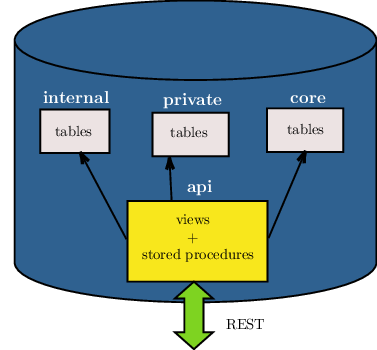
Functions[](https://docs.postgrest.org/en/v10/schema_structure.html#functions "Link to this heading")
=======================================================================================================
By default, when a function is created, the privilege to execute it is not restricted by role. The function access is `PUBLIC` — executable by all roles (more details at [PostgreSQL Privileges page](https://www.postgresql.org/docs/current/ddl-priv.html)
). This is not ideal for an API schema. To disable this behavior, you can run the following SQL statement:
ALTER DEFAULT PRIVILEGES REVOKE EXECUTE ON FUNCTIONS FROM PUBLIC;
This will change the privileges for all functions created in the future in all schemas. Currently there is no way to limit it to a single schema. In our opinion it’s a good practice anyway.
Note
It is however possible to limit the effect of this clause only to functions you define. You can put the above statement at the beginning of the API schema definition, and then at the end reverse it with:
ALTER DEFAULT PRIVILEGES GRANT EXECUTE ON FUNCTIONS TO PUBLIC;
This will work because the `alter default privileges` statement has effect on function created _after_ it is executed. See [PostgreSQL alter default privileges](https://www.postgresql.org/docs/current/sql-alterdefaultprivileges.html)
for more details.
After that, you’ll need to grant EXECUTE privileges on functions explicitly:
GRANT EXECUTE ON FUNCTION login TO anonymous;
GRANT EXECUTE ON FUNCTION signup TO anonymous;
You can also grant execute on all functions in a schema to a higher privileged role:
GRANT EXECUTE ON ALL FUNCTIONS IN SCHEMA api TO web\_user;
Security definer[](https://docs.postgrest.org/en/v10/schema_structure.html#security-definer "Link to this heading")
---------------------------------------------------------------------------------------------------------------------
A function is executed with the privileges of the user who calls it. This means that the user has to have all permissions to do the operations the procedure performs. If the function accesses private database objects, your [API roles](https://docs.postgrest.org/en/v10/auth.html#roles)
won’t be able to successfully execute the function.
Another option is to define the function with the `SECURITY DEFINER` option. Then only one permission check will take place, the permission to call the function, and the operations in the function will have the authority of the user who owns the function itself.
\-- login as a user wich has privileges on the private schemas
\-- create a sample function
create or replace function login(email text, pass text) returns jwt\_token as $$
begin
\-- access to a private schema called 'auth'
select auth.user\_role(email, pass) into \_role;
\-- other operations
\-- ...
end;
$$ language plpgsql security definer;
Note the `SECURITY DEFINER` keywords at the end of the function. See [PostgreSQL documentation](https://www.postgresql.org/docs/current/sql-createfunction.html#SQL-CREATEFUNCTION-SECURITY)
for more details.
Views[](https://docs.postgrest.org/en/v10/schema_structure.html#views "Link to this heading")
===============================================================================================
Views are invoked with the privileges of the view owner, much like stored procedures with the `SECURITY DEFINER` option. When created by a SUPERUSER role, all [row-level security](https://www.postgresql.org/docs/current/ddl-rowsecurity.html)
will be bypassed unless a different, non-SUPERUSER owner is specified.
For changing this, we can create a non-SUPERUSER role and make this role the view’s owner.
CREATE ROLE api\_views\_owner NOINHERIT;
ALTER VIEW sample\_view OWNER TO api\_views\_owner;
Rules[](https://docs.postgrest.org/en/v10/schema_structure.html#rules "Link to this heading")
-----------------------------------------------------------------------------------------------
Insertion on views with complex [rules](https://www.postgresql.org/docs/current/sql-createrule.html)
might not work out of the box with PostgREST. It’s recommended that you [use triggers instead of rules](https://wiki.postgresql.org/wiki/Don%27t_Do_This#Don.27t_use_rules)
. If you want to keep using rules, a workaround is to wrap the view insertion in a stored procedure and call it through the [Stored Procedures](https://docs.postgrest.org/en/v10/api.html#s-procs)
interface. For more details, see this [github issue](https://github.com/PostgREST/postgrest/issues/1283)
.
---
# Installation — PostgREST 14 documentation
* [](https://docs.postgrest.org/en/stable/index.html)
* Installation
* [View page source](https://docs.postgrest.org/en/stable/_sources/explanations/install.rst.txt)
* * *
Installation[](https://docs.postgrest.org/en/stable/explanations/install.html#installation "Link to this heading")
====================================================================================================================
The release page has [pre-compiled binaries for macOS, Windows, Linux and FreeBSD](https://github.com/PostgREST/postgrest/releases/latest)
. The Linux binary is a static executable that can be run on any Linux distribution.
You can also use your OS package manager.
macOSFreeBSDLinuxWindows
You can install PostgREST from the [Homebrew official repo](https://formulae.brew.sh/formula/postgrest)
.
brew install postgrest
You can install PostgREST from the [official ports](https://www.freshports.org/www/hs-postgrest)
.
pkg install hs-postgrest
Arch LinuxNix via nixpkgsNix via flake
You can install PostgREST from the [community repo](https://archlinux.org/packages/extra/x86_64/postgrest/)
.
pacman \-S postgrest
You can install PostgREST from nixpkgs.
nix-env \-i postgrest
You can install PostgREST via flake.
{
inputs.postgrest.url \= "github:postgrest/postgrest";
\# ...
}
You can install PostgREST using [Chocolatey](https://community.chocolatey.org/packages/postgrest)
or [Scoop](https://github.com/ScoopInstaller/Scoop)
.
choco install postgrest
scoop install postgrest
Supported PostgreSQL versions[](https://docs.postgrest.org/en/stable/explanations/install.html#supported-postgresql-versions "Link to this heading")
------------------------------------------------------------------------------------------------------------------------------------------------------
| | |
| --- | --- |
| **Supported** | PostgreSQL >= 13 |
PostgREST works with all PostgreSQL versions still [officially supported](https://www.postgresql.org/support/versioning/)
.
Running PostgREST[](https://docs.postgrest.org/en/stable/explanations/install.html#running-postgrest "Link to this heading")
------------------------------------------------------------------------------------------------------------------------------
If you downloaded PostgREST from the release page, first extract the compressed file to obtain the executable.
\# For UNIX platforms
tar Jxf postgrest-\[version\]\-\[platform\].tar.xz
\# On Windows you should unzip the file
Now you can run PostgREST with the `--help` flag to see usage instructions:
\# Running postgrest binary
./postgrest \--help
\# Running postgrest installed from a package manager
postgrest \--help
\# You should see a usage help message
The PostgREST server reads a configuration file as its only argument:
postgrest /path/to/postgrest.conf
\# You can also generate a sample config file with
\# postgrest -e > postgrest.conf
\# You'll need to edit this file and remove the usage parts for postgrest to read it
For a complete reference of the configuration file, see [Configuration](https://docs.postgrest.org/en/stable/references/configuration.html#configuration)
.
Note
If you see a dialog box like this on Windows, it may be that the `pg_config` program is not in your system path.

It usually lives in `C:Program FilesPostgreSQLbin`. See this [article](https://www.howtogeek.com/118594/how-to-edit-your-system-path-for-easy-command-line-access/)
about how to modify the system path.
To test that the system path is set correctly, run `pg_config` from the command line. You should see it output a list of paths.
Docker[](https://docs.postgrest.org/en/stable/explanations/install.html#docker "Link to this heading")
--------------------------------------------------------------------------------------------------------
You can get the [official PostgREST Docker image](https://hub.docker.com/r/postgrest/postgrest)
with:
\# pull the latest version
docker pull postgrest/postgrest
\# to pull a particular version, use one of the versions on https://hub.docker.com/r/postgrest/postgrest/tags
docker pull postgrest/postgrest:
To configure the container image, use [Environment Variables](https://docs.postgrest.org/en/stable/references/configuration.html#env-variables-config)
.
There are two ways to run the PostgREST container: with an existing external database, or through docker-compose.
### Containerized PostgREST with native PostgreSQL[](https://docs.postgrest.org/en/stable/explanations/install.html#containerized-postgrest-with-native-postgresql "Link to this heading")
The first way to run PostgREST in Docker is to connect it to an existing native database on the host.
\# Run the server
docker run \--rm \--net\=host \\
\-e PGRST\_DB\_URI\="postgres://app\_user:password@localhost/postgres" \\
postgrest/postgrest
The database connection string above is just an example. Adjust the role and password as necessary. You may need to edit PostgreSQL’s `pg_hba.conf` to grant the user local login access.
Note
Docker on Mac does not support the `--net=host` flag. Instead you’ll need to create an IP address alias to the host. Requests for the IP address from inside the container are unable to resolve and fall back to resolution by the host.
sudo ifconfig lo0 10.0.0.10 alias
You should then use 10.0.0.10 as the host in your database connection string. Also remember to include the IP address in the `listen_address` within postgresql.conf. For instance:
listen\_addresses \= 'localhost,10.0.0.10'
You might also need to add a new IPv4 local connection within pg\_hba.conf. For instance:
host all all 10.0.0.10/32 trust
The docker command will then look like this:
\# Run the server
docker run \--rm \-p 3000:3000 \\
\-e PGRST\_DB\_URI\="postgres://app\_user:password@10.0.0.10/postgres" \\
postgrest/postgrest
### Containerized PostgREST _and_ db with docker-compose[](https://docs.postgrest.org/en/stable/explanations/install.html#containerized-postgrest-and-db-with-docker-compose "Link to this heading")
To avoid having to install the database at all, you can run both it and the server in containers and link them together with docker-compose. Use this configuration:
\# docker-compose.yml
version: '3'
services:
server:
image: postgrest/postgrest
ports:
\- "3000:3000"
environment:
PGRST\_SERVER\_HOST: 0.0.0.0 \# necessary for \`postgrest --ready\` flag to work
PGRST\_DB\_URI: postgres://app\_user:password@db:5432/app\_db
PGRST\_OPENAPI\_SERVER\_PROXY\_URI: http://127.0.0.1:3000
depends\_on:
\- db
db:
image: postgres
ports:
\- "5432:5432"
environment:
POSTGRES\_DB: app\_db
POSTGRES\_USER: app\_user
POSTGRES\_PASSWORD: password
\# Uncomment this if you want to persist the data.
\# volumes:
\# - "./pgdata:/var/lib/postgresql/data"
Go into the directory where you saved this file and run `docker-compose up`. You will see the logs of both the database and PostgREST, and be able to access the latter on port 3000.
If you want to have a visual overview of your API in your browser you can add swagger-ui to your `docker-compose.yml`:
\# in services:
swagger:
image: swaggerapi/swagger-ui
ports:
\- "8080:8080"
expose:
\- "8080"
environment:
API\_URL: http://localhost:3000/
With this you can see the swagger-ui in your browser on port 8080.
Building from Source[](https://docs.postgrest.org/en/stable/explanations/install.html#building-from-source "Link to this heading")
------------------------------------------------------------------------------------------------------------------------------------
When a pre-built binary does not exist for your system you can build the project from source.
You can build PostgREST from source with [Stack](https://github.com/commercialhaskell/stack)
. It will install any necessary Haskell dependencies on your system.
* [Install Stack](https://docs.haskellstack.org/en/stable/#how-to-install-stack)
for your platform
* Install Library Dependencies
| Operating System | Dependencies |
| --- | --- |
| Ubuntu/Debian | libpq-dev, libgmp-dev, zlib1g-dev |
| CentOS/Fedora/Red Hat | postgresql-devel, zlib-devel, gmp-devel |
| BSD | postgresql12-client |
| macOS | libpq, gmp |
* Build and install binary
git clone https://github.com/PostgREST/postgrest.git
cd postgrest
\# adjust local-bin-path to taste
stack build \--install-ghc \--copy-bins \--local-bin-path /usr/local/bin
Note
* If building fails and your system has less than 1GB of memory, try adding a swap file.
* –install-ghc flag is only needed for the first build and can be omitted in the subsequent builds.
* Check that the server is installed: `postgrest --help`.
---
# Providing images for — PostgREST devel documentation
* [](https://docs.postgrest.org/en/latest/index.html)
* Providing images for ``
* [View page source](https://docs.postgrest.org/en/latest/_sources/how-tos/providing-images-for-img.rst.txt)
* * *
Providing images for ``[](https://docs.postgrest.org/en/latest/how-tos/providing-images-for-img.html#providing-images-for-img "Link to this heading")
============================================================================================================================================================
author:
[pkel](https://github.com/pkel)
In this how-to, you will learn how to create an endpoint for providing images to HTML `` tags without client side JavaScript. In fact, the presented technique is suitable for providing not only images, but arbitrary files.
We will start with a minimal example that highlights the general concept. Afterwards we present a more detailed solution that fixes a few shortcomings of the first approach.
Warning
Be careful when saving binaries in the database, having a separate storage service for these is preferable in most cases. See [Storing Binary files in the Database](https://wiki.postgresql.org/wiki/BinaryFilesInDB)
.
Minimal Example[](https://docs.postgrest.org/en/latest/how-tos/providing-images-for-img.html#minimal-example "Link to this heading")
--------------------------------------------------------------------------------------------------------------------------------------
First, we need a public table for storing the files.
create table files(
id int primary key
, blob bytea
);
Let’s assume this table contains an image of two cute kittens with id 42. We can retrieve this image in binary format from our PostgREST API by using [Media Type Handlers](https://docs.postgrest.org/en/latest/references/api/media_type_handlers.html#custom-media)
:
create domain "application/octet-stream" as bytea;
create or replace function file(id int) returns "application/octet-stream" as $$
select blob from files where id \= file.id;
$$ language sql;
Now we can request the RPC endpoint `/rpc/file?id=42` with the `Accept: application/octet-stream` header.
curl "localhost:3000/rpc/file?id=42" \-H "Accept: application/octet-stream"
Unfortunately, putting the URL into the `src` of an `` tag will not work. That’s because browsers do not send the required `Accept: application/octet-stream` header. Instead, the `Accept: image/webp` header is sent by many web browsers by default.
Luckily we can change the accepted media type in the function like so:
create domain "image/webp" as bytea;
create or replace function file(id int) returns "image/webp" as $$
select blob from files where id \= file.id;
$$ language sql;
Now, the image will be displayed in the HTML page:
Improved Version[](https://docs.postgrest.org/en/latest/how-tos/providing-images-for-img.html#improved-version "Link to this heading")
----------------------------------------------------------------------------------------------------------------------------------------
The basic solution has some shortcomings:
1. The response `Content-Type` header is set to `image/webp`. This might be a problem if you want to specify a different format for the file.
2. Download requests (e.g. Right Click -> Save Image As) to `/files?select=blob&id=eq.42` will propose `files` as filename. This might confuse users.
3. Requests to the binary endpoint are not cached. This will cause unnecessary load on the database.
The following improved version addresses these problems. First, in addition to the minimal example, we need to store the media types and names of our files in the database.
alter table files
add column type text generated always as (byteamagic\_mime(substr(blob, 0, 4100))) stored,
add column name text;
This uses the `byteamagic_mime()` function from the [pg\_byteamagic extension](https://github.com/nmandery/pg_byteamagic)
to automatically generate the type in the `files` table. To guess the type of a file, it’s generally enough to look at the beginning of the file, which is more efficient.
Next, we set modify the function to set the content type and filename. We use this opportunity to configure some basic, client-side caching. For production, you probably want to configure additional caches, e.g. on the [reverse proxy](https://docs.postgrest.org/en/latest/explanations/nginx.html#nginx)
.
create domain "\*/\*" as bytea;
create function file(id int) returns "\*/\*" as
$$
declare headers text;
declare blob bytea;
begin
select format(
'\[{"Content-Type": "%s"},'\
'{"Content-Disposition": "inline; filename=\\"%s\\""},'\
'{"Cache-Control": "max-age=259200"}\]'
, files.type, files.name)
from files where files.id \= file.id into headers;
perform set\_config('response.headers', headers, true);
select files.blob from files where files.id \= file.id into blob;
if FOUND \-- special var, see https://www.postgresql.org/docs/current/plpgsql-statements.html#PLPGSQL-STATEMENTS-DIAGNOSTICS
then return(blob);
else raise sqlstate 'PT404' using
message \= 'NOT FOUND',
detail \= 'File not found',
hint \= format('%s seems to be an invalid file id', file.id);
end if;
end
$$ language plpgsql;
With this, we can obtain the cat image from `/rpc/file?id=42`. Thus, the resulting HTML will be:
---
# Create a SOAP endpoint — PostgREST devel documentation
* [](https://docs.postgrest.org/en/latest/index.html)
* Create a SOAP endpoint
* [View page source](https://docs.postgrest.org/en/latest/_sources/how-tos/create-soap-endpoint.rst.txt)
* * *
Create a SOAP endpoint[](https://docs.postgrest.org/en/latest/how-tos/create-soap-endpoint.html#create-a-soap-endpoint "Link to this heading")
================================================================================================================================================
author:
[fjf2002](https://github.com/fjf2002)
PostgREST supports [Media Type Handlers](https://docs.postgrest.org/en/latest/references/api/media_type_handlers.html#custom-media)
. With a bit of work, SOAP endpoints become possible.
Minimal Example[](https://docs.postgrest.org/en/latest/how-tos/create-soap-endpoint.html#minimal-example "Link to this heading")
----------------------------------------------------------------------------------------------------------------------------------
This example will simply return the request body, inside a tag `therequestbodywas`.
Add the following function to your PostgreSQL database:
create domain "text/xml" as pg\_catalog.xml;
CREATE OR REPLACE FUNCTION my\_soap\_endpoint(xml) RETURNS "text/xml" AS $$
DECLARE
nsarray CONSTANT text\[\]\[\] := ARRAY\[\
ARRAY\['soapenv', 'http://schemas.xmlsoap.org/soap/envelope/'\]\
\];
BEGIN
RETURN xmlelement(
NAME "soapenv:Envelope",
XMLATTRIBUTES('http://schemas.xmlsoap.org/soap/envelope/' AS "xmlns:soapenv"),
xmlelement(NAME "soapenv:Header"),
xmlelement(
NAME "soapenv:Body",
xmlelement(
NAME theRequestBodyWas,
(xpath('/soapenv:Envelope/soapenv:Body', $1, nsarray))\[1\]
)
)
);
END;
$$ LANGUAGE plpgsql;
Do not forget to refresh the [PostgREST schema cache](https://docs.postgrest.org/en/latest/references/schema_cache.html#schema-reloading)
.
Use `curl` for a first test:
curl http://localhost:3000/rpc/my\_soap\_endpoint \\
\--header 'Content-Type: text/xml' \\
\--header 'Accept: text/xml' \\
\--data-binary @- <
My SOAP Content
XML
The output should contain the original request body within the `therequestbodywas` entity, and should roughly look like:
My SOAP Content
A more elaborate example[](https://docs.postgrest.org/en/latest/how-tos/create-soap-endpoint.html#a-more-elaborate-example "Link to this heading")
----------------------------------------------------------------------------------------------------------------------------------------------------
Here we have a SOAP service that converts a fraction to a decimal value, with pass-through of PostgreSQL errors to the SOAP response. Please note that in production you probably should not pass through plain database errors potentially disclosing internals to the client, but instead handle the errors directly.
\-- helper function
CREATE OR REPLACE FUNCTION \_soap\_envelope(body xml)
RETURNS xml
LANGUAGE sql
AS $function$
SELECT xmlelement(
NAME "soapenv:Envelope",
XMLATTRIBUTES('http://schemas.xmlsoap.org/soap/envelope/' AS "xmlns:soapenv"),
xmlelement(NAME "soapenv:Header"),
xmlelement(NAME "soapenv:Body", body)
);
$function$;
\-- helper function
CREATE OR REPLACE FUNCTION \_soap\_exception(
faultcode text,
faultstring text
)
RETURNS xml
LANGUAGE sql
AS $function$
SELECT \_soap\_envelope(
xmlelement(NAME "soapenv:Fault",
xmlelement(NAME "faultcode", faultcode),
xmlelement(NAME "faultstring", faultstring)
)
);
$function$;
CREATE OR REPLACE FUNCTION fraction\_to\_decimal(xml)
RETURNS "text/xml"
LANGUAGE plpgsql
AS $function$
DECLARE
nsarray CONSTANT text\[\]\[\] := ARRAY\[\
ARRAY\['soapenv', 'http://schemas.xmlsoap.org/soap/envelope/'\]\
\];
exc\_msg text;
exc\_detail text;
exc\_hint text;
exc\_sqlstate text;
BEGIN
\-- simulating a statement that results in an exception:
RETURN \_soap\_envelope(xmlelement(
NAME "decimalValue",
(
(xpath('/soapenv:Envelope/soapenv:Body/fraction/numerator/text()', $1, nsarray))\[1\]::text::int
/
(xpath('/soapenv:Envelope/soapenv:Body/fraction/denominator/text()', $1, nsarray))\[1\]::text::int
)::text::xml
));
EXCEPTION WHEN OTHERS THEN
GET STACKED DIAGNOSTICS
exc\_msg := MESSAGE\_TEXT,
exc\_detail := PG\_EXCEPTION\_DETAIL,
exc\_hint := PG\_EXCEPTION\_HINT,
exc\_sqlstate := RETURNED\_SQLSTATE;
RAISE WARNING USING
MESSAGE \= exc\_msg,
DETAIL \= exc\_detail,
HINT \= exc\_hint;
RETURN \_soap\_exception(faultcode \=> exc\_sqlstate, faultstring \=> concat(exc\_msg, ', DETAIL: ', exc\_detail, ', HINT: ', exc\_hint));
END
$function$;
Let’s test the `fraction_to_decimal` service with illegal values:
curl http://localhost:3000/rpc/fraction\_to\_decimal \\
\--header 'Content-Type: text/xml' \\
\--header 'Accept: text/xml' \\
\--data-binary @- <420
XML
The output should roughly look like:
22012division by zero, DETAIL: , HINT:
References[](https://docs.postgrest.org/en/latest/how-tos/create-soap-endpoint.html#references "Link to this heading")
------------------------------------------------------------------------------------------------------------------------
For more information concerning PostgREST, cf.
* [Functions with a single unnamed parameter](https://docs.postgrest.org/en/latest/references/api/functions.html#function-single-unnamed)
* [Media Type Handlers](https://docs.postgrest.org/en/latest/references/api/media_type_handlers.html#custom-media)
. See [The “Any” Handler](https://docs.postgrest.org/en/latest/references/api/media_type_handlers.html#any-handler)
, if you need to support an `application/soap+xml` media type or if you want to respond with XML without sending a media type.
* [Nginx reverse proxy](https://docs.postgrest.org/en/latest/explanations/nginx.html#nginx)
For SOAP reference, visit
* the specification at [https://www.w3.org/TR/soap/](https://www.w3.org/TR/soap/)
* shorter more practical advice is available at [https://www.w3schools.com/xml/xml\_soap.asp](https://www.w3schools.com/xml/xml_soap.asp)
---
# Community Tutorials — PostgREST 14 documentation
* [](https://docs.postgrest.org/en/stable/index.html)
* Community Tutorials
* [View page source](https://docs.postgrest.org/en/stable/_sources/ecosystem.rst.txt)
* * *
Community Tutorials[](https://docs.postgrest.org/en/stable/ecosystem.html#community-tutorials "Link to this heading")
=======================================================================================================================
* [Building a Contacts List with PostgREST and Vue.js](https://www.youtube.com/watch?v=iHtsALtD5-U)
- In this video series, DigitalOcean shows how to build and deploy an Nginx + PostgREST(using a managed PostgreSQL database) + Vue.js webapp in an Ubuntu server droplet.
* [PostgREST + Auth0: Create REST API in mintutes, and add social login using Auth0](https://samkhawase.com/blog/postgrest/)
- A step-by-step tutorial to show how to dockerize and integrate Auth0 to PostgREST service.
* [“CodeLess” backend using postgres, postgrest and oauth2 authentication with keycloak](https://www.mathieupassenaud.fr/codeless_backend/)
- A step-by-step tutorial for using PostgREST with KeyCloak(hosted on a managed service).
* [How PostgreSQL triggers work when called with a PostgREST PATCH HTTP request](https://blog.fgribreau.com/2020/11/how-postgresql-triggers-works-when.html)
- A tutorial to see how the old and new values are set or not when doing a PATCH request to PostgREST.
* [REST Data Service on YugabyteDB / PostgreSQL](https://dev.to/yugabyte/rest-data-service-on-yugabytedb-postgresql-5f2h)
* [Build data-driven applications with Workers and PostgreSQL](https://developers.cloudflare.com/workers/tutorials/postgres/)
- A tutorial on how to integrate with PostgREST and PostgreSQL using Cloudflare Workers.
* [A poor man’s API](https://blog.frankel.ch/poor-man-api)
- Shows how to integrate PostgREST with Apache APISIX as an alternative to Nginx.
Templates[](https://docs.postgrest.org/en/stable/ecosystem.html#templates "Link to this heading")
===================================================================================================
* [compose-postgrest](https://github.com/mattddowney/compose-postgrest)
- docker-compose setup with Nginx and HTML example
* [svelte-postgrest-template](https://github.com/guyromm/svelte-postgrest-template)
- Svelte/SvelteKit, PostgREST, EveryLayout and social auth
Example Apps[](https://docs.postgrest.org/en/stable/ecosystem.html#example-apps "Link to this heading")
=========================================================================================================
* [archtika](https://github.com/thiloho/archtika)
- self-hosted CMS
* [delibrium-postgrest](https://gitlab.com/delibrium/delibrium-postgrest/)
- example school API and front-end in Vue.js
* [ETH-transactions-storage](https://github.com/Adamant-im/ETH-transactions-storage)
- indexer for Ethereum to get transaction list by ETH address
* [general](https://github.com/PierreRochard/general)
- example auth back-end
* [guild-operators](https://github.com/cardano-community/koios-artifacts/tree/main/files/grest)
- example queries and functions that the Cardano Community uses for their Guild Operators’ Repository
* [PostGUI](https://github.com/priyank-purohit/PostGUI)
- React Material UI admin panel
* [prospector](https://github.com/sfcta/prospector)
- data warehouse and visualization platform
DevOps[](https://docs.postgrest.org/en/stable/ecosystem.html#devops "Link to this heading")
=============================================================================================
* [cloudgov-demo-postgrest](https://github.com/GSA/cloudgov-demo-postgrest)
- demo for a federally-compliant REST API on cloud.gov
* [cloudstark/helm-charts](https://github.com/cloudstark/helm-charts/tree/master/postgrest)
- helm chart to deploy PostgREST to a Kubernetes cluster via a Deployment and Service
* [cyril-sabourault/postgrest-cloud-run](https://github.com/cyril-sabourault/postgrest-cloud-run)
- expose a PostgreSQL database on Cloud SQL using Cloud Run
* [eyberg/postgrest](https://repo.ops.city/v2/packages/eyberg/postgrest/10.1.1/x86_64/show)
- run PostgREST as a Nanos unikernel
* [jbkarle/postgrest](https://github.com/jbkarle/postgrest)
- helm chart with a demo database for development and test purposes
External Notification[](https://docs.postgrest.org/en/stable/ecosystem.html#external-notification "Link to this heading")
===========================================================================================================================
These are PostgreSQL bridges that propagate LISTEN/NOTIFY to external queues for further processing. This allows functions to initiate actions outside the database such as sending emails.
* [pg-notify-stdout](https://github.com/mkleczek/pg-notify-stdout)
- writes notifications to standard output (use in shell scripts etc.)
* [pg-notify-webhook](https://github.com/vbalasu/pg-notify-webhook)
- trigger webhooks from PostgreSQL’s LISTEN/NOTIFY
* [pgsql-listen-exchange](https://github.com/gmr/pgsql-listen-exchange)
- RabbitMQ
* [postgres-websockets](https://github.com/diogob/postgres-websockets)
- expose web sockets for PostgreSQL’s LISTEN/NOTIFY
* [postgresql2websocket](https://github.com/frafra/postgresql2websocket)
- Websockets
Extensions[](https://docs.postgrest.org/en/stable/ecosystem.html#extensions "Link to this heading")
=====================================================================================================
* [aiodata](https://github.com/Exahilosys/aiodata)
- Python, event-based proxy and caching client.
* [pg-safeupdate](https://github.com/eradman/pg-safeupdate)
- prevent full-table updates or deletes
* [postgrest-node](https://github.com/seveibar/postgrest-node)
- Run a PostgREST server in Node.js via npm module
* [PostgREST-writeAPI](https://github.com/ppKrauss/PostgREST-writeAPI)
- generate Nginx rewrite rules to fit an OpenAPI spec
Client-Side Libraries[](https://docs.postgrest.org/en/stable/ecosystem.html#client-side-libraries "Link to this heading")
===========================================================================================================================
* [postgrest-csharp](https://github.com/supabase-community/postgrest-csharp)
- C#
* [postgrest-dart](https://github.com/supabase/postgrest-dart)
- Dart
* [postgrest-ex](https://github.com/supabase-community/postgrest-ex)
- Elixir
* [postgrest-go](https://github.com/supabase-community/postgrest-go)
- Go
* [postgrest-js](https://github.com/supabase/postgrest-js)
- TypeScript/JavaScript
* [postgrest-kt](https://github.com/supabase-community/postgrest-kt)
- Kotlin
* [postgrest-py](https://github.com/supabase/postgrest-py)
- Python
* [postgrest-rs](https://github.com/supabase-community/postgrest-rs)
- Rust
* [postgrest-swift](https://github.com/supabase-community/postgrest-swift)
- Swift
* [redux-postgrest](https://github.com/andytango/redux-postgrest)
- TypeScript/JS, client integrated with (React) Redux.
* [vue-postgrest](https://github.com/technowledgy/vue-postgrest)
- Vue.js
---
# Tutorial 1 - The Golden Key — PostgREST 10.2 documentation
* [](https://docs.postgrest.org/en/v10/index.html)
* Tutorial 1 - The Golden Key
* [View page source](https://docs.postgrest.org/en/v10/_sources/tutorials/tut1.rst.txt)
* * *
Tutorial 1 - The Golden Key[](https://docs.postgrest.org/en/v10/tutorials/tut1.html#tutorial-1-the-golden-key "Link to this heading")
=======================================================================================================================================
author:
[begriffs](https://github.com/begriffs)
In [Tutorial 0 - Get it Running](https://docs.postgrest.org/en/v10/tutorials/tut0.html#tut0)
we created a read-only API with a single endpoint to list todos. There are many directions we can go to make this API more interesting, but one good place to start would be allowing some users to change data in addition to reading it.
Step 1. Add a Trusted User[](https://docs.postgrest.org/en/v10/tutorials/tut1.html#step-1-add-a-trusted-user "Link to this heading")
--------------------------------------------------------------------------------------------------------------------------------------
The previous tutorial created a `web_anon` role in the database with which to execute anonymous web requests. Let’s make a role called `todo_user` for users who authenticate with the API. This role will have the authority to do anything to the todo list.
\-- run this in psql using the database created
\-- in the previous tutorial
create role todo\_user nologin;
grant todo\_user to authenticator;
grant usage on schema api to todo\_user;
grant all on api.todos to todo\_user;
grant usage, select on sequence api.todos\_id\_seq to todo\_user;
Step 2. Make a Secret[](https://docs.postgrest.org/en/v10/tutorials/tut1.html#step-2-make-a-secret "Link to this heading")
----------------------------------------------------------------------------------------------------------------------------
Clients authenticate with the API using JSON Web Tokens. These are JSON objects which are cryptographically signed using a password known to only us and the server. Because clients do not know the password, they cannot tamper with the contents of their tokens. PostgREST will detect counterfeit tokens and will reject them.
Let’s create a password and provide it to PostgREST. Think of a nice long one, or use a tool to generate it. **Your password must be at least 32 characters long.**
Note
Unix tools can generate a nice password for you:
\# Allow "tr" to process non-utf8 byte sequences
export LC\_CTYPE\=C
\# read random bytes and keep only alphanumerics
< /dev/urandom tr \-dc A-Za-z0-9 | head \-c32
Open the `tutorial.conf` (created in the previous tutorial) and add a line with the password:
\# PASSWORD MUST BE AT LEAST 32 CHARS LONG
\# add this line to tutorial.conf:
jwt-secret \= ""
If the PostgREST server is still running from the previous tutorial, restart it to load the updated configuration file.
Step 3. Sign a Token[](https://docs.postgrest.org/en/v10/tutorials/tut1.html#step-3-sign-a-token "Link to this heading")
--------------------------------------------------------------------------------------------------------------------------
Ordinarily your own code in the database or in another server will create and sign authentication tokens, but for this tutorial we will make one “by hand.” Go to [jwt.io](https://jwt.io/#debugger-io)
and fill in the fields like this:
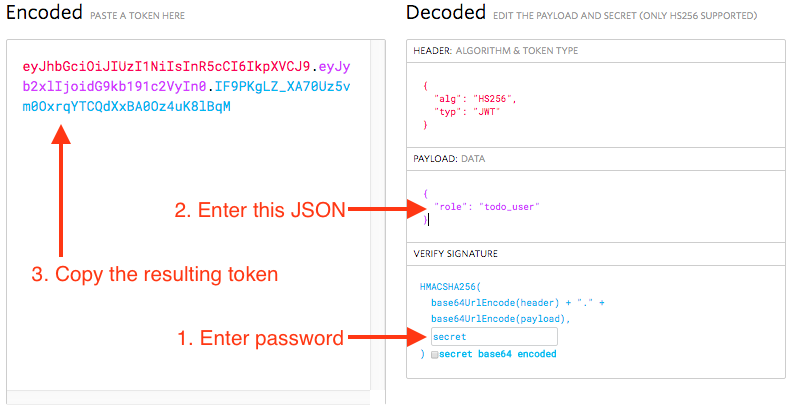
How to create a token at [https://jwt.io](https://jwt.io/)
[](https://docs.postgrest.org/en/v10/tutorials/tut1.html#id1 "Link to this image")
**Remember to fill in the password you generated rather than the word “secret”.** After you have filled in the password and payload, the encoded data on the left will update. Copy the encoded token.
Note
While the token may look well obscured, it’s easy to reverse engineer the payload. The token is merely signed, not encrypted, so don’t put things inside that you don’t want a determined client to see.
Step 4. Make a Request[](https://docs.postgrest.org/en/v10/tutorials/tut1.html#step-4-make-a-request "Link to this heading")
------------------------------------------------------------------------------------------------------------------------------
Back in the terminal, let’s use `curl` to add a todo. The request will include an HTTP header containing the authentication token.
export TOKEN\=""
curl http://localhost:3000/todos \-X POST \\
\-H "Authorization: Bearer $TOKEN" \\
\-H "Content-Type: application/json" \\
\-d '{"task": "learn how to auth"}'
And now we have completed all three items in our todo list, so let’s set `done` to true for them all with a `PATCH` request.
curl http://localhost:3000/todos \-X PATCH \\
\-H "Authorization: Bearer $TOKEN" \\
\-H "Content-Type: application/json" \\
\-d '{"done": true}'
A request for the todos shows three of them, and all completed.
curl http://localhost:3000/todos
\[\
{\
"id": 1,\
"done": true,\
"task": "finish tutorial 0",\
"due": null\
},\
{\
"id": 2,\
"done": true,\
"task": "pat self on back",\
"due": null\
},\
{\
"id": 3,\
"done": true,\
"task": "learn how to auth",\
"due": null\
}\
\]
Step 5. Add Expiration[](https://docs.postgrest.org/en/v10/tutorials/tut1.html#step-5-add-expiration "Link to this heading")
------------------------------------------------------------------------------------------------------------------------------
Currently our authentication token is valid for all eternity. The server, as long as it continues using the same JWT password, will honor the token.
It’s better policy to include an expiration timestamp for tokens using the `exp` claim. This is one of two JWT claims that PostgREST treats specially.
| Claim | Interpretation |
| --- | --- |
| `role` | The database role under which to execute SQL for API request |
| `exp` | Expiration timestamp for token, expressed in “Unix epoch time” |
Note
Epoch time is defined as the number of seconds that have elapsed since 00:00:00 Coordinated Universal Time (UTC), January 1st 1970, minus the number of leap seconds that have taken place since then.
To observe expiration in action, we’ll add an `exp` claim of five minutes in the future to our previous token. First find the epoch value of five minutes from now. In psql run this:
select extract(epoch from now() + '5 minutes'::interval) :: integer;
Go back to jwt.io and change the payload to
{
"role": "todo\_user",
"exp": 123456789
}
**NOTE**: Don’t forget to change the dummy epoch value `123456789` in the snippet above to the epoch value returned by the psql command.
Copy the updated token as before, and save it as a new environment variable.
export NEW\_TOKEN\=""
Try issuing this request in curl before and after the expiration time:
curl http://localhost:3000/todos \\
\-H "Authorization: Bearer $NEW\_TOKEN"
After expiration, the API returns HTTP 401 Unauthorized:
{
"hint": null,
"details": null,
"code": "PGRST301",
"message": "JWT expired"
}
Bonus Topic: Immediate Revocation[](https://docs.postgrest.org/en/v10/tutorials/tut1.html#bonus-topic-immediate-revocation "Link to this heading")
----------------------------------------------------------------------------------------------------------------------------------------------------
Even with token expiration there are times when you may want to immediately revoke access for a specific token. For instance, suppose you learn that a disgruntled employee is up to no good and his token is still valid.
To revoke a specific token we need a way to tell it apart from others. Let’s add a custom `email` claim that matches the email of the client issued the token.
Go ahead and make a new token with the payload
{
"role": "todo\_user",
"email": "disgruntled@mycompany.com"
}
Save it to an environment variable:
export WAYWARD\_TOKEN\=""
PostgREST allows us to specify a stored procedure to run during attempted authentication. The function can do whatever it likes, including raising an exception to terminate the request.
First make a new schema and add the function:
create schema auth;
grant usage on schema auth to web\_anon, todo\_user;
create or replace function auth.check\_token() returns void
language plpgsql
as $$
begin
if current\_setting('request.jwt.claims', true)::json\->>'email' \=
'disgruntled@mycompany.com' then
raise insufficient\_privilege
using hint \= 'Nope, we are on to you';
end if;
end
$$;
Next update `tutorial.conf` and specify the new function:
\# add this line to tutorial.conf
db-pre-request \= "auth.check\_token"
Restart PostgREST for the change to take effect. Next try making a request with our original token and then with the revoked one.
\# this request still works
curl http://localhost:3000/todos \-X PATCH \\
\-H "Authorization: Bearer $TOKEN" \\
\-H "Content-Type: application/json" \\
\-d '{"done": true}'
\# this one is rejected
curl http://localhost:3000/todos \-X PATCH \\
\-H "Authorization: Bearer $WAYWARD\_TOKEN" \\
\-H "Content-Type: application/json" \\
\-d '{"task": "AAAHHHH!", "done": false}'
The server responds with 403 Forbidden:
{
"hint": "Nope, we are on to you",
"details": null,
"code": "42501",
"message": "insufficient\_privilege"
}
---
# Schema Cache — PostgREST 10.2 documentation
* [](https://docs.postgrest.org/en/v10/index.html)
* Schema Cache
* [View page source](https://docs.postgrest.org/en/v10/_sources/schema_cache.rst.txt)
* * *
Schema Cache[](https://docs.postgrest.org/en/v10/schema_cache.html#schema-cache "Link to this heading")
=========================================================================================================
Certain PostgREST features require metadata from the database schema. Getting this metadata requires executing expensive queries, so in order to avoid repeating this work, PostgREST uses a schema cache.
| Feature | Required Metadata |
| --- | --- |
| [Resource Embedding](https://docs.postgrest.org/en/v10/api.html#resource-embedding) | Foreign key constraints |
| [Stored Functions](https://docs.postgrest.org/en/v10/api.html#s-procs) | Function signature (parameters, return type, volatility and [overloading](https://www.postgresql.org/docs/current/xfunc-overload.html) ) |
| [Upserts](https://docs.postgrest.org/en/v10/api.html#upsert) | Primary keys |
| [Insertions](https://docs.postgrest.org/en/v10/api.html#insert) | Primary keys (optional: only if the Location header is requested) |
| [OPTIONS requests](https://docs.postgrest.org/en/v10/api.html#options-requests) | View INSTEAD OF TRIGGERS and primary keys |
| [OpenAPI Support](https://docs.postgrest.org/en/v10/api.html#open-api) | Table columns, primary keys and foreign keys |
| View columns and INSTEAD OF TRIGGERS |
| Function signature |
The Stale Schema Cache[](https://docs.postgrest.org/en/v10/schema_cache.html#the-stale-schema-cache "Link to this heading")
-----------------------------------------------------------------------------------------------------------------------------
When you make changes on the metadata mentioned above, the schema cache will turn stale on a running PostgREST. Future requests that use the above features will need the [schema cache to be reloaded](https://docs.postgrest.org/en/v10/schema_cache.html#schema-reloading)
; otherwise, you’ll get an error instead of the expected result.
For instance, let’s see what would happen if you have a stale schema cache for foreign key relationships and function signatures.
### Stale Foreign Key Relationships[](https://docs.postgrest.org/en/v10/schema_cache.html#stale-foreign-key-relationships "Link to this heading")
Suppose you add a `cities` table to your database and define a foreign key that references an existing `countries` table. Then, you make a request to get the `cities` and their belonging `countries`.
HTTPCurl
GET /cities?select=name,country:countries(id,name) HTTP/1.1
curl "http://localhost:3000/cities?select=name,country:countries(id,name)"
The result will be an error:
{
"hint": "Verify that 'cities' and 'countries' exist in the schema 'api' and that there is a foreign key relationship between them. If a new relationship was created, try reloading the schema cache.",
"details": null,
"code": "PGRST200",
"message": "Could not find a relationship between 'cities' and 'countries' in the schema cache"
}
As you can see, PostgREST couldn’t find the newly created foreign key in the schema cache. See [Schema Cache Reloading](https://docs.postgrest.org/en/v10/schema_cache.html#schema-reloading)
and [Automatic Schema Cache Reloading](https://docs.postgrest.org/en/v10/schema_cache.html#auto-schema-reloading)
to solve this issue.
### Stale Function Signature[](https://docs.postgrest.org/en/v10/schema_cache.html#stale-function-signature "Link to this heading")
The same issue will occur on newly created functions on a running PostgREST.
CREATE FUNCTION plus\_one(num integer)
RETURNS integer AS $$
SELECT num + 1;
$$ LANGUAGE SQL IMMUTABLE;
HTTPCurl
GET /rpc/plus\_one?num=1 HTTP/1.1
curl "http://localhost:3000/rpc/plus\_one?num=1"
{
"hint": "If a new function was created in the database with this name and parameters, try reloading the schema cache.",
"details": null,
"code": "PGRST202",
"message": "Could not find the api.plus\_one(num) function in the schema cache"
}
Here, PostgREST tries to find the function on the stale schema to no avail. See [Schema Cache Reloading](https://docs.postgrest.org/en/v10/schema_cache.html#schema-reloading)
and [Automatic Schema Cache Reloading](https://docs.postgrest.org/en/v10/schema_cache.html#auto-schema-reloading)
to solve this issue.
Schema Cache Reloading[](https://docs.postgrest.org/en/v10/schema_cache.html#schema-cache-reloading "Link to this heading")
-----------------------------------------------------------------------------------------------------------------------------
To reload the cache without restarting the PostgREST server, send a SIGUSR1 signal to the server process.
killall \-SIGUSR1 postgrest
For docker you can do:
docker kill \-s SIGUSR1
\# or in docker-compose
docker-compose kill \-s SIGUSR1
There’s no downtime when reloading the schema cache. The reloading will happen on a background thread while requests keep being served.
### Reloading with NOTIFY[](https://docs.postgrest.org/en/v10/schema_cache.html#reloading-with-notify "Link to this heading")
There are environments where you can’t send the SIGUSR1 Unix Signal (like on managed containers in cloud services or on Windows systems). For this reason, PostgREST also allows you to reload its schema cache through PostgreSQL [NOTIFY](https://www.postgresql.org/docs/current/sql-notify.html)
as follows:
NOTIFY pgrst, 'reload schema'
The `"pgrst"` notification channel is enabled by default. For configuring the channel, see [db-channel](https://docs.postgrest.org/en/v10/configuration.html#db-channel)
and [db-channel-enabled](https://docs.postgrest.org/en/v10/configuration.html#db-channel-enabled)
.
Automatic Schema Cache Reloading[](https://docs.postgrest.org/en/v10/schema_cache.html#automatic-schema-cache-reloading "Link to this heading")
-------------------------------------------------------------------------------------------------------------------------------------------------
You can do automatic schema cache reloading in a pure SQL way and forget about stale schema cache errors with an [event trigger](https://www.postgresql.org/docs/current/event-trigger-definition.html)
and `NOTIFY`.
\-- Create an event trigger function
CREATE OR REPLACE FUNCTION pgrst\_watch() RETURNS event\_trigger
LANGUAGE plpgsql
AS $$
BEGIN
NOTIFY pgrst, 'reload schema';
END;
$$;
\-- This event trigger will fire after every ddl\_command\_end event
CREATE EVENT TRIGGER pgrst\_watch
ON ddl\_command\_end
EXECUTE PROCEDURE pgrst\_watch();
Now, whenever the `pgrst_watch` trigger is fired in the database, PostgREST will automatically reload the schema cache.
To disable auto reloading, drop the trigger:
DROP EVENT TRIGGER pgrst\_watch
### Finer-Grained Event Trigger[](https://docs.postgrest.org/en/v10/schema_cache.html#finer-grained-event-trigger "Link to this heading")
You can refine the previous event trigger and only react to the events relevant to the schema cache. This also prevents unnecessary reloading when creating temporary tables(`CREATE TEMP TABLE`) inside functions.
\-- watch create and alter
CREATE OR REPLACE FUNCTION pgrst\_ddl\_watch() RETURNS event\_trigger AS $$
DECLARE
cmd record;
BEGIN
FOR cmd IN SELECT \* FROM pg\_event\_trigger\_ddl\_commands()
LOOP
IF cmd.command\_tag IN (
'CREATE SCHEMA', 'ALTER SCHEMA'
, 'CREATE TABLE', 'CREATE TABLE AS', 'SELECT INTO', 'ALTER TABLE'
, 'CREATE FOREIGN TABLE', 'ALTER FOREIGN TABLE'
, 'CREATE VIEW', 'ALTER VIEW'
, 'CREATE MATERIALIZED VIEW', 'ALTER MATERIALIZED VIEW'
, 'CREATE FUNCTION', 'ALTER FUNCTION'
, 'CREATE TRIGGER'
, 'CREATE TYPE', 'ALTER TYPE'
, 'CREATE RULE'
, 'COMMENT'
)
\-- don't notify in case of CREATE TEMP table or other objects created on pg\_temp
AND cmd.schema\_name is distinct from 'pg\_temp'
THEN
NOTIFY pgrst, 'reload schema';
END IF;
END LOOP;
END; $$ LANGUAGE plpgsql;
\-- watch drop
CREATE OR REPLACE FUNCTION pgrst\_drop\_watch() RETURNS event\_trigger AS $$
DECLARE
obj record;
BEGIN
FOR obj IN SELECT \* FROM pg\_event\_trigger\_dropped\_objects()
LOOP
IF obj.object\_type IN (
'schema'
, 'table'
, 'foreign table'
, 'view'
, 'materialized view'
, 'function'
, 'trigger'
, 'type'
, 'rule'
)
AND obj.is\_temporary IS false \-- no pg\_temp objects
THEN
NOTIFY pgrst, 'reload schema';
END IF;
END LOOP;
END; $$ LANGUAGE plpgsql;
CREATE EVENT TRIGGER pgrst\_ddl\_watch
ON ddl\_command\_end
EXECUTE PROCEDURE pgrst\_ddl\_watch();
CREATE EVENT TRIGGER pgrst\_drop\_watch
ON sql\_drop
EXECUTE PROCEDURE pgrst\_drop\_watch();
---
# Error Source — PostgREST 10.2 documentation
* [](https://docs.postgrest.org/en/v10/index.html)
* Error Source
* [View page source](https://docs.postgrest.org/en/v10/_sources/errors.rst.txt)
* * *
Error Source[](https://docs.postgrest.org/en/v10/errors.html#error-source "Link to this heading")
===================================================================================================
For the most part, error messages will come directly from the database with the same [structure that PostgreSQL uses](https://www.postgresql.org/docs/current/error-style-guide.html)
. PostgREST will convert the `MESSAGE`, `DETAIL`, `HINT` and `ERRCODE` from the PostgreSQL error to JSON format and add an HTTP status code to the response (see [HTTP Status Codes](https://docs.postgrest.org/en/v10/errors.html#status-codes)
). For instance, this is the error you will get when querying a nonexistent table:
GET /nonexistent\_table?id=eq.1 HTTP/1.1
HTTP/1.1 404 Not Found
Content-Type: application/json; charset=utf-8
{
"hint": null,
"details": null,
"code": "42P01",
"message": "relation \\"api.nonexistent\_table\\" does not exist"
}
However, some errors do come from PostgREST itself (such as those related to the [Schema Cache](https://docs.postgrest.org/en/v10/schema_cache.html#schema-cache)
). These have the same structure as the PostgreSQL errors but are differentiated by the `PGRST` prefix in the `code` field (see [PostgREST Error Codes](https://docs.postgrest.org/en/v10/errors.html#pgrst-errors)
). For instance, when querying a function that does not exist, the error will be:
POST /rpc/nonexistent\_function HTTP/1.1
HTTP/1.1 404 Not Found
Content-Type: application/json; charset=utf-8
{
"hint": "If a new function was created in the database with this name and parameters, try reloading the schema cache.",
"details": null
"code": "PGRST202",
"message": "Could not find the api.nonexistent\_function() function in the schema cache"
}
HTTP Status Codes[](https://docs.postgrest.org/en/v10/errors.html#http-status-codes "Link to this heading")
=============================================================================================================
PostgREST translates [PostgreSQL error codes](https://www.postgresql.org/docs/current/errcodes-appendix.html)
into HTTP status as follows:
| PostgreSQL error code(s) | HTTP status | Error description |
| --- | --- | --- |
| 08\* | 503 | pg connection err |
| 09\* | 500 | triggered action exception |
| 0L\* | 403 | invalid grantor |
| 0P\* | 403 | invalid role specification |
| 23503 | 409 | foreign key violation |
| 23505 | 409 | uniqueness violation |
| 25006 | 405 | read only sql transaction |
| 25\* | 500 | invalid transaction state |
| 28\* | 403 | invalid auth specification |
| 2D\* | 500 | invalid transaction termination |
| 38\* | 500 | external routine exception |
| 39\* | 500 | external routine invocation |
| 3B\* | 500 | savepoint exception |
| 40\* | 500 | transaction rollback |
| 53\* | 503 | insufficient resources |
| 54\* | 413 | too complex |
| 55\* | 500 | obj not in prerequisite state |
| 57\* | 500 | operator intervention |
| 58\* | 500 | system error |
| F0\* | 500 | config file error |
| HV\* | 500 | foreign data wrapper error |
| P0001 | 400 | default code for “raise” |
| P0\* | 500 | PL/pgSQL error |
| XX\* | 500 | internal error |
| 42883 | 404 | undefined function |
| 42P01 | 404 | undefined table |
| 42501 | if authenticated 403,
else 401 | insufficient privileges |
| other | 400 | |
PostgREST Error Codes[](https://docs.postgrest.org/en/v10/errors.html#postgrest-error-codes "Link to this heading")
=====================================================================================================================
PostgREST error codes have the form `PGRSTgxx`, where `PGRST` is the prefix that differentiates the error from a PostgreSQL error, `g` is the group where the error belongs and `xx` is the number that identifies the error in the group.
Group 0 - Connection[](https://docs.postgrest.org/en/v10/errors.html#group-0-connection "Link to this heading")
-----------------------------------------------------------------------------------------------------------------
Related to the connection with the database.
| Code | HTTP status | Description |
| --- | --- | --- |
| PGRST000 | 503 | Could not connect with the database due to an incorrect [db-uri](https://docs.postgrest.org/en/v10/configuration.html#db-uri) or due to the PostgreSQL service not running. |
| PGRST001 | 503 | Could not connect with the database due to an internal error. |
| PGRST002 | 503 | Could not connect with the database when building the [Schema Cache](https://docs.postgrest.org/en/v10/schema_cache.html#schema-cache) due to the PostgreSQL service not running. |
| PGRST003 | 504 | The request timed out waiting for a pool connection to be available. See [db-pool-acquisition-timeout](https://docs.postgrest.org/en/v10/configuration.html#db-pool-acquisition-timeout) . |
Group 1 - Api Request[](https://docs.postgrest.org/en/v10/errors.html#group-1-api-request "Link to this heading")
-------------------------------------------------------------------------------------------------------------------
Related to the HTTP request elements.
| Code | HTTP status | Description |
| --- | --- | --- |
| PGRST100 | 400 | Parsing error in the query string parameter. See [Horizontal Filtering (Rows)](https://docs.postgrest.org/en/v10/api.html#h-filter) , [Operators](https://docs.postgrest.org/en/v10/api.html#operators) and [Ordering](https://docs.postgrest.org/en/v10/api.html#ordering) . |
| PGRST101 | 405 | For [functions](https://docs.postgrest.org/en/v10/api.html#s-procs) , only `GET` and `POST` verbs are allowed. Any other verb will throw this error. |
| PGRST102 | 400 | An invalid request body was sent(e.g. an empty body or malformed JSON). |
| PGRST103 | 416 | An invalid range was specified for [Limits and Pagination](https://docs.postgrest.org/en/v10/api.html#limits) . |
| PGRST105 | 405 | An invalid [PUT](https://docs.postgrest.org/en/v10/api.html#upsert-put) request was done |
| PGRST106 | 406 | The schema specified when [switching schemas](https://docs.postgrest.org/en/v10/api.html#multiple-schemas) is not present in the [db-schemas](https://docs.postgrest.org/en/v10/configuration.html#db-schemas) configuration variable. |
| PGRST107 | 415 | The `Content-Type` sent in the request is invalid. |
| PGRST108 | 400 | The filter is applied to a embedded resource that is not specified in the `select` part of the query string. See [Embedded Filters](https://docs.postgrest.org/en/v10/api.html#embed-filters) . |
| PGRST109 | 400 | Restricting a Deletion or an Update using limits must include the ordering of a unique column. See [Limited Updates/Deletions](https://docs.postgrest.org/en/v10/api.html#limited-update-delete) . |
| PGRST110 | 400 | When restricting a Deletion or an Update using limits modifies more rows than the maximum specified in the limit. See [Limited Updates/Deletions](https://docs.postgrest.org/en/v10/api.html#limited-update-delete) . |
| PGRST111 | 500 | An invalid `response.headers` was set. See [Setting Response Headers](https://docs.postgrest.org/en/v10/api.html#guc-resp-hdrs) . |
| PGRST112 | 500 | The status code must be a positive integer. See [Setting Response Status Code](https://docs.postgrest.org/en/v10/api.html#guc-resp-status) . |
| PGRST113 | 406 | More than one column was returned for a scalar result. See [Response Formats For Scalar Responses](https://docs.postgrest.org/en/v10/api.html#scalar-return-formats) . |
| PGRST114 | 400 | For an [UPSERT using PUT](https://docs.postgrest.org/en/v10/api.html#upsert-put) , when [limits and offsets](https://docs.postgrest.org/en/v10/api.html#limits) are used. |
| PGRST115 | 400 | For an [UPSERT using PUT](https://docs.postgrest.org/en/v10/api.html#upsert-put) , when the primary key in the query string and the body are different. |
| PGRST116 | 406 | More than 1 or no items where returned when requesting a singular response. See [Singular or Plural](https://docs.postgrest.org/en/v10/api.html#singular-plural) . |
| PGRST117 | 405 | The HTTP verb used in the request in not supported. |
Group 2 - Schema Cache[](https://docs.postgrest.org/en/v10/errors.html#group-2-schema-cache "Link to this heading")
---------------------------------------------------------------------------------------------------------------------
Related to a [stale schema cache](https://docs.postgrest.org/en/v10/schema_cache.html#stale-schema)
. Most of the time, these errors are solved by [reloading the schema cache](https://docs.postgrest.org/en/v10/schema_cache.html#schema-reloading)
.
| Code | HTTP status | Description |
| --- | --- | --- |
| PGRST200 | 400 | Caused by [Stale Foreign Key Relationships](https://docs.postgrest.org/en/v10/schema_cache.html#stale-fk-relationships) , otherwise any of the embedding resources or the relationship itself may not exist in the database. |
| PGRST201 | 300 | An ambiguous embedding request was made. See [Embedding Disambiguation](https://docs.postgrest.org/en/v10/api.html#embed-disamb) . |
| PGRST202 | 404 | Caused by a [Stale Function Signature](https://docs.postgrest.org/en/v10/schema_cache.html#stale-function-signature) , otherwise the function may not exist in the database. |
| PGRST203 | 300 | Caused by requesting overloaded functions with the same argument names but different types, or by using a `POST` verb to request overloaded functions with a `JSON` or `JSONB` type unnamed parameter. The solution is to rename the function or add/modify the names of the arguments. |
| PGRST204 | 400 | Caused when the [column specified](https://docs.postgrest.org/en/v10/api.html#specify-columns) in the `columns` query parameter is not found. |
Group 3 - JWT[](https://docs.postgrest.org/en/v10/errors.html#group-3-jwt "Link to this heading")
---------------------------------------------------------------------------------------------------
Related to the authentication process using JWT. You can follow the [Tutorial 1 - The Golden Key](https://docs.postgrest.org/en/v10/tutorials/tut1.html#tut1)
for an example on how to implement authentication and the [Authentication page](https://docs.postgrest.org/en/v10/auth.html)
for more information on this process.
| Code | HTTP status | Description |
| --- | --- | --- |
| PGRST300 | 500 | A [JWT secret](https://docs.postgrest.org/en/v10/configuration.html#jwt-secret) is missing from the configuration. |
| PGRST301 | 401 | Any error related to the verification of the JWT, which means that the JWT provided is invalid in some way. |
| PGRST302 | 401 | Attempted to do a request without [authentication](https://docs.postgrest.org/en/v10/auth.html#client-auth) when the anonymous role is disabled by not setting it in [db-anon-role](https://docs.postgrest.org/en/v10/configuration.html#db-anon-role) . |
Group X - Internal[](https://docs.postgrest.org/en/v10/errors.html#group-x-internal "Link to this heading")
-------------------------------------------------------------------------------------------------------------
Internal errors. If you encounter any of these, you may have stumbled on a PostgREST bug, please [open an issue](https://github.com/PostgREST/postgrest/issues)
and we’ll be glad to fix it.
| Code | HTTP status | Description |
| --- | --- | --- |
| PGRSTX00 | 500 | Internal errors related to the library used for connecting to the database. |
---
# Observability — PostgREST 14 documentation
* [](https://docs.postgrest.org/en/stable/index.html)
* Observability
* [View page source](https://docs.postgrest.org/en/stable/_sources/references/observability.rst.txt)
* * *
Observability[](https://docs.postgrest.org/en/stable/references/observability.html#observability "Link to this heading")
==========================================================================================================================
Observability allows measuring a system’s current state based on the data it generates, such as logs, metrics, and traces.
Logs[](https://docs.postgrest.org/en/stable/references/observability.html#logs "Link to this heading")
--------------------------------------------------------------------------------------------------------
PostgREST logs basic request information to `stdout`, including the authenticated user if available, the requesting IP address and user agent, the URL requested, the HTTP response status and the response body size in bytes if available.
With [log-level](https://docs.postgrest.org/en/stable/references/configuration.html#log-level)
set to `info`, we get:
127.0.0.1 \- user \[26/Jul/2021:01:56:38 \-0500\] "GET /clients HTTP/1.1" 200 56 "" "curl/7.64.0"
127.0.0.1 \- anonymous \[26/Jul/2021:01:56:48 \-0500\] "GET /unexistent HTTP/1.1" 404 162 "" "curl/7.64.0"
For diagnostic information about the server itself, PostgREST logs to `stderr`:
> * The full version of the connected PostgreSQL database.
>
> * [Schema Cache](https://docs.postgrest.org/en/stable/references/schema_cache.html#schema-cache)
> statistics.
>
> * The messages received by the [Listener](https://docs.postgrest.org/en/stable/references/listener.html#listener)
> .
>
06/May/2024:08:16:11 \-0500: Starting PostgREST 12.1...
06/May/2024:08:16:11 \-0500: Successfully connected to PostgreSQL 14.10 (Ubuntu 14.10\-0ubuntu0.22.04.1) on x86\_64\-pc\-linux\-gnu, compiled by gcc (Ubuntu 11.4.0\-1ubuntu1~22.04) 11.4.0, 64\-bit
06/May/2024:08:16:11 \-0500: Connection Pool initialized with a maximum size of 10 connections
06/May/2024:08:16:11 \-0500: API server listening on port 3000
06/May/2024:08:16:11 \-0500: Listening for database notifications on the "pgrst" channel
06/May/2024:08:16:11 \-0500: Config reloaded
06/May/2024:08:16:11 \-0500: Schema cache queried in 3.8 milliseconds
06/May/2024:08:16:11 \-0500: Schema cache loaded 15 Relations, 8 Relationships, 8 Functions, 0 Domain Representations, 4 Media Type Handlers
06/May/2024:14:11:27 \-0500: Received a config reload message on the "pgrst" channel
06/May/2024:14:11:27 \-0500: Config reloaded
Note
Logs are based on the `log-level` setting. See [log-level](https://docs.postgrest.org/en/stable/references/configuration.html#log-level)
.
### SQL Query Logs[](https://docs.postgrest.org/en/stable/references/observability.html#sql-query-logs "Link to this heading")
To log the SQL queries executed for a request, set the [log-query](https://docs.postgrest.org/en/stable/references/configuration.html#log-query)
to `true`. It will be logged based on the current [log-level](https://docs.postgrest.org/en/stable/references/configuration.html#log-level)
setting.
log-level \= "warn"
log-query \= "true"
The SQL queries will only be logged on `400` HTTP errors and up. So, if the user requests a resource without sufficient privileges:
curl "localhost:3000/protected\_table"
This will be logged by PostgREST:
17/Feb/2025:17:28:15 \-0500: WITH pgrst\_source AS ( SELECT "public"."protected\_table".\* FROM "public"."protected\_table" ) SELECT null::bigint AS total\_result\_set, pg\_catalog.count(\_postgrest\_t) AS page\_total, coalesce(json\_agg(\_postgrest\_t), '\[\]') AS body, nullif(current\_setting('response.headers', true), '') AS response\_headers, nullif(current\_setting('response.status', true), '') AS response\_status, '' AS response\_inserted FROM ( SELECT \* FROM pgrst\_source ) \_postgrest\_t
127.0.0.1 \- web\_anon \[17/Feb/2025:17:28:15 \-0500\] "GET /protected\_table HTTP/1.1" 401 99 "" "curl/8.7.1"
### Database Logs[](https://docs.postgrest.org/en/stable/references/observability.html#database-logs "Link to this heading")
Additionally, to find all the SQL operations, you can watch the database logs. By default PostgreSQL does not keep these logs, so you’ll need to make the configuration changes below.
Find `postgresql.conf` inside your PostgreSQL data directory (to find that, issue the command `show data_directory;`). Either find the settings scattered throughout the file and change them to the following values, or append this block of code to the end of the configuration file.
# send logs where the collector can access them
log\_destination \= "stderr"
# collect stderr output to log files
logging\_collector \= on
# save logs in pg\_log/ under the pg data directory
log\_directory \= "pg\_log"
# (optional) new log file per day
log\_filename \= "postgresql-%Y-%m-%d.log"
# log every kind of SQL statement
log\_statement \= "all"
Restart the database and watch the log file in real-time to understand how HTTP requests are being translated into SQL commands.
Note
On Docker you can enable the logs by using a custom `init.sh`:
#!/bin/sh
echo "log\_statement = 'all'" \>> /var/lib/postgresql/data/postgresql.conf
After that you can start the container and check the logs with `docker logs`.
docker run \-v "$(pwd)/init.sh":"/docker-entrypoint-initdb.d/init.sh" \-d postgres
docker logs \-f
Metrics[](https://docs.postgrest.org/en/stable/references/observability.html#metrics "Link to this heading")
--------------------------------------------------------------------------------------------------------------
The `metrics` endpoint on the [Admin Server](https://docs.postgrest.org/en/stable/references/admin_server.html#admin-server)
endpoint provides metrics in [Prometheus text format](https://prometheus.io/docs/instrumenting/exposition_formats/#prometheus-text-format)
.
curl "http://localhost:3001/metrics"
HTTP/1.1 200 OK
Content-Type: text/plain; charset=utf-8
# HELP pgrst\_schema\_cache\_query\_time\_seconds The query time in seconds of the last schema cache load
# TYPE pgrst\_schema\_cache\_query\_time\_seconds gauge
pgrst\_schema\_cache\_query\_time\_seconds 1.5937927e-2
# HELP pgrst\_schema\_cache\_loads\_total The total number of times the schema cache was loaded
# TYPE pgrst\_schema\_cache\_loads\_total counter
pgrst\_schema\_cache\_loads\_total 1.0
...
### Schema Cache Metrics[](https://docs.postgrest.org/en/stable/references/observability.html#schema-cache-metrics "Link to this heading")
Metrics related to the [Schema Cache](https://docs.postgrest.org/en/stable/references/schema_cache.html#schema-cache)
.
#### pgrst\_schema\_cache\_query\_time\_seconds[](https://docs.postgrest.org/en/stable/references/observability.html#pgrst-schema-cache-query-time-seconds "Link to this heading")
| | |
| --- | --- |
| **Type** | Gauge |
The query time in seconds of the last schema cache load.
#### pgrst\_schema\_cache\_loads\_total[](https://docs.postgrest.org/en/stable/references/observability.html#pgrst-schema-cache-loads-total "Link to this heading")
| | |
| --- | --- |
| **Type** | Counter |
| **Labels** | `status`: SUCCESS \| FAIL |
The total number of times the schema cache was loaded.
### Connection Pool Metrics[](https://docs.postgrest.org/en/stable/references/observability.html#connection-pool-metrics "Link to this heading")
Metrics related to the [Connection Pool](https://docs.postgrest.org/en/stable/references/connection_pool.html#connection-pool)
.
#### pgrst\_db\_pool\_timeouts\_total[](https://docs.postgrest.org/en/stable/references/observability.html#pgrst-db-pool-timeouts-total "Link to this heading")
| | |
| --- | --- |
| **Type** | Counter |
The total number of pool connection timeouts.
#### pgrst\_db\_pool\_available[](https://docs.postgrest.org/en/stable/references/observability.html#pgrst-db-pool-available "Link to this heading")
| | |
| --- | --- |
| **Type** | Gauge |
Available connections in the pool.
#### pgrst\_db\_pool\_waiting[](https://docs.postgrest.org/en/stable/references/observability.html#pgrst-db-pool-waiting "Link to this heading")
| | |
| --- | --- |
| **Type** | Gauge |
Requests waiting to acquire a pool connection
#### pgrst\_db\_pool\_max[](https://docs.postgrest.org/en/stable/references/observability.html#pgrst-db-pool-max "Link to this heading")
| | |
| --- | --- |
| **Type** | Gauge |
Max pool connections.
### JWT Cache Metrics[](https://docs.postgrest.org/en/stable/references/observability.html#jwt-cache-metrics "Link to this heading")
Metrics related to the [JWT Cache](https://docs.postgrest.org/en/stable/references/auth.html#jwt-caching)
.
#### pgrst\_jwt\_cache\_requests\_total[](https://docs.postgrest.org/en/stable/references/observability.html#pgrst-jwt-cache-requests-total "Link to this heading")
| | |
| --- | --- |
| **Type** | Counter |
The total number of JWT cache lookups.
#### pgrst\_jwt\_cache\_hits\_total[](https://docs.postgrest.org/en/stable/references/observability.html#pgrst-jwt-cache-hits-total "Link to this heading")
| | |
| --- | --- |
| **Type** | Counter |
The total number of JWT cache hits.
#### pgrst\_jwt\_cache\_evictions\_total[](https://docs.postgrest.org/en/stable/references/observability.html#pgrst-jwt-cache-evictions-total "Link to this heading")
| | |
| --- | --- |
| **Type** | Counter |
The total number of JWT cache evictions.
Traces[](https://docs.postgrest.org/en/stable/references/observability.html#traces "Link to this heading")
------------------------------------------------------------------------------------------------------------
### Server Version Header[](https://docs.postgrest.org/en/stable/references/observability.html#server-version-header "Link to this heading")
When debugging a problem it’s important to verify the running PostgREST version. For this you can look at the `Server` HTTP response header that is returned on every request.
HEAD /users HTTP/1.1
Server: postgrest/11.0.1
### Trace Header[](https://docs.postgrest.org/en/stable/references/observability.html#trace-header "Link to this heading")
You can enable tracing HTTP requests by setting [server-trace-header](https://docs.postgrest.org/en/stable/references/configuration.html#server-trace-header)
. Specify the set header in the request, and the server will include it in the response.
server-trace-header \= "X-Request-Id"
curl "http://localhost:3000/users" \\
\-H "X-Request-Id: 123"
HTTP/1.1 200 OK
X\-Request\-Id: 123
### Proxy-Status Header[](https://docs.postgrest.org/en/stable/references/observability.html#proxy-status-header "Link to this heading")
See [Proxy-Status Header](https://docs.postgrest.org/en/stable/references/errors.html#proxy-status-header)
.
### Server-Timing Header[](https://docs.postgrest.org/en/stable/references/observability.html#server-timing-header "Link to this heading")
You can enable the [Server-Timing](https://developer.mozilla.org/en-US/docs/Web/HTTP/Reference/Headers/Server-Timing)
header by setting [server-timing-enabled](https://docs.postgrest.org/en/stable/references/configuration.html#server-timing-enabled)
on. This header communicates metrics of the different phases in the request-response cycle.
curl "http://localhost:3000/users" \-i
HTTP/1.1 200 OK
Server\-Timing: jwt;dur\=14.9, parse;dur\=71.1, plan;dur\=109.0, transaction;dur\=353.2, response;dur\=4.4
* All the durations (`dur`) are in milliseconds.
* The `jwt` stage is when [JWT Authentication](https://docs.postgrest.org/en/stable/references/auth.html#jwt-auth)
is done. This duration can be lowered with [JWT Cache](https://docs.postgrest.org/en/stable/references/auth.html#jwt-caching)
.
* On the `parse` stage, the [URL Grammar](https://docs.postgrest.org/en/stable/references/api/url_grammar.html#url-grammar)
is parsed.
* On the `plan` stage, the [Schema Cache](https://docs.postgrest.org/en/stable/references/schema_cache.html#schema-cache)
is used to generate the [Main query](https://docs.postgrest.org/en/stable/references/transactions.html#main-query)
of the transaction.
* The `transaction` stage corresponds to the database transaction. See [Transactions](https://docs.postgrest.org/en/stable/references/transactions.html#transactions)
.
* The `response` stage is where the response status and headers are computed.
Note
We’re working on lowering the duration of the `parse` and `plan` stages on [https://github.com/PostgREST/postgrest/issues/2816](https://github.com/PostgREST/postgrest/issues/2816)
.
### Content-Length Header[](https://docs.postgrest.org/en/stable/references/observability.html#content-length-header "Link to this heading")
You can verify the response body size in bytes in the [Content-Length header](https://httpwg.org/specs/rfc9110.html#field.content-length)
.
curl \-i 'localhost:3000/users'
HTTP/1.1 200 OK
Content-Length: 104
Note that this header won’t be returned on `HEAD` requests for optimization purposes (see [GET and HEAD](https://docs.postgrest.org/en/stable/references/api/tables_views.html#head-req)
). This is in line with [RFC 9110](https://httpwg.org/specs/rfc9110.html#field.content-length)
.
The body size is also present in the [PostgREST logs](https://docs.postgrest.org/en/stable/references/observability.html#pgrst-logging)
.
### Execution plan[](https://docs.postgrest.org/en/stable/references/observability.html#execution-plan "Link to this heading")
You can get the [EXPLAIN execution plan](https://www.postgresql.org/docs/current/sql-explain.html)
of a request by adding the `Accept: application/vnd.pgrst.plan` header. This is enabled by [db-plan-enabled](https://docs.postgrest.org/en/stable/references/configuration.html#db-plan-enabled)
(false by default).
curl "http://localhost:3000/users?select=name&order=id" \\
\-H "Accept: application/vnd.pgrst.plan"
Aggregate (cost\=73.65..73.68 rows\=1 width\=112)
\-> Index Scan using users\_pkey on users (cost\=0.15..60.90 rows\=850 width\=36)
The output of the plan is generated in `text` format by default but you can change it to JSON by using the `+json` suffix.
curl "http://localhost:3000/users?select=name&order=id" \\
\-H "Accept: application/vnd.pgrst.plan+json"
\[\
{\
"Plan": {\
"Node Type": "Aggregate",\
"Strategy": "Plain",\
"Partial Mode": "Simple",\
"Parallel Aware": false,\
"Async Capable": false,\
"Startup Cost": 73.65,\
"Total Cost": 73.68,\
"Plan Rows": 1,\
"Plan Width": 112,\
"Plans": \[\
{\
"Node Type": "Index Scan",\
"Parent Relationship": "Outer",\
"Parallel Aware": false,\
"Async Capable": false,\
"Scan Direction": "Forward",\
"Index Name": "users\_pkey",\
"Relation Name": "users",\
"Alias": "users",\
"Startup Cost": 0.15,\
"Total Cost": 60.90,\
"Plan Rows": 850,\
"Plan Width": 36\
}\
\]\
}\
}\
\]
By default the plan is assumed to generate the JSON representation of a resource(`application/json`), but you can obtain the plan for the [different representations that PostgREST supports](https://docs.postgrest.org/en/stable/references/api/resource_representation.html#res-format)
by adding them to the `for` parameter. For instance, to obtain the plan for a `text/xml`, you would use `Accept: application/vnd.pgrst.plan; for="text/xml`.
The other available parameters are `analyze`, `verbose`, `settings`, `buffers` and `wal`, which correspond to the [EXPLAIN command options](https://www.postgresql.org/docs/current/sql-explain.html)
. To use the `analyze` and `wal` parameters for example, you would add them like `Accept: application/vnd.pgrst.plan; options=analyze|wal`.
Note that akin to the EXPLAIN command, the changes will be committed when using the `analyze` option. To avoid this, you can use the [db-tx-end](https://docs.postgrest.org/en/stable/references/configuration.html#db-tx-end)
and the `Prefer: tx=rollback` header.
#### Securing the Execution Plan[](https://docs.postgrest.org/en/stable/references/observability.html#securing-the-execution-plan "Link to this heading")
It’s recommended to only activate [db-plan-enabled](https://docs.postgrest.org/en/stable/references/configuration.html#db-plan-enabled)
on testing environments since it reveals internal database details. However, if you choose to use it in production you can add a [db-pre-request](https://docs.postgrest.org/en/stable/references/configuration.html#db-pre-request)
to filter the requests that can use this feature.
For example, to only allow requests from an IP address to get the execution plans:
\-- Assuming a proxy(Nginx, Cloudflare, etc) passes an "X-Forwarded-For" header(https://developer.mozilla.org/en-US/docs/Web/HTTP/Headers/X-Forwarded-For)
create or replace function filter\_plan\_requests()
returns void as $$
declare
headers json := current\_setting('request.headers', true)::json;
client\_ip text := coalesce(headers\->>'x-forwarded-for', '');
accept text := coalesce(headers\->>'accept', '');
begin
if accept like 'application/vnd.pgrst.plan%' and client\_ip != '144.96.121.73' then
raise insufficient\_privilege using
message \= 'Not allowed to use application/vnd.pgrst.plan';
end if;
end; $$ language plpgsql;
\-- set this function on your postgrest.conf
\-- db-pre-request = filter\_plan\_requests
---
# Providing images for — PostgREST 14 documentation
* [](https://docs.postgrest.org/en/stable/index.html)
* Providing images for ``
* [View page source](https://docs.postgrest.org/en/stable/_sources/how-tos/providing-images-for-img.rst.txt)
* * *
Providing images for ``[](https://docs.postgrest.org/en/stable/how-tos/providing-images-for-img.html#providing-images-for-img "Link to this heading")
============================================================================================================================================================
author:
[pkel](https://github.com/pkel)
In this how-to, you will learn how to create an endpoint for providing images to HTML `` tags without client side JavaScript. In fact, the presented technique is suitable for providing not only images, but arbitrary files.
We will start with a minimal example that highlights the general concept. Afterwards we present a more detailed solution that fixes a few shortcomings of the first approach.
Warning
Be careful when saving binaries in the database, having a separate storage service for these is preferable in most cases. See [Storing Binary files in the Database](https://wiki.postgresql.org/wiki/BinaryFilesInDB)
.
Minimal Example[](https://docs.postgrest.org/en/stable/how-tos/providing-images-for-img.html#minimal-example "Link to this heading")
--------------------------------------------------------------------------------------------------------------------------------------
First, we need a public table for storing the files.
create table files(
id int primary key
, blob bytea
);
Let’s assume this table contains an image of two cute kittens with id 42. We can retrieve this image in binary format from our PostgREST API by using [Media Type Handlers](https://docs.postgrest.org/en/stable/references/api/media_type_handlers.html#custom-media)
:
create domain "application/octet-stream" as bytea;
create or replace function file(id int) returns "application/octet-stream" as $$
select blob from files where id \= file.id;
$$ language sql;
Now we can request the RPC endpoint `/rpc/file?id=42` with the `Accept: application/octet-stream` header.
curl "localhost:3000/rpc/file?id=42" \-H "Accept: application/octet-stream"
Unfortunately, putting the URL into the `src` of an `` tag will not work. That’s because browsers do not send the required `Accept: application/octet-stream` header. Instead, the `Accept: image/webp` header is sent by many web browsers by default.
Luckily we can change the accepted media type in the function like so:
create domain "image/webp" as bytea;
create or replace function file(id int) returns "image/webp" as $$
select blob from files where id \= file.id;
$$ language sql;
Now, the image will be displayed in the HTML page:
Improved Version[](https://docs.postgrest.org/en/stable/how-tos/providing-images-for-img.html#improved-version "Link to this heading")
----------------------------------------------------------------------------------------------------------------------------------------
The basic solution has some shortcomings:
1. The response `Content-Type` header is set to `image/webp`. This might be a problem if you want to specify a different format for the file.
2. Download requests (e.g. Right Click -> Save Image As) to `/files?select=blob&id=eq.42` will propose `files` as filename. This might confuse users.
3. Requests to the binary endpoint are not cached. This will cause unnecessary load on the database.
The following improved version addresses these problems. First, in addition to the minimal example, we need to store the media types and names of our files in the database.
alter table files
add column type text generated always as (byteamagic\_mime(substr(blob, 0, 4100))) stored,
add column name text;
This uses the `byteamagic_mime()` function from the [pg\_byteamagic extension](https://github.com/nmandery/pg_byteamagic)
to automatically generate the type in the `files` table. To guess the type of a file, it’s generally enough to look at the beginning of the file, which is more efficient.
Next, we set modify the function to set the content type and filename. We use this opportunity to configure some basic, client-side caching. For production, you probably want to configure additional caches, e.g. on the [reverse proxy](https://docs.postgrest.org/en/stable/explanations/nginx.html#nginx)
.
create domain "\*/\*" as bytea;
create function file(id int) returns "\*/\*" as
$$
declare headers text;
declare blob bytea;
begin
select format(
'\[{"Content-Type": "%s"},'\
'{"Content-Disposition": "inline; filename=\\"%s\\""},'\
'{"Cache-Control": "max-age=259200"}\]'
, files.type, files.name)
from files where files.id \= file.id into headers;
perform set\_config('response.headers', headers, true);
select files.blob from files where files.id \= file.id into blob;
if FOUND \-- special var, see https://www.postgresql.org/docs/current/plpgsql-statements.html#PLPGSQL-STATEMENTS-DIAGNOSTICS
then return(blob);
else raise sqlstate 'PT404' using
message \= 'NOT FOUND',
detail \= 'File not found',
hint \= format('%s seems to be an invalid file id', file.id);
end if;
end
$$ language plpgsql;
With this, we can obtain the cat image from `/rpc/file?id=42`. Thus, the resulting HTML will be:
---
# Database Authorization — PostgREST 14 documentation
* [](https://docs.postgrest.org/en/stable/index.html)
* Database Authorization
* [View page source](https://docs.postgrest.org/en/stable/_sources/explanations/db_authz.rst.txt)
* * *
Database Authorization[](https://docs.postgrest.org/en/stable/explanations/db_authz.html#database-authorization "Link to this heading")
=========================================================================================================================================
Database authorization is the process of granting and verifying database access permissions. PostgreSQL manages permissions using the concept of roles.
Users and Groups[](https://docs.postgrest.org/en/stable/explanations/db_authz.html#users-and-groups "Link to this heading")
-----------------------------------------------------------------------------------------------------------------------------
A role can be thought of as either a database user, or a group of database users, depending on how the role is set up.
### Roles for Each Web User[](https://docs.postgrest.org/en/stable/explanations/db_authz.html#roles-for-each-web-user "Link to this heading")
PostgREST can accommodate either viewpoint. If you treat a role as a single user then [User Impersonation](https://docs.postgrest.org/en/stable/references/auth.html#user-impersonation)
does most of what you need. When an authenticated user makes a request PostgREST will switch into the database role for that user, which in addition to restricting queries, is available to SQL through the `current_user` variable.
You can use row-level security to flexibly restrict visibility and access for the current user. Here is an [example](https://www.enterprisedb.com/blog/application-users-vs-row-level-security)
from Tomas Vondra, a chat table storing messages sent between users. Users can insert rows into it to send messages to other users, and query it to see messages sent to them by other users.
CREATE TABLE chat (
message\_uuid UUID PRIMARY KEY DEFAULT uuid\_generate\_v4(),
message\_time TIMESTAMP NOT NULL DEFAULT now(),
message\_from NAME NOT NULL DEFAULT current\_user,
message\_to NAME NOT NULL,
message\_subject VARCHAR(64) NOT NULL,
message\_body TEXT
);
ALTER TABLE chat ENABLE ROW LEVEL SECURITY;
We want to enforce a policy that ensures a user can see only those messages sent by them or intended for them. Also we want to prevent a user from forging the `message_from` column with another person’s name.
PostgreSQL allows us to set this policy with row-level security:
CREATE POLICY chat\_policy ON chat
USING ((message\_to \= current\_user) OR (message\_from \= current\_user))
WITH CHECK (message\_from \= current\_user)
Anyone accessing the generated API endpoint for the chat table will see exactly the rows they should, without our needing custom imperative server-side coding.
Warning
Roles are namespaced per-cluster rather than per-database so they may be prone to collision.
### Web Users Sharing Role[](https://docs.postgrest.org/en/stable/explanations/db_authz.html#web-users-sharing-role "Link to this heading")
Alternately database roles can represent groups instead of (or in addition to) individual users. You may choose that all signed-in users for a web app share the role `webuser`. You can distinguish individual users by including extra claims in the JWT such as email.
{
"role": "webuser",
"email": "john@doe.com"
}
SQL code can access claims through PostgREST [Transaction-Scoped Settings](https://docs.postgrest.org/en/stable/references/transactions.html#tx-settings)
. For instance to get the email claim, call this function:
current\_setting('request.jwt.claims', true)::json\->>'email';
Note
For PostgreSQL < 14
current\_setting('request.jwt.claim.email', true);
This allows JWT generation services to include extra information and your database code to react to it. For instance the RLS example could be modified to use this `current_setting` rather than `current_user`. The second `'true'` argument tells `current_setting` to return NULL if the setting is missing from the current configuration.
### Hybrid User-Group Roles[](https://docs.postgrest.org/en/stable/explanations/db_authz.html#hybrid-user-group-roles "Link to this heading")
You can mix the group and individual role policies. For instance we could still have a webuser role and individual users which inherit from it:
CREATE ROLE webuser NOLOGIN;
\-- grant this role access to certain tables etc
CREATE ROLE user000 NOLOGIN;
GRANT webuser TO user000;
\-- now user000 can do whatever webuser can
GRANT user000 TO authenticator;
\-- allow authenticator to switch into user000 role
\-- (the role itself has nologin)
Schemas[](https://docs.postgrest.org/en/stable/explanations/db_authz.html#schemas "Link to this heading")
-----------------------------------------------------------------------------------------------------------
You must explicitly allow roles to access the exposed schemas in [db-schemas](https://docs.postgrest.org/en/stable/references/configuration.html#db-schemas)
.
GRANT USAGE ON SCHEMA api TO webuser;
Tables[](https://docs.postgrest.org/en/stable/explanations/db_authz.html#tables "Link to this heading")
---------------------------------------------------------------------------------------------------------
To let web users access tables you must grant them privileges for the operations you want them to do.
GRANT
SELECT
, INSERT
, UPDATE(message\_body)
, DELETE
ON chat TO webuser;
You can also choose on which table columns the operation is valid. In the above example, the web user can only update the `message_body` column.
Functions[](https://docs.postgrest.org/en/stable/explanations/db_authz.html#functions "Link to this heading")
---------------------------------------------------------------------------------------------------------------
By default, when a function is created, the privilege to execute it is not restricted by role. The function access is `PUBLIC` — executable by all roles (more details at [PostgreSQL Privileges page](https://www.postgresql.org/docs/current/ddl-priv.html)
). This is not ideal for an API schema. To disable this behavior, you can run the following SQL statement:
ALTER DEFAULT PRIVILEGES REVOKE EXECUTE ON FUNCTIONS FROM PUBLIC;
This will change the privileges for all functions created in the future in all schemas. Currently there is no way to limit it to a single schema. In our opinion it’s a good practice anyway.
Note
It is however possible to limit the effect of this clause only to functions you define. You can put the above statement at the beginning of the API schema definition, and then at the end reverse it with:
ALTER DEFAULT PRIVILEGES GRANT EXECUTE ON FUNCTIONS TO PUBLIC;
This will work because the `alter default privileges` statement has effect on function created _after_ it is executed. See [PostgreSQL alter default privileges](https://www.postgresql.org/docs/current/sql-alterdefaultprivileges.html)
for more details.
After that, you’ll need to grant EXECUTE privileges on functions explicitly:
GRANT EXECUTE ON FUNCTION login TO anonymous;
GRANT EXECUTE ON FUNCTION signup TO anonymous;
You can also grant execute on all functions in a schema to a higher privileged role:
GRANT EXECUTE ON ALL FUNCTIONS IN SCHEMA api TO web\_user;
### Security definer[](https://docs.postgrest.org/en/stable/explanations/db_authz.html#security-definer "Link to this heading")
A function is executed with the privileges of the user who calls it. This means that the user has to have all permissions to do the operations the function performs. If the function accesses private database objects, your [API roles](https://docs.postgrest.org/en/stable/references/auth.html#roles)
won’t be able to successfully execute the function.
Another option is to define the function with the `SECURITY DEFINER` option. Then only one permission check will take place, the permission to call the function, and the operations in the function will have the authority of the user who owns the function itself.
\-- login as a user wich has privileges on the private schemas
\-- create a sample function
create or replace function login(email text, pass text, out token text) as $$
begin
\-- access to a private schema called 'auth'
select auth.user\_role(email, pass) into \_role;
\-- other operations
\-- ...
end;
$$ language plpgsql security definer;
Note the `SECURITY DEFINER` keywords at the end of the function. See [PostgreSQL documentation](https://www.postgresql.org/docs/current/sql-createfunction.html#SQL-CREATEFUNCTION-SECURITY)
for more details.
Views[](https://docs.postgrest.org/en/stable/explanations/db_authz.html#views "Link to this heading")
-------------------------------------------------------------------------------------------------------
Views are invoked with the privileges of the view owner, much like functions with the `SECURITY DEFINER` option. When created by a SUPERUSER role, all [row-level security](https://www.postgresql.org/docs/current/ddl-rowsecurity.html)
policies will be bypassed.
If you’re on PostgreSQL >= 15, this behavior can be changed by specifying the `security_invoker` option.
CREATE VIEW sample\_view WITH (security\_invoker \= true) AS
SELECT \* FROM sample\_table;
On PostgreSQL < 15, you can create a non-SUPERUSER role and make this role the view’s owner.
CREATE ROLE api\_views\_owner NOSUPERUSER NOBYPASSRLS;
ALTER VIEW sample\_view OWNER TO api\_views\_owner;
---
# SQL User Management using postgres’ users and passwords — PostgREST devel documentation
* [](https://docs.postgrest.org/en/latest/index.html)
* SQL User Management using postgres’ users and passwords
* [View page source](https://docs.postgrest.org/en/latest/_sources/how-tos/sql-user-management-using-postgres-users-and-passwords.rst.txt)
* * *
SQL User Management using postgres’ users and passwords[](https://docs.postgrest.org/en/latest/how-tos/sql-user-management-using-postgres-users-and-passwords.html#sql-user-management-using-postgres-users-and-passwords "Link to this heading")
===================================================================================================================================================================================================================================================
author:
[fjf2002](https://github.com/fjf2002)
This is an alternative to chapter [SQL User Management](https://docs.postgrest.org/en/latest/how-tos/sql-user-management.html#sql-user-management)
, solely using the PostgreSQL built-in table [pg\_catalog.pg\_authid](https://www.postgresql.org/docs/current/catalog-pg-authid.html)
for user management. This means
* no dedicated user table (aside from `pg_authid`) is required
* PostgreSQL’s users and passwords (i. e. the stuff in `pg_authid`) are also used at the PostgREST level.
Note
Only PostgreSQL users with SCRAM-SHA-256 password hashes (the default since PostgreSQL v14) are supported.
Warning
This is experimental. We can’t give you any guarantees, especially concerning security. Use at your own risk.
Working with pg\_authid and SCRAM-SHA-256 hashes[](https://docs.postgrest.org/en/latest/how-tos/sql-user-management-using-postgres-users-and-passwords.html#working-with-pg-authid-and-scram-sha-256-hashes "Link to this heading")
-------------------------------------------------------------------------------------------------------------------------------------------------------------------------------------------------------------------------------------
As in [SQL User Management](https://docs.postgrest.org/en/latest/how-tos/sql-user-management.html#sql-user-management)
, we create a `basic_auth` schema:
\-- We put things inside the basic\_auth schema to hide
\-- them from public view. Certain public procs/views will
\-- refer to helpers and tables inside.
CREATE SCHEMA basic\_auth;
As in [SQL User Management](https://docs.postgrest.org/en/latest/how-tos/sql-user-management.html#sql-user-management)
, we create the `pgcrypto` and `pgjwt` extensions. Here we prefer to put the extensions in its own schemas:
CREATE SCHEMA ext\_pgcrypto;
ALTER SCHEMA ext\_pgcrypto OWNER TO postgres;
CREATE EXTENSION pgcrypto WITH SCHEMA ext\_pgcrypto;
Concerning the [pgjwt extension](https://github.com/michelp/pgjwt)
, please cf. to [JWT from SQL](https://docs.postgrest.org/en/latest/how-tos/sql-user-management.html#jwt-from-sql)
.
CREATE SCHEMA ext\_pgjwt;
ALTER SCHEMA ext\_pgjwt OWNER TO postgres;
CREATE EXTENSION pgjwt WITH SCHEMA ext\_pgjwt;
In order to be able to work with postgres’ SCRAM-SHA-256 password hashes, we also need the PBKDF2 key derivation function. Luckily there is [a PL/pgSQL implementation on stackoverflow](https://stackoverflow.com/a/72805848)
:
CREATE FUNCTION basic\_auth.pbkdf2(salt bytea, pw text, count integer, desired\_length integer, algorithm text) RETURNS bytea
LANGUAGE plpgsql IMMUTABLE
AS $$
DECLARE
hash\_length integer;
block\_count integer;
output bytea;
the\_last bytea;
xorsum bytea;
i\_as\_int32 bytea;
i integer;
j integer;
k integer;
BEGIN
algorithm := lower(algorithm);
CASE algorithm
WHEN 'md5' then
hash\_length := 16;
WHEN 'sha1' then
hash\_length \= 20;
WHEN 'sha256' then
hash\_length \= 32;
WHEN 'sha512' then
hash\_length \= 64;
ELSE
RAISE EXCEPTION 'Unknown algorithm "%"', algorithm;
END CASE;
\--
block\_count := ceil(desired\_length::real / hash\_length::real);
\--
FOR i in 1 .. block\_count LOOP
i\_as\_int32 := E'\\\\000\\\\000\\\\000'::bytea || chr(i)::bytea;
i\_as\_int32 := substring(i\_as\_int32, length(i\_as\_int32) \- 3);
\--
the\_last := salt::bytea || i\_as\_int32;
\--
xorsum := ext\_pgcrypto.HMAC(the\_last, pw::bytea, algorithm);
the\_last := xorsum;
\--
FOR j IN 2 .. count LOOP
the\_last := ext\_pgcrypto.HMAC(the\_last, pw::bytea, algorithm);
\-- xor the two
FOR k IN 1 .. length(xorsum) LOOP
xorsum := set\_byte(xorsum, k \- 1, get\_byte(xorsum, k \- 1) # get\_byte(the\_last, k \- 1));
END LOOP;
END LOOP;
\--
IF output IS NULL THEN
output := xorsum;
ELSE
output := output || xorsum;
END IF;
END LOOP;
\--
RETURN substring(output FROM 1 FOR desired\_length);
END $$;
ALTER FUNCTION basic\_auth.pbkdf2(salt bytea, pw text, count integer, desired\_length integer, algorithm text) OWNER TO postgres;
Analogous to how [SQL User Management](https://docs.postgrest.org/en/latest/how-tos/sql-user-management.html#sql-user-management)
creates the function `basic_auth.user_role`, we create a helper function to check the user’s password, here with another name and signature (since we want the username, not an email address). But contrary to [SQL User Management](https://docs.postgrest.org/en/latest/how-tos/sql-user-management.html#sql-user-management)
, this function does not use a dedicated `users` table with passwords, but instead utilizes the built-in table [pg\_catalog.pg\_authid](https://www.postgresql.org/docs/current/catalog-pg-authid.html)
:
CREATE FUNCTION basic\_auth.check\_user\_pass(username text, password text) RETURNS name
LANGUAGE sql
AS
$$
SELECT rolname AS username
FROM pg\_authid
\-- regexp-split scram hash:
CROSS JOIN LATERAL regexp\_match(rolpassword, '^SCRAM-SHA-256\\$(.\*):(.\*)\\$(.\*):(.\*)$') AS rm
\-- identify regexp groups with sane names:
CROSS JOIN LATERAL (SELECT rm\[1\]::integer AS iteration\_count, decode(rm\[2\], 'base64') as salt, decode(rm\[3\], 'base64') AS stored\_key, decode(rm\[4\], 'base64') AS server\_key, 32 AS digest\_length) AS stored\_password\_part
\-- calculate pbkdf2-digest:
CROSS JOIN LATERAL (SELECT basic\_auth.pbkdf2(salt, check\_user\_pass.password, iteration\_count, digest\_length, 'sha256')) AS digest\_key(digest\_key)
\-- based on that, calculate hashed passwort part:
CROSS JOIN LATERAL (SELECT ext\_pgcrypto.digest(ext\_pgcrypto.hmac('Client Key', digest\_key, 'sha256'), 'sha256') AS stored\_key, ext\_pgcrypto.hmac('Server Key', digest\_key, 'sha256') AS server\_key) AS check\_password\_part
WHERE rolpassword IS NOT NULL
AND pg\_authid.rolname \= check\_user\_pass.username
\-- verify password:
AND check\_password\_part.stored\_key \= stored\_password\_part.stored\_key
AND check\_password\_part.server\_key \= stored\_password\_part.server\_key;
$$;
ALTER FUNCTION basic\_auth.check\_user\_pass(username text, password text) OWNER TO postgres;
Public User Interface[](https://docs.postgrest.org/en/latest/how-tos/sql-user-management-using-postgres-users-and-passwords.html#public-user-interface "Link to this heading")
--------------------------------------------------------------------------------------------------------------------------------------------------------------------------------
Analogous to [SQL User Management](https://docs.postgrest.org/en/latest/how-tos/sql-user-management.html#sql-user-management)
, we create a login function which takes a username and password and returns a JWT if the credentials match a user in the internal table. Here we use the username instead of the email address to identify a user.
### Logins[](https://docs.postgrest.org/en/latest/how-tos/sql-user-management-using-postgres-users-and-passwords.html#logins "Link to this heading")
As described in [JWT from SQL](https://docs.postgrest.org/en/latest/how-tos/sql-user-management.html#jwt-from-sql)
, we’ll create a JWT token inside our login function. Note that you’ll need to adjust the secret key which is hard-coded in this example to a secure (at least thirty-two character) secret of your choosing.
\-- if you are not using psql, you need to replace :DBNAME with the current database's name.
ALTER DATABASE :DBNAME SET "app.jwt\_secret" to 'reallyreallyreallyreallyverysafe';
CREATE FUNCTION public.login(username text, password text, OUT token text)
LANGUAGE plpgsql security definer
AS $$
DECLARE
\_role name;
BEGIN
\-- check email and password
SELECT basic\_auth.check\_user\_pass(username, password) INTO \_role;
IF \_role IS NULL THEN
RAISE invalid\_password USING message \= 'invalid user or password';
END IF;
\--
SELECT ext\_pgjwt.sign(
row\_to\_json(r), current\_setting('app.jwt\_secret')
) AS token
FROM (
SELECT login.username as role,
extract(epoch FROM now())::integer + 60\*60 AS exp
) r
INTO token;
END;
$$;
ALTER FUNCTION public.login(username text, password text) OWNER TO postgres;
### Permissions[](https://docs.postgrest.org/en/latest/how-tos/sql-user-management-using-postgres-users-and-passwords.html#permissions "Link to this heading")
Analogous to [SQL User Management](https://docs.postgrest.org/en/latest/how-tos/sql-user-management.html#sql-user-management)
: Your database roles need access to the schema, tables, views and functions in order to service HTTP requests. Recall from the [Overview of role system](https://docs.postgrest.org/en/latest/references/auth.html#roles)
that PostgREST uses special roles to process requests, namely the authenticator and anonymous roles. Below is an example of permissions that allow anonymous users to attempt to log in.
CREATE ROLE anon NOINHERIT;
CREATE role authenticator NOINHERIT LOGIN PASSWORD 'secret';
GRANT anon TO authenticator;
GRANT EXECUTE ON FUNCTION public.login(username text, password text) TO anon;
Since the above `login` function is defined as [security definer](https://www.postgresql.org/docs/current/sql-createfunction.html#id-1.9.3.67.10.2)
, the anonymous user `anon` doesn’t need permission to access the table `pg_catalog.pg_authid` . `grant execute on function` is included for clarity but it might not be needed, see [Functions](https://docs.postgrest.org/en/latest/explanations/db_authz.html#func-privs)
for more details.
Choose a secure password for role `authenticator`. Do not forget to configure PostgREST to use the `authenticator` user to connect, and to use the `anon` user as anonymous user.
Testing[](https://docs.postgrest.org/en/latest/how-tos/sql-user-management-using-postgres-users-and-passwords.html#testing "Link to this heading")
----------------------------------------------------------------------------------------------------------------------------------------------------
Let us create a sample user:
CREATE ROLE foo PASSWORD 'bar';
### Test at the SQL level[](https://docs.postgrest.org/en/latest/how-tos/sql-user-management-using-postgres-users-and-passwords.html#test-at-the-sql-level "Link to this heading")
Execute:
SELECT \* FROM public.login('foo', 'bar');
This should return a single scalar field like:
token
\-----------------------------------------------------------------------------------------------------------------------------
eyJhbGciOiJIUzI1NiIsInR5cCI6IkpXVCJ9.eyJyb2xlIjoiZm9vIiwiZXhwIjoxNjY4MTg4ODQ3fQ.idBBHuDiQuN\_S7JJ2v3pBOr9QypCliYQtCgwYOzAqEk
(1 row)
### Test at the REST level[](https://docs.postgrest.org/en/latest/how-tos/sql-user-management-using-postgres-users-and-passwords.html#test-at-the-rest-level "Link to this heading")
An API request to call this function would look like:
curl "http://localhost:3000/rpc/login" \\
\-X POST \-H "Content-Type: application/json" \\
\-d '{ "username": "foo", "password": "bar" }'
The response would look like the snippet below. Try decoding the token at [jwt.io](https://jwt.io/)
. (It was encoded with a secret of `reallyreallyreallyreallyverysafe` as specified in the SQL code above. You’ll want to change this secret in your app!)
{
"token": "eyJhbGciOiJIUzI1NiIsInR5cCI6IkpXVCJ9.eyJyb2xlIjoic2VwcCIsImV4cCI6MTY2ODE4ODQzN30.WSytcouNMQe44ZzOQit2AQsqTKFD5mIvT3z2uHwdoYY"
}
### A more sophisticated test at the REST level[](https://docs.postgrest.org/en/latest/how-tos/sql-user-management-using-postgres-users-and-passwords.html#a-more-sophisticated-test-at-the-rest-level "Link to this heading")
Let’s add a table, intended for the `foo` user:
CREATE TABLE public.foobar(foo int, bar text, baz float);
ALTER TABLE public.foobar owner TO postgres;
Now try to get the table’s contents with:
curl "http://localhost:3000/foobar"
This should fail — of course, we haven’t specified the user, thus PostgREST falls back to the `anon` user and denies access. Add an `Authorization` header. Please use the token value from the login function call above instead of the one provided below.
curl "http://localhost:3000/foobar" \\
\-H "Authorization: Bearer eyJhbGciOiJIUzI1NiIsInR5cCI6IkpXVCJ9.eyJyb2xlIjoiZm9vIiwiZXhwIjoxNjY4MTkyMjAyfQ.zzdHCBjfkqDQLQ8D7CHO3cIALF6KBCsfPTWgwhCiHCY"
This will fail again — we get `Permission denied to set role`. We forgot to allow the authenticator role to switch into this user by executing:
GRANT foo TO authenticator;
Re-execute the last REST request. We fail again — we also forgot to grant permissions for `foo` on the table. Execute:
GRANT SELECT ON TABLE public.foobar TO foo;
Now the REST request should succeed. An empty JSON array `[]` is returned.
---
# Providing images for — PostgREST 10.2 documentation
* [](https://docs.postgrest.org/en/v10/index.html)
* Providing images for ``
* [View page source](https://docs.postgrest.org/en/v10/_sources/how-tos/providing-images-for-img.rst.txt)
* * *
Providing images for ``[](https://docs.postgrest.org/en/v10/how-tos/providing-images-for-img.html#providing-images-for-img "Link to this heading")
=========================================================================================================================================================
author:
[pkel](https://github.com/pkel)
In this how-to, you will learn how to create an endpoint for providing images to HTML `` tags without client side JavaScript. In fact, the presented technique is suitable for providing not only images, but arbitrary files.
We will start with a minimal example that highlights the general concept. Afterwards we present a more detailed solution that fixes a few shortcomings of the first approach.
Warning
Be careful when saving binaries in the database, having a separate storage service for these is preferable in most cases. See [Storing Binary files in the Database](https://wiki.postgresql.org/wiki/BinaryFilesInDB)
.
Minimal Example[](https://docs.postgrest.org/en/v10/how-tos/providing-images-for-img.html#minimal-example "Link to this heading")
-----------------------------------------------------------------------------------------------------------------------------------
First, we need a public table for storing the files.
create table files(
id int primary key
, blob bytea
);
Let’s assume this table contains an image of two cute kittens with id 42. We can retrieve this image in binary format from our PostgREST API by requesting `/files?select=blob&id=eq.42` with the `Accept: application/octet-stream` header. Unfortunately, putting the URL into the `src` of an `` tag will not work. That’s because browsers do not send the required `Accept: application/octet-stream` header.
Luckily we can specify the accepted media types in the [raw-media-types](https://docs.postgrest.org/en/v10/configuration.html#raw-media-types)
configuration variable. In this case, the `Accept: image/webp` header is sent by many web browsers by default, so let’s add it to the configuration variable, like this: `raw-media-types="image/webp"`. Now, the image will be displayed in the HTML page:
Improved Version[](https://docs.postgrest.org/en/v10/how-tos/providing-images-for-img.html#improved-version "Link to this heading")
-------------------------------------------------------------------------------------------------------------------------------------
The basic solution has some shortcomings:
1. The response `Content-Type` header is set to `image/webp`. This might be a problem if you want to specify a different format for the file.
2. Download requests (e.g. Right Click -> Save Image As) to `/files?select=blob&id=eq.42` will propose `files` as filename. This might confuse users.
3. Requests to the binary endpoint are not cached. This will cause unnecessary load on the database.
The following improved version addresses these problems. First, in addition to the minimal example, we need to store the media types and names of our files in the database.
alter table files
add column type text,
add column name text;
Next, we set up an RPC endpoint that sets the content type and filename. We use this opportunity to configure some basic, client-side caching. For production, you probably want to configure additional caches, e.g. on the [reverse proxy](https://docs.postgrest.org/en/v10/admin.html#admin)
.
create function file(id int) returns bytea as
$$
declare headers text;
declare blob bytea;
begin
select format(
'\[{"Content-Type": "%s"},'\
'{"Content-Disposition": "inline; filename=\\"%s\\""},'\
'{"Cache-Control": "max-age=259200"}\]'
, files.type, files.name)
from files where files.id \= file.id into headers;
perform set\_config('response.headers', headers, true);
select files.blob from files where files.id \= file.id into blob;
if found
then return(blob);
else raise sqlstate 'PT404' using
message \= 'NOT FOUND',
detail \= 'File not found',
hint \= format('%s seems to be an invalid file id', file.id);
end if;
end
$$ language plpgsql;
With this, we can obtain the cat image from `/rpc/file?id=42`. Thus, the resulting HTML will be:
---
# Create a SOAP endpoint — PostgREST 14 documentation
* [](https://docs.postgrest.org/en/stable/index.html)
* Create a SOAP endpoint
* [View page source](https://docs.postgrest.org/en/stable/_sources/how-tos/create-soap-endpoint.rst.txt)
* * *
Create a SOAP endpoint[](https://docs.postgrest.org/en/stable/how-tos/create-soap-endpoint.html#create-a-soap-endpoint "Link to this heading")
================================================================================================================================================
author:
[fjf2002](https://github.com/fjf2002)
PostgREST supports [Media Type Handlers](https://docs.postgrest.org/en/stable/references/api/media_type_handlers.html#custom-media)
. With a bit of work, SOAP endpoints become possible.
Minimal Example[](https://docs.postgrest.org/en/stable/how-tos/create-soap-endpoint.html#minimal-example "Link to this heading")
----------------------------------------------------------------------------------------------------------------------------------
This example will simply return the request body, inside a tag `therequestbodywas`.
Add the following function to your PostgreSQL database:
create domain "text/xml" as pg\_catalog.xml;
CREATE OR REPLACE FUNCTION my\_soap\_endpoint(xml) RETURNS "text/xml" AS $$
DECLARE
nsarray CONSTANT text\[\]\[\] := ARRAY\[\
ARRAY\['soapenv', 'http://schemas.xmlsoap.org/soap/envelope/'\]\
\];
BEGIN
RETURN xmlelement(
NAME "soapenv:Envelope",
XMLATTRIBUTES('http://schemas.xmlsoap.org/soap/envelope/' AS "xmlns:soapenv"),
xmlelement(NAME "soapenv:Header"),
xmlelement(
NAME "soapenv:Body",
xmlelement(
NAME theRequestBodyWas,
(xpath('/soapenv:Envelope/soapenv:Body', $1, nsarray))\[1\]
)
)
);
END;
$$ LANGUAGE plpgsql;
Do not forget to refresh the [PostgREST schema cache](https://docs.postgrest.org/en/stable/references/schema_cache.html#schema-reloading)
.
Use `curl` for a first test:
curl http://localhost:3000/rpc/my\_soap\_endpoint \\
\--header 'Content-Type: text/xml' \\
\--header 'Accept: text/xml' \\
\--data-binary @- <
My SOAP Content
XML
The output should contain the original request body within the `therequestbodywas` entity, and should roughly look like:
My SOAP Content
A more elaborate example[](https://docs.postgrest.org/en/stable/how-tos/create-soap-endpoint.html#a-more-elaborate-example "Link to this heading")
----------------------------------------------------------------------------------------------------------------------------------------------------
Here we have a SOAP service that converts a fraction to a decimal value, with pass-through of PostgreSQL errors to the SOAP response. Please note that in production you probably should not pass through plain database errors potentially disclosing internals to the client, but instead handle the errors directly.
\-- helper function
CREATE OR REPLACE FUNCTION \_soap\_envelope(body xml)
RETURNS xml
LANGUAGE sql
AS $function$
SELECT xmlelement(
NAME "soapenv:Envelope",
XMLATTRIBUTES('http://schemas.xmlsoap.org/soap/envelope/' AS "xmlns:soapenv"),
xmlelement(NAME "soapenv:Header"),
xmlelement(NAME "soapenv:Body", body)
);
$function$;
\-- helper function
CREATE OR REPLACE FUNCTION \_soap\_exception(
faultcode text,
faultstring text
)
RETURNS xml
LANGUAGE sql
AS $function$
SELECT \_soap\_envelope(
xmlelement(NAME "soapenv:Fault",
xmlelement(NAME "faultcode", faultcode),
xmlelement(NAME "faultstring", faultstring)
)
);
$function$;
CREATE OR REPLACE FUNCTION fraction\_to\_decimal(xml)
RETURNS "text/xml"
LANGUAGE plpgsql
AS $function$
DECLARE
nsarray CONSTANT text\[\]\[\] := ARRAY\[\
ARRAY\['soapenv', 'http://schemas.xmlsoap.org/soap/envelope/'\]\
\];
exc\_msg text;
exc\_detail text;
exc\_hint text;
exc\_sqlstate text;
BEGIN
\-- simulating a statement that results in an exception:
RETURN \_soap\_envelope(xmlelement(
NAME "decimalValue",
(
(xpath('/soapenv:Envelope/soapenv:Body/fraction/numerator/text()', $1, nsarray))\[1\]::text::int
/
(xpath('/soapenv:Envelope/soapenv:Body/fraction/denominator/text()', $1, nsarray))\[1\]::text::int
)::text::xml
));
EXCEPTION WHEN OTHERS THEN
GET STACKED DIAGNOSTICS
exc\_msg := MESSAGE\_TEXT,
exc\_detail := PG\_EXCEPTION\_DETAIL,
exc\_hint := PG\_EXCEPTION\_HINT,
exc\_sqlstate := RETURNED\_SQLSTATE;
RAISE WARNING USING
MESSAGE \= exc\_msg,
DETAIL \= exc\_detail,
HINT \= exc\_hint;
RETURN \_soap\_exception(faultcode \=> exc\_sqlstate, faultstring \=> concat(exc\_msg, ', DETAIL: ', exc\_detail, ', HINT: ', exc\_hint));
END
$function$;
Let’s test the `fraction_to_decimal` service with illegal values:
curl http://localhost:3000/rpc/fraction\_to\_decimal \\
\--header 'Content-Type: text/xml' \\
\--header 'Accept: text/xml' \\
\--data-binary @- <420
XML
The output should roughly look like:
22012division by zero, DETAIL: , HINT:
References[](https://docs.postgrest.org/en/stable/how-tos/create-soap-endpoint.html#references "Link to this heading")
------------------------------------------------------------------------------------------------------------------------
For more information concerning PostgREST, cf.
* [Functions with a single unnamed parameter](https://docs.postgrest.org/en/stable/references/api/functions.html#function-single-unnamed)
* [Media Type Handlers](https://docs.postgrest.org/en/stable/references/api/media_type_handlers.html#custom-media)
. See [The “Any” Handler](https://docs.postgrest.org/en/stable/references/api/media_type_handlers.html#any-handler)
, if you need to support an `application/soap+xml` media type or if you want to respond with XML without sending a media type.
* [Nginx reverse proxy](https://docs.postgrest.org/en/stable/explanations/nginx.html#nginx)
For SOAP reference, visit
* the specification at [https://www.w3.org/TR/soap/](https://www.w3.org/TR/soap/)
* shorter more practical advice is available at [https://www.w3schools.com/xml/xml\_soap.asp](https://www.w3schools.com/xml/xml_soap.asp)
---
# SQL User Management — PostgREST 14 documentation
* [](https://docs.postgrest.org/en/stable/index.html)
* SQL User Management
* [View page source](https://docs.postgrest.org/en/stable/_sources/how-tos/sql-user-management.rst.txt)
* * *
SQL User Management[](https://docs.postgrest.org/en/stable/how-tos/sql-user-management.html#sql-user-management "Link to this heading")
=========================================================================================================================================
As mentioned on [JWT Generation](https://docs.postgrest.org/en/stable/references/auth.html#jwt-generation)
, an external service can provide user management and coordinate with the PostgREST server using JWT. It’s also possible to support logins entirely through SQL. It’s a fair bit of work, so get ready.
Storing Users and Passwords[](https://docs.postgrest.org/en/stable/how-tos/sql-user-management.html#storing-users-and-passwords "Link to this heading")
---------------------------------------------------------------------------------------------------------------------------------------------------------
The following table, functions, and triggers will live in a `basic_auth` schema that you shouldn’t expose publicly in the API. The public views and functions will live in a different schema which internally references this internal information.
First we’ll need a table to keep track of our users:
\-- We put things inside the basic\_auth schema to hide
\-- them from public view. Certain public procs/views will
\-- refer to helpers and tables inside.
create table
basic\_auth.users (
email text primary key check ( email ~\* '^.+@.+\\..+$' ),
pass text not null check (length(pass) < 512),
role name not null check (length(role) < 512)
);
We would like the role to be a foreign key to actual database roles, however PostgreSQL does not support these constraints against the `pg_roles` table. We’ll use a trigger to manually enforce it.
create function
basic\_auth.check\_role\_exists() returns trigger as $$
begin
if not exists (select 1 from pg\_roles as r where r.rolname \= new.role) then
raise foreign\_key\_violation using message \=
'unknown database role: ' || new.role;
return null;
end if;
return new;
end
$$ language plpgsql;
create constraint trigger ensure\_user\_role\_exists
after insert or update on basic\_auth.users
for each row
execute procedure basic\_auth.check\_role\_exists();
Next we’ll use the pgcrypto extension and a trigger to keep passwords safe in the `users` table.
create extension pgcrypto;
create function
basic\_auth.encrypt\_pass() returns trigger as $$
begin
if tg\_op \= 'INSERT' or new.pass <> old.pass then
new.pass \= crypt(new.pass, gen\_salt('bf'));
end if;
return new;
end
$$ language plpgsql;
create trigger encrypt\_pass
before insert or update on basic\_auth.users
for each row
execute procedure basic\_auth.encrypt\_pass();
With the table in place we can make a helper to check a password against the encrypted column. It returns the database role for a user if the email and password are correct.
create function
basic\_auth.user\_role(email text, pass text) returns name
language plpgsql
as $$
begin
return (
select role from basic\_auth.users
where users.email \= user\_role.email
and users.pass \= crypt(user\_role.pass, users.pass)
);
end;
$$;
Public User Interface[](https://docs.postgrest.org/en/stable/how-tos/sql-user-management.html#public-user-interface "Link to this heading")
---------------------------------------------------------------------------------------------------------------------------------------------
In the previous section we created an internal table to store user information. Here we create a login function which takes an email address and password and returns JWT if the credentials match a user in the internal table.
### Permissions[](https://docs.postgrest.org/en/stable/how-tos/sql-user-management.html#permissions "Link to this heading")
Your database roles need access to the schema, tables, views and functions in order to service HTTP requests. Recall from the [Overview of role system](https://docs.postgrest.org/en/stable/references/auth.html#roles)
that PostgREST uses special roles to process requests, namely the authenticator and anonymous roles. Below is an example of permissions that allow anonymous users to create accounts and attempt to log in.
create role anon noinherit;
create role authenticator noinherit;
grant anon to authenticator;
Then, add `db-anon-role` to the configuration file to allow anonymous requests.
db-anon-role \= "anon"
### JWT from SQL[](https://docs.postgrest.org/en/stable/how-tos/sql-user-management.html#jwt-from-sql "Link to this heading")
You can create JWT tokens in SQL using the [pgjwt extension](https://github.com/michelp/pgjwt)
. It’s simple and requires only pgcrypto. If you’re on an environment like Amazon RDS which doesn’t support installing new extensions, you can still manually run the [SQL inside pgjwt](https://github.com/michelp/pgjwt/blob/master/pgjwt--0.1.1.sql)
(you’ll need to replace `@extschema@` with another schema or just delete it) which creates the functions you will need.
Next write a function that returns the token. The one below returns a token with a hard-coded role, which expires five minutes after it was issued. Note this function has a hard-coded secret as well.
CREATE FUNCTION jwt\_test(OUT token text) AS $$
SELECT public.sign(
row\_to\_json(r), 'reallyreallyreallyreallyverysafe'
) AS token
FROM (
SELECT
'my\_role'::text as role,
extract(epoch from now())::integer + 300 AS exp
) r;
$$ LANGUAGE sql;
PostgREST exposes this function to clients via a POST request to `/rpc/jwt_test`.
Note
To avoid hard-coding the secret in functions, save it as a property of the database.
\-- run this once
ALTER DATABASE mydb SET "app.jwt\_secret" TO 'reallyreallyreallyreallyverysafe';
\-- then all functions can refer to app.jwt\_secret
SELECT sign(
row\_to\_json(r), current\_setting('app.jwt\_secret')
) AS token
FROM ...
### Logins[](https://docs.postgrest.org/en/stable/how-tos/sql-user-management.html#logins "Link to this heading")
As described in [JWT from SQL](https://docs.postgrest.org/en/stable/how-tos/sql-user-management.html#id2)
, we’ll create a JWT inside our login function. Note that you’ll need to adjust the secret key which is hard-coded in this example to a secure (at least thirty-two character) secret of your choosing.
\-- login should be on your exposed schema
create function
login(email text, pass text, out token text) as $$
declare
\_role name;
begin
\-- check email and password
select basic\_auth.user\_role(email, pass) into \_role;
if \_role is null then
raise invalid\_password using message \= 'invalid user or password';
end if;
select sign(
row\_to\_json(r), 'reallyreallyreallyreallyverysafe'
) as token
from (
select \_role as role, login.email as email,
extract(epoch from now())::integer + 60\*60 as exp
) r
into token;
end;
$$ language plpgsql security definer;
grant execute on function login(text,text) to anon;
Since the above `login` function is defined as [security definer](https://www.postgresql.org/docs/current/sql-createfunction.html#id-1.9.3.67.10.2)
, the anonymous user `anon` doesn’t need permission to read the `basic_auth.users` table. It doesn’t even need permission to access the `basic_auth` schema. `grant execute on function` is included for clarity but it might not be needed, see [Functions](https://docs.postgrest.org/en/stable/explanations/db_authz.html#func-privs)
for more details.
An API request to call this function would look like:
curl "http://localhost:3000/rpc/login" \\
\-X POST \-H "Content-Type: application/json" \\
\-d '{ "email": "foo@bar.com", "pass": "foobar" }'
The response would look like the snippet below. Try decoding the token at [jwt.io](https://jwt.io/)
. (It was encoded with a secret of `reallyreallyreallyreallyverysafe` as specified in the SQL code above. You’ll want to change this secret in your app!)
{
"token": "eyJhbGciOiJIUzI1NiIsInR5cCI6IkpXVCJ9.eyJlbWFpbCI6ImZvb0BiYXIuY29tIiwicGFzcyI6ImZvb2JhciJ9.37066TTRlh-1hXhnA9oO9Pj6lgL6zFuJU0iCHhuCFno"
}
### Alternatives[](https://docs.postgrest.org/en/stable/how-tos/sql-user-management.html#alternatives "Link to this heading")
See the how-to [SQL User Management using postgres’ users and passwords](https://docs.postgrest.org/en/stable/how-tos/sql-user-management-using-postgres-users-and-passwords.html#sql-user-management-using-postgres-users-and-passwords)
for a similar way that completely avoids the table `basic_auth.users`.
---
# Providing HTML Content Using Htmx — PostgREST devel documentation
* [](https://docs.postgrest.org/en/latest/index.html)
* Providing HTML Content Using Htmx
* [View page source](https://docs.postgrest.org/en/latest/_sources/how-tos/providing-html-content-using-htmx.rst.txt)
* * *
Providing HTML Content Using Htmx[](https://docs.postgrest.org/en/latest/how-tos/providing-html-content-using-htmx.html#providing-html-content-using-htmx "Link to this heading")
===================================================================================================================================================================================
author:
[Laurence Isla](https://github.com/laurenceisla)
This how-to shows a way to return HTML content and use the [htmx library](https://htmx.org/)
to handle the AJAX requests. Htmx expects an HTML response and uses it to replace an element inside the DOM (see the [htmx introduction](https://htmx.org/docs/#introduction)
in the docs).

Warning
This is a proof of concept showing what can be achieved using both technologies. We are working on [plmustache](https://github.com/PostgREST/plmustache)
which will further improve the HTML aspect of this how-to.
Preparatory Configuration[](https://docs.postgrest.org/en/latest/how-tos/providing-html-content-using-htmx.html#preparatory-configuration "Link to this heading")
-------------------------------------------------------------------------------------------------------------------------------------------------------------------
We will make a to-do app based on the [Tutorial 0 - Get it Running](https://docs.postgrest.org/en/latest/tutorials/tut0.html#tut0)
, so make sure to complete it before continuing.
To simplify things, we won’t be using authentication, so grant all permissions on the `todos` table to the `web_anon` user.
grant all on api.todos to web\_anon;
grant usage, select on sequence api.todos\_id\_seq to web\_anon;
Next, add the `text/html` as a [Media Type Handlers](https://docs.postgrest.org/en/latest/references/api/media_type_handlers.html#custom-media)
. With this, PostgREST can identify the request made by your web browser (with the `Accept: text/html` header) and return a raw HTML document file.
create domain "text/html" as text;
Creating an HTML Response[](https://docs.postgrest.org/en/latest/how-tos/providing-html-content-using-htmx.html#creating-an-html-response "Link to this heading")
-------------------------------------------------------------------------------------------------------------------------------------------------------------------
Let’s create a function that returns a basic HTML file, using [Pico CSS](https://picocss.com/)
for styling and [Ionicons](https://ionic.io/ionicons)
to show some icons later.
create or replace function api.index() returns "text/html" as $$
select $html$
PostgREST + HTMX To-Do List
PostgREST + HTMX To-Do List
$html$;
$$ language sql;
The web browser will open the web page at `http://localhost:3000/rpc/index`.

Listing and Creating To-Dos[](https://docs.postgrest.org/en/latest/how-tos/providing-html-content-using-htmx.html#listing-and-creating-to-dos "Link to this heading")
-----------------------------------------------------------------------------------------------------------------------------------------------------------------------
Now, let’s show a list of the to-dos already inserted in the database. For that, we’ll also need a function to help us sanitize the HTML content that may be present in the task.
create or replace function api.sanitize\_html(text) returns text as $$
select replace(replace(replace(replace(replace($1, '&', '&'), '"', '"'),'>', '>'),'<', '<'), '''', ''')
$$ language sql;
create or replace function api.html\_todo(api.todos) returns text as $$
select format($html$
<%2$s>
%3$s
$html$,
$1.id,
case when $1.done then 's' else 'span' end,
api.sanitize\_html($1.task)
);
$$ language sql stable;
create or replace function api.html\_all\_todos() returns text as $$
select coalesce(
string\_agg(api.html\_todo(t), '' order by t.id),
'
There is nothing else to do.
'
)
from api.todos t;
$$ language sql;
These two functions are used to build the to-do list template. We won’t use them as PostgREST endpoints.
* The `api.html_todo` function uses the table `api.todos` as a parameter and formats each item into a list element `
`. The PostgreSQL [format](https://www.postgresql.org/docs/current/functions-string.html#FUNCTIONS-STRING-FORMAT)
is useful to that end. It replaces the values according to the position in the template, e.g. `%1$s` will be replaced with the value of `$1.id` (the first parameter).
* The `api.html_all_todos` function returns the `
` wrapper for all the list elements. It uses [string\_arg](https://www.postgresql.org/docs/current/functions-aggregate.html)
to concatenate all the to-dos in a single text value. It also returns an alternative message, instead of a list, when the `api.todos` table is empty.
Next, let’s add an endpoint to register a to-do in the database and modify the `/rpc/index` page accordingly.
create or replace function api.add\_todo(\_task text) returns "text/html" as $$
insert into api.todos(task) values (\_task);
select api.html\_all\_todos();
$$ language sql;
create or replace function api.index() returns "text/html" as $$
select $html$
PostgREST + HTMX To-Do List
PostgREST + HTMX To-Do List
$html$
|| api.html\_all\_todos() ||
$html$
$html$;
$$ language sql;
* The `/rpc/add_todo` endpoint allows us to add a new to-do using the `_task` parameter and returns an `html` with all the to-dos in the database.
* The `/rpc/index` now adds the `hx-headers='{"Accept": "text/html"}'` tag to the ``. This will make sure that all htmx elements inside the body send this header, otherwise PostgREST won’t recognize it as HTML.
There is also a `