# Table of Contents
- [Introduction - Developer Suite](#introduction-developer-suite)
- [Sirius Developer Suite - Developer Suite](#sirius-developer-suite-developer-suite)
- [Anti-detection - Developer Suite](#anti-detection-developer-suite)
- [Analytics - Developer Suite](#analytics-developer-suite)
- [Authentication - Developer Suite](#authentication-developer-suite)
- [Error Handling - Developer Suite](#error-handling-developer-suite)
- [Developer Platform API - Developer Suite](#developer-platform-api-developer-suite)
- [Making posts - Developer Suite](#making-posts-developer-suite)
- [Reading the tier - Developer Suite](#reading-the-tier-developer-suite)
- [Rate Limits - Developer Suite](#rate-limits-developer-suite)
- [Projects - Developer Suite](#projects-developer-suite)
- [Script Versions - Developer Suite](#script-versions-developer-suite)
- [Key Management - Developer Suite](#key-management-developer-suite)
- [Webhooks - Developer Suite](#webhooks-developer-suite)
- [Rayfield Gen2 - Developer Suite](#rayfield-gen2-developer-suite)
- [Keybinds - Developer Suite](#keybinds-developer-suite)
- [Notifications - Developer Suite](#notifications-developer-suite)
- [Loading the library - Developer Suite](#loading-the-library-developer-suite)
- [Text elements - Developer Suite](#text-elements-developer-suite)
- [Secure mode - Developer Suite](#secure-mode-developer-suite)
- [Interactive elements - Developer Suite](#interactive-elements-developer-suite)
- [Themes - Developer Suite](#themes-developer-suite)
- [Windows - Developer Suite](#windows-developer-suite)
- [Authentication - Developer Suite](#authentication-developer-suite)
- [Creators - Developer Suite](#creators-developer-suite)
- [Games - Developer Suite](#games-developer-suite)
- [Suggest, stats & health - Developer Suite](#suggest-stats-health-developer-suite)
- [Best practices - Developer Suite](#best-practices-developer-suite)
- [Batch resolve - Developer Suite](#batch-resolve-developer-suite)
- [Get a script - Developer Suite](#get-a-script-developer-suite)
- [Search - Developer Suite](#search-developer-suite)
- [Fetch scripts - Developer Suite](#fetch-scripts-developer-suite)
- [Errors - Developer Suite](#errors-developer-suite)
- [Rate limits - Developer Suite](#rate-limits-developer-suite)
- [RoScripts API - Developer Suite](#roscripts-api-developer-suite)
- [Pagination & caching - Developer Suite](#pagination-caching-developer-suite)
- [The Script object - Developer Suite](#the-script-object-developer-suite)
- [Examples - Developer Suite](#examples-developer-suite)
- [Trending - Developer Suite](#trending-developer-suite)
- [Unknown](#unknown)
- [Introduction - Developer Suite](#introduction-developer-suite)
---
# Introduction - Developer Suite
> Documentation Index
> -------------------
>
> Fetch the complete documentation index at: [/llms.txt](https://docs.sirius.menu/llms.txt)
>
> Use this file to discover all available pages before exploring further.
[Skip to main content](https://docs.sirius.menu/rayfield#content-area)
**Share your script with the community.**Publish your script on [RoScripts](https://roscripts.io/)
so players can find your script.

Rayfield gives you a complete set of UI primitives for Roblox scripts. Windows, tabs, elements, notifications, themes — everything you need to ship a polished interface without building it yourself.
[](https://docs.sirius.menu/rayfield#what%E2%80%99s-included)
What’s included
---------------------------------------------------------------------------------
Production-ready
----------------
Stable across executor environments. Used in production scripts daily.
Reliable
--------
Stable and consistent. Widely used across the Roblox scripting community.
Open source
-----------
Full source available on [GitHub](https://github.com/SiriusSoftwareLtd/Rayfield)
. Contributions welcome.
Batteries included
------------------
Key system, Discord auto-join, notifications, config saving — built in.
[](https://docs.sirius.menu/rayfield#get-started)
Get started
-----------------------------------------------------------------
[Load the library\
----------------\
\
One line to load Rayfield into your script.](https://docs.sirius.menu/rayfield/getting-started)
[Create a window\
---------------\
\
Set up your first window, tabs, and sections.](https://docs.sirius.menu/rayfield/windows)
[](https://docs.sirius.menu/rayfield#contributing)
Contributing
-------------------------------------------------------------------
Found a bug or missing feature? Open an issue or pull request on [GitHub](https://github.com/SiriusSoftwareLtd/Rayfield)
, or suggest it on [Discord](https://discord.sirius.menu/)
.
[Suggest edits](https://github.com/siriussoftwareltd/docs/edit/main/rayfield/index.mdx)
[Raise issue](https://github.com/siriussoftwareltd/docs/issues/new?title=Issue%20on%20docs&body=Path:%20/rayfield)
[Loading the library](https://docs.sirius.menu/rayfield/getting-started)
Ctrl+I
---
# Sirius Developer Suite - Developer Suite
> Documentation Index
> -------------------
>
> Fetch the complete documentation index at: [/llms.txt](https://docs.sirius.menu/llms.txt)
>
> Use this file to discover all available pages before exploring further.
[Skip to main content](https://docs.sirius.menu/#content-area)

Rayfield
--------
Interface suite for Roblox (2022). Over 400 million executions and counting.

Rayfield Gen2
-------------
The next generation. Redesigned from the ground up.
[Suggest edits](https://github.com/siriussoftwareltd/docs/edit/main/index.mdx)
[Raise issue](https://github.com/siriussoftwareltd/docs/issues/new?title=Issue%20on%20docs&body=Path:%20/)
⌘I
---
# Anti-detection - Developer Suite
> Documentation Index
> -------------------
>
> Fetch the complete documentation index at: [/llms.txt](https://docs.sirius.menu/llms.txt)
>
> Use this file to discover all available pages before exploring further.
[Skip to main content](https://docs.sirius.menu/rayfield/anti-detection#content-area)
[](https://docs.sirius.menu/rayfield/anti-detection#how-rayfield-gets-detected)
How Rayfield gets detected
--------------------------------------------------------------------------------------------------------------
Rayfield loads its UI through `game:GetObjects` with a known asset ID. Most anti-cheats hook this function and check the ID against a blocklist — and since Rayfield’s default ID (`10804731440`) is public, it’s an easy flag. The fix is simple: re-upload the UI model to your own account and point Rayfield at your copy. Now every script has its own unique asset ID that anti-cheats don’t have on file.
This only removes the lowest-hanging detection vector. For full protection, enable [Secure Mode](https://docs.sirius.menu/rayfield/secure-mode)
which blocks all detectable Roblox assets at runtime.
* * *
[](https://docs.sirius.menu/rayfield/anti-detection#re-upload-the-ui-model)
Re-upload the UI model
------------------------------------------------------------------------------------------------------
1
[](https://docs.sirius.menu/rayfield/anti-detection#)
Get the Rayfield model in Studio
Open Roblox Studio and grab the model however you prefer:
* Get it from the [Creator Store](https://create.roblox.com/store/asset/10804731440)
and insert it
* Search **Rayfield** in the Toolbox
* Run this in the command bar:
game:GetObjects("rbxassetid://10804731440")[1].Parent = workspace
2
[](https://docs.sirius.menu/rayfield/anti-detection#)
Upload it to your account
Right-click the model in Explorer → **Save to Roblox** → upload as a new model.
3
[](https://docs.sirius.menu/rayfield/anti-detection#)
Enable distribution
Go to the asset’s **Configure** page on the Roblox website and turn on **Distribute on Creator Store** — otherwise `GetObjects` won’t be able to fetch it.
4
[](https://docs.sirius.menu/rayfield/anti-detection#)
Copy the new asset ID
Grab the ID from the asset URL or Asset Manager.
* * *
[](https://docs.sirius.menu/rayfield/anti-detection#set-your-custom-asset-id)
Set your custom asset ID
----------------------------------------------------------------------------------------------------------
At the top of your script, **before** loading Rayfield:
getgenv().RAYFIELD_ASSET_ID = 123456789 -- your asset ID here
If you don’t set this, Rayfield just uses the default ID. Still works, just detectable.
* * *
[](https://docs.sirius.menu/rayfield/anti-detection#full-example)
Full example
----------------------------------------------------------------------------------
getgenv().RAYFIELD_ASSET_ID = 123456789
local Rayfield = loadstring(game:HttpGet("https://sirius.menu/rayfield"))()
local Window = Rayfield:CreateWindow({
Name = "My Script",
-- rest of your config
})
* * *
[](https://docs.sirius.menu/rayfield/anti-detection#good-to-know)
Good to know
----------------------------------------------------------------------------------
* **Don’t touch the model structure.** Upload it as-is. If you rename or rearrange things inside the model, Rayfield won’t be able to find what it needs.
* **Re-upload when Rayfield updates.** If we ship a new UI model, your old copy won’t match anymore. Just re-upload the new one.
* **Try to keep your asset ID to yourself.** If it ends up on a blocklist you just re-upload a new one — not a big deal, just extra work you can avoid.
* **Key system UI is separate.** It has its own asset ID and only loads when the key system is enabled, so it’s a lower priority.
[Suggest edits](https://github.com/siriussoftwareltd/docs/edit/main/rayfield/anti-detection.mdx)
[Raise issue](https://github.com/siriussoftwareltd/docs/issues/new?title=Issue%20on%20docs&body=Path:%20/rayfield/anti-detection)
[Themes](https://docs.sirius.menu/rayfield/themes)
[Secure mode](https://docs.sirius.menu/rayfield/secure-mode)
⌘I
---
# Analytics - Developer Suite
> Documentation Index
> -------------------
>
> Fetch the complete documentation index at: [/llms.txt](https://docs.sirius.menu/llms.txt)
>
> Use this file to discover all available pages before exploring further.
[Skip to main content](https://docs.sirius.menu/developer-api/analytics#content-area)
The Developer Platform API requires a **Max plan**. [Upgrade in your dashboard](https://developer.sirius.menu/settings)
.
[](https://docs.sirius.menu/developer-api/analytics#get-project-analytics)
Get project analytics
----------------------------------------------------------------------------------------------------
GET /v1/projects/:id/analytics
Returns execution counts, unique users, daily trends, and executor breakdowns. Same data as the dashboard. Cached server-side for 120 seconds.
###
[](https://docs.sirius.menu/developer-api/analytics#query-parameters)
Query parameters
| Param | Default | Values | Description |
| --- | --- | --- | --- |
| `period` | `30d` | `7d`, `30d`, `90d` | Time range |
###
[](https://docs.sirius.menu/developer-api/analytics#example)
Example
curl "https://developer.sirius.menu/v1/projects/a1b2c3d4-.../analytics?period=7d" \
-H "Authorization: Bearer sdt_..."
{
"generated_at": "2026-04-05T14:30:00.000Z",
"period": "7d",
"executions": {
"total": 284920,
"today": 12847,
"this_period": 78210
},
"unique_users": {
"total": 41330,
"today": 3214
},
"daily_trend": [\
{ "day": "2026-03-30", "n": 11200, "users": 2800 },\
{ "day": "2026-03-31", "n": 10800, "users": 2650 }\
],
"executors": [\
{ "name": "Wave", "n": 42100 },\
{ "name": "Solara", "n": 31820 }\
]
}
###
[](https://docs.sirius.menu/developer-api/analytics#response-fields)
Response fields
| Field | Type | Description |
| --- | --- | --- |
| `executions.total` | number | All-time execution count |
| `executions.today` | number | Executions today (UTC) |
| `executions.this_period` | number | Executions in the selected period |
| `unique_users.total` | number | All-time unique user hashes |
| `unique_users.today` | number | Unique users today |
| `daily_trend` | array | One entry per day: `{ day, n, users }` |
| `executors` | array | Top 10 executors: `{ name, n }` |
###
[](https://docs.sirius.menu/developer-api/analytics#errors)
Errors
* **400** — project not verified, or invalid period
* **403** — project is paused (downgraded from paid plan)
* **404** — project not found or you don’t own it
[Suggest edits](https://github.com/siriussoftwareltd/docs/edit/main/developer-api/analytics.mdx)
[Raise issue](https://github.com/siriussoftwareltd/docs/issues/new?title=Issue%20on%20docs&body=Path:%20/developer-api/analytics)
[Projects](https://docs.sirius.menu/developer-api/projects)
[Key Management](https://docs.sirius.menu/developer-api/keys)
⌘I
---
# Authentication - Developer Suite
> Documentation Index
> -------------------
>
> Fetch the complete documentation index at: [/llms.txt](https://docs.sirius.menu/llms.txt)
>
> Use this file to discover all available pages before exploring further.
[Skip to main content](https://docs.sirius.menu/developer-api/authentication#content-area)
The Developer Platform API requires a **Max plan**. [Upgrade in your dashboard](https://developer.sirius.menu/settings)
.
[](https://docs.sirius.menu/developer-api/authentication#api-tokens)
API tokens
-----------------------------------------------------------------------------------
Every request needs an `Authorization` header with a Bearer token.
curl https://developer.sirius.menu/v1/projects \
-H "Authorization: Bearer sdt_a1b2c3d4e5f6..."
Tokens start with `sdt_` and are 68 characters long.
[](https://docs.sirius.menu/developer-api/authentication#creating-a-token)
Creating a token
-----------------------------------------------------------------------------------------------
1. Go to [developer.sirius.menu/settings](https://developer.sirius.menu/settings)
2. Scroll to **API Tokens**
3. Enter a name and click **Create token**
4. Copy the token immediately — it’s only shown once
Each token has full access to all projects owned by your account. There’s no scope system — a token can do anything you can do in the dashboard.
[](https://docs.sirius.menu/developer-api/authentication#errors)
Errors
---------------------------------------------------------------------------
**401 Unauthorized** — missing or invalid token.
{ "error": "Unauthorized. Use Authorization: Bearer sdt_xxxxx" }
**403 Forbidden** — valid token, but you’re not on the Max plan.
{ "error": "The Developer Platform API requires a Max plan" }
[Suggest edits](https://github.com/siriussoftwareltd/docs/edit/main/developer-api/authentication.mdx)
[Raise issue](https://github.com/siriussoftwareltd/docs/issues/new?title=Issue%20on%20docs&body=Path:%20/developer-api/authentication)
[Developer Platform API](https://docs.sirius.menu/developer-api)
[Rate Limits](https://docs.sirius.menu/developer-api/rate-limits)
⌘I
---
# Error Handling - Developer Suite
> Documentation Index
> -------------------
>
> Fetch the complete documentation index at: [/llms.txt](https://docs.sirius.menu/llms.txt)
>
> Use this file to discover all available pages before exploring further.
[Skip to main content](https://docs.sirius.menu/developer-api/errors#content-area)
[](https://docs.sirius.menu/developer-api/errors#error-format)
Error format
-------------------------------------------------------------------------------
All errors return JSON with an `error` field:
{ "error": "Description of what went wrong" }
[](https://docs.sirius.menu/developer-api/errors#status-codes)
Status codes
-------------------------------------------------------------------------------
| Code | Meaning | When |
| --- | --- | --- |
| **400** | Bad Request | Missing required field, invalid format, bad JSON |
| **401** | Unauthorized | Missing or invalid API token |
| **403** | Forbidden | Wrong plan, not the project owner, feature disabled |
| **404** | Not Found | Project, key, version, or webhook doesn’t exist |
| **429** | Too Many Requests | Rate limit exceeded |
| **500** | Server Error | Something broke on our end |
[](https://docs.sirius.menu/developer-api/errors#examples)
Examples
-----------------------------------------------------------------------
**Bad request** — missing a required field:
curl -X POST https://developer.sirius.menu/v1/projects/abc123/keys/revoke \
-H "Authorization: Bearer sdt_..." \
-H "Content-Type: application/json" \
-d '{}'
{ "error": "key_id is required" }
**Not found** — project doesn’t exist or you don’t own it:
{ "error": "Project not found" }
**Rate limited:**
{ "error": "Rate limit exceeded. Maximum 100 requests per minute." }
[Suggest edits](https://github.com/siriussoftwareltd/docs/edit/main/developer-api/errors.mdx)
[Raise issue](https://github.com/siriussoftwareltd/docs/issues/new?title=Issue%20on%20docs&body=Path:%20/developer-api/errors)
[Rate Limits](https://docs.sirius.menu/developer-api/rate-limits)
[Projects](https://docs.sirius.menu/developer-api/projects)
⌘I
---
# Developer Platform API - Developer Suite
> Documentation Index
> -------------------
>
> Fetch the complete documentation index at: [/llms.txt](https://docs.sirius.menu/llms.txt)
>
> Use this file to discover all available pages before exploring further.
[Skip to main content](https://docs.sirius.menu/developer-api#content-area)
The Developer Platform API requires a **Max plan**. [Upgrade in your dashboard](https://developer.sirius.menu/settings)
.
[](https://docs.sirius.menu/developer-api#base-url)
Base URL
----------------------------------------------------------------
https://developer.sirius.menu/v1
All endpoints return JSON. Errors follow a standard format:
{ "error": "Description of what went wrong" }
[](https://docs.sirius.menu/developer-api#quick-start)
Quick start
----------------------------------------------------------------------
List your projects:
curl https://developer.sirius.menu/v1/projects \
-H "Authorization: Bearer sdt_your_token_here"
{
"projects": [\
{\
"id": "a1b2c3d4-...",\
"name": "My Script",\
"script_id": "sid_abc123xyz456",\
"verified": 1,\
"status": "active"\
}\
]
}
[](https://docs.sirius.menu/developer-api#what-you-can-do)
What you can do
------------------------------------------------------------------------------
| Resource | Operations |
| --- | --- |
| **Projects** | List all, get details |
| **Analytics** | Query execution data, users, executors, trends |
| **Keys** | List issued keys, revoke by ID, bulk revoke by watermark |
| **Versions** | List script versions, rollback to a previous version |
| **Webhooks** | List configured webhook endpoints |
[](https://docs.sirius.menu/developer-api#rate-limits)
Rate limits
----------------------------------------------------------------------
100 requests per minute per API token. See [Rate Limits](https://docs.sirius.menu/developer-api/rate-limits)
for details.
[Suggest edits](https://github.com/siriussoftwareltd/docs/edit/main/developer-api/index.mdx)
[Raise issue](https://github.com/siriussoftwareltd/docs/issues/new?title=Issue%20on%20docs&body=Path:%20/developer-api)
[Authentication](https://docs.sirius.menu/developer-api/authentication)
⌘I
---
# Making posts - Developer Suite
> Documentation Index
> -------------------
>
> Fetch the complete documentation index at: [/llms.txt](https://docs.sirius.menu/llms.txt)
>
> Use this file to discover all available pages before exploring further.
[Skip to main content](https://docs.sirius.menu/faq/posting#content-area)
[](https://docs.sirius.menu/faq/posting#dos-and-don%E2%80%99ts)
Dos and don’ts
----------------------------------------------------------------------------------
Cross posting
-------------
Please only make one post and do not cross post.
Don't ask to ask
----------------
Don’t ask “Any Rayfield experts around?”, but rather ask “How do I do \[problem\] with Rayfield and \[other relevant info\]?”
Direct messages
---------------
Do not DM staff or other users to ask for help with code.
Detailed information
--------------------
Include your code, the exact issue you’re having, the errors produced, libraries, and any other information.
[](https://docs.sirius.menu/faq/posting#how-to-view-errors)
How to view errors
----------------------------------------------------------------------------------
To view errors, press F9 or type `/console` to open the Roblox console, and upload a screenshot of it in your post.
[](https://docs.sirius.menu/faq/posting#how-to-post-code)
How to post code
------------------------------------------------------------------------------
For long code, upload it as a file rather than a message to avoid flooding the channel. If you’re sharing code as a message, use code blocks — they provide syntax highlighting and read better for multi-line code.
###
[](https://docs.sirius.menu/faq/posting#inline-code-blocks)
Inline code blocks
Add a backtick `` ` `` to the beginning and end of the line, producing something like `print("hi")`.
###
[](https://docs.sirius.menu/faq/posting#multi-line-code-blocks)
Multi-line code blocks
Add a blank line at both the start and end of your code, and wrap those lines with three backticks (` ``` `). On the opening line, include the language right after the backticks to enable syntax highlighting. **Example**:
```lua
print("hello world")
```
**Supported languages**:
| Language | Aliases |
| --- | --- |
| Lua | lua |
| Python | python |
| JavaScript | javascript, js |
| TypeScript | typescript, ts |
| Java | java |
| C | c |
| C++ | cpp |
| C# | csharp |
| Go | go |
| Rust | rust |
| Kotlin | kotlin |
| Swift | swift |
| HTML | html |
| XML | xml |
| CSS | css |
| JSON | json |
| YAML | yaml, yml |
| Markdown | markdown, md |
> ⚠️ This list does not include all supported languages.
[Suggest edits](https://github.com/siriussoftwareltd/docs/edit/main/faq/posting.mdx)
[Raise issue](https://github.com/siriussoftwareltd/docs/issues/new?title=Issue%20on%20docs&body=Path:%20/faq/posting)
⌘I
---
# Reading the tier - Developer Suite
> Documentation Index
> -------------------
>
> Fetch the complete documentation index at: [/llms.txt](https://docs.sirius.menu/llms.txt)
>
> Use this file to discover all available pages before exploring further.
[Skip to main content](https://docs.sirius.menu/marketplace/tier-id#content-area)
When a buyer’s key validates, Sirius injects a `Sirius` global before your code runs. Read it to branch on what they own.
[](https://docs.sirius.menu/marketplace/tier-id#the-sirius-global)
The Sirius global
----------------------------------------------------------------------------------------
getgenv().Sirius = {
Tier = {
id = "gold",
name = "Gold Tier"
},
Source = "whitelist",
ExpiresAt = nil
}
| Field | Description |
| --- | --- |
| `Tier.id` | The permanent slug from the product. Branch on this. |
| `Tier.name` | Display name. Safe for UI. |
| `Source` | `"whitelist"` for paid keys, `"checkpoint"` for free ad-gated keys. |
| `ExpiresAt` | Unix seconds for subscriptions, `nil` for permanent keys. |
[](https://docs.sirius.menu/marketplace/tier-id#branching)
Branching
------------------------------------------------------------------------
local tier = getgenv().Sirius and getgenv().Sirius.Tier
local tierId = tier and tier.id or "free"
if tierId == "gold" then
enableGoldFeatures()
elseif tierId == "silver" then
enableSilverFeatures()
else
enableBasicFeatures()
end
Always default to `"free"` when the global is missing — the script might be running outside a key gate.
[](https://docs.sirius.menu/marketplace/tier-id#trust-the-global-once)
Trust the global once
------------------------------------------------------------------------------------------------
The buyer’s executor controls the runtime. They can overwrite `getgenv().Sirius` after your script loads. Read it once at the top of your script and cache it.
-- Top of file, before any other code
local SIRIUS_TIER = (getgenv().Sirius and getgenv().Sirius.Tier and getgenv().Sirius.Tier.id) or "free"
-- Use SIRIUS_TIER everywhere; never re-read getgenv().Sirius
The tier id and watermark are also baked into the source itself, so leaked scripts trace back regardless of runtime tampering.
[Suggest edits](https://github.com/siriussoftwareltd/docs/edit/main/marketplace/tier-id.mdx)
[Raise issue](https://github.com/siriussoftwareltd/docs/issues/new?title=Issue%20on%20docs&body=Path:%20/marketplace/tier-id)
⌘I
---
# Rate Limits - Developer Suite
> Documentation Index
> -------------------
>
> Fetch the complete documentation index at: [/llms.txt](https://docs.sirius.menu/llms.txt)
>
> Use this file to discover all available pages before exploring further.
[Skip to main content](https://docs.sirius.menu/developer-api/rate-limits#content-area)
[](https://docs.sirius.menu/developer-api/rate-limits#limits)
Limits
------------------------------------------------------------------------
**100 requests per minute** per API token. The window resets on a rolling basis.
[](https://docs.sirius.menu/developer-api/rate-limits#headers)
Headers
--------------------------------------------------------------------------
Every response includes rate limit headers:
| Header | Description |
| --- | --- |
| `X-RateLimit-Limit` | Maximum requests per window (100) |
| `X-RateLimit-Remaining` | Requests left in the current window |
[](https://docs.sirius.menu/developer-api/rate-limits#exceeding-the-limit)
Exceeding the limit
--------------------------------------------------------------------------------------------------
When you hit the limit, you get a **429 Too Many Requests** response:
{ "error": "Rate limit exceeded. Maximum 100 requests per minute." }
The response includes a `Retry-After` header (in seconds). Wait that long before retrying.
[](https://docs.sirius.menu/developer-api/rate-limits#tips)
Tips
--------------------------------------------------------------------
* Cache responses where possible — analytics data is already cached server-side for 120 seconds
* Batch operations: use bulk revoke instead of revoking keys one at a time
* If you’re polling for changes, 1 request every 30 seconds is plenty
[Suggest edits](https://github.com/siriussoftwareltd/docs/edit/main/developer-api/rate-limits.mdx)
[Raise issue](https://github.com/siriussoftwareltd/docs/issues/new?title=Issue%20on%20docs&body=Path:%20/developer-api/rate-limits)
[Authentication](https://docs.sirius.menu/developer-api/authentication)
[Error Handling](https://docs.sirius.menu/developer-api/errors)
⌘I
---
# Projects - Developer Suite
> Documentation Index
> -------------------
>
> Fetch the complete documentation index at: [/llms.txt](https://docs.sirius.menu/llms.txt)
>
> Use this file to discover all available pages before exploring further.
[Skip to main content](https://docs.sirius.menu/developer-api/projects#content-area)
The Developer Platform API requires a **Max plan**. [Upgrade in your dashboard](https://developer.sirius.menu/settings)
.
[](https://docs.sirius.menu/developer-api/projects#list-projects)
List projects
-----------------------------------------------------------------------------------
GET /v1/projects
Returns all non-archived projects.
curl https://developer.sirius.menu/v1/projects \
-H "Authorization: Bearer sdt_..."
{
"projects": [\
{\
"id": "a1b2c3d4-5678-9abc-def0-123456789abc",\
"name": "My Script Hub",\
"script_id": "sid_abc123xyz456",\
"verified": 1,\
"description": "Auto-farm hub for multiple games",\
"status": "active",\
"settings_json": "{\"key_system_enabled\":true,\"gate_provider\":\"lootlabs\"}",\
"created_at": 1712345678,\
"updated_at": 1712345678\
}\
]
}
[](https://docs.sirius.menu/developer-api/projects#get-project)
Get project
-------------------------------------------------------------------------------
GET /v1/projects/:id
Returns full project details including verification token status and current version.
curl https://developer.sirius.menu/v1/projects/a1b2c3d4-5678-9abc-def0-123456789abc \
-H "Authorization: Bearer sdt_..."
{
"project": {
"id": "a1b2c3d4-5678-9abc-def0-123456789abc",
"name": "My Script Hub",
"script_id": "sid_abc123xyz456",
"verified": 1,
"verified_at": 1712345000,
"description": "Auto-farm hub for multiple games",
"status": "active",
"settings_json": "{\"key_system_enabled\":true}",
"current_version_id": "v1d2e3f4-...",
"created_at": 1712345678,
"updated_at": 1712345678
}
}
###
[](https://docs.sirius.menu/developer-api/projects#fields)
Fields
| Field | Type | Description |
| --- | --- | --- |
| `id` | string | UUID |
| `name` | string | Project display name |
| `script_id` | string | Public identifier (`sid_` prefix) |
| `verified` | number | 1 if verified, 0 if pending |
| `status` | string | `active`, `paused`, or `archived` |
| `settings_json` | string | JSON string with key system config |
| `current_version_id` | string \| null | Active script version UUID |
[Suggest edits](https://github.com/siriussoftwareltd/docs/edit/main/developer-api/projects.mdx)
[Raise issue](https://github.com/siriussoftwareltd/docs/issues/new?title=Issue%20on%20docs&body=Path:%20/developer-api/projects)
[Error Handling](https://docs.sirius.menu/developer-api/errors)
[Analytics](https://docs.sirius.menu/developer-api/analytics)
⌘I
---
# Script Versions - Developer Suite
> Documentation Index
> -------------------
>
> Fetch the complete documentation index at: [/llms.txt](https://docs.sirius.menu/llms.txt)
>
> Use this file to discover all available pages before exploring further.
[Skip to main content](https://docs.sirius.menu/developer-api/versions#content-area)
The Developer Platform API requires a **Max plan**. [Upgrade in your dashboard](https://developer.sirius.menu/settings)
.
[](https://docs.sirius.menu/developer-api/versions#list-versions)
List versions
-----------------------------------------------------------------------------------
GET /v1/projects/:id/versions
Returns all script versions and the currently active version ID.
curl https://developer.sirius.menu/v1/projects/a1b2.../versions \
-H "Authorization: Bearer sdt_..."
{
"versions": [\
{\
"id": "v3f4a5b6-...",\
"version_number": 3,\
"uploaded_at": 1712345678,\
"size_bytes": 24576,\
"notes": "Fix auto-farm timing"\
},\
{\
"id": "v2e3d4c5-...",\
"version_number": 2,\
"uploaded_at": 1712259278,\
"size_bytes": 23040,\
"notes": ""\
}\
],
"current_version_id": "v3f4a5b6-..."
}
[](https://docs.sirius.menu/developer-api/versions#rollback)
Rollback
-------------------------------------------------------------------------
POST /v1/projects/:id/versions/rollback
Set the active version to a previous release. Takes effect immediately — the next key validation serves the rolled-back version.
curl -X POST https://developer.sirius.menu/v1/projects/a1b2.../versions/rollback \
-H "Authorization: Bearer sdt_..." \
-H "Content-Type: application/json" \
-d '{ "version_id": "v2e3d4c5-..." }'
{ "ok": true, "current_version_id": "v2e3d4c5-..." }
Use this for CI/CD integrations — if your monitoring detects an error spike after a deploy, automatically roll back to the previous version via the API.
[Suggest edits](https://github.com/siriussoftwareltd/docs/edit/main/developer-api/versions.mdx)
[Raise issue](https://github.com/siriussoftwareltd/docs/issues/new?title=Issue%20on%20docs&body=Path:%20/developer-api/versions)
[Key Management](https://docs.sirius.menu/developer-api/keys)
[Webhooks](https://docs.sirius.menu/developer-api/webhooks)
⌘I
---
# Key Management - Developer Suite
> Documentation Index
> -------------------
>
> Fetch the complete documentation index at: [/llms.txt](https://docs.sirius.menu/llms.txt)
>
> Use this file to discover all available pages before exploring further.
[Skip to main content](https://docs.sirius.menu/developer-api/keys#content-area)
The Developer Platform API requires a **Max plan**. [Upgrade in your dashboard](https://developer.sirius.menu/settings)
.
[](https://docs.sirius.menu/developer-api/keys#list-keys)
List keys
-----------------------------------------------------------------------
GET /v1/projects/:id/keys
Paginated list of issued keys. Raw key values are never returned — only metadata.
###
[](https://docs.sirius.menu/developer-api/keys#query-parameters)
Query parameters
| Param | Default | Max | Description |
| --- | --- | --- | --- |
| `limit` | 50 | 100 | Keys per page |
| `offset` | 0 | — | Pagination offset |
curl "https://developer.sirius.menu/v1/projects/a1b2.../keys?limit=10" \
-H "Authorization: Bearer sdt_..."
{
"keys": [\
{\
"id": "k1a2b3c4-...",\
"user_hash": "a9f2c8...",\
"tier": "standard",\
"watermark": "4f8a2b1c9d3e7f06",\
"issued_at": 1712345678,\
"expires_at": 1712432078,\
"max_uses": null,\
"current_uses": 14,\
"revoked": 0\
}\
],
"total": 1842
}
[](https://docs.sirius.menu/developer-api/keys#revoke-a-key)
Revoke a key
-----------------------------------------------------------------------------
POST /v1/projects/:id/keys/revoke
Revoke a single key by its ID. The key immediately stops working.
curl -X POST https://developer.sirius.menu/v1/projects/a1b2.../keys/revoke \
-H "Authorization: Bearer sdt_..." \
-H "Content-Type: application/json" \
-d '{ "key_id": "k1a2b3c4-..." }'
{ "ok": true }
[](https://docs.sirius.menu/developer-api/keys#bulk-revoke-by-watermark)
Bulk revoke by watermark
-----------------------------------------------------------------------------------------------------
POST /v1/projects/:id/keys/revoke-bulk
Revoke every key with a matching watermark. Use this when a leaked script dump contains a watermark — extract the 16-character hex string from the `WM_` prefix and pass it here.
curl -X POST https://developer.sirius.menu/v1/projects/a1b2.../keys/revoke-bulk \
-H "Authorization: Bearer sdt_..." \
-H "Content-Type: application/json" \
-d '{ "watermark": "4f8a2b1c9d3e7f06" }'
{ "ok": true, "revoked_count": 3 }
The `watermark` must be exactly 16 lowercase hex characters.
[Suggest edits](https://github.com/siriussoftwareltd/docs/edit/main/developer-api/keys.mdx)
[Raise issue](https://github.com/siriussoftwareltd/docs/issues/new?title=Issue%20on%20docs&body=Path:%20/developer-api/keys)
[Analytics](https://docs.sirius.menu/developer-api/analytics)
[Script Versions](https://docs.sirius.menu/developer-api/versions)
⌘I
---
# Webhooks - Developer Suite
> Documentation Index
> -------------------
>
> Fetch the complete documentation index at: [/llms.txt](https://docs.sirius.menu/llms.txt)
>
> Use this file to discover all available pages before exploring further.
[Skip to main content](https://docs.sirius.menu/developer-api/webhooks#content-area)
The Developer Platform API requires a **Max plan**. [Upgrade in your dashboard](https://developer.sirius.menu/settings)
.
[](https://docs.sirius.menu/developer-api/webhooks#list-webhooks)
List webhooks
-----------------------------------------------------------------------------------
GET /v1/projects/:id/webhooks
Returns all webhook configurations for a project. Webhooks are managed via the dashboard — this endpoint is read-only.
curl https://developer.sirius.menu/v1/projects/a1b2.../webhooks \
-H "Authorization: Bearer sdt_..."
{
"webhooks": [\
{\
"id": "wh1a2b3c-...",\
"url": "https://discord.com/api/webhooks/1234567890/abcdef...",\
"events": "[\"version_deployed\",\"execution_drop\"]",\
"enabled": 1,\
"created_at": 1712345678,\
"updated_at": 1712345678\
}\
]
}
[](https://docs.sirius.menu/developer-api/webhooks#event-types)
Event types
-------------------------------------------------------------------------------
| Event | Fires when |
| --- | --- |
| `execution_drop` | Daily executions drop more than 30% day-over-day |
| `new_executor` | An executor name appears that wasn’t seen in the prior 7 days |
| `key_abuse` | Suspicious key validation patterns detected |
| `version_deployed` | A new script version is uploaded via the dashboard |
| `clone_detected` | Multiple script hashes detected for the same Script ID |
[](https://docs.sirius.menu/developer-api/webhooks#webhook-payload)
Webhook payload
---------------------------------------------------------------------------------------
Webhooks are delivered as Discord embeds. The payload sent to your Discord webhook URL:
{
"embeds": [\
{\
"title": "Version Deployed",\
"color": 2278116,\
"description": "**My Script Hub** (sid_abc123xyz456)",\
"fields": [\
{ "name": "Version", "value": "v3", "inline": true },\
{ "name": "Size", "value": "24.0KB", "inline": true },\
{ "name": "Notes", "value": "Fix auto-farm timing", "inline": true }\
],\
"timestamp": "2026-04-05T14:30:00.000Z",\
"footer": { "text": "Sirius Developer" }\
}\
]
}
Each event type has its own embed color — green for deploys, red for drops, blue for new executors, amber for abuse alerts, purple for clone detection.
[Suggest edits](https://github.com/siriussoftwareltd/docs/edit/main/developer-api/webhooks.mdx)
[Raise issue](https://github.com/siriussoftwareltd/docs/issues/new?title=Issue%20on%20docs&body=Path:%20/developer-api/webhooks)
[Script Versions](https://docs.sirius.menu/developer-api/versions)
⌘I
---
# Rayfield Gen2 - Developer Suite
> Documentation Index
> -------------------
>
> Fetch the complete documentation index at: [/llms.txt](https://docs.sirius.menu/llms.txt)
>
> Use this file to discover all available pages before exploring further.
[Skip to main content](https://docs.sirius.menu/rayfield-gen2#content-area)
 Rayfield Gen2 is a full redesign of Rayfield Interface Suite — rebuilt from the ground up. More stable, more modular, and significantly faster. A cleaner interface and a design that actually reflects the quality of your script. Documentation will be available here when Gen2 launches. Stay up to date on [Discord](https://discord.sirius.menu/)
or watch the [GitHub repository](https://github.com/SiriusSoftwareLtd/rayfield-gen2)
for updates. Looking for the stable release? See [Rayfield (2022)](https://docs.sirius.menu/rayfield/index)
.
[Suggest edits](https://github.com/siriussoftwareltd/docs/edit/main/rayfield-gen2/index.mdx)
[Raise issue](https://github.com/siriussoftwareltd/docs/issues/new?title=Issue%20on%20docs&body=Path:%20/rayfield-gen2)
⌘I
---
# Keybinds - Developer Suite
> Documentation Index
> -------------------
>
> Fetch the complete documentation index at: [/llms.txt](https://docs.sirius.menu/llms.txt)
>
> Use this file to discover all available pages before exploring further.
[Skip to main content](https://docs.sirius.menu/rayfield/elements/keybinds#content-area)
[](https://docs.sirius.menu/rayfield/elements/keybinds#create-a-keybind)
Create a keybind
---------------------------------------------------------------------------------------------
local Keybind = Tab:CreateKeybind({
Name = "Keybind Example",
CurrentKeybind = "Q",
HoldToInteract = false,
Flag = "Keybind1", -- A flag is the identifier for the configuration file. Make sure every element has a different flag if you're using configuration saving to ensure no overlaps
Callback = function(Keybind)
-- The function that takes place when the keybind is pressed
-- The variable (Keybind) is a boolean for whether the keybind is being held or not (HoldToInteract needs to be true)
end,
})
###
[](https://docs.sirius.menu/rayfield/elements/keybinds#update-a-keybind)
Update a keybind
Keybind:Set("RightCtrl") -- Keybind (string)
[Suggest edits](https://github.com/siriussoftwareltd/docs/edit/main/rayfield/elements/keybinds.mdx)
[Raise issue](https://github.com/siriussoftwareltd/docs/issues/new?title=Issue%20on%20docs&body=Path:%20/rayfield/elements/keybinds)
[Interactive elements](https://docs.sirius.menu/rayfield/elements/interactive)
[Text elements](https://docs.sirius.menu/rayfield/elements/text)
⌘I
---
# Notifications - Developer Suite
> Documentation Index
> -------------------
>
> Fetch the complete documentation index at: [/llms.txt](https://docs.sirius.menu/llms.txt)
>
> Use this file to discover all available pages before exploring further.
[Skip to main content](https://docs.sirius.menu/rayfield/notifications#content-area)
[](https://docs.sirius.menu/rayfield/notifications#send-a-notification)
Send a notification
-----------------------------------------------------------------------------------------------
Rayfield:Notify({
Title = "Notification Title",
Content = "Notification Content",
Duration = 6.5,
Image = 4483362458,
})
###
[](https://docs.sirius.menu/rayfield/notifications#lucide-icon-support)
Lucide icon support
You can use a [Lucide icon](https://lucide.dev/icons/)
name in place of a Roblox image ID.
Rayfield:Notify({
Title = "Notification Title",
Content = "Notification Content",
Duration = 6.5,
Image = "rewind",
})
Not all Lucide icons are supported. See the [full list of supported icons](https://github.com/latte-soft/lucide-roblox/tree/master/icons/compiled/48px)
. Credit to [Lucide](https://lucide.dev/)
and [Latte Softworks](https://github.com/latte-soft/)
.
Lucide icons and Roblox image IDs are detectable by game anti-cheats. If you need your script to be undetectable, use `getcustomasset()` instead. See [Secure Mode](https://docs.sirius.menu/rayfield/secure-mode)
for details.
###
[](https://docs.sirius.menu/rayfield/notifications#options)
Options
[](https://docs.sirius.menu/rayfield/notifications#param-title)
Title
string
required
The notification title.
[](https://docs.sirius.menu/rayfield/notifications#param-content)
Content
string
required
The notification body text.
[](https://docs.sirius.menu/rayfield/notifications#param-duration)
Duration
number
How long the notification stays visible, in seconds.
[](https://docs.sirius.menu/rayfield/notifications#param-image)
Image
number | string
Icon for the notification. Pass a Roblox image ID (number) or a Lucide icon name (string).
[Suggest edits](https://github.com/siriussoftwareltd/docs/edit/main/rayfield/notifications.mdx)
[Raise issue](https://github.com/siriussoftwareltd/docs/issues/new?title=Issue%20on%20docs&body=Path:%20/rayfield/notifications)
[Windows](https://docs.sirius.menu/rayfield/windows)
[Interactive elements](https://docs.sirius.menu/rayfield/elements/interactive)
⌘I
---
# Loading the library - Developer Suite
> Documentation Index
> -------------------
>
> Fetch the complete documentation index at: [/llms.txt](https://docs.sirius.menu/llms.txt)
>
> Use this file to discover all available pages before exploring further.
[Skip to main content](https://docs.sirius.menu/rayfield/getting-started#content-area)
**Share your script with the community.**Publish your script on [RoScripts](https://roscripts.io/)
so players can find your script.
[](https://docs.sirius.menu/rayfield/getting-started#load-rayfield)
Load Rayfield
-------------------------------------------------------------------------------------
Add the following line at the top of your script to load the Rayfield library.
local Rayfield = loadstring(game:HttpGet('https://sirius.menu/rayfield'))()
[](https://docs.sirius.menu/rayfield/getting-started#enable-configuration-saving)
Enable configuration saving
-----------------------------------------------------------------------------------------------------------------
Configuration saving lets Rayfield automatically persist and restore element values across sessions.
1
[](https://docs.sirius.menu/rayfield/getting-started#)
Enable ConfigurationSaving in CreateWindow
Set `ConfigurationSaving.Enabled` to `true` and provide a `FileName` when calling `CreateWindow`.
2
[](https://docs.sirius.menu/rayfield/getting-started#)
Set a unique flag on each element
Every element that supports configuration saving has a `Flag` field. Make sure each flag is unique to avoid conflicts.
3
[](https://docs.sirius.menu/rayfield/getting-started#)
Call LoadConfiguration at the end of your script
Place `Rayfield:LoadConfiguration()` after all your elements have been created.
Rayfield:LoadConfiguration()
Rayfield will now automatically save and restore your configuration on each load.
[Suggest edits](https://github.com/siriussoftwareltd/docs/edit/main/rayfield/getting-started.mdx)
[Raise issue](https://github.com/siriussoftwareltd/docs/issues/new?title=Issue%20on%20docs&body=Path:%20/rayfield/getting-started)
[Introduction](https://docs.sirius.menu/rayfield)
[Windows](https://docs.sirius.menu/rayfield/windows)
⌘I
---
# Text elements - Developer Suite
> Documentation Index
> -------------------
>
> Fetch the complete documentation index at: [/llms.txt](https://docs.sirius.menu/llms.txt)
>
> Use this file to discover all available pages before exploring further.
[Skip to main content](https://docs.sirius.menu/rayfield/elements/text#content-area)
[](https://docs.sirius.menu/rayfield/elements/text#label)
Label
-------------------------------------------------------------------
local Label = Tab:CreateLabel("Label Example", 4483362458, Color3.fromRGB(255, 255, 255), false) -- Title, Icon, Color, IgnoreTheme
###
[](https://docs.sirius.menu/rayfield/elements/text#lucide-icon-support)
Lucide icon support
You can use a [Lucide icon](https://lucide.dev/icons/)
name in place of a Roblox image ID.
local Label = Tab:CreateLabel("Label Example", "rewind")
Not all Lucide icons are supported. See the [full list of supported icons](https://github.com/latte-soft/lucide-roblox/tree/master/icons/compiled/48px)
. Credit to [Lucide](https://lucide.dev/)
and [Latte Softworks](https://github.com/latte-soft/)
.
Lucide icons and Roblox image IDs are detectable by game anti-cheats. If you need your script to be undetectable, use `getcustomasset()` instead. See [Secure Mode](https://docs.sirius.menu/rayfield/secure-mode)
for details.
###
[](https://docs.sirius.menu/rayfield/elements/text#update-a-label)
Update a label
Label:Set("Label Example", 4483362458, Color3.fromRGB(255, 255, 255), false) -- Title, Icon, Color, IgnoreTheme
* * *
[](https://docs.sirius.menu/rayfield/elements/text#paragraph)
Paragraph
---------------------------------------------------------------------------
local Paragraph = Tab:CreateParagraph({Title = "Paragraph Example", Content = "Paragraph Example"})
###
[](https://docs.sirius.menu/rayfield/elements/text#update-a-paragraph)
Update a paragraph
Paragraph:Set({Title = "Paragraph Example", Content = "Paragraph Example"})
* * *
[](https://docs.sirius.menu/rayfield/elements/text#divider)
Divider
-----------------------------------------------------------------------
local Divider = Tab:CreateDivider()
###
[](https://docs.sirius.menu/rayfield/elements/text#update-a-divider)
Update a divider
Toggle the divider’s visibility.
Divider:Set(false) -- Visible
[Suggest edits](https://github.com/siriussoftwareltd/docs/edit/main/rayfield/elements/text.mdx)
[Raise issue](https://github.com/siriussoftwareltd/docs/issues/new?title=Issue%20on%20docs&body=Path:%20/rayfield/elements/text)
[Keybinds](https://docs.sirius.menu/rayfield/elements/keybinds)
[Themes](https://docs.sirius.menu/rayfield/themes)
⌘I
---
# Secure mode - Developer Suite
> Documentation Index
> -------------------
>
> Fetch the complete documentation index at: [/llms.txt](https://docs.sirius.menu/llms.txt)
>
> Use this file to discover all available pages before exploring further.
[Skip to main content](https://docs.sirius.menu/rayfield/secure-mode#content-area)
[](https://docs.sirius.menu/rayfield/secure-mode#overview)
Overview
-----------------------------------------------------------------------
Starting with Build 1.74, Rayfield automatically loads its internal UI images from an external cache — no Roblox asset IDs involved. That alone makes a difference. Secure mode takes it further. It strips out every remaining reference that anti-cheats could use to identify your script:
* **Icons.** Lucide names and `rbxassetid://` values are removed at runtime.
* **Key system UI.** The key prompt loads a detectable model, so it’s blocked entirely.
* **Default model ID.** You’re warned if you haven’t set a [custom asset ID](https://docs.sirius.menu/rayfield/anti-detection)
.
The result: with secure mode on and a custom asset ID set, nothing traces back to Rayfield.
* * *
[](https://docs.sirius.menu/rayfield/secure-mode#get-started)
Get started
-----------------------------------------------------------------------------
Set both flags before loading Rayfield:
getgenv().RAYFIELD_SECURE = true
getgenv().RAYFIELD_ASSET_ID = 123456789 -- your re-uploaded model
local Rayfield = loadstring(game:HttpGet("https://sirius.menu/rayfield"))()
If you skip `RAYFIELD_ASSET_ID`, Rayfield still works — but the default model ID remains detectable. See [Anti-Detection](https://docs.sirius.menu/rayfield/anti-detection)
for how to upload your own copy.
* * *
[](https://docs.sirius.menu/rayfield/secure-mode#icons)
Icons
-----------------------------------------------------------------
In secure mode, Lucide icon names and Roblox image IDs are blocked. They resolve to blank. Use `getcustomasset()` instead — write your images to the executor filesystem and pass the path:
-- Blocked in secure mode:
Tab:CreateLabel("Hello", "alert-circle")
Tab:CreateLabel("Hello", 12345678)
-- Works in every mode:
Tab:CreateLabel("Hello", getcustomasset("my-icons/alert.png"))
This applies everywhere icons are accepted:
* `CreateWindow({ Icon = ... })`
* `CreateTab(Name, Icon)`
* `CreateLabel(Text, Icon)`
* `LabelValue:Set(Text, Icon)`
* `Rayfield:Notify({ Image = ... })`
* * *
[](https://docs.sirius.menu/rayfield/secure-mode#key-system)
Key system
---------------------------------------------------------------------------
The key system UI requires a Roblox model to render. In secure mode, that model is never loaded.
* If the user already has a saved key from a previous session, everything works as expected.
* If there’s no saved key, the script is blocked. The key prompt can’t be shown.
Secure mode doesn’t bypass the key system — it makes it stricter. Users without a saved key are blocked entirely. If you use `KeySystem = true`, make sure users enter their key at least once without secure mode first.
* * *
[](https://docs.sirius.menu/rayfield/secure-mode#executor-requirements)
Executor requirements
-------------------------------------------------------------------------------------------------
Custom icons with `getcustomasset()` depend on the executor supporting:
* `getcustomasset`
* `writefile` / `isfile` / `makefolder` / `isfolder`
If these aren’t available, a notification appears and some icons won’t render.
* * *
[](https://docs.sirius.menu/rayfield/secure-mode#example)
Example
---------------------------------------------------------------------
A complete setup with secure mode, a custom asset ID, and custom icons:
getgenv().RAYFIELD_SECURE = true
getgenv().RAYFIELD_ASSET_ID = 123456789
local Rayfield = loadstring(game:HttpGet("https://sirius.menu/rayfield"))()
local Window = Rayfield:CreateWindow({
Name = "My Script",
Icon = getcustomasset("my-icons/icon.png"),
})
local Tab = Window:CreateTab("Main", getcustomasset("my-icons/tab.png"))
Tab:CreateLabel("Status", getcustomasset("my-icons/status.png"))
Rayfield:Notify({
Title = "Loaded",
Content = "Script is ready",
Image = getcustomasset("my-icons/notif.png"),
Duration = 5,
})
* * *
[](https://docs.sirius.menu/rayfield/secure-mode#flags)
Flags
-----------------------------------------------------------------
| Flag | Type | Description |
| --- | --- | --- |
| `RAYFIELD_SECURE` | boolean | Enables secure mode |
| `RAYFIELD_ASSET_ID` | number | Custom asset ID for your copy of the Rayfield model |
* * *
[](https://docs.sirius.menu/rayfield/secure-mode#at-a-glance)
At a glance
-----------------------------------------------------------------------------
| Feature | Normal (1.74+) | Secure mode |
| --- | --- | --- |
| Internal UI images | External cache | External cache |
| Lucide icons | Supported | Blocked |
| Roblox image ID icons | Supported | Blocked |
| `getcustomasset()` icons | Supported | Supported |
| Key system | Full UI | Saved key only |
| Default model ID warning | No | Yes |
[Suggest edits](https://github.com/siriussoftwareltd/docs/edit/main/rayfield/secure-mode.mdx)
[Raise issue](https://github.com/siriussoftwareltd/docs/issues/new?title=Issue%20on%20docs&body=Path:%20/rayfield/secure-mode)
[Anti-detection](https://docs.sirius.menu/rayfield/anti-detection)
⌘I
---
# Interactive elements - Developer Suite
> Documentation Index
> -------------------
>
> Fetch the complete documentation index at: [/llms.txt](https://docs.sirius.menu/llms.txt)
>
> Use this file to discover all available pages before exploring further.
[Skip to main content](https://docs.sirius.menu/rayfield/elements/interactive#content-area)
[](https://docs.sirius.menu/rayfield/elements/interactive#button)
Button
----------------------------------------------------------------------------
local Button = Tab:CreateButton({
Name = "Button Example",
Callback = function()
-- The function that takes place when the button is pressed
end,
})
###
[](https://docs.sirius.menu/rayfield/elements/interactive#update-a-button)
Update a button
Button:Set("Button Example")
* * *
[](https://docs.sirius.menu/rayfield/elements/interactive#toggle)
Toggle
----------------------------------------------------------------------------
local Toggle = Tab:CreateToggle({
Name = "Toggle Example",
CurrentValue = false,
Flag = "Toggle1", -- A flag is the identifier for the configuration file; make sure every element has a different flag if you're using configuration saving to ensure no overlaps
Callback = function(Value)
-- The function that takes place when the toggle is pressed
-- The variable (Value) is a boolean on whether the toggle is true or false
end,
})
###
[](https://docs.sirius.menu/rayfield/elements/interactive#update-a-toggle)
Update a toggle
Toggle:Set(false)
* * *
[](https://docs.sirius.menu/rayfield/elements/interactive#color-picker)
Color picker
----------------------------------------------------------------------------------------
local ColorPicker = Tab:CreateColorPicker({
Name = "Color Picker",
Color = Color3.fromRGB(255,255,255),
Flag = "ColorPicker1", -- A flag is the identifier for the configuration file; make sure every element has a different flag if you're using configuration saving to ensure no overlaps
Callback = function(Value)
-- The function that takes place every time the color picker is moved/changed
-- The variable (Value) is a Color3fromRGB value based on which color is selected
end
})
###
[](https://docs.sirius.menu/rayfield/elements/interactive#update-a-color-picker)
Update a color picker
ColorPicker:Set(Color3.fromRGB(255,255,255))
* * *
[](https://docs.sirius.menu/rayfield/elements/interactive#slider)
Slider
----------------------------------------------------------------------------
local Slider = Tab:CreateSlider({
Name = "Slider Example",
Range = {0, 100},
Increment = 10,
Suffix = "Bananas",
CurrentValue = 10,
Flag = "Slider1", -- A flag is the identifier for the configuration file; make sure every element has a different flag if you're using configuration saving to ensure no overlaps
Callback = function(Value)
-- The function that takes place when the slider changes
-- The variable (Value) is a number that correlates to the value the slider is currently at
end,
})
###
[](https://docs.sirius.menu/rayfield/elements/interactive#update-a-slider)
Update a slider
Slider:Set(10) -- The new slider integer value
* * *
[](https://docs.sirius.menu/rayfield/elements/interactive#input)
Input
--------------------------------------------------------------------------
local Input = Tab:CreateInput({
Name = "Input Example",
CurrentValue = "",
PlaceholderText = "Input Placeholder",
RemoveTextAfterFocusLost = false,
Flag = "Input1",
Callback = function(Text)
-- The function that takes place when the input is changed
-- The variable (Text) is a string for the value in the text box
end,
})
###
[](https://docs.sirius.menu/rayfield/elements/interactive#update-an-input)
Update an input
Input:Set("New Text") -- The new input text value
* * *
[](https://docs.sirius.menu/rayfield/elements/interactive#dropdown)
Dropdown
--------------------------------------------------------------------------------
local Dropdown = Tab:CreateDropdown({
Name = "Dropdown Example",
Options = {"Option 1", "Option 2"},
CurrentOption = {"Option 1"},
MultipleOptions = false,
Flag = "Dropdown1", -- A flag is the identifier for the configuration file; make sure every element has a different flag if you're using configuration saving to ensure no overlaps
Callback = function(Options)
-- The function that takes place when the selected option is changed
-- The variable (Options) is a table of strings for the current selected options
end,
})
###
[](https://docs.sirius.menu/rayfield/elements/interactive#refresh-the-option-list)
Refresh the option list
Dropdown:Refresh({"New Option 1","New Option 2"}) -- The new list of options
###
[](https://docs.sirius.menu/rayfield/elements/interactive#set-the-selected-option)
Set the selected option
The option table can include multiple strings if `MultipleOptions` is `true`.
Dropdown:Set({"Option 2"}) -- "Option 2" will now be selected
The dropdown’s callback is triggered when you call `Dropdown:Set()`.
* * *
[](https://docs.sirius.menu/rayfield/elements/interactive#reading-element-values)
Reading element values
------------------------------------------------------------------------------------------------------------
To read the current value of an element, use `ElementName.CurrentValue`. For keybinds and dropdowns, use `KeybindName.CurrentKeybind` or `DropdownName.CurrentOption` respectively. You can also access values through the flags table:
Rayfield.Flags
[Suggest edits](https://github.com/siriussoftwareltd/docs/edit/main/rayfield/elements/interactive.mdx)
[Raise issue](https://github.com/siriussoftwareltd/docs/issues/new?title=Issue%20on%20docs&body=Path:%20/rayfield/elements/interactive)
[Notifications](https://docs.sirius.menu/rayfield/notifications)
[Keybinds](https://docs.sirius.menu/rayfield/elements/keybinds)
⌘I
---
# Themes - Developer Suite
> Documentation Index
> -------------------
>
> Fetch the complete documentation index at: [/llms.txt](https://docs.sirius.menu/llms.txt)
>
> Use this file to discover all available pages before exploring further.
[Skip to main content](https://docs.sirius.menu/rayfield/themes#content-area)
[](https://docs.sirius.menu/rayfield/themes#using-a-theme)
Using a theme
----------------------------------------------------------------------------
Pass a theme identifier to `CreateWindow`, or call `Window.ModifyTheme()` at any time.
Window.ModifyTheme('Default')
Or set it during window creation:
local Window = Rayfield:CreateWindow({
Theme = "Default",
-- ...
})
* * *
[](https://docs.sirius.menu/rayfield/themes#available-themes)
Available themes
----------------------------------------------------------------------------------
| Theme name | Identifier | Preview |
| --- | --- | --- |
| Default | `Default` | 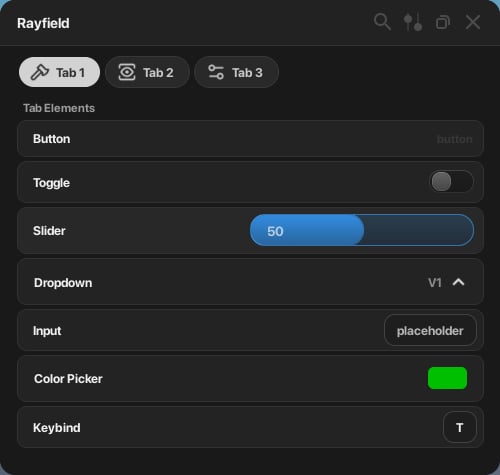 |
| Amber Glow | `AmberGlow` | 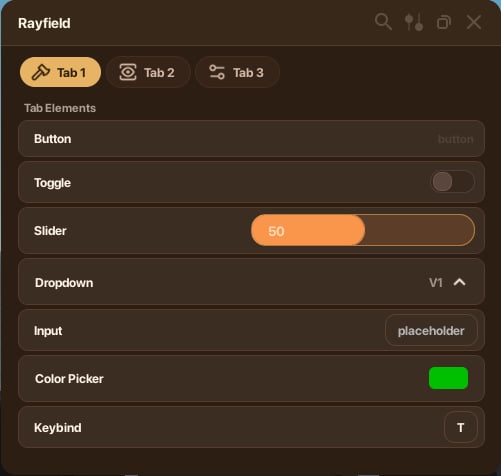 |
| Amethyst | `Amethyst` | 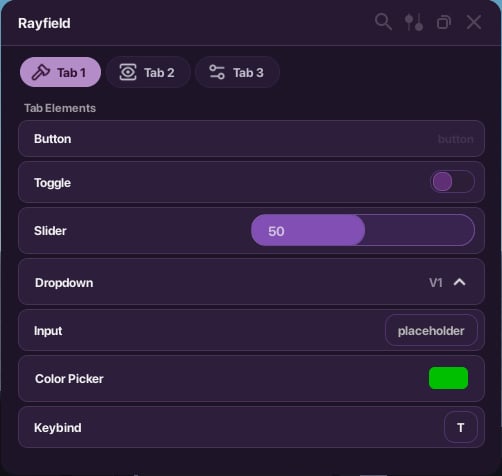 |
| Bloom | `Bloom` | 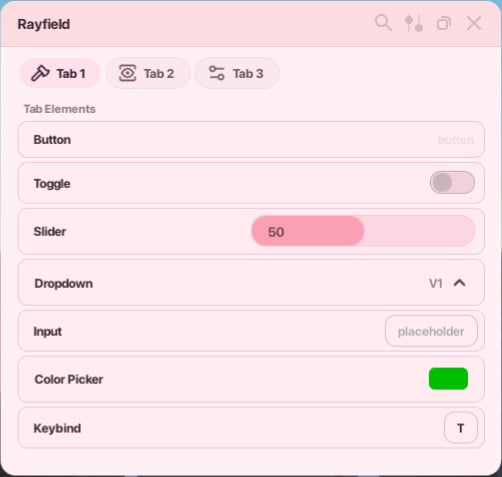 |
| Dark Blue | `DarkBlue` | 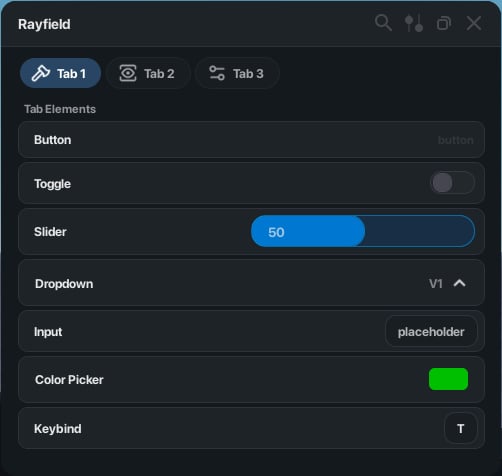 |
| Green | `Green` | 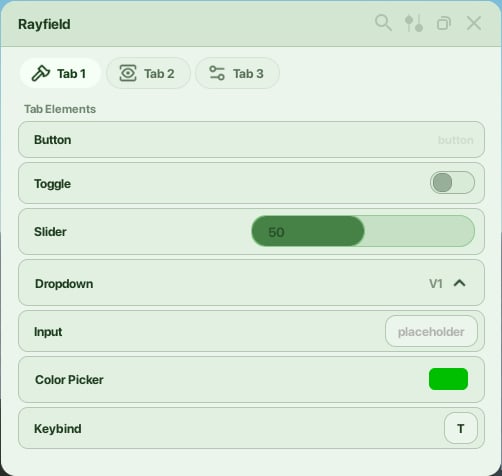 |
| Light | `Light` | 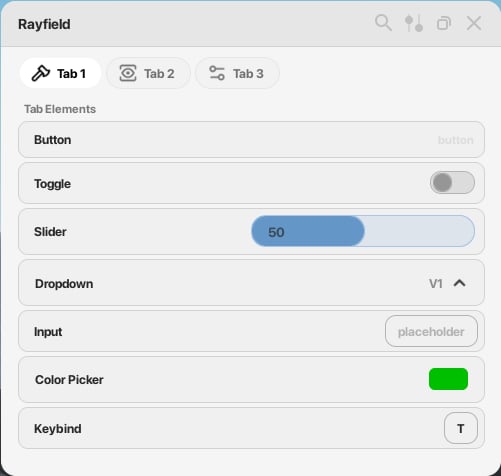 |
| Ocean | `Ocean` | 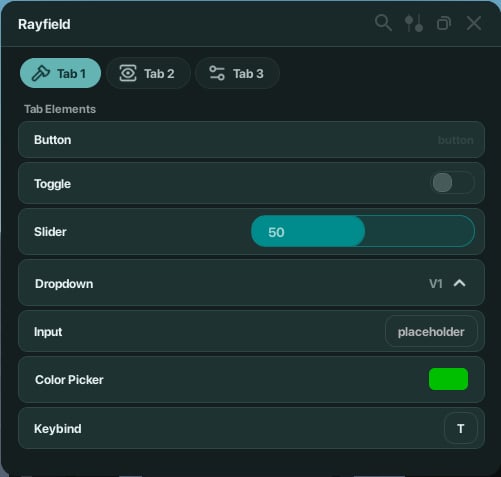 |
| Serenity | `Serenity` | 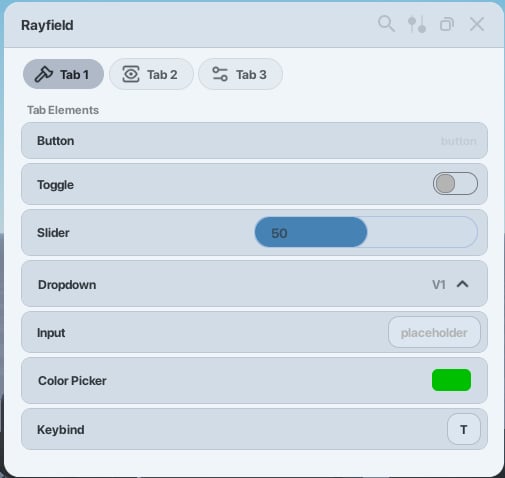 |
* * *
[](https://docs.sirius.menu/rayfield/themes#custom-themes)
Custom themes
----------------------------------------------------------------------------
You can define your own theme as of Rayfield 1.53. Pass a theme table in place of a theme identifier string in either `ModifyTheme` or `CreateWindow`.
{
TextColor = Color3.fromRGB(240, 240, 240),
Background = Color3.fromRGB(25, 25, 25),
Topbar = Color3.fromRGB(34, 34, 34),
Shadow = Color3.fromRGB(20, 20, 20),
NotificationBackground = Color3.fromRGB(20, 20, 20),
NotificationActionsBackground = Color3.fromRGB(230, 230, 230),
TabBackground = Color3.fromRGB(80, 80, 80),
TabStroke = Color3.fromRGB(85, 85, 85),
TabBackgroundSelected = Color3.fromRGB(210, 210, 210),
TabTextColor = Color3.fromRGB(240, 240, 240),
SelectedTabTextColor = Color3.fromRGB(50, 50, 50),
ElementBackground = Color3.fromRGB(35, 35, 35),
ElementBackgroundHover = Color3.fromRGB(40, 40, 40),
SecondaryElementBackground = Color3.fromRGB(25, 25, 25),
ElementStroke = Color3.fromRGB(50, 50, 50),
SecondaryElementStroke = Color3.fromRGB(40, 40, 40),
SliderBackground = Color3.fromRGB(50, 138, 220),
SliderProgress = Color3.fromRGB(50, 138, 220),
SliderStroke = Color3.fromRGB(58, 163, 255),
ToggleBackground = Color3.fromRGB(30, 30, 30),
ToggleEnabled = Color3.fromRGB(0, 146, 214),
ToggleDisabled = Color3.fromRGB(100, 100, 100),
ToggleEnabledStroke = Color3.fromRGB(0, 170, 255),
ToggleDisabledStroke = Color3.fromRGB(125, 125, 125),
ToggleEnabledOuterStroke = Color3.fromRGB(100, 100, 100),
ToggleDisabledOuterStroke = Color3.fromRGB(65, 65, 65),
DropdownSelected = Color3.fromRGB(40, 40, 40),
DropdownUnselected = Color3.fromRGB(30, 30, 30),
InputBackground = Color3.fromRGB(30, 30, 30),
InputStroke = Color3.fromRGB(65, 65, 65),
PlaceholderColor = Color3.fromRGB(178, 178, 178)
}
[Suggest edits](https://github.com/siriussoftwareltd/docs/edit/main/rayfield/themes.mdx)
[Raise issue](https://github.com/siriussoftwareltd/docs/issues/new?title=Issue%20on%20docs&body=Path:%20/rayfield/themes)
[Text elements](https://docs.sirius.menu/rayfield/elements/text)
[Anti-detection](https://docs.sirius.menu/rayfield/anti-detection)
⌘I
---
# Windows - Developer Suite
> Documentation Index
> -------------------
>
> Fetch the complete documentation index at: [/llms.txt](https://docs.sirius.menu/llms.txt)
>
> Use this file to discover all available pages before exploring further.
[Skip to main content](https://docs.sirius.menu/rayfield/windows#content-area)
**Share your script with the community.**Publish your script on [RoScripts](https://roscripts.io/)
so players can find your script.
[](https://docs.sirius.menu/rayfield/windows#create-a-window)
Create a window
---------------------------------------------------------------------------------
`Rayfield:CreateWindow()` is the entry point for your UI. Call it once after loading the library.
local Window = Rayfield:CreateWindow({
Name = "Rayfield Example Window",
Icon = 0, -- Icon in Topbar. Can use Lucide Icons (string) or Roblox Image (number). 0 to use no icon (default).
LoadingTitle = "Rayfield Interface Suite",
LoadingSubtitle = "by Sirius",
ShowText = "Rayfield", -- for mobile users to unhide Rayfield, change if you'd like
Theme = "Default", -- Check https://docs.sirius.menu/rayfield/configuration/themes
ToggleUIKeybind = "K", -- The keybind to toggle the UI visibility (string like "K" or Enum.KeyCode)
DisableRayfieldPrompts = false,
DisableBuildWarnings = false, -- Prevents Rayfield from emitting warnings when the script has a version mismatch with the interface.
-- ScriptID = "sid_xxxxxxxxxxxx", -- Your Script ID from developer.sirius.menu — enables analytics, managed keys, and script hosting
ConfigurationSaving = {
Enabled = true,
FolderName = nil, -- Create a custom folder for your hub/game
FileName = "Big Hub"
},
Discord = {
Enabled = false, -- Prompt the user to join your Discord server if their executor supports it
Invite = "noinvitelink", -- The Discord invite code, do not include Discord.gg/. E.g. Discord.gg/ABCD would be ABCD
RememberJoins = true -- Set this to false to make them join the Discord every time they load it up
},
KeySystem = false, -- Set this to true to use our key system
KeySettings = {
Title = "Untitled",
Subtitle = "Key System",
Note = "No method of obtaining the key is provided", -- Use this to tell the user how to get a key
FileName = "Key", -- It is recommended to use something unique, as other scripts using Rayfield may overwrite your key file
SaveKey = true, -- The user's key will be saved, but if you change the key, they will be unable to use your script
GrabKeyFromSite = false, -- If this is true, set Key below to the RAW site you would like Rayfield to get the key from
Key = {"Hello"} -- List of keys that the system will accept, can be RAW file links (pastebin, github, etc.) or simple strings ("hello", "key22")
}
})
###
[](https://docs.sirius.menu/rayfield/windows#options)
Options
[](https://docs.sirius.menu/rayfield/windows#param-name)
Name
string
required
The title displayed in the window header.
[](https://docs.sirius.menu/rayfield/windows#param-icon)
Icon
number | string
Icon shown in the topbar. Pass a Roblox image ID (number), a Lucide icon name (string), or `0` for no icon.
[](https://docs.sirius.menu/rayfield/windows#param-loading-title)
LoadingTitle
string
Title shown on the loading screen.
[](https://docs.sirius.menu/rayfield/windows#param-loading-subtitle)
LoadingSubtitle
string
Subtitle shown on the loading screen.
[](https://docs.sirius.menu/rayfield/windows#param-show-text)
ShowText
string
Text shown to mobile users to unhide the UI.
[](https://docs.sirius.menu/rayfield/windows#param-theme)
Theme
string | table
The theme to apply. Pass a theme identifier string or a custom theme table. See [Themes](https://docs.sirius.menu/rayfield/themes)
.
[](https://docs.sirius.menu/rayfield/windows#param-toggle-ui-keybind)
ToggleUIKeybind
string | Enum.KeyCode
The key that toggles UI visibility.
[](https://docs.sirius.menu/rayfield/windows#param-disable-rayfield-prompts)
DisableRayfieldPrompts
boolean
Suppresses built-in Rayfield prompts.
[](https://docs.sirius.menu/rayfield/windows#param-disable-build-warnings)
DisableBuildWarnings
boolean
Prevents Rayfield from emitting warnings when there is a version mismatch between your script and the interface.
[](https://docs.sirius.menu/rayfield/windows#param-script-id)
ScriptID
string
Your Script ID from the [Sirius Developer Platform](https://developer.sirius.menu/)
. Connects your script to the platform for analytics, managed keys, and hosted script delivery. Create a project at [developer.sirius.menu](https://developer.sirius.menu/)
to get your Script ID.
[](https://docs.sirius.menu/rayfield/windows#param-configuration-saving)
ConfigurationSaving
object
Controls automatic configuration saving.
Show ConfigurationSaving options
[](https://docs.sirius.menu/rayfield/windows#param-enabled)
Enabled
boolean
Enables configuration saving.
[](https://docs.sirius.menu/rayfield/windows#param-folder-name)
FolderName
string | nil
Custom folder name for saved config files. Leave `nil` to use the default.
[](https://docs.sirius.menu/rayfield/windows#param-file-name)
FileName
string
The name of the saved config file.
[](https://docs.sirius.menu/rayfield/windows#param-discord)
Discord
object
Prompts the user to join your Discord server on supported executors.
Show Discord options
[](https://docs.sirius.menu/rayfield/windows#param-enabled-1)
Enabled
boolean
Enables the Discord join prompt.
[](https://docs.sirius.menu/rayfield/windows#param-invite)
Invite
string
Your Discord invite code, without `discord.gg/`. For example, `discord.gg/ABCD` → `"ABCD"`.
[](https://docs.sirius.menu/rayfield/windows#param-remember-joins)
RememberJoins
boolean
When `true`, the user is only prompted once. When `false`, they are prompted every load.
The key system UI loads a detectable Roblox model. [Secure Mode](https://docs.sirius.menu/rayfield/secure-mode)
blocks the key UI entirely. Users without a saved key from a previous session won’t be able to load the script.
[](https://docs.sirius.menu/rayfield/windows#param-key-system)
KeySystem
boolean
Enables the key system. Configure it with `KeySettings`.
[](https://docs.sirius.menu/rayfield/windows#param-key-settings)
KeySettings
object
Settings for the key system. Only used when `KeySystem` is `true`.
Show KeySettings options
[](https://docs.sirius.menu/rayfield/windows#param-title)
Title
string
Title displayed on the key prompt.
[](https://docs.sirius.menu/rayfield/windows#param-subtitle)
Subtitle
string
Subtitle displayed on the key prompt.
[](https://docs.sirius.menu/rayfield/windows#param-note)
Note
string
Instructions for obtaining the key, shown to the user.
[](https://docs.sirius.menu/rayfield/windows#param-file-name-1)
FileName
string
File name used to save the key locally. Use something unique to avoid conflicts with other Rayfield scripts.
[](https://docs.sirius.menu/rayfield/windows#param-save-key)
SaveKey
boolean
When `true`, the user’s key is saved so they don’t need to re-enter it. Note: changing the key will invalidate saved keys.
[](https://docs.sirius.menu/rayfield/windows#param-grab-key-from-site)
GrabKeyFromSite
boolean
When `true`, Rayfield fetches the key from the URL specified in `Key`.
[](https://docs.sirius.menu/rayfield/windows#param-key)
Key
table
A list of accepted keys (strings), or RAW file URLs (Pastebin, GitHub, etc.) when `GrabKeyFromSite` is `true`.
Looking for server-validated keys with ad-gated delivery? The [Sirius Developer Platform](https://developer.sirius.menu/)
offers a managed key system with user-hash locking, per-key watermarks, and ad provider integration — available on all plans including Free.
* * *
[](https://docs.sirius.menu/rayfield/windows#create-a-tab)
Create a tab
---------------------------------------------------------------------------
Tabs are the top-level sections inside a window. Each tab can hold its own elements.
local Tab = Window:CreateTab("Tab Example", 4483362458) -- Title, Image
###
[](https://docs.sirius.menu/rayfield/windows#lucide-icon-support)
Lucide icon support
You can use a [Lucide icon](https://lucide.dev/icons/)
name in place of a Roblox image ID.
local Tab = Window:CreateTab("Tab Example", "rewind")
Not all Lucide icons are supported. See the [full list of supported icons](https://github.com/latte-soft/lucide-roblox/tree/master/icons/compiled/48px)
. Credit to [Lucide](https://lucide.dev/)
and [Latte Softworks](https://github.com/latte-soft/)
.
Lucide icons and Roblox image IDs are detectable by game anti-cheats. If you need your script to be undetectable, use `getcustomasset()` instead. See [Secure Mode](https://docs.sirius.menu/rayfield/secure-mode)
for details.
* * *
[](https://docs.sirius.menu/rayfield/windows#create-a-section)
Create a section
-----------------------------------------------------------------------------------
Sections add a labelled group header inside a tab.
local Section = Tab:CreateSection("Section Example")
###
[](https://docs.sirius.menu/rayfield/windows#update-a-section)
Update a section
Section:Set("Section Example")
* * *
[](https://docs.sirius.menu/rayfield/windows#create-a-divider)
Create a divider
-----------------------------------------------------------------------------------
Dividers add a horizontal rule inside a tab to visually separate content.
local Divider = Tab:CreateDivider()
###
[](https://docs.sirius.menu/rayfield/windows#update-a-divider)
Update a divider
Divider:Set(false) -- Whether the divider's visibility is to be set to true or false.
* * *
[](https://docs.sirius.menu/rayfield/windows#visibility)
Visibility
-----------------------------------------------------------------------
###
[](https://docs.sirius.menu/rayfield/windows#set-visibility)
Set visibility
Rayfield:SetVisibility(false)
###
[](https://docs.sirius.menu/rayfield/windows#get-visibility)
Get visibility
Rayfield:IsVisible()
* * *
[](https://docs.sirius.menu/rayfield/windows#destroy-the-interface)
Destroy the interface
---------------------------------------------------------------------------------------------
Rayfield:Destroy()
[Suggest edits](https://github.com/siriussoftwareltd/docs/edit/main/rayfield/windows.mdx)
[Raise issue](https://github.com/siriussoftwareltd/docs/issues/new?title=Issue%20on%20docs&body=Path:%20/rayfield/windows)
[Loading the library](https://docs.sirius.menu/rayfield/getting-started)
[Notifications](https://docs.sirius.menu/rayfield/notifications)
⌘I
---
# Authentication - Developer Suite
> Documentation Index
> -------------------
>
> Fetch the complete documentation index at: [/llms.txt](https://docs.sirius.menu/llms.txt)
>
> Use this file to discover all available pages before exploring further.
[Skip to main content](https://docs.sirius.menu/scripts-api/authentication#content-area)
The RoScripts API is **open by default** — you can call every endpoint anonymously, rate-limited by IP. An API key is optional and does one thing: it raises your limits.
Anonymous
---------
No key. Limited by IP. `max` page size capped at **20**. Perfect for trying things out and light traffic.
With a key
----------
Higher per-minute and per-day limits. `max` page size up to **100**. Best for hubs and production traffic.
[](https://docs.sirius.menu/scripts-api/authentication#getting-a-key)
Getting a key
---------------------------------------------------------------------------------------
1
[](https://docs.sirius.menu/scripts-api/authentication#)
Sign in to RoScripts
Head to your [account settings](https://roscripts.io/account)
on roscripts.io. You’ll need a verified email.
2
[](https://docs.sirius.menu/scripts-api/authentication#)
Create an API key
Open the **API keys** section and click **Create key**. Give it a name you’ll recognise (e.g. “my-hub-prod”).
3
[](https://docs.sirius.menu/scripts-api/authentication#)
Copy it once
The full key is shown **exactly once**, at creation. Store it somewhere safe — we only keep a hash, so we can’t show it again.
[](https://docs.sirius.menu/scripts-api/authentication#using-a-key)
Using a key
-----------------------------------------------------------------------------------
Send it as a Bearer token in the `Authorization` header:
cURL
JavaScript
Luau
curl "https://api.roscripts.io/v1/scripts?max=100" \
-H "Authorization: Bearer rk_live_xxxxxxxxxxxxxxxx"
const res = await fetch("https://api.roscripts.io/v1/scripts?max=100", {
headers: { Authorization: "Bearer rk_live_xxxxxxxxxxxxxxxx" },
});
local res = game:HttpGet("https://api.roscripts.io/v1/scripts?max=100")
-- Most executors can't set custom headers on HttpGet; for keyed requests
-- use request()/http_request if your executor exposes it:
local r = request({
Url = "https://api.roscripts.io/v1/scripts?max=100",
Method = "GET",
Headers = { Authorization = "Bearer rk_live_xxxxxxxxxxxxxxxx" },
})
Treat your key like a password. Don’t ship it in client-side JavaScript or commit it to a public repo. If a key leaks, revoke it from your [account settings](https://roscripts.io/account)
and create a new one — revocation takes effect within seconds.
[](https://docs.sirius.menu/scripts-api/authentication#how-keys-are-stored)
How keys are stored
---------------------------------------------------------------------------------------------------
We store only a SHA-256 hash of your key, never the raw value — the same way password-reset tokens are handled across Sirius. A database leak can’t be turned into working keys. The trade-off: we genuinely cannot recover a lost key, so keep it safe and rotate if in doubt.
[](https://docs.sirius.menu/scripts-api/authentication#tiers)
Tiers
-----------------------------------------------------------------------
| Tier | How to get it | Page-size cap (`max`) |
| --- | --- | --- |
| **Anonymous** | Nothing — just call the API | 20 |
| **Free key** | Create one in account settings | 100 |
| **Partner** | [Contact us](https://discord.gg/KQ4kwzA87s)
for high-volume access | 100 |
See [Rate limits](https://docs.sirius.menu/scripts-api/rate-limits)
for the exact request budgets per tier.
An invalid or revoked key never hard-fails your request — the API simply treats you as anonymous and applies anonymous limits. So a rotated key degrades gracefully instead of returning `401`.
[Suggest edits](https://github.com/siriussoftwareltd/docs/edit/main/scripts-api/authentication.mdx)
[Raise issue](https://github.com/siriussoftwareltd/docs/issues/new?title=Issue%20on%20docs&body=Path:%20/scripts-api/authentication)
[RoScripts API](https://docs.sirius.menu/scripts-api)
[Rate limits](https://docs.sirius.menu/scripts-api/rate-limits)
⌘I
---
# Creators - Developer Suite
> Documentation Index
> -------------------
>
> Fetch the complete documentation index at: [/llms.txt](https://docs.sirius.menu/llms.txt)
>
> Use this file to discover all available pages before exploring further.
[Skip to main content](https://docs.sirius.menu/scripts-api/endpoints/owners#content-area)
[](https://docs.sirius.menu/scripts-api/endpoints/owners#creator-profile)
Creator profile
---------------------------------------------------------------------------------------------
GET https://api.roscripts.io/v1/owners/{username}
Public profile and aggregate stats for a creator. We never expose internal user ids or emails.
[](https://docs.sirius.menu/scripts-api/endpoints/owners#param-username)
username
string
required
The creator’s username.
{
"result": {
"owner": {
"username": "somedev",
"verified": true,
"pro": true,
"avatar": "https://…",
"scriptCount": 12,
"totalViews": 482301,
"totalLikes": 9120
}
}
}
Returns `404` if the creator doesn’t exist.
* * *
[](https://docs.sirius.menu/scripts-api/endpoints/owners#creator%E2%80%99s-scripts)
Creator’s scripts
---------------------------------------------------------------------------------------------------------
GET https://api.roscripts.io/v1/owners/{username}/scripts
That creator’s live scripts, with the full [filter + sort + pagination](https://docs.sirius.menu/scripts-api/endpoints/list#query-parameters)
set. Defaults to `sortBy=score`.
curl "https://api.roscripts.io/v1/owners/somedev/scripts?sortBy=views&max=20"
{
"result": {
"owner": "somedev",
"scripts": [ { "id": "lst_…", "title": "…", "loadstring": "https://script.roscripts.io/…" } ],
"page": 1, "max": 20, "total": 12, "totalPages": 1, "nextPage": null
},
"meta": { "page": 1, "max": 20, "total": 12, "totalPages": 1, "nextPage": null, "nextCursor": null }
}
[Suggest edits](https://github.com/siriussoftwareltd/docs/edit/main/scripts-api/endpoints/owners.mdx)
[Raise issue](https://github.com/siriussoftwareltd/docs/issues/new?title=Issue%20on%20docs&body=Path:%20/scripts-api/endpoints/owners)
[Games](https://docs.sirius.menu/scripts-api/endpoints/games)
[Suggest, stats & health](https://docs.sirius.menu/scripts-api/endpoints/misc)
⌘I
---
# Games - Developer Suite
> Documentation Index
> -------------------
>
> Fetch the complete documentation index at: [/llms.txt](https://docs.sirius.menu/llms.txt)
>
> Use this file to discover all available pages before exploring further.
[Skip to main content](https://docs.sirius.menu/scripts-api/endpoints/games#content-area)
[](https://docs.sirius.menu/scripts-api/endpoints/games#game-directory)
Game directory
------------------------------------------------------------------------------------------
GET https://api.roscripts.io/v1/games
Lists every game that has at least one live script, ordered by 30-day view volume.
[](https://docs.sirius.menu/scripts-api/endpoints/games#param-page)
page
integer
default:"1"
[](https://docs.sirius.menu/scripts-api/endpoints/games#param-max)
max
integer
default:"50"
Up to 200.
{
"result": {
"games": [\
{ "placeId": 2753915549, "name": "Blox Fruits", "image": "https://…", "scriptCount": 64, "views": 182304 }\
],
"page": 1, "max": 50, "total": 1208, "totalPages": 25, "nextPage": 2
}
}
* * *
[](https://docs.sirius.menu/scripts-api/endpoints/games#game-info)
Game info
--------------------------------------------------------------------------------
GET https://api.roscripts.io/v1/games/{placeId}
[](https://docs.sirius.menu/scripts-api/endpoints/games#param-place-id)
placeId
integer
required
Roblox place id.
{ "result": { "game": { "placeId": 2753915549, "name": "Blox Fruits", "image": "https://…", "scriptCount": 64, "views": 182304 } } }
Returns `404` if no live scripts exist for that game.
* * *
[](https://docs.sirius.menu/scripts-api/endpoints/games#scripts-for-a-game)
Scripts for a game
--------------------------------------------------------------------------------------------------
GET https://api.roscripts.io/v1/games/{placeId}/scripts
Returns scripts attached to a game, with the full [filter + sort + pagination](https://docs.sirius.menu/scripts-api/endpoints/list#query-parameters)
set. Defaults to `sortBy=score`.
curl "https://api.roscripts.io/v1/games/2753915549/scripts?key=0&sortBy=score&max=20"
{
"result": {
"placeId": 2753915549,
"scripts": [ { "id": "lst_…", "title": "…", "loadstring": "https://script.roscripts.io/…" } ],
"page": 1, "max": 20, "total": 64, "totalPages": 4, "nextPage": 2, "nextCursor": "eyJ2…"
},
"meta": { "page": 1, "max": 20, "total": 64, "totalPages": 4, "nextPage": 2, "nextCursor": "eyJ2…" }
}
[Suggest edits](https://github.com/siriussoftwareltd/docs/edit/main/scripts-api/endpoints/games.mdx)
[Raise issue](https://github.com/siriussoftwareltd/docs/issues/new?title=Issue%20on%20docs&body=Path:%20/scripts-api/endpoints/games)
[Batch resolve](https://docs.sirius.menu/scripts-api/endpoints/batch)
[Creators](https://docs.sirius.menu/scripts-api/endpoints/owners)
⌘I
---
# Suggest, stats & health - Developer Suite
> Documentation Index
> -------------------
>
> Fetch the complete documentation index at: [/llms.txt](https://docs.sirius.menu/llms.txt)
>
> Use this file to discover all available pages before exploring further.
[Skip to main content](https://docs.sirius.menu/scripts-api/endpoints/misc#content-area)
[](https://docs.sirius.menu/scripts-api/endpoints/misc#suggest-autocomplete)
Suggest (autocomplete)
-------------------------------------------------------------------------------------------------------
GET https://api.roscripts.io/v1/suggest?q={q}
Lightweight autocomplete for search boxes — returns matching titles, tags, and games. Much cheaper than full search; use it for typeahead.
[](https://docs.sirius.menu/scripts-api/endpoints/misc#param-q)
q
string
required
At least 2 characters.
[](https://docs.sirius.menu/scripts-api/endpoints/misc#param-max)
max
integer
default:"8"
Up to 15 per group.
{
"result": {
"titles": ["Blox Fruits Hub", "Blox Fruits Auto Farm"],
"tags": ["blox-fruits"],
"games": [{ "placeId": 2753915549, "name": "Blox Fruits" }]
}
}
* * *
[](https://docs.sirius.menu/scripts-api/endpoints/misc#trending-searches)
Trending searches
-----------------------------------------------------------------------------------------------
GET https://api.roscripts.io/v1/trending/searches
The most popular search queries over the last 7 days — great for a “trending” strip.
[](https://docs.sirius.menu/scripts-api/endpoints/misc#param-max-1)
max
integer
default:"20"
Up to 50.
{ "result": { "queries": [ { "query": "blox fruits", "count": 1843 }, { "query": "fisch", "count": 1210 } ] } }
* * *
[](https://docs.sirius.menu/scripts-api/endpoints/misc#catalogue-stats)
Catalogue stats
-------------------------------------------------------------------------------------------
GET https://api.roscripts.io/v1/stats
Catalogue-wide totals.
{
"result": { "scripts": 41203, "games": 1208, "verifiedScripts": 5821, "freeScripts": 39740, "paidScripts": 1463 }
}
* * *
[](https://docs.sirius.menu/scripts-api/endpoints/misc#health)
Health
-------------------------------------------------------------------------
GET https://api.roscripts.io/v1/health
Liveness check with a database ping. Never cached. Returns `200` when healthy, `503` when degraded.
{ "result": { "status": "ok", "db": true, "time": "2026-05-31T23:00:00Z" } }
* * *
[](https://docs.sirius.menu/scripts-api/endpoints/misc#openapi-spec)
OpenAPI spec
-------------------------------------------------------------------------------------
GET https://api.roscripts.io/v1/openapi.json
The full machine-readable [OpenAPI 3.1](https://spec.openapis.org/oas/v3.1.0)
description of the API — point Swagger UI, Postman, or a code generator at it.
[Suggest edits](https://github.com/siriussoftwareltd/docs/edit/main/scripts-api/endpoints/misc.mdx)
[Raise issue](https://github.com/siriussoftwareltd/docs/issues/new?title=Issue%20on%20docs&body=Path:%20/scripts-api/endpoints/misc)
[Creators](https://docs.sirius.menu/scripts-api/endpoints/owners)
⌘I
---
# Best practices - Developer Suite
> Documentation Index
> -------------------
>
> Fetch the complete documentation index at: [/llms.txt](https://docs.sirius.menu/llms.txt)
>
> Use this file to discover all available pages before exploring further.
[Skip to main content](https://docs.sirius.menu/scripts-api/best-practices#content-area)
Follow these and your integration will be fast, cheap, and resilient — and you’ll almost never see a `429`.
[](https://docs.sirius.menu/scripts-api/best-practices#cache-everything)
Cache everything
---------------------------------------------------------------------------------------------
The single biggest win. Responses are served from Cloudflare’s edge and carry `Cache-Control` + `ETag`. You should layer your own cache on top.
Respect Cache-Control
---------------------
Trending changes slowly (5 min), detail pages medium (1 min), lists fast (30 s). Don’t re-fetch inside those windows.
Use ETags
---------
Store the `ETag` and send `If-None-Match`. A `304` is free — it doesn’t count against your rate limit.
const cache = new Map(); // url -> { etag, body }
async function getCached(url) {
const prev = cache.get(url);
const res = await fetch(url, prev ? { headers: { "If-None-Match": prev.etag } } : {});
if (res.status === 304) return prev.body;
const body = await res.json();
cache.set(url, { etag: res.headers.get("etag"), body });
return body;
}
[](https://docs.sirius.menu/scripts-api/best-practices#sync-don%E2%80%99t-re-scrape)
Sync, don’t re-scrape
--------------------------------------------------------------------------------------------------------------
If you maintain a local copy of the catalogue, **never** re-page through everything on a schedule. Pull only what changed:
1
[](https://docs.sirius.menu/scripts-api/best-practices#)
Do one full backfill
Page through `GET /v1/scripts` with `sortBy=updatedAt&order=asc` using `cursor`, storing each script and the max `updatedAt` you see.
2
[](https://docs.sirius.menu/scripts-api/best-practices#)
Then sync deltas
On a timer, call `GET /v1/scripts?updatedSince=&sortBy=updatedAt&order=asc` and upsert the results. Advance `lastSeen` to the new max `updatedAt`.
3
[](https://docs.sirius.menu/scripts-api/best-practices#)
Resolve specifics in bulk
Need to refresh a known set (e.g. the scripts a user saved)? Use [`POST /v1/scripts/batch`](https://docs.sirius.menu/scripts-api/endpoints/batch)
instead of one request per script.
[](https://docs.sirius.menu/scripts-api/best-practices#execute-with-loadstring)
Execute with `loadstring`
-------------------------------------------------------------------------------------------------------------
Every script returns a `loadstring` URL — a stable, separately-cached execution endpoint at `script.roscripts.io`. Use it directly rather than fetching raw source and reconstructing the loader:
loadstring(game:HttpGet(script.loadstring))()
Only call `loadstring` on scripts the user explicitly chose to run, and surface the script’s `key` and `patched` flags first. Never auto-execute search results.
[](https://docs.sirius.menu/scripts-api/best-practices#filter-server-side)
Filter server-side
-------------------------------------------------------------------------------------------------
Push filters into the query instead of fetching broadly and filtering on the client — it’s faster, cheaper, and paginates correctly:
# Good — let the API do the work
curl "https://api.roscripts.io/v1/scripts?placeId=2753915549&key=0&verified=1&sortBy=views"
Combine `mode`, `key`, `universal`, `verified`, `patched`, `placeId`, `game`, `tag`, `ui`, `owner`, `minViews`, and `hasThumbnail` freely. See the [list endpoint](https://docs.sirius.menu/scripts-api/endpoints/list)
.
[](https://docs.sirius.menu/scripts-api/best-practices#trim-payloads-with-fields)
Trim payloads with `fields`
-----------------------------------------------------------------------------------------------------------------
Only need a few fields for a list view? Ask for them:
curl "https://api.roscripts.io/v1/scripts?fields=id,title,slug,image,loadstring&max=50"
`id` is always included so you can correlate results.
[](https://docs.sirius.menu/scripts-api/best-practices#show-quality-signals)
Show quality signals
-----------------------------------------------------------------------------------------------------
The catalogue carries trust signals — surface them so users make good choices:
| Field | Show it as |
| --- | --- |
| `verified` | A verified-creator badge |
| `key` | A “key system” warning before execution |
| `patched` | A “may be patched” flag |
| `scriptType: "paid"` | A price/marketplace link (no raw source) |
| `score`, `likeCount`, `views` | Sort + social proof |
[](https://docs.sirius.menu/scripts-api/best-practices#fail-gracefully)
Fail gracefully
-------------------------------------------------------------------------------------------
Branch on error codes
---------------------
Switch on the stable `error.code`, not the human message. See [Errors](https://docs.sirius.menu/scripts-api/errors)
.
Back off on 429/503
-------------------
Honour `Retry-After`. Retry a handful of times with delay, then surface a friendly message.
[](https://docs.sirius.menu/scripts-api/best-practices#set-a-descriptive-user-agent)
Set a descriptive User-Agent
---------------------------------------------------------------------------------------------------------------------
Identify your app (e.g. `MyHub/2.1 (+https://myhub.example)`). It helps us help you if something looks off, and keeps you clear of generic-bot heuristics.
[](https://docs.sirius.menu/scripts-api/best-practices#don%E2%80%99t)
Don’t
-------------------------------------------------------------------------------
Don't poll tight loops for 'live' data
The catalogue isn’t real-time. Polling `trending` every second just burns your budget and serves you cached data anyway. Poll on the order of minutes.
Don't bulk-download raw source
The `/raw` endpoint is rate-limited harder and is for fetching the occasional script a user opened — not for mirroring source en masse.
Don't ship your API key to clients
Keys belong on a server. If you must call from a client, do it anonymously or proxy through your backend.
Don't assume the response shape is fixed forever
We add fields over time. Parse defensively, ignore unknown fields, and never index by position.
[Suggest edits](https://github.com/siriussoftwareltd/docs/edit/main/scripts-api/best-practices.mdx)
[Raise issue](https://github.com/siriussoftwareltd/docs/issues/new?title=Issue%20on%20docs&body=Path:%20/scripts-api/best-practices)
[Errors](https://docs.sirius.menu/scripts-api/errors)
[Examples](https://docs.sirius.menu/scripts-api/examples)
⌘I
---
# Batch resolve - Developer Suite
> Documentation Index
> -------------------
>
> Fetch the complete documentation index at: [/llms.txt](https://docs.sirius.menu/llms.txt)
>
> Use this file to discover all available pages before exploring further.
[Skip to main content](https://docs.sirius.menu/scripts-api/endpoints/batch#content-area)
Batch resolve
cURL
curl --request POST \
--url https://api.roscripts.io/v1/scripts/batch \
--header 'Content-Type: application/json' \
--data '
{
"refs": [\
""\
]
}
'
import requestsurl = "https://api.roscripts.io/v1/scripts/batch"payload = { "refs": [""] }headers = {"Content-Type": "application/json"}response = requests.post(url, json=payload, headers=headers)print(response.text)
const options = { method: 'POST', headers: {'Content-Type': 'application/json'}, body: JSON.stringify({refs: ['']})};fetch('https://api.roscripts.io/v1/scripts/batch', options) .then(res => res.json()) .then(res => console.log(res)) .catch(err => console.error(err));
"https://api.roscripts.io/v1/scripts/batch", CURLOPT_RETURNTRANSFER => true, CURLOPT_ENCODING => "", CURLOPT_MAXREDIRS => 10, CURLOPT_TIMEOUT => 30, CURLOPT_HTTP_VERSION => CURL_HTTP_VERSION_1_1, CURLOPT_CUSTOMREQUEST => "POST", CURLOPT_POSTFIELDS => json_encode([ 'refs' => [ '' ] ]), CURLOPT_HTTPHEADER => [ "Content-Type: application/json" ],]);$response = curl_exec($curl);$err = curl_error($curl);curl_close($curl);if ($err) { echo "cURL Error #:" . $err;} else { echo $response;}
package mainimport ( "fmt" "strings" "net/http" "io")func main() { url := "https://api.roscripts.io/v1/scripts/batch" payload := strings.NewReader("{\n \"refs\": [\n \"\"\n ]\n}") req, _ := http.NewRequest("POST", url, payload) req.Header.Add("Content-Type", "application/json") res, _ := http.DefaultClient.Do(req) defer res.Body.Close() body, _ := io.ReadAll(res.Body) fmt.Println(string(body))}
HttpResponse response = Unirest.post("https://api.roscripts.io/v1/scripts/batch") .header("Content-Type", "application/json") .body("{\n \"refs\": [\n \"\"\n ]\n}") .asString();
require 'uri'require 'net/http'url = URI("https://api.roscripts.io/v1/scripts/batch")http = Net::HTTP.new(url.host, url.port)http.use_ssl = truerequest = Net::HTTP::Post.new(url)request["Content-Type"] = 'application/json'request.body = "{\n \"refs\": [\n \"\"\n ]\n}"response = http.request(request)puts response.read_body
200
{
"result.scripts": [\
{}\
],
"result.missing": [\
""\
],
"result.count": 123
}
POST
/
v1
/
scripts
/
batch
Try it
Batch resolve
cURL
curl --request POST \
--url https://api.roscripts.io/v1/scripts/batch \
--header 'Content-Type: application/json' \
--data '
{
"refs": [\
""\
]
}
'
import requestsurl = "https://api.roscripts.io/v1/scripts/batch"payload = { "refs": [""] }headers = {"Content-Type": "application/json"}response = requests.post(url, json=payload, headers=headers)print(response.text)
const options = { method: 'POST', headers: {'Content-Type': 'application/json'}, body: JSON.stringify({refs: ['']})};fetch('https://api.roscripts.io/v1/scripts/batch', options) .then(res => res.json()) .then(res => console.log(res)) .catch(err => console.error(err));
"https://api.roscripts.io/v1/scripts/batch", CURLOPT_RETURNTRANSFER => true, CURLOPT_ENCODING => "", CURLOPT_MAXREDIRS => 10, CURLOPT_TIMEOUT => 30, CURLOPT_HTTP_VERSION => CURL_HTTP_VERSION_1_1, CURLOPT_CUSTOMREQUEST => "POST", CURLOPT_POSTFIELDS => json_encode([ 'refs' => [ '' ] ]), CURLOPT_HTTPHEADER => [ "Content-Type: application/json" ],]);$response = curl_exec($curl);$err = curl_error($curl);curl_close($curl);if ($err) { echo "cURL Error #:" . $err;} else { echo $response;}
package mainimport ( "fmt" "strings" "net/http" "io")func main() { url := "https://api.roscripts.io/v1/scripts/batch" payload := strings.NewReader("{\n \"refs\": [\n \"\"\n ]\n}") req, _ := http.NewRequest("POST", url, payload) req.Header.Add("Content-Type", "application/json") res, _ := http.DefaultClient.Do(req) defer res.Body.Close() body, _ := io.ReadAll(res.Body) fmt.Println(string(body))}
HttpResponse response = Unirest.post("https://api.roscripts.io/v1/scripts/batch") .header("Content-Type", "application/json") .body("{\n \"refs\": [\n \"\"\n ]\n}") .asString();
require 'uri'require 'net/http'url = URI("https://api.roscripts.io/v1/scripts/batch")http = Net::HTTP.new(url.host, url.port)http.use_ssl = truerequest = Net::HTTP::Post.new(url)request["Content-Type"] = 'application/json'request.body = "{\n \"refs\": [\n \"\"\n ]\n}"response = http.request(request)puts response.read_body
200
{
"result.scripts": [\
{}\
],
"result.missing": [\
""\
],
"result.count": 123
}
Resolve up to **20** scripts (or **100** with an API key) in one request by id, slug, or shortId. Ideal for refreshing a known set — a user’s saved list, a curated hub, a local cache.
curl -X POST "https://api.roscripts.io/v1/scripts/batch" \
-H "Content-Type: application/json" \
-d '{ "refs": ["blox-fruits-hub", "lst_9f2c…", "Ab3xK9q"] }'
[](https://docs.sirius.menu/scripts-api/endpoints/batch#body)
Body
----------------------------------------------------------------------
[](https://docs.sirius.menu/scripts-api/endpoints/batch#param-refs)
refs
string\[\]
required
Array of script ids, slugs, or shortIds. Max 20 anonymous, 100 with a key. Duplicates are de-duplicated.
[](https://docs.sirius.menu/scripts-api/endpoints/batch#response)
Response
------------------------------------------------------------------------------
[](https://docs.sirius.menu/scripts-api/endpoints/batch#param-result-scripts)
result.scripts
Script\[\]
The scripts that resolved (live only).
[](https://docs.sirius.menu/scripts-api/endpoints/batch#param-result-missing)
result.missing
string\[\]
Any refs that didn’t match a live script.
[](https://docs.sirius.menu/scripts-api/endpoints/batch#param-result-count)
result.count
number
Number of scripts returned.
{
"result": {
"scripts": [\
{ "id": "lst_…", "slug": "blox-fruits-hub", "loadstring": "https://script.roscripts.io/…" }\
],
"missing": ["Ab3xK9q"],
"count": 1
}
}
Batch is a `POST`, so it isn’t shared-cached at the edge. For browsing, prefer the cacheable `GET` list/search endpoints; reserve batch for resolving a specific known set.
[Suggest edits](https://github.com/siriussoftwareltd/docs/edit/main/scripts-api/endpoints/batch.mdx)
[Raise issue](https://github.com/siriussoftwareltd/docs/issues/new?title=Issue%20on%20docs&body=Path:%20/scripts-api/endpoints/batch)
[Get a script](https://docs.sirius.menu/scripts-api/endpoints/get)
[Games](https://docs.sirius.menu/scripts-api/endpoints/games)
⌘I
---
# Get a script - Developer Suite
> Documentation Index
> -------------------
>
> Fetch the complete documentation index at: [/llms.txt](https://docs.sirius.menu/llms.txt)
>
> Use this file to discover all available pages before exploring further.
[Skip to main content](https://docs.sirius.menu/scripts-api/endpoints/get#content-area)
Get a script
cURL
curl --request GET \
--url https://api.roscripts.io/v1/scripts/{ref}
import requestsurl = "https://api.roscripts.io/v1/scripts/{ref}"response = requests.get(url)print(response.text)
const options = {method: 'GET'};fetch('https://api.roscripts.io/v1/scripts/{ref}', options) .then(res => res.json()) .then(res => console.log(res)) .catch(err => console.error(err));
"https://api.roscripts.io/v1/scripts/{ref}", CURLOPT_RETURNTRANSFER => true, CURLOPT_ENCODING => "", CURLOPT_MAXREDIRS => 10, CURLOPT_TIMEOUT => 30, CURLOPT_HTTP_VERSION => CURL_HTTP_VERSION_1_1, CURLOPT_CUSTOMREQUEST => "GET",]);$response = curl_exec($curl);$err = curl_error($curl);curl_close($curl);if ($err) { echo "cURL Error #:" . $err;} else { echo $response;}
package mainimport ( "fmt" "net/http" "io")func main() { url := "https://api.roscripts.io/v1/scripts/{ref}" req, _ := http.NewRequest("GET", url, nil) res, _ := http.DefaultClient.Do(req) defer res.Body.Close() body, _ := io.ReadAll(res.Body) fmt.Println(string(body))}
HttpResponse response = Unirest.get("https://api.roscripts.io/v1/scripts/{ref}") .asString();
require 'uri'require 'net/http'url = URI("https://api.roscripts.io/v1/scripts/{ref}")http = Net::HTTP.new(url.host, url.port)http.use_ssl = truerequest = Net::HTTP::Get.new(url)response = http.request(request)puts response.read_body
200
{
"result.script": {},
"result.related": [\
{}\
]
}
GET
/
v1
/
scripts
/
{ref}
Try it
Get a script
cURL
curl --request GET \
--url https://api.roscripts.io/v1/scripts/{ref}
import requestsurl = "https://api.roscripts.io/v1/scripts/{ref}"response = requests.get(url)print(response.text)
const options = {method: 'GET'};fetch('https://api.roscripts.io/v1/scripts/{ref}', options) .then(res => res.json()) .then(res => console.log(res)) .catch(err => console.error(err));
"https://api.roscripts.io/v1/scripts/{ref}", CURLOPT_RETURNTRANSFER => true, CURLOPT_ENCODING => "", CURLOPT_MAXREDIRS => 10, CURLOPT_TIMEOUT => 30, CURLOPT_HTTP_VERSION => CURL_HTTP_VERSION_1_1, CURLOPT_CUSTOMREQUEST => "GET",]);$response = curl_exec($curl);$err = curl_error($curl);curl_close($curl);if ($err) { echo "cURL Error #:" . $err;} else { echo $response;}
package mainimport ( "fmt" "net/http" "io")func main() { url := "https://api.roscripts.io/v1/scripts/{ref}" req, _ := http.NewRequest("GET", url, nil) res, _ := http.DefaultClient.Do(req) defer res.Body.Close() body, _ := io.ReadAll(res.Body) fmt.Println(string(body))}
HttpResponse response = Unirest.get("https://api.roscripts.io/v1/scripts/{ref}") .asString();
require 'uri'require 'net/http'url = URI("https://api.roscripts.io/v1/scripts/{ref}")http = Net::HTTP.new(url.host, url.port)http.use_ssl = truerequest = Net::HTTP::Get.new(url)response = http.request(request)puts response.read_body
200
{
"result.script": {},
"result.related": [\
{}\
]
}
Resolve a single script by **id, slug, or shortId** — all three work in the same path:
curl "https://api.roscripts.io/v1/scripts/blox-fruits-hub"
curl "https://api.roscripts.io/v1/scripts/lst_9f2c4a1b7d6e5f0a1234abcd"
curl "https://api.roscripts.io/v1/scripts/Ab3xK9q"
[](https://docs.sirius.menu/scripts-api/endpoints/get#path-parameters)
Path parameters
------------------------------------------------------------------------------------------
[](https://docs.sirius.menu/scripts-api/endpoints/get#param-ref)
ref
string
required
The script’s `id`, `slug`, or `shortId`.
[](https://docs.sirius.menu/scripts-api/endpoints/get#query-parameters)
Query parameters
--------------------------------------------------------------------------------------------
[](https://docs.sirius.menu/scripts-api/endpoints/get#param-related)
related
0 | 1
default:"1"
Include up to 6 related scripts (same game first). Set `0` to skip.
[](https://docs.sirius.menu/scripts-api/endpoints/get#param-fields)
fields
string
Sparse fieldset for the script object.
[](https://docs.sirius.menu/scripts-api/endpoints/get#response)
Response
----------------------------------------------------------------------------
[](https://docs.sirius.menu/scripts-api/endpoints/get#param-result-script)
result.script
Script
The full [Script object](https://docs.sirius.menu/scripts-api/schema)
, including the long-form `body`.
[](https://docs.sirius.menu/scripts-api/endpoints/get#param-result-related)
result.related
Script\[\]
Related scripts, unless `related=0` or a `fields` set was requested.
Returns `404 not_found` if the script doesn’t exist, isn’t live, or is hidden.
* * *
[](https://docs.sirius.menu/scripts-api/endpoints/get#raw-source)
Raw source
--------------------------------------------------------------------------------
GET https://api.roscripts.io/v1/scripts/{ref}/raw
Returns the script’s raw Lua source as `text/plain`. **Only free, keyless scripts are servable** — for everything else, prefer the [`loadstring`](https://docs.sirius.menu/scripts-api/schema)
URL.
curl "https://api.roscripts.io/v1/scripts/blox-fruits-hub/raw"
| Situation | Response |
| --- | --- |
| Free, keyless | `200` with the Lua source |
| Paid script | `402 payment_required` + `details.marketplaceUrl` |
| Key-system script | `403 forbidden` + `details.keyLink` |
| Not found / not live | `404 not_found` |
A script object only includes a non-null `rawUrl` when its source is servable — check that first to avoid a `402`/`403`. For execution, `loadstring` is almost always what you want.
* * *
[](https://docs.sirius.menu/scripts-api/endpoints/get#version-history)
Version history
------------------------------------------------------------------------------------------
GET https://api.roscripts.io/v1/scripts/{ref}/versions
Returns the changelog and metadata for each published version (newest first). Source is not included.
{
"result": {
"listingId": "lst_…",
"versions": [\
{ "id": "ver_…", "label": "v3", "changelog": "Fixed auto-farm after the May update", "sizeBytes": 18422, "uploadedAt": "2026-05-28T11:04:00Z" }\
]
}
}
[Suggest edits](https://github.com/siriussoftwareltd/docs/edit/main/scripts-api/endpoints/get.mdx)
[Raise issue](https://github.com/siriussoftwareltd/docs/issues/new?title=Issue%20on%20docs&body=Path:%20/scripts-api/endpoints/get)
[Trending](https://docs.sirius.menu/scripts-api/endpoints/trending)
[Batch resolve](https://docs.sirius.menu/scripts-api/endpoints/batch)
⌘I
---
# Search - Developer Suite
> Documentation Index
> -------------------
>
> Fetch the complete documentation index at: [/llms.txt](https://docs.sirius.menu/llms.txt)
>
> Use this file to discover all available pages before exploring further.
[Skip to main content](https://docs.sirius.menu/scripts-api/endpoints/search#content-area)
Search
cURL
curl --request GET \
--url https://api.roscripts.io/v1/scripts/search
import requestsurl = "https://api.roscripts.io/v1/scripts/search"response = requests.get(url)print(response.text)
const options = {method: 'GET'};fetch('https://api.roscripts.io/v1/scripts/search', options) .then(res => res.json()) .then(res => console.log(res)) .catch(err => console.error(err));
"https://api.roscripts.io/v1/scripts/search", CURLOPT_RETURNTRANSFER => true, CURLOPT_ENCODING => "", CURLOPT_MAXREDIRS => 10, CURLOPT_TIMEOUT => 30, CURLOPT_HTTP_VERSION => CURL_HTTP_VERSION_1_1, CURLOPT_CUSTOMREQUEST => "GET",]);$response = curl_exec($curl);$err = curl_error($curl);curl_close($curl);if ($err) { echo "cURL Error #:" . $err;} else { echo $response;}
package mainimport ( "fmt" "net/http" "io")func main() { url := "https://api.roscripts.io/v1/scripts/search" req, _ := http.NewRequest("GET", url, nil) res, _ := http.DefaultClient.Do(req) defer res.Body.Close() body, _ := io.ReadAll(res.Body) fmt.Println(string(body))}
HttpResponse response = Unirest.get("https://api.roscripts.io/v1/scripts/search") .asString();
require 'uri'require 'net/http'url = URI("https://api.roscripts.io/v1/scripts/search")http = Net::HTTP.new(url.host, url.port)http.use_ssl = truerequest = Net::HTTP::Get.new(url)response = http.request(request)puts response.read_body
200
{
"result.query": "",
"result.scripts[].matched": [\
""\
]
}
GET
/
v1
/
scripts
/
search
Try it
Search
cURL
curl --request GET \
--url https://api.roscripts.io/v1/scripts/search
import requestsurl = "https://api.roscripts.io/v1/scripts/search"response = requests.get(url)print(response.text)
const options = {method: 'GET'};fetch('https://api.roscripts.io/v1/scripts/search', options) .then(res => res.json()) .then(res => console.log(res)) .catch(err => console.error(err));
"https://api.roscripts.io/v1/scripts/search", CURLOPT_RETURNTRANSFER => true, CURLOPT_ENCODING => "", CURLOPT_MAXREDIRS => 10, CURLOPT_TIMEOUT => 30, CURLOPT_HTTP_VERSION => CURL_HTTP_VERSION_1_1, CURLOPT_CUSTOMREQUEST => "GET",]);$response = curl_exec($curl);$err = curl_error($curl);curl_close($curl);if ($err) { echo "cURL Error #:" . $err;} else { echo $response;}
package mainimport ( "fmt" "net/http" "io")func main() { url := "https://api.roscripts.io/v1/scripts/search" req, _ := http.NewRequest("GET", url, nil) res, _ := http.DefaultClient.Do(req) defer res.Body.Close() body, _ := io.ReadAll(res.Body) fmt.Println(string(body))}
HttpResponse response = Unirest.get("https://api.roscripts.io/v1/scripts/search") .asString();
require 'uri'require 'net/http'url = URI("https://api.roscripts.io/v1/scripts/search")http = Net::HTTP.new(url.host, url.port)http.use_ssl = truerequest = Net::HTTP::Get.new(url)response = http.request(request)puts response.read_body
200
{
"result.query": "",
"result.scripts[].matched": [\
""\
]
}
Full-text search over titles, descriptions, tags, games, and creators. Typo-tolerant, with synonym handling (e.g. “autofarm” matches “auto farm”). Defaults to relevance (`accuracy`) sorting and annotates each result with the fields that matched.
curl "https://api.roscripts.io/v1/scripts/search?q=blox%20fruits&max=10"
[](https://docs.sirius.menu/scripts-api/endpoints/search#query-parameters)
Query parameters
-----------------------------------------------------------------------------------------------
[](https://docs.sirius.menu/scripts-api/endpoints/search#param-q)
q
string
required
The search query.
[](https://docs.sirius.menu/scripts-api/endpoints/search#param-page)
page
integer
default:"1"
[](https://docs.sirius.menu/scripts-api/endpoints/search#param-max)
max
integer
default:"20"
Max 20 anonymous, 100 with a key.
[](https://docs.sirius.menu/scripts-api/endpoints/search#param-sort-by)
sortBy
string
default:"accuracy"
`accuracy` (relevance), or any of `views`, `likeCount`, `dislikeCount`, `createdAt`, `updatedAt`, `score`.
[](https://docs.sirius.menu/scripts-api/endpoints/search#param-order)
order
string
default:"desc"
All [filters from the fetch endpoint](https://docs.sirius.menu/scripts-api/endpoints/list#query-parameters)
— `mode`, `key`, `universal`, `verified`, `patched`, `placeId`, `game`, `tag`, `ui`, `owner`, `minViews`, `hasThumbnail`, `fields` — work here too.
Search is on a tighter per-minute budget than other endpoints (see [Rate limits](https://docs.sirius.menu/scripts-api/rate-limits)
). Debounce user typing — don’t fire a request per keystroke. For autocomplete, use [`/v1/suggest`](https://docs.sirius.menu/scripts-api/endpoints/misc#suggest)
instead.
[](https://docs.sirius.menu/scripts-api/endpoints/search#response)
Response
-------------------------------------------------------------------------------
Same shape as [fetch](https://docs.sirius.menu/scripts-api/endpoints/list#response)
, plus:
[](https://docs.sirius.menu/scripts-api/endpoints/search#param-result-query)
result.query
string
The query you searched.
[](https://docs.sirius.menu/scripts-api/endpoints/search#param-result-scripts-matched)
result.scripts\[\].matched
string\[\]
Which fields matched, e.g. `["title","tags"]`.
{
"result": {
"query": "blox fruits",
"scripts": [\
{ "id": "lst_…", "title": "Blox Fruits Hub", "matched": ["title", "game"], "loadstring": "https://script.roscripts.io/…" }\
],
"page": 1, "max": 10, "total": 41, "totalPages": 5, "nextPage": 2
},
"meta": { "page": 1, "max": 10, "total": 41, "totalPages": 5, "nextPage": 2, "nextCursor": null }
}
[Suggest edits](https://github.com/siriussoftwareltd/docs/edit/main/scripts-api/endpoints/search.mdx)
[Raise issue](https://github.com/siriussoftwareltd/docs/issues/new?title=Issue%20on%20docs&body=Path:%20/scripts-api/endpoints/search)
[Fetch scripts](https://docs.sirius.menu/scripts-api/endpoints/list)
[Trending](https://docs.sirius.menu/scripts-api/endpoints/trending)
⌘I
---
# Fetch scripts - Developer Suite
> Documentation Index
> -------------------
>
> Fetch the complete documentation index at: [/llms.txt](https://docs.sirius.menu/llms.txt)
>
> Use this file to discover all available pages before exploring further.
[Skip to main content](https://docs.sirius.menu/scripts-api/endpoints/list#content-area)
Fetch scripts
cURL
curl --request GET \
--url https://api.roscripts.io/v1/scripts
import requestsurl = "https://api.roscripts.io/v1/scripts"response = requests.get(url)print(response.text)
const options = {method: 'GET'};fetch('https://api.roscripts.io/v1/scripts', options) .then(res => res.json()) .then(res => console.log(res)) .catch(err => console.error(err));
"https://api.roscripts.io/v1/scripts", CURLOPT_RETURNTRANSFER => true, CURLOPT_ENCODING => "", CURLOPT_MAXREDIRS => 10, CURLOPT_TIMEOUT => 30, CURLOPT_HTTP_VERSION => CURL_HTTP_VERSION_1_1, CURLOPT_CUSTOMREQUEST => "GET",]);$response = curl_exec($curl);$err = curl_error($curl);curl_close($curl);if ($err) { echo "cURL Error #:" . $err;} else { echo $response;}
package mainimport ( "fmt" "net/http" "io")func main() { url := "https://api.roscripts.io/v1/scripts" req, _ := http.NewRequest("GET", url, nil) res, _ := http.DefaultClient.Do(req) defer res.Body.Close() body, _ := io.ReadAll(res.Body) fmt.Println(string(body))}
HttpResponse response = Unirest.get("https://api.roscripts.io/v1/scripts") .asString();
require 'uri'require 'net/http'url = URI("https://api.roscripts.io/v1/scripts")http = Net::HTTP.new(url.host, url.port)http.use_ssl = truerequest = Net::HTTP::Get.new(url)response = http.request(request)puts response.read_body
200
{
"result.scripts": [\
{}\
],
"meta": {}
}
GET
/
v1
/
scripts
Try it
Fetch scripts
cURL
curl --request GET \
--url https://api.roscripts.io/v1/scripts
import requestsurl = "https://api.roscripts.io/v1/scripts"response = requests.get(url)print(response.text)
const options = {method: 'GET'};fetch('https://api.roscripts.io/v1/scripts', options) .then(res => res.json()) .then(res => console.log(res)) .catch(err => console.error(err));
"https://api.roscripts.io/v1/scripts", CURLOPT_RETURNTRANSFER => true, CURLOPT_ENCODING => "", CURLOPT_MAXREDIRS => 10, CURLOPT_TIMEOUT => 30, CURLOPT_HTTP_VERSION => CURL_HTTP_VERSION_1_1, CURLOPT_CUSTOMREQUEST => "GET",]);$response = curl_exec($curl);$err = curl_error($curl);curl_close($curl);if ($err) { echo "cURL Error #:" . $err;} else { echo $response;}
package mainimport ( "fmt" "net/http" "io")func main() { url := "https://api.roscripts.io/v1/scripts" req, _ := http.NewRequest("GET", url, nil) res, _ := http.DefaultClient.Do(req) defer res.Body.Close() body, _ := io.ReadAll(res.Body) fmt.Println(string(body))}
HttpResponse response = Unirest.get("https://api.roscripts.io/v1/scripts") .asString();
require 'uri'require 'net/http'url = URI("https://api.roscripts.io/v1/scripts")http = Net::HTTP.new(url.host, url.port)http.use_ssl = truerequest = Net::HTTP::Get.new(url)response = http.request(request)puts response.read_body
200
{
"result.scripts": [\
{}\
],
"meta": {}
}
The workhorse endpoint. Returns a paginated, filterable, sortable list of live scripts. With no parameters it returns the most recently updated scripts (the “home feed”).
curl "https://api.roscripts.io/v1/scripts?sortBy=views&order=desc&max=20"
Pass `q` here to transparently route through search — but the dedicated [search endpoint](https://docs.sirius.menu/scripts-api/endpoints/search)
defaults to relevance sorting and adds `matched`.
[](https://docs.sirius.menu/scripts-api/endpoints/list#query-parameters)
Query parameters
---------------------------------------------------------------------------------------------
[](https://docs.sirius.menu/scripts-api/endpoints/list#param-page)
page
integer
default:"1"
Page number (ignored when `cursor` is set).
[](https://docs.sirius.menu/scripts-api/endpoints/list#param-max)
max
integer
default:"20"
Results per page. Max 20 anonymous, 100 with a key.
[](https://docs.sirius.menu/scripts-api/endpoints/list#param-cursor)
cursor
string
Opaque keyset cursor from `meta.nextCursor` for stable deep paging.
[](https://docs.sirius.menu/scripts-api/endpoints/list#param-sort-by)
sortBy
string
default:"updatedAt"
One of `views`, `likeCount`, `dislikeCount`, `createdAt`, `updatedAt`, `score`, `accuracy`.
[](https://docs.sirius.menu/scripts-api/endpoints/list#param-order)
order
string
default:"desc"
`asc` or `desc`.
[](https://docs.sirius.menu/scripts-api/endpoints/list#param-mode)
mode
string
`free` or `paid`.
[](https://docs.sirius.menu/scripts-api/endpoints/list#param-key)
key
0 | 1
Filter by key system.
[](https://docs.sirius.menu/scripts-api/endpoints/list#param-universal)
universal
0 | 1
Filter by universal (not tied to a game).
[](https://docs.sirius.menu/scripts-api/endpoints/list#param-verified)
verified
0 | 1
Verified-creator scripts only.
[](https://docs.sirius.menu/scripts-api/endpoints/list#param-patched)
patched
0 | 1
Filter by patched state.
[](https://docs.sirius.menu/scripts-api/endpoints/list#param-owner)
owner
string
Filter by creator username.
[](https://docs.sirius.menu/scripts-api/endpoints/list#param-place-id)
placeId
integer
Filter by Roblox place id.
[](https://docs.sirius.menu/scripts-api/endpoints/list#param-game)
game
string
Filter by game name (exact, case-insensitive).
[](https://docs.sirius.menu/scripts-api/endpoints/list#param-tag)
tag
string
Filter by tag.
[](https://docs.sirius.menu/scripts-api/endpoints/list#param-ui)
ui
string
Filter by UI library (e.g. `Rayfield`).
[](https://docs.sirius.menu/scripts-api/endpoints/list#param-source)
source
string
`direct` or `sirius`.
[](https://docs.sirius.menu/scripts-api/endpoints/list#param-min-views)
minViews
integer
Only scripts with at least this many 30-day views.
[](https://docs.sirius.menu/scripts-api/endpoints/list#param-has-thumbnail)
hasThumbnail
0 | 1
Only scripts with a custom thumbnail.
[](https://docs.sirius.menu/scripts-api/endpoints/list#param-exclude)
exclude
string
Exclude a specific script id.
[](https://docs.sirius.menu/scripts-api/endpoints/list#param-updated-since)
updatedSince
string
Unix seconds or ISO 8601 — only scripts updated since.
[](https://docs.sirius.menu/scripts-api/endpoints/list#param-fields)
fields
string
Comma-separated sparse fieldset (e.g. `id,title,loadstring`).
[](https://docs.sirius.menu/scripts-api/endpoints/list#response)
Response
-----------------------------------------------------------------------------
[](https://docs.sirius.menu/scripts-api/endpoints/list#param-result-scripts)
result.scripts
Script\[\]
Array of [Script objects](https://docs.sirius.menu/scripts-api/schema)
.
[](https://docs.sirius.menu/scripts-api/endpoints/list#param-meta)
meta
object
Pagination — see [Pagination](https://docs.sirius.menu/scripts-api/pagination)
.
{
"result": {
"scripts": [ { "id": "lst_…", "title": "…", "loadstring": "https://script.roscripts.io/…" } ],
"page": 1, "max": 20, "count": 20, "total": 412, "totalPages": 21, "nextPage": 2, "nextCursor": "eyJ2…"
},
"meta": { "page": 1, "max": 20, "count": 20, "total": 412, "totalPages": 21, "nextPage": 2, "nextCursor": "eyJ2…" }
}
[Suggest edits](https://github.com/siriussoftwareltd/docs/edit/main/scripts-api/endpoints/list.mdx)
[Raise issue](https://github.com/siriussoftwareltd/docs/issues/new?title=Issue%20on%20docs&body=Path:%20/scripts-api/endpoints/list)
[The Script object](https://docs.sirius.menu/scripts-api/schema)
[Search](https://docs.sirius.menu/scripts-api/endpoints/search)
⌘I
---
# Errors - Developer Suite
> Documentation Index
> -------------------
>
> Fetch the complete documentation index at: [/llms.txt](https://docs.sirius.menu/llms.txt)
>
> Use this file to discover all available pages before exploring further.
[Skip to main content](https://docs.sirius.menu/scripts-api/errors#content-area)
When something goes wrong, the API returns a non-`2xx` status and a consistent JSON envelope with a machine-readable `code` you can branch on:
{
"error": {
"code": "not_found",
"message": "Script not found.",
"details": { }
}
}
`message` is human-readable and may change; **`code` is stable** — switch on it, not on the message text. `details` is optional and only present when it helps (for example, `marketplaceUrl` on a paid-script `402`).
[](https://docs.sirius.menu/scripts-api/errors#status-codes)
Status codes
-----------------------------------------------------------------------------
| Status | `code` | When |
| --- | --- | --- |
| `400` | `bad_request` | A parameter is malformed (bad enum, non-numeric `placeId`, etc.) |
| `401` | `unauthorized` | Reserved; the public API does not require auth |
| `402` | `payment_required` | Raw source requested for a **paid** script — see `details.marketplaceUrl` |
| `403` | `forbidden` | Raw source requested for a **key-system** script — see `details.keyLink` |
| `404` | `not_found` | No such script, game, creator, or endpoint |
| `405` | `method_not_allowed` | Wrong HTTP method for the endpoint |
| `429` | `rate_limited` | [Rate limit](https://docs.sirius.menu/scripts-api/rate-limits)
exceeded — honour `Retry-After` |
| `503` | `unavailable` | Temporary upstream issue — retry after a short delay |
[](https://docs.sirius.menu/scripts-api/errors#validation-errors)
Validation errors
---------------------------------------------------------------------------------------
Unknown query parameters are **ignored** (so we can add new ones without breaking you), but malformed _known_ parameters return `400` with a clear message:
{ "error": { "code": "bad_request", "message": "'sortBy' must be one of: views, likeCount, dislikeCount, createdAt, updatedAt, score, accuracy" } }
[](https://docs.sirius.menu/scripts-api/errors#raw-source-gating)
Raw-source gating
---------------------------------------------------------------------------------------
The [`/raw`](https://docs.sirius.menu/scripts-api/endpoints/get#raw-source)
endpoint only serves source for **free, keyless** scripts. Otherwise:
Paid (402)
Key system (403)
{
"error": {
"code": "payment_required",
"message": "This is a paid script; source is not available via the API.",
"details": { "marketplaceUrl": "https://…" }
}
}
{
"error": {
"code": "forbidden",
"message": "This script uses a key system; source is not available via the API.",
"details": { "keyLink": "https://…" }
}
}
You can avoid these entirely: a script object only includes a `rawUrl` when its source is actually servable. Check `rawUrl != null` (or `scriptType === "free" && key === false`) before fetching raw.
[Suggest edits](https://github.com/siriussoftwareltd/docs/edit/main/scripts-api/errors.mdx)
[Raise issue](https://github.com/siriussoftwareltd/docs/issues/new?title=Issue%20on%20docs&body=Path:%20/scripts-api/errors)
[Pagination & caching](https://docs.sirius.menu/scripts-api/pagination)
[Best practices](https://docs.sirius.menu/scripts-api/best-practices)
⌘I
---
# Rate limits - Developer Suite
> Documentation Index
> -------------------
>
> Fetch the complete documentation index at: [/llms.txt](https://docs.sirius.menu/llms.txt)
>
> Use this file to discover all available pages before exploring further.
[Skip to main content](https://docs.sirius.menu/scripts-api/rate-limits#content-area)
Every request is rate-limited to keep the API fast and fair. Limits are applied per **API key** when you send one, otherwise per **IP address**. Adding a key raises every limit below.
[](https://docs.sirius.menu/scripts-api/rate-limits#budgets)
Budgets
------------------------------------------------------------------------
There are two windows — a per-minute burst limit and a per-day quota. Search and raw-source endpoints have their own (lower) per-minute limits because they’re heavier.
| | Anonymous | Free key | Partner |
| --- | --- | --- | --- |
| Requests / minute | 120 | 600 | 3,000 |
| Requests / day | 10,000 | 200,000 | 5,000,000 |
| Search / minute | 30 | 120 | 600 |
| Raw source / minute | 30 | 120 | 600 |
| Max `max` (page size) | 20 | 100 | 100 |
The cheapest way to raise your effective throughput isn’t a bigger key — it’s [caching](https://docs.sirius.menu/scripts-api/best-practices#cache-everything)
. Responses are served from the edge and carry `ETag`s, so well-behaved clients rarely touch the rate limiter at all.
[](https://docs.sirius.menu/scripts-api/rate-limits#headers)
Headers
------------------------------------------------------------------------
Every response includes your current standing on the per-minute window:
X-RateLimit-Limit: 120
X-RateLimit-Remaining: 117
X-RateLimit-Reset: 60
X-RateLimit-Tier: anon
| Header | Meaning |
| --- | --- |
| `X-RateLimit-Limit` | Requests allowed in the current minute window |
| `X-RateLimit-Remaining` | Requests left in this window |
| `X-RateLimit-Reset` | Seconds until the window resets |
| `X-RateLimit-Tier` | `anon`, `free`, or `partner` |
Requests served from the edge cache don’t count against your budget — only requests that reach the origin do. A cache `HIT` (see the `X-Cache` header) is effectively free.
[](https://docs.sirius.menu/scripts-api/rate-limits#handling-429)
Handling 429
----------------------------------------------------------------------------------
When you exceed a limit you get a `429` with a `Retry-After` header (in seconds) and the standard error envelope:
{
"error": {
"code": "rate_limited",
"message": "Rate limit exceeded. Slow down or use an API key for higher limits."
}
}
Back off and retry after the indicated delay. A simple, correct pattern:
JavaScript
Luau
async function call(url, opts) {
for (let attempt = 0; attempt < 5; attempt++) {
const res = await fetch(url, opts);
if (res.status !== 429) return res;
const wait = Number(res.headers.get("retry-after") ?? 2) * 1000;
await new Promise((r) => setTimeout(r, wait));
}
throw new Error("rate limited after retries");
}
local function call(url)
for _ = 1, 5 do
local ok, body = pcall(game.HttpGet, game, url)
if ok then return body end
task.wait(2) -- back off; executors rarely expose Retry-After on HttpGet
end
error("rate limited after retries")
end
Don’t hammer through a `429` in a tight loop — repeated violations can get an IP temporarily blocked at the edge. Respect `Retry-After`.
[Suggest edits](https://github.com/siriussoftwareltd/docs/edit/main/scripts-api/rate-limits.mdx)
[Raise issue](https://github.com/siriussoftwareltd/docs/issues/new?title=Issue%20on%20docs&body=Path:%20/scripts-api/rate-limits)
[Authentication](https://docs.sirius.menu/scripts-api/authentication)
[Pagination & caching](https://docs.sirius.menu/scripts-api/pagination)
⌘I
---
# RoScripts API - Developer Suite
> Documentation Index
> -------------------
>
> Fetch the complete documentation index at: [/llms.txt](https://docs.sirius.menu/llms.txt)
>
> Use this file to discover all available pages before exploring further.
[Skip to main content](https://docs.sirius.menu/scripts-api#content-area)
The RoScripts API gives your script hub, executor, or site direct access to the entire RoScripts catalogue — search, filters, trending, per-game browsing, creator profiles, and a ready-to-run `loadstring` URL on every script. It’s **open**: no key is required to get started. An optional [API key](https://docs.sirius.menu/scripts-api/authentication)
simply raises your rate limits and page sizes.
Quickstart
----------
Your first request in under a minute — no signup.
Endpoints
---------
Fetch, search, trending, games, owners, and more.
The Script object
-----------------
Every field a script returns, and what it means.
Best practices
--------------
Cache, paginate, and sync the right way.
[](https://docs.sirius.menu/scripts-api#base-url)
Base URL
--------------------------------------------------------------
https://api.roscripts.io/v1
All endpoints live under `/v1`. The version prefix is part of the contract — we won’t make breaking changes within `v1`.
[](https://docs.sirius.menu/scripts-api#quickstart)
Quickstart
------------------------------------------------------------------
1
[](https://docs.sirius.menu/scripts-api#)
Make a request
Hit the search endpoint. No authentication needed.
curl "https://api.roscripts.io/v1/scripts/search?q=blox%20fruits&max=3"
2
[](https://docs.sirius.menu/scripts-api#)
Read the response
Every successful response is wrapped in a `result` object, with pagination in `meta`.
{
"result": {
"query": "blox fruits",
"scripts": [\
{\
"id": "lst_9f2c…",\
"title": "Blox Fruits Hub",\
"slug": "blox-fruits-hub",\
"scriptType": "free",\
"verified": true,\
"key": false,\
"views": 18234,\
"game": { "placeId": 2753915549, "name": "Blox Fruits", "image": "https://…" },\
"loadstring": "https://script.roscripts.io/Ab3xK9q",\
"updatedAt": "2026-05-28T11:04:00Z"\
}\
],
"page": 1, "max": 3, "total": 41, "totalPages": 14, "nextPage": 2, "nextCursor": "eyJ2Ijo…"
},
"meta": { "page": 1, "max": 3, "total": 41, "totalPages": 14, "nextPage": 2, "nextCursor": "eyJ2Ijo…" }
}
3
[](https://docs.sirius.menu/scripts-api#)
Run a script
Every script carries a `loadstring` URL — a stable, cached execution endpoint. From an executor:
local hit = game:HttpGetAsync("https://api.roscripts.io/v1/scripts/search?q=blox%20fruits&max=1")
local script = game:GetService("HttpService"):JSONDecode(hit).result.scripts[1]
loadstring(game:HttpGet(script.loadstring))()
[](https://docs.sirius.menu/scripts-api#what-you-can-do)
What you can do
----------------------------------------------------------------------------
Fetch & filter
--------------
Page through the catalogue with filters for game, key-system, verified, free/paid, patched, UI library, and more.
Full-text search
----------------
Relevance-ranked search with typo-tolerant matching and synonym handling.
Trending
--------
The hottest scripts right now, by a real ranking score.
Batch & sync
------------
Resolve many scripts at once, or pull only what changed with `updatedSince`.
[](https://docs.sirius.menu/scripts-api#how-it-compares)
How it compares
----------------------------------------------------------------------------
RoScripts gives you everything a script-catalogue API should, plus the things hubs actually need:
| Capability | RoScripts |
| --- | --- |
| Fetch / search / trending | ✅ |
| Per-script detail + raw source | ✅ |
| **`loadstring` execution URL on every script** | ✅ |
| **Batch resolve** (`POST /scripts/batch`) | ✅ |
| **Incremental sync** (`updatedSince`) | ✅ |
| **Cursor pagination** for stable deep paging | ✅ |
| Per-game + per-creator browsing | ✅ |
| ETag / `304 Not Modified` | ✅ |
| Ranking `score` + community signals | ✅ |
| Official OpenAPI spec | ✅ ([`/v1/openapi.json`](https://api.roscripts.io/v1/openapi.json)
) |
The API is read-only. Publishing and managing scripts happens on [roscripts.io](https://roscripts.io/)
. Owners can mint API keys from their [account settings](https://roscripts.io/account)
.
[Suggest edits](https://github.com/siriussoftwareltd/docs/edit/main/scripts-api/index.mdx)
[Raise issue](https://github.com/siriussoftwareltd/docs/issues/new?title=Issue%20on%20docs&body=Path:%20/scripts-api)
[Authentication](https://docs.sirius.menu/scripts-api/authentication)
⌘I
---
# Pagination & caching - Developer Suite
> Documentation Index
> -------------------
>
> Fetch the complete documentation index at: [/llms.txt](https://docs.sirius.menu/llms.txt)
>
> Use this file to discover all available pages before exploring further.
[Skip to main content](https://docs.sirius.menu/scripts-api/pagination#content-area)
List endpoints return a `meta` object (also mirrored inside `result`) with everything you need to page:
"meta": {
"page": 1,
"max": 20,
"count": 20,
"total": 412,
"totalPages": 21,
"nextPage": 2,
"nextCursor": "eyJ2IjoxNzg…"
}
[](https://docs.sirius.menu/scripts-api/pagination#page-based)
Page-based
-----------------------------------------------------------------------------
The simplest approach — `?page=2&max=50`. Good for jumping to a specific page and showing “Page X of Y”.
curl "https://api.roscripts.io/v1/scripts?page=2&max=50&sortBy=views"
`max` is capped at **20** for anonymous callers and **100** with a key. `total` and `totalPages` tell you when to stop; `nextPage` is `null` on the last page.
[](https://docs.sirius.menu/scripts-api/pagination#cursor-based-recommended-for-deep-paging)
Cursor-based (recommended for deep paging)
-------------------------------------------------------------------------------------------------------------------------------------------
Page-based pagination can skip or repeat items when the underlying data changes between requests. For stable iteration over large result sets — and for syncing — use the opaque `nextCursor`:
# First page
curl "https://api.roscripts.io/v1/scripts?max=100&sortBy=createdAt"
# → meta.nextCursor = "eyJ2IjoxNzg…"
# Next page: pass the cursor back
curl "https://api.roscripts.io/v1/scripts?max=100&sortBy=createdAt&cursor=eyJ2IjoxNzg…"
When you pass a `cursor`, `page` is ignored and the count is skipped (so `total` is `null`) — keep paging until `nextCursor` comes back `null`.
A cursor is tied to the `sortBy`/`order` you used to create it. Keep them consistent across a paging run.
[](https://docs.sirius.menu/scripts-api/pagination#incremental-sync)
Incremental sync
-----------------------------------------------------------------------------------------
To keep a local mirror fresh, sort by `updatedAt` ascending and pass `updatedSince` (a Unix timestamp or ISO 8601 date). You’ll only get scripts changed since then:
curl "https://api.roscripts.io/v1/scripts?updatedSince=2026-05-01T00:00:00Z&sortBy=updatedAt&order=asc&max=100"
Store the largest `updatedAt` you’ve seen and pass it as the next `updatedSince`. See [Best practices → Sync, don’t re-scrape](https://docs.sirius.menu/scripts-api/best-practices#sync-don-t-re-scrape)
.
[](https://docs.sirius.menu/scripts-api/pagination#caching-&-etags)
Caching & ETags
---------------------------------------------------------------------------------------
Every cacheable response carries `Cache-Control` and an `ETag`. Send the ETag back as `If-None-Match` and you’ll get a `304 Not Modified` with no body when nothing changed — saving bandwidth and **not counting against your rate limit**.
# First request returns an ETag
curl -i "https://api.roscripts.io/v1/scripts/trending"
# → ETag: W/"a1b2c3…"
# Send it back; get 304 if unchanged
curl -i "https://api.roscripts.io/v1/scripts/trending" \
-H 'If-None-Match: W/"a1b2c3…"'
# → HTTP/1.1 304 Not Modified
The `X-Cache` response header tells you whether you hit the edge cache (`HIT`), came from origin (`MISS`), or were served a stale-but-safe copy during an upstream hiccup (`STALE`).
[Suggest edits](https://github.com/siriussoftwareltd/docs/edit/main/scripts-api/pagination.mdx)
[Raise issue](https://github.com/siriussoftwareltd/docs/issues/new?title=Issue%20on%20docs&body=Path:%20/scripts-api/pagination)
[Rate limits](https://docs.sirius.menu/scripts-api/rate-limits)
[Errors](https://docs.sirius.menu/scripts-api/errors)
⌘I
---
# The Script object - Developer Suite
> Documentation Index
> -------------------
>
> Fetch the complete documentation index at: [/llms.txt](https://docs.sirius.menu/llms.txt)
>
> Use this file to discover all available pages before exploring further.
[Skip to main content](https://docs.sirius.menu/scripts-api/schema#content-area)
List and detail endpoints return scripts in a single consistent shape. Detail endpoints add a few extra fields (noted below). Parse defensively — new fields may be added over time.
{
"id": "lst_9f2c4a1b7d6e5f0a1234abcd",
"slug": "blox-fruits-hub",
"shortId": "Ab3xK9q",
"title": "Blox Fruits Hub",
"description": "Auto-farm, teleports, and a clean UI.",
"scriptType": "free",
"verified": true,
"key": false,
"keyLink": null,
"universal": false,
"patched": false,
"views": 18234,
"viewsTotal": 92841,
"likeCount": 1204,
"dislikeCount": 33,
"excellentCount": 210,
"saveCount": 880,
"commentCount": 47,
"score": 4.213,
"game": { "placeId": 2753915549, "name": "Blox Fruits", "image": "https://…" },
"image": "https://roscripts.io/api/listings/lst_…/thumbnail?v=1748400000",
"tags": ["auto-farm", "teleport"],
"ui": "Rayfield",
"owner": { "username": "somedev", "verified": true, "pro": true, "avatar": "https://…" },
"loadstring": "https://script.roscripts.io/Ab3xK9q",
"rawUrl": "https://api.roscripts.io/v1/scripts/lst_…/raw",
"marketplaceUrl": null,
"discordUrl": "https://discord.gg/…",
"createdAt": "2026-03-02T18:20:00Z",
"updatedAt": "2026-05-28T11:04:00Z"
}
[](https://docs.sirius.menu/scripts-api/schema#identity)
Identity
---------------------------------------------------------------------
[](https://docs.sirius.menu/scripts-api/schema#param-id)
id
string
Stable, opaque listing id (`lst_…`). Use this to reference a script long-term.
[](https://docs.sirius.menu/scripts-api/schema#param-slug)
slug
string
Human-readable URL segment — `https://roscripts.io/s/{slug}`. May change if the owner renames.
[](https://docs.sirius.menu/scripts-api/schema#param-short-id)
shortId
string | null
Short code behind the `loadstring` URL (`script.roscripts.io/{shortId}`).
[](https://docs.sirius.menu/scripts-api/schema#content)
Content
-------------------------------------------------------------------
[](https://docs.sirius.menu/scripts-api/schema#param-title)
title
string
[](https://docs.sirius.menu/scripts-api/schema#param-description)
description
string
Short blurb shown on cards.
[](https://docs.sirius.menu/scripts-api/schema#param-body)
body
string
Long-form markdown description. **Detail endpoint only.**
[](https://docs.sirius.menu/scripts-api/schema#param-tags)
tags
string\[\]
[](https://docs.sirius.menu/scripts-api/schema#param-ui)
ui
string | null
UI library, e.g. `Rayfield`.
[](https://docs.sirius.menu/scripts-api/schema#param-image)
image
string | null
16:9 thumbnail URL, or `null` if the listing uses an auto-generated card.
[](https://docs.sirius.menu/scripts-api/schema#classification-&-trust)
Classification & trust
-------------------------------------------------------------------------------------------------
[](https://docs.sirius.menu/scripts-api/schema#param-script-type)
scriptType
'free' | 'paid'
[](https://docs.sirius.menu/scripts-api/schema#param-verified)
verified
boolean
The creator is a verified RoScripts creator.
[](https://docs.sirius.menu/scripts-api/schema#param-key)
key
boolean
Whether the script gates execution behind a key system.
[](https://docs.sirius.menu/scripts-api/schema#param-key-link)
keyLink
string | null
Where to get the key, when `key` is `true`. Detail responses.
[](https://docs.sirius.menu/scripts-api/schema#param-universal)
universal
boolean
`true` when the script isn’t tied to a specific game.
[](https://docs.sirius.menu/scripts-api/schema#param-patched)
patched
boolean
Flagged by the owner/staff as no longer working.
[](https://docs.sirius.menu/scripts-api/schema#stats)
Stats
---------------------------------------------------------------
[](https://docs.sirius.menu/scripts-api/schema#param-views)
views
number
Rolling 30-day view count (drives ranking).
[](https://docs.sirius.menu/scripts-api/schema#param-views-total)
viewsTotal
number
All-time view count.
[](https://docs.sirius.menu/scripts-api/schema#param-like-count)
likeCount
number
[](https://docs.sirius.menu/scripts-api/schema#param-dislike-count)
dislikeCount
number
[](https://docs.sirius.menu/scripts-api/schema#param-excellent-count)
excellentCount
number
Top-tier “excellent” votes — a stronger positive signal than a like.
[](https://docs.sirius.menu/scripts-api/schema#param-save-count)
saveCount
number
[](https://docs.sirius.menu/scripts-api/schema#param-comment-count)
commentCount
number
[](https://docs.sirius.menu/scripts-api/schema#param-score)
score
number
Computed ranking score (higher is better). Combines votes, view velocity, and freshness.
[](https://docs.sirius.menu/scripts-api/schema#game-&-creator)
Game & creator
---------------------------------------------------------------------------------
[](https://docs.sirius.menu/scripts-api/schema#param-game)
game
object | null
`{ placeId, name, image }`, or `null` for universal scripts.
[](https://docs.sirius.menu/scripts-api/schema#param-owner)
owner
object | null
`{ username, verified, pro, avatar }`. We never expose internal user ids or emails.
[](https://docs.sirius.menu/scripts-api/schema#links)
Links
---------------------------------------------------------------
[](https://docs.sirius.menu/scripts-api/schema#param-loadstring)
loadstring
string | null
Direct execution URL — `loadstring(game:HttpGet(...))()`. `null` only when no short code exists.
[](https://docs.sirius.menu/scripts-api/schema#param-raw-url)
rawUrl
string | null
Where to fetch raw source. Only present when the source is actually servable (free + keyless).
[](https://docs.sirius.menu/scripts-api/schema#param-marketplace-url)
marketplaceUrl
string | null
Purchase link for paid scripts.
[](https://docs.sirius.menu/scripts-api/schema#param-discord-url)
discordUrl
string | null
Optional community/support link.
[](https://docs.sirius.menu/scripts-api/schema#timestamps)
Timestamps
-------------------------------------------------------------------------
[](https://docs.sirius.menu/scripts-api/schema#param-created-at)
createdAt
string
ISO 8601.
[](https://docs.sirius.menu/scripts-api/schema#param-updated-at)
updatedAt
string
ISO 8601. Use with `updatedSince` for syncing.
[](https://docs.sirius.menu/scripts-api/schema#search-only)
Search-only
---------------------------------------------------------------------------
[](https://docs.sirius.menu/scripts-api/schema#param-matched)
matched
string\[\]
On search results, which fields matched the query (e.g. `["title","tags"]`).
[Suggest edits](https://github.com/siriussoftwareltd/docs/edit/main/scripts-api/schema.mdx)
[Raise issue](https://github.com/siriussoftwareltd/docs/issues/new?title=Issue%20on%20docs&body=Path:%20/scripts-api/schema)
[Examples](https://docs.sirius.menu/scripts-api/examples)
[Fetch scripts](https://docs.sirius.menu/scripts-api/endpoints/list)
⌘I
---
# Examples - Developer Suite
> Documentation Index
> -------------------
>
> Fetch the complete documentation index at: [/llms.txt](https://docs.sirius.menu/llms.txt)
>
> Use this file to discover all available pages before exploring further.
[Skip to main content](https://docs.sirius.menu/scripts-api/examples#content-area)
Full working snippets for the most common task: search the catalogue and use the result. All examples are anonymous; add an `Authorization: Bearer rk_live_…` header for higher limits.
[](https://docs.sirius.menu/scripts-api/examples#search-and-list)
Search and list
-------------------------------------------------------------------------------------
Luau (executor)
JavaScript
C#
local HttpService = game:GetService("HttpService")
local function search(query)
local url = ("https://api.roscripts.io/v1/scripts/search?q=%s&max=10")
:format(HttpService:UrlEncode(query))
local ok, body = pcall(function() return game:HttpGet(url) end)
if not ok then return {} end
return HttpService:JSONDecode(body).result.scripts
end
for _, s in ipairs(search("blox fruits")) do
print(("%s — %s%s"):format(
s.title,
s.verified and "✔ " or "",
s.key and "[key]" or ""
))
end
async function search(query) {
const url = `https://api.roscripts.io/v1/scripts/search?q=${encodeURIComponent(query)}&max=10`;
const res = await fetch(url);
if (!res.ok) throw new Error((await res.json()).error.message);
const { result } = await res.json();
return result.scripts;
}
for (const s of await search("admin")) {
console.log(s.title, s.slug, s.loadstring);
}
using System.Net.Http.Json;
using System.Text.Json;
var http = new HttpClient();
var url = "https://api.roscripts.io/v1/scripts/search?q=admin&max=10";
var data = await http.GetFromJsonAsync(url);
foreach (var s in data.GetProperty("result").GetProperty("scripts").EnumerateArray())
{
Console.WriteLine($"{s.GetProperty("title").GetString()} — {s.GetProperty("slug").GetString()}");
}
[](https://docs.sirius.menu/scripts-api/examples#fetch-one-script-and-run-it)
Fetch one script and run it
-------------------------------------------------------------------------------------------------------------
Luau (executor)
JavaScript
local HttpService = game:GetService("HttpService")
local function getScript(ref)
local url = "https://api.roscripts.io/v1/scripts/" .. ref
return HttpService:JSONDecode(game:HttpGet(url)).result.script
end
local s = getScript("blox-fruits-hub") -- id, slug, or shortId all work
if s.patched then warn("Heads up: this script may be patched.") end
loadstring(game:HttpGet(s.loadstring))()
const res = await fetch("https://api.roscripts.io/v1/scripts/blox-fruits-hub");
const { result } = await res.json();
const s = result.script;
console.log(s.title, "by", s.owner?.username);
console.log("Run with:", s.loadstring);
[](https://docs.sirius.menu/scripts-api/examples#browse-a-game)
Browse a game
---------------------------------------------------------------------------------
JavaScript
Luau (executor)
// Top scripts for Blox Fruits, no key systems
const res = await fetch(
"https://api.roscripts.io/v1/games/2753915549/scripts?key=0&sortBy=score&max=20"
);
const { result } = await res.json();
console.log(`${result.total} scripts for placeId ${result.placeId}`);
local HttpService = game:GetService("HttpService")
local placeId = game.PlaceId
local url = ("https://api.roscripts.io/v1/games/%d/scripts?key=0&sortBy=score"):format(placeId)
local res = HttpService:JSONDecode(game:HttpGet(url))
for _, s in ipairs(res.result.scripts) do print(s.title) end
[](https://docs.sirius.menu/scripts-api/examples#keep-a-local-mirror-in-sync)
Keep a local mirror in sync
-------------------------------------------------------------------------------------------------------------
JavaScript
let lastSeen = loadLastSeen() ?? "1970-01-01T00:00:00Z";
while (true) {
const url = `https://api.roscripts.io/v1/scripts?updatedSince=${encodeURIComponent(lastSeen)}&sortBy=updatedAt&order=asc&max=100`;
const { result } = await (await fetch(url)).json();
if (result.scripts.length === 0) break;
for (const s of result.scripts) {
upsert(s);
if (s.updatedAt > lastSeen) lastSeen = s.updatedAt;
}
saveLastSeen(lastSeen);
}
Building a wrapper library for a language we don’t list here? Tell us on [Discord](https://discord.gg/KQ4kwzA87s)
and we’ll feature it.
[Suggest edits](https://github.com/siriussoftwareltd/docs/edit/main/scripts-api/examples.mdx)
[Raise issue](https://github.com/siriussoftwareltd/docs/issues/new?title=Issue%20on%20docs&body=Path:%20/scripts-api/examples)
[Best practices](https://docs.sirius.menu/scripts-api/best-practices)
[The Script object](https://docs.sirius.menu/scripts-api/schema)
⌘I
---
# Trending - Developer Suite
> Documentation Index
> -------------------
>
> Fetch the complete documentation index at: [/llms.txt](https://docs.sirius.menu/llms.txt)
>
> Use this file to discover all available pages before exploring further.
[Skip to main content](https://docs.sirius.menu/scripts-api/endpoints/trending#content-area)
Trending
cURL
curl --request GET \
--url https://api.roscripts.io/v1/scripts/trending
import requestsurl = "https://api.roscripts.io/v1/scripts/trending"response = requests.get(url)print(response.text)
const options = {method: 'GET'};fetch('https://api.roscripts.io/v1/scripts/trending', options) .then(res => res.json()) .then(res => console.log(res)) .catch(err => console.error(err));
"https://api.roscripts.io/v1/scripts/trending", CURLOPT_RETURNTRANSFER => true, CURLOPT_ENCODING => "", CURLOPT_MAXREDIRS => 10, CURLOPT_TIMEOUT => 30, CURLOPT_HTTP_VERSION => CURL_HTTP_VERSION_1_1, CURLOPT_CUSTOMREQUEST => "GET",]);$response = curl_exec($curl);$err = curl_error($curl);curl_close($curl);if ($err) { echo "cURL Error #:" . $err;} else { echo $response;}
package mainimport ( "fmt" "net/http" "io")func main() { url := "https://api.roscripts.io/v1/scripts/trending" req, _ := http.NewRequest("GET", url, nil) res, _ := http.DefaultClient.Do(req) defer res.Body.Close() body, _ := io.ReadAll(res.Body) fmt.Println(string(body))}
HttpResponse response = Unirest.get("https://api.roscripts.io/v1/scripts/trending") .asString();
require 'uri'require 'net/http'url = URI("https://api.roscripts.io/v1/scripts/trending")http = Net::HTTP.new(url.host, url.port)http.use_ssl = truerequest = Net::HTTP::Get.new(url)response = http.request(request)puts response.read_body
200
{
"result.scripts": [\
{}\
]
}
GET
/
v1
/
scripts
/
trending
Try it
Trending
cURL
curl --request GET \
--url https://api.roscripts.io/v1/scripts/trending
import requestsurl = "https://api.roscripts.io/v1/scripts/trending"response = requests.get(url)print(response.text)
const options = {method: 'GET'};fetch('https://api.roscripts.io/v1/scripts/trending', options) .then(res => res.json()) .then(res => console.log(res)) .catch(err => console.error(err));
"https://api.roscripts.io/v1/scripts/trending", CURLOPT_RETURNTRANSFER => true, CURLOPT_ENCODING => "", CURLOPT_MAXREDIRS => 10, CURLOPT_TIMEOUT => 30, CURLOPT_HTTP_VERSION => CURL_HTTP_VERSION_1_1, CURLOPT_CUSTOMREQUEST => "GET",]);$response = curl_exec($curl);$err = curl_error($curl);curl_close($curl);if ($err) { echo "cURL Error #:" . $err;} else { echo $response;}
package mainimport ( "fmt" "net/http" "io")func main() { url := "https://api.roscripts.io/v1/scripts/trending" req, _ := http.NewRequest("GET", url, nil) res, _ := http.DefaultClient.Do(req) defer res.Body.Close() body, _ := io.ReadAll(res.Body) fmt.Println(string(body))}
HttpResponse response = Unirest.get("https://api.roscripts.io/v1/scripts/trending") .asString();
require 'uri'require 'net/http'url = URI("https://api.roscripts.io/v1/scripts/trending")http = Net::HTTP.new(url.host, url.port)http.use_ssl = truerequest = Net::HTTP::Get.new(url)response = http.request(request)puts response.read_body
200
{
"result.scripts": [\
{}\
]
}
Returns the top scripts by ranking score — a blend of votes, recent view velocity, and freshness. The ranking recomputes hourly, and responses are cached for 5 minutes, so polling faster than that just returns the same data.
curl "https://api.roscripts.io/v1/scripts/trending?max=20"
[](https://docs.sirius.menu/scripts-api/endpoints/trending#query-parameters)
Query parameters
-------------------------------------------------------------------------------------------------
[](https://docs.sirius.menu/scripts-api/endpoints/trending#param-max)
max
integer
default:"20"
Number of scripts. Max 20 anonymous, 100 with a key.
[](https://docs.sirius.menu/scripts-api/endpoints/trending#param-place-id)
placeId
integer
Restrict trending to a single game.
[](https://docs.sirius.menu/scripts-api/endpoints/trending#response)
Response
---------------------------------------------------------------------------------
[](https://docs.sirius.menu/scripts-api/endpoints/trending#param-result-scripts)
result.scripts
Script\[\]
Top scripts, highest score first.
{
"result": {
"max": 20,
"scripts": [\
{ "id": "lst_…", "title": "…", "score": 6.12, "views": 40213, "loadstring": "https://script.roscripts.io/…" }\
]
}
}
Want trending **search terms** instead of scripts? Use [`/v1/trending/searches`](https://docs.sirius.menu/scripts-api/endpoints/misc#trending-searches)
.
[Suggest edits](https://github.com/siriussoftwareltd/docs/edit/main/scripts-api/endpoints/trending.mdx)
[Raise issue](https://github.com/siriussoftwareltd/docs/issues/new?title=Issue%20on%20docs&body=Path:%20/scripts-api/endpoints/trending)
[Search](https://docs.sirius.menu/scripts-api/endpoints/search)
[Get a script](https://docs.sirius.menu/scripts-api/endpoints/get)
⌘I
---
# Unknown
\# Developer Suite ## Docs - \[Analytics\](https://docs.sirius.menu/developer-api/analytics.md): Query execution counts, unique users, daily trends, and executor breakdowns for your projects. - \[Authentication\](https://docs.sirius.menu/developer-api/authentication.md): How to authenticate requests to the Developer Platform API. - \[Error Handling\](https://docs.sirius.menu/developer-api/errors.md): Standard JSON error format, common HTTP status codes, and example error responses from the API. - \[Developer Platform API\](https://docs.sirius.menu/developer-api/index.md): Programmatic access to your Sirius Developer Platform projects, analytics, keys, and versions. - \[Key Management\](https://docs.sirius.menu/developer-api/keys.md): List issued keys, revoke individual keys, and bulk-revoke keys by watermark using the API. - \[Projects\](https://docs.sirius.menu/developer-api/projects.md): List all projects and retrieve details like status, verification, and current script version. - \[Rate Limits\](https://docs.sirius.menu/developer-api/rate-limits.md): API rate limiting and how to handle 429 responses. - \[Script Versions\](https://docs.sirius.menu/developer-api/versions.md): List script versions and roll back to a previous release using the Developer Platform API. - \[Webhooks\](https://docs.sirius.menu/developer-api/webhooks.md): View configured webhook endpoints, supported event types, and Discord embed payloads. - \[Making posts\](https://docs.sirius.menu/faq/posting.md): An in-depth guide on making posts in the Sirius forum. - \[Sirius Developer Suite\](https://docs.sirius.menu/index.md): Documentation and guides for Sirius products including Rayfield, Rayfield Gen2, and the Developer Platform API. - \[Reading the tier\](https://docs.sirius.menu/marketplace/tier-id.md): How your script reads which tier a buyer paid for. - \[Rayfield Gen2\](https://docs.sirius.menu/rayfield-gen2/index.md): Rayfield Gen2 — faster, more stable, and built to last. - \[Anti-detection\](https://docs.sirius.menu/rayfield/anti-detection.md): How to use a custom asset ID to reduce Rayfield's detectability by game anti-cheats. - \[Interactive elements\](https://docs.sirius.menu/rayfield/elements/interactive.md): How to create buttons, toggles, color pickers, sliders, inputs, and dropdowns. - \[Keybinds\](https://docs.sirius.menu/rayfield/elements/keybinds.md): How to create keybind elements and update their assigned keys in Rayfield. - \[Text elements\](https://docs.sirius.menu/rayfield/elements/text.md): How to create labels, paragraphs, and dividers in Rayfield. - \[Loading the library\](https://docs.sirius.menu/rayfield/getting-started.md): How to load Rayfield into your script and enable configuration saving. - \[Introduction\](https://docs.sirius.menu/rayfield/index.md): Rayfield (2022) is a UI library for Roblox — open source, reliable, and built for production. - \[Notifications\](https://docs.sirius.menu/rayfield/notifications.md): How to send notifications to the user in Rayfield. - \[Secure mode\](https://docs.sirius.menu/rayfield/secure-mode.md): Block all detectable Roblox asset references at runtime so your script stays invisible to anti-cheats. - \[Themes\](https://docs.sirius.menu/rayfield/themes.md): Built-in themes and custom theme support in Rayfield. - \[Windows\](https://docs.sirius.menu/rayfield/windows.md): How to create and manage windows, tabs, and sections in Rayfield. - \[Authentication\](https://docs.sirius.menu/scripts-api/authentication.md): The RoScripts API is open. An optional API key raises your rate limits and page-size caps. - \[Best practices\](https://docs.sirius.menu/scripts-api/best-practices.md): Build a fast, resilient integration: cache aggressively, sync instead of scraping, execute via loadstring, and fail gracefully. - \[Batch resolve\](https://docs.sirius.menu/scripts-api/endpoints/batch.md): Resolve many scripts in a single request. - \[Games\](https://docs.sirius.menu/scripts-api/endpoints/games.md): Browse the games that have scripts, and list scripts per game. - \[Get a script\](https://docs.sirius.menu/scripts-api/endpoints/get.md): Fetch one script's full detail, its raw source, or its version history. - \[Fetch scripts\](https://docs.sirius.menu/scripts-api/endpoints/list.md): List and filter the catalogue. - \[Suggest, stats & health\](https://docs.sirius.menu/scripts-api/endpoints/misc.md): Autocomplete, trending searches, catalogue stats, and the health check. - \[Creators\](https://docs.sirius.menu/scripts-api/endpoints/owners.md): Public creator profiles and their scripts. - \[Search\](https://docs.sirius.menu/scripts-api/endpoints/search.md): Relevance-ranked full-text search across the catalogue. - \[Trending\](https://docs.sirius.menu/scripts-api/endpoints/trending.md): The hottest scripts right now, by ranking score. - \[Errors\](https://docs.sirius.menu/scripts-api/errors.md): The error envelope, status codes, and machine-readable error codes the API returns. - \[Examples\](https://docs.sirius.menu/scripts-api/examples.md): Copy-paste integrations in Luau, JavaScript, and C#. - \[RoScripts API\](https://docs.sirius.menu/scripts-api/index.md): A fast, open, read-only REST API for the RoScripts catalogue of Roblox scripts. Search, browse, and execute scripts straight from your hub or executor. - \[Pagination & caching\](https://docs.sirius.menu/scripts-api/pagination.md): Page through results, switch to cursors for deep paging, and use ETags to make repeat reads free. - \[Rate limits\](https://docs.sirius.menu/scripts-api/rate-limits.md): Per-minute and per-day request budgets, the headers we return, and how to handle 429s gracefully. - \[The Script object\](https://docs.sirius.menu/scripts-api/schema.md): Every field a script returns across the API, with types and meaning. ## Optional - \[Discord\](https://discord.sirius.menu) - \[GitHub\](https://github.com/SiriusSoftwareLtd)
---
# Introduction - Developer Suite
> Documentation Index
> -------------------
>
> Fetch the complete documentation index at: [/llms.txt](https://docs.sirius.menu/llms.txt)
>
> Use this file to discover all available pages before exploring further.
[Skip to main content](https://docs.sirius.menu/rayfield/index#content-area)
**Share your script with the community.**Publish your script on [RoScripts](https://roscripts.io/)
so players can find your script.
 Rayfield gives you a complete set of UI primitives for Roblox scripts. Windows, tabs, elements, notifications, themes — everything you need to ship a polished interface without building it yourself.
[](https://docs.sirius.menu/rayfield/index#what%E2%80%99s-included)
What’s included
---------------------------------------------------------------------------------------
Production-ready
----------------
Stable across executor environments. Used in production scripts daily.
Reliable
--------
Stable and consistent. Widely used across the Roblox scripting community.
Open source
-----------
Full source available on [GitHub](https://github.com/SiriusSoftwareLtd/Rayfield)
. Contributions welcome.
Batteries included
------------------
Key system, Discord auto-join, notifications, config saving — built in.
[](https://docs.sirius.menu/rayfield/index#get-started)
Get started
-----------------------------------------------------------------------
Load the library
----------------
One line to load Rayfield into your script.
Create a window
---------------
Set up your first window, tabs, and sections.
[](https://docs.sirius.menu/rayfield/index#contributing)
Contributing
-------------------------------------------------------------------------
Found a bug or missing feature? Open an issue or pull request on [GitHub](https://github.com/SiriusSoftwareLtd/Rayfield)
, or suggest it on [Discord](https://discord.sirius.menu/)
.
[Suggest edits](https://github.com/siriussoftwareltd/docs/edit/main/rayfield/index.mdx)
[Raise issue](https://github.com/siriussoftwareltd/docs/issues/new?title=Issue%20on%20docs&body=Path:%20/rayfield/index)
[Loading the library](https://docs.sirius.menu/rayfield/getting-started)
⌘I
---