` in the CLI.
2. Edit the following fields in the [app manifest](https://docs.stripe.com/stripe-apps/reference/app-manifest)
:
* Set `stripe_api_access_type` to `oauth`.
* Set `distribution_type` to `public`.
* Set your `allowed_redirect_uris`. These are the URLs that users are redirected to after installing your app using OAuth. The first one in the list is used as the default redirect.
Your app manifest should look like this:
stripe-app.json
`{ "id": "com.example.my-app", "version": "0.0.1", "name": "Your Stripe App", "icon": "./[YOUR_APP]_icon_32.png", "permissions": [ // Your app permissions here ], "stripe_api_access_type": "oauth", "distribution_type": "public", "allowed_redirect_uris": [ // Your redirect URIs here ] }`
3. Add all the [permissions](https://docs.stripe.com/stripe-apps/reference/permissions)
that your app requires.
4. _(Optional)_ Add [UI extensions](https://docs.stripe.com/stripe-apps/build-ui)
to your app. We recommend adding a [settings view](https://docs.stripe.com/stripe-apps/app-settings)
to allow your users to configure settings or to link to your app’s documentation.
5. [Upload](https://docs.stripe.com/stripe-apps/upload-install-app)
your app to Stripe.
Command Line
`stripe apps upload`
[Test your app\
\
\
--------------------------------------------------------------------------------------------------------](https://docs.stripe.com/stripe-apps/api-authentication/oauth#test-app)
1. Navigate to your app’s details page.
2. Open the **External test** tab and click **Get started** to set up an [external test](https://docs.stripe.com/stripe-apps/test-app)
.
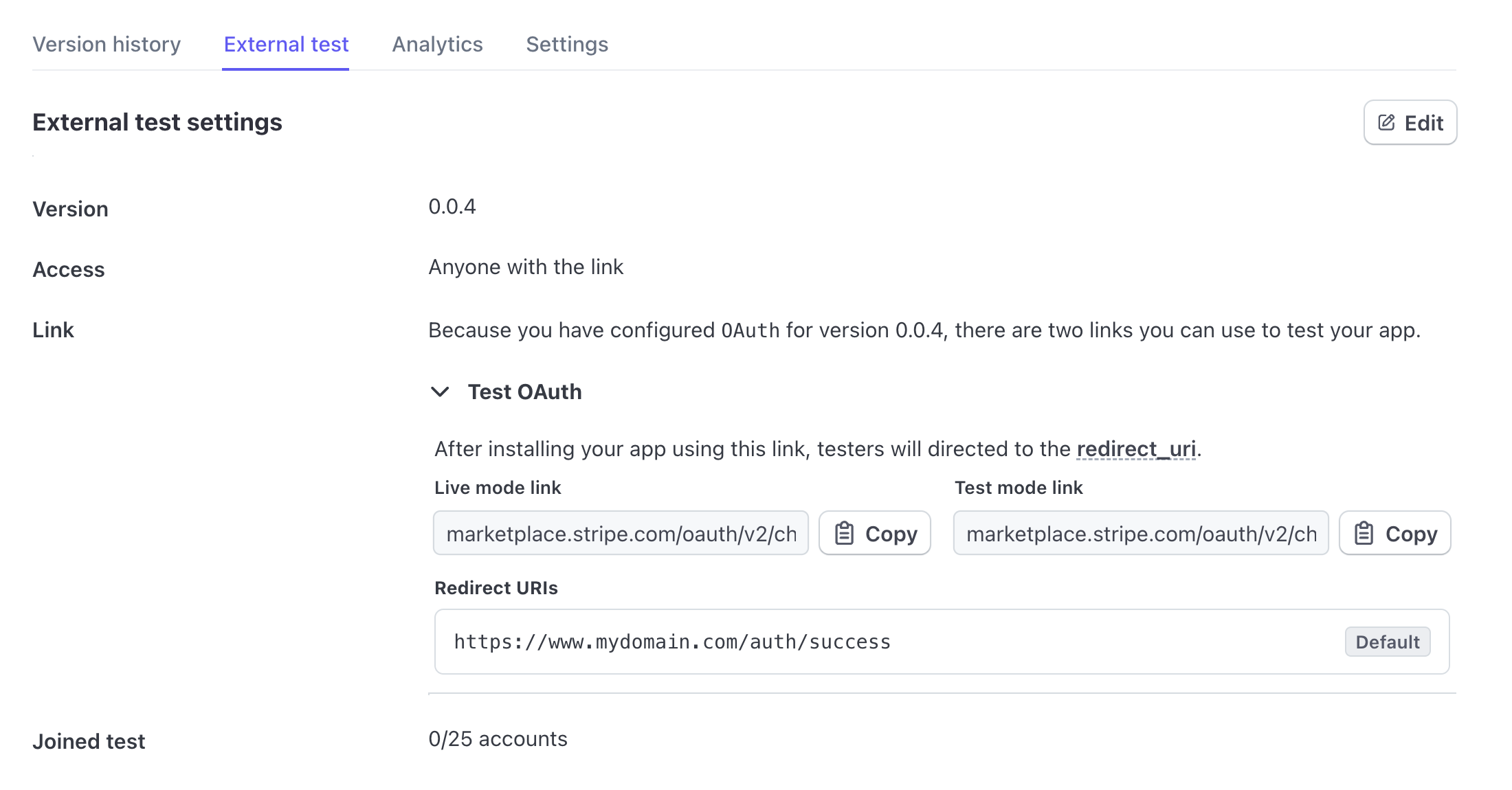
3. Access the authorize links in the **Test OAuth** section. You can use this link to test with different accounts.
[Create your OAuth install link\
\
\
-------------------------------------------------------------------------------------------------------------------------](https://docs.stripe.com/stripe-apps/api-authentication/oauth#create-install-link)
From your webpage, redirect to your OAuth install link with the following parameters: `https://marketplace.stripe.com/oauth/v2/authorize?client_id=${clientId}&redirect_uri=${redirectUrl}&state=${state}`.
Stripe generates separate links for both live and test modes. You can find the links in the **External test** tab.
#### Security tip
To prevent CSRF attacks, add the recommended `state` parameter and pass along a unique token as the value. We include the `state` you provide when redirecting users to your site. Your site can confirm that the `state` parameter hasn’t been modified. See [URL parameters](https://docs.stripe.com/stripe-apps/api-authentication/oauth#url-parameters)
for more information.
[Publish your app\
\
\
-----------------------------------------------------------------------------------------------------------](https://docs.stripe.com/stripe-apps/api-authentication/oauth#publish-app)
[Submit your app for review](https://docs.stripe.com/stripe-apps/publish-app#submit-app-for-review)
when you are ready to publish it to the Stripe App Marketplace
When submitting an OAuth app for review, you need to provide the Marketplace install URL. This URL must link to a page that can initiate the onboarding and installation process with clear instructions using OAuth install links from the previous step.
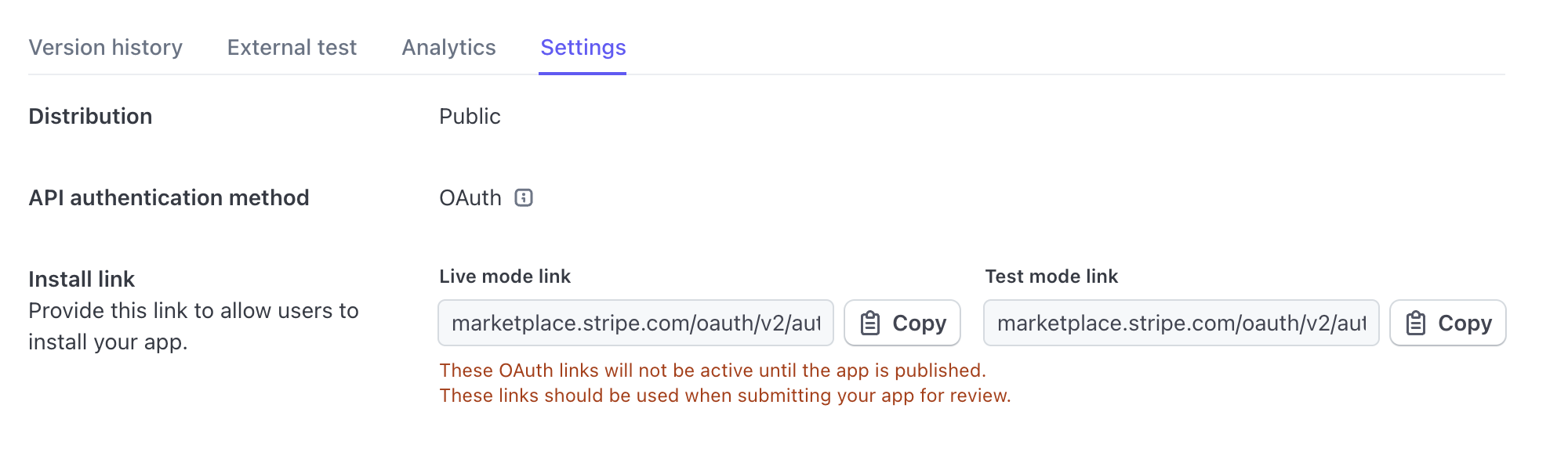
Make sure the install URL you provide to App Review uses the public OAuth links from the **Settings** tab. This link isn’t the same as the link from the **External test** tab.
#### Note
The public OAuth install links don’t work until the app is published. However, our app review team can install and test your app through this link.
[Install your app and authorize\
\
\
-------------------------------------------------------------------------------------------------------------------------](https://docs.stripe.com/stripe-apps/api-authentication/oauth#install-app)
1. In your browser, open your OAuth install link. You can adjust the query parameters to change the redirect URL to one supported by the app.
2. View and accept the permissions to install the app. When the installation is complete, the user is redirected to the first callback URL you’ve defined in the app manifest, unless you’ve specified a [URL parameter](https://docs.stripe.com/stripe-apps/api-authentication/oauth#url-parameters)
.
[Exchange the authorization code for an access token\
\
\
----------------------------------------------------------------------------------------------------------------------------------------------](https://docs.stripe.com/stripe-apps/api-authentication/oauth#obtain-access-token)
Your callback URL receives an OAuth [authorization code](https://datatracker.ietf.org/doc/html/rfc6749#section-1.3.1)
parameter that your backend needs to exchange for an API access token and the refresh token. This authorization code is one-time use only and valid only for 5 minutes, in which your backend needs to exchange the code for the access token. Below is the command that your backend code needs to implement using an OAuth [client library](https://oauth.net/code/)
.
Command Line
`curl -X POST https://api.stripe.com/v1/oauth/token \ -u sk_live_***: \ -d code=ac_*** \ -d grant_type=authorization_code`
#### Note
You’ll need to use the app developer API Key for the relevant mode. To enable this, pass the relevant mode within the `state`.
Here’s an example response for the above `curl` command.
`{ "access_token": "{{ ACCESS_TOKEN }}", "livemode": true, "refresh_token": "{{ REFRESH_TOKEN }}", "scope": "stripe_apps", "stripe_publishable_key": "pk_live_***", "stripe_user_id": "acct_***", "token_type": "bearer" }`
[Refresh your access token\
\
\
--------------------------------------------------------------------------------------------------------------------](https://docs.stripe.com/stripe-apps/api-authentication/oauth#refresh-access-token)
Access tokens expire in 1 hour, and refresh tokens expire after 1 year. Refresh tokens are also rolled on every exchange, so the expiration time for the new refresh tokens is always a year from the date that it was generated or rolled. If you exchange a refresh token for an access token within one year, you should never hit the refresh token expiration date.
Here is the equivalent `curl` command to exchange the access token for a refresh token using your secret key:
Command Line
`curl -X POST https://api.stripe.com/v1/oauth/token \ -u sk_live_***: \ -d refresh_token={{ REFRESH_TOKEN }} \ -d grant_type=refresh_token`
Here’s an example response.
`{ "access_token": "{{ ACCESS_TOKEN }}", "livemode": true, "refresh_token": "{{ REFRESH_TOKEN }}", "scope": "stripe_apps", "stripe_publishable_key": "pk_live_***", "stripe_user_id": "acct_***", "token_type": "bearer" }`
You’ll get a new refresh token and the previous refresh token expires. You must securely store the refresh token in your backend and use the refresh token to obtain a fresh access token anytime you want to access the Stripe API on behalf of the Stripe User.
#### Common mistake
When you refresh the access token you may see an error that says you do not have the required permissions. If you see this, confirm that you’re using the secret key for your account to authorize the API call and that you’re not accidentally using a refresh token, access token, or a restricted key.
You can verify the access token by making a request to the Stripe API. For example:
Command Line
`curl https://api.stripe.com/v1/customers \ -u "{{ ACCESS_TOKEN }}"`
[OptionalCustomize links with URL parameters\
\
\
--------------------------------------------------------------------------------------------------------------------------------------](https://docs.stripe.com/stripe-apps/api-authentication/oauth#url-parameters)
Was this page helpful?
YesNo
* Need help? [Contact Support](https://support.stripe.com/)
.
* Join our [early access program](https://insiders.stripe.dev/)
.
* Check out our [changelog](https://docs.stripe.com/changelog)
.
* Questions? [Contact Sales](https://stripe.com/contact/sales)
.
* LLM? [Read llms.txt](https://docs.stripe.com/llms.txt)
.
* Powered by [Markdoc](https://markdoc.dev/)
---
# Include-dependent response values in API v2 | Stripe Documentation
[Skip to content](https://docs.stripe.com/api-includable-response-values#main-content)
Include-dependent response values v2
[Create account](https://dashboard.stripe.com/register)
or[Sign in](https://dashboard.stripe.com/login?redirect=https%3A%2F%2Fdocs.stripe.com%2Fapi-includable-response-values)
[The Stripe Docs logo](https://docs.stripe.com/)
Search
/Ask AI
[Create account](https://dashboard.stripe.com/register)
[Sign in](https://dashboard.stripe.com/login?redirect=https%3A%2F%2Fdocs.stripe.com%2Fapi-includable-response-values)
[Get started](https://docs.stripe.com/get-started)
[Payments](https://docs.stripe.com/payments)
[Revenue](https://docs.stripe.com/revenue)
[Platforms and marketplaces](https://docs.stripe.com/connect)
[Money management](https://docs.stripe.com/money-management)
[Developer resources](https://docs.stripe.com/development)
APIs & SDKs
Help
[Overview](https://docs.stripe.com/development)
Versioning
Changelog
[Upgrade your API version](https://docs.stripe.com/upgrades)
Upgrade your SDK version
Essentials
SDKs
API
[API v2](https://docs.stripe.com/api-v2-overview)
[API keys](https://docs.stripe.com/keys)
[Stripe-Context header](https://docs.stripe.com/context)
[Rate limits](https://docs.stripe.com/rate-limits)
[Automated testing](https://docs.stripe.com/automated-testing)
[Metadata](https://docs.stripe.com/metadata)
[Expanding responses](https://docs.stripe.com/expand)
Include-dependent response values v2
[Pagination](https://docs.stripe.com/api-pagination)
[Domains and IP addresses](https://docs.stripe.com/ips)
[Search](https://docs.stripe.com/search)
[Localization](https://docs.stripe.com/localization)
[Error handling](https://docs.stripe.com/error-handling)
[Error codes](https://docs.stripe.com/error-codes)
Testing
Stripe CLI
Sample projects
Tools
Workbench
Developers Dashboard
Stripe Shell
[Stripe for Visual Studio Code](https://docs.stripe.com/stripe-vscode)
Features
Workflows
Event destinations
[Stripe health alerts](https://docs.stripe.com/health-alerts)
[File uploads](https://docs.stripe.com/file-upload)
AI solutions
Agent toolkit
[Model Context Protocol](https://docs.stripe.com/mcp)
Security and privacy
Security
[Stripebot web crawler](https://docs.stripe.com/stripebot-crawler)
Privacy
Extend Stripe
Build Stripe apps
Use apps from Stripe
Partners
Partner ecosystem
[Partner certification](https://docs.stripe.com/partners/training-and-certification)
United States
English (United States)
[Home](https://docs.stripe.com/ "Home")
[Developer resources](https://docs.stripe.com/development "Developer resources")
API
Include-dependent response values in API v2
===========================================
Learn how to manage API responses that return null by default for certain properties.
-------------------------------------------------------------------------------------
Ask about this page
Copy for LLM
View as Markdown
Some API v2 responses contain null values for certain properties by default, regardless of their actual values. That reduces the size of response payloads while maintaining the basic response structure. To retrieve the actual values for those properties, specify them in the `include` array request parameter.
To determine whether you need to use the `include` parameter in a given request, look at the request description. The `include` parameter’s enum values represent the response properties that depend on the `include` parameter.
#### Endpoint dependency
Whether a response property defaults to null depends on the request endpoint, not the object that the endpoint references. If multiple endpoints return data from the same object, a particular property can depend on `include` in one endpoint and return its actual value by default for a different endpoint.
A hash property can depend on a single `include` value, or on multiple `include` values associated with its child properties. For example, when updating an Account, to return actual values for the entire `identity` hash, specify `identity` in the `include` parameter. Otherwise, the `identity` hash is null in the response. However, to return actual values for the `configuration` hash, you must specify individual configurations in the request. If you specify at least one configuration, but not all of them, specified configurations return actual values and unspecified configurations return null. If you don’t specify any configurations, the `configuration` hash is null in the response.
The following example updates an `Account` to add the `customer` and `merchant` configurations, but doesn’t specify any properties in the `include` parameter:
Command Line
Select a language
cURL
Stripe CLI
Ruby
Python
PHP
Java
Node
Go
.NET
No results
`curl -X POST https://api.stripe.com/v2/core/accounts/acct_123 \ -H "Authorization: Bearer sk_test_BQokikJOvBiI2HlWgH4olfQ2 " \ -H "Stripe-Version: preview" \ --json '{ "configuration": { "customer": { "capabilities": { "automatic_indirect_tax": { "requested": true } } }, "merchant": { "capabilities": { "card_payments": { "requested": true } } } } }'`
The response might look like this:
`{ "id": "acct_123", "object": "v2.core.account", "applied_configurations": [ "customer", "merchant" ], "configuration": null, "contact_email": "furever@example.com", "created": "2025-06-09T21:16:03.000Z", "dashboard": "full", "defaults": null, "display_name": "Furever", "identity": null, "livemode": true, "metadata": {}, "requirements": null }`
This example makes the same request, but specifies `configuration.customer` and `identity` in the `include` parameter:
Command Line
Select a language
cURL
Stripe CLI
Ruby
Python
PHP
Java
Node
Go
.NET
No results
`curl -X POST https://api.stripe.com/v2/core/accounts/acct_123 \ -H "Authorization: Bearer sk_test_BQokikJOvBiI2HlWgH4olfQ2 " \ -H "Stripe-Version: preview" \ --json '{ "configuration": { "customer": { "capabilities": { "automatic_indirect_tax": { "requested": true } } }, "merchant": { "capabilities": { "card_payments": { "requested": true } } } }, "include": [ "configuration.customer", "identity" ] }'`
The response includes details about the `customer` configuration and `identity`, but returns null for all other configurations:
`{ "id": "acct_123", "object": "v2.core.account", "applied_configurations": [ "customer", "merchant" ], "configuration": { "customer": { "automatic_indirect_tax": { ... }, "billing": { ... }, "capabilities": { ... }, ... }, "merchant": null, "recipient": null }, "contact_email": "furever@example.com", "created": "2025-06-09T21:16:03.000Z", "dashboard": "full", "defaults": null, "display_name": "Furever", "identity": { "business_details": { "doing_business_as": "FurEver", "id_numbers": [ { "type": "us_ein" } ], "product_description": "Saas pet grooming platform at furever.dev using Connect embedded components", "structure": "sole_proprietorship", "url": "[http://accessible.stripe.com](http://accessible.stripe.com/) " }, "country": "US" }, "livemode": true, "metadata": {}, "requirements": null }`
Was this page helpful?
YesNo
* Need help? [Contact Support](https://support.stripe.com/)
.
* Join our [early access program](https://insiders.stripe.dev/)
.
* Check out our [changelog](https://docs.stripe.com/changelog)
.
* Questions? [Contact Sales](https://stripe.com/contact/sales)
.
* LLM? [Read llms.txt](https://docs.stripe.com/llms.txt)
.
* Powered by [Markdoc](https://markdoc.dev/)
---
# How pagination works | Stripe Documentation
[Skip to content](https://docs.stripe.com/api-pagination#main-content)
Pagination
[Create account](https://dashboard.stripe.com/register)
or[Sign in](https://dashboard.stripe.com/login?redirect=https%3A%2F%2Fdocs.stripe.com%2Fapi-pagination)
[The Stripe Docs logo](https://docs.stripe.com/)
Search
/Ask AI
[Create account](https://dashboard.stripe.com/register)
[Sign in](https://dashboard.stripe.com/login?redirect=https%3A%2F%2Fdocs.stripe.com%2Fapi-pagination)
[Get started](https://docs.stripe.com/get-started)
[Payments](https://docs.stripe.com/payments)
[Revenue](https://docs.stripe.com/revenue)
[Platforms and marketplaces](https://docs.stripe.com/connect)
[Money management](https://docs.stripe.com/money-management)
[Developer resources](https://docs.stripe.com/development)
APIs & SDKs
Help
[Overview](https://docs.stripe.com/development)
Versioning
Changelog
[Upgrade your API version](https://docs.stripe.com/upgrades)
Upgrade your SDK version
Essentials
SDKs
API
[API v2](https://docs.stripe.com/api-v2-overview)
[API keys](https://docs.stripe.com/keys)
[Stripe-Context header](https://docs.stripe.com/context)
[Rate limits](https://docs.stripe.com/rate-limits)
[Automated testing](https://docs.stripe.com/automated-testing)
[Metadata](https://docs.stripe.com/metadata)
[Expanding responses](https://docs.stripe.com/expand)
[Include-dependent response values v2](https://docs.stripe.com/api-includable-response-values)
Pagination
[Domains and IP addresses](https://docs.stripe.com/ips)
[Search](https://docs.stripe.com/search)
[Localization](https://docs.stripe.com/localization)
[Error handling](https://docs.stripe.com/error-handling)
[Error codes](https://docs.stripe.com/error-codes)
Testing
Stripe CLI
Sample projects
Tools
Workbench
Developers Dashboard
Stripe Shell
[Stripe for Visual Studio Code](https://docs.stripe.com/stripe-vscode)
Features
Workflows
Event destinations
[Stripe health alerts](https://docs.stripe.com/health-alerts)
[File uploads](https://docs.stripe.com/file-upload)
AI solutions
Agent toolkit
[Model Context Protocol](https://docs.stripe.com/mcp)
Security and privacy
Security
[Stripebot web crawler](https://docs.stripe.com/stripebot-crawler)
Privacy
Extend Stripe
Build Stripe apps
Use apps from Stripe
Partners
Partner ecosystem
[Partner certification](https://docs.stripe.com/partners/training-and-certification)
United States
English (United States)
[Home](https://docs.stripe.com/ "Home")
[Developer resources](https://docs.stripe.com/development "Developer resources")
API
How pagination works
====================
Learn how to paginate results for list and search endpoints.
------------------------------------------------------------
Ask about this page
Copy for LLM
View as Markdown
The Stripe API has list and search endpoints that can return multiple objects, such as listing Customers or searching for PaymentIntents. To mitigate negative impacts to performance, these endpoints don’t return all results at once. Instead, Stripe returns one page of results per API call, with each page containing up to 10 results by default. Use the [limit](https://docs.stripe.com/api/pagination#pagination-limit)
parameter to change the number of results per page.
For example, this is an API request to list Customers, with a `limit` of 3:
Command Line
Select a language
cURL
Stripe CLI
Ruby
Python
PHP
Java
Node
Go
.NET
No results
`curl -G https://api.stripe.com/v1/customers \ -u " sk_test_BQokikJOvBiI2HlWgH4olfQ2 :" \ -d limit=3`
The response from Stripe contains one page with 3 results:
Truncated API response
`{ "data": [ { "id": "cus_005", "object": "customer", "name": "John Doe", }, { "id": "cus_004", "object": "customer", "name": "Jane Doe", }, { "id": "cus_003", "object": "customer", "name": "Jenny Rosen", }, ], "has_more": true, /* ... */ }`
Keep in mind the following details when using these endpoints:
* Objects are inside the `data` property.
* Objects are in reverse chronological order, meaning the most recently created object is the first one.
* The `has_more` property indicates if there are additional objects that weren’t returned in this request.
Instead of looping over the `data` array to go through objects, you should paginate results. This prevents you from missing some objects when the [has\_more](https://docs.stripe.com/api/pagination#pagination-has_more)
parameter is `true`.
Auto-pagination
--------------------------------------------------------------------------------------------------------
To retrieve all objects, use the auto-pagination feature. This automatically makes multiple API calls until `has_more` becomes `false`.
Select a language
Ruby
Python
PHP
Java
Node
Go
.NET
No results
`customers = Stripe::Customer.list() customers.auto_paging_each do |customer| # Do something with customer end`
#### Note
When using auto-pagination with a list endpoint and setting [ending\_before](https://docs.stripe.com/api/pagination#pagination-ending_before)
, the results are in chronological order, meaning the most recently created customer is the last one.
Manual pagination
----------------------------------------------------------------------------------------------------------
Follow these steps to manually paginate results. This process is different when calling a list endpoint or a search endpoint.
List
Search
1. Make an API call to list the objects that you want to find.
Command Line
Select a language
cURL
Stripe CLI
Ruby
Python
PHP
Java
Node
Go
.NET
No results
`curl https://api.stripe.com/v1/customers \ -u " sk_test_BQokikJOvBiI2HlWgH4olfQ2 :"`
1. In the response, check the value of [has\_more](https://docs.stripe.com/api/pagination#pagination-has_more)
:
* If the value is `false`, you’ve retrieved all the objects.
* If the value is `true`, get the ID of the last object returned, and make a new API call with the [starting\_after](https://docs.stripe.com/api/pagination#pagination-starting_after)
parameter set.
Repeat this step until you’ve retrieved all of the objects that you want to find.
Command Line
Select a language
cURL
Stripe CLI
Ruby
Python
PHP
Java
Node
Go
.NET
No results
`curl -G https://api.stripe.com/v1/customers \ -u " sk_test_BQokikJOvBiI2HlWgH4olfQ2 :" \ -d starting_after={{LAST_CUSTOMER_ID}}`
Was this page helpful?
YesNo
* Need help? [Contact Support](https://support.stripe.com/)
.
* Join our [early access program](https://insiders.stripe.dev/)
.
* Check out our [changelog](https://docs.stripe.com/changelog)
.
* Questions? [Contact Sales](https://stripe.com/contact/sales)
.
* LLM? [Read llms.txt](https://docs.stripe.com/llms.txt)
.
* Powered by [Markdoc](https://markdoc.dev/)
---
# Build a custom Capital program | Stripe Documentation
[Skip to content](https://docs.stripe.com/capital/api-integration#main-content)
API integration
[Create account](https://dashboard.stripe.com/register)
or[Sign in](https://dashboard.stripe.com/login?redirect=https%3A%2F%2Fdocs.stripe.com%2Fcapital%2Fapi-integration)
[The Stripe Docs logo](https://docs.stripe.com/)
Search
/Ask AI
[Create account](https://dashboard.stripe.com/register)
[Sign in](https://dashboard.stripe.com/login?redirect=https%3A%2F%2Fdocs.stripe.com%2Fcapital%2Fapi-integration)
[Get started](https://docs.stripe.com/get-started)
[Payments](https://docs.stripe.com/payments)
[Revenue](https://docs.stripe.com/revenue)
[Platforms and marketplaces](https://docs.stripe.com/connect)
[Money management](https://docs.stripe.com/money-management)
[Developer resources](https://docs.stripe.com/development)
APIs & SDKs
Help
[Overview](https://docs.stripe.com/money-management)
Start an integration
Use for your business
[Manage money](https://docs.stripe.com/manage-money)
Global Payouts
Capital
[Overview](https://docs.stripe.com/capital/overview)
[How Capital works](https://docs.stripe.com/capital/how-stripe-capital-works)
Capital for platforms
[How Capital for platforms works](https://docs.stripe.com/capital/how-capital-for-platforms-works)
[Set up Capital](https://docs.stripe.com/capital/getting-started)
[No-code integration](https://docs.stripe.com/capital/no-code-integration)
[Embedded components integration](https://docs.stripe.com/capital/embedded-component-integration)
API integration
[Refill offers](https://docs.stripe.com/capital/refills)
[Replace offers](https://docs.stripe.com/capital/replacements)
[Testing](https://docs.stripe.com/capital/testing)
[Provide and reconcile reports](https://docs.stripe.com/capital/reporting-and-reconciliation)
[Import non-Stripe data into Capital underwriting](https://docs.stripe.com/capital/import-non-stripe-data)
[Regulatory compliance](https://docs.stripe.com/capital/regulatory-compliance)
[Marketing](https://docs.stripe.com/capital/marketing)
[Servicing](https://docs.stripe.com/capital/servicing)
[Metrics](https://docs.stripe.com/capital/reporting)
Embed in your platform
Treasury
Issuing cards
Capital for platforms
United States
English (United States)
[Home](https://docs.stripe.com/ "Home")
[Money management](https://docs.stripe.com/money-management "Money management")
Capital[Set up Capital](https://docs.stripe.com/capital/getting-started "Set up Capital")
Build a custom Capital programPublic preview
============================================
Integrate with our API to build a custom Capital program.
---------------------------------------------------------
Ask about this page
Copy for LLM
View as Markdown
#### Public preview
Capital for platforms is available in [public preview](https://docs.stripe.com/release-phases)
. [Sign up to join](https://docs.stripe.com/capital/how-capital-for-platforms-works#sign-up)
.
[Stripe Capital](https://docs.stripe.com/capital/how-capital-for-platforms-works)
enables your platform to retrieve prequalified financing offers for your connected accounts, expose a compliant financing offer application, and provide ongoing reporting for in-progress financing.
This guide describes how [Connect](https://docs.stripe.com/connect)
platforms can integrate with the [Capital API](https://docs.stripe.com/api/capital/financing_offers)
.
### Capital lifecycle
To launch the program, your platform must support the three phases of the Capital lifecycle:
* Marketing financing offers to eligible users.
* Providing access to the financing reporting page for in-progress financing.
* Continuing to provide access to the financing reporting page after users have fully paid their financing.
This guide explains how to:
* Retrieve financing offers for eligible users.
* Make the financing application available to users.
* Provide users access to the financing reporting page.
[Confirm your branding settings\
\
Dashboard\
\
\
------------------------------------------------------------------------------------------------------------------------------------](https://docs.stripe.com/capital/api-integration#confirm-branding)
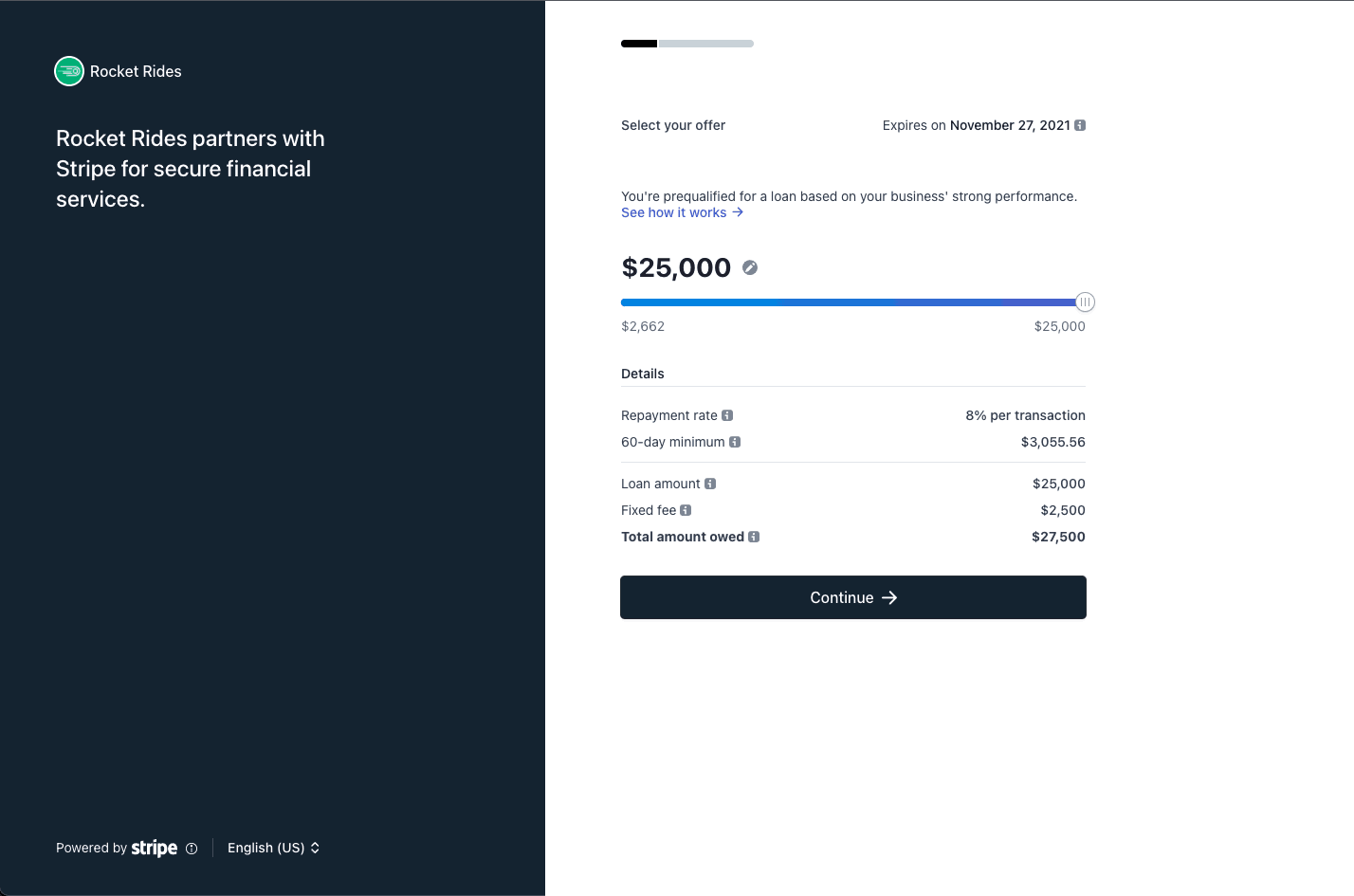
All users who receive Capital offers see your business name, icon, logo, and branding color in the offer emails, application, and financing reporting page.
Navigate to your **[Connect branding settings](https://dashboard.stripe.com/settings/connect/stripe-dashboard/branding)
**, and make sure your platform’s branding settings are correct.
[Create a test undelivered financing offer\
\
Dashboard\
\
\
-----------------------------------------------------------------------------------------------------------------------------------------------](https://docs.stripe.com/capital/api-integration#create-undelivered-offer)
We recommend using a [sandbox](https://docs.stripe.com/sandboxes)
to build your integration. In a sandbox, visit the [Capital Dashboard](https://dashboard.stripe.com/test/connect/capital)
.
1. Click **Create** to open the **Create financing offer** modal, which allows you to create test financing offers. The default options create an undelivered financing offer with a 1,000 USD financing amount.
2. Leave the default options, and click **Create financing offer**.
3. From the Dashboard, click the row corresponding to the offer you created.
The loans and financing section of the connected account details page displays details about the user’s financing offer.
[Retrieve financing offers\
\
Server-side\
\
\
---------------------------------------------------------------------------------------------------------------------------------](https://docs.stripe.com/capital/api-integration#retrieve-financing-offers)
You can retrieve financing offers for all of your platform’s users with the [List financing offers](https://docs.stripe.com/api/capital/financing_offers/list)
endpoint.
Command Line
Select a language
curl
No results
`curl https://api.stripe.com/v1/capital/financing_offers \ -u sk_test_BQokikJOvBiI2HlWgH4olfQ2 :`
If the offer is successfully created, you receive a response similar to the following:
`{ "object": "list", "url": "/v1/capital/financing_offers", "has_more": false, "data": [ { "id": "financingoffer_abc123", "object": "capital.financing_offer", ..., }, {...} ] }`
You can look up a financing offer using the [Retrieve financing offer](https://docs.stripe.com/api/capital/financing_offers/retrieve#retrieve_financing_offer)
endpoint. Retrieve the first financing offer from the list above.
Command Line
Select a language
curl
No results
`curl https://api.stripe.com/v1/capital/financing_offers/financingoffer_abc123 \ -u sk_test_BQokikJOvBiI2HlWgH4olfQ2 :`
[Send offer email\
\
Server-side\
\
\
------------------------------------------------------------------------------------------------------------------------](https://docs.stripe.com/capital/api-integration#send-offer-email)
Stripe sends the `capital.financing_offer.created` [webhook](https://docs.stripe.com/webhooks)
after a financing offer is created. Update your webhook integration to listen for the `capital.financing_offer.created` webhook. If you send your own offer emails, the webhook is an important notification to notify the user of their offer.
#### Warning
Make sure the contents of your offer email comply with banking regulations by reviewing the [marketing guidance](https://docs.stripe.com/capital/marketing)
page. Submit all changes to user-facing materials for review at [capital-review@stripe.com](mailto:capital-review@stripe.com)
.
In the email, link users to a dedicated Capital section in your platform dashboard. Users access the Capital financing application with [Account Links](https://docs.stripe.com/api/account_links)
. Account Links expire shortly after they’re generated, so provide a way for users to regenerate the application link. Include a link to the financing application in your platform dashboard by generating an Account Link of type `capital_financing_offer`.
Command Line
Select a language
curl
No results
`curl https://api.stripe.com/v1/account_links \ -u sk_test_BQokikJOvBiI2HlWgH4olfQ2 : \ -d account=acct_123 \ # The URL the user will be redirected to if the account link is expired, has been previously-visited, or is otherwise invalid. -d refresh_url="[https://example.com/reauth](https://example.com/reauth) " \ # The URL the user will be redirected to after completing the linked flow. -d return_url="[https://example.com/thanks](https://example.com/thanks) " \ -d type=capital_financing_offer`
If the creation of an account link is successful, you receive a response similar to the following:
`{ "object": "account_link", "created": 1611264596, "expires_at": 1611264896, "url": "[https://connect.stripe.com/capital/offer/SrjgLUfa0O7K](https://connect.stripe.com/capital/offer/SrjgLUfa0O7K) " }`
After updating your webhook integration, create another offer in the [Dashboard](https://dashboard.stripe.com/test/connect/capital)
, and verify you receive the `capital.financing_offer.created` webhook.
### Mark the offer as delivered
Update your webhook integration to [mark the financing offer as delivered](https://docs.stripe.com/api/capital/financing_offers/mark_delivered)
after sending the offer email. Marking an offer as delivered is required and is an affirmation that you have marketed the offer to the user.
Command Line
Select a language
curl
No results
`curl https://api.stripe.com/v1/capital/financing_offers/financingoffer_abc123/mark_delivered \ -u sk_test_BQokikJOvBiI2HlWgH4olfQ2 :`
Verify the status of the financing offer is delivered using the [Dashboard](https://dashboard.stripe.com/test/connect/capital)
or the [financing offer API](https://docs.stripe.com/api/capital/financing_offers/retrieve)
.
[Listen for status changes\
\
Server-side\
\
\
---------------------------------------------------------------------------------------------------------------------------------](https://docs.stripe.com/capital/api-integration#listen-status-changes)
In addition to the `capital.financing_offer.created` webhook, Stripe sends additional webhooks as the financing offer transitions through different states. The following is a full list of the webhooks you can receive:
| **Webhook identifier** | **Trigger** |
| --- | --- |
| `capital.financing_offer.created` | Financing offer is created |
| `capital.financing_offer.accepted` | User submits their offer application |
| `capital.financing_offer.paid_out` | Stripe approves the offer application and funds are paid out to the user |
| `capital.financing_offer.fully_repaid` | User fully pays the financing balance |
| `capital.financing_offer.canceled` | User cancels the financing offer |
| `capital.financing_offer.rejected` | User’s application isn’t approved |
| `capital.financing_offer.expired` | Financing offer expires and is no longer available |
| `capital.financing_offer.replacement_created` | Financing offer is [replaced](https://docs.stripe.com/capital/replacements)
with a new financing offer |
From the [Dashboard](https://dashboard.stripe.com/test/connect/capital)
, find the offer you delivered earlier.
1. Click the overflow menu ().
2. Click the **Expire offer** option, which lets you simulate expiring the offer.
3. Verify you receive the `capital.financing_offer.expired` webhook.
With the exception of `capital.financing_offer.canceled`, you can simulate all webhooks while in a testing environment.
[Apply for an offer\
\
Dashboard\
\
Server-side\
\
\
-------------------------------------------------------------------------------------------------------------------------------------](https://docs.stripe.com/capital/api-integration#apply-for-offer)
You can simulate the `capital.financing_offer.accepted` webhook by applying for an offer.
1. From the [Dashboard](https://dashboard.stripe.com/test/connect/capital)
, create a delivered offer with a maximum financing amount of 20,000 USD.
2. Generate an account link of type `capital_financing_offer`, and go to the link. Here, you can preview what the application looks like for your users.
3. Continue to the end of the application, and click **Submit**.
4. Verify you received the `capital.financing_offer.accepted` webhook.
5. View the offer in the Dashboard, and check it has status accepted.
### View the application tracker
A financing offer with status accepted is pending application review by the Stripe [servicing](https://docs.stripe.com/capital/servicing)
team. While this review takes place, you can direct the user to the financing reporting page. The financing reporting page contains an application tracker with an approximate timeline of the application review.
Generate an [Account Link](https://docs.stripe.com/api/account_links)
of type `capital_financing_reporting`.
Command Line
Select a language
curl
No results
`curl https://api.stripe.com/v1/account_links \ -u sk_test_BQokikJOvBiI2HlWgH4olfQ2 : \ -d account=acct_123 \ # When the user refreshes the page, where should we redirect them -d refresh_url="[https://example.com/reauth](https://example.com/reauth) " \ # When the user completes the application, where should they return -d return_url="[https://example.com/thanks](https://example.com/thanks) " \ -d type=capital_financing_reporting`
Navigate to the link, and view the application tracker.
[Approve the application\
\
Dashboard\
\
\
-----------------------------------------------------------------------------------------------------------------------------](https://docs.stripe.com/capital/api-integration#approve-application)
In the [Dashboard](https://dashboard.stripe.com/test/connect/capital)
, find the row corresponding to the accepted offer.
1. Click the overflow menu ().
2. Click the **Approve and disburse funds** option, which lets you simulate an application approval and funds disbursal.
3. Verify you receive the `capital.financing_offer.paid_out` webhook, which notifies you that the financing has been paid out.
4. Generate another [Account Link](https://docs.stripe.com/api/account_links)
of type `capital_financing_reporting`. This reporting page provides access to outstanding balance and payout and payment transaction details for the user’s in-progress financing.
5. Click **Make payment**, and create a manual payment.
#### Note
It takes up to 15 minutes for the **Make payment** button to be enabled on the reporting page for test financing offers.
After the transaction is processed, view the payment in the transactions table. You can programmatically view the user’s paid-down financing amount for in-progress financing using the [financing summary API](https://docs.stripe.com/api/capital/financing_summary)
.
Command Line
Select a language
curl
No results
`curl https://api.stripe.com/v1/capital/financing_summary \ -u sk_test_BQokikJOvBiI2HlWgH4olfQ2 : \ -H "Stripe-Account: {{CONNECTED_ACCOUNT_ID}}" \`
If the retrieval of the financing summary is successful, you receive a response similar to the following:
`{ "object": "capital.financing_summary", "details": { "currency": "usd", "advance_amount": 1000000, "fee_amount": 100000, "withhold_rate": 0.2, "remaining_amount": 999950, "paid_amount": 50, "current_repayment_interval": { "due_at": 123456789, "remaining_amount": 50, "paid_amount": 50 }, "repayments_begin_at": 123456789, "advance_paid_out_at": 123456789 } }`
[Fully pay the financing\
\
Dashboard\
\
\
-----------------------------------------------------------------------------------------------------------------------------](https://docs.stripe.com/capital/api-integration#fully-repay-financing)
In the [Dashboard](https://dashboard.stripe.com/test/connect/capital)
, find the row corresponding to the paid-out financing.
1. Click the overflow menu ().
2. Click the **Repay offer** option, which lets you simulate fully paying down the financing balance.
3. Verify you receive the `capital.financing_offer.fully_repaid` webhook, which notifies you that the financing has been fully paid.
4. Generate another [Account Link](https://docs.stripe.com/api/account_links)
of type `capital_financing_reporting`.
After a user pays the total amount of their financing, they can access past financing details on the reporting page at any time.
[Review your test integration\
\
\
-----------------------------------------------------------------------------------------------------------------------](https://docs.stripe.com/capital/api-integration#review-test-integration)
By now, your integration:
* Responds to the `capital.financing_offer.created` webhook by sending an offer email and marking the offer as delivered
* Exposes the financing application link in your platform dashboard
* Exposes the financing reporting link in your platform dashboard
The Capital section of your platform dashboard might appear differently depending on which phase the user’s financing is in. Review the state diagram below for a list of possible financing offer status values.
[Prepare to enable automatic offers\
\
\
-----------------------------------------------------------------------------------------------------------------------------](https://docs.stripe.com/capital/api-integration#prepare-enable-auto-offers)
When automatic offers are enabled in live mode, Stripe automatically creates financing offers for your users on a daily basis. Before enabling automatic offers, make sure that you:
1. Confirm and update email addresses for your users through the [Comms Center](https://dashboard.stripe.com/connect/comms_center/collect)
if you’re planning to leverage Stripe co-branded no-code offer emails. To be eligible for Capital financing, users must have an email saved with Stripe so that they can receive transactional emails such as payment progress updates.
2. [Contact us](mailto:capital-review@stripe.com)
to enable live mode access to the financing offers API.
### Enable additional features
Over time, some of your users might become eligible for refills. Refills are additional financing offers sent to users who have made substantial payment progress towards their in-progress loans. Follow the [refills integration guide](https://docs.stripe.com/capital/refills)
to update your integration to support refill financing offers.
If you want to include Capital transactions on your platform dashboard and update your users payout reporting, refer to the [reporting and reconciliation guide](https://docs.stripe.com/capital/reporting-and-reconciliation)
.
See also
-------------------------------------------------------------------------------------------------
* [Refill offers](https://docs.stripe.com/capital/refills)
* [Replace offers](https://docs.stripe.com/capital/replacements)
Was this page helpful?
YesNo
* Need help? [Contact Support](https://support.stripe.com/)
.
* Join our [early access program](https://insiders.stripe.dev/)
.
* Check out our [changelog](https://docs.stripe.com/changelog)
.
* Questions? [Contact Sales](https://stripe.com/contact/sales)
.
* LLM? [Read llms.txt](https://docs.stripe.com/llms.txt)
.
* Powered by [Markdoc](https://markdoc.dev/)
---
# Use the API to respond to disputes | Stripe Documentation
[Skip to content](https://docs.stripe.com/disputes/api#main-content)
Manage disputes programmatically
[Create account](https://dashboard.stripe.com/register)
or[Sign in](https://dashboard.stripe.com/login?redirect=https%3A%2F%2Fdocs.stripe.com%2Fdisputes%2Fapi)
[The Stripe Docs logo](https://docs.stripe.com/)
Search
/Ask AI
[Create account](https://dashboard.stripe.com/register)
[Sign in](https://dashboard.stripe.com/login?redirect=https%3A%2F%2Fdocs.stripe.com%2Fdisputes%2Fapi)
[Get started](https://docs.stripe.com/get-started)
[Payments](https://docs.stripe.com/payments)
[Revenue](https://docs.stripe.com/revenue)
[Platforms and marketplaces](https://docs.stripe.com/connect)
[Money management](https://docs.stripe.com/money-management)
[Developer resources](https://docs.stripe.com/development)
APIs & SDKs
Help
[Overview](https://docs.stripe.com/payments)
About Stripe payments
[Upgrade your integration](https://docs.stripe.com/payments/upgrades)
Payments analytics
Online payments
[Overview](https://docs.stripe.com/payments/online-payments)
[Find your use case](https://docs.stripe.com/payments/use-cases/get-started)
[Managed Payments](https://docs.stripe.com/payments/managed-payments)
Use Payment Links
Build a checkout page
Build an advanced integration
Build an in-app integration
Payment methods
Add payment methods
Manage payment methods
Faster checkout with Link
Payment interfaces
Payment Links
Checkout
Web Elements
In-app Elements
Payment scenarios
Handle multiple currencies
Custom payment flows
Flexible acquiring
Orchestration
In-person payments
Terminal
Beyond payments
Incorporate your company
Crypto
Financial Connections
Climate
Understand fraud
Radar fraud protection
Manage disputes
[Overview](https://docs.stripe.com/disputes)
[How disputes work](https://docs.stripe.com/disputes/how-disputes-work)
Handling
[Respond to disputes](https://docs.stripe.com/disputes/responding)
Manage disputes programmatically
[Visa Compelling Evidence 3.0](https://docs.stripe.com/disputes/api/visa-ce3)
[Visa compliance](https://docs.stripe.com/disputes/api/visa-compliance)
[Dispute withdrawals](https://docs.stripe.com/disputes/withdrawing)
[High risk merchant lists](https://docs.stripe.com/disputes/match)
Analytics
[Measuring disputes](https://docs.stripe.com/disputes/measuring)
[Monitoring programs](https://docs.stripe.com/disputes/monitoring-programs)
Optimization
[Dispute Prevention](https://docs.stripe.com/disputes/prevention-preview)
[Smart Disputes](https://docs.stripe.com/disputes/smart-disputes)
Verify identities
United States
English (United States)
[Home](https://docs.stripe.com/ "Home")
[Payments](https://docs.stripe.com/payments "Payments")
Manage disputes
Use the API to respond to disputes
==================================
Learn how to manage disputes programmatically.
----------------------------------------------
Ask about this page
Copy for LLM
View as Markdown
You can programmatically manage disputes using the API. With the API, you can upload evidence, respond to disputes, and receive dispute events using webhooks.
If you want to manage disputes using the Dashboard instead of using the API, see [Respond to disputes](https://docs.stripe.com/disputes/responding)
.
Retrieve a dispute
-----------------------------------------------------------------------------------------------------------
For details about a dispute, [retrieve](https://docs.stripe.com/api/issuing/disputes/retrieve)
a `Dispute` object:
Command Line
Select a language
cURL
Stripe CLI
Ruby
Python
PHP
Java
Node
Go
.NET
No results
`curl https://api.stripe.com/v1/disputes/ {{DISPUTE_ID}} \ -u " sk_test_BQokikJOvBiI2HlWgH4olfQ2 :"`
The response contains information about the dispute and any response or evidence that’s already been provided.
`{ object: "dispute" id: "{{DISPUTE_ID}}", charge: "ch_5Q4BjL06oPWwho", evidence: { customer_name: "Jane Austen", customer_purchase_ip: "127.0.0.1", product_description: "Widget ABC, color: red", shipping_tracking_number: "Z01234567890", uncategorized_text: "Additional notes and comments", }, evidence_details: { due_by: 1403047735, submission_count: 1 } ... }`
Update a dispute
---------------------------------------------------------------------------------------------------------
You [update](https://docs.stripe.com/api/issuing/disputes/update)
the `Dispute` object and pass structured evidence with the `evidence` parameter.
Command Line
Select a language
cURL
Stripe CLI
Ruby
Python
PHP
Java
Node
Go
.NET
No results
`curl https://api.stripe.com/v1/disputes/ {{DISPUTE_ID}} \ -u " sk_test_BQokikJOvBiI2HlWgH4olfQ2 :" \ --data-urlencode "evidence[customer_email_address]"="email@example.com" \ -d "evidence[shipping_date]"=2024-02-01 \ -d "evidence[shipping_documentation]"= {{FILE_ID}} `
To view all available fields for the `evidence` parameter, see [Dispute evidence](https://docs.stripe.com/api/issuing/disputes/create#create_issuing_dispute-evidence)
. There are two types of evidence you can provide, depending on the field being updated:
* Text-based evidence, such as `customer_email` and `service_date`. These types of evidence take a string of text.
* File-based evidence, such as `service_documentation` and `customer_communication`. These take a [file\_upload](https://docs.stripe.com/api/files/object#issuing_dispute_object-id)
object ID.
#### Note
The combined character count for all text-based evidence field submissions is limited to 150,000.
You can provide documents or images (for example, a contract or screenshot) as part of dispute evidence using the [File Upload API](https://docs.stripe.com/file-upload)
. You first upload a document with the purpose of `dispute_evidence`, which generates a `File_upload` object that you can use when submitting evidence. Make sure the file meets [Stripe’s recommendations](https://docs.stripe.com/disputes/best-practices#file-upload-recommendations)
before uploading it for evidence submission.
If you’re only interested in submitting a single file or a large amount of plaintext as evidence, use `uncategorized_text` or `uncategorized_file`. However, fill in as many fields as possible so you have the best chance at overturning a dispute.
Multiple disputes on a single payment
------------------------------------------------------------------------------------------------------------------------------
It’s not typical, but it’s possible for a customer to dispute the same payment more than once. For example, a customer might partially dispute a payment for one of the items in an order if it was damaged in delivery, and then file a second dispute against a different item in the same order because the item didn’t work properly.
Stripe distinguishes all disputes by a unique identifier, regardless of whether they’re related to a single payment. When you [list disputes](https://docs.stripe.com/api/disputes/list)
, you can filter the results to show only disputes for a particular payment by specifying the `id` of the `PaymentIntent` or `Charge` object and including the [payment\_intent](https://docs.stripe.com/api/disputes/list#list_disputes-payment_intent)
or [charge](https://docs.stripe.com/api/disputes/list#list_disputes-charge)
filter.
By PaymentIntent
By Charge
Command Line
Select a language
cURL
Stripe CLI
Ruby
Python
PHP
Java
Node
Go
.NET
No results
`curl -G https://api.stripe.com/v1/disputes \ -u " sk_test_BQokikJOvBiI2HlWgH4olfQ2 :" \ -d payment_intent={{PAYMENT_INTENT_ID}}`
When a payment has multiple disputes, use the `id` provided for each returned dispute in the list to make sure you’re responding to the correct dispute by specifying its `id` when you [retrieve](https://docs.stripe.com/disputes/api#retrieve-a-dispute)
or [update the dispute](https://docs.stripe.com/disputes/api#update-a-dispute)
.
See also
-------------------------------------------------------------------------------------------------
* [Dispute categories](https://docs.stripe.com/disputes/categories)
* [Measuring disputes](https://docs.stripe.com/disputes/measuring)
* [Preventing disputes and fraud](https://docs.stripe.com/disputes/prevention)
Was this page helpful?
YesNo
* Need help? [Contact Support](https://support.stripe.com/)
.
* Join our [early access program](https://insiders.stripe.dev/)
.
* Check out our [changelog](https://docs.stripe.com/changelog)
.
* Questions? [Contact Sales](https://stripe.com/contact/sales)
.
* LLM? [Read llms.txt](https://docs.stripe.com/llms.txt)
.
* Powered by [Markdoc](https://markdoc.dev/)
---
# API onboarding | Stripe Documentation
[Skip to content](https://docs.stripe.com/connect/api-onboarding#main-content)
API onboarding
[Create account](https://dashboard.stripe.com/register/connect)
or[Sign in](https://dashboard.stripe.com/login?redirect=https%3A%2F%2Fdocs.stripe.com%2Fconnect%2Fapi-onboarding)
[The Stripe Docs logo](https://docs.stripe.com/)
Search
/Ask AI
[Create account](https://dashboard.stripe.com/register/connect)
[Sign in](https://dashboard.stripe.com/login?redirect=https%3A%2F%2Fdocs.stripe.com%2Fconnect%2Fapi-onboarding)
[Get started](https://docs.stripe.com/get-started)
[Payments](https://docs.stripe.com/payments)
[Revenue](https://docs.stripe.com/revenue)
[Platforms and marketplaces](https://docs.stripe.com/connect)
[Money management](https://docs.stripe.com/money-management)
[Developer resources](https://docs.stripe.com/development)
APIs & SDKs
Help
[Overview](https://docs.stripe.com/connect)
Get started with Connect
Integration fundamentals
Example integrations
Account management
Onboard accounts
[Choose your onboarding configuration](https://docs.stripe.com/connect/onboarding)
[Stripe-hosted onboarding](https://docs.stripe.com/connect/hosted-onboarding)
[Embedded onboarding](https://docs.stripe.com/connect/embedded-onboarding)
API onboarding
[Account capabilities](https://docs.stripe.com/connect/account-capabilities)
[Required verification information](https://docs.stripe.com/connect/required-verification-information)
[Service agreement types](https://docs.stripe.com/connect/service-agreement-types)
[Additional Verifications](https://docs.stripe.com/connect/additional-verifications)
[Networked onboarding](https://docs.stripe.com/connect/networked-onboarding)
[Migrate to Stripe](https://docs.stripe.com/connect/migrate-to-stripe)
Configure account Dashboards
Work with connected account types
Payment processing
Accept payments
Pay out to accounts
Platform administration
Manage your Connect platform
Tax forms for your Connect platform
United States
English (United States)
[Home](https://docs.stripe.com/ "Home")
[Platforms and marketplaces](https://docs.stripe.com/connect "Platforms and marketplaces")
Onboard accounts[Choose your onboarding configuration](https://docs.stripe.com/connect/onboarding "Choose your onboarding configuration")
API onboarding
==============
Build your own onboarding flow using Stripe's APIs.
---------------------------------------------------
Ask about this page
Copy for LLM
View as Markdown
With API onboarding, you use the Accounts API to build an onboarding flow, reporting functionality, and communication channels for your users. Stripe can be completely invisible to the account holder. However, your platform is responsible for all interactions with your accounts and for collecting all the information needed to verify them.
#### Additional responsibilities
With API onboarding, your custom flow must meet all legal and regulatory requirements in the regions where you do business. You must also commit resources to track changes to those requirements and collect updated information on an ongoing basis, at least once every six months. If you want to implement a customized onboarding flow, Stripe strongly recommends that you use [embedded onboarding](https://docs.stripe.com/connect/embedded-onboarding)
.
[Establish requirements\
\
\
-----------------------------------------------------------------------------------------------------------------](https://docs.stripe.com/connect/api-onboarding#establish-requirements)
The following factors affect the [onboarding requirements](https://docs.stripe.com/connect/required-verification-information)
for your connected accounts:
* The origin country of the connected accounts
* The [service agreement type](https://docs.stripe.com/connect/service-agreement-types)
applicable to the connected accounts
* The [capabilities](https://docs.stripe.com/connect/account-capabilities)
requested for the connected accounts
* The [business\_type](https://docs.stripe.com/api/accounts/object#account_object-business_type)
(for example, individual or company) and [company.structure](https://docs.stripe.com/api/accounts/object#account_object-company-structure)
(for example, `public_corporation` or `private_partnership`)
Use the interactive form to see how changing these factors affects the requirements.
### Requirements form
[Create forms to collect information\
\
Client-side\
\
\
-------------------------------------------------------------------------------------------------------------------------------------------](https://docs.stripe.com/connect/api-onboarding#create-forms-to-collect-information)
As a best practice, organize the required parameters into logical groupings or forms in your onboarding flow. You might wish to encode a mapping between the Stripe parameters and the logical groupings. Suggested logical groupings for parameters are shown in the first column of the example requirements table.
After you encode the required parameters into your application, generate UIs for the parameters corresponding to these requirements. For each parameter, design a UI form that includes:
* Parameter label, localized to each supported country and language
* Parameter description, localized to each supported country and language
* Parameter input fields with data validation logic and document uploading where required
It’s important to architect your application logic to account for the possibility of additional parameters in the future. For example, Stripe might introduce new parameters, new verifications, or new thresholds that you must incorporate into your onboarding flows over time.
Changing any of the factors that determine your connected accounts’ requirements means you must also adjust your collection forms to handle the changed requirements. [Country](https://docs.stripe.com/api/accounts/object#account_object-country)
and [service agreement type](https://docs.stripe.com/api/accounts/object#account_object-tos_acceptance-service_agreement)
are immutable, while [capabilities](https://docs.stripe.com/api/accounts/object#account_object-capabilities)
and [business type](https://docs.stripe.com/api/accounts/object#account_object-business_type)
are mutable.
* To change an immutable field, create a new connected account with the new values to replace the existing account.
* To change a mutable field, update the connected account.
### Include the Stripe Terms of Service Agreement
Your connected accounts must accept Stripe’s terms of service before they can activate. You can [wrap Stripe’s terms of service in your own terms of service](https://docs.stripe.com/connect/updating-service-agreements#adding-stripes-service-agreement-to-your-terms-of-service)
.
[Create a connected account\
\
Server-side\
\
\
----------------------------------------------------------------------------------------------------------------------------------](https://docs.stripe.com/connect/api-onboarding#create-account)
Create an [Account](https://docs.stripe.com/api/accounts/create)
where your platform is liable for negative balances, Stripe collects fees from your platform account, and your connected accounts don’t have access to a Stripe-hosted Dashboard. Request any capabilities that your connected accounts need. Prefill the business type and any other available information matching your [requirements](https://docs.stripe.com/connect/api-onboarding#establish-requirements)
.
Alternatively, you can create a connected account with `type` set to `custom` and desired capabilities.
If you don’t specify the country and service type agreement, they’re assigned the following default values:
* The `country` defaults to the same country as your platform.
* The service type agreement (`tos_acceptance.service_agreement`) defaults to `full`.
#### Note
To comply with French PSD2 regulations, platforms in France [must use account tokens](https://stripe.com/guides/frequently-asked-questions-about-stripe-connect-and-psd2#regulatory-status-of-connect)
. An additional benefit of tokens is that the platform doesn’t have to store PII data, which is transferred from the connected account directly to Stripe. For platforms in other countries, we recommend using account tokens, but they aren’t required.
With controller properties
With an account type
Command Line
Select a language
cURL
Stripe CLI
Ruby
Python
PHP
Java
Node
Go
.NET
No results
`curl https://api.stripe.com/v1/accounts \ -u " sk_test_BQokikJOvBiI2HlWgH4olfQ2 :" \ -d "controller[losses][payments]"=application \ -d "controller[fees][payer]"=application \ -d "controller[stripe_dashboard][type]"=none \ -d "controller[requirement_collection]"=application \ -d "capabilities[card_payments][requested]"=true \ -d "capabilities[transfers][requested]"=true \ -d business_type=individual \ -d country=US`
[Determine the information to collect\
\
Server-side\
\
\
--------------------------------------------------------------------------------------------------------------------------------------------](https://docs.stripe.com/connect/api-onboarding#determine-information-to-collect)
As the platform, you must decide if you want to collect the required information from your connected accounts up front or incrementally. Up-front onboarding collects the `eventually_due` requirements for the account, while incremental onboarding only collects the `currently_due` requirements.
| Onboarding type | Advantages |
| --- | --- |
| **Up-front** | * Normally requires only one request for all information
* Avoids the possibility of payout and processing issues due to missed deadlines
* Exposes potential risk early when accounts refuse to provide information |
| **Incremental** | * Accounts can onboard quickly because they don’t have to provide as much information |
To determine whether to use up-front or incremental onboarding, review the [requirements](https://docs.stripe.com/connect/required-verification-information)
for your connected accounts’ locations and capabilities. While Stripe tries to minimize any impact to connected accounts, requirements might change over time.
For connected accounts where you’re responsible for requirement collection, you can customize the behavior of [future requirements](https://docs.stripe.com/connect/handle-verification-updates)
using the `collection_options` parameter. To collect the account’s future requirements, set [`collection_options.future_requirements`](https://docs.stripe.com/api/account_links/create#create_account_link-collection_options-future_requirements)
to `include`.
To implement your onboarding strategy, inspect the requirements hash of the connected account you created. The requirements hash provides a complete list of the information you must collect to activate the connected account.
* For incremental onboarding, inspect the `currently_due` hash in the requirements hash and build an onboarding flow that only collects those requirements.
* For up-front onboarding, inspect the`currently_due` and `eventually_due` hashes in the requirements hash, and build an onboarding flow that collects those requirements.
`{ ... "requirements": { "alternatives": [], "current_deadline": null, "currently_due": [ "business_profile.product_description", "business_profile.support_phone", "business_profile.url", "external_account", "tos_acceptance.date", "tos_acceptance.ip" ], "disabled_reason": "requirements.past_due", "errors": [], "eventually_due": [ "business_profile.product_description", "business_profile.support_phone", "business_profile.url", "external_account", "tos_acceptance.date", "tos_acceptance.ip" ], "past_due": [], "pending_verification": [] }, ... }`
[Handle liveness requirements\
\
\
-----------------------------------------------------------------------------------------------------------------------](https://docs.stripe.com/connect/api-onboarding#proof-of-liveness)
An account can have one or more [Person](https://docs.stripe.com/api/persons)
objects with a `proof_of_liveness` requirement. A `proof_of_liveness` requirement might require collection of an electronic ID credential such as [MyInfo](https://www.singpass.gov.sg/main/individuals/)
in Singapore, or by using Stripe Identity to collect a document or selfie. We recommend using Stripe-hosted or embedded onboarding to satisfy all variations of the `proof_of_liveness` requirement.
Hosted
Embedded
[Stripe-hosted onboarding](https://docs.stripe.com/connect/hosted-onboarding)
can complete all variations of `proof_of_liveness` requirements.
[Create an Account Link](https://docs.stripe.com/connect/hosted-onboarding#create-account-link)
using the connected account ID, and send the account to the `url` returned.
Command Line
Select a language
cURL
Stripe CLI
Ruby
Python
PHP
Java
Node
Go
.NET
No results
`curl https://api.stripe.com/v1/account_links \ -u " sk_test_BQokikJOvBiI2HlWgH4olfQ2 :" \ -d account= {{CONNECTED_ACCOUNT_ID}} \ --data-urlencode refresh_url="[https://example.com/refresh](https://example.com/refresh) " \ --data-urlencode return_url="[https://example.com/return](https://example.com/return) " \ -d type=account_onboarding \ -d "collection_options[fields]"=currently_due`
The account receives a prompt to complete the `proof_of_liveness` requirement, along with any other currently due requirements. Listen to the `account.updated` event sent to your webhook endpoint to be notified when the account completes requirements and updates their information. After the account completes the requirement, the account is redirected to the `return_url` specified.
[Update the connected account\
\
Server-side\
\
\
------------------------------------------------------------------------------------------------------------------------------------](https://docs.stripe.com/connect/api-onboarding#update-the-connected-account)
[Update the Account object](https://docs.stripe.com/api/accounts/update)
with new information as your connected account progresses through each step of the onboarding flow. That allows Stripe to validate the information as soon as it’s added. After Stripe confirms acceptance of our terms of service, any change to the `Account` triggers reverification. For example, if you change the connected account’s name and ID number, Stripe reruns verifications.
Command Line
Select a language
cURL
Stripe CLI
Ruby
Python
PHP
Java
Node
Go
.NET
No results
`curl https://api.stripe.com/v1/accounts/ {{CONNECTED_ACCOUNT_ID}} \ -u " sk_test_BQokikJOvBiI2HlWgH4olfQ2 :" \ --data-urlencode "business_profile[url]"="[https://furever.dev](https://furever.dev/) " \ -d "tos_acceptance[date]"=1609798905 \ -d "tos_acceptance[ip]"="8.8.8.8"`
When updating a connected account, you must handle any [verification errors](https://docs.stripe.com/connect/api-onboarding#handle-verification-errors)
or [HTTP error codes](https://docs.stripe.com/error-handling)
.
[Handle verification errors\
\
Server-side\
\
\
----------------------------------------------------------------------------------------------------------------------------------](https://docs.stripe.com/connect/api-onboarding#handle-verification-errors)
When the connected account’s data is submitted, Stripe verifies it. This process might take minutes or hours, depending on the nature of the verification. During this process, the capabilities you requested have a `status` of `pending`.
### Review status
You can retrieve the status of your connected account’s capabilities by:
* Inspecting the Account object’s [capabilities](https://docs.stripe.com/api/accounts/object#account_object-capabilities)
hash for the relevant capability.
* Requesting capabilities directly from the [Capabilities API](https://docs.stripe.com/api/capabilities/retrieve)
and inspecting the status of the relevant capability.
* Listening for `account.updated` [events](https://docs.stripe.com/api/events/types#event_types-account.updated)
in your [webhook](https://docs.stripe.com/connect/webhooks)
endpoint and inspecting the `capabilities` hash for the relevant capability.
After verifications are complete, a capability becomes `active` and available to the connected account. Account verifications run continuously, and if a future verification fails, a capability can transition out of `active`. Listen for `account.updated` events to detect changes to capability states.
Confirm that your Connect integration is compliant and operational by checking that the account’s `charges_enabled` and `payouts_enabled` are both true. You can use the API or listen for `account.updated` events. For details on other relevant fields, check the account’s [requirements](https://docs.stripe.com/api/accounts/object#account_object-requirements)
hash. You can’t confirm the integration based on a single value because statuses can vary depending on the application and related policies.
* [charges\_enabled](https://docs.stripe.com/api/accounts/object#account_object-charges_enabled)
confirms that your full charge path including the charge and transfer works correctly and evaluates if either `card_payments` or `transfers` capabilities are active.
* [payouts\_enabled](https://docs.stripe.com/api/accounts/object#account_object-payouts_enabled)
evaluates whether your connected account can pay out to an external account. Depending on your risk policies, you can allow your connected account to start transacting without payouts enabled. You [must eventually enable payouts](https://docs.stripe.com/connect/manage-payout-schedule)
to pay your connected accounts.
You can use the following logic as a starting point for defining a summary status to display to your connected account.
Select a language
Ruby
Python
Node
No results
`# Set your secret key. Remember to switch to your live secret key in production. # See your keys here: [https://dashboard.stripe.com/apikeys](https://dashboard.stripe.com/apikeys) Stripe.api_key = 'sk_test_BQokikJOvBiI2HlWgH4olfQ2' def account_state(account) reqs = account.requirements if reqs.disabled_reason && reqs.disabled_reason.include?("rejected") "rejected" elsif account.payouts_enabled && account.charges_enabled if reqs.pending_verification "pending enablement" elsif !reqs.disabled_reason && !reqs.currently_due if !reqs.eventually_due "complete" else "enabled" end else "restricted" end elsif !account.payouts_enabled && account.charges_enabled "restricted (payouts disabled)" elsif !account.charges_enabled && account.payouts_enabled "restricted (charges disabled)" elsif reqs.past_due "restricted (past due)" elsif reqs.pending_verification "pending (disabled)" else "restricted" end end accounts = Stripe::Account.list(limit: 10) accounts.each do |account| puts "#{account.id} has state: #{account_state(account)}" end`
#### Note
You can’t use the API to respond to Stripe risk reviews. You can enable your connected accounts to respond using embedded components, Stripe-hosted onboarding, or remediation links. You can also use the Dashboard to respond to risk reviews on behalf of your connected accounts.
Listen to the [account.updated](https://docs.stripe.com/api/events/types#event_types-account.updated)
event. If the account contains any `currently_due` fields when the `current_deadline` arrives, the corresponding functionality is disabled and those fields are added to `past_due`.
[Create a form](https://docs.stripe.com/connect/api-onboarding#create-forms-to-collect-information)
with clear instructions that the account can use to correct the information. Notify the account, then [submit the corrected information](https://docs.stripe.com/connect/api-onboarding#update-the-connected-account)
using the Accounts API.
If you plan to create custom flows to handle all your verification errors:
* Review the details regarding all possible [verification errors and how to handle them](https://docs.stripe.com/connect/handling-api-verification)
.
* [Test verification states](https://docs.stripe.com/connect/testing-verification)
.
Was this page helpful?
YesNo
* Need help? [Contact Support](https://support.stripe.com/)
.
* Join our [early access program](https://insiders.stripe.dev/)
.
* Check out our [changelog](https://docs.stripe.com/changelog)
.
* Questions? [Contact Sales](https://stripe.com/contact/sales)
.
* LLM? [Read llms.txt](https://docs.stripe.com/llms.txt)
.
* Powered by [Markdoc](https://markdoc.dev/)
---
# Terminal API and SDK references | Stripe Documentation
[Skip to content](https://docs.stripe.com/terminal/references/api#main-content)
API references
[Create account](https://dashboard.stripe.com/register/terminal)
or[Sign in](https://dashboard.stripe.com/login?redirect=https%3A%2F%2Fdocs.stripe.com%2Fterminal%2Freferences%2Fapi)
[The Stripe Docs logo](https://docs.stripe.com/)
Search
/Ask AI
[Create account](https://dashboard.stripe.com/register/terminal)
[Sign in](https://dashboard.stripe.com/login?redirect=https%3A%2F%2Fdocs.stripe.com%2Fterminal%2Freferences%2Fapi)
[Get started](https://docs.stripe.com/get-started)
[Payments](https://docs.stripe.com/payments)
[Revenue](https://docs.stripe.com/revenue)
[Platforms and marketplaces](https://docs.stripe.com/connect)
[Money management](https://docs.stripe.com/money-management)
[Developer resources](https://docs.stripe.com/development)
APIs & SDKs
Help
[Overview](https://docs.stripe.com/payments)
About Stripe payments
[Upgrade your integration](https://docs.stripe.com/payments/upgrades)
Payments analytics
Online payments
[Overview](https://docs.stripe.com/payments/online-payments)
[Find your use case](https://docs.stripe.com/payments/use-cases/get-started)
[Managed Payments](https://docs.stripe.com/payments/managed-payments)
Use Payment Links
Build a checkout page
Build an advanced integration
Build an in-app integration
Payment methods
Add payment methods
Manage payment methods
Faster checkout with Link
Payment interfaces
Payment Links
Checkout
Web Elements
In-app Elements
Payment scenarios
Handle multiple currencies
Custom payment flows
Flexible acquiring
Orchestration
In-person payments
Terminal
[Overview](https://docs.stripe.com/terminal)
[Accept in-person payments](https://docs.stripe.com/terminal/overview)
Integration design
[Select your reader](https://docs.stripe.com/terminal/payments/setup-reader)
[Design an integration](https://docs.stripe.com/terminal/designing-integration)
[Quickstart](https://docs.stripe.com/terminal/quickstart)
[Example applications](https://docs.stripe.com/terminal/example-applications)
[Testing](https://docs.stripe.com/terminal/references/testing)
Terminal setup
[Set up your integration](https://docs.stripe.com/terminal/payments/setup-integration)
[Connect to a reader](https://docs.stripe.com/terminal/payments/connect-reader)
Accepting a payment
[Collect card payments](https://docs.stripe.com/terminal/payments/collect-card-payment)
[Additional payment methods](https://docs.stripe.com/terminal/payments/additional-payment-methods)
[Accept offline payments](https://docs.stripe.com/terminal/features/operate-offline/overview)
[Mail order and telephone order payments](https://docs.stripe.com/terminal/features/mail-telephone-orders/overview)
[Regional considerations](https://docs.stripe.com/terminal/payments/regional)
During checkout
[Collect tips](https://docs.stripe.com/terminal/features/collecting-tips/overview)
[Collect and save payment details for future use](https://docs.stripe.com/terminal/features/saving-payment-details/overview)
[Flexible authorizations](https://docs.stripe.com/terminal/features/incremental-authorizations)
After checkout
[Refund transactions](https://docs.stripe.com/terminal/features/refunds)
[Provide receipts](https://docs.stripe.com/terminal/features/receipts)
Customize checkout
[Cart display](https://docs.stripe.com/terminal/features/display)
[Collect on-screen inputs](https://docs.stripe.com/terminal/features/collect-inputs)
[Collect swiped data](https://docs.stripe.com/terminal/features/collect-data)
[Collect tapped data for NFC instruments](https://docs.stripe.com/terminal/features/collect-nfc-data)
[Apps on devices](https://docs.stripe.com/terminal/features/apps-on-devices/overview)
Manage readers
[Order, return, replace readers](https://docs.stripe.com/terminal/fleet/order-and-return-readers)
[Register readers](https://docs.stripe.com/terminal/fleet/register-readers)
[Manage locations and zones](https://docs.stripe.com/terminal/fleet/locations-and-zones)
[Configure readers](https://docs.stripe.com/terminal/fleet/configurations-overview)
[Monitor Readers](https://docs.stripe.com/terminal/fleet/monitor-readers)
[Encryption](https://docs.stripe.com/terminal/fleet/encryption)
References
API references
[Server-driven API reference](https://docs.stripe.com/api/terminal/readers)
[JavaScript API reference](https://docs.stripe.com/terminal/references/api/js-sdk)
[iOS API reference](https://stripe.dev/stripe-terminal-ios/index.html)
[Android API reference](https://stripe.dev/stripe-terminal-android/)
[React Native API reference](https://stripe.dev/stripe-terminal-react-native/)
[Mobile readers](https://docs.stripe.com/terminal/mobile-readers)
[Smart readers](https://docs.stripe.com/terminal/smart-readers)
[SDK migration guide](https://docs.stripe.com/terminal/references/sdk-migration-guide)
[Deployment checklist](https://docs.stripe.com/terminal/references/checklist)
[Stripe Terminal reader product sheets](https://docs.stripe.com/terminal/readers/product-sheets)
Beyond payments
Incorporate your company
Crypto
Financial Connections
Climate
Understand fraud
Radar fraud protection
Manage disputes
Verify identities
United States
English (United States)
[Home](https://docs.stripe.com/ "Home")
[Payments](https://docs.stripe.com/payments "Payments")
Terminal
Terminal API and SDK references
===============================
Explore the API references for the server-driven integration and Terminal SDKs.
-------------------------------------------------------------------------------
Ask about this page
Copy for LLM
View as Markdown
[Server-driven API\
\
Explore the API reference for the Terminal server-driven integration](https://docs.stripe.com/api/terminal/readers "Server-driven API")
[JavaScript SDK\
\
Explore the API reference for the Terminal JavaScript SDK v1](https://docs.stripe.com/terminal/references/api/js-sdk "JavaScript SDK")
[iOS SDK\
\
Explore the API reference for the Terminal iOS SDK v4](https://stripe.dev/stripe-terminal-ios/docs/index.html "iOS SDK")
[Android SDK\
\
Explore the API reference for the Terminal Android SDK v4](https://stripe.dev/stripe-terminal-android/ "Android SDK")
[React Native SDK\
\
Explore the API reference for the Terminal React Native SDK](https://stripe.dev/stripe-terminal-react-native/ "React Native SDK")
Was this page helpful?
YesNo
* Need help? [Contact Support](https://support.stripe.com/)
.
* Join our [early access program](https://insiders.stripe.dev/)
.
* Check out our [changelog](https://docs.stripe.com/changelog)
.
* Questions? [Contact Sales](https://stripe.com/contact/sales)
.
* LLM? [Read llms.txt](https://docs.stripe.com/llms.txt)
.
* Powered by [Markdoc](https://markdoc.dev/)
---
# Accounts v2 API | Stripe Documentation
[Skip to content](https://docs.stripe.com/connect/accounts-v2/api#main-content)
Accounts v2 API overview
[Create account](https://dashboard.stripe.com/register/connect)
or[Sign in](https://dashboard.stripe.com/login?redirect=https%3A%2F%2Fdocs.stripe.com%2Fconnect%2Faccounts-v2%2Fapi)
[The Stripe Docs logo](https://docs.stripe.com/)
Search
/Ask AI
[Create account](https://dashboard.stripe.com/register/connect)
[Sign in](https://dashboard.stripe.com/login?redirect=https%3A%2F%2Fdocs.stripe.com%2Fconnect%2Faccounts-v2%2Fapi)
[Get started](https://docs.stripe.com/get-started)
[Payments](https://docs.stripe.com/payments)
[Revenue](https://docs.stripe.com/revenue)
[Platforms and marketplaces](https://docs.stripe.com/connect)
[Money management](https://docs.stripe.com/money-management)
[Developer resources](https://docs.stripe.com/development)
APIs & SDKs
Help
[Overview](https://docs.stripe.com/connect)
Get started with Connect
Integration fundamentals
[Make API calls for connected accounts](https://docs.stripe.com/connect/authentication)
[Integration recommendations](https://docs.stripe.com/connect/integration-recommendations)
[Migrate to a supported configuration](https://docs.stripe.com/connect/configuration-migration-guide)
[Listen for updates](https://docs.stripe.com/connect/webhooks)
[Testing](https://docs.stripe.com/connect/testing)
Accounts v2 API overview
[Migrate to or from Accounts v2](https://docs.stripe.com/connect/accounts-v2/migrate)
Example integrations
Account management
Onboard accounts
Configure account Dashboards
Work with connected account types
Payment processing
Accept payments
Pay out to accounts
Platform administration
Manage your Connect platform
Tax forms for your Connect platform
United States
English (United States)
[Home](https://docs.stripe.com/ "Home")
[Platforms and marketplaces](https://docs.stripe.com/connect "Platforms and marketplaces")
Integration fundamentals
Accounts v2 APIPublic preview
=============================
Learn how to use the Accounts v2 API to represent your connected accounts on Stripe.
------------------------------------------------------------------------------------
Ask about this page
Copy for LLM
View as Markdown
The Accounts v2 API allows you to represent your user as a single entity on Stripe.
This API structure provides:
* A single entity that represents a connected account for all of its activity across multiple configurations
* Structured identity data about the individual or business represented by the account
* Variable configurations that support cross-product adoption and upgrades
* Capabilities representing configuration-based functionality that depends on specific requirements
How Account calls return data 
------------------------------------------------------------------------------------------------------------------------
By default, Accounts v2 calls return values for certain properties and null for other properties, regardless of their actual values. To retrieve additional property values, request them using the `include` parameter.
The following example creates an Account without specifying any return properties to include:
Command Line
Select a language
cURL
Stripe CLI
Ruby
Python
PHP
Java
Node
Go
.NET
No results
`curl -X POST https://api.stripe.com/v2/core/accounts \ -H "Authorization: Bearer sk_test_BQokikJOvBiI2HlWgH4olfQ2 " \ -H "Stripe-Version: 2025-04-30.preview" \ --json '{ "display_name": "Furever", "contact_email": "contact@test.com", "identity": { "country": "us", "entity_type": "company" }, "configuration": { "customer": {} } }'`
The response returns values only for properties that it returns by default. It returns null for other properties, even the ones that the request assigned values to.
Response with no include
`{ "id": "acct_123", "object": "v2.core.account", "applied_configurations": [ "customer" ], "created": "2024-07-07T21:41:41.132Z", "display_name": "Furever", "configuration": null, "contact_email": "contact@test.com", "requirements": null, "identity": null, "defaults": null, "livemode": false }`
To populate additional properties in the response, specify them in the `include` parameter. For configurations, you must specify individual configuration types explicitly. Any configuration not requested returns a null value, regardless of its data.
The following example assigns `customer` and `merchant` configurations, but only requests the `customer` configuration in the `include` parameter.
Command Line
Select a language
cURL
Stripe CLI
Ruby
Python
PHP
Java
Node
Go
.NET
No results
`curl -X POST https://api.stripe.com/v2/core/accounts/acct_123 \ -H "Authorization: Bearer sk_test_BQokikJOvBiI2HlWgH4olfQ2 " \ -H "Stripe-Version: 2025-04-30.preview" \ --json '{ "include": [ "identity", "configuration.customer" ], "display_name": "Furever", "contact_email": "contact@test.com", "defaults": { "responsibilities": { "losses_collector": "stripe", "fees_collector": "stripe" } }, "configuration": { "customer": { "capabilities": { "automatic_indirect_tax": { "requested": true } } }, "merchant": { "capabilities": { "card_payments": { "requested": true } } } } }'`
The response shows how omitting `configuration.merchant` from the `include` array returns a null value for the `merchant` configuration, even though the request specifies values for it. The null value indicates only that the request’s `include` parameter didn’t specify that property.
Response with include but omitting merchant
`{ "id": "acct_123", "object": "v2.core.account", "applied_configurations": [ "customer", "merchant" ], "configuration": { "customer": { "automatic_indirect_tax": { "exempt": "none", "ip_address": null, "location": null, "location_source": "identity_address" }, "billing": { "default_payment_method": null, "invoice": { "custom_fields": [], "footer": null, "next_sequence": 1, "prefix": "KD5JNJLZ", "rendering": null } }, "capabilities": { "automatic_indirect_tax": { "requested": true, "status": "restricted", "status_details": [ { "code": "requirements_past_due", "resolution": "provide_info" } ] } }, "shipping": null, "test_clock": null }, "merchant": null, "recipient": null }, "requirements": "{...}" }`
Understand Account creation in API v2
------------------------------------------------------------------------------------------------------------------------------
When you create an `Account`, you must provide identifying information about the entity it represents and define one or more configurations that control its behavior.
### Identity information
Populate the `identity` hash with information about the individual or business that the `Account` represents. The specific parameters depend on the nature of the entity.
Entity type:
IndividualCompanyNon-profit organizationGovernment
For a person acting in their own capacity, set `entity_type` to `individual` and populate the `individual` parameter. If the person owns and operates a business with no legal distinction between the owner and the business, also set `business_details.structure` to `sole_proprietorship`.
Command Line
Select a language
cURL
Stripe CLI
Ruby
Python
PHP
Java
Node
Go
.NET
No results
`curl -X POST https://api.stripe.com/v2/core/accounts/acct_123 \ -H "Authorization: Bearer sk_test_BQokikJOvBiI2HlWgH4olfQ2 " \ -H "Stripe-Version: 2025-04-30.preview" \ --json '{ "include": [ "identity" ], "display_name": "Furever", "contact_email": "contact@test.com", "identity": { "business_details": { "structure": "sole_proprietorship" }, "country": "us", "entity_type": "individual", "individual": { "nationalities": [ "us" ], "phone": "+14155552863", "email": "jenny.rosen@example.com", "given_name": "Jenny", "surname": "Rosen", "address": { "country": "us", "postal_code": "97712", "state": "OR", "city": "Brothers", "line1": "27 Fredrick Ave" } } } }'`
You can add a representative person to an `Account` by creating an associated `Person` object, as in the following example.
Command Line
Select a language
cURL
Stripe CLI
Ruby
Python
PHP
Java
Node
Go
.NET
No results
`curl -X POST https://api.stripe.com/v2/core/accounts/acct_123/persons \ -H "Authorization: Bearer sk_test_BQokikJOvBiI2HlWgH4olfQ2 " \ -H "Stripe-Version: 2025-04-30.preview" \ --json '{ "email": "jenny.rosen@example.com", "given_name": "Jenny", "surname": "Rosen", "address": { "country": "us", "postal_code": "97712", "state": "OR", "city": "Brothers", "line1": "27 Fredrick Ave" }, "id_numbers": [ { "type": "us_ssn_last_4", "value": "0000" } ], "relationship": { "owner": true, "percent_ownership": "0.8", "representative": true, "title": "CEO" } }'`
### Configurations
Each `Account` has one or more configurations that represent different business personas, such as a merchant or customer. They define how the `Account` interacts with Stripe products.
Each configuration type includes certain capabilities, which enable configuration-specific functionality when associated requirements are met. Instead of simply enabling a capability, [you request it](https://docs.stripe.com/connect/accounts-v2/api#how-capabilities-work)
, which triggers collection of that capability’s requirements. The capability activates when Stripe verifies that its requirements are met.
Populate the `configuration` parameter for the `Account` with one or more of the following configuration types, depending on the functionality you want to provide.
#### Customer
The `customer` configuration allows a connected account to make payments to your platform and activates functionality in products such as Billing. It includes the `automatic_indirect_tax` capability, helps you collect the information you need to calculate taxes on the invoices, subscriptions, and payment links for the `Account`.
Command Line
Select a language
cURL
Stripe CLI
Ruby
Python
PHP
Java
Node
Go
.NET
No results
`curl -X POST https://api.stripe.com/v2/core/accounts/acct_123 \ -H "Authorization: Bearer sk_test_BQokikJOvBiI2HlWgH4olfQ2 " \ -H "Stripe-Version: 2025-04-30.preview" \ --json '{ "include": [ "configuration.customer" ], "configuration": { "customer": { "capabilities": { "automatic_indirect_tax": { "requested": true } }, "shipping": { "name": "Furever mailroom", "address": { "line1": "112 Gull Drive", "city": "South San Francisco", "state": "CA", "postal_code": "94080", "country": "us" } } } } }'`
#### Merchant
The `merchant` configuration allows the controlling platform to create charges for the `Account`. It includes the `card_payments` capability, which is required for the `Account` to accept card payments.
Command Line
Select a language
cURL
Stripe CLI
Ruby
Python
PHP
Java
Node
Go
.NET
No results
`curl -X POST https://api.stripe.com/v2/core/accounts/acct_123 \ -H "Authorization: Bearer sk_test_BQokikJOvBiI2HlWgH4olfQ2 " \ -H "Stripe-Version: 2025-04-30.preview" \ --json '{ "include": [ "configuration.merchant" ], "dashboard": "full", "defaults": { "responsibilities": { "fees_collector": "stripe", "losses_collector": "stripe" } }, "configuration": { "merchant": { "capabilities": { "card_payments": { "requested": true } } } }, "identity": { "country": "us" } }'`
#### Recipient
The `recipient` configuration allows an `Account` to receive funds other than direct payments, such as payouts from a Connect platform. It includes the `stripe_balance.stripe_transfers` capability, which allows the Stripe balance for the `Account` to receive fund transfers and is required for functionality such as destination charges.
Command Line
Select a language
cURL
Stripe CLI
Ruby
Python
PHP
Java
Node
Go
.NET
No results
`curl -X POST https://api.stripe.com/v2/core/accounts/acct_123 \ -H "Authorization: Bearer sk_test_BQokikJOvBiI2HlWgH4olfQ2 " \ -H "Stripe-Version: 2025-04-30.preview" \ --json '{ "include": [ "configuration.recipient" ], "dashboard": "full", "defaults": { "responsibilities": { "fees_collector": "stripe", "losses_collector": "stripe" } }, "configuration": { "recipient": { "capabilities": { "stripe_balance": { "stripe_transfers": { "requested": true } } } } } }'`
How capabilities work 
----------------------------------------------------------------------------------------------------------------
To activate a capability, you must first request it by setting its `requested` property to true. That triggers collection of the capability’s requirements, which is handled by Stripe or your platform, depending on the `responsibilities` properties for the `Account`. Requirements can involve identity and compliance documentation, and risk data. When Stripe verifies that a capability’s requirements are fulfilled, it becomes active.
### Requirements
Requirements describe the information required by Stripe to enable capabilities for the `Account`, and can include:
* The type of information
* Why Stripe needs the information
* Whether the requirement is past due (The “deadline” can be a date or some other type of threshold, such as a certain volume of payments)
* Consequences that Stripe imposes at the deadline if we can’t verify the information with acceptable documentation, such as suspending certain functionality or stopping payouts from the Stripe balance for the `Account`
* Who must take action
#### Company representatives
Some capabilities might require you to create a `Person` object for the `Account` with `relationship.representative` set to true.
In addition to any capability-specific consequences, if a capability has past-due requirements, its `status` becomes `restricted`, with a `status_details.code` of `requirements_past_due`.
The following example requests the `stripe_balance.stripe_transfers` capability, which belongs to the `recipient` configuration. It assumes that the `Account` already has the `recipient` configuration.
Command Line
Select a language
cURL
Stripe CLI
Ruby
Python
PHP
Java
Node
Go
.NET
No results
`curl -X POST https://api.stripe.com/v2/core/accounts/acct_123 \ -H "Authorization: Bearer sk_test_BQokikJOvBiI2HlWgH4olfQ2 " \ -H "Stripe-Version: 2025-04-30.preview" \ --json '{ "include": [ "configuration.recipient" ], "configuration": { "recipient": { "capabilities": { "stripe_balance": { "stripe_transfers": { "requested": true } } } } } }'`
To see all the requirements for the requested capabilities for an `Account`, [retrieve the Account](https://docs.stripe.com/api/v2/core/accounts/retrieve?api-version=preview)
and specify both `requirements` and the assigned configuration types in the `include` parameter.
The following example returns the status and requirements for capabilities belonging to the `recipient` configuration.
Command Line
Select a language
cURL
Stripe CLI
Ruby
Python
PHP
Java
Node
Go
.NET
No results
`curl -X POST https://api.stripe.com/v2/core/accounts/acct_123 \ -H "Authorization: Bearer sk_test_BQokikJOvBiI2HlWgH4olfQ2 " \ -H "Stripe-Version: 2025-04-30.preview" \ --json '{ "include": [ "configuration.recipient", "requirements" ], "configuration": { "recipient": { "capabilities": { "stripe_balance": { "stripe_transfers": { "requested": true } } } } } }'`
In the example response, the `stripe_balance.stripe_transfers` capability has been requested, but its requirements are past due. Because the request didn’t ask for the `customer` or `merchant` configurations, they return null values even if they’re defined on the `Account`.
Capability activation response showing requirements
`{ "id": "acct_123", "object": "v2.core.account", "applied_configurations": [ "recipient" ], "configuration": { "customer": null, "merchant": null, "recipient": { "capabilities": { ... "stripe_balance": { "payouts": { "requested": true, "status": "restricted", "status_details": [ { "code": "requirements_past_due", "resolution": "provide_info" } ] }, "stripe_transfers": { "requested": true, "status": "restricted", "status_details": [ { "code": "requirements_past_due", "resolution": "provide_info" } ] } } }, ... } }, "contact_email": "furever_contact@example.com", "created": "2025-04-01T20:29:43.000Z", "dashboard": "full", "identity": null, "defaults": null, "display_name": "Furever", "metadata": {}, "requirements": { "collector": "stripe", "entries": [ { "awaiting_action_from": "user", "description": "identity.business_details.address.country", "errors": [], "impact": { "restricts_capabilities": [ { "capability": "card_payments", "configuration": "merchant", "deadline": { "status": "past_due" } }, { "capability": "stripe_balance.stripe_transfers", "configuration": "recipient", "deadline": { "status": "past_due" } }, { "capability": "stripe_balance.payouts", "configuration": "recipient", "deadline": { "status": "past_due" } } ] }, "minimum_deadline": { "status": "past_due" }, "reference": null, "requested_reasons": [ { "code": "routine_onboarding" } ] }, ... ], "summary": { "minimum_deadline": { "status": "past_due", "time": null } } } }`
The following variables affect the requirements imposed on an `Account`:
* Requested capabilities
* The origin country for the `Account`
* The entity type for the `Account`
A requirement’s `impact` describes how capabilities are affected when that requirement is past due. Its `minimum_deadline.status` is the earliest deadline status across all capabilities listed in its `impact`. To prioritize your requirements collection, inspect the `deadline.status` for each impact.
Most Stripe users satisfy requirements during account onboarding. Regardless of which onboarding flow you use, you can choose from two strategies:
* **Incremental**: Collect only the minimum requirements during onboarding, meaning those with a status of `currently_due` or `past_due`.
* **Upfront**: Collect all requirements during onboarding, regardless of their deadline status.
### Monitor requirement updates
Because laws and regulations can change at any time, Stripe continuously updates our compliance and risk systems. That can affect the requirements for your connected accounts’ capabilities. To avoid interruption to their business, you must continuously monitor their capability and requirement statuses and implement processes to update requirements as needed.
Reference Accounts v2 objects in v1 requests
-------------------------------------------------------------------------------------------------------------------------------------
You can reference a v2 Account ID in other Stripe APIs in either an `account` or `customer_account` parameter.
* A request with a `customer` parameter can accept the ID of a v2 `Account`, but you must provide it in the `customer_account` parameter instead of the `customer` parameter. The `Account` must have the `customer` configuration.
* A request with an `account` parameter can accept the ID of any v2 `Account` in that parameter.
Information for Accounts v1 users
--------------------------------------------------------------------------------------------------------------------------
If your platform currently uses Accounts v1 and Customers v1, you can start using Accounts v2 in addition to them. However, you can’t use API v2 to manage `Account` and `Customer` objects created in API v1. Your platform must handle v1 and v2 objects separately.
Preview considerations
---------------------------------------------------------------------------------------------------------------
Accounts v2 allows you to use a single, configurable account for each business on your platform that collects payments directly. The [preview release](https://docs.stripe.com/release-phases)
doesn’t support Treasury, Issuing, or payment methods that are in preview. You can still use Treasury, Issuing, or payment methods in preview with Accounts v1.
Enable Accounts v2 for your Connect platform from your [Dashboard](https://dashboard.stripe.com/settings/early_access)
.
Was this page helpful?
YesNo
* Need help? [Contact Support](https://support.stripe.com/)
.
* Join our [early access program](https://insiders.stripe.dev/)
.
* Check out our [changelog](https://docs.stripe.com/changelog)
.
* Questions? [Contact Sales](https://stripe.com/contact/sales)
.
* LLM? [Read llms.txt](https://docs.stripe.com/llms.txt)
.
* Powered by [Markdoc](https://markdoc.dev/)
---
# Run a report from the API | Stripe Documentation
[Skip to content](https://docs.stripe.com/reports/api#main-content)
Overview
[Create account](https://dashboard.stripe.com/register)
or[Sign in](https://dashboard.stripe.com/login?redirect=https%3A%2F%2Fdocs.stripe.com%2Freports%2Fapi)
[The Stripe Docs logo](https://docs.stripe.com/)
Search
/Ask AI
[Create account](https://dashboard.stripe.com/register)
[Sign in](https://dashboard.stripe.com/login?redirect=https%3A%2F%2Fdocs.stripe.com%2Freports%2Fapi)
[Get started](https://docs.stripe.com/get-started)
[Payments](https://docs.stripe.com/payments)
[Revenue](https://docs.stripe.com/revenue)
[Platforms and marketplaces](https://docs.stripe.com/connect)
[Money management](https://docs.stripe.com/money-management)
[Developer resources](https://docs.stripe.com/development)
APIs & SDKs
Help
[Overview](https://docs.stripe.com/revenue)
Billing
[Overview](https://docs.stripe.com/billing)
[About the Billing APIs](https://docs.stripe.com/billing/billing-apis)
Subscriptions
Invoicing
Usage-based billing
Quotes
Customer management
Billing with other products
Revenue recovery
Automations
Test your integration
Tax
[Overview](https://docs.stripe.com/tax)
Use Stripe tax
Manage compliance
Reporting
[Overview](https://docs.stripe.com/stripe-reports)
Select a report
Configure reports
Reports API
Overview
[Balance report type](https://docs.stripe.com/reports/report-types/balance)
[Payout reconciliation report type](https://docs.stripe.com/reports/report-types/payout-reconciliation)
[Tax report type](https://docs.stripe.com/reports/report-types/tax)
[Connect report type](https://docs.stripe.com/reports/report-types/connect)
[Reports for multiple accounts](https://docs.stripe.com/reports/multiple-accounts)
Revenue recognition
Data
[Overview](https://docs.stripe.com/stripe-data)
[Schema](https://docs.stripe.com/stripe-data/schema)
Custom reports
Data Pipeline
Data management
United States
English (United States)
[Home](https://docs.stripe.com/ "Home")
[Revenue](https://docs.stripe.com/revenue "Revenue")
Reports API
Run a report from the API
=========================
Access Stripe's financial reports programmatically to automate your reconciliation workflow.
--------------------------------------------------------------------------------------------
Ask about this page
Copy for LLM
View as Markdown
#### Note
You can now automatically send your Stripe data and reports to Snowflake or Amazon Redshift in a few clicks with Stripe Data Pipeline. [Learn more](https://stripe.com/data-pipeline)
.
The [financial reports](https://dashboard.stripe.com/reports)
in the Dashboard provide downloadable reports in CSV format for a variety of accounting and reconciliation tasks. These reports are also available through the API, so you can schedule them to run automatically or run them whenever you need to receive the associated report files for accounting purposes.
Report types 
-------------------------------------------------------------------------------------------------------
Each financial report in the Dashboard provides several different CSV downloads. All of the available downloads for the following reports are also available from the API:
* [Balance](https://docs.stripe.com/reports/report-types/balance)
* [Payout reconciliation](https://docs.stripe.com/reports/report-types/payout-reconciliation)
* [Tax](https://docs.stripe.com/reports/report-types/tax)
* [Connect platforms](https://docs.stripe.com/reports/report-types/connect)
#### CSV and API monetary formats differ
The CSV reports format monetary amounts in _major_ currency units as a decimal number. For example, The CSV formats 10 USD as dollars-and-cents (`10.00`). This differs from the Stripe API, where you specify amounts in the currency’s _minor_ unit (US cents) as an integer. In the API, you format 10 USD as cents (`1000`).
### Run parameters
Each report has both required and optional parameters you provide when creating a report run. Consider the following when running reports:
* Nearly every report type requires providing the run parameters `interval_start` (inclusive) and `interval_end` (exclusive) as Unix timestamps.
* Each corresponding report type resource has `data_available_start` and `data_available_end` fields. The API returns an invalid request error (status code `400`) if your run doesn’t meet the following contraints:
* The `interval_start` and `interval_end` values must be between `data_available_start` and `data_available_end` (inclusive).
* The `interval_start` value must be _before_ (and not equal to) `interval_end`.
* You can only download a report in a time zone for a `ReportType` with a `timezone` parameter. To do so, create a `ReportRun` object and supply the desired TZ database time zone name. The `timezone` parameter is optional and defaults to UTC if not supplied. See [IANA Time Zone Database](https://www.iana.org/time-zones)
for a list of valid timezone values.
* The optional parameters `currency` and `report_category` filter results to just those rows matching the provided values.
* Reports return a default set of columns, but most report types allow you to customize the selection and ordering of columns in the output by including the optional `columns` parameter with a list of column names.
Data availability 
------------------------------------------------------------------------------------------------------------
Stripe prepares data for your reports on a semi-daily basis. [Report options](https://docs.stripe.com/reports/options#data-availability)
provides details on expected processing time and data availability for each report.
To programmatically determine the time range of data available for a given report type, [retrieve](https://docs.stripe.com/api#retrieve_reporting_report_type)
the `ReportType` object of interest. For example, the **Balance summary** report has the ID `balance.summary.1`, so you can retrieve the object as follows:
Command Line
Select a language
curl
Ruby
Python
PHP
Java
Node
Go
.NET
No results
`curl https://api.stripe.com/v1/reporting/report_types/balance.summary.1 \ -u sk_test_BQokikJOvBiI2HlWgH4olfQ2 :`
In the example response below, the fields `data_available_start` and `data_available_end` reflect the full range of valid times for this report type. However, you’ll most often be running reports for a smaller interval within that range:
`{ "id": "balance.summary.1", "name": "Balance summary", "version": "1", "object": "reporting.report_type", "data_available_start": 1519862400, "data_available_end": 1517356800, "updated": 1517382720, }`
Timestamps, such as `date_available_start`, are measured in seconds since the Unix epoch. For example, `1519862400` represents the timestamp, `2018-03-01 00:00`.
### New data notifications 
As soon as a report type has new data available, Stripe publishes a `reporting.report_type.updated` event with the updated `ReportType` object. To access these events, you must have a [webhook configured](https://docs.stripe.com/webhooks#register-webhook)
that explicitly selects to receive `reporting.report_type.updated` events; webhooks that listen for ‘all events’ won’t receive them. After you receive such an event, you can then run the report. For details, see the [recommended integration pattern](https://docs.stripe.com/reports/api#integration-pattern)
.
Creating and accessing report runs 
-----------------------------------------------------------------------------------------------------------------------------
The `ReportRun` API object represents an instance of a `ReportType` generated with specific parameters. Review the documentation for the [report type](https://docs.stripe.com/reports/api#report-types)
for the list of required and optional parameters for that type. For example, you can [create](https://docs.stripe.com/api/reporting/report_run/create)
a **Balance change from activity summary** report for April 2020 as follows:
Command Line
Select a language
curl
Ruby
Python
PHP
Java
Node
Go
.NET
No results
`curl https://api.stripe.com/v1/reporting/report_runs \ -u sk_test_BQokikJOvBiI2HlWgH4olfQ2 : \ -d "report_type"="balance_change_from_activity.itemized.3" \ -d "parameters[interval_start]"=1577865600 \ -d "parameters[interval_end]"=1580544000 \ -d "parameters[timezone]"="America/Los_Angeles" \ -d "parameters[columns][]"="created" \ -d "parameters[columns][]"="reporting_category" \ -d "parameters[columns][]"="net" # Timestamps are for 2020-01-01 00:00 PST and 2020-02-01 00:00 PST. # The columns parameter is optional. A default set of columns will be provided if you don't specify a value. # Note that a live-mode API key is required.`
When first created, the object appears with `status="pending"`:
`{ "id": "frr_123", "object": "reporting.report_run", "livemode": true, "report_type": "balance_change_from_activity.itemized.3", "parameters": { "columns": [ "created", "reporting_category", "net" ], "interval_start": 1577865600, "interval_end": 1580544000, "timezone": "America/Los_Angeles" }, "created": 1580832900, "status": "pending", "result": null }`
When the run completes, Stripe updates the object, and it has a `status` of `succeeded`. It also has a nested `result` object, containing a URL that you can use to access the file with your API key. For example, if you were to [retrieve](https://docs.stripe.com/api/reporting/report_run/retrieve)
the above report run after it completes, the response would be:
`{ "id": "frr_123", "object": "reporting.report_run", "livemode": true, "report_type": "balance_change_from_activity.itemized.3", "parameters": { "columns": [ "created", "reporting_category", "net" ], "interval_start": 1577865600, "interval_end": 1580544000, "timezone": "America/Los_Angeles" }, "created": 1580832900, "status": "succeeded", "succeeded_at": 1580832960, "result": { "id": "file_xs8vrJzC", "object": "file", "url": "[https://files.stripe.com/v1/files/file_xs8vrJzC/contents](https://files.stripe.com/v1/files/file_xs8vrJzC/contents) ", "created": 1580832960, "purpose": "report_run", "size": 53075, "type": "csv" } }`
To retrieve the file contents, use your API key to access the file specified by `result.url`:
Command Line
Select a language
curl
No results
`curl https://files.stripe.com/v1/files/file_xs8vrJzC/contents \ -u sk_test_BQokikJOvBiI2HlWgH4olfQ2 :`
#### Notification of report run completion
Most runs complete within a few minutes. However, some runs could take longer—depending on the size of your total data set, and on the time range your report covers.
When a requested report run completes, Stripe sends one of two webhooks:
* A `reporting.report_run.succeeded` webhook will be sent if the run completes successfully.
* A `reporting.report_run.failed` webhook will be sent if the run fails. (This should be rare, but we recommend that integrations be prepared to handle this case in the same manner as catching a `500` response.)
In both cases, the webhook payload includes the updated `ReportRun` object, which includes status `succeeded` or `failed`, respectively.
Recommended integration pattern for automated reporting 
--------------------------------------------------------------------------------------------------------------------------------------------------
Configure a webhook that explicitly selects to receive `reporting.report_type.updated` events; webhooks that listen for ‘all events’ won’t receive them.
1. A `reporting.report_type.updated` webhook is sent as soon as a new day’s data is available for a given report type. The payload includes the updated `ReportType` object. You’ll typically receive 20-30 webhooks each day, two for each report type. (Different users are eligible for different reports.)
2. Upon receiving the `reporting.report_type.updated` webhook for the desired report type and range of data availability, [create a report run](https://docs.stripe.com/api/reporting/report_run/create)
. The response contains a new `ReportRun` object, initialized with `status=pending`.
3. When the run completes, a `reporting.report_run.succeeded` webhook is sent. This webhook includes the nested field `result.url`. (As mentioned above, in the rare case of a failure, we’ll send a `reporting.report_run.failed` event instead.)
4. Access the file contents at `result.url`, using your API key.
Stripe monitors concurrent report runs for each account. To protect our infrastructure and ensure service quality for all users, we might throttle requests if too many reports are running simultaneously. If you encounter a rate limit error (HTTP 429), wait for some of your pending report runs to complete before requesting new ones.
Was this page helpful?
YesNo
* Need help? [Contact Support](https://support.stripe.com/)
.
* Join our [early access program](https://insiders.stripe.dev/)
.
* Check out our [changelog](https://docs.stripe.com/changelog)
.
* Questions? [Contact Sales](https://stripe.com/contact/sales)
.
* LLM? [Read llms.txt](https://docs.stripe.com/llms.txt)
.
* Powered by [Markdoc](https://markdoc.dev/)
---
# Adds support for retrieving thin events | Stripe Documentation
[Skip to content](https://docs.stripe.com/changelog/acacia/2024-09-30/api-v2-thin-events#main-content)
Acacia
[Create account](https://dashboard.stripe.com/register/billing)
or[Sign in](https://dashboard.stripe.com/login?redirect=https%3A%2F%2Fdocs.stripe.com%2Fchangelog%2Facacia%2F2024-09-30%2Fapi-v2-thin-events)
[The Stripe Docs logo](https://docs.stripe.com/)
Search
/Ask AI
[Create account](https://dashboard.stripe.com/register/billing)
[Sign in](https://dashboard.stripe.com/login?redirect=https%3A%2F%2Fdocs.stripe.com%2Fchangelog%2Facacia%2F2024-09-30%2Fapi-v2-thin-events)
[Get started](https://docs.stripe.com/get-started)
[Payments](https://docs.stripe.com/payments)
[Revenue](https://docs.stripe.com/revenue)
[Platforms and marketplaces](https://docs.stripe.com/connect)
[Money management](https://docs.stripe.com/money-management)
[Developer resources](https://docs.stripe.com/development)
APIs & SDKs
Help
[Overview](https://docs.stripe.com/development)
Versioning
Changelog
[Overview](https://docs.stripe.com/changelog)
[Basil](https://docs.stripe.com/changelog/basil)
[Acacia](https://docs.stripe.com/changelog/acacia)
Previous versions
[Upgrade your API version](https://docs.stripe.com/upgrades)
Upgrade your SDK version
Essentials
SDKs
API
Testing
Stripe CLI
Sample projects
Tools
Workbench
Developers Dashboard
Stripe Shell
[Stripe for Visual Studio Code](https://docs.stripe.com/stripe-vscode)
Features
Workflows
Event destinations
[Stripe health alerts](https://docs.stripe.com/health-alerts)
[File uploads](https://docs.stripe.com/file-upload)
AI solutions
Agent toolkit
[Model Context Protocol](https://docs.stripe.com/mcp)
Security and privacy
Security
[Stripebot web crawler](https://docs.stripe.com/stripebot-crawler)
Privacy
Extend Stripe
Build Stripe apps
Use apps from Stripe
Partners
Partner ecosystem
[Partner certification](https://docs.stripe.com/partners/training-and-certification)
United States
English (United States)
[Home](https://docs.stripe.com/ "Home")
[Developer resources](https://docs.stripe.com/development "Developer resources")
[Changelog](https://docs.stripe.com/changelog "Changelog")
[Acacia](https://docs.stripe.com/changelog/acacia "Acacia")
[2024-09-30.acacia](https://docs.stripe.com/changelog/acacia#2024-09-30.acacia "2024-09-30.acacia")
Adds support for retrieving thin events
=======================================
What’s new
---------------------------------------------------------------------------------------------------
You can now [retrieve thin Event](https://docs.stripe.com/api/v2/core/events/retrieve)
objects for each notification from the `/v2/core/events` endpoint.
Thin events are lightweight events you can access through the [API v2](https://docs.stripe.com/api-v2-overview)
API. Thin events have a more granular permissions model and their payloads contain no API-versioned data. This makes it easier to update integrations that receive events and are built with a well-typed Stripe SDK. Thin Event objects include a `data` property that can include additional information about the event.
The [Meters API](https://docs.stripe.com/api/billing/meter)
is the first API to use thin events. Currently, you can only retrieve the following [Events v2](https://docs.stripe.com/api/v2/events)
related to [usage-based billing](https://docs.stripe.com/billing/subscriptions/usage-based)
:
* [v1.billing.meter.error\_report\_triggered](https://docs.stripe.com/api/v2/core/events/event-types#v2_types_events-v1.billing.meter.error_report_triggered)
* [v1.billing.meter.no\_meter\_found](https://docs.stripe.com/api/v2/core/events/event-types#v2_types_events-v1.billing.meter.no_meter_found)
Here’s an example of an `v1.billing.meter.error_report_triggered` event. The `related_object` field includes the `id` of the object, but doesn’t include the object record itself.
`{ "id": "evt_test_65R9Ijk8dKEYZcXeRWn16R9A7j1FSQ3w3TGDPLLGSM4CW0", "object": "v2.core.event", "type": "v1.billing.meter.error_report_triggered", "livemode": false, "created": "2024-09-17T06:20:52.246Z", "related_object": { "id": "mtr_test_61R9IeP0SgKbYROOx41PEAQhH0qO23oW", "type": "billing.meter", "url": "/v1/billing/meters/mtr_test_61R9IeP0SgKbYROOx41PEAQhH0qO23oW" } }`
Learn more about [events](https://docs.stripe.com/event-destinations#events-overview)
.
Impact
-----------------------------------------------------------------------------------------------
Thin events have several benefits. They make it easier to maintain future webhook integrations because the payloads are unversioned. You can send thin events to [event destinations](https://docs.stripe.com/event-destinations)
. Thin events are fully typed in the SDKs for API v2. Finally, if your application needs a corresponding API object related to an event (for example, the [Meter](https://docs.stripe.com/api/billing/meter/retrieve)
), you must call the Stripe API for the object’s latest state. This helps prevent application errors caused by outdated object data (for example, race conditions). The SDKs for API v2 contain helper methods that allow you to retrieve records associated with an event.
Changes
------------------------------------------------------------------------------------------------
REST API
Ruby
Python
PHP
Java
Node
Go
.NET
| | | |
| --- | --- | --- |
| | Change | Resource |
| | Added | [V2.Event](https://docs.stripe.com/api/v2/events?api-version=2024-09-30.acacia) |
| Endpoints | Change | Resource |
| retrievelist | Added | [V2.Event](https://docs.stripe.com/api/v2/events?api-version=2024-09-30.acacia) |
Upgrade
------------------------------------------------------------------------------------------------
1. [View your current API version](https://docs.stripe.com/upgrades#view-your-api-version-and-the-latest-available-upgrade-in-workbench)
in Workbench.
2. If you use an SDK, upgrade to the corresponding SDK version for this API version.
* If you don’t use an SDK, update your [API requests](https://docs.stripe.com/api/versioning)
to include `Stripe-Version: 2024-09-30.acacia`
3. Upgrade the API version used for [webhook endpoints](https://docs.stripe.com/webhooks/versioning)
.
4. [Test your integration](https://docs.stripe.com/testing)
against the new version.
5. If you use Connect, [test your Connect integration](https://docs.stripe.com/connect/testing)
.
6. In Workbench, [perform the upgrade](https://docs.stripe.com/upgrades#perform-the-upgrade)
. You can [roll back the version](https://docs.stripe.com/upgrades#roll-back-your-api-version)
for 72 hours.
Learn more about [Stripe API upgrades](https://docs.stripe.com/upgrades)
.
Was this page helpful?
YesNo
* Need help? [Contact Support](https://support.stripe.com/)
.
* Join our [early access program](https://insiders.stripe.dev/)
.
* Check out our [changelog](https://docs.stripe.com/changelog)
.
* Questions? [Contact Sales](https://stripe.com/contact/sales)
.
* LLM? [Read llms.txt](https://docs.stripe.com/llms.txt)
.
* Powered by [Markdoc](https://markdoc.dev/)
---
# Onramp API reference | Stripe Documentation
[Skip to content](https://docs.stripe.com/crypto/onramp/api-reference#main-content)
Onramp API reference
[Create account](https://dashboard.stripe.com/register)
or[Sign in](https://dashboard.stripe.com/login?redirect=https%3A%2F%2Fdocs.stripe.com%2Fcrypto%2Fonramp%2Fapi-reference)
[The Stripe Docs logo](https://docs.stripe.com/)
Search
/Ask AI
[Create account](https://dashboard.stripe.com/register)
[Sign in](https://dashboard.stripe.com/login?redirect=https%3A%2F%2Fdocs.stripe.com%2Fcrypto%2Fonramp%2Fapi-reference)
[Get started](https://docs.stripe.com/get-started)
[Payments](https://docs.stripe.com/payments)
[Revenue](https://docs.stripe.com/revenue)
[Platforms and marketplaces](https://docs.stripe.com/connect)
[Money management](https://docs.stripe.com/money-management)
[Developer resources](https://docs.stripe.com/development)
APIs & SDKs
Help
[Overview](https://docs.stripe.com/payments)
About Stripe payments
[Upgrade your integration](https://docs.stripe.com/payments/upgrades)
Payments analytics
Online payments
[Overview](https://docs.stripe.com/payments/online-payments)
[Find your use case](https://docs.stripe.com/payments/use-cases/get-started)
[Managed Payments](https://docs.stripe.com/payments/managed-payments)
Use Payment Links
Build a checkout page
Build an advanced integration
Build an in-app integration
Payment methods
Add payment methods
Manage payment methods
Faster checkout with Link
Payment interfaces
Payment Links
Checkout
Web Elements
In-app Elements
Payment scenarios
Handle multiple currencies
Custom payment flows
Flexible acquiring
Orchestration
In-person payments
Terminal
Beyond payments
Incorporate your company
Crypto
[Overview](https://docs.stripe.com/crypto)
[Stablecoin payments](https://docs.stripe.com/crypto/stablecoin-payments)
[Fiat-to-crypto onramp](https://docs.stripe.com/crypto/onramp)
[Overview](https://docs.stripe.com/crypto/onramp)
Get started
[Embeddable onramp quickstart](https://docs.stripe.com/crypto/onramp/embeddable-onramp-quickstart)
[Embeddable onramp extended guide](https://docs.stripe.com/crypto/onramp/embeddable-onramp-guide)
[No-code standalone onramp](https://docs.stripe.com/crypto/onramp/standalone-onramp-quickstart)
[Standalone onramp guide](https://docs.stripe.com/crypto/onramp/standalone-onramp-guide)
Integration additions
[Use the Onramp Quotes API](https://docs.stripe.com/crypto/onramp/quotes-api)
[Integrate crypto for mobile](https://docs.stripe.com/crypto/onramp/mobile-integration)
[Install the Stripe Crypto SDK ES Module](https://docs.stripe.com/crypto/onramp/esmodule)
References
Onramp API reference
[Back-end integration best practices](https://docs.stripe.com/crypto/onramp/backend-best-practices)
[Stablecoin payouts](https://docs.stripe.com/crypto/stablecoin-payouts)
[Stablecoin Financial Accounts](https://docs.stripe.com/crypto/stablecoin-financial-accounts)
Financial Connections
Climate
Understand fraud
Radar fraud protection
Manage disputes
Verify identities
United States
English (United States)
[Home](https://docs.stripe.com/ "Home")
[Payments](https://docs.stripe.com/payments "Payments")
Crypto[Fiat-to-crypto onramp](https://docs.stripe.com/crypto/onramp "Fiat-to-crypto onramp")
Onramp API referencePublic preview
==================================
Use the onramp API reference as you build the embeddable onramp.
----------------------------------------------------------------
Ask about this page
Copy for LLM
View as Markdown
#### Public preview
The Onramp API is currently in public preview. You must [submit the onramp application](https://docs.stripe.com/crypto/onramp#submit-your-application)
before you start development in testing environments.
Refer to the following developer flows when building your onramp integration.
Integrate the onramp into your application 
-------------------------------------------------------------------------------------------------------------------------------------
Before you can use live mode, Stripe must approve your [onramp application](https://dashboard.stripe.com/register?redirect=%2Fcrypto-onramp%2Fapplication)
.
### Get started
To integrate an application with the onramp:
1. After you [onboard](https://dashboard.stripe.com/crypto-onramp/onboarding)
onto Stripe, use the [Dashboard](https://dashboard.stripe.com/apikeys)
to grab your [secret](https://docs.stripe.com/keys#obtain-api-keys)
and [publishable](https://docs.stripe.com/keys#obtain-api-keys)
API keys.
2. Generate a `CryptoOnrampSession` server-side.
3. On the server, expose a new API endpoint (for example, `myserver.com/mint-onramp-session`) that makes a call to the Stripe `POST /v1/crypto/onramp_sessions` endpoint. This “mints” an onramp session with Stripe that you can use with new or returning users. You need to mint one session per user.
4. Run the following command:
Command Line
`curl -X POST https://api.stripe.com/v1/crypto/onramp_sessions \ -u sk_test_BQokikJOvBiI2HlWgH4olfQ2 :`
You receive a response similar to the following:
`{ "id": "cos_0MYvmj589O8KAxCGp14dTjiw", "object": "crypto.onramp_session", "client_secret": "cos_0MYvmj589O8KAxCGp14dTjiw_secret_BsxEqQLiYKANcTAoVnJ2ikH5q002b9xzouk", "created": 1675794053, "livemode": false, "status": "initialized", "transaction_details": { "destination_currency": null, "destination_amount": null, "destination_network": null, "fees": null, "lock_wallet_address": false, "source_currency": null, "source_amount": null, "destination_currencies": [ "btc", "eth", "sol", "usdc", "xlm" ], "destination_networks": [ "bitcoin", "ethereum", "solana", "stellar" ], "transaction_id": null, "wallet_address": null, "wallet_addresses": null } }`
This endpoint returns error codes if Stripe can’t create onramp sessions. See the supportability section below to learn why this might happen. We recommend that you render the onramp component conditional when a user gets an HTTP status `200` during session creation, providing a fallback UI that can deal with session creation errors.
### Use the session client\_secret in the frontend
To initialize the onramp component, you need:
* Your publishable API key.
* The `client_secret` from your request to `POST /v1/crypto/onramp_sessions`.
The following code mounts an iframe on the `#onramp-element` node, which hosts all of the onramp. You can use an event listener to improve your application’s functionality. For example, you can resume operation in a decentralized application (Dapp) after cryptocurrency purchases. See the [frontend events](https://docs.stripe.com/crypto/onramp/api-reference#frontend-events)
for all of the events a user can subscribe to.
index.html
` Crypto Onramp `
### CryptoOnramp element renders and takes over
After the above `CryptoOnramp` html element renders, the frontend client drives the interface. As the state of the session changes and we collect more details around `transaction_details`, the `CryptoOnrampSession` object updates accordingly. Webhooks and frontend events are generated for every status transition that occurs. By using frontend event listeners, you can redirect users back to your application user flow after the onramp session completes.
### Optional Change the appearance of the onramp
To enable darkmode, include an appearance struct in the session creation call from above.
`const onrampSession = stripeOnramp.createSession({ clientSecret: clientSecret, appearance: { theme: 'dark' }, });`
If you don’t specify the appearance, the onramp defaults to a light theme. You can also change the theme after the onramp renders by calling:
`onrampSession.setAppearance({ theme: newTheme });`
You can use [branding settings](https://docs.stripe.com/payments/checkout/customization/appearance#branding)
to upload your logo and brand colors which automatically apply to onramp sessions created with your platform API key.
Pre-populate transaction parameters 
------------------------------------------------------------------------------------------------------------------------------
To deliver a seamless onramp user flow, you can pre-populate some of the parameters of the onramp session. For example, a Dapp or wallet would already have a user’s `wallet_addresses`. You can achieve this during session creation as follows:
Command Line
`curl -X POST https://api.stripe.com/v1/crypto/onramp_sessions \ -u sk_test_BQokikJOvBiI2HlWgH4olfQ2 : \ -d "wallet_addresses[ethereum]"="0xB00F0759DbeeF5E543Cc3E3B07A6442F5f3928a2" \ -d "source_currency"="usd" \ -d "destination_currency"="eth" \ -d "destination_network"="ethereum" \ -d "destination_amount"="0.1234"`
You receive a response similar to the following:
`{ "id": "cos_0MYvnp589O8KAxCGwmWATYfA", "object": "crypto.onramp_session", "client_secret": "cos_0MYvnp589O8KAxCGwmWATYfA_secret_LhqXJi2lvbMCYhVHfrHGfUfX6009qtZPtV7", "created": 1675794121, "livemode": false, "status": "initialized", "transaction_details": { "destination_currency": "eth", "destination_amount": "0.123400000000000000", "destination_network": "ethereum", "fees": null, "lock_wallet_address": false, "source_currency": "usd", "source_amount": null, "destination_currencies": [ "btc", "eth", "sol", "usdc", "xlm" ], "destination_networks": [ "bitcoin", "ethereum", "solana", "stellar" ], "transaction_id": null, "wallet_address": null, "wallet_addresses": { "bitcoin": null, "ethereum": "0xB00F0759DbeeF5E543Cc3E3B07A6442F5f3928a2", "polygon": null, "solana": null, "stellar": null, "destination_tags": null } } }`
We allow the following parameters to be pre-populated:
* `wallet_addresses`: The suggested wallet address to deliver crypto to (the default selection on the wallet attach screen)
* `lock_wallet_address`: Whether or not to lock the suggested wallet address
* `source_currency`: The fiat currency for the transaction (`usd` and `eur` only for now)
* `source_amount`: The amount of fiat currency to use for the purchase of crypto (mutually exclusive with destination amount)
* `destination_network`: The default crypto network for this onramp (for example, `ethereum`)
* `destination_currency`: The default cryptocurrency for this onramp session (for example, `eth`)
* `destination_amount`: The amount of cryptocurrency to purchase (mutually exclusive with the source amount)
* `destination_currencies`: An array of cryptocurrencies you want to restrict to (for example, `[eth, usdc]`)
* `destination_networks`: An array of crypto networks you want to restrict to (for example, `[ethereum, polygon]`)
Refer to the API reference for more details on the specific requirements and how they impact users in the onramp UI.
Pre-populate customer information 
----------------------------------------------------------------------------------------------------------------------------
To reduce user friction during the onramp flow and increase conversion, you might want to pre-populate some of the required KYC information for the user if you’ve already collected it within your application.
Throughout the flow, users are required to provide at least:
* Email
* First name
* Last name
* Date of birth
* SSN
* Home address (country, address line 1, address line 2, city, state, postal code)
The onramp API provides the ability to pre-populate all of those fields except for SSN. To pre-populate this information, you can provide it using the `customer_information` parameter in the OnrampSession creation API.
Example request:
Command Line
`curl -X POST https://api.stripe.com/v1/crypto/onramp_sessions \ -u sk_test_BQokikJOvBiI2HlWgH4olfQ2 : \ -d "customer_information[email]"="john@doe.com" \ -d "customer_information[first_name]"="John" \ -d "customer_information[last_name]"="Doe" \ -d "customer_information[dob][year]"=1990 \ -d "customer_information[dob][month]"=7 \ -d "customer_information[dob][day]"=4 \ -d "customer_information[address][country]"="US" \ -d "customer_information[address][line1]"="354 Oyster Point Blvd" \ -d "customer_information[address][line2]"="Apt 1A" \ -d "customer_information[address][city]"="South San Francisco" \ -d "customer_information[address][state]"="CA" \ -d "customer_information[address][postal_code]"="94080"`
Response:
`{ "id": "cos_1MbuUeAEFtmWU4EVBFZS0gce", "object": "crypto.onramp_session", "client_secret": "cos_1MbuUeAEFtmWU4EVBFZS0gce_secret_zPsPPytwNU6mMKh1Bmz7ymXGi00ILwwyGeG", "created": 1676504072, "livemode": false, "status": "initialized", "transaction_details": { "destination_currency": null, "destination_amount": null, "destination_network": null, "fees": null, "lock_wallet_address": false, "source_currency": null, "source_amount": null, "destination_currencies": [ "btc", "eth", "sol", "usdc", "xlm" ], "destination_networks": [ "bitcoin", "ethereum", "solana", "polygon", "stellar" ], "transaction_id": null, "wallet_address": null, "wallet_addresses": null } }`
We allow the following parameters to be pre-populated:
* `customer_information.email`—Freeform string for the user’s email
* `customer_information.first_name`—Freeform string for the user’s first name
* `customer_information.last_name`—Freeform string for the user’s last name
* `customer_information.dob.year`—Integer for the user’s birth year
* `customer_information.dob.month`—Integer for the user’s birth month
* `customer_information.dob.day`—Integer for the user’s birth day
* `customer_information.address.country`—String of the two letter country code for the user’s country of residence
* `customer_information.address.line1`—Freeform string for the user’s address line one
* `customer_information.address.line2`—Freeform string for the user’s address line two
* `customer_information.address.city`—Freeform string for the user’s city
* `customer_information.address.state`—String of the two letter state code for US states (the full state name also works), for example, “CA” or “California”
* `customer_information.address.postal_code`—Freeform string for the user’s postal code
All of the fields are optional and you can provide any subset of them for pre-population. However, if you provide date of birth, you must also provide all of `year`, `month`, and `day` (that is, not just one or two of the birth fields).
Handle user supportability and fraud
-----------------------------------------------------------------------------------------------------------------------------
Stripe enforces limitations on the onramp product for both user supportability and in the event of fraud attacks.
### Check user supportablity 
####
Regional considerations
United States
EU
Onramp is only available in the United States (excluding Hawaii) and EU countries.
Pass `customer_ip_address` during session creation so we can preemptively check the aforementioned limitation. The endpoint returns `HTTP 400` with `code=crypto_onramp_unsupportable_customer` if the customer is in a geography we can’t support (based on `customer_ip_address`)
You might want to hide the onramp option from users in this case. Otherwise, our onramp UI renders in a `disabled` state.
Here’s a sample request and response (400) illustrating this behavior:
Command Line
`curl -X POST https://api.stripe.com/v1/crypto/onramp_sessions \ -u sk_test_BQokikJOvBiI2HlWgH4olfQ2 : \ -d "customer_ip_address"="8.8.8.8" \`
`{ "error": { "type": "invalid_request_error", "code": "crypto_onramp_unsupportable_customer", "message": "Based on the information provided about the customer, we’re currently unable to support them." } }`
### Handle fraud attacks 
Stripe serves as the business of record and takes on the liability for disputes and fraud. Stripe has deep expertise in risk management, but we might decide to temporarily restrict creation of onramp sessions if we detect a high risk situation (for example, if we see active attacks and exploits).
If we need to shut off the API because of an unbounded fraud attack, we’ll return the following when anyone attempts to create a new session:
Command Line
`curl -X POST https://api.stripe.com/v1/crypto/onramp_sessions \ -u sk_test_BQokikJOvBiI2HlWgH4olfQ2 : \`
You receive a response similar to the following:
`{ "error": { "type": "api_error", "code": "crypto_onramp_disabled", "message": "The v1/crypto/onramp_sessions endpoint has been disabled temporarily. Stripe will get in contact with you about details of the outage.", "updated": 1652025690 } }`
API reference
------------------------------------------------------------------------------------------------------
### CryptoOnrampSession resource
The `CryptoOnrampSession` resource looks as follows:
``{ "id": "cos_1Ke0052eZvKYlo2Clh7lJ50Q", "object": "crypto.onramp_session", // One of the most important parts of the resource is going to be this // client_secret. This will be passed from the server to the client to // drive a single session using our embedded widget. "client_secret": "cos_1Ke0052eZvKYlo2Clh7lJ50Q_secret_f7bc83f430538424b13298e6aa6fb143ef4d59a14946175997479dbc2d1a3cd8", "created": 1647449225, "livemode": true, // A hash representing monetary details of the transaction this session represents "transaction_details": { // The consumer's wallet address (where crypto will be sent to) "wallet_addresses": null | { "ethereum": "0xB00F0759DbeeF5E543Cc3E3B07A6442F5f3928a2", "solana": "bufoH37MTiMTNAfBS4VEZ94dCEwMsmeSijD2vZRShuV", "bitcoin": "1BuFoRu4W1usdnj1nPSfnNUgUm9BM6JtnV", "stellar": "GBUCRQX2GXV2CCPNBVB6FMXORFRNXXQMZ5RN2GMH2KZNMH7O4WON5DDN", // Mapping of assets to the destination tag where the crypto will be sent to (for supported assets) "destination_tags": null | { "xlm": "123456789" } }, // A fiat currency code "source_currency": null | "usd", "eur", // The amount of fiat we intend to onramp - excluding fees "source_amount": null | "1.01", // The selected destination_currency to convert the `source` to. // This should be a a crypto currency, currency code // If destination_currencies is set, it must be a value in that array. "destination_currency": null | "usdc", // The specific crypto network the `destination_currency` is settled on. // If destination_networks is set, it must be a value in that array. "destination_network": null | "ethereum", // If a platform wants to lock the currencies an session will support, // they can add supported currencies to this array. If left null, the experience // will allow selection of all supported destination currencies. "destination_currencies": null | ["eth", "usdc", "btc" , "xlm"], // If a platform wants to lock the supported networks, they can do so through // this array. If left null, the experience will allow selection of all // supported networks. "destination_networks": null | ["solana", "ethereum", "polygon" , "stellar"], // The amount of crypto the customer will get deposited into their wallet "destination_amount": null | "1.012345678901234567", // Details about the fees associated with this transaction // Note: The currency associated with fee is always the same as // source_currency // Note: We won't know what fees to charge until after the customer has // passed status=onboarding "fees": null | { // The cost associated with moving crypto from Stripe to the end // consumers's wallet. e.g: for ETH, this is called "gas fee", // for BTC this is a "miner's fee". "network_fee_amount": "1.23", // Stripe's cut of the transaction "transaction_fee_amount": "1.23", }, // The total amount of source currency the consumer needs to give us to // complete the transaction. Equivalent to source_amount + fees. "source_total_amount": null | "3.47", // Pointer to the on network transaction id/hash // This will only be set if the sessions hits the stauts=fulfillment_complete // and we've transferred the crypto successfully to the external wallet. // E.g: [https://etherscan.io/tx/0xc2573af6b3a18e6f7c0e1cccc187a483f61d72cbb421f7166970d3ab45731a95](https://etherscan.io/tx/0xc2573af6b3a18e6f7c0e1cccc187a483f61d72cbb421f7166970d3ab45731a95) "transaction_id": null | "0xc2573af6b3a18e6f7c0e1cccc187a483f61d72cbb421f7166970d3ab45731a95" }, // The status of the OnrampSession. // One of = {initialized, rejected, // requires_payment, fulfillment_processing, fulfillment_complete} "status": "initialized" }``
### CryptoOnrampSession state machine
The `status` field represents a state machine for the session with the following states:
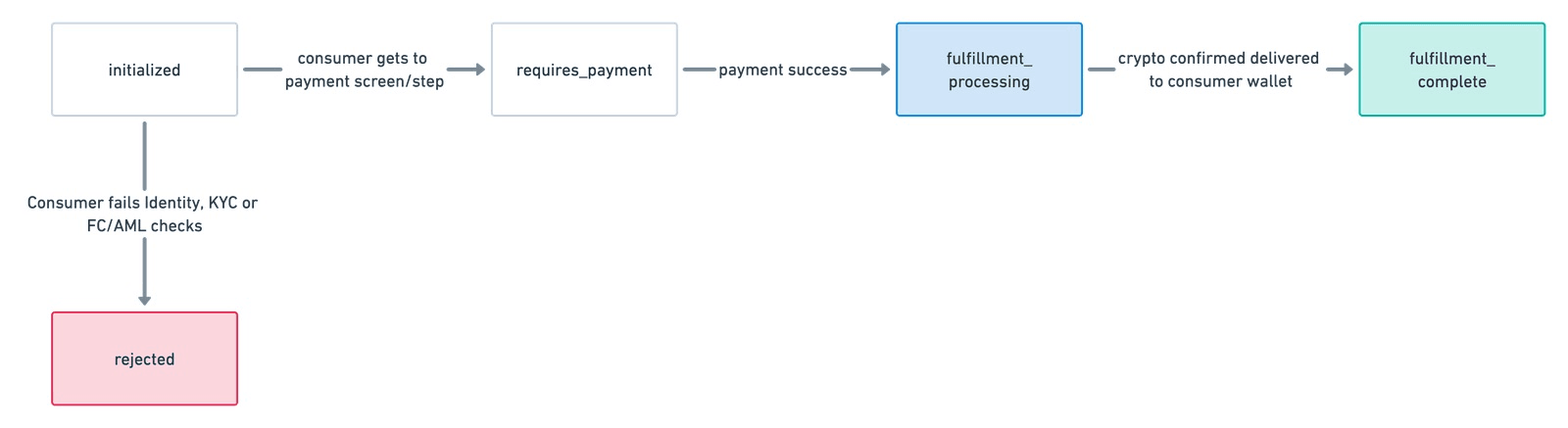
* `initialized`: The application has newly minted the onramp session on the server-side, but the customer hasn’t used it yet. Sessions are in this state until the user onboards and is ready to pay.
* `rejected`: We rejected the customer for some reason (KYC failure, sanctions screening issues, fraud checks).
* `requires_payment`: The user has completed onboarding or sign-in and gets to the payment page. If they attempt payment and fail, they stay in this status.
* `fulfillment_processing`: The customer successfully completed payment. We haven’t delivered the crypto they purchased yet.
* `fulfillment_complete`: The customer was successfully able to pay for crypto and we have confirmed delivery.
### CryptoOnrampSession operations
All endpoints require authentication with your [API key](https://docs.stripe.com/keys)
. The authentication header is omitted in the example requests.
Applications can perform the following operations on a `CryptoOnrampSession`:
* Create a session
* Get an existing session
### Create Session
Endpoint: `POST /v1/crypto/onramp_sessions`
| Parameter name | Type (optional?) default: ? | Details |
| --- | --- | --- |
| wallet\_addresses | String (optional) default: null | The end customer’s crypto wallet address (for each network) to use for this transaction.
* When left null, the user enters their wallet in the onramp UI.
* When set, the platform must set either `destination_networks` or `destination_network` and we perform address validation. Users can still select a different wallet in the onramp UI.
For assets that use destination tags or memos, you can nest a `destination_tags` map in `wallet_addresses` that maps assets to the specified destination tag for a user. |
| source\_currency | String (optional) default: null | The default source fiat currency for the onramp session.
* When left null, a default currency is selected based on user locale.
* When set, it must be one of the fiat currencies supported by onramp. Users can still select a different currency in the onramp UI. |
| source\_amount | String (optional) default: null | The default amount of fiat (in decimal) to exchange into crypto.
* When left null, a default value is computed if `destination_amount` is set.
* When set, setting `source_amount` is mutually exclusive with setting `destination_amount` (only one or the other is supported). We don’t support fractional pennies. If fractional minor units of a currency are passed in, it generates an error. Users can update the value in the onramp UI. |
| destination\_networks | Array (optional) default: null | The list of destination crypto networks user can choose from.
* When left null, all supported crypto networks are shown in the onramp UI.
* When set, it must be a non-empty array where values in the array are each a valid crypto network. Allowed values are `{solana, ethereum, bitcoin, polygon}`. It can be used to lock users to a specific network by passing a single value array. Users _cannot_ override this parameter. |
| destination\_currencies | Array (optional) default: null | The list of destination cryptocurrencies a user can choose from.
* When left null, all supported cryptocurrencies are shown in the onramp UI subject to `destination_networks` if set.
* When set, it must be a non-empty array where all values in the array are valid cryptocurrencies. These are `{eth, matic, sol, usdc, btc}`. You can use it to lock users to a specific cryptocurrency by passing a single value array. Users _cannot_ override this parameter. |
| destination\_network | String (optional) default: null | The default destination crypto network.
* When left null, the first value of `destination_networks` is selected.
* When set, if `destination_networks` is also set, the value of `destination_network` must be present in that array. To lock a `destination_network`, specify that value as the single value for `destination_networks`. Supported destination networks are `{solana, bitcoin, ethereum, polygon}`. Users can select a different network in the onramp UI subject to `destination_networks` if set. |
| destination\_currency | String (optional) default: null | The default destination cryptocurrency.
* When left null, the first value of `destination_currencies` is selected.
* When set, if `destination_currencies` is also set, the value of `destination_currency` must be present in that array. To lock a `destination_currency`, specify that value as the single value for `destination_currencies`. Supported destination currencies are `{eth, matic, sol, usdc, btc}`. Users can select a different cryptocurrency in the onramp UI subject to `destination_currencies` if set. |
| destination\_amount | String (optional) default: null | The default amount of crypto to exchange into.
* When left null, a default value is computed if `source_amount`, `destination_currency`, and `destination_network` are set.
* When set, both `destination_currency` and `destination_network` must also be set. All cryptocurrencies are supported to their full precisions (for example, 18 decimal places for `eth`). We validate and generate an error if the amount exceeds the supported precision based on the exchange currency. Setting `source_amount` is mutually exclusive with setting `destination_amount` (only one or the other is supported). Users can update the amount in the onramp UI. |
| customer\_ip\_address | String (optional) default: null | The IP address of the customer the platform intends to onramp. If the user’s IP is in a region we can’t support, we return an `HTTP 400` with an appropriate error code. We support IPv4 and IPv6 addresses. Geographic supportability is checked again later in the onramp flow, which provides a way to hide the onramp option from ineligible users for a better user experience. |
Sample request and response:
Command Line
`curl -X POST https://api.stripe.com/v1/crypto/onramp_sessions \ -u sk_test_BQokikJOvBiI2HlWgH4olfQ2 : \ -d "wallet_addresses[ethereum]"="0xB00F0759DbeeF5E543Cc3E3B07A6442F5f3928a2" \ -d "source_currency"="usd" \ -d "destination_currency"="eth" \ -d "destination_network"="ethereum" \ -d "destination_currencies[]"="eth" \ -d "destination_networks[]"="ethereum"`
`{ "id": "cos_0MYvv9589O8KAxCGPm84FhVR", "object": "crypto.onramp_session", "client_secret": "cos_0MYvv9589O8KAxCGPm84FhVR_secret_IGBYKVlTlnJL8UGxji48pKxBO00deNcBuVc", "created": 1675794575, "livemode": false, "status": "initialized", "transaction_details": { "destination_currency": "eth", "destination_amount": null, "destination_network": "ethereum", "fees": null, "lock_wallet_address": false, "source_currency": "usd", "source_amount": null, "destination_currencies": [ "eth" ], "destination_networks": [ "ethereum" ], "transaction_id": null, "wallet_address": null, "wallet_addresses": { "bitcoin": null, "ethereum": "0xB00F0759DbeeF5E543Cc3E3B07A6442F5f3928a2", "polygon": null, "solana": null, "stellar": null, "destination_tags": null } } }`
#### Get session
Endpoint: `GET /v1/crypto/onramp_sessions/:id`
| Parameter name | Type (optional?) default: ? | Details |
| --- | --- | --- |
| No supported parameters for this operation! | | |
Here’s an example request:
Command Line
`curl -X GET https://api.stripe.com/v1/crypto/onramp_sessions/cos_0MYvv9589O8KAxCGPm84FhVR \ -u sk_test_BQokikJOvBiI2HlWgH4olfQ2 :`
You receive a response similar to the following:
`{ "id": "cos_0MYvv9589O8KAxCGPm84FhVR", "object": "crypto.onramp_session", "client_secret": "cos_0MYvv9589O8KAxCGPm84FhVR_secret_IGBYKVlTlnJL8UGxji48pKxBO00deNcBuVc", "created": 1675794575, "livemode": false, "status": "initialized", "transaction_details": { "destination_currency": "eth", "destination_amount": null, "destination_network": "ethereum", "fees": null, "lock_wallet_address": false, "source_currency": "usd", "source_amount": null, "destination_currencies": [ "eth" ], "destination_networks": [ "ethereum" ], "transaction_id": null, "wallet_address": null, "wallet_addresses": { "bitcoin": null, "ethereum": "0xB00F0759DbeeF5E543Cc3E3B07A6442F5f3928a2", "polygon": null, "solana": null, "stellar": null, "destination_tags": null } } }`
#### Validation and errors
| Condition | HTTP status | Error code |
| --- | --- | --- |
| We’re unable to mint new sessions because of an incident | 400 | `crypto_onramp_disabled` |
| Based on the `customer_ip_address` parameter, we’re unable to support the given consumer. | 400 | `crypto_onramp_unsupported_country` or `crypto_onramp_unsupportable_customer` |
| Malformed `customer_ip_address` is passed in to the `/v1/crypto/onramp_session` endpoint | 400 | `customer_ip_address` |
| `source_amount` and `destination_amount` are mutually exclusive, but the platform set both. | 400 | `crypto_onramp_invalid_source_destination_pair` |
| One of `destination_currency` and `destination_network` is set, but the other one isn’t | 400 | `crypto_onramp_incomplete_destination_currency_and_network_pair` |
| The combination of `destination_currency` and `destination_network` isn’t valid | 400 | `crypto_onramp_invalid_destination_currency_and_network_pair` |
| `source_amount` is set, but `source_currency` isn’t set | 400 | `crypto_onramp_missing_source_currency` |
| `source_amount` isn’t a positive number | 400 | `crypto_onramp_invalid_source_amount` |
| `destination_amount` is set, but `destination_currency` isn’t set | 400 | `crypto_onramp_missing_destination_currency` |
| `destination_amount` isn’t a positive number | 400 | `crypto_onramp_invalid_destination_amount` |
| The combination of `destination_currencies` and `destination_networks` doesn’t have any supported currencies | 400 | `crypto_onramp_invalid_destination_currencies_and_networks` |
| `destination_currency` isn’t included in `destination_currencies` | 400 | `crypto_onramp_conflicting_destination_currency` |
| `destination_network` isn’t included in `destination_networks` | 400 | `crypto_onramp_conflicting_destination_network` |
| At least one wallet address in `wallet_addresses` is associated with a network that isn’t included in `destination_networks` | 400 | `crypto_onramp_wallet_addresses_not_all_networks_supported` |
| No wallet addresses were provided in `wallet_addresses` but `lock_wallet_address` was set to true | 400 | `crypto_onramp_no_wallet_address_to_lock` |
| The business hasn’t set the `business_name` or `business_url` fields. These are populated in the [Dashboard](https://dashboard.stripe.com/settings/public/)
under `Public business name` and `Business website` | 400 | `crypto_onramp_merchant_not_properly_setup` |
#### Get multiple sessions
Endpoint: `GET /v1/crypto/onramp_sessions`
Fetch multiple onramp sessions at the same time using the [list endpoint](https://docs.stripe.com/api/crypto/onramp_sessions/list)
.
### Webhooks
We send a `crypto.onramp_session_updated` webhook every time the status of an onramp session changes post creation. We won’t send one when a new session is created. You can [configure webhooks](https://docs.stripe.com/webhooks)
in the Dashboard.
The resource used by the webhook will be the `CryptoOnrampSession` resource above:
`{ "id": "evt_123", "object": "event", "data": { "object": { "id": "cos_0MYvv9589O8KAxCGPm84FhVR", "object": "crypto.onramp_session", "client_secret": "cos_0MYvv9589O8KAxCGPm84FhVR_secret_IGBYKVlTlnJL8UGxji48pKxBO00deNcBuVc", "created": 1675794575, "livemode": false, "status": "initialized", "transaction_details": { "destination_currency": "eth", "destination_amount": null, "destination_network": "ethereum", "fees": null, "lock_wallet_address": false, "source_currency": "usd", "source_amount": null, "destination_currencies": [ "eth" ], "destination_networks": [ "ethereum" ], "transaction_id": null, "wallet_address": null, "wallet_addresses": { "bitcoin": null, "ethereum": "0xB00F0759DbeeF5E543Cc3E3B07A6442F5f3928a2", "polygon": null, "solana": null, "stellar": null, "destination_tags": null } } } } }`
### Frontend events
Here is the list of frontend events that you can subscribe to:
`// when the onramp UI is rendered { type: 'onramp_ui_loaded', payload: {session: OnrampSession}, } // when the onramp session object is updated { type: 'onramp_session_updated', payload: {session: OnrampSession}, } // for modal overlay render mode only { type: 'onramp_ui_modal_opened', payload: {session: OnrampSession}, } { type: 'onramp_ui_modal_closed', payload: {session: OnrampSession}, }`
As shown above, events can be subscribed to and unsubscribed to using the standard `addEventListener/removeEventListener` functions over OnrampSession. You can use `'*'` to match all events.
### Session persistence
You can use session persistence to help you provide notifications and keep users engaged with the onramp after fulfilling their purchase.
#### Advantages of session persistence
You might want to persist an onramp session across user visits in some instances. For example, when a user’s onramp session is disrupted or dropped, you could prompt them and provide ways to resume the onramp session later. Or if a user refreshes the page after completing the payment, you can retain the ability to notify them when a previous onramp purchase was fulfilled. For this reason, the OnrampSession object is stateful and stored as a server side resource. By initializing the onramp UI using a previously used OnrampSession client secret, users return to where they left off.
#### Session persistence configuration
A client secret is a unique identifier for the onramp session that stores the lifecycle of a session without leaking sensitive payment information. However, it exposes private information such as wallet addresses. Don’t log it, embed it in URLs, or expose it to anyone other than the customer. Make sure that you have TLS on any page that includes the client secret. If you have a Web2-like account structure, you could link OnrampSession to your user object and fetch it upon authentication. For an account-less Web3 application, it would add user friction to require the use of message signing for authentication. Privacy-preserving local storage yields an acceptable user experience.
Was this page helpful?
YesNo
* Need help? [Contact Support](https://support.stripe.com/)
.
* Join our [early access program](https://insiders.stripe.dev/)
.
* Check out our [changelog](https://docs.stripe.com/changelog)
.
* Questions? [Contact Sales](https://stripe.com/contact/sales)
.
* LLM? [Read llms.txt](https://docs.stripe.com/llms.txt)
.
* Powered by [Markdoc](https://markdoc.dev/)
---
# JavaScript API reference | Stripe Documentation
[Skip to content](https://docs.stripe.com/terminal/references/api/js-sdk#main-content)
JavaScript API reference
[Create account](https://dashboard.stripe.com/register/terminal)
or[Sign in](https://dashboard.stripe.com/login?redirect=https%3A%2F%2Fdocs.stripe.com%2Fterminal%2Freferences%2Fapi%2Fjs-sdk)
[The Stripe Docs logo](https://docs.stripe.com/)
Search
/Ask AI
[Create account](https://dashboard.stripe.com/register/terminal)
[Sign in](https://dashboard.stripe.com/login?redirect=https%3A%2F%2Fdocs.stripe.com%2Fterminal%2Freferences%2Fapi%2Fjs-sdk)
[Get started](https://docs.stripe.com/get-started)
[Payments](https://docs.stripe.com/payments)
[Revenue](https://docs.stripe.com/revenue)
[Platforms and marketplaces](https://docs.stripe.com/connect)
[Money management](https://docs.stripe.com/money-management)
[Developer resources](https://docs.stripe.com/development)
APIs & SDKs
Help
[Overview](https://docs.stripe.com/payments)
About Stripe payments
[Upgrade your integration](https://docs.stripe.com/payments/upgrades)
Payments analytics
Online payments
[Overview](https://docs.stripe.com/payments/online-payments)
[Find your use case](https://docs.stripe.com/payments/use-cases/get-started)
[Managed Payments](https://docs.stripe.com/payments/managed-payments)
Use Payment Links
Build a checkout page
Build an advanced integration
Build an in-app integration
Payment methods
Add payment methods
Manage payment methods
Faster checkout with Link
Payment interfaces
Payment Links
Checkout
Web Elements
In-app Elements
Payment scenarios
Handle multiple currencies
Custom payment flows
Flexible acquiring
Orchestration
In-person payments
Terminal
[Overview](https://docs.stripe.com/terminal)
[Accept in-person payments](https://docs.stripe.com/terminal/overview)
Integration design
[Select your reader](https://docs.stripe.com/terminal/payments/setup-reader)
[Design an integration](https://docs.stripe.com/terminal/designing-integration)
[Quickstart](https://docs.stripe.com/terminal/quickstart)
[Example applications](https://docs.stripe.com/terminal/example-applications)
[Testing](https://docs.stripe.com/terminal/references/testing)
Terminal setup
[Set up your integration](https://docs.stripe.com/terminal/payments/setup-integration)
[Connect to a reader](https://docs.stripe.com/terminal/payments/connect-reader)
Accepting a payment
[Collect card payments](https://docs.stripe.com/terminal/payments/collect-card-payment)
[Additional payment methods](https://docs.stripe.com/terminal/payments/additional-payment-methods)
[Accept offline payments](https://docs.stripe.com/terminal/features/operate-offline/overview)
[Mail order and telephone order payments](https://docs.stripe.com/terminal/features/mail-telephone-orders/overview)
[Regional considerations](https://docs.stripe.com/terminal/payments/regional)
During checkout
[Collect tips](https://docs.stripe.com/terminal/features/collecting-tips/overview)
[Collect and save payment details for future use](https://docs.stripe.com/terminal/features/saving-payment-details/overview)
[Flexible authorizations](https://docs.stripe.com/terminal/features/incremental-authorizations)
After checkout
[Refund transactions](https://docs.stripe.com/terminal/features/refunds)
[Provide receipts](https://docs.stripe.com/terminal/features/receipts)
Customize checkout
[Cart display](https://docs.stripe.com/terminal/features/display)
[Collect on-screen inputs](https://docs.stripe.com/terminal/features/collect-inputs)
[Collect swiped data](https://docs.stripe.com/terminal/features/collect-data)
[Collect tapped data for NFC instruments](https://docs.stripe.com/terminal/features/collect-nfc-data)
[Apps on devices](https://docs.stripe.com/terminal/features/apps-on-devices/overview)
Manage readers
[Order, return, replace readers](https://docs.stripe.com/terminal/fleet/order-and-return-readers)
[Register readers](https://docs.stripe.com/terminal/fleet/register-readers)
[Manage locations and zones](https://docs.stripe.com/terminal/fleet/locations-and-zones)
[Configure readers](https://docs.stripe.com/terminal/fleet/configurations-overview)
[Monitor Readers](https://docs.stripe.com/terminal/fleet/monitor-readers)
[Encryption](https://docs.stripe.com/terminal/fleet/encryption)
References
[API references](https://docs.stripe.com/terminal/references/api)
[Server-driven API reference](https://docs.stripe.com/api/terminal/readers)
JavaScript API reference
[iOS API reference](https://stripe.dev/stripe-terminal-ios/index.html)
[Android API reference](https://stripe.dev/stripe-terminal-android/)
[React Native API reference](https://stripe.dev/stripe-terminal-react-native/)
[Mobile readers](https://docs.stripe.com/terminal/mobile-readers)
[Smart readers](https://docs.stripe.com/terminal/smart-readers)
[SDK migration guide](https://docs.stripe.com/terminal/references/sdk-migration-guide)
[Deployment checklist](https://docs.stripe.com/terminal/references/checklist)
[Stripe Terminal reader product sheets](https://docs.stripe.com/terminal/readers/product-sheets)
Beyond payments
Incorporate your company
Crypto
Financial Connections
Climate
Understand fraud
Radar fraud protection
Manage disputes
Verify identities
United States
English (United States)
[Home](https://docs.stripe.com/ "Home")
[Payments](https://docs.stripe.com/payments "Payments")
Terminal[API references](https://docs.stripe.com/terminal/references/api "API references")
JavaScript API reference
========================
Use our API reference to navigate the Stripe Terminal JavaScript SDK.
---------------------------------------------------------------------
Ask about this page
Copy for LLM
View as Markdown
API methods 
------------------------------------------------------------------------------------------------------
* [StripeTerminal.create()](https://docs.stripe.com/terminal/references/api/js-sdk#stripeterminal-create)
* [discoverReaders()](https://docs.stripe.com/terminal/references/api/js-sdk#discover-readers)
* [connectReader()](https://docs.stripe.com/terminal/references/api/js-sdk#connect-reader)
* [disconnectReader()](https://docs.stripe.com/terminal/references/api/js-sdk#disconnect)
* [getConnectionStatus()](https://docs.stripe.com/terminal/references/api/js-sdk#get-connection-status)
* [getPaymentStatus()](https://docs.stripe.com/terminal/references/api/js-sdk#get-payment-status)
* [clearCachedCredentials()](https://docs.stripe.com/terminal/references/api/js-sdk#clear-cached-credentials)
* [collectPaymentMethod()](https://docs.stripe.com/terminal/references/api/js-sdk#collect-payment-method)
* [cancelCollectPaymentMethod()](https://docs.stripe.com/terminal/references/api/js-sdk#cancel-collect-payment-method)
* [processPayment()](https://docs.stripe.com/terminal/references/api/js-sdk#process-payment)
* [cancelProcessPayment()](https://docs.stripe.com/terminal/references/api/js-sdk#cancel-process-payment)
* [collectSetupIntentPaymentMethod()](https://docs.stripe.com/terminal/references/api/js-sdk#collect-setup-intent-payment-method)
* [cancelCollectSetupIntentPaymentMethod()](https://docs.stripe.com/terminal/references/api/js-sdk#cancel-collect-setup-intent-payment-method)
* [confirmSetupIntent()](https://docs.stripe.com/terminal/references/api/js-sdk#confirm-setup-intent)
* [cancelConfirmSetupIntent()](https://docs.stripe.com/terminal/references/api/js-sdk#cancel-confirm-setup-intent)
* [readReusableCard()](https://docs.stripe.com/terminal/references/api/js-sdk#read-reusable-card)
* [cancelReadReusableCard()](https://docs.stripe.com/terminal/references/api/js-sdk#cancel-read-reusable-card)
* [setReaderDisplay()](https://docs.stripe.com/terminal/references/api/js-sdk#set-reader-display)
* [clearReaderDisplay()](https://docs.stripe.com/terminal/references/api/js-sdk#clear-reader-display)
* [setSimulatorConfiguration()](https://docs.stripe.com/terminal/references/api/js-sdk#stripeterminal-setsimulatorconfig)
* [getSimulatorConfiguration()](https://docs.stripe.com/terminal/references/api/js-sdk#stripeterminal-getsimulatorconfig)
* [collectRefundPaymentMethod()](https://docs.stripe.com/terminal/references/api/js-sdk#stripeterminal-collectrefundpaymentmethod)
* [cancelCollectRefundPaymentMethod()](https://docs.stripe.com/terminal/references/api/js-sdk#stripeterminal-cancelcollectrefundpaymentmethod)
* [processRefund()](https://docs.stripe.com/terminal/references/api/js-sdk#stripeterminal-processrefund)
* [cancelProcessRefund()](https://docs.stripe.com/terminal/references/api/js-sdk#stripeterminal-cancelprocessrefund)
* [collectInputs()](https://docs.stripe.com/terminal/references/api/js-sdk#collect-inputs)
* [cancelCollectInputs()](https://docs.stripe.com/terminal/references/api/js-sdk#cancel-collect-inputs)
### StripeTerminal.create(\[options\]) 
Creates an instance of `StripeTerminal` with the given options:
| Option | Description |
| --- | --- |
| **onFetchConnectionToken** | An event handler that [fetches a connection token](https://docs.stripe.com/terminal/payments/setup-integration?terminal-sdk-platform=js#connection-token)
from your backend. |
| **onUnexpectedReaderDisconnect** | An event handler called when a reader disconnects from your app. |
| **onConnectionStatusChange** optional | An event handler called when the SDK’s ConnectionStatus changes. |
| **onPaymentStatusChange** optional | An event handler called when the SDK’s PaymentStatus changes. |
| **readerBehavior** optional | An object that sets the behavior on the reader throughout the lifecycle of the SDK. See below for readerBehavior configuration options. |
### Reader Behavior Configuration
Today, there is only one behavior configuration option:
| Behavior | Description |
| --- | --- |
| **allowCustomerCancel** | A Boolean that determines whether the customer can cancel `collectPaymentMethod` from the reader’s interface. Defaults to `false`.
**Note:** This property isn’t broadly available, and we’re not accepting users at this time. |
### discoverReaders(\[options\]) 
Begins discovering readers with the given options:
| Option | Description |
| --- | --- |
| **simulated** optional | A Boolean value indicating whether to discover a [simulated reader](https://docs.stripe.com/terminal/references/testing#simulated-reader)
. If left empty, this value defaults to `false`. |
| **location** optional | Return only readers assigned to the given `location`. This parameter is ignored when discovering a simulated reader.
For more information on using locations to filter discovered readers, see [Manage locations](https://docs.stripe.com/terminal/fleet/locations-and-zones)
. |
Returns a `Promise` that resolves to an object with the following fields:
* `discoveredReaders`: A list of discovered [Reader](https://docs.stripe.com/api/terminal/readers/object)
objects, if the command succeeded.
* `error`: An [error](https://docs.stripe.com/terminal/references/api/js-sdk#errors)
, if the command failed.
#### Note
Before you can discover the Verifone P400 in your application, you must [register](https://docs.stripe.com/terminal/payments/connect-reader?reader-type=internet#register-reader)
the reader to your account.
### connectReader(reader, connectOptions) 
Attempts to [connect](https://docs.stripe.com/terminal/payments/connect-reader?reader-type=internet#connect-reader)
to the given reader with the given options:
| Option | Description |
| --- | --- |
| **fail\_if\_in\_use** optional | A Boolean value indicating that the connection fails if the reader is currently connected to a Terminal SDK. If left empty, this value defaults to `false`. |
Returns a `Promise` that resolves to an object with the following fields:
* `reader`: The connected [Reader](https://docs.stripe.com/api/terminal/readers/object)
, if the command succeeded.
* `error`: An [error](https://docs.stripe.com/terminal/references/api/js-sdk#errors)
, if the command failed.
#### Note
Don’t cache the `Reader` object in your application. Connecting to a stale `Reader` can fail if the reader’s IP address has changed.
### disconnectReader() 
Disconnects from the connected reader.
### getConnectionStatus() 
Returns the current connection status.
ConnectionStatus can be one of `connecting`, `connected`, or `not_connected`.
### getPaymentStatus() 
Returns the reader’s payment status.
PaymentStatus can be one of `not_ready`, `ready`, `waiting_for_input`, or `processing`.
### clearCachedCredentials() 
Clears the current [ConnectionToken](https://docs.stripe.com/terminal/payments/setup-integration?terminal-sdk-platform=js#connection-token)
, and any other cached credentials.
Use this method to switch accounts in your application (for example, to switch between live and test Stripe API keys on your backend). To switch accounts, follow these steps:
1. If a reader is connected, call `disconnectReader`.
2. Configure your `onFetchConnectionToken` handler to return connection tokens for the new account.
3. Call `clearCachedCredentials`.
4. Reconnect to a reader. The SDK requests a new connection token from your `onFetchConnectionToken` handler.
### collectPaymentMethod(request, options) 
Begins [collecting a payment method](https://docs.stripe.com/terminal/payments/collect-card-payment#collect-payment)
for a PaymentIntent. This method takes one required parameter, `request`:
* `request`: The `clientSecret` field from a `PaymentIntent` object created on your backend. Learn how to [create a PaymentIntent and pass its client secret](https://docs.stripe.com/payments/accept-a-payment?platform=web&ui=elements#web-create-intent)
.
* `options`: An object containing additional payment parameters.
| Option | Description |
| --- | --- |
| **config\_override** optional | An object that allows you to specify configuration overrides per transaction. This object defaults to null.
`skip_tipping`
* Optional, defaults to false. If true, the reader skips the tipping screen.
`tipping`
* An object that allows you to specify tipping-related options per transaction. It’s described below.
`update_payment_intent`
* A Boolean, when paired with `payment_intent_id`, instructs the call to update the `PaymentIntent` and return the attached `PaymentMethod` with card details.
`enable_customer_cancellation`
* Optional, defaults to false. If true, Android-based smart readers show a cancel button.
`allow_redisplay`
* Required if `setup_future_usage` is set; otherwise, it defaults to `unspecified`. An enum value indicating whether future checkout flows can show this payment method to its customer.
`moto`
* Optional, defaults to false. If true, Android-based smart readers start collection for a [mail order or telephone order](https://docs.stripe.com/terminal/features/mail-telephone-orders/payments)
transaction.
`{ update_payment_intent: boolean, payment_intent_id: string, enable_customer_cancellation: boolean, skip_tipping: boolean, tipping: object, allow_redisplay: string, moto: boolean, }` |
The following option is available for the `tipping` object:
| Option | Description |
| --- | --- |
| **eligible\_amount** optional | A number that allows you to specify the amount of a transaction that percentage-based tips are calculated against. Set this value to 0 or higher.
If it’s equal to 0, tipping is skipped regardless of the value of `skip_tipping`.
If it’s equal to the PaymentIntent amount, the parameter is ignored and the tip is calculated based on the specified amount.
`{ eligible_amount: number, }` |
Returns a `Promise` that resolves to an object with the following fields:
* `paymentIntent`: The updated [PaymentIntent object](https://docs.stripe.com/api/payment_intents/object)
, if the command succeeded.
* `error`: An [error](https://docs.stripe.com/terminal/references/api/js-sdk#errors)
, if the command failed.
For more information on collecting payments, see our [Collecting Payments](https://docs.stripe.com/terminal/payments/collect-card-payment)
guide.
### cancelCollectPaymentMethod() 
Cancels an outstanding [collectPaymentMethod](https://docs.stripe.com/terminal/references/api/js-sdk#collect-payment-method)
command.
Returns a `Promise` that resolves to an empty object when the command has been successfully canceled. If the cancellation fails, the `Promise` resolves to an object with an [error](https://docs.stripe.com/terminal/references/api/js-sdk#errors)
.
### processPayment(paymentIntent, options) 
[Processes](https://docs.stripe.com/terminal/payments/collect-card-payment#process-payment)
a payment after a payment method has been [collected](https://docs.stripe.com/terminal/payments/collect-card-payment#collect-payment)
.
This method takes one required parameter, `paymentIntent`:
* `paymentIntent`: A `PaymentIntent` object obtained from a successful call to `collectPaymentMethod`.
* `options`: An object containing additional payment parameters.
| Option | Description |
| --- | --- |
| **config\_override** optional | An object that allows you to specify configuration overrides per transaction. This object defaults to null.
`return_url`
* The URL to redirect your customer back to after they authenticate or cancel their payment on the payment method’s app or site. We only use this parameter for redirect-based payment methods. The default is null.
`{ return_url: string, }` |
Returns a `Promise` that resolves to an object with the following fields:
* `paymentIntent`: The confirmed [PaymentIntent object](https://docs.stripe.com/api/payment_intents/object)
, if the command succeeded.
* `error`: An [error](https://docs.stripe.com/terminal/references/api/js-sdk#errors)
, if the command failed. For more information, see [Handling processing failures](https://docs.stripe.com/terminal/payments/collect-card-payment#handling-failures)
.
### cancelProcessPayment() 
Cancels an outstanding [processPayment](https://docs.stripe.com/terminal/references/api/js-sdk#process-payment)
command.
Returns a `Promise` that resolves to an empty object when the command has been successfully canceled. If the cancellation fails, the `Promise` resolves to an object with an [error](https://docs.stripe.com/terminal/references/api/js-sdk#errors)
.
### collectSetupIntentPaymentMethod(clientSecret, allowRedisplay, config) 
Begins [collecting a payment method for online reuse](https://docs.stripe.com/terminal/features/saving-payment-details/overview)
for a [SetupIntent](https://docs.stripe.com/api/setup_intents/object)
.
The method takes two required parameters:
* `clientSecret`: The `clientSecret` field from a `SetupIntent` object created on your backend.
* `allowRedisplay`: An enum value indicating whether future checkout flows can show this payment method to its customer.
* `config`: an optional object containing collection configuration.
| Option | Description |
| --- | --- |
| **enable\_customer\_cancellation** | Optional, defaults to false.
If true, Android-based smart readers show a cancel button. |
| **moto** | Optional, defaults to false.
If true, Android-based smart readers start saving a [mail order or telephone order](https://docs.stripe.com/terminal/features/mail-telephone-orders/save-directly)
card. |
Returns a `Promise` that resolves to an object with the following fields:
* `setupIntent`: The updated [SetupIntent object](https://docs.stripe.com/api/setup_intents/object)
, if the command succeeded.
* `error`: An [error](https://docs.stripe.com/terminal/references/api/js-sdk#errors)
, if the command failed.
For more information on saving payment methods, see our [Saving payment details for online payments](https://docs.stripe.com/terminal/features/saving-payment-details/overview)
guide.
### cancelCollectSetupIntentPaymentMethod() 
Cancels an outstanding [collectSetupIntentPaymentMethod](https://docs.stripe.com/terminal/references/api/js-sdk#collect-setup-intent-payment-method)
command.
Returns a `Promise` that resolves to an empty object when the command has been successfully canceled. If the cancellation fails, the `Promise` resolves to an object with an [error](https://docs.stripe.com/terminal/references/api/js-sdk#errors)
.
### confirmSetupIntent(setupIntent) 
[Confirms](https://docs.stripe.com/terminal/features/saving-payment-details/save-directly#submit-payment-method)
a SetupIntent after a payment method has been [collected](https://docs.stripe.com/terminal/features/saving-payment-details/save-directly#collect-payment-method)
.
This method takes a single parameter, a `SetupIntent` object obtained from a successful call to `collectSetupIntentPaymentMethod`.
Returns a `Promise` that resolves to an object with the following fields:
* `setupIntent`: The confirmed [SetupIntent object](https://docs.stripe.com/api/setup_intents/object)
, if the command succeeded.
* `error`: An [error](https://docs.stripe.com/terminal/references/api/js-sdk#errors)
, if the command failed.
### cancelConfirmSetupIntent() 
Cancels an outstanding [confirmSetupIntent](https://docs.stripe.com/terminal/references/api/js-sdk#confirm-setup-intent)
command.
Returns a `Promise` that resolves to an empty object when the command has been successfully canceled. If the cancellation fails, the `Promise` resolves to an object with an [error](https://docs.stripe.com/terminal/references/api/js-sdk#errors)
.
### readReusableCard() 
Reads a card for [online reuse](https://docs.stripe.com/terminal/features/saving-payment-details/overview)
.
Online payments initiated from Terminal do _not_ benefit from the [lower pricing](https://stripe.com/terminal#pricing)
and liability shift given to [standard Terminal payments](https://docs.stripe.com/terminal/payments/collect-card-payment)
. Most integrations do _not_ need to use `readReusableCard`. To only collect an in-person payment from a customer, use the [standard flow](https://docs.stripe.com/terminal/payments/collect-card-payment)
.
Returns a `Promise` that resolves to an object with the following fields:
* `payment_method`: The [PaymentMethod object](https://docs.stripe.com/api/payment_methods/object)
, if the command succeeded.
* `error`: An [error](https://docs.stripe.com/terminal/references/api/js-sdk#errors)
, if the command failed.
#### Note
Currently, you can’t use Stripe Terminal to save contactless cards and mobile wallets (for example, Apple Pay, Google Pay) for later reuse.
### cancelReadReusableCard() 
Cancels an outstanding [readReusableCard](https://docs.stripe.com/terminal/references/api/js-sdk#read-reusable-card)
command.
Returns a `Promise` that resolves to an empty object when the command has been successfully canceled. If the cancellation fails, the `Promise` resolves to an object with an [error](https://docs.stripe.com/terminal/references/api/js-sdk#errors)
.
### setReaderDisplay(displayInfo) 
Updates the reader display with [cart details](https://docs.stripe.com/terminal/features/display)
.
This method takes a `DisplayInfo` object as input.
`{ type: 'cart', cart: { line_items: [ { description: string, amount: number, quantity: number, }, ], tax: number, total: number, currency: string, } }`
Returns a `Promise` that resolves to an empty object if the command succeeds. If the command fails, the `Promise` resolves to an object with an [error](https://docs.stripe.com/terminal/references/api/js-sdk#errors)
.
### clearReaderDisplay() 
If the reader is displaying cart details set with `setReaderDisplay`, this method clears the screen and resets it to the splash screen.
Returns a `Promise` that resolves to an empty object if the command succeeds. If the command fails, the `Promise` resolves to an object with an [error](https://docs.stripe.com/terminal/references/api/js-sdk#errors)
.
### setSimulatorConfiguration(configuration) 
Sets the configuration object for the [simulated card reader](https://docs.stripe.com/terminal/references/testing#simulated-reader)
.
This method only takes effect when connected to the simulated reader; it performs no action otherwise.
The simulated reader will follow the specified configuration only until `processPayment` is complete. At that point, the simulated reader will revert to its default behavior.
Note that this method overwrites any currently active configuration object; to add specific key-value pairs to the object, make sure to use a combination of this method and `getSimulatorConfiguration`.
The configuration options available are:
| Field | Values | Description |
| --- | --- | --- |
| **testCardNumber** | Refer to the [Simulated test cards](https://docs.stripe.com/terminal/references/testing#simulated-test-cards)
list. | Configures the simulated reader to use a test card number as the payment method presented by the user. Use it to test different scenarios in your integration, such as payments with different card brands or processing errors like a declined charge. |
| **testPaymentMethod** | Refer to the [Simulated test cards](https://docs.stripe.com/terminal/references/testing#simulated-test-cards)
list. | Serves the same purpose as `testCardNumber`, but relies on test payment methods instead. |
| **tipAmount** | Any amount or null. | Configures the simulated reader to simulate an on-reader tip amount selected by the customer. |
| **collectInputsResult** | We support testing the following behaviors:
* Succeeded:
* Not skipping inputs: `{ resultType: 'succeeded', skipBehavior: 'none' }`
* Skipping non-required inputs: `{ resultType: 'succeeded', skipBehavior: 'all' }`
* Timeout: `{ resultType: 'timeout' }`
See [Test your integration](https://docs.stripe.com/terminal/features/collect-inputs?terminal-sdk-platform=js#test-your-integration)
for more details. | Configures the simulated reader to simulate [collecting inputs](https://docs.stripe.com/terminal/features/collect-inputs?terminal-sdk-platform=js)
. |
| **paymentMethodType** deprecated | * `card_present` (default)
* `interac_present` | Determine the type of payment method created by the simulated reader when `collectPaymentMethod` is called. |
### getSimulatorConfiguration() 
Returns the currently active configuration object.
The Stripe Terminal JavaScript SDK may overwrite this value as necessary, including (but not limited to) resetting the value after processPayment is complete, and removing unknown key-value pairs.
### collectRefundPaymentMethod(charge\_id, amount, currency, options, config) 
Begins collecting a payment method to be refunded. The method takes two required parameters:
* `charge_id`, the ID of the charge that will be refunded.
* `amount`: a number that represents the amount, in cents, that will be refunded from the charge. This number must be less than or equal to the amount that was charged in the original payment.
* `currency`: Three-letter [ISO code for the currency](https://docs.stripe.com/currencies)
, in lowercase. Must be a [supported currency](https://docs.stripe.com/currencies)
.
* `options`: an optional object containing additional refund parameters.
| Option | Description |
| --- | --- |
| **refund\_application\_fee** | Optional, defaults to false. Connect only.
Boolean indicating whether the application fee should be refunded when refunding this charge. If a full charge refund is given, the full application fee will be refunded. Otherwise, the application fee will be refunded in an amount proportional to the amount of the charge refunded.
An application fee can be refunded only by the application that created the charge. |
| **reverse\_transfer** | Optional, defaults to false. Connect only.
Boolean indicating whether the transfer should be reversed when refunding this charge. The transfer will be reversed proportionally to the amount being refunded (either the entire or partial amount).
A transfer can be reversed only by the application that created the charge. |
* `config`: an optional object containing collection configuration.
| Option | Description |
| --- | --- |
| **enable\_customer\_cancellation** | Optional, defaults to false.
If true, Android-based smart readers show a cancel button. |
Returns a `Promise` that resolves to either:
* an empty object if the payment method collection was successful, or
* an object with an [error](https://docs.stripe.com/terminal/references/api/js-sdk#errors)
field if there was an error while collecting the refund payment method.
### cancelCollectRefundPaymentMethod() 
Cancels an outstanding `collectRefundPaymentMethod` command.
Returns a `Promise` that resolves to an empty object when the command has been successfully canceled. If the cancellation fails, the `Promise` resolves to an object with an [error](https://docs.stripe.com/terminal/references/api/js-sdk#errors)
.
### processRefund() 
Processes an in-progress refund. This method can only be successfully called after `collectRefundPaymentMethod` has returned successfully.
Returns a `Promise` that resolves to either:
* a refund object if the refund was successful, or
* an object with an [error](https://docs.stripe.com/terminal/references/api/js-sdk#errors)
field if there was an error while processing the refund.
### cancelProcessRefund() 
Cancels an outstanding [processRefund](https://docs.stripe.com/terminal/references/api/js-sdk#stripeterminal-processrefund)
command.
Returns a `Promise` that resolves to an empty object when the command has been successfully canceled. If the cancellation fails, the `Promise` resolves to an object with an [error](https://docs.stripe.com/terminal/references/api/js-sdk#errors)
.
### collectInputs(collectInputsParameters) 
Start displaying forms and collecting information from customers using [collect inputs](https://docs.stripe.com/terminal/features/collect-inputs)
.
This method takes a `ICollectInputsParameters` object as input.
Returns a `Promise` that resolves to the collected results if the command succeeds. If the command fails, the `Promise` resolves to an object with an [error](https://docs.stripe.com/terminal/references/api/js-sdk#errors)
.
### cancelCollectInputs() 
Cancels an outstanding `collectInputs` command.
Returns a `Promise` that resolves to an empty object if the cancellation succeeds. If the command fails, the `Promise` resolves to an object with an [error](https://docs.stripe.com/terminal/references/api/js-sdk#errors)
.
Errors 
-------------------------------------------------------------------------------------------------
Errors returned by the JavaScript SDK include an error `code`, as well as a human-readable `message`.
For methods involving a PaymentIntent like [processPayment](https://docs.stripe.com/terminal/payments/collect-card-payment#handling-failures)
, the error may also include a `payment_intent` object.
#### Error codes 
| Code | Description |
| --- | --- |
| `no_established_connection` | The command failed because no reader is connected. |
| `no_active_collect_payment_method_attempt` | `cancelCollectPaymentMethod` can only be called when `collectPaymentMethod` is in progress. |
| `no_active_read_reusable_card_attempt` | `cancelCollectReusableCard` can only be called when `readReusableCard` is in progress. |
| `canceled` | The command was canceled. |
| `cancelable_already_completed` | Cancellation failed because the operation has already completed. |
| `cancelable_already_canceled` | Cancellation failed because the operation has already been canceled. |
| `network_error` | An unknown error occurred when communicating with the server or reader over the network. Refer to the error message for more information. |
| `network_timeout` | The request timed out when communicating with the server or reader over the network. Make sure both your device and the reader are connected to the network with stable connections. |
| `already_connected` | `connectReader` failed because a reader is already connected. |
| `failed_fetch_connection_token` | Failed to fetch a connection token. Make sure your connection token handler returns a promise that resolves to the connection token. |
| `discovery_too_many_readers` | `discoverReaders` returned too many readers. Use [Locations](https://docs.stripe.com/terminal/fleet/locations-and-zones)
to filter discovered readers by location. |
| `invalid_reader_version` | The reader is running an unsupported software version. Please allow the reader to update and try again. |
| `reader_error` | The reader returned an error while processing the request. Refer to the error message for more information. |
| `command_already_in_progress` | The action can’t be performed, because an in-progress action is preventing it. |
Changelog 
----------------------------------------------------------------------------------------------------
If you’re using an earlier version of the JavaScript SDK (before June 7, 2019), update to the latest release by changing the URL of the script your integration includes.
``
For more information on migrating from the Stripe Terminal beta, see the [Terminal Beta Migration Guide](https://docs.stripe.com/terminal/references/sdk-migration-guide)
.
#### 2025-06-02
* Update: Simulated readers support [input collection](https://docs.stripe.com/terminal/features/collect-inputs?terminal-sdk-platform=js#test-your-integration)
.
* Update: `processPayment`, `confirmSetupIntent`, and `processRefund` can now be canceled with `cancelProcessPayment`, `cancelConfirmSetupIntent`, and `cancelProcessRefund` respectively. This allows you to cancel the operation in certain scenarios, such as QR Code payment presentment.
#### v1
* Renamed `confirmPaymentIntent` to `processPayment`.
* Renamed the values for PaymentStatus. PaymentStatus can be one of `not_ready`, `ready`, `waiting_for_input`, or `processing`.
* Removed card details from the response to `collectPaymentMethod`, previously available in `response.paymentIntent.payment_method.card_payment`.
* Receipt information is now located in the `payment_intent.charges[0].payment_method_details.card_present` hash.
* Changed the API for discovering a simulated reader to `discoverReaders({ simulated: true })`.
* Renamed `readSource` to `readReusableCard`. A successful call to `readReusableCard` returns a [PaymentMethod](https://docs.stripe.com/api/payment_methods)
instead of a Source. Payment Methods must be used with PaymentIntents. For more information, see the [Payment Methods API](https://docs.stripe.com/payments/payment-methods)
overview.
* Changed the response of `connectReader` to `{ reader: Reader }`, removing the wrapper `Connection` object.
* Removed the `startReaderDiscovery` and `stopReaderDiscovery` methods. To repeatedly discover readers, you can use the JavaScript `setInterval` method.
* Renamed `clearConnectionToken` to `clearCachedCredentials`.
Was this page helpful?
YesNo
* Need help? [Contact Support](https://support.stripe.com/)
.
* Join our [early access program](https://insiders.stripe.dev/)
.
* Check out our [changelog](https://docs.stripe.com/changelog)
.
* Questions? [Contact Sales](https://stripe.com/contact/sales)
.
* LLM? [Read llms.txt](https://docs.stripe.com/llms.txt)
.
* Powered by [Markdoc](https://markdoc.dev/)
---
# Use the API to create and manage payment links | Stripe Documentation
[Skip to content](https://docs.stripe.com/payment-links/api#main-content)
Use the API to create and manage a payment link
[Create account](https://dashboard.stripe.com/register)
or[Sign in](https://dashboard.stripe.com/login?redirect=https%3A%2F%2Fdocs.stripe.com%2Fpayment-links%2Fapi)
[The Stripe Docs logo](https://docs.stripe.com/)
Search
/Ask AI
[Create account](https://dashboard.stripe.com/register)
[Sign in](https://dashboard.stripe.com/login?redirect=https%3A%2F%2Fdocs.stripe.com%2Fpayment-links%2Fapi)
[Get started](https://docs.stripe.com/get-started)
[Payments](https://docs.stripe.com/payments)
[Revenue](https://docs.stripe.com/revenue)
[Platforms and marketplaces](https://docs.stripe.com/connect)
[Money management](https://docs.stripe.com/money-management)
[Developer resources](https://docs.stripe.com/development)
APIs & SDKs
Help
[Overview](https://docs.stripe.com/payments)
About Stripe payments
[Upgrade your integration](https://docs.stripe.com/payments/upgrades)
Payments analytics
Online payments
[Overview](https://docs.stripe.com/payments/online-payments)
[Find your use case](https://docs.stripe.com/payments/use-cases/get-started)
[Managed Payments](https://docs.stripe.com/payments/managed-payments)
Use Payment Links
[Overview](https://docs.stripe.com/payments/no-code)
[Create a payment link](https://docs.stripe.com/payment-links/create)
[Share a payment link](https://docs.stripe.com/payment-links/share)
[Track a payment link](https://docs.stripe.com/payment-links/url-parameters)
[Create a buy button](https://docs.stripe.com/payment-links/buy-button)
[Customize checkout for payment links](https://docs.stripe.com/payment-links/customize)
[Collect addresses](https://docs.stripe.com/payments/no-code/collect-addresses)
[Charge for shipping](https://docs.stripe.com/payments/no-code/charge-shipping)
[Promotion codes, optional items, and upsells](https://docs.stripe.com/payment-links/promotions)
[After you receive payment from a payment link](https://docs.stripe.com/payment-links/post-payment)
Use the API to create and manage a payment link
Build a checkout page
Build an advanced integration
Build an in-app integration
Payment methods
Add payment methods
Manage payment methods
Faster checkout with Link
Payment interfaces
Payment Links
Checkout
Web Elements
In-app Elements
Payment scenarios
Handle multiple currencies
Custom payment flows
Flexible acquiring
Orchestration
In-person payments
Terminal
Beyond payments
Incorporate your company
Crypto
Financial Connections
Climate
Understand fraud
Radar fraud protection
Manage disputes
Verify identities
United States
English (United States)
[Home](https://docs.stripe.com/ "Home")
[Payments](https://docs.stripe.com/payments "Payments")
Use Payment Links
Use the API to create and manage payment links
==============================================
Create and manage payment links with the API.
---------------------------------------------
Ask about this page
Copy for LLM
View as Markdown
You can use the [Payment Links API](https://docs.stripe.com/api/payment_links/payment_links)
to create a payment link that you can share with your customers. Stripe redirects customers who open this link to a Stripe-hosted payment page.
[Set up your product catalog\
\
\
----------------------------------------------------------------------------------------------------------------------](https://docs.stripe.com/payment-links/api#product-catalog)
Payment Links use [Products](https://docs.stripe.com/api/products)
and [Prices](https://docs.stripe.com/api/prices)
to model what your business is selling. To get started with Payment Links, [create a product](https://docs.stripe.com/api/products/create)
, then use that product to [create a price](https://docs.stripe.com/api/prices/create)
. Alternatively, if you want to create an ad-hoc price or product for one-time use, you can skip this step and use [price\_data](https://docs.stripe.com/api/payment_links/payment_links/create#create_payment_link-line_items-price_data)
in step 2.
Payment Links supports _flat rate_, _tiered_, _package_ and _Customer chooses_ (letting your customer specify the price) prices. _Customer choose prices_ currently doesn’t support recurring payments or donations.
Flat rate
Customer chooses price
Use _Flat rate_ to create a product or subscription with a fixed amount.
Command Line
Select a language
cURL
Stripe CLI
Ruby
Python
PHP
Java
Node
Go
.NET
No results
`curl https://api.stripe.com/v1/prices \ -u " sk_test_BQokikJOvBiI2HlWgH4olfQ2 :" \ -d currency=usd \ -d unit_amount=1000 \ -d product= {{PRODUCT_ID}} `
[Create a payment link\
\
\
----------------------------------------------------------------------------------------------------------------](https://docs.stripe.com/payment-links/api#create-link)
To create a payment link, pass in [line\_items](https://docs.stripe.com/api/payment_links/payment_links/create#create_payment_link-line_items)
. Each line item contains a [price](https://docs.stripe.com/api/payment_links/payment_links/create#create_payment_link-line_items-price)
(or [price\_data](https://docs.stripe.com/api/payment_links/payment_links/create#create_payment_link-line_items-price_data)
) and [quantity](https://docs.stripe.com/api/payment_links/payment_links/create#create_payment_link-line_items-quantity)
. Payment links can contain up to 20 line items when using a flat rate and 1 line item when using _Customer chooses price_.
Price
Price data
Command Line
Select a language
cURL
Stripe CLI
Ruby
Python
PHP
Java
Node
Go
.NET
No results
`curl https://api.stripe.com/v1/payment_links \ -u " sk_test_BQokikJOvBiI2HlWgH4olfQ2 :" \ -d "line_items[0][price]"= {{PRICE_ID}} \ -d "line_items[0][quantity]"=1`
[Share your payment link\
\
\
------------------------------------------------------------------------------------------------------------------](https://docs.stripe.com/payment-links/api#share-link)
Each payment link contains a [url](https://docs.stripe.com/api/payment_links/payment_links/object#payment_link_object-url)
that you can share with your customers through email, on social media, with a website link, in an app, or through other channels.
[Track payments\
\
\
---------------------------------------------------------------------------------------------------------](https://docs.stripe.com/payment-links/api#tracking-payments)
When customers use a payment link to complete a payment, Stripe sends a [checkout.session.completed](https://docs.stripe.com/api/events/types#event_types-checkout.session.completed)
webhook that you can use for fulfillment and reconciliation.
Make sure to listen to additional webhooks in case you’ve enabled payment methods like bank debits or vouchers, which can take 2-14 days to confirm the payment. For more information, see our guide on [fulfilling orders after a customer pays](https://docs.stripe.com/checkout/fulfillment)
.
After a customer completes a purchase, you can redirect them to a URL or display a custom message by setting [after\_completion](https://docs.stripe.com/api/payment_links/payment_links/create#create_payment_link-after_completion)
on the payment link.
Command Line
Select a language
cURL
Stripe CLI
Ruby
Python
PHP
Java
Node
Go
.NET
No results
`curl https://api.stripe.com/v1/payment_links \ -u " sk_test_BQokikJOvBiI2HlWgH4olfQ2 :" \ -d "line_items[0][price]"= {{PRICE_ID}} \ -d "line_items[0][quantity]"=1 \ -d "after_completion[type]"=redirect \ --data-urlencode "after_completion[redirect][url]"="[https://example.com](https://example.com/) "`
[Deactivate a payment link\
\
\
--------------------------------------------------------------------------------------------------------------------](https://docs.stripe.com/payment-links/api#deactivate-link)
After you’ve created a payment link, you can’t delete it. What you can do is deactivate a payment link by setting the [active](https://docs.stripe.com/api/payment_links/payment_links/update#update_payment_link-active)
attribute to `false`.
After you deactivate a link, customers can’t finalize purchases using the link anymore and are redirected to an expiration page. If you want to reuse a deactivated payment link, turn it back on by setting the [active](https://docs.stripe.com/api/payment_links/payment_links/update#update_payment_link-active)
attribute to `true`.
[Configure payment methods\
\
\
--------------------------------------------------------------------------------------------------------------------](https://docs.stripe.com/payment-links/api#configure-payment-method)
By default, Stripe selects the relevant payment methods that you enabled in your Dashboard. To add [supported payment methods](https://docs.stripe.com/payments/payment-methods/payment-method-support)
, enable them in your [Payment methods settings](https://dashboard.stripe.com/settings/payment_methods)
.
[OptionalAllow coupons and promotion codes\
\
\
------------------------------------------------------------------------------------------------------------------------------------](https://docs.stripe.com/payment-links/api#promotion-codes)
[OptionalCollect taxes on your payment link\
\
\
-------------------------------------------------------------------------------------------------------------------------------------](https://docs.stripe.com/payment-links/api#stripe-tax)
[OptionalCollect billing and shipping addresses\
\
\
-----------------------------------------------------------------------------------------------------------------------------------------](https://docs.stripe.com/payment-links/api#address-collection)
[OptionalAllow adjustable quantities\
\
\
------------------------------------------------------------------------------------------------------------------------------](https://docs.stripe.com/payment-links/api#allow-adjustable-quantities)
[OptionalCreate subscriptions\
\
\
-----------------------------------------------------------------------------------------------------------------------](https://docs.stripe.com/payment-links/api#creating-subscriptions)
[OptionalSpecify the payment methods you want to accept\
\
\
-------------------------------------------------------------------------------------------------------------------------------------------------](https://docs.stripe.com/payment-links/api#payment-methods)
[OptionalCollect a terms of service agreement\
\
\
---------------------------------------------------------------------------------------------------------------------------------------](https://docs.stripe.com/payment-links/api#terms-of-service)
[OptionalAdd custom fields\
\
\
--------------------------------------------------------------------------------------------------------------------](https://docs.stripe.com/payment-links/api#custom-fields)
[OptionalCollect application fees using Connect\
\
\
-----------------------------------------------------------------------------------------------------------------------------------------](https://docs.stripe.com/payment-links/api#application-fees)
[OptionalSend post-payment invoices\
\
\
-----------------------------------------------------------------------------------------------------------------------------](https://docs.stripe.com/payment-links/api#post-payment-invoices)
Was this page helpful?
YesNo
* Need help? [Contact Support](https://support.stripe.com/)
.
* Join our [early access program](https://insiders.stripe.dev/)
.
* Check out our [changelog](https://docs.stripe.com/changelog)
.
* Questions? [Contact Sales](https://stripe.com/contact/sales)
.
* LLM? [Read llms.txt](https://docs.stripe.com/llms.txt)
.
* Powered by [Markdoc](https://markdoc.dev/)
---
# Recipient creation using the API | Stripe Documentation
[Skip to content](https://docs.stripe.com/global-payouts/api-recipient-creation#main-content)
API recipient creation
[Create account](https://dashboard.stripe.com/register)
or[Sign in](https://dashboard.stripe.com/login?redirect=https%3A%2F%2Fdocs.stripe.com%2Fglobal-payouts%2Fapi-recipient-creation)
[The Stripe Docs logo](https://docs.stripe.com/)
Search
/Ask AI
[Create account](https://dashboard.stripe.com/register)
[Sign in](https://dashboard.stripe.com/login?redirect=https%3A%2F%2Fdocs.stripe.com%2Fglobal-payouts%2Fapi-recipient-creation)
[Get started](https://docs.stripe.com/get-started)
[Payments](https://docs.stripe.com/payments)
[Revenue](https://docs.stripe.com/revenue)
[Platforms and marketplaces](https://docs.stripe.com/connect)
[Money management](https://docs.stripe.com/money-management)
[Developer resources](https://docs.stripe.com/development)
APIs & SDKs
Help
[Overview](https://docs.stripe.com/money-management)
Start an integration
Use for your business
[Manage money](https://docs.stripe.com/manage-money)
Global Payouts
[Overview](https://docs.stripe.com/global-payouts)
[Get started](https://docs.stripe.com/global-payouts/get-started)
[Fund your storage balance](https://docs.stripe.com/global-payouts/fund-balance)
[Create recipients](https://docs.stripe.com/global-payouts/recipient-creation-options)
[Stripe-hosted recipient creation](https://docs.stripe.com/global-payouts/stripe-hosted-recipient-creation)
API recipient creation
[Send money](https://docs.stripe.com/global-payouts/send-money)
[Manage Global Payouts](https://docs.stripe.com/global-payouts/manage-payouts)
[Test Global Payouts](https://docs.stripe.com/global-payouts/testing)
[Pricing](https://docs.stripe.com/global-payouts/pricing)
[Compare with Connect](https://docs.stripe.com/global-payouts/compare-with-connect)
Capital
Embed in your platform
Treasury
Issuing cards
Capital for platforms
United States
English (United States)
[Home](https://docs.stripe.com/ "Home")
[Money management](https://docs.stripe.com/money-management "Money management")
Global Payouts[Create recipients](https://docs.stripe.com/global-payouts/recipient-creation-options "Create recipients")
Recipient creation using the APIPublic preview
==============================================
Learn how to onboard recipients using the Stripe API.
-----------------------------------------------------
Ask about this page
Copy for LLM
View as Markdown
Build an information collection flow for your recipients to collect recipient and payout method details, and then pass that information to Stripe through our APIs. Your business is responsible for all interactions with your recipients and for collecting all the necessary information to verify them. We update verification requirements as laws and regulations change around the world. Plan on reviewing and updating onboarding requirements on a regular basis to avoid payout failures.
To create a recipient that can receive payouts, you need to create:
* An active recipient with the [Accounts v2 API](https://docs.stripe.com/api/v2/core/accounts/create?api-version=preview)
* An enabled payout method with the [USBankAccount API v2](https://docs.stripe.com/api/v2/us-bank-accounts/create?api-version=preview)
Create forms to collect information
----------------------------------------------------------------------------------------------------------------------------
To make a payout, you need to collect information from your recipient. Create a method or form so your recipients can submit information to you that you then submit to Stripe using the API.
Because verification requirements are a function of legal and regulatory requirements, the information you need to collect might change. Design your application logic for the possibility of additional parameters in the future.
Create a recipient
-----------------------------------------------------------------------------------------------------------
Use the [Accounts v2 API](https://docs.stripe.com/api/v2/core/accounts/create?api-version=preview)
to create your recipient. You must provide the following parameters to create the Account ID:
| Required information | Parameter |
| --- | --- |
| Recipient’s country | `identity.country` |
| Recipient’s type of business | `identity.entity_type` |
| Recipient’s email | `contact_email` |
| The display name for the account. It appears in the Stripe Dashboard and on any invoices that you send to the account. | `display_name` |
| Payout methods you want to enable | `configuration.recipient.capabilities` |
#### Private preview
Making payouts to users outside the US is in private preview. If you’re interested in getting access,
enter your email.
You must specify your intended payout methods with the [Accounts v2 API](https://docs.stripe.com/api/v2/core/accounts/create?api-version=preview)
because some methods require additional information about your recipient before we can enable them. The methods you enable using the `capabilities` parameter determine information that you need to collect for your recipient. For example, `configuration.recipient.capabilities.bank_accounts.local` for a US recipient requires you to submit an account and routing number.
| Payout method | API parameter | Description |
| --- | --- | --- |
| Local bank | `configuration.recipient.capabilities.bank_accounts.local` | Allows the Account to receive OutboundPayments over local bank networks, such as ACH or FPS. |
| Bank wire | `configuration.recipient.capabilities.bank_accounts.wire` | Allows the Account to receive OutboundPayments over wire networks, such as Fedwire or SWIFT. |
| Cards | `configuration.recipient.capabilities.cards` | Allows the Account to receive OutboundPayments over debit card networks, such as Visa Direct or Mastercard Send. |
A recipient can have multiple payout methods enabled. Not all payout methods are available for recipients in all countries. See the full list of [available payout methods by country](https://docs.stripe.com/global-payouts/recipient-creation-options#requirements-for-supported-recipient-countries)
.
After you add these fields and requested payout methods, Stripe determines the additional information required in the API response that you need to submit to make the recipient ready to receive payouts. To receive these requirements, include `requirements`, `configuration.recipient`, and `identity` in the `include` array. Otherwise, Stripe returns a null response, regardless of their actual value.
When you create, retrieve, or update an Account, certain fields only populate in the response if you specify them in the `include` parameter. For any of those fields that you don’t specify, the response includes them as null, regardless of their actual value.
Command Line
Select a language
cURL
Stripe CLI
Ruby
Python
PHP
Java
Node
Go
.NET
No results
`curl -X POST https://api.stripe.com/v2/core/accounts \ -H "Authorization: Bearer sk_test_BQokikJOvBiI2HlWgH4olfQ2 " \ -H "Stripe-Version: 2025-03-31.preview" \ --json '{ "contact_email": "jenny.rosen@example.com", "display_name": "Jenny Rosen", "identity": { "country": "us", "entity_type": "individual" }, "configuration": { "recipient": { "capabilities": { "bank_accounts": { "local": { "requested": true } } } } }, "include": [ "identity", "configuration.recipient", "requirements" ] }'`
Determine required fields to activate a recipient
------------------------------------------------------------------------------------------------------------------------------------------
Use the response from the [Accounts v2 API](https://docs.stripe.com/api/v2/core/accounts/create?api-version=preview)
to inspect the `requirements.entries` to determine the specific fields you need to submit to Stripe. Any `entries` that have the `restricts_capabilities` field are required for the recipient to accept payouts.
`{ "id": "{{CONNECTED_ACCOUNT_ID}}", "object": "v2.core.account", "applied_configurations": [ "recipient" ], "configuration": { "customer": null, "merchant": null, "recipient": { "capabilities": { "bank_accounts": { "local": { "requested": true, "status": "restricted", "status_details": [ { "code": "requirements_past_due", "resolution": "provide_info" } ] }, "wire": null }, "cards": null,`
See all 119 lines
Submit recipient information to Stripe
-------------------------------------------------------------------------------------------------------------------------------
After you determine the additional fields you need to submit, use the [Accounts v2 API](https://docs.stripe.com/api/v2/core/accounts/create?api-version=preview)
to submit the required information. Use the `id` from the response above in the URI.
Command Line
Select a language
cURL
No results
`curl -X POST https://api.stripe.com/v2/core/accounts/ {{CONNECTED_ACCOUNT_ID}} \ -H "Authorization: Bearer sk_test_BQokikJOvBiI2HlWgH4olfQ2 " \ -H "Stripe-Version: 2025-03-31.preview" \ --json '{ "contact_email": "jenny.rosen@example.com", "display_name": "Jenny Rosen", "identity": { "country": "us", "entity_type": "individual", "individual": { "given_name": "Jenny", "surname": "Rosen", "address": { "city": "Brothers", "country": "US", "line1": "27 Fredrick Ave", "postal_code": "97712", "state": "OR" } } }, "include": [ "identity" ] }'`
Confirm that the recipient is enabled
------------------------------------------------------------------------------------------------------------------------------
Use the [Accounts v2 API](https://docs.stripe.com/api/v2/core/accounts/create?api-version=preview)
to retrieve an account and inspect the `status` of the capabilities you’ve requested. The `status` must be `active` for a recipient to receive payouts by your specified payout method.
Command Line
Select a language
cURL
No results
`curl -G https://api.stripe.com/v2/core/accounts/ {{CONNECTED_ACCOUNT_ID}} \ -H "Authorization: Bearer sk_test_BQokikJOvBiI2HlWgH4olfQ2 " \ -H "Stripe-Version: 2025-03-31.preview" \ -d include="configuration.recipient"`
Create payout methods for your recipients
----------------------------------------------------------------------------------------------------------------------------------
Use the [USBankAccount v2 API](https://docs.stripe.com/api/v2/us-bank-accounts/create?api-version=preview)
to submit payout method details to Stripe to enable a payout to a recipient.
USBankAccounts can receive payouts by ACH or wire. If you intend to send payouts by wire, include the `fedwire_routing_number`. Additional fees apply. See [pricing](https://docs.stripe.com/global-payouts/pricing)
for details.
The Stripe-Context header in this request must be the recipient’s Account ID.
Command Line
Select a language
cURL
Stripe CLI
Ruby
Python
PHP
Java
Node
Go
.NET
No results
`curl -X POST https://api.stripe.com/v2/core/vault/us_bank_accounts \ -H "Authorization: Bearer sk_test_BQokikJOvBiI2HlWgH4olfQ2 " \ -H "Stripe-Version: 2025-08-27.preview" \ -H "Stripe-Context: {{CONTEXT}} " \ --json '{ "routing_number": "110000000", "account_number": "000123456789", "fedwire_routing_number": "110000000" }'`
You can also use debit cards as a payout method. However, your recipients must submit their debit card information directly to Stripe. If you’re interested in enabling payouts by debit cards, use the [Account Links v2 API](https://docs.stripe.com/api/v2/core/account-links?api-version=preview)
to create a shareable form for your user to submit their debit card credentials.
View all payout methods for a recipient
--------------------------------------------------------------------------------------------------------------------------------
View all of the created payout methods for a recipient. Call the [Payout Methods API v2](https://docs.stripe.com/api/v2/payout-methods/list?api-version=preview)
and provide the recipient ID.
The Stripe-Context header in this request must be the recipient’s Account ID.
Command Line
Select a language
cURL
Stripe CLI
Ruby
Python
PHP
Java
Node
Go
.NET
No results
`curl https://api.stripe.com/v2/money_management/payout_methods \ -H "Authorization: Bearer sk_test_BQokikJOvBiI2HlWgH4olfQ2 " \ -H "Stripe-Version: 2025-08-27.preview" \ -H "Stripe-Context: {{CONTEXT}} "`
The response contains a list of PayoutMethod objects that a recipient owns. Use the PayoutMethod IDs to make a payout using the [OutboundPayments API](https://docs.stripe.com/api/v2/money-management/outbound-payments?api-version=preview)
. See [Send money](https://docs.stripe.com/global-payouts/send-money)
for more details.
Was this page helpful?
YesNo
* Need help? [Contact Support](https://support.stripe.com/)
.
* Join our [early access program](https://insiders.stripe.dev/)
.
* Check out our [changelog](https://docs.stripe.com/changelog)
.
* Questions? [Contact Sales](https://stripe.com/contact/sales)
.
* LLM? [Read llms.txt](https://docs.stripe.com/llms.txt)
.
* Powered by [Markdoc](https://markdoc.dev/)
---
# Deactivate a billing alert | Stripe API Reference
[](https://docs.stripe.com/api)
Find anything
/
[Introduction](https://docs.stripe.com/api)
[Authentication](https://docs.stripe.com/api/authentication)
[Connected Accounts](https://docs.stripe.com/api/connected-accounts)
[Errors](https://docs.stripe.com/api/errors)
[Expanding Responses](https://docs.stripe.com/api/expanding_objects)
[Idempotent requests](https://docs.stripe.com/api/idempotent_requests)
[Include-dependent response values (API v2)](https://docs.stripe.com/api/include_dependent_response_values)
[Metadata](https://docs.stripe.com/api/metadata)
[Pagination](https://docs.stripe.com/api/pagination)
[Request IDs](https://docs.stripe.com/api/request_ids)
[Versioning](https://docs.stripe.com/api/versioning)
Core Resources
[Balance](https://docs.stripe.com/api/balance "This is an object representing your Stripe balance.")
[Balance Transactions](https://docs.stripe.com/api/balance_transactions "Balance transactions represent funds moving through your Stripe account.")
[Charges](https://docs.stripe.com/api/charges "The Charge object represents a single attempt to move money into your Stripe account.")
[Customers](https://docs.stripe.com/api/customers "This object represents a customer of your business.")
[Customer Session](https://docs.stripe.com/api/customer_sessions "A Customer Session allows you to grant Stripe's frontend SDKs (like Stripe.")
[Disputes](https://docs.stripe.com/api/disputes "A dispute occurs when a customer questions your charge with their card issuer.")
[Events](https://docs.stripe.com/api/events "Snapshot events allow you to track and react to activity in your Stripe integration.")
[Eventsv2](https://docs.stripe.com/api/v2/core/events "Events are generated to keep you informed of activity in your business account.")
[Event Destinationsv2](https://docs.stripe.com/api/v2/core/event_destinations "Set up an event destination to receive events from Stripe across multiple destination types, incl...")
[Files](https://docs.stripe.com/api/files "This object represents files hosted on Stripe's servers.")
[File Links](https://docs.stripe.com/api/file_links "To share the contents of a File object with non-Stripe users, you can create a FileLink.")
[Mandates](https://docs.stripe.com/api/mandates "A Mandate is a record of the permission that your customer gives you to debit their payment method.")
[Payment Intents](https://docs.stripe.com/api/payment_intents "A PaymentIntent guides you through the process of collecting a payment from your customer.")
[Setup Intents](https://docs.stripe.com/api/setup_intents "A SetupIntent guides you through the process of setting up and saving a customer's payment creden...")
[Setup Attempts](https://docs.stripe.com/api/setup_attempts "A SetupAttempt describes one attempted confirmation of a SetupIntent, whether that confirmation i...")
[Payouts](https://docs.stripe.com/api/payouts "A Payout object is created when you receive funds from Stripe, or when you initiate a payout to e...")
[Refunds](https://docs.stripe.com/api/refunds "Refund objects allow you to refund a previously created charge that isn't refunded yet.")
[Confirmation Token](https://docs.stripe.com/api/confirmation_tokens "ConfirmationTokens help transport client side data collected by Stripe JS over to your server for...")
[Tokens](https://docs.stripe.com/api/tokens "Tokenization is the process Stripe uses to collect sensitive card or bank account details, or per...")
Payment Methods
[Payment Methods](https://docs.stripe.com/api/payment_methods "PaymentMethod objects represent your customer's payment instruments.")
[Payment Method Configurations](https://docs.stripe.com/api/payment_method_configurations "PaymentMethodConfigurations control which payment methods are displayed to your customers when yo...")
[Payment Method Domains](https://docs.stripe.com/api/payment_method_domains "A payment method domain represents a web domain that you have registered with Stripe.")
[Bank Accounts](https://docs.stripe.com/api/customer_bank_accounts "These bank accounts are payment methods on Customer objects.")
[Cash Balance](https://docs.stripe.com/api/cash_balance "A customer's Cash balance represents real funds.")
[Cash Balance Transaction](https://docs.stripe.com/api/cash_balance_transactions "Customers with certain payments enabled have a cash balance, representing funds that were paid by...")
[Cards](https://docs.stripe.com/api/cards "You can store multiple cards on a customer in order to charge the customer later.")
[Sources](https://docs.stripe.com/api/sources "Source objects allow you to accept a variety of payment methods.")
Products
[Products](https://docs.stripe.com/api/products "Products describe the specific goods or services you offer to your customers.")
[Prices](https://docs.stripe.com/api/prices "Prices define the unit cost, currency, and (optional) billing cycle for both recurring and one-ti...")
[Coupons](https://docs.stripe.com/api/coupons "A coupon contains information about a percent-off or amount-off discount you might want to apply ...")
[Promotion Code](https://docs.stripe.com/api/promotion_codes "A Promotion Code represents a customer-redeemable code for a coupon.")
[Discounts](https://docs.stripe.com/api/discounts "A discount represents the actual application of a coupon or promotion code.")
[Tax Code](https://docs.stripe.com/api/tax_codes "Tax codes classify goods and services for tax purposes.")
[Tax Rate](https://docs.stripe.com/api/tax_rates "Tax rates can be applied to invoices, subscriptions and Checkout Sessions to collect tax.")
[Shipping Rates](https://docs.stripe.com/api/shipping_rates "Shipping rates describe the price of shipping presented to your customers and applied to a purchase.")
Checkout
[Checkout Sessions](https://docs.stripe.com/api/checkout/sessions "A Checkout Session represents your customer's session as they pay for one-time purchases or subsc...")
Payment Links
[Payment Link](https://docs.stripe.com/api/payment-link "A payment link is a shareable URL that will take your customers to a hosted payment page.")
Billing
[Credit Note](https://docs.stripe.com/api/credit_notes "Issue a credit note to adjust an invoice's amount after the invoice is finalized.")
[Customer Balance Transaction](https://docs.stripe.com/api/customer_balance_transactions "Each customer has a Balance value, which denotes a debit or credit that's automatically applied t...")
[Customer Portal Session](https://docs.stripe.com/api/customer_portal/sessions "The Billing customer portal is a Stripe-hosted UI for subscription and billing management.")
[Customer Portal Configuration](https://docs.stripe.com/api/customer_portal/configurations "A portal configuration describes the functionality and behavior of a portal session.")
[Invoices](https://docs.stripe.com/api/invoices "Invoices are statements of amounts owed by a customer, and are either generated one-off, or gener...")
[Invoice Items](https://docs.stripe.com/api/invoiceitems "Invoice Items represent the component lines of an invoice.")
[Invoice Line Item](https://docs.stripe.com/api/invoice-line-item "Invoice Line Items represent the individual lines within an invoice and only exist within the con...")
[Invoice Payment](https://docs.stripe.com/api/invoice-payment "Invoice Payments represent payments made against invoices.")
[Invoice Rendering Templates](https://docs.stripe.com/api/invoice-rendering-template "Invoice Rendering Templates are used to configure how invoices are rendered on surfaces like the ...")
[Billing Profilev2](https://docs.stripe.com/api/v2/billing-profile "A Billing Profile is a representation of how a bill is paid, separating payment behavior from cus...")
[Billing Intentsv2](https://docs.stripe.com/api/v2/billing-intents "A Billing Intent represents a request to create, modify or cancel subscriptions.")
[Alerts](https://docs.stripe.com/api/billing/alert "A billing alert is a resource that notifies you when a certain usage threshold on a meter is cros...")
[The Alert object](https://docs.stripe.com/api/billing/alert/object "A billing alert is a resource that notifies you when a certain usage threshold on a meter is cros...")
[Create a billing alert](https://docs.stripe.com/api/billing/alert/create)
[Retrieve a billing alert](https://docs.stripe.com/api/billing/alert/retrieve)
[List billing alerts](https://docs.stripe.com/api/billing/alert/list)
[Activate a billing alert](https://docs.stripe.com/api/billing/alert/activate "Reactivates this alert, allowing it to trigger again.")
[Archive a billing alert](https://docs.stripe.com/api/billing/alert/archive "Archives this alert, removing it from the list view and APIs.")
[Deactivate a billing alert](https://docs.stripe.com/api/billing/alert/deactivate "Deactivates this alert, preventing it from triggering.")
[Meters](https://docs.stripe.com/api/billing/meter "Meters specify how to aggregate meter events over a billing period.")
[Meter Events](https://docs.stripe.com/api/billing/meter-event "Meter events represent actions that customers take in your system.")
[Meter Eventsv2](https://docs.stripe.com/api/v2/billing-meter "Meter events are used to report customer usage of your product or service.")
[Meter Event Adjustment](https://docs.stripe.com/api/billing/meter-event-adjustment "A billing meter event adjustment is a resource that allows you to cancel a meter event.")
[Meter Event Adjustmentsv2](https://docs.stripe.com/api/v2/billing-meter-adjustment "A billing meter event adjustment is a resource that allows you to cancel a meter event.")
[Meter Event Streamsv2](https://docs.stripe.com/api/v2/billing-meter-stream "You can send a higher-throughput of meter events using meter event streams.")
[Meter Event Summary](https://docs.stripe.com/api/billing/meter-event-summary "A billing meter event summary represents an aggregated view of a customer's billing meter events ...")
[Meter Usage Data](https://docs.stripe.com/api/billing/analytics/meter-usage "A billing meter usage event represents an aggregated view of a customer’s billing meter events wi...")
[Credit Grant](https://docs.stripe.com/api/billing/credit-grant "A credit grant is an API resource that documents the allocation of some billing credits to a cust...")
[Credit Balance Summary](https://docs.stripe.com/api/billing/credit-balance-summary "Indicates the billing credit balance for billing credits granted to a customer.")
[Credit Balance Transaction](https://docs.stripe.com/api/billing/credit-balance-transaction "A credit balance transaction is a resource representing a transaction (either a credit or a debit...")
[Plans](https://docs.stripe.com/api/plans "You can now model subscriptions more flexibly using the Prices API.")
[Billing Cadencesv2](https://docs.stripe.com/api/v2/billing-cadences "A Billing Cadence describes when to bill a certain Payer.")
[License Feesv2](https://docs.stripe.com/api/v2/license-fees "A License Fee describes quantity-based pricing such as seat-based pricing.")
[License Fee Subscriptionsv2](https://docs.stripe.com/api/v2/license-fee-subscriptions "A License Fee Subscription links one License Fee to a specific Billing Cadence.")
[Metered Itemsv2](https://docs.stripe.com/api/v2/metered-items "A Metered Item represents any item that you bill customers for based on how much they use it, suc...")
[Custom Pricing Unitsv2](https://docs.stripe.com/api/v2/custom-pricing-units "The Custom Pricing Unit object.")
[Licensed Itemsv2](https://docs.stripe.com/api/v2/licensed-items "A Licensed Item represents any item that you bill customers for based on the subscribed quantity.")
[Service Actionsv2](https://docs.stripe.com/api/v2/service-actions "A Service Action represents a recurring, automated action that can be applied as part of a subscr...")
[Rate Cardsv2](https://docs.stripe.com/api/v2/rate-cards "A Rate Card describes usage-based pricing.")
[Rate Card Subscriptionsv2](https://docs.stripe.com/api/v2/rate-card-subscriptions "A Rate Card Subscription links a Rate Card to a specific Billing Cadence.")
[Pricing Plansv2](https://docs.stripe.com/api/v2/pricing-plans "A Pricing Plan describes a collection of pricing components that can be used to bill customers.")
[Pricing Plan Subscriptionsv2](https://docs.stripe.com/api/v2/pricing-plan-subscriptions "A Pricing Plan Subscription links a Pricing Plan to a specific Billing Cadence.")
[Quote](https://docs.stripe.com/api/quotes "A Quote is a way to model prices that you'd like to provide to a customer.")
[Subscriptions](https://docs.stripe.com/api/subscriptions "Subscriptions allow you to charge a customer on a recurring basis.")
[Subscription Items](https://docs.stripe.com/api/subscription_items "Subscription items allow you to create customer subscriptions with more than one plan, making it ...")
[Subscription Schedule](https://docs.stripe.com/api/subscription_schedules "A subscription schedule allows you to create and manage the lifecycle of a subscription by predef...")
[Tax IDs](https://docs.stripe.com/api/tax_ids "You can add one or multiple tax IDs to a customer or account.")
[Test Clocks](https://docs.stripe.com/api/test_clocks "A test clock enables deterministic control over objects in testmode.")
Capital
[Financing Offer](https://docs.stripe.com/api/capital/financing_offers "This is an object representing an offer of financing from Stripe Capital to a Connect subaccount.")
[Financing Summary](https://docs.stripe.com/api/capital/financing_summary "A financing object describes an account's current financing state.")
Connect
[Accounts](https://docs.stripe.com/api/accounts "This is an object representing a Stripe account.")
[Login Links](https://docs.stripe.com/api/accounts/login_link "Login Links are single-use URLs that takes an Express account to the login page for their Stripe ...")
[Account Links](https://docs.stripe.com/api/account_links "Account Links are the means by which a Connect platform grants a connected account permission to ...")
[Account Session](https://docs.stripe.com/api/account_sessions "An AccountSession allows a Connect platform to grant access to a connected account in Connect emb...")
[Application Fees](https://docs.stripe.com/api/application_fees "When you collect a transaction fee on top of a charge made for your user (using Connect), an Appl...")
[Application Fee Refunds](https://docs.stripe.com/api/fee_refunds "Application Fee Refund objects allow you to refund an application fee that has previously been cr...")
[Capabilities](https://docs.stripe.com/api/capabilities "This is an object representing a capability for a Stripe account.")
[Country Specs](https://docs.stripe.com/api/country_specs "Stripe needs to collect certain pieces of information about each account created.")
[External Bank Accounts](https://docs.stripe.com/api/external_accounts "External bank accounts are financial accounts associated with a Stripe platform's connected accou...")
[External Account Cards](https://docs.stripe.com/api/external_account_cards "External account cards are debit cards associated with a Stripe platform's connected accounts for...")
[Person](https://docs.stripe.com/api/persons "This is an object representing a person associated with a Stripe account.")
[Top-ups](https://docs.stripe.com/api/topups "To top up your Stripe balance, you create a top-up object.")
[Transfers](https://docs.stripe.com/api/transfers "A Transfer object is created when you move funds between Stripe accounts as part of Connect.")
[Transfer Reversals](https://docs.stripe.com/api/transfer_reversals "Stripe Connect platforms can reverse transfers made to a connected account, either entirely or pa...")
[Secrets](https://docs.stripe.com/api/secret_management "Secret Store is an API that allows Stripe Apps developers to securely persist secrets for use by ...")
Reserves
Fraud
Issuing
Terminal
Treasury
Entitlements
Sigma
Reporting
Financial Connections
Tax
Identity
Crypto
Climate
Forwarding
Privacy
Webhooks
Sandboxes
[Claimable Sandboxesv2](https://docs.stripe.com/api/v2/claimable-sandboxes "A claimable sandbox represents a Stripe sandbox that is anonymous.")
[Deactivate a billing alert](https://docs.stripe.com/api/billing/alert/deactivate)
===================================================================================
Ask about this section
Copy for LLM
View as Markdown
Deactivates this alert, preventing it from triggering.
### Parameters
No parameters.
### Returns
Returns the alert with its updated status.
POST /v1/billing/alerts/:id/deactivate
Server-side language
cURLStripe CLIRubyPythonPHPJavaNode.jsGo.NET
curl -X POST https://api.stripe.com/v1/billing/alerts/alrt_12345/deactivate \ -u "sk_test_BQokikJ...2HlWgH4olfQ2sk_test_BQokikJOvBiI2HlWgH4olfQ2:"
Response
{ "id": "alrt_12345", "object": "billing.alert", "title": "API Request usage alert", "livemode": true, "alert_type": "usage_threshold", "usage_threshold": { "gte": 10000, "meter": "mtr_12345", "recurrence": "one_time" }, "status": "inactive"}
[Meters](https://docs.stripe.com/api/billing/meter)
====================================================
Ask about this section
Copy for LLM
View as Markdown
Meters specify how to aggregate meter events over a billing period. Meter events represent the actions that customers take in your system. Meters attach to prices and form the basis of the bill.
Related guide: [Usage based billing](https://docs.stripe.com/billing/subscriptions/usage-based)
Endpoints
[POST/v1/billing/meters](https://docs.stripe.com/api/billing/meter/create)
[POST/v1/billing/meters/:id](https://docs.stripe.com/api/billing/meter/update)
[GET/v1/billing/meters/:id](https://docs.stripe.com/api/billing/meter/retrieve)
[GET/v1/billing/meters](https://docs.stripe.com/api/billing/meter/list)
[POST/v1/billing/meters/:id/deactivate](https://docs.stripe.com/api/billing/meter/deactivate)
[POST/v1/billing/meters/:id/reactivate](https://docs.stripe.com/api/billing/meter/reactivate)
Show
[Meter Events](https://docs.stripe.com/api/billing/meter-event)
================================================================
Ask about this section
Copy for LLM
View as Markdown
Meter events represent actions that customers take in your system. You can use meter events to bill a customer based on their usage. Meter events are associated with billing meters, which define both the contents of the event’s payload and how to aggregate those events.
Endpoints
[POST/v1/billing/meter\_events](https://docs.stripe.com/api/billing/meter-event/create)
Show
[Meter Events](https://docs.stripe.com/api/v2/billing-meter)
v2
================================================================
Ask about this section
Copy for LLM
View as Markdown
Meter events are used to report customer usage of your product or service. Meter events are associated with billing meters, which define the shape of the event’s payload and how those events are aggregated. Meter events are processed asynchronously, so they may not be immediately reflected in aggregates or on upcoming invoices.
[Learn more about calling API v2 endpoints.](https://docs.stripe.com/api-v2-overview)
Endpoints
[POST/v2/billing/meter\_events](https://docs.stripe.com/api/v2/billing/meter-event/create)
Show
[Meter Event Adjustment](https://docs.stripe.com/api/billing/meter-event-adjustment)
=====================================================================================
Ask about this section
Copy for LLM
View as Markdown
A billing meter event adjustment is a resource that allows you to cancel a meter event. For example, you might create a billing meter event adjustment to cancel a meter event that was created in error or attached to the wrong customer.
Endpoints
[POST/v1/billing/meter\_event\_adjustments](https://docs.stripe.com/api/billing/meter-event-adjustment/create)
Show
---
# The Crypto Onramp Session object | Stripe API Reference
[](https://docs.stripe.com/api)
Find anything
/
[Introduction](https://docs.stripe.com/api)
[Authentication](https://docs.stripe.com/api/authentication)
[Connected Accounts](https://docs.stripe.com/api/connected-accounts)
[Errors](https://docs.stripe.com/api/errors)
[Expanding Responses](https://docs.stripe.com/api/expanding_objects)
[Idempotent requests](https://docs.stripe.com/api/idempotent_requests)
[Include-dependent response values (API v2)](https://docs.stripe.com/api/include_dependent_response_values)
[Metadata](https://docs.stripe.com/api/metadata)
[Pagination](https://docs.stripe.com/api/pagination)
[Request IDs](https://docs.stripe.com/api/request_ids)
[Versioning](https://docs.stripe.com/api/versioning)
Core Resources
[Balance](https://docs.stripe.com/api/balance "This is an object representing your Stripe balance.")
[Balance Transactions](https://docs.stripe.com/api/balance_transactions "Balance transactions represent funds moving through your Stripe account.")
[Charges](https://docs.stripe.com/api/charges "The Charge object represents a single attempt to move money into your Stripe account.")
[Customers](https://docs.stripe.com/api/customers "This object represents a customer of your business.")
[Customer Session](https://docs.stripe.com/api/customer_sessions "A Customer Session allows you to grant Stripe's frontend SDKs (like Stripe.")
[Disputes](https://docs.stripe.com/api/disputes "A dispute occurs when a customer questions your charge with their card issuer.")
[Events](https://docs.stripe.com/api/events "Snapshot events allow you to track and react to activity in your Stripe integration.")
[Eventsv2](https://docs.stripe.com/api/v2/core/events "Events are generated to keep you informed of activity in your business account.")
[Event Destinationsv2](https://docs.stripe.com/api/v2/core/event_destinations "Set up an event destination to receive events from Stripe across multiple destination types, incl...")
[Files](https://docs.stripe.com/api/files "This object represents files hosted on Stripe's servers.")
[File Links](https://docs.stripe.com/api/file_links "To share the contents of a File object with non-Stripe users, you can create a FileLink.")
[Mandates](https://docs.stripe.com/api/mandates "A Mandate is a record of the permission that your customer gives you to debit their payment method.")
[Payment Intents](https://docs.stripe.com/api/payment_intents "A PaymentIntent guides you through the process of collecting a payment from your customer.")
[Setup Intents](https://docs.stripe.com/api/setup_intents "A SetupIntent guides you through the process of setting up and saving a customer's payment creden...")
[Setup Attempts](https://docs.stripe.com/api/setup_attempts "A SetupAttempt describes one attempted confirmation of a SetupIntent, whether that confirmation i...")
[Payouts](https://docs.stripe.com/api/payouts "A Payout object is created when you receive funds from Stripe, or when you initiate a payout to e...")
[Refunds](https://docs.stripe.com/api/refunds "Refund objects allow you to refund a previously created charge that isn't refunded yet.")
[Confirmation Token](https://docs.stripe.com/api/confirmation_tokens "ConfirmationTokens help transport client side data collected by Stripe JS over to your server for...")
[Tokens](https://docs.stripe.com/api/tokens "Tokenization is the process Stripe uses to collect sensitive card or bank account details, or per...")
Payment Methods
[Payment Methods](https://docs.stripe.com/api/payment_methods "PaymentMethod objects represent your customer's payment instruments.")
[Payment Method Configurations](https://docs.stripe.com/api/payment_method_configurations "PaymentMethodConfigurations control which payment methods are displayed to your customers when yo...")
[Payment Method Domains](https://docs.stripe.com/api/payment_method_domains "A payment method domain represents a web domain that you have registered with Stripe.")
[Bank Accounts](https://docs.stripe.com/api/customer_bank_accounts "These bank accounts are payment methods on Customer objects.")
[Cash Balance](https://docs.stripe.com/api/cash_balance "A customer's Cash balance represents real funds.")
[Cash Balance Transaction](https://docs.stripe.com/api/cash_balance_transactions "Customers with certain payments enabled have a cash balance, representing funds that were paid by...")
[Cards](https://docs.stripe.com/api/cards "You can store multiple cards on a customer in order to charge the customer later.")
[Sources](https://docs.stripe.com/api/sources "Source objects allow you to accept a variety of payment methods.")
Products
[Products](https://docs.stripe.com/api/products "Products describe the specific goods or services you offer to your customers.")
[Prices](https://docs.stripe.com/api/prices "Prices define the unit cost, currency, and (optional) billing cycle for both recurring and one-ti...")
[Coupons](https://docs.stripe.com/api/coupons "A coupon contains information about a percent-off or amount-off discount you might want to apply ...")
[Promotion Code](https://docs.stripe.com/api/promotion_codes "A Promotion Code represents a customer-redeemable code for a coupon.")
[Discounts](https://docs.stripe.com/api/discounts "A discount represents the actual application of a coupon or promotion code.")
[Tax Code](https://docs.stripe.com/api/tax_codes "Tax codes classify goods and services for tax purposes.")
[Tax Rate](https://docs.stripe.com/api/tax_rates "Tax rates can be applied to invoices, subscriptions and Checkout Sessions to collect tax.")
[Shipping Rates](https://docs.stripe.com/api/shipping_rates "Shipping rates describe the price of shipping presented to your customers and applied to a purchase.")
Checkout
[Checkout Sessions](https://docs.stripe.com/api/checkout/sessions "A Checkout Session represents your customer's session as they pay for one-time purchases or subsc...")
Payment Links
[Payment Link](https://docs.stripe.com/api/payment-link "A payment link is a shareable URL that will take your customers to a hosted payment page.")
Billing
[Credit Note](https://docs.stripe.com/api/credit_notes "Issue a credit note to adjust an invoice's amount after the invoice is finalized.")
[Customer Balance Transaction](https://docs.stripe.com/api/customer_balance_transactions "Each customer has a Balance value, which denotes a debit or credit that's automatically applied t...")
[Customer Portal Session](https://docs.stripe.com/api/customer_portal/sessions "The Billing customer portal is a Stripe-hosted UI for subscription and billing management.")
[Customer Portal Configuration](https://docs.stripe.com/api/customer_portal/configurations "A portal configuration describes the functionality and behavior of a portal session.")
[Invoices](https://docs.stripe.com/api/invoices "Invoices are statements of amounts owed by a customer, and are either generated one-off, or gener...")
[Invoice Items](https://docs.stripe.com/api/invoiceitems "Invoice Items represent the component lines of an invoice.")
[Invoice Line Item](https://docs.stripe.com/api/invoice-line-item "Invoice Line Items represent the individual lines within an invoice and only exist within the con...")
[Invoice Payment](https://docs.stripe.com/api/invoice-payment "Invoice Payments represent payments made against invoices.")
[Invoice Rendering Templates](https://docs.stripe.com/api/invoice-rendering-template "Invoice Rendering Templates are used to configure how invoices are rendered on surfaces like the ...")
[Billing Profilev2](https://docs.stripe.com/api/v2/billing-profile "A Billing Profile is a representation of how a bill is paid, separating payment behavior from cus...")
[Billing Intentsv2](https://docs.stripe.com/api/v2/billing-intents "A Billing Intent represents a request to create, modify or cancel subscriptions.")
[Alerts](https://docs.stripe.com/api/billing/alert "A billing alert is a resource that notifies you when a certain usage threshold on a meter is cros...")
[Meters](https://docs.stripe.com/api/billing/meter "Meters specify how to aggregate meter events over a billing period.")
[Meter Events](https://docs.stripe.com/api/billing/meter-event "Meter events represent actions that customers take in your system.")
[Meter Eventsv2](https://docs.stripe.com/api/v2/billing-meter "Meter events are used to report customer usage of your product or service.")
[Meter Event Adjustment](https://docs.stripe.com/api/billing/meter-event-adjustment "A billing meter event adjustment is a resource that allows you to cancel a meter event.")
[Meter Event Adjustmentsv2](https://docs.stripe.com/api/v2/billing-meter-adjustment "A billing meter event adjustment is a resource that allows you to cancel a meter event.")
[Meter Event Streamsv2](https://docs.stripe.com/api/v2/billing-meter-stream "You can send a higher-throughput of meter events using meter event streams.")
[Meter Event Summary](https://docs.stripe.com/api/billing/meter-event-summary "A billing meter event summary represents an aggregated view of a customer's billing meter events ...")
[Meter Usage Data](https://docs.stripe.com/api/billing/analytics/meter-usage "A billing meter usage event represents an aggregated view of a customer’s billing meter events wi...")
[Credit Grant](https://docs.stripe.com/api/billing/credit-grant "A credit grant is an API resource that documents the allocation of some billing credits to a cust...")
[Credit Balance Summary](https://docs.stripe.com/api/billing/credit-balance-summary "Indicates the billing credit balance for billing credits granted to a customer.")
[Credit Balance Transaction](https://docs.stripe.com/api/billing/credit-balance-transaction "A credit balance transaction is a resource representing a transaction (either a credit or a debit...")
[Plans](https://docs.stripe.com/api/plans "You can now model subscriptions more flexibly using the Prices API.")
[Billing Cadencesv2](https://docs.stripe.com/api/v2/billing-cadences "A Billing Cadence describes when to bill a certain Payer.")
[License Feesv2](https://docs.stripe.com/api/v2/license-fees "A License Fee describes quantity-based pricing such as seat-based pricing.")
[License Fee Subscriptionsv2](https://docs.stripe.com/api/v2/license-fee-subscriptions "A License Fee Subscription links one License Fee to a specific Billing Cadence.")
[Metered Itemsv2](https://docs.stripe.com/api/v2/metered-items "A Metered Item represents any item that you bill customers for based on how much they use it, suc...")
[Custom Pricing Unitsv2](https://docs.stripe.com/api/v2/custom-pricing-units "The Custom Pricing Unit object.")
[Licensed Itemsv2](https://docs.stripe.com/api/v2/licensed-items "A Licensed Item represents any item that you bill customers for based on the subscribed quantity.")
[Service Actionsv2](https://docs.stripe.com/api/v2/service-actions "A Service Action represents a recurring, automated action that can be applied as part of a subscr...")
[Rate Cardsv2](https://docs.stripe.com/api/v2/rate-cards "A Rate Card describes usage-based pricing.")
[Rate Card Subscriptionsv2](https://docs.stripe.com/api/v2/rate-card-subscriptions "A Rate Card Subscription links a Rate Card to a specific Billing Cadence.")
[Pricing Plansv2](https://docs.stripe.com/api/v2/pricing-plans "A Pricing Plan describes a collection of pricing components that can be used to bill customers.")
[Pricing Plan Subscriptionsv2](https://docs.stripe.com/api/v2/pricing-plan-subscriptions "A Pricing Plan Subscription links a Pricing Plan to a specific Billing Cadence.")
[Quote](https://docs.stripe.com/api/quotes "A Quote is a way to model prices that you'd like to provide to a customer.")
[Subscriptions](https://docs.stripe.com/api/subscriptions "Subscriptions allow you to charge a customer on a recurring basis.")
[Subscription Items](https://docs.stripe.com/api/subscription_items "Subscription items allow you to create customer subscriptions with more than one plan, making it ...")
[Subscription Schedule](https://docs.stripe.com/api/subscription_schedules "A subscription schedule allows you to create and manage the lifecycle of a subscription by predef...")
[Tax IDs](https://docs.stripe.com/api/tax_ids "You can add one or multiple tax IDs to a customer or account.")
[Test Clocks](https://docs.stripe.com/api/test_clocks "A test clock enables deterministic control over objects in testmode.")
Capital
[Financing Offer](https://docs.stripe.com/api/capital/financing_offers "This is an object representing an offer of financing from Stripe Capital to a Connect subaccount.")
[Financing Summary](https://docs.stripe.com/api/capital/financing_summary "A financing object describes an account's current financing state.")
Connect
[Accounts](https://docs.stripe.com/api/accounts "This is an object representing a Stripe account.")
[Login Links](https://docs.stripe.com/api/accounts/login_link "Login Links are single-use URLs that takes an Express account to the login page for their Stripe ...")
[Account Links](https://docs.stripe.com/api/account_links "Account Links are the means by which a Connect platform grants a connected account permission to ...")
[Account Session](https://docs.stripe.com/api/account_sessions "An AccountSession allows a Connect platform to grant access to a connected account in Connect emb...")
[Application Fees](https://docs.stripe.com/api/application_fees "When you collect a transaction fee on top of a charge made for your user (using Connect), an Appl...")
[Application Fee Refunds](https://docs.stripe.com/api/fee_refunds "Application Fee Refund objects allow you to refund an application fee that has previously been cr...")
[Capabilities](https://docs.stripe.com/api/capabilities "This is an object representing a capability for a Stripe account.")
[Country Specs](https://docs.stripe.com/api/country_specs "Stripe needs to collect certain pieces of information about each account created.")
[External Bank Accounts](https://docs.stripe.com/api/external_accounts "External bank accounts are financial accounts associated with a Stripe platform's connected accou...")
[External Account Cards](https://docs.stripe.com/api/external_account_cards "External account cards are debit cards associated with a Stripe platform's connected accounts for...")
[Person](https://docs.stripe.com/api/persons "This is an object representing a person associated with a Stripe account.")
[Top-ups](https://docs.stripe.com/api/topups "To top up your Stripe balance, you create a top-up object.")
[Transfers](https://docs.stripe.com/api/transfers "A Transfer object is created when you move funds between Stripe accounts as part of Connect.")
[Transfer Reversals](https://docs.stripe.com/api/transfer_reversals "Stripe Connect platforms can reverse transfers made to a connected account, either entirely or pa...")
[Secrets](https://docs.stripe.com/api/secret_management "Secret Store is an API that allows Stripe Apps developers to securely persist secrets for use by ...")
Reserves
Fraud
Issuing
Terminal
Treasury
Entitlements
Sigma
Reporting
Financial Connections
Tax
Identity
Crypto
Climate
Forwarding
Privacy
Webhooks
Sandboxes
[Claimable Sandboxesv2](https://docs.stripe.com/api/v2/claimable-sandboxes "A claimable sandbox represents a Stripe sandbox that is anonymous.")
[The Crypto Onramp Session object](https://docs.stripe.com/api/crypto/onramp_sessions/object)
==============================================================================================
Ask about this section
Copy for LLM
View as Markdown
### Attributes
* ####
idstring
Unique identifier for the object.
* ####
objectstring
String representing the object’s type. Objects of the same type share the same value.
* ####
client\_secretstring
A client secret that can be used to drive a single session using our embedded widget.
Related guide: [Set up an onramp integration](https://docs.stripe.com/crypto/integrate-the-onramp)
* ####
createdtimestamp
Time at which the object was created. Measured in seconds since the Unix epoch.
* ####
kyc\_details\_providedboolean
Has the value `true` if any user kyc details were provided during the creation of the onramp session. Otherwise, has the value `false`.
* ####
livemodeboolean
Has the value `true` if the object exists in live mode or the value `false` if the object exists in test mode.
* ####
metadatanullable object
Set of [key-value pairs](https://docs.stripe.com/api/metadata)
that you can attach to an object. This can be useful for storing additional information about the object in a structured format.
* ####
redirect\_urlnullable string
Redirect your users to the URL for a prebuilt frontend integration of the crypto onramp on the standalone hosted onramp.
Related guide: [Mint a session with a redirect url](https://docs.stripe.com/crypto/standalone-hosted-onramp#mint-a-session-with-a-redirect-url)
* ####
statusstring
The status of the Onramp Session. One of = `{initialized, rejected, requires_payment, fulfillment_processing, fulfillment_complete}`
* ####
transaction\_detailsobject
A hash representing monetary details of the transaction this session represents.
Show child attributes
The Crypto Onramp Session object
{ "id": "cos_1NamBL2eZvKYlo2CP38sZVEW", "object": "crypto.onramp_session", "client_secret": "cos_1NamBL2eZvKYlo2CP38sZVEW_secret_B5faamUkzHbcpjy6NndGq1mMZGGCo8FhK2P", "created": 1691010131, "kyc_details_provided": false, "livemode": true, "metadata": {}, "redirect_url": null, "status": "initialized", "transaction_details": { "destination_amount": null, "destination_currencies": [ "btc", "eth", "matic", "sol", "xlm", "avax", "usdc" ], "destination_currency": null, "destination_network": null, "destination_networks": [ "bitcoin", "ethereum", "base", "polygon", "solana", "stellar", "avalanche" ], "fees": null, "lock_wallet_address": false, "source_amount": null, "source_currency": null, "transaction_id": null, "wallet_address": null, "wallet_addresses": null }}
[Create a CryptoOnrampSession](https://docs.stripe.com/api/crypto/onramp_sessions/create)
==========================================================================================
Ask about this section
Copy for LLM
View as Markdown
Creates a CryptoOnrampSession object.
After the CryptoOnrampSession is created, display the onramp session modal using the `client_secret`.
Related guide: [Set up an onramp integration](https://docs.stripe.com/crypto/integrate-the-onramp)
### Parameters
* ####
customer\_ip\_addressstring
The IP address of the customer the platform intends to onramp.
If the user’s IP is in a region we can’t support, we return an `HTTP 400` with an appropriate error code.
We support IPv4 and IPv6 addresses. Geographic supportability is checked again later in the onramp flow, which provides a way to hide the onramp option from ineligible users for a better user experience.
* ####
destination\_amountstring
The default amount of crypto to exchange into.
* When left null, a default value is computed if `source_amount`, `destination_currency`, and `destination_network` are set.
* When set, both `destination_currency` and `destination_network` must also be set. All cryptocurrencies are supported to their full precisions (for example, 18 decimal places for `eth`). We validate and generate an error if the amount exceeds the supported precision based on the exchange currency. Setting `source_amount` is mutually exclusive with setting `destination_amount` (only one or the other is supported). Users can update the amount in the onramp UI.
* ####
destination\_currenciesarray of enums
The list of destination cryptocurrencies a user can choose from.
* When left null, all supported cryptocurrencies are shown in the onramp UI subject to `destination_networks` if set.
* When set, it must be a non-empty array where all values in the array are valid cryptocurrencies. You can use it to lock users to a specific cryptocurrency by passing a single value array. Users **cannot** override this parameter.
* ####
destination\_currencyenum
The default destination cryptocurrency.
* When left null, the first value of `destination_currencies` is selected.
* When set, if `destination_currencies` is also set, the value of `destination_currency` must be present in that array. To lock a `destination_currency`, specify that value as the single value for `destination_currencies`. Users can select a different cryptocurrency in the onramp UI subject to `destination_currencies` if set.
* ####
destination\_networkenum
The default destination crypto network.
* When left null, the first value of `destination_networks` is selected.
* When set, if `destination_networks` is also set, the value of `destination_network` must be present in that array. To lock a `destination_network`, specify that value as the single value for `destination_networks`. Users can select a different network in the onramp UI subject to `destination_networks` if set.
* ####
destination\_networksarray of enums
The list of destination crypto networks user can choose from.
* When left null, all supported crypto networks are shown in the onramp UI.
* When set, it must be a non-empty array where values in the array are each a valid crypto network. It can be used to lock users to a specific network by passing a single value array. Users **cannot** override this parameter.
* ####
kyc\_detailsobject
Pre-populate some of the required KYC information for the user if you’ve already collected it within your application.
Related guide: [Using the API](https://docs.stripe.com/crypto/using-the-api#how-to-pre-populate-customer-information)
* ####
lock\_wallet\_addressboolean
Whether or not to lock the suggested wallet address. If destination tags are provided, this will also lock the destination tags.
* ####
metadataobject
Set of [key-value pairs](https://docs.stripe.com/api/metadata)
that you can attach to an object. This can be useful for storing additional information about the object in a structured format. Individual keys can be unset by posting an empty value to them. All keys can be unset by posting an empty value to `metadata`.
* ####
source\_amountstring
The default amount of fiat (in decimal) to exchange into crypto.
* When left null, a default value is computed if `destination_amount` is set.
* When set, setting `source_amount` is mutually exclusive with setting `destination_amount` (only one or the other is supported). We don’t support fractional pennies. If fractional minor units of a currency are passed in, it generates an error. Users can update the value in the onramp UI.
* ####
source\_currencyenum
The default source fiat currency for the onramp session.
* When left null, a default currency is selected based on user locale.
* When set, it must be one of the fiat currencies supported by onramp. Users can still select a different currency in the onramp UI.
* ####
wallet\_addressesobject
The end customer’s crypto wallet address (for each network) to use for this transaction.
* When left null, the user enters their wallet in the onramp UI.
* When set, the platform must set either `destination_networks` or `destination_network` and we perform address validation. Users can still select a different wallet in the onramp UI.
Show child parameters
### Returns
Returns the created CryptoOnrampSession object
POST /v1/crypto/onramp\_sessions
cURL
curl -X POST https://api.stripe.com/v1/crypto/onramp_sessions \ -u "sk_test_BQokikJ...2HlWgH4olfQ2sk_test_BQokikJOvBiI2HlWgH4olfQ2:"
Response
{ "id": "cos_1NamBL2eZvKYlo2CP38sZVEW", "object": "crypto.onramp_session", "client_secret": "cos_1NamBL2eZvKYlo2CP38sZVEW_secret_B5faamUkzHbcpjy6NndGq1mMZGGCo8FhK2P", "created": 1691010131, "kyc_details_provided": false, "livemode": true, "metadata": {}, "redirect_url": null, "status": "initialized", "transaction_details": { "destination_amount": null, "destination_currencies": [ "btc", "eth", "matic", "sol", "xlm", "avax", "usdc" ], "destination_currency": null, "destination_network": null, "destination_networks": [ "bitcoin", "ethereum", "base", "polygon", "solana", "stellar", "avalanche" ], "fees": null, "lock_wallet_address": false, "source_amount": null, "source_currency": null, "transaction_id": null, "wallet_address": null, "wallet_addresses": null }}
[Retrieve a CryptoOnrampSession](https://docs.stripe.com/api/crypto/onramp_sessions/retrieve)
==============================================================================================
Ask about this section
Copy for LLM
View as Markdown
Retrieves the details of a CryptoOnrampSession that was previously created.
### Parameters
No parameters.
### Returns
Returns a CryptoOnrampSession object
GET /v1/crypto/onramp\_sessions/:id
cURL
curl https://api.stripe.com/v1/crypto/onramp_sessions/cos_1NamBL2eZvKYlo2CP38sZVEW \ -u "sk_test_BQokikJ...2HlWgH4olfQ2sk_test_BQokikJOvBiI2HlWgH4olfQ2:"
Response
{ "id": "cos_1NamBL2eZvKYlo2CP38sZVEW", "object": "crypto.onramp_session", "client_secret": "cos_1NamBL2eZvKYlo2CP38sZVEW_secret_B5faamUkzHbcpjy6NndGq1mMZGGCo8FhK2P", "created": 1691010131, "kyc_details_provided": false, "livemode": true, "metadata": {}, "redirect_url": null, "status": "initialized", "transaction_details": { "destination_amount": null, "destination_currencies": [ "btc", "eth", "matic", "sol", "xlm", "avax", "usdc" ], "destination_currency": null, "destination_network": null, "destination_networks": [ "bitcoin", "ethereum", "base", "polygon", "solana", "stellar", "avalanche" ], "fees": null, "lock_wallet_address": false, "source_amount": null, "source_currency": null, "transaction_id": null, "wallet_address": null, "wallet_addresses": null }}
[List CryptoOnrampSessions](https://docs.stripe.com/api/crypto/onramp_sessions/list)
=====================================================================================
Ask about this section
Copy for LLM
View as Markdown
Returns a list of onramp sessions that match the filter criteria. The onramp sessions are returned in sorted order, with the most recent onramp sessions appearing first.
### Parameters
* ####
createdobject
Only return onramp sessions that were created during the given date interval.
Show child parameters
* ####
destination\_currencyenum
The destination cryptocurrency to filter by.
* ####
destination\_networkenum
The destination blockchain network to filter by.
* ####
ending\_beforestring
An object ID cursor for use in pagination.
* ####
limitinteger
A limit ranging from 1 to 100 (defaults to 10).
* ####
starting\_afterstring
An object ID cursor for use in pagination.
* ####
statusenum
The status of the Onramp Session. One of = `{initialized, rejected, requires_payment, fulfillment_processing, fulfillment_complete}`
### Returns
A dictionary with a data property that contains an array of up to `limit` onramp sessions, starting after onramp session `starting_after`. Each entry in the array is a separate onramp session object. If no more onramp sessions are available, the resulting array will be empty.
GET /v1/crypto/onramp\_sessions
cURL
curl -G https://api.stripe.com/v1/crypto/onramp_sessions \ -u "sk_test_BQokikJ...2HlWgH4olfQ2sk_test_BQokikJOvBiI2HlWgH4olfQ2:" \ -d limit=3
Response
{ "object": "list", "url": "/v1/crypto/onramp_sessions", "has_more": false, "data": [ { "id": "cos_1NamBL2eZvKYlo2CP38sZVEW", "object": "crypto.onramp_session", "client_secret": "cos_1NamBL2eZvKYlo2CP38sZVEW_secret_B5faamUkzHbcpjy6NndGq1mMZGGCo8FhK2P", "created": 1691010131, "kyc_details_provided": false, "livemode": true, "metadata": {}, "redirect_url": null, "status": "initialized", "transaction_details": { "destination_amount": null, "destination_currencies": [ "btc", "eth", "matic", "sol", "xlm", "avax", "usdc" ], "destination_currency": null, "destination_network": null, "destination_networks": [ "bitcoin", "ethereum", "base", "polygon", "solana", "stellar", "avalanche" ], "fees": null, "lock_wallet_address": false, "source_amount": null, "source_currency": null, "transaction_id": null, "wallet_address": null, "wallet_addresses": null } } ]}
[Crypto Onramp Quotes](https://docs.stripe.com/api/crypto/onramp_quotes)
=========================================================================
Ask about this section
Copy for LLM
View as Markdown
Crypto Onramp Quotes are estimated quotes for onramp conversions into all the different cryptocurrencies on different networks. The Quotes API allows you to display quotes in your product UI before directing the user to the onramp widget.
Related guide: [Quotes API](https://docs.stripe.com/crypto/quotes-api)
Endpoints
[GET/v1/crypto/onramp/quotes](https://docs.stripe.com/api/crypto/onramp_quotes/retrieve)
Show
---
# The Crypto Onramp Quote object | Stripe API Reference
[](https://docs.stripe.com/api)
Find anything
/
[Introduction](https://docs.stripe.com/api)
[Authentication](https://docs.stripe.com/api/authentication)
[Connected Accounts](https://docs.stripe.com/api/connected-accounts)
[Errors](https://docs.stripe.com/api/errors)
[Expanding Responses](https://docs.stripe.com/api/expanding_objects)
[Idempotent requests](https://docs.stripe.com/api/idempotent_requests)
[Include-dependent response values (API v2)](https://docs.stripe.com/api/include_dependent_response_values)
[Metadata](https://docs.stripe.com/api/metadata)
[Pagination](https://docs.stripe.com/api/pagination)
[Request IDs](https://docs.stripe.com/api/request_ids)
[Versioning](https://docs.stripe.com/api/versioning)
Core Resources
[Balance](https://docs.stripe.com/api/balance "This is an object representing your Stripe balance.")
[Balance Transactions](https://docs.stripe.com/api/balance_transactions "Balance transactions represent funds moving through your Stripe account.")
[Charges](https://docs.stripe.com/api/charges "The Charge object represents a single attempt to move money into your Stripe account.")
[Customers](https://docs.stripe.com/api/customers "This object represents a customer of your business.")
[Customer Session](https://docs.stripe.com/api/customer_sessions "A Customer Session allows you to grant Stripe's frontend SDKs (like Stripe.")
[Disputes](https://docs.stripe.com/api/disputes "A dispute occurs when a customer questions your charge with their card issuer.")
[Events](https://docs.stripe.com/api/events "Snapshot events allow you to track and react to activity in your Stripe integration.")
[Eventsv2](https://docs.stripe.com/api/v2/core/events "Events are generated to keep you informed of activity in your business account.")
[Event Destinationsv2](https://docs.stripe.com/api/v2/core/event_destinations "Set up an event destination to receive events from Stripe across multiple destination types, incl...")
[Files](https://docs.stripe.com/api/files "This object represents files hosted on Stripe's servers.")
[File Links](https://docs.stripe.com/api/file_links "To share the contents of a File object with non-Stripe users, you can create a FileLink.")
[Mandates](https://docs.stripe.com/api/mandates "A Mandate is a record of the permission that your customer gives you to debit their payment method.")
[Payment Intents](https://docs.stripe.com/api/payment_intents "A PaymentIntent guides you through the process of collecting a payment from your customer.")
[Setup Intents](https://docs.stripe.com/api/setup_intents "A SetupIntent guides you through the process of setting up and saving a customer's payment creden...")
[Setup Attempts](https://docs.stripe.com/api/setup_attempts "A SetupAttempt describes one attempted confirmation of a SetupIntent, whether that confirmation i...")
[Payouts](https://docs.stripe.com/api/payouts "A Payout object is created when you receive funds from Stripe, or when you initiate a payout to e...")
[Refunds](https://docs.stripe.com/api/refunds "Refund objects allow you to refund a previously created charge that isn't refunded yet.")
[Confirmation Token](https://docs.stripe.com/api/confirmation_tokens "ConfirmationTokens help transport client side data collected by Stripe JS over to your server for...")
[Tokens](https://docs.stripe.com/api/tokens "Tokenization is the process Stripe uses to collect sensitive card or bank account details, or per...")
Payment Methods
[Payment Methods](https://docs.stripe.com/api/payment_methods "PaymentMethod objects represent your customer's payment instruments.")
[Payment Method Configurations](https://docs.stripe.com/api/payment_method_configurations "PaymentMethodConfigurations control which payment methods are displayed to your customers when yo...")
[Payment Method Domains](https://docs.stripe.com/api/payment_method_domains "A payment method domain represents a web domain that you have registered with Stripe.")
[Bank Accounts](https://docs.stripe.com/api/customer_bank_accounts "These bank accounts are payment methods on Customer objects.")
[Cash Balance](https://docs.stripe.com/api/cash_balance "A customer's Cash balance represents real funds.")
[Cash Balance Transaction](https://docs.stripe.com/api/cash_balance_transactions "Customers with certain payments enabled have a cash balance, representing funds that were paid by...")
[Cards](https://docs.stripe.com/api/cards "You can store multiple cards on a customer in order to charge the customer later.")
[Sources](https://docs.stripe.com/api/sources "Source objects allow you to accept a variety of payment methods.")
Products
[Products](https://docs.stripe.com/api/products "Products describe the specific goods or services you offer to your customers.")
[Prices](https://docs.stripe.com/api/prices "Prices define the unit cost, currency, and (optional) billing cycle for both recurring and one-ti...")
[Coupons](https://docs.stripe.com/api/coupons "A coupon contains information about a percent-off or amount-off discount you might want to apply ...")
[Promotion Code](https://docs.stripe.com/api/promotion_codes "A Promotion Code represents a customer-redeemable code for a coupon.")
[Discounts](https://docs.stripe.com/api/discounts "A discount represents the actual application of a coupon or promotion code.")
[Tax Code](https://docs.stripe.com/api/tax_codes "Tax codes classify goods and services for tax purposes.")
[Tax Rate](https://docs.stripe.com/api/tax_rates "Tax rates can be applied to invoices, subscriptions and Checkout Sessions to collect tax.")
[Shipping Rates](https://docs.stripe.com/api/shipping_rates "Shipping rates describe the price of shipping presented to your customers and applied to a purchase.")
Checkout
[Checkout Sessions](https://docs.stripe.com/api/checkout/sessions "A Checkout Session represents your customer's session as they pay for one-time purchases or subsc...")
Payment Links
[Payment Link](https://docs.stripe.com/api/payment-link "A payment link is a shareable URL that will take your customers to a hosted payment page.")
Billing
[Credit Note](https://docs.stripe.com/api/credit_notes "Issue a credit note to adjust an invoice's amount after the invoice is finalized.")
[Customer Balance Transaction](https://docs.stripe.com/api/customer_balance_transactions "Each customer has a Balance value, which denotes a debit or credit that's automatically applied t...")
[Customer Portal Session](https://docs.stripe.com/api/customer_portal/sessions "The Billing customer portal is a Stripe-hosted UI for subscription and billing management.")
[Customer Portal Configuration](https://docs.stripe.com/api/customer_portal/configurations "A portal configuration describes the functionality and behavior of a portal session.")
[Invoices](https://docs.stripe.com/api/invoices "Invoices are statements of amounts owed by a customer, and are either generated one-off, or gener...")
[Invoice Items](https://docs.stripe.com/api/invoiceitems "Invoice Items represent the component lines of an invoice.")
[Invoice Line Item](https://docs.stripe.com/api/invoice-line-item "Invoice Line Items represent the individual lines within an invoice and only exist within the con...")
[Invoice Payment](https://docs.stripe.com/api/invoice-payment "Invoice Payments represent payments made against invoices.")
[Invoice Rendering Templates](https://docs.stripe.com/api/invoice-rendering-template "Invoice Rendering Templates are used to configure how invoices are rendered on surfaces like the ...")
[Billing Profilev2](https://docs.stripe.com/api/v2/billing-profile "A Billing Profile is a representation of how a bill is paid, separating payment behavior from cus...")
[Billing Intentsv2](https://docs.stripe.com/api/v2/billing-intents "A Billing Intent represents a request to create, modify or cancel subscriptions.")
[Alerts](https://docs.stripe.com/api/billing/alert "A billing alert is a resource that notifies you when a certain usage threshold on a meter is cros...")
[Meters](https://docs.stripe.com/api/billing/meter "Meters specify how to aggregate meter events over a billing period.")
[Meter Events](https://docs.stripe.com/api/billing/meter-event "Meter events represent actions that customers take in your system.")
[Meter Eventsv2](https://docs.stripe.com/api/v2/billing-meter "Meter events are used to report customer usage of your product or service.")
[Meter Event Adjustment](https://docs.stripe.com/api/billing/meter-event-adjustment "A billing meter event adjustment is a resource that allows you to cancel a meter event.")
[Meter Event Adjustmentsv2](https://docs.stripe.com/api/v2/billing-meter-adjustment "A billing meter event adjustment is a resource that allows you to cancel a meter event.")
[Meter Event Streamsv2](https://docs.stripe.com/api/v2/billing-meter-stream "You can send a higher-throughput of meter events using meter event streams.")
[Meter Event Summary](https://docs.stripe.com/api/billing/meter-event-summary "A billing meter event summary represents an aggregated view of a customer's billing meter events ...")
[Meter Usage Data](https://docs.stripe.com/api/billing/analytics/meter-usage "A billing meter usage event represents an aggregated view of a customer’s billing meter events wi...")
[Credit Grant](https://docs.stripe.com/api/billing/credit-grant "A credit grant is an API resource that documents the allocation of some billing credits to a cust...")
[Credit Balance Summary](https://docs.stripe.com/api/billing/credit-balance-summary "Indicates the billing credit balance for billing credits granted to a customer.")
[Credit Balance Transaction](https://docs.stripe.com/api/billing/credit-balance-transaction "A credit balance transaction is a resource representing a transaction (either a credit or a debit...")
[Plans](https://docs.stripe.com/api/plans "You can now model subscriptions more flexibly using the Prices API.")
[Billing Cadencesv2](https://docs.stripe.com/api/v2/billing-cadences "A Billing Cadence describes when to bill a certain Payer.")
[License Feesv2](https://docs.stripe.com/api/v2/license-fees "A License Fee describes quantity-based pricing such as seat-based pricing.")
[License Fee Subscriptionsv2](https://docs.stripe.com/api/v2/license-fee-subscriptions "A License Fee Subscription links one License Fee to a specific Billing Cadence.")
[Metered Itemsv2](https://docs.stripe.com/api/v2/metered-items "A Metered Item represents any item that you bill customers for based on how much they use it, suc...")
[Custom Pricing Unitsv2](https://docs.stripe.com/api/v2/custom-pricing-units "The Custom Pricing Unit object.")
[Licensed Itemsv2](https://docs.stripe.com/api/v2/licensed-items "A Licensed Item represents any item that you bill customers for based on the subscribed quantity.")
[Service Actionsv2](https://docs.stripe.com/api/v2/service-actions "A Service Action represents a recurring, automated action that can be applied as part of a subscr...")
[Rate Cardsv2](https://docs.stripe.com/api/v2/rate-cards "A Rate Card describes usage-based pricing.")
[Rate Card Subscriptionsv2](https://docs.stripe.com/api/v2/rate-card-subscriptions "A Rate Card Subscription links a Rate Card to a specific Billing Cadence.")
[Pricing Plansv2](https://docs.stripe.com/api/v2/pricing-plans "A Pricing Plan describes a collection of pricing components that can be used to bill customers.")
[Pricing Plan Subscriptionsv2](https://docs.stripe.com/api/v2/pricing-plan-subscriptions "A Pricing Plan Subscription links a Pricing Plan to a specific Billing Cadence.")
[Quote](https://docs.stripe.com/api/quotes "A Quote is a way to model prices that you'd like to provide to a customer.")
[Subscriptions](https://docs.stripe.com/api/subscriptions "Subscriptions allow you to charge a customer on a recurring basis.")
[Subscription Items](https://docs.stripe.com/api/subscription_items "Subscription items allow you to create customer subscriptions with more than one plan, making it ...")
[Subscription Schedule](https://docs.stripe.com/api/subscription_schedules "A subscription schedule allows you to create and manage the lifecycle of a subscription by predef...")
[Tax IDs](https://docs.stripe.com/api/tax_ids "You can add one or multiple tax IDs to a customer or account.")
[Test Clocks](https://docs.stripe.com/api/test_clocks "A test clock enables deterministic control over objects in testmode.")
Capital
[Financing Offer](https://docs.stripe.com/api/capital/financing_offers "This is an object representing an offer of financing from Stripe Capital to a Connect subaccount.")
[Financing Summary](https://docs.stripe.com/api/capital/financing_summary "A financing object describes an account's current financing state.")
Connect
[Accounts](https://docs.stripe.com/api/accounts "This is an object representing a Stripe account.")
[Login Links](https://docs.stripe.com/api/accounts/login_link "Login Links are single-use URLs that takes an Express account to the login page for their Stripe ...")
[Account Links](https://docs.stripe.com/api/account_links "Account Links are the means by which a Connect platform grants a connected account permission to ...")
[Account Session](https://docs.stripe.com/api/account_sessions "An AccountSession allows a Connect platform to grant access to a connected account in Connect emb...")
[Application Fees](https://docs.stripe.com/api/application_fees "When you collect a transaction fee on top of a charge made for your user (using Connect), an Appl...")
[Application Fee Refunds](https://docs.stripe.com/api/fee_refunds "Application Fee Refund objects allow you to refund an application fee that has previously been cr...")
[Capabilities](https://docs.stripe.com/api/capabilities "This is an object representing a capability for a Stripe account.")
[Country Specs](https://docs.stripe.com/api/country_specs "Stripe needs to collect certain pieces of information about each account created.")
[External Bank Accounts](https://docs.stripe.com/api/external_accounts "External bank accounts are financial accounts associated with a Stripe platform's connected accou...")
[External Account Cards](https://docs.stripe.com/api/external_account_cards "External account cards are debit cards associated with a Stripe platform's connected accounts for...")
[Person](https://docs.stripe.com/api/persons "This is an object representing a person associated with a Stripe account.")
[Top-ups](https://docs.stripe.com/api/topups "To top up your Stripe balance, you create a top-up object.")
[Transfers](https://docs.stripe.com/api/transfers "A Transfer object is created when you move funds between Stripe accounts as part of Connect.")
[Transfer Reversals](https://docs.stripe.com/api/transfer_reversals "Stripe Connect platforms can reverse transfers made to a connected account, either entirely or pa...")
[Secrets](https://docs.stripe.com/api/secret_management "Secret Store is an API that allows Stripe Apps developers to securely persist secrets for use by ...")
Reserves
Fraud
Issuing
Terminal
Treasury
Entitlements
Sigma
Reporting
Financial Connections
Tax
Identity
Crypto
Climate
Forwarding
Privacy
Webhooks
Sandboxes
[Claimable Sandboxesv2](https://docs.stripe.com/api/v2/claimable-sandboxes "A claimable sandbox represents a Stripe sandbox that is anonymous.")
[The Crypto Onramp Quote object](https://docs.stripe.com/api/crypto/onramp_quotes/object)
==========================================================================================
Ask about this section
Copy for LLM
View as Markdown
### Attributes
* ####
idstring
Unique identifier for the object.
* ####
objectstring
String representing the object’s type. Objects of the same type share the same value.
* ####
destination\_network\_quotesobject
A list of destination cryptocurrency networks we can generate quotes for current as of `created`. We currently support: `{ethereum, solana, polygon, bitcoin}`
Show child attributes
* ####
livemodeboolean
Has the value `true` if the object exists in live mode or the value `false` if the object exists in test mode.
* ####
rate\_fetched\_atfloat
The time at which this quote was created (when the prices in `quotes` are applicable)
* ####
source\_amountstring
The amount of fiat we intend to onramp
* ####
source\_currencyenum
A fiat currency code
The Crypto Onramp Quote object
{ "id": "610a15d980d48eeaabc3e7375127cd10c8e7a6aad03ecf77d42dfd4c4f881faa", "object": "crypto.onramp.quotes", "destination_network_quotes": { "avalanche": [ { "id": "dec31b3a2ef646c0bbf525774fa767097a334d51567cab715523b19e2d4a83f1", "destination_amount": "3.474296399973076273", "destination_currency": "avax", "destination_network": "avalanche", "fees": { "network_fee_monetary": "0.03", "transaction_fee_monetary": "4.04" }, "source_total_amount": "104.07" }, { "id": "3d56a9b2fdf3e5b9666461d5c28ea82ebb24287a8ece19869b02778dc70497e1", "destination_amount": "100.000000", "destination_currency": "usdc", "destination_network": "avalanche", "fees": { "network_fee_monetary": "0.06", "transaction_fee_monetary": "4.04" }, "source_total_amount": "104.10" } ], "base_network": [ { "id": "b2e849efda961116b180c9da75d7f852b9e46593f06a95e1ccd0893099579a9e", "destination_amount": "0.029133919178255537", "destination_currency": "eth", "destination_network": "base", "fees": { "network_fee_monetary": "0.07", "transaction_fee_monetary": "4.04" }, "source_total_amount": "104.11" }, { "id": "e8bc97d01c0fbf0d0b18cf5a25f7da6b2f98183fd223ebb866b691bc652109ac", "destination_amount": "100.000000", "destination_currency": "usdc", "destination_network": "base", "fees": { "network_fee_monetary": "0.17", "transaction_fee_monetary": "4.04" }, "source_total_amount": "104.21" } ], "bitcoin": [ { "id": "2a83796a355cfc311aec441170e2448b678828d336828c3ebb427e180e552091", "destination_amount": "0.00160673", "destination_currency": "btc", "destination_network": "bitcoin", "fees": { "network_fee_monetary": "11.89", "transaction_fee_monetary": "4.27" }, "source_total_amount": "116.16" } ], "ethereum": [ { "id": "52670639e0db4e969e472b1e7e1a219fb70d8674200a5ca30bfc941a73200c82", "destination_amount": "0.029111240079494021", "destination_currency": "eth", "destination_network": "ethereum", "fees": { "network_fee_monetary": "1.25", "transaction_fee_monetary": "4.06" }, "source_total_amount": "105.31" }, { "id": "1fdae4939338d2ac2fdd2a18909cd570bdb7f412109304fb6965b826741e6f0f", "destination_amount": "100.000000", "destination_currency": "usdc", "destination_network": "ethereum", "fees": { "network_fee_monetary": "3.76", "transaction_fee_monetary": "4.11" }, "source_total_amount": "107.87" } ], "polygon": [ { "id": "3a039af52bb8d7aaab7ce3c89f9445dc58b0a3ef5cf8a5c9ce3e20cc030e1a07", "destination_amount": "174.481810700000000000", "destination_currency": "matic", "destination_network": "polygon", "fees": { "network_fee_monetary": "0.01", "transaction_fee_monetary": "4.04" }, "source_total_amount": "104.05" }, { "id": "cce3462ecd4dc451e8ac16af79ada6997e969620547995bb2911e14e95903d6a", "destination_amount": "100.000000", "destination_currency": "usdc", "destination_network": "polygon", "fees": { "network_fee_monetary": "0.01", "transaction_fee_monetary": "4.04" }, "source_total_amount": "104.05" } ], "solana": [ { "id": "733e3fa8578e38020a78c6f45ea5f1da1210bc04b12e554841768ac4f5c505db", "destination_amount": "0.653551160", "destination_currency": "sol", "destination_network": "solana", "fees": { "network_fee_monetary": "0.01", "transaction_fee_monetary": "4.04" }, "source_total_amount": "104.05" }, { "id": "c270e59f3e9aaa52662d18699cdff4112568b0dad888d56f37d05dfdedbc76c5", "destination_amount": "100.000000", "destination_currency": "usdc", "destination_network": "solana", "fees": { "network_fee_monetary": "0.01", "transaction_fee_monetary": "4.04" }, "source_total_amount": "104.05" } ], "stellar": [ { "id": "a0c754b8d68155e13318643d71ea1b0d00eba8614f3778d3ddcfe6e8c5ec711e", "destination_amount": "1064.71823580", "destination_currency": "xlm", "destination_network": "stellar", "fees": { "network_fee_monetary": "0.18", "transaction_fee_monetary": "4.04" }, "source_total_amount": "104.22" }, { "id": "3e66d98654933b753971ba75f99f7e7fb47e03c5db1b0a4d02e8ec189842ab5b", "destination_amount": "100.000000", "destination_currency": "usdc", "destination_network": "stellar", "fees": { "network_fee_monetary": "0.18", "transaction_fee_monetary": "4.04" }, "source_total_amount": "104.22" } ] }, "livemode": false, "rate_fetched_at": 1719947634.6564176, "source_amount": "100.00", "source_currency": "usd"}
[Retrieve CryptoOnrampQuotes](https://docs.stripe.com/api/crypto/onramp_quotes/retrieve)
=========================================================================================
Ask about this section
Copy for LLM
View as Markdown
Retrieves CryptoOnrampQuotes.
Related guide: [Quotes API](https://docs.stripe.com/crypto/quotes-api)
### Parameters
* ####
destination\_amountstring
A string representation of the amount of `destination_currency` to be purchased. If `destination_amount` is set, `source_amount` must be null. When specifying this field, you must also set a single value for `destination_currencies` and a single value for `destination_networks` (so we know what cryptocurrency to quote).
* ####
destination\_currenciesarray of enums
The list of cryptocurrencies you want to generate quotes for. If left null, we retrieve quotes for all `destination_currencies` that `destination_networks` supports.
Currencies: `btc, eth, sol, matic, usdc`
* ####
destination\_networksarray of enums
The list of cryptocurrency networks you want to generate quotes for. If left null, we retrieve quotes for `destination_currencies` in all networks.
Networks: `bitcoin, ethereum, solana, polygon`
* ####
source\_amountstring
A string representation of the fiat amount that you need to onramp. If `source_amount` is set, `destination_amount` must be null (they’re mutually exclusive because you can only set a fixed amount for one end of the trade).
* ####
source\_currencyenum
The [ISO-4217](https://www.iso.org/iso-4217-currency-codes.html)
Currency code. We only support `usd` currently.
### Returns
Returns the CryptoOnrampQuotes object
GET /v1/crypto/onramp/quotes
cURL
curl https://api.stripe.com/v1/crypto/onramp/quotes \ -u "sk_test_BQokikJ...2HlWgH4olfQ2sk_test_BQokikJOvBiI2HlWgH4olfQ2:"
Response
{ "id": "610a15d980d48eeaabc3e7375127cd10c8e7a6aad03ecf77d42dfd4c4f881faa", "object": "crypto.onramp.quotes", "destination_network_quotes": { "avalanche": [ { "id": "dec31b3a2ef646c0bbf525774fa767097a334d51567cab715523b19e2d4a83f1", "destination_amount": "3.474296399973076273", "destination_currency": "avax", "destination_network": "avalanche", "fees": { "network_fee_monetary": "0.03", "transaction_fee_monetary": "4.04" }, "source_total_amount": "104.07" }, { "id": "3d56a9b2fdf3e5b9666461d5c28ea82ebb24287a8ece19869b02778dc70497e1", "destination_amount": "100.000000", "destination_currency": "usdc", "destination_network": "avalanche", "fees": { "network_fee_monetary": "0.06", "transaction_fee_monetary": "4.04" }, "source_total_amount": "104.10" } ], "base_network": [ { "id": "b2e849efda961116b180c9da75d7f852b9e46593f06a95e1ccd0893099579a9e", "destination_amount": "0.029133919178255537", "destination_currency": "eth", "destination_network": "base", "fees": { "network_fee_monetary": "0.07", "transaction_fee_monetary": "4.04" }, "source_total_amount": "104.11" }, { "id": "e8bc97d01c0fbf0d0b18cf5a25f7da6b2f98183fd223ebb866b691bc652109ac", "destination_amount": "100.000000", "destination_currency": "usdc", "destination_network": "base", "fees": { "network_fee_monetary": "0.17", "transaction_fee_monetary": "4.04" }, "source_total_amount": "104.21" } ], "bitcoin": [ { "id": "2a83796a355cfc311aec441170e2448b678828d336828c3ebb427e180e552091", "destination_amount": "0.00160673", "destination_currency": "btc", "destination_network": "bitcoin", "fees": { "network_fee_monetary": "11.89", "transaction_fee_monetary": "4.27" }, "source_total_amount": "116.16" } ], "ethereum": [ { "id": "52670639e0db4e969e472b1e7e1a219fb70d8674200a5ca30bfc941a73200c82", "destination_amount": "0.029111240079494021", "destination_currency": "eth", "destination_network": "ethereum", "fees": { "network_fee_monetary": "1.25", "transaction_fee_monetary": "4.06" }, "source_total_amount": "105.31" }, { "id": "1fdae4939338d2ac2fdd2a18909cd570bdb7f412109304fb6965b826741e6f0f", "destination_amount": "100.000000", "destination_currency": "usdc", "destination_network": "ethereum", "fees": { "network_fee_monetary": "3.76", "transaction_fee_monetary": "4.11" }, "source_total_amount": "107.87" } ], "polygon": [ { "id": "3a039af52bb8d7aaab7ce3c89f9445dc58b0a3ef5cf8a5c9ce3e20cc030e1a07", "destination_amount": "174.481810700000000000", "destination_currency": "matic", "destination_network": "polygon", "fees": { "network_fee_monetary": "0.01", "transaction_fee_monetary": "4.04" }, "source_total_amount": "104.05" }, { "id": "cce3462ecd4dc451e8ac16af79ada6997e969620547995bb2911e14e95903d6a", "destination_amount": "100.000000", "destination_currency": "usdc", "destination_network": "polygon", "fees": { "network_fee_monetary": "0.01", "transaction_fee_monetary": "4.04" }, "source_total_amount": "104.05" } ], "solana": [ { "id": "733e3fa8578e38020a78c6f45ea5f1da1210bc04b12e554841768ac4f5c505db", "destination_amount": "0.653551160", "destination_currency": "sol", "destination_network": "solana", "fees": { "network_fee_monetary": "0.01", "transaction_fee_monetary": "4.04" }, "source_total_amount": "104.05" }, { "id": "c270e59f3e9aaa52662d18699cdff4112568b0dad888d56f37d05dfdedbc76c5", "destination_amount": "100.000000", "destination_currency": "usdc", "destination_network": "solana", "fees": { "network_fee_monetary": "0.01", "transaction_fee_monetary": "4.04" }, "source_total_amount": "104.05" } ], "stellar": [ { "id": "a0c754b8d68155e13318643d71ea1b0d00eba8614f3778d3ddcfe6e8c5ec711e", "destination_amount": "1064.71823580", "destination_currency": "xlm", "destination_network": "stellar", "fees": { "network_fee_monetary": "0.18", "transaction_fee_monetary": "4.04" }, "source_total_amount": "104.22" }, { "id": "3e66d98654933b753971ba75f99f7e7fb47e03c5db1b0a4d02e8ec189842ab5b", "destination_amount": "100.000000", "destination_currency": "usdc", "destination_network": "stellar", "fees": { "network_fee_monetary": "0.18", "transaction_fee_monetary": "4.04" }, "source_total_amount": "104.22" } ] }, "livemode": false, "rate_fetched_at": 1719947634.6564176, "source_amount": "100.00", "source_currency": "usd"}
[Climate Order](https://docs.stripe.com/api/climate/order)
===========================================================
Ask about this section
Copy for LLM
View as Markdown
Orders represent your intent to purchase a particular Climate product. When you create an order, the payment is deducted from your merchant balance.
Endpoints
[POST/v1/climate/orders](https://docs.stripe.com/api/climate/order/create)
[POST/v1/climate/orders/:id](https://docs.stripe.com/api/climate/order/update)
[GET/v1/climate/orders/:id](https://docs.stripe.com/api/climate/order/retrieve)
[GET/v1/climate/orders](https://docs.stripe.com/api/climate/order/list)
[POST/v1/climate/orders/:id/cancel](https://docs.stripe.com/api/climate/order/cancel)
Show
[Climate Product](https://docs.stripe.com/api/climate/product)
===============================================================
Ask about this section
Copy for LLM
View as Markdown
A Climate product represents a type of carbon removal unit available for reservation. You can retrieve it to see the current price and availability.
Endpoints
[GET/v1/climate/products/:id](https://docs.stripe.com/api/climate/product/retrieve)
[GET/v1/climate/products](https://docs.stripe.com/api/climate/product/list)
Show
[Climate Supplier](https://docs.stripe.com/api/climate/supplier)
=================================================================
Ask about this section
Copy for LLM
View as Markdown
A supplier of carbon removal.
Endpoints
[GET/v1/climate/suppliers/:id](https://docs.stripe.com/api/climate/supplier/retrieve)
[GET/v1/climate/suppliers](https://docs.stripe.com/api/climate/supplier/list)
Show
---
# The ClaimableSandbox object | Stripe API Reference
[](https://docs.stripe.com/api)
Find anything
/
[Introduction](https://docs.stripe.com/api)
[Authentication](https://docs.stripe.com/api/authentication)
[Connected Accounts](https://docs.stripe.com/api/connected-accounts)
[Errors](https://docs.stripe.com/api/errors)
[Expanding Responses](https://docs.stripe.com/api/expanding_objects)
[Idempotent requests](https://docs.stripe.com/api/idempotent_requests)
[Include-dependent response values (API v2)](https://docs.stripe.com/api/include_dependent_response_values)
[Metadata](https://docs.stripe.com/api/metadata)
[Pagination](https://docs.stripe.com/api/pagination)
[Request IDs](https://docs.stripe.com/api/request_ids)
[Versioning](https://docs.stripe.com/api/versioning)
Core Resources
[Balance](https://docs.stripe.com/api/balance "This is an object representing your Stripe balance.")
[Balance Transactions](https://docs.stripe.com/api/balance_transactions "Balance transactions represent funds moving through your Stripe account.")
[Charges](https://docs.stripe.com/api/charges "The Charge object represents a single attempt to move money into your Stripe account.")
[Customers](https://docs.stripe.com/api/customers "This object represents a customer of your business.")
[Customer Session](https://docs.stripe.com/api/customer_sessions "A Customer Session allows you to grant Stripe's frontend SDKs (like Stripe.")
[Disputes](https://docs.stripe.com/api/disputes "A dispute occurs when a customer questions your charge with their card issuer.")
[Events](https://docs.stripe.com/api/events "Snapshot events allow you to track and react to activity in your Stripe integration.")
[Eventsv2](https://docs.stripe.com/api/v2/core/events "Events are generated to keep you informed of activity in your business account.")
[Event Destinationsv2](https://docs.stripe.com/api/v2/core/event_destinations "Set up an event destination to receive events from Stripe across multiple destination types, incl...")
[Files](https://docs.stripe.com/api/files "This object represents files hosted on Stripe's servers.")
[File Links](https://docs.stripe.com/api/file_links "To share the contents of a File object with non-Stripe users, you can create a FileLink.")
[Mandates](https://docs.stripe.com/api/mandates "A Mandate is a record of the permission that your customer gives you to debit their payment method.")
[Payment Intents](https://docs.stripe.com/api/payment_intents "A PaymentIntent guides you through the process of collecting a payment from your customer.")
[Setup Intents](https://docs.stripe.com/api/setup_intents "A SetupIntent guides you through the process of setting up and saving a customer's payment creden...")
[Setup Attempts](https://docs.stripe.com/api/setup_attempts "A SetupAttempt describes one attempted confirmation of a SetupIntent, whether that confirmation i...")
[Payouts](https://docs.stripe.com/api/payouts "A Payout object is created when you receive funds from Stripe, or when you initiate a payout to e...")
[Refunds](https://docs.stripe.com/api/refunds "Refund objects allow you to refund a previously created charge that isn't refunded yet.")
[Confirmation Token](https://docs.stripe.com/api/confirmation_tokens "ConfirmationTokens help transport client side data collected by Stripe JS over to your server for...")
[Tokens](https://docs.stripe.com/api/tokens "Tokenization is the process Stripe uses to collect sensitive card or bank account details, or per...")
Payment Methods
[Payment Methods](https://docs.stripe.com/api/payment_methods "PaymentMethod objects represent your customer's payment instruments.")
[Payment Method Configurations](https://docs.stripe.com/api/payment_method_configurations "PaymentMethodConfigurations control which payment methods are displayed to your customers when yo...")
[Payment Method Domains](https://docs.stripe.com/api/payment_method_domains "A payment method domain represents a web domain that you have registered with Stripe.")
[Bank Accounts](https://docs.stripe.com/api/customer_bank_accounts "These bank accounts are payment methods on Customer objects.")
[Cash Balance](https://docs.stripe.com/api/cash_balance "A customer's Cash balance represents real funds.")
[Cash Balance Transaction](https://docs.stripe.com/api/cash_balance_transactions "Customers with certain payments enabled have a cash balance, representing funds that were paid by...")
[Cards](https://docs.stripe.com/api/cards "You can store multiple cards on a customer in order to charge the customer later.")
[Sources](https://docs.stripe.com/api/sources "Source objects allow you to accept a variety of payment methods.")
Products
[Products](https://docs.stripe.com/api/products "Products describe the specific goods or services you offer to your customers.")
[Prices](https://docs.stripe.com/api/prices "Prices define the unit cost, currency, and (optional) billing cycle for both recurring and one-ti...")
[Coupons](https://docs.stripe.com/api/coupons "A coupon contains information about a percent-off or amount-off discount you might want to apply ...")
[Promotion Code](https://docs.stripe.com/api/promotion_codes "A Promotion Code represents a customer-redeemable code for a coupon.")
[Discounts](https://docs.stripe.com/api/discounts "A discount represents the actual application of a coupon or promotion code.")
[Tax Code](https://docs.stripe.com/api/tax_codes "Tax codes classify goods and services for tax purposes.")
[Tax Rate](https://docs.stripe.com/api/tax_rates "Tax rates can be applied to invoices, subscriptions and Checkout Sessions to collect tax.")
[Shipping Rates](https://docs.stripe.com/api/shipping_rates "Shipping rates describe the price of shipping presented to your customers and applied to a purchase.")
Checkout
[Checkout Sessions](https://docs.stripe.com/api/checkout/sessions "A Checkout Session represents your customer's session as they pay for one-time purchases or subsc...")
Payment Links
[Payment Link](https://docs.stripe.com/api/payment-link "A payment link is a shareable URL that will take your customers to a hosted payment page.")
Billing
[Credit Note](https://docs.stripe.com/api/credit_notes "Issue a credit note to adjust an invoice's amount after the invoice is finalized.")
[Customer Balance Transaction](https://docs.stripe.com/api/customer_balance_transactions "Each customer has a Balance value, which denotes a debit or credit that's automatically applied t...")
[Customer Portal Session](https://docs.stripe.com/api/customer_portal/sessions "The Billing customer portal is a Stripe-hosted UI for subscription and billing management.")
[Customer Portal Configuration](https://docs.stripe.com/api/customer_portal/configurations "A portal configuration describes the functionality and behavior of a portal session.")
[Invoices](https://docs.stripe.com/api/invoices "Invoices are statements of amounts owed by a customer, and are either generated one-off, or gener...")
[Invoice Items](https://docs.stripe.com/api/invoiceitems "Invoice Items represent the component lines of an invoice.")
[Invoice Line Item](https://docs.stripe.com/api/invoice-line-item "Invoice Line Items represent the individual lines within an invoice and only exist within the con...")
[Invoice Payment](https://docs.stripe.com/api/invoice-payment "Invoice Payments represent payments made against invoices.")
[Invoice Rendering Templates](https://docs.stripe.com/api/invoice-rendering-template "Invoice Rendering Templates are used to configure how invoices are rendered on surfaces like the ...")
[Billing Profilev2](https://docs.stripe.com/api/v2/billing-profile "A Billing Profile is a representation of how a bill is paid, separating payment behavior from cus...")
[Billing Intentsv2](https://docs.stripe.com/api/v2/billing-intents "A Billing Intent represents a request to create, modify or cancel subscriptions.")
[Alerts](https://docs.stripe.com/api/billing/alert "A billing alert is a resource that notifies you when a certain usage threshold on a meter is cros...")
[Meters](https://docs.stripe.com/api/billing/meter "Meters specify how to aggregate meter events over a billing period.")
[Meter Events](https://docs.stripe.com/api/billing/meter-event "Meter events represent actions that customers take in your system.")
[Meter Eventsv2](https://docs.stripe.com/api/v2/billing-meter "Meter events are used to report customer usage of your product or service.")
[Meter Event Adjustment](https://docs.stripe.com/api/billing/meter-event-adjustment "A billing meter event adjustment is a resource that allows you to cancel a meter event.")
[Meter Event Adjustmentsv2](https://docs.stripe.com/api/v2/billing-meter-adjustment "A billing meter event adjustment is a resource that allows you to cancel a meter event.")
[Meter Event Streamsv2](https://docs.stripe.com/api/v2/billing-meter-stream "You can send a higher-throughput of meter events using meter event streams.")
[Meter Event Summary](https://docs.stripe.com/api/billing/meter-event-summary "A billing meter event summary represents an aggregated view of a customer's billing meter events ...")
[Meter Usage Data](https://docs.stripe.com/api/billing/analytics/meter-usage "A billing meter usage event represents an aggregated view of a customer’s billing meter events wi...")
[Credit Grant](https://docs.stripe.com/api/billing/credit-grant "A credit grant is an API resource that documents the allocation of some billing credits to a cust...")
[Credit Balance Summary](https://docs.stripe.com/api/billing/credit-balance-summary "Indicates the billing credit balance for billing credits granted to a customer.")
[Credit Balance Transaction](https://docs.stripe.com/api/billing/credit-balance-transaction "A credit balance transaction is a resource representing a transaction (either a credit or a debit...")
[Plans](https://docs.stripe.com/api/plans "You can now model subscriptions more flexibly using the Prices API.")
[Billing Cadencesv2](https://docs.stripe.com/api/v2/billing-cadences "A Billing Cadence describes when to bill a certain Payer.")
[License Feesv2](https://docs.stripe.com/api/v2/license-fees "A License Fee describes quantity-based pricing such as seat-based pricing.")
[License Fee Subscriptionsv2](https://docs.stripe.com/api/v2/license-fee-subscriptions "A License Fee Subscription links one License Fee to a specific Billing Cadence.")
[Metered Itemsv2](https://docs.stripe.com/api/v2/metered-items "A Metered Item represents any item that you bill customers for based on how much they use it, suc...")
[Custom Pricing Unitsv2](https://docs.stripe.com/api/v2/custom-pricing-units "The Custom Pricing Unit object.")
[Licensed Itemsv2](https://docs.stripe.com/api/v2/licensed-items "A Licensed Item represents any item that you bill customers for based on the subscribed quantity.")
[Service Actionsv2](https://docs.stripe.com/api/v2/service-actions "A Service Action represents a recurring, automated action that can be applied as part of a subscr...")
[Rate Cardsv2](https://docs.stripe.com/api/v2/rate-cards "A Rate Card describes usage-based pricing.")
[Rate Card Subscriptionsv2](https://docs.stripe.com/api/v2/rate-card-subscriptions "A Rate Card Subscription links a Rate Card to a specific Billing Cadence.")
[Pricing Plansv2](https://docs.stripe.com/api/v2/pricing-plans "A Pricing Plan describes a collection of pricing components that can be used to bill customers.")
[Pricing Plan Subscriptionsv2](https://docs.stripe.com/api/v2/pricing-plan-subscriptions "A Pricing Plan Subscription links a Pricing Plan to a specific Billing Cadence.")
[Quote](https://docs.stripe.com/api/quotes "A Quote is a way to model prices that you'd like to provide to a customer.")
[Subscriptions](https://docs.stripe.com/api/subscriptions "Subscriptions allow you to charge a customer on a recurring basis.")
[Subscription Items](https://docs.stripe.com/api/subscription_items "Subscription items allow you to create customer subscriptions with more than one plan, making it ...")
[Subscription Schedule](https://docs.stripe.com/api/subscription_schedules "A subscription schedule allows you to create and manage the lifecycle of a subscription by predef...")
[Tax IDs](https://docs.stripe.com/api/tax_ids "You can add one or multiple tax IDs to a customer or account.")
[Test Clocks](https://docs.stripe.com/api/test_clocks "A test clock enables deterministic control over objects in testmode.")
Capital
[Financing Offer](https://docs.stripe.com/api/capital/financing_offers "This is an object representing an offer of financing from Stripe Capital to a Connect subaccount.")
[Financing Summary](https://docs.stripe.com/api/capital/financing_summary "A financing object describes an account's current financing state.")
Connect
[Accounts](https://docs.stripe.com/api/accounts "This is an object representing a Stripe account.")
[Login Links](https://docs.stripe.com/api/accounts/login_link "Login Links are single-use URLs that takes an Express account to the login page for their Stripe ...")
[Account Links](https://docs.stripe.com/api/account_links "Account Links are the means by which a Connect platform grants a connected account permission to ...")
[Account Session](https://docs.stripe.com/api/account_sessions "An AccountSession allows a Connect platform to grant access to a connected account in Connect emb...")
[Application Fees](https://docs.stripe.com/api/application_fees "When you collect a transaction fee on top of a charge made for your user (using Connect), an Appl...")
[Application Fee Refunds](https://docs.stripe.com/api/fee_refunds "Application Fee Refund objects allow you to refund an application fee that has previously been cr...")
[Capabilities](https://docs.stripe.com/api/capabilities "This is an object representing a capability for a Stripe account.")
[Country Specs](https://docs.stripe.com/api/country_specs "Stripe needs to collect certain pieces of information about each account created.")
[External Bank Accounts](https://docs.stripe.com/api/external_accounts "External bank accounts are financial accounts associated with a Stripe platform's connected accou...")
[External Account Cards](https://docs.stripe.com/api/external_account_cards "External account cards are debit cards associated with a Stripe platform's connected accounts for...")
[Person](https://docs.stripe.com/api/persons "This is an object representing a person associated with a Stripe account.")
[Top-ups](https://docs.stripe.com/api/topups "To top up your Stripe balance, you create a top-up object.")
[Transfers](https://docs.stripe.com/api/transfers "A Transfer object is created when you move funds between Stripe accounts as part of Connect.")
[Transfer Reversals](https://docs.stripe.com/api/transfer_reversals "Stripe Connect platforms can reverse transfers made to a connected account, either entirely or pa...")
[Secrets](https://docs.stripe.com/api/secret_management "Secret Store is an API that allows Stripe Apps developers to securely persist secrets for use by ...")
Reserves
Fraud
Issuing
Terminal
Treasury
Entitlements
Sigma
Reporting
Financial Connections
Tax
Identity
Crypto
Climate
Forwarding
Privacy
Webhooks
Sandboxes
[Claimable Sandboxesv2](https://docs.stripe.com/api/v2/claimable-sandboxes "A claimable sandbox represents a Stripe sandbox that is anonymous.")
[The ClaimableSandbox objectv2](https://docs.stripe.com/api/v2/claimable-sandboxes/object "A claimable sandbox represents a Stripe sandbox that is anonymous.")
[Create a Claimable Sandboxv2](https://docs.stripe.com/api/v2/claimable-sandboxes/create "Create an anonymous, claimable sandbox.")
[The ClaimableSandbox object](https://docs.stripe.com/api/v2/claimable-sandboxes/object)
=========================================================================================
Ask about this section
Copy for LLM
View as Markdown
### Attributes
* ####
idstring
Unique identifier for the Claimable sandbox.
* ####
objectstring, value is "v2.core.claimable\_sandbox"
String representing the object’s type. Objects of the same type share the same value of the object field.
* ####
api\_keysobject
Keys that can be used to set up an integration for this sandbox and operate on the account.
Show child attributes
* ####
claim\_urlstring
URL for user to claim sandbox into their existing Stripe account.
* ####
createdtimestamp
When the sandbox is created.
* ####
livemodeboolean
Has the value `true` if the object exists in live mode or the value `false` if the object exists in test mode.
* ####
prefillobject
Values prefilled during the creation of the sandbox.
Show child attributes
The ClaimableSandbox object
{ "api_keys": { "mcp": "rk_test_51RzPFWRlMpFp5.....", "publishable": "pk_test_51RzPFWRlMpFp5.....", "secret": "sk_test_51RzPFWRlMpFp5....." }, "claim_url": "https://dashboard.stripe.com/claim_sandbox/YWNjdF8xUnpQRldSb.....", "created": "2025-01-01T00:00:00.000Z", "id": "clmsbx_test_SvFlT3BhvSm2v1", "object": "v2.core.claimable_sandbox", "prefill": { "email": "jenny.rosen@stripe.com", "name": "Jenny Sandbox", "country": "us" }, "livemode": false}
[Create a Claimable Sandbox](https://docs.stripe.com/api/v2/claimable-sandboxes/create)
v2
===========================================================================================
Ask about this section
Copy for LLM
View as Markdown
Create an anonymous, claimable sandbox. This sandbox can be prefilled with data. The response will include a claim URL that allow a user to claim the account.
[Learn more about calling API v2 endpoints.](https://docs.stripe.com/api-v2-overview)
### Parameters
* ####
enable\_mcp\_accessbooleanRequired
If true, returns a key that can be used with [Stripe’s MCP server](https://docs.stripe.com/mcp)
.
* ####
prefillobjectRequired
Values that are prefilled when a user claims the sandbox.
Show child parameters
### Returns
### Response attributes
* ####
idstring
Unique identifier for the Claimable sandbox.
* ####
objectstring, value is "v2.core.claimable\_sandbox"
String representing the object’s type. Objects of the same type share the same value of the object field.
* ####
api\_keysobject
Keys that can be used to set up an integration for this sandbox and operate on the account.
Show child attributes
* ####
claim\_urlstring
URL for user to claim sandbox into their existing Stripe account.
* ####
createdtimestamp
When the sandbox is created.
* ####
livemodeboolean
Has the value `true` if the object exists in live mode or the value `false` if the object exists in test mode.
* ####
prefillobject
Values prefilled during the creation of the sandbox.
Show child attributes
Error Codes
400max\_claimable\_sandboxes\_created
When the maximum number of sandboxes has been created for a given platform.
POST /v2/core/claimable\_sandboxes
Server-side language
cURLStripe CLIRubyPythonPHPJavaNode.jsGo.NET
curl -X POST https://api.stripe.com/v2/core/claimable_sandboxes \ -H "Authorization: Bearer sk_test_BQokikJ...2HlWgH4olfQ2sk_test_BQokikJOvBiI2HlWgH4olfQ2" \ -H "Stripe-Version: 2025-08-27.preview" \ --json '{ "prefill": { "email": "jenny.rosen@stripe.com", "name": "Jenny Sandbox", "country": "us" }, "enable_mcp_access": "true" }'
Response
{ "api_keys": { "mcp": "rk_test_51RzPFWRlMpFp5.....", "publishable": "pk_test_51RzPFWRlMpFp5.....", "secret": "sk_test_51RzPFWRlMpFp5....." }, "claim_url": "https://dashboard.stripe.com/claim_sandbox/YWNjdF8xUnpQRldSb.....", "created": "2025-01-01T00:00:00.000Z", "id": "clmsbx_test_SvFlT3BhvSm2v1", "object": "v2.core.claimable_sandbox", "prefill": { "email": "jenny.rosen@stripe.com", "name": "Jenny Sandbox", "country": "us" }, "livemode": false}
---
# Retrieve a billing intent | Stripe API Reference
[](https://docs.stripe.com/api)
Find anything
/
[Introduction](https://docs.stripe.com/api)
[Authentication](https://docs.stripe.com/api/authentication)
[Connected Accounts](https://docs.stripe.com/api/connected-accounts)
[Errors](https://docs.stripe.com/api/errors)
[Expanding Responses](https://docs.stripe.com/api/expanding_objects)
[Idempotent requests](https://docs.stripe.com/api/idempotent_requests)
[Include-dependent response values (API v2)](https://docs.stripe.com/api/include_dependent_response_values)
[Metadata](https://docs.stripe.com/api/metadata)
[Pagination](https://docs.stripe.com/api/pagination)
[Request IDs](https://docs.stripe.com/api/request_ids)
[Versioning](https://docs.stripe.com/api/versioning)
Core Resources
[Balance](https://docs.stripe.com/api/balance "This is an object representing your Stripe balance.")
[Balance Transactions](https://docs.stripe.com/api/balance_transactions "Balance transactions represent funds moving through your Stripe account.")
[Charges](https://docs.stripe.com/api/charges "The Charge object represents a single attempt to move money into your Stripe account.")
[Customers](https://docs.stripe.com/api/customers "This object represents a customer of your business.")
[Customer Session](https://docs.stripe.com/api/customer_sessions "A Customer Session allows you to grant Stripe's frontend SDKs (like Stripe.")
[Disputes](https://docs.stripe.com/api/disputes "A dispute occurs when a customer questions your charge with their card issuer.")
[Events](https://docs.stripe.com/api/events "Snapshot events allow you to track and react to activity in your Stripe integration.")
[Eventsv2](https://docs.stripe.com/api/v2/core/events "Events are generated to keep you informed of activity in your business account.")
[Event Destinationsv2](https://docs.stripe.com/api/v2/core/event_destinations "Set up an event destination to receive events from Stripe across multiple destination types, incl...")
[Files](https://docs.stripe.com/api/files "This object represents files hosted on Stripe's servers.")
[File Links](https://docs.stripe.com/api/file_links "To share the contents of a File object with non-Stripe users, you can create a FileLink.")
[Mandates](https://docs.stripe.com/api/mandates "A Mandate is a record of the permission that your customer gives you to debit their payment method.")
[Payment Intents](https://docs.stripe.com/api/payment_intents "A PaymentIntent guides you through the process of collecting a payment from your customer.")
[Setup Intents](https://docs.stripe.com/api/setup_intents "A SetupIntent guides you through the process of setting up and saving a customer's payment creden...")
[Setup Attempts](https://docs.stripe.com/api/setup_attempts "A SetupAttempt describes one attempted confirmation of a SetupIntent, whether that confirmation i...")
[Payouts](https://docs.stripe.com/api/payouts "A Payout object is created when you receive funds from Stripe, or when you initiate a payout to e...")
[Refunds](https://docs.stripe.com/api/refunds "Refund objects allow you to refund a previously created charge that isn't refunded yet.")
[Confirmation Token](https://docs.stripe.com/api/confirmation_tokens "ConfirmationTokens help transport client side data collected by Stripe JS over to your server for...")
[Tokens](https://docs.stripe.com/api/tokens "Tokenization is the process Stripe uses to collect sensitive card or bank account details, or per...")
Payment Methods
[Payment Methods](https://docs.stripe.com/api/payment_methods "PaymentMethod objects represent your customer's payment instruments.")
[Payment Method Configurations](https://docs.stripe.com/api/payment_method_configurations "PaymentMethodConfigurations control which payment methods are displayed to your customers when yo...")
[Payment Method Domains](https://docs.stripe.com/api/payment_method_domains "A payment method domain represents a web domain that you have registered with Stripe.")
[Bank Accounts](https://docs.stripe.com/api/customer_bank_accounts "These bank accounts are payment methods on Customer objects.")
[Cash Balance](https://docs.stripe.com/api/cash_balance "A customer's Cash balance represents real funds.")
[Cash Balance Transaction](https://docs.stripe.com/api/cash_balance_transactions "Customers with certain payments enabled have a cash balance, representing funds that were paid by...")
[Cards](https://docs.stripe.com/api/cards "You can store multiple cards on a customer in order to charge the customer later.")
[Sources](https://docs.stripe.com/api/sources "Source objects allow you to accept a variety of payment methods.")
Products
[Products](https://docs.stripe.com/api/products "Products describe the specific goods or services you offer to your customers.")
[Prices](https://docs.stripe.com/api/prices "Prices define the unit cost, currency, and (optional) billing cycle for both recurring and one-ti...")
[Coupons](https://docs.stripe.com/api/coupons "A coupon contains information about a percent-off or amount-off discount you might want to apply ...")
[Promotion Code](https://docs.stripe.com/api/promotion_codes "A Promotion Code represents a customer-redeemable code for a coupon.")
[Discounts](https://docs.stripe.com/api/discounts "A discount represents the actual application of a coupon or promotion code.")
[Tax Code](https://docs.stripe.com/api/tax_codes "Tax codes classify goods and services for tax purposes.")
[Tax Rate](https://docs.stripe.com/api/tax_rates "Tax rates can be applied to invoices, subscriptions and Checkout Sessions to collect tax.")
[Shipping Rates](https://docs.stripe.com/api/shipping_rates "Shipping rates describe the price of shipping presented to your customers and applied to a purchase.")
Checkout
[Checkout Sessions](https://docs.stripe.com/api/checkout/sessions "A Checkout Session represents your customer's session as they pay for one-time purchases or subsc...")
Payment Links
[Payment Link](https://docs.stripe.com/api/payment-link "A payment link is a shareable URL that will take your customers to a hosted payment page.")
Billing
[Credit Note](https://docs.stripe.com/api/credit_notes "Issue a credit note to adjust an invoice's amount after the invoice is finalized.")
[Customer Balance Transaction](https://docs.stripe.com/api/customer_balance_transactions "Each customer has a Balance value, which denotes a debit or credit that's automatically applied t...")
[Customer Portal Session](https://docs.stripe.com/api/customer_portal/sessions "The Billing customer portal is a Stripe-hosted UI for subscription and billing management.")
[Customer Portal Configuration](https://docs.stripe.com/api/customer_portal/configurations "A portal configuration describes the functionality and behavior of a portal session.")
[Invoices](https://docs.stripe.com/api/invoices "Invoices are statements of amounts owed by a customer, and are either generated one-off, or gener...")
[Invoice Items](https://docs.stripe.com/api/invoiceitems "Invoice Items represent the component lines of an invoice.")
[Invoice Line Item](https://docs.stripe.com/api/invoice-line-item "Invoice Line Items represent the individual lines within an invoice and only exist within the con...")
[Invoice Payment](https://docs.stripe.com/api/invoice-payment "Invoice Payments represent payments made against invoices.")
[Invoice Rendering Templates](https://docs.stripe.com/api/invoice-rendering-template "Invoice Rendering Templates are used to configure how invoices are rendered on surfaces like the ...")
[Billing Profilev2](https://docs.stripe.com/api/v2/billing-profile "A Billing Profile is a representation of how a bill is paid, separating payment behavior from cus...")
[Billing Intentsv2](https://docs.stripe.com/api/v2/billing-intents "A Billing Intent represents a request to create, modify or cancel subscriptions.")
[The Intent objectv2](https://docs.stripe.com/api/v2/billing-intents/object)
[The IntentAction objectv2](https://docs.stripe.com/api/v2/billing-intents/intent-action/object)
[Create a billing intentv2](https://docs.stripe.com/api/v2/billing-intents/create "Create a Billing Intent.")
[Retrieve a billing intentv2](https://docs.stripe.com/api/v2/billing-intents/retrieve "Retrieve a Billing Intent.")
[Retrieve a Billing Intent Actionv2](https://docs.stripe.com/api/v2/billing-intents/billing/intents/actions/retrieve "Retrieve a Billing Intent Action")
[List Billing Intent Actionsv2](https://docs.stripe.com/api/v2/billing-intents/list "List Billing Intent Actions")
[List Billing Intentsv2](https://docs.stripe.com/api/v2/billing-intents/billing/intents/list "List Billing Intents")
[Cancel a billing intentv2](https://docs.stripe.com/api/v2/billing-intents/cancel "Cancel a Billing Intent.")
[Commit a billing intentv2](https://docs.stripe.com/api/v2/billing-intents/commit "Commit a Billing Intent.")
[Release a reserved Billing Intent back to draftv2](https://docs.stripe.com/api/v2/billing-intents/release "Release a Billing Intent.")
[Reserve a billing intentv2](https://docs.stripe.com/api/v2/billing-intents/reserve "Reserve a Billing Intent.")
[Alerts](https://docs.stripe.com/api/billing/alert "A billing alert is a resource that notifies you when a certain usage threshold on a meter is cros...")
[Meters](https://docs.stripe.com/api/billing/meter "Meters specify how to aggregate meter events over a billing period.")
[Meter Events](https://docs.stripe.com/api/billing/meter-event "Meter events represent actions that customers take in your system.")
[Meter Eventsv2](https://docs.stripe.com/api/v2/billing-meter "Meter events are used to report customer usage of your product or service.")
[Meter Event Adjustment](https://docs.stripe.com/api/billing/meter-event-adjustment "A billing meter event adjustment is a resource that allows you to cancel a meter event.")
[Meter Event Adjustmentsv2](https://docs.stripe.com/api/v2/billing-meter-adjustment "A billing meter event adjustment is a resource that allows you to cancel a meter event.")
[Meter Event Streamsv2](https://docs.stripe.com/api/v2/billing-meter-stream "You can send a higher-throughput of meter events using meter event streams.")
[Meter Event Summary](https://docs.stripe.com/api/billing/meter-event-summary "A billing meter event summary represents an aggregated view of a customer's billing meter events ...")
[Meter Usage Data](https://docs.stripe.com/api/billing/analytics/meter-usage "A billing meter usage event represents an aggregated view of a customer’s billing meter events wi...")
[Credit Grant](https://docs.stripe.com/api/billing/credit-grant "A credit grant is an API resource that documents the allocation of some billing credits to a cust...")
[Credit Balance Summary](https://docs.stripe.com/api/billing/credit-balance-summary "Indicates the billing credit balance for billing credits granted to a customer.")
[Credit Balance Transaction](https://docs.stripe.com/api/billing/credit-balance-transaction "A credit balance transaction is a resource representing a transaction (either a credit or a debit...")
[Plans](https://docs.stripe.com/api/plans "You can now model subscriptions more flexibly using the Prices API.")
[Billing Cadencesv2](https://docs.stripe.com/api/v2/billing-cadences "A Billing Cadence describes when to bill a certain Payer.")
[License Feesv2](https://docs.stripe.com/api/v2/license-fees "A License Fee describes quantity-based pricing such as seat-based pricing.")
[License Fee Subscriptionsv2](https://docs.stripe.com/api/v2/license-fee-subscriptions "A License Fee Subscription links one License Fee to a specific Billing Cadence.")
[Metered Itemsv2](https://docs.stripe.com/api/v2/metered-items "A Metered Item represents any item that you bill customers for based on how much they use it, suc...")
[Custom Pricing Unitsv2](https://docs.stripe.com/api/v2/custom-pricing-units "The Custom Pricing Unit object.")
[Licensed Itemsv2](https://docs.stripe.com/api/v2/licensed-items "A Licensed Item represents any item that you bill customers for based on the subscribed quantity.")
[Service Actionsv2](https://docs.stripe.com/api/v2/service-actions "A Service Action represents a recurring, automated action that can be applied as part of a subscr...")
[Rate Cardsv2](https://docs.stripe.com/api/v2/rate-cards "A Rate Card describes usage-based pricing.")
[Rate Card Subscriptionsv2](https://docs.stripe.com/api/v2/rate-card-subscriptions "A Rate Card Subscription links a Rate Card to a specific Billing Cadence.")
[Pricing Plansv2](https://docs.stripe.com/api/v2/pricing-plans "A Pricing Plan describes a collection of pricing components that can be used to bill customers.")
[Pricing Plan Subscriptionsv2](https://docs.stripe.com/api/v2/pricing-plan-subscriptions "A Pricing Plan Subscription links a Pricing Plan to a specific Billing Cadence.")
[Quote](https://docs.stripe.com/api/quotes "A Quote is a way to model prices that you'd like to provide to a customer.")
[Subscriptions](https://docs.stripe.com/api/subscriptions "Subscriptions allow you to charge a customer on a recurring basis.")
[Subscription Items](https://docs.stripe.com/api/subscription_items "Subscription items allow you to create customer subscriptions with more than one plan, making it ...")
[Subscription Schedule](https://docs.stripe.com/api/subscription_schedules "A subscription schedule allows you to create and manage the lifecycle of a subscription by predef...")
[Tax IDs](https://docs.stripe.com/api/tax_ids "You can add one or multiple tax IDs to a customer or account.")
[Test Clocks](https://docs.stripe.com/api/test_clocks "A test clock enables deterministic control over objects in testmode.")
Capital
[Financing Offer](https://docs.stripe.com/api/capital/financing_offers "This is an object representing an offer of financing from Stripe Capital to a Connect subaccount.")
[Financing Summary](https://docs.stripe.com/api/capital/financing_summary "A financing object describes an account's current financing state.")
Connect
[Accounts](https://docs.stripe.com/api/accounts "This is an object representing a Stripe account.")
[Login Links](https://docs.stripe.com/api/accounts/login_link "Login Links are single-use URLs that takes an Express account to the login page for their Stripe ...")
[Account Links](https://docs.stripe.com/api/account_links "Account Links are the means by which a Connect platform grants a connected account permission to ...")
[Account Session](https://docs.stripe.com/api/account_sessions "An AccountSession allows a Connect platform to grant access to a connected account in Connect emb...")
[Application Fees](https://docs.stripe.com/api/application_fees "When you collect a transaction fee on top of a charge made for your user (using Connect), an Appl...")
[Application Fee Refunds](https://docs.stripe.com/api/fee_refunds "Application Fee Refund objects allow you to refund an application fee that has previously been cr...")
[Capabilities](https://docs.stripe.com/api/capabilities "This is an object representing a capability for a Stripe account.")
[Country Specs](https://docs.stripe.com/api/country_specs "Stripe needs to collect certain pieces of information about each account created.")
[External Bank Accounts](https://docs.stripe.com/api/external_accounts "External bank accounts are financial accounts associated with a Stripe platform's connected accou...")
[External Account Cards](https://docs.stripe.com/api/external_account_cards "External account cards are debit cards associated with a Stripe platform's connected accounts for...")
[Person](https://docs.stripe.com/api/persons "This is an object representing a person associated with a Stripe account.")
[Top-ups](https://docs.stripe.com/api/topups "To top up your Stripe balance, you create a top-up object.")
[Transfers](https://docs.stripe.com/api/transfers "A Transfer object is created when you move funds between Stripe accounts as part of Connect.")
[Transfer Reversals](https://docs.stripe.com/api/transfer_reversals "Stripe Connect platforms can reverse transfers made to a connected account, either entirely or pa...")
[Secrets](https://docs.stripe.com/api/secret_management "Secret Store is an API that allows Stripe Apps developers to securely persist secrets for use by ...")
Reserves
Fraud
Issuing
Terminal
Treasury
Entitlements
Sigma
Reporting
Financial Connections
Tax
Identity
Crypto
Climate
Forwarding
Privacy
Webhooks
Sandboxes
[Claimable Sandboxesv2](https://docs.stripe.com/api/v2/claimable-sandboxes "A claimable sandbox represents a Stripe sandbox that is anonymous.")
[Retrieve a billing intent](https://docs.stripe.com/api/v2/billing-intents/retrieve)
v2
========================================================================================
Ask about this section
Copy for LLM
View as Markdown
Retrieve a Billing Intent.
[Learn more about calling API v2 endpoints.](https://docs.stripe.com/api-v2-overview)
### Parameters
* ####
idstringRequired
The ID of the Billing Intent to retrieve.
### Returns
### Response attributes
* ####
idstring
Unique identifier for the object.
* ####
objectstring, value is "v2.billing.intent"
String representing the object’s type. Objects of the same type share the same value of the object field.
* ####
amount\_detailsobject
Breakdown of the amount for this Billing Intent.
Show child attributes
* ####
cadencenullable string
ID of an existing Cadence to use.
* ####
createdtimestamp
Time at which the object was created.
* ####
currencystring
Three-letter ISO currency code, in lowercase. Must be a supported currency.
* ####
livemodeboolean
Has the value `true` if the object exists in live mode or the value `false` if the object exists in test mode.
* ####
statusenum
Current status of the Billing Intent.
Possible enum values
| |
| --- |
| `canceled`
The Billing Intent is canceled. |
| `committed`
The Billing Intent is committed. |
| `draft`
The Billing Intent is in draft state. |
| `reserved`
The Billing Intent is reserved. |
* ####
status\_transitionsobject
Timestamps for status transitions of the Billing Intent.
Show child attributes
Error Codes
404billing\_intent\_not\_found
Returned when billing intent is not found.
GET /v2/billing/intents/:id
Server-side language
cURLStripe CLIRubyPythonPHPJavaNode.jsGo.NET
curl https://api.stripe.com/v2/billing/intents/bilint_61SbQ4ZVMJ2ESqq2416S40x4RVA8P2F2ShZStd6x6RCy \ -H "Authorization: Bearer sk_test_BQokikJ...2HlWgH4olfQ2sk_test_BQokikJOvBiI2HlWgH4olfQ2" \ -H "Stripe-Version: 2025-08-27.preview"
Response
{ "amount_details": { "currency": "usd", "discount": 0, "shipping": 0, "subtotal": 2000, "tax": 200, "total": 2200 }, "created": "2025-01-01T00:00:00.000Z", "currency": "usd", "id": "bilint_61SbQ4ZVMJ2ESqq2416S40x4RVA8P2F2ShZStd6x6RCy", "object": "v2.billing.billing_intent", "status": "draft", "status_transitions": { "canceled_at": null, "committed_at": null, "drafted_at": "2025-01-01T00:00:00.000Z", "reserved_at": null }, "livemode": true, "cadence": "bc_61SbQ4ZVMJ2ESqq2416S40x4RVA8P2F2ShZStd6x6RCy"}
[Retrieve a Billing Intent Action](https://docs.stripe.com/api/v2/billing-intents/billing/intents/actions/retrieve)
v2
=======================================================================================================================
Ask about this section
Copy for LLM
View as Markdown
Retrieve a Billing Intent Action.
[Learn more about calling API v2 endpoints.](https://docs.stripe.com/api-v2-overview)
### Parameters
* ####
idstringRequired
ID of the Billing Intent Action to retrieve.
* ####
intent\_idstringRequired
The ID of the Billing Intent the Billing Intent Action belongs to.
### Returns
### Response attributes
* ####
idstring
Unique identifier for the object.
* ####
objectstring, value is "v2.billing.intent\_action"
String representing the object’s type. Objects of the same type share the same value of the object field.
* ####
applynullable objectPreview feature
Details for an apply action.
Show child attributes
* ####
createdtimestamp
Time at which the object was created.
* ####
deactivatenullable object
Details for a deactivate action.
Show child attributes
* ####
livemodeboolean
Has the value `true` if the object exists in live mode or the value `false` if the object exists in test mode.
* ####
modifynullable object
Details for a modify action.
Show child attributes
* ####
removenullable objectPreview feature
Details for a remove action.
Show child attributes
* ####
subscribenullable object
Details for a subscribe action.
Show child attributes
* ####
typeenum
Type of the Billing Intent Action.
Possible enum values
| |
| --- |
| `apply`
Action to apply any adjustments, such as adding an inline discount. |
| `deactivate`
Action to deactivate an existing subscription. |
| `modify`
Action to modify an existing subscription. |
| `remove`
Action to remove adjustments, such as removing a discount. |
| `subscribe`
Action to create a new subscription. |
Error Codes
404billing\_intent\_action\_not\_found
Returned when Billing Intent Action is not found.
404billing\_intent\_not\_found
Returned when billing intent is not found.
GET /v2/billing/intents/:id/actions/:id
cURL
curl https://api.stripe.com/v2/billing/intents/bilint_61SbQ4ZVMJ2ESqq2416S40x4RVA8P2F2ShZStd6x6RCy/actions/bilinti_61T9VNT6aGFjxfNPx16SBbsMNLSQJnWcho4VDz0fYVOq \ -H "Authorization: Bearer sk_test_BQokikJ...2HlWgH4olfQ2sk_test_BQokikJOvBiI2HlWgH4olfQ2" \ -H "Stripe-Version: 2025-08-27.preview"
Response
{ "created": "2025-01-01T00:00:00.000Z", "id": "bilinti_61T9VNT6aGFjxfNPx16SBbsMNLSQJnWcho4VDz0fYVOq", "object": "v2.billing.intent_action", "type": "subscribe", "livemode": true, "subscribe": { "type": "pricing_plan_subscription_details" }}
[List Billing Intent Actions](https://docs.stripe.com/api/v2/billing-intents/list)
v2
======================================================================================
Ask about this section
Copy for LLM
View as Markdown
List Billing Intent Actions.
[Learn more about calling API v2 endpoints.](https://docs.stripe.com/api-v2-overview)
### Parameters
* ####
intent\_idstringRequired
ID of the Billing Intent to list Billing Intent Actions for.
* ####
limitinteger
Optionally set the maximum number of results per page. Defaults to 10.
* ####
pagestring
Opaque page token.
### Returns
### Response attributes
* ####
dataarray of objects
List of Billing Intent Actions.
Show child attributes
* ####
next\_page\_urlnullable string
The URL to get the next page of results, if there are any.
* ####
previous\_page\_urlnullable string
The URL to get the previous page of results, if there are any.
Error Codes
404billing\_intent\_not\_found
Returned when billing intent is not found.
GET /v2/billing/intents/:id/actions
cURL
curl https://api.stripe.com/v2/billing/intents/bilint_61SbQ4ZVMJ2ESqq2416S40x4RVA8P2F2ShZStd6x6RCy/actions \ -H "Authorization: Bearer sk_test_BQokikJ...2HlWgH4olfQ2sk_test_BQokikJOvBiI2HlWgH4olfQ2" \ -H "Stripe-Version: 2025-08-27.preview"
Response
{ "data": [ { "created": "2025-01-01T00:00:00.000Z", "id": "bilinti_61T9VNT6aGFjxfNPx16SBbsMNLSQJnWcho4VDz0fYVOq", "object": "v2.billing.intent_action", "type": "subscribe", "livemode": true, "subscribe": { "type": "pricing_plan_subscription_details" } } ], "next_page_url": null, "previous_page_url": null}
[List Billing Intents](https://docs.stripe.com/api/v2/billing-intents/billing/intents/list)
v2
===============================================================================================
Ask about this section
Copy for LLM
View as Markdown
List Billing Intents.
[Learn more about calling API v2 endpoints.](https://docs.stripe.com/api-v2-overview)
### Parameters
* ####
limitinteger
Optionally set the maximum number of results per page. Defaults to 10.
* ####
pagestring
Opaque page token.
### Returns
### Response attributes
* ####
dataarray of objects
List of Billing Intent objects.
Show child attributes
* ####
next\_page\_urlnullable string
The URL to get the next page of results, if there are any.
* ####
previous\_page\_urlnullable string
The URL to get the previous page of results, if there are any.
GET /v2/billing/intents
Server-side language
cURLStripe CLIRubyPythonPHPJavaNode.jsGo.NET
curl https://api.stripe.com/v2/billing/intents \ -H "Authorization: Bearer sk_test_BQokikJ...2HlWgH4olfQ2sk_test_BQokikJOvBiI2HlWgH4olfQ2" \ -H "Stripe-Version: 2025-08-27.preview"
Response
{ "data": [ { "amount_details": { "currency": "usd", "discount": 0, "shipping": 0, "subtotal": 2000, "tax": 200, "total": 2200 }, "created": "2025-01-01T00:00:00.000Z", "currency": "usd", "id": "bilint_61SbQ4ZVMJ2ESqq2416S40x4RVA8P2F2ShZStd6x6RCy", "object": "v2.billing.billing_intent", "status": "draft", "status_transitions": { "canceled_at": null, "committed_at": null, "drafted_at": "2025-01-01T00:00:00.000Z", "reserved_at": null }, "livemode": true, "cadence": "bc_61SbQ4ZVMJ2ESqq2416S40x4RVA8P2F2ShZStd6x6RCy" } ], "next_page_url": null, "previous_page_url": null}
[Cancel a billing intent](https://docs.stripe.com/api/v2/billing-intents/cancel)
v2
====================================================================================
Ask about this section
Copy for LLM
View as Markdown
Cancel a Billing Intent.
[Learn more about calling API v2 endpoints.](https://docs.stripe.com/api-v2-overview)
### Parameters
* ####
idstringRequired
The ID of the Billing Intent to cancel.
### Returns
### Response attributes
* ####
idstring
Unique identifier for the object.
* ####
objectstring, value is "v2.billing.intent"
String representing the object’s type. Objects of the same type share the same value of the object field.
* ####
amount\_detailsobject
Breakdown of the amount for this Billing Intent.
Show child attributes
* ####
cadencenullable string
ID of an existing Cadence to use.
* ####
createdtimestamp
Time at which the object was created.
* ####
currencystring
Three-letter ISO currency code, in lowercase. Must be a supported currency.
* ####
livemodeboolean
Has the value `true` if the object exists in live mode or the value `false` if the object exists in test mode.
* ####
statusenum
Current status of the Billing Intent.
Possible enum values
| |
| --- |
| `canceled`
The Billing Intent is canceled. |
| `committed`
The Billing Intent is committed. |
| `draft`
The Billing Intent is in draft state. |
| `reserved`
The Billing Intent is reserved. |
* ####
status\_transitionsobject
Timestamps for status transitions of the Billing Intent.
Show child attributes
Error Codes
400invalid\_status\_for\_cancel
Returned when billing intent is committed or canceled.
404billing\_intent\_not\_found
Returned when billing intent is not found.
POST /v2/billing/intents/:id/cancel
Server-side language
cURLStripe CLIRubyPythonPHPJavaNode.jsGo.NET
curl -X POST https://api.stripe.com/v2/billing/intents/bilint_61SbQ4ZVMJ2ESqq2416S40x4RVA8P2F2ShZStd6x6RCy/cancel \ -H "Authorization: Bearer sk_test_BQokikJ...2HlWgH4olfQ2sk_test_BQokikJOvBiI2HlWgH4olfQ2" \ -H "Stripe-Version: 2025-08-27.preview"
Response
{ "amount_details": { "currency": "usd", "discount": 0, "shipping": 0, "subtotal": 2000, "tax": 200, "total": 2200 }, "created": "2025-01-01T00:00:00.000Z", "currency": "usd", "id": "bilint_61SbQ4ZVMJ2ESqq2416S40x4RVA8P2F2ShZStd6x6RCy", "object": "v2.billing.billing_intent", "status": "canceled", "status_transitions": { "canceled_at": "2025-01-05T00:00:00.000Z", "committed_at": null, "drafted_at": "2025-01-01T00:00:00.000Z", "reserved_at": null }, "livemode": true, "cadence": "bc_61SbQ4ZVMJ2ESqq2416S40x4RVA8P2F2ShZStd6x6RCy"}
---
# List Billing Intent Actions | Stripe API Reference
[](https://docs.stripe.com/api)
Find anything
/
[Introduction](https://docs.stripe.com/api)
[Authentication](https://docs.stripe.com/api/authentication)
[Connected Accounts](https://docs.stripe.com/api/connected-accounts)
[Errors](https://docs.stripe.com/api/errors)
[Expanding Responses](https://docs.stripe.com/api/expanding_objects)
[Idempotent requests](https://docs.stripe.com/api/idempotent_requests)
[Include-dependent response values (API v2)](https://docs.stripe.com/api/include_dependent_response_values)
[Metadata](https://docs.stripe.com/api/metadata)
[Pagination](https://docs.stripe.com/api/pagination)
[Request IDs](https://docs.stripe.com/api/request_ids)
[Versioning](https://docs.stripe.com/api/versioning)
Core Resources
[Balance](https://docs.stripe.com/api/balance "This is an object representing your Stripe balance.")
[Balance Transactions](https://docs.stripe.com/api/balance_transactions "Balance transactions represent funds moving through your Stripe account.")
[Charges](https://docs.stripe.com/api/charges "The Charge object represents a single attempt to move money into your Stripe account.")
[Customers](https://docs.stripe.com/api/customers "This object represents a customer of your business.")
[Customer Session](https://docs.stripe.com/api/customer_sessions "A Customer Session allows you to grant Stripe's frontend SDKs (like Stripe.")
[Disputes](https://docs.stripe.com/api/disputes "A dispute occurs when a customer questions your charge with their card issuer.")
[Events](https://docs.stripe.com/api/events "Snapshot events allow you to track and react to activity in your Stripe integration.")
[Eventsv2](https://docs.stripe.com/api/v2/core/events "Events are generated to keep you informed of activity in your business account.")
[Event Destinationsv2](https://docs.stripe.com/api/v2/core/event_destinations "Set up an event destination to receive events from Stripe across multiple destination types, incl...")
[Files](https://docs.stripe.com/api/files "This object represents files hosted on Stripe's servers.")
[File Links](https://docs.stripe.com/api/file_links "To share the contents of a File object with non-Stripe users, you can create a FileLink.")
[Mandates](https://docs.stripe.com/api/mandates "A Mandate is a record of the permission that your customer gives you to debit their payment method.")
[Payment Intents](https://docs.stripe.com/api/payment_intents "A PaymentIntent guides you through the process of collecting a payment from your customer.")
[Setup Intents](https://docs.stripe.com/api/setup_intents "A SetupIntent guides you through the process of setting up and saving a customer's payment creden...")
[Setup Attempts](https://docs.stripe.com/api/setup_attempts "A SetupAttempt describes one attempted confirmation of a SetupIntent, whether that confirmation i...")
[Payouts](https://docs.stripe.com/api/payouts "A Payout object is created when you receive funds from Stripe, or when you initiate a payout to e...")
[Refunds](https://docs.stripe.com/api/refunds "Refund objects allow you to refund a previously created charge that isn't refunded yet.")
[Confirmation Token](https://docs.stripe.com/api/confirmation_tokens "ConfirmationTokens help transport client side data collected by Stripe JS over to your server for...")
[Tokens](https://docs.stripe.com/api/tokens "Tokenization is the process Stripe uses to collect sensitive card or bank account details, or per...")
Payment Methods
[Payment Methods](https://docs.stripe.com/api/payment_methods "PaymentMethod objects represent your customer's payment instruments.")
[Payment Method Configurations](https://docs.stripe.com/api/payment_method_configurations "PaymentMethodConfigurations control which payment methods are displayed to your customers when yo...")
[Payment Method Domains](https://docs.stripe.com/api/payment_method_domains "A payment method domain represents a web domain that you have registered with Stripe.")
[Bank Accounts](https://docs.stripe.com/api/customer_bank_accounts "These bank accounts are payment methods on Customer objects.")
[Cash Balance](https://docs.stripe.com/api/cash_balance "A customer's Cash balance represents real funds.")
[Cash Balance Transaction](https://docs.stripe.com/api/cash_balance_transactions "Customers with certain payments enabled have a cash balance, representing funds that were paid by...")
[Cards](https://docs.stripe.com/api/cards "You can store multiple cards on a customer in order to charge the customer later.")
[Sources](https://docs.stripe.com/api/sources "Source objects allow you to accept a variety of payment methods.")
Products
[Products](https://docs.stripe.com/api/products "Products describe the specific goods or services you offer to your customers.")
[Prices](https://docs.stripe.com/api/prices "Prices define the unit cost, currency, and (optional) billing cycle for both recurring and one-ti...")
[Coupons](https://docs.stripe.com/api/coupons "A coupon contains information about a percent-off or amount-off discount you might want to apply ...")
[Promotion Code](https://docs.stripe.com/api/promotion_codes "A Promotion Code represents a customer-redeemable code for a coupon.")
[Discounts](https://docs.stripe.com/api/discounts "A discount represents the actual application of a coupon or promotion code.")
[Tax Code](https://docs.stripe.com/api/tax_codes "Tax codes classify goods and services for tax purposes.")
[Tax Rate](https://docs.stripe.com/api/tax_rates "Tax rates can be applied to invoices, subscriptions and Checkout Sessions to collect tax.")
[Shipping Rates](https://docs.stripe.com/api/shipping_rates "Shipping rates describe the price of shipping presented to your customers and applied to a purchase.")
Checkout
[Checkout Sessions](https://docs.stripe.com/api/checkout/sessions "A Checkout Session represents your customer's session as they pay for one-time purchases or subsc...")
Payment Links
[Payment Link](https://docs.stripe.com/api/payment-link "A payment link is a shareable URL that will take your customers to a hosted payment page.")
Billing
[Credit Note](https://docs.stripe.com/api/credit_notes "Issue a credit note to adjust an invoice's amount after the invoice is finalized.")
[Customer Balance Transaction](https://docs.stripe.com/api/customer_balance_transactions "Each customer has a Balance value, which denotes a debit or credit that's automatically applied t...")
[Customer Portal Session](https://docs.stripe.com/api/customer_portal/sessions "The Billing customer portal is a Stripe-hosted UI for subscription and billing management.")
[Customer Portal Configuration](https://docs.stripe.com/api/customer_portal/configurations "A portal configuration describes the functionality and behavior of a portal session.")
[Invoices](https://docs.stripe.com/api/invoices "Invoices are statements of amounts owed by a customer, and are either generated one-off, or gener...")
[Invoice Items](https://docs.stripe.com/api/invoiceitems "Invoice Items represent the component lines of an invoice.")
[Invoice Line Item](https://docs.stripe.com/api/invoice-line-item "Invoice Line Items represent the individual lines within an invoice and only exist within the con...")
[Invoice Payment](https://docs.stripe.com/api/invoice-payment "Invoice Payments represent payments made against invoices.")
[Invoice Rendering Templates](https://docs.stripe.com/api/invoice-rendering-template "Invoice Rendering Templates are used to configure how invoices are rendered on surfaces like the ...")
[Billing Profilev2](https://docs.stripe.com/api/v2/billing-profile "A Billing Profile is a representation of how a bill is paid, separating payment behavior from cus...")
[Billing Intentsv2](https://docs.stripe.com/api/v2/billing-intents "A Billing Intent represents a request to create, modify or cancel subscriptions.")
[The Intent objectv2](https://docs.stripe.com/api/v2/billing-intents/object)
[The IntentAction objectv2](https://docs.stripe.com/api/v2/billing-intents/intent-action/object)
[Create a billing intentv2](https://docs.stripe.com/api/v2/billing-intents/create "Create a Billing Intent.")
[Retrieve a billing intentv2](https://docs.stripe.com/api/v2/billing-intents/retrieve "Retrieve a Billing Intent.")
[Retrieve a Billing Intent Actionv2](https://docs.stripe.com/api/v2/billing-intents/billing/intents/actions/retrieve "Retrieve a Billing Intent Action")
[List Billing Intent Actionsv2](https://docs.stripe.com/api/v2/billing-intents/list "List Billing Intent Actions")
[List Billing Intentsv2](https://docs.stripe.com/api/v2/billing-intents/billing/intents/list "List Billing Intents")
[Cancel a billing intentv2](https://docs.stripe.com/api/v2/billing-intents/cancel "Cancel a Billing Intent.")
[Commit a billing intentv2](https://docs.stripe.com/api/v2/billing-intents/commit "Commit a Billing Intent.")
[Release a reserved Billing Intent back to draftv2](https://docs.stripe.com/api/v2/billing-intents/release "Release a Billing Intent.")
[Reserve a billing intentv2](https://docs.stripe.com/api/v2/billing-intents/reserve "Reserve a Billing Intent.")
[Alerts](https://docs.stripe.com/api/billing/alert "A billing alert is a resource that notifies you when a certain usage threshold on a meter is cros...")
[Meters](https://docs.stripe.com/api/billing/meter "Meters specify how to aggregate meter events over a billing period.")
[Meter Events](https://docs.stripe.com/api/billing/meter-event "Meter events represent actions that customers take in your system.")
[Meter Eventsv2](https://docs.stripe.com/api/v2/billing-meter "Meter events are used to report customer usage of your product or service.")
[Meter Event Adjustment](https://docs.stripe.com/api/billing/meter-event-adjustment "A billing meter event adjustment is a resource that allows you to cancel a meter event.")
[Meter Event Adjustmentsv2](https://docs.stripe.com/api/v2/billing-meter-adjustment "A billing meter event adjustment is a resource that allows you to cancel a meter event.")
[Meter Event Streamsv2](https://docs.stripe.com/api/v2/billing-meter-stream "You can send a higher-throughput of meter events using meter event streams.")
[Meter Event Summary](https://docs.stripe.com/api/billing/meter-event-summary "A billing meter event summary represents an aggregated view of a customer's billing meter events ...")
[Meter Usage Data](https://docs.stripe.com/api/billing/analytics/meter-usage "A billing meter usage event represents an aggregated view of a customer’s billing meter events wi...")
[Credit Grant](https://docs.stripe.com/api/billing/credit-grant "A credit grant is an API resource that documents the allocation of some billing credits to a cust...")
[Credit Balance Summary](https://docs.stripe.com/api/billing/credit-balance-summary "Indicates the billing credit balance for billing credits granted to a customer.")
[Credit Balance Transaction](https://docs.stripe.com/api/billing/credit-balance-transaction "A credit balance transaction is a resource representing a transaction (either a credit or a debit...")
[Plans](https://docs.stripe.com/api/plans "You can now model subscriptions more flexibly using the Prices API.")
[Billing Cadencesv2](https://docs.stripe.com/api/v2/billing-cadences "A Billing Cadence describes when to bill a certain Payer.")
[License Feesv2](https://docs.stripe.com/api/v2/license-fees "A License Fee describes quantity-based pricing such as seat-based pricing.")
[License Fee Subscriptionsv2](https://docs.stripe.com/api/v2/license-fee-subscriptions "A License Fee Subscription links one License Fee to a specific Billing Cadence.")
[Metered Itemsv2](https://docs.stripe.com/api/v2/metered-items "A Metered Item represents any item that you bill customers for based on how much they use it, suc...")
[Custom Pricing Unitsv2](https://docs.stripe.com/api/v2/custom-pricing-units "The Custom Pricing Unit object.")
[Licensed Itemsv2](https://docs.stripe.com/api/v2/licensed-items "A Licensed Item represents any item that you bill customers for based on the subscribed quantity.")
[Service Actionsv2](https://docs.stripe.com/api/v2/service-actions "A Service Action represents a recurring, automated action that can be applied as part of a subscr...")
[Rate Cardsv2](https://docs.stripe.com/api/v2/rate-cards "A Rate Card describes usage-based pricing.")
[Rate Card Subscriptionsv2](https://docs.stripe.com/api/v2/rate-card-subscriptions "A Rate Card Subscription links a Rate Card to a specific Billing Cadence.")
[Pricing Plansv2](https://docs.stripe.com/api/v2/pricing-plans "A Pricing Plan describes a collection of pricing components that can be used to bill customers.")
[Pricing Plan Subscriptionsv2](https://docs.stripe.com/api/v2/pricing-plan-subscriptions "A Pricing Plan Subscription links a Pricing Plan to a specific Billing Cadence.")
[Quote](https://docs.stripe.com/api/quotes "A Quote is a way to model prices that you'd like to provide to a customer.")
[Subscriptions](https://docs.stripe.com/api/subscriptions "Subscriptions allow you to charge a customer on a recurring basis.")
[Subscription Items](https://docs.stripe.com/api/subscription_items "Subscription items allow you to create customer subscriptions with more than one plan, making it ...")
[Subscription Schedule](https://docs.stripe.com/api/subscription_schedules "A subscription schedule allows you to create and manage the lifecycle of a subscription by predef...")
[Tax IDs](https://docs.stripe.com/api/tax_ids "You can add one or multiple tax IDs to a customer or account.")
[Test Clocks](https://docs.stripe.com/api/test_clocks "A test clock enables deterministic control over objects in testmode.")
Capital
[Financing Offer](https://docs.stripe.com/api/capital/financing_offers "This is an object representing an offer of financing from Stripe Capital to a Connect subaccount.")
[Financing Summary](https://docs.stripe.com/api/capital/financing_summary "A financing object describes an account's current financing state.")
Connect
[Accounts](https://docs.stripe.com/api/accounts "This is an object representing a Stripe account.")
[Login Links](https://docs.stripe.com/api/accounts/login_link "Login Links are single-use URLs that takes an Express account to the login page for their Stripe ...")
[Account Links](https://docs.stripe.com/api/account_links "Account Links are the means by which a Connect platform grants a connected account permission to ...")
[Account Session](https://docs.stripe.com/api/account_sessions "An AccountSession allows a Connect platform to grant access to a connected account in Connect emb...")
[Application Fees](https://docs.stripe.com/api/application_fees "When you collect a transaction fee on top of a charge made for your user (using Connect), an Appl...")
[Application Fee Refunds](https://docs.stripe.com/api/fee_refunds "Application Fee Refund objects allow you to refund an application fee that has previously been cr...")
[Capabilities](https://docs.stripe.com/api/capabilities "This is an object representing a capability for a Stripe account.")
[Country Specs](https://docs.stripe.com/api/country_specs "Stripe needs to collect certain pieces of information about each account created.")
[External Bank Accounts](https://docs.stripe.com/api/external_accounts "External bank accounts are financial accounts associated with a Stripe platform's connected accou...")
[External Account Cards](https://docs.stripe.com/api/external_account_cards "External account cards are debit cards associated with a Stripe platform's connected accounts for...")
[Person](https://docs.stripe.com/api/persons "This is an object representing a person associated with a Stripe account.")
[Top-ups](https://docs.stripe.com/api/topups "To top up your Stripe balance, you create a top-up object.")
[Transfers](https://docs.stripe.com/api/transfers "A Transfer object is created when you move funds between Stripe accounts as part of Connect.")
[Transfer Reversals](https://docs.stripe.com/api/transfer_reversals "Stripe Connect platforms can reverse transfers made to a connected account, either entirely or pa...")
[Secrets](https://docs.stripe.com/api/secret_management "Secret Store is an API that allows Stripe Apps developers to securely persist secrets for use by ...")
Reserves
Fraud
Issuing
Terminal
Treasury
Entitlements
Sigma
Reporting
Financial Connections
Tax
Identity
Crypto
Climate
Forwarding
Privacy
Webhooks
Sandboxes
[Claimable Sandboxesv2](https://docs.stripe.com/api/v2/claimable-sandboxes "A claimable sandbox represents a Stripe sandbox that is anonymous.")
[List Billing Intent Actions](https://docs.stripe.com/api/v2/billing-intents/list)
v2
======================================================================================
Ask about this section
Copy for LLM
View as Markdown
List Billing Intent Actions.
[Learn more about calling API v2 endpoints.](https://docs.stripe.com/api-v2-overview)
### Parameters
* ####
intent\_idstringRequired
ID of the Billing Intent to list Billing Intent Actions for.
* ####
limitinteger
Optionally set the maximum number of results per page. Defaults to 10.
* ####
pagestring
Opaque page token.
### Returns
### Response attributes
* ####
dataarray of objects
List of Billing Intent Actions.
Show child attributes
* ####
next\_page\_urlnullable string
The URL to get the next page of results, if there are any.
* ####
previous\_page\_urlnullable string
The URL to get the previous page of results, if there are any.
Error Codes
404billing\_intent\_not\_found
Returned when billing intent is not found.
GET /v2/billing/intents/:id/actions
cURL
curl https://api.stripe.com/v2/billing/intents/bilint_61SbQ4ZVMJ2ESqq2416S40x4RVA8P2F2ShZStd6x6RCy/actions \ -H "Authorization: Bearer sk_test_BQokikJ...2HlWgH4olfQ2sk_test_BQokikJOvBiI2HlWgH4olfQ2" \ -H "Stripe-Version: 2025-08-27.preview"
Response
{ "data": [ { "created": "2025-01-01T00:00:00.000Z", "id": "bilinti_61T9VNT6aGFjxfNPx16SBbsMNLSQJnWcho4VDz0fYVOq", "object": "v2.billing.intent_action", "type": "subscribe", "livemode": true, "subscribe": { "type": "pricing_plan_subscription_details" } } ], "next_page_url": null, "previous_page_url": null}
[List Billing Intents](https://docs.stripe.com/api/v2/billing-intents/billing/intents/list)
v2
===============================================================================================
Ask about this section
Copy for LLM
View as Markdown
List Billing Intents.
[Learn more about calling API v2 endpoints.](https://docs.stripe.com/api-v2-overview)
### Parameters
* ####
limitinteger
Optionally set the maximum number of results per page. Defaults to 10.
* ####
pagestring
Opaque page token.
### Returns
### Response attributes
* ####
dataarray of objects
List of Billing Intent objects.
Show child attributes
* ####
next\_page\_urlnullable string
The URL to get the next page of results, if there are any.
* ####
previous\_page\_urlnullable string
The URL to get the previous page of results, if there are any.
GET /v2/billing/intents
Server-side language
cURLStripe CLIRubyPythonPHPJavaNode.jsGo.NET
curl https://api.stripe.com/v2/billing/intents \ -H "Authorization: Bearer sk_test_BQokikJ...2HlWgH4olfQ2sk_test_BQokikJOvBiI2HlWgH4olfQ2" \ -H "Stripe-Version: 2025-08-27.preview"
Response
{ "data": [ { "amount_details": { "currency": "usd", "discount": 0, "shipping": 0, "subtotal": 2000, "tax": 200, "total": 2200 }, "created": "2025-01-01T00:00:00.000Z", "currency": "usd", "id": "bilint_61SbQ4ZVMJ2ESqq2416S40x4RVA8P2F2ShZStd6x6RCy", "object": "v2.billing.billing_intent", "status": "draft", "status_transitions": { "canceled_at": null, "committed_at": null, "drafted_at": "2025-01-01T00:00:00.000Z", "reserved_at": null }, "livemode": true, "cadence": "bc_61SbQ4ZVMJ2ESqq2416S40x4RVA8P2F2ShZStd6x6RCy" } ], "next_page_url": null, "previous_page_url": null}
[Cancel a billing intent](https://docs.stripe.com/api/v2/billing-intents/cancel)
v2
====================================================================================
Ask about this section
Copy for LLM
View as Markdown
Cancel a Billing Intent.
[Learn more about calling API v2 endpoints.](https://docs.stripe.com/api-v2-overview)
### Parameters
* ####
idstringRequired
The ID of the Billing Intent to cancel.
### Returns
### Response attributes
* ####
idstring
Unique identifier for the object.
* ####
objectstring, value is "v2.billing.intent"
String representing the object’s type. Objects of the same type share the same value of the object field.
* ####
amount\_detailsobject
Breakdown of the amount for this Billing Intent.
Show child attributes
* ####
cadencenullable string
ID of an existing Cadence to use.
* ####
createdtimestamp
Time at which the object was created.
* ####
currencystring
Three-letter ISO currency code, in lowercase. Must be a supported currency.
* ####
livemodeboolean
Has the value `true` if the object exists in live mode or the value `false` if the object exists in test mode.
* ####
statusenum
Current status of the Billing Intent.
Possible enum values
| |
| --- |
| `canceled`
The Billing Intent is canceled. |
| `committed`
The Billing Intent is committed. |
| `draft`
The Billing Intent is in draft state. |
| `reserved`
The Billing Intent is reserved. |
* ####
status\_transitionsobject
Timestamps for status transitions of the Billing Intent.
Show child attributes
Error Codes
400invalid\_status\_for\_cancel
Returned when billing intent is committed or canceled.
404billing\_intent\_not\_found
Returned when billing intent is not found.
POST /v2/billing/intents/:id/cancel
Server-side language
cURLStripe CLIRubyPythonPHPJavaNode.jsGo.NET
curl -X POST https://api.stripe.com/v2/billing/intents/bilint_61SbQ4ZVMJ2ESqq2416S40x4RVA8P2F2ShZStd6x6RCy/cancel \ -H "Authorization: Bearer sk_test_BQokikJ...2HlWgH4olfQ2sk_test_BQokikJOvBiI2HlWgH4olfQ2" \ -H "Stripe-Version: 2025-08-27.preview"
Response
{ "amount_details": { "currency": "usd", "discount": 0, "shipping": 0, "subtotal": 2000, "tax": 200, "total": 2200 }, "created": "2025-01-01T00:00:00.000Z", "currency": "usd", "id": "bilint_61SbQ4ZVMJ2ESqq2416S40x4RVA8P2F2ShZStd6x6RCy", "object": "v2.billing.billing_intent", "status": "canceled", "status_transitions": { "canceled_at": "2025-01-05T00:00:00.000Z", "committed_at": null, "drafted_at": "2025-01-01T00:00:00.000Z", "reserved_at": null }, "livemode": true, "cadence": "bc_61SbQ4ZVMJ2ESqq2416S40x4RVA8P2F2ShZStd6x6RCy"}
[Commit a billing intent](https://docs.stripe.com/api/v2/billing-intents/commit)
v2
====================================================================================
Ask about this section
Copy for LLM
View as Markdown
Commit a Billing Intent.
[Learn more about calling API v2 endpoints.](https://docs.stripe.com/api-v2-overview)
### Parameters
* ####
idstringRequired
The ID of the Billing Intent to commit.
* ####
payment\_intentstring
ID of the PaymentIntent associated with this commit.
### Returns
### Response attributes
* ####
idstring
Unique identifier for the object.
* ####
objectstring, value is "v2.billing.intent"
String representing the object’s type. Objects of the same type share the same value of the object field.
* ####
amount\_detailsobject
Breakdown of the amount for this Billing Intent.
Show child attributes
* ####
cadencenullable string
ID of an existing Cadence to use.
* ####
createdtimestamp
Time at which the object was created.
* ####
currencystring
Three-letter ISO currency code, in lowercase. Must be a supported currency.
* ####
livemodeboolean
Has the value `true` if the object exists in live mode or the value `false` if the object exists in test mode.
* ####
statusenum
Current status of the Billing Intent.
Possible enum values
| |
| --- |
| `canceled`
The Billing Intent is canceled. |
| `committed`
The Billing Intent is committed. |
| `draft`
The Billing Intent is in draft state. |
| `reserved`
The Billing Intent is reserved. |
* ####
status\_transitionsobject
Timestamps for status transitions of the Billing Intent.
Show child attributes
Error Codes
400invalid\_status\_for\_commit
Returned when trying to commit a billing intent and the status is not in reserved.
400payment\_intent\_amount\_invalid
Returned when the payment intent does not have an amount matching the billing intent’s total amount.
400payment\_intent\_customer\_invalid
Returned when the payment intent customer does not match the billing cadence payer.
400payment\_intent\_status\_invalid
Returned when the payment intent does not have a succeeded status.
400payment\_not\_required
Returned when a payment intent is provided for a billing intent with a non-positive total amount.
400payment\_not\_required\_for\_send\_invoice
Returned when a payment intent is provided and the billing cadence has a `send_invoice` collection setting.
400payment\_required\_to\_commit
Returned when a payment intent is required to commit the billing intent.
400pricing\_plan\_subscription\_already\_exists
Returned when a user tries to create a pricing plan subscription for a billing cadence that has already subscribed to the same pricing plan.
404billing\_intent\_not\_found
Returned when billing intent is not found.
404payment\_intent\_not\_found
Returned when payment intent is not found.
404payment\_record\_not\_found
Returned when payment record is not found.
POST /v2/billing/intents/:id/commit
Server-side language
cURLStripe CLIRubyPythonPHPJavaNode.jsGo.NET
curl -X POST https://api.stripe.com/v2/billing/intents/bilint_61SbQ4ZVMJ2ESqq2416S40x4RVA8P2F2ShZStd6x6RCy/commit \ -H "Authorization: Bearer sk_test_BQokikJ...2HlWgH4olfQ2sk_test_BQokikJOvBiI2HlWgH4olfQ2" \ -H "Stripe-Version: 2025-08-27.preview"
Response
{ "amount_details": { "currency": "usd", "discount": 0, "shipping": 0, "subtotal": 2000, "tax": 200, "total": 2200 }, "created": "2025-01-01T00:00:00.000Z", "currency": "usd", "id": "bilint_61SbQ4ZVMJ2ESqq2416S40x4RVA8P2F2ShZStd6x6RCy", "object": "v2.billing.billing_intent", "status": "committed", "status_transitions": { "canceled_at": null, "committed_at": "2025-01-01T00:00:00.000Z", "drafted_at": "2025-01-01T00:00:00.000Z", "reserved_at": "2025-01-01T00:00:00.000Z" }, "livemode": true, "cadence": "bc_61SbQ4ZVMJ2ESqq2416S40x4RVA8P2F2ShZStd6x6RCy"}
[Release a reserved Billing Intent back to draft](https://docs.stripe.com/api/v2/billing-intents/release)
v2
=============================================================================================================
Ask about this section
Copy for LLM
View as Markdown
Release a Billing Intent.
[Learn more about calling API v2 endpoints.](https://docs.stripe.com/api-v2-overview)
### Parameters
* ####
idstringRequired
The ID of the Billing Intent to release.
### Returns
### Response attributes
* ####
idstring
Unique identifier for the object.
* ####
objectstring, value is "v2.billing.intent"
String representing the object’s type. Objects of the same type share the same value of the object field.
* ####
amount\_detailsobject
Breakdown of the amount for this Billing Intent.
Show child attributes
* ####
cadencenullable string
ID of an existing Cadence to use.
* ####
createdtimestamp
Time at which the object was created.
* ####
currencystring
Three-letter ISO currency code, in lowercase. Must be a supported currency.
* ####
livemodeboolean
Has the value `true` if the object exists in live mode or the value `false` if the object exists in test mode.
* ####
statusenum
Current status of the Billing Intent.
Possible enum values
| |
| --- |
| `canceled`
The Billing Intent is canceled. |
| `committed`
The Billing Intent is committed. |
| `draft`
The Billing Intent is in draft state. |
| `reserved`
The Billing Intent is reserved. |
* ####
status\_transitionsobject
Timestamps for status transitions of the Billing Intent.
Show child attributes
Error Codes
400invalid\_status\_for\_release
Returned when billing intent is not reserved.
404billing\_intent\_not\_found
Returned when billing intent is not found.
POST /v2/billing/intents/:id/release\_reservation
Server-side language
cURLStripe CLIRubyPythonPHPJavaNode.jsGo.NET
curl -X POST https://api.stripe.com/v2/billing/intents/bilint_61SbQ4ZVMJ2ESqq2416S40x4RVA8P2F2ShZStd6x6RCy/release_reservation \ -H "Authorization: Bearer sk_test_BQokikJ...2HlWgH4olfQ2sk_test_BQokikJOvBiI2HlWgH4olfQ2" \ -H "Stripe-Version: 2025-08-27.preview"
Response
{ "amount_details": { "currency": "usd", "discount": 0, "shipping": 0, "subtotal": 2000, "tax": 200, "total": 2200 }, "created": "2025-01-01T00:00:00.000Z", "currency": "usd", "id": "bilint_61SbQ4ZVMJ2ESqq2416S40x4RVA8P2F2ShZStd6x6RCy", "object": "v2.billing.billing_intent", "status": "draft", "status_transitions": { "canceled_at": null, "committed_at": null, "drafted_at": "2025-01-01T00:00:00.000Z", "reserved_at": null }, "livemode": true, "cadence": "bc_61SbQ4ZVMJ2ESqq2416S40x4RVA8P2F2ShZStd6x6RCy"}
---
# Create a billing intent | Stripe API Reference
[](https://docs.stripe.com/api)
Find anything
/
[Introduction](https://docs.stripe.com/api)
[Authentication](https://docs.stripe.com/api/authentication)
[Connected Accounts](https://docs.stripe.com/api/connected-accounts)
[Errors](https://docs.stripe.com/api/errors)
[Expanding Responses](https://docs.stripe.com/api/expanding_objects)
[Idempotent requests](https://docs.stripe.com/api/idempotent_requests)
[Include-dependent response values (API v2)](https://docs.stripe.com/api/include_dependent_response_values)
[Metadata](https://docs.stripe.com/api/metadata)
[Pagination](https://docs.stripe.com/api/pagination)
[Request IDs](https://docs.stripe.com/api/request_ids)
[Versioning](https://docs.stripe.com/api/versioning)
Core Resources
[Balance](https://docs.stripe.com/api/balance "This is an object representing your Stripe balance.")
[Balance Transactions](https://docs.stripe.com/api/balance_transactions "Balance transactions represent funds moving through your Stripe account.")
[Charges](https://docs.stripe.com/api/charges "The Charge object represents a single attempt to move money into your Stripe account.")
[Customers](https://docs.stripe.com/api/customers "This object represents a customer of your business.")
[Customer Session](https://docs.stripe.com/api/customer_sessions "A Customer Session allows you to grant Stripe's frontend SDKs (like Stripe.")
[Disputes](https://docs.stripe.com/api/disputes "A dispute occurs when a customer questions your charge with their card issuer.")
[Events](https://docs.stripe.com/api/events "Snapshot events allow you to track and react to activity in your Stripe integration.")
[Eventsv2](https://docs.stripe.com/api/v2/core/events "Events are generated to keep you informed of activity in your business account.")
[Event Destinationsv2](https://docs.stripe.com/api/v2/core/event_destinations "Set up an event destination to receive events from Stripe across multiple destination types, incl...")
[Files](https://docs.stripe.com/api/files "This object represents files hosted on Stripe's servers.")
[File Links](https://docs.stripe.com/api/file_links "To share the contents of a File object with non-Stripe users, you can create a FileLink.")
[Mandates](https://docs.stripe.com/api/mandates "A Mandate is a record of the permission that your customer gives you to debit their payment method.")
[Payment Intents](https://docs.stripe.com/api/payment_intents "A PaymentIntent guides you through the process of collecting a payment from your customer.")
[Setup Intents](https://docs.stripe.com/api/setup_intents "A SetupIntent guides you through the process of setting up and saving a customer's payment creden...")
[Setup Attempts](https://docs.stripe.com/api/setup_attempts "A SetupAttempt describes one attempted confirmation of a SetupIntent, whether that confirmation i...")
[Payouts](https://docs.stripe.com/api/payouts "A Payout object is created when you receive funds from Stripe, or when you initiate a payout to e...")
[Refunds](https://docs.stripe.com/api/refunds "Refund objects allow you to refund a previously created charge that isn't refunded yet.")
[Confirmation Token](https://docs.stripe.com/api/confirmation_tokens "ConfirmationTokens help transport client side data collected by Stripe JS over to your server for...")
[Tokens](https://docs.stripe.com/api/tokens "Tokenization is the process Stripe uses to collect sensitive card or bank account details, or per...")
Payment Methods
[Payment Methods](https://docs.stripe.com/api/payment_methods "PaymentMethod objects represent your customer's payment instruments.")
[Payment Method Configurations](https://docs.stripe.com/api/payment_method_configurations "PaymentMethodConfigurations control which payment methods are displayed to your customers when yo...")
[Payment Method Domains](https://docs.stripe.com/api/payment_method_domains "A payment method domain represents a web domain that you have registered with Stripe.")
[Bank Accounts](https://docs.stripe.com/api/customer_bank_accounts "These bank accounts are payment methods on Customer objects.")
[Cash Balance](https://docs.stripe.com/api/cash_balance "A customer's Cash balance represents real funds.")
[Cash Balance Transaction](https://docs.stripe.com/api/cash_balance_transactions "Customers with certain payments enabled have a cash balance, representing funds that were paid by...")
[Cards](https://docs.stripe.com/api/cards "You can store multiple cards on a customer in order to charge the customer later.")
[Sources](https://docs.stripe.com/api/sources "Source objects allow you to accept a variety of payment methods.")
Products
[Products](https://docs.stripe.com/api/products "Products describe the specific goods or services you offer to your customers.")
[Prices](https://docs.stripe.com/api/prices "Prices define the unit cost, currency, and (optional) billing cycle for both recurring and one-ti...")
[Coupons](https://docs.stripe.com/api/coupons "A coupon contains information about a percent-off or amount-off discount you might want to apply ...")
[Promotion Code](https://docs.stripe.com/api/promotion_codes "A Promotion Code represents a customer-redeemable code for a coupon.")
[Discounts](https://docs.stripe.com/api/discounts "A discount represents the actual application of a coupon or promotion code.")
[Tax Code](https://docs.stripe.com/api/tax_codes "Tax codes classify goods and services for tax purposes.")
[Tax Rate](https://docs.stripe.com/api/tax_rates "Tax rates can be applied to invoices, subscriptions and Checkout Sessions to collect tax.")
[Shipping Rates](https://docs.stripe.com/api/shipping_rates "Shipping rates describe the price of shipping presented to your customers and applied to a purchase.")
Checkout
[Checkout Sessions](https://docs.stripe.com/api/checkout/sessions "A Checkout Session represents your customer's session as they pay for one-time purchases or subsc...")
Payment Links
[Payment Link](https://docs.stripe.com/api/payment-link "A payment link is a shareable URL that will take your customers to a hosted payment page.")
Billing
[Credit Note](https://docs.stripe.com/api/credit_notes "Issue a credit note to adjust an invoice's amount after the invoice is finalized.")
[Customer Balance Transaction](https://docs.stripe.com/api/customer_balance_transactions "Each customer has a Balance value, which denotes a debit or credit that's automatically applied t...")
[Customer Portal Session](https://docs.stripe.com/api/customer_portal/sessions "The Billing customer portal is a Stripe-hosted UI for subscription and billing management.")
[Customer Portal Configuration](https://docs.stripe.com/api/customer_portal/configurations "A portal configuration describes the functionality and behavior of a portal session.")
[Invoices](https://docs.stripe.com/api/invoices "Invoices are statements of amounts owed by a customer, and are either generated one-off, or gener...")
[Invoice Items](https://docs.stripe.com/api/invoiceitems "Invoice Items represent the component lines of an invoice.")
[Invoice Line Item](https://docs.stripe.com/api/invoice-line-item "Invoice Line Items represent the individual lines within an invoice and only exist within the con...")
[Invoice Payment](https://docs.stripe.com/api/invoice-payment "Invoice Payments represent payments made against invoices.")
[Invoice Rendering Templates](https://docs.stripe.com/api/invoice-rendering-template "Invoice Rendering Templates are used to configure how invoices are rendered on surfaces like the ...")
[Billing Profilev2](https://docs.stripe.com/api/v2/billing-profile "A Billing Profile is a representation of how a bill is paid, separating payment behavior from cus...")
[Billing Intentsv2](https://docs.stripe.com/api/v2/billing-intents "A Billing Intent represents a request to create, modify or cancel subscriptions.")
[The Intent objectv2](https://docs.stripe.com/api/v2/billing-intents/object)
[The IntentAction objectv2](https://docs.stripe.com/api/v2/billing-intents/intent-action/object)
[Create a billing intentv2](https://docs.stripe.com/api/v2/billing-intents/create "Create a Billing Intent.")
[Retrieve a billing intentv2](https://docs.stripe.com/api/v2/billing-intents/retrieve "Retrieve a Billing Intent.")
[Retrieve a Billing Intent Actionv2](https://docs.stripe.com/api/v2/billing-intents/billing/intents/actions/retrieve "Retrieve a Billing Intent Action")
[List Billing Intent Actionsv2](https://docs.stripe.com/api/v2/billing-intents/list "List Billing Intent Actions")
[List Billing Intentsv2](https://docs.stripe.com/api/v2/billing-intents/billing/intents/list "List Billing Intents")
[Cancel a billing intentv2](https://docs.stripe.com/api/v2/billing-intents/cancel "Cancel a Billing Intent.")
[Commit a billing intentv2](https://docs.stripe.com/api/v2/billing-intents/commit "Commit a Billing Intent.")
[Release a reserved Billing Intent back to draftv2](https://docs.stripe.com/api/v2/billing-intents/release "Release a Billing Intent.")
[Reserve a billing intentv2](https://docs.stripe.com/api/v2/billing-intents/reserve "Reserve a Billing Intent.")
[Alerts](https://docs.stripe.com/api/billing/alert "A billing alert is a resource that notifies you when a certain usage threshold on a meter is cros...")
[Meters](https://docs.stripe.com/api/billing/meter "Meters specify how to aggregate meter events over a billing period.")
[Meter Events](https://docs.stripe.com/api/billing/meter-event "Meter events represent actions that customers take in your system.")
[Meter Eventsv2](https://docs.stripe.com/api/v2/billing-meter "Meter events are used to report customer usage of your product or service.")
[Meter Event Adjustment](https://docs.stripe.com/api/billing/meter-event-adjustment "A billing meter event adjustment is a resource that allows you to cancel a meter event.")
[Meter Event Adjustmentsv2](https://docs.stripe.com/api/v2/billing-meter-adjustment "A billing meter event adjustment is a resource that allows you to cancel a meter event.")
[Meter Event Streamsv2](https://docs.stripe.com/api/v2/billing-meter-stream "You can send a higher-throughput of meter events using meter event streams.")
[Meter Event Summary](https://docs.stripe.com/api/billing/meter-event-summary "A billing meter event summary represents an aggregated view of a customer's billing meter events ...")
[Meter Usage Data](https://docs.stripe.com/api/billing/analytics/meter-usage "A billing meter usage event represents an aggregated view of a customer’s billing meter events wi...")
[Credit Grant](https://docs.stripe.com/api/billing/credit-grant "A credit grant is an API resource that documents the allocation of some billing credits to a cust...")
[Credit Balance Summary](https://docs.stripe.com/api/billing/credit-balance-summary "Indicates the billing credit balance for billing credits granted to a customer.")
[Credit Balance Transaction](https://docs.stripe.com/api/billing/credit-balance-transaction "A credit balance transaction is a resource representing a transaction (either a credit or a debit...")
[Plans](https://docs.stripe.com/api/plans "You can now model subscriptions more flexibly using the Prices API.")
[Billing Cadencesv2](https://docs.stripe.com/api/v2/billing-cadences "A Billing Cadence describes when to bill a certain Payer.")
[License Feesv2](https://docs.stripe.com/api/v2/license-fees "A License Fee describes quantity-based pricing such as seat-based pricing.")
[License Fee Subscriptionsv2](https://docs.stripe.com/api/v2/license-fee-subscriptions "A License Fee Subscription links one License Fee to a specific Billing Cadence.")
[Metered Itemsv2](https://docs.stripe.com/api/v2/metered-items "A Metered Item represents any item that you bill customers for based on how much they use it, suc...")
[Custom Pricing Unitsv2](https://docs.stripe.com/api/v2/custom-pricing-units "The Custom Pricing Unit object.")
[Licensed Itemsv2](https://docs.stripe.com/api/v2/licensed-items "A Licensed Item represents any item that you bill customers for based on the subscribed quantity.")
[Service Actionsv2](https://docs.stripe.com/api/v2/service-actions "A Service Action represents a recurring, automated action that can be applied as part of a subscr...")
[Rate Cardsv2](https://docs.stripe.com/api/v2/rate-cards "A Rate Card describes usage-based pricing.")
[Rate Card Subscriptionsv2](https://docs.stripe.com/api/v2/rate-card-subscriptions "A Rate Card Subscription links a Rate Card to a specific Billing Cadence.")
[Pricing Plansv2](https://docs.stripe.com/api/v2/pricing-plans "A Pricing Plan describes a collection of pricing components that can be used to bill customers.")
[Pricing Plan Subscriptionsv2](https://docs.stripe.com/api/v2/pricing-plan-subscriptions "A Pricing Plan Subscription links a Pricing Plan to a specific Billing Cadence.")
[Quote](https://docs.stripe.com/api/quotes "A Quote is a way to model prices that you'd like to provide to a customer.")
[Subscriptions](https://docs.stripe.com/api/subscriptions "Subscriptions allow you to charge a customer on a recurring basis.")
[Subscription Items](https://docs.stripe.com/api/subscription_items "Subscription items allow you to create customer subscriptions with more than one plan, making it ...")
[Subscription Schedule](https://docs.stripe.com/api/subscription_schedules "A subscription schedule allows you to create and manage the lifecycle of a subscription by predef...")
[Tax IDs](https://docs.stripe.com/api/tax_ids "You can add one or multiple tax IDs to a customer or account.")
[Test Clocks](https://docs.stripe.com/api/test_clocks "A test clock enables deterministic control over objects in testmode.")
Capital
[Financing Offer](https://docs.stripe.com/api/capital/financing_offers "This is an object representing an offer of financing from Stripe Capital to a Connect subaccount.")
[Financing Summary](https://docs.stripe.com/api/capital/financing_summary "A financing object describes an account's current financing state.")
Connect
[Accounts](https://docs.stripe.com/api/accounts "This is an object representing a Stripe account.")
[Login Links](https://docs.stripe.com/api/accounts/login_link "Login Links are single-use URLs that takes an Express account to the login page for their Stripe ...")
[Account Links](https://docs.stripe.com/api/account_links "Account Links are the means by which a Connect platform grants a connected account permission to ...")
[Account Session](https://docs.stripe.com/api/account_sessions "An AccountSession allows a Connect platform to grant access to a connected account in Connect emb...")
[Application Fees](https://docs.stripe.com/api/application_fees "When you collect a transaction fee on top of a charge made for your user (using Connect), an Appl...")
[Application Fee Refunds](https://docs.stripe.com/api/fee_refunds "Application Fee Refund objects allow you to refund an application fee that has previously been cr...")
[Capabilities](https://docs.stripe.com/api/capabilities "This is an object representing a capability for a Stripe account.")
[Country Specs](https://docs.stripe.com/api/country_specs "Stripe needs to collect certain pieces of information about each account created.")
[External Bank Accounts](https://docs.stripe.com/api/external_accounts "External bank accounts are financial accounts associated with a Stripe platform's connected accou...")
[External Account Cards](https://docs.stripe.com/api/external_account_cards "External account cards are debit cards associated with a Stripe platform's connected accounts for...")
[Person](https://docs.stripe.com/api/persons "This is an object representing a person associated with a Stripe account.")
[Top-ups](https://docs.stripe.com/api/topups "To top up your Stripe balance, you create a top-up object.")
[Transfers](https://docs.stripe.com/api/transfers "A Transfer object is created when you move funds between Stripe accounts as part of Connect.")
[Transfer Reversals](https://docs.stripe.com/api/transfer_reversals "Stripe Connect platforms can reverse transfers made to a connected account, either entirely or pa...")
[Secrets](https://docs.stripe.com/api/secret_management "Secret Store is an API that allows Stripe Apps developers to securely persist secrets for use by ...")
Reserves
Fraud
Issuing
Terminal
Treasury
Entitlements
Sigma
Reporting
Financial Connections
Tax
Identity
Crypto
Climate
Forwarding
Privacy
Webhooks
Sandboxes
[Claimable Sandboxesv2](https://docs.stripe.com/api/v2/claimable-sandboxes "A claimable sandbox represents a Stripe sandbox that is anonymous.")
[Create a billing intent](https://docs.stripe.com/api/v2/billing-intents/create)
v2
====================================================================================
Ask about this section
Copy for LLM
View as Markdown
Create a Billing Intent.
[Learn more about calling API v2 endpoints.](https://docs.stripe.com/api-v2-overview)
### Parameters
* ####
actionsarray of objectsRequired
Actions to be performed by this Billing Intent.
Show child parameters
* ####
currencystringRequired
Three-letter ISO currency code, in lowercase. Must be a supported currency.
* ####
cadencestring
ID of an existing Cadence to use.
### Returns
### Response attributes
* ####
idstring
Unique identifier for the object.
* ####
objectstring, value is "v2.billing.intent"
String representing the object’s type. Objects of the same type share the same value of the object field.
* ####
amount\_detailsobject
Breakdown of the amount for this Billing Intent.
Show child attributes
* ####
cadencenullable string
ID of an existing Cadence to use.
* ####
createdtimestamp
Time at which the object was created.
* ####
currencystring
Three-letter ISO currency code, in lowercase. Must be a supported currency.
* ####
livemodeboolean
Has the value `true` if the object exists in live mode or the value `false` if the object exists in test mode.
* ####
statusenum
Current status of the Billing Intent.
Possible enum values
| |
| --- |
| `canceled`
The Billing Intent is canceled. |
| `committed`
The Billing Intent is committed. |
| `draft`
The Billing Intent is in draft state. |
| `reserved`
The Billing Intent is reserved. |
* ####
status\_transitionsobject
Timestamps for status transitions of the Billing Intent.
Show child attributes
Error Codes
400amount\_too\_large
Returned when the billing intent total amount due is greater than the maximum amount allowed.
400amount\_too\_small
Returned when the billing intent total amount due is less than the minimum amount allowed.
400billing\_cadence\_canceled
Returned when trying to cancel a billing cadence that has already been canceled.
400billing\_cadence\_inactive
Returned when trying to create or update a billing intent with an inactive billing cadence.
400cadence\_currency\_mismatch
Returned when trying to create a BillingIntent for a currency that is not supported by the billing cadence.
400component\_configuration\_invalid
Returned when trying to create a billing intent action with a component configuration for an invalid pricing plan component.
400concurrent\_actions\_not\_allowed
Returned when trying to create a BillingIntent that involves multiple actions on the same object.
400currency\_mismatch
Returned when creating a rate card subscription for a billing cadence and the rate card currency does not match the billing cadence currency.
400duplicate\_actions\_not\_allowed
Returned when trying to create a BillingIntent with duplicate actions.
400duplicate\_component\_configuration
Returned when trying to create a billing intent action with multiple component configurations for the same pricing plan component.
400invalid\_billing\_cycle\_dates
Returned by billing cadences when invalid dates for a billing cycle are set.
400invalid\_customer
Returned when creating or updating a cadence with a deleted customer.
400invalid\_discount\_percent\_off
Returned when trying to apply a discount with an invalid percent\_off value.
400invalid\_effective\_at\_timestamp
Returned when the effective\_at parameter is not a past timestamp.
400invalid\_pricing\_plan
Returned when trying to subscribe to a pricing plan that does not have any components on the version.
400license\_fee\_currency\_mismatch
Returned when creating a rate card subscription for a billing cadence and the rate card currency does not match the billing cadence currency.
400license\_fee\_servicing\_interval\_exceeds\_billing\_interval
Returned when the license fee servicing interval exceeds the billing cadence cycle length.
400manual\_configuration\_inactive
Returned when the ManualTaxConfiguration is inactive.
400missing\_discount\_function
Returned when applying a discount without a discount function.
400price\_currency\_mismatch\_with\_billing\_intent
Returned when the price currency does not match the billing intent currency.
400price\_interval\_mismatch\_billing\_cadence\_cycle\_interval
Returned when the price interval is different than the billing cadence cycle interval.
400pricing\_plan\_currency\_mismatch
Returned when trying to create a BillingIntent for a currency that is not supported by the PricingPlan.
400pricing\_plan\_inactive
Returned when trying to create or modify a subscription for an inactive pricing plan.
400pricing\_plan\_subscription\_already\_exists
Returned when a user tries to create a pricing plan subscription for a billing cadence that has already subscribed to the same pricing plan.
400rate\_card\_subscription\_already\_exists
Returned when a user tries to create a rate card subscription for a billing cadence that has already subscribed to the same rate card.
400require\_cadence
Returned when removing a discount without providing a cadence.
400require\_cadence\_or\_data
Returned when applying a discount without providing a cadence or cadence\_data.
400servicing\_interval\_exceeds\_billing\_interval
Returned when the rate card servicing interval exceeds the billing cadence cycle length.
400too\_many\_active\_pricing\_plan\_subscriptions
Returned when a user tries to create a pricing plan subscription for a billing cadence that has already reached the limit of active pricing plan subscriptions.
400too\_many\_active\_rate\_card\_subscriptions
Returned when a user tries to create a rate card subscription for a billing cadence that has already reached the limit of active subscriptions.
400too\_many\_billing\_intent\_actions
Returned when trying to create a billing intent with too many billing intent actions.
400unpriced\_rate\_card
Returned when no rates can be found for the given rate card ID and version.
404bill\_settings\_not\_found
Returned when the bill settings ID cannot be found.
404bill\_settings\_version\_not\_found
Returned when the provided bill settings version ID cannot be found.
404billing\_cadence\_not\_found
Returned when the provided billing\_cadence ID cannot be found.
404collection\_settings\_not\_found
Returned when the collection settings ID cannot be found.
404collection\_settings\_version\_not\_found
Returned when the provided collection settings version ID cannot be found.
404customer\_not\_found
Returned when the customer for the provided ID cannot be found.
404discount\_not\_found
Returned when removing a non-existent discount, or when the discount is not found for the cadence.
404manual\_tax\_configuration\_not\_found
Returned when no ManualTaxConfiguration object was found for the given ID.
404price\_not\_found
Returned when the provided price ID cannot be found.
404pricing\_plan\_component\_not\_found
Returned when the provided pricing\_plan\_component ID cannot be found.
404pricing\_plan\_not\_found
Returned when the provided pricing\_plan ID cannot be found.
404pricing\_plan\_subscription\_not\_found
Returned when a pricing plan subscription with the provided ID cannot be found.
404pricing\_plan\_version\_not\_found
Returned when the provided pricing\_plan\_version ID cannot be found.
POST /v2/billing/intents
cURL
curl -X POST https://api.stripe.com/v2/billing/intents \ -H "Authorization: Bearer sk_test_BQokikJ...2HlWgH4olfQ2sk_test_BQokikJOvBiI2HlWgH4olfQ2" \ -H "Stripe-Version: 2025-08-27.preview" \ --json '{ "cadence": "bc_61SbQ4ZVMJ2ESqq2416S40x4RVA8P2F2ShZStd6x6RCy", "currency": "usd", "actions": [ { "type": "subscribe", "subscribe": { "type": "pricing_plan_subscription_details" } } ] }'
Response
{ "amount_details": { "currency": "usd", "discount": 0, "shipping": 0, "subtotal": 2000, "tax": 200, "total": 2200 }, "created": "2025-01-01T00:00:00.000Z", "currency": "usd", "id": "bilint_61SbQ4ZVMJ2ESqq2416S40x4RVA8P2F2ShZStd6x6RCy", "object": "v2.billing.billing_intent", "status": "draft", "status_transitions": { "canceled_at": null, "committed_at": null, "drafted_at": "2025-01-01T00:00:00.000Z", "reserved_at": null }, "livemode": true, "cadence": "bc_61SbQ4ZVMJ2ESqq2416S40x4RVA8P2F2ShZStd6x6RCy"}
[Retrieve a billing intent](https://docs.stripe.com/api/v2/billing-intents/retrieve)
v2
========================================================================================
Ask about this section
Copy for LLM
View as Markdown
Retrieve a Billing Intent.
[Learn more about calling API v2 endpoints.](https://docs.stripe.com/api-v2-overview)
### Parameters
* ####
idstringRequired
The ID of the Billing Intent to retrieve.
### Returns
### Response attributes
* ####
idstring
Unique identifier for the object.
* ####
objectstring, value is "v2.billing.intent"
String representing the object’s type. Objects of the same type share the same value of the object field.
* ####
amount\_detailsobject
Breakdown of the amount for this Billing Intent.
Show child attributes
* ####
cadencenullable string
ID of an existing Cadence to use.
* ####
createdtimestamp
Time at which the object was created.
* ####
currencystring
Three-letter ISO currency code, in lowercase. Must be a supported currency.
* ####
livemodeboolean
Has the value `true` if the object exists in live mode or the value `false` if the object exists in test mode.
* ####
statusenum
Current status of the Billing Intent.
Possible enum values
| |
| --- |
| `canceled`
The Billing Intent is canceled. |
| `committed`
The Billing Intent is committed. |
| `draft`
The Billing Intent is in draft state. |
| `reserved`
The Billing Intent is reserved. |
* ####
status\_transitionsobject
Timestamps for status transitions of the Billing Intent.
Show child attributes
Error Codes
404billing\_intent\_not\_found
Returned when billing intent is not found.
GET /v2/billing/intents/:id
Server-side language
cURLStripe CLIRubyPythonPHPJavaNode.jsGo.NET
curl https://api.stripe.com/v2/billing/intents/bilint_61SbQ4ZVMJ2ESqq2416S40x4RVA8P2F2ShZStd6x6RCy \ -H "Authorization: Bearer sk_test_BQokikJ...2HlWgH4olfQ2sk_test_BQokikJOvBiI2HlWgH4olfQ2" \ -H "Stripe-Version: 2025-08-27.preview"
Response
{ "amount_details": { "currency": "usd", "discount": 0, "shipping": 0, "subtotal": 2000, "tax": 200, "total": 2200 }, "created": "2025-01-01T00:00:00.000Z", "currency": "usd", "id": "bilint_61SbQ4ZVMJ2ESqq2416S40x4RVA8P2F2ShZStd6x6RCy", "object": "v2.billing.billing_intent", "status": "draft", "status_transitions": { "canceled_at": null, "committed_at": null, "drafted_at": "2025-01-01T00:00:00.000Z", "reserved_at": null }, "livemode": true, "cadence": "bc_61SbQ4ZVMJ2ESqq2416S40x4RVA8P2F2ShZStd6x6RCy"}
[Retrieve a Billing Intent Action](https://docs.stripe.com/api/v2/billing-intents/billing/intents/actions/retrieve)
v2
=======================================================================================================================
Ask about this section
Copy for LLM
View as Markdown
Retrieve a Billing Intent Action.
[Learn more about calling API v2 endpoints.](https://docs.stripe.com/api-v2-overview)
### Parameters
* ####
idstringRequired
ID of the Billing Intent Action to retrieve.
* ####
intent\_idstringRequired
The ID of the Billing Intent the Billing Intent Action belongs to.
### Returns
### Response attributes
* ####
idstring
Unique identifier for the object.
* ####
objectstring, value is "v2.billing.intent\_action"
String representing the object’s type. Objects of the same type share the same value of the object field.
* ####
applynullable objectPreview feature
Details for an apply action.
Show child attributes
* ####
createdtimestamp
Time at which the object was created.
* ####
deactivatenullable object
Details for a deactivate action.
Show child attributes
* ####
livemodeboolean
Has the value `true` if the object exists in live mode or the value `false` if the object exists in test mode.
* ####
modifynullable object
Details for a modify action.
Show child attributes
* ####
removenullable objectPreview feature
Details for a remove action.
Show child attributes
* ####
subscribenullable object
Details for a subscribe action.
Show child attributes
* ####
typeenum
Type of the Billing Intent Action.
Possible enum values
| |
| --- |
| `apply`
Action to apply any adjustments, such as adding an inline discount. |
| `deactivate`
Action to deactivate an existing subscription. |
| `modify`
Action to modify an existing subscription. |
| `remove`
Action to remove adjustments, such as removing a discount. |
| `subscribe`
Action to create a new subscription. |
Error Codes
404billing\_intent\_action\_not\_found
Returned when Billing Intent Action is not found.
404billing\_intent\_not\_found
Returned when billing intent is not found.
GET /v2/billing/intents/:id/actions/:id
cURL
curl https://api.stripe.com/v2/billing/intents/bilint_61SbQ4ZVMJ2ESqq2416S40x4RVA8P2F2ShZStd6x6RCy/actions/bilinti_61T9VNT6aGFjxfNPx16SBbsMNLSQJnWcho4VDz0fYVOq \ -H "Authorization: Bearer sk_test_BQokikJ...2HlWgH4olfQ2sk_test_BQokikJOvBiI2HlWgH4olfQ2" \ -H "Stripe-Version: 2025-08-27.preview"
Response
{ "created": "2025-01-01T00:00:00.000Z", "id": "bilinti_61T9VNT6aGFjxfNPx16SBbsMNLSQJnWcho4VDz0fYVOq", "object": "v2.billing.intent_action", "type": "subscribe", "livemode": true, "subscribe": { "type": "pricing_plan_subscription_details" }}
[List Billing Intent Actions](https://docs.stripe.com/api/v2/billing-intents/list)
v2
======================================================================================
Ask about this section
Copy for LLM
View as Markdown
List Billing Intent Actions.
[Learn more about calling API v2 endpoints.](https://docs.stripe.com/api-v2-overview)
### Parameters
* ####
intent\_idstringRequired
ID of the Billing Intent to list Billing Intent Actions for.
* ####
limitinteger
Optionally set the maximum number of results per page. Defaults to 10.
* ####
pagestring
Opaque page token.
### Returns
### Response attributes
* ####
dataarray of objects
List of Billing Intent Actions.
Show child attributes
* ####
next\_page\_urlnullable string
The URL to get the next page of results, if there are any.
* ####
previous\_page\_urlnullable string
The URL to get the previous page of results, if there are any.
Error Codes
404billing\_intent\_not\_found
Returned when billing intent is not found.
GET /v2/billing/intents/:id/actions
cURL
curl https://api.stripe.com/v2/billing/intents/bilint_61SbQ4ZVMJ2ESqq2416S40x4RVA8P2F2ShZStd6x6RCy/actions \ -H "Authorization: Bearer sk_test_BQokikJ...2HlWgH4olfQ2sk_test_BQokikJOvBiI2HlWgH4olfQ2" \ -H "Stripe-Version: 2025-08-27.preview"
Response
{ "data": [ { "created": "2025-01-01T00:00:00.000Z", "id": "bilinti_61T9VNT6aGFjxfNPx16SBbsMNLSQJnWcho4VDz0fYVOq", "object": "v2.billing.intent_action", "type": "subscribe", "livemode": true, "subscribe": { "type": "pricing_plan_subscription_details" } } ], "next_page_url": null, "previous_page_url": null}
[List Billing Intents](https://docs.stripe.com/api/v2/billing-intents/billing/intents/list)
v2
===============================================================================================
Ask about this section
Copy for LLM
View as Markdown
List Billing Intents.
[Learn more about calling API v2 endpoints.](https://docs.stripe.com/api-v2-overview)
### Parameters
* ####
limitinteger
Optionally set the maximum number of results per page. Defaults to 10.
* ####
pagestring
Opaque page token.
### Returns
### Response attributes
* ####
dataarray of objects
List of Billing Intent objects.
Show child attributes
* ####
next\_page\_urlnullable string
The URL to get the next page of results, if there are any.
* ####
previous\_page\_urlnullable string
The URL to get the previous page of results, if there are any.
GET /v2/billing/intents
Server-side language
cURLStripe CLIRubyPythonPHPJavaNode.jsGo.NET
curl https://api.stripe.com/v2/billing/intents \ -H "Authorization: Bearer sk_test_BQokikJ...2HlWgH4olfQ2sk_test_BQokikJOvBiI2HlWgH4olfQ2" \ -H "Stripe-Version: 2025-08-27.preview"
Response
{ "data": [ { "amount_details": { "currency": "usd", "discount": 0, "shipping": 0, "subtotal": 2000, "tax": 200, "total": 2200 }, "created": "2025-01-01T00:00:00.000Z", "currency": "usd", "id": "bilint_61SbQ4ZVMJ2ESqq2416S40x4RVA8P2F2ShZStd6x6RCy", "object": "v2.billing.billing_intent", "status": "draft", "status_transitions": { "canceled_at": null, "committed_at": null, "drafted_at": "2025-01-01T00:00:00.000Z", "reserved_at": null }, "livemode": true, "cadence": "bc_61SbQ4ZVMJ2ESqq2416S40x4RVA8P2F2ShZStd6x6RCy" } ], "next_page_url": null, "previous_page_url": null}
---
# Reserve a billing intent | Stripe API Reference
[](https://docs.stripe.com/api)
Find anything
/
[Introduction](https://docs.stripe.com/api)
[Authentication](https://docs.stripe.com/api/authentication)
[Connected Accounts](https://docs.stripe.com/api/connected-accounts)
[Errors](https://docs.stripe.com/api/errors)
[Expanding Responses](https://docs.stripe.com/api/expanding_objects)
[Idempotent requests](https://docs.stripe.com/api/idempotent_requests)
[Include-dependent response values (API v2)](https://docs.stripe.com/api/include_dependent_response_values)
[Metadata](https://docs.stripe.com/api/metadata)
[Pagination](https://docs.stripe.com/api/pagination)
[Request IDs](https://docs.stripe.com/api/request_ids)
[Versioning](https://docs.stripe.com/api/versioning)
Core Resources
[Balance](https://docs.stripe.com/api/balance "This is an object representing your Stripe balance.")
[Balance Transactions](https://docs.stripe.com/api/balance_transactions "Balance transactions represent funds moving through your Stripe account.")
[Charges](https://docs.stripe.com/api/charges "The Charge object represents a single attempt to move money into your Stripe account.")
[Customers](https://docs.stripe.com/api/customers "This object represents a customer of your business.")
[Customer Session](https://docs.stripe.com/api/customer_sessions "A Customer Session allows you to grant Stripe's frontend SDKs (like Stripe.")
[Disputes](https://docs.stripe.com/api/disputes "A dispute occurs when a customer questions your charge with their card issuer.")
[Events](https://docs.stripe.com/api/events "Snapshot events allow you to track and react to activity in your Stripe integration.")
[Eventsv2](https://docs.stripe.com/api/v2/core/events "Events are generated to keep you informed of activity in your business account.")
[Event Destinationsv2](https://docs.stripe.com/api/v2/core/event_destinations "Set up an event destination to receive events from Stripe across multiple destination types, incl...")
[Files](https://docs.stripe.com/api/files "This object represents files hosted on Stripe's servers.")
[File Links](https://docs.stripe.com/api/file_links "To share the contents of a File object with non-Stripe users, you can create a FileLink.")
[Mandates](https://docs.stripe.com/api/mandates "A Mandate is a record of the permission that your customer gives you to debit their payment method.")
[Payment Intents](https://docs.stripe.com/api/payment_intents "A PaymentIntent guides you through the process of collecting a payment from your customer.")
[Setup Intents](https://docs.stripe.com/api/setup_intents "A SetupIntent guides you through the process of setting up and saving a customer's payment creden...")
[Setup Attempts](https://docs.stripe.com/api/setup_attempts "A SetupAttempt describes one attempted confirmation of a SetupIntent, whether that confirmation i...")
[Payouts](https://docs.stripe.com/api/payouts "A Payout object is created when you receive funds from Stripe, or when you initiate a payout to e...")
[Refunds](https://docs.stripe.com/api/refunds "Refund objects allow you to refund a previously created charge that isn't refunded yet.")
[Confirmation Token](https://docs.stripe.com/api/confirmation_tokens "ConfirmationTokens help transport client side data collected by Stripe JS over to your server for...")
[Tokens](https://docs.stripe.com/api/tokens "Tokenization is the process Stripe uses to collect sensitive card or bank account details, or per...")
Payment Methods
[Payment Methods](https://docs.stripe.com/api/payment_methods "PaymentMethod objects represent your customer's payment instruments.")
[Payment Method Configurations](https://docs.stripe.com/api/payment_method_configurations "PaymentMethodConfigurations control which payment methods are displayed to your customers when yo...")
[Payment Method Domains](https://docs.stripe.com/api/payment_method_domains "A payment method domain represents a web domain that you have registered with Stripe.")
[Bank Accounts](https://docs.stripe.com/api/customer_bank_accounts "These bank accounts are payment methods on Customer objects.")
[Cash Balance](https://docs.stripe.com/api/cash_balance "A customer's Cash balance represents real funds.")
[Cash Balance Transaction](https://docs.stripe.com/api/cash_balance_transactions "Customers with certain payments enabled have a cash balance, representing funds that were paid by...")
[Cards](https://docs.stripe.com/api/cards "You can store multiple cards on a customer in order to charge the customer later.")
[Sources](https://docs.stripe.com/api/sources "Source objects allow you to accept a variety of payment methods.")
Products
[Products](https://docs.stripe.com/api/products "Products describe the specific goods or services you offer to your customers.")
[Prices](https://docs.stripe.com/api/prices "Prices define the unit cost, currency, and (optional) billing cycle for both recurring and one-ti...")
[Coupons](https://docs.stripe.com/api/coupons "A coupon contains information about a percent-off or amount-off discount you might want to apply ...")
[Promotion Code](https://docs.stripe.com/api/promotion_codes "A Promotion Code represents a customer-redeemable code for a coupon.")
[Discounts](https://docs.stripe.com/api/discounts "A discount represents the actual application of a coupon or promotion code.")
[Tax Code](https://docs.stripe.com/api/tax_codes "Tax codes classify goods and services for tax purposes.")
[Tax Rate](https://docs.stripe.com/api/tax_rates "Tax rates can be applied to invoices, subscriptions and Checkout Sessions to collect tax.")
[Shipping Rates](https://docs.stripe.com/api/shipping_rates "Shipping rates describe the price of shipping presented to your customers and applied to a purchase.")
Checkout
[Checkout Sessions](https://docs.stripe.com/api/checkout/sessions "A Checkout Session represents your customer's session as they pay for one-time purchases or subsc...")
Payment Links
[Payment Link](https://docs.stripe.com/api/payment-link "A payment link is a shareable URL that will take your customers to a hosted payment page.")
Billing
[Credit Note](https://docs.stripe.com/api/credit_notes "Issue a credit note to adjust an invoice's amount after the invoice is finalized.")
[Customer Balance Transaction](https://docs.stripe.com/api/customer_balance_transactions "Each customer has a Balance value, which denotes a debit or credit that's automatically applied t...")
[Customer Portal Session](https://docs.stripe.com/api/customer_portal/sessions "The Billing customer portal is a Stripe-hosted UI for subscription and billing management.")
[Customer Portal Configuration](https://docs.stripe.com/api/customer_portal/configurations "A portal configuration describes the functionality and behavior of a portal session.")
[Invoices](https://docs.stripe.com/api/invoices "Invoices are statements of amounts owed by a customer, and are either generated one-off, or gener...")
[Invoice Items](https://docs.stripe.com/api/invoiceitems "Invoice Items represent the component lines of an invoice.")
[Invoice Line Item](https://docs.stripe.com/api/invoice-line-item "Invoice Line Items represent the individual lines within an invoice and only exist within the con...")
[Invoice Payment](https://docs.stripe.com/api/invoice-payment "Invoice Payments represent payments made against invoices.")
[Invoice Rendering Templates](https://docs.stripe.com/api/invoice-rendering-template "Invoice Rendering Templates are used to configure how invoices are rendered on surfaces like the ...")
[Billing Profilev2](https://docs.stripe.com/api/v2/billing-profile "A Billing Profile is a representation of how a bill is paid, separating payment behavior from cus...")
[Billing Intentsv2](https://docs.stripe.com/api/v2/billing-intents "A Billing Intent represents a request to create, modify or cancel subscriptions.")
[The Intent objectv2](https://docs.stripe.com/api/v2/billing-intents/object)
[The IntentAction objectv2](https://docs.stripe.com/api/v2/billing-intents/intent-action/object)
[Create a billing intentv2](https://docs.stripe.com/api/v2/billing-intents/create "Create a Billing Intent.")
[Retrieve a billing intentv2](https://docs.stripe.com/api/v2/billing-intents/retrieve "Retrieve a Billing Intent.")
[Retrieve a Billing Intent Actionv2](https://docs.stripe.com/api/v2/billing-intents/billing/intents/actions/retrieve "Retrieve a Billing Intent Action")
[List Billing Intent Actionsv2](https://docs.stripe.com/api/v2/billing-intents/list "List Billing Intent Actions")
[List Billing Intentsv2](https://docs.stripe.com/api/v2/billing-intents/billing/intents/list "List Billing Intents")
[Cancel a billing intentv2](https://docs.stripe.com/api/v2/billing-intents/cancel "Cancel a Billing Intent.")
[Commit a billing intentv2](https://docs.stripe.com/api/v2/billing-intents/commit "Commit a Billing Intent.")
[Release a reserved Billing Intent back to draftv2](https://docs.stripe.com/api/v2/billing-intents/release "Release a Billing Intent.")
[Reserve a billing intentv2](https://docs.stripe.com/api/v2/billing-intents/reserve "Reserve a Billing Intent.")
[Alerts](https://docs.stripe.com/api/billing/alert "A billing alert is a resource that notifies you when a certain usage threshold on a meter is cros...")
[Meters](https://docs.stripe.com/api/billing/meter "Meters specify how to aggregate meter events over a billing period.")
[Meter Events](https://docs.stripe.com/api/billing/meter-event "Meter events represent actions that customers take in your system.")
[Meter Eventsv2](https://docs.stripe.com/api/v2/billing-meter "Meter events are used to report customer usage of your product or service.")
[Meter Event Adjustment](https://docs.stripe.com/api/billing/meter-event-adjustment "A billing meter event adjustment is a resource that allows you to cancel a meter event.")
[Meter Event Adjustmentsv2](https://docs.stripe.com/api/v2/billing-meter-adjustment "A billing meter event adjustment is a resource that allows you to cancel a meter event.")
[Meter Event Streamsv2](https://docs.stripe.com/api/v2/billing-meter-stream "You can send a higher-throughput of meter events using meter event streams.")
[Meter Event Summary](https://docs.stripe.com/api/billing/meter-event-summary "A billing meter event summary represents an aggregated view of a customer's billing meter events ...")
[Meter Usage Data](https://docs.stripe.com/api/billing/analytics/meter-usage "A billing meter usage event represents an aggregated view of a customer’s billing meter events wi...")
[Credit Grant](https://docs.stripe.com/api/billing/credit-grant "A credit grant is an API resource that documents the allocation of some billing credits to a cust...")
[Credit Balance Summary](https://docs.stripe.com/api/billing/credit-balance-summary "Indicates the billing credit balance for billing credits granted to a customer.")
[Credit Balance Transaction](https://docs.stripe.com/api/billing/credit-balance-transaction "A credit balance transaction is a resource representing a transaction (either a credit or a debit...")
[Plans](https://docs.stripe.com/api/plans "You can now model subscriptions more flexibly using the Prices API.")
[Billing Cadencesv2](https://docs.stripe.com/api/v2/billing-cadences "A Billing Cadence describes when to bill a certain Payer.")
[License Feesv2](https://docs.stripe.com/api/v2/license-fees "A License Fee describes quantity-based pricing such as seat-based pricing.")
[License Fee Subscriptionsv2](https://docs.stripe.com/api/v2/license-fee-subscriptions "A License Fee Subscription links one License Fee to a specific Billing Cadence.")
[Metered Itemsv2](https://docs.stripe.com/api/v2/metered-items "A Metered Item represents any item that you bill customers for based on how much they use it, suc...")
[Custom Pricing Unitsv2](https://docs.stripe.com/api/v2/custom-pricing-units "The Custom Pricing Unit object.")
[Licensed Itemsv2](https://docs.stripe.com/api/v2/licensed-items "A Licensed Item represents any item that you bill customers for based on the subscribed quantity.")
[Service Actionsv2](https://docs.stripe.com/api/v2/service-actions "A Service Action represents a recurring, automated action that can be applied as part of a subscr...")
[Rate Cardsv2](https://docs.stripe.com/api/v2/rate-cards "A Rate Card describes usage-based pricing.")
[Rate Card Subscriptionsv2](https://docs.stripe.com/api/v2/rate-card-subscriptions "A Rate Card Subscription links a Rate Card to a specific Billing Cadence.")
[Pricing Plansv2](https://docs.stripe.com/api/v2/pricing-plans "A Pricing Plan describes a collection of pricing components that can be used to bill customers.")
[Pricing Plan Subscriptionsv2](https://docs.stripe.com/api/v2/pricing-plan-subscriptions "A Pricing Plan Subscription links a Pricing Plan to a specific Billing Cadence.")
[Quote](https://docs.stripe.com/api/quotes "A Quote is a way to model prices that you'd like to provide to a customer.")
[Subscriptions](https://docs.stripe.com/api/subscriptions "Subscriptions allow you to charge a customer on a recurring basis.")
[Subscription Items](https://docs.stripe.com/api/subscription_items "Subscription items allow you to create customer subscriptions with more than one plan, making it ...")
[Subscription Schedule](https://docs.stripe.com/api/subscription_schedules "A subscription schedule allows you to create and manage the lifecycle of a subscription by predef...")
[Tax IDs](https://docs.stripe.com/api/tax_ids "You can add one or multiple tax IDs to a customer or account.")
[Test Clocks](https://docs.stripe.com/api/test_clocks "A test clock enables deterministic control over objects in testmode.")
Capital
[Financing Offer](https://docs.stripe.com/api/capital/financing_offers "This is an object representing an offer of financing from Stripe Capital to a Connect subaccount.")
[Financing Summary](https://docs.stripe.com/api/capital/financing_summary "A financing object describes an account's current financing state.")
Connect
[Accounts](https://docs.stripe.com/api/accounts "This is an object representing a Stripe account.")
[Login Links](https://docs.stripe.com/api/accounts/login_link "Login Links are single-use URLs that takes an Express account to the login page for their Stripe ...")
[Account Links](https://docs.stripe.com/api/account_links "Account Links are the means by which a Connect platform grants a connected account permission to ...")
[Account Session](https://docs.stripe.com/api/account_sessions "An AccountSession allows a Connect platform to grant access to a connected account in Connect emb...")
[Application Fees](https://docs.stripe.com/api/application_fees "When you collect a transaction fee on top of a charge made for your user (using Connect), an Appl...")
[Application Fee Refunds](https://docs.stripe.com/api/fee_refunds "Application Fee Refund objects allow you to refund an application fee that has previously been cr...")
[Capabilities](https://docs.stripe.com/api/capabilities "This is an object representing a capability for a Stripe account.")
[Country Specs](https://docs.stripe.com/api/country_specs "Stripe needs to collect certain pieces of information about each account created.")
[External Bank Accounts](https://docs.stripe.com/api/external_accounts "External bank accounts are financial accounts associated with a Stripe platform's connected accou...")
[External Account Cards](https://docs.stripe.com/api/external_account_cards "External account cards are debit cards associated with a Stripe platform's connected accounts for...")
[Person](https://docs.stripe.com/api/persons "This is an object representing a person associated with a Stripe account.")
[Top-ups](https://docs.stripe.com/api/topups "To top up your Stripe balance, you create a top-up object.")
[Transfers](https://docs.stripe.com/api/transfers "A Transfer object is created when you move funds between Stripe accounts as part of Connect.")
[Transfer Reversals](https://docs.stripe.com/api/transfer_reversals "Stripe Connect platforms can reverse transfers made to a connected account, either entirely or pa...")
[Secrets](https://docs.stripe.com/api/secret_management "Secret Store is an API that allows Stripe Apps developers to securely persist secrets for use by ...")
Reserves
Fraud
Issuing
Terminal
Treasury
Entitlements
Sigma
Reporting
Financial Connections
Tax
Identity
Crypto
Climate
Forwarding
Privacy
Webhooks
Sandboxes
[Claimable Sandboxesv2](https://docs.stripe.com/api/v2/claimable-sandboxes "A claimable sandbox represents a Stripe sandbox that is anonymous.")
[Reserve a billing intent](https://docs.stripe.com/api/v2/billing-intents/reserve)
v2
======================================================================================
Ask about this section
Copy for LLM
View as Markdown
Reserve a Billing Intent.
[Learn more about calling API v2 endpoints.](https://docs.stripe.com/api-v2-overview)
### Parameters
* ####
idstringRequired
The ID of the Billing Intent to reserve.
### Returns
### Response attributes
* ####
idstring
Unique identifier for the object.
* ####
objectstring, value is "v2.billing.intent"
String representing the object’s type. Objects of the same type share the same value of the object field.
* ####
amount\_detailsobject
Breakdown of the amount for this Billing Intent.
Show child attributes
* ####
cadencenullable string
ID of an existing Cadence to use.
* ####
createdtimestamp
Time at which the object was created.
* ####
currencystring
Three-letter ISO currency code, in lowercase. Must be a supported currency.
* ####
livemodeboolean
Has the value `true` if the object exists in live mode or the value `false` if the object exists in test mode.
* ####
statusenum
Current status of the Billing Intent.
Possible enum values
| |
| --- |
| `canceled`
The Billing Intent is canceled. |
| `committed`
The Billing Intent is committed. |
| `draft`
The Billing Intent is in draft state. |
| `reserved`
The Billing Intent is reserved. |
* ####
status\_transitionsobject
Timestamps for status transitions of the Billing Intent.
Show child attributes
Error Codes
400amount\_too\_large
Returned when the billing intent total amount due is greater than the maximum amount allowed.
400amount\_too\_small
Returned when the billing intent total amount due is less than the minimum amount allowed.
400invalid\_status\_for\_reserve
Returned when trying to reserve a billing intent and the status is not in draft.
404billing\_intent\_not\_found
Returned when billing intent is not found.
POST /v2/billing/intents/:id/reserve
Server-side language
cURLStripe CLIRubyPythonPHPJavaNode.jsGo.NET
curl -X POST https://api.stripe.com/v2/billing/intents/bilint_61SbQ4ZVMJ2ESqq2416S40x4RVA8P2F2ShZStd6x6RCy/reserve \ -H "Authorization: Bearer sk_test_BQokikJ...2HlWgH4olfQ2sk_test_BQokikJOvBiI2HlWgH4olfQ2" \ -H "Stripe-Version: 2025-08-27.preview"
Response
{ "amount_details": { "currency": "usd", "discount": 0, "shipping": 0, "subtotal": 2000, "tax": 200, "total": 2200 }, "created": "2025-01-01T00:00:00.000Z", "currency": "usd", "id": "bilint_61SbQ4ZVMJ2ESqq2416S40x4RVA8P2F2ShZStd6x6RCy", "object": "v2.billing.billing_intent", "status": "reserved", "status_transitions": { "canceled_at": null, "committed_at": null, "drafted_at": "2025-01-01T00:00:00.000Z", "reserved_at": "2025-01-01T00:00:00.000Z" }, "livemode": true, "cadence": "bc_61SbQ4ZVMJ2ESqq2416S40x4RVA8P2F2ShZStd6x6RCy"}
[Alerts](https://docs.stripe.com/api/billing/alert)
====================================================
Ask about this section
Copy for LLM
View as Markdown
A billing alert is a resource that notifies you when a certain usage threshold on a meter is crossed. For example, you might create a billing alert to notify you when a certain user made 100 API requests.
Endpoints
[POST/v1/billing/alerts](https://docs.stripe.com/api/billing/alert/create)
[GET/v1/billing/alerts/:id](https://docs.stripe.com/api/billing/alert/retrieve)
[GET/v1/billing/alerts](https://docs.stripe.com/api/billing/alert/list)
[POST/v1/billing/alerts/:id/activate](https://docs.stripe.com/api/billing/alert/activate)
[POST/v1/billing/alerts/:id/archive](https://docs.stripe.com/api/billing/alert/archive)
[POST/v1/billing/alerts/:id/deactivate](https://docs.stripe.com/api/billing/alert/deactivate)
Show
[Meters](https://docs.stripe.com/api/billing/meter)
====================================================
Ask about this section
Copy for LLM
View as Markdown
Meters specify how to aggregate meter events over a billing period. Meter events represent the actions that customers take in your system. Meters attach to prices and form the basis of the bill.
Related guide: [Usage based billing](https://docs.stripe.com/billing/subscriptions/usage-based)
Endpoints
[POST/v1/billing/meters](https://docs.stripe.com/api/billing/meter/create)
[POST/v1/billing/meters/:id](https://docs.stripe.com/api/billing/meter/update)
[GET/v1/billing/meters/:id](https://docs.stripe.com/api/billing/meter/retrieve)
[GET/v1/billing/meters](https://docs.stripe.com/api/billing/meter/list)
[POST/v1/billing/meters/:id/deactivate](https://docs.stripe.com/api/billing/meter/deactivate)
[POST/v1/billing/meters/:id/reactivate](https://docs.stripe.com/api/billing/meter/reactivate)
Show
[Meter Events](https://docs.stripe.com/api/billing/meter-event)
================================================================
Ask about this section
Copy for LLM
View as Markdown
Meter events represent actions that customers take in your system. You can use meter events to bill a customer based on their usage. Meter events are associated with billing meters, which define both the contents of the event’s payload and how to aggregate those events.
Endpoints
[POST/v1/billing/meter\_events](https://docs.stripe.com/api/billing/meter-event/create)
Show
[Meter Events](https://docs.stripe.com/api/v2/billing-meter)
v2
================================================================
Ask about this section
Copy for LLM
View as Markdown
Meter events are used to report customer usage of your product or service. Meter events are associated with billing meters, which define the shape of the event’s payload and how those events are aggregated. Meter events are processed asynchronously, so they may not be immediately reflected in aggregates or on upcoming invoices.
[Learn more about calling API v2 endpoints.](https://docs.stripe.com/api-v2-overview)
Endpoints
[POST/v2/billing/meter\_events](https://docs.stripe.com/api/v2/billing/meter-event/create)
Show
---
# Release a reserved Billing Intent back to draft | Stripe API Reference
[](https://docs.stripe.com/api)
Find anything
/
[Introduction](https://docs.stripe.com/api)
[Authentication](https://docs.stripe.com/api/authentication)
[Connected Accounts](https://docs.stripe.com/api/connected-accounts)
[Errors](https://docs.stripe.com/api/errors)
[Expanding Responses](https://docs.stripe.com/api/expanding_objects)
[Idempotent requests](https://docs.stripe.com/api/idempotent_requests)
[Include-dependent response values (API v2)](https://docs.stripe.com/api/include_dependent_response_values)
[Metadata](https://docs.stripe.com/api/metadata)
[Pagination](https://docs.stripe.com/api/pagination)
[Request IDs](https://docs.stripe.com/api/request_ids)
[Versioning](https://docs.stripe.com/api/versioning)
Core Resources
[Balance](https://docs.stripe.com/api/balance "This is an object representing your Stripe balance.")
[Balance Transactions](https://docs.stripe.com/api/balance_transactions "Balance transactions represent funds moving through your Stripe account.")
[Charges](https://docs.stripe.com/api/charges "The Charge object represents a single attempt to move money into your Stripe account.")
[Customers](https://docs.stripe.com/api/customers "This object represents a customer of your business.")
[Customer Session](https://docs.stripe.com/api/customer_sessions "A Customer Session allows you to grant Stripe's frontend SDKs (like Stripe.")
[Disputes](https://docs.stripe.com/api/disputes "A dispute occurs when a customer questions your charge with their card issuer.")
[Events](https://docs.stripe.com/api/events "Snapshot events allow you to track and react to activity in your Stripe integration.")
[Eventsv2](https://docs.stripe.com/api/v2/core/events "Events are generated to keep you informed of activity in your business account.")
[Event Destinationsv2](https://docs.stripe.com/api/v2/core/event_destinations "Set up an event destination to receive events from Stripe across multiple destination types, incl...")
[Files](https://docs.stripe.com/api/files "This object represents files hosted on Stripe's servers.")
[File Links](https://docs.stripe.com/api/file_links "To share the contents of a File object with non-Stripe users, you can create a FileLink.")
[Mandates](https://docs.stripe.com/api/mandates "A Mandate is a record of the permission that your customer gives you to debit their payment method.")
[Payment Intents](https://docs.stripe.com/api/payment_intents "A PaymentIntent guides you through the process of collecting a payment from your customer.")
[Setup Intents](https://docs.stripe.com/api/setup_intents "A SetupIntent guides you through the process of setting up and saving a customer's payment creden...")
[Setup Attempts](https://docs.stripe.com/api/setup_attempts "A SetupAttempt describes one attempted confirmation of a SetupIntent, whether that confirmation i...")
[Payouts](https://docs.stripe.com/api/payouts "A Payout object is created when you receive funds from Stripe, or when you initiate a payout to e...")
[Refunds](https://docs.stripe.com/api/refunds "Refund objects allow you to refund a previously created charge that isn't refunded yet.")
[Confirmation Token](https://docs.stripe.com/api/confirmation_tokens "ConfirmationTokens help transport client side data collected by Stripe JS over to your server for...")
[Tokens](https://docs.stripe.com/api/tokens "Tokenization is the process Stripe uses to collect sensitive card or bank account details, or per...")
Payment Methods
[Payment Methods](https://docs.stripe.com/api/payment_methods "PaymentMethod objects represent your customer's payment instruments.")
[Payment Method Configurations](https://docs.stripe.com/api/payment_method_configurations "PaymentMethodConfigurations control which payment methods are displayed to your customers when yo...")
[Payment Method Domains](https://docs.stripe.com/api/payment_method_domains "A payment method domain represents a web domain that you have registered with Stripe.")
[Bank Accounts](https://docs.stripe.com/api/customer_bank_accounts "These bank accounts are payment methods on Customer objects.")
[Cash Balance](https://docs.stripe.com/api/cash_balance "A customer's Cash balance represents real funds.")
[Cash Balance Transaction](https://docs.stripe.com/api/cash_balance_transactions "Customers with certain payments enabled have a cash balance, representing funds that were paid by...")
[Cards](https://docs.stripe.com/api/cards "You can store multiple cards on a customer in order to charge the customer later.")
[Sources](https://docs.stripe.com/api/sources "Source objects allow you to accept a variety of payment methods.")
Products
[Products](https://docs.stripe.com/api/products "Products describe the specific goods or services you offer to your customers.")
[Prices](https://docs.stripe.com/api/prices "Prices define the unit cost, currency, and (optional) billing cycle for both recurring and one-ti...")
[Coupons](https://docs.stripe.com/api/coupons "A coupon contains information about a percent-off or amount-off discount you might want to apply ...")
[Promotion Code](https://docs.stripe.com/api/promotion_codes "A Promotion Code represents a customer-redeemable code for a coupon.")
[Discounts](https://docs.stripe.com/api/discounts "A discount represents the actual application of a coupon or promotion code.")
[Tax Code](https://docs.stripe.com/api/tax_codes "Tax codes classify goods and services for tax purposes.")
[Tax Rate](https://docs.stripe.com/api/tax_rates "Tax rates can be applied to invoices, subscriptions and Checkout Sessions to collect tax.")
[Shipping Rates](https://docs.stripe.com/api/shipping_rates "Shipping rates describe the price of shipping presented to your customers and applied to a purchase.")
Checkout
[Checkout Sessions](https://docs.stripe.com/api/checkout/sessions "A Checkout Session represents your customer's session as they pay for one-time purchases or subsc...")
Payment Links
[Payment Link](https://docs.stripe.com/api/payment-link "A payment link is a shareable URL that will take your customers to a hosted payment page.")
Billing
[Credit Note](https://docs.stripe.com/api/credit_notes "Issue a credit note to adjust an invoice's amount after the invoice is finalized.")
[Customer Balance Transaction](https://docs.stripe.com/api/customer_balance_transactions "Each customer has a Balance value, which denotes a debit or credit that's automatically applied t...")
[Customer Portal Session](https://docs.stripe.com/api/customer_portal/sessions "The Billing customer portal is a Stripe-hosted UI for subscription and billing management.")
[Customer Portal Configuration](https://docs.stripe.com/api/customer_portal/configurations "A portal configuration describes the functionality and behavior of a portal session.")
[Invoices](https://docs.stripe.com/api/invoices "Invoices are statements of amounts owed by a customer, and are either generated one-off, or gener...")
[Invoice Items](https://docs.stripe.com/api/invoiceitems "Invoice Items represent the component lines of an invoice.")
[Invoice Line Item](https://docs.stripe.com/api/invoice-line-item "Invoice Line Items represent the individual lines within an invoice and only exist within the con...")
[Invoice Payment](https://docs.stripe.com/api/invoice-payment "Invoice Payments represent payments made against invoices.")
[Invoice Rendering Templates](https://docs.stripe.com/api/invoice-rendering-template "Invoice Rendering Templates are used to configure how invoices are rendered on surfaces like the ...")
[Billing Profilev2](https://docs.stripe.com/api/v2/billing-profile "A Billing Profile is a representation of how a bill is paid, separating payment behavior from cus...")
[Billing Intentsv2](https://docs.stripe.com/api/v2/billing-intents "A Billing Intent represents a request to create, modify or cancel subscriptions.")
[The Intent objectv2](https://docs.stripe.com/api/v2/billing-intents/object)
[The IntentAction objectv2](https://docs.stripe.com/api/v2/billing-intents/intent-action/object)
[Create a billing intentv2](https://docs.stripe.com/api/v2/billing-intents/create "Create a Billing Intent.")
[Retrieve a billing intentv2](https://docs.stripe.com/api/v2/billing-intents/retrieve "Retrieve a Billing Intent.")
[Retrieve a Billing Intent Actionv2](https://docs.stripe.com/api/v2/billing-intents/billing/intents/actions/retrieve "Retrieve a Billing Intent Action")
[List Billing Intent Actionsv2](https://docs.stripe.com/api/v2/billing-intents/list "List Billing Intent Actions")
[List Billing Intentsv2](https://docs.stripe.com/api/v2/billing-intents/billing/intents/list "List Billing Intents")
[Cancel a billing intentv2](https://docs.stripe.com/api/v2/billing-intents/cancel "Cancel a Billing Intent.")
[Commit a billing intentv2](https://docs.stripe.com/api/v2/billing-intents/commit "Commit a Billing Intent.")
[Release a reserved Billing Intent back to draftv2](https://docs.stripe.com/api/v2/billing-intents/release "Release a Billing Intent.")
[Reserve a billing intentv2](https://docs.stripe.com/api/v2/billing-intents/reserve "Reserve a Billing Intent.")
[Alerts](https://docs.stripe.com/api/billing/alert "A billing alert is a resource that notifies you when a certain usage threshold on a meter is cros...")
[Meters](https://docs.stripe.com/api/billing/meter "Meters specify how to aggregate meter events over a billing period.")
[Meter Events](https://docs.stripe.com/api/billing/meter-event "Meter events represent actions that customers take in your system.")
[Meter Eventsv2](https://docs.stripe.com/api/v2/billing-meter "Meter events are used to report customer usage of your product or service.")
[Meter Event Adjustment](https://docs.stripe.com/api/billing/meter-event-adjustment "A billing meter event adjustment is a resource that allows you to cancel a meter event.")
[Meter Event Adjustmentsv2](https://docs.stripe.com/api/v2/billing-meter-adjustment "A billing meter event adjustment is a resource that allows you to cancel a meter event.")
[Meter Event Streamsv2](https://docs.stripe.com/api/v2/billing-meter-stream "You can send a higher-throughput of meter events using meter event streams.")
[Meter Event Summary](https://docs.stripe.com/api/billing/meter-event-summary "A billing meter event summary represents an aggregated view of a customer's billing meter events ...")
[Meter Usage Data](https://docs.stripe.com/api/billing/analytics/meter-usage "A billing meter usage event represents an aggregated view of a customer’s billing meter events wi...")
[Credit Grant](https://docs.stripe.com/api/billing/credit-grant "A credit grant is an API resource that documents the allocation of some billing credits to a cust...")
[Credit Balance Summary](https://docs.stripe.com/api/billing/credit-balance-summary "Indicates the billing credit balance for billing credits granted to a customer.")
[Credit Balance Transaction](https://docs.stripe.com/api/billing/credit-balance-transaction "A credit balance transaction is a resource representing a transaction (either a credit or a debit...")
[Plans](https://docs.stripe.com/api/plans "You can now model subscriptions more flexibly using the Prices API.")
[Billing Cadencesv2](https://docs.stripe.com/api/v2/billing-cadences "A Billing Cadence describes when to bill a certain Payer.")
[License Feesv2](https://docs.stripe.com/api/v2/license-fees "A License Fee describes quantity-based pricing such as seat-based pricing.")
[License Fee Subscriptionsv2](https://docs.stripe.com/api/v2/license-fee-subscriptions "A License Fee Subscription links one License Fee to a specific Billing Cadence.")
[Metered Itemsv2](https://docs.stripe.com/api/v2/metered-items "A Metered Item represents any item that you bill customers for based on how much they use it, suc...")
[Custom Pricing Unitsv2](https://docs.stripe.com/api/v2/custom-pricing-units "The Custom Pricing Unit object.")
[Licensed Itemsv2](https://docs.stripe.com/api/v2/licensed-items "A Licensed Item represents any item that you bill customers for based on the subscribed quantity.")
[Service Actionsv2](https://docs.stripe.com/api/v2/service-actions "A Service Action represents a recurring, automated action that can be applied as part of a subscr...")
[Rate Cardsv2](https://docs.stripe.com/api/v2/rate-cards "A Rate Card describes usage-based pricing.")
[Rate Card Subscriptionsv2](https://docs.stripe.com/api/v2/rate-card-subscriptions "A Rate Card Subscription links a Rate Card to a specific Billing Cadence.")
[Pricing Plansv2](https://docs.stripe.com/api/v2/pricing-plans "A Pricing Plan describes a collection of pricing components that can be used to bill customers.")
[Pricing Plan Subscriptionsv2](https://docs.stripe.com/api/v2/pricing-plan-subscriptions "A Pricing Plan Subscription links a Pricing Plan to a specific Billing Cadence.")
[Quote](https://docs.stripe.com/api/quotes "A Quote is a way to model prices that you'd like to provide to a customer.")
[Subscriptions](https://docs.stripe.com/api/subscriptions "Subscriptions allow you to charge a customer on a recurring basis.")
[Subscription Items](https://docs.stripe.com/api/subscription_items "Subscription items allow you to create customer subscriptions with more than one plan, making it ...")
[Subscription Schedule](https://docs.stripe.com/api/subscription_schedules "A subscription schedule allows you to create and manage the lifecycle of a subscription by predef...")
[Tax IDs](https://docs.stripe.com/api/tax_ids "You can add one or multiple tax IDs to a customer or account.")
[Test Clocks](https://docs.stripe.com/api/test_clocks "A test clock enables deterministic control over objects in testmode.")
Capital
[Financing Offer](https://docs.stripe.com/api/capital/financing_offers "This is an object representing an offer of financing from Stripe Capital to a Connect subaccount.")
[Financing Summary](https://docs.stripe.com/api/capital/financing_summary "A financing object describes an account's current financing state.")
Connect
[Accounts](https://docs.stripe.com/api/accounts "This is an object representing a Stripe account.")
[Login Links](https://docs.stripe.com/api/accounts/login_link "Login Links are single-use URLs that takes an Express account to the login page for their Stripe ...")
[Account Links](https://docs.stripe.com/api/account_links "Account Links are the means by which a Connect platform grants a connected account permission to ...")
[Account Session](https://docs.stripe.com/api/account_sessions "An AccountSession allows a Connect platform to grant access to a connected account in Connect emb...")
[Application Fees](https://docs.stripe.com/api/application_fees "When you collect a transaction fee on top of a charge made for your user (using Connect), an Appl...")
[Application Fee Refunds](https://docs.stripe.com/api/fee_refunds "Application Fee Refund objects allow you to refund an application fee that has previously been cr...")
[Capabilities](https://docs.stripe.com/api/capabilities "This is an object representing a capability for a Stripe account.")
[Country Specs](https://docs.stripe.com/api/country_specs "Stripe needs to collect certain pieces of information about each account created.")
[External Bank Accounts](https://docs.stripe.com/api/external_accounts "External bank accounts are financial accounts associated with a Stripe platform's connected accou...")
[External Account Cards](https://docs.stripe.com/api/external_account_cards "External account cards are debit cards associated with a Stripe platform's connected accounts for...")
[Person](https://docs.stripe.com/api/persons "This is an object representing a person associated with a Stripe account.")
[Top-ups](https://docs.stripe.com/api/topups "To top up your Stripe balance, you create a top-up object.")
[Transfers](https://docs.stripe.com/api/transfers "A Transfer object is created when you move funds between Stripe accounts as part of Connect.")
[Transfer Reversals](https://docs.stripe.com/api/transfer_reversals "Stripe Connect platforms can reverse transfers made to a connected account, either entirely or pa...")
[Secrets](https://docs.stripe.com/api/secret_management "Secret Store is an API that allows Stripe Apps developers to securely persist secrets for use by ...")
Reserves
Fraud
Issuing
Terminal
Treasury
Entitlements
Sigma
Reporting
Financial Connections
Tax
Identity
Crypto
Climate
Forwarding
Privacy
Webhooks
Sandboxes
[Claimable Sandboxesv2](https://docs.stripe.com/api/v2/claimable-sandboxes "A claimable sandbox represents a Stripe sandbox that is anonymous.")
[Release a reserved Billing Intent back to draft](https://docs.stripe.com/api/v2/billing-intents/release)
v2
=============================================================================================================
Ask about this section
Copy for LLM
View as Markdown
Release a Billing Intent.
[Learn more about calling API v2 endpoints.](https://docs.stripe.com/api-v2-overview)
### Parameters
* ####
idstringRequired
The ID of the Billing Intent to release.
### Returns
### Response attributes
* ####
idstring
Unique identifier for the object.
* ####
objectstring, value is "v2.billing.intent"
String representing the object’s type. Objects of the same type share the same value of the object field.
* ####
amount\_detailsobject
Breakdown of the amount for this Billing Intent.
Show child attributes
* ####
cadencenullable string
ID of an existing Cadence to use.
* ####
createdtimestamp
Time at which the object was created.
* ####
currencystring
Three-letter ISO currency code, in lowercase. Must be a supported currency.
* ####
livemodeboolean
Has the value `true` if the object exists in live mode or the value `false` if the object exists in test mode.
* ####
statusenum
Current status of the Billing Intent.
Possible enum values
| |
| --- |
| `canceled`
The Billing Intent is canceled. |
| `committed`
The Billing Intent is committed. |
| `draft`
The Billing Intent is in draft state. |
| `reserved`
The Billing Intent is reserved. |
* ####
status\_transitionsobject
Timestamps for status transitions of the Billing Intent.
Show child attributes
Error Codes
400invalid\_status\_for\_release
Returned when billing intent is not reserved.
404billing\_intent\_not\_found
Returned when billing intent is not found.
POST /v2/billing/intents/:id/release\_reservation
Server-side language
cURLStripe CLIRubyPythonPHPJavaNode.jsGo.NET
curl -X POST https://api.stripe.com/v2/billing/intents/bilint_61SbQ4ZVMJ2ESqq2416S40x4RVA8P2F2ShZStd6x6RCy/release_reservation \ -H "Authorization: Bearer sk_test_BQokikJ...2HlWgH4olfQ2sk_test_BQokikJOvBiI2HlWgH4olfQ2" \ -H "Stripe-Version: 2025-08-27.preview"
Response
{ "amount_details": { "currency": "usd", "discount": 0, "shipping": 0, "subtotal": 2000, "tax": 200, "total": 2200 }, "created": "2025-01-01T00:00:00.000Z", "currency": "usd", "id": "bilint_61SbQ4ZVMJ2ESqq2416S40x4RVA8P2F2ShZStd6x6RCy", "object": "v2.billing.billing_intent", "status": "draft", "status_transitions": { "canceled_at": null, "committed_at": null, "drafted_at": "2025-01-01T00:00:00.000Z", "reserved_at": null }, "livemode": true, "cadence": "bc_61SbQ4ZVMJ2ESqq2416S40x4RVA8P2F2ShZStd6x6RCy"}
[Reserve a billing intent](https://docs.stripe.com/api/v2/billing-intents/reserve)
v2
======================================================================================
Ask about this section
Copy for LLM
View as Markdown
Reserve a Billing Intent.
[Learn more about calling API v2 endpoints.](https://docs.stripe.com/api-v2-overview)
### Parameters
* ####
idstringRequired
The ID of the Billing Intent to reserve.
### Returns
### Response attributes
* ####
idstring
Unique identifier for the object.
* ####
objectstring, value is "v2.billing.intent"
String representing the object’s type. Objects of the same type share the same value of the object field.
* ####
amount\_detailsobject
Breakdown of the amount for this Billing Intent.
Show child attributes
* ####
cadencenullable string
ID of an existing Cadence to use.
* ####
createdtimestamp
Time at which the object was created.
* ####
currencystring
Three-letter ISO currency code, in lowercase. Must be a supported currency.
* ####
livemodeboolean
Has the value `true` if the object exists in live mode or the value `false` if the object exists in test mode.
* ####
statusenum
Current status of the Billing Intent.
Possible enum values
| |
| --- |
| `canceled`
The Billing Intent is canceled. |
| `committed`
The Billing Intent is committed. |
| `draft`
The Billing Intent is in draft state. |
| `reserved`
The Billing Intent is reserved. |
* ####
status\_transitionsobject
Timestamps for status transitions of the Billing Intent.
Show child attributes
Error Codes
400amount\_too\_large
Returned when the billing intent total amount due is greater than the maximum amount allowed.
400amount\_too\_small
Returned when the billing intent total amount due is less than the minimum amount allowed.
400invalid\_status\_for\_reserve
Returned when trying to reserve a billing intent and the status is not in draft.
404billing\_intent\_not\_found
Returned when billing intent is not found.
POST /v2/billing/intents/:id/reserve
Server-side language
cURLStripe CLIRubyPythonPHPJavaNode.jsGo.NET
curl -X POST https://api.stripe.com/v2/billing/intents/bilint_61SbQ4ZVMJ2ESqq2416S40x4RVA8P2F2ShZStd6x6RCy/reserve \ -H "Authorization: Bearer sk_test_BQokikJ...2HlWgH4olfQ2sk_test_BQokikJOvBiI2HlWgH4olfQ2" \ -H "Stripe-Version: 2025-08-27.preview"
Response
{ "amount_details": { "currency": "usd", "discount": 0, "shipping": 0, "subtotal": 2000, "tax": 200, "total": 2200 }, "created": "2025-01-01T00:00:00.000Z", "currency": "usd", "id": "bilint_61SbQ4ZVMJ2ESqq2416S40x4RVA8P2F2ShZStd6x6RCy", "object": "v2.billing.billing_intent", "status": "reserved", "status_transitions": { "canceled_at": null, "committed_at": null, "drafted_at": "2025-01-01T00:00:00.000Z", "reserved_at": "2025-01-01T00:00:00.000Z" }, "livemode": true, "cadence": "bc_61SbQ4ZVMJ2ESqq2416S40x4RVA8P2F2ShZStd6x6RCy"}
[Alerts](https://docs.stripe.com/api/billing/alert)
====================================================
Ask about this section
Copy for LLM
View as Markdown
A billing alert is a resource that notifies you when a certain usage threshold on a meter is crossed. For example, you might create a billing alert to notify you when a certain user made 100 API requests.
Endpoints
[POST/v1/billing/alerts](https://docs.stripe.com/api/billing/alert/create)
[GET/v1/billing/alerts/:id](https://docs.stripe.com/api/billing/alert/retrieve)
[GET/v1/billing/alerts](https://docs.stripe.com/api/billing/alert/list)
[POST/v1/billing/alerts/:id/activate](https://docs.stripe.com/api/billing/alert/activate)
[POST/v1/billing/alerts/:id/archive](https://docs.stripe.com/api/billing/alert/archive)
[POST/v1/billing/alerts/:id/deactivate](https://docs.stripe.com/api/billing/alert/deactivate)
Show
[Meters](https://docs.stripe.com/api/billing/meter)
====================================================
Ask about this section
Copy for LLM
View as Markdown
Meters specify how to aggregate meter events over a billing period. Meter events represent the actions that customers take in your system. Meters attach to prices and form the basis of the bill.
Related guide: [Usage based billing](https://docs.stripe.com/billing/subscriptions/usage-based)
Endpoints
[POST/v1/billing/meters](https://docs.stripe.com/api/billing/meter/create)
[POST/v1/billing/meters/:id](https://docs.stripe.com/api/billing/meter/update)
[GET/v1/billing/meters/:id](https://docs.stripe.com/api/billing/meter/retrieve)
[GET/v1/billing/meters](https://docs.stripe.com/api/billing/meter/list)
[POST/v1/billing/meters/:id/deactivate](https://docs.stripe.com/api/billing/meter/deactivate)
[POST/v1/billing/meters/:id/reactivate](https://docs.stripe.com/api/billing/meter/reactivate)
Show
[Meter Events](https://docs.stripe.com/api/billing/meter-event)
================================================================
Ask about this section
Copy for LLM
View as Markdown
Meter events represent actions that customers take in your system. You can use meter events to bill a customer based on their usage. Meter events are associated with billing meters, which define both the contents of the event’s payload and how to aggregate those events.
Endpoints
[POST/v1/billing/meter\_events](https://docs.stripe.com/api/billing/meter-event/create)
Show
---
# Commit a billing intent | Stripe API Reference
[](https://docs.stripe.com/api)
Find anything
/
[Introduction](https://docs.stripe.com/api)
[Authentication](https://docs.stripe.com/api/authentication)
[Connected Accounts](https://docs.stripe.com/api/connected-accounts)
[Errors](https://docs.stripe.com/api/errors)
[Expanding Responses](https://docs.stripe.com/api/expanding_objects)
[Idempotent requests](https://docs.stripe.com/api/idempotent_requests)
[Include-dependent response values (API v2)](https://docs.stripe.com/api/include_dependent_response_values)
[Metadata](https://docs.stripe.com/api/metadata)
[Pagination](https://docs.stripe.com/api/pagination)
[Request IDs](https://docs.stripe.com/api/request_ids)
[Versioning](https://docs.stripe.com/api/versioning)
Core Resources
[Balance](https://docs.stripe.com/api/balance "This is an object representing your Stripe balance.")
[Balance Transactions](https://docs.stripe.com/api/balance_transactions "Balance transactions represent funds moving through your Stripe account.")
[Charges](https://docs.stripe.com/api/charges "The Charge object represents a single attempt to move money into your Stripe account.")
[Customers](https://docs.stripe.com/api/customers "This object represents a customer of your business.")
[Customer Session](https://docs.stripe.com/api/customer_sessions "A Customer Session allows you to grant Stripe's frontend SDKs (like Stripe.")
[Disputes](https://docs.stripe.com/api/disputes "A dispute occurs when a customer questions your charge with their card issuer.")
[Events](https://docs.stripe.com/api/events "Snapshot events allow you to track and react to activity in your Stripe integration.")
[Eventsv2](https://docs.stripe.com/api/v2/core/events "Events are generated to keep you informed of activity in your business account.")
[Event Destinationsv2](https://docs.stripe.com/api/v2/core/event_destinations "Set up an event destination to receive events from Stripe across multiple destination types, incl...")
[Files](https://docs.stripe.com/api/files "This object represents files hosted on Stripe's servers.")
[File Links](https://docs.stripe.com/api/file_links "To share the contents of a File object with non-Stripe users, you can create a FileLink.")
[Mandates](https://docs.stripe.com/api/mandates "A Mandate is a record of the permission that your customer gives you to debit their payment method.")
[Payment Intents](https://docs.stripe.com/api/payment_intents "A PaymentIntent guides you through the process of collecting a payment from your customer.")
[Setup Intents](https://docs.stripe.com/api/setup_intents "A SetupIntent guides you through the process of setting up and saving a customer's payment creden...")
[Setup Attempts](https://docs.stripe.com/api/setup_attempts "A SetupAttempt describes one attempted confirmation of a SetupIntent, whether that confirmation i...")
[Payouts](https://docs.stripe.com/api/payouts "A Payout object is created when you receive funds from Stripe, or when you initiate a payout to e...")
[Refunds](https://docs.stripe.com/api/refunds "Refund objects allow you to refund a previously created charge that isn't refunded yet.")
[Confirmation Token](https://docs.stripe.com/api/confirmation_tokens "ConfirmationTokens help transport client side data collected by Stripe JS over to your server for...")
[Tokens](https://docs.stripe.com/api/tokens "Tokenization is the process Stripe uses to collect sensitive card or bank account details, or per...")
Payment Methods
[Payment Methods](https://docs.stripe.com/api/payment_methods "PaymentMethod objects represent your customer's payment instruments.")
[Payment Method Configurations](https://docs.stripe.com/api/payment_method_configurations "PaymentMethodConfigurations control which payment methods are displayed to your customers when yo...")
[Payment Method Domains](https://docs.stripe.com/api/payment_method_domains "A payment method domain represents a web domain that you have registered with Stripe.")
[Bank Accounts](https://docs.stripe.com/api/customer_bank_accounts "These bank accounts are payment methods on Customer objects.")
[Cash Balance](https://docs.stripe.com/api/cash_balance "A customer's Cash balance represents real funds.")
[Cash Balance Transaction](https://docs.stripe.com/api/cash_balance_transactions "Customers with certain payments enabled have a cash balance, representing funds that were paid by...")
[Cards](https://docs.stripe.com/api/cards "You can store multiple cards on a customer in order to charge the customer later.")
[Sources](https://docs.stripe.com/api/sources "Source objects allow you to accept a variety of payment methods.")
Products
[Products](https://docs.stripe.com/api/products "Products describe the specific goods or services you offer to your customers.")
[Prices](https://docs.stripe.com/api/prices "Prices define the unit cost, currency, and (optional) billing cycle for both recurring and one-ti...")
[Coupons](https://docs.stripe.com/api/coupons "A coupon contains information about a percent-off or amount-off discount you might want to apply ...")
[Promotion Code](https://docs.stripe.com/api/promotion_codes "A Promotion Code represents a customer-redeemable code for a coupon.")
[Discounts](https://docs.stripe.com/api/discounts "A discount represents the actual application of a coupon or promotion code.")
[Tax Code](https://docs.stripe.com/api/tax_codes "Tax codes classify goods and services for tax purposes.")
[Tax Rate](https://docs.stripe.com/api/tax_rates "Tax rates can be applied to invoices, subscriptions and Checkout Sessions to collect tax.")
[Shipping Rates](https://docs.stripe.com/api/shipping_rates "Shipping rates describe the price of shipping presented to your customers and applied to a purchase.")
Checkout
[Checkout Sessions](https://docs.stripe.com/api/checkout/sessions "A Checkout Session represents your customer's session as they pay for one-time purchases or subsc...")
Payment Links
[Payment Link](https://docs.stripe.com/api/payment-link "A payment link is a shareable URL that will take your customers to a hosted payment page.")
Billing
[Credit Note](https://docs.stripe.com/api/credit_notes "Issue a credit note to adjust an invoice's amount after the invoice is finalized.")
[Customer Balance Transaction](https://docs.stripe.com/api/customer_balance_transactions "Each customer has a Balance value, which denotes a debit or credit that's automatically applied t...")
[Customer Portal Session](https://docs.stripe.com/api/customer_portal/sessions "The Billing customer portal is a Stripe-hosted UI for subscription and billing management.")
[Customer Portal Configuration](https://docs.stripe.com/api/customer_portal/configurations "A portal configuration describes the functionality and behavior of a portal session.")
[Invoices](https://docs.stripe.com/api/invoices "Invoices are statements of amounts owed by a customer, and are either generated one-off, or gener...")
[Invoice Items](https://docs.stripe.com/api/invoiceitems "Invoice Items represent the component lines of an invoice.")
[Invoice Line Item](https://docs.stripe.com/api/invoice-line-item "Invoice Line Items represent the individual lines within an invoice and only exist within the con...")
[Invoice Payment](https://docs.stripe.com/api/invoice-payment "Invoice Payments represent payments made against invoices.")
[Invoice Rendering Templates](https://docs.stripe.com/api/invoice-rendering-template "Invoice Rendering Templates are used to configure how invoices are rendered on surfaces like the ...")
[Billing Profilev2](https://docs.stripe.com/api/v2/billing-profile "A Billing Profile is a representation of how a bill is paid, separating payment behavior from cus...")
[Billing Intentsv2](https://docs.stripe.com/api/v2/billing-intents "A Billing Intent represents a request to create, modify or cancel subscriptions.")
[The Intent objectv2](https://docs.stripe.com/api/v2/billing-intents/object)
[The IntentAction objectv2](https://docs.stripe.com/api/v2/billing-intents/intent-action/object)
[Create a billing intentv2](https://docs.stripe.com/api/v2/billing-intents/create "Create a Billing Intent.")
[Retrieve a billing intentv2](https://docs.stripe.com/api/v2/billing-intents/retrieve "Retrieve a Billing Intent.")
[Retrieve a Billing Intent Actionv2](https://docs.stripe.com/api/v2/billing-intents/billing/intents/actions/retrieve "Retrieve a Billing Intent Action")
[List Billing Intent Actionsv2](https://docs.stripe.com/api/v2/billing-intents/list "List Billing Intent Actions")
[List Billing Intentsv2](https://docs.stripe.com/api/v2/billing-intents/billing/intents/list "List Billing Intents")
[Cancel a billing intentv2](https://docs.stripe.com/api/v2/billing-intents/cancel "Cancel a Billing Intent.")
[Commit a billing intentv2](https://docs.stripe.com/api/v2/billing-intents/commit "Commit a Billing Intent.")
[Release a reserved Billing Intent back to draftv2](https://docs.stripe.com/api/v2/billing-intents/release "Release a Billing Intent.")
[Reserve a billing intentv2](https://docs.stripe.com/api/v2/billing-intents/reserve "Reserve a Billing Intent.")
[Alerts](https://docs.stripe.com/api/billing/alert "A billing alert is a resource that notifies you when a certain usage threshold on a meter is cros...")
[Meters](https://docs.stripe.com/api/billing/meter "Meters specify how to aggregate meter events over a billing period.")
[Meter Events](https://docs.stripe.com/api/billing/meter-event "Meter events represent actions that customers take in your system.")
[Meter Eventsv2](https://docs.stripe.com/api/v2/billing-meter "Meter events are used to report customer usage of your product or service.")
[Meter Event Adjustment](https://docs.stripe.com/api/billing/meter-event-adjustment "A billing meter event adjustment is a resource that allows you to cancel a meter event.")
[Meter Event Adjustmentsv2](https://docs.stripe.com/api/v2/billing-meter-adjustment "A billing meter event adjustment is a resource that allows you to cancel a meter event.")
[Meter Event Streamsv2](https://docs.stripe.com/api/v2/billing-meter-stream "You can send a higher-throughput of meter events using meter event streams.")
[Meter Event Summary](https://docs.stripe.com/api/billing/meter-event-summary "A billing meter event summary represents an aggregated view of a customer's billing meter events ...")
[Meter Usage Data](https://docs.stripe.com/api/billing/analytics/meter-usage "A billing meter usage event represents an aggregated view of a customer’s billing meter events wi...")
[Credit Grant](https://docs.stripe.com/api/billing/credit-grant "A credit grant is an API resource that documents the allocation of some billing credits to a cust...")
[Credit Balance Summary](https://docs.stripe.com/api/billing/credit-balance-summary "Indicates the billing credit balance for billing credits granted to a customer.")
[Credit Balance Transaction](https://docs.stripe.com/api/billing/credit-balance-transaction "A credit balance transaction is a resource representing a transaction (either a credit or a debit...")
[Plans](https://docs.stripe.com/api/plans "You can now model subscriptions more flexibly using the Prices API.")
[Billing Cadencesv2](https://docs.stripe.com/api/v2/billing-cadences "A Billing Cadence describes when to bill a certain Payer.")
[License Feesv2](https://docs.stripe.com/api/v2/license-fees "A License Fee describes quantity-based pricing such as seat-based pricing.")
[License Fee Subscriptionsv2](https://docs.stripe.com/api/v2/license-fee-subscriptions "A License Fee Subscription links one License Fee to a specific Billing Cadence.")
[Metered Itemsv2](https://docs.stripe.com/api/v2/metered-items "A Metered Item represents any item that you bill customers for based on how much they use it, suc...")
[Custom Pricing Unitsv2](https://docs.stripe.com/api/v2/custom-pricing-units "The Custom Pricing Unit object.")
[Licensed Itemsv2](https://docs.stripe.com/api/v2/licensed-items "A Licensed Item represents any item that you bill customers for based on the subscribed quantity.")
[Service Actionsv2](https://docs.stripe.com/api/v2/service-actions "A Service Action represents a recurring, automated action that can be applied as part of a subscr...")
[Rate Cardsv2](https://docs.stripe.com/api/v2/rate-cards "A Rate Card describes usage-based pricing.")
[Rate Card Subscriptionsv2](https://docs.stripe.com/api/v2/rate-card-subscriptions "A Rate Card Subscription links a Rate Card to a specific Billing Cadence.")
[Pricing Plansv2](https://docs.stripe.com/api/v2/pricing-plans "A Pricing Plan describes a collection of pricing components that can be used to bill customers.")
[Pricing Plan Subscriptionsv2](https://docs.stripe.com/api/v2/pricing-plan-subscriptions "A Pricing Plan Subscription links a Pricing Plan to a specific Billing Cadence.")
[Quote](https://docs.stripe.com/api/quotes "A Quote is a way to model prices that you'd like to provide to a customer.")
[Subscriptions](https://docs.stripe.com/api/subscriptions "Subscriptions allow you to charge a customer on a recurring basis.")
[Subscription Items](https://docs.stripe.com/api/subscription_items "Subscription items allow you to create customer subscriptions with more than one plan, making it ...")
[Subscription Schedule](https://docs.stripe.com/api/subscription_schedules "A subscription schedule allows you to create and manage the lifecycle of a subscription by predef...")
[Tax IDs](https://docs.stripe.com/api/tax_ids "You can add one or multiple tax IDs to a customer or account.")
[Test Clocks](https://docs.stripe.com/api/test_clocks "A test clock enables deterministic control over objects in testmode.")
Capital
[Financing Offer](https://docs.stripe.com/api/capital/financing_offers "This is an object representing an offer of financing from Stripe Capital to a Connect subaccount.")
[Financing Summary](https://docs.stripe.com/api/capital/financing_summary "A financing object describes an account's current financing state.")
Connect
[Accounts](https://docs.stripe.com/api/accounts "This is an object representing a Stripe account.")
[Login Links](https://docs.stripe.com/api/accounts/login_link "Login Links are single-use URLs that takes an Express account to the login page for their Stripe ...")
[Account Links](https://docs.stripe.com/api/account_links "Account Links are the means by which a Connect platform grants a connected account permission to ...")
[Account Session](https://docs.stripe.com/api/account_sessions "An AccountSession allows a Connect platform to grant access to a connected account in Connect emb...")
[Application Fees](https://docs.stripe.com/api/application_fees "When you collect a transaction fee on top of a charge made for your user (using Connect), an Appl...")
[Application Fee Refunds](https://docs.stripe.com/api/fee_refunds "Application Fee Refund objects allow you to refund an application fee that has previously been cr...")
[Capabilities](https://docs.stripe.com/api/capabilities "This is an object representing a capability for a Stripe account.")
[Country Specs](https://docs.stripe.com/api/country_specs "Stripe needs to collect certain pieces of information about each account created.")
[External Bank Accounts](https://docs.stripe.com/api/external_accounts "External bank accounts are financial accounts associated with a Stripe platform's connected accou...")
[External Account Cards](https://docs.stripe.com/api/external_account_cards "External account cards are debit cards associated with a Stripe platform's connected accounts for...")
[Person](https://docs.stripe.com/api/persons "This is an object representing a person associated with a Stripe account.")
[Top-ups](https://docs.stripe.com/api/topups "To top up your Stripe balance, you create a top-up object.")
[Transfers](https://docs.stripe.com/api/transfers "A Transfer object is created when you move funds between Stripe accounts as part of Connect.")
[Transfer Reversals](https://docs.stripe.com/api/transfer_reversals "Stripe Connect platforms can reverse transfers made to a connected account, either entirely or pa...")
[Secrets](https://docs.stripe.com/api/secret_management "Secret Store is an API that allows Stripe Apps developers to securely persist secrets for use by ...")
Reserves
Fraud
Issuing
Terminal
Treasury
Entitlements
Sigma
Reporting
Financial Connections
Tax
Identity
Crypto
Climate
Forwarding
Privacy
Webhooks
Sandboxes
[Claimable Sandboxesv2](https://docs.stripe.com/api/v2/claimable-sandboxes "A claimable sandbox represents a Stripe sandbox that is anonymous.")
[Commit a billing intent](https://docs.stripe.com/api/v2/billing-intents/commit)
v2
====================================================================================
Ask about this section
Copy for LLM
View as Markdown
Commit a Billing Intent.
[Learn more about calling API v2 endpoints.](https://docs.stripe.com/api-v2-overview)
### Parameters
* ####
idstringRequired
The ID of the Billing Intent to commit.
* ####
payment\_intentstring
ID of the PaymentIntent associated with this commit.
### Returns
### Response attributes
* ####
idstring
Unique identifier for the object.
* ####
objectstring, value is "v2.billing.intent"
String representing the object’s type. Objects of the same type share the same value of the object field.
* ####
amount\_detailsobject
Breakdown of the amount for this Billing Intent.
Show child attributes
* ####
cadencenullable string
ID of an existing Cadence to use.
* ####
createdtimestamp
Time at which the object was created.
* ####
currencystring
Three-letter ISO currency code, in lowercase. Must be a supported currency.
* ####
livemodeboolean
Has the value `true` if the object exists in live mode or the value `false` if the object exists in test mode.
* ####
statusenum
Current status of the Billing Intent.
Possible enum values
| |
| --- |
| `canceled`
The Billing Intent is canceled. |
| `committed`
The Billing Intent is committed. |
| `draft`
The Billing Intent is in draft state. |
| `reserved`
The Billing Intent is reserved. |
* ####
status\_transitionsobject
Timestamps for status transitions of the Billing Intent.
Show child attributes
Error Codes
400invalid\_status\_for\_commit
Returned when trying to commit a billing intent and the status is not in reserved.
400payment\_intent\_amount\_invalid
Returned when the payment intent does not have an amount matching the billing intent’s total amount.
400payment\_intent\_customer\_invalid
Returned when the payment intent customer does not match the billing cadence payer.
400payment\_intent\_status\_invalid
Returned when the payment intent does not have a succeeded status.
400payment\_not\_required
Returned when a payment intent is provided for a billing intent with a non-positive total amount.
400payment\_not\_required\_for\_send\_invoice
Returned when a payment intent is provided and the billing cadence has a `send_invoice` collection setting.
400payment\_required\_to\_commit
Returned when a payment intent is required to commit the billing intent.
400pricing\_plan\_subscription\_already\_exists
Returned when a user tries to create a pricing plan subscription for a billing cadence that has already subscribed to the same pricing plan.
404billing\_intent\_not\_found
Returned when billing intent is not found.
404payment\_intent\_not\_found
Returned when payment intent is not found.
404payment\_record\_not\_found
Returned when payment record is not found.
POST /v2/billing/intents/:id/commit
Server-side language
cURLStripe CLIRubyPythonPHPJavaNode.jsGo.NET
curl -X POST https://api.stripe.com/v2/billing/intents/bilint_61SbQ4ZVMJ2ESqq2416S40x4RVA8P2F2ShZStd6x6RCy/commit \ -H "Authorization: Bearer sk_test_BQokikJ...2HlWgH4olfQ2sk_test_BQokikJOvBiI2HlWgH4olfQ2" \ -H "Stripe-Version: 2025-08-27.preview"
Response
{ "amount_details": { "currency": "usd", "discount": 0, "shipping": 0, "subtotal": 2000, "tax": 200, "total": 2200 }, "created": "2025-01-01T00:00:00.000Z", "currency": "usd", "id": "bilint_61SbQ4ZVMJ2ESqq2416S40x4RVA8P2F2ShZStd6x6RCy", "object": "v2.billing.billing_intent", "status": "committed", "status_transitions": { "canceled_at": null, "committed_at": "2025-01-01T00:00:00.000Z", "drafted_at": "2025-01-01T00:00:00.000Z", "reserved_at": "2025-01-01T00:00:00.000Z" }, "livemode": true, "cadence": "bc_61SbQ4ZVMJ2ESqq2416S40x4RVA8P2F2ShZStd6x6RCy"}
[Release a reserved Billing Intent back to draft](https://docs.stripe.com/api/v2/billing-intents/release)
v2
=============================================================================================================
Ask about this section
Copy for LLM
View as Markdown
Release a Billing Intent.
[Learn more about calling API v2 endpoints.](https://docs.stripe.com/api-v2-overview)
### Parameters
* ####
idstringRequired
The ID of the Billing Intent to release.
### Returns
### Response attributes
* ####
idstring
Unique identifier for the object.
* ####
objectstring, value is "v2.billing.intent"
String representing the object’s type. Objects of the same type share the same value of the object field.
* ####
amount\_detailsobject
Breakdown of the amount for this Billing Intent.
Show child attributes
* ####
cadencenullable string
ID of an existing Cadence to use.
* ####
createdtimestamp
Time at which the object was created.
* ####
currencystring
Three-letter ISO currency code, in lowercase. Must be a supported currency.
* ####
livemodeboolean
Has the value `true` if the object exists in live mode or the value `false` if the object exists in test mode.
* ####
statusenum
Current status of the Billing Intent.
Possible enum values
| |
| --- |
| `canceled`
The Billing Intent is canceled. |
| `committed`
The Billing Intent is committed. |
| `draft`
The Billing Intent is in draft state. |
| `reserved`
The Billing Intent is reserved. |
* ####
status\_transitionsobject
Timestamps for status transitions of the Billing Intent.
Show child attributes
Error Codes
400invalid\_status\_for\_release
Returned when billing intent is not reserved.
404billing\_intent\_not\_found
Returned when billing intent is not found.
POST /v2/billing/intents/:id/release\_reservation
Server-side language
cURLStripe CLIRubyPythonPHPJavaNode.jsGo.NET
curl -X POST https://api.stripe.com/v2/billing/intents/bilint_61SbQ4ZVMJ2ESqq2416S40x4RVA8P2F2ShZStd6x6RCy/release_reservation \ -H "Authorization: Bearer sk_test_BQokikJ...2HlWgH4olfQ2sk_test_BQokikJOvBiI2HlWgH4olfQ2" \ -H "Stripe-Version: 2025-08-27.preview"
Response
{ "amount_details": { "currency": "usd", "discount": 0, "shipping": 0, "subtotal": 2000, "tax": 200, "total": 2200 }, "created": "2025-01-01T00:00:00.000Z", "currency": "usd", "id": "bilint_61SbQ4ZVMJ2ESqq2416S40x4RVA8P2F2ShZStd6x6RCy", "object": "v2.billing.billing_intent", "status": "draft", "status_transitions": { "canceled_at": null, "committed_at": null, "drafted_at": "2025-01-01T00:00:00.000Z", "reserved_at": null }, "livemode": true, "cadence": "bc_61SbQ4ZVMJ2ESqq2416S40x4RVA8P2F2ShZStd6x6RCy"}
[Reserve a billing intent](https://docs.stripe.com/api/v2/billing-intents/reserve)
v2
======================================================================================
Ask about this section
Copy for LLM
View as Markdown
Reserve a Billing Intent.
[Learn more about calling API v2 endpoints.](https://docs.stripe.com/api-v2-overview)
### Parameters
* ####
idstringRequired
The ID of the Billing Intent to reserve.
### Returns
### Response attributes
* ####
idstring
Unique identifier for the object.
* ####
objectstring, value is "v2.billing.intent"
String representing the object’s type. Objects of the same type share the same value of the object field.
* ####
amount\_detailsobject
Breakdown of the amount for this Billing Intent.
Show child attributes
* ####
cadencenullable string
ID of an existing Cadence to use.
* ####
createdtimestamp
Time at which the object was created.
* ####
currencystring
Three-letter ISO currency code, in lowercase. Must be a supported currency.
* ####
livemodeboolean
Has the value `true` if the object exists in live mode or the value `false` if the object exists in test mode.
* ####
statusenum
Current status of the Billing Intent.
Possible enum values
| |
| --- |
| `canceled`
The Billing Intent is canceled. |
| `committed`
The Billing Intent is committed. |
| `draft`
The Billing Intent is in draft state. |
| `reserved`
The Billing Intent is reserved. |
* ####
status\_transitionsobject
Timestamps for status transitions of the Billing Intent.
Show child attributes
Error Codes
400amount\_too\_large
Returned when the billing intent total amount due is greater than the maximum amount allowed.
400amount\_too\_small
Returned when the billing intent total amount due is less than the minimum amount allowed.
400invalid\_status\_for\_reserve
Returned when trying to reserve a billing intent and the status is not in draft.
404billing\_intent\_not\_found
Returned when billing intent is not found.
POST /v2/billing/intents/:id/reserve
Server-side language
cURLStripe CLIRubyPythonPHPJavaNode.jsGo.NET
curl -X POST https://api.stripe.com/v2/billing/intents/bilint_61SbQ4ZVMJ2ESqq2416S40x4RVA8P2F2ShZStd6x6RCy/reserve \ -H "Authorization: Bearer sk_test_BQokikJ...2HlWgH4olfQ2sk_test_BQokikJOvBiI2HlWgH4olfQ2" \ -H "Stripe-Version: 2025-08-27.preview"
Response
{ "amount_details": { "currency": "usd", "discount": 0, "shipping": 0, "subtotal": 2000, "tax": 200, "total": 2200 }, "created": "2025-01-01T00:00:00.000Z", "currency": "usd", "id": "bilint_61SbQ4ZVMJ2ESqq2416S40x4RVA8P2F2ShZStd6x6RCy", "object": "v2.billing.billing_intent", "status": "reserved", "status_transitions": { "canceled_at": null, "committed_at": null, "drafted_at": "2025-01-01T00:00:00.000Z", "reserved_at": "2025-01-01T00:00:00.000Z" }, "livemode": true, "cadence": "bc_61SbQ4ZVMJ2ESqq2416S40x4RVA8P2F2ShZStd6x6RCy"}
[Alerts](https://docs.stripe.com/api/billing/alert)
====================================================
Ask about this section
Copy for LLM
View as Markdown
A billing alert is a resource that notifies you when a certain usage threshold on a meter is crossed. For example, you might create a billing alert to notify you when a certain user made 100 API requests.
Endpoints
[POST/v1/billing/alerts](https://docs.stripe.com/api/billing/alert/create)
[GET/v1/billing/alerts/:id](https://docs.stripe.com/api/billing/alert/retrieve)
[GET/v1/billing/alerts](https://docs.stripe.com/api/billing/alert/list)
[POST/v1/billing/alerts/:id/activate](https://docs.stripe.com/api/billing/alert/activate)
[POST/v1/billing/alerts/:id/archive](https://docs.stripe.com/api/billing/alert/archive)
[POST/v1/billing/alerts/:id/deactivate](https://docs.stripe.com/api/billing/alert/deactivate)
Show
[Meters](https://docs.stripe.com/api/billing/meter)
====================================================
Ask about this section
Copy for LLM
View as Markdown
Meters specify how to aggregate meter events over a billing period. Meter events represent the actions that customers take in your system. Meters attach to prices and form the basis of the bill.
Related guide: [Usage based billing](https://docs.stripe.com/billing/subscriptions/usage-based)
Endpoints
[POST/v1/billing/meters](https://docs.stripe.com/api/billing/meter/create)
[POST/v1/billing/meters/:id](https://docs.stripe.com/api/billing/meter/update)
[GET/v1/billing/meters/:id](https://docs.stripe.com/api/billing/meter/retrieve)
[GET/v1/billing/meters](https://docs.stripe.com/api/billing/meter/list)
[POST/v1/billing/meters/:id/deactivate](https://docs.stripe.com/api/billing/meter/deactivate)
[POST/v1/billing/meters/:id/reactivate](https://docs.stripe.com/api/billing/meter/reactivate)
Show
---
# Cancel a billing intent | Stripe API Reference
[](https://docs.stripe.com/api)
Find anything
/
[Introduction](https://docs.stripe.com/api)
[Authentication](https://docs.stripe.com/api/authentication)
[Connected Accounts](https://docs.stripe.com/api/connected-accounts)
[Errors](https://docs.stripe.com/api/errors)
[Expanding Responses](https://docs.stripe.com/api/expanding_objects)
[Idempotent requests](https://docs.stripe.com/api/idempotent_requests)
[Include-dependent response values (API v2)](https://docs.stripe.com/api/include_dependent_response_values)
[Metadata](https://docs.stripe.com/api/metadata)
[Pagination](https://docs.stripe.com/api/pagination)
[Request IDs](https://docs.stripe.com/api/request_ids)
[Versioning](https://docs.stripe.com/api/versioning)
Core Resources
[Balance](https://docs.stripe.com/api/balance "This is an object representing your Stripe balance.")
[Balance Transactions](https://docs.stripe.com/api/balance_transactions "Balance transactions represent funds moving through your Stripe account.")
[Charges](https://docs.stripe.com/api/charges "The Charge object represents a single attempt to move money into your Stripe account.")
[Customers](https://docs.stripe.com/api/customers "This object represents a customer of your business.")
[Customer Session](https://docs.stripe.com/api/customer_sessions "A Customer Session allows you to grant Stripe's frontend SDKs (like Stripe.")
[Disputes](https://docs.stripe.com/api/disputes "A dispute occurs when a customer questions your charge with their card issuer.")
[Events](https://docs.stripe.com/api/events "Snapshot events allow you to track and react to activity in your Stripe integration.")
[Eventsv2](https://docs.stripe.com/api/v2/core/events "Events are generated to keep you informed of activity in your business account.")
[Event Destinationsv2](https://docs.stripe.com/api/v2/core/event_destinations "Set up an event destination to receive events from Stripe across multiple destination types, incl...")
[Files](https://docs.stripe.com/api/files "This object represents files hosted on Stripe's servers.")
[File Links](https://docs.stripe.com/api/file_links "To share the contents of a File object with non-Stripe users, you can create a FileLink.")
[Mandates](https://docs.stripe.com/api/mandates "A Mandate is a record of the permission that your customer gives you to debit their payment method.")
[Payment Intents](https://docs.stripe.com/api/payment_intents "A PaymentIntent guides you through the process of collecting a payment from your customer.")
[Setup Intents](https://docs.stripe.com/api/setup_intents "A SetupIntent guides you through the process of setting up and saving a customer's payment creden...")
[Setup Attempts](https://docs.stripe.com/api/setup_attempts "A SetupAttempt describes one attempted confirmation of a SetupIntent, whether that confirmation i...")
[Payouts](https://docs.stripe.com/api/payouts "A Payout object is created when you receive funds from Stripe, or when you initiate a payout to e...")
[Refunds](https://docs.stripe.com/api/refunds "Refund objects allow you to refund a previously created charge that isn't refunded yet.")
[Confirmation Token](https://docs.stripe.com/api/confirmation_tokens "ConfirmationTokens help transport client side data collected by Stripe JS over to your server for...")
[Tokens](https://docs.stripe.com/api/tokens "Tokenization is the process Stripe uses to collect sensitive card or bank account details, or per...")
Payment Methods
[Payment Methods](https://docs.stripe.com/api/payment_methods "PaymentMethod objects represent your customer's payment instruments.")
[Payment Method Configurations](https://docs.stripe.com/api/payment_method_configurations "PaymentMethodConfigurations control which payment methods are displayed to your customers when yo...")
[Payment Method Domains](https://docs.stripe.com/api/payment_method_domains "A payment method domain represents a web domain that you have registered with Stripe.")
[Bank Accounts](https://docs.stripe.com/api/customer_bank_accounts "These bank accounts are payment methods on Customer objects.")
[Cash Balance](https://docs.stripe.com/api/cash_balance "A customer's Cash balance represents real funds.")
[Cash Balance Transaction](https://docs.stripe.com/api/cash_balance_transactions "Customers with certain payments enabled have a cash balance, representing funds that were paid by...")
[Cards](https://docs.stripe.com/api/cards "You can store multiple cards on a customer in order to charge the customer later.")
[Sources](https://docs.stripe.com/api/sources "Source objects allow you to accept a variety of payment methods.")
Products
[Products](https://docs.stripe.com/api/products "Products describe the specific goods or services you offer to your customers.")
[Prices](https://docs.stripe.com/api/prices "Prices define the unit cost, currency, and (optional) billing cycle for both recurring and one-ti...")
[Coupons](https://docs.stripe.com/api/coupons "A coupon contains information about a percent-off or amount-off discount you might want to apply ...")
[Promotion Code](https://docs.stripe.com/api/promotion_codes "A Promotion Code represents a customer-redeemable code for a coupon.")
[Discounts](https://docs.stripe.com/api/discounts "A discount represents the actual application of a coupon or promotion code.")
[Tax Code](https://docs.stripe.com/api/tax_codes "Tax codes classify goods and services for tax purposes.")
[Tax Rate](https://docs.stripe.com/api/tax_rates "Tax rates can be applied to invoices, subscriptions and Checkout Sessions to collect tax.")
[Shipping Rates](https://docs.stripe.com/api/shipping_rates "Shipping rates describe the price of shipping presented to your customers and applied to a purchase.")
Checkout
[Checkout Sessions](https://docs.stripe.com/api/checkout/sessions "A Checkout Session represents your customer's session as they pay for one-time purchases or subsc...")
Payment Links
[Payment Link](https://docs.stripe.com/api/payment-link "A payment link is a shareable URL that will take your customers to a hosted payment page.")
Billing
[Credit Note](https://docs.stripe.com/api/credit_notes "Issue a credit note to adjust an invoice's amount after the invoice is finalized.")
[Customer Balance Transaction](https://docs.stripe.com/api/customer_balance_transactions "Each customer has a Balance value, which denotes a debit or credit that's automatically applied t...")
[Customer Portal Session](https://docs.stripe.com/api/customer_portal/sessions "The Billing customer portal is a Stripe-hosted UI for subscription and billing management.")
[Customer Portal Configuration](https://docs.stripe.com/api/customer_portal/configurations "A portal configuration describes the functionality and behavior of a portal session.")
[Invoices](https://docs.stripe.com/api/invoices "Invoices are statements of amounts owed by a customer, and are either generated one-off, or gener...")
[Invoice Items](https://docs.stripe.com/api/invoiceitems "Invoice Items represent the component lines of an invoice.")
[Invoice Line Item](https://docs.stripe.com/api/invoice-line-item "Invoice Line Items represent the individual lines within an invoice and only exist within the con...")
[Invoice Payment](https://docs.stripe.com/api/invoice-payment "Invoice Payments represent payments made against invoices.")
[Invoice Rendering Templates](https://docs.stripe.com/api/invoice-rendering-template "Invoice Rendering Templates are used to configure how invoices are rendered on surfaces like the ...")
[Billing Profilev2](https://docs.stripe.com/api/v2/billing-profile "A Billing Profile is a representation of how a bill is paid, separating payment behavior from cus...")
[Billing Intentsv2](https://docs.stripe.com/api/v2/billing-intents "A Billing Intent represents a request to create, modify or cancel subscriptions.")
[The Intent objectv2](https://docs.stripe.com/api/v2/billing-intents/object)
[The IntentAction objectv2](https://docs.stripe.com/api/v2/billing-intents/intent-action/object)
[Create a billing intentv2](https://docs.stripe.com/api/v2/billing-intents/create "Create a Billing Intent.")
[Retrieve a billing intentv2](https://docs.stripe.com/api/v2/billing-intents/retrieve "Retrieve a Billing Intent.")
[Retrieve a Billing Intent Actionv2](https://docs.stripe.com/api/v2/billing-intents/billing/intents/actions/retrieve "Retrieve a Billing Intent Action")
[List Billing Intent Actionsv2](https://docs.stripe.com/api/v2/billing-intents/list "List Billing Intent Actions")
[List Billing Intentsv2](https://docs.stripe.com/api/v2/billing-intents/billing/intents/list "List Billing Intents")
[Cancel a billing intentv2](https://docs.stripe.com/api/v2/billing-intents/cancel "Cancel a Billing Intent.")
[Commit a billing intentv2](https://docs.stripe.com/api/v2/billing-intents/commit "Commit a Billing Intent.")
[Release a reserved Billing Intent back to draftv2](https://docs.stripe.com/api/v2/billing-intents/release "Release a Billing Intent.")
[Reserve a billing intentv2](https://docs.stripe.com/api/v2/billing-intents/reserve "Reserve a Billing Intent.")
[Alerts](https://docs.stripe.com/api/billing/alert "A billing alert is a resource that notifies you when a certain usage threshold on a meter is cros...")
[Meters](https://docs.stripe.com/api/billing/meter "Meters specify how to aggregate meter events over a billing period.")
[Meter Events](https://docs.stripe.com/api/billing/meter-event "Meter events represent actions that customers take in your system.")
[Meter Eventsv2](https://docs.stripe.com/api/v2/billing-meter "Meter events are used to report customer usage of your product or service.")
[Meter Event Adjustment](https://docs.stripe.com/api/billing/meter-event-adjustment "A billing meter event adjustment is a resource that allows you to cancel a meter event.")
[Meter Event Adjustmentsv2](https://docs.stripe.com/api/v2/billing-meter-adjustment "A billing meter event adjustment is a resource that allows you to cancel a meter event.")
[Meter Event Streamsv2](https://docs.stripe.com/api/v2/billing-meter-stream "You can send a higher-throughput of meter events using meter event streams.")
[Meter Event Summary](https://docs.stripe.com/api/billing/meter-event-summary "A billing meter event summary represents an aggregated view of a customer's billing meter events ...")
[Meter Usage Data](https://docs.stripe.com/api/billing/analytics/meter-usage "A billing meter usage event represents an aggregated view of a customer’s billing meter events wi...")
[Credit Grant](https://docs.stripe.com/api/billing/credit-grant "A credit grant is an API resource that documents the allocation of some billing credits to a cust...")
[Credit Balance Summary](https://docs.stripe.com/api/billing/credit-balance-summary "Indicates the billing credit balance for billing credits granted to a customer.")
[Credit Balance Transaction](https://docs.stripe.com/api/billing/credit-balance-transaction "A credit balance transaction is a resource representing a transaction (either a credit or a debit...")
[Plans](https://docs.stripe.com/api/plans "You can now model subscriptions more flexibly using the Prices API.")
[Billing Cadencesv2](https://docs.stripe.com/api/v2/billing-cadences "A Billing Cadence describes when to bill a certain Payer.")
[License Feesv2](https://docs.stripe.com/api/v2/license-fees "A License Fee describes quantity-based pricing such as seat-based pricing.")
[License Fee Subscriptionsv2](https://docs.stripe.com/api/v2/license-fee-subscriptions "A License Fee Subscription links one License Fee to a specific Billing Cadence.")
[Metered Itemsv2](https://docs.stripe.com/api/v2/metered-items "A Metered Item represents any item that you bill customers for based on how much they use it, suc...")
[Custom Pricing Unitsv2](https://docs.stripe.com/api/v2/custom-pricing-units "The Custom Pricing Unit object.")
[Licensed Itemsv2](https://docs.stripe.com/api/v2/licensed-items "A Licensed Item represents any item that you bill customers for based on the subscribed quantity.")
[Service Actionsv2](https://docs.stripe.com/api/v2/service-actions "A Service Action represents a recurring, automated action that can be applied as part of a subscr...")
[Rate Cardsv2](https://docs.stripe.com/api/v2/rate-cards "A Rate Card describes usage-based pricing.")
[Rate Card Subscriptionsv2](https://docs.stripe.com/api/v2/rate-card-subscriptions "A Rate Card Subscription links a Rate Card to a specific Billing Cadence.")
[Pricing Plansv2](https://docs.stripe.com/api/v2/pricing-plans "A Pricing Plan describes a collection of pricing components that can be used to bill customers.")
[Pricing Plan Subscriptionsv2](https://docs.stripe.com/api/v2/pricing-plan-subscriptions "A Pricing Plan Subscription links a Pricing Plan to a specific Billing Cadence.")
[Quote](https://docs.stripe.com/api/quotes "A Quote is a way to model prices that you'd like to provide to a customer.")
[Subscriptions](https://docs.stripe.com/api/subscriptions "Subscriptions allow you to charge a customer on a recurring basis.")
[Subscription Items](https://docs.stripe.com/api/subscription_items "Subscription items allow you to create customer subscriptions with more than one plan, making it ...")
[Subscription Schedule](https://docs.stripe.com/api/subscription_schedules "A subscription schedule allows you to create and manage the lifecycle of a subscription by predef...")
[Tax IDs](https://docs.stripe.com/api/tax_ids "You can add one or multiple tax IDs to a customer or account.")
[Test Clocks](https://docs.stripe.com/api/test_clocks "A test clock enables deterministic control over objects in testmode.")
Capital
[Financing Offer](https://docs.stripe.com/api/capital/financing_offers "This is an object representing an offer of financing from Stripe Capital to a Connect subaccount.")
[Financing Summary](https://docs.stripe.com/api/capital/financing_summary "A financing object describes an account's current financing state.")
Connect
[Accounts](https://docs.stripe.com/api/accounts "This is an object representing a Stripe account.")
[Login Links](https://docs.stripe.com/api/accounts/login_link "Login Links are single-use URLs that takes an Express account to the login page for their Stripe ...")
[Account Links](https://docs.stripe.com/api/account_links "Account Links are the means by which a Connect platform grants a connected account permission to ...")
[Account Session](https://docs.stripe.com/api/account_sessions "An AccountSession allows a Connect platform to grant access to a connected account in Connect emb...")
[Application Fees](https://docs.stripe.com/api/application_fees "When you collect a transaction fee on top of a charge made for your user (using Connect), an Appl...")
[Application Fee Refunds](https://docs.stripe.com/api/fee_refunds "Application Fee Refund objects allow you to refund an application fee that has previously been cr...")
[Capabilities](https://docs.stripe.com/api/capabilities "This is an object representing a capability for a Stripe account.")
[Country Specs](https://docs.stripe.com/api/country_specs "Stripe needs to collect certain pieces of information about each account created.")
[External Bank Accounts](https://docs.stripe.com/api/external_accounts "External bank accounts are financial accounts associated with a Stripe platform's connected accou...")
[External Account Cards](https://docs.stripe.com/api/external_account_cards "External account cards are debit cards associated with a Stripe platform's connected accounts for...")
[Person](https://docs.stripe.com/api/persons "This is an object representing a person associated with a Stripe account.")
[Top-ups](https://docs.stripe.com/api/topups "To top up your Stripe balance, you create a top-up object.")
[Transfers](https://docs.stripe.com/api/transfers "A Transfer object is created when you move funds between Stripe accounts as part of Connect.")
[Transfer Reversals](https://docs.stripe.com/api/transfer_reversals "Stripe Connect platforms can reverse transfers made to a connected account, either entirely or pa...")
[Secrets](https://docs.stripe.com/api/secret_management "Secret Store is an API that allows Stripe Apps developers to securely persist secrets for use by ...")
Reserves
Fraud
Issuing
Terminal
Treasury
Entitlements
Sigma
Reporting
Financial Connections
Tax
Identity
Crypto
Climate
Forwarding
Privacy
Webhooks
Sandboxes
[Claimable Sandboxesv2](https://docs.stripe.com/api/v2/claimable-sandboxes "A claimable sandbox represents a Stripe sandbox that is anonymous.")
[Cancel a billing intent](https://docs.stripe.com/api/v2/billing-intents/cancel)
v2
====================================================================================
Ask about this section
Copy for LLM
View as Markdown
Cancel a Billing Intent.
[Learn more about calling API v2 endpoints.](https://docs.stripe.com/api-v2-overview)
### Parameters
* ####
idstringRequired
The ID of the Billing Intent to cancel.
### Returns
### Response attributes
* ####
idstring
Unique identifier for the object.
* ####
objectstring, value is "v2.billing.intent"
String representing the object’s type. Objects of the same type share the same value of the object field.
* ####
amount\_detailsobject
Breakdown of the amount for this Billing Intent.
Show child attributes
* ####
cadencenullable string
ID of an existing Cadence to use.
* ####
createdtimestamp
Time at which the object was created.
* ####
currencystring
Three-letter ISO currency code, in lowercase. Must be a supported currency.
* ####
livemodeboolean
Has the value `true` if the object exists in live mode or the value `false` if the object exists in test mode.
* ####
statusenum
Current status of the Billing Intent.
Possible enum values
| |
| --- |
| `canceled`
The Billing Intent is canceled. |
| `committed`
The Billing Intent is committed. |
| `draft`
The Billing Intent is in draft state. |
| `reserved`
The Billing Intent is reserved. |
* ####
status\_transitionsobject
Timestamps for status transitions of the Billing Intent.
Show child attributes
Error Codes
400invalid\_status\_for\_cancel
Returned when billing intent is committed or canceled.
404billing\_intent\_not\_found
Returned when billing intent is not found.
POST /v2/billing/intents/:id/cancel
Server-side language
cURLStripe CLIRubyPythonPHPJavaNode.jsGo.NET
curl -X POST https://api.stripe.com/v2/billing/intents/bilint_61SbQ4ZVMJ2ESqq2416S40x4RVA8P2F2ShZStd6x6RCy/cancel \ -H "Authorization: Bearer sk_test_BQokikJ...2HlWgH4olfQ2sk_test_BQokikJOvBiI2HlWgH4olfQ2" \ -H "Stripe-Version: 2025-08-27.preview"
Response
{ "amount_details": { "currency": "usd", "discount": 0, "shipping": 0, "subtotal": 2000, "tax": 200, "total": 2200 }, "created": "2025-01-01T00:00:00.000Z", "currency": "usd", "id": "bilint_61SbQ4ZVMJ2ESqq2416S40x4RVA8P2F2ShZStd6x6RCy", "object": "v2.billing.billing_intent", "status": "canceled", "status_transitions": { "canceled_at": "2025-01-05T00:00:00.000Z", "committed_at": null, "drafted_at": "2025-01-01T00:00:00.000Z", "reserved_at": null }, "livemode": true, "cadence": "bc_61SbQ4ZVMJ2ESqq2416S40x4RVA8P2F2ShZStd6x6RCy"}
[Commit a billing intent](https://docs.stripe.com/api/v2/billing-intents/commit)
v2
====================================================================================
Ask about this section
Copy for LLM
View as Markdown
Commit a Billing Intent.
[Learn more about calling API v2 endpoints.](https://docs.stripe.com/api-v2-overview)
### Parameters
* ####
idstringRequired
The ID of the Billing Intent to commit.
* ####
payment\_intentstring
ID of the PaymentIntent associated with this commit.
### Returns
### Response attributes
* ####
idstring
Unique identifier for the object.
* ####
objectstring, value is "v2.billing.intent"
String representing the object’s type. Objects of the same type share the same value of the object field.
* ####
amount\_detailsobject
Breakdown of the amount for this Billing Intent.
Show child attributes
* ####
cadencenullable string
ID of an existing Cadence to use.
* ####
createdtimestamp
Time at which the object was created.
* ####
currencystring
Three-letter ISO currency code, in lowercase. Must be a supported currency.
* ####
livemodeboolean
Has the value `true` if the object exists in live mode or the value `false` if the object exists in test mode.
* ####
statusenum
Current status of the Billing Intent.
Possible enum values
| |
| --- |
| `canceled`
The Billing Intent is canceled. |
| `committed`
The Billing Intent is committed. |
| `draft`
The Billing Intent is in draft state. |
| `reserved`
The Billing Intent is reserved. |
* ####
status\_transitionsobject
Timestamps for status transitions of the Billing Intent.
Show child attributes
Error Codes
400invalid\_status\_for\_commit
Returned when trying to commit a billing intent and the status is not in reserved.
400payment\_intent\_amount\_invalid
Returned when the payment intent does not have an amount matching the billing intent’s total amount.
400payment\_intent\_customer\_invalid
Returned when the payment intent customer does not match the billing cadence payer.
400payment\_intent\_status\_invalid
Returned when the payment intent does not have a succeeded status.
400payment\_not\_required
Returned when a payment intent is provided for a billing intent with a non-positive total amount.
400payment\_not\_required\_for\_send\_invoice
Returned when a payment intent is provided and the billing cadence has a `send_invoice` collection setting.
400payment\_required\_to\_commit
Returned when a payment intent is required to commit the billing intent.
400pricing\_plan\_subscription\_already\_exists
Returned when a user tries to create a pricing plan subscription for a billing cadence that has already subscribed to the same pricing plan.
404billing\_intent\_not\_found
Returned when billing intent is not found.
404payment\_intent\_not\_found
Returned when payment intent is not found.
404payment\_record\_not\_found
Returned when payment record is not found.
POST /v2/billing/intents/:id/commit
Server-side language
cURLStripe CLIRubyPythonPHPJavaNode.jsGo.NET
curl -X POST https://api.stripe.com/v2/billing/intents/bilint_61SbQ4ZVMJ2ESqq2416S40x4RVA8P2F2ShZStd6x6RCy/commit \ -H "Authorization: Bearer sk_test_BQokikJ...2HlWgH4olfQ2sk_test_BQokikJOvBiI2HlWgH4olfQ2" \ -H "Stripe-Version: 2025-08-27.preview"
Response
{ "amount_details": { "currency": "usd", "discount": 0, "shipping": 0, "subtotal": 2000, "tax": 200, "total": 2200 }, "created": "2025-01-01T00:00:00.000Z", "currency": "usd", "id": "bilint_61SbQ4ZVMJ2ESqq2416S40x4RVA8P2F2ShZStd6x6RCy", "object": "v2.billing.billing_intent", "status": "committed", "status_transitions": { "canceled_at": null, "committed_at": "2025-01-01T00:00:00.000Z", "drafted_at": "2025-01-01T00:00:00.000Z", "reserved_at": "2025-01-01T00:00:00.000Z" }, "livemode": true, "cadence": "bc_61SbQ4ZVMJ2ESqq2416S40x4RVA8P2F2ShZStd6x6RCy"}
[Release a reserved Billing Intent back to draft](https://docs.stripe.com/api/v2/billing-intents/release)
v2
=============================================================================================================
Ask about this section
Copy for LLM
View as Markdown
Release a Billing Intent.
[Learn more about calling API v2 endpoints.](https://docs.stripe.com/api-v2-overview)
### Parameters
* ####
idstringRequired
The ID of the Billing Intent to release.
### Returns
### Response attributes
* ####
idstring
Unique identifier for the object.
* ####
objectstring, value is "v2.billing.intent"
String representing the object’s type. Objects of the same type share the same value of the object field.
* ####
amount\_detailsobject
Breakdown of the amount for this Billing Intent.
Show child attributes
* ####
cadencenullable string
ID of an existing Cadence to use.
* ####
createdtimestamp
Time at which the object was created.
* ####
currencystring
Three-letter ISO currency code, in lowercase. Must be a supported currency.
* ####
livemodeboolean
Has the value `true` if the object exists in live mode or the value `false` if the object exists in test mode.
* ####
statusenum
Current status of the Billing Intent.
Possible enum values
| |
| --- |
| `canceled`
The Billing Intent is canceled. |
| `committed`
The Billing Intent is committed. |
| `draft`
The Billing Intent is in draft state. |
| `reserved`
The Billing Intent is reserved. |
* ####
status\_transitionsobject
Timestamps for status transitions of the Billing Intent.
Show child attributes
Error Codes
400invalid\_status\_for\_release
Returned when billing intent is not reserved.
404billing\_intent\_not\_found
Returned when billing intent is not found.
POST /v2/billing/intents/:id/release\_reservation
Server-side language
cURLStripe CLIRubyPythonPHPJavaNode.jsGo.NET
curl -X POST https://api.stripe.com/v2/billing/intents/bilint_61SbQ4ZVMJ2ESqq2416S40x4RVA8P2F2ShZStd6x6RCy/release_reservation \ -H "Authorization: Bearer sk_test_BQokikJ...2HlWgH4olfQ2sk_test_BQokikJOvBiI2HlWgH4olfQ2" \ -H "Stripe-Version: 2025-08-27.preview"
Response
{ "amount_details": { "currency": "usd", "discount": 0, "shipping": 0, "subtotal": 2000, "tax": 200, "total": 2200 }, "created": "2025-01-01T00:00:00.000Z", "currency": "usd", "id": "bilint_61SbQ4ZVMJ2ESqq2416S40x4RVA8P2F2ShZStd6x6RCy", "object": "v2.billing.billing_intent", "status": "draft", "status_transitions": { "canceled_at": null, "committed_at": null, "drafted_at": "2025-01-01T00:00:00.000Z", "reserved_at": null }, "livemode": true, "cadence": "bc_61SbQ4ZVMJ2ESqq2416S40x4RVA8P2F2ShZStd6x6RCy"}
[Reserve a billing intent](https://docs.stripe.com/api/v2/billing-intents/reserve)
v2
======================================================================================
Ask about this section
Copy for LLM
View as Markdown
Reserve a Billing Intent.
[Learn more about calling API v2 endpoints.](https://docs.stripe.com/api-v2-overview)
### Parameters
* ####
idstringRequired
The ID of the Billing Intent to reserve.
### Returns
### Response attributes
* ####
idstring
Unique identifier for the object.
* ####
objectstring, value is "v2.billing.intent"
String representing the object’s type. Objects of the same type share the same value of the object field.
* ####
amount\_detailsobject
Breakdown of the amount for this Billing Intent.
Show child attributes
* ####
cadencenullable string
ID of an existing Cadence to use.
* ####
createdtimestamp
Time at which the object was created.
* ####
currencystring
Three-letter ISO currency code, in lowercase. Must be a supported currency.
* ####
livemodeboolean
Has the value `true` if the object exists in live mode or the value `false` if the object exists in test mode.
* ####
statusenum
Current status of the Billing Intent.
Possible enum values
| |
| --- |
| `canceled`
The Billing Intent is canceled. |
| `committed`
The Billing Intent is committed. |
| `draft`
The Billing Intent is in draft state. |
| `reserved`
The Billing Intent is reserved. |
* ####
status\_transitionsobject
Timestamps for status transitions of the Billing Intent.
Show child attributes
Error Codes
400amount\_too\_large
Returned when the billing intent total amount due is greater than the maximum amount allowed.
400amount\_too\_small
Returned when the billing intent total amount due is less than the minimum amount allowed.
400invalid\_status\_for\_reserve
Returned when trying to reserve a billing intent and the status is not in draft.
404billing\_intent\_not\_found
Returned when billing intent is not found.
POST /v2/billing/intents/:id/reserve
Server-side language
cURLStripe CLIRubyPythonPHPJavaNode.jsGo.NET
curl -X POST https://api.stripe.com/v2/billing/intents/bilint_61SbQ4ZVMJ2ESqq2416S40x4RVA8P2F2ShZStd6x6RCy/reserve \ -H "Authorization: Bearer sk_test_BQokikJ...2HlWgH4olfQ2sk_test_BQokikJOvBiI2HlWgH4olfQ2" \ -H "Stripe-Version: 2025-08-27.preview"
Response
{ "amount_details": { "currency": "usd", "discount": 0, "shipping": 0, "subtotal": 2000, "tax": 200, "total": 2200 }, "created": "2025-01-01T00:00:00.000Z", "currency": "usd", "id": "bilint_61SbQ4ZVMJ2ESqq2416S40x4RVA8P2F2ShZStd6x6RCy", "object": "v2.billing.billing_intent", "status": "reserved", "status_transitions": { "canceled_at": null, "committed_at": null, "drafted_at": "2025-01-01T00:00:00.000Z", "reserved_at": "2025-01-01T00:00:00.000Z" }, "livemode": true, "cadence": "bc_61SbQ4ZVMJ2ESqq2416S40x4RVA8P2F2ShZStd6x6RCy"}
[Alerts](https://docs.stripe.com/api/billing/alert)
====================================================
Ask about this section
Copy for LLM
View as Markdown
A billing alert is a resource that notifies you when a certain usage threshold on a meter is crossed. For example, you might create a billing alert to notify you when a certain user made 100 API requests.
Endpoints
[POST/v1/billing/alerts](https://docs.stripe.com/api/billing/alert/create)
[GET/v1/billing/alerts/:id](https://docs.stripe.com/api/billing/alert/retrieve)
[GET/v1/billing/alerts](https://docs.stripe.com/api/billing/alert/list)
[POST/v1/billing/alerts/:id/activate](https://docs.stripe.com/api/billing/alert/activate)
[POST/v1/billing/alerts/:id/archive](https://docs.stripe.com/api/billing/alert/archive)
[POST/v1/billing/alerts/:id/deactivate](https://docs.stripe.com/api/billing/alert/deactivate)
Show
---