# Table of Contents
- [Getting Started - Chroma Docs](#getting-started-chroma-docs)
- [Introduction - Chroma Docs](#introduction-chroma-docs)
- [Getting Started - Chroma Docs](#getting-started-chroma-docs)
- [Integrations - Chroma Docs](#integrations-chroma-docs)
- [Building with AI - Chroma Docs](#building-with-ai-chroma-docs)
- [Reference - Chroma Docs](#reference-chroma-docs)
- [Introduction - Chroma Docs](#introduction-chroma-docs)
- [Architecture - Chroma Docs](#architecture-chroma-docs)
- [Data Model - Chroma Docs](#data-model-chroma-docs)
- [Roadmap - Chroma Docs](#roadmap-chroma-docs)
- [Contributing - Chroma Docs](#contributing-chroma-docs)
- [Telemetry - Chroma Docs](#telemetry-chroma-docs)
- [Ephemeral Client - Chroma Docs](#ephemeral-client-chroma-docs)
- [Troubleshooting - Chroma Docs](#troubleshooting-chroma-docs)
- [Migration - Chroma Docs](#migration-chroma-docs)
- [Cloud Client - Chroma Docs](#cloud-client-chroma-docs)
- [Client-Server Mode - Chroma Docs](#client-server-mode-chroma-docs)
- [Persistent Client - Chroma Docs](#persistent-client-chroma-docs)
- [Add Data - Chroma Docs](#add-data-chroma-docs)
- [Update Data - Chroma Docs](#update-data-chroma-docs)
- [Manage Collections - Chroma Docs](#manage-collections-chroma-docs)
- [Delete Data - Chroma Docs](#delete-data-chroma-docs)
- [FTS and Regex - Chroma Docs](#fts-and-regex-chroma-docs)
- [Metadata Filtering - Chroma Docs](#metadata-filtering-chroma-docs)
- [Query and Get - Chroma Docs](#query-and-get-chroma-docs)
- [Installing the CLI - Chroma Docs](#installing-the-cli-chroma-docs)
- [Multimodal Embedding - Chroma Docs](#multimodal-embedding-chroma-docs)
- [Configure - Chroma Docs](#configure-chroma-docs)
- [Browse Collections - Chroma Docs](#browse-collections-chroma-docs)
- [Embedding Functions - Chroma Docs](#embedding-functions-chroma-docs)
- [DB Management - Chroma Docs](#db-management-chroma-docs)
- [Sample Apps - Chroma Docs](#sample-apps-chroma-docs)
- [Login - Chroma Docs](#login-chroma-docs)
- [Profile Management - Chroma Docs](#profile-management-chroma-docs)
- [Update the CLI - Chroma Docs](#update-the-cli-chroma-docs)
- [Vacuum - Chroma Docs](#vacuum-chroma-docs)
- [Run a Chroma Server - Chroma Docs](#run-a-chroma-server-chroma-docs)
- [Client-Server Mode - Chroma Docs](#client-server-mode-chroma-docs)
- [Copy Collections - Chroma Docs](#copy-collections-chroma-docs)
- [About - Chroma Docs](#about-chroma-docs)
- [Contributing - Chroma Docs](#contributing-chroma-docs)
- [Getting Started - Chroma Docs](#getting-started-chroma-docs)
- [Collection (Python) - Chroma Docs](#collection-python-chroma-docs)
- [Client (Python) - Chroma Docs](#client-python-chroma-docs)
- [Client (JS/TS) - Chroma Docs](#client-js-ts-chroma-docs)
- [Collection (JS/TS) - Chroma Docs](#collection-js-ts-chroma-docs)
- [Ephemeral Client - Chroma Docs](#ephemeral-client-chroma-docs)
- [Persistent Client - Chroma Docs](#persistent-client-chroma-docs)
- [Client-Server Mode - Chroma Docs](#client-server-mode-chroma-docs)
- [Roadmap - Chroma Docs](#roadmap-chroma-docs)
- [Introduction - Chroma Docs](#introduction-chroma-docs)
- [Getting Started - Chroma Docs](#getting-started-chroma-docs)
- [Contributing - Chroma Docs](#contributing-chroma-docs)
- [Client Server Mode - Chroma Docs](#client-server-mode-chroma-docs)
- [Python Thin Client - Chroma Docs](#python-thin-client-chroma-docs)
- [Persistent Client - Chroma Docs](#persistent-client-chroma-docs)
- [Ephemeral Client - Chroma Docs](#ephemeral-client-chroma-docs)
- [Client Server - Chroma Docs](#client-server-chroma-docs)
---
# Getting Started - Chroma Docs
[](https://docs.trychroma.com/)
SearchK
[754 online](https://discord.gg/MMeYNTmh3x)
[25k](https://github.com/chroma-core/chroma)
[22.7k](https://x.com/trychroma)
[](https://www.youtube.com/@trychroma/featured)
Toggle theme
[Docs](https://docs.trychroma.com/docs//overview/introduction)
[Chroma Cloud](https://docs.trychroma.com/cloud/getting-started)
[Guides](https://docs.trychroma.com/guides//build/building-with-ai)
[Integrations](https://docs.trychroma.com/integrations/chroma-integrations)
[Reference](https://docs.trychroma.com/reference/chroma-reference)
Overview
[Introduction](https://docs.trychroma.com/docs/overview/introduction)
[Getting Started](https://docs.trychroma.com/docs/overview/getting-started)
[Architecture](https://docs.trychroma.com/docs/overview/architecture)
[Data Model](https://docs.trychroma.com/docs/overview/data-model)
[Roadmap](https://docs.trychroma.com/docs/overview/roadmap)
[Contributing](https://docs.trychroma.com/docs/overview/contributing)
[Telemetry](https://docs.trychroma.com/docs/overview/telemetry)
[Migration](https://docs.trychroma.com/docs/overview/migration)
[Troubleshooting](https://docs.trychroma.com/docs/overview/troubleshooting)
[About](https://docs.trychroma.com/docs/overview/about)
Run Chroma
[Ephemeral Client](https://docs.trychroma.com/docs/run-chroma/ephemeral-client)
[Persistent Client](https://docs.trychroma.com/docs/run-chroma/persistent-client)
[Client-Server Mode](https://docs.trychroma.com/docs/run-chroma/client-server)
[Cloud Client](https://docs.trychroma.com/docs/run-chroma/cloud-client)
Collections
[Manage Collections](https://docs.trychroma.com/docs/collections/manage-collections)
[Add Data](https://docs.trychroma.com/docs/collections/add-data)
[Update Data](https://docs.trychroma.com/docs/collections/update-data)
[Delete Data](https://docs.trychroma.com/docs/collections/delete-data)
[Configure](https://docs.trychroma.com/docs/collections/configure)
Querying Collections
[Query And Get](https://docs.trychroma.com/docs/querying-collections/query-and-get)
[Metadata Filtering](https://docs.trychroma.com/docs/querying-collections/metadata-filtering)
[Full Text Search and Regex](https://docs.trychroma.com/docs/querying-collections/full-text-search)
Embeddings
[Embedding Functions](https://docs.trychroma.com/docs/embeddings/embedding-functions)
[Multimodal](https://docs.trychroma.com/docs/embeddings/multimodal)
CLI
[Installing the CLI](https://docs.trychroma.com/docs/cli/install)
[Browse Collections](https://docs.trychroma.com/docs/cli/browse)
[Copy Collections](https://docs.trychroma.com/docs/cli/copy)
[DB Management](https://docs.trychroma.com/docs/cli/db)
[Install Sample Apps](https://docs.trychroma.com/docs/cli/sample-apps)
[Login](https://docs.trychroma.com/docs/cli/login)
[Profile Management](https://docs.trychroma.com/docs/cli/profile)
[Run a Chroma Server](https://docs.trychroma.com/docs/cli/run)
[Update the CLI](https://docs.trychroma.com/docs/cli/update)
[Vacuum](https://docs.trychroma.com/docs/cli/vacuum)
w-5 h-5
Getting Started
===============
Chroma is an AI-native open-source vector database. It comes with everything you need to get started built-in, and runs on your machine.
PythonTypescript
For production, Chroma offers [Chroma Cloud](https://trychroma.com/signup?utm_source=docs-getting-started)
- a fast, scalable, and serverless database-as-a-service. Get started in 30 seconds - $5 in free credits included.
### 1\. Install
PythonTypescript
Terminal
pippoetryuv
`pip install chromadb`
### 2\. Create a Chroma Client
PythonTypescript
Python
`import chromadb chroma_client = chromadb.Client()`
### 3\. Create a collection
Collections are where you'll store your embeddings, documents, and any additional metadata. Collections index your embeddings and documents, and enable efficient retrieval and filtering. You can create a collection with a name:
PythonTypescript
`collection = chroma_client.create_collection(name="my_collection")`
### 4\. Add some text documents to the collection
Chroma will store your text and handle embedding and indexing automatically. You can also customize the embedding model. You must provide unique string IDs for your documents.
PythonTypescript
`collection.add( ids=["id1", "id2"], documents=[ "This is a document about pineapple", "This is a document about oranges" ] )`
### 5\. Query the collection
You can query the collection with a list of query texts, and Chroma will return the n most similar results. It's that easy!
PythonTypescript
`results = collection.query( query_texts=["This is a query document about hawaii"], # Chroma will embed this for you n_results=2 # how many results to return ) print(results)`
If n\_results is not provided, Chroma will return 10 results by default. Here we only added 2 documents, so we set n\_results=2.
### 6\. Inspect Results
From the above - you can see that our query about hawaii is semantically most similar to the document about pineapple.
PythonTypescript
`{ 'documents': [[ 'This is a document about pineapple', 'This is a document about oranges' ]], 'ids': [['id1', 'id2']], 'distances': [[1.0404009819030762, 1.243080496788025]], 'uris': None, 'data': None, 'metadatas': [[None, None]], 'embeddings': None, }`
### 7\. Try it out yourself
What if we tried querying with "This is a document about florida"? Here is a full example.
PythonTypescript
``import chromadb chroma_client = chromadb.Client() # switch `create_collection` to `get_or_create_collection` to avoid creating a new collection every time collection = chroma_client.get_or_create_collection(name="my_collection") # switch `add` to `upsert` to avoid adding the same documents every time collection.upsert( documents=[ "This is a document about pineapple", "This is a document about oranges" ], ids=["id1", "id2"] ) results = collection.query( query_texts=["This is a query document about florida"], # Chroma will embed this for you n_results=2 # how many results to return ) print(results)``
PythonTypescript
Next steps[#](https://docs.trychroma.com/docs/overview/getting-started#next-steps)
-----------------------------------------------------------------------------------
In this guide we used Chroma's [ephemeral client](https://docs.trychroma.com/docs/run-chroma/ephemeral-client)
for simplicity. It starts a Chroma server in-memory, so any data you ingest will be lost when your program terminates. You can use the [persistent client](https://docs.trychroma.com/docs/run-chroma/persistent-client)
or run Chroma in [client-server mode](https://docs.trychroma.com/docs/run-chroma/client-server)
if you need data persistence.
* Learn how to [Deploy Chroma](https://docs.trychroma.com/guides/deploy/client-server-mode)
to a server
* Join Chroma's [Discord Community](https://discord.com/invite/MMeYNTmh3x)
to ask questions and get help
* Follow Chroma on [X (@trychroma)](https://twitter.com/trychroma)
for updates
[Introduction](https://docs.trychroma.com/docs/overview/introduction)
[Architecture](https://docs.trychroma.com/docs/overview/architecture)
[Edit this page on GitHub](https://github.com/chroma-core/chroma/tree/main/docs/docs.trychroma.com/markdoc/content/docs/overview/getting-started.md)
Ask this Page
Ask this Page
On this page
NEW
Chroma Cloud
Our fully managed hosted service, Chroma Cloud is here.
[Sign up →](https://www.trychroma.com/signup?utm_source=cloud-signup)

---
# Introduction - Chroma Docs
[](https://docs.trychroma.com/)
SearchK
[763 online](https://discord.gg/MMeYNTmh3x)
[25k](https://github.com/chroma-core/chroma)
[22.7k](https://x.com/trychroma)
[](https://www.youtube.com/@trychroma/featured)
Toggle theme
[Docs](https://docs.trychroma.com/docs//overview/introduction)
[Chroma Cloud](https://docs.trychroma.com/cloud/getting-started)
[Guides](https://docs.trychroma.com/guides//build/building-with-ai)
[Integrations](https://docs.trychroma.com/integrations/chroma-integrations)
[Reference](https://docs.trychroma.com/reference/chroma-reference)
Overview
[Introduction](https://docs.trychroma.com/docs/overview/introduction)
[Getting Started](https://docs.trychroma.com/docs/overview/getting-started)
[Architecture](https://docs.trychroma.com/docs/overview/architecture)
[Data Model](https://docs.trychroma.com/docs/overview/data-model)
[Roadmap](https://docs.trychroma.com/docs/overview/roadmap)
[Contributing](https://docs.trychroma.com/docs/overview/contributing)
[Telemetry](https://docs.trychroma.com/docs/overview/telemetry)
[Migration](https://docs.trychroma.com/docs/overview/migration)
[Troubleshooting](https://docs.trychroma.com/docs/overview/troubleshooting)
[About](https://docs.trychroma.com/docs/overview/about)
Run Chroma
[Ephemeral Client](https://docs.trychroma.com/docs/run-chroma/ephemeral-client)
[Persistent Client](https://docs.trychroma.com/docs/run-chroma/persistent-client)
[Client-Server Mode](https://docs.trychroma.com/docs/run-chroma/client-server)
[Cloud Client](https://docs.trychroma.com/docs/run-chroma/cloud-client)
Collections
[Manage Collections](https://docs.trychroma.com/docs/collections/manage-collections)
[Add Data](https://docs.trychroma.com/docs/collections/add-data)
[Update Data](https://docs.trychroma.com/docs/collections/update-data)
[Delete Data](https://docs.trychroma.com/docs/collections/delete-data)
[Configure](https://docs.trychroma.com/docs/collections/configure)
Querying Collections
[Query And Get](https://docs.trychroma.com/docs/querying-collections/query-and-get)
[Metadata Filtering](https://docs.trychroma.com/docs/querying-collections/metadata-filtering)
[Full Text Search and Regex](https://docs.trychroma.com/docs/querying-collections/full-text-search)
Embeddings
[Embedding Functions](https://docs.trychroma.com/docs/embeddings/embedding-functions)
[Multimodal](https://docs.trychroma.com/docs/embeddings/multimodal)
CLI
[Installing the CLI](https://docs.trychroma.com/docs/cli/install)
[Browse Collections](https://docs.trychroma.com/docs/cli/browse)
[Copy Collections](https://docs.trychroma.com/docs/cli/copy)
[DB Management](https://docs.trychroma.com/docs/cli/db)
[Install Sample Apps](https://docs.trychroma.com/docs/cli/sample-apps)
[Login](https://docs.trychroma.com/docs/cli/login)
[Profile Management](https://docs.trychroma.com/docs/cli/profile)
[Run a Chroma Server](https://docs.trychroma.com/docs/cli/run)
[Update the CLI](https://docs.trychroma.com/docs/cli/update)
[Vacuum](https://docs.trychroma.com/docs/cli/vacuum)
w-5 h-5
Chroma
======
**Chroma is the open-source AI application database**. Chroma makes it easy to build LLM apps by making knowledge, facts, and skills pluggable for LLMs.
New to Chroma? Check out the [getting started guide](https://docs.trychroma.com/docs//overview/getting-started)
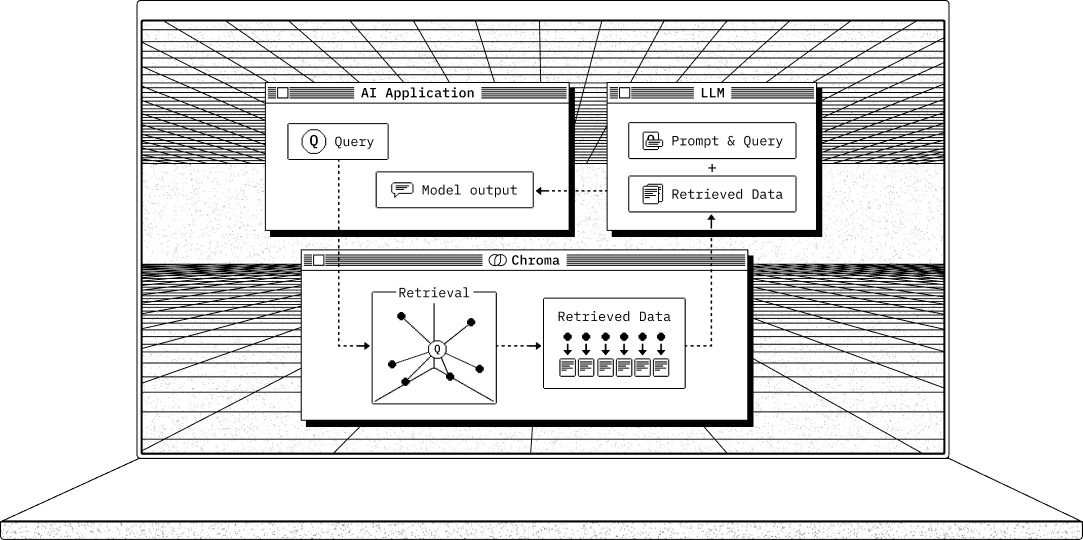
Chroma gives you everything you need for retrieval:
* Store embeddings and their metadata
* Vector search
* Full-text search
* Document storage
* Metadata filtering
* Multi-modal retrieval
Chroma runs as a server and provides Python and JavaScript/TypeScript client SDKs. Check out the [Colab demo](https://colab.research.google.com/drive/1QEzFyqnoFxq7LUGyP1vzR4iLt9PpCDXv?usp=sharing)
(yes, it can run in a Jupyter notebook).
Chroma is licensed under [Apache 2.0](https://github.com/chroma-core/chroma/blob/main/LICENSE)
### Python
In Python, Chroma can run in a python script or as a server. Install Chroma with
Shell
`pip install chromadb`
### JavaScript/TypeScript
In JavaScript and TypeScript, use the Chroma JS/TS Client to connect to a Chroma server. Install Chroma with your favorite package manager:
Terminal
npmpnpmyarnbun
`npm install chromadb @chroma-core/default-embed`
Continue with the full [getting started guide](https://docs.trychroma.com/docs//overview/getting-started)
.
* * *
Language Clients[#](https://docs.trychroma.com/docs//overview/introduction#language-clients)
---------------------------------------------------------------------------------------------
| Language | Client |
| --- | --- |
| Python | [chromadb](https://pypistats.org/packages/chromadb)
(by Chroma) |
| Javascript | [chromadb](https://www.npmjs.com/package/chromadb)
(by Chroma) |
| Rust | [chroma](https://crates.io/crates/chroma)
(by Chroma), [from @Anush008](https://crates.io/crates/chromadb) |
| Ruby | [from @mariochavez](https://github.com/mariochavez/chroma) |
| Java | [from @t\_azarov](https://github.com/amikos-tech/chromadb-java-client) |
| Java | [from @locxngo](https://github.com/locxngo/chroma-client)
(Java 17+, ChromaAPI V2) |
| Go | [from @t\_azarov](https://github.com/amikos-tech/chroma-go) |
| C#/.NET | [from @cincuranet, @ssone95, @microsoft](https://github.com/ssone95/ChromaDB.Client) |
| Elixir | [from @3zcurdia](https://hex.pm/packages/chroma/) |
| Dart | [from @davidmigloz](https://pub.dev/packages/chromadb) |
| PHP | [from @CodeWithKyrian](https://github.com/CodeWithKyrian/chromadb-php)
, [from @pari](https://github.com/pari/phpMyChroma) |
| PHP (Laravel) | [from @HelgeSverre](https://github.com/helgeSverre/chromadb) |
| Clojure | [from @levand](https://github.com/levand/clojure-chroma-client) |
| R | [from @cynkra](https://cynkra.github.io/rchroma/) |
| C++ | [from @BlackyDrum](https://github.com/BlackyDrum/chromadb-cpp) |
We welcome [contributions](https://docs.trychroma.com/docs//overview/contributing)
for other languages!
[Getting Started](https://docs.trychroma.com/docs/overview/getting-started)
[Edit this page on GitHub](https://github.com/chroma-core/chroma/tree/main/docs/docs.trychroma.com/markdoc/content/docs/overview/introduction.md)
Ask this Page
Ask this Page
On this page
NEW
Chroma Cloud
Our fully managed hosted service, Chroma Cloud is here.
[Sign up →](https://www.trychroma.com/signup?utm_source=cloud-signup)

---
# Getting Started - Chroma Docs
[](https://docs.trychroma.com/)
Search
[763 online](https://discord.gg/MMeYNTmh3x)
[25k](https://github.com/chroma-core/chroma)
[22.7k](https://x.com/trychroma)
[](https://www.youtube.com/@trychroma/featured)
Toggle theme
[Docs](https://docs.trychroma.com/docs//overview/introduction)
[Chroma Cloud](https://docs.trychroma.com/cloud/getting-started)
[Guides](https://docs.trychroma.com/guides//build/building-with-ai)
[Integrations](https://docs.trychroma.com/integrations/chroma-integrations)
[Reference](https://docs.trychroma.com/reference/chroma-reference)
Features
Schema
Search API
Sync
Package Search
---
# Integrations - Chroma Docs
[](https://docs.trychroma.com/)
Search
[763 online](https://discord.gg/MMeYNTmh3x)
[25k](https://github.com/chroma-core/chroma)
[22.7k](https://x.com/trychroma)
[](https://www.youtube.com/@trychroma/featured)
Toggle theme
[Docs](https://docs.trychroma.com/docs//overview/introduction)
[Chroma Cloud](https://docs.trychroma.com/cloud/getting-started)
[Guides](https://docs.trychroma.com/guides//build/building-with-ai)
[Integrations](https://docs.trychroma.com/integrations/chroma-integrations)
[Reference](https://docs.trychroma.com/reference/chroma-reference)
Embedding Models
Frameworks
---
# Building with AI - Chroma Docs
[](https://docs.trychroma.com/)
Search
[763 online](https://discord.gg/MMeYNTmh3x)
[25k](https://github.com/chroma-core/chroma)
[22.7k](https://x.com/trychroma)
[](https://www.youtube.com/@trychroma/featured)
Toggle theme
[Docs](https://docs.trychroma.com/docs//overview/introduction)
[Chroma Cloud](https://docs.trychroma.com/cloud/getting-started)
[Guides](https://docs.trychroma.com/guides//build/building-with-ai)
[Integrations](https://docs.trychroma.com/integrations/chroma-integrations)
[Reference](https://docs.trychroma.com/reference/chroma-reference)
Build
Deploy
---
# Reference - Chroma Docs
[](https://docs.trychroma.com/)
SearchK
[763 online](https://discord.gg/MMeYNTmh3x)
[25k](https://github.com/chroma-core/chroma)
[22.7k](https://x.com/trychroma)
[](https://www.youtube.com/@trychroma/featured)
Toggle theme
[Docs](https://docs.trychroma.com/docs//overview/introduction)
[Chroma Cloud](https://docs.trychroma.com/cloud/getting-started)
[Guides](https://docs.trychroma.com/guides//build/building-with-ai)
[Integrations](https://docs.trychroma.com/integrations/chroma-integrations)
[Reference](https://docs.trychroma.com/reference/chroma-reference)
[Chroma Reference](https://docs.trychroma.com/reference/chroma-reference)
Python
[Client](https://docs.trychroma.com/reference/python/client)
[Collection](https://docs.trychroma.com/reference/python/collection)
JavaScript/Typescript
[Client](https://docs.trychroma.com/reference/js/client)
[Collection](https://docs.trychroma.com/reference/js/collection)
w-5 h-5
Chroma Reference
================
Client APIs[#](https://docs.trychroma.com/reference/chroma-reference#client-apis)
----------------------------------------------------------------------------------
Chroma currently maintains 1st party clients for Python and Javascript. For other clients in other languages, use their repos for documentation.
Client - is the object that wraps a connection to a backing Chroma DB
Collection - is the object that wraps a collection
| | Client | Collection |
| --- | --- | --- |
| Python | [Client](https://docs.trychroma.com/reference/python/client) | [Collection](https://docs.trychroma.com/reference/python/collection) |
| Javascript | [Client](https://docs.trychroma.com/reference/js/client) | [Collection](https://docs.trychroma.com/reference/js/collection) |
* * *
Backend API[#](https://docs.trychroma.com/reference/chroma-reference#backend-api)
----------------------------------------------------------------------------------
Chroma's backend Swagger REST API docs are viewable by running Chroma and navigating to http://localhost:8000/docs.
Bash
`pip install chromadb chroma run open http://localhost:8000/docs`
[Client](https://docs.trychroma.com/reference/python/client)
[Edit this page on GitHub](https://github.com/chroma-core/chroma/tree/main/docs/docs.trychroma.com/markdoc/content/reference/chroma-reference.md)
Ask this Page
Ask this Page
On this page
NEW
Chroma Cloud
Our fully managed hosted service, Chroma Cloud is here.
[Sign up →](https://www.trychroma.com/signup?utm_source=cloud-signup)

---
# Introduction - Chroma Docs
[](https://docs.trychroma.com/)
SearchK
[763 online](https://discord.gg/MMeYNTmh3x)
[25k](https://github.com/chroma-core/chroma)
[22.7k](https://x.com/trychroma)
[](https://www.youtube.com/@trychroma/featured)
Toggle theme
[Docs](https://docs.trychroma.com/docs//overview/introduction)
[Chroma Cloud](https://docs.trychroma.com/cloud/getting-started)
[Guides](https://docs.trychroma.com/guides//build/building-with-ai)
[Integrations](https://docs.trychroma.com/integrations/chroma-integrations)
[Reference](https://docs.trychroma.com/reference/chroma-reference)
Overview
[Introduction](https://docs.trychroma.com/docs/overview/introduction)
[Getting Started](https://docs.trychroma.com/docs/overview/getting-started)
[Architecture](https://docs.trychroma.com/docs/overview/architecture)
[Data Model](https://docs.trychroma.com/docs/overview/data-model)
[Roadmap](https://docs.trychroma.com/docs/overview/roadmap)
[Contributing](https://docs.trychroma.com/docs/overview/contributing)
[Telemetry](https://docs.trychroma.com/docs/overview/telemetry)
[Migration](https://docs.trychroma.com/docs/overview/migration)
[Troubleshooting](https://docs.trychroma.com/docs/overview/troubleshooting)
[About](https://docs.trychroma.com/docs/overview/about)
Run Chroma
[Ephemeral Client](https://docs.trychroma.com/docs/run-chroma/ephemeral-client)
[Persistent Client](https://docs.trychroma.com/docs/run-chroma/persistent-client)
[Client-Server Mode](https://docs.trychroma.com/docs/run-chroma/client-server)
[Cloud Client](https://docs.trychroma.com/docs/run-chroma/cloud-client)
Collections
[Manage Collections](https://docs.trychroma.com/docs/collections/manage-collections)
[Add Data](https://docs.trychroma.com/docs/collections/add-data)
[Update Data](https://docs.trychroma.com/docs/collections/update-data)
[Delete Data](https://docs.trychroma.com/docs/collections/delete-data)
[Configure](https://docs.trychroma.com/docs/collections/configure)
Querying Collections
[Query And Get](https://docs.trychroma.com/docs/querying-collections/query-and-get)
[Metadata Filtering](https://docs.trychroma.com/docs/querying-collections/metadata-filtering)
[Full Text Search and Regex](https://docs.trychroma.com/docs/querying-collections/full-text-search)
Embeddings
[Embedding Functions](https://docs.trychroma.com/docs/embeddings/embedding-functions)
[Multimodal](https://docs.trychroma.com/docs/embeddings/multimodal)
CLI
[Installing the CLI](https://docs.trychroma.com/docs/cli/install)
[Browse Collections](https://docs.trychroma.com/docs/cli/browse)
[Copy Collections](https://docs.trychroma.com/docs/cli/copy)
[DB Management](https://docs.trychroma.com/docs/cli/db)
[Install Sample Apps](https://docs.trychroma.com/docs/cli/sample-apps)
[Login](https://docs.trychroma.com/docs/cli/login)
[Profile Management](https://docs.trychroma.com/docs/cli/profile)
[Run a Chroma Server](https://docs.trychroma.com/docs/cli/run)
[Update the CLI](https://docs.trychroma.com/docs/cli/update)
[Vacuum](https://docs.trychroma.com/docs/cli/vacuum)
w-5 h-5
Chroma
======
**Chroma is the open-source AI application database**. Chroma makes it easy to build LLM apps by making knowledge, facts, and skills pluggable for LLMs.
New to Chroma? Check out the [getting started guide](https://docs.trychroma.com/docs/overview/getting-started)

Chroma gives you everything you need for retrieval:
* Store embeddings and their metadata
* Vector search
* Full-text search
* Document storage
* Metadata filtering
* Multi-modal retrieval
Chroma runs as a server and provides Python and JavaScript/TypeScript client SDKs. Check out the [Colab demo](https://colab.research.google.com/drive/1QEzFyqnoFxq7LUGyP1vzR4iLt9PpCDXv?usp=sharing)
(yes, it can run in a Jupyter notebook).
Chroma is licensed under [Apache 2.0](https://github.com/chroma-core/chroma/blob/main/LICENSE)
### Python
In Python, Chroma can run in a python script or as a server. Install Chroma with
Shell
`pip install chromadb`
### JavaScript/TypeScript
In JavaScript and TypeScript, use the Chroma JS/TS Client to connect to a Chroma server. Install Chroma with your favorite package manager:
Terminal
npmpnpmyarnbun
`npm install chromadb @chroma-core/default-embed`
Continue with the full [getting started guide](https://docs.trychroma.com/docs/overview/getting-started)
.
* * *
Language Clients[#](https://docs.trychroma.com/docs/overview/introduction#language-clients)
--------------------------------------------------------------------------------------------
| Language | Client |
| --- | --- |
| Python | [chromadb](https://pypistats.org/packages/chromadb)
(by Chroma) |
| Javascript | [chromadb](https://www.npmjs.com/package/chromadb)
(by Chroma) |
| Rust | [chroma](https://crates.io/crates/chroma)
(by Chroma), [from @Anush008](https://crates.io/crates/chromadb) |
| Ruby | [from @mariochavez](https://github.com/mariochavez/chroma) |
| Java | [from @t\_azarov](https://github.com/amikos-tech/chromadb-java-client) |
| Java | [from @locxngo](https://github.com/locxngo/chroma-client)
(Java 17+, ChromaAPI V2) |
| Go | [from @t\_azarov](https://github.com/amikos-tech/chroma-go) |
| C#/.NET | [from @cincuranet, @ssone95, @microsoft](https://github.com/ssone95/ChromaDB.Client) |
| Elixir | [from @3zcurdia](https://hex.pm/packages/chroma/) |
| Dart | [from @davidmigloz](https://pub.dev/packages/chromadb) |
| PHP | [from @CodeWithKyrian](https://github.com/CodeWithKyrian/chromadb-php)
, [from @pari](https://github.com/pari/phpMyChroma) |
| PHP (Laravel) | [from @HelgeSverre](https://github.com/helgeSverre/chromadb) |
| Clojure | [from @levand](https://github.com/levand/clojure-chroma-client) |
| R | [from @cynkra](https://cynkra.github.io/rchroma/) |
| C++ | [from @BlackyDrum](https://github.com/BlackyDrum/chromadb-cpp) |
We welcome [contributions](https://docs.trychroma.com/docs/overview/contributing)
for other languages!
[Getting Started](https://docs.trychroma.com/docs/overview/getting-started)
[Edit this page on GitHub](https://github.com/chroma-core/chroma/tree/main/docs/docs.trychroma.com/markdoc/content/docs/overview/introduction.md)
Ask this Page
Ask this Page
On this page
NEW
Chroma Cloud
Our fully managed hosted service, Chroma Cloud is here.
[Sign up →](https://www.trychroma.com/signup?utm_source=cloud-signup)

---
# Architecture - Chroma Docs
[](https://docs.trychroma.com/)
SearchK
[763 online](https://discord.gg/MMeYNTmh3x)
[25k](https://github.com/chroma-core/chroma)
[22.7k](https://x.com/trychroma)
[](https://www.youtube.com/@trychroma/featured)
Toggle theme
[Docs](https://docs.trychroma.com/docs//overview/introduction)
[Chroma Cloud](https://docs.trychroma.com/cloud/getting-started)
[Guides](https://docs.trychroma.com/guides//build/building-with-ai)
[Integrations](https://docs.trychroma.com/integrations/chroma-integrations)
[Reference](https://docs.trychroma.com/reference/chroma-reference)
Overview
[Introduction](https://docs.trychroma.com/docs/overview/introduction)
[Getting Started](https://docs.trychroma.com/docs/overview/getting-started)
[Architecture](https://docs.trychroma.com/docs/overview/architecture)
[Data Model](https://docs.trychroma.com/docs/overview/data-model)
[Roadmap](https://docs.trychroma.com/docs/overview/roadmap)
[Contributing](https://docs.trychroma.com/docs/overview/contributing)
[Telemetry](https://docs.trychroma.com/docs/overview/telemetry)
[Migration](https://docs.trychroma.com/docs/overview/migration)
[Troubleshooting](https://docs.trychroma.com/docs/overview/troubleshooting)
[About](https://docs.trychroma.com/docs/overview/about)
Run Chroma
[Ephemeral Client](https://docs.trychroma.com/docs/run-chroma/ephemeral-client)
[Persistent Client](https://docs.trychroma.com/docs/run-chroma/persistent-client)
[Client-Server Mode](https://docs.trychroma.com/docs/run-chroma/client-server)
[Cloud Client](https://docs.trychroma.com/docs/run-chroma/cloud-client)
Collections
[Manage Collections](https://docs.trychroma.com/docs/collections/manage-collections)
[Add Data](https://docs.trychroma.com/docs/collections/add-data)
[Update Data](https://docs.trychroma.com/docs/collections/update-data)
[Delete Data](https://docs.trychroma.com/docs/collections/delete-data)
[Configure](https://docs.trychroma.com/docs/collections/configure)
Querying Collections
[Query And Get](https://docs.trychroma.com/docs/querying-collections/query-and-get)
[Metadata Filtering](https://docs.trychroma.com/docs/querying-collections/metadata-filtering)
[Full Text Search and Regex](https://docs.trychroma.com/docs/querying-collections/full-text-search)
Embeddings
[Embedding Functions](https://docs.trychroma.com/docs/embeddings/embedding-functions)
[Multimodal](https://docs.trychroma.com/docs/embeddings/multimodal)
CLI
[Installing the CLI](https://docs.trychroma.com/docs/cli/install)
[Browse Collections](https://docs.trychroma.com/docs/cli/browse)
[Copy Collections](https://docs.trychroma.com/docs/cli/copy)
[DB Management](https://docs.trychroma.com/docs/cli/db)
[Install Sample Apps](https://docs.trychroma.com/docs/cli/sample-apps)
[Login](https://docs.trychroma.com/docs/cli/login)
[Profile Management](https://docs.trychroma.com/docs/cli/profile)
[Run a Chroma Server](https://docs.trychroma.com/docs/cli/run)
[Update the CLI](https://docs.trychroma.com/docs/cli/update)
[Vacuum](https://docs.trychroma.com/docs/cli/vacuum)
w-5 h-5
Architecture
============
Chroma is designed with a modular architecture that prioritizes performance and ease of use. It scales seamlessly from local development to large-scale production, while exposing a consistent API across all deployment modes.
Chroma delegates, as much as possible, problems of data durability to trusted sub-systems such as SQLite and Cloud Object Storage, focusing the system design on core problems of data management and information retrieval.
Deployment Modes[#](https://docs.trychroma.com/docs/overview/architecture#deployment-modes)
--------------------------------------------------------------------------------------------
Chroma runs wherever you need it to, supporting you in everything from local experimentation, to large scale production workloads.
* **Local**: as an embedded library - great for prototyping and experimentation.
* **Single Node**: as a single-node server - great for small to medium scale workloads of < 10M records in a handful of collections.
* **Distributed**: as a scalable distributed system - great for large scale production workloads, supporting millions of collections.
You can use [Chroma Cloud](https://www.trychroma.com/signup?utm_source=docs-architecture)
, which is a managed offering of distributed Chroma.
Core Components[#](https://docs.trychroma.com/docs/overview/architecture#core-components)
------------------------------------------------------------------------------------------
Regardless of deployment mode, Chroma is composed of five core components. Each plays a distinct role in the system and operates over the shared [Chroma data model](https://docs.trychroma.com/docs/overview/data-model)
.
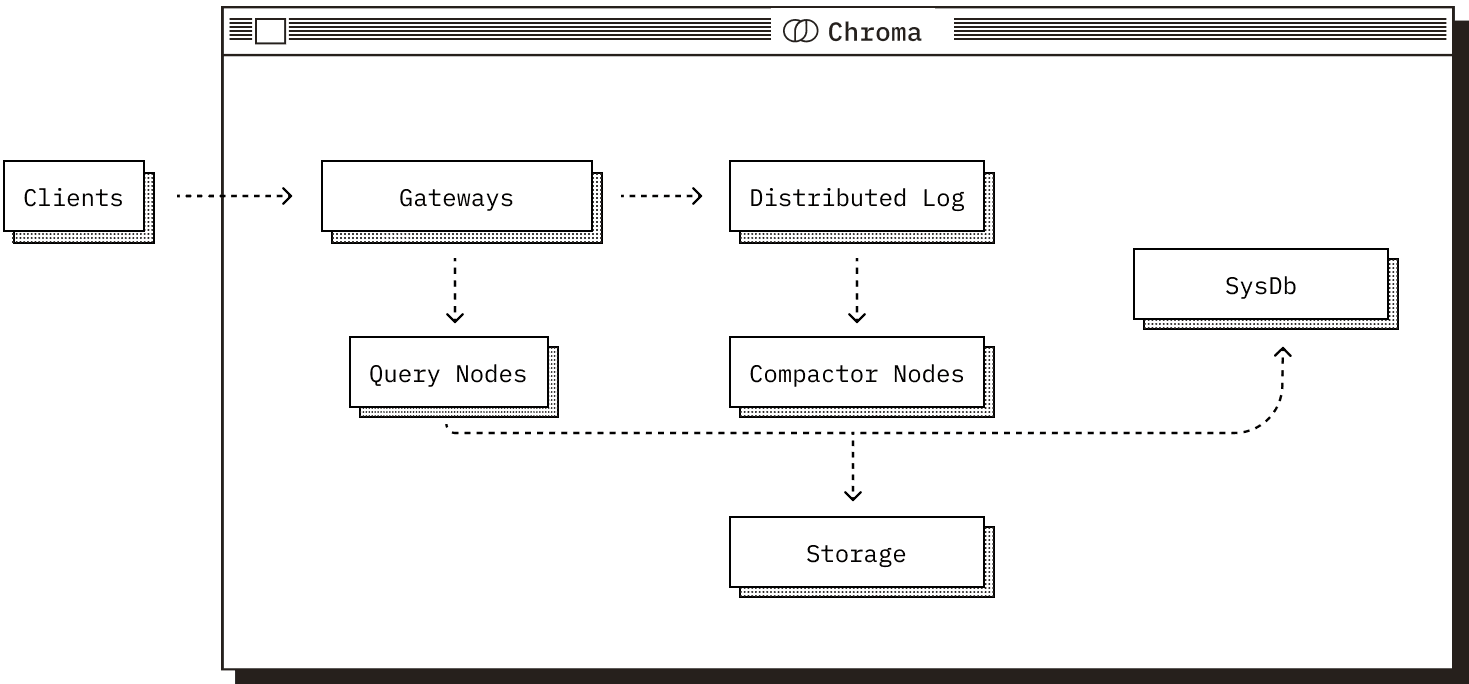
### The Gateway
The entrypoint for all client traffic.
* Exposes a consistent API across all modes.
* Handles authentication, rate-limiting, quota management, and request validation.
* Routes requests to downstream services.
### The Log
Chroma’s write-ahead log.
* All writes are recorded here before acknowledgment to clients.
* Ensures atomicity across multi-record writes.
* Provides durability and replay in distributed deployments.
### The Query Executor
Responsible for **all read operations.**
* Vector similarity, full-text and metadata search.
* Maintains a combination of in-memory and on-disk indexes, and coordinates with the Log to serve consistent results.
### The Compactor
A service that periodically builds and maintains indexes.
* Reads from the Log and builds updated vector / full-text / metadata indexes.
* Writes materialized index data to shared storage.
* Updates the System Database with metadata about new index versions.
### The System Database
Chroma’s internal catalog.
* Tracks tenants, collections, and their metadata.
* In distributed mode, also manages cluster state (e.g., query/compactor node membership).
* Backed by a SQL database.
Storage & Runtime[#](https://docs.trychroma.com/docs/overview/architecture#storage-runtime)
--------------------------------------------------------------------------------------------
These components operate differently depending on the deployment mode, particularly in how they use storage and the runtime they operate in.
* In Local and Single Node mode, all components share a process and use the local filesystem for durability.
* In **Distributed** mode, components are deployed as independent services.
* The log and built indexes are stored in cloud object storage.
* The system catalog is backed by a SQL database.
* All services use local SSDs as caches to reduce object storage latency and cost.
Request Sequences[#](https://docs.trychroma.com/docs/overview/architecture#request-sequences)
----------------------------------------------------------------------------------------------
### Read Path
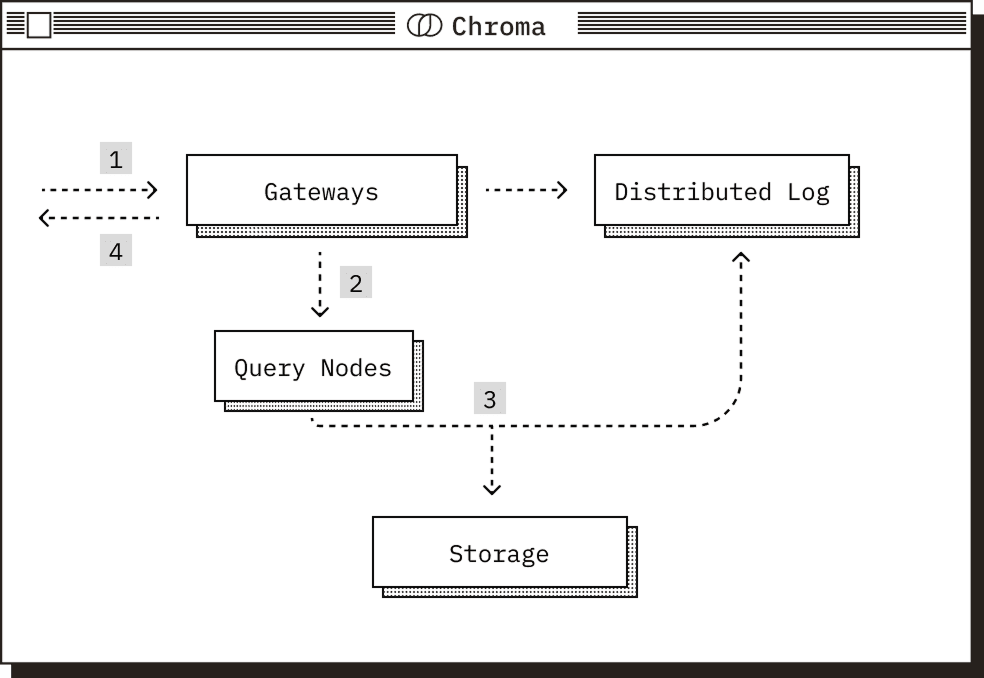
1. Request arrives at the gateway, where it is authenticated, checked against quota limits, rate limited and transformed into a logical plan.
2. This logical plan is routed to the relevant query executor. In distributed Chroma, a rendezvous hash on the collection id is used to route the query to the correct nodes and provide cache coherence.
3. The query executor transforms the logical plan into a physical plan for execution, reads from its storage layer, and performs the query. The query executor pulls data from the log to ensure a consistent read.
4. The request is returned to the gateway and subsequently to the client.
### Write Path
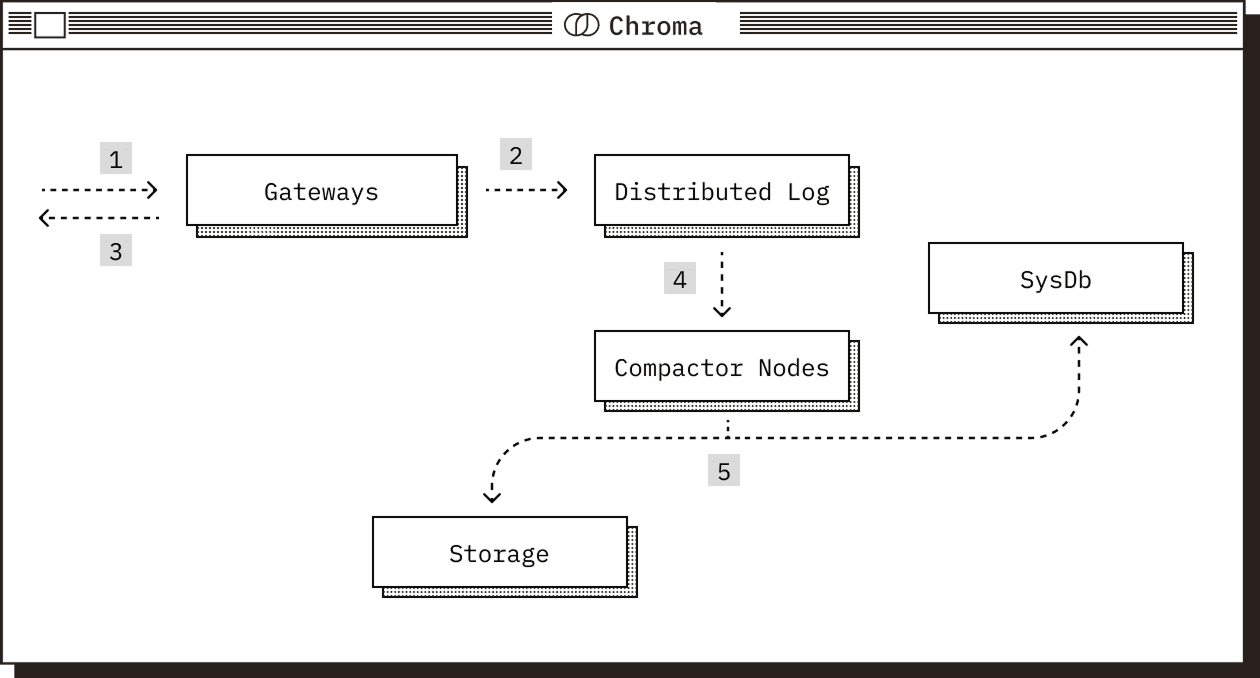
1. Request arrives at the gateway, where it is authenticated, checked against quota limits, rate limited and then transformed into a log of operations.
2. The log of operations is forwarded to the write-ahead-log for persistence.
3. After being persisted by the write-ahead-log, the gateway acknowledges the write.
4. The compactor periodically pulls from the write-ahead-log and builds new index versions from the accumulated writes. These indexes are optimized for read performance and include vector, full-text, and metadata indexes.
5. Once new index versions are built, they are written to storage and registered in the system database.
Tradeoffs[#](https://docs.trychroma.com/docs/overview/architecture#tradeoffs)
------------------------------------------------------------------------------
Distributed Chroma is built on object storage in order to ensure the durability of your data and to deliver low costs. Object storage has extremely high throughput, easily capable of saturating a single nodes network bandwidth, but this comes at the cost of a relatively high latency floor of ~10-20ms.
In order to reduce the overhead of this latency floor, Distributed Chroma aggressively leverage SSD caching. When you first query a collection, a subset of the data needed to answer the query will be read selectively from object storage, incurring a cold-start latency penalty. In the background, the SSD cache will be loaded with the data for the collection. After the collection is fully warm, queries will be served entirely from SSD.
[Getting Started](https://docs.trychroma.com/docs/overview/getting-started)
[Data Model](https://docs.trychroma.com/docs/overview/data-model)
[Edit this page on GitHub](https://github.com/chroma-core/chroma/tree/main/docs/docs.trychroma.com/markdoc/content/docs/overview/architecture.md)
Ask this Page
Ask this Page
On this page
NEW
Chroma Cloud
Our fully managed hosted service, Chroma Cloud is here.
[Sign up →](https://www.trychroma.com/signup?utm_source=cloud-signup)

---
# Data Model - Chroma Docs
[](https://docs.trychroma.com/)
Search
[763 online](https://discord.gg/MMeYNTmh3x)
[25k](https://github.com/chroma-core/chroma)
[22.7k](https://x.com/trychroma)
[](https://www.youtube.com/@trychroma/featured)
Toggle theme
[Docs](https://docs.trychroma.com/docs//overview/introduction)
[Chroma Cloud](https://docs.trychroma.com/cloud/getting-started)
[Guides](https://docs.trychroma.com/guides//build/building-with-ai)
[Integrations](https://docs.trychroma.com/integrations/chroma-integrations)
[Reference](https://docs.trychroma.com/reference/chroma-reference)
Overview
Run Chroma
Collections
Querying Collections
Embeddings
CLI
---
# Roadmap - Chroma Docs
[](https://docs.trychroma.com/)
Search
[763 online](https://discord.gg/MMeYNTmh3x)
[25k](https://github.com/chroma-core/chroma)
[22.7k](https://x.com/trychroma)
[](https://www.youtube.com/@trychroma/featured)
Toggle theme
[Docs](https://docs.trychroma.com/docs//overview/introduction)
[Chroma Cloud](https://docs.trychroma.com/cloud/getting-started)
[Guides](https://docs.trychroma.com/guides//build/building-with-ai)
[Integrations](https://docs.trychroma.com/integrations/chroma-integrations)
[Reference](https://docs.trychroma.com/reference/chroma-reference)
Overview
Run Chroma
Collections
Querying Collections
Embeddings
CLI
---
# Contributing - Chroma Docs
[](https://docs.trychroma.com/)
Search
[763 online](https://discord.gg/MMeYNTmh3x)
[25k](https://github.com/chroma-core/chroma)
[22.7k](https://x.com/trychroma)
[](https://www.youtube.com/@trychroma/featured)
Toggle theme
[Docs](https://docs.trychroma.com/docs//overview/introduction)
[Chroma Cloud](https://docs.trychroma.com/cloud/getting-started)
[Guides](https://docs.trychroma.com/guides//build/building-with-ai)
[Integrations](https://docs.trychroma.com/integrations/chroma-integrations)
[Reference](https://docs.trychroma.com/reference/chroma-reference)
Overview
Run Chroma
Collections
Querying Collections
Embeddings
CLI
---
# Telemetry - Chroma Docs
[](https://docs.trychroma.com/)
Search
[763 online](https://discord.gg/MMeYNTmh3x)
[25k](https://github.com/chroma-core/chroma)
[22.7k](https://x.com/trychroma)
[](https://www.youtube.com/@trychroma/featured)
Toggle theme
[Docs](https://docs.trychroma.com/docs//overview/introduction)
[Chroma Cloud](https://docs.trychroma.com/cloud/getting-started)
[Guides](https://docs.trychroma.com/guides//build/building-with-ai)
[Integrations](https://docs.trychroma.com/integrations/chroma-integrations)
[Reference](https://docs.trychroma.com/reference/chroma-reference)
Overview
Run Chroma
Collections
Querying Collections
Embeddings
CLI
---
# Ephemeral Client - Chroma Docs
[](https://docs.trychroma.com/)
Search
[763 online](https://discord.gg/MMeYNTmh3x)
[25k](https://github.com/chroma-core/chroma)
[22.7k](https://x.com/trychroma)
[](https://www.youtube.com/@trychroma/featured)
Toggle theme
[Docs](https://docs.trychroma.com/docs//overview/introduction)
[Chroma Cloud](https://docs.trychroma.com/cloud/getting-started)
[Guides](https://docs.trychroma.com/guides//build/building-with-ai)
[Integrations](https://docs.trychroma.com/integrations/chroma-integrations)
[Reference](https://docs.trychroma.com/reference/chroma-reference)
Overview
Run Chroma
Collections
Querying Collections
Embeddings
CLI
---
# Troubleshooting - Chroma Docs
[](https://docs.trychroma.com/)
Search
[763 online](https://discord.gg/MMeYNTmh3x)
[25k](https://github.com/chroma-core/chroma)
[22.7k](https://x.com/trychroma)
[](https://www.youtube.com/@trychroma/featured)
Toggle theme
[Docs](https://docs.trychroma.com/docs//overview/introduction)
[Chroma Cloud](https://docs.trychroma.com/cloud/getting-started)
[Guides](https://docs.trychroma.com/guides//build/building-with-ai)
[Integrations](https://docs.trychroma.com/integrations/chroma-integrations)
[Reference](https://docs.trychroma.com/reference/chroma-reference)
Overview
Run Chroma
Collections
Querying Collections
Embeddings
CLI
---
# Migration - Chroma Docs
[](https://docs.trychroma.com/)
Search
[763 online](https://discord.gg/MMeYNTmh3x)
[25k](https://github.com/chroma-core/chroma)
[22.7k](https://x.com/trychroma)
[](https://www.youtube.com/@trychroma/featured)
Toggle theme
[Docs](https://docs.trychroma.com/docs//overview/introduction)
[Chroma Cloud](https://docs.trychroma.com/cloud/getting-started)
[Guides](https://docs.trychroma.com/guides//build/building-with-ai)
[Integrations](https://docs.trychroma.com/integrations/chroma-integrations)
[Reference](https://docs.trychroma.com/reference/chroma-reference)
Overview
Run Chroma
Collections
Querying Collections
Embeddings
CLI
---
# Cloud Client - Chroma Docs
[](https://docs.trychroma.com/)
Search
[763 online](https://discord.gg/MMeYNTmh3x)
[25k](https://github.com/chroma-core/chroma)
[22.7k](https://x.com/trychroma)
[](https://www.youtube.com/@trychroma/featured)
Toggle theme
[Docs](https://docs.trychroma.com/docs//overview/introduction)
[Chroma Cloud](https://docs.trychroma.com/cloud/getting-started)
[Guides](https://docs.trychroma.com/guides//build/building-with-ai)
[Integrations](https://docs.trychroma.com/integrations/chroma-integrations)
[Reference](https://docs.trychroma.com/reference/chroma-reference)
Overview
Run Chroma
Collections
Querying Collections
Embeddings
CLI
---
# Client-Server Mode - Chroma Docs
[](https://docs.trychroma.com/)
Search
[763 online](https://discord.gg/MMeYNTmh3x)
[25k](https://github.com/chroma-core/chroma)
[22.7k](https://x.com/trychroma)
[](https://www.youtube.com/@trychroma/featured)
Toggle theme
[Docs](https://docs.trychroma.com/docs//overview/introduction)
[Chroma Cloud](https://docs.trychroma.com/cloud/getting-started)
[Guides](https://docs.trychroma.com/guides//build/building-with-ai)
[Integrations](https://docs.trychroma.com/integrations/chroma-integrations)
[Reference](https://docs.trychroma.com/reference/chroma-reference)
Overview
Run Chroma
Collections
Querying Collections
Embeddings
CLI
---
# Persistent Client - Chroma Docs
[](https://docs.trychroma.com/)
Search
[754 online](https://discord.gg/MMeYNTmh3x)
[25k](https://github.com/chroma-core/chroma)
[22.7k](https://x.com/trychroma)
[](https://www.youtube.com/@trychroma/featured)
Toggle theme
[Docs](https://docs.trychroma.com/docs//overview/introduction)
[Chroma Cloud](https://docs.trychroma.com/cloud/getting-started)
[Guides](https://docs.trychroma.com/guides//build/building-with-ai)
[Integrations](https://docs.trychroma.com/integrations/chroma-integrations)
[Reference](https://docs.trychroma.com/reference/chroma-reference)
Overview
Run Chroma
Collections
Querying Collections
Embeddings
CLI
---
# Add Data - Chroma Docs
[](https://docs.trychroma.com/)
Search
[763 online](https://discord.gg/MMeYNTmh3x)
[25k](https://github.com/chroma-core/chroma)
[22.7k](https://x.com/trychroma)
[](https://www.youtube.com/@trychroma/featured)
Toggle theme
[Docs](https://docs.trychroma.com/docs//overview/introduction)
[Chroma Cloud](https://docs.trychroma.com/cloud/getting-started)
[Guides](https://docs.trychroma.com/guides//build/building-with-ai)
[Integrations](https://docs.trychroma.com/integrations/chroma-integrations)
[Reference](https://docs.trychroma.com/reference/chroma-reference)
Overview
Run Chroma
Collections
Querying Collections
Embeddings
CLI
---
# Update Data - Chroma Docs
[](https://docs.trychroma.com/)
Search
[754 online](https://discord.gg/MMeYNTmh3x)
[25k](https://github.com/chroma-core/chroma)
[22.7k](https://x.com/trychroma)
[](https://www.youtube.com/@trychroma/featured)
Toggle theme
[Docs](https://docs.trychroma.com/docs//overview/introduction)
[Chroma Cloud](https://docs.trychroma.com/cloud/getting-started)
[Guides](https://docs.trychroma.com/guides//build/building-with-ai)
[Integrations](https://docs.trychroma.com/integrations/chroma-integrations)
[Reference](https://docs.trychroma.com/reference/chroma-reference)
Overview
Run Chroma
Collections
Querying Collections
Embeddings
CLI
---
# Manage Collections - Chroma Docs
[](https://docs.trychroma.com/)
Search
[754 online](https://discord.gg/MMeYNTmh3x)
[25k](https://github.com/chroma-core/chroma)
[22.7k](https://x.com/trychroma)
[](https://www.youtube.com/@trychroma/featured)
Toggle theme
[Docs](https://docs.trychroma.com/docs//overview/introduction)
[Chroma Cloud](https://docs.trychroma.com/cloud/getting-started)
[Guides](https://docs.trychroma.com/guides//build/building-with-ai)
[Integrations](https://docs.trychroma.com/integrations/chroma-integrations)
[Reference](https://docs.trychroma.com/reference/chroma-reference)
Overview
Run Chroma
Collections
Querying Collections
Embeddings
CLI
---
# Delete Data - Chroma Docs
[](https://docs.trychroma.com/)
Search
[763 online](https://discord.gg/MMeYNTmh3x)
[25k](https://github.com/chroma-core/chroma)
[22.7k](https://x.com/trychroma)
[](https://www.youtube.com/@trychroma/featured)
Toggle theme
[Docs](https://docs.trychroma.com/docs//overview/introduction)
[Chroma Cloud](https://docs.trychroma.com/cloud/getting-started)
[Guides](https://docs.trychroma.com/guides//build/building-with-ai)
[Integrations](https://docs.trychroma.com/integrations/chroma-integrations)
[Reference](https://docs.trychroma.com/reference/chroma-reference)
Overview
Run Chroma
Collections
Querying Collections
Embeddings
CLI
---
# FTS and Regex - Chroma Docs
[](https://docs.trychroma.com/)
Search
[754 online](https://discord.gg/MMeYNTmh3x)
[25k](https://github.com/chroma-core/chroma)
[22.7k](https://x.com/trychroma)
[](https://www.youtube.com/@trychroma/featured)
Toggle theme
[Docs](https://docs.trychroma.com/docs//overview/introduction)
[Chroma Cloud](https://docs.trychroma.com/cloud/getting-started)
[Guides](https://docs.trychroma.com/guides//build/building-with-ai)
[Integrations](https://docs.trychroma.com/integrations/chroma-integrations)
[Reference](https://docs.trychroma.com/reference/chroma-reference)
Overview
Run Chroma
Collections
Querying Collections
Embeddings
CLI
---
# Metadata Filtering - Chroma Docs
[](https://docs.trychroma.com/)
Search
[754 online](https://discord.gg/MMeYNTmh3x)
[25k](https://github.com/chroma-core/chroma)
[22.7k](https://x.com/trychroma)
[](https://www.youtube.com/@trychroma/featured)
Toggle theme
[Docs](https://docs.trychroma.com/docs//overview/introduction)
[Chroma Cloud](https://docs.trychroma.com/cloud/getting-started)
[Guides](https://docs.trychroma.com/guides//build/building-with-ai)
[Integrations](https://docs.trychroma.com/integrations/chroma-integrations)
[Reference](https://docs.trychroma.com/reference/chroma-reference)
Overview
Run Chroma
Collections
Querying Collections
Embeddings
CLI
---
# Query and Get - Chroma Docs
[](https://docs.trychroma.com/)
Search
[754 online](https://discord.gg/MMeYNTmh3x)
[25k](https://github.com/chroma-core/chroma)
[22.7k](https://x.com/trychroma)
[](https://www.youtube.com/@trychroma/featured)
Toggle theme
[Docs](https://docs.trychroma.com/docs//overview/introduction)
[Chroma Cloud](https://docs.trychroma.com/cloud/getting-started)
[Guides](https://docs.trychroma.com/guides//build/building-with-ai)
[Integrations](https://docs.trychroma.com/integrations/chroma-integrations)
[Reference](https://docs.trychroma.com/reference/chroma-reference)
Overview
Run Chroma
Collections
Querying Collections
Embeddings
CLI
---
# Installing the CLI - Chroma Docs
[](https://docs.trychroma.com/)
Search
[763 online](https://discord.gg/MMeYNTmh3x)
[25k](https://github.com/chroma-core/chroma)
[22.7k](https://x.com/trychroma)
[](https://www.youtube.com/@trychroma/featured)
Toggle theme
[Docs](https://docs.trychroma.com/docs//overview/introduction)
[Chroma Cloud](https://docs.trychroma.com/cloud/getting-started)
[Guides](https://docs.trychroma.com/guides//build/building-with-ai)
[Integrations](https://docs.trychroma.com/integrations/chroma-integrations)
[Reference](https://docs.trychroma.com/reference/chroma-reference)
Overview
Run Chroma
Collections
Querying Collections
Embeddings
CLI
---
# Multimodal Embedding - Chroma Docs
[](https://docs.trychroma.com/)
Search
[763 online](https://discord.gg/MMeYNTmh3x)
[25k](https://github.com/chroma-core/chroma)
[22.7k](https://x.com/trychroma)
[](https://www.youtube.com/@trychroma/featured)
Toggle theme
[Docs](https://docs.trychroma.com/docs//overview/introduction)
[Chroma Cloud](https://docs.trychroma.com/cloud/getting-started)
[Guides](https://docs.trychroma.com/guides//build/building-with-ai)
[Integrations](https://docs.trychroma.com/integrations/chroma-integrations)
[Reference](https://docs.trychroma.com/reference/chroma-reference)
Overview
Run Chroma
Collections
Querying Collections
Embeddings
CLI
---
# Configure - Chroma Docs
[](https://docs.trychroma.com/)
Search
[763 online](https://discord.gg/MMeYNTmh3x)
[25k](https://github.com/chroma-core/chroma)
[22.7k](https://x.com/trychroma)
[](https://www.youtube.com/@trychroma/featured)
Toggle theme
[Docs](https://docs.trychroma.com/docs//overview/introduction)
[Chroma Cloud](https://docs.trychroma.com/cloud/getting-started)
[Guides](https://docs.trychroma.com/guides//build/building-with-ai)
[Integrations](https://docs.trychroma.com/integrations/chroma-integrations)
[Reference](https://docs.trychroma.com/reference/chroma-reference)
Overview
Run Chroma
Collections
Querying Collections
Embeddings
CLI
---
# Browse Collections - Chroma Docs
[](https://docs.trychroma.com/)
Search
[754 online](https://discord.gg/MMeYNTmh3x)
[25k](https://github.com/chroma-core/chroma)
[22.7k](https://x.com/trychroma)
[](https://www.youtube.com/@trychroma/featured)
Toggle theme
[Docs](https://docs.trychroma.com/docs//overview/introduction)
[Chroma Cloud](https://docs.trychroma.com/cloud/getting-started)
[Guides](https://docs.trychroma.com/guides//build/building-with-ai)
[Integrations](https://docs.trychroma.com/integrations/chroma-integrations)
[Reference](https://docs.trychroma.com/reference/chroma-reference)
Overview
Run Chroma
Collections
Querying Collections
Embeddings
CLI
---
# Embedding Functions - Chroma Docs
[](https://docs.trychroma.com/)
Search
[754 online](https://discord.gg/MMeYNTmh3x)
[25k](https://github.com/chroma-core/chroma)
[22.7k](https://x.com/trychroma)
[](https://www.youtube.com/@trychroma/featured)
Toggle theme
[Docs](https://docs.trychroma.com/docs//overview/introduction)
[Chroma Cloud](https://docs.trychroma.com/cloud/getting-started)
[Guides](https://docs.trychroma.com/guides//build/building-with-ai)
[Integrations](https://docs.trychroma.com/integrations/chroma-integrations)
[Reference](https://docs.trychroma.com/reference/chroma-reference)
Overview
Run Chroma
Collections
Querying Collections
Embeddings
CLI
---
# DB Management - Chroma Docs
[](https://docs.trychroma.com/)
Search
[754 online](https://discord.gg/MMeYNTmh3x)
[25k](https://github.com/chroma-core/chroma)
[22.7k](https://x.com/trychroma)
[](https://www.youtube.com/@trychroma/featured)
Toggle theme
[Docs](https://docs.trychroma.com/docs//overview/introduction)
[Chroma Cloud](https://docs.trychroma.com/cloud/getting-started)
[Guides](https://docs.trychroma.com/guides//build/building-with-ai)
[Integrations](https://docs.trychroma.com/integrations/chroma-integrations)
[Reference](https://docs.trychroma.com/reference/chroma-reference)
Overview
Run Chroma
Collections
Querying Collections
Embeddings
CLI
---
# Sample Apps - Chroma Docs
[](https://docs.trychroma.com/)
Search
[754 online](https://discord.gg/MMeYNTmh3x)
[25k](https://github.com/chroma-core/chroma)
[22.7k](https://x.com/trychroma)
[](https://www.youtube.com/@trychroma/featured)
Toggle theme
[Docs](https://docs.trychroma.com/docs//overview/introduction)
[Chroma Cloud](https://docs.trychroma.com/cloud/getting-started)
[Guides](https://docs.trychroma.com/guides//build/building-with-ai)
[Integrations](https://docs.trychroma.com/integrations/chroma-integrations)
[Reference](https://docs.trychroma.com/reference/chroma-reference)
Overview
Run Chroma
Collections
Querying Collections
Embeddings
CLI
---
# Login - Chroma Docs
[](https://docs.trychroma.com/)
Search
[763 online](https://discord.gg/MMeYNTmh3x)
[25k](https://github.com/chroma-core/chroma)
[22.7k](https://x.com/trychroma)
[](https://www.youtube.com/@trychroma/featured)
Toggle theme
[Docs](https://docs.trychroma.com/docs//overview/introduction)
[Chroma Cloud](https://docs.trychroma.com/cloud/getting-started)
[Guides](https://docs.trychroma.com/guides//build/building-with-ai)
[Integrations](https://docs.trychroma.com/integrations/chroma-integrations)
[Reference](https://docs.trychroma.com/reference/chroma-reference)
Overview
Run Chroma
Collections
Querying Collections
Embeddings
CLI
---
# Profile Management - Chroma Docs
[](https://docs.trychroma.com/)
Search
[763 online](https://discord.gg/MMeYNTmh3x)
[25k](https://github.com/chroma-core/chroma)
[22.7k](https://x.com/trychroma)
[](https://www.youtube.com/@trychroma/featured)
Toggle theme
[Docs](https://docs.trychroma.com/docs//overview/introduction)
[Chroma Cloud](https://docs.trychroma.com/cloud/getting-started)
[Guides](https://docs.trychroma.com/guides//build/building-with-ai)
[Integrations](https://docs.trychroma.com/integrations/chroma-integrations)
[Reference](https://docs.trychroma.com/reference/chroma-reference)
Overview
Run Chroma
Collections
Querying Collections
Embeddings
CLI
---
# Update the CLI - Chroma Docs
[](https://docs.trychroma.com/)
Search
[763 online](https://discord.gg/MMeYNTmh3x)
[25k](https://github.com/chroma-core/chroma)
[22.7k](https://x.com/trychroma)
[](https://www.youtube.com/@trychroma/featured)
Toggle theme
[Docs](https://docs.trychroma.com/docs//overview/introduction)
[Chroma Cloud](https://docs.trychroma.com/cloud/getting-started)
[Guides](https://docs.trychroma.com/guides//build/building-with-ai)
[Integrations](https://docs.trychroma.com/integrations/chroma-integrations)
[Reference](https://docs.trychroma.com/reference/chroma-reference)
Overview
Run Chroma
Collections
Querying Collections
Embeddings
CLI
---
# Vacuum - Chroma Docs
[](https://docs.trychroma.com/)
Search
[763 online](https://discord.gg/MMeYNTmh3x)
[25k](https://github.com/chroma-core/chroma)
[22.7k](https://x.com/trychroma)
[](https://www.youtube.com/@trychroma/featured)
Toggle theme
[Docs](https://docs.trychroma.com/docs//overview/introduction)
[Chroma Cloud](https://docs.trychroma.com/cloud/getting-started)
[Guides](https://docs.trychroma.com/guides//build/building-with-ai)
[Integrations](https://docs.trychroma.com/integrations/chroma-integrations)
[Reference](https://docs.trychroma.com/reference/chroma-reference)
Overview
Run Chroma
Collections
Querying Collections
Embeddings
CLI
---
# Run a Chroma Server - Chroma Docs
[](https://docs.trychroma.com/)
Search
[763 online](https://discord.gg/MMeYNTmh3x)
[25k](https://github.com/chroma-core/chroma)
[22.7k](https://x.com/trychroma)
[](https://www.youtube.com/@trychroma/featured)
Toggle theme
[Docs](https://docs.trychroma.com/docs//overview/introduction)
[Chroma Cloud](https://docs.trychroma.com/cloud/getting-started)
[Guides](https://docs.trychroma.com/guides//build/building-with-ai)
[Integrations](https://docs.trychroma.com/integrations/chroma-integrations)
[Reference](https://docs.trychroma.com/reference/chroma-reference)
Overview
Run Chroma
Collections
Querying Collections
Embeddings
CLI
---
# Client-Server Mode - Chroma Docs
[](https://docs.trychroma.com/)
Search
[763 online](https://discord.gg/MMeYNTmh3x)
[25k](https://github.com/chroma-core/chroma)
[22.7k](https://x.com/trychroma)
[](https://www.youtube.com/@trychroma/featured)
Toggle theme
[Docs](https://docs.trychroma.com/docs//overview/introduction)
[Chroma Cloud](https://docs.trychroma.com/cloud/getting-started)
[Guides](https://docs.trychroma.com/guides//build/building-with-ai)
[Integrations](https://docs.trychroma.com/integrations/chroma-integrations)
[Reference](https://docs.trychroma.com/reference/chroma-reference)
Build
Deploy
---
# Copy Collections - Chroma Docs
[](https://docs.trychroma.com/)
Search
[754 online](https://discord.gg/MMeYNTmh3x)
[25k](https://github.com/chroma-core/chroma)
[22.7k](https://x.com/trychroma)
[](https://www.youtube.com/@trychroma/featured)
Toggle theme
[Docs](https://docs.trychroma.com/docs//overview/introduction)
[Chroma Cloud](https://docs.trychroma.com/cloud/getting-started)
[Guides](https://docs.trychroma.com/guides//build/building-with-ai)
[Integrations](https://docs.trychroma.com/integrations/chroma-integrations)
[Reference](https://docs.trychroma.com/reference/chroma-reference)
Overview
Run Chroma
Collections
Querying Collections
Embeddings
CLI
---
# About - Chroma Docs
[](https://docs.trychroma.com/)
SearchK
[763 online](https://discord.gg/MMeYNTmh3x)
[25k](https://github.com/chroma-core/chroma)
[22.7k](https://x.com/trychroma)
[](https://www.youtube.com/@trychroma/featured)
Toggle theme
[Docs](https://docs.trychroma.com/docs//overview/introduction)
[Chroma Cloud](https://docs.trychroma.com/cloud/getting-started)
[Guides](https://docs.trychroma.com/guides//build/building-with-ai)
[Integrations](https://docs.trychroma.com/integrations/chroma-integrations)
[Reference](https://docs.trychroma.com/reference/chroma-reference)
Overview
[Introduction](https://docs.trychroma.com/docs/overview/introduction)
[Getting Started](https://docs.trychroma.com/docs/overview/getting-started)
[Architecture](https://docs.trychroma.com/docs/overview/architecture)
[Data Model](https://docs.trychroma.com/docs/overview/data-model)
[Roadmap](https://docs.trychroma.com/docs/overview/roadmap)
[Contributing](https://docs.trychroma.com/docs/overview/contributing)
[Telemetry](https://docs.trychroma.com/docs/overview/telemetry)
[Migration](https://docs.trychroma.com/docs/overview/migration)
[Troubleshooting](https://docs.trychroma.com/docs/overview/troubleshooting)
[About](https://docs.trychroma.com/docs/overview/about)
Run Chroma
[Ephemeral Client](https://docs.trychroma.com/docs/run-chroma/ephemeral-client)
[Persistent Client](https://docs.trychroma.com/docs/run-chroma/persistent-client)
[Client-Server Mode](https://docs.trychroma.com/docs/run-chroma/client-server)
[Cloud Client](https://docs.trychroma.com/docs/run-chroma/cloud-client)
Collections
[Manage Collections](https://docs.trychroma.com/docs/collections/manage-collections)
[Add Data](https://docs.trychroma.com/docs/collections/add-data)
[Update Data](https://docs.trychroma.com/docs/collections/update-data)
[Delete Data](https://docs.trychroma.com/docs/collections/delete-data)
[Configure](https://docs.trychroma.com/docs/collections/configure)
Querying Collections
[Query And Get](https://docs.trychroma.com/docs/querying-collections/query-and-get)
[Metadata Filtering](https://docs.trychroma.com/docs/querying-collections/metadata-filtering)
[Full Text Search and Regex](https://docs.trychroma.com/docs/querying-collections/full-text-search)
Embeddings
[Embedding Functions](https://docs.trychroma.com/docs/embeddings/embedding-functions)
[Multimodal](https://docs.trychroma.com/docs/embeddings/multimodal)
CLI
[Installing the CLI](https://docs.trychroma.com/docs/cli/install)
[Browse Collections](https://docs.trychroma.com/docs/cli/browse)
[Copy Collections](https://docs.trychroma.com/docs/cli/copy)
[DB Management](https://docs.trychroma.com/docs/cli/db)
[Install Sample Apps](https://docs.trychroma.com/docs/cli/sample-apps)
[Login](https://docs.trychroma.com/docs/cli/login)
[Profile Management](https://docs.trychroma.com/docs/cli/profile)
[Run a Chroma Server](https://docs.trychroma.com/docs/cli/run)
[Update the CLI](https://docs.trychroma.com/docs/cli/update)
[Vacuum](https://docs.trychroma.com/docs/cli/vacuum)
w-5 h-5
About
=====
We are hiring software engineers and applied research scientists. [View open roles](https://careers.trychroma.com/)
Who we are[#](https://docs.trychroma.com/docs/overview/about#who-we-are)
-------------------------------------------------------------------------
Chroma as a project is coordinated by a small team of full-time employees who work at a company also called Chroma.
We work in the sunny Mission District in San Francisco.
Chroma was co-founded by [Jeff Huber](https://twitter.com/jeffreyhuber)
(left, CEO) and [Anton Troynikov](https://twitter.com/atroyn)
(right, now Advisor).

Our commitment to open source[#](https://docs.trychroma.com/docs/overview/about#our-commitment-to-open-source)
---------------------------------------------------------------------------------------------------------------
Chroma is a company that builds the open-source project also called Chroma.
We are committed to building open source software because we believe in the flourishing of humanity that will be unlocked through the democratization of robust, safe, and aligned AI systems. These tools need to be available to a new developer just starting in ML as well as the organizations that scale ML to millions (and billions) of users. Open source is about expanding the horizon of what’s possible.
Chroma is a _commercial_ open source company. What does that mean? We believe that organizing financially sustainable teams of people to work to manage, push and integrate the project enriches the health of the project and the community.
It is important that our values around this are very clear!
* We are committed to building Chroma as a ubiquitous open source standard
* A successful Chroma-based commercial product is essential for the success of the technology, and is a win-win for everyone. Simply put, many organizations will not adopt Chroma without the option of a commercially hosted solution; and the project must be backed by a company with a viable business model. We want to build an awesome project and an awesome business.
* We will decide what we provide exclusively in the commercial product based on clear, consistent criteria.
What code will be open source? As a general rule, any feature which an individual developer would find useful will be 100% open source forever. This approach, popularized by Gitlab, is called [buyer-based open source](https://about.gitlab.com/company/stewardship/)
. We believe that this is essential to accomplishing our mission.
Currently we don’t have any specific plans to monetize Chroma, we are working on a hosted service that will be launched as a free technical preview to make it easier for developers to get going. We are 100% focused on building valuable open source software with the community and for the community.
Our investors[#](https://docs.trychroma.com/docs/overview/about#our-investors)
-------------------------------------------------------------------------------
Chroma raised an $18M seed round led by Astasia Myers from Quiet Capital. Joining the round are angels including Naval Ravikant, Max and Jack Altman, Jordan Tigani (Motherduck), Guillermo Rauch (Vercel), Akshay Kothari (Notion), Amjad Masad (Replit), Spencer Kimball (CockroachDB), and other founders and leaders from ScienceIO, Gumroad, MongoDB, Scale, Hugging Face, Jasper and more.

Chroma raised a pre-seed in May 2022, led by Anthony Goldbloom (Kaggle) from AIX Ventures, James Cham from Bloomberg Beta, and Nat Friedman and Daniel Gross (AI Grant).
We're excited to work with a deep set of investors and enterpreneurs who have invested in and built some of the most successful open-source projects in the world.
[Troubleshooting](https://docs.trychroma.com/docs/overview/troubleshooting)
[Ephemeral Client](https://docs.trychroma.com/docs/run-chroma/ephemeral-client)
[Edit this page on GitHub](https://github.com/chroma-core/chroma/tree/main/docs/docs.trychroma.com/markdoc/content/docs/overview/about.md)
Ask this Page
Ask this Page
On this page
NEW
Chroma Cloud
Our fully managed hosted service, Chroma Cloud is here.
[Sign up →](https://www.trychroma.com/signup?utm_source=cloud-signup)

---
# Contributing - Chroma Docs
[](https://docs.trychroma.com/)
SearchK
[763 online](https://discord.gg/MMeYNTmh3x)
[25k](https://github.com/chroma-core/chroma)
[22.7k](https://x.com/trychroma)
[](https://www.youtube.com/@trychroma/featured)
Toggle theme
[Docs](https://docs.trychroma.com/docs//overview/introduction)
[Chroma Cloud](https://docs.trychroma.com/cloud/getting-started)
[Guides](https://docs.trychroma.com/guides//build/building-with-ai)
[Integrations](https://docs.trychroma.com/integrations/chroma-integrations)
[Reference](https://docs.trychroma.com/reference/chroma-reference)
Overview
[Introduction](https://docs.trychroma.com/docs/overview/introduction)
[Getting Started](https://docs.trychroma.com/docs/overview/getting-started)
[Architecture](https://docs.trychroma.com/docs/overview/architecture)
[Data Model](https://docs.trychroma.com/docs/overview/data-model)
[Roadmap](https://docs.trychroma.com/docs/overview/roadmap)
[Contributing](https://docs.trychroma.com/docs/overview/contributing)
[Telemetry](https://docs.trychroma.com/docs/overview/telemetry)
[Migration](https://docs.trychroma.com/docs/overview/migration)
[Troubleshooting](https://docs.trychroma.com/docs/overview/troubleshooting)
[About](https://docs.trychroma.com/docs/overview/about)
Run Chroma
[Ephemeral Client](https://docs.trychroma.com/docs/run-chroma/ephemeral-client)
[Persistent Client](https://docs.trychroma.com/docs/run-chroma/persistent-client)
[Client-Server Mode](https://docs.trychroma.com/docs/run-chroma/client-server)
[Cloud Client](https://docs.trychroma.com/docs/run-chroma/cloud-client)
Collections
[Manage Collections](https://docs.trychroma.com/docs/collections/manage-collections)
[Add Data](https://docs.trychroma.com/docs/collections/add-data)
[Update Data](https://docs.trychroma.com/docs/collections/update-data)
[Delete Data](https://docs.trychroma.com/docs/collections/delete-data)
[Configure](https://docs.trychroma.com/docs/collections/configure)
Querying Collections
[Query And Get](https://docs.trychroma.com/docs/querying-collections/query-and-get)
[Metadata Filtering](https://docs.trychroma.com/docs/querying-collections/metadata-filtering)
[Full Text Search and Regex](https://docs.trychroma.com/docs/querying-collections/full-text-search)
Embeddings
[Embedding Functions](https://docs.trychroma.com/docs/embeddings/embedding-functions)
[Multimodal](https://docs.trychroma.com/docs/embeddings/multimodal)
CLI
[Installing the CLI](https://docs.trychroma.com/docs/cli/install)
[Browse Collections](https://docs.trychroma.com/docs/cli/browse)
[Copy Collections](https://docs.trychroma.com/docs/cli/copy)
[DB Management](https://docs.trychroma.com/docs/cli/db)
[Install Sample Apps](https://docs.trychroma.com/docs/cli/sample-apps)
[Login](https://docs.trychroma.com/docs/cli/login)
[Profile Management](https://docs.trychroma.com/docs/cli/profile)
[Run a Chroma Server](https://docs.trychroma.com/docs/cli/run)
[Update the CLI](https://docs.trychroma.com/docs/cli/update)
[Vacuum](https://docs.trychroma.com/docs/cli/vacuum)
w-5 h-5
Contributing
============
We welcome all contributions, bug reports, bug fixes, documentation improvements, enhancements, and ideas.
Getting Started[#](https://docs.trychroma.com/docs//overview/contributing#getting-started)
-------------------------------------------------------------------------------------------
Here are some helpful links to get you started with contributing to Chroma
* The Chroma codebase is hosted on [Github](https://github.com/chroma-core/chroma)
* Issues are tracked on [Github Issues](https://github.com/chroma-core/chroma/issues)
. Please report any issues you find there making sure to fill out the correct [form for the type of issue you are reporting](https://github.com/chroma-core/chroma/issues/new/choose)
.
* In order to run Chroma locally you can follow the [Development Instructions](https://github.com/chroma-core/chroma/blob/main/DEVELOP.md)
.
* If you want to contribute and aren't sure where to get started you can search for issues with the [Good first issue](https://github.com/chroma-core/chroma/issues?q=is%3Aissue+is%3Aopen+label%3A%22good+first+issue%22)
tag or take a look at our [Roadmap](https://docs.trychroma.com/roadmap)
.
* The Chroma documentation (including this page!) is hosted on [Github](https://github.com/chroma-core/chroma/tree/main/docs)
as well. If you find any issues with the documentation please report them on the Github Issues page for [the documentation](https://github.com/chroma-core/chroma/issues)
.
Contributing Code and Ideas[#](https://docs.trychroma.com/docs//overview/contributing#contributing-code-and-ideas)
-------------------------------------------------------------------------------------------------------------------
### Pull Requests
In order to submit a change to Chroma please submit a [Pull Request](https://github.com/chroma-core/chroma/compare)
against Chroma or the documentation. The pull request will be reviewed by the Chroma team and if approved, will be merged into the repository. We will do our best to review pull requests in a timely manner but please be patient as we are a small team. We will work to integrate your proposed changes as quickly as possible if they align with the goals of the project. We ask that you label your pull request with a title prefix that indicates the type of change you are proposing. The following prefixes are used:
`ENH: Enhancement, new functionality BUG: Bug fix DOC: Additions/updates to documentation TST: Additions/updates to tests BLD: Updates to the build process/scripts PERF: Performance improvement TYP: Type annotations CLN: Code cleanup CHORE: Maintenance and other tasks that do not modify source or test files`
### CIPs
Chroma Improvement Proposals or CIPs (pronounced "Chips") are the way to propose new features or large changes to Chroma. If you plan to make a large change to Chroma please submit a CIP first so that the core Chroma team as well as the community can discuss the proposed change and provide feedback. A CIP should provide a concise technical specification of the feature and a rationale for why it is needed. The CIP should be submitted as a pull request to the [CIPs folder](https://github.com/chroma-core/chroma/tree/main/docs/cip)
. The CIP will be reviewed by the Chroma team and if approved will be merged into the repository. To learn more about writing a CIP you can read the [guide](https://github.com/chroma-core/chroma/blob/main/docs/cip/CIP_Chroma_Improvment_Proposals.md)
. CIPs are not required for small changes such as bug fixes or documentation updates.
A CIP starts in the "Proposed" state, then moves to "Under Review" once the Chroma team has reviewed it and is considering it for implementation. Once the CIP is approved it will move to the "Accepted" state and the implementation can begin. Once the implementation is complete the CIP will move to the "Implemented" state. If the CIP is not approved it will move to the "Rejected" state. If the CIP is withdrawn by the author it will move to the "Withdrawn" state.
### Discord
For less fleshed out ideas you want to discuss with the community, you can join our [Discord](https://discord.gg/MMeYNTmh3x)
and chat with us in the [#feature-ideas](https://discord.com/channels/1073293645303795742/1131592310786887700)
channel. We are always happy to discuss new ideas and features with the community.
[Roadmap](https://docs.trychroma.com/docs/overview/roadmap)
[Telemetry](https://docs.trychroma.com/docs/overview/telemetry)
[Edit this page on GitHub](https://github.com/chroma-core/chroma/tree/main/docs/docs.trychroma.com/markdoc/content/docs/overview/contributing.md)
Ask this Page
Ask this Page
On this page
NEW
Chroma Cloud
Our fully managed hosted service, Chroma Cloud is here.
[Sign up →](https://www.trychroma.com/signup?utm_source=cloud-signup)

---
# Getting Started - Chroma Docs
[](https://docs.trychroma.com/)
SearchK
[754 online](https://discord.gg/MMeYNTmh3x)
[25k](https://github.com/chroma-core/chroma)
[22.7k](https://x.com/trychroma)
[](https://www.youtube.com/@trychroma/featured)
Toggle theme
[Docs](https://docs.trychroma.com/docs//overview/introduction)
[Chroma Cloud](https://docs.trychroma.com/cloud/getting-started)
[Guides](https://docs.trychroma.com/guides//build/building-with-ai)
[Integrations](https://docs.trychroma.com/integrations/chroma-integrations)
[Reference](https://docs.trychroma.com/reference/chroma-reference)
Overview
[Introduction](https://docs.trychroma.com/docs/overview/introduction)
[Getting Started](https://docs.trychroma.com/docs/overview/getting-started)
[Architecture](https://docs.trychroma.com/docs/overview/architecture)
[Data Model](https://docs.trychroma.com/docs/overview/data-model)
[Roadmap](https://docs.trychroma.com/docs/overview/roadmap)
[Contributing](https://docs.trychroma.com/docs/overview/contributing)
[Telemetry](https://docs.trychroma.com/docs/overview/telemetry)
[Migration](https://docs.trychroma.com/docs/overview/migration)
[Troubleshooting](https://docs.trychroma.com/docs/overview/troubleshooting)
[About](https://docs.trychroma.com/docs/overview/about)
Run Chroma
[Ephemeral Client](https://docs.trychroma.com/docs/run-chroma/ephemeral-client)
[Persistent Client](https://docs.trychroma.com/docs/run-chroma/persistent-client)
[Client-Server Mode](https://docs.trychroma.com/docs/run-chroma/client-server)
[Cloud Client](https://docs.trychroma.com/docs/run-chroma/cloud-client)
Collections
[Manage Collections](https://docs.trychroma.com/docs/collections/manage-collections)
[Add Data](https://docs.trychroma.com/docs/collections/add-data)
[Update Data](https://docs.trychroma.com/docs/collections/update-data)
[Delete Data](https://docs.trychroma.com/docs/collections/delete-data)
[Configure](https://docs.trychroma.com/docs/collections/configure)
Querying Collections
[Query And Get](https://docs.trychroma.com/docs/querying-collections/query-and-get)
[Metadata Filtering](https://docs.trychroma.com/docs/querying-collections/metadata-filtering)
[Full Text Search and Regex](https://docs.trychroma.com/docs/querying-collections/full-text-search)
Embeddings
[Embedding Functions](https://docs.trychroma.com/docs/embeddings/embedding-functions)
[Multimodal](https://docs.trychroma.com/docs/embeddings/multimodal)
CLI
[Installing the CLI](https://docs.trychroma.com/docs/cli/install)
[Browse Collections](https://docs.trychroma.com/docs/cli/browse)
[Copy Collections](https://docs.trychroma.com/docs/cli/copy)
[DB Management](https://docs.trychroma.com/docs/cli/db)
[Install Sample Apps](https://docs.trychroma.com/docs/cli/sample-apps)
[Login](https://docs.trychroma.com/docs/cli/login)
[Profile Management](https://docs.trychroma.com/docs/cli/profile)
[Run a Chroma Server](https://docs.trychroma.com/docs/cli/run)
[Update the CLI](https://docs.trychroma.com/docs/cli/update)
[Vacuum](https://docs.trychroma.com/docs/cli/vacuum)
w-5 h-5
Getting Started
===============
Chroma is an AI-native open-source vector database. It comes with everything you need to get started built-in, and runs on your machine.
PythonTypescript
For production, Chroma offers [Chroma Cloud](https://trychroma.com/signup?utm_source=docs-getting-started)
- a fast, scalable, and serverless database-as-a-service. Get started in 30 seconds - $5 in free credits included.
### 1\. Install
PythonTypescript
Terminal
pippoetryuv
`pip install chromadb`
### 2\. Create a Chroma Client
PythonTypescript
Python
`import chromadb chroma_client = chromadb.Client()`
### 3\. Create a collection
Collections are where you'll store your embeddings, documents, and any additional metadata. Collections index your embeddings and documents, and enable efficient retrieval and filtering. You can create a collection with a name:
PythonTypescript
`collection = chroma_client.create_collection(name="my_collection")`
### 4\. Add some text documents to the collection
Chroma will store your text and handle embedding and indexing automatically. You can also customize the embedding model. You must provide unique string IDs for your documents.
PythonTypescript
`collection.add( ids=["id1", "id2"], documents=[ "This is a document about pineapple", "This is a document about oranges" ] )`
### 5\. Query the collection
You can query the collection with a list of query texts, and Chroma will return the n most similar results. It's that easy!
PythonTypescript
`results = collection.query( query_texts=["This is a query document about hawaii"], # Chroma will embed this for you n_results=2 # how many results to return ) print(results)`
If n\_results is not provided, Chroma will return 10 results by default. Here we only added 2 documents, so we set n\_results=2.
### 6\. Inspect Results
From the above - you can see that our query about hawaii is semantically most similar to the document about pineapple.
PythonTypescript
`{ 'documents': [[ 'This is a document about pineapple', 'This is a document about oranges' ]], 'ids': [['id1', 'id2']], 'distances': [[1.0404009819030762, 1.243080496788025]], 'uris': None, 'data': None, 'metadatas': [[None, None]], 'embeddings': None, }`
### 7\. Try it out yourself
What if we tried querying with "This is a document about florida"? Here is a full example.
PythonTypescript
``import chromadb chroma_client = chromadb.Client() # switch `create_collection` to `get_or_create_collection` to avoid creating a new collection every time collection = chroma_client.get_or_create_collection(name="my_collection") # switch `add` to `upsert` to avoid adding the same documents every time collection.upsert( documents=[ "This is a document about pineapple", "This is a document about oranges" ], ids=["id1", "id2"] ) results = collection.query( query_texts=["This is a query document about florida"], # Chroma will embed this for you n_results=2 # how many results to return ) print(results)``
PythonTypescript
Next steps[#](https://docs.trychroma.com/docs//overview/getting-started#next-steps)
------------------------------------------------------------------------------------
In this guide we used Chroma's [ephemeral client](https://docs.trychroma.com/docs//run-chroma/ephemeral-client)
for simplicity. It starts a Chroma server in-memory, so any data you ingest will be lost when your program terminates. You can use the [persistent client](https://docs.trychroma.com/docs//run-chroma/persistent-client)
or run Chroma in [client-server mode](https://docs.trychroma.com/docs//run-chroma/client-server)
if you need data persistence.
* Learn how to [Deploy Chroma](https://docs.trychroma.com/docs/guides/deploy/client-server-mode)
to a server
* Join Chroma's [Discord Community](https://discord.com/invite/MMeYNTmh3x)
to ask questions and get help
* Follow Chroma on [X (@trychroma)](https://twitter.com/trychroma)
for updates
[Introduction](https://docs.trychroma.com/docs/overview/introduction)
[Architecture](https://docs.trychroma.com/docs/overview/architecture)
[Edit this page on GitHub](https://github.com/chroma-core/chroma/tree/main/docs/docs.trychroma.com/markdoc/content/docs/overview/getting-started.md)
Ask this Page
Ask this Page
On this page
NEW
Chroma Cloud
Our fully managed hosted service, Chroma Cloud is here.
[Sign up →](https://www.trychroma.com/signup?utm_source=cloud-signup)

---
# Collection (Python) - Chroma Docs
[](https://docs.trychroma.com/)
SearchK
[754 online](https://discord.gg/MMeYNTmh3x)
[25k](https://github.com/chroma-core/chroma)
[22.7k](https://x.com/trychroma)
[](https://www.youtube.com/@trychroma/featured)
Toggle theme
[Docs](https://docs.trychroma.com/docs//overview/introduction)
[Chroma Cloud](https://docs.trychroma.com/cloud/getting-started)
[Guides](https://docs.trychroma.com/guides//build/building-with-ai)
[Integrations](https://docs.trychroma.com/integrations/chroma-integrations)
[Reference](https://docs.trychroma.com/reference/chroma-reference)
[Chroma Reference](https://docs.trychroma.com/reference/chroma-reference)
Python
[Client](https://docs.trychroma.com/reference/python/client)
[Collection](https://docs.trychroma.com/reference/python/collection)
JavaScript/Typescript
[Client](https://docs.trychroma.com/reference/js/client)
[Collection](https://docs.trychroma.com/reference/js/collection)
w-5 h-5
Python Collection
=================
Python
`class Collection(BaseModel)`
count[#](https://docs.trychroma.com/reference/python/collection#count)
-----------------------------------------------------------------------
Python
`def count() -> int`
The total number of embeddings added to the database
**Returns**:
* int - The total number of embeddings added to the database
add[#](https://docs.trychroma.com/reference/python/collection#add)
-------------------------------------------------------------------
Python
`def add(ids: OneOrMany[ID], embeddings: Optional[OneOrMany[Embedding]] = None, metadatas: Optional[OneOrMany[Metadata]] = None, documents: Optional[OneOrMany[Document]] = None) -> None`
Add embeddings to the data store.
**Arguments**:
* ids - The ids of the embeddings you wish to add
* embeddings - The embeddings to add. If None, embeddings will be computed based on the documents using the embedding\_function set for the Collection. Optional.
* metadatas - The metadata to associate with the embeddings. When querying, you can filter on this metadata. Optional.
* documents - The documents to associate with the embeddings. Optional.
**Returns**:
None
**Raises**:
* ValueError - If you don't provide either embeddings or documents
* ValueError - If the length of ids, embeddings, metadatas, or documents don't match
* ValueError - If you don't provide an embedding function and don't provide embeddings
* DuplicateIDError - If you provide an id that already exists
get[#](https://docs.trychroma.com/reference/python/collection#get)
-------------------------------------------------------------------
Python
`def get(ids: Optional[OneOrMany[ID]] = None, where: Optional[Where] = None, limit: Optional[int] = None, offset: Optional[int] = None, where_document: Optional[WhereDocument] = None, include: Include = ["metadatas", "documents"]) -> GetResult`
Get embeddings and their associate data from the data store. If no ids or where filter is provided returns all embeddings up to limit starting at offset.
**Arguments**:
* ids - The ids of the embeddings to get. Optional.
* where - A Where type dict used to filter results by. E.g. {$and: \[{"color" : "red"}, {"price": 4.20}\]}. Optional.
* limit - The number of documents to return. Optional.
* offset - The offset to start returning results from. Useful for paging results with limit. Optional.
* where\_document - A WhereDocument type dict used to filter by the documents. E.g. {"$contains" : "hello"}. Optional.
* include - A list of what to include in the results. Can contain "embeddings", "metadatas", "documents". Ids are always included. Defaults to \["metadatas", "documents"\]. Optional.
**Returns**:
* GetResult - A GetResult object containing the results.
peek[#](https://docs.trychroma.com/reference/python/collection#peek)
---------------------------------------------------------------------
Python
`def peek(limit: int = 10) -> GetResult`
Get the first few results in the database up to limit
**Arguments**:
* limit - The number of results to return.
**Returns**:
* GetResult - A GetResult object containing the results.
query[#](https://docs.trychroma.com/reference/python/collection#query)
-----------------------------------------------------------------------
Python
`def query( query_embeddings: Optional[OneOrMany[Embedding]] = None, query_texts: Optional[OneOrMany[Document]] = None, ids: Optional[OneOrMany[ID]] = None, n_results: int = 10, where: Optional[Where] = None, where_document: Optional[WhereDocument] = None, include: Include = ["metadatas", "documents", "distances"]) -> QueryResult`
Get the n\_results nearest neighbor embeddings for provided query\_embeddings or query\_texts.
**Arguments**:
* query\_embeddings - The embeddings to get the closest neighbors of. Optional.
* query\_texts - The document texts to get the closest neighbors of. Optional.
* ids - The list of ids to limit search space to. Optional.
* n\_results - The number of neighbors to return for each query\_embedding or query\_texts. Optional.
* where - A Where type dict used to filter results by. E.g. {$and: \[{"color" : "red"}, {"price": 4.20}\]}. Optional.
* where\_document - A WhereDocument type dict used to filter by the documents. E.g. {"$contains" : "hello"}. Optional.
* include - A list of what to include in the results. Can contain "embeddings", "metadatas", "documents", "distances". Ids are always included. Defaults to \["metadatas", "documents", "distances"\]. Optional.
**Returns**:
* QueryResult - A QueryResult object containing the results.
**Raises**:
* ValueError - If you don't provide either query\_embeddings or query\_texts
* ValueError - If you provide both query\_embeddings and query\_texts
modify[#](https://docs.trychroma.com/reference/python/collection#modify)
-------------------------------------------------------------------------
Python
`def modify(name: Optional[str] = None, metadata: Optional[CollectionMetadata] = None) -> None`
Modify the collection name or metadata
**Arguments**:
* name - The updated name for the collection. Optional.
* metadata - The updated metadata for the collection. Optional.
**Returns**:
None
update[#](https://docs.trychroma.com/reference/python/collection#update)
-------------------------------------------------------------------------
Python
`def update(ids: OneOrMany[ID], embeddings: Optional[OneOrMany[Embedding]] = None, metadatas: Optional[OneOrMany[Metadata]] = None, documents: Optional[OneOrMany[Document]] = None) -> None`
Update the embeddings, metadatas or documents for provided ids.
**Arguments**:
* ids - The ids of the embeddings to update
* embeddings - The embeddings to add. If None, embeddings will be computed based on the documents using the embedding\_function set for the Collection. Optional.
* metadatas - The metadata to associate with the embeddings. When querying, you can filter on this metadata. Optional.
* documents - The documents to associate with the embeddings. Optional.
**Returns**:
None
upsert[#](https://docs.trychroma.com/reference/python/collection#upsert)
-------------------------------------------------------------------------
Python
`def upsert(ids: OneOrMany[ID], embeddings: Optional[OneOrMany[Embedding]] = None, metadatas: Optional[OneOrMany[Metadata]] = None, documents: Optional[OneOrMany[Document]] = None) -> None`
Update the embeddings, metadatas or documents for provided ids, or create them if they don't exist.
**Arguments**:
* ids - The ids of the embeddings to update
* embeddings - The embeddings to add. If None, embeddings will be computed based on the documents using the embedding\_function set for the Collection. Optional.
* metadatas - The metadata to associate with the embeddings. When querying, you can filter on this metadata. Optional.
* documents - The documents to associate with the embeddings. Optional.
**Returns**:
None
delete[#](https://docs.trychroma.com/reference/python/collection#delete)
-------------------------------------------------------------------------
Python
`def delete(ids: Optional[IDs] = None, where: Optional[Where] = None, where_document: Optional[WhereDocument] = None) -> None`
Delete the embeddings based on ids and/or a where filter
**Arguments**:
* ids - The ids of the embeddings to delete
* where - A Where type dict used to filter the deletion by. E.g. {$and: \[{"color" : "red"}, {"price": 4.20}\]}. Optional.
* where\_document - A WhereDocument type dict used to filter the deletion by the document content. E.g. {"$contains" : "hello"}. Optional.
**Returns**:
None
[Client](https://docs.trychroma.com/reference/python/client)
[Client](https://docs.trychroma.com/reference/js/client)
[Edit this page on GitHub](https://github.com/chroma-core/chroma/tree/main/docs/docs.trychroma.com/markdoc/content/reference/python/collection.md)
Ask this Page
Ask this Page
On this page
NEW
Chroma Cloud
Our fully managed hosted service, Chroma Cloud is here.
[Sign up →](https://www.trychroma.com/signup?utm_source=cloud-signup)

---
# Client (Python) - Chroma Docs
[](https://docs.trychroma.com/)
SearchK
[754 online](https://discord.gg/MMeYNTmh3x)
[25k](https://github.com/chroma-core/chroma)
[22.7k](https://x.com/trychroma)
[](https://www.youtube.com/@trychroma/featured)
Toggle theme
[Docs](https://docs.trychroma.com/docs//overview/introduction)
[Chroma Cloud](https://docs.trychroma.com/cloud/getting-started)
[Guides](https://docs.trychroma.com/guides//build/building-with-ai)
[Integrations](https://docs.trychroma.com/integrations/chroma-integrations)
[Reference](https://docs.trychroma.com/reference/chroma-reference)
[Chroma Reference](https://docs.trychroma.com/reference/chroma-reference)
Python
[Client](https://docs.trychroma.com/reference/python/client)
[Collection](https://docs.trychroma.com/reference/python/collection)
JavaScript/Typescript
[Client](https://docs.trychroma.com/reference/js/client)
[Collection](https://docs.trychroma.com/reference/js/collection)
w-5 h-5
Python Client
=============
configure[#](https://docs.trychroma.com/reference/python/client#configure)
---------------------------------------------------------------------------
Python
`def configure(**kwargs) -> None`
Override Chroma's default settings, environment variables or .env files
EphemeralClient[#](https://docs.trychroma.com/reference/python/client#ephemeralclient)
---------------------------------------------------------------------------------------
Python
`def EphemeralClient(settings: Optional[Settings] = None, tenant: str = DEFAULT_TENANT, database: str = DEFAULT_DATABASE) -> ClientAPI`
Creates an in-memory instance of Chroma. This is useful for testing and development, but not recommended for production use.
**Arguments**:
* tenant - The tenant to use for this client. Defaults to the default tenant.
* database - The database to use for this client. Defaults to the default database.
PersistentClient[#](https://docs.trychroma.com/reference/python/client#persistentclient)
-----------------------------------------------------------------------------------------
Python
`def PersistentClient(path: str = "./chroma", settings: Optional[Settings] = None, tenant: str = DEFAULT_TENANT, database: str = DEFAULT_DATABASE) -> ClientAPI`
Creates a persistent instance of Chroma that saves to disk. This is useful for testing and development, but not recommended for production use.
**Arguments**:
* path - The directory to save Chroma's data to. Defaults to "./chroma".
* tenant - The tenant to use for this client. Defaults to the default tenant.
* database - The database to use for this client. Defaults to the default database.
HttpClient[#](https://docs.trychroma.com/reference/python/client#httpclient)
-----------------------------------------------------------------------------
Python
`def HttpClient(host: str = "localhost", port: int = 8000, ssl: bool = False, headers: Optional[Dict[str, str]] = None, settings: Optional[Settings] = None, tenant: str = DEFAULT_TENANT, database: str = DEFAULT_DATABASE) -> ClientAPI`
Creates a client that connects to a remote Chroma server. This supports many clients connecting to the same server, and is the recommended way to use Chroma in production.
**Arguments**:
* host - The hostname of the Chroma server. Defaults to "localhost".
* port - The port of the Chroma server. Defaults to 8000.
* ssl - Whether to use SSL to connect to the Chroma server. Defaults to False.
* headers - A dictionary of headers to send to the Chroma server. Defaults to {}.
* settings - A dictionary of settings to communicate with the chroma server.
* tenant - The tenant to use for this client. Defaults to the default tenant.
* database - The database to use for this client. Defaults to the default database.
AsyncHttpClient[#](https://docs.trychroma.com/reference/python/client#asynchttpclient)
---------------------------------------------------------------------------------------
Python
`async def AsyncHttpClient(host: str = "localhost", port: int = 8000, ssl: bool = False, headers: Optional[Dict[str, str]] = None, settings: Optional[Settings] = None, tenant: str = DEFAULT_TENANT, database: str = DEFAULT_DATABASE) -> AsyncClientAPI`
Creates an async client that connects to a remote Chroma server. This supports many clients connecting to the same server, and is the recommended way to use Chroma in production.
**Arguments**:
* host - The hostname of the Chroma server. Defaults to "localhost".
* port - The port of the Chroma server. Defaults to 8000.
* ssl - Whether to use SSL to connect to the Chroma server. Defaults to False.
* headers - A dictionary of headers to send to the Chroma server. Defaults to {}.
* settings - A dictionary of settings to communicate with the chroma server.
* tenant - The tenant to use for this client. Defaults to the default tenant.
* database - The database to use for this client. Defaults to the default database.
CloudClient[#](https://docs.trychroma.com/reference/python/client#cloudclient)
-------------------------------------------------------------------------------
Python
`def CloudClient(tenant: str, database: str, api_key: Optional[str] = None, settings: Optional[Settings] = None, *, cloud_host: str = "api.trychroma.com", cloud_port: int = 8000, enable_ssl: bool = True) -> ClientAPI`
Creates a client to connect to a tenant and database on the Chroma cloud.
**Arguments**:
* tenant - The tenant to use for this client.
* database - The database to use for this client.
* api\_key - The api key to use for this client.
Client[#](https://docs.trychroma.com/reference/python/client#client)
---------------------------------------------------------------------
Python
`def Client(settings: Settings = __settings, tenant: str = DEFAULT_TENANT, database: str = DEFAULT_DATABASE) -> ClientAPI`
Return a running chroma.API instance
**Arguments**:
* tenant: The tenant to use for this client. Defaults to the default tenant.
* database: The database to use for this client. Defaults to the default database.
AdminClient[#](https://docs.trychroma.com/reference/python/client#adminclient)
-------------------------------------------------------------------------------
Python
`def AdminClient(settings: Settings = Settings()) -> AdminAPI`
Creates an admin client that can be used to create tenants and databases.
* * *
BaseClient Methods
==================
Python
`class BaseAPI(ABC)`
heartbeat[#](https://docs.trychroma.com/reference/python/client#heartbeat)
---------------------------------------------------------------------------
Python
`def heartbeat() -> int`
Get the current time in nanoseconds since epoch. Used to check if the server is alive.
**Returns**:
* int - The current time in nanoseconds since epoch
count\_collections[#](https://docs.trychroma.com/reference/python/client#countcollections)
-------------------------------------------------------------------------------------------
Python
`def count_collections() -> int`
Count the number of collections.
**Returns**:
* int - The number of collections.
**Examples**:
Python
`client.count_collections() # 1`
delete\_collection[#](https://docs.trychroma.com/reference/python/client#deletecollection)
-------------------------------------------------------------------------------------------
Python
`def delete_collection(name: str) -> None`
Delete a collection with the given name.
**Arguments**:
* name - The name of the collection to delete.
**Raises**:
* chromadb.errors.NotFoundError - If the collection does not exist.
**Examples**:
python client.delete\_collection("my\_collection")
reset[#](https://docs.trychroma.com/reference/python/client#reset)
-------------------------------------------------------------------
Python
`def reset() -> bool`
Resets the database. This will delete all collections and entries.
**Returns**:
* bool - True if the database was reset successfully.
get\_version[#](https://docs.trychroma.com/reference/python/client#getversion)
-------------------------------------------------------------------------------
Python
`def get_version() -> str`
Get the version of Chroma.
**Returns**:
* str - The version of Chroma
get\_settings[#](https://docs.trychroma.com/reference/python/client#getsettings)
---------------------------------------------------------------------------------
Python
`def get_settings() -> Settings`
Get the settings used to initialize.
**Returns**:
* Settings - The settings used to initialize.
get\_max\_batch\_size[#](https://docs.trychroma.com/reference/python/client#getmaxbatchsize)
---------------------------------------------------------------------------------------------
Python
`def get_max_batch_size() -> int`
Return the maximum number of records that can be created or mutated in a single call.
* * *
ClientClient Methods
====================
Python
`class ClientAPI(BaseAPI, ABC)`
list\_collections[#](https://docs.trychroma.com/reference/python/client#listcollections)
-----------------------------------------------------------------------------------------
Python
`def list_collections(limit: Optional[int] = None, offset: Optional[int] = None) -> Sequence[Collection]`
List all collections.
**Arguments**:
* limit - The maximum number of entries to return. Defaults to None.
* offset - The number of entries to skip before returning. Defaults to None.
**Returns**:
* Sequence\[Collection\] - A list of collection objects.
**Examples**:
Python
`client.list_collections() # ['my_collection']`
create\_collection[#](https://docs.trychroma.com/reference/python/client#createcollection)
-------------------------------------------------------------------------------------------
Python
`def create_collection(name: str, configuration: Optional[CollectionConfiguration] = None, metadata: Optional[CollectionMetadata] = None, embedding_function: Optional[EmbeddingFunction[ Embeddable]] = ef.DefaultEmbeddingFunction(), data_loader: Optional[DataLoader[Loadable]] = None, get_or_create: bool = False) -> Collection`
Create a new collection with the given name and metadata.
**Arguments**:
* name - The name of the collection to create.
* metadata - Optional metadata to associate with the collection.
* embedding\_function - Optional function to use to embed documents. Uses the default embedding function if not provided.
* get\_or\_create - If True, return the existing collection if it exists.
* data\_loader - Optional function to use to load records (documents, images, etc.)
**Returns**:
* Collection - The newly created collection.
**Raises**:
* ValueError - If the collection already exists and get\_or\_create is False.
* ValueError - If the collection name is invalid.
**Examples**:
Python
`client.create_collection("my_collection") # collection(name="my_collection", metadata={}) client.create_collection("my_collection", metadata={"foo": "bar"}) # collection(name="my_collection", metadata={"foo": "bar"})`
get\_collection[#](https://docs.trychroma.com/reference/python/client#getcollection)
-------------------------------------------------------------------------------------
Python
`def get_collection( name: str, id: Optional[UUID] = None, embedding_function: Optional[ EmbeddingFunction[Embeddable]] = ef.DefaultEmbeddingFunction(), data_loader: Optional[DataLoader[Loadable]] = None) -> Collection`
Get a collection with the given name.
**Arguments**:
* id - The UUID of the collection to get. Id and Name are simultaneously used for lookup if provided.
* name - The name of the collection to get
* embedding\_function - Optional function to use to embed documents. Uses the default embedding function if not provided.
* data\_loader - Optional function to use to load records (documents, images, etc.)
**Returns**:
* Collection - The collection
**Raises**:
* chromadb.errors.NotFoundError - If the collection does not exist
**Examples**:
Python
`client.get_collection("my_collection") # collection(name="my_collection", metadata={})`
get\_or\_create\_collection[#](https://docs.trychroma.com/reference/python/client#getorcreatecollection)
---------------------------------------------------------------------------------------------------------
Python
`def get_or_create_collection( name: str, configuration: Optional[CollectionConfiguration] = None, metadata: Optional[CollectionMetadata] = None, embedding_function: Optional[ EmbeddingFunction[Embeddable]] = ef.DefaultEmbeddingFunction(), data_loader: Optional[DataLoader[Loadable]] = None) -> Collection`
Get or create a collection with the given name and metadata.
**Arguments**:
* name - The name of the collection to get or create
* metadata - Optional metadata to associate with the collection. If the collection alredy exists, the metadata will be ignored. If the collection does not exist, the new collection will be created with the provided metadata.
* embedding\_function - Optional function to use to embed documents
* data\_loader - Optional function to use to load records (documents, images, etc.)
**Returns**:
The collection
**Examples**:
Python
`client.get_or_create_collection("my_collection") # collection(name="my_collection", metadata={})`
set\_tenant[#](https://docs.trychroma.com/reference/python/client#settenant)
-----------------------------------------------------------------------------
Python
`def set_tenant(tenant: str, database: str = DEFAULT_DATABASE) -> None`
Set the tenant and database for the client. Raises an error if the tenant or database does not exist.
**Arguments**:
* tenant - The tenant to set.
* database - The database to set.
set\_database[#](https://docs.trychroma.com/reference/python/client#setdatabase)
---------------------------------------------------------------------------------
Python
`def set_database(database: str) -> None`
Set the database for the client. Raises an error if the database does not exist.
**Arguments**:
* database - The database to set.
clear\_system\_cache[#](https://docs.trychroma.com/reference/python/client#clearsystemcache)
---------------------------------------------------------------------------------------------
Python
`@staticmethod def clear_system_cache() -> None`
Clear the system cache so that new systems can be created for an existing path. This should only be used for testing purposes.
* * *
AdminClient Methods
===================
Python
`class AdminAPI(ABC)`
create\_database[#](https://docs.trychroma.com/reference/python/client#createdatabase)
---------------------------------------------------------------------------------------
Python
`def create_database(name: str, tenant: str = DEFAULT_TENANT) -> None`
Create a new database. Raises an error if the database already exists.
**Arguments**:
* database - The name of the database to create.
get\_database[#](https://docs.trychroma.com/reference/python/client#getdatabase)
---------------------------------------------------------------------------------
Python
`def get_database(name: str, tenant: str = DEFAULT_TENANT) -> Database`
Get a database. Raises an error if the database does not exist.
**Arguments**:
* database - The name of the database to get.
* tenant - The tenant of the database to get.
delete\_database[#](https://docs.trychroma.com/reference/python/client#deletedatabase)
---------------------------------------------------------------------------------------
Python
`def delete_database(name: str, tenant: str = DEFAULT_TENANT) -> None`
Delete a database and all associated collections. Raises an error if the database does not exist.
**Arguments**:
* database - The name of the database to delete.
* tenant - The tenant of the database to delete.
list\_databases[#](https://docs.trychroma.com/reference/python/client#listdatabases)
-------------------------------------------------------------------------------------
Python
`def list_databases(limit: Optional[int] = None, offset: Optional[int] = None, tenant: str = DEFAULT_TENANT) -> Sequence[Database]`
List databases for a tenant.
**Arguments**:
* limit - The maximum number of entries to return. Defaults to None.
* offset - The number of entries to skip before returning. Defaults to None.
* tenant - The tenant to list databases for.
create\_tenant[#](https://docs.trychroma.com/reference/python/client#createtenant)
-----------------------------------------------------------------------------------
Python
`def create_tenant(name: str) -> None`
Create a new tenant. Raises an error if the tenant already exists.
**Arguments**:
* tenant - The name of the tenant to create.
get\_tenant[#](https://docs.trychroma.com/reference/python/client#gettenant)
-----------------------------------------------------------------------------
Python
`def get_tenant(name: str) -> Tenant`
Get a tenant. Raises an error if the tenant does not exist.
**Arguments**:
* tenant - The name of the tenant to get.
* * *
ServerClient Methods
====================
Python
`class ServerAPI(BaseAPI, AdminAPI, Component)`
An API instance that extends the relevant Base API methods by passing in a tenant and database. This is the root component of the Chroma System
[Chroma Reference](https://docs.trychroma.com/reference/chroma-reference)
[Collection](https://docs.trychroma.com/reference/python/collection)
[Edit this page on GitHub](https://github.com/chroma-core/chroma/tree/main/docs/docs.trychroma.com/markdoc/content/reference/python/client.md)
Ask this Page
Ask this Page
On this page
NEW
Chroma Cloud
Our fully managed hosted service, Chroma Cloud is here.
[Sign up →](https://www.trychroma.com/signup?utm_source=cloud-signup)

---
# Client (JS/TS) - Chroma Docs
[](https://docs.trychroma.com/)
SearchK
[754 online](https://discord.gg/MMeYNTmh3x)
[25k](https://github.com/chroma-core/chroma)
[22.7k](https://x.com/trychroma)
[](https://www.youtube.com/@trychroma/featured)
Toggle theme
[Docs](https://docs.trychroma.com/docs//overview/introduction)
[Chroma Cloud](https://docs.trychroma.com/cloud/getting-started)
[Guides](https://docs.trychroma.com/guides//build/building-with-ai)
[Integrations](https://docs.trychroma.com/integrations/chroma-integrations)
[Reference](https://docs.trychroma.com/reference/chroma-reference)
[Chroma Reference](https://docs.trychroma.com/reference/chroma-reference)
Python
[Client](https://docs.trychroma.com/reference/python/client)
[Collection](https://docs.trychroma.com/reference/python/collection)
JavaScript/Typescript
[Client](https://docs.trychroma.com/reference/js/client)
[Collection](https://docs.trychroma.com/reference/js/collection)
w-5 h-5
JS Client
=========
Class: ChromaClient[#](https://docs.trychroma.com/reference/js/client#class-chromaclient)
------------------------------------------------------------------------------------------
### constructor
* new ChromaClient(params?)
Creates a new ChromaClient instance.
#### Parameters
| Name | Type | Description |
| --- | --- | --- |
| params.host? | string | The host address of the Chroma server. Defaults to 'localhost'. |
| params.port? | number | The port number of the Chroma server. Defaults to 8000. |
| params.ssl? | boolean | Whether to use SSL/HTTPS for connections. Defaults to false. |
| params.tenant? | string | The tenant name in the Chroma server to connect to. |
| params.database? | string | The database name to connect to. |
| params.headers? | Record | Additional HTTP headers to send with requests. |
| params.fetchOptions? | RequestInit | Additional fetch options for HTTP requests. |
**Example**
Typescript
`const client = new ChromaClient({ host: "localhost", port: 8000, ssl: false, tenant: "my_tenant", database: "my_database", });`
Methods[#](https://docs.trychroma.com/reference/js/client#methods)
-------------------------------------------------------------------
### countCollections
* countCollections(): Promise
Counts all collections.
#### Returns
Promise
A promise that resolves to the number of collections.
**Throws**
If there is an issue counting the collections.
**Example**
Typescript
`const collections = await client.countCollections();`
### createCollection
* createCollection(params): Promise
Creates a new collection with the specified properties.
#### Parameters
| Name | Type | Description |
| --- | --- | --- |
| params.name | string | The name of the collection (required). |
| params.configuration? | CreateCollectionConfiguration | Optional collection configuration. |
| params.metadata? | CollectionMetadata | Optional metadata for the collection. |
| params.embeddingFunction? | EmbeddingFunction \| null | Optional embedding function to use. Defaults to DefaultEmbeddingFunction from @chroma-core/default-embed. |
| params.schema? | Schema | Optional schema describing index configuration. |
#### Returns
Promise
A promise that resolves to the created collection.
**Throws**
* If the client is unable to connect to the server.
* If there is an issue creating the collection.
**Example**
Typescript
`const collection = await client.createCollection({ name: "my_collection", metadata: { description: "My first collection", }, });`
### deleteCollection
* deleteCollection(params): Promise
Deletes a collection with the specified name.
#### Parameters
| Name | Type | Description |
| --- | --- | --- |
| params.name | string | The name of the collection to delete (required). |
#### Returns
Promise
A promise that resolves when the collection is deleted.
**Throws**
If there is an issue deleting the collection.
**Example**
Typescript
`await client.deleteCollection({ name: "my_collection", });`
### getCollection
* getCollection(params): Promise
Gets a collection with the specified name.
#### Parameters
| Name | Type | Description |
| --- | --- | --- |
| params.name | string | The name of the collection to retrieve (required). |
| params.embeddingFunction? | EmbeddingFunction | Optional embedding function. Should match the one used to create the collection. |
#### Returns
Promise
A promise that resolves to the collection.
**Throws**
If there is an issue getting the collection.
**Example**
Typescript
`const collection = await client.getCollection({ name: "my_collection", });`
### getOrCreateCollection
* getOrCreateCollection(params): Promise
Gets or creates a collection with the specified properties.
#### Parameters
| Name | Type | Description |
| --- | --- | --- |
| params.name | string | The name of the collection (required). |
| params.configuration? | CreateCollectionConfiguration | Optional collection configuration (used only if creating). |
| params.metadata? | CollectionMetadata | Optional metadata for the collection (used only if creating). |
| params.embeddingFunction? | EmbeddingFunction \| null | Optional embedding function to use. |
| params.schema? | Schema | Optional schema describing index configuration (used only if creating). |
#### Returns
Promise
A promise that resolves to the got or created collection.
**Throws**
If there is an issue getting or creating the collection.
**Example**
Typescript
`const collection = await client.getOrCreateCollection({ name: "my_collection", metadata: { description: "My first collection", }, });`
### heartbeat
* heartbeat(): Promise
Returns a heartbeat from the Chroma API.
#### Returns
Promise
A promise that resolves to the heartbeat from the Chroma API.
**Throws**
If the client is unable to connect to the server.
**Example**
Typescript
`const heartbeat = await client.heartbeat();`
### listCollections
* listCollections(params?): Promise
Lists all collections.
#### Parameters
| Name | Type | Description |
| --- | --- | --- |
| params.limit? | number | Maximum number of collections to return. Default: 100. |
| params.offset? | number | Number of collections to skip. Default: 0. |
#### Returns
Promise
A promise that resolves to an array of Collection instances.
**Throws**
If there is an issue listing the collections.
**Example**
Typescript
`const collections = await client.listCollections({ limit: 10, offset: 0, });`
### reset
* reset(): Promise
Resets the entire database, deleting all collections and data.
#### Returns
Promise
A promise that resolves when the reset is complete.
**Throws**
* If the client is unable to connect to the server.
* If the server experienced an error while resetting.
**Example**
Typescript
`await client.reset();`
### version
* version(): Promise
Returns the version of the Chroma API.
#### Returns
Promise
A promise that resolves to the version of the Chroma API.
**Throws**
If the client is unable to connect to the server.
**Example**
Typescript
`const version = await client.version();`
[Collection](https://docs.trychroma.com/reference/python/collection)
[Collection](https://docs.trychroma.com/reference/js/collection)
[Edit this page on GitHub](https://github.com/chroma-core/chroma/tree/main/docs/docs.trychroma.com/markdoc/content/reference/js/client.md)
Ask this Page
Ask this Page
On this page
NEW
Chroma Cloud
Our fully managed hosted service, Chroma Cloud is here.
[Sign up →](https://www.trychroma.com/signup?utm_source=cloud-signup)

---
# Collection (JS/TS) - Chroma Docs
[](https://docs.trychroma.com/)
SearchK
[763 online](https://discord.gg/MMeYNTmh3x)
[25k](https://github.com/chroma-core/chroma)
[22.7k](https://x.com/trychroma)
[](https://www.youtube.com/@trychroma/featured)
Toggle theme
[Docs](https://docs.trychroma.com/docs//overview/introduction)
[Chroma Cloud](https://docs.trychroma.com/cloud/getting-started)
[Guides](https://docs.trychroma.com/guides//build/building-with-ai)
[Integrations](https://docs.trychroma.com/integrations/chroma-integrations)
[Reference](https://docs.trychroma.com/reference/chroma-reference)
[Chroma Reference](https://docs.trychroma.com/reference/chroma-reference)
Python
[Client](https://docs.trychroma.com/reference/python/client)
[Collection](https://docs.trychroma.com/reference/python/collection)
JavaScript/Typescript
[Client](https://docs.trychroma.com/reference/js/client)
[Collection](https://docs.trychroma.com/reference/js/collection)
w-5 h-5
Class: Collection
=================
Properties[#](https://docs.trychroma.com/reference/js/collection#properties)
-----------------------------------------------------------------------------
* id: string
* metadata: CollectionMetadata
* name: string
Methods[#](https://docs.trychroma.com/reference/js/collection#methods)
-----------------------------------------------------------------------
### add
* add(params): Promise
Add items to the collection
#### Parameters
| Name | Type | Description |
| --- | --- | --- |
| params.ids | string\[\] | Unique identifiers for the records (required). |
| params.embeddings? | number\[\]\[\] | Optional pre-computed embeddings. |
| params.metadatas? | Metadata\[\] | Optional metadata for each record. |
| params.documents? | string\[\] | Optional document text (will be embedded if embeddings not provided). |
| params.uris? | string\[\] | Optional URIs for the records. |
#### Returns
Promise
* The response from the API.
**Example**
Typescript
`const response = await collection.add({ ids: ["id1", "id2"], embeddings: [ [1, 2, 3], [4, 5, 6], ], metadatas: [{ key: "value" }, { key: "value" }], documents: ["document1", "document2"], });`
### count
* count(): Promise
Count the number of items in the collection
#### Returns
Promise
* The number of items in the collection.
**Example**
Typescript
`const count = await collection.count();`
### delete
* delete(params?): Promise
Deletes items from the collection.
#### Parameters
| Name | Type | Description |
| --- | --- | --- |
| params.ids? | string\[\] | Specific record IDs to delete. |
| params.where? | Where | Metadata-based filtering for deletion. |
| params.whereDocument? | WhereDocument | Document content-based filtering for deletion. |
#### Returns
Promise
A promise that resolves when the deletion is complete.
**Throws**
If there is an issue deleting items from the collection.
**Example**
Typescript
`const results = await collection.delete({ ids: ["some_id"], where: { name: { $eq: "John Doe" } }, whereDocument: { $contains: "search_string" }, });`
### get
* get(params?): Promise
Get items from the collection
#### Parameters
| Name | Type | Description |
| --- | --- | --- |
| params.ids? | string\[\] | Specific record IDs to retrieve. |
| params.where? | Where | Metadata-based filtering conditions. |
| params.limit? | number | Maximum number of records to return. |
| params.offset? | number | Number of records to skip. |
| params.whereDocument? | WhereDocument | Document content-based filtering conditions. |
| params.include? | Include\[\] | Fields to include in the response. Options: "distances", "documents", "embeddings", "metadatas", "uris". Default: \["documents", "metadatas"\]. |
#### Returns
Promise
The response from the server.
**Example**
Typescript
`const response = await collection.get({ ids: ["id1", "id2"], where: { key: "value" }, limit: 10, offset: 0, include: ["embeddings", "metadatas", "documents"], whereDocument: { $contains: "value" }, });`
### modify
* modify(params): Promise
Modify the collection name, metadata, or configuration
#### Parameters
| Name | Type | Description |
| --- | --- | --- |
| params.name? | string | Optional new name for the collection. |
| params.metadata? | CollectionMetadata | Optional new metadata for the collection. |
| params.configuration? | UpdateCollectionConfiguration | Optional new configuration settings. |
#### Returns
Promise
A promise that resolves when the modification is complete.
**Example**
Typescript
`await collection.modify({ name: "new name", metadata: { key: "value" }, configuration: { hnsw: { ef_search: 100, batch_size: 1000 } } });`
### peek
* peek(params?): Promise
Peek inside the collection
#### Parameters
| Name | Type | Description |
| --- | --- | --- |
| params.limit? | number | Maximum number of records to return. Default: 10. |
#### Returns
Promise
A promise that resolves to the query results.
**Throws**
If there is an issue executing the query.
**Example**
Typescript
`const results = await collection.peek({ limit: 10, });`
### query
* query(params): Promise
Performs a query on the collection using the specified parameters.
#### Parameters
| Name | Type | Description |
| --- | --- | --- |
| params.queryEmbeddings? | number\[\]\[\] | Pre-computed query embedding vectors. |
| params.queryTexts? | string\[\] | Query text to be embedded and searched. |
| params.queryURIs? | string\[\] | Query URIs to be processed. |
| params.ids? | string\[\] | Filter to specific record IDs. |
| params.nResults? | number | Maximum number of results per query. Default: 10. |
| params.where? | Where | Metadata-based filtering conditions. |
| params.whereDocument? | WhereDocument | Full-text search conditions. |
| params.include? | Include\[\] | Fields to include in the response. Options: "distances", "documents", "embeddings", "metadatas", "uris". Default: \["metadatas", "documents", "distances"\]. |
#### Returns
Promise
A promise that resolves to the query results.
**Throws**
If there is an issue executing the query.
**Example**
Typescript
`// Query the collection using embeddings const embeddingsResults = await collection.query({ queryEmbeddings: [[0.1, 0.2, ...], ...], ids: ["id1", "id2", ...], nResults: 10, where: {"name": {"$eq": "John Doe"}}, include: ["metadatas", "documents"] }); // Query the collection using query text const textResults = await collection.query({ queryTexts: ["some text"], ids: ["id1", "id2", ...], nResults: 10, where: {"name": {"$eq": "John Doe"}}, include: ["metadatas", "documents"] });`
### search
* search(searches): Promise
Performs hybrid search on the collection using expression builders. This method provides a flexible, composable API for building complex search queries with filtering, ranking, and result selection.
#### Parameters
| Name | Type | Description |
| --- | --- | --- |
| searches | SearchLike \| SearchLike\[\] | A single search expression or an array of search expressions. |
#### Returns
Promise
A promise that resolves to search results in column-major format. Use the .rows() method to convert to row-major format.
**Throws**
If there is an issue executing the search or if no search payload is provided.
**Example**
Typescript
`import { Search, K, Knn, Rrf, Val } from "chromadb"; // Basic search with KNN ranking const results = await collection.search( new Search() .where(K("category").eq("science")) .rank(Knn({ query: [0.1, 0.2, 0.3], limit: 10 })) .limit(5) .select(K.DOCUMENT, K.SCORE, "title") );`
### update
* update(params): Promise
Update items in the collection
#### Parameters
| Name | Type | Description |
| --- | --- | --- |
| params.ids | string\[\] | IDs of records to update (required). |
| params.embeddings? | number\[\]\[\] | New embedding vectors. |
| params.metadatas? | Metadata\[\] | New metadata. |
| params.documents? | string\[\] | New document text. |
| params.uris? | string\[\] | New URIs. |
#### Returns
Promise
**Example**
Typescript
`await collection.update({ ids: ["id1", "id2"], embeddings: [ [1, 2, 3], [4, 5, 6], ], metadatas: [{ key: "value" }, { key: "value" }], documents: ["document1", "document2"], });`
### upsert
* upsert(params): Promise
Upsert items to the collection (inserts new records or updates existing ones)
#### Parameters
| Name | Type | Description |
| --- | --- | --- |
| params.ids | string\[\] | IDs of records to upsert (required). |
| params.embeddings? | number\[\]\[\] | Embedding vectors. |
| params.metadatas? | Metadata\[\] | Metadata. |
| params.documents? | string\[\] | Document text. |
| params.uris? | string\[\] | URIs. |
#### Returns
Promise
**Example**
Typescript
`await collection.upsert({ ids: ["id1", "id2"], embeddings: [ [1, 2, 3], [4, 5, 6], ], metadatas: [{ key: "value" }, { key: "value" }], documents: ["document1", "document2"], });`
[Client](https://docs.trychroma.com/reference/js/client)
[Edit this page on GitHub](https://github.com/chroma-core/chroma/tree/main/docs/docs.trychroma.com/markdoc/content/reference/js/collection.md)
Ask this Page
Ask this Page
On this page
NEW
Chroma Cloud
Our fully managed hosted service, Chroma Cloud is here.
[Sign up →](https://www.trychroma.com/signup?utm_source=cloud-signup)

---
# Ephemeral Client - Chroma Docs
[](https://docs.trychroma.com/)
SearchK
[763 online](https://discord.gg/MMeYNTmh3x)
[25k](https://github.com/chroma-core/chroma)
[22.7k](https://x.com/trychroma)
[](https://www.youtube.com/@trychroma/featured)
Toggle theme
[Docs](https://docs.trychroma.com/docs//overview/introduction)
[Chroma Cloud](https://docs.trychroma.com/cloud/getting-started)
[Guides](https://docs.trychroma.com/guides//build/building-with-ai)
[Integrations](https://docs.trychroma.com/integrations/chroma-integrations)
[Reference](https://docs.trychroma.com/reference/chroma-reference)
Overview
[Introduction](https://docs.trychroma.com/docs/overview/introduction)
[Getting Started](https://docs.trychroma.com/docs/overview/getting-started)
[Architecture](https://docs.trychroma.com/docs/overview/architecture)
[Data Model](https://docs.trychroma.com/docs/overview/data-model)
[Roadmap](https://docs.trychroma.com/docs/overview/roadmap)
[Contributing](https://docs.trychroma.com/docs/overview/contributing)
[Telemetry](https://docs.trychroma.com/docs/overview/telemetry)
[Migration](https://docs.trychroma.com/docs/overview/migration)
[Troubleshooting](https://docs.trychroma.com/docs/overview/troubleshooting)
[About](https://docs.trychroma.com/docs/overview/about)
Run Chroma
[Ephemeral Client](https://docs.trychroma.com/docs/run-chroma/ephemeral-client)
[Persistent Client](https://docs.trychroma.com/docs/run-chroma/persistent-client)
[Client-Server Mode](https://docs.trychroma.com/docs/run-chroma/client-server)
[Cloud Client](https://docs.trychroma.com/docs/run-chroma/cloud-client)
Collections
[Manage Collections](https://docs.trychroma.com/docs/collections/manage-collections)
[Add Data](https://docs.trychroma.com/docs/collections/add-data)
[Update Data](https://docs.trychroma.com/docs/collections/update-data)
[Delete Data](https://docs.trychroma.com/docs/collections/delete-data)
[Configure](https://docs.trychroma.com/docs/collections/configure)
Querying Collections
[Query And Get](https://docs.trychroma.com/docs/querying-collections/query-and-get)
[Metadata Filtering](https://docs.trychroma.com/docs/querying-collections/metadata-filtering)
[Full Text Search and Regex](https://docs.trychroma.com/docs/querying-collections/full-text-search)
Embeddings
[Embedding Functions](https://docs.trychroma.com/docs/embeddings/embedding-functions)
[Multimodal](https://docs.trychroma.com/docs/embeddings/multimodal)
CLI
[Installing the CLI](https://docs.trychroma.com/docs/cli/install)
[Browse Collections](https://docs.trychroma.com/docs/cli/browse)
[Copy Collections](https://docs.trychroma.com/docs/cli/copy)
[DB Management](https://docs.trychroma.com/docs/cli/db)
[Install Sample Apps](https://docs.trychroma.com/docs/cli/sample-apps)
[Login](https://docs.trychroma.com/docs/cli/login)
[Profile Management](https://docs.trychroma.com/docs/cli/profile)
[Run a Chroma Server](https://docs.trychroma.com/docs/cli/run)
[Update the CLI](https://docs.trychroma.com/docs/cli/update)
[Vacuum](https://docs.trychroma.com/docs/cli/vacuum)
w-5 h-5
Ephemeral Client
================
In Python, you can run a Chroma server in-memory and connect to it with the ephemeral client:
Python
`import chromadb client = chromadb.EphemeralClient()`
The EphemeralClient() method starts a Chroma server in-memory and also returns a client with which you can connect to it.
This is a great tool for experimenting with different embedding functions and retrieval techniques in a Python notebook, for example. If you don't need data persistence, the ephemeral client is a good choice for getting up and running with Chroma.
[About](https://docs.trychroma.com/docs/overview/about)
[Persistent Client](https://docs.trychroma.com/docs/run-chroma/persistent-client)
[Edit this page on GitHub](https://github.com/chroma-core/chroma/tree/main/docs/docs.trychroma.com/markdoc/content/docs/run-chroma/ephemeral-client.md)
Ask this Page
Ask this Page
On this page
NEW
Chroma Cloud
Our fully managed hosted service, Chroma Cloud is here.
[Sign up →](https://www.trychroma.com/signup?utm_source=cloud-signup)

---
# Persistent Client - Chroma Docs
[](https://docs.trychroma.com/)
SearchK
[754 online](https://discord.gg/MMeYNTmh3x)
[25k](https://github.com/chroma-core/chroma)
[22.7k](https://x.com/trychroma)
[](https://www.youtube.com/@trychroma/featured)
Toggle theme
[Docs](https://docs.trychroma.com/docs//overview/introduction)
[Chroma Cloud](https://docs.trychroma.com/cloud/getting-started)
[Guides](https://docs.trychroma.com/guides//build/building-with-ai)
[Integrations](https://docs.trychroma.com/integrations/chroma-integrations)
[Reference](https://docs.trychroma.com/reference/chroma-reference)
Overview
[Introduction](https://docs.trychroma.com/docs/overview/introduction)
[Getting Started](https://docs.trychroma.com/docs/overview/getting-started)
[Architecture](https://docs.trychroma.com/docs/overview/architecture)
[Data Model](https://docs.trychroma.com/docs/overview/data-model)
[Roadmap](https://docs.trychroma.com/docs/overview/roadmap)
[Contributing](https://docs.trychroma.com/docs/overview/contributing)
[Telemetry](https://docs.trychroma.com/docs/overview/telemetry)
[Migration](https://docs.trychroma.com/docs/overview/migration)
[Troubleshooting](https://docs.trychroma.com/docs/overview/troubleshooting)
[About](https://docs.trychroma.com/docs/overview/about)
Run Chroma
[Ephemeral Client](https://docs.trychroma.com/docs/run-chroma/ephemeral-client)
[Persistent Client](https://docs.trychroma.com/docs/run-chroma/persistent-client)
[Client-Server Mode](https://docs.trychroma.com/docs/run-chroma/client-server)
[Cloud Client](https://docs.trychroma.com/docs/run-chroma/cloud-client)
Collections
[Manage Collections](https://docs.trychroma.com/docs/collections/manage-collections)
[Add Data](https://docs.trychroma.com/docs/collections/add-data)
[Update Data](https://docs.trychroma.com/docs/collections/update-data)
[Delete Data](https://docs.trychroma.com/docs/collections/delete-data)
[Configure](https://docs.trychroma.com/docs/collections/configure)
Querying Collections
[Query And Get](https://docs.trychroma.com/docs/querying-collections/query-and-get)
[Metadata Filtering](https://docs.trychroma.com/docs/querying-collections/metadata-filtering)
[Full Text Search and Regex](https://docs.trychroma.com/docs/querying-collections/full-text-search)
Embeddings
[Embedding Functions](https://docs.trychroma.com/docs/embeddings/embedding-functions)
[Multimodal](https://docs.trychroma.com/docs/embeddings/multimodal)
CLI
[Installing the CLI](https://docs.trychroma.com/docs/cli/install)
[Browse Collections](https://docs.trychroma.com/docs/cli/browse)
[Copy Collections](https://docs.trychroma.com/docs/cli/copy)
[DB Management](https://docs.trychroma.com/docs/cli/db)
[Install Sample Apps](https://docs.trychroma.com/docs/cli/sample-apps)
[Login](https://docs.trychroma.com/docs/cli/login)
[Profile Management](https://docs.trychroma.com/docs/cli/profile)
[Run a Chroma Server](https://docs.trychroma.com/docs/cli/run)
[Update the CLI](https://docs.trychroma.com/docs/cli/update)
[Vacuum](https://docs.trychroma.com/docs/cli/vacuum)
w-5 h-5
Persistent Client
=================
PythonTypescript
You can configure Chroma to save and load the database from your local machine, using the PersistentClient.
Data will be persisted automatically and loaded on start (if it exists).
Python
`import chromadb client = chromadb.PersistentClient(path="/path/to/save/to")`
The path is where Chroma will store its database files on disk, and load them on start. If you don't provide a path, the default is .chroma
The client object has a few useful convenience methods.
* heartbeat() - returns a nanosecond heartbeat. Useful for making sure the client remains connected.
* reset() - empties and completely resets the database. ⚠️ This is destructive and not reversible.
PythonTypescript
`client.heartbeat() client.reset()`
[Ephemeral Client](https://docs.trychroma.com/docs/run-chroma/ephemeral-client)
[Client-Server Mode](https://docs.trychroma.com/docs/run-chroma/client-server)
[Edit this page on GitHub](https://github.com/chroma-core/chroma/tree/main/docs/docs.trychroma.com/markdoc/content/docs/run-chroma/persistent-client.md)
Ask this Page
Ask this Page
On this page
NEW
Chroma Cloud
Our fully managed hosted service, Chroma Cloud is here.
[Sign up →](https://www.trychroma.com/signup?utm_source=cloud-signup)

---
# Client-Server Mode - Chroma Docs
[](https://docs.trychroma.com/)
SearchK
[763 online](https://discord.gg/MMeYNTmh3x)
[25k](https://github.com/chroma-core/chroma)
[22.7k](https://x.com/trychroma)
[](https://www.youtube.com/@trychroma/featured)
Toggle theme
[Docs](https://docs.trychroma.com/docs//overview/introduction)
[Chroma Cloud](https://docs.trychroma.com/cloud/getting-started)
[Guides](https://docs.trychroma.com/guides//build/building-with-ai)
[Integrations](https://docs.trychroma.com/integrations/chroma-integrations)
[Reference](https://docs.trychroma.com/reference/chroma-reference)
Overview
[Introduction](https://docs.trychroma.com/docs/overview/introduction)
[Getting Started](https://docs.trychroma.com/docs/overview/getting-started)
[Architecture](https://docs.trychroma.com/docs/overview/architecture)
[Data Model](https://docs.trychroma.com/docs/overview/data-model)
[Roadmap](https://docs.trychroma.com/docs/overview/roadmap)
[Contributing](https://docs.trychroma.com/docs/overview/contributing)
[Telemetry](https://docs.trychroma.com/docs/overview/telemetry)
[Migration](https://docs.trychroma.com/docs/overview/migration)
[Troubleshooting](https://docs.trychroma.com/docs/overview/troubleshooting)
[About](https://docs.trychroma.com/docs/overview/about)
Run Chroma
[Ephemeral Client](https://docs.trychroma.com/docs/run-chroma/ephemeral-client)
[Persistent Client](https://docs.trychroma.com/docs/run-chroma/persistent-client)
[Client-Server Mode](https://docs.trychroma.com/docs/run-chroma/client-server)
[Cloud Client](https://docs.trychroma.com/docs/run-chroma/cloud-client)
Collections
[Manage Collections](https://docs.trychroma.com/docs/collections/manage-collections)
[Add Data](https://docs.trychroma.com/docs/collections/add-data)
[Update Data](https://docs.trychroma.com/docs/collections/update-data)
[Delete Data](https://docs.trychroma.com/docs/collections/delete-data)
[Configure](https://docs.trychroma.com/docs/collections/configure)
Querying Collections
[Query And Get](https://docs.trychroma.com/docs/querying-collections/query-and-get)
[Metadata Filtering](https://docs.trychroma.com/docs/querying-collections/metadata-filtering)
[Full Text Search and Regex](https://docs.trychroma.com/docs/querying-collections/full-text-search)
Embeddings
[Embedding Functions](https://docs.trychroma.com/docs/embeddings/embedding-functions)
[Multimodal](https://docs.trychroma.com/docs/embeddings/multimodal)
CLI
[Installing the CLI](https://docs.trychroma.com/docs/cli/install)
[Browse Collections](https://docs.trychroma.com/docs/cli/browse)
[Copy Collections](https://docs.trychroma.com/docs/cli/copy)
[DB Management](https://docs.trychroma.com/docs/cli/db)
[Install Sample Apps](https://docs.trychroma.com/docs/cli/sample-apps)
[Login](https://docs.trychroma.com/docs/cli/login)
[Profile Management](https://docs.trychroma.com/docs/cli/profile)
[Run a Chroma Server](https://docs.trychroma.com/docs/cli/run)
[Update the CLI](https://docs.trychroma.com/docs/cli/update)
[Vacuum](https://docs.trychroma.com/docs/cli/vacuum)
w-5 h-5
Running Chroma in Client-Server Mode
====================================
Chroma can also be configured to run in client/server mode. In this mode, the Chroma client connects to a Chroma server running in a separate process.
To start the Chroma server, run the following command:
Terminal
`chroma run --path /db_path`
PythonTypescript
Then use the Chroma HttpClient to connect to the server:
Python
`import chromadb chroma_client = chromadb.HttpClient(host='localhost', port=8000)`
That's it! Chroma's API will run in client-server mode with just this change.
Chroma also provides the async HTTP client. The behaviors and method signatures are identical to the synchronous client, but all methods that would block are now async. To use it, call AsyncHttpClient instead:
Python
`import asyncio import chromadb async def main(): client = await chromadb.AsyncHttpClient() collection = await client.create_collection(name="my_collection") await collection.add( documents=["hello world"], ids=["id1"] ) asyncio.run(main())`
If you [deploy](https://docs.trychroma.com/docs/guides/deploy/client-server-mode)
your Chroma server, you can also use our [http-only](https://docs.trychroma.com/docs/guides/deploy/python-thin-client)
package.
[Persistent Client](https://docs.trychroma.com/docs/run-chroma/persistent-client)
[Cloud Client](https://docs.trychroma.com/docs/run-chroma/cloud-client)
[Edit this page on GitHub](https://github.com/chroma-core/chroma/tree/main/docs/docs.trychroma.com/markdoc/content/docs/run-chroma/client-server.md)
Ask this Page
Ask this Page
On this page
NEW
Chroma Cloud
Our fully managed hosted service, Chroma Cloud is here.
[Sign up →](https://www.trychroma.com/signup?utm_source=cloud-signup)

---
# Roadmap - Chroma Docs
[](https://docs.trychroma.com/)
SearchK
[763 online](https://discord.gg/MMeYNTmh3x)
[25k](https://github.com/chroma-core/chroma)
[22.7k](https://x.com/trychroma)
[](https://www.youtube.com/@trychroma/featured)
Toggle theme
[Docs](https://docs.trychroma.com/docs//overview/introduction)
[Chroma Cloud](https://docs.trychroma.com/cloud/getting-started)
[Guides](https://docs.trychroma.com/guides//build/building-with-ai)
[Integrations](https://docs.trychroma.com/integrations/chroma-integrations)
[Reference](https://docs.trychroma.com/reference/chroma-reference)
Overview
[Introduction](https://docs.trychroma.com/docs/overview/introduction)
[Getting Started](https://docs.trychroma.com/docs/overview/getting-started)
[Architecture](https://docs.trychroma.com/docs/overview/architecture)
[Data Model](https://docs.trychroma.com/docs/overview/data-model)
[Roadmap](https://docs.trychroma.com/docs/overview/roadmap)
[Contributing](https://docs.trychroma.com/docs/overview/contributing)
[Telemetry](https://docs.trychroma.com/docs/overview/telemetry)
[Migration](https://docs.trychroma.com/docs/overview/migration)
[Troubleshooting](https://docs.trychroma.com/docs/overview/troubleshooting)
[About](https://docs.trychroma.com/docs/overview/about)
Run Chroma
[Ephemeral Client](https://docs.trychroma.com/docs/run-chroma/ephemeral-client)
[Persistent Client](https://docs.trychroma.com/docs/run-chroma/persistent-client)
[Client-Server Mode](https://docs.trychroma.com/docs/run-chroma/client-server)
[Cloud Client](https://docs.trychroma.com/docs/run-chroma/cloud-client)
Collections
[Manage Collections](https://docs.trychroma.com/docs/collections/manage-collections)
[Add Data](https://docs.trychroma.com/docs/collections/add-data)
[Update Data](https://docs.trychroma.com/docs/collections/update-data)
[Delete Data](https://docs.trychroma.com/docs/collections/delete-data)
[Configure](https://docs.trychroma.com/docs/collections/configure)
Querying Collections
[Query And Get](https://docs.trychroma.com/docs/querying-collections/query-and-get)
[Metadata Filtering](https://docs.trychroma.com/docs/querying-collections/metadata-filtering)
[Full Text Search and Regex](https://docs.trychroma.com/docs/querying-collections/full-text-search)
Embeddings
[Embedding Functions](https://docs.trychroma.com/docs/embeddings/embedding-functions)
[Multimodal](https://docs.trychroma.com/docs/embeddings/multimodal)
CLI
[Installing the CLI](https://docs.trychroma.com/docs/cli/install)
[Browse Collections](https://docs.trychroma.com/docs/cli/browse)
[Copy Collections](https://docs.trychroma.com/docs/cli/copy)
[DB Management](https://docs.trychroma.com/docs/cli/db)
[Install Sample Apps](https://docs.trychroma.com/docs/cli/sample-apps)
[Login](https://docs.trychroma.com/docs/cli/login)
[Profile Management](https://docs.trychroma.com/docs/cli/profile)
[Run a Chroma Server](https://docs.trychroma.com/docs/cli/run)
[Update the CLI](https://docs.trychroma.com/docs/cli/update)
[Vacuum](https://docs.trychroma.com/docs/cli/vacuum)
w-5 h-5
Roadmap
=======
The goal of this doc is to align _core_ and _community_ efforts for the project and to share what's in store for this year!
What is the core Chroma team working on right now?[#](https://docs.trychroma.com/roadmap#what-is-the-core-chroma-team-working-on-right-now)
--------------------------------------------------------------------------------------------------------------------------------------------
* Extending the search and retrieval capabilities for [Chroma Cloud](https://trychroma.com/signup?utm_source=docs-roadmap)
. [Email us your feedback and ideas](mailto:support@trychroma.com)
.
What did the Chroma team just complete?[#](https://docs.trychroma.com/roadmap#what-did-the-chroma-team-just-complete)
----------------------------------------------------------------------------------------------------------------------
Features like:
* [Chroma 1.0.0](https://trychroma.com/project/1.0.0)
- a complete rewrite of Chroma in Rust, giving users up to x4 performance boost.
* A rewrite of our [JS/TS client](https://www.youtube.com/watch?v=Hq3Rk84eGiY)
, with better DX and many quality of life improvements.
* [Persistent collection configuration](https://www.youtube.com/watch?v=zQg5peYd7b0)
on the server, unlocking many new features. For example, you no longer need to provide your embedding function on every get\_collection.
* The new [Chroma CLI](https://www.youtube.com/watch?v=lHassGpmvK8)
that lets you browse your collections locally, manage your Chroma Cloud DBs, and more!
* [Chroma Cloud](https://www.trychroma.com/cloud)
!
* [Package Search MCP](https://www.trychroma.com/package-search)
- Allow your coding agent to search and understand the source code of thousands of dependencies from npm, pypi and crates.
* [Github Sync](https://www.trychroma.com/changelog/introducing-chroma-sync)
- Chroma can handle ingesting, parsing, chunking, and embedding your codebase.
What will Chroma prioritize over the next 6mo?[#](https://docs.trychroma.com/roadmap#what-will-chroma-prioritize-over-the-next-6mo)
------------------------------------------------------------------------------------------------------------------------------------
**Areas we will invest in**
Not an exhaustive list, but these are some of the core team’s biggest priorities over the coming few months. Use caution when contributing in these areas and please check-in with the core team first.
* **Workflow**: Building tools for answer questions like: what embedding model should I use? And how should I chunk up my documents?
* **Visualization**: Building visualization tool to give developers greater intuition embedding spaces
* **Query Planner**: Building tools to enable per-query and post-query transforms
* **Developer experience**: Adding more features to our CLI
* **Easier Data Sharing**: Working on formats for serialization and easier data sharing of embedding Collections
* **Improving recall**: Fine-tuning embedding transforms through human feedback
* **Analytical horsepower**: Clustering, deduplication, classification and more
What areas are great for community contributions?[#](https://docs.trychroma.com/roadmap#what-areas-are-great-for-community-contributions)
------------------------------------------------------------------------------------------------------------------------------------------
This is where you have a lot more free reign to contribute (without having to sync with us first)!
If you're unsure about your contribution idea, feel free to chat with us (@chroma) in the #general channel on [our Discord](https://discord.com/invite/MMeYNTmh3x)
! We'd love to support you however we can.
### Example Templates
We can always use [more integrations](https://docs.trychroma.com/integrations/chroma-integrations)
with the rest of the AI ecosystem. Please let us know if you're working on one and need help!
Other great starting points for Chroma:
* [Google Colab](https://colab.research.google.com/drive/1QEzFyqnoFxq7LUGyP1vzR4iLt9PpCDXv?usp=sharing)
For those integrations we do have, like LangChain and LlamaIndex, we do always want more tutorials, demos, workshops, videos, and podcasts (we've done some pods [on our blog](https://trychroma.com/interviews)
).
### Example Datasets
It doesn’t make sense for developers to embed the same information over and over again with the same embedding model.
We'd like suggestions for:
* "small" (<100 rows)
* "medium" (<5MB)
* "large" (>1GB)
datasets for people to stress test Chroma in a variety of scenarios.
### Embeddings Comparison
Chroma does ship with Sentence Transformers by default for embeddings, but we are otherwise unopinionated about what embeddings you use. Having a library of information that has been embedded with many models, alongside example query sets would make it much easier for empirical work to be done on the effectiveness of various models across different domains.
* [Preliminary reading on Embeddings](https://towardsdatascience.com/neural-network-embeddings-explained-4d028e6f0526?gi=ee46baab0d8f)
* [Huggingface Benchmark of a bunch of Embeddings](https://huggingface.co/blog/mteb)
* [notable issues with GPT3 Embeddings](https://twitter.com/Nils_Reimers/status/1487014195568775173)
and alternatives to consider
### Experimental Algorithms
If you have a research background, we welcome contributions in the following areas:
* Projections (t-sne, UMAP, the new hotness, the one you just wrote) and Lightweight visualization
* Clustering (HDBSCAN, PCA)
* Deduplication
* Multimodal (CLIP)
* Fine-tuning manifold with human feedback [eg](https://github.com/openai/openai-cookbook/blob/main/examples/Customizing_embeddings.ipynb)
* Expanded vector search (MMR, Polytope)
* Your research
Please [reach out](https://discord.com/invite/MMeYNTmh3x)
and talk to us before you get too far in your projects so that we can offer technical guidance/align on roadmap.
[Data Model](https://docs.trychroma.com/docs/overview/data-model)
[Contributing](https://docs.trychroma.com/docs/overview/contributing)
[Edit this page on GitHub](https://github.com/chroma-core/chroma/tree/main/docs/docs.trychroma.com/markdoc/content/docs/overview/roadmap.md)
Ask this Page
Ask this Page
On this page
NEW
Chroma Cloud
Our fully managed hosted service, Chroma Cloud is here.
[Sign up →](https://www.trychroma.com/signup?utm_source=cloud-signup)

---
# Introduction - Chroma Docs
[](https://docs.trychroma.com/)
SearchK
[763 online](https://discord.gg/MMeYNTmh3x)
[25k](https://github.com/chroma-core/chroma)
[22.7k](https://x.com/trychroma)
[](https://www.youtube.com/@trychroma/featured)
Toggle theme
[Docs](https://docs.trychroma.com/docs//overview/introduction)
[Chroma Cloud](https://docs.trychroma.com/cloud/getting-started)
[Guides](https://docs.trychroma.com/guides//build/building-with-ai)
[Integrations](https://docs.trychroma.com/integrations/chroma-integrations)
[Reference](https://docs.trychroma.com/reference/chroma-reference)
Overview
[Introduction](https://docs.trychroma.com/docs/overview/introduction)
[Getting Started](https://docs.trychroma.com/docs/overview/getting-started)
[Architecture](https://docs.trychroma.com/docs/overview/architecture)
[Data Model](https://docs.trychroma.com/docs/overview/data-model)
[Roadmap](https://docs.trychroma.com/docs/overview/roadmap)
[Contributing](https://docs.trychroma.com/docs/overview/contributing)
[Telemetry](https://docs.trychroma.com/docs/overview/telemetry)
[Migration](https://docs.trychroma.com/docs/overview/migration)
[Troubleshooting](https://docs.trychroma.com/docs/overview/troubleshooting)
[About](https://docs.trychroma.com/docs/overview/about)
Run Chroma
[Ephemeral Client](https://docs.trychroma.com/docs/run-chroma/ephemeral-client)
[Persistent Client](https://docs.trychroma.com/docs/run-chroma/persistent-client)
[Client-Server Mode](https://docs.trychroma.com/docs/run-chroma/client-server)
[Cloud Client](https://docs.trychroma.com/docs/run-chroma/cloud-client)
Collections
[Manage Collections](https://docs.trychroma.com/docs/collections/manage-collections)
[Add Data](https://docs.trychroma.com/docs/collections/add-data)
[Update Data](https://docs.trychroma.com/docs/collections/update-data)
[Delete Data](https://docs.trychroma.com/docs/collections/delete-data)
[Configure](https://docs.trychroma.com/docs/collections/configure)
Querying Collections
[Query And Get](https://docs.trychroma.com/docs/querying-collections/query-and-get)
[Metadata Filtering](https://docs.trychroma.com/docs/querying-collections/metadata-filtering)
[Full Text Search and Regex](https://docs.trychroma.com/docs/querying-collections/full-text-search)
Embeddings
[Embedding Functions](https://docs.trychroma.com/docs/embeddings/embedding-functions)
[Multimodal](https://docs.trychroma.com/docs/embeddings/multimodal)
CLI
[Installing the CLI](https://docs.trychroma.com/docs/cli/install)
[Browse Collections](https://docs.trychroma.com/docs/cli/browse)
[Copy Collections](https://docs.trychroma.com/docs/cli/copy)
[DB Management](https://docs.trychroma.com/docs/cli/db)
[Install Sample Apps](https://docs.trychroma.com/docs/cli/sample-apps)
[Login](https://docs.trychroma.com/docs/cli/login)
[Profile Management](https://docs.trychroma.com/docs/cli/profile)
[Run a Chroma Server](https://docs.trychroma.com/docs/cli/run)
[Update the CLI](https://docs.trychroma.com/docs/cli/update)
[Vacuum](https://docs.trychroma.com/docs/cli/vacuum)
w-5 h-5
Chroma
======
**Chroma is the open-source AI application database**. Chroma makes it easy to build LLM apps by making knowledge, facts, and skills pluggable for LLMs.
New to Chroma? Check out the [getting started guide](https://docs.trychroma.com/getting-started)

Chroma gives you everything you need for retrieval:
* Store embeddings and their metadata
* Vector search
* Full-text search
* Document storage
* Metadata filtering
* Multi-modal retrieval
Chroma runs as a server and provides Python and JavaScript/TypeScript client SDKs. Check out the [Colab demo](https://colab.research.google.com/drive/1QEzFyqnoFxq7LUGyP1vzR4iLt9PpCDXv?usp=sharing)
(yes, it can run in a Jupyter notebook).
Chroma is licensed under [Apache 2.0](https://github.com/chroma-core/chroma/blob/main/LICENSE)
### Python
In Python, Chroma can run in a python script or as a server. Install Chroma with
Shell
`pip install chromadb`
### JavaScript/TypeScript
In JavaScript and TypeScript, use the Chroma JS/TS Client to connect to a Chroma server. Install Chroma with your favorite package manager:
Terminal
npmpnpmyarnbun
`npm install chromadb @chroma-core/default-embed`
Continue with the full [getting started guide](https://docs.trychroma.com/getting-started)
.
* * *
Language Clients[#](https://docs.trychroma.com/#language-clients)
------------------------------------------------------------------
| Language | Client |
| --- | --- |
| Python | [chromadb](https://pypistats.org/packages/chromadb)
(by Chroma) |
| Javascript | [chromadb](https://www.npmjs.com/package/chromadb)
(by Chroma) |
| Rust | [chroma](https://crates.io/crates/chroma)
(by Chroma), [from @Anush008](https://crates.io/crates/chromadb) |
| Ruby | [from @mariochavez](https://github.com/mariochavez/chroma) |
| Java | [from @t\_azarov](https://github.com/amikos-tech/chromadb-java-client) |
| Java | [from @locxngo](https://github.com/locxngo/chroma-client)
(Java 17+, ChromaAPI V2) |
| Go | [from @t\_azarov](https://github.com/amikos-tech/chroma-go) |
| C#/.NET | [from @cincuranet, @ssone95, @microsoft](https://github.com/ssone95/ChromaDB.Client) |
| Elixir | [from @3zcurdia](https://hex.pm/packages/chroma/) |
| Dart | [from @davidmigloz](https://pub.dev/packages/chromadb) |
| PHP | [from @CodeWithKyrian](https://github.com/CodeWithKyrian/chromadb-php)
, [from @pari](https://github.com/pari/phpMyChroma) |
| PHP (Laravel) | [from @HelgeSverre](https://github.com/helgeSverre/chromadb) |
| Clojure | [from @levand](https://github.com/levand/clojure-chroma-client) |
| R | [from @cynkra](https://cynkra.github.io/rchroma/) |
| C++ | [from @BlackyDrum](https://github.com/BlackyDrum/chromadb-cpp) |
We welcome [contributions](https://docs.trychroma.com/contributing)
for other languages!
[Getting Started](https://docs.trychroma.com/docs/overview/getting-started)
[Edit this page on GitHub](https://github.com/chroma-core/chroma/tree/main/docs/docs.trychroma.com/markdoc/content/docs/overview/introduction.md)
Ask this Page
Ask this Page
On this page
NEW
Chroma Cloud
Our fully managed hosted service, Chroma Cloud is here.
[Sign up →](https://www.trychroma.com/signup?utm_source=cloud-signup)

---
# Getting Started - Chroma Docs
[](https://docs.trychroma.com/)
SearchK
[754 online](https://discord.gg/MMeYNTmh3x)
[25k](https://github.com/chroma-core/chroma)
[22.7k](https://x.com/trychroma)
[](https://www.youtube.com/@trychroma/featured)
Toggle theme
[Docs](https://docs.trychroma.com/docs//overview/introduction)
[Chroma Cloud](https://docs.trychroma.com/cloud/getting-started)
[Guides](https://docs.trychroma.com/guides//build/building-with-ai)
[Integrations](https://docs.trychroma.com/integrations/chroma-integrations)
[Reference](https://docs.trychroma.com/reference/chroma-reference)
Overview
[Introduction](https://docs.trychroma.com/docs/overview/introduction)
[Getting Started](https://docs.trychroma.com/docs/overview/getting-started)
[Architecture](https://docs.trychroma.com/docs/overview/architecture)
[Data Model](https://docs.trychroma.com/docs/overview/data-model)
[Roadmap](https://docs.trychroma.com/docs/overview/roadmap)
[Contributing](https://docs.trychroma.com/docs/overview/contributing)
[Telemetry](https://docs.trychroma.com/docs/overview/telemetry)
[Migration](https://docs.trychroma.com/docs/overview/migration)
[Troubleshooting](https://docs.trychroma.com/docs/overview/troubleshooting)
[About](https://docs.trychroma.com/docs/overview/about)
Run Chroma
[Ephemeral Client](https://docs.trychroma.com/docs/run-chroma/ephemeral-client)
[Persistent Client](https://docs.trychroma.com/docs/run-chroma/persistent-client)
[Client-Server Mode](https://docs.trychroma.com/docs/run-chroma/client-server)
[Cloud Client](https://docs.trychroma.com/docs/run-chroma/cloud-client)
Collections
[Manage Collections](https://docs.trychroma.com/docs/collections/manage-collections)
[Add Data](https://docs.trychroma.com/docs/collections/add-data)
[Update Data](https://docs.trychroma.com/docs/collections/update-data)
[Delete Data](https://docs.trychroma.com/docs/collections/delete-data)
[Configure](https://docs.trychroma.com/docs/collections/configure)
Querying Collections
[Query And Get](https://docs.trychroma.com/docs/querying-collections/query-and-get)
[Metadata Filtering](https://docs.trychroma.com/docs/querying-collections/metadata-filtering)
[Full Text Search and Regex](https://docs.trychroma.com/docs/querying-collections/full-text-search)
Embeddings
[Embedding Functions](https://docs.trychroma.com/docs/embeddings/embedding-functions)
[Multimodal](https://docs.trychroma.com/docs/embeddings/multimodal)
CLI
[Installing the CLI](https://docs.trychroma.com/docs/cli/install)
[Browse Collections](https://docs.trychroma.com/docs/cli/browse)
[Copy Collections](https://docs.trychroma.com/docs/cli/copy)
[DB Management](https://docs.trychroma.com/docs/cli/db)
[Install Sample Apps](https://docs.trychroma.com/docs/cli/sample-apps)
[Login](https://docs.trychroma.com/docs/cli/login)
[Profile Management](https://docs.trychroma.com/docs/cli/profile)
[Run a Chroma Server](https://docs.trychroma.com/docs/cli/run)
[Update the CLI](https://docs.trychroma.com/docs/cli/update)
[Vacuum](https://docs.trychroma.com/docs/cli/vacuum)
w-5 h-5
Getting Started
===============
Chroma is an AI-native open-source vector database. It comes with everything you need to get started built-in, and runs on your machine.
PythonTypescript
For production, Chroma offers [Chroma Cloud](https://trychroma.com/signup?utm_source=docs-getting-started)
- a fast, scalable, and serverless database-as-a-service. Get started in 30 seconds - $5 in free credits included.
### 1\. Install
PythonTypescript
Terminal
pippoetryuv
`pip install chromadb`
### 2\. Create a Chroma Client
PythonTypescript
Python
`import chromadb chroma_client = chromadb.Client()`
### 3\. Create a collection
Collections are where you'll store your embeddings, documents, and any additional metadata. Collections index your embeddings and documents, and enable efficient retrieval and filtering. You can create a collection with a name:
PythonTypescript
`collection = chroma_client.create_collection(name="my_collection")`
### 4\. Add some text documents to the collection
Chroma will store your text and handle embedding and indexing automatically. You can also customize the embedding model. You must provide unique string IDs for your documents.
PythonTypescript
`collection.add( ids=["id1", "id2"], documents=[ "This is a document about pineapple", "This is a document about oranges" ] )`
### 5\. Query the collection
You can query the collection with a list of query texts, and Chroma will return the n most similar results. It's that easy!
PythonTypescript
`results = collection.query( query_texts=["This is a query document about hawaii"], # Chroma will embed this for you n_results=2 # how many results to return ) print(results)`
If n\_results is not provided, Chroma will return 10 results by default. Here we only added 2 documents, so we set n\_results=2.
### 6\. Inspect Results
From the above - you can see that our query about hawaii is semantically most similar to the document about pineapple.
PythonTypescript
`{ 'documents': [[ 'This is a document about pineapple', 'This is a document about oranges' ]], 'ids': [['id1', 'id2']], 'distances': [[1.0404009819030762, 1.243080496788025]], 'uris': None, 'data': None, 'metadatas': [[None, None]], 'embeddings': None, }`
### 7\. Try it out yourself
What if we tried querying with "This is a document about florida"? Here is a full example.
PythonTypescript
``import chromadb chroma_client = chromadb.Client() # switch `create_collection` to `get_or_create_collection` to avoid creating a new collection every time collection = chroma_client.get_or_create_collection(name="my_collection") # switch `add` to `upsert` to avoid adding the same documents every time collection.upsert( documents=[ "This is a document about pineapple", "This is a document about oranges" ], ids=["id1", "id2"] ) results = collection.query( query_texts=["This is a query document about florida"], # Chroma will embed this for you n_results=2 # how many results to return ) print(results)``
PythonTypescript
Next steps[#](https://docs.trychroma.com/getting-started#next-steps)
---------------------------------------------------------------------
In this guide we used Chroma's [ephemeral client](https://docs.trychroma.com/run-chroma/ephemeral-client)
for simplicity. It starts a Chroma server in-memory, so any data you ingest will be lost when your program terminates. You can use the [persistent client](https://docs.trychroma.com/run-chroma/persistent-client)
or run Chroma in [client-server mode](https://docs.trychroma.com/run-chroma/client-server)
if you need data persistence.
* Learn how to [Deploy Chroma](https://docs.trychroma.com/guides/deploy/client-server-mode)
to a server
* Join Chroma's [Discord Community](https://discord.com/invite/MMeYNTmh3x)
to ask questions and get help
* Follow Chroma on [X (@trychroma)](https://twitter.com/trychroma)
for updates
[Introduction](https://docs.trychroma.com/docs/overview/introduction)
[Architecture](https://docs.trychroma.com/docs/overview/architecture)
[Edit this page on GitHub](https://github.com/chroma-core/chroma/tree/main/docs/docs.trychroma.com/markdoc/content/docs/overview/getting-started.md)
Ask this Page
Ask this Page
On this page
NEW
Chroma Cloud
Our fully managed hosted service, Chroma Cloud is here.
[Sign up →](https://www.trychroma.com/signup?utm_source=cloud-signup)

---
# Contributing - Chroma Docs
[](https://docs.trychroma.com/)
SearchK
[763 online](https://discord.gg/MMeYNTmh3x)
[25k](https://github.com/chroma-core/chroma)
[22.7k](https://x.com/trychroma)
[](https://www.youtube.com/@trychroma/featured)
Toggle theme
[Docs](https://docs.trychroma.com/docs//overview/introduction)
[Chroma Cloud](https://docs.trychroma.com/cloud/getting-started)
[Guides](https://docs.trychroma.com/guides//build/building-with-ai)
[Integrations](https://docs.trychroma.com/integrations/chroma-integrations)
[Reference](https://docs.trychroma.com/reference/chroma-reference)
Overview
[Introduction](https://docs.trychroma.com/docs/overview/introduction)
[Getting Started](https://docs.trychroma.com/docs/overview/getting-started)
[Architecture](https://docs.trychroma.com/docs/overview/architecture)
[Data Model](https://docs.trychroma.com/docs/overview/data-model)
[Roadmap](https://docs.trychroma.com/docs/overview/roadmap)
[Contributing](https://docs.trychroma.com/docs/overview/contributing)
[Telemetry](https://docs.trychroma.com/docs/overview/telemetry)
[Migration](https://docs.trychroma.com/docs/overview/migration)
[Troubleshooting](https://docs.trychroma.com/docs/overview/troubleshooting)
[About](https://docs.trychroma.com/docs/overview/about)
Run Chroma
[Ephemeral Client](https://docs.trychroma.com/docs/run-chroma/ephemeral-client)
[Persistent Client](https://docs.trychroma.com/docs/run-chroma/persistent-client)
[Client-Server Mode](https://docs.trychroma.com/docs/run-chroma/client-server)
[Cloud Client](https://docs.trychroma.com/docs/run-chroma/cloud-client)
Collections
[Manage Collections](https://docs.trychroma.com/docs/collections/manage-collections)
[Add Data](https://docs.trychroma.com/docs/collections/add-data)
[Update Data](https://docs.trychroma.com/docs/collections/update-data)
[Delete Data](https://docs.trychroma.com/docs/collections/delete-data)
[Configure](https://docs.trychroma.com/docs/collections/configure)
Querying Collections
[Query And Get](https://docs.trychroma.com/docs/querying-collections/query-and-get)
[Metadata Filtering](https://docs.trychroma.com/docs/querying-collections/metadata-filtering)
[Full Text Search and Regex](https://docs.trychroma.com/docs/querying-collections/full-text-search)
Embeddings
[Embedding Functions](https://docs.trychroma.com/docs/embeddings/embedding-functions)
[Multimodal](https://docs.trychroma.com/docs/embeddings/multimodal)
CLI
[Installing the CLI](https://docs.trychroma.com/docs/cli/install)
[Browse Collections](https://docs.trychroma.com/docs/cli/browse)
[Copy Collections](https://docs.trychroma.com/docs/cli/copy)
[DB Management](https://docs.trychroma.com/docs/cli/db)
[Install Sample Apps](https://docs.trychroma.com/docs/cli/sample-apps)
[Login](https://docs.trychroma.com/docs/cli/login)
[Profile Management](https://docs.trychroma.com/docs/cli/profile)
[Run a Chroma Server](https://docs.trychroma.com/docs/cli/run)
[Update the CLI](https://docs.trychroma.com/docs/cli/update)
[Vacuum](https://docs.trychroma.com/docs/cli/vacuum)
w-5 h-5
Contributing
============
We welcome all contributions, bug reports, bug fixes, documentation improvements, enhancements, and ideas.
Getting Started[#](https://docs.trychroma.com/contributing#getting-started)
----------------------------------------------------------------------------
Here are some helpful links to get you started with contributing to Chroma
* The Chroma codebase is hosted on [Github](https://github.com/chroma-core/chroma)
* Issues are tracked on [Github Issues](https://github.com/chroma-core/chroma/issues)
. Please report any issues you find there making sure to fill out the correct [form for the type of issue you are reporting](https://github.com/chroma-core/chroma/issues/new/choose)
.
* In order to run Chroma locally you can follow the [Development Instructions](https://github.com/chroma-core/chroma/blob/main/DEVELOP.md)
.
* If you want to contribute and aren't sure where to get started you can search for issues with the [Good first issue](https://github.com/chroma-core/chroma/issues?q=is%3Aissue+is%3Aopen+label%3A%22good+first+issue%22)
tag or take a look at our [Roadmap](https://docs.trychroma.com/roadmap)
.
* The Chroma documentation (including this page!) is hosted on [Github](https://github.com/chroma-core/chroma/tree/main/docs)
as well. If you find any issues with the documentation please report them on the Github Issues page for [the documentation](https://github.com/chroma-core/chroma/issues)
.
Contributing Code and Ideas[#](https://docs.trychroma.com/contributing#contributing-code-and-ideas)
----------------------------------------------------------------------------------------------------
### Pull Requests
In order to submit a change to Chroma please submit a [Pull Request](https://github.com/chroma-core/chroma/compare)
against Chroma or the documentation. The pull request will be reviewed by the Chroma team and if approved, will be merged into the repository. We will do our best to review pull requests in a timely manner but please be patient as we are a small team. We will work to integrate your proposed changes as quickly as possible if they align with the goals of the project. We ask that you label your pull request with a title prefix that indicates the type of change you are proposing. The following prefixes are used:
`ENH: Enhancement, new functionality BUG: Bug fix DOC: Additions/updates to documentation TST: Additions/updates to tests BLD: Updates to the build process/scripts PERF: Performance improvement TYP: Type annotations CLN: Code cleanup CHORE: Maintenance and other tasks that do not modify source or test files`
### CIPs
Chroma Improvement Proposals or CIPs (pronounced "Chips") are the way to propose new features or large changes to Chroma. If you plan to make a large change to Chroma please submit a CIP first so that the core Chroma team as well as the community can discuss the proposed change and provide feedback. A CIP should provide a concise technical specification of the feature and a rationale for why it is needed. The CIP should be submitted as a pull request to the [CIPs folder](https://github.com/chroma-core/chroma/tree/main/docs/cip)
. The CIP will be reviewed by the Chroma team and if approved will be merged into the repository. To learn more about writing a CIP you can read the [guide](https://github.com/chroma-core/chroma/blob/main/docs/cip/CIP_Chroma_Improvment_Proposals.md)
. CIPs are not required for small changes such as bug fixes or documentation updates.
A CIP starts in the "Proposed" state, then moves to "Under Review" once the Chroma team has reviewed it and is considering it for implementation. Once the CIP is approved it will move to the "Accepted" state and the implementation can begin. Once the implementation is complete the CIP will move to the "Implemented" state. If the CIP is not approved it will move to the "Rejected" state. If the CIP is withdrawn by the author it will move to the "Withdrawn" state.
### Discord
For less fleshed out ideas you want to discuss with the community, you can join our [Discord](https://discord.gg/MMeYNTmh3x)
and chat with us in the [#feature-ideas](https://discord.com/channels/1073293645303795742/1131592310786887700)
channel. We are always happy to discuss new ideas and features with the community.
[Roadmap](https://docs.trychroma.com/docs/overview/roadmap)
[Telemetry](https://docs.trychroma.com/docs/overview/telemetry)
[Edit this page on GitHub](https://github.com/chroma-core/chroma/tree/main/docs/docs.trychroma.com/markdoc/content/docs/overview/contributing.md)
Ask this Page
Ask this Page
On this page
NEW
Chroma Cloud
Our fully managed hosted service, Chroma Cloud is here.
[Sign up →](https://www.trychroma.com/signup?utm_source=cloud-signup)

---
# Client Server Mode - Chroma Docs
[](https://docs.trychroma.com/)
SearchK
[754 online](https://discord.gg/MMeYNTmh3x)
[25k](https://github.com/chroma-core/chroma)
[22.7k](https://x.com/trychroma)
[](https://www.youtube.com/@trychroma/featured)
Toggle theme
[Docs](https://docs.trychroma.com/docs//overview/introduction)
[Chroma Cloud](https://docs.trychroma.com/cloud/getting-started)
[Guides](https://docs.trychroma.com/guides//build/building-with-ai)
[Integrations](https://docs.trychroma.com/integrations/chroma-integrations)
[Reference](https://docs.trychroma.com/reference/chroma-reference)
Overview
[Introduction](https://docs.trychroma.com/docs/overview/introduction)
[Getting Started](https://docs.trychroma.com/docs/overview/getting-started)
[Architecture](https://docs.trychroma.com/docs/overview/architecture)
[Data Model](https://docs.trychroma.com/docs/overview/data-model)
[Roadmap](https://docs.trychroma.com/docs/overview/roadmap)
[Contributing](https://docs.trychroma.com/docs/overview/contributing)
[Telemetry](https://docs.trychroma.com/docs/overview/telemetry)
[Migration](https://docs.trychroma.com/docs/overview/migration)
[Troubleshooting](https://docs.trychroma.com/docs/overview/troubleshooting)
[About](https://docs.trychroma.com/docs/overview/about)
Run Chroma
[Ephemeral Client](https://docs.trychroma.com/docs/run-chroma/ephemeral-client)
[Persistent Client](https://docs.trychroma.com/docs/run-chroma/persistent-client)
[Client-Server Mode](https://docs.trychroma.com/docs/run-chroma/client-server)
[Cloud Client](https://docs.trychroma.com/docs/run-chroma/cloud-client)
Collections
[Manage Collections](https://docs.trychroma.com/docs/collections/manage-collections)
[Add Data](https://docs.trychroma.com/docs/collections/add-data)
[Update Data](https://docs.trychroma.com/docs/collections/update-data)
[Delete Data](https://docs.trychroma.com/docs/collections/delete-data)
[Configure](https://docs.trychroma.com/docs/collections/configure)
Querying Collections
[Query And Get](https://docs.trychroma.com/docs/querying-collections/query-and-get)
[Metadata Filtering](https://docs.trychroma.com/docs/querying-collections/metadata-filtering)
[Full Text Search and Regex](https://docs.trychroma.com/docs/querying-collections/full-text-search)
Embeddings
[Embedding Functions](https://docs.trychroma.com/docs/embeddings/embedding-functions)
[Multimodal](https://docs.trychroma.com/docs/embeddings/multimodal)
CLI
[Installing the CLI](https://docs.trychroma.com/docs/cli/install)
[Browse Collections](https://docs.trychroma.com/docs/cli/browse)
[Copy Collections](https://docs.trychroma.com/docs/cli/copy)
[DB Management](https://docs.trychroma.com/docs/cli/db)
[Install Sample Apps](https://docs.trychroma.com/docs/cli/sample-apps)
[Login](https://docs.trychroma.com/docs/cli/login)
[Profile Management](https://docs.trychroma.com/docs/cli/profile)
[Run a Chroma Server](https://docs.trychroma.com/docs/cli/run)
[Update the CLI](https://docs.trychroma.com/docs/cli/update)
[Vacuum](https://docs.trychroma.com/docs/cli/vacuum)
Python
`import chromadb client = chromadb.Client() collection = client.get_collection(name="chroma_docs") results = collection.get(ids=["page"])["documents"] print(results) # Not found []`
NEW
Chroma Cloud
Our fully managed hosted service, Chroma Cloud is here.
[Sign up →](https://www.trychroma.com/signup?utm_source=cloud-signup)

---
# Python Thin Client - Chroma Docs
[](https://docs.trychroma.com/)
SearchK
[754 online](https://discord.gg/MMeYNTmh3x)
[25k](https://github.com/chroma-core/chroma)
[22.7k](https://x.com/trychroma)
[](https://www.youtube.com/@trychroma/featured)
Toggle theme
[Docs](https://docs.trychroma.com/docs//overview/introduction)
[Chroma Cloud](https://docs.trychroma.com/cloud/getting-started)
[Guides](https://docs.trychroma.com/guides//build/building-with-ai)
[Integrations](https://docs.trychroma.com/integrations/chroma-integrations)
[Reference](https://docs.trychroma.com/reference/chroma-reference)
Overview
[Introduction](https://docs.trychroma.com/docs/overview/introduction)
[Getting Started](https://docs.trychroma.com/docs/overview/getting-started)
[Architecture](https://docs.trychroma.com/docs/overview/architecture)
[Data Model](https://docs.trychroma.com/docs/overview/data-model)
[Roadmap](https://docs.trychroma.com/docs/overview/roadmap)
[Contributing](https://docs.trychroma.com/docs/overview/contributing)
[Telemetry](https://docs.trychroma.com/docs/overview/telemetry)
[Migration](https://docs.trychroma.com/docs/overview/migration)
[Troubleshooting](https://docs.trychroma.com/docs/overview/troubleshooting)
[About](https://docs.trychroma.com/docs/overview/about)
Run Chroma
[Ephemeral Client](https://docs.trychroma.com/docs/run-chroma/ephemeral-client)
[Persistent Client](https://docs.trychroma.com/docs/run-chroma/persistent-client)
[Client-Server Mode](https://docs.trychroma.com/docs/run-chroma/client-server)
[Cloud Client](https://docs.trychroma.com/docs/run-chroma/cloud-client)
Collections
[Manage Collections](https://docs.trychroma.com/docs/collections/manage-collections)
[Add Data](https://docs.trychroma.com/docs/collections/add-data)
[Update Data](https://docs.trychroma.com/docs/collections/update-data)
[Delete Data](https://docs.trychroma.com/docs/collections/delete-data)
[Configure](https://docs.trychroma.com/docs/collections/configure)
Querying Collections
[Query And Get](https://docs.trychroma.com/docs/querying-collections/query-and-get)
[Metadata Filtering](https://docs.trychroma.com/docs/querying-collections/metadata-filtering)
[Full Text Search and Regex](https://docs.trychroma.com/docs/querying-collections/full-text-search)
Embeddings
[Embedding Functions](https://docs.trychroma.com/docs/embeddings/embedding-functions)
[Multimodal](https://docs.trychroma.com/docs/embeddings/multimodal)
CLI
[Installing the CLI](https://docs.trychroma.com/docs/cli/install)
[Browse Collections](https://docs.trychroma.com/docs/cli/browse)
[Copy Collections](https://docs.trychroma.com/docs/cli/copy)
[DB Management](https://docs.trychroma.com/docs/cli/db)
[Install Sample Apps](https://docs.trychroma.com/docs/cli/sample-apps)
[Login](https://docs.trychroma.com/docs/cli/login)
[Profile Management](https://docs.trychroma.com/docs/cli/profile)
[Run a Chroma Server](https://docs.trychroma.com/docs/cli/run)
[Update the CLI](https://docs.trychroma.com/docs/cli/update)
[Vacuum](https://docs.trychroma.com/docs/cli/vacuum)
Python
`import chromadb client = chromadb.Client() collection = client.get_collection(name="chroma_docs") results = collection.get(ids=["page"])["documents"] print(results) # Not found []`
NEW
Chroma Cloud
Our fully managed hosted service, Chroma Cloud is here.
[Sign up →](https://www.trychroma.com/signup?utm_source=cloud-signup)

---
# Persistent Client - Chroma Docs
[](https://docs.trychroma.com/)
SearchK
[754 online](https://discord.gg/MMeYNTmh3x)
[25k](https://github.com/chroma-core/chroma)
[22.7k](https://x.com/trychroma)
[](https://www.youtube.com/@trychroma/featured)
Toggle theme
[Docs](https://docs.trychroma.com/docs//overview/introduction)
[Chroma Cloud](https://docs.trychroma.com/cloud/getting-started)
[Guides](https://docs.trychroma.com/guides//build/building-with-ai)
[Integrations](https://docs.trychroma.com/integrations/chroma-integrations)
[Reference](https://docs.trychroma.com/reference/chroma-reference)
Python
`import chromadb client = chromadb.Client() collection = client.get_collection(name="chroma_docs") results = collection.get(ids=["page"])["documents"] print(results) # Not found []`
NEW
Chroma Cloud
Our fully managed hosted service, Chroma Cloud is here.
[Sign up →](https://www.trychroma.com/signup?utm_source=cloud-signup)

---
# Ephemeral Client - Chroma Docs
[](https://docs.trychroma.com/)
SearchK
[754 online](https://discord.gg/MMeYNTmh3x)
[25k](https://github.com/chroma-core/chroma)
[22.7k](https://x.com/trychroma)
[](https://www.youtube.com/@trychroma/featured)
Toggle theme
[Docs](https://docs.trychroma.com/docs//overview/introduction)
[Chroma Cloud](https://docs.trychroma.com/cloud/getting-started)
[Guides](https://docs.trychroma.com/guides//build/building-with-ai)
[Integrations](https://docs.trychroma.com/integrations/chroma-integrations)
[Reference](https://docs.trychroma.com/reference/chroma-reference)
Python
`import chromadb client = chromadb.Client() collection = client.get_collection(name="chroma_docs") results = collection.get(ids=["page"])["documents"] print(results) # Not found []`
NEW
Chroma Cloud
Our fully managed hosted service, Chroma Cloud is here.
[Sign up →](https://www.trychroma.com/signup?utm_source=cloud-signup)

---
# Client Server - Chroma Docs
[](https://docs.trychroma.com/)
SearchK
[754 online](https://discord.gg/MMeYNTmh3x)
[25k](https://github.com/chroma-core/chroma)
[22.7k](https://x.com/trychroma)
[](https://www.youtube.com/@trychroma/featured)
Toggle theme
[Docs](https://docs.trychroma.com/docs//overview/introduction)
[Chroma Cloud](https://docs.trychroma.com/cloud/getting-started)
[Guides](https://docs.trychroma.com/guides//build/building-with-ai)
[Integrations](https://docs.trychroma.com/integrations/chroma-integrations)
[Reference](https://docs.trychroma.com/reference/chroma-reference)
Python
`import chromadb client = chromadb.Client() collection = client.get_collection(name="chroma_docs") results = collection.get(ids=["page"])["documents"] print(results) # Not found []`
NEW
Chroma Cloud
Our fully managed hosted service, Chroma Cloud is here.
[Sign up →](https://www.trychroma.com/signup?utm_source=cloud-signup)

---