# Table of Contents
- [Introduction | Sats Connect - Wallet API for BitcoinFi](#introduction-sats-connect-wallet-api-for-bitcoinfi)
- [getInfo | Sats Connect - Wallet API for BitcoinFi](#getinfo-sats-connect-wallet-api-for-bitcoinfi)
- [Wallet Providers | Sats Connect - Wallet API for BitcoinFi](#wallet-providers-sats-connect-wallet-api-for-bitcoinfi)
- [Connecting to the wallet | Sats Connect - Wallet API for BitcoinFi](#connecting-to-the-wallet-sats-connect-wallet-api-for-bitcoinfi)
- [getProviders & getProviderById | Sats Connect - Wallet API for BitcoinFi](#getproviders-getproviderbyid-sats-connect-wallet-api-for-bitcoinfi)
- [Connect to other wallets | Sats Connect - Wallet API for BitcoinFi](#connect-to-other-wallets-sats-connect-wallet-api-for-bitcoinfi)
- [Disconnect from Xverse Wallet | Sats Connect - Wallet API for BitcoinFi](#disconnect-from-xverse-wallet-sats-connect-wallet-api-for-bitcoinfi)
- [Wallet Methods | Sats Connect - Wallet API for BitcoinFi](#wallet-methods-sats-connect-wallet-api-for-bitcoinfi)
- [Connect to Xverse Wallet | Sats Connect - Wallet API for BitcoinFi](#connect-to-xverse-wallet-sats-connect-wallet-api-for-bitcoinfi)
- [[Legacy ⚠️] getAccounts | Sats Connect - Wallet API for BitcoinFi](#-legacy-getaccounts-sats-connect-wallet-api-for-bitcoinfi)
- [Get Started | xverse](#get-started-xverse)
- [Bitcoin | xverse](#bitcoin-xverse)
- [wallet_open | Sats Connect - Wallet API for BitcoinFi](#wallet-open-sats-connect-wallet-api-for-bitcoinfi)
- [request methods | Sats Connect - Wallet API for BitcoinFi](#request-methods-sats-connect-wallet-api-for-bitcoinfi)
- [Xverse Wallet events | Sats Connect - Wallet API for BitcoinFi](#xverse-wallet-events-sats-connect-wallet-api-for-bitcoinfi)
- [Blocks | xverse](#blocks-xverse)
- [Xverse API | xverse](#xverse-api-xverse)
- [Bitcoin Price | xverse](#bitcoin-price-xverse)
- [Get Bitcoin Transaction | xverse](#get-bitcoin-transaction-xverse)
- [Mempool Fees | xverse](#mempool-fees-xverse)
- [wallet_getNetwork | Sats Connect - Wallet API for BitcoinFi](#wallet-getnetwork-sats-connect-wallet-api-for-bitcoinfi)
- [Node & Mempool | xverse](#node-mempool-xverse)
- [Get Current Block | xverse](#get-current-block-xverse)
- [Manage a user's default wallet | Sats Connect - Wallet API for BitcoinFi](#manage-a-user-s-default-wallet-sats-connect-wallet-api-for-bitcoinfi)
- [Ordinal Transaction Outputs | xverse](#ordinal-transaction-outputs-xverse)
- [runes_getBalance | Sats Connect - Wallet API for BitcoinFi](#runes-getbalance-sats-connect-wallet-api-for-bitcoinfi)
- [Address | xverse](#address-xverse)
- [getBalance | Sats Connect - Wallet API for BitcoinFi](#getbalance-sats-connect-wallet-api-for-bitcoinfi)
- [Ordinals | xverse](#ordinals-xverse)
- [Activity | xverse](#activity-xverse)
- [runes_estimateMint | Sats Connect - Wallet API for BitcoinFi](#runes-estimatemint-sats-connect-wallet-api-for-bitcoinfi)
- [wallet_addNetwork | Sats Connect - Wallet API for BitcoinFi](#wallet-addnetwork-sats-connect-wallet-api-for-bitcoinfi)
- [wallet_openEarn | Sats Connect - Wallet API for BitcoinFi](#wallet-openearn-sats-connect-wallet-api-for-bitcoinfi)
- [wallet_openReceive | Sats Connect - Wallet API for BitcoinFi](#wallet-openreceive-sats-connect-wallet-api-for-bitcoinfi)
- [Xverse Custom Methods | Sats Connect - Wallet API for BitcoinFi](#xverse-custom-methods-sats-connect-wallet-api-for-bitcoinfi)
- [Void inscriptions | xverse](#void-inscriptions-xverse)
- [Collection Historical Floor Prices | xverse](#collection-historical-floor-prices-xverse)
- [Inscriptions of a Collection | xverse](#inscriptions-of-a-collection-xverse)
- [Address | xverse](#address-xverse)
- [Transactions | xverse](#transactions-xverse)
- [Bitcoin Address Summary | xverse](#bitcoin-address-summary-xverse)
- [wallet_getAccount | Sats Connect - Wallet API for BitcoinFi](#wallet-getaccount-sats-connect-wallet-api-for-bitcoinfi)
- [Register Portfolio Address | xverse](#register-portfolio-address-xverse)
- [Balance | xverse](#balance-xverse)
- [Outputs | xverse](#outputs-xverse)
- [Order | xverse](#order-xverse)
- [BRC-20 | xverse](#brc-20-xverse)
- [Estimate Transaction Fee | xverse](#estimate-transaction-fee-xverse)
- [Inscription Service | xverse](#inscription-service-xverse)
- [signPsbt | Sats Connect - Wallet API for BitcoinFi](#signpsbt-sats-connect-wallet-api-for-bitcoinfi)
- [UTXOs | xverse](#utxos-xverse)
- [Inscription Activity | xverse](#inscription-activity-xverse)
- [Execute | xverse](#execute-xverse)
- [wallet_changeNetwork | Sats Connect - Wallet API for BitcoinFi](#wallet-changenetwork-sats-connect-wallet-api-for-bitcoinfi)
- [Decode Raw Bitcoin Transaction | xverse](#decode-raw-bitcoin-transaction-xverse)
- [Ordinals by Address | xverse](#ordinals-by-address-xverse)
- [Get Raw Bitcoin Transaction Hex | xverse](#get-raw-bitcoin-transaction-hex-xverse)
- [Get Block by Height | xverse](#get-block-by-height-xverse)
- [Inscriptions | xverse](#inscriptions-xverse)
- [Mint Runes | Sats Connect - Wallet API for BitcoinFi](#mint-runes-sats-connect-wallet-api-for-bitcoinfi)
- [[v1] Get Bitcoin UTXOs | xverse](#-v1-get-bitcoin-utxos-xverse)
- [Unconfirmed Inscriptions (Mempool) | xverse](#unconfirmed-inscriptions-mempool-xverse)
- [Mempool Acceptance Test | xverse](#mempool-acceptance-test-xverse)
- [Portfolio | xverse](#portfolio-xverse)
- [Runes | xverse](#runes-xverse)
- [Ordinal Transaction Inputs | xverse](#ordinal-transaction-inputs-xverse)
- [Collections | xverse](#collections-xverse)
- [Estimate | xverse](#estimate-xverse)
- [Real-Time Mempool Activity (Unconfirmed) | xverse](#real-time-mempool-activity-unconfirmed-xverse)
- [Latest Spark Transactions | xverse](#latest-spark-transactions-xverse)
- [Get Portfolio Address History | xverse](#get-portfolio-address-history-xverse)
- [Spark | xverse](#spark-xverse)
- [[v2] Get Bitcoin UTXOs (Mempool-Aware) | xverse](#-v2-get-bitcoin-utxos-mempool-aware-xverse)
- [Spark Address Summary | xverse](#spark-address-summary-xverse)
- [wallet_openBridge | Sats Connect - Wallet API for BitcoinFi](#wallet-openbridge-sats-connect-wallet-api-for-bitcoinfi)
- [createRepeatInscriptions | Sats Connect - Wallet API for BitcoinFi](#createrepeatinscriptions-sats-connect-wallet-api-for-bitcoinfi)
- [signMultipleMessages | Sats Connect - Wallet API for BitcoinFi](#signmultiplemessages-sats-connect-wallet-api-for-bitcoinfi)
- [Collections | xverse](#collections-xverse)
- [Estimate | xverse](#estimate-xverse)
- [Speed up a Rune Mint or Etch order | Sats Connect - Wallet API for BitcoinFi](#speed-up-a-rune-mint-or-etch-order-sats-connect-wallet-api-for-bitcoinfi)
- [BRC-20 by Address | xverse](#brc-20-by-address-xverse)
- [Crosschain Swaps | xverse](#crosschain-swaps-xverse)
- [Unconfirmed Transactions | xverse](#unconfirmed-transactions-xverse)
- [Ordinal Transaction | xverse](#ordinal-transaction-xverse)
- [Mint BRC-20 | xverse](#mint-brc-20-xverse)
- [getAddresses | Sats Connect - Wallet API for BitcoinFi](#getaddresses-sats-connect-wallet-api-for-bitcoinfi)
- [ord_getInscriptions | Sats Connect - Wallet API for BitcoinFi](#ord-getinscriptions-sats-connect-wallet-api-for-bitcoinfi)
- [ord_sendInscriptions | Sats Connect - Wallet API for BitcoinFi](#ord-sendinscriptions-sats-connect-wallet-api-for-bitcoinfi)
- [wallet_openBuy | Sats Connect - Wallet API for BitcoinFi](#wallet-openbuy-sats-connect-wallet-api-for-bitcoinfi)
- [Etch Runes | Sats Connect - Wallet API for BitcoinFi](#etch-runes-sats-connect-wallet-api-for-bitcoinfi)
- [Send Transaction | xverse](#send-transaction-xverse)
- [Inscriptions | xverse](#inscriptions-xverse)
- [Stacks Swaps | xverse](#stacks-swaps-xverse)
- [Inscription Thumbnail | xverse](#inscription-thumbnail-xverse)
- [signMessage | Sats Connect - Wallet API for BitcoinFi](#signmessage-sats-connect-wallet-api-for-bitcoinfi)
- [UTXO Listings | xverse](#utxo-listings-xverse)
- [Transactions | xverse](#transactions-xverse)
- [Xverse Wallet Permissions | Sats Connect - Wallet API for BitcoinFi](#xverse-wallet-permissions-sats-connect-wallet-api-for-bitcoinfi)
- [sendTransfer | Sats Connect - Wallet API for BitcoinFi](#sendtransfer-sats-connect-wallet-api-for-bitcoinfi)
- [Inscription by ID | xverse](#inscription-by-id-xverse)
- [BRC-20 Transfer Validity Check | xverse](#brc-20-transfer-validity-check-xverse)
- [signMultipleTransactions | Sats Connect - Wallet API for BitcoinFi](#signmultipletransactions-sats-connect-wallet-api-for-bitcoinfi)
- [Top Collections by Volume | xverse](#top-collections-by-volume-xverse)
- [Place order | xverse](#place-order-xverse)
- [Collection by ID | xverse](#collection-by-id-xverse)
- [Place order | xverse](#place-order-xverse)
- [Collections | xverse](#collections-xverse)
- [Holders by Collection | xverse](#holders-by-collection-xverse)
- [BTKN Token by ID | xverse](#btkn-token-by-id-xverse)
- [Inscriptions by IDs | xverse](#inscriptions-by-ids-xverse)
- [Inscriptions by Collection | xverse](#inscriptions-by-collection-xverse)
- [stx_callContract | Sats Connect - Wallet API for BitcoinFi](#stx-callcontract-sats-connect-wallet-api-for-bitcoinfi)
- [Deploy BRC-20 | xverse](#deploy-brc-20-xverse)
- [Estimate | xverse](#estimate-xverse)
- [Runes Swaps | xverse](#runes-swaps-xverse)
- [Historical Activity (Confirmed) | xverse](#historical-activity-confirmed-xverse)
- [Rune by ID | xverse](#rune-by-id-xverse)
- [stx_getAccounts | Sats Connect - Wallet API for BitcoinFi](#stx-getaccounts-sats-connect-wallet-api-for-bitcoinfi)
- [Swaps | xverse](#swaps-xverse)
- [List Registered Portfolio Addresses | xverse](#list-registered-portfolio-addresses-xverse)
- [runes_estimateEtch | Sats Connect - Wallet API for BitcoinFi](#runes-estimateetch-sats-connect-wallet-api-for-bitcoinfi)
- [createInscription | Sats Connect - Wallet API for BitcoinFi](#createinscription-sats-connect-wallet-api-for-bitcoinfi)
- [Spark Balances | xverse](#spark-balances-xverse)
- [stx_signMessage | Sats Connect - Wallet API for BitcoinFi](#stx-signmessage-sats-connect-wallet-api-for-bitcoinfi)
- [Spark Transaction History | xverse](#spark-transaction-history-xverse)
- [Spark Transaction Details | xverse](#spark-transaction-details-xverse)
- [BTKN Tokens | xverse](#btkn-tokens-xverse)
- [BRC-20 by Ticker | xverse](#brc-20-by-ticker-xverse)
- [spark_getAddress | Sats Connect - Wallet API for BitcoinFi](#spark-getaddress-sats-connect-wallet-api-for-bitcoinfi)
- [Runes Historical Prices | xverse](#runes-historical-prices-xverse)
- [spark_transfer | Sats Connect - Wallet API for BitcoinFi](#spark-transfer-sats-connect-wallet-api-for-bitcoinfi)
- [Runes by Address | xverse](#runes-by-address-xverse)
- [Runes by Blocks | xverse](#runes-by-blocks-xverse)
- [Get All Rune Transfers by Blocks | xverse](#get-all-rune-transfers-by-blocks-xverse)
- [BRC-20 transaction history | xverse](#brc-20-transaction-history-xverse)
- [Execute | xverse](#execute-xverse)
- [Holders by Rune | xverse](#holders-by-rune-xverse)
- [BRC-20 Activity | xverse](#brc-20-activity-xverse)
- [BRC-20s by Tickers | xverse](#brc-20s-by-tickers-xverse)
- [stx_signStructuredMessage | Sats Connect - Wallet API for BitcoinFi](#stx-signstructuredmessage-sats-connect-wallet-api-for-bitcoinfi)
- [stx_transferStx | Sats Connect - Wallet API for BitcoinFi](#stx-transferstx-sats-connect-wallet-api-for-bitcoinfi)
- [Get All Rune Trades by Blocks | xverse](#get-all-rune-trades-by-blocks-xverse)
- [Search Runes | xverse](#search-runes-xverse)
- [Void inscriptions (spent BRC-20 transfers) | xverse](#void-inscriptions-spent-brc-20-transfers-xverse)
- [runes_transfer | Sats Connect - Wallet API for BitcoinFi](#runes-transfer-sats-connect-wallet-api-for-bitcoinfi)
- [Execute | xverse](#execute-xverse)
- [Get destination tokens | xverse](#get-destination-tokens-xverse)
- [Get quotes | xverse](#get-quotes-xverse)
- [BRC-20 balances | xverse](#brc-20-balances-xverse)
- [Place order | xverse](#place-order-xverse)
- [List Rune Etch Orders | xverse](#list-rune-etch-orders-xverse)
- [Runes Top Gainers & Losers | xverse](#runes-top-gainers-losers-xverse)
- [BTKN Tokens by IDs (Batch) | xverse](#btkn-tokens-by-ids-batch-xverse)
- [BTKN Token Rankings | xverse](#btkn-token-rankings-xverse)
- [Spark BTKN Airdrops | Sats Connect - Wallet API for BitcoinFi](#spark-btkn-airdrops-sats-connect-wallet-api-for-bitcoinfi)
- [BTKN Token by Pubkey/Address or Search BTKN | xverse](#btkn-token-by-pubkey-address-or-search-btkn-xverse)
- [Mint Rune | xverse](#mint-rune-xverse)
- [Mobile Integration | Sats Connect - Wallet API for BitcoinFi](#mobile-integration-sats-connect-wallet-api-for-bitcoinfi)
- [Rune Activity | xverse](#rune-activity-xverse)
- [BTKN Token Transactions | xverse](#btkn-token-transactions-xverse)
- [Order | xverse](#order-xverse)
- [Execute order | xverse](#execute-order-xverse)
- [Execute order | xverse](#execute-order-xverse)
- [spark_flashnet_signStructuredMessage | Sats Connect - Wallet API for BitcoinFi](#spark-flashnet-signstructuredmessage-sats-connect-wallet-api-for-bitcoinfi)
- [stx_deployContract | Sats Connect - Wallet API for BitcoinFi](#stx-deploycontract-sats-connect-wallet-api-for-bitcoinfi)
- [Holders by BTKN Token | xverse](#holders-by-btkn-token-xverse)
- [Verify Bitcoin message signatures | Sats Connect - Wallet API for BitcoinFi](#verify-bitcoin-message-signatures-sats-connect-wallet-api-for-bitcoinfi)
- [Top Runes by Volume | xverse](#top-runes-by-volume-xverse)
- [Runes by IDs | xverse](#runes-by-ids-xverse)
- [Get utxos | xverse](#get-utxos-xverse)
- [Order | xverse](#order-xverse)
- [UTXOs | xverse](#utxos-xverse)
- [spark_transferToken | Sats Connect - Wallet API for BitcoinFi](#spark-transfertoken-sats-connect-wallet-api-for-bitcoinfi)
- [Unspent BRC-20 Transfers | xverse](#unspent-brc-20-transfers-xverse)
- [runes_estimateRbfOrder | Sats Connect - Wallet API for BitcoinFi](#runes-estimaterbforder-sats-connect-wallet-api-for-bitcoinfi)
- [runes_rbfOrder | Sats Connect - Wallet API for BitcoinFi](#runes-rbforder-sats-connect-wallet-api-for-bitcoinfi)
- [runes_mint | Sats Connect - Wallet API for BitcoinFi](#runes-mint-sats-connect-wallet-api-for-bitcoinfi)
- [runes_getOrder | Sats Connect - Wallet API for BitcoinFi](#runes-getorder-sats-connect-wallet-api-for-bitcoinfi)
- [spark_getBalance | Sats Connect - Wallet API for BitcoinFi](#spark-getbalance-sats-connect-wallet-api-for-bitcoinfi)
- [Rune Activity | xverse](#rune-activity-xverse)
- [Place order | xverse](#place-order-xverse)
- [Validate Rune Name | xverse](#validate-rune-name-xverse)
- [BTKN Tokens by Pubkey/Address | xverse](#btkn-tokens-by-pubkey-address-xverse)
- [Etch Rune | xverse](#etch-rune-xverse)
- [getblockstats | xverse](#getblockstats-xverse)
- [Estimate Rune Mint Order | xverse](#estimate-rune-mint-order-xverse)
- [List Rune Mint Orders | xverse](#list-rune-mint-orders-xverse)
- [[v1] Rune Balances | xverse](#-v1-rune-balances-xverse)
- [Execute order | xverse](#execute-order-xverse)
- [Watch Addresses | xverse](#watch-addresses-xverse)
- [getchaintips | xverse](#getchaintips-xverse)
- [getmempoolentry | xverse](#getmempoolentry-xverse)
- [Decode Runestone | xverse](#decode-runestone-xverse)
- [Next.js support | Sats Connect - Wallet API for BitcoinFi](#next-js-support-sats-connect-wallet-api-for-bitcoinfi)
- [[v2] Rune Balances (Mempool-Aware) | xverse](#-v2-rune-balances-mempool-aware-xverse)
- [getblockhash | xverse](#getblockhash-xverse)
- [spark_signMessage | Sats Connect - Wallet API for BitcoinFi](#spark-signmessage-sats-connect-wallet-api-for-bitcoinfi)
- [decodescript | xverse](#decodescript-xverse)
- [spark_flashnet_getClawbackEligibleTransfers | Sats Connect - Wallet API for BitcoinFi](#spark-flashnet-getclawbackeligibletransfers-sats-connect-wallet-api-for-bitcoinfi)
- [estimatesmartfee | xverse](#estimatesmartfee-xverse)
- [runes_etch | Sats Connect - Wallet API for BitcoinFi](#runes-etch-sats-connect-wallet-api-for-bitcoinfi)
- [Execute Rune Mint Order | xverse](#execute-rune-mint-order-xverse)
- [sendrawtransaction | xverse](#sendrawtransaction-xverse)
- [getblockcount | xverse](#getblockcount-xverse)
---
# Introduction | Sats Connect - Wallet API for BitcoinFi
[**Sats Connect**arrow-up-right](https://github.com/secretkeylabs/sats-connect)
is a simple javascript library that connects apps to **Bitcoin**, **Spark**, **Starknet**, **Stacks**, and other **Bitcoin Layer 2 wallets** like [**Xverse**arrow-up-right](https://www.xverse.app/)
.
It’s already powering apps across the BitcoinFi ecosystem, with close to **2 million downloads** — making it one of the most widely used ways for developers to integrate Bitcoin wallets today.
[hashtag](https://docs.xverse.app/sats-connect#what-you-can-do-with-sats-connect)
✨ What you can do with Sats Connect
--------------------------------------------------------------------------------------------------------------------------
Developers building on Bitcoin and its L2s can use Sats Connect to interact directly with users’ wallets:
* 🔑 **Retrieve wallet addresses** for Bitcoin, Spark, Starknet, Stacks, and more
* ✍️ **Request signatures** of messages for authentication or verification
* 🔗 **Sign & send transactions**:
* Bitcoin PSBTs
* Spark BTC & token transfers
* Starknet & Stacks transfers & contract calls
* 🖼️🔲🪙 **Ordinals, Runes & BRC-20**:
* Track balances across assets
* Transfer tokens and inscriptions
* Inscribe sats with arbitrary content, create and mint tokens
###
[hashtag](https://docs.xverse.app/sats-connect#why-sats-connect)
🛠️ Why Sats Connect?
* **Wallet-first** – every interaction happens directly in the user’s wallet, with explicit approval
* **Bitcoin-native & multi-asset** – supports Bitcoin L1 (BTC, Ordinals, Runes, BRC-20) as well as emerging L2s like Spark, Starknet, and Stacks
* **Comprehensive toolkit** – from simple address retrieval to advanced features like signing PSBTs, transferring Spark tokens, or inscribing Ordinals
* **Battle-tested** – trusted by leading BitcoinFi apps, with close to **2M downloads** and a growing developer ecosystem
[hashtag](https://docs.xverse.app/sats-connect#get-started)
🚀 Get started
-------------------------------------------------------------------------------
To get started, import `sats-connect` into your project.
Copy
npm install sats-connect@4.2.x
Then request a [wallet connection](https://docs.xverse.app/sats-connect/connecting-to-the-wallet/connect-to-xverse-wallet)
— and explore the docs to unlock the full Bitcoin stack: Bitcoin L1, Spark, Starknet, Stacks, and the assets built on top.
[hashtag](https://docs.xverse.app/sats-connect#power-your-bitcoin-apps-with-plug-and-play-infra)
⚡ Power your Bitcoin apps with plug-and-play infra
--------------------------------------------------------------------------------------------------------------------------------------------------------
Sats Connect lets your app connect directly to users’ wallets. The [Xverse APIarrow-up-right](https://docs.xverse.app/api)
gives you **plug-and-play access to Bitcoin data and infrastructure** — Ordinals, Runes, mempool, balances, transactions, collections, and more — without running your own nodes or indexers.
Together, they remove the heavy lifting so you can focus on building the next generation of Bitcoin apps.
[hashtag](https://docs.xverse.app/sats-connect#join-the-community)
🤝 Join the community
---------------------------------------------------------------------------------------------
If you’re building with Sats Connect or Xverse API and need help with integration, join our [developer forumarrow-up-right](https://discord.gg/tN84HhSDrz)
to connect with the community and the Xverse team.
[NextWallet Providerschevron-right](https://docs.xverse.app/sats-connect/wallet-providers)
Last updated 13 days ago
---
# getInfo | Sats Connect - Wallet API for BitcoinFi
Your application can request information about the user's wallet with the `getInfo` method.
No request parameters are required:
Copy
import { Wallet } from 'sats-connect'
const handleGetInfo = async () => {
try {
const response = await Wallet.request("getInfo", null);
console.log(response);
} catch (err) {
console.log(err);
}
};
The `getInfo` method returns a Promise that resolves to the GetInfoResult object:
Property
Description
`version`
a string representing the wallet's version number
`methods`
an array of strings representing the methods exposed by the provider
[PreviousWallet Providerschevron-left](https://docs.xverse.app/sats-connect/wallet-providers)
[NextgetProviders & getProviderByIdchevron-right](https://docs.xverse.app/sats-connect/wallet-providers/getproviders-and-getproviderbyid)
---
# Wallet Providers | Sats Connect - Wallet API for BitcoinFi
Sats Connect lets your app connect with a variety of **Bitcoin, Spark, Starknet & Stacks wallets**:
* The [Xversearrow-up-right](https://www.xverse.app/)
browser extension and mobile in-app browser
* The Unisat browser extension
* 🔜 Any Bitcoin wallet which follows the [WBIP004arrow-up-right](https://wbips.netlify.app/wbips/WBIP004)
standard
* 🔜 Support for more Bitcoin, Spark, Stacks & Starknet wallets will be announced soon
When installed in your user's browser, the wallets listed above inject a **wallet provider** into the [windowarrow-up-right](https://developer.mozilla.org/en-US/docs/Web/API/Window)
of your application.
Sats Connect detects the wallet provider, and lets your app interact with it via the `Wallet` component and [`Wallet.request`](https://docs.xverse.app/sats-connect/wallet-methods/request-methods)
methods. You can use these methods to request your user to share their Bitcoin & Stacks wallet addresses, and sign messages and transactions. All available Bitcoin & Stacks methods are detailed in the present documentation.
[hashtag](https://docs.xverse.app/sats-connect/wallet-providers#xverse-wallet-provider)
Xverse Wallet Provider
-------------------------------------------------------------------------------------------------------------------
[Xversearrow-up-right](https://www.xverse.app/)
's browser extension and mobile in-app browser will both inject an `XverseProviders` object into the [windowarrow-up-right](https://developer.mozilla.org/en-US/docs/Web/API/Window)
of your application.
The `XverseProviders` interface exposes two sets of methods:
* Standard methods which can be can be invoked with [`wallet.request`](https://docs.xverse.app/sats-connect/wallet-methods/request-methods)
* [Xverse custom methods](https://docs.xverse.app/sats-connect/wallet-methods/xverse-custom-methods)
, which can only be invoked for users using the Xverse wallet.
[hashtag](https://docs.xverse.app/sats-connect/wallet-providers#unisat-wallet-provider)
Unisat Wallet Provider
-------------------------------------------------------------------------------------------------------------------
The Unisat browser extension injects a `window.unisat` object into the [windowarrow-up-right](https://developer.mozilla.org/en-US/docs/Web/API/Window)
of your application.
Sats Connect lets you interact with the Unisat wallet provider via the [`wallet.request`](https://docs.xverse.app/sats-connect/wallet-methods/request-methods)
standard methods.
[hashtag](https://docs.xverse.app/sats-connect/wallet-providers#wbip004-web-providers)
🔜 WBIP004 Web Providers
--------------------------------------------------------------------------------------------------------------------
Sats Connect will soon detect the wallet extensions that inject their provider information under `window.btc_providers` , following the [WBIP004arrow-up-right](https://wbips.netlify.app/wbips/WBIP004)
standard, and let you interact with them via the [`wallet.request`](https://docs.xverse.app/sats-connect/wallet-methods/request-methods)
standard methods.
[PreviousIntroductionchevron-left](https://docs.xverse.app/sats-connect)
[NextgetInfochevron-right](https://docs.xverse.app/sats-connect/wallet-providers/getinfo)
Last updated 5 months ago
* [Xverse Wallet Provider](https://docs.xverse.app/sats-connect/wallet-providers#xverse-wallet-provider)
* [Unisat Wallet Provider](https://docs.xverse.app/sats-connect/wallet-providers#unisat-wallet-provider)
* [🔜 WBIP004 Web Providers](https://docs.xverse.app/sats-connect/wallet-providers#wbip004-web-providers)
sun-brightdesktopmoon
sun-brightdesktopmoon
---
# Connecting to the wallet | Sats Connect - Wallet API for BitcoinFi
Sats Connect lets you connect your app to users' wallets by detecting [Wallet Providers](https://docs.xverse.app/sats-connect/wallet-providers)
in their browsers and connecting to their accounts.
This section provides detailed instructions for [connecting to users's Xverse wallets](https://docs.xverse.app/sats-connect/connecting-to-the-wallet/connect-to-xverse-wallet)
, [fetching their wallet accounts](https://docs.xverse.app/sats-connect/wallet-methods/wallet_getaccount)
, [managing permissions](https://docs.xverse.app/sats-connect/xverse-wallet-permissions)
& handling [wallet events](https://docs.xverse.app/sats-connect/xverse-wallet-events)
.
You can also use Sats Connect to let your users connect with other wallets than Xverse.
[PreviousgetProviders & getProviderByIdchevron-left](https://docs.xverse.app/sats-connect/wallet-providers/getproviders-and-getproviderbyid)
[NextConnect to Xverse Walletchevron-right](https://docs.xverse.app/sats-connect/connecting-to-the-wallet/connect-to-xverse-wallet)
Last updated 1 year ago
sun-brightdesktopmoon
sun-brightdesktopmoon
---
# getProviders & getProviderById | Sats Connect - Wallet API for BitcoinFi
[hashtag](https://docs.xverse.app/sats-connect/wallet-providers/getproviders-and-getproviderbyid#detecting-the-providers-with-getproviders)
Detecting the providers with getProviders
------------------------------------------------------------------------------------------------------------------------------------------------------------------------------------------
If the user has multiple browser extension wallets installed, Sats Connect will detect the extensions that inject their provider information under `window.btc_providers` , following the [WBIP004arrow-up-right](https://wbips.netlify.app/wbips/WBIP004)
standard.
Sats Connect will construct a "multiprovider" array at `window.btc_providers` , containing the injected provider from each wallet. Xverse Wallet can be identified in this array by the following properties:
Copy
window: {
webbtc_providers: [\
{\
id: "BitcoinProvider" || "xverseProviders.BitcoinProvider",\
name: "Xverse Wallet",\
icon: "data:image/svg+xml;base64,PHN2Z..ZnPgo=",\
webUrl: "https://www.xverse.app",\
chromeWebStoreUrl:"https://chromewebstore.google.com/detail/xverse-wallet/idnnbdplmphpflfnlkomgpfbpcgelopg",\
googlePlayStoreUrl:"https://play.google.com/store/apps/details?id=com.secretkeylabs.xverse",\
iOSAppStoreUrl:"https://apps.apple.com/us/app/xverse-bitcoin-wallet/id1552272513",\
methods: ["getAddress", "getInfo", "signMessage", "signPsbt", "sendTransfer", "signMultipleTransactions", "createInscription", "createRepeatInscriptions", "stx_signMessage","stx_transferStx", "stx_signTransaction", "stx_callContract"], \
}\
],
}
Your application can detect the user's installed wallet providers with the `getProviders` method.
No request parameters are required:
The `getProviders` method returns an array of `btcProvider` objects with the following [WBIP004arrow-up-right](https://wbips.netlify.app/wbips/WBIP004)
properties:
Property
Description
`id`
a string representing the path to the wallet provider in the global/window object Xverse provider example:`"BitcoinProvider" || "xverseProviders.BitcoinProvider"`
`name`
a string representing the name of the wallet provider to show in the connect wallet UI Xverse provider example: `"Xverse Wallet"`
`icon`
a string representing the wallet provider's icon as to show in the connect wallet UI, as data URI (SVG image encoded in base64 format) Xverse provider example:`data:image/svg+xml;base64,PHN2Z..ZnPgo=`
`webUrl`
ℹ️Optional a string representing the url of the wallet provider's website Xverse provider example: `""`
`chromeWebStoreUrl`
ℹ️Optional a string representing the url of the wallet provider's Chrome Web Store Page Xverse provider example: `""`
`goodlePlayStoreUrl`
ℹ️Optional a string representing the url of the wallet provider's Google Play Store Page Xverse provider example: `">"`
`iOSAppStoreUrl`
ℹ️Optional a string representing the url of the wallet provider's iOS App Store Page Xverse provider example: `""`
`methods`
An array of strings representing the list of methods supported by the wallet provider Xverse provider example: `["getAddress", "getInfo", "signMessage", "signPsbt", "sendTransfer", "signMultipleTransactions", "createInscription", "createRepeatInscriptions", "stx_signMessage","stx_transferStx", "stx_signTransaction", "stx_callContract"]`
[hashtag](https://docs.xverse.app/sats-connect/wallet-providers/getproviders-and-getproviderbyid#selecting-a-provider-with-getproviderbyid)
Selecting a provider with getProviderById
------------------------------------------------------------------------------------------------------------------------------------------------------------------------------------------
You can use the `getProviderById` method to select any specific provider from the list of providers injected under `window.btc_providers`
No request parameters are required:
The `getProviderById` method returns the provider object that the wallets injects in the `window` object.
[PreviousgetInfochevron-left](https://docs.xverse.app/sats-connect/wallet-providers/getinfo)
[NextConnecting to the walletchevron-right](https://docs.xverse.app/sats-connect/connecting-to-the-wallet)
* [Detecting the providers with getProviders](https://docs.xverse.app/sats-connect/wallet-providers/getproviders-and-getproviderbyid#detecting-the-providers-with-getproviders)
* [Selecting a provider with getProviderById](https://docs.xverse.app/sats-connect/wallet-providers/getproviders-and-getproviderbyid#selecting-a-provider-with-getproviderbyid)
sun-brightdesktopmoon
Copy
import {getProviders} from "sats-connect";
const providers = getProviders()
Copy
import {getProviders, getProviderById} from "sats-connect";
const providers = getProviders();
const firstProvider = providers[0];
const providerObject = getProviderById(firstProvider.id);
const response = providerObject.reauest('getInfo', null);
sun-brightdesktopmoon
---
# Connect to other wallets | Sats Connect - Wallet API for BitcoinFi
When making a connection request to your user’s wallet, you can use the `Wallet.request` method to let them select their preferred wallet first:
Copy
import Wallet from 'sats-connect';
export const App = () => {
const handleConnect = async () => {
const data = await Wallet.request('getAccounts', null);
};
return ;
};
If a [wallet is connected already](https://docs.xverse.app/sats-connect/connecting-to-the-wallet/connect-to-other-wallets/manage-a-users-default-wallet)
, the method resolves to the connected account's addresses.
If the user has not connected a wallet yet, the method will prompt them to select from their preferred wallet from a list of [Sats Connect-compatible wallets](https://docs.xverse.app/sats-connect/wallet-providers)
.

Once they select a wallet, they will be presented with a connection request in their selected wallet, according to the parameters passed to the [getAccounts](https://docs.xverse.app/sats-connect/connecting-to-the-wallet/legacy-getaccounts)
method.
[PreviousDisconnect from Xverse Walletchevron-left](https://docs.xverse.app/sats-connect/connecting-to-the-wallet/disconnect-from-xverse-wallet)
[NextManage a user's default walletchevron-right](https://docs.xverse.app/sats-connect/connecting-to-the-wallet/connect-to-other-wallets/manage-a-users-default-wallet)
Last updated 1 year ago
sun-brightdesktopmoon
sun-brightdesktopmoon
---
# Disconnect from Xverse Wallet | Sats Connect - Wallet API for BitcoinFi
You can use `request("wallet_disconnect")` to disconnect your app from the user's wallet.
This method clears the app's [permissions](https://docs.xverse.app/sats-connect/xverse-wallet-permissions)
for all wallet accounts, effectively disconnecting the user.
Your app will then need to [connect to the user's account](https://docs.xverse.app/sats-connect/connecting-to-the-wallet)
again to fetch account data.
[PreviousConnect to Xverse Walletchevron-left](https://docs.xverse.app/sats-connect/connecting-to-the-wallet/connect-to-xverse-wallet)
[NextConnect to other walletschevron-right](https://docs.xverse.app/sats-connect/connecting-to-the-wallet/connect-to-other-wallets)
Last updated 1 year ago
sun-brightdesktopmoon
sun-brightdesktopmoon
---
# Wallet Methods | Sats Connect - Wallet API for BitcoinFi
You can use [`request`](https://docs.xverse.app/sats-connect/wallet-methods/request-methods)
to connect to users' wallets, prompt users to share their Bitcoin & Stacks wallet addresses, and sign messages and transactions with their Bitcoin & Stacks addresses.
Sats Connect also offers [custom methods](https://docs.xverse.app/sats-connect/wallet-methods/xverse-custom-methods)
which can only be invoked for users using the [Xverse walletarrow-up-right](https://www.xverse.app/)
.
[Previous\[Legacy ⚠️\] getAccountschevron-left](https://docs.xverse.app/sats-connect/connecting-to-the-wallet/legacy-getaccounts)
[Nextrequest methodschevron-right](https://docs.xverse.app/sats-connect/wallet-methods/request-methods)
Last updated 1 year ago
sun-brightdesktopmoon
sun-brightdesktopmoon
---
# Connect to Xverse Wallet | Sats Connect - Wallet API for BitcoinFi
[hashtag](https://docs.xverse.app/sats-connect/connecting-to-the-wallet/connect-to-xverse-wallet#request-to-connect-your-app-to-your-users-xverse-wallet)
Request to connect your app to your user's Xverse wallet
-----------------------------------------------------------------------------------------------------------------------------------------------------------------------------------------------------------------------
An app can easily connect to the Xverse Wallet using `wallet_connect`. This method grants read permissions on the account selected by the user and returns commonly used data about the account, such as addresses and current network.
You can optionally specify:
* which wallet addresses you require from the wallet account: Bitcoin ordinals address, Bitcoin payment address, Spark, Starknet or Stacks address, using the optional `addresses` request parameter.
* a custom connection `message` to show the user. You can use it to present your app and state the purpose of the connection request.
* the `network` the wallet should use to connect to your app
request parameters
Description
`addresses` ℹ️ Optional
an array of strings used to specify which address(es) to request from the user's Xverse wallet account:
* `'ordinals'` is preferably used to manage the user’s ordinals
* `'payment'` is preferably used to manage the user’s bitcoin
* `'stacks'` is used to interact with the Stacks ecosystem
* `'spark'` is used to interact with the Spark ecosystem
* `'starknet'` is used to interact with the Starknet ecosystem
Example: `['ordinals', 'payment', 'stacks']` Will default to `['ordinals', 'payment', 'stacks', 'spark','starknet']` if not specified.
`message` ℹ️ Optional
a custom message to show to the user during the connection request
`network` ℹ️ Optional
a string representing the network the wallet should use to connect to your app:
* `Mainnet` for Bitcoin Mainnet | Spark Mainnet | Stacks Mainnet | Starknet Mainnet
* `Regtest` for Bitcoin Regtest | Spark Regtest | Stacks Testnet | Starknet Sepolia
* `Testnet` for Bitcoin Testnet | Spark Regtest | Stacks Testnet | Starknet Sepolia
* `Signet` for Bitcoin Signet | Spark Regtest | Stacks Testnet | Starknet Sepolia
If the wallet is on a different network than the one you request, the user will be prompted to switch before connecting.
Copy
import { request } from "sats-connect";
try {
const response = await request('wallet_connect', null);
if (response.status === 'success') {
const paymentAddressItem = response.result.addresses.find(
(address) => address.purpose === AddressPurpose.Payment
);
const ordinalsAddressItem = response.result.addresses.find(
(address) => address.purpose === AddressPurpose.Ordinals
);
const stacksAddressItem = response.result.addresses.find(
(address) => address.purpose === AddressPurpose.Stacks
);
} else {
if (response.error.code === RpcErrorCode.USER_REJECTION) {
// handle user cancellation error
} else {
// handle error
}
}
} catch (err) {
alert(err.error.message);
}
[hashtag](https://docs.xverse.app/sats-connect/connecting-to-the-wallet/connect-to-xverse-wallet#connection-request-in-your-users-xverse-wallet)
Connection request in your user's Xverse wallet
-----------------------------------------------------------------------------------------------------------------------------------------------------------------------------------------------------
If the user is not connected to your app yet, their Xverse wallet will display a _Connection Request_ prompt with:
* your app url & your app logo (if it is specified in your app manifest)
* 🔜 Note that if your app is referenced on [Xverse Explorearrow-up-right](https://wallet.xverse.app/explore)
, Sats Connect will automatically display your app name & logo as they appear on Explore.
* the wallet addresses that your app required
* the message which you specified. Note that this message will be cut beyond 80 characters.
* the [permissions](https://docs.xverse.app/sats-connect/xverse-wallet-permissions)
that your app is requesting from their wallet
The user can select which of their Xverse account they wish to connect to your app.
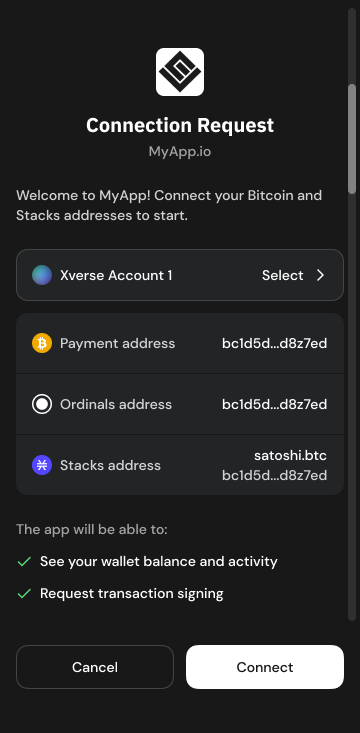
✅ If the user has already granted [permissions](https://docs.xverse.app/sats-connect/xverse-wallet-permissions)
, no connection request popup will appear, ensuring a smooth user experience.
[hashtag](https://docs.xverse.app/sats-connect/connecting-to-the-wallet/connect-to-xverse-wallet#successful-connection-request)
✅ Successful Connection Request
--------------------------------------------------------------------------------------------------------------------------------------------------------------------
The `wallet_connect` method returns a [Promisearrow-up-right](https://developer.mozilla.org/en-US/docs/Web/JavaScript/Reference/Global_Objects/Promise)
that resolves once the user approves the connection request or if they are already connected to your app.
Once resolved, the method returns `connectResult`: an array of the user’s wallet address objects, defined as:
You can use these addresses to make further requests such as [signing a message](https://docs.xverse.app/sats-connect/bitcoin-methods/signmessage)
, [signing a transaction](https://docs.xverse.app/sats-connect/bitcoin-methods/signpsbt)
, etc.
Currently, you can retrieve two types of Bitcoin addresses, the user's Bitcoin payment address and the Ordinals address which is a taproot address.
An example response:
Where:
address field
Description
`address`
string - the user’s connected wallet address
`publicKey`
A hex string representing the bytes of the public key of the account. You can use this to construct partially signed Bitcoin transactions (PSBT).
`purpose`
string - The purpose of the address:
* `ordinals` is preferably used to manage the user’s ordinals
* `payment` is preferably used to manage the user’s Bitcoin
* `stacks` is used to interact with the stacks ecosystem
* `spark` is used to interact with the Spark ecosystem
* `starknet` is used to interact with the Starknet ecosystem
`addressType`
string - the address’s format:
* `P2TR` for ordinals
* `P2SH` for payment
* `P2WPKH` for payment using Ledger
* `stacks` for Stacks
* `spark` for Spark
* `starknet` for Starknet
`network`
string - the network where the address is being used:
* `Mainnet` for Bitcoin Mainnet | Spark Mainnet | Stacks Mainnet | Starknet Mainnet
* `Regtest` for Bitcoin Regtest | Spark Regtest | Stacks Testnet | Starknet Sepolia
* `Testnet` for Bitcoin Testnet | Spark Regtest | Stacks Testnet | Starknet Sepolia
* `Signet` for Bitcoin Signet | Spark Regtest | Stacks Testnet | Starknet Sepolia
`walletType`
string - the type of wallet used for the account
* `ledger` if the user's account is using a Ledger device
* `software` otherwise
After approving the connection request, the user can track the active connection with your app directly from their Xverse wallet, and [revoke the connection from the wallet.](https://docs.xverse.app/sats-connect/xverse-wallet-events)

[hashtag](https://docs.xverse.app/sats-connect/connecting-to-the-wallet/connect-to-xverse-wallet#unsuccessful-connection-request)
❌ Unsuccessful Connection Request
------------------------------------------------------------------------------------------------------------------------------------------------------------------------
If the user declines the connection request or closes the pop-up, the promise returned by the `connect` method will reject (throw when awaited).
[PreviousConnecting to the walletchevron-left](https://docs.xverse.app/sats-connect/connecting-to-the-wallet)
[NextDisconnect from Xverse Walletchevron-right](https://docs.xverse.app/sats-connect/connecting-to-the-wallet/disconnect-from-xverse-wallet)
Last updated 5 months ago
* [Request to connect your app to your user's Xverse wallet](https://docs.xverse.app/sats-connect/connecting-to-the-wallet/connect-to-xverse-wallet#request-to-connect-your-app-to-your-users-xverse-wallet)
* [Connection request in your user's Xverse wallet](https://docs.xverse.app/sats-connect/connecting-to-the-wallet/connect-to-xverse-wallet#connection-request-in-your-users-xverse-wallet)
* [✅ Successful Connection Request](https://docs.xverse.app/sats-connect/connecting-to-the-wallet/connect-to-xverse-wallet#successful-connection-request)
* [❌ Unsuccessful Connection Request](https://docs.xverse.app/sats-connect/connecting-to-the-wallet/connect-to-xverse-wallet#unsuccessful-connection-request)
sun-brightdesktopmoon
Copy
type address = {
address: string;
publicKey: string;
purpose: "payment" | "ordinals" | "stacks" | "spark" | "starknet";
addressType: "p2tr" | "p2wpkh" | "p2sh" | "stacks" | "spark" | "starknet";
}
wallet\_connect response
Copy
const response = {
walletType: 'software',
id: 'dj0f7g5xtdakgecvf45dvssu66',
addressses: [\
{\
address: 'tb1pzwa68q3udj0f7g5xtdakgecvf45dvssu66ry7y3at22w7vus20vq3sgw62',\
publicKey: 'b9907521ddb85e0e6a37622b7c685efbdc8ae53a334928adbd12cf204ad4e717',\
purpose: 'ordinals',\
addressType: 'p2tr',\
network: 'mainnet'\
},\
{\
address: '2NBfRKCUpafbatj5gV9T82uau3igdSf9BXJ',\
publicKey: '02818b7ff740a40f311d002123087053d5d9e0e1546674aedb10e15a5b57fd3985',\
purpose: 'payment',\
addressType: 'p2sh',\
network: 'mainnet'\
},\
],
network: {
bitcoin: {
name: 'Mainnet',
},
stacks: {
name: 'Mainnet',
},
},
};
sun-brightdesktopmoon
---
# [Legacy ⚠️] getAccounts | Sats Connect - Wallet API for BitcoinFi
circle-exclamation
**🚀 Attention Developers: Upgrade to the** [**connect**](https://docs.xverse.app/sats-connect/connecting-to-the-wallet)
**method 🚀**
A new [connect](https://docs.xverse.app/sats-connect/connecting-to-the-wallet)
method is now available to connect to user's wallets and request permissions to access their accounts.
While the legacy version documented here remains supported, we urge you to upgrade for access to the latest features and a more smoother user experience.
Your application can request to connect to the user’s wallet with the `getAccounts` method, which prompts them to share their Bitcoin and Stacks addresses.
* You can specify which wallet addresses you require, Bitcoin ordinals address, Bitcoin payment address or Stacks address, using the `purposes` request parameter
* The `message` request param gives you the option to display a message the user when requesting their addresses. You can use it to present your app and explain why you require access to their addresses.
request parameters
Description
`purposes`
Array of strings used to specify the purpose of the address(es) to request:
* `'ordinals'` is preferably used to manage the user’s ordinals
* `'payment'` is preferably used to manage the user’s bitcoin
* `'stacks'` is used to interact with the stacks ecosystem
Example: `['ordinals', 'payment', 'stacks']`
`message`
ℹ️ Optional a message to be displayed to the user in the request prompt.
Copy
import {request} from "sats-connect";
try {
const response = await request('getAccounts', null);
console.log("getAccounts ~ response:", response)
if (response.status === 'success') {
const paymentAddressItem = response.result.find(
(address) => address.purpose === AddressPurpose.Payment
);
const ordinalsAddressItem = response.result.find(
(address) => address.purpose === AddressPurpose.Ordinals
);
const stacksAddressItem = response.result.find(
(address) => address.purpose === AddressPurpose.Stacks
);
} else {
if (response.error.code === RpcErrorCode.USER_REJECTION) {
// handle user cancellation error
} else {
// handle error
}
}
} catch (err) {
alert(err.error.message);
}
The `getAddresss` method returns a [Promisearrow-up-right](https://developer.mozilla.org/en-US/docs/Web/JavaScript/Reference/Global_Objects/Promise)
that resolves if the user approves the connection request. The user will see a _Connection Request_ prompt in their wallet. The prompt will display:
* your app logo, if it is specified in your app manifest
* the wallet addresses that your app required
* the message which you specified. Note that this message will be cut beyond 80 characters.

Once resolved, the method returns `GetAccountResult`: an array of the user’s wallet address objects, defined as:
You can use these addresses to make further requests such as [signing a message](https://docs.xverse.app/sats-connect/bitcoin-methods/signmessage)
, [signing a transaction](https://docs.xverse.app/sats-connect/bitcoin-methods/signpsbt)
, etc.
Currently, you can retrieve two types of Bitcoin addresses, the user's Bitcoin payment address and the Ordinals address which is a taproot address.
An example response:
Where:
address field
Description
`address`
string - the user’s connected wallet address
`publicKey`
A hex string representing the bytes of the public key of the account. You can use this to construct partially signed Bitcoin transactions (PSBT).
`purpose`
string - The purpose of the address:
* `ordinals` is preferably used to manage the user’s ordinals
* `payment` is preferably used to manage the user’s bitcoin
* `stacks` is used to interact with the stacks ecosystem
`addressType`
string - the address’s format:
* `P2TR` for ordinals
* `P2SH` for payment
* `P2WPKH` for payment using Ledger
* `stacks` for Stacks
`walletType`
string - the type of wallet used for the account
* `ledger` if the user's account is using a Ledger device
* `software` otherwise
If the user declines the request or closes the pop-up, the promise will reject (throw when awaited).
[PreviousManage a user's default walletchevron-left](https://docs.xverse.app/sats-connect/connecting-to-the-wallet/connect-to-other-wallets/manage-a-users-default-wallet)
[NextWallet Methodschevron-right](https://docs.xverse.app/sats-connect/wallet-methods)
Last updated 5 months ago
sun-brightdesktopmoon
Copy
type address = {
address: string;
publicKey: string;
purpose: "payment" | "ordinals" | "stacks";
addressType: "p2tr" | "p2wpkh" | "p2sh" | "stacks";
}
Copy
GetAccountResult: [\
{\
address: "tb1pzwa68q3udj0f7g5xtdakgecvf45dvssu66ry7y3at22w7vus20vq3sgw62",\
publicKey: "b9907521ddb85e0e6a37622b7c685efbdc8ae53a334928adbd12cf204ad4e717",\
purpose: "ordinals",\
addressType: "p2tr",\
walletType: "software"\
},\
{\
address: "2NBfRKCUpafbatj5gV9T82uau3igdSf9BXJ",\
publicKey: "02818b7ff740a40f311d002123087053d5d9e0e1546674aedb10e15a5b57fd3985",\
purpose: "payment",\
addressType: "p2sh",\
walletType: "software"\
}\
]
sun-brightdesktopmoon
---
# Get Started | xverse
[hashtag](https://docs.xverse.app/api/get-started#endpoints)
🔌 Endpoints
------------------------------------------------------------------------------
Network
Endpoint URL
**Mainnet**
https://api.secretkeylabs.io
**Signet**
https://api-signet.secretkeylabs.io
**Testnet4**
https://api-testnet4.secretkeylabs.io
[hashtag](https://docs.xverse.app/api/get-started#authentication)
🔐 Authentication
----------------------------------------------------------------------------------------
The Xverse API is currently in **private beta**. Click [herearrow-up-right](https://form.typeform.com/to/HkwDUt9P)
to get your API keys and start building!
[hashtag](https://docs.xverse.app/api/get-started#developer-support-and-feedback)
💬 Developer Support & Feedback
----------------------------------------------------------------------------------------------------------------------
Have feedback, feature requests, or want to partner? [Contact usarrow-up-right](https://discord.com/invite/tN84HhSDrz)
— we’d love to hear from you.
[PreviousXverse APIchevron-left](https://docs.xverse.app/api)
[NextBitcoinchevron-right](https://docs.xverse.app/api/bitcoin)
Last updated 8 months ago
* [🔌 Endpoints](https://docs.xverse.app/api/get-started#endpoints)
* [🔐 Authentication](https://docs.xverse.app/api/get-started#authentication)
* [💬 Developer Support & Feedback](https://docs.xverse.app/api/get-started#developer-support-and-feedback)
sun-brightdesktopmoon
sun-brightdesktopmoon
---
# Bitcoin | xverse
Bitcoin RPC, real-time and comprehensive **Bitcoin mempool & transaction data**, advanced indexing of **UTXOs & balances**, optimised for apps and dashboards.
[PreviousGet Startedchevron-left](https://docs.xverse.app/api/get-started)
[NextAddresschevron-right](https://docs.xverse.app/api/bitcoin/address)
Last updated 1 month ago
sun-brightdesktopmoon
sun-brightdesktopmoon
---
# wallet_open | Sats Connect - Wallet API for BitcoinFi
[hashtag](https://docs.xverse.app/sats-connect/wallet-methods/wallet_open#wallet_open-methods)
wallet\_open methods
------------------------------------------------------------------------------------------------------------------------
The `wallet_open*` methods let your app open **specific screens and flows** in the Xverse wallet (e.g. Receive, Send, Swap, Bridge, Earn) via a single Sats Connect request.
They are designed to create a smoother, more seamless **dapp ↔ wallet** experience by allowing your app to deep-link users directly into the right place in the wallet — without requiring manual navigation or multiple steps.
Common use cases include:
* guiding users to the correct **Receive** address for a given asset or network
* directing users into **Swap / Bridge / Earn** flows to complete an in-app intent
* reducing friction when an action requires switching from your app to the wallet
circle-info
`wallet_open*` methods require the user to have already connected their Xverse account to your app and granted the necessary [permissions](https://docs.xverse.app/sats-connect/xverse-wallet-permissions)
.
[Previouswallet\_addNetworkchevron-left](https://docs.xverse.app/sats-connect/wallet-methods/wallet_addnetwork)
[Nextwallet\_openReceivechevron-right](https://docs.xverse.app/sats-connect/wallet-methods/wallet_open/wallet_openreceive)
Last updated 13 days ago
sun-brightdesktopmoon
sun-brightdesktopmoon
---
# request methods | Sats Connect - Wallet API for BitcoinFi
You can use `request` to connect to users' wallets, prompt users to share their Bitcoin & Stacks wallet addresses, and sign messages and transactions with their Bitcoin & Stacks addresses.
circle-info
The `request` method is available as `Wallet.request` from `sats-connect` if you'd like users to [connect to any wallet](https://docs.xverse.app/sats-connect/connecting-to-the-wallet/connect-to-other-wallets)
, or as a named export from `@sats-connect/core` if you only need Xverse Wallet support.
[hashtag](https://docs.xverse.app/sats-connect/wallet-methods/request-methods#available-methods)
Available methods
-----------------------------------------------------------------------------------------------------------------------
`request` gives you access to a set of [JSON RPC 2.0arrow-up-right](https://www.jsonrpc.org/specification)
methods which follow the [WBIP001arrow-up-right](https://wbips.netlify.app/wbips/WBIP001)
standard. All available Bitcoin & Stacks methods are detailed in the present documentation:
Connect, fetch accounts & manage permissions
* [wallet\_connect](https://docs.xverse.app/sats-connect/connecting-to-the-wallet/connect-to-xverse-wallet)
* [wallet\_disconnect](https://docs.xverse.app/sats-connect/connecting-to-the-wallet/disconnect-from-xverse-wallet)
* [getAccount](https://docs.xverse.app/sats-connect/wallet-methods/wallet_getaccount)
* [wallet\_requestPermissions](https://docs.xverse.app/sats-connect/xverse-wallet-permissions)
* [wallet\_getCurrentPermissions](https://docs.xverse.app/sats-connect/xverse-wallet-permissions)
* [wallet\_renouncePermissions](https://docs.xverse.app/sats-connect/xverse-wallet-permissions)
* [wallet\_getNetwork](https://docs.xverse.app/sats-connect/wallet-methods/wallet_getnetwork)
* [wallet\_changeNetwork](https://docs.xverse.app/sats-connect/wallet-methods/wallet_changenetwork)
* [wallet\_addNetwork](https://docs.xverse.app/sats-connect/wallet-methods/wallet_addnetwork)
* \[Legacy ⚠️\] [getAccounts](https://docs.xverse.app/sats-connect/connecting-to-the-wallet/legacy-getaccounts)
bitcoin Bitcoin Methods
* [getAddresses](https://docs.xverse.app/sats-connect/bitcoin-methods/getaddresses)
* [getBalance](https://docs.xverse.app/sats-connect/bitcoin-methods/getbalance)
* [signMessage](https://docs.xverse.app/sats-connect/bitcoin-methods/signmessage)
* [signPsbt](https://docs.xverse.app/sats-connect/bitcoin-methods/signpsbt)
* [sendTransfer](https://docs.xverse.app/sats-connect/bitcoin-methods/sendtransfer)
* [ord\_getInscriptions](https://docs.xverse.app/sats-connect/bitcoin-methods/ord_getinscriptions)
& [ord\_sendInscriptions](https://docs.xverse.app/sats-connect/bitcoin-methods/ord_sendinscriptions)
* [runes\_getBalance](https://docs.xverse.app/sats-connect/bitcoin-methods/runes_getbalance)
& [runes\_transfer](https://docs.xverse.app/sats-connect/bitcoin-methods/runes_transfer)
* [Runes Minting methods](https://docs.xverse.app/sats-connect/bitcoin-methods/mint-runes)
* [Runes Etching methods](https://docs.xverse.app/sats-connect/bitcoin-methods/etch-runes)
🔴 Stacks Methods
* [stx\_getAccounts](https://docs.xverse.app/sats-connect/stacks-methods/stx_getaccounts)
* [stx\_signMessage](https://docs.xverse.app/sats-connect/stacks-methods/stx_signmessage)
* [stx\_signStructuredMessage](https://docs.xverse.app/sats-connect/stacks-methods/stx_signstructuredmessage)
* [stx\_signMessage](https://docs.xverse.app/sats-connect/bitcoin-methods/signmessage)
* [stx\_transferStx](https://docs.xverse.app/sats-connect/stacks-methods/stx_transferstx)
* [stx\_signTransaction](https://docs.xverse.app/sats-connect/stacks-methods/stx_signtransaction)
* [stx\_callContract](https://docs.xverse.app/sats-connect/stacks-methods/stx_callcontract)
* [stx\_deployContract](https://docs.xverse.app/sats-connect/stacks-methods/stx_deploycontract)
sparkle Spark Methods
* [spark\_getAddress](https://docs.xverse.app/sats-connect/spark-methods/spark_getaddress)
* [spark\_getBalance](https://docs.xverse.app/sats-connect/spark-methods/spark_getbalance)
* [spark\_transfer](https://docs.xverse.app/sats-connect/spark-methods/spark_transfer)
* [spark\_transferToken](https://docs.xverse.app/sats-connect/spark-methods/spark_transfertoken)
* [spark\_signMessage](https://docs.xverse.app/sats-connect/spark-methods/spark_signmessage)
[hashtag](https://docs.xverse.app/sats-connect/wallet-methods/request-methods#request-parameters)
Request parameters
-------------------------------------------------------------------------------------------------------------------------
Request parameters
Description
`method`
a string representing the RPC method to call
`params`
the params required by the RPC method
`providerId (optional)`
wallet provider id to use for the request
[hashtag](https://docs.xverse.app/sats-connect/wallet-methods/request-methods#response-format-and-error-handling)
Response format & error handling
-------------------------------------------------------------------------------------------------------------------------------------------------------
Depending on the status property the response will contain either a result or error object.
Property
Description
`status`
success | error
`result (optional)`
an object containing the result of the RPC request
`error (optional)`
an object containing the error of the RPC request
Error handling for these methods follows the JSON-RPC 2.0 protocol format:
Property
Description
`code`
`RpcErrorCode`
`message`
error message
`data`
any
Error codes
[PreviousWallet Methodschevron-left](https://docs.xverse.app/sats-connect/wallet-methods)
[Nextwallet\_getAccountchevron-right](https://docs.xverse.app/sats-connect/wallet-methods/wallet_getaccount)
Last updated 13 days ago
* [Available methods](https://docs.xverse.app/sats-connect/wallet-methods/request-methods#available-methods)
* [Request parameters](https://docs.xverse.app/sats-connect/wallet-methods/request-methods#request-parameters)
* [Response format & error handling](https://docs.xverse.app/sats-connect/wallet-methods/request-methods#response-format-and-error-handling)
sun-brightdesktopmoon
Copy
enum RpcErrorCode {
PARSE_ERROR = -32700, // Parse error Invalid JSON
INVALID_REQUEST = -32600, // The JSON sent is not a valid Request object.
METHOD_NOT_FOUND = -32601, // The method does not exist/is not available.
INVALID_PARAMS = -32602, // Invalid method parameter(s)
INTERNAL_ERROR = -32603, // Internal JSON-RPC error
USER_REJECTION = -32000, // user rejected/canceled the request
METHOD_NOT_SUPPORTED = -32001, // method is not supported for the address provided
}
sun-brightdesktopmoon
---
# Xverse Wallet events | Sats Connect - Wallet API for BitcoinFi
Sats Connect lets your app listen to key Xverse wallet events to provide a smooth user experience when your users change accounts or networks, or disconnect their account from your app.
Xverse wallet will emit dedicated events that your app can use to update the UI or request new permissions when required.
[hashtag](https://docs.xverse.app/sats-connect/xverse-wallet-events#listen-to-wallet-events)
Listen to wallet events
-------------------------------------------------------------------------------------------------------------------------
To be notified of events, apps need to first [connect to the wallet](https://docs.xverse.app/sats-connect/connecting-to-the-wallet/connect-to-xverse-wallet)
to receive [account read permissions.](https://docs.xverse.app/sats-connect/xverse-wallet-permissions)
Listeners registered using `Wallet.addListener()` will be notified of events for authorised accounts.
Copy
const removeListener = Wallet.addListener('accountChange', (event) => {
console.log('The account has changed.', event);
exampleUpdateUi();
exampleRequestPermissionsForCurrentAccount();
});
// When no longer needed, the listener can be removed by calling the function
// returned by `addListener`.
removeListener();
The `addListener` method is typed to include all currently available events. They currently include:
* `accountChange`
* `accountDisconnected`
* `networkChange`
[hashtag](https://docs.xverse.app/sats-connect/xverse-wallet-events#accountchange-event)
accountChange event
-----------------------------------------------------------------------------------------------------------------
the `accountChange` event is emitted when your connected user switches their Xverse wallet to another account.
The event will pass the below event payload object to a listener callback:
Property
Description
`type`
the event type -> `"accountChange"`
`addresses`
The array of address objects for the new account the user has switched to. -> See [getAccount](https://docs.xverse.app/sats-connect/wallet-methods/wallet_getaccount)
for the detailed format.
ℹ️ This will only be returned if your app is [connected](https://docs.xverse.app/sats-connect/connecting-to-the-wallet)
to the new account the user has switched to, and already has [read permission](https://docs.xverse.app/sats-connect/xverse-wallet-permissions)
on the new account's data. Your app can request to connect to the new account if required.
[hashtag](https://docs.xverse.app/sats-connect/xverse-wallet-events#accountdisconnected-event)
accountDisconnected event
-----------------------------------------------------------------------------------------------------------------------------
the `accountDisconnected` event is emitted when when your user revokes the connection with your app from their Xverse wallet, or when your app [renounces its wallet permissions](https://docs.xverse.app/sats-connect/connecting-to-the-wallet/disconnect-from-xverse-wallet)
.
The event will pass the below event payload object to a listener callback:
Property
Description
`type`
the event type -> `"accountDisconnected"`
[hashtag](https://docs.xverse.app/sats-connect/xverse-wallet-events#networkchange-event)
networkChange event
-----------------------------------------------------------------------------------------------------------------
the `networkChange` event is emitted when when your user switches between the Mainnet, Testnet & Signet networks in their Xverse wallet.
The event will pass the below event payload object to a listener callback:
Property
Description
`type`
the event type: `"networkChange"`
`bitcoin`
the name of the Bitcoin network the user has just switched to: `Mainnet`, `Testnet`, `Signet` or `Regtest` Example: `{"name": "Signet"}`
`stacks`
the name of the Stacks network the user has just switched to: Mainnet or Testnet Example: `{"name": "Testnet"}`
`spark`
the name of the Spark network the user has just switched to: Mainnet or Regtest Example: `{"name": "Regtest"}`
`addresses`
The array of address objects for the connected account on the new network the user has switched to. -> See [getAccount](https://docs.xverse.app/sats-connect/wallet-methods/wallet_getaccount)
for the detailed format. ℹ️ This will only be returned if your app is [connected](https://docs.xverse.app/sats-connect/connecting-to-the-wallet)
to the new account the user has switched to, and already has [read permission](https://docs.xverse.app/sats-connect/xverse-wallet-permissions)
on the new account's data. Your app can request to connect to the new account if required.
[hashtag](https://docs.xverse.app/sats-connect/xverse-wallet-events#networkadded-event)
🔜 networkAdded event
------------------------------------------------------------------------------------------------------------------
circle-info
This event is coming soon
the `networkAdded` event is emitted when when your user adds a custom network to their Xverse wallet.
The event will pass the below event payload object to a listener callback:
Property
Description
`type`
the event type: `"networkAdded"`
`bitcoin`
the name of the Bitcoin custom network the user has just added: `=` Example: `{"name": "custom_regtest_network"}`
[PreviousXverse Wallet Permissionschevron-left](https://docs.xverse.app/sats-connect/xverse-wallet-permissions)
[NextgetAddresseschevron-right](https://docs.xverse.app/sats-connect/bitcoin-methods/getaddresses)
Last updated 5 months ago
* [Listen to wallet events](https://docs.xverse.app/sats-connect/xverse-wallet-events#listen-to-wallet-events)
* [accountChange event](https://docs.xverse.app/sats-connect/xverse-wallet-events#accountchange-event)
* [accountDisconnected event](https://docs.xverse.app/sats-connect/xverse-wallet-events#accountdisconnected-event)
* [networkChange event](https://docs.xverse.app/sats-connect/xverse-wallet-events#networkchange-event)
* [🔜 networkAdded event](https://docs.xverse.app/sats-connect/xverse-wallet-events#networkadded-event)
sun-brightdesktopmoon
sun-brightdesktopmoon
---
# Blocks | xverse
[Get Current Blockchevron-right](https://docs.xverse.app/api/bitcoin/blocks/get-current-block)
[Get Block by Heightchevron-right](https://docs.xverse.app/api/bitcoin/blocks/get-block-by-height)
[PreviousMempool Acceptance Testchevron-left](https://docs.xverse.app/api/bitcoin/node-and-mempool/mempool-acceptance-test)
[NextGet Current Blockchevron-right](https://docs.xverse.app/api/bitcoin/blocks/get-current-block)
sun-brightdesktopmoon
sun-brightdesktopmoon
---
# Xverse API | xverse
[hashtag](https://docs.xverse.app/api#welcome-to-the-xverse-api)
✨ Welcome to the Xverse API
-------------------------------------------------------------------------------------------------
Build powerful Bitcoin applications with production-grade APIs used by [Xverse wallet arrow-up-right](https://www.xverse.app/)
— now available to developers.
Our suite of APIs provides everything you need to interact with the modern Bitcoin ecosystem: from Ordinals and Runes, to Bitcoin-native swaps, inscriptions, and Bitcoin L2 integrations. Whether you're building wallets, DeFi platforms, NFT marketplaces, or cross-chain bridges, our infrastructure gives you access to reliable, real-time blockchain data and ready-to-use transaction workflows.
* * *
[hashtag](https://docs.xverse.app/api#why-use-the-xverse-api)
🚀 Why use the Xverse API?
---------------------------------------------------------------------------------------------
We built these APIs to solve the real infrastructure problems we faced while building the Xverse wallet. Now we’re opening them up so Bitcoin developers can skip the heavy lifting and focus on building.
**Your Bitcoin RPC, indexer, and data layer — all in one API.**
**With the Xverse API, you get:**
* ⚡ **Ultra-fast Bitcoin RPC** and real-time mempool data — without running your own node
* 🧩 **Advanced indexing** for transaction history, UTXO data, and Bitcoin asset protocols
* 🔲 **Comprehensive Ordinals, Runes & BRC-20 support** — balances, parsing, and transaction data with zero custom indexing
* 💹 **Live & historical market data** for Bitcoin assets: Ordinals, Runes, BRC-20, and Bitcoin L2 tokens
* 💱 **Swap aggregation** across Bitcoin AMMs & L2s (Spark, Stacks, Starknet, BOB, Runes AMMs, BRC-20, etc.)
* 📊 **Portfolio analytics** with real-time activity and daily balance history
* ✍️ **Automated minting, etching & inscription at scale** — simple endpoints that handle high volumes without custom scripts
* 🌉 **Cross-chain swaps & bridging with aggregated liquidity** — one interface to move assets seamlessly across Bitcoin and L2s
* * *
###
[hashtag](https://docs.xverse.app/api#whats-inside)
🧰 What’s Inside
Our API suite is organized into powerful modules that serve different needs across the Bitcoin ecosystem:
Module
Description
🟠 [**Bitcoin API**](https://docs.xverse.app/api/bitcoin)
Bitcoin RPC, real-time and comprehensive **Bitcoin mempool & transaction data**, advanced indexing of **UTXOs & balances**, optimised for apps and dashboards.
🖼️ [**Ordinals API**](https://docs.xverse.app/api/ordinals)
Fetch detailed information on all **inscriptions**, **UTXOs**, **rare sats** — everything you need to power an **Ordinals experience**. **Automate Ordinal inscriptions** with advanced features. Estimate costs, create orders, and track inscription statuses seamlessly.
**🔲** [**Runes API**](https://docs.xverse.app/api/runes)
Query **Rune balances** and **detailed information**. Integrate Runes into your apps without building infra. **Mint** and **etch Runes**, with cost estimates, order management and execution.
🪙 [**BRC-20 API**](https://docs.xverse.app/api/brc-20)
Query **BRC-20 balances** and **detailed information**. Integrate BRC-20 into your apps without building infra. **Mint** and **deploy** BRC-20, with cost estimates, order management and execution.
sparkle [**Spark API**](https://docs.xverse.app/api/spark)
Query [**Spark**arrow-up-right](https://www.spark.money/)
**balances, transactions & activity** for **Bitcoin** & **BTKN** tokens. Access [**Flashnet**arrow-up-right](https://www.flashnet.xyz/)
market & trading data.
Integrate **Spark** & **Flashnet** into your apps without building infra.
💹 [Portfolio API](https://docs.xverse.app/api/portfolio)
Monitor **Bitcoin asset balances** and **activity** across **multiple addresses**, with automatic daily tracking and historical portfolio **insights**.
**🔄** [**Swap Aggregator**](https://docs.xverse.app/api/swaps)
Seamlessly **integrate Bitcoin-asset swaps into your application.** Aggregate **quotes** from multiple **AMMs** across **Bitcoin and L2s**, generate and execute swap orders, and facilitate cross-chain swaps—all through a unified interface.
* * *
###
[hashtag](https://docs.xverse.app/api#how-it-works)
⚙️ How It Works
All endpoints are **RESTful** and return **JSON** responses. You can use them with your preferred stack — whether you're writing in JavaScript, Python, Rust, or anything else.
Authentication, rate limits, and response formats will be covered in the [Getting Started](https://docs.xverse.app/api/get-started)
section.
* * *
###
[hashtag](https://docs.xverse.app/api#built-for-builders)
🧑💻 Built for Builders
This API suite powers real products — including the Xverse wallet and app — and is optimized for scale, speed, and uptime.
✅ **\>99% Uptime** ⚡ **Low-latency responses** 🔒 **Secure & production-tested** 📈 **Scalable for any app size**
* * *
###
[hashtag](https://docs.xverse.app/api#start-building)
💡 Start Building
If you're ready to dive in, check out our [Getting Started](https://docs.xverse.app/api/get-started)
guide or browse the API reference to start exploring endpoints.
Looking to integrate specific functionality like swaps, Ordinals support, or Runes minting? Each section is fully documented with example requests, response formats, and real-world use cases.
[NextGet Startedchevron-right](https://docs.xverse.app/api/get-started)
Last updated 1 month ago
* [✨ Welcome to the Xverse API](https://docs.xverse.app/api#welcome-to-the-xverse-api)
* [🚀 Why use the Xverse API?](https://docs.xverse.app/api#why-use-the-xverse-api)
* [🧰 What’s Inside](https://docs.xverse.app/api#whats-inside)
* [⚙️ How It Works](https://docs.xverse.app/api#how-it-works)
* [🧑💻 Built for Builders](https://docs.xverse.app/api#built-for-builders)
* [💡 Start Building](https://docs.xverse.app/api#start-building)
sun-brightdesktopmoon
sun-brightdesktopmoon
---
# Bitcoin Price | xverse
This endpoint can be used to get the latest Bitcoin price
get
https://api.secretkeylabs.io/v1/bitcoin/price
Fetch latest bitcoin price.
Authorizations
apiKeychevron-down
apiKey
x-api-keystringRequired
Responses
chevron-right
200
Default Response
application/json
Responseobject
Show propertiesplus
chevron-right
400
Invalid input
application/json
chevron-right
401
Unauthorized
application/json
chevron-right
404
Not found
application/json
chevron-right
429
Rate limit exceeded
application/json
chevron-right
500
Internal server error
application/json
get
/v1/bitcoin/price
HTTPchevron-down
HTTPcURLJavaScriptPython
Test it
200
Default Response
chevron-down
[Previousverifymessagechevron-left](https://docs.xverse.app/api/bitcoin/bitcoin-json-rpc/verifymessage)
[NextOrdinalschevron-right](https://docs.xverse.app/api/ordinals)
Last updated 5 months ago
sun-brightdesktopmoon
Copy
GET /v1/bitcoin/price HTTP/1.1
Host: api.secretkeylabs.io
x-api-key: YOUR_API_KEY
Accept: */*
Copy
{
"currency": "text",
"rate": 1
}
sun-brightdesktopmoon
---
# Get Bitcoin Transaction | xverse
This endpoint returns confirmation status, block height, and timestamp for a given Bitcoin transaction. Mempool-aware.
get
https://api.secretkeylabs.io/v1/bitcoin/tx/{txid}
Retrieve stats for the transaction. Works for confirmed and unconfirmed transactions.
Authorizations
apiKeychevron-down
apiKey
x-api-keystringRequired
Path parameters
txidstring · regexRequired
Transaction id
Example: `6c5ffa32f6942bb82bf36239fb8a6d233c4da6f91bde81869accef2ef6be674e`Pattern: `^[a-fA-F0-9]{64}$`
Query parameters
offsetnumberOptional
limitnumber · min: 25 · max: 25Optional
Responses
chevron-right
200
Default Response
application/json
chevron-right
400
Invalid input
application/json
chevron-right
401
Unauthorized
application/json
chevron-right
404
Not found
application/json
chevron-right
429
Rate limit exceeded
application/json
chevron-right
500
Internal server error
application/json
get
/v1/bitcoin/tx/{txid}
HTTPchevron-down
HTTPcURLJavaScriptPython
Test it
200
Default Response
chevron-down
[PreviousTransactionschevron-left](https://docs.xverse.app/api/bitcoin/transactions)
[NextGet Raw Bitcoin Transaction Hexchevron-right](https://docs.xverse.app/api/bitcoin/transactions/get-raw-bitcoin-transaction-hex)
Last updated 5 months ago
sun-brightdesktopmoon
Copy
GET /v1/bitcoin/tx/{txid} HTTP/1.1
Host: api.secretkeylabs.io
x-api-key: YOUR_API_KEY
Accept: */*
Copy
{
"height": 1,
"confirmations": 1,
"inputs": [\
{\
"vin": 1,\
"prevTxid": "text",\
"prevVout": 1,\
"value": 1,\
"address": "text",\
"script": "text",\
"isCoinbase": true\
}\
],
"outputs": [\
{\
"vout": 1,\
"value": 1,\
"address": "text",\
"script": "text"\
}\
]
}
sun-brightdesktopmoon
---
# Mempool Fees | xverse
get
https://api.secretkeylabs.io/v1/bitcoin/mempool/stats
Retrieve stats for the projected blocks from the transactions in the mempool.
Authorizations
apiKeychevron-down
apiKey
x-api-keystringRequired
Responses
chevron-right
200
Default Response
application/json
Responseobject
Show propertiesplus
chevron-right
400
Invalid input
application/json
chevron-right
401
Unauthorized
application/json
chevron-right
404
Not found
application/json
chevron-right
429
Rate limit exceeded
application/json
chevron-right
500
Internal server error
application/json
get
/v1/bitcoin/mempool/stats
HTTPchevron-down
HTTPcURLJavaScriptPython
Test it
200
Default Response
chevron-down
[PreviousEstimate Transaction Feechevron-left](https://docs.xverse.app/api/bitcoin/node-and-mempool/estimate-transaction-fee)
[NextSend Transactionchevron-right](https://docs.xverse.app/api/bitcoin/node-and-mempool/send-transaction)
Last updated 6 months ago
sun-brightdesktopmoon
Copy
GET /v1/bitcoin/mempool/stats HTTP/1.1
Host: api.secretkeylabs.io
x-api-key: YOUR_API_KEY
Accept: */*
Copy
{
"currentBlockHeight": 1,
"projectedBlocks": [\
{\
"height": 1,\
"weight": 1,\
"vbytes": 1,\
"txnCount": 1,\
"totalFeesSats": 1,\
"feeRates": {\
"min": 1,\
"max": 1,\
"avg": 1,\
"median": 1,\
"p75": 1,\
"p95": 1\
}\
}\
]
}
sun-brightdesktopmoon
---
# wallet_getNetwork | Sats Connect - Wallet API for BitcoinFi
[hashtag](https://docs.xverse.app/sats-connect/wallet-methods/wallet_getnetwork#fetch-the-users-xverse-wallet-active-networks)
Fetch the user's Xverse wallet active networks
----------------------------------------------------------------------------------------------------------------------------------------------------------------------------------
Your app can fetch the networks that the user's wallet is currently connected to, using `wallet_getNetwork`.
The app must have first [connected to the wallet](https://docs.xverse.app/sats-connect/connecting-to-the-wallet/connect-to-xverse-wallet)
and obtained [account read permissions.](https://docs.xverse.app/sats-connect/xverse-wallet-permissions)
Copy
import Wallet from 'sats-connect';
async function example() {
const res = await Wallet.request('wallet_getNetwork', null);
if (res.status === 'error') {
console.error(res.error);
return;
}
console.log(res.result);
}
[hashtag](https://docs.xverse.app/sats-connect/wallet-methods/wallet_getnetwork#getnetwork-result)
✅ getNetwork Result
---------------------------------------------------------------------------------------------------------------------------
The response contains network information for each of the wallet's supported chains:
An example response:
[Previouswallet\_getAccountchevron-left](https://docs.xverse.app/sats-connect/wallet-methods/wallet_getaccount)
[Nextwallet\_changeNetworkchevron-right](https://docs.xverse.app/sats-connect/wallet-methods/wallet_changenetwork)
Last updated 13 days ago
* [Fetch the user's Xverse wallet active networks](https://docs.xverse.app/sats-connect/wallet-methods/wallet_getnetwork#fetch-the-users-xverse-wallet-active-networks)
* [✅ getNetwork Result](https://docs.xverse.app/sats-connect/wallet-methods/wallet_getnetwork#getnetwork-result)
sun-brightdesktopmoon
Copy
{
"bitcoin": {
"name": "Mainnet"
},
"stacks": {
"name": "Mainnet"
},
"spark": {
"name": "Mainnet"
},
"starknet": {
"name": "Mainnet"
},
}
sun-brightdesktopmoon
---
# Node & Mempool | xverse
[Estimate Transaction Feechevron-right](https://docs.xverse.app/api/bitcoin/node-and-mempool/estimate-transaction-fee)
[Mempool Feeschevron-right](https://docs.xverse.app/api/bitcoin/node-and-mempool/mempool-fees)
[Send Transactionchevron-right](https://docs.xverse.app/api/bitcoin/node-and-mempool/send-transaction)
[Mempool Acceptance Testchevron-right](https://docs.xverse.app/api/bitcoin/node-and-mempool/mempool-acceptance-test)
[PreviousOutputschevron-left](https://docs.xverse.app/api/bitcoin/outputs)
[NextEstimate Transaction Feechevron-right](https://docs.xverse.app/api/bitcoin/node-and-mempool/estimate-transaction-fee)
sun-brightdesktopmoon
sun-brightdesktopmoon
---
# Get Current Block | xverse
Returns the latest Bitcoin block with height, hash, timestamp, and more.
get
https://api.secretkeylabs.io/v1/block/current
Get information about the current block
Authorizations
apiKeychevron-down
apiKey
x-api-keystringRequired
Responses
chevron-right
200
Block information
application/json
Responseobject
Block information
Show propertiesplus
chevron-right
400
Invalid input
application/json
chevron-right
401
Unauthorized
application/json
chevron-right
404
Not found
application/json
chevron-right
429
Rate limit exceeded
application/json
chevron-right
500
Internal server error
application/json
get
/v1/block/current
HTTPchevron-down
HTTPcURLJavaScriptPython
Test it
200
Block information
chevron-down
[PreviousBlockschevron-left](https://docs.xverse.app/api/bitcoin/blocks)
[NextGet Block by Heightchevron-right](https://docs.xverse.app/api/bitcoin/blocks/get-block-by-height)
Last updated 5 months ago
sun-brightdesktopmoon
Copy
GET /v1/block/current HTTP/1.1
Host: api.secretkeylabs.io
x-api-key: YOUR_API_KEY
Accept: */*
Copy
{
"block": {
"height": 1,
"hash": "text",
"previousHash": "text",
"timestamp": "text"
}
}
sun-brightdesktopmoon
---
# Manage a user's default wallet | Sats Connect - Wallet API for BitcoinFi
For a fine grained control over a user's default wallet, Sats Connect provides utilities to manage the default wallet.
circle-info
Note that default wallet selection is handled automatically when using [`Wallet.request`](https://docs.xverse.app/sats-connect/wallet-methods/request-methods)
methods
* Users are automatically prompted to choose which wallet they'd like to use if they haven't done so yet.
* The wallet they choose is set as the default wallet for future operations.
* the `getDefaultProvider()` method lets you fetch the user's default connected wallet
* the `setDefaultProvider()` method lets you set the user’s default connected wallet
The following snippet shows how to manage a user’s default wallet:
Copy
import { getDefaultProvider, setDefaultProvider } from "@sats-connect/core";
import { loadSelector, selectWalletProvider, type Config } from "@sats-connect/ui"
async function example() {
const defaultWallet = await getDefaultProvider();
if (defaultWallet) {
return businessLogicWith(defaultWallet);
}
loadSelector();
const config: Config = { /* ... */ };
const selectedWallet = await selectWalletProvider(config);
await setDefaultWallet(selectedWallet);
}
[PreviousConnect to other walletschevron-left](https://docs.xverse.app/sats-connect/connecting-to-the-wallet/connect-to-other-wallets)
[Next\[Legacy ⚠️\] getAccountschevron-right](https://docs.xverse.app/sats-connect/connecting-to-the-wallet/legacy-getaccounts)
Last updated 1 year ago
sun-brightdesktopmoon
sun-brightdesktopmoon
---
# Ordinal Transaction Outputs | xverse
This endpoint returns detailed info on Ordinal assets (BTC, inscriptions, runes) for each output of a transaction.
It is mempool-aware and includes unconfirmed BTC, inscriptions & runes data for mempool transactions
get
https://api.secretkeylabs.io/v1/ordinals/tx/{txid}/outputs
Retrieve historic ordinal output info for a specific tx. It is mempool aware. `isOrdinalsIndexed` determines if ordinals data is available
Authorizations
apiKeychevron-down
apiKey
x-api-keystringRequired
Path parameters
txidstring · regexRequired
Transaction id
Example: `6c5ffa32f6942bb82bf36239fb8a6d233c4da6f91bde81869accef2ef6be674e`Pattern: `^[a-fA-F0-9]{64}$`
Query parameters
offsetnumberOptional
limitnumber · min: 25 · max: 25Optional
Responses
chevron-right
200
Default Response
application/json
Responseobject
Show propertiesplus
chevron-right
400
Invalid input
application/json
chevron-right
401
Unauthorized
application/json
chevron-right
404
Not found
application/json
chevron-right
429
Rate limit exceeded
application/json
chevron-right
500
Internal server error
application/json
get
/v1/ordinals/tx/{txid}/outputs
HTTPchevron-down
HTTPcURLJavaScriptPython
Test it
200
Default Response
chevron-down
[PreviousOrdinal Transactionchevron-left](https://docs.xverse.app/api/bitcoin/transactions/ordinal-transaction)
[NextOrdinal Transaction Inputschevron-right](https://docs.xverse.app/api/bitcoin/transactions/ordinal-transaction-inputs)
Last updated 3 months ago
sun-brightdesktopmoon
Copy
GET /v1/ordinals/tx/{txid}/outputs HTTP/1.1
Host: api.secretkeylabs.io
x-api-key: YOUR_API_KEY
Accept: */*
Copy
{
"total": 1,
"offset": 1,
"limit": 1,
"confirmations": 1,
"blockHeight": 1,
"items": [\
{\
"vout": 1,\
"value": 1,\
"address": "text",\
"script": "text",\
"runes": [\
{\
"runeId": "text",\
"runeName": "text",\
"amount": "text",\
"divisibility": 1\
}\
],\
"inscriptions": [\
{\
"id": "text",\
"contentType": "text",\
"offset": 1\
}\
]\
}\
],
"isOrdinalsIndexed": true
}
sun-brightdesktopmoon
---
# runes_getBalance | Sats Connect - Wallet API for BitcoinFi
You can use the `runes_getBalance` method to retrieve all your user's Runes balances, i.e. each Rune token that their [connected wallet address](https://docs.xverse.app/sats-connect/connecting-to-the-wallet)
owns, and in which amount.
Your app must have first [connected to the wallet](https://docs.xverse.app/sats-connect/connecting-to-the-wallet/connect-to-xverse-wallet)
and obtained [account read permissions.](https://docs.xverse.app/sats-connect/xverse-wallet-permissions)
No query parameters are required for the method:
Copy
import { request } from 'sats-connect';
const response = await request('runes_getBalance', null);
if (response.status === 'success') {
console.log(response.result);
} else {
console.error(response.error);
}
The `runes_getBalance` method will **not** trigger any operation or prompt your user to sign any transaction. It will return an array of `balance` objects, each representing the connected wallet's holdings of a rune token:
balance
Description
`runeName`
a string representing the [name of the Rune arrow-up-right](https://docs.ordinals.com/runes.html#name)
for which the balance is returned.
`amount`
the amount of Rune tokens which the address owns, based on **confirmed** Runes transactions only.
`spendableBalance`
the amount of Rune tokens which the address can **spend**. The spendable balance excludes rune utxos which are waiting transfer confirmation in the mempool.
`symbol` ℹ️ optional
a string representing the rune's currency [symbolarrow-up-right](https://docs.ordinals.com/runes.html#symbol)
as a single Unicode code point. If a rune does not have a symbol, the generic currency sign `¤`, also called a scarab, will be used
`divisibility` ℹ️ optional
a number representing the rune's [divisibilityarrow-up-right](https://docs.ordinals.com/runes.html#divisibility)
, i.e. how finely it may be divided into its atomic units. Divisibility is expressed as the number of digits permissible after the decimal point in an amount of runes. The default value is 0.
`inscriptionId` ℹ️ optional
a string representing the ID of the inscription linked to the rune, which marketplaces and apps can use as logo
[Previousord\_sendInscriptionschevron-left](https://docs.xverse.app/sats-connect/bitcoin-methods/ord_sendinscriptions)
[Nextrunes\_transferchevron-right](https://docs.xverse.app/sats-connect/bitcoin-methods/runes_transfer)
Last updated 9 months ago
sun-brightdesktopmoon
sun-brightdesktopmoon
---
# Address | xverse
[Balancechevron-right](https://docs.xverse.app/api/bitcoin/address/balance)
[Bitcoin Address Summarychevron-right](https://docs.xverse.app/api/bitcoin/address/bitcoin-address-summary)
[\[v1\] Get Bitcoin UTXOschevron-right](https://docs.xverse.app/api/bitcoin/address/v1-get-bitcoin-utxos)
[\[v2\] Get Bitcoin UTXOs (Mempool-Aware)chevron-right](https://docs.xverse.app/api/bitcoin/address/v2-get-bitcoin-utxos-mempool-aware)
[🕑Activitychevron-right](https://docs.xverse.app/api/bitcoin/address/activity)
[PreviousBitcoinchevron-left](https://docs.xverse.app/api/bitcoin)
[NextBalancechevron-right](https://docs.xverse.app/api/bitcoin/address/balance)
sun-brightdesktopmoon
sun-brightdesktopmoon
---
# getBalance | Sats Connect - Wallet API for BitcoinFi
You can use the `getBalance` method to retrieve your user's Bitcoin balance, i.e. the amount of BTC that their [connected wallet](https://docs.xverse.app/sats-connect/connecting-to-the-wallet)
's Bitcoin payment address owns.
Your app must have first [connected to the wallet](https://docs.xverse.app/sats-connect/connecting-to-the-wallet/connect-to-xverse-wallet)
and obtained [account read permissions.](https://docs.xverse.app/sats-connect/xverse-wallet-permissions)
No query parameters are required for the method:
Copy
import { request } from 'sats-connect';
const response = await request('getBalance', undefined);
if (response.status === 'success') {
console.log(response.result);
} else {
console.error(response.error);
}
The `getBalance` method will **not** trigger any operation or prompt your user to sign any transaction. It will return an object representing the connected wallet's payment address BTC holdings:
balance
Description
`confirmed`
a string representing the connected wallet's **confirmed** BTC balance, i.e. the amount of **confirmed** BTC which the payment address holds, in satoshis
`unconfirmed`
a string representing the connected wallet's **unconfirmed BTC** balance, i.e. the amount of **unconfirmed** BTC which the payment address will send/receive as a result of pending mempool transactions, in satoshis ℹ️Note that this amount can be negative if the net result of pending mempool transaction decreases the address balance.
`total`
a string representing the sum of `confirmed` and `unconfirmed` BTC balances.
[PreviousgetAddresseschevron-left](https://docs.xverse.app/sats-connect/bitcoin-methods/getaddresses)
[NextsignPsbtchevron-right](https://docs.xverse.app/sats-connect/bitcoin-methods/signpsbt)
Last updated 1 year ago
sun-brightdesktopmoon
sun-brightdesktopmoon
---
# Ordinals | xverse
Fetch detailed information on all **inscriptions**, **UTXOs**, **rare sats** — everything you need to power an **Ordinals experience**.
**Automate Ordinal inscriptions** with advanced features. Estimate costs, create orders, and track inscription statuses seamlessly.
[PreviousBitcoin Pricechevron-left](https://docs.xverse.app/api/bitcoin/bitcoin-price)
[NextOrdinals by Addresschevron-right](https://docs.xverse.app/api/ordinals/ordinals-by-address)
Last updated 3 months ago
sun-brightdesktopmoon
sun-brightdesktopmoon
---
# Activity | xverse
[Historical Activity (Confirmed)chevron-right](https://docs.xverse.app/api/bitcoin/address/activity/historical-activity-confirmed)
[Real-Time Mempool Activity (Unconfirmed)chevron-right](https://docs.xverse.app/api/bitcoin/address/activity/real-time-mempool-activity-unconfirmed)
[Unconfirmed Transactionschevron-right](https://docs.xverse.app/api/bitcoin/address/activity/unconfirmed-transactions)
[Previous\[v2\] Get Bitcoin UTXOs (Mempool-Aware)chevron-left](https://docs.xverse.app/api/bitcoin/address/v2-get-bitcoin-utxos-mempool-aware)
[NextHistorical Activity (Confirmed)chevron-right](https://docs.xverse.app/api/bitcoin/address/activity/historical-activity-confirmed)
sun-brightdesktopmoon
sun-brightdesktopmoon
---
# runes_estimateMint | Sats Connect - Wallet API for BitcoinFi
Use the `runes_estimateMint` method to estimate the cost of a Rune mint order for your user, before executing it.
You can specify the characteristics of the Runes mint order you wish to estimate, by passing an `EstimateMintParams` object to the method, with the below properties:
EstimateMintParams
Description
`runeName`
a string representing the [name of the Rune arrow-up-right](https://docs.ordinals.com/runes.html#name)
to mint
`repeats`
a number representing the number of mint transactions to create. Every mint transaction creates a [fixed amount arrow-up-right](https://docs.ordinals.com/runes.html#amount)
of new units of a rune, you can use `repeats` to mint a multiple of that amount. ℹ️ Note that there is a 4000 repeat limit per order
`destinationAddress`
The Bitcoin address to which the minted runes should be allocated. ℹ️If minting Runes for your user, you can fetch their wallet addresses with the [getAccounts](https://docs.xverse.app/sats-connect/wallet-methods/wallet_getaccount)
method. ⚠️ We recommend managing runes holdings on taproot/ordinal addresses.
`feeRate`
a number representing the desired fee rate to set for the Rune mint transaction(s), in sats per vbytes
`appServiceFee` (ℹ️ optional)
a number representing the sats value of the fee to charge your user for your service.
`appServiceFeeAddress` (ℹ️ optional)
a string representing the Bitcoin address which will receive the `appServiceFee`, if a fee is specified
`network` (ℹ️ optional)
a string representing the Bitcoin network to use for the mint runes transactions: `'Mainnet'` or `'Testnet'`
Copy
import { request } from "sats-connect";
const response = await request('runes_estimateMint', {
destinationAddress: ordinalsAddress,
feeRate: +feeRate,
repeats: +repeats,
runeName: runeName,
});
if (response.status === 'success') {
setTotalCost(response.result.totalCost);
setTotalSize(response.result.totalSize);
} else {
console.error(response.error);
alert('Error Fetching Estimate. See console for details.');
}
The `runes_estimateMint` method will **not** trigger any mint operation or prompt your user to sign any transaction. It will return an `EstimateMintResponse` object, intended for you and your user to anticipate the mint costs and their breakdown:
EstimateMintResponse property
Description
`totalSize`
a number representing the total size of the mint transaction(s), in vbytes
`totalCost`
a number representing the total cost of the mint transaction(s) in sats
`costBreakdown`
An object representing the cost breakdown of the mint transaction(s), with the below properties:
* `postage` a number representing the total size of the Rune UTXOs minted, in sats
* `networkFee` a number representing the total network fee for the mint transaction(s), in sats
* `serviceFee` a number representing the total Sats Connect fee for processing the mint order, in sats
* `appServiceFee` a number representing the optional service fee your app charges the user for the mint order
See the [runes\_mint](https://docs.xverse.app/sats-connect/bitcoin-methods/mint-runes/runes_mint)
method if you wish to execute a Runes mint order after estimating its cost.
[PreviousMint Runeschevron-left](https://docs.xverse.app/sats-connect/bitcoin-methods/mint-runes)
[Nextrunes\_mintchevron-right](https://docs.xverse.app/sats-connect/bitcoin-methods/mint-runes/runes_mint)
Last updated 1 year ago
sun-brightdesktopmoon
sun-brightdesktopmoon
---
# wallet_addNetwork | Sats Connect - Wallet API for BitcoinFi
[hashtag](https://docs.xverse.app/sats-connect/wallet-methods/wallet_addnetwork#add-a-custom-to-the-users-xverse-wallet)
Add a custom to the user's Xverse wallet
----------------------------------------------------------------------------------------------------------------------------------------------------------------------
The `wallet_addNetwork` method prompts the user to add a custom network to their Xverse Wallet.
This method allows dApps to onboard users to a **custom network** (typically for **Regtest** or staging environments) without requiring manual wallet setup.
The app must have first [connected to the wallet](https://docs.xverse.app/sats-connect/connecting-to-the-wallet/connect-to-xverse-wallet)
and obtained [account read permissions.](https://docs.xverse.app/sats-connect/xverse-wallet-permissions)
circle-info
You can fetch the networks that the user's wallet is currently connected to, using [`wallet_getNetwork`](https://docs.xverse.app/sats-connect/wallet-methods/wallet_getnetwork)
.
###
[hashtag](https://docs.xverse.app/sats-connect/wallet-methods/wallet_addnetwork#parameters)
Parameters
Request parameters
Description
`name`
a string representing the user-visible network label (e.g. `"my-custom-regtest"`)
`chain`
Currently only `"bitcoin"` is supported, to add custom [Regtestarrow-up-right](https://developer.bitcoin.org/examples/testing.html#regtest-mode)
networks
`rpcUrl`
a string representing the main RPC JSON-RPC endpoint for the added network
`rpcFallbackUrl` ℹ️ Optional
a string representing the fallback RPC URL if primary fails
`indexerUrl` ℹ️ Optional
a string representing the Indexer API used for advanced indexing of the balances and transaction history on the added network
`blockExplorerUrl` ℹ️ Optional
a string representing the transaction explorer base URL for the added network
Copy
import Wallet from 'sats-connect';
async function example() {
const res = await Wallet.request('wallet_addNetwork', {
name: 'my-custom-regtest',
chain: 'bitcoin',
rpc_url: 'https://custom-regtest.tech/api/proxy',
indexer_api: 'https://indexer.my-custom-regtest.app',
block_explorer_url: 'https://mempool-my-custom-regtest.space',
rpc_fallback_url: 'https://fallback.custom-regtest.tech/api/proxy' // optional
});
if (res.status === 'error') {
console.error(res.error);
return;
}
console.log(res.result);
}
[hashtag](https://docs.xverse.app/sats-connect/wallet-methods/wallet_addnetwork#addnetwork-result)
✅ addNetwork Result
---------------------------------------------------------------------------------------------------------------------------
The method will
* prompt the user to add the custom network to their Xverse wallet
* return `null` if the user accepts the prompt and adds the network -> **Null response**
The addition of the network to the wallet will emit a [networkAdded](https://docs.xverse.app/sats-connect/xverse-wallet-events#networkadded-event)
event which your app can catch.
circle-info
Your app can then
* prompt the user to switch their Xverse wallet to the newly added network with the [wallet\_changeNetwork](https://docs.xverse.app/sats-connect/wallet-methods/wallet_changenetwork)
* fetch the user's active Xverse account under the new network with the [`wallet_getAccount`](https://docs.xverse.app/sats-connect/wallet-methods/wallet_getaccount)
method.
[Previouswallet\_changeNetworkchevron-left](https://docs.xverse.app/sats-connect/wallet-methods/wallet_changenetwork)
[Nextwallet\_openchevron-right](https://docs.xverse.app/sats-connect/wallet-methods/wallet_open)
Last updated 13 days ago
* [Add a custom to the user's Xverse wallet](https://docs.xverse.app/sats-connect/wallet-methods/wallet_addnetwork#add-a-custom-to-the-users-xverse-wallet)
* [Parameters](https://docs.xverse.app/sats-connect/wallet-methods/wallet_addnetwork#parameters)
* [✅ addNetwork Result](https://docs.xverse.app/sats-connect/wallet-methods/wallet_addnetwork#addnetwork-result)
sun-brightdesktopmoon
sun-brightdesktopmoon
---
# wallet_openEarn | Sats Connect - Wallet API for BitcoinFi
circle-info
🔜 The wallet\_openEarn method is coming soon
[hashtag](https://docs.xverse.app/sats-connect/wallet-methods/wallet_open/wallet_openearn#help-users-put-bitcoin-and-stablecoins-to-work-in-bitcoinfi)
Help users put Bitcoin & stablecoins to work in BitcoinFi
---------------------------------------------------------------------------------------------------------------------------------------------------------------------------------------------------------------------
Your app can use the `wallet_openEarn` method to open Xverse Wallet’s native **Earn** flow for a specific yield strategy, so the user can deposit Bitcoin or stablecoins directly from their wallet.
This is especially useful for onboarding users into BitcoinFi experiences across Bitcoin and Bitcoin L2 ecosystems such as **Starknet, Spark, or Stacks**.
[hashtag](https://docs.xverse.app/sats-connect/wallet-methods/wallet_open/wallet_openearn#id-6c42baa3-c47d-47b0-9a64-be9a102ea8ad)
Request Params
------------------------------------------------------------------------------------------------------------------------------------------------------
* `strategy` (required)
* The Xverse Earn yield strategy to open
* Example: `WBTC_nativeStaking` (staking WBTC natively on Starknet)
[hashtag](https://docs.xverse.app/sats-connect/wallet-methods/wallet_open/wallet_openearn#id-616fb9ae-ded6-43dc-9c32-52a1a9ca8e55)
Permissions Required
------------------------------------------------------------------------------------------------------------------------------------------------------------
* 🔓 Your app must have first [connected to the walletarrow-up-right](https://docs.xverse.app/sats-connect/connecting-to-the-wallet/connect-to-xverse-wallet)
and obtained [account read permissionsarrow-up-right](https://docs.xverse.app/sats-connect/xverse-wallet-permissions)
* 🔒 If your user has not [connected their active Xverse account to your apparrow-up-right](https://docs.xverse.app/sats-connect/connecting-to-the-wallet/connect-to-xverse-wallet)
yet, and your app does not the necessary account read [permissionsarrow-up-right](https://docs.xverse.app/sats-connect/xverse-wallet-permissions)
-> the method will throw with an access denied error
[hashtag](https://docs.xverse.app/sats-connect/wallet-methods/wallet_open/wallet_openearn#id-4c07a335-c0e0-4b42-81af-85ec2d1171bb)
wallet\_openEarn Result: Open the Earn Flow
-----------------------------------------------------------------------------------------------------------------------------------------------------------------------------------
###
[hashtag](https://docs.xverse.app/sats-connect/wallet-methods/wallet_open/wallet_openearn#c7fcb152-b219-4511-9f1d-f3992d2c739e)
✅ Success
If the account is connected and the requested onramp exists
* \-> the method successfully returns `openEarnResult`
* \-> Xverse Wallet opens the **Earn** screen for the requested strategy
* the user can then choose an amount and confirm the deposit/investment in Xverse Wallet

###
[hashtag](https://docs.xverse.app/sats-connect/wallet-methods/wallet_open/wallet_openearn#d6911fd7-b946-47e4-8dc8-70af3607487a)
❌ Error
* If the account is not connected or the requested Xverse Earn strategy does not exist, the method will reject with an error object.
[Previouswallet\_openBridgechevron-left](https://docs.xverse.app/sats-connect/wallet-methods/wallet_open/wallet_openbridge)
[NextXverse Custom Methodschevron-right](https://docs.xverse.app/sats-connect/wallet-methods/xverse-custom-methods)
Last updated 8 days ago
* [Help users put Bitcoin & stablecoins to work in BitcoinFi](https://docs.xverse.app/sats-connect/wallet-methods/wallet_open/wallet_openearn#help-users-put-bitcoin-and-stablecoins-to-work-in-bitcoinfi)
* [Request Params](https://docs.xverse.app/sats-connect/wallet-methods/wallet_open/wallet_openearn#id-6c42baa3-c47d-47b0-9a64-be9a102ea8ad)
* [Permissions Required](https://docs.xverse.app/sats-connect/wallet-methods/wallet_open/wallet_openearn#id-616fb9ae-ded6-43dc-9c32-52a1a9ca8e55)
* [wallet\_openEarn Result: Open the Earn Flow](https://docs.xverse.app/sats-connect/wallet-methods/wallet_open/wallet_openearn#id-4c07a335-c0e0-4b42-81af-85ec2d1171bb)
* [✅ Success](https://docs.xverse.app/sats-connect/wallet-methods/wallet_open/wallet_openearn#c7fcb152-b219-4511-9f1d-f3992d2c739e)
* [❌ Error](https://docs.xverse.app/sats-connect/wallet-methods/wallet_open/wallet_openearn#d6911fd7-b946-47e4-8dc8-70af3607487a)
sun-brightdesktopmoon
sun-brightdesktopmoon
---
# wallet_openReceive | Sats Connect - Wallet API for BitcoinFi
[hashtag](https://docs.xverse.app/sats-connect/wallet-methods/wallet_open/wallet_openreceive#help-users-receive-bitcoin-ecosystem-assets)
Help Users Receive Bitcoin Ecosystem Assets
------------------------------------------------------------------------------------------------------------------------------------------------------------------------------------------
Your app can use the `wallet_openReceive` method to open the user's **Receive** screen in Xverse for a specific address type (payment, ordinals, stacks, spark, starknet).
This enables you to guide users directly to the correct receive flow, without asking them to manually navigate within the wallet.
* * *
###
[hashtag](https://docs.xverse.app/sats-connect/wallet-methods/wallet_open/wallet_openreceive#request-parameters)
Request Parameters
####
[hashtag](https://docs.xverse.app/sats-connect/wallet-methods/wallet_open/wallet_openreceive#address-required)
`address` _(required)_
A string representing which Xverse receive address to open.
Accepted values:
* `payment` **📮** Bitcoin payment address _(native or nested segwit, depending on the current wallet setting)_ **🎯** Receive Bitcoin payments
* `ordinals` **📮** Bitcoin ordinals address _(taproot)_ **🎯** Receive Bitcoin ordinals, runes, brc-20
* `spark` **📮** Spark address _(the main one, not the airdrop one)_ **🎯** Receive Spark BTC and BTKN tokens
* `starknet` **📮** Starknet address **🎯** Receive Starknet tokens & collectibles
* `stacks` **📮** Stacks address **🎯** Receive Stacks tokens & collectibles
* * *
###
[hashtag](https://docs.xverse.app/sats-connect/wallet-methods/wallet_open/wallet_openreceive#permissions-required)
Permissions Required
* 🔓 Your app must have first [connected to the walletarrow-up-right](https://docs.xverse.app/sats-connect/connecting-to-the-wallet/connect-to-xverse-wallet)
and obtained [account read permissionsarrow-up-right](https://docs.xverse.app/sats-connect/xverse-wallet-permissions)
* 🔒 If your user has not [connected their active Xverse account to your apparrow-up-right](https://docs.xverse.app/sats-connect/connecting-to-the-wallet/connect-to-xverse-wallet)
yet, and your app does not the necessary account read [permissionsarrow-up-right](https://docs.xverse.app/sats-connect/xverse-wallet-permissions)
-> the method will throw with an access denied error
* * *
###
[hashtag](https://docs.xverse.app/sats-connect/wallet-methods/wallet_open/wallet_openreceive#usage-example)
Usage Example
* * *
###
[hashtag](https://docs.xverse.app/sats-connect/wallet-methods/wallet_open/wallet_openreceive#wallet_openreceive-result-open-the-receive-screen)
wallet\_openReceive Result: Open the Receive Screen
✅ If the account is connected and the requested address exists:
* the method resolves successfully
* Xverse wallet opens the **Receive** screen for the requested address type

❌ If the account is not connected or the requested address does not exist:
* the method returns an error response
* * *
###
[hashtag](https://docs.xverse.app/sats-connect/wallet-methods/wallet_open/wallet_openreceive#response-format)
Response Format
The `wallet_openReceive` method returns a Promise that resolves to an `OpenReceiveResult` object.
####
[hashtag](https://docs.xverse.app/sats-connect/wallet-methods/wallet_open/wallet_openreceive#address)
`address`
An address object representing the requested receive address:
[Previouswallet\_openchevron-left](https://docs.xverse.app/sats-connect/wallet-methods/wallet_open)
[Nextwallet\_openBuychevron-right](https://docs.xverse.app/sats-connect/wallet-methods/wallet_open/wallet_openbuy)
Last updated 8 days ago
* [Help Users Receive Bitcoin Ecosystem Assets](https://docs.xverse.app/sats-connect/wallet-methods/wallet_open/wallet_openreceive#help-users-receive-bitcoin-ecosystem-assets)
* [Request Parameters](https://docs.xverse.app/sats-connect/wallet-methods/wallet_open/wallet_openreceive#request-parameters)
* [Permissions Required](https://docs.xverse.app/sats-connect/wallet-methods/wallet_open/wallet_openreceive#permissions-required)
* [Usage Example](https://docs.xverse.app/sats-connect/wallet-methods/wallet_open/wallet_openreceive#usage-example)
* [wallet\_openReceive Result: Open the Receive Screen](https://docs.xverse.app/sats-connect/wallet-methods/wallet_open/wallet_openreceive#wallet_openreceive-result-open-the-receive-screen)
* [Response Format](https://docs.xverse.app/sats-connect/wallet-methods/wallet_open/wallet_openreceive#response-format)
sun-brightdesktopmoon
Copy
import { request, RpcErrorCode } from "sats-connect";
async function openReceive() {
const res = await request("wallet_openReceive", {
address: "payment",
});
if (res.status === "success") {
// res.result.address contains the address object that was opened in the wallet
return res.result.address;
}
if (res.error.code === RpcErrorCode.ACCESS_DENIED) {
// Your app is not connected to the user's active account yet
// You can prompt the user to connect first:
const permissionRes = await request("wallet_requestPermissions", undefined);
if (permissionRes.status === "error") {
// user declined connection
throw new Error("User declined connection");
}
// retry after permissions are granted
const retry = await request("wallet_openReceive", { address: "payment" });
if (retry.status === "error") {
throw new Error("Failed to open receive screen", { cause: retry.error });
}
return retry.result.address;
}
// Other errors (e.g. invalid address type or address not available)
throw new Error("Failed to open receive screen", { cause: res.error });
}
Copy
type OpenReceiveAddress = {
address: string;
publicKey: string;
purpose: "payment" | "ordinals" | "stacks" | "spark" | "starknet";
addressType: "p2tr" | "p2wpkh" | "p2sh" | "stacks" | "spark" | "starknet";
};
sun-brightdesktopmoon
---
# Xverse Custom Methods | Sats Connect - Wallet API for BitcoinFi
Sats Connect also offers custom methods which can only be invoked for users using the [Xverse walletarrow-up-right](https://www.xverse.app/)
.
[hashtag](https://docs.xverse.app/sats-connect/wallet-methods/xverse-custom-methods#available-xverse-custom-methods)
Available Xverse custom methods
---------------------------------------------------------------------------------------------------------------------------------------------------------
bitcoin Bitcoin Methods
* [signMultipleTransactions](https://docs.xverse.app/sats-connect/bitcoin-methods/signmultipletransactions)
* [signMultipleMessages](https://docs.xverse.app/sats-connect/bitcoin-methods/signmultiplemessages)
🎨 Bitcoin Inscriptions Methods
* [createInscription](https://docs.xverse.app/sats-connect/bitcoin-methods/createinscription)
* [createRepeatInscriptions](https://docs.xverse.app/sats-connect/bitcoin-methods/createrepeatinscriptions)
sparkle Spark Methods
* [Flashnet Trading](https://docs.xverse.app/sats-connect/spark-methods/flashnet-trading)
methods
[hashtag](https://docs.xverse.app/sats-connect/wallet-methods/xverse-custom-methods#request-parameters-and-response-formats)
Request parameters & Response formats
-----------------------------------------------------------------------------------------------------------------------------------------------------------------------
See the methods' documentation pages
[Previouswallet\_openEarnchevron-left](https://docs.xverse.app/sats-connect/wallet-methods/wallet_open/wallet_openearn)
[NextXverse Wallet Permissionschevron-right](https://docs.xverse.app/sats-connect/xverse-wallet-permissions)
Last updated 13 days ago
* [Available Xverse custom methods](https://docs.xverse.app/sats-connect/wallet-methods/xverse-custom-methods#available-xverse-custom-methods)
* [Request parameters & Response formats](https://docs.xverse.app/sats-connect/wallet-methods/xverse-custom-methods#request-parameters-and-response-formats)
sun-brightdesktopmoon
sun-brightdesktopmoon
---
# Void inscriptions | xverse
get
https://api.secretkeylabs.io/v1/ordinals/address/{address}/void-protocol-inscriptions/collection/{collectionId}
Get BRC20 & TAP void inscriptions(already spent/used) owned by an address in a specific collection. A void inscription is a BRC-20 or TAP inscription that is no longer protocol valid (transfer inscriptions become invalid after first transfer, other inscriptions like mint become invalid right after inscribe).
Authorizations
apiKeychevron-down
apiKey
x-api-keystringRequired
Path parameters
addressstring · BitcoinAddress · min: 10RequiredDefault: `bc1q0egjvlcfq77cxd9kvpgppyuxckzvws46e3sxch`
collectionIdstringRequiredExample: `bitminer`
Query parameters
offsetnumberOptionalDefault: `0`
limitnumber · min: 25 · max: 25OptionalDefault: `25`
Responses
chevron-right
200
Inscriptions for a specific collection owned by an address
application/json
Responseobject
Inscriptions for a specific collection owned by an address
Show propertiesplus
chevron-right
400
Invalid input
application/json
chevron-right
401
Unauthorized
application/json
chevron-right
404
Not found
application/json
chevron-right
429
Rate limit exceeded
application/json
chevron-right
500
Internal server error
application/json
get
/v1/ordinals/address/{address}/void-protocol-inscriptions/collection/{collectionId}
HTTPchevron-down
HTTPcURLJavaScriptPython
Test it
200
Inscriptions for a specific collection owned by an address
chevron-down
[PreviousInscriptions of a Collectionchevron-left](https://docs.xverse.app/api/ordinals/ordinals-by-address/inscriptions-of-a-collection)
[NextCollectionschevron-right](https://docs.xverse.app/api/ordinals/collections)
Last updated 5 days ago
sun-brightdesktopmoon
Copy
GET /v1/ordinals/address/{address}/void-protocol-inscriptions/collection/{collectionId} HTTP/1.1
Host: api.secretkeylabs.io
x-api-key: YOUR_API_KEY
Accept: */*
Copy
{
"collectionId": "text",
"collectionName": "text",
"total": 1,
"offset": 1,
"limit": 1,
"inscriptions": [\
{\
"id": "text",\
"number": 1,\
"sat": 1,\
"contentType": "text",\
"blockHeight": 1,\
"charms": [\
"text"\
],\
"currentLocation": "text"\
}\
]
}
sun-brightdesktopmoon
---
# Collection Historical Floor Prices | xverse
This endpoint provides the historical floor price for a specific collection and a given time period.
get
https://api.secretkeylabs.io/v1/ordinals/collections/{collectionId}/historical-floor-prices
Get historical floor prices for an Ordinals collection.
Authorizations
apiKeychevron-down
apiKey
x-api-keystringRequired
Path parameters
collectionIdstringRequiredExample: `{"value":"wzrds"}`
Query parameters
fromTimestampstringRequired
ISO timestamp - no older than 1 year ago (e.g. 2024-08-29T03:09:35.236Z)
toTimestampstringOptional
ISO timestamp - up until now / not in the future
Responses
chevron-right
200
Default Response
application/json
Responseobject\[\]
Show propertiesplus
chevron-right
400
Invalid input
application/json
chevron-right
401
Unauthorized
application/json
chevron-right
404
Not found
application/json
chevron-right
429
Rate limit exceeded
application/json
chevron-right
500
Internal server error
application/json
get
/v1/ordinals/collections/{collectionId}/historical-floor-prices
HTTPchevron-down
HTTPcURLJavaScriptPython
Test it
200
Default Response
chevron-down
[PreviousInscriptions by Collectionchevron-left](https://docs.xverse.app/api/ordinals/collections/inscriptions-by-collection)
[NextInscriptionschevron-right](https://docs.xverse.app/api/ordinals/inscriptions)
Last updated 6 months ago
sun-brightdesktopmoon
Copy
GET /v1/ordinals/collections/{collectionId}/historical-floor-prices?fromTimestamp=text HTTP/1.1
Host: api.secretkeylabs.io
x-api-key: YOUR_API_KEY
Accept: */*
Copy
[\
{\
"timestamp": "text",\
"floorPrice": {\
"valueInSats": 1,\
"valueInUsd": "text"\
}\
}\
]
sun-brightdesktopmoon
---
# Inscriptions of a Collection | xverse
get
https://api.secretkeylabs.io/v1/ordinals/address/{address}/inscriptions/collection/{collectionId}
Get inscriptions owned by an address in a specific collection. It includes current inscription location
Authorizations
apiKeychevron-down
apiKey
x-api-keystringRequired
Path parameters
addressstring · BitcoinAddress · min: 10RequiredDefault: `bc1q0egjvlcfq77cxd9kvpgppyuxckzvws46e3sxch`
collectionIdstringRequiredExample: `{"value":"wzrds"}`
Query parameters
offsetnumberOptionalDefault: `0`
limitnumber · min: 25 · max: 25OptionalDefault: `25`
Responses
chevron-right
200
Inscriptions for a specific collection owned by an address
application/json
Responseobject
Inscriptions for a specific collection owned by an address
Show propertiesplus
chevron-right
400
Invalid input
application/json
chevron-right
401
Unauthorized
application/json
chevron-right
404
Not found
application/json
chevron-right
429
Rate limit exceeded
application/json
chevron-right
500
Internal server error
application/json
get
/v1/ordinals/address/{address}/inscriptions/collection/{collectionId}
HTTPchevron-down
HTTPcURLJavaScriptPython
Test it
200
Inscriptions for a specific collection owned by an address
chevron-down
[PreviousUnconfirmed Inscriptions (Mempool)chevron-left](https://docs.xverse.app/api/ordinals/ordinals-by-address/unconfirmed-inscriptions-mempool)
[NextVoid inscriptionschevron-right](https://docs.xverse.app/api/ordinals/ordinals-by-address/void-inscriptions)
Last updated 5 days ago
sun-brightdesktopmoon
Copy
GET /v1/ordinals/address/{address}/inscriptions/collection/{collectionId} HTTP/1.1
Host: api.secretkeylabs.io
x-api-key: YOUR_API_KEY
Accept: */*
Copy
{
"collectionId": "text",
"collectionName": "text",
"total": 1,
"offset": 1,
"limit": 1,
"inscriptions": [\
{\
"id": "text",\
"number": 1,\
"sat": 1,\
"contentType": "text",\
"blockHeight": 1,\
"charms": [\
"text"\
],\
"currentLocation": "text"\
}\
]
}
sun-brightdesktopmoon
---
# Address | xverse
[Spark Balanceschevron-right](https://docs.xverse.app/api/spark/address/spark-balances)
[Spark Transaction Historychevron-right](https://docs.xverse.app/api/spark/address/spark-transaction-history)
[Spark Address Summarychevron-right](https://docs.xverse.app/api/spark/address/spark-address-summary)
[PreviousSparkchevron-left](https://docs.xverse.app/api/spark)
[NextSpark Balanceschevron-right](https://docs.xverse.app/api/spark/address/spark-balances)
sun-brightdesktopmoon
sun-brightdesktopmoon
---
# Transactions | xverse
[Get Bitcoin Transactionchevron-right](https://docs.xverse.app/api/bitcoin/transactions/get-bitcoin-transaction)
[Get Raw Bitcoin Transaction Hexchevron-right](https://docs.xverse.app/api/bitcoin/transactions/get-raw-bitcoin-transaction-hex)
[Decode Raw Bitcoin Transactionchevron-right](https://docs.xverse.app/api/bitcoin/transactions/decode-raw-bitcoin-transaction)
[Ordinal Transactionchevron-right](https://docs.xverse.app/api/bitcoin/transactions/ordinal-transaction)
[Ordinal Transaction Outputschevron-right](https://docs.xverse.app/api/bitcoin/transactions/ordinal-transaction-outputs)
[Ordinal Transaction Inputschevron-right](https://docs.xverse.app/api/bitcoin/transactions/ordinal-transaction-inputs)
[PreviousUnconfirmed Transactionschevron-left](https://docs.xverse.app/api/bitcoin/address/activity/unconfirmed-transactions)
[NextGet Bitcoin Transactionchevron-right](https://docs.xverse.app/api/bitcoin/transactions/get-bitcoin-transaction)
sun-brightdesktopmoon
sun-brightdesktopmoon
---
# Bitcoin Address Summary | xverse
Returns the balance and a paginated list of transaction IDs for a given Bitcoin address. Fully mempool-aware.
get
https://api.secretkeylabs.io/v1/bitcoin/address/{address}/summary
Get address summary including paginated transaction IDs and balance information. This endpoint is mempool-aware and includes both confirmed and unconfirmed data. Response fields:
* `txids` - Paginated list of transaction IDs for this address, ordered by block height descending. When there is mempool activity, unconfirmed transactions appear first.
* `confirmedBalance` - Current confirmed balance in satoshis, ignoring mempool activity.
* `unconfirmedBalance` - Net unconfirmed balance change (received - sent) in satoshis. It can be negative as it only considers mempool, eg. when spending more than receiving.
* `offset` - Current pagination offset.
* `limit` - Current pagination limit.
Authorizations
apiKeychevron-down
apiKey
x-api-keystringRequired
Path parameters
addressstring · BitcoinAddress · min: 10RequiredDefault: `bc1q0egjvlcfq77cxd9kvpgppyuxckzvws46e3sxch`
Query parameters
offsetnumberOptionalDefault: `0`
limitnumber · min: 25 · max: 25OptionalDefault: `25`
Responses
chevron-right
200
Address summary with txids and balance
application/json
Responseobject
Address summary with txids and balance
Show propertiesplus
chevron-right
400
Invalid input
application/json
chevron-right
401
Unauthorized
application/json
chevron-right
404
Not found
application/json
chevron-right
429
Rate limit exceeded
application/json
chevron-right
500
Internal server error
application/json
get
/v1/bitcoin/address/{address}/summary
HTTPchevron-down
HTTPcURLJavaScriptPython
Test it
200
Address summary with txids and balance
chevron-down
[PreviousBalancechevron-left](https://docs.xverse.app/api/bitcoin/address/balance)
[Next\[v1\] Get Bitcoin UTXOschevron-right](https://docs.xverse.app/api/bitcoin/address/v1-get-bitcoin-utxos)
Last updated 2 months ago
sun-brightdesktopmoon
Copy
GET /v1/bitcoin/address/{address}/summary HTTP/1.1
Host: api.secretkeylabs.io
x-api-key: YOUR_API_KEY
Accept: */*
Copy
{
"txids": [\
"text"\
],
"confirmedBalance": "text",
"unconfirmedBalance": "text",
"offset": 1,
"limit": 1
}
sun-brightdesktopmoon
---
# wallet_getAccount | Sats Connect - Wallet API for BitcoinFi
[hashtag](https://docs.xverse.app/sats-connect/wallet-methods/wallet_getaccount#fetch-the-users-xverse-wallet-account)
Fetch the user's Xverse wallet account
------------------------------------------------------------------------------------------------------------------------------------------------------------------
Your app can fetch the user's active Xverse account with the `wallet_getAccount` method.
The app must have first [connected to the wallet](https://docs.xverse.app/sats-connect/connecting-to-the-wallet/connect-to-xverse-wallet)
and obtained [account read permissions.](https://docs.xverse.app/sats-connect/xverse-wallet-permissions)
* You can optionally specify which wallet addresses you require: Bitcoin ordinals address, Bitcoin payment address, Spark, Starknet or Stacks address, using the optional `addresses` request parameter.
request parameters
Description
`addresses` ℹ️ Optional
an array of strings used to specify which address(es) to request from the user's Xverse wallet account:
* `'ordinals'` is preferably used to manage the user’s ordinals
* `'payment'` is preferably used to manage the user’s bitcoin
* `'stacks'` is used to interact with the stacks ecosystem
* `'spark'` is used to interact with the Spark ecosystem
* `'starknet'` is used to interact with the Starknet ecosystem
Example: `['ordinals', 'payment', 'stacks']` Will default to `['ordinals', 'payment', 'stacks', 'spark','starknet']` if not specified.
Copy
import Wallet from 'sats-connect';
const response = await Wallet.request('wallet_getAccount', null);
if (response.status === 'error') {
console.error(response.error);
return;
}
console.log(response.result);
The `wallet_getAccount` method attempts to fetch the user's active Xverse account directly. You can use it to grant your connected user a smooth experience, without connection popups.
[hashtag](https://docs.xverse.app/sats-connect/wallet-methods/wallet_getaccount#getaccount-result-account-is-connected)
✅ getAccount Result - account is connected
-----------------------------------------------------------------------------------------------------------------------------------------------------------------------
If your user has already [connected their active Xverse account to your app](https://docs.xverse.app/sats-connect/connecting-to-the-wallet/connect-to-xverse-wallet)
, and granted your app the necessary account read [permissions](https://docs.xverse.app/sats-connect/xverse-wallet-permissions)
-> the method successfully returns `getAccountResult`:
* The account id
* The wallet type (software or hardware)
* an array of the user’s wallet address objects, defined as:
You can use these addresses to make further requests such as [signing a message](https://docs.xverse.app/sats-connect/bitcoin-methods/signmessage)
, [signing a transaction](https://docs.xverse.app/sats-connect/bitcoin-methods/signpsbt)
, etc.
Currently, you can retrieve two types of Bitcoin addresses, the user's Bitcoin payment address and the Ordinals address which is a taproot address.
An example response:
Where:
address field
Description
`walletType`
string - the type of wallet used for the account
* `ledger` if the user's account is using a Ledger device
* `software` otherwise
`address`
string - the user’s connected wallet address
`publicKey`
A hex string representing the bytes of the public key of the account. You can use this to construct partially signed Bitcoin transactions (PSBT).
`purpose`
string - The purpose of the address:
* `ordinals` is preferably used to manage the user’s ordinals
* `payment` is preferably used to manage the user’s bitcoin
* `stacks` is used to interact with the stacks ecosystem
`addressType`
string - the address’s format:
* `P2TR` for ordinals
* `P2SH` for payment
* `P2WPKH` for payment using Ledger
* `stacks` for Stacks
* `spark` for Spark
* `starknet` for Starknet
`network`
string - the network where the address is being used:
* `Mainnet` for Bitcoin Mainnet | Spark Mainnet | Stacks Mainnet | Starknet Mainnet
* `Regtest` for Bitcoin Regtest | Spark Regtest | Stacks Testnet | Starknet Sepolia
* `Testnet` for Bitcoin Testnet | Spark Regtest | Stacks Testnet | Starknet Sepolia
* `Signet` for Bitcoin Signet | Spark Regtest | Stacks Testnet | Starknet Sepolia
[hashtag](https://docs.xverse.app/sats-connect/wallet-methods/wallet_getaccount#getaccount-result-account-is-not-connected)
❌ getAccount Result - account is not connected
-------------------------------------------------------------------------------------------------------------------------------------------------------------------------------
If your user has not [connected their active Xverse account to your app](https://docs.xverse.app/sats-connect/connecting-to-the-wallet/connect-to-xverse-wallet)
yet, and your app does not the necessary account read [permissions](https://docs.xverse.app/sats-connect/xverse-wallet-permissions)
-> the method will throw with an access denied error You can use the [`connect`](https://docs.xverse.app/sats-connect/connecting-to-the-wallet/connect-to-xverse-wallet)
or [`wallet_requestPermissions`](https://docs.xverse.app/sats-connect/xverse-wallet-permissions)
methods to request a connection to your user's active Xverse account.
[Previousrequest methodschevron-left](https://docs.xverse.app/sats-connect/wallet-methods/request-methods)
[Nextwallet\_getNetworkchevron-right](https://docs.xverse.app/sats-connect/wallet-methods/wallet_getnetwork)
Last updated 13 days ago
* [Fetch the user's Xverse wallet account](https://docs.xverse.app/sats-connect/wallet-methods/wallet_getaccount#fetch-the-users-xverse-wallet-account)
* [✅ getAccount Result - account is connected](https://docs.xverse.app/sats-connect/wallet-methods/wallet_getaccount#getaccount-result-account-is-connected)
* [❌ getAccount Result - account is not connected](https://docs.xverse.app/sats-connect/wallet-methods/wallet_getaccount#getaccount-result-account-is-not-connected)
sun-brightdesktopmoon
Copy
type address = {
address: string;
publicKey: string;
purpose: "payment" | "ordinals" | "stacks" | "spark" | "starknet";
addressType: "p2tr" | "p2wpkh" | "p2sh" | "stacks" | "spark" | "starknet";
}
wallet\_getAccount response
Copy
{
walletType: "software",
id: "dj0f7g5xtdakgecvf45dvssu66",
addressses: [\
{\
address: "tb1pzwa68q3udj0f7g5xtdakgecvf45dvssu66ry7y3at22w7vus20vq3sgw62",\
publicKey: "b9907521ddb85e0e6a37622b7c685efbdc8ae53a334928adbd12cf204ad4e717",\
purpose: "ordinals",\
addressType: "p2tr",\
network: 'mainnet'\
},\
{\
address: "2NBfRKCUpafbatj5gV9T82uau3igdSf9BXJ",\
publicKey: "02818b7ff740a40f311d002123087053d5d9e0e1546674aedb10e15a5b57fd3985",\
purpose: "payment",\
addressType: "p2sh",\
network: 'mainnet'\
}\
]
}
sun-brightdesktopmoon
---
# Register Portfolio Address | xverse
Use this endpoint to register a portfolio address for continuous balance tracking.
Xverse API will automatically keep its daily balance and activity updated.
circle-info
Once a portfolio address is registered, use [Get Portfolio Address History](https://docs.xverse.app/api/portfolio/get-portfolio-address-history)
to query its balances
post
https://api.secretkeylabs.io/v1/portfolio/register
Register an address to the portfolio for balance tracking.
Authorizations
apiKeychevron-down
apiKey
x-api-keystringRequired
Body
application/jsonchevron-down
application/json
assetTypestringRequired
addressesstring\[\]Required
Responses
chevron-right
200
Default Response
No content
post
/v1/portfolio/register
HTTPchevron-down
HTTPcURLJavaScriptPython
Test it
200
Default Response
No content
[PreviousPortfoliochevron-left](https://docs.xverse.app/api/portfolio)
[NextList Registered Portfolio Addresseschevron-right](https://docs.xverse.app/api/portfolio/list-registered-portfolio-addresses)
Last updated 5 days ago
sun-brightdesktopmoon
Copy
POST /v1/portfolio/register HTTP/1.1
Host: api.secretkeylabs.io
x-api-key: YOUR_API_KEY
Content-Type: application/json
Accept: */*
Content-Length: 41
{
"assetType": "text",
"addresses": [\
"text"\
]
}
sun-brightdesktopmoon
---
# Balance | xverse
get
https://api.secretkeylabs.io/v1/bitcoin/address/{address}/balance
Get both confirmed and unconfirmed BTC balances.
Authorizations
apiKeychevron-down
apiKey
x-api-keystringRequired
Path parameters
addressstring · BitcoinAddress · min: 10RequiredDefault: `bc1q0egjvlcfq77cxd9kvpgppyuxckzvws46e3sxch`
Responses
chevron-right
200
Bitcoin balance for an address
application/json
Responseobject
Bitcoin balance for an address
Show propertiesplus
chevron-right
400
Invalid input
application/json
chevron-right
401
Unauthorized
application/json
chevron-right
404
Not found
application/json
chevron-right
429
Rate limit exceeded
application/json
chevron-right
500
Internal server error
application/json
get
/v1/bitcoin/address/{address}/balance
HTTPchevron-down
HTTPcURLJavaScriptPython
Test it
200
Bitcoin balance for an address
chevron-down
[PreviousAddresschevron-left](https://docs.xverse.app/api/bitcoin/address)
[NextBitcoin Address Summarychevron-right](https://docs.xverse.app/api/bitcoin/address/bitcoin-address-summary)
Last updated 7 months ago
sun-brightdesktopmoon
Copy
GET /v1/bitcoin/address/{address}/balance HTTP/1.1
Host: api.secretkeylabs.io
x-api-key: YOUR_API_KEY
Accept: */*
Copy
{
"address": "text",
"confirmed": {
"fundedTxoCount": 1,
"fundedTxoSum": 1,
"spentTxoCount": 1,
"spentTxoSum": 1,
"txCount": 1
},
"unconfirmed": {
"fundedTxoCount": 1,
"fundedTxoSum": 1,
"spentTxoCount": 1,
"spentTxoSum": 1,
"txCount": 1
}
}
sun-brightdesktopmoon
---
# Outputs | xverse
post
https://api.secretkeylabs.io/v1/outputs
Retrieve Ordinal details for a specific list of outputs (txid:vout).
Authorizations
apiKeychevron-down
apiKey
x-api-keystringRequired
Body
application/jsonchevron-down
application/json
outputsstring · regex\[\] · min: 1 · max: 20RequiredExample: `["e79134080a83fe3e0e06ed6990c5a9b63b362313341745707a2bff7d788a1375:0"]`
Responses
chevron-right
200
List of ordinal detail outputs
application/json
Responseobject
List of ordinal detail outputs
Show propertiesplus
chevron-right
400
Invalid input
application/json
chevron-right
401
Unauthorized
application/json
chevron-right
404
Not found
application/json
chevron-right
429
Rate limit exceeded
application/json
chevron-right
500
Internal server error
application/json
post
/v1/outputs
HTTPchevron-down
HTTPcURLJavaScriptPython
Test it
200
List of ordinal detail outputs
chevron-down
[PreviousOrdinal Transaction Inputschevron-left](https://docs.xverse.app/api/bitcoin/transactions/ordinal-transaction-inputs)
[NextNode & Mempoolchevron-right](https://docs.xverse.app/api/bitcoin/node-and-mempool)
Last updated 7 months ago
sun-brightdesktopmoon
Copy
POST /v1/outputs HTTP/1.1
Host: api.secretkeylabs.io
x-api-key: YOUR_API_KEY
Content-Type: application/json
Accept: */*
Content-Length: 82
{
"outputs": [\
"e79134080a83fe3e0e06ed6990c5a9b63b362313341745707a2bff7d788a1375:0"\
]
}
Copy
{
"total": 1,
"limit": 1,
"offset": 1,
"xVersion": 1,
"items": [\
{\
"txid": "text",\
"address": "text",\
"isSpent": true,\
"vout": 1,\
"result": {\
"blockHeight": 1,\
"value": 1,\
"satRanges": [\
{\
"range": {\
"start": "text",\
"end": "text"\
},\
"offset": 1,\
"sattributes": [\
"ALPHA",\
"BLOCK78",\
"FIRST_TRANSACTION",\
"PIZZA",\
"VINTAGE",\
"BLACK_UNCOMMON",\
"BLACK_RARE",\
"BLACK_EPIC",\
"BLACK_LEGENDARY",\
"BLOCK9",\
"BLOCK9_450",\
"BLOCK286",\
"JPEG",\
"LEGACY",\
"OMEGA",\
"FIBONACCI",\
"HITMAN",\
"NAKAMOTO",\
"SILK_ROAD",\
"PALINDROME",\
"1D_PALINDROME",\
"2D_PALINDROME",\
"3D_PALINDROME",\
"PALIBLOCK_PALINDROME",\
"PALINCEPTION",\
"PURE_PALINCEPTION",\
"PERFECT_PALINCEPTION",\
"SEQUENCE_PALINDROME",\
"NAME_PALINDROME",\
"COMMON",\
"UNCOMMON",\
"RARE",\
"EPIC",\
"LEGENDARY",\
"MYTHIC"\
],\
"yearMined": 1,\
"block": 1,\
"inscriptions": [\
{\
"contentType": "text",\
"id": "text"\
}\
]\
}\
],\
"runes": [\
{\
"runeId": "text",\
"runeName": "text",\
"amount": "text",\
"divisibility": 1,\
"symbol": "text"\
}\
]\
}\
}\
]
}
sun-brightdesktopmoon
---
# Order | xverse
post
https://api.secretkeylabs.io/v1/inscriptions/order
###
[hashtag](https://docs.xverse.app/api/ordinals/inscription-service/order#)
Coming soon...
Create an inscription order (returns a funding address to pay).
Authorizations
apiKeychevron-down
apiKey
x-api-keystringRequired
Body
application/jsonchevron-down
application/json
objectOptional
Responses
chevron-right
200
Default Response
application/json
post
/v1/inscriptions/order
HTTPchevron-down
HTTPcURLJavaScriptPython
Test it
200
Default Response
get
https://api.secretkeylabs.io/v1/inscriptions/order/{orderId}
###
[hashtag](https://docs.xverse.app/api/ordinals/inscription-service/order#)
Coming soon...
Retrieve status for a given inscription order.
Authorizations
apiKeychevron-down
apiKey
x-api-keystringRequired
Path parameters
orderIdstringRequired
Responses
chevron-right
200
Default Response
application/json
get
/v1/inscriptions/order/{orderId}
HTTPchevron-down
HTTPcURLJavaScriptPython
Test it
200
Default Response
[PreviousEstimatechevron-left](https://docs.xverse.app/api/ordinals/inscription-service/estimate)
[NextExecutechevron-right](https://docs.xverse.app/api/ordinals/inscription-service/order/execute)
Last updated 7 months ago
* [POST/v1/inscriptions/order](https://docs.xverse.app/api/ordinals/inscription-service/order#post-v1-inscriptions-order)
* [GET/v1/inscriptions/order/{orderId}](https://docs.xverse.app/api/ordinals/inscription-service/order#get-v1-inscriptions-order-orderid)
sun-brightdesktopmoon
Copy
POST /v1/inscriptions/order HTTP/1.1
Host: api.secretkeylabs.io
x-api-key: YOUR_API_KEY
Content-Type: application/json
Accept: */*
Content-Length: 2
{}
Copy
{}
Copy
GET /v1/inscriptions/order/{orderId} HTTP/1.1
Host: api.secretkeylabs.io
x-api-key: YOUR_API_KEY
Accept: */*
Copy
{}
sun-brightdesktopmoon
---
# BRC-20 | xverse
Query **BRC-20 balances, metadata & market data**.
Integrate BRC-20 into your apps without building infra.
**Mint** and **deploy BRC-20 tokens**, with cost estimates, order management and execution.
[PreviousList Rune Etch Orderschevron-left](https://docs.xverse.app/api/runes/etch-rune/list-rune-etch-orders)
[NextBRC-20 by Addresschevron-right](https://docs.xverse.app/api/brc-20/brc-20-by-address)
Last updated 4 months ago
sun-brightdesktopmoon
sun-brightdesktopmoon
---
# Estimate Transaction Fee | xverse
Estimate the approximate fee per kilobyte required for a transaction to confirm in the next blocks, based on the current state of the mempool.
get
https://api.secretkeylabs.io/v1/bitcoin/mempool/fee-estimates
Retrieve estimated fee rates to use for transactions to be confirmed within a specific range of blocks.
Authorizations
apiKeychevron-down
apiKey
x-api-keystringRequired
Responses
chevron-right
200
Default Response
application/json
Responseobject
Show propertiesplus
chevron-right
400
Invalid input
application/json
chevron-right
401
Unauthorized
application/json
chevron-right
404
Not found
application/json
chevron-right
429
Rate limit exceeded
application/json
chevron-right
500
Internal server error
application/json
get
/v1/bitcoin/mempool/fee-estimates
HTTPchevron-down
HTTPcURLJavaScriptPython
Test it
200
Default Response
chevron-down
[PreviousNode & Mempoolchevron-left](https://docs.xverse.app/api/bitcoin/node-and-mempool)
[NextMempool Feeschevron-right](https://docs.xverse.app/api/bitcoin/node-and-mempool/mempool-fees)
Last updated 6 months ago
sun-brightdesktopmoon
Copy
GET /v1/bitcoin/mempool/fee-estimates HTTP/1.1
Host: api.secretkeylabs.io
x-api-key: YOUR_API_KEY
Accept: */*
Copy
{
"currentBlockHeight": 1,
"estimates": {
"nextBlock": 1,
"in2Blocks": 1,
"in3Blocks": 1
}
}
sun-brightdesktopmoon
---
# Inscription Service | xverse
**Automate Ordinal inscriptions** with advanced features. Estimate costs, create orders, and track inscription statuses seamlessly.
[PreviousInscription Activitychevron-left](https://docs.xverse.app/api/ordinals/inscriptions/inscription-activity)
[NextEstimatechevron-right](https://docs.xverse.app/api/ordinals/inscription-service/estimate)
Last updated 3 months ago
sun-brightdesktopmoon
sun-brightdesktopmoon
---
# signPsbt | Sats Connect - Wallet API for BitcoinFi
You can use the `signPsbt` method to request the signature of a Partially Signed Bitcoin Transaction (PSBT) from your user's Bitcoin wallet addresses. bitcoin
The PSBT to be signed must be base64-encoded. You can use any Bitcoin library to construct this transaction. See examples using `@scure/btc-signer`here: [Creating Bitcoin PSBTs](https://docs.xverse.app/sats-connect/guides/creating-bitcoin-psbts)
Request parameters
Description
`psbt`
a string representing the `psbt` to sign, encoded in `base64`
`signInputs`
A `Record` where,
* the keys are the addresses to use for signing
* the values are the indexes of the inputs to sign with each address.
`broadcast`
a boolean flag that specifies whether to broadcast the signed transaction after signature
Copy
import {
request,
BitcoinNetworkType,
RpcErrorCode,
} from "sats-connect";
try {
const response = await request('signPsbt', {
psbt: psbtBase64,
signInputs: {
"1ef9...Jn1r": [0],
"bc1p...ra4w": [1,2],
},
});
// if the transaction is ready to broadcast and you want to broadcast
// it yourself at this point, then remember to finalize the inputs in
// the returned PSBT before broadcasting
if (response.status === "success") {
// handle success response
} else {
if (response.error.code === RpcErrorCode.USER_REJECTION) {
// handle user request cancelation
} else {
// handle error
}
}
} catch (err) {
console.log(err);
}
The above request parameters will ask the wallet to:
* sign with the payment address at input index 0
* sign with the ordinal address at input indexes 1 and 2
* using the SIGHASH\_ALL flag
The user will see a Bitcoin transaction signing request prompt in the wallet. Xverse browser extension UI shown as example: 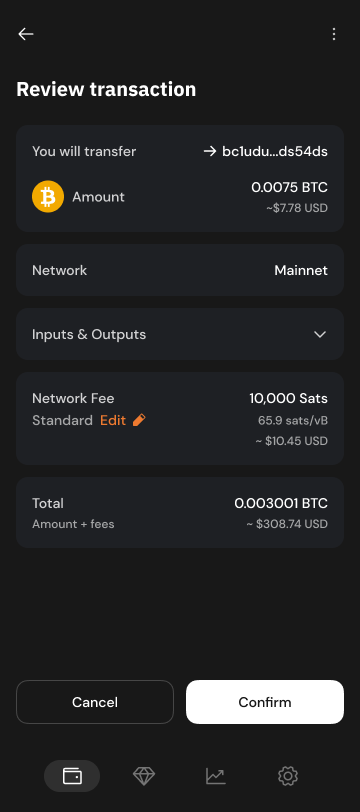
Depending on your use case, you can request that the PSBT be finalized and broadcasted after the user signs, by setting the broadcast flag to true. Otherwise, the signed PSBT will be returned in the response without broadcasting.
The `signPsbt` method returns a Promise that resolves to the `SignPsbtResult` object:
Property
Description
`psbt`
The base64 encoded signed PSBT
`txid`
The transaction id as a hex-encoded string.
This is only returned if the transaction was broadcasted.
[PreviousgetBalancechevron-left](https://docs.xverse.app/sats-connect/bitcoin-methods/getbalance)
[NextsignMultipleTransactionschevron-right](https://docs.xverse.app/sats-connect/bitcoin-methods/signmultipletransactions)
Last updated 5 months ago
sun-brightdesktopmoon
sun-brightdesktopmoon
---
# UTXOs | xverse
get
https://api.secretkeylabs.io/v1/ordinals/address/{address}/utxo
Get detailed Ordinals info (inscriptions, rare sats, Runes) for all confirmed UTXOs.
Authorizations
apiKeychevron-down
apiKey
x-api-keystringRequired
Path parameters
addressstring · BitcoinAddress · min: 10RequiredDefault: `bc1q0egjvlcfq77cxd9kvpgppyuxckzvws46e3sxch`
Query parameters
offsetnumberOptionalDefault: `0`
limitnumber · min: 25 · max: 60OptionalDefault: `60`
Responses
chevron-right
200
Ordinal information for all utxos belonging to the address
application/json
Responseobject
Ordinal information for all utxos belonging to the address
Show propertiesplus
chevron-right
400
Invalid input
application/json
chevron-right
401
Unauthorized
application/json
chevron-right
404
Not found
application/json
chevron-right
429
Rate limit exceeded
application/json
chevron-right
500
Internal server error
application/json
get
/v1/ordinals/address/{address}/utxo
HTTPchevron-down
HTTPcURLJavaScriptPython
Test it
200
Ordinal information for all utxos belonging to the address
chevron-down
[PreviousOrdinals by Addresschevron-left](https://docs.xverse.app/api/ordinals/ordinals-by-address)
[NextCollectionschevron-right](https://docs.xverse.app/api/ordinals/ordinals-by-address/collections)
Last updated 7 months ago
sun-brightdesktopmoon
Copy
GET /v1/ordinals/address/{address}/utxo HTTP/1.1
Host: api.secretkeylabs.io
x-api-key: YOUR_API_KEY
Accept: */*
Copy
{
"limit": 1,
"offset": 1,
"total": 1,
"rareSatsVersion": 1,
"items": [\
{\
"txid": "text",\
"vout": 1,\
"value": 1,\
"blockHeight": 1,\
"satRanges": [\
{\
"range": {\
"start": "text",\
"end": "text"\
},\
"offset": 1,\
"sattributes": [\
"ALPHA",\
"BLOCK78",\
"FIRST_TRANSACTION",\
"PIZZA",\
"VINTAGE",\
"BLACK_UNCOMMON",\
"BLACK_RARE",\
"BLACK_EPIC",\
"BLACK_LEGENDARY",\
"BLOCK9",\
"BLOCK9_450",\
"BLOCK286",\
"JPEG",\
"LEGACY",\
"OMEGA",\
"FIBONACCI",\
"HITMAN",\
"NAKAMOTO",\
"SILK_ROAD",\
"PALINDROME",\
"1D_PALINDROME",\
"2D_PALINDROME",\
"3D_PALINDROME",\
"PALIBLOCK_PALINDROME",\
"PALINCEPTION",\
"PURE_PALINCEPTION",\
"PERFECT_PALINCEPTION",\
"SEQUENCE_PALINDROME",\
"NAME_PALINDROME",\
"COMMON",\
"UNCOMMON",\
"RARE",\
"EPIC",\
"LEGENDARY",\
"MYTHIC"\
],\
"yearMined": 1,\
"block": 1,\
"inscriptions": [\
{\
"contentType": "text",\
"id": "text"\
}\
]\
}\
],\
"runes": [\
{\
"runeId": "text",\
"runeName": "text",\
"amount": "text",\
"divisibility": 1,\
"symbol": "text"\
}\
]\
}\
]
}
sun-brightdesktopmoon
---
# Inscription Activity | xverse
This endpoint returns the full activity history (transfers, listings, sales) for a specific inscription.
get
https://api.secretkeylabs.io/v1/inscriptions/{inscriptionId}/activity
Get activity information for an inscription.
Authorizations
apiKeychevron-down
apiKey
x-api-keystringRequired
Path parameters
inscriptionIdstringRequiredExample: `5f3dafcdd142358b332e0939d37174b76472735df8df29325901d2c7d18a152ci2`
Query parameters
offsetnumberOptional
limitnumber · min: 25 · max: 25Optional
Responses
chevron-right
200
Default Response
application/json
Responseobject
Show propertiesplus
chevron-right
400
Invalid input
application/json
chevron-right
401
Unauthorized
application/json
chevron-right
404
Not found
application/json
chevron-right
429
Rate limit exceeded
application/json
chevron-right
500
Internal server error
application/json
get
/v1/inscriptions/{inscriptionId}/activity
HTTPchevron-down
HTTPcURLJavaScriptPython
Test it
200
Default Response
chevron-down
[PreviousInscriptions by IDschevron-left](https://docs.xverse.app/api/ordinals/inscriptions/inscriptions-by-ids)
[NextInscription Servicechevron-right](https://docs.xverse.app/api/ordinals/inscription-service)
Last updated 5 months ago
sun-brightdesktopmoon
Copy
GET /v1/inscriptions/{inscriptionId}/activity HTTP/1.1
Host: api.secretkeylabs.io
x-api-key: YOUR_API_KEY
Accept: */*
Copy
{
"offset": 1,
"limit": 1,
"total": 1,
"items": [\
{\
"blockHeight": 1,\
"blockTime": "text",\
"inscriptionId": "text",\
"toAddress": "text",\
"txid": "text",\
"vout": 1\
}\
]
}
sun-brightdesktopmoon
---
# Execute | xverse
post
https://api.secretkeylabs.io/v1/inscriptions/order/{orderId}/execute
###
[hashtag](https://docs.xverse.app/api/ordinals/inscription-service/order/execute#)
Coming soon...
Once funded, finalize (execute) the inscription order.
Authorizations
apiKeychevron-down
apiKey
x-api-keystringRequired
Path parameters
orderIdstringRequired
Body
application/jsonchevron-down
application/json
objectOptional
Responses
chevron-right
200
Default Response
application/json
Responseobject
post
/v1/inscriptions/order/{orderId}/execute
HTTPchevron-down
HTTPcURLJavaScriptPython
Test it
200
Default Response
[PreviousOrderchevron-left](https://docs.xverse.app/api/ordinals/inscription-service/order)
[NextRuneschevron-right](https://docs.xverse.app/api/runes)
Last updated 7 months ago
sun-brightdesktopmoon
Copy
POST /v1/inscriptions/order/{orderId}/execute HTTP/1.1
Host: api.secretkeylabs.io
x-api-key: YOUR_API_KEY
Content-Type: application/json
Accept: */*
Content-Length: 2
{}
Copy
{}
sun-brightdesktopmoon
---
# wallet_changeNetwork | Sats Connect - Wallet API for BitcoinFi
[hashtag](https://docs.xverse.app/sats-connect/wallet-methods/wallet_changenetwork#switch-the-active-network-in-the-users-xverse-wallet)
Switch the active network in the user's Xverse wallet
---------------------------------------------------------------------------------------------------------------------------------------------------------------------------------------------------
The `wallet_changeNetwork` method allows your DApp to prompt the user's wallet to switch between different blockchain networks. This feature is essential for workflows that require switching networks, such as bridging assets between different chains or testing features on testnets.
The app must have first [connected to the wallet](https://docs.xverse.app/sats-connect/connecting-to-the-wallet/connect-to-xverse-wallet)
and obtained [account read permissions.](https://docs.xverse.app/sats-connect/xverse-wallet-permissions)
circle-info
You can fetch the networks that the user's wallet is currently connected to, using [`wallet_getNetwork`](https://docs.xverse.app/sats-connect/wallet-methods/wallet_getnetwork)
.
###
[hashtag](https://docs.xverse.app/sats-connect/wallet-methods/wallet_changenetwork#parameters)
Parameters
Request parameters
Description
`name`
a string representing the network the wallet should switch to. This is a required parameter and should be one of the supported network names:
* `Mainnet` for Bitcoin Mainnet | Spark Mainnet | Stacks Mainnet | Starknet Mainnet
* `Regtest` for Bitcoin Regtest | Spark Regtest | Stacks Testnet | Starknet Sepolia
* `Testnet` for Bitcoin Testnet | Spark Regtest | Stacks Testnet | Starknet Sepolia
* `Signet` for Bitcoin Signet | Spark Regtest | Stacks Testnet | Starknet Sepolia
Copy
import Wallet from 'sats-connect';
async function example() {
const res = await Wallet.request('wallet_changeNetwork', {
name: 'Signet'
});
if (res.status === 'error') {
console.error(res.error);
return;
}
console.log(res.result);
}
[hashtag](https://docs.xverse.app/sats-connect/wallet-methods/wallet_changenetwork#changenetwork-result)
✅ changeNetwork Result
------------------------------------------------------------------------------------------------------------------------------------
The method will
* prompt the user to switch their Xverse wallet to the network your app specified.
* return `null` if the user accepts to switch their wallet to the new network -> **Null response**
The account switch in the wallet will emit a [networkChange](https://docs.xverse.app/sats-connect/xverse-wallet-events#networkchange-event)
event which your app can catch.
circle-info
Your app can then fetch the user's active Xverse account under the new network with the [`wallet_getAccount`](https://docs.xverse.app/sats-connect/wallet-methods/wallet_getaccount)
method.
[Previouswallet\_getNetworkchevron-left](https://docs.xverse.app/sats-connect/wallet-methods/wallet_getnetwork)
[Nextwallet\_addNetworkchevron-right](https://docs.xverse.app/sats-connect/wallet-methods/wallet_addnetwork)
Last updated 13 days ago
* [Switch the active network in the user's Xverse wallet](https://docs.xverse.app/sats-connect/wallet-methods/wallet_changenetwork#switch-the-active-network-in-the-users-xverse-wallet)
* [Parameters](https://docs.xverse.app/sats-connect/wallet-methods/wallet_changenetwork#parameters)
* [✅ changeNetwork Result](https://docs.xverse.app/sats-connect/wallet-methods/wallet_changenetwork#changenetwork-result)
sun-brightdesktopmoon
Copy
enum BitcoinNetworkType {
Mainnet = 'Mainnet',
Testnet = 'Testnet',
Testnet4 = 'Testnet4',
Signet = 'Signet',
Regtest = 'Regtest',
}
sun-brightdesktopmoon
---
# Decode Raw Bitcoin Transaction | xverse
This endpoint decodes a raw Bitcoin transaction. Optimized to use the RPC node only for parsing, while transaction hex and I/O data are retrieved from our indexer.
post
https://api.secretkeylabs.io/v1/rpc/bitcoin/rawtx
Retrieve raw transaction details by txid.
Authorizations
apiKeychevron-down
apiKey
x-api-keystringRequired
Body
application/jsonchevron-down
application/json
txidstring · regexRequired
Transaction id
Example: `6c5ffa32f6942bb82bf36239fb8a6d233c4da6f91bde81869accef2ef6be674e`Pattern: `^[a-fA-F0-9]{64}$`
Responses
chevron-right
200
Default Response
No content
post
/v1/rpc/bitcoin/rawtx
HTTPchevron-down
HTTPcURLJavaScriptPython
Test it
200
Default Response
No content
[PreviousGet Raw Bitcoin Transaction Hexchevron-left](https://docs.xverse.app/api/bitcoin/transactions/get-raw-bitcoin-transaction-hex)
[NextOrdinal Transactionchevron-right](https://docs.xverse.app/api/bitcoin/transactions/ordinal-transaction)
Last updated 4 months ago
sun-brightdesktopmoon
Copy
POST /v1/rpc/bitcoin/rawtx HTTP/1.1
Host: api.secretkeylabs.io
x-api-key: YOUR_API_KEY
Content-Type: application/json
Accept: */*
Content-Length: 75
{
"txid": "6c5ffa32f6942bb82bf36239fb8a6d233c4da6f91bde81869accef2ef6be674e"
}
sun-brightdesktopmoon
---
# Ordinals by Address | xverse
[📦UTXOschevron-right](https://docs.xverse.app/api/ordinals/ordinals-by-address/utxos)
[🖼️Collectionschevron-right](https://docs.xverse.app/api/ordinals/ordinals-by-address/collections)
[🎨Inscriptionschevron-right](https://docs.xverse.app/api/ordinals/ordinals-by-address/inscriptions)
[🎨Unconfirmed Inscriptions (Mempool)chevron-right](https://docs.xverse.app/api/ordinals/ordinals-by-address/unconfirmed-inscriptions-mempool)
[🎨Inscriptions of a Collectionchevron-right](https://docs.xverse.app/api/ordinals/ordinals-by-address/inscriptions-of-a-collection)
[🎨Void inscriptionschevron-right](https://docs.xverse.app/api/ordinals/ordinals-by-address/void-inscriptions)
[PreviousOrdinalschevron-left](https://docs.xverse.app/api/ordinals)
[NextUTXOschevron-right](https://docs.xverse.app/api/ordinals/ordinals-by-address/utxos)
sun-brightdesktopmoon
sun-brightdesktopmoon
---
# Get Raw Bitcoin Transaction Hex | xverse
This endpoint returns the raw hex for a given Bitcoin transaction. It supports confirmed and unconfirmed transactions.
get
https://api.secretkeylabs.io/v1/bitcoin/tx/{txid}/hex
Retrieve transaction hex. Supports confirmed and unconfirmed transactions.
Authorizations
apiKeychevron-down
apiKey
x-api-keystringRequired
Path parameters
txidstring · regexRequired
Transaction id
Example: `6c5ffa32f6942bb82bf36239fb8a6d233c4da6f91bde81869accef2ef6be674e`Pattern: `^[a-fA-F0-9]{64}$`
Responses
chevron-right
200
Default Response
application/json
Responsestring
chevron-right
400
Invalid input
application/json
chevron-right
401
Unauthorized
application/json
chevron-right
404
Not found
application/json
chevron-right
429
Rate limit exceeded
application/json
chevron-right
500
Internal server error
application/json
get
/v1/bitcoin/tx/{txid}/hex
HTTPchevron-down
HTTPcURLJavaScriptPython
Test it
200
Default Response
chevron-down
[PreviousGet Bitcoin Transactionchevron-left](https://docs.xverse.app/api/bitcoin/transactions/get-bitcoin-transaction)
[NextDecode Raw Bitcoin Transactionchevron-right](https://docs.xverse.app/api/bitcoin/transactions/decode-raw-bitcoin-transaction)
Last updated 5 months ago
sun-brightdesktopmoon
Copy
GET /v1/bitcoin/tx/{txid}/hex HTTP/1.1
Host: api.secretkeylabs.io
x-api-key: YOUR_API_KEY
Accept: */*
Copy
text
sun-brightdesktopmoon
---
# Get Block by Height | xverse
Returns block metadata (hash, timestamp, tx count, etc.) for a specific height.
get
https://api.secretkeylabs.io/v1/block/height/{height}
Get information about a specific block by height
Authorizations
apiKeychevron-down
apiKey
x-api-keystringRequired
Path parameters
heightnumberRequired
Responses
chevron-right
200
Block information
application/json
Responseobject
Block information
Show propertiesplus
chevron-right
400
Invalid input
application/json
chevron-right
401
Unauthorized
application/json
chevron-right
404
Not found
application/json
chevron-right
429
Rate limit exceeded
application/json
chevron-right
500
Internal server error
application/json
get
/v1/block/height/{height}
HTTPchevron-down
HTTPcURLJavaScriptPython
Test it
200
Block information
chevron-down
[PreviousGet Current Blockchevron-left](https://docs.xverse.app/api/bitcoin/blocks/get-current-block)
[NextBitcoin JSON-RPCchevron-right](https://docs.xverse.app/api/bitcoin/bitcoin-json-rpc)
Last updated 5 months ago
sun-brightdesktopmoon
Copy
GET /v1/block/height/{height} HTTP/1.1
Host: api.secretkeylabs.io
x-api-key: YOUR_API_KEY
Accept: */*
Copy
{
"block": {
"height": 1,
"hash": "text",
"previousHash": "text",
"timestamp": "text"
}
}
sun-brightdesktopmoon
---
# Inscriptions | xverse
[Inscription by IDchevron-right](https://docs.xverse.app/api/ordinals/inscriptions/inscription-by-id)
[Inscription Thumbnailchevron-right](https://docs.xverse.app/api/ordinals/inscriptions/inscription-thumbnail)
[Inscriptions by IDschevron-right](https://docs.xverse.app/api/ordinals/inscriptions/inscriptions-by-ids)
[Inscription Activitychevron-right](https://docs.xverse.app/api/ordinals/inscriptions/inscription-activity)
[PreviousCollection Historical Floor Priceschevron-left](https://docs.xverse.app/api/ordinals/collections/collection-historical-floor-prices)
[NextInscription by IDchevron-right](https://docs.xverse.app/api/ordinals/inscriptions/inscription-by-id)
Last updated 3 months ago
sun-brightdesktopmoon
sun-brightdesktopmoon
---
# Mint Runes | Sats Connect - Wallet API for BitcoinFi
You can use Sats Connect to let your users mint [Runesarrow-up-right](https://docs.ordinals.com/runes.html)
through your app, using their wallet.
Sats Connect's Runes minting service lets you place a mint order on behalf of your user, and orchestrates the required transactions.
This documentation will guide you through the required steps:
1. Estimate the cost of a Rune mint order for your user -> see [runes\_estimateMint](https://docs.xverse.app/sats-connect/bitcoin-methods/mint-runes/runes_estimatemint)
2. Execute a Rune mint order, and prompt your user to sign the funding transaction required to process the order -> see [runes\_mint](https://docs.xverse.app/sats-connect/bitcoin-methods/mint-runes/runes_mint)
3. Fetch the status of a Rune mint order -> see [runes\_getOrder](https://docs.xverse.app/sats-connect/bitcoin-methods/runes_getorder)
[Previousrunes\_transferchevron-left](https://docs.xverse.app/sats-connect/bitcoin-methods/runes_transfer)
[Nextrunes\_estimateMintchevron-right](https://docs.xverse.app/sats-connect/bitcoin-methods/mint-runes/runes_estimatemint)
Last updated 1 year ago
sun-brightdesktopmoon
sun-brightdesktopmoon
---
# [v1] Get Bitcoin UTXOs | xverse
circle-info
We recommend switching to [\[v2\] UTXOs](https://docs.xverse.app/api/bitcoin/address/v2-get-bitcoin-utxos-mempool-aware)
for real-time mempool support
get
https://api.secretkeylabs.io/v1/bitcoin/address/{address}/utxo
Retrieve confirmed UTXOs ignoring mempool completely. This can be useful for applications that need to rely on confirmed UTXOs only, eg constructing RBF txs as well. To query mempool aware endpoint use `/v2/bitcoin/address/:address/utxo`. Iterate using offset if hasMore is true.
Authorizations
apiKeychevron-down
apiKey
x-api-keystringRequired
Path parameters
addressstring · BitcoinAddress · min: 10RequiredDefault: `bc1q0egjvlcfq77cxd9kvpgppyuxckzvws46e3sxch`
Query parameters
offsetnumberOptionalDefault: `0`
limitnumber · min: 25 · max: 5000OptionalDefault: `60`
Responses
chevron-right
200
Paginated Utxo list
application/json
Responseobject
Paginated Utxo list
Show propertiesplus
chevron-right
400
Invalid input
application/json
chevron-right
401
Unauthorized
application/json
chevron-right
404
Not found
application/json
chevron-right
429
Rate limit exceeded
application/json
chevron-right
500
Internal server error
application/json
get
/v1/bitcoin/address/{address}/utxo
HTTPchevron-down
HTTPcURLJavaScriptPython
Test it
200
Paginated Utxo list
chevron-down
[PreviousBitcoin Address Summarychevron-left](https://docs.xverse.app/api/bitcoin/address/bitcoin-address-summary)
[Next\[v2\] Get Bitcoin UTXOs (Mempool-Aware)chevron-right](https://docs.xverse.app/api/bitcoin/address/v2-get-bitcoin-utxos-mempool-aware)
Last updated 3 months ago
sun-brightdesktopmoon
Copy
GET /v1/bitcoin/address/{address}/utxo HTTP/1.1
Host: api.secretkeylabs.io
x-api-key: YOUR_API_KEY
Accept: */*
Copy
{
"hasMore": true,
"items": [\
{\
"txid": "text",\
"vout": 1,\
"value": 1,\
"status": {\
"confirmed": true,\
"blockHeight": 1,\
"blockHash": "text",\
"blockTime": 1\
}\
}\
]
}
sun-brightdesktopmoon
---
# Unconfirmed Inscriptions (Mempool) | xverse
get
https://api.secretkeylabs.io/v1/mempool/ordinals/address/{address}/inscriptions
List all unconfirmed inscriptions an address owns.
Authorizations
apiKeychevron-down
apiKey
x-api-keystringRequired
Path parameters
addressstring · BitcoinAddress · min: 10RequiredDefault: `bc1q0egjvlcfq77cxd9kvpgppyuxckzvws46e3sxch`
Query parameters
offsetnumberOptionalDefault: `0`
limitnumber · min: 25 · max: 60OptionalDefault: `60`
Responses
chevron-right
200
Inscriptions owned by the address
application/json
Responseobject
Inscriptions owned by the address
Show propertiesplus
chevron-right
400
Invalid input
application/json
chevron-right
401
Unauthorized
application/json
chevron-right
404
Not found
application/json
chevron-right
429
Rate limit exceeded
application/json
chevron-right
500
Internal server error
application/json
get
/v1/mempool/ordinals/address/{address}/inscriptions
HTTPchevron-down
HTTPcURLJavaScriptPython
Test it
200
Inscriptions owned by the address
chevron-down
[PreviousInscriptionschevron-left](https://docs.xverse.app/api/ordinals/ordinals-by-address/inscriptions)
[NextInscriptions of a Collectionchevron-right](https://docs.xverse.app/api/ordinals/ordinals-by-address/inscriptions-of-a-collection)
Last updated 3 months ago
sun-brightdesktopmoon
Copy
GET /v1/mempool/ordinals/address/{address}/inscriptions HTTP/1.1
Host: api.secretkeylabs.io
x-api-key: YOUR_API_KEY
Accept: */*
Copy
{
"limit": 1,
"offset": 1,
"items": [\
{\
"id": "text",\
"offset": 1,\
"parentIds": [\
"text"\
],\
"delegateId": "text",\
"contentType": "text",\
"contentLength": 1,\
"effectiveContentType": "text",\
"number": 1,\
"sat": 1,\
"charms": [\
"text"\
],\
"currentOutput": "text",\
"currentAddress": "text",\
"value": 1,\
"contentUrl": "text",\
"renderUrl": "text",\
"collectionId": "text",\
"collectionName": "text",\
"collectionFloorPrice": {\
"valueInSats": "text",\
"valueInUsd": "text"\
},\
"lastInscriptionSalePrice": {\
"valueInSats": "text",\
"valueInUsd": "text"\
}\
}\
]
}
sun-brightdesktopmoon
---
# Mempool Acceptance Test | xverse
This endpoint lets you run a mempool acceptance test to check if the mempool will accept the serialized hex-encoded raw transaction
post
https://api.secretkeylabs.io/v1/rpc/bitcoin/testmempoolaccept
Forward to RPC using testmempoolaccept method.
Authorizations
apiKeychevron-down
apiKey
x-api-keystringRequired
Body
application/jsonchevron-down
application/json
txListstring\[\]Required
Raw transaction hex to be checked with testmempoolaccept method.
maxFeeRatenumberOptionalDefault: `0.1`Example: `0.1`
Responses
chevron-right
200
Default Response
application/json
Responseobject
Show propertiesplus
chevron-right
400
Default Response
application/json
chevron-right
401
Unauthorized
application/json
chevron-right
404
Not found
application/json
chevron-right
429
Rate limit exceeded
application/json
chevron-right
500
Internal server error
application/json
post
/v1/rpc/bitcoin/testmempoolaccept
HTTPchevron-down
HTTPcURLJavaScriptPython
Test it
200
Default Response
chevron-down
[PreviousSend Transactionchevron-left](https://docs.xverse.app/api/bitcoin/node-and-mempool/send-transaction)
[NextBlockschevron-right](https://docs.xverse.app/api/bitcoin/blocks)
Last updated 5 months ago
sun-brightdesktopmoon
Copy
POST /v1/rpc/bitcoin/testmempoolaccept HTTP/1.1
Host: api.secretkeylabs.io
x-api-key: YOUR_API_KEY
Content-Type: application/json
Accept: */*
Content-Length: 36
{
"txList": [\
"text"\
],
"maxFeeRate": 0.1
}
Copy
{
"result": [\
{\
"txid": "text",\
"wtxid": "text",\
"allowed": true,\
"vsize": 1,\
"fees": {\
"base": 1\
},\
"rejectReason": "text",\
"packageError": "text"\
}\
]
}
sun-brightdesktopmoon
---
# Portfolio | xverse
Monitor Bitcoin asset balances and activity across multiple addresses, with automatic daily tracking and historical portfolio insights.
[PreviousBTKN Token Rankingschevron-left](https://docs.xverse.app/api/spark/btkn-tokens/btkn-token-rankings)
[NextRegister Portfolio Addresschevron-right](https://docs.xverse.app/api/portfolio/register-portfolio-address)
Last updated 5 days ago
sun-brightdesktopmoon
sun-brightdesktopmoon
---
# Runes | xverse
Query **Rune balances, metadata & trading data**.
Integrate Runes into your apps without building infra.
**Mint** and **etch Runes**, with cost estimates, order management and execution.
[PreviousExecutechevron-left](https://docs.xverse.app/api/ordinals/inscription-service/order/execute)
[NextRunes by Addresschevron-right](https://docs.xverse.app/api/runes/runes-by-address)
Last updated 4 months ago
sun-brightdesktopmoon
sun-brightdesktopmoon
---
# Ordinal Transaction Inputs | xverse
This endpoint returns detailed info on Ordinal assets (BTC, inscriptions, runes) for each input of a transaction.
It is mempool-aware and includes unconfirmed BTC, inscriptions & runes data for mempool transactions
get
https://api.secretkeylabs.io/v1/ordinals/tx/{txid}/inputs
Retrieve historic input output info for a specific tx. It is mempool aware. `isOrdinalsIndexed` determines if ordinals data is available
Authorizations
apiKeychevron-down
apiKey
x-api-keystringRequired
Path parameters
txidstring · regexRequired
Transaction id
Example: `6c5ffa32f6942bb82bf36239fb8a6d233c4da6f91bde81869accef2ef6be674e`Pattern: `^[a-fA-F0-9]{64}$`
Query parameters
offsetnumberOptional
limitnumber · min: 25 · max: 25Optional
Responses
chevron-right
200
Default Response
application/json
Responseobject
Show propertiesplus
chevron-right
400
Invalid input
application/json
chevron-right
401
Unauthorized
application/json
chevron-right
404
Not found
application/json
chevron-right
429
Rate limit exceeded
application/json
chevron-right
500
Internal server error
application/json
get
/v1/ordinals/tx/{txid}/inputs
HTTPchevron-down
HTTPcURLJavaScriptPython
Test it
200
Default Response
chevron-down
[PreviousOrdinal Transaction Outputschevron-left](https://docs.xverse.app/api/bitcoin/transactions/ordinal-transaction-outputs)
[NextOutputschevron-right](https://docs.xverse.app/api/bitcoin/outputs)
Last updated 3 months ago
sun-brightdesktopmoon
Copy
GET /v1/ordinals/tx/{txid}/inputs HTTP/1.1
Host: api.secretkeylabs.io
x-api-key: YOUR_API_KEY
Accept: */*
Copy
{
"total": 1,
"offset": 1,
"limit": 1,
"confirmations": 1,
"blockHeight": 1,
"items": [\
{\
"vin": 1,\
"prevTxid": "text",\
"prevVout": 1,\
"value": 1,\
"address": "text",\
"isCoinbase": true,\
"runes": [\
{\
"runeId": "text",\
"amount": "text",\
"divisibility": 1\
}\
],\
"inscriptions": [\
{\
"id": "text",\
"contentType": "text",\
"offset": 1\
}\
]\
}\
],
"isOrdinalsIndexed": true
}
sun-brightdesktopmoon
---
# Collections | xverse
[Collection by IDchevron-right](https://docs.xverse.app/api/ordinals/collections/collection-by-id)
[Top Collections by Volumechevron-right](https://docs.xverse.app/api/ordinals/collections/top-collections-by-volume)
[Collectionschevron-right](https://docs.xverse.app/api/ordinals/collections/collections)
[Holders by Collectionchevron-right](https://docs.xverse.app/api/ordinals/collections/holders-by-collection)
[Inscriptions by Collectionchevron-right](https://docs.xverse.app/api/ordinals/collections/inscriptions-by-collection)
[Collection Historical Floor Priceschevron-right](https://docs.xverse.app/api/ordinals/collections/collection-historical-floor-prices)
[PreviousVoid inscriptionschevron-left](https://docs.xverse.app/api/ordinals/ordinals-by-address/void-inscriptions)
[NextCollection by IDchevron-right](https://docs.xverse.app/api/ordinals/collections/collection-by-id)
Last updated 6 months ago
sun-brightdesktopmoon
sun-brightdesktopmoon
---
# Estimate | xverse
post
https://api.secretkeylabs.io/v1/inscriptions/estimate
###
[hashtag](https://docs.xverse.app/api/ordinals/inscription-service/estimate#)
Coming soon...
Estimate total cost for a new inscription order.
Authorizations
apiKeychevron-down
apiKey
x-api-keystringRequired
Body
application/jsonchevron-down
application/json
objectOptional
Responses
chevron-right
200
Default Response
application/json
Responseobject
post
/v1/inscriptions/estimate
HTTPchevron-down
HTTPcURLJavaScriptPython
Test it
200
Default Response
[PreviousInscription Servicechevron-left](https://docs.xverse.app/api/ordinals/inscription-service)
[NextOrderchevron-right](https://docs.xverse.app/api/ordinals/inscription-service/order)
Last updated 7 months ago
sun-brightdesktopmoon
Copy
POST /v1/inscriptions/estimate HTTP/1.1
Host: api.secretkeylabs.io
x-api-key: YOUR_API_KEY
Content-Type: application/json
Accept: */*
Content-Length: 2
{}
Copy
{}
sun-brightdesktopmoon
---
# Real-Time Mempool Activity (Unconfirmed) | xverse
This endpoint returns the real-time mempool activity across BTC, inscriptions, and runes for a set of addresses, including all incoming/outgoing transfers.
get
https://api.secretkeylabs.io/v1/global/ordinals/multi-address/activity/mempool
Retrieve efficient aggregated unconfirmed activity (Bitcoin, Runes, Inscriptions) for multiple addresses. Up to 3 addresses(comma separated) can be queried via `addresses` query param.
Authorizations
apiKeychevron-down
apiKey
x-api-keystringRequired
Query parameters
addressesstring · BitcoinAddressList · min: 10RequiredDefault: `bc1q0egjvlcfq77cxd9kvpgppyuxckzvws46e3sxch,bc1px3kttdtg479vqfu0s2lhxvyuz2snhl8jct3f84k5heerl750n28scr9qt6`
offsetnumberOptionalDefault: `0`
limitnumber · min: 25 · max: 60OptionalDefault: `60`
Responses
chevron-right
200
Default Response
application/json
Responseobject
Show propertiesplus
chevron-right
400
Invalid input
application/json
chevron-right
401
Unauthorized
application/json
chevron-right
404
Not found
application/json
chevron-right
429
Rate limit exceeded
application/json
chevron-right
500
Internal server error
application/json
get
/v1/global/ordinals/multi-address/activity/mempool
HTTPchevron-down
HTTPcURLJavaScriptPython
Test it
200
Default Response
chevron-down
[PreviousHistorical Activity (Confirmed)chevron-left](https://docs.xverse.app/api/bitcoin/address/activity/historical-activity-confirmed)
[NextUnconfirmed Transactionschevron-right](https://docs.xverse.app/api/bitcoin/address/activity/unconfirmed-transactions)
Last updated 4 months ago
sun-brightdesktopmoon
Copy
GET /v1/global/ordinals/multi-address/activity/mempool?addresses=bc1q0egjvlcfq77cxd9kvpgppyuxckzvws46e3sxch%2Cbc1px3kttdtg479vqfu0s2lhxvyuz2snhl8jct3f84k5heerl750n28scr9qt6 HTTP/1.1
Host: api.secretkeylabs.io
x-api-key: YOUR_API_KEY
Accept: */*
Copy
{
"transactions": [\
{\
"txid": "text",\
"ownActivity": [\
{\
"address": "text",\
"sent": 1,\
"received": 1,\
"outgoing": 1,\
"incoming": 1\
}\
],\
"totalOut": 1,\
"totalIn": 1,\
"addressList": {\
"hasMore": true,\
"items": [\
{\
"address": "text",\
"type": "text",\
"isInput": true,\
"isOutput": true\
}\
]\
},\
"runes": {\
"ownActivity": {\
"items": [\
{\
"runeId": "text",\
"runeName": "text",\
"divisibility": 1,\
"symbol": "text",\
"address": "text",\
"sent": "text",\
"received": "text",\
"outgoing": "text",\
"incoming": "text"\
}\
],\
"hasMore": true\
},\
"allActivity": {\
"items": [\
{\
"runeId": "text",\
"runeName": "text",\
"divisibility": 1,\
"symbol": "text",\
"outgoing": "text",\
"incoming": "text",\
"isMint": true,\
"isEtch": true,\
"isBurn": true\
}\
],\
"hasMore": true\
}\
},\
"inscriptions": {\
"items": [\
{\
"inscriptionId": "text",\
"contentType": "text",\
"address": "text",\
"sent": true,\
"received": true,\
"inscribed": true,\
"burned": true\
}\
],\
"hasMore": true\
}\
}\
],
"offset": 1,
"limit": 1
}
sun-brightdesktopmoon
---
# Latest Spark Transactions | xverse
get
https://api.secretkeylabs.io/v1/spark/tx/latest
Get Latest Transactions
Authorizations
apiKeychevron-down
apiKey
x-api-keystringRequired
Query parameters
limitnumber · min: 1 · max: 500OptionalDefault: `10`
offsetnumberOptionalDefault: `0`
fromTimestampstringOptional
toTimestampstringOptional
sortstring · enumOptionalPossible values: `createdAt``updatedAt`
orderstring · enumOptionalDefault: `asc`Possible values: `asc``desc`
Responses
chevron-right
200
Default Response
application/json
Responseobject\[\]
Show propertiesplus
chevron-right
400
Invalid input
application/json
chevron-right
401
Unauthorized
application/json
chevron-right
404
Not found
application/json
chevron-right
429
Rate limit exceeded
application/json
chevron-right
500
Internal server error
application/json
get
/v1/spark/tx/latest
HTTPchevron-down
HTTPcURLJavaScriptPython
Test it
200
Default Response
chevron-down
[PreviousSpark Transaction Detailschevron-left](https://docs.xverse.app/api/spark/transactions/spark-transaction-details)
[NextBTKN Tokenschevron-right](https://docs.xverse.app/api/spark/btkn-tokens)
Last updated 3 months ago
sun-brightdesktopmoon
Copy
GET /v1/spark/tx/latest HTTP/1.1
Host: api.secretkeylabs.io
x-api-key: YOUR_API_KEY
Accept: */*
Copy
[\
{\
"id": "text",\
"type": "text",\
"status": "text",\
"createdAt": "text",\
"updatedAt": "text",\
"amountSats": 1,\
"tokenAmount": 1,\
"tokenMetadata": {\
"tokenIdentifier": "text",\
"tokenAddress": "text",\
"name": "text",\
"ticker": "text",\
"decimals": 1,\
"issuerPublicKey": "text",\
"maxSupply": 1,\
"isFreezable": true,\
"iconUrl": "text"\
},\
"multiIoDetails": {\
"inputs": [\
{\
"address": "text",\
"pubkey": "text",\
"amount": 1\
}\
],\
"outputs": [\
{\
"address": "text",\
"pubkey": "text",\
"amount": 1\
}\
],\
"totalInputAmount": 1,\
"totalOutputAmount": 1\
},\
"from": {\
"type": "text",\
"identifier": "text",\
"pubkey": "text"\
},\
"to": {\
"type": "text",\
"identifier": "text",\
"pubkey": "text"\
},\
"bitcoinTxid": "text",\
"valueUsd": 1\
}\
]
sun-brightdesktopmoon
---
# Get Portfolio Address History | xverse
Use this endpoint to retrieve the daily balance history for a registered portfolio address over a specific time period.
circle-info
You need to first register a portfolio address with [Register Portfolio Address](https://docs.xverse.app/api/portfolio/register-portfolio-address)
circle-check
Only BTC balances are supported at the moment. More Bitcoin asset balances will follow soon.
get
https://api.secretkeylabs.io/v1/portfolio/history
Get the daily balance history for an address from the portfolio.
Authorizations
apiKeychevron-down
apiKey
x-api-keystringRequired
Query parameters
addressstringRequired
offsetnumberOptionalDefault: `0`
limitnumber · min: 25 · max: 25OptionalDefault: `25`
startDatestringRequired
from date, inclusive - (e.g. 2024-08-29)
endDatestringRequired
to date, exclusive - (e.g. 2024-09-01)
assetTypestring · enumOptionalPossible values: `bitcoin`
Responses
chevron-right
200
Default Response
application/json
Responseobject
Show propertiesplus
chevron-right
400
Invalid input
application/json
chevron-right
401
Unauthorized
application/json
chevron-right
404
Not found
application/json
chevron-right
429
Rate limit exceeded
application/json
chevron-right
500
Internal server error
application/json
get
/v1/portfolio/history
HTTPchevron-down
HTTPcURLJavaScriptPython
Test it
200
Default Response
chevron-down
[PreviousList Registered Portfolio Addresseschevron-left](https://docs.xverse.app/api/portfolio/list-registered-portfolio-addresses)
[NextWatch Addresseschevron-right](https://docs.xverse.app/api/portfolio/watch-addresses)
Last updated 5 days ago
sun-brightdesktopmoon
Copy
GET /v1/portfolio/history?address=text&startDate=text&endDate=text HTTP/1.1
Host: api.secretkeylabs.io
x-api-key: YOUR_API_KEY
Accept: */*
Copy
{
"limit": 1,
"offset": 1,
"lastBlockHeight": 1,
"items": [\
{\
"assetType": "text",\
"assetId": "text",\
"address": "text",\
"balance": {\
"valueInSats": "text",\
"valueInUsd": "text"\
},\
"date": "text"\
}\
]
}
sun-brightdesktopmoon
---
# Spark | xverse
Query [**Spark**arrow-up-right](https://www.spark.money/)
**balances, transactions & activity** for **Bitcoin** & **BTKN** tokens.
Access **BTKN Tokens** & [**Flashnet**arrow-up-right](https://www.flashnet.xyz/)
market & trading data.
Integrate **Spark** & **Flashnet** into your apps without building infra.
[PreviousExecutechevron-left](https://docs.xverse.app/api/brc-20/deploy-brc-20/order/execute)
[NextAddresschevron-right](https://docs.xverse.app/api/spark/address)
Last updated 3 months ago
sun-brightdesktopmoon
sun-brightdesktopmoon
---
# [v2] Get Bitcoin UTXOs (Mempool-Aware) | xverse
get
https://api.secretkeylabs.io/v2/bitcoin/address/{address}/utxo
Mempool-aware: Retrieve UTXOs. This endpoint considers both confirmed and unconfirmed utxos. When a confirmed UTXO is spent in the mempool, it will not be returned here as its no longer a utxo. To query confirmed-only endpoint use `/v1/bitcoin/address/:address/utxo`. Iterate using offset if hasMore is true.
Authorizations
apiKeychevron-down
apiKey
x-api-keystringRequired
Path parameters
addressstring · BitcoinAddress · min: 10RequiredDefault: `bc1q0egjvlcfq77cxd9kvpgppyuxckzvws46e3sxch`
Query parameters
offsetnumberOptionalDefault: `0`
limitnumber · min: 25 · max: 5000OptionalDefault: `60`
Responses
chevron-right
200
Paginated Utxo list
application/json
Responseobject
Paginated Utxo list
Show propertiesplus
chevron-right
400
Invalid input
application/json
chevron-right
401
Unauthorized
application/json
chevron-right
404
Not found
application/json
chevron-right
429
Rate limit exceeded
application/json
chevron-right
500
Internal server error
application/json
get
/v2/bitcoin/address/{address}/utxo
HTTPchevron-down
HTTPcURLJavaScriptPython
Test it
200
Paginated Utxo list
chevron-down
[Previous\[v1\] Get Bitcoin UTXOschevron-left](https://docs.xverse.app/api/bitcoin/address/v1-get-bitcoin-utxos)
[NextActivitychevron-right](https://docs.xverse.app/api/bitcoin/address/activity)
Last updated 3 months ago
sun-brightdesktopmoon
Copy
GET /v2/bitcoin/address/{address}/utxo HTTP/1.1
Host: api.secretkeylabs.io
x-api-key: YOUR_API_KEY
Accept: */*
Copy
{
"hasMore": true,
"items": [\
{\
"txid": "text",\
"vout": 1,\
"value": 1,\
"status": {\
"confirmed": true,\
"blockHeight": 1,\
"blockHash": "text",\
"blockTime": 1\
}\
}\
]
}
sun-brightdesktopmoon
---
# Spark Address Summary | xverse
This endpoint returns summary data for a Spark address — balances, holdings, and recent activity.
get
https://api.secretkeylabs.io/v1/spark/address/{address}
Get address summary
Authorizations
apiKeychevron-down
apiKey
x-api-keystringRequired
Path parameters
addressstringRequiredExample: `spark1pgssxxkz8lp9zpcjwz5pfm062ncle9mumvkuaq9d39t2cgm4lacq2agtdmv2tl`
Responses
chevron-right
200
Default Response
application/json
Responseobject
Show propertiesplus
chevron-right
400
Invalid input
application/json
chevron-right
401
Unauthorized
application/json
chevron-right
404
Not found
application/json
chevron-right
429
Rate limit exceeded
application/json
chevron-right
500
Internal server error
application/json
get
/v1/spark/address/{address}
HTTPchevron-down
HTTPcURLJavaScriptPython
Test it
200
Default Response
chevron-down
[PreviousSpark Transaction Historychevron-left](https://docs.xverse.app/api/spark/address/spark-transaction-history)
[NextTransactionschevron-right](https://docs.xverse.app/api/spark/transactions)
Last updated 3 months ago
sun-brightdesktopmoon
Copy
GET /v1/spark/address/{address} HTTP/1.1
Host: api.secretkeylabs.io
x-api-key: YOUR_API_KEY
Accept: */*
Copy
{
"sparkAddress": "text",
"publicKey": "text",
"balance": {
"btcSoftBalanceSats": 1,
"btcHardBalanceSats": 1,
"btcValueUsdHard": 1,
"btcValueUsdSoft": 1,
"totalTokenValueUsd": 1
},
"totalValueUsd": 1,
"transactionCount": 1,
"tokenCount": 1,
"tokens": [\
{\
"tokenIdentifier": "text",\
"tokenAddress": "text",\
"name": "text",\
"ticker": "text",\
"decimals": 1,\
"issuerPublicKey": "text",\
"maxSupply": 1,\
"isFreezable": true,\
"iconUrl": "text"\
}\
]
}
sun-brightdesktopmoon
---
# wallet_openBridge | Sats Connect - Wallet API for BitcoinFi
[hashtag](https://docs.xverse.app/sats-connect/wallet-methods/wallet_open/wallet_openbridge#help-users-bridge-assets-between-bitcoin-layers)
Help Users Bridge Assets Between Bitcoin Layers
-------------------------------------------------------------------------------------------------------------------------------------------------------------------------------------------------
Your app can use the `wallet_openBridge` method to prompt the user to bridge assets between Bitcoin layers with their Xverse wallet. This can be especially useful to onboard users to apps operating on Bitcoin and Bitcoin L2s like Starknet, Spark or Stacks.
[hashtag](https://docs.xverse.app/sats-connect/wallet-methods/wallet_open/wallet_openbridge#id-6c42baa3-c47d-47b0-9a64-be9a102ea8ad)
Request Params
--------------------------------------------------------------------------------------------------------------------------------------------------------
* `fromAsset`
* The asset (ticker) you wish your user to bridge to another Bitcoin layer
* Example: `BTC` when bridging BTC from Bitcoin Mainnet to Starknet
* `toAsset`
* The asset (ticker) you wish your user to receive on the destination Bitcoin layer
* Example: `WBTC` when bridging BTC from Bitcoin Mainnet to Starknet
[hashtag](https://docs.xverse.app/sats-connect/wallet-methods/wallet_open/wallet_openbridge#id-616fb9ae-ded6-43dc-9c32-52a1a9ca8e55)
Permissions Required
--------------------------------------------------------------------------------------------------------------------------------------------------------------
* 🔓 Your app must have first [connected to the walletarrow-up-right](https://docs.xverse.app/sats-connect/connecting-to-the-wallet/connect-to-xverse-wallet)
and obtained [account read permissionsarrow-up-right](https://docs.xverse.app/sats-connect/xverse-wallet-permissions)
* 🔒 If your user has not [connected their active Xverse account to your apparrow-up-right](https://docs.xverse.app/sats-connect/connecting-to-the-wallet/connect-to-xverse-wallet)
yet, and your app does not the necessary account read [permissionsarrow-up-right](https://docs.xverse.app/sats-connect/xverse-wallet-permissions)
-> the method will throw with an access denied error
[hashtag](https://docs.xverse.app/sats-connect/wallet-methods/wallet_open/wallet_openbridge#id-4c07a335-c0e0-4b42-81af-85ec2d1171bb)
wallet\_openBridge Result: Open the Bridge Flow
-----------------------------------------------------------------------------------------------------------------------------------------------------------------------------------------
###
[hashtag](https://docs.xverse.app/sats-connect/wallet-methods/wallet_open/wallet_openbridge#c7fcb152-b219-4511-9f1d-f3992d2c739e)
✅ Success
If the account is connected and the requested bridge route exists
* \-> the method successfully returns `openBridgeResult`
* \-> Xverse wallet opens the relevant bridge screen for the requested bridge route
* the user can then choose an amount and confirm the bridge in Xverse Wallet

###
[hashtag](https://docs.xverse.app/sats-connect/wallet-methods/wallet_open/wallet_openbridge#d6911fd7-b946-47e4-8dc8-70af3607487a)
❌ Error
* If the account is not connected or the requested bridge route does not exist, the method will reject with an error object
[Previouswallet\_openBuychevron-left](https://docs.xverse.app/sats-connect/wallet-methods/wallet_open/wallet_openbuy)
[Nextwallet\_openEarnchevron-right](https://docs.xverse.app/sats-connect/wallet-methods/wallet_open/wallet_openearn)
Last updated 8 days ago
* [Help Users Bridge Assets Between Bitcoin Layers](https://docs.xverse.app/sats-connect/wallet-methods/wallet_open/wallet_openbridge#help-users-bridge-assets-between-bitcoin-layers)
* [Request Params](https://docs.xverse.app/sats-connect/wallet-methods/wallet_open/wallet_openbridge#id-6c42baa3-c47d-47b0-9a64-be9a102ea8ad)
* [Permissions Required](https://docs.xverse.app/sats-connect/wallet-methods/wallet_open/wallet_openbridge#id-616fb9ae-ded6-43dc-9c32-52a1a9ca8e55)
* [wallet\_openBridge Result: Open the Bridge Flow](https://docs.xverse.app/sats-connect/wallet-methods/wallet_open/wallet_openbridge#id-4c07a335-c0e0-4b42-81af-85ec2d1171bb)
* [✅ Success](https://docs.xverse.app/sats-connect/wallet-methods/wallet_open/wallet_openbridge#c7fcb152-b219-4511-9f1d-f3992d2c739e)
* [❌ Error](https://docs.xverse.app/sats-connect/wallet-methods/wallet_open/wallet_openbridge#d6911fd7-b946-47e4-8dc8-70af3607487a)
sun-brightdesktopmoon
sun-brightdesktopmoon
---
# createRepeatInscriptions | Sats Connect - Wallet API for BitcoinFi
circle-info
This is an [Xverse custom method](https://docs.xverse.app/sats-connect/wallet-methods/xverse-custom-methods)
. It can only be invoked for users using the [Xverse walletarrow-up-right](https://www.xverse.app/)
.
Copy
import { createRepeatInscriptions } from 'sats-connect'
The `CreateRepeatInscriptions` method lets you inscribe the same content multiple times via the user's wallet. You can use it to create both text and file inscriptions, which will be sent to the user's ordinal address. It is particularly well suited to BRC20 mints, as it lets you inscribe multiple token mints in a single request to bypass the limit per mint.
You can optionally charge a fee to the user for your service by specifying a fee amount and receiving address using the `appFee` and `appFeeAddress` parameters. The fee will be included as an additional output in the inscription commit transaction.
Payload
Description
network
The Network type you want to use. Please note that inscriptions currently only support Mainnet.
contentType
The content/mime type of the content being inscribed. It is up to you to extract and send through the correct content type for the content.
payloadType
The format of the content being sent through. (one of "PLAIN\_TEXT" or "BASE\_64")
content
The content being inscribed. If the \`payloadType\` has been set to "PLAIN\_TEXT", this content will be inscribed directly; if set to "BASE\_64", the content will be converted into a binary buffer before being inscribed (use this for image and other binary files).
repeat
The number of inscriptions to create. ℹ️ Note that there is a 24 repeat limit per order due to transaction chaining restrictions on the Bitcoin blockchain.
appFee (optional)
If you would like to charge a fee for your services, add the sats value here.
appFeeAddress (optional)
The address where your appFee will be sent.
suggestedMinerFeeRate (optional)
This will be the initial fee rate set for the transaction in the confirmation dialog. The user will be able to change it within the wallet if they desire.
Copy
import { createRepeatInscriptions } from 'sats-connect'
await createRepeatInscriptions({
payload: {
network: {
type: network,
},
repeat: Number(repeat),
contentType,
content,
payloadType: "PLAIN_TEXT",
/** Optional parameters:
appFeeAddress: "", // the address where the inscription fee should go
appFee: 1000, // the amount of sats that should be sent to the fee address
*/
suggestedMinerFeeRate,
},
onFinish: (response: CreateRepeatInscriptionsResponse) => {
alert(response.txId);
},
onCancel: () => alert("Canceled"),
});
The method will request the signature of an inscription commit transaction from the user's wallet, to fund the inscriptions, and commit to their content.
Once approved by the user:
* the commit inscription transactions are immediately broadcasted. The function will return a transaction ID `commitTransactionId` which you can track.
* the first inscription reveal transaction is broadcasted immediately to send the first inscriptions to the user's wallet. The function will return a transaction ID `revealTransactionId`, which you can track.
* the first inscription reveal transactions also trigger further commit & reveal inscription transactions, to inscribe the content multiple times to the user's wallet.
[PreviouscreateInscriptionchevron-left](https://docs.xverse.app/sats-connect/bitcoin-methods/createinscription)
[Nextord\_getInscriptionschevron-right](https://docs.xverse.app/sats-connect/bitcoin-methods/ord_getinscriptions)
Last updated 1 year ago
sun-brightdesktopmoon
sun-brightdesktopmoon
---
# signMultipleMessages | Sats Connect - Wallet API for BitcoinFi
circle-info
This is an Xverse custom method. It can only be invoked for users using the [Xverse walletarrow-up-right](https://www.xverse.app/)
.
You can request your user to sign **multiple messages** with their wallet's Bitcoin addresses, by invoking the `signMultipleMessages` method.
This enables your app to prompt users to sign **batches of messages in a single step**, instead of requiring multiple individual [`signMessage`](https://docs.xverse.app/sats-connect/bitcoin-methods/signmessage)
calls and multiple wallet popups.
* * *
###
[hashtag](https://docs.xverse.app/sats-connect/bitcoin-methods/signmultiplemessages#request-parameters)
Request parameters
`signMultipleMessages` expects the request payload to be an **array of message objects matching the schema below:**
* `address` _(required)_: a string representing the address to use to sign the message
* `message` _(required)_: a string representing the message to be signed by the wallet
* `protocol` _(optional)_: the signature protocol to use for this message (`ECDSA` or `BIP322`)
####
[hashtag](https://docs.xverse.app/sats-connect/bitcoin-methods/signmultiplemessages#protocol-optional)
`protocol` _(optional)_
By default, `signMultipleMessages` will use two type of signatures depending on the Bitcoin address used for signing:
* [ECDSAarrow-up-right](https://en.wikipedia.org/wiki/Elliptic_Curve_Digital_Signature_Algorithm)
signatures over the [secp256k1 curvearrow-up-right](https://www.secg.org/sec2-v2.pdf)
when signing with the Bitcoin payment (`p2sh`) address
* [BIP322arrow-up-right](https://bips.xyz/322)
signatures when signing with the Bitcoin Ordinals (`p2tr`) address or a Ledger-based Bitcoin payment address (`p2wpkh`)
You have the option to specify your preferred signature type with the `protocol` parameter:
* `ECDSA` to request [ECDSAarrow-up-right](https://en.wikipedia.org/wiki/Elliptic_Curve_Digital_Signature_Algorithm)
signatures over the [secp256k1 curvearrow-up-right](https://www.secg.org/sec2-v2.pdf)
_Available for payment addresses only (_`_p2sh_` _and_ `_p2wpkh_`_)_
* `BIP322` to request [BIP322arrow-up-right](https://bips.xyz/322)
signatures _Available for all payment (_`_p2sh_` _and_ `_p2wpkh_`_) & ordinals addresses (_`_p2tr_`_)_
* * *
###
[hashtag](https://docs.xverse.app/sats-connect/bitcoin-methods/signmultiplemessages#usage-example)
Usage example
* * *
###
[hashtag](https://docs.xverse.app/sats-connect/bitcoin-methods/signmultiplemessages#wallet-prompt)
Wallet prompt
The user will see a **single message signing request** prompt in the wallet, guiding them through the batch of messages to review and sign:
* _Messages 1/N_ stepper
* _Summary screen with Cancel / Sign all_
* Option to review each message individually using **← / →**

* * *
###
[hashtag](https://docs.xverse.app/sats-connect/bitcoin-methods/signmultiplemessages#response-format)
Response format
The `signMultipleMessages` method returns a Promise that resolves to an array of `SignMessageResult` objects.
* The array is returned **in the same order** as the request payload.
* Each item corresponds to the signed result for the message at the same index.
Each item in the response array contains:
* `signature`: a string representing the signed message
* `messageHash`: a string representing the hash of the message
[PrevioussignMessagechevron-left](https://docs.xverse.app/sats-connect/bitcoin-methods/signmessage)
[NextcreateInscriptionchevron-right](https://docs.xverse.app/sats-connect/bitcoin-methods/createinscription)
Last updated 8 days ago
* [Request parameters](https://docs.xverse.app/sats-connect/bitcoin-methods/signmultiplemessages#request-parameters)
* [Usage example](https://docs.xverse.app/sats-connect/bitcoin-methods/signmultiplemessages#usage-example)
* [Wallet prompt](https://docs.xverse.app/sats-connect/bitcoin-methods/signmultiplemessages#wallet-prompt)
* [Response format](https://docs.xverse.app/sats-connect/bitcoin-methods/signmultiplemessages#response-format)
sun-brightdesktopmoon
Copy
import { request, RpcErrorCode } from "sats-connect";
try {
const response = await request("signMultipleMessages", [\
{\
address,\
message: "Message #1 to sign",\
},\
{\
address,\
message: "Message #2 to sign",\
protocol: "ECDSA",\
},\
{\
address,\
message: "Message #3 to sign",\
protocol: "BIP322",\
},\
]);
if (response.status === "success") {
// handle success response
// response.result
} else {
if (response.error.code === RpcErrorCode.USER_REJECTION) {
// handle user request cancelation
} else {
// handle request error
}
}
} catch (err) {
alert("Something Went Wrong");
}
sun-brightdesktopmoon
---
# Collections | xverse
This endpoint returns all Ordinal collections held by a given wallet address, along with the list of inscriptions owned within each collection.
get
https://api.secretkeylabs.io/v1/ordinals/address/{address}/collections
Fetch inscriptions by collection for assets in a specific address.
Authorizations
apiKeychevron-down
apiKey
x-api-keystringRequired
Path parameters
addressstring · BitcoinAddress · min: 10RequiredDefault: `bc1q0egjvlcfq77cxd9kvpgppyuxckzvws46e3sxch`
Query parameters
offsetnumberOptionalDefault: `0`
limitnumber · min: 25 · max: 60OptionalDefault: `60`
Responses
chevron-right
200
Collection info for inscriptions owned by the address
application/json
Responseobject
Collection info for inscriptions owned by the address
Show propertiesplus
chevron-right
400
Invalid input
application/json
chevron-right
401
Unauthorized
application/json
chevron-right
404
Not found
application/json
chevron-right
429
Rate limit exceeded
application/json
chevron-right
500
Internal server error
application/json
get
/v1/ordinals/address/{address}/collections
HTTPchevron-down
HTTPcURLJavaScriptPython
Test it
200
Collection info for inscriptions owned by the address
chevron-down
[PreviousUTXOschevron-left](https://docs.xverse.app/api/ordinals/ordinals-by-address/utxos)
[NextInscriptionschevron-right](https://docs.xverse.app/api/ordinals/ordinals-by-address/inscriptions)
Last updated 6 months ago
sun-brightdesktopmoon
Copy
GET /v1/ordinals/address/{address}/collections HTTP/1.1
Host: api.secretkeylabs.io
x-api-key: YOUR_API_KEY
Accept: */*
Copy
{
"limit": 1,
"offset": 1,
"totalCollections": 1,
"totalInscriptions": 1,
"items": [\
{\
"id": "text",\
"symbol": "text",\
"name": "text",\
"description": "text",\
"supply": "text",\
"holderCount": "text",\
"floorPrice": {\
"valueInSats": "text",\
"valueInUsd": "text",\
"percentageChange24h": {\
"valueInSats": "text",\
"valueInUsd": "text"\
}\
},\
"marketCap": {\
"valueInSats": "text",\
"valueInUsd": "text"\
},\
"volume24h": {\
"valueInSats": "text",\
"valueInUsd": "text",\
"percentageChange": {\
"valueInSats": "text",\
"valueInUsd": "text"\
}\
},\
"links": {\
"coinMarketCap": "text",\
"telegram": "text",\
"twitter": "text",\
"discord": "text",\
"website": "text"\
},\
"total": 1,\
"inscriptionSubset": [\
{\
"id": "text",\
"number": 1,\
"contentType": "text"\
}\
]\
}\
]
}
sun-brightdesktopmoon
---
# Estimate | xverse
post
https://api.secretkeylabs.io/v1/brc20/deploy/estimate
###
[hashtag](https://docs.xverse.app/api/brc-20/deploy-brc-20/estimate#)
Coming soon...
Estimate the total cost for deploying a new BRC-20 token.
Authorizations
apiKeychevron-down
apiKey
x-api-keystringRequired
Body
application/jsonchevron-down
application/json
objectOptional
Responses
chevron-right
200
Default Response
application/json
Responseobject
post
/v1/brc20/deploy/estimate
HTTPchevron-down
HTTPcURLJavaScriptPython
Test it
200
Default Response
[PreviousDeploy BRC-20chevron-left](https://docs.xverse.app/api/brc-20/deploy-brc-20)
[NextOrderchevron-right](https://docs.xverse.app/api/brc-20/deploy-brc-20/order)
Last updated 7 months ago
sun-brightdesktopmoon
Copy
POST /v1/brc20/deploy/estimate HTTP/1.1
Host: api.secretkeylabs.io
x-api-key: YOUR_API_KEY
Content-Type: application/json
Accept: */*
Content-Length: 2
{}
Copy
{}
sun-brightdesktopmoon
---
# Speed up a Rune Mint or Etch order | Sats Connect - Wallet API for BitcoinFi
Bitcoin fee rates can fluctuate quickly when the network is congested. This can cause the transactions involved in your [Rune mint order](https://docs.xverse.app/sats-connect/bitcoin-methods/mint-runes)
or [Rune etch order](https://docs.xverse.app/sats-connect/bitcoin-methods/etch-runes)
to remain stuck in the mempool, if the fee rate initially specified for your order has become too low for the present network conditions. You can use Sats Connect to speed up an order, using the [Replace-by-Fee (RBF)arrow-up-right](https://www.xverse.app/blog/replace-by-fee-rbf)
mechanism. Sats Connect will replace the stuck transactions with new transactions broadcast at a higher fee rate.
This documentation will guide you through the required steps:
1. Estimate the cost of a speeding up a Rune mint or etch order for your user -> see [runes\_estimateRbfOrder](https://docs.xverse.app/sats-connect/bitcoin-methods/speed-up-a-rune-mint-or-etch-order/runes_estimaterbforder)
2. Speed up your Rune mint or etch order, and prompt your user to sign the funding transaction required to process the order at an increased fee rate -> see [runes\_rbfOrder](https://docs.xverse.app/sats-connect/bitcoin-methods/speed-up-a-rune-mint-or-etch-order/runes_rbforder)
3. Fetch the new status of a Rune mint or etch order -> see [runes\_getOrder](https://docs.xverse.app/sats-connect/bitcoin-methods/runes_getorder)
[Previousrunes\_getOrderchevron-left](https://docs.xverse.app/sats-connect/bitcoin-methods/runes_getorder)
[Nextrunes\_estimateRbfOrderchevron-right](https://docs.xverse.app/sats-connect/bitcoin-methods/speed-up-a-rune-mint-or-etch-order/runes_estimaterbforder)
Last updated 1 year ago
sun-brightdesktopmoon
sun-brightdesktopmoon
---
# BRC-20 by Address | xverse
[BRC-20 balanceschevron-right](https://docs.xverse.app/api/brc-20/brc-20-by-address/brc-20-balances)
[BRC-20 transaction historychevron-right](https://docs.xverse.app/api/brc-20/brc-20-by-address/brc-20-transaction-history)
[BRC-20 Activitychevron-right](https://docs.xverse.app/api/brc-20/brc-20-by-address/brc-20-activity)
[Unspent BRC-20 Transferschevron-right](https://docs.xverse.app/api/brc-20/brc-20-by-address/unspent-brc-20-transfers)
[Void inscriptions (spent BRC-20 transfers)chevron-right](https://docs.xverse.app/api/brc-20/brc-20-by-address/void-inscriptions-spent-brc-20-transfers)
[PreviousBRC-20chevron-left](https://docs.xverse.app/api/brc-20)
[NextBRC-20 balanceschevron-right](https://docs.xverse.app/api/brc-20/brc-20-by-address/brc-20-balances)
sun-brightdesktopmoon
sun-brightdesktopmoon
---
# Crosschain Swaps | xverse
[Place orderchevron-right](https://docs.xverse.app/api/swaps/crosschain-swaps/place-order)
[PreviousExecute orderchevron-left](https://docs.xverse.app/api/swaps/stacks-swaps/execute-order)
[NextPlace orderchevron-right](https://docs.xverse.app/api/swaps/crosschain-swaps/place-order)
sun-brightdesktopmoon
sun-brightdesktopmoon
---
# Unconfirmed Transactions | xverse
get
https://api.secretkeylabs.io/v1/bitcoin/address/{address}/txs/unconfirmed
Fetch unconfirmed transactions for a given address.
Authorizations
apiKeychevron-down
apiKey
x-api-keystringRequired
Path parameters
addressstring · BitcoinAddress · min: 10RequiredDefault: `bc1q0egjvlcfq77cxd9kvpgppyuxckzvws46e3sxch`
Query parameters
limitnumber · min: 1 · max: 10000OptionalDefault: `25`
Responses
chevron-right
200
List of unconfirmed txs
application/json
Responseobject
List of unconfirmed txs
Show propertiesplus
chevron-right
400
Invalid input
application/json
chevron-right
401
Unauthorized
application/json
chevron-right
404
Not found
application/json
chevron-right
429
Rate limit exceeded
application/json
chevron-right
500
Internal server error
application/json
get
/v1/bitcoin/address/{address}/txs/unconfirmed
HTTPchevron-down
HTTPcURLJavaScriptPython
Test it
200
List of unconfirmed txs
chevron-down
[PreviousReal-Time Mempool Activity (Unconfirmed)chevron-left](https://docs.xverse.app/api/bitcoin/address/activity/real-time-mempool-activity-unconfirmed)
[NextTransactionschevron-right](https://docs.xverse.app/api/bitcoin/transactions)
Last updated 7 months ago
sun-brightdesktopmoon
Copy
GET /v1/bitcoin/address/{address}/txs/unconfirmed HTTP/1.1
Host: api.secretkeylabs.io
x-api-key: YOUR_API_KEY
Accept: */*
Copy
{
"items": [\
{\
"txid": "text",\
"version": 1,\
"locktime": 1,\
"vin": [\
{\
"txid": "text",\
"vout": 1,\
"prevout": {\
"scriptpubkey": "text",\
"scriptpubkeyAsm": "text",\
"scriptpubkeyType": "text",\
"scriptpubkeyAddress": "text",\
"value": 1\
},\
"scriptsig": "text",\
"scriptsigAsm": "text",\
"witness": [\
"text"\
],\
"isCoinbase": true,\
"sequence": 1\
}\
],\
"vout": [\
{\
"scriptpubkey": "text",\
"scriptpubkeyAsm": "text",\
"scriptpubkeyType": "text",\
"scriptpubkeyAddress": "text",\
"value": 1\
}\
],\
"size": 1,\
"weight": 1,\
"sigops": 1,\
"fee": 1,\
"status": {\
"confirmed": true\
}\
}\
]
}
sun-brightdesktopmoon
---
# Ordinal Transaction | xverse
This endpoint returns detailed info on Ordinal assets (BTC, inscriptions, runes) for each input and output of a transaction.
It is mempool-aware and includes unconfirmed BTC, inscriptions & runes data for mempool transactions
get
https://api.secretkeylabs.io/v1/ordinals/tx/{txid}
Retrieve historic ordinal info (inputs and outputs) for a specific tx. It is mempool aware. `isOrdinalsIndexed` determines if ordinals data is available
Authorizations
apiKeychevron-down
apiKey
x-api-keystringRequired
Path parameters
txidstring · regexRequired
Transaction id
Example: `6c5ffa32f6942bb82bf36239fb8a6d233c4da6f91bde81869accef2ef6be674e`Pattern: `^[a-fA-F0-9]{64}$`
Responses
chevron-right
200
Default Response
application/json
Responseobject
Show propertiesplus
chevron-right
400
Invalid input
application/json
chevron-right
401
Unauthorized
application/json
chevron-right
404
Not found
application/json
chevron-right
429
Rate limit exceeded
application/json
chevron-right
500
Internal server error
application/json
get
/v1/ordinals/tx/{txid}
HTTPchevron-down
HTTPcURLJavaScriptPython
Test it
200
Default Response
chevron-down
[PreviousDecode Raw Bitcoin Transactionchevron-left](https://docs.xverse.app/api/bitcoin/transactions/decode-raw-bitcoin-transaction)
[NextOrdinal Transaction Outputschevron-right](https://docs.xverse.app/api/bitcoin/transactions/ordinal-transaction-outputs)
Last updated 2 months ago
sun-brightdesktopmoon
Copy
GET /v1/ordinals/tx/{txid} HTTP/1.1
Host: api.secretkeylabs.io
x-api-key: YOUR_API_KEY
Accept: */*
Copy
{
"confirmations": 1,
"blockHeight": 1,
"isOrdinalsIndexed": true,
"inputs": [\
{\
"vin": 1,\
"prevTxid": "text",\
"prevVout": 1,\
"value": 1,\
"address": "text",\
"isCoinbase": true,\
"runes": [\
{\
"runeId": "text",\
"amount": "text",\
"divisibility": 1\
}\
],\
"inscriptions": [\
{\
"id": "text",\
"contentType": "text",\
"offset": 1\
}\
]\
}\
],
"outputs": [\
{\
"vout": 1,\
"value": 1,\
"address": "text",\
"script": "text",\
"runes": [\
{\
"runeId": "text",\
"runeName": "text",\
"amount": "text",\
"divisibility": 1\
}\
],\
"inscriptions": [\
{\
"id": "text",\
"contentType": "text",\
"offset": 1\
}\
]\
}\
],
"runeEvents": {
"etch": {
"runeId": "text",
"runeName": "text",
"divisibility": 1,
"symbol": "text",
"premine": "text",
"turbo": true,
"terms": {
"amount": "text",
"cap": "text",
"heightLow": "text",
"heightHigh": "text",
"offsetLow": "text",
"offsetHigh": "text"
},
"inscriptionId": "text"
},
"mint": {
"runeId": "text",
"runeName": "text",
"amount": "text"
}
}
}
sun-brightdesktopmoon
---
# Mint BRC-20 | xverse
[Estimatechevron-right](https://docs.xverse.app/api/brc-20/mint-brc-20/estimate)
[Orderchevron-right](https://docs.xverse.app/api/brc-20/mint-brc-20/order)
[PreviousBRC-20 Transfer Validity Checkchevron-left](https://docs.xverse.app/api/brc-20/brc-20-transfer-validity-check)
[NextEstimatechevron-right](https://docs.xverse.app/api/brc-20/mint-brc-20/estimate)
sun-brightdesktopmoon
sun-brightdesktopmoon
---
# getAddresses | Sats Connect - Wallet API for BitcoinFi
Your app can request the current account's Bitcoin addresses with `getAddresses`. The app must have first [connected to the wallet](https://docs.xverse.app/sats-connect/connecting-to-the-wallet/connect-to-xverse-wallet)
and obtained [account read permissions.](https://docs.xverse.app/sats-connect/xverse-wallet-permissions)
* Apps can specify which wallet addresses they require: Bitcoin ordinals address or Bitcoin payment address, using the `purposes` request parameter
* The `message` request param gives apps the option to display a message the user when requesting their addresses.
request parameters
Description
`purposes`
Array of strings used to specify the purpose of the address(es) to request:
* `'ordinals'` is preferably used to manage the user’s ordinals
* `'payment'` is preferably used to manage the user’s bitcoin
Example: `['ordinals', 'payment']`
`message`
ℹ️ Optional a message to be displayed to the user in the request prompt.
Copy
import { request } from "sats-connect";
try {
const response = await request("getAddresses", null);
console.log("getAccounts ~ response:", response);
if (response.status === "success") {
const paymentAddressItem = response.result.find(
(address) => address.purpose === AddressPurpose.Payment,
);
const ordinalsAddressItem = response.result.find(
(address) => address.purpose === AddressPurpose.Ordinals,
);
const stacksAddressItem = response.result.find(
(address) => address.purpose === AddressPurpose.Stacks,
);
} else {
if (response.error.code === RpcErrorCode.USER_REJECTION) {
// handle user cancellation error
} else {
// handle error
}
}
} catch (err) {
alert(err.error.message);
}
Once resolved, the method returns `GetAddressResult`: an array of the user’s wallet address objects, defined as:
You can use these addresses to make further requests such as [signing a message](https://docs.xverse.app/sats-connect/bitcoin-methods/signmessage)
, [signing a transaction](https://docs.xverse.app/sats-connect/bitcoin-methods/signpsbt)
, etc.
Currently, apps can retrieve two types of Bitcoin addresses, the user's Bitcoin payment address and the Ordinals address which is a taproot address.
An example response:
Where:
address field
Description
`address`
string - the user’s connected wallet address
`publicKey`
A hex string representing the bytes of the public key of the account. You can use this to construct partially signed Bitcoin transactions (PSBT).
`purpose`
string - The purpose of the address:
* `ordinals` is preferably used to manage the user’s ordinals
* `payment` is preferably used to manage the user’s bitcoin
`addressType`
string - the address’s format:
* `P2TR` for ordinals
* `P2SH` for payment
* `P2WPKH` for payment using Ledger
`network`
string - the network where the address is being used:
* `mainnet` for Bitcoin Mainnet
* `testnet` for Bitcoin Testnet
* `Signet` for Bitcoin Signet
`walletType`
string - the type of wallet used for the account
* `ledger` if the user's account is using a Ledger device
* `software` otherwise
[PreviousXverse Wallet eventschevron-left](https://docs.xverse.app/sats-connect/xverse-wallet-events)
[NextgetBalancechevron-right](https://docs.xverse.app/sats-connect/bitcoin-methods/getbalance)
Last updated 9 days ago
sun-brightdesktopmoon
Copy
type address = {
address: string;
publicKey: string;
purpose: "payment" | "ordinals"
addressType: "p2tr" | "p2wpkh" | "p2sh"
}
Copy
GetAddressesResult: [\
{\
address: "tb1pzwa68q3udj0f7g5xtdakgecvf45dvssu66ry7y3at22w7vus20vq3sgw62",\
publicKey: "b9907521ddb85e0e6a37622b7c685efbdc8ae53a334928adbd12cf204ad4e717",\
purpose: "ordinals",\
addressType: "p2tr",\
walletType: "software"\
},\
{\
address: "2NBfRKCUpafbatj5gV9T82uau3igdSf9BXJ",\
publicKey: "02818b7ff740a40f311d002123087053d5d9e0e1546674aedb10e15a5b57fd3985",\
purpose: "payment",\
addressType: "p2sh",\
walletType: "software"\
}\
]
sun-brightdesktopmoon
---
# ord_getInscriptions | Sats Connect - Wallet API for BitcoinFi
You can use the `ord_getInscriptions` method to retrieve all your user's [Inscriptionsarrow-up-right](https://docs.ordinals.com/inscriptions.html)
, i.e. the list of inscribed sats that their [connected wallet's ordinal address](https://docs.xverse.app/sats-connect/connecting-to-the-wallet)
owns, and their key attributes.
Your app must have first [connected to the wallet](https://docs.xverse.app/sats-connect/connecting-to-the-wallet/connect-to-xverse-wallet)
and obtained [account read permissions.](https://docs.xverse.app/sats-connect/xverse-wallet-permissions)
The response will be paginated when the inscriptions dataset is large. You can set your preferred pagination parameters in the request:
Request parameters
Description
`limit` (ℹ️ optional)
An integer defining the number of inscriptions returned per page. Defaults to 60, capped at 100.
`offset` (ℹ️ optional)
The number of results to skip over before returning new results. Defaults to 0.
Copy
import { request } from 'sats-connect';
const response = await request('ord_getInscriptions', undefined);
if (response.status === 'success') {
console.log(response.result);
} else {
console.error(response.error);
}
The `ord_getInscriptions` method will **not** trigger any operation or prompt your user to sign any transaction. It will return an `inscriptions` objects, detailing the connected ordinal address's inscriptions holdings:
inscriptions
Description
`total`
an integer representing the total count of inscriptions held by the connected ordinal address
`[inscription]`
an array of objects representing each inscription held by the connected ordinal address, with the below properties:
* `inscriptionId` - string: the [idarrow-up-right](https://docs.ordinals.com/inscriptions.html#inscription-ids)
of the inscription.
* `inscriptionNumber` - string: the [numberarrow-up-right](https://docs.ordinals.com/inscriptions.html#inscription-numbers)
of the inscription.
* `parentInscriptionId` - string: the [idarrow-up-right](https://docs.ordinals.com/inscriptions.html#inscription-ids)
of the [parentarrow-up-right](https://docs.ordinals.com/inscriptions/provenance.html)
inscription. (ℹ️ optional, defaults to `null`)
* `collectionName` - string: the name of the [parent collectionarrow-up-right](https://docs.ordinals.com/inscriptions/provenance.html?highlight=collection#notes)
(ℹ️ optional, defaults to `null`)
* `contentType` - number: the [contentarrow-up-right](https://docs.ordinals.com/inscriptions.html#content)
type of the content inscribed on the sat
* `genesisTransaction` - string: the txid of the inscription's [genesis transactionarrow-up-right](https://docs.ordinals.com/inscriptions.html#inscription-ids)
* `timestamp` - number: the timestamp of the block the inscription was created on
* `satNumber` - string: the number of the inscribed sat
* `output` - string: the output containing the inscribed sat as txid:vout
* `postage` - string : the size of the inscription’s containing output in sats
* `contentType` - number : the content type of inscription.
`page_info`
an object helping you identify the page queried and its location in a paginated response
* `page_number` - integer: the number of the page queried
* `total_pages` - integer: the total number of pages required for the response dataset, for the `page_size` specified in the request
[PreviouscreateRepeatInscriptionschevron-left](https://docs.xverse.app/sats-connect/bitcoin-methods/createrepeatinscriptions)
[Nextord\_sendInscriptionschevron-right](https://docs.xverse.app/sats-connect/bitcoin-methods/ord_sendinscriptions)
Last updated 1 year ago
sun-brightdesktopmoon
sun-brightdesktopmoon
---
# ord_sendInscriptions | Sats Connect - Wallet API for BitcoinFi
You can use the `ord_sendInscriptions` method to request inscription transfers from your user's [connected wallet's ordinal address](https://docs.xverse.app/sats-connect/connecting-to-the-wallet)
. You can request multiple transfers in a single request, each transfer involving:
* an inscription
* a recipient address
The method accepts a `transfers` array as request parameter:
Request parameters
Description
`transfers`
an array of transfer objects with <`inscriptionId`, `recipient`\> properties:
* `inscriptionId` - string: the [idarrow-up-right](https://docs.ordinals.com/inscriptions.html#inscription-ids)
of the inscription. ℹ️ You can use the [`ord_getInscriptions`](https://docs.xverse.app/sats-connect/bitcoin-methods/ord_getinscriptions)
method to retrieve your user's inscriptions
* `address` - string: the Bitcoin address of the inscription transfer recipient ⚠️ We recommend managing inscriptions on taproot/ordinal addresses.
Copy
import { request } from "sats-connect";
const response = await request('ord_sendInscriptions', {transfers:
[\
{\
inscriptionId: '22e63b19dede2882b2478f7182aa4ea8cd4a8289acd7a7d5dde96fcaaf4cd089i0',\
address: ordinalsAddress1,\
},\
{\
inscriptionId: '9a83420dbe566531114066a03d8022425064a78992710fab7006948eaa1d3546i0',\
address: ordinalsAddress2,\
}]
});
if (response.status === "success") {
// handle success
} else {
if (response.error.code === RpcErrorCode.USER_REJECTION) {
// handle user cancellation error
} else {
// handle error
}
}
} catch (err) {
alert(err.error.message);
}
The user will be prompted to review the inscription transfer transaction in the wallet, and to confirm:
* the inscriptions to send and their recipients
* their desired Bitcoin transaction fee
The transaction will be signed and broadcasted upon user approval.
The `ord_sendInscriptions` method returns a Promise that resolves to the `sendInscriptionsResultSchema` object:
Property
Description
`txid`
The Bitcoin transaction id as a hex-encoded string.
[Previousord\_getInscriptionschevron-left](https://docs.xverse.app/sats-connect/bitcoin-methods/ord_getinscriptions)
[Nextrunes\_getBalancechevron-right](https://docs.xverse.app/sats-connect/bitcoin-methods/runes_getbalance)
Last updated 13 days ago
sun-brightdesktopmoon
sun-brightdesktopmoon
---
# wallet_openBuy | Sats Connect - Wallet API for BitcoinFi
[hashtag](https://docs.xverse.app/sats-connect/wallet-methods/wallet_open/wallet_openbuy#help-users-buy-bitcoin-ecosystem-assets)
Help Users Buy Bitcoin Ecosystem Assets
------------------------------------------------------------------------------------------------------------------------------------------------------------------------------
Your app can use the `wallet_openBuy` method to prompt the user to buy the crypto asset your app requires, using their Xverse wallet's native onramps. This can be especially useful to onboard users to apps operating on Bitcoin and Bitcoin L2s like Starknet, Spark or Stacks.
[hashtag](https://docs.xverse.app/sats-connect/wallet-methods/wallet_open/wallet_openbuy#id-6c42baa3-c47d-47b0-9a64-be9a102ea8ad)
Request Params
-----------------------------------------------------------------------------------------------------------------------------------------------------
* `asset`
* The asset (ticker) to buy
* Example: `WBTC` when buying WBTC on Starknet
[hashtag](https://docs.xverse.app/sats-connect/wallet-methods/wallet_open/wallet_openbuy#id-616fb9ae-ded6-43dc-9c32-52a1a9ca8e55)
Permissions Required
-----------------------------------------------------------------------------------------------------------------------------------------------------------
* 🔓 Your app must have first [connected to the walletarrow-up-right](https://docs.xverse.app/sats-connect/connecting-to-the-wallet/connect-to-xverse-wallet)
and obtained [account read permissionsarrow-up-right](https://docs.xverse.app/sats-connect/xverse-wallet-permissions)
* 🔒 If your user has not [connected their active Xverse account to your apparrow-up-right](https://docs.xverse.app/sats-connect/connecting-to-the-wallet/connect-to-xverse-wallet)
yet, and your app does not the necessary account read [permissionsarrow-up-right](https://docs.xverse.app/sats-connect/xverse-wallet-permissions)
-> the method will throw with an access denied error
[hashtag](https://docs.xverse.app/sats-connect/wallet-methods/wallet_open/wallet_openbuy#id-4c07a335-c0e0-4b42-81af-85ec2d1171bb)
wallet\_openBuy Result: Open the Buy flow
--------------------------------------------------------------------------------------------------------------------------------------------------------------------------------
###
[hashtag](https://docs.xverse.app/sats-connect/wallet-methods/wallet_open/wallet_openbuy#c7fcb152-b219-4511-9f1d-f3992d2c739e)
✅ Success
If the account is connected and the requested onramp exists
* \-> the method successfully returns `openBuyResult`
* \-> Xverse wallet opens the relevant buy screen for the requested onramp
* the user can then select their currency, payment method and provider using Xverse wallet

###
[hashtag](https://docs.xverse.app/sats-connect/wallet-methods/wallet_open/wallet_openbuy#d6911fd7-b946-47e4-8dc8-70af3607487a)
❌ Error
* If the account is not connected or the requested onramp does not exist, the method will reject with an error object
[Previouswallet\_openReceivechevron-left](https://docs.xverse.app/sats-connect/wallet-methods/wallet_open/wallet_openreceive)
[Nextwallet\_openBridgechevron-right](https://docs.xverse.app/sats-connect/wallet-methods/wallet_open/wallet_openbridge)
Last updated 8 days ago
* [Help Users Buy Bitcoin Ecosystem Assets](https://docs.xverse.app/sats-connect/wallet-methods/wallet_open/wallet_openbuy#help-users-buy-bitcoin-ecosystem-assets)
* [Request Params](https://docs.xverse.app/sats-connect/wallet-methods/wallet_open/wallet_openbuy#id-6c42baa3-c47d-47b0-9a64-be9a102ea8ad)
* [Permissions Required](https://docs.xverse.app/sats-connect/wallet-methods/wallet_open/wallet_openbuy#id-616fb9ae-ded6-43dc-9c32-52a1a9ca8e55)
* [wallet\_openBuy Result: Open the Buy flow](https://docs.xverse.app/sats-connect/wallet-methods/wallet_open/wallet_openbuy#id-4c07a335-c0e0-4b42-81af-85ec2d1171bb)
* [✅ Success](https://docs.xverse.app/sats-connect/wallet-methods/wallet_open/wallet_openbuy#c7fcb152-b219-4511-9f1d-f3992d2c739e)
* [❌ Error](https://docs.xverse.app/sats-connect/wallet-methods/wallet_open/wallet_openbuy#d6911fd7-b946-47e4-8dc8-70af3607487a)
sun-brightdesktopmoon
sun-brightdesktopmoon
---
# Etch Runes | Sats Connect - Wallet API for BitcoinFi
You can use Sats Connect to let your users etch [Runesarrow-up-right](https://docs.ordinals.com/runes.html)
through your app, using their wallet.
Sats Connect's Runes etching service lets you place an etch order on behalf of your user, and orchestrates the required transactions.
This documentation will guide you through the required steps:
1. Estimate the cost of a Rune etch order for your user -> see [runes\_estimateEtch](https://docs.xverse.app/sats-connect/bitcoin-methods/etch-runes/runes_estimateetch)
2. Execute a Rune etch order, and prompt your user to sign the funding transaction required to process the order -> see [runes\_etch](https://docs.xverse.app/sats-connect/bitcoin-methods/etch-runes/runes_etch)
3. Fetch the status of a Rune etch order -> see [runes\_getOrder](https://docs.xverse.app/sats-connect/bitcoin-methods/runes_getorder)
[Previousrunes\_mintchevron-left](https://docs.xverse.app/sats-connect/bitcoin-methods/mint-runes/runes_mint)
[Nextrunes\_estimateEtchchevron-right](https://docs.xverse.app/sats-connect/bitcoin-methods/etch-runes/runes_estimateetch)
Last updated 1 year ago
sun-brightdesktopmoon
sun-brightdesktopmoon
---
# Send Transaction | xverse
This endpoint can be used to post a signed raw transaction to the Bitcoin network
post
https://api.secretkeylabs.io/v1/rpc/bitcoin/tx
Post transaction.
Authorizations
apiKeychevron-down
apiKey
x-api-keystringRequired
Body
application/jsonchevron-down
application/json
txstringRequired
Raw transaction hex to be posted to the Bitcoin network.
Responses
chevron-right
200
Default Response
application/json
Responseobject
Show propertiesplus
chevron-right
400
Default Response
application/json
chevron-right
401
Unauthorized
application/json
chevron-right
404
Not found
application/json
chevron-right
429
Rate limit exceeded
application/json
chevron-right
500
Internal server error
application/json
post
/v1/rpc/bitcoin/tx
HTTPchevron-down
HTTPcURLJavaScriptPython
Test it
200
Default Response
chevron-down
[PreviousMempool Feeschevron-left](https://docs.xverse.app/api/bitcoin/node-and-mempool/mempool-fees)
[NextMempool Acceptance Testchevron-right](https://docs.xverse.app/api/bitcoin/node-and-mempool/mempool-acceptance-test)
Last updated 5 months ago
sun-brightdesktopmoon
Copy
POST /v1/rpc/bitcoin/tx HTTP/1.1
Host: api.secretkeylabs.io
x-api-key: YOUR_API_KEY
Content-Type: application/json
Accept: */*
Content-Length: 13
{
"tx": "text"
}
Copy
{
"result": "text"
}
sun-brightdesktopmoon
---
# Inscriptions | xverse
get
https://api.secretkeylabs.io/v1/ordinals/address/{address}/inscriptions
List all confirmed inscriptions an address owns. Note: The Api response includes limit & offset for future pagination extension, but at the moment query parameters are ignored and the response is always the full list. So, limit equals the total items number, be sure to handle pagination as the limit can change once pagination is implemented.
Authorizations
apiKeychevron-down
apiKey
x-api-keystringRequired
Path parameters
addressstring · BitcoinAddress · min: 10RequiredDefault: `bc1q0egjvlcfq77cxd9kvpgppyuxckzvws46e3sxch`
Query parameters
offsetnumberOptionalDefault: `0`
limitnumber · min: 25 · max: 60OptionalDefault: `60`
Responses
chevron-right
200
Inscriptions owned by the address
application/json
Responseobject
Inscriptions owned by the address
Show propertiesplus
chevron-right
400
Invalid input
application/json
chevron-right
401
Unauthorized
application/json
chevron-right
404
Not found
application/json
chevron-right
429
Rate limit exceeded
application/json
chevron-right
500
Internal server error
application/json
get
/v1/ordinals/address/{address}/inscriptions
HTTPchevron-down
HTTPcURLJavaScriptPython
Test it
200
Inscriptions owned by the address
chevron-down
[PreviousCollectionschevron-left](https://docs.xverse.app/api/ordinals/ordinals-by-address/collections)
[NextUnconfirmed Inscriptions (Mempool)chevron-right](https://docs.xverse.app/api/ordinals/ordinals-by-address/unconfirmed-inscriptions-mempool)
Last updated 7 months ago
sun-brightdesktopmoon
Copy
GET /v1/ordinals/address/{address}/inscriptions HTTP/1.1
Host: api.secretkeylabs.io
x-api-key: YOUR_API_KEY
Accept: */*
Copy
{
"limit": 1,
"offset": 1,
"items": [\
{\
"id": "text",\
"offset": 1,\
"parentIds": [\
"text"\
],\
"delegateId": "text",\
"blockHeight": 1,\
"contentType": "text",\
"contentLength": 1,\
"effectiveContentType": "text",\
"number": 1,\
"sat": 1,\
"charms": [\
"text"\
],\
"currentOutput": "text",\
"currentAddress": "text",\
"lastTransferHeight": 1,\
"lastTransferTimestamp": 1,\
"value": 1,\
"contentUrl": "text",\
"renderUrl": "text",\
"collectionId": "text",\
"collectionName": "text",\
"collectionFloorPrice": {\
"valueInSats": "text",\
"valueInUsd": "text"\
},\
"lastInscriptionSalePrice": {\
"valueInSats": "text",\
"valueInUsd": "text"\
},\
"name": "text",\
"indexerHeight": 1\
}\
]
}
sun-brightdesktopmoon
---
# Stacks Swaps | xverse
[Place orderchevron-right](https://docs.xverse.app/api/swaps/stacks-swaps/place-order)
[Execute orderchevron-right](https://docs.xverse.app/api/swaps/stacks-swaps/execute-order)
[PreviousExecute orderchevron-left](https://docs.xverse.app/api/swaps/utxo-listings/execute-order)
[NextPlace orderchevron-right](https://docs.xverse.app/api/swaps/stacks-swaps/place-order)
sun-brightdesktopmoon
sun-brightdesktopmoon
---
# Inscription Thumbnail | xverse
Returns a generated thumbnail image for the specified inscription ID
get
https://api.secretkeylabs.io/v1/inscriptions/{inscriptionId}/thumbnail
Get inscription rendered thumbnail.
Authorizations
apiKeychevron-down
apiKey
x-api-keystringRequired
Path parameters
inscriptionIdstringRequiredExample: `5f3dafcdd142358b332e0939d37174b76472735df8df29325901d2c7d18a152ci2`
Responses
chevron-right
200
Default Response
application/json
Responseobject
Show propertiesplus
chevron-right
400
Invalid input
application/json
chevron-right
401
Unauthorized
application/json
chevron-right
404
Not found
application/json
chevron-right
429
Rate limit exceeded
application/json
chevron-right
500
Internal server error
application/json
get
/v1/inscriptions/{inscriptionId}/thumbnail
HTTPchevron-down
HTTPcURLJavaScriptPython
Test it
200
Default Response
chevron-down
[PreviousInscription by IDchevron-left](https://docs.xverse.app/api/ordinals/inscriptions/inscription-by-id)
[NextInscriptions by IDschevron-right](https://docs.xverse.app/api/ordinals/inscriptions/inscriptions-by-ids)
Last updated 3 months ago
sun-brightdesktopmoon
Copy
GET /v1/inscriptions/{inscriptionId}/thumbnail HTTP/1.1
Host: api.secretkeylabs.io
x-api-key: YOUR_API_KEY
Accept: */*
Copy
{
"url": "text"
}
sun-brightdesktopmoon
---
# signMessage | Sats Connect - Wallet API for BitcoinFi
You can request your user to sign a message with their wallet's Bitcoin addresses, by invoking the `signMessage` method.
Request parameters
Description
`address`
a string representing the address to use to sign the message
`message`
a string representing the message to be signed by the wallet
`protocol` (ℹ️ optional)
By default, signMessage will use two type of signatures depending on the Bitcoin address used for signing:
* [ECDSAarrow-up-right](https://en.wikipedia.org/wiki/Elliptic_Curve_Digital_Signature_Algorithm)
signatures over the [secp256k1 curvearrow-up-right](https://www.secg.org/sec2-v2.pdf)
when signing with the Bitcoin payment (`p2sh`) address
* [BIP322arrow-up-right](https://bips.xyz/322)
signatures when signing with the Bitcoin Ordinals (`p2tr`) address or a Ledger-based Bitcoin payment address (`p2wpkh)`
You have the option to specify your preferred signature type with the `protocol` parameter:
* `ECDSA` to request [ECDSAarrow-up-right](https://en.wikipedia.org/wiki/Elliptic_Curve_Digital_Signature_Algorithm)
signatures over the [secp256k1 curvearrow-up-right](https://www.secg.org/sec2-v2.pdf)
ℹ️ available for payment addresses only (`p2sh` and `p2wpkh`)
* `BIP322` to request [BIP322arrow-up-right](https://bips.xyz/322)
signatures ℹ️ available for all payment (`p2sh` and `p2wpkh`) & ordinals addresses (`p2tr`)
Copy
import {
request,
BitcoinNetworkType,
RpcErrorCode,
} from "sats-connect";
try {
const response = await request("signMessage", {
address,
message,
});
if (response.status === "success") {
// handle success response
} else {
if (response.error.code === RpcErrorCode.USER_REJECTION) {
// handle user request cancelation
} else {
// handle request error
}
}
} catch (err) {
alert('Something Went Wrong');
}
The user will see a Bitcoin message signing request prompt in the wallet. Xverse browser extension UI shown as example: 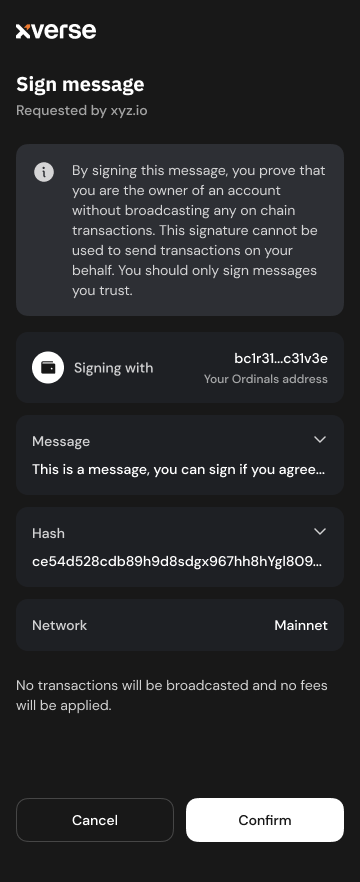
The `signMessage` method returns a Promise that resolves to the `SignMessageResult` object:
Property
Description
`signature`
a string representing the signed message.
`messageHash`
a string representing the hash of the message
`address`
a string representing the address used for signing
[PrevioussendTransferchevron-left](https://docs.xverse.app/sats-connect/bitcoin-methods/sendtransfer)
[NextsignMultipleMessageschevron-right](https://docs.xverse.app/sats-connect/bitcoin-methods/signmultiplemessages)
Last updated 8 days ago
sun-brightdesktopmoon
sun-brightdesktopmoon
---
# UTXO Listings | xverse
[Get utxoschevron-right](https://docs.xverse.app/api/swaps/utxo-listings/get-utxos)
[Place orderchevron-right](https://docs.xverse.app/api/swaps/utxo-listings/place-order)
[Execute orderchevron-right](https://docs.xverse.app/api/swaps/utxo-listings/execute-order)
[PreviousExecute orderchevron-left](https://docs.xverse.app/api/swaps/runes-swaps/execute-order)
[NextGet utxoschevron-right](https://docs.xverse.app/api/swaps/utxo-listings/get-utxos)
sun-brightdesktopmoon
sun-brightdesktopmoon
---
# Transactions | xverse
[Spark Transaction Detailschevron-right](https://docs.xverse.app/api/spark/transactions/spark-transaction-details)
[Latest Spark Transactionschevron-right](https://docs.xverse.app/api/spark/transactions/latest-spark-transactions)
[PreviousSpark Address Summarychevron-left](https://docs.xverse.app/api/spark/address/spark-address-summary)
[NextSpark Transaction Detailschevron-right](https://docs.xverse.app/api/spark/transactions/spark-transaction-details)
sun-brightdesktopmoon
sun-brightdesktopmoon
---
# Xverse Wallet Permissions | Sats Connect - Wallet API for BitcoinFi
[hashtag](https://docs.xverse.app/sats-connect/xverse-wallet-permissions#motivation)
Motivation
----------------------------------------------------------------------------------------------------
Sats Connect mediates interactions between your app and your user's Xverse wallet through appropriate user consent.
**XvereseWallet Permissions** allow your app to reduce user friction and avoid prompting the user for consent on every action.
###
[hashtag](https://docs.xverse.app/sats-connect/xverse-wallet-permissions#request-read-access-to-a-wallet-accounts-addresses-and-holdings)
Request read access to a wallet account's addresses and holdings
To allow for a smooth user experience and avoid prompting your user repeatedly for the authorisation to access their account data, your app remains _connected_ to the user's account after the initial [connection request](https://docs.xverse.app/sats-connect/connecting-to-the-wallet/connect-to-xverse-wallet)
.
While connected, your app has **permission to read account data** using any of the below methods, without additional prompts to the user:
* bitcoin🔴sparkle [getAccount](https://docs.xverse.app/sats-connect/wallet-methods/wallet_getaccount)
* bitcoin [getAddresses](https://docs.xverse.app/sats-connect/bitcoin-methods/getaddresses)
* bitcoin [getBalance](https://docs.xverse.app/sats-connect/bitcoin-methods/getbalance)
* 🎨 [ord\_getInscriptions](https://docs.xverse.app/sats-connect/bitcoin-methods/ord_getinscriptions)
* 🔲 [runes\_getBalance](https://docs.xverse.app/sats-connect/bitcoin-methods/runes_getbalance)
* 🔴 [stx\_getAccounts](https://docs.xverse.app/sats-connect/stacks-methods/stx_getaccounts)
* sparkle [spark\_getAddresses](https://docs.xverse.app/sats-connect/spark-methods/spark_getaddress)
* sparkle [spark\_getBalance](https://docs.xverse.app/sats-connect/spark-methods/spark_getbalance)
###
[hashtag](https://docs.xverse.app/sats-connect/xverse-wallet-permissions#request-a-transaction-or-message-signature-from-the-wallet-account)
Request a transaction or message signature from the wallet account
Sats Connect currently still requires **user authorisation for every transaction or message signature**. Every Bitcoin or Stacks transaction or message signature request will prompt the user for approval.
circle-info
We may introduce transaction & message permissions in the near future to help apps reduce user friction. If your app requires them, reach out in our [developer forumarrow-up-right](https://discord.com/invite/tN84HhSDrz)
🙏
[hashtag](https://docs.xverse.app/sats-connect/xverse-wallet-permissions#request-xverse-wallet-permissions)
Request Xverse Wallet Permissions
--------------------------------------------------------------------------------------------------------------------------------------------------
You can use `request("wallet_requestPermissions")` to prompt the user for the authorisation to access their account data.
If the user had not granted your app permissions already, they will be prompted to approve a [connection request](https://docs.xverse.app/sats-connect/connecting-to-the-wallet)
from your app.
circle-info
Note that reading account data is currently the single type of permission available. This permission is automatically requested with the [`connect`](https://docs.xverse.app/sats-connect/connecting-to-the-wallet)
`method`

When retrieving data from the wallet account using methods that require permission, the general flow can be:
`request("example-method")` (e.g. 🟠 [getBalance](https://docs.xverse.app/sats-connect/bitcoin-methods/getbalance)
)
* If your app has read permission -> the method will successfully return the required data
* If your app does not have permission -> the method will throw an access denied error
* 1) you can use `request("wallet_requestPermissions")`. This will show a connection popup to the user asking them to accept the request.
* 2) Once your user grants you permission, you can `request("example-method"` again
Example: Requesting a connection when a request has insufficient permissions
[hashtag](https://docs.xverse.app/sats-connect/xverse-wallet-permissions#get-your-current-xverse-wallet-permissions)
Get your current Xverse Wallet Permissions
--------------------------------------------------------------------------------------------------------------------------------------------------------------------
You can use `wallet_getCurrentPermissions` to determine whether the user's wallet account is connected to your app, and query the current permissions granted to your app for that account.
Property
Description
type
The type of resource represented by the object Example: `"wallet" | "account"`
clientId
The client identifier associated with the request or resource access. This can be a URL or an identifier for the client application accessing the resource
resourceId
A unique identifier for the resource (e.g., an account).
actions
An object representing the actions that are allowed or permitted on the resource.
[hashtag](https://docs.xverse.app/sats-connect/xverse-wallet-permissions#renounce-xverse-wallet-permissions)
Renounce Xverse Wallet Permissions
----------------------------------------------------------------------------------------------------------------------------------------------------
You can clears your app's permissions for all wallet accounts with [`request("wallet_renouncePermissions")`](https://docs.xverse.app/sats-connect/connecting-to-the-wallet/disconnect-from-xverse-wallet)
, effectively disconnecting users from your app.
[PreviousXverse Custom Methodschevron-left](https://docs.xverse.app/sats-connect/wallet-methods/xverse-custom-methods)
[NextXverse Wallet eventschevron-right](https://docs.xverse.app/sats-connect/xverse-wallet-events)
Last updated 13 days ago
* [Motivation](https://docs.xverse.app/sats-connect/xverse-wallet-permissions#motivation)
* [Request read access to a wallet account's addresses and holdings](https://docs.xverse.app/sats-connect/xverse-wallet-permissions#request-read-access-to-a-wallet-accounts-addresses-and-holdings)
* [Request a transaction or message signature from the wallet account](https://docs.xverse.app/sats-connect/xverse-wallet-permissions#request-a-transaction-or-message-signature-from-the-wallet-account)
* [Request Xverse Wallet Permissions](https://docs.xverse.app/sats-connect/xverse-wallet-permissions#request-xverse-wallet-permissions)
* [Get your current Xverse Wallet Permissions](https://docs.xverse.app/sats-connect/xverse-wallet-permissions#get-your-current-xverse-wallet-permissions)
* [Renounce Xverse Wallet Permissions](https://docs.xverse.app/sats-connect/xverse-wallet-permissions#renounce-xverse-wallet-permissions)
sun-brightdesktopmoon
Copy
import { RpcErrorCode, request } from "sats-connect";
async function example() {
const res1 = await request("getBalance", undefined);
if (res1.status === "success") {
// Happy path.
return res1.result.total;
}
if (res1.error.code !== RpcErrorCode.ACCESS_DENIED) {
// Something else went wrong.
throw new Error("Failed to get balance.", { cause: res1.error });
}
// Insufficient permissions. Request permissions and try again.
const res2 = await request("wallet_requestPermissions", undefined);
if (res2.status === "error") {
// User declined.
throw new Error("User declined connection.");
}
const res3 = await request("getBalance", undefined);
if (res3.status === "error") {
// Something went wrong.
throw new Error("Failed to get balance.", { cause: res3.error });
}
return res3.result.total;
}
wallet\_getCurrentPermissions response
Copy
[\
{\
"type": "account",\
"resourceId": "45ef66eec3fb95f636131f8f00e278fa12bb5adb76e9ea6f256202dbd2b209ca",\
"clientId": "https://sats-connect.netlify.app",\
"actions": {\
"read": true\
}\
}\
]
sun-brightdesktopmoon
---
# sendTransfer | Sats Connect - Wallet API for BitcoinFi
You can use the `sendTransfer` method to request a transfer of any amount of Bitcoin to one or more recipients from the user's wallet.
Request parameters
Description
`recipients`
an array of objects with <`address`, `amount`\> properties:
* `address` a string representing the recipient's address
* `amount` a number representing the amount of Bitcoin to send, denominated in satoshis (Bitcoin base unit)
Copy
import {
request,
BitcoinNetworkType,
RpcErrorCode,
} from "sats-connect";
try {
const response = await request("sendTransfer", {
recipients: [\
{\
address: recipient,\
amount: Number(amount),\
},\
],
});
if (response.status === "success") {
// handle success
} else {
if (response.error.code === RpcErrorCode.USER_REJECTION) {
// handle user cancellation error
} else {
// handle error
}
}
} catch (err) {
alert(err.error.message);
}
The user will be prompted to review the Bitcoin transfer transaction in the wallet, and to confirm:
* the recipients and amounts to send
* their desired transaction fee
The transaction will be signed and broadcasted upon user approval.
The `sendTransfer` method returns a Promise that resolves to the `sendTransferResult` object:
Property
Description
`txid`
The transaction id as a hex-encoded string.
[PrevioussignMultipleTransactionschevron-left](https://docs.xverse.app/sats-connect/bitcoin-methods/signmultipletransactions)
[NextsignMessagechevron-right](https://docs.xverse.app/sats-connect/bitcoin-methods/signmessage)
Last updated 1 year ago
sun-brightdesktopmoon
sun-brightdesktopmoon
---
# Inscription by ID | xverse
This endpoint returns the information & metadata of a specific inscription ID.
get
https://api.secretkeylabs.io/v1/inscriptions/{inscriptionId}
Get inscription info with collection & pricing. Collection and price fields will be undefined if not available.
Authorizations
apiKeychevron-down
apiKey
x-api-keystringRequired
Path parameters
inscriptionIdstringRequiredExample: `5f3dafcdd142358b332e0939d37174b76472735df8df29325901d2c7d18a152ci2`
Responses
chevron-right
200
Default Response
application/json
Responseobject
Show propertiesplus
chevron-right
400
Invalid input
application/json
chevron-right
401
Unauthorized
application/json
chevron-right
404
Not found
application/json
chevron-right
429
Rate limit exceeded
application/json
chevron-right
500
Internal server error
application/json
get
/v1/inscriptions/{inscriptionId}
HTTPchevron-down
HTTPcURLJavaScriptPython
Test it
200
Default Response
chevron-down
[PreviousInscriptionschevron-left](https://docs.xverse.app/api/ordinals/inscriptions)
[NextInscription Thumbnailchevron-right](https://docs.xverse.app/api/ordinals/inscriptions/inscription-thumbnail)
Last updated 5 months ago
sun-brightdesktopmoon
Copy
GET /v1/inscriptions/{inscriptionId} HTTP/1.1
Host: api.secretkeylabs.io
x-api-key: YOUR_API_KEY
Accept: */*
Copy
{
"id": "text",
"offset": 1,
"parentIds": [\
"text"\
],
"delegateId": "text",
"blockHeight": 1,
"contentType": "text",
"contentLength": 1,
"effectiveContentType": "text",
"number": 1,
"sat": 1,
"charms": [\
"text"\
],
"currentOutput": "text",
"currentAddress": "text",
"lastTransferHeight": 1,
"lastTransferTimestamp": 1,
"value": 1,
"contentUrl": "text",
"renderUrl": "text",
"collectionId": "text",
"collectionSymbol": "text",
"collectionName": "text",
"collectionFloorPrice": {
"valueInSats": "text",
"valueInUsd": "text"
},
"lastInscriptionSalePrice": {
"valueInSats": "text",
"valueInUsd": "text"
},
"name": "text",
"indexerHeight": 1
}
sun-brightdesktopmoon
---
# BRC-20 Transfer Validity Check | xverse
This endpoint checks up to 100 inscription IDs to verify if they are valid, unspent BRC-20 transfer inscriptions.
post
https://api.secretkeylabs.io/v1/brc20/batch/inscriptions
Check validity of BRC-20 transfer inscriptions in batch. Returns only valid unspent transfer inscriptions (max 100 inscriptions per request).
Authorizations
apiKeychevron-down
apiKey
x-api-keystringRequired
Body
application/jsonchevron-down
application/json
inscriptionIdsstring\[\] · min: 1 · max: 100Required
Array of inscription IDs to check (max 100)
Example: `["5f3dafcdd142358b332e0939d37174b76472735df8df29325901d2c7d18a152ci2"]`
Responses
chevron-right
200
Default Response
application/json
Responseobject
Show propertiesplus
chevron-right
400
Invalid input
application/json
chevron-right
401
Unauthorized
application/json
chevron-right
404
Not found
application/json
chevron-right
429
Rate limit exceeded
application/json
chevron-right
500
Internal server error
application/json
post
/v1/brc20/batch/inscriptions
HTTPchevron-down
HTTPcURLJavaScriptPython
Test it
200
Default Response
chevron-down
[PreviousBRC-20s by Tickerschevron-left](https://docs.xverse.app/api/brc-20/brc-20s-by-tickers)
[NextMint BRC-20chevron-right](https://docs.xverse.app/api/brc-20/mint-brc-20)
Last updated 2 months ago
sun-brightdesktopmoon
Copy
POST /v1/brc20/batch/inscriptions HTTP/1.1
Host: api.secretkeylabs.io
x-api-key: YOUR_API_KEY
Content-Type: application/json
Accept: */*
Content-Length: 89
{
"inscriptionIds": [\
"5f3dafcdd142358b332e0939d37174b76472735df8df29325901d2c7d18a152ci2"\
]
}
Copy
{
"items": [\
{\
"inscriptionId": "text",\
"ticker": "text",\
"amount": "text"\
}\
]
}
sun-brightdesktopmoon
---
# signMultipleTransactions | Sats Connect - Wallet API for BitcoinFi
circle-info
This is an Xverse custom method. It can only be invoked for users using the [Xverse walletarrow-up-right](https://www.xverse.app/)
.
Copy
import { signMultipleTransactions } from 'sats-connect'
To request signing of multiple PSBTs, you can use the `signMultipleTransactions` function.
psbt
Description
psbtBase64
a valid `psbt` encoded in `base64`
inputsToSign
an array of objects describing the address and index of input to sign
Copy
import { signMultipleTransactions } from 'sats-connect'
const psbtsBase64 = [...,...,...]
await signMultipleTransactions({
payload: {
network: {
type: network,
},
message: "Sign Transaction",
psbts: [\
{\
psbtBase64: psbtsBase64[0],\
inputsToSign: [\
{\
address: paymentAddress,\
signingIndexes: [0],\
sigHash: btc.SignatureHash.SINGLE | btc.SignatureHash.ANYONECANPAY,\
},\
{\
address: ordinalsAddress,\
signingIndexes: [1],\
sigHash: btc.SignatureHash.SINGLE | btc.SignatureHash.ANYONECANPAY,\
},\
],\
},\
{\
psbtBase64: psbtsBase64[1],\
inputsToSign: [\
{\
address: paymentAddress,\
signingIndexes: [0],\
sigHash: btc.SignatureHash.SINGLE | btc.SignatureHash.ANYONECANPAY,\
},\
{\
address: ordinalsAddress,\
signingIndexes: [1],\
sigHash: btc.SignatureHash.SINGLE | btc.SignatureHash.ANYONECANPAY,\
},\
],\
}\
]
},
onFinish: (response) => {
console.log('Bulk tx signing response:', response);
},
onCancel: () => alert("Canceled"),
});
};
[PrevioussignPsbtchevron-left](https://docs.xverse.app/sats-connect/bitcoin-methods/signpsbt)
[NextsendTransferchevron-right](https://docs.xverse.app/sats-connect/bitcoin-methods/sendtransfer)
Last updated 13 days ago
sun-brightdesktopmoon
sun-brightdesktopmoon
---
# Top Collections by Volume | xverse
This endpoint provides the top collections by sales volume for different time periods, along with collections' metadata & market data.
get
https://api.secretkeylabs.io/v1/ordinals/stats/collections/top-by-volume
Get top collections by volume.
Authorizations
apiKeychevron-down
apiKey
x-api-keystringRequired
Query parameters
timePeriodstring · enumOptional
* `24h` - trailing 24 hours' volume, ending at the start of the prior hour (default)
* `trailing7d` - trailing 7 days' volume, ending at the start of the prior hour
* `trailing30d` - trailing 30 days' volume, ending at the start of the prior hour
* `1d` - prior day's volume, ending at midnight GMT
* `7d` - prior seven days' volume, ending at midnight GMT
* `30d` - prior 30 days' volume, ending at midnight GMT
Default: `24h`Possible values: `24h``trailing7d``trailing30d``1d``7d``30d`
offsetnumberOptionalDefault: `0`
limitnumber · max: 100OptionalDefault: `10`
Responses
chevron-right
200
Default Response
application/json
Responseobject
Show propertiesplus
chevron-right
400
Invalid input
application/json
chevron-right
401
Unauthorized
application/json
chevron-right
404
Not found
application/json
chevron-right
429
Rate limit exceeded
application/json
chevron-right
500
Internal server error
application/json
get
/v1/ordinals/stats/collections/top-by-volume
HTTPchevron-down
HTTPcURLJavaScriptPython
Test it
200
Default Response
chevron-down
[PreviousCollection by IDchevron-left](https://docs.xverse.app/api/ordinals/collections/collection-by-id)
[NextCollectionschevron-right](https://docs.xverse.app/api/ordinals/collections/collections)
Last updated 6 months ago
sun-brightdesktopmoon
Copy
GET /v1/ordinals/stats/collections/top-by-volume HTTP/1.1
Host: api.secretkeylabs.io
x-api-key: YOUR_API_KEY
Accept: */*
Copy
{
"total": 1,
"offset": 1,
"limit": 1,
"timePeriod": "text",
"collections": [\
{\
"collectionId": "text",\
"tradingVolumeSats": "text",\
"name": "text",\
"logo": "text",\
"floorPrice": {\
"valueInSats": "text",\
"valueInUsd": "text",\
"percentageChange24h": {\
"valueInSats": "text",\
"valueInUsd": "text"\
}\
}\
}\
]
}
sun-brightdesktopmoon
---
# Place order | xverse
post
https://api.secretkeylabs.io/v1/swaps/utxo/place-order
###
[hashtag](https://docs.xverse.app/api/swaps/utxo-listings/place-order#)
Coming soon...
Place a UTXO-based marketplace order and get back an unsigned PSBT.
Authorizations
apiKeychevron-down
apiKey
x-api-keystringRequired
Body
application/jsonchevron-down
application/json
objectOptional
Responses
chevron-right
200
Default Response
application/json
post
/v1/swaps/utxo/place-order
HTTPchevron-down
HTTPcURLJavaScriptPython
Test it
200
Default Response
[PreviousGet utxoschevron-left](https://docs.xverse.app/api/swaps/utxo-listings/get-utxos)
[NextExecute orderchevron-right](https://docs.xverse.app/api/swaps/utxo-listings/execute-order)
Last updated 7 months ago
sun-brightdesktopmoon
Copy
POST /v1/swaps/utxo/place-order HTTP/1.1
Host: api.secretkeylabs.io
x-api-key: YOUR_API_KEY
Content-Type: application/json
Accept: */*
Content-Length: 272
{
"providerCode": "magiceden_utxo",
"btcPubKey": "...",
"to": {
"protocol": "runes",
"ticker": "840000:28"
},
"ordPubKey": "...",
"btcAddress": "...",
"orders": [\
{\
"price": "100",\
"amount": "0100",\
"identifier": ""\
}\
],
"ordAddress": "...",
"feeRate": 7,
"from": {
"ticker": "BTC",
"protocol": "btc"
}
}
Copy
{
"orderId": "...",
"psbt": "...",
"orders": [\
{\
"identifier": "...",\
"amount": "...",\
"price": "..."\
}\
],
"serviceFee": ".."
}
sun-brightdesktopmoon
---
# Collection by ID | xverse
This endpoint is used to retrieve the metadata & market data associated with an ordinal collection, based on the ordinal collection ID.
get
https://api.secretkeylabs.io/v1/ordinals/collections/{collectionId}
Get metadata and market info for an Ordinals collection.
Authorizations
apiKeychevron-down
apiKey
x-api-keystringRequired
Path parameters
collectionIdstringRequiredExample: `{"value":"wzrds"}`
Responses
chevron-right
200
Default Response
application/json
Responseobject
Show propertiesplus
chevron-right
400
Invalid input
application/json
chevron-right
401
Unauthorized
application/json
chevron-right
404
Not found
application/json
chevron-right
429
Rate limit exceeded
application/json
chevron-right
500
Internal server error
application/json
get
/v1/ordinals/collections/{collectionId}
HTTPchevron-down
HTTPcURLJavaScriptPython
Test it
200
Default Response
chevron-down
[PreviousCollectionschevron-left](https://docs.xverse.app/api/ordinals/collections)
[NextTop Collections by Volumechevron-right](https://docs.xverse.app/api/ordinals/collections/top-collections-by-volume)
Last updated 6 months ago
sun-brightdesktopmoon
Copy
GET /v1/ordinals/collections/{collectionId} HTTP/1.1
Host: api.secretkeylabs.io
x-api-key: YOUR_API_KEY
Accept: */*
Copy
{
"id": "text",
"symbol": "text",
"name": "text",
"description": "text",
"supply": "text",
"holderCount": "text",
"floorPrice": {
"valueInSats": "text",
"valueInUsd": "text",
"percentageChange24h": {
"valueInSats": "text",
"valueInUsd": "text"
}
},
"marketCap": {
"valueInSats": "text",
"valueInUsd": "text"
},
"volume24h": {
"valueInSats": "text",
"valueInUsd": "text",
"percentageChange": {
"valueInSats": "text",
"valueInUsd": "text"
}
},
"links": {
"coinMarketCap": "text",
"telegram": "text",
"twitter": "text",
"discord": "text",
"website": "text"
}
}
sun-brightdesktopmoon
---
# Place order | xverse
post
https://api.secretkeylabs.io/v1/swaps/crosschain/place-order
###
[hashtag](https://docs.xverse.app/api/swaps/crosschain-swaps/place-order#)
Coming soon...
Place cross-chain swap orders (via Changelly).
Authorizations
apiKeychevron-down
apiKey
x-api-keystringRequired
Body
application/jsonchevron-down
application/json
objectOptional
Responses
chevron-right
200
Default Response
application/json
Responseobject
post
/v1/swaps/crosschain/place-order
HTTPchevron-down
HTTPcURLJavaScriptPython
Test it
200
Default Response
[PreviousCrosschain Swapschevron-left](https://docs.xverse.app/api/swaps/crosschain-swaps)
Last updated 7 months ago
sun-brightdesktopmoon
Copy
POST /v1/swaps/crosschain/place-order HTTP/1.1
Host: api.secretkeylabs.io
x-api-key: YOUR_API_KEY
Content-Type: application/json
Accept: */*
Content-Length: 258
{
"from": {
"protocol": "btc",
"ticker": "btc"
},
"receiveAddress": "...",
"sendAmount": "0.0004",
"to": {
"protocol": "stx",
"symbol": "STX",
"logo": "https://cdn.changelly.com/icons-colored/stx.png",
"ticker": "stx",
"name": "STX"
},
"providerCode": "changelly",
"fromAddress": "..."
}
Copy
{
"orderId": "...",
"payinAddress": "...",
"status": "new"
}
sun-brightdesktopmoon
---
# Collections | xverse
This endpoint returns the full list of indexed Ordinals collections with their basic information and metadata
get
https://api.secretkeylabs.io/v1/ordinals/collections
Get list of ordinals collections.
Authorizations
apiKeychevron-down
apiKey
x-api-keystringRequired
Query parameters
offsetnumberOptionalDefault: `0`
limitnumber · min: 25 · max: 25OptionalDefault: `25`
Responses
chevron-right
200
Default Response
application/json
Responseobject
Show propertiesplus
chevron-right
400
Invalid input
application/json
chevron-right
401
Unauthorized
application/json
chevron-right
404
Not found
application/json
chevron-right
429
Rate limit exceeded
application/json
chevron-right
500
Internal server error
application/json
get
/v1/ordinals/collections
HTTPchevron-down
HTTPcURLJavaScriptPython
Test it
200
Default Response
chevron-down
[PreviousTop Collections by Volumechevron-left](https://docs.xverse.app/api/ordinals/collections/top-collections-by-volume)
[NextHolders by Collectionchevron-right](https://docs.xverse.app/api/ordinals/collections/holders-by-collection)
Last updated 5 months ago
sun-brightdesktopmoon
Copy
GET /v1/ordinals/collections HTTP/1.1
Host: api.secretkeylabs.io
x-api-key: YOUR_API_KEY
Accept: */*
Copy
{
"limit": 1,
"offset": 1,
"total": 1,
"items": [\
{\
"id": "text",\
"name": "text",\
"description": "text",\
"links": {\
"coinMarketCap": "text",\
"telegram": "text",\
"twitter": "text",\
"discord": "text",\
"website": "text"\
}\
}\
]
}
sun-brightdesktopmoon
---
# Holders by Collection | xverse
This endpoint is commonly used to pass an ordinal collection ID, and get the full list of wallets holding inscriptions in that collection, and the number of items of the collection they hold.
get
https://api.secretkeylabs.io/v1/ordinals/collections/{collectionId}/holders
Get unique holders of an Ordinals collection.
Authorizations
apiKeychevron-down
apiKey
x-api-keystringRequired
Path parameters
collectionIdstringRequiredExample: `{"value":"wzrds"}`
Query parameters
offsetnumberOptionalDefault: `0`
limitnumber · max: 25OptionalDefault: `10`
Responses
chevron-right
200
Default Response
application/json
chevron-right
400
Invalid input
application/json
chevron-right
401
Unauthorized
application/json
chevron-right
404
Not found
application/json
chevron-right
429
Rate limit exceeded
application/json
chevron-right
500
Internal server error
application/json
get
/v1/ordinals/collections/{collectionId}/holders
HTTPchevron-down
HTTPcURLJavaScriptPython
Test it
200
Default Response
chevron-down
[PreviousCollectionschevron-left](https://docs.xverse.app/api/ordinals/collections/collections)
[NextInscriptions by Collectionchevron-right](https://docs.xverse.app/api/ordinals/collections/inscriptions-by-collection)
Last updated 6 months ago
sun-brightdesktopmoon
Copy
GET /v1/ordinals/collections/{collectionId}/holders HTTP/1.1
Host: api.secretkeylabs.io
x-api-key: YOUR_API_KEY
Accept: */*
Copy
{
"total": 1,
"offset": 1,
"limit": 1,
"items": [\
{\
"inscriptionCount": 1,\
"address": "text"\
}\
]
}
sun-brightdesktopmoon
---
# BTKN Token by ID | xverse
This endpoint returns detailed info & market data for a specific Spark BTKN token.
get
https://api.secretkeylabs.io/v1/spark/btkn/{identifier}/info
Get token info and pool metadata for a specific Spark BTKN token by ID.
Authorizations
apiKeychevron-down
apiKey
x-api-keystringRequired
Path parameters
identifierstringRequired
BTKN token identifier
Example: `691c8f8a06274c6d17956e2e4115935d501d85ee569319d20b50e1fe4195b33d`
Responses
chevron-right
200
Spark BTKN token info
application/json
Responseobject
Spark BTKN token info
Show propertiesplus
chevron-right
400
Invalid input
application/json
chevron-right
401
Unauthorized
application/json
chevron-right
404
Not found
application/json
chevron-right
429
Rate limit exceeded
application/json
chevron-right
500
Internal server error
application/json
get
/v1/spark/btkn/{identifier}/info
HTTPchevron-down
HTTPcURLJavaScriptPython
Test it
200
Spark BTKN token info
chevron-down
[PreviousBTKN Tokenschevron-left](https://docs.xverse.app/api/spark/btkn-tokens)
[NextBTKN Tokens by IDs (Batch)chevron-right](https://docs.xverse.app/api/spark/btkn-tokens/btkn-tokens-by-ids-batch)
Last updated 16 days ago
sun-brightdesktopmoon
Copy
GET /v1/spark/btkn/{identifier}/info HTTP/1.1
Host: api.secretkeylabs.io
x-api-key: YOUR_API_KEY
Accept: */*
Copy
{
"tokenIdentifier": "text",
"tokenAddress": "text",
"name": "text",
"ticker": "text",
"decimals": 1,
"issuerPublicKey": "text",
"iconUrl": "text",
"holderCount": 1,
"priceUsd": 1,
"maxSupply": 1,
"isFreezable": true,
"createdAt": "text",
"updatedAt": "text",
"price": 1,
"poolInfo": [\
{\
"lpPublicKey": "text",\
"hostName": "text",\
"hostFeeBps": 1,\
"lpFeeBps": 1,\
"assetAAddress": "text",\
"assetBAddress": "text",\
"assetAReserve": "text",\
"assetBReserve": "text",\
"currentPriceAInB": "text",\
"tvlAssetB": "text",\
"volume24hAssetB": "text",\
"priceChangePercent24h": "text",\
"curveType": "text",\
"initialReserveA": "text",\
"bondingProgressPercent": "text",\
"createdAt": "text"\
}\
]
}
sun-brightdesktopmoon
---
# Inscriptions by IDs | xverse
This endpoint returns the information & metadata for multiple inscription IDs in a single request.
get
https://api.secretkeylabs.io/v1/inscriptions/batch
Get inscription info with collection & pricing for a batch of Inscriptions by IDs. Collection and price fields will be undefined if not available. The `inscriptionIds` query parameter should be a comma-separated list of Inscription IDs.
Authorizations
apiKeychevron-down
apiKey
x-api-keystringRequired
Query parameters
inscriptionIdsstring · min: 1RequiredExample: `5f3dafcdd142358b332e0939d37174b76472735df8df29325901d2c7d18a152ci2`
Responses
chevron-right
200
Default Response
application/json
Responseobject\[\]
Show propertiesplus
chevron-right
400
Invalid input
application/json
chevron-right
401
Unauthorized
application/json
chevron-right
404
Not found
application/json
chevron-right
429
Rate limit exceeded
application/json
chevron-right
500
Internal server error
application/json
get
/v1/inscriptions/batch
HTTPchevron-down
HTTPcURLJavaScriptPython
Test it
200
Default Response
chevron-down
[PreviousInscription Thumbnailchevron-left](https://docs.xverse.app/api/ordinals/inscriptions/inscription-thumbnail)
[NextInscription Activitychevron-right](https://docs.xverse.app/api/ordinals/inscriptions/inscription-activity)
Last updated 5 months ago
sun-brightdesktopmoon
Copy
GET /v1/inscriptions/batch?inscriptionIds=text HTTP/1.1
Host: api.secretkeylabs.io
x-api-key: YOUR_API_KEY
Accept: */*
Copy
[\
{\
"id": "text",\
"offset": 1,\
"parentIds": [\
"text"\
],\
"delegateId": "text",\
"blockHeight": 1,\
"contentType": "text",\
"contentLength": 1,\
"effectiveContentType": "text",\
"number": 1,\
"sat": 1,\
"charms": [\
"text"\
],\
"currentOutput": "text",\
"currentAddress": "text",\
"lastTransferHeight": 1,\
"lastTransferTimestamp": 1,\
"value": 1,\
"contentUrl": "text",\
"renderUrl": "text",\
"collectionId": "text",\
"collectionSymbol": "text",\
"collectionName": "text",\
"collectionFloorPrice": {\
"valueInSats": "text",\
"valueInUsd": "text"\
},\
"lastInscriptionSalePrice": {\
"valueInSats": "text",\
"valueInUsd": "text"\
},\
"name": "text",\
"indexerHeight": 1\
}\
]
sun-brightdesktopmoon
---
# Inscriptions by Collection | xverse
This endpoint is commonly used to retrieve the list of inscriptions associated with an ordinal collection, together with their info and metadata.
get
https://api.secretkeylabs.io/v1/ordinals/collections/{collectionId}/inscriptions
Get inscriptions for an Ordinals collection.
Authorizations
apiKeychevron-down
apiKey
x-api-keystringRequired
Path parameters
collectionIdstringRequiredExample: `{"value":"wzrds"}`
Query parameters
offsetnumberOptionalDefault: `0`
limitnumber · max: 25OptionalDefault: `10`
Responses
chevron-right
200
Default Response
application/json
Responseobject
Show propertiesplus
chevron-right
400
Invalid input
application/json
chevron-right
401
Unauthorized
application/json
chevron-right
404
Not found
application/json
chevron-right
429
Rate limit exceeded
application/json
chevron-right
500
Internal server error
application/json
get
/v1/ordinals/collections/{collectionId}/inscriptions
HTTPchevron-down
HTTPcURLJavaScriptPython
Test it
200
Default Response
chevron-down
[PreviousHolders by Collectionchevron-left](https://docs.xverse.app/api/ordinals/collections/holders-by-collection)
[NextCollection Historical Floor Priceschevron-right](https://docs.xverse.app/api/ordinals/collections/collection-historical-floor-prices)
Last updated 6 months ago
sun-brightdesktopmoon
Copy
GET /v1/ordinals/collections/{collectionId}/inscriptions HTTP/1.1
Host: api.secretkeylabs.io
x-api-key: YOUR_API_KEY
Accept: */*
Copy
{
"collectionId": "text",
"collectionName": "text",
"total": 1,
"offset": 1,
"limit": 1,
"inscriptions": [\
{\
"id": "text",\
"number": 1,\
"sat": 1,\
"contentType": "text",\
"blockHeight": 1,\
"charms": [\
"text"\
]\
}\
]
}
sun-brightdesktopmoon
---
# stx_callContract | Sats Connect - Wallet API for BitcoinFi
You can use the `stx_callContract` method to request the signature of any contract call transaction from the user's wallet. The method lets you specify the contract to call, the function to execute on the contract and the arguments to pass to the function.
Request parameters
Description
`contract`
a string representing the contract's Crockford base-32 encoded Stacks address, and the contract name, separated by a . Example: `ST000000000000000000002AMW42H.pox-3`
`functionName`
a string representing the name of the contract function to call
`arguments` ⚠️ **Deprecated**
⚠️ **This request param is now deprecated. Use** `**functionArgs**`**.**
an array of strings representing the arguments to pass to the function called. The arguments are expected as hex-encoded strings of Clarity values.
To convert Clarity values to their hex representation, you can use the `cvToString`helper from the `@stacks/transactions` package.
`functionArgs`
an array of strings representing the arguments to pass to the function called. The arguments are expected as hex-encoded strings of Clarity values.
To convert Clarity values to their hex representation, you can use the `cvToString`helper from the `@stacks/transactions` package.
`postConditions`
an array of strings representing the post conditions to be applied on the transaction. post conditions are expected as hex-encoded strings
To convert post conditions values to their hex representation, you can use the `postConditionToHex` helper from the `@stacks/transactions` package.
`postConditionMode`
a string representing the post condition mode to evaluate post-conditions:
* `allow` -> in "allow" mode, other asset transfers not covered by the post-conditions are permitted
* `deny` -> in "deny" mode, no other asset transfers are permitted besides those named in the post-conditions.
Copy
import { request } from "sats-connect";
const response = await request("stx_callContract", {
contract: `${contractAddress}.${contractName}`,
functionName,
functionArgs: JSON.parse(functionArgs),
});
if (response.status === "success") {
console.log(response.result);
} else {
console.error(response.error);
}
} catch (error) {
console.error(error);
alert(error);
}
The user will see a Stacks contract call transaction signing request prompt in the wallet.
The transaction will be signed and broadcasted upon user approval.
The `stx_callContract` method returns a Promise that resolves to the `CallContractResult` object:
Property
Description
`txid`
a hex-encoded string representing the ID of the Stacks contract call transaction signed
`transaction`
a hex-encoded string representing the Stacks contract call transaction signed
[Previousstx\_signTransactionchevron-left](https://docs.xverse.app/sats-connect/stacks-methods/stx_signtransaction)
[Nextstx\_deployContractchevron-right](https://docs.xverse.app/sats-connect/stacks-methods/stx_deploycontract)
Last updated 13 days ago
sun-brightdesktopmoon
Copy
import { cvToString } from '@stacks/transactions';
const functionArgs = [someClarityValue1, someClarityValue2];
const hexArgs = functionArgs.map(cvToString);
Copy
import { cvToString } from '@stacks/transactions';
const functionArgs = [someClarityValue1, someClarityValue2];
const hexArgs = functionArgs.map(cvToString);
sun-brightdesktopmoon
---
# Deploy BRC-20 | xverse
[Estimatechevron-right](https://docs.xverse.app/api/brc-20/deploy-brc-20/estimate)
[Orderchevron-right](https://docs.xverse.app/api/brc-20/deploy-brc-20/order)
[PreviousExecutechevron-left](https://docs.xverse.app/api/brc-20/mint-brc-20/order/execute)
[NextEstimatechevron-right](https://docs.xverse.app/api/brc-20/deploy-brc-20/estimate)
sun-brightdesktopmoon
sun-brightdesktopmoon
---
# Estimate | xverse
post
https://api.secretkeylabs.io/v1/brc20/mint/estimate
###
[hashtag](https://docs.xverse.app/api/brc-20/mint-brc-20/estimate#)
Coming soon...
Estimate the total cost for a BRC-20 batch mint order.
Authorizations
apiKeychevron-down
apiKey
x-api-keystringRequired
Body
application/jsonchevron-down
application/json
objectOptional
Responses
chevron-right
200
Default Response
application/json
Responseobject
post
/v1/brc20/mint/estimate
HTTPchevron-down
HTTPcURLJavaScriptPython
Test it
200
Default Response
[PreviousMint BRC-20chevron-left](https://docs.xverse.app/api/brc-20/mint-brc-20)
[NextOrderchevron-right](https://docs.xverse.app/api/brc-20/mint-brc-20/order)
Last updated 7 months ago
sun-brightdesktopmoon
Copy
POST /v1/brc20/mint/estimate HTTP/1.1
Host: api.secretkeylabs.io
x-api-key: YOUR_API_KEY
Content-Type: application/json
Accept: */*
Content-Length: 2
{}
Copy
{}
sun-brightdesktopmoon
---
# Runes Swaps | xverse
[Place orderchevron-right](https://docs.xverse.app/api/swaps/runes-swaps/place-order)
[Execute orderchevron-right](https://docs.xverse.app/api/swaps/runes-swaps/execute-order)
[PreviousGet quoteschevron-left](https://docs.xverse.app/api/swaps/get-quotes)
[NextPlace orderchevron-right](https://docs.xverse.app/api/swaps/runes-swaps/place-order)
sun-brightdesktopmoon
sun-brightdesktopmoon
---
# Historical Activity (Confirmed) | xverse
This endpoint returns the combined historical activity across BTC, inscriptions, and runes for a set of addresses, including all incoming/outgoing transfers.
get
https://api.secretkeylabs.io/v1/global/ordinals/multi-address/activity
Retrieve efficient aggregated confirmed history (Bitcoin, Runes, Inscriptions) for multiple addresses. Up to 3 addresses(comma separated) can be queried via `addresses` query param.
Authorizations
apiKeychevron-down
apiKey
x-api-keystringRequired
Query parameters
addressesstring · BitcoinAddressList · min: 10RequiredDefault: `bc1q0egjvlcfq77cxd9kvpgppyuxckzvws46e3sxch,bc1px3kttdtg479vqfu0s2lhxvyuz2snhl8jct3f84k5heerl750n28scr9qt6`
offsetnumberOptionalDefault: `0`
limitnumber · min: 25 · max: 60OptionalDefault: `60`
Responses
chevron-right
200
Default Response
application/json
Responseobject
Show propertiesplus
chevron-right
400
Invalid input
application/json
chevron-right
401
Unauthorized
application/json
chevron-right
404
Not found
application/json
chevron-right
429
Rate limit exceeded
application/json
chevron-right
500
Internal server error
application/json
get
/v1/global/ordinals/multi-address/activity
HTTPchevron-down
HTTPcURLJavaScriptPython
Test it
200
Default Response
chevron-down
[PreviousActivitychevron-left](https://docs.xverse.app/api/bitcoin/address/activity)
[NextReal-Time Mempool Activity (Unconfirmed)chevron-right](https://docs.xverse.app/api/bitcoin/address/activity/real-time-mempool-activity-unconfirmed)
Last updated 4 months ago
sun-brightdesktopmoon
Copy
GET /v1/global/ordinals/multi-address/activity?addresses=bc1q0egjvlcfq77cxd9kvpgppyuxckzvws46e3sxch%2Cbc1px3kttdtg479vqfu0s2lhxvyuz2snhl8jct3f84k5heerl750n28scr9qt6 HTTP/1.1
Host: api.secretkeylabs.io
x-api-key: YOUR_API_KEY
Accept: */*
Copy
{
"transactions": [\
{\
"txid": "text",\
"blockHeight": 1,\
"blockTime": 1,\
"ownActivity": [\
{\
"address": "text",\
"sent": 1,\
"received": 1,\
"outgoing": 1,\
"incoming": 1\
}\
],\
"totalOut": 1,\
"totalIn": 1,\
"addressList": {\
"hasMore": true,\
"items": [\
{\
"address": "text",\
"type": "text",\
"isInput": true,\
"isOutput": true\
}\
]\
},\
"runes": {\
"ownActivity": {\
"items": [\
{\
"runeId": "text",\
"runeName": "text",\
"divisibility": 1,\
"symbol": "text",\
"address": "text",\
"sent": "text",\
"received": "text",\
"outgoing": "text",\
"incoming": "text"\
}\
],\
"hasMore": true\
},\
"allActivity": {\
"items": [\
{\
"runeId": "text",\
"runeName": "text",\
"divisibility": 1,\
"symbol": "text",\
"outgoing": "text",\
"incoming": "text",\
"isMint": true,\
"isEtch": true,\
"isBurn": true\
}\
],\
"hasMore": true\
}\
},\
"inscriptions": {\
"items": [\
{\
"inscriptionId": "text",\
"contentType": "text",\
"address": "text",\
"sent": true,\
"received": true,\
"inscribed": true,\
"burned": true\
}\
],\
"hasMore": true\
}\
}\
],
"offset": 1,
"limit": 1
}
sun-brightdesktopmoon
---
# Rune by ID | xverse
This endpoint is used to retrieve the metadata & market data associated with a rune, based on the rune ID.
get
https://api.secretkeylabs.io/v1/runes/{identifier}
Get price info for a specific Rune by ID.
Authorizations
apiKeychevron-down
apiKey
x-api-keystringRequired
Path parameters
identifierstringRequired
Responses
chevron-right
200
Default Response
application/json
chevron-right
400
Invalid input
application/json
chevron-right
401
Unauthorized
application/json
chevron-right
404
Not found
application/json
chevron-right
429
Rate limit exceeded
application/json
chevron-right
500
Internal server error
application/json
get
/v1/runes/{identifier}
HTTPchevron-down
HTTPcURLJavaScriptPython
Test it
200
Default Response
chevron-down
[PreviousUTXOschevron-left](https://docs.xverse.app/api/runes/runes-by-address/utxos)
[NextRunes by IDschevron-right](https://docs.xverse.app/api/runes/runes-by-ids)
Last updated 6 months ago
sun-brightdesktopmoon
Copy
GET /v1/runes/{identifier} HTTP/1.1
Host: api.secretkeylabs.io
x-api-key: YOUR_API_KEY
Accept: */*
Copy
{
"chain": "text",
"runeName": "text",
"symbol": "text",
"runeId": "text",
"spacedRuneName": "text",
"amount": "text",
"cap": "text",
"divisibility": "text",
"premine": "text",
"turbo": true,
"genesisBlock": 1,
"mint": {
"offset": {
"low": "text",
"high": "text"
},
"height": {
"low": "text",
"high": "text"
}
},
"holders": "text",
"supply": "text",
"marketCap": {
"valueInSats": "text",
"valueInUsd": "text"
},
"prices": {
"floorPrice": {
"marketplace": "text",
"valueInSats": "text",
"valueInUsd": "text",
"percentageChange24h": {
"valueInSats": "text",
"valueInUsd": "text"
}
},
"lastSalePrice": {
"marketplace": "text",
"valueInSats": "text",
"valueInUsd": "text"
}
},
"volume24h": {
"valueInSats": "text",
"valueInUsd": "text",
"percentageChange": {
"valueInSats": "text",
"valueInUsd": "text"
}
},
"inscriptionId": "text",
"inscriptionRenderUrl": "text"
}
sun-brightdesktopmoon
---
# stx_getAccounts | Sats Connect - Wallet API for BitcoinFi
Your application can request to connect to the user’s Stacks wallet with the `stx_getAccounts` method, which prompts them to share their Stacks address.
Your app must have first [connected to the wallet](https://docs.xverse.app/sats-connect/connecting-to-the-wallet/connect-to-xverse-wallet)
and obtained [account read permissions.](https://docs.xverse.app/sats-connect/xverse-wallet-permissions)
No request parameters are required:
Copy
import { request } from "sats-connect";
try {
const response = await request("stx_getAccounts", {});
if (response.status === "success") {
alert("Success getting accounts. Check console for results.");
console.log("Accounts:", response.result);
} else {
alert("Error getting accounts. Check console for details.");
console.error(response);
}
}
The method returns a [Promisearrow-up-right](https://developer.mozilla.org/en-US/docs/Web/JavaScript/Reference/Global_Objects/Promise)
that resolves to return `GetAccountsResult`: an array of the user’s wallet `address` objects, defined as:
address field
Description
`address`
the user’s connected Stacks wallet address
`publicKey`
A hex string representing the bytes of the public key of the account.
`network`
string - the network where the address is being used:
* `mainnet` for Stacks Mainnet
* `testnet` for Stacks Testnet
`gaiaHubUrl`
a string representing the user's Gaia hub URL. ℹ️ The Gaia storage system allows you to store private app data off the blockchain and still access it securely with Stacks applications. For more information about the Gaia storage system, see the [Gaia protocol referencearrow-up-right](https://docs.stacks.co/stacks-in-depth/gaia)
.
`gaiaAppKey`
a string representing the user's hex-encoded Gaia app key
You can use these addresses to make further Stacks requests such as [signing a message](https://docs.xverse.app/sats-connect/stacks-methods/stx_signmessage)
, [signing a transaction](https://docs.xverse.app/sats-connect/stacks-methods/stx_signtransaction)
, etc.
If your app has not yet obtained [account read permissions](https://docs.xverse.app/sats-connect/xverse-wallet-permissions)
, the `stx_getAccounts` will prompt the user with a _Connection Request_ in their wallet. The prompt will display:
* your app logo, if it is specified in your app manifest
* the Stacks wallet addresses that your app required
If the user declines the request or closes the pop-up, the promise will reject (throw when awaited).
[Previousrunes\_rbfOrderchevron-left](https://docs.xverse.app/sats-connect/bitcoin-methods/speed-up-a-rune-mint-or-etch-order/runes_rbforder)
[Nextstx\_signMessagechevron-right](https://docs.xverse.app/sats-connect/stacks-methods/stx_signmessage)
Last updated 5 months ago
sun-brightdesktopmoon
sun-brightdesktopmoon
---
# Swaps | xverse
Seamlessly **integrate Bitcoin-asset swaps into your application.**
Aggregate **quotes** from multiple **AMMs** across **Bitcoin and L2s**, generate and execute swap orders, and facilitate cross-chain swaps—all through a unified interface.
[PreviousWatch Addresseschevron-left](https://docs.xverse.app/api/portfolio/watch-addresses)
[NextGet destination tokenschevron-right](https://docs.xverse.app/api/swaps/get-destination-tokens)
Last updated 9 months ago
sun-brightdesktopmoon
sun-brightdesktopmoon
---
# List Registered Portfolio Addresses | xverse
This endpoint returns all the registered portfolio addresses for the current API key.
circle-info
You can use [Register Portfolio Address](https://docs.xverse.app/api/portfolio/register-portfolio-address)
to register a portfolio address.
get
https://api.secretkeylabs.io/v1/portfolio
Get list of addresses from a portfolio.
Authorizations
apiKeychevron-down
apiKey
x-api-keystringRequired
Query parameters
assetTypestringRequired
offsetnumberOptionalDefault: `0`
limitnumber · min: 25 · max: 25OptionalDefault: `25`
Responses
chevron-right
200
Default Response
application/json
Responseobject
Show propertiesplus
chevron-right
400
Invalid input
application/json
chevron-right
401
Unauthorized
application/json
chevron-right
404
Not found
application/json
chevron-right
429
Rate limit exceeded
application/json
chevron-right
500
Internal server error
application/json
get
/v1/portfolio
HTTPchevron-down
HTTPcURLJavaScriptPython
Test it
200
Default Response
chevron-down
[PreviousRegister Portfolio Addresschevron-left](https://docs.xverse.app/api/portfolio/register-portfolio-address)
[NextGet Portfolio Address Historychevron-right](https://docs.xverse.app/api/portfolio/get-portfolio-address-history)
Last updated 5 days ago
sun-brightdesktopmoon
Copy
GET /v1/portfolio?assetType=text HTTP/1.1
Host: api.secretkeylabs.io
x-api-key: YOUR_API_KEY
Accept: */*
Copy
{
"limit": 1,
"offset": 1,
"total": 1,
"items": [\
{\
"assetType": "bitcoin",\
"address": "text"\
}\
]
}
sun-brightdesktopmoon
---
# runes_estimateEtch | Sats Connect - Wallet API for BitcoinFi
Use the `runes_estimateEtch` method to estimate the cost of a Rune etch order for your user, before executing it.
You can specify the characteristics of the Runes etch order you wish to estimate, by passing an `EstimateEtchParams` object to the method, with the below properties:
EstimateEtchParams
Description
`runeName`
a string representing the [name of the Rune arrow-up-right](https://docs.ordinals.com/runes.html#name)
to etch
`divisibility` (ℹ️ optional)
a number representing the rune's [divisibilityarrow-up-right](https://docs.ordinals.com/runes.html#divisibility)
, i.e. how finely it may be divided into its atomic units. Divisibility is expressed as the number of digits permissible after the decimal point in an amount of runes. The default value is 0.
`symbol` (ℹ️ optional)
a string representing the rune's currency [symbolarrow-up-right](https://docs.ordinals.com/runes.html#symbol)
as a single Unicode code point. If a rune does not have a symbol, the generic currency sign `¤`, also called a scarab, should be used
`premine` (ℹ️ optional)
a string representing rune [preminearrow-up-right](https://docs.ordinals.com/runes.html#premine)
: the amount of rune units which the etcher can optionally allocate to themselves.
`isMintable`
a boolean indicating if the rune may have an open mint, allowing anyone to create and allocate units of that rune for themselves.
`terms` (ℹ️ optional)
an object describing the [termsarrow-up-right](https://docs.ordinals.com/runes.html#terms)
governing minting if the rune is mintable, with the below properties:
* `amount` a string representing the fixed amount of new units of the rune that each mint transaction creates
* `cap` a string representing the number of times a rune may be minted.
* `heightStart` the mint is open starting in the block with the given start height. ℹ️Optional
* `heightEnd` the rune may not be minted in or after the block with the given end height. ℹ️Optional
* `offsetStart` the mint is open starting in the block whose height is equal to the start offset plus the height of the block in which the rune was etched. ℹ️Optional
* `offsetEnd` the rune may not be minted in or after the block whose height is equal to the end offset plus the height of the block in which the rune was etched. ℹ️Optional
`inscriptionDetails` (ℹ️ optional)
You can optionally use the Rune etching transactions to inscribe some content for your user: - the inscription will be sent to the specified `destinationAddress`, along with the etched Runes - the etched Runes will be linked to the inscription If you wish to use that option, pass an `inscriptionDetails` object with the below properties to specify the content to inscribe:
* `contentType` a string representing the content/mime type of the content being inscribed. Make sure you extract and pass the correct content type for the content you wish to inscribe
* `contentBase64` a string representing the content you wish to inscribe, encoded in Base64 format
`delegateInscriptionId` (ℹ️ optional)
If you wish to use the Rune etching transactions to create an inscription, you can optionally nominate a [delegatearrow-up-right](https://docs.ordinals.com/inscriptions/delegate.html)
for your inscription, as an **alternative** to specifying its content with `inscriptionDetail` (see above)
You can **instead** choose to pass a `delegateInscriptionId` string representing the serialized binary inscription ID of the delegate.
`turbo` (ℹ️ optional)
a boolean marking the rune etching as opting into future rune protocol changes if set to `true` According to the [Runes specificationsarrow-up-right](https://docs.ordinals.com/runes/specification.html)
: _These protocol changes may increase light client validation costs, or just be highly degenerate_ ℹ️the default value is `false`
`destinationAddress`
The Bitcoin address to which the minted runes should be allocated. ℹ️If minting Runes for your user, you can fetch their wallet addresses with the [getAccounts](https://docs.xverse.app/sats-connect/wallet-methods/wallet_getaccount)
method. ⚠️ We recommend managing runes holdings on taproot/ordinal addresses.
`feeRate`
a number representing the desired fee rate to set for the Rune etch transactions, in sats per vbytes
`appServiceFee` (ℹ️ optional)
a number representing the sats value of the fee to charge your user for your service.
`appServiceFeeAddress` (ℹ️ optional)
a string representing the Bitcoin address which will receive the `appServiceFee`, if a fee is specified
`network` (ℹ️ optional)
a string representing the Bitcoin network to use for the etch transactions: `'Mainnet'` or `'Testnet'`
Copy
import { request } from "sats-connect";
const response = await request('runes_estimateEtch', {
runeName: "UNCOMMONGOODS",
premine: ,
isMintable: ,
destinationAddress: ,
// add request params described above
});
if (response.status === 'success') {
setTotalCost(response.result.totalCost);
setTotalSize(response.result.totalSize);
} else {
console.error(response.error);
alert('Error Fetching Estimate. See console for details.');
}
The `runes_estimateEtch` method will **not** trigger any etch operation or prompt your user to sign any transaction. It will return an `EstimateEtchResponse` object, intended for you and your user to anticipate the etching costs and their breakdown:
EstimateEtchResponse property
Description
`totalSize`
a number representing the total size of the etch transactions, in vbytes
`totalCost`
a number representing the total cost of the etch transactions in sats
`costBreakdown`
An object representing the cost breakdown of the etch transactions, with the below properties:
* `postage` a number representing the total size of the Rune UTXOs etched, in sats
* `networkFee` a number representing the total network fee for the etch transactions, in sats
* `serviceFee` a number representing the total Sats Connect fee for processing the etch order, in sats
* `appServiceFee` a number representing the optional service fee your app charges the user for the etch order
See the [runes\_etch](https://docs.xverse.app/sats-connect/bitcoin-methods/etch-runes/runes_etch)
method if you wish to execute a Runes etch order after estimating its cost.
[PreviousEtch Runeschevron-left](https://docs.xverse.app/sats-connect/bitcoin-methods/etch-runes)
[Nextrunes\_etchchevron-right](https://docs.xverse.app/sats-connect/bitcoin-methods/etch-runes/runes_etch)
Last updated 1 year ago
sun-brightdesktopmoon
sun-brightdesktopmoon
---
# createInscription | Sats Connect - Wallet API for BitcoinFi
circle-info
This is an [Xverse custom method](https://docs.xverse.app/sats-connect/wallet-methods/xverse-custom-methods)
. It can only be invoked for users using the [Xverse walletarrow-up-right](https://www.xverse.app/)
.
Copy
import { createInscription } from 'sats-connect'
You can request the creation of an inscription via the user's wallet. The inscription transaction will originate from the user's wallet address and the inscribed sats will appear directly in the user's ordinals address. You can create both text and file inscriptions.
You can optionally charge a fee to the user for your service by specifying a fee amount and receiving address using the `appFee` and `appFeeAddress` parameters. The fee will be included as an additional output in the inscription transaction.
Once approved by the user, the inscription transactions are immediately broadcast. The function will return a transaction ID which you can track.
Payload
Description
network
The Network type you want to use. Please note that inscriptions currently only support Mainnet.
contentType
The content/mime type of the content being inscribed. It is up to you to extract and send through the correct content type for the content.
payloadType
The format of the content being sent through. (one of "PLAIN\_TEXT" or "BASE\_64")
content
The content being inscribed. If the \`payloadType\` has been set to "PLAIN\_TEXT", this content will be inscribed directly; if set to "BASE\_64", the content will be converted into a binary buffer before being inscribed (use this for image and other binary files).
appFee (optional)
If you would like to charge a fee for your services, add the sats value here.
appFeeAddress (optional)
This is the address where your appFee will be sent.
suggestedMinerFeeRate (optional)
This will be the initial fee rate set for the transaction in the confirmation dialog. The user will be able to change it within the wallet if they desire.
[hashtag](https://docs.xverse.app/sats-connect/bitcoin-methods/createinscription#examples)
Examples
--------------------------------------------------------------------------------------------------------
####
[hashtag](https://docs.xverse.app/sats-connect/bitcoin-methods/createinscription#creating-a-text-html-inscription)
Creating a text/html inscription
Copy
import { createInscription } from 'sats-connect'
const contentType = "text/html";
const content = "My inscription text";
const payloadType = "PLAIN_TEXT";
// optional parameters:
const appFeeAddress = "2NEYt8s1QPVmTmFTefMLidtmy66ZoqfSz7n", // the address where the inscription fee should go
const appFee = 1500, // the amount of sats that should be sent to the fee address
const suggestedMinerFeeRate = 10; // suggest a fee rate for the transaction in sats/byte
await createInscription({
payload: {
network: {
type: network,
},
contentType,
content,
payloadType,
appFeeAddress,
appFee,
suggestedMinerFeeRate,
},
onFinish: (response) => {
alert(response.txId);
},
onCancel: () => alert("Canceled"),
});
####
[hashtag](https://docs.xverse.app/sats-connect/bitcoin-methods/createinscription#creating-a-file-or-image-inscription)
Creating a file or image inscription
[PrevioussignMultipleMessageschevron-left](https://docs.xverse.app/sats-connect/bitcoin-methods/signmultiplemessages)
[NextcreateRepeatInscriptionschevron-right](https://docs.xverse.app/sats-connect/bitcoin-methods/createrepeatinscriptions)
Last updated 1 year ago
sun-brightdesktopmoon
Copy
const content = ""; // Your base64 encoded file/image content
const contentType = "image/jpeg";
const payloadType = "BASE_64";
await createInscription({
payload: {
network: {
type: network,
},
contentType,
content,
payloadType,
},
onFinish: (response) => {
alert(response.txId);
},
onCancel: () => alert("Canceled"),
});
sun-brightdesktopmoon
---
# Spark Balances | xverse
This endpoint returns BTKN token balances for a given Spark address, including token identifiers, symbols, and amounts.
get
https://api.secretkeylabs.io/v1/spark/address/{address}/btkn
Get token balances for a specific Spark address.
Authorizations
apiKeychevron-down
apiKey
x-api-keystringRequired
Path parameters
addressstringRequired
Spark address e.g. `sp...`
Responses
chevron-right
200
Default Response
application/json
Responseobject
Show propertiesplus
chevron-right
400
Invalid input
application/json
chevron-right
401
Unauthorized
application/json
chevron-right
404
Not found
application/json
chevron-right
429
Rate limit exceeded
application/json
chevron-right
500
Internal server error
application/json
get
/v1/spark/address/{address}/btkn
HTTPchevron-down
HTTPcURLJavaScriptPython
Test it
200
Default Response
chevron-down
[PreviousAddresschevron-left](https://docs.xverse.app/api/spark/address)
[NextSpark Transaction Historychevron-right](https://docs.xverse.app/api/spark/address/spark-transaction-history)
Last updated 4 months ago
sun-brightdesktopmoon
Copy
GET /v1/spark/address/{address}/btkn HTTP/1.1
Host: api.secretkeylabs.io
x-api-key: YOUR_API_KEY
Accept: */*
Copy
{
"sparkAddress": "text",
"publicKey": "text",
"balance": {
"btcSoftBalanceSats": 1,
"btcHardBalanceSats": 1,
"btcValueUsdHard": 1,
"btcValueUsdSoft": 1,
"totalTokenValueUsd": 1
},
"totalValueUsd": 1,
"transactionCount": 1,
"tokenCount": 1,
"tokens": [\
{\
"tokenIdentifier": "text",\
"tokenAddress": "text",\
"name": "text",\
"ticker": "text",\
"decimals": 1,\
"issuerPublicKey": "text",\
"maxSupply": 1,\
"isFreezable": true,\
"iconUrl": "text"\
}\
]
}
sun-brightdesktopmoon
---
# stx_signMessage | Sats Connect - Wallet API for BitcoinFi
You can request your user to sign a message with arbitrary (unstructured) data, using their wallet's Stacks address, by invoking the `stx_signMessage` method.
This can be used to authenticate the ownership of an address or to signal a decision (e.g. agree to Terms of Services).
Request parameters
Description
`message`
a utf-8 string representing the message to be signed by the wallet
`publicKey`
a string representing the public key of the address used for signing the message
Copy
import { request } from "sats-connect";
const message = "Hello World 123";
const publickey = "publickey"
const response = await request('stx_signMessage', {
message,
publicKey,
})
if (response.status === "success") {
console.log(response);
alert(response.result.signature);
}
The user will see a Stacks message signing request prompt in the wallet. Xverse browser extension UI shown as example:
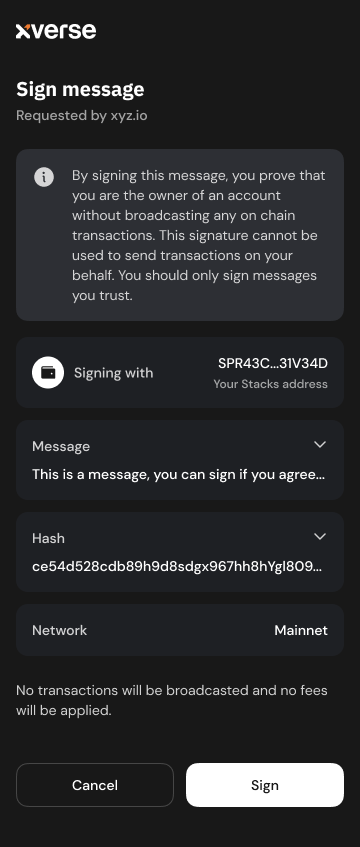
The `stx_signMessage` method returns a [Promisearrow-up-right](https://developer.mozilla.org/en-US/docs/Web/JavaScript/Reference/Global_Objects/Promise)
that resolves if the user approves the request. The message is then hashed using **sha256** before being signed with **secp256k1,** and the method returns the `SignStxMessageResult` object:
Property
Description
`signature`
a string representing the signed message
`publicKey`
a string representing the public key of the address used for signing, as a hex-encoded string
[Previousstx\_getAccountschevron-left](https://docs.xverse.app/sats-connect/stacks-methods/stx_getaccounts)
[Nextstx\_signStructuredMessagechevron-right](https://docs.xverse.app/sats-connect/stacks-methods/stx_signstructuredmessage)
Last updated 10 months ago
sun-brightdesktopmoon
sun-brightdesktopmoon
---
# Spark Transaction History | xverse
This endpoint returns the transaction history for a given Spark address.
get
https://api.secretkeylabs.io/v1/spark/address/{address}/transactions
Get transactions history for a specific Spark address.
Authorizations
apiKeychevron-down
apiKey
x-api-keystringRequired
Path parameters
addressstringRequired
Spark address e.g. `sp...`
Query parameters
offsetnumberOptionalDefault: `0`
limitnumber · max: 25OptionalDefault: `10`
Responses
chevron-right
200
Default Response
application/json
Responseobject
Show propertiesplus
chevron-right
400
Invalid input
application/json
chevron-right
401
Unauthorized
application/json
chevron-right
404
Not found
application/json
chevron-right
429
Rate limit exceeded
application/json
chevron-right
500
Internal server error
application/json
get
/v1/spark/address/{address}/transactions
HTTPchevron-down
HTTPcURLJavaScriptPython
Test it
200
Default Response
chevron-down
[PreviousSpark Balanceschevron-left](https://docs.xverse.app/api/spark/address/spark-balances)
[NextSpark Address Summarychevron-right](https://docs.xverse.app/api/spark/address/spark-address-summary)
Last updated 4 months ago
sun-brightdesktopmoon
Copy
GET /v1/spark/address/{address}/transactions HTTP/1.1
Host: api.secretkeylabs.io
x-api-key: YOUR_API_KEY
Accept: */*
Copy
{
"offset": 1,
"limit": 1,
"total": 1,
"items": [\
{\
"id": "text",\
"type": "text",\
"direction": "text",\
"counterparty": {\
"type": "text",\
"identifier": "text"\
},\
"amountSats": 1,\
"tokenAmount": 1,\
"valueUsd": 1,\
"createdAt": "text",\
"updatedAt": "text",\
"status": "text",\
"txid": "text",\
"tokenMetadata": {\
"tokenIdentifier": "text",\
"tokenAddress": "text",\
"name": "text",\
"ticker": "text",\
"decimals": 1,\
"issuerPublicKey": "text",\
"maxSupply": 1,\
"isFreezable": true,\
"iconUrl": "text"\
},\
"multiIoDetails": {\
"inputs": [\
{\
"address": "text",\
"pubkey": "text",\
"amount": 1\
}\
],\
"outputs": [\
{\
"address": "text",\
"pubkey": "text",\
"amount": 1\
}\
],\
"totalInputAmount": 1,\
"totalOutputAmount": 1\
}\
}\
]
}
sun-brightdesktopmoon
---
# Spark Transaction Details | xverse
Returns detailed information about a specific Spark transaction, including token movements and participants.
get
https://api.secretkeylabs.io/v1/spark/tx/{txid}
Retrieves detailed information about a specific transaction (Spark, Bitcoin, Lightning, or Token) by its ID or hash
Authorizations
apiKeychevron-down
apiKey
x-api-keystringRequired
Path parameters
txidstringRequiredExample: `f2ef24168014984fcfcd36843184e2b1ec3d481b30d94f6cd7af9e3c57d5a25c`
Responses
chevron-right
200
Default Response
application/json
Responseobject
Show propertiesplus
chevron-right
400
Invalid input
application/json
chevron-right
401
Unauthorized
application/json
chevron-right
404
Not found
application/json
chevron-right
429
Rate limit exceeded
application/json
chevron-right
500
Internal server error
application/json
get
/v1/spark/tx/{txid}
HTTPchevron-down
HTTPcURLJavaScriptPython
Test it
200
Default Response
chevron-down
[PreviousTransactionschevron-left](https://docs.xverse.app/api/spark/transactions)
[NextLatest Spark Transactionschevron-right](https://docs.xverse.app/api/spark/transactions/latest-spark-transactions)
Last updated 3 months ago
sun-brightdesktopmoon
Copy
GET /v1/spark/tx/{txid} HTTP/1.1
Host: api.secretkeylabs.io
x-api-key: YOUR_API_KEY
Accept: */*
Copy
{
"id": "text",
"type": "text",
"status": "text",
"createdAt": "text",
"updatedAt": "text",
"from": {
"type": "text",
"identifier": "text",
"pubkey": "text"
},
"to": {
"type": "text",
"identifier": "text",
"pubkey": "text"
},
"amountSats": 1,
"amount": 1,
"valueUsd": 1,
"timeTakenSeconds": 1,
"tokenMetadata": {
"tokenIdentifier": "text",
"tokenAddress": "text",
"name": "text",
"ticker": "text",
"decimals": 1,
"issuerPublicKey": "text",
"maxSupply": 1,
"isFreezable": true,
"iconUrl": "text"
},
"multiIoDetails": {
"inputs": [\
{\
"address": "text",\
"pubkey": "text",\
"amount": 1\
}\
],
"outputs": [\
{\
"address": "text",\
"pubkey": "text",\
"amount": 1\
}\
],
"totalInputAmount": 1,
"totalOutputAmount": 1
},
"txid": "text",
"bitcoinTxData": {
"txid": "text",
"vin": [\
{\
"prevout": "text",\
"witness": "text",\
"value": 1\
}\
],
"vout": [\
{\
"scriptpubkeyAddress": "text",\
"value": 1\
}\
],
"status": {
"confirmed": true,
"blockHeight": 1,
"blockTime": 1
},
"fee": 1
}
}
sun-brightdesktopmoon
---
# BTKN Tokens | xverse
[BTKN Token by IDchevron-right](https://docs.xverse.app/api/spark/btkn-tokens/btkn-token-by-id)
[BTKN Tokens by IDs (Batch)chevron-right](https://docs.xverse.app/api/spark/btkn-tokens/btkn-tokens-by-ids-batch)
[BTKN Token by Pubkey/Address or Search BTKNchevron-right](https://docs.xverse.app/api/spark/btkn-tokens/btkn-token-by-pubkey-address-or-search-btkn)
[BTKN Tokens by Pubkey/Addresschevron-right](https://docs.xverse.app/api/spark/btkn-tokens/btkn-tokens-by-pubkey-address)
[BTKN Token Transactionschevron-right](https://docs.xverse.app/api/spark/btkn-tokens/btkn-token-transactions)
[Holders by BTKN Tokenchevron-right](https://docs.xverse.app/api/spark/btkn-tokens/holders-by-btkn-token)
[BTKN Token Rankingschevron-right](https://docs.xverse.app/api/spark/btkn-tokens/btkn-token-rankings)
[PreviousLatest Spark Transactionschevron-left](https://docs.xverse.app/api/spark/transactions/latest-spark-transactions)
[NextBTKN Token by IDchevron-right](https://docs.xverse.app/api/spark/btkn-tokens/btkn-token-by-id)
sun-brightdesktopmoon
sun-brightdesktopmoon
---
# BRC-20 by Ticker | xverse
This endpoint returns the metadata, latest price, and 24h volume for a given BRC-20 ticker
get
https://api.secretkeylabs.io/v1/brc20/ticker/{ticker}
Get data and price info for a specific BRC20 by ticker.
Authorizations
apiKeychevron-down
apiKey
x-api-keystringRequired
Path parameters
tickerstring · min: 1Required
Ticker of the BRC20 token (e.g. ordi, sats, etc.)
Example: `["ordi","sats"]`
Responses
chevron-right
200
Default Response
application/json
Responseobject
Show propertiesplus
chevron-right
400
Invalid input
application/json
chevron-right
401
Unauthorized
application/json
chevron-right
404
Not found
application/json
chevron-right
429
Rate limit exceeded
application/json
chevron-right
500
Internal server error
application/json
get
/v1/brc20/ticker/{ticker}
HTTPchevron-down
HTTPcURLJavaScriptPython
Test it
200
Default Response
chevron-down
[PreviousVoid inscriptions (spent BRC-20 transfers)chevron-left](https://docs.xverse.app/api/brc-20/brc-20-by-address/void-inscriptions-spent-brc-20-transfers)
[NextBRC-20s by Tickerschevron-right](https://docs.xverse.app/api/brc-20/brc-20s-by-tickers)
Last updated 5 months ago
sun-brightdesktopmoon
Copy
GET /v1/brc20/ticker/{ticker} HTTP/1.1
Host: api.secretkeylabs.io
x-api-key: YOUR_API_KEY
Accept: */*
Copy
{
"ticker": "text",
"maxSupply": "text",
"mintLimit": "text",
"decimals": 1,
"txid": "text",
"inscriptionId": "text",
"blockHeight": "text",
"isSelfMint": true,
"prices": {
"floorPrice": {
"marketplace": "text",
"valueInSats": "text",
"valueInUsd": "text",
"percentageChange24h": {
"valueInSats": "text",
"valueInUsd": "text"
}
},
"lastSalePrice": {
"marketplace": "text",
"valueInSats": "text",
"valueInUsd": "text"
}
},
"volume24h": {
"valueInSats": "text",
"valueInUsd": "text",
"percentageChange": {
"valueInSats": "text",
"valueInUsd": "text"
}
}
}
sun-brightdesktopmoon
---
# spark_getAddress | Sats Connect - Wallet API for BitcoinFi
Your application can request to connect to the user’s Spark wallet with the `spark_getAddress` method, which prompts them to share their Spark address.
Your app must have first [connected to the wallet](https://docs.xverse.app/sats-connect/connecting-to-the-wallet/connect-to-xverse-wallet)
and obtained [account read permissions.](https://docs.xverse.app/sats-connect/xverse-wallet-permissions)
No request parameters are required:
Copy
import { request } from "sats-connect";
try {
const response = await request("spark_getAddresses", {});
if (response.status === "success") {
alert("Success getting accounts. Check console for results.");
console.log("Accounts:", response.result);
} else {
alert("Error getting accounts. Check console for details.");
console.error(response);
}
}
The method returns a [Promisearrow-up-right](https://developer.mozilla.org/en-US/docs/Web/JavaScript/Reference/Global_Objects/Promise)
that resolves to return `GetAddressesResult`: an array of the user’s wallet `address` objects, defined as:
address field
Description
`address`
the user’s connected Spark wallet address
`network`
string - the network where the address is being used:
* `mainnet` for Spark Mainnet
* `regtest` for Spark Regtest
`publicKey`
A hex string representing the bytes of the public key of the Spark account
You can use these addresses to make further Stacks requests such as sending Spark Bitcoin or sending Spark BTKN.
If your app has not yet obtained [account read permissions](https://docs.xverse.app/sats-connect/xverse-wallet-permissions)
, the `spark_getAddresses` will prompt the user with a _Connection Request_ in their wallet. The prompt will display:
* your app logo, if it is specified in your app manifest
* the Spark wallet addresses that your app required
If the user declines the request or closes the pop-up, the promise will reject (throw when awaited).
[Previousstx\_deployContractchevron-left](https://docs.xverse.app/sats-connect/stacks-methods/stx_deploycontract)
[Nextspark\_getBalancechevron-right](https://docs.xverse.app/sats-connect/spark-methods/spark_getbalance)
Last updated 13 days ago
sun-brightdesktopmoon
sun-brightdesktopmoon
---
# Runes Historical Prices | xverse
This endpoint provides the historical floor price for a specific rune and a given time period.
get
https://api.secretkeylabs.io/v1/runes/{runeId}/historical-floor-prices
Get historical floor prices for Runes.
Authorizations
apiKeychevron-down
apiKey
x-api-keystringRequired
Path parameters
runeIdstringRequiredExample: `{"value":"UNCOMMONGOODS"}`
Query parameters
fromTimestampstringRequired
ISO timestamp - no older than 1 year ago (e.g. 2024-08-29T03:09:35.236Z)
toTimestampstringOptional
ISO timestamp - up until now / not in the future
Responses
chevron-right
200
Default Response
application/json
chevron-right
400
Invalid input
application/json
chevron-right
401
Unauthorized
application/json
chevron-right
404
Not found
application/json
chevron-right
429
Rate limit exceeded
application/json
chevron-right
500
Internal server error
application/json
get
/v1/runes/{runeId}/historical-floor-prices
HTTPchevron-down
HTTPcURLJavaScriptPython
Test it
200
Default Response
chevron-down
[PreviousRunes Top Gainers & Loserschevron-left](https://docs.xverse.app/api/runes/runes-top-gainers-and-losers)
[NextRunes by Blockschevron-right](https://docs.xverse.app/api/runes/runes-by-blocks)
Last updated 5 months ago
sun-brightdesktopmoon
Copy
GET /v1/runes/{runeId}/historical-floor-prices?fromTimestamp=text HTTP/1.1
Host: api.secretkeylabs.io
x-api-key: YOUR_API_KEY
Accept: */*
Copy
[\
{\
"timestamp": "text",\
"floorPrice": {\
"valueInSats": 1,\
"valueInUsd": "text"\
}\
}\
]
sun-brightdesktopmoon
---
# spark_transfer | Sats Connect - Wallet API for BitcoinFi
You can use the `spark_transfer` method to send **Spark BTC** from the user’s wallet to any valid Spark address.
[hashtag](https://docs.xverse.app/sats-connect/spark-methods/spark_transfer#parameters)
Parameters
-------------------------------------------------------------------------------------------------------
Request parameters
Description
`reciverSparkAddress`
a string representing the destination Spark address Example: "sprt1pgssyuuuhnrrdjswal5c3s3rafw9w3y5dd4cjy3duxlf7hjzkp0rqx6dj6mrhu"
`amountSats`
a string representing the amount of BTC to transfer, in satoshis.
[hashtag](https://docs.xverse.app/sats-connect/spark-methods/spark_transfer#example)
Example
-------------------------------------------------------------------------------------------------
Copy
import { request } from "sats-connect";
try {
const response = await request("spark_transfer", {
receiverSparkAddress: "sprt1pgssyuuuhnrrdjswal5c3s3rafw9w3y5dd4cjy3duxlf7hjzkp0rqx6dj6mrhu",
amountSats: 100, // Amount to send, in satoshis
});
if ("result" in response) {
console.log("Spark transfer successful:", response.result.txid);
} else {
console.error("Spark transfer failed:", response.error.message);
}
} catch (error) {
console.error("Unexpected error:", error);
}
[hashtag](https://docs.xverse.app/sats-connect/spark-methods/spark_transfer#what-spark_transfer-does)
What `spark_transfer` does
-------------------------------------------------------------------------------------------------------------------------------------
Calling this method prompts the user to:
1. Review the **recipient address** and **amount** of Spark BTC to send.
2. **Approve the transaction** in their Xverse wallet.
3. Upon approval, the transaction is **signed and broadcasted** to the Spark network.
The `spark_transfer` method returns a Promise that resolves to a `SparkTransferResult` :
Property
Description
`txid`
a hex-encoded string representing the ID of the broadcasted BTC transfer transaction on Spark
[Previousspark\_getBalancechevron-left](https://docs.xverse.app/sats-connect/spark-methods/spark_getbalance)
[Nextspark\_transferTokenchevron-right](https://docs.xverse.app/sats-connect/spark-methods/spark_transfertoken)
Last updated 13 days ago
* [Parameters](https://docs.xverse.app/sats-connect/spark-methods/spark_transfer#parameters)
* [Example](https://docs.xverse.app/sats-connect/spark-methods/spark_transfer#example)
* [What spark\_transfer does](https://docs.xverse.app/sats-connect/spark-methods/spark_transfer#what-spark_transfer-does)
sun-brightdesktopmoon
sun-brightdesktopmoon
---
# Runes by Address | xverse
[\[v1\] Rune Balanceschevron-right](https://docs.xverse.app/api/runes/runes-by-address/v1-rune-balances)
[\[v2\] Rune Balances (Mempool-Aware)chevron-right](https://docs.xverse.app/api/runes/runes-by-address/v2-rune-balances-mempool-aware)
[Rune Activitychevron-right](https://docs.xverse.app/api/runes/runes-by-address/rune-activity)
[UTXOschevron-right](https://docs.xverse.app/api/runes/runes-by-address/utxos)
[PreviousRuneschevron-left](https://docs.xverse.app/api/runes)
[Next\[v1\] Rune Balanceschevron-right](https://docs.xverse.app/api/runes/runes-by-address/v1-rune-balances)
sun-brightdesktopmoon
sun-brightdesktopmoon
---
# Runes by Blocks | xverse
[Get All Rune Transfers by Blockschevron-right](https://docs.xverse.app/api/runes/runes-by-blocks/get-all-rune-transfers-by-blocks)
[Get All Rune Trades by Blockschevron-right](https://docs.xverse.app/api/runes/runes-by-blocks/get-all-rune-trades-by-blocks)
[PreviousRunes Historical Priceschevron-left](https://docs.xverse.app/api/runes/runes-historical-prices)
[NextGet All Rune Transfers by Blockschevron-right](https://docs.xverse.app/api/runes/runes-by-blocks/get-all-rune-transfers-by-blocks)
sun-brightdesktopmoon
sun-brightdesktopmoon
---
# Get All Rune Transfers by Blocks | xverse
This endpoint returns all Rune transfer activity across the chain. Results are cursor-paginated and can be filtered by `runeId`, `fromBlockHeight`, and `toBlockHeight`.
get
https://api.secretkeylabs.io/v1/block/runes/transfers
Get rune transfer events (inputs and outputs) from the blockchain.
**Filtering Options:**
* Filter by block range using `fromBlockHeight`/`toBlockHeight`
* Filter by specific rune using `runeId`
**Pagination:**
* Uses cursor-based pagination that returns full blocks of data with variable number of blocks per page depending how many transfers occurred in that period.
* Pass the `nextCursor` from the response as `cursor` to fetch the next page. Stop on items empty or when `nextCursor` is null.
* Returns complete blocks (no partial results within a block)
**Response Structure:**
* Each item represents a transaction with rune transfers
* `inputs`: Rune amounts consumed by the transaction
* `outputs`: Rune amounts created by the transaction
**Examples:**
* Filter by rune: `/block/runes/transfers?runeId=840000:1`
* Block range: `/block/runes/transfers?fromBlockHeight=870000&toBlockHeight=875000`
Authorizations
apiKeychevron-down
apiKey
x-api-keystringRequired
Query parameters
runeIdstringOptional
Filter transfers by specific rune ID
Example: `840000:1`
fromBlockHeightnumberOptional
Start of block range (defaults to rune activation height)
Example: `870000`
toBlockHeightnumberOptional
End of block range
Example: `875000`
cursorstringOptional
Pagination cursor from previous response
Responses
chevron-right
200
Default Response
application/json
Responseobject
Show propertiesplus
chevron-right
400
Invalid input
application/json
chevron-right
401
Unauthorized
application/json
chevron-right
404
Not found
application/json
chevron-right
429
Rate limit exceeded
application/json
chevron-right
500
Internal server error
application/json
get
/v1/block/runes/transfers
HTTPchevron-down
HTTPcURLJavaScriptPython
Test it
200
Default Response
chevron-down
[PreviousRunes by Blockschevron-left](https://docs.xverse.app/api/runes/runes-by-blocks)
[NextGet All Rune Trades by Blockschevron-right](https://docs.xverse.app/api/runes/runes-by-blocks/get-all-rune-trades-by-blocks)
Last updated 1 month ago
sun-brightdesktopmoon
Copy
GET /v1/block/runes/transfers HTTP/1.1
Host: api.secretkeylabs.io
x-api-key: YOUR_API_KEY
Accept: */*
Copy
{
"nextCursor": "text",
"items": [\
{\
"blockHeight": 875000,\
"blockTime": "2024-12-20T15:30:00.000Z",\
"txid": "text",\
"inputs": [\
{\
"runeId": "840000:1",\
"address": "text",\
"amount": "1000000",\
"index": 0\
}\
],\
"outputs": [\
{\
"runeId": "840000:1",\
"address": "text",\
"amount": "1000000",\
"index": 0\
}\
]\
}\
]
}
sun-brightdesktopmoon
---
# BRC-20 transaction history | xverse
This endpoint returns the full BRC-20 activity log for a given address, including mints, transfers, and deploys. Paginated and sorted by timestamp.
Ideal for tracking user balances, building history UIs, or monitoring on-chain token behavior.
get
https://api.secretkeylabs.io/v1/ordinals/address/{address}/brc20/{ticker}
Retrieve transaction history for a specific BRC20 token for a specific address.
Authorizations
apiKeychevron-down
apiKey
x-api-keystringRequired
Path parameters
addressstring · BitcoinAddress · min: 10RequiredDefault: `bc1q0egjvlcfq77cxd9kvpgppyuxckzvws46e3sxch`
tickerstringRequired
Query parameters
offsetnumberOptionalDefault: `0`
limitnumber · min: 25 · max: 60OptionalDefault: `60`
Responses
chevron-right
200
Default Response
application/json
chevron-right
400
Invalid input
application/json
chevron-right
401
Unauthorized
application/json
chevron-right
404
Not found
application/json
chevron-right
429
Rate limit exceeded
application/json
chevron-right
500
Internal server error
application/json
get
/v1/ordinals/address/{address}/brc20/{ticker}
HTTPchevron-down
HTTPcURLJavaScriptPython
Test it
200
Default Response
chevron-down
[PreviousBRC-20 balanceschevron-left](https://docs.xverse.app/api/brc-20/brc-20-by-address/brc-20-balances)
[NextBRC-20 Activitychevron-right](https://docs.xverse.app/api/brc-20/brc-20-by-address/brc-20-activity)
Last updated 6 months ago
sun-brightdesktopmoon
Copy
GET /v1/ordinals/address/{address}/brc20/{ticker} HTTP/1.1
Host: api.secretkeylabs.io
x-api-key: YOUR_API_KEY
Accept: */*
Copy
{
"transactions": [\
{\
"txid": "text",\
"blockHeight": 1,\
"blockTime": 1,\
"ownActivity": [\
{\
"address": "text",\
"sent": 1,\
"received": 1,\
"outgoing": 1,\
"incoming": 1\
}\
],\
"totalOut": 1,\
"totalIn": 1,\
"addressList": {\
"hasMore": true,\
"items": [\
{\
"address": "text",\
"type": "text",\
"isInput": true,\
"isOutput": true\
}\
]\
},\
"runes": {\
"ownActivity": {\
"items": [\
{\
"runeId": "text",\
"runeName": "text",\
"divisibility": 1,\
"symbol": "text",\
"address": "text",\
"sent": "text",\
"received": "text",\
"outgoing": "text",\
"incoming": "text"\
}\
],\
"hasMore": true\
},\
"allActivity": {\
"items": [\
{\
"runeId": "text",\
"runeName": "text",\
"divisibility": 1,\
"symbol": "text",\
"outgoing": "text",\
"incoming": "text",\
"isMint": true,\
"isEtch": true,\
"isBurn": true\
}\
],\
"hasMore": true\
}\
},\
"inscriptions": {\
"items": [\
{\
"inscriptionId": "text",\
"contentType": "text",\
"address": "text",\
"sent": true,\
"received": true,\
"inscribed": true,\
"burned": true\
}\
],\
"hasMore": true\
}\
}\
],
"offset": 1,
"limit": 1
}
sun-brightdesktopmoon
---
# Execute | xverse
post
https://api.secretkeylabs.io/v1/brc20/mint/order/{orderId}/execute
###
[hashtag](https://docs.xverse.app/api/brc-20/mint-brc-20/order/execute#)
Coming soon...
Execute the mint order after funding.
Authorizations
apiKeychevron-down
apiKey
x-api-keystringRequired
Path parameters
orderIdstringRequired
Body
application/jsonchevron-down
application/json
objectOptional
Responses
chevron-right
200
Default Response
application/json
Responseobject
post
/v1/brc20/mint/order/{orderId}/execute
HTTPchevron-down
HTTPcURLJavaScriptPython
Test it
200
Default Response
[PreviousOrderchevron-left](https://docs.xverse.app/api/brc-20/mint-brc-20/order)
[NextDeploy BRC-20chevron-right](https://docs.xverse.app/api/brc-20/deploy-brc-20)
Last updated 7 months ago
sun-brightdesktopmoon
Copy
POST /v1/brc20/mint/order/{orderId}/execute HTTP/1.1
Host: api.secretkeylabs.io
x-api-key: YOUR_API_KEY
Content-Type: application/json
Accept: */*
Content-Length: 2
{}
Copy
{}
sun-brightdesktopmoon
---
# Holders by Rune | xverse
This endpoint is commonly used to pass a rune ID, and get the full list of wallets holding the rune, and the amount they hold.
get
https://api.secretkeylabs.io/v1/runes/{identifier}/holders
Get holders for a specific Rune by identifier.
Authorizations
apiKeychevron-down
apiKey
x-api-keystringRequired
Path parameters
identifierstringRequired
Query parameters
offsetnumberOptional
limitnumber · min: 1 · max: 25Optional
lastModifiedBlockGtenumberOptionalDefault: `0`
Responses
chevron-right
200
Default Response
application/json
chevron-right
400
Invalid input
application/json
chevron-right
401
Unauthorized
application/json
chevron-right
404
Not found
application/json
chevron-right
429
Rate limit exceeded
application/json
chevron-right
500
Internal server error
application/json
get
/v1/runes/{identifier}/holders
HTTPchevron-down
HTTPcURLJavaScriptPython
Test it
200
Default Response
chevron-down
[PreviousSearch Runeschevron-left](https://docs.xverse.app/api/runes/search-runes)
[NextRune Activitychevron-right](https://docs.xverse.app/api/runes/rune-activity)
Last updated 6 months ago
sun-brightdesktopmoon
Copy
GET /v1/runes/{identifier}/holders HTTP/1.1
Host: api.secretkeylabs.io
x-api-key: YOUR_API_KEY
Accept: */*
Copy
{
"offset": 1,
"limit": 1,
"total": 1,
"items": [\
{\
"address": "text",\
"amount": "text",\
"lastUpdatedBlockHeight": 1\
}\
]
}
sun-brightdesktopmoon
---
# BRC-20 Activity | xverse
Returns historical BRC-20 activity (mints, transfers, deployments) for a given address and ticker.
get
https://api.secretkeylabs.io/v1/brc20/address/{address}/ticker/{ticker}/activity
Get the transfer history for a and address and a specific BRC20 ticker.
Authorizations
apiKeychevron-down
apiKey
x-api-keystringRequired
Path parameters
addressstring · BitcoinAddress · min: 10RequiredExample: `bc1p59dqkq5we23urjnmn4sspy4da79hwql8tgaawu6adjk09jrle98q963cww`
tickerstring · min: 1Required
Ticker of the BRC20 token (e.g. ordi, sats, etc.)
Example: `{"value":"ordi"}`
Query parameters
offsetnumberOptional
limitnumber · min: 25 · max: 25Optional
Responses
chevron-right
200
Default Response
application/json
Responseobject
Show propertiesplus
chevron-right
400
Invalid input
application/json
chevron-right
401
Unauthorized
application/json
chevron-right
404
Not found
application/json
chevron-right
429
Rate limit exceeded
application/json
chevron-right
500
Internal server error
application/json
get
/v1/brc20/address/{address}/ticker/{ticker}/activity
HTTPchevron-down
HTTPcURLJavaScriptPython
Test it
200
Default Response
chevron-down
[PreviousBRC-20 transaction historychevron-left](https://docs.xverse.app/api/brc-20/brc-20-by-address/brc-20-transaction-history)
[NextUnspent BRC-20 Transferschevron-right](https://docs.xverse.app/api/brc-20/brc-20-by-address/unspent-brc-20-transfers)
Last updated 5 months ago
sun-brightdesktopmoon
Copy
GET /v1/brc20/address/{address}/ticker/{ticker}/activity HTTP/1.1
Host: api.secretkeylabs.io
x-api-key: YOUR_API_KEY
Accept: */*
Copy
{
"limit": 1,
"offset": 1,
"items": [\
{\
"fromAddress": "text",\
"toAddress": "text",\
"txid": "text",\
"amount": "text",\
"blockHeight": 1,\
"blockTime": "text",\
"inscriptionId": "text",\
"inscriptionNumber": 1,\
"satpoint": "text"\
}\
]
}
sun-brightdesktopmoon
---
# BRC-20s by Tickers | xverse
This endpoint is used to retrieve the metadata & market data associated with a batch of up to 100 BRC-20 tickers in a single request.
post
https://api.secretkeylabs.io/v1/brc20/batch/tickers
Get information for multiple BRC-20 tokens in batch (max 100 tickers per request).
Authorizations
apiKeychevron-down
apiKey
x-api-keystringRequired
Body
application/jsonchevron-down
application/json
tickersstring\[\] · min: 1 · max: 100Required
Array of ticker symbols to fetch (max 100)
Example: `["ordi","sats"]`
Responses
chevron-right
200
Default Response
application/json
Responseobject
Show propertiesplus
chevron-right
400
Invalid input
application/json
chevron-right
401
Unauthorized
application/json
chevron-right
404
Not found
application/json
chevron-right
429
Rate limit exceeded
application/json
chevron-right
500
Internal server error
application/json
post
/v1/brc20/batch/tickers
HTTPchevron-down
HTTPcURLJavaScriptPython
Test it
200
Default Response
chevron-down
[PreviousBRC-20 by Tickerchevron-left](https://docs.xverse.app/api/brc-20/brc-20-by-ticker)
[NextBRC-20 Transfer Validity Checkchevron-right](https://docs.xverse.app/api/brc-20/brc-20-transfer-validity-check)
Last updated 2 months ago
sun-brightdesktopmoon
Copy
POST /v1/brc20/batch/tickers HTTP/1.1
Host: api.secretkeylabs.io
x-api-key: YOUR_API_KEY
Content-Type: application/json
Accept: */*
Content-Length: 27
{
"tickers": [\
"ordi",\
"sats"\
]
}
Copy
{
"items": [\
{\
"ticker": "text",\
"maxSupply": "text",\
"mintLimit": "text",\
"decimals": 1,\
"txid": "text",\
"inscriptionId": "text",\
"blockHeight": "text",\
"isSelfMint": true,\
"prices": {\
"floorPrice": {\
"marketplace": "text",\
"valueInSats": "text",\
"valueInUsd": "text",\
"percentageChange24h": {\
"valueInSats": "text",\
"valueInUsd": "text"\
}\
},\
"lastSalePrice": {\
"marketplace": "text",\
"valueInSats": "text",\
"valueInUsd": "text"\
}\
},\
"volume24h": {\
"valueInSats": "text",\
"valueInUsd": "text",\
"percentageChange": {\
"valueInSats": "text",\
"valueInUsd": "text"\
}\
}\
}\
]
}
sun-brightdesktopmoon
---
# stx_signStructuredMessage | Sats Connect - Wallet API for BitcoinFi
You can request your user to sign a message with structured data, using their wallet's Stacks address, by invoking the `stx_signStructuredMessage` method.
The structured data implementation makes the message easier to read and allows you facilitates the interaction with ClarityValue in your application. It follows the [SIP-018arrow-up-right](https://github.com/MarvinJanssen/sips/blob/feat/signed-structured-data/sips/sip-018/sip-018-signed-structured-data.md)
Signed Structured Data specification, a standard way to represent information in human-readable format in applications and smart contracts in order to produce signatures that are straightforward and inexpensive to verify. For developers familiar with Ethereum, this design is similar to [EIP-712arrow-up-right](https://eips.ethereum.org/EIPS/eip-712)
.
Request parameters
Description
`message`
a string representing the message, as a [ClarityValuearrow-up-right](https://github.com/hirosystems/stacks.js/blob/fe831cf28d71de9410c81cfabe256fd511e9aa4d/packages/transactions/src/clarity/clarityValue.ts)
serialized in hexadecimal format.
`domain`
a string representing the domain, as a [ClarityValuearrow-up-right](https://github.com/hirosystems/stacks.js/blob/fe831cf28d71de9410c81cfabe256fd511e9aa4d/packages/transactions/src/clarity/clarityValue.ts)
serialized in hexadecimal format.
To convert Clarity values to their hex representation, you can use the { cvToHex, stringAsciiCV, tupleCV, uintCV } helpers from `@stacks/transactions` package.
Copy
import { cvToHex, stringAsciiCV, tupleCV, uintCV } from "@stacks/transactions";
import { request } from "sats-connect";
const response = await request("stx_signStructuredMessage", {
message: cvToHex(tupleCV({ hello: stringAsciiCV("world") })).slice(2), // remove 0x,
domain: cvToHex(
tupleCV({
name: stringAsciiCV("sats-connect-example"),
version: stringAsciiCV("1.2.3"),
"chain-id": uintCV(chainIds[network]),
})
).slice(2),
});
if (response.status === "success") {
alert("Success! Check the console for the response.");
console.log(response.result);
} else {
console.error(
"Something went wrong. Check the console for the response."
);
console.error(response);
}
The user will see a Stacks structured message signing request prompt in the wallet.
The `stx_signStructuredMessage` method returns a [Promisearrow-up-right](https://developer.mozilla.org/en-US/docs/Web/JavaScript/Reference/Global_Objects/Promise)
that resolves if the user approves the request. The message is then hashed using **sha256** before being signed with **secp256k1,** and the method returns the `SignStxStructuredMessageResult` object:
Property
Description
`signature`
a string representing the signed message
`publicKey`
a string representing the public key of the address used for signing, as a hex-encoded string
[Previousstx\_signMessagechevron-left](https://docs.xverse.app/sats-connect/stacks-methods/stx_signmessage)
[Nextstx\_transferStxchevron-right](https://docs.xverse.app/sats-connect/stacks-methods/stx_transferstx)
Last updated 1 year ago
sun-brightdesktopmoon
sun-brightdesktopmoon
---
# stx_transferStx | Sats Connect - Wallet API for BitcoinFi
You can use the `stx_transferStx` method to request a transfer of any amount of Stacks to any recipient from the user's wallet.
Request parameters
Description
`amount`
a string representing the amount of STX tokens to transfer, in microstacks units. (Anything parseable by `BigInt` is acceptable)
`recipient`
a string representing the recipient's Crockford base-32 encoded Stacks address
`memo`
ℹ️ Optional a string representing the transaction memo
Copy
import { request } from "sats-connect";
try {
const response = await request("stx_transferStx", {
recipient,
amount: Number(amount),
memo,
});
if ("result" in response) {
alert(response.result.txid);
} else {
alert(response.error.message);
}
} catch (error) {
console.error(error);
alert(error.message);
}
};
The user will be prompted to review the Stacks transfer transaction in the wallet, with the recipient, memo and amount to send. Xverse browser extension UI shown as example:
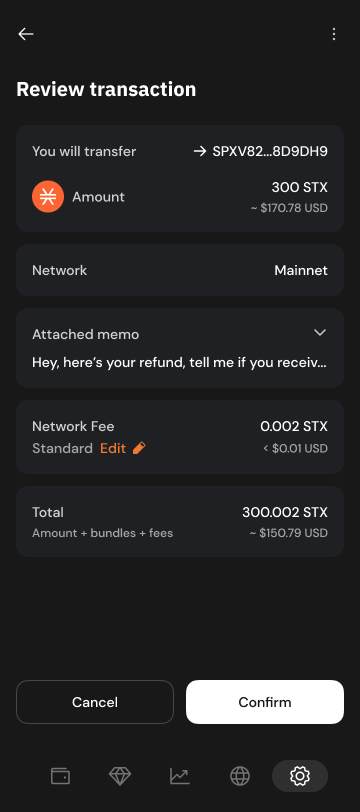
The transaction will be signed and broadcasted upon user approval.
The `stx_transferStx` method returns a Promise that resolves to the `TransferStxResult` object:
Property
Description
`txid`
a hex-encoded string representing the ID of the transfer STX transaction signed
`transaction`
a hex-encoded string reperesenting the transfer STX transaction signed
[Previousstx\_signStructuredMessagechevron-left](https://docs.xverse.app/sats-connect/stacks-methods/stx_signstructuredmessage)
[Nextstx\_signTransactionchevron-right](https://docs.xverse.app/sats-connect/stacks-methods/stx_signtransaction)
Last updated 1 year ago
sun-brightdesktopmoon
sun-brightdesktopmoon
---
# Get All Rune Trades by Blocks | xverse
This endpoint returns all Rune trade activity across the chain. Results are cursor-paginated and can be filtered by `runeId`, `fromBlockHeight`, and `toBlockHeight`.
get
https://api.secretkeylabs.io/v1/block/runes/transfers
Get rune transfer events (inputs and outputs) from the blockchain.
**Filtering Options:**
* Filter by block range using `fromBlockHeight`/`toBlockHeight`
* Filter by specific rune using `runeId`
**Pagination:**
* Uses cursor-based pagination that returns full blocks of data with variable number of blocks per page depending how many transfers occurred in that period.
* Pass the `nextCursor` from the response as `cursor` to fetch the next page. Stop on items empty or when `nextCursor` is null.
* Returns complete blocks (no partial results within a block)
**Response Structure:**
* Each item represents a transaction with rune transfers
* `inputs`: Rune amounts consumed by the transaction
* `outputs`: Rune amounts created by the transaction
**Examples:**
* Filter by rune: `/block/runes/transfers?runeId=840000:1`
* Block range: `/block/runes/transfers?fromBlockHeight=870000&toBlockHeight=875000`
Authorizations
apiKeychevron-down
apiKey
x-api-keystringRequired
Query parameters
runeIdstringOptional
Filter transfers by specific rune ID
Example: `840000:1`
fromBlockHeightnumberOptional
Start of block range (defaults to rune activation height)
Example: `870000`
toBlockHeightnumberOptional
End of block range
Example: `875000`
cursorstringOptional
Pagination cursor from previous response
Responses
chevron-right
200
Default Response
application/json
Responseobject
Show propertiesplus
chevron-right
400
Invalid input
application/json
chevron-right
401
Unauthorized
application/json
chevron-right
404
Not found
application/json
chevron-right
429
Rate limit exceeded
application/json
chevron-right
500
Internal server error
application/json
get
/v1/block/runes/transfers
HTTPchevron-down
HTTPcURLJavaScriptPython
Test it
200
Default Response
chevron-down
[PreviousGet All Rune Transfers by Blockschevron-left](https://docs.xverse.app/api/runes/runes-by-blocks/get-all-rune-transfers-by-blocks)
[NextDecode Runestonechevron-right](https://docs.xverse.app/api/runes/decode-runestone)
Last updated 1 month ago
sun-brightdesktopmoon
Copy
GET /v1/block/runes/transfers HTTP/1.1
Host: api.secretkeylabs.io
x-api-key: YOUR_API_KEY
Accept: */*
Copy
{
"nextCursor": "text",
"items": [\
{\
"blockHeight": 875000,\
"blockTime": "2024-12-20T15:30:00.000Z",\
"txid": "text",\
"inputs": [\
{\
"runeId": "840000:1",\
"address": "text",\
"amount": "1000000",\
"index": 0\
}\
],\
"outputs": [\
{\
"runeId": "840000:1",\
"address": "text",\
"amount": "1000000",\
"index": 0\
}\
]\
}\
]
}
sun-brightdesktopmoon
---
# Search Runes | xverse
Search existing Runes by name, order results by name or by etching block + index.
get
https://api.secretkeylabs.io/v1/runes
Search for runes by name.
Authorizations
apiKeychevron-down
apiKey
x-api-keystringRequired
Query parameters
startingWithstring · min: 1Required
Search for runes starting with this string
Example: `UNCOMMON`
sortBystring · enumOptional
* `runeName` - sort by rune name ascending
* `etch` - sort by etching order block\_height, rune\_etch\_index ascending
Default: `runeName`Possible values: `runeName``etch`
offsetnumberOptionalDefault: `0`
limitnumber · min: 1 · max: 10OptionalDefault: `5`
Responses
chevron-right
200
Search results for runes
application/json
chevron-right
400
Invalid input
application/json
chevron-right
401
Unauthorized
application/json
chevron-right
404
Not found
application/json
chevron-right
429
Rate limit exceeded
application/json
chevron-right
500
Internal server error
application/json
get
/v1/runes
HTTPchevron-down
HTTPcURLJavaScriptPython
Test it
200
Search results for runes
chevron-down
[PreviousRunes by IDschevron-left](https://docs.xverse.app/api/runes/runes-by-ids)
[NextHolders by Runechevron-right](https://docs.xverse.app/api/runes/holders-by-rune)
Last updated 4 months ago
sun-brightdesktopmoon
Copy
GET /v1/runes?startingWith=text HTTP/1.1
Host: api.secretkeylabs.io
x-api-key: YOUR_API_KEY
Accept: */*
Copy
{
"items": [\
{\
"runeId": "text",\
"runeName": "text",\
"symbol": "text",\
"divisibility": 1\
}\
],
"offset": 1,
"limit": 1
}
sun-brightdesktopmoon
---
# Void inscriptions (spent BRC-20 transfers) | xverse
This endpoint can be used to retrieve the void BRC-20 inscriptions (spent BRC-20 transfer inscriptions) of an address.
get
https://api.secretkeylabs.io/v1/ordinals/address/{address}/void-protocol-inscriptions/collection/{collectionId}
Get BRC20 & TAP void inscriptions(already spent/used) owned by an address in a specific collection. A void inscription is a BRC-20 or TAP inscription that is no longer protocol valid (transfer inscriptions become invalid after first transfer, other inscriptions like mint become invalid right after inscribe).
Authorizations
apiKeychevron-down
apiKey
x-api-keystringRequired
Path parameters
addressstring · BitcoinAddress · min: 10RequiredDefault: `bc1q0egjvlcfq77cxd9kvpgppyuxckzvws46e3sxch`
collectionIdstringRequiredExample: `bitminer`
Query parameters
offsetnumberOptionalDefault: `0`
limitnumber · min: 25 · max: 25OptionalDefault: `25`
Responses
chevron-right
200
Inscriptions for a specific collection owned by an address
application/json
Responseobject
Inscriptions for a specific collection owned by an address
Show propertiesplus
chevron-right
400
Invalid input
application/json
chevron-right
401
Unauthorized
application/json
chevron-right
404
Not found
application/json
chevron-right
429
Rate limit exceeded
application/json
chevron-right
500
Internal server error
application/json
get
/v1/ordinals/address/{address}/void-protocol-inscriptions/collection/{collectionId}
HTTPchevron-down
HTTPcURLJavaScriptPython
Test it
200
Inscriptions for a specific collection owned by an address
chevron-down
[PreviousUnspent BRC-20 Transferschevron-left](https://docs.xverse.app/api/brc-20/brc-20-by-address/unspent-brc-20-transfers)
[NextBRC-20 by Tickerchevron-right](https://docs.xverse.app/api/brc-20/brc-20-by-ticker)
Last updated 5 days ago
sun-brightdesktopmoon
Copy
GET /v1/ordinals/address/{address}/void-protocol-inscriptions/collection/{collectionId} HTTP/1.1
Host: api.secretkeylabs.io
x-api-key: YOUR_API_KEY
Accept: */*
Copy
{
"collectionId": "text",
"collectionName": "text",
"total": 1,
"offset": 1,
"limit": 1,
"inscriptions": [\
{\
"id": "text",\
"number": 1,\
"sat": 1,\
"contentType": "text",\
"blockHeight": 1,\
"charms": [\
"text"\
],\
"currentLocation": "text"\
}\
]
}
sun-brightdesktopmoon
---
# runes_transfer | Sats Connect - Wallet API for BitcoinFi
You can use the `runes_transfer` method to request Runes transfers from your user's wallet. You can request multiple transfers in a single request, each transfer involving:
* a rune
* a transfer amount
* a recipient address
The method accepts a `recipients` array as request parameter:
Request parameters
Description
`recipients`
an array of transfer objects with <`runeName`, `amount` & `recipient`\> properties:
* `runeName` a string representing the [name of the Rune arrow-up-right](https://docs.ordinals.com/runes.html#name)
to transfer
* `amount` a number representing the amount of Rune tokens to send. ℹ️You can retrieve your user's balance of any Rune tokens with the [runes\_getBalance](https://docs.xverse.app/sats-connect/bitcoin-methods/runes_getbalance)
method
* `address` a string representing the Bitcoin address of the Rune transfer recipient ℹ️ We recommend managing runes holdings on taproot/ordinal addresses.
Copy
import { request } from "sats-connect";
const response = await request('runes_transfer', {
recipients: [\
{\
runeName: 'UNCOMMON•GOODS',\
amount: 200,\
address: ordinalsAddress1,\
},\
{\
runeName: 'SATOSHI•NAKAMOTO',\
amount: 100,\
address: ordinalsAddress2,\
}]
});
if (response.status === "success") {
// handle success
} else {
if (response.error.code === RpcErrorCode.USER_REJECTION) {
// handle user cancellation error
} else {
// handle error
}
}
} catch (err) {
alert(err.error.message);
}
The user will be prompted to review the Rune transfer transaction in the wallet, and to confirm:
* the recipients and amounts of the Rune token to send
* their desired Bitcoin transaction fee
The transaction will be signed and broadcasted upon user approval.
The `runes_transfer` method returns a Promise that resolves to the `transferRunesResult` object:
Property
Description
`txid`
The Bitcoin transaction id as a hex-encoded string.
circle-exclamation
If the requested transfer requires a [Runestonearrow-up-right](https://docs.ordinals.com/runes.html#runestones)
whose size exceeds the `OP_RETURN` payload limit of 80 bytes, runes\_transfer will return an error.
[Previousrunes\_getBalancechevron-left](https://docs.xverse.app/sats-connect/bitcoin-methods/runes_getbalance)
[NextMint Runeschevron-right](https://docs.xverse.app/sats-connect/bitcoin-methods/mint-runes)
Last updated 1 year ago
sun-brightdesktopmoon
sun-brightdesktopmoon
---
# Execute | xverse
post
https://api.secretkeylabs.io/v1/brc20/deploy/order/{orderId}/execute
###
[hashtag](https://docs.xverse.app/api/brc-20/deploy-brc-20/order/execute#)
Coming soon...
Execute the deployment order after funding.
Authorizations
apiKeychevron-down
apiKey
x-api-keystringRequired
Path parameters
orderIdstringRequired
Body
application/jsonchevron-down
application/json
objectOptional
Responses
chevron-right
200
Default Response
application/json
Responseobject
post
/v1/brc20/deploy/order/{orderId}/execute
HTTPchevron-down
HTTPcURLJavaScriptPython
Test it
200
Default Response
[PreviousOrderchevron-left](https://docs.xverse.app/api/brc-20/deploy-brc-20/order)
[NextSparkchevron-right](https://docs.xverse.app/api/spark)
Last updated 7 months ago
sun-brightdesktopmoon
Copy
POST /v1/brc20/deploy/order/{orderId}/execute HTTP/1.1
Host: api.secretkeylabs.io
x-api-key: YOUR_API_KEY
Content-Type: application/json
Accept: */*
Content-Length: 2
{}
Copy
{}
sun-brightdesktopmoon
---
# Get destination tokens | xverse
post
https://api.secretkeylabs.io/v1/swaps/get-destination-tokens
Lookup destination tokens available for swaps. It can be filtered by specific tokens user owns or by searching by keywords
Authorizations
apiKeychevron-down
apiKey
x-api-keystringRequired
Body
application/jsonchevron-down
application/json
protocolany ofOptional
string · enumOptionalPossible values: `runes`
or
string · enumOptionalPossible values: `btc`
fromobjectOptional
Show propertiesplus
userTokensany of\[\]Required
Show propertiesplus
searchstringOptional
Responses
chevron-right
200
Default Response
application/json
Responseobject
Show propertiesplus
chevron-right
400
Invalid input
application/json
chevron-right
401
Unauthorized
application/json
chevron-right
404
Not found
application/json
chevron-right
429
Rate limit exceeded
application/json
chevron-right
500
Internal server error
application/json
post
/v1/swaps/get-destination-tokens
HTTPchevron-down
HTTPcURLJavaScriptPython
Test it
200
Default Response
chevron-down
[PreviousSwapschevron-left](https://docs.xverse.app/api/swaps)
[NextGet quoteschevron-right](https://docs.xverse.app/api/swaps/get-quotes)
Last updated 7 months ago
sun-brightdesktopmoon
Copy
POST /v1/swaps/get-destination-tokens HTTP/1.1
Host: api.secretkeylabs.io
x-api-key: YOUR_API_KEY
Content-Type: application/json
Accept: */*
Content-Length: 163
{
"protocol": "runes",
"search": "",
"userTokens": [\
{\
"ticker": "840000:795",\
"protocol": "runes",\
"divisibility": 1,\
"symbol": "🐒",\
"name": "BITCOIN•MONKEY",\
"logo": "🐒"\
}\
]
}
Copy
{
"items": [\
{\
"ticker": "text",\
"protocol": "runes",\
"name": "text",\
"symbol": "text",\
"divisibility": 1,\
"logo": "text",\
"contract": "text"\
}\
]
}
sun-brightdesktopmoon
---
# Get quotes | xverse
post
https://api.secretkeylabs.io/v1/swaps/get-quotes
Get multiple quotes for swapping between two assets
Authorizations
apiKeychevron-down
apiKey
x-api-keystringRequired
Body
application/jsonchevron-down
application/json
fromobjectRequired
Show propertiesplus
toobjectRequired
Show propertiesplus
amountstringRequired
amountRawstringOptional
Responses
chevron-right
200
Default Response
application/json
Responseobject
Show propertiesplus
chevron-right
400
Invalid input
application/json
chevron-right
401
Unauthorized
application/json
chevron-right
404
Not found
application/json
chevron-right
429
Rate limit exceeded
application/json
chevron-right
500
Internal server error
application/json
post
/v1/swaps/get-quotes
HTTPchevron-down
HTTPcURLJavaScriptPython
Test it
200
Default Response
chevron-down
[PreviousGet destination tokenschevron-left](https://docs.xverse.app/api/swaps/get-destination-tokens)
[NextRunes Swapschevron-right](https://docs.xverse.app/api/swaps/runes-swaps)
Last updated 7 months ago
sun-brightdesktopmoon
Copy
POST /v1/swaps/get-quotes HTTP/1.1
Host: api.secretkeylabs.io
x-api-key: YOUR_API_KEY
Content-Type: application/json
Accept: */*
Content-Length: 109
{
"from": {
"ticker": "840000:2",
"protocol": "runes"
},
"to": {
"ticker": "840000:3",
"protocol": "runes"
},
"amount": "10"
}
Copy
{
"amm": [\
{\
"provider": {\
"code": "text",\
"name": "text",\
"url": "text",\
"logo": "text"\
},\
"from": {\
"ticker": "text",\
"protocol": "runes"\
},\
"to": {\
"ticker": "text",\
"protocol": "runes"\
},\
"receiveAmount": "text",\
"slippageSupported": true,\
"slippageThreshold": 1,\
"slippageDecimals": 1,\
"feePercentage": "text",\
"providerFeePercentage": "text",\
"xverseFeePercentage": "text",\
"bestMarketplaceProvider": {\
"code": "text",\
"name": "text",\
"url": "text",\
"logo": "text"\
},\
"identifier": null,\
"rate": "text"\
}\
]
}
sun-brightdesktopmoon
---
# BRC-20 balances | xverse
get
https://api.secretkeylabs.io/v1/ordinals/address/{address}/brc20
Fetch confirmed BRC-20 balances belonging to an address. Note: The Api response includes limit & offset for future pagination extension, but at the moment query parameters are ignored and the response is always the full list. So, limit equals the total items number, be sure to handle pagination as the limit can change once pagination is implemented.
Authorizations
apiKeychevron-down
apiKey
x-api-keystringRequired
Path parameters
addressstring · BitcoinAddress · min: 10RequiredDefault: `bc1q0egjvlcfq77cxd9kvpgppyuxckzvws46e3sxch`
Query parameters
offsetnumberOptionalDefault: `0`
limitnumber · min: 25 · max: 60OptionalDefault: `60`
tickerstringOptional
includePricingbooleanOptional
Responses
chevron-right
200
BRC20 balances for all utxos belonging to the address
application/json
Responseobject
BRC20 balances for all utxos belonging to the address
Show propertiesplus
chevron-right
400
Invalid input
application/json
chevron-right
401
Unauthorized
application/json
chevron-right
404
Not found
application/json
chevron-right
429
Rate limit exceeded
application/json
chevron-right
500
Internal server error
application/json
get
/v1/ordinals/address/{address}/brc20
HTTPchevron-down
HTTPcURLJavaScriptPython
Test it
200
BRC20 balances for all utxos belonging to the address
chevron-down
[PreviousBRC-20 by Addresschevron-left](https://docs.xverse.app/api/brc-20/brc-20-by-address)
[NextBRC-20 transaction historychevron-right](https://docs.xverse.app/api/brc-20/brc-20-by-address/brc-20-transaction-history)
Last updated 7 months ago
sun-brightdesktopmoon
Copy
GET /v1/ordinals/address/{address}/brc20 HTTP/1.1
Host: api.secretkeylabs.io
x-api-key: YOUR_API_KEY
Accept: */*
Copy
{
"limit": 1,
"offset": 1,
"total": 1,
"items": [\
{\
"ticker": "text",\
"overallBalance": "text",\
"transferableBalance": "text",\
"availableBalance": "text",\
"prices": {\
"floorPrice": {\
"marketplace": "text",\
"percentageChange24h": {\
"valueInSats": "text",\
"valueInUsd": "text"\
},\
"valueInSats": "text",\
"valueInUsd": "text"\
},\
"lastSalePrice": {\
"marketplace": "text",\
"valueInSats": "text",\
"valueInUsd": "text"\
}\
},\
"volume24h": {\
"percentageChange": {\
"valueInSats": "text",\
"valueInUsd": "text"\
},\
"valueInSats": "text",\
"valueInUsd": "text"\
}\
}\
]
}
sun-brightdesktopmoon
---
# Place order | xverse
post
https://api.secretkeylabs.io/v1/swaps/stx/place-order
###
[hashtag](https://docs.xverse.app/api/swaps/stacks-swaps/place-order#)
Coming soon...
Handle STX-based swaps (Velar, Bitflow, Alex).
Authorizations
apiKeychevron-down
apiKey
x-api-keystringRequired
Body
application/jsonchevron-down
application/json
objectOptional
Responses
chevron-right
200
Default Response
application/json
Responseobject
post
/v1/swaps/stx/place-order
HTTPchevron-down
HTTPcURLJavaScriptPython
Test it
200
Default Response
[PreviousStacks Swapschevron-left](https://docs.xverse.app/api/swaps/stacks-swaps)
[NextExecute orderchevron-right](https://docs.xverse.app/api/swaps/stacks-swaps/execute-order)
Last updated 7 months ago
sun-brightdesktopmoon
Copy
POST /v1/swaps/stx/place-order HTTP/1.1
Host: api.secretkeylabs.io
x-api-key: YOUR_API_KEY
Content-Type: application/json
Accept: */*
Content-Length: 203
{
"receiveAmount": "6",
"providerCode": "bitflow",
"stxAddress": "...",
"from": {
"protocol": "sip10",
"ticker": "token"
},
"slippage": 0.04,
"stxPublicKey": "...",
"sendAmount": "4",
"to": {
"ticker": "STX",
"protocol": "stx"
}
}
Copy
{
"orderId": "",
"unsignedTransaction": "..."
}
sun-brightdesktopmoon
---
# List Rune Etch Orders | xverse
You can use this endpoint to retrieve all the Runes Etch orders involving a specific `destinationAddress`
This is the Bitcoin address to which the minted runes should be allocated, as specified when you [created your Etch order](https://docs.xverse.app/api/runes/etch-rune/create-rune-etch-order)
Rune Etch orders are identified bu their `orderType`
get
https://api.secretkeylabs.io/v1/runes-managed/orders
Get orders summary by destination address.
Authorizations
apiKeychevron-down
apiKey
x-api-keystringRequired
Query parameters
destinationAddressstringRequired
Bitcoin address to filter orders
Responses
chevron-right
200
Default Response
application/json
Responseobject
Show propertiesplus
get
/v1/runes-managed/orders
HTTPchevron-down
HTTPcURLJavaScriptPython
Test it
200
Default Response
[PreviousMonitor Rune Etch Orderchevron-left](https://docs.xverse.app/api/runes/etch-rune/monitor-rune-etch-order)
[NextBRC-20chevron-right](https://docs.xverse.app/api/brc-20)
Last updated 2 months ago
sun-brightdesktopmoon
Copy
GET /v1/runes-managed/orders?destinationAddress=text HTTP/1.1
Host: api.secretkeylabs.io
x-api-key: YOUR_API_KEY
Accept: */*
Copy
{
"items": [\
{\
"id": "text",\
"orderType": "text",\
"state": "text",\
"reason": "text",\
"createdAt": "text"\
}\
]
}
sun-brightdesktopmoon
---
# Runes Top Gainers & Losers | xverse
Returns Runes with the highest and lowest percentage price change over a specified timeframe.
get
https://api.secretkeylabs.io/v1/runes/stats/top-gainers-losers
Get top gainers & losers by percentage price change for a specific time frame.
Authorizations
apiKeychevron-down
apiKey
x-api-keystringRequired
Query parameters
timePeriodstring · enumOptional
* `24h` - trailing 24 hours' volume, ending at the start of the prior hour (default)
* `trailing7d` - trailing 7 days' volume, ending at the start of the prior hour
* `trailing30d` - trailing 30 days' volume, ending at the start of the prior hour
* `1d` - prior day's volume, ending at midnight GMT
* `7d` - prior seven days' volume, ending at midnight GMT
* `30d` - prior 30 days' volume, ending at midnight GMT
Default: `24h`Possible values: `24h``trailing7d``trailing30d``1d``7d``30d`
Responses
chevron-right
200
Default Response
application/json
chevron-right
400
Invalid input
application/json
chevron-right
401
Unauthorized
application/json
chevron-right
404
Not found
application/json
chevron-right
429
Rate limit exceeded
application/json
chevron-right
500
Internal server error
application/json
get
/v1/runes/stats/top-gainers-losers
HTTPchevron-down
HTTPcURLJavaScriptPython
Test it
200
Default Response
chevron-down
[PreviousTop Runes by Volumechevron-left](https://docs.xverse.app/api/runes/top-runes-by-volume)
[NextRunes Historical Priceschevron-right](https://docs.xverse.app/api/runes/runes-historical-prices)
Last updated 5 months ago
sun-brightdesktopmoon
Copy
GET /v1/runes/stats/top-gainers-losers HTTP/1.1
Host: api.secretkeylabs.io
x-api-key: YOUR_API_KEY
Accept: */*
Copy
{
"topGainers": [\
{\
"runeId": "text",\
"absPriceIncrease": 1,\
"pctPriceIncrease": 1,\
"currentPrice": {\
"valueInSats": "text"\
},\
"previousPrice": {\
"valueInSats": "text"\
}\
}\
],
"topLosers": [\
{\
"runeId": "text",\
"absPriceIncrease": 1,\
"pctPriceIncrease": 1,\
"currentPrice": {\
"valueInSats": "text"\
},\
"previousPrice": {\
"valueInSats": "text"\
}\
}\
]
}
sun-brightdesktopmoon
---
# BTKN Tokens by IDs (Batch) | xverse
This endpoint is used to retrieve the metadata & market data associated with a batch of up to 100 Spark BTKN token, based on their IDs.
post
https://api.secretkeylabs.io/v1/spark/tokens/metadata/batch
Retrieve metadata for up to 100 tokens at once.
Authorizations
apiKeychevron-down
apiKey
x-api-keystringRequired
Body
application/jsonchevron-down
application/json
tokenAddressesstring\[\] · max: 100Required
List of 66-character hex token addresses.
Example: `["691c8f8a06274c6d17956e2e4115935d501d85ee569319d20b50e1fe4195b33d","32a317bf216b8485d9560ea61c8e852ae184cb2851cf19fcb5ff0e33da2a1990"]`
Responses
chevron-right
200
Default Response
application/json
Responseobject
Show propertiesplus
chevron-right
400
Invalid input
application/json
chevron-right
401
Unauthorized
application/json
chevron-right
404
Not found
application/json
chevron-right
429
Rate limit exceeded
application/json
chevron-right
500
Internal server error
application/json
post
/v1/spark/tokens/metadata/batch
HTTPchevron-down
HTTPcURLJavaScriptPython
Test it
200
Default Response
chevron-down
[PreviousBTKN Token by IDchevron-left](https://docs.xverse.app/api/spark/btkn-tokens/btkn-token-by-id)
[NextBTKN Token by Pubkey/Address or Search BTKNchevron-right](https://docs.xverse.app/api/spark/btkn-tokens/btkn-token-by-pubkey-address-or-search-btkn)
Last updated 16 days ago
sun-brightdesktopmoon
Copy
POST /v1/spark/tokens/metadata/batch HTTP/1.1
Host: api.secretkeylabs.io
x-api-key: YOUR_API_KEY
Content-Type: application/json
Accept: */*
Content-Length: 154
{
"tokenAddresses": [\
"691c8f8a06274c6d17956e2e4115935d501d85ee569319d20b50e1fe4195b33d",\
"32a317bf216b8485d9560ea61c8e852ae184cb2851cf19fcb5ff0e33da2a1990"\
]
}
Copy
{
"metadata": [\
{\
"holderCount": 1,\
"priceUsd": 1,\
"createdAt": "text",\
"updatedAt": "text"\
}\
],
"totalCount": 1
}
sun-brightdesktopmoon
---
# BTKN Token Rankings | xverse
This endpoint provides the top BTKN by trading volume or TVL for different time periods, along with their info & market data.
get
https://api.secretkeylabs.io/v1/spark/btkn/stats/rankings
Retrieve the top BTKN tokens sorted by volume/TVL, including token metadata and market data. Default sort is `VOLUME24H_DESC`.
Authorizations
apiKeychevron-down
apiKey
x-api-keystringRequired
Query parameters
limitnumber · max: 100OptionalDefault: `10`
sortstring · enumOptionalDefault: `VOLUME24H_DESC`Possible values: `VOLUME24H_DESC``VOLUME24H_ASC``TVL_DESC``TVL_ASC`
Responses
chevron-right
200
Default Response
application/json
Responseobject\[\]
Show propertiesplus
chevron-right
400
Invalid input
application/json
chevron-right
401
Unauthorized
application/json
chevron-right
404
Not found
application/json
chevron-right
429
Rate limit exceeded
application/json
chevron-right
500
Internal server error
application/json
get
/v1/spark/btkn/stats/rankings
HTTPchevron-down
HTTPcURLJavaScriptPython
Test it
200
Default Response
chevron-down
[PreviousHolders by BTKN Tokenchevron-left](https://docs.xverse.app/api/spark/btkn-tokens/holders-by-btkn-token)
[NextPortfoliochevron-right](https://docs.xverse.app/api/portfolio)
Last updated 1 month ago
sun-brightdesktopmoon
Copy
GET /v1/spark/btkn/stats/rankings HTTP/1.1
Host: api.secretkeylabs.io
x-api-key: YOUR_API_KEY
Accept: */*
Copy
[\
{\
"tokenIdentifier": "text",\
"tokenAddress": "text",\
"name": "text",\
"ticker": "text",\
"decimals": 1,\
"issuerPublicKey": "text",\
"iconUrl": "text",\
"holderCount": 1,\
"priceUsd": 1,\
"maxSupply": 1,\
"isFreezable": true,\
"createdAt": "text",\
"updatedAt": "text",\
"price": 1,\
"pools": [\
{\
"lpPublicKey": "text",\
"hostName": "text",\
"hostFeeBps": 1,\
"lpFeeBps": 1,\
"assetAAddress": "text",\
"assetBAddress": "text",\
"assetAReserve": "text",\
"assetBReserve": "text",\
"currentPriceAInB": "text",\
"tvlAssetB": "text",\
"volume24hAssetB": "text",\
"priceChangePercent24h": "text",\
"curveType": "text",\
"initialReserveA": "text",\
"bondingProgressPercent": "text",\
"createdAt": "text",\
"priceUsd": "text",\
"TVLUsd": "text"\
}\
],\
"marketCapUsd": "text",\
"aggPriceSats": "text",\
"aggPriceUsd": "text",\
"aggPriceChange24h": "text",\
"aggTVLUsd": "text",\
"aggUpdatedAt": "text",\
"aggVolume24hUsd": "text"\
}\
]
sun-brightdesktopmoon
---
# Spark BTKN Airdrops | Sats Connect - Wallet API for BitcoinFi
Spark now supports **airdrops directly to users’ Xverse wallets** — using their **Taproot identity** as a bridge between the Ordinals world and the Spark ecosystem.
With this setup, projects can reward active Bitcoin users (based on their `bc1p…` Taproot addresses) while ensuring their tokens automatically appear inside Xverse.
* * *
###
[hashtag](https://docs.xverse.app/sats-connect/spark-methods/spark-btkn-airdrops#overview)
🎯 Overview
Each Xverse wallet has **two Spark addresses** under the hood:
Address Type
Purpose
Visibility
**Primary Spark Address**
Used for main balance, trading, and DeFi interactions
Visible & shareable
**Taproot-Derived Spark Address**
Used _only_ for receiving airdrops based on the user’s Taproot identity
Hidden, not shareable
When a project airdrops tokens to a user’s **Taproot-derived Spark address**, Xverse automatically:
* Detects the balance;
* Displays it as part of the total token balance on the dashboard;
* Adds a ✳️ **“Claim”** label next to the token.
When the user clicks **Claim**, the wallet simply **moves the tokens from the Taproot-derived address to their main Spark address** — consolidating balances without any manual setup.
* * *
###
[hashtag](https://docs.xverse.app/sats-connect/spark-methods/spark-btkn-airdrops#why-use-taproot-derived-addresses)
🧠 Why Use Taproot-Derived Addresses?
Taproot addresses (the ones starting with `bc1p…`) are widely used by Ordinals, Runes, and BRC-20 communities. By deriving a Spark address from a user’s Taproot public key, projects can **target on-chain Bitcoin identities** directly — no sign-up or wallet linking required.
It’s a seamless bridge between **Bitcoin culture** and **Spark-native tokens**.
* * *
###
[hashtag](https://docs.xverse.app/sats-connect/spark-methods/spark-btkn-airdrops#deriving-a-users-spark-airdrop-address)
🧰 Deriving a User’s Spark Airdrop Address
To airdrop Spark tokens to a user based on their Taproot address, you can derive the corresponding **Spark airdrop address** using the snippet below.
This ensures compatibility with Xverse’s “Claim” flow and balance aggregation.
✅ **Notes:**
* The derivation follows [Spark PR #37arrow-up-right](https://github.com/buildonspark/spark/pull/37)
.
* Only `tr` (Taproot) addresses are supported.
* The resulting address is a valid **Spark address on mainnet**, ready to receive Spark BTKN airdrops.
* * *
###
[hashtag](https://docs.xverse.app/sats-connect/spark-methods/spark-btkn-airdrops#how-it-looks-for-users-in-xverse)
💸 How It Looks for Users in Xverse
1. The project airdrops tokens (e.g. `$DRAGON`) to the user’s Taproot-derived Spark address.
2. Xverse detects the balance and displays it in the dashboard total.
3. A ✳️ **“Claim”** tag appears next to `$DRAGON`.
4. The user opens the token dashboard and clicks **Claim your 50 $DRAGON airdrop**.
5. Xverse shows a **transaction review screen**, confirming:
* From: Taproot-derived Spark address
* To: Primary Spark address
* Amount: Full token balance
6. After confirming, the tokens move to the main Spark wallet — clean, unified, and ready to use in DeFi or swaps.

* * *
###
[hashtag](https://docs.xverse.app/sats-connect/spark-methods/spark-btkn-airdrops#developer-benefits)
🪄 Developer Benefits
* No need for users to link wallets or sign messages.
* Works with any existing Taproot user base.
* Instantly compatible with Xverse — airdrops appear automatically.
* Smooth, one-click claiming UX built directly into the wallet.
* More details: [How to Airdrop Spark Tokens to Any Xverse User via Their Taproot Address arrow-up-right](https://www.xverse.app/blog/sparkairdropclaim)
* * *
[Previousspark\_flashnet\_clawbackFundschevron-left](https://docs.xverse.app/sats-connect/spark-methods/flashnet-trading/spark_flashnet_clawbackfunds)
[NextVerify Bitcoin message signatureschevron-right](https://docs.xverse.app/sats-connect/guides/verify-bitcoin-message-signatures)
Last updated 13 days ago
* [🎯 Overview](https://docs.xverse.app/sats-connect/spark-methods/spark-btkn-airdrops#overview)
* [🧠 Why Use Taproot-Derived Addresses?](https://docs.xverse.app/sats-connect/spark-methods/spark-btkn-airdrops#why-use-taproot-derived-addresses)
* [🧰 Deriving a User’s Spark Airdrop Address](https://docs.xverse.app/sats-connect/spark-methods/spark-btkn-airdrops#deriving-a-users-spark-airdrop-address)
* [💸 How It Looks for Users in Xverse](https://docs.xverse.app/sats-connect/spark-methods/spark-btkn-airdrops#how-it-looks-for-users-in-xverse)
* [🪄 Developer Benefits](https://docs.xverse.app/sats-connect/spark-methods/spark-btkn-airdrops#developer-benefits)
sun-brightdesktopmoon
Copy
import { Address } from '@scure/btc-signer';
import { hex } from '@scure/base';
import { encodeSparkAddress } from '@buildonspark/spark-sdk';
const getSparkAirdropAddress = async (taprootAddress: string): Promise => {
const address = Address().decode(taprootAddress);
if (address.type !== 'tr') {
throw new Error('Invalid taproot address provided');
}
const identityPublicKey = hex.encode(address.pubkey);
const sparkAirdropAddress = encodeSparkAddress({
identityPublicKey: `02${identityPublicKey}`,
network: 'MAINNET',
});
return sparkAirdropAddress;
};
sun-brightdesktopmoon
---
# BTKN Token by Pubkey/Address or Search BTKN | xverse
get
https://api.secretkeylabs.io/v1/spark/tokens/{identifier}
Get token details or search for tokens
Authorizations
apiKeychevron-down
apiKey
x-api-keystringRequired
Path parameters
identifierstringRequired
If the value is a 64-character hex token identifier or a Bech32 token address, returns its details. Otherwise the segment is treated as a search query over token name, ticker or address.
Example: `{"value":"691c8f8a06274c6d17956e2e4115935d501d85ee569319d20b50e1fe4195b33d"}`
Query parameters
offsetnumberOptionalDefault: `0`
limitnumber · min: 1 · max: 100OptionalDefault: `25`
Responses
chevron-right
200
Default Response
application/json
Responseany of
objectOptional
Show propertiesplus
or
any\[\]Optional
Show propertiesplus
chevron-right
400
Invalid input
application/json
chevron-right
401
Unauthorized
application/json
chevron-right
404
Not found
application/json
chevron-right
429
Rate limit exceeded
application/json
chevron-right
500
Internal server error
application/json
get
/v1/spark/tokens/{identifier}
HTTPchevron-down
HTTPcURLJavaScriptPython
Test it
200
Default Response
chevron-down
[PreviousBTKN Tokens by IDs (Batch)chevron-left](https://docs.xverse.app/api/spark/btkn-tokens/btkn-tokens-by-ids-batch)
[NextBTKN Tokens by Pubkey/Addresschevron-right](https://docs.xverse.app/api/spark/btkn-tokens/btkn-tokens-by-pubkey-address)
Last updated 3 months ago
sun-brightdesktopmoon
Copy
GET /v1/spark/tokens/{identifier} HTTP/1.1
Host: api.secretkeylabs.io
x-api-key: YOUR_API_KEY
Accept: */*
Copy
{
"metadata": {
"tokenIdentifier": "text",
"tokenAddress": "text",
"name": "text",
"ticker": "text",
"decimals": 1,
"issuerPublicKey": "text",
"maxSupply": 1,
"isFreezable": true,
"iconUrl": "text"
},
"totalSupply": 1,
"marketCapUsd": 1,
"volume24hUsd": 1
}
sun-brightdesktopmoon
---
# Mint Rune | xverse
You can use Xverse API to mint Runes.
The Xverse API Runes Minting service lets you place a mint order for your app, and orchestrates the required transactions.
This documentation will guide you through the required steps:
1. Estimate the cost of a Rune mint order-> see [Estimate Rune Mint Order](https://docs.xverse.app/api/runes/mint-rune/estimate-rune-mint-order)
2. Create a rune mint order -> see [Create Rune Mint Order](https://docs.xverse.app/api/runes/mint-rune/create-rune-mint-order)
3. Execute a Rune mint order -> see [Execute Rune Mint Order](https://docs.xverse.app/api/runes/mint-rune/execute-rune-mint-order)
4. List and monitor Rune mint orders -> [List Rune Mint Orders](https://docs.xverse.app/api/runes/mint-rune/list-rune-mint-orders)
& [Monitor Rune Mint Order](https://docs.xverse.app/api/runes/mint-rune/monitor-rune-mint-order)
[PreviousDecode Runestonechevron-left](https://docs.xverse.app/api/runes/decode-runestone)
[NextEstimate Rune Mint Orderchevron-right](https://docs.xverse.app/api/runes/mint-rune/estimate-rune-mint-order)
Last updated 2 months ago
sun-brightdesktopmoon
sun-brightdesktopmoon
---
# Mobile Integration | Sats Connect - Wallet API for BitcoinFi
To have access to sats-connect methods on mobile you need to direct your users to the Xverse in-app browser you can do so using the following methods
###
[hashtag](https://docs.xverse.app/sats-connect/guides/mobile-integration#id-1.-custom-url-scheme)
**1\. Custom URL Scheme**
Xverse provides a custom URL scheme for deep linking:
Copy
xverse://
####
[hashtag](https://docs.xverse.app/sats-connect/guides/mobile-integration#id-1.1.-opening-the-in-app-browser)
**1.1. Opening the In-App Browser**
To open the in-app browser of Xverse, use the following link:
Copy
xverse://browser
####
[hashtag](https://docs.xverse.app/sats-connect/guides/mobile-integration#id-1.2.-navigating-to-a-specific-url-in-the-in-app-browser)
**1.2. Navigating to a Specific URL in the In-App Browser**
To open a specific URL in the in-app browser of Xverse, use the following format:
Copy
xverse://browser?url=YOUR_URL_HERE
For example, to open `www.magiceden.io` in the in-app browser, use:
Copy
xverse://browser?url=www.magiceden.io
**Note**: The custom URL scheme for Xverse is deprecated. Instead, it's advised to utilize Universal Links for iOS and Application Links for Android when linking with Xverse.
###
[hashtag](https://docs.xverse.app/sats-connect/guides/mobile-integration#id-2.-universal-links-and-application-links)
**2\. Universal Links and Application Links**
For enhanced security, Xverse utilizes Universal Links on iOS and Application Links on Android.
####
[hashtag](https://docs.xverse.app/sats-connect/guides/mobile-integration#id-2.1.-ios-universal-links)
**2.1. iOS: Universal Links**
To link to Xverse using Universal Links on iOS, use the following format:
To open the in-app browser of Xverse, use the following link:
For instance, to navigate to `www.gamma.io` in the in-app browser, use:
The only deep linking parameter currently supported by Xverse is `browser`. To navigate to the in-app browser, include the `browser` parameter in your link.
####
[hashtag](https://docs.xverse.app/sats-connect/guides/mobile-integration#id-2.2.-android-application-links)
**2.2. Android: Application Links**
On Android, Xverse utilizes Application Links, which function similarly to iOS's Universal Links. To deep link into Xverse on Android, use the same format as for iOS:
Opening this link will launch the Xverse app and navigate to the browser screen inside the app.
[PreviousCreating Bitcoin PSBTschevron-left](https://docs.xverse.app/sats-connect/guides/creating-bitcoin-psbts)
[NextNext.js supportchevron-right](https://docs.xverse.app/sats-connect/guides/next.js-support)
Last updated 1 year ago
* [1\. Custom URL Scheme](https://docs.xverse.app/sats-connect/guides/mobile-integration#id-1.-custom-url-scheme)
* [2\. Universal Links and Application Links](https://docs.xverse.app/sats-connect/guides/mobile-integration#id-2.-universal-links-and-application-links)
sun-brightdesktopmoon
Copy
https://connect.xverse.app/
Copy
https://connect.xverse.app/browser?url=YOUR_URL_HERE
Copy
https://connect.xverse.app/browser?url=www.gamma.io
Copy
https://connect.xverse.app/browser?url=YOUR_URL_HERE
sun-brightdesktopmoon
---
# Rune Activity | xverse
Returns the transaction and transfer history for a specific Rune.
get
https://api.secretkeylabs.io/v1/runes/{identifier}/activity
Get activity for a specific rune
Authorizations
apiKeychevron-down
apiKey
x-api-keystringRequired
Path parameters
identifierstringRequiredExample: `{"value":"UNCOMMONGOODS"}`
Query parameters
offsetnumberOptionalDefault: `0`
limitnumber · min: 25 · max: 25OptionalDefault: `25`
Responses
chevron-right
200
Rune activity for a specific rune or address
application/json
Responseobject
Rune activity for a specific rune or address
Show propertiesplus
chevron-right
400
Invalid input
application/json
chevron-right
401
Unauthorized
application/json
chevron-right
404
Not found
application/json
chevron-right
429
Rate limit exceeded
application/json
chevron-right
500
Internal server error
application/json
get
/v1/runes/{identifier}/activity
HTTPchevron-down
HTTPcURLJavaScriptPython
Test it
200
Rune activity for a specific rune or address
chevron-down
[PreviousHolders by Runechevron-left](https://docs.xverse.app/api/runes/holders-by-rune)
[NextTop Runes by Volumechevron-right](https://docs.xverse.app/api/runes/top-runes-by-volume)
Last updated 1 month ago
sun-brightdesktopmoon
Copy
GET /v1/runes/{identifier}/activity HTTP/1.1
Host: api.secretkeylabs.io
x-api-key: YOUR_API_KEY
Accept: */*
Copy
{
"offset": 1,
"limit": 1,
"items": [\
{\
"blockHeight": 1,\
"blockTime": "text",\
"txid": "text",\
"index": 1,\
"type": "text",\
"amount": "text",\
"address": "text"\
}\
]
}
sun-brightdesktopmoon
---
# BTKN Token Transactions | xverse
Returns the full transaction history for a specific Spark token, including transfers, mints, and burns.
get
https://api.secretkeylabs.io/v1/spark/tokens/{identifier}/transactions
Get transactions for token
Authorizations
apiKeychevron-down
apiKey
x-api-keystringRequired
Path parameters
identifierstringRequiredExample: `691c8f8a06274c6d17956e2e4115935d501d85ee569319d20b50e1fe4195b33d`
Query parameters
offsetnumberOptionalDefault: `0`
limitnumber · min: 1 · max: 100OptionalDefault: `25`
Responses
chevron-right
200
Default Response
application/json
Responseobject
Show propertiesplus
chevron-right
400
Invalid input
application/json
chevron-right
401
Unauthorized
application/json
chevron-right
404
Not found
application/json
chevron-right
429
Rate limit exceeded
application/json
chevron-right
500
Internal server error
application/json
get
/v1/spark/tokens/{identifier}/transactions
HTTPchevron-down
HTTPcURLJavaScriptPython
Test it
200
Default Response
chevron-down
[PreviousBTKN Tokens by Pubkey/Addresschevron-left](https://docs.xverse.app/api/spark/btkn-tokens/btkn-tokens-by-pubkey-address)
[NextHolders by BTKN Tokenchevron-right](https://docs.xverse.app/api/spark/btkn-tokens/holders-by-btkn-token)
Last updated 3 months ago
sun-brightdesktopmoon
Copy
GET /v1/spark/tokens/{identifier}/transactions HTTP/1.1
Host: api.secretkeylabs.io
x-api-key: YOUR_API_KEY
Accept: */*
Copy
{
"meta": {
"totalItems": 1,
"limit": 1,
"offset": 1
},
"data": [\
{\
"id": "text",\
"type": "text",\
"status": "text",\
"createdAt": "text",\
"updatedAt": "text",\
"from": {\
"type": "text",\
"identifier": "text",\
"pubkey": "text"\
},\
"to": {\
"type": "text",\
"identifier": "text",\
"pubkey": "text"\
},\
"amount": 1,\
"valueUsd": 1\
}\
]
}
sun-brightdesktopmoon
---
# Order | xverse
post
https://api.secretkeylabs.io/v1/brc20/mint/order
###
[hashtag](https://docs.xverse.app/api/brc-20/mint-brc-20/order#)
Coming soon...
Create a BRC-20 batch mint order.
Authorizations
apiKeychevron-down
apiKey
x-api-keystringRequired
Body
application/jsonchevron-down
application/json
objectOptional
Responses
chevron-right
200
Default Response
application/json
Responseobject
post
/v1/brc20/mint/order
HTTPchevron-down
HTTPcURLJavaScriptPython
Test it
200
Default Response
get
https://api.secretkeylabs.io/v1/brc20/mint/order/{orderId}
###
[hashtag](https://docs.xverse.app/api/brc-20/mint-brc-20/order#)
Coming soon...
Check the status of a mint order.
Authorizations
apiKeychevron-down
apiKey
x-api-keystringRequired
Path parameters
orderIdstringRequired
Responses
chevron-right
200
Default Response
application/json
Responseobject
get
/v1/brc20/mint/order/{orderId}
HTTPchevron-down
HTTPcURLJavaScriptPython
Test it
200
Default Response
[PreviousEstimatechevron-left](https://docs.xverse.app/api/brc-20/mint-brc-20/estimate)
[NextExecutechevron-right](https://docs.xverse.app/api/brc-20/mint-brc-20/order/execute)
Last updated 7 months ago
* [POST/v1/brc20/mint/order](https://docs.xverse.app/api/brc-20/mint-brc-20/order#post-v1-brc20-mint-order)
* [GET/v1/brc20/mint/order/{orderId}](https://docs.xverse.app/api/brc-20/mint-brc-20/order#get-v1-brc20-mint-order-orderid)
sun-brightdesktopmoon
Copy
POST /v1/brc20/mint/order HTTP/1.1
Host: api.secretkeylabs.io
x-api-key: YOUR_API_KEY
Content-Type: application/json
Accept: */*
Content-Length: 2
{}
Copy
{}
Copy
GET /v1/brc20/mint/order/{orderId} HTTP/1.1
Host: api.secretkeylabs.io
x-api-key: YOUR_API_KEY
Accept: */*
Copy
{}
sun-brightdesktopmoon
---
# Execute order | xverse
post
https://api.secretkeylabs.io/v1/swaps/utxo/execute-order
###
[hashtag](https://docs.xverse.app/api/swaps/utxo-listings/execute-order#)
Coming soon...
Execute a signed PSBT on a UTXO-based marketplace.
Authorizations
apiKeychevron-down
apiKey
x-api-keystringRequired
Body
application/jsonchevron-down
application/json
objectOptional
Responses
chevron-right
200
Default Response
application/json
Responseobject
post
/v1/swaps/utxo/execute-order
HTTPchevron-down
HTTPcURLJavaScriptPython
Test it
200
Default Response
[PreviousPlace orderchevron-left](https://docs.xverse.app/api/swaps/utxo-listings/place-order)
[NextStacks Swapschevron-right](https://docs.xverse.app/api/swaps/stacks-swaps)
Last updated 7 months ago
sun-brightdesktopmoon
Copy
POST /v1/swaps/utxo/execute-order HTTP/1.1
Host: api.secretkeylabs.io
x-api-key: YOUR_API_KEY
Content-Type: application/json
Accept: */*
Content-Length: 238
{
"psbt": "...",
"orders": [\
{\
"amount": "100000",\
"identifier": "uuid",\
"price": "300"\
},\
{\
"price": "200",\
"identifier": "uuid",\
"amount": "40000"\
}\
],
"providerCode": "magiceden_utxo",
"btcAddress": "...",
"ordAddress": "...",
"btcPubKey": "...",
"ordPubKey": "..."
}
Copy
{
"txid": "1234"
}
sun-brightdesktopmoon
---
# Execute order | xverse
post
https://api.secretkeylabs.io/v1/swaps/stx/execute-order
###
[hashtag](https://docs.xverse.app/api/swaps/stacks-swaps/execute-order#)
Coming soon...
Execute order for STX swaps.
Authorizations
apiKeychevron-down
apiKey
x-api-keystringRequired
Body
application/jsonchevron-down
application/json
objectOptional
Responses
chevron-right
200
Default Response
application/json
Responseobject
post
/v1/swaps/stx/execute-order
HTTPchevron-down
HTTPcURLJavaScriptPython
Test it
200
Default Response
[PreviousPlace orderchevron-left](https://docs.xverse.app/api/swaps/stacks-swaps/place-order)
[NextCrosschain Swapschevron-right](https://docs.xverse.app/api/swaps/crosschain-swaps)
Last updated 7 months ago
sun-brightdesktopmoon
Copy
POST /v1/swaps/stx/execute-order HTTP/1.1
Host: api.secretkeylabs.io
x-api-key: YOUR_API_KEY
Content-Type: application/json
Accept: */*
Content-Length: 52
{
"signedTransaction": "...",
"providerCode": "bitflow"
}
Copy
{
"orderId": "",
"unsignedTransaction": "..."
}
sun-brightdesktopmoon
---
# spark_flashnet_signStructuredMessage | Sats Connect - Wallet API for BitcoinFi
Use the `spark_flashnet_signStructuredMessage` method to request a signature from the user’s Spark wallet on a **structured Flashnet message**.
The wallet will only sign if the message is:
* A valid **Flashnet intent** (e.g. swap, liquidity, pool creation, deposit confirmation, clawback).
* The payload must match one of the supported Flashnet intent schemas (see [`spark_flashnet_signIntent`](https://docs.xverse.app/sats-connect/spark-methods/flashnet-trading/spark_flashnet_signintent)
):
* A **Flashnet authentication challenge** for JWT issueance
* the payload must be a string prefixed with:
Copy
FLASHNET_AUTH_CHALLENGE_V1: <32 random bytes>
Any other message is rejected to prevent unsafe signing.
The wallet ensures users see a clear review screen of what they’re signing (“What You See Is What You Sign”), preventing arbitrary or unsafe message signing.
* * *
[hashtag](https://docs.xverse.app/sats-connect/spark-methods/flashnet-trading/spark_flashnet_signstructuredmessage#parameters)
Parameters
----------------------------------------------------------------------------------------------------------------------------------------------
Copy
{
message: string; // raw structured message
}
[hashtag](https://docs.xverse.app/sats-connect/spark-methods/flashnet-trading/spark_flashnet_signstructuredmessage#examples)
Examples
------------------------------------------------------------------------------------------------------------------------------------------
###
[hashtag](https://docs.xverse.app/sats-connect/spark-methods/flashnet-trading/spark_flashnet_signstructuredmessage#flashnet-intent-executeswap)
**Flashnet intent (executeSwap):**
###
[hashtag](https://docs.xverse.app/sats-connect/spark-methods/flashnet-trading/spark_flashnet_signstructuredmessage#flashnet-jwt-issuance-challenge)
**Flashnet JWT issuance challenge:**
* * *
[hashtag](https://docs.xverse.app/sats-connect/spark-methods/flashnet-trading/spark_flashnet_signstructuredmessage#responses)
Responses
--------------------------------------------------------------------------------------------------------------------------------------------
###
[hashtag](https://docs.xverse.app/sats-connect/spark-methods/flashnet-trading/spark_flashnet_signstructuredmessage#success)
✅ Success
###
[hashtag](https://docs.xverse.app/sats-connect/spark-methods/flashnet-trading/spark_flashnet_signstructuredmessage#error)
❌ Error
Common error cases:
* Message not valid JSON (when intent expected).
* Message doesn’t match any supported Flashnet intent schema.
* JWT challenge missing the required `FLASHNET_AUTH_CHALLENGE_V1:` prefix.
* User rejects the request in the wallet.
[Previousspark\_flashnet\_signIntentchevron-left](https://docs.xverse.app/sats-connect/spark-methods/flashnet-trading/spark_flashnet_signintent)
[Nextspark\_flashnet\_executeSwapchevron-right](https://docs.xverse.app/sats-connect/spark-methods/flashnet-trading/spark_flashnet_executeswap)
Last updated 4 months ago
* [Parameters](https://docs.xverse.app/sats-connect/spark-methods/flashnet-trading/spark_flashnet_signstructuredmessage#parameters)
* [Examples](https://docs.xverse.app/sats-connect/spark-methods/flashnet-trading/spark_flashnet_signstructuredmessage#examples)
* [Flashnet intent (executeSwap):](https://docs.xverse.app/sats-connect/spark-methods/flashnet-trading/spark_flashnet_signstructuredmessage#flashnet-intent-executeswap)
* [Flashnet JWT issuance challenge:](https://docs.xverse.app/sats-connect/spark-methods/flashnet-trading/spark_flashnet_signstructuredmessage#flashnet-jwt-issuance-challenge)
* [Responses](https://docs.xverse.app/sats-connect/spark-methods/flashnet-trading/spark_flashnet_signstructuredmessage#responses)
* [✅ Success](https://docs.xverse.app/sats-connect/spark-methods/flashnet-trading/spark_flashnet_signstructuredmessage#success)
* [❌ Error](https://docs.xverse.app/sats-connect/spark-methods/flashnet-trading/spark_flashnet_signstructuredmessage#error)
sun-brightdesktopmoon
Copy
{
message: JSON.stringify({
userPublicKey: "02abcdef...",
lpIdentityPublicKey: "03aabbccddeeff...",
assetInSparkTransferId: "spark-transfer-uuid-123",
assetInAddress: "03bitcoinassetpubkey...",
assetOutAddress: "03usdstablecoinpubkey...",
amountIn: "100000000",
minAmountOut: "99500000",
maxSlippageBps: "50",
nonce: "swap-nonce-123",
totalIntegratorFeeRateBps: "0"
})
}
Copy
{
message: "FLASHNET_AUTH_CHALLENGE_V1:aabbccddeeff00112233445566778899..."
}
Copy
{
message: "", // the exact intent JSON or challenge string
signature: "" // signature from the user’s Spark identity key
}
Copy
{
errorCode: RpcErrorCode.INVALID_PARAMS,
message: "Invalid or unsupported structured message",
requestId: "01HJZKFABCDEFGHJKLMNPQRSTVW"
}
sun-brightdesktopmoon
---
# stx_deployContract | Sats Connect - Wallet API for BitcoinFi
You can use the `stx_deployContract` method to request the signature of any contract deployment transaction from the user's wallet. The method lets you specify the contract code and the contract name:
Request parameters
Description
`name`
a string representing the name under which to deploy the contract Example: `ST000000000000000000002AMW42H.pox-3`
`clarityCode`
a string representing the code of the contract to deploy, in Clarity language
`clarityVersion`
ℹ️ Optional The Clarity version used for the contract code. Will default to the latest Clarity version if `undefined`
`postConditions?`
an array of strings representing the post conditions to be applied on the transaction. post conditions are expected as hex-encoded strings
To convert post conditions values to their hex representation, you can use the `postConditionToHex` helper from the `@stacks/transactions` package.
`postConditionMode?`
'allow' | 'deny'
You can use any Stacks library to construct these transaction. See examples using helpers from the `@stacks/transactions` package
Copy
import { request } from "sats-connect";
try {
const response = await request("stx_deployContract", {
clarityCode,
name: contractName,
});
if (response.status === "success") {
alert("Success. Check console for response");
console.log(response.result);
} else {
alert(errorMessage);
console.error(response.error);
}
} catch (error) {
alert(errorMessage);
console.error(error);
}
The user will see a Stacks contract deployment transaction signing request prompt in the wallet.
The transaction will be signed and broadcasted upon user approval.
The `stx_deployContract` method returns a Promise that resolves to the `DeployContractResult` object:
Property
Description
`txid`
a hex-encoded string representing the ID of the Stacks contract deployment transaction signed
`transaction`
a hex-encoded string representing the Stacks contract deployment transaction signed
[Previousstx\_callContractchevron-left](https://docs.xverse.app/sats-connect/stacks-methods/stx_callcontract)
[Nextspark\_getAddresschevron-right](https://docs.xverse.app/sats-connect/spark-methods/spark_getaddress)
Last updated 10 months ago
sun-brightdesktopmoon
sun-brightdesktopmoon
---
# Holders by BTKN Token | xverse
This endpoint is commonly used to pass a BTKN ID, and get the full list of wallets holding the BTKN, and the amount they hold.
get
https://api.secretkeylabs.io/v1/spark/tokens/{identifier}/holders
Get holders for a specific Spark BTKN token.
Authorizations
apiKeychevron-down
apiKey
x-api-keystringRequired
Path parameters
identifierstringRequired
BTKN token identifier
Example: `691c8f8a06274c6d17956e2e4115935d501d85ee569319d20b50e1fe4195b33d`
Query parameters
offsetnumberOptionalDefault: `0`
limitnumber · max: 25OptionalDefault: `10`
Responses
chevron-right
200
Default Response
application/json
chevron-right
400
Invalid input
application/json
chevron-right
401
Unauthorized
application/json
chevron-right
404
Not found
application/json
chevron-right
429
Rate limit exceeded
application/json
chevron-right
500
Internal server error
application/json
get
/v1/spark/tokens/{identifier}/holders
HTTPchevron-down
HTTPcURLJavaScriptPython
Test it
200
Default Response
chevron-down
[PreviousBTKN Token Transactionschevron-left](https://docs.xverse.app/api/spark/btkn-tokens/btkn-token-transactions)
[NextBTKN Token Rankingschevron-right](https://docs.xverse.app/api/spark/btkn-tokens/btkn-token-rankings)
Last updated 4 months ago
sun-brightdesktopmoon
Copy
GET /v1/spark/tokens/{identifier}/holders HTTP/1.1
Host: api.secretkeylabs.io
x-api-key: YOUR_API_KEY
Accept: */*
Copy
{
"offset": 1,
"limit": 1,
"total": 1,
"items": [\
{\
"address": "text",\
"balance": "text",\
"pubkey": "text",\
"valueUsd": 1,\
"percentage": 1\
}\
]
}
sun-brightdesktopmoon
---
# Verify Bitcoin message signatures | Sats Connect - Wallet API for BitcoinFi
Signature verification depends on the type of address the message was signed with
###
[hashtag](https://docs.xverse.app/sats-connect/guides/verify-bitcoin-message-signatures#ordinals-address-p2tr)
Ordinals Address `P2TR`
Message signing for P2TR addresses conform to the BIP-322 standard. The following options are available to verify the message signature.
* Calling the `verifymessage` RPC command on a Bitcoin node built from the source of the unreleased BIP-322 feature branch. Reference: [https://developer.bitcoin.org/reference/rpc/verifymessage.htmlarrow-up-right](https://developer.bitcoin.org/reference/rpc/verifymessage.html)
[https://github.com/bitcoin/bitcoin/pull/24058arrow-up-right](https://github.com/bitcoin/bitcoin/pull/24058)
* Use the NPM package BIP322-js [https://www.npmjs.com/package/bip322-jsarrow-up-right](https://www.npmjs.com/package/bip322-js)
ℹ️ Note that due to the experimental nature of BIP-322 none of the above options are officially endorsed or audited. Use at your own risk.
###
[hashtag](https://docs.xverse.app/sats-connect/guides/verify-bitcoin-message-signatures#payment-address-p2sh-p2wpkh)
Payment Address `P2SH(P2WPKH)`
Messages from the payment address are signed with an ECDSA signature, conforming to the standard described here: [https://en.bitcoin.it/wiki/Message\_signingarrow-up-right](https://en.bitcoin.it/wiki/Message_signing)
You can decode the signed message and use a cryptographic library to verify the signature.
Using `bitcoinjs-message` can also be a convenient option if you're working within a JavaScript or Node.js environment. It abstracts away the lower-level details of ECDSA verification and the Bitcoin message signing standard, allowing you to verify signed messages with minimal code:
####
[hashtag](https://docs.xverse.app/sats-connect/guides/verify-bitcoin-message-signatures#step-1-install-bitcoinjs-message)
Step 1: Install bitcoinjs-message
First, you need to install the `bitcoinjs-message` library. If you're using npm, you can install it by running:
Copy
npm install bitcoinjs-message
####
[hashtag](https://docs.xverse.app/sats-connect/guides/verify-bitcoin-message-signatures#step-2-verify-the-message)
Step 2: Verify the Message
Once installed, you can use the library to verify a message with just a few lines of code. Here's a simple example:
ℹ️ Note that none of the above options are officially endorsed or audited. Use at your own risk.
[PreviousSpark BTKN Airdropschevron-left](https://docs.xverse.app/sats-connect/spark-methods/spark-btkn-airdrops)
[NextCreating Bitcoin PSBTschevron-right](https://docs.xverse.app/sats-connect/guides/creating-bitcoin-psbts)
* [Ordinals Address P2TR](https://docs.xverse.app/sats-connect/guides/verify-bitcoin-message-signatures#ordinals-address-p2tr)
* [Payment Address P2SH(P2WPKH)](https://docs.xverse.app/sats-connect/guides/verify-bitcoin-message-signatures#payment-address-p2sh-p2wpkh)
sun-brightdesktopmoon
Copy
const bitcoinMessage = require('bitcoinjs-message');
// The message that was signed
const message = "This is a test message";
// The signature in base64 format
const signature = "H8yAIxMVQfVcY4J//yA8hI3Fy2kL...base64signature...";
// The Bitcoin address of the signer
const address = "1ExampleOnlyDoNotSendToThisAddressDoNotTryToDecodeIt";
// Verify the message
const isValid = bitcoinMessage.verify(message, address, signature);
console.log("Is the signature valid?", isValid);
sun-brightdesktopmoon
---
# Top Runes by Volume | xverse
This endpoint provides the top runes by sales volume for different time periods, along with runes' metadata & market data.
get
https://api.secretkeylabs.io/v1/runes/stats/top-by-volume
Get top runes by volume.
Authorizations
apiKeychevron-down
apiKey
x-api-keystringRequired
Query parameters
timePeriodstring · enumOptional
* `24h` - trailing 24 hours' volume, ending at the start of the prior hour (default)
* `trailing7d` - trailing 7 days' volume, ending at the start of the prior hour
* `trailing30d` - trailing 30 days' volume, ending at the start of the prior hour
* `1d` - prior day's volume, ending at midnight GMT
* `7d` - prior seven days' volume, ending at midnight GMT
* `30d` - prior 30 days' volume, ending at midnight GMT
Default: `24h`Possible values: `24h``trailing7d``trailing30d``1d``7d``30d`
offsetnumberOptionalDefault: `0`
limitnumber · max: 25OptionalDefault: `10`
Responses
chevron-right
200
Default Response
application/json
chevron-right
400
Invalid input
application/json
chevron-right
401
Unauthorized
application/json
chevron-right
404
Not found
application/json
chevron-right
429
Rate limit exceeded
application/json
chevron-right
500
Internal server error
application/json
get
/v1/runes/stats/top-by-volume
HTTPchevron-down
HTTPcURLJavaScriptPython
Test it
200
Default Response
chevron-down
[PreviousRune Activitychevron-left](https://docs.xverse.app/api/runes/rune-activity)
[NextRunes Top Gainers & Loserschevron-right](https://docs.xverse.app/api/runes/runes-top-gainers-and-losers)
Last updated 6 months ago
sun-brightdesktopmoon
Copy
GET /v1/runes/stats/top-by-volume HTTP/1.1
Host: api.secretkeylabs.io
x-api-key: YOUR_API_KEY
Accept: */*
Copy
{
"total": 1,
"offset": 1,
"limit": 1,
"timePeriod": "text",
"runes": [\
{\
"runeId": "text",\
"tradingVolumeSats": "text",\
"name": "text",\
"symbol": "text",\
"inscriptionRenderUrl": "text",\
"floorPrice": {\
"valueInSats": "text",\
"valueInUsd": "text",\
"percentageChange24h": {\
"valueInSats": "text",\
"valueInUsd": "text"\
}\
},\
"marketCap": {\
"valueInSats": "text",\
"valueInUsd": "text"\
}\
}\
]
}
sun-brightdesktopmoon
---
# Runes by IDs | xverse
This endpoint is used to retrieve the metadata & market data associated with a batch of up to 10 runes, based on the runes' IDs, in a single request.
get
https://api.secretkeylabs.io/v1/runes/batch-info
Get price info for a list of runes. The `runeIds` query parameter should be a comma-separated list of Rune IDs.
Authorizations
apiKeychevron-down
apiKey
x-api-keystringRequired
Query parameters
runeIdsstring · min: 1RequiredExample: `UNCOMMONGOODS,840000:3`
Responses
chevron-right
200
Default Response
application/json
Responseobject\[\]
Show propertiesplus
chevron-right
400
Invalid input
application/json
chevron-right
401
Unauthorized
application/json
chevron-right
404
Not found
application/json
chevron-right
429
Rate limit exceeded
application/json
chevron-right
500
Internal server error
application/json
get
/v1/runes/batch-info
HTTPchevron-down
HTTPcURLJavaScriptPython
Test it
200
Default Response
chevron-down
[PreviousRune by IDchevron-left](https://docs.xverse.app/api/runes/rune-by-id)
[NextSearch Runeschevron-right](https://docs.xverse.app/api/runes/search-runes)
Last updated 16 days ago
sun-brightdesktopmoon
Copy
GET /v1/runes/batch-info?runeIds=text HTTP/1.1
Host: api.secretkeylabs.io
x-api-key: YOUR_API_KEY
Accept: */*
Copy
[\
{\
"chain": "text",\
"runeName": "text",\
"symbol": "text",\
"runeId": "text",\
"spacedRuneName": "text",\
"amount": "text",\
"cap": "text",\
"divisibility": "text",\
"premine": "text",\
"turbo": true,\
"genesisBlock": 1,\
"mint": {\
"offset": {\
"low": "text",\
"high": "text"\
},\
"height": {\
"low": "text",\
"high": "text"\
}\
},\
"holders": "text",\
"supply": "text",\
"marketCap": {\
"valueInSats": "text",\
"valueInUsd": "text"\
},\
"prices": {\
"floorPrice": {\
"marketplace": "text",\
"valueInSats": "text",\
"valueInUsd": "text",\
"percentageChange24h": {\
"valueInSats": "text",\
"valueInUsd": "text"\
}\
},\
"lastSalePrice": {\
"marketplace": "text",\
"valueInSats": "text",\
"valueInUsd": "text"\
}\
},\
"volume24h": {\
"valueInSats": "text",\
"valueInUsd": "text",\
"percentageChange": {\
"valueInSats": "text",\
"valueInUsd": "text"\
}\
},\
"inscriptionId": "text",\
"inscriptionRenderUrl": "text"\
}\
]
sun-brightdesktopmoon
---
# Get utxos | xverse
post
https://api.secretkeylabs.io/v1/swaps/utxo/get-utxos
###
[hashtag](https://docs.xverse.app/api/swaps/utxo-listings/get-utxos#)
Coming soon...
Retrieve marketplace UTXO data (Magic Eden, Unisat, OKX).
Authorizations
apiKeychevron-down
apiKey
x-api-keystringRequired
Body
application/jsonchevron-down
application/json
objectOptional
Responses
chevron-right
200
Default Response
application/json
post
/v1/swaps/utxo/get-utxos
HTTPchevron-down
HTTPcURLJavaScriptPython
Test it
200
Default Response
[PreviousUTXO Listingschevron-left](https://docs.xverse.app/api/swaps/utxo-listings)
[NextPlace orderchevron-right](https://docs.xverse.app/api/swaps/utxo-listings/place-order)
Last updated 7 months ago
sun-brightdesktopmoon
Copy
POST /v1/swaps/utxo/get-utxos HTTP/1.1
Host: api.secretkeylabs.io
x-api-key: YOUR_API_KEY
Content-Type: application/json
Accept: */*
Content-Length: 137
{
"providerCode": "magiceden_utxo",
"from": {
"ticker": "BTC",
"protocol": "btc"
},
"to": {
"ticker": "840000:3",
"protocol": "runes"
},
"amount": "20000"
}
Copy
{
"items": [\
{\
"identifier": "...",\
"token": {\
"ticker": "840000:3",\
"protocol": "runes"\
},\
"amount": "80000",\
"price": "198344"\
},\
{\
"identifier": "...",\
"token": {\
"ticker": "840000:3",\
"protocol": "runes"\
},\
"amount": "100000",\
"price": "247930"\
}\
]
}
sun-brightdesktopmoon
---
# Order | xverse
post
https://api.secretkeylabs.io/v1/brc20/deploy/order
###
[hashtag](https://docs.xverse.app/api/brc-20/deploy-brc-20/order#)
Coming soon...
Create a BRC-20 deployment order.
Authorizations
apiKeychevron-down
apiKey
x-api-keystringRequired
Body
application/jsonchevron-down
application/json
objectOptional
Responses
chevron-right
200
Default Response
application/json
Responseobject
post
/v1/brc20/deploy/order
HTTPchevron-down
HTTPcURLJavaScriptPython
Test it
200
Default Response
get
https://api.secretkeylabs.io/v1/brc20/deploy/order/{orderId}
###
[hashtag](https://docs.xverse.app/api/brc-20/deploy-brc-20/order#)
Coming soon...
Check the status of a deploy order.
Authorizations
apiKeychevron-down
apiKey
x-api-keystringRequired
Path parameters
orderIdstringRequired
Responses
chevron-right
200
Default Response
application/json
Responseobject
get
/v1/brc20/deploy/order/{orderId}
HTTPchevron-down
HTTPcURLJavaScriptPython
Test it
200
Default Response
[PreviousEstimatechevron-left](https://docs.xverse.app/api/brc-20/deploy-brc-20/estimate)
[NextExecutechevron-right](https://docs.xverse.app/api/brc-20/deploy-brc-20/order/execute)
Last updated 7 months ago
* [POST/v1/brc20/deploy/order](https://docs.xverse.app/api/brc-20/deploy-brc-20/order#post-v1-brc20-deploy-order)
* [GET/v1/brc20/deploy/order/{orderId}](https://docs.xverse.app/api/brc-20/deploy-brc-20/order#get-v1-brc20-deploy-order-orderid)
sun-brightdesktopmoon
Copy
POST /v1/brc20/deploy/order HTTP/1.1
Host: api.secretkeylabs.io
x-api-key: YOUR_API_KEY
Content-Type: application/json
Accept: */*
Content-Length: 2
{}
Copy
{}
Copy
GET /v1/brc20/deploy/order/{orderId} HTTP/1.1
Host: api.secretkeylabs.io
x-api-key: YOUR_API_KEY
Accept: */*
Copy
{}
sun-brightdesktopmoon
---
# UTXOs | xverse
get
https://api.secretkeylabs.io/v1/runes/address/{address}/utxo
Get Rune UTXOs for a specific address with pagination support.
Authorizations
apiKeychevron-down
apiKey
x-api-keystringRequired
Path parameters
addressstring · BitcoinAddress · min: 10RequiredDefault: `bc1q0egjvlcfq77cxd9kvpgppyuxckzvws46e3sxch`
Query parameters
offsetnumberOptionalDefault: `0`
limitnumber · min: 25 · max: 60OptionalDefault: `60`
runeIdstringOptional
includeUnconfirmedbooleanOptionalDefault: `false`
Responses
chevron-right
200
Default Response
application/json
Responseobject
Show propertiesplus
chevron-right
400
Invalid input
application/json
chevron-right
401
Unauthorized
application/json
chevron-right
404
Not found
application/json
chevron-right
429
Rate limit exceeded
application/json
chevron-right
500
Internal server error
application/json
get
/v1/runes/address/{address}/utxo
HTTPchevron-down
HTTPcURLJavaScriptPython
Test it
200
Default Response
chevron-down
[PreviousRune Activitychevron-left](https://docs.xverse.app/api/runes/runes-by-address/rune-activity)
[NextRune by IDchevron-right](https://docs.xverse.app/api/runes/rune-by-id)
Last updated 6 months ago
sun-brightdesktopmoon
Copy
GET /v1/runes/address/{address}/utxo HTTP/1.1
Host: api.secretkeylabs.io
x-api-key: YOUR_API_KEY
Accept: */*
Copy
{
"limit": 1,
"offset": 1,
"total": 1,
"items": [\
{\
"txid": "text",\
"vout": 1,\
"amount": 1,\
"blockHeight": 1,\
"runes": [\
{\
"runeName": "text",\
"runeId": "text",\
"amount": "text",\
"divisibility": 1,\
"symbol": "text"\
}\
]\
}\
]
}
sun-brightdesktopmoon
---
# spark_transferToken | Sats Connect - Wallet API for BitcoinFi
Use the `spark_transferToken` method to send any **BTKN token** from the user’s wallet to a recipient’s Spark address.
[hashtag](https://docs.xverse.app/sats-connect/spark-methods/spark_transfertoken#parameters)
Parameters
------------------------------------------------------------------------------------------------------------
Request parameters
Description
`reciverSparkAddress`
a string representing the destination Spark address Example: "sprt1pgssyuuuhnrrdjswal5c3s3rafw9w3y5dd4cjy3duxlf7hjzkp0rqx6dj6mrhu"
`tokenIdentifier`
a string representing the **identifier** of the Spark BTKN token
`tokenAmount`
a string representing the amount of the token to send (denominated based on token decimals - refer to [spark\_getBalance](https://docs.xverse.app/sats-connect/spark-methods/spark_getbalance)
)
[hashtag](https://docs.xverse.app/sats-connect/spark-methods/spark_transfertoken#example)
Example
------------------------------------------------------------------------------------------------------
Copy
import { request } from "sats-connect";
try {
const response = await request("spark_transferToken", {
receiverSparkAddress: "sprt1pgssyuuuhnrrdjswal5c3s3rafw9w3y5dd4cjy3duxlf7hjzkp0rqx6dj6mrhu",
tokenIdentifier: "btkn1qwertyuiopasdfghjklzxcvbnm1234567890abcdef", // Identifier of the Spark token
tokenAmount: 1000, // Amount to send (denominated based on token decimals)
});
if ("result" in response) {
console.log("Token transfer successful:", response.result.txid);
} else {
console.error("Token transfer failed:", response.error.message);
}
} catch (error) {
console.error("Unexpected error:", error);
}
[hashtag](https://docs.xverse.app/sats-connect/spark-methods/spark_transfertoken#what-spark_transfertoken-does)
What `spark_transferToken` does
----------------------------------------------------------------------------------------------------------------------------------------------------
This method initiates a token transfer on Spark using the selected token’s identifier. The user will:
1. Review the **recipient**, **token name**, and **amount**.
2. Approve the transaction in their Xverse wallet.
3. The transaction will be **signed and broadcasted** on the Spark network.
The `spark_transferToken` method returns a Promise that resolves to the `SparkTokenTransferResult` object:
Property
Description
`txid`
a hex-encoded string representing the ID of the BTKN transfer transaction on Spark
[Previousspark\_transferchevron-left](https://docs.xverse.app/sats-connect/spark-methods/spark_transfer)
[Nextspark\_signMessagechevron-right](https://docs.xverse.app/sats-connect/spark-methods/spark_signmessage)
Last updated 13 days ago
* [Parameters](https://docs.xverse.app/sats-connect/spark-methods/spark_transfertoken#parameters)
* [Example](https://docs.xverse.app/sats-connect/spark-methods/spark_transfertoken#example)
* [What spark\_transferToken does](https://docs.xverse.app/sats-connect/spark-methods/spark_transfertoken#what-spark_transfertoken-does)
sun-brightdesktopmoon
sun-brightdesktopmoon
---
# Unspent BRC-20 Transfers | xverse
Returns all unspent (valid) BRC-20 transfer inscriptions for a given address.
get
https://api.secretkeylabs.io/v1/ordinals/address/{address}/brc20/unspent-transfers
Retrieve unspent BRC-20 transfer inscriptions for an address.
Authorizations
apiKeychevron-down
apiKey
x-api-keystringRequired
Path parameters
addressstring · BitcoinAddress · min: 10RequiredDefault: `bc1q0egjvlcfq77cxd9kvpgppyuxckzvws46e3sxch`
Query parameters
offsetnumberOptionalDefault: `0`
limitnumber · min: 25 · max: 60OptionalDefault: `60`
Responses
chevron-right
200
BRC20 unspent transfers for the address
application/json
Responseobject
BRC20 unspent transfers for the address
Show propertiesplus
chevron-right
400
Invalid input
application/json
chevron-right
401
Unauthorized
application/json
chevron-right
404
Not found
application/json
chevron-right
429
Rate limit exceeded
application/json
chevron-right
500
Internal server error
application/json
get
/v1/ordinals/address/{address}/brc20/unspent-transfers
HTTPchevron-down
HTTPcURLJavaScriptPython
Test it
200
BRC20 unspent transfers for the address
chevron-down
[PreviousBRC-20 Activitychevron-left](https://docs.xverse.app/api/brc-20/brc-20-by-address/brc-20-activity)
[NextVoid inscriptions (spent BRC-20 transfers)chevron-right](https://docs.xverse.app/api/brc-20/brc-20-by-address/void-inscriptions-spent-brc-20-transfers)
Last updated 2 months ago
sun-brightdesktopmoon
Copy
GET /v1/ordinals/address/{address}/brc20/unspent-transfers HTTP/1.1
Host: api.secretkeylabs.io
x-api-key: YOUR_API_KEY
Accept: */*
Copy
{
"limit": 1,
"offset": 1,
"items": [\
{\
"ticker": "text",\
"amount": "text",\
"blockHeight": 1,\
"blockTime": "text",\
"txid": "text",\
"inscriptionId": "text",\
"inscriptionNumber": 1,\
"satpoint": "text"\
}\
]
}
sun-brightdesktopmoon
---
# runes_estimateRbfOrder | Sats Connect - Wallet API for BitcoinFi
circle-exclamation
The `runes_estimateRbfOrder` method currently only supports **Etch** orders. Support for **Mint** orders will be added soon.
You can use the `runes_estimateRbfOrder` method to estimate the cost of a speeding up a Rune mint or etch order for your user.
You can specify the order you wish to speed up, and the new fee rate to use for the mint/etch transactions, by passing an `EsimateRbfOrderParams` object to the method, with the below properties:
EsimateRbfOrderParams
Description
`orderId`
a string representing the id of your mint or etch order. ℹ️ the [`runes_mint`](https://docs.xverse.app/sats-connect/bitcoin-methods/mint-runes/runes_mint)
& [`runes_etch`](https://docs.xverse.app/sats-connect/bitcoin-methods/etch-runes)
methods will return the order id in their response objects.
`network` (ℹ️ optional)
a string representing the Bitcoin network to use for the mint runes transactions: `'Mainnet'` or `'Testnet'`
`newFeeRate`
a number representing the new increased fee rate to set for the Rune mint transaction(s) or etch transaction, in sats per vbytes
ℹ️ `newFeeRate` must be higher than the `feeRate` used for the initial [runes\_mint](https://docs.xverse.app/sats-connect/bitcoin-methods/mint-runes/runes_mint)
or [runes\_etch](https://docs.xverse.app/sats-connect/bitcoin-methods/etch-runes/runes_etch)
order execution, and the increase must be at least equal to the minimum relay fee (the lowest fee that the network will accept).
Copy
import { request } from "sats-connect";
const response = await request('runes_runes_estimateRbfOrder', {
id: "ORDER_ID",
network?: "Mainnet",
newFeeRate: 500 });
if (response.status === 'success') {
console.log(response.result.rbfAmount);
console.log(response.result.fundingAddress);
} else {
console.error(response.error);
alert('Error Fetching Estimate. See console for details.');
}
The `runes_estimateRbfOrder` method will **not** trigger any operation or prompt your user to sign any transaction. It will return an `EstimateRbfOrderResponse` object, intended for you and your user to anticipate the cost of speeding up the order:
EstimateRbfOrderResponse
Description
`rbfCost`
a number representing the total cost of speeding up the order using RBF at the specified `newFeeRate` This corresponds to the additional BTC amount required for Sats Connect to replace the stuck mint/etch transactions with new transactions broadcast at the higher fee rate.
`fundingAddress`
a string representing the BTC address which will collect the BTC amount required to speed up the order, and sign the replacement mint/etch transactions broadcast at the higher fee rate. ℹ️ The [runes\_rbfOrder](https://docs.xverse.app/sats-connect/bitcoin-methods/speed-up-a-rune-mint-or-etch-order/runes_rbforder)
method will prompt your user to sign a transaction to send the required BTC amount to this funding address.
See the [runes\_rbfOrder](https://docs.xverse.app/sats-connect/bitcoin-methods/speed-up-a-rune-mint-or-etch-order/runes_rbforder)
method if you wish to speed up your Rune mint or etch order, and prompt your user to sign the funding transaction required to process the order at an increased fee rate.
[PreviousSpeed up a Rune Mint or Etch orderchevron-left](https://docs.xverse.app/sats-connect/bitcoin-methods/speed-up-a-rune-mint-or-etch-order)
[Nextrunes\_rbfOrderchevron-right](https://docs.xverse.app/sats-connect/bitcoin-methods/speed-up-a-rune-mint-or-etch-order/runes_rbforder)
Last updated 1 year ago
sun-brightdesktopmoon
sun-brightdesktopmoon
---
# runes_rbfOrder | Sats Connect - Wallet API for BitcoinFi
circle-exclamation
The `runes_rbfOrder` method currently only supports **Etch** orders. Support for **Mint** orders will be added soon.
You can use the `runes_rbfOrder` method to speed up a [Rune mint order](https://docs.xverse.app/sats-connect/bitcoin-methods/mint-runes)
or a [Rune etch order](https://docs.xverse.app/sats-connect/bitcoin-methods/etch-runes)
, using the [Replace-by-Fee (RBF)arrow-up-right](https://www.xverse.app/blog/replace-by-fee-rbf)
mechanism.
You can specify the order you wish to speed up, and the new fee rate to use for the mint/etch transactions, by passing a `RbfOrderParams` object to the method, with the below properties:
RbfOrderParams Property
Description
`orderId`
a string representing the id of your mint or etch order. ℹ️ the [`runes_mint`](https://docs.xverse.app/sats-connect/bitcoin-methods/mint-runes/runes_mint)
& [`runes_etch`](https://docs.xverse.app/sats-connect/bitcoin-methods/etch-runes)
methods will return the order id in their response objects.
`network` (ℹ️ optional)
a string representing the Bitcoin network to use for the mint runes transactions: `'Mainnet'` or `'Testnet'`
`newFeeRate`
a number representing the new increased fee rate to set for the Rune mint transaction(s) or etch transaction, in sats per vbytes
ℹ️ `newFeeRate` must be higher than the `feeRate` used for the initial [runes\_mint](https://docs.xverse.app/sats-connect/bitcoin-methods/mint-runes/runes_mint)
or [runes\_etch](https://docs.xverse.app/sats-connect/bitcoin-methods/etch-runes/runes_etch)
order execution, and the increase must be at least equal to the minimum relay fee (the lowest fee that the network will accept).
Copy
import { request } from "sats-connect";
const response = await request('runes_rbfOrder', {
id: "ORDER_ID",
network?: "Mainnet",
newFeeRate: 500 });
if (response.status === 'success') {
setFundTxId(response.result.fundRBFTransactionId);
} else {
console.error(response.error);
alert('Error speeding up order. See console for details.');
};
The `runes_rbfOrder` method will:
1. Prompt your user to sign a send Bitcoin transaction, to **fund the Runes mint or etch order at the new increased fee rate**. ℹ️ Note that you can use the [`runes_estimateRbfOrder`](https://docs.xverse.app/sats-connect/bitcoin-methods/speed-up-a-rune-mint-or-etch-order/runes_estimaterbforder)
method to estimate the cost of a speeding up a Rune mint or etch order for your user.
2. return a `RBFOrderResponse` object:
RunesMintResponse property
Description
`orderId`
a string representing the ID of the Runes mint or etch order which Sats Connect will speed up with RBF
`fundRBFTransactionId`
a string representing the ID of the funding transaction required from your user for Sats Connect to speed up the order with RBF, i.e. process the Runes mint or etching transactions **at the new increased fee rate**
`fundingAddress`
a string representing the BTC address which will collect the BTC amount required to speed up the order, and sign the replacement mint/etch transactions broadcast at the higher fee rate.
1. Monitor the confirmation of the funding transaction required from your user to the funding address dedicated to processing the order.
2. Replace the stuck mint/etch transactions with new transactions broadcast at a higher fee rate, signing with the funding address.
circle-exclamation
**Note** that the RBF mechanism can only add inputs to an existing transaction if they are already **confirmed**. Your user's RBF funding transaction **must be confirmed before the new etch/mint transactions can be broadcast**. The new transactions with increased fee rates will always lag the RBF funding transaction by at least 1 block.
You can then track the status of a Rune mint or etch order using the [`runes_getOrder`](https://docs.xverse.app/sats-connect/bitcoin-methods/runes_getorder)
method.
[Previousrunes\_estimateRbfOrderchevron-left](https://docs.xverse.app/sats-connect/bitcoin-methods/speed-up-a-rune-mint-or-etch-order/runes_estimaterbforder)
[Nextstx\_getAccountschevron-right](https://docs.xverse.app/sats-connect/stacks-methods/stx_getaccounts)
Last updated 1 year ago
sun-brightdesktopmoon
sun-brightdesktopmoon
---
# runes_mint | Sats Connect - Wallet API for BitcoinFi
Use the `runes_mint` method to execute a Rune mint order, and prompt your user to sign the funding transaction required to process the order.
ℹ️ Note that you can use the [`runes_estimateMint`](https://docs.xverse.app/sats-connect/bitcoin-methods/mint-runes/runes_estimatemint)
method to estimate the cost of a Rune mint order for your user, before executing it.
You can specify the characteristics of the Runes mint order you wish to execute, by passing a `RunesMintParams` object to the method, with the below properties:
RunesMintParams
Description
`runeName`
a string representing the [name of the Rune arrow-up-right](https://docs.ordinals.com/runes.html#name)
to mint
`repeats`
a number representing the number of mint transactions to create. Every mint transaction creates a [fixed amount arrow-up-right](https://docs.ordinals.com/runes.html#amount)
of new units of a rune. You can use `repeats` to mint a multiple of that amount. ℹ️ Note that there is a 4000 repeat limit per order
`refundAddress`
The Bitcoin address to which the amount of the funding transaction should be returned, should the mint order fail. ℹ️ If minting Runes for your user, you can fetch their wallet addresses with the [getAccounts](https://docs.xverse.app/sats-connect/wallet-methods/wallet_getaccount)
method. ⚠️ We recommend managing refunds on Bitcoin **payment** addresses.
`destinationAddress`
The Bitcoin address to which the minted runes should be allocated. ℹ️ If minting Runes for your user, you can fetch their wallet addresses with the [getAccounts](https://docs.xverse.app/sats-connect/wallet-methods/wallet_getaccount)
method. ⚠️ We recommend managing runes holdings on taproot/ordinal addresses.
`feeRate`
a number representing the desired fee rate to set for the Rune mint transaction(s), in sats per vbytes
`appServiceFee` (ℹ️ optional)
a number representing the sats value of the fee to charge your user for your service.
`appServiceFeeAddress` (ℹ️ optional)
a string representing the Bitcoin address which will receive the `appServiceFee`, if a fee is specified
`network` (ℹ️ optional)
a string representing the Bitcoin network to use for the transaction: `'Mainnet'` or `'Testnet'`
Copy
import { request } from "sats-connect";
const response = await request('runes_mint', {
destinationAddress: ordinalsAddress,
feeRate: 12,
repeats: 1,
runeName: 'UNCOMMONGOODS',
refundAddress: paymentAddress,
});
if (response.status === 'success') {
setFundTxId(response.result.fundTransactionId);
} else {
console.error(response.error);
alert('Error minting UNCOMMONGOODS. See console for details.');
}
};
The `runes_mint` method will trigger the following workflow:
1. Create a mint Runes order for Sats Connect to process, identified by an `orderId`
2. Prompt your user to sign a send Bitcoin transaction with their [connected](https://docs.xverse.app/sats-connect/connecting-to-the-wallet)
Bitcoin payment address, to fund the Runes mint order. The funds are sent to a Sats Connect funding address dedicated to processing the order.
3. Return a `RunesMintResponse` object to your app:
RunesMintResponse property
Description
`orderId`
a string representing the ID of the Runes mint order created by Sats Connect.
`fundTransactionId`
a string representing the ID of the funding transaction required from your user for Sats Connect to process the Runes mint order.
`fundingAddress`
a string representing the BTC address which will collect the funds required to process the order, and sign the required mint transactions to process the order.
1. Prompt Sats Connect's Runes minting service to craft and broadcast the runes minting transaction(s) required to process your order, at the desired `feeRate` specified in the request, and signing with the funding address. ℹ️ **Mint transaction(s) broadcast:** The runes minting transactions will be chained to your user's funding transaction, and broadcast immediately after the funding transaction is detected, to optimize efficiency and speed. ℹ️ **Repeat mints:** If you order repeat mint transactions, Sats Connect will chain runes mint transactions: the output of mint transaction N will become the input of mint transaction N+1. The final mint transaction of the chain will transfer the total amount of minted runes (# of mint transactions \* fixed mint amount per transaction for the desired Rune) to the specified `destinationAddress` Note that the Bitcoin blockchain limits the number of unconfirmed chained transactions to 25. Sats Connect will chain up to 23 mint transactions to the funding transaction, depending on the number of unconfirmed inputs involved in the funding transaction. To circumvent this limitation when you order more than 23 repeats, Sats Connect will split the funding transaction's outputs, and chain up to 23 mint transactions to each output. The confirmation of your mint transactions may span more than 1 block as a result.
2. Sats Connect will then monitor the confirmation of the funding transaction required from your user to the funding address dedicated to processing the order, and the confirmation of the chained minting transaction(s) -> You can then track the status of a Rune mint order using the [`runes_getOrder`](https://docs.xverse.app/sats-connect/bitcoin-methods/runes_getorder)
method.
circle-info
Sats Connect charges a 2,000 sats fee for every mint transaction, with a cap of 36,000 sats (equivalent to 18 mint transactions) per mint order.
[Previousrunes\_estimateMintchevron-left](https://docs.xverse.app/sats-connect/bitcoin-methods/mint-runes/runes_estimatemint)
[NextEtch Runeschevron-right](https://docs.xverse.app/sats-connect/bitcoin-methods/etch-runes)
Last updated 1 year ago
sun-brightdesktopmoon
sun-brightdesktopmoon
---
# runes_getOrder | Sats Connect - Wallet API for BitcoinFi
You can use the `runes_getOrder` method to fetch the status of
* a [Rune mint order](https://docs.xverse.app/sats-connect/bitcoin-methods/mint-runes)
* a [Rune etch order](https://docs.xverse.app/sats-connect/bitcoin-methods/etch-runes)
You can specify the Rune mint or etch order whose status you wish to retrieve, by passing a `GetOrderParams` object to the method, with the below properties:
GetOrderParams
Description
`orderId`
a string representing the id of your mint or etch order. ℹ️ the [`runes_mint`](https://docs.xverse.app/sats-connect/bitcoin-methods/mint-runes/runes_mint)
& [`runes_etch`](https://docs.xverse.app/sats-connect/bitcoin-methods/etch-runes)
methods will return the order id in their response objects.
`network` (ℹ️ optional)
a string representing the Bitcoin network to use for the mint runes transactions: `'Mainnet'` or `'Testnet'`
Copy
import { request } from "sats-connect";
const response = await request('runes_getOrder', {
id: "ORDER_ID",
network?: "Mainnet" });
if (response.status === 'success') {
setTotalCost(response.result.totalCost);
setTotalSize(response.result.totalSize);
} else {
console.error(response.error);
alert('Error Fetching Estimate. See console for details.');
}
The `runes_getOrder` method will **not** trigger any operation or prompt your user to sign any transaction. It will return a `GetOrderResponse` object, intended for you and your user to track the status of the order:
GetOrderResponse
Description
`orderId`
a string representing the id of your mint or etch order.
`orderType`
a string representing the nature of the order. The possible values are:
* `runes_mint` for a mint order
* `runes_etch` for an etch order
`state`
A string representing the current status of your order ℹ️See [`runes_mint`](https://docs.xverse.app/sats-connect/bitcoin-methods/mint-runes/runes_mint)
& [`runes_etch`](https://docs.xverse.app/sats-connect/bitcoin-methods/etch-runes)
for details on the rune order workflows The possible values are:
* `new` when the order has only just been created, and your user has not broadcast a funding transaction yet
* `pending` when the order awaits the confirmation of your user's funding transaction before being processed
* `executing` when the order is being processed and the required runes mint/etch transactions are being broadcast.
* `complete` when the order has been processed and all runes mint/etch transactions have been confirmed.
* `failed` when the order has failed. See the `reason` property for the nature of the order failure.
* `refunded` when the funding transaction for a failed order has been refunded to your user's specified refund address
* `stale` when the order status hasn't progressed from the `new` state for an extended period of time
`reason` (ℹ️ optional)
If the order is in a `failed` state, a string representing the reason for the failure
`createdAt`
the creation date for the order (this is the date when the [runes\_mint](https://docs.xverse.app/sats-connect/bitcoin-methods/mint-runes/runes_mint)
or [runes\_etch](https://docs.xverse.app/sats-connect/bitcoin-methods/etch-runes/runes_etch)
method was first invoked)
`fundingAddress`
a string representing the BTC address which will collect the funds required to process the order, and sign the required mint/etch transactions to process the order.
[Previousrunes\_etchchevron-left](https://docs.xverse.app/sats-connect/bitcoin-methods/etch-runes/runes_etch)
[NextSpeed up a Rune Mint or Etch orderchevron-right](https://docs.xverse.app/sats-connect/bitcoin-methods/speed-up-a-rune-mint-or-etch-order)
Last updated 1 year ago
sun-brightdesktopmoon
sun-brightdesktopmoon
---
# spark_getBalance | Sats Connect - Wallet API for BitcoinFi
You can use the `getBalance` method to retrieve your user's Spark wallet balances, i.e. the amount of Bitcoin & BTKN tokens that their [connected wallet](https://docs.xverse.app/sats-connect/connecting-to-the-wallet)
's Spark address owns.
Your app must have first [connected to the wallet](https://docs.xverse.app/sats-connect/connecting-to-the-wallet/connect-to-xverse-wallet)
and obtained [account read permissions.](https://docs.xverse.app/sats-connect/xverse-wallet-permissions)
No query parameters are required for the method:
Copy
import { request } from 'sats-connect';
const response = await request('spark_getBalance', undefined);
if (response.status === 'success') {
console.log(response.result);
} else {
console.error(response.error);
}
The `getBalance` method will **not** trigger any operation or prompt your user to sign any transaction. It will return an object representing the connected wallet's Spark Bitcoin & BTKN holdings:
balance
Description
`balance`
A `bigint` representing the total amount of Bitcoin in satoshis
`tokenBalances`
A Map of token balances, where each entry contains:
* `balance`: A `bigint` representing the token amount
* `tokenInfo`: an object providing information about the specific token the wallet is holding:
* `tokenIdentifier`: a string representing the token public key
* `tokenName`: a string representing the token name
* `tokenTicker`: a string representing the token ticker
* `decimals`: a string representing the decimals supported
* `maxSupply`: a string representing the max token supply
[Previousspark\_getAddresschevron-left](https://docs.xverse.app/sats-connect/spark-methods/spark_getaddress)
[Nextspark\_transferchevron-right](https://docs.xverse.app/sats-connect/spark-methods/spark_transfer)
Last updated 13 days ago
sun-brightdesktopmoon
sun-brightdesktopmoon
---
# Rune Activity | xverse
Returns historical activity (transfers, mints, etc.) for a specific Rune held by a given address.
get
https://api.secretkeylabs.io/v1/ordinals/address/{address}/runes/{identifier}/activity
Get rune activity for a specific address and rune
Authorizations
apiKeychevron-down
apiKey
x-api-keystringRequired
Path parameters
addressstringRequiredExample: `bc1px3kttdtg479vqfu0s2lhxvyuz2snhl8jct3f84k5heerl750n28scr9qt6`
identifierstringRequiredExample: `{"value":"UNCOMMONGOODS"}`
Query parameters
offsetnumberOptionalDefault: `0`
limitnumber · min: 25 · max: 25OptionalDefault: `25`
fromBlockHeightnumberOptional
toBlockHeightnumberOptional
Responses
chevron-right
200
Rune activity for a specific rune or address
application/json
Responseobject
Rune activity for a specific rune or address
Show propertiesplus
chevron-right
400
Invalid input
application/json
chevron-right
401
Unauthorized
application/json
chevron-right
404
Not found
application/json
chevron-right
429
Rate limit exceeded
application/json
chevron-right
500
Internal server error
application/json
get
/v1/ordinals/address/{address}/runes/{identifier}/activity
HTTPchevron-down
HTTPcURLJavaScriptPython
Test it
200
Rune activity for a specific rune or address
chevron-down
[Previous\[v2\] Rune Balances (Mempool-Aware)chevron-left](https://docs.xverse.app/api/runes/runes-by-address/v2-rune-balances-mempool-aware)
[NextUTXOschevron-right](https://docs.xverse.app/api/runes/runes-by-address/utxos)
Last updated 5 months ago
sun-brightdesktopmoon
Copy
GET /v1/ordinals/address/{address}/runes/{identifier}/activity HTTP/1.1
Host: api.secretkeylabs.io
x-api-key: YOUR_API_KEY
Accept: */*
Copy
{
"offset": 1,
"limit": 1,
"items": [\
{\
"blockHeight": 1,\
"blockTime": "text",\
"txid": "text",\
"index": 1,\
"type": "text",\
"amount": "text",\
"address": "text"\
}\
]
}
sun-brightdesktopmoon
---
# Place order | xverse
post
https://api.secretkeylabs.io/v1/swaps/amm/place-order
Place a swap order with an AMM (DotSwap, RunesDex) to receive an unsigned PSBT to sign.
Authorizations
apiKeychevron-down
apiKey
x-api-keystringRequired
Body
application/jsonchevron-down
application/json
providerCodestringRequired
fromobjectRequired
Show propertiesplus
toobjectRequired
Show propertiesplus
sendAmountstringRequired
receiveAmountstringRequired
slippagenumberRequired
feeRatenumberRequired
btcAddressstringRequired
btcPubKeystringRequired
ordAddressstringRequired
ordPubKeystringRequired
identifieranyOptional
Responses
chevron-right
200
Default Response
application/json
Responseobject
Show propertiesplus
chevron-right
400
Invalid input
application/json
chevron-right
401
Unauthorized
application/json
chevron-right
404
Not found
application/json
chevron-right
429
Rate limit exceeded
application/json
chevron-right
500
Internal server error
application/json
post
/v1/swaps/amm/place-order
HTTPchevron-down
HTTPcURLJavaScriptPython
Test it
200
Default Response
chevron-down
[PreviousRunes Swapschevron-left](https://docs.xverse.app/api/swaps/runes-swaps)
[NextExecute orderchevron-right](https://docs.xverse.app/api/swaps/runes-swaps/execute-order)
Last updated 7 months ago
sun-brightdesktopmoon
Copy
POST /v1/swaps/amm/place-order HTTP/1.1
Host: api.secretkeylabs.io
x-api-key: YOUR_API_KEY
Content-Type: application/json
Accept: */*
Content-Length: 358
{
"providerCode": "",
"from": {
"ticker": "840000:2",
"protocol": "runes"
},
"to": {
"ticker": "840000:3",
"protocol": "runes"
},
"sendAmount": "10",
"receiveAmount": "0.15",
"slippage": 0.05,
"feeRate": 1,
"btcAddress": "bc1q7w...",
"btcPubKey": "03b43bed...",
"ordAddress": "bc1ph....",
"ordPubKey": "2b0647e...",
"identifier": ""
}
Copy
{
"orderId": "text",
"identifier": "text",
"expiresInMilliseconds": 1,
"psbt": "text"
}
sun-brightdesktopmoon
---
# Validate Rune Name | xverse
You can use this endpoint to
* check if a Rune name is valid given current block height
* check whether it already exists
* estimateswhen shorter names will become available.
get
https://api.secretkeylabs.io/v1/runes-managed/etch/validate-name
Validate if a rune name is available for etching. When not valid it can include below reasons:
* `minLength` - rune does not match minimum length for current blockheight
* `alreadyExists` - rune name already exists
* `format` - rune name format is invalid
* `outOfRange` - rune name is out of range of acceptable names
Authorizations
apiKeychevron-down
apiKey
x-api-keystringRequired
Query parameters
runeNamestring · min: 1Required
The rune name to validate
Example: `UNCOMMON•GOODS`
Responses
chevron-right
200
Validation result for a rune name
application/json
Responseobject
Validation result for a rune name
Show propertiesplus
chevron-right
400
Invalid input
application/json
chevron-right
401
Unauthorized
application/json
chevron-right
404
Not found
application/json
chevron-right
429
Rate limit exceeded
application/json
chevron-right
500
Internal server error
application/json
get
/v1/runes-managed/etch/validate-name
HTTPchevron-down
HTTPcURLJavaScriptPython
Test it
200
Validation result for a rune name
chevron-down
[PreviousEtch Runechevron-left](https://docs.xverse.app/api/runes/etch-rune)
[NextEstimate Rune Etch Orderchevron-right](https://docs.xverse.app/api/runes/etch-rune/estimate-rune-etch-order)
Last updated 2 months ago
sun-brightdesktopmoon
Copy
GET /v1/runes-managed/etch/validate-name?runeName=text HTTP/1.1
Host: api.secretkeylabs.io
x-api-key: YOUR_API_KEY
Accept: */*
Copy
{
"isValid": true,
"reason": "minLength",
"currentHeight": 1,
"availableHeight": 1,
"runeId": "text"
}
sun-brightdesktopmoon
---
# BTKN Tokens by Pubkey/Address | xverse
Retrieve metadata for multiple Spark tokens in a single request, optimized for dapps and dashboards.
post
https://api.secretkeylabs.io/v1/spark/tokens/metadata/batch
Retrieve metadata for up to 100 tokens at once.
Authorizations
apiKeychevron-down
apiKey
x-api-keystringRequired
Body
application/jsonchevron-down
application/json
tokenAddressesstring\[\] · max: 100Required
List of 66-character hex token addresses.
Example: `["691c8f8a06274c6d17956e2e4115935d501d85ee569319d20b50e1fe4195b33d","32a317bf216b8485d9560ea61c8e852ae184cb2851cf19fcb5ff0e33da2a1990"]`
Responses
chevron-right
200
Default Response
application/json
Responseobject
Show propertiesplus
chevron-right
400
Invalid input
application/json
chevron-right
401
Unauthorized
application/json
chevron-right
404
Not found
application/json
chevron-right
429
Rate limit exceeded
application/json
chevron-right
500
Internal server error
application/json
post
/v1/spark/tokens/metadata/batch
HTTPchevron-down
HTTPcURLJavaScriptPython
Test it
200
Default Response
chevron-down
[PreviousBTKN Token by Pubkey/Address or Search BTKNchevron-left](https://docs.xverse.app/api/spark/btkn-tokens/btkn-token-by-pubkey-address-or-search-btkn)
[NextBTKN Token Transactionschevron-right](https://docs.xverse.app/api/spark/btkn-tokens/btkn-token-transactions)
Last updated 3 months ago
sun-brightdesktopmoon
Copy
POST /v1/spark/tokens/metadata/batch HTTP/1.1
Host: api.secretkeylabs.io
x-api-key: YOUR_API_KEY
Content-Type: application/json
Accept: */*
Content-Length: 154
{
"tokenAddresses": [\
"691c8f8a06274c6d17956e2e4115935d501d85ee569319d20b50e1fe4195b33d",\
"32a317bf216b8485d9560ea61c8e852ae184cb2851cf19fcb5ff0e33da2a1990"\
]
}
Copy
{
"metadata": [\
{\
"holderCount": 1,\
"priceUsd": 1,\
"createdAt": "text",\
"updatedAt": "text"\
}\
],
"totalCount": 1
}
sun-brightdesktopmoon
---
# Etch Rune | xverse
You can use Xverse API to etch Runes.
The Xverse API runes etching service lets you place an etch order for your app, and orchestrates the required transactions.
This documentation will guide you through the required steps:
1. Validate you rune name & estimate the cost of a Rune Etch order-> see [Validate Rune Name](https://docs.xverse.app/api/runes/etch-rune/validate-rune-name)
& [Estimate Rune Etch Order](https://docs.xverse.app/api/runes/etch-rune/estimate-rune-etch-order)
2. Create a Rune Etch order -> see [Create Rune Etch Order](https://docs.xverse.app/api/runes/etch-rune/create-rune-etch-order)
3. Execute a Rune Etch order -> see [Execute Rune Etch Order](https://docs.xverse.app/api/runes/etch-rune/execute-rune-etch-order)
4. List and monitor Rune Etch orders -> [List Rune Etch Orders](https://docs.xverse.app/api/runes/etch-rune/list-rune-etch-orders)
&[Monitor Rune Etch Order](https://docs.xverse.app/api/runes/etch-rune/monitor-rune-etch-order)
[PreviousList Rune Mint Orderschevron-left](https://docs.xverse.app/api/runes/mint-rune/list-rune-mint-orders)
[NextValidate Rune Namechevron-right](https://docs.xverse.app/api/runes/etch-rune/validate-rune-name)
Last updated 2 months ago
sun-brightdesktopmoon
sun-brightdesktopmoon
---
# getblockstats | xverse
This RPC Method calculates per block statistics for a given window.
post
https://api.secretkeylabs.io/v2/rpc/bitcoin/getblockstats
JSON RPC - getblockstats
Authorizations
apiKeychevron-down
apiKey
x-api-keystringRequired
Body
application/jsonchevron-down
application/json
methodstring · enumRequiredPossible values: `getblockstats`
paramsany\[\]Optional
Show propertiesplus
Responses
chevron-right
200
Default Response
application/json
Responseobject
Show propertiesplus
post
/v2/rpc/bitcoin/getblockstats
HTTPchevron-down
HTTPcURLJavaScriptPython
Test it
200
Default Response
[Previousgetblockheaderchevron-left](https://docs.xverse.app/api/bitcoin/bitcoin-json-rpc/getblockheader)
[Nextgetchaintipschevron-right](https://docs.xverse.app/api/bitcoin/bitcoin-json-rpc/getchaintips)
Last updated 4 months ago
sun-brightdesktopmoon
Copy
POST /v2/rpc/bitcoin/getblockstats HTTP/1.1
Host: api.secretkeylabs.io
x-api-key: YOUR_API_KEY
Content-Type: application/json
Accept: */*
Content-Length: 38
{
"method": "getblockstats",
"params": []
}
Copy
{
"result": null,
"error": null,
"id": null
}
sun-brightdesktopmoon
---
# Estimate Rune Mint Order | xverse
Use this endpoint to estimate the cost of a Rune Mint order, before executing it.
[hashtag](https://docs.xverse.app/api/runes/mint-rune/estimate-rune-mint-order#quick-start)
Quick Start
------------------------------------------------------------------------------------------------------------
post
https://api.secretkeylabs.io/v1/runes-managed/mint/estimate
Estimate total cost for a batch mint order.
Authorizations
apiKeychevron-down
apiKey
x-api-keystringRequired
Body
application/jsonchevron-down
application/json
runeNamestringRequired
repeatsnumber · min: 1Required
destinationAddressstringRequired
refundAddressstringOptional
feeRatenumber · min: 1Required
appServiceFeenumberOptional
appServiceFeeAddressstringOptional
Responses
chevron-right
200
Default Response
application/json
post
/v1/runes-managed/mint/estimate
HTTPchevron-down
HTTPcURLJavaScriptPython
Test it
200
Default Response
[hashtag](https://docs.xverse.app/api/runes/mint-rune/estimate-rune-mint-order#estimate-rune-mint-order-request)
Estimate Rune Mint Order - Request
--------------------------------------------------------------------------------------------------------------------------------------------------------
You can specify the characteristics of the Runes Create Rune Mint Order
----------------------------------------------------------------------------------------------------------------------------------------------------------------------
Use the [Create Mint Order](https://docs.xverse.app/api/runes/mint-rune/create-rune-mint-order)
endpoint if you wish to proceed with a Runes Mint order after estimating its cost.
[PreviousMint Runechevron-left](https://docs.xverse.app/api/runes/mint-rune)
[NextCreate Rune Mint Orderchevron-right](https://docs.xverse.app/api/runes/mint-rune/create-rune-mint-order)
Last updated 2 months ago
* [Quick Start](https://docs.xverse.app/api/runes/mint-rune/estimate-rune-mint-order#quick-start)
* [POST/v1/runes-managed/mint/estimate](https://docs.xverse.app/api/runes/mint-rune/estimate-rune-mint-order#post-v1-runes-managed-mint-estimate)
* [Estimate Rune Mint Order - Request](https://docs.xverse.app/api/runes/mint-rune/estimate-rune-mint-order#estimate-rune-mint-order-request)
* [Estimate Rune Mint Order - Response](https://docs.xverse.app/api/runes/mint-rune/estimate-rune-mint-order#estimate-rune-mint-order-response)
* [Next Step -> Create Rune Mint Order](https://docs.xverse.app/api/runes/mint-rune/estimate-rune-mint-order#next-step-greater-than-create-rune-mint-order)
sun-brightdesktopmoon
Copy
POST /v1/runes-managed/mint/estimate HTTP/1.1
Host: api.secretkeylabs.io
x-api-key: YOUR_API_KEY
Content-Type: application/json
Accept: */*
Content-Length: 142
{
"runeName": "text",
"repeats": 1,
"destinationAddress": "text",
"refundAddress": "text",
"feeRate": 1,
"appServiceFee": 1,
"appServiceFeeAddress": "text"
}
Copy
{
"totalSize": 1,
"totalCost": 1,
"costBreakdown": {
"postage": 1,
"networkFee": 1,
"serviceFee": 1,
"appServiceFee": 1
}
}
sun-brightdesktopmoon
---
# List Rune Mint Orders | xverse
You can use this endpoint to retrieve all the Runes Mint orders involving a specific `destinationAddress`
This is the Bitcoin address to which the minted runes should be allocated, as specified when you [created your mint order](https://docs.xverse.app/api/runes/mint-rune/create-rune-mint-order)
Rune Mint orders are identified bu their `orderType`
get
https://api.secretkeylabs.io/v1/runes-managed/orders
Get orders summary by destination address.
Authorizations
apiKeychevron-down
apiKey
x-api-keystringRequired
Query parameters
destinationAddressstringRequired
Bitcoin address to filter orders
Responses
chevron-right
200
Default Response
application/json
Responseobject
Show propertiesplus
get
/v1/runes-managed/orders
HTTPchevron-down
HTTPcURLJavaScriptPython
Test it
200
Default Response
[PreviousMonitor Rune Mint Orderchevron-left](https://docs.xverse.app/api/runes/mint-rune/monitor-rune-mint-order)
[NextEtch Runechevron-right](https://docs.xverse.app/api/runes/etch-rune)
Last updated 2 months ago
sun-brightdesktopmoon
Copy
GET /v1/runes-managed/orders?destinationAddress=text HTTP/1.1
Host: api.secretkeylabs.io
x-api-key: YOUR_API_KEY
Accept: */*
Copy
{
"items": [\
{\
"id": "text",\
"orderType": "text",\
"state": "text",\
"reason": "text",\
"createdAt": "text"\
}\
]
}
sun-brightdesktopmoon
---
# [v1] Rune Balances | xverse
circle-info
We recommend switching to [\[v2\] Rune balances](https://docs.xverse.app/api/runes/runes-by-address/v2-rune-balances-mempool-aware)
for real-time mempool support
get
https://api.secretkeylabs.io/v1/ordinals/address/{address}/runes
Retrieve confirmed Runes balances held by a specific address. Note: The Api response includes limit & offset for future pagination extension, but at the moment query parameters are ignored and the response is always the full list. So, limit equals the total items number, be sure to handle pagination as the limit can change once pagination is implemented.
Authorizations
apiKeychevron-down
apiKey
x-api-keystringRequired
Path parameters
addressstring · BitcoinAddress · min: 10RequiredDefault: `bc1q0egjvlcfq77cxd9kvpgppyuxckzvws46e3sxch`
Query parameters
offsetnumberOptionalDefault: `0`
limitnumber · min: 25 · max: 60OptionalDefault: `60`
runeIdstringOptional
Responses
chevron-right
200
Rune balances for all utxos belonging to the address
application/json
Responseobject
Rune balances for all utxos belonging to the address
Show propertiesplus
chevron-right
400
Invalid input
application/json
chevron-right
401
Unauthorized
application/json
chevron-right
404
Not found
application/json
chevron-right
429
Rate limit exceeded
application/json
chevron-right
500
Internal server error
application/json
get
/v1/ordinals/address/{address}/runes
HTTPchevron-down
HTTPcURLJavaScriptPython
Test it
200
Rune balances for all utxos belonging to the address
chevron-down
[PreviousRunes by Addresschevron-left](https://docs.xverse.app/api/runes/runes-by-address)
[Next\[v2\] Rune Balances (Mempool-Aware)chevron-right](https://docs.xverse.app/api/runes/runes-by-address/v2-rune-balances-mempool-aware)
Last updated 4 months ago
sun-brightdesktopmoon
Copy
GET /v1/ordinals/address/{address}/runes HTTP/1.1
Host: api.secretkeylabs.io
x-api-key: YOUR_API_KEY
Accept: */*
Copy
{
"limit": 1,
"offset": 1,
"total": 1,
"items": [\
{\
"runeName": "text",\
"amount": "text",\
"divisibility": 1,\
"symbol": "text",\
"inscriptionId": "text",\
"id": "text"\
}\
],
"indexerHeight": 1
}
sun-brightdesktopmoon
---
# Execute order | xverse
post
https://api.secretkeylabs.io/v1/swaps/amm/execute-order
Execute publishes a signed PSBT for an AMM swap.
Authorizations
apiKeychevron-down
apiKey
x-api-keystringRequired
Body
application/jsonchevron-down
application/json
providerCodestringRequired
orderIdstringOptional
psbtstringRequired
btcAddressstringRequired
btcPubKeystringRequired
ordAddressstringRequired
ordPubKeystringRequired
identifierstringOptional
Responses
chevron-right
200
Default Response
application/json
Responseobject
Show propertiesplus
chevron-right
400
Invalid input
application/json
chevron-right
401
Unauthorized
application/json
chevron-right
404
Not found
application/json
chevron-right
429
Rate limit exceeded
application/json
chevron-right
500
Internal server error
application/json
post
/v1/swaps/amm/execute-order
HTTPchevron-down
HTTPcURLJavaScriptPython
Test it
200
Default Response
chevron-down
[PreviousPlace orderchevron-left](https://docs.xverse.app/api/swaps/runes-swaps/place-order)
[NextUTXO Listingschevron-right](https://docs.xverse.app/api/swaps/utxo-listings)
Last updated 7 months ago
sun-brightdesktopmoon
Copy
POST /v1/swaps/amm/execute-order HTTP/1.1
Host: api.secretkeylabs.io
x-api-key: YOUR_API_KEY
Content-Type: application/json
Accept: */*
Content-Length: 205
{
"providerCode": "",
"orderId": "",
"psbt": "....",
"btcAddress": "bc1q7...",
"btcPubKey": "03b43bed...",
"ordAddress": "bc1phr...",
"ordPubKey": "2b0647e..."
}
Copy
{
"txid": "text"
}
sun-brightdesktopmoon
---
# Watch Addresses | xverse
The Xverse API lets you **watch blockchain addresses** and receive transaction events as they happen.
This is built for apps that need to react to on-chain activity — **without polling** — such as wallets, payment flows, portfolio trackers, and backend reconciliation systems.
Address watching is currently available for **Bitcoin**. Support for **Spark** and **Starknet** webhooks is coming soon.
* * *
[hashtag](https://docs.xverse.app/api/portfolio/watch-addresses#transaction-webhooks)
🔔 Transaction Webhooks
------------------------------------------------------------------------------------------------------------------
Webhooks are how Xverse delivers **address activity events** to your application.
Once a webhook subscription is registered for a set of addresses:
* Xverse monitors the addresses
* Transaction events are pushed to your backend via HTTP POST
* No custom indexing or node infrastructure is required
####
[hashtag](https://docs.xverse.app/api/portfolio/watch-addresses#supported-networks)
Supported networks
Network
Status
Bitcoin
✅ Live
Spark
⏳ Coming soon
Starknet
⏳ Coming soon
You can subscribe to:
* Incoming transactions
* Outgoing transactions
* * *
[hashtag](https://docs.xverse.app/api/portfolio/watch-addresses#register-a-webhook-subscription)
👀 Register a Webhook Subscription
----------------------------------------------------------------------------------------------------------------------------------------
Start watching a set of addresses.
* Registers the address for transaction monitoring
* Enables webhook notifications for relevant transactions involving the addresses
circle-info
Currently supports Bitcoin addresses only. Spark & Starknet will be added soon and follow the same model.
post
https://api.secretkeylabs.io/v1/subscription
Register a subscription for events.
Authorizations
apiKeychevron-down
apiKey
x-api-keystringRequired
Body
application/jsonchevron-down
application/json
webhookEndpointobjectRequired
Show propertiesplus
subscriptionAddressPredicateobjectRequired
Show propertiesplus
Responses
chevron-right
200
Default Response
No content
post
/v1/subscription
HTTPchevron-down
HTTPcURLJavaScriptPython
Test it
200
Default Response
No content
* * *
###
[hashtag](https://docs.xverse.app/api/portfolio/watch-addresses#webhook-payload-bitcoin)
📬 Webhook Payload (Bitcoin)
When a transaction involving any of the watched addresses is confirmed, Xverse sends a POST request to your webhook URL:
Payloads for Spark and Starknet will follow a similar structure.
* * *
###
[hashtag](https://docs.xverse.app/api/portfolio/watch-addresses#list-webhook-subscriptions)
📄 List Webhook Subscriptions
Returns all active address-watching webhook subscriptions for your API key.
**Use this to**
* Inspect active address watchers
* Debug webhook behavior
* Manage multiple monitored sets of addresses
get
https://api.secretkeylabs.io/v1/subscription
Get registered subscriptions.
Authorizations
apiKeychevron-down
apiKey
x-api-keystringRequired
Query parameters
offsetnumberOptionalDefault: `0`
limitnumber · min: 25 · max: 25OptionalDefault: `25`
Responses
chevron-right
200
Default Response
application/json
Responseobject
Show propertiesplus
chevron-right
400
Invalid input
application/json
chevron-right
401
Unauthorized
application/json
chevron-right
404
Not found
application/json
chevron-right
429
Rate limit exceeded
application/json
chevron-right
500
Internal server error
application/json
get
/v1/subscription
HTTPchevron-down
HTTPcURLJavaScriptPython
Test it
200
Default Response
chevron-down
* * *
###
[hashtag](https://docs.xverse.app/api/portfolio/watch-addresses#delete-a-subscription)
❌ Delete a Subscription
Stop watching a set of addresses by deleting the webhook subscription.
**Use this to**
* Stop receiving notifications for an address
* Clean up unused subscriptions
delete
https://api.secretkeylabs.io/v1/subscription/{subscriptionId}
Delete subscriptions.
Authorizations
apiKeychevron-down
apiKey
x-api-keystringRequired
Path parameters
subscriptionIdnumberRequired
Responses
chevron-right
200
Default Response
No content
delete
/v1/subscription/{subscriptionId}
HTTPchevron-down
HTTPcURLJavaScriptPython
Test it
200
Default Response
No content
[PreviousGet Portfolio Address Historychevron-left](https://docs.xverse.app/api/portfolio/get-portfolio-address-history)
[NextSwapschevron-right](https://docs.xverse.app/api/swaps)
Last updated 5 days ago
* [🔔 Transaction Webhooks](https://docs.xverse.app/api/portfolio/watch-addresses#transaction-webhooks)
* [👀 Register a Webhook Subscription](https://docs.xverse.app/api/portfolio/watch-addresses#register-a-webhook-subscription)
* [POST/v1/subscription](https://docs.xverse.app/api/portfolio/watch-addresses#post-v1-subscription)
* [📬 Webhook Payload (Bitcoin)](https://docs.xverse.app/api/portfolio/watch-addresses#webhook-payload-bitcoin)
* [📄 List Webhook Subscriptions](https://docs.xverse.app/api/portfolio/watch-addresses#list-webhook-subscriptions)
* [GET/v1/subscription](https://docs.xverse.app/api/portfolio/watch-addresses#get-v1-subscription)
* [❌ Delete a Subscription](https://docs.xverse.app/api/portfolio/watch-addresses#delete-a-subscription)
* [DELETE/v1/subscription/{subscriptionId}](https://docs.xverse.app/api/portfolio/watch-addresses#delete-v1-subscription-subscriptionid)
sun-brightdesktopmoon
Copy
POST /v1/subscription HTTP/1.1
Host: api.secretkeylabs.io
x-api-key: YOUR_API_KEY
Content-Type: application/json
Accept: */*
Content-Length: 88
{
"webhookEndpoint": {
"url": "text"
},
"subscriptionAddressPredicate": {
"addresses": [\
"text"\
]
}
}
Copy
[\
{\
"status": "confirmed",\
"address": "bc1qjpnsvwgsxtf005x2qd28l3zlmexa3095fa6g4e",\
"totalSatsIn": "0",\
"totalSatsOut": "1421459",\
"txid": "cc46ce35c459cd91585ec3848e0ec58b10a24770da5cdd264da41da7b3f07649",\
"blockHeight": 928800,\
"blockTime": "2025-12-21T07:42:08.000+02:00"\
}\
]
Copy
GET /v1/subscription HTTP/1.1
Host: api.secretkeylabs.io
x-api-key: YOUR_API_KEY
Accept: */*
Copy
{
"limit": 1,
"offset": 1,
"total": 1,
"items": [\
{\
"id": 1,\
"webhookEndpoint": {\
"url": "text",\
"updatedAt": "text"\
},\
"subscriptionAddressPredicate": {\
"addresses": [\
"text"\
],\
"updatedAt": "text"\
}\
}\
]
}
Copy
DELETE /v1/subscription/{subscriptionId} HTTP/1.1
Host: api.secretkeylabs.io
x-api-key: YOUR_API_KEY
Accept: */*
sun-brightdesktopmoon
---
# getchaintips | xverse
This RPC Method returns information about all known chaintips in the block tree, including the main chain as well as orphaned branches.
post
https://api.secretkeylabs.io/v2/rpc/bitcoin/getchaintips
JSON RPC - getchaintips
Authorizations
apiKeychevron-down
apiKey
x-api-keystringRequired
Body
application/jsonchevron-down
application/json
methodstring · enumRequiredPossible values: `getchaintips`
paramsany\[\]Optional
Show propertiesplus
Responses
chevron-right
200
Default Response
application/json
Responseobject
Show propertiesplus
post
/v2/rpc/bitcoin/getchaintips
HTTPchevron-down
HTTPcURLJavaScriptPython
Test it
200
Default Response
[Previousgetblockstatschevron-left](https://docs.xverse.app/api/bitcoin/bitcoin-json-rpc/getblockstats)
[Nextgetchaintxstatschevron-right](https://docs.xverse.app/api/bitcoin/bitcoin-json-rpc/getchaintxstats)
Last updated 4 months ago
sun-brightdesktopmoon
Copy
POST /v2/rpc/bitcoin/getchaintips HTTP/1.1
Host: api.secretkeylabs.io
x-api-key: YOUR_API_KEY
Content-Type: application/json
Accept: */*
Content-Length: 37
{
"method": "getchaintips",
"params": []
}
Copy
{
"result": null,
"error": null,
"id": null
}
sun-brightdesktopmoon
---
# getmempoolentry | xverse
This RPC Method returns detailed mempool entry data for a specific transaction.
post
https://api.secretkeylabs.io/v2/rpc/bitcoin/getmempoolentry
JSON RPC - getmempoolentry
Authorizations
apiKeychevron-down
apiKey
x-api-keystringRequired
Body
application/jsonchevron-down
application/json
methodstring · enumRequiredPossible values: `getmempoolentry`
paramsany\[\]Optional
Show propertiesplus
Responses
chevron-right
200
Default Response
application/json
Responseobject
Show propertiesplus
post
/v2/rpc/bitcoin/getmempoolentry
HTTPchevron-down
HTTPcURLJavaScriptPython
Test it
200
Default Response
[Previousgetmempooldescendantschevron-left](https://docs.xverse.app/api/bitcoin/bitcoin-json-rpc/getmempooldescendants)
[Nextgetmempoolinfochevron-right](https://docs.xverse.app/api/bitcoin/bitcoin-json-rpc/getmempoolinfo)
Last updated 4 months ago
sun-brightdesktopmoon
Copy
POST /v2/rpc/bitcoin/getmempoolentry HTTP/1.1
Host: api.secretkeylabs.io
x-api-key: YOUR_API_KEY
Content-Type: application/json
Accept: */*
Content-Length: 40
{
"method": "getmempoolentry",
"params": []
}
Copy
{
"result": null,
"error": null,
"id": null
}
sun-brightdesktopmoon
---
# Decode Runestone | xverse
This endpoint can be used to pass a transaction hex and extract and decode the runestone present in the OP\_RETURN
post
https://api.secretkeylabs.io/v1/tx/runes/decode
Decode a runestone from transaction hex.
Authorizations
apiKeychevron-down
apiKey
x-api-keystringRequired
Body
application/jsonchevron-down
application/json
txstring · min: 1Required
Transaction hex string to decode
Responses
chevron-right
200
Default Response
application/json
Responseobject
Show propertiesplus
chevron-right
400
Invalid input
application/json
chevron-right
401
Unauthorized
application/json
chevron-right
404
Not found
application/json
chevron-right
429
Rate limit exceeded
application/json
chevron-right
500
Internal server error
application/json
post
/v1/tx/runes/decode
HTTPchevron-down
HTTPcURLJavaScriptPython
Test it
200
Default Response
chevron-down
[PreviousGet All Rune Trades by Blockschevron-left](https://docs.xverse.app/api/runes/runes-by-blocks/get-all-rune-trades-by-blocks)
[NextMint Runechevron-right](https://docs.xverse.app/api/runes/mint-rune)
Last updated 1 month ago
sun-brightdesktopmoon
Copy
POST /v1/tx/runes/decode HTTP/1.1
Host: api.secretkeylabs.io
x-api-key: YOUR_API_KEY
Content-Type: application/json
Accept: */*
Content-Length: 13
{
"tx": "text"
}
Copy
{
"Runestone": {
"edicts": [\
{\
"id": "text",\
"amount": 1,\
"output": 1\
}\
],
"etching": {
"divisibility": 1,
"premine": 1,
"rune": "text",
"spacers": 1,
"symbol": "text",
"terms": {
"amount": 1,
"cap": 1,
"height": null,
"offset": null
},
"turbo": true
},
"mint": null,
"pointer": null
},
"Cenotaph": {
"etching": 1,
"flaws": 1,
"mint": "text"
}
}
sun-brightdesktopmoon
---
# Next.js support | Sats Connect - Wallet API for BitcoinFi
Copy
"use client";
export default function Home() {
const handleConnect = async () => {
const { AddressPurpose, default: wallet } = await import("sats-connect");
const response = await wallet.request("getAccounts", {
purposes: [AddressPurpose.Stacks, AddressPurpose.Payment],
});
console.log(response);
};
}
Alternatively, if `sats-connect` is being used in a single component, the component should be imported using `dynamic`:
Copy
const MyComponentUsingSatsConnect = dynamic(
() => import("@/components/MyComponentUsingSatsConnect"),
{
ssr: false,
}
);
If you don't need the wallet selector UI packaged with Sats Connect, you can use the equivalent methods directly from `@sats-connect/core` without needing to load it dynamically.
[PreviousMobile Integrationchevron-left](https://docs.xverse.app/sats-connect/guides/mobile-integration)
Last updated 1 year ago
sun-brightdesktopmoon
sun-brightdesktopmoon
---
# [v2] Rune Balances (Mempool-Aware) | xverse
get
https://api.secretkeylabs.io/v2/runes/address/{address}/balance
Get confirmed and unconfirmed runes balance. `balance` fields explained:
* `confirmedBalance` is the rune balance ignoring unconfirmed transactions in mempool.
* `availableBalance` is the confirmed balance minus amounts used by any outgoing unconfirmed transaction in mempool.
* `projectedBalance` is the final balance if all unconfirmed mempool transactions are confirmed.
* `pendingBalance` is a breakdown of the unconfirmed transactions amounts. They represent aggregate amounts for the whole mempool activity, so as more transactions are chained together the amounts will increase.
* `incomingAmount` is the sum of all incoming unconfirmed amounts.
* `outgoingAmount` is the sum of all outgoing unconfirmed amounts.
* `netAmount` is `incoming` - `outgoing`. The `netAmount` can be negative, when sending more than receiving. It should always match what is expected to be added to the confirmed balance when all unconfirmed transactions are confirmed, which is computed as `projectedBalance` for convenience.
Authorizations
apiKeychevron-down
apiKey
x-api-keystringRequired
Path parameters
addressstring · BitcoinAddress · min: 10RequiredDefault: `bc1q0egjvlcfq77cxd9kvpgppyuxckzvws46e3sxch`
Query parameters
runeIdstringOptional
includePricingbooleanOptional
Responses
chevron-right
200
Default Response
application/json
chevron-right
400
Invalid input
application/json
chevron-right
401
Unauthorized
application/json
chevron-right
404
Not found
application/json
chevron-right
429
Rate limit exceeded
application/json
chevron-right
500
Internal server error
application/json
get
/v2/runes/address/{address}/balance
HTTPchevron-down
HTTPcURLJavaScriptPython
Test it
200
Default Response
chevron-down
[Previous\[v1\] Rune Balanceschevron-left](https://docs.xverse.app/api/runes/runes-by-address/v1-rune-balances)
[NextRune Activitychevron-right](https://docs.xverse.app/api/runes/runes-by-address/rune-activity)
Last updated 4 months ago
sun-brightdesktopmoon
Copy
GET /v2/runes/address/{address}/balance HTTP/1.1
Host: api.secretkeylabs.io
x-api-key: YOUR_API_KEY
Accept: */*
Copy
{
"balances": [\
{\
"runeId": "text",\
"divisibility": 1,\
"symbol": "text",\
"runeName": "text",\
"confirmedBalance": "text",\
"availableBalance": "text",\
"projectedBalance": "text",\
"pendingBalance": {\
"incomingAmount": "text",\
"outgoingAmount": "text",\
"netAmount": "text"\
},\
"prices": {\
"floorPrice": {\
"marketplace": "text",\
"percentageChange24h": {\
"valueInSats": "text",\
"valueInUsd": "text"\
},\
"valueInSats": "text",\
"valueInUsd": "text"\
},\
"lastSalePrice": {\
"marketplace": "text",\
"valueInSats": "text",\
"valueInUsd": "text"\
}\
},\
"volume24h": {\
"percentageChange": {\
"valueInSats": "text",\
"valueInUsd": "text"\
},\
"valueInSats": "text",\
"valueInUsd": "text"\
}\
}\
],
"indexerHeight": 1
}
sun-brightdesktopmoon
---
# getblockhash | xverse
This RPC Method returns the hash of the block provided its height.
post
https://api.secretkeylabs.io/v2/rpc/bitcoin/getblockhash
JSON RPC - getblockhash
Authorizations
apiKeychevron-down
apiKey
x-api-keystringRequired
Body
application/jsonchevron-down
application/json
methodstring · enumRequiredPossible values: `getblockhash`
paramsany\[\]Optional
Show propertiesplus
Responses
chevron-right
200
Default Response
application/json
Responseobject
Show propertiesplus
post
/v2/rpc/bitcoin/getblockhash
HTTPchevron-down
HTTPcURLJavaScriptPython
Test it
200
Default Response
[Previousgetblockfilterchevron-left](https://docs.xverse.app/api/bitcoin/bitcoin-json-rpc/getblockfilter)
[Nextgetblockheaderchevron-right](https://docs.xverse.app/api/bitcoin/bitcoin-json-rpc/getblockheader)
Last updated 4 months ago
sun-brightdesktopmoon
Copy
POST /v2/rpc/bitcoin/getblockhash HTTP/1.1
Host: api.secretkeylabs.io
x-api-key: YOUR_API_KEY
Content-Type: application/json
Accept: */*
Content-Length: 37
{
"method": "getblockhash",
"params": []
}
Copy
{
"result": null,
"error": null,
"id": null
}
sun-brightdesktopmoon
---
# spark_signMessage | Sats Connect - Wallet API for BitcoinFi
The `spark_signMessage` method lets your app request a **secure, hashed message signature** from the user’s Spark wallet. This method provides a safe way to verify ownership of a Spark address, authenticate a user, or prove intent **without exposing the wallet to raw arbitrary message signing attacks.**
[hashtag](https://docs.xverse.app/sats-connect/spark-methods/spark_signmessage#how-it-works)
🔐 How It Works
-----------------------------------------------------------------------------------------------------------------
To ensure signing security and prevent vulnerabilities with arbitrary data, Xverse implements a **hash-before-sign** scheme. When your app sends a message to be signed:
1. The raw message string is **UTF-8 decoded** into bytes.
2. The wallet computes the SHA-256 hash of the message bytes
3. The wallet signs the resulting hash with the user’s Spark identity key
4. The wallet returns **the message signature** to your app in base64 format
This prevents signature malleability and enforces minimum payload size, while aligning with the cryptographic standards used by **Spark** and **Flashnet**.
[hashtag](https://docs.xverse.app/sats-connect/spark-methods/spark_signmessage#parameters)
Parameters
----------------------------------------------------------------------------------------------------------
Request parameters
Description
`message`
a string representing the UTF-8 message to sign
[hashtag](https://docs.xverse.app/sats-connect/spark-methods/spark_signmessage#example)
Example
----------------------------------------------------------------------------------------------------
Copy
import { request } from "sats-connect";
const message = `Xverse / Spark — Sign-in Request
App: flashdex.example
Action: auth
Nonce: 6b6a7b2a-4e1b-4c2c-9f46-1f2b3d0a9e23
Issued At: 2025-10-22T09:31:12Z
Expires At: 2025-10-22T09:36:12Z
Chain: spark
Note: This does not move funds.`;
const res = await request("spark_signMessage", { message });
[hashtag](https://docs.xverse.app/sats-connect/spark-methods/spark_signmessage#what-spark_signmessage-does)
What `spark_signMessage` does
----------------------------------------------------------------------------------------------------------------------------------------------
When called, this method:
1. Prompts the user to review the message to sign with their Xverse wallet:
* **Title:** `Sign Message with Spark Wallet`
* **Message Preview:** The human-readable message (UTF-8 text)
* The user can confirm or cancel the signing request
1. Signs the message upon user approval, following the [signing procedure](https://docs.xverse.app/sats-connect/spark-methods/spark_signmessage#how-it-works)
2. Returns **the message signature** to your app in base64 format
###
[hashtag](https://docs.xverse.app/sats-connect/spark-methods/spark_signmessage#response)
Response
####
[hashtag](https://docs.xverse.app/sats-connect/spark-methods/spark_signmessage#success)
✅ Success
####
[hashtag](https://docs.xverse.app/sats-connect/spark-methods/spark_signmessage#error)
❌ Error
###
[hashtag](https://docs.xverse.app/sats-connect/spark-methods/spark_signmessage#verifying-the-signature-on-your-backend)
🔍 Verifying the Signature on Your Backend
To verify the signature:
This ensures end-to-end consistency: the signature always corresponds to the deterministic SHA-256 hash of the message.
[hashtag](https://docs.xverse.app/sats-connect/spark-methods/spark_signmessage#security-notes)
⚠️ Security Notes
---------------------------------------------------------------------------------------------------------------------
* The wallet **never signs raw messages directly** — only hashed digests.
* The app must display or record the human-readable message alongside the signature for auditability.
* Avoid embedding sensitive data directly in the message body; instead, use authentication challenges or session tokens.
* SHA-256 is fixed as the canonical hash digest for this method to stay consistent with Spark’s on-chain cryptography.
[Previousspark\_transferTokenchevron-left](https://docs.xverse.app/sats-connect/spark-methods/spark_transfertoken)
[NextFlashnet Tradingchevron-right](https://docs.xverse.app/sats-connect/spark-methods/flashnet-trading)
Last updated 3 months ago
* [🔐 How It Works](https://docs.xverse.app/sats-connect/spark-methods/spark_signmessage#how-it-works)
* [Parameters](https://docs.xverse.app/sats-connect/spark-methods/spark_signmessage#parameters)
* [Example](https://docs.xverse.app/sats-connect/spark-methods/spark_signmessage#example)
* [What spark\_signMessage does](https://docs.xverse.app/sats-connect/spark-methods/spark_signmessage#what-spark_signmessage-does)
* [Response](https://docs.xverse.app/sats-connect/spark-methods/spark_signmessage#response)
* [🔍 Verifying the Signature on Your Backend](https://docs.xverse.app/sats-connect/spark-methods/spark_signmessage#verifying-the-signature-on-your-backend)
* [⚠️ Security Notes](https://docs.xverse.app/sats-connect/spark-methods/spark_signmessage#security-notes)
sun-brightdesktopmoon
Copy
{
signature: "3045022100..." // Spark signature of the message in base64 format
}
Copy
{
errorCode: "SIGN-MESSAGE-001",
message: "User rejected message signing" | "Invalid message format",
requestId: "01HJZKFABCDEFGHJKLMNPQRSTVW"
}
Copy
import { secp256k1 } from '@noble/curves/secp256k1.js';
import { base64, hex } from '@scure/base';
// convert UTF-8 string to bytes
const decodedMessage = new TextEncoder().encode(message);
// decode base64 encoded signature
const decodedSignature = base64.decode(response.result.signature);
// decode hex encoded public key (provided by wallet)
const decodedPublicKey = hex.decode(sparkPublicKey);
const isValid = secp256k1.verify(decodedSignature, decodedMessage, decodedPublicKey);
sun-brightdesktopmoon
---
# decodescript | xverse
This RPC Method decodes a hex-encoded script into a JSON object.
post
https://api.secretkeylabs.io/v2/rpc/bitcoin/decodescript
JSON RPC - decodescript
Authorizations
apiKeychevron-down
apiKey
x-api-keystringRequired
Body
application/jsonchevron-down
application/json
methodstring · enumRequiredPossible values: `decodescript`
paramsany\[\]Optional
Show propertiesplus
Responses
chevron-right
200
Default Response
application/json
Responseobject
Show propertiesplus
post
/v2/rpc/bitcoin/decodescript
HTTPchevron-down
HTTPcURLJavaScriptPython
Test it
200
Default Response
[Previousdecoderawtransactionchevron-left](https://docs.xverse.app/api/bitcoin/bitcoin-json-rpc/decoderawtransaction)
[Nextgetrawtransactionchevron-right](https://docs.xverse.app/api/bitcoin/bitcoin-json-rpc/getrawtransaction)
Last updated 4 months ago
sun-brightdesktopmoon
Copy
POST /v2/rpc/bitcoin/decodescript HTTP/1.1
Host: api.secretkeylabs.io
x-api-key: YOUR_API_KEY
Content-Type: application/json
Accept: */*
Content-Length: 37
{
"method": "decodescript",
"params": []
}
Copy
{
"result": null,
"error": null,
"id": null
}
sun-brightdesktopmoon
---
# spark_flashnet_getClawbackEligibleTransfers | Sats Connect - Wallet API for BitcoinFi
Use `spark_flashnet_getClawbackEligibleTransfers` to check whether the connected Xverse wallet has **any Spark transfers that are eligible for Flashnet clawback**.
circle-info
This method is **read-only** — it does not perform the clawback. It simply returns the transfers that Xverse + Flashnet consider eligible.
You can use [spark\_flashnet\_clawbackFunds](https://docs.xverse.app/sats-connect/spark-methods/flashnet-trading/spark_flashnet_clawbackfunds)
to perform the clawback for an eligible transfer.
* * *
[hashtag](https://docs.xverse.app/sats-connect/spark-methods/flashnet-trading/spark_flashnet_getclawbackeligibletransfers#request)
Request
-----------------------------------------------------------------------------------------------------------------------------------------------
Copy
await request("spark_flashnet_getClawbackEligibleTransfers", {});
* **Takes no parameters.**
* You should call it exactly like this:
Copy
const res = await request("spark_flashnet_getClawbackEligibleTransfers", {});
* * *
[hashtag](https://docs.xverse.app/sats-connect/spark-methods/flashnet-trading/spark_flashnet_getclawbackeligibletransfers#response)
Response
-------------------------------------------------------------------------------------------------------------------------------------------------
Returns an array of eligible transfers:
Copy
{
eligibleTransfers: Array<{
txId: string; // Spark transfer ID (sparkTransferId)
createdAt: string; // ISO timestamp of the original transfer
lpIdentityPublicKey: string; // LP that received the funds
}>
}
####
[hashtag](https://docs.xverse.app/sats-connect/spark-methods/flashnet-trading/spark_flashnet_getclawbackeligibletransfers#example-with-eligible-transfers)
**Example with eligible transfers**
####
[hashtag](https://docs.xverse.app/sats-connect/spark-methods/flashnet-trading/spark_flashnet_getclawbackeligibletransfers#if-no-transfers-are-eligible)
If no transfers are eligible:
* * *
[hashtag](https://docs.xverse.app/sats-connect/spark-methods/flashnet-trading/spark_flashnet_getclawbackeligibletransfers#what-it-does)
What it does
---------------------------------------------------------------------------------------------------------------------------------------------------------
Xverse performs all eligibility logic before returning results:
* Transfer was **sent from the connected user**
* Transfer was sent **to a valid Flashnet LP identity**
* Transfer is **not already used** (swap, liquidity, etc.)
* Transfer is **younger than Flashnet’s clawback window**
* Transfer is **valid on Spark** (confirmed)
* Transfer is **not already reserved** or part of settlement flow
Only transfers that pass all checks are returned to your app.
* * *
[hashtag](https://docs.xverse.app/sats-connect/spark-methods/flashnet-trading/spark_flashnet_getclawbackeligibletransfers#errors)
Errors
---------------------------------------------------------------------------------------------------------------------------------------------
Standard Sats Connect error format:
* * *
[Previousspark\_flashnet\_removeLiquiditychevron-left](https://docs.xverse.app/sats-connect/spark-methods/flashnet-trading/spark_flashnet_removeliquidity)
[Nextspark\_flashnet\_clawbackFundschevron-right](https://docs.xverse.app/sats-connect/spark-methods/flashnet-trading/spark_flashnet_clawbackfunds)
Last updated 2 months ago
* [Request](https://docs.xverse.app/sats-connect/spark-methods/flashnet-trading/spark_flashnet_getclawbackeligibletransfers#request)
* [Response](https://docs.xverse.app/sats-connect/spark-methods/flashnet-trading/spark_flashnet_getclawbackeligibletransfers#response)
* [What it does](https://docs.xverse.app/sats-connect/spark-methods/flashnet-trading/spark_flashnet_getclawbackeligibletransfers#what-it-does)
* [Errors](https://docs.xverse.app/sats-connect/spark-methods/flashnet-trading/spark_flashnet_getclawbackeligibletransfers#errors)
sun-brightdesktopmoon
Copy
{
"eligibleTransfers": [\
{\
"txId": "550e8400-e29b-41d4-a716-446655440000",\
"createdAt": "2025-11-20T10:15:00Z",\
"lpIdentityPublicKey": "03aabbccddeeff00112233445566778899aabbccddeeff00112233445566778899"\
}\
]
}
Copy
{
"eligibleTransfers": []
}
Copy
{
"code": "FLASHNET_ELIGIBILITY_FAILED",
"message": "Unable to fetch clawback eligibility.",
"details": {
"reason": "JWT_AUTH_FAILED" | "FLASHNET_ERROR" | "NETWORK_ERROR"
}
}
sun-brightdesktopmoon
---
# estimatesmartfee | xverse
This RPC Method estimates the transaction fee per kilobyte needed for confirmation within a target number of blocks.
post
https://api.secretkeylabs.io/v2/rpc/bitcoin/createmultisig
JSON RPC - createmultisig
Authorizations
apiKeychevron-down
apiKey
x-api-keystringRequired
Body
application/jsonchevron-down
application/json
methodstring · enumRequiredPossible values: `createmultisig`
paramsany\[\]Optional
Show propertiesplus
Responses
chevron-right
200
Default Response
application/json
Responseobject
Show propertiesplus
post
/v2/rpc/bitcoin/createmultisig
HTTPchevron-down
HTTPcURLJavaScriptPython
Test it
200
Default Response
[Previouscreatemultisigchevron-left](https://docs.xverse.app/api/bitcoin/bitcoin-json-rpc/createmultisig)
[Nextvalidateaddresschevron-right](https://docs.xverse.app/api/bitcoin/bitcoin-json-rpc/validateaddress)
Last updated 4 months ago
sun-brightdesktopmoon
Copy
POST /v2/rpc/bitcoin/createmultisig HTTP/1.1
Host: api.secretkeylabs.io
x-api-key: YOUR_API_KEY
Content-Type: application/json
Accept: */*
Content-Length: 39
{
"method": "createmultisig",
"params": []
}
Copy
{
"result": null,
"error": null,
"id": null
}
sun-brightdesktopmoon
---
# runes_etch | Sats Connect - Wallet API for BitcoinFi
Use the `runes_etch` method to execute a Rune etch order, and prompt your user to sign the funding transaction required to process the order.
circle-info
You can use the [`runes_estimateEtch`](https://docs.xverse.app/sats-connect/bitcoin-methods/etch-runes/runes_estimateetch)
method to estimate the cost of a Rune mint order for your user, before executing it.
You can specify the characteristics of the Runes etch order you wish to execute, by passing a `RunesEtchParams` object to the method, with the below properties:
RunesEtchParams Property
Description
`runeName`
a string representing the [name of the Rune arrow-up-right](https://docs.ordinals.com/runes.html#name)
to etch
`divisibility` (ℹ️ optional)
a number representing the rune's [divisibilityarrow-up-right](https://docs.ordinals.com/runes.html#divisibility)
, i.e. how finely it may be divided into its atomic units. Divisibility is expressed as the number of digits permissible after the decimal point in an amount of runes. The default value is 0.
`symbol` (ℹ️ optional)
a string representing the rune's currency [symbolarrow-up-right](https://docs.ordinals.com/runes.html#symbol)
as a single Unicode code point. If a rune does not have a symbol, the generic currency sign `¤`, also called a scarab, should be used
`premine` (ℹ️ optional)
a string representing rune [preminearrow-up-right](https://docs.ordinals.com/runes.html#premine)
: the amount of rune units which the etcher can optionally allocate to themselves.
`isMintable`
a boolean indicating if the rune may have an open mint, allowing anyone to create and allocate units of that rune for themselves.
`terms` (ℹ️ optional)
an object describing the [termsarrow-up-right](https://docs.ordinals.com/runes.html#terms)
governing minting if the rune is mintable, with the below properties:
* `amount` a string representing the fixed amount of new units of the rune that each mint transaction creates
* `cap` a string representing the number of times a rune may be minted.
* `heightStart` the mint is open starting in the block with the given start height. ℹ️Optional
* `heightEnd` the rune may not be minted in or after the block with the given end height. ℹ️Optional
* `offsetStart` the mint is open starting in the block whose height is equal to the start offset plus the height of the block in which the rune was etched. ℹ️Optional
* `offsetEnd` the rune may not be minted in or after the block whose height is equal to the end offset plus the height of the block in which the rune was etched. ℹ️Optional
`inscriptionDetails` (ℹ️ optional)
You can optionally use the Rune etching transactions to **create an inscription**: - the etched Runes will be **linked** to the inscription, which marketplaces and apps can use as logo - the inscription will be sent to the specified `destinationAddress`, along with the premined Runes If you wish to use that option, pass an `inscriptionDetails` object with the below properties to specify the content to inscribe:
* `contentType` a string representing the content/mime type of the content being inscribed. Make sure you extract and pass the correct content type for the content you wish to inscribe
* `contentBase64` a string representing the content you wish to inscribe, encoded in Base64 format
`delegateInscriptionId` (ℹ️ optional)
If you wish to use the Rune etching transactions to create an inscription, you can optionally nominate a [delegatearrow-up-right](https://docs.ordinals.com/inscriptions/delegate.html)
for your inscription, as an **alternative** to specifying its content with `inscriptionDetail` (see above)
You can **instead** choose to pass a `delegateInscriptionId` string representing the inscription ID of the delegate.
`turbo` (ℹ️ optional)
a boolean marking the rune etching as opting into future rune protocol changes if set to `true` According to the [Runes specificationsarrow-up-right](https://docs.ordinals.com/runes/specification.html)
: _These protocol changes may increase light client validation costs, or just be highly degenerate_ ℹ️the default value is `false`
`destinationAddress`
The Bitcoin address to which the minted runes should be allocated. ℹ️If minting Runes for your user, you can fetch their wallet addresses with the [getAccounts](https://docs.xverse.app/sats-connect/wallet-methods/wallet_getaccount)
method.
⚠️ We recommend managing runes holdings on taproot/ordinal addresses.
`feeRate`
a number representing the desired fee rate to set for the Rune etch transactions, in sats per vbytes
`appServiceFee` (ℹ️ optional)
a number representing the sats value of the fee to charge your user for your service.
`appServiceFeeAddress` (ℹ️ optional)
a string representing the Bitcoin address which will receive the `appServiceFee`, if a fee is specified
`refundAddress`
The Bitcoin address to which the amount of the funding transaction should be returned, should the etch order fail. ℹ️ If etching Runes for your user, you can fetch their wallet addresses with the [getAccounts](https://docs.xverse.app/sats-connect/wallet-methods/wallet_getaccount)
method. ⚠️ We recommend managing refunds on Bitcoin **payment** addresses.
`network` (ℹ️ optional)
a string representing the Bitcoin network to use for the etch transactions: `'Mainnet'` or `'Testnet'`
Copy
import { request } from "sats-connect";
const response = await request('runes_etch', {
runeName: "UNCOMMONGOODS",
premine: ,
isMintable: ,
destinationAddress: ,
// add request params described above
refundAddress: paymentAddress,
});
if (response.status === 'success') {
setFundTxId(response.result.fundTransactionId);
} else {
console.error(response.error);
alert('Error etching UNCOMMONGOODS. See console for details.');
}
};
The `runes_etch` method will trigger the following workflow:
1. Create an etch Runes order for Sats Connect to process, identified by an `orderId`
2. Prompt your user to sign a send Bitcoin transaction with their [connected](https://docs.xverse.app/sats-connect/connecting-to-the-wallet)
Bitcoin payment address, to fund the Runes etch order. The funds are sent to a Sats Connect funding address dedicated to processing the order.
3. return a `RunesEtchResponse` object to your app:
RunesEtchResponse property
Description
`orderId`
a string representing the ID of the Runes etch order created by Sats Connect.
`fundTransactionId`
a string representing the ID of the funding transaction required from your user for Sats Connect to process the Runes etch order.
`fundingAddress`
a string representing the BTC address which will collect the funds required to process the order, and sign the required etch transactions to process the order.
1. Sats Connect uses a two-phase commit/reveal procedure to process your order and etch the rune:
* The funding transaction for the order also acts as a _commit_ transaction: it contains a taproot output committing to a script containing the Rune to etch (and optionally the inscription content, if you chose to link an inscription with either `inscriptionDetails` or `delegateInscriptionId`)
* **Once the commit transaction has reached 6 block confirmations**, Sats Connect will craft & broadcast a reveal transaction, which etches the rune (and optionally reveals your linked inscription). The reveal transaction is broadcast at the desired `feeRate` specified in the request, and signed with the funding address for the order. This mechanism protects your rune etching from mempool detection and front-running.
2. Sats Connect will then monitor the confirmation of the funding transaction required from your user to the funding address, as well as the confirmation of the rune reveal transaction. You can track the status of a Rune etch order using the [`runes_getOrder`](https://docs.xverse.app/sats-connect/bitcoin-methods/runes_getorder)
method.
circle-info
Sats Connect charges a 2,000 sats fee for every rune etching order.
[Previousrunes\_estimateEtchchevron-left](https://docs.xverse.app/sats-connect/bitcoin-methods/etch-runes/runes_estimateetch)
[Nextrunes\_getOrderchevron-right](https://docs.xverse.app/sats-connect/bitcoin-methods/runes_getorder)
Last updated 1 year ago
sun-brightdesktopmoon
sun-brightdesktopmoon
---
# Execute Rune Mint Order | xverse
Use this endpoint to execute a Rune Mint order.
circle-exclamation
You need to first [Create a Rune Mint order](https://docs.xverse.app/api/runes/mint-rune/create-rune-mint-order)
and **fund your order** before you can call this endpoint.
[hashtag](https://docs.xverse.app/api/runes/mint-rune/execute-rune-mint-order#quick-start)
Quick Start
-----------------------------------------------------------------------------------------------------------
post
https://api.secretkeylabs.io/v1/runes-managed/mint/orders/{orderId}/execute
Finalize minting after sending funds.
Authorizations
apiKeychevron-down
apiKey
x-api-keystringRequired
Path parameters
orderIdstring · uuidRequired
Body
application/jsonchevron-down
application/json
fundTransactionIdstring · min: 64 · max: 64Required
Responses
chevron-right
200
Default Response
post
/v1/runes-managed/mint/orders/{orderId}/execute
HTTPchevron-down
HTTPcURLJavaScriptPython
Test it
200
Default Response
No content
[hashtag](https://docs.xverse.app/api/runes/mint-rune/execute-rune-mint-order#execute-rune-mint-order-request)
Execute Rune Mint Order - Request
-----------------------------------------------------------------------------------------------------------------------------------------------------
Once you have
* [created your mint order](https://docs.xverse.app/api/runes/mint-rune/create-rune-mint-order)
and received your `orderID`
* funded your mint order and sent the required `fundAmount` to the `fundAddress`
\-> you can call the Execute Mint Order endpoint, using the `orderID` as path parameter
[hashtag](https://docs.xverse.app/api/runes/mint-rune/execute-rune-mint-order#execute-rune-mint-order-response)
Execute Rune Mint Order - Response
-------------------------------------------------------------------------------------------------------------------------------------------------------
A successful Execute Mint request will:
1. Return the `fundTransactionId` to your app, confirming that the funding transaction required to execute your order was detected.
2. Prompt the Xverse API Runes Minting service to craft and broadcast the runes minting transaction(s) required to process your order, at the desired `feeRate` specified in your [create Mint Order](https://docs.xverse.app/api/runes/mint-rune/create-rune-mint-order)
request, and signing with the `fundAddress`. **Mint transaction(s) broadcast:** The runes minting transaction(s) will be chained to your order funding transaction, and broadcast immediately after the you call the Execute Mint endpoint. ℹ️ Note that the service will automatically process your order after your funding transaction is detected, but we recommend calling the Execute Mint endpoint to ensure immediate execution. **Repeat mints:** If you order repeat mint transactions, the Xverse API Runes Minting service will chain runes mint transactions: the output of mint transaction N will become the input of mint transaction N+1. The final mint transaction of the chain will transfer the total amount of minted runes (# of mint transactions \* fixed mint amount per transaction for the desired Rune) to the specified `destinationAddress` ℹ️ Note that the Bitcoin blockchain limits the number of unconfirmed chained transactions to 25. The mint service will chain up to 23 mint transactions to the funding transaction, depending on the number of unconfirmed inputs involved in the funding transaction. To circumvent this limitation when you order more than 23 repeats, the mint service will split the funding transaction's outputs, and chain up to 23 mint transactions to each output. The confirmation of your mint transactions may span more than 1 block as a result.
[hashtag](https://docs.xverse.app/api/runes/mint-rune/execute-rune-mint-order#next-step-greater-than-monitor-rune-mint-order)
Next Step -> Monitor Rune Mint Order
-----------------------------------------------------------------------------------------------------------------------------------------------------------------------
Once you've sent the required amount to execute your order, you can call the [Monitor Mint Order](https://docs.xverse.app/api/runes/mint-rune/monitor-rune-mint-order)
endpoint to track the status.
[PreviousCreate Rune Mint Orderchevron-left](https://docs.xverse.app/api/runes/mint-rune/create-rune-mint-order)
[NextMonitor Rune Mint Orderchevron-right](https://docs.xverse.app/api/runes/mint-rune/monitor-rune-mint-order)
Last updated 2 months ago
* [Quick Start](https://docs.xverse.app/api/runes/mint-rune/execute-rune-mint-order#quick-start)
* [POST/v1/runes-managed/mint/orders/{orderId}/execute](https://docs.xverse.app/api/runes/mint-rune/execute-rune-mint-order#post-v1-runes-managed-mint-orders-orderid-execute)
* [Execute Rune Mint Order - Request](https://docs.xverse.app/api/runes/mint-rune/execute-rune-mint-order#execute-rune-mint-order-request)
* [Execute Rune Mint Order - Response](https://docs.xverse.app/api/runes/mint-rune/execute-rune-mint-order#execute-rune-mint-order-response)
* [Next Step -> Monitor Rune Mint Order](https://docs.xverse.app/api/runes/mint-rune/execute-rune-mint-order#next-step-greater-than-monitor-rune-mint-order)
sun-brightdesktopmoon
Copy
POST /v1/runes-managed/mint/orders/{orderId}/execute HTTP/1.1
Host: api.secretkeylabs.io
x-api-key: YOUR_API_KEY
Content-Type: application/json
Accept: */*
Content-Length: 28
{
"fundTransactionId": "text"
}
sun-brightdesktopmoon
---
# sendrawtransaction | xverse
This RPC Method submits a raw signed transaction to the network.
post
https://api.secretkeylabs.io/v2/rpc/bitcoin/getrawtransaction
JSON RPC - getrawtransaction
Authorizations
apiKeychevron-down
apiKey
x-api-keystringRequired
Body
application/jsonchevron-down
application/json
methodstring · enumRequiredPossible values: `getrawtransaction`
paramsany\[\]Optional
Show propertiesplus
Responses
chevron-right
200
Default Response
application/json
Responseobject
Show propertiesplus
post
/v2/rpc/bitcoin/getrawtransaction
HTTPchevron-down
HTTPcURLJavaScriptPython
Test it
200
Default Response
[Previousgetrawtransactionchevron-left](https://docs.xverse.app/api/bitcoin/bitcoin-json-rpc/getrawtransaction)
[Nexttestmempoolacceptchevron-right](https://docs.xverse.app/api/bitcoin/bitcoin-json-rpc/testmempoolaccept)
Last updated 4 months ago
sun-brightdesktopmoon
Copy
POST /v2/rpc/bitcoin/getrawtransaction HTTP/1.1
Host: api.secretkeylabs.io
x-api-key: YOUR_API_KEY
Content-Type: application/json
Accept: */*
Content-Length: 42
{
"method": "getrawtransaction",
"params": []
}
Copy
{
"result": null,
"error": null,
"id": null
}
sun-brightdesktopmoon
---
# getblockcount | xverse
This RPC Method returns the height of the fully-validated chain. The genesis block has a height of 0.
post
https://api.secretkeylabs.io/v2/rpc/bitcoin/getblockcount
JSON RPC - getblockcount
Authorizations
apiKeychevron-down
apiKey
x-api-keystringRequired
Body
application/jsonchevron-down
application/json
methodstring · enumRequiredPossible values: `getblockcount`
paramsany\[\]Optional
Show propertiesplus
Responses
chevron-right
200
Default Response
application/json
Responseobject
Show propertiesplus
post
/v2/rpc/bitcoin/getblockcount
HTTPchevron-down
HTTPcURLJavaScriptPython
Test it
200
Default Response
[Previousgetblockchaininfochevron-left](https://docs.xverse.app/api/bitcoin/bitcoin-json-rpc/getblockchaininfo)
[Nextgetblockfilterchevron-right](https://docs.xverse.app/api/bitcoin/bitcoin-json-rpc/getblockfilter)
Last updated 4 months ago
sun-brightdesktopmoon
Copy
POST /v2/rpc/bitcoin/getblockcount HTTP/1.1
Host: api.secretkeylabs.io
x-api-key: YOUR_API_KEY
Content-Type: application/json
Accept: */*
Content-Length: 38
{
"method": "getblockcount",
"params": []
}
Copy
{
"result": null,
"error": null,
"id": null
}
sun-brightdesktopmoon
---