# Table of Contents
- [SailPoint Customer Agreements Definitions and Additional Terms - SailPoint Product Documentation](#sailpoint-customer-agreements-definitions-and-additional-terms-sailpoint-product-documentation)
- [SailPoint Product Documentation](#sailpoint-product-documentation)
- [Policies](#policies)
- [Getting Started with IdentityIQ](#getting-started-with-identityiq)
- [IdentityIQ 8.4 Overview](#identityiq-8-4-overview)
- [SailPoint Identity Security Cloud User Help](#sailpoint-identity-security-cloud-user-help)
- [SailPoint Non-Employee Risk Management User Help](#sailpoint-non-employee-risk-management-user-help)
- [Access History](#access-history)
- [Advanced Analytics](#advanced-analytics)
- [Setting Up Lifecycle States - SailPoint Identity Services](#setting-up-lifecycle-states-sailpoint-identity-services)
- [AI Services](#ai-services)
- [Creating and Editing Profiles - SailPoint Non-Employee Risk Management Admin Help](#creating-and-editing-profiles-sailpoint-non-employee-risk-management-admin-help)
- [SailPoint Identity Services - SailPoint Identity Services](#sailpoint-identity-services-sailpoint-identity-services)
- [Application Configuration](#application-configuration)
- [SailPoint Non-Employee Risk Management Admin Help - SailPoint Non-Employee Risk Management Admin Help](#sailpoint-non-employee-risk-management-admin-help-sailpoint-non-employee-risk-management-admin-help)
- [SailPoint Data Access Security](#sailpoint-data-access-security)
- [Business Processes](#business-processes)
- [Application Management](#application-management)
- [Certifications and Access Reviews](#certifications-and-access-reviews)
- [Classifications](#classifications)
- [SailPoint Cloud Access Management - SailPoint Cloud Access Management](#sailpoint-cloud-access-management-sailpoint-cloud-access-management)
- [SailPoint Data Access Security Connector Documentation](#sailpoint-data-access-security-connector-documentation)
- [SailPoint SaaS Management](#sailpoint-saas-management)
- [SailPoint Access Risk Management - SailPoint Access Risk Management](#sailpoint-access-risk-management-sailpoint-access-risk-management)
- [SailPoint CIEM Overview - SailPoint Identity Services](#sailpoint-ciem-overview-sailpoint-identity-services)
- [Machine Identity Security - Overview - SailPoint Identity Services](#machine-identity-security-overview-sailpoint-identity-services)
---
# SailPoint Customer Agreements Definitions and Additional Terms - SailPoint Product Documentation
[Skip to content](https://documentation.sailpoint.com/main_landing_page/customer_agreements.html#sailpoint-customer-agreements-definitions-and-additional-terms)
SailPoint Customer Agreements Definitions and Additional Terms
==============================================================
You can review the [current definitions](https://documentation.sailpoint.com/main_landing_page/customer_agreements.html#current-definitions)
used by SailPoint, Additional Terms applicable to [specific SailPoint Offerings](https://documentation.sailpoint.com/main_landing_page/customer_agreements.html#product-specific-terms)
, the [SailPoint Identity Security Cloud Suites](https://documentation.sailpoint.com/main_landing_page/customer_agreements.html#sailpoint-identity-security-cloud-suites)
, and [deprecated definitions](https://documentation.sailpoint.com/main_landing_page/customer_agreements.html#deprecated-definitions)
.
Capitalized terms that are used and not defined herein have the meanings given to them in the then-current SailPoint Framework Customer Agreement at [https://www.sailpoint.com/legal/customer-partner-agreements](https://www.sailpoint.com/legal/customer-partner-agreements)
.
Current Definitions
-------------------
**Last Updated:** December 4, 2024
**Identity-driven Product Licensing** - SailPoint’s Identity Security products are singularly licensed by Identity according to the following identity profiles, which reflect the type of identity that an Identity Cube represents:
* **Identity** \[-IU\] - A Person or Machine who has access within the governed environment or is managed by the SaaS services.
* **Person** - A human being regarded as an individual.
* **Machine or Machine Account** - Built-in accounts, devices, service accounts, agents, automations, workloads or any other non-human mechanism that use business processes, workflows and/or artificial intelligence to complete the autonomous execution of one or more processes, activities, transactions, and/or tasks in one or more systems to deliver work output.
* **Lite Identity** \[-LU\] - A Person or Machine whose access within the governed environment is limited to five (5) Sources.
* **Inactive** - An Identity or Lite Identity for which, as applicable: (a) the [Identity State](https://documentation.sailpoint.com/saas/help/provisioning/lifecycle.html)
is set to “inactive” in Identity Security Cloud or, (b) the profile is set to “archived” in [Non-Employee Risk Management](https://documentation.sailpoint.com/ne-admin/help/profiles/index.html)
.
In addition to the Active Identities, Customers are entitled to store a limited number of Inactive Identities, in an amount not to exceed thirty percent (30%) of the combined total licensed Identities and Lite Identities. Inactive Identities are only applicable in the services set forth above.
**Source(s)** - Customer-managed or subscribed to target system for reading data from, and if supported by the specific system, writing changes to, user accounts governed by the SailPoint Offerings.
Product-Specific Terms
----------------------
**Last Updated:** March 24, 2025
**Data Usage**. From time to time, SailPoint may use Customer Data or other aspects of Customer’s use of the SailPoint Offerings to generate patterns, statistics, and similar metadata that does not identify Customer or any of Customer’s Users (“Usage Data”). Usage Data is owned by SailPoint.
**Prohibited Data**. SailPoint’s SaaS Services are not intended to be used in connection with Prohibited Data. Customer and its Users shall not, and shall not permit any third party to, send to SailPoint, or store in the SaaS Services, any Prohibited Data.
**Data Retention & Deletion**. The Documentation sets forth data retention and availability commitments with respect to certain types of data. Where not specified elsewhere in the Documentation, the following terms apply:
* Customer Data uploaded to and stored in the SaaS Services by Customer is retained until the expiration or earlier termination of Customer’s agreement with SailPoint (“Relationship Ending”), unless Customer requests to have data deleted. Following the Relationship Ending, SailPoint will delete the Customer Data in accordance with its standard data archival and deletion cycle.
* Log data, reports, and similar historical data produced by the SaaS Services may be deleted in accordance with SailPoint’s standard data archival and deletion cycle.
**AI Features**. The following terms apply to all Customer and User access and use of any AI Feature(s), to the extent applicable. “AI Feature(s)” means any feature or functionality embedded or enabled or otherwise made available by SailPoint in connection with any SailPoint Offerings that utilize artificial intelligence and/or machine learning data models. AI Features that leverage generative artificial intelligence to create new content based on Customer Data are “Generative AI Features.”
* **Ownership**. As between SailPoint and Customer, Customer shall own any text or other content that Customer inputs to Generative AI Features (“Input”), as well as any Customer-specific suggestions, results, or other output generated and returned by any AI Features (“Output”) except to the extent such Output is based on any SailPoint confidential information or other data or materials, such as Documentation. Due to the nature of machine learning, Output may not be unique across users and the AI Features may generate the same or similar Output for other parties. For example, multiple users of SailPoint customer(s) may ask similar questions and receive the same or similar responses from the AI Features. Such responses are not Customer-specific and therefore not considered Output owned by the Customer. For clarity, Usage Data and Feedback do not constitute Input.
* **Customer Responsibilities and Restrictions**. As between Customer and SailPoint, Customer is responsible for ensuring that Users are made aware of best practices for using AI Features and Output, and use the AI Features, Input and Output in compliance with all applicable laws, regulations, government order or decree, and guidelines, including, without limitation, laws relating to bias, discrimination, fairness, and privacy (collectively, “AI laws”). Without limiting the foregoing and as between the parties, Customer is solely responsible for ensuring that all notifications, consents, or other required information for Input to be lawfully made and transmitted to SailPoint are provided and collected in accordance with AI laws and that Customer’s use of any Output is in compliance with and does not cause Customer to violate any AI laws.
* Customer must not use (or facilitate any other person to use) the AI Features: (a) for any use prohibited by AI laws or for any high-risk purpose or for any purpose that may cause the AI Feature to be deemed “high-risk” (including, without limitation, within the meaning of Regulation EU 2024/1689 (“EU AI Act”)); (b) to generate content that expresses or promotes hate, harassment, or violence, exploits or harms any individual, encourages self-harm, presents illegal, sexual, political, harmful, false, deceiving or misleading information, misuses personal data, or contains malware, unsolicited bulk content, ransomware, or viruses; or (c) in a way that infringes, misappropriates, or violates any third-party rights. Customer shall not put its name or trademark on any AI Feature or make any substantial modification to any AI Feature (including, without limitation, any change that materially alters the intended purpose, design, or performance thereof).
* Customer shall cooperate with and inform SailPoint of any incident arising from Customer’s use of any AI Feature or request from a supervisory authority addressed to the Customer concerning any AI Feature. Customer shall reasonably cooperate with SailPoint including by allowing SailPoint to systematically collect, document and analyze relevant data to allow SailPoint to meet its obligations under AI laws (including the EU AI Act), if any.
* **Disclaimers**. Customer acknowledges that the AI Features rely on technologies that are inherently probabilistic in nature, and as such, Output may not be entirely accurate, precise, comprehensive, or factual. Customer’s use of the Output is at its sole risk. Customer should not rely on Output as the sole source of truth or factual information, and shall evaluate Output for accuracy, fairness, and appropriateness for Customer’s purposes at all times.
* **Other Providers**. SailPoint may use technology from third parties such as Amazon Web Services and Anthropic to provide certain of the AI Features. Customer agrees that:
* Customer shall not use any Generative AI Features in a manner that violates the Anthropic [Acceptable Use Policy](https://www.anthropic.com/legal/aup)
.
SailPoint Identity Security Cloud Suites
----------------------------------------
**Last Updated:** August 08, 2025
#### SailPoint Identity Security Cloud Foundations
The Identity Security Cloud Foundations offering is for smaller organizations that are just starting with identity security and are focused on solving immediate identity problems such as access request automation, basic certifications, and visibility into access. To learn if Foundations is right for you, contact your SailPoint account team.
SailPoint Identity Security Cloud Foundations includes the following:
| | |
| --- | --- |
| **SailPoint Atlas Platform** | Workflows and Forms - up to 15 active workflows with up to 20 steps per workflow
Connectors - up to 50 distinct sources from the SailPoint connector library
Integrations - may add up to 5 paid integrations (additional cost)
Unlimited access to APIs and event triggers |
| **Access Modeling** | Role definition, management, and role assignments
Customer-Defined Access Model Metadata |
| **Application Onboarding** | Application discovery
Source configuration recommendations |
| **Lifecycle Management** | Automated access provisioning
Change management of users to applications
Automated removal of access
Access requests and approvals
Task Reassignment - individual users |
| **Compliance** | Access reviews and certifications
Separation of Duties |
| **Analytics** | Access Intelligence Center - view only
Access History
MySailPoint |
| **Harbor Pilot** | Documentation Q&A
**Note**: Only available for customers in AWS regions where the Amazon Bedrock LLM that SailPoint employs is supported. |
#### SailPoint Identity Security Cloud Standard
The Standard suite is ideal for smaller organizations seeking to consolidate identity tools and processes into a single identity security solution for better visibility and control over access.
SailPoint Identity Security Cloud Standard includes the following:
| | |
| --- | --- |
| **SailPoint Atlas Platform** | Workflows and Forms - up to 15 active workflows with up to 20 steps per workflow
Connectors - up to 100 distinct sources from the SailPoint connector library
Integrations - may add up to 5 paid integrations (additional cost)
Unlimited access to APIs and event triggers |
| **Access Modeling** | Role definition, management, and role assignments
Customer-Defined Access Model Metadata |
| **Application Onboarding** | Application discovery
Source configuration recommendations |
| **Lifecycle Management** | Automated access provisioning
Change management of users to applications
Automated removal of access
Access requests and approvals
Task Reassignment - individual users |
| **Compliance** | Access reviews and certifications
Separation of Duties |
| **Analytics** | Access Intelligence Center - view only
Access History
MySailPoint |
| **Harbor Pilot** | Documentation Q&A
**Note**: Only available for customers in AWS regions where the Amazon Bedrock LLM that SailPoint employs is supported. |
| **SailPoint MCP Server** | Supports standard Model Context Protocol (MCP) for integration with GenAI applications and frameworks |
#### SailPoint Identity Security Cloud Business
The Business suite is ideal for organizations that are replacing an existing identity governance solution or adding automation and some AI functionality into their identity security program for stronger security and governance controls.
SailPoint Identity Security Cloud Business includes everything in [Standard](https://documentation.sailpoint.com/main_landing_page/customer_agreements.html#sailpoint-identity-security-cloud-standard)
, plus:
| | |
| --- | --- |
| **SailPoint Atlas Platform** | Workflows and Forms - up to 25 active workflows with up to 50 steps per workflow
Connectors - no limit, access to full SailPoint connector library
Integrations - no limit on paid integrations (additional cost)
Unlimited access to APIs and event triggers |
| **Access Modeling** | Role Insights, Discover Common Access, and Role Discovery |
| **Application Onboarding** | Application discovery
Source configuration recommendations |
| **Lifecycle Management** | Access request recommendations
Access request administration |
| **Compliance** | Access certification recommendations |
| **Analytics** | Access Intelligence Center - author reports and dashboards
Access History with Activity Insights
Outliers - view only
MySailPoint |
| **Harbor Pilot** | Documentation Q&A and Workflows Generator
**Note**: Only available for customers in AWS regions where the Amazon Bedrock LLM that SailPoint employs is supported. |
| **SailPoint MCP Server** | Supports standard Model Context Protocol (MCP) for integration with GenAI applications and frameworks |
#### SailPoint Identity Security Cloud Business Plus
The Business Plus suite is ideal for organizations that want to transform their identity security program with advanced capabilities and AI functionality for extended automation, stronger security and governance, and deeper insights into their identity program.
SailPoint Identity Security Cloud Business Plus includes everything in [Business](https://documentation.sailpoint.com/main_landing_page/customer_agreements.html#sailpoint-identity-security-cloud-business)
, plus:
| | |
| --- | --- |
| **SailPoint Atlas Platform** | Unlimited active workflows with up to 100 steps per workflow |
| **Access Modeling** | Role management with Activity Insights and Dynamic Access Roles |
| **Application Onboarding** | Application discovery
Source configuration recommendations |
| **Lifecycle Management** | Access requests with Activity Insights
GenAI Descriptions for Entitlements
**Note**: Only available for customers in AWS regions where the Amazon Bedrock LLM that SailPoint employs is supported. |
| **Cloud Infrastructure Entitlement Management (CIEM)** | Management of identities and access in single-cloud and multi-cloud environments |
| **Compliance** | Access certifications with Activity Insights |
| **Analytics** | Outliers - scoring, contextual insights, and automated workflows
Data Segmentation for Entitlements
MySailPoint |
| **Harbor Pilot** | Documentation Q&A and Workflows Generator
**Note**: Only available for customers in AWS regions where the Amazon Bedrock LLM that SailPoint employs is supported. |
| **SailPoint MCP Server** | Supports standard Model Context Protocol (MCP) for integration with GenAI applications and frameworks |
SailPoint Identity Security for SAP
-----------------------------------
**Last Updated:** October 17, 2024
SailPoint Identity Security for SAP includes the following integrations:
| | |
| --- | --- |
| **SAP Basic** [¹](https://documentation.sailpoint.com/main_landing_page/customer_agreements.html#footnote) | **Customer can choose 4 of the following SailPoint integrations:**
• SAP Concur
• SAP Ariba
• SAP Fieldglass
• SAP Analytics Cloud
• SAP SuccessFactors Employee Central
• SuccessFactors LMS (Learning Management Solution)
• SAP Commerce Cloud
• SAP Integrated Business Planning |
| **SAP Core** [¹](https://documentation.sailpoint.com/main_landing_page/customer_agreements.html#footnote) | **Includes all integrations offered under the SAP Basic package, plus:**
On-premise integrations:
• SAP Web Portal
• SAP Sybase
• SAP HR/HCM
• SAP HANA Database (on-premise and cloud)
• SAP Business Suite
• SAP GRC (with preventive risk violation checks and GRC-IAG bridge support)
Cloud and hybrid services integrations:
• S/4HANA Public Cloud
• SAP BTP Cockpit
• SAP Identity Directory
• SAP Direct for S/4HANA Private Cloud (SAP RISE offering) |
| **SAP Advanced** | **Includes all integrations offered under the SAP Core package, plus:**
• SailPoint Access Risk Management (ARM) |
[¹](https://documentation.sailpoint.com/main_landing_page/customer_agreements.html#sailpoint-identity-security-for-sap)
SailPoint reserves the right to add or remove integrations from each package at any time. SailPoint is not responsible for and cannot guarantee the availability of any SAP products or services. Customer understands that integrations might become unavailable at any time due to changes to the connected SAP products or services that are outside of SailPoint’s control. In such an event, Customer will not be entitled to receive any refund of fees paid or discount on future fees owed.
Deprecated Definitions
----------------------
**Last Updated**: October 26, 2023
**Identity Cube** - A unique collection of identity data for an active individual human, non-human, or other user that will be governed by SailPoint SaaS Services or Software. An active identity is one that is currently associated with the customer's business, requiring access to enterprise systems, applications, and resources to fulfill a business function or role. The actual types of Identity Cube are as follows:
* **Business Partner** - Non-employees or affiliates who will be accessing the Customer’s network as part of the Customer’s normal business operations (e.g., providing access to a quoting system for independent insurance brokers). These types of Identity Cubes are limited to 5 governed sources per non-employee or affiliate.
* **Lite User** - Employees, contractors, alumni, former employees, or other persons who do not interact daily with the software as part of the customer’s normal business operations. These types of Identity Cubes are limited to 5 governed sources per employee, contractor, alumnus, former employee, or other person.
* **Non-Human** - A preconfigured software instance that uses business processes and/or artificial intelligence to complete the autonomous execution of one or more processes, activities, transactions, and/or tasks in one or more systems to deliver work output. This includes IoT devices that can be used to automate processes, monitor/control operations, and even optimize supply chains. In each case, the RPA, Bot, or IoT device has access to one or more systems or applications, and that access needs to be governed like any other Identity. This excludes service accounts that are used to run and manage applications in databases or operating systems. Only applicable to Identity IQ Software.
**Source** - A customer-specified enterprise system, applications, or resource for reading from, and—if supported by the specific system—writing changes to, user accounts. The connection to a Source is managed via connectors (e.g., a customer’s employee using SaaS Services or Software to connect to a customer-approved HR system or expense reporting application).
**SailPoint Identity Security Cloud Business - Suite** - Includes the following:
* IdentityNow Access Certification
* IdentityNow Separation of Duties
* IdentityNow Access Request
* IdentityNow Provisioning
* SailPoint Access Insights
* SailPoint Recommendation Engine
* SaaS Workflows
**SailPoint Identity Security Cloud Business Plus - Suite** - Includes SailPoint Identity Security Cloud Business suite, plus the following:
* SailPoint Cloud Infrastructure Entitlement Management
* SailPoint SaaS Management
* SailPoint Access Modeling
**Internal Identity** \[-IU\] - A machine or person who has access within the governed environment to greater than five (5) Sources.
Back to top
---
# SailPoint Product Documentation
[Skip to content](https://documentation.sailpoint.com/index.html#_1)
SaaS Solutions
--------------
*  **Identity Security Cloud**
* * *
Use SailPoint’s next-generation identity security solution to manage and govern identities and their access.
[User Help](https://documentation.sailpoint.com/saas/user-help/index.html)
[Admin Help](https://documentation.sailpoint.com/saas/help/index.html)
[Connector Guides](https://documentation.sailpoint.com/connectors/isc/landingpages/help/landingpages/isc_landing.html)
*  **Non-Employee Risk Management**
* * *
Manage non-employee populations and access across their lifecycles.
[Admin Help](https://documentation.sailpoint.com/ne-admin/help/)
[User Help](https://documentation.sailpoint.com/ne-user/help/)
*  **Machine Identity Security**
* * *
Discover, govern, and secure non-human accounts.
[Product Documentation](https://documentation.sailpoint.com/saas/help/machine/index.html)
*  **SailPoint Cloud Infrastructure Entitlement Management (CIEM)**
* * *
Govern enterprise cloud entitlements.
[Product Documentation](https://documentation.sailpoint.com/saas/help/ciem/index.html)
*  **Data Access Security**
* * *
Discover, govern, and secure unstructured data.
[Product Documentation](https://documentation.sailpoint.com/das/help/index.html)
[Connector Guides](https://documentation.sailpoint.com/das-connectors/help/index.html)
*  **Access Risk Management**
* * *
Predict SoD access risks and simplify GRC.
[Product Documentation](https://documentation.sailpoint.com/access-risk-mgmt/help/)
*  **IdentityNow**
* * *
Manage and govern identities and their access.
[User Help](https://documentation.sailpoint.com/saas/user-help/index.html)
[Admin Help](https://documentation.sailpoint.com/saas/help/)
[Connector Guides](https://documentation.sailpoint.com/connectors/isc/landingpages/help/landingpages/isc_landing.html)
*  **SaaS Management**
* * *
Uncover shadow IT and SaaS access risk.
[Product Documentation](https://documentation.sailpoint.com/saas-mgmt/help/)
*  **Cloud Access Management**
* * *
Discover and protect access to cloud platforms.
[Product Documentation](https://documentation.sailpoint.com/cam/help/)
Connectors and Integrations
---------------------------
* **Identity Security Cloud Connectors**
* * *
Connect Identity Security Cloud to your enterprise systems.
[Identity Security Cloud Connector Guides](https://documentation.sailpoint.com/connectors/isc/landingpages/help/landingpages/isc_landing.html)
*  **IdentityIQ 8.5 Connectors**
* * *
Connect IdentityIQ to your enterprise systems.
[IdentityIQ 8.5 Connector Guides](https://documentation.sailpoint.com/connectors/identityiq/landingpage/landingpages/identityiq_connectivity_landing.html)
*  **IdentityIQ 8.4 Connectors**
* * *
Connector guides for the 8.4 release of IdentityIQ.
[IdentityIQ 8.4 Connector Guides](https://documentation.sailpoint.com/connectors/identityiq8_4/landingpage/landingpages/identityiq_8_4_landing.html)
*  **IdentityIQ 8.3 Connectors**
* * *
Connector guides for the 8.3 release of IdentityIQ.
[IdentityIQ 8.3 Connector Guides](https://documentation.sailpoint.com/connectors/identityiq8_3/landingpage/landingpages/identityiq_8_3_landing.html)
*  **File Access Manager 8.4 Connectors**
* * *
Connect File Access Manager to your unstructured data sources.
[File Access Manager 8.4 Connector Guides](https://documentation.sailpoint.com/fam-connector/help/index.html)
*  **File Access Manager 8.3 Connectors**
* * *
Connector guides for the previous release of File Access Manager.
[File Access Manager 8.3 Connector Guides](https://documentation.sailpoint.com/connectors/file_access_manager_83/fam_landing_page/portal_landingpages/fam_portal_landing.html)
SaaS and Connector Release Notes and Announcements
--------------------------------------------------
*  **Release Notes**
* * *
Read weekly technical updates on new SaaS and Connector features, fixes, and enhancements.
[SailPoint Release Notes](https://community.sailpoint.com/t5/SaaS-Release-Notes/tkb-p/saas-release-notes?)
*  **Announcements**
* * *
Join the conversations for product announcements and community updates.
[Product Announcements](https://developer.sailpoint.com/discuss/c/announcements/product-news/65)
IdentityIQ
----------
*  **IdentityIQ 8.5**
* * *
Manage and govern identities and their access from your own data center.
[Product Documentation](https://documentation.sailpoint.com/identityiq/help/iiqlandingpage.html)
[AI-Driven Identity Security for IdentityIQ](https://documentation.sailpoint.com/saas/help/ai/iiq/index.html)
[Connector Guides](https://documentation.sailpoint.com/connectors/identityiq/landingpage/landingpages/identityiq_connectivity_landing.html)
*  **IdentityIQ 8.4**
* * *
The 8.4 release of IdentityIQ.
[Product Documentation](https://documentation.sailpoint.com/identityiq_84/help/iiqlandingpage.html)
[AI-Driven Identity Security for IdentityIQ](https://documentation.sailpoint.com/saas/help/ai/iiq/index.html)
[Connector Guides](https://documentation.sailpoint.com/connectors/identityiq8_4/landingpage/landingpages/identityiq_8_4_landing.html)
*  **IdentityIQ 8.3**
* * *
The 8.3 release of IdentityIQ.
[Product Documentation](https://documentation.sailpoint.com/identityiq_83/help/iiqlandingpage.html)
[AI-Driven Identity Security for IdentityIQ](https://documentation.sailpoint.com/saas/help/ai/iiq/index.html)
[Connector Guides](https://documentation.sailpoint.com/connectors/identityiq8_3/landingpage/landingpages/identityiq_8_3_landing.html)
File Access Manager
-------------------
*  **File Access Manager 8.4**
* * *
Govern access to unstructured resources on prem and in the cloud.
[Product Documentation](https://documentation.sailpoint.com/fam/help/index.html)
[Connector Guides](https://documentation.sailpoint.com/fam-connector/help/index.html)
*  **File Access Manager 8.3**
* * *
The previous release of File Access Manager.
[Product Documentation](https://documentation.sailpoint.com/file_access_manager/help83/html_landing_page.html)
[Connector Guides](https://documentation.sailpoint.com/connectors/file_access_manager_83/fam_landing_page/portal_landingpages/fam_portal_landing.html)
SailPoint Definitions
---------------------
*  **SailPoint Customer Agreements Definitions and Additional Terms**
* * *
Review identity security definitions used in SailPoint customer agreements.
[SailPoint Customer Agreements Definitions and Additional Terms](https://documentation.sailpoint.com/main_landing_page/customer_agreements.html)
Back to top
---
# Policies
| | |
| --- | --- |
| | |
| | |
Policies
========
[About Policies and Policy Violations](https://documentation.sailpoint.com/identityiq_84/help/policy/policy_violation.html)
[Defining Policies](https://documentation.sailpoint.com/identityiq_84/help/policy/admin_configuration_policy.html)
[Working with Policy Violations](https://documentation.sailpoint.com/identityiq_84/help/policy/working_with_violations.html)
[Policy Violations in Certifications](https://documentation.sailpoint.com/identityiq_84/help/policy/policyviolations_certs.html)
[Policy Violation Work Items](https://documentation.sailpoint.com/identityiq_84/help/policy/policyviolationworkitem.html)
© SailPoint Technologies, Inc. All Rights Reserved.
---
# Getting Started with IdentityIQ
| | |
| --- | --- |
| | |
| | |
Getting Started with IdentityIQ
===============================
© SailPoint Technologies, Inc. All Rights Reserved.
---
# IdentityIQ 8.4 Overview
| | |
| --- | --- |
| | |
| | |
IdentityIQ 8.4 Overview
=======================
SailPoint IdentityIQ is an identity and access management software platform custom-built for complex enterprises. It delivers full lifecycle and compliance management for provisioning, access requests, access certifications, and separation of duties. The platform integrates with SailPoint's extensive library of connectors to intelligently govern access to today's essential business applications. Harnessing the power of AI and machine learning, SailPoint's AI Services seamlessly automate access, delivering only the required access to the right identities and technology at the right time. SailPoint's comprehensive extension modules address the sophisticated needs of the large enterprise while delivering the flexibility and ease-of-deployment that customers demand.
Important: The implementation of SailPoint solutions can be complex and requires knowledge of identity governance and target systems. If you need assistance, contact your implementation partner or ask your Customer Success Manager about options for help from SailPoint. We offer [billable Professional Services/Expert Services](https://community.sailpoint.com/t5/Working-With-Services/ct-p/Working_with_PS)
. These services are particularly valuable during new implementations.
IdentityIQ Components and Features
----------------------------------
[IdentityIQ Compliance Manager](https://documentation.sailpoint.com/identityiq_84/help/iiqlandingpage.html#)
Automate access certifications, policy management, and audit reporting to streamline compliance processes and improve the effectiveness of identity governance – all while lowering costs.
* **Access Certification**: Maintain a continuous state of compliance by frequently reviewing and rechecking user access throughout your organization.
* **Automated Policy Management**: Create a more secure and compliant organization by enforcing policies that prevent inappropriate access or actions that may be in conflict with each other.
* **Audit Reporting and Analytics**: Ensure audit readiness and quickly demonstrate compliance with pre-defined audit reports.
[IdentityIQ Lifecycle Manager](https://documentation.sailpoint.com/identityiq_84/help/iiqlandingpage.html#)
Lifecycle Manager helps your organization manage changes to access through user-friendly self-service requests and lifecycle events for fast, automated delivery of access to users.
* **Access Request**: Single, self-service interface for requesting and approving access empowers business users to request and manage access to resources without burdening IT while adhering to policies.
* **Automated Provisioning**: Automatically detect and trigger changes to a user's access based on a user joining, moving within, or leaving an organization. Reduce risk by automatically changing or removing accounts and access in an appropriate manner with automated role and attribute based access.
[Artificial Intelligence and Machine Learning](https://documentation.sailpoint.com/identityiq_84/help/iiqlandingpage.html#)
Apply advanced governance capabilities, using the power of SailPoint Predictive Identity to discover suspicious or anomalous access, maintain continuous compliance and enjoy greater productivity across the entire organization. Utilize generated insights and recommendations to help guide decisions around your security and compliance related efforts.
* **Access Insights**: Leverage the power of AI and machine learning to gather and analyze access information and provide rich intelligence to transform your identity program into an even greater strategic resource.
* **Access Modeling**: Use an AI-driven approach to instantly generate and implement access role models that align with your evolving business.
* **Recommendation Engine**: Incorporate AI-based recommendations to help reviewers safely decide if access should be approved or revoked.
[Privileged Account Management Module](https://documentation.sailpoint.com/identityiq_84/help/iiqlandingpage.html#)
IdentityIQ Privileged Account Management module provides a standardized approach for extending critical identity governance processes and controls to highly privileged accounts, enabling IdentityIQ to be used as a central platform to govern standard and privileged accounts.
[Connectors and Integration Modules](https://documentation.sailpoint.com/identityiq_84/help/iiqlandingpage.html#)
SailPoint's extensive connector library and advanced integrations let organizations connect and govern access to all types of digital identities across evolving on-premises, hybrid, and cloud environments. This includes more than 100 out-of-the-box connectors across a variety of critical areas:
* IT Service Management
* Enterprise Applications and Infrastructure
* Privileged Access management
* Cloud Collaboration
* Security and Risk (GRC, SIEM, UBEA, CASB)
The identity-driven connectors and integrations allow organizations to:
* Get up and running in minutes with out-of-the-box connectors
* Accelerate day one productivity by rapidly on-boarding new apps
* Continuously adapt to change through customizable controls and policies
* Ensure access adheres to data privacy and compliance regulations
[Cloud Access Management](https://documentation.sailpoint.com/identityiq_84/help/iiqlandingpage.html#)
Discover and protect access across all your cloud platforms and resources. SailPoint Cloud Access Management allows you to get complete visibility and control across your cloud infrastructure and workloads, detect potential anomalies, and better enforce access policies across all users.
[Password Manager](https://documentation.sailpoint.com/identityiq_84/help/iiqlandingpage.html#)
IdentityIQ Password Manager delivers a simple-to-use solution for managing user passwords across cloud and on-premises applications policies from any desktop browser or mobile device. By providing intuitive self-service and delegated administration options to manage passwords while enforcing enterprise-grade password, IdentityIQ enables businesses to reduce operational costs and boost productivity.
[Access Risk Management](https://documentation.sailpoint.com/identityiq_84/help/iiqlandingpage.html#)
Access Risk Management automates real-time access risk analysis, simplifies GRC processes, and even identifies a potential user's risks before access is granted. Centralize all access risk governance within SailPoint's identity platform for:
* **Unified Risk Management**: Experience comprehensive, seamless governance, risk, and compliance (GRC) and identity protection.
* **Enterprise-wide Visibility**: Get a full view of your separation of duties (SOD) violations including risk simulations across applications before access is provisioned.
* **Compliance**: Streamline GRC processes, access reviews, emergency access management and reduce audit deficiencies and compliance violations.
[SaaS Management](https://documentation.sailpoint.com/identityiq_84/help/iiqlandingpage.html#)
SaaS Management broadens your identity security visibility so you can uncover and mitigate hidden access risks due to shadow IT and over-provisioned accounts. Bring all SaaS apps under centralized management and governance to avoid toxic access combinations and security risks:
* **Visibility**: Gain a complete view of your entire SaaS footprint including any hidden apps and access.
* **Control**: Start managing with a seamless process from discovery to governance, ensuring every app is protected with the right identity security controls.
* **Compliance**: Strengthen your security and compliance stance with end-to-end identity and access strategy.
[Identity Security Platform](https://documentation.sailpoint.com/identityiq_84/help/iiqlandingpage.html#)
SailPoint's Identity Security Platform lays the foundation for effective and scalable IAM within the enterprise. It establishes a common framework that centralizes identity data, captures business policy, models roles, and takes a risk-based, proactive approach to managing users and resources. The platform is fully extensible, providing robust analytics which transforms disparate and technical identity data into relevant business information, resource connectivity that allows organizations to directly connect IdentityIQ to applications running in the datacenter or in the cloud, and APIs and a plugin framework to allow customers and partners to extend IdentityIQ to meet a wide array of needs. An open platform allows organizations to build a single preventive and detective control model that supports all identity business processes, across all applications – in the datacenter and the cloud.
[Access History](https://documentation.sailpoint.com/identityiq_84/help/iiqlandingpage.html#)
Access History helps organizations track the history of access and attribute changes for identities. You can confirm that attributes, entitlements, and access were provisioned, changed, or removed as expected, discover which identities have entitlements to a given application and how they were acquired, and export Access History results to csv files to document how access stands on a specific date.
Where to Get More Information
-----------------------------
[Compass User Community](https://documentation.sailpoint.com/identityiq_84/help/iiqlandingpage.html#)
In [SailPoint’s Compass Community](https://community.sailpoint.com/)
, you can engage with peers and experts to ask questions and share answers, submit ideas, read wiki articles and technical white papers, watch webinars, and more.
[SailPoint Developer Community](https://documentation.sailpoint.com/identityiq_84/help/iiqlandingpage.html#)
The [Developer Community](https://developer.sailpoint.com/)
contains everything you need to build, extend, and automate scalable identity solutions, including API documentation, developer tools, discussion forums, and a technical blog.
[Identity University](https://documentation.sailpoint.com/identityiq_84/help/iiqlandingpage.html#)
At SailPoint's [Identity University](https://university.sailpoint.com/)
you can enroll in self-paced e-learning or instructor-led training, watch short, targeted QuickLearns, and prepare for SailPoint certification exams.
[SailPoint Support](https://documentation.sailpoint.com/identityiq_84/help/iiqlandingpage.html#)
[Get help](https://support.sailpoint.com/)
with your SailPoint products by searching the knowledge base or contacting our Support team.
© SailPoint Technologies, Inc. All Rights Reserved.
---
# SailPoint Identity Security Cloud User Help
[Skip to content](https://documentation.sailpoint.com/saas/user-help/index.html#sailpoint-identity-security-cloud-user-help)
SailPoint Identity Security Cloud User Help
===========================================
Identity Security Cloud gives you access to the applications and tools you need. With access requests and certifications, you can ensure everyone in your organization has the access they need, when they need it.
[](https://documentation.sailpoint.com/saas/user-help/getting_started/index.html)
Getting Started
[](https://documentation.sailpoint.com/saas/user-help/requests/request_center.html)
Requesting Access
[](https://documentation.sailpoint.com/saas/user-help/accounts/passwords.html)
Managing
Passwords
[](https://documentation.sailpoint.com/saas/user-help/certs/reviewing/index.html)
Reviewing
Certifications
[](https://documentation.sailpoint.com/saas/user-help/task_manager.html)
Completing Tasks
[](https://documentation.sailpoint.com/saas/user-help/troubleshooting.html)
Troubleshooting
You can use the SailPoint Solution Center icon  in the upper-left corner to quickly access your other SailPoint products.
Back to top
---
# SailPoint Non-Employee Risk Management User Help
[Skip to content](https://documentation.sailpoint.com/ne-user/help/#sailpoint-non-employee-risk-management-user-help)
SailPoint Non-Employee Risk Management User Help
================================================
As a recognized leader in both Identity Lifecycle Management and Identity Access Management Software and Services, Non-Employee Risk Management provides the most comprehensive solutions to addressing employee and non-employee identity lifecycle. With products like Lifecycle and Collaboration built to fill the gaps in Identity Governance & Administration (IGA) products’ identity lifecycle capabilities, Non-Employee Risk Management provides software to gain full visibility of global identities and true management and control of non-employee lifecycle and risk.
You can find documentation for administrators of your non-employee system in our [Admin Help](https://documentation.sailpoint.com/ne-admin/help/)
section.
Lifecycle
---------
Lifecycle is a powerful solution that allows an organization to easily manage business processes for third party identities, their relationships with your organizations and the risk associated with those relationships. With Lifecycle, users can:
* Quickly onboard third-party resources and other identity types
* Administer a single repository for all third-party identities and other identity types
* Create relationships across identities while making those relationships actionable through forms and workflows
* Easily configure the user interface and process workflows through an administrative UI
* Manage identity risk
Lifecycle is designed to provide your internal administrators, identity managers and owners the ability to manage third party identities.
Collaboration
-------------
Collaboration is an isolated web portal that enables the self-registration and self-service functionalities to third parties. Collaboration allows third parties the opportunity to collaborate in the process of managing the third-party identity lifecycle. The portal-based system allows for third parties to interact through third party delegated administration, or self-service based on the specific use cases and permissions granted to them by the internal organization.
Back to top
---
# Access History
| | |
| --- | --- |
| | |
| | |
Access History
==============
**Caution**
As of IdentityIQ 8.4p2, Access History and Data Extract are no longer dependent on the ActiveMQ message broker. This applies to both embedded and external ActiveMQ configurations. More information can be found on this [blog](https://community.sailpoint.com/t5/IdentityIQ-Blog/An-update-on-ActiveMQ-and-the-IdentityIQ-8-4-Release/ba-p/256549)
and this [Compass article](https://community.sailpoint.com/t5/Technical-White-Papers/IdentityIQ-8-4p2-Removal-of-ActiveMQ-for-Access-History-and/ta-p/261842)
.
© SailPoint Technologies, Inc. All Rights Reserved.
---
# Advanced Analytics
| | |
| --- | --- |
| | |
| | |
Advanced Analytics
==================
© SailPoint Technologies, Inc. All Rights Reserved.
---
# Setting Up Lifecycle States - SailPoint Identity Services
[Skip to content](https://documentation.sailpoint.com/saas/help/provisioning/lifecycle.html#setting-up-lifecycle-states)
[](https://documentation.sailpoint.com/saas/help/provisioning/lifecycle.html#__feedback "Leave feedback")
Setting Up Lifecycle States
===========================
Lifecycle states describe a user's status in the organization, which you can use to drive access changes for your users. For example, when a new employee joins your company, Identity Security Cloud can grant them the required access for active employees. When someone leaves the organization, their access can be automatically revoked or their source accounts disabled.
You define them for each [identity profile](https://documentation.sailpoint.com/saas/help/setup/identity_profiles.html)
, specifying the access users need in each lifecycle state.
Defining Lifecycle States
-------------------------
Configure the lifecycle states you need for each identity profile. Identity Security Cloud automatically includes pre-hire, active, leave of absence, terminated, and archived lifecycle states for new identity profiles. Your business may create additional states based on other stages of employment.
1. Go to **Admin > Identity Management > Identity Profiles**.
2. Select an identity profile to define lifecycle states for its users.
3. From the left panel, select a lifecycle state in the **Lifecycle Management** section.
4. Select **Create Lifecycle State** at top of the page.
5. Enter a name for the new lifecycle state in the **Name** field.
* The name can contain letters, numbers, and spaces.
* As you type in the **Name** field, the **Technical Name** field also populates. The technical name must be set in the Lifecycle State attribute of each identity to [assign](https://documentation.sailpoint.com/saas/help/provisioning/lifecycle.html#automatically-assigning-lifecycle-states)
them to that lifecycle state.
6. Select **Create**. You can now view and select this lifecycle state from the list of lifecycle states.
Note
Lifecycle states are disabled by default and must be enabled before identities will be assigned to them.
Configuring Lifecycle States
----------------------------
Lifecycle states can change identities' access by enabling or disabling source accounts, removing access items, and granting access profiles to the identities in an identity profile.
**To set up a lifecycle state's access requirements:**
1. Go to **Admin > Identity Management > Identity Profiles**.
2. Select an identity profile.
3. From the left panel, select a lifecycle state in the **Lifecycle Management** section.
4. (Optional) Select the **Remove all access** toggle if an identity’s access should be removed when it enters this lifecycle state. For example, you can configure Identity Security Cloud to revoke an identity’s access to roles, access profiles, and entitlements across all sources when it enters a terminated or archived lifecycle state. If an access item requires approval for removal, this approval is automatically bypassed.
Notes
* Identities will maintain access to access items provisioned from birthright roles and access profiles provisioned by the current lifecycle state.
* By default, the **Remove all access** option is enabled for out-of-the-box Terminated and Archived lifecycle states.
5. (Optional) In the **Settings for Previous Accounts** tab, choose whether an identity’s source accounts should be enabled, disabled, or deleted when it enters this lifecycle state. SailPoint recommends reviewing the [sources](https://community.sailpoint.com/t5/IdentityNow-Connectors/Identity-Security-Cloud-Connectors/ta-p/80019)
that support Enable, Disable, and Delete operations before setting these configurations.
Configure which sources are affected in the **Enable Accounts**, **Disable Accounts**, and **Delete Accounts** sections.
* Select **No sources** if no source accounts should be enabled, disabled, or deleted when an identity enters this lifecycle state.
* Select **All sources** to enable or disable all source accounts when an identity enters this lifecycle state. When **All sources** is selected, newly created sources are automatically included. Delete operations are disabled when the **All sources** option is selected.
You can exclude sources by selecting **Exclude Sources** and adding sources to the **Excluded Sources** list.
* Select **Specific sources** to choose which source accounts should be enabled, disabled, or deleted when an identity enters this lifecycle state. To choose a source, select **Specific Sources** and add the source to the list.
Notes on Account Deletion
* Delete operations can only be configured when the [identity state](https://documentation.sailpoint.com/saas/help/provisioning/lifecycle.html#identity-state)
is set to Inactive (long-term).
* When an account is deleted, any associated entitlements linked to the account are removed from the identity. If the identity is assigned a role that includes entitlements on sources that are selected for deletion, Identity Security Cloud will delete the account. However, the account will be recreated on the next identity refresh because of the active role assignment. To avoid this, SailPoint recommends removing related roles from the identity before deleting its accounts.
* Organizations that have licensed [SailPoint CIEM](https://documentation.sailpoint.com/saas/help/ciem/index.html)
can use account deletion to remove accounts from the AWS IAM Identity Center Identity Store.
Caution
SailPoint recommends carefully reviewing your configurations when working with Delete operations as deleted accounts cannot be restored.
6. (Optional) In the **Access Profiles** tab, select the access profiles that will be granted to users in this lifecycle state. Access profiles listed in this tab are excluded from removal when **Remove all access** is enabled.
* Select **Add Access Profiles**.
* Select the checkboxes for the access profiles and then select **Add Access Profiles**.
Notes
* Source accounts are not disabled or deleted if the source includes an access profile listed in the **Access Profiles** tab.
* If specific entitlements should be excluded from removal, create an access profile that contains these access items. Select **Create Access Profile** to navigate away from this page to create an access profile.
* Access profiles assigned through a lifecycle state are enforced while the identity remains in that state. If an access profile is removed from an identity while they are still in the lifecycle state, the access will be provisioned again.
Important
* Access profiles granted by a lifecycle state are revoked when a user leaves that lifecycle state unless the same access profile is also assigned by the user's new lifecycle state.
* Recalculation of users' lifecycle states and the corresponding provisioning actions occurs during event-driven and scheduled [identity processing](https://documentation.sailpoint.com/saas/help/setup/identity_processing.html)
.
* If an identity has multiple accounts on a source, the access profiles' [multiple account criteria](https://documentation.sailpoint.com/saas/help/access/access-profiles.html#multiple-account-options)
determine which account receives the access.
7. (Optional) In the **Email Notification List** tab, specify who should be notified when an identity changes lifecycle states:
* **Manager** to notify the user's manager.
* **All SailPoint Admins** to notify users with org admin access.
* **Specific Users** to specify the notification recipients by email address. To add more email addresses, select . Remove email addresses by selecting the  icon next to the field.
8\. In the **Identity State** tab, select the identity state that identities in this lifecycle state will have.
Your selection may exclude identities from specific features and processes in Identity Security Cloud. Refer to [Identity State Overview](https://documentation.sailpoint.com/saas/help/provisioning/identity_states.html)
to learn more about these states.
You may choose from the following identity states:
* **Active** - Identities in this state are either joining or currently working for your organization. Active identities can be selected or governed in all services. Only Active identities can be selected in the [Request Center](https://documentation.sailpoint.com/saas/user-help/requests/request_center.html#requesting-access)
or from the Team Members list on the My Team page. If [configured](https://documentation.sailpoint.com/saas/help/provisioning/attr_sync.html#configuring-attribute-sync)
, changes to Active identities might trigger attribute sync.
* **Inactive (short-term)** - Identities in this state might be on leave or in the process of separating from your organization. [Scheduled processing](https://documentation.sailpoint.com/saas/help/setup/identity_processing.html#scheduled-processing)
or [manual identity processing](https://documentation.sailpoint.com/saas/help/setup/identity_processing.html#manual-processing-for-all-identities)
for changes to roles, access profiles, and apps applies to Inactive (short-term) identities. If configured, changes to Inactive (short-term) identities might trigger attribute sync.
* **Inactive (long-term)** - Identities in this state have separated from your organization and will not appear in most services. A final attribute sync is performed when an identity transitions into this state. If an Inactive (long-term) identity requires synchronization after, administrators can [manually initiate attribute sync](https://documentation.sailpoint.com/saas/help/provisioning/attr_sync.html#manually-synchronizing-a-single-identity)
by selecting the **Synchronize Attributes** action for the identity in the Identity List. This action can also be performed by making an API call using the [Attribute synchronization for single identity](https://developer.sailpoint.com/docs/api/beta/synchronize-attributes-for-identity/)
endpoint.
Notes
* An identity’s identity state is automatically set to Active if:
* the identity does not have an assigned lifecycle state.
* the identity’s assigned lifecycle state does not have a configured identity state.
* By default, existing lifecycle states have their identity state value set to `null`.
8. Select **Enable Lifecycle** at the top of the page to enable this lifecycle state.
9. Select **Save** to save your configurations.
10. Select **Apply Changes** at the top of the page to initiate identity processing and update users’ access based on your changes.
### Configuring Lifecycle State Notifications
Lifecycle state notifications use the [Lifecycle State Change Email Template](https://documentation.sailpoint.com/saas/help/common/emails/et_lcs_change.html)
. You can customize the message by following the process described in [Using Email Templates](https://documentation.sailpoint.com/saas/help/common/emails/using_email_templates.html)
.
Assigning Lifecycle States
--------------------------
Identities can be assigned to one lifecycle state at a time. Assigned states can be changed manually by an administrator or through an automatic calculation of their Lifecycle State identity attribute.
### Automatically Assigning Lifecycle States
Each identity's Lifecycle State attribute determines the lifecycle state they are assigned to. You can define the mapping for that attribute per identity profile.
1. Go to **Admin > Identity Management > Identity Profiles**.
2. Select an identity profile.
3. From the left panel, select **Mappings**.
4. Scroll to the **Lifecycle State (cloudLifecycleState)** attribute. If required, [add the attribute](https://documentation.sailpoint.com/saas/help/setup/identity_profiles.html#add-identity-profile-attribute)
to the identity profile.
5. Choose a source and source attribute to use in setting this identity attribute.
* This attribute must contain values that correspond to the technical names of the identity profile's lifecycle states to assign the user to a lifecycle state. This evaluation is case-sensitive.
Notes
* You can verify the technical name on the lifecycle state's provisioning details page. Go to **Admin > Identities > Identity Profiles** and choose the identity profile. From the left panel, select the lifecycle state in the **Lifecycle Management** section. The technical name appears in parentheses next to the lifecycle state name at the top of the page.
* You can configure a [transform](https://developer.sailpoint.com/docs/extensibility/transforms/)
for this attribute if you need to perform data normalizations on the source value.
* If you require more complex logic to calculate the Lifecycle State attribute, contact SailPoint Professional Services or your implementation partner to configure a custom rule.
6. Select **Save**.
7. Preview one or more identities to verify your mapping.
8. Select **Apply Changes** to initiate identity processing for the identity profile to update these identities' lifecycle states. This also initiates provisioning of your lifecycle state requirements.
### Viewing and Manually Assigning Lifecycle States
You can also manually change the lifecycle state for an identity. Lifecycle states changed through a manual action display (Manual).
1. Go to **Admin > Identity Management > Identities** and find the identity whose lifecycle state you want to change.
2. Select **Actions**  **\> Set Lifecycle State**.
3. Select a lifecycle state and then select **Save**.
Tip
You can also manually assign an identity a lifecycle state on the identity’s details page. From the Identities page, select an identity. In the first section, select the **Edit Lifecycle State** icon  for the Lifecycle State attribute and choose a lifecycle state.
This automatically initiates lifecycle state provisioning for the user. Processing may take some time. You can perform other identity governance tasks, but avoid making changes to the identity that are dependent on a specific lifecycle state while it updates.
Notes
* The manual setting is applicable as long as the underlying value on the source doesn't change. When the value on the source changes, the Lifecycle State field gets reset to an automatic value.
For example, if Joe Smith's lifecycle state is set to **Active (Automatic)**, you can manually change the lifecycle state to **Inactive (Manual)**. If the source value then changes from **Active** to **OnLeave**, the value in Identity Security Cloud changes to **OnLeave (Automatic)**.
* If a source owner manually updates the lifecycle state for their own identity, Identity Security Cloud creates a manual provisioning task and assigns it to an org admin. A [work reassignment](https://documentation.sailpoint.com/saas/help/users/work_reassignment.html)
is also automatically created to prevent the source owner from being assigned the task.
### Lifecycle State Exception Cases
A user's lifecycle state may be null or set to an invalid value. In these cases, a status message displays.
| Lifecycle State Status | Explanation |
| --- | --- |
| **Lifecycle State Not Set** | A lifecycle state has not been set because the Lifecycle State attribute is not mapped for the identity profile or the mapped value is null for the identity. |
| **Lifecycle State Not Valid** | The lifecycle state attribute's value for this identity does not match one of the lifecycle states defined for their identity profile. |
| **Lifecycle State Does Not Match Technical Name Case** | The value of the identity's Lifecycle State attribute does not match the technical name for a defined lifecycle state due to case-sensitivity. The identity attribute should be set to match the technical name of a lifecycle state exactly. For example, the **active** lifecycle state will not be assigned to an identity whose Lifecycle State attribute value is **Active**. |
### Lifecycle State Provisioning Retries
Provisioning requests for lifecycle states which fail with a [retryable error](https://documentation.sailpoint.com/saas/help/provisioning/index.html#errors-and-retries)
are automatically retried once per hour, up to 3 times.
Inviting Users Based on Lifecycle State
---------------------------------------
You can configure Identity Security Cloud to automatically send new user invitations when they enter a specified lifecycle state. For example, your identities might be created in a pre-hire lifecycle state before their start date. On their first day on the job, when they move into the active lifecycle state, Identity Security Cloud can automatically send them an invitation. Refer to [Inviting Users Automatically](https://documentation.sailpoint.com/saas/help/common/users/inviting_users.html#inviting-users-automatically)
for details.
Documentation Feedback
----------------------
Feedback is provided as an informational resource only and does not form part of SailPoint’s official product documentation. SailPoint does not warrant or make any guarantees about the feedback (including without limitation as to its accuracy, relevance, or reliability). All feedback is subject to the terms set forth at [https://developer.sailpoint.com/discuss/tos](https://developer.sailpoint.com/discuss/tos)
.
Back to top
---
# AI Services
| | |
| --- | --- |
| | |
| | |
AI Services
===========
[About SailPoint AI Services](https://documentation.sailpoint.com/identityiq_84/help/ai/aiinstallationsteps.html)
[Integrating SailPoint AI Services](https://documentation.sailpoint.com/identityiq_84/help/ai/integrateaiservices.html)
[Using Automatic Approvals](https://documentation.sailpoint.com/identityiq_84/help/ai/automaticapprovalsaisvc.html)
[Discovering Common Access](https://documentation.sailpoint.com/identityiq_84/help/ai/discovering_common_access.html)
[AI Services Reports](https://documentation.sailpoint.com/identityiq_84/help/ai/aiservicesreports.html)
[AI Services IdentityIQ Console Commands](https://documentation.sailpoint.com/identityiq_84/help/ai/aiservicesconsolecom.html)
© SailPoint Technologies, Inc. All Rights Reserved.
---
# Creating and Editing Profiles - SailPoint Non-Employee Risk Management Admin Help
[Skip to content](https://documentation.sailpoint.com/ne-admin/help/profiles/index.html#creating-and-editing-profiles)
[](https://documentation.sailpoint.com/ne-admin/help/profiles/index.html#__feedback "Leave feedback")
Creating and Editing Profiles
=============================
A profile is any individual, organization, or other object managed within Non-Employee Risk Management, as well as the data about that object. This includes non-employees, the organizations they come from, or the assignments they work on, and additional data related to non-employees in your organization.
When your tenant is set up for the first time, [profile types](https://documentation.sailpoint.com/ne-admin/help/profile-types/index.html)
must be created before profiles can be added.
There are several ways to create profiles within your environment:
* End users can create new profiles based on the [Create Workflow](https://documentation.sailpoint.com/ne-admin/help/workflows/lc-workflow-types.html#create-workflows)
configured for the profile types they work with.
* Administrators can create an [individual profile](https://documentation.sailpoint.com/ne-admin/help/profiles/index.html#creating-an-individual-profile)
from the list of profiles.
* Administrators can also [upload a CSV file](https://documentation.sailpoint.com/ne-admin/help/profiles/index.html#uploading-profiles-in-bulk)
containing a list of new profiles.
There are also multiple ways to update a profile based on your permissions.
* End users can update profiles using the [Update Workflow](https://documentation.sailpoint.com/ne-admin/help/workflows/lc-workflow-types.html#update-workflows)
configured for a profile type they work with.
* Administrators can [update a profile](https://documentation.sailpoint.com/ne-admin/help/profiles/index.html#editing-profiles)
directly within the list of profiles.
Creating Profiles
-----------------
Administrators can create profiles individually and in bulk.
For more information on creating a workflow so that end users can create new profiles, refer to [Creating and Managing Workflows in Lifecycle](https://documentation.sailpoint.com/ne-admin/help/workflows/lc-workflow-types.html)
### Creating an Individual Profile
To create a profile:
1. Go to **Admin > Lifecycle > Profiles**.
2. Select the profile type you want to create a profile in.
3. Select the **\+ ** button. The button's name is based on the name of the profile type.
The new profile page is displayed. The fields that appear vary based on the profile page created for profiles in this profile type. Refer to [Profile Pages](https://documentation.sailpoint.com/ne-admin/help/profile-types/manage-pages.html#profile-pages)
for more information.
4. In the **Status** field, select the status of the new profile.
5. Select the **Edit** icon  beside each field to enter a value for that field.
6. Select **create**.
### Uploading Profiles in Bulk
You can upload a CSV file of profiles to your tenant to create profiles in bulk.
**Prerequisite:**
* You have a CSV file containing a list of profiles to add to your tenant.
* Go to **Admin > Lifecycle > Profiles**.
* Select the profile type you want to add profiles to.
* Select .
* Select the CSV file containing your profiles and select **Open**.
The **Import Profiles** dialog box is displayed. The dialog box displays the columns from the CSV file, each representing an attribute that can be included on the profile. There is a dropdown list over each column.
[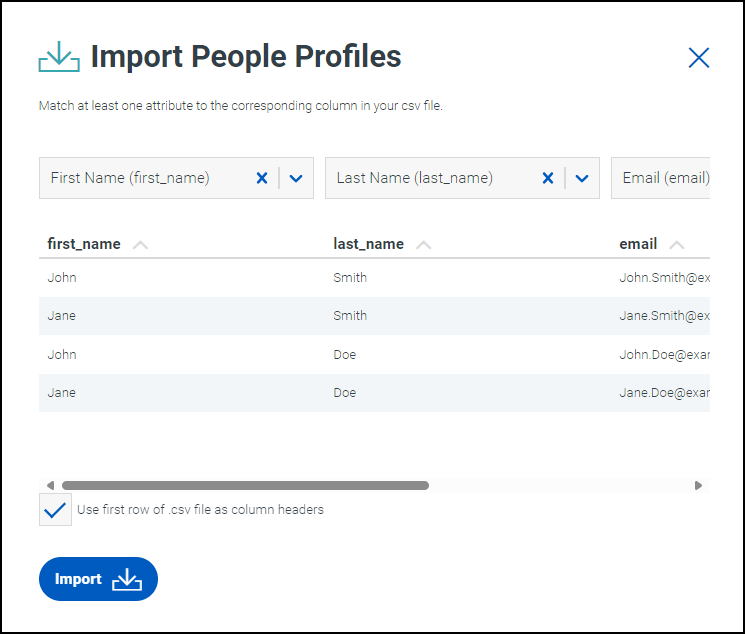](https://documentation.sailpoint.com/ne-admin/help/profiles/img/import-profiles-csv.png)
* If the first row of your CSV file contains profile data, instead of column headers, clear the **Use first row of .csv file as column headers** checkbox.
* Use the dropdown list over each column to select the profile attribute that corresponds to the values within the column from the CSV file.
In order to import profiles, you must assign an attribute to at least one column from the CSV file. You must assign all required attributes to a column for the import to be completed successfully.
If you do not select an attribute over a column, that column's values will not be added to the newly-created profiles.
Notes
* Importing a CSV file of profiles in the admin interface can only create profiles and can't update existing profiles. To update multiple profiles at once, use the [bulk upload](https://documentation.sailpoint.com/ne-user/help/profiles/index.html#updating-profiles-in-bulk)
feature available to end users.
* Remove unwanted rows from your CSV file before uploading it. It is not possible to omit specific rows within the CSV file as it is imported.
* Select .
Profiles are created for each row in the CSV file. The attributes in the profile are populated by the values in the columns.
Managing Profiles
-----------------
You can view and edit the profiles in your system.
### Viewing Profiles
To view existing profiles and filter them based on specific attributes:
1. Go to **Admin > Lifecycle > Profiles**.
2. In the **Profile Type** dropdown, begin typing the name of a profile type. Select the profile type that contains the profiles you want to view.
The following tabs are displayed:
* **All** - Displays all profiles regardless of status.
* **Active** - Displays Active and On-Leave profiles.
* **Inactive** - Displays Inactive and Terminated profiles.
* **Archived** - Displays archived profiles.
You can use the search bar to find profiles by their configured [profile name](https://documentation.sailpoint.com/ne-admin/help/profile-types/manage-prof-types.html#name-attributes)
.
In addition to plain text queries, the search bar supports PCRE2 regular expressions.
For example:
* `John D[a-z]* Smith` returns all profiles where the name contains John, any word beginning with D, and then Smith.
* `Contractor.+2025` returns all profiles where the name contains contractor, one or more of any other characters, and then 2025.
* `\(Administrator)\` returns all profiles containing the string, "(Administrator)". Note that the parentheses are escaped by backslashes.
* `(2023|2024) .* Washington` returns all profiles where the name contains 2023 or 2024, any number of additional characters, then Washington.
You can also [filter](https://documentation.sailpoint.com/ne-admin/help/profiles/index.html#filtering-profiles)
the profiles that are displayed.
### Filtering Profiles
You can filter which profiles are displayed in your list of profiles. You can also save those filters and share them with users that have specific roles in your organization.
**To filter the list of profiles:**
1. Go to the [list of profiles](https://documentation.sailpoint.com/ne-admin/help/profiles/index.html#viewing-profiles)
and select the type of profile you want to review.
2. Select the ellipsis icon  beside the **Filter** header.
3. Choose whether you want to [create](https://documentation.sailpoint.com/ne-admin/help/profiles/index.html#creating-a-profile-filter)
a new filter or [apply](https://documentation.sailpoint.com/ne-admin/help/profiles/index.html#applying-a-profile-filter)
one that has been created already.
#### Creating a Profile Filter
1. From the filter screen, in the **FILTER BY** tab, choose the type of filter you want to create by selecting the **Type** dropdown list.
Complete the additional fields that are added based on your selection.
2. To add additional filter criteria, select **Add Criteria**.
Choose an operator between each set of criteria. The options are AND or OR.
3. Select **Apply**. Your filter is applied to the list of profiles.
4. To save your filter, select **Save as New Filter**.
Note
You must apply your filter before you can save it.
5. Enter a label for your new filter.
6. If you want to be able to apply your new filter to multiple profile types, type the name of the additional profile types you want to add in the **Profile Type** field and select them from the dropdown list.
7. Select **Save**.
Your profile filter is added to the list of profile filters.
You can also create a new filter by [editing](https://documentation.sailpoint.com/ne-admin/help/profiles/index.html#editing-a-saved-profile-filter)
an existing filter and selecting **Save as New Filter**.
#### Applying a Profile Filter
1. From the filter screen, select the **SAVED FILTERS** tab.
A list of filters that you own or that have been shared with you is displayed.
2. Select the name of the filter you want to use.
The list of profiles is updated to reflect your selected filter.
You can also [edit](https://documentation.sailpoint.com/ne-admin/help/profiles/index.html#editing-a-saved-profile-filter)
a saved filter.
#### Editing a Saved Profile Filter
You can make changes to a saved profile filter.
1. From the filter screen, select the **SAVED FILTERS** tab.
A list of filters that you own or that have been shared with you is displayed.
2. Select the filter you want to edit.
3. In the **Criteria** panel, make the necessary changes to your profile filter. You can edit the existing criteria, delete them, or add new criteria.
4. Select **Apply**.
5. To create a new filter with the criteria you applied, select **Save as New Filter**.
To overwrite the existing filter you edited, select **Update Saved Filter**.
#### Sharing Profile Filters
You can share a filter you own with other users by their roles.
1. From the filter screen, select the **SAVED FILTERS** tab.
A list of filters that you own or that have been shared with you is displayed.
2. Select the **Actions** icon  and select **Share**.
3. In the **User Role** field, begin typing the name of a user role. Select the name of the role you want to add.
Repeat for each user role that needs access to this filter.
4. Select **Share**.
Users with any of the roles you selected in the Share Filter screen will be able to use the filter you shared with them. They will not be able to edit the filter or share it with others.
### Viewing Risk on Profiles
Profiles can be assigned risk using attributes to identify risks and help assess the threat they pose. Non-Employee Risk Management calculates the risk and displays a risk score and level on the profile table and profile detail page. Refer to [Configuring and Managing Risk](https://documentation.sailpoint.com/ne-admin/help/risk/index.html)
for additional information.
### Editing Profiles
End users can update profiles using the [Update Workflow](https://documentation.sailpoint.com/ne-admin/help/workflows/lc-workflow-types.html#update-workflows)
configured for a profile type they work with.
Administrators can [update profiles in bulk](https://documentation.sailpoint.com/ne-admin/help/profiles/index.html#updating-profiles-in-bulk)
from the list of profiles, or select an [individual profile](https://documentation.sailpoint.com/ne-admin/help/profiles/index.html#updating-an-individual-profile)
to edit.
#### Updating Profiles in Bulk
You can make some updates to profiles in bulk.
1. Go to **Admin > Lifecycle > Profiles** and select a profile type.
2. Select the checkboxes next to the profiles you want to edit.
3. Select the ellipsis icon  beside the Actions button.
4. Select the action you want to take on the selected profiles.
* **Archive** - Deactivates the selected profiles and moves them to the Archived tab.
* **Unarchive** - Immediately activates the selected profiles and moves them from the Archived tab to the Active tab.
* **Delete** - Permanently delete the selected profiles. If these profiles are needed again, they must be recreated. If they are linked to other profiles in your system, those links will be broken.
#### Updating an Individual Profile
1. Go to **Admin > Lifecycle > Profiles** and select a profile type.
2. Select the name of the profile you want to edit.
The **INFO** tab is displayed. It contains a list of attributes for this profile.
3. On the **INFO** tab, select the **status** dropdown to update the status of this profile.
4. Select the **Edit** icon  to edit the value of a specific attribute.
The attributes on this page are based on how the [profile page](https://documentation.sailpoint.com/ne-admin/help/profile-types/manage-pages.html#profile-pages)
is configured. End users might see these attributes depending on their [role](https://documentation.sailpoint.com/ne-admin/help/users/lc-user-roles.html)
.
5. On the **CONTRIBUTORS** tab, add and remove contributors for this profile. Refer to [Assigning Contributors Directly to a Profile](https://documentation.sailpoint.com/ne-admin/help/users/default-roles.html#assigning-contributors-directly-to-a-profile)
for more information.
The **HISTORY** tab contains a record of recent changes to the profile. The ALL ATTRIBUTES tab is only accessible to administrators, and it displays all attributes associated with the profile regardless of whether they are included on the profile page. The data on these tabs can't be edited.
Documentation Feedback
----------------------
Feedback is provided as an informational resource only and does not form part of SailPoint’s official product documentation. SailPoint does not warrant or make any guarantees about the feedback (including without limitation as to its accuracy, relevance, or reliability). All feedback is subject to the terms set forth at [https://developer.sailpoint.com/discuss/tos](https://developer.sailpoint.com/discuss/tos)
.
Back to top
---
# SailPoint Identity Services - SailPoint Identity Services
[Skip to content](https://documentation.sailpoint.com/saas/help/index.html#sailpoint-identity-services)
SailPoint Identity Services
===========================
Identity governance is about enforcing and maintaining least privilege access, where every identity has the access needed, when it’s needed. Explore the administrator help for our SaaS products to get the most out of your identity governance practice and meet your security and compliance needs.
We also provide [user documentation](https://documentation.sailpoint.com/saas/user-help/index.html)
to support your non-admin users.
You can use the SailPoint Solutions Center icon  in the upper-left corner to quickly access your other SailPoint products.
[](https://documentation.sailpoint.com/saas/help/requests/index.html)Access Requests
[](https://documentation.sailpoint.com/saas/help/certs/index.html)
Access
Certifications
[](https://documentation.sailpoint.com/saas/help/pwd/index.html)
Password
Management
[](https://documentation.sailpoint.com/saas/help/provisioning/index.html)
Provisioning
[](https://documentation.sailpoint.com/saas/help/sod/index.html)
Separation of
Duties
[](https://documentation.sailpoint.com/saas/help/ai/recommendations.html)
Recommendations
[](https://documentation.sailpoint.com/saas/help/ai/access_insights.html)
Access
Insights
[](https://documentation.sailpoint.com/saas/help/ai/access_modeling.html)
Access
Modeling
[](https://documentation.sailpoint.com/saas/help/ai/app_onboarding/index.html)
Application
Onboarding
[](https://documentation.sailpoint.com/saas/help/machine/index.html)
Machine Identity
Security
Back to top
---
# Application Configuration
| | |
| --- | --- |
| | |
| | |
Application Configuration
=========================
© SailPoint Technologies, Inc. All Rights Reserved.
---
# SailPoint Non-Employee Risk Management Admin Help - SailPoint Non-Employee Risk Management Admin Help
[Skip to content](https://documentation.sailpoint.com/ne-admin/help/#sailpoint-non-employee-risk-management-admin-help)
SailPoint Non-Employee Risk Management Admin Help
=================================================
Managing non-employees is a key part of ensuring your organization's security. SailPoint's Non-Employee Risk Management product helps you track and manage non-employees and their lifecycles within your company.
Important
Non-Employee Risk Management can be used as an authoritative source for your organization's non-employee identity governance information, but it should not be the sole repository. Your organization is responsible for maintaining a separate, regularly backed-up source to ensure data integrity and availability. For more information on best practices related to backing up Non-Employee Risk Management data, refer to the [API Documentation](https://developer.sailpoint.com/docs/api/nerm/v1/get-profiles/)
, or contact SailPoint Support.
You are restricted from including certain personal information and other regulated sensitive information in Non-Employee Risk Management. This includes restrictions set forth in your company’s contract(s) with SailPoint. Consult with your Legal Department before proceeding.
Your company is charged with obtaining consent from data subjects before including their personal information in Non-Employee Risk Management.
Should you have any questions, contact your Legal Department.
You can find documentation for end users of your non-employee system in our [User Help](https://documentation.sailpoint.com/ne-user/help/)
section.
Non-Employee Risk Management Overview
-------------------------------------
Non-Employee Risk Management allows you to manage non-employees such as contractors, vendors, and other partners. The non-employees in your site, and the data about them, will be managed by profiles. The users you add to your site can help you create, link, and manage these profiles.
Users are created in your tenant using an integration between your [SSO platform](https://documentation.sailpoint.com/ne-admin/help/setup/authentication.html)
and Non-Employee. The [roles](https://documentation.sailpoint.com/ne-admin/help/users/lc-user-roles.html)
they have determine which profiles they can manage.
To allow users to create profiles, start by creating [forms](https://documentation.sailpoint.com/ne-admin/help/profile-types/manage-forms.html)
and building them into [pages](https://documentation.sailpoint.com/ne-admin/help/profile-types/manage-pages.html)
that users will fill out when creating new profiles.
Create the [profile types](https://documentation.sailpoint.com/ne-admin/help/profile-types/index.html)
that will categorize data about your non-employees. For example, you could create profile types for the non-employees themselves, the list of organizations they come from, or the projects they're working on.
Create [workflows](https://documentation.sailpoint.com/ne-admin/help/workflows/lc-workflow-types.html)
, which your users will use to [create](https://documentation.sailpoint.com/ne-admin/help/workflows/lc-workflow-types.html#create-workflows)
and [update](https://documentation.sailpoint.com/ne-admin/help/workflows/lc-workflow-types.html#update-workflows)
the profiles within each profile type.
Each profile type will need its own set of workflows, which can be activated by users to create and manage the profiles within it.
Once this is complete, you and the other users in your site can create [profiles](https://documentation.sailpoint.com/ne-admin/help/profiles/index.html)
within each profile type. These can be linked together until your organization has a complete map of all the non-employee data it needs to track.
Track [user](https://documentation.sailpoint.com/ne-admin/help/reports/index.html)
and [workflow activity](https://documentation.sailpoint.com/ne-admin/help/reports/reporting.html#workflow-activity-details)
to make sure everything is working correctly.
You can use the SailPoint Solution Center  icon in the upper-left corner to quickly access your other SailPoint products.
Back to top
---
# SailPoint Data Access Security
[Skip to content](https://documentation.sailpoint.com/das/help/index.html#data-access-security)
Data Access Security
====================
SailPoint Data Access Security empowers organizations to discover, govern, and secure critical unstructured data and protect it from critical security risks. Designed as an integrated SaaS solution with Identity Security Cloud, it delivers enhanced intelligence on critical data to empower organizations to holistically improve data security posture, reduce risk, and streamline compliance efforts from day one. Accelerating the work of security teams, it proactively uncovers and remediates hidden data risks with automated data discovery and classification, built-in governance workflows, and out-of-the-box governance policies.
Back to top
---
# Business Processes
| | |
| --- | --- |
| | |
| | |
Business Processes
==================
© SailPoint Technologies, Inc. All Rights Reserved.
---
# Application Management
| | |
| --- | --- |
| | |
| | |
Application Management
======================
© SailPoint Technologies, Inc. All Rights Reserved.
---
# Certifications and Access Reviews
| | |
| --- | --- |
| | |
| | |
Certifications and Access Reviews
=================================
© SailPoint Technologies, Inc. All Rights Reserved.
---
# Classifications
| | |
| --- | --- |
| | |
| | |
Classifications
===============
© SailPoint Technologies, Inc. All Rights Reserved.
---
# SailPoint Cloud Access Management - SailPoint Cloud Access Management
[Skip to content](https://documentation.sailpoint.com/cam/help/#sailpoint-cloud-access-management)
SailPoint Cloud Access Management
=================================
Cloud Access Management provides continuous and automated monitoring of cloud access and visibility into how access is granted. Predefined business rules automate the identification and management of high-risk, excessive, and unused access across multiple cloud platforms.
| **Multi-Cloud Governance** | **Access Monitoring** |
| --- | --- |
| Centrally manage and control access to Amazon Web Services, Microsoft Azure, and Google Cloud Platform. | Continuously monitor and send alerts for suspicious or high-risk access. |
Warning
Amazon will [end support](https://aws.amazon.com/blogs/developer/announcing-end-of-support-for-aws-sdk-for-go-v1-on-july-31-2025/)
for AWS SDK for Go (v1) on July 31, 2025. While Cloud Access Management will remain unaffected for now, AWS will not provide regular maintenance on the SDK, and SailPoint cannot provide support for the deprecated SDK. We recommend exploring alternatives like SailPoint [Cloud Infrastructure Entitlement Management (CIEM)](https://www.sailpoint.com/products/identity-security-cloud/atlas/add-ons/cloud-infrastructure-entitlement-management)
or [IIQ Cloud Governance](https://documentation.sailpoint.com/connectors/identityiq/aws/help/integrating_aws/supported_features.html)
.
[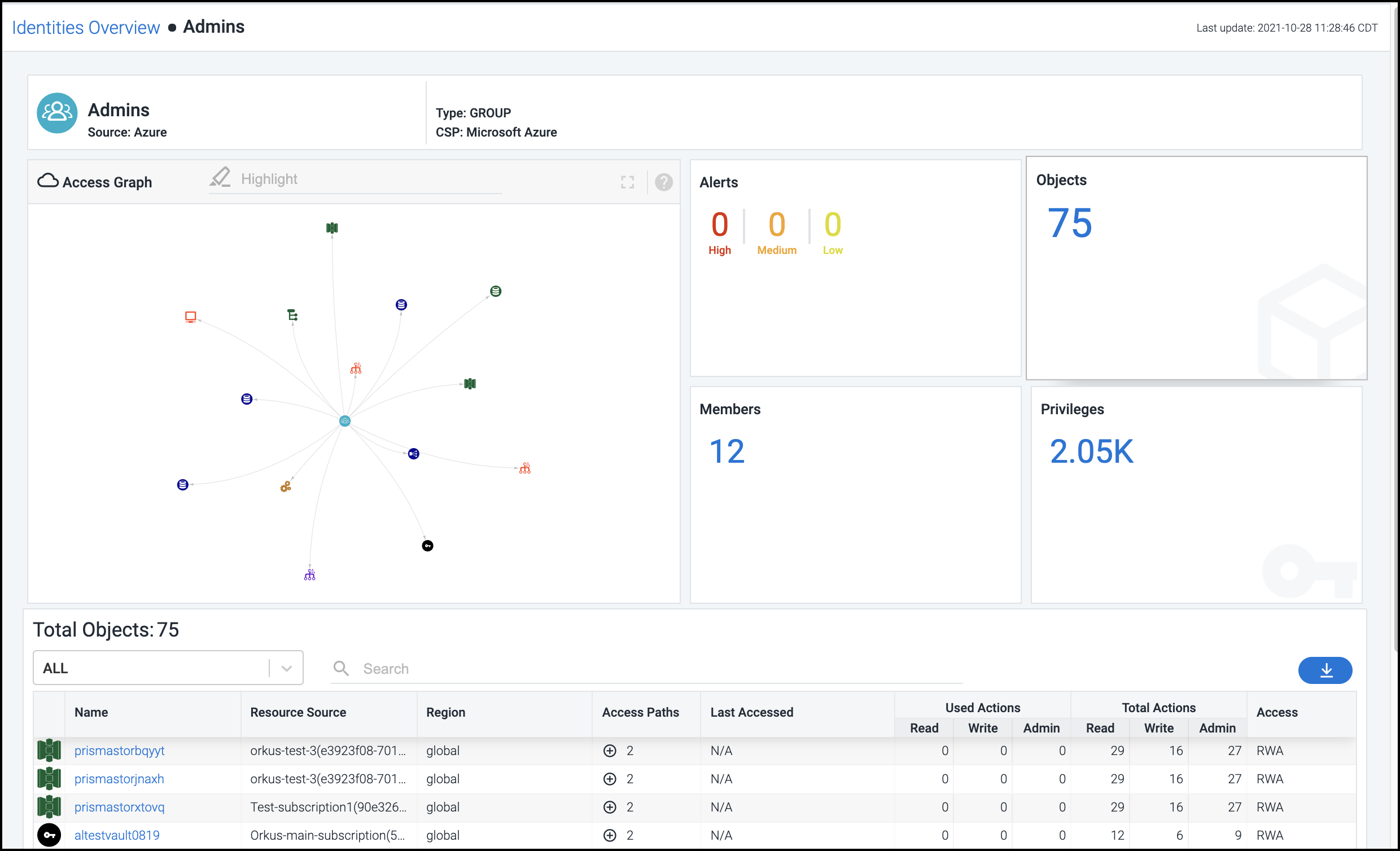](https://documentation.sailpoint.com/cam/help/img/id_overview_index.png)
Back to top
---
# SailPoint Data Access Security Connector Documentation
[Skip to content](https://documentation.sailpoint.com/das-connectors/help/index.html#sailpoint-data-access-security-connectors)
SailPoint Data Access Security Connectors
=========================================
The sources on the left are available in our new online format for SailPoint Data Access Security.
Terminology
-----------
**Connector** - The collection of features, components, and capabilities that comprise Data Access Security support for an integration with a managed application or endpoint.
**Collector** - The component or service performing the Data Classification operations, or the Resource Discovery, Permission Collection, or Activity Monitoring operations for On-Premises applications.
**Identity Collector** - A logical component used to fetch Accounts, Entitlements and Identities information from sources and identity stores, leveraging Identity Security Cloud sources.
Back to top
---
# SailPoint SaaS Management
[Skip to content](https://documentation.sailpoint.com/saas-mgmt/help/#sailpoint-saas-management)
SailPoint SaaS Management
=========================
SaaS Management empowers organizations to discover, manage, and secure their SaaS applications. Integrate your apps with SaaS Management to unlock insights into your SaaS compliance, usage, and spend data.
[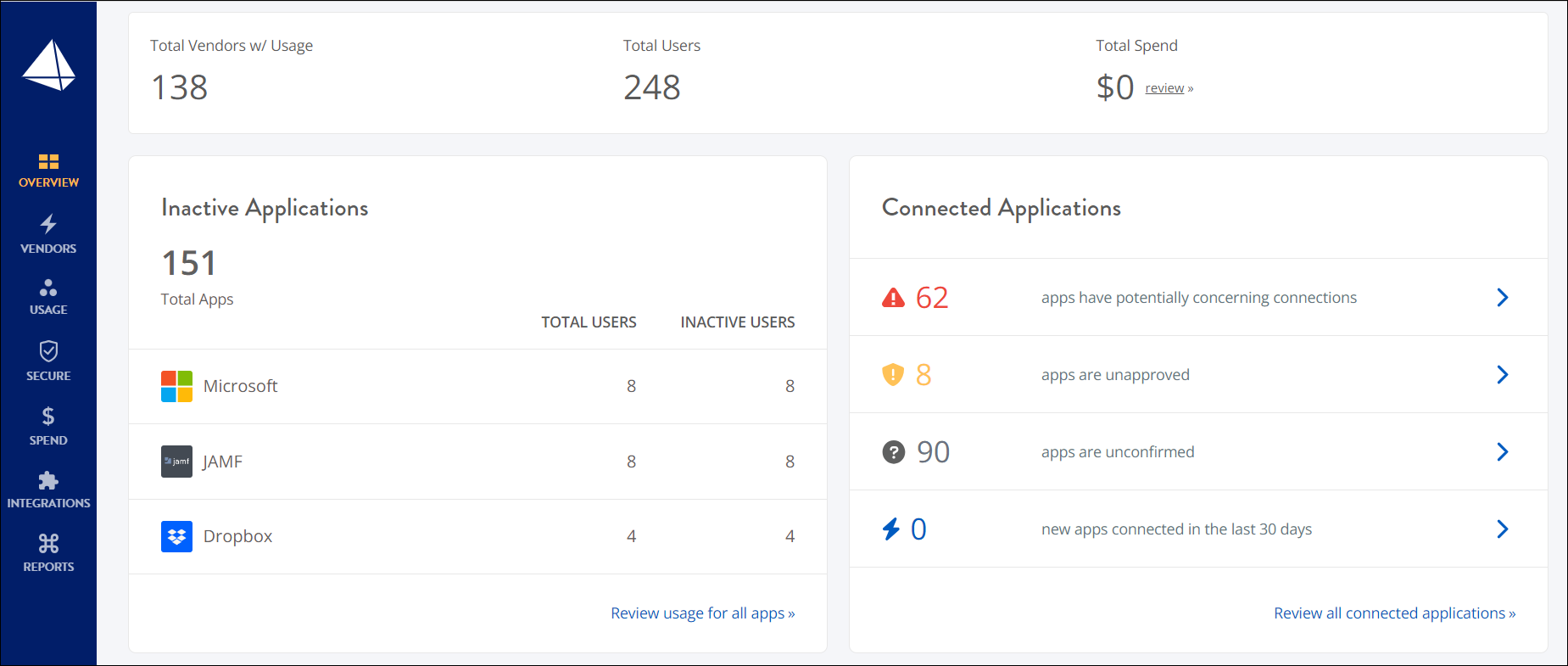](https://documentation.sailpoint.com/saas-mgmt/help/img/home.png)
Gain visibility into your organization's security by uncovering hidden risks associated with shadow IT and over-provisioned accounts. Empower your IT and security teams by providing them with a fast and reliable way to:
* Discover unauthorized or hidden applications.
* Monitor risk and compliance issues in real time.
* Optimize usage and reduce wasted spend.
Start now by [integrating your SaaS apps](https://documentation.sailpoint.com/saas-mgmt/help/integrations/index.html)
with SaaS Management.
Back to top
---
# SailPoint Access Risk Management - SailPoint Access Risk Management
[Skip to content](https://documentation.sailpoint.com/access-risk-mgmt/help/#sailpoint-access-risk-management)
SailPoint Access Risk Management
================================
Use SailPoint Access Risk Management to automate the monitoring and managing of access risks across the enterprise, thereby minimizing potential breaches and fraud, accelerating remediation, and identifying insider-led security breaches.
This functionality benefits:
* IT teams who need to assess potential separation of duty (SoD) risks before granting access to users
* Security teams who complete access reviews and need to manage emergency access workflows with auditable controls
* Audit teams who want to lower audit costs by using automated, audit-ready reports
* Compliance teams who want to speed up compliance processes
[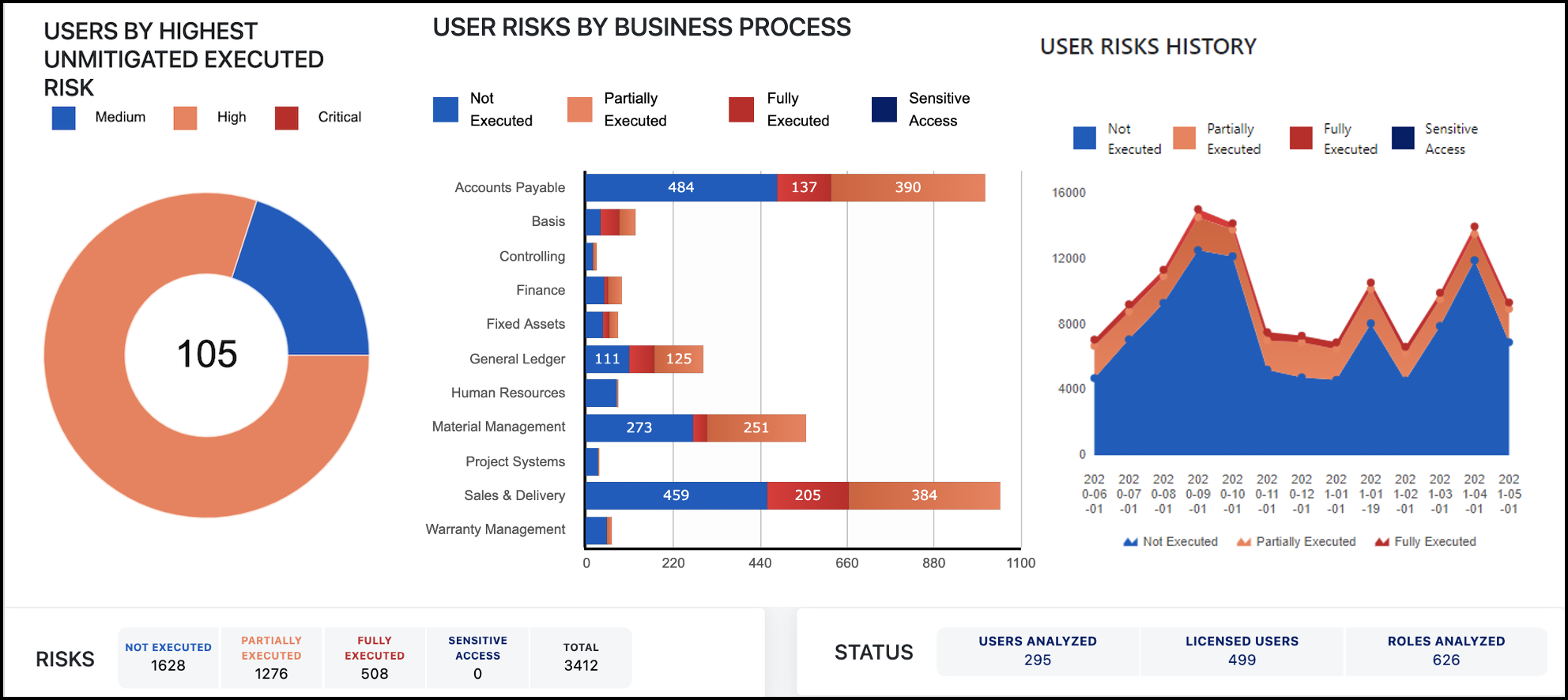](https://documentation.sailpoint.com/access-risk-mgmt/help/img/landing_page.png)
Access Risk Management generates over 25 reports to give you both high-level and granular details so you can make data-informed decisions to protect your organization. Prevent risks from developing by simulating role and user changes, managing access reviews, and governing emergency access requests.
Back to top
---
# SailPoint CIEM Overview - SailPoint Identity Services
[Skip to content](https://documentation.sailpoint.com/saas/help/ciem/index.html#sailpoint-ciem-overview)
[](https://documentation.sailpoint.com/saas/help/ciem/index.html#__feedback "Leave feedback")
SailPoint CIEM Overview
=======================
SailPoint's Cloud Infrastructure Entitlement Management (CIEM) enhances identity governance by providing a deeper view into the effective access of entitlements to resources and your users' entitlement activity in your cloud infrastructure.
To get started, you must configure your cloud service providers and connect them to Identity Security Cloud. You will then manage the cloud entitlements within Identity Security Cloud.
| | Amazon Web Services (AWS) | Azure | Google Cloud Platform (GCP) | Okta |
| --- | --- | --- | --- | --- |
| **CSP Configuration** | [Configuring AWS](https://documentation.sailpoint.com/saas/help/ciem/aws/config/index.html) | [Configuring Azure and Microsoft Entra ID](https://documentation.sailpoint.com/saas/help/ciem/azure/config_azure.html) | [Configuring GCP](https://documentation.sailpoint.com/saas/help/ciem/gcp/config_gcp.html) | [Configuring Okta](https://documentation.sailpoint.com/saas/help/ciem/okta/config_okta.html) |
| **Identity Security Cloud Configuration** | [Connecting AWS and SailPoint CIEM](https://documentation.sailpoint.com/saas/help/ciem/aws/connect_aws.html) | [Connecting Azure and SailPoint CIEM](https://documentation.sailpoint.com/saas/help/ciem/azure/connect_azure.html) | [Connecting GCP and SailPoint CIEM](https://documentation.sailpoint.com/saas/help/ciem/gcp/connect_gcp.html) | [Connecting Okta and SailPoint CIEM](https://documentation.sailpoint.com/saas/help/ciem/okta/connect_okta.html) |
| **Features and Use Cases** | [Managing AWS Cloud Accounts and Entitlements](https://documentation.sailpoint.com/saas/help/ciem/aws/aws_entitlements.html) | [Managing Azure Entitlements](https://documentation.sailpoint.com/saas/help/ciem/azure/azure_entitlements.html) | [Managing GCP Entitlements](https://documentation.sailpoint.com/saas/help/ciem/gcp/gcp_entitlements.html) | [Managing Okta Entitlements](https://documentation.sailpoint.com/saas/help/ciem/okta/okta_entitlements.html) |
Once you have configured and connected your cloud sources, you can [view information and reports](https://documentation.sailpoint.com/saas/help/ciem/viewing_cloud_access.html)
about the access human identities have to your cloud infrastructure.
If a cloud-enabled entitlement is included in a certification campaign, your certifiers can view [cloud details](https://documentation.sailpoint.com/saas/user-help/certs/reviewing/viewing_cloud_details.html)
when making certification decisions.
Supported Identity Providers
----------------------------
CIEM supports AWS IAM federation configuration with the following identity providers:
* Azure AD
* Okta
CIEM also supports federation with AWS IAM Identity Center.
Documentation Feedback
----------------------
Feedback is provided as an informational resource only and does not form part of SailPoint’s official product documentation. SailPoint does not warrant or make any guarantees about the feedback (including without limitation as to its accuracy, relevance, or reliability). All feedback is subject to the terms set forth at [https://developer.sailpoint.com/discuss/tos](https://developer.sailpoint.com/discuss/tos)
.
Back to top
---
# Machine Identity Security - Overview - SailPoint Identity Services
[Skip to content](https://documentation.sailpoint.com/saas/help/machine/index.html#machine-identity-security-overview)
[](https://documentation.sailpoint.com/saas/help/machine/index.html#__feedback "Leave feedback")
Machine Identity Security Overview
==================================
SailPoint Machine Identity Security helps organizations achieve comprehensive governance, compliance, and security outcomes related to machine accounts.
[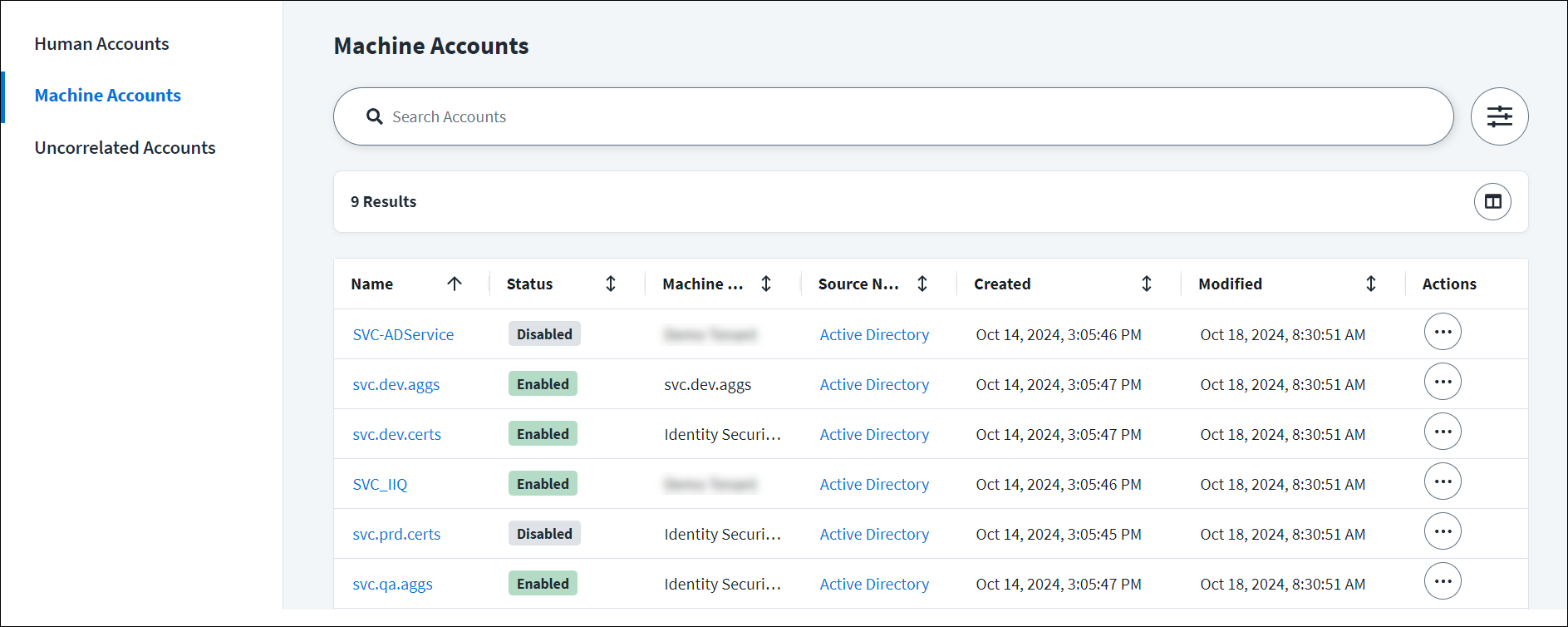](https://documentation.sailpoint.com/saas/help/machine/img/machine-accounts.png)
Machine Identity Security helps you:
* Discover and classify machine accounts on a source.
* Correlate machine accounts to an application identity.
* Certify application identities and their access.
* View and manage machine accounts for all sources.
To discover, classify, and manage machine accounts, users must be an Org Admin, Source Admin, or Source Sub-Admin who is a member of the source's governance group. Users identified as account owners may review application identities and their access in certifications.
Implementing Machine Identity Security
--------------------------------------
Your implementation process depends on the data available to your organization. For example, if your organization stores application data in a database, you can begin by using this data to create application identities. Organizations that do not maintain application data can create application identities at a later stage.
Choose your next step based on your configuration
[Implementing with application data](https://documentation.sailpoint.com/saas/help/machine/index.html#implementing-with-application-data)
[Implementing without application data](https://documentation.sailpoint.com/saas/help/machine/index.html#implementing-without-application-data)
If your organization stores application data in a database, SailPoint recommends following this implementation process:
1. [Configure sources](https://documentation.sailpoint.com/saas/help/accounts/loading_data.html#configuring-a-source)
that contain machine accounts.
2. [Aggregate the machine accounts](https://documentation.sailpoint.com/saas/help/accounts/loading_data.html)
that require governance.
3. [Create application identities](https://documentation.sailpoint.com/saas/help/machine/identity.html)
to group machine accounts with their associated program or service.
4. [Create machine account subtypes](https://documentation.sailpoint.com/saas/help/machine/account_configuration.html#creating-machine-account-subtypes)
to classify existing and future machine accounts by their type and function.
5. Set criteria to determine which source accounts should be [classified as machine accounts](https://documentation.sailpoint.com/saas/help/machine/account_configuration.html#classifying-machine-accounts)
.
6. [Map available account attributes](https://documentation.sailpoint.com/saas/help/machine/account_configuration.html#mapping-machine-account-attributes)
to assign account owners and correlate machine accounts to a machine identity.
7. [Process classification and mappings](https://documentation.sailpoint.com/saas/help/machine/account_configuration.html#processing-classification)
.
8. Review and update machine accounts and their attributes.
9. [Create a machine account certification campaign](https://documentation.sailpoint.com/saas/help/certs/starting_search_campaign.html#creating-a-machine-accounts-certification-campaign)
to verify access items for application identities.
10. [Certify machine identities](https://documentation.sailpoint.com/saas/user-help/certs/reviewing/index.html#machine-accounts)
and their access.
If your organization does not maintain application data, SailPoint recommends following this implementation process:
1. [Configure sources](https://documentation.sailpoint.com/saas/help/accounts/loading_data.html#configuring-a-source)
that contain machine accounts.
2. [Aggregate the machine accounts](https://documentation.sailpoint.com/saas/help/accounts/loading_data.html)
that require governance.
3. [Create machine account subtypes](https://documentation.sailpoint.com/saas/help/machine/account_configuration.html#creating-machine-account-subtypes)
to classify existing and future machine accounts by their type and function.
4. Set criteria to determine which source accounts should be [classified as machine accounts](https://documentation.sailpoint.com/saas/help/machine/account_configuration.html#classifying-machine-accounts)
.
5. [Map available account attributes](https://documentation.sailpoint.com/saas/help/machine/account_configuration.html#mapping-machine-account-attributes)
.
6. [Process classification and mappings](https://documentation.sailpoint.com/saas/help/machine/account_configuration.html#processing-classification)
.
7. Review and update machine accounts and their attributes.
8. [Create a machine account certification campaign](https://documentation.sailpoint.com/saas/help/certs/starting_search_campaign.html#creating-a-machine-accounts-certification-campaign)
.
9. [Certify uncorrelated machine identities](https://documentation.sailpoint.com/saas/user-help/certs/reviewing/index.html#machine-accounts)
and their access.
10. [Create application identities](https://documentation.sailpoint.com/saas/help/machine/identity.html)
to group machine accounts with their associated application or service.
Documentation Feedback
----------------------
Feedback is provided as an informational resource only and does not form part of SailPoint’s official product documentation. SailPoint does not warrant or make any guarantees about the feedback (including without limitation as to its accuracy, relevance, or reliability). All feedback is subject to the terms set forth at [https://developer.sailpoint.com/discuss/tos](https://developer.sailpoint.com/discuss/tos)
.
Back to top
---