# Table of Contents
- [ChatGPT | OpenAI Help Center](#chatgpt-openai-help-center)
- [Conectores en ChatGPT | OpenAI Help Center](#conectores-en-chatgpt-openai-help-center)
---
# ChatGPT | OpenAI Help Center
[](https://help.openai.com/es-es)
LanguageespañolEspaña
[Iniciar sesión](https://help.openai.com/auth/login?returnTo=%2Fes-es%2Fcollections%2F3742473-chatgpt)
ChatGPT
=======
Todo sobre ChatGPT
[1-800-ChatGPT – Llamadas y Mensajes a ChatGPT desde tu teléfono](https://help.openai.com/es-es/articles/10193193-1-800-chatgpt-calling-and-messaging-chatgpt-with-your-phone)
[Agente de ChatGPTDescubre las funciones del modo agente de ChatGPT y cómo empezar a usarlo](https://help.openai.com/es-es/articles/11752874-chatgpt-agent)
[CAPTCHAs in ChatGPTHow CAPTCHAs are used by ChatGPT, and common troubleshooting suggestions](https://help.openai.com/es-es/articles/8184038-captchas-in-chatgpt)
[Can I access my ChatGPT subscription from another device?](https://help.openai.com/es-es/articles/8980438-can-i-access-my-chatgpt-subscription-from-another-device)
[ChatGPT Capabilities OverviewLearn about ChatGPT's capabilities and features](https://help.openai.com/es-es/articles/9260256-chatgpt-capabilities-overview)
[ChatGPT Custom InstructionsFAQ about ChatGPT Custom Instructions](https://help.openai.com/es-es/articles/8096356-chatgpt-custom-instructions)
[ChatGPT Edu at OpenAILearn how ChatGPT Edu helps educational institutions deploy AI safely and effectively across campuses.](https://help.openai.com/es-es/articles/9377311-chatgpt-edu-at-openai)
[ChatGPT Free Tier FAQ](https://help.openai.com/es-es/articles/9275245-chatgpt-free-tier-faq)
[ChatGPT Image Inputs FAQYour guide to navigating ChatGPT's new image input feature, from how to use it effectively to understanding its limitations](https://help.openai.com/es-es/articles/8400551-chatgpt-image-inputs-faq)
[ChatGPT Images FAQ](https://help.openai.com/es-es/articles/11084440-chatgpt-images-faq)
[ChatGPT Plus for Servicemembers & Veterans - Terms of Service](https://help.openai.com/es-es/articles/12803158-chatgpt-plus-for-servicemembers-veterans-terms-of-service)
[ChatGPT Plus 프로모션 및 추천인ChatGPT Plus 프로모션 이용약관](https://help.openai.com/es-es/articles/11944029-chatgpt-plus-%ED%94%84%EB%A1%9C%EB%AA%A8%EC%85%98-%EB%B0%8F-%EC%B6%94%EC%B2%9C%EC%9D%B8)
[ChatGPT Plus: Aktionen und EmpfehlungenBedingungen für unsere ChatGPT-Plus-Aktionen](https://help.openai.com/es-es/articles/12400762-chatgpt-plus-aktionen-und-empfehlungen)
[ChatGPT Promotional Subscriptions/Free Trial Invites FAQ](https://help.openai.com/es-es/articles/8381046-chatgpt-promotional-subscriptionsfree-trial-invites-faq)
[ChatGPT Pulse](https://help.openai.com/es-es/articles/12293630-chatgpt-pulse)
[ChatGPT RecordCapture and summarize meetings & voice notes](https://help.openai.com/es-es/articles/11487532-chatgpt-record)
[ChatGPT Study Mode - FAQ](https://help.openai.com/es-es/articles/11780217-chatgpt-study-mode-faq)
[ChatGPT agent - release notes](https://help.openai.com/es-es/articles/11794368-chatgpt-agent-release-notes)
[ChatGPT agent allowlistingAllow ChatGPT agent traffic to reach your site securely and reliably](https://help.openai.com/es-es/articles/11845367-chatgpt-agent-allowlisting)
[ChatGPT — Release NotesA changelog of the latest updates and release notes for ChatGPT](https://help.openai.com/es-es/articles/6825453-chatgpt-release-notes)
[Claro Brasil: Promoções e indicações do ChatGPT PlusTermos das promoções do ChatGPT Plus](https://help.openai.com/es-es/articles/12082912-claro-brasil-promo%C3%A7%C3%B5es-e-indica%C3%A7%C3%B5es-do-chatgpt-plus)
[Creating images in ChatGPT](https://help.openai.com/es-es/articles/8932459-creating-images-in-chatgpt)
[Customer Responsibilities in Safeguarding Financial Data](https://help.openai.com/es-es/articles/12429613-customer-responsibilities-in-safeguarding-financial-data)
[Customizing Your ChatGPT Personality](https://help.openai.com/es-es/articles/11899719-customizing-your-chatgpt-personality)
[Các chương trình khuyến mại và hoạt động giới thiệu ChatGPT PlusĐiều khoản áp dụng cho các chương trình khuyến mại của ChatGPT Plus](https://help.openai.com/es-es/articles/11796008-c%C3%A1c-ch%C6%B0%C6%A1ng-tr%C3%ACnh-khuy%E1%BA%BFn-m%E1%BA%A1i-v%C3%A0-ho%E1%BA%A1t-%C4%91%E1%BB%99ng-gi%E1%BB%9Bi-thi%E1%BB%87u-chatgpt-plus)
[Data Export: Are my shared links included when I export my data from ChatGPT?Are my shared links from ChatGPT included in my ChatGPT data export?](https://help.openai.com/es-es/articles/7943616-data-export-are-my-shared-links-included-when-i-export-my-data-from-chatgpt)
[Data analysis with ChatGPTFeature and capabilities used when working with data in ChatGPT](https://help.openai.com/es-es/articles/8437071-data-analysis-with-chatgpt)
[Deep ResearchIn-depth, multi-step research for complex questions](https://help.openai.com/es-es/articles/10500283-deep-research)
[Delete / invalidate a shared linkDelete a shared link / shared conversation in ChatGPT](https://help.openai.com/es-es/articles/7943629-delete-invalidate-a-shared-link)
[Descuentos para estudiantes para ChatGPT Plus (EE. UU. y Canadá)Información sobre nuestro programa de descuento de ChatGPT Plus para estudiantes](https://help.openai.com/es-es/articles/10968654-student-discounts-for-chatgpt-plus-uscanada)
[Edición de imágenes con ChatGPT ImagesAhora puedes editar las imágenes que creas con ChatGPT](https://help.openai.com/es-es/articles/9055440-editing-your-images-with-chatgpt-images)
[Enlaces generados por ChatGPTCómo evaluar los enlaces que ChatGPT genera para ti](https://help.openai.com/es-es/articles/10984597-chatgpt-generated-links)
[Extracting Insights with ChatGPT Data AnalysisA personal AI analyst for business users and experienced data professionals](https://help.openai.com/es-es/articles/9213685-extracting-insights-with-chatgpt-data-analysis)
[GPT-5 en ChatGPT](https://help.openai.com/es-es/articles/11909943-gpt-52-in-chatgpt)
[How do I report harmful or illegal content in a shared link?Reporting a problematic shared link from ChatGPT](https://help.openai.com/es-es/articles/7943618-how-do-i-report-harmful-or-illegal-content-in-a-shared-link)
[How do I resolve a billing issue?](https://help.openai.com/es-es/articles/7232934-how-do-i-resolve-a-billing-issue)
[How do I restrict my GPT's share settings?About the default and lowest sharing setting option for GPTs](https://help.openai.com/es-es/articles/9119070-how-do-i-restrict-my-gpts-share-settings)
[How do I search my chat history in ChatGPT?](https://help.openai.com/es-es/articles/10056348-how-do-i-search-my-chat-history-in-chatgpt)
[How to Ask ChatGPT About Its FeaturesThis article explains the best way to interact with ChatGPT when you’re unsure about what it can do.](https://help.openai.com/es-es/articles/12548278-how-to-ask-chatgpt-about-its-features)
[How to Delete and Archive Chats in ChatGPTManage your ChatGPT conversation history by either deleting or archiving chats. Here’s how each option works and what to expect.](https://help.openai.com/es-es/articles/8809935-how-to-delete-and-archive-chats-in-chatgpt)
[How to Update a Shared LinkLearn how to modify visibility and settings for a previously created ChatGPT shared link.](https://help.openai.com/es-es/articles/7943614-how-to-update-a-shared-link)
[How to change your language setting in ChatGPTSet your browser language to one of our supported languages](https://help.openai.com/es-es/articles/8357869-how-to-change-your-language-setting-in-chatgpt)
[I'm seeing unrecognized activity on my OpenAI account.What to do if you think your ChatGPT account was hacked / accessed by someone else.](https://help.openai.com/es-es/articles/8485685-im-seeing-unrecognized-activity-on-my-openai-account)
[Mga promosyon at referral ng ChatGPT PlusMga tuntunin para sa mga promosyon ng aming ChatGPT Plus](https://help.openai.com/es-es/articles/11802654-mga-promosyon-at-referral-ng-chatgpt-plus)
[Model Release Notes](https://help.openai.com/es-es/articles/9624314-model-release-notes)
[OpenAI o3 and o4-mini Usage Limits on ChatGPT and the API](https://help.openai.com/es-es/articles/9824962-openai-o3-and-o4-mini-usage-limits-on-chatgpt-and-the-api)
[Parental Controls on ChatGPT - FAQ](https://help.openai.com/es-es/articles/12315553-parental-controls-on-chatgpt-faq)
[Países compatibles con ChatGPTPaíses, regiones y territorios desde los que se puede acceder actualmente.](https://help.openai.com/es-es/articles/7947663-chatgpt-supported-countries)
[Predicción de edad en ChatGPT](https://help.openai.com/es-es/articles/12652064-age-prediction-in-chatgpt)
[Preguntas frencuentes de enlaces compartidos de ChatGPTGenera un enlace único para compartir cualquiera de tus conversaciones de ChatGPT](https://help.openai.com/es-es/articles/7925741-chatgpt-shared-links-faq)
[Projects in ChatGPTOrganize, revisit, and continue your work—all in one place](https://help.openai.com/es-es/articles/10169521-projects-in-chatgpt)
[Promociones y programa de recomendaciones de ChatGPT GoTérminos para nuestras promociones de ChatGPT Go](https://help.openai.com/es-es/articles/12501659-chatgpt-go-promotions-and-referrals)
[Promociones y referencias de ChatGPT PlusTérminos para nuestras promociones de ChatGPT Plus](https://help.openai.com/es-es/articles/10492689-chatgpt-plus-promotions-and-referrals)
[Promociones y referencias de ChatGPT PlusTérminos de las promociones de ChatGPT Plus](https://help.openai.com/es-es/articles/11723662-promociones-y-referencias-de-chatgpt-plus)
[Promoción de ChatGPT Go (India)Requisitos, información de canje y preguntas frecuentes](https://help.openai.com/es-es/articles/12739021-chatgpt-go-promotion-india)
[Promosi dan referensi ChatGPT PlusKetentuan untuk promosi ChatGPT Plus kami](https://help.openai.com/es-es/articles/11796026-promosi-dan-referensi-chatgpt-plus)
[Promosi dan rujukan ChatGPT PlusTerma untuk promosi ChatGPT Plus kami](https://help.openai.com/es-es/articles/11802656-promosi-dan-rujukan-chatgpt-plus)
[Promotions et parrainages ChatGPT PlusConditions applicables à nos promotions ChatGPT Plus](https://help.openai.com/es-es/articles/11758879-promotions-et-parrainages-chatgpt-plus)
[Promoções e indicações do ChatGPT PlusTermos das promoções do ChatGPT Plus](https://help.openai.com/es-es/articles/11944040-promo%C3%A7%C3%B5es-e-indica%C3%A7%C3%B5es-do-chatgpt-plus)
[Prompt engineering best practices for ChatGPTLearn how to craft effective prompts to get the best out of ChatGPT](https://help.openai.com/es-es/articles/10032626-prompt-engineering-best-practices-for-chatgpt)
[Recomendaciones de red para errores de ChatGPT en el navegador y en las aplicacionesConsejos para solucionar problemas de red que afectan a ChatGPT en el navegador](https://help.openai.com/es-es/articles/9247338-network-recommendations-for-chatgpt-errors-on-web-and-apps)
[Resolving Access Issues for ChatGPT Mac or iOS Apps with Cloudflare Zero Trust](https://help.openai.com/es-es/articles/10496569-resolving-access-issues-for-chatgpt-mac-or-ios-apps-with-cloudflare-zero-trust)
[Student Plus referral program (Australia/Colombia)Details about our ChatGPT Plus student discount referrals program for Australian and Colombian students.](https://help.openai.com/es-es/articles/10845652-student-plus-referral-program-australiacolombia)
[Tasks in ChatGPTAutomate your work with tasks in ChatGPT.](https://help.openai.com/es-es/articles/10291617-tasks-in-chatgpt)
[Temporary Chat FAQ](https://help.openai.com/es-es/articles/8914046-temporary-chat-faq)
[The ChatGPT home pageTry ChatGPT before creating an account.](https://help.openai.com/es-es/articles/9125172-the-chatgpt-home-page)
[Troubleshooting ChatGPT Error MessagesCommon error messages in ChatGPT and how to resolve them](https://help.openai.com/es-es/articles/7996703-troubleshooting-chatgpt-error-messages)
[Troubleshooting Model Feature Access IssuesUsers have lost access to model versions](https://help.openai.com/es-es/articles/10258669-troubleshooting-model-feature-access-issues)
[Updating your visual experience on ChatGPT](https://help.openai.com/es-es/articles/11958281-updating-your-visual-experience-on-chatgpt)
[Using ChatGPT with Vision Pro](https://help.openai.com/es-es/articles/8901169-using-chatgpt-with-vision-pro)
[Using Credits for Flexible Usage in ChatGPT (Free/Go/Plus/Pro) & SoraKey information and FAQs about using credits](https://help.openai.com/es-es/articles/12642688-using-credits-for-flexible-usage-in-chatgpt-freegopluspro-sora)
[Using GPTs FAQ (Free Version)An overview of the capabilities and limitations of using GPTs on our Free tier.](https://help.openai.com/es-es/articles/9300383-using-gpts-faq-free-version)
[Using shopping research in ChatGPT](https://help.openai.com/es-es/articles/12911370-using-shopping-research-in-chatgpt)
[What is ChatGPT Pro?Information about our paid subscription plan, Pro.](https://help.openai.com/es-es/articles/9793128-what-is-chatgpt-pro)
[What is ChatGPT?Commonly asked questions about ChatGPT](https://help.openai.com/es-es/articles/6783457-what-is-chatgpt)
[What is the ChatGPT model selector?Switch between different models in ChatGPT depending on your plan and your needs](https://help.openai.com/es-es/articles/7864572-what-is-the-chatgpt-model-selector)
[What is the canvas feature in ChatGPT and how do I use it?Common questions about using the canvas feature in ChatGPT](https://help.openai.com/es-es/articles/9930697-what-is-the-canvas-feature-in-chatgpt-and-how-do-i-use-it)
[Where do I access my settings to see my shared links?How to access the Data Controls setting in ChatGPT to view shared links](https://help.openai.com/es-es/articles/7943621-where-do-i-access-my-settings-to-see-my-shared-links)
[Why am I being asked to verify my age?](https://help.openai.com/es-es/articles/8411987-why-am-i-being-asked-to-verify-my-age)
[Why can't I log in to ChatGPT?Troubleshooting login issues](https://help.openai.com/es-es/articles/7426629-why-cant-i-log-in-to-chatgpt)
[Why is my ChatGPT taking so long to respond?](https://help.openai.com/es-es/articles/9047779-why-is-my-chatgpt-taking-so-long-to-respond)
[¿Qué es ChatGPT Go?Información sobre nuestro plan de suscripción de pago, Go.](https://help.openai.com/es-es/articles/11989085-what-is-chatgpt-go)
[¿Qué es ChatGPT Plus?Información sobre nuestro plan de suscripción de pago Plus.](https://help.openai.com/es-es/articles/6950777-what-is-chatgpt-plus)
[โปรโมชั่นและการแนะนำ ChatGPT Plusข้อกำหนดสำหรับโปรโมชั่น ChatGPT Plus ของเรา](https://help.openai.com/es-es/articles/11796022-%E0%B9%82%E0%B8%9B%E0%B8%A3%E0%B9%82%E0%B8%A1%E0%B8%8A%E0%B8%99%E0%B9%81%E0%B8%A5%E0%B8%B0%E0%B8%81%E0%B8%B2%E0%B8%A3%E0%B9%81%E0%B8%99%E0%B8%B0%E0%B8%99%E0%B8%B3-chatgpt-plus)
[Aplicaciones conectadas\
-----------------------\
\
Artículos sobre aplicaciones conectadas en ChatGPT](https://help.openai.com/en/collections/12923329-aplicaciones-conectadas)
[Add files from connected apps in ChatGPTLoad files directly into conversations](https://help.openai.com/es-es/articles/9309188-add-files-from-connected-apps-in-chatgpt)
[Admin Controls, Security, and Compliance in apps (Enterprise, Edu, and Business)Learn how your organization can manage app usage with admin settings, help ensure secure data flows, and meet compliance needs.](https://help.openai.com/es-es/articles/11509118-admin-controls-security-and-compliance-in-apps-enterprise-edu-and-business)
[App use cases and promptsA library of ready-to-use prompts for writing, coding and analysis.](https://help.openai.com/es-es/articles/12084614-app-use-cases-and-prompts)
[Conectores en ChatGPTLleva tus herramientas y datos a ChatGPT para que pueda buscar, consultar y trabajar más rápido, todo sin salir de la conversación.](https://help.openai.com/es-es/articles/11487775-apps-in-chatgpt)
[Developer mode, and MCP apps in ChatGPT \[beta\]](https://help.openai.com/es-es/articles/12584461-developer-mode-and-mcp-apps-in-chatgpt-beta)
[Google App for ChatGPT – Data Controls FAQLearn how your data is accessed and used when you connect Google services to ChatGPT](https://help.openai.com/es-es/articles/10408842-google-app-for-chatgpt-data-controls-faq)
[Google Workspace - Admin-Managed Setup](https://help.openai.com/es-es/articles/10929079-google-workspace-admin-managed-setup)
[Microsoft Teams app for ChatGPT](https://help.openai.com/es-es/articles/12552368-microsoft-teams-app-for-chatgpt)
[Outlook Email and Calendar app for ChatGPT](https://help.openai.com/es-es/articles/12512241-outlook-email-and-calendar-app-for-chatgpt)
[Aplicación de Android\
---------------------\
\
Preguntas frecuentes sobre la aplicación de ChatGPT para Android](https://help.openai.com/en/collections/5461535-aplicaci%C3%B3n-de-android)
[ChatGPT Android App FAQFrequently asked questions about the ChatGPT Android app](https://help.openai.com/es-es/articles/8142208-chatgpt-android-app-faq)
[Cómo cancelar una suscripción en la aplicación de ChatGPT para AndroidInformación sobre cómo cancelar tu suscripción a ChatGPT en la Google Play Store en Android.](https://help.openai.com/es-es/articles/8258076-how-to-cancel-a-subscription-in-the-chatgpt-android-app)
[Google Chrome as the Default Browser for the ChatGPT Android AppLearn why Chrome is required for logging in to the ChatGPT Android app and how to set Chrome as your default browser.](https://help.openai.com/es-es/articles/8194942-google-chrome-as-the-default-browser-for-the-chatgpt-android-app)
[Haptic feedback in the ChatGPT Android appUnderstanding haptic feedback support in the ChatGPT Android app](https://help.openai.com/es-es/articles/8144762-haptic-feedback-in-the-chatgpt-android-app)
[How can I access my chat history in the ChatGPT Android app?](https://help.openai.com/es-es/articles/8167621-how-can-i-access-my-chat-history-in-the-chatgpt-android-app)
[How can I delete a chat conversation in the ChatGPT Android app?](https://help.openai.com/es-es/articles/8167835-how-can-i-delete-a-chat-conversation-in-the-chatgpt-android-app)
[How can I delete my OpenAI account in the ChatGPT Android app?How to delete your OpenAI account from the ChatGPT Android app](https://help.openai.com/es-es/articles/8167878-how-can-i-delete-my-openai-account-in-the-chatgpt-android-app)
[How to export your data from the ChatGPT Android appExport all of your ChatGPT history and data from our Android app](https://help.openai.com/es-es/articles/8167885-how-to-export-your-data-from-the-chatgpt-android-app)
[How to find and install the ChatGPT Android app on the Google Play StoreLink and guidance to find and install the ChatGPT Android app on the Google Play Store](https://help.openai.com/es-es/articles/8167604-how-to-find-and-install-the-chatgpt-android-app-on-the-google-play-store)
[How to login to the Android app with Microsoft authenticationHow to access the 'Continue with Microsoft Account' in the Android app.](https://help.openai.com/es-es/articles/8174106-how-to-login-to-the-android-app-with-microsoft-authentication)
[Minimum requirements for the ChatGPT Android appThe minimum requirements to be able to run the ChatGPT Android app](https://help.openai.com/es-es/articles/8167614-minimum-requirements-for-the-chatgpt-android-app)
[Aplicación para Windows\
-----------------------](https://help.openai.com/en/collections/10670766-aplicaci%C3%B3n-para-windows)
[Using the ChatGPT Windows app](https://help.openai.com/es-es/articles/9982051-using-the-chatgpt-windows-app)
[Windows App - Release NotesRelease notes for the ChatGPT Windows app](https://help.openai.com/es-es/articles/10003026-windows-app-release-notes)
[Aplicación para iOS\
-------------------\
\
Preguntas frecuentes sobre la app ChatGPT para iOS](https://help.openai.com/en/collections/4010451-aplicaci%C3%B3n-para-ios)
[ChatGPT iOS App FAQFrequently asked questions about the ChatGPT iOS app.](https://help.openai.com/es-es/articles/7885016-chatgpt-ios-app-faq)
[ChatGPT iOS app "Cookies are disabled" error using Google authentication](https://help.openai.com/es-es/articles/7993298-chatgpt-ios-app-cookies-are-disabled-error-using-google-authentication)
[ChatGPT iOS app - iPad drag & dropHow "drag & drop" functionality works in the ChatGPT iOS app for iPad](https://help.openai.com/es-es/articles/7993487-chatgpt-ios-app-ipad-drag-drop)
[ChatGPT iOS app potential failures](https://help.openai.com/es-es/articles/7910461-chatgpt-ios-app-potential-failures)
[ChatGPT iOS app: Upgrading to a paid subscription](https://help.openai.com/es-es/articles/7905739-chatgpt-ios-app-upgrading-to-a-paid-subscription)
[Cómo cancelar tu suscripción de Apple para ChatGPT en la aplicación de ChatGPT para iOS](https://help.openai.com/es-es/articles/7905690-how-to-cancel-your-apple-subscription-for-chatgpt-in-the-chatgpt-ios-app)
[Disable chat history on iOS](https://help.openai.com/es-es/articles/7943569-disable-chat-history-on-ios)
[Does the ChatGPT iOS app work on iPad?iPhone and iPad are both supported for the ChatGPT iOS app](https://help.openai.com/es-es/articles/7993396-does-the-chatgpt-ios-app-work-on-ipad)
[How can I delete a conversation in the ChatGPT iOS app?Learn how to remove a past conversation in the ChatGPT iOS app. Deleted chats cannot be recovered.](https://help.openai.com/es-es/articles/8980316-how-can-i-delete-a-conversation-in-the-chatgpt-ios-app)
[How can I view my conversation history in the iOS app?Learn how to quickly access your past conversations in the ChatGPT iOS app using the main menu.](https://help.openai.com/es-es/articles/8980299-how-can-i-view-my-conversation-history-in-the-ios-app)
[How do I obtain my ChatGPT subscription invoice if I subscribed from the Apple App Store?](https://help.openai.com/es-es/articles/9030143-how-do-i-obtain-my-chatgpt-subscription-invoice-if-i-subscribed-from-the-apple-app-store)
[How to delete your account in the ChatGPT iOS app?](https://help.openai.com/es-es/articles/8980410-how-to-delete-your-account-in-the-chatgpt-ios-app)
[Is ChatGPT available on Android?](https://help.openai.com/es-es/articles/7920239-is-chatgpt-available-on-android)
[Restoring a ChatGPT subscription purchased in the Apple App StoreHow to restore your purchase of a ChatGPT subscription made in the Apple App Store in the ChatGPT iOS app.](https://help.openai.com/es-es/articles/8346573-restoring-a-chatgpt-subscription-purchased-in-the-apple-app-store)
[What Does the Official ChatGPT iOS App Icon Look Like?](https://help.openai.com/es-es/articles/7905742-what-does-the-official-chatgpt-ios-app-icon-look-like)
[Where can I download the OpenAI ChatGPT iOS app on the Apple App Store?Link and guidance to find and install the ChatGPT iOS app on the App Store](https://help.openai.com/es-es/articles/7908378-where-can-i-download-the-openai-chatgpt-ios-app-on-the-apple-app-store)
[Why did Haptic Feedback stop working?](https://help.openai.com/es-es/articles/7925783-why-did-haptic-feedback-stop-working)
[Aplicación para macOS\
---------------------](https://help.openai.com/en/collections/9403039-aplicaci%C3%B3n-para-macos)
[ChatGPT MacOS app release notesNotes on updates to the ChatGPT MacOS app](https://help.openai.com/es-es/articles/9703738-chatgpt-macos-app-release-notes)
[ChatGPT macOS app - File Uploads and PhotosUploading files and taking photos with the ChatGPT macOS app.](https://help.openai.com/es-es/articles/9295234-chatgpt-macos-app-file-uploads-and-photos)
[ChatGPT macOS app - Screenshot ToolA guide on taking screenshots with the ChatGPT macOS app.](https://help.openai.com/es-es/articles/9295245-chatgpt-macos-app-screenshot-tool)
[Downloading the ChatGPT macOS app](https://help.openai.com/es-es/articles/9275200-downloading-the-chatgpt-macos-app)
[How is data retained in the macOS app?Learn how chats, files, and custom GPT data are stored and deleted in the ChatGPT macOS app.](https://help.openai.com/es-es/articles/9268871-how-is-data-retained-in-the-macos-app)
[How to install the Work with Apps Visual Studio Code extension](https://help.openai.com/es-es/articles/10128592-how-to-install-the-work-with-apps-visual-studio-code-extension)
[How to launch the Chat BarInstantly ask ChatGPT anything using the macOS app](https://help.openai.com/es-es/articles/9295241-how-to-launch-the-chat-bar)
[Temporary Chats on the ChatGPT macOS app](https://help.openai.com/es-es/articles/9295248-temporary-chats-on-the-chatgpt-macos-app)
[What are the system requirements for the ChatGPT macOS app?Understand the system requirements for the macOS app](https://help.openai.com/es-es/articles/9395554-what-are-the-system-requirements-for-the-chatgpt-macos-app)
[Búsqueda\
--------\
\
Funciones de búsqueda con IA que te ofrecen respuestas rápidas y oportunas con fuentes claras y relevantes.](https://help.openai.com/en/collections/11125336-b%C3%BAsqueda)
[Búsqueda de ChatGPT](https://help.openai.com/es-es/articles/9237897-chatgpt-search)
[Instant Checkout: Buy Directly from Merchants through ChatGPT](https://help.openai.com/es-es/articles/12440090-instant-checkout-buy-directly-from-merchants-through-chatgpt)
[Resultados de compra mejorados de la búsqueda de ChatGPT](https://help.openai.com/es-es/articles/11128490-shopping-with-chatgpt-search)
[ChatGPT for Kakao\
-----------------\
\
.](https://help.openai.com/en/collections/16188956-chatgpt-for-kakao)
[ChatGPT and Kakao - Announcement at if(kakao)25](https://help.openai.com/es-es/articles/12316469-chatgpt-and-kakao-announcement-at-ifkakao25)
[ChatGPT for Kakao: Overview and Kakao Tools](https://help.openai.com/es-es/articles/12677933-chatgpt-for-kakao-overview-and-kakao-tools)
[What is ChatGPT: FAQ](https://help.openai.com/es-es/articles/12677804-what-is-chatgpt-faq)
[Compartir GPTs\
--------------](https://help.openai.com/en/collections/8475424-compartir-gpts)
[Building and publishing a GPTInformation on how to build and publish GPTs in the store](https://help.openai.com/es-es/articles/8798878-building-and-publishing-a-gpt)
[Getting your GPT featured](https://help.openai.com/es-es/articles/8793007-getting-your-gpt-featured)
[How to appeal a GPT restricted from sharing](https://help.openai.com/es-es/articles/8884073-how-to-appeal-a-gpt-restricted-from-sharing)
[How to share GPTs within workspaces](https://help.openai.com/es-es/articles/9083988-how-to-share-gpts-within-workspaces)
[Conectores Sincronizados\
------------------------\
\
Integra tus herramientas y datos en ChatGPT para que puedas buscar, consultar y trabajar más rápido — todo sin salir de la conversación.](https://help.openai.com/en/collections/15507678-conectores-sincronizados)
[Aha! — app with sync](https://help.openai.com/es-es/articles/12628380-aha-app-with-sync)
[Asana — app with sync](https://help.openai.com/es-es/articles/12628359-asana-app-with-sync)
[Azure Boards — app with sync](https://help.openai.com/es-es/articles/12628387-azure-boards-app-with-sync)
[Basecamp — app with sync](https://help.openai.com/es-es/articles/12628389-basecamp-app-with-sync)
[Box - app with sync](https://help.openai.com/es-es/articles/12368225-box-app-with-sync)
[ChatGPT apps with syncIndex select knowledge sources in advance, to speed up and help improve ChatGPT’s answers.](https://help.openai.com/es-es/articles/10847137-chatgpt-apps-with-sync)
[ClickUp — app with sync](https://help.openai.com/es-es/articles/12628397-clickup-app-with-sync)
[Connecting GitHub to ChatGPTAccess your GitHub repositories directly in ChatGPT to analyze, search, and cite code.](https://help.openai.com/es-es/articles/11145903-connecting-github-to-chatgpt)
[Dropbox - app with sync](https://help.openai.com/es-es/articles/12364275-dropbox-app-with-sync)
[GitLab Issues — app with sync](https://help.openai.com/es-es/articles/12628403-gitlab-issues-app-with-sync)
[Google Drive app with sync - Self-Service SetupLearn how ChatGPT Pro users, as well as Enterprise and Business admins can configure this experience for their workspace.](https://help.openai.com/es-es/articles/10948259-google-drive-app-with-sync-self-service-setup)
[Help Scout — app with sync](https://help.openai.com/es-es/articles/12628422-help-scout-app-with-sync)
[Intercom - app with sync](https://help.openai.com/es-es/articles/12562556-intercom-app-with-sync)
[Linear - app with sync](https://help.openai.com/es-es/articles/12526595-linear-app-with-sync)
[Pipedrive - app with sync](https://help.openai.com/es-es/articles/20001041-pipedrive-app-with-sync)
[SharePoint apps in ChatGPT](https://help.openai.com/es-es/articles/12143177-sharepoint-apps-in-chatgpt)
[Teamwork.com — app with sync](https://help.openai.com/es-es/articles/12628436-teamworkcom-app-with-sync)
[Zoho CRM - app with sync](https://help.openai.com/es-es/articles/12825765-zoho-crm-app-with-sync)
[Zoho Desk — app with sync](https://help.openai.com/es-es/articles/12628448-zoho-desk-app-with-sync)
[Controles de Datos\
------------------\
\
Preguntas comunes sobre nuestros controles de datos](https://help.openai.com/en/collections/8471418-controles-de-datos)
[Cómo eliminar tu cuentaElimina tu cuenta mediante una solicitud en nuestro Portal de privacidad o hazlo directamente desde ChatGPT.](https://help.openai.com/es-es/articles/6378407-how-to-delete-your-account)
[Does the "Improve the model for everyone" setting sync between web and mobile devices?](https://help.openai.com/es-es/articles/8983099-does-the-improve-the-model-for-everyone-setting-sync-between-web-and-mobile-devices)
[How do I export my ChatGPT history and data?Data Export](https://help.openai.com/es-es/articles/7260999-how-do-i-export-my-chatgpt-history-and-data)
[How do I turn off model training to stop OpenAI training models on my conversations?](https://help.openai.com/es-es/articles/8983082-how-do-i-turn-off-model-training-to-stop-openai-training-models-on-my-conversations)
[If I disable history, what happens when the conversation closes?](https://help.openai.com/es-es/articles/8982990-if-i-disable-history-what-happens-when-the-conversation-closes)
[Preguntas frecuentes sobre los controles de datosConoce cómo gestionar la configuración de tus datos en ChatGPT](https://help.openai.com/es-es/articles/7730893-data-controls-faq)
[Reducing sensitive content](https://help.openai.com/es-es/articles/12315645-reducing-sensitive-content)
[Transferring Conversations from 1 ChatGPT account to another ChatGPT accountHow to migrate chats from a ChatGPT account to different ChatGPT account.](https://help.openai.com/es-es/articles/9106926-transferring-conversations-from-1-chatgpt-account-to-another-chatgpt-account)
[Voice Dictation - FAQLearn what happens when you use dictation (the microphone icon) in ChatGPT to record an audio message.](https://help.openai.com/es-es/articles/12168547-voice-dictation-faq)
[What are the Data Controls settings?](https://help.openai.com/es-es/articles/8983077-what-are-the-data-controls-settings)
[What if I want to keep my history on but disable model training?](https://help.openai.com/es-es/articles/8983130-what-if-i-want-to-keep-my-history-on-but-disable-model-training)
[Crear GPTs\
----------](https://help.openai.com/en/collections/8475422-crear-gpts)
[Creating a GPTHow to create a GPT](https://help.openai.com/es-es/articles/8554397-creating-a-gpt)
[GPT BuilderWhat is the GPT Builder for in ChatGPT and why did we make it?](https://help.openai.com/es-es/articles/8770868-gpt-builder)
[How do I customize my GPT's About page?](https://help.openai.com/es-es/articles/8984245-how-do-i-customize-my-gpts-about-page)
[How do I verify my builder profile with social media?](https://help.openai.com/es-es/articles/8984234-how-do-i-verify-my-builder-profile-with-social-media)
[How do I view version history?](https://help.openai.com/es-es/articles/9083999-how-do-i-view-version-history)
[Knowledge in GPTsHere is what you need to know about the GPT knowledge feature](https://help.openai.com/es-es/articles/8843948-knowledge-in-gpts)
[Retrieval Augmented Generation (RAG) and Semantic Search for GPTsLearn about RAG and how it is useful to GPT builders](https://help.openai.com/es-es/articles/8868588-retrieval-augmented-generation-rag-and-semantic-search-for-gpts)
[Why aren't my GPT links clickable?Making Links Clickable in Your Custom GPT](https://help.openai.com/es-es/articles/8838458-why-arent-my-gpt-links-clickable)
[Why can't I download files generated by my custom GPT?Solving the error "Failed to get upload status" in a custom GPT](https://help.openai.com/es-es/articles/11325361-why-cant-i-download-files-generated-by-my-custom-gpt)
[Why does my GPT not have any ratings?](https://help.openai.com/es-es/articles/8984237-why-does-my-gpt-not-have-any-ratings)
[GPT Store\
---------](https://help.openai.com/en/collections/7835277-gpt-store)
[How should I report a GPT?Report a GPT made by the community](https://help.openai.com/es-es/articles/8554982-how-should-i-report-a-gpt)
[Introducing the GPT Store](https://help.openai.com/es-es/articles/8798868-introducing-the-gpt-store)
[Monetizing Your GPT FAQ](https://help.openai.com/es-es/articles/9119255-monetizing-your-gpt-faq)
[GPTs\
----](https://help.openai.com/en/collections/8475420-gpts)
[GPT Actions - Domain Settings \[ChatGPT Enterprise\]ChatGPT Enterprise customers can limit the domains that can be used by GPT builders in their workspaces in the Workspace settings.](https://help.openai.com/es-es/articles/9442513-gpt-actions-domain-settings-chatgpt-enterprise)
[GPTs Data Privacy FAQUnderstand how your data is handled when interacting with or building GPTs.](https://help.openai.com/es-es/articles/8554402-gpts-data-privacy-faq)
[GPTs FAQ](https://help.openai.com/es-es/articles/8554407-gpts-faq)
[GPTs vs AssistantsComparison of GPTs in ChatGPT to Assistants in the OpenAI API.](https://help.openai.com/es-es/articles/8673914-gpts-vs-assistants)
[How can I use GPTs?](https://help.openai.com/es-es/articles/8798889-how-can-i-use-gpts)
[How do I rate a GPT?Learn how to rate and review GPTs to help builders and the ChatGPT community.](https://help.openai.com/es-es/articles/8984195-how-do-i-rate-a-gpt)
[Key Guidelines for Writing Instructions for Custom GPTs](https://help.openai.com/es-es/articles/9358033-key-guidelines-for-writing-instructions-for-custom-gpts)
[Shared edit access for custom GPTs](https://help.openai.com/es-es/articles/10658904-shared-edit-access-for-custom-gpts)
[What happens to my GPTs if I cancel my subscription?](https://help.openai.com/es-es/articles/9280126-what-happens-to-my-gpts-if-i-cancel-my-subscription)
[What is the @mentions feature for GPTs?Use the @mentions feature to switch between different GPTs in the same conversation while keeping your context.](https://help.openai.com/es-es/articles/8908924-what-is-the-mentions-feature-for-gpts)
[Memoria\
-------](https://help.openai.com/en/collections/8471548-memoria)
[Does memory function with GPTs?Understand how memory works in ChatGPT and why it’s not yet available for custom GPTs.](https://help.openai.com/es-es/articles/8983148-does-memory-function-with-gpts)
[Is memory different from Custom Instructions?](https://help.openai.com/es-es/articles/8983151-is-memory-different-from-custom-instructions)
[Memory FAQ (Business Version)Learn how memory works with ChatGPT Business, including merging personal accounts, workspace deactivation, and managing settings.](https://help.openai.com/es-es/articles/9295112-memory-faq-business-version)
[Preguntas frecuentes sobre la MemoriaObtén más información sobre cómo administrar la memoria en ChatGPT.](https://help.openai.com/es-es/articles/8590148-memory-faq)
[¿Qué es la memoria?](https://help.openai.com/es-es/articles/8983136-what-is-memory)
[Subidas de archivos\
-------------------](https://help.openai.com/en/collections/8475809-subidas-de-archivos)
[Are you able to handle images embedded in docs/presentations?](https://help.openai.com/es-es/articles/8983779-are-you-able-to-handle-images-embedded-in-docspresentations)
[Chat and File Retention Policies in ChatGPTUnderstand how your chats and files are stored, how long they are retained, and how you can manage or delete them when needed.](https://help.openai.com/es-es/articles/8983778-chat-and-file-retention-policies-in-chatgpt)
[File Uploads FAQFile Uploads FAQ](https://help.openai.com/es-es/articles/8555545-file-uploads-faq)
[How do I delete files I upload?Understand how uploaded files are stored, retained in conversations, and how to free up space if you hit your file usage cap.](https://help.openai.com/es-es/articles/8983762-how-do-i-delete-files-i-upload)
[How does the new file uploads capability work?How does file uploading help? What can I do with it?](https://help.openai.com/es-es/articles/8982896-how-does-the-new-file-uploads-capability-work)
[What types of files are supported?File uploads for ChatGPT](https://help.openai.com/es-es/articles/8983675-what-types-of-files-are-supported)
[Voz\
---\
\
Ten una conversación con ChatGPT usando el lenguaje hablado](https://help.openai.com/en/collections/8472654-voz)
[Preguntas frecuentes sobre el Modo de vozTu guía para los chats de voz con ChatGPT: desde cómo configurarlos y usar el modo de voz hasta entender sus funcionalidades y limitaciones.](https://help.openai.com/es-es/articles/8400625-voice-mode-faq)
---
# Conectores en ChatGPT | OpenAI Help Center
[](https://help.openai.com/es-es)
Conectores en ChatGPT
=====================
Lleva tus herramientas y datos a ChatGPT para que pueda buscar, consultar y trabajar más rápido, todo sin salir de la conversación.
Última actualización: 1 hour ago
**Información general**
=======================
Haz que ChatGPT sea más útil y personalizado incorporando tus propias fuentes de datos o el conocimiento de tu empresa, ahora disponible bajo demanda. Los conectores permiten que ChatGPT se conecte de forma segura a aplicaciones de terceros, como Google Drive, GitHub o SharePoint, para que puedas buscar archivos, obtener datos en tiempo real y referenciar contenido directamente en el chat.
Dependiendo de Tu plan y función, puedes:
* **Usar** aplicaciones conectadas en un chat para ayudarte con tareas cotidianas, mostrando una vista previa de los resultados dentro de ChatGPT.
* **Llevar a cabo una investigación avanzada** para proyectos complejos que requieren un análisis detallado de múltiples fuentes a la vez, con citas que remitan a los originales.
* **Sincronizar** e indexar fuentes de conocimiento seleccionadas con antelación para acelerar y mejorar las respuestas de ChatGPT.
* * *
**Tipos de conectores**
=======================
**Conectores de chat**
----------------------
Búsquedas rápidas y precisas, ideales para tareas cotidianas como la iteración continua, la síntesis de contenido a partir de distintas fuentes y la localización rápida de los archivos o del contexto que necesitas. Haz preguntas como «Muéstreme los objetivos del segundo trimestre en Drive» o «Encuentra el plan de la semana pasada en Box». Los resultados aparecen en línea con enlaces para abrir el archivo original.
**Conectores de investigación avanzada**
----------------------------------------
Para tareas más complejas, realiza consultas de investigación avanzada en muchas fuentes, ideales para análisis competitivos, retrospectivas de incidentes o revisiones de código. La investigación avanzada puede usar conectores para leer, analizar y citar fuentes internas, y en la web, para producir informes propiamente citados.
Los conectores de chat e investigación avanzada están disponibles para los planes Plus, Pro, Business, Enterprise y Edu.
**Conectores sincronizados**
----------------------------
Sincroniza e indexa el contenido seleccionado de tus fuentes conectadas por adelantado, para que la base de conocimientos de tu área de trabajo siempre tenga información actualizada y lista para usar. Esto habilita a ChatGPT para responder preguntas aún más rápido y puede mejorar la calidad de las respuestas, sin volver a consultar cada fuente.
Los conectores de chat que pueden sincronizarse mostrarán la opción**Habilitar sincronización** después de conectarlos, en (**Configuración → Aplicaciones y conectores**). Los conectores sincronizados están disponibles para los planes Pro, Business y Enterprise y Edu.
Algunos conectores sincronizados también ofrecen una opción **gestionada por el administrador**, que permite a un administrador de Enterprise o Edu desplegar el conector en toda el área de trabajo.
Para obtener más información sobre los conectores sincronizados, consulta nuestro artículo: [Conectores sincronizados de ChatGPT](https://help.openai.com/en/articles/10847137-chatgpt-synced-connectors)
_Nota: Para conectores sincronizados, ChatGPT automáticamente referencia datos indexados cuando ChatGPT piensa que esos datos pueden ayudar a responder tu pregunta, sin requerir que hagas una selección de fuente explícita. Opcionalmente, puedes incluir o excluir un conector sincronizado indicándoselo a ChatGPT en tu prompt en cualquier momento._
**Conectores personalizados**
-----------------------------
Los conectores personalizados te permiten integrar sistemas de terceros y datos internos en ChatGPT utilizando el Protocolo de Contexto de Modelo (MCP). Están disponibles para:
* Usuarios de ChatGPT Plus y Pro
* Áreas de trabajo de ChatGPT Business, Enterprise y Edu
Para obtener información adicional sobre cómo empezar a crear conectores personalizados, consulta nuestro [artículo](https://help.openai.com/articles/12584461)
así como la [documentación técnica](https://platform.openai.com/docs/mcp)
.
**Cómo conectar a una nueva aplicación**
========================================
Los usuarios pueden habilitar conectores desde **Configuración > Aplicaciones y conectores**, mientras que los administradores de Business y Enterprise o Edu pueden controlar la habilitación de conectores desde [ajustes del área de trabajo.](https://chagpt.com/admin/ca)
**Configuración del área de trabajo para Business, Enterprise y Edu**
---------------------------------------------------------------------
Los administradores pueden habilitar el acceso a los conectores y sincronizarlos desde la [configuración de conectores del administrador](https://chatgpt.com/admin/ca)
. Encuentra la sección de **Conectores** y habilita o deshabilita el conector de interés. Ten en cuenta que, para las cuentas Business, los conectores están habilitados de manera predeterminada. La figura a continuación muestra un ejemplo para el conector de [SharePoint](https://help.openai.com/en/articles/12143177-sharepoint-connectors-on-chatgpt)
.

Después de habilitar un conector, puedes hacer clic en **Habilitar Sincronización** para ese conector en la sección **Conectores Sincronizados**. Sigue los prompts para completar la configuración; una vez que esto esté hecho, los miembros de tu área de trabajo podrán habilitar la sincronización en sus cuentas individuales (ver la sección de Configuración del Usuario a continuación).
Los administradores de Enterprise/Edu pueden controlar aún más qué usuarios obtienen acceso utilizando [RBAC](https://help.openai.com/en/articles/11750701-rbac)
, o usar la sincronización **administrada por el administrador** (solo para conectores seleccionados) para implementar a todos los usuarios autorizados, evitando la necesidad de configuración por usuario.
**Configuración del usuario**
-----------------------------
Los usuarios pueden habilitar un conector navegando a **Configuración > Aplicaciones y Conectores**. Haz clic en el mosaico del conector que le interese y, a continuación, en conectar. Puedes seleccionar Chat o Investigación avanzada (si lo ofrece el conector) antes de conectarte.
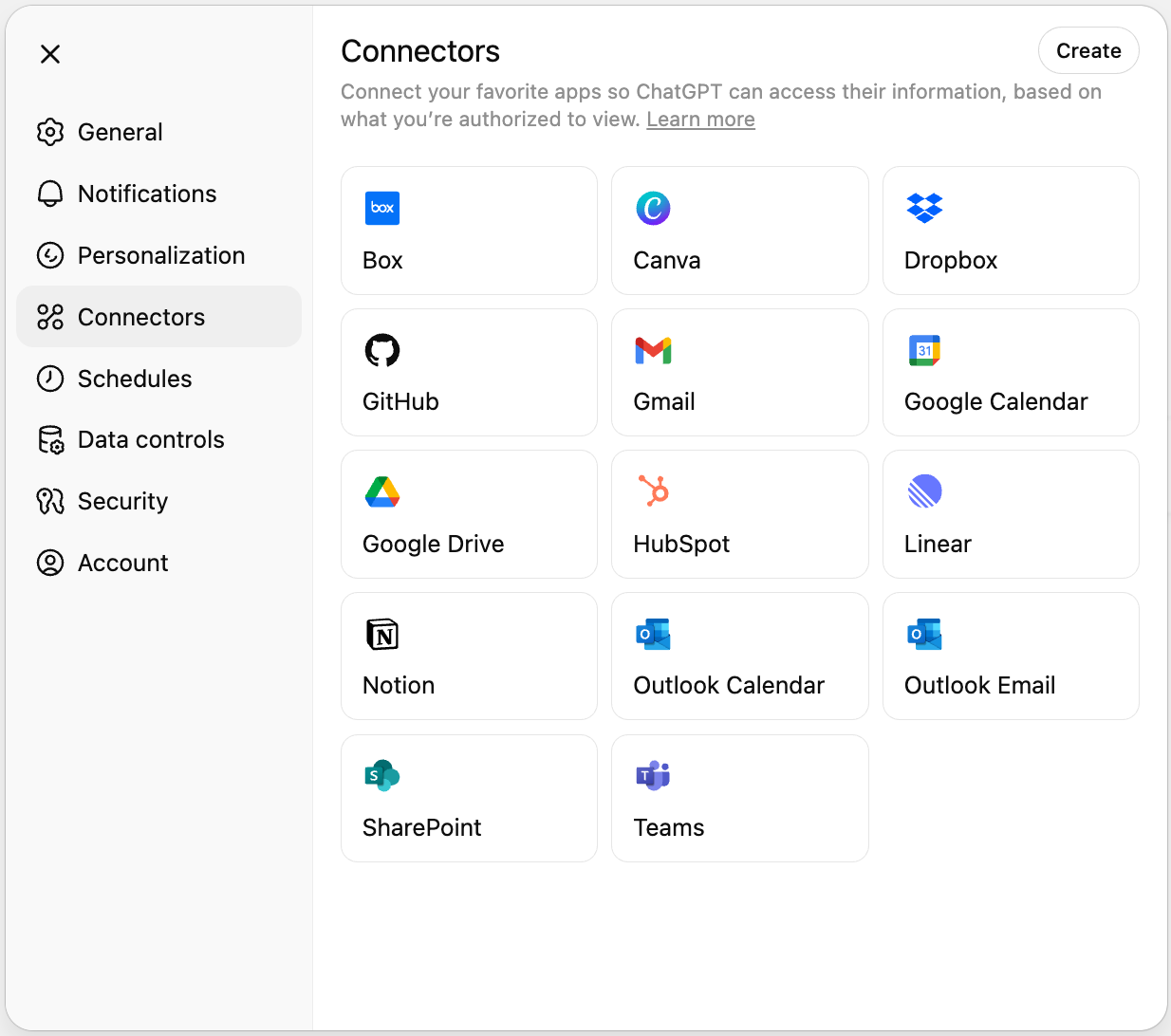
Se te redirigirá al proceso de inicio de sesión de la aplicación correspondiente. Inicia sesión, otorga permiso y revisa el contenido al que ChatGPT puede acceder si estás conectado o conectada.
* * *
**Cómo utilizar conectores**
============================
1. Abre un nuevo chat en ChatGPT.
2. Haz clic en **Herramientas**
3. Haz clic en **Usar conectores** o **Investigación avanzada**.
4. Seleccione una o más fuentes.
5. Pregunta.
6. Al revisar la respuesta de ChatGPT, haz clic en una cita para abrirla en la aplicación conectada.
Uso automático para los conectores de Gmail, Google Calendar y Google Contacts
------------------------------------------------------------------------------
Con GPT-5, ChatGPT puedes utilizar automáticamente ciertas aplicaciones de Google conectadas en el chat, comenzando con Gmail, Google Calendar y Google Contacts. Una vez conectado, ChatGPT hará referencia a ellos cuando sea relevante, por lo que no es necesario seleccionarlos antes de chatear.
Al seleccionar **Usar conectores** se muestra un indicador `AUTO` para indicar que ChatGPT puede utilizar estas fuentes automáticamente. Después de la configuración, puedes utilizar estos conectores sin habilitar **Usar conectores**.
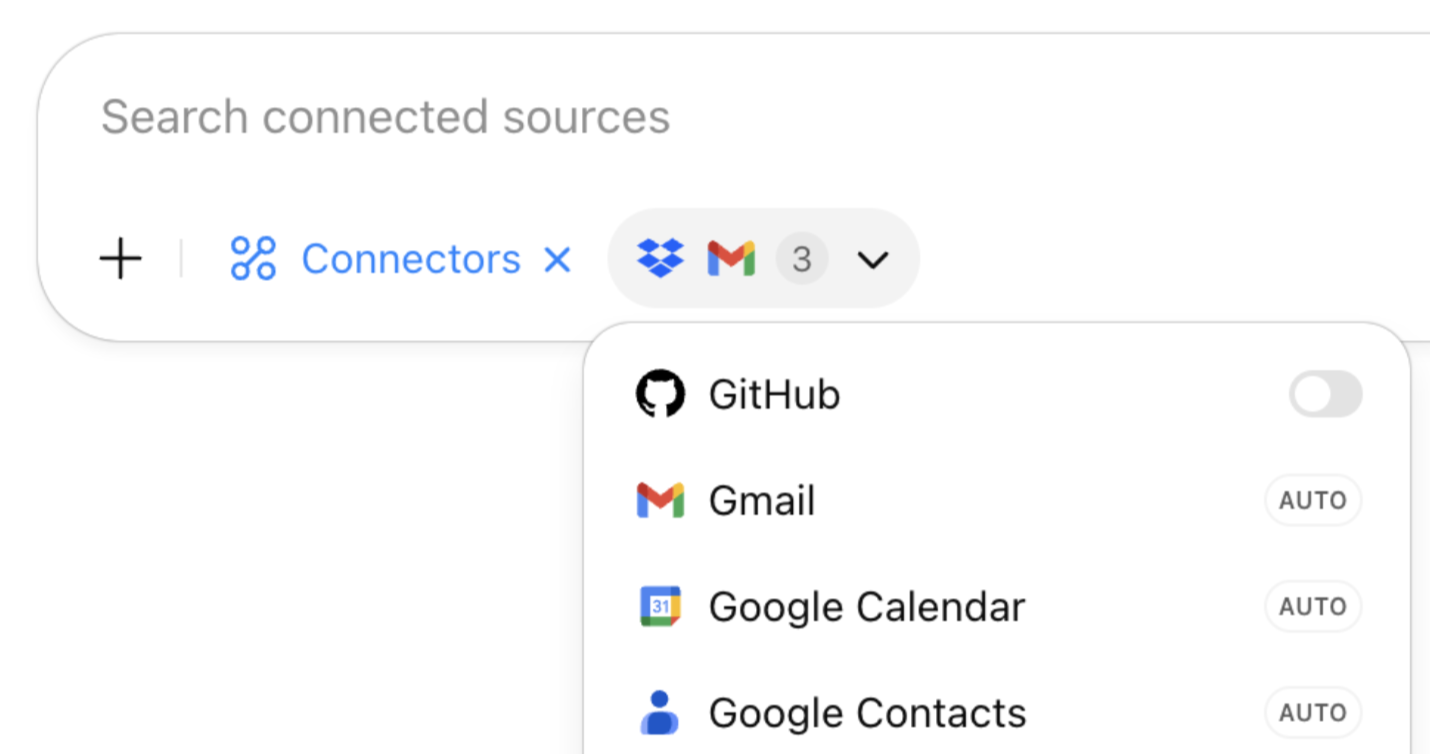
Puedes deshabilitar el uso automático en cualquier momento en **Configuración** → **Conectores** y desmarcando **Usar automáticamente en chat**.
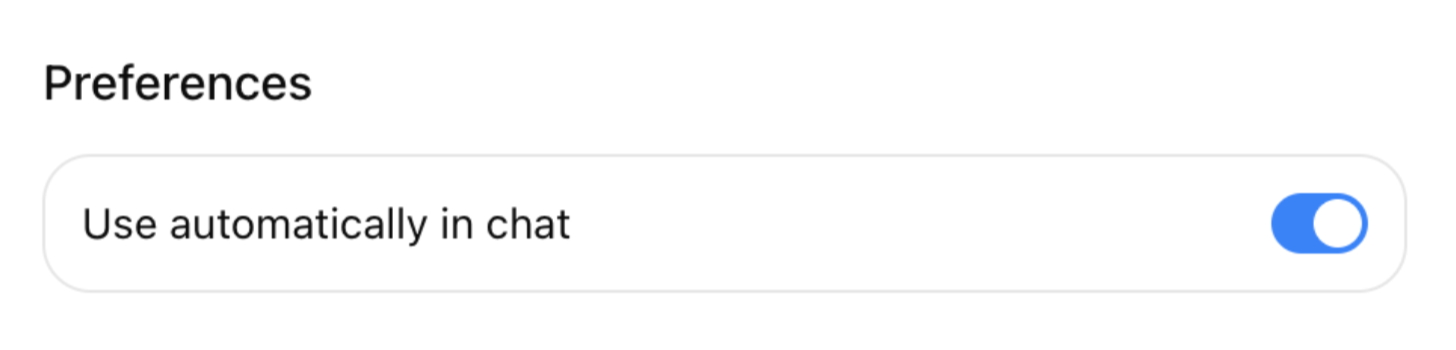
Ten en cuenta que el uso automático actualmente está limitado a los conectores de Gmail, Google Calendar y Google Contacts.
_Nota: La siguiente sección se refiere a ChatGPT Pulse, actualmente disponible para usuarios Pro en iOS y Android._
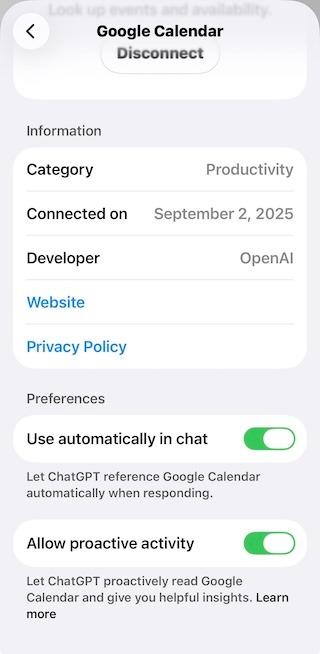
ChatGPT Pulse puede trabajar con Gmail y Google Calendar para leerlos proactivamente en segundo plano y ofrecer información útil. Por ejemplo, si tienes un viaje próximo a una nueva ciudad, puedes ver sugerencias de restaurantes o eventos locales en el lugar que visitarás.
La configuración para permitir el acceso a Pulse está deshabilitada de forma premeditada. Para habilitar, activa "Permitir actividad proactiva" en la configuración del conector. El contenido de Gmail y Calendar no se utilizará para formar el modelo y puedes desconectarlos en cualquier momento en la configuración.
* * *
**Casos de uso**
================
Puedes consultar una biblioteca de ejemplos de prompts listos para usar y sacar el máximo provecho de los conectores en nuestro artículo del Centro de ayuda: [Casos de uso de conectores y prompts](https://help.openai.com/en/articles/12084614)
* * *
**Disponibilidad de conectores por plan**
=========================================
| | | | | |
| --- | --- | --- | --- | --- |
| Plan | Chat | Investigación avanzada | Sincronizado | Personalizado |
| Plus | ✔︎ | ✔︎ | \- | ✔︎ |
| Pro | ✔︎ | ✔︎ | ✔︎ | ✔︎ |
| Business | ✔︎ | ✔︎ | ✔︎ | ✔︎² |
| Enterprise o Edu | ✔︎ | ✔︎ | ✔︎¹ | ✔︎² |
¹ _Según el conector, los usuarios de Enterprise o Edu pueden utilizar la opción gestionada por el administrador para desplegarlo a todos los usuarios autorizados de su espacio de trabajo._
² _Los usuarios de Business y Enterprise/Edu pueden subir conectores personalizados_ [_con total compatibilidad con MCP._](https://help.openai.com/en/articles/12584461-developer-mode-and-full-mcp-connectors-in-chatgpt-beta)
_**Nota:**_ _En las áreas de trabajo Enterprise y Edu, los conectores sincronizados actualmente solo son compatibles con clientes ubicados en EE. UU. que tengan la residencia de datos habilitada_**_o_** _con aquellos que no hayan seleccionado la residencia de datos en reposo. Consulta_[Conectores sincronizados de ChatGPT](https://help.openai.com/en/articles/10847137-chatgpt-synced-connectors#h_46b4848dd8)
_._
**Conectores compatibles**
==========================
| | | | |
| --- | --- | --- | --- |
| **Conector** | **Chat** | **Investigación avanzada** | **Sincronizado** |
| [Aha!](https://help.openai.com/en/articles/12628380-aha-synced-connector) | ✔︎ | ✔︎ | ✔︎ |
| [Asana](https://help.openai.com/en/articles/12628359-asana-synced-connector) | ✔︎ | ✔︎ | ✔︎ |
| [Box](https://help.openai.com/en/articles/12368225-box-connector) | ✔︎ | ✔︎ | ✔︎ |
| Canva | ✔︎ | ✔︎ | \- |
| [ClickUp](https://help.openai.com/en/articles/12628397-clickup-synced-connector) | ✔︎ | ✔︎ | ✔︎ |
| Conectores personalizados (MCP) | ✔︎ | ✔︎ | \- |
| [Dropbox](https://help.openai.com/en/articles/12364275-dropbox-connector) | ✔︎ | ✔︎ | ✔︎ |
| [GitHub](https://help.openai.com/en/articles/11145903-connecting-github-to-chatgpt) | ✔︎ | ✔︎ | ✔︎ |
| [GitLab Issues](https://help.openai.com/en/articles/12628403-gitlab-synced-connector) | ✔︎ | ✔︎ | ✔︎ |
| Gmail | ✔︎ | ✔︎ | \- |
| Google Calendar | ✔︎ | ✔︎ | \- |
| Google Contacts | ✔︎ | \- | \- |
| [Google Drive](https://help.openai.com/en/articles/10948259-google-drive-synced-connectors-self-service-setup) | ✔︎ | ✔︎ | ✔︎¹ |
| [Help Scout](https://help.openai.com/en/articles/12628422-help-scout-synced-connector) | ✔︎ | ✔︎ | ✔︎ |
| HubSpot | ✔︎ | ✔︎ | \- |
| [Intercom](https://help.openai.com/en/articles/12562556-intercom-synced-connector)
\* | ✔︎ | \- | ✔︎ |
| [Linear](https://help.openai.com/en/articles/12526595-linear-synced-connector)
\* | ✔︎ | ✔︎ | ✔︎ |
| Microsoft OneDrive | ✔︎ | ✔︎ | \- |
| [Calendario de Microsoft Outlook](https://help.openai.com/en/articles/12512241-outlook-email-and-calendar-connectors-for-chatgpt) | ✔︎ | ✔︎ | \- |
| [Correo electrónico de Microsoft Outlook](https://help.openai.com/en/articles/12512241-outlook-email-and-calendar-connectors-for-chatgpt) | ✔︎ | ✔︎ | \- |
| [Microsoft SharePoint](https://help.openai.com/en/articles/12143177-sharepoint-connectors-on-chatgpt) | ✔︎ | ✔︎ | ✔︎¹ |
| [Microsoft Teams](https://help.openai.com/en/articles/12552368-microsoft-teams-connector-for-chatgpt) | ✔︎ | ✔︎ | \- |
| Notion | ✔︎ | ✔︎ | |
| [Slack](https://intercom.help/openai/en/articles/12525822-chatgpt-connector-for-slack)
\* | ✔︎ | ✔︎ | \- |
| [Teamwork.com](https://help.openai.com/en/articles/12628436-teamwork-synced-connector) | ✔︎ | ✔︎ | ✔︎ |
| [Zoho Desk](https://help.openai.com/en/articles/12628448-zoho-desk-synced-connector) | ✔︎ | ✔︎ | ✔︎ |
\* _Actualmente no está disponible para los usuarios ubicados en el EEE, Suiza y el Reino Unido_
_Ofrece la opción de sincronizar gestionada por el administrador para usuarios de Enterprise._
* * *
**Controles administrativos, seguridad y cumplimiento**
=======================================================
Para obtener información adicional sobre los controles disponibles para los usuarios administradores en las áreas de trabajo de Business, Enterprise y Edu, así como información sobre seguridad y cumplimiento, consulta nuestro artículo aquí: [Controles de administrador, seguridad y cumplimiento en conectores](https://help.openai.com/en/articles/11509118)
* * *
**Preguntas frecuentes**
========================
**En las áreas de trabajo de Enterprise, Edu y Business, ¿quién puede habilitar o deshabilitar conectores?**
------------------------------------------------------------------------------------------------------------
Los propietarios y administradores del área de trabajo gestionan la disponibilidad en **Ajustes → Conectores**.
Para las áreas de trabajo de Enterprise y Edu, los propietarios pueden configurar [controles de acceso basados en funciones (RBAC, por sus siglas en inglés)](https://help.openai.com/en/articles/11509118-admin-controls-security-and-compliance-in-connectors-enterprise-edu-and-team#h_227601b351)
para los conectores.
**¿Existen límites de uso especiales para los conectores?**
-----------------------------------------------------------
No. Los conectores siguen los límites de velocidad normales de ChatGPT para tu plan (las aplicaciones externas pueden imponer sus propios límites).
**¿Puedo quitar un conector de mi área de trabajo?**
----------------------------------------------------
"Sí." Puedes quitar un conector en cualquier momento desde **Configuración → Conectores**. Tu aplicación de terceros conectada también puede ofrecer sus propias opciones para desvincular un conector.
**¿Se añadirán más conectores?**
--------------------------------
Estamos trabajando activamente con proveedores adicionales y publicaremos actualizaciones en nuestras notas de lanzamiento.
**¿Qué tipos de archivo admiten los conectores?**
-------------------------------------------------
Actualmente, los conectores son capaces de recuperar datos de texto de los tipos de archivo más comunes, incluidos TXT, PDF, CSV, XLSX, PPTX, DOCX. La capacidad de analizar imágenes, PDFs visuales, etc. (asistencia multimodal) no está disponible actualmente.
**¿Por qué se deshabilitó mi conector de Google Contacts?**
-----------------------------------------------------------
El conector de Google Contacts se desactiva automáticamente si tanto el conector de Gmail como el de Calendar se desactivan posteriormente. Sin embargo, puedes habilitar Contactos sin conectar Gmail o Calendar.
**¿Qué comparte ChatGPT con las solicitudes conectadas?**
---------------------------------------------------------
Cuando habilitas un conector, ChatGPT puede enviar y recibir información de la aplicación conectada para encontrar datos relevantes a tus prompts y usarlos en sus respuestas. Por ejemplo, si tienes activado el conector de GitHub y preguntas: «¿Puedes mostrarme dónde gestioné las cargas de archivos en el backend?”, ChatGPT podría enviar una consulta a GitHub como “gestión de cargas de archivos en el backend». Si es necesario, puede enviar algunas consultas diferentes para encontrar la información más relevante.
Si tienes "Memoria" habilitada, cuando ChatGPT envía una consulta a las aplicaciones conectadas, también puede aprovechar información relevante de las memorias para hacer que la consulta sea mejor y más útil. Por ejemplo, si el usuario tiene activada la opción de “Memoria” y sus memorias mencionan que trabaja en un repositorio llamado acme-uploader, y pregunta: «¿Puedes mostrarme dónde gestioné las cargas de archivos en el backend?», ChatGPT podría incluir «acme-uploader» en la consulta. Puedes obtener más información [aquí](https://help.openai.com/en/articles/8590148-memory-faq)
sobre la Memoria, incluyendo cómo deshabilitarla o controlar memorias individuales.
**¿Cómo utiliza ChatGPT la información de solicitudes conectadas?**
-------------------------------------------------------------------
Cuando habilitas una conexión, ChatGPT utilizará la información en la solicitud conectada como contexto para ayudarte a proporcionar respuestas. Si tienes [ChatGPT habilitado](https://help.openai.com/en/articles/8590148-memory-faq)
en tu configuración, ChatGPT puede recordar información relevante accedida desde conectores. ChatGPT también puede utilizar información relevante obtenida a través de los Conectores para enriquecer las consultas de búsqueda cuando realiza una [Búsqueda de ChatGPT](https://help.openai.com/en/articles/9237897-chatgpt-search)
con el fin de ofrecer una respuesta.
**¿El modo de voz ofrece asistencia para conectores?**
------------------------------------------------------
No, modo de voz actualmente no ofrece asistencia. Solo puedes usar conectores en las conversaciones de texto de ChatGPT.
**¿Utiliza OpenAI información de los conectores para entrenar sus modelos?**
----------------------------------------------------------------------------
Para los clientes de ChatGPT Business, Enterprise y Edu, no utilizamos la información a la que se accede desde los conectores para entrenar nuestros modelos. Consulte nuestra [Página de privacidad de Enterprise](https://openai.com/enterprise-privacy/)
para obtener información sobre cómo utilizamos los datos empresariales.
Para los usuarios de ChatGPT Free, Plus y Pro, es posible que utilicemos la información a la que se accede desde los conectores para entrenar nuestros modelos si la opción «Mejorar el modelo para todos» está activada. Puedes leer más sobre cómo se almacenan y utilizan tus datos en [este artículo](https://help.openai.com/en/articles/7730893-data-controls-faq)
en nuestro centro de ayuda.
* * *
**Resolución de problemas**
===========================
**"Este servidor MCP no cumple con nuestra especificación"**
------------------------------------------------------------
Este error puede ocurrir al intentar conectar ChatGPT a un conector personalizado mediante el protocolo de contexto de modelo (MCP), que no cumple completamente con nuestros requisitos técnicos.
En la mayoría de los casos, esto significa que al conector le falta una herramienta requerida. Para resolver esto, el equipo que desarrolle o mantenga el conector deseado tendrá que realizar cambios para que sea compatible con la estructura esperada.
Para obtener más información sobre nuestras especificaciones y sobre MCP, consulta nuestra documentación: [https://platform.openai.com/docs/mcp](https://platform.openai.com/docs/mcp)
**"Se requiere aprobación del administrador" o "Se necesita aprobación del administrador"**
-------------------------------------------------------------------------------------------
Algunos usuarios pueden experimentar un mensaje de error que sugiere que ChatGPT no está autorizado para conectarse a su aplicación. En estos casos, deberás ponerte en contacto con tu administrador de sistemas para permitir que ChatGPT acceda a la aplicación.
En algunos casos, puede ser necesaria una lista de permitidos adicional (como de IP o de dominios), incluso después de haber concedido permisos a ChatGPT. Te recomendamos revisar nuestra guía de recomendaciones de red para obtener más ayuda: [Recomendaciones de red para errores de ChatGPT en la web y en las aplicaciones](https://help.openai.com/en/articles/9247338-network-recommendations-for-chatgpt-errors-on-web-and-apps)
Conectores personalizados (MCP) deshabilitados
----------------------------------------------
Los usuarios de Plus y Pro deben habilitar el [modo desarrollador](https://platform.openai.com/docs/guides/developer-mode)
en la configuración de ChatGPT para poder utilizar los conectores MCP.
Los usuarios de Enterprise, Edu y Business deben ser propietarios, administradores o tener los permisos necesarios para usar el modo desarrollador y así poder probar y crear conectores personalizados. Además, los conectores personalizados deben **publicarse** antes de que puedan ser utilizados por otros miembros del área de trabajo.
Need more help? Contact us
--------------------------
AI Chat
Chat now
AI Phone Call (beta)
[1-888-GPT-0090](tel:+18884780090)
Calls may be recorded to improve OpenAI services. [Learn more.](https://help.openai.com/en/articles/11391933-1-888-gpt-0090-openai-help-over-phone)
¿Fue útil este artículo?
------------------------
Enviar
---