# Table of Contents
- [ContextForge AI Gateway](#contextforge-ai-gateway)
- [Overview - ContextForge AI Gateway](#overview-contextforge-ai-gateway)
- [Using ContextForge - ContextForge AI Gateway](#using-contextforge-contextforge-ai-gateway)
- [Deployment Overview - ContextForge AI Gateway](#deployment-overview-contextforge-ai-gateway)
- [Management Overview - ContextForge AI Gateway](#management-overview-contextforge-ai-gateway)
- [Config Validation - ContextForge AI Gateway](#config-validation-contextforge-ai-gateway)
- [🧪 Testing ContextForge - ContextForge AI Gateway](#-testing-contextforge-contextforge-ai-gateway)
- [Overview - ContextForge AI Gateway](#overview-contextforge-ai-gateway)
- [📚 Tutorials - ContextForge AI Gateway](#-tutorials-contextforge-ai-gateway)
- [Testimonials - ContextForge AI Gateway](#testimonials-contextforge-ai-gateway)
- [RFC 9728 OAuth Protected Resource Metadata Compliance - ContextForge AI Gateway](#rfc-9728-oauth-protected-resource-metadata-compliance-contextforge-ai-gateway)
---
# ContextForge AI Gateway
[Skip to content](https://ibm.github.io/mcp-context-forge/#contextforge)
[](https://github.com/ibm/mcp-context-forge/edit/main/docs/docs/index.md "Edit this page")
ContextForge[¶](https://ibm.github.io/mcp-context-forge/#contextforge "Permanent link")
========================================================================================
> An open source registry and proxy that federates MCP, A2A, and REST/gRPC APIs with centralized governance, discovery, and observability. Optimizes Agent & Tool calling, and supports plugins.
**ContextForge** is an open source registry and proxy that federates tools, agents, and APIs into one clean endpoint for your AI clients. It provides centralized governance, discovery, and observability across your AI infrastructure:
* **Tools Gateway** — MCP, REST, gRPC-to-MCP translation, and TOON compression
* **Agent Gateway** — A2A protocol, OpenAI-compatible and Anthropic agent routing
* **API Gateway** — Rate limiting, auth, retries, and reverse proxy for REST services
* **Plugin Extensibility** — 40+ plugins for additional transports, protocols, and integrations
* **Observability** — OpenTelemetry tracing with Phoenix, Jaeger, Zipkin, and other OTLP backends
It runs as a fully compliant MCP server, deployable via PyPI or Docker, and scales to multi-cluster environments on Kubernetes with Redis-backed federation and caching.
[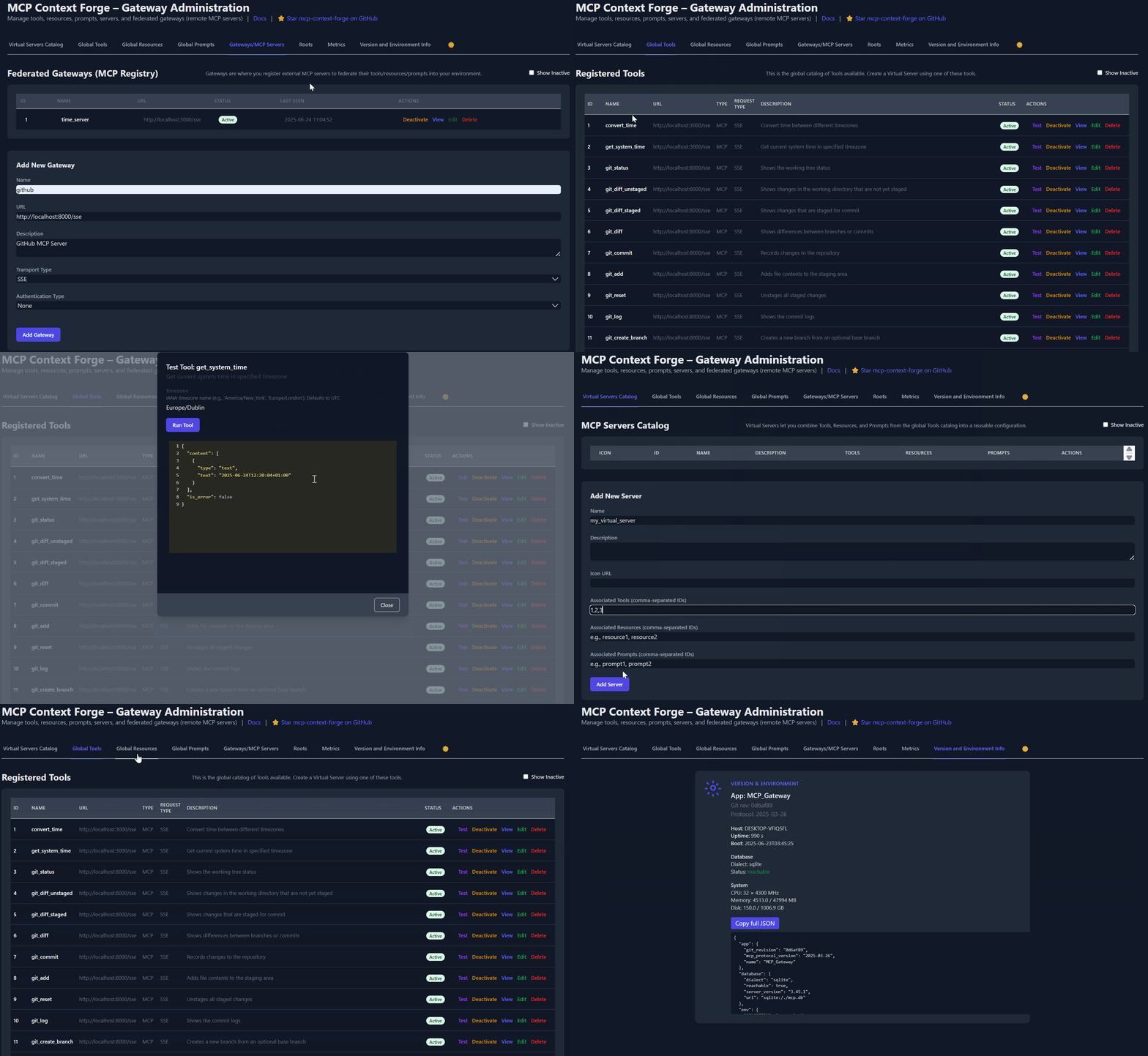](https://ibm.github.io/mcp-context-forge/images/mcpgateway.gif)
* * *
Quick Links[¶](https://ibm.github.io/mcp-context-forge/#quick-links "Permanent link")
--------------------------------------------------------------------------------------
| Resource | Description |
| --- | --- |
| **[5-Minute Setup](https://github.com/IBM/mcp-context-forge/issues/2503)
** | Get started fast — uvx, Docker, Compose, or local dev |
| **[Getting Help](https://github.com/IBM/mcp-context-forge/issues/2504)
** | Support options, FAQ, community channels |
| **[Issue Guide](https://github.com/IBM/mcp-context-forge/issues/2502)
** | How to file bugs, request features, contribute |
| **[Configuration Reference](https://ibm.github.io/mcp-context-forge/manage/configuration/)
** | Complete environment variables reference |
* * *
Base URLs by runtime
* Direct installs (`uvx`, pip, or `docker run`): `http://localhost:4444`
* Docker Compose (nginx proxy): `http://localhost:8080`
* Dev server (`make dev`): `http://localhost:8000`
Overview & Goals[¶](https://ibm.github.io/mcp-context-forge/#overview-goals "Permanent link")
----------------------------------------------------------------------------------------------
**ContextForge** is an open source registry and proxy that federates any [Model Context Protocol](https://modelcontextprotocol.io/)
(MCP) server, A2A server, or REST/gRPC API, providing centralized governance, discovery, and observability. It optimizes agent and tool calling, and supports plugins. See the [project roadmap](https://ibm.github.io/mcp-context-forge/architecture/roadmap/)
for more details.
It currently supports:
* Federation across multiple MCP and REST services
* **A2A (Agent-to-Agent) integration** for external AI agents (OpenAI, Anthropic, custom)
* **gRPC-to-MCP translation** via automatic reflection-based service discovery
* Virtualization of legacy APIs as MCP-compliant tools and servers
* Transport over HTTP, JSON-RPC, WebSocket, SSE (with configurable keepalive), stdio and streamable-HTTP
* An Admin UI for real-time management, configuration, and log monitoring (with airgapped deployment support)
* Built-in auth, retries, and rate-limiting with user-scoped OAuth tokens and unconditional X-Upstream-Authorization header support
* **OpenTelemetry observability** with Phoenix, Jaeger, Zipkin, and other OTLP backends
* Scalable deployments via Docker or PyPI, Redis-backed caching, and multi-cluster federation
[](https://ibm.github.io/mcp-context-forge/images/mcpgateway.svg)
For a list of upcoming features, check out the [ContextForge Roadmap](https://ibm.github.io/mcp-context-forge/architecture/roadmap/)
* * *
Gateway Layer with Protocol Flexibility
* Federates any MCP server or REST API
* Lets you choose your MCP protocol version (e.g., `2025-06-18`)
* Exposes a single, unified interface for diverse backends
Virtualization of REST/gRPC Services
* Wraps non-MCP services as virtual MCP servers
* Registers tools, prompts, and resources with minimal configuration
* **gRPC-to-MCP translation** via server reflection protocol
* Automatic service discovery and method introspection
REST-to-MCP Tool Adapter
* Adapts REST APIs into tools with:
* Automatic JSON Schema extraction
* Support for headers, tokens, and custom auth
* Retry, timeout, and rate-limit policies
Unified Registries
* **Prompts**: Jinja2 templates, multimodal support, rollback/versioning
* **Resources**: URI-based access, MIME detection, caching, SSE updates
* **Tools**: Native or adapted, with input validation and concurrency controls
Admin UI, Observability & Dev Experience
* Admin UI built with HTMX + Alpine.js
* Real-time log viewer with filtering, search, and export capabilities
* Auth: Basic, JWT, or custom schemes
* Structured logs, health endpoints, metrics
* 400+ tests, Makefile targets, live reload, pre-commit hooks
OpenTelemetry Observability
* **Vendor-agnostic tracing** with OpenTelemetry (OTLP) protocol support
* **Multiple backend support**: Phoenix (LLM-focused), Jaeger, Zipkin, Tempo, DataDog, New Relic
* **Distributed tracing** across federated gateways and services
* **Automatic instrumentation** of tools, prompts, resources, and gateway operations
* **LLM-specific metrics**: Token usage, costs, model performance
* **Zero-overhead when disabled** with graceful degradation
See **[Observability Documentation](https://ibm.github.io/mcp-context-forge/manage/observability/)
** for setup guides with Phoenix, Jaeger, and other backends.
* * *
Quick Start - PyPI[¶](https://ibm.github.io/mcp-context-forge/#quick-start-pypi "Permanent link")
--------------------------------------------------------------------------------------------------
ContextForge is published on [PyPI](https://pypi.org/project/mcp-contextforge-gateway/)
as `mcp-contextforge-gateway`.
* * *
**TLDR** (single command using [uv](https://docs.astral.sh/uv/)
):
`[](https://ibm.github.io/mcp-context-forge/#__codelineno-0-1) # Quick start with environment variables [](https://ibm.github.io/mcp-context-forge/#__codelineno-0-2) JWT_SECRET_KEY=my-test-key \ [](https://ibm.github.io/mcp-context-forge/#__codelineno-0-3) MCPGATEWAY_UI_ENABLED=true \ [](https://ibm.github.io/mcp-context-forge/#__codelineno-0-4) MCPGATEWAY_ADMIN_API_ENABLED=true \ [](https://ibm.github.io/mcp-context-forge/#__codelineno-0-5) PLATFORM_ADMIN_EMAIL=admin@example.com \ [](https://ibm.github.io/mcp-context-forge/#__codelineno-0-6) PLATFORM_ADMIN_PASSWORD=changeme \ [](https://ibm.github.io/mcp-context-forge/#__codelineno-0-7) PLATFORM_ADMIN_FULL_NAME="Platform Administrator" \ [](https://ibm.github.io/mcp-context-forge/#__codelineno-0-8) uvx --from mcp-contextforge-gateway mcpgateway --host 0.0.0.0 --port 4444 [](https://ibm.github.io/mcp-context-forge/#__codelineno-0-9)[](https://ibm.github.io/mcp-context-forge/#__codelineno-0-10) # Or better: use the provided .env.example [](https://ibm.github.io/mcp-context-forge/#__codelineno-0-11) cp .env.example .env [](https://ibm.github.io/mcp-context-forge/#__codelineno-0-12) # Edit .env to customize your settings [](https://ibm.github.io/mcp-context-forge/#__codelineno-0-13) uvx --from mcp-contextforge-gateway mcpgateway --host 0.0.0.0 --port 4444`
Prerequisites
* **Python ≥ 3.10** (3.11 recommended)
* **curl + jq** - only for the last smoke-test step
### 1 - Install & run (copy-paste friendly)[¶](https://ibm.github.io/mcp-context-forge/#1-install-run-copy-paste-friendly "Permanent link")
`[](https://ibm.github.io/mcp-context-forge/#__codelineno-1-1) # 1️⃣ Isolated env + install from pypi [](https://ibm.github.io/mcp-context-forge/#__codelineno-1-2) mkdir mcpgateway && cd mcpgateway [](https://ibm.github.io/mcp-context-forge/#__codelineno-1-3) python3 -m venv .venv && source .venv/bin/activate [](https://ibm.github.io/mcp-context-forge/#__codelineno-1-4) pip install --upgrade pip [](https://ibm.github.io/mcp-context-forge/#__codelineno-1-5) pip install mcp-contextforge-gateway [](https://ibm.github.io/mcp-context-forge/#__codelineno-1-6)[](https://ibm.github.io/mcp-context-forge/#__codelineno-1-7) # 2️⃣ Copy and customize the configuration [](https://ibm.github.io/mcp-context-forge/#__codelineno-1-8) # Download the example environment file [](https://ibm.github.io/mcp-context-forge/#__codelineno-1-9) curl -O https://raw.githubusercontent.com/IBM/mcp-context-forge/main/.env.example [](https://ibm.github.io/mcp-context-forge/#__codelineno-1-10) cp .env.example .env [](https://ibm.github.io/mcp-context-forge/#__codelineno-1-11) # Edit .env to customize your settings (especially passwords!) [](https://ibm.github.io/mcp-context-forge/#__codelineno-1-12)[](https://ibm.github.io/mcp-context-forge/#__codelineno-1-13) # Or set environment variables directly: [](https://ibm.github.io/mcp-context-forge/#__codelineno-1-14) export MCPGATEWAY_UI_ENABLED=true [](https://ibm.github.io/mcp-context-forge/#__codelineno-1-15) export MCPGATEWAY_ADMIN_API_ENABLED=true [](https://ibm.github.io/mcp-context-forge/#__codelineno-1-16) export PLATFORM_ADMIN_EMAIL=admin@example.com [](https://ibm.github.io/mcp-context-forge/#__codelineno-1-17) export PLATFORM_ADMIN_PASSWORD=changeme [](https://ibm.github.io/mcp-context-forge/#__codelineno-1-18) export PLATFORM_ADMIN_FULL_NAME="Platform Administrator" [](https://ibm.github.io/mcp-context-forge/#__codelineno-1-19)[](https://ibm.github.io/mcp-context-forge/#__codelineno-1-20) JWT_SECRET_KEY=my-test-key \ [](https://ibm.github.io/mcp-context-forge/#__codelineno-1-21) mcpgateway --host 0.0.0.0 --port 4444 & [](https://ibm.github.io/mcp-context-forge/#__codelineno-1-22)[](https://ibm.github.io/mcp-context-forge/#__codelineno-1-23) # 3️⃣ Generate a bearer token & smoke-test the API [](https://ibm.github.io/mcp-context-forge/#__codelineno-1-24) export MCPGATEWAY_BEARER_TOKEN=$(python3 -m mcpgateway.utils.create_jwt_token \ [](https://ibm.github.io/mcp-context-forge/#__codelineno-1-25) --username admin@example.com --exp 10080 --secret my-test-key) [](https://ibm.github.io/mcp-context-forge/#__codelineno-1-26)[](https://ibm.github.io/mcp-context-forge/#__codelineno-1-27) curl -s -H "Authorization: Bearer $MCPGATEWAY_BEARER_TOKEN" \ [](https://ibm.github.io/mcp-context-forge/#__codelineno-1-28) http://127.0.0.1:4444/version | jq`
Windows (PowerShell) quick-start
``[](https://ibm.github.io/mcp-context-forge/#__codelineno-2-1) # 1️⃣ Isolated env + install from PyPI [](https://ibm.github.io/mcp-context-forge/#__codelineno-2-2) mkdir mcpgateway ; cd mcpgateway [](https://ibm.github.io/mcp-context-forge/#__codelineno-2-3) python3 -m venv .venv ; .\.venv\Scripts\Activate.ps1 [](https://ibm.github.io/mcp-context-forge/#__codelineno-2-4) pip install --upgrade pip [](https://ibm.github.io/mcp-context-forge/#__codelineno-2-5) pip install mcp-contextforge-gateway [](https://ibm.github.io/mcp-context-forge/#__codelineno-2-6)[](https://ibm.github.io/mcp-context-forge/#__codelineno-2-7) # 2️⃣ Copy and customize the configuration [](https://ibm.github.io/mcp-context-forge/#__codelineno-2-8) Invoke-WebRequest -Uri "https://raw.githubusercontent.com/IBM/mcp-context-forge/main/.env.example" -OutFile ".env.example" [](https://ibm.github.io/mcp-context-forge/#__codelineno-2-9) Copy-Item .env.example .env [](https://ibm.github.io/mcp-context-forge/#__codelineno-2-10) # Edit .env to customize your settings [](https://ibm.github.io/mcp-context-forge/#__codelineno-2-11)[](https://ibm.github.io/mcp-context-forge/#__codelineno-2-12) # Or set environment variables (session-only) [](https://ibm.github.io/mcp-context-forge/#__codelineno-2-13) $Env:MCPGATEWAY_UI_ENABLED = "true" [](https://ibm.github.io/mcp-context-forge/#__codelineno-2-14) $Env:MCPGATEWAY_ADMIN_API_ENABLED = "true" [](https://ibm.github.io/mcp-context-forge/#__codelineno-2-15) $Env:JWT_SECRET_KEY = "my-test-key" [](https://ibm.github.io/mcp-context-forge/#__codelineno-2-16) $Env:PLATFORM_ADMIN_EMAIL = "admin@example.com" [](https://ibm.github.io/mcp-context-forge/#__codelineno-2-17) $Env:PLATFORM_ADMIN_PASSWORD = "changeme" [](https://ibm.github.io/mcp-context-forge/#__codelineno-2-18) $Env:PLATFORM_ADMIN_FULL_NAME = "Platform Administrator" [](https://ibm.github.io/mcp-context-forge/#__codelineno-2-19)[](https://ibm.github.io/mcp-context-forge/#__codelineno-2-20) # 3️⃣ Launch the gateway [](https://ibm.github.io/mcp-context-forge/#__codelineno-2-21) mcpgateway.exe --host 0.0.0.0 --port 4444 [](https://ibm.github.io/mcp-context-forge/#__codelineno-2-22)[](https://ibm.github.io/mcp-context-forge/#__codelineno-2-23) # 4️⃣ Bearer token and smoke-test [](https://ibm.github.io/mcp-context-forge/#__codelineno-2-24) $Env:MCPGATEWAY_BEARER_TOKEN = python3 -m mcpgateway.utils.create_jwt_token ` [](https://ibm.github.io/mcp-context-forge/#__codelineno-2-25) --username admin@example.com --exp 10080 --secret my-test-key [](https://ibm.github.io/mcp-context-forge/#__codelineno-2-26)[](https://ibm.github.io/mcp-context-forge/#__codelineno-2-27) curl -s -H "Authorization: Bearer $Env:MCPGATEWAY_BEARER_TOKEN" ` [](https://ibm.github.io/mcp-context-forge/#__codelineno-2-28) http://127.0.0.1:4444/version | jq``
End-to-end demo (register a local MCP server)
`[](https://ibm.github.io/mcp-context-forge/#__codelineno-3-1) # 1️⃣ Spin up the sample GO MCP time server using mcpgateway.translate & docker [](https://ibm.github.io/mcp-context-forge/#__codelineno-3-2) python3 -m mcpgateway.translate \ [](https://ibm.github.io/mcp-context-forge/#__codelineno-3-3) --stdio "docker run --rm -i ghcr.io/ibm/fast-time-server:latest -transport=stdio" \ [](https://ibm.github.io/mcp-context-forge/#__codelineno-3-4) --expose-sse \ [](https://ibm.github.io/mcp-context-forge/#__codelineno-3-5) --port 8003 [](https://ibm.github.io/mcp-context-forge/#__codelineno-3-6)[](https://ibm.github.io/mcp-context-forge/#__codelineno-3-7) # Or using the official mcp-server-git using uvx: [](https://ibm.github.io/mcp-context-forge/#__codelineno-3-8) pip install uv # to install uvx, if not already installed [](https://ibm.github.io/mcp-context-forge/#__codelineno-3-9) python3 -m mcpgateway.translate --stdio "uvx mcp-server-git" --expose-sse --port 9000 [](https://ibm.github.io/mcp-context-forge/#__codelineno-3-10)[](https://ibm.github.io/mcp-context-forge/#__codelineno-3-11) # NEW: Expose via multiple protocols simultaneously! [](https://ibm.github.io/mcp-context-forge/#__codelineno-3-12) python3 -m mcpgateway.translate \ [](https://ibm.github.io/mcp-context-forge/#__codelineno-3-13) --stdio "uvx mcp-server-git" \ [](https://ibm.github.io/mcp-context-forge/#__codelineno-3-14) --expose-sse \ [](https://ibm.github.io/mcp-context-forge/#__codelineno-3-15) --expose-streamable-http \ [](https://ibm.github.io/mcp-context-forge/#__codelineno-3-16) --port 9000 [](https://ibm.github.io/mcp-context-forge/#__codelineno-3-17) # Now accessible via both /sse (SSE) and /mcp (streamable HTTP) endpoints [](https://ibm.github.io/mcp-context-forge/#__codelineno-3-18)[](https://ibm.github.io/mcp-context-forge/#__codelineno-3-19) # 2️⃣ Register it with the gateway [](https://ibm.github.io/mcp-context-forge/#__codelineno-3-20) curl -s -X POST -H "Authorization: Bearer $MCPGATEWAY_BEARER_TOKEN" \ [](https://ibm.github.io/mcp-context-forge/#__codelineno-3-21) -H "Content-Type: application/json" \ [](https://ibm.github.io/mcp-context-forge/#__codelineno-3-22) -d '{"name":"fast_time","url":"http://localhost:8003/sse"}' \ [](https://ibm.github.io/mcp-context-forge/#__codelineno-3-23) http://localhost:4444/gateways [](https://ibm.github.io/mcp-context-forge/#__codelineno-3-24)[](https://ibm.github.io/mcp-context-forge/#__codelineno-3-25) # 3️⃣ Verify tool catalog [](https://ibm.github.io/mcp-context-forge/#__codelineno-3-26) curl -s -H "Authorization: Bearer $MCPGATEWAY_BEARER_TOKEN" http://localhost:4444/tools | jq [](https://ibm.github.io/mcp-context-forge/#__codelineno-3-27)[](https://ibm.github.io/mcp-context-forge/#__codelineno-3-28) # 4️⃣ Create a virtual server bundling those tools [](https://ibm.github.io/mcp-context-forge/#__codelineno-3-29) curl -s -X POST -H "Authorization: Bearer $MCPGATEWAY_BEARER_TOKEN" \ [](https://ibm.github.io/mcp-context-forge/#__codelineno-3-30) -H "Content-Type: application/json" \ [](https://ibm.github.io/mcp-context-forge/#__codelineno-3-31) -d '{"server":{"name":"time_server","description":"Fast time tools","associated_tools":[""]}}' \ [](https://ibm.github.io/mcp-context-forge/#__codelineno-3-32) http://localhost:4444/servers | jq [](https://ibm.github.io/mcp-context-forge/#__codelineno-3-33)[](https://ibm.github.io/mcp-context-forge/#__codelineno-3-34) # 5️⃣ List servers [](https://ibm.github.io/mcp-context-forge/#__codelineno-3-35) curl -s -H "Authorization: Bearer $MCPGATEWAY_BEARER_TOKEN" http://localhost:4444/servers | jq [](https://ibm.github.io/mcp-context-forge/#__codelineno-3-36)[](https://ibm.github.io/mcp-context-forge/#__codelineno-3-37) # 6️⃣ Client HTTP endpoint - use MCP Inspector [](https://ibm.github.io/mcp-context-forge/#__codelineno-3-38) npx -y @modelcontextprotocol/inspector [](https://ibm.github.io/mcp-context-forge/#__codelineno-3-39) # Transport Type: Streamable HTTP, URL: http://localhost:4444/servers/UUID_OF_SERVER_1/mcp`
Using the stdio wrapper (mcpgateway-wrapper)
`[](https://ibm.github.io/mcp-context-forge/#__codelineno-4-1) export MCP_AUTH="Bearer ${MCPGATEWAY_BEARER_TOKEN}" [](https://ibm.github.io/mcp-context-forge/#__codelineno-4-2) export MCP_SERVER_URL=http://localhost:4444/servers/UUID_OF_SERVER_1/mcp [](https://ibm.github.io/mcp-context-forge/#__codelineno-4-3) python3 -m mcpgateway.wrapper # Ctrl-C to exit`
When using a MCP Client such as Claude with stdio:
`[](https://ibm.github.io/mcp-context-forge/#__codelineno-5-1) { [](https://ibm.github.io/mcp-context-forge/#__codelineno-5-2) "mcpServers": { [](https://ibm.github.io/mcp-context-forge/#__codelineno-5-3) "mcpgateway-wrapper": { [](https://ibm.github.io/mcp-context-forge/#__codelineno-5-4) "command": "python", [](https://ibm.github.io/mcp-context-forge/#__codelineno-5-5) "args": ["-m", "mcpgateway.wrapper"], [](https://ibm.github.io/mcp-context-forge/#__codelineno-5-6) "env": { [](https://ibm.github.io/mcp-context-forge/#__codelineno-5-7) "MCP_AUTH": "Bearer your-token-here", [](https://ibm.github.io/mcp-context-forge/#__codelineno-5-8) "MCP_SERVER_URL": "http://localhost:4444/servers/UUID_OF_SERVER_1", [](https://ibm.github.io/mcp-context-forge/#__codelineno-5-9) "MCP_TOOL_CALL_TIMEOUT": "120" [](https://ibm.github.io/mcp-context-forge/#__codelineno-5-10) } [](https://ibm.github.io/mcp-context-forge/#__codelineno-5-11) } [](https://ibm.github.io/mcp-context-forge/#__codelineno-5-12) } [](https://ibm.github.io/mcp-context-forge/#__codelineno-5-13) }`
* * *
Quick Start - Containers[¶](https://ibm.github.io/mcp-context-forge/#quick-start-containers "Permanent link")
--------------------------------------------------------------------------------------------------------------
Use the official OCI image from GHCR with **Docker** or **Podman**.
ARM64 Support
Currently, arm64 is not supported in production. On macOS with Apple Silicon (M1, M2, etc), use Rosetta or install via PyPI instead.
### Docker Compose (Recommended)[¶](https://ibm.github.io/mcp-context-forge/#docker-compose-recommended "Permanent link")
Get a full stack running with MariaDB and Redis:
`[](https://ibm.github.io/mcp-context-forge/#__codelineno-6-1) # Clone and start the stack [](https://ibm.github.io/mcp-context-forge/#__codelineno-6-2) git clone https://github.com/IBM/mcp-context-forge.git [](https://ibm.github.io/mcp-context-forge/#__codelineno-6-3) cd mcp-context-forge [](https://ibm.github.io/mcp-context-forge/#__codelineno-6-4)[](https://ibm.github.io/mcp-context-forge/#__codelineno-6-5) # Start with MariaDB (recommended for production) [](https://ibm.github.io/mcp-context-forge/#__codelineno-6-6) docker compose up -d [](https://ibm.github.io/mcp-context-forge/#__codelineno-6-7)[](https://ibm.github.io/mcp-context-forge/#__codelineno-6-8) # Check status [](https://ibm.github.io/mcp-context-forge/#__codelineno-6-9) docker compose ps [](https://ibm.github.io/mcp-context-forge/#__codelineno-6-10)[](https://ibm.github.io/mcp-context-forge/#__codelineno-6-11) # View logs [](https://ibm.github.io/mcp-context-forge/#__codelineno-6-12) docker compose logs -f gateway [](https://ibm.github.io/mcp-context-forge/#__codelineno-6-13)[](https://ibm.github.io/mcp-context-forge/#__codelineno-6-14) # Access Admin UI: http://localhost:4444/admin [](https://ibm.github.io/mcp-context-forge/#__codelineno-6-15) # Generate API token [](https://ibm.github.io/mcp-context-forge/#__codelineno-6-16) docker compose exec gateway python3 -m mcpgateway.utils.create_jwt_token \ [](https://ibm.github.io/mcp-context-forge/#__codelineno-6-17) --username admin@example.com --exp 10080 --secret my-test-key`
**What you get:**
* **MariaDB 10.6** - Production-ready database with 36+ tables
* **ContextForge** - Full-featured gateway with Admin UI
* **Redis** - High-performance caching and session storage
* **Admin Tools** - pgAdmin, Redis Insight for database management
* **Nginx Proxy** - Caching reverse proxy (optional)
### Helm (Kubernetes)[¶](https://ibm.github.io/mcp-context-forge/#helm-kubernetes "Permanent link")
Deploy to Kubernetes with enterprise-grade features:
`[](https://ibm.github.io/mcp-context-forge/#__codelineno-7-1) # Clone and use local chart [](https://ibm.github.io/mcp-context-forge/#__codelineno-7-2) git clone https://github.com/IBM/mcp-context-forge.git [](https://ibm.github.io/mcp-context-forge/#__codelineno-7-3) cd mcp-context-forge/charts/mcp-stack [](https://ibm.github.io/mcp-context-forge/#__codelineno-7-4)[](https://ibm.github.io/mcp-context-forge/#__codelineno-7-5) # Install with MariaDB [](https://ibm.github.io/mcp-context-forge/#__codelineno-7-6) helm install mcp-gateway . \ [](https://ibm.github.io/mcp-context-forge/#__codelineno-7-7) --set mcpContextForge.secret.PLATFORM_ADMIN_EMAIL=admin@yourcompany.com \ [](https://ibm.github.io/mcp-context-forge/#__codelineno-7-8) --set mcpContextForge.secret.PLATFORM_ADMIN_PASSWORD=changeme \ [](https://ibm.github.io/mcp-context-forge/#__codelineno-7-9) --set mcpContextForge.secret.JWT_SECRET_KEY=your-secret-key \ [](https://ibm.github.io/mcp-context-forge/#__codelineno-7-10) --set postgres.enabled=false \ [](https://ibm.github.io/mcp-context-forge/#__codelineno-7-11) --set mariadb.enabled=true [](https://ibm.github.io/mcp-context-forge/#__codelineno-7-12)[](https://ibm.github.io/mcp-context-forge/#__codelineno-7-13) # Check deployment status [](https://ibm.github.io/mcp-context-forge/#__codelineno-7-14) kubectl get pods -l app.kubernetes.io/name=mcp-context-forge [](https://ibm.github.io/mcp-context-forge/#__codelineno-7-15)[](https://ibm.github.io/mcp-context-forge/#__codelineno-7-16) # Port forward to access Admin UI [](https://ibm.github.io/mcp-context-forge/#__codelineno-7-17) kubectl port-forward svc/mcp-gateway-mcp-context-forge 4444:80`
### Docker (Single Container)[¶](https://ibm.github.io/mcp-context-forge/#docker-single-container "Permanent link")
`[](https://ibm.github.io/mcp-context-forge/#__codelineno-8-1) docker run -d --name mcpgateway \ [](https://ibm.github.io/mcp-context-forge/#__codelineno-8-2) -p 4444:4444 \ [](https://ibm.github.io/mcp-context-forge/#__codelineno-8-3) -e MCPGATEWAY_UI_ENABLED=true \ [](https://ibm.github.io/mcp-context-forge/#__codelineno-8-4) -e MCPGATEWAY_ADMIN_API_ENABLED=true \ [](https://ibm.github.io/mcp-context-forge/#__codelineno-8-5) -e HOST=0.0.0.0 \ [](https://ibm.github.io/mcp-context-forge/#__codelineno-8-6) -e JWT_SECRET_KEY=my-test-key \ [](https://ibm.github.io/mcp-context-forge/#__codelineno-8-7) -e AUTH_REQUIRED=true \ [](https://ibm.github.io/mcp-context-forge/#__codelineno-8-8) -e PLATFORM_ADMIN_EMAIL=admin@example.com \ [](https://ibm.github.io/mcp-context-forge/#__codelineno-8-9) -e PLATFORM_ADMIN_PASSWORD=changeme \ [](https://ibm.github.io/mcp-context-forge/#__codelineno-8-10) -e PLATFORM_ADMIN_FULL_NAME="Platform Administrator" \ [](https://ibm.github.io/mcp-context-forge/#__codelineno-8-11) -e DATABASE_URL=sqlite:///./mcp.db \ [](https://ibm.github.io/mcp-context-forge/#__codelineno-8-12) -e SECURE_COOKIES=false \ [](https://ibm.github.io/mcp-context-forge/#__codelineno-8-13) ghcr.io/ibm/mcp-context-forge:1.0.0-RC-2 [](https://ibm.github.io/mcp-context-forge/#__codelineno-8-14)[](https://ibm.github.io/mcp-context-forge/#__codelineno-8-15) # Tail logs and generate API key [](https://ibm.github.io/mcp-context-forge/#__codelineno-8-16) docker logs -f mcpgateway [](https://ibm.github.io/mcp-context-forge/#__codelineno-8-17) docker run --rm -it ghcr.io/ibm/mcp-context-forge:1.0.0-RC-2 \ [](https://ibm.github.io/mcp-context-forge/#__codelineno-8-18) python3 -m mcpgateway.utils.create_jwt_token --username admin@example.com --exp 10080 --secret my-test-key`
Browse to **[http://localhost:4444/admin](http://localhost:4444/admin)
** and login with `PLATFORM_ADMIN_EMAIL` / `PLATFORM_ADMIN_PASSWORD`.
Advanced: Persistent storage, host networking, airgapped
**Persist SQLite database:**
`[](https://ibm.github.io/mcp-context-forge/#__codelineno-9-1) mkdir -p $(pwd)/data && touch $(pwd)/data/mcp.db && chmod 777 $(pwd)/data [](https://ibm.github.io/mcp-context-forge/#__codelineno-9-2) docker run -d --name mcpgateway --restart unless-stopped \ [](https://ibm.github.io/mcp-context-forge/#__codelineno-9-3) -p 4444:4444 -v $(pwd)/data:/data \ [](https://ibm.github.io/mcp-context-forge/#__codelineno-9-4) -e DATABASE_URL=sqlite:////data/mcp.db \ [](https://ibm.github.io/mcp-context-forge/#__codelineno-9-5) -e MCPGATEWAY_UI_ENABLED=true -e MCPGATEWAY_ADMIN_API_ENABLED=true \ [](https://ibm.github.io/mcp-context-forge/#__codelineno-9-6) -e HOST=0.0.0.0 -e JWT_SECRET_KEY=my-test-key \ [](https://ibm.github.io/mcp-context-forge/#__codelineno-9-7) -e PLATFORM_ADMIN_EMAIL=admin@example.com -e PLATFORM_ADMIN_PASSWORD=changeme \ [](https://ibm.github.io/mcp-context-forge/#__codelineno-9-8) ghcr.io/ibm/mcp-context-forge:1.0.0-RC-2`
**Host networking** (access local MCP servers):
`[](https://ibm.github.io/mcp-context-forge/#__codelineno-10-1) docker run -d --name mcpgateway --network=host \ [](https://ibm.github.io/mcp-context-forge/#__codelineno-10-2) -v $(pwd)/data:/data -e DATABASE_URL=sqlite:////data/mcp.db \ [](https://ibm.github.io/mcp-context-forge/#__codelineno-10-3) -e MCPGATEWAY_UI_ENABLED=true -e HOST=0.0.0.0 -e PORT=4444 \ [](https://ibm.github.io/mcp-context-forge/#__codelineno-10-4) ghcr.io/ibm/mcp-context-forge:1.0.0-RC-2`
**Airgapped deployment** (no internet):
`[](https://ibm.github.io/mcp-context-forge/#__codelineno-11-1) docker build -f Containerfile.lite -t mcpgateway:airgapped . [](https://ibm.github.io/mcp-context-forge/#__codelineno-11-2) docker run -d --name mcpgateway -p 4444:4444 \ [](https://ibm.github.io/mcp-context-forge/#__codelineno-11-3) -e MCPGATEWAY_UI_AIRGAPPED=true -e MCPGATEWAY_UI_ENABLED=true \ [](https://ibm.github.io/mcp-context-forge/#__codelineno-11-4) -e HOST=0.0.0.0 -e JWT_SECRET_KEY=my-test-key \ [](https://ibm.github.io/mcp-context-forge/#__codelineno-11-5) mcpgateway:airgapped`
### Podman (rootless-friendly)[¶](https://ibm.github.io/mcp-context-forge/#podman-rootless-friendly "Permanent link")
`[](https://ibm.github.io/mcp-context-forge/#__codelineno-12-1) podman run -d --name mcpgateway \ [](https://ibm.github.io/mcp-context-forge/#__codelineno-12-2) -p 4444:4444 -e HOST=0.0.0.0 -e DATABASE_URL=sqlite:///./mcp.db \ [](https://ibm.github.io/mcp-context-forge/#__codelineno-12-3) ghcr.io/ibm/mcp-context-forge:1.0.0-RC-2`
* * *
VS Code Dev Container[¶](https://ibm.github.io/mcp-context-forge/#vs-code-dev-container "Permanent link")
----------------------------------------------------------------------------------------------------------
Clone the repo and open in VS Code—it will detect `.devcontainer` and prompt to **"Reopen in Container"**. The container includes Python 3.11, Docker CLI, and all project dependencies.
For detailed setup, workflows, and GitHub Codespaces instructions, see **[Developer Onboarding](https://ibm.github.io/mcp-context-forge/development/developer-onboarding/)
**.
* * *
Installation[¶](https://ibm.github.io/mcp-context-forge/#installation "Permanent link")
----------------------------------------------------------------------------------------
`[](https://ibm.github.io/mcp-context-forge/#__codelineno-13-1) make venv install # create .venv + install deps [](https://ibm.github.io/mcp-context-forge/#__codelineno-13-2) make serve # gunicorn on :4444`
Alternative: UV or pip
`[](https://ibm.github.io/mcp-context-forge/#__codelineno-14-1) # UV (faster) [](https://ibm.github.io/mcp-context-forge/#__codelineno-14-2) uv venv && source .venv/bin/activate [](https://ibm.github.io/mcp-context-forge/#__codelineno-14-3) uv pip install -e '.[dev]' [](https://ibm.github.io/mcp-context-forge/#__codelineno-14-4)[](https://ibm.github.io/mcp-context-forge/#__codelineno-14-5) # pip [](https://ibm.github.io/mcp-context-forge/#__codelineno-14-6) python3 -m venv .venv && source .venv/bin/activate [](https://ibm.github.io/mcp-context-forge/#__codelineno-14-7) pip install -e ".[dev]"`
PostgreSQL adapter setup
Install the `psycopg` driver for PostgreSQL:
`[](https://ibm.github.io/mcp-context-forge/#__codelineno-15-1) # Install system dependencies first [](https://ibm.github.io/mcp-context-forge/#__codelineno-15-2) # Debian/Ubuntu: sudo apt-get install libpq-dev [](https://ibm.github.io/mcp-context-forge/#__codelineno-15-3) # macOS: brew install libpq [](https://ibm.github.io/mcp-context-forge/#__codelineno-15-4)[](https://ibm.github.io/mcp-context-forge/#__codelineno-15-5) uv pip install 'psycopg[binary]' # dev (pre-built wheels) [](https://ibm.github.io/mcp-context-forge/#__codelineno-15-6) # or: uv pip install 'psycopg[c]' # production (requires compiler)`
Connection URL format:
`[](https://ibm.github.io/mcp-context-forge/#__codelineno-16-1) DATABASE_URL=postgresql+psycopg://user:password@localhost:5432/mcp`
* * *
Upgrading[¶](https://ibm.github.io/mcp-context-forge/#upgrading "Permanent link")
----------------------------------------------------------------------------------
For upgrade instructions, migration guides, and rollback procedures, see:
* **[Upgrade Guide](https://ibm.github.io/mcp-context-forge/manage/upgrade/)
** — General upgrade procedures
* **[CHANGELOG.md](https://github.com/IBM/mcp-context-forge/blob/main/CHANGELOG.md)
** — Version history and breaking changes
* **[MIGRATION-0.7.0.md](https://github.com/IBM/mcp-context-forge/blob/main/MIGRATION-0.7.0.md)
** — Multi-tenancy migration (v0.6.x → v0.7.x)
* * *
Configuration[¶](https://ibm.github.io/mcp-context-forge/#configuration "Permanent link")
------------------------------------------------------------------------------------------
Startup Validation
If any required `.env` variable is missing or invalid, the gateway will fail fast at startup with a validation error via Pydantic.
Copy the provided [.env.example](https://github.com/IBM/mcp-context-forge/blob/main/.env.example)
to `.env` and update the security-sensitive values below.
### Required: Change Before Use[¶](https://ibm.github.io/mcp-context-forge/#required-change-before-use "Permanent link")
These variables have insecure defaults and **must be changed** before production deployment:
| Variable | Description | Default | Action Required |
| --- | --- | --- | --- |
| `JWT_SECRET_KEY` | Secret key for signing JWT tokens (32+ chars) | `my-test-key` | Generate with `openssl rand -hex 32` |
| `AUTH_ENCRYPTION_SECRET` | Passphrase for encrypting stored credentials | `my-test-salt` | Generate with `openssl rand -hex 32` |
| `BASIC_AUTH_USER` | Username for HTTP Basic auth | `admin` | Change for production |
| `BASIC_AUTH_PASSWORD` | Password for HTTP Basic auth | `changeme` | Set a strong password |
| `PLATFORM_ADMIN_EMAIL` | Email for bootstrap admin user | `admin@example.com` | Use real admin email |
| `PLATFORM_ADMIN_PASSWORD` | Password for bootstrap admin user | `changeme` | Set a strong password |
| `PLATFORM_ADMIN_FULL_NAME` | Display name for bootstrap admin | `Admin User` | Set admin name |
### Security Defaults (Secure by Default)[¶](https://ibm.github.io/mcp-context-forge/#security-defaults-secure-by-default "Permanent link")
These settings are enabled by default for security—only disable for backward compatibility:
| Variable | Description | Default |
| --- | --- | --- |
| `REQUIRE_JTI` | Require JTI claim in tokens for revocation support | `true` |
| `REQUIRE_TOKEN_EXPIRATION` | Require exp claim in tokens | `true` |
| `PUBLIC_REGISTRATION_ENABLED` | Allow public user self-registration | `false` |
### Project Defaults (Dev Setup)[¶](https://ibm.github.io/mcp-context-forge/#project-defaults-dev-setup "Permanent link")
These values differ from code defaults to provide a working local/dev setup:
| Variable | Description | Default |
| --- | --- | --- |
| `HOST` | Bind address | `0.0.0.0` |
| `MCPGATEWAY_UI_ENABLED` | Enable Admin UI dashboard | `true` |
| `MCPGATEWAY_ADMIN_API_ENABLED` | Enable Admin API endpoints | `true` |
| `DATABASE_URL` | SQLAlchemy connection URL | `sqlite:///./mcp.db` |
| `SECURE_COOKIES` | Set `false` for HTTP (non-HTTPS) dev | `true` |
### Full Configuration Reference[¶](https://ibm.github.io/mcp-context-forge/#full-configuration-reference "Permanent link")
For the complete list of 300+ environment variables organized by category (authentication, caching, SSO, observability, etc.), see the **[Configuration Reference](https://ibm.github.io/mcp-context-forge/manage/configuration/)
**.
* * *
Running[¶](https://ibm.github.io/mcp-context-forge/#running "Permanent link")
------------------------------------------------------------------------------
### Quick Reference[¶](https://ibm.github.io/mcp-context-forge/#quick-reference "Permanent link")
| Command | Server | Port | Database | Use Case |
| --- | --- | --- | --- | --- |
| `make dev` | Uvicorn | **8000** | SQLite | Development (single instance, auto-reload) |
| `make serve` | Gunicorn | **4444** | SQLite | Production single-node (multi-worker) |
| `make serve-ssl` | Gunicorn | **4444** | SQLite | Production single-node with HTTPS |
| `make compose-up` | Docker Compose + Nginx | **8080** | PostgreSQL + Redis | Full stack (3 replicas, load-balanced) |
| `make testing-up` | Docker Compose + Nginx | **8080** | PostgreSQL + Redis | Testing environment |
### Development Server (Uvicorn)[¶](https://ibm.github.io/mcp-context-forge/#development-server-uvicorn "Permanent link")
`[](https://ibm.github.io/mcp-context-forge/#__codelineno-17-1) make dev # Uvicorn on :8000 with auto-reload and SQLite [](https://ibm.github.io/mcp-context-forge/#__codelineno-17-2) # or [](https://ibm.github.io/mcp-context-forge/#__codelineno-17-3) ./run.sh --reload --log debug --workers 2`
> `run.sh` is a wrapper around `uvicorn` that loads `.env`, supports reload, and passes arguments to the server.
Key flags:
| Flag | Purpose | Example |
| --- | --- | --- |
| `-e, --env FILE` | load env-file | `--env prod.env` |
| `-H, --host` | bind address | `--host 127.0.0.1` |
| `-p, --port` | listen port | `--port 8080` |
| `-w, --workers` | gunicorn workers | `--workers 4` |
| `-r, --reload` | auto-reload | `--reload` |
### Production Server (Gunicorn)[¶](https://ibm.github.io/mcp-context-forge/#production-server-gunicorn "Permanent link")
`[](https://ibm.github.io/mcp-context-forge/#__codelineno-18-1) make serve # Gunicorn on :4444 with multiple workers [](https://ibm.github.io/mcp-context-forge/#__codelineno-18-2) make serve-ssl # Gunicorn behind HTTPS on :4444 (uses ./certs)`
### Docker Compose (Full Stack)[¶](https://ibm.github.io/mcp-context-forge/#docker-compose-full-stack "Permanent link")
`[](https://ibm.github.io/mcp-context-forge/#__codelineno-19-1) make compose-up # Start full stack: PostgreSQL, Redis, 3 gateway replicas, Nginx on :8080 [](https://ibm.github.io/mcp-context-forge/#__codelineno-19-2) make compose-logs # Tail logs from all services [](https://ibm.github.io/mcp-context-forge/#__codelineno-19-3) make compose-down # Stop the stack`
### Manual (Uvicorn)[¶](https://ibm.github.io/mcp-context-forge/#manual-uvicorn "Permanent link")
`[](https://ibm.github.io/mcp-context-forge/#__codelineno-20-1) uvicorn mcpgateway.main:app --host 0.0.0.0 --port 4444 --workers 4`
* * *
Cloud Deployment[¶](https://ibm.github.io/mcp-context-forge/#cloud-deployment "Permanent link")
------------------------------------------------------------------------------------------------
ContextForge can be deployed to any major cloud platform:
| Platform | Guide |
| --- | --- |
| **AWS** | [ECS/EKS Deployment](https://ibm.github.io/mcp-context-forge/deployment/aws/) |
| **Azure** | [AKS Deployment](https://ibm.github.io/mcp-context-forge/deployment/azure/) |
| **Google Cloud** | [Cloud Run](https://ibm.github.io/mcp-context-forge/deployment/google-cloud-run/) |
| **IBM Cloud** | [Code Engine](https://ibm.github.io/mcp-context-forge/howto/ibm-cloud-code-engine/) |
| **Kubernetes** | [Helm Charts](https://ibm.github.io/mcp-context-forge/deployment/minikube/) |
| **OpenShift** | [OpenShift Deployment](https://ibm.github.io/mcp-context-forge/deployment/openshift/) |
For comprehensive deployment guides, see **[Deployment Documentation](https://ibm.github.io/mcp-context-forge/deployment/)
**.
* * *
API Reference[¶](https://ibm.github.io/mcp-context-forge/#api-reference "Permanent link")
------------------------------------------------------------------------------------------
Interactive API documentation is available when the server is running (adjust the base URL for Compose or dev):
* **Swagger UI** (`http://localhost:4444/docs` or `http://localhost:8080/docs` with Compose) — JWT-protected by default; enable `DOCS_ALLOW_BASIC_AUTH=true` or log in to the Admin UI to get a session cookie.
* **ReDoc** (`http://localhost:4444/redoc` or `http://localhost:8080/redoc` with Compose) — Same auth requirements as Swagger UI.
**Quick Authentication:**
`[](https://ibm.github.io/mcp-context-forge/#__codelineno-21-1) # Generate a JWT token [](https://ibm.github.io/mcp-context-forge/#__codelineno-21-2) export TOKEN=$(python3 -m mcpgateway.utils.create_jwt_token \ [](https://ibm.github.io/mcp-context-forge/#__codelineno-21-3) --username admin@example.com --exp 10080 --secret my-test-key) [](https://ibm.github.io/mcp-context-forge/#__codelineno-21-4)[](https://ibm.github.io/mcp-context-forge/#__codelineno-21-5) # Test API access [](https://ibm.github.io/mcp-context-forge/#__codelineno-21-6) curl -H "Authorization: Bearer $TOKEN" http://localhost:4444/health`
For comprehensive curl examples covering all endpoints, see the **[API Usage Guide](https://ibm.github.io/mcp-context-forge/manage/api-usage/)
**.
* * *
Testing[¶](https://ibm.github.io/mcp-context-forge/#testing "Permanent link")
------------------------------------------------------------------------------
`[](https://ibm.github.io/mcp-context-forge/#__codelineno-22-1) make test # Run unit tests [](https://ibm.github.io/mcp-context-forge/#__codelineno-22-2) make lint # Run all linters [](https://ibm.github.io/mcp-context-forge/#__codelineno-22-3) make doctest # Run doctests [](https://ibm.github.io/mcp-context-forge/#__codelineno-22-4) make coverage # Generate coverage report`
See [Doctest Coverage Guide](https://ibm.github.io/mcp-context-forge/development/doctest-coverage/)
for documentation testing details.
* * *
Project Structure[¶](https://ibm.github.io/mcp-context-forge/#project-structure "Permanent link")
--------------------------------------------------------------------------------------------------
`[](https://ibm.github.io/mcp-context-forge/#__codelineno-23-1) mcpgateway/ # Core FastAPI application [](https://ibm.github.io/mcp-context-forge/#__codelineno-23-2) ├── main.py # Entry point [](https://ibm.github.io/mcp-context-forge/#__codelineno-23-3) ├── config.py # Pydantic Settings configuration [](https://ibm.github.io/mcp-context-forge/#__codelineno-23-4) ├── db.py # SQLAlchemy ORM models [](https://ibm.github.io/mcp-context-forge/#__codelineno-23-5) ├── schemas.py # Pydantic validation schemas [](https://ibm.github.io/mcp-context-forge/#__codelineno-23-6) ├── services/ # Business logic layer (50+ services) [](https://ibm.github.io/mcp-context-forge/#__codelineno-23-7) ├── routers/ # HTTP endpoint definitions [](https://ibm.github.io/mcp-context-forge/#__codelineno-23-8) ├── middleware/ # Cross-cutting concerns [](https://ibm.github.io/mcp-context-forge/#__codelineno-23-9) └── transports/ # SSE, WebSocket, stdio, streamable HTTP [](https://ibm.github.io/mcp-context-forge/#__codelineno-23-10)[](https://ibm.github.io/mcp-context-forge/#__codelineno-23-11) tests/ # Test suite (400+ tests) [](https://ibm.github.io/mcp-context-forge/#__codelineno-23-12) docs/docs/ # Full documentation (MkDocs) [](https://ibm.github.io/mcp-context-forge/#__codelineno-23-13) charts/ # Kubernetes/Helm charts [](https://ibm.github.io/mcp-context-forge/#__codelineno-23-14) plugins/ # Plugin framework and implementations`
For complete structure, see [CONTRIBUTING.md](https://github.com/IBM/mcp-context-forge/blob/main/CONTRIBUTING.md)
or run `tree -L 2`.
* * *
Development[¶](https://ibm.github.io/mcp-context-forge/#development "Permanent link")
--------------------------------------------------------------------------------------
`[](https://ibm.github.io/mcp-context-forge/#__codelineno-24-1) make dev # Dev server with auto-reload (:8000) [](https://ibm.github.io/mcp-context-forge/#__codelineno-24-2) make test # Run test suite [](https://ibm.github.io/mcp-context-forge/#__codelineno-24-3) make lint # Run all linters [](https://ibm.github.io/mcp-context-forge/#__codelineno-24-4) make coverage # Generate coverage report`
Run `make` to see all 75+ available targets.
For development workflows, see:
* **[Developer Workstation Setup](https://ibm.github.io/mcp-context-forge/development/developer-workstation/)
**
* **[Building & Packaging](https://ibm.github.io/mcp-context-forge/development/building/)
**
* * *
Troubleshooting[¶](https://ibm.github.io/mcp-context-forge/#troubleshooting "Permanent link")
----------------------------------------------------------------------------------------------
Common issues and solutions:
| Issue | Quick Fix |
| --- | --- |
| SQLite "disk I/O error" on macOS | Avoid iCloud-synced directories; use `~/mcp-context-forge/data` |
| Port 4444 not accessible on WSL2 | Configure WSL integration in Docker Desktop |
| Gateway exits immediately | Copy `.env.example` to `.env` and configure required vars |
| `ModuleNotFoundError` | Run `make install-dev` |
For detailed troubleshooting guides, see **[Troubleshooting Documentation](https://ibm.github.io/mcp-context-forge/manage/troubleshooting/)
**.
* * *
Contributing[¶](https://ibm.github.io/mcp-context-forge/#contributing "Permanent link")
----------------------------------------------------------------------------------------
1. Fork the repo, create a feature branch.
2. Run `make lint` and fix any issues.
3. Keep `make test` green.
4. Open a PR with signed commits (`git commit -s`).
See **[CONTRIBUTING.md](https://github.com/IBM/mcp-context-forge/blob/main/CONTRIBUTING.md)
** for full guidelines and **[Issue Guide #2502](https://github.com/IBM/mcp-context-forge/issues/2502)
** for how to file bugs, request features, and find issues to work on.
* * *
Changelog[¶](https://ibm.github.io/mcp-context-forge/#changelog "Permanent link")
----------------------------------------------------------------------------------
A complete changelog can be found here: [CHANGELOG.md](https://github.com/IBM/mcp-context-forge/blob/main/CHANGELOG.md)
License[¶](https://ibm.github.io/mcp-context-forge/#license "Permanent link")
------------------------------------------------------------------------------
Licensed under the **Apache License 2.0** - see [LICENSE](https://github.com/IBM/mcp-context-forge/blob/main/LICENSE)
Back to top
---
# Overview - ContextForge AI Gateway
[Skip to content](https://ibm.github.io/mcp-context-forge/overview/#overview)
[](https://github.com/ibm/mcp-context-forge/edit/main/docs/docs/overview/index.md "Edit this page")
Overview[¶](https://ibm.github.io/mcp-context-forge/overview/#overview "Permanent link")
=========================================================================================
Welcome to ContextForge documentation.
This section introduces what ContextForge is, the gateway patterns it supports, and what core features and capabilities it offers out of the box.
* * *
What is ContextForge?[¶](https://ibm.github.io/mcp-context-forge/overview/#what-is-contextforge "Permanent link")
------------------------------------------------------------------------------------------------------------------
**ContextForge** is an open source registry and proxy that federates MCP, A2A, and REST/gRPC APIs with centralized governance, discovery, and observability. It optimizes agent and tool calling, supports plugins, and provides multiple integration patterns:
* **Tools Gateway** — Federate MCP servers, REST APIs, and gRPC services into one composable tool catalog
* **Agent Gateway** — Route to A2A agents, OpenAI-compatible agents, and Anthropic agents
* **API Gateway** — Rate limiting, auth, retries, and reverse proxy for REST services
* **Plugin Extensibility** — 40+ plugins for additional transports, protocols, and integrations
* **Observability** — OpenTelemetry tracing with Phoenix, Jaeger, Zipkin, and other OTLP backends
It also provides protocol enforcement, health monitoring, registry centralization, a visual Admin UI, and audit metadata capture — over HTTP, WebSockets, SSE, StreamableHttp, or stdio.
* * *
What's in This Section[¶](https://ibm.github.io/mcp-context-forge/overview/#whats-in-this-section "Permanent link")
--------------------------------------------------------------------------------------------------------------------
| Page | Description |
| --- | --- |
| [Features](https://ibm.github.io/mcp-context-forge/overview/features/) | Breakdown of supported features including federation, transports, and tool wrapping |
| [Admin UI](https://ibm.github.io/mcp-context-forge/overview/ui/) | Screenshots and explanation of the interactive web dashboard |
| [Quick Start](https://ibm.github.io/mcp-context-forge/overview/quick_start/) | Quick Installation and Start up |
Back to top
---
# Using ContextForge - ContextForge AI Gateway
[Skip to content](https://ibm.github.io/mcp-context-forge/using/#using-contextforge)
[](https://github.com/ibm/mcp-context-forge/edit/main/docs/docs/using/index.md "Edit this page")
Using ContextForge[¶](https://ibm.github.io/mcp-context-forge/using/#using-contextforge "Permanent link")
==========================================================================================================
This section focuses on how to use ContextForge effectively as a developer, integrator, or end user.
* * *
👨💻 Typical Use Cases[¶](https://ibm.github.io/mcp-context-forge/using/#typical-use-cases "Permanent link")
-------------------------------------------------------------------------------------------------------------
* You want to expose tools, prompts, or resources via MCP.
* You want to use `mcpgateway-wrapper` to connect to any ContextForge service using `stdio`, while still supporting authentication to the gateway.
* You're building a client or agent framework that speaks the MCP protocol.
* You want to consume Gateway APIs from an LLM agent, browser app, or CLI tool.
* * *
📚 What You'll Find in This Section[¶](https://ibm.github.io/mcp-context-forge/using/#what-youll-find-in-this-section "Permanent link")
----------------------------------------------------------------------------------------------------------------------------------------
| Page | Description |
| --- | --- |
| [Tool Annotations](https://ibm.github.io/mcp-context-forge/using/tool-annotations/) | Configure behavior hints for tools (safety, idempotency, etc.) |
| [mcpgateway-wrapper](https://ibm.github.io/mcp-context-forge/using/mcpgateway-wrapper/) | Wrap CLI tools or subprocesses to expose them via SSE/stdio |
| [Clients](https://ibm.github.io/mcp-context-forge/using/clients/) | Compatible UIs and developer tools |
| [Agents](https://ibm.github.io/mcp-context-forge/using/agents/) | LangChain, LangGraph, CrewAI, and other frameworks |
* * *
🔑 Authentication Reminder[¶](https://ibm.github.io/mcp-context-forge/using/#authentication-reminder "Permanent link")
-----------------------------------------------------------------------------------------------------------------------
All Gateway usage requires authentication unless `AUTH_REQUIRED=false`. Refer to:
`[](https://ibm.github.io/mcp-context-forge/using/#__codelineno-0-1) curl -H "Authorization: Bearer $TOKEN" http://localhost:4444/tools`
The Admin UI uses email/password authentication (`PLATFORM_ADMIN_EMAIL` / `PLATFORM_ADMIN_PASSWORD`). Basic auth is only used if you explicitly enable `API_ALLOW_BASIC_AUTH=true` or `DOCS_ALLOW_BASIC_AUTH=true`.
Gateway URL
* Direct installs (`uvx`, pip, or `docker run`): `http://localhost:4444`
* Docker Compose (nginx proxy): `http://localhost:8080`
* * *
Back to top
---
# Deployment Overview - ContextForge AI Gateway
[Skip to content](https://ibm.github.io/mcp-context-forge/deployment/#deployment-overview)
[](https://github.com/ibm/mcp-context-forge/edit/main/docs/docs/deployment/index.md "Edit this page")
Deployment Overview[¶](https://ibm.github.io/mcp-context-forge/deployment/#deployment-overview "Permanent link")
=================================================================================================================
This section explains how to deploy ContextForge in various environments - from local development to cloud-native platforms like Kubernetes, IBM Code Engine, AWS, and Azure.
* * *
🔐 Security First[¶](https://ibm.github.io/mcp-context-forge/deployment/#security-first "Permanent link")
----------------------------------------------------------------------------------------------------------
**Before deploying to production**, review our [Security Guide](https://ibm.github.io/mcp-context-forge/manage/securing/)
for:
* Critical security configurations
* Production hardening checklist
* Authentication and authorization setup
* Network security best practices
* Container security requirements
* * *
🗺 Deployment Options[¶](https://ibm.github.io/mcp-context-forge/deployment/#deployment-options "Permanent link")
------------------------------------------------------------------------------------------------------------------
ContextForge supports multiple deployment strategies:
| Method | Description |
| --- | --- |
| [Local](https://ibm.github.io/mcp-context-forge/deployment/local/) | Run directly on your dev machine using `make`, `uvicorn`, or a virtual-env |
| [Container](https://ibm.github.io/mcp-context-forge/deployment/container/) | Package and run as a single container image using Podman or Docker |
| [Compose Stack](https://ibm.github.io/mcp-context-forge/deployment/compose/) | Bring up Gateway + Postgres + Redis (and optional MCP servers) with Podman/Docker Compose |
| [Minikube](https://ibm.github.io/mcp-context-forge/deployment/minikube/) | Launch a local single-node Kubernetes cluster and deploy the Gateway stack |
| [Kubernetes](https://ibm.github.io/mcp-context-forge/deployment/kubernetes/) | Generic manifests or Helm chart for any K8s-compliant platform |
| [OpenShift](https://ibm.github.io/mcp-context-forge/deployment/openshift/) | OpenShift-specific deployment using Routes, SCCs, and Operator-managed back-ends |
| [IBM Code Engine](https://ibm.github.io/mcp-context-forge/howto/ibm-cloud-code-engine/) | Serverless container build & run on IBM Cloud (moved to How-To Guides) |
| [AWS](https://ibm.github.io/mcp-context-forge/deployment/aws/) | Deploy on ECS Fargate, EKS, or EC2-hosted containers |
| [Azure](https://ibm.github.io/mcp-context-forge/deployment/azure/) | Run on Azure Container Apps, App Service, or AKS |
| [**Security Guide**](https://ibm.github.io/mcp-context-forge/manage/securing/) | **Essential security configurations and best practices for production deployments** |
| [**Performance Architecture**](https://ibm.github.io/mcp-context-forge/architecture/performance-architecture/) | **Visual overview of Rust-powered components, caching layers, and scaling architecture** |
* * *
🛠 Runtime Configuration[¶](https://ibm.github.io/mcp-context-forge/deployment/#runtime-configuration "Permanent link")
------------------------------------------------------------------------------------------------------------------------
ContextForge loads configuration from:
* `.env` file (in project root or mounted at `/app/.env`)
* Environment variables (overrides `.env`)
* CLI flags (e.g., via `run.sh`)
⚠️ **Security Note**: Never store sensitive credentials directly in environment variables. Use a secrets management system in production. See the [Security Guide](https://ibm.github.io/mcp-context-forge/manage/securing/#10-secrets-management)
for details.
* * *
🧪 Health Checks[¶](https://ibm.github.io/mcp-context-forge/deployment/#health-checks "Permanent link")
--------------------------------------------------------------------------------------------------------
All deployments should expose:
`[](https://ibm.github.io/mcp-context-forge/deployment/#__codelineno-0-1) GET /health`
This returns a basic health status (`{"status":"healthy"}`) and can be used with cloud provider readiness probes.
* * *
📦 Container Basics[¶](https://ibm.github.io/mcp-context-forge/deployment/#container-basics "Permanent link")
--------------------------------------------------------------------------------------------------------------
The default container image:
* Uses the Red Hat Universal Base image running as a non-root user
* Exposes port `4444`
* Runs `gunicorn` with Uvicorn workers
* Uses `.env` for all settings
> For Kubernetes, you can mount a ConfigMap or Secret as `.env`.
**Important**: For production deployments, ensure you follow the container hardening guidelines in our [Security Guide](https://ibm.github.io/mcp-context-forge/manage/securing/#9-container-security)
.
Back to top
---
# Management Overview - ContextForge AI Gateway
[Skip to content](https://ibm.github.io/mcp-context-forge/manage/#management-overview)
[](https://github.com/ibm/mcp-context-forge/edit/main/docs/docs/manage/index.md "Edit this page")
Management Overview[¶](https://ibm.github.io/mcp-context-forge/manage/#management-overview "Permanent link")
=============================================================================================================
This section provides operational guidance for running and maintaining a production instance of ContextForge.
Whether you're self-hosting, running in the cloud, or deploying to Kubernetes, this section helps you monitor, back up, and maintain the system.
* * *
What's new in 1.0.0-RC-2
Multi‑tenancy (email auth, teams, RBAC, resource visibility) was introduced in v0.9.0 and is fully supported in 1.0.0-RC-2.
* See the [Migration Guide](https://github.com/IBM/mcp-context-forge/blob/main/MIGRATION-0.7.0.md)
and [Changelog](https://github.com/IBM/mcp-context-forge/blob/main/CHANGELOG.md)
* Quick enablement (excerpt): `EMAIL_AUTH_ENABLED=true`, `PLATFORM_ADMIN_EMAIL=...`, `AUTO_CREATE_PERSONAL_TEAMS=true`
* Learn more: [Team Management](https://ibm.github.io/mcp-context-forge/manage/teams/)
, [RBAC](https://ibm.github.io/mcp-context-forge/manage/rbac/)
* * *
🧭 What's Covered[¶](https://ibm.github.io/mcp-context-forge/manage/#whats-covered "Permanent link")
-----------------------------------------------------------------------------------------------------
| Page | Description |
| --- | --- |
| [Configuration](https://ibm.github.io/mcp-context-forge/manage/configuration/) | **Core gateway configuration reference** - databases, environment variables, and deployment settings |
| [Plugin Configuration](https://ibm.github.io/mcp-context-forge/manage/configuration-plugins/) | **Plugin-framework configuration reference** - `PLUGINS_*` settings, runtime transports, TLS, and aliases |
| [Password Management](https://ibm.github.io/mcp-context-forge/manage/password-management/) | Password reset, account unlock, API recovery, and emergency lockout procedures |
| [Scaling Guide](https://ibm.github.io/mcp-context-forge/manage/scale/) | 📈 **Production Scaling** - Horizontal/vertical scaling, Kubernetes HPA, connection pooling, and performance tuning |
| [Performance Tuning](https://ibm.github.io/mcp-context-forge/manage/tuning/) | Optimize Gunicorn workers, database connections, and container resources |
| [Dynamic Client Registration](https://ibm.github.io/mcp-context-forge/manage/dcr/) | 🔐 **OAuth2 DCR** - Automatic client provisioning for streamable HTTP servers |
| [Backups](https://ibm.github.io/mcp-context-forge/manage/backup/) | How to persist and restore your database, configs, and resource state |
| [Export & Import](https://ibm.github.io/mcp-context-forge/manage/export-import/) | Complete configuration management with CLI, API, and Admin UI |
| [Export/Import Tutorial](https://ibm.github.io/mcp-context-forge/manage/export-import-tutorial/) | Step-by-step tutorial for getting started with export/import |
| [Export/Import Reference](https://ibm.github.io/mcp-context-forge/manage/export-import-reference/) | Quick reference guide for export/import commands and APIs |
| [Bulk Import](https://ibm.github.io/mcp-context-forge/manage/bulk-import/) | Import multiple tools at once for migrations and team onboarding |
| [Metadata Tracking](https://ibm.github.io/mcp-context-forge/manage/metadata-tracking/) | 📊 **NEW** - Comprehensive audit trails and entity metadata tracking |
| [Well-Known URIs](https://ibm.github.io/mcp-context-forge/manage/well-known-uris/) | Configure robots.txt, security.txt, and custom well-known files |
| [Logging](https://ibm.github.io/mcp-context-forge/manage/logging/) | Configure structured logging, log destinations, and log rotation |
* * *
🔐 Runtime Config via `.env`[¶](https://ibm.github.io/mcp-context-forge/manage/#runtime-config-via-env "Permanent link")
-------------------------------------------------------------------------------------------------------------------------
Most operational settings (logging level, database pool size, auth mode) are controlled through `.env` or environment variables.
MariaDB & MySQL Fully Supported
ContextForge now has **complete MariaDB/MySQL support** alongside SQLite and PostgreSQL:
* **36+ database tables** work perfectly with MariaDB 10.6+ and MySQL 8.0+
* All **VARCHAR length issues** resolved for MariaDB/MySQL compatibility
* Connection string: `DATABASE_URL=mysql+pymysql://mysql:changeme@localhost:3306/mcp`
* See [Configuration Reference](https://ibm.github.io/mcp-context-forge/manage/configuration/)
and [Plugin Configuration](https://ibm.github.io/mcp-context-forge/manage/configuration-plugins/)
for complete setup instructions
Update the file and restart the container or process to apply changes.
* * *
🧪 Health & Readiness[¶](https://ibm.github.io/mcp-context-forge/manage/#health-readiness "Permanent link")
------------------------------------------------------------------------------------------------------------
Expose the `/health` endpoint for use with:
* Cloud load balancer health checks
* Kubernetes probes
* CI/CD smoke tests
Sample check:
`[](https://ibm.github.io/mcp-context-forge/manage/#__codelineno-0-1) curl http://localhost:4444/health`
Expected response:
`[](https://ibm.github.io/mcp-context-forge/manage/#__codelineno-1-1) {"status":"healthy"}`
* * *
🔁 Service Restart Commands[¶](https://ibm.github.io/mcp-context-forge/manage/#service-restart-commands "Permanent link")
--------------------------------------------------------------------------------------------------------------------------
Depending on your environment:
* `docker restart mcpgateway`
* `kubectl rollout restart deployment/mcpgateway`
Back to top
---
# Config Validation - ContextForge AI Gateway
[Skip to content](https://ibm.github.io/mcp-context-forge/operations/config-validation/#configuration-validation)
[](https://github.com/ibm/mcp-context-forge/edit/main/docs/docs/operations/config-validation.md "Edit this page")
Configuration Validation[¶](https://ibm.github.io/mcp-context-forge/operations/config-validation/#configuration-validation "Permanent link")
=============================================================================================================================================
ContextForge provides robust configuration validation tools to help operators catch misconfigurations early and ensure reliable deployments.
JSON Schema Export[¶](https://ibm.github.io/mcp-context-forge/operations/config-validation/#json-schema-export "Permanent link")
---------------------------------------------------------------------------------------------------------------------------------
Generate a machine-readable schema for all configuration options:
`[](https://ibm.github.io/mcp-context-forge/operations/config-validation/#__codelineno-0-1) # Export schema to stdout [](https://ibm.github.io/mcp-context-forge/operations/config-validation/#__codelineno-0-2) python -m mcpgateway.config --schema [](https://ibm.github.io/mcp-context-forge/operations/config-validation/#__codelineno-0-3)[](https://ibm.github.io/mcp-context-forge/operations/config-validation/#__codelineno-0-4) # Save schema to file [](https://ibm.github.io/mcp-context-forge/operations/config-validation/#__codelineno-0-5) python -m mcpgateway.config --schema > config.schema.json`
Use this schema with validation tools in your deployment pipeline:
`[](https://ibm.github.io/mcp-context-forge/operations/config-validation/#__codelineno-1-1) # Validate with ajv-cli [](https://ibm.github.io/mcp-context-forge/operations/config-validation/#__codelineno-1-2) npx ajv-cli validate -s config.schema.json -d .env.json [](https://ibm.github.io/mcp-context-forge/operations/config-validation/#__codelineno-1-3)[](https://ibm.github.io/mcp-context-forge/operations/config-validation/#__codelineno-1-4) # Validate with jsonschema (Python) [](https://ibm.github.io/mcp-context-forge/operations/config-validation/#__codelineno-1-5) python -c " [](https://ibm.github.io/mcp-context-forge/operations/config-validation/#__codelineno-1-6) import json, jsonschema [](https://ibm.github.io/mcp-context-forge/operations/config-validation/#__codelineno-1-7) from mcpgateway.config import generate_settings_schema [](https://ibm.github.io/mcp-context-forge/operations/config-validation/#__codelineno-1-8) schema = generate_settings_schema() [](https://ibm.github.io/mcp-context-forge/operations/config-validation/#__codelineno-1-9) with open('.env.json') as f: [](https://ibm.github.io/mcp-context-forge/operations/config-validation/#__codelineno-1-10) jsonschema.validate(json.load(f), schema) [](https://ibm.github.io/mcp-context-forge/operations/config-validation/#__codelineno-1-11) "`
Environment File Validation[¶](https://ibm.github.io/mcp-context-forge/operations/config-validation/#environment-file-validation "Permanent link")
---------------------------------------------------------------------------------------------------------------------------------------------------
Validate your `.env` file before deployment:
`[](https://ibm.github.io/mcp-context-forge/operations/config-validation/#__codelineno-2-1) # Validate default .env file [](https://ibm.github.io/mcp-context-forge/operations/config-validation/#__codelineno-2-2) python -m mcpgateway.scripts.validate_env [](https://ibm.github.io/mcp-context-forge/operations/config-validation/#__codelineno-2-3)[](https://ibm.github.io/mcp-context-forge/operations/config-validation/#__codelineno-2-4) # Validate specific file [](https://ibm.github.io/mcp-context-forge/operations/config-validation/#__codelineno-2-5) python -m mcpgateway.scripts.validate_env .env.example [](https://ibm.github.io/mcp-context-forge/operations/config-validation/#__codelineno-2-6)[](https://ibm.github.io/mcp-context-forge/operations/config-validation/#__codelineno-2-7) # Use in Makefile [](https://ibm.github.io/mcp-context-forge/operations/config-validation/#__codelineno-2-8) make check-env`
The validator checks for:
* **Type validation**: Ensures values match expected types (integers, URLs, enums)
* **Security warnings**: Detects weak passwords, default secrets, insecure configurations
* **Range validation**: Verifies ports, timeouts, and limits are within valid ranges
* **Format validation**: Validates URLs, email addresses, and structured data
Example Validation Output[¶](https://ibm.github.io/mcp-context-forge/operations/config-validation/#example-validation-output "Permanent link")
-----------------------------------------------------------------------------------------------------------------------------------------------
### Valid Configuration[¶](https://ibm.github.io/mcp-context-forge/operations/config-validation/#valid-configuration "Permanent link")
`[](https://ibm.github.io/mcp-context-forge/operations/config-validation/#__codelineno-3-1) $ python -m mcpgateway.scripts.validate_env .env.example [](https://ibm.github.io/mcp-context-forge/operations/config-validation/#__codelineno-3-2) ✅ .env validated successfully with no warnings.`
### Invalid Configuration[¶](https://ibm.github.io/mcp-context-forge/operations/config-validation/#invalid-configuration "Permanent link")
`[](https://ibm.github.io/mcp-context-forge/operations/config-validation/#__codelineno-4-1) $ python -m mcpgateway.scripts.validate_env .env.invalid [](https://ibm.github.io/mcp-context-forge/operations/config-validation/#__codelineno-4-2) ❌ Invalid configuration: ValidationError [](https://ibm.github.io/mcp-context-forge/operations/config-validation/#__codelineno-4-3) 2 validation errors for Settings [](https://ibm.github.io/mcp-context-forge/operations/config-validation/#__codelineno-4-4) port [](https://ibm.github.io/mcp-context-forge/operations/config-validation/#__codelineno-4-5) Input should be greater than 0 [type=greater_than, input=-1] [](https://ibm.github.io/mcp-context-forge/operations/config-validation/#__codelineno-4-6) log_level [](https://ibm.github.io/mcp-context-forge/operations/config-validation/#__codelineno-4-7) Input should be 'DEBUG', 'INFO', 'WARNING', 'ERROR' or 'CRITICAL' [type=literal_error, input='INVALID']`
### Security Warnings[¶](https://ibm.github.io/mcp-context-forge/operations/config-validation/#security-warnings "Permanent link")
`[](https://ibm.github.io/mcp-context-forge/operations/config-validation/#__codelineno-5-1) $ python -m mcpgateway.scripts.validate_env .env.dev [](https://ibm.github.io/mcp-context-forge/operations/config-validation/#__codelineno-5-2) ⚠️ Default admin password detected! Please change PLATFORM_ADMIN_PASSWORD immediately. [](https://ibm.github.io/mcp-context-forge/operations/config-validation/#__codelineno-5-3) ⚠️ JWT_SECRET_KEY: Default/weak secret detected! Please set a strong, unique value for production. [](https://ibm.github.io/mcp-context-forge/operations/config-validation/#__codelineno-5-4) ❌ Configuration has security warnings. Please address them for production use.`
CI/CD Integration[¶](https://ibm.github.io/mcp-context-forge/operations/config-validation/#cicd-integration "Permanent link")
------------------------------------------------------------------------------------------------------------------------------
Add validation to your deployment pipeline:
### GitHub Actions[¶](https://ibm.github.io/mcp-context-forge/operations/config-validation/#github-actions "Permanent link")
`[](https://ibm.github.io/mcp-context-forge/operations/config-validation/#__codelineno-6-1) - name: Validate Configuration [](https://ibm.github.io/mcp-context-forge/operations/config-validation/#__codelineno-6-2) run: | [](https://ibm.github.io/mcp-context-forge/operations/config-validation/#__codelineno-6-3) python -m mcpgateway.scripts.validate_env .env.production [](https://ibm.github.io/mcp-context-forge/operations/config-validation/#__codelineno-6-4) if [ $? -ne 0 ]; then [](https://ibm.github.io/mcp-context-forge/operations/config-validation/#__codelineno-6-5) echo "Configuration validation failed" [](https://ibm.github.io/mcp-context-forge/operations/config-validation/#__codelineno-6-6) exit 1 [](https://ibm.github.io/mcp-context-forge/operations/config-validation/#__codelineno-6-7) fi`
### Docker Build[¶](https://ibm.github.io/mcp-context-forge/operations/config-validation/#docker-build "Permanent link")
`[](https://ibm.github.io/mcp-context-forge/operations/config-validation/#__codelineno-7-1) COPY .env.example /app/.env [](https://ibm.github.io/mcp-context-forge/operations/config-validation/#__codelineno-7-2) RUN python -m mcpgateway.scripts.validate_env /app/.env`
Configuration Types[¶](https://ibm.github.io/mcp-context-forge/operations/config-validation/#configuration-types "Permanent link")
-----------------------------------------------------------------------------------------------------------------------------------
The following field types are strictly validated:
### URLs and Endpoints[¶](https://ibm.github.io/mcp-context-forge/operations/config-validation/#urls-and-endpoints "Permanent link")
* `APP_DOMAIN`: Must be valid HTTP/HTTPS URL
* `SSO_*_ISSUER`: Valid OIDC issuer URLs
### Enumerations[¶](https://ibm.github.io/mcp-context-forge/operations/config-validation/#enumerations "Permanent link")
* `LOG_LEVEL`: DEBUG, INFO, WARNING, ERROR, CRITICAL
* `CACHE_TYPE`: memory, redis, database
* `TRANSPORT_TYPE`: http, ws, sse, all
### Numeric Ranges[¶](https://ibm.github.io/mcp-context-forge/operations/config-validation/#numeric-ranges "Permanent link")
* `PORT`: 1-65535
* `DB_POOL_SIZE`: Positive integer
* `TOKEN_EXPIRY`: Positive integer (minutes)
### Security Fields[¶](https://ibm.github.io/mcp-context-forge/operations/config-validation/#security-fields "Permanent link")
* `JWT_SECRET_KEY`: SecretStr, minimum 32 characters
* `AUTH_ENCRYPTION_SECRET`: SecretStr, minimum 32 characters
* Password fields: Minimum 12 characters with complexity requirements
Best Practices[¶](https://ibm.github.io/mcp-context-forge/operations/config-validation/#best-practices "Permanent link")
-------------------------------------------------------------------------------------------------------------------------
1. **Validate Early**: Run validation in development and CI before deployment
2. **Use Strong Secrets**: Generate cryptographically secure secrets for production
3. **Environment-Specific Configs**: Maintain separate `.env` files per environment
4. **Schema Versioning**: Pin schema versions in deployment scripts
5. **Security Scanning**: Regularly audit configurations for security issues
Troubleshooting[¶](https://ibm.github.io/mcp-context-forge/operations/config-validation/#troubleshooting "Permanent link")
---------------------------------------------------------------------------------------------------------------------------
### Common Validation Errors[¶](https://ibm.github.io/mcp-context-forge/operations/config-validation/#common-validation-errors "Permanent link")
**Invalid Port Range**
`[](https://ibm.github.io/mcp-context-forge/operations/config-validation/#__codelineno-8-1) port: Input should be greater than 0 and less than 65536`
Fix: Use valid port number (1-65535)
**Invalid URL Format**
`[](https://ibm.github.io/mcp-context-forge/operations/config-validation/#__codelineno-9-1) app_domain: Input should be a valid URL`
Fix: Ensure URLs include protocol (`http://` or `https://`)
**Weak Secrets**
`[](https://ibm.github.io/mcp-context-forge/operations/config-validation/#__codelineno-10-1) JWT_SECRET_KEY: Secret should be at least 32 characters long [](https://ibm.github.io/mcp-context-forge/operations/config-validation/#__codelineno-10-2) Admin password should be at least 8 characters long`
Fix: Generate longer, more complex secrets
### Getting Help[¶](https://ibm.github.io/mcp-context-forge/operations/config-validation/#getting-help "Permanent link")
* Use `python -m mcpgateway.config --help` for CLI options
Back to top
---
# 🧪 Testing ContextForge - ContextForge AI Gateway
[Skip to content](https://ibm.github.io/mcp-context-forge/testing/#testing-contextforge)
[](https://github.com/ibm/mcp-context-forge/edit/main/docs/docs/testing/index.md "Edit this page")
🧪 Testing ContextForge[¶](https://ibm.github.io/mcp-context-forge/testing/#testing-contextforge "Permanent link")
===================================================================================================================
This section covers the testing strategy and tools for ContextForge.
* * *
Testing Pyramid[¶](https://ibm.github.io/mcp-context-forge/testing/#testing-pyramid "Permanent link")
------------------------------------------------------------------------------------------------------
| Layer | Tool | Location | Status |
| --- | --- | --- | --- |
| **Unit tests** | pytest | `tests/unit/` | Implemented |
| **Integration tests** | pytest | `tests/integration/` | Implemented |
| **End-to-end tests** | pytest | `tests/e2e/` | Implemented |
| **UI automation** | Playwright | `tests/playwright/` | Implemented |
| **Load testing** | Locust | `tests/loadtest/` | Implemented |
| **JS unit tests** | \- | \- | Not yet implemented |
* * *
🔹 Basic Smoke Test[¶](https://ibm.github.io/mcp-context-forge/testing/#basic-smoke-test "Permanent link")
-----------------------------------------------------------------------------------------------------------
Use the [Basic Smoke Test](https://ibm.github.io/mcp-context-forge/testing/basic/)
to verify:
* JWT token generation and authentication
* Gateway registration
* Tool registration
* Server creation and event streaming
* Tool invocation via JSON-RPC
This test is ideal for validating local development environments or freshly deployed test instances.
* * *
🐍 Python Testing (pytest)[¶](https://ibm.github.io/mcp-context-forge/testing/#python-testing-pytest "Permanent link")
-----------------------------------------------------------------------------------------------------------------------
Run the full test suite or specific categories:
`[](https://ibm.github.io/mcp-context-forge/testing/#__codelineno-0-1) make test # full suite [](https://ibm.github.io/mcp-context-forge/testing/#__codelineno-0-2) pytest tests/unit/ # unit tests only [](https://ibm.github.io/mcp-context-forge/testing/#__codelineno-0-3) pytest tests/integration/ # integration tests [](https://ibm.github.io/mcp-context-forge/testing/#__codelineno-0-4) pytest tests/e2e/ # end-to-end scenarios`
Coverage reporting:
`[](https://ibm.github.io/mcp-context-forge/testing/#__codelineno-1-1) make coverage # run with coverage [](https://ibm.github.io/mcp-context-forge/testing/#__codelineno-1-2) make coverage-html # generate HTML report`
* * *
🎭 UI Automation (Playwright)[¶](https://ibm.github.io/mcp-context-forge/testing/#ui-automation-playwright "Permanent link")
-----------------------------------------------------------------------------------------------------------------------------
Playwright tests validate the Admin UI interactions:
`[](https://ibm.github.io/mcp-context-forge/testing/#__codelineno-2-1) # Install Playwright browsers (one-time) [](https://ibm.github.io/mcp-context-forge/testing/#__codelineno-2-2) playwright install [](https://ibm.github.io/mcp-context-forge/testing/#__codelineno-2-3)[](https://ibm.github.io/mcp-context-forge/testing/#__codelineno-2-4) # Run UI tests [](https://ibm.github.io/mcp-context-forge/testing/#__codelineno-2-5) pytest tests/playwright/ [](https://ibm.github.io/mcp-context-forge/testing/#__codelineno-2-6)[](https://ibm.github.io/mcp-context-forge/testing/#__codelineno-2-7) # Run specific admin tests [](https://ibm.github.io/mcp-context-forge/testing/#__codelineno-2-8) pytest tests/playwright/ -k admin`
Tests cover login flows, CRUD operations, and UI state management.
* * *
🦗 Load Testing (Locust)[¶](https://ibm.github.io/mcp-context-forge/testing/#load-testing-locust "Permanent link")
-------------------------------------------------------------------------------------------------------------------
Locust is used for performance and load testing:
`[](https://ibm.github.io/mcp-context-forge/testing/#__codelineno-3-1) # Containerized load testing (recommended for docker-compose users) [](https://ibm.github.io/mcp-context-forge/testing/#__codelineno-3-2) make testing-up [](https://ibm.github.io/mcp-context-forge/testing/#__codelineno-3-3) # Locust UI: http://localhost:8089 (targets http://nginx:80 by default) [](https://ibm.github.io/mcp-context-forge/testing/#__codelineno-3-4)[](https://ibm.github.io/mcp-context-forge/testing/#__codelineno-3-5) # Start Locust web UI [](https://ibm.github.io/mcp-context-forge/testing/#__codelineno-3-6) locust -f tests/loadtest/locustfile.py --host=http://localhost:8080 [](https://ibm.github.io/mcp-context-forge/testing/#__codelineno-3-7)[](https://ibm.github.io/mcp-context-forge/testing/#__codelineno-3-8) # Headless load test [](https://ibm.github.io/mcp-context-forge/testing/#__codelineno-3-9) locust -f tests/loadtest/locustfile.py --host=http://localhost:8080 \ [](https://ibm.github.io/mcp-context-forge/testing/#__codelineno-3-10) --headless -u 100 -r 10 -t 60s`
Access the Locust dashboard at `http://localhost:8089` when running with the web UI.
* * *
🌐 Frontend JavaScript Testing[¶](https://ibm.github.io/mcp-context-forge/testing/#frontend-javascript-testing "Permanent link")
---------------------------------------------------------------------------------------------------------------------------------
Frontend JavaScript unit tests are **not yet implemented**. The codebase uses plain JavaScript (not TypeScript) with:
* ESLint + Prettier for linting/formatting
* No test framework (Jest/Vitest/Mocha) currently configured
Linting is available:
`[](https://ibm.github.io/mcp-context-forge/testing/#__codelineno-4-1) make eslint # lint JavaScript [](https://ibm.github.io/mcp-context-forge/testing/#__codelineno-4-2) make lint-web # ESLint + HTMLHint + Stylelint [](https://ibm.github.io/mcp-context-forge/testing/#__codelineno-4-3) make format-web # Prettier formatting`
* * *
🔍 Additional Testing[¶](https://ibm.github.io/mcp-context-forge/testing/#additional-testing "Permanent link")
---------------------------------------------------------------------------------------------------------------
* [Acceptance Testing](https://ibm.github.io/mcp-context-forge/testing/acceptance/)
- formal acceptance criteria
* [Fuzzing](https://ibm.github.io/mcp-context-forge/testing/fuzzing/)
- fuzz testing for edge cases
For database performance testing, see [Database Performance](https://ibm.github.io/mcp-context-forge/development/db-performance/)
.
🔹 Microsoft Entra ID E2E Tests[¶](https://ibm.github.io/mcp-context-forge/testing/#microsoft-entra-id-e2e-tests "Permanent link")
-----------------------------------------------------------------------------------------------------------------------------------
Use the [Entra ID E2E Testing Guide](https://ibm.github.io/mcp-context-forge/testing/entra-id-e2e/)
to validate:
* SSO integration with Microsoft Entra ID (Azure AD)
* Group-based `platform_admin` role assignment
* Dynamic user and group management via Microsoft Graph API
These tests are fully automated and self-contained, creating and cleaning up Azure resources automatically.
* * *
For additional scenarios (e.g., completion APIs, multi-hop toolchains), expand the test suite as needed.
Back to top
---
# Overview - ContextForge AI Gateway
[Skip to content](https://ibm.github.io/mcp-context-forge/media/#media)
[](https://github.com/ibm/mcp-context-forge/edit/main/docs/docs/media/index.md "Edit this page")
Media[¶](https://ibm.github.io/mcp-context-forge/media/#media "Permanent link")
================================================================================
This section collects press coverage, social-media highlights, customer testimonials, and a ready-to-use media kit:
* [Press Coverage](https://ibm.github.io/mcp-context-forge/media/press/)
* [Social Highlights](https://ibm.github.io/mcp-context-forge/media/social/)
* [Testimonials](https://ibm.github.io/mcp-context-forge/media/testimonials/)
* [Media Kit](https://ibm.github.io/mcp-context-forge/media/kit/)
Other catalogs:[¶](https://ibm.github.io/mcp-context-forge/media/#other-catalogs "Permanent link")
---------------------------------------------------------------------------------------------------
* [https://mcp.so/server/mcp-context-forge/IBM](https://mcp.so/server/mcp-context-forge/IBM)
Back to top
---
# 📚 Tutorials - ContextForge AI Gateway
[Skip to content](https://ibm.github.io/mcp-context-forge/tutorials/#tutorials)
[](https://github.com/ibm/mcp-context-forge/edit/main/docs/docs/tutorials/index.md "Edit this page")
📚 Tutorials[¶](https://ibm.github.io/mcp-context-forge/tutorials/#tutorials "Permanent link")
===============================================================================================
> Step-by-step guides to help you deploy and integrate ContextForge and related components using both **cloud-native** and **local containerized** environments.
* * *
🚀 Cloud Deployment with Argo CD and IBM Cloud Kubernetes Service[¶](https://ibm.github.io/mcp-context-forge/tutorials/#cloud-deployment-with-argo-cd-and-ibm-cloud-kubernetes-service "Permanent link")
---------------------------------------------------------------------------------------------------------------------------------------------------------------------------------------------------------
This guide walks you through deploying the **ContextForge Stack** on **IBM Cloud Kubernetes Service (IKS)** using **Helm** and **Argo CD** for GitOps-based lifecycle management. You'll learn how to:
* Build and push container images to IBM Container Registry
* Provision an IKS cluster with VPC-native networking
* Deploy the full ContextForge Helm chart via Argo CD
* Configure services like PostgreSQL, Redis, and TLS
* Connect AI clients like VS Code Copilot and LangChain Agent
👉 [Read the full guide](https://ibm.github.io/mcp-context-forge/tutorials/argocd-helm-deployment-ibm-cloud-iks/)
* * *
🧠 Local Deployment of OpenWebUI + MCP Tools[¶](https://ibm.github.io/mcp-context-forge/tutorials/#local-deployment-of-openwebui-mcp-tools "Permanent link")
-------------------------------------------------------------------------------------------------------------------------------------------------------------
This tutorial helps you set up **OpenWebUI** integrated with **Ollama**, **LiteLLM**, **MCPO**, and the **ContextForge** in a local containerized environment using Docker. It covers:
* Running LLMs locally via Ollama
* Using LiteLLM as a proxy for unified model access
* Bridging MCP tools through MCPO to OpenWebUI
* Managing MCP servers with ContextForge
* Connecting it all through Docker networks
Perfect for experimenting on your workstation or air-gapped environments.
👉 [View the tutorial](https://ibm.github.io/mcp-context-forge/tutorials/openwebui-tutorial/)
* * *
📦 Additional Resources[¶](https://ibm.github.io/mcp-context-forge/tutorials/#additional-resources "Permanent link")
---------------------------------------------------------------------------------------------------------------------
* [ContextForge GitHub](https://github.com/ibm/mcp-context-forge)
* [Model Context Protocol Specification](https://modelcontextprotocol.io/)
* [OpenWebUI Documentation](https://docs.openwebui.com/)
Stay tuned for more guides on CI/CD, hybrid federation, observability, and secure API operations.
Back to top
---
# Testimonials - ContextForge AI Gateway
[Skip to content](https://ibm.github.io/mcp-context-forge/media/testimonials/#testimonials)
[](https://github.com/ibm/mcp-context-forge/edit/main/docs/docs/media/testimonials/index.md "Edit this page")
Testimonials[¶](https://ibm.github.io/mcp-context-forge/media/testimonials/#testimonials "Permanent link")
===========================================================================================================
Platforms[¶](https://ibm.github.io/mcp-context-forge/media/testimonials/#platforms "Permanent link")
-----------------------------------------------------------------------------------------------------
* **IBM Consulting Advantage** [IBM Consulting Advantage](https://www.ibm.com/consulting/advantage)
- AI-tooling platform, equipping 160,000 expert consultants with role, industry and business domain-specific AI assistants, agents, and applications.
* **[QA Automation Gateway](https://medium.com/@sumitgprofessional01/qa-mcp-gateway-neoload-dynatrace-correlation-tool-using-ibms-mcp-contextforge-gateway-11341a5fc9dd)
- AI-driven Orchestration for Performance Testing** - Using IBM ContextForge, we built the QA Automation Gateway — an intelligent orchestration layer that unifies NeoLoad and Dynatrace metrics into a single automated workflow. What earlier took hours of manual correlation and reporting now completes in minutes.
Back to top
---
# RFC 9728 OAuth Protected Resource Metadata Compliance - ContextForge AI Gateway
[Skip to content](https://ibm.github.io/mcp-context-forge/architecture/rfc9728-compliance/#rfc-9728-oauth-protected-resource-metadata-compliance)
[](https://github.com/ibm/mcp-context-forge/edit/main/docs/docs/architecture/rfc9728-compliance.md "Edit this page")
RFC 9728 OAuth Protected Resource Metadata Compliance[¶](https://ibm.github.io/mcp-context-forge/architecture/rfc9728-compliance/#rfc-9728-oauth-protected-resource-metadata-compliance "Permanent link")
==========================================================================================================================================================================================================
Overview[¶](https://ibm.github.io/mcp-context-forge/architecture/rfc9728-compliance/#overview "Permanent link")
----------------------------------------------------------------------------------------------------------------
ContextForge implements [RFC 9728: OAuth 2.0 Protected Resource Metadata](https://datatracker.ietf.org/doc/html/rfc9728)
to enable OAuth-protected MCP servers to advertise their authorization server configuration. This allows MCP clients (like Claude Desktop, MCP Inspector) to discover OAuth endpoints and initiate browser-based SSO flows.
RFC 9728 Requirements[¶](https://ibm.github.io/mcp-context-forge/architecture/rfc9728-compliance/#rfc-9728-requirements "Permanent link")
------------------------------------------------------------------------------------------------------------------------------------------
Per RFC 9728 Section 3.1, the well-known URI for OAuth Protected Resource Metadata is constructed by:
1. Taking the protected resource URL: `https://gateway.example.com/servers/{server_id}/mcp`
2. Removing any trailing slash
3. Inserting `/.well-known/oauth-protected-resource/` after the scheme and authority
4. Result: `https://gateway.example.com/.well-known/oauth-protected-resource/servers/{server_id}/mcp`
### Response Format[¶](https://ibm.github.io/mcp-context-forge/architecture/rfc9728-compliance/#response-format "Permanent link")
The metadata response fields (per RFC 9728 Section 2):
* `resource` (string, required): The protected resource identifier URL
* `authorization_servers` (array, optional per RFC 9728, required per MCP spec): JSON array of authorization server issuer URIs
* `bearer_methods_supported` (array, optional): Supported bearer token methods (e.g., `["header"]`)
* `scopes_supported` (array, optional): List of supported OAuth scopes
**Example Response (per RFC 9728 Section 3.2):**
`[](https://ibm.github.io/mcp-context-forge/architecture/rfc9728-compliance/#__codelineno-0-1) { [](https://ibm.github.io/mcp-context-forge/architecture/rfc9728-compliance/#__codelineno-0-2) "resource": "https://gateway.example.com/servers/abc-123/mcp", [](https://ibm.github.io/mcp-context-forge/architecture/rfc9728-compliance/#__codelineno-0-3) "authorization_servers": ["https://auth.example.com"], [](https://ibm.github.io/mcp-context-forge/architecture/rfc9728-compliance/#__codelineno-0-4) "bearer_methods_supported": ["header"], [](https://ibm.github.io/mcp-context-forge/architecture/rfc9728-compliance/#__codelineno-0-5) "scopes_supported": ["read", "write"] [](https://ibm.github.io/mcp-context-forge/architecture/rfc9728-compliance/#__codelineno-0-6) }`
Implementation[¶](https://ibm.github.io/mcp-context-forge/architecture/rfc9728-compliance/#implementation "Permanent link")
----------------------------------------------------------------------------------------------------------------------------
### Compliant Endpoint[¶](https://ibm.github.io/mcp-context-forge/architecture/rfc9728-compliance/#compliant-endpoint "Permanent link")
**Path:** `/.well-known/oauth-protected-resource/servers/{server_id}/mcp`
**Method:** GET
**Authentication:** None required (per RFC 9728)
**Implementation:** [`mcpgateway/routers/well_known.py:118`](https://github.com/IBM/mcp-context-forge/blob/0c13cc9bcd78d4e70a4a62d00bb6785f7630eed6/mcpgateway/routers/well_known.py#L118)
**Features:**
* Path-based discovery (not query parameters)
* UUID validation for `server_id` (prevents path traversal)
* Returns `authorization_servers` field as JSON array (RFC 9728 Section 2)
* Includes `/mcp` suffix in resource URL
* Cache headers for performance
* Only exposes public servers with OAuth enabled
**Example Request:**
`[](https://ibm.github.io/mcp-context-forge/architecture/rfc9728-compliance/#__codelineno-1-1) curl https://gateway.example.com/.well-known/oauth-protected-resource/servers/550e8400-e29b-41d4-a716-446655440000/mcp`
**Example Response:**
`[](https://ibm.github.io/mcp-context-forge/architecture/rfc9728-compliance/#__codelineno-2-1) { [](https://ibm.github.io/mcp-context-forge/architecture/rfc9728-compliance/#__codelineno-2-2) "resource": "https://gateway.example.com/servers/550e8400-e29b-41d4-a716-446655440000/mcp", [](https://ibm.github.io/mcp-context-forge/architecture/rfc9728-compliance/#__codelineno-2-3) "authorization_servers": ["https://auth.example.com"], [](https://ibm.github.io/mcp-context-forge/architecture/rfc9728-compliance/#__codelineno-2-4) "bearer_methods_supported": ["header"], [](https://ibm.github.io/mcp-context-forge/architecture/rfc9728-compliance/#__codelineno-2-5) "scopes_supported": ["openid", "profile", "email"] [](https://ibm.github.io/mcp-context-forge/architecture/rfc9728-compliance/#__codelineno-2-6) }`
### Service Layer[¶](https://ibm.github.io/mcp-context-forge/architecture/rfc9728-compliance/#service-layer "Permanent link")
**Implementation:** [`mcpgateway/services/server_service.py:1913`](https://github.com/IBM/mcp-context-forge/blob/0c13cc9bcd78d4e70a4a62d00bb6785f7630eed6/mcpgateway/services/server_service.py#L1913)
The `get_oauth_protected_resource_metadata()` method:
* Returns RFC 9728 compliant metadata with `authorization_servers` field (JSON array)
* Reads `authorization_servers` (plural) from config as primary source
* Falls back to `authorization_server` (singular) from config for backward compatibility
* Only exposes metadata for public, enabled servers with OAuth configured
* Includes optional `scopes_supported` if configured
**Configuration Priority:**
1. `oauth_config.authorization_servers` (array, RFC 9728 compliant)
2. `oauth_config.authorization_server` (string, legacy fallback — wrapped in array)
### Security[¶](https://ibm.github.io/mcp-context-forge/architecture/rfc9728-compliance/#security "Permanent link")
**UUID Validation:**
The endpoint validates that `server_id` is a valid UUID using regex pattern matching. This prevents:
* Path traversal attacks (`../admin`)
* SQL injection attempts
* Arbitrary path access
**Access Control:**
* Only public servers expose OAuth metadata
* Disabled servers return 404
* Private/team servers return 404 (prevents information leakage)
* OAuth must be explicitly enabled on the server
**Implementation:** [`mcpgateway/routers/well_known.py:39`](https://github.com/IBM/mcp-context-forge/blob/0c13cc9bcd78d4e70a4a62d00bb6785f7630eed6/mcpgateway/routers/well_known.py#L39)
`[](https://ibm.github.io/mcp-context-forge/architecture/rfc9728-compliance/#__codelineno-3-1) UUID_PATTERN = re.compile(r"^[0-9a-f]{8}-[0-9a-f]{4}-[0-9a-f]{4}-[0-9a-f]{4}-[0-9a-f]{12}$", re.IGNORECASE)`
Per-Server OAuth Enforcement[¶](https://ibm.github.io/mcp-context-forge/architecture/rfc9728-compliance/#per-server-oauth-enforcement "Permanent link")
--------------------------------------------------------------------------------------------------------------------------------------------------------
### Overview[¶](https://ibm.github.io/mcp-context-forge/architecture/rfc9728-compliance/#overview_1 "Permanent link")
When a virtual server has `oauth_enabled=True`, ContextForge enforces authentication for that server's MCP endpoints regardless of the global `MCP_REQUIRE_AUTH` setting. This closes the gap where OAuth capability was _advertised_ via RFC 9728 metadata but never _enforced_ on subsequent MCP requests.
### Behavior[¶](https://ibm.github.io/mcp-context-forge/architecture/rfc9728-compliance/#behavior "Permanent link")
* **Permissive mode (`MCP_REQUIRE_AUTH=false`)**: Unauthenticated requests to `oauth_enabled` servers are rejected with HTTP 401. Non-OAuth servers continue to allow unauthenticated access with public-only visibility.
* **Strict mode (`MCP_REQUIRE_AUTH=true`)**: All unauthenticated requests are already rejected by the middleware, so per-server enforcement is not needed.
* **Authenticated requests**: Requests with a valid Bearer token are always allowed through, regardless of the server's `oauth_enabled` flag.
### WWW-Authenticate Header[¶](https://ibm.github.io/mcp-context-forge/architecture/rfc9728-compliance/#www-authenticate-header "Permanent link")
When an unauthenticated request is rejected, the 401 response includes a `WWW-Authenticate` header with the RFC 9728 resource metadata URL:
`[](https://ibm.github.io/mcp-context-forge/architecture/rfc9728-compliance/#__codelineno-4-1) WWW-Authenticate: Bearer resource_metadata="https://gateway.example.com/.well-known/oauth-protected-resource/servers/{server_id}/mcp"`
This enables MCP clients to discover the authorization server and initiate an OAuth flow automatically.
**Deployment note:** The `resource_metadata` URL is constructed from the request's `Host` and `X-Forwarded-Proto` headers. Deployments must ensure their reverse proxy sets these headers authoritatively to prevent challenge URL poisoning by untrusted clients.
### Fail-Closed on Infrastructure Errors[¶](https://ibm.github.io/mcp-context-forge/architecture/rfc9728-compliance/#fail-closed-on-infrastructure-errors "Permanent link")
If the database is unavailable when checking a server's `oauth_enabled` flag, the request is rejected with HTTP 503 (Service Unavailable) rather than silently allowed. This fail-closed behavior prevents unauthenticated access during infrastructure outages.
### Defense-in-Depth[¶](https://ibm.github.io/mcp-context-forge/architecture/rfc9728-compliance/#defense-in-depth "Permanent link")
OAuth enforcement is applied at two levels in the Streamable HTTP transport:
1. **Middleware (`streamable_http_auth`)**: Primary enforcement point — checks `oauth_enabled` before allowing unauthenticated requests through in permissive mode.
2. **MCP handlers** (`list_tools`, `call_tool`, `list_prompts`, `get_prompt`, `list_resources`, `read_resource`, `list_resource_templates`, `set_logging_level`, `complete`): Secondary enforcement — each handler re-checks per-server OAuth as a defense-in-depth guard, with results cached per-request via a `ContextVar` to avoid redundant DB lookups.
Deprecated Endpoints[¶](https://ibm.github.io/mcp-context-forge/architecture/rfc9728-compliance/#deprecated-endpoints "Permanent link")
----------------------------------------------------------------------------------------------------------------------------------------
### Query Parameter Endpoint (Deprecated)[¶](https://ibm.github.io/mcp-context-forge/architecture/rfc9728-compliance/#query-parameter-endpoint-deprecated "Permanent link")
**Path:** `/.well-known/oauth-protected-resource?server_id={id}`
**Status:** Returns 404 with deprecation message
**Reason:** Non-compliant with RFC 9728 (uses query parameters instead of path-based discovery)
**Migration:** Use `/.well-known/oauth-protected-resource/servers/{server_id}/mcp`
### Server-Scoped Endpoint (Deprecated)[¶](https://ibm.github.io/mcp-context-forge/architecture/rfc9728-compliance/#server-scoped-endpoint-deprecated "Permanent link")
**Path:** `/servers/{server_id}/.well-known/oauth-protected-resource`
**Status:** Returns 301 redirect to compliant endpoint
**Reason:** Non-compliant with RFC 9728 (appends well-known path instead of inserting it)
**Migration:** Automatically redirects to `/.well-known/oauth-protected-resource/servers/{server_id}/mcp`
Configuration[¶](https://ibm.github.io/mcp-context-forge/architecture/rfc9728-compliance/#configuration "Permanent link")
--------------------------------------------------------------------------------------------------------------------------
### Server OAuth Configuration[¶](https://ibm.github.io/mcp-context-forge/architecture/rfc9728-compliance/#server-oauth-configuration "Permanent link")
To enable OAuth Protected Resource Metadata for a server, configure the server's `oauth_config`:
`[](https://ibm.github.io/mcp-context-forge/architecture/rfc9728-compliance/#__codelineno-5-1) { [](https://ibm.github.io/mcp-context-forge/architecture/rfc9728-compliance/#__codelineno-5-2) "oauth_enabled": true, [](https://ibm.github.io/mcp-context-forge/architecture/rfc9728-compliance/#__codelineno-5-3) "oauth_config": { [](https://ibm.github.io/mcp-context-forge/architecture/rfc9728-compliance/#__codelineno-5-4) "authorization_servers": ["https://auth.example.com"], [](https://ibm.github.io/mcp-context-forge/architecture/rfc9728-compliance/#__codelineno-5-5) "scopes_supported": ["openid", "profile", "email"], [](https://ibm.github.io/mcp-context-forge/architecture/rfc9728-compliance/#__codelineno-5-6) "client_id": "your-client-id", [](https://ibm.github.io/mcp-context-forge/architecture/rfc9728-compliance/#__codelineno-5-7) "client_secret": "your-client-secret" [](https://ibm.github.io/mcp-context-forge/architecture/rfc9728-compliance/#__codelineno-5-8) } [](https://ibm.github.io/mcp-context-forge/architecture/rfc9728-compliance/#__codelineno-5-9) }`
**Required Fields:**
* `authorization_servers` (array): JSON array of authorization server issuer URIs (at least one required per MCP spec)
**Optional Fields:**
* `scopes_supported` (array): List of supported OAuth scopes
* `client_id` (string): OAuth client ID (not exposed in metadata)
* `client_secret` (string): OAuth client secret (never exposed)
**Legacy Configuration:**
For backward compatibility, the system also accepts a singular string form:
`[](https://ibm.github.io/mcp-context-forge/architecture/rfc9728-compliance/#__codelineno-6-1) { [](https://ibm.github.io/mcp-context-forge/architecture/rfc9728-compliance/#__codelineno-6-2) "authorization_server": "https://auth.example.com" [](https://ibm.github.io/mcp-context-forge/architecture/rfc9728-compliance/#__codelineno-6-3) }`
This is automatically wrapped in an array in the response.
### Global Settings[¶](https://ibm.github.io/mcp-context-forge/architecture/rfc9728-compliance/#global-settings "Permanent link")
**Environment Variables:**
* `WELL_KNOWN_ENABLED=true` - Enable well-known endpoints (default: true)
* `WELL_KNOWN_CACHE_MAX_AGE=3600` - Cache duration in seconds (default: 3600)
Testing[¶](https://ibm.github.io/mcp-context-forge/architecture/rfc9728-compliance/#testing "Permanent link")
--------------------------------------------------------------------------------------------------------------
### Unit Tests[¶](https://ibm.github.io/mcp-context-forge/architecture/rfc9728-compliance/#unit-tests "Permanent link")
Comprehensive test suite: [`tests/unit/mcpgateway/routers/test_well_known_rfc9728.py`](https://github.com/IBM/mcp-context-forge/blob/0c13cc9bcd78d4e70a4a62d00bb6785f7630eed6/tests/unit/mcpgateway/routers/test_well_known_rfc9728.py)
**Test Coverage:**
* RFC 9728 compliant endpoint success cases
* Path validation and security (UUID validation, path traversal prevention)
* Deprecated endpoint behavior (404 and 301 responses)
* Service layer RFC 9728 compliance
* Backward compatibility with legacy configurations
* Security validation (SQL injection, path traversal, access control)
**Run Tests:**
`[](https://ibm.github.io/mcp-context-forge/architecture/rfc9728-compliance/#__codelineno-7-1) pytest tests/unit/mcpgateway/routers/test_well_known_rfc9728.py -v`
### Manual Testing[¶](https://ibm.github.io/mcp-context-forge/architecture/rfc9728-compliance/#manual-testing "Permanent link")
**Test with curl:**
`[](https://ibm.github.io/mcp-context-forge/architecture/rfc9728-compliance/#__codelineno-8-1) # RFC 9728 compliant endpoint [](https://ibm.github.io/mcp-context-forge/architecture/rfc9728-compliance/#__codelineno-8-2) curl -i https://gateway.example.com/.well-known/oauth-protected-resource/servers/550e8400-e29b-41d4-a716-446655440000/mcp [](https://ibm.github.io/mcp-context-forge/architecture/rfc9728-compliance/#__codelineno-8-3)[](https://ibm.github.io/mcp-context-forge/architecture/rfc9728-compliance/#__codelineno-8-4) # Verify response includes authorization_servers array [](https://ibm.github.io/mcp-context-forge/architecture/rfc9728-compliance/#__codelineno-8-5) curl -s https://gateway.example.com/.well-known/oauth-protected-resource/servers/550e8400-e29b-41d4-a716-446655440000/mcp | jq . [](https://ibm.github.io/mcp-context-forge/architecture/rfc9728-compliance/#__codelineno-8-6)[](https://ibm.github.io/mcp-context-forge/architecture/rfc9728-compliance/#__codelineno-8-7) # Test deprecated query-param endpoint (should return 404) [](https://ibm.github.io/mcp-context-forge/architecture/rfc9728-compliance/#__codelineno-8-8) curl -i https://gateway.example.com/.well-known/oauth-protected-resource?server_id=550e8400-e29b-41d4-a716-446655440000 [](https://ibm.github.io/mcp-context-forge/architecture/rfc9728-compliance/#__codelineno-8-9)[](https://ibm.github.io/mcp-context-forge/architecture/rfc9728-compliance/#__codelineno-8-10) # Test deprecated server-scoped endpoint (should return 301) [](https://ibm.github.io/mcp-context-forge/architecture/rfc9728-compliance/#__codelineno-8-11) curl -i https://gateway.example.com/servers/550e8400-e29b-41d4-a716-446655440000/.well-known/oauth-protected-resource`
**Test with MCP Inspector:**
1. Configure an OAuth-enabled server in ContextForge
2. Open MCP Inspector
3. Connect to the server using the MCP endpoint: `https://gateway.example.com/servers/{server_id}/mcp`
4. MCP Inspector should automatically discover OAuth metadata via RFC 9728
5. Verify browser-based OAuth flow initiates correctly
Migration Guide[¶](https://ibm.github.io/mcp-context-forge/architecture/rfc9728-compliance/#migration-guide "Permanent link")
------------------------------------------------------------------------------------------------------------------------------
### For ContextForge Administrators[¶](https://ibm.github.io/mcp-context-forge/architecture/rfc9728-compliance/#for-contextforge-administrators "Permanent link")
**No action required.** The implementation maintains backward compatibility:
* Existing servers with `authorization_server` (singular string) continue to work
* The value is automatically wrapped in an array for the RFC 9728 response
* Deprecated endpoints provide clear migration guidance
**Recommended Actions:**
1. Update server configurations to use `authorization_servers` (plural array) field
2. Test OAuth flows with MCP clients
3. Monitor logs for deprecated endpoint usage
### For MCP Client Developers[¶](https://ibm.github.io/mcp-context-forge/architecture/rfc9728-compliance/#for-mcp-client-developers "Permanent link")
**Update OAuth discovery logic:**
**Before (Non-compliant):**
`[](https://ibm.github.io/mcp-context-forge/architecture/rfc9728-compliance/#__codelineno-9-1) # Query parameter approach (deprecated) [](https://ibm.github.io/mcp-context-forge/architecture/rfc9728-compliance/#__codelineno-9-2) metadata_url = f"{base_url}/.well-known/oauth-protected-resource?server_id={server_id}"`
**After (RFC 9728 Compliant):**
`[](https://ibm.github.io/mcp-context-forge/architecture/rfc9728-compliance/#__codelineno-10-1) # Path-based approach (RFC 9728) [](https://ibm.github.io/mcp-context-forge/architecture/rfc9728-compliance/#__codelineno-10-2) resource_url = f"{base_url}/servers/{server_id}/mcp" [](https://ibm.github.io/mcp-context-forge/architecture/rfc9728-compliance/#__codelineno-10-3) # Insert /.well-known/oauth-protected-resource/ after scheme and authority [](https://ibm.github.io/mcp-context-forge/architecture/rfc9728-compliance/#__codelineno-10-4) parsed = urlparse(resource_url) [](https://ibm.github.io/mcp-context-forge/architecture/rfc9728-compliance/#__codelineno-10-5) metadata_url = f"{parsed.scheme}://{parsed.netloc}/.well-known/oauth-protected-resource{parsed.path}"`
**Handle authorization\_servers field:**
`[](https://ibm.github.io/mcp-context-forge/architecture/rfc9728-compliance/#__codelineno-11-1) # Parse metadata response [](https://ibm.github.io/mcp-context-forge/architecture/rfc9728-compliance/#__codelineno-11-2) metadata = requests.get(metadata_url).json() [](https://ibm.github.io/mcp-context-forge/architecture/rfc9728-compliance/#__codelineno-11-3)[](https://ibm.github.io/mcp-context-forge/architecture/rfc9728-compliance/#__codelineno-11-4) # RFC 9728 Section 2: authorization_servers is a JSON array [](https://ibm.github.io/mcp-context-forge/architecture/rfc9728-compliance/#__codelineno-11-5) auth_servers = metadata["authorization_servers"] # e.g., ["https://auth.example.com"]`
Compliance Checklist[¶](https://ibm.github.io/mcp-context-forge/architecture/rfc9728-compliance/#compliance-checklist "Permanent link")
----------------------------------------------------------------------------------------------------------------------------------------
* Path-based discovery (not query parameters)
* `authorization_servers` field as JSON array (RFC 9728 Section 2)
* Resource URL includes `/mcp` suffix
* No authentication required for metadata endpoint
* Cache headers for performance
* UUID validation for security
* Only public servers exposed
* Backward compatibility with legacy configs
* Comprehensive test coverage
* Deprecated endpoints provide migration guidance
References[¶](https://ibm.github.io/mcp-context-forge/architecture/rfc9728-compliance/#references "Permanent link")
--------------------------------------------------------------------------------------------------------------------
* [RFC 9728: OAuth 2.0 Protected Resource Metadata](https://datatracker.ietf.org/doc/html/rfc9728)
* [MCP Specification: Authorization (2025-06-18)](https://modelcontextprotocol.io/specification/2025-06-18/basic/authorization)
* [IANA OAuth Protected Resource Metadata Registry](https://www.iana.org/assignments/oauth-parameters/oauth-parameters.xhtml)
Related Documentation[¶](https://ibm.github.io/mcp-context-forge/architecture/rfc9728-compliance/#related-documentation "Permanent link")
------------------------------------------------------------------------------------------------------------------------------------------
* [OAuth Design](https://ibm.github.io/mcp-context-forge/architecture/oauth-design/)
- Overall OAuth architecture
* [Multi-tenancy](https://ibm.github.io/mcp-context-forge/architecture/multitenancy/)
- Team-based access control
* [RBAC](https://ibm.github.io/mcp-context-forge/manage/rbac/)
- Role-based permissions
Back to top
---