# Table of Contents
- [Jupiter Developers](#jupiter-developers)
- [Jupiter Developers](#jupiter-developers)
- [Jupiter Developers](#jupiter-developers)
- [Jupiter Developers](#jupiter-developers)
- [Jupiter Developers](#jupiter-developers)
- [Jupiter Developers](#jupiter-developers)
- [Jupiter Developers](#jupiter-developers)
- [Jupiter Developers](#jupiter-developers)
- [Jupiter Developers](#jupiter-developers)
- [Jupiter Developers](#jupiter-developers)
- [Jupiter Developers](#jupiter-developers)
- [Jupiter Developers](#jupiter-developers)
- [Jupiter Developers](#jupiter-developers)
- [Jupiter Developers](#jupiter-developers)
- [Jupiter Developers](#jupiter-developers)
- [Jupiter Developers](#jupiter-developers)
- [Jupiter Developers](#jupiter-developers)
- [Jupiter Developers](#jupiter-developers)
- [Jupiter Developers](#jupiter-developers)
- [Jupiter Developers](#jupiter-developers)
- [Jupiter Developers](#jupiter-developers)
- [Jupiter Developers](#jupiter-developers)
- [Jupiter Developers](#jupiter-developers)
- [Jupiter Developers](#jupiter-developers)
- [Jupiter Developers](#jupiter-developers)
- [Jupiter Developers](#jupiter-developers)
- [Jupiter Developers](#jupiter-developers)
- [Jupiter Developers](#jupiter-developers)
- [Jupiter Developers](#jupiter-developers)
- [Jupiter Developers](#jupiter-developers)
- [Jupiter Developers](#jupiter-developers)
- [Jupiter Developers](#jupiter-developers)
- [Jupiter Developers](#jupiter-developers)
---
# Jupiter Developers
[Skip to main content](https://jupiter.mintlify.app/docs/swap/get-quote?utm_source=chatgpt.com#content-area)
🚨 Action Required: `lite-api.jup.ag` will be deprecated on 31st January 2026. [View migration guide →](https://dev.jup.ag/portal/migrate-from-lite-api)
[Jupiter home page](https://dev.jup.ag/)
Search...
⌘K
Search...
Navigation
Usage
Get Quote
[Home](https://jupiter.mintlify.app/)
[Get Started](https://jupiter.mintlify.app/get-started)
Developer Docs
[API Reference](https://jupiter.mintlify.app/api-reference)
[Tool Kits](https://jupiter.mintlify.app/tool-kits)
[Resources](https://jupiter.mintlify.app/resources/support)
[Updates](https://jupiter.mintlify.app/updates)
On this page
* [Let’s Get Started](https://jupiter.mintlify.app/docs/swap/get-quote?utm_source=chatgpt.com#let%E2%80%99s-get-started)
* [Metis Quote API](https://jupiter.mintlify.app/docs/swap/get-quote?utm_source=chatgpt.com#metis-quote-api)
* [Get Quote](https://jupiter.mintlify.app/docs/swap/get-quote?utm_source=chatgpt.com#get-quote)
* [What’s Next](https://jupiter.mintlify.app/docs/swap/get-quote?utm_source=chatgpt.com#what%E2%80%99s-next)
* [Additional Resources](https://jupiter.mintlify.app/docs/swap/get-quote?utm_source=chatgpt.com#additional-resources)
* [Restrict Intermediate Tokens](https://jupiter.mintlify.app/docs/swap/get-quote?utm_source=chatgpt.com#restrict-intermediate-tokens)
* [Legacy Transactions](https://jupiter.mintlify.app/docs/swap/get-quote?utm_source=chatgpt.com#legacy-transactions)
* [Adding Fees](https://jupiter.mintlify.app/docs/swap/get-quote?utm_source=chatgpt.com#adding-fees)
* [Direct Routes](https://jupiter.mintlify.app/docs/swap/get-quote?utm_source=chatgpt.com#direct-routes)
* [Max Accounts](https://jupiter.mintlify.app/docs/swap/get-quote?utm_source=chatgpt.com#max-accounts)
The Quote API enables you to tap into the Metis Routing Engine, which accesses the deep liquidity available within the DEXes of Solana’s DeFi ecosystem. In this guide, we will walkthrough how you can get a quote for a specific token pair and other related parameters.
**PLEASE USE THE METIS SWAP API AT YOUR OWN DISCRETION.**The Jupiter UI at [https://jup.ag/](https://jup.ag/)
contains multiple safeguards, warnings and default settings to guide our users to trade safer. Jupiter is not liable for losses incurred by users on other platforms.If you need clarification or support, please reach out to us in [Discord](https://discord.gg/jup)
.
**ROUTING ENGINE**The quotes from Metis Swap API are from the Metis Routing Engine.
[](https://jupiter.mintlify.app/docs/swap/get-quote?utm_source=chatgpt.com#let%E2%80%99s-get-started)
Let’s Get Started
---------------------------------------------------------------------------------------------------------------------------
In this guide, we will be using the Solana web3.js package. If you have not set up your environment to use the necessary libraries and the connection to the Solana network, please head over to [Environment Setup](https://jupiter.mintlify.app/get-started/environment-setup)
.
**API REFERENCE**To fully utilize the Metis Quote API, check out the [Metis Quote API Reference](https://jupiter.mintlify.app/api-reference/swap/quote)
.
[](https://jupiter.mintlify.app/docs/swap/get-quote?utm_source=chatgpt.com#metis-quote-api)
Metis Quote API
---------------------------------------------------------------------------------------------------------------
The most common trading pair on Solana is SOL and USDC, to get a quote for this specific token pair, you need to pass in the required parameters such as:
| Parameters | Description |
| --- | --- |
| inputMint | The pubkey or token mint address e.g. So11111111111111111111111111111111111111112 |
| outputMint | The pubkey or token mint address e.g. EPjFWdd5AufqSSqeM2qN1xzybapC8G4wEGGkZwyTDt1v |
| amount | The number of **input** tokens before the decimal is applied, also known as the “raw amount” or “integer amount” in lamports for SOL or atomic units for all other tokens. |
| slippageBps | The number of basis points you can tolerate to lose during time of execution. e.g. 1% = 100bps |
[](https://jupiter.mintlify.app/docs/swap/get-quote?utm_source=chatgpt.com#get-quote)
Get Quote
---------------------------------------------------------------------------------------------------
Using the root URL and parameters to pass in, it is as simple as the example code below!
Copy
Ask AI
const quoteResponse = await (
await fetch(
'https://api.jup.ag/swap/v1/quote?' +
'inputMint=So11111111111111111111111111111111111111112' +
'&outputMint=EPjFWdd5AufqSSqeM2qN1xzybapC8G4wEGGkZwyTDt1v' +
'&amount=100000000' +
'&slippageBps=50' +
'&restrictIntermediateTokens=true'
),
{
headers: {
'x-api-key': 'your-api-key',
},
}
).json();
console.log(JSON.stringify(quoteResponse, null, 2));
Example response:
Copy
Ask AI
{
"inputMint": "So11111111111111111111111111111111111111112",
"inAmount": "100000000",
"outputMint": "EPjFWdd5AufqSSqeM2qN1xzybapC8G4wEGGkZwyTDt1v",
"outAmount": "16198753",
"otherAmountThreshold": "16117760",
"swapMode": "ExactIn",
"slippageBps": 50,
"platformFee": null,
"priceImpactPct": "0",
"routePlan": [\
{\
"swapInfo": {\
"ammKey": "5BKxfWMbmYBAEWvyPZS9esPducUba9GqyMjtLCfbaqyF",\
"label": "Meteora DLMM",\
"inputMint": "So11111111111111111111111111111111111111112",\
"outputMint": "EPjFWdd5AufqSSqeM2qN1xzybapC8G4wEGGkZwyTDt1v",\
"inAmount": "100000000",\
"outAmount": "16198753"\
},\
"percent": 100\
}\
],
"contextSlot": 299283763,
"timeTaken": 0.015257836
}
See all 26 lines
**TIP**`outAmount` refers to the best possible output amount based on the route at time of quote, this means that `slippageBps` does not affect.
[](https://jupiter.mintlify.app/docs/swap/get-quote?utm_source=chatgpt.com#what%E2%80%99s-next)
What’s Next
---------------------------------------------------------------------------------------------------------------
Now, you are able to get a quote, next steps is to submit a transaction to execute the swap based on the quote given. Let’s go!
[](https://jupiter.mintlify.app/docs/swap/get-quote?utm_source=chatgpt.com#additional-resources)
Additional Resources
-------------------------------------------------------------------------------------------------------------------------
###
[](https://jupiter.mintlify.app/docs/swap/get-quote?utm_source=chatgpt.com#restrict-intermediate-tokens)
Restrict Intermediate Tokens
`restrictIntermediateTokens` can be set to `true` . If your route is routed through random intermediate tokens, it will fail more frequently. With this, we make sure that your route is only routed through highly liquid intermediate tokens to give you the best price and more stable route.
###
[](https://jupiter.mintlify.app/docs/swap/get-quote?utm_source=chatgpt.com#legacy-transactions)
Legacy Transactions
All Jupiter swaps are using Versioned Transactions and [Address Lookup Tables](https://docs.solana.com/developing/lookup-tables)
. However, not all wallets support Versioned Transactions yet, so if you detect a wallet that does not support versioned transactions, you will need to set the `asLegacyTransaction` parameter to `true`.
###
[](https://jupiter.mintlify.app/docs/swap/get-quote?utm_source=chatgpt.com#adding-fees)
Adding Fees
By using the Quote API in your app, you can add a fee to charge your users. You can refer to the `platformFeeBps` parameter and to add it to your quote and in conjuction, add `feeAccount` (it can be any valid token account) to your swap request.
###
[](https://jupiter.mintlify.app/docs/swap/get-quote?utm_source=chatgpt.com#direct-routes)
Direct Routes
In some cases, you may want to restrict the routing to only go through 1 market. You can use the `onlyDirectRoutes` parameter to achieve this. This will ensure routing will only go through 1 market.
**NOTE**
* If there are no direct routes, there will be no quote.
* If there is only 1 market but it is illiquid, it will still return the route with the illiquid market.
**UNFAVORABLE TRADES**Please be aware that using `onlyDirectRoutes` can often yield unfavorable trades or outcomes.
###
[](https://jupiter.mintlify.app/docs/swap/get-quote?utm_source=chatgpt.com#max-accounts)
Max Accounts
In some cases, you may want to add more accounts to the transaction for specific use cases, but it might exceed the transaction size limit. You can use the `maxAccounts` parameter to limit the number of accounts in the transaction.
**UNFAVORABLE TRADES**Please be aware that the misuse of `maxAccounts` can yield unfavorable trades or outcomes.
**TIP**Refer to the [Requote with Lower Max Accounts](https://jupiter.mintlify.app/docs/swap/requote-with-lower-max-accounts)
guide for more information on how to requote and adjust the swap when using `maxAccounts`.
**NOTE**
* `maxAccounts` is an estimation and the actual number of accounts may vary.
* `maxAccounts` only applies to the total number of accounts of the inner swaps in the swap instruction and not any of the setup, cleanup or other instructions (see the example below).
* We recommend setting `maxAccounts` to 64
* Keep `maxAccounts` as large as possible, only reduce `maxAccounts` if you exceed the transaction size limit.
* If `maxAccounts` is set too low, example to 30, the computed route may drop DEXes/AMMs like Meteora DLMM that require more than 30 accounts.
**Jupiter has 2 types of routing instructions**, if you plan to limit `maxAccounts`, you will need to account for if the market is routable with [ALTs](https://docs.solana.com/developing/lookup-tables)
or not:
* **`Routing Instruction`** (Simple Routing): The market is still new, and we do not have ALTs set up for the market, hence the number of accounts required is higher as there are more accounts required.
* **`Shared Accounts Routing Instruction`**: The market has sufficient liquidity (and has been live for a while), and we have [ALTs](https://docs.solana.com/developing/lookup-tables)
set up for the market to be used in the routing instruction, hence the number of accounts required is lower as there are less accounts required.
Counting the accounts using an example transaction
[In this transaction](https://solscan.io/tx/2xpiniSn5z61hE6gB6EUaeRZCqeg8rLBEbiSnAjSD28tjVTSpBogSLfrMRaJiDzuqDyZ8v49Z7WL2TKvGQVwYbB7)
:
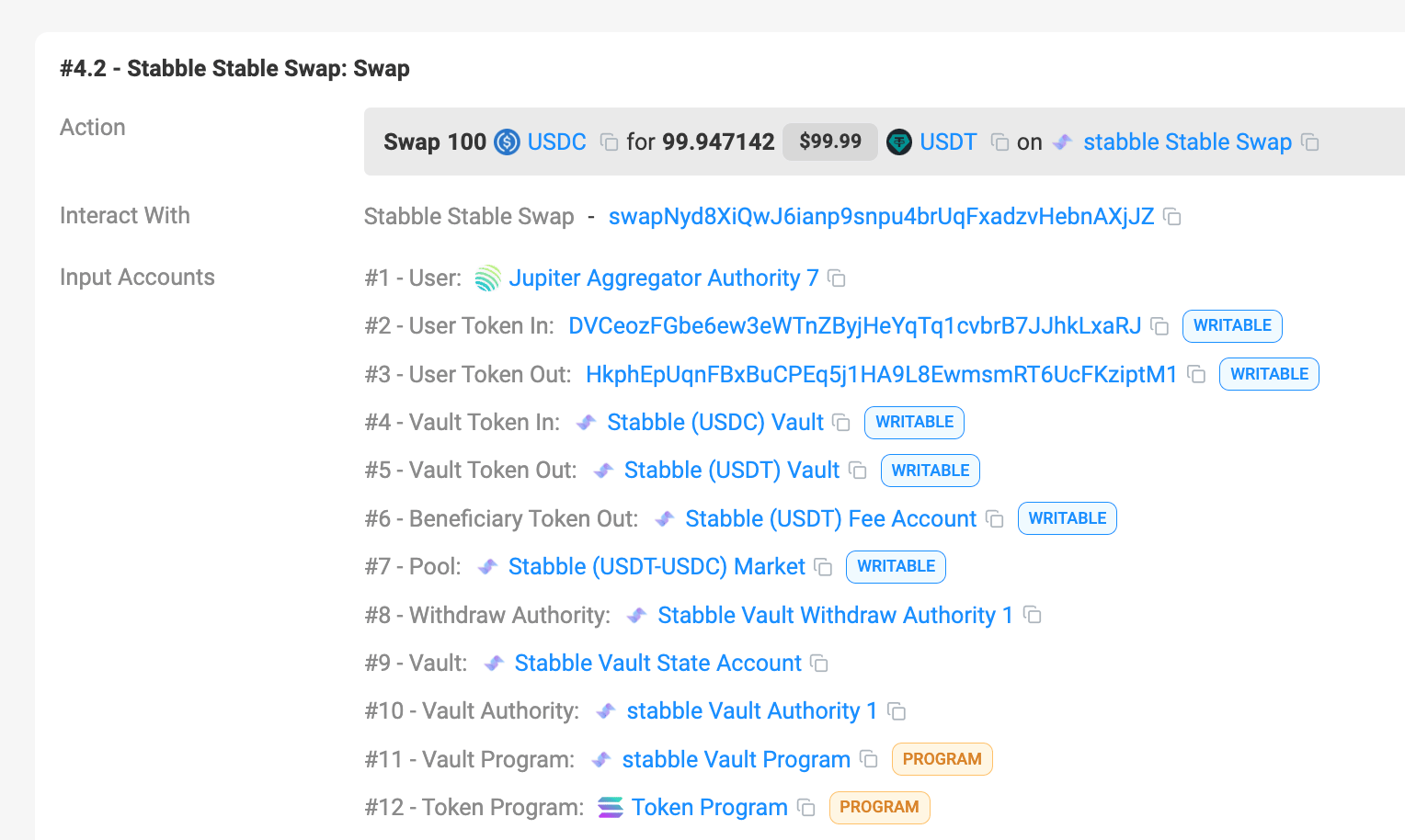
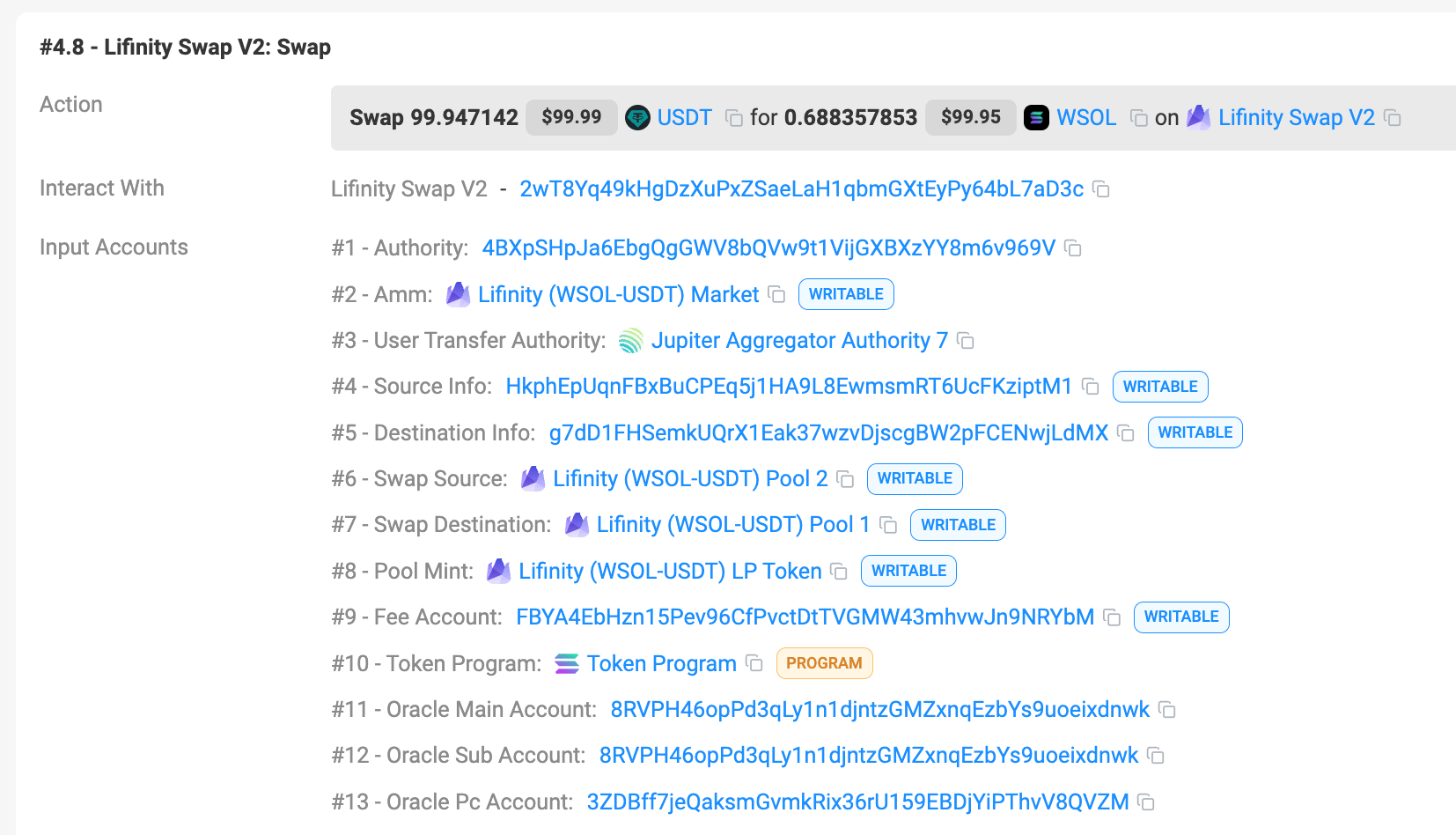
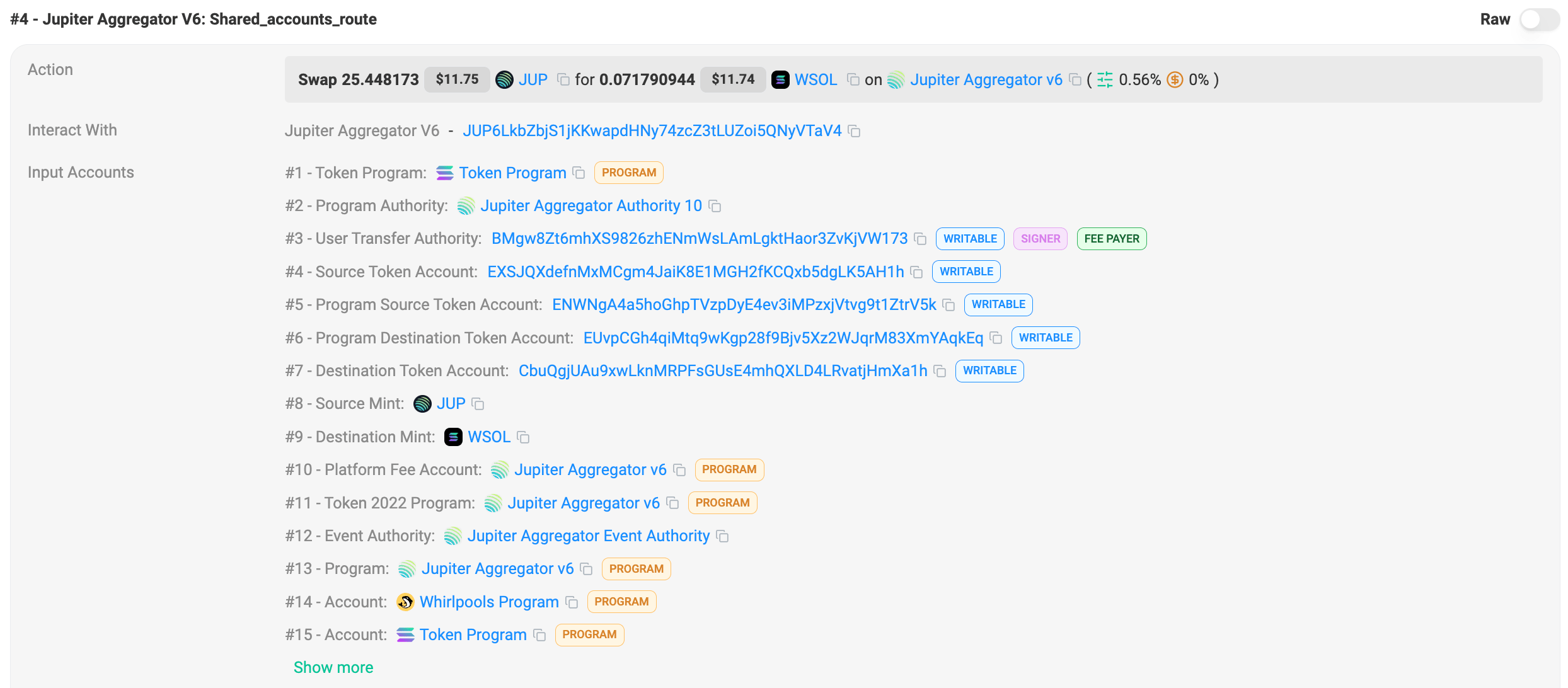
* You can see that there are a total of 2 inner swaps where the number of accounts respectively are
* Stabble Stable Swap: 12
* Lifinity Swap V2: 13
* Total: 25
* The `maxAccounts` parameter is to control this value - to limit the total number of accounts in the inner swaps.
* It doesn’t take into the consideration of a few things:
* Each of the inner swap’s program address, so 2 in this case.
* Top level routing instruction accounts where in this case Shared Accounts Route is 13 and Route is 9.
* There are also other accounts that are required to set up, clean up, etc which are not counted in the `maxAccounts` parameter
List of DEXes and their required accounts
Notes:
* Values in the table are only estimations and the actual number of accounts may vary.
* Min accounts are needed when we have already created the necessary [ALTs](https://docs.solana.com/developing/lookup-tables)
for a specific pool resulting in less accounts needed in a Shared Accounts Routing context.
* Sanctum and Sanctum Infinity are unique, and their accounts are dynamic.
| DEX | Max | Min |
| --- | --- | --- |
| Meteora DLMM | 47 | 19 |
| Meteora | 45 | 18 |
| Moonshot | 37 | 15 |
| Obric | 30 | 12 |
| Orca Whirlpool | 30 | 12 |
| Pumpfun AMM | 42 | 17 |
| Pumpfun Bonding Curve | 40 | 16 |
| Raydium | 45 | 18 |
| Raydium CLMM | 45 | 19 |
| Raydium CPMM | 37 | 14 |
| Sanctum | 80 | 80 |
| Sanctum Infinity | 80 | 80 |
| Solfi | 22 | 9 |
[About Metis Swap API](https://jupiter.mintlify.app/docs/swap)
[Build Swap Transaction](https://jupiter.mintlify.app/docs/swap/build-swap-transaction)
⌘I
---
# Jupiter Developers
[Skip to main content](https://jupiter.mintlify.app/docs/ultra/gasless#content-area)
🚨 Action Required: `lite-api.jup.ag` will be deprecated on 31st January 2026. [View migration guide →](https://dev.jup.ag/portal/migrate-from-lite-api)
[Jupiter home page](https://dev.jup.ag/)
Search...
⌘K
Search...
Navigation
About Ultra Swap
Gasless Support
[Home](https://jupiter.mintlify.app/)
[Get Started](https://jupiter.mintlify.app/get-started)
Developer Docs
[API Reference](https://jupiter.mintlify.app/api-reference)
[Tool Kits](https://jupiter.mintlify.app/tool-kits)
[Resources](https://jupiter.mintlify.app/resources/support)
[Updates](https://jupiter.mintlify.app/updates)
On this page
* [Quick Overview](https://jupiter.mintlify.app/docs/ultra/gasless#quick-overview)
* [Types of Gas](https://jupiter.mintlify.app/docs/ultra/gasless#types-of-gas)
* [Types of Gasless Mechanism](https://jupiter.mintlify.app/docs/ultra/gasless#types-of-gasless-mechanism)
* [Scenario Matrix](https://jupiter.mintlify.app/docs/ultra/gasless#scenario-matrix)
The Jupiter Ultra Swap includes **2 different gasless mechanisms** that allow users to execute swaps without having to pay for network fees, priority fees/tips or rent in SOL. This feature reduces onboarding friction and supports a smoother user experience where end-users don’t need to hold SOL just to trade tokens.
[](https://jupiter.mintlify.app/docs/ultra/gasless#quick-overview)
Quick Overview
-------------------------------------------------------------------------------------
| Gasless Mechanism | Coverage | Requirements & Notes |
| --- | --- | --- |
| **Ultra
Gasless Support** | \- Base network fee
\- Priority fee/tips
\- ATA rent
\- Other accounts rent | \- Taker has less than 0.01 SOL
\- Minimum trade size of ~10 USD
\- Gas is taken from swap amount which increases swap fee
\- Does not work with referral/payer params
\- Does not work with manual mode params |
| **JupiterZ
(RFQ)** | \- Base network fee
\- Priority fee/tips | \- Always gasless for network/prio fees (paid by MM)
\- ATA rent NOT covered: user must have enough SOL
\- No minimum trade size
\- Only applies if a market maker provides a route |
| **Other Routers** | \- | \- |
[](https://jupiter.mintlify.app/docs/ultra/gasless#types-of-gas)
Types of Gas
---------------------------------------------------------------------------------
1. Base network transaction fee
2. Associated Token Account (ATA) rent
3. Priority fee (or tips, etc)
4. Other accounts rent (some DEX may require additional accounts opened per taker (e.g. Pumpfun))
[](https://jupiter.mintlify.app/docs/ultra/gasless#types-of-gasless-mechanism)
Types of Gasless Mechanism
-------------------------------------------------------------------------------------------------------------
Refer to [Payer](https://jupiter.mintlify.app/docs/ultra/add-payer)
section for more details and usage on the Integrator Gas Payer.
* Jupiter Ultra Gasless Support
* Jupiter Z (RFQ) Gasless
* Integrator Gas Payer
1. **When does it apply?**
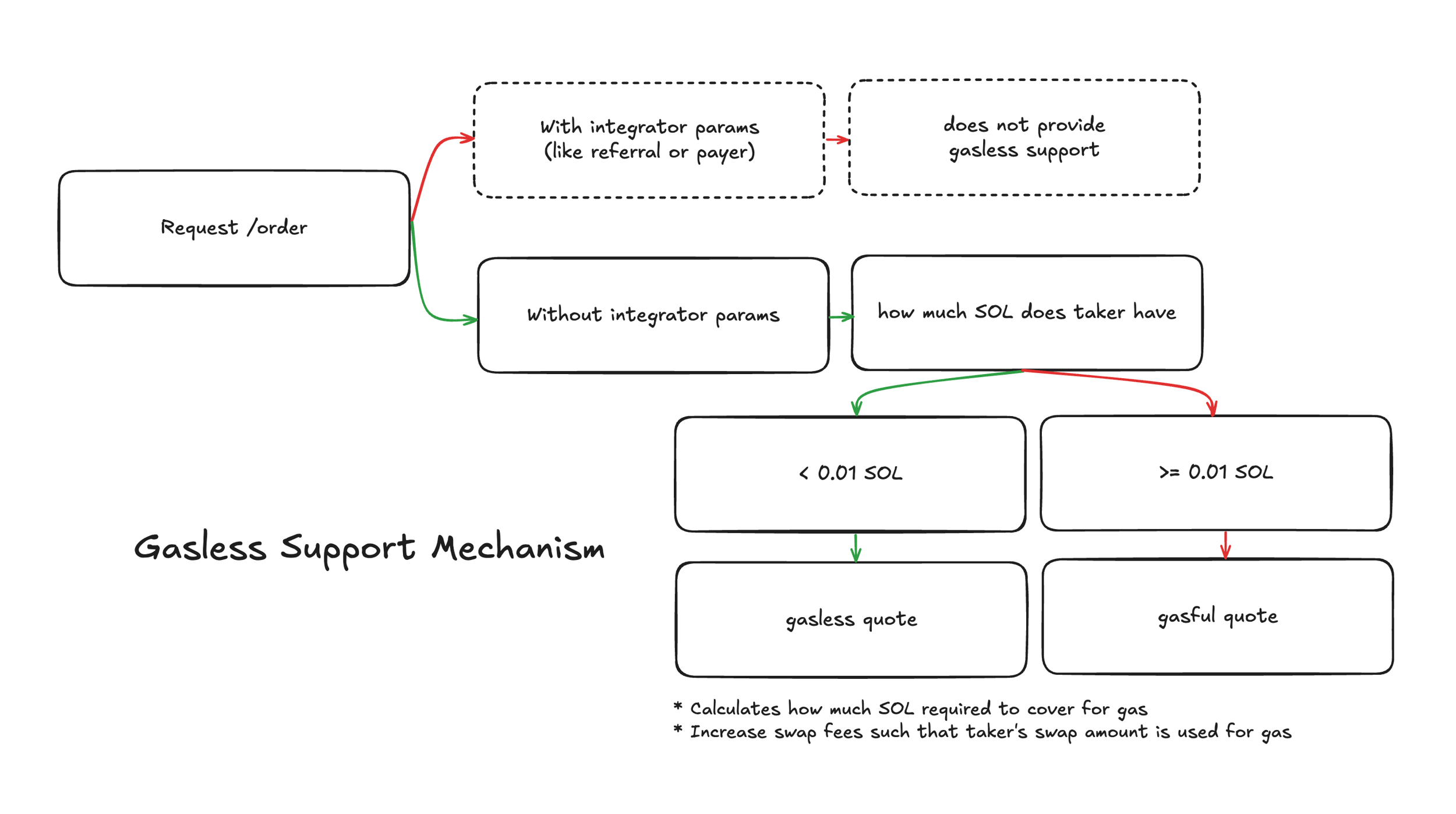
* Gasless Support only kicks in for Iris router.
* Requires taker to have less than 0.01 SOL.
* Minimum trade size of 10 USD is required, but this is dynamic as priority fees/tips can vary based on the current market conditions.
2. **What does it cover?**
* Base network transaction fee
* Priority fee/tips
* Associated token account rent
* Other accounts rent
3. **How does it work?**
* It calculates the required SOL amount to cover the cost of gasless support, and increases the swap fee to cover the cost, this means the taker will recieve lesser output tokens. You can use the `feeBps` field to identify the increased fee.
* It adds a secondary signer to the transaction to pay to be the gas payer which is Jupiter Ultra’s self gas payer.
4. **What are the limitations?**
* It only works for default Ultra transactions
* It does not work when passing in integrator parameters like `referralAccount`, `referralFee`, `payer`, etc.
* It does not work when passing in manual mode parameters like `slippageBps`, `priorityFeeLamports`, `excludeRouters`, etc.
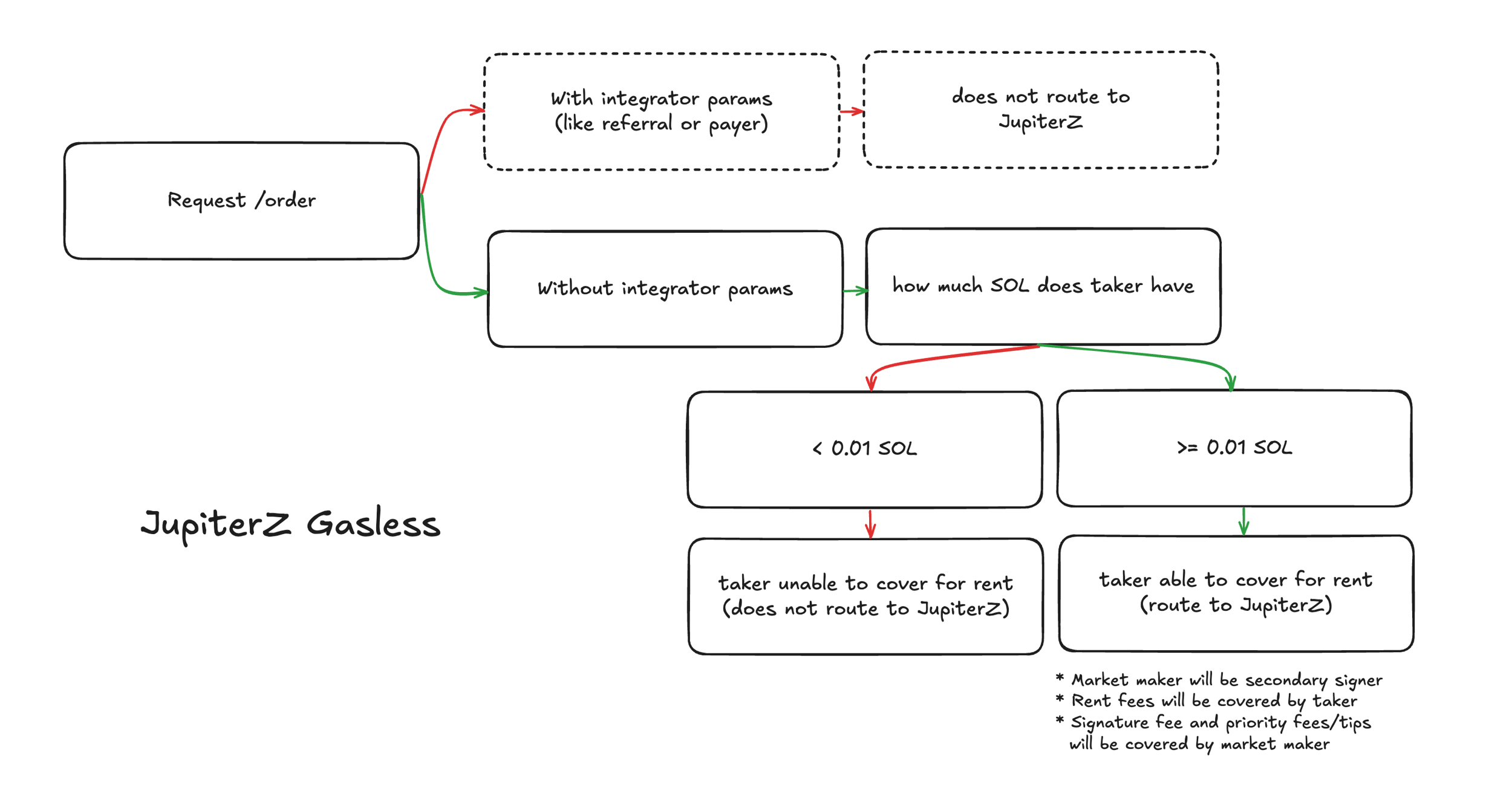
1. **When does it apply?**
* JupiterZ is our RFQ engine, it is gasless by default.
* No minimum trade size required but dependent on if MM provides a quote.
2. **What does it cover?**
* Base network transaction fee
* Priority fee (or tips, etc)
* **Does not cover for associated token account rent**.
* It also means the taker will have to pay for the rent themselves, and if they do not have sufficient SOL for rent, JupiterZ will not be routed.
3. **How does it work?**
* As long as the JupiterZ (or the market makers) provide a quote for your request, the transaction will be gasless.
* It adds a secondary signer to the transaction to pay to be the gas payer - which is the market maker.
4. **What are the limitations?**
* It only works for default Ultra transactions
* It does not work when passing in integrator parameters like `referralAccount`, `referralFee`, `payer`, etc.
* It does not work when passing in manual mode parameters like `slippageBps`, `priorityFeeLamports`, `excludeRouters`, etc.
* If taker does not have sufficient SOL for rent, JupiterZ will not be routed.
1. **When does it apply?**
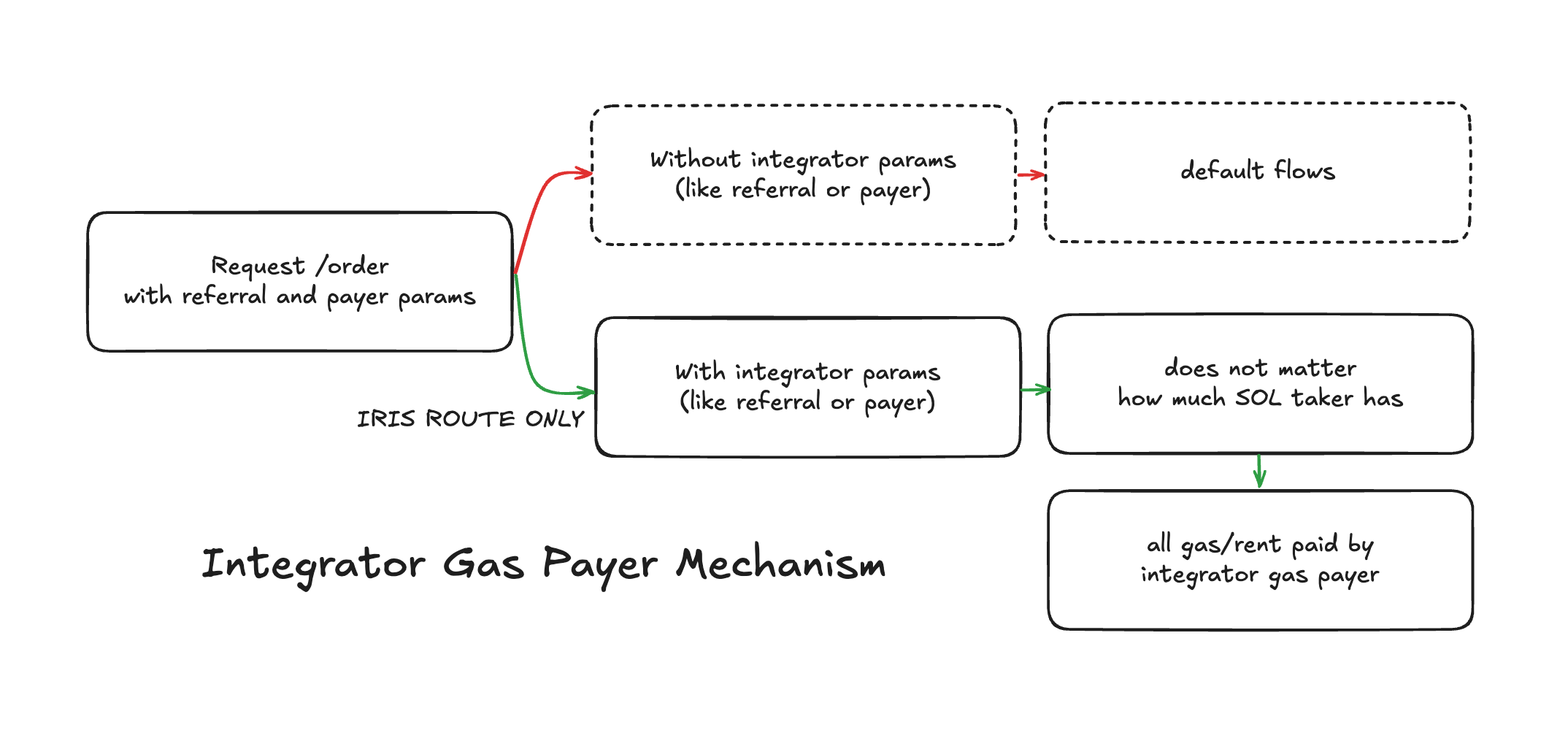
* Integrator Gas Payer works only when integrator passes in `referralAccount` and `referralFee`, together with `payer` and `closeAuthority`.
* Regardless of how much SOL the taker has, the payer will be the fee payer.
* Applying these parameters will default routing to only Iris.
2. **What does it cover?**
* The `payer` address will be the fee payer of the entire transaction:
* Base network transaction fee
* Priority fee/tips
* Associated token account rent
* Other account rents
3. **How does it work?**
* The transaction returned will require both taker and payer signature before submitting to `/execute`.
* The associated token account rent such as:
* Temporary WSOL ATA will be covered by payer and will be returned to payer in the same transaction.
* Any other ATAs will be covered by payer, but not returned to payer in the same transaction, since it is likely the ATA holds the tokens post-swap.
* The `closeAuthority` address will be decided by you, refer to [Payer](https://jupiter.mintlify.app/docs/ultra/add-payer)
for more details.
* It adds a secondary signer to the transaction to pay to be the gas payer - which is the integrator.
4. **What are the limitations?**
* Passing in `payer` parameters will default routing to only Iris.
[](https://jupiter.mintlify.app/docs/ultra/gasless#scenario-matrix)
Scenario Matrix
---------------------------------------------------------------------------------------
| **Scenario** | **Ultra
Gasless Support** | **JupiterZ
(Assuming if quoted)** |
| --- | --- | --- |
| **Taker has SOL & ATA** | Taker pays gas | MM pays gas |
| **Taker has SOL, no ATA** | Taker pays gas & ATA rent | MM pays gas, taker pays ATA rent |
| **No SOL, has ATA** | \- Gas taken from swap amount
\- Min $10 swap | MM pays gas |
| **No SOL, no ATA** | \- Gas & rent from swap amount
\- Min $10 swap | Not supported (no ATA funding) |
| **No SOL, has ATA,
Small swap** | Quote shown, but cannot swap
[`errorCode=3`](https://jupiter.mintlify.app/docs/ultra/response#order-response-codes) | MM pays gas |
| **No SOL, no ATA,
Small swap** | Quote shown, but cannot swap
[`errorCode=3`](https://jupiter.mintlify.app/docs/ultra/response#order-response-codes) | Not supported (no ATA funding) |
[Get Started](https://jupiter.mintlify.app/docs/ultra/get-started)
[Fees](https://jupiter.mintlify.app/docs/ultra/fees)
⌘I
---
# Jupiter Developers
[Skip to main content](https://jupiter.mintlify.app/docs/ultra/get-order#content-area)
🚨 Action Required: `lite-api.jup.ag` will be deprecated on 31st January 2026. [View migration guide →](https://dev.jup.ag/portal/migrate-from-lite-api)
[Jupiter home page](https://dev.jup.ag/)
Search...
⌘K
Search...
Navigation
Ultra Swap API
Get Order
[Home](https://jupiter.mintlify.app/)
[Get Started](https://jupiter.mintlify.app/get-started)
Developer Docs
[API Reference](https://jupiter.mintlify.app/api-reference)
[Tool Kits](https://jupiter.mintlify.app/tool-kits)
[Resources](https://jupiter.mintlify.app/resources/support)
[Updates](https://jupiter.mintlify.app/updates)
On this page
* [Order Response](https://jupiter.mintlify.app/docs/ultra/get-order#order-response)
To get an Ultra Swap order, you need to pass in the required parameters such as:
| Parameter | Description |
| --- | --- |
| `inputMint` | The input token mint address |
| `outputMint` | The output token mint address |
| `amount` | The amount of input token to swap, in native token units (before decimals) |
| `taker` | The user’s wallet address (**Note:** If the `taker` is not provided, there will still be an Order Response with no `transaction` field) |
| `referralAccount` | The referral account address - refer to the [Add Fees To Ultra Swap](https://jupiter.mintlify.app/docs/ultra/add-fees-to-ultra)
guide for the step by step process |
| `referralFee` | The referral fee in basis points (bps) |
Get Order
Copy
Ask AI
const orderResponse = await (
await fetch(
'https://api.jup.ag/ultra/v1/order' +
'?inputMint=So11111111111111111111111111111111111111112' +
'&outputMint=EPjFWdd5AufqSSqeM2qN1xzybapC8G4wEGGkZwyTDt1v' +
'&amount=100000000' +
'&taker=jdocuPgEAjMfihABsPgKEvYtsmMzjUHeq9LX4Hvs7f3',
{
headers: {
'x-api-key': 'your-api-key',
},
}
)
).json();
[](https://jupiter.mintlify.app/docs/ultra/get-order#order-response)
Order Response
---------------------------------------------------------------------------------------
In the order response, you will receive a number of fields that are important to note of, such as the `swapType`, `slippageBps`, etc.
Refer to [Response](https://jupiter.mintlify.app/docs/ultra/response)
section for example responses. Refer to [API Reference](https://jupiter.mintlify.app/api-reference/ultra)
section for the full response fields.
The main fields you should need:
* `transaction`: The base64 encoded transaction that you need to sign before submitting to the network.
* `requestId`: The request ID of the order to be used in the `Execute Order` endpoint.
Now, you are able to get a swap order, next steps is to make a post request to the `Execute Order` endpoint. [Let’s go](https://jupiter.mintlify.app/docs/ultra/execute-order)
!
[Fees](https://jupiter.mintlify.app/docs/ultra/fees)
[Execute Order](https://jupiter.mintlify.app/docs/ultra/execute-order)
⌘I
---
# Jupiter Developers
[Skip to main content](https://jupiter.mintlify.app/docs/ultra/rate-limit#content-area)
🚨 Action Required: `lite-api.jup.ag` will be deprecated on 31st January 2026. [View migration guide →](https://dev.jup.ag/portal/migrate-from-lite-api)
[Jupiter home page](https://dev.jup.ag/)
Search...
⌘K
Search...
Navigation
Ultra Swap API
Rate Limit
[Home](https://jupiter.mintlify.app/)
[Get Started](https://jupiter.mintlify.app/get-started)
Developer Docs
[API Reference](https://jupiter.mintlify.app/api-reference)
[Tool Kits](https://jupiter.mintlify.app/tool-kits)
[Resources](https://jupiter.mintlify.app/resources/support)
[Updates](https://jupiter.mintlify.app/updates)
On this page
* [Overview](https://jupiter.mintlify.app/docs/ultra/rate-limit#overview)
* [API Key Rules](https://jupiter.mintlify.app/docs/ultra/rate-limit#api-key-rules)
* [How Dynamic Rate Limit Works](https://jupiter.mintlify.app/docs/ultra/rate-limit#how-dynamic-rate-limit-works)
* [Managing Rate Limits](https://jupiter.mintlify.app/docs/ultra/rate-limit#managing-rate-limits)
[](https://jupiter.mintlify.app/docs/ultra/rate-limit#overview)
Overview
----------------------------------------------------------------------------
| Property | Dynamic |
| --- | --- |
| **Base URL** | `https://api.jup.ag/ultra/` |
| **Cost** | Free to use, but Ultra Swap incurs swap fees |
| **API Key** | Required |
| **Requests Per Minute** | Base Quota + Added Quota |
[](https://jupiter.mintlify.app/docs/ultra/rate-limit#api-key-rules)
API Key Rules
--------------------------------------------------------------------------------------
The Ultra Swap API requires an API key to be used and can be generated via [Portal](https://portal.jup.ag/)
.
* It is required to be used for the Dynamic Rate Limit.
* The API Key is free to generate and is universal, the API Key will work for all APIs.
* Upgrading to a Pro plan only applies to other APIs, does not work with Ultra Swap API.
[Read about Portal Rate Limits for full details\
----------------------------------------------](https://jupiter.mintlify.app/portal/rate-limit)
[](https://jupiter.mintlify.app/docs/ultra/rate-limit#how-dynamic-rate-limit-works)
How Dynamic Rate Limit Works
--------------------------------------------------------------------------------------------------------------------
Every **10 minutes**
* The system aggregates your swap volume from `/execute` on Ultra Swap for **the current rolling day** (volume of (current timestamp - 1 day) up to present).
* After which, the Added Quota will update, which will be added on top of the Base Quota.
| Swap Volume | Requests Per Period | Sliding Window Period |
| --- | --- | --- |
| $0 | 50 Base + 0 Added = 50 | 10 seconds |
| $10,000 | 50 Base + 1 Added = 51 | 10 seconds |
| $100,000 | 50 Base + 11 Added = 61 | 10 seconds |
| $1,000,000 | 50 Base + 115 Added = 165 | 10 seconds |
The formula is subject to changes as we experiment with the Dynamic Rate Limit system.If you find that the rate limit is too restrictive, please reach out to us in [Discord](https://discord.gg/jup)
.
[](https://jupiter.mintlify.app/docs/ultra/rate-limit#managing-rate-limits)
Managing Rate Limits
----------------------------------------------------------------------------------------------------
If you receive a 429 response, you should:
1. Implement exponential backoff in your retry logic
2. Wait for sliding window to allow for more requests
3. **Scale your Ultra Swap usage** to unlock higher limits or reach out to us in [Discord](https://discord.gg/jup)
.
Bursting beyond your allocation may result in **temporary 429s/rate limits**, even after the refill period. Avoid aggressive retry patterns.
[Response](https://jupiter.mintlify.app/docs/ultra/response)
[Add Integrator Fees](https://jupiter.mintlify.app/docs/ultra/add-fees-to-ultra)
⌘I
---
# Jupiter Developers
[Skip to main content](https://jupiter.mintlify.app/docs/ultra#content-area)
🚨 Action Required: `lite-api.jup.ag` will be deprecated on 31st January 2026. [View migration guide →](https://dev.jup.ag/portal/migrate-from-lite-api)
[Jupiter home page](https://dev.jup.ag/)
Search...
⌘K
Search...
Navigation
About Ultra Swap
Overview
[Home](https://jupiter.mintlify.app/)
[Get Started](https://jupiter.mintlify.app/get-started)
Developer Docs
[API Reference](https://jupiter.mintlify.app/api-reference)
[Tool Kits](https://jupiter.mintlify.app/tool-kits)
[Resources](https://jupiter.mintlify.app/resources/support)
[Updates](https://jupiter.mintlify.app/updates)
On this page
* [Quick Launch](https://jupiter.mintlify.app/docs/ultra#quick-launch)
* [Features](https://jupiter.mintlify.app/docs/ultra#features)
* [What About Metis Swap API?](https://jupiter.mintlify.app/docs/ultra#what-about-metis-swap-api)
Ultra Swap is the most advanced yet developer-friendly solution for building trading applications on Solana. Ultra Swap is designed to be the only solution you’ll ever need for creating exceptional trading experiences.
[](https://jupiter.mintlify.app/docs/ultra#quick-launch)
Quick Launch
-------------------------------------------------------------------------
[Ultra Swap API\
--------------\
\
RPC-less architecture and Jupiter handles all trading optimizations for you.](https://jupiter.mintlify.app/docs/ultra/get-started)
[Plugin\
------\
\
Easiest way to integrate full end-to-end Ultra Swap interface.](https://jupiter.mintlify.app/tool-kits/plugin)
[](https://jupiter.mintlify.app/docs/ultra#features)
Features
-----------------------------------------------------------------
[Read our latest blog on Ultra V3](https://jupiter.mintlify.app/blog/ultra-v3)
.
Juno Liquidity Engine
Ultra Swap utilizes the latest [Juno Liquidity Engine](https://jupiter.mintlify.app/docs/routing)
which aggregates across multiple liquidity sources, including Jupiter’s proprietary routing engines: improved versions of Iris and JupiterZ, and third-party liquidity sources, for the best possible price.It also includes self-learning capabilities (to detect and sideline low-quality liquidity sources) which creates a competitive environment for all liquidity sources to continously optimize their performance and price.
Best Executed Price
Ultra Swap guarantees the best executed price through several key innovations:
* **Predictive Execution**: Ultra simulates and compares executed prices (not just quoted prices) before actually sending a transaction, dynamically selecting the route with the least slippage for real user outcomes.
* **Ultra Signaling**: Ultra provides signaling to Proprietary AMMs to help them distinguish Ultra user flow, incentivizing them to quote tighter spreads and better prices.
* **Slippage-Aware Routing**: Automatically prioritizes and selects routes that minimize realized slippage, protecting users from misleading “best quotes” that deliver poor executed results.
For detailed examples and results, see [our Ultra V3 blog post](https://jupiter.mintlify.app/blog/ultra-v3#maximising-executed-price)
.
Sub-second Transaction Landing & MEV Protection
Ultra is now using our new in-house transaction-landing engine, Jupiter Beam, which allows us to send transactions via our own infrastructure: designed to make every trade faster, more private, and more precise.
* Leverage our own validator stake and dedicated R&D efforts.
* Complete transaction privacy until on-chain execution.
* Eliminate the risk of artificial delays and front-running, ensuring faster and more secure execution for our users.
Results:
* Landing Latency: Improved by 50-66% compared to our previous approach that relied on multiple providers
* Lands in 0–1 block (~50–400ms)
* Compared to the 1–3 blocks (~400ms–1.2s) previously.
* MEV Protection: Routing transactions through our own infrastructure provides:
* Complete transaction privacy until on-chain execution.
* Reduce frontrunning exposure - transactions are invisible to public mempool scanners.
* Reduce risk of sandwich attack vectors - [see our blog post on Ultra’s swap volume to value extracted ratio](https://jupiter.mintlify.app/blog/ultra-v3#mev-protection)
.
Real Time Slippage Estimator
Building on top of our previous versions of slippage estimation/optimization engines, we have developed a new Real Time Slippage Estimator (RTSE), that is able to intelligently estimate the best possible slippage to use at the time of execution, balancing between trade success and price protection.RTSE uses a variety of heuristics, algorithms and monitoring to ensure the best user experience:
* Heuristics: Token categories, historical and real-time slippage data, and more.
* Uses token categories to intelligently estimate slippage for different token types.
* Automatic prioritization of slippage-protected routes over purely price-optimized routes.
* Increased volatility sensitivity for tokens with high historical volatility patterns.
* Algorithms: Exponential Moving Average (EMA) on slippage data, and more.
* Monitoring: Real-time monitoring of failure rates to ensure reactiveness to increase slippage when necessary.
Gasless
Ultra Swap provides different gasless mechanisms for different scenarios.
* Gasless via Jupiter Z (RFQ): All swaps routed via Jupiter Z are gasless, as the market maker is the fee payer for the transaction.
* Gasless via Gasless Support: Depending on the tokens and trade sizes of your swap, Ultra Swap will automatically determine if it can provide gasless support to your swap by helping you pay for the transaction fee of your swap - you can identify this via the secondary signer in the transaction.
API Latency
95% of all swaps are executed under 2 seconds via our proprietary transaction sending engine.
| Endpoint | Description | Latency (P50 Average) |
| --- | --- | --- |
| `/order` | Aggregating across multiple liquidity sources and selecting the best price. | 300ms |
| `/execute` | Broadcasting the transaction to the network and polling for the status and result of the transaction. | Roundtrip
Iris: 700ms; JupiterZ: 2s |
| `/holdings` | Retrieving the user’s balances. | 70ms |
| `/shield` | Enhanced token security feature to provide critical token information. | 150ms |
| `/search` | Searching for a token by its symbol, name or mint address. | 15ms |
| Feature | Description |
| --- | --- |
| **Best Trading Experience** | Ultra Swap is the best trading experience in crypto, it handles all the complexities and headaches such as slippage protection, transaction landing and more. |
| **RPC-less** | You do not need to maintain your own RPC for blockchain actions such as send transactions, get token information, or get user balances - we handle everything for you. |
| **API Coverage** | Ultra Swap covers all the necessary features for you to build your application, including the features mentioned below and useful information such as user wallet balances, token information, and more. |
| **Integrator Fee** | Ultra Swap allows you to add custom integrator fees to your transactions, on top of Jupiter’s fees. Refer to the [Add Fees To Ultra Swap](https://jupiter.mintlify.app/docs/ultra/add-fees-to-ultra)
guide for more information. |
| **Developer Support** | Get help from our [developer support in Discord](https://discord.gg/jup)
. |
| **World Class Support** | If you ever face any issues or need help when using Ultra Swap, our support team is here to assist you 24/7. Read more about [Ultra Swap Customer Support](https://jupiter.mintlify.app/resources/support#customer-support)
. |
[](https://jupiter.mintlify.app/docs/ultra#what-about-metis-swap-api)
What About Metis Swap API?
----------------------------------------------------------------------------------------------------
Ultra Swap API is the next evolution of our swap infrastructure, designed and continuously optimized to deliver the best possible trading experience on Solana. We are focused on providing a high-performance, reliable, and feature-rich API that incorporates the latest advancements and optimizations for users and integrators. While Ultra Swap API is engineered for optimal performance and ease of integration, the Metis Swap API remains available for developers who require advanced customization, such as:
* Adding custom instructions.
* Incorporating Cross Program Invocation (CPI) calls.
* Selecting specific broadcasting strategies for signed transactions (e.g., priority fee, Jito, etc.).
* Choosing which DEXes or AMMs to route through.
* Modifying the number of accounts used in a transaction.
If your use case demands these highly custom features, the Metis Swap API may be more suitable. However, it also requires you to manage many aspects that Ultra Swap API handles automatically, including:
* **RPC management**: Retrieving wallet balances, broadcasting, and tracking transactions.
* **Transaction fee selection**: Managing priority fees, Jito fees, and more.
* **Slippage optimization**: Determining the best slippage settings for trade success and price protection.
* **Transaction broadcasting**: Ultra Swap leverages a proprietary transaction engine for superior speed and reliability.
* **Swap result parsing**: Handling transaction polling, parsing, and error management.
For most developers and applications, Ultra Swap API is the recommended choice, as it is purpose-built and continually improved to provide the best possible swap experience on Solana.
[Get Started](https://jupiter.mintlify.app/docs/ultra/get-started)
⌘I
---
# Jupiter Developers
[Skip to main content](https://jupiter.mintlify.app/docs/ultra/execute-order#content-area)
🚨 Action Required: `lite-api.jup.ag` will be deprecated on 31st January 2026. [View migration guide →](https://dev.jup.ag/portal/migrate-from-lite-api)
[Jupiter home page](https://dev.jup.ag/)
Search...
⌘K
Search...
Navigation
Ultra Swap API
Execute Order
[Home](https://jupiter.mintlify.app/)
[Get Started](https://jupiter.mintlify.app/get-started)
Developer Docs
[API Reference](https://jupiter.mintlify.app/api-reference)
[Tool Kits](https://jupiter.mintlify.app/tool-kits)
[Resources](https://jupiter.mintlify.app/resources/support)
[Updates](https://jupiter.mintlify.app/updates)
On this page
* [Sign Transaction](https://jupiter.mintlify.app/docs/ultra/execute-order#sign-transaction)
* [Execute Order](https://jupiter.mintlify.app/docs/ultra/execute-order#execute-order)
* [Transaction Status Polling](https://jupiter.mintlify.app/docs/ultra/execute-order#transaction-status-polling)
[](https://jupiter.mintlify.app/docs/ultra/execute-order#sign-transaction)
Sign Transaction
-----------------------------------------------------------------------------------------------
Using the Solana `web3.js@1` library, you can sign the transaction as follows:Set up dependencies and wallet for signing
**Set up dependencies for signing**
Copy
Ask AI
npm install @solana/web3.js@1
**Set up Development Wallet**
You can paste in your private key for testing but this is not recommended for production.
* Either use your private key in the project directly, you can do it via a `.env` file.
* Or set up your private key in the [Solana CLI](https://solana.com/docs/intro/installation#create-wallet)
.
Store private key in .env
Store private key in Solana CLI
Copy
Ask AI
// In your .env file
PRIVATE_KEY=""
// In your index.js (or any file that needs the private key)
import { Keypair } from '@solana/web3.js';
import dotenv from 'dotenv';
require('dotenv').config();
const wallet = Keypair.fromSecretKey(bs58.decode(process.env.PRIVATE_KEY || '')));
Sign Transaction
Copy
Ask AI
import { VersionedTransaction } from '@solana/web3.js';
// ... Get Order's response
// Extract the transaction from the order response
const transactionBase64 = orderResponse.transaction
// Deserialize, sign and serialize the transaction
const transaction = VersionedTransaction.deserialize(Buffer.from(transactionBase64, 'base64'));
transaction.sign([wallet]);
const signedTransaction = Buffer.from(transaction.serialize()).toString('base64');
[](https://jupiter.mintlify.app/docs/ultra/execute-order#execute-order)
Execute Order
-----------------------------------------------------------------------------------------
By making a post request to the `/execute` endpoint, Jupiter executes the swap transaction on behalf of you/your users through our own proprietary transaction sending infrastructure. This already includes handling of slippage, priority fees, transaction landing and more. To make a post request to execute a swap order, you need to pass in the required parameters,:
* `signedTransaction`: The signed and serialized base64 encodedtransaction [like above](https://jupiter.mintlify.app/docs/ultra/execute-order#sign-transaction)
* `requestId`: The order response’s request ID [from Get Order](https://jupiter.mintlify.app/docs/ultra/get-order)
Execute Order
Copy
Ask AI
const executeResponse = await (
await fetch('https://api.jup.ag/ultra/v1/execute', {
method: 'POST',
headers: {
'Content-Type': 'application/json',
'x-api-key': 'your-api-key',
},
body: JSON.stringify({
signedTransaction: signedTransaction,
requestId: orderResponse.requestId,
}),
})
).json();
[](https://jupiter.mintlify.app/docs/ultra/execute-order#transaction-status-polling)
Transaction Status Polling
-------------------------------------------------------------------------------------------------------------------
After our transaction sending service has submitted your swap, we will actively poll for your transaction status as part of the `/execute` endpoint. You will receive a response with the status of the swap.
* You can submit with the same `signedTransaction` and `requestId` for **up to 2 minutes regardless of state**, to poll for the transaction status.
* The transaction will not double execute since it has the same signature.
* If connection got dropped, you can try again with the same `signedTransaction` and `requestId` to poll for the status of the swap.
* If there is no status, the order likely expired (did not get processed onchain and failed), but reach out to us if cases like this happen.
Transaction Status Polling
Copy
Ask AI
if (executeResponse.status === "Success") {
console.log('Swap successful:', JSON.stringify(executeResponse, null, 2));
console.log(`https://solscan.io/tx/${executeResponse.signature}`);
} else {
console.error('Swap failed:', JSON.stringify(executeResponse, null, 2));
console.log(`https://solscan.io/tx/${executeResponse.signature}`);
}
[Get Order](https://jupiter.mintlify.app/docs/ultra/get-order)
[Search Token](https://jupiter.mintlify.app/docs/ultra/search-token)
⌘I
---
# Jupiter Developers
[Skip to main content](https://jupiter.mintlify.app/docs/ultra/get-started#content-area)
🚨 Action Required: `lite-api.jup.ag` will be deprecated on 31st January 2026. [View migration guide →](https://dev.jup.ag/portal/migrate-from-lite-api)
[Jupiter home page](https://dev.jup.ag/)
Search...
⌘K
Search...
Navigation
About Ultra Swap
Get Started
[Home](https://jupiter.mintlify.app/)
[Get Started](https://jupiter.mintlify.app/get-started)
Developer Docs
[API Reference](https://jupiter.mintlify.app/api-reference)
[Tool Kits](https://jupiter.mintlify.app/tool-kits)
[Resources](https://jupiter.mintlify.app/resources/support)
[Updates](https://jupiter.mintlify.app/updates)
On this page
* [Overview](https://jupiter.mintlify.app/docs/ultra/get-started#overview)
* [Guides](https://jupiter.mintlify.app/docs/ultra/get-started#guides)
* [FAQ](https://jupiter.mintlify.app/docs/ultra/get-started#faq)
[](https://jupiter.mintlify.app/docs/ultra/get-started#overview)
Overview
-----------------------------------------------------------------------------
| Step | Endpoint | Description |
| --- | --- | --- |
| 1 | [**Get Order**](https://jupiter.mintlify.app/docs/ultra/get-order) | Request for a quote and swap transaction. |
| 2 | [**Execute Order**](https://jupiter.mintlify.app/docs/ultra/execute-order) | Sign and execute the swap transaction. |
| \- | [**Search Token**](https://jupiter.mintlify.app/docs/ultra/search-token) | Search for a token by its symbol, name or mint address. |
| \- | [**Get Holdings**](https://jupiter.mintlify.app/docs/ultra/get-holdings) | Request for token balances of an account. |
| \- | [**Get Shield**](https://jupiter.mintlify.app/docs/ultra/get-shield) | Enhanced security feature to provide critical token information contributing to better informed trading decisions. |
| \- | [**API Reference**](https://jupiter.mintlify.app/api-reference/ultra) | Reference for the Ultra Swap API endpoints. |
[](https://jupiter.mintlify.app/docs/ultra/get-started#guides)
Guides
-------------------------------------------------------------------------
| Guide | Description |
| --- | --- |
| [**Gasless Support**](https://jupiter.mintlify.app/docs/ultra/gasless) | Important notes of gasless mechanisms. |
| [**Fees**](https://jupiter.mintlify.app/docs/ultra/fees) | Breakdown of fees involved. |
| [**Add Fees to Ultra Swap**](https://jupiter.mintlify.app/docs/ultra/add-fees-to-ultra) | Add custom integrator fees to your Ultra Swap transaction. |
| [**Add Integrator Payer**](https://jupiter.mintlify.app/docs/ultra/add-payer) | Add integrator payer to pay for networks fees and rent on behalf of your users. |
| [**Plugin Integration**](https://jupiter.mintlify.app/docs/ultra/plugin-integration) | Walkthrough on how to integrate Ultra Swap API with Jupiter Plugin. |
[](https://jupiter.mintlify.app/docs/ultra/get-started#faq)
FAQ
-------------------------------------------------------------------
Can I add custom integrator fees to Ultra Swap API?
* **Integrator without custom fees**: Do note that when your users swap using Ultra Swap, we take 5 to 10 bps of the swap amount as a fee.
* **Integrator with custom fees**: If you are an integrator, you can add custom integrator fees via Ultra Swap API and Jupiter will take 20% of the integrator fees. Please refer to the [Add Fees To Ultra Swap](https://jupiter.mintlify.app/docs/ultra/add-fees-to-ultra)
guide for more information.
Can I modify Ultra Swap transactions?
* No, you cannot modify Ultra Swap transactions.
* Ultra Swap is intended to use as is, without any modifications.
What is the rate limit for Ultra Swap API?
* Dynamic Rate Limits are now applied to Ultra Swap API.
* No Pro plans or payment needed.
* Simply generate the universal API Key via [Portal](https://portal.jup.ag/)
* Rate limits scale together with your swap volume.
* [Read more about Ultra Swap API Dynamic Rate Limit](https://jupiter.mintlify.app/portal/rate-limit)
.
[Overview](https://jupiter.mintlify.app/docs/ultra)
[Gasless Support](https://jupiter.mintlify.app/docs/ultra/gasless)
⌘I
---
# Jupiter Developers
[Skip to main content](https://jupiter.mintlify.app/docs/ultra/add-payer#content-area)
🚨 Action Required: `lite-api.jup.ag` will be deprecated on 31st January 2026. [View migration guide →](https://dev.jup.ag/portal/migrate-from-lite-api)
[Jupiter home page](https://dev.jup.ag/)
Search...
⌘K
Search...
Navigation
Ultra Swap Guides
Add Integrator Payer
[Home](https://jupiter.mintlify.app/)
[Get Started](https://jupiter.mintlify.app/get-started)
Developer Docs
[API Reference](https://jupiter.mintlify.app/api-reference)
[Tool Kits](https://jupiter.mintlify.app/tool-kits)
[Resources](https://jupiter.mintlify.app/resources/support)
[Updates](https://jupiter.mintlify.app/updates)
On this page
* [Key Points](https://jupiter.mintlify.app/docs/ultra/add-payer#key-points)
* [Payer](https://jupiter.mintlify.app/docs/ultra/add-payer#payer)
* [Close Authority](https://jupiter.mintlify.app/docs/ultra/add-payer#close-authority)
If you are unfamiliar with [Ultra Swap’s Gasless Support mechanisms](https://jupiter.mintlify.app/docs/ultra/gasless)
, please refer to the doc.
[](https://jupiter.mintlify.app/docs/ultra/add-payer#key-points)
Key Points
-------------------------------------------------------------------------------
The Jupiter Ultra Swap API allows you to pay for networks fees and rent on behalf of your users. This feature further reduces onboarding friction as the integrator can now ensure gasless is enforced without requiring any additional requirements in Ultra’s Gasless Support like taker has to have < 0.01 SOL, minimum trade size or having to use the user’s swap amount.
| Aspect | Description |
| --- | --- |
| **Required with referral parameters** | When the `payer` parameter is passed in, it is expected to be used with referral parameters such as `referralAccount` and `referralFee`.
It is assumed that if the integrator is using their own gas payer for users, they will need to recoup the costs using referral fees. |
| **Integrator payer takes precedent** | When the `payer` parameter is passed in, it **always** takes precedent over Ultra’s Gasless Support mechanism. |
| **No minimum trade size requirement** | It does not require a minimum trade size. |
| **ATA rent handling** | **Temporary WSOL TA**: At the end of the swap, the WSOL TA will be closed and only the rent amount refunded to payer.
**Non-WSOL TA**: The TA will not be closed, since it is highly likely used for the output amount of the swap. However, [integrator may use `closeAuthority` to control the close authority of the TA, different rules may apply](https://jupiter.mintlify.app/docs/ultra/add-payer#close-authority)
. |
| **Enforces routing to Iris only** | When the `payer` parameter is passed in, it will default routing to only Iris. |
| **Requires backend signing** | Integrator is required to proxy the request to their backend in order to sign the transaction (partially signed by user) before sending to `/execute` |
[](https://jupiter.mintlify.app/docs/ultra/add-payer#payer)
Payer
---------------------------------------------------------------------
To use the `payer` parameter, you need to pass in the following parameters:
* `payer`: The public key of the account that will be used to pay for the network fees, priority fees/tips and rents.
* `closeAuthority`: The public key of the account that will be the close authority of the token accounts created during the swap (apart from WSOL token account).
However, as mentioned above, to use `payer`, it is expected to be used with referral parameters such as `referralAccount` and `referralFee` because it is assumed that the integrator will need to recoup the costs using referral fees.
* `referralAccount`: The public key of the referral account that is collecting the fees.
* `referralFee`: The fee bps that will be collected from the swap.
* [Refer to Add Fees to Ultra Swap guide](https://jupiter.mintlify.app/docs/ultra/add-fees-to-ultra)
for more details on how to set up.
Get Order
Copy
Ask AI
const orderResponse = await (
await fetch(
'https://api.jup.ag/ultra/v1/order' +
'?inputMint=So11111111111111111111111111111111111111112' +
'&outputMint=EPjFWdd5AufqSSqeM2qN1xzybapC8G4wEGGkZwyTDt1v' +
'&amount=100000000' +
'&taker=' +
'&referralAccount=' +
'&referralFee=100' +
'&payer=jdocuPgEAjMfihABsPgKEvYtsmMzjUHeq9LX4Hvs7f3' +
'&closeAuthority=', // dependent on how you want to handle taker's ATA
{
headers: {
'x-api-key': 'your-api-key',
},
}
)
).json();
[](https://jupiter.mintlify.app/docs/ultra/add-payer#close-authority)
Close Authority
-----------------------------------------------------------------------------------------
When using `payer` parameter, you are required to use `closeAuthority` parameter as well. When token accounts are created for the output swap amount, the rent of the token accounts are essentially being given away, in order to prevent a loss or abuse of the integrator gas payer, there are a few ways to handle it.
1. You can charge sufficient fees to ensure that it can cover the amount used by the payer.
2. You can set yourself as the close authority of the token account such that you have the authority to close the account and be the recipient of the rent.
**Usage of `closeAuthority` parameter**:
* If `closeAuthority == taker`, we DO NOT add instruction to set `closeAuthority`.
* If `closeAuthority !== taker`, we add the instruction to set new `closeAuthority`.
When setting a new `closeAuthority`, the taker can hold the account hostage if the balance in the token account is never zero._You can only close the token account when balance is zero_.
Refer to [Solana Docs](https://solana.com/docs/tokens/basics/create-token-account)
for more details on the close authority.
[Add Integrator Fees](https://jupiter.mintlify.app/docs/ultra/add-fees-to-ultra)
[Integrate Jupiter Plugin](https://jupiter.mintlify.app/docs/ultra/plugin-integration)
⌘I
---
# Jupiter Developers
[Skip to main content](https://jupiter.mintlify.app/docs/ultra/response#content-area)
🚨 Action Required: `lite-api.jup.ag` will be deprecated on 31st January 2026. [View migration guide →](https://dev.jup.ag/portal/migrate-from-lite-api)
[Jupiter home page](https://dev.jup.ag/)
Search...
⌘K
Search...
Navigation
Ultra Swap API
Response
[Home](https://jupiter.mintlify.app/)
[Get Started](https://jupiter.mintlify.app/get-started)
Developer Docs
[API Reference](https://jupiter.mintlify.app/api-reference)
[Tool Kits](https://jupiter.mintlify.app/tool-kits)
[Resources](https://jupiter.mintlify.app/resources/support)
[Updates](https://jupiter.mintlify.app/updates)
On this page
* [Order Response](https://jupiter.mintlify.app/docs/ultra/response#order-response)
* [Order Response Codes](https://jupiter.mintlify.app/docs/ultra/response#order-response-codes)
* [Execute Response](https://jupiter.mintlify.app/docs/ultra/response#execute-response)
* [Execute Response Codes](https://jupiter.mintlify.app/docs/ultra/response#execute-response-codes)
* [Aggregator Swap Type Codes](https://jupiter.mintlify.app/docs/ultra/response#aggregator-swap-type-codes)
* [RFQ Swap Type Codes](https://jupiter.mintlify.app/docs/ultra/response#rfq-swap-type-codes)
* [Program Related Codes](https://jupiter.mintlify.app/docs/ultra/response#program-related-codes)
* [Best Practices](https://jupiter.mintlify.app/docs/ultra/response#best-practices)
[](https://jupiter.mintlify.app/docs/ultra/response#order-response)
Order Response
--------------------------------------------------------------------------------------
* Success
* Failed
Iris
JupiterZ (RFQ)
Copy
Ask AI
{
"mode": "ultra",
"inAmount": "100000000",
"outAmount": "461208958",
"otherAmountThreshold": "460024271",
"swapMode": "ExactIn",
"slippageBps": 26,
"priceImpactPct": "-0.0001311599520149334",
"routePlan": [\
{\
"swapInfo": {\
"ammKey": "HTvjzsfX3yU6BUodCjZ5vZkUrAxMDTrBs3CJaq43ashR",\
"label": "MeteoraDLMM",\
"inputMint": "EPjFWdd5AufqSSqeM2qN1xzybapC8G4wEGGkZwyTDt1v",\
"outputMint": "So11111111111111111111111111111111111111112",\
"inAmount": "52000000",\
"outAmount": "239879552",\
"feeAmount": "0",\
"feeMint": "11111111111111111111111111111111"\
},\
"percent": 52,\
"bps": 5200\
}\
],
"feeMint": "So11111111111111111111111111111111111111112",
"feeBps": 2,
"taker": "taker-address",
"gasless": false,
"signatureFeeLamports": 5000,
"transaction": "AQAAAAAAAAAAAAAAAAAAAAAAAAAAAAAAAAAAAAAAAAAAAAAAAAAAAAAAAAAAAAAAAAAAAAAAAAAAAAAAAAAAAACAAQAEB+r/6dWfRh5QZq1pS2FU/a5CQmMX/HcgLK4+zaeSlI5cZdTk+KNaH68Jj2ISScdmgdJ/88PKxKtXPavfMK2A5TFvQBO6cleTQsKnQWYpDA5PurAceVrkoCVPKJSGBw6LARo6wTdxxXRAzu6pCAqBH8SnExvClVC1O8bT5gyQxm5oAwZGb+UhFzL/7K26csOb57yM5bvF9xJrLEObOkAAAAAEedVb8jHAbu50xW7OaBUH/bGy3qP0jlECsc2iVrwTjwbd9uHXZaGT2cvhRs7reawctIXtX1s3kTqM9YV+/wCpeE6XgwQiPQTdYGYpJIn7N9ynBymyDkUCCC1aA3Klx+cFBAAFAjh+AQAEAAkD75JsAAAAAAAFBQEAFAYQCZPxe2T0hK52/wUhAAIBEhQGBgURBQcWCggLCQwCAQAGFRcADQECDw4DFQYTLrtk+swxxK8UAOH1BQAAAAAbtn0bAAAAABoAAgAAAAIAAABDUBQAAlYB/8ASAAIGAwEAAAEJAym/lQcqT78E33F1k+c4vMwhJygVwkcagNn59VWw1IQlASAFEwAoAhdSojJcrqzlDmuUV2ZVdk3ihN14mZpQMxrnUJS463C7xAUxLhQVMAItL7MrMZDyYzurr+hCn5YjvrvmsR9/EdfdhYUISn5ODzRsA8vPzAHO",
"prioritizationFeeLamports": 696237,
"rentFeeLamports": 0,
"inputMint": "EPjFWdd5AufqSSqeM2qN1xzybapC8G4wEGGkZwyTDt1v",
"outputMint": "So11111111111111111111111111111111111111112",
"swapType": "aggregator",
"router": "iris",
"requestId": "019974a8-5fbb-7395-9355-9ebf8f844884",
"inUsdValue": 99.96761068334662,
"outUsdValue": 99.95449893632635,
"priceImpact": -0.013115995201493341,
"swapUsdValue": 99.96761068334662,
"totalTime": 359
}
In cases where it fails to find a quote, the response will be as follows.
400 Response Code
Copy
Ask AI
{
"error": "Failed to get quotes"
}
###
[](https://jupiter.mintlify.app/docs/ultra/response#order-response-codes)
Order Response Codes
In cases where a quote is available but the swap simulation fails, there are error codes that can be returned.
| `errorCode` | `errorMessage` | Description |
| --- | --- | --- |
| 1 | Insufficient funds | Does not have sufficient swap amount |
| 2 | Top up `${solAmount}` SOL for gas | Does not have sufficient SOL for gas fees |
| 3 | Minimum `${swapAmount}` for gasless | Does not have sufficient trade size to be applicable for Gasless Support |
[](https://jupiter.mintlify.app/docs/ultra/response#execute-response)
Execute Response
------------------------------------------------------------------------------------------
* Success
* Failed
Use the `signature` field to view the transaction in an explorer.
Copy
Ask AI
{
"status": "Success",
"signature": "transaction-signature",
"slot": "323598314",
"code": 0,
"inputAmountResult": "9995000",
"outputAmountResult": "1274698",
"swapEvents": [\
{\
"inputMint": "So11111111111111111111111111111111111111112",\
"inputAmount": "9995000",\
"outputMint": "EPjFWdd5AufqSSqeM2qN1xzybapC8G4wEGGkZwyTDt1v",\
"outputAmount": "1274698"\
}\
]
}
Here are some example cases of the execute response when it fails.
Ultra Endpoint Codes
Copy
Ask AI
{
"code": -1,
"error": "Order not found, it might have expired"
}
Aggregator Swap Type Codes
Copy
Ask AI
{
"status": "Failed",
"slot": "0",
"signature": "transaction-signature",
"code": -1005,
"error": "Transaction expired"
}
RFQ Swap Type Codes
Copy
Ask AI
{
"status": "Failed",
"slot": "0",
"code": -2005,
"error": "Internal error",
}
In cases where the routes are of aggregator types like Iris and has been submitted to the network, but failed to land due to program related errors, the response will be as follows.Only Jupiter V6 Aggregator Program Codes are parsed with description, for other DEX program codes, the error message can be `custom program error: #`.
Program Related Codes
Copy
Ask AI
{
"status": "Failed",
"signature": "transaction-signature",
"slot": "368661931",
"code": 6001,
"error": "Slippage tolerance exceeded",
"totalInputAmount": "1000000",
"totalOutputAmount": "4647512",
"inputAmountResult": "1000000",
"outputAmountResult": "4648441",
"swapEvents": [\
{\
"inputMint": "EPjFWdd5AufqSSqeM2qN1xzybapC8G4wEGGkZwyTDt1v",\
"inputAmount": "50000",\
"outputMint": "So11111111111111111111111111111111111111112",\
"outputAmount": "232423"\
},\
{\
"inputMint": "EPjFWdd5AufqSSqeM2qN1xzybapC8G4wEGGkZwyTDt1v",\
"inputAmount": "950000",\
"outputMint": "So11111111111111111111111111111111111111112",\
"outputAmount": "4416018"\
}\
]
}
###
[](https://jupiter.mintlify.app/docs/ultra/response#execute-response-codes)
Execute Response Codes
| Code | Description | Debugging |
| --- | --- | --- |
| 0 | Success | \- |
| \-1 | Missing cached order | `requestId` not found in cache, likely expired or not found |
| \-2 | Invalid signed transaction | `signedTransaction` is invalid, likely failed to sign the transaction correctly |
| \-3 | Invalid message bytes | `signedTransaction` is invalid, likely due to incorrect usage like modification of `transaction` field in the order response |
| \-4 | Missing request id | `requestId` is not found in the request to `/execute` |
| \-5 | Missing signed transaction | `signedTransaction` is not found in the request to `/execute` |
###
[](https://jupiter.mintlify.app/docs/ultra/response#aggregator-swap-type-codes)
Aggregator Swap Type Codes
| Code | Description | Debugging |
| --- | --- | --- |
| \-1000 | Failed to land | Transaction failed to land on the network |
| \-1001 | Unknown error | Please try again, if it persists please reach out in Discord |
| \-1002 | Invalid transaction | Please try again, if it persists please reach out in Discord |
| \-1003 | Transaction not fully signed | Failed to sign the transaction correctly |
| \-1004 | Invalid block height | The block height is invalid |
| \-1005 | Expired | The submitted transaction has been attempted but has expired |
| \-1006 | Timed out | The submitted transaction has been attempted but has timed out |
| \-1007 | Gasless unsupported wallet | The wallet is not supported for gasless |
###
[](https://jupiter.mintlify.app/docs/ultra/response#rfq-swap-type-codes)
RFQ Swap Type Codes
| Code | Description | Debugging |
| --- | --- | --- |
| \-2000 | Failed to land | Please try again, if it persists please reach out in Discord |
| \-2001 | Unknown error | Please try again, if it persists please reach out in Discord |
| \-2002 | Invalid payload | Please try again, if it persists please reach out in Discord |
| \-2003 | Quote expired | User did not respond in time or RFQ provider did not execute in time |
| \-2004 | Swap rejected | User or RFQ provider rejected the swap |
| \-2005 | Internal error | Please try again, if it persists please reach out in Discord |
###
[](https://jupiter.mintlify.app/docs/ultra/response#program-related-codes)
Program Related Codes
For Jupiter V6 Aggregator Program Codes, the error message will be parsed with description.[IDL\
---\
\
For the full and most up to date list of Jupiter V6 Aggregator Program Codes, you can refer to the IDL on an explorer.](https://solscan.io/account/JUP6LkbZbjS1jKKwapdHNy74zcZ3tLUZoi5QNyVTaV4#programIdl)
If you need help identifying the other DEX program codes, please reach out in Discord.
[](https://jupiter.mintlify.app/docs/ultra/response#best-practices)
Best Practices
--------------------------------------------------------------------------------------
It is important to understand the error codes to provide a better experience for your users, helping them make an informed decision or follow up step to help their transaction succeed.
See [https://jup.ag/](https://jup.ag/)
as a reference to understand how we handle errors on the UI.
| Example Error | Best Practice |
| --- | --- |
| Slippage exceeding threshold | Show the user the current slippage tolerance and the incurred slippage |
| Insufficient funds | Disable swap widget but still provide quote visibility |
| Non Jupiter Program Errors | Allow the user to retry with a new route by requoting and/or exclude the specific DEX from the quote request |
[Get Shield](https://jupiter.mintlify.app/docs/ultra/get-shield)
[Rate Limit](https://jupiter.mintlify.app/docs/ultra/rate-limit)
⌘I
---
# Jupiter Developers
[Skip to main content](https://jupiter.mintlify.app/docs/ultra/plugin-integration#content-area)
🚨 Action Required: `lite-api.jup.ag` will be deprecated on 31st January 2026. [View migration guide →](https://dev.jup.ag/portal/migrate-from-lite-api)
[Jupiter home page](https://dev.jup.ag/)
Search...
⌘K
Search...
Navigation
Ultra Swap Guides
Integrate Jupiter Plugin
[Home](https://jupiter.mintlify.app/)
[Get Started](https://jupiter.mintlify.app/get-started)
Developer Docs
[API Reference](https://jupiter.mintlify.app/api-reference)
[Tool Kits](https://jupiter.mintlify.app/tool-kits)
[Resources](https://jupiter.mintlify.app/resources/support)
[Updates](https://jupiter.mintlify.app/updates)
On this page
* [Key Features](https://jupiter.mintlify.app/docs/ultra/plugin-integration#key-features)
* [Getting Started](https://jupiter.mintlify.app/docs/ultra/plugin-integration#getting-started)
* [Integration Methods](https://jupiter.mintlify.app/docs/ultra/plugin-integration#integration-methods)
* [Wallet Integration](https://jupiter.mintlify.app/docs/ultra/plugin-integration#wallet-integration)
* [Adding Fees to plugin](https://jupiter.mintlify.app/docs/ultra/plugin-integration#adding-fees-to-plugin)
* [Quick Start Guides](https://jupiter.mintlify.app/docs/ultra/plugin-integration#quick-start-guides)
Jupiter Plugin is an open-source, lightweight, plug-and-play version of Jupiter Ultra Swap, allowing you to bring the exact jup.ag swap experience to any application. Try out the [Plugin Playground](https://plugin.jup.ag/)
to experience the entire suite of customizations. To view the open-source code, visit the [GitHub repository](https://github.com/jup-ag/plugin)
.
[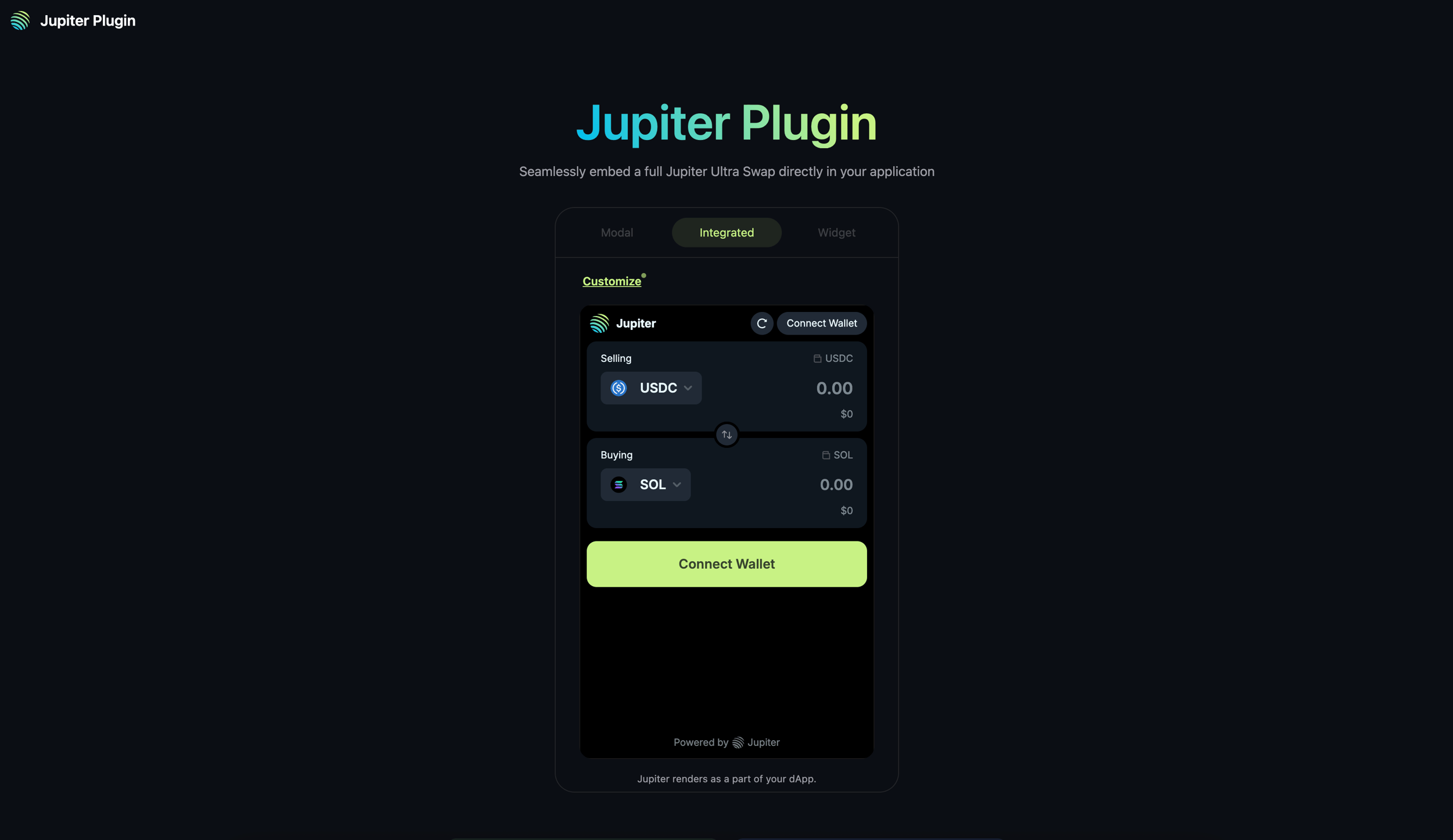](https://plugin.jup.ag/)
**QUICK START**To quick start your integration, check out the [Next.js](https://jupiter.mintlify.app/tool-kits/plugin/nextjs-app-example)
, [React](https://jupiter.mintlify.app/tool-kits/plugin/react-app-example)
or [HTML](https://jupiter.mintlify.app/tool-kits/plugin/html-app-example)
app examples.Refer to [Customization](https://jupiter.mintlify.app/tool-kits/plugin/customization)
and [FAQ](https://jupiter.mintlify.app/tool-kits/plugin/faq)
for more information.
[](https://jupiter.mintlify.app/docs/ultra/plugin-integration#key-features)
Key Features
--------------------------------------------------------------------------------------------
* **Seamless Integration**: Embed Jupiter’s swap functionality directly into your application without redirects.
* **Multiple Display Options**: Choose between integrated, widget, or modal display modes.
* **Customizable Options**: Configure the swap form to match your application’s needs.
* **RPC-less**: Integrate Plugin without any RPCs, Ultra handles transaction sending, wallet balances and token information.
* **Ultra Mode**: Access to all features of Ultra Mode, read more about it in the [Ultra Swap API docs](https://jupiter.mintlify.app/docs/ultra)
.
[](https://jupiter.mintlify.app/docs/ultra/plugin-integration#getting-started)
Getting Started
--------------------------------------------------------------------------------------------------
When integrating Plugin, there are a few integration methods to think about, and choose the one that best fits your application’s architecture and requirements.
###
[](https://jupiter.mintlify.app/docs/ultra/plugin-integration#integration-methods)
Integration Methods
* **Using Window Object** - Simplest way to add and initialize Plugin.
* [**Using NPM Package**](https://www.npmjs.com/package/@jup-ag/plugin)
- Install via `npm install @jup-ag/plugin` and initialize as a module (will require you to maintain its dependencies).
###
[](https://jupiter.mintlify.app/docs/ultra/plugin-integration#wallet-integration)
Wallet Integration
* **Wallet Standard Support**: For applications without existing wallet provider, Plugin will provide a wallet adapter and connection - powered by [Unified Wallet Kit](https://jupiter.mintlify.app/tool-kits/wallet-kit)
.
* **Passthrough Wallet**: For applications with existing wallet provider(s), set `enableWalletPassthrough=true` with context, and Plugin will allow the application to pass through the existing wallet provider’s connection to Plugin.
###
[](https://jupiter.mintlify.app/docs/ultra/plugin-integration#adding-fees-to-plugin)
Adding Fees to plugin
* **Referral Account**: You can create a referral account via [scripts](https://jupiter.mintlify.app/docs/ultra/add-fees-to-ultra)
or [Referral Dashboard](https://referral.jup.ag/)
.
* **Referral Fee**: You can set the referral fee and account in the `formProps` interface when you initialize the Plugin.
###
[](https://jupiter.mintlify.app/docs/ultra/plugin-integration#quick-start-guides)
Quick Start Guides
In the next sections, we’ll walk you through the steps to integrate Jupiter Plugin into different types of web applications from scratch.
[Next.js\
-------](https://jupiter.mintlify.app/tool-kits/plugin/nextjs-app-example)
[React\
-----](https://jupiter.mintlify.app/tool-kits/plugin/react-app-example)
[HTML\
----](https://jupiter.mintlify.app/tool-kits/plugin/html-app-example)
By integrating Jupiter Plugin into your application, you can seamlessly integrate a fully functional swap interface into your application with minimal effort, while staying at the forefront of Solana DeFi innovation.
[Add Integrator Payer](https://jupiter.mintlify.app/docs/ultra/add-payer)
[About Metis Swap API](https://jupiter.mintlify.app/docs/swap)
⌘I
---
# Jupiter Developers
[Skip to main content](https://jupiter.mintlify.app/docs/swap/get-quote#content-area)
🚨 Action Required: `lite-api.jup.ag` will be deprecated on 31st January 2026. [View migration guide →](https://dev.jup.ag/portal/migrate-from-lite-api)
[Jupiter home page](https://dev.jup.ag/)
Search...
⌘K
Search...
Navigation
Usage
Get Quote
[Home](https://jupiter.mintlify.app/)
[Get Started](https://jupiter.mintlify.app/get-started)
Developer Docs
[API Reference](https://jupiter.mintlify.app/api-reference)
[Tool Kits](https://jupiter.mintlify.app/tool-kits)
[Resources](https://jupiter.mintlify.app/resources/support)
[Updates](https://jupiter.mintlify.app/updates)
On this page
* [Let’s Get Started](https://jupiter.mintlify.app/docs/swap/get-quote#let%E2%80%99s-get-started)
* [Metis Quote API](https://jupiter.mintlify.app/docs/swap/get-quote#metis-quote-api)
* [Get Quote](https://jupiter.mintlify.app/docs/swap/get-quote#get-quote)
* [What’s Next](https://jupiter.mintlify.app/docs/swap/get-quote#what%E2%80%99s-next)
* [Additional Resources](https://jupiter.mintlify.app/docs/swap/get-quote#additional-resources)
* [Restrict Intermediate Tokens](https://jupiter.mintlify.app/docs/swap/get-quote#restrict-intermediate-tokens)
* [Legacy Transactions](https://jupiter.mintlify.app/docs/swap/get-quote#legacy-transactions)
* [Adding Fees](https://jupiter.mintlify.app/docs/swap/get-quote#adding-fees)
* [Direct Routes](https://jupiter.mintlify.app/docs/swap/get-quote#direct-routes)
* [Max Accounts](https://jupiter.mintlify.app/docs/swap/get-quote#max-accounts)
The Quote API enables you to tap into the Metis Routing Engine, which accesses the deep liquidity available within the DEXes of Solana’s DeFi ecosystem. In this guide, we will walkthrough how you can get a quote for a specific token pair and other related parameters.
**PLEASE USE THE METIS SWAP API AT YOUR OWN DISCRETION.**The Jupiter UI at [https://jup.ag/](https://jup.ag/)
contains multiple safeguards, warnings and default settings to guide our users to trade safer. Jupiter is not liable for losses incurred by users on other platforms.If you need clarification or support, please reach out to us in [Discord](https://discord.gg/jup)
.
**ROUTING ENGINE**The quotes from Metis Swap API are from the Metis Routing Engine.
[](https://jupiter.mintlify.app/docs/swap/get-quote#let%E2%80%99s-get-started)
Let’s Get Started
----------------------------------------------------------------------------------------------------
In this guide, we will be using the Solana web3.js package. If you have not set up your environment to use the necessary libraries and the connection to the Solana network, please head over to [Environment Setup](https://jupiter.mintlify.app/get-started/environment-setup)
.
**API REFERENCE**To fully utilize the Metis Quote API, check out the [Metis Quote API Reference](https://jupiter.mintlify.app/api-reference/swap/quote)
.
[](https://jupiter.mintlify.app/docs/swap/get-quote#metis-quote-api)
Metis Quote API
----------------------------------------------------------------------------------------
The most common trading pair on Solana is SOL and USDC, to get a quote for this specific token pair, you need to pass in the required parameters such as:
| Parameters | Description |
| --- | --- |
| inputMint | The pubkey or token mint address e.g. So11111111111111111111111111111111111111112 |
| outputMint | The pubkey or token mint address e.g. EPjFWdd5AufqSSqeM2qN1xzybapC8G4wEGGkZwyTDt1v |
| amount | The number of **input** tokens before the decimal is applied, also known as the “raw amount” or “integer amount” in lamports for SOL or atomic units for all other tokens. |
| slippageBps | The number of basis points you can tolerate to lose during time of execution. e.g. 1% = 100bps |
[](https://jupiter.mintlify.app/docs/swap/get-quote#get-quote)
Get Quote
----------------------------------------------------------------------------
Using the root URL and parameters to pass in, it is as simple as the example code below!
Copy
Ask AI
const quoteResponse = await (
await fetch(
'https://api.jup.ag/swap/v1/quote?' +
'inputMint=So11111111111111111111111111111111111111112' +
'&outputMint=EPjFWdd5AufqSSqeM2qN1xzybapC8G4wEGGkZwyTDt1v' +
'&amount=100000000' +
'&slippageBps=50' +
'&restrictIntermediateTokens=true'
),
{
headers: {
'x-api-key': 'your-api-key',
},
}
).json();
console.log(JSON.stringify(quoteResponse, null, 2));
Example response:
Copy
Ask AI
{
"inputMint": "So11111111111111111111111111111111111111112",
"inAmount": "100000000",
"outputMint": "EPjFWdd5AufqSSqeM2qN1xzybapC8G4wEGGkZwyTDt1v",
"outAmount": "16198753",
"otherAmountThreshold": "16117760",
"swapMode": "ExactIn",
"slippageBps": 50,
"platformFee": null,
"priceImpactPct": "0",
"routePlan": [\
{\
"swapInfo": {\
"ammKey": "5BKxfWMbmYBAEWvyPZS9esPducUba9GqyMjtLCfbaqyF",\
"label": "Meteora DLMM",\
"inputMint": "So11111111111111111111111111111111111111112",\
"outputMint": "EPjFWdd5AufqSSqeM2qN1xzybapC8G4wEGGkZwyTDt1v",\
"inAmount": "100000000",\
"outAmount": "16198753"\
},\
"percent": 100\
}\
],
"contextSlot": 299283763,
"timeTaken": 0.015257836
}
See all 26 lines
**TIP**`outAmount` refers to the best possible output amount based on the route at time of quote, this means that `slippageBps` does not affect.
[](https://jupiter.mintlify.app/docs/swap/get-quote#what%E2%80%99s-next)
What’s Next
----------------------------------------------------------------------------------------
Now, you are able to get a quote, next steps is to submit a transaction to execute the swap based on the quote given. Let’s go!
[](https://jupiter.mintlify.app/docs/swap/get-quote#additional-resources)
Additional Resources
--------------------------------------------------------------------------------------------------
###
[](https://jupiter.mintlify.app/docs/swap/get-quote#restrict-intermediate-tokens)
Restrict Intermediate Tokens
`restrictIntermediateTokens` can be set to `true` . If your route is routed through random intermediate tokens, it will fail more frequently. With this, we make sure that your route is only routed through highly liquid intermediate tokens to give you the best price and more stable route.
###
[](https://jupiter.mintlify.app/docs/swap/get-quote#legacy-transactions)
Legacy Transactions
All Jupiter swaps are using Versioned Transactions and [Address Lookup Tables](https://docs.solana.com/developing/lookup-tables)
. However, not all wallets support Versioned Transactions yet, so if you detect a wallet that does not support versioned transactions, you will need to set the `asLegacyTransaction` parameter to `true`.
###
[](https://jupiter.mintlify.app/docs/swap/get-quote#adding-fees)
Adding Fees
By using the Quote API in your app, you can add a fee to charge your users. You can refer to the `platformFeeBps` parameter and to add it to your quote and in conjuction, add `feeAccount` (it can be any valid token account) to your swap request.
###
[](https://jupiter.mintlify.app/docs/swap/get-quote#direct-routes)
Direct Routes
In some cases, you may want to restrict the routing to only go through 1 market. You can use the `onlyDirectRoutes` parameter to achieve this. This will ensure routing will only go through 1 market.
**NOTE**
* If there are no direct routes, there will be no quote.
* If there is only 1 market but it is illiquid, it will still return the route with the illiquid market.
**UNFAVORABLE TRADES**Please be aware that using `onlyDirectRoutes` can often yield unfavorable trades or outcomes.
###
[](https://jupiter.mintlify.app/docs/swap/get-quote#max-accounts)
Max Accounts
In some cases, you may want to add more accounts to the transaction for specific use cases, but it might exceed the transaction size limit. You can use the `maxAccounts` parameter to limit the number of accounts in the transaction.
**UNFAVORABLE TRADES**Please be aware that the misuse of `maxAccounts` can yield unfavorable trades or outcomes.
**TIP**Refer to the [Requote with Lower Max Accounts](https://jupiter.mintlify.app/docs/swap/requote-with-lower-max-accounts)
guide for more information on how to requote and adjust the swap when using `maxAccounts`.
**NOTE**
* `maxAccounts` is an estimation and the actual number of accounts may vary.
* `maxAccounts` only applies to the total number of accounts of the inner swaps in the swap instruction and not any of the setup, cleanup or other instructions (see the example below).
* We recommend setting `maxAccounts` to 64
* Keep `maxAccounts` as large as possible, only reduce `maxAccounts` if you exceed the transaction size limit.
* If `maxAccounts` is set too low, example to 30, the computed route may drop DEXes/AMMs like Meteora DLMM that require more than 30 accounts.
**Jupiter has 2 types of routing instructions**, if you plan to limit `maxAccounts`, you will need to account for if the market is routable with [ALTs](https://docs.solana.com/developing/lookup-tables)
or not:
* **`Routing Instruction`** (Simple Routing): The market is still new, and we do not have ALTs set up for the market, hence the number of accounts required is higher as there are more accounts required.
* **`Shared Accounts Routing Instruction`**: The market has sufficient liquidity (and has been live for a while), and we have [ALTs](https://docs.solana.com/developing/lookup-tables)
set up for the market to be used in the routing instruction, hence the number of accounts required is lower as there are less accounts required.
Counting the accounts using an example transaction
[In this transaction](https://solscan.io/tx/2xpiniSn5z61hE6gB6EUaeRZCqeg8rLBEbiSnAjSD28tjVTSpBogSLfrMRaJiDzuqDyZ8v49Z7WL2TKvGQVwYbB7)
:



* You can see that there are a total of 2 inner swaps where the number of accounts respectively are
* Stabble Stable Swap: 12
* Lifinity Swap V2: 13
* Total: 25
* The `maxAccounts` parameter is to control this value - to limit the total number of accounts in the inner swaps.
* It doesn’t take into the consideration of a few things:
* Each of the inner swap’s program address, so 2 in this case.
* Top level routing instruction accounts where in this case Shared Accounts Route is 13 and Route is 9.
* There are also other accounts that are required to set up, clean up, etc which are not counted in the `maxAccounts` parameter
List of DEXes and their required accounts
Notes:
* Values in the table are only estimations and the actual number of accounts may vary.
* Min accounts are needed when we have already created the necessary [ALTs](https://docs.solana.com/developing/lookup-tables)
for a specific pool resulting in less accounts needed in a Shared Accounts Routing context.
* Sanctum and Sanctum Infinity are unique, and their accounts are dynamic.
| DEX | Max | Min |
| --- | --- | --- |
| Meteora DLMM | 47 | 19 |
| Meteora | 45 | 18 |
| Moonshot | 37 | 15 |
| Obric | 30 | 12 |
| Orca Whirlpool | 30 | 12 |
| Pumpfun AMM | 42 | 17 |
| Pumpfun Bonding Curve | 40 | 16 |
| Raydium | 45 | 18 |
| Raydium CLMM | 45 | 19 |
| Raydium CPMM | 37 | 14 |
| Sanctum | 80 | 80 |
| Sanctum Infinity | 80 | 80 |
| Solfi | 22 | 9 |
[About Metis Swap API](https://jupiter.mintlify.app/docs/swap)
[Build Swap Transaction](https://jupiter.mintlify.app/docs/swap/build-swap-transaction)
⌘I
---
# Jupiter Developers
[Skip to main content](https://jupiter.mintlify.app/docs/swap/send-swap-transaction#content-area)
🚨 Action Required: `lite-api.jup.ag` will be deprecated on 31st January 2026. [View migration guide →](https://dev.jup.ag/portal/migrate-from-lite-api)
[Jupiter home page](https://dev.jup.ag/)
Search...
⌘K
Search...
Navigation
Usage
Send Swap Transaction
[Home](https://jupiter.mintlify.app/)
[Get Started](https://jupiter.mintlify.app/get-started)
Developer Docs
[API Reference](https://jupiter.mintlify.app/api-reference)
[Tool Kits](https://jupiter.mintlify.app/tool-kits)
[Resources](https://jupiter.mintlify.app/resources/support)
[Updates](https://jupiter.mintlify.app/updates)
On this page
* [Let’s Get Started](https://jupiter.mintlify.app/docs/swap/send-swap-transaction#let%E2%80%99s-get-started)
* [Prepare Transaction](https://jupiter.mintlify.app/docs/swap/send-swap-transaction#prepare-transaction)
* [Send Transaction](https://jupiter.mintlify.app/docs/swap/send-swap-transaction#send-transaction)
* [Transaction Sending Options](https://jupiter.mintlify.app/docs/swap/send-swap-transaction#transaction-sending-options)
* [Transaction Confirmation](https://jupiter.mintlify.app/docs/swap/send-swap-transaction#transaction-confirmation)
* [Swap Transaction Executed!](https://jupiter.mintlify.app/docs/swap/send-swap-transaction#swap-transaction-executed)
* [Oh? Transaction Not Landing?](https://jupiter.mintlify.app/docs/swap/send-swap-transaction#oh-transaction-not-landing)
* [How Jupiter Estimates Priority Fee?](https://jupiter.mintlify.app/docs/swap/send-swap-transaction#how-jupiter-estimates-priority-fee)
* [How Jupiter Estimates Compute Unit Limit?](https://jupiter.mintlify.app/docs/swap/send-swap-transaction#how-jupiter-estimates-compute-unit-limit)
* [How Jupiter Estimates Slippage?](https://jupiter.mintlify.app/docs/swap/send-swap-transaction#how-jupiter-estimates-slippage)
* [About Slippage](https://jupiter.mintlify.app/docs/swap/send-swap-transaction#about-slippage)
* [Dynamic Slippage](https://jupiter.mintlify.app/docs/swap/send-swap-transaction#dynamic-slippage)
* [How Jupiter Broadcast Transactions?](https://jupiter.mintlify.app/docs/swap/send-swap-transaction#how-jupiter-broadcast-transactions)
* [Broadcasting Through RPCs](https://jupiter.mintlify.app/docs/swap/send-swap-transaction#broadcasting-through-rpcs)
* [Broadcasting Through Jito](https://jupiter.mintlify.app/docs/swap/send-swap-transaction#broadcasting-through-jito)
Transaction sending can be very simple but optimizing for transaction landing can be challenging. This is critical in periods of network congestion when many users and especially bots are competing for block space to have their transactions processed.
**IMPROVE TRANSACTION LANDING TIP**By using Metis Swap API, you can enable Dynamic Slippage, Priority Fee estimation and Compute Unit estimation, all supported on our backend and served directly to you through our API.
[](https://jupiter.mintlify.app/docs/swap/send-swap-transaction#let%E2%80%99s-get-started)
Let’s Get Started
----------------------------------------------------------------------------------------------------------------
In this guide, we will pick up from where [**Get Quote**](https://jupiter.mintlify.app/docs/swap/get-quote)
and [**Build Swap Transaction**](https://jupiter.mintlify.app/docs/swap/build-swap-transaction)
guide has left off. If you have not set up your environment to use the necessary libraries, the RPC connection to the network and successfully get a quote from the Quote API, please start at [Environment Setup](https://jupiter.mintlify.app/get-started/environment-setup)
or [get quote](https://jupiter.mintlify.app/docs/swap/get-quote)
.
[](https://jupiter.mintlify.app/docs/swap/send-swap-transaction#prepare-transaction)
Prepare Transaction
------------------------------------------------------------------------------------------------------------
**WHO IS THE SIGNER?**The most important part of this step is to sign the transaction. For the sake of the guide, you will be using the file system wallet you have set up to sign and send yourself.However, for other production scenarios such as building your own program or app on top of the Metis Swap API, you will need the user to be the signer which is often through a third party wallet provider, so do account for it.
In the previous guide, we are able to get the `swapTransaction` from the Metis Swap API response. However, you will need to reformat it to sign and send the transaction, here are the formats to note of.
| Formats | Description |
| --- | --- |
| Serialized Uint8array format | The correct format to send to the network. |
| Serialized base64 format | This is a text encoding of the Uint8array data, meant for transport like our Metis Swap API or storage. You should not sign this directly. |
| Deserialized format | This is the human-readable, object-like format before serialization. This is the state you will sign the transaction. |
Here’s the code to deserialize and sign, then serialize.
1. `swapTransaction` from the Metis Swap API is a serialized transaction in the **base64 format**.
2. Convert it to **Uint8array (binary buffer) format**.
3. Deserialize it to a **VersionedTransaction** object to sign.
4. Finally, convert it back to **Uint8array** format to send the transaction.
Copy
Ask AI
const transactionBase64 = swapResponse.swapTransaction
const transaction = VersionedTransaction.deserialize(Buffer.from(transactionBase64, 'base64'));
console.log(transaction);
transaction.sign([wallet]);
const transactionBinary = transaction.serialize();
console.log(transactionBinary);
**BLOCKHASH VALIDITY**If you look at the response of `console.log(transaction);`, you can see that our backend has already handled the blockhash and last valid block height in your transaction.The validity of a blockhash typically lasts for 150 slots, but you can manipulate this to reduce the validity of a transaction, resulting in faster failures which could be useful in certain scenarios.[Read more about transaction expiry here.\
----------------------------------------](https://solana.com/docs/advanced/confirmation#transaction-expiration)
[](https://jupiter.mintlify.app/docs/swap/send-swap-transaction#send-transaction)
Send Transaction
------------------------------------------------------------------------------------------------------
###
[](https://jupiter.mintlify.app/docs/swap/send-swap-transaction#transaction-sending-options)
Transaction Sending Options
Finally, there are a 2 [transaction sending options](https://solana.com/docs/advanced/retry#an-in-depth-look-at-sendtransaction)
that we should take note of. Depending on your use case, these options can make a big difference to you or your users. For example, if you are using the Metis Swap API as a payment solution, setting higher `maxRetries` allows the transaction to have more retries as it is not as critical compared to a bot that needs to catch fast moving markets.
Transaction Sending Options
| Options | Description |
| --- | --- |
| [maxRetries](https://solana.com/docs/advanced/retry) | Maximum number of times for the RPC node to retry sending the transaction to the leader. If this parameter is not provided, the RPC node will retry the transaction until it is finalized or until the blockhash expires. |
| [skipPreflight](https://solana.com/docs/advanced/retry#the-cost-of-skipping-preflight) | If true, skip the preflight transaction checks (default: false). - Verify that all signatures are valid. |
* Check that the referenced blockhash is within the last 150 blocks.
* Simulate the transaction against the bank slot specified by the preflightCommitment. |
Copy
Ask AI
const signature = await connection.sendRawTransaction(transactionBinary, {
maxRetries: 2,
skipPreflight: true
});
###
[](https://jupiter.mintlify.app/docs/swap/send-swap-transaction#transaction-confirmation)
Transaction Confirmation
In addition, after sending the transaction, it is always a best practice to check the transaction confirmation state, and if not, log the error for debugging or communicating with your users on your interface.[Read more about transaction confirmation tips here.\
---------------------------------------------------](https://solana.com/docs/advanced/confirmation#transaction-confirmation-tips)
Copy
Ask AI
const confirmation = await connection.confirmTransaction({signature,}, "finalized");
if (confirmation.value.err) {
throw new Error(`Transaction failed: ${JSON.stringify(confirmation.value.err)}\nhttps://solscan.io/tx/${signature}/`);
} else console.log(`Transaction successful: https://solscan.io/tx/${signature}/`);
[](https://jupiter.mintlify.app/docs/swap/send-swap-transaction#swap-transaction-executed)
Swap Transaction Executed!
-------------------------------------------------------------------------------------------------------------------------
If you have followed the guides step by step without missing a beat, your transaction _should_ theoretically land and you can view the link in console log to see the [transaction](https://solscan.io/tx/zEWGsd5tSyxUdsTn27hUzaJBadQSiFxF2X1CxVdQzdtgc3BpqyDPf5VQCFUScidhHJP5PchY33oJ3tZJLK5KXrf)
.
[](https://jupiter.mintlify.app/docs/swap/send-swap-transaction#oh-transaction-not-landing)
Oh? Transaction Not Landing?
----------------------------------------------------------------------------------------------------------------------------
As the Solana network grew and increased in activity over the years, it has become more challenging to land transactions. There are several factors that can drastically affect the success of your transaction:
* Setting competitive priority fee
* Setting accurate amount of compute units
* Managing slippage effectively
* Broadcasting transaction efficiently
* Other tips
###
[](https://jupiter.mintlify.app/docs/swap/send-swap-transaction#how-jupiter-estimates-priority-fee)
How Jupiter Estimates Priority Fee?
You can pass in `prioritizationFeeLamports` to Metis Swap API where our backend will estimate the Priority Fee for you. We are using [Triton’s `getRecentPrioritizationFees`](https://docs.triton.one/chains/solana/improved-priority-fees-api)
to estimate using the local fee market in writable accounts of the transaction (comparing to the global fee market), across the past 20 slots and categorizing them into different percentiles.[Read More About Priority Fee\
----------------------------](https://solana.com/docs/core/fees#prioritization-fees)
| Parameters | Description |
| --- | --- |
| `maxLamports` | A maximum cap applied if the estimated priority fee is too high. This is helpful when you have users using your application and can be a safety measure to prevent overpaying. |
| `global` | A boolean to choose between using a global or local fee market to estimate. If `global` is set to `false`, the estimation focuses on fees relevant to the **writable accounts** involved in the instruction. |
| `priorityLevel` | A setting to choose between the different percentile levels. Higher percentile will have better transaction landing but also incur higher fees. - `medium`: 25th percentile |
* `high`: 50th percentile
* `veryHigh`: 75th percentile |
Copy
Ask AI
const swapResponse = await (
await fetch('https://api.jup.ag/swap/v1/swap', {
method: 'POST',
headers: {
'Content-Type': 'application/json',
'x-api-key': 'your-api-key',
},
body: JSON.stringify({
quoteResponse,
userPublicKey: wallet.publicKey,
prioritizationFeeLamports: {
priorityLevelWithMaxLamports: {
maxLamports: 10000000,
global: false,
priorityLevel: "veryHigh"
}
}
})
})
).json();
###
[](https://jupiter.mintlify.app/docs/swap/send-swap-transaction#how-jupiter-estimates-compute-unit-limit)
How Jupiter Estimates Compute Unit Limit?
You can pass in `dynamicComputeUnitLimit` to Metis Swap API where our backend will estimate the Compute Unit Limit for you. When `true`, it allows the transaction to utilize a dynamic compute unit rather than using incorrect compute units which can be detrimental to transaction prioritization. Additionally, the amount of compute unit used and the compute unit limit requested to be used are correlated to the amount of priority fees you pay.[Read more about Compute Budget, Compute Unit, etc here.\
-------------------------------------------------------](https://solana.com/docs/core/fees#compute-budget)
Copy
Ask AI
const swapTransaction = await (
await fetch('https://api.jup.ag/swap/v1/swap', {
method: 'POST',
headers: {
'Content-Type': 'application/json',
'x-api-key': 'your-api-key',
},
body: JSON.stringify({
quoteResponse,
userPublicKey: wallet.publicKey,
dynamicComputeUnitLimit: true
})
})
).json();
###
[](https://jupiter.mintlify.app/docs/swap/send-swap-transaction#how-jupiter-estimates-slippage)
How Jupiter Estimates Slippage?
Slippage is an unavoidable aspect of trading on decentralized exchanges (DEXes).
####
[](https://jupiter.mintlify.app/docs/swap/send-swap-transaction#about-slippage)
About Slippage
* **Token Pair:** The same fixed slippage setting can have very different effects depending on the tokens involved. For example, swapping between two stablecoins is much less volatile than swapping between two meme coins.
* **Timing:** The time between when you receive a quote and when you actually send the swap transaction matters. Any delay can result in the price moving outside your slippage threshold.
* **Transaction Landing:** How efficiently your transaction lands on-chain also affects slippage. Poorly optimized transactions may experience more slippage.
* If you use the Metis Swap API:
* You are limited to fixed and dynamic slippage (no longer maintained) settings.
* You are responsible for handling slippage and optimizing transaction landing yourself.
* [Alternatively, consider using the Ultra Swap API](https://jupiter.mintlify.app/docs/ultra)
:
* All of these optimizations are handled for you - without any RPC from you.
* Additional routing is available to RFQ (Request for Quote) systems like Jupiterz where slippage is not an issue because the market maker fills your order exactly as quoted.
####
[](https://jupiter.mintlify.app/docs/swap/send-swap-transaction#dynamic-slippage)
Dynamic Slippage
Apart from the fixed slippage setting, you can use Dynamic Slippage: During swap transaction building, we will simulate the transaction and estimate a slippage value, which we then factor in the token categories heuristics to get the final slippage value.
**DYNAMIC SLIPPAGE VS REAL TIME SLIPPAGE ESTIMATOR (RTSE)**RTSE is very different from Dynamic Slippage and has provided a much better user experience and results. RTSE is able to intelligently estimate the best possible slippage to use at the time of execution, balancing between trade success and price protection. RTSE uses a variety of heuristics, algorithms and monitoring to ensure the best user experience:
* **Heuristics**: Token categories, historical and real-time slippage data, and more.
* **Algorithms**: Exponential Moving Average (EMA) on slippage data, and more.
* **Monitoring**: Real-time monitoring of failure rates to ensure reactiveness to increase slippage when necessary.
[Refer to Ultra Swap API for more information on RTSE\
----------------------------------------------------](https://jupiter.mintlify.app/docs/ultra#real-time-slippage-estimator)
**WARNING**Do note that we have discontinued development on Dynamic Slippage.
Copy
Ask AI
const swapTransaction = await (
await fetch('https://api.jup.ag/swap/v1/swap', {
method: 'POST',
headers: {
'Content-Type': 'application/json',
'x-api-key': 'your-api-key',
},
body: JSON.stringify({
quoteResponse,
userPublicKey: wallet.publicKey,
dynamicSlippage: true,
})
})
).json();
###
[](https://jupiter.mintlify.app/docs/swap/send-swap-transaction#how-jupiter-broadcast-transactions)
How Jupiter Broadcast Transactions?
Transaction broadcasting is the process of submitting a signed transaction to the network so that validators can verify, process, and include it in a block.
####
[](https://jupiter.mintlify.app/docs/swap/send-swap-transaction#broadcasting-through-rpcs)
Broadcasting Through RPCs
After you’ve built and signed your transaction, the signed transaction is serialized into a binary format and sent to the network via a Solana RPC node. The RPC node will verify and relay the transaction to the leader validator responsible for producing the next block.[Read more about how RPC nodes broadcast transactions.\
-----------------------------------------------------](https://solana.com/docs/advanced/retry#how-rpc-nodes-broadcast-transactions)
This is the most typical method to send transactions to the network to get executed. It is simple but you need to make sure the transactions are:
* Send in the serialized transaction format.
* Use fresh blockhash and last valid blockheight.
* Use optimal amount of priority fees and compute unit limit.
* Free of error.
* Utilize retries.
* Configure your RPCs
* Optional but you can send your transaction to a staked RPC endpoint also known as [Stake-Weighted Quality of Service (SWQoS)](https://solana.com/developers/guides/advanced/stake-weighted-qos)
.
* Used dedicated RPC services versus free or shared, depending on how critical your usage is.
* Propagate to multiple RPC rather than reliant on one.
####
[](https://jupiter.mintlify.app/docs/swap/send-swap-transaction#broadcasting-through-jito)
Broadcasting Through Jito
To include Jito Tips in your Metis Swap transaction, you can do specify in the Metis Swap API parameters. However, please take note of these when sending your transaction to Jito and [you can find this information in their documentation](https://docs.jito.wtf/)
:
* You need to submit to a Jito RPC endpoint for it to work.
* You need to send an appropriate amount of Jito Tip to be included to be processed.
**MORE ABOUT JITO**You can leverage [Jito](https://www.jito.wtf/)
to send transactions via tips for faster inclusion and better outcomes. Similar to Priority Fees, Jito Tips incentivize the inclusion of transaction bundles during block production, enhancing users’ chances of securing critical transactions in competitive scenarios.Additionally, Jito enables bundling transactions to ensure they execute together or not at all, helping protect against front-running and other MEV risks through “revert protection” if any part of the sequence fails, all while reducing transaction latency for timely execution.[Read more about how Jito works and other details here.\
------------------------------------------------------](https://docs.jito.wtf/lowlatencytxnsend/#system-overview)
Copy
Ask AI
const swapTransaction = await (
await fetch('https://api.jup.ag/swap/v1/swap', {
method: 'POST',
headers: {
'Content-Type': 'application/json',
'x-api-key': 'your-api-key',
},
body: JSON.stringify({
quoteResponse,
userPublicKey: wallet.publicKey,
prioritizationFeeLamports: {
jitoTipLamports: 1000000 // note that this is FIXED LAMPORTS not a max cap
}
})
})
).json();
[Build Swap Transaction](https://jupiter.mintlify.app/docs/swap/build-swap-transaction)
[Add Fees To Swap](https://jupiter.mintlify.app/docs/swap/add-fees-to-swap)
⌘I
---
# Jupiter Developers
[Skip to main content](https://jupiter.mintlify.app/docs/swap/build-swap-transaction#content-area)
🚨 Action Required: `lite-api.jup.ag` will be deprecated on 31st January 2026. [View migration guide →](https://dev.jup.ag/portal/migrate-from-lite-api)
[Jupiter home page](https://dev.jup.ag/)
Search...
⌘K
Search...
Navigation
Usage
Build Swap Transaction
[Home](https://jupiter.mintlify.app/)
[Get Started](https://jupiter.mintlify.app/get-started)
Developer Docs
[API Reference](https://jupiter.mintlify.app/api-reference)
[Tool Kits](https://jupiter.mintlify.app/tool-kits)
[Resources](https://jupiter.mintlify.app/resources/support)
[Updates](https://jupiter.mintlify.app/updates)
On this page
* [Let’s Get Started](https://jupiter.mintlify.app/docs/swap/build-swap-transaction#let%E2%80%99s-get-started)
* [Metis Swap API](https://jupiter.mintlify.app/docs/swap/build-swap-transaction#metis-swap-api)
* [Get Serialized Transaction](https://jupiter.mintlify.app/docs/swap/build-swap-transaction#get-serialized-transaction)
* [What’s Next](https://jupiter.mintlify.app/docs/swap/build-swap-transaction#what%E2%80%99s-next)
* [Additional Resources](https://jupiter.mintlify.app/docs/swap/build-swap-transaction#additional-resources)
* [Build Your Own Transaction With Instructions](https://jupiter.mintlify.app/docs/swap/build-swap-transaction#build-your-own-transaction-with-instructions)
* [Build Your Own Transaction With Flash Fill Or CPI](https://jupiter.mintlify.app/docs/swap/build-swap-transaction#build-your-own-transaction-with-flash-fill-or-cpi)
The Metis Swap API is one of the ways for you to interact with the Jupiter Swap Aggregator program. Before you send a transaction to the network, you will need to build the transaction that defines the instructions to execute and accounts to read/write to. It can be complex to handle this yourself, but good news! Most of our APIs and SDKs just handles it for you, so you get a response with the transaction to be prepared and sent to the network.
**USE METIS SWAP API TO HANDLE IT FOR YOU OR…**If you are looking to interact with the Jupiter Swap Aggregator program in a different way, check out the other guides:**Swap Instructions**To compose with instructions and build your own transaction, [read how to use the `/swap-instructions` in this section](https://jupiter.mintlify.app/docs/swap/build-swap-transaction#build-your-own-transaction-with-instructions)
.**Flash Fill or Cross Program Invocation (CPI)**To interact with your own Solana program, [read how to use the **Flash Fill method** or **CPI** in this section](https://jupiter.mintlify.app/docs/swap/build-swap-transaction#build-your-own-transaction-with-flash-fill-or-cpi)
.
[](https://jupiter.mintlify.app/docs/swap/build-swap-transaction#let%E2%80%99s-get-started)
Let’s Get Started
-----------------------------------------------------------------------------------------------------------------
In this guide, we will pick up from where [**Get Quote**](https://jupiter.mintlify.app/docs/swap/get-quote)
guide has left off. If you have not set up your environment to use the necessary libraries, the RPC connection to the network and successfully get a quote from the Quote API, please start at [Environment Setup](https://jupiter.mintlify.app/get-started/environment-setup)
or [get quote](https://jupiter.mintlify.app/docs/swap/get-quote)
.
**API REFERENCE**To fully utilize the Metis Swap API, check out the [Metis Swap API or Swap Instructions Reference](https://jupiter.mintlify.app/api-reference/swap/swap)
.
[](https://jupiter.mintlify.app/docs/swap/build-swap-transaction#metis-swap-api)
Metis Swap API
---------------------------------------------------------------------------------------------------
From the previous guide on getting a quote, now using the quote response and your wallet, you can receive a **serialized swap transaction** that needs to be prepared and signed before sending to the network.
[](https://jupiter.mintlify.app/docs/swap/build-swap-transaction#get-serialized-transaction)
Get Serialized Transaction
---------------------------------------------------------------------------------------------------------------------------
Using the root URL and parameters to pass in, it is as simple as the example code below!
**OPTIMIZING FOR TRANSACTION LANDING IS SUPER SUPER IMPORTANT!**This code block includes additional parameters that our Metis Swap API supports, such as estimating compute units, priority fees and slippage, to optimize for transaction landing.To understand how these parameters help, the next step, [Send Swap Transaction guide](https://jupiter.mintlify.app/docs/swap/send-swap-transaction)
will discuss them.
Copy
Ask AI
const swapResponse = await (
await fetch('https://api.jup.ag/swap/v1/swap', {
method: 'POST',
headers: {
'Content-Type': 'application/json',
'x-api-key': 'your-api-key',
},
body: JSON.stringify({
quoteResponse,
userPublicKey: wallet.publicKey,
// ADDITIONAL PARAMETERS TO OPTIMIZE FOR TRANSACTION LANDING
// See next guide to optimize for transaction landing
dynamicComputeUnitLimit: true,
dynamicSlippage: true,
prioritizationFeeLamports: {
priorityLevelWithMaxLamports: {
maxLamports: 1000000,
priorityLevel: "veryHigh"
}
}
})
})
).json();
console.log(swapResponse);
From the above example, you should see this response.
Copy
Ask AI
{
swapTransaction: 'AQAAAAAAAAAAAAAAAAAAAAAAAAAAAAAAAAAAAAAAAAAAAAAAAAAAAAAAAAAAAAAAAAAAAAAAAAAAAAAAAAAAAACAAQAGDkS+3LuGTbs......+/oD9qb31dH6i0QZ2IHELXUX3Y1YeW79p9Stkqk12z4yvZFJiQ4GCQwLBwYQBgUEDggNTQ==',
lastValidBlockHeight: 279632475,
prioritizationFeeLamports: 9999,
computeUnitLimit: 388876,
prioritizationType: {
computeBudget: {
microLamports: 25715,
estimatedMicroLamports: 785154
}
},
dynamicSlippageReport: {
slippageBps: 50,
otherAmount: 20612318,
simulatedIncurredSlippageBps: -18,
amplificationRatio: '1.5',
categoryName: 'lst',
heuristicMaxSlippageBps: 100
},
simulationError: null
}
[](https://jupiter.mintlify.app/docs/swap/build-swap-transaction#what%E2%80%99s-next)
What’s Next
-----------------------------------------------------------------------------------------------------
Now, you are able to get a quote and use our Metis Swap API to build the swap transaction for you. Next steps is to proceed to prepare and sign the transaction and send the signed transaction to the network.
[Let’s go sign and send!\
-----------------------](https://jupiter.mintlify.app/docs/swap-api/send-swap-transaction)
[](https://jupiter.mintlify.app/docs/swap/build-swap-transaction#additional-resources)
Additional Resources
---------------------------------------------------------------------------------------------------------------
###
[](https://jupiter.mintlify.app/docs/swap/build-swap-transaction#build-your-own-transaction-with-instructions)
Build Your Own Transaction With Instructions
If you prefer to compose with instructions instead of the provided transaction that is returned from the `/swap` endpoint (like the above example). You can post to `/swap-instructions` instead, it takes the same parameters as the `/swap` endpoint but returns you the instructions rather than the serialized transaction.
**NOTE**In some cases, you may add more accounts to the transaction, which may exceed the transaction size limits. To work around this, you can use the `maxAccounts` parameter in `/quote` endpoint to limit the number of accounts in the transaction.[Refer to the GET /quote’s `maxAccounts` guide for more details.](https://jupiter.mintlify.app/docs/swap/get-quote#max-accounts)
/swap-instructions code snippet
Example code snippet of using `/swap-instruction`
Copy
Ask AI
const instructions = await (
await fetch('https://api.jup.ag/swap/v1/swap-instructions', {
method: 'POST',
headers: {
'Content-Type': 'application/json',
'x-api-key': 'your-api-key',
},
body: JSON.stringify({
quoteResponse,
userPublicKey: wallet.publicKey,
}),
})
).json();
if (instructions.error) {
throw new Error("Failed to get swap instructions: " + instructions.error);
}
const {
tokenLedgerInstruction, // If you are using `useTokenLedger = true`.
computeBudgetInstructions, // The necessary instructions to setup the compute budget.
setupInstructions, // Setup missing ATA for the users.
swapInstruction: swapInstructionPayload, // The actual swap instruction.
cleanupInstruction, // Unwrap the SOL if `wrapAndUnwrapSol = true`.
addressLookupTableAddresses, // The lookup table addresses that you can use if you are using versioned transaction.
} = instructions;
const deserializeInstruction = (instruction) => {
return new TransactionInstruction({
programId: new PublicKey(instruction.programId),
keys: instruction.accounts.map((key) => ({
pubkey: new PublicKey(key.pubkey),
isSigner: key.isSigner,
isWritable: key.isWritable,
})),
data: Buffer.from(instruction.data, "base64"),
});
};
const getAddressLookupTableAccounts = async (
keys: string[]
): Promise => {
const addressLookupTableAccountInfos =
await connection.getMultipleAccountsInfo(
keys.map((key) => new PublicKey(key))
);
return addressLookupTableAccountInfos.reduce((acc, accountInfo, index) => {
const addressLookupTableAddress = keys[index];
if (accountInfo) {
const addressLookupTableAccount = new AddressLookupTableAccount({
key: new PublicKey(addressLookupTableAddress),
state: AddressLookupTableAccount.deserialize(accountInfo.data),
});
acc.push(addressLookupTableAccount);
}
return acc;
}, new Array());
};
const addressLookupTableAccounts: AddressLookupTableAccount[] = [];
addressLookupTableAccounts.push(
...(await getAddressLookupTableAccounts(addressLookupTableAddresses))
);
const blockhash = (await connection.getLatestBlockhash()).blockhash;
const messageV0 = new TransactionMessage({
payerKey: payerPublicKey,
recentBlockhash: blockhash,
instructions: [\
// uncomment if needed: ...setupInstructions.map(deserializeInstruction),\
deserializeInstruction(swapInstructionPayload),\
// uncomment if needed: deserializeInstruction(cleanupInstruction),\
],
}).compileToV0Message(addressLookupTableAccounts);
const transaction = new VersionedTransaction(messageV0);
###
[](https://jupiter.mintlify.app/docs/swap/build-swap-transaction#build-your-own-transaction-with-flash-fill-or-cpi)
Build Your Own Transaction With Flash Fill Or CPI
If you prefer to interact with the Jupiter Swap Aggregator program with your own on-chain program. There are 2 ways to do it, typically on-chain program call **Cross Program Invocation (CPI)** to interact with each other, we also have another method called **Flash Fill** built by Jupiter (due to limitations of CPI in the past).
**CPI IS NOW RECOMMENDED!**As of January 2025, Jupiter Swap via CPI is recommended for most users.[The `Loosen CPI restriction` feature has been deployed on Solana, you can read more here](https://github.com/solana-labs/solana/issues/26641)
.
**WHY FLASH FILL?**With Jupiter’s complex routing, best prices comes at a cost. It often means more compute resources and accounts are required as it would route across multiple DEXes in one transaction.Solana transactions are limited to 1232 bytes, Jupiter is using [Address Lookup Tables (ALTs)](https://docs.solana.com/developing/lookup-tables)
to include more accounts in one transaction. However, the CPI method cannot use ALTs, which means when you add more accounts to a Jupiter Swap transaction, it will likely fail if it exceeds the transaction size limits.**Flash Fill allows the use of Versioned Transaction and ALTs**, hence, reducing the total accounts used for a Jupiter Swap transaction.
CPI References
**A CPI transaction will be composed of these instructions:**
1. Borrow enough SOL from the program to open a wSOL account that the program owns.
2. Swap X token from the user to wSOL on Jupiter via CPI.
3. Close the wSOL account and send it to the program.
4. The program then transfers the SOL back to the user.
**Links and Resources:**
* [https://github.com/jup-ag/jupiter-cpi-swap-example](https://github.com/jup-ag/jupiter-cpi-swap-example)
* [https://github.com/jup-ag/sol-swap-cpi](https://github.com/jup-ag/sol-swap-cpi)
To ease integration via CPI, you may add the following crate jupiter-cpi to your program.
**[jupiter-cpi](https://github.com/jup-ag/jupiter-cpi)
**To ease integration via CPI, you may add the following crate to your program.In cargo.toml
Copy
Ask AI
[dependencies]
jupiter-cpi = { git = "https://github.com/jup-ag/jupiter-cpi", rev = "5eb8977" }
In your code
Copy
Ask AI
use jupiter_cpi;
...
let signer_seeds: &[&[&[u8]]] = &[...];
// Pass accounts to context one-by-one and construct accounts here
// Or in practise, it may be easier to use remaining_accounts
// https://book.anchor-lang.com/anchor_in_depth/the_program_module.html
let accounts = jupiter_cpi::cpi::accounts::SharedAccountsRoute {
token_program: ,
program_authority: ,
user_transfer_authority: ,
source_token_account: ,
program_source_token_account: ,
program_destination_token_account: ,
destination_token_account: ,
source_mint: ,
destination_mint: ,
platform_fee_account: ,
token_2022_program: ,
};
let cpi_ctx = CpiContext::new_with_signer(
ctx.accounts.jup.to_account_info(),
accounts,
signer_seeds,
);
jupiter_cpi::cpi::shared_accounts_route(
cpi_ctx,
id,
route_plan,
in_amount,
quoted_out_amount,
slippage_bps,
platform_fee_bps,
);
...
Flash Fill References
**A Flash Fill transaction will be composed of these instructions:**
1. Borrow enough SOL for opening the wSOL account from this program.
2. Create the wSOL account for the borrower.
3. Swap X token to wSOL.
4. Close the wSOL account and send it to the borrower.
5. Repay the SOL for opening the wSOL account back to this program.
**Links and resources:**
* [https://github.com/jup-ag/sol-swap-flash-fill](https://github.com/jup-ag/sol-swap-flash-fill)
[Get Quote](https://jupiter.mintlify.app/docs/swap/get-quote)
[Send Swap Transaction](https://jupiter.mintlify.app/docs/swap/send-swap-transaction)
⌘I
---
# Jupiter Developers
[Skip to main content](https://jupiter.mintlify.app/docs/swap/requote-with-lower-max-accounts#content-area)
🚨 Action Required: `lite-api.jup.ag` will be deprecated on 31st January 2026. [View migration guide →](https://dev.jup.ag/portal/migrate-from-lite-api)
[Jupiter home page](https://dev.jup.ag/)
Search...
⌘K
Search...
Navigation
Guides
Requote with Lower Max Accounts
[Home](https://jupiter.mintlify.app/)
[Get Started](https://jupiter.mintlify.app/get-started)
Developer Docs
[API Reference](https://jupiter.mintlify.app/api-reference)
[Tool Kits](https://jupiter.mintlify.app/tool-kits)
[Resources](https://jupiter.mintlify.app/resources/support)
[Updates](https://jupiter.mintlify.app/updates)
On this page
* [Example Code](https://jupiter.mintlify.app/docs/swap/requote-with-lower-max-accounts#example-code)
* [Example Response](https://jupiter.mintlify.app/docs/swap/requote-with-lower-max-accounts#example-response)
In some cases where you might be limited or require strict control by adding your own instructions to the swap transaction, you might face issues with exceeding transaction size limit. In this section, we will provide some helping code to help you requote when the transaction size is too large.
**NOTE**We provide a `maxAccounts` param in the `/quote` endpoint to allow you to reduce the total number of accounts used for a swap - this will allow you to add your own instructions.
[Refer to this section for more information and do note its limitations and important notes before using\
-------------------------------------------------------------------------------------------------------](https://jupiter.mintlify.app/docs/swap-api/get-quote#max-accounts)
[](https://jupiter.mintlify.app/docs/swap/requote-with-lower-max-accounts#example-code)
Example Code
--------------------------------------------------------------------------------------------------------
1. Request for quote and the swap transaction as per normal.
2. Serialize the transaction.
3. Use the conditions to check if the transaction is too large.
1. If too large, requote again with lower max accounts - do note that the route will change.
2. If not, sign and send to the network.
**TIP**We recommend `maxAccounts` 64 and start as high as you can, then incrementally reduce when requoting.Do note that with lower max accounts, it will might yield bad routes or no route at all.
**TIP**When you serialize the transaction, you can log the number of raw bytes being used in the transaction.You can either add your custom instructions before or after serializing the transaction.
Copy
Ask AI
import {
AddressLookupTableAccount,
Connection,
Keypair,
PublicKey,
TransactionInstruction,
TransactionMessage,
VersionedTransaction,
} from '@solana/web3.js';
// Set up dev environment
import fs from 'fs';
const privateKeyArray = JSON.parse(fs.readFileSync('/Path/to/key', 'utf8').trim());
const wallet = Keypair.fromSecretKey(new Uint8Array(privateKeyArray));
const connection = new Connection('your-own-rpc');
// Recommended
const MAX_ACCOUNTS = 64
async function getQuote(maxAccounts) {
const params = new URLSearchParams({
inputMint: 'insert-mint',
outputMint: 'insert-mint',
amount: '1000000',
slippageBps: '100',
maxAccounts: maxAccounts.toString()
});
const url = `https://api.jup.ag/swap/v1/quote?${params}`;
const response = await fetch(url, {
headers: {
'x-api-key': 'your-api-key',
},
});
if (!response.ok) {
const errorText = await response.text();
throw new Error(`HTTP ${response.status}: ${errorText}`);
}
const quoteResponse = await response.json();
if (quoteResponse.error) {
throw new Error(`Jupiter API error: ${quoteResponse.error}`);
}
return quoteResponse;
};
async function getSwapInstructions(quoteResponse) {
const response = await fetch('https://api.jup.ag/swap/v1/swap-instructions', {
method: 'POST',
headers: {
'Content-Type': 'application/json',
'x-api-key': 'your-api-key',
},
body: JSON.stringify({
quoteResponse: quoteResponse,
userPublicKey: wallet.publicKey.toString(),
prioritizationFeeLamports: {
priorityLevelWithMaxLamports: {
maxLamports: 10000000,
priorityLevel: "veryHigh"
}
},
dynamicComputeUnitLimit: true,
})
});
if (!response.ok) {
const errorText = await response.text();
throw new Error(`HTTP ${response.status}: ${errorText}`);
}
const swapInstructionsResponse = await response.json();
if (swapInstructionsResponse.error) {
throw new Error(`Jupiter API error: ${swapInstructionsResponse.error}`);
}
return swapInstructionsResponse;
};
async function buildSwapTransaction(swapInstructionsResponse) {
const {
computeBudgetInstructions,
setupInstructions,
swapInstruction,
cleanupInstruction,
addressLookupTableAddresses,
} = swapInstructionsResponse;
const deserializeInstruction = (instruction) => {
if (!instruction) return null;
return new TransactionInstruction({
programId: new PublicKey(instruction.programId),
keys: instruction.accounts.map((key) => ({
pubkey: new PublicKey(key.pubkey),
isSigner: key.isSigner,
isWritable: key.isWritable,
})),
data: Buffer.from(instruction.data, "base64"),
});
};
const getAddressLookupTableAccounts = async (
keys
) => {
const addressLookupTableAccountInfos =
await connection.getMultipleAccountsInfo(
keys.map((key) => new PublicKey(key))
);
return addressLookupTableAccountInfos.reduce((acc, accountInfo, index) => {
const addressLookupTableAddress = keys[index];
if (accountInfo) {
const addressLookupTableAccount = new AddressLookupTableAccount({
key: new PublicKey(addressLookupTableAddress),
state: AddressLookupTableAccount.deserialize(accountInfo.data),
});
acc.push(addressLookupTableAccount);
}
return acc;
}, []);
};
const addressLookupTableAccounts = [];
addressLookupTableAccounts.push(
...(await getAddressLookupTableAccounts(addressLookupTableAddresses))
);
const blockhash = (await connection.getLatestBlockhash()).blockhash;
// Create transaction message with all instructions
const messageV0 = new TransactionMessage({
payerKey: wallet.publicKey,
recentBlockhash: blockhash,
instructions: [\
...(computeBudgetInstructions?.map(deserializeInstruction).filter(Boolean) || []),\
...(setupInstructions?.map(deserializeInstruction).filter(Boolean) || []),\
deserializeInstruction(swapInstruction),\
...(cleanupInstruction ? [deserializeInstruction(cleanupInstruction)].filter(Boolean) : []),\
].filter(Boolean),
}).compileToV0Message(addressLookupTableAccounts);
const transaction = new VersionedTransaction(messageV0);
return transaction;
}
async function checkTransactionSize(transaction) {
// Max raw bytes of a Solana transaction is 1232 raw bytes
// Using the conditions below, we can check the size of the transaction
// (or if it is too large to even serialize)
try {
const transactionUint8Array = transaction.serialize();
console.log(transactionUint8Array.length)
// Use 1232 assuming you have added your instructions to the transaction above
// If you have not add your instructions, you will need to know how much bytes you might use
return (transactionUint8Array.length > 1232);
} catch (error) {
if (error instanceof RangeError) {
console.log("Transaction is too large to even serialize (RangeError)");
return true;
} else {
throw error; // Re-throw if it's not a RangeError
}
}
}
// Main execution logic with retry mechanism
let counter = 0;
let transactionTooLarge = true;
let quoteResponse, swapInstructionsResponse, transaction;
while (transactionTooLarge && counter < MAX_ACCOUNTS) {
try {
console.log(`Attempting with maxAccounts: ${MAX_ACCOUNTS - counter}`);
quoteResponse = await getQuote(MAX_ACCOUNTS - counter);
swapInstructionsResponse = await getSwapInstructions(quoteResponse);
transaction = await buildSwapTransaction(swapInstructionsResponse);
transactionTooLarge = await checkTransactionSize(transaction);
if (transactionTooLarge) {
console.log(`Transaction too large (with ${MAX_ACCOUNTS - counter} maxAccounts), retrying with fewer accounts...`);
counter++;
} else {
console.log(`Transaction size OK with ${MAX_ACCOUNTS - counter} maxAccounts`);
}
} catch (error) {
console.error('Error in attempt:', error);
counter += 2; // Incrementing by 1 account each time will be time consuming, you can use a higher counter
transactionTooLarge = true;
}
}
if (transactionTooLarge) {
console.error('Failed to create transaction within size limits after all attempts');
} else {
console.log('Success! Transaction is ready for signing and sending');
// After, you can add your transaction signing and sending logic
}
See all 210 lines
[](https://jupiter.mintlify.app/docs/swap/requote-with-lower-max-accounts#example-response)
Example Response
----------------------------------------------------------------------------------------------------------------
Copy
Ask AI
Attempting with maxAccounts: 64
Transaction is too large to even serialize (RangeError)
Transaction too large (with 64 maxAccounts), retrying with fewer accounts...
Attempting with maxAccounts: 63
Transaction is too large to even serialize (RangeError)
Transaction too large (with 63 maxAccounts), retrying with fewer accounts...
...
Attempting with maxAccounts: 57
1244
Transaction too large (with 57 maxAccounts), retrying with fewer accounts...
Attempting with maxAccounts: 56
1244
Transaction too large (with 56 maxAccounts), retrying with fewer accounts...
...
Attempting with maxAccounts: 51
1213
Transaction size OK with 51 maxAccounts
Success! Transaction is ready for signing and sending
[Payments Through Swap](https://jupiter.mintlify.app/docs/swap/payments-through-swap)
[Common Errors](https://jupiter.mintlify.app/docs/swap/common-errors)
⌘I
---
# Jupiter Developers
[Skip to main content](https://jupiter.mintlify.app/docs/ultra/add-fees-to-ultra#content-area)
🚨 Action Required: `lite-api.jup.ag` will be deprecated on 31st January 2026. [View migration guide →](https://dev.jup.ag/portal/migrate-from-lite-api)
[Jupiter home page](https://dev.jup.ag/)
Search...
⌘K
Search...
Navigation
Ultra Swap Guides
Add Integrator Fees
[Home](https://jupiter.mintlify.app/)
[Get Started](https://jupiter.mintlify.app/get-started)
Developer Docs
[API Reference](https://jupiter.mintlify.app/api-reference)
[Tool Kits](https://jupiter.mintlify.app/tool-kits)
[Resources](https://jupiter.mintlify.app/resources/support)
[Updates](https://jupiter.mintlify.app/updates)
On this page
* [Key Points](https://jupiter.mintlify.app/docs/ultra/add-fees-to-ultra#key-points)
* [Step-by-step](https://jupiter.mintlify.app/docs/ultra/add-fees-to-ultra#step-by-step)
* [Dependencies](https://jupiter.mintlify.app/docs/ultra/add-fees-to-ultra#dependencies)
* [Create referralAccount](https://jupiter.mintlify.app/docs/ultra/add-fees-to-ultra#create-referralaccount)
* [Create referralTokenAccount](https://jupiter.mintlify.app/docs/ultra/add-fees-to-ultra#create-referraltokenaccount)
* [Usage in Ultra Swap](https://jupiter.mintlify.app/docs/ultra/add-fees-to-ultra#usage-in-ultra-swap)
* [Claim All Fees](https://jupiter.mintlify.app/docs/ultra/add-fees-to-ultra#claim-all-fees)
If you are unfamiliar with [Ultra Swap Fees](https://jupiter.mintlify.app/docs/ultra/fees)
, please refer to the doc.
[](https://jupiter.mintlify.app/docs/ultra/add-fees-to-ultra#key-points)
Key Points
---------------------------------------------------------------------------------------
The Jupiter Ultra Swap API allows you to add integrator fees to the orders.
Requires specific Referral Program Accounts
The Ultra Swap Integrator Fees are governed by the [Referral Program](https://jupiter.mintlify.app/tool-kits/referral-program)
.It is required to create a valid **referral account** and it’s **referral token accounts** for the specific token mints to collect fees in. These accounts are initalized under the [**Jupiter Ultra Referral Project**](https://solscan.io/account/DkiqsTrw1u1bYFumumC7sCG2S8K25qc2vemJFHyW2wJc)
.Refer to the rest of the guide for more details on the set up.
Fee split when adding fees
If you plan to take 100bps, Jupiter will take 20bps for the fee split (there will be no Ultra base fee).
| Type | Fee |
| --- | --- |
| Ultra default fees | 5 to 10 bps |
| Added integrator fees | Ultra takes 20% of your integrator fees |
Ultra decides which mint to take fees in
In the `/order` response, you will see the `feeMint` field which is the token mint we will collect the fees in for that particular order.Since Jupiter will always dictate which token mint to collect the fees in, you must ensure that you have the valid referral token account created for the specific fee mint.
The `feeMint` is based on a priority list, you can refer to the [Ultra Fees](https://jupiter.mintlify.app/docs/ultra/fees)
doc for more details.
| inputMint | outputMint | feeMint | Reason |
| --- | --- | --- | --- |
| SOL | USDC | SOL | SOL is of highest priority |
| USDC | SOL | SOL | SOL is of highest priority, regardless of side |
| MEME | USDC | USDC | Stablecoin (USDC) has higher priority |
If the `referralTokenAccount` for the `feeMint` is not initialized, the order will still return and can be executed without your fees. This is to ensure your user still receives a quote to proceed with the swap.For example, if the `feeMint` is `SOL`, but the `referralTokenAccount` for `SOL` is not initialized, the order will still return but will be executed without your fees.You can refer to if `feeBps` tallies with what you specified in `referralFee`, in this case, the `feeBps` will default to Jupiter Ultra’s default fees.
Check the feeBps field
You can configure `referralFee` to be between 50bps to 255bps. The `/order` response will show the total fee in `feeBps` field which should be exactly what you specified in `referralFee`.
If the `referralTokenAccount` for the `feeMint` is not initialized, the order will still return and can be executed without your fees. This is to ensure your user still receives a quote to proceed with the swap.For example, if the `feeMint` is `SOL`, but the `referralTokenAccount` for `SOL` is not initialized, the order will still return but will be executed without your fees.You can refer to if `feeBps` tallies with what you specified in `referralFee`, in this case, the `feeBps` will default to Jupiter Ultra’s default fees.
Token support
You can now take fees in SPL or Token2022 tokens. As long as you have the referral token account initialized before calling `/order`, and the `feeMint` is one of the token mints you have initialized for, your fees will apply.
| Only initialized for this token mint | feeMint | Are your fees applied? |
| --- | --- | --- |
| SOL | SOL | Yes |
| USDC | JupSOL | No |
| XYZ | USDC | No |
Enforces routing to Iris and other DEX aggregator routes
When integrator fees are being added, it defaults routing to Iris and other DEX aggregator routes.JupiterZ does not support integrator fees currently.
[](https://jupiter.mintlify.app/docs/ultra/add-fees-to-ultra#step-by-step)
Step-by-step
-------------------------------------------------------------------------------------------
1
Install additional dependencies or if you prefer, you can use the [Referral Dashboard](https://referral.jup.ag/)
, a simple interface to create referral accounts.
2
Create `referralAccount`.
3
Create `referralTokenAccount` for each token mint.
4
Add `referralAccount` and `referralFee` to Ultra Swap `/order` endpoint.
5
Sign and send the transaction via Ultra Swap `/execute` endpoint.
6
Verify transaction and fees.
Full Code Example
Copy
Ask AI
import { ReferralProvider } from "@jup-ag/referral-sdk";
import { Connection, Keypair, PublicKey, sendAndConfirmTransaction, sendAndConfirmRawTransaction } from "@solana/web3.js";
import fs from 'fs';
const connection = new Connection("https://api.mainnet-beta.solana.com");
const privateKeyArray = JSON.parse(fs.readFileSync('/Path/to/.config/solana/id.json', 'utf8').trim());
const wallet = Keypair.fromSecretKey(new Uint8Array(privateKeyArray));
const provider = new ReferralProvider(connection);
const projectPubKey = new PublicKey('DkiqsTrw1u1bYFumumC7sCG2S8K25qc2vemJFHyW2wJc');
async function initReferralAccount() {
const transaction = await provider.initializeReferralAccountWithName({
payerPubKey: wallet.publicKey,
partnerPubKey: wallet.publicKey,
projectPubKey: projectPubKey,
name: "insert-name-here",
});
const referralAccount = await connection.getAccountInfo(
transaction.referralAccountPubKey,
);
if (!referralAccount) {
const signature = await sendAndConfirmTransaction(connection, transaction.tx, [wallet]);
console.log('signature:', `https://solscan.io/tx/${signature}`);
console.log('created referralAccountPubkey:', transaction.referralAccountPubKey.toBase58());
} else {
console.log(
`referralAccount ${transaction.referralAccountPubKey.toBase58()} already exists`,
);
}
}
async function initReferralTokenAccount() {
const mint = new PublicKey("So11111111111111111111111111111111111111112"); // the token mint you want to collect fees in
const transaction = await provider.initializeReferralTokenAccountV2({
payerPubKey: wallet.publicKey,
referralAccountPubKey: new PublicKey("insert-referral-account-pubkey-here"), // you get this from the initReferralAccount function
mint,
});
const referralTokenAccount = await connection.getAccountInfo(
transaction.tokenAccount,
);
if (!referralTokenAccount) {
const signature = await sendAndConfirmTransaction(connection, transaction.tx, [wallet]);
console.log('signature:', `https://solscan.io/tx/${signature}`);
console.log('created referralTokenAccountPubKey:', transaction.tokenAccount.toBase58());
console.log('mint:', mint.toBase58());
} else {
console.log(
`referralTokenAccount ${transaction.tokenAccount.toBase58()} for mint ${mint.toBase58()} already exists`,
);
}
}
async function claimAllTokens() {
const transactions = await provider.claimAllV2({
payerPubKey: wallet.publicKey,
referralAccountPubKey: new PublicKey("insert-referral-account-pubkey-here"),
})
// Send each claim transaction one by one.
for (const transaction of transactions) {
transaction.sign([wallet]);
const signature = await sendAndConfirmRawTransaction(connection, transaction.serialize(), [wallet]);
console.log('signature:', `https://solscan.io/tx/${signature}`);
}
}
// initReferralAccount(); // you should only run this once
// initReferralTokenAccount();
// claimAllTokens();
###
[](https://jupiter.mintlify.app/docs/ultra/add-fees-to-ultra#dependencies)
Dependencies
Copy
Ask AI
npm install @jup-ag/referral-sdk
npm install @solana/web3.js@1 # Using v1 of web3.js instead of v2
RPC Connection and Wallet Setup
**Set up RPC Connection**
Solana provides a [default RPC endpoint](https://solana.com/docs/core/clusters)
. However, as your application grows, we recommend you to always use your own or provision a 3rd party provider’s RPC endpoint such as [Helius](https://helius.dev/)
or [Triton](https://triton.one/)
.
Copy
Ask AI
const connection = new Connection('https://api.mainnet-beta.solana.com');
**Set up Development Wallet**
You can paste in your private key for testing but this is not recommended for production.
* Either use your private key in the project directly, you can do it via a `.env` file.
* Or set up your private key in the [Solana CLI](https://solana.com/docs/intro/installation#create-wallet)
.
Store private key in .env
Store private key in Solana CLI
Copy
Ask AI
// In your .env file
PRIVATE_KEY=""
// In your index.js (or any file that needs the private key)
import { Keypair } from '@solana/web3.js';
import dotenv from 'dotenv';
require('dotenv').config();
const wallet = Keypair.fromSecretKey(bs58.decode(process.env.PRIVATE_KEY || '')));
###
[](https://jupiter.mintlify.app/docs/ultra/add-fees-to-ultra#create-referralaccount)
Create `referralAccount`
* You should only need to create the referral account once.
* After this step, you need to [create the referral token accounts for each token mint](https://jupiter.mintlify.app/docs/ultra/add-fees-to-ultra#create-referraltokenaccount)
.
Copy
Ask AI
import { ReferralProvider } from "@jup-ag/referral-sdk";
import { Connection, Keypair, PublicKey, sendAndConfirmTransaction } from "@solana/web3.js";
const connection = new Connection("https://api.mainnet-beta.solana.com");
const privateKeyArray = JSON.parse(fs.readFileSync('/Path/to/.config/solana/id.json', 'utf8').trim());
const wallet = Keypair.fromSecretKey(new Uint8Array(privateKeyArray));
const provider = new ReferralProvider(connection);
const projectPubKey = new PublicKey('DkiqsTrw1u1bYFumumC7sCG2S8K25qc2vemJFHyW2wJc'); // Jupiter Ultra Referral Project
async function initReferralAccount() {
const transaction = await provider.initializeReferralAccountWithName({
payerPubKey: wallet.publicKey,
partnerPubKey: wallet.publicKey,
projectPubKey: projectPubKey,
name: "insert-name-here",
});
const referralAccount = await connection.getAccountInfo(
transaction.referralAccountPubKey,
);
if (!referralAccount) {
const signature = await sendAndConfirmTransaction(connection, transaction.tx, [wallet]);
console.log('signature:', `https://solscan.io/tx/${signature}`);
console.log('created referralAccountPubkey:', transaction.referralAccountPubKey.toBase58());
} else {
console.log(
`referralAccount ${transaction.referralAccountPubKey.toBase58()} already exists`,
);
}
}
See all 31 lines
###
[](https://jupiter.mintlify.app/docs/ultra/add-fees-to-ultra#create-referraltokenaccount)
Create `referralTokenAccount`
* You need to [create the `referralAccount` first](https://jupiter.mintlify.app/docs/ultra/add-fees-to-ultra#create-referralaccount)
.
* You need to create a `referralTokenAccount` for each token mint you want to collect fees in.
* We don’t recommend creating a token account for **every** token mint, as it costs rent and most tokens might not be valuable, instead created token accounts for top mints to begin with (you can always add more later).
Copy
Ask AI
import { ReferralProvider } from "@jup-ag/referral-sdk";
import { Connection, Keypair, PublicKey, sendAndConfirmTransaction } from "@solana/web3.js";
const connection = new Connection("https://api.mainnet-beta.solana.com");
const privateKeyArray = JSON.parse(fs.readFileSync('/Path/to/.config/solana/id.json', 'utf8').trim());
const wallet = Keypair.fromSecretKey(new Uint8Array(privateKeyArray));
const provider = new ReferralProvider(connection);
async function initReferralTokenAccount() {
const mint = new PublicKey("So11111111111111111111111111111111111111112"); // the token mint you want to collect fees in
const transaction = await provider.initializeReferralTokenAccountV2({
payerPubKey: wallet.publicKey,
referralAccountPubKey: new PublicKey("insert-referral-account-pubkey-here"),
mint,
});
const referralTokenAccount = await connection.getAccountInfo(
transaction.tokenAccount,
);
if (!referralTokenAccount) {
const signature = await sendAndConfirmTransaction(connection, transaction.tx, [wallet]);
console.log('signature:', `https://solscan.io/tx/${signature}`);
console.log('created referralTokenAccountPubKey:', transaction.tokenAccount.toBase58());
console.log('mint:', mint.toBase58());
} else {
console.log(
`referralTokenAccount ${transaction.tokenAccount.toBase58()} for mint ${mint.toBase58()} already exists`,
);
}
}
See all 32 lines
###
[](https://jupiter.mintlify.app/docs/ultra/add-fees-to-ultra#usage-in-ultra-swap)
Usage in Ultra Swap
* After creating the necessary accounts, you can now add the `referralAccount` and `referralFee` to the Ultra Swap `/order` endpoint.
* From the order response, you should see the `feeMint` field, which is the token mint we will collect the fees in for that particular order.
* From the order response, you should see the `feeBps` field, which is the total fee in bps, which should be exactly what you specified in `referralFee`.
* Then, you can sign and send the transaction via the Ultra Swap `/execute` endpoint.
If the `referralTokenAccount` for the `feeMint` is not initialized, the order will still return and can be executed without your fees. This is to ensure your user still receives a quote to proceed with the swap.For example, if the `feeMint` is `SOL`, but the `referralTokenAccount` for `SOL` is not initialized, the order will still return but will be executed without your fees.You can refer to if `feeBps` tallies with what you specified in `referralFee`, in this case, the `feeBps` will default to Jupiter Ultra’s default fees.
Copy
Ask AI
import { Keypair, VersionedTransaction } from "@solana/web3.js";
import fs from 'fs';
const privateKeyArray = JSON.parse(fs.readFileSync('/Path/to/.config/solana/id.json', 'utf8').trim());
const wallet = Keypair.fromSecretKey(new Uint8Array(privateKeyArray));
const orderResponse = await (
await fetch(
'https://api.jup.ag/ultra/v1/order?' +
'inputMint=So11111111111111111111111111111111111111112&' +
'outputMint=EPjFWdd5AufqSSqeM2qN1xzybapC8G4wEGGkZwyTDt1v&' +
'amount=100000000&' +
'taker=jdocuPgEAjMfihABsPgKEvYtsmMzjUHeq9LX4Hvs7f3&' +
'referralAccount=&' + // insert referral account public key here
'referralFee=50', // insert referral fee in basis points (bps)
{
headers: {
'x-api-key': 'your-api-key',
},
}
)
).json();
console.log(JSON.stringify(orderResponse, null, 2));
const transactionBase64 = orderResponse.transaction // Extract the transaction from the order response
const transaction = VersionedTransaction.deserialize(Buffer.from(transactionBase64, 'base64')); // Deserialize the transaction
transaction.sign([wallet]); // Sign the transaction
const signedTransaction = Buffer.from(transaction.serialize()).toString('base64'); // Serialize the transaction to base64 format
const executeResponse = await (
await fetch('https://api.jup.ag/ultra/v1/execute', {
method: 'POST',
headers: {
'Content-Type': 'application/json',
'x-api-key': 'your-api-key',
},
body: JSON.stringify({
signedTransaction: signedTransaction,
requestId: orderResponse.requestId,
}),
})
).json();
if (executeResponse.status === "Success") {
console.log('Swap successful:', JSON.stringify(executeResponse, null, 2));
console.log(`https://solscan.io/tx/${executeResponse.signature}`);
} else {
console.error('Swap failed:', JSON.stringify(executeResponse, null, 2));
console.log(`https://solscan.io/tx/${executeResponse.signature}`);
}
See all 51 lines
[](https://jupiter.mintlify.app/docs/ultra/add-fees-to-ultra#claim-all-fees)
Claim All Fees
-----------------------------------------------------------------------------------------------
* The `claimAllV2` method will return a list of transactions to claim all fees and are batched by 5 claims for each transaction.
* The code signs and sends the transactions one by one - you can also Jito Bundle to send multiple at once, if preferred.
* When claiming fees, the transaction will include the transfer of the fees to both your referral account and Jupiter’s (20% of your integrator fees).
Copy
Ask AI
import { ReferralProvider } from "@jup-ag/referral-sdk";
import { Connection, Keypair, PublicKey, sendAndConfirmRawTransaction } from "@solana/web3.js";
const connection = new Connection("https://api.mainnet-beta.solana.com");
const privateKeyArray = JSON.parse(fs.readFileSync('/Path/to/.config/solana/id.json', 'utf8').trim());
const wallet = Keypair.fromSecretKey(new Uint8Array(privateKeyArray));
const provider = new ReferralProvider(connection);
async function claimAllTokens() {
const transactions = await provider.claimAllV2({
payerPubKey: wallet.publicKey,
referralAccountPubKey: new PublicKey("insert-referral-account-pubkey-here"),
})
// Send each claim transaction one by one.
for (const transaction of transactions) {
transaction.sign([wallet]);
const signature = await sendAndConfirmRawTransaction(connection, transaction.serialize(), [wallet]);
console.log('signature:', `https://solscan.io/tx/${signature}`);
}
}
See all 22 lines
[Rate Limit](https://jupiter.mintlify.app/docs/ultra/rate-limit)
[Add Integrator Payer](https://jupiter.mintlify.app/docs/ultra/add-payer)
⌘I
---
# Jupiter Developers
[Skip to main content](https://jupiter.mintlify.app/docs/swap#content-area)
🚨 Action Required: `lite-api.jup.ag` will be deprecated on 31st January 2026. [View migration guide →](https://dev.jup.ag/portal/migrate-from-lite-api)
[Jupiter home page](https://dev.jup.ag/)
Search...
⌘K
Search...
Navigation
Usage
About Metis Swap API
[Home](https://jupiter.mintlify.app/)
[Get Started](https://jupiter.mintlify.app/get-started)
Developer Docs
[API Reference](https://jupiter.mintlify.app/api-reference)
[Tool Kits](https://jupiter.mintlify.app/tool-kits)
[Resources](https://jupiter.mintlify.app/resources/support)
[Updates](https://jupiter.mintlify.app/updates)
On this page
* [We recommend using Ultra Swap API](https://jupiter.mintlify.app/docs/swap#we-recommend-using-ultra-swap-api)
* [Getting Started with Metis Swap API](https://jupiter.mintlify.app/docs/swap#getting-started-with-metis-swap-api)
Metis is Jupiter’s original, low-level routing engine designed for maximum flexibility, transparency, and composability. It was the foundation that set the standard for reliable, general-purpose liquidity aggregation on Solana, and its learnings directly informed the development of newer engines like Iris (which powers Jupiter Ultra). Unlike Jupiter Ultra and its routing engines (Juno, Iris, JupiterZ), which focus on end-to-end execution and abstraction, Metis exposes granular control over raw swap instructions. This is beneficial for developers and integrators who need to fine-tune every aspect of their swap transactions.[](https://jupiter.mintlify.app/docs/routing)
[](https://jupiter.mintlify.app/docs/routing)
[](https://jupiter.mintlify.app/docs/routing)
[Learn more about how Metis fits into Jupiter’s routing ecosystem, including Juno, Iris, and JupiterZ, in our](https://jupiter.mintlify.app/docs/routing)
[Routing documentation](https://jupiter.mintlify.app/docs/routing)
.
[](https://jupiter.mintlify.app/blog/metis-v7)
[](https://jupiter.mintlify.app/blog/metis-v7)
[](https://jupiter.mintlify.app/blog/metis-v7)
[Metis is now an independent public good, no longer coupled to Jupiter or Ultra, and is maintained as a toolkit for the ecosystem. Read more in our](https://jupiter.mintlify.app/blog/metis-v7)
[Metis v7 blog post](https://jupiter.mintlify.app/blog/metis-v7)
.Though Jupiter continues to provide access to a hosted Metis API for developers.
[](https://jupiter.mintlify.app/docs/swap#we-recommend-using-ultra-swap-api)
We recommend using Ultra Swap API
------------------------------------------------------------------------------------------------------------------
Ultra Swap API is the spiritual successor to Metis Swap API, and is much simpler to use than Metis Swap API. If you are first starting out on your Solana development journey, using Ultra Swap API is highly recommended over Metis Swap API.
For more information about Ultra Swap API, please refer to the [Ultra Swap API](https://jupiter.mintlify.app/docs/ultra)
documentation.
**Using Metis Swap API**Requires your own maintenance, optimizations and dependencies.
* **Upkeep of RPCs**: To retrieve wallet balances, broadcast and retrieve transactions, etc.
* **Deciding transaction fee**: Including, but not limited to, priority fee, Jito fee, etc.
* **Deciding slippage**: The optimal slippage to use to balance between trade success and price protection, do note that [RTSE is only available via Ultra Swap API](https://jupiter.mintlify.app/docs/ultra#real-time-slippage-estimator)
.
* **Broadcasting the transaction**: Ultra uses a proprietary transaction sending engine which dramatically improves landing rate and speed.
* **Parsing the swap results**: Polling and parsing the resulting transaction from the RPC, including handling for success and error cases.
Though comes with other ways to use Jupiter.
* Add custom instructions.
* Use via Cross Program Invocation (CPI) calls.
* Choose your own transaction broadcasting method (like Typical RPCs, Jito, etc).
* Modify the number of accounts to use in a transaction.
[](https://jupiter.mintlify.app/docs/swap#getting-started-with-metis-swap-api)
Getting Started with Metis Swap API
----------------------------------------------------------------------------------------------------------------------
1. [**Get Quote**](https://jupiter.mintlify.app/docs/swap/get-quote)
: Request for a quote which consists of the route plan, and other params such as integrator fee, slippage, etc.
2. [**Build Swap Transaction**](https://jupiter.mintlify.app/docs/swap/build-swap-transaction)
: Post the quote to build a swap transaction.
* You can utilize other methods to return swap instructions or use CPI rather than the default swap transaction.
* You can utilize other parameters such as priority fee, dynamic slippage, etc to customize the transaction.
3. [**Send Swap Transaction**](https://jupiter.mintlify.app/docs/swap/send-swap-transaction)
: Sign and send the swap transaction to the network via your own RPC or other methods.
**Other Guides**
* [**Adding Fees to Metis Swap API**](https://jupiter.mintlify.app/docs/swap/add-fees-to-swap)
: Add custom integrator fees to the swap transaction.
* [**Requote with Lower Max Accounts**](https://jupiter.mintlify.app/docs/swap/requote-with-lower-max-accounts)
: Requote with a lower max accounts to reduce the transaction size to fit more instructions or other use cases.
[Integrate Jupiter Plugin](https://jupiter.mintlify.app/docs/ultra/plugin-integration)
[Get Quote](https://jupiter.mintlify.app/docs/swap/get-quote)
⌘I
---
# Jupiter Developers
[Skip to main content](https://jupiter.mintlify.app/docs/ultra/search-token#content-area)
🚨 Action Required: `lite-api.jup.ag` will be deprecated on 31st January 2026. [View migration guide →](https://dev.jup.ag/portal/migrate-from-lite-api)
[Jupiter home page](https://dev.jup.ag/)
Search...
⌘K
Search...
Navigation
Data Endpoints
Search Token
[Home](https://jupiter.mintlify.app/)
[Get Started](https://jupiter.mintlify.app/get-started)
Developer Docs
[API Reference](https://jupiter.mintlify.app/api-reference)
[Tool Kits](https://jupiter.mintlify.app/tool-kits)
[Resources](https://jupiter.mintlify.app/resources/support)
[Updates](https://jupiter.mintlify.app/updates)
On this page
* [Search Response](https://jupiter.mintlify.app/docs/ultra/search-token#search-response)
The Ultra Swap API provides an endpoint to search tokens in the background for you and returns you the search results, along with the mint information. This is useful in most user applications, as users need to choose which tokens they want to swap. This also provides a seamless developer experience as integrating this allows us to handle and abstract the token search mechanism, allowing you to focus on other user features.
**SEARCH**
* Search for a token and its information by its **symbol, name or mint address**.
* Comma-separate to search for multiple.
* Limit to 100 mint addresses in query.
* Default to 20 mints in response when searching via symbol or name.
Copy
Ask AI
const searchResponse = await (
await fetch(`https://api.jup.ag/ultra/v1/search?query=So11111111111111111111111111111111111111112`,
{
headers: {
'x-api-key': 'your-api-key',
},
}
)
).json();
[](https://jupiter.mintlify.app/docs/ultra/search-token#search-response)
Search Response
--------------------------------------------------------------------------------------------
The search response will return an array of mints, along with their information.
**USEFUL MINT INFORMATION**
* Token Metadata like name, symbol, icon to display token information to users
* [Organic Score](https://jupiter.mintlify.app/docs/tokens/organic-score)
, Holder count, Market cap, etc can be useful to help make a better trading decision
* And much more!
Do note that the response is subject to changes as we continue to improve.Refer to [Ultra Swap API Reference](https://jupiter.mintlify.app/api-reference/ultra/search)
for full schema.
[Execute Order](https://jupiter.mintlify.app/docs/ultra/execute-order)
[Get Holdings](https://jupiter.mintlify.app/docs/ultra/get-holdings)
⌘I
---
# Jupiter Developers
[Skip to main content](https://jupiter.mintlify.app/docs/ultra/get-holdings#content-area)
🚨 Action Required: `lite-api.jup.ag` will be deprecated on 31st January 2026. [View migration guide →](https://dev.jup.ag/portal/migrate-from-lite-api)
[Jupiter home page](https://dev.jup.ag/)
Search...
⌘K
Search...
Navigation
Data Endpoints
Get Holdings
[Home](https://jupiter.mintlify.app/)
[Get Started](https://jupiter.mintlify.app/get-started)
Developer Docs
[API Reference](https://jupiter.mintlify.app/api-reference)
[Tool Kits](https://jupiter.mintlify.app/tool-kits)
[Resources](https://jupiter.mintlify.app/resources/support)
[Updates](https://jupiter.mintlify.app/updates)
On this page
* [Holdings Response](https://jupiter.mintlify.app/docs/ultra/get-holdings#holdings-response)
Copy
Ask AI
const holdingsResponse = await (
await fetch(`https://api.jup.ag/ultra/v1/holdings/3X2LFoTQecbpqCR7G5tL1kczqBKurjKPHhKSZrJ4wgWc`,
{
headers: {
'x-api-key': 'your-api-key',
},
}
)
).json();
console.log(JSON.stringify(holdingsResponse, null, 2));
[](https://jupiter.mintlify.app/docs/ultra/get-holdings#holdings-response)
Holdings Response
------------------------------------------------------------------------------------------------
The holdings response will return the following:
* A list of token holdings for the user’s wallet address.
* Token account information for each token holding.
* Note that the top level response outside of `tokens` is the native SOL balance.
:::tip For tokens with more than thousands of token holdings, the response may be slow - depending on the number of token holdings, the response time may vary. If you only need the native SOL balance, you can use `/holdings/{address}/native` to get the native SOL balance. ::: **Successful example response:**
Copy
Ask AI
{
"amount": "1000000000",
"uiAmount": 1,
"uiAmountString": "1",
"tokens": {
"jupSoLaHXQiZZTSfEWMTRRgpnyFm8f6sZdosWBjx93v": [\
{\
"account": "tokenaccountaddress",\
"amount": "1000000000",\
"uiAmount": 1,\
"uiAmountString": "1",\
"isFrozen": false,\
"isAssociatedTokenAccount": true,\
"decimals": 9,\
"programId": "TokenkegQfeZyiNwAJbNbGKPFXCWuBvf9Ss623VQ5DA"\
}\
]
}
}
**Failed example response:**
Copy
Ask AI
{
"error": "Invalid address"
}
[Search Token](https://jupiter.mintlify.app/docs/ultra/search-token)
[Get Shield](https://jupiter.mintlify.app/docs/ultra/get-shield)
⌘I
---
# Jupiter Developers
[Skip to main content](https://jupiter.mintlify.app/docs/ultra/get-shield#content-area)
🚨 Action Required: `lite-api.jup.ag` will be deprecated on 31st January 2026. [View migration guide →](https://dev.jup.ag/portal/migrate-from-lite-api)
[Jupiter home page](https://dev.jup.ag/)
Search...
⌘K
Search...
Navigation
Data Endpoints
Get Shield
[Home](https://jupiter.mintlify.app/)
[Get Started](https://jupiter.mintlify.app/get-started)
Developer Docs
[API Reference](https://jupiter.mintlify.app/api-reference)
[Tool Kits](https://jupiter.mintlify.app/tool-kits)
[Resources](https://jupiter.mintlify.app/resources/support)
[Updates](https://jupiter.mintlify.app/updates)
On this page
* [Shield Response](https://jupiter.mintlify.app/docs/ultra/get-shield#shield-response)
This is useful when integrating with Jupiter Ultra Swap or any other APIs, allowing you or your user to be informed of any potential malicious mints before conducting your transaction.
Copy
Ask AI
const shieldResponse = await (
await fetch(`https://api.jup.ag/ultra/v1/shield?mints=So11111111111111111111111111111111111111112,EPjFWdd5AufqSSqeM2qN1xzybapC8G4wEGGkZwyTDt1v,someTokenAddressForEducationalPurposes`,
{
headers: {
'x-api-key': 'your-api-key',
},
}
)
).json();
[](https://jupiter.mintlify.app/docs/ultra/get-shield#shield-response)
Shield Response
------------------------------------------------------------------------------------------
The shield response will return a list of objects, containing the token information and warnings of the mints passed in. Do note that this is subject to changes, and we will be adding more warnings and improving the accuracy of the warnings over time. For the full list of potential warnings, refer to the [Shield API Reference](https://jupiter.mintlify.app/api-reference/ultra/shield)
. **Successful example response:**
Copy
Ask AI
{
"warnings": {
"someTokenAddressForEducationalPurposes": [\
{\
"type": "NOT_VERIFIED",\
"message": "This token is not verified, make sure the mint address is correct before trading",\
"severity": "info"\
},\
{\
"type": "LOW_ORGANIC_ACTIVITY",\
"message": "This token has low organic activity",\
"severity": "info"\
},\
{\
"type": "NEW_LISTING",\
"message": "This token is newly listed",\
"severity": "info"\
}\
],
"EPjFWdd5AufqSSqeM2qN1xzybapC8G4wEGGkZwyTDt1v": [\
{\
"type": "HAS_FREEZE_AUTHORITY",\
"message": "The authority's owner has the ability to freeze your token account, preventing you from further trading",\
"severity": "warning"\
},\
{\
"type": "HAS_MINT_AUTHORITY",\
"message": "The authority's owner has the ability to mint more tokens",\
"severity": "info"\
}\
],
"So11111111111111111111111111111111111111112": []
}
}
See all 34 lines
[Get Holdings](https://jupiter.mintlify.app/docs/ultra/get-holdings)
[Response](https://jupiter.mintlify.app/docs/ultra/response)
⌘I
---
# Jupiter Developers
[Skip to main content](https://jupiter.mintlify.app/docs/swap/common-errors#content-area)
🚨 Action Required: `lite-api.jup.ag` will be deprecated on 31st January 2026. [View migration guide →](https://dev.jup.ag/portal/migrate-from-lite-api)
[Jupiter home page](https://dev.jup.ag/)
Search...
⌘K
Search...
Navigation
Debugging
Common Errors
[Home](https://jupiter.mintlify.app/)
[Get Started](https://jupiter.mintlify.app/get-started)
Developer Docs
[API Reference](https://jupiter.mintlify.app/api-reference)
[Tool Kits](https://jupiter.mintlify.app/tool-kits)
[Resources](https://jupiter.mintlify.app/resources/support)
[Updates](https://jupiter.mintlify.app/updates)
On this page
* [Program Errors](https://jupiter.mintlify.app/docs/swap/common-errors#program-errors)
* [Jupiter Swap Program Errors](https://jupiter.mintlify.app/docs/swap/common-errors#jupiter-swap-program-errors)
* [Solana Program Errors](https://jupiter.mintlify.app/docs/swap/common-errors#solana-program-errors)
* [DEX Program Errors](https://jupiter.mintlify.app/docs/swap/common-errors#dex-program-errors)
* [Routing Errors](https://jupiter.mintlify.app/docs/swap/common-errors#routing-errors)
* [Swap Transaction Composing Errors](https://jupiter.mintlify.app/docs/swap/common-errors#swap-transaction-composing-errors)
* [Best Practices](https://jupiter.mintlify.app/docs/swap/common-errors#best-practices)
In this section, you can find the list of errors that can be returned by the Metis Swap API, Swap Program or from other programs like DEXes, System or Token programs.
[](https://jupiter.mintlify.app/docs/swap/common-errors#program-errors)
Program Errors
------------------------------------------------------------------------------------------
###
[](https://jupiter.mintlify.app/docs/swap/common-errors#jupiter-swap-program-errors)
Jupiter Swap Program Errors
**JUPITER SWAP PROGRAM IDL**You can find the full Swap Program IDL here: [](https://solscan.io/account/JUP6LkbZbjS1jKKwapdHNy74zcZ3tLUZoi5QNyVTaV4#anchorProgramIdl)
[https://solscan.io/account/JUP6LkbZbjS1jKKwapdHNy74zcZ3tLUZoi5QNyVTaV4#anchorProgramIdl](https://solscan.io/account/JUP6LkbZbjS1jKKwapdHNy74zcZ3tLUZoi5QNyVTaV4#anchorProgramIdl)
**ABNORMAL ERROR RATES**If you face high or consistent amounts of errors, please reach out to [Jupiter Discord](https://discord.gg/jup)
.
| Error Code | Error Name | Debug |
| --- | --- | --- |
| 6001 | SlippageToleranceExceeded | Try higher fixed slippage or try [`dynamicSlippage`](https://jupiter.mintlify.app/docs/swap/send-swap-transaction#how-jupiter-estimates-slippage) |
| 6008 | NotEnoughAccountKeys | Likely modified swap transaction causing missing account keys |
| 6014 | IncorrectTokenProgramID | Likely attempted to take platform fees on a Token2022 token (This is also 0x177e) |
| 6017 | ExactOutAmountNotMatched | Similar to slippage |
| 6024 | InsufficientFunds | Insufficient funds for either swap amount, transaction fees or rent fees |
| 6025 | InvalidTokenAccount | A token account passed in is invalid, it can be uninitialized or not expected |
###
[](https://jupiter.mintlify.app/docs/swap/common-errors#solana-program-errors)
Solana Program Errors
| Program | Link |
| --- | --- |
| Token Program | [https://github.com/solana-program/token/blob/main/program/src/error.rs](https://github.com/solana-program/token/blob/main/program/src/error.rs) |
| Token2022 Program | [https://github.com/solana-program/token-2022/blob/main/program/src/error.rs](https://github.com/solana-program/token-2022/blob/main/program/src/error.rs) |
| Associated Token Account Program | [https://github.com/solana-program/associated-token-account/blob/main/program/src/error.rs](https://github.com/solana-program/associated-token-account/blob/main/program/src/error.rs) |
| Other Solana Programs | [https://github.com/solana-program](https://github.com/solana-program) |
###
[](https://jupiter.mintlify.app/docs/swap/common-errors#dex-program-errors)
DEX Program Errors
In the swap transaction, the DEX in routing may return errors. You can find some of their IDLs and/or error codes in an explorer. If they do not support public IDLs or open source code, you can reference the common errors below or if you need additional help, please reach out to [Jupiter Discord](https://discord.gg/jup)
.
| Error | Description |
| --- | --- |
| Error related to tick array or bitmap extension account | Similar to slippage, the price or market has “moved out of range”, hence the swap transaction failed. |
[](https://jupiter.mintlify.app/docs/swap/common-errors#routing-errors)
Routing Errors
------------------------------------------------------------------------------------------
The common routing errors you may encounter are usually related to attempting to swap a token that is not tradable on Jupiter, for reasons such as lack of liquidity or the token is not supported.
| Error | Description | Debug |
| --- | --- | --- |
| NO\_ROUTES\_FOUND | No routes were found for the requested swap | \* Check jup.ag if it’s routable
\* [Check the liquidity of the token’s markets](https://support.jup.ag/hc/en-us/articles/18453861473436-Why-is-this-token-not-tradable-on-Jupiter) |
| COULD\_NOT\_FIND\_ANY\_ROUTE | Unable to find any valid route for the swap | \* Check jup.ag if it’s routable
\* [Check the liquidity of the token’s markets](https://support.jup.ag/hc/en-us/articles/18453861473436-Why-is-this-token-not-tradable-on-Jupiter) |
| ROUTE\_PLAN\_DOES\_NOT\_ CONSUME\_ALL\_THE\_AMOUNT | The calculated route cannot process the entire input amount, you can get more output amount by reducing your input amount | \* Try reducing your input amount |
| MARKET\_NOT\_FOUND | The specified market address was not found | \* Verify the market address exists and is active |
| TOKEN\_NOT\_TRADABLE | The specified token mint is not available for trading | \* Check jup.ag if it’s routable
\* [Check the liquidity of the token’s markets](https://support.jup.ag/hc/en-us/articles/18453861473436-Why-is-this-token-not-tradable-on-Jupiter) |
| NOT\_SUPPORTED | Generic error for unsupported operations | \* Check the specific error message for details |
| CIRCULAR\_ARBITRAGE\_ IS\_DISABLED | Attempted to swap a token for itself | \* Input and output tokens must be different |
| CANNOT\_COMPUTE\_ OTHER\_AMOUNT\_THRESHOLD | Failed to calculate the minimum output amount based on slippage | \* Verify the input amount and slippage parameters are valid |
[](https://jupiter.mintlify.app/docs/swap/common-errors#swap-transaction-composing-errors)
Swap Transaction Composing Errors
--------------------------------------------------------------------------------------------------------------------------------
| Error | Description | Debug |
| --- | --- | --- |
| MAX\_ACCOUNT\_GREATER\_THAN\_MAX | The specified number of accounts exceeds the maximum allowed | \* Reduce the number of accounts in the transaction |
| INVALID\_COMPUTE\_UNIT\_PRICE\_AND\_PRIORITIZATION\_FEE | Both compute unit price and prioritization fee were specified | \- Use either compute unit price or prioritization fee, not both |
| FAILED\_TO\_GET\_SWAP\_AND\_ACCOUNT\_METAS | Failed to generate the swap transaction | \* Check the error message for specific details |
[](https://jupiter.mintlify.app/docs/swap/common-errors#best-practices)
Best Practices
------------------------------------------------------------------------------------------
It is important to understand the error codes when your products are user facing. This will help you provide a better experience for your users, helping them make an informed decision or follow up step to help their transaction succeed.
**JUP.AG AS A REFERENCE**You can use [https://jup.ag/](https://jup.ag/)
as a reference to understand how we handle errors on the UI.
| Error Type | Best Practice |
| --- | --- |
| Slippage exceeding threshold | Show the user the current slippage tolerance and the incurred slippage |
| Insufficient funds | Show the user the current balance of the account and the required balance |
| Non Jupiter Program Errors | Allow the user to retry with a different route and/or exclude the specific DEX from the quote request |
| Token not tradable | Show the user the token is not tradable and provide context on why it’s not tradable |
[Requote with Lower Max Accounts](https://jupiter.mintlify.app/docs/swap/requote-with-lower-max-accounts)
⌘I
---
# Jupiter Developers
[Skip to main content](https://jupiter.mintlify.app/docs/swap/add-fees-to-swap#content-area)
🚨 Action Required: `lite-api.jup.ag` will be deprecated on 31st January 2026. [View migration guide →](https://dev.jup.ag/portal/migrate-from-lite-api)
[Jupiter home page](https://dev.jup.ag/)
Search...
⌘K
Search...
Navigation
Guides
Add Fees To Swap
[Home](https://jupiter.mintlify.app/)
[Get Started](https://jupiter.mintlify.app/get-started)
Developer Docs
[API Reference](https://jupiter.mintlify.app/api-reference)
[Tool Kits](https://jupiter.mintlify.app/tool-kits)
[Resources](https://jupiter.mintlify.app/resources/support)
[Updates](https://jupiter.mintlify.app/updates)
On this page
* [Overview](https://jupiter.mintlify.app/docs/swap/add-fees-to-swap#overview)
* [Important Notes](https://jupiter.mintlify.app/docs/swap/add-fees-to-swap#important-notes)
* [1\. Set up](https://jupiter.mintlify.app/docs/swap/add-fees-to-swap#1-set-up)
* [2\. Set your fee in Quote](https://jupiter.mintlify.app/docs/swap/add-fees-to-swap#2-set-your-fee-in-quote)
* [3\. Set your feeAccount in Swap](https://jupiter.mintlify.app/docs/swap/add-fees-to-swap#3-set-your-feeaccount-in-swap)
* [4\. Sign and send transaction](https://jupiter.mintlify.app/docs/swap/add-fees-to-swap#4-sign-and-send-transaction)
* [Create Token Account](https://jupiter.mintlify.app/docs/swap/add-fees-to-swap#create-token-account)
* [For Trigger API Integrator Fee](https://jupiter.mintlify.app/docs/swap/add-fees-to-swap#for-trigger-api-integrator-fee)
**INFO**As of January 2025, when integrating the Metis Swap API, you no longer need to use the Referral Program to set up a `referralAccount` and `referralTokenAccount` to collect fees from the swaps you provide to the end users.Simply, just pass in any valid token account as the `feeAccount` parameter in the Metis Swap API.However, do note that **it is still applicable to the Trigger API**.
**NOTE**You can still find information about the Referral Program.The Referral Program is an open source program by Jupiter to provide referral fees for integrators who are integrating Jupiter Swap and Jupiter Limit Order. You can check out the code [here](https://github.com/TeamRaccoons/referral)
to gain a better understanding of how it works.
[](https://jupiter.mintlify.app/docs/swap/add-fees-to-swap#overview)
Overview
---------------------------------------------------------------------------------
By default, there are **zero** protocol fees on Jupiter Swap. Integrators have the option to introduce a platform fee denoted in basis points, e.g. **20 bps** for **0.2%** of the token input or output.
###
[](https://jupiter.mintlify.app/docs/swap/add-fees-to-swap#important-notes)
Important Notes
* For ExactIn swaps, the `feeAccount`’s mint can be either the **input mint or output mint** of the swap pair, and not any other mints.
* For ExactOut swaps, the `feeAccount`’s mint can only be the **input mint** of the swap pair.
* Example, if you swap JUP to USDC, you cannot take fees in SOL, it has to be part of the swap pair.
* It supports SPL and Token2022 tokens.
* [Refer to this update for support of Token2022 tokens](https://jupiter.mintlify.app/updates#jupiter-aggregator-v6-program-update)
.
* Referral Program is no longer required for Metis Swap API.
###
[](https://jupiter.mintlify.app/docs/swap/add-fees-to-swap#1-set-up)
1\. Set up
You will need to complete the prerequisites and understanding of [Environment Setup](https://jupiter.mintlify.app/get-started/environment-setup)
and [Get Quote and Swap](https://jupiter.mintlify.app/docs/swap/get-quote)
guide as this is reliant on the Metis Swap API.
###
[](https://jupiter.mintlify.app/docs/swap/add-fees-to-swap#2-set-your-fee-in-quote)
2\. Set your fee in Quote
Setting your fee is simple, just add `platformFeeBps` parameter to the `/quote` endpoint. In this example, we set `platformFeeBps` to `20` which equates to 0.2%.
Copy
Ask AI
const quoteResponse = await (
await fetch(
'https://api.jup.ag/swap/v1/quote?' +
'inputMint=So11111111111111111111111111111111111111112&' +
'outputMint=EPjFWdd5AufqSSqeM2qN1xzybapC8G4wEGGkZwyTDt1v&' +
'amount=100000&' +
'slippageBps=50&' +
'restrictIntermediateTokens=true&' +
'platformFeeBps=20&' +
'instructionVersion=V2' // required if you want to collect fees in Token2022 tokens
),
{
headers: {
'x-api-key': 'your-api-key',
},
}
).json();
###
[](https://jupiter.mintlify.app/docs/swap/add-fees-to-swap#3-set-your-feeaccount-in-swap)
3\. Set your feeAccount in Swap
In the `/swap` endpoint, you will need to pass in the `feeAccount` parameter.
* The `feeAccount` is a token account that will receive the fees from the swap - the mint of the token account has to be part of the swap pair.
* Do ensure that the token account needs to be initialized beforehand and is the correct mint to receive the fees in.
* For ExactIn swaps, the `feeAccount`’s mint can be either the **input mint or output mint** of the swap pair, and not any other mints.
* For ExactOut swaps, the `feeAccount`’s mint can only be the **input mint** of the swap pair.
* Example, if you swap JUP to USDC, you cannot take fees in SOL, it has to be part of the swap pair.
* Refer to the [Create Token Account](https://jupiter.mintlify.app/docs/swap/add-fees-to-swap#create-token-account)
section to create a token account.
Copy
Ask AI
const swapResponse = await (
await fetch('https://api.jup.ag/swap/v1/swap', {
method: 'POST',
headers: {
'Content-Type': 'application/json',
'x-api-key': 'your-api-key',
},
body: JSON.stringify({
quoteResponse,
userPublicKey: wallet.publicKey, // Pass in actual referred user in production
feeAccount: feeAccount, // feeAccount is the token account that will receive the fees
}),
})
).json();
###
[](https://jupiter.mintlify.app/docs/swap/add-fees-to-swap#4-sign-and-send-transaction)
4\. Sign and send transaction
Finally, the user can sign the transaction and it can be submitted to the network to be executed. You can refer to the [Send Swap Transaction](https://jupiter.mintlify.app/docs/swap/send-swap-transaction)
guide to complete this step.
###
[](https://jupiter.mintlify.app/docs/swap/add-fees-to-swap#create-token-account)
Create Token Account
To create a token account, you can use the following code or refer to [Solana Cookbook](https://solana.com/developers/cookbook/tokens/create-token-account)
.
* The code creates the transaction to create the token account and handles the transaction siging and sending.
* If the token account already exists, it will not create and might throw an error such as `Provided owner is not allowed`.
Copy
Ask AI
import { createAssociatedTokenAccount } from "@solana/spl-token";
const mintPubkey = new PublicKey(
"JUPyiwrYJFskUPiHa7hkeR8VUtAeFoSYbKedZNsDvCN",
);
let ata = await createAssociatedTokenAccount(
connection, // connection
wallet, // fee payer
mintPubkey, // mint
wallet.publicKey, // owner of the token account
// confirmOptions, // if you need to skip simulation and send the transaction immediately
// programId, // if you need to use a different token program id such as token-2022
// associatedTokenProgramId,
// allowOwnerOffCurve, // if you need to allow the owner to be off curve
);
console.log(`ATA: ${ata.toBase58()}`);
[](https://jupiter.mintlify.app/docs/swap/add-fees-to-swap#for-trigger-api-integrator-fee)
For Trigger API Integrator Fee
-----------------------------------------------------------------------------------------------------------------------------
**Important Notes**
* The Jupiter Swap project account for the Referral Program is `45ruCyfdRkWpRNGEqWzjCiXRHkZs8WXCLQ67Pnpye7Hp`.
* The `referralTokenAccount` can either be:
* **Input mint or the output mint** on the swap for ExactIn.
* **Input mint ONLY** on the swap for ExactOut.
* You can use the [Dashboard](https://referral.jup.ag/dashboard)
, [SDK](https://github.com/TeamRaccoons/referral/blob/main/example/src/createReferralAccount.ts)
or [API](https://referral.jup.ag/api)
to set up the `referralAccount` and `referralTokenAccount` in this guide.
**1\. Set up** **Obtain `referralAccount` and `referralTokenAccount`** There are 2 ways you can set up a referral account.
1. Use our [referral dashboard](https://referral.jup.ag/dashboard)
to create them. After creating, remember to find your `Referral Key` on the page and the associated token accounts.
2. Use our SDK to create them. You can use the [example scripts](https://github.com/TeamRaccoons/referral/tree/main/example/src)
to create.
**Obtain `mintAccount`** As for the mint account, assuming you have an interface where a user swaps, you will know up front what are the input or output mints. For the sake of example, we will use a hardcoded mint public key.
Copy
Ask AI
const referralAccount = new Publickey('ReplaceWithPubkey');
const mintAccount = new Publickey('So11111111111111111111111111111111111111112');
**2\. Get your referral token account for `feeAccount`** In order to refer and receive fees from all types of tokens, you will need to have already initialize `referralTokenAccount`s (owned by your `referralAccount`) for the mint in the order. In this code block, we will be using the SDK to try to find the `referralTokenAccount` based on our previously defined `referralAccount` and `mintAccount`. If the token account is not found, it will send a transaction to the network to attempt to initialize one for the mint.
Copy
Ask AI
import { ReferralProvider } from "@jup-ag/referral-sdk";
const { tx, referralTokenAccountPubKey } = await provider.initializeReferralTokenAccount({
payerPubKey: wallet.publicKey,
referralAccountPubKey: referralAccount,
mint: mintAccount,
});
const referralTokenAccount = await connection.getAccountInfo(referralTokenAccountPubKey);
// Attempt to initialize a token account
if (!referralTokenAccount) {
const signature = await sendAndConfirmTransaction(connection, tx, [wallet]);
console.log({ signature, referralTokenAccountPubKey: referralTokenAccountPubKey.toBase58() });
// Since initialized, it will carry on
} else {
console.log(`referralTokenAccount ${referralTokenAccountPubKey.toBase58()} for mint ${mintAccount.toBase58()} already exists`);
};
const feeAccount = referralTokenAccountPubKey;
console.log(feeAccount);
If you are confident that the `referralTokenAccount` for specific mints have been created, you can use this method to get it. **Do note that, even if the token account is not intialized, it will still return a pubkey as it is a Program Derived Address and is deterministic. [Read more here.](https://solana.com/docs/core/pda#findprogramaddress)
**
Copy
Ask AI
const [feeAccount] = PublicKey.findProgramAddressSync(
[\
Buffer.from("referral_ata"), // A string that signifies the account type, here "referral_ata."\
referralAccount.toBuffer(), // The public key of the referral account converted into a buffer.\
mintAccount.toBuffer(), // The mint public key, converted into a buffer.\
],
new PublicKey("REFER4ZgmyYx9c6He5XfaTMiGfdLwRnkV4RPp9t9iF3") // The public key of the Referral Program
);
**3\. Set your `feeAccount` and `params.feeBps`** Setting your referral fee is simple, just add `feeAccount` and `params.feeBps` parameters to the `/createOrder` endpoint. In this example, we set `params.feeBps` to `20` which equates to 0.2%.
Copy
Ask AI
const createOrderResponse = await (
await fetch('https://api.jup.ag/trigger/v1/createOrder', {
method: 'POST',
headers: {
'Content-Type': 'application/json',
'x-api-key': 'your-api-key',
},
body: JSON.stringify({
inputMint: inputMint.toString(),
outputMint: outputMint.toString(),
maker: "jdocuPgEAjMfihABsPgKEvYtsmMzjUHeq9LX4Hvs7f3",
payer: "jdocuPgEAjMfihABsPgKEvYtsmMzjUHeq9LX4Hvs7f3",
params: {
makingAmount: "1000000",
takingAmount: "300000",
// slippageBps: "", // Optional, by nature, trigger orders execute with 0 slippage
// expiredAt: "", // In unix seconds (e.g. Date.now()/1_000) or optional
feeBps: "20", // feeBps is the amount of fees in bps that will be sent to the fee account
},
computeUnitPrice: "auto",
feeAccount, // feeAccount is the token account that will receive the fees
// wrapAndUnwrapSol: true, // Default true or optional
})
})
).json();
[Send Swap Transaction](https://jupiter.mintlify.app/docs/swap/send-swap-transaction)
[Payments Through Swap](https://jupiter.mintlify.app/docs/swap/payments-through-swap)
⌘I
---
# Jupiter Developers
[Skip to main content](https://jupiter.mintlify.app/docs/swap/payments-through-swap#content-area)
🚨 Action Required: `lite-api.jup.ag` will be deprecated on 31st January 2026. [View migration guide →](https://dev.jup.ag/portal/migrate-from-lite-api)
[Jupiter home page](https://dev.jup.ag/)
Search...
⌘K
Search...
Navigation
Guides
Payments Through Swap
[Home](https://jupiter.mintlify.app/)
[Get Started](https://jupiter.mintlify.app/get-started)
Developer Docs
[API Reference](https://jupiter.mintlify.app/api-reference)
[Tool Kits](https://jupiter.mintlify.app/tool-kits)
[Resources](https://jupiter.mintlify.app/resources/support)
[Updates](https://jupiter.mintlify.app/updates)
On this page
* [Use Case](https://jupiter.mintlify.app/docs/swap/payments-through-swap#use-case)
* [Let’s Get Started](https://jupiter.mintlify.app/docs/swap/payments-through-swap#let%E2%80%99s-get-started)
* [1\. Setup](https://jupiter.mintlify.app/docs/swap/payments-through-swap#1-setup)
* [Set Up Accounts](https://jupiter.mintlify.app/docs/swap/payments-through-swap#set-up-accounts)
* [Set Up destinationTokenAccount](https://jupiter.mintlify.app/docs/swap/payments-through-swap#set-up-destinationtokenaccount)
* [2\. Set swapMode to ExactOut in Quote](https://jupiter.mintlify.app/docs/swap/payments-through-swap#2-set-swapmode-to-exactout-in-quote)
* [3\. Set destinationTokenAccount in Swap](https://jupiter.mintlify.app/docs/swap/payments-through-swap#3-set-destinationtokenaccount-in-swap)
* [4\. Prepare Transaction](https://jupiter.mintlify.app/docs/swap/payments-through-swap#4-prepare-transaction)
* [5\. Send Transaction](https://jupiter.mintlify.app/docs/swap/payments-through-swap#5-send-transaction)
The Metis Swap API can be utilized such that you, a merchant can allow your customer to pay in any tokens while you still receive in your preferred token payment at the end of the transaction.
[](https://jupiter.mintlify.app/docs/swap/payments-through-swap#use-case)
Use Case
--------------------------------------------------------------------------------------
Let’s set the stage. You are selling a **jupcake!!!** to your customer and merchant might only accept in 1 USDC, but your customer only has 1 SOL. Well, you’re at the right place! By using the Metis Swap API, merchant can let customer pay in SOL while merchant still receive USDC in order to complete the payment for a jupcake.
* Customer has 1,000,000 SOL.
* Merchant sells 1 jupcake for 1 USDC.
* Use the Metis Swap API to swap exactly 1 USDC output from Customer’s SOL.
* Merchant receives the 1 USDC, as planned!
[](https://jupiter.mintlify.app/docs/swap/payments-through-swap#let%E2%80%99s-get-started)
Let’s Get Started
----------------------------------------------------------------------------------------------------------------
###
[](https://jupiter.mintlify.app/docs/swap/payments-through-swap#1-setup)
1\. Setup
You will need slightly different imports and also remember to set up connection to an RPC. If you have not set up the other typical libraries or are familiar with the Metis Swap API, please follow this [Environment Setup](https://jupiter.mintlify.app/get-started/environment-setup)
and [Get Quote and Swap](https://jupiter.mintlify.app/docs/swap/get-quote)
guide.
Copy
Ask AI
npm i @solana/spl-token
Copy
Ask AI
import { PublicKey, Connection, Keypair, VersionedTransaction } from '@solana/web3.js';
import { getAssociatedTokenAddress, TOKEN_PROGRAM_ID, ASSOCIATED_TOKEN_PROGRAM_ID } from '@solana/spl-token';
Before we start getting a quote and swap transaction, for example sake, we will need to prepare both merchant and customer accounts. In production scenario, you will need to dynamically pass this in and allow users to sign in their device interfaces.
**NOTE**Do note that you will need to have already set up:
* **A wallet in your machine to simulate yourself as the customer as the customer is the signer of the transaction** (similar to how we set up in [Environment Setup](https://jupiter.mintlify.app/get-started/environment-setup)
).
* `trackingAccount` is an additional Solana Account you can pass in to track only Jupiter transactions easily.
####
[](https://jupiter.mintlify.app/docs/swap/payments-through-swap#set-up-accounts)
Set Up Accounts
Copy
Ask AI
const privateKeyArray = JSON.parse(fs.readFileSync('/Path/to/.config/solana/id.json', 'utf8').trim());
const customerWallet = Keypair.fromSecretKey(new Uint8Array(privateKeyArray));
const USDC_MINT = new PublicKey('EPjFWdd5AufqSSqeM2qN1xzybapC8G4wEGGkZwyTDt1v'); // Your preferred token payment
const customerAccount = customerWallet.publicKey;
const merchantAccount = new PublicKey('ReplaceWithMerchantPubkey');
// const trackingAccount = new PublicKey('ReplaceWithPubkey'); // If required
console.log("USDC_MINT:", USDC_MINT.publicKey);
console.log("merchantAccount:", merchantAccount.publicKey);
// console.log("trackingAccount:", trackingAccount.publicKey);
####
[](https://jupiter.mintlify.app/docs/swap/payments-through-swap#set-up-destinationtokenaccount)
Set Up `destinationTokenAccount`
One more thing you will need to set up! Later on, you will need to pass in `destinationTokenAccount` which will be your token account for your preferred token payment mint. **Do note that it is the merchant’s token account and it needs to be initialized.**
Copy
Ask AI
// Get the associated token account for the merchant wallet
const merchantUSDCTokenAccount = await getAssociatedTokenAddress(
USDC_MINT,
merchantAccount,
true,
TOKEN_PROGRAM_ID,
ASSOCIATED_TOKEN_PROGRAM_ID
);
console.log("merchantUSDCTokenAccount:", merchantUSDCTokenAccount.publicKey);
You can also use `nativeDestinationAccount` to receive the native SOL token out of the swap. This is useful if you want to receive native SOL in a destination account.
###
[](https://jupiter.mintlify.app/docs/swap/payments-through-swap#2-set-swapmode-to-exactout-in-quote)
2\. Set `swapMode` to `ExactOut` in Quote
Next, the merchant have to [Get Quote](https://jupiter.mintlify.app/docs/swap/get-quote)
for the customer. We are using the `ExactOut` mode because we know exactly how much output amount (1 USDC) the merchant want to receive but not sure how much input amount the customer should pay with. By getting a quote first, the customer can know upfront the specific amount of input token before they approve and sign the transaction.
**LIMITATIONS OF `ExactOut`**Currently, there are some limitations as `ExactOut` is not widely supported across all DEXes.
* Supported DEXes are only Orca Whirlpool, Raydium CLMM, and Raydium CPMM.
* NOT ALL token pairs may be available.
Copy
Ask AI
const quoteResponse = await (
await fetch(
'https://api.jup.ag/swap/v1/quote?inputMint=So11111111111111111111111111111111111111112&outputMint=EPjFWdd5AufqSSqeM2qN1xzybapC8G4wEGGkZwyTDt1v&amount=100000&slippageBps=50&restrictIntermediateTokens=true&swapMode=ExactOut'
),
{
headers: {
'x-api-key': 'your-api-key',
},
}
).json();
console.log(JSON.stringify(quoteResponse, null, 2));
From the this quote, you should get part of the response like this, where `amount` specified in the query parameter represents the `outAmount` in the response and of course, `swapMode: ExactOut`.
Copy
Ask AI
{
"inputMint": "So11111111111111111111111111111111111111112",
"inAmount": "4434914",
"outputMint": "EPjFWdd5AufqSSqeM2qN1xzybapC8G4wEGGkZwyTDt1v",
"outAmount": "1000000",
"otherAmountThreshold": "4434914",
"swapMode": "ExactOut",
...
}
###
[](https://jupiter.mintlify.app/docs/swap/payments-through-swap#3-set-destinationtokenaccount-in-swap)
3\. Set `destinationTokenAccount` in Swap
The merchant then retrieves the serialized swap transaction, but the merchant need to specify the `destinationTokenAccount` in the parameters — this will build the swap transaction to swap but send to the [merchant’s specified token account which we defined earlier](https://jupiter.mintlify.app/docs/swap/payments-through-swap#set-up-destinationtokenaccount)
. The `destinationTokenAccount` should be the merchant’s token account to receive the payment in. Also do note that `customerAccount` should be accounted for. **You can refer to the [Build Swap Transaction](https://jupiter.mintlify.app/docs/swap/build-swap-transaction)
guide for other parameters to be passed in.**
There is an alternative `nativeDestinationAccount`, where you can pass in a public key of an account that will be used to receive the native SOL token out of the swap. This is useful if you want to receive native SOL to a new account.
Copy
Ask AI
const swapResponse = await (
await fetch('https://api.jup.ag/swap/v1/swap', {
method: 'POST',
headers: {
'Content-Type': 'application/json',
'x-api-key': 'your-api-key',
},
body: JSON.stringify({
quoteResponse,
userPublicKey: customerAccount.publicKey,
destinationTokenAccount: merchantUSDCTokenAccount.publicKey,
// trackingAccount: trackingAccount.publicKey,
})
})
).json();
###
[](https://jupiter.mintlify.app/docs/swap/payments-through-swap#4-prepare-transaction)
4\. Prepare Transaction
We have walked through the steps here and explained some of the code, you can refer to [Send Swap Transaction - Prepare Transaction](https://jupiter.mintlify.app/docs/swap/send-swap-transaction#prepare-transaction)
. The main difference for payments is to ensure that the customer is the fee payer (the merchant can be generous and be the fee payer too!) and the signer.
Copy
Ask AI
const transactionBase64 = swapResponse.swapTransaction
const transaction = VersionedTransaction.deserialize(Buffer.from(transactionBase64, 'base64'));
transaction.feePayer = customerAccount.publicKey;
transaction.sign([customerWallet]);
const transactionBinary = transaction.serialize();
###
[](https://jupiter.mintlify.app/docs/swap/payments-through-swap#5-send-transaction)
5\. Send Transaction
We have walked through the steps here and explained some of the code, you can refer to [Send Swap Transaction - Send Transaction](https://jupiter.mintlify.app/docs/swap/send-swap-transaction#send-transaction)
. The main difference for payments is, you might want to try adjusting `maxRetries` to a higher count as it is not time sensitive and ideally this is used with tighter slippage and ensuring the `inputMint` is not too unstable. Do note that more retries will cause the user to wait slightly longer, so find the balance between the two. Read more here: [https://solana.com/docs/advanced/retry](https://solana.com/docs/advanced/retry)
.
Copy
Ask AI
const signature = await connection.sendRawTransaction(transactionBinary, {
maxRetries: 10,
});
const confirmation = await connection.confirmTransaction({ signature }, "finalized");
if (confirmation.value.err) {
throw new Error(`Transaction failed: ${JSON.stringify(confirmation.value.err)}\nhttps://solscan.io/${signature}/`);
} else console.log(`Transaction successful: https://solscan.io/tx/${signature}/`);
The succeeded Swap Transaction should show:
* Token A swaps from the customer’s token account
* Token A swap to Token B
* Token B sends to the merchant’s token account
[If transactions are not landing well, you can refer to this section.\
--------------------------------------------------------------------](https://jupiter.mintlify.app/docs/swap-api/send-swap-transaction#oh-transaction-not-landing)
[Add Fees To Swap](https://jupiter.mintlify.app/docs/swap/add-fees-to-swap)
[Requote with Lower Max Accounts](https://jupiter.mintlify.app/docs/swap/requote-with-lower-max-accounts)
⌘I
---
# Jupiter Developers
[Skip to main content](https://jupiter.mintlify.app/docs/routing#content-area)
🚨 Action Required: `lite-api.jup.ag` will be deprecated on 31st January 2026. [View migration guide →](https://dev.jup.ag/portal/migrate-from-lite-api)
[Jupiter home page](https://dev.jup.ag/)
Search...
⌘K
Search...
Navigation
About Routing
[Home](https://jupiter.mintlify.app/)
[Get Started](https://jupiter.mintlify.app/get-started)
Developer Docs
[API Reference](https://jupiter.mintlify.app/api-reference)
[Tool Kits](https://jupiter.mintlify.app/tool-kits)
[Resources](https://jupiter.mintlify.app/resources/support)
[Updates](https://jupiter.mintlify.app/updates)
On this page
* [Overview](https://jupiter.mintlify.app/docs/routing#overview)
* [Juno Liquidity Engine](https://jupiter.mintlify.app/docs/routing#juno-liquidity-engine)
* [Jupiter Iris Routing Engine](https://jupiter.mintlify.app/docs/routing#jupiter-iris-routing-engine)
* [JupiterZ (RFQ) Routing Engine](https://jupiter.mintlify.app/docs/routing#jupiterz-rfq-routing-engine)
* [Metis Routing Engine](https://jupiter.mintlify.app/docs/routing#metis-routing-engine)
**NOTE**If you are an exchange or market maker and want to participate in our routing system, please refer to our [DEX Integration](https://jupiter.mintlify.app/docs/routing/dex-integration)
and [RFQ Integration](https://jupiter.mintlify.app/docs/routing/rfq-integration)
guides.
[](https://jupiter.mintlify.app/docs/routing#overview)
Overview
-------------------------------------------------------------------
Jupiter’s routing system consists of multiple routing engines working together to provide the best possible execution price and success rate for swaps on Solana. The architecture is hierarchical, with **Juno** serving as the top-level liquidity aggregator that combines multiple routing sources, including Jupiter’s proprietary engines (**Iris** and **JupiterZ**) and third-party liquidity providers.
| Engine | Description |
| --- | --- |
| **Juno** | Latest liquidity aggregator that combines multiple sources (Iris, JupiterZ, DFlow, OKX) with self-learning mechanisms. Powers Ultra Swap and accessible via Ultra Swap API. |
| **Iris** | Advanced routing engine for Jupiter Ultra, delivering best execution across Solana DEXes through multi-hop, multi-split swaps. |
| **JupiterZ** | RFQ system connecting users with market makers, creating competitive quotes for top token pairs. |
| **Metis** | Low-level routing engine providing granular control over swap instructions for developers needing maximum flexibility. |
[](https://jupiter.mintlify.app/docs/routing#juno-liquidity-engine)
Juno Liquidity Engine
---------------------------------------------------------------------------------------------
Juno is Jupiter’s latest liquidity engine, it is built with the combined learnings from Iris and JupiterZ, with one single objective - to ensure the best possible execution price and success rate across all engines and liquidity sources. Juno employs a sophisticated self-learning mechanism to maintain high availability of competitive routes while automatically sidelining underperforming or potentially problematic quotes. Juno will be incrementally introducing new third-party liquidity sources and a continual effort to improve Iris and JupiterZ routing capabilities.
| | |
| --- | --- |
| **Multi-liquidity sources** | Integrates third-party liquidity sources and Jupiter’s proprietary routing engines to ensure best possible rates. Currently, Juno consists of Iris, JupiterZ, Hashflow, DFlow and more in the pipeline. |
| **Self-learning** | Automatically detects and sidelines underperforming or problematic sources, while continuously learning to provide competitive quotes. |
| **Continuous optimizations** | By integrating external liquidity sources directly, Juno creates a competitive environment that drives continuous improvement across all routing engines. This approach ensures users consistently receive optimal execution rates while providing valuable performance data to enhance both Iris and JupiterZ routing capabilities. |
Juno is directly powering the Ultra Swap on Jupiter frontend (jup.ag) and is also accessible via [**Ultra Swap API**](https://jupiter.mintlify.app/docs/ultra)
: The Jupiter Ultra Swap API is the _only_ API you ever need to experience or build the best trading experience on Solana - Jupiter handles all the complexities such as RPCs, slippage, broadcast method and landing rates, all while accessing the best liquidity available through Juno.
[](https://jupiter.mintlify.app/docs/routing#jupiter-iris-routing-engine)
Jupiter Iris Routing Engine
---------------------------------------------------------------------------------------------------------
Iris is Jupiter’s latest and most advanced routing engine, purpose-built for Jupiter Ultra to deliver the best execution price across Solana’s diverse liquidity landscape. This new engine reflects our deep learnings from previous iterations and is at the core of Jupiter Ultra’s unmatched execution performance.[Iris is our new router exclusive to Jupiter Ultra, our Ultra V3 blog post discusses the improvements and benefits of Iris.](https://jupiter.mintlify.app/blog/ultra-v3)
Behind Iris is a proven history of innovation: Jupiter’s original DEX aggregation engine, Metis v1 (launched 2023), set the standard as a reliable, general-purpose liquidity engine for Solana. Successive updates such as Metis v1.5 (April 2025) were introduced for Ultra, and these lessons and ongoing experiments directly informed the design and capabilities of Iris, making it the next evolutionary step in Jupiter’s routing technology.
| | |
| --- | --- |
| **Overcoming SVM constraints** | Employs a sophisticated and efficient transaction construction to enable multi-hop-multi-split swaps. |
| **Integrating diverse DEXes** | Utilizes a standardized interface to integrate with a wide range of DEXes, abstracting away the complexities of each individual DEX. |
| **Optimizing for price and execution** | Ensuring the quoted price is as close as the actual price, while also ensuring the transaction is executed successfully. |
| **Accessing markets immediately and safely** | Employs necessary infrastructure powered by a network of robust RPC nodes to include markets and checks their liquidity in real-time. |
| **Market Revival** | Dynamically re-indexes markets to enable tradability for all tokens. |
[](https://jupiter.mintlify.app/docs/routing#jupiterz-rfq-routing-engine)
JupiterZ (RFQ) Routing Engine
-----------------------------------------------------------------------------------------------------------
Since its launch in 2024, JupiterZ has emerged as a transformative addition to Jupiter’s routing capabilities. JupiterZ functions as an RFQ (Request For Quote) system that connects users directly with market makers, enabling market makers to provide competitive quotes for top token pairs. This ensures users receive the best possible execution price available from both on-chain and off-chain liquidity at the moment they wish to trade.
| | |
| --- | --- |
| **Intent-based architecture** | Employs an intent-based system where users express their desired trade and market makers compete to fulfill it. |
| **Integrating diverse market makers** | Utilizes a standardized interface to integrate with multiple market makers, abstracting away the complexities of each liquidity provider. |
| **Optimizing for price and execution** | Creates a competitive environment where market makers compete to provide the best quotes, while ensuring the transaction is executed successfully and efficiently. |
| **Real-time quote aggregation** | Employs a versatile proxy to collect and compare quotes from multiple routing sources (such as Jupiter Iris and JupiterZ) in real-time. |
| **Gasless transactions** | Enables users to execute trades without incurring transaction fees, providing a seamless and cost-effective trading experience. |
JupiterZ has been handling a large portion of trades on the Jupiter frontend (jup.ag) - which has demonstrated JupiterZ’s reliability and effectiveness in providing competitive quotes and successful trade execution. Currently, JupiterZ is accessible through the **Ultra Swap API**: A streamlined interface that makes it simple for developers and applications to tap into Iris, JupiterZ and other routing sources. For more information about JupiterZ, please refer to our [RFQ Integration](https://jupiter.mintlify.app/docs/routing/rfq-integration)
guide.
[](https://jupiter.mintlify.app/docs/routing#metis-routing-engine)
Metis Routing Engine
-------------------------------------------------------------------------------------------
Metis is Jupiter’s original, low-level routing engine designed for maximum flexibility, transparency, and composability. Unlike Jupiter Ultra and its Iris engine, which focus on end-to-end execution and abstraction, Metis exposes granular control over raw swap instructions, making it ideal for developers, advanced integrators, and builders who need to fine-tune every aspect such as adding custom instructions, CPI, transaction execution and more.[Metis is now an independent public good, no longer coupled to Jupiter or Ultra, and is maintained as a toolkit for the ecosystem.Though Jupiter continues to provide access to a hosted Metis API for developers.](https://jupiter.mintlify.app/blog/metis-v7)
Metis can be accessed either via the Jupiter-hosted Metis Swap API at [this section of the docs](https://jupiter.mintlify.app/docs/swap)
, or by running your own self-hosted binary (requires a binary key and 10,000 staked JUP) at [metis.builders](https://metis.builders/)
.
[Integrate DEX into Iris](https://jupiter.mintlify.app/docs/routing/dex-integration)
⌘I
---
# Jupiter Developers
[Skip to main content](https://jupiter.mintlify.app/docs/routing/market-listing#content-area)
🚨 Action Required: `lite-api.jup.ag` will be deprecated on 31st January 2026. [View migration guide →](https://dev.jup.ag/portal/migrate-from-lite-api)
[Jupiter home page](https://dev.jup.ag/)
Search...
⌘K
Search...
Navigation
Creating Markets & Tokens
Market Listing
[Home](https://jupiter.mintlify.app/)
[Get Started](https://jupiter.mintlify.app/get-started)
Developer Docs
[API Reference](https://jupiter.mintlify.app/api-reference)
[Tool Kits](https://jupiter.mintlify.app/tool-kits)
[Resources](https://jupiter.mintlify.app/resources/support)
[Updates](https://jupiter.mintlify.app/updates)
On this page
* [Routing Type](https://jupiter.mintlify.app/docs/routing/market-listing#routing-type)
* [Market Liquidity Requirements](https://jupiter.mintlify.app/docs/routing/market-listing#market-liquidity-requirements)
[](https://jupiter.mintlify.app/docs/routing/market-listing#routing-type)
Routing Type
------------------------------------------------------------------------------------------
Iris creates routes in the perspective of markets and there are 2 types of routing for all markets. We constantly index for updated market data and newly created markets to check against the rules for market listing to ensure markets are eligible for and remain in the Iris routing engine.
Instant routing
---------------
* We automatically list all new markets that are created on specific DEXes (list is below).
* These markets have a grace period, where the liquidity criteria is not applied.
* The grace period is determined by token age and not market age.
**Token age check**
| Token Age | Scenario | Result |
| --- | --- | --- |
| \- | Token minted, no pool | \- |
| 1 day | First pool created and trading | Within grace period, instant routing |
| 20 days | Second pool created and trading | Within grace period, instant routing |
| 30 days | Third pool created and trading | Outside grace period, normal routing |
* After the grace period has passed, the liquidity criteria will apply (refer to normal routing).
* For bonding curves, if it does not graduate after the grace period, it will be removed from routing.
* Only when the bonding curve has graduated to a new market, the graduated market will be added to routing.
List of DEXes that are eligible for Instant Routing
* Meteora Dynamic Bonding Curve
* Meteora Dynamic AMM
* Meteora DAMM V2
* Meteora DLMM
* Raydium
* Raydium CLMM
* Raydium CPMM
* Raydium Launchlab
* Pump.fun AMM
* Pump.fun
* Fluxbeam
* Whirlpool
* Moonshot
* Virtuals
* Boop.fun
Normal routing
--------------
* This is the default for all markets.
* Every 30 minutes, we will check the liquidity of the market.
* If the liquidity is not enough, we will remove the market from routing.
* Refer to [Market Liquidity Requirements](https://jupiter.mintlify.app/docs/routing/market-listing#market-liquidity-requirements)
for more details.
[](https://jupiter.mintlify.app/docs/routing/market-listing#market-liquidity-requirements)
Market Liquidity Requirements
----------------------------------------------------------------------------------------------------------------------------
The market must fit one of the following criteria for it to be routable:
1. **Less than 30% price difference on $500**
Using a benchmark position size of $500, a user should encounter less than 30% price difference after buying $500 worth and then selling back on the same market. Price Difference = ($500 - Final USD value) / $500 If the price difference is more than 30%, it means that there is insufficient liquidity in the market for the benchmark position size of $500.
2. **Less than 20% price impact on market**
If the above (sell back $500 worth) fails, we will compare the price per token received from buying $1000 worth vs the price per token received from buying $500 worth to calculate price impact. If the price impact is more than 20%, it means that the market is illiquid.
If you are unsure if your market has passed the liquidity requirement, you can check your pool directly via the UI of the DEX you created the market on.
[Integrate MM into JupiterZ (RFQ)](https://jupiter.mintlify.app/docs/routing/rfq-integration)
[Token Listing](https://jupiter.mintlify.app/docs/routing/token-listing)
⌘I
---
# Jupiter Developers
[Skip to main content](https://jupiter.mintlify.app/docs/tokens/organic-score#content-area)
🚨 Action Required: `lite-api.jup.ag` will be deprecated on 31st January 2026. [View migration guide →](https://dev.jup.ag/portal/migrate-from-lite-api)
[Jupiter home page](https://dev.jup.ag/)
Search...
⌘K
Search...
Navigation
Tokens Docs
Organic Score
[Home](https://jupiter.mintlify.app/)
[Get Started](https://jupiter.mintlify.app/get-started)
Developer Docs
[API Reference](https://jupiter.mintlify.app/api-reference)
[Tool Kits](https://jupiter.mintlify.app/tool-kits)
[Resources](https://jupiter.mintlify.app/resources/support)
[Updates](https://jupiter.mintlify.app/updates)
On this page
* [How Organic Score is Derived](https://jupiter.mintlify.app/docs/tokens/organic-score#how-organic-score-is-derived)
Organic Score is a metric designed to measure the genuine activity and health of a token. Unlike traditional metrics that can be easily manipulated by artificial trading or bot activity, the Organic Score focuses on real user participation and authentic market metrics. This helps users, developers, and projects better understand the context of similar tokens and find the signal within the noise.
[](https://jupiter.mintlify.app/docs/tokens/organic-score#how-organic-score-is-derived)
How Organic Score is Derived
------------------------------------------------------------------------------------------------------------------------
Organic Score is derived from a set of core metrics, such as holder count, trading volume and liquidity. In order to ensure the authenticity and reliability of the score, we track the metrics participated by real user wallets (not bots, etc) in real time to derive the Organic Score.
**ORGANIC SCORE**This is a high level depiction of how Organic Score is dervied, there are other heuristics and data involved to measure and derive it.

[Content](https://jupiter.mintlify.app/docs/tokens/v2/content)
[Token Tag Standard](https://jupiter.mintlify.app/docs/tokens/token-tag-standard)
⌘I
---
# Jupiter Developers
[Skip to main content](https://jupiter.mintlify.app/docs/routing/token-listing#content-area)
🚨 Action Required: `lite-api.jup.ag` will be deprecated on 31st January 2026. [View migration guide →](https://dev.jup.ag/portal/migrate-from-lite-api)
[Jupiter home page](https://dev.jup.ag/)
Search...
⌘K
Search...
Navigation
Creating Markets & Tokens
Token Listing
[Home](https://jupiter.mintlify.app/)
[Get Started](https://jupiter.mintlify.app/get-started)
Developer Docs
[API Reference](https://jupiter.mintlify.app/api-reference)
[Tool Kits](https://jupiter.mintlify.app/tool-kits)
[Resources](https://jupiter.mintlify.app/resources/support)
[Updates](https://jupiter.mintlify.app/updates)
Jupiter’s routing engine creates routes in the perspective of markets, if you have minted/created a token but does not have a [market created with liquidity](https://jupiter.mintlify.app/docs/routing/market-listing)
, your token will not be tradable. To understand more about Tokens in Jupiter’s products, please refer to the following resources.
[About Tokens\
------------\
\
Learn more about Jupiter’s token listing and verification process.](https://jupiter.mintlify.app/docs/tokens)
[Tokens API\
----------\
\
Use Jupiter’s Tokens API to search for and get token information.](https://jupiter.mintlify.app/api-reference/tokens)
[Token Verification\
------------------\
\
To verify your token, please submit your token to the Verify website.](https://jup.ag/verify)
[Market Listing](https://jupiter.mintlify.app/docs/routing/market-listing)
⌘I
---
# Jupiter Developers
[Skip to main content](https://jupiter.mintlify.app/docs/tokens#content-area)
🚨 Action Required: `lite-api.jup.ag` will be deprecated on 31st January 2026. [View migration guide →](https://dev.jup.ag/portal/migrate-from-lite-api)
[Jupiter home page](https://dev.jup.ag/)
Search...
Ctrl K
Search...
Navigation
Tokens Docs
About Tokens
[Home](https://jupiter.mintlify.app/)
[Get Started](https://jupiter.mintlify.app/get-started)
Developer Docs
[API Reference](https://jupiter.mintlify.app/api-reference)
[Tool Kits](https://jupiter.mintlify.app/tool-kits)
[Resources](https://jupiter.mintlify.app/resources/support)
[Updates](https://jupiter.mintlify.app/updates)
On this page
* [About](https://jupiter.mintlify.app/docs/tokens#about)
The Jupiter Tokens API and verification system aims to provide a way to validate mint addresses and provide integrators a simply way to get mint information.
[](https://jupiter.mintlify.app/docs/tokens#about)
About
------------------------------------------------------------
As Solana grew and exploded with tens of thousands of newly minted tokens a day, the Jupiter Tokens API and verification system has evolved to meet the demands of token verification and provide an ecosystem-wide source of truth to rely on. A historical breakdown of the evolutions of the Tokens API and verification system.
* [Solana Token Registry](https://github.com/solana-labs/token-list)
was deprecated in 2022.
* [Ecosystem Token List V1: Github](https://github.com/jup-ag/token-list)
: Maintained via Github with 4.8k Pull Requests verified manually.
* [Ecosystem Token List V2: Catdet List](https://catdetlist.jup.ag/)
: Maintained by Catdets and community with simple metrics to aid review.
* **Ecosystem Token List V3: Verify**:
* Using a variety of trading, social metrics and [Organic Score](https://jupiter.mintlify.app/docs/tokens/organic-score)
to aid verification.
* Later, improved and evolved version of V3, where you can burn 1,000 JUP to get an express review.
* [Jupiter VRFD](https://verified.jup.ag/)
: Expanded beyond token verification to metadata, content and insights.
**MORE READING MATERIALS**
* [Introducing a new token verification method](https://x.com/9yointern/status/1907425355071197347)
at [https://verify.jup.ag](https://verify.jup.ag/)
* [Background and History of the Ecosystem Token List V2](https://www.jupresear.ch/t/ecosystem-master-token-list/19786)
[Token Information](https://jupiter.mintlify.app/docs/tokens/v2/token-information)
Ctrl+I
Assistant
Responses are generated using AI and may contain mistakes.
---
# Jupiter Developers
[Skip to main content](https://jupiter.mintlify.app/docs/tokens/token-tag-standard#content-area)
🚨 Action Required: `lite-api.jup.ag` will be deprecated on 31st January 2026. [View migration guide →](https://dev.jup.ag/portal/migrate-from-lite-api)
[Jupiter home page](https://dev.jup.ag/)
Search...
Ctrl K
Search...
Navigation
Tokens Docs
Token Tag Standard
[Home](https://jupiter.mintlify.app/)
[Get Started](https://jupiter.mintlify.app/get-started)
Developer Docs
[API Reference](https://jupiter.mintlify.app/api-reference)
[Tool Kits](https://jupiter.mintlify.app/tool-kits)
[Resources](https://jupiter.mintlify.app/resources/support)
[Updates](https://jupiter.mintlify.app/updates)
On this page
* [Requirements](https://jupiter.mintlify.app/docs/tokens/token-tag-standard#requirements)
* [How to get your tokens tagged](https://jupiter.mintlify.app/docs/tokens/token-tag-standard#how-to-get-your-tokens-tagged)
The Tokens API is built with a tagging system such as Verified, LSTs and more. In this section, we will be going through how you can get your tokens tagged for better visibility on Jupiter UI or via the Tokens API.
[](https://jupiter.mintlify.app/docs/tokens/token-tag-standard#requirements)
Requirements
---------------------------------------------------------------------------------------------
* [An endpoint that points to a .csv file with a mint address per row](https://raw.githubusercontent.com/jup-ag/token-list/main/examples/sample_tags.csv)
.
* A preferred word or acronym for your tag - one that’s short and mobile friendly.
* A set interval for us to poll.
The endpoint should be public, with our IP whitelisted for rate limits where necessary.
[](https://jupiter.mintlify.app/docs/tokens/token-tag-standard#how-to-get-your-tokens-tagged)
How to get your tokens tagged
-------------------------------------------------------------------------------------------------------------------------------
After you have completed the requirements, please reach out to us via [Discord](https://discord.gg/jup)
. Once we start ingesting your list, the tokens will be tagged automatically.
[Organic Score](https://jupiter.mintlify.app/docs/tokens/organic-score)
[About Price](https://jupiter.mintlify.app/docs/price)
Ctrl+I
Assistant
Responses are generated using AI and may contain mistakes.
---
# Jupiter Developers
[Skip to main content](https://jupiter.mintlify.app/docs/tokens/v2/content#content-area)
🚨 Action Required: `lite-api.jup.ag` will be deprecated on 31st January 2026. [View migration guide →](https://dev.jup.ag/portal/migrate-from-lite-api)
[Jupiter home page](https://dev.jup.ag/)
Search...
Ctrl K
Search...
Navigation
V2 (Beta)
Content API (BETA)
[Home](https://jupiter.mintlify.app/)
[Get Started](https://jupiter.mintlify.app/get-started)
Developer Docs
[API Reference](https://jupiter.mintlify.app/api-reference)
[Tool Kits](https://jupiter.mintlify.app/tool-kits)
[Resources](https://jupiter.mintlify.app/resources/support)
[Updates](https://jupiter.mintlify.app/updates)
On this page
* [About Content API](https://jupiter.mintlify.app/docs/tokens/v2/content#about-content-api)
* [API Reference](https://jupiter.mintlify.app/docs/tokens/v2/content#api-reference)
* [How It Works](https://jupiter.mintlify.app/docs/tokens/v2/content#how-it-works)
* [Attribution and Credits](https://jupiter.mintlify.app/docs/tokens/v2/content#attribution-and-credits)
* [Get Content for Multiple Mints](https://jupiter.mintlify.app/docs/tokens/v2/content#get-content-for-multiple-mints)
* [Get Content Feed](https://jupiter.mintlify.app/docs/tokens/v2/content#get-content-feed)
* [Get Cooking Tokens Content](https://jupiter.mintlify.app/docs/tokens/v2/content#get-cooking-tokens-content)
* [Get Summaries for Multiple Mints](https://jupiter.mintlify.app/docs/tokens/v2/content#get-summaries-for-multiple-mints)
* [Content Types](https://jupiter.mintlify.app/docs/tokens/v2/content#content-types)
* [What’s Next](https://jupiter.mintlify.app/docs/tokens/v2/content#what%E2%80%99s-next)
The Content API is available on Pro tiers only, refer to [Portal & API Key](https://jupiter.mintlify.app/portal/setup)
section for more details.
[](https://jupiter.mintlify.app/docs/tokens/v2/content#about-content-api)
About Content API
-----------------------------------------------------------------------------------------------
The Content API is powered by [Jupiter VRFD](https://verified.jup.ag/)
, providing access to curated and verified content for Solana tokens, including text posts, tweets, token summaries, and news summaries. This content is carefully reviewed and approved to ensure quality and accuracy.
###
[](https://jupiter.mintlify.app/docs/tokens/v2/content#api-reference)
API Reference
For complete API documentation including request/response schemas, parameters, and examples, refer to the [Content API Reference](https://jupiter.mintlify.app/api-reference/tokens/v2/get-content)
.
**USEFUL CONTENT INFORMATION**
* Get approved content for tokens including text posts, tweets, and summaries
* Retrieve content for multiple tokens in a single request (up to 50 mints)
* Access paginated content feeds for specific tokens
* Discover content for trending tokens on Jupiter
Do note that the response is subject to changes as we continue to improve.Refer to [Content API Reference](https://jupiter.mintlify.app/api-reference/tokens/v2/get-content)
for full schema.
###
[](https://jupiter.mintlify.app/docs/tokens/v2/content#how-it-works)
How It Works
The Content API operates through a curated content system powered by [Jupiter VRFD](https://verified.jup.ag/)
:
1. **Content Submission**: Content is submitted by verified users through [Jupiter VRFD](https://verified.jup.ag/)
, Jupiter’s content verification platform
2. **Review Process**: All submitted content goes through a review process to ensure quality, accuracy, and relevance
3. **Approval Status**: Only content with `status: approved` is returned by the API endpoints
4. **Content Types**: The API supports multiple content types including:
* Text-based content (articles, descriptions, announcements)
* Tweets sourced from Twitter/X
* AI-generated token summaries with source citations
* News summaries with source citations
5. **Real-time Updates**: Content is updated in real-time as new approved content becomes available
###
[](https://jupiter.mintlify.app/docs/tokens/v2/content#attribution-and-credits)
Attribution and Credits
Content provided through the Content API is curated and verified by [Jupiter VRFD](https://verified.jup.ag/)
. All content includes attribution information:
* **Submitted By**: Information about the user who submitted the content
* **Source**: The original source URL or reference for the content
* **Citations**: Token and news summaries include citations to their source materials
* **Timestamps**: All content includes submission, update, and posting timestamps
When displaying content from this API, please maintain proper attribution to [Jupiter VRFD](https://verified.jup.ag/)
and the original content sources as provided in the response data.
[](https://jupiter.mintlify.app/docs/tokens/v2/content#get-content-for-multiple-mints)
Get Content for Multiple Mints
-------------------------------------------------------------------------------------------------------------------------
The Content API provides an endpoint to retrieve approved content for multiple token mints in a single request. This is useful when you need to display content for a list of tokens, such as in a token explorer or portfolio view.
**MULTIPLE MINTS**
* Query up to **50 mint addresses** in a single request.
* Pass mints as a comma-separated list in the query parameter.
* Returns content for each mint including text posts, tweets, token summaries, and news summaries.
* Only returns approved content (status: `approved`).
Copy
Ask AI
const contentResponse = await (
await fetch('https://api.jup.ag/tokens/v2/content?mints=JUPyiwrYJFskUPiHa7hkeR8VUtAeFoSYbKedZNsDvCN,So11111111111111111111111111111111111111112', {
headers: {
'x-api-key': 'YOUR_API_KEY'
}
})
).json();
[](https://jupiter.mintlify.app/docs/tokens/v2/content#get-content-feed)
Get Content Feed
---------------------------------------------------------------------------------------------
The Content API provides an endpoint to retrieve a paginated feed of content for a specific token mint. This is useful for displaying a chronological feed of content related to a particular token.
**PAGINATED FEED**
* Get content for a **single mint address** at a time.
* Supports pagination with `page` and `limit` parameters.
* Default page is 1, default limit is 50 items per page.
* Maximum limit is 100 items per page.
* Returns pagination metadata including total items and total pages.
Copy
Ask AI
const feedResponse = await (
await fetch('https://api.jup.ag/tokens/v2/content/feed?mint=JUPyiwrYJFskUPiHa7hkeR8VUtAeFoSYbKedZNsDvCN&page=1&limit=50', {
headers: {
'x-api-key': 'YOUR_API_KEY'
}
})
).json();
[](https://jupiter.mintlify.app/docs/tokens/v2/content#get-cooking-tokens-content)
Get Cooking Tokens Content
-----------------------------------------------------------------------------------------------------------------
The Content API provides an endpoint to retrieve content for currently trending tokens on Jupiter. This is useful for discovering and displaying content related to tokens that are gaining traction.
**TRENDING TOKENS**
* Returns content for tokens that are currently trending on Jupiter.
* No parameters required - automatically fetches the latest trending tokens.
* Useful for building discovery features or trending token sections.
Copy
Ask AI
const cookingResponse = await (
await fetch('https://api.jup.ag/tokens/v2/content/cooking', {
headers: {
'x-api-key': 'YOUR_API_KEY'
}
})
).json();
[](https://jupiter.mintlify.app/docs/tokens/v2/content#get-summaries-for-multiple-mints)
Get Summaries for Multiple Mints
-----------------------------------------------------------------------------------------------------------------------------
The Content API provides an endpoint to retrieve token and news summaries for multiple token mints in a single request. This is useful when you only need summary information without the full content items.
**SUMMARIES ONLY**
* Query up to **50 mint addresses** in a single request.
* Pass mints as a comma-separated list in the query parameter.
* Returns only token summaries and news summaries (no content items).
* Useful for displaying summary information in token lists or cards.
Copy
Ask AI
const summariesResponse = await (
await fetch('https://api.jup.ag/tokens/v2/content/summaries?mints=JUPyiwrYJFskUPiHa7hkeR8VUtAeFoSYbKedZNsDvCN,So11111111111111111111111111111111111111112', {
headers: {
'x-api-key': 'YOUR_API_KEY'
}
})
).json();
[](https://jupiter.mintlify.app/docs/tokens/v2/content#content-types)
Content Types
---------------------------------------------------------------------------------------
The Content API supports different content types:
| Content Type | Description |
| --- | --- |
| `text` | Text-based content such as articles, descriptions, or announcements |
| `tweet` | Content sourced from Twitter/X |
[](https://jupiter.mintlify.app/docs/tokens/v2/content#what%E2%80%99s-next)
What’s Next
-------------------------------------------------------------------------------------------
Now that you understand how to use the Content API, you can:
* Integrate content display in your token explorer or portfolio views
* Build discovery features using trending tokens content
* Create paginated content feeds for individual token pages
[Reach out to us if you have feedback or questions](https://discord.gg/jup)
!
[Token Information](https://jupiter.mintlify.app/docs/tokens/v2/token-information)
[Organic Score](https://jupiter.mintlify.app/docs/tokens/organic-score)
Ctrl+I
Assistant
Responses are generated using AI and may contain mistakes.
---
# Jupiter Developers
[Skip to main content](https://jupiter.mintlify.app/docs/price#content-area)
🚨 Action Required: `lite-api.jup.ag` will be deprecated on 31st January 2026. [View migration guide →](https://dev.jup.ag/portal/migrate-from-lite-api)
[Jupiter home page](https://dev.jup.ag/)
Search...
Ctrl K
Search...
Navigation
Price Docs
About Price
[Home](https://jupiter.mintlify.app/)
[Get Started](https://jupiter.mintlify.app/get-started)
Developer Docs
[API Reference](https://jupiter.mintlify.app/api-reference)
[Tool Kits](https://jupiter.mintlify.app/tool-kits)
[Resources](https://jupiter.mintlify.app/resources/support)
[Updates](https://jupiter.mintlify.app/updates)
On this page
* [Challenges](https://jupiter.mintlify.app/docs/price#challenges)
* [How Price is Derived](https://jupiter.mintlify.app/docs/price#how-price-is-derived)
The Jupiter Price API aims to be the source of truth of token prices across all Jupiter UIs and integrator platforms, providing a seamless experience for developers and a reliable and accurate price source for users.
[](https://jupiter.mintlify.app/docs/price#challenges)
Challenges
---------------------------------------------------------------------
Accurately pricing tokens on-chain is deceptively complex. Unlike traditional markets with centralized pricing mechanisms and consistent liquidity, decentralized finance (DeFi) presents a set of dynamic and often adversarial conditions. The Price API V3 is built with these realities in mind, abstracting away challenges to deliver accurate, real-time token prices with integrity and consistency.
| Challenge | Description |
| --- | --- |
| **Gamification of Price** | In decentralized environments, token prices can be manipulated or “gamed” for appearances or exploitative purposes. Common patterns include:
\* Wash trading to inflate volume or imply activity
\* Circular swaps to fabricate higher valuations |
| **Fragmented, Volatile or Imbalanced Liquidity Across Venues** | Liquidity on Solana (and other chains) is spread across numerous protocols and AMMs. No single source can represent the entire market. Different pools might have wildly different pricing and can change very quickly. |
| **Low Liquidity Tokens** | Some tokens trade rarely or only within shallow pools. In such cases, even small orders can cause large price swings, making pricing unreliable. |
[](https://jupiter.mintlify.app/docs/price#how-price-is-derived)
How Price is Derived
-----------------------------------------------------------------------------------------
The latest version of Price API is V3 - which uses the **last swapped price (across all transactions)**. The swaps are priced by working outwards from a small set of reliable tokens (like SOL) whose price we get from external oracle sources. While and also after deriving the last swap price, we also utilize a number of heuristics to ensure the accuracy of the price and eliminate any outliers:
* Asset origin and launch method
* Market liquidity metrics
* Market behaviour patterns
* Holder distribution statistics
* Trading activity indicators
* Market value to liquidity ratios
:::caution When using Price API, do note that you may face many tokens where price is not available or returns null. This is because, we use the aforementioned heuristics to determine the price of a token and if the price is reliable - if certain combinations of these factors indicate potential issues with price reliability or market health, the token will be flagged and not provided a price. This is to safeguard users and prevent an inaccurate price from being returned. :::
[Token Tag Standard](https://jupiter.mintlify.app/docs/tokens/token-tag-standard)
[V3 (Beta)](https://jupiter.mintlify.app/docs/price/v3)
Ctrl+I
Assistant
Responses are generated using AI and may contain mistakes.
---
# Jupiter Developers
[Skip to main content](https://jupiter.mintlify.app/docs/price/v3#content-area)
🚨 Action Required: `lite-api.jup.ag` will be deprecated on 31st January 2026. [View migration guide →](https://dev.jup.ag/portal/migrate-from-lite-api)
[Jupiter home page](https://dev.jup.ag/)
Search...
⌘K
Search...
Navigation
Price Docs
Price API V3 (Beta)
[Home](https://jupiter.mintlify.app/)
[Get Started](https://jupiter.mintlify.app/get-started)
Developer Docs
[API Reference](https://jupiter.mintlify.app/api-reference)
[Tool Kits](https://jupiter.mintlify.app/tool-kits)
[Resources](https://jupiter.mintlify.app/resources/support)
[Updates](https://jupiter.mintlify.app/updates)
On this page
* [How Price is Derived](https://jupiter.mintlify.app/docs/price/v3#how-price-is-derived)
* [Get Price](https://jupiter.mintlify.app/docs/price/v3#get-price)
* [Price Response](https://jupiter.mintlify.app/docs/price/v3#price-response)
* [Limitations](https://jupiter.mintlify.app/docs/price/v3#limitations)
Price API V3 aims to provide a one source of truth across all Jupiter UIs and integrator platforms. The simplified format allows easy integration while letting Jupiter handle the complexity of ensuring the accuracy of the provided prices.
**INFO**This is in Beta and subject to changes, if you need help please reach out to us in [Discord](https://discord.gg/jup)
[](https://jupiter.mintlify.app/docs/price/v3#how-price-is-derived)
How Price is Derived
--------------------------------------------------------------------------------------------
Price API V3 price tokens by using the **last swapped price (across all transactions)**. The swaps are priced by working outwards from a small set of reliable tokens (like SOL) whose price we get from external oracle sources. While and also after deriving the last swap price, we also utilize a number of heuristics to ensure the accuracy of the price and eliminate any outliers:
* Asset origin and launch method
* Market liquidity metrics
* Market behaviour patterns
* Holder distribution statistics
* Trading activity indicators
* [Organic Score](https://jupiter.mintlify.app/docs/tokens/organic-score)
[](https://jupiter.mintlify.app/docs/price/v3#get-price)
Get Price
----------------------------------------------------------------------
Simply request via the base URL with the query parameters of your desired mint addresses. You can also comma-separate them to request for multiple prices.
Copy
Ask AI
const price = await (
await fetch(
'https://api.jup.ag/price/v3?ids=So11111111111111111111111111111111111111112,JUPyiwrYJFskUPiHa7hkeR8VUtAeFoSYbKedZNsDvCN'
{
headers: {
'x-api-key': 'your-api-key',
},
}
)
).json();
console.log(JSON.stringify(price, null, 2));
[](https://jupiter.mintlify.app/docs/price/v3#price-response)
Price Response
--------------------------------------------------------------------------------
Here is the sample response, notice a few details here:
* The `usdPrice` is the only price.
* The `decimals` response is helpful to display price information on the UI.
* The `blockId` can be used to verify the recency of the price.
Copy
Ask AI
{
"JUPyiwrYJFskUPiHa7hkeR8VUtAeFoSYbKedZNsDvCN": {
"usdPrice": 0.4056018512541055,
"blockId": 348004026,
"decimals": 6,
"priceChange24h": 0.5292887924920519
},
"So11111111111111111111111111111111111111112": {
"usdPrice": 147.4789340738336,
"blockId": 348004023,
"decimals": 9,
"priceChange24h": 1.2907622140620008
}
}
[](https://jupiter.mintlify.app/docs/price/v3#limitations)
Limitations
--------------------------------------------------------------------------
**Query limits**
* You can query up to 50 `ids` at once.
**If the price of a token cannot be found**
* Typically, it is likely that the token has not been traded recently - in the last 7 days.
* Additionally, we also use the aforementioned heuristics to determine the price of a token and if the price is reliable - if certain combinations of these factors indicate potential issues with price reliability or market health, the token will be flagged and not provided a price.
* The token is flagged as suspicious and this can be cross referenced with the Token API V2’s `audit.isSus` field.
**V2 had more information**
* Yes V2 had more information, however, we think that it is not the best representation of price and it also caused different interpretations of price across the different platforms.
* With Price API V3, we are handling the complexities to ensure price accuracy and elimate outliers [using the heuristics as mentioned above](https://jupiter.mintlify.app/docs/price/v3#how-price-is-derived)
, so there will only be one stable and accurate price source for all.
* If you require more information like Price API V2, you can use the `/quote` endpoint of the Swap API to derive those data ([you can refer to this post about how Price API V2 is derived](https://www.jupresear.ch/t/introducing-the-price-v2-api/22175)
).
[About Price](https://jupiter.mintlify.app/docs/price)
⌘I
---
# Jupiter Developers
[Skip to main content](https://jupiter.mintlify.app/docs/routing/dex-integration#content-area)
🚨 Action Required: `lite-api.jup.ag` will be deprecated on 31st January 2026. [View migration guide →](https://dev.jup.ag/portal/migrate-from-lite-api)
[Jupiter home page](https://dev.jup.ag/)
Search...
Ctrl K
Search...
Navigation
Routing Integrations
Integrate DEX into Iris
[Home](https://jupiter.mintlify.app/)
[Get Started](https://jupiter.mintlify.app/get-started)
Developer Docs
[API Reference](https://jupiter.mintlify.app/api-reference)
[Tool Kits](https://jupiter.mintlify.app/tool-kits)
[Resources](https://jupiter.mintlify.app/resources/support)
[Updates](https://jupiter.mintlify.app/updates)
On this page
* [Integration Prerequisites](https://jupiter.mintlify.app/docs/routing/dex-integration#integration-prerequisites)
* [AMM Interface](https://jupiter.mintlify.app/docs/routing/dex-integration#amm-interface)
Jupiter is one of the most widely integrated protocols, so a lot of work is involved in minimizing issues on new integrations and making each integration valuable to our users and partners. Our top priority is ensuring security and providing the best prices and the best token selection for our users, so we will focus on DEXes that will bring the most benefits to them.
**WE DO NOT CHARGE FEES FOR INTEGRATION.**
[](https://jupiter.mintlify.app/docs/routing/dex-integration#integration-prerequisites)
Integration Prerequisites
---------------------------------------------------------------------------------------------------------------------
As Solana grows and more DEXes are built, we have to be more cautious in the DEXes we integrate, we look into a variety of factors.
* **Code health**: It will help with integration and ensure maintainability in the future.
* **Security audit**: This is important to ensure users’ funds are secure and the program is not malicious.
* **Traction**: We look at the traction of the DEX to ensure it has market demand and is well-used.
* **Team and backers**: This is a good indicator of the quality of the DEX if they are backed by or built by reputable or verifiable entities.
###
[](https://jupiter.mintlify.app/docs/routing/dex-integration#amm-interface)
AMM Interface
To facilitate integration of your DEX into the Jupiter Core Engine:
* Provide a DEX SDK that works with the [Jupiter AMM Interface](https://docs.rs/crate/jupiter-amm-interface)
.
* Enable us to fork your SDK, this ensures our users that we can guarantee maintenance, support for the SDK, and fix potential bugs related to integrated DEXs.
**NOTE**`get_accounts_to_update` provides the necessary accounts to fetch, they are batched and cached by the Jupiter Core Engine and delivered through `update` to the AMM instance, there might be multiple calls to `quote` using the same cache so **we do not allow any network calls** in the entire implementation.
**RESOURCE AND SUPPORT**You can refer to the implementation guide [https://github.com/jup-ag/rust-amm-implementation](https://github.com/jup-ag/rust-amm-implementation)
for easier integration with Jupiter.If you require assistance or have questions, reach out to us at [Discord](https://discord.gg/jup)
AMM Interface Code Example
Copy
Ask AI
pub trait Amm {
// Maybe trait was made too restrictive?
fn from_keyed_account(keyed_account: &KeyedAccount, amm_context: &AmmContext) -> Result
where
Self: Sized;
/// A human readable label of the underlying DEX
fn label(&self) -> String;
fn program_id(&self) -> Pubkey;
/// The pool state or market state address
fn key(&self) -> Pubkey;
/// The mints that can be traded
fn get_reserve_mints(&self) -> Vec;
/// The accounts necessary to produce a quote
fn get_accounts_to_update(&self) -> Vec;
/// Picks necessary accounts to update it's internal state
/// Heavy deserialization and precomputation caching should be done in this function
fn update(&mut self, account_map: &AccountMap) -> Result<()>;
fn quote(&self, quote_params: &QuoteParams) -> Result;
/// Indicates which Swap has to be performed along with all the necessary account metas
fn get_swap_and_account_metas(&self, swap_params: &SwapParams) -> Result;
/// Indicates if get_accounts_to_update might return a non constant vec
fn has_dynamic_accounts(&self) -> bool {
false
}
/// Indicates whether `update` needs to be called before `get_reserve_mints`
fn requires_update_for_reserve_mints(&self) -> bool {
false
}
// Indicates that whether ExactOut mode is supported
fn supports_exact_out(&self) -> bool {
false
}
fn get_user_setup(&self) -> Option {
None
}
fn clone_amm(&self) -> Box;
/// It can only trade in one direction from its first mint to second mint, assuming it is a two mint AMM
fn unidirectional(&self) -> bool {
false
}
/// For testing purposes, provide a mapping of dependency programs to function
fn program_dependencies(&self) -> Vec<(Pubkey, String)> {
vec![]
}
fn get_accounts_len(&self) -> usize {
32 // Default to a near whole legacy transaction to penalize no implementation
}
/// The identifier of the underlying liquidity
///
/// Example:
/// For RaydiumAmm uses Openbook market A this will return Some(A)
/// For Openbook market A, it will also return Some(A)
fn underlying_liquidities(&self) -> Option> {
None
}
/// Provides a shortcut to establish if the AMM can be used for trading
/// If the market is active at all
fn is_active(&self) -> bool {
true
}
}
[About Routing](https://jupiter.mintlify.app/docs/routing)
[Integrate MM into JupiterZ (RFQ)](https://jupiter.mintlify.app/docs/routing/rfq-integration)
Ctrl+I
Assistant
Responses are generated using AI and may contain mistakes.
---
# Jupiter Developers
[Skip to main content](https://jupiter.mintlify.app/docs/tokens/v2/token-information#content-area)
🚨 Action Required: `lite-api.jup.ag` will be deprecated on 31st January 2026. [View migration guide →](https://dev.jup.ag/portal/migrate-from-lite-api)
[Jupiter home page](https://dev.jup.ag/)
Search...
Ctrl K
Search...
Navigation
V2 (Beta)
Tokens API V2 (BETA)
[Home](https://jupiter.mintlify.app/)
[Get Started](https://jupiter.mintlify.app/get-started)
Developer Docs
[API Reference](https://jupiter.mintlify.app/api-reference)
[Tool Kits](https://jupiter.mintlify.app/tool-kits)
[Resources](https://jupiter.mintlify.app/resources/support)
[Updates](https://jupiter.mintlify.app/updates)
On this page
* [Query by Mint](https://jupiter.mintlify.app/docs/tokens/v2/token-information#query-by-mint)
* [Query by Tag](https://jupiter.mintlify.app/docs/tokens/v2/token-information#query-by-tag)
* [Get Category](https://jupiter.mintlify.app/docs/tokens/v2/token-information#get-category)
* [Get Recent](https://jupiter.mintlify.app/docs/tokens/v2/token-information#get-recent)
* [Example Response](https://jupiter.mintlify.app/docs/tokens/v2/token-information#example-response)
**USEFUL MINT INFORMATION**
* Token Metadata like name, symbol, icon to display token information to users
* [Organic Score](https://jupiter.mintlify.app/docs/tokens/organic-score)
, Holder count, Market cap, etc can be useful to help make a better trading decision
* And much more!
Do note that the response is subject to changes as we continue to improve.Refer to [Tokens API V2 Reference](https://jupiter.mintlify.app/api-reference/tokens/v2)
for full schema.
[](https://jupiter.mintlify.app/docs/tokens/v2/token-information#query-by-mint)
Query by Mint
-------------------------------------------------------------------------------------------------
The Tokens API V2 provides an endpoint to search tokens in the background for you and returns you the search results, along with the mint information. This is useful in most user applications, as users need to choose which tokens they want to swap. This also provides a seamless developer experience as integrating this allows us to handle and abstract the token search mechanism, allowing you to focus on other user features.
**SEARCH**
* Search for a token and its information by its **symbol, name or mint address**.
* Comma-separate to search for multiple.
* Limit to 100 mint addresses in query.
* Default to 20 mints in response when searching via symbol or name.
Copy
Ask AI
const searchResponse = await (
await fetch(`https://api.jup.ag/tokens/v2/search?query=So11111111111111111111111111111111111111112`,
{
headers: {
'x-api-key': 'your-api-key',
},
}
)
).json();
[](https://jupiter.mintlify.app/docs/tokens/v2/token-information#query-by-tag)
Query by Tag
-----------------------------------------------------------------------------------------------
The Tokens API V2 provides an endpoint to query by tags. This is useful to help users distinguish between verified vs non-verified or specific groups of tokens like liquid-staked tokens (LSTs).
**TAGS**
* Only `lst` or `verified` tag.
* Note that this will return the entire array of existing mints that belongs to the tag.
Copy
Ask AI
const tagResponse = await (
await fetch(`https://api.jup.ag/tokens/v2/tag?query=verified`,
{
headers: {
'x-api-key': 'your-api-key',
},
}
)
).json();
[](https://jupiter.mintlify.app/docs/tokens/v2/token-information#get-category)
Get Category
-----------------------------------------------------------------------------------------------
The Tokens API V2 provides an endpoint to get mints and their mint information by categories. These categories are useful for identifying tokens in specific trading scenarios, providing users with more information to trade with.
**CATEGORY**
* Only `toporganicscore`, `toptraded` or `toptrending` category.
* Added query by interval for more accuracy, using `5m`, `1h`, `6h`, `24h`.
* The result filters out generic top tokens like SOL, USDC, etc (since those tokens are likely always top of the categories).
* Default to 50 mints in response (use `limit` to increase or decrease number of results).
Copy
Ask AI
const categoryResponse = await (
await fetch(`https://api.jup.ag/tokens/v2/toporganicscore/5m?limit=100`,
{
headers: {
'x-api-key': 'your-api-key',
},
}
)
).json();
[](https://jupiter.mintlify.app/docs/tokens/v2/token-information#get-recent)
Get Recent
-------------------------------------------------------------------------------------------
The Tokens API V2 provides an endpoint to get mints and their mint information by their recency. This is helpful to display to users a list of tokens that just had their first pool created, providing more information to trade with.
**RECENT**
* Do note that the definition of RECENT is the **token’s first pool creation time** (and not token’s mint/creation timestamp).
* Default to 30 mints in response.
Copy
Ask AI
const recentResponse = await (
await fetch(`https://api.jup.ag/tokens/v2/recent`,
{
headers: {
'x-api-key': 'your-api-key',
},
}
)
).json();
[](https://jupiter.mintlify.app/docs/tokens/v2/token-information#example-response)
Example Response
-------------------------------------------------------------------------------------------------------
All endpoints will return an array of mints, along with their information. **Successful example response:**
Copy
Ask AI
[\
{\
id: 'So11111111111111111111111111111111111111112',\
name: 'Wrapped SOL',\
symbol: 'SOL',\
icon: 'https://raw.githubusercontent.com/solana-labs/token-list/main/assets/mainnet/So11111111111111111111111111111111111111112/logo.png',\
decimals: 9,\
circSupply: 531207433.3986673,\
totalSupply: 603724547.3627878,\
tokenProgram: 'TokenkegQfeZyiNwAJbNbGKPFXCWuBvf9Ss623VQ5DA',\
firstPool: {\
id: '58oQChx4yWmvKdwLLZzBi4ChoCc2fqCUWBkwMihLYQo2',\
createdAt: '2021-03-29T10:05:48Z'\
},\
holderCount: 2342610,\
audit: {\
mintAuthorityDisabled: true,\
freezeAuthorityDisabled: true,\
topHoldersPercentage: 1.2422471238911812\
},\
organicScore: 98.92390784896082,\
organicScoreLabel: 'high',\
isVerified: true,\
cexes: [\
'Binance', 'Bybit',\
'OKX', 'Upbit',\
'Bitget', 'Kraken',\
'KuCoin', 'MEXC',\
'Gate.io'\
],\
tags: [ 'community', 'strict', 'verified' ],\
fdv: 87824499429.22047,\
mcap: 77275352037.79674,\
usdPrice: 145.47114211747515,\
priceBlockId: 349038717,\
liquidity: 89970631.83880953,\
stats5m: {\
priceChange: 0.021175445311831707,\
liquidityChange: -0.01230267453174984,\
volumeChange: 4.855149318222242,\
buyVolume: 14644327.188370818,\
sellVolume: 14743625.023908526,\
buyOrganicVolume: 269570.2345543641,\
sellOrganicVolume: 204114.37436445671,\
numBuys: 49281,\
numSells: 54483,\
numTraders: 18155,\
numOrganicBuyers: 981,\
numNetBuyers: 3503\
},\
stats1h: {\
priceChange: -0.145099593531635,\
liquidityChange: -0.13450589635262783,\
volumeChange: -15.928930753985316,\
buyVolume: 171520842.22567528,\
sellVolume: 174057197.5207193,\
buyOrganicVolume: 3099405.8562825476,\
sellOrganicVolume: 2975660.0383528043,\
numBuys: 586069,\
numSells: 649275,\
numTraders: 78145,\
numOrganicBuyers: 2716,\
numNetBuyers: 14442\
},\
stats6h: {\
priceChange: 0.3790495974473589,\
liquidityChange: 0.1659230330014905,\
volumeChange: 14.571340846647542,\
buyVolume: 1084625651.9256022,\
sellVolume: 1094488293.656417,\
buyOrganicVolume: 31145072.655369382,\
sellOrganicVolume: 31647431.25353508,\
numBuys: 3789847,\
numSells: 4363909,\
numTraders: 272131,\
numOrganicBuyers: 10849,\
numNetBuyers: 37155\
},\
stats24h: {\
priceChange: 1.5076363979360274,\
liquidityChange: 2.417364079880319,\
volumeChange: -2.1516094834673254,\
buyVolume: 4273248565.256824,\
sellVolume: 4306065610.69747,\
buyOrganicVolume: 109007133.8196669,\
sellOrganicVolume: 118085567.17983335,\
numBuys: 15125444,\
numSells: 17582713,\
numTraders: 754618,\
numOrganicBuyers: 28590,\
numNetBuyers: 80961\
},\
updatedAt: '2025-06-25T05:02:21.034234634Z'\
}\
]
See all 95 lines
[About Tokens](https://jupiter.mintlify.app/docs/tokens)
[Content](https://jupiter.mintlify.app/docs/tokens/v2/content)
Ctrl+I
Assistant
Responses are generated using AI and may contain mistakes.
---