# Table of Contents
- [404 | Mermaid](#404-mermaid)
- [Mermaid | Diagramming and charting tool](#mermaid-diagramming-and-charting-tool)
- [About Mermaid | Mermaid](#about-mermaid-mermaid)
- [Getting Started | Mermaid](#getting-started-mermaid)
- [Announcements | Mermaid](#announcements-mermaid)
- [Integrations | Mermaid](#integrations-mermaid)
- [Tutorials | Mermaid](#tutorials-mermaid)
- [Mermaid User Guide | Mermaid](#mermaid-user-guide-mermaid)
- [Flowcharts Syntax | Mermaid](#flowcharts-syntax-mermaid)
- [Usage | Mermaid](#usage-mermaid)
- [defaultConfig | Mermaid](#defaultconfig-mermaid)
- [Packet Diagram Config Schema | Mermaid](#packet-diagram-config-schema-mermaid)
- [Radar Diagram Config Schema | Mermaid](#radar-diagram-config-schema-mermaid)
- [config | Mermaid](#config-mermaid)
- [mermaid | Mermaid](#mermaid-mermaid)
- [Unknown](#unknown)
- [Class: UnknownDiagramError | Mermaid](#class-unknowndiagramerror-mermaid)
- [Variable: configKeys | Mermaid](#variable-configkeys-mermaid)
- [Interface: DetailedError | Mermaid](#interface-detailederror-mermaid)
- [Variable: default | Mermaid](#variable-default-mermaid)
- [Untitled number in Mermaid Config Schema | Mermaid](#untitled-number-in-mermaid-config-schema-mermaid)
- [Untitled number in Mermaid Config Schema | Mermaid](#untitled-number-in-mermaid-config-schema-mermaid)
- [Untitled number in Mermaid Config Schema | Mermaid](#untitled-number-in-mermaid-config-schema-mermaid)
- [Function: getSiteConfig() | Mermaid](#function-getsiteconfig-mermaid)
- [Interface: LayoutLoaderDefinition | Mermaid](#interface-layoutloaderdefinition-mermaid)
- [Untitled number in Mermaid Config Schema | Mermaid](#untitled-number-in-mermaid-config-schema-mermaid)
- [Untitled number in Mermaid Config Schema | Mermaid](#untitled-number-in-mermaid-config-schema-mermaid)
- [Function: reset() | Mermaid](#function-reset-mermaid)
- [Untitled number in Mermaid Config Schema | Mermaid](#untitled-number-in-mermaid-config-schema-mermaid)
- [Interface: ExternalDiagramDefinition | Mermaid](#interface-externaldiagramdefinition-mermaid)
- [Function: addDirective() | Mermaid](#function-adddirective-mermaid)
- [Function: getConfig() | Mermaid](#function-getconfig-mermaid)
- [Function: sanitize() | Mermaid](#function-sanitize-mermaid)
- [Variable: defaultConfig | Mermaid](#variable-defaultconfig-mermaid)
- [Interface: LayoutData | Mermaid](#interface-layoutdata-mermaid)
- [Untitled number in Mermaid Config Schema | Mermaid](#untitled-number-in-mermaid-config-schema-mermaid)
- [Untitled number in Mermaid Config Schema | Mermaid](#untitled-number-in-mermaid-config-schema-mermaid)
- [Untitled boolean in Mermaid Config Schema | Mermaid](#untitled-boolean-in-mermaid-config-schema-mermaid)
- [Interface: MermaidConfig | Mermaid](#interface-mermaidconfig-mermaid)
- [Function: saveConfigFromInitialize() | Mermaid](#function-saveconfigfrominitialize-mermaid)
- [Interface: ParseOptions | Mermaid](#interface-parseoptions-mermaid)
- [Untitled number in Mermaid Config Schema | Mermaid](#untitled-number-in-mermaid-config-schema-mermaid)
- [Untitled number in Mermaid Config Schema | Mermaid](#untitled-number-in-mermaid-config-schema-mermaid)
- [Function: setConfig() | Mermaid](#function-setconfig-mermaid)
- [Interface: RenderOptions | Mermaid](#interface-renderoptions-mermaid)
- [Untitled number in Mermaid Config Schema | Mermaid](#untitled-number-in-mermaid-config-schema-mermaid)
- [Untitled number in Mermaid Config Schema | Mermaid](#untitled-number-in-mermaid-config-schema-mermaid)
- [Interface: ParseResult | Mermaid](#interface-parseresult-mermaid)
- [Interface: RenderResult | Mermaid](#interface-renderresult-mermaid)
- [Function: setSiteConfig() | Mermaid](#function-setsiteconfig-mermaid)
- [Function: updateCurrentConfig() | Mermaid](#function-updatecurrentconfig-mermaid)
- [Untitled number in Mermaid Config Schema | Mermaid](#untitled-number-in-mermaid-config-schema-mermaid)
- [Function: updateSiteConfig() | Mermaid](#function-updatesiteconfig-mermaid)
- [Interface: RunOptions | Mermaid](#interface-runoptions-mermaid)
- [Type Alias: SVG | Mermaid](#type-alias-svg-mermaid)
- [Interface: Mermaid | Mermaid](#interface-mermaid-mermaid)
- [Type Alias: SVGGroup | Mermaid](#type-alias-svggroup-mermaid)
- [Untitled number in Mermaid Config Schema | Mermaid](#untitled-number-in-mermaid-config-schema-mermaid)
- [Type Alias: InternalHelpers | Mermaid](#type-alias-internalhelpers-mermaid)
- [Type Alias: ParseErrorFunction() | Mermaid](#type-alias-parseerrorfunction-mermaid)
- [Variable: default | Mermaid](#variable-default-mermaid)
- [Base Diagram Config Schema | Mermaid](#base-diagram-config-schema-mermaid)
- [Untitled number in Mermaid Config Schema | Mermaid](#untitled-number-in-mermaid-config-schema-mermaid)
- [Untitled boolean in Mermaid Config Schema | Mermaid](#untitled-boolean-in-mermaid-config-schema-mermaid)
---
# 404 | Mermaid
[Skip to content](https://mermaid.js.org/syntax/#VPContent)
404
PAGE NOT FOUND
==============
> But if you don't change your direction, and if you keep looking, you may end up where you are heading.
[Take me home](https://mermaid.js.org/)
Opens in MermaidChart.com

---
# Mermaid | Diagramming and charting tool
[Skip to content](https://mermaid.js.org/#VPContent)
[Replace ChatGPT Pro, Mermaid.live, and Lucid Chart with Mermaid Chart Try now](https://www.mermaidchart.com/mermaid-ai?utm_source=mermaid_js&utm_medium=banner_ad&utm_campaign=aibundle)
MermaidDiagramming and charting tool
====================================
JavaScript based diagramming and charting tool that renders Markdown-inspired text definitions to create and modify diagrams dynamically.
[Try Editor](https://mermaid.live/edit)
[Get started](https://mermaid.js.org/intro/)
[\
\
Easy to use\
-----------\
\
Easily create diagrams and charts with the Mermaid Live Editor.](https://mermaid.live/)
[\
\
Integrations available\
----------------------\
\
Use Mermaid with your favorite applications, check out the integrations list.](https://mermaid.js.org/ecosystem/integrations-community.html)
[\
\
Award winning\
-------------\
\
2019 JavaScript Open Source Award winner for "The Most Exciting Use of Technology".](https://osawards.com/javascript/2019)
Meet The Team
-------------

Knut Sveidqvist
===============
Creator
[](https://github.com/knsv)
[](https://twitter.com/knutsveidqvist)
[Sponsor](https://github.com/sponsors/knsv)

Sidharth Vinod
==============
Developer
[](https://github.com/sidharthv96)
[](https://techhub.social/@sidv)
[](https://twitter.com/sidv42)
[](https://sidharth.dev/)
[](https://www.linkedin.com/in/sidharth-vinod)
[Sponsor](https://github.com/sponsors/sidharthv96)

Ashish Jain
===========
Developer
[](https://github.com/ashishjain0512)

Neil Cuzon
==========
Developer
[](https://github.com/NeilCuzon)

Tyler Liu
=========
Developer
[](https://github.com/tylerlong)

Alois Klink
===========
Developer
[](https://github.com/aloisklink)
[](https://aloisklink.com/)
[](https://www.linkedin.com/in/aloisklink)

Reda Al Sulais
==============
Developer
[](https://github.com/Yokozuna59)

Nikolay Rozhkov
===============
Developer
[](https://github.com/nirname)

Justin Greywolf
===============
Developer
[](https://github.com/jgreywolf)

Steph Huynh
===========
Developer
[](https://github.com/huynhicode)

Matthieu Morel
==============
Developer
[](https://github.com/mmorel-35)
[](https://www.linkedin.com/in/matthieumorel35)

Marc Faber
==========
Developer
[](https://github.com/GDFaber)
[](https://www.linkedin.com/in/marc-faber)

Yash Singh
==========
Developer
[](https://github.com/Yash-Singh1)

Nacho Orlandoni
===============
Developer
[](https://github.com/IOrlandoni)

Per Brolin
==========
Developer
[](https://github.com/pbrolin47)

Mindaugas Laganeckas
====================
Developer
[](https://github.com/MindaugasLaganeckas)
Contributors
------------
[](https://github.com/sidharthv96)
[](https://github.com/knsv)
[](https://github.com/ashishjain0512)
[](https://github.com/NeilCuzon)
[](https://github.com/tylerlong)
[](https://github.com/aloisklink)
[](https://github.com/Yokozuna59)
[](https://github.com/weedySeaDragon)
[](https://github.com/nirname)
[](https://github.com/saurabhg772244)
[](https://github.com/jgreywolf)
[](https://github.com/huynhicode)
[](https://github.com/mmorel-35)
[](https://github.com/NicolasNewman)
[](https://github.com/yari-dewalt)
[](https://github.com/jsoref)
[](https://github.com/GDFaber)
[](https://github.com/klemmchr)
[](https://github.com/ibrahimWassouf)
[](https://github.com/Yash-Singh1)
[](https://github.com/omkarht)
[](https://github.com/cmmoran)
[](https://github.com/Shahir-47)
[](https://github.com/subhash-halder)
[](https://github.com/shubham-mermaid)
[](https://github.com/IOrlandoni)
[](https://github.com/mathbraga)
[](https://github.com/raghur)
[](https://github.com/ad1992)
[](https://github.com/pbrolin47)
[](https://github.com/SeanKilleen)
[](https://github.com/erelling)
[](https://github.com/spopida)
[](https://github.com/emersonbottero)
[](https://github.com/Ronid1)
[](https://github.com/bollwyvl)
[](https://github.com/ilyes-ced)
[](https://github.com/guypursey)
[](https://github.com/bjowes)
[](https://github.com/dbartholomae)
[](https://github.com/Andre601)
[](https://github.com/rowanfr)
[](https://github.com/gibson042)
[](https://github.com/FutzMonitor)
[](https://github.com/RounakJoshi09)
[](https://github.com/tomperr)
[](https://github.com/chrismoran-bkt)
[](https://github.com/abzicht)
[](https://github.com/ReneLombard)
[](https://github.com/rajat-ht)
[](https://github.com/Austin-Fulbright)
[](https://github.com/leinelissen)
[](https://github.com/monicanguyen25)
[](https://github.com/darshanr0107)
[](https://github.com/Abrifq)
[](https://github.com/gwincr11)
[](https://github.com/pranavm2109)
[](https://github.com/thomascizeron)
[](https://github.com/spier)
[](https://github.com/mearns)
[](https://github.com/dreathed)
[](https://github.com/remcohaszing)
[](https://github.com/devbyharshit)
[](https://github.com/generrosity)
[](https://github.com/BambioGaming)
[](https://github.com/BastianZim)
[](https://github.com/JeremyFunk)
[](https://github.com/mastersibin)
[](https://github.com/devcer)
[](https://github.com/Billiam)
[](https://github.com/megantriplett)
[](https://github.com/rflban)
[](https://github.com/sagea)
[](https://github.com/DKurilo)
[](https://github.com/fzag)
[](https://github.com/gijswijs)
[](https://github.com/pinghe)
[](https://github.com/timmaffett)
[](https://github.com/ksilverwall)
[](https://github.com/ciekawy)
[](https://github.com/BryanCrotaz)
[](https://github.com/lexmin0412)
[](https://github.com/arpitjain099)
[](https://github.com/karistom)
[](https://github.com/koljatm-edeka)
[](https://github.com/notquiterussell)
[](https://github.com/spect88)
[](https://github.com/lishid)
[](https://github.com/oleveau)
[](https://github.com/ted-marozzi)
[](https://github.com/dontry)
[](https://github.com/jakobskrym)
[](https://github.com/janjonas)
[](https://github.com/MrCoder)
[](https://github.com/dany74q)
[](https://github.com/johnnywalker)
[](https://github.com/72636c)
[](https://github.com/therzka)
[](https://github.com/fardog)
[](https://github.com/koppor)
[](https://github.com/Mister-Hope)
[](https://github.com/arpansaha13)
[](https://github.com/Xstoudi)
[](https://github.com/vallsv)
[](https://github.com/flying-sheep)
[](https://github.com/elliot-nelson)
[](https://github.com/nacc)
[](https://github.com/fabiospampinato)
[](https://github.com/ggrossetie)
[](https://github.com/adamwulf)
[](https://github.com/BaumiCoder)
[](https://github.com/iansan5653)
[](https://github.com/HustLion)
[](https://github.com/eajenkins)
[](https://github.com/harshilparmar)
[](https://github.com/Guy-Adler)
[](https://github.com/kamalkishor1991)
[](https://github.com/tommoor)
[](https://github.com/deining)
[](https://github.com/swoyam2609)
[](https://github.com/sechel)
[](https://github.com/stanhu)
[](https://github.com/pierrickouw)
[](https://github.com/MasonM)
[](https://github.com/LarryKlugerDS)
[](https://github.com/BastiDood)
[](https://github.com/DanShai)
[](https://github.com/gregberge)
[](https://github.com/cm-wada-yusuke)
[](https://github.com/luin)
[](https://github.com/MikeJeffers)
[](https://github.com/quilicicf)
[](https://github.com/ymgch)
[](https://github.com/yutotnh)
[](https://github.com/Omerr)
[](https://github.com/arnaud-zg)
[](https://github.com/BD103)
[](https://github.com/abhijeet-pathak)
[](https://github.com/crodriguez1a)
[](https://github.com/danangtomo)
[](https://github.com/FlorianWoelki)
[](https://github.com/iwestlin)
[](https://github.com/Jason3S)
[](https://github.com/jeswr)
[](https://github.com/Jmuccigr)
[](https://github.com/faisalarbain)
[](https://github.com/joshuacolvin)
[](https://github.com/khiga8)
[](https://github.com/keenanjt33)
[](https://github.com/Will-Low)
[](https://github.com/lf-novelt)
[](https://github.com/vitorsss)
[](https://github.com/mribeirodantas)
[](https://github.com/ginomempin)
[](https://github.com/eitsupi)
[](https://github.com/anugs)
[](https://github.com/abeaton)
[](https://github.com/husa)
[](https://github.com/thomasleveil)
[](https://github.com/Spiderpig86)
[](https://github.com/ThanasisMpalatsoukas)
[](https://github.com/SahilNagpure07)
[](https://github.com/Rutorai)
[](https://github.com/Mandzhi)
[](https://github.com/itsalam)
[](https://github.com/lilisha100)
[](https://github.com/nekikara)
[](https://github.com/nothingismagick)
[](https://github.com/nourhenta)
[](https://github.com/phairow)
[](https://github.com/rhysd)
[](https://github.com/udvale)
[](https://github.com/Incognito)
[](https://github.com/chadfawcett)
[](https://github.com/jsyang)
[](https://github.com/naveensrinivasan)
[](https://github.com/vijay40)
[](https://github.com/Aniket1026)
[](https://github.com/bish0polis)
[](https://github.com/CalebUsadi)
[](https://github.com/Ryuno-Ki)
[](https://github.com/adamazing)
[](https://github.com/0xflotus)
[](https://github.com/gene1wood)
[](https://github.com/gillesdemey)
[](https://github.com/guilhermgonzaga)
[](https://github.com/igorwessel)
[](https://github.com/jason-curtis)
[](https://github.com/jeroen-ekkelkamp)
[](https://github.com/josh-bouganim-avant)
[](https://github.com/Pr0dt0s)
[](https://github.com/pbendersky)
[](https://github.com/begleynk)
[](https://github.com/doble-eme)
[](https://github.com/mahomedalid)
[](https://github.com/tmatz)
[](https://github.com/lindseywild)
[](https://github.com/Valentine14th)
[](https://github.com/JoshSharpe)
[](https://github.com/loris-intergalactique)
[](https://github.com/kshitijsaksena)
[](https://github.com/knuts-ic)
[](https://github.com/heyfirst)
[](https://github.com/el-mapache)
[](https://github.com/tristan-f-r)
[](https://github.com/TomWright)
[](https://github.com/vertxxyz)
[](https://github.com/The-Alchemist)
[](https://github.com/iSparsh)
[](https://github.com/csholmq)
[](https://github.com/larkinscott)
[](https://github.com/chaursiyasanjeet)
[](https://github.com/rheggen)
[](https://github.com/BoDonkey)
[](https://github.com/rlmark)
[](https://github.com/rmedaer)
[](https://github.com/phschaer)
[](https://github.com/omer-priel)
[](https://github.com/OlegAxenow)
[](https://github.com/IanLee1521)
[](https://github.com/uttk)
[](https://github.com/universeroc)
[](https://github.com/sy-records)
[](https://github.com/fork-boy)
[](https://github.com/nashtechlabs)
[](https://github.com/kimulaco)
[](https://github.com/jasmaa)
[](https://github.com/ilmari-lauhakangas)
[](https://github.com/gbremond)
[](https://github.com/ellenealds)
[](https://github.com/edumicse)
[](https://github.com/d-faure)
[](https://github.com/Jeff-Tian)
[](https://github.com/brookhong)
[](https://github.com/arukiidou)
[](https://github.com/Zer0n0mask)
[](https://github.com/sinedied)
[](https://github.com/Vrixyz)
[](https://github.com/tshepang)
[](https://github.com/hrgui)
[](https://github.com/Gusted)
[](https://github.com/ggpasqualino)
[](https://github.com/frankschmitt)
[](https://github.com/ferozmht)
[](https://github.com/kislerdm)
[](https://github.com/dsogari)
[](https://github.com/dennis0324)
[](https://github.com/DawMatt)
[](https://github.com/cbugk)
[](https://github.com/raiman264)
[](https://github.com/ashleybartlett)
[](https://github.com/ashsearle)
[](https://github.com/andrew-clarkson)
[](https://github.com/AndreasVolkmann)
[](https://github.com/alex-titarenko)
[](https://github.com/AlexMooney)
[](https://github.com/AaronMoat)
[](https://github.com/Olegt0rr)
[](https://github.com/OG-NI)
[](https://github.com/NourBenz)
[](https://github.com/NicolasCwy)
[](https://github.com/namgivu)
[](https://github.com/u-minor)
[](https://github.com/MindaugasLaganeckas)
[](https://github.com/Mikek16)
[](https://github.com/mcbeelen)
[](https://github.com/jbednar)
[](https://github.com/jrdavismaine)
[](https://github.com/jbriales)
[](https://github.com/JingyuMarcelLee)
[](https://github.com/jayvdb)
[](https://github.com/jonabc)
[](https://github.com/jbronson-sf)
[](https://github.com/karthxk07)
[](https://github.com/lauraceconi)
[](https://github.com/lorint)
[](https://github.com/connor4312)
[](https://github.com/conradagramont)
[](https://github.com/DCsunset)
[](https://github.com/activus-d)
[](https://github.com/DanInProgress)
[](https://github.com/danielcompton)
[](https://github.com/egnor)
[](https://github.com/cakemanny)
[](https://github.com/Olshansk)
[](https://github.com/danielsitnik)
[](https://github.com/DannyBen)
[](https://github.com/dariuswiles)
[](https://github.com/Clint-Chester)
[](https://github.com/claesgill)
[](https://github.com/Whoeza)
[](https://github.com/ct-martin)
[](https://github.com/Odogwudozilla)
[](https://github.com/beaudry)
[](https://github.com/ctruelson)
[](https://github.com/dodoinblue)
[](https://github.com/watsoncj)
[](https://github.com/carbeer)
[](https://github.com/andriy-koz)
[](https://github.com/GRASBOCK)
[](https://github.com/l2fprod)
[](https://github.com/Foo-x)
[](https://github.com/fkohrt)
[](https://github.com/filipedeschamps)
[](https://github.com/fregante)
[](https://github.com/fabalchemy)
[](https://github.com/Erhannis)
[](https://github.com/glensc)
[](https://github.com/Eji4h)
[](https://github.com/ebjornset)
[](https://github.com/thedustin)
[](https://github.com/dsblank)
[](https://github.com/quickstep25)
[](https://github.com/dfinke)
[](https://github.com/dwinston)
[](https://github.com/dbussink)
[](https://github.com/dbrans)
[](https://github.com/detj)
[](https://github.com/DavidWittman)
[](https://github.com/davidpendraykalibrate)
[](https://github.com/daveaglick)
[](https://github.com/DarkNami)
[](https://github.com/andrew-demb)
[](https://github.com/andrewschleifer)
[](https://github.com/sublimino)
[](https://github.com/AndrewL-64)
[](https://github.com/NKjoep)
[](https://github.com/ajthinking)
[](https://github.com/abitrolly)
[](https://github.com/amyq)
[](https://github.com/alwinw)
[](https://github.com/alvynmcq)
[](https://github.com/zag)
[](https://github.com/alexislefebvre)
[](https://github.com/adjerbetian)
[](https://github.com/Timac)
[](https://github.com/theHacker)
[](https://github.com/aledileo)
[](https://github.com/AlanHohn)
[](https://github.com/AielloChan)
[](https://github.com/ameech)
[](https://github.com/adam-hotait)
[](https://github.com/adutton)
[](https://github.com/CollierCZ)
[](https://github.com/carlosblanco)
[](https://github.com/hydrosquall)
[](https://github.com/craigmac)
[](https://github.com/macherel)
[](https://github.com/xbojch)
[](https://github.com/jawn)
[](https://github.com/bstordrup)
[](https://github.com/ben-page)
[](https://github.com/Barry1)
[](https://github.com/bglnelissen)
[](https://github.com/Baraka24)
[](https://github.com/politbuero-kampagnen)
[](https://github.com/toolness)
[](https://github.com/AsaAyers)
[](https://github.com/Arthaey)
[](https://github.com/arfanliaqat)
[](https://github.com/saveman71)
[](https://github.com/ajdamico)
[](https://github.com/antco25)
[](https://github.com/AnnaTomanek)
[](https://github.com/aniston)
[](https://github.com/anishkny)
[](https://github.com/6footgeek)
[Join the community](https://discord.gg/sKeNQX4Wtj)
and get involved!
Opens in MermaidChart.com

---
# About Mermaid | Mermaid
[Skip to content](https://mermaid.js.org/intro/#VPContent)
On this page
[Customize your layout and design in Mermaid Chart’s visual editor! Try now](https://www.mermaidchart.com/whiteboard?utm_source=mermaid_js&utm_medium=banner_ad&utm_campaign=visual_editor)
About Mermaid [](https://mermaid.js.org/intro/#about-mermaid)
===============================================================
**Mermaid lets you create diagrams and visualizations using text and code.**
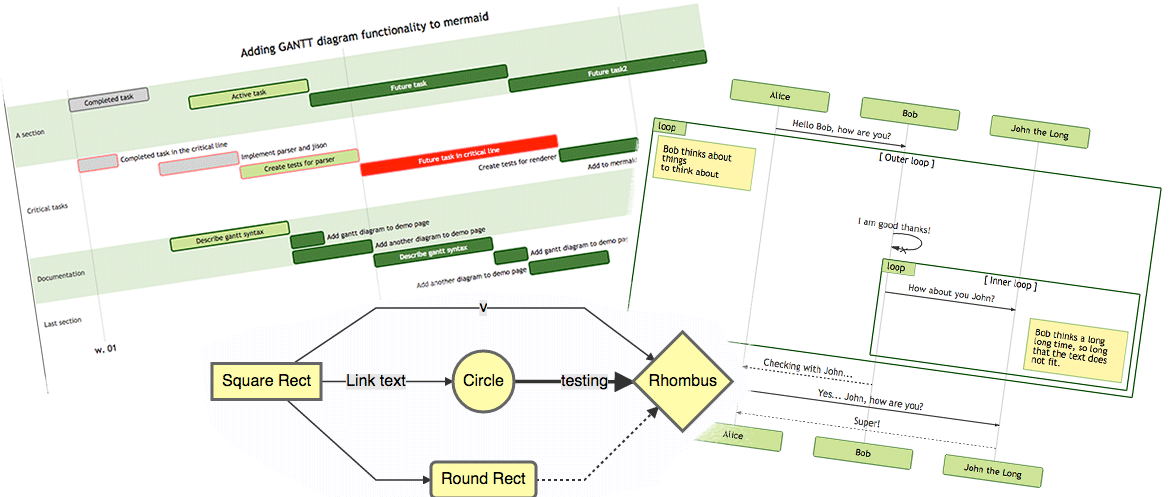
It is a JavaScript based diagramming and charting tool that renders Markdown-inspired text definitions to create and modify diagrams dynamically.
> If you are familiar with Markdown you should have no problem learning [Mermaid's Syntax](https://mermaid.js.org/intro/syntax-reference.html)
> .
[](https://github.com/mermaid-js/mermaid/actions/workflows/build.yml)
[](https://www.npmjs.com/package/mermaid)
[](https://bundlephobia.com/package/mermaid)
[](https://coveralls.io/github/mermaid-js/mermaid?branch=master)
[](https://www.jsdelivr.com/package/npm/mermaid)
[](https://www.npmjs.com/package/mermaid)
[](https://discord.gg/sKeNQX4Wtj)
[](https://twitter.com/mermaidjs_)
[](https://mermaid-js.github.io/mermaid/landing/)
Mermaid is a JavaScript based diagramming and charting tool that uses Markdown-inspired text definitions and a renderer to create and modify complex diagrams. The main purpose of Mermaid is to help documentation catch up with development.
> Doc-Rot is a Catch-22 that Mermaid helps to solve.
Diagramming and documentation costs precious developer time and gets outdated quickly. But not having diagrams or docs ruins productivity and hurts organizational learning.
Mermaid addresses this problem by enabling users to create easily modifiable diagrams, it can also be made part of production scripts (and other pieces of code).
Mermaid allows even non-programmers to easily create detailed and diagrams through the [Mermaid Live Editor](https://mermaid.live/)
.
[Tutorials](https://mermaid.js.org/ecosystem/tutorials.html)
has video tutorials.
Use Mermaid with your favorite applications, check out the list of [Community Integrations](https://mermaid.js.org/ecosystem/integrations-community.html)
.
For a more detailed introduction to Mermaid and some of its more basic uses, look to the [Beginner's Guide](https://mermaid.js.org/intro/getting-started.html)
and [Usage](https://mermaid.js.org/config/usage.html)
.
🌐 [CDN](https://www.jsdelivr.com/package/npm/mermaid)
| 📖 [Documentation](https://mermaidjs.github.io/)
| 🙌 [Contribution](https://mermaid.js.org/community/contributing.html)
| 🔌 [Plug-Ins](https://mermaid.js.org/ecosystem/integrations-community.html)
> 🖖 Keep a steady pulse: [mermaid needs more Collaborators](https://github.com/mermaid-js/mermaid/issues/866)
> .
🏆 **Mermaid was nominated and won the [JS Open Source Awards (2019)](https://osawards.com/javascript/#nominees)
in the category "The most exciting use of technology"!!!**
**Thanks to all involved, people committing pull requests, people answering questions and special thanks to Tyler Long who is helping me maintain the project 🙏**
Our PR Visual Regression Testing is powered by [Argos](https://argos-ci.com/?utm_source=mermaid&utm_campaign=oss)
with their generous Open Source plan. It makes the process of reviewing PRs with visual changes a breeze.
[](https://argos-ci.com/?utm_source=mermaid&utm_campaign=oss)
In our release process we rely heavily on visual regression tests using [applitools](https://applitools.com/)
. Applitools is a great service which has been easy to use and integrate with our tests.
[](https://applitools.com/)
Diagram Types [](https://mermaid.js.org/intro/#diagram-types)
---------------------------------------------------------------
### [Flowchart](https://mermaid.js.org/syntax/flowchart.html?id=flowcharts-basic-syntax)
[](https://mermaid.js.org/intro/#flowchart)
##### Code:
mermaid
graph TD;
A-->B;
A-->C;
B-->D;
C-->D;
Ctrl + Enter|Run ▶
### [Sequence diagram](https://mermaid.js.org/syntax/sequenceDiagram.html)
[](https://mermaid.js.org/intro/#sequence-diagram)
##### Code:
mermaid
sequenceDiagram
participant Alice
participant Bob
Alice->>John: Hello John, how are you?
loop HealthCheck
John->>John: Fight against hypochondria
end
Note right of John: Rational thoughts prevail!
John-->>Alice: Great!
John->>Bob: How about you?
Bob-->>John: Jolly good!
Ctrl + Enter|Run ▶
### [Gantt diagram](https://mermaid.js.org/syntax/gantt.html)
[](https://mermaid.js.org/intro/#gantt-diagram)
##### Code:
mermaid
gantt
dateFormat YYYY-MM-DD
title Adding GANTT diagram to mermaid
excludes weekdays 2014-01-10
section A section
Completed task :done, des1, 2014-01-06,2014-01-08
Active task :active, des2, 2014-01-09, 3d
Future task : des3, after des2, 5d
Future task2 : des4, after des3, 5d
Ctrl + Enter|Run ▶
### [Class diagram](https://mermaid.js.org/syntax/classDiagram.html)
[](https://mermaid.js.org/intro/#class-diagram)
##### Code:
mermaid
classDiagram
Class01 <|-- AveryLongClass : Cool
Class03 *-- Class04
Class05 o-- Class06
Class07 .. Class08
Class09 --> C2 : Where am i?
Class09 --* C3
Class09 --|> Class07
Class07 : equals()
Class07 : Object[] elementData
Class01 : size()
Class01 : int chimp
Class01 : int gorilla
Class08 <--> C2: Cool label
Ctrl + Enter|Run ▶
### [Git graph](https://mermaid.js.org/syntax/gitgraph.html)
[](https://mermaid.js.org/intro/#git-graph)
##### Code:
mermaid
gitGraph
commit
commit
branch develop
commit
commit
commit
checkout main
commit
commit
Ctrl + Enter|Run ▶
### [Entity Relationship Diagram - ❗ experimental](https://mermaid.js.org/syntax/entityRelationshipDiagram.html)
[](https://mermaid.js.org/intro/#entity-relationship-diagram-experimental)
##### Code:
mermaid
erDiagram
CUSTOMER ||--o{ ORDER : places
ORDER ||--|{ LINE-ITEM : contains
CUSTOMER }|..|{ DELIVERY-ADDRESS : uses
Ctrl + Enter|Run ▶
### [User Journey Diagram](https://mermaid.js.org/syntax/userJourney.html)
[](https://mermaid.js.org/intro/#user-journey-diagram)
##### Code:
mermaid
journey
title My working day
section Go to work
Make tea: 5: Me
Go upstairs: 3: Me
Do work: 1: Me, Cat
section Go home
Go downstairs: 5: Me
Sit down: 5: Me
Ctrl + Enter|Run ▶
### [Quadrant Chart](https://mermaid.js.org/syntax/quadrantChart.html)
[](https://mermaid.js.org/intro/#quadrant-chart)
##### Code:
mermaid
quadrantChart
title Reach and engagement of campaigns
x-axis Low Reach --> High Reach
y-axis Low Engagement --> High Engagement
quadrant-1 We should expand
quadrant-2 Need to promote
quadrant-3 Re-evaluate
quadrant-4 May be improved
Campaign A: [0.3, 0.6]
Campaign B: [0.45, 0.23]
Campaign C: [0.57, 0.69]
Campaign D: [0.78, 0.34]
Campaign E: [0.40, 0.34]
Campaign F: [0.35, 0.78]
Ctrl + Enter|Run ▶
### [XY Chart](https://mermaid.js.org/syntax/xyChart.html)
[](https://mermaid.js.org/intro/#xy-chart)
##### Code:
mermaid
xychart-beta
title "Sales Revenue"
x-axis [jan, feb, mar, apr, may, jun, jul, aug, sep, oct, nov, dec]
y-axis "Revenue (in $)" 4000 --> 11000
bar [5000, 6000, 7500, 8200, 9500, 10500, 11000, 10200, 9200, 8500, 7000, 6000]
line [5000, 6000, 7500, 8200, 9500, 10500, 11000, 10200, 9200, 8500, 7000, 6000]
Ctrl + Enter|Run ▶
Installation [](https://mermaid.js.org/intro/#installation)
-------------------------------------------------------------
**In depth guides and examples can be found at [Getting Started](https://mermaid.js.org/intro/getting-started.html)
and [Usage](https://mermaid.js.org/config/usage.html)
.**
**It would also be helpful to learn more about mermaid's [Syntax](https://mermaid.js.org/intro/syntax-reference.html)
.**
### CDN [](https://mermaid.js.org/intro/#cdn)
https://cdn.jsdelivr.net/npm/mermaid@/dist/
To select a version:
Replace `` with the desired version number.
Latest Version: [https://cdn.jsdelivr.net/npm/mermaid@11](https://cdn.jsdelivr.net/npm/mermaid@11)
Deploying Mermaid [](https://mermaid.js.org/intro/#deploying-mermaid)
-----------------------------------------------------------------------
To Deploy Mermaid:
1. You will need to install node v16, which would have npm
2. Install mermaid
* NPM: `npm i mermaid`
* Yarn: `yarn add mermaid`
* Pnpm: `pnpm add mermaid`
### [Mermaid API](https://mermaid.js.org/config/setup/README.html)
: [](https://mermaid.js.org/intro/#mermaid-api)
**To deploy mermaid without a bundler, insert a `script` tag with an absolute address and a `mermaid.initialize` call into the HTML using the following example:**
html
**Doing so commands the mermaid parser to look for the `
` or `
` tags with `class="mermaid"`. From these tags, mermaid tries to read the diagram/chart definitions and render them into SVG charts.**
**Examples can be found in** [Other examples](https://mermaid.js.org/syntax/examples.html)
Sibling projects [](https://mermaid.js.org/intro/#sibling-projects)
---------------------------------------------------------------------
* [Mermaid Live Editor](https://github.com/mermaid-js/mermaid-live-editor)
* [Mermaid CLI](https://github.com/mermaid-js/mermaid-cli)
* [Mermaid Tiny](https://github.com/mermaid-js/mermaid/tree/develop/packages/tiny)
* [Mermaid Webpack Demo](https://github.com/mermaidjs/mermaid-webpack-demo)
* [Mermaid Parcel Demo](https://github.com/mermaidjs/mermaid-parcel-demo)
Request for Assistance [](https://mermaid.js.org/intro/#request-for-assistance)
---------------------------------------------------------------------------------
Things are piling up and I have a hard time keeping up. It would be great if we could form a core team of developers to cooperate with the future development of mermaid.
As part of this team you would get write access to the repository and would represent the project when answering questions and issues.
Together we could continue the work with things like:
* Adding more types of diagrams like mindmaps, ert diagrams, etc.
* Improving existing diagrams
Don't hesitate to contact me if you want to get involved!
Contributors [](https://mermaid.js.org/intro/#contributors)
-------------------------------------------------------------
[](https://github.com/mermaid-js/mermaid/issues?q=is%3Aissue+is%3Aopen+label%3A%22Good+first+issue%21%22)
[](https://github.com/mermaid-js/mermaid/graphs/contributors)
[](https://github.com/mermaid-js/mermaid/graphs/contributors)
Mermaid is a growing community and is always accepting new contributors. There's a lot of different ways to help out and we're always looking for extra hands! Look at [this issue](https://github.com/mermaid-js/mermaid/issues/866)
if you want to know where to start helping out.
Detailed information about how to contribute can be found in the [contribution guideline](https://mermaid.js.org/community/contributing.html)
.
### Requirements [](https://mermaid.js.org/intro/#requirements)
* [volta](https://volta.sh/)
to manage node versions.
* [Node.js](https://nodejs.org/en/)
. `volta install node`
* [pnpm](https://pnpm.io/)
package manager. `volta install pnpm`
### Development Installation [](https://mermaid.js.org/intro/#development-installation)
bash
git clone git@github.com:mermaid-js/mermaid.git
cd mermaid
# npx is required for first install as volta support for pnpm is not added yet.
npx pnpm install
pnpm test
### Lint [](https://mermaid.js.org/intro/#lint)
sh
pnpm lint
We use [eslint](https://eslint.org/)
. We recommend you to install [editor plugins](https://eslint.org/docs/user-guide/integrations)
to get real time lint result.
### Test [](https://mermaid.js.org/intro/#test)
sh
pnpm test
Manual test in browser: open `dist/index.html`
### Release [](https://mermaid.js.org/intro/#release)
For those who have the permission to do so:
Update version number in `package.json`.
sh
npm publish
The above command generates files into the `dist` folder and publishes them to [npmjs.com](https://www.npmjs.com/)
.
Security and safe diagrams [](https://mermaid.js.org/intro/#security-and-safe-diagrams)
-----------------------------------------------------------------------------------------
For public sites, it can be precarious to retrieve text from users on the internet, storing that content for presentation in a browser at a later stage. The reason is that the user content can contain embedded malicious scripts that will run when the data is presented. For Mermaid this is a risk, specially as mermaid diagrams contain many characters that are used in html which makes the standard sanitation unusable as it also breaks the diagrams. We still make an effort to sanitize the incoming code and keep refining the process but it is hard to guarantee that there are no loop holes.
As an extra level of security for sites with external users we are happy to introduce a new security level in which the diagram is rendered in a sandboxed iframe preventing JavaScript in the code from being executed. This is a great step forward for better security.
_Unfortunately you cannot have a cake and eat it at the same time which in this case means that some of the interactive functionality gets blocked along with the possible malicious code._
Reporting vulnerabilities [](https://mermaid.js.org/intro/#reporting-vulnerabilities)
---------------------------------------------------------------------------------------
To report a vulnerability, please e-mail [security@mermaid.live](mailto:security@mermaid.live)
with a description of the issue, the steps you took to create the issue, affected versions, and if known, mitigations for the issue.
Appreciation [](https://mermaid.js.org/intro/#appreciation)
-------------------------------------------------------------
A quick note from Knut Sveidqvist:
> _Many thanks to the [d3](https://d3js.org/)
> and [dagre-d3](https://github.com/cpettitt/dagre-d3)
> projects for providing the graphical layout and drawing libraries!_
>
> _Thanks also to the [js-sequence-diagram](https://bramp.github.io/js-sequence-diagrams)
> project for usage of the grammar for the sequence diagrams. Thanks to Jessica Peter for inspiration and starting point for gantt rendering._
>
> _Thank you to [Tyler Long](https://github.com/tylerlong)
> who has been a collaborator since April 2017._
>
> _Thank you to the ever-growing list of [contributors](https://github.com/mermaid-js/mermaid/graphs/contributors)
> that brought the project this far!_
* * *
_Mermaid was created by Knut Sveidqvist for easier documentation._
Opens in MermaidChart.com

---
# Getting Started | Mermaid
[Skip to content](https://mermaid.js.org/community/intro.html#VPContent)
On this page
[Customize your layout and design in Mermaid Chart’s visual editor! Try now](https://www.mermaidchart.com/whiteboard?utm_source=mermaid_js&utm_medium=banner_ad&utm_campaign=visual_editor)
Getting Started [](https://mermaid.js.org/community/intro.html#getting-started)
=================================================================================
So you want to help? That's great!

Here are a few things to get you started on the right path.
How can I help? [](https://mermaid.js.org/community/intro.html#how-can-i-help)
--------------------------------------------------------------------------------
ContributingDevelopmentTestingManagementSolving issuesAdding new diagramsHandling pull requestsUpdating toolingVerification of fixed issuesRegression testing inconnection with releasesTesting pull requestsCoordinating the workClassification andmonitoring of incomingissues 8b2mq
Join the Development [](https://mermaid.js.org/community/intro.html#join-the-development)
-------------------------------------------------------------------------------------------
TIP
**Check out our** [**detailed contribution guide**](https://mermaid.js.org/community/contributing.html)
.
Where to start:
* You could start getting some knowledge of the code base by working on [these "good first issues"](https://github.com/mermaid-js/mermaid/issues?utf8=%E2%9C%93&q=is%3Aissue+is%3Aopen+label%3A%22Good+first+issue%21%22+)
.
* You could jump right in and help us fix any of [these bugs](https://github.com/mermaid-js/mermaid/issues?q=is%3Aissue+is%3Aopen+label%3A%22Type%3A+Bug+%2F+Error%22++label%3A%22Contributor+needed%22+)
!
* You could help write and [improve the documentation](https://github.com/mermaid-js/mermaid/issues?q=is%3Aissue+is%3Aopen+label%3A%22Area%3A+Documentation%22)
.
* You could work on a new feature! [These](https://github.com/mermaid-js/mermaid/issues?q=is%3Aissue+is%3Aopen+label%3A%22Area%3A+Development%22+label%3A%22Type%3A+Enhancement%22+label%3A%22Status%3A+Approved%22+)
are some ideas!
* You could confirm the bugs in [these issues](https://github.com/mermaid-js/mermaid/issues?q=is%3Aissue+is%3Aopen+label%3A%22Status%3A+Triage%22++label%3A%22Type%3A+Bug+%2F+Error%22)
.
[You can join our Discord server if you want closer contact!](https://discord.gg/sKeNQX4Wtj)
A Question Or a Suggestion? [](https://mermaid.js.org/community/intro.html#a-question-or-a-suggestion)
--------------------------------------------------------------------------------------------------------
TIP
**Have a look at** [**how to open an issue**](https://mermaid.js.org/community/questions-and-suggestions.html)
.
If you have faced a vulnerability [report it to us](https://mermaid.js.org/community/security.html)
.
Last Words [](https://mermaid.js.org/community/intro.html#last-words)
-----------------------------------------------------------------------
Don't get daunted if it is hard in the beginning. We have a great community with only encouraging words. So, if you get stuck, ask for help and hints in the Slack forum. If you want to show off something good, show it off there.
[You can join our Discord server if you want closer contact!](https://discord.gg/sKeNQX4Wtj)

Opens in MermaidChart.com

---
# Announcements | Mermaid
[Skip to content](https://mermaid.js.org/news/announcements.html#VPContent)
On this page
[Customize your layout and design in Mermaid Chart’s visual editor! Try now](https://www.mermaidchart.com/whiteboard?utm_source=mermaid_js&utm_medium=banner_ad&utm_campaign=visual_editor)
Announcements [](https://mermaid.js.org/news/announcements.html#announcements)
================================================================================
🚀 Exciting News from Mermaid Chart! 🚀 [](https://mermaid.js.org/news/announcements.html#%F0%9F%9A%80-exciting-news-from-mermaid-chart-%F0%9F%9A%80)
-------------------------------------------------------------------------------------------------------------------------------------------------------
We're thrilled to announce that Mermaid Chart has successfully raised $7.5 million in Seed funding! 🌟 This achievement marks the beginning of a new era for Mermaid and Mermaid Chart.
**Why It Matters for Mermaid Chart:**
* **Empowering Collaboration**: Our tools are designed to enable faster, more efficient team collaboration across any distance, leveraging the best of text, voice, and automation.
* **Opening New Doors**: Mermaid AI and our Visual Editor are breaking down barriers, making sophisticated diagramming accessible to everyone, not just software engineers.
* **Looking Forward**: We're not stopping here! Expect groundbreaking features like automated documentation tools, advanced AI diagramming, and high-security on-premise solutions.
**Why It Matters for Mermaid JS:**
* **Continued support from Mermaid Chart**: At Mermaid Chart, we value our still-growing Mermaid JS roots. As such, we have funneled back development and support to the project. Thanks to the successful seed round, we can continue to ramp up these efforts.
We are incredibly excited about the future and are grateful to the community, our team, and our investors for being part of this journey. Together, we're not just creating diagrams; we're designing the future of collaboration.
🌐 Learn more about our groundbreaking tools and what's next for Mermaid Chart by visiting [our website](https://www.mermaidchart.com/blog/posts/mermaid-chart-raises-7.5m-to-reinvent-visual-collaoration-for-enterprises)
.
Thank you for being part of our story. Here's to creating, innovating, and collaborating on a global scale!
Knut Sveidqvist 🧜♂️✨
Mermaid Chart's Visual Editor for Flowcharts and Sequence diagrams [](https://mermaid.js.org/news/announcements.html#mermaid-chart-s-visual-editor-for-flowcharts-and-sequence-diagrams)
------------------------------------------------------------------------------------------------------------------------------------------------------------------------------------------
The Mermaid Chart team is excited to introduce a new Visual Editor for Flowcharts and Sequence diagrams, enabling users of all skill levels to create diagrams easily and efficiently, with both GUI and code-based editing options.
Learn more:
* Visual Editor For Flowcharts
* [Blog post](https://www.mermaidchart.com/blog/posts/mermaid-chart-releases-new-visual-editor-for-flowcharts)
* [Demo video](https://www.youtube.com/watch?v=5aja0gijoO0)
* Visual Editor For Sequence diagrams
* [Blog post](https://www.mermaidchart.com/blog/posts/mermaid-chart-unveils-visual-editor-for-sequence-diagrams)
* [Demo video](https://youtu.be/imc2u5_N6Dc)
📖 Blog posts [](https://mermaid.js.org/news/announcements.html#%F0%9F%93%96-blog-posts)
------------------------------------------------------------------------------------------
Visit our [Blog](https://mermaid.js.org/news/blog.html)
to see the latest blog posts.
Opens in MermaidChart.com

---
# Integrations | Mermaid
[Skip to content](https://mermaid.js.org/ecosystem/integrations-community.html#VPContent)
On this page
[Customize your layout and design in Mermaid Chart’s visual editor! Try now](https://www.mermaidchart.com/whiteboard?utm_source=mermaid_js&utm_medium=banner_ad&utm_campaign=visual_editor)
Integrations [](https://mermaid.js.org/ecosystem/integrations-community.html#integrations)
============================================================================================
Official integration [](https://mermaid.js.org/ecosystem/integrations-community.html#official-integration)
------------------------------------------------------------------------------------------------------------
### Mermaid Chart [](https://mermaid.js.org/ecosystem/integrations-community.html#mermaid-chart)
Mermaid Chart is built by the team behind Mermaid JS.
For more details, visit the [Mermaid Chart page](https://mermaid.js.org/ecosystem/mermaid-chart.html)
, or visit the [Mermaid Chart website](https://www.mermaidchart.com/)
.
Community integrations [](https://mermaid.js.org/ecosystem/integrations-community.html#community-integrations)
----------------------------------------------------------------------------------------------------------------
We're excited about the growth of the Mermaid community, and the number of plugins and integrations that have been created by the community.
See the list below of community plugins and integrations created with Mermaid.
INFO
A ✅ indicates Native support for Mermaid on the respective platform.
To add an integration to this list, see the [Integrations - create page](https://mermaid.js.org/ecosystem/integrations-create.html)
.
### Productivity tools [](https://mermaid.js.org/ecosystem/integrations-community.html#productivity-tools)
* [Atlassian Products](https://www.atlassian.com/)
* [Mermaid for Confluence](https://marketplace.atlassian.com/apps/1224722/mermaid-for-confluence?hosting=cloud&tab=overview)
* [Mermaid Integration for Confluence](https://marketplace.atlassian.com/apps/1222792/mermaid-integration-for-confluence?hosting=cloud&tab=overview)
* [Mermaid Charts & Diagrams for Confluence](https://marketplace.atlassian.com/apps/1222572/)
* [Mermaid Diagrams for Confluence](https://marketplace.atlassian.com/apps/1226945/mermaid-diagrams-for-confluence?hosting=cloud&tab=overview)
* [Mermaid Live Editor for Confluence Cloud](https://marketplace.atlassian.com/apps/1231571/mermaid-live-editor-for-confluence?hosting=cloud&tab=overview)
* [Mermaid Macro for Confluence](https://marketplace.atlassian.com/apps/1231150/mermaid-macro-for-confluence?hosting=cloud&tab=overview)
* [Mermaid Plugin for Confluence](https://marketplace.atlassian.com/apps/1214124/mermaid-plugin-for-confluence?hosting=server&tab=overview)
* [EliteSoft Mermaid Charts and Diagrams](https://marketplace.atlassian.com/apps/1227286/elitesoft-mermaid-charts-and-diagrams?hosting=cloud&tab=overview)
* [Auto convert diagrams in Jira](https://github.com/coddingtonbear/jirafs-mermaid)
* [Mermaid Charts & Diagrams for Jira](https://marketplace.atlassian.com/apps/1224537/)
* [Mermaid for Jira Cloud - Draw UML diagrams easily](https://marketplace.atlassian.com/apps/1223053/mermaid-for-jira-cloud-draw-uml-diagrams-easily?hosting=cloud&tab=overview)
* [CloudScript.io Mermaid Addon](https://marketplace.atlassian.com/apps/1219878/cloudscript-io-mermaid-addon?hosting=cloud&tab=overview)
* [Mermaid plus for Confluence](https://marketplace.atlassian.com/apps/1236814/mermaid-plus-for-confluence?hosting=cloud&tab=overview)
* [Azure Devops](https://learn.microsoft.com/en-us/azure/devops/project/wiki/markdown-guidance?view=azure-devops#add-mermaid-diagrams-to-a-wiki-page)
✅
* [Deepdwn](https://billiam.itch.io/deepdwn)
✅
* [Doctave](https://www.doctave.com/)
✅
* [Mermaid in Markdown code blocks](https://docs.doctave.com/components/mermaid)
✅
* [Forgejo](https://forgejo.org/)
✅
* [GitBook](https://gitbook.com/)
* [Mermaid Plugin](https://github.com/JozoVilcek/gitbook-plugin-mermaid)
* [Mermaid plugin for GitBook](https://github.com/wwformat/gitbook-plugin-mermaid-pdf)
* [Markdown with Mermaid CLI](https://github.com/miao1007/gitbook-plugin-mermaid-cli)
* [Gitea](https://gitea.io/)
✅
* [GitHub](https://github.com/)
✅
* [Using code blocks](https://github.blog/2022-02-14-include-diagrams-markdown-files-mermaid/)
✅
* [GitHub action: Compile mermaid to image](https://github.com/neenjaw/compile-mermaid-markdown-action)
* [GitHub Writer](https://github.com/ckeditor/github-writer)
* [SVG diagram generator](https://github.com/SimonKenyonShepard/mermaidjs-github-svg-generator)
* [GitLab](https://docs.gitlab.com/ee/user/markdown.html#diagrams-and-flowcharts)
✅
* [Mermaid Plugin for JetBrains IDEs](https://plugins.jetbrains.com/plugin/20146-mermaid)
* [MonsterWriter](https://www.monsterwriter.com/)
✅
* [Joplin](https://joplinapp.org/)
✅
* [LiveBook](https://livebook.dev/)
✅
* [Slidev](https://sli.dev/)
✅
* [Tuleap](https://docs.tuleap.org/user-guide/writing-in-tuleap.html#graphs)
✅
* [Mermaid Flow Visual Editor](https://www.mermaidflow.app/)
✅
* [Mermerd](https://github.com/KarnerTh/mermerd)
* [Slab](https://slab.com/)
✅
* [Swimm](https://docs.swimm.io/features/diagrams-and-charts)
✅
* [NotesHub](https://noteshub.app/)
✅
* [Notion](https://notion.so/)
✅
* [Observable](https://observablehq.com/@observablehq/mermaid)
✅
* [Obsidian](https://help.obsidian.md/Editing+and+formatting/Advanced+formatting+syntax#Diagram)
✅
* [Outline](https://docs.getoutline.com/s/guide/doc/diagrams-KQiKoT4wzK)
✅
* [Redmine](https://redmine.org/)
* [Mermaid Macro](https://www.redmine.org/plugins/redmine_mermaid_macro)
* [Markdown for mermaid plugin](https://github.com/jamieh-mongolian/markdown-for-mermaid-plugin)
* [redmine-mermaid](https://github.com/styz/redmine_mermaid)
* Visual Studio Code [Polyglot Interactive Notebooks](https://github.com/dotnet/interactive#net-interactive)
* [Microsoft Loop](https://loop.cloud.microsoft/)
✅
### LLM integrations [](https://mermaid.js.org/ecosystem/integrations-community.html#llm-integrations)
LLM integrations to create mermaid diagrams using AI from text descriptions.
* [HueHive - Create mermaid diagrams with text](https://huehive.co/tools/diagrams)
### CRM/ERP [](https://mermaid.js.org/ecosystem/integrations-community.html#crm-erp)
Customer Relationship Management/Enterprise Resource Planning
* [coreBOS](https://blog.corebos.org/blog/december2019)
### Blogging [](https://mermaid.js.org/ecosystem/integrations-community.html#blogging)
Blogging frameworks and platforms
* [Hexo](https://hexo.io/)
* [hexo-filter-mermaid-diagrams](https://github.com/webappdevelp/hexo-filter-mermaid-diagrams)
* [hexo-tag-mermaid](https://github.com/JameChou/hexo-tag-mermaid)
* [hexo-mermaid-diagrams](https://github.com/mslxl/hexo-mermaid-diagrams)
* [Nextra](https://nextra.site/)
* [Mermaid](https://nextra.site/docs/guide/mermaid)
* [WordPress](https://wordpress.org/)
* [MerPRess](https://wordpress.org/plugins/merpress/)
### CMS/ECM [](https://mermaid.js.org/ecosystem/integrations-community.html#cms-ecm)
Content Management Systems/Enterprise Content Management
* [ApostropheCMS](https://apostrophecms.com/)
* [Extension for Mermaid.js](https://github.com/BoDonkey/mermaid-extension)
* [Drupal](https://drupal.org/)
* [Mermaid Diagram Field module](https://www.drupal.org/project/mermaid_diagram_field)
* [Grav CMS](https://getgrav.org/)
* [Mermaid Diagrams Plugin](https://github.com/DanielFlaum/grav-plugin-mermaid-diagrams)
* [GitLab Markdown Adapter](https://github.com/Goutte/grav-plugin-gitlab-markdown-adapter)
* [Tiki](https://tiki.org/)
* [Tracker Entity Relationship Diagram](https://doc.tiki.org/Tracker-Entity-Relationship-Diagram)
* [VitePress](https://vitepress.vuejs.org/)
* [Plugin for Mermaid.js](https://emersonbottero.github.io/vitepress-plugin-mermaid/)
* [VuePress](https://vuepress.vuejs.org/)
* [Plugin for Mermaid.js](https://github.com/eFrane/vuepress-plugin-mermaidjs)
### Communication [](https://mermaid.js.org/ecosystem/integrations-community.html#communication)
Communication tools and platforms
* [Discourse](https://discourse.org/)
* [Mermaid Plugin](https://github.com/pnewell/discourse-mermaid)
* [Mattermost](https://mattermost.com/)
* [Mermaid Plugin](https://github.com/SpikeTings/Mermaid)
* [NodeBB](https://nodebb.org/)
* [Mermaid Parser Plugin](https://www.npmjs.com/package/nodebb-plugin-mermaid)
* [phpBB](https://phpbb.com/)
* [phpbb-ext-mermaid](https://github.com/AlfredoRamos/phpbb-ext-mermaid)
* [Slack](https://slack.com/)
* [Mermaid Preview](https://mermaid-preview.com/)
### Wikis [](https://mermaid.js.org/ecosystem/integrations-community.html#wikis)
* [DokuWiki](https://dokuwiki.org/)
* [ComboStrap](https://combostrap.com/utility/create-diagram-with-mermaid-vh3ab9yj)
* [Mermaid Plugin](https://www.dokuwiki.org/plugin:mermaid)
* [Foswiki](https://foswiki.org/)
* [Mermaid Plugin](https://foswiki.org/Extensions/MermaidPlugin)
* [MediaWiki](https://www.mediawiki.org/)
* [Flex Diagrams Extension](https://www.mediawiki.org/wiki/Extension:Flex_Diagrams)
* [Mermaid Extension](https://www.mediawiki.org/wiki/Extension:Mermaid)
* [PmWiki](https://www.pmwiki.org/)
* [MermaidJs Cookbook recipe](https://www.pmwiki.org/wiki/Cookbook/MermaidJs)
* [Semantic Media Wiki](https://www.semantic-mediawiki.org/)
* [Mermaid Plugin](https://github.com/SemanticMediaWiki/Mermaid)
* [TiddlyWiki](https://tiddlywiki.com/)
* [mermaid-tw5: wrapper for Mermaid Live](https://github.com/efurlanm/mermaid-tw5)
* [tw5-mermaid: plugin for managing Mermaid.js tiddlers](https://github.com/jasonmhoule/tw5-mermaid)
### Editor Plugins [](https://mermaid.js.org/ecosystem/integrations-community.html#editor-plugins)
* Atom _(Atom has been [archived.](https://github.blog/2022-06-08-sunsetting-atom/)
)_
* [Markdown Preview Enhanced](https://github.com/shd101wyy/markdown-preview-enhanced)
* [Atom Mermaid](https://github.com/y-takey/atom-mermaid)
* [Language Mermaid Syntax Highlighter](https://github.com/ytisf/language-mermaid)
* [Astah](https://astah.net/)
* [Export to Mermaid](https://github.com/Avens666/Astah_Jude_UML_export_to_Markdown-mermaid-Plantuml-)
* [Brackets](https://brackets.io/)
* [Mermaid Preview](https://github.com/AlanHohn/mermaid-preview)
* [CKEditor](https://github.com/ckeditor/ckeditor5)
* [CKEditor 5 Mermaid plugin](https://github.com/ckeditor/ckeditor5-mermaid)
* [Draw.io](https://draw.io/)
* [Mermaid Plugin](https://github.com/nopeslide/drawio_mermaid_plugin)
* [GNU Emacs](https://www.gnu.org/software/emacs/)
* [Major mode for .mmd files](https://github.com/abrochard/mermaid-mode)
* [Org-Mode integration](https://github.com/arnm/ob-mermaid)
* [GNU Nano](https://www.nano-editor.org/)
* [Nano Mermaid](https://github.com/Yash-Singh1/nano-mermaid)
* [Google docs](https://docs.google.com/)
* [Mermaid plugin for google docs](https://workspace.google.com/marketplace/app/mermaid/636321283856)
* [Inkdrop](https://www.inkdrop.app/)
* [Mermaid Plugin](https://github.com/inkdropapp/inkdrop-mermaid)
* [Light Table](http://lighttable.com/)
* [Mermaid Plugin](https://github.com/cldwalker/Mermaid)
* [Markdown-It](https://github.com/markdown-it/markdown-it)
* [Textual UML Parser](https://github.com/manastalukdar/markdown-it-textual-uml)
* [Mermaid Plugin](https://github.com/tylingsoft/markdown-it-mermaid)
* [md-it-mermaid](https://github.com/iamcco/md-it-mermaid)
* [markdown-it-mermaid-less](https://github.com/searKing/markdown-it-mermaid-less)
* [Podlite](https://github.com/zag/podlite-desktop)
* [\=Diagram block](https://github.com/zag/podlite/tree/main/packages/podlite-diagrams)
* [Standard Notes](https://standardnotes.com/)
* [Mermaid Extension](https://github.com/nienow/sn-mermaid)
* [VS Code](https://code.visualstudio.com/)
* [Mermaid Editor](https://marketplace.visualstudio.com/items?itemName=tomoyukim.vscode-mermaid-editor)
* [Mermaid Export](https://marketplace.visualstudio.com/items?itemName=Gruntfuggly.mermaid-export)
* [Markdown PDF](https://marketplace.visualstudio.com/items?itemName=yzane.markdown-pdf)
* [Markdown Preview Mermaid Support](https://marketplace.visualstudio.com/items?itemName=bierner.markdown-mermaid)
* [Markdown Preview Enhanced](https://marketplace.visualstudio.com/items?itemName=shd101wyy.markdown-preview-enhanced)
* [Mermaid Preview](https://marketplace.visualstudio.com/items?itemName=vstirbu.vscode-mermaid-preview)
* [Preview](https://marketplace.visualstudio.com/items?itemName=searKing.preview-vscode)
* [Preview Sequence Diagrams](https://marketplace.visualstudio.com/items?itemName=arichika.previewseqdiag-vscode)
* [Mermaid Markdown Syntax Highlighting](https://marketplace.visualstudio.com/items?itemName=bpruitt-goddard.mermaid-markdown-syntax-highlighting)
* [Vim](https://www.vim.org/)
* [Vim Diagram Syntax](https://github.com/zhaozg/vim-diagram)
* [Official Vim Syntax and ft plugin](https://github.com/craigmac/vim-mermaid)
* [Zed](https://zed.dev/)
* [zed-mermaid](https://github.com/gabeidx/zed-mermaid)
### Document Generation [](https://mermaid.js.org/ecosystem/integrations-community.html#document-generation)
* [Astro](https://astro.build/)
* [Adding diagrams to your Astro site with MermaidJS and Playwright](https://agramont.net/blog/diagraming-with-mermaidjs-astro/)
* [Codedoc](https://codedoc.cc/)
* [codedoc-mermaid-plugin](https://www.npmjs.com/package/codedoc-mermaid-plugin)
* [Docsy Hugo Theme](https://www.docsy.dev/docs/adding-content/lookandfeel/#diagrams-with-mermaid)
✅
* [Docusaurus](https://docusaurus.io/docs/markdown-features/diagrams)
✅
* [Gatsby](https://www.gatsbyjs.com/)
* [gatsby-remark-mermaid](https://github.com/remcohaszing/gatsby-remark-mermaid)
* [Jekyll](https://jekyllrb.com/)
* [jekyll-mermaid](https://rubygems.org/gems/jekyll-mermaid)
* [jekyll-mermaid-diagrams](https://github.com/fuzhibo/jekyll-mermaid-diagrams)
* [JSDoc](https://jsdoc.app/)
* [jsdoc-mermaid](https://github.com/Jellyvision/jsdoc-mermaid)
* [Madness](https://madness.dannyb.co/)
* [mdBook](https://rust-lang.github.io/mdBook/index.html)
* [mdbook-mermaid](https://github.com/badboy/mdbook-mermaid)
* [MkDocs](https://www.mkdocs.org/)
* [mkdocs-mermaid2-plugin](https://github.com/fralau/mkdocs-mermaid2-plugin)
* [mkdocs-material](https://github.com/squidfunk/mkdocs-material)
, check the [docs](https://squidfunk.github.io/mkdocs-material/reference/diagrams/)
* [Quarto](https://quarto.org/)
✅
* [rehype](https://github.com/rehypejs/rehype)
* [rehype-mermaid](https://github.com/remcohaszing/rehype-mermaid)
* [remark](https://remark.js.org/)
* [remark-mermaidjs](https://github.com/remcohaszing/remark-mermaidjs)
* [Sphinx](https://www.sphinx-doc.org/en/master/)
* [sphinxcontrib-mermaid](https://github.com/mgaitan/sphinxcontrib-mermaid)
* [Type Doc](https://typedoc.org/)
* [typedoc-plugin-mermaid](https://www.npmjs.com/package/typedoc-plugin-mermaid)
* [Typora](https://support.typora.io/Draw-Diagrams-With-Markdown/#mermaid)
✅
* [Unison programming language](https://www.unison-lang.org/docs/usage-topics/documentation/)
✅
### Browser Extensions [](https://mermaid.js.org/ecosystem/integrations-community.html#browser-extensions)
| Name | Chrome Web Store | Firefox Add-ons | Opera | Edge | Source/Repository |
| --- | --- | --- | --- | --- | --- |
| GitHub + Mermaid | \- | [🦊🔗](https://addons.mozilla.org/firefox/addon/github-mermaid/) | \- | \- | [🐙🔗](https://github.com/BackMarket/github-mermaid-extension) |
| Asciidoctor Live Preview | [🎡🔗](https://chromewebstore.google.com/detail/asciidoctorjs-live-previe/iaalpfgpbocpdfblpnhhgllgbdbchmia) | \- | \- | [🌀🔗](https://microsoftedge.microsoft.com/addons/detail/asciidoctorjs-live-previ/pefkelkanablhjdekgdahplkccnbdggd?hl=en-US) | \- |
| Diagram Tab | \- | \- | \- | \- | [🐙🔗](https://github.com/khafast/diagramtab) |
| Markdown Diagrams | [🎡🔗](https://chromewebstore.google.com/detail/markdown-diagrams/pmoglnmodacnbbofbgcagndelmgaclel) | [🦊🔗](https://addons.mozilla.org/en-US/firefox/addon/markdown-diagrams/) | \- | [🌀🔗](https://microsoftedge.microsoft.com/addons/detail/markdown-diagrams/hceenoomhhdkjjijnmlclkpenkapfihe) | [🐙🔗](https://github.com/marcozaccari/markdown-diagrams-browser-extension/tree/master/doc/examples) |
| Markdown Viewer | \- | [🦊🔗](https://addons.mozilla.org/en-US/firefox/addon/markdown-viewer-chrome/) | \- | \- | [🐙🔗](https://github.com/simov/markdown-viewer) |
| Extensions for Mermaid | \- | \- | [🔴🔗](https://addons.opera.com/en/extensions/details/extensions-for-mermaid/) | \- | [🐙🔗](https://github.com/Stefan-S/mermaid-extension) |
| Chrome Diagrammer | [🎡🔗](https://chromewebstore.google.com/detail/chrome-diagrammer/bkpbgjmkomfoakfklcjeoegkklgjnnpk) | \- | \- | \- | \- |
| Mermaid Diagrams | [🎡🔗](https://chromewebstore.google.com/detail/mermaid-diagrams/phfcghedmopjadpojhmmaffjmfiakfil) | \- | \- | \- | \- |
| Monkeys | [🎡🔗](https://chromewebstore.google.com/detail/monkeys-mermaid-for-githu/cplfdpoajbclbgphaphphcldamfkjlgi) | \- | \- | \- | \- |
| Mermaid Previewer | [🎡🔗](https://chromewebstore.google.com/detail/mermaid-previewer/oidjnlhbegipkcklbdfnbkikplpghfdl) | \- | \- | \- | \- |
### Other [](https://mermaid.js.org/ecosystem/integrations-community.html#other)
* [Bisheng](https://www.npmjs.com/package/bisheng)
* [bisheng-plugin-mermaid](https://github.com/yct21/bisheng-plugin-mermaid)
* [Blazorade Mermaid: Render Mermaid diagrams in Blazor applications](https://github.com/Blazorade/Blazorade-Mermaid/wiki)
* [Codemia: A tool to practice system design problems](https://codemia.io/)
✅
* [ExDoc](https://github.com/elixir-lang/ex_doc)
* [Rendering Mermaid graphs](https://github.com/elixir-lang/ex_doc#rendering-mermaid-graphs)
* [MarkChart: Preview Mermaid diagrams on macOS](https://markchart.app/)
* [mermaid-isomorphic](https://github.com/remcohaszing/mermaid-isomorphic)
* [mermaid-server: Generate diagrams using a HTTP request](https://github.com/TomWright/mermaid-server)
* [NiceGUI: Let any browser be the frontend of your Python code](https://nicegui.io/)
✅
* [ui.mermaid(...)](https://nicegui.io/documentation/mermaid)
* [Reveal.js](https://github.com/hakimel/reveal.js)
* [reveal.js-mermaid-plugin](https://github.com/ludwick/reveal.js-mermaid-plugin)
* [Reveal CK](https://github.com/jedcn/reveal-ck)
* [reveal-ck-mermaid-plugin](https://github.com/tmtm/reveal-ck-mermaid-plugin)
* [Vitepress Plugin](https://github.com/sametcn99/vitepress-mermaid-renderer)
Opens in MermaidChart.com

---
# Tutorials | Mermaid
[Skip to content](https://mermaid.js.org/ecosystem/tutorials.html#VPContent)
On this page
[Customize your layout and design in Mermaid Chart’s visual editor! Try now](https://www.mermaidchart.com/whiteboard?utm_source=mermaid_js&utm_medium=banner_ad&utm_campaign=visual_editor)
Tutorials [](https://mermaid.js.org/ecosystem/tutorials.html#tutorials)
=========================================================================
This is a list of publicly available Tutorials for using Mermaid.JS and is intended as a basic introduction for the use of the Live Editor for generating diagrams, and deploying Mermaid.JS through HTML.
**Note that these tutorials might display an older interface, but the usage of the live-editor will largely be the same.**
For most purposes, you can use the [Live Editor](https://mermaid.live/)
, to quickly and easily render a diagram.
Live-Editor Tutorials [](https://mermaid.js.org/ecosystem/tutorials.html#live-editor-tutorials)
-------------------------------------------------------------------------------------------------
The definitions that can be generated the Live-Editor are also backwards-compatible as of version 8.7.0.
[Chris Chinchilla: Hands on - Text-based diagrams with Mermaid](https://www.youtube.com/watch?v=4_LdV1cs2sA)
[GitLab Unfiltered: How to Create Mermaid Diagrams](https://www.youtube.com/watch?v=SQ9QmuTHuSI&t=438s)
[GitLab Unfiltered: Emilie adds a mermaid diagram to the handbook](https://www.youtube.com/watch?v=5RQqht3NNSE)
[World of Zero: I Learn How To Build Flowcharts and Signal Diagram's in Mermaid.JS](https://www.youtube.com/watch?v=7_2IroEs6Is&t=207s)
[Eddie Jaoude: Can you code your diagrams?](https://www.youtube.com/watch?v=9HZzKkAqrX8)
Mermaid with OpenAI [](https://mermaid.js.org/ecosystem/tutorials.html#mermaid-with-openai)
---------------------------------------------------------------------------------------------
[Elle Neal: Mind Mapping with AI: An Accessible Approach for Neurodiverse Learners Tutorial:](https://medium.com/@elle.neal_71064/mind-mapping-with-ai-an-accessible-approach-for-neurodiverse-learners-1a74767359ff)
, [Demo:](https://databutton.com/v/jk9vrghc)
Mermaid with HTML [](https://mermaid.js.org/ecosystem/tutorials.html#mermaid-with-html)
-----------------------------------------------------------------------------------------
Examples are provided in [Getting Started](https://mermaid.js.org/intro/getting-started.html)
**CodePen Examples:**
[https://codepen.io/CarlBoneri/pen/BQwZzq](https://codepen.io/CarlBoneri/pen/BQwZzq)
[https://codepen.io/tdkn/pen/vZxQzd](https://codepen.io/tdkn/pen/vZxQzd)
[https://codepen.io/janzeteachesit/pen/OWWZKN](https://codepen.io/janzeteachesit/pen/OWWZKN)
Mermaid with Text Area [](https://mermaid.js.org/ecosystem/tutorials.html#mermaid-with-text-area)
---------------------------------------------------------------------------------------------------
[https://codepen.io/Ryuno-Ki/pen/LNxwgR](https://codepen.io/Ryuno-Ki/pen/LNxwgR)
Mermaid in open source docs [](https://mermaid.js.org/ecosystem/tutorials.html#mermaid-in-open-source-docs)
-------------------------------------------------------------------------------------------------------------
[K8s.io Diagram Guide](https://kubernetes.io/docs/contribute/style/diagram-guide/)
[K8s.dev blog: Improve your documentation with Mermaid.js diagrams](https://www.kubernetes.dev/blog/2021/12/01/improve-your-documentation-with-mermaid.js-diagrams/)
Jupyter / Python Integration with mermaid-js [](https://mermaid.js.org/ecosystem/tutorials.html#jupyter-python-integration-with-mermaid-js)
---------------------------------------------------------------------------------------------------------------------------------------------
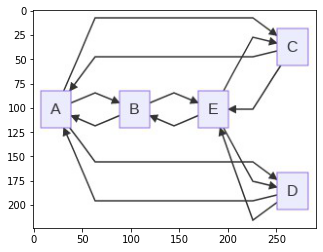
Here's an example of Python integration with mermaid-js which uses the mermaid.ink service, that displays the graph in a Jupyter notebook and save it as _.png_ image with the stated resolution (in this example, `dpi=1200`).
python
import base64
import io, requests
from IPython.display import Image, display
from PIL import Image as im
import matplotlib.pyplot as plt
def mm(graph):
graphbytes = graph.encode("utf8")
base64_bytes = base64.urlsafe_b64encode(graphbytes)
base64_string = base64_bytes.decode("ascii")
img = im.open(io.BytesIO(requests.get('https://mermaid.ink/img/' + base64_string).content))
plt.imshow(img)
plt.axis('off') # allow to hide axis
plt.savefig('image.png', dpi=1200)
mm("""
graph LR;
A--> B & C & D
B--> A & E
C--> A & E
D--> A & E
E--> B & C & D
""")
**Output**
Opens in MermaidChart.com

---
# Mermaid User Guide | Mermaid
[Skip to content](https://mermaid.js.org/intro/getting-started.html#VPContent)
On this page
[Customize your layout and design in Mermaid Chart’s visual editor! Try now](https://www.mermaidchart.com/whiteboard?utm_source=mermaid_js&utm_medium=banner_ad&utm_campaign=visual_editor)
Mermaid User Guide [](https://mermaid.js.org/intro/getting-started.html#mermaid-user-guide)
=============================================================================================
Mermaid is composed of three parts [](https://mermaid.js.org/intro/getting-started.html#mermaid-is-composed-of-three-parts)
-----------------------------------------------------------------------------------------------------------------------------
1. Deployment
2. Syntax
3. Configuration
This section talks about the different ways to **deploy** Mermaid.
If you are a beginner:
* Check out the [Diagram Syntax](https://mermaid.js.org/intro/syntax-reference.html)
page
* Check out the [Tutorials](https://mermaid.js.org/ecosystem/tutorials.html)
page
Ways to use Mermaid [](https://mermaid.js.org/intro/getting-started.html#ways-to-use-mermaid)
-----------------------------------------------------------------------------------------------
1. [Using the Mermaid Live Editor](https://mermaid.js.org/intro/getting-started.html#_1-using-the-mermaid-live-editor)
2. [Using the Mermaid Chart Editor](https://mermaid.js.org/intro/getting-started.html#_2-using-the-mermaid-chart-editor)
3. [Using Mermaid Plugins and Integrations](https://mermaid.js.org/intro/getting-started.html#_3-using-mermaid-plugins)
4. [Calling the Mermaid JavaScript API](https://mermaid.js.org/intro/getting-started.html#_4-calling-the-mermaid-javascript-api)
5. [Adding Mermaid as a dependency](https://mermaid.js.org/intro/getting-started.html#_5-adding-mermaid-as-a-dependency)
To learn more, visit the [Usage](https://mermaid.js.org/config/usage.html)
page.
1\. Using the Mermaid Live Editor [](https://mermaid.js.org/intro/getting-started.html#_1-using-the-mermaid-live-editor)
--------------------------------------------------------------------------------------------------------------------------
Available at the [Mermaid Live Editor](https://mermaid.live/)
website.
### Features [](https://mermaid.js.org/intro/getting-started.html#features)
#### • Diagram Code [](https://mermaid.js.org/intro/getting-started.html#%E2%80%A2-diagram-code)
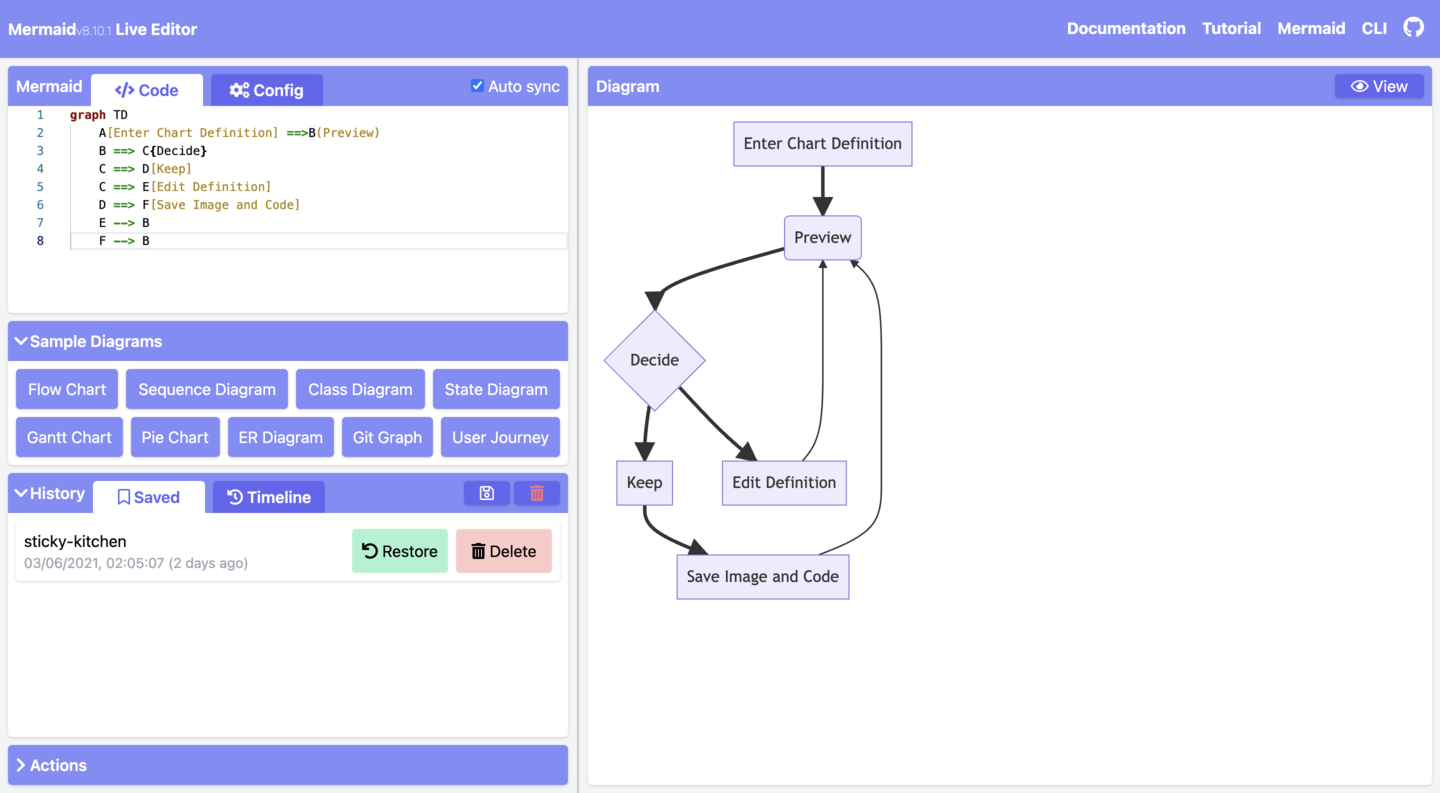
In the `Code` panel, write or edit Mermaid code, and instantly `Preview` the rendered result in the diagram panel.
Here is an example of Mermaid code and its rendered result:
##### Code:
mermaid
graph TD
A[Enter Chart Definition] --> B(Preview)
B --> C{decide}
C --> D[Keep]
C --> E[Edit Definition]
E --> B
D --> F[Save Image and Code]
F --> B
Ctrl + Enter|Run ▶
#### • Configurations [](https://mermaid.js.org/intro/getting-started.html#%E2%80%A2-configurations)
Configuration options are available in the `Configuration` panel. The options are applied to the diagram in the `Preview` panel.
To learn more, visit the [Configuration Reference](https://mermaid.js.org/config/setup/README.html)
page
#### • Editing History [](https://mermaid.js.org/intro/getting-started.html#%E2%80%A2-editing-history)
Your code will be autosaved and appear in the `Timeline` tab of the `History` section. Edits are saved every minute and only the last 30 edits are viewable.
Alternatively, you can manually save code by clicking on the `Save` icon from the `History` section.
INFO
History is stored in the browser storage only.
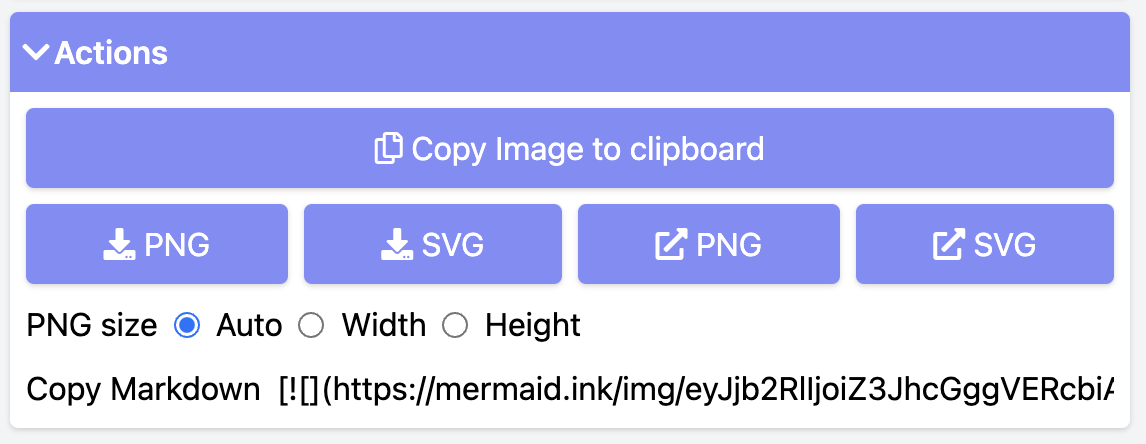
#### • Saving a diagram [](https://mermaid.js.org/intro/getting-started.html#%E2%80%A2-saving-a-diagram)
There are multiple ways of saving your diagram from the `Actions` section:
* export PNG
* export SVG
* export as Markdown
#### • Editing your diagrams [](https://mermaid.js.org/intro/getting-started.html#%E2%80%A2-editing-your-diagrams)
To edit your diagram, you can copy paste existing Mermaid diagram code into the `Code` section of the `Live Editor`.
Or:
* create a new diagram from scratch
* use a Sample Diagram from the `Sample Diagrams` section
#### • Loading from Gists [](https://mermaid.js.org/intro/getting-started.html#%E2%80%A2-loading-from-gists)
The Gist you create should have a `code.mmd` file and optionally a `config.json`, similar to this [example](https://gist.github.com/sidharthv96/6268a23e673a533dcb198f241fd7012a)
.
INFO
To learn about Gists, visit the GitHub documentation page on [Creating gists](https://docs.github.com/en/get-started/writing-on-github/editing-and-sharing-content-with-gists/creating-gists)
.
Once you have created a Gist, copy paste the Gist URL into the respective field in the `Actions` section and click on the `Load Gist` button.
Here is an example of a Gist being loaded into the Editor:
[https://mermaid.live/edit?gist=https://gist.github.com/sidharthv96/6268a23e673a533dcb198f241fd7012a](https://mermaid.live/edit?gist=https://gist.github.com/sidharthv96/6268a23e673a533dcb198f241fd7012a)
And, here is the diagram view from the above example:
[https://mermaid.live/view?gist=https://gist.github.com/sidharthv96/6268a23e673a533dcb198f241fd7012a](https://mermaid.live/view?gist=https://gist.github.com/sidharthv96/6268a23e673a533dcb198f241fd7012a)
2\. Using the Mermaid Chart Editor [](https://mermaid.js.org/intro/getting-started.html#_2-using-the-mermaid-chart-editor)
----------------------------------------------------------------------------------------------------------------------------
Available at the [Mermaid Chart](https://www.mermaidchart.com/)
website.
Mermaid Chart is a web-based diagram editor that allows you to create and edit diagrams in your browser. It is built by the team behind Mermaid.
Features include:
* AI diagramming
* Collaboration & multi-user editing
* Storage
* and more
To learn more, visit the [Mermaid Chart page](https://mermaid.js.org/ecosystem/mermaid-chart.html)
in the Ecosystem section of the documentation.
Or go to the [Mermaid Chart website](https://www.mermaidchart.com/app/sign-up)
to sign up for a Free account.
3\. Using Mermaid Plugins [](https://mermaid.js.org/intro/getting-started.html#_3-using-mermaid-plugins)
----------------------------------------------------------------------------------------------------------
### Mermaid Plugins [](https://mermaid.js.org/intro/getting-started.html#mermaid-plugins)
You can generate Mermaid diagrams from within popular applications using plug-ins.
For a list of Mermaid Plugins and Integrations, visit the [Integrations page](https://mermaid.js.org/ecosystem/integrations-community.html)
.
### Mermaid Chart Plugins [](https://mermaid.js.org/intro/getting-started.html#mermaid-chart-plugins)
Mermaid Chart plugins are available for:
* [ChatGPT](https://docs.mermaidchart.com/plugins/mermaid-chart-gpt)
* [JetBrains IDE](https://docs.mermaidchart.com/plugins/jetbrains-ide)
* [Microsoft PowerPoint](https://docs.mermaidchart.com/plugins/microsoft-powerpoint)
* [Microsoft Word](https://docs.mermaidchart.com/plugins/microsoft-word)
* [Visual Studio Code](https://docs.mermaidchart.com/plugins/visual-studio-code)
To learn more, visit the [Mermaid Chart Plugins](https://www.mermaidchart.com/plugins)
page.
### Native Mermaid Support [](https://mermaid.js.org/intro/getting-started.html#native-mermaid-support)
For apps that support markdown (e.g. [GitHub](https://docs.github.com/en/get-started/writing-on-github/working-with-advanced-formatting/creating-diagrams)
and [GitLab](https://handbook.gitlab.com/handbook/tools-and-tips/mermaid/)
), you can add Mermaid diagrams by making a `mermaid` code block.
markdown
The following code-block will be rendered as a Mermaid diagram:
```mermaid
flowchart LR
A --> B
```
4\. Calling the Mermaid JavaScript API [](https://mermaid.js.org/intro/getting-started.html#_4-calling-the-mermaid-javascript-api)
------------------------------------------------------------------------------------------------------------------------------------
This method can be used with any common web server like `Apache`, `IIS`, `Nginx`, and `Node Express`.
You will also need a text editing tool like `Notepad++` to generate an `html` file. It is then deployed by a web browser, i.e. `Firefox`, `Chrome`, `Safari`.
INFO
Internet Explorer is not supported.
The API works by pulling rendering instructions from the source `mermaid.js` in order to render diagrams on the page.
### Requirements for the Mermaid API [](https://mermaid.js.org/intro/getting-started.html#requirements-for-the-mermaid-api)
When writing the `html` file, we give two instructions inside the `html code` to the `web browser`:
a. The Mermaid code for the diagram we want to create.
b. The importing of the Mermaid library through the `mermaid.esm.mjs` or `mermaid.esm.min.mjs`, and the `mermaid.initialize()` call, which dictates the appearance of diagrams and also starts the rendering process.
#### Examples [](https://mermaid.js.org/intro/getting-started.html#examples)
* This is an example of an embedded Mermaid diagram definition inside a `
`:
html
Here is a mermaid diagram:
graph TD
A[Client] --> B[Load Balancer]
B --> C[Server01]
B --> D[Server02]
INFO
Every Mermaid chart/graph/diagram definition should have separate `
` tags.
* This is an example of a Mermaid import and the `mermaid.initialize()` call.
INFO
A `mermaid.initialize()` call takes all the definitions contained within `
` tags and renders them into diagrams.
html
INFO
Rendering in Mermaid is initialized by the `mermaid.initialize()` call. However, doing the opposite lets you control when it starts looking for `
` tags inside the web page with `mermaid.initialize()`. This is useful when you think that not all `
` tags may have loaded on the execution of `mermaid.esm.min.mjs` file.
`startOnLoad` is one of the parameters that can be defined by `mermaid.initialize()`
| Parameter | Description | Type | Values |
| --- | --- | --- | --- |
| startOnLoad | Toggle for Rendering upon loading | Boolean | true, false |
In this example, the `mermaidAPI` is being called through the `CDN`:
html
Here is one mermaid diagram:
graph TD
A[Client] --> B[Load Balancer]
B --> C[Server1]
B --> D[Server2]
And here is another:
graph TD
A[Client] -->|tcp_123| B
B(Load Balancer)
B -->|tcp_456| C[Server1]
B -->|tcp_456| D[Server2]
In this example, `mermaid.js` is referenced in `src` as a separate JavaScript file:
html
graph LR
A --- B
B-->C[fa:fa-ban forbidden]
B-->D(fa:fa-spinner);
graph TD
A[Client] --> B[Load Balancer]
B --> C[Server1]
B --> D[Server2]
5\. Adding Mermaid as a dependency [](https://mermaid.js.org/intro/getting-started.html#_5-adding-mermaid-as-a-dependency)
----------------------------------------------------------------------------------------------------------------------------
Below are the steps for adding Mermaid as a dependency:
1. Install `node v16`
INFO
To learn more about downloading and installing `Node.js` and `npm`, visit the [npm Docs website](https://docs.npmjs.com/downloading-and-installing-node-js-and-npm)
.
1. Install `yarn` using `npm` with this command:
`npm install -g yarn`
2. After yarn installs, enter this command:
`yarn add mermaid`
3. To add Mermaid as a dev dependency, enter this command:
`yarn add --dev mermaid`
Closing note [](https://mermaid.js.org/intro/getting-started.html#closing-note)
---------------------------------------------------------------------------------
INFO
Comments from Knut Sveidqvist, creator of Mermaid:
* In early versions of Mermaid, the `
The tooltip text is surrounded in double quotes. The styles of the tooltip are set by the class `.mermaidTooltip`.
##### Code:
mermaid
Ctrl + Enter|Run ▶
> **Success** The tooltip functionality and the ability to link to urls are available from version 0.5.2.
?> Due to limitations with how Docsify handles JavaScript callback functions, an alternate working demo for the above code can be viewed at [this jsfiddle](https://jsfiddle.net/yk4h7qou/2/)
.
Links are opened in the same browser tab/window by default. It is possible to change this by adding a link target to the click definition (`_self`, `_blank`, `_parent` and `_top` are supported):
##### Code:
mermaid
Ctrl + Enter|Run ▶
Beginner's tip—a full example using interactive links in a html context:
html
flowchart LR
A-->B
B-->C
C-->D
click A callback "Tooltip"
click B "https://www.github.com" "This is a link"
click C call callback() "Tooltip"
click D href "https://www.github.com" "This is a link"
### Comments [](https://mermaid.js.org/syntax/flowchart.html?id=special-characters-that-break-syntax#comments)
Comments can be entered within a flow diagram, which will be ignored by the parser. Comments need to be on their own line, and must be prefaced with `%%` (double percent signs). Any text after the start of the comment to the next newline will be treated as a comment, including any flow syntax
##### Code:
mermaid
Ctrl + Enter|Run ▶
Styling and classes [](https://mermaid.js.org/syntax/flowchart.html?id=special-characters-that-break-syntax#styling-and-classes)
----------------------------------------------------------------------------------------------------------------------------------
### Styling links [](https://mermaid.js.org/syntax/flowchart.html?id=special-characters-that-break-syntax#styling-links)
It is possible to style links. For instance, you might want to style a link that is going backwards in the flow. As links have no ids in the same way as nodes, some other way of deciding what style the links should be attached to is required. Instead of ids, the order number of when the link was defined in the graph is used, or use default to apply to all links. In the example below the style defined in the linkStyle statement will belong to the fourth link in the graph:
linkStyle 3 stroke:#ff3,stroke-width:4px,color:red;
It is also possible to add style to multiple links in a single statement, by separating link numbers with commas:
linkStyle 1,2,7 color:blue;
### Styling line curves [](https://mermaid.js.org/syntax/flowchart.html?id=special-characters-that-break-syntax#styling-line-curves)
It is possible to style the type of curve used for lines between items, if the default method does not meet your needs. Available curve styles include `basis`, `bumpX`, `bumpY`, `cardinal`, `catmullRom`, `linear`, `monotoneX`, `monotoneY`, `natural`, `step`, `stepAfter`, and `stepBefore`.
In this example, a left-to-right graph uses the `stepBefore` curve style:
%%{ init: { 'flowchart': { 'curve': 'stepBefore' } } }%%
graph LR
For a full list of available curves, including an explanation of custom curves, refer to the [Shapes](https://d3js.org/d3-shape/curve)
documentation in the [d3-shape](https://github.com/d3/d3-shape/)
project.
### Styling a node [](https://mermaid.js.org/syntax/flowchart.html?id=special-characters-that-break-syntax#styling-a-node)
It is possible to apply specific styles such as a thicker border or a different background color to a node.
##### Code:
mermaid
Ctrl + Enter|Run ▶
#### Classes [](https://mermaid.js.org/syntax/flowchart.html?id=special-characters-that-break-syntax#classes)
More convenient than defining the style every time is to define a class of styles and attach this class to the nodes that should have a different look.
A class definition looks like the example below:
classDef className fill:#f9f,stroke:#333,stroke-width:4px;
Also, it is possible to define style to multiple classes in one statement:
classDef firstClassName,secondClassName font-size:12pt;
Attachment of a class to a node is done as per below:
class nodeId1 className;
It is also possible to attach a class to a list of nodes in one statement:
class nodeId1,nodeId2 className;
A shorter form of adding a class is to attach the classname to the node using the `:::`operator as per below:
##### Code:
mermaid
Ctrl + Enter|Run ▶
This form can be used when declaring multiple links between nodes:
##### Code:
mermaid
Ctrl + Enter|Run ▶
### CSS classes [](https://mermaid.js.org/syntax/flowchart.html?id=special-characters-that-break-syntax#css-classes)
It is also possible to predefine classes in CSS styles that can be applied from the graph definition as in the example below:
**Example style**
html
**Example definition**
##### Code:
mermaid
Ctrl + Enter|Run ▶
### Default class [](https://mermaid.js.org/syntax/flowchart.html?id=special-characters-that-break-syntax#default-class)
If a class is named default it will be assigned to all classes without specific class definitions.
classDef default fill:#f9f,stroke:#333,stroke-width:4px;
Basic support for fontawesome [](https://mermaid.js.org/syntax/flowchart.html?id=special-characters-that-break-syntax#basic-support-for-fontawesome)
------------------------------------------------------------------------------------------------------------------------------------------------------
It is possible to add icons from fontawesome.
The icons are accessed via the syntax fa:#icon class name#.
##### Code:
mermaid
Ctrl + Enter|Run ▶
There are two ways to display these FontAwesome icons:
### Register FontAwesome icon packs (v11.7.0+) [](https://mermaid.js.org/syntax/flowchart.html?id=special-characters-that-break-syntax#register-fontawesome-icon-packs-v11-7-0)
You can register your own FontAwesome icon pack following the ["Registering icon packs" instructions](https://mermaid.js.org/config/icons.html)
.
Supported prefixes: `fa`, `fab`, `fas`, `far`, `fal`, `fad`.
INFO
Note that it will fall back to FontAwesome CSS if FontAwesome packs are not registered.
### Register FontAwesome CSS [](https://mermaid.js.org/syntax/flowchart.html?id=special-characters-that-break-syntax#register-fontawesome-css)
Mermaid supports Font Awesome if the CSS is included on the website. Mermaid does not have any restriction on the version of Font Awesome that can be used.
Please refer the [Official Font Awesome Documentation](https://fontawesome.com/start)
on how to include it in your website.
Adding this snippet in the `` would add support for Font Awesome v6.5.1
html
### Custom icons [](https://mermaid.js.org/syntax/flowchart.html?id=special-characters-that-break-syntax#custom-icons)
It is possible to use custom icons served from Font Awesome as long as the website imports the corresponding kit.
Note that this is currently a paid feature from Font Awesome.
For custom icons, you need to use the `fak` prefix.
**Example**
flowchart TD
B[fa:fa-twitter] %% standard icon
B-->E(fak:fa-custom-icon-name) %% custom icon
And trying to render it
##### Code:
mermaid
Ctrl + Enter|Run ▶
Graph declarations with spaces between vertices and link and without semicolon [](https://mermaid.js.org/syntax/flowchart.html?id=special-characters-that-break-syntax#graph-declarations-with-spaces-between-vertices-and-link-and-without-semicolon)
--------------------------------------------------------------------------------------------------------------------------------------------------------------------------------------------------------------------------------------------------------
* In graph declarations, the statements also can now end without a semicolon. After release 0.2.16, ending a graph statement with semicolon is just optional. So the below graph declaration is also valid along with the old declarations of the graph.
* A single space is allowed between vertices and the link. However there should not be any space between a vertex and its text and a link and its text. The old syntax of graph declaration will also work and hence this new feature is optional and is introduced to improve readability.
Below is the new declaration of the graph edges which is also valid along with the old declaration of the graph edges.
##### Code:
mermaid
Ctrl + Enter|Run ▶
Configuration [](https://mermaid.js.org/syntax/flowchart.html?id=special-characters-that-break-syntax#configuration)
----------------------------------------------------------------------------------------------------------------------
### Renderer [](https://mermaid.js.org/syntax/flowchart.html?id=special-characters-that-break-syntax#renderer)
The layout of the diagram is done with the renderer. The default renderer is dagre.
Starting with Mermaid version 9.4, you can use an alternate renderer named elk. The elk renderer is better for larger and/or more complex diagrams.
The _elk_ renderer is an experimental feature. You can change the renderer to elk by adding this directive:
config:
flowchart:
defaultRenderer: "elk"
INFO
Note that the site needs to use mermaid version 9.4+ for this to work and have this featured enabled in the lazy-loading configuration.
### Width [](https://mermaid.js.org/syntax/flowchart.html?id=special-characters-that-break-syntax#width)
It is possible to adjust the width of the rendered flowchart.
This is done by defining **mermaid.flowchartConfig** or by the CLI to use a JSON file with the configuration. How to use the CLI is described in the mermaidCLI page. mermaid.flowchartConfig can be set to a JSON string with config parameters or the corresponding object.
javascript
mermaid.flowchartConfig = {
width: 100%
}
Opens in MermaidChart.com
---
# Usage | Mermaid
[Skip to content](https://mermaid.js.org/config/usage.html?id=usage#VPContent)
Return to top
[Customize your layout and design in Mermaid Chart’s visual editor! Try now](https://www.mermaidchart.com/whiteboard?utm_source=mermaid_js&utm_medium=banner_ad&utm_campaign=visual_editor)
Usage [](https://mermaid.js.org/config/usage.html?id=usage#usage)
===================================================================
Mermaid is a JavaScript tool that makes use of a Markdown based syntax to render customizable diagrams, charts and visualizations.
Diagrams can be re-rendered/modified by modifying their descriptions.
### CDN [](https://mermaid.js.org/config/usage.html?id=usage#cdn)
[https://www.jsdelivr.com/package/npm/mermaid](https://www.jsdelivr.com/package/npm/mermaid)
Please note that you can switch versions through the dropdown box at the top right.
Using mermaid [](https://mermaid.js.org/config/usage.html?id=usage#using-mermaid)
-----------------------------------------------------------------------------------
For the majority of users, Using the [Live Editor](https://mermaid.live/)
would be sufficient, however you may also opt to deploy mermaid as a dependency or using the [Mermaid API](https://mermaid.js.org/config/setup/README.html)
.
We have compiled some Video [Tutorials](https://mermaid.js.org/ecosystem/tutorials.html)
on how to use the Mermaid Live Editor.
### Installing and Hosting Mermaid on a Webpage [](https://mermaid.js.org/config/usage.html?id=usage#installing-and-hosting-mermaid-on-a-webpage)
**Using the npm package:**
Requirements:
* Node >= 16
bash
# NPM
npm install mermaid
# Yarn
yarn add mermaid
# PNPM
pnpm add mermaid
**Hosting mermaid on a web page:**
> Note: This topic is explored in greater depth in the [User Guide for Beginners](https://mermaid.js.org/intro/getting-started.html)
The easiest way to integrate mermaid on a web page requires two elements:
* A graph definition, inside `
` tags labeled `class=mermaid`.
Example:
html
graph LR
A --- B
B-->C[fa:fa-ban forbidden]
B-->D(fa:fa-spinner);
* The mermaid js script. Added using a `script` tag as an ESM import.
Example:
html
**Following these directions, mermaid starts at page load and (when the page has loaded) it will locate the graph definitions inside the `pre` tags with `class="mermaid"` and return diagrams in SVG form, following given definitions.**
Simple full example: [](https://mermaid.js.org/config/usage.html?id=usage#simple-full-example)
------------------------------------------------------------------------------------------------
html
graph LR
A --- B
B-->C[fa:fa-ban forbidden]
B-->D(fa:fa-spinner);
Notes: [](https://mermaid.js.org/config/usage.html?id=usage#notes)
--------------------------------------------------------------------
An id attribute is also added to mermaid tags without one.
Mermaid can load multiple diagrams, in the same page.
> Try it out, save this code as HTML and load it using any browser. (Except Internet Explorer, please don't use Internet Explorer.)
Tiny Mermaid [](https://mermaid.js.org/config/usage.html?id=usage#tiny-mermaid)
---------------------------------------------------------------------------------
We offer a smaller version of Mermaid that's approximately half the size of the full library. This tiny version doesn't support Mindmap Diagrams, Architecture Diagrams, KaTeX rendering, or lazy loading.
If you need a more lightweight version without these features, you can use [Mermaid Tiny](https://github.com/mermaid-js/mermaid/tree/develop/packages/tiny)
.
Enabling Click Event and Tags in Nodes [](https://mermaid.js.org/config/usage.html?id=usage#enabling-click-event-and-tags-in-nodes)
-------------------------------------------------------------------------------------------------------------------------------------
A `securityLevel` configuration has to first be cleared. `securityLevel` sets the level of trust for the parsed diagrams and limits click functionality. This was introduced in version 8.2 as a security improvement, aimed at preventing malicious use.
**It is the site owner's responsibility to discriminate between trustworthy and untrustworthy user-bases and we encourage the use of discretion.**
securityLevel [](https://mermaid.js.org/config/usage.html?id=usage#securitylevel)
-----------------------------------------------------------------------------------
| Parameter | Description | Type | Required | Values |
| --- | --- | --- | --- | --- |
| securityLevel | Level of trust for parsed diagram | String | Optional | 'sandbox', 'strict', 'loose', 'antiscript' |
Values:
* **strict**: (**default**) HTML tags in the text are encoded and click functionality is disabled.
* **antiscript**: HTML tags in text are allowed (only script elements are removed) and click functionality is enabled.
* **loose**: HTML tags in text are allowed and click functionality is enabled.
* **sandbox**: With this security level, all rendering takes place in a sandboxed iframe. This prevents any JavaScript from running in the context. This may hinder interactive functionality of the diagram, like scripts, popups in the sequence diagram, links to other tabs or targets, etc.
INFO
This changes the default behaviour of mermaid so that after upgrade to 8.2, unless the `securityLevel` is not changed, tags in flowcharts are encoded as tags and clicking is disabled. **sandbox** security level is still in the beta version.
**If you are taking responsibility for the diagram source security you can set the `securityLevel` to a value of your choosing. This allows clicks and tags are allowed.**
**To change `securityLevel`, you have to call `mermaid.initialize`:**
javascript
mermaid.initialize({
securityLevel: 'loose',
});
### Labels out of bounds [](https://mermaid.js.org/config/usage.html?id=usage#labels-out-of-bounds)
If you use dynamically loaded fonts that are loaded through CSS, such as fonts, mermaid should wait for the whole page to load (dom + assets, particularly the fonts file).
javascript
$(document).ready(function () {
mermaid.initialize();
});
Not doing so will most likely result in mermaid rendering graphs that have labels out of bounds. The default integration in mermaid uses the window.load event to start rendering.
If your page has other fonts in its body those might be used instead of the mermaid font. Specifying the font in your styling is a workaround for this.
css
pre.mermaid {
font-family: 'trebuchet ms', verdana, arial;
}
### Using `mermaid.run` [](https://mermaid.js.org/config/usage.html?id=usage#using-mermaid-run)
mermaid.run was added in v10 and is the preferred way of handling more complex integration. By default, `mermaid.run` will be called when the document is ready, rendering all elements with `class="mermaid"`.
You can customize that behavior by calling `await mermaid.run()`.
`mermaid.initialize({startOnLoad: false})` will prevent `mermaid.run` from being called automatically after load.
Render all elements with querySelector ".someOtherClass"
js
mermaid.initialize({ startOnLoad: false });
await mermaid.run({
querySelector: '.someOtherClass',
});
Render all elements passed as an array
js
mermaid.initialize({ startOnLoad: false });
await mermaid.run({
nodes: [document.getElementById('someId'), document.getElementById('anotherId')],
});
await mermaid.run({
nodes: document.querySelectorAll('.yetAnotherClass'),
});
Render all `.mermaid` elements while suppressing any error
js
mermaid.initialize({ startOnLoad: false });
await mermaid.run({
suppressErrors: true,
});
### Calling `mermaid.init` - Deprecated [](https://mermaid.js.org/config/usage.html?id=usage#calling-mermaid-init-deprecated)
WARNING
mermaid.init is deprecated in v10 and will be removed in a future release. Please use mermaid.run instead.
By default, `mermaid.init` will be called when the document is ready, finding all elements with `class="mermaid"`. If you are adding content after mermaid is loaded, or otherwise need finer-grained control of this behavior, you can call `init` yourself with:
* a configuration object
* some nodes, as
* a node
* an array-like of nodes
* or W3C selector that will find your nodes
Example:
javascript
mermaid.init({ noteMargin: 10 }, '.someOtherClass');
Or with no config object, and a jQuery selection:
javascript
mermaid.init(undefined, $('#someId .yetAnotherClass'));
Usage with webpack [](https://mermaid.js.org/config/usage.html?id=usage#usage-with-webpack)
---------------------------------------------------------------------------------------------
mermaid fully supports webpack. Here is a [working demo](https://github.com/mermaidjs/mermaid-webpack-demo)
.
API usage [](https://mermaid.js.org/config/usage.html?id=usage#api-usage)
---------------------------------------------------------------------------
The main idea of the API is to be able to call a render function with the graph definition as a string. The render function will render the graph and call a callback with the resulting SVG code. With this approach it is up to the site creator to fetch the graph definition from the site (perhaps from a textarea), render it and place the graph somewhere in the site.
The example below shows an example of how this could be used. The example just logs the resulting SVG to the JavaScript console.
html
To determine the type of diagram present in a given text, you can utilize the `mermaid.detectType` function, as demonstrated in the example below.
html
### Binding events [](https://mermaid.js.org/config/usage.html?id=usage#binding-events)
Sometimes the generated graph also has defined interactions like tooltip and click events. When using the API one must add those events after the graph has been inserted into the DOM.
The example code below is an extract of what mermaid does when using the API. The example shows how it is possible to bind events to an SVG when using the API for rendering.
javascript
// Example of using the bindFunctions
const drawDiagram = async function () {
element = document.querySelector('#graphDiv');
const graphDefinition = 'graph TB\na-->b';
const { svg, bindFunctions } = await mermaid.render('graphDiv', graphDefinition);
element.innerHTML = svg;
// This can also be written as `bindFunctions?.(element);` using the `?` shorthand.
if (bindFunctions) {
bindFunctions(element);
}
};
1. The graph is generated using the render call.
2. After generation the render function calls the provided callback function, in this case it's called insertSvg.
3. The callback function is called with two parameters, the SVG code of the generated graph and a function. This function binds events to the SVG **after** it is inserted into the DOM.
4. Insert the SVG code into the DOM for presentation.
5. Call the binding function that binds the events.
Example of a marked renderer [](https://mermaid.js.org/config/usage.html?id=usage#example-of-a-marked-renderer)
-----------------------------------------------------------------------------------------------------------------
This is the renderer used for transforming the documentation from Markdown to html with mermaid diagrams in the html.
javascript
const renderer = new marked.Renderer();
renderer.code = function (code, language) {
if (code.match(/^sequenceDiagram/) || code.match(/^graph/)) {
return '
' + code + '
';
} else {
return '
' + code + '
';
}
};
Another example in CoffeeScript that also includes the mermaid script tag in the generated markup.
coffee
marked = require 'marked'
module.exports = (options) ->
hasMermaid = false
renderer = new marked.Renderer()
renderer.defaultCode = renderer.code
renderer.code = (code, language) ->
if language is 'mermaid'
html = ''
if not hasMermaid
hasMermaid = true
html += ''
html + '
'+code+'
'
else
@defaultCode(code, language)
renderer
Advanced usage [](https://mermaid.js.org/config/usage.html?id=usage#advanced-usage)
-------------------------------------------------------------------------------------
### Syntax validation without rendering [](https://mermaid.js.org/config/usage.html?id=usage#syntax-validation-without-rendering)
The `mermaid.parse(text, parseOptions)` function validates graph definitions without rendering a graph.
The function `mermaid.parse(text, parseOptions)`, takes a text string as an argument and returns `{ diagramType: string }` if the definition follows mermaid's syntax.
If the definition is invalid, the function returns `false` if `parseOptions.suppressErrors` is set to `true`. Otherwise, it throws an error.
The parseError function will be called when the parse function throws an error. It will not be called if `parseOptions.suppressErrors` is set to `true`.
It is possible to override this function in order to handle the error in an application-specific way.
The code-example below in meta code illustrates how this could work:
javascript
mermaid.parseError = function (err, hash) {
displayErrorInGui(err);
};
const textFieldUpdated = async function () {
const textStr = getTextFromFormField('code');
if (await mermaid.parse(textStr)) {
reRender(textStr);
}
};
bindEventHandler('change', 'code', textFieldUpdated);
Configuration [](https://mermaid.js.org/config/usage.html?id=usage#configuration)
-----------------------------------------------------------------------------------
You can pass the required configuration to the `mermaid.initialize` call. This is the preferred way of configuring mermaid. The list of configuration objects are described [in the mermaidAPI documentation](https://mermaid.js.org/config/setup/README.html)
.
html
INFO
This is the preferred way of configuring mermaid.
### The following methods are deprecated and are kept only for backwards compatibility. [](https://mermaid.js.org/config/usage.html?id=usage#the-following-methods-are-deprecated-and-are-kept-only-for-backwards-compatibility)
Using the mermaid object [](https://mermaid.js.org/config/usage.html?id=usage#using-the-mermaid-object)
---------------------------------------------------------------------------------------------------------
It is possible to set some configuration via the mermaid object. The two parameters that are supported using this approach are:
* mermaid.startOnLoad
* mermaid.htmlLabels
javascript
mermaid.startOnLoad = true;
WARNING
This way of setting the configuration is deprecated. Instead the preferred way is to use the initialize method. This functionality is only kept for backwards compatibility.
Opens in MermaidChart.com
---
# defaultConfig | Mermaid
[Skip to content](https://mermaid.js.org/config/setup/defaultConfig/README.html#VPContent)
Return to top
[Customize your layout and design in Mermaid Chart’s visual editor! Try now](https://www.mermaidchart.com/whiteboard?utm_source=mermaid_js&utm_medium=banner_ad&utm_campaign=visual_editor)
[**mermaid**](https://mermaid.js.org/config/setup/README.html)
* * *
defaultConfig [](https://mermaid.js.org/config/setup/defaultConfig/README.html#defaultconfig)
===============================================================================================
Variables [](https://mermaid.js.org/config/setup/defaultConfig/README.html#variables)
---------------------------------------------------------------------------------------
* [configKeys](https://mermaid.js.org/config/setup/defaultConfig/variables/configKeys.html)
* [default](https://mermaid.js.org/config/setup/defaultConfig/variables/default.html)
Opens in MermaidChart.com
---
# Packet Diagram Config Schema | Mermaid
[Skip to content](https://mermaid.js.org/config/schema-docs/config-defs-packet-diagram-config.html#VPContent)
Return to top
[Customize your layout and design in Mermaid Chart’s visual editor! Try now](https://www.mermaidchart.com/whiteboard?utm_source=mermaid_js&utm_medium=banner_ad&utm_campaign=visual_editor)
Packet Diagram Config Schema [](https://mermaid.js.org/config/schema-docs/config-defs-packet-diagram-config.html#packet-diagram-config-schema)
================================================================================================================================================
txt
https://mermaid.js.org/schemas/config.schema.json#/$defs/PacketDiagramConfig
The object containing configurations specific for packet diagrams.
| Abstract | Extensible | Status | Identifiable | Custom Properties | Additional Properties | Access Restrictions | Defined In |
| --- | --- | --- | --- | --- | --- | --- | --- |
| Can be instantiated | No | Unknown status | No | Forbidden | Allowed | none | [config.schema.json\*](https://mermaid.js.org/schemas/config.schema.json "open original schema") |
PacketDiagramConfig Type [](https://mermaid.js.org/config/schema-docs/config-defs-packet-diagram-config.html#packetdiagramconfig-type)
----------------------------------------------------------------------------------------------------------------------------------------
`object` ([Packet Diagram Config](https://mermaid.js.org/config/schema-docs/config-defs-packet-diagram-config.html)
)
all of
* [Base Diagram Config](https://mermaid.js.org/config/schema-docs/config-defs-base-diagram-config.html "check type definition")
PacketDiagramConfig Properties [](https://mermaid.js.org/config/schema-docs/config-defs-packet-diagram-config.html#packetdiagramconfig-properties)
====================================================================================================================================================
| Property | Type | Required | Nullable | Defined by |
| --- | --- | --- | --- | --- |
| [rowHeight](https://mermaid.js.org/config/schema-docs/config-defs-packet-diagram-config.html#rowheight) | `number` | Optional | cannot be null | [Mermaid Config](https://mermaid.js.org/config/schema-docs/config-defs-packet-diagram-config-properties-rowheight.html "https://mermaid.js.org/schemas/config.schema.json#/$defs/PacketDiagramConfig/properties/rowHeight") |
| [bitWidth](https://mermaid.js.org/config/schema-docs/config-defs-packet-diagram-config.html#bitwidth) | `number` | Optional | cannot be null | [Mermaid Config](https://mermaid.js.org/config/schema-docs/config-defs-packet-diagram-config-properties-bitwidth.html "https://mermaid.js.org/schemas/config.schema.json#/$defs/PacketDiagramConfig/properties/bitWidth") |
| [bitsPerRow](https://mermaid.js.org/config/schema-docs/config-defs-packet-diagram-config.html#bitsperrow) | `number` | Optional | cannot be null | [Mermaid Config](https://mermaid.js.org/config/schema-docs/config-defs-packet-diagram-config-properties-bitsperrow.html "https://mermaid.js.org/schemas/config.schema.json#/$defs/PacketDiagramConfig/properties/bitsPerRow") |
| [showBits](https://mermaid.js.org/config/schema-docs/config-defs-packet-diagram-config.html#showbits) | `boolean` | Optional | cannot be null | [Mermaid Config](https://mermaid.js.org/config/schema-docs/config-defs-packet-diagram-config-properties-showbits.html "https://mermaid.js.org/schemas/config.schema.json#/$defs/PacketDiagramConfig/properties/showBits") |
| [paddingX](https://mermaid.js.org/config/schema-docs/config-defs-packet-diagram-config.html#paddingx) | `number` | Optional | cannot be null | [Mermaid Config](https://mermaid.js.org/config/schema-docs/config-defs-packet-diagram-config-properties-paddingx.html "https://mermaid.js.org/schemas/config.schema.json#/$defs/PacketDiagramConfig/properties/paddingX") |
| [paddingY](https://mermaid.js.org/config/schema-docs/config-defs-packet-diagram-config.html#paddingy) | `number` | Optional | cannot be null | [Mermaid Config](https://mermaid.js.org/config/schema-docs/config-defs-packet-diagram-config-properties-paddingy.html "https://mermaid.js.org/schemas/config.schema.json#/$defs/PacketDiagramConfig/properties/paddingY") |
rowHeight [](https://mermaid.js.org/config/schema-docs/config-defs-packet-diagram-config.html#rowheight)
----------------------------------------------------------------------------------------------------------
The height of each row in the packet diagram.
`rowHeight`
* is optional
* Type: `number`
* cannot be null
* defined in: [Mermaid Config](https://mermaid.js.org/config/schema-docs/config-defs-packet-diagram-config-properties-rowheight.html "https://mermaid.js.org/schemas/config.schema.json#/$defs/PacketDiagramConfig/properties/rowHeight")
### rowHeight Type [](https://mermaid.js.org/config/schema-docs/config-defs-packet-diagram-config.html#rowheight-type)
`number`
### rowHeight Constraints [](https://mermaid.js.org/config/schema-docs/config-defs-packet-diagram-config.html#rowheight-constraints)
**minimum**: the value of this number must greater than or equal to: `1`
### rowHeight Default Value [](https://mermaid.js.org/config/schema-docs/config-defs-packet-diagram-config.html#rowheight-default-value)
The default value is:
json
32
bitWidth [](https://mermaid.js.org/config/schema-docs/config-defs-packet-diagram-config.html#bitwidth)
--------------------------------------------------------------------------------------------------------
The width of each bit in the packet diagram.
`bitWidth`
* is optional
* Type: `number`
* cannot be null
* defined in: [Mermaid Config](https://mermaid.js.org/config/schema-docs/config-defs-packet-diagram-config-properties-bitwidth.html "https://mermaid.js.org/schemas/config.schema.json#/$defs/PacketDiagramConfig/properties/bitWidth")
### bitWidth Type [](https://mermaid.js.org/config/schema-docs/config-defs-packet-diagram-config.html#bitwidth-type)
`number`
### bitWidth Constraints [](https://mermaid.js.org/config/schema-docs/config-defs-packet-diagram-config.html#bitwidth-constraints)
**minimum**: the value of this number must greater than or equal to: `1`
### bitWidth Default Value [](https://mermaid.js.org/config/schema-docs/config-defs-packet-diagram-config.html#bitwidth-default-value)
The default value is:
json
32
bitsPerRow [](https://mermaid.js.org/config/schema-docs/config-defs-packet-diagram-config.html#bitsperrow)
------------------------------------------------------------------------------------------------------------
The number of bits to display per row.
`bitsPerRow`
* is optional
* Type: `number`
* cannot be null
* defined in: [Mermaid Config](https://mermaid.js.org/config/schema-docs/config-defs-packet-diagram-config-properties-bitsperrow.html "https://mermaid.js.org/schemas/config.schema.json#/$defs/PacketDiagramConfig/properties/bitsPerRow")
### bitsPerRow Type [](https://mermaid.js.org/config/schema-docs/config-defs-packet-diagram-config.html#bitsperrow-type)
`number`
### bitsPerRow Constraints [](https://mermaid.js.org/config/schema-docs/config-defs-packet-diagram-config.html#bitsperrow-constraints)
**minimum**: the value of this number must greater than or equal to: `1`
### bitsPerRow Default Value [](https://mermaid.js.org/config/schema-docs/config-defs-packet-diagram-config.html#bitsperrow-default-value)
The default value is:
json
32
showBits [](https://mermaid.js.org/config/schema-docs/config-defs-packet-diagram-config.html#showbits)
--------------------------------------------------------------------------------------------------------
Toggle to display or hide bit numbers.
`showBits`
* is optional
* Type: `boolean`
* cannot be null
* defined in: [Mermaid Config](https://mermaid.js.org/config/schema-docs/config-defs-packet-diagram-config-properties-showbits.html "https://mermaid.js.org/schemas/config.schema.json#/$defs/PacketDiagramConfig/properties/showBits")
### showBits Type [](https://mermaid.js.org/config/schema-docs/config-defs-packet-diagram-config.html#showbits-type)
`boolean`
### showBits Default Value [](https://mermaid.js.org/config/schema-docs/config-defs-packet-diagram-config.html#showbits-default-value)
The default value is:
json
true
paddingX [](https://mermaid.js.org/config/schema-docs/config-defs-packet-diagram-config.html#paddingx)
--------------------------------------------------------------------------------------------------------
The horizontal padding between the blocks in a row.
`paddingX`
* is optional
* Type: `number`
* cannot be null
* defined in: [Mermaid Config](https://mermaid.js.org/config/schema-docs/config-defs-packet-diagram-config-properties-paddingx.html "https://mermaid.js.org/schemas/config.schema.json#/$defs/PacketDiagramConfig/properties/paddingX")
### paddingX Type [](https://mermaid.js.org/config/schema-docs/config-defs-packet-diagram-config.html#paddingx-type)
`number`
### paddingX Constraints [](https://mermaid.js.org/config/schema-docs/config-defs-packet-diagram-config.html#paddingx-constraints)
**minimum**: the value of this number must greater than or equal to: `0`
### paddingX Default Value [](https://mermaid.js.org/config/schema-docs/config-defs-packet-diagram-config.html#paddingx-default-value)
The default value is:
json
5
paddingY [](https://mermaid.js.org/config/schema-docs/config-defs-packet-diagram-config.html#paddingy)
--------------------------------------------------------------------------------------------------------
The vertical padding between the rows.
`paddingY`
* is optional
* Type: `number`
* cannot be null
* defined in: [Mermaid Config](https://mermaid.js.org/config/schema-docs/config-defs-packet-diagram-config-properties-paddingy.html "https://mermaid.js.org/schemas/config.schema.json#/$defs/PacketDiagramConfig/properties/paddingY")
### paddingY Type [](https://mermaid.js.org/config/schema-docs/config-defs-packet-diagram-config.html#paddingy-type)
`number`
### paddingY Constraints [](https://mermaid.js.org/config/schema-docs/config-defs-packet-diagram-config.html#paddingy-constraints)
**minimum**: the value of this number must greater than or equal to: `0`
### paddingY Default Value [](https://mermaid.js.org/config/schema-docs/config-defs-packet-diagram-config.html#paddingy-default-value)
The default value is:
json
5
Opens in MermaidChart.com
---
# Radar Diagram Config Schema | Mermaid
[Skip to content](https://mermaid.js.org/config/schema-docs/config-defs-radar-diagram-config.html#VPContent)
Return to top
[Customize your layout and design in Mermaid Chart’s visual editor! Try now](https://www.mermaidchart.com/whiteboard?utm_source=mermaid_js&utm_medium=banner_ad&utm_campaign=visual_editor)
Radar Diagram Config Schema [](https://mermaid.js.org/config/schema-docs/config-defs-radar-diagram-config.html#radar-diagram-config-schema)
=============================================================================================================================================
txt
https://mermaid.js.org/schemas/config.schema.json#/$defs/RadarDiagramConfig
The object containing configurations specific for radar diagrams.
| Abstract | Extensible | Status | Identifiable | Custom Properties | Additional Properties | Access Restrictions | Defined In |
| --- | --- | --- | --- | --- | --- | --- | --- |
| Can be instantiated | No | Unknown status | No | Forbidden | Allowed | none | [config.schema.json\*](https://mermaid.js.org/schemas/config.schema.json "open original schema") |
RadarDiagramConfig Type [](https://mermaid.js.org/config/schema-docs/config-defs-radar-diagram-config.html#radardiagramconfig-type)
-------------------------------------------------------------------------------------------------------------------------------------
`object` ([Radar Diagram Config](https://mermaid.js.org/config/schema-docs/config-defs-radar-diagram-config.html)
)
all of
* [Base Diagram Config](https://mermaid.js.org/config/schema-docs/config-defs-base-diagram-config.html "check type definition")
RadarDiagramConfig Properties [](https://mermaid.js.org/config/schema-docs/config-defs-radar-diagram-config.html#radardiagramconfig-properties)
=================================================================================================================================================
| Property | Type | Required | Nullable | Defined by |
| --- | --- | --- | --- | --- |
| [width](https://mermaid.js.org/config/schema-docs/config-defs-radar-diagram-config.html#width) | `number` | Optional | cannot be null | [Mermaid Config](https://mermaid.js.org/config/schema-docs/config-defs-radar-diagram-config-properties-width.html "https://mermaid.js.org/schemas/config.schema.json#/$defs/RadarDiagramConfig/properties/width") |
| [height](https://mermaid.js.org/config/schema-docs/config-defs-radar-diagram-config.html#height) | `number` | Optional | cannot be null | [Mermaid Config](https://mermaid.js.org/config/schema-docs/config-defs-radar-diagram-config-properties-height.html "https://mermaid.js.org/schemas/config.schema.json#/$defs/RadarDiagramConfig/properties/height") |
| [marginTop](https://mermaid.js.org/config/schema-docs/config-defs-radar-diagram-config.html#margintop) | `number` | Optional | cannot be null | [Mermaid Config](https://mermaid.js.org/config/schema-docs/config-defs-radar-diagram-config-properties-margintop.html "https://mermaid.js.org/schemas/config.schema.json#/$defs/RadarDiagramConfig/properties/marginTop") |
| [marginRight](https://mermaid.js.org/config/schema-docs/config-defs-radar-diagram-config.html#marginright) | `number` | Optional | cannot be null | [Mermaid Config](https://mermaid.js.org/config/schema-docs/config-defs-radar-diagram-config-properties-marginright.html "https://mermaid.js.org/schemas/config.schema.json#/$defs/RadarDiagramConfig/properties/marginRight") |
| [marginBottom](https://mermaid.js.org/config/schema-docs/config-defs-radar-diagram-config.html#marginbottom) | `number` | Optional | cannot be null | [Mermaid Config](https://mermaid.js.org/config/schema-docs/config-defs-radar-diagram-config-properties-marginbottom.html "https://mermaid.js.org/schemas/config.schema.json#/$defs/RadarDiagramConfig/properties/marginBottom") |
| [marginLeft](https://mermaid.js.org/config/schema-docs/config-defs-radar-diagram-config.html#marginleft) | `number` | Optional | cannot be null | [Mermaid Config](https://mermaid.js.org/config/schema-docs/config-defs-radar-diagram-config-properties-marginleft.html "https://mermaid.js.org/schemas/config.schema.json#/$defs/RadarDiagramConfig/properties/marginLeft") |
| [axisScaleFactor](https://mermaid.js.org/config/schema-docs/config-defs-radar-diagram-config.html#axisscalefactor) | `number` | Optional | cannot be null | [Mermaid Config](https://mermaid.js.org/config/schema-docs/config-defs-radar-diagram-config-properties-axisscalefactor.html "https://mermaid.js.org/schemas/config.schema.json#/$defs/RadarDiagramConfig/properties/axisScaleFactor") |
| [axisLabelFactor](https://mermaid.js.org/config/schema-docs/config-defs-radar-diagram-config.html#axislabelfactor) | `number` | Optional | cannot be null | [Mermaid Config](https://mermaid.js.org/config/schema-docs/config-defs-radar-diagram-config-properties-axislabelfactor.html "https://mermaid.js.org/schemas/config.schema.json#/$defs/RadarDiagramConfig/properties/axisLabelFactor") |
| [curveTension](https://mermaid.js.org/config/schema-docs/config-defs-radar-diagram-config.html#curvetension) | `number` | Optional | cannot be null | [Mermaid Config](https://mermaid.js.org/config/schema-docs/config-defs-radar-diagram-config-properties-curvetension.html "https://mermaid.js.org/schemas/config.schema.json#/$defs/RadarDiagramConfig/properties/curveTension") |
width [](https://mermaid.js.org/config/schema-docs/config-defs-radar-diagram-config.html#width)
-------------------------------------------------------------------------------------------------
The size of the radar diagram.
`width`
* is optional
* Type: `number`
* cannot be null
* defined in: [Mermaid Config](https://mermaid.js.org/config/schema-docs/config-defs-radar-diagram-config-properties-width.html "https://mermaid.js.org/schemas/config.schema.json#/$defs/RadarDiagramConfig/properties/width")
### width Type [](https://mermaid.js.org/config/schema-docs/config-defs-radar-diagram-config.html#width-type)
`number`
### width Constraints [](https://mermaid.js.org/config/schema-docs/config-defs-radar-diagram-config.html#width-constraints)
**minimum**: the value of this number must greater than or equal to: `1`
### width Default Value [](https://mermaid.js.org/config/schema-docs/config-defs-radar-diagram-config.html#width-default-value)
The default value is:
json
600
height [](https://mermaid.js.org/config/schema-docs/config-defs-radar-diagram-config.html#height)
---------------------------------------------------------------------------------------------------
The size of the radar diagram.
`height`
* is optional
* Type: `number`
* cannot be null
* defined in: [Mermaid Config](https://mermaid.js.org/config/schema-docs/config-defs-radar-diagram-config-properties-height.html "https://mermaid.js.org/schemas/config.schema.json#/$defs/RadarDiagramConfig/properties/height")
### height Type [](https://mermaid.js.org/config/schema-docs/config-defs-radar-diagram-config.html#height-type)
`number`
### height Constraints [](https://mermaid.js.org/config/schema-docs/config-defs-radar-diagram-config.html#height-constraints)
**minimum**: the value of this number must greater than or equal to: `1`
### height Default Value [](https://mermaid.js.org/config/schema-docs/config-defs-radar-diagram-config.html#height-default-value)
The default value is:
json
600
marginTop [](https://mermaid.js.org/config/schema-docs/config-defs-radar-diagram-config.html#margintop)
---------------------------------------------------------------------------------------------------------
The margin from the top of the radar diagram.
`marginTop`
* is optional
* Type: `number`
* cannot be null
* defined in: [Mermaid Config](https://mermaid.js.org/config/schema-docs/config-defs-radar-diagram-config-properties-margintop.html "https://mermaid.js.org/schemas/config.schema.json#/$defs/RadarDiagramConfig/properties/marginTop")
### marginTop Type [](https://mermaid.js.org/config/schema-docs/config-defs-radar-diagram-config.html#margintop-type)
`number`
### marginTop Constraints [](https://mermaid.js.org/config/schema-docs/config-defs-radar-diagram-config.html#margintop-constraints)
**minimum**: the value of this number must greater than or equal to: `0`
### marginTop Default Value [](https://mermaid.js.org/config/schema-docs/config-defs-radar-diagram-config.html#margintop-default-value)
The default value is:
json
50
marginRight [](https://mermaid.js.org/config/schema-docs/config-defs-radar-diagram-config.html#marginright)
-------------------------------------------------------------------------------------------------------------
The margin from the right of the radar diagram.
`marginRight`
* is optional
* Type: `number`
* cannot be null
* defined in: [Mermaid Config](https://mermaid.js.org/config/schema-docs/config-defs-radar-diagram-config-properties-marginright.html "https://mermaid.js.org/schemas/config.schema.json#/$defs/RadarDiagramConfig/properties/marginRight")
### marginRight Type [](https://mermaid.js.org/config/schema-docs/config-defs-radar-diagram-config.html#marginright-type)
`number`
### marginRight Constraints [](https://mermaid.js.org/config/schema-docs/config-defs-radar-diagram-config.html#marginright-constraints)
**minimum**: the value of this number must greater than or equal to: `0`
### marginRight Default Value [](https://mermaid.js.org/config/schema-docs/config-defs-radar-diagram-config.html#marginright-default-value)
The default value is:
json
50
marginBottom [](https://mermaid.js.org/config/schema-docs/config-defs-radar-diagram-config.html#marginbottom)
---------------------------------------------------------------------------------------------------------------
The margin from the bottom of the radar diagram.
`marginBottom`
* is optional
* Type: `number`
* cannot be null
* defined in: [Mermaid Config](https://mermaid.js.org/config/schema-docs/config-defs-radar-diagram-config-properties-marginbottom.html "https://mermaid.js.org/schemas/config.schema.json#/$defs/RadarDiagramConfig/properties/marginBottom")
### marginBottom Type [](https://mermaid.js.org/config/schema-docs/config-defs-radar-diagram-config.html#marginbottom-type)
`number`
### marginBottom Constraints [](https://mermaid.js.org/config/schema-docs/config-defs-radar-diagram-config.html#marginbottom-constraints)
**minimum**: the value of this number must greater than or equal to: `0`
### marginBottom Default Value [](https://mermaid.js.org/config/schema-docs/config-defs-radar-diagram-config.html#marginbottom-default-value)
The default value is:
json
50
marginLeft [](https://mermaid.js.org/config/schema-docs/config-defs-radar-diagram-config.html#marginleft)
-----------------------------------------------------------------------------------------------------------
The margin from the left of the radar diagram.
`marginLeft`
* is optional
* Type: `number`
* cannot be null
* defined in: [Mermaid Config](https://mermaid.js.org/config/schema-docs/config-defs-radar-diagram-config-properties-marginleft.html "https://mermaid.js.org/schemas/config.schema.json#/$defs/RadarDiagramConfig/properties/marginLeft")
### marginLeft Type [](https://mermaid.js.org/config/schema-docs/config-defs-radar-diagram-config.html#marginleft-type)
`number`
### marginLeft Constraints [](https://mermaid.js.org/config/schema-docs/config-defs-radar-diagram-config.html#marginleft-constraints)
**minimum**: the value of this number must greater than or equal to: `0`
### marginLeft Default Value [](https://mermaid.js.org/config/schema-docs/config-defs-radar-diagram-config.html#marginleft-default-value)
The default value is:
json
50
axisScaleFactor [](https://mermaid.js.org/config/schema-docs/config-defs-radar-diagram-config.html#axisscalefactor)
---------------------------------------------------------------------------------------------------------------------
The scale factor of the axis.
`axisScaleFactor`
* is optional
* Type: `number`
* cannot be null
* defined in: [Mermaid Config](https://mermaid.js.org/config/schema-docs/config-defs-radar-diagram-config-properties-axisscalefactor.html "https://mermaid.js.org/schemas/config.schema.json#/$defs/RadarDiagramConfig/properties/axisScaleFactor")
### axisScaleFactor Type [](https://mermaid.js.org/config/schema-docs/config-defs-radar-diagram-config.html#axisscalefactor-type)
`number`
### axisScaleFactor Constraints [](https://mermaid.js.org/config/schema-docs/config-defs-radar-diagram-config.html#axisscalefactor-constraints)
**minimum**: the value of this number must greater than or equal to: `0`
### axisScaleFactor Default Value [](https://mermaid.js.org/config/schema-docs/config-defs-radar-diagram-config.html#axisscalefactor-default-value)
The default value is:
json
1
axisLabelFactor [](https://mermaid.js.org/config/schema-docs/config-defs-radar-diagram-config.html#axislabelfactor)
---------------------------------------------------------------------------------------------------------------------
The scale factor of the axis label.
`axisLabelFactor`
* is optional
* Type: `number`
* cannot be null
* defined in: [Mermaid Config](https://mermaid.js.org/config/schema-docs/config-defs-radar-diagram-config-properties-axislabelfactor.html "https://mermaid.js.org/schemas/config.schema.json#/$defs/RadarDiagramConfig/properties/axisLabelFactor")
### axisLabelFactor Type [](https://mermaid.js.org/config/schema-docs/config-defs-radar-diagram-config.html#axislabelfactor-type)
`number`
### axisLabelFactor Constraints [](https://mermaid.js.org/config/schema-docs/config-defs-radar-diagram-config.html#axislabelfactor-constraints)
**minimum**: the value of this number must greater than or equal to: `0`
### axisLabelFactor Default Value [](https://mermaid.js.org/config/schema-docs/config-defs-radar-diagram-config.html#axislabelfactor-default-value)
The default value is:
json
1.05
curveTension [](https://mermaid.js.org/config/schema-docs/config-defs-radar-diagram-config.html#curvetension)
---------------------------------------------------------------------------------------------------------------
The tension factor for the Catmull-Rom spline conversion to cubic Bézier curves.
`curveTension`
* is optional
* Type: `number`
* cannot be null
* defined in: [Mermaid Config](https://mermaid.js.org/config/schema-docs/config-defs-radar-diagram-config-properties-curvetension.html "https://mermaid.js.org/schemas/config.schema.json#/$defs/RadarDiagramConfig/properties/curveTension")
### curveTension Type [](https://mermaid.js.org/config/schema-docs/config-defs-radar-diagram-config.html#curvetension-type)
`number`
### curveTension Constraints [](https://mermaid.js.org/config/schema-docs/config-defs-radar-diagram-config.html#curvetension-constraints)
**maximum**: the value of this number must smaller than or equal to: `1`
**minimum**: the value of this number must greater than or equal to: `0`
### curveTension Default Value [](https://mermaid.js.org/config/schema-docs/config-defs-radar-diagram-config.html#curvetension-default-value)
The default value is:
json
0.17
Opens in MermaidChart.com
---
# config | Mermaid
[Skip to content](https://mermaid.js.org/config/setup/config/README.html#VPContent)
Return to top
[Customize your layout and design in Mermaid Chart’s visual editor! Try now](https://www.mermaidchart.com/whiteboard?utm_source=mermaid_js&utm_medium=banner_ad&utm_campaign=visual_editor)
[**mermaid**](https://mermaid.js.org/config/setup/README.html)
* * *
config [](https://mermaid.js.org/config/setup/config/README.html#config)
==========================================================================
Variables [](https://mermaid.js.org/config/setup/config/README.html#variables)
--------------------------------------------------------------------------------
* [defaultConfig](https://mermaid.js.org/config/setup/config/variables/defaultConfig.html)
Functions [](https://mermaid.js.org/config/setup/config/README.html#functions)
--------------------------------------------------------------------------------
* [addDirective](https://mermaid.js.org/config/setup/config/functions/addDirective.html)
* [getConfig](https://mermaid.js.org/config/setup/config/functions/getConfig.html)
* [getSiteConfig](https://mermaid.js.org/config/setup/config/functions/getSiteConfig.html)
* [reset](https://mermaid.js.org/config/setup/config/functions/reset.html)
* [sanitize](https://mermaid.js.org/config/setup/config/functions/sanitize.html)
* [saveConfigFromInitialize](https://mermaid.js.org/config/setup/config/functions/saveConfigFromInitialize.html)
* [setConfig](https://mermaid.js.org/config/setup/config/functions/setConfig.html)
* [setSiteConfig](https://mermaid.js.org/config/setup/config/functions/setSiteConfig.html)
* [updateCurrentConfig](https://mermaid.js.org/config/setup/config/functions/updateCurrentConfig.html)
* [updateSiteConfig](https://mermaid.js.org/config/setup/config/functions/updateSiteConfig.html)
Opens in MermaidChart.com
---
# mermaid | Mermaid
[Skip to content](https://mermaid.js.org/config/setup/mermaid/README.html#VPContent)
Return to top
[Customize your layout and design in Mermaid Chart’s visual editor! Try now](https://www.mermaidchart.com/whiteboard?utm_source=mermaid_js&utm_medium=banner_ad&utm_campaign=visual_editor)
[**mermaid**](https://mermaid.js.org/config/setup/README.html)
* * *
mermaid [](https://mermaid.js.org/config/setup/mermaid/README.html#mermaid)
=============================================================================
Classes [](https://mermaid.js.org/config/setup/mermaid/README.html#classes)
-----------------------------------------------------------------------------
* [UnknownDiagramError](https://mermaid.js.org/config/setup/mermaid/classes/UnknownDiagramError.html)
Interfaces [](https://mermaid.js.org/config/setup/mermaid/README.html#interfaces)
-----------------------------------------------------------------------------------
* [DetailedError](https://mermaid.js.org/config/setup/mermaid/interfaces/DetailedError.html)
* [ExternalDiagramDefinition](https://mermaid.js.org/config/setup/mermaid/interfaces/ExternalDiagramDefinition.html)
* [LayoutData](https://mermaid.js.org/config/setup/mermaid/interfaces/LayoutData.html)
* [LayoutLoaderDefinition](https://mermaid.js.org/config/setup/mermaid/interfaces/LayoutLoaderDefinition.html)
* [Mermaid](https://mermaid.js.org/config/setup/mermaid/interfaces/Mermaid.html)
* [MermaidConfig](https://mermaid.js.org/config/setup/mermaid/interfaces/MermaidConfig.html)
* [ParseOptions](https://mermaid.js.org/config/setup/mermaid/interfaces/ParseOptions.html)
* [ParseResult](https://mermaid.js.org/config/setup/mermaid/interfaces/ParseResult.html)
* [RenderOptions](https://mermaid.js.org/config/setup/mermaid/interfaces/RenderOptions.html)
* [RenderResult](https://mermaid.js.org/config/setup/mermaid/interfaces/RenderResult.html)
* [RunOptions](https://mermaid.js.org/config/setup/mermaid/interfaces/RunOptions.html)
Type Aliases [](https://mermaid.js.org/config/setup/mermaid/README.html#type-aliases)
---------------------------------------------------------------------------------------
* [InternalHelpers](https://mermaid.js.org/config/setup/mermaid/type-aliases/InternalHelpers.html)
* [ParseErrorFunction](https://mermaid.js.org/config/setup/mermaid/type-aliases/ParseErrorFunction.html)
* [SVG](https://mermaid.js.org/config/setup/mermaid/type-aliases/SVG.html)
* [SVGGroup](https://mermaid.js.org/config/setup/mermaid/type-aliases/SVGGroup.html)
Variables [](https://mermaid.js.org/config/setup/mermaid/README.html#variables)
---------------------------------------------------------------------------------
* [default](https://mermaid.js.org/config/setup/mermaid/variables/default.html)
Opens in MermaidChart.com
---
# Unknown
```json
{
"$id": "https://mermaid.js.org/schemas/config.schema.json",
"$schema": "https://json-schema.org/draft/2019-09/schema",
"title": "Mermaid Config",
"type": "object",
"additionalProperties": false,
"required": [
"fontFamily",
"logLevel",
"securityLevel",
"startOnLoad",
"arrowMarkerAbsolute",
"flowchart",
"sequence",
"gantt",
"journey",
"class",
"state",
"er",
"pie",
"quadrantChart",
"xyChart",
"requirement",
"architecture",
"mindmap",
"kanban",
"gitGraph",
"c4",
"sankey",
"packet",
"block",
"look",
"radar"
],
"properties": {
"theme": {
"description": "Theme, the CSS style sheet.\nYou may also use `themeCSS` to override this value.\n",
"type": "string",
"enum": [
"default",
"base",
"dark",
"forest",
"neutral",
"null"
],
"meta:enum": {
"null": "Can be set to disable any pre-defined mermaid theme"
},
"default": "default"
},
"themeVariables": {
"tsType": "any"
},
"themeCSS": {
"type": "string"
},
"look": {
"description": "Defines which main look to use for the diagram.\n",
"type": "string",
"enum": [
"classic",
"handDrawn"
],
"default": "classic"
},
"handDrawnSeed": {
"description": "Defines the seed to be used when using handDrawn look. This is important for the automated tests as they will always find differences without the seed. The default value is 0 which gives a random seed.\n",
"type": "number",
"default": 0
},
"layout": {
"description": "Defines which layout algorithm to use for rendering the diagram.\n",
"type": "string",
"default": "dagre"
},
"maxTextSize": {
"description": "The maximum allowed size of the users text diagram",
"type": "number",
"default": 50000
},
"maxEdges": {
"description": "Defines the maximum number of edges that can be drawn in a graph.\n",
"type": "integer",
"default": 500,
"minimum": 0
},
"elk": {
"type": "object",
"properties": {
"mergeEdges": {
"description": "Elk specific option that allows edges to share path where it convenient. It can make for pretty diagrams but can also make it harder to read the diagram.\n",
"type": "boolean",
"default": false
},
"nodePlacementStrategy": {
"description": "Elk specific option affecting how nodes are placed.\n",
"type": "string",
"enum": [
"SIMPLE",
"NETWORK_SIMPLEX",
"LINEAR_SEGMENTS",
"BRANDES_KOEPF"
],
"default": "BRANDES_KOEPF"
},
"cycleBreakingStrategy": {
"description": "This strategy decides how to find cycles in the graph and deciding which edges need adjustment to break loops.\n",
"type": "string",
"enum": [
"GREEDY",
"DEPTH_FIRST",
"INTERACTIVE",
"MODEL_ORDER",
"GREEDY_MODEL_ORDER"
],
"default": "GREEDY_MODEL_ORDER"
}
}
},
"darkMode": {
"type": "boolean",
"default": false
},
"htmlLabels": {
"type": "boolean"
},
"fontFamily": {
"description": "Specifies the font to be used in the rendered diagrams.\nCan be any possible CSS `font-family`.\nSee https://developer.mozilla.org/en-US/docs/Web/CSS/font-family\n",
"type": "string",
"default": "\"trebuchet ms\", verdana, arial, sans-serif;"
},
"altFontFamily": {
"type": "string"
},
"logLevel": {
"description": "This option decides the amount of logging to be used by mermaid.\n",
"type": [
"string",
"number"
],
"enum": [
"trace",
0,
"debug",
1,
"info",
2,
"warn",
3,
"error",
4,
"fatal",
5
],
"meta:enum": {
"trace": "Equivalent to 0",
"debug": "Equivalent to 1",
"info": "Equivalent to 2",
"warn": "Equivalent to 3",
"error": "Equivalent to 4",
"fatal": "Equivalent to 5 (default)"
},
"default": 5
},
"securityLevel": {
"description": "Level of trust for parsed diagram",
"type": "string",
"enum": [
"strict",
"loose",
"antiscript",
"sandbox"
],
"meta:enum": {
"strict": "(**default**) HTML tags in the text are encoded and click functionality is disabled.",
"antiscript": "HTML tags in text are allowed (only script elements are removed), and click functionality is enabled.",
"loose": "HTML tags in text are allowed and click functionality is enabled.",
"sandbox": "With this security level, all rendering takes place in a sandboxed iframe.\nThis prevent any JavaScript from running in the context.\nThis may hinder interactive functionality of the diagram, like scripts, popups in the sequence diagram, or links to other tabs or targets, etc.\n"
},
"default": "strict"
},
"startOnLoad": {
"description": "Dictates whether mermaid starts on Page load",
"type": "boolean",
"default": true
},
"arrowMarkerAbsolute": {
"description": "Controls whether or arrow markers in html code are absolute paths or anchors.\nThis matters if you are using base tag settings.\n",
"type": "boolean",
"default": false
},
"secure": {
"description": "This option controls which `currentConfig` keys are considered secure and\ncan only be changed via call to `mermaid.initialize`.\nThis prevents malicious graph directives from overriding a site's default security.\n",
"default": [
"secure",
"securityLevel",
"startOnLoad",
"maxTextSize",
"suppressErrorRendering",
"maxEdges"
],
"type": "array",
"items": {
"type": "string"
},
"uniqueItems": false
},
"legacyMathML": {
"description": "This option specifies if Mermaid can expect the dependent to include KaTeX stylesheets for browsers\nwithout their own MathML implementation. If this option is disabled and MathML is not supported, the math\nequations are replaced with a warning. If this option is enabled and MathML is not supported, Mermaid will\nfall back to legacy rendering for KaTeX.\n",
"type": "boolean",
"default": false
},
"forceLegacyMathML": {
"description": "This option forces Mermaid to rely on KaTeX's own stylesheet for rendering MathML. Due to differences between OS\nfonts and browser's MathML implementation, this option is recommended if consistent rendering is important.\nIf set to true, ignores legacyMathML.\n",
"type": "boolean",
"default": false
},
"deterministicIds": {
"description": "This option controls if the generated ids of nodes in the SVG are\ngenerated randomly or based on a seed.\nIf set to `false`, the IDs are generated based on the current date and\nthus are not deterministic. This is the default behavior.\n\nThis matters if your files are checked into source control e.g. git and\nshould not change unless content is changed.\n",
"type": "boolean",
"default": false
},
"deterministicIDSeed": {
"description": "This option is the optional seed for deterministic ids.\nIf set to `undefined` but deterministicIds is `true`, a simple number iterator is used.\nYou can set this attribute to base the seed on a static string.\n",
"type": "string"
},
"flowchart": {
"$ref": "#/$defs/FlowchartDiagramConfig"
},
"sequence": {
"$ref": "#/$defs/SequenceDiagramConfig"
},
"gantt": {
"$ref": "#/$defs/GanttDiagramConfig"
},
"journey": {
"$ref": "#/$defs/JourneyDiagramConfig"
},
"timeline": {
"$ref": "#/$defs/TimelineDiagramConfig"
},
"class": {
"$ref": "#/$defs/ClassDiagramConfig"
},
"state": {
"$ref": "#/$defs/StateDiagramConfig"
},
"er": {
"$ref": "#/$defs/ErDiagramConfig"
},
"pie": {
"$ref": "#/$defs/PieDiagramConfig"
},
"quadrantChart": {
"$ref": "#/$defs/QuadrantChartConfig"
},
"xyChart": {
"$ref": "#/$defs/XYChartConfig"
},
"requirement": {
"$ref": "#/$defs/RequirementDiagramConfig"
},
"architecture": {
"$ref": "#/$defs/ArchitectureDiagramConfig"
},
"mindmap": {
"$ref": "#/$defs/MindmapDiagramConfig"
},
"kanban": {
"$ref": "#/$defs/KanbanDiagramConfig"
},
"gitGraph": {
"$ref": "#/$defs/GitGraphDiagramConfig"
},
"c4": {
"$ref": "#/$defs/C4DiagramConfig"
},
"sankey": {
"$ref": "#/$defs/SankeyDiagramConfig"
},
"packet": {
"$ref": "#/$defs/PacketDiagramConfig"
},
"block": {
"$ref": "#/$defs/BlockDiagramConfig"
},
"radar": {
"$ref": "#/$defs/RadarDiagramConfig"
},
"dompurifyConfig": {
"title": "DOM Purify Configuration",
"description": "Configuration options to pass to the `dompurify` library.",
"type": "object",
"tsType": "import('dompurify').Config"
},
"wrap": {
"type": "boolean"
},
"fontSize": {
"type": "number",
"default": 16
},
"markdownAutoWrap": {
"type": "boolean",
"default": true
},
"suppressErrorRendering": {
"type": "boolean",
"default": false,
"description": "Suppresses inserting 'Syntax error' diagram in the DOM.\nThis is useful when you want to control how to handle syntax errors in your application.\n"
}
},
"$defs": {
"BaseDiagramConfig": {
"title": "Base Diagram Config",
"type": "object",
"properties": {
"useWidth": {
"type": "number"
},
"useMaxWidth": {
"description": "When this flag is set to `true`, the height and width is set to 100%\nand is then scaled with the available space.\nIf set to `false`, the absolute space required is used.\n",
"type": "boolean",
"default": true
}
}
},
"C4DiagramConfig": {
"title": "C4 Diagram Config",
"allOf": [
{
"$ref": "#/$defs/BaseDiagramConfig"
}
],
"description": "The object containing configurations specific for c4 diagrams",
"type": "object",
"unevaluatedProperties": false,
"required": [
"diagramMarginX",
"diagramMarginY",
"c4ShapeMargin",
"c4ShapePadding",
"width",
"height",
"boxMargin",
"useMaxWidth",
"c4ShapeInRow",
"c4BoundaryInRow"
],
"properties": {
"diagramMarginX": {
"description": "Margin to the right and left of the c4 diagram, must be a positive value.\n",
"type": "integer",
"default": 50,
"minimum": 0
},
"diagramMarginY": {
"description": "Margin to the over and under the c4 diagram, must be a positive value.\n",
"type": "integer",
"default": 10,
"minimum": 0
},
"c4ShapeMargin": {
"description": "Margin between shapes",
"type": "integer",
"default": 50,
"minimum": 0
},
"c4ShapePadding": {
"description": "Padding between shapes",
"type": "integer",
"default": 20,
"minimum": 0
},
"width": {
"description": "Width of person boxes",
"type": "integer",
"default": 216,
"minimum": 0
},
"height": {
"description": "Height of person boxes",
"type": "integer",
"default": 60,
"minimum": 0
},
"boxMargin": {
"description": "Margin around boxes",
"type": "integer",
"default": 10,
"minimum": 0
},
"c4ShapeInRow": {
"description": "How many shapes to place in each row.",
"type": "integer",
"default": 4,
"minimum": 0
},
"nextLinePaddingX": {
"type": "number",
"default": 0
},
"c4BoundaryInRow": {
"description": "How many boundaries to place in each row.",
"type": "integer",
"default": 2,
"minimum": 0
},
"personFontSize": {
"description": "This sets the font size of Person shape for the diagram",
"type": [
"string",
"number"
],
"default": 14
},
"personFontFamily": {
"description": "This sets the font weight of Person shape for the diagram",
"type": "string",
"default": "\"Open Sans\", sans-serif"
},
"personFontWeight": {
"description": "This sets the font weight of Person shape for the diagram",
"type": [
"string",
"number"
],
"default": "normal"
},
"external_personFontSize": {
"description": "This sets the font size of External Person shape for the diagram",
"type": [
"string",
"number"
],
"default": 14
},
"external_personFontFamily": {
"description": "This sets the font family of External Person shape for the diagram",
"type": "string",
"default": "\"Open Sans\", sans-serif"
},
"external_personFontWeight": {
"description": "This sets the font weight of External Person shape for the diagram",
"type": [
"string",
"number"
],
"default": "normal"
},
"systemFontSize": {
"description": "This sets the font size of System shape for the diagram",
"type": [
"string",
"number"
],
"default": 14
},
"systemFontFamily": {
"description": "This sets the font family of System shape for the diagram",
"type": "string",
"default": "\"Open Sans\", sans-serif"
},
"systemFontWeight": {
"description": "This sets the font weight of System shape for the diagram",
"type": [
"string",
"number"
],
"default": "normal"
},
"external_systemFontSize": {
"description": "This sets the font size of External System shape for the diagram",
"type": [
"string",
"number"
],
"default": 14
},
"external_systemFontFamily": {
"description": "This sets the font family of External System shape for the diagram",
"type": "string",
"default": "\"Open Sans\", sans-serif"
},
"external_systemFontWeight": {
"description": "This sets the font weight of External System shape for the diagram",
"type": [
"string",
"number"
],
"default": "normal"
},
"system_dbFontSize": {
"description": "This sets the font size of System DB shape for the diagram",
"type": [
"string",
"number"
],
"default": 14
},
"system_dbFontFamily": {
"description": "This sets the font family of System DB shape for the diagram",
"type": "string",
"default": "\"Open Sans\", sans-serif"
},
"system_dbFontWeight": {
"description": "This sets the font weight of System DB shape for the diagram",
"type": [
"string",
"number"
],
"default": "normal"
},
"external_system_dbFontSize": {
"description": "This sets the font size of External System DB shape for the diagram",
"type": [
"string",
"number"
],
"default": 14
},
"external_system_dbFontFamily": {
"description": "This sets the font family of External System DB shape for the diagram",
"type": "string",
"default": "\"Open Sans\", sans-serif"
},
"external_system_dbFontWeight": {
"description": "This sets the font weight of External System DB shape for the diagram",
"type": [
"string",
"number"
],
"default": "normal"
},
"system_queueFontSize": {
"description": "This sets the font size of System Queue shape for the diagram",
"type": [
"string",
"number"
],
"default": 14
},
"system_queueFontFamily": {
"description": "This sets the font family of System Queue shape for the diagram",
"type": "string",
"default": "\"Open Sans\", sans-serif"
},
"system_queueFontWeight": {
"description": "This sets the font weight of System Queue shape for the diagram",
"type": [
"string",
"number"
],
"default": "normal"
},
"external_system_queueFontSize": {
"description": "This sets the font size of External System Queue shape for the diagram",
"type": [
"string",
"number"
],
"default": 14
},
"external_system_queueFontFamily": {
"description": "This sets the font family of External System Queue shape for the diagram",
"type": "string",
"default": "\"Open Sans\", sans-serif"
},
"external_system_queueFontWeight": {
"description": "This sets the font weight of External System Queue shape for the diagram",
"type": [
"string",
"number"
],
"default": "normal"
},
"boundaryFontSize": {
"description": "This sets the font size of Boundary shape for the diagram",
"type": [
"string",
"number"
],
"default": 14
},
"boundaryFontFamily": {
"description": "This sets the font family of Boundary shape for the diagram",
"type": "string",
"default": "\"Open Sans\", sans-serif"
},
"boundaryFontWeight": {
"description": "This sets the font weight of Boundary shape for the diagram",
"type": [
"string",
"number"
],
"default": "normal"
},
"messageFontSize": {
"description": "This sets the font size of Message shape for the diagram",
"type": [
"string",
"number"
],
"default": 12
},
"messageFontFamily": {
"description": "This sets the font family of Message shape for the diagram",
"type": "string",
"default": "\"Open Sans\", sans-serif"
},
"messageFontWeight": {
"description": "This sets the font weight of Message shape for the diagram",
"type": [
"string",
"number"
],
"default": "normal"
},
"containerFontSize": {
"description": "This sets the font size of Container shape for the diagram",
"type": [
"string",
"number"
],
"default": 14
},
"containerFontFamily": {
"description": "This sets the font family of Container shape for the diagram",
"type": "string",
"default": "\"Open Sans\", sans-serif"
},
"containerFontWeight": {
"description": "This sets the font weight of Container shape for the diagram",
"type": [
"string",
"number"
],
"default": "normal"
},
"external_containerFontSize": {
"description": "This sets the font size of External Container shape for the diagram",
"type": [
"string",
"number"
],
"default": 14
},
"external_containerFontFamily": {
"description": "This sets the font family of External Container shape for the diagram",
"type": "string",
"default": "\"Open Sans\", sans-serif"
},
"external_containerFontWeight": {
"description": "This sets the font weight of External Container shape for the diagram",
"type": [
"string",
"number"
],
"default": "normal"
},
"container_dbFontSize": {
"description": "This sets the font size of Container DB shape for the diagram",
"type": [
"string",
"number"
],
"default": 14
},
"container_dbFontFamily": {
"description": "This sets the font family of Container DB shape for the diagram",
"type": "string",
"default": "\"Open Sans\", sans-serif"
},
"container_dbFontWeight": {
"description": "This sets the font weight of Container DB shape for the diagram",
"type": [
"string",
"number"
],
"default": "normal"
},
"external_container_dbFontSize": {
"description": "This sets the font size of External Container DB shape for the diagram",
"type": [
"string",
"number"
],
"default": 14
},
"external_container_dbFontFamily": {
"description": "This sets the font family of External Container DB shape for the diagram",
"type": "string",
"default": "\"Open Sans\", sans-serif"
},
"external_container_dbFontWeight": {
"description": "This sets the font weight of External Container DB shape for the diagram",
"type": [
"string",
"number"
],
"default": "normal"
},
"container_queueFontSize": {
"description": "This sets the font size of Container Queue shape for the diagram",
"type": [
"string",
"number"
],
"default": 14
},
"container_queueFontFamily": {
"description": "This sets the font family of Container Queue shape for the diagram",
"type": "string",
"default": "\"Open Sans\", sans-serif"
},
"container_queueFontWeight": {
"description": "This sets the font weight of Container Queue shape for the diagram",
"type": [
"string",
"number"
],
"default": "normal"
},
"external_container_queueFontSize": {
"description": "This sets the font size of External Container Queue shape for the diagram",
"type": [
"string",
"number"
],
"default": 14
},
"external_container_queueFontFamily": {
"description": "This sets the font family of External Container Queue shape for the diagram",
"type": "string",
"default": "\"Open Sans\", sans-serif"
},
"external_container_queueFontWeight": {
"description": "This sets the font weight of External Container Queue shape for the diagram",
"type": [
"string",
"number"
],
"default": "normal"
},
"componentFontSize": {
"description": "This sets the font size of Component shape for the diagram",
"type": [
"string",
"number"
],
"default": 14
},
"componentFontFamily": {
"description": "This sets the font family of Component shape for the diagram",
"type": "string",
"default": "\"Open Sans\", sans-serif"
},
"componentFontWeight": {
"description": "This sets the font weight of Component shape for the diagram",
"type": [
"string",
"number"
],
"default": "normal"
},
"external_componentFontSize": {
"description": "This sets the font size of External Component shape for the diagram",
"type": [
"string",
"number"
],
"default": 14
},
"external_componentFontFamily": {
"description": "This sets the font family of External Component shape for the diagram",
"type": "string",
"default": "\"Open Sans\", sans-serif"
},
"external_componentFontWeight": {
"description": "This sets the font weight of External Component shape for the diagram",
"type": [
"string",
"number"
],
"default": "normal"
},
"component_dbFontSize": {
"description": "This sets the font size of Component DB shape for the diagram",
"type": [
"string",
"number"
],
"default": 14
},
"component_dbFontFamily": {
"description": "This sets the font family of Component DB shape for the diagram",
"type": "string",
"default": "\"Open Sans\", sans-serif"
},
"component_dbFontWeight": {
"description": "This sets the font weight of Component DB shape for the diagram",
"type": [
"string",
"number"
],
"default": "normal"
},
"external_component_dbFontSize": {
"description": "This sets the font size of External Component DB shape for the diagram",
"type": [
"string",
"number"
],
"default": 14
},
"external_component_dbFontFamily": {
"description": "This sets the font family of External Component DB shape for the diagram",
"type": "string",
"default": "\"Open Sans\", sans-serif"
},
"external_component_dbFontWeight": {
"description": "This sets the font weight of External Component DB shape for the diagram",
"type": [
"string",
"number"
],
"default": "normal"
},
"component_queueFontSize": {
"description": "This sets the font size of Component Queue shape for the diagram",
"type": [
"string",
"number"
],
"default": 14
},
"component_queueFontFamily": {
"description": "This sets the font family of Component Queue shape for the diagram",
"type": "string",
"default": "\"Open Sans\", sans-serif"
},
"component_queueFontWeight": {
"description": "This sets the font weight of Component Queue shape for the diagram",
"type": [
"string",
"number"
],
"default": "normal"
},
"external_component_queueFontSize": {
"description": "This sets the font size of External Component Queue shape for the diagram",
"type": [
"string",
"number"
],
"default": 14
},
"external_component_queueFontFamily": {
"description": "This sets the font family of External Component Queue shape for the diagram",
"type": "string",
"default": "\"Open Sans\", sans-serif"
},
"external_component_queueFontWeight": {
"description": "This sets the font weight of External Component Queue shape for the diagram",
"type": [
"string",
"number"
],
"default": "normal"
},
"wrap": {
"description": "This sets the auto-wrap state for the diagram",
"type": "boolean",
"default": true
},
"wrapPadding": {
"description": "This sets the auto-wrap padding for the diagram (sides only)",
"type": "number",
"default": 10
},
"person_bg_color": {
"type": "string",
"default": "#08427B"
},
"person_border_color": {
"type": "string",
"default": "#073B6F"
},
"external_person_bg_color": {
"type": "string",
"default": "#686868"
},
"external_person_border_color": {
"type": "string",
"default": "#8A8A8A"
},
"system_bg_color": {
"type": "string",
"default": "#1168BD"
},
"system_border_color": {
"type": "string",
"default": "#3C7FC0"
},
"system_db_bg_color": {
"type": "string",
"default": "#1168BD"
},
"system_db_border_color": {
"type": "string",
"default": "#3C7FC0"
},
"system_queue_bg_color": {
"type": "string",
"default": "#1168BD"
},
"system_queue_border_color": {
"type": "string",
"default": "#3C7FC0"
},
"external_system_bg_color": {
"type": "string",
"default": "#999999"
},
"external_system_border_color": {
"type": "string",
"default": "#8A8A8A"
},
"external_system_db_bg_color": {
"type": "string",
"default": "#999999"
},
"external_system_db_border_color": {
"type": "string",
"default": "#8A8A8A"
},
"external_system_queue_bg_color": {
"type": "string",
"default": "#999999"
},
"external_system_queue_border_color": {
"type": "string",
"default": "#8A8A8A"
},
"container_bg_color": {
"type": "string",
"default": "#438DD5"
},
"container_border_color": {
"type": "string",
"default": "#3C7FC0"
},
"container_db_bg_color": {
"type": "string",
"default": "#438DD5"
},
"container_db_border_color": {
"type": "string",
"default": "#3C7FC0"
},
"container_queue_bg_color": {
"type": "string",
"default": "#438DD5"
},
"container_queue_border_color": {
"type": "string",
"default": "#3C7FC0"
},
"external_container_bg_color": {
"type": "string",
"default": "#B3B3B3"
},
"external_container_border_color": {
"type": "string",
"default": "#A6A6A6"
},
"external_container_db_bg_color": {
"type": "string",
"default": "#B3B3B3"
},
"external_container_db_border_color": {
"type": "string",
"default": "#A6A6A6"
},
"external_container_queue_bg_color": {
"type": "string",
"default": "#B3B3B3"
},
"external_container_queue_border_color": {
"type": "string",
"default": "#A6A6A6"
},
"component_bg_color": {
"type": "string",
"default": "#85BBF0"
},
"component_border_color": {
"type": "string",
"default": "#78A8D8"
},
"component_db_bg_color": {
"type": "string",
"default": "#85BBF0"
},
"component_db_border_color": {
"type": "string",
"default": "#78A8D8"
},
"component_queue_bg_color": {
"type": "string",
"default": "#85BBF0"
},
"component_queue_border_color": {
"type": "string",
"default": "#78A8D8"
},
"external_component_bg_color": {
"type": "string",
"default": "#CCCCCC"
},
"external_component_border_color": {
"type": "string",
"default": "#BFBFBF"
},
"external_component_db_bg_color": {
"type": "string",
"default": "#CCCCCC"
},
"external_component_db_border_color": {
"type": "string",
"default": "#BFBFBF"
},
"external_component_queue_bg_color": {
"type": "string",
"default": "#CCCCCC"
},
"external_component_queue_border_color": {
"type": "string",
"default": "#BFBFBF"
},
"personFont": {
"$ref": "#/$defs/FontCalculator"
},
"external_personFont": {
"$ref": "#/$defs/FontCalculator"
},
"systemFont": {
"$ref": "#/$defs/FontCalculator"
},
"external_systemFont": {
"$ref": "#/$defs/FontCalculator"
},
"system_dbFont": {
"$ref": "#/$defs/FontCalculator"
},
"external_system_dbFont": {
"$ref": "#/$defs/FontCalculator"
},
"system_queueFont": {
"$ref": "#/$defs/FontCalculator"
},
"external_system_queueFont": {
"$ref": "#/$defs/FontCalculator"
},
"containerFont": {
"$ref": "#/$defs/FontCalculator"
},
"external_containerFont": {
"$ref": "#/$defs/FontCalculator"
},
"container_dbFont": {
"$ref": "#/$defs/FontCalculator"
},
"external_container_dbFont": {
"$ref": "#/$defs/FontCalculator"
},
"container_queueFont": {
"$ref": "#/$defs/FontCalculator"
},
"external_container_queueFont": {
"$ref": "#/$defs/FontCalculator"
},
"componentFont": {
"$ref": "#/$defs/FontCalculator"
},
"external_componentFont": {
"$ref": "#/$defs/FontCalculator"
},
"component_dbFont": {
"$ref": "#/$defs/FontCalculator"
},
"external_component_dbFont": {
"$ref": "#/$defs/FontCalculator"
},
"component_queueFont": {
"$ref": "#/$defs/FontCalculator"
},
"external_component_queueFont": {
"$ref": "#/$defs/FontCalculator"
},
"boundaryFont": {
"$ref": "#/$defs/FontCalculator"
},
"messageFont": {
"$ref": "#/$defs/FontCalculator"
}
}
},
"GitGraphDiagramConfig": {
"title": "Git Graph Diagram Config",
"allOf": [
{
"$ref": "#/$defs/BaseDiagramConfig"
}
],
"type": "object",
"unevaluatedProperties": false,
"required": [
"titleTopMargin"
],
"properties": {
"titleTopMargin": {
"description": "Margin top for the text over the diagram",
"type": "integer",
"default": 25,
"minimum": 0
},
"diagramPadding": {
"type": "number",
"default": 8
},
"nodeLabel": {
"allOf": [
{
"$ref": "#/$defs/NodeLabel"
}
],
"type": "object",
"default": {
"width": 75,
"height": 100,
"x": -25,
"y": 0
}
},
"mainBranchName": {
"type": "string",
"default": "main"
},
"mainBranchOrder": {
"type": "number",
"default": 0
},
"showCommitLabel": {
"type": "boolean",
"default": true
},
"showBranches": {
"type": "boolean",
"default": true
},
"rotateCommitLabel": {
"type": "boolean",
"default": true
},
"parallelCommits": {
"type": "boolean",
"default": false
},
"arrowMarkerAbsolute": {
"description": "Controls whether or arrow markers in html code are absolute paths or anchors.\nThis matters if you are using base tag settings.\n",
"type": "boolean",
"default": false
}
}
},
"NodeLabel": {
"title": "Node Label",
"type": "object",
"properties": {
"width": {
"type": "number"
},
"height": {
"type": "number"
},
"x": {
"type": "number"
},
"y": {
"type": "number"
}
}
},
"RequirementDiagramConfig": {
"title": "Requirement Diagram Config",
"allOf": [
{
"$ref": "#/$defs/BaseDiagramConfig"
}
],
"description": "The object containing configurations specific for req diagrams",
"type": "object",
"unevaluatedProperties": false,
"required": [
"useMaxWidth"
],
"properties": {
"rect_fill": {
"type": "string",
"default": "#f9f9f9"
},
"text_color": {
"type": "string",
"default": "#333"
},
"rect_border_size": {
"type": "string",
"default": "0.5px"
},
"rect_border_color": {
"type": "string",
"default": "#bbb"
},
"rect_min_width": {
"type": "number",
"default": 200
},
"rect_min_height": {
"type": "number",
"default": 200
},
"fontSize": {
"type": "number",
"default": 14
},
"rect_padding": {
"type": "number",
"default": 10
},
"line_height": {
"type": "number",
"default": 20
}
}
},
"ArchitectureDiagramConfig": {
"title": "Architecture Diagram Config",
"allOf": [
{
"$ref": "#/$defs/BaseDiagramConfig"
}
],
"description": "The object containing configurations specific for architecture diagrams",
"type": "object",
"unevaluatedProperties": false,
"required": [
"useMaxWidth",
"padding",
"iconSize",
"fontSize"
],
"properties": {
"padding": {
"type": "number",
"default": 40
},
"iconSize": {
"type": "number",
"default": 80
},
"fontSize": {
"type": "number",
"default": 16
}
}
},
"MindmapDiagramConfig": {
"title": "Mindmap Diagram Config",
"allOf": [
{
"$ref": "#/$defs/BaseDiagramConfig"
}
],
"description": "The object containing configurations specific for mindmap diagrams",
"type": "object",
"unevaluatedProperties": false,
"required": [
"useMaxWidth",
"padding",
"maxNodeWidth"
],
"properties": {
"padding": {
"type": "number",
"default": 10
},
"maxNodeWidth": {
"type": "number",
"default": 200
}
}
},
"KanbanDiagramConfig": {
"title": "Kanban Diagram Config",
"allOf": [
{
"$ref": "#/$defs/BaseDiagramConfig"
}
],
"description": "The object containing configurations specific for kanban diagrams",
"type": "object",
"unevaluatedProperties": false,
"properties": {
"padding": {
"type": "number",
"default": 8
},
"sectionWidth": {
"type": "number",
"default": 200
},
"ticketBaseUrl": {
"type": "string",
"default": ""
}
}
},
"PieDiagramConfig": {
"title": "Pie Diagram Config",
"allOf": [
{
"$ref": "#/$defs/BaseDiagramConfig"
}
],
"type": "object",
"unevaluatedProperties": false,
"properties": {
"textPosition": {
"type": "number",
"minimum": 0,
"maximum": 1,
"description": "Axial position of slice's label from zero at the center to 1 at the outside edges.\n",
"default": 0.75
}
}
},
"QuadrantChartConfig": {
"title": "Quadrant Chart Config",
"allOf": [
{
"$ref": "#/$defs/BaseDiagramConfig"
}
],
"type": "object",
"unevaluatedProperties": false,
"required": [
"chartWidth",
"chartHeight",
"titleFontSize",
"titlePadding",
"quadrantPadding",
"xAxisLabelPadding",
"yAxisLabelPadding",
"xAxisLabelFontSize",
"yAxisLabelFontSize",
"quadrantLabelFontSize",
"quadrantTextTopPadding",
"pointTextPadding",
"pointLabelFontSize",
"pointRadius",
"xAxisPosition",
"yAxisPosition",
"quadrantInternalBorderStrokeWidth",
"quadrantExternalBorderStrokeWidth",
"useMaxWidth"
],
"properties": {
"chartWidth": {
"description": "Width of the chart",
"type": "number",
"minimum": 0,
"default": 500
},
"chartHeight": {
"description": "Height of the chart",
"type": "number",
"minimum": 0,
"default": 500
},
"titleFontSize": {
"description": "Chart title top and bottom padding",
"type": "number",
"minimum": 0,
"default": 20
},
"titlePadding": {
"description": "Padding around the quadrant square",
"type": "number",
"minimum": 0,
"default": 10
},
"quadrantPadding": {
"description": "quadrant title padding from top if the quadrant is rendered on top",
"type": "number",
"minimum": 0,
"default": 5
},
"xAxisLabelPadding": {
"description": "Padding around x-axis labels",
"type": "number",
"minimum": 0,
"default": 5
},
"yAxisLabelPadding": {
"description": "Padding around y-axis labels",
"type": "number",
"minimum": 0,
"default": 5
},
"xAxisLabelFontSize": {
"description": "x-axis label font size",
"type": "number",
"minimum": 0,
"default": 16
},
"yAxisLabelFontSize": {
"description": "y-axis label font size",
"type": "number",
"minimum": 0,
"default": 16
},
"quadrantLabelFontSize": {
"description": "quadrant title font size",
"type": "number",
"minimum": 0,
"default": 16
},
"quadrantTextTopPadding": {
"description": "quadrant title padding from top if the quadrant is rendered on top",
"type": "number",
"minimum": 0,
"default": 5
},
"pointTextPadding": {
"description": "padding between point and point label",
"type": "number",
"minimum": 0,
"default": 5
},
"pointLabelFontSize": {
"description": "point title font size",
"type": "number",
"minimum": 0,
"default": 12
},
"pointRadius": {
"description": "radius of the point to be drawn",
"type": "number",
"minimum": 0,
"default": 5
},
"xAxisPosition": {
"description": "position of x-axis labels",
"type": "string",
"enum": [
"top",
"bottom"
],
"default": "top"
},
"yAxisPosition": {
"description": "position of y-axis labels",
"type": "string",
"enum": [
"left",
"right"
],
"default": "left"
},
"quadrantInternalBorderStrokeWidth": {
"description": "stroke width of edges of the box that are inside the quadrant",
"type": "number",
"minimum": 0,
"default": 1
},
"quadrantExternalBorderStrokeWidth": {
"description": "stroke width of edges of the box that are outside the quadrant",
"type": "number",
"minimum": 0,
"default": 2
}
}
},
"XYChartAxisConfig": {
"title": "XYChart axis config",
"description": "This object contains configuration for XYChart axis config",
"type": "object",
"unevaluatedProperties": true,
"required": [
"showLabel",
"labelFontSize",
"labelPadding",
"showTitle",
"titleFontSize",
"titlePadding",
"showTick",
"tickLength",
"tickWidth",
"showAxisLine",
"axisLineWidth"
],
"properties": {
"showLabel": {
"description": "Should show the axis labels (tick text)",
"type": "boolean",
"default": true
},
"labelFontSize": {
"description": "font size of the axis labels (tick text)",
"type": "number",
"default": 14,
"minimum": 1
},
"labelPadding": {
"description": "top and bottom space from axis label (tick text)",
"type": "number",
"default": 5,
"minimum": 0
},
"showTitle": {
"description": "Should show the axis title",
"type": "boolean",
"default": true
},
"titleFontSize": {
"description": "font size of the axis title",
"type": "number",
"default": 16,
"minimum": 1
},
"titlePadding": {
"description": "top and bottom space from axis title",
"type": "number",
"default": 5,
"minimum": 0
},
"showTick": {
"description": "Should show the axis tick lines",
"type": "boolean",
"default": true
},
"tickLength": {
"description": "length of the axis tick lines",
"type": "number",
"default": 5,
"minimum": 1
},
"tickWidth": {
"description": "width of the axis tick lines",
"type": "number",
"default": 2,
"minimum": 1
},
"showAxisLine": {
"description": "Show line across the axis",
"type": "boolean",
"default": true
},
"axisLineWidth": {
"description": "Width of the axis line",
"type": "number",
"default": 2,
"minimum": 1
}
}
},
"XYChartConfig": {
"title": "XYChart Config",
"allOf": [
{
"$ref": "#/$defs/BaseDiagramConfig"
}
],
"description": "This object contains configuration specific to XYCharts",
"type": "object",
"unevaluatedProperties": false,
"required": [
"width",
"height",
"titleFontSize",
"titlePadding",
"xAxis",
"yAxis",
"showTitle",
"chartOrientation",
"plotReservedSpacePercent"
],
"properties": {
"width": {
"description": "width of the chart",
"type": "number",
"default": 700,
"minimum": 1
},
"height": {
"description": "height of the chart",
"type": "number",
"default": 500,
"minimum": 1
},
"titleFontSize": {
"description": "Font size of the chart title",
"type": "number",
"default": 20,
"minimum": 1
},
"titlePadding": {
"description": "Top and bottom space from the chart title",
"type": "number",
"default": 10,
"minimum": 0
},
"showDataLabel": {
"description": "Should show the value corresponding to the bar within the bar",
"type": "boolean",
"default": false
},
"showTitle": {
"description": "Should show the chart title",
"type": "boolean",
"default": true
},
"xAxis": {
"$ref": "#/$defs/XYChartAxisConfig",
"default": {
"$ref": "#/$defs/XYChartAxisConfig"
}
},
"yAxis": {
"$ref": "#/$defs/XYChartAxisConfig",
"default": {
"$ref": "#/$defs/XYChartAxisConfig"
}
},
"chartOrientation": {
"description": "How to plot will be drawn horizontal or vertical",
"tsType": "\"vertical\" | \"horizontal\"",
"default": "vertical"
},
"plotReservedSpacePercent": {
"description": "Minimum percent of space plots of the chart will take",
"type": "number",
"default": 50,
"minimum": 30
}
}
},
"ErDiagramConfig": {
"title": "Er Diagram Config",
"allOf": [
{
"$ref": "#/$defs/BaseDiagramConfig"
}
],
"description": "The object containing configurations specific for entity relationship diagrams",
"type": "object",
"unevaluatedProperties": false,
"required": [
"titleTopMargin",
"diagramPadding",
"layoutDirection",
"minEntityWidth",
"minEntityHeight",
"entityPadding",
"stroke",
"fill",
"useMaxWidth"
],
"properties": {
"titleTopMargin": {
"$ref": "#/$defs/GitGraphDiagramConfig/properties/titleTopMargin",
"default": 25
},
"diagramPadding": {
"description": "The amount of padding around the diagram as a whole so that embedded\ndiagrams have margins, expressed in pixels.\n",
"type": "integer",
"default": 20,
"minimum": 0
},
"layoutDirection": {
"description": "Directional bias for layout of entities",
"type": "string",
"enum": [
"TB",
"BT",
"LR",
"RL"
],
"meta:enum": {
"TB": "Top-Bottom",
"BT": "Bottom-Top",
"LR": "Left-Right",
"RL": "Right to Left"
},
"default": "TB"
},
"minEntityWidth": {
"description": "The minimum width of an entity box. Expressed in pixels.",
"type": "integer",
"default": 100,
"minimum": 0
},
"minEntityHeight": {
"description": "The minimum height of an entity box. Expressed in pixels.",
"type": "integer",
"default": 75,
"minimum": 0
},
"entityPadding": {
"description": "The minimum internal padding between text in an entity box and the enclosing box borders.\nExpressed in pixels.\n",
"type": "integer",
"default": 15,
"minimum": 0
},
"nodeSpacing": {
"type": "integer",
"default": 140,
"minimum": 0
},
"rankSpacing": {
"type": "integer",
"default": 80,
"minimum": 0
},
"stroke": {
"description": "Stroke color of box edges and lines.",
"type": "string",
"default": "gray"
},
"fill": {
"description": "Fill color of entity boxes",
"type": "string",
"default": "honeydew"
},
"fontSize": {
"description": "Font size (expressed as an integer representing a number of pixels)",
"type": "integer",
"default": 12,
"minimum": 0
}
}
},
"StateDiagramConfig": {
"title": "State Diagram Config",
"allOf": [
{
"$ref": "#/$defs/BaseDiagramConfig"
}
],
"description": "The object containing configurations specific for entity relationship diagrams",
"type": "object",
"unevaluatedProperties": false,
"required": [
"titleTopMargin",
"useMaxWidth",
"defaultRenderer"
],
"properties": {
"titleTopMargin": {
"$ref": "#/$defs/GitGraphDiagramConfig/properties/titleTopMargin",
"default": 25
},
"arrowMarkerAbsolute": {
"type": "boolean"
},
"dividerMargin": {
"type": "number",
"default": 10
},
"sizeUnit": {
"type": "number",
"default": 5
},
"padding": {
"type": "number",
"default": 8
},
"textHeight": {
"type": "number",
"default": 10
},
"titleShift": {
"type": "number",
"default": -15
},
"noteMargin": {
"type": "number",
"default": 10
},
"nodeSpacing": {
"type": "integer",
"minimum": 0
},
"rankSpacing": {
"type": "integer",
"minimum": 0
},
"forkWidth": {
"type": "number",
"default": 70
},
"forkHeight": {
"type": "number",
"default": 7
},
"miniPadding": {
"type": "number",
"default": 2
},
"fontSizeFactor": {
"description": "Font size factor, this is used to guess the width of the edges labels\nbefore rendering by dagre layout.\nThis might need updating if/when switching font\n",
"type": "number",
"default": 5.02
},
"fontSize": {
"type": "number",
"default": 24
},
"labelHeight": {
"type": "number",
"default": 16
},
"edgeLengthFactor": {
"type": "string",
"default": "20"
},
"compositTitleSize": {
"type": "number",
"default": 35
},
"radius": {
"type": "number",
"default": 5
},
"defaultRenderer": {
"description": "Decides which rendering engine that is to be used for the rendering.\n",
"type": "string",
"enum": [
"dagre-d3",
"dagre-wrapper",
"elk"
],
"default": "dagre-wrapper",
"meta:enum": {
"dagre-d3": "The [dagre-d3-es](https://www.npmjs.com/package/dagre-d3-es) library.",
"dagre-wrapper": "wrapper for dagre implemented in mermaid",
"elk": "Layout using [elkjs](https://github.com/kieler/elkjs)"
}
}
}
},
"ClassDiagramConfig": {
"title": "Class Diagram Config",
"allOf": [
{
"$ref": "#/$defs/BaseDiagramConfig"
}
],
"type": "object",
"unevaluatedProperties": false,
"required": [
"titleTopMargin",
"useMaxWidth",
"defaultRenderer"
],
"properties": {
"titleTopMargin": {
"$ref": "#/$defs/GitGraphDiagramConfig/properties/titleTopMargin",
"default": 25
},
"arrowMarkerAbsolute": {
"description": "Controls whether or arrow markers in html code are absolute paths or anchors.\nThis matters if you are using base tag settings.\n",
"type": "boolean",
"default": false
},
"dividerMargin": {
"type": "number",
"default": 10
},
"padding": {
"type": "number",
"default": 5
},
"textHeight": {
"type": "number",
"default": 10
},
"defaultRenderer": {
"$ref": "#/$defs/StateDiagramConfig/properties/defaultRenderer",
"default": "dagre-wrapper"
},
"nodeSpacing": {
"type": "integer",
"minimum": 0
},
"rankSpacing": {
"type": "integer",
"minimum": 0
},
"diagramPadding": {
"$ref": "#/$defs/ErDiagramConfig/properties/diagramPadding"
},
"htmlLabels": {
"type": "boolean",
"default": false
},
"hideEmptyMembersBox": {
"type": "boolean",
"default": false
}
}
},
"JourneyDiagramConfig": {
"title": "Journey Diagram Config",
"allOf": [
{
"$ref": "#/$defs/BaseDiagramConfig"
}
],
"description": "The object containing configurations specific for journey diagrams\n",
"type": "object",
"unevaluatedProperties": false,
"required": [
"diagramMarginX",
"diagramMarginY",
"leftMargin",
"width",
"height",
"boxMargin",
"boxTextMargin",
"noteMargin",
"messageMargin",
"messageAlign",
"bottomMarginAdj",
"useMaxWidth",
"rightAngles",
"titleColor",
"titleFontFamily",
"titleFontSize"
],
"properties": {
"diagramMarginX": {
"$ref": "#/$defs/C4DiagramConfig/properties/diagramMarginX",
"default": 50
},
"diagramMarginY": {
"$ref": "#/$defs/C4DiagramConfig/properties/diagramMarginY",
"default": 10
},
"leftMargin": {
"description": "Margin between actors",
"type": "integer",
"default": 150,
"minimum": 0
},
"maxLabelWidth": {
"description": "Maximum width of actor labels",
"type": "integer",
"default": 360
},
"width": {
"description": "Width of actor boxes",
"type": "integer",
"default": 150,
"minimum": 0
},
"height": {
"description": "Height of actor boxes",
"type": "integer",
"default": 50,
"minimum": 0
},
"boxMargin": {
"description": "Margin around loop boxes",
"type": "integer",
"default": 10,
"minimum": 0
},
"boxTextMargin": {
"description": "Margin around the text in loop/alt/opt boxes",
"type": "integer",
"default": 5,
"minimum": 0
},
"noteMargin": {
"description": "Margin around notes",
"type": "integer",
"default": 10,
"minimum": 0
},
"messageMargin": {
"description": "Space between messages.",
"type": "integer",
"default": 35,
"minimum": 0
},
"messageAlign": {
"description": "Multiline message alignment",
"type": "string",
"enum": [
"left",
"center",
"right"
],
"default": "center"
},
"bottomMarginAdj": {
"description": "Prolongs the edge of the diagram downwards.\n\nDepending on css styling this might need adjustment.\n",
"type": "integer",
"default": 1,
"minimum": 0
},
"rightAngles": {
"description": "Curved Arrows become Right Angles\n\nThis will display arrows that start and begin at the same node as\nright angles, rather than as curves.\n",
"type": "boolean",
"default": false
},
"taskFontSize": {
"type": [
"string",
"number"
],
"default": 14
},
"taskFontFamily": {
"type": "string",
"default": "\"Open Sans\", sans-serif"
},
"taskMargin": {
"type": "number",
"default": 50
},
"activationWidth": {
"description": "Width of activation box",
"type": "number",
"default": 10
},
"textPlacement": {
"description": "text placement as: tspan | fo | old only text as before\n",
"type": "string",
"default": "fo"
},
"actorColours": {
"type": "array",
"items": {
"type": "string"
},
"default": [
"#8FBC8F",
"#7CFC00",
"#00FFFF",
"#20B2AA",
"#B0E0E6",
"#FFFFE0"
]
},
"sectionFills": {
"type": "array",
"items": {
"type": "string"
},
"default": [
"#191970",
"#8B008B",
"#4B0082",
"#2F4F4F",
"#800000",
"#8B4513",
"#00008B"
]
},
"sectionColours": {
"type": "array",
"items": {
"type": "string"
},
"default": [
"#fff"
]
},
"titleColor": {
"description": "Color of the title text in Journey Diagrams",
"type": "string",
"default": ""
},
"titleFontFamily": {
"description": "Font family to be used for the title text in Journey Diagrams",
"type": "string",
"default": "\"trebuchet ms\", verdana, arial, sans-serif"
},
"titleFontSize": {
"description": "Font size to be used for the title text in Journey Diagrams",
"type": "string",
"default": "4ex"
}
}
},
"TimelineDiagramConfig": {
"title": "Timeline Diagram Config",
"allOf": [
{
"$ref": "#/$defs/BaseDiagramConfig"
}
],
"type": "object",
"unevaluatedProperties": false,
"required": [
"diagramMarginX",
"diagramMarginY",
"leftMargin",
"width",
"height",
"boxMargin",
"boxTextMargin",
"noteMargin",
"messageMargin",
"messageAlign",
"bottomMarginAdj",
"useMaxWidth"
],
"properties": {
"diagramMarginX": {
"$ref": "#/$defs/C4DiagramConfig/properties/diagramMarginX",
"default": 50
},
"diagramMarginY": {
"$ref": "#/$defs/C4DiagramConfig/properties/diagramMarginY",
"default": 10
},
"leftMargin": {
"description": "Margin between actors",
"type": "integer",
"default": 150,
"minimum": 0
},
"width": {
"description": "Width of actor boxes",
"type": "integer",
"default": 150,
"minimum": 0
},
"height": {
"description": "Height of actor boxes",
"type": "integer",
"default": 50,
"minimum": 0
},
"padding": {
"type": "number"
},
"boxMargin": {
"description": "Margin around loop boxes",
"type": "integer",
"default": 10,
"minimum": 0
},
"boxTextMargin": {
"description": "Margin around the text in loop/alt/opt boxes",
"type": "integer",
"default": 5,
"minimum": 0
},
"noteMargin": {
"description": "Margin around notes",
"type": "integer",
"default": 10,
"minimum": 0
},
"messageMargin": {
"description": "Space between messages.",
"type": "integer",
"default": 35,
"minimum": 0
},
"messageAlign": {
"description": "Multiline message alignment",
"type": "string",
"enum": [
"left",
"center",
"right"
],
"default": "center"
},
"bottomMarginAdj": {
"description": "Prolongs the edge of the diagram downwards.\n\nDepending on css styling this might need adjustment.\n",
"type": "integer",
"default": 1,
"minimum": 0
},
"rightAngles": {
"description": "Curved Arrows become Right Angles\n\nThis will display arrows that start and begin at the same node as\nright angles, rather than as curves.\n",
"type": "boolean",
"default": false
},
"taskFontSize": {
"type": [
"string",
"number"
],
"default": 14
},
"taskFontFamily": {
"type": "string",
"default": "\"Open Sans\", sans-serif"
},
"taskMargin": {
"type": "number",
"default": 50
},
"activationWidth": {
"description": "Width of activation box",
"type": "number",
"default": 10
},
"textPlacement": {
"description": "text placement as: tspan | fo | old only text as before\n",
"type": "string",
"default": "fo"
},
"actorColours": {
"type": "array",
"items": {
"type": "string"
},
"default": [
"#8FBC8F",
"#7CFC00",
"#00FFFF",
"#20B2AA",
"#B0E0E6",
"#FFFFE0"
]
},
"sectionFills": {
"type": "array",
"items": {
"type": "string"
},
"default": [
"#191970",
"#8B008B",
"#4B0082",
"#2F4F4F",
"#800000",
"#8B4513",
"#00008B"
]
},
"sectionColours": {
"type": "array",
"items": {
"type": "string"
},
"default": [
"#fff"
]
},
"disableMulticolor": {
"type": "boolean",
"default": false
}
}
},
"GanttDiagramConfig": {
"title": "Gantt Diagram Config",
"allOf": [
{
"$ref": "#/$defs/BaseDiagramConfig"
}
],
"description": "The object containing configurations specific for gantt diagrams\n",
"type": "object",
"unevaluatedProperties": false,
"required": [
"titleTopMargin",
"barHeight",
"topPadding",
"rightPadding",
"leftPadding",
"gridLineStartPadding",
"fontSize",
"sectionFontSize",
"numberSectionStyles",
"axisFormat",
"useMaxWidth",
"topAxis",
"weekday"
],
"properties": {
"titleTopMargin": {
"$ref": "#/$defs/GitGraphDiagramConfig/properties/titleTopMargin",
"default": 25
},
"barHeight": {
"description": "The height of the bars in the graph",
"type": "integer",
"default": 20,
"minimum": 0
},
"barGap": {
"description": "The margin between the different activities in the gantt diagram",
"type": "integer",
"default": 4,
"minimum": 0
},
"topPadding": {
"description": "Margin between title and gantt diagram and between axis and gantt diagram.\n",
"type": "integer",
"default": 50,
"minimum": 0
},
"rightPadding": {
"description": "The space allocated for the section name to the right of the activities\n",
"type": "integer",
"default": 75,
"minimum": 0
},
"leftPadding": {
"description": "The space allocated for the section name to the left of the activities\n",
"type": "integer",
"default": 75,
"minimum": 0
},
"gridLineStartPadding": {
"description": "Vertical starting position of the grid lines",
"type": "integer",
"default": 35,
"minimum": 0
},
"fontSize": {
"description": "Font size",
"type": "integer",
"default": 11,
"minimum": 0
},
"sectionFontSize": {
"description": "Font size for sections",
"type": "integer",
"tsType": "string | number",
"default": 11,
"minimum": 0
},
"numberSectionStyles": {
"description": "The number of alternating section styles",
"type": "integer",
"default": 4,
"minimum": 0
},
"axisFormat": {
"description": "Date/time format of the axis\n\nThis might need adjustment to match your locale and preferences.\n",
"type": "string",
"default": "%Y-%m-%d"
},
"tickInterval": {
"description": "axis ticks\n\nPattern is:\n\n```javascript\n/^([1-9][0-9]*)(millisecond|second|minute|hour|day|week|month)$/\n```\n",
"type": "string",
"pattern": "^([1-9][0-9]*)(millisecond|second|minute|hour|day|week|month)$"
},
"topAxis": {
"description": "When this flag is set, date labels will be added to the top of the chart\n",
"type": "boolean",
"default": false
},
"displayMode": {
"description": "Controls the display mode.\n",
"type": "string",
"enum": [
"",
"compact"
],
"meta:enum": {
"compact": "Enables displaying multiple tasks on the same row."
},
"default": ""
},
"weekday": {
"description": "On which day a week-based interval should start\n",
"type": "string",
"enum": [
"monday",
"tuesday",
"wednesday",
"thursday",
"friday",
"saturday",
"sunday"
],
"default": "sunday"
}
}
},
"SequenceDiagramConfig": {
"title": "Sequence Diagram Config",
"allOf": [
{
"$ref": "#/$defs/BaseDiagramConfig"
}
],
"description": "The object containing configurations specific for sequence diagrams",
"type": "object",
"unevaluatedProperties": false,
"required": [
"activationWidth",
"diagramMarginX",
"diagramMarginY",
"actorMargin",
"width",
"height",
"boxMargin",
"boxTextMargin",
"noteMargin",
"messageMargin",
"messageAlign",
"mirrorActors",
"forceMenus",
"bottomMarginAdj",
"useMaxWidth",
"rightAngles",
"showSequenceNumbers",
"actorFontSize",
"actorFontFamily",
"actorFontWeight",
"noteFontSize",
"noteFontFamily",
"noteFontWeight",
"noteAlign",
"messageFontSize",
"messageFontFamily",
"messageFontWeight"
],
"properties": {
"arrowMarkerAbsolute": {
"type": "boolean"
},
"hideUnusedParticipants": {
"type": "boolean",
"default": false
},
"activationWidth": {
"description": "Width of the activation rect",
"type": "integer",
"default": 10,
"minimum": 0
},
"diagramMarginX": {
"description": "Margin to the right and left of the sequence diagram",
"type": "integer",
"default": 50,
"minimum": 0
},
"diagramMarginY": {
"description": "Margin to the over and under the sequence diagram",
"type": "integer",
"default": 10,
"minimum": 0
},
"actorMargin": {
"description": "Margin between actors",
"type": "integer",
"default": 50,
"minimum": 0
},
"width": {
"$ref": "#/$defs/JourneyDiagramConfig/properties/width",
"default": 150
},
"height": {
"$ref": "#/$defs/JourneyDiagramConfig/properties/height",
"default": 65
},
"boxMargin": {
"$ref": "#/$defs/JourneyDiagramConfig/properties/boxMargin",
"default": 10
},
"boxTextMargin": {
"$ref": "#/$defs/JourneyDiagramConfig/properties/boxTextMargin",
"default": 5
},
"noteMargin": {
"$ref": "#/$defs/JourneyDiagramConfig/properties/noteMargin",
"default": 10
},
"messageMargin": {
"$ref": "#/$defs/JourneyDiagramConfig/properties/messageMargin",
"default": 35
},
"messageAlign": {
"$ref": "#/$defs/JourneyDiagramConfig/properties/messageAlign",
"default": "center"
},
"mirrorActors": {
"description": "Mirror actors under diagram\n",
"type": "boolean",
"default": true
},
"forceMenus": {
"description": "forces actor popup menus to always be visible (to support E2E testing).\n",
"type": "boolean",
"default": false
},
"bottomMarginAdj": {
"$ref": "#/$defs/JourneyDiagramConfig/properties/bottomMarginAdj",
"default": 1
},
"rightAngles": {
"$ref": "#/$defs/JourneyDiagramConfig/properties/rightAngles",
"default": false
},
"showSequenceNumbers": {
"description": "This will show the node numbers",
"type": "boolean",
"default": false
},
"actorFontSize": {
"description": "This sets the font size of the actor's description",
"type": [
"string",
"number"
],
"default": 14
},
"actorFontFamily": {
"description": "This sets the font family of the actor's description",
"type": "string",
"default": "\"Open Sans\", sans-serif"
},
"actorFontWeight": {
"description": "This sets the font weight of the actor's description",
"type": [
"string",
"number"
],
"default": 400
},
"noteFontSize": {
"description": "This sets the font size of actor-attached notes",
"type": [
"string",
"number"
],
"default": 14
},
"noteFontFamily": {
"description": "This sets the font family of actor-attached notes",
"type": "string",
"default": "\"trebuchet ms\", verdana, arial, sans-serif"
},
"noteFontWeight": {
"description": "This sets the font weight of actor-attached notes",
"type": [
"string",
"number"
],
"default": 400
},
"noteAlign": {
"description": "This sets the text alignment of actor-attached notes",
"type": "string",
"enum": [
"left",
"center",
"right"
],
"default": "center"
},
"messageFontSize": {
"description": "This sets the font size of actor messages",
"type": [
"string",
"number"
],
"default": 16
},
"messageFontFamily": {
"description": "This sets the font family of actor messages",
"type": "string",
"default": "\"trebuchet ms\", verdana, arial, sans-serif"
},
"messageFontWeight": {
"description": "This sets the font weight of actor messages",
"type": [
"string",
"number"
],
"default": 400
},
"wrap": {
"description": "This sets the auto-wrap state for the diagram",
"type": "boolean",
"default": false
},
"wrapPadding": {
"$ref": "#/$defs/C4DiagramConfig/properties/wrapPadding",
"default": 10
},
"labelBoxWidth": {
"description": "This sets the width of the loop-box (loop, alt, opt, par)",
"type": "number",
"default": 50
},
"labelBoxHeight": {
"description": "This sets the height of the loop-box (loop, alt, opt, par)",
"type": "number",
"default": 20
},
"messageFont": {
"$ref": "#/$defs/FontCalculator"
},
"noteFont": {
"$ref": "#/$defs/FontCalculator"
},
"actorFont": {
"$ref": "#/$defs/FontCalculator"
}
}
},
"FlowchartDiagramConfig": {
"title": "Flowchart Diagram Config",
"allOf": [
{
"$ref": "#/$defs/BaseDiagramConfig"
}
],
"description": "The object containing configurations specific for flowcharts",
"type": "object",
"unevaluatedProperties": false,
"required": [
"titleTopMargin",
"subGraphTitleMargin",
"diagramPadding",
"htmlLabels",
"nodeSpacing",
"rankSpacing",
"curve",
"useMaxWidth",
"defaultRenderer",
"wrappingWidth"
],
"properties": {
"titleTopMargin": {
"$ref": "#/$defs/GitGraphDiagramConfig/properties/titleTopMargin",
"default": 25
},
"subGraphTitleMargin": {
"description": "Defines a top/bottom margin for subgraph titles\n",
"type": "object",
"properties": {
"top": {
"type": "integer",
"minimum": 0
},
"bottom": {
"type": "integer",
"minimum": 0
}
},
"default": {
"top": 0,
"bottom": 0
}
},
"arrowMarkerAbsolute": {
"type": "boolean"
},
"diagramPadding": {
"$ref": "#/$defs/ErDiagramConfig/properties/diagramPadding",
"default": 8
},
"htmlLabels": {
"description": "Flag for setting whether or not a html tag should be used for rendering labels on the edges.\n",
"type": "boolean",
"default": true
},
"nodeSpacing": {
"description": "Defines the spacing between nodes on the same level\n\nPertains to horizontal spacing for TB (top to bottom) or BT (bottom to top) graphs,\nand the vertical spacing for LR as well as RL graphs.\n",
"type": "integer",
"default": 50,
"minimum": 0
},
"rankSpacing": {
"description": "Defines the spacing between nodes on different levels\n\nPertains to horizontal spacing for TB (top to bottom) or BT (bottom to top) graphs,\nand the vertical spacing for LR as well as RL graphs.\n",
"type": "integer",
"default": 50,
"minimum": 0
},
"curve": {
"description": "Defines how mermaid renders curves for flowcharts.\n",
"type": "string",
"enum": [
"basis",
"bumpX",
"bumpY",
"cardinal",
"catmullRom",
"linear",
"monotoneX",
"monotoneY",
"natural",
"step",
"stepAfter",
"stepBefore"
],
"default": "basis"
},
"padding": {
"description": "Represents the padding between the labels and the shape\n\n**Only used in new experimental rendering.**\n",
"type": "number",
"default": 15
},
"defaultRenderer": {
"$ref": "#/$defs/StateDiagramConfig/properties/defaultRenderer",
"default": "dagre-wrapper"
},
"wrappingWidth": {
"description": "Width of nodes where text is wrapped.\n\nWhen using markdown strings the text is wrapped automatically, this\nvalue sets the max width of a text before it continues on a new line.\n",
"type": "number",
"default": 200
},
"inheritDir": {
"type": "boolean",
"default": false,
"description": "If true, subgraphs without explicit direction will inherit the global graph direction\n(e.g., LR, TB, RL, BT). Defaults to false to preserve legacy layout behavior.\n"
}
}
},
"SankeyLinkColor": {
"description": "Picks the color of the sankey diagram links, using the colors of the source and/or target of the links.\n",
"type": "string",
"enum": [
"source",
"target",
"gradient"
],
"meta:enum": {
"source": "Use the source of sankey link for the color of the link.",
"target": "Use the target of sankey link for the color of the link.",
"gradient": "Use a gradient of the source and target for the color of the link."
},
"default": "gradient"
},
"SankeyNodeAlignment": {
"description": "Controls the alignment of the Sankey diagrams.\n\nSee .\n",
"type": "string",
"enum": [
"left",
"right",
"center",
"justify"
],
"meta:enum": {
"left": "Align all inputs to the left.",
"right": "Align all outputs to the right.",
"center": "Like `left`, except that nodes without any incoming links are moved as right as possible.",
"justify": "Like `left`, except that nodes without any outgoing links are moved to the far right."
},
"default": "justify"
},
"SankeyDiagramConfig": {
"title": "Sankey Diagram Config",
"allOf": [
{
"$ref": "#/$defs/BaseDiagramConfig"
}
],
"description": "The object containing configurations specific for sankey diagrams.",
"type": "object",
"unevaluatedProperties": false,
"properties": {
"width": {
"type": "number",
"default": 600
},
"height": {
"type": "number",
"default": 400
},
"linkColor": {
"description": "The color of the links in the sankey diagram.\n",
"anyOf": [
{
"$ref": "#/$defs/SankeyLinkColor"
},
{
"description": "An arbitrary [CSS color](https://developer.mozilla.org/en-US/docs/Web/CSS/color_value)",
"type": "string"
}
],
"default": "gradient"
},
"nodeAlignment": {
"$ref": "#/$defs/SankeyNodeAlignment",
"default": "justify"
},
"useMaxWidth": {
"type": "boolean",
"default": false
},
"showValues": {
"description": "Toggle to display or hide values along with title.\n",
"type": "boolean",
"default": true
},
"prefix": {
"description": "The prefix to use for values\n",
"type": "string",
"default": ""
},
"suffix": {
"description": "The suffix to use for values\n",
"type": "string",
"default": ""
}
}
},
"PacketDiagramConfig": {
"title": "Packet Diagram Config",
"allOf": [
{
"$ref": "#/$defs/BaseDiagramConfig"
}
],
"description": "The object containing configurations specific for packet diagrams.",
"type": "object",
"unevaluatedProperties": false,
"properties": {
"rowHeight": {
"description": "The height of each row in the packet diagram.",
"type": "number",
"minimum": 1,
"default": 32
},
"bitWidth": {
"description": "The width of each bit in the packet diagram.",
"type": "number",
"minimum": 1,
"default": 32
},
"bitsPerRow": {
"description": "The number of bits to display per row.",
"type": "number",
"minimum": 1,
"default": 32
},
"showBits": {
"description": "Toggle to display or hide bit numbers.",
"type": "boolean",
"default": true
},
"paddingX": {
"description": "The horizontal padding between the blocks in a row.",
"type": "number",
"minimum": 0,
"default": 5
},
"paddingY": {
"description": "The vertical padding between the rows.",
"type": "number",
"minimum": 0,
"default": 5
}
}
},
"BlockDiagramConfig": {
"title": "Block Diagram Config",
"allOf": [
{
"$ref": "#/$defs/BaseDiagramConfig"
}
],
"description": "The object containing configurations specific for block diagrams.",
"type": "object",
"unevaluatedProperties": false,
"properties": {
"padding": {
"type": "number",
"minimum": 0,
"default": 8
}
}
},
"RadarDiagramConfig": {
"title": "Radar Diagram Config",
"allOf": [
{
"$ref": "#/$defs/BaseDiagramConfig"
}
],
"description": "The object containing configurations specific for radar diagrams.",
"type": "object",
"unevaluatedProperties": false,
"properties": {
"width": {
"description": "The size of the radar diagram.",
"type": "number",
"minimum": 1,
"default": 600
},
"height": {
"description": "The size of the radar diagram.",
"type": "number",
"minimum": 1,
"default": 600
},
"marginTop": {
"description": "The margin from the top of the radar diagram.",
"type": "number",
"minimum": 0,
"default": 50
},
"marginRight": {
"description": "The margin from the right of the radar diagram.",
"type": "number",
"minimum": 0,
"default": 50
},
"marginBottom": {
"description": "The margin from the bottom of the radar diagram.",
"type": "number",
"minimum": 0,
"default": 50
},
"marginLeft": {
"description": "The margin from the left of the radar diagram.",
"type": "number",
"minimum": 0,
"default": 50
},
"axisScaleFactor": {
"description": "The scale factor of the axis.",
"type": "number",
"minimum": 0,
"default": 1
},
"axisLabelFactor": {
"description": "The scale factor of the axis label.",
"type": "number",
"minimum": 0,
"default": 1.05
},
"curveTension": {
"description": "The tension factor for the Catmull-Rom spline conversion to cubic Bézier curves.",
"type": "number",
"minimum": 0,
"maximum": 1,
"default": 0.17
}
}
},
"FontCalculator": {
"title": "Font Calculator",
"description": "JavaScript function that returns a `FontConfig`.\n\nBy default, these return the appropriate `*FontSize`, `*FontFamily`, `*FontWeight`\nvalues.\n\nFor example, the font calculator called `boundaryFont` might be defined as:\n\n```javascript\nboundaryFont: function () {\n return {\n fontFamily: this.boundaryFontFamily,\n fontSize: this.boundaryFontSize,\n fontWeight: this.boundaryFontWeight,\n };\n}\n```\n",
"tsType": "() => Partial"
},
"FontConfig": {
"title": "Font Config",
"type": "object",
"additionalProperties": false,
"properties": {
"fontSize": {
"title": "CSS Font Size",
"description": "The font size to use",
"type": [
"string",
"number"
],
"default": 14
},
"fontFamily": {
"description": "The CSS [`font-family`](https://developer.mozilla.org/en-US/docs/Web/CSS/font-family) to use.",
"type": "string",
"default": "\"Open Sans\", sans-serif"
},
"fontWeight": {
"description": "The font weight to use.",
"type": [
"string",
"number"
],
"default": "normal"
}
}
}
}
}
```
---
# Class: UnknownDiagramError | Mermaid
[Skip to content](https://mermaid.js.org/config/setup/mermaid/classes/UnknownDiagramError.html#VPContent)
Return to top
[Customize your layout and design in Mermaid Chart’s visual editor! Try now](https://www.mermaidchart.com/whiteboard?utm_source=mermaid_js&utm_medium=banner_ad&utm_campaign=visual_editor)
[**mermaid**](https://mermaid.js.org/config/setup/README.html)
* * *
Class: UnknownDiagramError [](https://mermaid.js.org/config/setup/mermaid/classes/UnknownDiagramError.html#class-unknowndiagramerror)
=======================================================================================================================================
Defined in: [packages/mermaid/src/errors.ts:1](https://github.com/mermaid-js/mermaid/blob/master/packages/mermaid/src/errors.ts#L1)
Extends [](https://mermaid.js.org/config/setup/mermaid/classes/UnknownDiagramError.html#extends)
--------------------------------------------------------------------------------------------------
* `Error`
Constructors [](https://mermaid.js.org/config/setup/mermaid/classes/UnknownDiagramError.html#constructors)
------------------------------------------------------------------------------------------------------------
### new UnknownDiagramError() [](https://mermaid.js.org/config/setup/mermaid/classes/UnknownDiagramError.html#new-unknowndiagramerror)
> **new UnknownDiagramError**(`message`): [`UnknownDiagramError`](https://mermaid.js.org/config/setup/mermaid/classes/UnknownDiagramError.html)
Defined in: [packages/mermaid/src/errors.ts:2](https://github.com/mermaid-js/mermaid/blob/master/packages/mermaid/src/errors.ts#L2)
#### Parameters [](https://mermaid.js.org/config/setup/mermaid/classes/UnknownDiagramError.html#parameters)
##### message [](https://mermaid.js.org/config/setup/mermaid/classes/UnknownDiagramError.html#message)
`string`
#### Returns [](https://mermaid.js.org/config/setup/mermaid/classes/UnknownDiagramError.html#returns)
[`UnknownDiagramError`](https://mermaid.js.org/config/setup/mermaid/classes/UnknownDiagramError.html)
#### Overrides [](https://mermaid.js.org/config/setup/mermaid/classes/UnknownDiagramError.html#overrides)
`Error.constructor`
Properties [](https://mermaid.js.org/config/setup/mermaid/classes/UnknownDiagramError.html#properties)
--------------------------------------------------------------------------------------------------------
### cause? [](https://mermaid.js.org/config/setup/mermaid/classes/UnknownDiagramError.html#cause)
> `optional` **cause**: `unknown`
Defined in: node\_modules/.pnpm/typescript@5.7.3/node\_modules/typescript/lib/lib.es2022.error.d.ts:26
#### Inherited from [](https://mermaid.js.org/config/setup/mermaid/classes/UnknownDiagramError.html#inherited-from)
`Error.cause`
* * *
### message [](https://mermaid.js.org/config/setup/mermaid/classes/UnknownDiagramError.html#message-1)
> **message**: `string`
Defined in: node\_modules/.pnpm/typescript@5.7.3/node\_modules/typescript/lib/lib.es5.d.ts:1077
#### Inherited from [](https://mermaid.js.org/config/setup/mermaid/classes/UnknownDiagramError.html#inherited-from-1)
`Error.message`
* * *
### name [](https://mermaid.js.org/config/setup/mermaid/classes/UnknownDiagramError.html#name)
> **name**: `string`
Defined in: node\_modules/.pnpm/typescript@5.7.3/node\_modules/typescript/lib/lib.es5.d.ts:1076
#### Inherited from [](https://mermaid.js.org/config/setup/mermaid/classes/UnknownDiagramError.html#inherited-from-2)
`Error.name`
* * *
### stack? [](https://mermaid.js.org/config/setup/mermaid/classes/UnknownDiagramError.html#stack)
> `optional` **stack**: `string`
Defined in: node\_modules/.pnpm/typescript@5.7.3/node\_modules/typescript/lib/lib.es5.d.ts:1078
#### Inherited from [](https://mermaid.js.org/config/setup/mermaid/classes/UnknownDiagramError.html#inherited-from-3)
`Error.stack`
* * *
### prepareStackTrace()? [](https://mermaid.js.org/config/setup/mermaid/classes/UnknownDiagramError.html#preparestacktrace)
> `static` `optional` **prepareStackTrace**: (`err`, `stackTraces`) => `any`
Defined in: node\_modules/.pnpm/@types+node@22.13.5/node\_modules/@types/node/globals.d.ts:143
Optional override for formatting stack traces
#### Parameters [](https://mermaid.js.org/config/setup/mermaid/classes/UnknownDiagramError.html#parameters-1)
##### err [](https://mermaid.js.org/config/setup/mermaid/classes/UnknownDiagramError.html#err)
`Error`
##### stackTraces [](https://mermaid.js.org/config/setup/mermaid/classes/UnknownDiagramError.html#stacktraces)
`CallSite`\[\]
#### Returns [](https://mermaid.js.org/config/setup/mermaid/classes/UnknownDiagramError.html#returns-1)
`any`
#### See [](https://mermaid.js.org/config/setup/mermaid/classes/UnknownDiagramError.html#see)
[https://v8.dev/docs/stack-trace-api#customizing-stack-traces](https://v8.dev/docs/stack-trace-api#customizing-stack-traces)
#### Inherited from [](https://mermaid.js.org/config/setup/mermaid/classes/UnknownDiagramError.html#inherited-from-4)
`Error.prepareStackTrace`
* * *
### stackTraceLimit [](https://mermaid.js.org/config/setup/mermaid/classes/UnknownDiagramError.html#stacktracelimit)
> `static` **stackTraceLimit**: `number`
Defined in: node\_modules/.pnpm/@types+node@22.13.5/node\_modules/@types/node/globals.d.ts:145
#### Inherited from [](https://mermaid.js.org/config/setup/mermaid/classes/UnknownDiagramError.html#inherited-from-5)
`Error.stackTraceLimit`
Methods [](https://mermaid.js.org/config/setup/mermaid/classes/UnknownDiagramError.html#methods)
--------------------------------------------------------------------------------------------------
### captureStackTrace() [](https://mermaid.js.org/config/setup/mermaid/classes/UnknownDiagramError.html#capturestacktrace)
> `static` **captureStackTrace**(`targetObject`, `constructorOpt`?): `void`
Defined in: node\_modules/.pnpm/@types+node@22.13.5/node\_modules/@types/node/globals.d.ts:136
Create .stack property on a target object
#### Parameters [](https://mermaid.js.org/config/setup/mermaid/classes/UnknownDiagramError.html#parameters-2)
##### targetObject [](https://mermaid.js.org/config/setup/mermaid/classes/UnknownDiagramError.html#targetobject)
`object`
##### constructorOpt? [](https://mermaid.js.org/config/setup/mermaid/classes/UnknownDiagramError.html#constructoropt)
`Function`
#### Returns [](https://mermaid.js.org/config/setup/mermaid/classes/UnknownDiagramError.html#returns-2)
`void`
#### Inherited from [](https://mermaid.js.org/config/setup/mermaid/classes/UnknownDiagramError.html#inherited-from-6)
`Error.captureStackTrace`
Opens in MermaidChart.com
---
# Variable: configKeys | Mermaid
[Skip to content](https://mermaid.js.org/config/setup/defaultConfig/variables/configKeys.html#VPContent)
Return to top
[Customize your layout and design in Mermaid Chart’s visual editor! Try now](https://www.mermaidchart.com/whiteboard?utm_source=mermaid_js&utm_medium=banner_ad&utm_campaign=visual_editor)
[**mermaid**](https://mermaid.js.org/config/setup/README.html)
* * *
Variable: configKeys [](https://mermaid.js.org/config/setup/defaultConfig/variables/configKeys.html#variable-configkeys)
==========================================================================================================================
> `const` **configKeys**: `Set`<`string`\>
Defined in: [packages/mermaid/src/defaultConfig.ts:290](https://github.com/mermaid-js/mermaid/blob/master/packages/mermaid/src/defaultConfig.ts#L290)
Opens in MermaidChart.com
---
# Interface: DetailedError | Mermaid
[Skip to content](https://mermaid.js.org/config/setup/mermaid/interfaces/DetailedError.html#VPContent)
Return to top
[Customize your layout and design in Mermaid Chart’s visual editor! Try now](https://www.mermaidchart.com/whiteboard?utm_source=mermaid_js&utm_medium=banner_ad&utm_campaign=visual_editor)
[**mermaid**](https://mermaid.js.org/config/setup/README.html)
* * *
Interface: DetailedError [](https://mermaid.js.org/config/setup/mermaid/interfaces/DetailedError.html#interface-detailederror)
================================================================================================================================
Defined in: [packages/mermaid/src/utils.ts:783](https://github.com/mermaid-js/mermaid/blob/master/packages/mermaid/src/utils.ts#L783)
Properties [](https://mermaid.js.org/config/setup/mermaid/interfaces/DetailedError.html#properties)
-----------------------------------------------------------------------------------------------------
### error? [](https://mermaid.js.org/config/setup/mermaid/interfaces/DetailedError.html#error)
> `optional` **error**: `any`
Defined in: [packages/mermaid/src/utils.ts:788](https://github.com/mermaid-js/mermaid/blob/master/packages/mermaid/src/utils.ts#L788)
* * *
### hash [](https://mermaid.js.org/config/setup/mermaid/interfaces/DetailedError.html#hash)
> **hash**: `any`
Defined in: [packages/mermaid/src/utils.ts:786](https://github.com/mermaid-js/mermaid/blob/master/packages/mermaid/src/utils.ts#L786)
* * *
### message? [](https://mermaid.js.org/config/setup/mermaid/interfaces/DetailedError.html#message)
> `optional` **message**: `string`
Defined in: [packages/mermaid/src/utils.ts:789](https://github.com/mermaid-js/mermaid/blob/master/packages/mermaid/src/utils.ts#L789)
* * *
### str [](https://mermaid.js.org/config/setup/mermaid/interfaces/DetailedError.html#str)
> **str**: `string`
Defined in: [packages/mermaid/src/utils.ts:784](https://github.com/mermaid-js/mermaid/blob/master/packages/mermaid/src/utils.ts#L784)
Opens in MermaidChart.com
---
# Variable: default | Mermaid
[Skip to content](https://mermaid.js.org/config/setup/defaultConfig/variables/default.html#VPContent)
Return to top
[Customize your layout and design in Mermaid Chart’s visual editor! Try now](https://www.mermaidchart.com/whiteboard?utm_source=mermaid_js&utm_medium=banner_ad&utm_campaign=visual_editor)
[**mermaid**](https://mermaid.js.org/config/setup/README.html)
* * *
Variable: default [](https://mermaid.js.org/config/setup/defaultConfig/variables/default.html#variable-default)
=================================================================================================================
> `const` **default**: `RequiredDeep`<[`MermaidConfig`](https://mermaid.js.org/config/setup/mermaid/interfaces/MermaidConfig.html)
> \>
Defined in: [packages/mermaid/src/defaultConfig.ts:18](https://github.com/mermaid-js/mermaid/blob/master/packages/mermaid/src/defaultConfig.ts#L18)
Default mermaid configuration options.
Please see the Mermaid config JSON Schema for the default JSON values. Non-JSON JS default values are listed in this file, e.g. functions, or `undefined` (explicitly set so that `configKeys` finds them).
Opens in MermaidChart.com
---
# Untitled number in Mermaid Config Schema | Mermaid
[Skip to content](https://mermaid.js.org/config/schema-docs/config-defs-radar-diagram-config-properties-width.html#VPContent)
Return to top
[Customize your layout and design in Mermaid Chart’s visual editor! Try now](https://www.mermaidchart.com/whiteboard?utm_source=mermaid_js&utm_medium=banner_ad&utm_campaign=visual_editor)
Untitled number in Mermaid Config Schema [](https://mermaid.js.org/config/schema-docs/config-defs-radar-diagram-config-properties-width.html#untitled-number-in-mermaid-config-schema)
========================================================================================================================================================================================
txt
https://mermaid.js.org/schemas/config.schema.json#/$defs/RadarDiagramConfig/properties/width
The size of the radar diagram.
| Abstract | Extensible | Status | Identifiable | Custom Properties | Additional Properties | Access Restrictions | Defined In |
| --- | --- | --- | --- | --- | --- | --- | --- |
| Can be instantiated | No | Unknown status | Unknown identifiability | Forbidden | Allowed | none | [config.schema.json\*](https://mermaid.js.org/schemas/config.schema.json "open original schema") |
width Type [](https://mermaid.js.org/config/schema-docs/config-defs-radar-diagram-config-properties-width.html#width-type)
----------------------------------------------------------------------------------------------------------------------------
`number`
width Constraints [](https://mermaid.js.org/config/schema-docs/config-defs-radar-diagram-config-properties-width.html#width-constraints)
------------------------------------------------------------------------------------------------------------------------------------------
**minimum**: the value of this number must greater than or equal to: `1`
width Default Value [](https://mermaid.js.org/config/schema-docs/config-defs-radar-diagram-config-properties-width.html#width-default-value)
----------------------------------------------------------------------------------------------------------------------------------------------
The default value is:
json
600
Opens in MermaidChart.com
---
# Untitled number in Mermaid Config Schema | Mermaid
[Skip to content](https://mermaid.js.org/config/schema-docs/config-defs-packet-diagram-config-properties-rowheight.html#VPContent)
Return to top
[Customize your layout and design in Mermaid Chart’s visual editor! Try now](https://www.mermaidchart.com/whiteboard?utm_source=mermaid_js&utm_medium=banner_ad&utm_campaign=visual_editor)
Untitled number in Mermaid Config Schema [](https://mermaid.js.org/config/schema-docs/config-defs-packet-diagram-config-properties-rowheight.html#untitled-number-in-mermaid-config-schema)
=============================================================================================================================================================================================
txt
https://mermaid.js.org/schemas/config.schema.json#/$defs/PacketDiagramConfig/properties/rowHeight
The height of each row in the packet diagram.
| Abstract | Extensible | Status | Identifiable | Custom Properties | Additional Properties | Access Restrictions | Defined In |
| --- | --- | --- | --- | --- | --- | --- | --- |
| Can be instantiated | No | Unknown status | Unknown identifiability | Forbidden | Allowed | none | [config.schema.json\*](https://mermaid.js.org/schemas/config.schema.json "open original schema") |
rowHeight Type [](https://mermaid.js.org/config/schema-docs/config-defs-packet-diagram-config-properties-rowheight.html#rowheight-type)
-----------------------------------------------------------------------------------------------------------------------------------------
`number`
rowHeight Constraints [](https://mermaid.js.org/config/schema-docs/config-defs-packet-diagram-config-properties-rowheight.html#rowheight-constraints)
-------------------------------------------------------------------------------------------------------------------------------------------------------
**minimum**: the value of this number must greater than or equal to: `1`
rowHeight Default Value [](https://mermaid.js.org/config/schema-docs/config-defs-packet-diagram-config-properties-rowheight.html#rowheight-default-value)
-----------------------------------------------------------------------------------------------------------------------------------------------------------
The default value is:
json
32
Opens in MermaidChart.com
---
# Untitled number in Mermaid Config Schema | Mermaid
[Skip to content](https://mermaid.js.org/config/schema-docs/config-defs-radar-diagram-config-properties-height.html#VPContent)
Return to top
[Customize your layout and design in Mermaid Chart’s visual editor! Try now](https://www.mermaidchart.com/whiteboard?utm_source=mermaid_js&utm_medium=banner_ad&utm_campaign=visual_editor)
Untitled number in Mermaid Config Schema [](https://mermaid.js.org/config/schema-docs/config-defs-radar-diagram-config-properties-height.html#untitled-number-in-mermaid-config-schema)
=========================================================================================================================================================================================
txt
https://mermaid.js.org/schemas/config.schema.json#/$defs/RadarDiagramConfig/properties/height
The size of the radar diagram.
| Abstract | Extensible | Status | Identifiable | Custom Properties | Additional Properties | Access Restrictions | Defined In |
| --- | --- | --- | --- | --- | --- | --- | --- |
| Can be instantiated | No | Unknown status | Unknown identifiability | Forbidden | Allowed | none | [config.schema.json\*](https://mermaid.js.org/schemas/config.schema.json "open original schema") |
height Type [](https://mermaid.js.org/config/schema-docs/config-defs-radar-diagram-config-properties-height.html#height-type)
-------------------------------------------------------------------------------------------------------------------------------
`number`
height Constraints [](https://mermaid.js.org/config/schema-docs/config-defs-radar-diagram-config-properties-height.html#height-constraints)
---------------------------------------------------------------------------------------------------------------------------------------------
**minimum**: the value of this number must greater than or equal to: `1`
height Default Value [](https://mermaid.js.org/config/schema-docs/config-defs-radar-diagram-config-properties-height.html#height-default-value)
-------------------------------------------------------------------------------------------------------------------------------------------------
The default value is:
json
600
Opens in MermaidChart.com
---
# Function: getSiteConfig() | Mermaid
[Skip to content](https://mermaid.js.org/config/setup/config/functions/getSiteConfig.html#VPContent)
Return to top
[Customize your layout and design in Mermaid Chart’s visual editor! Try now](https://www.mermaidchart.com/whiteboard?utm_source=mermaid_js&utm_medium=banner_ad&utm_campaign=visual_editor)
[**mermaid**](https://mermaid.js.org/config/setup/README.html)
* * *
Function: getSiteConfig() [](https://mermaid.js.org/config/setup/config/functions/getSiteConfig.html#function-getsiteconfig)
==============================================================================================================================
> **getSiteConfig**(): [`MermaidConfig`](https://mermaid.js.org/config/setup/mermaid/interfaces/MermaidConfig.html)
Defined in: [packages/mermaid/src/config.ts:96](https://github.com/mermaid-js/mermaid/blob/master/packages/mermaid/src/config.ts#L96)
getSiteConfig [](https://mermaid.js.org/config/setup/config/functions/getSiteConfig.html#getsiteconfig)
---------------------------------------------------------------------------------------------------------
| Function | Description | Type | Values |
| --- | --- | --- | --- |
| setSiteConfig | Returns the current siteConfig base configuration | Get Request | Returns Any Values in siteConfig |
**Notes**: Returns **any** values in siteConfig.
Returns [](https://mermaid.js.org/config/setup/config/functions/getSiteConfig.html#returns)
---------------------------------------------------------------------------------------------
[`MermaidConfig`](https://mermaid.js.org/config/setup/mermaid/interfaces/MermaidConfig.html)
The siteConfig
Opens in MermaidChart.com
---
# Interface: LayoutLoaderDefinition | Mermaid
[Skip to content](https://mermaid.js.org/config/setup/mermaid/interfaces/LayoutLoaderDefinition.html#VPContent)
Return to top
[Customize your layout and design in Mermaid Chart’s visual editor! Try now](https://www.mermaidchart.com/whiteboard?utm_source=mermaid_js&utm_medium=banner_ad&utm_campaign=visual_editor)
[**mermaid**](https://mermaid.js.org/config/setup/README.html)
* * *
Interface: LayoutLoaderDefinition [](https://mermaid.js.org/config/setup/mermaid/interfaces/LayoutLoaderDefinition.html#interface-layoutloaderdefinition)
===========================================================================================================================================================
Defined in: [packages/mermaid/src/rendering-util/render.ts:21](https://github.com/mermaid-js/mermaid/blob/master/packages/mermaid/src/rendering-util/render.ts#L21)
Properties [](https://mermaid.js.org/config/setup/mermaid/interfaces/LayoutLoaderDefinition.html#properties)
--------------------------------------------------------------------------------------------------------------
### algorithm? [](https://mermaid.js.org/config/setup/mermaid/interfaces/LayoutLoaderDefinition.html#algorithm)
> `optional` **algorithm**: `string`
Defined in: [packages/mermaid/src/rendering-util/render.ts:24](https://github.com/mermaid-js/mermaid/blob/master/packages/mermaid/src/rendering-util/render.ts#L24)
* * *
### loader [](https://mermaid.js.org/config/setup/mermaid/interfaces/LayoutLoaderDefinition.html#loader)
> **loader**: `LayoutLoader`
Defined in: [packages/mermaid/src/rendering-util/render.ts:23](https://github.com/mermaid-js/mermaid/blob/master/packages/mermaid/src/rendering-util/render.ts#L23)
* * *
### name [](https://mermaid.js.org/config/setup/mermaid/interfaces/LayoutLoaderDefinition.html#name)
> **name**: `string`
Defined in: [packages/mermaid/src/rendering-util/render.ts:22](https://github.com/mermaid-js/mermaid/blob/master/packages/mermaid/src/rendering-util/render.ts#L22)
Opens in MermaidChart.com
---
# Untitled number in Mermaid Config Schema | Mermaid
[Skip to content](https://mermaid.js.org/config/schema-docs/config-defs-packet-diagram-config-properties-bitwidth.html#VPContent)
Return to top
[Customize your layout and design in Mermaid Chart’s visual editor! Try now](https://www.mermaidchart.com/whiteboard?utm_source=mermaid_js&utm_medium=banner_ad&utm_campaign=visual_editor)
Untitled number in Mermaid Config Schema [](https://mermaid.js.org/config/schema-docs/config-defs-packet-diagram-config-properties-bitwidth.html#untitled-number-in-mermaid-config-schema)
============================================================================================================================================================================================
txt
https://mermaid.js.org/schemas/config.schema.json#/$defs/PacketDiagramConfig/properties/bitWidth
The width of each bit in the packet diagram.
| Abstract | Extensible | Status | Identifiable | Custom Properties | Additional Properties | Access Restrictions | Defined In |
| --- | --- | --- | --- | --- | --- | --- | --- |
| Can be instantiated | No | Unknown status | Unknown identifiability | Forbidden | Allowed | none | [config.schema.json\*](https://mermaid.js.org/schemas/config.schema.json "open original schema") |
bitWidth Type [](https://mermaid.js.org/config/schema-docs/config-defs-packet-diagram-config-properties-bitwidth.html#bitwidth-type)
--------------------------------------------------------------------------------------------------------------------------------------
`number`
bitWidth Constraints [](https://mermaid.js.org/config/schema-docs/config-defs-packet-diagram-config-properties-bitwidth.html#bitwidth-constraints)
----------------------------------------------------------------------------------------------------------------------------------------------------
**minimum**: the value of this number must greater than or equal to: `1`
bitWidth Default Value [](https://mermaid.js.org/config/schema-docs/config-defs-packet-diagram-config-properties-bitwidth.html#bitwidth-default-value)
--------------------------------------------------------------------------------------------------------------------------------------------------------
The default value is:
json
32
Opens in MermaidChart.com
---
# Untitled number in Mermaid Config Schema | Mermaid
[Skip to content](https://mermaid.js.org/config/schema-docs/config-defs-radar-diagram-config-properties-margintop.html#VPContent)
Return to top
[Customize your layout and design in Mermaid Chart’s visual editor! Try now](https://www.mermaidchart.com/whiteboard?utm_source=mermaid_js&utm_medium=banner_ad&utm_campaign=visual_editor)
Untitled number in Mermaid Config Schema [](https://mermaid.js.org/config/schema-docs/config-defs-radar-diagram-config-properties-margintop.html#untitled-number-in-mermaid-config-schema)
============================================================================================================================================================================================
txt
https://mermaid.js.org/schemas/config.schema.json#/$defs/RadarDiagramConfig/properties/marginTop
The margin from the top of the radar diagram.
| Abstract | Extensible | Status | Identifiable | Custom Properties | Additional Properties | Access Restrictions | Defined In |
| --- | --- | --- | --- | --- | --- | --- | --- |
| Can be instantiated | No | Unknown status | Unknown identifiability | Forbidden | Allowed | none | [config.schema.json\*](https://mermaid.js.org/schemas/config.schema.json "open original schema") |
marginTop Type [](https://mermaid.js.org/config/schema-docs/config-defs-radar-diagram-config-properties-margintop.html#margintop-type)
----------------------------------------------------------------------------------------------------------------------------------------
`number`
marginTop Constraints [](https://mermaid.js.org/config/schema-docs/config-defs-radar-diagram-config-properties-margintop.html#margintop-constraints)
------------------------------------------------------------------------------------------------------------------------------------------------------
**minimum**: the value of this number must greater than or equal to: `0`
marginTop Default Value [](https://mermaid.js.org/config/schema-docs/config-defs-radar-diagram-config-properties-margintop.html#margintop-default-value)
----------------------------------------------------------------------------------------------------------------------------------------------------------
The default value is:
json
50
Opens in MermaidChart.com
---
# Function: reset() | Mermaid
[Skip to content](https://mermaid.js.org/config/setup/config/functions/reset.html#VPContent)
Return to top
[Customize your layout and design in Mermaid Chart’s visual editor! Try now](https://www.mermaidchart.com/whiteboard?utm_source=mermaid_js&utm_medium=banner_ad&utm_campaign=visual_editor)
[**mermaid**](https://mermaid.js.org/config/setup/README.html)
* * *
Function: reset() [](https://mermaid.js.org/config/setup/config/functions/reset.html#function-reset)
======================================================================================================
> **reset**(`config`): `void`
Defined in: [packages/mermaid/src/config.ts:221](https://github.com/mermaid-js/mermaid/blob/master/packages/mermaid/src/config.ts#L221)
reset [](https://mermaid.js.org/config/setup/config/functions/reset.html#reset)
---------------------------------------------------------------------------------
| Function | Description | Type | Required | Values |
| --- | --- | --- | --- | --- |
| reset | Resets currentConfig to conf | Put Request | Required | None |
conf [](https://mermaid.js.org/config/setup/config/functions/reset.html#conf)
-------------------------------------------------------------------------------
| Parameter | Description | Type | Required | Values |
| --- | --- | --- | --- | --- |
| conf | base set of values, which currentConfig could be **reset** to. | Dictionary | Required | Any Values, with respect to the secure Array |
**Notes**: (default: current siteConfig ) (optional, default `getSiteConfig()`)
Parameters [](https://mermaid.js.org/config/setup/config/functions/reset.html#parameters)
-------------------------------------------------------------------------------------------
### config [](https://mermaid.js.org/config/setup/config/functions/reset.html#config)
[`MermaidConfig`](https://mermaid.js.org/config/setup/mermaid/interfaces/MermaidConfig.html)
= `siteConfig`
base set of values, which currentConfig could be **reset** to. Defaults to the current siteConfig (e.g returned by [getSiteConfig](https://mermaid.js.org/config/setup/config/functions/getSiteConfig.html)
).
Returns [](https://mermaid.js.org/config/setup/config/functions/reset.html#returns)
-------------------------------------------------------------------------------------
`void`
Opens in MermaidChart.com
---
# Untitled number in Mermaid Config Schema | Mermaid
[Skip to content](https://mermaid.js.org/config/schema-docs/config-defs-radar-diagram-config-properties-marginright.html#VPContent)
Return to top
[Customize your layout and design in Mermaid Chart’s visual editor! Try now](https://www.mermaidchart.com/whiteboard?utm_source=mermaid_js&utm_medium=banner_ad&utm_campaign=visual_editor)
Untitled number in Mermaid Config Schema [](https://mermaid.js.org/config/schema-docs/config-defs-radar-diagram-config-properties-marginright.html#untitled-number-in-mermaid-config-schema)
==============================================================================================================================================================================================
txt
https://mermaid.js.org/schemas/config.schema.json#/$defs/RadarDiagramConfig/properties/marginRight
The margin from the right of the radar diagram.
| Abstract | Extensible | Status | Identifiable | Custom Properties | Additional Properties | Access Restrictions | Defined In |
| --- | --- | --- | --- | --- | --- | --- | --- |
| Can be instantiated | No | Unknown status | Unknown identifiability | Forbidden | Allowed | none | [config.schema.json\*](https://mermaid.js.org/schemas/config.schema.json "open original schema") |
marginRight Type [](https://mermaid.js.org/config/schema-docs/config-defs-radar-diagram-config-properties-marginright.html#marginright-type)
----------------------------------------------------------------------------------------------------------------------------------------------
`number`
marginRight Constraints [](https://mermaid.js.org/config/schema-docs/config-defs-radar-diagram-config-properties-marginright.html#marginright-constraints)
------------------------------------------------------------------------------------------------------------------------------------------------------------
**minimum**: the value of this number must greater than or equal to: `0`
marginRight Default Value [](https://mermaid.js.org/config/schema-docs/config-defs-radar-diagram-config-properties-marginright.html#marginright-default-value)
----------------------------------------------------------------------------------------------------------------------------------------------------------------
The default value is:
json
50
Opens in MermaidChart.com
---
# Interface: ExternalDiagramDefinition | Mermaid
[Skip to content](https://mermaid.js.org/config/setup/mermaid/interfaces/ExternalDiagramDefinition.html#VPContent)
Return to top
[Customize your layout and design in Mermaid Chart’s visual editor! Try now](https://www.mermaidchart.com/whiteboard?utm_source=mermaid_js&utm_medium=banner_ad&utm_campaign=visual_editor)
[**mermaid**](https://mermaid.js.org/config/setup/README.html)
* * *
Interface: ExternalDiagramDefinition [](https://mermaid.js.org/config/setup/mermaid/interfaces/ExternalDiagramDefinition.html#interface-externaldiagramdefinition)
====================================================================================================================================================================
Defined in: [packages/mermaid/src/diagram-api/types.ts:94](https://github.com/mermaid-js/mermaid/blob/master/packages/mermaid/src/diagram-api/types.ts#L94)
Properties [](https://mermaid.js.org/config/setup/mermaid/interfaces/ExternalDiagramDefinition.html#properties)
-----------------------------------------------------------------------------------------------------------------
### detector [](https://mermaid.js.org/config/setup/mermaid/interfaces/ExternalDiagramDefinition.html#detector)
> **detector**: `DiagramDetector`
Defined in: [packages/mermaid/src/diagram-api/types.ts:96](https://github.com/mermaid-js/mermaid/blob/master/packages/mermaid/src/diagram-api/types.ts#L96)
* * *
### id [](https://mermaid.js.org/config/setup/mermaid/interfaces/ExternalDiagramDefinition.html#id)
> **id**: `string`
Defined in: [packages/mermaid/src/diagram-api/types.ts:95](https://github.com/mermaid-js/mermaid/blob/master/packages/mermaid/src/diagram-api/types.ts#L95)
* * *
### loader [](https://mermaid.js.org/config/setup/mermaid/interfaces/ExternalDiagramDefinition.html#loader)
> **loader**: `DiagramLoader`
Defined in: [packages/mermaid/src/diagram-api/types.ts:97](https://github.com/mermaid-js/mermaid/blob/master/packages/mermaid/src/diagram-api/types.ts#L97)
Opens in MermaidChart.com
---
# Function: addDirective() | Mermaid
[Skip to content](https://mermaid.js.org/config/setup/config/functions/addDirective.html#VPContent)
Return to top
[Customize your layout and design in Mermaid Chart’s visual editor! Try now](https://www.mermaidchart.com/whiteboard?utm_source=mermaid_js&utm_medium=banner_ad&utm_campaign=visual_editor)
[**mermaid**](https://mermaid.js.org/config/setup/README.html)
* * *
Function: addDirective() [](https://mermaid.js.org/config/setup/config/functions/addDirective.html#function-adddirective)
===========================================================================================================================
> **addDirective**(`directive`): `void`
Defined in: [packages/mermaid/src/config.ts:188](https://github.com/mermaid-js/mermaid/blob/master/packages/mermaid/src/config.ts#L188)
Pushes in a directive to the configuration
Parameters [](https://mermaid.js.org/config/setup/config/functions/addDirective.html#parameters)
--------------------------------------------------------------------------------------------------
### directive [](https://mermaid.js.org/config/setup/config/functions/addDirective.html#directive)
[`MermaidConfig`](https://mermaid.js.org/config/setup/mermaid/interfaces/MermaidConfig.html)
The directive to push in
Returns [](https://mermaid.js.org/config/setup/config/functions/addDirective.html#returns)
--------------------------------------------------------------------------------------------
`void`
Opens in MermaidChart.com
---
# Function: getConfig() | Mermaid
[Skip to content](https://mermaid.js.org/config/setup/config/functions/getConfig.html#VPContent)
Return to top
[Customize your layout and design in Mermaid Chart’s visual editor! Try now](https://www.mermaidchart.com/whiteboard?utm_source=mermaid_js&utm_medium=banner_ad&utm_campaign=visual_editor)
[**mermaid**](https://mermaid.js.org/config/setup/README.html)
* * *
Function: getConfig() [](https://mermaid.js.org/config/setup/config/functions/getConfig.html#function-getconfig)
==================================================================================================================
> **getConfig**(): [`MermaidConfig`](https://mermaid.js.org/config/setup/mermaid/interfaces/MermaidConfig.html)
Defined in: [packages/mermaid/src/config.ts:131](https://github.com/mermaid-js/mermaid/blob/master/packages/mermaid/src/config.ts#L131)
getConfig [](https://mermaid.js.org/config/setup/config/functions/getConfig.html#getconfig)
---------------------------------------------------------------------------------------------
| Function | Description | Type | Return Values |
| --- | --- | --- | --- |
| getConfig | Obtains the currentConfig | Get Request | Any Values from current Config |
**Notes**: Avoid calling this function repeatedly. Instead, store the result in a variable and use it, and pass it down to function calls.
Returns [](https://mermaid.js.org/config/setup/config/functions/getConfig.html#returns)
-----------------------------------------------------------------------------------------
[`MermaidConfig`](https://mermaid.js.org/config/setup/mermaid/interfaces/MermaidConfig.html)
The currentConfig
Opens in MermaidChart.com
---
# Function: sanitize() | Mermaid
[Skip to content](https://mermaid.js.org/config/setup/config/functions/sanitize.html#VPContent)
Return to top
[Customize your layout and design in Mermaid Chart’s visual editor! Try now](https://www.mermaidchart.com/whiteboard?utm_source=mermaid_js&utm_medium=banner_ad&utm_campaign=visual_editor)
[**mermaid**](https://mermaid.js.org/config/setup/README.html)
* * *
Function: sanitize() [](https://mermaid.js.org/config/setup/config/functions/sanitize.html#function-sanitize)
===============================================================================================================
> **sanitize**(`options`): `void`
Defined in: [packages/mermaid/src/config.ts:146](https://github.com/mermaid-js/mermaid/blob/master/packages/mermaid/src/config.ts#L146)
sanitize [](https://mermaid.js.org/config/setup/config/functions/sanitize.html#sanitize)
------------------------------------------------------------------------------------------
| Function | Description | Type | Values |
| --- | --- | --- | --- |
| sanitize | Sets the siteConfig to desired values. | Put Request | None |
Ensures options parameter does not attempt to override siteConfig secure keys **Notes**: modifies options in-place
Parameters [](https://mermaid.js.org/config/setup/config/functions/sanitize.html#parameters)
----------------------------------------------------------------------------------------------
### options [](https://mermaid.js.org/config/setup/config/functions/sanitize.html#options)
`any`
The potential setConfig parameter
Returns [](https://mermaid.js.org/config/setup/config/functions/sanitize.html#returns)
----------------------------------------------------------------------------------------
`void`
Opens in MermaidChart.com
---
# Variable: defaultConfig | Mermaid
[Skip to content](https://mermaid.js.org/config/setup/config/variables/defaultConfig.html#VPContent)
Return to top
[Customize your layout and design in Mermaid Chart’s visual editor! Try now](https://www.mermaidchart.com/whiteboard?utm_source=mermaid_js&utm_medium=banner_ad&utm_campaign=visual_editor)
[**mermaid**](https://mermaid.js.org/config/setup/README.html)
* * *
Variable: defaultConfig [](https://mermaid.js.org/config/setup/config/variables/defaultConfig.html#variable-defaultconfig)
============================================================================================================================
> `const` **defaultConfig**: [`MermaidConfig`](https://mermaid.js.org/config/setup/mermaid/interfaces/MermaidConfig.html)
Defined in: [packages/mermaid/src/config.ts:8](https://github.com/mermaid-js/mermaid/blob/master/packages/mermaid/src/config.ts#L8)
Opens in MermaidChart.com
---
# Interface: LayoutData | Mermaid
[Skip to content](https://mermaid.js.org/config/setup/mermaid/interfaces/LayoutData.html#VPContent)
Return to top
[Customize your layout and design in Mermaid Chart’s visual editor! Try now](https://www.mermaidchart.com/whiteboard?utm_source=mermaid_js&utm_medium=banner_ad&utm_campaign=visual_editor)
[**mermaid**](https://mermaid.js.org/config/setup/README.html)
* * *
Interface: LayoutData [](https://mermaid.js.org/config/setup/mermaid/interfaces/LayoutData.html#interface-layoutdata)
=======================================================================================================================
Defined in: [packages/mermaid/src/rendering-util/types.ts:145](https://github.com/mermaid-js/mermaid/blob/master/packages/mermaid/src/rendering-util/types.ts#L145)
Indexable [](https://mermaid.js.org/config/setup/mermaid/interfaces/LayoutData.html#indexable)
------------------------------------------------------------------------------------------------
\[`key`: `string`\]: `any`
Properties [](https://mermaid.js.org/config/setup/mermaid/interfaces/LayoutData.html#properties)
--------------------------------------------------------------------------------------------------
### config [](https://mermaid.js.org/config/setup/mermaid/interfaces/LayoutData.html#config)
> **config**: [`MermaidConfig`](https://mermaid.js.org/config/setup/mermaid/interfaces/MermaidConfig.html)
Defined in: [packages/mermaid/src/rendering-util/types.ts:148](https://github.com/mermaid-js/mermaid/blob/master/packages/mermaid/src/rendering-util/types.ts#L148)
* * *
### edges [](https://mermaid.js.org/config/setup/mermaid/interfaces/LayoutData.html#edges)
> **edges**: `Edge`\[\]
Defined in: [packages/mermaid/src/rendering-util/types.ts:147](https://github.com/mermaid-js/mermaid/blob/master/packages/mermaid/src/rendering-util/types.ts#L147)
* * *
### nodes [](https://mermaid.js.org/config/setup/mermaid/interfaces/LayoutData.html#nodes)
> **nodes**: `Node`\[\]
Defined in: [packages/mermaid/src/rendering-util/types.ts:146](https://github.com/mermaid-js/mermaid/blob/master/packages/mermaid/src/rendering-util/types.ts#L146)
Opens in MermaidChart.com
---
# Untitled number in Mermaid Config Schema | Mermaid
[Skip to content](https://mermaid.js.org/config/schema-docs/config-defs-packet-diagram-config-properties-bitsperrow.html#VPContent)
Return to top
[Customize your layout and design in Mermaid Chart’s visual editor! Try now](https://www.mermaidchart.com/whiteboard?utm_source=mermaid_js&utm_medium=banner_ad&utm_campaign=visual_editor)
Untitled number in Mermaid Config Schema [](https://mermaid.js.org/config/schema-docs/config-defs-packet-diagram-config-properties-bitsperrow.html#untitled-number-in-mermaid-config-schema)
==============================================================================================================================================================================================
txt
https://mermaid.js.org/schemas/config.schema.json#/$defs/PacketDiagramConfig/properties/bitsPerRow
The number of bits to display per row.
| Abstract | Extensible | Status | Identifiable | Custom Properties | Additional Properties | Access Restrictions | Defined In |
| --- | --- | --- | --- | --- | --- | --- | --- |
| Can be instantiated | No | Unknown status | Unknown identifiability | Forbidden | Allowed | none | [config.schema.json\*](https://mermaid.js.org/schemas/config.schema.json "open original schema") |
bitsPerRow Type [](https://mermaid.js.org/config/schema-docs/config-defs-packet-diagram-config-properties-bitsperrow.html#bitsperrow-type)
--------------------------------------------------------------------------------------------------------------------------------------------
`number`
bitsPerRow Constraints [](https://mermaid.js.org/config/schema-docs/config-defs-packet-diagram-config-properties-bitsperrow.html#bitsperrow-constraints)
----------------------------------------------------------------------------------------------------------------------------------------------------------
**minimum**: the value of this number must greater than or equal to: `1`
bitsPerRow Default Value [](https://mermaid.js.org/config/schema-docs/config-defs-packet-diagram-config-properties-bitsperrow.html#bitsperrow-default-value)
--------------------------------------------------------------------------------------------------------------------------------------------------------------
The default value is:
json
32
Opens in MermaidChart.com
---
# Untitled number in Mermaid Config Schema | Mermaid
[Skip to content](https://mermaid.js.org/config/schema-docs/config-defs-radar-diagram-config-properties-marginbottom.html#VPContent)
Return to top
[Customize your layout and design in Mermaid Chart’s visual editor! Try now](https://www.mermaidchart.com/whiteboard?utm_source=mermaid_js&utm_medium=banner_ad&utm_campaign=visual_editor)
Untitled number in Mermaid Config Schema [](https://mermaid.js.org/config/schema-docs/config-defs-radar-diagram-config-properties-marginbottom.html#untitled-number-in-mermaid-config-schema)
===============================================================================================================================================================================================
txt
https://mermaid.js.org/schemas/config.schema.json#/$defs/RadarDiagramConfig/properties/marginBottom
The margin from the bottom of the radar diagram.
| Abstract | Extensible | Status | Identifiable | Custom Properties | Additional Properties | Access Restrictions | Defined In |
| --- | --- | --- | --- | --- | --- | --- | --- |
| Can be instantiated | No | Unknown status | Unknown identifiability | Forbidden | Allowed | none | [config.schema.json\*](https://mermaid.js.org/schemas/config.schema.json "open original schema") |
marginBottom Type [](https://mermaid.js.org/config/schema-docs/config-defs-radar-diagram-config-properties-marginbottom.html#marginbottom-type)
-------------------------------------------------------------------------------------------------------------------------------------------------
`number`
marginBottom Constraints [](https://mermaid.js.org/config/schema-docs/config-defs-radar-diagram-config-properties-marginbottom.html#marginbottom-constraints)
---------------------------------------------------------------------------------------------------------------------------------------------------------------
**minimum**: the value of this number must greater than or equal to: `0`
marginBottom Default Value [](https://mermaid.js.org/config/schema-docs/config-defs-radar-diagram-config-properties-marginbottom.html#marginbottom-default-value)
-------------------------------------------------------------------------------------------------------------------------------------------------------------------
The default value is:
json
50
Opens in MermaidChart.com
---
# Untitled boolean in Mermaid Config Schema | Mermaid
[Skip to content](https://mermaid.js.org/config/schema-docs/config-defs-packet-diagram-config-properties-showbits.html#VPContent)
Return to top
[Customize your layout and design in Mermaid Chart’s visual editor! Try now](https://www.mermaidchart.com/whiteboard?utm_source=mermaid_js&utm_medium=banner_ad&utm_campaign=visual_editor)
Untitled boolean in Mermaid Config Schema [](https://mermaid.js.org/config/schema-docs/config-defs-packet-diagram-config-properties-showbits.html#untitled-boolean-in-mermaid-config-schema)
==============================================================================================================================================================================================
txt
https://mermaid.js.org/schemas/config.schema.json#/$defs/PacketDiagramConfig/properties/showBits
Toggle to display or hide bit numbers.
| Abstract | Extensible | Status | Identifiable | Custom Properties | Additional Properties | Access Restrictions | Defined In |
| --- | --- | --- | --- | --- | --- | --- | --- |
| Can be instantiated | No | Unknown status | Unknown identifiability | Forbidden | Allowed | none | [config.schema.json\*](https://mermaid.js.org/schemas/config.schema.json "open original schema") |
showBits Type [](https://mermaid.js.org/config/schema-docs/config-defs-packet-diagram-config-properties-showbits.html#showbits-type)
--------------------------------------------------------------------------------------------------------------------------------------
`boolean`
showBits Default Value [](https://mermaid.js.org/config/schema-docs/config-defs-packet-diagram-config-properties-showbits.html#showbits-default-value)
--------------------------------------------------------------------------------------------------------------------------------------------------------
The default value is:
json
true
Opens in MermaidChart.com
---
# Interface: MermaidConfig | Mermaid
[Skip to content](https://mermaid.js.org/config/setup/mermaid/interfaces/MermaidConfig.html#VPContent)
Return to top
[Customize your layout and design in Mermaid Chart’s visual editor! Try now](https://www.mermaidchart.com/whiteboard?utm_source=mermaid_js&utm_medium=banner_ad&utm_campaign=visual_editor)
[**mermaid**](https://mermaid.js.org/config/setup/README.html)
* * *
Interface: MermaidConfig [](https://mermaid.js.org/config/setup/mermaid/interfaces/MermaidConfig.html#interface-mermaidconfig)
================================================================================================================================
Defined in: [packages/mermaid/src/config.type.ts:58](https://github.com/mermaid-js/mermaid/blob/master/packages/mermaid/src/config.type.ts#L58)
Properties [](https://mermaid.js.org/config/setup/mermaid/interfaces/MermaidConfig.html#properties)
-----------------------------------------------------------------------------------------------------
### altFontFamily? [](https://mermaid.js.org/config/setup/mermaid/interfaces/MermaidConfig.html#altfontfamily)
> `optional` **altFontFamily**: `string`
Defined in: [packages/mermaid/src/config.type.ts:122](https://github.com/mermaid-js/mermaid/blob/master/packages/mermaid/src/config.type.ts#L122)
* * *
### architecture? [](https://mermaid.js.org/config/setup/mermaid/interfaces/MermaidConfig.html#architecture)
> `optional` **architecture**: `ArchitectureDiagramConfig`
Defined in: [packages/mermaid/src/config.type.ts:194](https://github.com/mermaid-js/mermaid/blob/master/packages/mermaid/src/config.type.ts#L194)
* * *
### arrowMarkerAbsolute? [](https://mermaid.js.org/config/setup/mermaid/interfaces/MermaidConfig.html#arrowmarkerabsolute)
> `optional` **arrowMarkerAbsolute**: `boolean`
Defined in: [packages/mermaid/src/config.type.ts:141](https://github.com/mermaid-js/mermaid/blob/master/packages/mermaid/src/config.type.ts#L141)
Controls whether or arrow markers in html code are absolute paths or anchors. This matters if you are using base tag settings.
* * *
### block? [](https://mermaid.js.org/config/setup/mermaid/interfaces/MermaidConfig.html#block)
> `optional` **block**: `BlockDiagramConfig`
Defined in: [packages/mermaid/src/config.type.ts:201](https://github.com/mermaid-js/mermaid/blob/master/packages/mermaid/src/config.type.ts#L201)
* * *
### c4? [](https://mermaid.js.org/config/setup/mermaid/interfaces/MermaidConfig.html#c4)
> `optional` **c4**: `C4DiagramConfig`
Defined in: [packages/mermaid/src/config.type.ts:198](https://github.com/mermaid-js/mermaid/blob/master/packages/mermaid/src/config.type.ts#L198)
* * *
### class? [](https://mermaid.js.org/config/setup/mermaid/interfaces/MermaidConfig.html#class)
> `optional` **class**: `ClassDiagramConfig`
Defined in: [packages/mermaid/src/config.type.ts:187](https://github.com/mermaid-js/mermaid/blob/master/packages/mermaid/src/config.type.ts#L187)
* * *
### darkMode? [](https://mermaid.js.org/config/setup/mermaid/interfaces/MermaidConfig.html#darkmode)
> `optional` **darkMode**: `boolean`
Defined in: [packages/mermaid/src/config.type.ts:113](https://github.com/mermaid-js/mermaid/blob/master/packages/mermaid/src/config.type.ts#L113)
* * *
### deterministicIds? [](https://mermaid.js.org/config/setup/mermaid/interfaces/MermaidConfig.html#deterministicids)
> `optional` **deterministicIds**: `boolean`
Defined in: [packages/mermaid/src/config.type.ts:174](https://github.com/mermaid-js/mermaid/blob/master/packages/mermaid/src/config.type.ts#L174)
This option controls if the generated ids of nodes in the SVG are generated randomly or based on a seed. If set to `false`, the IDs are generated based on the current date and thus are not deterministic. This is the default behavior.
This matters if your files are checked into source control e.g. git and should not change unless content is changed.
* * *
### deterministicIDSeed? [](https://mermaid.js.org/config/setup/mermaid/interfaces/MermaidConfig.html#deterministicidseed)
> `optional` **deterministicIDSeed**: `string`
Defined in: [packages/mermaid/src/config.type.ts:181](https://github.com/mermaid-js/mermaid/blob/master/packages/mermaid/src/config.type.ts#L181)
This option is the optional seed for deterministic ids. If set to `undefined` but deterministicIds is `true`, a simple number iterator is used. You can set this attribute to base the seed on a static string.
* * *
### dompurifyConfig? [](https://mermaid.js.org/config/setup/mermaid/interfaces/MermaidConfig.html#dompurifyconfig)
> `optional` **dompurifyConfig**: `Config`
Defined in: [packages/mermaid/src/config.type.ts:203](https://github.com/mermaid-js/mermaid/blob/master/packages/mermaid/src/config.type.ts#L203)
* * *
### elk? [](https://mermaid.js.org/config/setup/mermaid/interfaces/MermaidConfig.html#elk)
> `optional` **elk**: `object`
Defined in: [packages/mermaid/src/config.type.ts:91](https://github.com/mermaid-js/mermaid/blob/master/packages/mermaid/src/config.type.ts#L91)
#### cycleBreakingStrategy? [](https://mermaid.js.org/config/setup/mermaid/interfaces/MermaidConfig.html#cyclebreakingstrategy)
> `optional` **cycleBreakingStrategy**: `"GREEDY"` | `"DEPTH_FIRST"` | `"INTERACTIVE"` | `"MODEL_ORDER"` | `"GREEDY_MODEL_ORDER"`
This strategy decides how to find cycles in the graph and deciding which edges need adjustment to break loops.
#### mergeEdges? [](https://mermaid.js.org/config/setup/mermaid/interfaces/MermaidConfig.html#mergeedges)
> `optional` **mergeEdges**: `boolean`
Elk specific option that allows edges to share path where it convenient. It can make for pretty diagrams but can also make it harder to read the diagram.
#### nodePlacementStrategy? [](https://mermaid.js.org/config/setup/mermaid/interfaces/MermaidConfig.html#nodeplacementstrategy)
> `optional` **nodePlacementStrategy**: `"SIMPLE"` | `"NETWORK_SIMPLEX"` | `"LINEAR_SEGMENTS"` | `"BRANDES_KOEPF"`
Elk specific option affecting how nodes are placed.
* * *
### er? [](https://mermaid.js.org/config/setup/mermaid/interfaces/MermaidConfig.html#er)
> `optional` **er**: `ErDiagramConfig`
Defined in: [packages/mermaid/src/config.type.ts:189](https://github.com/mermaid-js/mermaid/blob/master/packages/mermaid/src/config.type.ts#L189)
* * *
### flowchart? [](https://mermaid.js.org/config/setup/mermaid/interfaces/MermaidConfig.html#flowchart)
> `optional` **flowchart**: `FlowchartDiagramConfig`
Defined in: [packages/mermaid/src/config.type.ts:182](https://github.com/mermaid-js/mermaid/blob/master/packages/mermaid/src/config.type.ts#L182)
* * *
### fontFamily? [](https://mermaid.js.org/config/setup/mermaid/interfaces/MermaidConfig.html#fontfamily)
> `optional` **fontFamily**: `string`
Defined in: [packages/mermaid/src/config.type.ts:121](https://github.com/mermaid-js/mermaid/blob/master/packages/mermaid/src/config.type.ts#L121)
Specifies the font to be used in the rendered diagrams. Can be any possible CSS `font-family`. See [https://developer.mozilla.org/en-US/docs/Web/CSS/font-family](https://developer.mozilla.org/en-US/docs/Web/CSS/font-family)
* * *
### fontSize? [](https://mermaid.js.org/config/setup/mermaid/interfaces/MermaidConfig.html#fontsize)
> `optional` **fontSize**: `number`
Defined in: [packages/mermaid/src/config.type.ts:205](https://github.com/mermaid-js/mermaid/blob/master/packages/mermaid/src/config.type.ts#L205)
* * *
### forceLegacyMathML? [](https://mermaid.js.org/config/setup/mermaid/interfaces/MermaidConfig.html#forcelegacymathml)
> `optional` **forceLegacyMathML**: `boolean`
Defined in: [packages/mermaid/src/config.type.ts:163](https://github.com/mermaid-js/mermaid/blob/master/packages/mermaid/src/config.type.ts#L163)
This option forces Mermaid to rely on KaTeX's own stylesheet for rendering MathML. Due to differences between OS fonts and browser's MathML implementation, this option is recommended if consistent rendering is important. If set to true, ignores legacyMathML.
* * *
### gantt? [](https://mermaid.js.org/config/setup/mermaid/interfaces/MermaidConfig.html#gantt)
> `optional` **gantt**: `GanttDiagramConfig`
Defined in: [packages/mermaid/src/config.type.ts:184](https://github.com/mermaid-js/mermaid/blob/master/packages/mermaid/src/config.type.ts#L184)
* * *
### gitGraph? [](https://mermaid.js.org/config/setup/mermaid/interfaces/MermaidConfig.html#gitgraph)
> `optional` **gitGraph**: `GitGraphDiagramConfig`
Defined in: [packages/mermaid/src/config.type.ts:197](https://github.com/mermaid-js/mermaid/blob/master/packages/mermaid/src/config.type.ts#L197)
* * *
### handDrawnSeed? [](https://mermaid.js.org/config/setup/mermaid/interfaces/MermaidConfig.html#handdrawnseed)
> `optional` **handDrawnSeed**: `number`
Defined in: [packages/mermaid/src/config.type.ts:76](https://github.com/mermaid-js/mermaid/blob/master/packages/mermaid/src/config.type.ts#L76)
Defines the seed to be used when using handDrawn look. This is important for the automated tests as they will always find differences without the seed. The default value is 0 which gives a random seed.
* * *
### htmlLabels? [](https://mermaid.js.org/config/setup/mermaid/interfaces/MermaidConfig.html#htmllabels)
> `optional` **htmlLabels**: `boolean`
Defined in: [packages/mermaid/src/config.type.ts:114](https://github.com/mermaid-js/mermaid/blob/master/packages/mermaid/src/config.type.ts#L114)
* * *
### journey? [](https://mermaid.js.org/config/setup/mermaid/interfaces/MermaidConfig.html#journey)
> `optional` **journey**: `JourneyDiagramConfig`
Defined in: [packages/mermaid/src/config.type.ts:185](https://github.com/mermaid-js/mermaid/blob/master/packages/mermaid/src/config.type.ts#L185)
* * *
### kanban? [](https://mermaid.js.org/config/setup/mermaid/interfaces/MermaidConfig.html#kanban)
> `optional` **kanban**: `KanbanDiagramConfig`
Defined in: [packages/mermaid/src/config.type.ts:196](https://github.com/mermaid-js/mermaid/blob/master/packages/mermaid/src/config.type.ts#L196)
* * *
### layout? [](https://mermaid.js.org/config/setup/mermaid/interfaces/MermaidConfig.html#layout)
> `optional` **layout**: `string`
Defined in: [packages/mermaid/src/config.type.ts:81](https://github.com/mermaid-js/mermaid/blob/master/packages/mermaid/src/config.type.ts#L81)
Defines which layout algorithm to use for rendering the diagram.
* * *
### legacyMathML? [](https://mermaid.js.org/config/setup/mermaid/interfaces/MermaidConfig.html#legacymathml)
> `optional` **legacyMathML**: `boolean`
Defined in: [packages/mermaid/src/config.type.ts:156](https://github.com/mermaid-js/mermaid/blob/master/packages/mermaid/src/config.type.ts#L156)
This option specifies if Mermaid can expect the dependent to include KaTeX stylesheets for browsers without their own MathML implementation. If this option is disabled and MathML is not supported, the math equations are replaced with a warning. If this option is enabled and MathML is not supported, Mermaid will fall back to legacy rendering for KaTeX.
* * *
### logLevel? [](https://mermaid.js.org/config/setup/mermaid/interfaces/MermaidConfig.html#loglevel)
> `optional` **logLevel**: `0` | `2` | `1` | `"trace"` | `"debug"` | `"info"` | `"warn"` | `"error"` | `"fatal"` | `3` | `4` | `5`
Defined in: [packages/mermaid/src/config.type.ts:127](https://github.com/mermaid-js/mermaid/blob/master/packages/mermaid/src/config.type.ts#L127)
This option decides the amount of logging to be used by mermaid.
* * *
### look? [](https://mermaid.js.org/config/setup/mermaid/interfaces/MermaidConfig.html#look)
> `optional` **look**: `"classic"` | `"handDrawn"`
Defined in: [packages/mermaid/src/config.type.ts:71](https://github.com/mermaid-js/mermaid/blob/master/packages/mermaid/src/config.type.ts#L71)
Defines which main look to use for the diagram.
* * *
### markdownAutoWrap? [](https://mermaid.js.org/config/setup/mermaid/interfaces/MermaidConfig.html#markdownautowrap)
> `optional` **markdownAutoWrap**: `boolean`
Defined in: [packages/mermaid/src/config.type.ts:206](https://github.com/mermaid-js/mermaid/blob/master/packages/mermaid/src/config.type.ts#L206)
* * *
### maxEdges? [](https://mermaid.js.org/config/setup/mermaid/interfaces/MermaidConfig.html#maxedges)
> `optional` **maxEdges**: `number`
Defined in: [packages/mermaid/src/config.type.ts:90](https://github.com/mermaid-js/mermaid/blob/master/packages/mermaid/src/config.type.ts#L90)
Defines the maximum number of edges that can be drawn in a graph.
* * *
### maxTextSize? [](https://mermaid.js.org/config/setup/mermaid/interfaces/MermaidConfig.html#maxtextsize)
> `optional` **maxTextSize**: `number`
Defined in: [packages/mermaid/src/config.type.ts:85](https://github.com/mermaid-js/mermaid/blob/master/packages/mermaid/src/config.type.ts#L85)
The maximum allowed size of the users text diagram
* * *
### mindmap? [](https://mermaid.js.org/config/setup/mermaid/interfaces/MermaidConfig.html#mindmap)
> `optional` **mindmap**: `MindmapDiagramConfig`
Defined in: [packages/mermaid/src/config.type.ts:195](https://github.com/mermaid-js/mermaid/blob/master/packages/mermaid/src/config.type.ts#L195)
* * *
### packet? [](https://mermaid.js.org/config/setup/mermaid/interfaces/MermaidConfig.html#packet)
> `optional` **packet**: `PacketDiagramConfig`
Defined in: [packages/mermaid/src/config.type.ts:200](https://github.com/mermaid-js/mermaid/blob/master/packages/mermaid/src/config.type.ts#L200)
* * *
### pie? [](https://mermaid.js.org/config/setup/mermaid/interfaces/MermaidConfig.html#pie)
> `optional` **pie**: `PieDiagramConfig`
Defined in: [packages/mermaid/src/config.type.ts:190](https://github.com/mermaid-js/mermaid/blob/master/packages/mermaid/src/config.type.ts#L190)
* * *
### quadrantChart? [](https://mermaid.js.org/config/setup/mermaid/interfaces/MermaidConfig.html#quadrantchart)
> `optional` **quadrantChart**: `QuadrantChartConfig`
Defined in: [packages/mermaid/src/config.type.ts:191](https://github.com/mermaid-js/mermaid/blob/master/packages/mermaid/src/config.type.ts#L191)
* * *
### radar? [](https://mermaid.js.org/config/setup/mermaid/interfaces/MermaidConfig.html#radar)
> `optional` **radar**: `RadarDiagramConfig`
Defined in: [packages/mermaid/src/config.type.ts:202](https://github.com/mermaid-js/mermaid/blob/master/packages/mermaid/src/config.type.ts#L202)
* * *
### requirement? [](https://mermaid.js.org/config/setup/mermaid/interfaces/MermaidConfig.html#requirement)
> `optional` **requirement**: `RequirementDiagramConfig`
Defined in: [packages/mermaid/src/config.type.ts:193](https://github.com/mermaid-js/mermaid/blob/master/packages/mermaid/src/config.type.ts#L193)
* * *
### sankey? [](https://mermaid.js.org/config/setup/mermaid/interfaces/MermaidConfig.html#sankey)
> `optional` **sankey**: `SankeyDiagramConfig`
Defined in: [packages/mermaid/src/config.type.ts:199](https://github.com/mermaid-js/mermaid/blob/master/packages/mermaid/src/config.type.ts#L199)
* * *
### secure? [](https://mermaid.js.org/config/setup/mermaid/interfaces/MermaidConfig.html#secure)
> `optional` **secure**: `string`\[\]
Defined in: [packages/mermaid/src/config.type.ts:148](https://github.com/mermaid-js/mermaid/blob/master/packages/mermaid/src/config.type.ts#L148)
This option controls which `currentConfig` keys are considered secure and can only be changed via call to `mermaid.initialize`. This prevents malicious graph directives from overriding a site's default security.
* * *
### securityLevel? [](https://mermaid.js.org/config/setup/mermaid/interfaces/MermaidConfig.html#securitylevel)
> `optional` **securityLevel**: `"strict"` | `"loose"` | `"antiscript"` | `"sandbox"`
Defined in: [packages/mermaid/src/config.type.ts:131](https://github.com/mermaid-js/mermaid/blob/master/packages/mermaid/src/config.type.ts#L131)
Level of trust for parsed diagram
* * *
### sequence? [](https://mermaid.js.org/config/setup/mermaid/interfaces/MermaidConfig.html#sequence)
> `optional` **sequence**: `SequenceDiagramConfig`
Defined in: [packages/mermaid/src/config.type.ts:183](https://github.com/mermaid-js/mermaid/blob/master/packages/mermaid/src/config.type.ts#L183)
* * *
### startOnLoad? [](https://mermaid.js.org/config/setup/mermaid/interfaces/MermaidConfig.html#startonload)
> `optional` **startOnLoad**: `boolean`
Defined in: [packages/mermaid/src/config.type.ts:135](https://github.com/mermaid-js/mermaid/blob/master/packages/mermaid/src/config.type.ts#L135)
Dictates whether mermaid starts on Page load
* * *
### state? [](https://mermaid.js.org/config/setup/mermaid/interfaces/MermaidConfig.html#state)
> `optional` **state**: `StateDiagramConfig`
Defined in: [packages/mermaid/src/config.type.ts:188](https://github.com/mermaid-js/mermaid/blob/master/packages/mermaid/src/config.type.ts#L188)
* * *
### suppressErrorRendering? [](https://mermaid.js.org/config/setup/mermaid/interfaces/MermaidConfig.html#suppresserrorrendering)
> `optional` **suppressErrorRendering**: `boolean`
Defined in: [packages/mermaid/src/config.type.ts:212](https://github.com/mermaid-js/mermaid/blob/master/packages/mermaid/src/config.type.ts#L212)
Suppresses inserting 'Syntax error' diagram in the DOM. This is useful when you want to control how to handle syntax errors in your application.
* * *
### theme? [](https://mermaid.js.org/config/setup/mermaid/interfaces/MermaidConfig.html#theme)
> `optional` **theme**: `"default"` | `"base"` | `"dark"` | `"forest"` | `"neutral"` | `"null"`
Defined in: [packages/mermaid/src/config.type.ts:64](https://github.com/mermaid-js/mermaid/blob/master/packages/mermaid/src/config.type.ts#L64)
Theme, the CSS style sheet. You may also use `themeCSS` to override this value.
* * *
### themeCSS? [](https://mermaid.js.org/config/setup/mermaid/interfaces/MermaidConfig.html#themecss)
> `optional` **themeCSS**: `string`
Defined in: [packages/mermaid/src/config.type.ts:66](https://github.com/mermaid-js/mermaid/blob/master/packages/mermaid/src/config.type.ts#L66)
* * *
### themeVariables? [](https://mermaid.js.org/config/setup/mermaid/interfaces/MermaidConfig.html#themevariables)
> `optional` **themeVariables**: `any`
Defined in: [packages/mermaid/src/config.type.ts:65](https://github.com/mermaid-js/mermaid/blob/master/packages/mermaid/src/config.type.ts#L65)
* * *
### timeline? [](https://mermaid.js.org/config/setup/mermaid/interfaces/MermaidConfig.html#timeline)
> `optional` **timeline**: `TimelineDiagramConfig`
Defined in: [packages/mermaid/src/config.type.ts:186](https://github.com/mermaid-js/mermaid/blob/master/packages/mermaid/src/config.type.ts#L186)
* * *
### wrap? [](https://mermaid.js.org/config/setup/mermaid/interfaces/MermaidConfig.html#wrap)
> `optional` **wrap**: `boolean`
Defined in: [packages/mermaid/src/config.type.ts:204](https://github.com/mermaid-js/mermaid/blob/master/packages/mermaid/src/config.type.ts#L204)
* * *
### xyChart? [](https://mermaid.js.org/config/setup/mermaid/interfaces/MermaidConfig.html#xychart)
> `optional` **xyChart**: `XYChartConfig`
Defined in: [packages/mermaid/src/config.type.ts:192](https://github.com/mermaid-js/mermaid/blob/master/packages/mermaid/src/config.type.ts#L192)
Opens in MermaidChart.com
---
# Function: saveConfigFromInitialize() | Mermaid
[Skip to content](https://mermaid.js.org/config/setup/config/functions/saveConfigFromInitialize.html#VPContent)
Return to top
[Customize your layout and design in Mermaid Chart’s visual editor! Try now](https://www.mermaidchart.com/whiteboard?utm_source=mermaid_js&utm_medium=banner_ad&utm_campaign=visual_editor)
[**mermaid**](https://mermaid.js.org/config/setup/README.html)
* * *
Function: saveConfigFromInitialize() [](https://mermaid.js.org/config/setup/config/functions/saveConfigFromInitialize.html#function-saveconfigfrominitialize)
===============================================================================================================================================================
> **saveConfigFromInitialize**(`conf`): `void`
Defined in: [packages/mermaid/src/config.ts:75](https://github.com/mermaid-js/mermaid/blob/master/packages/mermaid/src/config.ts#L75)
Parameters [](https://mermaid.js.org/config/setup/config/functions/saveConfigFromInitialize.html#parameters)
--------------------------------------------------------------------------------------------------------------
### conf [](https://mermaid.js.org/config/setup/config/functions/saveConfigFromInitialize.html#conf)
[`MermaidConfig`](https://mermaid.js.org/config/setup/mermaid/interfaces/MermaidConfig.html)
Returns [](https://mermaid.js.org/config/setup/config/functions/saveConfigFromInitialize.html#returns)
--------------------------------------------------------------------------------------------------------
`void`
Opens in MermaidChart.com
---
# Interface: ParseOptions | Mermaid
[Skip to content](https://mermaid.js.org/config/setup/mermaid/interfaces/ParseOptions.html#VPContent)
Return to top
[Customize your layout and design in Mermaid Chart’s visual editor! Try now](https://www.mermaidchart.com/whiteboard?utm_source=mermaid_js&utm_medium=banner_ad&utm_campaign=visual_editor)
[**mermaid**](https://mermaid.js.org/config/setup/README.html)
* * *
Interface: ParseOptions [](https://mermaid.js.org/config/setup/mermaid/interfaces/ParseOptions.html#interface-parseoptions)
=============================================================================================================================
Defined in: [packages/mermaid/src/types.ts:59](https://github.com/mermaid-js/mermaid/blob/master/packages/mermaid/src/types.ts#L59)
Properties [](https://mermaid.js.org/config/setup/mermaid/interfaces/ParseOptions.html#properties)
----------------------------------------------------------------------------------------------------
### suppressErrors? [](https://mermaid.js.org/config/setup/mermaid/interfaces/ParseOptions.html#suppresserrors)
> `optional` **suppressErrors**: `boolean`
Defined in: [packages/mermaid/src/types.ts:64](https://github.com/mermaid-js/mermaid/blob/master/packages/mermaid/src/types.ts#L64)
If `true`, parse will return `false` instead of throwing error when the diagram is invalid. The `parseError` function will not be called.
Opens in MermaidChart.com
---
# Untitled number in Mermaid Config Schema | Mermaid
[Skip to content](https://mermaid.js.org/config/schema-docs/config-defs-packet-diagram-config-properties-paddingx.html#VPContent)
Return to top
[Customize your layout and design in Mermaid Chart’s visual editor! Try now](https://www.mermaidchart.com/whiteboard?utm_source=mermaid_js&utm_medium=banner_ad&utm_campaign=visual_editor)
Untitled number in Mermaid Config Schema [](https://mermaid.js.org/config/schema-docs/config-defs-packet-diagram-config-properties-paddingx.html#untitled-number-in-mermaid-config-schema)
============================================================================================================================================================================================
txt
https://mermaid.js.org/schemas/config.schema.json#/$defs/PacketDiagramConfig/properties/paddingX
The horizontal padding between the blocks in a row.
| Abstract | Extensible | Status | Identifiable | Custom Properties | Additional Properties | Access Restrictions | Defined In |
| --- | --- | --- | --- | --- | --- | --- | --- |
| Can be instantiated | No | Unknown status | Unknown identifiability | Forbidden | Allowed | none | [config.schema.json\*](https://mermaid.js.org/schemas/config.schema.json "open original schema") |
paddingX Type [](https://mermaid.js.org/config/schema-docs/config-defs-packet-diagram-config-properties-paddingx.html#paddingx-type)
--------------------------------------------------------------------------------------------------------------------------------------
`number`
paddingX Constraints [](https://mermaid.js.org/config/schema-docs/config-defs-packet-diagram-config-properties-paddingx.html#paddingx-constraints)
----------------------------------------------------------------------------------------------------------------------------------------------------
**minimum**: the value of this number must greater than or equal to: `0`
paddingX Default Value [](https://mermaid.js.org/config/schema-docs/config-defs-packet-diagram-config-properties-paddingx.html#paddingx-default-value)
--------------------------------------------------------------------------------------------------------------------------------------------------------
The default value is:
json
5
Opens in MermaidChart.com
---
# Untitled number in Mermaid Config Schema | Mermaid
[Skip to content](https://mermaid.js.org/config/schema-docs/config-defs-radar-diagram-config-properties-marginleft.html#VPContent)
Return to top
[Customize your layout and design in Mermaid Chart’s visual editor! Try now](https://www.mermaidchart.com/whiteboard?utm_source=mermaid_js&utm_medium=banner_ad&utm_campaign=visual_editor)
Untitled number in Mermaid Config Schema [](https://mermaid.js.org/config/schema-docs/config-defs-radar-diagram-config-properties-marginleft.html#untitled-number-in-mermaid-config-schema)
=============================================================================================================================================================================================
txt
https://mermaid.js.org/schemas/config.schema.json#/$defs/RadarDiagramConfig/properties/marginLeft
The margin from the left of the radar diagram.
| Abstract | Extensible | Status | Identifiable | Custom Properties | Additional Properties | Access Restrictions | Defined In |
| --- | --- | --- | --- | --- | --- | --- | --- |
| Can be instantiated | No | Unknown status | Unknown identifiability | Forbidden | Allowed | none | [config.schema.json\*](https://mermaid.js.org/schemas/config.schema.json "open original schema") |
marginLeft Type [](https://mermaid.js.org/config/schema-docs/config-defs-radar-diagram-config-properties-marginleft.html#marginleft-type)
-------------------------------------------------------------------------------------------------------------------------------------------
`number`
marginLeft Constraints [](https://mermaid.js.org/config/schema-docs/config-defs-radar-diagram-config-properties-marginleft.html#marginleft-constraints)
---------------------------------------------------------------------------------------------------------------------------------------------------------
**minimum**: the value of this number must greater than or equal to: `0`
marginLeft Default Value [](https://mermaid.js.org/config/schema-docs/config-defs-radar-diagram-config-properties-marginleft.html#marginleft-default-value)
-------------------------------------------------------------------------------------------------------------------------------------------------------------
The default value is:
json
50
Opens in MermaidChart.com
---
# Function: setConfig() | Mermaid
[Skip to content](https://mermaid.js.org/config/setup/config/functions/setConfig.html#VPContent)
Return to top
[Customize your layout and design in Mermaid Chart’s visual editor! Try now](https://www.mermaidchart.com/whiteboard?utm_source=mermaid_js&utm_medium=banner_ad&utm_campaign=visual_editor)
[**mermaid**](https://mermaid.js.org/config/setup/README.html)
* * *
Function: setConfig() [](https://mermaid.js.org/config/setup/config/functions/setConfig.html#function-setconfig)
==================================================================================================================
> **setConfig**(`conf`): [`MermaidConfig`](https://mermaid.js.org/config/setup/mermaid/interfaces/MermaidConfig.html)
Defined in: [packages/mermaid/src/config.ts:113](https://github.com/mermaid-js/mermaid/blob/master/packages/mermaid/src/config.ts#L113)
setConfig [](https://mermaid.js.org/config/setup/config/functions/setConfig.html#setconfig)
---------------------------------------------------------------------------------------------
| Function | Description | Type | Values |
| --- | --- | --- | --- |
| setSiteConfig | Sets the siteConfig to desired values | Put Request | Any Values, except ones in secure array |
**Notes**: Sets the currentConfig. The parameter conf is sanitized based on the siteConfig.secure keys. Any values found in conf with key found in siteConfig.secure will be replaced with the corresponding siteConfig value.
Parameters [](https://mermaid.js.org/config/setup/config/functions/setConfig.html#parameters)
-----------------------------------------------------------------------------------------------
### conf [](https://mermaid.js.org/config/setup/config/functions/setConfig.html#conf)
[`MermaidConfig`](https://mermaid.js.org/config/setup/mermaid/interfaces/MermaidConfig.html)
The potential currentConfig
Returns [](https://mermaid.js.org/config/setup/config/functions/setConfig.html#returns)
-----------------------------------------------------------------------------------------
[`MermaidConfig`](https://mermaid.js.org/config/setup/mermaid/interfaces/MermaidConfig.html)
The currentConfig merged with the sanitized conf
Opens in MermaidChart.com
---
# Interface: RenderOptions | Mermaid
[Skip to content](https://mermaid.js.org/config/setup/mermaid/interfaces/RenderOptions.html#VPContent)
Return to top
[Customize your layout and design in Mermaid Chart’s visual editor! Try now](https://www.mermaidchart.com/whiteboard?utm_source=mermaid_js&utm_medium=banner_ad&utm_campaign=visual_editor)
[**mermaid**](https://mermaid.js.org/config/setup/README.html)
* * *
Interface: RenderOptions [](https://mermaid.js.org/config/setup/mermaid/interfaces/RenderOptions.html#interface-renderoptions)
================================================================================================================================
Defined in: [packages/mermaid/src/rendering-util/render.ts:7](https://github.com/mermaid-js/mermaid/blob/master/packages/mermaid/src/rendering-util/render.ts#L7)
Properties [](https://mermaid.js.org/config/setup/mermaid/interfaces/RenderOptions.html#properties)
-----------------------------------------------------------------------------------------------------
### algorithm? [](https://mermaid.js.org/config/setup/mermaid/interfaces/RenderOptions.html#algorithm)
> `optional` **algorithm**: `string`
Defined in: [packages/mermaid/src/rendering-util/render.ts:8](https://github.com/mermaid-js/mermaid/blob/master/packages/mermaid/src/rendering-util/render.ts#L8)
Opens in MermaidChart.com
---
# Untitled number in Mermaid Config Schema | Mermaid
[Skip to content](https://mermaid.js.org/config/schema-docs/config-defs-radar-diagram-config-properties-axisscalefactor.html#VPContent)
Return to top
[Customize your layout and design in Mermaid Chart’s visual editor! Try now](https://www.mermaidchart.com/whiteboard?utm_source=mermaid_js&utm_medium=banner_ad&utm_campaign=visual_editor)
Untitled number in Mermaid Config Schema [](https://mermaid.js.org/config/schema-docs/config-defs-radar-diagram-config-properties-axisscalefactor.html#untitled-number-in-mermaid-config-schema)
==================================================================================================================================================================================================
txt
https://mermaid.js.org/schemas/config.schema.json#/$defs/RadarDiagramConfig/properties/axisScaleFactor
The scale factor of the axis.
| Abstract | Extensible | Status | Identifiable | Custom Properties | Additional Properties | Access Restrictions | Defined In |
| --- | --- | --- | --- | --- | --- | --- | --- |
| Can be instantiated | No | Unknown status | Unknown identifiability | Forbidden | Allowed | none | [config.schema.json\*](https://mermaid.js.org/schemas/config.schema.json "open original schema") |
axisScaleFactor Type [](https://mermaid.js.org/config/schema-docs/config-defs-radar-diagram-config-properties-axisscalefactor.html#axisscalefactor-type)
----------------------------------------------------------------------------------------------------------------------------------------------------------
`number`
axisScaleFactor Constraints [](https://mermaid.js.org/config/schema-docs/config-defs-radar-diagram-config-properties-axisscalefactor.html#axisscalefactor-constraints)
------------------------------------------------------------------------------------------------------------------------------------------------------------------------
**minimum**: the value of this number must greater than or equal to: `0`
axisScaleFactor Default Value [](https://mermaid.js.org/config/schema-docs/config-defs-radar-diagram-config-properties-axisscalefactor.html#axisscalefactor-default-value)
----------------------------------------------------------------------------------------------------------------------------------------------------------------------------
The default value is:
json
1
Opens in MermaidChart.com
---
# Untitled number in Mermaid Config Schema | Mermaid
[Skip to content](https://mermaid.js.org/config/schema-docs/config-defs-packet-diagram-config-properties-paddingy.html#VPContent)
Return to top
[Customize your layout and design in Mermaid Chart’s visual editor! Try now](https://www.mermaidchart.com/whiteboard?utm_source=mermaid_js&utm_medium=banner_ad&utm_campaign=visual_editor)
Untitled number in Mermaid Config Schema [](https://mermaid.js.org/config/schema-docs/config-defs-packet-diagram-config-properties-paddingy.html#untitled-number-in-mermaid-config-schema)
============================================================================================================================================================================================
txt
https://mermaid.js.org/schemas/config.schema.json#/$defs/PacketDiagramConfig/properties/paddingY
The vertical padding between the rows.
| Abstract | Extensible | Status | Identifiable | Custom Properties | Additional Properties | Access Restrictions | Defined In |
| --- | --- | --- | --- | --- | --- | --- | --- |
| Can be instantiated | No | Unknown status | Unknown identifiability | Forbidden | Allowed | none | [config.schema.json\*](https://mermaid.js.org/schemas/config.schema.json "open original schema") |
paddingY Type [](https://mermaid.js.org/config/schema-docs/config-defs-packet-diagram-config-properties-paddingy.html#paddingy-type)
--------------------------------------------------------------------------------------------------------------------------------------
`number`
paddingY Constraints [](https://mermaid.js.org/config/schema-docs/config-defs-packet-diagram-config-properties-paddingy.html#paddingy-constraints)
----------------------------------------------------------------------------------------------------------------------------------------------------
**minimum**: the value of this number must greater than or equal to: `0`
paddingY Default Value [](https://mermaid.js.org/config/schema-docs/config-defs-packet-diagram-config-properties-paddingy.html#paddingy-default-value)
--------------------------------------------------------------------------------------------------------------------------------------------------------
The default value is:
json
5
Opens in MermaidChart.com
---
# Interface: ParseResult | Mermaid
[Skip to content](https://mermaid.js.org/config/setup/mermaid/interfaces/ParseResult.html#VPContent)
Return to top
[Customize your layout and design in Mermaid Chart’s visual editor! Try now](https://www.mermaidchart.com/whiteboard?utm_source=mermaid_js&utm_medium=banner_ad&utm_campaign=visual_editor)
[**mermaid**](https://mermaid.js.org/config/setup/README.html)
* * *
Interface: ParseResult [](https://mermaid.js.org/config/setup/mermaid/interfaces/ParseResult.html#interface-parseresult)
==========================================================================================================================
Defined in: [packages/mermaid/src/types.ts:67](https://github.com/mermaid-js/mermaid/blob/master/packages/mermaid/src/types.ts#L67)
Properties [](https://mermaid.js.org/config/setup/mermaid/interfaces/ParseResult.html#properties)
---------------------------------------------------------------------------------------------------
### config [](https://mermaid.js.org/config/setup/mermaid/interfaces/ParseResult.html#config)
> **config**: [`MermaidConfig`](https://mermaid.js.org/config/setup/mermaid/interfaces/MermaidConfig.html)
Defined in: [packages/mermaid/src/types.ts:75](https://github.com/mermaid-js/mermaid/blob/master/packages/mermaid/src/types.ts#L75)
The config passed as YAML frontmatter or directives
* * *
### diagramType [](https://mermaid.js.org/config/setup/mermaid/interfaces/ParseResult.html#diagramtype)
> **diagramType**: `string`
Defined in: [packages/mermaid/src/types.ts:71](https://github.com/mermaid-js/mermaid/blob/master/packages/mermaid/src/types.ts#L71)
The diagram type, e.g. 'flowchart', 'sequence', etc.
Opens in MermaidChart.com
---
# Interface: RenderResult | Mermaid
[Skip to content](https://mermaid.js.org/config/setup/mermaid/interfaces/RenderResult.html#VPContent)
Return to top
[Customize your layout and design in Mermaid Chart’s visual editor! Try now](https://www.mermaidchart.com/whiteboard?utm_source=mermaid_js&utm_medium=banner_ad&utm_campaign=visual_editor)
[**mermaid**](https://mermaid.js.org/config/setup/README.html)
* * *
Interface: RenderResult [](https://mermaid.js.org/config/setup/mermaid/interfaces/RenderResult.html#interface-renderresult)
=============================================================================================================================
Defined in: [packages/mermaid/src/types.ts:85](https://github.com/mermaid-js/mermaid/blob/master/packages/mermaid/src/types.ts#L85)
Properties [](https://mermaid.js.org/config/setup/mermaid/interfaces/RenderResult.html#properties)
----------------------------------------------------------------------------------------------------
### bindFunctions()? [](https://mermaid.js.org/config/setup/mermaid/interfaces/RenderResult.html#bindfunctions)
> `optional` **bindFunctions**: (`element`) => `void`
Defined in: [packages/mermaid/src/types.ts:103](https://github.com/mermaid-js/mermaid/blob/master/packages/mermaid/src/types.ts#L103)
Bind function to be called after the svg has been inserted into the DOM. This is necessary for adding event listeners to the elements in the svg.
js
const { svg, bindFunctions } = await mermaid.render('id1', 'graph TD;A-->B');
div.innerHTML = svg;
bindFunctions?.(div); // To call bindFunctions only if it's present.
#### Parameters [](https://mermaid.js.org/config/setup/mermaid/interfaces/RenderResult.html#parameters)
##### element [](https://mermaid.js.org/config/setup/mermaid/interfaces/RenderResult.html#element)
`Element`
#### Returns [](https://mermaid.js.org/config/setup/mermaid/interfaces/RenderResult.html#returns)
`void`
* * *
### diagramType [](https://mermaid.js.org/config/setup/mermaid/interfaces/RenderResult.html#diagramtype)
> **diagramType**: `string`
Defined in: [packages/mermaid/src/types.ts:93](https://github.com/mermaid-js/mermaid/blob/master/packages/mermaid/src/types.ts#L93)
The diagram type, e.g. 'flowchart', 'sequence', etc.
* * *
### svg [](https://mermaid.js.org/config/setup/mermaid/interfaces/RenderResult.html#svg)
> **svg**: `string`
Defined in: [packages/mermaid/src/types.ts:89](https://github.com/mermaid-js/mermaid/blob/master/packages/mermaid/src/types.ts#L89)
The svg code for the rendered graph.
Opens in MermaidChart.com
---
# Function: setSiteConfig() | Mermaid
[Skip to content](https://mermaid.js.org/config/setup/config/functions/setSiteConfig.html#VPContent)
Return to top
[Customize your layout and design in Mermaid Chart’s visual editor! Try now](https://www.mermaidchart.com/whiteboard?utm_source=mermaid_js&utm_medium=banner_ad&utm_campaign=visual_editor)
[**mermaid**](https://mermaid.js.org/config/setup/README.html)
* * *
Function: setSiteConfig() [](https://mermaid.js.org/config/setup/config/functions/setSiteConfig.html#function-setsiteconfig)
==============================================================================================================================
> **setSiteConfig**(`conf`): [`MermaidConfig`](https://mermaid.js.org/config/setup/mermaid/interfaces/MermaidConfig.html)
Defined in: [packages/mermaid/src/config.ts:61](https://github.com/mermaid-js/mermaid/blob/master/packages/mermaid/src/config.ts#L61)
setSiteConfig [](https://mermaid.js.org/config/setup/config/functions/setSiteConfig.html#setsiteconfig)
---------------------------------------------------------------------------------------------------------
| Function | Description | Type | Values |
| --- | --- | --- | --- |
| setSiteConfig | Sets the siteConfig to desired values | Put Request | Any Values, except ones in secure array |
**Notes:** Sets the siteConfig. The siteConfig is a protected configuration for repeat use. Calls to reset() will reset the currentConfig to siteConfig. Calls to reset(configApi.defaultConfig) will reset siteConfig and currentConfig to the defaultConfig Note: currentConfig is set in this function _Default value: At default, will mirror Global Config_
Parameters [](https://mermaid.js.org/config/setup/config/functions/setSiteConfig.html#parameters)
---------------------------------------------------------------------------------------------------
### conf [](https://mermaid.js.org/config/setup/config/functions/setSiteConfig.html#conf)
[`MermaidConfig`](https://mermaid.js.org/config/setup/mermaid/interfaces/MermaidConfig.html)
The base currentConfig to use as siteConfig
Returns [](https://mermaid.js.org/config/setup/config/functions/setSiteConfig.html#returns)
---------------------------------------------------------------------------------------------
[`MermaidConfig`](https://mermaid.js.org/config/setup/mermaid/interfaces/MermaidConfig.html)
The new siteConfig
Opens in MermaidChart.com
---
# Function: updateCurrentConfig() | Mermaid
[Skip to content](https://mermaid.js.org/config/setup/config/functions/updateCurrentConfig.html#VPContent)
Return to top
[Customize your layout and design in Mermaid Chart’s visual editor! Try now](https://www.mermaidchart.com/whiteboard?utm_source=mermaid_js&utm_medium=banner_ad&utm_campaign=visual_editor)
[**mermaid**](https://mermaid.js.org/config/setup/README.html)
* * *
Function: updateCurrentConfig() [](https://mermaid.js.org/config/setup/config/functions/updateCurrentConfig.html#function-updatecurrentconfig)
================================================================================================================================================
> **updateCurrentConfig**(`siteCfg`, `_directives`): [`MermaidConfig`](https://mermaid.js.org/config/setup/mermaid/interfaces/MermaidConfig.html)
Defined in: [packages/mermaid/src/config.ts:15](https://github.com/mermaid-js/mermaid/blob/master/packages/mermaid/src/config.ts#L15)
Parameters [](https://mermaid.js.org/config/setup/config/functions/updateCurrentConfig.html#parameters)
---------------------------------------------------------------------------------------------------------
### siteCfg [](https://mermaid.js.org/config/setup/config/functions/updateCurrentConfig.html#sitecfg)
[`MermaidConfig`](https://mermaid.js.org/config/setup/mermaid/interfaces/MermaidConfig.html)
### \_directives [](https://mermaid.js.org/config/setup/config/functions/updateCurrentConfig.html#directives)
[`MermaidConfig`](https://mermaid.js.org/config/setup/mermaid/interfaces/MermaidConfig.html)
\[\]
Returns [](https://mermaid.js.org/config/setup/config/functions/updateCurrentConfig.html#returns)
---------------------------------------------------------------------------------------------------
[`MermaidConfig`](https://mermaid.js.org/config/setup/mermaid/interfaces/MermaidConfig.html)
Opens in MermaidChart.com
---
# Untitled number in Mermaid Config Schema | Mermaid
[Skip to content](https://mermaid.js.org/config/schema-docs/config-defs-radar-diagram-config-properties-curvetension.html#VPContent)
Return to top
[Customize your layout and design in Mermaid Chart’s visual editor! Try now](https://www.mermaidchart.com/whiteboard?utm_source=mermaid_js&utm_medium=banner_ad&utm_campaign=visual_editor)
Untitled number in Mermaid Config Schema [](https://mermaid.js.org/config/schema-docs/config-defs-radar-diagram-config-properties-curvetension.html#untitled-number-in-mermaid-config-schema)
===============================================================================================================================================================================================
txt
https://mermaid.js.org/schemas/config.schema.json#/$defs/RadarDiagramConfig/properties/curveTension
The tension factor for the Catmull-Rom spline conversion to cubic Bézier curves.
| Abstract | Extensible | Status | Identifiable | Custom Properties | Additional Properties | Access Restrictions | Defined In |
| --- | --- | --- | --- | --- | --- | --- | --- |
| Can be instantiated | No | Unknown status | Unknown identifiability | Forbidden | Allowed | none | [config.schema.json\*](https://mermaid.js.org/schemas/config.schema.json "open original schema") |
curveTension Type [](https://mermaid.js.org/config/schema-docs/config-defs-radar-diagram-config-properties-curvetension.html#curvetension-type)
-------------------------------------------------------------------------------------------------------------------------------------------------
`number`
curveTension Constraints [](https://mermaid.js.org/config/schema-docs/config-defs-radar-diagram-config-properties-curvetension.html#curvetension-constraints)
---------------------------------------------------------------------------------------------------------------------------------------------------------------
**maximum**: the value of this number must smaller than or equal to: `1`
**minimum**: the value of this number must greater than or equal to: `0`
curveTension Default Value [](https://mermaid.js.org/config/schema-docs/config-defs-radar-diagram-config-properties-curvetension.html#curvetension-default-value)
-------------------------------------------------------------------------------------------------------------------------------------------------------------------
The default value is:
json
0.17
Opens in MermaidChart.com
---
# Function: updateSiteConfig() | Mermaid
[Skip to content](https://mermaid.js.org/config/setup/config/functions/updateSiteConfig.html#VPContent)
Return to top
[Customize your layout and design in Mermaid Chart’s visual editor! Try now](https://www.mermaidchart.com/whiteboard?utm_source=mermaid_js&utm_medium=banner_ad&utm_campaign=visual_editor)
[**mermaid**](https://mermaid.js.org/config/setup/README.html)
* * *
Function: updateSiteConfig() [](https://mermaid.js.org/config/setup/config/functions/updateSiteConfig.html#function-updatesiteconfig)
=======================================================================================================================================
> **updateSiteConfig**(`conf`): [`MermaidConfig`](https://mermaid.js.org/config/setup/mermaid/interfaces/MermaidConfig.html)
Defined in: [packages/mermaid/src/config.ts:79](https://github.com/mermaid-js/mermaid/blob/master/packages/mermaid/src/config.ts#L79)
Parameters [](https://mermaid.js.org/config/setup/config/functions/updateSiteConfig.html#parameters)
------------------------------------------------------------------------------------------------------
### conf [](https://mermaid.js.org/config/setup/config/functions/updateSiteConfig.html#conf)
[`MermaidConfig`](https://mermaid.js.org/config/setup/mermaid/interfaces/MermaidConfig.html)
Returns [](https://mermaid.js.org/config/setup/config/functions/updateSiteConfig.html#returns)
------------------------------------------------------------------------------------------------
[`MermaidConfig`](https://mermaid.js.org/config/setup/mermaid/interfaces/MermaidConfig.html)
Opens in MermaidChart.com
---
# Interface: RunOptions | Mermaid
[Skip to content](https://mermaid.js.org/config/setup/mermaid/interfaces/RunOptions.html#VPContent)
Return to top
[Customize your layout and design in Mermaid Chart’s visual editor! Try now](https://www.mermaidchart.com/whiteboard?utm_source=mermaid_js&utm_medium=banner_ad&utm_campaign=visual_editor)
[**mermaid**](https://mermaid.js.org/config/setup/README.html)
* * *
Interface: RunOptions [](https://mermaid.js.org/config/setup/mermaid/interfaces/RunOptions.html#interface-runoptions)
=======================================================================================================================
Defined in: [packages/mermaid/src/mermaid.ts:41](https://github.com/mermaid-js/mermaid/blob/master/packages/mermaid/src/mermaid.ts#L41)
Properties [](https://mermaid.js.org/config/setup/mermaid/interfaces/RunOptions.html#properties)
--------------------------------------------------------------------------------------------------
### nodes? [](https://mermaid.js.org/config/setup/mermaid/interfaces/RunOptions.html#nodes)
> `optional` **nodes**: `ArrayLike`<`HTMLElement`\>
Defined in: [packages/mermaid/src/mermaid.ts:49](https://github.com/mermaid-js/mermaid/blob/master/packages/mermaid/src/mermaid.ts#L49)
The nodes to render. If this is set, `querySelector` will be ignored.
* * *
### postRenderCallback()? [](https://mermaid.js.org/config/setup/mermaid/interfaces/RunOptions.html#postrendercallback)
> `optional` **postRenderCallback**: (`id`) => `unknown`
Defined in: [packages/mermaid/src/mermaid.ts:53](https://github.com/mermaid-js/mermaid/blob/master/packages/mermaid/src/mermaid.ts#L53)
A callback to call after each diagram is rendered.
#### Parameters [](https://mermaid.js.org/config/setup/mermaid/interfaces/RunOptions.html#parameters)
##### id [](https://mermaid.js.org/config/setup/mermaid/interfaces/RunOptions.html#id)
`string`
#### Returns [](https://mermaid.js.org/config/setup/mermaid/interfaces/RunOptions.html#returns)
`unknown`
* * *
### querySelector? [](https://mermaid.js.org/config/setup/mermaid/interfaces/RunOptions.html#queryselector)
> `optional` **querySelector**: `string`
Defined in: [packages/mermaid/src/mermaid.ts:45](https://github.com/mermaid-js/mermaid/blob/master/packages/mermaid/src/mermaid.ts#L45)
The query selector to use when finding elements to render. Default: `".mermaid"`.
* * *
### suppressErrors? [](https://mermaid.js.org/config/setup/mermaid/interfaces/RunOptions.html#suppresserrors)
> `optional` **suppressErrors**: `boolean`
Defined in: [packages/mermaid/src/mermaid.ts:57](https://github.com/mermaid-js/mermaid/blob/master/packages/mermaid/src/mermaid.ts#L57)
If `true`, errors will be logged to the console, but not thrown. Default: `false`
Opens in MermaidChart.com
---
# Type Alias: SVG | Mermaid
[Skip to content](https://mermaid.js.org/config/setup/mermaid/type-aliases/SVG.html#VPContent)
Return to top
[Customize your layout and design in Mermaid Chart’s visual editor! Try now](https://www.mermaidchart.com/whiteboard?utm_source=mermaid_js&utm_medium=banner_ad&utm_campaign=visual_editor)
[**mermaid**](https://mermaid.js.org/config/setup/README.html)
* * *
Type Alias: SVG [](https://mermaid.js.org/config/setup/mermaid/type-aliases/SVG.html#type-alias-svg)
======================================================================================================
> **SVG**: `d3.Selection`<`SVGSVGElement`, `unknown`, `Element` | `null`, `unknown`\>
Defined in: [packages/mermaid/src/diagram-api/types.ts:126](https://github.com/mermaid-js/mermaid/blob/master/packages/mermaid/src/diagram-api/types.ts#L126)
Opens in MermaidChart.com
---
# Interface: Mermaid | Mermaid
[Skip to content](https://mermaid.js.org/config/setup/mermaid/interfaces/Mermaid.html#VPContent)
Return to top
[Customize your layout and design in Mermaid Chart’s visual editor! Try now](https://www.mermaidchart.com/whiteboard?utm_source=mermaid_js&utm_medium=banner_ad&utm_campaign=visual_editor)
[**mermaid**](https://mermaid.js.org/config/setup/README.html)
* * *
Interface: Mermaid [](https://mermaid.js.org/config/setup/mermaid/interfaces/Mermaid.html#interface-mermaid)
==============================================================================================================
Defined in: [packages/mermaid/src/mermaid.ts:429](https://github.com/mermaid-js/mermaid/blob/master/packages/mermaid/src/mermaid.ts#L429)
Properties [](https://mermaid.js.org/config/setup/mermaid/interfaces/Mermaid.html#properties)
-----------------------------------------------------------------------------------------------
### contentLoaded() [](https://mermaid.js.org/config/setup/mermaid/interfaces/Mermaid.html#contentloaded)
> **contentLoaded**: () => `void`
Defined in: [packages/mermaid/src/mermaid.ts:447](https://github.com/mermaid-js/mermaid/blob/master/packages/mermaid/src/mermaid.ts#L447)
##contentLoaded Callback function that is called when page is loaded. This functions fetches configuration for mermaid rendering and calls init for rendering the mermaid diagrams on the page.
#### Returns [](https://mermaid.js.org/config/setup/mermaid/interfaces/Mermaid.html#returns)
`void`
* * *
### detectType() [](https://mermaid.js.org/config/setup/mermaid/interfaces/Mermaid.html#detecttype)
> **detectType**: (`text`, `config`?) => `string`
Defined in: [packages/mermaid/src/mermaid.ts:449](https://github.com/mermaid-js/mermaid/blob/master/packages/mermaid/src/mermaid.ts#L449)
Detects the type of the graph text.
Takes into consideration the possible existence of an `%%init` directive
#### Parameters [](https://mermaid.js.org/config/setup/mermaid/interfaces/Mermaid.html#parameters)
##### text [](https://mermaid.js.org/config/setup/mermaid/interfaces/Mermaid.html#text)
`string`
The text defining the graph. For example:
##### Code:
mermaid
Ctrl + Enter|Run ▶
##### config? [](https://mermaid.js.org/config/setup/mermaid/interfaces/Mermaid.html#config)
[`MermaidConfig`](https://mermaid.js.org/config/setup/mermaid/interfaces/MermaidConfig.html)
The mermaid config.
#### Returns [](https://mermaid.js.org/config/setup/mermaid/interfaces/Mermaid.html#returns-1)
`string`
A graph definition key
* * *
### getRegisteredDiagramsMetadata() [](https://mermaid.js.org/config/setup/mermaid/interfaces/Mermaid.html#getregistereddiagramsmetadata)
> **getRegisteredDiagramsMetadata**: () => `Pick`<[`ExternalDiagramDefinition`](https://mermaid.js.org/config/setup/mermaid/interfaces/ExternalDiagramDefinition.html)
> , `"id"`\>\[\]
Defined in: [packages/mermaid/src/mermaid.ts:451](https://github.com/mermaid-js/mermaid/blob/master/packages/mermaid/src/mermaid.ts#L451)
Gets the metadata for all registered diagrams. Currently only the id is returned.
#### Returns [](https://mermaid.js.org/config/setup/mermaid/interfaces/Mermaid.html#returns-2)
`Pick`<[`ExternalDiagramDefinition`](https://mermaid.js.org/config/setup/mermaid/interfaces/ExternalDiagramDefinition.html)
, `"id"`\>\[\]
An array of objects with the id of the diagram.
* * *
### ~init()~ [](https://mermaid.js.org/config/setup/mermaid/interfaces/Mermaid.html#init)
> **init**: (`config`?, `nodes`?, `callback`?) => `Promise`<`void`\>
Defined in: [packages/mermaid/src/mermaid.ts:442](https://github.com/mermaid-js/mermaid/blob/master/packages/mermaid/src/mermaid.ts#L442)
init [](https://mermaid.js.org/config/setup/mermaid/interfaces/Mermaid.html#init-1)
-------------------------------------------------------------------------------------
#### Parameters [](https://mermaid.js.org/config/setup/mermaid/interfaces/Mermaid.html#parameters-1)
##### config? [](https://mermaid.js.org/config/setup/mermaid/interfaces/Mermaid.html#config-1)
[`MermaidConfig`](https://mermaid.js.org/config/setup/mermaid/interfaces/MermaidConfig.html)
**Deprecated**, please set configuration in [initialize](https://mermaid.js.org/config/setup/mermaid/interfaces/Mermaid.html#initialize)
.
##### nodes? [](https://mermaid.js.org/config/setup/mermaid/interfaces/Mermaid.html#nodes)
**Default**: `.mermaid`. One of the following:
* A DOM Node
* An array of DOM nodes (as would come from a jQuery selector)
* A W3C selector, a la `.mermaid`
`string` | `HTMLElement` | `NodeListOf`<`HTMLElement`\>
##### callback? [](https://mermaid.js.org/config/setup/mermaid/interfaces/Mermaid.html#callback)
(`id`) => `unknown`
Called once for each rendered diagram's id.
#### Returns [](https://mermaid.js.org/config/setup/mermaid/interfaces/Mermaid.html#returns-3)
`Promise`<`void`\>
#### Deprecated [](https://mermaid.js.org/config/setup/mermaid/interfaces/Mermaid.html#deprecated)
Use [initialize](https://mermaid.js.org/config/setup/mermaid/interfaces/Mermaid.html#initialize)
and [run](https://mermaid.js.org/config/setup/mermaid/interfaces/Mermaid.html#run)
instead.
Renders the mermaid diagrams
#### Deprecated [](https://mermaid.js.org/config/setup/mermaid/interfaces/Mermaid.html#deprecated-1)
Use [initialize](https://mermaid.js.org/config/setup/mermaid/interfaces/Mermaid.html#initialize)
and [run](https://mermaid.js.org/config/setup/mermaid/interfaces/Mermaid.html#run)
instead.
* * *
### initialize() [](https://mermaid.js.org/config/setup/mermaid/interfaces/Mermaid.html#initialize)
> **initialize**: (`config`) => `void`
Defined in: [packages/mermaid/src/mermaid.ts:446](https://github.com/mermaid-js/mermaid/blob/master/packages/mermaid/src/mermaid.ts#L446)
Used to set configurations for mermaid. This function should be called before the run function.
#### Parameters [](https://mermaid.js.org/config/setup/mermaid/interfaces/Mermaid.html#parameters-2)
##### config [](https://mermaid.js.org/config/setup/mermaid/interfaces/Mermaid.html#config-2)
[`MermaidConfig`](https://mermaid.js.org/config/setup/mermaid/interfaces/MermaidConfig.html)
Configuration object for mermaid.
#### Returns [](https://mermaid.js.org/config/setup/mermaid/interfaces/Mermaid.html#returns-4)
`void`
* * *
### ~mermaidAPI~ [](https://mermaid.js.org/config/setup/mermaid/interfaces/Mermaid.html#mermaidapi)
> **mermaidAPI**: `Readonly`<{ `defaultConfig`: [`MermaidConfig`](https://mermaid.js.org/config/setup/mermaid/interfaces/MermaidConfig.html)
> ; `getConfig`: () => [`MermaidConfig`](https://mermaid.js.org/config/setup/mermaid/interfaces/MermaidConfig.html)
> ; `getDiagramFromText`: (`text`, `metadata`) => `Promise`<`Diagram`\>; `getSiteConfig`: () => [`MermaidConfig`](https://mermaid.js.org/config/setup/mermaid/interfaces/MermaidConfig.html)
> ; `globalReset`: () => `void`; `initialize`: (`userOptions`) => `void`; `parse`: (`text`, `parseOptions`) => `Promise`<`false` | [`ParseResult`](https://mermaid.js.org/config/setup/mermaid/interfaces/ParseResult.html)
> \>(`text`, `parseOptions`?) => `Promise`<[`ParseResult`](https://mermaid.js.org/config/setup/mermaid/interfaces/ParseResult.html)
> \>; `render`: (`id`, `text`, `svgContainingElement`?) => `Promise`<[`RenderResult`](https://mermaid.js.org/config/setup/mermaid/interfaces/RenderResult.html)
> \>; `reset`: () => `void`; `setConfig`: (`conf`) => [`MermaidConfig`](https://mermaid.js.org/config/setup/mermaid/interfaces/MermaidConfig.html)
> ; `updateSiteConfig`: (`conf`) => [`MermaidConfig`](https://mermaid.js.org/config/setup/mermaid/interfaces/MermaidConfig.html)
> ; }>
Defined in: [packages/mermaid/src/mermaid.ts:436](https://github.com/mermaid-js/mermaid/blob/master/packages/mermaid/src/mermaid.ts#L436)
**`Internal`**
#### Deprecated [](https://mermaid.js.org/config/setup/mermaid/interfaces/Mermaid.html#deprecated-2)
Use [parse](https://mermaid.js.org/config/setup/mermaid/interfaces/Mermaid.html#parse)
and [render](https://mermaid.js.org/config/setup/mermaid/interfaces/Mermaid.html#render)
instead. Please [open a discussion](https://github.com/mermaid-js/mermaid/discussions)
if your use case does not fit the new API.
* * *
### parse() [](https://mermaid.js.org/config/setup/mermaid/interfaces/Mermaid.html#parse)
> **parse**: (`text`, `parseOptions`) => `Promise`<`false` | [`ParseResult`](https://mermaid.js.org/config/setup/mermaid/interfaces/ParseResult.html)
> \>(`text`, `parseOptions`?) => `Promise`<[`ParseResult`](https://mermaid.js.org/config/setup/mermaid/interfaces/ParseResult.html)
> \>
Defined in: [packages/mermaid/src/mermaid.ts:437](https://github.com/mermaid-js/mermaid/blob/master/packages/mermaid/src/mermaid.ts#L437)
Parse the text and validate the syntax.
#### Parameters [](https://mermaid.js.org/config/setup/mermaid/interfaces/Mermaid.html#parameters-3)
##### text [](https://mermaid.js.org/config/setup/mermaid/interfaces/Mermaid.html#text-1)
`string`
The mermaid diagram definition.
##### parseOptions [](https://mermaid.js.org/config/setup/mermaid/interfaces/Mermaid.html#parseoptions)
[`ParseOptions`](https://mermaid.js.org/config/setup/mermaid/interfaces/ParseOptions.html)
& `object`
Options for parsing.
#### Returns [](https://mermaid.js.org/config/setup/mermaid/interfaces/Mermaid.html#returns-5)
`Promise`<`false` | [`ParseResult`](https://mermaid.js.org/config/setup/mermaid/interfaces/ParseResult.html)
\>
An object with the `diagramType` set to type of the diagram if valid. Otherwise `false` if parseOptions.suppressErrors is `true`.
#### See [](https://mermaid.js.org/config/setup/mermaid/interfaces/Mermaid.html#see)
[ParseOptions](https://mermaid.js.org/config/setup/mermaid/interfaces/ParseOptions.html)
#### Throws [](https://mermaid.js.org/config/setup/mermaid/interfaces/Mermaid.html#throws)
Error if the diagram is invalid and parseOptions.suppressErrors is false or not set.
Parse the text and validate the syntax.
#### Parameters [](https://mermaid.js.org/config/setup/mermaid/interfaces/Mermaid.html#parameters-4)
##### text [](https://mermaid.js.org/config/setup/mermaid/interfaces/Mermaid.html#text-2)
`string`
The mermaid diagram definition.
##### parseOptions? [](https://mermaid.js.org/config/setup/mermaid/interfaces/Mermaid.html#parseoptions-1)
[`ParseOptions`](https://mermaid.js.org/config/setup/mermaid/interfaces/ParseOptions.html)
Options for parsing.
#### Returns [](https://mermaid.js.org/config/setup/mermaid/interfaces/Mermaid.html#returns-6)
`Promise`<[`ParseResult`](https://mermaid.js.org/config/setup/mermaid/interfaces/ParseResult.html)
\>
An object with the `diagramType` set to type of the diagram if valid. Otherwise `false` if parseOptions.suppressErrors is `true`.
#### See [](https://mermaid.js.org/config/setup/mermaid/interfaces/Mermaid.html#see-1)
[ParseOptions](https://mermaid.js.org/config/setup/mermaid/interfaces/ParseOptions.html)
#### Throws [](https://mermaid.js.org/config/setup/mermaid/interfaces/Mermaid.html#throws-1)
Error if the diagram is invalid and parseOptions.suppressErrors is false or not set.
* * *
### parseError? [](https://mermaid.js.org/config/setup/mermaid/interfaces/Mermaid.html#parseerror)
> `optional` **parseError**: [`ParseErrorFunction`](https://mermaid.js.org/config/setup/mermaid/type-aliases/ParseErrorFunction.html)
Defined in: [packages/mermaid/src/mermaid.ts:431](https://github.com/mermaid-js/mermaid/blob/master/packages/mermaid/src/mermaid.ts#L431)
* * *
### registerExternalDiagrams() [](https://mermaid.js.org/config/setup/mermaid/interfaces/Mermaid.html#registerexternaldiagrams)
> **registerExternalDiagrams**: (`diagrams`, `opts`) => `Promise`<`void`\>
Defined in: [packages/mermaid/src/mermaid.ts:445](https://github.com/mermaid-js/mermaid/blob/master/packages/mermaid/src/mermaid.ts#L445)
Used to register external diagram types.
#### Parameters [](https://mermaid.js.org/config/setup/mermaid/interfaces/Mermaid.html#parameters-5)
##### diagrams [](https://mermaid.js.org/config/setup/mermaid/interfaces/Mermaid.html#diagrams)
[`ExternalDiagramDefinition`](https://mermaid.js.org/config/setup/mermaid/interfaces/ExternalDiagramDefinition.html)
\[\]
Array of [ExternalDiagramDefinition](https://mermaid.js.org/config/setup/mermaid/interfaces/ExternalDiagramDefinition.html)
.
##### opts [](https://mermaid.js.org/config/setup/mermaid/interfaces/Mermaid.html#opts)
If opts.lazyLoad is false, the diagrams will be loaded immediately.
###### lazyLoad? [](https://mermaid.js.org/config/setup/mermaid/interfaces/Mermaid.html#lazyload)
`boolean` = `true`
#### Returns [](https://mermaid.js.org/config/setup/mermaid/interfaces/Mermaid.html#returns-7)
`Promise`<`void`\>
* * *
### registerIconPacks() [](https://mermaid.js.org/config/setup/mermaid/interfaces/Mermaid.html#registericonpacks)
> **registerIconPacks**: (`iconLoaders`) => `void`
Defined in: [packages/mermaid/src/mermaid.ts:450](https://github.com/mermaid-js/mermaid/blob/master/packages/mermaid/src/mermaid.ts#L450)
#### Parameters [](https://mermaid.js.org/config/setup/mermaid/interfaces/Mermaid.html#parameters-6)
##### iconLoaders [](https://mermaid.js.org/config/setup/mermaid/interfaces/Mermaid.html#iconloaders)
`IconLoader`\[\]
#### Returns [](https://mermaid.js.org/config/setup/mermaid/interfaces/Mermaid.html#returns-8)
`void`
* * *
### registerLayoutLoaders() [](https://mermaid.js.org/config/setup/mermaid/interfaces/Mermaid.html#registerlayoutloaders)
> **registerLayoutLoaders**: (`loaders`) => `void`
Defined in: [packages/mermaid/src/mermaid.ts:444](https://github.com/mermaid-js/mermaid/blob/master/packages/mermaid/src/mermaid.ts#L444)
#### Parameters [](https://mermaid.js.org/config/setup/mermaid/interfaces/Mermaid.html#parameters-7)
##### loaders [](https://mermaid.js.org/config/setup/mermaid/interfaces/Mermaid.html#loaders)
[`LayoutLoaderDefinition`](https://mermaid.js.org/config/setup/mermaid/interfaces/LayoutLoaderDefinition.html)
\[\]
#### Returns [](https://mermaid.js.org/config/setup/mermaid/interfaces/Mermaid.html#returns-9)
`void`
* * *
### render() [](https://mermaid.js.org/config/setup/mermaid/interfaces/Mermaid.html#render)
> **render**: (`id`, `text`, `svgContainingElement`?) => `Promise`<[`RenderResult`](https://mermaid.js.org/config/setup/mermaid/interfaces/RenderResult.html)
> \>
Defined in: [packages/mermaid/src/mermaid.ts:438](https://github.com/mermaid-js/mermaid/blob/master/packages/mermaid/src/mermaid.ts#L438)
#### Parameters [](https://mermaid.js.org/config/setup/mermaid/interfaces/Mermaid.html#parameters-8)
##### id [](https://mermaid.js.org/config/setup/mermaid/interfaces/Mermaid.html#id)
`string`
##### text [](https://mermaid.js.org/config/setup/mermaid/interfaces/Mermaid.html#text-3)
`string`
##### svgContainingElement? [](https://mermaid.js.org/config/setup/mermaid/interfaces/Mermaid.html#svgcontainingelement)
`Element`
#### Returns [](https://mermaid.js.org/config/setup/mermaid/interfaces/Mermaid.html#returns-10)
`Promise`<[`RenderResult`](https://mermaid.js.org/config/setup/mermaid/interfaces/RenderResult.html)
\>
#### Deprecated [](https://mermaid.js.org/config/setup/mermaid/interfaces/Mermaid.html#deprecated-3)
* use the `mermaid.render` function instead of `mermaid.mermaidAPI.render`
Deprecated for external use.
* * *
### run() [](https://mermaid.js.org/config/setup/mermaid/interfaces/Mermaid.html#run)
> **run**: (`options`) => `Promise`<`void`\>
Defined in: [packages/mermaid/src/mermaid.ts:443](https://github.com/mermaid-js/mermaid/blob/master/packages/mermaid/src/mermaid.ts#L443)
run [](https://mermaid.js.org/config/setup/mermaid/interfaces/Mermaid.html#run-1)
-----------------------------------------------------------------------------------
Function that goes through the document to find the chart definitions in there and render them.
The function tags the processed attributes with the attribute data-processed and ignores found elements with the attribute already set. This way the init function can be triggered several times.
##### Code:
mermaid
Ctrl + Enter|Run ▶
Renders the mermaid diagrams
#### Parameters [](https://mermaid.js.org/config/setup/mermaid/interfaces/Mermaid.html#parameters-9)
##### options [](https://mermaid.js.org/config/setup/mermaid/interfaces/Mermaid.html#options)
[`RunOptions`](https://mermaid.js.org/config/setup/mermaid/interfaces/RunOptions.html)
= `...`
Optional runtime configs
#### Returns [](https://mermaid.js.org/config/setup/mermaid/interfaces/Mermaid.html#returns-11)
`Promise`<`void`\>
* * *
### setParseErrorHandler() [](https://mermaid.js.org/config/setup/mermaid/interfaces/Mermaid.html#setparseerrorhandler)
> **setParseErrorHandler**: (`parseErrorHandler`) => `void`
Defined in: [packages/mermaid/src/mermaid.ts:448](https://github.com/mermaid-js/mermaid/blob/master/packages/mermaid/src/mermaid.ts#L448)
setParseErrorHandler Alternative to directly setting parseError using: [](https://mermaid.js.org/config/setup/mermaid/interfaces/Mermaid.html#setparseerrorhandler-alternative-to-directly-setting-parseerror-using)
----------------------------------------------------------------------------------------------------------------------------------------------------------------------------------------------------------------------
js
mermaid.parseError = function (err, hash) {
forExampleDisplayErrorInGui(err); // do something with the error
};
This is provided for environments where the mermaid object can't directly have a new member added to it (eg. dart interop wrapper). (Initially there is no parseError member of mermaid).
#### Parameters [](https://mermaid.js.org/config/setup/mermaid/interfaces/Mermaid.html#parameters-10)
##### parseErrorHandler [](https://mermaid.js.org/config/setup/mermaid/interfaces/Mermaid.html#parseerrorhandler)
(`err`, `hash`) => `void`
New parseError() callback.
#### Returns [](https://mermaid.js.org/config/setup/mermaid/interfaces/Mermaid.html#returns-12)
`void`
* * *
### startOnLoad [](https://mermaid.js.org/config/setup/mermaid/interfaces/Mermaid.html#startonload)
> **startOnLoad**: `boolean`
Defined in: [packages/mermaid/src/mermaid.ts:430](https://github.com/mermaid-js/mermaid/blob/master/packages/mermaid/src/mermaid.ts#L430)
Opens in MermaidChart.com
---
# Type Alias: SVGGroup | Mermaid
[Skip to content](https://mermaid.js.org/config/setup/mermaid/type-aliases/SVGGroup.html#VPContent)
Return to top
[Customize your layout and design in Mermaid Chart’s visual editor! Try now](https://www.mermaidchart.com/whiteboard?utm_source=mermaid_js&utm_medium=banner_ad&utm_campaign=visual_editor)
[**mermaid**](https://mermaid.js.org/config/setup/README.html)
* * *
Type Alias: SVGGroup [](https://mermaid.js.org/config/setup/mermaid/type-aliases/SVGGroup.html#type-alias-svggroup)
=====================================================================================================================
> **SVGGroup**: `d3.Selection`<`SVGGElement`, `unknown`, `Element` | `null`, `unknown`\>
Defined in: [packages/mermaid/src/diagram-api/types.ts:128](https://github.com/mermaid-js/mermaid/blob/master/packages/mermaid/src/diagram-api/types.ts#L128)
Opens in MermaidChart.com
---
# Untitled number in Mermaid Config Schema | Mermaid
[Skip to content](https://mermaid.js.org/config/schema-docs/config-defs-radar-diagram-config-properties-axislabelfactor.html#VPContent)
Return to top
[Customize your layout and design in Mermaid Chart’s visual editor! Try now](https://www.mermaidchart.com/whiteboard?utm_source=mermaid_js&utm_medium=banner_ad&utm_campaign=visual_editor)
Untitled number in Mermaid Config Schema [](https://mermaid.js.org/config/schema-docs/config-defs-radar-diagram-config-properties-axislabelfactor.html#untitled-number-in-mermaid-config-schema)
==================================================================================================================================================================================================
txt
https://mermaid.js.org/schemas/config.schema.json#/$defs/RadarDiagramConfig/properties/axisLabelFactor
The scale factor of the axis label.
| Abstract | Extensible | Status | Identifiable | Custom Properties | Additional Properties | Access Restrictions | Defined In |
| --- | --- | --- | --- | --- | --- | --- | --- |
| Can be instantiated | No | Unknown status | Unknown identifiability | Forbidden | Allowed | none | [config.schema.json\*](https://mermaid.js.org/schemas/config.schema.json "open original schema") |
axisLabelFactor Type [](https://mermaid.js.org/config/schema-docs/config-defs-radar-diagram-config-properties-axislabelfactor.html#axislabelfactor-type)
----------------------------------------------------------------------------------------------------------------------------------------------------------
`number`
axisLabelFactor Constraints [](https://mermaid.js.org/config/schema-docs/config-defs-radar-diagram-config-properties-axislabelfactor.html#axislabelfactor-constraints)
------------------------------------------------------------------------------------------------------------------------------------------------------------------------
**minimum**: the value of this number must greater than or equal to: `0`
axisLabelFactor Default Value [](https://mermaid.js.org/config/schema-docs/config-defs-radar-diagram-config-properties-axislabelfactor.html#axislabelfactor-default-value)
----------------------------------------------------------------------------------------------------------------------------------------------------------------------------
The default value is:
json
1.05
Opens in MermaidChart.com
---
# Type Alias: InternalHelpers | Mermaid
[Skip to content](https://mermaid.js.org/config/setup/mermaid/type-aliases/InternalHelpers.html#VPContent)
Return to top
[Customize your layout and design in Mermaid Chart’s visual editor! Try now](https://www.mermaidchart.com/whiteboard?utm_source=mermaid_js&utm_medium=banner_ad&utm_campaign=visual_editor)
[**mermaid**](https://mermaid.js.org/config/setup/README.html)
* * *
Type Alias: InternalHelpers [](https://mermaid.js.org/config/setup/mermaid/type-aliases/InternalHelpers.html#type-alias-internalhelpers)
==========================================================================================================================================
> **InternalHelpers**: _typeof_ `internalHelpers`
Defined in: [packages/mermaid/src/internals.ts:33](https://github.com/mermaid-js/mermaid/blob/master/packages/mermaid/src/internals.ts#L33)
Opens in MermaidChart.com
---
# Type Alias: ParseErrorFunction() | Mermaid
[Skip to content](https://mermaid.js.org/config/setup/mermaid/type-aliases/ParseErrorFunction.html#VPContent)
Return to top
[Customize your layout and design in Mermaid Chart’s visual editor! Try now](https://www.mermaidchart.com/whiteboard?utm_source=mermaid_js&utm_medium=banner_ad&utm_campaign=visual_editor)
[**mermaid**](https://mermaid.js.org/config/setup/README.html)
* * *
Type Alias: ParseErrorFunction() [](https://mermaid.js.org/config/setup/mermaid/type-aliases/ParseErrorFunction.html#type-alias-parseerrorfunction)
=====================================================================================================================================================
> **ParseErrorFunction**: (`err`, `hash`?) => `void`
Defined in: [packages/mermaid/src/Diagram.ts:10](https://github.com/mermaid-js/mermaid/blob/master/packages/mermaid/src/Diagram.ts#L10)
Parameters [](https://mermaid.js.org/config/setup/mermaid/type-aliases/ParseErrorFunction.html#parameters)
------------------------------------------------------------------------------------------------------------
### err [](https://mermaid.js.org/config/setup/mermaid/type-aliases/ParseErrorFunction.html#err)
`string` | [`DetailedError`](https://mermaid.js.org/config/setup/mermaid/interfaces/DetailedError.html)
| `unknown`
### hash? [](https://mermaid.js.org/config/setup/mermaid/type-aliases/ParseErrorFunction.html#hash)
`any`
Returns [](https://mermaid.js.org/config/setup/mermaid/type-aliases/ParseErrorFunction.html#returns)
------------------------------------------------------------------------------------------------------
`void`
Opens in MermaidChart.com
---
# Variable: default | Mermaid
[Skip to content](https://mermaid.js.org/config/setup/mermaid/variables/default.html#VPContent)
Return to top
[Customize your layout and design in Mermaid Chart’s visual editor! Try now](https://www.mermaidchart.com/whiteboard?utm_source=mermaid_js&utm_medium=banner_ad&utm_campaign=visual_editor)
[**mermaid**](https://mermaid.js.org/config/setup/README.html)
* * *
Variable: default [](https://mermaid.js.org/config/setup/mermaid/variables/default.html#variable-default)
===========================================================================================================
> `const` **default**: [`Mermaid`](https://mermaid.js.org/config/setup/mermaid/interfaces/Mermaid.html)
Defined in: [packages/mermaid/src/mermaid.ts:454](https://github.com/mermaid-js/mermaid/blob/master/packages/mermaid/src/mermaid.ts#L454)
Opens in MermaidChart.com
---
# Base Diagram Config Schema | Mermaid
[Skip to content](https://mermaid.js.org/config/schema-docs/config-defs-base-diagram-config.html#VPContent)
Return to top
[Customize your layout and design in Mermaid Chart’s visual editor! Try now](https://www.mermaidchart.com/whiteboard?utm_source=mermaid_js&utm_medium=banner_ad&utm_campaign=visual_editor)
Base Diagram Config Schema [](https://mermaid.js.org/config/schema-docs/config-defs-base-diagram-config.html#base-diagram-config-schema)
==========================================================================================================================================
txt
https://mermaid.js.org/schemas/config.schema.json#/$defs/BaseDiagramConfig
| Abstract | Extensible | Status | Identifiable | Custom Properties | Additional Properties | Access Restrictions | Defined In |
| --- | --- | --- | --- | --- | --- | --- | --- |
| Can be instantiated | No | Unknown status | No | Forbidden | Allowed | none | [config.schema.json\*](https://mermaid.js.org/schemas/config.schema.json "open original schema") |
BaseDiagramConfig Type [](https://mermaid.js.org/config/schema-docs/config-defs-base-diagram-config.html#basediagramconfig-type)
----------------------------------------------------------------------------------------------------------------------------------
`object` ([Base Diagram Config](https://mermaid.js.org/config/schema-docs/config-defs-base-diagram-config.html)
)
BaseDiagramConfig Properties [](https://mermaid.js.org/config/schema-docs/config-defs-base-diagram-config.html#basediagramconfig-properties)
==============================================================================================================================================
| Property | Type | Required | Nullable | Defined by |
| --- | --- | --- | --- | --- |
| [useWidth](https://mermaid.js.org/config/schema-docs/config-defs-base-diagram-config.html#usewidth) | `number` | Optional | cannot be null | [Mermaid Config](https://mermaid.js.org/config/schema-docs/config-defs-base-diagram-config-properties-usewidth.html "https://mermaid.js.org/schemas/config.schema.json#/$defs/BaseDiagramConfig/properties/useWidth") |
| [useMaxWidth](https://mermaid.js.org/config/schema-docs/config-defs-base-diagram-config.html#usemaxwidth) | `boolean` | Optional | cannot be null | [Mermaid Config](https://mermaid.js.org/config/schema-docs/config-defs-base-diagram-config-properties-usemaxwidth.html "https://mermaid.js.org/schemas/config.schema.json#/$defs/BaseDiagramConfig/properties/useMaxWidth") |
useWidth [](https://mermaid.js.org/config/schema-docs/config-defs-base-diagram-config.html#usewidth)
------------------------------------------------------------------------------------------------------
`useWidth`
* is optional
* Type: `number`
* cannot be null
* defined in: [Mermaid Config](https://mermaid.js.org/config/schema-docs/config-defs-base-diagram-config-properties-usewidth.html "https://mermaid.js.org/schemas/config.schema.json#/$defs/BaseDiagramConfig/properties/useWidth")
### useWidth Type [](https://mermaid.js.org/config/schema-docs/config-defs-base-diagram-config.html#usewidth-type)
`number`
useMaxWidth [](https://mermaid.js.org/config/schema-docs/config-defs-base-diagram-config.html#usemaxwidth)
------------------------------------------------------------------------------------------------------------
When this flag is set to `true`, the height and width is set to 100% and is then scaled with the available space. If set to `false`, the absolute space required is used.
`useMaxWidth`
* is optional
* Type: `boolean`
* cannot be null
* defined in: [Mermaid Config](https://mermaid.js.org/config/schema-docs/config-defs-base-diagram-config-properties-usemaxwidth.html "https://mermaid.js.org/schemas/config.schema.json#/$defs/BaseDiagramConfig/properties/useMaxWidth")
### useMaxWidth Type [](https://mermaid.js.org/config/schema-docs/config-defs-base-diagram-config.html#usemaxwidth-type)
`boolean`
### useMaxWidth Default Value [](https://mermaid.js.org/config/schema-docs/config-defs-base-diagram-config.html#usemaxwidth-default-value)
The default value is:
json
true
Opens in MermaidChart.com
---
# Untitled number in Mermaid Config Schema | Mermaid
[Skip to content](https://mermaid.js.org/config/schema-docs/config-defs-base-diagram-config-properties-usewidth.html#VPContent)
Return to top
[Customize your layout and design in Mermaid Chart’s visual editor! Try now](https://www.mermaidchart.com/whiteboard?utm_source=mermaid_js&utm_medium=banner_ad&utm_campaign=visual_editor)
Untitled number in Mermaid Config Schema [](https://mermaid.js.org/config/schema-docs/config-defs-base-diagram-config-properties-usewidth.html#untitled-number-in-mermaid-config-schema)
==========================================================================================================================================================================================
txt
https://mermaid.js.org/schemas/config.schema.json#/$defs/BaseDiagramConfig/properties/useWidth
| Abstract | Extensible | Status | Identifiable | Custom Properties | Additional Properties | Access Restrictions | Defined In |
| --- | --- | --- | --- | --- | --- | --- | --- |
| Can be instantiated | No | Unknown status | Unknown identifiability | Forbidden | Allowed | none | [config.schema.json\*](https://mermaid.js.org/schemas/config.schema.json "open original schema") |
useWidth Type [](https://mermaid.js.org/config/schema-docs/config-defs-base-diagram-config-properties-usewidth.html#usewidth-type)
------------------------------------------------------------------------------------------------------------------------------------
`number`
Opens in MermaidChart.com
---
# Untitled boolean in Mermaid Config Schema | Mermaid
[Skip to content](https://mermaid.js.org/config/schema-docs/config-defs-base-diagram-config-properties-usemaxwidth.html#VPContent)
Return to top
[Customize your layout and design in Mermaid Chart’s visual editor! Try now](https://www.mermaidchart.com/whiteboard?utm_source=mermaid_js&utm_medium=banner_ad&utm_campaign=visual_editor)
Untitled boolean in Mermaid Config Schema [](https://mermaid.js.org/config/schema-docs/config-defs-base-diagram-config-properties-usemaxwidth.html#untitled-boolean-in-mermaid-config-schema)
===============================================================================================================================================================================================
txt
https://mermaid.js.org/schemas/config.schema.json#/$defs/BaseDiagramConfig/properties/useMaxWidth
When this flag is set to `true`, the height and width is set to 100% and is then scaled with the available space. If set to `false`, the absolute space required is used.
| Abstract | Extensible | Status | Identifiable | Custom Properties | Additional Properties | Access Restrictions | Defined In |
| --- | --- | --- | --- | --- | --- | --- | --- |
| Can be instantiated | No | Unknown status | Unknown identifiability | Forbidden | Allowed | none | [config.schema.json\*](https://mermaid.js.org/schemas/config.schema.json "open original schema") |
useMaxWidth Type [](https://mermaid.js.org/config/schema-docs/config-defs-base-diagram-config-properties-usemaxwidth.html#usemaxwidth-type)
---------------------------------------------------------------------------------------------------------------------------------------------
`boolean`
useMaxWidth Default Value [](https://mermaid.js.org/config/schema-docs/config-defs-base-diagram-config-properties-usemaxwidth.html#usemaxwidth-default-value)
---------------------------------------------------------------------------------------------------------------------------------------------------------------
The default value is:
json
true
Opens in MermaidChart.com
---