# Table of Contents
- [Documentation | OpenBao](#documentation-openbao)
- [OpenBao agent and OpenBao proxy | OpenBao](#openbao-agent-and-openbao-proxy-openbao)
- [File audit device | OpenBao](#file-audit-device-openbao)
- [Socket audit device | OpenBao](#socket-audit-device-openbao)
- [Syslog audit device | OpenBao](#syslog-audit-device-openbao)
- [OpenBao agent API proxy | OpenBao](#openbao-agent-api-proxy-openbao)
- [OpenBao proxy API proxy | OpenBao](#openbao-proxy-api-proxy-openbao)
- [OpenBao agent and OpenBao proxy Auto-Auth file sink | OpenBao](#openbao-agent-and-openbao-proxy-auto-auth-file-sink-openbao)
- [OpenBao agent kubernetes persistent cache | OpenBao](#openbao-agent-kubernetes-persistent-cache-openbao)
- [OpenBao agent persistent caching | OpenBao](#openbao-agent-persistent-caching-openbao)
- [OpenBao agent and OpenBao proxy Auto-Auth sinks | OpenBao](#openbao-agent-and-openbao-proxy-auto-auth-sinks-openbao)
- [OpenBao Agent and OpenBao Proxy Auto-Auth | OpenBao](#openbao-agent-and-openbao-proxy-auto-auth-openbao)
- [OpenBao agent's process supervisor mode | OpenBao](#openbao-agent-s-process-supervisor-mode-openbao)
- [Running different versions of agent and server | OpenBao](#running-different-versions-of-agent-and-server-openbao)
- [OpenBao proxy persistent caching | OpenBao](#openbao-proxy-persistent-caching-openbao)
- [OpenBao proxy kubernetes persistent cache | OpenBao](#openbao-proxy-kubernetes-persistent-cache-openbao)
- [OpenBao agent caching | OpenBao](#openbao-agent-caching-openbao)
- [OpenBao agent windows service | OpenBao](#openbao-agent-windows-service-openbao)
- [OpenBao Auto-Auth methods | OpenBao](#openbao-auto-auth-methods-openbao)
- [Running different versions of proxy and server | OpenBao](#running-different-versions-of-proxy-and-server-openbao)
- [What is OpenBao Agent? | OpenBao](#what-is-openbao-agent-openbao)
- [OpenBao Auto-Auth cert method | OpenBao](#openbao-auto-auth-cert-method-openbao)
- [agent generate-config | OpenBao](#agent-generate-config-openbao)
- [OpenBao Auto-Auth Kerberos method | OpenBao](#openbao-auto-auth-kerberos-method-openbao)
- [OpenBao proxy caching | OpenBao](#openbao-proxy-caching-openbao)
- [Audit devices | OpenBao](#audit-devices-openbao)
- [What is OpenBao Proxy? | OpenBao](#what-is-openbao-proxy-openbao)
- [OpenBao Auto-Auth JWT method | OpenBao](#openbao-auto-auth-jwt-method-openbao)
- [OpenBao Auto-Auth AppRole method | OpenBao](#openbao-auto-auth-approle-method-openbao)
- [OpenBao Auto-Auth kubernetes method | OpenBao](#openbao-auto-auth-kubernetes-method-openbao)
- [OpenBao Auto-Auth token file method | OpenBao](#openbao-auto-auth-token-file-method-openbao)
- [TLS certificates auth method | OpenBao](#tls-certificates-auth-method-openbao)
- [Auth methods | OpenBao](#auth-methods-openbao)
- [OpenBao agent templates | OpenBao](#openbao-agent-templates-openbao)
- [JWT/OIDC auth method | OpenBao](#jwt-oidc-auth-method-openbao)
- [RADIUS auth method | OpenBao](#radius-auth-method-openbao)
- [Kerberos auth method | OpenBao](#kerberos-auth-method-openbao)
- [Login MFA FAQ | OpenBao](#login-mfa-faq-openbao)
- [AppRole auth method | OpenBao](#approle-auth-method-openbao)
- [LDAP auth method | OpenBao](#ldap-auth-method-openbao)
- [Login MFA | OpenBao](#login-mfa-openbao)
- [Kubernetes auth method | OpenBao](#kubernetes-auth-method-openbao)
- [gitlab | OpenBao](#gitlab-openbao)
- [auth0 | OpenBao](#auth0-openbao)
- [OIDC provider configuration | OpenBao](#oidc-provider-configuration-openbao)
- [forgerock | OpenBao](#forgerock-openbao)
- [ibmisam | OpenBao](#ibmisam-openbao)
- [keycloak | OpenBao](#keycloak-openbao)
- [okta | OpenBao](#okta-openbao)
- [google | OpenBao](#google-openbao)
- [secureauth | OpenBao](#secureauth-openbao)
- [azuread | OpenBao](#azuread-openbao)
- [kubernetes | OpenBao](#kubernetes-openbao)
- [Token auth method | OpenBao](#token-auth-method-openbao)
- [OpenBao UI browser support | OpenBao](#openbao-ui-browser-support-openbao)
- [Userpass auth method | OpenBao](#userpass-auth-method-openbao)
- [agent | OpenBao](#agent-openbao)
- [OpenBao commands (CLI) | OpenBao](#openbao-commands-cli-openbao)
- [audit | OpenBao](#audit-openbao)
- [audit disable | OpenBao](#audit-disable-openbao)
- [audit enable | OpenBao](#audit-enable-openbao)
- [audit list | OpenBao](#audit-list-openbao)
- [auth disable | OpenBao](#auth-disable-openbao)
- [auth | OpenBao](#auth-openbao)
- [auth enable | OpenBao](#auth-enable-openbao)
- [auth help | OpenBao](#auth-help-openbao)
- [auth list | OpenBao](#auth-list-openbao)
- [auth move | OpenBao](#auth-move-openbao)
- [auth tune | OpenBao](#auth-tune-openbao)
- [debug | OpenBao](#debug-openbao)
- [delete | OpenBao](#delete-openbao)
- [kv delete | OpenBao](#kv-delete-openbao)
- [kv enable-versioning | OpenBao](#kv-enable-versioning-openbao)
- [kv | OpenBao](#kv-openbao)
- [kv destroy | OpenBao](#kv-destroy-openbao)
- [kv get | OpenBao](#kv-get-openbao)
- [kv list | OpenBao](#kv-list-openbao)
- [kv patch | OpenBao](#kv-patch-openbao)
- [kv metadata | OpenBao](#kv-metadata-openbao)
- [kv put | OpenBao](#kv-put-openbao)
- [kv undelete | OpenBao](#kv-undelete-openbao)
- [kv rollback | OpenBao](#kv-rollback-openbao)
- [lease | OpenBao](#lease-openbao)
- [lease lookup | OpenBao](#lease-lookup-openbao)
- [lease renew | OpenBao](#lease-renew-openbao)
- [lease revoke | OpenBao](#lease-revoke-openbao)
- [list | OpenBao](#list-openbao)
- [login | OpenBao](#login-openbao)
- [monitor | OpenBao](#monitor-openbao)
- [operator | OpenBao](#operator-openbao)
- [operator diagnose | OpenBao](#operator-diagnose-openbao)
- [operator generate-root | OpenBao](#operator-generate-root-openbao)
- [operator members | OpenBao](#operator-members-openbao)
- [operator init | OpenBao](#operator-init-openbao)
- [operator key-status | OpenBao](#operator-key-status-openbao)
- [operator migrate | OpenBao](#operator-migrate-openbao)
- [operator raft | OpenBao](#operator-raft-openbao)
- [operator rekey | OpenBao](#operator-rekey-openbao)
- [operator rotate-keys | OpenBao](#operator-rotate-keys-openbao)
- [operator rotate | OpenBao](#operator-rotate-openbao)
- [operator seal | OpenBao](#operator-seal-openbao)
- [operator step-down | OpenBao](#operator-step-down-openbao)
- [operator unseal | OpenBao](#operator-unseal-openbao)
- [validate-config | OpenBao](#validate-config-openbao)
- [patch | OpenBao](#patch-openbao)
- [path-help | OpenBao](#path-help-openbao)
- [pki | OpenBao](#pki-openbao)
- [pki health-check | OpenBao](#pki-health-check-openbao)
- [pki issue | OpenBao](#pki-issue-openbao)
- [pki list-intermediates | OpenBao](#pki-list-intermediates-openbao)
- [pki reissue | OpenBao](#pki-reissue-openbao)
- [pki verify-sign | OpenBao](#pki-verify-sign-openbao)
- [plugin deregister | OpenBao](#plugin-deregister-openbao)
- [plugin | OpenBao](#plugin-openbao)
- [plugin info | OpenBao](#plugin-info-openbao)
- [plugin list | OpenBao](#plugin-list-openbao)
- [plugin register | OpenBao](#plugin-register-openbao)
- [plugin reload | OpenBao](#plugin-reload-openbao)
- [CEL in OpenBao | OpenBao](#cel-in-openbao-openbao)
- [policy delete | OpenBao](#policy-delete-openbao)
- [proxy | OpenBao](#proxy-openbao)
- [print | OpenBao](#print-openbao)
- [policy | OpenBao](#policy-openbao)
- [policy list | OpenBao](#policy-list-openbao)
- [read | OpenBao](#read-openbao)
- [policy fmt | OpenBao](#policy-fmt-openbao)
- [policy read | OpenBao](#policy-read-openbao)
- [policy write | OpenBao](#policy-write-openbao)
- [secrets disable | OpenBao](#secrets-disable-openbao)
- [secrets | OpenBao](#secrets-openbao)
- [secrets list | OpenBao](#secrets-list-openbao)
- [secrets move | OpenBao](#secrets-move-openbao)
- [secrets enable | OpenBao](#secrets-enable-openbao)
- [server | OpenBao](#server-openbao)
- [ssh | OpenBao](#ssh-openbao)
- [status | OpenBao](#status-openbao)
- [secrets tune | OpenBao](#secrets-tune-openbao)
- [Token helpers | OpenBao](#token-helpers-openbao)
- [token | OpenBao](#token-openbao)
- [token capabilities | OpenBao](#token-capabilities-openbao)
- [token create | OpenBao](#token-create-openbao)
- [token lookup | OpenBao](#token-lookup-openbao)
- [token renew | OpenBao](#token-renew-openbao)
- [transit import and transit import-version | OpenBao](#transit-import-and-transit-import-version-openbao)
- [transit | OpenBao](#transit-openbao)
- [unwrap | OpenBao](#unwrap-openbao)
- [Concepts | OpenBao](#concepts-openbao)
- [version-history | OpenBao](#version-history-openbao)
- [token revoke | OpenBao](#token-revoke-openbao)
- [version | OpenBao](#version-openbao)
- [Quick Start - CEL in PKI | OpenBao](#quick-start-cel-in-pki-openbao)
---
# Documentation | OpenBao
[Skip to main content](https://openbao.org/docs/#__docusaurus_skipToContent_fallback)
Welcome to the OpenBao documentation! This documentation is more of a reference guide for all available features and options of OpenBao. If you're just getting started with OpenBao, please start with the [introduction](https://openbao.org/docs/what-is-openbao/)
instead.
---
# OpenBao agent and OpenBao proxy | OpenBao
[Skip to main content](https://openbao.org/docs/agent-and-proxy/#__docusaurus_skipToContent_fallback)
On this page
A valid client token must accompany most requests to OpenBao. This includes all API requests, as well as via the OpenBao CLI and other libraries. Therefore, OpenBao clients must first authenticate with OpenBao to acquire a token. OpenBao provides several authentication methods to assist in delivering this initial token.
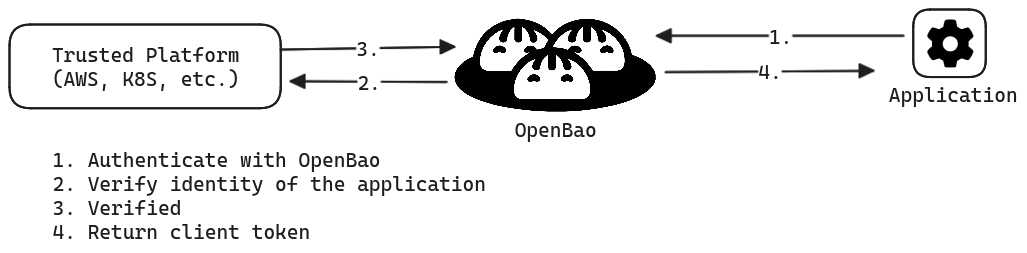
If the client can securely acquire the token, all subsequent requests (e.g., request database credentials, read key/value secrets) are processed based on the trust established by a successful authentication.
This means that client application must invoke the OpenBao API to authenticate with OpenBao and manage the acquired token, in addition to invoking the API to request secrets from OpenBao. This implies code changes to client applications along with additional testing and maintenance of the application.
The following code example implements OpenBao API to authenticate with OpenBao through [AppRole auth method](https://openbao.org/docs/auth/approle/#code-example)
, and then uses the returned client token to read secrets at `kv-v2/data/creds`.
package mainimport ( ...snip... openbao "github.com/openbao/openbao/api/v2")// Fetches a key-value secret (kv-v2) after authenticating via AppRolefunc getSecretWithAppRole() (string, error) { config := openbao.DefaultConfig() client := openbao.NewClient(config) wrappingToken := os.ReadFile("path/to/wrapping-token") unwrappedToken := client.Logical().Unwrap(strings.TrimSuffix(string(wrappingToken), "\n")) secretID := unwrappedToken.Data["secret_id"] roleID := os.Getenv("APPROLE_ROLE_ID") params := map[string]interface{}{ "role_id": roleID, "secret_id": secretID, } resp := client.Logical().Write("auth/approle/login", params) client.SetToken(resp.Auth.ClientToken) secret, err := client.Logical().Read("kv-v2/data/creds") if err != nil { return "", fmt.Errorf("unable to read secret: %w", err) } data := secret.Data["data"].(map[string]interface{}) ...snip...}
For some OpenBao deployments, making (and maintaining) these changes to applications may not be a problem, and may actually be preferred. This may be applied to scenarios where you have a small number of applications, or you want to keep strict, customized control over how each application interacts with OpenBao. However, in other situations where you have a large number of applications, as in large enterprises, you may not have the resources or expertise to update and maintain the OpenBao integration code for every application. When third party applications are being deployed by the application, it is prohibited to add the OpenBao integration code.
### Introduce OpenBao agent and OpenBao proxy to the workflow[](https://openbao.org/docs/agent-and-proxy/#introduce-openbao-agent-and-openbao-proxy-to-the-workflow "Direct link to Introduce OpenBao agent and OpenBao proxy to the workflow")
[OpenBao Agent](https://openbao.org/docs/agent-and-proxy/agent/)
and [OpenBao Proxy](https://openbao.org/docs/agent-and-proxy/proxy/)
aim to remove this initial hurdle to adopt OpenBao by providing a more scalable and simpler way for applications to integrate with OpenBao. OpenBao Agent can obtain secrets and provide them to applications, and OpenBao Proxy can act as a proxy between OpenBao and the application, optionally simplifying the authentication process and caching requests.
| Capability | OpenBao Agent | OpenBao Proxy |
| --- | --- | --- |
| [Auto-Auth](https://openbao.org/docs/agent-and-proxy/autoauth/)
to authenticate with OpenBao | x | x |
| [Caching](https://openbao.org/docs/agent-and-proxy/agent/caching/)
the newly created tokens and leases | x | x |
| Run as a [Windows Service](https://openbao.org/docs/agent-and-proxy/agent/winsvc/) | x | |
| [Templating](https://openbao.org/docs/agent-and-proxy/agent/template/)
to render user-supplied templates | x | |
| [API Proxy](https://openbao.org/docs/agent-and-proxy/proxy/apiproxy/)
to act as a proxy for OpenBao API | Will be deprecated | x |
| [Process Supervisor](https://openbao.org/docs/agent-and-proxy/agent/process-supervisor/)
for injecting secrets as environment variables into a process | x | |
To learn more, refer to the [OpenBao Agent](https://openbao.org/docs/agent-and-proxy/agent/)
or [OpenBao Proxy](https://openbao.org/docs/agent-and-proxy/proxy/)
documentation page.
* [Introduce OpenBao agent and OpenBao proxy to the workflow](https://openbao.org/docs/agent-and-proxy/#introduce-openbao-agent-and-openbao-proxy-to-the-workflow)
---
# File audit device | OpenBao
[Skip to main content](https://openbao.org/docs/audit/file/#__docusaurus_skipToContent_fallback)
On this page
The `file` audit device writes audit logs to a file. This is a very simple audit device: it appends logs to a file.
The device does not currently assist with any log rotation. There are very stable and feature-filled log rotation tools already, so we recommend using existing tools.
Sending a `SIGHUP` to the OpenBao process will cause `file` audit devices to close and re-open their underlying file, which can assist with log rotation needs.
Examples[](https://openbao.org/docs/audit/file/#examples "Direct link to Examples")
-------------------------------------------------------------------------------------
Enable at the default path:
$ bao audit enable file file_path=/var/log/openbao_audit.log
Enable at a different path. It is possible to enable multiple copies of an audit device:
$ bao audit enable -path="openbao_audit_1" file file_path=/home/user/openbao_audit.log
Enable logs on stdout. This is useful when running in a container:
$ bao audit enable file file_path=stdout
Configuration[](https://openbao.org/docs/audit/file/#configuration "Direct link to Configuration")
----------------------------------------------------------------------------------------------------
Note the difference between `audit enable` command options and the `file` backend configuration options. Use `bao audit enable -help` to see the command options.
The `file` audit device supports the common configuration options documented on the [main Audit Devices page](https://openbao.org/docs/audit/#common-configuration-options)
, and these device-specific options:
* `file_path` `(string: )` - The path to where the audit log will be written. If a file already exists at the given path, the audit backend will append to it. There are some special keywords:
* `stdout` writes the audit log to standard output
* `discard` discards output, instead of writing it to a device (useful in testing scenarios)
* `mode` `(string: "0600")` - A string containing an octal number representing the bit pattern for the file mode, similar to `chmod`. Set to `"0000"` to prevent OpenBao from modifying the file mode.
warning
Note: Starting with OpenBao v2.4.0, any executable bits set in `mode` are zeroed automatically, for security purposes. For example, `mode = 777` will convert to `mode = 666`. Furthermore, `mode` values that are [irregular](https://pkg.go.dev/io/fs#FileMode.IsRegular)
are rejected with an error.
Log file rotation[](https://openbao.org/docs/audit/file/#log-file-rotation "Direct link to Log file rotation")
----------------------------------------------------------------------------------------------------------------
To properly rotate OpenBao File Audit Device log files on BSD, Darwin, or Linux-based OpenBao servers, it is important that you configure your log rotation software to send the `bao` process a signal hang up / `SIGHUP` after each rotation of the log file.
* [Examples](https://openbao.org/docs/audit/file/#examples)
* [Configuration](https://openbao.org/docs/audit/file/#configuration)
* [Log file rotation](https://openbao.org/docs/audit/file/#log-file-rotation)
---
# Socket audit device | OpenBao
[Skip to main content](https://openbao.org/docs/audit/socket/#__docusaurus_skipToContent_fallback)
On this page
The `socket` audit device writes to a TCP, UDP, or UNIX socket.
warning
**Warning:** The loss of audit logs may occur when using the UDP socket audit type. Because UDP socket audit type is connectionless, meaning the UDP endpoint becomes unavailable, it’s possible that any number of audit logs written to it may get lost, even though the request will still succeed. OpenBao does not provide an indication for the loss of audit logs. Therefore, we recommend using your device in conjunction with a secondary “non-socket” audit device to ensure accuracy and to guarantee that audit logs will not be lost.
warning
**Warning:** When using a TCP socket audit type, and connection loss to the socket occurs, a single audit entry may be omitted from the audit entry. The request from the TCP socket audit type will succeed despite the omission of the audit entry.
Enabling[](https://openbao.org/docs/audit/socket/#enabling "Direct link to Enabling")
---------------------------------------------------------------------------------------
Enable at the default path:
$ bao audit enable socket
Supply configuration parameters via K=V pairs:
$ bao audit enable socket address=127.0.0.1:9090 socket_type=tcp
Configuration[](https://openbao.org/docs/audit/socket/#configuration "Direct link to Configuration")
------------------------------------------------------------------------------------------------------
The `socket` audit device supports the common configuration options documented on the [main Audit Devices page](https://openbao.org/docs/audit/#common-configuration-options)
, and these device-specific options:
* `address` `(string: "")` - The socket server address to use. Example `127.0.0.1:9090` or `/tmp/audit.sock`.
* `socket_type` `(string: "tcp")` - The socket type to use, any type compatible with [net.Dial](https://golang.org/pkg/net/#Dial)
is acceptable. It's important to note if TCP is used and the destination socket becomes unavailable OpenBao may become unresponsive per [Blocked Audit Devices](https://openbao.org/docs/audit/#blocked-audit-devices)
.
* `write_timeout` `(string: 2s)` - The (deadline) time in seconds to allow writes to be completed over the socket. A zero value means that write attempts will _not_ time out.
* [Enabling](https://openbao.org/docs/audit/socket/#enabling)
* [Configuration](https://openbao.org/docs/audit/socket/#configuration)
---
# Syslog audit device | OpenBao
[Skip to main content](https://openbao.org/docs/audit/syslog/#__docusaurus_skipToContent_fallback)
On this page
The `syslog` audit device writes audit logs to syslog.
It currently does not support a configurable syslog destination, and always sends to the local agent. This device is only supported on Unix systems, and should not be enabled if any standby OpenBao instances do not support it.
warning
**Warning**: Audit messages generated for some operations can be quite large, and can be larger than a [maximum-size single UDP packet](https://tools.ietf.org/html/rfc5426#section-3.1)
. If possible with your syslog daemon, configure a TCP listener. Otherwise, consider using a `file` backend and having syslog configured to read entries from the file; or, enable both `file` and `syslog` so that a failure for a particular message to log directly to `syslog` will not result in OpenBao being blocked.
Examples[](https://openbao.org/docs/audit/syslog/#examples "Direct link to Examples")
---------------------------------------------------------------------------------------
Audit `syslog` device can be enabled by the following command:
$ bao audit enable syslog
Supply configuration parameters via K=V pairs:
$ bao audit enable syslog tag="openbao" facility="AUTH"
Configuration[](https://openbao.org/docs/audit/syslog/#configuration "Direct link to Configuration")
------------------------------------------------------------------------------------------------------
The `syslog` audit device supports the common configuration options documented on the [main Audit Devices page](https://openbao.org/docs/audit/#common-configuration-options)
, and these device-specific options:
* `facility` `(string: "AUTH")` - The syslog facility to use.
* `tag` `(string: "openbao")` - The syslog tag to use.
* [Examples](https://openbao.org/docs/audit/syslog/#examples)
* [Configuration](https://openbao.org/docs/audit/syslog/#configuration)
---
# OpenBao agent API proxy | OpenBao
[Skip to main content](https://openbao.org/docs/agent-and-proxy/agent/apiproxy/#__docusaurus_skipToContent_fallback)
On this page
OpenBao Agent's API Proxy functionality allows you to use OpenBao Agent's API as a proxy for OpenBao's API.
warning
Note: This functionality will be deprecated in a future release. Please switch to using [OpenBao Proxy](https://openbao.org/docs/agent-and-proxy/proxy/)
for API proxying purposes, instead.
Functionality[](https://openbao.org/docs/agent-and-proxy/agent/apiproxy/#functionality "Direct link to Functionality")
------------------------------------------------------------------------------------------------------------------------
The [`listener` stanza](https://openbao.org/docs/agent-and-proxy/agent/#listener-stanza)
for OpenBao Agent configures a listener for OpenBao Agent. If its `role` is not set to `metrics_only`, it will act as a proxy for the OpenBao server that has been configured in the [`vault` stanza](https://openbao.org/docs/agent-and-proxy/agent/#vault-stanza)
of OpenBao Agent. This enables access to the OpenBao API from the Agent API, and can be configured to optionally allow or force the automatic use of the Auto-Auth token for these requests, as described below.
If a `listener` has been configured alongside a `cache` stanza, the API Proxy will first attempt to utilize the cache subsystem for qualifying requests, before forwarding the request to OpenBao. See the [caching docs](https://openbao.org/docs/agent-and-proxy/agent/caching/)
for more information on caching.
Using Auto-Auth token[](https://openbao.org/docs/agent-and-proxy/agent/apiproxy/#using-auto-auth-token "Direct link to Using Auto-Auth token")
------------------------------------------------------------------------------------------------------------------------------------------------
OpenBao Agent allows for easy authentication to OpenBao in a wide variety of environments using [Auto-Auth](https://openbao.org/docs/agent-and-proxy/autoauth/)
. By setting the `use_auto_auth_token` (see below) configuration, clients will not be required to provide an OpenBao token to the requests made to the Agent. When this configuration is set, if the request doesn't already bear a token, then the auto-auth token will be used to forward the request to the OpenBao server. This configuration will be overridden if the request already has a token attached, in which case, the token present in the request will be used to forward the request to the OpenBao server.
Forcing Auto-Auth token[](https://openbao.org/docs/agent-and-proxy/agent/apiproxy/#forcing-auto-auth-token "Direct link to Forcing Auto-Auth token")
------------------------------------------------------------------------------------------------------------------------------------------------------
OpenBao Agent can be configured to force the use of the auto-auth token by using the value `force` for the `use_auto_auth_token` option. This configuration overrides the default behavior described above in [Using Auto-Auth Token](https://openbao.org/docs/agent-and-proxy/agent/apiproxy/#using-auto-auth-token)
, and instead ignores any existing OpenBao token in the request and instead uses the auto-auth token.
Configuration (`api_proxy`)[](https://openbao.org/docs/agent-and-proxy/agent/apiproxy/#configuration-api_proxy "Direct link to configuration-api_proxy")
----------------------------------------------------------------------------------------------------------------------------------------------------------
The top level `api_proxy` block has the following configuration entries:
* `use_auto_auth_token` `(bool/string: false)` - If set, the requests made to Agent without an OpenBao token will be forwarded to the OpenBao server with the auto-auth token attached. If the requests already bear a token, this configuration will be overridden and the token in the request will be used to forward the request to the OpenBao server. If set to `"force"` Agent will use the auto-auth token, overwriting the attached OpenBao token if set.
### Example configuration[](https://openbao.org/docs/agent-and-proxy/agent/apiproxy/#example-configuration "Direct link to Example configuration")
Here is an example of a `listener` configuration alongside `api_proxy` configuration to force the use of the auto\_auth token and enforce consistency.
# Other OpenBao agent configuration blocks# ...api_proxy { use_auto_auth_token = "force"}listener "tcp" { address = "127.0.0.1:8100" tls_disable = true}
* [Functionality](https://openbao.org/docs/agent-and-proxy/agent/apiproxy/#functionality)
* [Using Auto-Auth token](https://openbao.org/docs/agent-and-proxy/agent/apiproxy/#using-auto-auth-token)
* [Forcing Auto-Auth token](https://openbao.org/docs/agent-and-proxy/agent/apiproxy/#forcing-auto-auth-token)
* [Configuration (`api_proxy`)](https://openbao.org/docs/agent-and-proxy/agent/apiproxy/#configuration-api_proxy)
* [Example configuration](https://openbao.org/docs/agent-and-proxy/agent/apiproxy/#example-configuration)
---
# OpenBao proxy API proxy | OpenBao
[Skip to main content](https://openbao.org/docs/agent-and-proxy/proxy/apiproxy/#__docusaurus_skipToContent_fallback)
On this page
OpenBao Proxy's API Proxy functionality allows you to use OpenBao Proxy's API as a proxy for OpenBao's API.
Functionality[](https://openbao.org/docs/agent-and-proxy/proxy/apiproxy/#functionality "Direct link to Functionality")
------------------------------------------------------------------------------------------------------------------------
The [`listener` stanza](https://openbao.org/docs/agent-and-proxy/agent/#listener-stanza)
for OpenBao Proxy configures a listener for OpenBao Proxy. If its `role` is not set to `metrics_only`, it will act as a proxy for the OpenBao server that has been configured in the [`vault` stanza](https://openbao.org/docs/agent-and-proxy/proxy/#vault-stanza)
of Proxy Agent. This enables access to the OpenBao API from the Proxy API, and can be configured to optionally allow or force the automatic use of the Auto-Auth token for these requests, as described below.
If a `listener` has been configured alongside a `cache` stanza, the API Proxy will first attempt to utilize the cache subsystem for qualifying requests, before forwarding the request to OpenBao. See the [caching docs](https://openbao.org/docs/agent-and-proxy/proxy/caching/)
for more information on caching.
Using Auto-Auth token[](https://openbao.org/docs/agent-and-proxy/proxy/apiproxy/#using-auto-auth-token "Direct link to Using Auto-Auth token")
------------------------------------------------------------------------------------------------------------------------------------------------
OpenBao Proxy allows for easy authentication to OpenBao in a wide variety of environments using [Auto-Auth](https://openbao.org/docs/agent-and-proxy/autoauth/)
. By setting the `use_auto_auth_token` (see below) configuration, clients will not be required to provide an OpenBao token to the requests made to the Agent. When this configuration is set, if the request doesn't already bear a token, then the auto-auth token will be used to forward the request to the OpenBao server. This configuration will be overridden if the request already has a token attached, in which case, the token present in the request will be used to forward the request to the OpenBao server.
Forcing Auto-Auth token[](https://openbao.org/docs/agent-and-proxy/proxy/apiproxy/#forcing-auto-auth-token "Direct link to Forcing Auto-Auth token")
------------------------------------------------------------------------------------------------------------------------------------------------------
OpenBao Proxy can be configured to force the use of the auto-auth token by using the value `force` for the `use_auto_auth_token` option. This configuration overrides the default behavior described above in [Using Auto-Auth Token](https://openbao.org/docs/agent-and-proxy/proxy/apiproxy/#using-auto-auth-token)
, and instead ignores any existing OpenBao token in the request and instead uses the auto-auth token.
Configuration (`api_proxy`)[](https://openbao.org/docs/agent-and-proxy/proxy/apiproxy/#configuration-api_proxy "Direct link to configuration-api_proxy")
----------------------------------------------------------------------------------------------------------------------------------------------------------
The top level `api_proxy` block has the following configuration entries:
* `use_auto_auth_token` `(bool/string: false)` - If set, the requests made to Agent without an OpenBao token will be forwarded to the OpenBao server with the auto-auth token attached. If the requests already bear a token, this configuration will be overridden and the token in the request will be used to forward the request to the OpenBao server. If set to `"force"` Agent will use the auto-auth token, overwriting the attached OpenBao token if set.
### Example configuration[](https://openbao.org/docs/agent-and-proxy/proxy/apiproxy/#example-configuration "Direct link to Example configuration")
Here is an example of a `listener` configuration alongside `api_proxy` configuration to force the use of the auto\_auth token and enforce consistency.
# Other OpenBao proxy configuration blocks# ...api_proxy { use_auto_auth_token = "force"}listener "tcp" { address = "127.0.0.1:8100" tls_disable = true}
* [Functionality](https://openbao.org/docs/agent-and-proxy/proxy/apiproxy/#functionality)
* [Using Auto-Auth token](https://openbao.org/docs/agent-and-proxy/proxy/apiproxy/#using-auto-auth-token)
* [Forcing Auto-Auth token](https://openbao.org/docs/agent-and-proxy/proxy/apiproxy/#forcing-auto-auth-token)
* [Configuration (`api_proxy`)](https://openbao.org/docs/agent-and-proxy/proxy/apiproxy/#configuration-api_proxy)
* [Example configuration](https://openbao.org/docs/agent-and-proxy/proxy/apiproxy/#example-configuration)
---
# OpenBao agent and OpenBao proxy Auto-Auth file sink | OpenBao
[Skip to main content](https://openbao.org/docs/agent-and-proxy/autoauth/sinks/file/#__docusaurus_skipToContent_fallback)
On this page
The `file` sink writes tokens, optionally response-wrapped and/or encrypted, to a file. This may be a local file or a file mapped via some other process (NFS, Gluster, CIFS, etc.).
Once the sink writes the file, it is up to the client to control lifecycle; generally it is best for the client to remove the file as soon as it is seen.
It is also best practice to write the file to a ramdisk, ideally an encrypted ramdisk, and use appropriate filesystem permissions. The file is currently written with `0640` permissions as default, but can be overridden with the optional 'mode' setting.
Configuration[](https://openbao.org/docs/agent-and-proxy/autoauth/sinks/file/#configuration "Direct link to Configuration")
-----------------------------------------------------------------------------------------------------------------------------
* `path` `(string: required)` - The path to use to write the token file
* `mode` `(int: optional)` - A string containing an octal number representing the bit pattern for the file mode, similar to chmod. Set to `0000` to prevent OpenBao from modifying the file mode.
Note: Configuration options for response-wrapping and encryption for the sink file are located within the [options common to all sinks](https://openbao.org/docs/agent-and-proxy/autoauth/#configuration-sinks)
documentation.
* [Configuration](https://openbao.org/docs/agent-and-proxy/autoauth/sinks/file/#configuration)
---
# OpenBao agent kubernetes persistent cache | OpenBao
[Skip to main content](https://openbao.org/docs/agent-and-proxy/agent/caching/persistent-caches/kubernetes/#__docusaurus_skipToContent_fallback)
On this page
When `kubernetes` is configured for the persistent cache type, OpenBao Agent will optimize the persistent cache specifically for Kubernetes. This type of persistent cache requires a Kubernetes service account token. The service account token is used during encryption and decryption of the persistent cache as an additional integrity check.
The OpenBao Agent persistent cache file in Kubernetes should only be used for handing off OpenBao tokens and leases between initialization and sidecar OpenBao Agent containers. This cache file should be shared using a memory volume between the OpenBao Agent containers.
If the OpenBao Agent Injector for Kubernetes is being used, the persistent cache is automatically configured and used if the annotation [`vault.hashicorp.com/agent-cache-enable: true`](https://github.com/hashicorp/vault-k8s/blob/v1.4.2/agent-inject/agent/annotations.go#L249)
is set.
Configuration[](https://openbao.org/docs/agent-and-proxy/agent/caching/persistent-caches/kubernetes/#configuration "Direct link to Configuration")
----------------------------------------------------------------------------------------------------------------------------------------------------
* `service_account_token_file` `(string: optional)` - When type is set to `kubernetes`, this configures the path on disk where the Kubernetes service account token can be found. Defaults to `/var/run/secrets/kubernetes.io/serviceaccount/token`.
* [Configuration](https://openbao.org/docs/agent-and-proxy/agent/caching/persistent-caches/kubernetes/#configuration)
---
# OpenBao agent persistent caching | OpenBao
[Skip to main content](https://openbao.org/docs/agent-and-proxy/agent/caching/persistent-caches/#__docusaurus_skipToContent_fallback)
On this page
OpenBao Agent can restore tokens and leases from a persistent cache file created by a previous OpenBao Agent process. The persistent cache is a BoltDB file that includes tuples encrypted by a generated encryption key. The encrypted tuples include the OpenBao token used to retrieve secrets, leases for tokens/secrets, and secret values.
info
**Note:** OpenBao Agent Persistent Caching will only restore _leased_ secrets. Secrets that are not renewable, such as KV v2, will not be persisted.
In order to use OpenBao Agent persistent cache, auto-auth must be used. If the auto-auth token has expired by the time the cache is restored, the cache will be invalidated and secrets will need to be re-fetched from OpenBao.
If OpenBao Agent templating is enabled alongside of the persistent cache, OpenBao Agent will automatically route templating requests through the cache. This ensures template requests are cached and restored properly.
info
**Note** OpenBao Agent persistent cache is currently supported only in a Kubernetes environment.
OpenBao agent persistent cache types[](https://openbao.org/docs/agent-and-proxy/agent/caching/persistent-caches/#openbao-agent-persistent-cache-types "Direct link to OpenBao agent persistent cache types")
--------------------------------------------------------------------------------------------------------------------------------------------------------------------------------------------------------------
Please see the sidebar for available types and their usage/configuration.
Persistent cache example configuration[](https://openbao.org/docs/agent-and-proxy/agent/caching/persistent-caches/#persistent-cache-example-configuration "Direct link to Persistent cache example configuration")
--------------------------------------------------------------------------------------------------------------------------------------------------------------------------------------------------------------------
Here is an example of a persistent cache configuration.
# Other OpenBao agent configuration blocks# ...cache { persist "kubernetes" { path = "/openbao/agent-cache" }}
* [OpenBao agent persistent cache types](https://openbao.org/docs/agent-and-proxy/agent/caching/persistent-caches/#openbao-agent-persistent-cache-types)
* [Persistent cache example configuration](https://openbao.org/docs/agent-and-proxy/agent/caching/persistent-caches/#persistent-cache-example-configuration)
---
# OpenBao agent and OpenBao proxy Auto-Auth sinks | OpenBao
[Skip to main content](https://openbao.org/docs/agent-and-proxy/autoauth/sinks/#__docusaurus_skipToContent_fallback)
Every time an auto-auth authentication is successful, the token is written to the enabled Sinks, subject to their configuration. Today, we only support one type of sink, [file sink](https://openbao.org/docs/agent-and-proxy/autoauth/sinks/file/)
.
---
# OpenBao Agent and OpenBao Proxy Auto-Auth | OpenBao
[Skip to main content](https://openbao.org/docs/agent-and-proxy/autoauth/#__docusaurus_skipToContent_fallback)
On this page
The Auto-Auth functionality of OpenBao Agent and OpenBao Proxy allow for easy authentication in a wide variety of environments.
Functionality[](https://openbao.org/docs/agent-and-proxy/autoauth/#functionality "Direct link to Functionality")
------------------------------------------------------------------------------------------------------------------
Auto-Auth consists of two parts: a Method, which is the authentication method that should be used in the current environment; and any number of Sinks, which are locations where the agent should write a token any time the current token value has changed.
When OpenBao Agent or OpenBao Proxy are started with Auto-Auth enabled, it will attempt to acquire a OpenBao token using the configured Method. On failure, it will exponentially back off and then retry. On success, unless the auth method is configured to wrap the tokens, it will keep the resulting token renewed until renewal is no longer allowed or fails, at which point it will attempt to reauthenticate.
Every time an authentication is successful, the token is written to the configured Sinks, subject to their configuration.
Advanced functionality[](https://openbao.org/docs/agent-and-proxy/autoauth/#advanced-functionality "Direct link to Advanced functionality")
---------------------------------------------------------------------------------------------------------------------------------------------
Sinks support some advanced features, including the ability for the written values to be encrypted or [response-wrapped](https://openbao.org/docs/concepts/response-wrapping/)
.
Both mechanisms can be used concurrently; in this case, the value will be response-wrapped, then encrypted.
### Response-Wrapping tokens[](https://openbao.org/docs/agent-and-proxy/autoauth/#response-wrapping-tokens "Direct link to Response-Wrapping tokens")
There are two ways that tokens can be response-wrapped:
1. By the auth method. This allows the end client to introspect the `creation_path` of the token, helping prevent Man-In-The-Middle (MITM) attacks. However, because auto-auth cannot then unwrap the token and rewrap it without modifying the `creation_path`, we are not able to renew the token; it is up to the end client to renew the token. Agent and Proxy both stay daemonized in this mode since some auth methods allow for reauthentication on certain events.
2. By any of the token sinks. Because more than one sink can be configured, the token must be wrapped after it is fetched, rather than wrapped by OpenBao as it's being returned. As a result, the `creation_path` will always be `sys/wrapping/wrap`, and validation of this field cannot be used as protection against MITM attacks. However, this mode allows auto-auth to keep the token renewed for the end client and automatically reauthenticate when it expires.
### Encrypting tokens[](https://openbao.org/docs/agent-and-proxy/autoauth/#encrypting-tokens "Direct link to Encrypting tokens")
warning
Support for encrypted tokens is experimental; if input/output formats change, we will make every effort to provide backwards compatibility.
Tokens can be encrypted, using a Diffie-Hellman exchange to generate an ephemeral key. In this mechanism, the client receiving the token writes a generated public key to a file. The sink responsible for writing the token to that client looks for this public key and uses it to compute a shared secret key, which is then used to encrypt the token via AES-GCM. The nonce, encrypted payload, and the sink's public key are then written to the output file, where the client can compute the shared secret and decrypt the token value.
warning
NOTE: Token encryption is not a protection against MITM attacks! The purpose of this feature is for forward-secrecy and coverage against bare token values being persisted. A MITM that can write to the sink's output and/or client public-key input files could attack this exchange. Using TLS to protect the transit of tokens is highly recommended.
To help mitigate MITM attacks, additional authenticated data (AAD) can be provided to Agent and Proxy. This data is written as part of the AES-GCM tag and must match on both Agent and Proxy and the client. This of course means that protecting this AAD becomes important, but it provides another layer for an attacker to have to overcome. For instance, if the attacker has access to the file system where the token is being written, but not to read configuration or read environment variables, this AAD can be generated and passed to Agent or Proxy and the client in ways that would be difficult for the attacker to find.
When using AAD, it is always a good idea for this to be as fresh as possible; generate a value and pass it to your client and Agent or Proxy on startup. Additionally, Agent and Proxy a Trust On First Use model; after it finds a generated public key, it will reuse that public key instead of looking for new values that have been written.
If writing a client that uses this feature, it will likely be helpful to look at the [dhutil](https://github.com/openbao/openbao/blob/main/helper/dhutil/dhutil.go)
library. This shows the expected format of the public key input and envelope output formats.
Configuration[](https://openbao.org/docs/agent-and-proxy/autoauth/#configuration "Direct link to Configuration")
------------------------------------------------------------------------------------------------------------------
The top level `auto_auth` block has two configuration entries:
* `method` `(object: required)` - Configuration for the method
* `sinks` `(array of objects: optional)` - Configuration for the sinks
### Configuration (Method)[](https://openbao.org/docs/agent-and-proxy/autoauth/#configuration-method "Direct link to Configuration (Method)")
warning
Auto-auth does not support using tokens with a limited number of uses. Auto-auth does not track the number of uses remaining, and may allow the token to expire before attempting to renew it. For example, if using AppRole auto-auth, you must use 0 (meaning unlimited) as the value for [`token_num_uses`](https://openbao.org/api-docs/auth/approle/#token_num_uses)
.
These are common configuration values that live within the `method` block:
* `type` `(string: required)` - The type of the method to use, e.g. `jwt`, `ldap`, `cert`, etc. _Note_: when using HCL this can be used as the key for the block, e.g. `method "jwt" {...}`.
* `mount_path` `(string: optional)` - The mount path of the method. If not specified, defaults to a value of `auth/`.
* `namespace` `(string: optional)` - Namespace in which the mount lives. The order of precedence is: this setting lowest, followed by the environment variable `VAULT_NAMESPACE`, and then the highest precedence command-line option `-namespace`. If none of these are specified, defaults to the root namespace. Note that because sink response wrapping and templating are also based on the client created by auto-auth, they use the same namespace.
* `wrap_ttl` `(string or integer: optional)` - If specified, the written token will be response-wrapped by auto-auth. This is more secure than wrapping by sinks, but does not allow the auto-auth to keep the token renewed or automatically reauthenticate when it expires. Rather than a simple string, the written value will be a JSON-encoded [SecretWrapInfo](https://godoc.org/github.com/openbao/openbao/api#SecretWrapInfo)
structure. Uses [duration format strings](https://openbao.org/docs/concepts/duration-format/)
.
* `min_backoff` `(string or integer: "1s")` - The minimum backoff time auto-auth will delay before retrying after a failed auth attempt. The backoff will start at the configured value and double (with some randomness) after successive failures, capped by `max_backoff.` If Agent templating is being used, this value is also used as the min backoff time for the templating server. Uses [duration format strings](https://openbao.org/docs/concepts/duration-format/)
.
* `max_backoff` `(string or integer: "5m")` - The maximum time Agent will delay before retrying after a failed auth attempt. The backoff will start at `min_backoff` and double (with some randomness) after successive failures, capped by `max_backoff.` If Agent templating is being used, this value is also used as the max backoff time for the templating server. `max_backoff` is the duration between retries, and **not** the duration that retries will be performed before giving up. Uses [duration format strings](https://openbao.org/docs/concepts/duration-format/)
.
* `exit_on_err` `(bool: false)` - When set to true, OpenBao Agent and OpenBao Proxy will exit if any errors occur during authentication. This configurable only affects login attempts for new tokens (either initial or expired tokens) and will not exit for errors on valid token renewals.
* `config` `(object: required)` - Configuration of the method itself. See the sidebar for information about each method.
### Configuration (Sinks)[](https://openbao.org/docs/agent-and-proxy/autoauth/#configuration-sinks "Direct link to Configuration (Sinks)")
These configuration values are common to all Sinks:
* `type` `(string: required)` - The type of the method to use, e.g. `file`. _Note_: when using HCL this can be used as the key for the block, e.g. `sink "file" {...}`.
* `wrap_ttl` `(string or integer: optional)` - If specified, the written token will be response-wrapped by the sink. This is less secure than wrapping by the method, but allows auto-auth to keep the token renewed and automatically reauthenticate when it expires. Rather than a simple string, the written value will be a JSON-encoded [SecretWrapInfo](https://godoc.org/github.com/openbao/openbao/api#SecretWrapInfo)
structure. Uses [duration format strings](https://openbao.org/docs/concepts/duration-format/)
.
* `dh_type` `(string: optional)` - If specified, the type of Diffie-Hellman exchange to perform, meaning, which ciphers and/or curves. Currently only `curve25519` is supported.
* `dh_path` `(string: required if dh_type is set)` - The path from which the auto-auth should read the client's initial parameters (e.g. curve25519 public key).
* `derive_key` `(bool: false)` - If specified, the final encryption key is calculated by using HKDF-SHA256 to derive a key from the calculated shared secret and the two public keys for enhanced security. This is recommended if backward compatibility isn't a concern.
* `aad` `(string: optional)` - If specified, additional authenticated data to use with the AES-GCM encryption of the token. Can be any string, including serialized data.
* `aad_env_var` `(string: optional)` - If specified, AAD will be read from the given environment variable rather than a value in the configuration file.
* `config` `(object: required)` - Configuration of the sink itself. See the sidebar for information about each sink.
### Auto auth examples[](https://openbao.org/docs/agent-and-proxy/autoauth/#auto-auth-examples "Direct link to Auto auth examples")
Auto-Auth configuration objects take two separate forms when specified in HCL and JSON. The following examples are meant to clarify the differences between the two formats.
#### Sinks (HCL format)[](https://openbao.org/docs/agent-and-proxy/autoauth/#sinks-hcl-format "Direct link to Sinks (HCL format)")
The HCL format may define any number of sink objects with an optional wrapping `sinks {...}` object.
warning
Note: The [corresponding JSON format](https://openbao.org/docs/agent-and-proxy/autoauth/#sinks-json-format)
_must_ specify a `"sinks" : [...]` array to encapsulate all `sink` JSON objects.
// Other OpenBao Agent or OpenBao Proxy configuration blocks// ...auto_auth { method { type = "approle" config = { role_id_file_path = "/etc/openbao/roleid" secret_id_file_path = "/etc/openbao/secretid" } } sinks { sink { type = "file" config = { path = "/tmp/file-foo" } } }}
The following valid HCL omits the wrapping `sinks` object while specifying multiple sinks.
// Other OpenBao Agent or OpenBao Proxy configuration blocks// ...auto_auth { method { type = "approle" config = { role_id_file_path = "/etc/openbao/roleid" secret_id_file_path = "/etc/openbao/secretid" } } sink { type = "file" config = { path = "/tmp/file-foo" } } sink { type = "file" config = { path = "/tmp/file-bar" } }}
#### Sinks (JSON format)[](https://openbao.org/docs/agent-and-proxy/autoauth/#sinks-json-format "Direct link to Sinks (JSON format)")
The following JSON configuration illustrates the need for a `sinks: [...]` array wrapping any number of `sink` objects.
{ "auto_auth" : { "method" : [ { type = "approle" config = { role_id_file_path = "/etc/openbao/roleid" secret_id_file_path = "/etc/openbao/secretid" } } ], "sinks" : [ { "sink" : { type = "file" config = { path = "/tmp/file-foo" } } } ] }}
Multiple sinks are defined by appending more `sink` objects within the `sinks` array:
{ "auto_auth" : { "method" : [ { type = "approle" config = { role_id_file_path = "/etc/openbao/roleid" secret_id_file_path = "/etc/openbao/secretid" } } ], "sinks" : [ { "sink" : { type = "file" config = { path = "/tmp/file-foo" } } }, { "sink" : { type = "file" config = { path = "/tmp/file-bar" } } } ] }}
* [Functionality](https://openbao.org/docs/agent-and-proxy/autoauth/#functionality)
* [Advanced functionality](https://openbao.org/docs/agent-and-proxy/autoauth/#advanced-functionality)
* [Response-Wrapping tokens](https://openbao.org/docs/agent-and-proxy/autoauth/#response-wrapping-tokens)
* [Encrypting tokens](https://openbao.org/docs/agent-and-proxy/autoauth/#encrypting-tokens)
* [Configuration](https://openbao.org/docs/agent-and-proxy/autoauth/#configuration)
* [Configuration (Method)](https://openbao.org/docs/agent-and-proxy/autoauth/#configuration-method)
* [Configuration (Sinks)](https://openbao.org/docs/agent-and-proxy/autoauth/#configuration-sinks)
* [Auto auth examples](https://openbao.org/docs/agent-and-proxy/autoauth/#auto-auth-examples)
---
# OpenBao agent's process supervisor mode | OpenBao
[Skip to main content](https://openbao.org/docs/agent-and-proxy/agent/process-supervisor/#__docusaurus_skipToContent_fallback)
On this page
OpenBao Agent's Process Supervisor Mode allows OpenBao secrets to be injected into a process via environment variables using [Consul Template markup](https://github.com/hashicorp/consul-template/blob/v0.28.1/docs/templating-language.md)
.
danger
OpenBao Agent's Process Supervisor Mode is in public beta. Please provide your feedback by opening a GitHub issue [here](https://github.com/openbao/openbao/issues)
.
Functionality[](https://openbao.org/docs/agent-and-proxy/agent/process-supervisor/#functionality "Direct link to Functionality")
----------------------------------------------------------------------------------------------------------------------------------
OpenBao Agent will inject secrets referenced in the `env_template` configuration blocks as environment variables into the child process specified in the `exec` block.
When you start OpenBao Agent in process supervisor mode, it will wait until each environment variable template has rendered at least once before starting the process. If `restart_on_secret_changes` is set to `always` (default), Agent will restart the process whenever an update to an injected secret is detected. This could be either a static secret update (done on [`static_secret_render_interval`](https://openbao.org/docs/agent-and-proxy/agent/template/#static_secret_render_interval)
) or dynamic secret being close to its expiration.
In many ways, OpenBao Agent will mirror the child process. Standard intput and output streams (`stdin` / `stdout` / `stderr`) are all forwarded to the child process. Additionally, OpenBao Agent will exit when the child process exits on its own with the same exit code.
Configuration[](https://openbao.org/docs/agent-and-proxy/agent/process-supervisor/#configuration "Direct link to Configuration")
----------------------------------------------------------------------------------------------------------------------------------
info
Agent's [generate-config](https://openbao.org/docs/agent-and-proxy/agent/generate-config/)
tool will help you get started by generating a valid agent configuration file from the given inputs.
The process supervisor mode requires at least one `env_template` block and exactly one top level `exec` block. It is incompatible with regular file `template` entries.
### `env_template`[](https://openbao.org/docs/agent-and-proxy/agent/process-supervisor/#env_template "Direct link to env_template")
`env_template` stanza maps the template specified in the `contents` field or referenced in the `source` field to the environment variable name in the title of the stanza. It uses the same [templating language](https://openbao.org/docs/agent-and-proxy/agent/template/#templating-language)
as file templates but permits only a subset of [its configuration parameters](https://openbao.org/docs/agent-and-proxy/agent/template/#template_configurations)
:
* environment variable name `(string: )` - the name of the environment variable to which the contents of the template should map.
* `contents` `(string: "")` - This option allows embedding the contents of a template in the configuration file rather then supplying the `source` path to the template file. This is useful for short templates. This option is mutually exclusive with the `source` option.
* `source` `(string: "")` - Path on disk to use as the input template. This option is required if not using the `contents` option.
* `error_on_missing_key` `(bool: false)` - Exit with an error when accessing a struct or map field/key that does notexist. The default behavior will print `` when accessing a field that does not exist. It is highly recommended you set this to "true". Also see [`exit_on_retry_failure` in global OpenBao Agent Template Config](https://openbao.org/docs/agent-and-proxy/agent/template/#interaction-between-exit_on_retry_failure-and-error_on_missing_key)
.
* `left_delimiter` `(string: "\{\{")` - Delimiter to use in the template. The default is "{{" but for some templates, it may be easier to use a different delimiter that does not conflict with the output file itself.
* `right_delimiter` `(string: "}}")` - Delimiter to use in the template. The default is "}}" but for some templates, it may be easier to use a different delimiter that does not conflict with the output file itself.
### `exec`[](https://openbao.org/docs/agent-and-proxy/agent/process-supervisor/#exec "Direct link to exec")
The top level `exec` block has the following configuration entries.
* `command` `(string array: required)` - Specify the command for the child process with optional arguments. The executable's path must be either absolute or relative to the current working directory.
* `restart_on_secret_changes` `(string: "always")` - Controls whether agent will restart the child process on secret changes. There are two types of secret changes relevant to this configuration: a static secret update (on \[static\_secret\_render\_interval`](/docs/agent-and-proxy/agent/template#static_secret_render_interval)) and dynamic secret being close to its expiration. The configuration supports two options:` always`and`never\`.
* `restart_stop_signal` `(string: "SIGTERM")` - Signal to send to the child process when a secret has been updated and the process needs to be restarted. The process has 30 seconds after this signal is sent until `SIGKILL` is sent to force the child process to stop.
Configuration example[](https://openbao.org/docs/agent-and-proxy/agent/process-supervisor/#configuration-example "Direct link to Configuration example")
----------------------------------------------------------------------------------------------------------------------------------------------------------
The following example was generated using [`bao agent generate-config`](https://openbao.org/docs/agent-and-proxy/agent/generate-config/)
, a configuration helper tool. Given this configuration, OpenBao Agent will run the child process (`./my-app arg1 arg2`) with two additional environment variables (`FOO_USER` and `FOO_PASSWORD`) populated with secrets from OpenBao.
auto_auth { method { type = "token_file" config { token_file_path = "/Users/avean/.vault-token" } }}template_config { static_secret_render_interval = "5m" exit_on_retry_failure = true}vault { address = "http://localhost:8200"}env_template "FOO_PASSWORD" { contents = "{{ with secret \"secret/data/foo\" }}{{ .Data.data.password }}{{ end }}" error_on_missing_key = true}env_template "FOO_USER" { contents = "{{ with secret \"secret/data/foo\" }}{{ .Data.data.user }}{{ end }}" error_on_missing_key = true}exec { command = ["./my-app", "arg1", "arg2"] restart_on_secret_changes = "always" restart_stop_signal = "SIGTERM"}
* [Functionality](https://openbao.org/docs/agent-and-proxy/agent/process-supervisor/#functionality)
* [Configuration](https://openbao.org/docs/agent-and-proxy/agent/process-supervisor/#configuration)
* [`env_template`](https://openbao.org/docs/agent-and-proxy/agent/process-supervisor/#env_template)
* [`exec`](https://openbao.org/docs/agent-and-proxy/agent/process-supervisor/#exec)
* [Configuration example](https://openbao.org/docs/agent-and-proxy/agent/process-supervisor/#configuration-example)
---
# Running different versions of agent and server | OpenBao
[Skip to main content](https://openbao.org/docs/agent-and-proxy/agent/versions/#__docusaurus_skipToContent_fallback)
On this page
There is no requirement to run identical versions of OpenBao Agent and OpenBao Server. It is safe to run different versions, however you may not be able to take advantage of all the newest features in OpenBao if you do not upgrade to the most recent versions of Agent and Server. We recognize that this isn’t always possible, so we do support version mismatch as best as possible.
Agent will write a note to its logs when it detects a mismatch between Agent and Server. This is purely informative, intended to assist with debugging in case the mismatch is given rise to problems, e.g. because a newer Agent version is trying to make use of functionality that doesn't exist in the Server version it's talking to. If Agent is behaving acceptably, the message may be ignored.
This document describes the common cases. There may be occasional exceptions, which if intentional will be called out in the CHANGELOG in a `CHANGES` section. If unintentional/undocumented these should be treated as bugs and reported.
Older version of agent than server[](https://openbao.org/docs/agent-and-proxy/agent/versions/#older-version-of-agent-than-server "Direct link to Older version of agent than server")
---------------------------------------------------------------------------------------------------------------------------------------------------------------------------------------
We do not anticipate any problems stemming from continuing to run an older Agent version after the server nodes are upgraded to a later version. Existing deployments using Agent should not be impacted, as we don't generally make backwards-incompatible changes to OpenBao Server.
Auto-auth:
* new auth methods that have been introduced since Agent was built will be unavailable
* existing auth methods should continue to function normally
Proxy:
* since Agent simply mirrors the incoming requests, even if an incoming request uses an endpoint that didn't exist when that version of Agent was compiled, that won't impede Agent's ability to proxy the request
Templating:
* the templating language features that interact with the OpenBao server use stable OpenBao APIs to retrieve and renew secrets
* even if new secret engine types are introduced in newer OpenBao releases, these should not require an Agent upgrade to access via templates
Newer version of agent than server[](https://openbao.org/docs/agent-and-proxy/agent/versions/#newer-version-of-agent-than-server "Direct link to Newer version of agent than server")
---------------------------------------------------------------------------------------------------------------------------------------------------------------------------------------
It is possible that an Agent could depend on features that don’t exist in older Server versions.
Auto-auth:
* Agent may claim to support newer auth methods that have been introduced since Server was built, but they won't work due to Server not supporting them
* Agent may make use of new functionality for existing auth methods that isn't available in an older Server you're using
* Generally we will try to make such a change be opt-in, or to gracefully degrade when connecting to an older Server instance, unless there's a very good reason (such as a serious security flaw being patched)
Proxy:
* since Agent simply mirrors the incoming requests, it is unlikely that incompatibilities would surface in proxying, but new functionality may not be available
Templating:
* we don't anticipate a scenario where changes to Agent's templating itself gives rise to an incompatibility with older OpenBao Servers, though of course with any Agent version it's possible to write templates that issue requests which make use of functionality not yet present in the upstream OpenBao server, e.g. {{ with secret "secret/my-secret?some-new-option" }}
* we would not deliberately make a change to templating that breaks existing deployments
* [Older version of agent than server](https://openbao.org/docs/agent-and-proxy/agent/versions/#older-version-of-agent-than-server)
* [Newer version of agent than server](https://openbao.org/docs/agent-and-proxy/agent/versions/#newer-version-of-agent-than-server)
---
# OpenBao proxy persistent caching | OpenBao
[Skip to main content](https://openbao.org/docs/agent-and-proxy/proxy/caching/persistent-caches/#__docusaurus_skipToContent_fallback)
On this page
OpenBao Proxy can restore tokens and leases from a persistent cache file created by a previous OpenBao Proxy process. The persistent cache is a BoltDB file that includes tuples encrypted by a generated encryption key. The encrypted tuples include the OpenBao token used to retrieve secrets, leases for tokens/secrets, and secret values.
info
**Note:** OpenBao Proxy Persistent Caching will only restore _leased_ secrets. Secrets that are not renewable, such as KV v2, will not be persisted.
In order to use OpenBao Proxy persistent cache, auto-auth must be used. If the auto-auth token has expired by the time the cache is restored, the cache will be invalidated and secrets will need to be re-fetched from OpenBao.
info
**Note** OpenBao Proxy persistent cache is currently supported only in a Kubernetes environment.
OpenBao proxy persistent cache types[](https://openbao.org/docs/agent-and-proxy/proxy/caching/persistent-caches/#openbao-proxy-persistent-cache-types "Direct link to OpenBao proxy persistent cache types")
--------------------------------------------------------------------------------------------------------------------------------------------------------------------------------------------------------------
Please see the sidebar for available types and their usage/configuration.
Persistent cache example configuration[](https://openbao.org/docs/agent-and-proxy/proxy/caching/persistent-caches/#persistent-cache-example-configuration "Direct link to Persistent cache example configuration")
--------------------------------------------------------------------------------------------------------------------------------------------------------------------------------------------------------------------
Here is an example of a persistent cache configuration.
# Other OpenBao proxy configuration blocks# ...cache { persist "kubernetes" { path = "/openbao/proxy-cache" }}
* [OpenBao proxy persistent cache types](https://openbao.org/docs/agent-and-proxy/proxy/caching/persistent-caches/#openbao-proxy-persistent-cache-types)
* [Persistent cache example configuration](https://openbao.org/docs/agent-and-proxy/proxy/caching/persistent-caches/#persistent-cache-example-configuration)
---
# OpenBao proxy kubernetes persistent cache | OpenBao
[Skip to main content](https://openbao.org/docs/agent-and-proxy/proxy/caching/persistent-caches/kubernetes/#__docusaurus_skipToContent_fallback)
On this page
When `kubernetes` is configured for the persistent cache type, OpenBao Proxy will optimize the persistent cache specifically for Kubernetes. This type of persistent cache requires a Kubernetes service account token. The service account token is used during encryption and decryption of the persistent cache as an additional integrity check.
The OpenBao Proxy persistent cache file in Kubernetes should only be used for handing off OpenBao tokens and leases between initialization and sidecar OpenBao Proxy containers. This cache file should be shared using a memory volume between the OpenBao Proxy containers.
Configuration[](https://openbao.org/docs/agent-and-proxy/proxy/caching/persistent-caches/kubernetes/#configuration "Direct link to Configuration")
----------------------------------------------------------------------------------------------------------------------------------------------------
* `service_account_token_file` `(string: optional)` - When type is set to `kubernetes`, this configures the path on disk where the Kubernetes service account token can be found. Defaults to `/var/run/secrets/kubernetes.io/serviceaccount/token`.
* [Configuration](https://openbao.org/docs/agent-and-proxy/proxy/caching/persistent-caches/kubernetes/#configuration)
---
# OpenBao agent caching | OpenBao
[Skip to main content](https://openbao.org/docs/agent-and-proxy/agent/caching/#__docusaurus_skipToContent_fallback)
On this page
OpenBao Agent Caching allows client-side caching of responses containing newly created tokens and responses containing leased secrets generated off of these newly created tokens. The renewals of the cached tokens and leases are also managed by the agent.
Caching and renewals[](https://openbao.org/docs/agent-and-proxy/agent/caching/#caching-and-renewals "Direct link to Caching and renewals")
--------------------------------------------------------------------------------------------------------------------------------------------
Response caching and renewals are managed by the agent only under these specific scenarios.
1. Token creation requests are made through the agent. This means that any login operations performed using various auth methods and invoking the token creation endpoints of the token auth method via the agent will result in the response getting cached by the agent. Responses containing new tokens will be cached by the agent only if the parent token is already being managed by the agent or if the new token is an orphan token.
2. Leased secret creation requests are made through the agent using tokens that are already managed by the agent. This means that any dynamic credentials that are issued using the tokens managed by the agent, will be cached and its renewals are taken care of.
Persistent cache[](https://openbao.org/docs/agent-and-proxy/agent/caching/#persistent-cache "Direct link to Persistent cache")
--------------------------------------------------------------------------------------------------------------------------------
OpenBao Agent can restore tokens and leases from a persistent cache file created by a previous OpenBao Agent process.
Refer to the [OpenBao Agent Persistent Caching](https://openbao.org/docs/agent-and-proxy/agent/caching/persistent-caches/)
page for more information on this functionality.
Cache evictions[](https://openbao.org/docs/agent-and-proxy/agent/caching/#cache-evictions "Direct link to Cache evictions")
-----------------------------------------------------------------------------------------------------------------------------
The eviction of cache entries pertaining to secrets will occur when the agent can no longer renew them. This can happen when the secrets hit their maximum TTL or if the renewals result in errors.
Agent does some best-effort cache evictions by observing specific request types and response codes. For example, if a token revocation request is made via the agent and if the forwarded request to the OpenBao server succeeds, then agent evicts all the cache entries associated with the revoked token. Similarly, any lease revocation operation will also be intercepted by the agent and the respective cache entries will be evicted.
Note that while agent evicts the cache entries upon secret expirations and upon intercepting revocation requests, it is still possible for the agent to be completely unaware of the revocations that happen through direct client interactions with the OpenBao server. This could potentially lead to stale cache entries. For managing the stale entries in the cache, an endpoint `/agent/v1/cache-clear`(see below) is made available to manually evict cache entries based on some of the query criteria used for indexing the cache entries.
Request uniqueness[](https://openbao.org/docs/agent-and-proxy/agent/caching/#request-uniqueness "Direct link to Request uniqueness")
--------------------------------------------------------------------------------------------------------------------------------------
In order to detect repeat requests and return cached responses, agent will need to have a way to uniquely identify the requests. This computation as it stands today takes a simplistic approach (may change in future) of serializing and hashing the HTTP request along with all the headers and the request body. This hash value is then used as an index into the cache to check if the response is readily available. The consequence of this approach is that the hash value for any request will differ if any data in the request is modified. This has the side-effect of resulting in false negatives if say, the ordering of the request parameters are modified. As long as the requests come in without any change, caching behavior should be consistent. Identical requests with differently ordered request values will result in duplicated cache entries. A heuristic assumption that the clients will use consistent mechanisms to make requests, thereby resulting in consistent hash values per request is the idea upon which the caching functionality is built upon.
Renewal management[](https://openbao.org/docs/agent-and-proxy/agent/caching/#renewal-management "Direct link to Renewal management")
--------------------------------------------------------------------------------------------------------------------------------------
The tokens and leases are renewed by the agent using the secret renewer that is made available via the OpenBao server's [Go API](https://godoc.org/github.com/openbao/openbao/api#Renewer)
. Agent performs all operations in memory and does not persist anything to storage. This means that when the agent is shut down, all the renewal operations are immediately terminated and there is no way for agent to resume renewals after the fact. Note that shutting down the agent does not indicate revocations of the secrets, instead it only means that renewal responsibility for all the valid unrevoked secrets are no longer performed by the OpenBao agent.
### Agent CLI[](https://openbao.org/docs/agent-and-proxy/agent/caching/#agent-cli "Direct link to Agent CLI")
Agent's listener address will be picked up by the CLI through the `VAULT_AGENT_ADDR` environment variable. This should be a complete URL such as `"http://127.0.0.1:8200"`.
API[](https://openbao.org/docs/agent-and-proxy/agent/caching/#api "Direct link to API")
-----------------------------------------------------------------------------------------
### Cache clear[](https://openbao.org/docs/agent-and-proxy/agent/caching/#cache-clear "Direct link to Cache clear")
This endpoint clears the cache based on given criteria. To use this API, some information on how the agent caches values should be known beforehand. Each response that is cached in the agent will be indexed on some factors depending on the type of request. Those factors can be the `token` that is belonging to the cached response, the `token_accessor` of the token belonging to the cached response, the `request_path` that resulted in the cached response, the `lease` that is attached to the cached response, the `namespace` to which the cached response belongs to, and a few more. This API exposes some factors through which associated cache entries are fetched and evicted. For listeners without caching enabled, this API will still be available, but will do nothing (there is no cache to clear) and will return a `200` response.
| Method | Path | Produces |
| --- | --- | --- |
| `POST` | `/agent/v1/cache-clear` | `200 application/json` |
#### Parameters[](https://openbao.org/docs/agent-and-proxy/agent/caching/#parameters "Direct link to Parameters")
* `type` `(strings: required)` - The type of cache entries to evict. Valid values are `request_path`, `lease`, `token`, `token_accessor`, and `all`. If the `type` is set to `all`, the _entire cache_ is cleared.
* `value` `(string: required)` - An exact value or the prefix of the value for the `type` selected. This parameter is optional when the `type` is set to `all`.
* `namespace` `(string: optional)` - This is only applicable when the `type` is set to `request_path`. The namespace of which the cache entries to be evicted for the given request path.
### Sample payload[](https://openbao.org/docs/agent-and-proxy/agent/caching/#sample-payload "Direct link to Sample payload")
{ "type": "token", "value": "hvs.rlNjegSKykWcplOkwsjd8bP9"}
### Sample request[](https://openbao.org/docs/agent-and-proxy/agent/caching/#sample-request "Direct link to Sample request")
$ curl \ --request POST \ --data @payload.json \ http://127.0.0.1:1234/agent/v1/cache-clear
Configuration (`cache`)[](https://openbao.org/docs/agent-and-proxy/agent/caching/#configuration-cache "Direct link to configuration-cache")
---------------------------------------------------------------------------------------------------------------------------------------------
The presence of the top level `cache` block in any way (including an empty `cache` block) will enable the cache. The top level `cache` block has the following configuration entry:
* `persist` `(object: optional)` - Configuration for the persistent cache.
The `cache` block also supports the `use_auto_auth_token`, `enforce_consistency`, and `when_inconsistent` configuration values of the `api_proxy` block [described in the API Proxy documentation](https://openbao.org/docs/agent-and-proxy/agent/apiproxy/#configuration-api_proxy)
only to maintain backwards compatibility. This configuration **cannot** be specified alongside `api_proxy` equivalents, should not be preferred over configuring these values in the `api_proxy` block, and `api_proxy` should be the preferred place to configure these values.
info
**Note:** When the `cache` block is defined, at least one [template](https://openbao.org/docs/agent-and-proxy/agent/template/)
or [listener](https://openbao.org/docs/agent-and-proxy/agent/#listener-stanza)
must also be defined in the config, otherwise there is no way to utilize the cache.
### Configuration (Persist)[](https://openbao.org/docs/agent-and-proxy/agent/caching/#configuration-persist "Direct link to Configuration (Persist)")
These are common configuration values that live within the `persist` block:
* `type` `(string: required)` - The type of the persistent cache to use, e.g. `kubernetes`. _Note_: when using HCL this can be used as the key for the block, e.g. `persist "kubernetes" {...}`. Currently, only `kubernetes` is supported.
* `path` `(string: required)` - The path on disk where the persistent cache file should be created or restored from.
* `keep_after_import` `(bool: optional)` - When set to true, a restored cache file is not deleted. Defaults to `false`.
* `exit_on_err` `(bool: optional)` - When set to true, if any errors occur during a persistent cache restore, OpenBao Agent will exit with an error. Defaults to `true`.
* `service_account_token_file` `(string: optional)` - When `type` is set to `kubernetes`, this configures the path on disk where the Kubernetes service account token can be found. Defaults to `/var/run/secrets/kubernetes.io/serviceaccount/token`.
Configuration (`listener`)[](https://openbao.org/docs/agent-and-proxy/agent/caching/#configuration-listener "Direct link to configuration-listener")
------------------------------------------------------------------------------------------------------------------------------------------------------
* `listener` `(array of objects: required)` - Configuration for the listeners.
There can be one or more `listener` blocks at the top level. Adding a listener enables the [API Proxy](https://openbao.org/docs/agent-and-proxy/agent/apiproxy/)
and enables the API proxy to use the cache, if configured. These configuration values are common to both `tcp` and `unix` listener blocks. Blocks of type `tcp` support the standard `tcp` [listener](https://openbao.org/docs/configuration/listener/tcp/)
options. Additionally, the `role` string option is available as part of the top level of the `listener` block, which can be configured to `metrics_only` to serve only metrics, or the default role, `default`, which serves everything (including metrics).
* `type` `(string: required)` - The type of the listener to use. Valid values are `tcp` and `unix`. _Note_: when using HCL this can be used as the key for the block, e.g. `listener "tcp" {...}`.
* `address` `(string: required)` - The address for the listener to listen to. This can either be a URL path when using `tcp` or a file path when using `unix`. For example, `127.0.0.1:8200` or `/path/to/socket`. Defaults to `127.0.0.1:8200`.
* `tls_disable` `(bool: false)` - Specifies if TLS will be disabled.
* `tls_key_file` `(string: optional)` - Specifies the path to the private key for the certificate.
* `tls_cert_file` `(string: optional)` - Specifies the path to the certificate for TLS.
### Example configuration[](https://openbao.org/docs/agent-and-proxy/agent/caching/#example-configuration "Direct link to Example configuration")
Here is an example of a cache configuration with the optional `persist` block, alongside a regular listener, and a listener that only serves metrics.
# Other OpenBao agent configuration blocks# ...cache { persist = { type = "kubernetes" path = "/openbao/agent-cache/" keep_after_import = true exit_on_err = true service_account_token_file = "/tmp/serviceaccount/token" }}listener "tcp" { address = "127.0.0.1:8100" tls_disable = true}listener "tcp" { address = "127.0.0.1:3000" tls_disable = true role = "metrics_only"}
* [Caching and renewals](https://openbao.org/docs/agent-and-proxy/agent/caching/#caching-and-renewals)
* [Persistent cache](https://openbao.org/docs/agent-and-proxy/agent/caching/#persistent-cache)
* [Cache evictions](https://openbao.org/docs/agent-and-proxy/agent/caching/#cache-evictions)
* [Request uniqueness](https://openbao.org/docs/agent-and-proxy/agent/caching/#request-uniqueness)
* [Renewal management](https://openbao.org/docs/agent-and-proxy/agent/caching/#renewal-management)
* [Agent CLI](https://openbao.org/docs/agent-and-proxy/agent/caching/#agent-cli)
* [API](https://openbao.org/docs/agent-and-proxy/agent/caching/#api)
* [Cache clear](https://openbao.org/docs/agent-and-proxy/agent/caching/#cache-clear)
* [Sample payload](https://openbao.org/docs/agent-and-proxy/agent/caching/#sample-payload)
* [Sample request](https://openbao.org/docs/agent-and-proxy/agent/caching/#sample-request)
* [Configuration (`cache`)](https://openbao.org/docs/agent-and-proxy/agent/caching/#configuration-cache)
* [Configuration (Persist)](https://openbao.org/docs/agent-and-proxy/agent/caching/#configuration-persist)
* [Configuration (`listener`)](https://openbao.org/docs/agent-and-proxy/agent/caching/#configuration-listener)
* [Example configuration](https://openbao.org/docs/agent-and-proxy/agent/caching/#example-configuration)
---
# OpenBao agent windows service | OpenBao
[Skip to main content](https://openbao.org/docs/agent-and-proxy/agent/winsvc/#__docusaurus_skipToContent_fallback)
On this page
OpenBao Agent can be run as a Windows service. In order to do this, you need to register OpenBao Agent with the Windows Service Control Manager. After OpenBao Agent is registered, it can be started like any other Windows service.
**Note:** These commands should be run in a PowerShell session with Administrator capabilities.
Register OpenBao agent as a windows service[](https://openbao.org/docs/agent-and-proxy/agent/winsvc/#register-openbao-agent-as-a-windows-service "Direct link to Register OpenBao agent as a windows service")
----------------------------------------------------------------------------------------------------------------------------------------------------------------------------------------------------------------
There are multiple ways to register OpenBao Agent as a Windows service. One way is to use [`sc.exe`](https://docs.microsoft.com/en-us/windows-server/administration/windows-commands/sc-create)
. `sc.exe` works best if the path to your OpenBao binary and its associated agent config file do not contain spaces. `sc.exe` can be pretty tricky to get working correctly if your path contains spaces, as paths containing spaces must be quoted, and escaping quotes correctly in a way that makes `sc.exe` happy is non-trivial. If your path contains spaces, or you prefer not to use `sc.exe`, another alternative is to use the [`New-Service`](https://docs.microsoft.com/en-us/powershell/module/microsoft.powershell.management/new-service?view=powershell-5.1)
cmdlet. `New-Service` is less picky about the method used to escape quotes, and can sometimes be easier. Examples of both will be shown below.
### Using sc.exe[](https://openbao.org/docs/agent-and-proxy/agent/winsvc/#using-scexe "Direct link to Using sc.exe")
warning
**Important Note:** Ensure the executable path of the service is quoted, especially when it contains spaces, to avoid potential privilege escalation risks.
If you use `sc.exe`, make sure you specify `sc.exe` explicitly, and not just `sc`. The command below shows the creation of OpenBao Agent as a service, using "OpenBao Agent" as the display name, and starting automatically when Windows starts. The `binPath` argument should include the fully qualified path to the OpenBao executable, as well as any arguments required.
PS C:\Windows\system32> sc.exe create OpenBaoAgent binPath="C:\openbao\bao.exe agent -config=C:\openbao\agent-config.hcl" displayName="OpenBao Agent" start=auto[SC] CreateService SUCCESS
Note that the spacing after the `=` in all of the arguments is intentional and required.
If you receive a success message, your service is registered with the service manager.
If you get an error, please verify the path to the binary and check the arguments, by running the contents of `binPath=` directly in a PowerShell session and observing the results.
### Using New-Service[](https://openbao.org/docs/agent-and-proxy/agent/winsvc/#using-new-service "Direct link to Using New-Service")
The syntax is slightly different for `New-Service`, but the gist is the same. The invocation below is equivalent to the `sc.exe` one above.
PS C:\Windows\system32> New-Service -Name "OpenBaoAgent" -BinaryPathName "C:\openbao\bao.exe agent -config=C:\openbao\agent-config.hcl" -DisplayName "OpenBao Agent" -StartupType "Automatic"Status Name DisplayName------ ---- -----------Stopped OpenBaoAgent OpenBao Agent
As mentioned previously, `New-Service` is easier to use if the path to your OpenBao executable and/or agent config contains spaces. Below is an example of how to configure OpenBao Agent as a service using a path with spaces.
PS C:\Windows\system32> New-Service -Name "OpenBaoAgent" -BinaryPathName '"C:\my dir\bao.exe" agent -config="C:\my dir\agent-config.hcl"' -DisplayName "OpenBao Agent" -StartupType "Automatic"Status Name DisplayName------ ---- -----------Stopped OpenBaoAgent OpenBao Agent
Note that only the paths themselves are double quoted, and the entire `BinaryPathName` is wrapped in single quotes, in order to escape the double quotes used for the paths.
If anything goes wrong during this process, and you need to manually edit the path later, use the Registry Editor to find the following key: `HKEY_LOCAL_MACHINE\SYSTEM\CurrentControlSet\Services\OpenBaoAgent`. You can edit the `ImagePath` value at that key to the correct path.
Start the OpenBao agent service[](https://openbao.org/docs/agent-and-proxy/agent/winsvc/#start-the-openbao-agent-service "Direct link to Start the OpenBao agent service")
----------------------------------------------------------------------------------------------------------------------------------------------------------------------------
There are multiple ways to start the service.
* Using the `sc.exe` command.
* Using the `Start-Service` cmdlet.
* Go to the Windows Service Manager, and look for **OpenBaoAgent** in the service name column. Click the `Start` button to start the service.
### Example starting OpenBao agent using `sc.exe`[](https://openbao.org/docs/agent-and-proxy/agent/winsvc/#example-starting-openbao-agent-using-scexe "Direct link to example-starting-openbao-agent-using-scexe")
PS C:\Windows\system32> sc.exe start OpenBaoAgentSERVICE_NAME: OpenBaoAgent TYPE : 10 WIN32_OWN_PROCESS STATE : 4 RUNNING (STOPPABLE, NOT_PAUSABLE, ACCEPTS_SHUTDOWN) WIN32_EXIT_CODE : 0 (0x0) SERVICE_EXIT_CODE : 0 (0x0) CHECKPOINT : 0x0 WAIT_HINT : 0x0 PID : 6548 FLAGS :
### Example starting OpenBao agent using `Start-Service`[](https://openbao.org/docs/agent-and-proxy/agent/winsvc/#example-starting-openbao-agent-using-start-service "Direct link to example-starting-openbao-agent-using-start-service")
PS C:\Windows\system32> Start-Service -Name "OpenBaoAgent"
Note that in the case where the service was started successfully, `New-Service` does not return any output.
* [Register OpenBao agent as a windows service](https://openbao.org/docs/agent-and-proxy/agent/winsvc/#register-openbao-agent-as-a-windows-service)
* [Using sc.exe](https://openbao.org/docs/agent-and-proxy/agent/winsvc/#using-scexe)
* [Using New-Service](https://openbao.org/docs/agent-and-proxy/agent/winsvc/#using-new-service)
* [Start the OpenBao agent service](https://openbao.org/docs/agent-and-proxy/agent/winsvc/#start-the-openbao-agent-service)
* [Example starting OpenBao agent using `sc.exe`](https://openbao.org/docs/agent-and-proxy/agent/winsvc/#example-starting-openbao-agent-using-scexe)
* [Example starting OpenBao agent using `Start-Service`](https://openbao.org/docs/agent-and-proxy/agent/winsvc/#example-starting-openbao-agent-using-start-service)
---
# OpenBao Auto-Auth methods | OpenBao
[Skip to main content](https://openbao.org/docs/agent-and-proxy/autoauth/methods/#__docusaurus_skipToContent_fallback)
Auto-auth is a mechanism used by OpenBao Agent and OpenBao Proxy to authenticate to OpenBao in an automatic manner, given a set of parameters allowing the authentication. Please see the sidebar for available methods and their usage/configuration.
---
# Running different versions of proxy and server | OpenBao
[Skip to main content](https://openbao.org/docs/agent-and-proxy/proxy/versions/#__docusaurus_skipToContent_fallback)
On this page
There is no requirement to run identical versions of OpenBao Proxy and OpenBao Server. It is safe to run different versions, however you may not be able to take advantage of all the newest features in OpenBao if you do not upgrade to the most recent versions of Proxy and Server. We recognize that this isn’t always possible, so we do support version mismatch as best as possible.
Proxy will write a note to its logs when it detects a mismatch between Proxy and Server. This is purely informative, intended to assist with debugging in case the mismatch is given rise to problems, e.g. because a newer Proxy version is trying to make use of functionality that doesn't exist in the Server version it's talking to. If Proxy is behaving acceptably, the message may be ignored.
This document describes the common cases. There may be occasional exceptions, which if intentional will be called out in the CHANGELOG in a `CHANGES` section. If unintentional/undocumented these should be treated as bugs and reported.
Older version of proxy than server[](https://openbao.org/docs/agent-and-proxy/proxy/versions/#older-version-of-proxy-than-server "Direct link to Older version of proxy than server")
---------------------------------------------------------------------------------------------------------------------------------------------------------------------------------------
We do not anticipate any problems stemming from continuing to run an older Proxy version after the server nodes are upgraded to a later version. Existing deployments using Proxy should not be impacted, as we don't generally make backwards-incompatible changes to OpenBao Server.
Auto-auth:
* new auth methods that have been introduced since Proxy was built will be unavailable
* existing auth methods should continue to function normally
Proxy:
* since Proxy simply mirrors the incoming requests, even if an incoming request uses an endpoint that didn't exist when that version of Proxy was compiled, that won't impede Proxy's ability to proxy the request
Newer version of proxy than server[](https://openbao.org/docs/agent-and-proxy/proxy/versions/#newer-version-of-proxy-than-server "Direct link to Newer version of proxy than server")
---------------------------------------------------------------------------------------------------------------------------------------------------------------------------------------
It is possible that an Proxy could depend on features that don’t exist in older Server versions.
Auto-auth:
* Proxy may claim to support newer auth methods that have been introduced since Server was built, but they won't work due to Server not supporting them
* Proxy may make use of new functionality for existing auth methods that isn't available in an older Server you're using
* Generally we will try to make such a change be opt-in, or to gracefully degrade when connecting to an older Server instance, unless there's a very good reason (such as a serious security flaw being patched)
Proxy:
* since Proxy simply mirrors the incoming requests, it is unlikely that incompatibilities would surface in proxying, but new functionality may not be available
* [Older version of proxy than server](https://openbao.org/docs/agent-and-proxy/proxy/versions/#older-version-of-proxy-than-server)
* [Newer version of proxy than server](https://openbao.org/docs/agent-and-proxy/proxy/versions/#newer-version-of-proxy-than-server)
---
# What is OpenBao Agent? | OpenBao
[Skip to main content](https://openbao.org/docs/agent-and-proxy/agent/#__docusaurus_skipToContent_fallback)
On this page
OpenBao Agent aims to remove the initial hurdle to adopt OpenBao by providing a more scalable and simpler way for applications to integrate with OpenBao, by providing the ability to render [templates](https://openbao.org/docs/agent-and-proxy/agent/template/)
containing the secrets required by your application, without requiring changes to your application.
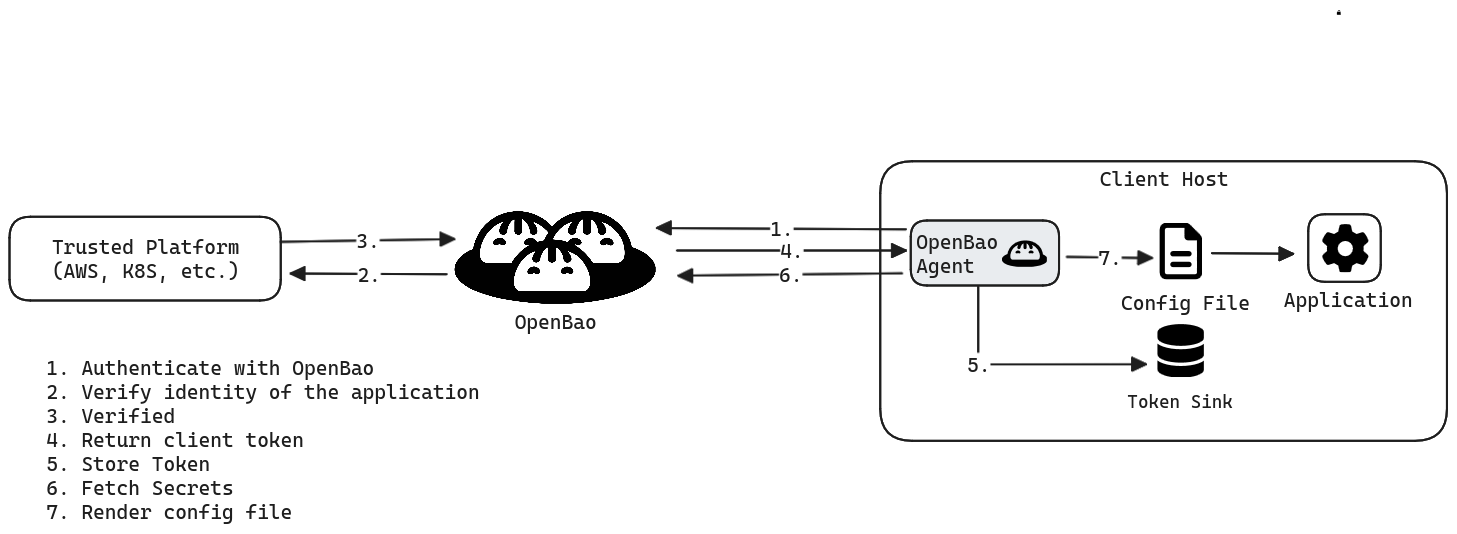
OpenBao Agent is a client daemon that provides the following features:
* [Auto-Auth](https://openbao.org/docs/agent-and-proxy/autoauth/)
- Automatically authenticate to OpenBao and manage the token renewal process for locally-retrieved dynamic secrets.
* [API Proxy](https://openbao.org/docs/agent-and-proxy/agent/apiproxy/)
- Allows OpenBao Agent to act as a proxy for OpenBao's API, optionally using (or forcing the use of) the Auto-Auth token.
* [Caching](https://openbao.org/docs/agent-and-proxy/agent/caching/)
- Allows client-side caching of responses containing newly created tokens and responses containing leased secrets generated off of these newly created tokens. The agent also manages the renewals of the cached tokens and leases.
* [Windows Service](https://openbao.org/docs/agent-and-proxy/agent/winsvc/)
- Allows running the OpenBao Agent as a Windows service.
* [Templating](https://openbao.org/docs/agent-and-proxy/agent/template/)
- Allows rendering of user-supplied templates by OpenBao Agent, using the token generated by the Auto-Auth step.
* [Process Supervisor Mode](https://openbao.org/docs/agent-and-proxy/agent/process-supervisor/)
- Runs a child process with OpenBao secrets injected as environment variables.
Auto-Auth[](https://openbao.org/docs/agent-and-proxy/agent/#auto-auth "Direct link to Auto-Auth")
---------------------------------------------------------------------------------------------------
OpenBao Agent allows easy authentication to OpenBao in a wide variety of environments. Please see the [Auto-Auth docs](https://openbao.org/docs/agent-and-proxy/autoauth/)
for information.
Auto-Auth functionality takes place within an `auto_auth` configuration stanza.
API proxy[](https://openbao.org/docs/agent-and-proxy/agent/#api-proxy "Direct link to API proxy")
---------------------------------------------------------------------------------------------------
OpenBao Agent can act as an API proxy for OpenBao, allowing you to talk to OpenBao's API via a listener defined for Agent. It can be configured to optionally allow or force the automatic use of the Auto-Auth token for these requests. Please see the [API Proxy docs](https://openbao.org/docs/agent-and-proxy/agent/apiproxy/)
for more information.
API Proxy functionality takes place within a defined `listener`, and its behaviour can be configured with an [`api_proxy` stanza](https://openbao.org/docs/agent-and-proxy/agent/apiproxy/#configuration-api_proxy)
.
Caching[](https://openbao.org/docs/agent-and-proxy/agent/#caching "Direct link to Caching")
---------------------------------------------------------------------------------------------
OpenBao Agent allows client-side caching of responses containing newly created tokens and responses containing leased secrets generated off of these newly created tokens. Please see the [Caching docs](https://openbao.org/docs/agent-and-proxy/agent/caching/)
for information.
API[](https://openbao.org/docs/agent-and-proxy/agent/#api "Direct link to API")
---------------------------------------------------------------------------------
### Quit[](https://openbao.org/docs/agent-and-proxy/agent/#quit "Direct link to Quit")
This endpoint triggers shutdown of the agent. By default, it is disabled, and can be enabled per listener using the [`agent_api`](https://openbao.org/docs/agent-and-proxy/agent/#agent_api-stanza)
stanza. It is recommended to only enable this on trusted interfaces, as it does not require any authorization to use.
| Method | Path |
| --- | --- |
| `POST` | `/agent/v1/quit` |
### Cache[](https://openbao.org/docs/agent-and-proxy/agent/#cache "Direct link to Cache")
See the [caching](https://openbao.org/docs/agent-and-proxy/agent/caching/#api)
page for details on the cache API.
Configuration[](https://openbao.org/docs/agent-and-proxy/agent/#configuration "Direct link to Configuration")
---------------------------------------------------------------------------------------------------------------
### Command options[](https://openbao.org/docs/agent-and-proxy/agent/#command-options "Direct link to Command options")
* `-log-level` `(string: "info")` - Log verbosity level. Supported values (in order of descending detail) are `trace`, `debug`, `info`, `warn`, and `error`. This can also be specified via the `BAO_LOG_LEVEL` environment variable.
* `-log-format` `(string: "standard")` - Log format. Supported values are `standard` and `json`. This can also be specified via the `BAO_LOG_FORMAT` environment variable.
* `-log-file` - the absolute path where OpenBao Agent should save log messages. Paths that end with a path separator use the default file name, `agent.log`. Paths that do not end with a file extension use the default `.log` extension. If the log file rotates, OpenBao Agent appends the current timestamp to the file name at the time of rotation. For example:
| `log-file` | Full log file | Rotated log file |
| --- | --- | --- |
| `/var/log` | `/var/log/agent.log` | `/var/log/agent-{timestamp}.log` |
| `/var/log/my-diary` | `/var/log/my-diary.log` | `/var/log/my-diary-{timestamp}.log` |
| `/var/log/my-diary.txt` | `/var/log/my-diary.txt` | `/var/log/my-diary-{timestamp}.txt` |
* `-log-rotate-bytes` - to specify the number of bytes that should be written to a log before it needs to be rotated. Unless specified, there is no limit to the number of bytes that can be written to a log file.
* `-log-rotate-duration` - to specify the maximum duration a log should be written to before it needs to be rotated. Must be a duration value such as 30s. Defaults to 24h.
* `-log-rotate-max-files` - to specify the maximum number of older log file archives to keep. Defaults to `0` (no files are ever deleted). Set to `-1` to discard old log files when a new one is created.
### Configuration file options[](https://openbao.org/docs/agent-and-proxy/agent/#configuration-file-options "Direct link to Configuration file options")
These are the currently-available general configuration options:
* `vault` `([vault](https://openbao.org/docs/agent-and-proxy/agent/#vault-stanza) : )` - Specifies the remote OpenBao server the Agent connects to.
* `auto_auth` `([auto_auth](https://openbao.org/docs/agent-and-proxy/autoauth/) : )` - Specifies the method and other options used for Auto-Auth functionality.
* `api_proxy` `([api_proxy](https://openbao.org/docs/agent-and-proxy/agent/apiproxy/) : )` - Specifies options used for API Proxy functionality.
* `cache` `([cache](https://openbao.org/docs/agent-and-proxy/agent/caching/) : )` - Specifies options used for Caching functionality.
* `listener` `([listener](https://openbao.org/docs/agent-and-proxy/agent/#listener-stanza) : )` - Specifies the addresses and ports on which the Agent will respond to requests.
warning
**Note:** On `SIGHUP` (`kill -SIGHUP $(pidof bao)`), OpenBao Agent will attempt to reload listener TLS configuration. This method can be used to refresh certificates used by OpenBao Agent without having to restart its process.
* `pid_file` `(string: "")` - Path to the file in which the agent's Process ID (PID) should be stored
* `exit_after_auth` `(bool: false)` - If set to `true`, the agent will exit with code `0` after a single successful auth, where success means that a token was retrieved and all sinks successfully wrote it
* `disable_idle_connections` `(string array: [])` - A list of strings that disables idle connections for various features in OpenBao Agent. Valid values include: `auto-auth`, `caching`, `proxying`, and `templating`. `proxying` configures this for the API proxy, which is identical in function to `caching` for historical reasons. Can also be configured by setting the `VAULT_AGENT_DISABLE_IDLE_CONNECTIONS` environment variable as a comma separated string. This environment variable will override any values found in a configuration file.
* `disable_keep_alives` `(string array: [])` - A list of strings that disables keep alives for various features in OpenBao Agent. Valid values include: `auto-auth`, `caching`, `proxying`, and `templating`. `proxying` configures this for the API proxy, which is identical in function to `caching` for historical reasons. Can also be configured by setting the `VAULT_AGENT_DISABLE_KEEP_ALIVES` environment variable as a comma separated string. This environment variable will override any values found in a configuration file.
* `template` `([template](https://openbao.org/docs/agent-and-proxy/agent/template/) : )` - Specifies options used for templating OpenBao secrets to files.
* `template_config` `([template_config](https://openbao.org/docs/agent-and-proxy/agent/template/#template-configurations) : )` - Specifies templating engine behavior.
* `exec` `([exec](https://openbao.org/docs/agent-and-proxy/agent/process-supervisor/) : )` - Specifies options for OpenBao agent to run a child process that injects secrets (via `env_template` stanzas) as environment variables.
* `env_template` `([env_template](https://openbao.org/docs/agent-and-proxy/agent/template/) : )` - Multiple blocks accepted. Each block contains the options used for templating OpenBao secrets as environment variables via the [process supervisor mode](https://openbao.org/docs/agent-and-proxy/agent/process-supervisor/)
.
* `telemetry` `([telemetry](https://openbao.org/docs/configuration/telemetry/) : )` – Specifies the telemetry reporting system. See the [telemetry Stanza](https://openbao.org/docs/agent-and-proxy/agent/#telemetry-stanza)
section below for a list of metrics specific to Agent.
* `log_level` - Equivalent to the [`-log-level` command-line flag](https://openbao.org/docs/agent-and-proxy/agent/#_log_level)
.
warning
**Note:** On `SIGHUP` (`kill -SIGHUP $(pidof bao)`), OpenBao Agent will update the log level to the value specified by configuration file (including overriding values set using CLI or environment variable parameters).
* `log_format` - Equivalent to the [`-log-format` command-line flag](https://openbao.org/docs/agent-and-proxy/agent/#_log_format)
.
* `log_file` - Equivalent to the [`-log-file` command-line flag](https://openbao.org/docs/agent-and-proxy/agent/#_log_file)
.
* `log_rotate_duration` - Equivalent to the [`-log-rotate-duration` command-line flag](https://openbao.org/docs/agent-and-proxy/agent/#_log_rotate_duration)
.
* `log_rotate_bytes` - Equivalent to the [`-log-rotate-bytes` command-line flag](https://openbao.org/docs/agent-and-proxy/agent/#_log_rotate_bytes)
.
* `log_rotate_max_files` - Equivalent to the [`-log-rotate-max-files` command-line flag](https://openbao.org/docs/agent-and-proxy/agent/#_log_rotate_max_files)
.
### vault stanza[](https://openbao.org/docs/agent-and-proxy/agent/#vault-stanza "Direct link to vault stanza")
There can at most be one top level `vault` block, and it has the following configuration entries:
* `address` `(string: \)` - The address of the OpenBao server to connect to. This should be a Fully Qualified Domain Name (FQDN) or IP such as `https://openbao-fqdn:8200` or `https://172.16.9.8:8200`. This value can be overridden by setting the `VAULT_ADDR` environment variable.
* `ca_cert` `(string: \)` - Path on the local disk to a single PEM-encoded CA certificate to verify the OpenBao server's SSL certificate. This value can be overridden by setting the `VAULT_CACERT` environment variable.
* `ca_path` `(string: \)` - Path on the local disk to a directory of PEM-encoded CA certificates to verify the OpenBao server's SSL certificate. This value can be overridden by setting the `VAULT_CAPATH` environment variable.
* `client_cert` `(string: \)` - Path on the local disk to a single PEM-encoded CA certificate to use for TLS authentication to the OpenBao server. This value can be overridden by setting the `VAULT_CLIENT_CERT` environment variable.
* `client_key` `(string: \)` - Path on the local disk to a single PEM-encoded private key matching the client certificate from `client_cert`. This value can be overridden by setting the `VAULT_CLIENT_KEY` environment variable.
* `tls_skip_verify` `(string: \)` - Disable verification of TLS certificates. Using this option is highly discouraged as it decreases the security of data transmissions to and from the OpenBao server. This value can be overridden by setting the `VAULT_SKIP_VERIFY` environment variable.
* `tls_server_name` `(string: \)` - Name to use as the SNI host when connecting via TLS. This value can be overridden by setting the `VAULT_TLS_SERVER_NAME` environment variable.
#### retry stanza[](https://openbao.org/docs/agent-and-proxy/agent/#retry-stanza "Direct link to retry stanza")
The `vault` stanza may contain a `retry` stanza that controls how failing OpenBao requests are handled, whether these requests are issued in order to render templates, or are proxied requests coming from the api proxy subsystem. Auto-auth, however, has its own notion of retrying and is not affected by this section.
For requests from the templating engine, Vaul Agent will reset its retry counter and perform retries again once all retries are exhausted. This means that templating will retry on failures indefinitely unless `exit_on_retry_failure` from the [`template_config`](https://openbao.org/docs/agent-and-proxy/agent/template/#template-configurations)
stanza is set to `true`.
Here are the options for the `retry` stanza:
* `num_retries` `(int: 12)` - Specify how many times a failing request will be retried. A value of `0` translates to the default, i.e. 12 retries. A value of `-1` disables retries. The environment variable `VAULT_MAX_RETRIES` overrides this setting.
There are a few subtleties to be aware of here. First, requests originating from the proxy cache will only be retried if they resulted in specific HTTP result codes: any 50x code except 501 ("not implemented"). Requests coming from the template subsystem are retried regardless of the failure.
Second, templating retries may be performed by both the templating engine _and_ the cache proxy if OpenBao Agent [persistent cache](https://openbao.org/docs/agent-and-proxy/agent/caching/persistent-caches/)
is enabled. This is due to the fact that templating requests go through the cache proxy when persistence is enabled.
Third, the backoff algorithm used to set the time between retries differs for the template and cache subsystems. This is a technical limitation we hope to address in the future.
### listener stanza[](https://openbao.org/docs/agent-and-proxy/agent/#listener-stanza "Direct link to listener stanza")
OpenBao Agent supports one or more [listener](https://openbao.org/docs/configuration/listener/tcp/)
stanzas. Listeners can be configured with or without [caching](https://openbao.org/docs/agent-and-proxy/agent/caching/)
, but will use the cache if it has been configured, and will enable the [API proxy](https://openbao.org/docs/agent-and-proxy/agent/apiproxy/)
. In addition to the standard listener configuration, an Agent's listener configuration also supports the following:
* `require_request_header` `(bool: false)` - Require that all incoming HTTP requests on this listener must have an `X-Vault-Request: true` header entry. Using this option offers an additional layer of protection from Server Side Request Forgery attacks. Requests on the listener that do not have the proper `X-Vault-Request` header will fail, with a HTTP response status code of `412: Precondition Failed`.
* `role` `(string: default)` - `role` determines which APIs the listener serves. It can be configured to `metrics_only` to serve only metrics, or the default role, `default`, which serves everything (including metrics). The `require_request_header` does not apply to `metrics_only` listeners.
* `agent_api` `([agent_api](https://openbao.org/docs/agent-and-proxy/agent/#agent_api-stanza) : )` - Manages optional Agent API endpoints.
#### agent\_api stanza[](https://openbao.org/docs/agent-and-proxy/agent/#agent_api-stanza "Direct link to agent_api stanza")
* `enable_quit` `(bool: false)` - If set to `true`, the agent will enable the [quit](https://openbao.org/docs/agent-and-proxy/agent/#quit)
API.
### telemetry stanza[](https://openbao.org/docs/agent-and-proxy/agent/#telemetry-stanza "Direct link to telemetry stanza")
OpenBao Agent supports the [telemetry](https://openbao.org/docs/configuration/telemetry/)
stanza and collects various runtime metrics about its performance, the auto-auth and the cache status:
| Metric | Description | Type |
| --- | --- | --- |
| `vault.agent.auth.failure` | Number of authentication failures | counter |
| `vault.agent.auth.success` | Number of authentication successes | counter |
| `vault.agent.proxy.success` | Number of requests successfully proxied | counter |
| `vault.agent.proxy.client_error` | Number of requests for which OpenBao returned an error | counter |
| `vault.agent.proxy.error` | Number of requests the agent failed to proxy | counter |
| `vault.agent.cache.hit` | Number of cache hits | counter |
| `vault.agent.cache.miss` | Number of cache misses | counter |
Start OpenBao agent[](https://openbao.org/docs/agent-and-proxy/agent/#start-openbao-agent "Direct link to Start OpenBao agent")
---------------------------------------------------------------------------------------------------------------------------------
To run OpenBao Agent:
1. [Download](https://openbao.org/downloads/)
the OpenBao binary where the client application runs (virtual machine, Kubernetes pod, etc.)
2. Create an OpenBao Agent configuration file. (See the [Example Configuration](https://openbao.org/docs/agent-and-proxy/agent/#example-configuration)
section for an example configuration.)
3. Start an OpenBao Agent with the configuration file.
**Example:**
$ bao agent -config=/etc/openbao/agent-config.hcl
To get help, run:
$ bao agent -h
As with OpenBao, the `-config` flag can be used in three different ways:
* Use the flag once to name the path to a single specific configuration file.
* Use the flag multiple times to name multiple configuration files, which will be composed at runtime.
* Use the flag to name a directory of configuration files, the contents of which will be composed at runtime.
Example configuration[](https://openbao.org/docs/agent-and-proxy/agent/#example-configuration "Direct link to Example configuration")
---------------------------------------------------------------------------------------------------------------------------------------
An example configuration, with very contrived values, follows:
pid_file = "./pidfile"vault { address = "https://openbao-fqdn:8200" retry { num_retries = 5 }}auto_auth { method "kubernetes" { config = { role = "foobar" } } sink "file" { config = { path = "/tmp/file-foo" } } sink "file" { wrap_ttl = "5m" aad_env_var = "TEST_AAD_ENV" dh_type = "curve25519" dh_path = "/tmp/file-foo-dhpath2" config = { path = "/tmp/file-bar" } }}cache { // An empty cache stanza still enables caching}api_proxy { use_auto_auth_token = true}listener "unix" { address = "/path/to/socket" tls_disable = true agent_api { enable_quit = true }}listener "tcp" { address = "127.0.0.1:8100" tls_disable = true}template { source = "/etc/openbao/server.key.ctmpl" destination = "/etc/openbao/server.key"}template { source = "/etc/openbao/server.crt.ctmpl" destination = "/etc/openbao/server.crt"}
* [Auto-Auth](https://openbao.org/docs/agent-and-proxy/agent/#auto-auth)
* [API proxy](https://openbao.org/docs/agent-and-proxy/agent/#api-proxy)
* [Caching](https://openbao.org/docs/agent-and-proxy/agent/#caching)
* [API](https://openbao.org/docs/agent-and-proxy/agent/#api)
* [Quit](https://openbao.org/docs/agent-and-proxy/agent/#quit)
* [Cache](https://openbao.org/docs/agent-and-proxy/agent/#cache)
* [Configuration](https://openbao.org/docs/agent-and-proxy/agent/#configuration)
* [Command options](https://openbao.org/docs/agent-and-proxy/agent/#command-options)
* [Configuration file options](https://openbao.org/docs/agent-and-proxy/agent/#configuration-file-options)
* [vault stanza](https://openbao.org/docs/agent-and-proxy/agent/#vault-stanza)
* [listener stanza](https://openbao.org/docs/agent-and-proxy/agent/#listener-stanza)
* [telemetry stanza](https://openbao.org/docs/agent-and-proxy/agent/#telemetry-stanza)
* [Start OpenBao agent](https://openbao.org/docs/agent-and-proxy/agent/#start-openbao-agent)
* [Example configuration](https://openbao.org/docs/agent-and-proxy/agent/#example-configuration)
---
# OpenBao Auto-Auth cert method | OpenBao
[Skip to main content](https://openbao.org/docs/agent-and-proxy/autoauth/methods/cert/#__docusaurus_skipToContent_fallback)
On this page
The `cert` method uses the configured TLS certificates from the `vault` stanza of the agent configuration and takes an optional `name` parameter. There is no option to use certificates which differ from those used in the `vault` stanza.
It is strongly advised to provide TLS settings in the configuration stanza within the auth method to avoid agent cache, if also enabled, from using the same TLS settings when proxying requests. If TLS settings are not present in the config stanza, Agent and Proxy will fall back to using TLS settings from their respective [`vault` Stanzas](https://openbao.org/docs/agent-and-proxy/agent/#vault-stanza)
.
Configuration[](https://openbao.org/docs/agent-and-proxy/autoauth/methods/cert/#configuration "Direct link to Configuration")
-------------------------------------------------------------------------------------------------------------------------------
* `name` `(string: optional)` - The trusted certificate role which should be used when authenticating with TLS. If a `name` is not specified, the auth method will try to authenticate against [all trusted certificates](https://openbao.org/docs/auth/cert/#authentication)
.
* `ca_cert` `(string: optional)` - Path on the local disk to a single PEM-encoded CA certificate to verify the OpenBao server's SSL certificate.
* `client_cert` `(string: optional)` - Path on the local disk to a single PEM-encoded client certificate to use for cert auth method authentication.
* `client_key` `(string: optional)` - Path on the local disk to a single PEM-encoded private key matching the client certificate from client\_cert.
* `reload` `(bool: optional, default: false)` - If true, causes the local x509 key-pair to be reloaded from disk on each authentication attempt. This is useful in situations where client certificates are short-lived and automatically renewed.
* [Configuration](https://openbao.org/docs/agent-and-proxy/autoauth/methods/cert/#configuration)
---
# agent generate-config | OpenBao
[Skip to main content](https://openbao.org/docs/agent-and-proxy/agent/generate-config/#__docusaurus_skipToContent_fallback)
On this page
Generates a simple OpenBao Agent configuration file from the given parameters.
Currently, the only supported configuration type is `env-template`, which helps you generate a configuration file with environment variable templates for running OpenBao Agent in [process supervisor](https://openbao.org/docs/agent-and-proxy/agent/process-supervisor/)
mode.
For every specified secret `-path`, the command will attempt to generate one or multiple `env_template` entries based on the `JSON` key(s) stored in the specified secret. If the secret `-path` ends with `/*`, the command will attempt to recurse through the secrets tree rooted at the given path, generating `env_template` entries for each encountered secret. Currently, only [kv-v1](https://openbao.org/docs/secrets/kv/kv-v1/)
and [kv-v2](https://openbao.org/docs/secrets/kv/kv-v2/)
paths are supported.
The command specified in the `-exec` option will be used to generate an `exec` entry, which will tell OpenBao Agent which child process to run.
In addition to the `env_template` entries, the command generates an `auto_auth` section with `token_file` authentication method. While this method is very convenient for local testing, it should **NOT** be used in production. In a production environment, please use any other [Auto-Auth method](https://openbao.org/docs/agent-and-proxy/autoauth/methods/)
instead.
By default, the file will be generated in the local directory as `agent.hcl` unless a path is specified as an argument.
Example[](https://openbao.org/docs/agent-and-proxy/agent/generate-config/#example "Direct link to Example")
-------------------------------------------------------------------------------------------------------------
Before generating a configuration file, let's insert a secret `foo`:
$ bao kv put -mount=secret foo user="admin" password="s3cr3t"
Generate an agent configuration file which will reference `secret/foo`:
$ bao agent generate-config \ -type="env-template" \ -exec="./my-app arg1 arg2" \ -namespace="my/ns/" \ -path="secret/foo" \ my-config.hcl
**Expected output:**
Successfully generated "my-config.hcl" configuration file!Warning: the generated file uses 'token_file' authentication method, which is not suitable for production environments.
This will produce `my-config.hcl` file in the current directory with contents similar to the following:
auto_auth { method { type = "token_file" config { token_file_path = "/Users/avean/.vault-token" } }}template_config { static_secret_render_interval = "5m" exit_on_retry_failure = true}vault { address = "http://localhost:8200"}env_template "FOO_PASSWORD" { contents = "{{ with secret \"secret/data/foo\" }}{{ .Data.data.password }}{{ end }}" error_on_missing_key = true}env_template "FOO_USER" { contents = "{{ with secret \"secret/data/foo\" }}{{ .Data.data.user }}{{ end }}" error_on_missing_key = true}exec { command = ["./my-app", "arg1", "arg2"] restart_on_secret_changes = "always" restart_stop_signal = "SIGTERM"}
Usage[](https://openbao.org/docs/agent-and-proxy/agent/generate-config/#usage "Direct link to Usage")
-------------------------------------------------------------------------------------------------------
The following flags are available in addition to the [standard set of flags](https://openbao.org/docs/commands/)
included in all commands.
* `type` `(string: )` - The type of configuration file to generate; currently, only `env-template` is supported.
* `path` `(string: "")` - Path to a kv-v1 or kv-v2 secret (e.g. `secret/data/foo`, `kv-v2/my-app/*`); multiple secrets and tail `*` wildcards are allowed.
* `-exec` `(string: "env")` - The command to execute in agent process supervisor mode.
* [Example](https://openbao.org/docs/agent-and-proxy/agent/generate-config/#example)
* [Usage](https://openbao.org/docs/agent-and-proxy/agent/generate-config/#usage)
---
# OpenBao Auto-Auth Kerberos method | OpenBao
[Skip to main content](https://openbao.org/docs/agent-and-proxy/autoauth/methods/kerberos/#__docusaurus_skipToContent_fallback)
On this page
The `kerberos` auto-auth method provides an automated mechanism to retrieve an OpenBao token for Kerberos entities. It reads in configuration and identification information from the surrounding environment, and uses it to authenticate to OpenBao.
For more on this auth method, see the [Kerberos auth method](https://openbao.org/docs/auth/kerberos/)
.
Configuration[](https://openbao.org/docs/agent-and-proxy/autoauth/methods/kerberos/#configuration "Direct link to Configuration")
-----------------------------------------------------------------------------------------------------------------------------------
* `krb5conf_path` `(string: required)` is the path to a valid `krb5.conf` file describing how to communicate with the Kerberos environment.
* `keytab_path` `(string: required)` is the path to the `keytab` in which the entry lives for the entity authenticating to OpenBao. Keytab files should be protected from other users on a shared server using appropriate file permissions.
* `username` `(string: required)` is the username for the entry _within_ the `keytab` to use for logging into Kerberos. This username must match a service account in LDAP.
* `service` `(string: required)` is the service principal name to use in obtaining a service ticket for gaining a SPNEGO token. This service must exist in LDAP.
* `realm` `(string: required)` is the name of the Kerberos realm. This realm must match the UPNDomain configured on the LDAP connection. This check is case-sensitive.
* `disable_fast_negotiation` `(bool: optional)` is for disabling the Kerberos auth method's default of using FAST negotiation. FAST is a pre-authentication framework for Kerberos. It includes a mechanism for tunneling pre-authentication exchanges using armoured KDC messages. FAST provides increased resistance to passive password guessing attacks. Some common Kerberos implementations do not support FAST negotiation. The default is false.
* [Configuration](https://openbao.org/docs/agent-and-proxy/autoauth/methods/kerberos/#configuration)
---
# OpenBao proxy caching | OpenBao
[Skip to main content](https://openbao.org/docs/agent-and-proxy/proxy/caching/#__docusaurus_skipToContent_fallback)
On this page
OpenBao Proxy Caching allows client-side caching of responses containing newly created tokens and responses containing leased secrets generated off of these newly created tokens. The renewals of the cached tokens and leases are also managed by the proxy.
Caching and renewals[](https://openbao.org/docs/agent-and-proxy/proxy/caching/#caching-and-renewals "Direct link to Caching and renewals")
--------------------------------------------------------------------------------------------------------------------------------------------
Response caching and renewals are managed by the proxy only under these specific scenarios.
1. Token creation requests are made through the proxy. This means that any login operations performed using various auth methods and invoking the token creation endpoints of the token auth method via the proxy will result in the response getting cached by the proxy. Responses containing new tokens will be cached by the proxy only if the parent token is already being managed by the proxy or if the new token is an orphan token.
2. Leased secret creation requests are made through the proxy using tokens that are already managed by the proxy. This means that any dynamic credentials that are issued using the tokens managed by the proxy, will be cached and its renewals are taken care of.
Persistent cache[](https://openbao.org/docs/agent-and-proxy/proxy/caching/#persistent-cache "Direct link to Persistent cache")
--------------------------------------------------------------------------------------------------------------------------------
OpenBao Proxy can restore tokens and leases from a persistent cache file created by a previous OpenBao Proxy process.
Refer to the [OpenBao Proxy Persistent Caching](https://openbao.org/docs/agent-and-proxy/proxy/caching/persistent-caches/)
page for more information on this functionality.
Cache evictions[](https://openbao.org/docs/agent-and-proxy/proxy/caching/#cache-evictions "Direct link to Cache evictions")
-----------------------------------------------------------------------------------------------------------------------------
The eviction of cache entries pertaining to secrets will occur when the proxy can no longer renew them. This can happen when the secrets hit their maximum TTL or if the renewals result in errors.
OpenBao Proxy does some best-effort cache evictions by observing specific request types and response codes. For example, if a token revocation request is made via the proxy and if the forwarded request to the OpenBao server succeeds, then proxy evicts all the cache entries associated with the revoked token. Similarly, any lease revocation operation will also be intercepted by the proxy and the respective cache entries will be evicted.
Note that while proxy evicts the cache entries upon secret expirations and upon intercepting revocation requests, it is still possible for the proxy to be completely unaware of the revocations that happen through direct client interactions with the OpenBao server. This could potentially lead to stale cache entries. For managing the stale entries in the cache, an endpoint `/proxy/v1/cache-clear`(see below) is made available to manually evict cache entries based on some of the query criteria used for indexing the cache entries.
Request uniqueness[](https://openbao.org/docs/agent-and-proxy/proxy/caching/#request-uniqueness "Direct link to Request uniqueness")
--------------------------------------------------------------------------------------------------------------------------------------
In order to detect repeat requests and return cached responses, proxy will need to have a way to uniquely identify the requests. This computation as it stands today takes a simplistic approach (may change in future) of serializing and hashing the HTTP request along with all the headers and the request body. This hash value is then used as an index into the cache to check if the response is readily available. The consequence of this approach is that the hash value for any request will differ if any data in the request is modified. This has the side-effect of resulting in false negatives if say, the ordering of the request parameters are modified. As long as the requests come in without any change, caching behavior should be consistent. Identical requests with differently ordered request values will result in duplicated cache entries. A heuristic assumption that the clients will use consistent mechanisms to make requests, thereby resulting in consistent hash values per request is the idea upon which the caching functionality is built upon.
Renewal management[](https://openbao.org/docs/agent-and-proxy/proxy/caching/#renewal-management "Direct link to Renewal management")
--------------------------------------------------------------------------------------------------------------------------------------
The tokens and leases are renewed by the proxy using the secret renewer that is made available via the OpenBao server's [Go API](https://godoc.org/github.com/openbao/openbao/api#Renewer)
. Proxy performs all operations in memory and does not persist anything to storage. This means that when the proxy is shut down, all the renewal operations are immediately terminated and there is no way for the proxy to resume renewals after the fact. Note that shutting down the proxy does not indicate revocations of the secrets, instead it only means that renewal responsibility for all the valid unrevoked secrets are no longer performed by the OpenBao proxy.
API[](https://openbao.org/docs/agent-and-proxy/proxy/caching/#api "Direct link to API")
-----------------------------------------------------------------------------------------
### Cache clear[](https://openbao.org/docs/agent-and-proxy/proxy/caching/#cache-clear "Direct link to Cache clear")
This endpoint clears the cache based on given criteria. To use this API, some information on how the proxy caches values should be known beforehand. Each response that is cached in the proxy will be indexed on some factors depending on the type of request. Those factors can be the `token` that is belonging to the cached response, the `token_accessor` of the token belonging to the cached response, the `request_path` that resulted in the cached response, the `lease` that is attached to the cached response, the `namespace` to which the cached response belongs to, and a few more. This API exposes some factors through which associated cache entries are fetched and evicted. For listeners without caching enabled, this API will still be available, but will do nothing (there is no cache to clear) and will return a `200` response.
| Method | Path | Produces |
| --- | --- | --- |
| `POST` | `/proxy/v1/cache-clear` | `200 application/json` |
#### Parameters[](https://openbao.org/docs/agent-and-proxy/proxy/caching/#parameters "Direct link to Parameters")
* `type` `(strings: required)` - The type of cache entries to evict. Valid values are `request_path`, `lease`, `token`, `token_accessor`, and `all`. If the `type` is set to `all`, the _entire cache_ is cleared.
* `value` `(string: required)` - An exact value or the prefix of the value for the `type` selected. This parameter is optional when the `type` is set to `all`.
* `namespace` `(string: optional)` - This is only applicable when the `type` is set to `request_path`. The namespace of which the cache entries to be evicted for the given request path.
### Sample payload[](https://openbao.org/docs/agent-and-proxy/proxy/caching/#sample-payload "Direct link to Sample payload")
{ "type": "token", "value": "hvs.rlNjegSKykWcplOkwsjd8bP9"}
### Sample request[](https://openbao.org/docs/agent-and-proxy/proxy/caching/#sample-request "Direct link to Sample request")
$ curl \ --request POST \ --data @payload.json \ http://127.0.0.1:1234/proxy/v1/cache-clear
Configuration (`cache`)[](https://openbao.org/docs/agent-and-proxy/proxy/caching/#configuration-cache "Direct link to configuration-cache")
---------------------------------------------------------------------------------------------------------------------------------------------
The presence of the top level `cache` block in any way (including an empty `cache` block) will enable the cache. The top level `cache` block has the following configuration entry:
* `persist` `(object: optional)` - Configuration for the persistent cache.
info
**Note:** When the `cache` block is defined, a [listener](https://openbao.org/docs/agent-and-proxy/proxy/#listener-stanza)
must also be defined in the config, otherwise there is no way to utilize the cache.
### Configuration (Persist)[](https://openbao.org/docs/agent-and-proxy/proxy/caching/#configuration-persist "Direct link to Configuration (Persist)")
These are common configuration values that live within the `persist` block:
* `type` `(string: required)` - The type of the persistent cache to use, e.g. `kubernetes`. _Note_: when using HCL this can be used as the key for the block, e.g. `persist "kubernetes" {...}`. Currently, only `kubernetes` is supported.
* `path` `(string: required)` - The path on disk where the persistent cache file should be created or restored from.
* `keep_after_import` `(bool: optional)` - When set to true, a restored cache file is not deleted. Defaults to `false`.
* `exit_on_err` `(bool: optional)` - When set to true, if any errors occur during a persistent cache restore, OpenBao Proxy will exit with an error. Defaults to `true`.
* `service_account_token_file` `(string: optional)` - When `type` is set to `kubernetes`, this configures the path on disk where the Kubernetes service account token can be found. Defaults to `/var/run/secrets/kubernetes.io/serviceaccount/token`.
Configuration (`listener`)[](https://openbao.org/docs/agent-and-proxy/proxy/caching/#configuration-listener "Direct link to configuration-listener")
------------------------------------------------------------------------------------------------------------------------------------------------------
* `listener` `(array of objects: required)` - Configuration for the listeners.
There can be one or more `listener` blocks at the top level. Adding a listener enables the [API Proxy](https://openbao.org/docs/agent-and-proxy/proxy/apiproxy/)
and enables the API proxy to use the cache, if configured. These configuration values are common to both `tcp` and `unix` listener blocks. Blocks of type `tcp` support the standard `tcp` [listener](https://openbao.org/docs/configuration/listener/tcp/)
options. Additionally, the `role` string option is available as part of the top level of the `listener` block, which can be configured to `metrics_only` to serve only metrics, or the default role, `default`, which serves everything (including metrics).
* `type` `(string: required)` - The type of the listener to use. Valid values are `tcp` and `unix`. _Note_: when using HCL this can be used as the key for the block, e.g. `listener "tcp" {...}`.
* `address` `(string: required)` - The address for the listener to listen to. This can either be a URL path when using `tcp` or a file path when using `unix`. For example, `127.0.0.1:8200` or `/path/to/socket`. Defaults to `127.0.0.1:8200`.
* `tls_disable` `(bool: false)` - Specifies if TLS will be disabled.
* `tls_key_file` `(string: optional)` - Specifies the path to the private key for the certificate.
* `tls_cert_file` `(string: optional)` - Specifies the path to the certificate for TLS.
### Example configuration[](https://openbao.org/docs/agent-and-proxy/proxy/caching/#example-configuration "Direct link to Example configuration")
Here is an example of a cache configuration with the optional `persist` block, alongside a regular listener, and a listener that only serves metrics.
# Other OpenBao proxy configuration blocks# ...cache { persist = { type = "kubernetes" path = "/openbao/proxy-cache/" keep_after_import = true exit_on_err = true service_account_token_file = "/tmp/serviceaccount/token" }}listener "tcp" { address = "127.0.0.1:8100" tls_disable = true}listener "tcp" { address = "127.0.0.1:3000" tls_disable = true role = "metrics_only"}
* [Caching and renewals](https://openbao.org/docs/agent-and-proxy/proxy/caching/#caching-and-renewals)
* [Persistent cache](https://openbao.org/docs/agent-and-proxy/proxy/caching/#persistent-cache)
* [Cache evictions](https://openbao.org/docs/agent-and-proxy/proxy/caching/#cache-evictions)
* [Request uniqueness](https://openbao.org/docs/agent-and-proxy/proxy/caching/#request-uniqueness)
* [Renewal management](https://openbao.org/docs/agent-and-proxy/proxy/caching/#renewal-management)
* [API](https://openbao.org/docs/agent-and-proxy/proxy/caching/#api)
* [Cache clear](https://openbao.org/docs/agent-and-proxy/proxy/caching/#cache-clear)
* [Sample payload](https://openbao.org/docs/agent-and-proxy/proxy/caching/#sample-payload)
* [Sample request](https://openbao.org/docs/agent-and-proxy/proxy/caching/#sample-request)
* [Configuration (`cache`)](https://openbao.org/docs/agent-and-proxy/proxy/caching/#configuration-cache)
* [Configuration (Persist)](https://openbao.org/docs/agent-and-proxy/proxy/caching/#configuration-persist)
* [Configuration (`listener`)](https://openbao.org/docs/agent-and-proxy/proxy/caching/#configuration-listener)
* [Example configuration](https://openbao.org/docs/agent-and-proxy/proxy/caching/#example-configuration)
---
# Audit devices | OpenBao
[Skip to main content](https://openbao.org/docs/audit/#__docusaurus_skipToContent_fallback)
On this page
Audit devices are the components in OpenBao that collectively keep a detailed log of all requests to OpenBao, and their responses. Because every operation with OpenBao is an API request/response, when using a single audit device, the audit log contains _every_ interaction with the OpenBao API, including errors - except for a few paths which do not go via the audit system.
The non-audited paths are:
sys/initsys/seal-statussys/sealsys/unsealsys/leadersys/healthsys/storage/raft/bootstrapsys/storage/raft/joinsys/internal/ui/feature-flags
and also, if the relevant listener configuration settings allow unauthenticated access:
sys/metricssys/pprof/*sys/in-flight-req
Enabling multiple devices[](https://openbao.org/docs/audit/#enabling-multiple-devices "Direct link to Enabling multiple devices")
-----------------------------------------------------------------------------------------------------------------------------------
When multiple audit devices are enabled, OpenBao will attempt to send the audit logs to all of them. This allows you to not only have redundant copies, but also a way to check for data tampering in the logs themselves.
OpenBao considers a request to be successful if it can log to _at least_ one configured audit device (see: [Blocked Audit Devices](https://openbao.org/docs/audit/#blocked-audit-devices)
section below). Therefore in order to build a complete picture of all audited actions, use the aggregate/union of the logs from each audit device.
warning
Note: It is **highly recommended** that you configure OpenBao to use multiple audit devices. Audit failures can prevent OpenBao from servicing requests, so it is important to provide at least one other device.
Format[](https://openbao.org/docs/audit/#format "Direct link to Format")
--------------------------------------------------------------------------
Each line in the audit log is a JSON object. The `type` field specifies what type of object it is. Currently, only two types exist: `request` and `response`. The line contains all of the information for any given request and response. By default, all the sensitive information is first hashed before logging in the audit logs.
Sensitive information[](https://openbao.org/docs/audit/#sensitive-information "Direct link to Sensitive information")
-----------------------------------------------------------------------------------------------------------------------
The audit logs contain the full request and response objects for every interaction with OpenBao. The request and response can be matched utilizing a unique identifier assigned to each request.
Most strings contained within requests and responses are hashed with a salt using HMAC-SHA256. The purpose of the hash is so that secrets aren't in plaintext within your audit logs. However, you're still able to check the value of secrets by generating HMACs yourself; this can be done with the audit device's hash function and salt by using the `/sys/audit-hash` API endpoint (see the documentation for more details).
warning
Currently, only strings that come from JSON or returned in JSON are HMAC'd. Other data types, like integers, booleans, and so on, are passed through in plaintext. We recommend that all sensitive data be provided as string values inside all JSON sent to OpenBao (i.e., that integer values are provided in quotes).
While most strings are hashed, OpenBao does make some exceptions, such as auth and secrets, and users can enable additional exceptions using the [secrets enable](https://openbao.org/docs/commands/secrets/enable/)
command, and then tune it afterward.
**See also**:
* [secrets tune](https://openbao.org/docs/commands/secrets/tune/)
* [auth enable](https://openbao.org/docs/commands/auth/enable/)
* [auth tune](https://openbao.org/docs/commands/auth/tune/)
Enabling/Disabling audit devices[](https://openbao.org/docs/audit/#enablingdisabling-audit-devices "Direct link to Enabling/Disabling audit devices")
-------------------------------------------------------------------------------------------------------------------------------------------------------
When an OpenBao server is first initialized, no auditing is enabled. Audit devices must be enabled by a root user using `bao audit enable`.
When enabling an audit device, options can be passed to it to configure it. For example, the command below enables the file audit device:
$ bao audit enable file file_path=/var/log/openbao_audit.log
In the command above, we passed the "file\_path" parameter to specify the path where the audit log will be written to. Each audit device has its own set of parameters. See the documentation to the left for more details.
warning
Note: Enabling audit devices using the API (and, by proxy, using the CLI) allows the operator to create files at arbitrary locations on the host system or send network requests to arbitrary addresses, which may have unwanted effects. As a result, the `unsafe_allow_api_audit_creation = true` option must be set in the [server configuration](https://openbao.org/docs/configuration/)
starting with OpenBao v2.3.2.
In future releases (v2.4+), we will enable a new model where audit devices are managed within the server configuration itself. This will become the recommended way to configure audits, while support for legacy audit configuration will be retained via the unsafe flag described above.
warning
Note: Audit device configuration is replicated to all nodes within a cluster by default. Before enabling an audit device, ensure that all nodes within the cluster(s) will be able to successfully log to the audit device to avoid OpenBao being blocked from serving requests. An audit device can be limited to only within the node's cluster with the [`local`](https://openbao.org/api-docs/system/audit/#local)
parameter.
When an audit device is disabled, it will stop receiving logs immediately. The existing logs that it did store are untouched.
warning
Note: Once an audit device is disabled, you will no longer be able to HMAC values for comparison with entries in the audit logs. This is true even if you re-enable the audit device at the same path, as a new salt will be created for hashing.
Blocked audit devices[](https://openbao.org/docs/audit/#blocked-audit-devices "Direct link to Blocked audit devices")
-----------------------------------------------------------------------------------------------------------------------
Audit device logs are critically important and ignoring auditing failures opens an avenue for attack. OpenBao will not respond to requests when no enabled audit devices can record them.
OpenBao can distinguish between two types of audit device failures.
* A blocking failure is one where an attempt to write to the audit device never completes. This is unlikely with a local disk device, but could occure with a network-based audit device.
* When multiple audit devices are enabled, if any of them fail in a non-blocking fashion, OpenBao requests can still complete successfully provided at least one audit device successfully writes the audit record. If any of the audit devices fail in a blocking fashion however, OpenBao requests will hang until the blocking is resolved.
In other words, OpenBao will not complete any requests until the blocked audit device can write.
API[](https://openbao.org/docs/audit/#api "Direct link to API")
-----------------------------------------------------------------
Audit devices also have a full HTTP API. Please see the [Audit device API docs](https://openbao.org/api-docs/system/audit/)
for more details.
Common configuration options[](https://openbao.org/docs/audit/#common-configuration-options "Direct link to Common configuration options")
--------------------------------------------------------------------------------------------------------------------------------------------
* `elide_list_responses` `(bool: false)` - See [Eliding list response bodies](https://openbao.org/docs/audit/#eliding-list-response-bodies)
below.
* `format` `(string: "json")` - Allows selecting the output format. Valid values are `"json"` and `"jsonx"`, which formats the normal log entries as XML.
* `hmac_accessor` `(bool: true)` - If enabled, enables the hashing of token accessor.
* `log_raw` `(bool: false)` - If enabled, logs the security sensitive information without hashing, in the raw format.
* `prefix` `(string: "")` - A customizable string prefix to write before the actual log line.
warning
Note: The `prefix` option lets operators write semi-arbitrary content to the audit log. Starting with OpenBao v2.3.2, enabling new audit devices with this option is only supported if `allow_audit_log_prefixing = true` is set in the [server configuration](https://openbao.org/docs/configuration/)
.
Eliding list response bodies[](https://openbao.org/docs/audit/#eliding-list-response-bodies "Direct link to Eliding list response bodies")
--------------------------------------------------------------------------------------------------------------------------------------------
Some OpenBao responses can be very large. Primarily, this affects list operations - as OpenBao lacks pagination in its APIs, listing a very large collection can result in a response that is tens of megabytes long. Some audit backends are unable to process individual audit records of larger sizes.
The contents of the response for a list operation is often not very interesting; most contain only a "keys" field, containing a list of IDs. Select API endpoints additionally return a "key\_info" field, a map from ID to some additional information about the list entry - `identity/entity/id/` is an example of this. Even in this case, the response to a list operation is usually less-confidential or public information, for which having the full response in the audit logs is of lesser importance.
The `elide_list_responses` audit option provides the flexibility to not write the full list response data from the audit log, to mitigate the creation of very long individual audit records.
When enabled, it affects only audit records of `type=response` and `request.operation=list`. The values of `response.data.keys` and `response.data.key_info` will be replaced with a simple integer, recording how many entries were contained in the list (`keys`) or map (`key_info`) - therefore even with this feature enabled, it is still possible to see how many items were returned by a list operation.
This extra processing only affects the response data fields `keys` and `key_info`, and only when they have the expected data types - in the event a list response contains data outside of the usual conventions that apply to OpenBao list responses, it will be left as is by this feature.
Here is an example of an audit record that has been processed by this feature (formatted with extra whitespace, and with fields not relevant to the example omitted):
{ "type": "response", "request": { "operation": "list" }, "response": { "data": { "key_info": 4, "keys": 4 } }}
* [Enabling multiple devices](https://openbao.org/docs/audit/#enabling-multiple-devices)
* [Format](https://openbao.org/docs/audit/#format)
* [Sensitive information](https://openbao.org/docs/audit/#sensitive-information)
* [Enabling/Disabling audit devices](https://openbao.org/docs/audit/#enablingdisabling-audit-devices)
* [Blocked audit devices](https://openbao.org/docs/audit/#blocked-audit-devices)
* [API](https://openbao.org/docs/audit/#api)
* [Common configuration options](https://openbao.org/docs/audit/#common-configuration-options)
* [Eliding list response bodies](https://openbao.org/docs/audit/#eliding-list-response-bodies)
---
# What is OpenBao Proxy? | OpenBao
[Skip to main content](https://openbao.org/docs/agent-and-proxy/proxy/#__docusaurus_skipToContent_fallback)
On this page
OpenBao Proxy aims to remove the initial hurdle to adopt OpenBao by providing a more scalable and simpler way for applications to integrate with OpenBao. OpenBao Proxy acts as an [API Proxy](https://openbao.org/docs/agent-and-proxy/proxy/apiproxy/)
for OpenBao, and can optionally allow or force interacting clients to use its [automatically authenticated token](https://openbao.org/docs/agent-and-proxy/autoauth/)
.
OpenBao Proxy is a client daemon that provides the following features:
* [Auto-Auth](https://openbao.org/docs/agent-and-proxy/autoauth/)
- Automatically authenticate to OpenBao and manage the token renewal process for locally-retrieved dynamic secrets.
* [API Proxy](https://openbao.org/docs/agent-and-proxy/proxy/apiproxy/)
- Acts as a proxy for OpenBao's API, optionally using (or forcing the use of) the Auto-Auth token.
* [Caching](https://openbao.org/docs/agent-and-proxy/proxy/caching/)
- Allows client-side caching of responses containing newly created tokens and responses containing leased secrets generated off of these newly created tokens. The agent also manages the renewals of the cached tokens and leases.
Auto-Auth[](https://openbao.org/docs/agent-and-proxy/proxy/#auto-auth "Direct link to Auto-Auth")
---------------------------------------------------------------------------------------------------
OpenBao Proxy allows easy authentication to OpenBao in a wide variety of environments. Please see the [Auto-Auth docs](https://openbao.org/docs/agent-and-proxy/autoauth/)
for information.
Auto-Auth functionality takes place within an `auto_auth` configuration stanza.
API proxy[](https://openbao.org/docs/agent-and-proxy/proxy/#api-proxy "Direct link to API proxy")
---------------------------------------------------------------------------------------------------
OpenBao Proxy's primary purpose is to act as an API proxy for OpenBao, allowing you to talk to OpenBao's API via a listener. It can be configured to optionally allow or force the automatic use of the Auto-Auth token for these requests. Please see the [API Proxy docs](https://openbao.org/docs/agent-and-proxy/proxy/apiproxy/)
for more information.
API Proxy functionality takes place within a defined `listener`, and its behaviour can be configured with an [`api_proxy` stanza](https://openbao.org/docs/agent-and-proxy/proxy/apiproxy/#configuration-api_proxy)
.
Caching[](https://openbao.org/docs/agent-and-proxy/proxy/#caching "Direct link to Caching")
---------------------------------------------------------------------------------------------
OpenBao Proxy allows client-side caching of responses containing newly created tokens and responses containing leased secrets generated off of these newly created tokens. Please see the [Caching docs](https://openbao.org/docs/agent-and-proxy/proxy/caching/)
for information.
API[](https://openbao.org/docs/agent-and-proxy/proxy/#api "Direct link to API")
---------------------------------------------------------------------------------
### Quit[](https://openbao.org/docs/agent-and-proxy/proxy/#quit "Direct link to Quit")
This endpoint triggers shutdown of the proxy. By default, it is disabled, and can be enabled per listener using the [`proxy_api`](https://openbao.org/docs/agent-and-proxy/proxy/#proxy_api-stanza)
stanza. It is recommended to only enable this on trusted interfaces, as it does not require any authorization to use.
| Method | Path |
| --- | --- |
| `POST` | `/proxy/v1/quit` |
### Cache[](https://openbao.org/docs/agent-and-proxy/proxy/#cache "Direct link to Cache")
See the [caching](https://openbao.org/docs/agent-and-proxy/proxy/caching/#api)
page for details on the cache API.
Configuration[](https://openbao.org/docs/agent-and-proxy/proxy/#configuration "Direct link to Configuration")
---------------------------------------------------------------------------------------------------------------
### Command options[](https://openbao.org/docs/agent-and-proxy/proxy/#command-options "Direct link to Command options")
* `-log-level` `(string: "info")` - Log verbosity level. Supported values (in order of descending detail) are `trace`, `debug`, `info`, `warn`, and `error`. This can also be specified via the `BAO_LOG_LEVEL` environment variable.
* `-log-format` `(string: "standard")` - Log format. Supported values are `standard` and `json`. This can also be specified via the `BAO_LOG_FORMAT` environment variable.
* `-log-file` - the absolute path where OpenBao Proxy should save log messages. Paths that end with a path separator use the default file name, `proxy.log`. Paths that do not end with a file extension use the default `.log` extension. If the log file rotates, OpenBao Proxy appends the current timestamp to the file name at the time of rotation. For example:
| `log-file` | Full log file | Rotated log file |
| --- | --- | --- |
| `/var/log` | `/var/log/proxy.log` | `/var/log/proxy-{timestamp}.log` |
| `/var/log/my-diary` | `/var/log/my-diary.log` | `/var/log/my-diary-{timestamp}.log` |
| `/var/log/my-diary.txt` | `/var/log/my-diary.txt` | `/var/log/my-diary-{timestamp}.txt` |
* `-log-rotate-bytes` - to specify the number of bytes that should be written to a log before it needs to be rotated. Unless specified, there is no limit to the number of bytes that can be written to a log file.
* `-log-rotate-duration` - to specify the maximum duration a log should be written to before it needs to be rotated. Must be a duration value such as 30s. Defaults to 24h.
* `-log-rotate-max-files` - to specify the maximum number of older log file archives to keep. Defaults to `0` (no files are ever deleted). Set to `-1` to discard old log files when a new one is created.
### Configuration file options[](https://openbao.org/docs/agent-and-proxy/proxy/#configuration-file-options "Direct link to Configuration file options")
These are the currently-available general configuration options:
* `vault` `([vault](https://openbao.org/docs/agent-and-proxy/proxy/#vault-stanza) : )` - Specifies the remote OpenBao server the Proxy connects to.
* `auto_auth` `([auto_auth](https://openbao.org/docs/agent-and-proxy/autoauth/) : )` - Specifies the method and other options used for Auto-Auth functionality.
* `api_proxy` `([api_proxy](https://openbao.org/docs/agent-and-proxy/proxy/apiproxy/) : )` - Specifies options used for API Proxy functionality.
* `cache` `([cache](https://openbao.org/docs/agent-and-proxy/proxy/caching/) : )` - Specifies options used for Caching functionality.
* `listener` `([listener](https://openbao.org/docs/agent-and-proxy/proxy/#listener-stanza) : )` - Specifies the addresses and ports on which the Proxy will respond to requests.
warning
**Note:** On `SIGHUP` (`kill -SIGHUP $(pidof bao)`), OpenBao Proxy will attempt to reload listener TLS configuration. This method can be used to refresh certificates used by OpenBao Proxy without having to restart its process.
* `pid_file` `(string: "")` - Path to the file in which the Proxy's Process ID (PID) should be stored
* `exit_after_auth` `(bool: false)` - If set to `true`, the proxy will exit with code `0` after a single successful auth, where success means that a token was retrieved and all sinks successfully wrote it
* `disable_idle_connections` `(string array: [])` - A list of strings that disables idle connections for various features in OpenBao Proxy. Valid values include: `auto-auth`, and `proxying`. Can also be configured by setting the `VAULT_PROXY_DISABLE_IDLE_CONNECTIONS` environment variable as a comma separated string. This environment variable will override any values found in a configuration file.
* `disable_keep_alives` `(string array: [])` - A list of strings that disables keep alives for various features in OpenBao Agent. Valid values include: `auto-auth`, and `proxying`. Can also be configured by setting the `VAULT_PROXY_DISABLE_KEEP_ALIVES` environment variable as a comma separated string. This environment variable will override any values found in a configuration file.
* `template` `(template: )` - Specifies options used for templating OpenBao secrets to files.
* `template_config` `(template_config: )` - Specifies templating engine behavior.
* `telemetry` `([telemetry](https://openbao.org/docs/configuration/telemetry/) : )` – Specifies the telemetry reporting system. See the [telemetry Stanza](https://openbao.org/docs/agent-and-proxy/proxy/#telemetry-stanza)
section below for a list of metrics specific to Proxy.
* `log_level` - Equivalent to the [`-log-level` command-line flag](https://openbao.org/docs/agent-and-proxy/proxy/#_log_level)
.
warning
**Note:** On `SIGHUP` (`kill -SIGHUP $(pidof bao)`), OpenBao Proxy will update the log level to the value specified by configuration file (including overriding values set using CLI or environment variable parameters).
* `log_format` - Equivalent to the [`-log-format` command-line flag](https://openbao.org/docs/agent-and-proxy/proxy/#_log_format)
.
* `log_file` - Equivalent to the [`-log-file` command-line flag](https://openbao.org/docs/agent-and-proxy/proxy/#_log_file)
.
* `log_rotate_duration` - Equivalent to the [`-log-rotate-duration` command-line flag](https://openbao.org/docs/agent-and-proxy/proxy/#_log_rotate_duration)
.
* `log_rotate_bytes` - Equivalent to the [`-log-rotate-bytes` command-line flag](https://openbao.org/docs/agent-and-proxy/proxy/#_log_rotate_bytes)
.
* `log_rotate_max_files` - Equivalent to the [`-log-rotate-max-files` command-line flag](https://openbao.org/docs/agent-and-proxy/proxy/#_log_rotate_max_files)
.
### vault stanza[](https://openbao.org/docs/agent-and-proxy/proxy/#vault-stanza "Direct link to vault stanza")
There can at most be one top level `vault` block, and it has the following configuration entries:
* `address` `(string: )` - The address of the OpenBao server to connect to. This should be a Fully Qualified Domain Name (FQDN) or IP such as `https://openbao-fqdn:8200` or `https://172.16.9.8:8200`. This value can be overridden by setting the `VAULT_ADDR` environment variable.
* `ca_cert` `(string: )` - Path on the local disk to a single PEM-encoded CA certificate to verify the OpenBao server's SSL certificate. This value can be overridden by setting the `VAULT_CACERT` environment variable.
* `ca_path` `(string: )` - Path on the local disk to a directory of PEM-encoded CA certificates to verify the OpenBao server's SSL certificate. This value can be overridden by setting the `VAULT_CAPATH` environment variable.
* `client_cert` `(string: )` - Path on the local disk to a single PEM-encoded CA certificate to use for TLS authentication to the OpenBao server. This value can be overridden by setting the `VAULT_CLIENT_CERT` environment variable.
* `client_key` `(string: )` - Path on the local disk to a single PEM-encoded private key matching the client certificate from `client_cert`. This value can be overridden by setting the `VAULT_CLIENT_KEY` environment variable.
* `tls_skip_verify` `(string: )` - Disable verification of TLS certificates. Using this option is highly discouraged as it decreases the security of data transmissions to and from the OpenBao server. This value can be overridden by setting the `VAULT_SKIP_VERIFY` environment variable.
* `tls_server_name` `(string: )` - Name to use as the SNI host when connecting via TLS. This value can be overridden by setting the `VAULT_TLS_SERVER_NAME` environment variable.
#### retry stanza[](https://openbao.org/docs/agent-and-proxy/proxy/#retry-stanza "Direct link to retry stanza")
The `vault` stanza may contain a `retry` stanza that controls how failing OpenBao requests are handled. Auto-auth, however, has its own notion of retrying and is not affected by this section.
Here are the options for the `retry` stanza:
* `num_retries` `(int: 12)` - Specify how many times a failing request will be retried. A value of `0` translates to the default, i.e. 12 retries. A value of `-1` disables retries. The environment variable `VAULT_MAX_RETRIES` overrides this setting.
Requests originating from the proxy cache will only be retried if they resulted in specific HTTP result codes: any 50x code except 501 ("not implemented"). Requests coming from the template subsystem are retried regardless of the failure.
### listener stanza[](https://openbao.org/docs/agent-and-proxy/proxy/#listener-stanza "Direct link to listener stanza")
OpenBao Proxy supports one or more [listener](https://openbao.org/docs/configuration/listener/tcp/)
stanzas. Listeners can be configured with or without [caching](https://openbao.org/docs/agent-and-proxy/proxy/caching/)
, but will use the cache if it has been configured, and will enable the [API proxy](https://openbao.org/docs/agent-and-proxy/proxy/apiproxy/)
. In addition to the standard listener configuration, a Proxy's listener configuration also supports the following:
* `require_request_header` `(bool: false)` - Require that all incoming HTTP requests on this listener must have an `X-Vault-Request: true` header entry. Using this option offers an additional layer of protection from Server Side Request Forgery attacks. Requests on the listener that do not have the proper `X-Vault-Request` header will fail, with a HTTP response status code of `412: Precondition Failed`.
* `role` `(string: default)` - `role` determines which APIs the listener serves. It can be configured to `metrics_only` to serve only metrics, or the default role, `default`, which serves everything (including metrics). The `require_request_header` does not apply to `metrics_only` listeners.
* `proxy_api` `([proxy_api](https://openbao.org/docs/agent-and-proxy/proxy/#proxy_api-stanza) : )` - Manages optional Proxy API endpoints.
#### proxy\_api stanza[](https://openbao.org/docs/agent-and-proxy/proxy/#proxy_api-stanza "Direct link to proxy_api stanza")
* `enable_quit` `(bool: false)` - If set to `true`, the Proxy will enable the [quit](https://openbao.org/docs/agent-and-proxy/proxy/#quit)
API.
### telemetry stanza[](https://openbao.org/docs/agent-and-proxy/proxy/#telemetry-stanza "Direct link to telemetry stanza")
OpenBao Proxy supports the [telemetry](https://openbao.org/docs/configuration/telemetry/)
stanza and collects various runtime metrics about its performance, the auto-auth and the cache status:
| Metric | Description | Type |
| --- | --- | --- |
| `vault.proxy.auth.failure` | Number of authentication failures | counter |
| `vault.proxy.auth.success` | Number of authentication successes | counter |
| `vault.proxy.proxy.success` | Number of requests successfully proxied | counter |
| `vault.proxy.proxy.client_error` | Number of requests for which OpenBao returned an error | counter |
| `vault.proxy.proxy.error` | Number of requests the proxy failed to proxy | counter |
| `vault.proxy.cache.hit` | Number of cache hits | counter |
| `vault.proxy.cache.miss` | Number of cache misses | counter |
Start OpenBao proxy[](https://openbao.org/docs/agent-and-proxy/proxy/#start-openbao-proxy "Direct link to Start OpenBao proxy")
---------------------------------------------------------------------------------------------------------------------------------
To run OpenBao Proxy:
1. [Download](https://openbao.org/downloads/)
the OpenBao binary where the client application runs (virtual machine, Kubernetes pod, etc.)
2. Create an OpenBao Proxy configuration file. (See the [Example Configuration](https://openbao.org/docs/agent-and-proxy/proxy/#example-configuration)
section for an example configuration.)
3. Start an OpenBao Proxy with the configuration file.
**Example:**
$ bao proxy -config=/etc/openbao/proxy-config.hcl
To get help, run:
$ bao proxy -h
As with OpenBao, the `-config` flag can be used in three different ways:
* Use the flag once to name the path to a single specific configuration file.
* Use the flag multiple times to name multiple configuration files, which will be composed at runtime.
* Use the flag to name a directory of configuration files, the contents of which will be composed at runtime.
Example configuration[](https://openbao.org/docs/agent-and-proxy/proxy/#example-configuration "Direct link to Example configuration")
---------------------------------------------------------------------------------------------------------------------------------------
An example configuration, with very contrived values, follows:
pid_file = "./pidfile"vault { address = "https://openbao-fqdn:8200" retry { num_retries = 5 }}auto_auth { method "kubernetes" { config = { role = "foobar" } } sink "file" { config = { path = "/tmp/file-foo" } } sink "file" { wrap_ttl = "5m" aad_env_var = "TEST_AAD_ENV" dh_type = "curve25519" dh_path = "/tmp/file-foo-dhpath2" config = { path = "/tmp/file-bar" } }}cache { // An empty cache stanza still enables caching}api_proxy { use_auto_auth_token = true}listener "unix" { address = "/path/to/socket" tls_disable = true agent_api { enable_quit = true }}listener "tcp" { address = "127.0.0.1:8100" tls_disable = true}
* [Auto-Auth](https://openbao.org/docs/agent-and-proxy/proxy/#auto-auth)
* [API proxy](https://openbao.org/docs/agent-and-proxy/proxy/#api-proxy)
* [Caching](https://openbao.org/docs/agent-and-proxy/proxy/#caching)
* [API](https://openbao.org/docs/agent-and-proxy/proxy/#api)
* [Quit](https://openbao.org/docs/agent-and-proxy/proxy/#quit)
* [Cache](https://openbao.org/docs/agent-and-proxy/proxy/#cache)
* [Configuration](https://openbao.org/docs/agent-and-proxy/proxy/#configuration)
* [Command options](https://openbao.org/docs/agent-and-proxy/proxy/#command-options)
* [Configuration file options](https://openbao.org/docs/agent-and-proxy/proxy/#configuration-file-options)
* [vault stanza](https://openbao.org/docs/agent-and-proxy/proxy/#vault-stanza)
* [listener stanza](https://openbao.org/docs/agent-and-proxy/proxy/#listener-stanza)
* [telemetry stanza](https://openbao.org/docs/agent-and-proxy/proxy/#telemetry-stanza)
* [Start OpenBao proxy](https://openbao.org/docs/agent-and-proxy/proxy/#start-openbao-proxy)
* [Example configuration](https://openbao.org/docs/agent-and-proxy/proxy/#example-configuration)
---
# OpenBao Auto-Auth JWT method | OpenBao
[Skip to main content](https://openbao.org/docs/agent-and-proxy/autoauth/methods/jwt/#__docusaurus_skipToContent_fallback)
On this page
The `jwt` method reads in a JWT from a file and sends it to the [JWT Auth method](https://openbao.org/docs/auth/jwt/)
.
Configuration[](https://openbao.org/docs/agent-and-proxy/autoauth/methods/jwt/#configuration "Direct link to Configuration")
------------------------------------------------------------------------------------------------------------------------------
* `path` `(string: required)` - The path to the JWT file
* `role` `(string: required)` - The role to authenticate against on OpenBao
* `remove_jwt_after_reading` `(bool: optional, defaults to true)` - This can be set to `false` to disable the default behavior of removing the JWT after it's been read.
* `remove_jwt_follows_symlinks` `(bool: optional, defaults to false)` - This can be set to `true` to follow symlinks when removing the JWT after it has been read when executing the `remove_jwt_after_reading` behaviour. If set to false, it will delete the symlink, not the JWT. Does nothing if `remove_jwt_after_reading` is false.
* `jwt_read_period` `(duration: "0.5s", optional)` - The duration after which Agent will attempt to read the JWT stored at `path`. Defaults to `1m` if `remove_jwt_after_reading` is set to `true`, or `0.5s` otherwise. Uses [duration format strings](https://openbao.org/docs/concepts/duration-format/)
.
* [Configuration](https://openbao.org/docs/agent-and-proxy/autoauth/methods/jwt/#configuration)
---
# OpenBao Auto-Auth AppRole method | OpenBao
[Skip to main content](https://openbao.org/docs/agent-and-proxy/autoauth/methods/approle/#__docusaurus_skipToContent_fallback)
On this page
The `approle` method reads in a role ID and a secret ID from files and sends the values to the [AppRole Auth method](https://openbao.org/docs/auth/approle/)
.
The method caches values and it is safe to delete the role ID/secret ID files after they have been read. In fact, by default, after reading the secret ID, the agent will delete the file. New files or values written at the expected locations will be used on next authentication and the new values will be cached.
Configuration[](https://openbao.org/docs/agent-and-proxy/autoauth/methods/approle/#configuration "Direct link to Configuration")
----------------------------------------------------------------------------------------------------------------------------------
* `role_id_file_path` `(string: required)` - The path to the file with role ID
* `secret_id_file_path` `(string: optional)` - The path to the file with secret ID. If not set, only the `role-id` will be used. In that case, the AppRole should have `bind_secret_id` set to `false` otherwise OpenBao Agent wouldn't be able to login.
* `remove_secret_id_file_after_reading` `(bool: optional, defaults to true)` - This can be set to `false` to disable the default behavior of removing the secret ID file after it's been read.
* `secret_id_response_wrapping_path` `(string: optional)` - If set, the value at `secret_id_file_path` will be expected to be a [Response-Wrapping Token](https://openbao.org/docs/concepts/response-wrapping/)
containing the output of the secret ID retrieval endpoint for the role (e.g. `auth/approle/role/webservers/secret-id`) and the creation path for the response-wrapping token must match the value set here.
Example configuration[](https://openbao.org/docs/agent-and-proxy/autoauth/methods/approle/#example-configuration "Direct link to Example configuration")
----------------------------------------------------------------------------------------------------------------------------------------------------------
An example configuration, using approle to enable [auto-auth](https://openbao.org/docs/agent-and-proxy/autoauth/)
and creating both a plaintext token sink and a [response-wrapped token sink file](https://openbao.org/docs/agent-and-proxy/autoauth/#wrap_ttl)
, follows:
pid_file = "./pidfile"vault { address = "https://127.0.0.1:8200"}auto_auth { method { type = "approle" config = { role_id_file_path = "roleid" secret_id_file_path = "secretid" remove_secret_id_file_after_reading = false } } sink { type = "file" wrap_ttl = "30m" config = { path = "sink_file_wrapped_1.txt" } } sink { type = "file" config = { path = "sink_file_unwrapped_2.txt" } }}api_proxy { use_auto_auth_token = true}listener "tcp" { address = "127.0.0.1:8100" tls_disable = true}template { source = "/etc/openbao/server.key.ctmpl" destination = "/etc/openbao/server.key"}template { source = "/etc/openbao/server.crt.ctmpl" destination = "/etc/openbao/server.crt"}
* [Configuration](https://openbao.org/docs/agent-and-proxy/autoauth/methods/approle/#configuration)
* [Example configuration](https://openbao.org/docs/agent-and-proxy/autoauth/methods/approle/#example-configuration)
---
# OpenBao Auto-Auth kubernetes method | OpenBao
[Skip to main content](https://openbao.org/docs/agent-and-proxy/autoauth/methods/kubernetes/#__docusaurus_skipToContent_fallback)
On this page
The `kubernetes` method reads in a Kubernetes service account token from the running pod (via `/var/run/secrets/kubernetes.io/serviceaccount/token`) and sends it to the [Kubernetes Auth method](https://openbao.org/docs/auth/kubernetes/)
.
Configuration[](https://openbao.org/docs/agent-and-proxy/autoauth/methods/kubernetes/#configuration "Direct link to Configuration")
-------------------------------------------------------------------------------------------------------------------------------------
* `role` `(string: required)` - The role to authenticate against on OpenBao
* `token_path` `(string: optional)` - The file path to a custom JWT token to use for authentication. If omitted, the default service account token path is used.
* [Configuration](https://openbao.org/docs/agent-and-proxy/autoauth/methods/kubernetes/#configuration)
---
# OpenBao Auto-Auth token file method | OpenBao
[Skip to main content](https://openbao.org/docs/agent-and-proxy/autoauth/methods/token_file/#__docusaurus_skipToContent_fallback)
On this page
warning
Note: This authentication method is tailored for the development experience, and to facilitate getting started with OpenBao Agent and OpenBao Proxy. OpenBao Agent and OpenBao Proxy should never be configured to use this auto-auth method in a production environment.
The `token_file` method reads in an existing, valid OpenBao token from a file, and uses that token in lieu of authenticating itself. While it's a first class auto-auth method for all intents and purposes, it naturally doesn't authenticate itself, as it requires a token from elsewhere. Like other auto-auth methods, this method will attempt to renew the token, as appropriate.
This auto-auth method is especially useful when testing OpenBao Agent or OpenBao Proxy without needing to set up any authentication methods in OpenBao. For long-running Agent or Proxy processes, we strongly recommend another auto-auth method, such that Agent and Proxy are issuing their own own authentication requests to OpenBao.
Configuration[](https://openbao.org/docs/agent-and-proxy/autoauth/methods/token_file/#configuration "Direct link to Configuration")
-------------------------------------------------------------------------------------------------------------------------------------
* `token_file_path` `(string: required)` - The path to the file with the token inside. This token cannot be a wrapping token.
Example configuration[](https://openbao.org/docs/agent-and-proxy/autoauth/methods/token_file/#example-configuration "Direct link to Example configuration")
-------------------------------------------------------------------------------------------------------------------------------------------------------------
An example configuration for OpenBao Agent, using the `token_file` method to enable [auto-auth](https://openbao.org/docs/agent-and-proxy/autoauth/)
, follows:
pid_file = "./pidfile"vault { address = "https://127.0.0.1:8200"}auto_auth { method { type = "token_file" config = { token_file_path = "/home/username/.vault-token" } }}api_proxy { use_auto_auth_token = true}listener "tcp" { address = "127.0.0.1:8100" tls_disable = true}template { source = "/etc/openbao/server.key.ctmpl" destination = "/etc/openbao/server.key"}template { source = "/etc/openbao/server.crt.ctmpl" destination = "/etc/openbao/server.crt"}
* [Configuration](https://openbao.org/docs/agent-and-proxy/autoauth/methods/token_file/#configuration)
* [Example configuration](https://openbao.org/docs/agent-and-proxy/autoauth/methods/token_file/#example-configuration)
---
# TLS certificates auth method | OpenBao
[Skip to main content](https://openbao.org/docs/auth/cert/#__docusaurus_skipToContent_fallback)
On this page
warning
**Note**: This engine can use external X.509 certificates as part of TLS or signature validation. Verifying signatures against X.509 certificates that use SHA-1 is deprecated and is no longer usable without a workaround. See the [deprecation FAQ](https://openbao.org/docs/deprecation/faq/#q-what-is-the-impact-of-removing-support-for-x-509-certificates-with-signatures-that-use-sha-1)
for more information.
The `cert` auth method allows authentication using SSL/TLS client certificates which are either signed by a CA or self-signed. SSL/TLS client certificates are defined as having an `ExtKeyUsage` extension with the usage set to either `ClientAuth` or `Any`.
The trusted certificates and CAs are configured directly to the auth method using the `certs/` path. This method cannot read trusted certificates from an external source.
CA certificates are associated with a role; role names and CRL names are normalized to lower-case.
Please note that to use this auth method, `tls_disable` and `tls_disable_client_certs` must be false in the OpenBao configuration. This is because the certificates are sent through TLS communication itself.
Revocation checking[](https://openbao.org/docs/auth/cert/#revocation-checking "Direct link to Revocation checking")
---------------------------------------------------------------------------------------------------------------------
An authorized user can submit PEM-formatted CRLs identified by a given name; these can be updated or deleted at will. They may also set the URL of a trusted CRL distribution point, and have OpenBao fetch the CRL as needed.
When there are CRLs present, at the time of client authentication:
* If the client presents any chain where no certificate in the chain matches a revoked serial number, authentication is allowed
* If there is no chain presented by the client without a revoked serial number, authentication is denied
This method provides good security while also allowing for flexibility. For instance, if an intermediate CA is going to be retired, a client can be configured with two certificate chains: one that contains the initial intermediate CA in the path, and the other that contains the replacement. When the initial intermediate CA is revoked, the chain containing the replacement will still allow the client to successfully authenticate.
**N.B.**: Matching is performed by _serial number only_. For most CAs, including OpenBao's `pki` method, multiple CRLs can successfully be used as serial numbers are globally unique. However, since RFCs only specify that serial numbers must be unique per-CA, some CAs issue serial numbers in-order, which may cause clashes if attempting to use CRLs from two such CAs in the same mount of the method. The workaround here is to mount multiple copies of the `cert` method, configure each with one CA/CRL, and have clients connect to the appropriate mount.
In addition, if a CRL distribution point is not set the method will not fetch the CRLs itself, the CRL's designated time to next update is not considered. If a CRL is no longer in use, it is up to the administrator to remove it from the method.
In addition to automatic or manual CRL management, OCSP may be enabled for a configured certificate, in which case OpenBao will query the OCSP server either specified in the presented certificate or configured in the auth method to check revocation.
Authentication[](https://openbao.org/docs/auth/cert/#authentication "Direct link to Authentication")
------------------------------------------------------------------------------------------------------
### Via the CLI[](https://openbao.org/docs/auth/cert/#via-the-cli "Direct link to Via the CLI")
The below authenticates against the `web` cert role by presenting a certificate (`cert.pem`) and key (`key.pem`) signed by the CA associated with the `web` cert role. Note that the name `web` ties to the configuration example below writing to a path of `auth/cert/certs/web`. If a certificate role name is not specified, the auth method will try to authenticate against all trusted certificates.
warning
**NOTE** The `-ca-cert` value used here is for the OpenBao TLS Listener CA certificate, not the CA that issued the client authentication certificate. This can be omitted if the CA used to issue the OpenBao server certificate is trusted by the local system executing this command.
$ bao login \ -method=cert \ -ca-cert=openbao-ca.pem \ -client-cert=cert.pem \ -client-key=key.pem \ name=web
### Via the API[](https://openbao.org/docs/auth/cert/#via-the-api "Direct link to Via the API")
The endpoint for the login is `/login`. The client simply connects with their TLS certificate and when the login endpoint is hit, the auth method will determine if there is a matching trusted certificate to authenticate the client. Optionally, you may specify a single certificate role to authenticate against.
warning
**NOTE** The `--cacert` value used here is for the OpenBao TLS Listener CA certificate, not the CA that issued the client authentication certificate. This can be omitted if the CA used to issue the OpenBao server certificate is trusted by the local system executing this command.
$ curl \ --request POST \ --cacert openbao-ca.pem \ --cert cert.pem \ --key key.pem \ --data '{"name": "web"}' \ https://127.0.0.1:8200/v1/auth/cert/login
Configuration[](https://openbao.org/docs/auth/cert/#configuration "Direct link to Configuration")
---------------------------------------------------------------------------------------------------
Auth methods must be configured in advance before users or machines can authenticate. These steps are usually completed by an operator or configuration management tool.
1. Enable the certificate auth method:
$ bao auth enable cert
2. Configure it with trusted certificates that are allowed to authenticate:
$ bao write auth/cert/certs/web \ display_name=web \ policies=web,prod \ certificate=@web-cert.pem \ ttl=3600
This creates a new trusted certificate "web" with same display name and the "web" and "prod" policies. The certificate (public key) used to verify clients is given by the "web-cert.pem" file. Lastly, an optional `ttl` value can be provided in seconds to limit the lease duration.
API[](https://openbao.org/docs/auth/cert/#api "Direct link to API")
---------------------------------------------------------------------
The TLS Certificate auth method has a full HTTP API. Please see the [TLS Certificate API](https://openbao.org/api-docs/auth/cert/)
for more details.
* [Revocation checking](https://openbao.org/docs/auth/cert/#revocation-checking)
* [Authentication](https://openbao.org/docs/auth/cert/#authentication)
* [Via the CLI](https://openbao.org/docs/auth/cert/#via-the-cli)
* [Via the API](https://openbao.org/docs/auth/cert/#via-the-api)
* [Configuration](https://openbao.org/docs/auth/cert/#configuration)
* [API](https://openbao.org/docs/auth/cert/#api)
---
# Auth methods | OpenBao
[Skip to main content](https://openbao.org/docs/auth/#__docusaurus_skipToContent_fallback)
On this page
Auth methods are the components in OpenBao that perform authentication and are responsible for assigning identity and a set of policies to a user. In all cases, OpenBao will enforce authentication as part of the request processing. In most cases, OpenBao will delegate the authentication administration and decision to the relevant configured external auth method (e.g., Kubernetes).
Having multiple auth methods enables you to use an auth method that makes the most sense for your use case of OpenBao and your organization.
For example, on developer machines, the [Userpass](https://openbao.org/docs/auth/userpass/)
is easiest to use. But for servers the [AppRole](https://openbao.org/docs/auth/approle/)
method is the recommended choice.
To learn more about authentication, see the [authentication concepts page](https://openbao.org/docs/concepts/auth/)
.
Enabling/Disabling auth methods[](https://openbao.org/docs/auth/#enablingdisabling-auth-methods "Direct link to Enabling/Disabling auth methods")
---------------------------------------------------------------------------------------------------------------------------------------------------
Auth methods can be enabled/disabled using the CLI or the API.
$ bao auth enable userpass
When enabled, auth methods are similar to [secrets engines](https://openbao.org/docs/secrets/)
: they are mounted within the OpenBao mount table and can be accessed and configured using the standard read/write API. All auth methods are mounted underneath the `auth/` prefix.
By default, auth methods are mounted to `auth/`. For example, if you enable "ldap", then you can interact with it at `auth/ldap`. However, this path is customizable, allowing users with advanced use cases to mount a single auth method multiple times.
$ bao auth enable -path=my-login userpass
When an auth method is disabled, all users authenticated via that method are automatically logged out.
External auth method considerations[](https://openbao.org/docs/auth/#external-auth-method-considerations "Direct link to External auth method considerations")
----------------------------------------------------------------------------------------------------------------------------------------------------------------
When using an external auth method (e.g., Kubernetes), OpenBao will call the external service at the time of authentication and for subsequent token renewals. If the status of an entity changes in the external system (e.g., an account expires or is disabled), OpenBao denies requests to **renew** tokens associated with the entity. However, any existing token remain valid for the original grant period unless they are explicitly revoked within OpenBao. Operators should set appropriate [token TTLs](https://openbao.org/docs/concepts/tokens/#the-general-case)
when using external authN methods.
Authentication Flows[](https://openbao.org/docs/auth/#authentication-flows "Direct link to Authentication Flows")
-------------------------------------------------------------------------------------------------------------------
There are two primary flows client applications use to talk to OpenBao.
### Standard Authentication[](https://openbao.org/docs/auth/#standard-authentication "Direct link to Standard Authentication")
In this flow, client applications first make calls to specific login endpoints, specific to the desired auth engine. These operations return an auth token which are subsequently passed in the `X-Vault-Token` header on following authenticated requests. This token has an expiration and may be renewable. Any leases created by the subsequent authenticated requests are associated with this token and are usually revoked when the token expires or is revoked.
### Inline Authentication[](https://openbao.org/docs/auth/#inline-authentication "Direct link to Inline Authentication")
In contrast to [standard authentication](https://openbao.org/docs/auth/#standard-authentication)
, inline authentication is sent with the main, authenticated request. No ahead-of-time token acquisition occurs; an ephemeral token is created but not persisted to storage so authenticated operations which incur leases will not work and will result in an error (with any lease created being immediately revoked). This token will not be returned to the client application.
To use, specify the following headers:
* `X-Vault-Inline-Auth-Path`, the path to authenticate against; required.
* `X-Vault-Inline-Auth-Operation`, the operation to use; optional, defaults to `update`.
* `X-Vault-Inline-Auth-Namespace`, the namespace to authenticate against; optional, defaults to the `X-Vault-Namespace` value if specified.
* `X-Vault-Inline-Auth-Parameter-*`, user-specified parameters taking a URL-Safe Base64 encoded JSON object having a `key` and `value` parameter to inject into the request data.
warning
Login calls made with this authentication mechanism must be one-shot: MFA (without the use of `X-Vault-MFA`) and other multi-step auth schemes such as certain OIDC flows will not work.
If an auth method imposes a number of uses on source identity information, such as AppRole's `secret_id_num_uses`, each request with inline authentication will count against those limits separately.
This improves scalability: standard authentication incurs several storage writes as a result of successful authentication and thus must happen on the active node. Additionally, these persisted entries are refreshed on leadership changes, which may cause churn and excessive disk and CPU usage. Depending on the workload patterns, a client application using inline authentication may result in a more performant OpenBao instance than standard authentication.
* [Enabling/Disabling auth methods](https://openbao.org/docs/auth/#enablingdisabling-auth-methods)
* [External auth method considerations](https://openbao.org/docs/auth/#external-auth-method-considerations)
* [Authentication Flows](https://openbao.org/docs/auth/#authentication-flows)
* [Standard Authentication](https://openbao.org/docs/auth/#standard-authentication)
* [Inline Authentication](https://openbao.org/docs/auth/#inline-authentication)
---
# OpenBao agent templates | OpenBao
[Skip to main content](https://openbao.org/docs/agent-and-proxy/agent/template/#__docusaurus_skipToContent_fallback)
On this page
OpenBao Agent's Template functionality allows OpenBao secrets to be rendered to files or environment variables (via the [Process Supervisor Mode](https://openbao.org/docs/agent-and-proxy/agent/process-supervisor/)
) using [Consul Template markup](https://github.com/hashicorp/consul-template/blob/v0.28.1/docs/templating-language.md)
.
Functionality[](https://openbao.org/docs/agent-and-proxy/agent/template/#functionality "Direct link to Functionality")
------------------------------------------------------------------------------------------------------------------------
The `template_config` stanza configures overall default behavior for the templating engine. Note that `template_config` can only be defined once, and is different from the `template` stanza. Unlike `template` which focuses on where and how a specific secret is rendered, `template_config` contains parameters affecting how the templating engine as a whole behaves and its interaction with the rest of Agent. This includes, but is not limited to, program exit behavior. Other parameters that apply to the templating engine as a whole may be added over time.
The `template` stanza configures the OpenBao agent for rendering secrets to files using Consul Template markup language. Multiple `template` stanzas can be defined to render multiple files.
When the agent is started with templating enabled, it will attempt to acquire a OpenBao token using the configured auto-auth Method. On failure, it will back off for a short while (including some randomness to help prevent thundering herd scenarios) and retry. On success, secrets defined in the templates will be retrieved from OpenBao and rendered locally.
Templating language[](https://openbao.org/docs/agent-and-proxy/agent/template/#templating-language "Direct link to Templating language")
------------------------------------------------------------------------------------------------------------------------------------------
The template output content can be provided directly as part of the `contents` option in a `template` stanza or as a separate `.ctmpl` file and specified in the `source` option of a `template` stanza.
In order to fetch secrets from OpenBao, whether those are static secrets, dynamic credentials, or certificates, OpenBao Agent templates require the use of the `secret` [function](https://github.com/hashicorp/consul-template/blob/master/docs/templating-language.md#secret)
or `pkiCert` [function](https://github.com/hashicorp/consul-template/blob/main/docs/templating-language.md#pkicert)
from Consul Template.
The `secret` function works for all types of secrets and depending on the type of secret that's being rendered by this function, template will have different renewal behavior as detailed in the [Renewals section](https://openbao.org/docs/agent-and-proxy/agent/template/#renewals-and-updating-secrets)
. The `pkiCert` function is intended to work specifically for certificates issued by the [PKI Secrets Engine](https://openbao.org/docs/secrets/pki/)
. Refer to the [Certificates](https://openbao.org/docs/agent-and-proxy/agent/template/#certificates)
section for differences in certificate renewal behavior between `secret` and `pkiCert`.
The following links contain additional resources for the templating language used by OpenBao Agent templating.
* [Consul Templating Documentation](https://github.com/hashicorp/consul-template/blob/v0.28.1/docs/templating-language.md)
* [Go Templating Language Documentation](https://pkg.go.dev/text/template#pkg-overview)
### Template language example[](https://openbao.org/docs/agent-and-proxy/agent/template/#template-language-example "Direct link to Template language example")
The following is an example of a template that retrieves a generic secret from OpenBao's KV store:
{{ with secret "secret/my-secret" }}{{ .Data.data.foo }}{{ end }}
The following is an example of a template that issues a PKI certificate in OpenBao's PKI secrets engine. The fetching of the certificate or key from a PKI role through this function will be based on the certificate's expiration.
To generate a new certificate and create a bundle with the key, certificate, and CA, use:
{{ with pkiCert "pki/issue/my-domain-dot-com" "common_name=foo.example.com" }}{{ .Data.Key }}{{ .Data.Cert }}{{ .Data.CA }}{{ end }}
To fetch only the issuing CA for this mount, use:
{{- with secret "pki/cert/ca" -}}{{ .Data.certificate }}{{- end -}}
Alternatively, `pki/cert/ca_chain` can be used to fetch the full CA chain.
Global configurations[](https://openbao.org/docs/agent-and-proxy/agent/template/#global-configurations "Direct link to Global configurations")
------------------------------------------------------------------------------------------------------------------------------------------------
The top level `template_config` block has the following configuration entries that affect all templates:
* `exit_on_retry_failure` `(bool: false)` - This option configures OpenBao Agent to exit after it has exhausted its number of template retry attempts due to failures.
* `static_secret_render_interval` `(string or integer: 5m)` - If specified, configures how often OpenBao Agent Template should render non-leased secrets such as KV v2. This setting will not change how often OpenBao Agent Templating renders leased secrets. Uses [duration format strings](https://openbao.org/docs/concepts/duration-format/)
.
### `template_config` stanza example[](https://openbao.org/docs/agent-and-proxy/agent/template/#template_config-stanza-example "Direct link to template_config-stanza-example")
template_config { exit_on_retry_failure = true static_secret_render_interval = "10m"}
In another example `template_config` with [`error_on_missing_key` parameter in the template stanza](https://openbao.org/docs/agent-and-proxy/agent/template/#error_on_missing_key)
as well as `exit_on_retry_failure` result in the agent exiting in case of no key / value issues instead of the default retry behavior.
template_config { exit_on_retry_failure = true static_secret_render_interval = "10m"}template { source = "/tmp/agent/template.ctmpl" destination = "/tmp/agent/render.txt" error_on_missing_key = true}
### Interaction between `exit_on_retry_failure` and `error_on_missing_key`[](https://openbao.org/docs/agent-and-proxy/agent/template/#interaction-between-exit_on_retry_failure-and-error_on_missing_key "Direct link to interaction-between-exit_on_retry_failure-and-error_on_missing_key")
The parameter [`error_on_missing_key`](https://openbao.org/docs/agent-and-proxy/agent/template/#error_on_missing_key)
can be specified within the `template` stanza which determines if a template should error when a key is missing in the secret. When `error_on_missing_key` is not specified or set to `false` and the key to render is not in the secret's response, the templating engine will ignore it (or render `""`) and continue on with its rendering.
If the desire is to have Agent fail and exit on a missing key, both `template.error_on_missing_key` and `template_config.exit_on_retry_failure` must be set to true. Otherwise, the templating engine will error and render to its destination, but agent will not exit and will retry until the key exists or until the process is terminated.
Note that a missing key from a secret's response is different from a missing or non-existent secret. The templating engine will always error if a secret is missing, but will only error for a missing key if `error_on_missing_key` is set. Whether OpenBao Agent will exit when the templating engine errors depends on the value of `exit_on_retry_failure`.
Template configurations[](https://openbao.org/docs/agent-and-proxy/agent/template/#template-configurations "Direct link to Template configurations")
------------------------------------------------------------------------------------------------------------------------------------------------------
The top level `template` block has multiple configuration entries. The parameters found in the template configuration section in the consul-template [documentation page](https://github.com/hashicorp/consul-template/blob/main/docs/configuration.md#templates)
can be used here:
tip
The parameters marked with `Δ` below are only applicable to file templates and cannot be used with `env_template` entries in process supervisor mode.
* `source` `(string: "")` - Path on disk to use as the input template. This option is required if not using the `contents` option.
* `destination`Δ `(string: required)` - Path on disk where the rendered secrets should be created. If the parent directories do not exist, OpenBao Agent will attempt to create them, unless `create_dest_dirs` is false.
* `create_dest_dirs`Δ `(bool: true)` - This option tells OpenBao Agent to create the parent directories of the destination path if they do not exist.
* `contents` `(string: "")` - This option allows embedding the contents of a template in the configuration file rather then supplying the `source` path to the template file. This is useful for short templates. This option is mutually exclusive with the `source` option.
* `command`Δ `(string: "")` - This is the optional command to run when the template is rendered. The command will only run if the resulting template changes. The command must return within 30s (configurable), and it must have a successful exit code. OpenBao Agent is not a replacement for a process monitor or init system. This is deprecated in favor of the `exec` option.
* `command_timeout`Δ `(duration: 30s)` - This is the maximum amount of time to wait for the optional command to return. This is deprecated in favor of the `exec` option.
* `error_on_missing_key` `(bool: false)` - Exit with an error when accessing a struct or map field/key that does notexist. The default behavior will print `` when accessing a field that does not exist. It is highly recommended you set this to "true". Also see [`exit_on_retry_failure` in global OpenBao Agent Template Config](https://openbao.org/docs/agent-and-proxy/agent/template/#interaction-between-exit_on_retry_failure-and-error_on_missing_key)
.
* `exec`Δ `(object: optional)` - The exec block executes a command when the template is rendered and the output has changed. The block parameters are `command` `(string or array: required)` and `timeout` `(string: optional, defaults to 30s)`. `command` can be given as a string or array of strings to execute, such as `"touch myfile"` or `["touch", "myfile"]`. To protect against command injection, we strongly recommend using an array of strings, and we attempt to parse that way first. Note also that using a comma with the string approach will cause it to be interpreted as an array, which may not be desirable.
* `perms`Δ `(string: "")` - This is the permission to render the file. If this option is left unspecified, OpenBao Agent will attempt to match the permissions of the file that already exists at the destination path. If no file exists at that path, the permissions are 0644.
* `backup`Δ `(bool: true)` - This option backs up the previously rendered template at the destination path before writing a new one. It keeps exactly one backup. This option is useful for preventing accidental changes to the data without having a rollback strategy.
* `left_delimiter` `(string: "\{\{")` - Delimiter to use in the template. The default is "{{" but for some templates, it may be easier to use a different delimiter that does not conflict with the output file itself.
* `right_delimiter` `(string: "}}")` - Delimiter to use in the template. The default is "}}" but for some templates, it may be easier to use a different delimiter that does not conflict with the output file itself.
* `sandbox_path`Δ `(string: "")` - If a sandbox path is provided, any path provided to the `file` function is checked that it falls within the sandbox path. Relative paths that try to traverse outside the sandbox path will exit with an error.
* `wait`Δ `(object: required)` - This is the `minimum(:maximum)` to wait before rendering a new template to disk and triggering a command, separated by a colon (`:`).
### Example `template` stanza[](https://openbao.org/docs/agent-and-proxy/agent/template/#example-template-stanza "Direct link to example-template-stanza")
template { source = "/tmp/agent/template.ctmpl" destination = "/tmp/agent/render.txt" error_on_missing_key = true}
If you only want to use the OpenBao agent to render one or more templates and do not need to sink the acquired credentials, you can omit the `sink` stanza from the `auto_auth` stanza in the agent configuration.
Renewals and updating secrets[](https://openbao.org/docs/agent-and-proxy/agent/template/#renewals-and-updating-secrets "Direct link to Renewals and updating secrets")
------------------------------------------------------------------------------------------------------------------------------------------------------------------------
The OpenBao Agent templating automatically renews and fetches secrets/tokens. Unlike [OpenBao Agent caching](https://openbao.org/docs/agent-and-proxy/agent/caching/)
, the behavior of how OpenBao Agent templating does this depends on the type of secret or token. The following is a high level overview of different behaviors.
### Renewable secrets[](https://openbao.org/docs/agent-and-proxy/agent/template/#renewable-secrets "Direct link to Renewable secrets")
If a secret or token is renewable, OpenBao Agent will renew the secret after 2/3 of the secret's lease duration has elapsed.
### Non-Renewable secrets[](https://openbao.org/docs/agent-and-proxy/agent/template/#non-renewable-secrets "Direct link to Non-Renewable secrets")
If a secret or token isn't renewable or leased, OpenBao Agent will fetch the secret every 5 minutes. This can be configured using Template config [static\_secret\_render\_interval](https://openbao.org/docs/agent-and-proxy/agent/template/#static_secret_render_interval)
. Non-renewable secrets include (but not limited to) [KV Version 2](https://openbao.org/docs/secrets/kv/kv-v2/)
.
### Non-Renewable leased secrets[](https://openbao.org/docs/agent-and-proxy/agent/template/#non-renewable-leased-secrets "Direct link to Non-Renewable leased secrets")
If a secret or token is non-renewable but leased, OpenBao Agent will fetch the secret when 85% of the secrets time-to-live (TTL) is reached. Leased, non-renewable secrets include (but not limited to) dynamic secrets such as [database credentials](https://openbao.org/docs/secrets/databases/)
and [KV Version 1](https://openbao.org/docs/secrets/kv/kv-v1/)
.
### Static roles[](https://openbao.org/docs/agent-and-proxy/agent/template/#static-roles "Direct link to Static roles")
If a secret has a `rotation_period`, such as a [database static role](https://openbao.org/docs/secrets/databases/#static-roles)
, OpenBao Agent template will fetch the new secret as it changes in OpenBao. It does this by inspecting the secret's time-to-live (TTL).
### Certificates[](https://openbao.org/docs/agent-and-proxy/agent/template/#certificates "Direct link to Certificates")
Certificates can be rendered using either `pkiCert` or `secret` template functions, although it is recommended to use `pkiCert` to avoid unnecessarily generating certificates whenever Agent restarts or re-authenticates.
#### Rendering using the `pkiCert` template function[](https://openbao.org/docs/agent-and-proxy/agent/template/#rendering-using-the-pkicert-template-function "Direct link to rendering-using-the-pkicert-template-function")
If a [certificate](https://openbao.org/docs/secrets/pki/)
is rendered using the `pkiCert` template function, OpenBao Agent template will have the following fetching and re-rendering behaviors on certificates:
* Fetches a new certificate on Agent startup if none has been previously rendered or the current rendered one has expired.
* On Agent's auto-auth re-authentication, due to a token expiry for example, skip fetching unless the current rendered one has expired.
#### Rendering using the `secret` template function[](https://openbao.org/docs/agent-and-proxy/agent/template/#rendering-using-the-secret-template-function "Direct link to rendering-using-the-secret-template-function")
If a [certificate](https://openbao.org/docs/secrets/pki/)
is rendered using the `secret` template function, OpenBao Agent template will have the following fetching and re-rendering behaviors on certificates:
* Fetches a new certificate on Agent startup, even if previously rendered certificates are still valid.
* If `generate_lease` is unset or set to `false`, it uses the certificate's `validTo` field to determine re-fetch interval.
* If `generate_lease` is set to `true`, apply the non-renewable, leased secret rules.
* On Agent's auto-auth re-authentication, due to a token expiry for example, it fetches and re-renders a new certificate even if the existing certificate is valid.
Templating configuration example[](https://openbao.org/docs/agent-and-proxy/agent/template/#templating-configuration-example "Direct link to Templating configuration example")
---------------------------------------------------------------------------------------------------------------------------------------------------------------------------------
The following demonstrates OpenBao Agent Templates configuration blocks.
# Other OpenBao agent configuration blocks# ...template_config { static_secret_render_interval = "10m" exit_on_retry_failure = true}template { source = "/tmp/agent/template.ctmpl" destination = "/tmp/agent/render.txt"}template { contents = "{{ with secret \"secret/my-secret\" }}{{ .Data.data.foo }}{{ end }}" destination = "/tmp/agent/render-content.txt"}
And the following demonstrates how the templates look when using `env_template` with [Process Supervisor Mode](https://openbao.org/docs/agent-and-proxy/agent/process-supervisor/)
# Other OpenBao agent configuration blocks# ...template_config { static_secret_render_interval = "10m" exit_on_retry_failure = true}env_template "MY_ENV_VAR" { contents = "{{ with secret \"secret/my-secret\" }}{{ .Data.data.foo }}{{ end }}"}env_template "ENV_VAR_FROM_FILE" { source = "/tmp/agent/template.ctmpl"}
* [Functionality](https://openbao.org/docs/agent-and-proxy/agent/template/#functionality)
* [Templating language](https://openbao.org/docs/agent-and-proxy/agent/template/#templating-language)
* [Template language example](https://openbao.org/docs/agent-and-proxy/agent/template/#template-language-example)
* [Global configurations](https://openbao.org/docs/agent-and-proxy/agent/template/#global-configurations)
* [`template_config` stanza example](https://openbao.org/docs/agent-and-proxy/agent/template/#template_config-stanza-example)
* [Interaction between `exit_on_retry_failure` and `error_on_missing_key`](https://openbao.org/docs/agent-and-proxy/agent/template/#interaction-between-exit_on_retry_failure-and-error_on_missing_key)
* [Template configurations](https://openbao.org/docs/agent-and-proxy/agent/template/#template-configurations)
* [Example `template` stanza](https://openbao.org/docs/agent-and-proxy/agent/template/#example-template-stanza)
* [Renewals and updating secrets](https://openbao.org/docs/agent-and-proxy/agent/template/#renewals-and-updating-secrets)
* [Renewable secrets](https://openbao.org/docs/agent-and-proxy/agent/template/#renewable-secrets)
* [Non-Renewable secrets](https://openbao.org/docs/agent-and-proxy/agent/template/#non-renewable-secrets)
* [Non-Renewable leased secrets](https://openbao.org/docs/agent-and-proxy/agent/template/#non-renewable-leased-secrets)
* [Static roles](https://openbao.org/docs/agent-and-proxy/agent/template/#static-roles)
* [Certificates](https://openbao.org/docs/agent-and-proxy/agent/template/#certificates)
* [Templating configuration example](https://openbao.org/docs/agent-and-proxy/agent/template/#templating-configuration-example)
---
# JWT/OIDC auth method | OpenBao
[Skip to main content](https://openbao.org/docs/auth/jwt/#__docusaurus_skipToContent_fallback)
On this page
warning
**Note**: This engine can use external X.509 certificates as part of TLS or signature validation. Verifying signatures against X.509 certificates that use SHA-1 is deprecated and is no longer usable without a workaround. See the [deprecation FAQ](https://openbao.org/docs/deprecation/faq/#q-what-is-the-impact-of-removing-support-for-x-509-certificates-with-signatures-that-use-sha-1)
for more information.
The `jwt` auth method can be used to authenticate with OpenBao using [OIDC](https://en.wikipedia.org/wiki/OpenID_Connect)
or by providing a [JWT](https://en.wikipedia.org/wiki/JSON_Web_Token)
.
The OIDC method allows authentication via a configured OIDC provider using the user's web browser. This method may be initiated from the OpenBao UI or the command line. Alternatively, a JWT can be provided directly. The JWT is cryptographically verified using locally-provided keys, or, if configured, an OIDC Discovery service can be used to fetch the appropriate keys. The choice of method is configured per role.
Both methods allow additional processing of the claims data in the JWT. Some of the concepts common to both methods will be covered first, followed by specific examples of OIDC and JWT usage.
OIDC authentication[](https://openbao.org/docs/auth/jwt/#oidc-authentication "Direct link to OIDC authentication")
--------------------------------------------------------------------------------------------------------------------
This section covers the setup and use of OIDC roles. If a JWT is to be provided directly, refer to the [JWT Authentication](https://openbao.org/docs/auth/jwt/#jwt-authentication)
section below. Basic familiarity with [OIDC concepts](https://developer.okta.com/blog/2017/07/25/oidc-primer-part-1)
is assumed. The Authorization Code flow makes use of the Proof Key for Code Exchange (PKCE) extension.
OpenBao includes two built-in OIDC login flows: the OpenBao UI, and the CLI using a `bao login`.
### Redirect URIs[](https://openbao.org/docs/auth/jwt/#redirect-uris "Direct link to Redirect URIs")
Unless you are using `callbackmode=device`, an important part of OIDC role configuration is properly setting redirect URIs. This must be done both in OpenBao and with the OIDC provider, and these configurations must align. The redirect URIs are specified for a role with the `allowed_redirect_uris` parameter. There are different redirect URIs to configure the OpenBao UI and CLI flows, so one or both will need to be set up depending on the installation.
**CLI**
If you plan to support authentication via `bao login -method=oidc` and are not using `callbackmode=device`, a redirect URI with a path ending in `oidc/callback` must be set. With the default `callbackmode=client` this can usually be `http://localhost:8250/oidc/callback`. With `callbackmode=direct` this should be a URI of the form:
`https://{host:port}/v1/auth/{path}/oidc/callback`
where "host:port" is the OpenBao server name and port, and "path" is the path the JWT backend is mounted at (e.g. "oidc" or "jwt").
Logins via the CLI may specify a different host and/or listening port if needed, and a URI with this host/port must match one of the configured redirected URIs. These same URIs must be added to the provider as well.
**OpenBao UI**
Logging in via the OpenBao UI requires a redirect URI of the form:
`https://{host:port}/ui/vault/auth/{path}/oidc/callback`
The "host:port" must be correct for the OpenBao server, and "path" must match the path the JWT backend is mounted at (e.g. "oidc" or "jwt").
If the [oidc\_response\_mode](https://openbao.org/api-docs/auth/jwt/#oidc_response_mode)
is set to `form_post`, then logging in via the OpenBao UI requires a redirect URI of the same form as the direct callback mode:
`https://{host:port}/v1/auth/{path}/oidc/callback`
### OIDC login (OpenBao UI)[](https://openbao.org/docs/auth/jwt/#oidc-login-openbao-ui "Direct link to OIDC login (OpenBao UI)")
1. Select the "OIDC" login method.
2. Enter a role name if necessary.
3. Press "Sign In" and complete the authentication with the configured provider.
### OIDC login (CLI)[](https://openbao.org/docs/auth/jwt/#oidc-login-cli "Direct link to OIDC login (CLI)")
The CLI login defaults to path of `/oidc`. If this auth method was enabled at a different path, specify `-path=/my-path` in the CLI.
$ bao login -method=oidc port=8400 role=testComplete the login via your OIDC provider. Launching browser to: https://myco.auth0.com/authorize?redirect_uri=http%3A%2F%2Flocalhost%3A8400%2Foidc%2Fcallback&client_id=r3qXc2bix9eF...
The browser will open to the generated URL to complete the provider's login. The URL may be entered manually if the browser cannot be automatically opened.
* `skip_browser` (default: "false"). Toggle the automatic launching of the default browser to the login URL.
* `show_qr` (default: "false"). If enabled, a QR code of the login URL will be displayed in the terminal. Requires UTF-8 support from your terminal emulator.
The callback listener may be customized with the following optional parameters. These are typically not required to be set:
* `mount` (default: "oidc")
* `callbackmode` (default: "client"). Mode of callback: "client" for connection to a port on the cli client, `direct` for direct connection to the OpenBao server, or "device" for device flow which has no callback.
* `listenaddress` (default: "localhost"). Only for `client` callback mode.
* `port` (default: 8250). Only for `client` callback mode.
* `callbackhost` (default: the OpenBao's server and port in direct callback mode, else "localhost")
* `callbackmethod` (default: the method used for the OpenBao server in direct callback mode, else "http"). The method to use in an OIDC `redirect_uri`.
* `callbackport` (default: value set for `port` in client callback mode, otherwise the port of the OpenBao server and an added `/v1/auth/` where `` is from the login -path option) This value is used in the `redirect_uri`, whereas `port` is the localhost port that the listener is using. These two may be different in advanced setups.
### OIDC provider configuration[](https://openbao.org/docs/auth/jwt/#oidc-provider-configuration "Direct link to OIDC provider configuration")
The OIDC authentication flow has been successfully tested with a number of providers. A full guide to configuring OAuth/OIDC applications is beyond the scope of OpenBao documentation, but a collection of provider configuration steps has been collected to help get started: [OIDC Provider Setup](https://openbao.org/docs/auth/jwt/oidc-providers/)
### OIDC configuration troubleshooting[](https://openbao.org/docs/auth/jwt/#oidc-configuration-troubleshooting "Direct link to OIDC configuration troubleshooting")
This amount of configuration required for OIDC is relatively small, but it can be tricky to debug why things aren't working. Some tips for setting up OIDC:
* If a role parameter (e.g. `bound_claims`) requires a map value, it can't be set individually using the OpenBao CLI. In these cases the best approach is to write the entire configuration as a single JSON object:
bao write auth/oidc/role/demo -<":""`. Assume `claim_mappings` is set to:
{ "division": "organization", "department": "department"}
This specifies that the value in the JWT claim "division" should be copied to the metadata key "organization". The JWT "department" claim value will also be copied into metadata but will retain the key name. If a claim is configured in `claim_mappings`, it must existing in the JWT or else the authentication will fail.
Note: the metadata key name "role" is reserved and may not be used for claim mappings.
### Claim specifications and JSON pointer[](https://openbao.org/docs/auth/jwt/#claim-specifications-and-json-pointer "Direct link to Claim specifications and JSON pointer")
Some parameters (e.g. `bound_claims`, `groups_claim`, `claim_mappings`, `user_claim`) are used to point to data within the JWT. If the desired key is at the top of level of the JWT, the name can be provided directly. If it is nested at a lower level, a JSON Pointer may be used.
Assume the following JSON data to be referenced:
{ "division": "North America", "groups": { "primary": "Engineering", "secondary": "Software" }}
A parameter of `"division"` will reference "North America", as this is a top level key. A parameter `"/groups/primary"` uses JSON Pointer syntax to reference "Engineering" at a lower level. Any valid JSON Pointer can be used as a selector. Refer to the [JSON Pointer RFC](https://tools.ietf.org/html/rfc6901)
for a full description of the syntax.
API[](https://openbao.org/docs/auth/jwt/#api "Direct link to API")
--------------------------------------------------------------------
The JWT Auth Plugin has a full HTTP API. Please see the [API docs](https://openbao.org/api-docs/auth/jwt/)
for more details.
* [OIDC authentication](https://openbao.org/docs/auth/jwt/#oidc-authentication)
* [Redirect URIs](https://openbao.org/docs/auth/jwt/#redirect-uris)
* [OIDC login (OpenBao UI)](https://openbao.org/docs/auth/jwt/#oidc-login-openbao-ui)
* [OIDC login (CLI)](https://openbao.org/docs/auth/jwt/#oidc-login-cli)
* [OIDC provider configuration](https://openbao.org/docs/auth/jwt/#oidc-provider-configuration)
* [OIDC configuration troubleshooting](https://openbao.org/docs/auth/jwt/#oidc-configuration-troubleshooting)
* [JWT authentication](https://openbao.org/docs/auth/jwt/#jwt-authentication)
* [JWT verification](https://openbao.org/docs/auth/jwt/#jwt-verification)
* [Via the CLI](https://openbao.org/docs/auth/jwt/#via-the-cli)
* [Via the API](https://openbao.org/docs/auth/jwt/#via-the-api)
* [Configuration](https://openbao.org/docs/auth/jwt/#configuration)
* [Bound claims](https://openbao.org/docs/auth/jwt/#bound-claims)
* [Claims as metadata](https://openbao.org/docs/auth/jwt/#claims-as-metadata)
* [Claim specifications and JSON pointer](https://openbao.org/docs/auth/jwt/#claim-specifications-and-json-pointer)
* [API](https://openbao.org/docs/auth/jwt/#api)
---
# RADIUS auth method | OpenBao
[Skip to main content](https://openbao.org/docs/auth/radius/#__docusaurus_skipToContent_fallback)
On this page
The `radius` auth method allows users to authenticate with OpenBao using an existing RADIUS server that accepts the PAP authentication scheme.
Authentication[](https://openbao.org/docs/auth/radius/#authentication "Direct link to Authentication")
--------------------------------------------------------------------------------------------------------
The default path is `/radius`. If this auth method was enabled at a different path, specify `-path=/my-path` in the CLI.
### Via the CLI[](https://openbao.org/docs/auth/radius/#via-the-cli "Direct link to Via the CLI")
$ bao login -method=radius username=sethvargo
### Via the API[](https://openbao.org/docs/auth/radius/#via-the-api "Direct link to Via the API")
The default endpoint is `auth/radius/login`. If this auth method was enabled at a different path, use that value instead of `radius`.
$ curl \ --request POST \ --data '{"password": "..."}' \ http://127.0.0.1:8200/v1/auth/radius/login/sethvargo
The response will contain a token at `auth.client_token`:
{ "auth": { "client_token": "c4f280f6-fdb2-18eb-89d3-589e2e834cdb", "policies": ["admins"], "metadata": { "username": "mitchellh" } }}
Configuration[](https://openbao.org/docs/auth/radius/#configuration "Direct link to Configuration")
-----------------------------------------------------------------------------------------------------
### Via the CLI[](https://openbao.org/docs/auth/radius/#via-the-cli-1 "Direct link to Via the CLI")
1. Enable the radius auth method:
$ bao auth enable radius
2. Configure connection details for your RADIUS server.
$ bao write auth/radius/users/mitchellh policies=admins
For the complete list of configuration options, please see the API documentation.
The above creates a new mapping for user "mitchellh" that will be associated with the "admins" policy.
Alternatively, OpenBao can assign a configurable set of policies to any user that successfully authenticates with the RADIUS server but has no explicit mapping in the `users/` path. This is done through the `unregistered_user_policies` configuration parameter.
API[](https://openbao.org/docs/auth/radius/#api "Direct link to API")
-----------------------------------------------------------------------
The RADIUS auth method has a full HTTP API. Please see the [RADIUS Auth API](https://openbao.org/api-docs/auth/radius/)
for more details.
* [Authentication](https://openbao.org/docs/auth/radius/#authentication)
* [Via the CLI](https://openbao.org/docs/auth/radius/#via-the-cli)
* [Via the API](https://openbao.org/docs/auth/radius/#via-the-api)
* [Configuration](https://openbao.org/docs/auth/radius/#configuration)
* [Via the CLI](https://openbao.org/docs/auth/radius/#via-the-cli-1)
* [API](https://openbao.org/docs/auth/radius/#api)
---
# Kerberos auth method | OpenBao
[Skip to main content](https://openbao.org/docs/auth/kerberos/#__docusaurus_skipToContent_fallback)
On this page
warning
**Note**: This engine can use external X.509 certificates as part of TLS or signature validation. Verifying signatures against X.509 certificates that use SHA-1 is deprecated and is no longer usable without a workaround. See the [deprecation FAQ](https://openbao.org/docs/deprecation/faq/#q-what-is-the-impact-of-removing-support-for-x-509-certificates-with-signatures-that-use-sha-1)
for more information.
The `kerberos` auth method provides an automated mechanism to retrieve an OpenBao token for Kerberos entities.
[Kerberos](https://web.mit.edu/kerberos/)
is a network authentication protocol invented by MIT in the 1980s. Its name is inspired by Cerberus, the three-headed hound of Hades from Greek mythology. The three heads refer to Kerberos' three entities - an authentication server, a ticket granting server, and a principals database. Kerberos underlies authentication in Active Directory, and its purpose is to _distribute_ a network's authentication workload.
OpenBao's Kerberos auth method was originally written by the folks at [Winton](https://github.com/wintoncode)
, to whom we owe a special thanks for both originally building the plugin, and for collaborating to bring it into HashiCorp's maintenance.
Prerequisites[](https://openbao.org/docs/auth/kerberos/#prerequisites "Direct link to Prerequisites")
-------------------------------------------------------------------------------------------------------
Kerberos is a very hands-on auth method. Other auth methods like [LDAP](https://openbao.org/docs/auth/ldap/)
only require a cursory amount of knowledge for configuration and use. Kerberos, on the other hand, is best used by people already familiar with it. We recommend that you use simpler authentication methods if your use case is achievable through them. If not, we recommend that before approaching Kerberos, you become familiar with its fundamentals.
* [MicroNugget: How Kerberos Works in Windows Active Directory](https://www.youtube.com/watch?v=kp5d8Yv3-0c)
* [MIT's Kerberos Documentation](https://web.mit.edu/kerberos/)
* [Kerberos: The Definitive Guide](https://www.amazon.com/Kerberos-Definitive-Guide-ebook-dp-B004P1J81C/dp/B004P1J81C/ref=mt_kindle?_encoding=UTF8&me=&qid=1573685442)
Regardless of how you gain your knowledge, before using this auth method, ensure you are comfortable with Kerberos' high-level architecture, and ensure you've gone through the exercise of:
* Creating a valid `krb5.conf` file
* Creating a valid `keytab` file
* Authenticating to your domain server with your `keytab` file using `kinit`
With that knowledge in hand, and with an environment that's already tested and confirmed working, you will be ready to use Kerberos with OpenBao.
Configuration[](https://openbao.org/docs/auth/kerberos/#configuration "Direct link to Configuration")
-------------------------------------------------------------------------------------------------------
* Enable Kerberos authentication in OpenBao:
$ bao auth enable \ -passthrough-request-headers=Authorization \ -allowed-response-headers=www-authenticate \ kerberos
* Create a `keytab` for the Kerberos plugin (this keytab is used by the OpenBao server itself, another keytab should be generated for login purposes):
$ ktutilktutil: addent -password -p your_service_account@REALM.COM -e aes256-cts -k 1Password for your_service_account@REALM.COM:ktutil: list -eslot KVNO Principal---- ---- --------------------------------------------------------------------- 1 1 your_service_account@REALM.COM (aes256-cts-hmac-sha1-96)ktutil: wkt openbao.keytab
The KVNO (`-k 1`) should match the KVNO of the service account. An error will show in the OpenBao logs if this is incorrect.
Different encryption types can also be added to the `keytab`, for example `-e rc4-hmac` with additional `addent` commands.
Then base64 encode it:
$ base64 openbao.keytab > openbao.keytab.base64
* Configure the Kerberos auth method with the `keytab` and entry name that will be used to verify inbound login requests:
$ bao write auth/kerberos/config \ keytab=@openbao.keytab.base64 \ service_account="openbao_svc"
* Configure the Kerberos auth method to communicate with LDAP using the service account configured above. This is a sample LDAP configuration. Yours will vary. Ensure you've first tested your configuration from the OpenBao server using a tool like `ldapsearch`.
$ bao write auth/kerberos/config/ldap \ binddn=openbao_svc@MATRIX.LAN \ bindpass=$OPENBAO_SVC_PASSWORD \ groupattr=sAMAccountName \ groupdn="DC=MATRIX,DC=LAN" \ groupfilter="(&(objectClass=group)(member:1.2.840.113556.1.4.1941:={{.UserDN}}))" \ userdn="CN=Users,DC=MATRIX,DC=LAN" \ userattr=sAMAccountName \ upndomain=MATRIX.LAN \ url=ldaps://somewhere.foo
The LDAP above relies upon the same code as the LDAP auth method. See [its documentation](https://openbao.org/docs/auth/ldap/)
for further discussion of available parameters.
* Configure the OpenBao policies that should be granted to those who successfully authenticate based on their LDAP group membership. Since this is identical to the LDAP auth method, see [Group Membership Resolution](https://openbao.org/docs/auth/ldap/#group-membership-resolution)
and [LDAP Group -> Policy Mapping](https://openbao.org/docs/auth/ldap/#ldap-group-policy-mapping)
for further discussion.
$ bao write auth/kerberos/groups/engineering-team \ policies=engineers
The above group grants the "engineers" policy to those who authenticate via Kerberos and are found to be members of the "engineering-team" LDAP group.
Authentication[](https://openbao.org/docs/auth/kerberos/#authentication "Direct link to Authentication")
----------------------------------------------------------------------------------------------------------
From a client machine with a valid `krb5.conf` and `keytab`, perform a command like the following:
$ bao login -method=kerberos \ username=grace \ service=HTTP/my-service \ realm=MATRIX.LAN \ keytab_path=/etc/krb5/krb5.keytab \ krb5conf_path=/etc/krb5.conf \ disable_fast_negotiation=false
* `krb5conf_path` is the path to a valid `krb5.conf` file describing how to communicate with the Kerberos environment.
* `keytab_path` is the path to the `keytab` in which the entry lives for the entity authenticating to OpenBao. Keytab files should be protected from other users on a shared server using appropriate file permissions.
* `username` is the username for the entry _within_ the `keytab` to use for logging into Kerberos. This username must match a service account in LDAP.
* `service` is the service principal name to use in obtaining a service ticket for gaining a SPNEGO token. This service must exist in LDAP.
* `realm` is the name of the Kerberos realm. This realm must match the UPNDomain configured on the LDAP connection. This check is case-sensitive.
* `disable_fast_negotiation` is for disabling the Kerberos auth method's default of using FAST negotiation. FAST is a pre-authentication framework for Kerberos. It includes a mechanism for tunneling pre-authentication exchanges using armoured KDC messages. FAST provides increased resistance to passive password guessing attacks. Some common Kerberos implementations do not support FAST negotiation.
* `remove_instance_name` removes any instance names from a Kerberos service principal name when parsing the keytab file. For example when this is set to true, if a keytab has the service principal name `foo/localhost@example.com`, the CLI will strip the service principal name to just be `foo@example.com`.
Troubleshooting[](https://openbao.org/docs/auth/kerberos/#troubleshooting "Direct link to Troubleshooting")
-------------------------------------------------------------------------------------------------------------
### Identify the malfunctioning piece[](https://openbao.org/docs/auth/kerberos/#identify-the-malfunctioning-piece "Direct link to Identify the malfunctioning piece")
Once the malfunctioning piece of the journey is identified, you can focus your debugging efforts in the most useful direction.
1. Use `ldapsearch` while logged into your machine hosting OpenBao to ensure your LDAP configuration is functional.
2. Authenticate to your domain server using `kinit`, your `keytab`, and your `krb5.conf`. Do this with both OpenBao's `keytab`, and any client `keytab` being used for logging in. This ensures your Kerberos network is working.
3. While logged into your client machine, verify you can reach OpenBao through the following command: `$ curl $VAULT_ADDR/v1/sys/health`.
### Build clear steps to reproduce the problem[](https://openbao.org/docs/auth/kerberos/#build-clear-steps-to-reproduce-the-problem "Direct link to Build clear steps to reproduce the problem")
If possible, make it easy for someone else to reproduce the problem who is outside of your company. For instance, if you expect that you should be able to login using a command like:
$ bao login -method=kerberos \ username=my-name \ service=HTTP/my-service \ realm=EXAMPLE.COM \ keytab_path=/etc/krb5/krb5.keytab \ krb5conf_path=/etc/krb5.conf
Then make sure you're ready to share the error output of that command, the contents of the `krb5.conf` file, and [the entries listed](https://docs.oracle.com/cd/E19683-01/806-4078/6jd6cjs1q/index.html)
in the `keytab` file.
### Additional troubleshooting resources[](https://openbao.org/docs/auth/kerberos/#additional-troubleshooting-resources "Direct link to Additional troubleshooting resources")
* [The plugin's code](https://github.com/hashicorp/vault-plugin-auth-kerberos)
The OpenBao Kerberos library has a working integration test environment that can be referenced as an example of a full Kerberos and LDAP environment. It runs through Docker and can be started through either one of the following commands:
$ make integration$ make dev-env
These commands run variations of [a script](https://github.com/hashicorp/vault-plugin-auth-kerberos/blob/master/scripts/integration_env.sh)
that spins up a full environment, adds users, and executes a login from a client.
API[](https://openbao.org/docs/auth/kerberos/#api "Direct link to API")
-------------------------------------------------------------------------
The Kerberos auth method has a full HTTP API. Please see the [Kerberos auth method API](https://openbao.org/api-docs/auth/kerberos/)
for more details.
* [Prerequisites](https://openbao.org/docs/auth/kerberos/#prerequisites)
* [Configuration](https://openbao.org/docs/auth/kerberos/#configuration)
* [Authentication](https://openbao.org/docs/auth/kerberos/#authentication)
* [Troubleshooting](https://openbao.org/docs/auth/kerberos/#troubleshooting)
* [Identify the malfunctioning piece](https://openbao.org/docs/auth/kerberos/#identify-the-malfunctioning-piece)
* [Build clear steps to reproduce the problem](https://openbao.org/docs/auth/kerberos/#build-clear-steps-to-reproduce-the-problem)
* [Additional troubleshooting resources](https://openbao.org/docs/auth/kerberos/#additional-troubleshooting-resources)
* [API](https://openbao.org/docs/auth/kerberos/#api)
---
# Login MFA FAQ | OpenBao
[Skip to main content](https://openbao.org/docs/auth/login-mfa/faq/#__docusaurus_skipToContent_fallback)
On this page
This FAQ section contains frequently asked questions about the Login MFA feature.
* [Q: What are the various MFA workflows that are available to me as an OpenBao user and how are they different?](https://openbao.org/docs/auth/login-mfa/faq/#q-what-are-the-various-mfa-workflows-that-are-available-to-me-as-an-openbao-user-and-how-are-they-different)
* [Q: What is Single-Phase MFA vs. Two-Phase MFA?](https://openbao.org/docs/auth/login-mfa/faq/#q-what-is-single-phase-mfa-vs-two-phase-mfa)
* [Q: What are the ways to configure the various MFA workflows?](https://openbao.org/docs/auth/login-mfa/faq/#q-what-are-the-ways-to-configure-the-various-mfa-workflows)
* [Q: What MFA mechanism is used with the different MFA workflows in OpenBao](https://openbao.org/docs/auth/login-mfa/faq/#q-which-mfa-mechanism-is-used-with-the-different-mfa-workflows-in-openbao)
* [Q: I use the OpenBao Agent. Does MFA pose any challenges for me?](https://openbao.org/docs/auth/login-mfa/faq/#q-i-use-the-openbao-agent-does-mfa-pose-any-challenges-for-me)
### Q: what are the various MFA workflows that are available to me as an OpenBao user and how are they different?[](https://openbao.org/docs/auth/login-mfa/faq/#q-what-are-the-various-mfa-workflows-that-are-available-to-me-as-an-openbao-user-and-how-are-they-different "Direct link to Q: what are the various MFA workflows that are available to me as an OpenBao user and how are they different?")
| MFA workflow | What does it do? | Who manages the MFA? |
| --- | --- | --- |
| [Login MFA](https://openbao.org/docs/auth/login-mfa/) | MFA in OpenBao provides MFA on login. CLI, API, and UI-based login are supported. | MFA is managed by OpenBao |
### Q: what is Single-Phase MFA vs. Two-Phase MFA?[](https://openbao.org/docs/auth/login-mfa/faq/#q-what-is-single-phase-mfa-vs-two-phase-mfa "Direct link to Q: what is Single-Phase MFA vs. Two-Phase MFA?")
* **Single-Phase MFA:** This is a single request mechanism where the required MFA information, such as MFA method ID, is provided via the X-Vault-MFA header in a single MFA request that is used to authenticate into OpenBao.
warning
**Note**: If the configured MFA methods need a passcode, it needs to be provided in the request, such as in the case of TOTP or Duo. If the configured MFA methods, such as PingID, Okta, or Duo, do not require a passcode and have out of band mechanisms for verifying the extra factor, OpenBao will send an inquiry to the other service's APIs to determine whether the MFA request has yet been verified.
* **Two-Phase MFA:** This is a two-request MFA method that is more conventionally used.
* The MFA passcode required for the configured MFA method is not provided in a header of the login request that is MFA-restricted. Instead, the user first authenticates to the auth method, and on successful authentication to the auth method, an MFA requirement is returned to the user. The MFA requirement contains the MFA RequestID and constraints applicable to the MFA as configured by the operator.
* The user then must make a second request to the new endpoint `sys/mfa/validate`, providing the MFA RequestID in the request, and an MFA payload which includes the MFA methodIDs passcode (if applicable). If MFA validation passes, the new OpenBao token will be persisted and returned to the user in the response, just like a regular OpenBao token created using a non-MFA-restricted auth method.
### Q: what are the ways to configure the various MFA workflows?[](https://openbao.org/docs/auth/login-mfa/faq/#q-what-are-the-ways-to-configure-the-various-mfa-workflows "Direct link to Q: what are the ways to configure the various MFA workflows?")
| MFA workflow | Configuration methods | Details |
| --- | --- | --- |
| [Login MFA](https://openbao.org/docs/auth/login-mfa/) | CLI/API | Configured using the `identity/mfa/method` endpoints, then passing those method IDs to the `identity/mfa/login-enforcement` endpoint. MFA methods supported: TOTP, Okta, Duo, PingID. |
### Q: which MFA mechanism is used with the different MFA workflows in OpenBao?[](https://openbao.org/docs/auth/login-mfa/faq/#q-which-mfa-mechanism-is-used-with-the-different-mfa-workflows-in-openbao "Direct link to Q: which MFA mechanism is used with the different MFA workflows in OpenBao?")
| MFA workflow | UI | CLI/API | Single-Phase | Two-Phase |
| --- | --- | --- | --- | --- |
| [Login MFA](https://openbao.org/docs/auth/login-mfa/) | Supported | Supported. You can select single-phase MFA by supplying the X-Vault-MFA header. In the absence of this header, the Two- Phase MFA is used | N/A | Supported |
### Q: i use the OpenBao agent. does MFA pose any challenges for me?[](https://openbao.org/docs/auth/login-mfa/faq/#q-i-use-the-openbao-agent-does-mfa-pose-any-challenges-for-me "Direct link to Q: i use the OpenBao agent. does MFA pose any challenges for me?")
The OpenBao Agent should not use MFA to authenticate to OpenBao; it should be able to relay requests with MFA-related headers to OpenBao successfully.
* [Q: what are the various MFA workflows that are available to me as an OpenBao user and how are they different?](https://openbao.org/docs/auth/login-mfa/faq/#q-what-are-the-various-mfa-workflows-that-are-available-to-me-as-an-openbao-user-and-how-are-they-different)
* [Q: what is Single-Phase MFA vs. Two-Phase MFA?](https://openbao.org/docs/auth/login-mfa/faq/#q-what-is-single-phase-mfa-vs-two-phase-mfa)
* [Q: what are the ways to configure the various MFA workflows?](https://openbao.org/docs/auth/login-mfa/faq/#q-what-are-the-ways-to-configure-the-various-mfa-workflows)
* [Q: which MFA mechanism is used with the different MFA workflows in OpenBao?](https://openbao.org/docs/auth/login-mfa/faq/#q-which-mfa-mechanism-is-used-with-the-different-mfa-workflows-in-openbao)
* [Q: i use the OpenBao agent. does MFA pose any challenges for me?](https://openbao.org/docs/auth/login-mfa/faq/#q-i-use-the-openbao-agent-does-mfa-pose-any-challenges-for-me)
---
# AppRole auth method | OpenBao
[Skip to main content](https://openbao.org/docs/auth/approle/#__docusaurus_skipToContent_fallback)
On this page
The `approle` auth method allows machines or _apps_ to authenticate with OpenBao-defined _roles_. The open design of `AppRole` enables a varied set of workflows and configurations to handle large numbers of apps. This auth method is oriented to automated workflows (machines and services), and is less useful for human operators.
An "AppRole" represents a set of OpenBao policies and login constraints that must be met to receive a token with those policies. The scope can be as narrow or broad as desired. An AppRole can be created for a particular machine, or even a particular user on that machine, or a service spread across machines. The credentials required for successful login depend upon the constraints set on the AppRole associated with the credentials.
Authentication[](https://openbao.org/docs/auth/approle/#authentication "Direct link to Authentication")
---------------------------------------------------------------------------------------------------------
### Via the CLI[](https://openbao.org/docs/auth/approle/#via-the-cli "Direct link to Via the CLI")
The default path is `/approle`. If this auth method was enabled at a different path, specify `auth/my-path/login` instead.
$ bao write auth/approle/login \ role_id=db02de05-fa39-4855-059b-67221c5c2f63 \ secret_id=6a174c20-f6de-a53c-74d2-6018fcceff64Key Value--- -----token 65b74ffd-842c-fd43-1386-f7d7006e520atoken_accessor 3c29bc22-5c72-11a6-f778-2bc8f48cea0etoken_duration 20m0stoken_renewable truetoken_policies [default]
### Via the API[](https://openbao.org/docs/auth/approle/#via-the-api "Direct link to Via the API")
The default endpoint is `auth/approle/login`. If this auth method was enabled at a different path, use that value instead of `approle`.
$ curl \ --request POST \ --data '{"role_id":"988a9df-...","secret_id":"37b74931..."}' \ http://127.0.0.1:8200/v1/auth/approle/login
The response will contain the token at `auth.client_token`:
{ "auth": { "renewable": true, "lease_duration": 2764800, "metadata": {}, "policies": ["default", "dev-policy", "test-policy"], "accessor": "5d7fb475-07cb-4060-c2de-1ca3fcbf0c56", "client_token": "98a4c7ab-b1fe-361b-ba0b-e307aacfd587" }}
info
**Application Integration:** See the [Code Example](https://openbao.org/docs/auth/approle/#code-example)
section for a code snippet demonstrating the authentication with OpenBao using the AppRole auth method.
Configuration[](https://openbao.org/docs/auth/approle/#configuration "Direct link to Configuration")
------------------------------------------------------------------------------------------------------
Auth methods must be configured in advance before users or machines can authenticate. These steps are usually completed by an operator or configuration management tool.
### Via the CLI[](https://openbao.org/docs/auth/approle/#via-the-cli-1 "Direct link to Via the CLI")
1. Enable the AppRole auth method:
$ bao auth enable approle
2. Create a named role:
$ bao write auth/approle/role/my-role \ secret_id_ttl=10m \ token_num_uses=10 \ token_ttl=20m \ token_max_ttl=30m \ secret_id_num_uses=40
warning
**Note:** If the token issued by your approle needs the ability to create child tokens, you will need to set token\_num\_uses to 0.
For the complete list of configuration options, please see the API documentation.
1. Fetch the RoleID of the AppRole:
$ bao read auth/approle/role/my-role/role-idrole_id db02de05-fa39-4855-059b-67221c5c2f63
2. Get a SecretID issued against the AppRole:
$ bao write -f auth/approle/role/my-role/secret-idsecret_id 6a174c20-f6de-a53c-74d2-6018fcceff64secret_id_accessor c454f7e5-996e-7230-6074-6ef26b7bcf86secret_id_ttl 10msecret_id_num_uses 40
### Via the API[](https://openbao.org/docs/auth/approle/#via-the-api-1 "Direct link to Via the API")
1. Enable the AppRole auth method:
$ curl \ --header "X-Vault-Token: ..." \ --request POST \ --data '{"type": "approle"}' \ http://127.0.0.1:8200/v1/sys/auth/approle
2. Create an AppRole with desired set of policies:
$ curl \ --header "X-Vault-Token: ..." \ --request POST \ --data '{"policies": "dev-policy,test-policy"}' \ http://127.0.0.1:8200/v1/auth/approle/role/my-role
3. Fetch the identifier of the role:
$ curl \ --header "X-Vault-Token: ..." \ http://127.0.0.1:8200/v1/auth/approle/role/my-role/role-id
The response will look like:
{ "data": { "role_id": "988a9dfd-ea69-4a53-6cb6-9d6b86474bba" }}
4. Create a new secret identifier under the role:
$ curl \ --header "X-Vault-Token: ..." \ --request POST \ http://127.0.0.1:8200/v1/auth/approle/role/my-role/secret-id
The response will look like:
{ "data": { "secret_id_accessor": "45946873-1d96-a9d4-678c-9229f74386a5", "secret_id": "37b74931-c4cd-d49a-9246-ccc62d682a25", "secret_id_ttl": 600, "secret_id_num_uses": 40 }}
Credentials/Constraints[](https://openbao.org/docs/auth/approle/#credentialsconstraints "Direct link to Credentials/Constraints")
-----------------------------------------------------------------------------------------------------------------------------------
### RoleID[](https://openbao.org/docs/auth/approle/#roleid "Direct link to RoleID")
RoleID is an identifier that selects the AppRole against which the other credentials are evaluated. When authenticating against this auth method's login endpoint, the RoleID is a required argument (via `role_id`) at all times. By default, RoleIDs are unique UUIDs, which allow them to serve as secondary secrets to the other credential information. However, they can be set to particular values to match introspected information by the client (for instance, the client's domain name).
### SecretID[](https://openbao.org/docs/auth/approle/#secretid "Direct link to SecretID")
SecretID is a credential that is required by default for any login (via `secret_id`) and is intended to always be secret. (For advanced usage, requiring a SecretID can be disabled via an AppRole's `bind_secret_id` parameter, allowing machines with only knowledge of the RoleID, or matching other set constraints, to fetch a token). SecretIDs can be created against an AppRole either via generation of a 128-bit purely random UUID by the role itself (`Pull` mode) or via specific, custom values (`Push` mode). Similarly to tokens, SecretIDs have properties like usage-limit, TTLs and expirations.
#### Pull and push SecretID modes[](https://openbao.org/docs/auth/approle/#pull-and-push-secretid-modes "Direct link to Pull and push SecretID modes")
If the SecretID used for login is fetched from an AppRole, this is operating in Pull mode. If a "custom" SecretID is set against an AppRole by the client, it is referred to as a Push mode. Push mode mimics the behavior of the deprecated App-ID auth method; however, in most cases Pull mode is the better approach. The reason is that Push mode requires some other system to have knowledge of the full set of client credentials (RoleID and SecretID) in order to create the entry, even if these are then distributed via different paths. However, in Pull mode, even though the RoleID must be known in order to distribute it to the client, the SecretID can be kept confidential from all parties except for the final authenticating client by using [Response Wrapping](https://openbao.org/docs/concepts/response-wrapping/)
.
Push mode is available for App-ID workflow compatibility, which in some specific cases is preferable, but in most cases Pull mode is more secure and should be preferred.
### Further constraints[](https://openbao.org/docs/auth/approle/#further-constraints "Direct link to Further constraints")
`role_id` is a required credential at the login endpoint. AppRole pointed to by the `role_id` will have constraints set on it. This dictates other `required` credentials for login. The `bind_secret_id` constraint requires `secret_id` to be presented at the login endpoint. Going forward, this auth method can support more constraint parameters to support varied set of Apps. Some constraints will not require a credential, but still enforce constraints for login. For example, `secret_id_bound_cidrs` will only allow logins coming from IP addresses belonging to configured CIDR blocks on the AppRole.
User lockout[](https://openbao.org/docs/auth/approle/#user-lockout "Direct link to User lockout")
---------------------------------------------------------------------------------------------------
If a user provides bad credentials several times in quick succession, OpenBao will stop trying to validate their credentials for a while, instead returning immediately with a permission denied error. We call this behavior "user lockout". The time for which a user will be locked out is called “lockout duration”. The user will be able to login after the lockout duration has passed. The number of failed login attempts after which the user is locked out is called “lockout threshold”. The lockout threshold counter is reset to zero after a few minutes without login attempts, or upon a successful login attempt. The duration after which the counter will be reset to zero after no login attempts is called "lockout counter reset". This can defeat both automated and targeted requests i.e, user-based password guessing attacks as well as automated attacks.
The user lockout feature is enabled by default. The default values for "lockout threshold" is 5 attempts, "lockout duration" is 15 minutes, "lockout counter reset" is 15 minutes.
The user lockout feature can be disabled as follows:
* It can be disabled globally using environment variable `VAULT_DISABLE_USER_LOCKOUT`.
* It can be disabled for all supported auth methods (ldap, userpass and approle) or a specific supported auth method using the `disable_lockout` parameter within `user_lockout` stanza in configuration file. Please see [user lockout configuration](https://openbao.org/docs/configuration/user-lockout/#user_lockout-stanza)
for more details.
* It can be disabled for a specific auth mount using "auth tune". Please see [auth tune command](https://openbao.org/docs/commands/auth/tune/)
or [auth tune api](https://openbao.org/api-docs/system/auth/#tune-auth-method)
for more details.
warning
**NOTE**: This feature is only supported by the userpass, ldap, and approle auth methods.
API[](https://openbao.org/docs/auth/approle/#api "Direct link to API")
------------------------------------------------------------------------
The AppRole auth method has a full HTTP API. Please see the [AppRole API](https://openbao.org/api-docs/auth/approle/)
for more details.
Code example[](https://openbao.org/docs/auth/approle/#code-example "Direct link to Code example")
---------------------------------------------------------------------------------------------------
The following example demonstrates AppRole authentication with response wrapping.
* Go
package mainimport ( "context" "fmt" "os" openbao "github.com/openbao/openbao/api/v2" auth "github.com/openbao/openbao/api/auth/approle/v2")// Fetches a key-value secret (kv-v2) after authenticating via AppRole.func getSecretWithAppRole() (string, error) { config := openbao.DefaultConfig() // modify for more granular configuration client, err := openbao.NewClient(config) if err != nil { return "", fmt.Errorf("unable to initialize OpenBao client: %w", err) } // A combination of a Role ID and Secret ID is required to log in to OpenBao // with an AppRole. // First, let's get the role ID given to us by our OpenBao administrator. roleID := os.Getenv("APPROLE_ROLE_ID") if roleID == "" { return "", fmt.Errorf("no role ID was provided in APPROLE_ROLE_ID env var") } // The Secret ID is a value that needs to be protected, so instead of the // app having knowledge of the secret ID directly, we have a trusted orchestrator (https://learn.hashicorp.com/tutorials/vault/secure-introduction?in=vault/app-integration#trusted-orchestrator) // give the app access to a short-lived response-wrapping token (https://www.vaultproject.io/docs/concepts/response-wrapping). // Read more at: https://learn.hashicorp.com/tutorials/vault/approle-best-practices?in=vault/auth-methods#secretid-delivery-best-practices secretID := &auth.SecretID{FromFile: "path/to/wrapping-token"} appRoleAuth, err := auth.NewAppRoleAuth( roleID, secretID, auth.WithWrappingToken(), // Only required if the secret ID is response-wrapped. ) if err != nil { return "", fmt.Errorf("unable to initialize AppRole auth method: %w", err) } authInfo, err := client.Auth().Login(context.Background(), appRoleAuth) if err != nil { return "", fmt.Errorf("unable to login to AppRole auth method: %w", err) } if authInfo == nil { return "", fmt.Errorf("no auth info was returned after login") } // get secret from the default mount path for KV v2 in dev mode, "secret" secret, err := client.KVv2("secret").Get(context.Background(), "creds") if err != nil { return "", fmt.Errorf("unable to read secret: %w", err) } // data map can contain more than one key-value pair, // in this case we're just grabbing one of them value, ok := secret.Data["password"].(string) if !ok { return "", fmt.Errorf("value type assertion failed: %T %#v", secret.Data["password"], secret.Data["password"]) } return value, nil}
* [Authentication](https://openbao.org/docs/auth/approle/#authentication)
* [Via the CLI](https://openbao.org/docs/auth/approle/#via-the-cli)
* [Via the API](https://openbao.org/docs/auth/approle/#via-the-api)
* [Configuration](https://openbao.org/docs/auth/approle/#configuration)
* [Via the CLI](https://openbao.org/docs/auth/approle/#via-the-cli-1)
* [Via the API](https://openbao.org/docs/auth/approle/#via-the-api-1)
* [Credentials/Constraints](https://openbao.org/docs/auth/approle/#credentialsconstraints)
* [RoleID](https://openbao.org/docs/auth/approle/#roleid)
* [SecretID](https://openbao.org/docs/auth/approle/#secretid)
* [Further constraints](https://openbao.org/docs/auth/approle/#further-constraints)
* [User lockout](https://openbao.org/docs/auth/approle/#user-lockout)
* [API](https://openbao.org/docs/auth/approle/#api)
* [Code example](https://openbao.org/docs/auth/approle/#code-example)
---
# LDAP auth method | OpenBao
[Skip to main content](https://openbao.org/docs/auth/ldap/#__docusaurus_skipToContent_fallback)
On this page
warning
**Note**: This engine can use external X.509 certificates as part of TLS or signature validation. Verifying signatures against X.509 certificates that use SHA-1 is deprecated and is no longer usable without a workaround. See the [deprecation FAQ](https://openbao.org/docs/deprecation/faq/#q-what-is-the-impact-of-removing-support-for-x-509-certificates-with-signatures-that-use-sha-1)
for more information.
The `ldap` auth method allows authentication using an existing LDAP server and user/password credentials. This allows OpenBao to be integrated into environments using LDAP without duplicating the user/pass configuration in multiple places.
The mapping of groups and users in LDAP to OpenBao policies is managed by using the `users/` and `groups/` paths.
A note on escaping[](https://openbao.org/docs/auth/ldap/#a-note-on-escaping "Direct link to A note on escaping")
------------------------------------------------------------------------------------------------------------------
**It is up to the administrator** to provide properly escaped DNs. This includes the user DN, bind DN for search, and so on.
The only DN escaping performed by this method is on usernames given at login time when they are inserted into the final bind DN, and uses escaping rules defined in RFC 4514.
Additionally, Active Directory has escaping rules that differ slightly from the RFC; in particular it requires escaping of '#' regardless of position in the DN (the RFC only requires it to be escaped when it is the first character), and '=', which the RFC indicates can be escaped with a backslash, but does not contain in its set of required escapes. If you are using Active Directory and these appear in your usernames, please ensure that they are escaped, in addition to being properly escaped in your configured DNs.
For reference, see [RFC 4514](https://www.ietf.org/rfc/rfc4514.txt)
and this [TechNet post on characters to escape in Active Directory](http://social.technet.microsoft.com/wiki/contents/articles/5312.active-directory-characters-to-escape.aspx)
.
Authentication[](https://openbao.org/docs/auth/ldap/#authentication "Direct link to Authentication")
------------------------------------------------------------------------------------------------------
### Via the CLI[](https://openbao.org/docs/auth/ldap/#via-the-cli "Direct link to Via the CLI")
$ bao login -method=ldap username=mitchellhPassword (will be hidden):Successfully authenticated! The policies that are associatedwith this token are listed below:admins
### Via the API[](https://openbao.org/docs/auth/ldap/#via-the-api "Direct link to Via the API")
$ curl \ --request POST \ --data '{"password": "foo"}' \ http://127.0.0.1:8200/v1/auth/ldap/login/mitchellh
The response will be in JSON. For example:
{ "lease_id": "", "renewable": false, "lease_duration": 0, "data": null, "auth": { "client_token": "c4f280f6-fdb2-18eb-89d3-589e2e834cdb", "policies": [ "admins" ], "metadata": { "username": "mitchellh" }, "lease_duration": 0, "renewable": false }}
Configuration[](https://openbao.org/docs/auth/ldap/#configuration "Direct link to Configuration")
---------------------------------------------------------------------------------------------------
Auth methods must be configured in advance before users or machines can authenticate. These steps are usually completed by an operator or configuration management tool.
1. Enable the ldap auth method:
$ bao auth enable ldap
2. Configure connection details for your LDAP server, information on how to authenticate users, and instructions on how to query for group membership. The configuration options are categorized and detailed below.
### Connection parameters[](https://openbao.org/docs/auth/ldap/#connection-parameters "Direct link to Connection parameters")
* `url` (string, required) - The LDAP server to connect to. Examples: `ldap://ldap.myorg.com`, `ldaps://ldap.myorg.com:636`. This can also be a comma-delineated list of URLs, e.g. `ldap://ldap.myorg.com,ldaps://ldap.myorg.com:636`, in which case the servers will be tried in-order if there are errors during the connection process.
* `starttls` (bool, optional) - If true, issues a `StartTLS` command after establishing an unencrypted connection.
* `insecure_tls` - (bool, optional) - If true, skips LDAP server SSL certificate verification - insecure, use with caution!
* `certificate` - (string, optional) - CA certificate to use when verifying LDAP server certificate, must be x509 PEM encoded.
* `client_tls_cert` - (string, optional) - Client certificate to provide to the LDAP server, must be x509 PEM encoded.
* `client_tls_key` - (string, optional) - Client certificate key to provide to the LDAP server, must be x509 PEM encoded.
### Binding parameters[](https://openbao.org/docs/auth/ldap/#binding-parameters "Direct link to Binding parameters")
There are two alternate methods of resolving the user object used to authenticate the end user: _Search_ or _User Principal Name_. When using _Search_, the bind can be either anonymous or authenticated. User Principal Name is a method of specifying users supported by Active Directory. More information on UPN can be found [here](https://msdn.microsoft.com/en-us/library/ms677605(v=vs.85).aspx#userPrincipalName)
.
#### Binding - authenticated search[](https://openbao.org/docs/auth/ldap/#binding---authenticated-search "Direct link to Binding - authenticated search")
* `binddn` (string, optional) - Distinguished name of object to bind when performing user and group search. Example: `cn=openbao,ou=Users,dc=example,dc=com`
* `bindpass` (string, optional) - Password to use along with `binddn` when performing user search.
* `userdn` (string, optional) - Base DN under which to perform user search. Example: `ou=Users,dc=example,dc=com`
* `userattr` (string, optional) - Attribute on user attribute object matching the username passed when authenticating. Examples: `sAMAccountName`, `cn`, `uid`
* `userfilter` (string, optional) - Go template used to construct a ldap user search filter. The template can access the following context variables: \[`UserAttr`, `Username`\]. The default userfilter is `({{.UserAttr}}={{.Username}})` or `(userPrincipalName={{.Username}}@UPNDomain)` if the `upndomain` parameter is set. The user search filter can be used to restrict what user can attempt to log in. For example, to limit login to users that are not contractors, you could write `(&(objectClass=user)({{.UserAttr}}={{.Username}})(!(employeeType=Contractor)))`.
warning
When specifying a `userfilter`, either the templated value `{{.UserAttr}}` or the literal value that matches `userattr` should be present in the filter to ensure that the search returns a unique result that takes `userattr` into consideration for entity alias mapping purposes and avoid possible collisions on login.
#### Binding - anonymous search[](https://openbao.org/docs/auth/ldap/#binding---anonymous-search "Direct link to Binding - anonymous search")
* `discoverdn` (bool, optional) - If true, use anonymous bind to discover the bind DN of a user
* `userdn` (string, optional) - Base DN under which to perform user search. Example: `ou=Users,dc=example,dc=com`
* `userattr` (string, optional) - Attribute on user attribute object matching the username passed when authenticating. Examples: `sAMAccountName`, `cn`, `uid`
* `userfilter` (string, optional) - Go template used to construct a ldap user search filter. The template can access the following context variables: \[`UserAttr`, `Username`\]. The default userfilter is `({{.UserAttr}}={{.Username}})` or `(userPrincipalName={{.Username}}@UPNDomain)` if the `upndomain` parameter is set. The user search filter can be used to restrict what user can attempt to log in. For example, to limit login to users that are not contractors, you could write `(&(objectClass=user)({{.UserAttr}}={{.Username}})(!(employeeType=Contractor)))`.
* `deny_null_bind` (bool, optional) - This option prevents users from bypassing authentication when providing an empty password. The default is `true`.
* `anonymous_group_search` (bool, optional) - Use anonymous binds when performing LDAP group searches. Defaults to `false`.
warning
When specifying a `userfilter`, either the templated value `{{.UserAttr}}` or the literal value that matches `userattr` should be present in the filter to ensure that the search returns a unique result that takes `userattr` into consideration for entity alias mapping purposes and avoid possible collisions on login.
#### Alias dereferencing[](https://openbao.org/docs/auth/ldap/#alias-dereferencing "Direct link to Alias dereferencing")
* `dereference_aliases` (string, optional) - Control how aliases are dereferenced when performing the search. Possible values are: `never`, `finding`, `searching`, and `always`. `finding` will only dereference aliases during name resolution of the base. `searching` will dereference aliases after name resolution.
#### Binding - user principal name (AD)[](https://openbao.org/docs/auth/ldap/#binding---user-principal-name-ad "Direct link to Binding - user principal name (AD)")
* `upndomain` (string, optional) - userPrincipalDomain used to construct the UPN string for the authenticating user. The constructed UPN will appear as `[username]@UPNDomain`. Example: `example.com`, which will cause OpenBao to bind as `username@example.com`.
### Group membership resolution[](https://openbao.org/docs/auth/ldap/#group-membership-resolution "Direct link to Group membership resolution")
Once a user has been authenticated, the LDAP auth method must know how to resolve which groups the user is a member of. The configuration for this can vary depending on your LDAP server and your directory schema. There are two main strategies when resolving group membership - the first is searching for the authenticated user object and following an attribute to groups it is a member of. The second is to search for group objects of which the authenticated user is a member of. Both methods are supported.
* `groupfilter` (string, optional) - Go template used when constructing the group membership query. The template can access the following context variables: \[`UserDN`, `Username`\]. The default is `(|(memberUid={{.Username}})(member={{.UserDN}})(uniqueMember={{.UserDN}}))`, which is compatible with several common directory schemas. To support nested group resolution for Active Directory, instead use the following query: `(&(objectClass=group)(member:1.2.840.113556.1.4.1941:={{.UserDN}}))`.
* `groupdn` (string, required) - LDAP search base to use for group membership search. This can be the root containing either groups or users. Example: `ou=Groups,dc=example,dc=com`
* `groupattr` (string, optional) - LDAP attribute to follow on objects returned by `groupfilter` in order to enumerate user group membership. Examples: for groupfilter queries returning _group_ objects, use: `cn`. For queries returning _user_ objects, use: `memberOf`. The default is `cn`.
_Note_: When using _Authenticated Search_ for binding parameters (see above) the distinguished name defined for `binddn` is used for the group search. Otherwise, the authenticating user is used to perform the group search.
Use `bao path-help` for more details.
### Other[](https://openbao.org/docs/auth/ldap/#other "Direct link to Other")
* `username_as_alias` (bool, optional) - If set to true, forces the auth method to use the username passed by the user as the alias name.
* `max_page_size` (int, optional) - If set to a value greater than 0, the LDAP backend will use the LDAP server's paged search control to request pages of up to the given size. This can be used to avoid hitting the LDAP server's maximum result size limit. Otherwise, the LDAP backend will not use the paged search control.
Examples:[](https://openbao.org/docs/auth/ldap/#examples "Direct link to Examples:")
--------------------------------------------------------------------------------------
### Scenario 1[](https://openbao.org/docs/auth/ldap/#scenario-1 "Direct link to Scenario 1")
* LDAP server running on `ldap.example.com`, port 389.
* Server supports `STARTTLS` command to initiate encryption on the standard port.
* CA Certificate stored in file named `ldap_ca_cert.pem`
* Server is Active Directory supporting the userPrincipalName attribute. Users are identified as `username@example.com`.
* Groups are nested, we will use `LDAP_MATCHING_RULE_IN_CHAIN` to walk the ancestry graph.
* Group search will start under `ou=Groups,dc=example,dc=com`. For all group objects under that path, the `member` attribute will be checked for a match against the authenticated user.
* Group names are identified using their `cn` attribute.
$ bao write auth/ldap/config \ url="ldap://ldap.example.com" \ userdn="ou=Users,dc=example,dc=com" \ groupdn="ou=Groups,dc=example,dc=com" \ groupfilter="(&(objectClass=group)(member:1.2.840.113556.1.4.1941:={{.UserDN}}))" \ groupattr="cn" \ upndomain="example.com" \ certificate=@ldap_ca_cert.pem \ insecure_tls=false \ starttls=true...
### Scenario 2[](https://openbao.org/docs/auth/ldap/#scenario-2 "Direct link to Scenario 2")
* LDAP server running on `ldap.example.com`, port 389.
* Server supports `STARTTLS` command to initiate encryption on the standard port.
* CA Certificate stored in file named `ldap_ca_cert.pem`
* Server does not allow anonymous binds for performing user search.
* Bind account used for searching is `cn=openbao,ou=users,dc=example,dc=com` with password `My$ecrt3tP4ss`.
* User objects are under the `ou=Users,dc=example,dc=com` organizational unit.
* Username passed to openbao when authenticating maps to the `sAMAccountName` attribute.
* Group membership will be resolved via the `memberOf` attribute of _user_ objects. That search will begin under `ou=Users,dc=example,dc=com`.
$ bao write auth/ldap/config \ url="ldap://ldap.example.com" \ userattr=sAMAccountName \ userdn="ou=Users,dc=example,dc=com" \ groupdn="ou=Users,dc=example,dc=com" \ groupfilter="(&(objectClass=person)(uid={{.Username}}))" \ groupattr="memberOf" \ binddn="cn=openbao,ou=users,dc=example,dc=com" \ bindpass='My$ecrt3tP4ss' \ certificate=@ldap_ca_cert.pem \ insecure_tls=false \ starttls=true...
### Scenario 3[](https://openbao.org/docs/auth/ldap/#scenario-3 "Direct link to Scenario 3")
* LDAP server running on `ldap.example.com`, port 636 (LDAPS)
* CA Certificate stored in file named `ldap_ca_cert.pem`
* User objects are under the `ou=Users,dc=example,dc=com` organizational unit.
* Username passed to OpenBao when authenticating maps to the `uid` attribute.
* User bind DN will be auto-discovered using anonymous binding.
* Group membership will be resolved via any one of `memberUid`, `member`, or `uniqueMember` attributes. That search will begin under `ou=Groups,dc=example,dc=com`.
* Group names are identified using the `cn` attribute.
$ bao write auth/ldap/config \ url="ldaps://ldap.example.com" \ userattr="uid" \ userdn="ou=Users,dc=example,dc=com" \ discoverdn=true \ groupdn="ou=Groups,dc=example,dc=com" \ certificate=@ldap_ca_cert.pem \ insecure_tls=false \ starttls=true...
LDAP group -> policy mapping[](https://openbao.org/docs/auth/ldap/#ldap-group---policy-mapping "Direct link to LDAP group -> policy mapping")
-----------------------------------------------------------------------------------------------------------------------------------------------
Next we want to create a mapping from an LDAP group to an OpenBao policy:
$ bao write auth/ldap/groups/scientists policies=foo,bar
This maps the LDAP group "scientists" to the "foo" and "bar" OpenBao policies. We can also add specific LDAP users to additional (potentially non-LDAP) groups. Note that policies can also be specified on LDAP users as well.
$ bao write auth/ldap/groups/engineers policies=foobar$ bao write auth/ldap/users/tesla groups=engineers policies=zoobar
This adds the LDAP user "tesla" to the "engineers" group, which maps to the "foobar" OpenBao policy. User "tesla" itself is associated with "zoobar" policy.
Finally, we can test this by authenticating:
$ bao login -method=ldap username=teslaPassword (will be hidden):Successfully authenticated! The policies that are associatedwith this token are listed below:default, foobar, zoobar
Note on policy mapping[](https://openbao.org/docs/auth/ldap/#note-on-policy-mapping "Direct link to Note on policy mapping")
------------------------------------------------------------------------------------------------------------------------------
It should be noted that user -> policy mapping happens at token creation time. And changes in group membership on the LDAP server will not affect tokens that have already been provisioned. To see these changes, old tokens should be revoked and the user should be asked to reauthenticate.
User lockout[](https://openbao.org/docs/auth/ldap/#user-lockout "Direct link to User lockout")
------------------------------------------------------------------------------------------------
If a user provides bad credentials several times in quick succession, OpenBao will stop trying to validate their credentials for a while, instead returning immediately with a permission denied error. We call this behavior "user lockout". The time for which a user will be locked out is called “lockout duration”. The user will be able to login after the lockout duration has passed. The number of failed login attempts after which the user is locked out is called “lockout threshold”. The lockout threshold counter is reset to zero after a few minutes without login attempts, or upon a successful login attempt. The duration after which the counter will be reset to zero after no login attempts is called "lockout counter reset". This can defeat both automated and targeted requests i.e, user-based password guessing attacks as well as automated attacks.
The user lockout feature is enabled by default. The default values for "lockout threshold" is 5 attempts, "lockout duration" is 15 minutes, "lockout counter reset" is 15 minutes.
The user lockout feature can be disabled as follows:
* It can be disabled globally using environment variable `VAULT_DISABLE_USER_LOCKOUT`.
* It can be disabled for all supported auth methods (ldap, userpass and approle) or a specific supported auth method using the `disable_lockout` parameter within `user_lockout` stanza in configuration file. Please see [user lockout configuration](https://openbao.org/docs/configuration/user-lockout/#user_lockout-stanza)
for more details.
* It can be disabled for a specific auth mount using "auth tune". Please see [auth tune command](https://openbao.org/docs/commands/auth/tune/)
or [auth tune api](https://openbao.org/api-docs/system/auth/#tune-auth-method)
for more details.
warning
**NOTE**: This feature is only supported by the userpass, ldap, and approle auth methods.
API[](https://openbao.org/docs/auth/ldap/#api "Direct link to API")
---------------------------------------------------------------------
The LDAP auth method has a full HTTP API. Please see the [LDAP auth method API](https://openbao.org/api-docs/auth/ldap/)
for more details.
* [A note on escaping](https://openbao.org/docs/auth/ldap/#a-note-on-escaping)
* [Authentication](https://openbao.org/docs/auth/ldap/#authentication)
* [Via the CLI](https://openbao.org/docs/auth/ldap/#via-the-cli)
* [Via the API](https://openbao.org/docs/auth/ldap/#via-the-api)
* [Configuration](https://openbao.org/docs/auth/ldap/#configuration)
* [Connection parameters](https://openbao.org/docs/auth/ldap/#connection-parameters)
* [Binding parameters](https://openbao.org/docs/auth/ldap/#binding-parameters)
* [Group membership resolution](https://openbao.org/docs/auth/ldap/#group-membership-resolution)
* [Other](https://openbao.org/docs/auth/ldap/#other)
* [Examples:](https://openbao.org/docs/auth/ldap/#examples)
* [Scenario 1](https://openbao.org/docs/auth/ldap/#scenario-1)
* [Scenario 2](https://openbao.org/docs/auth/ldap/#scenario-2)
* [Scenario 3](https://openbao.org/docs/auth/ldap/#scenario-3)
* [LDAP group -> policy mapping](https://openbao.org/docs/auth/ldap/#ldap-group---policy-mapping)
* [Note on policy mapping](https://openbao.org/docs/auth/ldap/#note-on-policy-mapping)
* [User lockout](https://openbao.org/docs/auth/ldap/#user-lockout)
* [API](https://openbao.org/docs/auth/ldap/#api)
---
# Login MFA | OpenBao
[Skip to main content](https://openbao.org/docs/auth/login-mfa/#__docusaurus_skipToContent_fallback)
On this page
OpenBao supports Multi-factor Authentication (MFA) for authenticating to an auth method using different authentication types. Login MFA is built on top of the Identity system of OpenBao.
MFA types[](https://openbao.org/docs/auth/login-mfa/#mfa-types "Direct link to MFA types")
--------------------------------------------------------------------------------------------
MFA in OpenBao includes the following login types:
* `Time-based One-time Password (TOTP)` - If configured and enabled on a login path, this would require a TOTP passcode along with an OpenBao token to be presented while invoking the API login request. The passcode will be validated against the TOTP key present in the caller's identify in OpenBao.
* `Okta` - If Okta push is configured and enabled on a login path, then the enrolled device of the user will receive a push notification to either approve or deny access to the API. The Okta username will be derived from the caller identity's alias.
* `Duo` - If Duo push is configured and enabled on a login path, then the enrolled device of the user will receive a push notification to either approve or deny access to the API. The Duo username will be derived from the caller identity's alias. Note that Duo could also be configured to use passcodes for authentication.
* `PingID` - If PingID push is configured and enabled on a login path, the enrolled device of the user will receive a push notification to either approve or deny access to the API. The PingID username will be derived from the caller identity's alias.
Login MFA procedure[](https://openbao.org/docs/auth/login-mfa/#login-mfa-procedure "Direct link to Login MFA procedure")
--------------------------------------------------------------------------------------------------------------------------
warning
**NOTE:** OpenBao's built-in Login MFA feature does not protect against brute forcing of TOTP passcodes by default. We recommend that per-client [rate limits](https://openbao.org/docs/concepts/resource-quotas/)
are applied to the relevant login and/or mfa paths (e.g. `/sys/mfa/validate`). External MFA methods (`Duo`, `Ping` and `Okta`) may already provide configurable rate limiting. Rate limiting of Login MFA paths are enforced by default.
Login MFA can be configured to secure further authenticating to an auth method. To enable login MFA, an MFA method needs to be configured. Please see [Login MFA API](https://openbao.org/api-docs/secret/identity/mfa/)
for details on how to configure an MFA method. Once an MFA method is configured, an operator can configure an MFA enforcement using the returned unique MFA method ID. Please see [Login MFA Enforcement API](https://openbao.org/api-docs/secret/identity/mfa/login-enforcement/)
for details on how to configure an MFA enforcement config. MFA could be enforced for an entity, a group of entities, a specific auth method accessor, or an auth method type. A login request that matches any MFA enforcement restrictions is subject to further MFA validation, such as a one-time passcode, before being authenticated.
There are two ways to validate a login request that is subject to MFA validation.
### Single-Phase login[](https://openbao.org/docs/auth/login-mfa/#single-phase-login "Direct link to Single-Phase login")
In the Single-phase login, the required MFA information is embedded in a login request using the `X-Vault-MFA` header. In this case, the MFA validation is done as a part of the login request.
MFA credentials are retrieved from the `X-Vault-MFA` HTTP header. The format of the header is either `mfa_method_id[:passcode]` or `mfa_method_id[:passcode=]`, and one can use either of the above two formats. The item in the `[]` is optional. If there are multiple MFA methods that need to be validated, a user can pass in multiple `X-Vault-MFA` HTTP headers.
#### Sample request[](https://openbao.org/docs/auth/login-mfa/#sample-request "Direct link to Sample request")
$ curl \ --header "X-Vault-Token: ..." \ --header "X-Vault-MFA: d16fd3c2-50de-0b9b-eed3-0301dadeca10:695452" \ http://127.0.0.1:8200/v1/auth/userpass/login/alice
If an MFA method does not require a passcode, the login request MFA header only contains the method ID.
$ curl \ --header "X-Vault-Token: ..." \ --header "X-Vault-MFA: d16fd3c2-50de-0b9b-eed3-0301dadeca10" \ http://127.0.0.1:8200/v1/auth/userpass/login/alice
An operator can configure a name for an MFA method. This name should be unique in the namespace in which the MFA method is configured. The MFA method name can be used in the MFA header.
$ curl \ --header "X-Vault-Token: ..." \ --header "X-Vault-MFA: sample_mfa_method_name:695452" \ http://127.0.0.1:8200/v1/auth/userpass/login/alice
In cases where the MFA method is configured in a specific namespace, the MFA method name should be prefixed with the namespace path. Below shows an example where an MFA method is configured in `ns1`.
$ curl \ --header "X-Vault-Token: ..." \ --header "X-Vault-MFA: ns1/sample_mfa_method_name:695452" \ http://127.0.0.1:8200/v1/auth/userpass/login/alice
### Two-Phase login[](https://openbao.org/docs/auth/login-mfa/#two-phase-login "Direct link to Two-Phase login")
The more conventional and prevalent MFA method is a two-request mechanism, also referred to as Two-phase Login MFA. In Two-phase login, the `X-Vault-MFA` header is not provided in the request. In this case, after sending a regular login request, the user receives an auth response in which MFA requirements are included. MFA requirements contain an MFA request ID which identifies the login request that needs validation. In addition, MFA requirements contain MFA constraints that determine which MFA types should be used to validate the request, the corresponding method IDs, and a boolean value showing whether the MFA method uses passcodes or not. MFA constraints form a nested map in MFA Requirement and represent all MFA enforcements that match a login request. While the example below is for the userpass login, note that this can affect the login response on any auth mount protected by MFA validation.
#### Sample Two-Phase login response[](https://openbao.org/docs/auth/login-mfa/#sample-two-phase-login-response "Direct link to Sample Two-Phase login response")
{ "request_id": "1044c151-13ea-1cf5-f6ed-000c42efd477", "lease_id": "", "lease_duration": 0, "renewable": false, "data": null, "warnings": [ "A login request was issued that is subject to MFA validation. Please make sure to validate the login by sending another request to mfa/validate endpoint." ], "auth": { "client_token": "", "accessor": "", "policies": null, "token_policies": null, "identity_policies": null, "metadata": null, "orphan": false, "entity_id": "", "lease_duration": 0, "renewable": false, "mfa_requirement": { "mfa_request_id": "d0c9eec7-6921-8cc0-be62-202b289ef163", "mfa_constraints": { "enforcementConfigUserpass": { "any": [ { "type": "totp", "id": "820997b3-110e-c251-7e8b-ff4aa428a6e1", "uses_passcode": true, "name": "sample_mfa_method_name", } ] } } } }}
Note that the `uses_passcode` boolean value will always show true for TOTP, and false for Okta and PingID. For Duo method, the value can be configured as part of the method configuration, using the `use_passcode` parameter. Please see [Duo API](https://openbao.org/api-docs/secret/identity/mfa/duo/)
for details on how to configure the boolean value for Duo.
To validate the MFA restricted login request, the user sends a second request to the [validate](https://openbao.org/api-docs/system/mfa-validate/)
endpoint including the MFA request ID and MFA payload. MFA payload contains a map of methodIDs and their associated credentials. If the configured MFA methods, such as PingID, Okta, and Duo, do not require a passcode, the associated credentials will be a list with one empty string.
#### Sample payload[](https://openbao.org/docs/auth/login-mfa/#sample-payload "Direct link to Sample payload")
{ "mfa_request_id": "5879c74a-1418-1948-7be9-97b209d693a7", "mfa_payload": { "d16fd3c2-50de-0b9b-eed3-0301dadeca10": ["910201"] }}
If an MFA method is configured in a namespace, the MFA method name prefixed with the namespace path can be used in the validation payload.
{ "mfa_request_id": "5879c74a-1418-1948-7be9-97b209d693a7", "mfa_payload": { "ns1/sample_mfa_method_name": ["910201"] }}
#### Sample request[](https://openbao.org/docs/auth/login-mfa/#sample-request-1 "Direct link to Sample request")
$ curl \ --header "X-Vault-Token: ..." \ --request POST \ --data @payload.json \ http://127.0.0.1:8200/v1/sys/mfa/validate
#### Sample CLI request[](https://openbao.org/docs/auth/login-mfa/#sample-cli-request "Direct link to Sample CLI request")
A user is also able to use the CLI write command to validate the login request.
$ bao write sys/mfa/validate -format=json @payload.json
#### Interactive CLI for login MFA[](https://openbao.org/docs/auth/login-mfa/#interactive-cli-for-login-mfa "Direct link to Interactive CLI for login MFA")
OpenBao supports an interactive way of authenticating to an auth method using CLI only if the login request is subject to a single MFA method validation. In this situation, if the MFA method is configured to use passcodes, after sending a regular login request, the user is prompted to insert the passcode. Upon successful MFA validation, a client token is returned. If the configured MFA methods, such as PingID, Okta, and Duo, do not require a passcode and have out of band mechanisms for verifying the extra factor, the user is notified to check their authenticator application. This alleviates a user from sending the second request separately to validate a login request. To disable the interactive login experience, a user needs to pass in the `non-interactive` flag to the login request.
$ bao write -non-interactive sys/mfa/validate -format=json @payload.json
### TOTP passcode validation rate limit[](https://openbao.org/docs/auth/login-mfa/#totp-passcode-validation-rate-limit "Direct link to TOTP passcode validation rate limit")
Rate limiting of Login MFA paths are enforced by default. OpenBao allows for 5 consecutive failed TOTP passcode validations. This value can also be configured by adding `max_validation_attempts` to the TOTP configuration. If the number of consecutive failed TOTP passcode validation exceeds the configured value, the user needs to wait until a fresh TOTP passcode is available.
* [MFA types](https://openbao.org/docs/auth/login-mfa/#mfa-types)
* [Login MFA procedure](https://openbao.org/docs/auth/login-mfa/#login-mfa-procedure)
* [Single-Phase login](https://openbao.org/docs/auth/login-mfa/#single-phase-login)
* [Two-Phase login](https://openbao.org/docs/auth/login-mfa/#two-phase-login)
* [TOTP passcode validation rate limit](https://openbao.org/docs/auth/login-mfa/#totp-passcode-validation-rate-limit)
---
# Kubernetes auth method | OpenBao
[Skip to main content](https://openbao.org/docs/auth/kubernetes/#__docusaurus_skipToContent_fallback)
On this page
warning
**Note**: This engine can use external X.509 certificates as part of TLS or signature validation. Verifying signatures against X.509 certificates that use SHA-1 is deprecated and is no longer usable without a workaround. See the [deprecation FAQ](https://openbao.org/docs/deprecation/faq/#q-what-is-the-impact-of-removing-support-for-x-509-certificates-with-signatures-that-use-sha-1)
for more information.
The `kubernetes` auth method can be used to authenticate with OpenBao using a Kubernetes Service Account Token. This method of authentication makes it easy to introduce an OpenBao token into a Kubernetes Pod.
You can also use a Kubernetes Service Account Token to [log in via JWT auth](https://openbao.org/docs/auth/jwt/oidc-providers/kubernetes/)
. See the section on [How to work with short-lived Kubernetes tokens](https://openbao.org/docs/auth/kubernetes/#how-to-work-with-short-lived-kubernetes-tokens)
for a summary of why you might want to use JWT auth instead and how it compares to Kubernetes auth.
info
**Note:** If you are upgrading to Kubernetes v1.21+, ensure the config option `disable_iss_validation` is set to true. Assuming the default mount path, you can check with `bao read -field disable_iss_validation auth/kubernetes/config`. See [Kubernetes 1.21](https://openbao.org/docs/auth/kubernetes/#kubernetes-1-21)
below for more details.
Authentication[](https://openbao.org/docs/auth/kubernetes/#authentication "Direct link to Authentication")
------------------------------------------------------------------------------------------------------------
### Via the CLI[](https://openbao.org/docs/auth/kubernetes/#via-the-cli "Direct link to Via the CLI")
The default path is `/kubernetes`. If this auth method was enabled at a different path, specify `-path=/my-path` in the CLI.
$ bao write auth/kubernetes/login role=demo jwt=...
### Via the API[](https://openbao.org/docs/auth/kubernetes/#via-the-api "Direct link to Via the API")
The default endpoint is `auth/kubernetes/login`. If this auth method was enabled at a different path, use that value instead of `kubernetes`.
$ curl \ --request POST \ --data '{"jwt": "", "role": "demo"}' \ http://127.0.0.1:8200/v1/auth/kubernetes/login
The response will contain a token at `auth.client_token`:
{ "auth": { "client_token": "38fe9691-e623-7238-f618-c94d4e7bc674", "accessor": "78e87a38-84ed-2692-538f-ca8b9f400ab3", "policies": ["default"], "metadata": { "role": "demo", "service_account_name": "myapp", "service_account_namespace": "default", "service_account_secret_name": "myapp-token-pd21c", "service_account_uid": "aa9aa8ff-98d0-11e7-9bb7-0800276d99bf" }, "lease_duration": 2764800, "renewable": true }}
Configuration[](https://openbao.org/docs/auth/kubernetes/#configuration "Direct link to Configuration")
---------------------------------------------------------------------------------------------------------
Auth methods must be configured in advance before users or machines can authenticate. These steps are usually completed by an operator or configuration management tool.
1. Enable the Kubernetes auth method:
bao auth enable kubernetes
1. Use the `/config` endpoint to configure OpenBao to talk to Kubernetes. Use `kubectl cluster-info` to validate the Kubernetes host address and TCP port. For the list of available configuration options, please see the [API documentation](https://openbao.org/api-docs/auth/kubernetes/)
.
bao write auth/kubernetes/config \ token_reviewer_jwt="" \ kubernetes_host=https://192.168.99.100: \ kubernetes_ca_cert=@ca.crt
danger
**Note:** The pattern OpenBao uses to authenticate Pods depends on sharing the JWT token over the network. Given the [security model of OpenBao](https://openbao.org/docs/internals/security/)
, this is allowable because OpenBao is part of the trusted compute base. In general, Kubernetes applications should **not** share this JWT with other applications, as it allows API calls to be made on behalf of the Pod and can result in unintended access being granted to 3rd parties.
1. Create a named role:
bao write auth/kubernetes/role/demo \ bound_service_account_names=myapp \ bound_service_account_namespaces=default \ policies=default \ ttl=1h
This role authorizes the "myapp" service account in the default namespace and it gives it the default policy.
For the complete list of configuration options, please see the [API documentation](https://openbao.org/api-docs/auth/kubernetes/)
.
Kubernetes 1.21[](https://openbao.org/docs/auth/kubernetes/#kubernetes-121 "Direct link to Kubernetes 1.21")
--------------------------------------------------------------------------------------------------------------
Starting in version [1.21](https://github.com/kubernetes/kubernetes/blob/master/CHANGELOG/CHANGELOG-1.21.md#api-change-2)
, the Kubernetes `BoundServiceAccountTokenVolume` feature defaults to enabled. This changes the JWT token mounted into containers by default in two ways that are important for Kubernetes auth:
* It has an expiry time and is bound to the lifetime of the pod and service account.
* The value of the JWT's `"iss"` claim depends on the cluster's configuration.
The changes to token lifetime are important when configuring the [`token_reviewer_jwt`](https://openbao.org/api-docs/auth/kubernetes/#token_reviewer_jwt)
option. If a short-lived token is used, Kubernetes will revoke it as soon as the pod or service account are deleted, or if the expiry time passes, and OpenBao will no longer be able to use the `TokenReview` API. See [How to work with short-lived Kubernetes tokens](https://openbao.org/docs/auth/kubernetes/#how-to-work-with-short-lived-kubernetes-tokens)
below for details on handling this change.
In response to the issuer changes, Kubernetes auth has been updated to not validate the issuer by default. The Kubernetes API does the same validation when reviewing tokens, so enabling issuer validation on the OpenBao side is duplicated work. Without disabling OpenBao's issuer validation, it is not possible for a single Kubernetes auth configuration to work for default mounted pod tokens with both Kubernetes 1.20 and 1.21.. See [Discovering the service account `issuer`](https://openbao.org/docs/auth/kubernetes/#discovering-the-service-account-issuer)
below for guidance if you wish to enable issuer validation in OpenBao.
### How to work with short-lived kubernetes tokens[](https://openbao.org/docs/auth/kubernetes/#how-to-work-with-short-lived-kubernetes-tokens "Direct link to How to work with short-lived kubernetes tokens")
There are a few different ways to configure auth for Kubernetes pods when default mounted pod tokens are short-lived, each with their own tradeoffs. This table summarizes the options, each of which is explained in more detail below.
| Option | All tokens are short-lived | Can revoke tokens early | Other considerations |
| --- | --- | --- | --- |
| Use local token as reviewer JWT | Yes | Yes | Requires OpenBao to be deployed on the Kubernetes cluster |
| Use client JWT as reviewer JWT | Yes | Yes | Operational overhead |
| Use long-lived token as reviewer JWT | No | Yes | |
| Use JWT auth instead | Yes | No | |
info
**Note:** By default, Kubernetes currently extends the lifetime of admission injected service account tokens to a year to help smooth the transition to short-lived tokens. If you would like to disable this, set [\--service-account-extend-token-expiration=false](https://kubernetes.io/docs/reference/command-line-tools-reference/kube-apiserver/#options)
for `kube-apiserver` or specify your own `serviceAccountToken` volume mount. See [here](https://openbao.org/docs/auth/jwt/oidc-providers/kubernetes/#specifying-ttl-and-audience)
for an example.
#### Use local service account token as the reviewer JWT[](https://openbao.org/docs/auth/kubernetes/#use-local-service-account-token-as-the-reviewer-jwt "Direct link to Use local service account token as the reviewer JWT")
When running OpenBao in a Kubernetes pod the recommended option is to use the pod's local service account token. OpenBao will periodically re-read the file to support short-lived tokens. To use the local token and CA certificate, omit `token_reviewer_jwt` and `kubernetes_ca_cert` when configuring the auth method. OpenBao will attempt to load them from `token` and `ca.crt` respectively inside the default mount folder `/var/run/secrets/kubernetes.io/serviceaccount/`.
bao write auth/kubernetes/config \ kubernetes_host=https://$KUBERNETES_SERVICE_HOST:$KUBERNETES_SERVICE_PORT
#### Use the OpenBao client's JWT as the reviewer JWT[](https://openbao.org/docs/auth/kubernetes/#use-the-openbao-clients-jwt-as-the-reviewer-jwt "Direct link to Use the OpenBao client's JWT as the reviewer JWT")
When configuring Kubernetes auth, you can omit the `token_reviewer_jwt`, and OpenBao will use the OpenBao client's JWT as its own auth token when communicating with the Kubernetes `TokenReview` API. If OpenBao is running in Kubernetes, you also need to set `disable_local_ca_jwt=true`.
This means OpenBao does not store any JWTs and allows you to use short-lived tokens everywhere but adds some operational overhead to maintain the cluster role bindings on the set of service accounts you want to be able to authenticate with OpenBao. Each client of OpenBao would need the `system:auth-delegator` ClusterRole:
kubectl create clusterrolebinding openbao-client-auth-delegator \ --clusterrole=system:auth-delegator \ --group=group1 \ --serviceaccount=default:svcaccount1 \ ...
#### Continue using long-lived tokens[](https://openbao.org/docs/auth/kubernetes/#continue-using-long-lived-tokens "Direct link to Continue using long-lived tokens")
You can create a long-lived secret using the instructions [here](https://kubernetes.io/docs/tasks/configure-pod-container/configure-service-account/#manually-create-a-service-account-api-token)
and use that as the `token_reviewer_jwt`. In this example, the `openbao` service account would need the `system:auth-delegator` ClusterRole:
kubectl apply -f - < Applications.
2. Fill out Name and Redirect URIs.
3. Making sure to select the "openid" scope.
4. Copy client ID and secret.
* [GitLab](https://openbao.org/docs/auth/jwt/oidc-providers/gitlab/#gitlab)
---
# auth0 | OpenBao
[Skip to main content](https://openbao.org/docs/auth/jwt/oidc-providers/auth0/#__docusaurus_skipToContent_fallback)
On this page
Auth0[](https://openbao.org/docs/auth/jwt/oidc-providers/auth0/#auth0 "Direct link to Auth0")
-----------------------------------------------------------------------------------------------
1. Select Create Application (Regular Web App).
2. Configure Allowed Callback URLs.
3. Copy client ID and secret.
4. If you see OpenBao errors involving signature, check the application's Advanced > OAuth settings and verify that signing algorithm is "RS256".
* [Auth0](https://openbao.org/docs/auth/jwt/oidc-providers/auth0/#auth0)
---
# OIDC provider configuration | OpenBao
[Skip to main content](https://openbao.org/docs/auth/jwt/oidc-providers/#__docusaurus_skipToContent_fallback)
This page collects high-level setup steps on how to configure an OIDC application for various providers. For more general usage and operation information, see the [OpenBao JWT/OIDC method documentation](https://openbao.org/docs/auth/jwt/)
.
OIDC providers are often highly configurable, and you should become familiar with their recommended settings and best practices. The guides listed below are largely community-driven and intended to help you get started. Corrections and additions may be submitted via the [OpenBao GitHub repository](https://github.com/openbao/openbao)
.
* [Auth0](https://openbao.org/docs/auth/jwt/oidc-providers/auth0/)
* [Azure AD](https://openbao.org/docs/auth/jwt/oidc-providers/azuread/)
* [ForgeRock](https://openbao.org/docs/auth/jwt/oidc-providers/forgerock/)
* [GitLab](https://openbao.org/docs/auth/jwt/oidc-providers/gitlab/)
* [Google](https://openbao.org/docs/auth/jwt/oidc-providers/google/)
* [Keycloak](https://openbao.org/docs/auth/jwt/oidc-providers/keycloak/)
* [Kubernetes](https://openbao.org/docs/auth/jwt/oidc-providers/kubernetes/)
* [Okta](https://openbao.org/docs/auth/jwt/oidc-providers/okta/)
* [SecureAuth](https://openbao.org/docs/auth/jwt/oidc-providers/secureauth/)
* [IBMISAM](https://openbao.org/docs/auth/jwt/oidc-providers/ibmisam/)
---
# forgerock | OpenBao
[Skip to main content](https://openbao.org/docs/auth/jwt/oidc-providers/forgerock/#__docusaurus_skipToContent_fallback)
On this page
ForgeRock[](https://openbao.org/docs/auth/jwt/oidc-providers/forgerock/#forgerock "Direct link to ForgeRock")
---------------------------------------------------------------------------------------------------------------
1. Navigate to Applications -> OAuth 2.0 -> Clients in ForgeRock Access Management.
2. Create new client.
3. Configure Client ID, Client Secret, Scopes and Redirection URIs.
* `client ID`
* `client secret`
* `allowed_redirect_uris` should be the two redirect URIs for OpenBao CLI and UI access.
* `oidc_scopes` should be set to the OIDC scopes.
1. Save Client ID and Client Secret.
### Configuration[](https://openbao.org/docs/auth/jwt/oidc-providers/forgerock/#configuration "Direct link to Configuration")
1. In OpenBao, enable the OIDC auth method.
2. Configure the OIDC auth method with the `oidc_client_id` (client ID), `oidc_client_secret` (client secret), and `oidc_discovery_url` (endpoint URL) from ForgeRock.
bao write auth/oidc/config \ oidc_client_id="your_client_id" \ oidc_client_secret="your_client_secret" \ default_role="your_default_role" \ oidc_discovery_url="https://openam.example.com:8443/openam/oauth2"
3. Configure the [OIDC Role](https://openbao.org/api-docs/auth/jwt/)
with the following:
* `user_claim` should be `"sub"`.
* `allowed_redirect_uris` should be the two redirect URIs for OpenBao CLI and UI access.
* `oidc_scopes` should be set to the OIDC scopes.
bao write auth/oidc/role/your_default_role \ user_claim="sub" \ allowed_redirect_uris="http://localhost:8250/oidc/callback,https://online_version_hostname:port_number/ui/vault/auth/oidc/oidc/callback" \ oidc_scopes="your_oidc_scopes" \ policies=default
* [ForgeRock](https://openbao.org/docs/auth/jwt/oidc-providers/forgerock/#forgerock)
* [Configuration](https://openbao.org/docs/auth/jwt/oidc-providers/forgerock/#configuration)
---
# ibmisam | OpenBao
[Skip to main content](https://openbao.org/docs/auth/jwt/oidc-providers/ibmisam/#__docusaurus_skipToContent_fallback)
On this page
IBM ISAM[](https://openbao.org/docs/auth/jwt/oidc-providers/ibmisam/#ibm-isam "Direct link to IBM ISAM")
----------------------------------------------------------------------------------------------------------
The [IBM ISAM](https://www.ibm.com/de-de/products/verify-access)
identity provider returns group membership claims as a space-separated list of strings (e.g. `groups: "group-1 group-2"`) instead of a list of strings.
To properly obtain group membership when using IBMISAM as the identity provider for OpenBao's OIDC Auth Method, the `ibmisam` provider must be explicitly configured as shown below.
bao write auth/oidc/config -<<"EOH"{ "oidc_client_id": "your_client_id", "oidc_client_secret": "your_client_secret", "default_role": "your_default_role", "oidc_discovery_url": "https://your.idp.host", "provider_config": { "provider": "ibmisam" }}EOH
This will instruct the OIDC Auth Method to parse the space-separated groups claims string into individual groups. Note that the role's [`groups_claim`](https://openbao.org/api-docs/auth/jwt/#groups_claim)
value must be properly configured to target the groups claim for your IBM ISAM identity provider.
* [IBM ISAM](https://openbao.org/docs/auth/jwt/oidc-providers/ibmisam/#ibm-isam)
---
# keycloak | OpenBao
[Skip to main content](https://openbao.org/docs/auth/jwt/oidc-providers/keycloak/#__docusaurus_skipToContent_fallback)
On this page
Keycloak[](https://openbao.org/docs/auth/jwt/oidc-providers/keycloak/#keycloak "Direct link to Keycloak")
-----------------------------------------------------------------------------------------------------------
1. Select/create a Realm and Client. Select a Client and visit Settings.
2. Client Protocol: openid-connect
3. Access Type: confidential
4. Standard Flow Enabled: On
5. Configure Valid Redirect URIs.
6. Save.
7. Visit Credentials. Select Client ID and Secret and note the generated secret.
OpenBao setup[](https://openbao.org/docs/auth/jwt/oidc-providers/keycloak/#openbao-setup "Direct link to OpenBao setup")
--------------------------------------------------------------------------------------------------------------------------
Configure the auth plugin in OpenBao
bao write auth/oidc/config \ oidc_client_id="${KEYCLOAK_CLIENT_ID}" \ oidc_client_secret="${KEYCLOAK_CLIENT_SECRET}" \ oidc_discovery_url="https://${KEYCLOAK_PUBLIC_URL}/auth/realms/${KEYCLOAK_REALM}"
* [Keycloak](https://openbao.org/docs/auth/jwt/oidc-providers/keycloak/#keycloak)
* [OpenBao setup](https://openbao.org/docs/auth/jwt/oidc-providers/keycloak/#openbao-setup)
---
# okta | OpenBao
[Skip to main content](https://openbao.org/docs/auth/jwt/oidc-providers/okta/#__docusaurus_skipToContent_fallback)
On this page
Okta[](https://openbao.org/docs/auth/jwt/oidc-providers/okta/#okta "Direct link to Okta")
-------------------------------------------------------------------------------------------
1. Make sure an Authorization Server has been created. The "Issuer" field shown on the Setting page will be used as the `oidc_discovery_url`.
2. Visit Applications > Add Application (Web).
3. Configure Login redirect URIs. Save.
4. Save client ID and secret.
Note your policy will need `oidc_scopes` to include `profile` to get a full profile ("[Fat Token](https://support.okta.com/help/s/article/Okta-Groups-or-Attribute-Missing-from-Id-Token)
"). You will also need to configure bound audience along the lines of `"bound_audiences": ["api://default", "0a4........."]` if you are using the default authorization server.
* [Okta](https://openbao.org/docs/auth/jwt/oidc-providers/okta/#okta)
---
# google | OpenBao
[Skip to main content](https://openbao.org/docs/auth/jwt/oidc-providers/google/#__docusaurus_skipToContent_fallback)
On this page
Google[](https://openbao.org/docs/auth/jwt/oidc-providers/google/#google "Direct link to Google")
---------------------------------------------------------------------------------------------------
Main reference: [Using OAuth 2.0 to Access Google APIs](https://developers.google.com/identity/protocols/OAuth2)
1. Visit the [Google API Console](https://console.developers.google.com/)
.
2. Create or a select a project.
3. Navigate to Menu > APIs & Services
4. Create a new credential via Credentials > Create Credentials > OAuth Client ID.
5. Configure the OAuth Consent Screen. Application Name is required. Save.
6. Select application type: "Web Application".
7. Configure Authorized [Redirect URIs](https://openbao.org/docs/auth/jwt/#redirect-uris)
.
8. Save client ID and secret.
### Optional google-specific configuration[](https://openbao.org/docs/auth/jwt/oidc-providers/google/#optional-google-specific-configuration "Direct link to Optional google-specific configuration")
Google-specific configuration is available when using Google as an identity provider from the OpenBao JWT/OIDC auth method. The configuration allows OpenBao to obtain Google Workspace group membership and user information during the JWT/OIDC authentication flow. The group membership obtained from Google Workspace may be used for Identity group alias association. The user information obtained from Google Workspace can be used to copy claims data into resulting auth token and alias metadata via [claim\_mappings](https://openbao.org/api-docs/auth/jwt/#claim_mappings)
.
#### Setup[](https://openbao.org/docs/auth/jwt/oidc-providers/google/#setup "Direct link to Setup")
To set up the Google-specific handling, you'll need:
* A Google Workspace account with the [super admin role](https://support.google.com/a/answer/2405986?hl=en)
for granting domain-wide delegation API client access.
* The ability to create a service account in [Google Cloud Platform](https://console.developers.google.com/iam-admin/serviceaccounts)
.
* To enable the [Admin SDK API](https://console.developers.google.com/apis/api/admin.googleapis.com/overview)
.
* An OAuth 2.0 application with an [internal user type](https://support.google.com/cloud/answer/10311615#user-type)
. We **do not** recommend using an external user type since it would allow _any user_ with a Google account to authenticate with OpenBao.
The Google-specific handling that's used to fetch Google Workspace groups and user information in OpenBao uses Google Workspace Domain-Wide Delegation of Authority for authentication and authorization. You need to follow **all steps** in the [guide](https://developers.google.com/workspace/guides/create-credentials#service-account)
to obtain the key file for a Google service account capable of making requests to the Google Workspace [User Accounts](https://developers.google.com/admin-sdk/directory/v1/guides/manage-users)
and [Groups](https://developers.google.com/admin-sdk/directory/v1/guides/manage-groups)
APIs.
In **step 11** within the section titled [Optional: Set up domain-wide delegation for a service account](https://developers.google.com/workspace/guides/create-credentials#optional_set_up_domain-wide_delegation_for_a_service_account)
, the only OAuth scopes that should be granted are:
* `https://www.googleapis.com/auth/admin.directory.group.readonly`
* `https://www.googleapis.com/auth/admin.directory.user.readonly`
warning
This is an **important security step** in order to give the service account the least set of privileges that enable the feature.
#### Configuration[](https://openbao.org/docs/auth/jwt/oidc-providers/google/#configuration "Direct link to Configuration")
* `provider` `(string: )` - Name of the provider. Must be set to "gsuite".
* `gsuite_service_account` `(string: )` - Either the path to or the contents of a Google service account key file in JSON format. If given as a file path, it must refer to a file that's readable on the host that OpenBao is running on. If given directly as JSON contents, the JSON must be properly escaped.
* `gsuite_admin_impersonate` `(string: )` - Email address of a Google Workspace admin to impersonate.
* `fetch_groups` `(bool: false)` - If set to true, groups will be fetched from Google Workspace.
* `fetch_user_info` `(bool: false)` - If set to true, user info will be fetched from Google Workspace using the configured [user\_custom\_schemas](https://openbao.org/docs/auth/jwt/oidc-providers/google/#user_custom_schemas)
.
* `groups_recurse_max_depth` `(int: )` - Group membership recursion max depth. Defaults to 0, which means don't recurse.
* `user_custom_schemas` `(string: )` - Comma-separated list of Google Workspace [custom schemas](https://developers.google.com/admin-sdk/directory/v1/guides/manage-schemas)
. Values set for Google Workspace users using custom schema fields will be fetched and made available as claims that can be used with [claim\_mappings](https://openbao.org/api-docs/auth/jwt/#claim_mappings)
. Required if [fetch\_user\_info](https://openbao.org/docs/auth/jwt/oidc-providers/google/#fetch_user_info)
is set to true.
Example configuration:
bao write auth/oidc/config -<","role":"my-role"}' \ "${VAULT_ADDR}/v1/auth/jwt/login"
### Specifying TTL and audience[](https://openbao.org/docs/auth/jwt/oidc-providers/kubernetes/#specifying-ttl-and-audience "Direct link to Specifying TTL and audience")
If you would like to specify a custom TTL or audience for service account tokens, the following pod spec illustrates a volume mount that overrides the default admission injected token. This is especially relevant if you are unable to disable the [\--service-account-extend-token-expiration](https://kubernetes.io/docs/reference/command-line-tools-reference/kube-apiserver/#options)
flag for `kube-apiserver` and want to use short TTLs.
When using the resulting token, you will need to set `bound_audiences=openbao` when creating roles in OpenBao's JWT auth mount.
apiVersion: v1kind: Podmetadata: name: nginxspec: # automountServiceAccountToken is redundant in this example because the # mountPath used overlaps with the default path. The overlap stops the default # admission injected token from being created. You can use this option to # ensure only a single token is mounted if you choose a different mount path. automountServiceAccountToken: false containers: - name: nginx image: nginx volumeMounts: - name: custom-token mountPath: /var/run/secrets/kubernetes.io/serviceaccount volumes: - name: custom-token projected: defaultMode: 420 sources: - serviceAccountToken: path: token expirationSeconds: 600 # 10 minutes is the minimum TTL audience: openbao # Must match your JWT role's `bound_audiences` # The remaining sources are included to mimic the rest of the default # admission injected volume. - configMap: name: kube-root-ca.crt items: - key: ca.crt path: ca.crt - downwardAPI: items: - fieldRef: apiVersion: v1 fieldPath: metadata.namespace path: namespace
* [Kubernetes](https://openbao.org/docs/auth/jwt/oidc-providers/kubernetes/#kubernetes)
* [Using service account issuer discovery](https://openbao.org/docs/auth/jwt/oidc-providers/kubernetes/#using-service-account-issuer-discovery)
* [Using JWT validation public keys](https://openbao.org/docs/auth/jwt/oidc-providers/kubernetes/#using-jwt-validation-public-keys)
* [Creating a role and logging in](https://openbao.org/docs/auth/jwt/oidc-providers/kubernetes/#creating-a-role-and-logging-in)
* [Specifying TTL and audience](https://openbao.org/docs/auth/jwt/oidc-providers/kubernetes/#specifying-ttl-and-audience)
---
# Token auth method | OpenBao
[Skip to main content](https://openbao.org/docs/auth/token/#__docusaurus_skipToContent_fallback)
On this page
The `token` auth method is built-in and automatically available at `/auth/token`. It allows users to authenticate using a token, as well to create new tokens, revoke secrets by token, and more.
When any other auth method returns an identity, OpenBao core invokes the token method to create a new unique token for that identity.
The token store can also be used to bypass any other auth method: you can create tokens directly, as well as perform a variety of other operations on tokens such as renewal and revocation.
Please see the [token concepts](https://openbao.org/docs/concepts/tokens/)
page dedicated to tokens.
Authentication[](https://openbao.org/docs/auth/token/#authentication "Direct link to Authentication")
-------------------------------------------------------------------------------------------------------
### Via the CLI[](https://openbao.org/docs/auth/token/#via-the-cli "Direct link to Via the CLI")
$ bao login token=
### Via the API[](https://openbao.org/docs/auth/token/#via-the-api "Direct link to Via the API")
The token is set directly as a header for the HTTP API. The header should be either `X-Vault-Token: ` or `Authorization: Bearer `.
API[](https://openbao.org/docs/auth/token/#api "Direct link to API")
----------------------------------------------------------------------
The Token auth method has a full HTTP API. Please see the [Token auth method API](https://openbao.org/api-docs/auth/token/)
for more details.
* [Authentication](https://openbao.org/docs/auth/token/#authentication)
* [Via the CLI](https://openbao.org/docs/auth/token/#via-the-cli)
* [Via the API](https://openbao.org/docs/auth/token/#via-the-api)
* [API](https://openbao.org/docs/auth/token/#api)
---
# OpenBao UI browser support | OpenBao
[Skip to main content](https://openbao.org/docs/browser-support/#__docusaurus_skipToContent_fallback)
OpenBao currently supports all 'evergreen' and updated browsers. The following browsers are supported:
* Chrome
* Firefox
* Safari
* Microsoft Edge
danger
**Warning**: Using an unsupported browser such as Internet Explorer 11 (IE 11) may cause degradation in feature functionality, and in some cases, OpenBao features may not operate. We encourage using one of the supported browsers listed for OpenBao UI.
Please note that OpenBao, in alignment with Microsoft's stance on IE 11, no longer supports Internet Explorer 11 (IE 11). For further information on IE 11, please reference Microsoft's [support site](https://docs.microsoft.com/en-US/lifecycle/faq/internet-explorer-microsoft-edge)
.
---
# Userpass auth method | OpenBao
[Skip to main content](https://openbao.org/docs/auth/userpass/#__docusaurus_skipToContent_fallback)
On this page
The `userpass` auth method allows users to authenticate with OpenBao using a username and password combination.
The username/password combinations are configured directly to the auth method using the `users/` path. This method cannot read usernames and passwords from an external source.
The method lowercases all submitted usernames, e.g. `Mary` and `mary` are the same entry.
Authentication[](https://openbao.org/docs/auth/userpass/#authentication "Direct link to Authentication")
----------------------------------------------------------------------------------------------------------
### Via the CLI[](https://openbao.org/docs/auth/userpass/#via-the-cli "Direct link to Via the CLI")
$ bao login -method=userpass \ username=mitchellh \ password=foo
### Via the API[](https://openbao.org/docs/auth/userpass/#via-the-api "Direct link to Via the API")
$ curl \ --request POST \ --data '{"password": "foo"}' \ http://127.0.0.1:8200/v1/auth/userpass/login/mitchellh
The response will contain the token at `auth.client_token`:
{ "lease_id": "", "renewable": false, "lease_duration": 0, "data": null, "auth": { "client_token": "c4f280f6-fdb2-18eb-89d3-589e2e834cdb", "policies": ["admins"], "metadata": { "username": "mitchellh" }, "lease_duration": 0, "renewable": false }}
Configuration[](https://openbao.org/docs/auth/userpass/#configuration "Direct link to Configuration")
-------------------------------------------------------------------------------------------------------
Auth methods must be configured in advance before users or machines can authenticate. These steps are usually completed by an operator or configuration management tool.
1. Enable the userpass auth method:
$ bao auth enable userpass
This enables the userpass auth method at `auth/userpass`. To enable it at a different path, use the `-path` flag:
$ bao auth enable -path= userpass
2. Configure it with users that are allowed to authenticate:
$ bao write auth//users/mitchellh \ password=foo \ policies=admins
This creates a new user "mitchellh" with the password "foo" that will be associated with the "admins" policy. This is the only configuration necessary.
User lockout[](https://openbao.org/docs/auth/userpass/#user-lockout "Direct link to User lockout")
----------------------------------------------------------------------------------------------------
If a user provides bad credentials several times in quick succession, OpenBao will stop trying to validate their credentials for a while, instead returning immediately with a permission denied error. We call this behavior "user lockout". The time for which a user will be locked out is called “lockout duration”. The user will be able to login after the lockout duration has passed. The number of failed login attempts after which the user is locked out is called “lockout threshold”. The lockout threshold counter is reset to zero after a few minutes without login attempts, or upon a successful login attempt. The duration after which the counter will be reset to zero after no login attempts is called "lockout counter reset". This can defeat both automated and targeted requests i.e, user-based password guessing attacks as well as automated attacks.
The user lockout feature is enabled by default. The default values for "lockout threshold" is 5 attempts, "lockout duration" is 15 minutes, "lockout counter reset" is 15 minutes.
The user lockout feature can be disabled as follows:
* It can be disabled globally using environment variable `VAULT_DISABLE_USER_LOCKOUT`.
* It can be disabled for all supported auth methods (ldap, userpass and approle) or a specific supported auth method using the `disable_lockout` parameter within `user_lockout` stanza in configuration file. Please see [user lockout configuration](https://openbao.org/docs/configuration/user-lockout/#user_lockout-stanza)
for more details.
* It can be disabled for a specific auth mount using "auth tune". Please see [auth tune command](https://openbao.org/docs/commands/auth/tune/)
or [auth tune api](https://openbao.org/api-docs/system/auth/#tune-auth-method)
for more details.
warning
**NOTE**: This feature is only supported by the userpass, ldap, and approle auth methods.
API[](https://openbao.org/docs/auth/userpass/#api "Direct link to API")
-------------------------------------------------------------------------
The Userpass auth method has a full HTTP API. Please see the [Userpass auth method API](https://openbao.org/api-docs/auth/userpass/)
for more details.
* [Authentication](https://openbao.org/docs/auth/userpass/#authentication)
* [Via the CLI](https://openbao.org/docs/auth/userpass/#via-the-cli)
* [Via the API](https://openbao.org/docs/auth/userpass/#via-the-api)
* [Configuration](https://openbao.org/docs/auth/userpass/#configuration)
* [User lockout](https://openbao.org/docs/auth/userpass/#user-lockout)
* [API](https://openbao.org/docs/auth/userpass/#api)
---
# agent | OpenBao
[Skip to main content](https://openbao.org/docs/commands/agent/#__docusaurus_skipToContent_fallback)
Please see the [OpenBao Agent documentation page](https://openbao.org/docs/agent-and-proxy/agent/)
.
---
# OpenBao commands (CLI) | OpenBao
[Skip to main content](https://openbao.org/docs/commands/#__docusaurus_skipToContent_fallback)
On this page
In addition to a verbose [HTTP API](https://openbao.org/api-docs/)
, OpenBao features a command-line interface (CLI) that wraps common functionality and formats output. The OpenBao CLI is a single static binary. It is a thin wrapper around the HTTP API. Every CLI command maps directly to the HTTP API internally.
CLI command structure[](https://openbao.org/docs/commands/#cli-command-structure "Direct link to CLI command structure")
--------------------------------------------------------------------------------------------------------------------------
Each command is represented as a command or subcommand, and there are a number of command and subcommand options available: HTTP options, output options, and command-specific options.
Construct your OpenBao CLI command such that the command options precede its path and arguments if any:
bao [options] [path] [args]
* `options` - [Flags](https://openbao.org/docs/commands/#flags)
to specify additional settings
* `args` - API arguments specific to the operation
info
**NOTE:** Use the [command help](https://openbao.org/docs/commands/#command-help)
to display available options and arguments.
#### Examples:[](https://openbao.org/docs/commands/#examples "Direct link to Examples:")
The following `write` command creates a new user (`bob`) in the userpass auth method. It passes the `-address` flag to specify the OpenBao server address which precedes the path (`auth/userpass/users/bob`) and its [argument](https://openbao.org/api-docs/auth/userpass/#create-update-user)
(`password="long-password"`) at last.
$ bao write -address="http://127.0.0.1:8200" auth/userpass/users/bob password="long-password"
If multiple options (`-address` and `-namespace`) and [arguments](https://openbao.org/api-docs/auth/userpass/#create-update-user)
(`password` and `policies`) are specified, the command would look like:
$ bao write -address="http://127.0.0.1:8200" -namespace="my-organization" \ auth/userpass/users/bob password="long-password" policies="admin"
The options (flags) come after the command (or subcommand) preceding the path, and the args always follow the path to set API parameter values.
The four most common operations in OpenBao are [read](https://openbao.org/docs/commands/read/)
, [write](https://openbao.org/docs/commands/write/)
, [delete](https://openbao.org/docs/commands/delete/)
, and [list](https://openbao.org/docs/commands/list/)
. These operations work on most paths in OpenBao. Some paths will contain secrets while other paths may contain configuration. Whatever it is, the primary interface for reading and writing data to OpenBao is similar.
### Print cURL command[](https://openbao.org/docs/commands/#print-curl-command "Direct link to Print cURL command")
To see the equivalent API call to perform the same operation, use the `-output-curl-string` flag after the subcommand.
$ bao write -output-curl-string auth/userpass/users/bob password="long-password"curl -X PUT -H "X-Vault-Request: true" -H "X-Vault-Token: $(bao print token)" -d '{"password":"long-password"}' http://127.0.0.1:8200/v1/auth/userpass/users/bob
#### Print policy requirements[](https://openbao.org/docs/commands/#print-policy-requirements "Direct link to Print policy requirements")
To view the policy requirements to perform an operation, use the `-output-policy` flag after the subcommand.
$ bao kv put -output-policy kv/secret value=itsasecretpath "kv/data/secret" { capabilities = ["create", "update"]}
Command help[](https://openbao.org/docs/commands/#command-help "Direct link to Command help")
-----------------------------------------------------------------------------------------------
There are two primary ways to get help in OpenBao: [CLI help (`help`)](https://openbao.org/docs/commands/#cli-help)
and [API help (`path-help`)](https://openbao.org/docs/commands/#api-help)
.
### CLI help[](https://openbao.org/docs/commands/#cli-help "Direct link to CLI help")
Use `help` (or `-h` for shorthand) to see the CLI help output which corresponds to your OpenBao version.
To get CLI help:
$ bao help
**Example:** To get help on the `kv` command.
$ bao kv help
The help output displays available subcommands, parameters, and command flags.
### API help[](https://openbao.org/docs/commands/#api-help "Direct link to API help")
To invoke the OpenBao API paths, you can use the [read](https://openbao.org/docs/commands/read/)
(for HTTP GET), [write](https://openbao.org/docs/commands/write/)
(for HTTP PUT or POST), [delete](https://openbao.org/docs/commands/delete/)
(for HTTP DELETE), and [list](https://openbao.org/docs/commands/list/)
(for HTTP LIST) commands.
Use `path-help` to get OpenBao API help:
$ bao path-help -h
The `path-help` retrieves API help on any API paths. OpenBao API paths provide built-in help in markdown format. This includes system paths, secret engines, and auth methods.
**Example:** API help on the [`sys/mounts/`](https://openbao.org/api-docs/system/mounts/)
path.
$ bao path-help sys/mountsRequest: mountsMatching Route: ^mounts$List the currently mounted backends.## DESCRIPTIONThis path responds to the following HTTP methods. GET / Lists all the mounted secret backends. GET / Get information about the mount at the specified path. POST / Mount a new secret backend to the mount point in the URL. POST //tune Tune configuration parameters for the given mount point. DELETE / Unmount the specified mount point.
The help output displays supported child-paths and available parameters if there are any.
Command input[](https://openbao.org/docs/commands/#command-input "Direct link to Command input")
--------------------------------------------------------------------------------------------------
To write data to OpenBao, the input can be a part of the command in key-value format.
$ bao kv put secret/password value=itsasecret
However, some OpenBao API require more advanced structures such as maps. You can use stdin or file input instead.
### stdin[](https://openbao.org/docs/commands/#stdin "Direct link to stdin")
Some commands in OpenBao can read data from stdin using `-` as the value. If `-` is the entire argument, OpenBao expects to read a JSON object from stdin:
$ echo -n '{"value":"itsasecret"}' | bao kv put secret/password -
In addition to reading full JSON objects, OpenBao can read just a value from stdin:
$ echo -n "itsasecret" | bao kv put secret/password value=-
### Files[](https://openbao.org/docs/commands/#files "Direct link to Files")
Some commands can also read data from a file on disk. The usage is similar to stdin as documented above. If an argument starts with `@`, OpenBao will read it as a file:
$ bao kv put secret/password @data.json
Or specify the contents of a file as a value:
$ bao kv put secret/password value=@data.txt
Note that if an argument is supplied in a @key=value format, OpenBao will treat that as a kv pair with the key being `@key`, not a file called `key=value`. This also means that OpenBao does not support filenames with `=` in them.
Mount flag syntax (KV)[](https://openbao.org/docs/commands/#mount-flag-syntax-kv "Direct link to Mount flag syntax (KV)")
---------------------------------------------------------------------------------------------------------------------------
All `kv` commands can alternatively refer to the path to the KV secrets engine using a flag-based syntax like `$ bao kv get -mount=secret password` instead of `$ bao kv get secret/password`. The mount flag syntax was created to mitigate confusion caused by the fact that for KV v2 secrets, their full path (used in policies and raw API calls) actually contains a nested `/data/` element (e.g. `secret/data/password`) which can be easily overlooked when using the above KV v1-like syntax `secret/password`. To avoid this confusion, all KV-specific docs pages will use the `-mount` flag.
Exit codes[](https://openbao.org/docs/commands/#exit-codes "Direct link to Exit codes")
-----------------------------------------------------------------------------------------
The OpenBao CLI aims to be consistent and well-behaved unless documented otherwise.
* Local errors such as incorrect flags, failed validations, or wrong numbers of arguments return an exit code of 1.
* Any remote errors such as API failures, bad TLS, or incorrect API parameters return an exit status of 2
Some commands override this default where it makes sense. These commands document this anomaly.
Autocompletion[](https://openbao.org/docs/commands/#autocompletion "Direct link to Autocompletion")
-----------------------------------------------------------------------------------------------------
The `bao` command features opt-in autocompletion for flags, subcommands, and arguments (where supported).
Enable autocompletion by running:
$ bao -autocomplete-install
warning
Be sure to **restart your shell** after installing autocompletion!
When you start typing an OpenBao command, press the `` character to show a list of available completions. Type `-` to show available flag completions.
If the `BAO_*` environment variables are set, the autocompletion will automatically query the OpenBao server and return helpful argument suggestions.
Token helper[](https://openbao.org/docs/commands/#token-helper "Direct link to Token helper")
-----------------------------------------------------------------------------------------------
By default, the OpenBao CLI uses a "token helper" to cache the token after authentication. This is conceptually similar to how a website securely stores your session information as a cookie in the browser. Token helpers are customizable, and you can even build your own.
The default token helper stores the token in `~/.vault-token`. You can delete this file at any time to "logout" of OpenBao.
Environment variables[](https://openbao.org/docs/commands/#environment-variables "Direct link to Environment variables")
--------------------------------------------------------------------------------------------------------------------------
The CLI reads the following environment variables to set behavioral defaults. This can alleviate the need to repetitively type a flag. Flags always take precedence over the environment variables. Each of the following environment variables must be set on the OpenBao process. All environment variables available to the OpenBao process will be logged during startup.
### `VAULT_TOKEN`[](https://openbao.org/docs/commands/#vault_token "Direct link to vault_token")
OpenBao authentication token. Conceptually similar to a session token on a website, the `VAULT_TOKEN` environment variable holds the contents of the token. For more information, please see the [token concepts](https://openbao.org/docs/concepts/tokens/)
page.
### `VAULT_ADDR`[](https://openbao.org/docs/commands/#vault_addr "Direct link to vault_addr")
Address of the OpenBao server expressed as a URL and port, for example: `https://127.0.0.1:8200/`.
### `VAULT_CACERT`[](https://openbao.org/docs/commands/#vault_cacert "Direct link to vault_cacert")
Path to a PEM-encoded CA certificate _file_ on the local disk. This file is used to verify the OpenBao server's SSL certificate. This environment variable takes precedence over `VAULT_CAPATH`.
### `VAULT_CAPATH`[](https://openbao.org/docs/commands/#vault_capath "Direct link to vault_capath")
Path to a _directory_ of PEM-encoded CA certificate files on the local disk. These certificates are used to verify the OpenBao server's SSL certificate.
### `VAULT_CLIENT_CERT`[](https://openbao.org/docs/commands/#vault_client_cert "Direct link to vault_client_cert")
Path to a PEM-encoded client certificate on the local disk. This file is used for TLS communication with the OpenBao server.
### `VAULT_CLIENT_KEY`[](https://openbao.org/docs/commands/#vault_client_key "Direct link to vault_client_key")
Path to an unencrypted, PEM-encoded private key on disk which corresponds to the matching client certificate.
### `VAULT_CLIENT_TIMEOUT`[](https://openbao.org/docs/commands/#vault_client_timeout "Direct link to vault_client_timeout")
Timeout variable. The default value is 60s.
### `VAULT_CLUSTER_ADDR`[](https://openbao.org/docs/commands/#vault_cluster_addr "Direct link to vault_cluster_addr")
Address that should be used for other cluster members to connect to this node when in High Availability mode.
### `BAO_FORMAT`[](https://openbao.org/docs/commands/#bao_format "Direct link to bao_format")
Provide OpenBao output (read/status/write) in the specified format. Valid formats are "table", "json", or "yaml".
### `BAO_LOG_LEVEL`[](https://openbao.org/docs/commands/#bao_log_level "Direct link to bao_log_level")
Set the OpenBao server's log level. The supported values are `trace`, `debug`, `info`, `warn`, and `err`. The default log leve is `info`.
### `VAULT_MAX_RETRIES`[](https://openbao.org/docs/commands/#vault_max_retries "Direct link to vault_max_retries")
Maximum number of retries when certain error codes are encountered. The default is `2`, for three total attempts. Set this to `0` or less to disable retrying.
Error codes that are retried are 412 (client consistency requirement not satisfied) and all 5xx except for 501 (not implemented).
### `VAULT_REDIRECT_ADDR`[](https://openbao.org/docs/commands/#vault_redirect_addr "Direct link to vault_redirect_addr")
Address that should be used when clients are redirected to this node when in High Availability mode.
### `VAULT_SKIP_VERIFY`[](https://openbao.org/docs/commands/#vault_skip_verify "Direct link to vault_skip_verify")
Do not verify OpenBao's presented certificate before communicating with it. Setting this variable is not recommended and voids OpenBao's [security model](https://openbao.org/docs/internals/security/)
.
### `VAULT_TLS_SERVER_NAME`[](https://openbao.org/docs/commands/#vault_tls_server_name "Direct link to vault_tls_server_name")
Name to use as the SNI host when connecting via TLS.
### `BAO_CLI_NO_COLOR`[](https://openbao.org/docs/commands/#bao_cli_no_color "Direct link to bao_cli_no_color")
If provided, OpenBao output will not include ANSI color escape sequence characters.
### `VAULT_RATE_LIMIT`[](https://openbao.org/docs/commands/#vault_rate_limit "Direct link to vault_rate_limit")
This environment variable will limit the rate at which the `bao` command sends requests to OpenBao.
This environment variable has the format `rate[:burst]` (where items in `[]` are optional). If not specified, the burst value defaults to rate. Both rate and burst are specified in "operations per second". If the environment variable is not specified, then the rate and burst will be unlimited _i.e._ rate limiting is off by default.
_Note:_ The rate is limited for each invocation of the `bao` CLI. Since each invocation of the `bao` CLI typically only makes a few requests, this environment variable is most useful when using the Go [OpenBao client API](https://openbao.org/api-docs/libraries/#go)
.
### `VAULT_NAMESPACE`[](https://openbao.org/docs/commands/#vault_namespace "Direct link to vault_namespace")
The namespace to use for the command. Setting this is not necessary but allows using relative paths.
### `VAULT_SRV_LOOKUP`[](https://openbao.org/docs/commands/#vault_srv_lookup "Direct link to vault_srv_lookup")
Enables the client to lookup the host through DNS SRV look up as described in this [draft](https://tools.ietf.org/html/draft-andrews-http-srv-02)
. This is not designed for high-availability, just discovery. The draft specifies that the SRV record lookup is ignored if a port is given.
### `VAULT_HTTP_PROXY`[](https://openbao.org/docs/commands/#vault_http_proxy "Direct link to vault_http_proxy")
HTTP or HTTPS proxy location which should be used by all requests to access OpenBao. When present, this overrides the default proxy resolution behavior. Format should be `http://server:port` or `https://server:port`.
(See `VAULT_PROXY_ADDR` below).
### `VAULT_PROXY_ADDR`[](https://openbao.org/docs/commands/#vault_proxy_addr "Direct link to vault_proxy_addr")
HTTP or HTTPS proxy location which should be used by all requests to access OpenBao. When present, this overrides the default proxy resolution behavior. Format should be `http://server:port` or `https://server:port`.
warning
Note: When using `VAULT_HTTP_PROXY` or `VAULT_PROXY_ADDR` any of the standard proxy variables found in the environment will be ignored. Specifically `HTTP_PROXY`, `HTTPS_PROXY` and `NO_PROXY`. All requests will resolve the specified proxy; there is no way to exclude domains from consulting the proxy server.
warning
Note: If both `VAULT_HTTP_PROXY` and `VAULT_PROXY_ADDR` environment variables are supplied, `VAULT_PROXY_ADDR` will be prioritized and preferred.
### `VAULT_DISABLE_REDIRECTS`[](https://openbao.org/docs/commands/#vault_disable_redirects "Direct link to vault_disable_redirects")
Prevents the OpenBao client from following redirects. By default, the OpenBao client will automatically follow a single redirect.
warning
**Note:** Disabling redirect following behavior could cause issues with commands such as 'bao operator raft snapshot' as this command redirects the request to the cluster's primary node.
Flags[](https://openbao.org/docs/commands/#flags "Direct link to Flags")
--------------------------------------------------------------------------
There are different CLI flags that are available depending on subcommands. Some flags, such as those used for setting HTTP and output options, are available globally, while others are specific to a particular subcommand. For a complete list of available flags, run:
$ bao -h
* [CLI command structure](https://openbao.org/docs/commands/#cli-command-structure)
* [Print cURL command](https://openbao.org/docs/commands/#print-curl-command)
* [Command help](https://openbao.org/docs/commands/#command-help)
* [CLI help](https://openbao.org/docs/commands/#cli-help)
* [API help](https://openbao.org/docs/commands/#api-help)
* [Command input](https://openbao.org/docs/commands/#command-input)
* [stdin](https://openbao.org/docs/commands/#stdin)
* [Files](https://openbao.org/docs/commands/#files)
* [Mount flag syntax (KV)](https://openbao.org/docs/commands/#mount-flag-syntax-kv)
* [Exit codes](https://openbao.org/docs/commands/#exit-codes)
* [Autocompletion](https://openbao.org/docs/commands/#autocompletion)
* [Token helper](https://openbao.org/docs/commands/#token-helper)
* [Environment variables](https://openbao.org/docs/commands/#environment-variables)
* [`VAULT_TOKEN`](https://openbao.org/docs/commands/#vault_token)
* [`VAULT_ADDR`](https://openbao.org/docs/commands/#vault_addr)
* [`VAULT_CACERT`](https://openbao.org/docs/commands/#vault_cacert)
* [`VAULT_CAPATH`](https://openbao.org/docs/commands/#vault_capath)
* [`VAULT_CLIENT_CERT`](https://openbao.org/docs/commands/#vault_client_cert)
* [`VAULT_CLIENT_KEY`](https://openbao.org/docs/commands/#vault_client_key)
* [`VAULT_CLIENT_TIMEOUT`](https://openbao.org/docs/commands/#vault_client_timeout)
* [`VAULT_CLUSTER_ADDR`](https://openbao.org/docs/commands/#vault_cluster_addr)
* [`BAO_FORMAT`](https://openbao.org/docs/commands/#bao_format)
* [`BAO_LOG_LEVEL`](https://openbao.org/docs/commands/#bao_log_level)
* [`VAULT_MAX_RETRIES`](https://openbao.org/docs/commands/#vault_max_retries)
* [`VAULT_REDIRECT_ADDR`](https://openbao.org/docs/commands/#vault_redirect_addr)
* [`VAULT_SKIP_VERIFY`](https://openbao.org/docs/commands/#vault_skip_verify)
* [`VAULT_TLS_SERVER_NAME`](https://openbao.org/docs/commands/#vault_tls_server_name)
* [`BAO_CLI_NO_COLOR`](https://openbao.org/docs/commands/#bao_cli_no_color)
* [`VAULT_RATE_LIMIT`](https://openbao.org/docs/commands/#vault_rate_limit)
* [`VAULT_NAMESPACE`](https://openbao.org/docs/commands/#vault_namespace)
* [`VAULT_SRV_LOOKUP`](https://openbao.org/docs/commands/#vault_srv_lookup)
* [`VAULT_HTTP_PROXY`](https://openbao.org/docs/commands/#vault_http_proxy)
* [`VAULT_PROXY_ADDR`](https://openbao.org/docs/commands/#vault_proxy_addr)
* [`VAULT_DISABLE_REDIRECTS`](https://openbao.org/docs/commands/#vault_disable_redirects)
* [Flags](https://openbao.org/docs/commands/#flags)
---
# audit | OpenBao
[Skip to main content](https://openbao.org/docs/commands/audit/#__docusaurus_skipToContent_fallback)
On this page
The `audit` command groups subcommands for interacting with OpenBao's audit devices. Users can list, enable, and disable audit devices.
For more information, please see the [audit device documentation](https://openbao.org/docs/audit/)
Examples[](https://openbao.org/docs/commands/audit/#examples "Direct link to Examples")
-----------------------------------------------------------------------------------------
Enable an audit device:
$ bao audit enable file file_path=/tmp/my-file.txtSuccess! Enabled the file audit device at: file/
List all audit devices:
$ bao audit listPath Type Description---- ---- -----------file/ file n/a
Disable an audit device:
$ bao audit disable file/Success! Disabled audit device (if it was enabled) at: file/
warning
Note: Once an audit device is disabled, you will no longer be able to HMAC values for comparison with entries in the audit logs. This is true even if you re-enable the audit device at the same path, as a new salt will be created for hashing.
Usage[](https://openbao.org/docs/commands/audit/#usage "Direct link to Usage")
--------------------------------------------------------------------------------
Usage: bao audit [options] [args] # ...Subcommands: disable Disables an audit device enable Enables an audit device list Lists enabled audit devices
For more information, examples, and usage about a subcommand, click on the name of the subcommand in the sidebar.
* [Examples](https://openbao.org/docs/commands/audit/#examples)
* [Usage](https://openbao.org/docs/commands/audit/#usage)
---
# audit disable | OpenBao
[Skip to main content](https://openbao.org/docs/commands/audit/disable/#__docusaurus_skipToContent_fallback)
On this page
The `audit disable` command disables an audit device at a given path, if one exists. This command is idempotent, meaning it succeeds even if no audit device is enabled at the path.
Once an audit device is disabled, no future audit logs are dispatched to it. The data associated with the audit device is unaffected. For example, if you disabled an audit device that was logging to a file, the file would still exist and have stored contents.
warning
Note: Once an audit device is disabled, you will no longer be able to HMAC values for comparison with entries in the audit logs. This is true even if you re-enable the audit device at the same path, as a new salt will be created for hashing.
Examples[](https://openbao.org/docs/commands/audit/disable/#examples "Direct link to Examples")
-------------------------------------------------------------------------------------------------
Disable the audit device enabled at "file/":
$ bao audit disable file/Success! Disabled audit device (if it was enabled) at: file/
Usage[](https://openbao.org/docs/commands/audit/disable/#usage "Direct link to Usage")
----------------------------------------------------------------------------------------
There are no flags beyond the [standard set of flags](https://openbao.org/docs/commands/)
included on all commands.
* [Examples](https://openbao.org/docs/commands/audit/disable/#examples)
* [Usage](https://openbao.org/docs/commands/audit/disable/#usage)
---
# audit enable | OpenBao
[Skip to main content](https://openbao.org/docs/commands/audit/enable/#__docusaurus_skipToContent_fallback)
On this page
The `audit enable` command enables an audit device at a given path. If an audit device already exists at the given path, an error is returned. Additional options for configuring the audit device are provided as `KEY=VALUE`. Each audit device declares its own set of configuration options.
Once an audit device is enabled, almost every request and response will be logged to the device.
Examples[](https://openbao.org/docs/commands/audit/enable/#examples "Direct link to Examples")
------------------------------------------------------------------------------------------------
Enable the audit device "file" enabled at "file/":
$ bao audit enable file file_path=/tmp/my-file.txtSuccess! Enabled the file audit device at: file/
Full configuration parameters for each audit device are available on the [Audit Devices](https://openbao.org/docs/audit/)
page.
Usage[](https://openbao.org/docs/commands/audit/enable/#usage "Direct link to Usage")
---------------------------------------------------------------------------------------
The following flags are available in addition to the [standard set of flags](https://openbao.org/docs/commands/)
included on all commands.
* `-description` `(string: "")` - Human-friendly description for the purpose of this audit device.
* `-local` `(bool: false)` - Mark the audit device as a local-only device. Local devices are not replicated or removed by replication.
* `-path` `(string: "")` - Place where the audit device will be accessible. This must be unique across all audit devices. This defaults to the "type" of the audit device.
* [Examples](https://openbao.org/docs/commands/audit/enable/#examples)
* [Usage](https://openbao.org/docs/commands/audit/enable/#usage)
---
# audit list | OpenBao
[Skip to main content](https://openbao.org/docs/commands/audit/list/#__docusaurus_skipToContent_fallback)
On this page
The `audit list` command lists the audit devices enabled. The output lists the enabled audit devices and options for those devices.
Examples[](https://openbao.org/docs/commands/audit/list/#examples "Direct link to Examples")
----------------------------------------------------------------------------------------------
List all audit devices:
$ bao audit listPath Type Description---- ---- -----------file/ file n/a
List detailed audit device information:
$ bao audit list -detailedPath Type Description Replication Options---- ---- ----------- ----------- -------file/ file n/a replicated file_path=/var/log/audit.log
Usage[](https://openbao.org/docs/commands/audit/list/#usage "Direct link to Usage")
-------------------------------------------------------------------------------------
The following flags are available in addition to the [standard set of flags](https://openbao.org/docs/commands/)
included on all commands.
### Output options[](https://openbao.org/docs/commands/audit/list/#output-options "Direct link to Output options")
* `-format` `(string: "table")` - Print the output in the given format. Valid formats are "table", "json", or "yaml". This can also be specified via the `BAO_FORMAT` environment variable.
### Command options[](https://openbao.org/docs/commands/audit/list/#command-options "Direct link to Command options")
* `-detailed` `(bool: false)` - Print detailed information such as options and replication status about each auth device.
* [Examples](https://openbao.org/docs/commands/audit/list/#examples)
* [Usage](https://openbao.org/docs/commands/audit/list/#usage)
* [Output options](https://openbao.org/docs/commands/audit/list/#output-options)
* [Command options](https://openbao.org/docs/commands/audit/list/#command-options)
---
# auth disable | OpenBao
[Skip to main content](https://openbao.org/docs/commands/auth/disable/#__docusaurus_skipToContent_fallback)
On this page
The `auth disable` command disables an auth method at a given path, if one exists. This command is idempotent, meaning it succeeds even if no auth method is enabled at the path.
Once an auth method is disabled, it can no longer be used for authentication. **All access tokens generated via the disabled auth method are immediately revoked.** This command will block until all tokens are revoked.
Examples[](https://openbao.org/docs/commands/auth/disable/#examples "Direct link to Examples")
------------------------------------------------------------------------------------------------
Disable the auth method enabled at "userpass/":
$ bao auth disable userpass/Success! Disabled the auth method (if it existed) at: userpass/
Usage[](https://openbao.org/docs/commands/auth/disable/#usage "Direct link to Usage")
---------------------------------------------------------------------------------------
There are no flags beyond the [standard set of flags](https://openbao.org/docs/commands/)
included on all commands.
* [Examples](https://openbao.org/docs/commands/auth/disable/#examples)
* [Usage](https://openbao.org/docs/commands/auth/disable/#usage)
---
# auth | OpenBao
[Skip to main content](https://openbao.org/docs/commands/auth/#__docusaurus_skipToContent_fallback)
On this page
The `auth` command groups subcommands for interacting with OpenBao's auth methods. Users can list, enable, disable, and get help for different auth methods.
For more information, please see the [auth method documentation](https://openbao.org/docs/auth/)
or the [authentication concepts](https://openbao.org/docs/concepts/auth/)
page.
To authenticate to OpenBao as a user or machine, use the [`bao login`](https://openbao.org/docs/commands/login/)
command instead. This command is for interacting with the auth methods themselves, not authenticating to OpenBao.
Examples[](https://openbao.org/docs/commands/auth/#examples "Direct link to Examples")
----------------------------------------------------------------------------------------
Enable an auth method:
$ bao auth enable userpassSuccess! Enabled userpass auth method at: userpass/
List all auth methods:
$ bao auth listPath Type Description---- ---- -----------token/ token token based credentialsuserpass/ userpass n/a
Get help about how to authenticate to a particular auth method:
$ bao auth help userpass/Usage: bao login -method=userpass [CONFIG K=V...]# ...
Disable an auth method:
$ bao auth disable userpass/Success! Disabled the auth method (if it existed) at: userpass/
Tune an auth method:
$ bao auth tune -max-lease-ttl=30m userpass/Success! Tuned the auth method at: userpass/
Usage[](https://openbao.org/docs/commands/auth/#usage "Direct link to Usage")
-------------------------------------------------------------------------------
Usage: bao auth [options] [args] # ...Subcommands: disable Disables an auth method enable Enables a new auth method help Prints usage for an auth method list Lists enabled auth methods tune Tunes an auth method configuration
For more information, examples, and usage about a subcommand, click on the name of the subcommand in the sidebar.
* [Examples](https://openbao.org/docs/commands/auth/#examples)
* [Usage](https://openbao.org/docs/commands/auth/#usage)
---
# auth enable | OpenBao
[Skip to main content](https://openbao.org/docs/commands/auth/enable/#__docusaurus_skipToContent_fallback)
On this page
The `auth enable` command enables an auth method at a given path. If an auth method already exists at the given path, an error is returned. After the auth method is enabled, it usually needs configuration. The configuration varies by auth method.
An auth method is responsible for authenticating users or machines and assigning them policies and a token with which they can access OpenBao. Authentication is usually mapped to policy. Please see the [policies concepts](https://openbao.org/docs/concepts/policies/)
page for more information.
Examples[](https://openbao.org/docs/commands/auth/enable/#examples "Direct link to Examples")
-----------------------------------------------------------------------------------------------
Enable the auth method "userpass" enabled at "userpass/":
$ bao auth enable userpassSuccess! Enabled the userpass auth method at: userpass/
Create a user:
$ bao write auth/userpass/users/sethvargo password=secretSuccess! Data written to: auth/userpass/users/sethvargo
For more information on the specific configuration options and paths, please see the [auth method](https://openbao.org/docs/auth/)
documentation.
Usage[](https://openbao.org/docs/commands/auth/enable/#usage "Direct link to Usage")
--------------------------------------------------------------------------------------
The following flags are available in addition to the [standard set of flags](https://openbao.org/docs/commands/)
included on all commands.
* `-audit-non-hmac-request-keys` `(string: "")` - Key that will not be HMAC'd by audit devices in the request data object. Note that multiple keys may be specified by providing this option multiple times, each time with 1 key. An example of this is provided in the [tune section](https://openbao.org/docs/commands/auth/tune/)
.
* `-audit-non-hmac-response-keys` `(string: "")` - Key that will not be HMAC'd by audit devices in the response data object. Note that multiple keys may be specified by providing this option multiple times, each time with 1 key.
* `-default-lease-ttl` `(duration: "")` - The default lease TTL for this auth method. If unspecified, this defaults to the OpenBao server's globally configured default lease TTL, or a previously configured value for the auth method. Uses [duration format strings](https://openbao.org/docs/concepts/duration-format/)
.
* `-passthrough-request-headers` `(string: "")` - request header values that will be sent to the auth method. Note that multiple keys may be specified by providing this option multiple times, each time with 1 key.
* `-allowed-response-headers` `(string: "")` - response header values that the auth method will be allowed to set. Note that multiple keys may be specified by providing this option multiple times, each time with 1 key.
* `-description` `(string: "")` - Human-friendly description for the purpose of this auth method.
* `-listing-visibility` `(string: "")` - The flag to toggle whether to show the mount in the UI-specific listing endpoint. Valid values are `"unauth"` or `"hidden"`, with the default `""` being equivalent to `"hidden"`.
* `-local` `(bool: false)` - Mark the auth method as local-only. Local auth methods are not replicated nor removed by replication.
* `-max-lease-ttl` `(string: "")` - The maximum lease duration, specified as a string duration like "5s" or "30m".
* `-path` `(string: "")` - Place where the auth method will be accessible. This must be unique across all auth methods. This defaults to the "type" of the auth method. The auth method will be accessible at `/auth/`.
* `-seal-wrap` `(bool: false)` - Enable seal wrapping for the mount, causing values stored by the mount to be wrapped by the seal's encryption capability.
* `-token-type` `(string: "")` - Specifies the type of tokens that should be returned by the auth method.
* `-plugin-version` `(string: "")` - Configures the semantic version of the plugin to use. If unspecified, implies the built-in or any matching unversioned plugin that may have been registered.
* [Examples](https://openbao.org/docs/commands/auth/enable/#examples)
* [Usage](https://openbao.org/docs/commands/auth/enable/#usage)
---
# auth help | OpenBao
[Skip to main content](https://openbao.org/docs/commands/auth/help/#__docusaurus_skipToContent_fallback)
On this page
The `auth help` command prints usage and help for an auth method.
* If given a TYPE, this command prints the default help for the auth method of that type.
* If given a PATH, this command prints the help output for the auth method enabled at that path. This path must already exist.
Each auth method produces its own help output.
Examples[](https://openbao.org/docs/commands/auth/help/#examples "Direct link to Examples")
---------------------------------------------------------------------------------------------
Get usage instructions for the userpass auth method:
$ bao auth help userpassUsage: bao login -method=userpass [CONFIG K=V...] The userpass auth method allows users to authenticate using OpenBao's internal user database.# ...
Print usage for the auth method enabled at my-method/
$ bao auth help my-method/# ...
Usage[](https://openbao.org/docs/commands/auth/help/#usage "Direct link to Usage")
------------------------------------------------------------------------------------
There are no flags beyond the [standard set of flags](https://openbao.org/docs/commands/)
included on all commands.
* [Examples](https://openbao.org/docs/commands/auth/help/#examples)
* [Usage](https://openbao.org/docs/commands/auth/help/#usage)
---
# auth list | OpenBao
[Skip to main content](https://openbao.org/docs/commands/auth/list/#__docusaurus_skipToContent_fallback)
On this page
The `auth list` command lists the auth methods enabled. The output lists the enabled auth methods and options for those methods.
Deprecation status column[](https://openbao.org/docs/commands/auth/list/#deprecation-status-column "Direct link to Deprecation status column")
------------------------------------------------------------------------------------------------------------------------------------------------
As of 1.12, all built-in auth engines will have an associated Deprecation Status. This status will be reflected in the `Deprecation Status` column, seen below. All auth engines which are not provided by built-in plugins will show a `Deprecation Status` of "n/a".
Version columns[](https://openbao.org/docs/commands/auth/list/#version-columns "Direct link to Version columns")
------------------------------------------------------------------------------------------------------------------
The `-detailed` view displays some version information for each mount.
The Version field indicates the configured version for the plugin. Empty, or "n/a", indicates the built-in or any matching unversioned plugin that may have been registered.
Running Version indicates the actual plugin version running, which may differ from Version if the plugin hasn't been reloaded since the configured version was updated using the `secrets tune` command. Finally, the Running SHA256 field indicates the SHA256 sum of the running plugin's binary. This may be different from the SHA256 registered in the catalog if the plugin hasn't been reloaded since the plugin version was overwritten in the catalog.
Examples[](https://openbao.org/docs/commands/auth/list/#examples "Direct link to Examples")
---------------------------------------------------------------------------------------------
List all auth methods:
$ bao auth listPath Type Description---- ---- -----------token/ token token based credentialsuserpass/ userpass n/a
List detailed auth method information:
$ bao auth list -detailedPath Plugin Accessor Default TTL Max TTL Token Type Replication Seal Wrap External Entropy Access Options Description UUID Deprecation Status---- ------ -------- ----------- ------- ---------- ----------- --------- ----------------------- ------- ----------- ---- ------------------app-id/ app-id auth_app-id_c88ad56f system system default-service replicated false false map[] n/a a7c702b4-0dba-02b6-483c-2fd6be33240a pending removalapprole/ approle auth_approle_95df932e system system default-service replicated false false map[] n/a 931df9d1-8737-b7dc-4ca2-3e0e892fce92 supportedtoken/ token auth_token_aafab997 system system default-service replicated false false map[] token based credentials 6eb5db7b-ac7f-4304-1f52-9b802c6f06c1 n/a
Usage[](https://openbao.org/docs/commands/auth/list/#usage "Direct link to Usage")
------------------------------------------------------------------------------------
The following flags are available in addition to the [standard set of flags](https://openbao.org/docs/commands/)
included on all commands.
### Output options[](https://openbao.org/docs/commands/auth/list/#output-options "Direct link to Output options")
* `-format` `(string: "table")` - Print the output in the given format. Valid formats are "table", "json", or "yaml". This can also be specified via the `BAO_FORMAT` environment variable.
### Command options[](https://openbao.org/docs/commands/auth/list/#command-options "Direct link to Command options")
* `-detailed` `(bool: false)` - Print detailed information such as configuration and replication status about each auth method.
* [Deprecation status column](https://openbao.org/docs/commands/auth/list/#deprecation-status-column)
* [Version columns](https://openbao.org/docs/commands/auth/list/#version-columns)
* [Examples](https://openbao.org/docs/commands/auth/list/#examples)
* [Usage](https://openbao.org/docs/commands/auth/list/#usage)
* [Output options](https://openbao.org/docs/commands/auth/list/#output-options)
* [Command options](https://openbao.org/docs/commands/auth/list/#command-options)
---
# auth move | OpenBao
[Skip to main content](https://openbao.org/docs/commands/auth/move/#__docusaurus_skipToContent_fallback)
On this page
The `auth move` command moves an existing auth method to a new path. Any leases from the old auth method are revoked, but all configuration associated with the engine is preserved. The command can be issued for a move within or across namespaces, using namespace prefixes in the arguments.
The command will trigger a remount operation and uses the returned migration ID to poll the status of the operation until a terminal state of `success` or `failure` is reached.
**Moving an existing auth method will revoke any leases from the old method.**
Examples[](https://openbao.org/docs/commands/auth/move/#examples "Direct link to Examples")
---------------------------------------------------------------------------------------------
Move the existing auth method at ns1/approle/ to ns2/new-approle/:
$ bao auth move ns1/auth/approle/ ns2/auth/new-approle/
Usage[](https://openbao.org/docs/commands/auth/move/#usage "Direct link to Usage")
------------------------------------------------------------------------------------
There are no flags beyond the [standard set of flags](https://openbao.org/docs/commands/)
included on all commands.
* [Examples](https://openbao.org/docs/commands/auth/move/#examples)
* [Usage](https://openbao.org/docs/commands/auth/move/#usage)
---
# auth tune | OpenBao
[Skip to main content](https://openbao.org/docs/commands/auth/tune/#__docusaurus_skipToContent_fallback)
On this page
The `auth tune` command tunes the configuration options for the auth method at the given PATH.
note
The argument corresponds to the **path** where the auth method is enabled, not the auth **type**.
Examples[](https://openbao.org/docs/commands/auth/tune/#examples "Direct link to Examples")
---------------------------------------------------------------------------------------------
Before tuning the auth method configuration, view the current configuration of the auth method enabled at `github/`.
$ bao read sys/auth/github/tuneKey Value--- -----default_lease_ttl 768hdescription n/aforce_no_cache falsemax_lease_ttl 768htoken_type default-service
The default lease for the auth method enabled at `github/` is currently set to 768 hours. Tune this value to 72 hours.
$ bao auth tune -default-lease-ttl=72h github/Success! Tuned the auth method at: github/
Verify the updated configuration.
$ bao read sys/auth/github/tuneKey Value--- -----default_lease_ttl 72hdescription n/aforce_no_cache falsemax_lease_ttl 768htoken_type default-service
To restore back to the system default, you can use `-1`.
$ bao auth tune -default-lease-ttl=-1 github/Success! Tuned the auth method at: github/
Verify the updated configuration.
$ bao read sys/auth/github/tuneKey Value--- -----default_lease_ttl 768hdescription n/aforce_no_cache falsemax_lease_ttl 768htoken_type default-service
You can specify multiple audit non-hmac request keys.
$ bao auth tune -audit-non-hmac-request-keys=value1 -audit-non-hmac-request-keys=value2 github/Success! Tuned the auth method at: github/
### Enable user lockout[](https://openbao.org/docs/commands/auth/tune/#enable-user-lockout "Direct link to Enable user lockout")
User lockout feature is only supported for [userpass](https://openbao.org/docs/auth/userpass/)
, [ldap](https://openbao.org/docs/auth/ldap/)
, and [approle](https://openbao.org/docs/auth/approle/)
auth methods.
Tune the `userpass/` auth method to lock out the user after 10 failed login attempts within 10 minutes.
$ bao auth tune -user-lockout-threshold=10 -user-lockout-duration=10m userpass/Success! Tuned the auth method at: userpass/
View the current configuration of the auth method enabled at `userpass/`.
$ bao read sys/auth/userpass/tuneKey Value--- -----default_lease_ttl 768hdescription n/aforce_no_cache falsemax_lease_ttl 768htoken_type default-serviceuser_lockout_counter_reset_duration 0suser_lockout_disable falseuser_lockout_duration 10muser_lockout_threshold 10
Usage[](https://openbao.org/docs/commands/auth/tune/#usage "Direct link to Usage")
------------------------------------------------------------------------------------
The following flags are available in addition to the [standard set of flags](https://openbao.org/docs/commands/)
included on all commands.
* `-allowed-response-headers` `(string: "")` - response header values that the auth method will be allowed to set.
* `-audit-non-hmac-request-keys` `(string: "")` - Key that will not be HMAC'd by audit devices in the request data object. Note that multiple keys may be specified by providing this option multiple times, each time with 1 key.
* `-audit-non-hmac-response-keys` `(string: "")` - Key that will not be HMAC'd by audit devices in the response data object. Note that multiple keys may be specified by providing this option multiple times, each time with 1 key.
* `-default-lease-ttl` `(duration: "")` - The default lease TTL for this auth method. If unspecified, this defaults to the OpenBao server's globally configured default lease TTL, or a previously configured value for the auth method.
* `-description` `(string: "")` - Specifies the description of the auth method. This overrides the current stored value, if any.
* `-listing-visibility` `(string: "")` - The flag to toggle whether to show the mount in the UI-specific listing endpoint. Valid values are `"unauth"` or `"hidden"`. Passing empty string leaves the current setting unchanged.
* `-max-lease-ttl` `(duration: "")` - The maximum lease TTL for this auth method. If unspecified, this defaults to the OpenBao server's globally configured [maximum lease TTL](https://openbao.org/docs/configuration/#max_lease_ttl)
, or a previously configured value for the auth method. This value is allowed to override the server's global max TTL; it can be longer or shorter.
* `-passthrough-request-headers` `(string: "")` - request header values that will be sent to the auth method. Note that multiple keys may be specified by providing this option multiple times, each time with 1 key.
* `-token-type` `(string: "")` - Specifies the type of tokens that should be returned by the auth method.
* `-plugin-version` `(string: "")` - Configures the semantic version of the plugin to use. The new version will not start running until the mount is [reloaded](https://openbao.org/docs/commands/plugin/reload/)
.
* `-user-lockout-threshold` `(string: "")` - Specifies the number of failed login attempts after which the user is locked out.
* `-user-lockout-duration` `(duration: "")` - Specifies the duration for which a user will be locked out.
* `-user-lockout-counter-reset-duration` `(duration: "")` - Specifies the duration after which the lockout counter is reset with no failed login attempts.
* `-user-lockout-disable` `(bool: false)` - Disables the user lockout feature if set to true.
* [Examples](https://openbao.org/docs/commands/auth/tune/#examples)
* [Enable user lockout](https://openbao.org/docs/commands/auth/tune/#enable-user-lockout)
* [Usage](https://openbao.org/docs/commands/auth/tune/#usage)
---
# debug | OpenBao
[Skip to main content](https://openbao.org/docs/commands/debug/#__docusaurus_skipToContent_fallback)
On this page
The `debug` command starts a process that monitors an OpenBao server, probing information about it for a certain duration.
Gathering information about the state of the OpenBao cluster often requires the operator to access all necessary information via various API calls and terminal commands. The `debug` command aims to provide a simple workflow that produces a consistent output to help operators retrieve and share information about the server in question.
The `debug` command honors the same variables that the base command accepts, such as the token stored via a previous login or the environment variables `VAULT_TOKEN` and `VAULT_ADDR`. The token used determines the permissions and, in turn, the information that `debug` may be able to collect. The address specified determines the target server that will be probed against.
If the command is interrupted, the information collected up until that point gets persisted to an output directory.
Permissions[](https://openbao.org/docs/commands/debug/#permissions "Direct link to Permissions")
--------------------------------------------------------------------------------------------------
Regardless of whether a particular target is provided, the ability for `debug` to fetch data for the target depends on the token provided. Some targets, such as `server-status`, queries unauthenticated endpoints which means that it can be queried all the time. Other targets require the token to have ACL permissions to query the matching endpoint in order to get a proper response. Any errors encountered during capture due to permissions or otherwise will be logged in the index file.
The following policy can be used for generating debug packages with all targets:
path "auth/token/lookup-self" { capabilities = ["read"]}path "sys/pprof/*" { capabilities = ["read"]}path "sys/config/state/sanitized" { capabilities = ["read"]}path "sys/monitor" { capabilities = ["read"]}path "sys/host-info" { capabilities = ["read"]}path "sys/in-flight-req" { capabilities = ["read"]}
Capture targets[](https://openbao.org/docs/commands/debug/#capture-targets "Direct link to Capture targets")
--------------------------------------------------------------------------------------------------------------
The `-target` flag can be specified multiple times to capture specific information when debug is running. By default, it captures all information.
| Target | Description |
| --- | --- |
| `config` | Sanitized version of the configuration state. |
| `host` | Information about the instance running the server, such as CPU, memory, and disk. |
| `metrics` | Telemetry information. |
| `pprof` | Runtime profiling data, including heap, CPU, goroutine, and trace profiling. |
| `replication-status` | Replication status. |
| `server-status` | Health and seal status. |
Note that the `config`, `host`,`metrics`, and `pprof` targets are only queried on active nodes due to the the fact that the information pertains to the local node and the request should not be forwarded.
Additionally, host information is not available on the OpenBSD platform due to library limitations in fetching the data without enabling `cgo`.
Output layout[](https://openbao.org/docs/commands/debug/#output-layout "Direct link to Output layout")
--------------------------------------------------------------------------------------------------------
The output of the bundled information, once decompressed, is contained within a single directory. Each target, with the exception of profiling data, is captured in a single file. For each of those targets collection is represented as a JSON array object, with each entry captured at each interval as a JSON object.
$ tree openbao-debug-2019-10-15T21-44-49Z/openbao-debug-2019-10-15T21-44-49Z/├── 2019-10-15T21-44-49Z│ ├── goroutine.prof│ ├── heap.prof│ ├── profile.prof│ └── trace.out├── 2019-10-15T21-45-19Z│ ├── goroutine.prof│ ├── heap.prof│ ├── profile.prof│ └── trace.out├── 2019-10-15T21-45-49Z│ ├── goroutine.prof│ ├── heap.prof│ ├── profile.prof│ └── trace.out├── 2019-10-15T21-46-19Z│ ├── goroutine.prof│ ├── heap.prof│ ├── profile.prof│ └── trace.out├── 2019-10-15T21-46-49Z│ ├── goroutine.prof│ └── heap.prof├── config.json├── host_info.json├── index.json├── metrics.json├── replication_status.json└── server_status.json
Examples[](https://openbao.org/docs/commands/debug/#examples "Direct link to Examples")
-----------------------------------------------------------------------------------------
Start debug using reasonable defaults:
$ bao debug
Start debug with different duration, intervals, and metrics interval values, and skip compression:
$ bao debug -duration=1m -interval=10s -metrics-interval=5s -compress=false
Start debug with specific targets:
$ bao debug -target=host -target=metrics
Usage[](https://openbao.org/docs/commands/debug/#usage "Direct link to Usage")
--------------------------------------------------------------------------------
The following flags are available in addition to the [standard set of flags](https://openbao.org/docs/commands/)
included on all commands.
### Command options[](https://openbao.org/docs/commands/debug/#command-options "Direct link to Command options")
* `-compress` `(bool: true)` - Toggles whether to compress output package The default is true.
* `-duration` `(int or time string: "2m")` - Duration to run the command. The default is 2m0s.
* `-interval` `(int or time string: "30s")` - The polling interval at which to collect profiling data and server state. The default is 30s.
* `-log-format` `(string: "standard")` - Log format to be captured if "log" target specified. Supported values are "standard" and "json". The default is "standard".
* `-metrics-interval` `(int or time string: "10s")` - The polling interval at which to collect metrics data. The default is 10s.
* `-output` `(string)` - Specifies the output path for the debug package. Defaults to an time-based generated file name.
* `-target` `(string: all targets)` - Target to capture, defaulting to all if none specified. This can be specified multiple times to capture multiple targets. Available targets are: config, host, metrics, pprof, replication-status, server-status.
* [Permissions](https://openbao.org/docs/commands/debug/#permissions)
* [Capture targets](https://openbao.org/docs/commands/debug/#capture-targets)
* [Output layout](https://openbao.org/docs/commands/debug/#output-layout)
* [Examples](https://openbao.org/docs/commands/debug/#examples)
* [Usage](https://openbao.org/docs/commands/debug/#usage)
* [Command options](https://openbao.org/docs/commands/debug/#command-options)
---
# delete | OpenBao
[Skip to main content](https://openbao.org/docs/commands/delete/#__docusaurus_skipToContent_fallback)
On this page
The `delete` command deletes secrets and configuration from OpenBao at the given path (wrapper command for HTTP DELETE). The behavior of "delete" is delegated to the backend corresponding to the given path.
Examples[](https://openbao.org/docs/commands/delete/#examples "Direct link to Examples")
------------------------------------------------------------------------------------------
Remove data in the static secrets engine:
$ bao delete secret/my-secret
Uninstall an encryption key in the transit backend:
$ bao delete transit/keys/my-key
Note: changing the `deletion_allowed` parameter to `true` is necessary for the key to be successfully deleted, you can read more on key parameters [here](https://openbao.org/api-docs/secret/transit/#update-key-configuration)
Usage[](https://openbao.org/docs/commands/delete/#usage "Direct link to Usage")
---------------------------------------------------------------------------------
There are no flags beyond the [standard set of flags](https://openbao.org/docs/commands/)
included on all commands.
* [Examples](https://openbao.org/docs/commands/delete/#examples)
* [Usage](https://openbao.org/docs/commands/delete/#usage)
---
# kv delete | OpenBao
[Skip to main content](https://openbao.org/docs/commands/kv/delete/#__docusaurus_skipToContent_fallback)
On this page
The `kv delete` command deletes the data for the provided path in the key/value secrets engine. If using K/V Version 2, its versioned data will not be fully removed, but marked as deleted and will no longer be returned in normal get requests.
Examples[](https://openbao.org/docs/commands/kv/delete/#examples "Direct link to Examples")
---------------------------------------------------------------------------------------------
Delete the latest version of the key "creds":
$ bao kv delete -mount=secret credsSuccess! Data deleted (if it existed) at: secret/creds
**\[K/V Version 2\]** Delete version 11 of key "creds":
$ bao kv delete -mount=secret -versions=11 credsSuccess! Data deleted (if it existed) at: secret/data/creds
Usage[](https://openbao.org/docs/commands/kv/delete/#usage "Direct link to Usage")
------------------------------------------------------------------------------------
There are no flags beyond the [standard set of flags](https://openbao.org/docs/commands/)
included on all commands.
### Command options[](https://openbao.org/docs/commands/kv/delete/#command-options "Direct link to Command options")
* `-mount` `(string: "")` - Specifies the path where the KV backend is mounted. If specified, the next argument will be interpreted as the secret path. If this flag is not specified, the next argument will be interpreted as the combined mount path and secret path, with /data/ automatically inserted for KV v2 secrets.
* `-versions` `([]int: )` - The versions to be deleted. The versioned data will not be deleted, but it will no longer be returned in normal get requests.
**NOTE:** The `-versions` command option is only for K/V v2.
* [Examples](https://openbao.org/docs/commands/kv/delete/#examples)
* [Usage](https://openbao.org/docs/commands/kv/delete/#usage)
* [Command options](https://openbao.org/docs/commands/kv/delete/#command-options)
---
# kv enable-versioning | OpenBao
[Skip to main content](https://openbao.org/docs/commands/kv/enable-versioning/#__docusaurus_skipToContent_fallback)
On this page
The `kv enable-versioning` command turns on versioning for an existing non-versioned key/value secrets engine (K/V Version 1) at its path.
Examples[](https://openbao.org/docs/commands/kv/enable-versioning/#examples "Direct link to Examples")
--------------------------------------------------------------------------------------------------------
This command turns on versioning for the K/V Version 1 secrets engine enabled at "secret".
$ bao kv enable-versioning secretSuccess! Tuned the secrets engine at: secret/
Usage[](https://openbao.org/docs/commands/kv/enable-versioning/#usage "Direct link to Usage")
-----------------------------------------------------------------------------------------------
There are no flags beyond the [standard set of flags](https://openbao.org/docs/commands/)
included on all commands.
### Output options[](https://openbao.org/docs/commands/kv/enable-versioning/#output-options "Direct link to Output options")
* `-format` `(string: "table")` - Print the output in the given format. Valid formats are "table", "json", or "yaml". This can also be specified via the `BAO_FORMAT` environment variable.
* [Examples](https://openbao.org/docs/commands/kv/enable-versioning/#examples)
* [Usage](https://openbao.org/docs/commands/kv/enable-versioning/#usage)
* [Output options](https://openbao.org/docs/commands/kv/enable-versioning/#output-options)
---
# kv | OpenBao
[Skip to main content](https://openbao.org/docs/commands/kv/#__docusaurus_skipToContent_fallback)
On this page
The `kv` command groups subcommands for interacting with OpenBao's key/value secrets engine (both [K/V Version 1](https://openbao.org/docs/secrets/kv/kv-v1/)
and [K/V Version 2](https://openbao.org/docs/secrets/kv/kv-v2/)
.
Syntax[](https://openbao.org/docs/commands/kv/#syntax "Direct link to Syntax")
--------------------------------------------------------------------------------
Option flags for a given subcommand are provided after the subcommand, but before the arguments.
The path to where the secrets engine is mounted can be indicated with the `-mount` flag, such as `bao kv get -mount=secret creds`.
The deprecated path-like syntax can also be used (e.g. `bao kv get secret/creds`), but this should be avoided for KV v2, because it is not actually the full API path to the secret (secret/data/foo) and may cause confusion.
Examples[](https://openbao.org/docs/commands/kv/#examples "Direct link to Examples")
--------------------------------------------------------------------------------------
Create or update the key named "creds" in the K/V Version 2 enabled at "secret" with the value "passcode=my-long-passcode":
$ bao kv put -mount=secret creds passcode=my-long-passcode== Secret Path ==secret/data/creds======= Metadata =======Key Value--- -----created_time 2022-06-15T20:14:17.107852Zcustom_metadata deletion_time n/adestroyed falseversion 1
Read this value back:
$ bao kv get -mount=secret creds== Secret Path ==secret/data/creds======= Metadata =======Key Value--- -----created_time 2022-06-15T20:14:17.107852Zcustom_metadata deletion_time n/adestroyed falseversion 1====== Data ======Key Value--- -----passcode my-long-passcode
Get metadata for the key named "creds":
$ bao kv metadata get -mount=secret creds=== Metadata Path ===secret/metadata/creds========== Metadata ==========Key Value--- -----cas_required falsecreated_time 2022-06-15T20:14:17.107852Zcurrent_version 1custom_metadata delete_version_after 0smax_versions 0oldest_version 0updated_time 2022-06-15T20:14:17.107852Z====== Version 1 ======Key Value--- -----created_time 2022-06-15T20:14:17.107852Zdeletion_time n/adestroyed false
Get a specific version of the key named "creds":
$ bao kv get -mount=secret -version=1 creds== Secret Path ==secret/data/creds======= Metadata =======Key Value--- -----created_time 2022-06-15T20:14:17.107852Zcustom_metadata deletion_time n/adestroyed falseversion 1====== Data ======Key Value--- -----passcode my-long-passcode
Usage[](https://openbao.org/docs/commands/kv/#usage "Direct link to Usage")
-----------------------------------------------------------------------------
Usage: bao kv [options] [args] # ...Subcommands: delete Deletes versions in the KV store destroy Permanently removes one or more versions in the KV store enable-versioning Turns on versioning for a KV store get Retrieves data from the KV store list List data or secrets metadata Interact with OpenBao's Key-Value storage patch Sets or updates data in the KV store without overwriting put Sets or updates data in the KV store rollback Rolls back to a previous version of data undelete Undeletes versions in the KV store
For more information, examples, and usage about a subcommand, click on the name of the subcommand in the sidebar.
* [Syntax](https://openbao.org/docs/commands/kv/#syntax)
* [Examples](https://openbao.org/docs/commands/kv/#examples)
* [Usage](https://openbao.org/docs/commands/kv/#usage)
---
# kv destroy | OpenBao
[Skip to main content](https://openbao.org/docs/commands/kv/destroy/#__docusaurus_skipToContent_fallback)
On this page
warning
**NOTE:** This is a [K/V Version 2](https://openbao.org/docs/secrets/kv/kv-v2/)
secrets engine command, and not available for Version 1.
The `kv destroy` command permanently removes the specified versions' data from the key/value secrets engine. If no key exists at the path, no action is taken.
Examples[](https://openbao.org/docs/commands/kv/destroy/#examples "Direct link to Examples")
----------------------------------------------------------------------------------------------
Destroy version 11 of the key "creds":
$ bao kv destroy -mount=secret -versions=11 credsSuccess! Data written to: secret/destroy/creds
Usage[](https://openbao.org/docs/commands/kv/destroy/#usage "Direct link to Usage")
-------------------------------------------------------------------------------------
There are no flags beyond the [standard set of flags](https://openbao.org/docs/commands/)
included on all commands.
### Output options[](https://openbao.org/docs/commands/kv/destroy/#output-options "Direct link to Output options")
* `-format` `(string: "table")` - Print the output in the given format. Valid formats are "table", "json", or "yaml". This can also be specified via the `BAO_FORMAT` environment variable.
### Command options[](https://openbao.org/docs/commands/kv/destroy/#command-options "Direct link to Command options")
* `-mount` `(string: "")` - Specifies the path where the KV backend is mounted. If specified, the next argument will be interpreted as the secret path. If this flag is not specified, the next argument will be interpreted as the combined mount path and secret path, with /data/ automatically inserted for KV v2 secrets.
* `-versions` `([]int: )` - The versions to destroy. Their data will be permanently deleted.
* [Examples](https://openbao.org/docs/commands/kv/destroy/#examples)
* [Usage](https://openbao.org/docs/commands/kv/destroy/#usage)
* [Output options](https://openbao.org/docs/commands/kv/destroy/#output-options)
* [Command options](https://openbao.org/docs/commands/kv/destroy/#command-options)
---
# kv get | OpenBao
[Skip to main content](https://openbao.org/docs/commands/kv/get/#__docusaurus_skipToContent_fallback)
On this page
The `kv get` command retrieves the value from K/V secrets engine at the given key name. If no key exists with that name, an error is returned. If a key exists with the name but has no data, nothing is returned.
Examples[](https://openbao.org/docs/commands/kv/get/#examples "Direct link to Examples")
------------------------------------------------------------------------------------------
Retrieve the data of the key "creds":
$ bao kv get -mount=secret creds== Secret Path ==secret/data/creds======= Metadata =======Key Value--- -----created_time 2022-06-15T20:23:40.067093Zcustom_metadata deletion_time n/adestroyed falseversion 1====== Data ======Key Value--- -----passcode my-long-passcode
If K/V Version 1 secrets engine is enabled at "secret", the output has no metadata since there is no versioning information associated with the data:
$ bao kv get -mount=secret creds====== Data ======Key Value--- -----passcode my-long-passcode
Return only the "creds" "passcode" key:
$ bao kv get -mount=secret -field=passcode credsmy-long-passcode
Usage[](https://openbao.org/docs/commands/kv/get/#usage "Direct link to Usage")
---------------------------------------------------------------------------------
### Output options[](https://openbao.org/docs/commands/kv/get/#output-options "Direct link to Output options")
* `-field` `(string: "")` - Print only the field with the given name. Specifying this option will take precedence over other formatting directives. The result will not have a trailing newline making it ideal for piping to other processes.
* `-format` `(string: "table")` - Print the output in the given format. Valid formats are "table", "json", or "yaml". This can also be specified via the `BAO_FORMAT` environment variable.
### Command options[](https://openbao.org/docs/commands/kv/get/#command-options "Direct link to Command options")
* `-mount` `(string: "")` - Specifies the path where the KV backend is mounted. If specified, the next argument will be interpreted as the secret path. If this flag is not specified, the next argument will be interpreted as the combined mount path and secret path, with /data/ automatically inserted for KV v2 secrets.
* `-version` `(int: 0)` - Specifies the version to return. If not set the latest version is returned.
* [Examples](https://openbao.org/docs/commands/kv/get/#examples)
* [Usage](https://openbao.org/docs/commands/kv/get/#usage)
* [Output options](https://openbao.org/docs/commands/kv/get/#output-options)
* [Command options](https://openbao.org/docs/commands/kv/get/#command-options)
---
# kv list | OpenBao
[Skip to main content](https://openbao.org/docs/commands/kv/list/#__docusaurus_skipToContent_fallback)
On this page
The `kv list` command returns a list of key names at the specified location. Folders are suffixed with /. The input must be a folder; list on a file will not return a value. Note that no policy-based filtering is performed on keys; do not encode sensitive information in key names. The values themselves are not accessible via this command.
Use this command to list all existing key names at a specific path.
Examples[](https://openbao.org/docs/commands/kv/list/#examples "Direct link to Examples")
-------------------------------------------------------------------------------------------
List values under the key "my-app":
$ bao kv list -mount=secret my-app/Keys----admin_credsdomaineng_credsqa_credsrelease
Usage[](https://openbao.org/docs/commands/kv/list/#usage "Direct link to Usage")
----------------------------------------------------------------------------------
There are no flags beyond the [standard set of flags](https://openbao.org/docs/commands/)
included on all commands.
### Output options[](https://openbao.org/docs/commands/kv/list/#output-options "Direct link to Output options")
* `-mount` `(string: "")` - Specifies the path where the KV backend is mounted. If specified, the next argument will be interpreted as the secret path. If this flag is not specified, the next argument will be interpreted as the combined mount path and secret path, with /data/ automatically inserted for KV v2 secrets.
* `-format` `(string: "table")` - Print the output in the given format. Valid formats are "table", "json", or "yaml". This can also be specified via the `BAO_FORMAT` environment variable.
* [Examples](https://openbao.org/docs/commands/kv/list/#examples)
* [Usage](https://openbao.org/docs/commands/kv/list/#usage)
* [Output options](https://openbao.org/docs/commands/kv/list/#output-options)
---
# kv patch | OpenBao
[Skip to main content](https://openbao.org/docs/commands/kv/patch/#__docusaurus_skipToContent_fallback)
On this page
warning
**NOTE:** This is a [K/V Version 2](https://openbao.org/docs/secrets/kv/kv-v2/)
secrets engine command, and not available for Version 1.
The `kv patch` command writes the data to the given path in the K/V v2 secrets engine. The data can be of any type. Unlike the `kv put` command, the `patch` command combines the change with existing data instead of replacing them. Therefore, this command makes it easy to make a partial updates to an existing data.
Examples[](https://openbao.org/docs/commands/kv/patch/#examples "Direct link to Examples")
--------------------------------------------------------------------------------------------
If you wish to add an additional key-value (`ttl=48h`) to the existing data at the key "creds":
$ bao kv patch -mount=secret creds ttl=48h== Secret Path ==secret/data/creds======= Metadata =======Key Value--- -----created_time 2019-06-06T16:46:22.090654Zdeletion_time n/adestroyed falseversion 6
**NOTE:** The `kv put` command requires both the existing data and the data you wish to add in order to accomplish the same result.
$ bao kv put -mount=secret creds ttl=48h passcode=my-long-passcode
The data can also be consumed from a file on disk by prefixing with the "@" symbol. For example:
$ bao kv patch -mount=secret creds @data.json
Or it can be read from stdin using the "-" symbol:
$ echo "abcd1234" | bao kv patch -mount=secret foo bar=-
Usage[](https://openbao.org/docs/commands/kv/patch/#usage "Direct link to Usage")
-----------------------------------------------------------------------------------
### Output options[](https://openbao.org/docs/commands/kv/patch/#output-options "Direct link to Output options")
* `-field` `(string: "")` - Print only the field with the given name. Specifying this option will take precedence over other formatting directives. The result will not have a trailing newline making it ideal for piping to other processes.
* `-format` `(string: "table")` - Print the output in the given format. Valid formats are "table", "json", or "yaml". This can also be specified via the `BAO_FORMAT` environment variable.
### Command options[](https://openbao.org/docs/commands/kv/patch/#command-options "Direct link to Command options")
* `-method` `(string: "patch")` - Specifies the patch method to use. Valid methods are `patch` and `rw`. The `patch` method uses an HTTP `PATCH` request to apply the partial update. The `rw` method will fetch the secret's data, perform an in-memory update, and write the updated data.
* `-cas` `(int: 0)` - Specifies the value to use for the Check-And-Set operation. This flag will only be used for the `patch` method. This flag is required if `cas_required` is set to `true` on either the secret or the engine's config. In order for a `patch` to be successful, `-cas` must be set to the current version of the secret. This flag will be ignored for the `rw` method. Instead, its value will be derived from fetching the current version of the secret.
* `-mount` `(string: "")` - Specifies the path where the KV backend is mounted. If specified, the next argument will be interpreted as the secret path. If this flag is not specified, the next argument will be interpreted as the combined mount path and secret path, with /data/ automatically inserted for KV v2 secrets.
* [Examples](https://openbao.org/docs/commands/kv/patch/#examples)
* [Usage](https://openbao.org/docs/commands/kv/patch/#usage)
* [Output options](https://openbao.org/docs/commands/kv/patch/#output-options)
* [Command options](https://openbao.org/docs/commands/kv/patch/#command-options)
---
# kv metadata | OpenBao
[Skip to main content](https://openbao.org/docs/commands/kv/metadata/#__docusaurus_skipToContent_fallback)
On this page
warning
**NOTE:** This is a [K/V Version 2](https://openbao.org/docs/secrets/kv/kv-v2/)
secrets engine command, and not available for Version 1.
The `kv metadata` command has subcommands for interacting with the metadata and versions for the versioned secrets (K/V Version 2 secrets engine) at the specified path.
Usage[](https://openbao.org/docs/commands/kv/metadata/#usage "Direct link to Usage")
--------------------------------------------------------------------------------------
Usage: bao kv metadata [options] [args] # ...Subcommands: delete Deletes all versions and metadata for a key in the KV store get Retrieves key metadata from the KV store put Sets or updates key settings in the KV store
### kv metadata delete[](https://openbao.org/docs/commands/kv/metadata/#kv-metadata-delete "Direct link to kv metadata delete")
The `kv metadata delete` command deletes all versions and metadata for the provided key.
#### Examples[](https://openbao.org/docs/commands/kv/metadata/#examples "Direct link to Examples")
Deletes all versions and metadata of the key "creds":
$ bao kv metadata delete -mount=secret credsSuccess! Data deleted (if it existed) at: secret/metadata/creds
### kv metadata get[](https://openbao.org/docs/commands/kv/metadata/#kv-metadata-get "Direct link to kv metadata get")
The `kv metadata get` command retrieves the metadata of the versioned secrets at the given key name. If no key exists with that name, an error is returned.
#### Examples[](https://openbao.org/docs/commands/kv/metadata/#examples-1 "Direct link to Examples")
Retrieves the metadata of the key name, "creds":
$ bao kv metadata get -mount=secret creds=== Metadata Path ===secret/metadata/creds========== Metadata ==========Key Value--- -----cas_required falsecreated_time 2019-06-28T15:53:30.395814Zcurrent_version 5delete_version_after 0smax_versions 0oldest_version 0updated_time 2019-06-28T16:01:47.40064Z====== Version 1 ======Key Value--- -----created_time 2019-06-28T15:53:30.395814Zdeletion_time n/adestroyed false====== Version 2 ======Key Value--- -----created_time 2019-06-28T16:01:36.676912Zdeletion_time n/adestroyed false...
### kv metadata put[](https://openbao.org/docs/commands/kv/metadata/#kv-metadata-put "Direct link to kv metadata put")
The `kv metadata put` command can be used to create a blank key in the K/V v2 secrets engine or to update key configuration for a specified key.
#### Examples[](https://openbao.org/docs/commands/kv/metadata/#examples-2 "Direct link to Examples")
Create a key in the K/V v2 with no data at the key "creds":
$ bao kv metadata put -mount=secret credsSuccess! Data written to: secret/metadata/creds
Set the maximum number of versions to keep for the key "creds":
$ bao kv metadata put -mount=secret -max-versions=5 credsSuccess! Data written to: secret/metadata/creds
**NOTE:** If not set, the backend’s configured max version is used. Once a key has more than the configured allowed versions the oldest version will be permanently deleted.
Require Check-and-Set for the key "creds":
$ bao kv metadata put -mount=secret -cas-required creds
**NOTE:** When check-and-set is required, the key will require the `cas` parameter to be set on all write requests. Otherwise, the backend’s configuration will be used.
Set the length of time before a version is deleted for the key "creds":
$ bao kv metadata put -mount=secret -delete-version-after="3h25m19s" creds
**NOTE:** If not set, the backend's configured Delete-Version-After is used. If set to a duration greater than the backend's, the backend's Delete-Version-After setting will be used. Any changes to the Delete-Version-After setting will only be applied to new versions.
#### Output options[](https://openbao.org/docs/commands/kv/metadata/#output-options "Direct link to Output options")
* `-format` `(string: "table")` - Print the output in the given format. Valid formats are "table", "json", or "yaml". This can also be specified via the `BAO_FORMAT` environment variable.
#### Subcommand options[](https://openbao.org/docs/commands/kv/metadata/#subcommand-options "Direct link to Subcommand options")
* `-cas-required` `(bool: false)` - If true the key will require the cas parameter to be set on all write requests. If false, the backend’s configuration will be used. The default is false.
* `-max-versions` `(int: 0)` - The number of versions to keep per key. If not set, the backend’s configured max version is used. Once a key has more than the configured allowed versions the oldest version will be permanently deleted.
* `-delete-version-after` `(string:"0s")` – Set the `delete-version-after` value to a duration to specify the `deletion_time` for all new versions written to this key. If not set, the backend's `delete_version_after` will be used. If the value is greater than the backend's `delete_version_after`, the backend's `delete_version_after` will be used. Accepts [duration format strings](https://openbao.org/docs/concepts/duration-format/)
.
* `-custom-metadata` `(string: "")` - Specifies a key-value pair for the `custom_metadata` field. This can be specified multiple times to add multiple pieces of metadata.
* `-mount` `(string: "")` - Specifies the path where the KV backend is mounted. If specified, the next argument will be interpreted as the secret path. If this flag is not specified, the next argument will be interpreted as the combined mount path and secret path, with /data/ automatically inserted for KV v2 secrets.
* [Usage](https://openbao.org/docs/commands/kv/metadata/#usage)
* [kv metadata delete](https://openbao.org/docs/commands/kv/metadata/#kv-metadata-delete)
* [kv metadata get](https://openbao.org/docs/commands/kv/metadata/#kv-metadata-get)
* [kv metadata put](https://openbao.org/docs/commands/kv/metadata/#kv-metadata-put)
---
# kv put | OpenBao
[Skip to main content](https://openbao.org/docs/commands/kv/put/#__docusaurus_skipToContent_fallback)
On this page
The `kv put` command writes the data to the given path in the K/V secrets engine.
If working with K/V v2, this command creates a new version of a secret at the specified location. If working with K/V v1, this command stores the given secret at the specified location.
Regardless of the K/V version, if the value does not yet exist at the specified path, the calling token must have an ACL policy granting the "create" capability. If the value already exists, the calling token must have an ACL policy granting the "update" capability.
Examples[](https://openbao.org/docs/commands/kv/put/#examples "Direct link to Examples")
------------------------------------------------------------------------------------------
Writes the data to the key "creds":
$ bao kv put -mount=secret creds passcode=my-long-passcode
The data can also be consumed from a file on disk by prefixing with the "@" symbol. For example:
$ bao kv put -mount=secret foo @data.json
Or it can be read from stdin using the "-" symbol:
$ echo "abcd1234" | bao kv put -mount=secret foo bar=-
Usage[](https://openbao.org/docs/commands/kv/put/#usage "Direct link to Usage")
---------------------------------------------------------------------------------
There are no flags beyond the [standard set of flags](https://openbao.org/docs/commands/)
included on all commands.
### Output options[](https://openbao.org/docs/commands/kv/put/#output-options "Direct link to Output options")
* `-field` `(string: "")` - Print only the field with the given name. Specifying this option will take precedence over other formatting directives. The result will not have a trailing newline making it ideal for piping to other processes.
* `-format` `(string: "table")` - Print the output in the given format. Valid formats are "table", "json", or "yaml". This can also be specified via the `BAO_FORMAT` environment variable.
### Command options[](https://openbao.org/docs/commands/kv/put/#command-options "Direct link to Command options")
* `-cas` `(int: 0)` - Specifies to use a Check-And-Set operation. If not set the write will be allowed. In order for a write to be successful, `cas` must be set to the current version of the secret. If set to 0 a write will only be allowed if the key doesn’t exist as unset keys do not have any version information. Also remember that soft deletes do not remove any underlying version data from storage. In order to write to a soft deleted key, the cas parameter must match the key's current version. The default is -1.
* `-mount` `(string: "")` - Specifies the path where the KV backend is mounted. If specified, the next argument will be interpreted as the secret path. If this flag is not specified, the next argument will be interpreted as the combined mount path and secret path, with /data/ automatically inserted for KV v2 secrets.
* [Examples](https://openbao.org/docs/commands/kv/put/#examples)
* [Usage](https://openbao.org/docs/commands/kv/put/#usage)
* [Output options](https://openbao.org/docs/commands/kv/put/#output-options)
* [Command options](https://openbao.org/docs/commands/kv/put/#command-options)
---
# kv undelete | OpenBao
[Skip to main content](https://openbao.org/docs/commands/kv/undelete/#__docusaurus_skipToContent_fallback)
On this page
warning
**NOTE:** This is a [K/V Version 2](https://openbao.org/docs/secrets/kv/kv-v2/)
secrets engine command, and not available for Version 1.
The `kv undelete` command undoes the deletes of the data for the provided version and path in the key-value store. This restores the data, allowing it to be returned on get requests.
Examples[](https://openbao.org/docs/commands/kv/undelete/#examples "Direct link to Examples")
-----------------------------------------------------------------------------------------------
Undelete version 3 of the key "creds":
$ bao kv undelete -mount=secret -versions=3 credsSuccess! Data written to: secret/undelete/creds
Usage[](https://openbao.org/docs/commands/kv/undelete/#usage "Direct link to Usage")
--------------------------------------------------------------------------------------
There are no flags beyond the [standard set of flags](https://openbao.org/docs/commands/)
included on all commands.
### Output options[](https://openbao.org/docs/commands/kv/undelete/#output-options "Direct link to Output options")
* `-format` `(string: "table")` - Print the output in the given format. Valid formats are "table", "json", or "yaml". This can also be specified via the `BAO_FORMAT` environment variable.
### Command options[](https://openbao.org/docs/commands/kv/undelete/#command-options "Direct link to Command options")
* `-mount` `(string: "")` - Specifies the path where the KV backend is mounted. If specified, the next argument will be interpreted as the secret path. If this flag is not specified, the next argument will be interpreted as the combined mount path and secret path, with /data/ automatically inserted for KV v2 secrets.
* `-versions` `([]int: )` - Specifies the version number that should be made current again.
* [Examples](https://openbao.org/docs/commands/kv/undelete/#examples)
* [Usage](https://openbao.org/docs/commands/kv/undelete/#usage)
* [Output options](https://openbao.org/docs/commands/kv/undelete/#output-options)
* [Command options](https://openbao.org/docs/commands/kv/undelete/#command-options)
---
# kv rollback | OpenBao
[Skip to main content](https://openbao.org/docs/commands/kv/rollback/#__docusaurus_skipToContent_fallback)
On this page
warning
**NOTE:** This is a [K/V Version 2](https://openbao.org/docs/secrets/kv/kv-v2/)
secrets engine command, and not available for Version 1.
The `kv rollback` command restores a given previous version to the current version at the given path. The value is written as a new version; for instance, if the current version is 5 and the rollback version is 2, the data from version 2 will become version 6. This command makes it easy to restore unintentionally overwritten data.
Examples[](https://openbao.org/docs/commands/kv/rollback/#examples "Direct link to Examples")
-----------------------------------------------------------------------------------------------
Restores the version 2 of the data at key "creds":
$ bao kv rollback -mount=secret -version=2 credsKey Value--- -----created_time 2019-06-06T17:07:19.299831Zdeletion_time n/adestroyed falseversion 6
Usage[](https://openbao.org/docs/commands/kv/rollback/#usage "Direct link to Usage")
--------------------------------------------------------------------------------------
There are no flags beyond the [standard set of flags](https://openbao.org/docs/commands/)
included on all commands.
### Output options[](https://openbao.org/docs/commands/kv/rollback/#output-options "Direct link to Output options")
* `-format` `(string: "table")` - Print the output in the given format. Valid formats are "table", "json", or "yaml". This can also be specified via the `BAO_FORMAT` environment variable.
### Command options[](https://openbao.org/docs/commands/kv/rollback/#command-options "Direct link to Command options")
* `-mount` `(string: "")` - Specifies the path where the KV backend is mounted. If specified, the next argument will be interpreted as the secret path. If this flag is not specified, the next argument will be interpreted as the combined mount path and secret path, with /data/ automatically inserted for KV v2 secrets.
* `-version` `(int: 0)` - Specifies the version number that should be made current again.
* [Examples](https://openbao.org/docs/commands/kv/rollback/#examples)
* [Usage](https://openbao.org/docs/commands/kv/rollback/#usage)
* [Output options](https://openbao.org/docs/commands/kv/rollback/#output-options)
* [Command options](https://openbao.org/docs/commands/kv/rollback/#command-options)
---
# lease | OpenBao
[Skip to main content](https://openbao.org/docs/commands/lease/#__docusaurus_skipToContent_fallback)
On this page
The `lease` command groups subcommands for interacting with leases attached to secrets. For leases attached to tokens, use the [`bao token`](https://openbao.org/docs/commands/token/)
subcommand.
Examples[](https://openbao.org/docs/commands/lease/#examples "Direct link to Examples")
-----------------------------------------------------------------------------------------
Lookup a lease:
$ bao lease lookup database/creds/readonly/27e1b9a1-27b8-83d9-9fe0-d99d786bdc83Key Value--- -----expire_time 2021-03-17T11:55:50.755313-05:00id database/creds/readonly/27e1b9a1-27b8-83d9-9fe0-d99d786bdc83issue_time 2021-03-17T11:45:50.755312-05:00last_renewal renewable truettl 9m52s
Renew a lease:
$ bao lease renew database/creds/readonly/27e1b9a1-27b8-83d9-9fe0-d99d786bdc83Key Value--- -----lease_id database/creds/readonly/27e1b9a1-27b8-83d9-9fe0-d99d786bdc83lease_duration 5mlease_renewable true
Revoke a lease:
$ bao lease revoke database/creds/readonly/27e1b9a1-27b8-83d9-9fe0-d99d786bdc83Success! Revoked lease: database/creds/readonly/27e1b9a1-27b8-83d9-9fe0-d99d786bdc83
Usage[](https://openbao.org/docs/commands/lease/#usage "Direct link to Usage")
--------------------------------------------------------------------------------
Usage: bao lease [options] [args] # ...Subcommands: lookup Lookup lease information by lease id renew Renews the lease of a secret revoke Revokes leases and secrets
For more information, examples, and usage about a subcommand, click on the name of the subcommand in the sidebar.
* [Examples](https://openbao.org/docs/commands/lease/#examples)
* [Usage](https://openbao.org/docs/commands/lease/#usage)
---
# lease lookup | OpenBao
[Skip to main content](https://openbao.org/docs/commands/lease/lookup/#__docusaurus_skipToContent_fallback)
On this page
The `lease lookup` command retrieves information on the lease of a secret.
Every secret in OpenBao has a lease associated with it. Users can look up information on the lease by referencing the lease ID.
Examples[](https://openbao.org/docs/commands/lease/lookup/#examples "Direct link to Examples")
------------------------------------------------------------------------------------------------
Lookup a lease:
$ bao lease lookup database/creds/readonly/27e1b9a1-27b8-83d9-9fe0-d99d786bdc83Key Value--- -----expire_time 2021-03-17T11:55:50.755313-05:00id database/creds/readonly/27e1b9a1-27b8-83d9-9fe0-d99d786bdc83issue_time 2021-03-17T11:45:50.755312-05:00last_renewal renewable truettl 9m52s
Usage[](https://openbao.org/docs/commands/lease/lookup/#usage "Direct link to Usage")
---------------------------------------------------------------------------------------
There are no flags beyond the [standard set of flags](https://openbao.org/docs/commands/)
included on all commands.
* [Examples](https://openbao.org/docs/commands/lease/lookup/#examples)
* [Usage](https://openbao.org/docs/commands/lease/lookup/#usage)
---
# lease renew | OpenBao
[Skip to main content](https://openbao.org/docs/commands/lease/renew/#__docusaurus_skipToContent_fallback)
On this page
The `lease renew` command renews the lease on a secret, extending the time that it can be used before it is revoked by OpenBao.
Every secret in OpenBao has a lease associated with it. If the owner of the secret wants to use it longer than the lease, then it must be renewed. Renewing the lease does not change the contents of the secret.
Examples[](https://openbao.org/docs/commands/lease/renew/#examples "Direct link to Examples")
-----------------------------------------------------------------------------------------------
Renew a lease:
$ bao lease renew database/creds/readonly/27e1b9a1-27b8-83d9-9fe0-d99d786bdc83Key Value--- -----lease_id database/creds/readonly/27e1b9a1-27b8-83d9-9fe0-d99d786bdc83lease_duration 5mlease_renewable true
Usage[](https://openbao.org/docs/commands/lease/renew/#usage "Direct link to Usage")
--------------------------------------------------------------------------------------
The following flags are available in addition to the [standard set of flags](https://openbao.org/docs/commands/)
included on all commands.
* `-increment` `(duration: "")` - Request a specific increment in seconds. OpenBao is not required to honor this request.
* [Examples](https://openbao.org/docs/commands/lease/renew/#examples)
* [Usage](https://openbao.org/docs/commands/lease/renew/#usage)
---
# lease revoke | OpenBao
[Skip to main content](https://openbao.org/docs/commands/lease/revoke/#__docusaurus_skipToContent_fallback)
On this page
The `lease revoke` command revokes the lease on a secret, invalidating the underlying secret.
Examples[](https://openbao.org/docs/commands/lease/revoke/#examples "Direct link to Examples")
------------------------------------------------------------------------------------------------
Revoke a lease:
$ bao lease revoke database/creds/readonly/27e1b9a1-27b8-83d9-9fe0-d99d786bdc83Success! Revoked lease: database/creds/readonly/27e1b9a1-27b8-83d9-9fe0-d99d786bdc83
Revoke a lease which starts with a prefix:
$ bao lease revoke -prefix database/credsSuccess! Revoked any leases with prefix: database/creds
Usage[](https://openbao.org/docs/commands/lease/revoke/#usage "Direct link to Usage")
---------------------------------------------------------------------------------------
The following flags are available in addition to the [standard set of flags](https://openbao.org/docs/commands/)
included on all commands.
* `-force` `(bool: false)` - Delete the lease from OpenBao even if the secret engine revocation fails. This is meant for recovery situations where the secret in the target secrets engine was manually removed. If this flag is specified, -prefix is also required. This is aliased as "-f". The default is false.
* `-prefix` `(bool: false)` - Treat the ID as a prefix instead of an exact lease ID. This can revoke multiple leases simultaneously. The default is false.
* `-sync` `(bool: false)` - Make the operation synchronous instead of queuing the revocations to be done in the background.
* [Examples](https://openbao.org/docs/commands/lease/revoke/#examples)
* [Usage](https://openbao.org/docs/commands/lease/revoke/#usage)
---
# list | OpenBao
[Skip to main content](https://openbao.org/docs/commands/list/#__docusaurus_skipToContent_fallback)
On this page
The `list` command lists data from OpenBao at the given path (wrapper command for HTTP LIST). This can be used to list keys in a given secrets engine.
Examples[](https://openbao.org/docs/commands/list/#examples "Direct link to Examples")
----------------------------------------------------------------------------------------
List available entities by their identifiers:
$ bao list identity/entity/id
Usage[](https://openbao.org/docs/commands/list/#usage "Direct link to Usage")
-------------------------------------------------------------------------------
There are no flags beyond the [standard set of flags](https://openbao.org/docs/commands/)
included on all commands.
* [Examples](https://openbao.org/docs/commands/list/#examples)
* [Usage](https://openbao.org/docs/commands/list/#usage)
---
# login | OpenBao
[Skip to main content](https://openbao.org/docs/commands/login/#__docusaurus_skipToContent_fallback)
On this page
The `login` command authenticates users or machines to OpenBao using the provided arguments. A successful authentication results in an OpenBao token - conceptually similar to a session token on a website. By default, this token is cached on the local machine for future requests.
The `-method` flag allows using other auth methods, such as userpass, github, or cert. For these, additional "K=V" pairs may be required. For more information about the list of configuration parameters available for a given auth method, use the "bao auth help TYPE" command. You can also use "bao auth list" to see the list of enabled auth methods.
If an auth method is enabled at a non-standard path, the `-method` flag still refers to the canonical type, but the `-path` flag refers to the enabled path.
If the authentication is requested with response wrapping (via `-wrap-ttl`), the returned token is automatically unwrapped unless:
* The `-token-only` flag is used, in which case this command will output the wrapping token.
* The `-no-store` flag is used, in which case this command will output the details of the wrapping token.
Examples[](https://openbao.org/docs/commands/login/#examples "Direct link to Examples")
-----------------------------------------------------------------------------------------
By default, login uses a "token" method and reads from stdin:
$ bao loginToken (will be hidden):Success! You are now authenticated. The token information displayed belowis already stored in the token helper. You do NOT need to run "bao login"again. Future OpenBao requests will automatically use this token.Key Value--- -----token s.nDj4BB2tK8NaFffwBZBxyIa1token_accessor ZuaObqdTeCHZ4oa9HWmdQJuZtoken_duration ∞token_renewable falsetoken_policies ["root"]identity_policies []policies ["root"]
Alternatively, the token may be provided as a command line argument (note that this may be captured by shell history or process listings):
$ bao login s.3jnbMAKl1i4YS3QoKdbHzGXqSuccess! You are now authenticated. The token information displayed belowis already stored in the token helper. You do NOT need to run "bao login"again. Future OpenBao requests will automatically use this token.Key Value--- -----token s.3jnbMAKl1i4YS3QoKdbHzGXqtoken_accessor 7Uod1Rm0ejUAz77Oh7SxpAM0token_duration 767h59m49stoken_renewable truetoken_policies ["admin" "default"]identity_policies []policies ["admin" "default"]
To login with a different method, use `-method`:
$ bao login -method=userpass username=my-usernamePassword (will be hidden):Success! You are now authenticated. The token information below is alreadystored in the token helper. You do NOT need to run "bao login" again. Futurerequests will use this token automatically.Key Value--- -----token s.2y4SU3Sk46dK3p2Y8q2jSBwLtoken_accessor 8J125x9SZyB76MI9uF2jSJZftoken_duration 768htoken_renewable truetoken_policies ["default"]identity_policies []policies ["default"]token_meta_username my-username
warning
Notice that the command option (`-method=userpass`) precedes the command argument (`username=my-username`).
If a github auth method was enabled at the path "github-prod":
$ bao login -method=github -path=github-prodSuccess! You are now authenticated. The token information below is alreadystored in the token helper. You do NOT need to run "bao login" again. Futurerequests will use this token automatically.Key Value--- -----token s.2f3c5L1MHtnqbuNCbx90utmCtoken_accessor JLUIXJ6ltUftTt2UYRl2lTACtoken_duration 768htoken_renewable truetoken_policies ["default"]identity_policies []policies ["default"]token_meta_org hashicorptoken_meta_username my-username
Usage[](https://openbao.org/docs/commands/login/#usage "Direct link to Usage")
--------------------------------------------------------------------------------
The following flags are available in addition to the [standard set of flags](https://openbao.org/docs/commands/)
included on all commands.
### Output options[](https://openbao.org/docs/commands/login/#output-options "Direct link to Output options")
* `-field` `(string: "")` - Print only the field with the given name. Specifying this option will take precedence over other formatting directives. The result will not have a trailing newline making it ideal for piping to other processes.
* `-format` `(string: "table")` - Print the output in the given format. Valid formats are "table", "json", or "yaml". This can also be specified via the `BAO_FORMAT` environment variable.
### Command options[](https://openbao.org/docs/commands/login/#command-options "Direct link to Command options")
* `-method` `(string "token")` - Type of authentication to use such as "userpass" or "ldap". Note this corresponds to the TYPE, not the enabled path. Use -path to specify the path where the authentication is enabled.
* `-no-print` `(bool: false)` - Do not display the token. The token will still be stored to the configured token helper. The default is false.
* `-no-store` `(bool: false)` - Do not persist the token to the token helper (usually the local filesystem) after authentication for use in future requests. The token will only be displayed in the command output.
* `-path` `(string: "")` - Remote path in OpenBao where the auth method is enabled. This defaults to the TYPE of method (e.g. userpass -> userpass/).
* `-token-only` `(bool: false)` - Output only the token with no verification. This flag is a shortcut for "-field=token -no-store". Setting those flags to other values will have no affect.
* [Examples](https://openbao.org/docs/commands/login/#examples)
* [Usage](https://openbao.org/docs/commands/login/#usage)
* [Output options](https://openbao.org/docs/commands/login/#output-options)
* [Command options](https://openbao.org/docs/commands/login/#command-options)
---
# monitor | OpenBao
[Skip to main content](https://openbao.org/docs/commands/monitor/#__docusaurus_skipToContent_fallback)
On this page
The `monitor` command shows a real time display of the server logs of an OpenBao server. This command accepts a log level as an argument, which can be different from the log level that the OpenBao server was started with.
The `monitor` command honors the `VAULT_ADDR` environment variable. The address specified determines the target server that will be monitored.
Note that this command is designed to run indefinitely. It is similar to `tail -f` in the Unix world. This command will not exit on its own unless it encounters an unexpected error. As a user, you must terminate this process yourself to shut it down.
If OpenBao is emitting log messages faster than a receiver can process them, the some log lines will be dropped.
Examples[](https://openbao.org/docs/commands/monitor/#examples "Direct link to Examples")
-------------------------------------------------------------------------------------------
Monitor server logs at the `debug` log level:
$ bao monitor -log-level=debug
Usage[](https://openbao.org/docs/commands/monitor/#usage "Direct link to Usage")
----------------------------------------------------------------------------------
The following flags are available in addition to the [standard set of flags](https://openbao.org/docs/commands/)
included on all commands.
### Output options[](https://openbao.org/docs/commands/monitor/#output-options "Direct link to Output options")
* `-log-level` `(string: "info")` - Monitor the OpenBao server at this log level. Valid log levels are (in order of detail) "trace", "debug", "info", "warn", "error". If this option is not specified, "info" is used.
* `-log-format` `(string: "standard")` - Format to emit logs. Valid formats are "standard", and "json". If this option is not specified, "standard" is used.
* [Examples](https://openbao.org/docs/commands/monitor/#examples)
* [Usage](https://openbao.org/docs/commands/monitor/#usage)
* [Output options](https://openbao.org/docs/commands/monitor/#output-options)
---
# operator | OpenBao
[Skip to main content](https://openbao.org/docs/commands/operator/#__docusaurus_skipToContent_fallback)
On this page
The `operator` command groups subcommands for operators interacting with OpenBao. Most users will not need to interact with these commands.
Examples[](https://openbao.org/docs/commands/operator/#examples "Direct link to Examples")
--------------------------------------------------------------------------------------------
Initialize a new OpenBao cluster:
$ bao operator initUnseal Key 1: sP/4C/fwIDjJmHEC2bi/1Pa43uKhsUQMmiB31GRzFc0RUnseal Key 2: kHkw2xTBelbDFIMEgEC8NVX7NDSAZ+rdgBJ/HuJwxOX+Unseal Key 3: +1+1ZnkQDfJFHDZPRq0wjFxEuEEHxDDOQxa8JJ/AYWcbUnseal Key 4: cewseNJTLovmFrgpyY+9Hi5OgJlJgGGCg7PZyiVdPwN0Unseal Key 5: wyd7rMGWX5fi0k36X4e+C4myt5CoTmJsHJ0rdYT7BQcFInitial Root Token: 6662bb4a-afd0-4b6b-faad-e237fb564568# ...
Force an OpenBao to resign leadership in a cluster:
$ bao operator step-downSuccess! Stepped down: https://127.0.0.1:8200
Rotate OpenBao's underlying encryption key:
$ bao operator rotateSuccess! Rotated keyKey Term 2Install Time 01 Jan 07 12:30 UTC
Usage[](https://openbao.org/docs/commands/operator/#usage "Direct link to Usage")
-----------------------------------------------------------------------------------
Usage: bao operator [options] [args] # ...Subcommands: generate-root Generates a new root token init Initializes a server key-status Provides information about the active encryption key rekey Generates new unseal keys (deprecated) rotate-keys Generates new unseal keys rotate Rotates the underlying encryption key seal Seals the OpenBao server step-down Forces OpenBao to resign active duty unseal Unseals the OpenBao server
For more information, examples, and usage about a subcommand, click on the name of the subcommand in the sidebar.
* [Examples](https://openbao.org/docs/commands/operator/#examples)
* [Usage](https://openbao.org/docs/commands/operator/#usage)
---
# operator diagnose | OpenBao
[Skip to main content](https://openbao.org/docs/commands/operator/diagnose/#__docusaurus_skipToContent_fallback)
On this page
The operator diagnose command should be used primarily when OpenBao is down or partially inoperational. The command can be used safely regardless of the state OpenBao is in, but may return meaningless results for some of the test cases if the OpenBao server is already running.
Note: if you run the diagnose command proactively, either before a server starts or while a server is operational, please consult the documentation on the individual checks below to see which checks are returning false error messages or warnings.
Usage[](https://openbao.org/docs/commands/operator/diagnose/#usage "Direct link to Usage")
--------------------------------------------------------------------------------------------
The following flags are available in addition to the [standard set of flags](https://openbao.org/docs/commands/)
included on all commands.
### Output options[](https://openbao.org/docs/commands/operator/diagnose/#output-options "Direct link to Output options")
* `-format` `(string: "table")` - Print the output in the given format. Valid formats are "table" or "json". This can also be specified via the `BAO_FORMAT` environment variable.
#### Output layout[](https://openbao.org/docs/commands/operator/diagnose/#output-layout "Direct link to Output layout")
The operator diagnose command will output a set of lines in the CLI. Each line will begin with a prefix in parenthesis. These are:.
* `[ success ]` - Denotes that the check was successful.
* `[ warning ]` - Denotes that the check has passed, but that there may be potential issues to look into that may relate to the issues OpenBao is experiencing. Diagnose warns frequently. These warnings are meant to serve as starting points in the debugging process.
* `[ failure ]` - Denotes that the check has failed. Failures are critical issues in the eyes of the diagnose command.
In addition to these prefixed lines, there may be output lines that are not prefixed, but are color-coded purple. These are advice lines from Diagnose, and are meant to offer general guidance on how to go about fixing potential warnings or failures that may arise.
Warn or fail prefixes in nested checks will bubble up to the parent if the prefix superceeds the parent prefix. Fail superceeds warn, and warn superceeds ok. For example, if the TLS checks under the Storage check fails, the `[ failure ]` prefix will bubble up to the Storage check.
### Command options[](https://openbao.org/docs/commands/operator/diagnose/#command-options "Direct link to Command options")
* `-config` `(string; "")` - The path to the OpenBao configuration file used by the OpenBao server on startup.
### Diagnose checks[](https://openbao.org/docs/commands/operator/diagnose/#diagnose-checks "Direct link to Diagnose checks")
The following section details the various checks that Diagnose runs. Check names in documentation will be separated by slashes to denote that they are nested, when applicable. For example, a check documented as `A / B` will show up as `B` in the `operator diagnose` output, and will be nested (indented) under `A`.
#### OpenBao diagnose[](https://openbao.org/docs/commands/operator/diagnose/#openbao-diagnose "Direct link to OpenBao diagnose")
`OpenBao Diagnose` is the top level check that contains the rest of the checks. It will report the status of the check
#### Check operating system / check open file limit[](https://openbao.org/docs/commands/operator/diagnose/#check-operating-system--check-open-file-limit "Direct link to Check operating system / check open file limit")
`Check Open File Limit` verifies that the open file limit value is set high enough for OpenBao to run effectively. We recommend setting these limits to at least 1024768.
This check will be skipped on openbsd, arm, and windows.
#### Check operating system / check disk usage[](https://openbao.org/docs/commands/operator/diagnose/#check-operating-system--check-disk-usage "Direct link to Check operating system / check disk usage")
`Check Disk Usage` will report disk usage for each partition. For each partition on a prod host, we recommend having at least 5% of the partition free to use, and at least 1 GB of space.
This check will be skipped on openbsd and arm.
#### Parse configuration[](https://openbao.org/docs/commands/operator/diagnose/#parse-configuration "Direct link to Parse configuration")
`Parse Configuration` will check the OpenBao server config file for syntax errors. It will check for extra values in the configuration file, repeated stanzas, and stanzas that do not belong in the configuration file (for example a "tcpp" listener as opposed to a tcp listener).
Currently, the `storage` stanza is not checked.
#### Check storage / create storage backend[](https://openbao.org/docs/commands/operator/diagnose/#check-storage--create-storage-backend "Direct link to Check storage / create storage backend")
`Create Storage Backend` ensures that the storage stanza configured in the OpenBao server config has enough information to create a storage object internally. Common errors will have to do with misconfigured fields in the storage stanza.
#### Check storage / check raft folder permissions[](https://openbao.org/docs/commands/operator/diagnose/#check-storage--check-raft-folder-permissions "Direct link to Check storage / check raft folder permissions")
`Check Raft Folder Permissions` computes the permissions on the raft folder, checks that a boltDB file has been initialized within the folder previously, and ensures that the folder is not too permissive, but at the same time has enough permissions to be used. The raft folder should not have `other` permissions, but should have `group rw` or `owner rw`, depending on different setups. This check also warns if it detects a symlink being used.
Note that this check will warn that a raft file has not been created if diagnose is run without any pre-existing server runs.
This check will be skipped on windows.
#### Check storage / check raft folder ownership[](https://openbao.org/docs/commands/operator/diagnose/#check-storage--check-raft-folder-ownership "Direct link to Check storage / check raft folder ownership")
`Check Raft Folder Ownership` ensures that OpenBao does not need to run as root to access the boltDB folder.
Note that this check will warn that a raft file has not been created if diagnose is run without any pre-existing server runs.
This check will be skipped on windows.
#### Check storage / check for raft quorum[](https://openbao.org/docs/commands/operator/diagnose/#check-storage--check-for-raft-quorum "Direct link to Check storage / check for raft quorum")
`Check For Raft Quorum` uses the FSM to ensure that there were an odd number of voters in the raft quorum when OpenBao was last running.
Note that this check will warn that there are 0 voters if diagnose is run without any pre-existing server runs.
#### Check storage / check storage access[](https://openbao.org/docs/commands/operator/diagnose/#check-storage--check-storage-access "Direct link to Check storage / check storage access")
`Check Storage Access` will try to write a dud value, named `diagnose/latency/`, to storage. Ensure that there is no important data at this location before running diagnose, as this check will overwrite that data. This check will then try to list and read the value it wrote to ensure the name and value is as expected.
`Check Storage Access` will warn if any operation takes longer than 100ms, and error out if the entire check takes longer than 30s.
#### Check service discovery / check consul service discovery TLS[](https://openbao.org/docs/commands/operator/diagnose/#check-service-discovery--check-consul-service-discovery-tls "Direct link to Check service discovery / check consul service discovery TLS")
`Check Consul Service Discovery TLS` verifies TLS information included in the service discovery stanza if the storage type is consul. If a certificate chain is provided, Diagnose parses the root, intermediate, and leaf certificates, and checks each one for correctness.
#### Check service discovery / check consul direct service discovery[](https://openbao.org/docs/commands/operator/diagnose/#check-service-discovery--check-consul-direct-service-discovery "Direct link to Check service discovery / check consul direct service discovery")
`Check Consul Direct Service Discovery` is a consul-specific check that ensures OpenBao is not accessing the consul server directly, but rather through a local agent.
#### Create OpenBao server configuration seals[](https://openbao.org/docs/commands/operator/diagnose/#create-openbao-server-configuration-seals "Direct link to Create OpenBao server configuration seals")
`Create OpenBao Server Configuration Seals` creates seals from the OpenBao configuration stanza and verifies they can be initialized and finalized.
#### Check transit seal TLS[](https://openbao.org/docs/commands/operator/diagnose/#check-transit-seal-tls "Direct link to Check transit seal TLS")
`Check Transit Seal TLS` checks the TLS client certificate, key, and CA certificate provided in a transit seal stanza (if one exists) for correctness.
#### Create core configuration / initialize randomness for core[](https://openbao.org/docs/commands/operator/diagnose/#create-core-configuration--initialize-randomness-for-core "Direct link to Create core configuration / initialize randomness for core")
`Initialize Randomness for Core` ensures that OpenBao has access to the randReader that the OpenBao core uses.
#### HA storage[](https://openbao.org/docs/commands/operator/diagnose/#ha-storage "Direct link to HA storage")
This check and any nested checks will be the same as the `Check Storage` checks. The only difference is that the checks here will be run on whatever is specified in the `ha_storage` section of the OpenBao configuration, as opposed to the `storage` section.
#### Determine redirect address[](https://openbao.org/docs/commands/operator/diagnose/#determine-redirect-address "Direct link to Determine redirect address")
Ensures that one of the `VAULT_API_ADDR`, `VAULT_REDIRECT_ADDR`, or `VAULT_ADVERTISE_ADDR` environment variables are set, or that the redirect address is specified in the OpenBao configuration.
#### Check cluster address[](https://openbao.org/docs/commands/operator/diagnose/#check-cluster-address "Direct link to Check cluster address")
Parses the cluster address from the `VAULT_CLUSTER_ADDR` environment variable, or from the redirect address or cluster address specified in the OpenBao configuration, and checks that the address is of the form `host:port`.
#### Check core creation[](https://openbao.org/docs/commands/operator/diagnose/#check-core-creation "Direct link to Check core creation")
`Check Core Creation` verifies the logical configuration checks that OpenBao does when it creates a core object. These are runtime checks, meaning any errors thrown by this diagnose test will also be thrown by the OpenBao server itself when it is run.
#### Start listeners / check listener TLS[](https://openbao.org/docs/commands/operator/diagnose/#start-listeners--check-listener-tls "Direct link to Start listeners / check listener TLS")
`Check Listener TLS` verifies the server certificate file and key are valid and matching. It also checks the client CA file, if one is provided, for a valid certificate, and performs the standard runtime listener checks on the listener configuration stanza, such as verifying that the minimum and maximum TLS versions are within the bounds of what OpenBao supports.
Like all the other Diagnose TLS checks, it will warn if any of the certificates provided are set to expire within the next month.
#### Start listeners / create listeners[](https://openbao.org/docs/commands/operator/diagnose/#start-listeners--create-listeners "Direct link to Start listeners / create listeners")
`Create Listeners` uses the listener configuration to initialize the listeners, erroring with a server error if anything goes wrong.
#### Check autounseal encryption[](https://openbao.org/docs/commands/operator/diagnose/#check-autounseal-encryption "Direct link to Check autounseal encryption")
`Check Autounseal Encryption` will initialize the barrier using the seal stanza, if the seal type is not a shamir seal, and use it to encrypt and decrypt a dud value.
#### Check server before runtime[](https://openbao.org/docs/commands/operator/diagnose/#check-server-before-runtime "Direct link to Check server before runtime")
`Check Server Before Runtime` achieves parity with the server run command, running through the runtime code checks before the server is initialized to ensure that nothing fails. This check will never fail without another diagnose check failing.
* [Usage](https://openbao.org/docs/commands/operator/diagnose/#usage)
* [Output options](https://openbao.org/docs/commands/operator/diagnose/#output-options)
* [Command options](https://openbao.org/docs/commands/operator/diagnose/#command-options)
* [Diagnose checks](https://openbao.org/docs/commands/operator/diagnose/#diagnose-checks)
---
# operator generate-root | OpenBao
[Skip to main content](https://openbao.org/docs/commands/operator/generate-root/#__docusaurus_skipToContent_fallback)
On this page
The `operator generate-root` command generates a new root token by combining a quorum of share holders. With the `-dr-token` or `-recovery-token` options, it can generate a DR operational token or a recovery token in the same way.
One of the following must be provided to start the root token generation:
* A base64-encoded one-time-password (OTP) provided via the `-otp` flag. Use the `-generate-otp` flag to generate a usable value. The resulting token is XORed with this value when it is returned. Use the `-decode` flag to output the final value.
* A file containing a PGP key or a [keybase](https://openbao.org/docs/concepts/pgp-gpg-keybase/)
username in the `-pgp-key` flag. The resulting token is encrypted with this public key.
An unseal key may be provided directly on the command line as an argument to the command. If key is specified as "-", the command will read from stdin. If a TTY is available, the command will prompt for text.
Examples[](https://openbao.org/docs/commands/operator/generate-root/#examples "Direct link to Examples")
----------------------------------------------------------------------------------------------------------
Generate an OTP code for the final token:
$ bao operator generate-root -generate-otp
Start a root token generation:
$ bao operator generate-root -init -otp="..."
Enter an unseal key to progress root token generation:
$ bao operator generate-root -otp="..."
Usage[](https://openbao.org/docs/commands/operator/generate-root/#usage "Direct link to Usage")
-------------------------------------------------------------------------------------------------
The following flags are available in addition to the [standard set of flags](https://openbao.org/docs/commands/)
included on all commands.
### Output options[](https://openbao.org/docs/commands/operator/generate-root/#output-options "Direct link to Output options")
* `-format` `(string: "table")` - Print the output in the given format. Valid formats are "table", "json", or "yaml". This can also be specified via the `BAO_FORMAT` environment variable.
### Command options[](https://openbao.org/docs/commands/operator/generate-root/#command-options "Direct link to Command options")
* `-cancel` `(bool: false)` - Reset the root token generation progress. This will discard any submitted unseal keys or configuration.
* `-decode` `(string: "")` - Decode and output the generated root token. This option requires the `-otp` flag be set to the OTP used during initialization. If value is "-" then read the encoded token from stdin.
* `-generate-otp` `(bool: false)` - Generate and print a high-entropy one-time-password (OTP) suitable for use with the "-init" flag.
* `-init` `(bool: false)` - Start a root token generation. This can only be done if there is not currently one in progress.
* `-nonce` `(string; "")`\- Nonce value provided at initialization. The same nonce value must be provided with each unseal key.
* `-otp` `(string: "")` - OTP code to use with `-decode` or `-init`.
* `-pgp-key` `(keybase or pgp)`\- Path to a file on disk containing a binary or base64-encoded public PGP key. This can also be specified as a Keybase username using the format `keybase:`. When supplied, the generated root token will be encrypted and base64-encoded with the given public key.
* `-status` `(bool: false)` - Print the status of the current attempt without providing an unseal key. The default is false.
* `-dr-token` `(bool: false)` - Generate DR operational token
* `-recovery-token` `(bool: false)` - Generate recovery operational token
* [Examples](https://openbao.org/docs/commands/operator/generate-root/#examples)
* [Usage](https://openbao.org/docs/commands/operator/generate-root/#usage)
* [Output options](https://openbao.org/docs/commands/operator/generate-root/#output-options)
* [Command options](https://openbao.org/docs/commands/operator/generate-root/#command-options)
---
# operator members | OpenBao
[Skip to main content](https://openbao.org/docs/commands/operator/members/#__docusaurus_skipToContent_fallback)
On this page
The `operator members` lists the active node and the peers that it's heard from since it became active.
Examples[](https://openbao.org/docs/commands/operator/members/#examples "Direct link to Examples")
----------------------------------------------------------------------------------------------------
Get the key status:
$ bao operator membersHost Name API Address Cluster Address Active Node Version Upgrade Version Redundancy Zone Last Echo--------- ----------- --------------- ----------- ------- --------------- --------------- ---------josh-C02ZT9DYMD6R http://127.0.0.1:8200 https://127.0.0.1:8201 true 1.11.0 1.11.0 a n/ajosh-C02ZT9DYMD6R http://127.0.0.2:8200 https://127.0.0.2:8201 false 1.11.0 1.11.0 a 2022-05-23T15:51:19-07:00josh-C02ZT9DYMD6R http://127.0.0.3:8200 https://127.0.0.3:8201 false 1.11.0 1.11.0 b 2022-05-23T15:51:19-07:00josh-C02ZT9DYMD6R http://127.0.0.4:8200 https://127.0.0.4:8201 false 1.11.0 1.11.0 b 2022-05-23T15:51:22-07:00josh-C02ZT9DYMD6R http://127.0.0.5:8200 https://127.0.0.5:8201 false 1.11.0 1.12.0 a 2022-05-23T15:51:20-07:00~
Usage[](https://openbao.org/docs/commands/operator/members/#usage "Direct link to Usage")
-------------------------------------------------------------------------------------------
The following flags are available in addition to the [standard set of flags](https://openbao.org/docs/commands/)
included on all commands.
### Output options[](https://openbao.org/docs/commands/operator/members/#output-options "Direct link to Output options")
* `-format` `(string: "table")` - Print the output in the given format. Valid formats are "table", "json", or "yaml". This can also be specified via the `BAO_FORMAT` environment variable.
* [Examples](https://openbao.org/docs/commands/operator/members/#examples)
* [Usage](https://openbao.org/docs/commands/operator/members/#usage)
* [Output options](https://openbao.org/docs/commands/operator/members/#output-options)
---
# operator init | OpenBao
[Skip to main content](https://openbao.org/docs/commands/operator/init/#__docusaurus_skipToContent_fallback)
On this page
The `operator init` command initializes an OpenBao server. Initialization is the process by which OpenBao's storage backend is prepared to receive data. Since OpenBao servers share the same storage backend in HA mode, you only need to initialize one OpenBao to initialize the storage backend. This command cannot be run against already-initialized OpenBao cluster.
During initialization, OpenBao generates a root key, which is stored in the storage backend alongside all other OpenBao data. The root key itself is encrypted and requires an _unseal key_ to decrypt it.
The default OpenBao configuration uses [Shamir's Secret Sharing](https://en.wikipedia.org/wiki/Shamir%27s_Secret_Sharing)
to split the root key into a configured number of shards (referred as key shares, or unseal keys). A certain threshold of shards is required to reconstruct the root key, which is then used to decrypt the OpenBao's encryption key.
Refer to the [Seal/Unseal](https://openbao.org/docs/concepts/seal/#seal-unseal)
documentation for further details.
Examples[](https://openbao.org/docs/commands/operator/init/#examples "Direct link to Examples")
-------------------------------------------------------------------------------------------------
Start initialization with the default options:
$ bao operator init
Initialize, but encrypt the unseal keys with pgp keys:
$ bao operator init \ -key-shares=3 \ -key-threshold=2 \ -pgp-keys="keybase:hashicorp,keybase:jefferai,keybase:sethvargo"
Initialize Auto Unseal with a non-default threshold and number of recovery keys, and encrypt the recovery keys with pgp keys:
$ bao operator init \ -recovery-shares=7 \ -recovery-threshold=4 \ -recovery-pgp-keys="keybase:jeff,keybase:chris,keybase:brian,keybase:calvin,keybase:matthew,keybase:vishal,keybase:nick"
Encrypt the initial root token using a pgp key:
$ bao operator init -root-token-pgp-key="keybase:hashicorp"
Usage[](https://openbao.org/docs/commands/operator/init/#usage "Direct link to Usage")
----------------------------------------------------------------------------------------
The following flags are available in addition to the [standard set of flags](https://openbao.org/docs/commands/)
included on all commands.
### Output options[](https://openbao.org/docs/commands/operator/init/#output-options "Direct link to Output options")
* `-format` `(string: "")` - Print the output in the given format. Valid formats are "table", "json", or "yaml". The default is table. This can also be specified via the `BAO_FORMAT` environment variable.
### Common options[](https://openbao.org/docs/commands/operator/init/#common-options "Direct link to Common options")
* `-key-shares` `(int: 5)` - Number of key shares to split the generated master key into. This is the number of "unseal keys" to generate. This is aliased as `-n`.
* `-key-threshold` `(int: 3)` - Number of key shares required to reconstruct the root key. This must be less than or equal to -key-shares. This is aliased as `-t`.
* `-pgp-keys` `(string: "...")` - Comma-separated list of paths to files on disk containing public PGP keys OR a comma-separated list of Keybase usernames using the format `keybase:`. When supplied, the generated unseal keys will be encrypted and base64-encoded in the order specified in this list. The number of entries must match -key-shares, unless -stored-shares are used.
* `-root-token-pgp-key` `(string: "")` - Path to a file on disk containing a binary or base64-encoded public PGP key. This can also be specified as a Keybase username using the format `keybase:`. When supplied, the generated root token will be encrypted and base64-encoded with the given public key.
* `-status` `(bool": false)` - Print the current initialization status. An exit code of 0 means the OpenBao is already initialized. An exit code of 1 means an error occurred. An exit code of 2 means the OpenBao is not initialized.
### Consul options[](https://openbao.org/docs/commands/operator/init/#consul-options "Direct link to Consul options")
* `-consul-auto` `(bool: false)` - Perform automatic service discovery using Consul in HA mode. When all nodes in an OpenBao HA cluster are registered with Consul, enabling this option will trigger automatic service discovery based on the provided -consul-service value. Ensure the proper Consul environment variables are set (CONSUL\_HTTP\_ADDR, etc). When only one OpenBao server is discovered, it will be initialized automatically. When more than one OpenBao server is discovered, they will each be output for selection. The default is false.
* `-consul-service` `(string: "openbao")` - Name of the service in Consul under which the OpenBao servers are registered.
### HSM and KMS options[](https://openbao.org/docs/commands/operator/init/#hsm-and-kms-options "Direct link to HSM and KMS options")
* `-recovery-pgp-keys` `(string: "...")` - Behaves like `-pgp-keys`, but for the recovery key shares. This is only available with [Auto Unseal](https://openbao.org/docs/concepts/seal/#auto-unseal)
seals (HSM, KMS and Transit seals).
* `-recovery-shares` `(int: 5)` - Number of key shares to split the recovery key into. This is only available with [Auto Unseal](https://openbao.org/docs/concepts/seal/#auto-unseal)
seals (HSM, KMS and Transit seals).
* `-recovery-threshold` `(int: 3)` - Number of key shares required to reconstruct the recovery key. This is only available with [Auto Unseal](https://openbao.org/docs/concepts/seal/#auto-unseal)
seals (HSM, KMS and Transit seals).
* `-stored-shares` `(int: 0)` - Number of unseal keys to store on an HSM. This must be equal to `-key-shares`.
**Recovery keys:** Refer to the [Seal/Unseal](https://openbao.org/docs/concepts/seal/#recovery-key)
documentation to learn more about recovery keys.
* [Examples](https://openbao.org/docs/commands/operator/init/#examples)
* [Usage](https://openbao.org/docs/commands/operator/init/#usage)
* [Output options](https://openbao.org/docs/commands/operator/init/#output-options)
* [Common options](https://openbao.org/docs/commands/operator/init/#common-options)
* [Consul options](https://openbao.org/docs/commands/operator/init/#consul-options)
* [HSM and KMS options](https://openbao.org/docs/commands/operator/init/#hsm-and-kms-options)
---
# operator key-status | OpenBao
[Skip to main content](https://openbao.org/docs/commands/operator/key-status/#__docusaurus_skipToContent_fallback)
On this page
The `operator key-status` provides information about the active encryption key. Specifically, the current key term and the key installation time.
Examples[](https://openbao.org/docs/commands/operator/key-status/#examples "Direct link to Examples")
-------------------------------------------------------------------------------------------------------
Get the key status:
$ bao operator key-statusKey Term 2Install Time 01 Jan 17 12:30 UTCEncryption Count 4494
Usage[](https://openbao.org/docs/commands/operator/key-status/#usage "Direct link to Usage")
----------------------------------------------------------------------------------------------
The following flags are available in addition to the [standard set of flags](https://openbao.org/docs/commands/)
included on all commands.
### Output options[](https://openbao.org/docs/commands/operator/key-status/#output-options "Direct link to Output options")
* `-format` `(string: "table")` - Print the output in the given format. Valid formats are "table", "json", or "yaml". This can also be specified via the `BAO_FORMAT` environment variable.
* [Examples](https://openbao.org/docs/commands/operator/key-status/#examples)
* [Usage](https://openbao.org/docs/commands/operator/key-status/#usage)
* [Output options](https://openbao.org/docs/commands/operator/key-status/#output-options)
---
# operator migrate | OpenBao
[Skip to main content](https://openbao.org/docs/commands/operator/migrate/#__docusaurus_skipToContent_fallback)
On this page
The `operator migrate` command copies data between storage backends to facilitate migrating OpenBao between configurations. It operates directly at the storage level, with no decryption involved. Keys in the destination storage backend will be overwritten, and the destination should _not_ be initialized prior to the migrate operation. The source data is not modified, with the exception of a small lock key added during migration.
This is intended to be an offline operation to ensure data consistency, and OpenBao will not allow starting the server if a migration is in progress.
Examples[](https://openbao.org/docs/commands/operator/migrate/#examples "Direct link to Examples")
----------------------------------------------------------------------------------------------------
Migrate all keys:
$ bao operator migrate -config migrate.hcl2018-09-20T14:23:23.656-0700 [INFO ] copied key: data/core/seal-config2018-09-20T14:23:23.657-0700 [INFO ] copied key: data/core/wrapping/jwtkey2018-09-20T14:23:23.658-0700 [INFO ] copied key: data/logical/fd1bed89-ffc4-d631-00dd-0696c9f930c6/31c8e6d9-2a17-d98f-bdf1-aa868afa1291/archive/metadata2018-09-20T14:23:23.660-0700 [INFO ] copied key: data/logical/fd1bed89-ffc4-d631-00dd-0696c9f930c6/31c8e6d9-2a17-d98f-bdf1-aa868afa1291/metadata/5kKFZ4YnzgNfy9UcWOzxxzOMpqlp61rYuq6laqpLQDnB3RawKpqi7yBTrawj1P...
Migration is done in a consistent, sorted order. If the migration is halted or exits before completion (e.g. due to a connection error with a storage backend), it may be resumed from an arbitrary key prefix:
$ bao operator migrate -config migrate.hcl -start "data/logical/fd"
Configuration[](https://openbao.org/docs/commands/operator/migrate/#configuration "Direct link to Configuration")
-------------------------------------------------------------------------------------------------------------------
The `operator migrate` command uses a dedicated configuration file to specify the source and destination storage backends. The format of the storage stanzas is identical to that used to [configure OpenBao](https://openbao.org/docs/configuration/storage/)
, with the only difference being that two stanzas are required: `storage_source` and `storage_destination`.
storage_source "inmem" {}storage_destination "file" { path = "/mnt/openbao/data"}
Migrating to integrated raft storage[](https://openbao.org/docs/commands/operator/migrate/#migrating-to-integrated-raft-storage "Direct link to Migrating to integrated raft storage")
----------------------------------------------------------------------------------------------------------------------------------------------------------------------------------------
### Example configuration[](https://openbao.org/docs/commands/operator/migrate/#example-configuration "Direct link to Example configuration")
The below configuration will migrate away from Filesystem storage to integrated raft storage. The raft data will be stored on the local filesystem in the defined `path`. `node_id` can optionally be set to identify this node. [cluster\_addr](https://openbao.org/docs/configuration/#cluster_addr)
must be set to the cluster hostname of this node. For more configuration options see the [raft storage configuration documentation](https://openbao.org/docs/configuration/storage/raft/)
.
If the original configuration uses "raft" for `ha_storage` a different `path` needs to be declared for the path in `storage_destination` and the new configuration for the node post-migration.
storage_source "file" { path = "/mnt/openbao/data"}storage_destination "raft" { path = "/path/to/raft/data" node_id = "raft_node_1"}cluster_addr = "http://127.0.0.1:8201"
### Run the migration[](https://openbao.org/docs/commands/operator/migrate/#run-the-migration "Direct link to Run the migration")
OpenBao will need to be offline during the migration process. First, stop OpenBao. Then, run the migration on the server you wish to become a the new OpenBao node.
$ bao operator migrate -config migrate.hcl2018-09-20T14:23:23.656-0700 [INFO ] copied key: data/core/seal-config2018-09-20T14:23:23.657-0700 [INFO ] copied key: data/core/wrapping/jwtkey2018-09-20T14:23:23.658-0700 [INFO ] copied key: data/logical/fd1bed89-ffc4-d631-00dd-0696c9f930c6/31c8e6d9-2a17-d98f-bdf1-aa868afa1291/archive/metadata2018-09-20T14:23:23.660-0700 [INFO ] copied key: data/logical/fd1bed89-ffc4-d631-00dd-0696c9f930c6/31c8e6d9-2a17-d98f-bdf1-aa868afa1291/metadata/5kKFZ4YnzgNfy9UcWOzxxzOMpqlp61rYuq6laqpLQDnB3RawKpqi7yBTrawj1P...
After migration has completed, the data is stored on the local file system. To use the new storage backend with OpenBao, update OpenBao's configuration file as described in the [raft storage configuration documentation](https://openbao.org/docs/configuration/storage/raft/)
. Then start and unseal the OpenBao server.
### Join additional nodes[](https://openbao.org/docs/commands/operator/migrate/#join-additional-nodes "Direct link to Join additional nodes")
After migration the raft cluster will only have a single node. Additional peers should be joined to this node.
If the cluster was previously HA-enabled using "raft" as the `ha_storage`, the nodes will have to re-join to the migrated node before unsealing.
Usage[](https://openbao.org/docs/commands/operator/migrate/#usage "Direct link to Usage")
-------------------------------------------------------------------------------------------
The following flags are available for the `operator migrate` command.
* `-config` `(string: )` - Path to the migration configuration file.
* `-start` `(string: "")` - Migration starting key prefix. Only keys at or after this value will be copied.
* `-reset` - Reset the migration lock. A lock file is added during migration to prevent starting the OpenBao server or another migration. The `-reset` option can be used to remove a stale lock file if present.
* `-max-parallel` `int: 10` - Allows the operator to specify the maximum number of lightweight threads (goroutines) which may be used to migrate data in parallel. This can potentially speed up migration on slower backends at the cost of more resources (e.g. CPU, memory). Permitted values range from `1` (synchronous) to the maximum value for an `integer`. If not supplied, a default of `10` parallel goroutines will be used.
Note: The maximum number of concurrent requests handled by a storage backend is ultimately governed by the storage backend configuration setting, which enforces a maximum number of concurrent requests (`max_parallel`).
* [Examples](https://openbao.org/docs/commands/operator/migrate/#examples)
* [Configuration](https://openbao.org/docs/commands/operator/migrate/#configuration)
* [Migrating to integrated raft storage](https://openbao.org/docs/commands/operator/migrate/#migrating-to-integrated-raft-storage)
* [Example configuration](https://openbao.org/docs/commands/operator/migrate/#example-configuration)
* [Run the migration](https://openbao.org/docs/commands/operator/migrate/#run-the-migration)
* [Join additional nodes](https://openbao.org/docs/commands/operator/migrate/#join-additional-nodes)
* [Usage](https://openbao.org/docs/commands/operator/migrate/#usage)
---
# operator raft | OpenBao
[Skip to main content](https://openbao.org/docs/commands/operator/raft/#__docusaurus_skipToContent_fallback)
On this page
This command groups subcommands for operators to manage the Integrated Storage Raft backend.
Usage: bao operator raft [options] [args] This command groups subcommands for operators interacting with the OpenBao integrated Raft storage backend. Most users will not need to interact with these commands. Here are a few examples of the Raft operator commands:Subcommands: join Joins a node to the Raft cluster list-peers Returns the Raft peer set remove-peer Removes a node from the Raft cluster snapshot Restores and saves snapshots from the Raft cluster
join[](https://openbao.org/docs/commands/operator/raft/#join "Direct link to join")
-------------------------------------------------------------------------------------
This command is used to join a new node as a peer to the Raft cluster. In order to join, there must be at least one existing member of the cluster. If Shamir seal is in use, then unseal keys are to be supplied before or after the join process, depending on whether it's being used exclusively for HA.
If raft is used for `storage`, the node must be joined before unsealing and the `leader-api-addr` argument must be provided. If raft is used for `ha_storage`, the node must be first unsealed before joining and the `leader-api-addr` must _not_ be provided.
Usage: bao operator raft join [options] Join the current node as a peer to the Raft cluster by providing the address of the Raft leader node. $ bao operator raft join "http://127.0.0.2:8200"
The `join` command also allows operators to specify cloud auto-join configuration instead of a static IP address or hostname. When provided, OpenBao will attempt to automatically discover and resolve potential leader addresses based on the provided auto-join configuration.
OpenBao uses go-discover to support the auto-join functionality. Please see the go-discover [README](https://github.com/hashicorp/go-discover/blob/master/README.md)
for details on the format.
By default, OpenBao will attempt to reach discovered peers using HTTPS and port 8200. Operators may override these through the `--auto-join-scheme` and `--auto-join-port` CLI flags respectively.
Usage: bao operator raft join [options] Join the current node as a peer to the Raft cluster by providing cloud auto-join metadata configuration. $ bao operator raft join "provider=aws region=eu-west-1 ..."
### Parameters[](https://openbao.org/docs/commands/operator/raft/#parameters "Direct link to Parameters")
The following flags are available for the `operator raft join` command.
* `-leader-ca-cert` `(string: "")` - CA cert to communicate with Raft leader.
* `-leader-client-cert` `(string: "")` - Client cert to authenticate to Raft leader.
* `-leader-client-key` `(string: "")` - Client key to authenticate to Raft leader.
* `-non-voter` `(bool: false)` - This flag is used to make the server not participate in the Raft quorum, and have it only receive the data replication stream. This can be used to add read scalability to a cluster in cases where a high volume of reads to servers are needed. The default is false. See [`retry_join_as_non_voter`](https://openbao.org/docs/configuration/storage/raft/#retry_join_as_non_voter)
for the equivalent config option when using `retry_join` stanzas instead.
warning
Adding a large number of non-voters to a cluster will impact application latency. Make sure to tune the [Raft settings](https://openbao.org/docs/configuration/storage/raft/#raft-parameters)
for your intended use case.
* `-retry` `(bool: false)` - Continuously retry joining the Raft cluster upon failures. The default is false.
note
Please be aware that the content (not the path to the file) of the certificate or key is expected for these parameters: `-leader-ca-cert`, `-leader-client-cert`, `-leader-client-key`.
list-peers[](https://openbao.org/docs/commands/operator/raft/#list-peers "Direct link to list-peers")
-------------------------------------------------------------------------------------------------------
This command is used to list the full set of peers in the Raft cluster.
Usage: bao operator raft list-peers Provides the details of all the peers in the Raft cluster. $ bao operator raft list-peers
### Example output[](https://openbao.org/docs/commands/operator/raft/#example-output "Direct link to Example output")
{ ... "data": { "config": { "index": 62, "servers": [ { "address": "127.0.0.2:8201", "leader": true, "node_id": "node1", "protocol_version": "3", "voter": true }, { "address": "127.0.0.4:8201", "leader": false, "node_id": "node3", "protocol_version": "3", "voter": true } ] } }}
remove-peer[](https://openbao.org/docs/commands/operator/raft/#remove-peer "Direct link to remove-peer")
----------------------------------------------------------------------------------------------------------
This command is used to remove a node from being a peer to the Raft cluster. In certain cases where a peer may be left behind in the Raft configuration even though the server is no longer present and known to the cluster, this command can be used to remove the failed server so that it is no longer affects the Raft quorum.
Usage: bao operator raft remove-peer Removes a node from the Raft cluster. $ bao operator raft remove-peer node1
note
Once a node is removed, its Raft data needs to be deleted before it may be joined back into an existing cluster. This requires shutting down the OpenBao process, deleting the data, then restarting the OpenBao process on the removed node.
promote[](https://openbao.org/docs/commands/operator/raft/#promote "Direct link to promote")
----------------------------------------------------------------------------------------------
This command is used to promote a permanent [non-voter](https://openbao.org/docs/commands/operator/raft/#parameters)
to a voter in the Raft cluster.
Usage: bao operator raft promote Promotes a permanent non-voter to a voter. $ bao operator raft promote node1
demote[](https://openbao.org/docs/commands/operator/raft/#demote "Direct link to demote")
-------------------------------------------------------------------------------------------
This command is used to demote a voter to a permanent [non-voter](https://openbao.org/docs/commands/operator/raft/#parameters)
in the Raft cluster.
Usage: bao operator raft demote Demotes voter to a permanent non-voter. $ bao operator raft demote node1
note
Demoting the current leader to a non-voter will not trigger a leader election. The node will become a non-voter after the leadership has changed.
snapshot[](https://openbao.org/docs/commands/operator/raft/#snapshot "Direct link to snapshot")
-------------------------------------------------------------------------------------------------
This command groups subcommands for operators interacting with the snapshot functionality of the integrated Raft storage backend. There are 2 subcommands supported: `save` and `restore`.
Usage: bao operator raft snapshot [options] [args] This command groups subcommands for operators interacting with the snapshot functionality of the integrated Raft storage backend.Subcommands: restore Installs the provided snapshot, returning the cluster to the state defined in it save Saves a snapshot of the current state of the Raft cluster into a file
### snapshot save[](https://openbao.org/docs/commands/operator/raft/#snapshot-save "Direct link to snapshot save")
Takes a snapshot of the OpenBao data. The snapshot can be used to restore OpenBao to the point in time when a snapshot was taken.
Usage: bao operator raft snapshot save Saves a snapshot of the current state of the Raft cluster into a file. $ bao operator raft snapshot save raft.snap
note
Snapshot is not supported when Raft is used only for `ha_storage`.
### snapshot restore[](https://openbao.org/docs/commands/operator/raft/#snapshot-restore "Direct link to snapshot restore")
Restores a snapshot of OpenBao data taken with `bao operator raft snapshot save`.
Usage: bao operator raft snapshot restore Installs the provided snapshot, returning the cluster to the state defined in it. $ bao operator raft snapshot restore raft.snap
autopilot[](https://openbao.org/docs/commands/operator/raft/#autopilot "Direct link to autopilot")
----------------------------------------------------------------------------------------------------
This command groups subcommands for operators interacting with the autopilot functionality of the integrated Raft storage backend. There are 3 subcommands supported: `get-config`, `set-config` and `state`.
For a more detailed overview of autopilot features, see the [concepts page](https://openbao.org/docs/concepts/integrated-storage/autopilot/)
.
Usage: bao operator raft autopilot [options] [args]This command groups subcommands for operators interacting with the autopilotfunctionality of the integrated Raft storage backend.Subcommands: get-config Returns the configuration of the autopilot subsystem under Integrated Storage set-config Modify the configuration of the autopilot subsystem under Integrated Storage state Displays the state of the raft cluster under Integrated Storage as seen by autopilot
### autopilot state[](https://openbao.org/docs/commands/operator/raft/#autopilot-state "Direct link to autopilot state")
Displays the state of the raft cluster under Integrated Storage as seen by autopilot. It shows whether autopilot thinks the cluster is healthy or not, and how many nodes could fail before the cluster becomes unhealthy ("Failure Tolerance").
State includes a list of all servers by nodeID and IP address. Last Index indicates how close the state on each node is to the leader's.
A node can have a status of "leader", "voter" or "non-voter".
Usage: bao operator raft autopilot state Displays the state of the raft cluster under Integrated Storage as seen by autopilot. $ bao operator raft autopilot state
#### Example output[](https://openbao.org/docs/commands/operator/raft/#example-output-1 "Direct link to Example output")
Healthy: trueFailure Tolerance: 1Leader: raft1Voters: raft1 raft2 raft3Non Voters: raft4Servers: raft1 Name: raft1 Address: 127.0.0.1:8201 Status: leader Node Status: alive Healthy: true Last Contact: 0s Last Term: 3 Last Index: 38 raft2 Name: raft2 Address: 127.0.0.2:8201 Status: voter Node Status: alive Healthy: true Last Contact: 2.514176729s Last Term: 3 Last Index: 38
### autopilot get-config[](https://openbao.org/docs/commands/operator/raft/#autopilot-get-config "Direct link to autopilot get-config")
Returns the configuration of the autopilot subsystem under Integrated Storage.
Usage: bao operator raft autopilot get-config Returns the configuration of the autopilot subsystem under Integrated Storage. $ bao operator raft autopilot get-config
### autopilot set-config[](https://openbao.org/docs/commands/operator/raft/#autopilot-set-config "Direct link to autopilot set-config")
Modify the configuration of the autopilot subsystem under Integrated Storage.
Usage: bao operator raft autopilot set-config [options] Modify the configuration of the autopilot subsystem under Integrated Storage. $ bao operator raft autopilot set-config -server-stabilization-time 10s
Flags applicable to this command are the following:
* `cleanup-dead-servers` `(bool)` - Controls whether to remove dead servers from the Raft peer list periodically or when a new server joins. This requires that `min-quorum` is also set. Defaults to `false`.
* `last-contact-threshold` `(string)` - Limit on the amount of time a server can go without leader contact before being considered unhealthy. Defaults to `10s`.
* `dead-server-last-contact-threshold` `(string)` - Limit on the amount of time a server can go without leader contact before being considered failed. This takes effect only when `cleanup_dead_servers` is set as `true`. Defaults to `24h`.
note
A failed server that autopilot has removed from the raft configuration cannot rejoin the cluster without being reinitialized.
* `max-trailing-logs` `(int)` - Amount of entries in the Raft Log that a server can be behind before being considered unhealthy. Defaults to `1000`.
* `min-quorum` `(int)` - Minimum number of servers that should always be present in a cluster. Autopilot will not prune servers below this number. This should be set to the expected number of voters in your cluster. There is no default.
* `server-stabilization-time` `(string)` - Minimum amount of time a server must be in a healthy state before it can become a voter. Until that happens, it will be visible as a peer in the cluster, but as a non-voter, meaning it won't contribute to quorum. Defaults to `10s`.
* [join](https://openbao.org/docs/commands/operator/raft/#join)
* [Parameters](https://openbao.org/docs/commands/operator/raft/#parameters)
* [list-peers](https://openbao.org/docs/commands/operator/raft/#list-peers)
* [Example output](https://openbao.org/docs/commands/operator/raft/#example-output)
* [remove-peer](https://openbao.org/docs/commands/operator/raft/#remove-peer)
* [promote](https://openbao.org/docs/commands/operator/raft/#promote)
* [demote](https://openbao.org/docs/commands/operator/raft/#demote)
* [snapshot](https://openbao.org/docs/commands/operator/raft/#snapshot)
* [snapshot save](https://openbao.org/docs/commands/operator/raft/#snapshot-save)
* [snapshot restore](https://openbao.org/docs/commands/operator/raft/#snapshot-restore)
* [autopilot](https://openbao.org/docs/commands/operator/raft/#autopilot)
* [autopilot state](https://openbao.org/docs/commands/operator/raft/#autopilot-state)
* [autopilot get-config](https://openbao.org/docs/commands/operator/raft/#autopilot-get-config)
* [autopilot set-config](https://openbao.org/docs/commands/operator/raft/#autopilot-set-config)
---
# operator rekey | OpenBao
[Skip to main content](https://openbao.org/docs/commands/operator/rekey/#__docusaurus_skipToContent_fallback)
On this page
warning
Note: `operator rekey` command is deprecated, please use [rotate-keys](https://openbao.org/docs/commands/operator/rotate-keys/)
instead.
The `operator rekey` command generates a new set of unseal keys. This can optionally change the total number of key shares or the required threshold of those key shares to reconstruct the root key. This operation is zero downtime, but it requires the OpenBao is unsealed and a quorum of existing unseal keys are provided.
An unseal key may be provided directly on the command line as an argument to the command. If key is specified as "-", the command will read from stdin. If a TTY is available, the command will prompt for text.
Examples[](https://openbao.org/docs/commands/operator/rekey/#examples "Direct link to Examples")
--------------------------------------------------------------------------------------------------
Initialize a rekey:
$ bao operator rekey \ -init \ -key-shares=15 \ -key-threshold=9
Initialize a rekey when Auto Unseal is used for the OpenBao cluster:
$ bao operator rekey \ -target=recovery \ -init \ -key-shares=15 \ -key-threshold=9
Initialize a rekey and activate the verification process:
$ bao operator rekey \ -init \ -key-shares=15 \ -key-threshold=9 \ -verify
Rekey and encrypt the resulting unseal keys with PGP:
$ bao operator rekey \ -init \ -key-shares=3 \ -key-threshold=2 \ -pgp-keys="keybase:openbao,keybase:jefferai,keybase:sethvargo"
Rekey an Auto Unseal OpenBao and encrypt the resulting recovery keys with PGP:
$ bao operator rekey \ -target=recovery \ -init \ -key-shares=1 \ -key-threshold=1 \ -pgp-keys=keybase:grahamopenbao
Store encrypted PGP keys in OpenBao's core:
$ bao operator rekey \ -init \ -pgp-keys="..." \ -backup
Retrieve backed-up unseal keys:
$ bao operator rekey -backup-retrieve
Delete backed-up unseal keys:
$ bao operator rekey -backup-delete
Perform the verification of the rekey using the verification nonce:
$ bao operator rekey -verify -nonce="..."
Usage[](https://openbao.org/docs/commands/operator/rekey/#usage "Direct link to Usage")
-----------------------------------------------------------------------------------------
The following flags are available in addition to the [standard set of flags](https://openbao.org/docs/commands/)
included on all commands.
### Output options[](https://openbao.org/docs/commands/operator/rekey/#output-options "Direct link to Output options")
* `-format` `(string: "table")` - Print the output in the given format. Valid formats are "table", "json", or "yaml". This can also be specified via the `BAO_FORMAT` environment variable.
### Command options[](https://openbao.org/docs/commands/operator/rekey/#command-options "Direct link to Command options")
* `-cancel` `(bool: false)` - Reset the rekeying progress. This will discard any submitted unseal keys or configuration. The default is false.
* `-init` `(bool: false)` - Initialize the rekeying operation. This can only be done if there's not one in progress. Customize the new number of key shares and threshold using the `-key-shares` and `-key-threshold` flags respectively.
* `-key-shares` `(int: 5)` - Number of key shares to split the generated master key into. This is the number of "unseal keys" to generate. This is aliased as `-n`
* `-key-threshold` `(int: 3)` - Number of key shares required to reconstruct the root key. This must be less than or equal to -key-shares. This is aliased as `-t`.
* `-nonce` `(string: "")` - Nonce value provided at initialization. The same nonce value must be provided with each unseal key.
* `-pgp-keys` `(string: "...")` - Comma-separated list of paths to files on disk containing public PGP keys OR a comma-separated list of Keybase usernames using the format `keybase:`. When supplied, the generated unseal keys will be encrypted and base64-encoded in the order specified in this list.
* `-status` `(bool: false)` - Print the status of the current attempt without providing an unseal key. The default is false.
* `-target` `(string: "barrier")` - Target for rekeying. "recovery" only applies when HSM support is enabled or using [Auto Unseal](https://openbao.org/docs/concepts/seal/#auto-unseal)
.
* `-verify` `(bool: false)` - Indicate during the phase `-init` that the verification process is activated for the rekey. Along with `-nonce` option it indicates that the nonce given is for the verification process.
### Backup options[](https://openbao.org/docs/commands/operator/rekey/#backup-options "Direct link to Backup options")
* `-backup` `(bool: false)` - Store a backup of the current PGP encrypted unseal keys in OpenBao's core. The encrypted values can be recovered in the event of failure or discarded after success. See the -backup-delete and -backup-retrieve options for more information. This option only applies when the existing unseal keys were PGP encrypted.
* `-backup-delete` `(bool: false)` - Delete any stored backup unseal keys.
* `-backup-retrieve` `(bool: false)` - Retrieve the backed-up unseal keys. This option is only available if the PGP keys were provided and the backup has not been deleted.
* [Examples](https://openbao.org/docs/commands/operator/rekey/#examples)
* [Usage](https://openbao.org/docs/commands/operator/rekey/#usage)
* [Output options](https://openbao.org/docs/commands/operator/rekey/#output-options)
* [Command options](https://openbao.org/docs/commands/operator/rekey/#command-options)
* [Backup options](https://openbao.org/docs/commands/operator/rekey/#backup-options)
---
# operator rotate-keys | OpenBao
[Skip to main content](https://openbao.org/docs/commands/operator/rotate-keys/#__docusaurus_skipToContent_fallback)
On this page
info
The `operator rotate-keys` command is available from version `v2.4.0`.
The `operator rotate-keys` command generates a new set of unseal keys. This can optionally change the total number of key shares or the required threshold to reconstruct the root key. The rotation does not introduce downtime, but it requires the OpenBao instance to be unsealed and a quorum of existing unseal keys to be provided.
An unseal key may be provided directly on the command line as an argument to the command. If key is specified as "-", the command will read from stdin. If a TTY is available, the command will prompt for text.
Examples[](https://openbao.org/docs/commands/operator/rotate-keys/#examples "Direct link to Examples")
--------------------------------------------------------------------------------------------------------
Initialize a rotation:
$ bao operator rotate-keys \ -init \ -key-shares=15 \ -key-threshold=9
Initialize a rotation when Auto Unseal is used for the OpenBao cluster:
$ bao operator rotate-keys \ -target=recovery \ -init \ -key-shares=15 \ -key-threshold=9
Initialize a rotation and activate the verification process:
$ bao operator rotate-keys \ -init \ -key-shares=15 \ -key-threshold=9 \ -verify
Rotate and encrypt the resulting unseal keys with PGP:
$ bao operator rotate-keys \ -init \ -key-shares=3 \ -key-threshold=2 \ -pgp-keys="keybase:openbao,keybase:jefferai,keybase:sethvargo"
Rotate an Auto Unseal OpenBao and encrypt the resulting recovery keys with PGP:
$ bao operator rotate-keys \ -target=recovery \ -init \ -key-shares=1 \ -key-threshold=1 \ -pgp-keys=keybase:grahamopenbao
Store encrypted PGP keys in OpenBao's core:
$ bao operator rotate-keys \ -init \ -pgp-keys="..." \ -backup
Retrieve backed-up unseal keys:
$ bao operator rotate-keys -backup-retrieve
Delete backed-up unseal keys:
$ bao operator rotate-keys -backup-delete
Perform the verification of the rotation using the verification nonce:
$ bao operator rotate-keys -verify -nonce="..."
Usage[](https://openbao.org/docs/commands/operator/rotate-keys/#usage "Direct link to Usage")
-----------------------------------------------------------------------------------------------
The following flags are available in addition to the [standard set of flags](https://openbao.org/docs/commands/)
included on all commands.
### Output options[](https://openbao.org/docs/commands/operator/rotate-keys/#output-options "Direct link to Output options")
* `-format` `(string: "table")` - Print the output in the given format. Valid formats are "table", "json", or "yaml". This can also be specified via the `BAO_FORMAT` environment variable.
### Command options[](https://openbao.org/docs/commands/operator/rotate-keys/#command-options "Direct link to Command options")
* `-cancel` `(bool: false)` - Reset the rotation progress. This will discard any submitted unseal keys or configuration. The default is false.
* `-init` `(bool: false)` - Initialize the rotation. This can only be done if there's not one in progress. Customize the new number of key shares and threshold using the `-key-shares` and `-key-threshold` flags respectively.
* `-key-shares` `(int: 5)` - Number of key shares to split the generated root key into. This is the number of "unseal keys" to generate. This is aliased as `-n`
* `-key-threshold` `(int: 3)` - Number of key shares required to reconstruct the root key. This must be less than or equal to `-key-shares`. This is aliased as `-t`.
* `-nonce` `(string: "")` - Nonce value provided at initialization. The same nonce value must be provided with each unseal key.
* `-pgp-keys` `(string: "...")` - Comma-separated list of paths to files on disk containing public PGP keys OR a comma-separated list of Keybase usernames using the format `keybase:`. When supplied, the generated unseal keys will be encrypted and base64-encoded in the order specified in this list.
* `-status` `(bool: false)` - Print the status of the current attempt without providing an unseal key. The default is false.
* `-target` `(string: "barrier")` - Target for rotation. "recovery" only applies when HSM support is enabled or using [Auto Unseal](https://openbao.org/docs/concepts/seal/#auto-unseal)
.
* `-verify` `(bool: false)` - Indicate during the phase `-init` that the verification process is activated for the rotation. Along with `-nonce` option it indicates that the nonce given is for the verification process.
### Backup options[](https://openbao.org/docs/commands/operator/rotate-keys/#backup-options "Direct link to Backup options")
* `-backup` `(bool: false)` - Store a backup of the current PGP encrypted unseal keys in OpenBao's core. The encrypted values can be recovered in the event of failure or discarded after success. See the -backup-delete and -backup-retrieve options for more information. This option only applies when the existing unseal keys were PGP encrypted.
* `-backup-delete` `(bool: false)` - Delete any stored backup unseal keys.
* `-backup-retrieve` `(bool: false)` - Retrieve the backed-up unseal keys. This option is only available if the PGP keys were provided and the backup has not been deleted.
* [Examples](https://openbao.org/docs/commands/operator/rotate-keys/#examples)
* [Usage](https://openbao.org/docs/commands/operator/rotate-keys/#usage)
* [Output options](https://openbao.org/docs/commands/operator/rotate-keys/#output-options)
* [Command options](https://openbao.org/docs/commands/operator/rotate-keys/#command-options)
* [Backup options](https://openbao.org/docs/commands/operator/rotate-keys/#backup-options)
---
# operator rotate | OpenBao
[Skip to main content](https://openbao.org/docs/commands/operator/rotate/#__docusaurus_skipToContent_fallback)
On this page
The `operator rotate` rotates the underlying encryption key which is used to secure data written to the storage backend. This installs a new key in the key ring. This new key is used to encrypted new data, while older keys in the ring are used to decrypt older data.
This is an online operation and does not cause downtime. This command is run per-cluster (not per-server), since OpenBao servers in HA mode share the same storage backend.
Examples[](https://openbao.org/docs/commands/operator/rotate/#examples "Direct link to Examples")
---------------------------------------------------------------------------------------------------
Rotate OpenBao's encryption key:
$ bao operator rotateKey Term 3Install Time 01 May 17 10:30 UTC
Usage[](https://openbao.org/docs/commands/operator/rotate/#usage "Direct link to Usage")
------------------------------------------------------------------------------------------
The following flags are available in addition to the [standard set of flags](https://openbao.org/docs/commands/)
included on all commands.
### Output options[](https://openbao.org/docs/commands/operator/rotate/#output-options "Direct link to Output options")
* `-format` `(string: "table")` - Print the output in the given format. Valid formats are "table", "json", or "yaml". This can also be specified via the `BAO_FORMAT` environment variable.
* [Examples](https://openbao.org/docs/commands/operator/rotate/#examples)
* [Usage](https://openbao.org/docs/commands/operator/rotate/#usage)
* [Output options](https://openbao.org/docs/commands/operator/rotate/#output-options)
---
# operator seal | OpenBao
[Skip to main content](https://openbao.org/docs/commands/operator/seal/#__docusaurus_skipToContent_fallback)
On this page
The `operator seal` seals the OpenBao server. Sealing tells the OpenBao server to stop responding to any operations until it is unsealed. When sealed, the OpenBao server discards its in-memory root key to unlock the data, so it is physically blocked from responding to operations unsealed.
If an unseal is in progress, sealing the OpenBao will reset the unsealing process. Users will have to re-enter their portions of the root key again.
This command does nothing if the OpenBao server is already sealed.
For more information on sealing and unsealing, please the [seal concepts page](https://openbao.org/docs/concepts/seal/)
.
Examples[](https://openbao.org/docs/commands/operator/seal/#examples "Direct link to Examples")
-------------------------------------------------------------------------------------------------
Seal an OpenBao server:
$ bao operator sealSuccess! OpenBao is sealed.
Usage[](https://openbao.org/docs/commands/operator/seal/#usage "Direct link to Usage")
----------------------------------------------------------------------------------------
There are no flags beyond the [standard set of flags](https://openbao.org/docs/commands/)
included on all commands.
* [Examples](https://openbao.org/docs/commands/operator/seal/#examples)
* [Usage](https://openbao.org/docs/commands/operator/seal/#usage)
---
# operator step-down | OpenBao
[Skip to main content](https://openbao.org/docs/commands/operator/step-down/#__docusaurus_skipToContent_fallback)
On this page
The `operator step-down` forces the active OpenBao node within an [HA cluster](https://openbao.org/docs/concepts/ha/)
to step down from active duty. When executed against a standby node, the request will be forwarded to the active node. While the affected node will have a delay before attempting to acquire the leader lock again, if no other OpenBao nodes acquire the lock beforehand, it is possible for the same node to re-acquire the lock and become active again.
Examples[](https://openbao.org/docs/commands/operator/step-down/#examples "Direct link to Examples")
------------------------------------------------------------------------------------------------------
Force an OpenBao server to step down as the leader:
$ bao operator step-downSuccess! Stepped down: http://127.0.0.1:8200
Usage[](https://openbao.org/docs/commands/operator/step-down/#usage "Direct link to Usage")
---------------------------------------------------------------------------------------------
There are no flags beyond the [standard set of flags](https://openbao.org/docs/commands/)
included on all commands.
* [Examples](https://openbao.org/docs/commands/operator/step-down/#examples)
* [Usage](https://openbao.org/docs/commands/operator/step-down/#usage)
---
# operator unseal | OpenBao
[Skip to main content](https://openbao.org/docs/commands/operator/unseal/#__docusaurus_skipToContent_fallback)
On this page
The `operator unseal` allows the user to provide a portion of the root key to unseal an OpenBao server. OpenBao starts in a sealed state. It cannot perform operations until it is unsealed. This command accepts a portion of the master key (an "unseal key").
The unseal key can be supplied as an argument to the command, but this is not recommended as the unseal key will be available in your history:
$ bao operator unseal IXyR0OJnSFobekZMMCKCoVEpT7wI6l+USMzE3IcyDyo=
Instead, run the command with no arguments and it will prompt for the key:
$ bao operator unsealKey (will be hidden): IXyR0OJnSFobekZMMCKCoVEpT7wI6l+USMzE3IcyDyo=
For more information on sealing and unsealing, please the [seal concepts page](https://openbao.org/docs/concepts/seal/)
.
Examples[](https://openbao.org/docs/commands/operator/unseal/#examples "Direct link to Examples")
---------------------------------------------------------------------------------------------------
Provide an unseal key:
$ bao operator unsealKey (will be hidden):Sealed: falseKey Shares: 1Key Threshold: 1Unseal Progress: 0
Usage[](https://openbao.org/docs/commands/operator/unseal/#usage "Direct link to Usage")
------------------------------------------------------------------------------------------
The following flags are available in addition to the [standard set of flags](https://openbao.org/docs/commands/)
included on all commands.
### Output options[](https://openbao.org/docs/commands/operator/unseal/#output-options "Direct link to Output options")
* `-format` `(string: "table")` - Print the output in the given format. Valid formats are "table", "json", or "yaml". This can also be specified via the `BAO_FORMAT` environment variable.
### Command options[](https://openbao.org/docs/commands/operator/unseal/#command-options "Direct link to Command options")
* `-migrate` `(bool: false)` - Indicate that this share is provided with the intent that it is part of a seal migration process.
* `-reset` `(bool: false)` - Discard any previously entered keys to the unseal process.
* [Examples](https://openbao.org/docs/commands/operator/unseal/#examples)
* [Usage](https://openbao.org/docs/commands/operator/unseal/#usage)
* [Output options](https://openbao.org/docs/commands/operator/unseal/#output-options)
* [Command options](https://openbao.org/docs/commands/operator/unseal/#command-options)
---
# validate-config | OpenBao
[Skip to main content](https://openbao.org/docs/commands/operator/validate-config/#__docusaurus_skipToContent_fallback)
On this page
The operator diagnose command should be used primarily before the configuration is copied to the OpenBao nodes. For example on the operators Laptop and/or in CI validations, if you manage your configuration with git. You might also want to run it on the OpenBao node after updating the configuration and before restarting the node. In case your OpenBao nodes does not start, running [`bao operator disgnose`](https://openbao.org/docs/commands/operator/diagnose/)
should be preferred.
Usage[](https://openbao.org/docs/commands/operator/validate-config/#usage "Direct link to Usage")
---------------------------------------------------------------------------------------------------
The following flags are available in addition to the [standard set of flags](https://openbao.org/docs/commands/)
included on all commands.
### Output options[](https://openbao.org/docs/commands/operator/validate-config/#output-options "Direct link to Output options")
* `-format` `(string: "table")` - Print the output in the given format. Valid formats are "table" or "json". This can also be specified via the `BAO_FORMAT` environment variable.
### Command options[](https://openbao.org/docs/commands/operator/validate-config/#command-options "Direct link to Command options")
* `-config` `(string; "")` - The path to the OpenBao configuration file used by the OpenBao server on startup.
* [Usage](https://openbao.org/docs/commands/operator/validate-config/#usage)
* [Output options](https://openbao.org/docs/commands/operator/validate-config/#output-options)
* [Command options](https://openbao.org/docs/commands/operator/validate-config/#command-options)
---
# patch | OpenBao
[Skip to main content](https://openbao.org/docs/commands/patch/#__docusaurus_skipToContent_fallback)
On this page
The `patch` command updates data in OpenBao at the given path (wrapper command for HTTP PATCH using the [JSON Patch format](https://datatracker.ietf.org/doc/html/rfc6902)
). The data can be credentials, secrets, configuration, or arbitrary data. The specific behavior of the `patch` command is determined at the thing mounted at the path.
Data is specified as "**key=value**" pairs on the command line. If the value begins with an "**@**", then it is loaded from a file. If the value for a key is "**\-**", OpenBao will read the value from stdin rather than the command line.
Some API fields require more advanced structures such as maps. These cannot directly be represented on the command line. However, direct control of the request parameters can be achieved by using `-` as the only data argument. This causes `bao patch` to read a JSON blob containing all request parameters from stdin. This argument will be ignored if used in conjunction with any "key=value" pairs.
For a full list of examples and paths, please see the documentation that corresponds to the secrets engines in use.
Unlike [the `write` command](https://openbao.org/docs/commands/write/)
, the `patch` command only modifies data specified on the command line.
Examples[](https://openbao.org/docs/commands/patch/#examples "Direct link to Examples")
-----------------------------------------------------------------------------------------
Updates a PKI role to modify a single parameter:
$ bao patch pki/roles/example allow_localhost=false
### API versus CLI[](https://openbao.org/docs/commands/patch/#api-versus-cli "Direct link to API versus CLI")
Updates a PKI role to modify the `allow_localhost` parameter:
$ bao patch pki/roles/example allow_localhost=false
Equivalent cURL command for this operation:
$ tee request_payload.json -<` where "path" is a path that matches one of the regular expressions from the backend help.
$ bao path-help secret/passwordRequest: passwordMatching Route: ^.*$Pass-through secret storage to the storage backend, allowing you toread/write arbitrary data into secret storage.## PARAMETERS lease (string) Lease time for this key when read. Ex: 1h## DESCRIPTIONThe pass-through backend reads and writes arbitrary data into secret storage,encrypting it along the way.A lease can be specified when writing with the "lease" field. If given, thenwhen the secret is read, OpenBao will report a lease with that duration. Itis expected that the consumer of this backend properly writes renewed keysbefore the lease is up. In addition, revocation must be handled by theuser of this backend.
Usage[](https://openbao.org/docs/commands/path-help/#usage "Direct link to Usage")
------------------------------------------------------------------------------------
There are no flags beyond the [standard set of flags](https://openbao.org/docs/commands/)
included on all commands.
* [Examples](https://openbao.org/docs/commands/path-help/#examples)
* [Usage](https://openbao.org/docs/commands/path-help/#usage)
---
# pki | OpenBao
[Skip to main content](https://openbao.org/docs/commands/pki/#__docusaurus_skipToContent_fallback)
On this page
The `pki` command groups subcommands for interacting with OpenBao's [PKI Secrets Engine](https://openbao.org/docs/secrets/pki/)
.
Syntax[](https://openbao.org/docs/commands/pki/#syntax "Direct link to Syntax")
---------------------------------------------------------------------------------
Option flags for a given subcommand are provided after the subcommand, but before the arguments.
Example health check[](https://openbao.org/docs/commands/pki/#example-health-check "Direct link to Example health check")
---------------------------------------------------------------------------------------------------------------------------
To [health check](https://openbao.org/docs/commands/pki/health-check/)
a mount, use the `bao pki health-check ` command:
$ bao pki health-check pkica_validity_period------------------status endpoint message------ -------- -------ok /pki/issuer/da41ffb1-cc6d-5a5c-f147-e4d7beeb1b73 Issuer's validity (2032-12-17) is OK... more output elided ...
Example verify sign[](https://openbao.org/docs/commands/pki/#example-verify-sign "Direct link to Example verify sign")
------------------------------------------------------------------------------------------------------------------------
To [verify](https://openbao.org/docs/commands/pki/verify-sign/)
the signature between two issuer certificates, use the `bao pki verify-sign ` command:
$ bao pki verify-sign pki_root/issuer/root pki_int/issuer/FirstDepartmentissuer:pki_root/issuer/rootissued:pki_int/issuer/FirstDepartmentfield value----- -----subject_match truepath_match truetrust_match truekey_id_match truesignature_match true
Example list child issuers[](https://openbao.org/docs/commands/pki/#example-list-child-issuers "Direct link to Example list child issuers")
---------------------------------------------------------------------------------------------------------------------------------------------
To [list intermediate](https://openbao.org/docs/commands/pki/list-intermediates/)
certificates potentially issued by a certificate inside OpenBao, use the `bao pki list-intermediates ` command:
$ bao pki list-intermediates /pki_root/issuer/defaultintermediate match?------------ ------pki_int_2/issuer/d4404ccc-3ad4-83a9-f5df-398637654b3b truepki_int_2/issuer/db0b0a6c-6641-ac15-363a-4e5261315581 truepki_root/issuer/9464c4fe-e8a6-d96a-0566-021575e7382c truepki_int/issuer/2f958ec5-1838-336e-331b-07032379b958 truepki_int/issuer/b8cc0b41-e0e9-1a92-12c4-6849c9d6f837 true
Example issue[](https://openbao.org/docs/commands/pki/#example-issue "Direct link to Example issue")
------------------------------------------------------------------------------------------------------
To [issue](https://openbao.org/docs/commands/pki/issue/)
a new issuer certificate, use the `bao pki issue ` command:
$ bao pki issue -issuer_name="FirstDepartment" /pki_root/issuer/default /pki_int/ common_name="first-department.example.com"Key Value--- -----ca_chain [-----BEGIN CERTIFICATE-----MIIDsDCCApigAwIBAgIULEPuHTW7UDtAQg+qcc18osNWgZIwDQYJKoZIhvcNAQEL...\
\
Example reissue[](https://openbao.org/docs/commands/pki/#example-reissue "Direct link to Example reissue")\
\
------------------------------------------------------------------------------------------------------------\
\
To [reissue](https://openbao.org/docs/commands/pki/reissue/)\
an issuer certificate, using the same fields as an existing issuer template, use the `bao pki reissue ` command:\
\
$ bao pki reissue -issuer_name="SecondDepartment" /pki_root/issuer/default /pki_int/issuer/FirstDepartment /pki_int_2/ common_name="second-department.example.com"Key Value--- -----ca_chain [-----BEGIN CERTIFICATE-----MIID0DCCArigAwIBAgIUdfRe05B5eRXsg3pvsJ/g94eYuWkwDQYJKoZIhvcNAQEL```\
\
* [Syntax](https://openbao.org/docs/commands/pki/#syntax)\
\
* [Example health check](https://openbao.org/docs/commands/pki/#example-health-check)\
\
* [Example verify sign](https://openbao.org/docs/commands/pki/#example-verify-sign)\
\
* [Example list child issuers](https://openbao.org/docs/commands/pki/#example-list-child-issuers)\
\
* [Example issue](https://openbao.org/docs/commands/pki/#example-issue)\
\
* [Example reissue](https://openbao.org/docs/commands/pki/#example-reissue)
---
# pki health-check | OpenBao
[Skip to main content](https://openbao.org/docs/commands/pki/health-check/#__docusaurus_skipToContent_fallback)
On this page
The `pki health-check` command verifies the health of the given PKI secrets engine mount against an optional configuration.
This runs with the permissions of the given token, reading various APIs from the mount and `/sys` against the given OpenBao server
Mounts need to be specified with any namespaces prefixed in the path, e.g., `ns1/pki`.
Examples[](https://openbao.org/docs/commands/pki/health-check/#examples "Direct link to Examples")
----------------------------------------------------------------------------------------------------
Performs a basic health check against the `pki-root` mount:
$ bao pki health-check pki-root/
Configuration can be specified using the `-health-config` flag:
$ bao pki health-check -health-config=mycorp-root.json pki-root/
Using the `-list` flag will show the list of health checks and any known configuration values (with their defaults) that will be run against this mount:
$ bao pki health-check -list pki-root/
Usage[](https://openbao.org/docs/commands/pki/health-check/#usage "Direct link to Usage")
-------------------------------------------------------------------------------------------
The following flags are unique to this command:
* `-default-disabled` - When specified, results in all health checks being disabled by default unless enabled by the configuration file explicitly. The default is `false`, meaning all default-enabled health checks will run.
* `-health-config` `(string: "")` - Path to JSON configuration file to modify health check execution and parameters.
* `-list` - When specified, no health checks are run, but all known health checks are printed. Still requires a positional mount argument. The default is `false`, meaning no listing is printed and health checks will execute.
* `-return-indicator` `(string: "default")` - Behavior of the return value (exit code) of this command:
* `permission`, for exiting with a non-zero code when the tool lacks permissions or has a version mismatch with the server;
* `critical`, for exiting with a non-zero code when a check returns a critical status in addition to the above;
* `warning`, for exiting with a non-zero status when a check returns a warning status in addition to the above;
* `informational`, for exiting with a non-zero status when a check returns an informational status in addition to the above;
* `default`, for the default behavior based on severity of message and only returning a zero exit status when all checks have passed and no execution errors have occurred.
This command respects the `-format` parameter to control the presentation of output sent to stdout. Fatal errors that prevent health checks from executing may not follow this formatting.
Return status and output[](https://openbao.org/docs/commands/pki/health-check/#return-status-and-output "Direct link to Return status and output")
----------------------------------------------------------------------------------------------------------------------------------------------------
This command returns the following exit codes:
* `0` - Everything is good.
* `1` - Usage error (check CLI parameters).
* `2` - Informational message from a health check.
* `3` - Warning message from a health check.
* `4` - Critical message from a health check.
* `5` - A version mismatch between health check and OpenBao Server occurred, preventing one or more health checks from being fully run.
* `6` - A permission denied message was returned from OpenBao Server for one or more health checks.
Note that an exit code of `5` (due to a version mismatch) is not necessarily fatal to the health check.
Each health check outputs one or results in a list. This list contains a mapping of keys (`status`, `status_code`, `endpoint`, and `message`) to values returned by the health check. An endpoint may occur in more than one health check and is not necessarily guaranteed to exist on the server (e.g., using wildcards to indicate all matching paths have the same result). Tabular form elides the status code, as this is meant to be consumed programatically.
These correspond to the following health check status values:
* status `not_applicable` / status code `0`: exit code `0`.
* status `ok` / status code `1`: exit code `0`
* status `informational` / status code `2`: exit code `2`.
* status `warning` / status code `3`: exit code `3`.
* status `critical` / status code `4`: exit code `4`.
* status `invalid_version` / status code `5`: exit code `5`.
* status `insufficient_permissions` / status code `6`: exit code `6`.
Health checks[](https://openbao.org/docs/commands/pki/health-check/#health-checks "Direct link to Health checks")
-------------------------------------------------------------------------------------------------------------------
The following health checks are currently implemented. More health checks may be added in future releases and may default to being enabled.
### CA validity period[](https://openbao.org/docs/commands/pki/health-check/#ca-validity-period "Direct link to CA validity period")
**Name**: `ca_validity_period`
**Accessed APIs**:
* `LIST /issuers` (unauthenticated)
* `READ /issuer/:issuer_ref/json` (unauthenticated)
**Config Parameters**:
* `root_expiry_critical` `(duration: 182d)` - for a duration within which the root's lifetime is considered critical
* `intermediate_expiry_critical` `(duration: 30d)` - for a duration within which the intermediate's lifetime is considered critical
* `root_expiry_warning` `(duration: 365d)` - for a duration within which the root's lifetime is considered warning
* `intermediate_expiry_warning` `(duration: 60d)` - for a duration within which the intermediate's lifetime is considered warning
* `root_expiry_informational` `(duration: 730d)` - for a duration within which the root's lifetime is considered informational
* `intermediate_expiry_informational` `(duration: 180d)` - for a duration within which the intermediate's lifetime is considered informational
This health check will check each issuer in the mount for validity status, returning a list. If a CA expires within the next 30 days, the result will be critical. If a root CA expires within the next 12 months or an intermediate CA within the next 2 months, the result will be a warning. If a root CA expires within 24 months or an intermediate CA within 6 months, the result will be informational.
**Remediation steps**:
1. Perform a [CA rotation operation](https://openbao.org/docs/secrets/pki/rotation-primitives/)
to check for CAs that are about to expire.
2. Migrate from expiring CAs to new CAs.
3. Delete any expired CAs with one of the following options:
* Run [tidy](https://openbao.org/api-docs/secret/pki/#tidy)
manually with `bao write /tidy tidy_expired_issuers=true`.
* Use the OpenBao API to call [delete issuer](https://openbao.org/api-docs/secret/pki/#delete-issuer)
.
### CRL validity period[](https://openbao.org/docs/commands/pki/health-check/#crl-validity-period "Direct link to CRL validity period")
**Name**: `crl_validity_period`
**Accessed APIs**:
* `LIST /issuers` (unauthenticated)
* `READ /config/crl` (optional)
* `READ /issuer/:issuer_ref/crl` (unauthenticated)
* `READ /issuer/:issuer_ref/crl/delta` (unauthenticated)
**Config Parameters**:
* `crl_expiry_pct_critical` `(int: 95)` - the percentage of validity period after which a CRL should be considered critically close to expiry
* `delta_crl_expiry_pct_critical` `(int: 95)` - the percentage of validity period after which a Delta CRL should be considered critically close to expiry
This health check checks each issuer's CRL for validity status, returning a list. Unlike CAs, where a date-based duration makes sense due to effort required to successfully rotate, rotating CRLs are much easier, so a percentage based approach makes sense. If the chosen percentage exceeds that of the `grace_period` from the CRL configuration, an informational message will be issued rather than OK.
For informational purposes, it reads the CRL config and suggests enabling auto-rebuild CRLs if not enabled.
**Remediation steps**:
Use `bao write` to enable CRL auto-rebuild:
$ bao write /config/crl auto_rebuild=true
### Root certificate issued Non-CA leaves[](https://openbao.org/docs/commands/pki/health-check/#root-certificate-issued-non-ca-leaves "Direct link to Root certificate issued Non-CA leaves")
**Name**: `root_issued_leaves`
**APIs**:
* `LIST /issuers` (unauthenticated)
* `READ /issuer/:issuer_ref/pem` (unauthenticated)
* `LIST /certs`
* `READ /certs/:serial` (unauthenticated)
**Config Parameters**:
* `certs_to_fetch` `(int: 100)` - a quantity of leaf certificates to fetch to see if any leaves have been issued by a root directly.
This health check verifies whether a proper CA hierarchy is in use. We do this by fetching `certs_to_fetch` leaf certificates (configurable) and seeing if they are a non-issuer leaf and if they were signed by a root issuer in this mount. If one is found, we'll issue a warning about this, and recommend setting up an intermediate CA.
**Remediation steps**:
1. Restrict the use of `sign`, `sign-verbatim`, `issue`, and ACME APIs against the root issuer.
2. Create an intermediary issuer in a different mount.
3. Have the root issuer sign the new intermediary issuer.
4. Issue new leaf certificates using the intermediary issuer.
### Role allows implicit localhost issuance[](https://openbao.org/docs/commands/pki/health-check/#role-allows-implicit-localhost-issuance "Direct link to Role allows implicit localhost issuance")
**Name**: `role_allows_localhost`
**APIs**:
* `LIST /roles`
* `READ /roles/:name`
**Config Parameters**: (none)
Checks whether any roles exist that allow implicit localhost based issuance (`allow_localhost=true`) with a non-empty `allowed_domains` value.
**Remediation steps**:
1. Set `allow_localhost` to `false` for all roles.
2. Update the `allowed_domains` field with an explicit list of allowed localhost-like domains.
### Role allows Glob-Based wildcard issuance[](https://openbao.org/docs/commands/pki/health-check/#role-allows-glob-based-wildcard-issuance "Direct link to Role allows Glob-Based wildcard issuance")
**Name**: `role_allows_glob_wildcards`
**APIs**:
* `LIST /roles`
* `READ /roles/:name`
**Config Parameters**:
* `allowed_roles` `(list: nil)` - an allow-list of roles to ignore.
Check each role to see whether or not it allows wildcard issuance **and** glob domains. Wildcards and globs can interact and result in nested wildcards among other (potentially dangerous) quirks.
**Remediation steps**:
1. Split any role that need both of `allow_glob_domains` and `allow_wildcard_certificates` to be true into two roles.
2. Continue splitting roles until both of the following are true for all roles:
* The role has `allow_glob_domains` **or** `allow_wildcard_certificates`, but not both.
* Roles with `allow_glob_domains` **and** `allow_wildcard_certificates` are the only roles required for **all** SANs on the certificate.
3. Add the roles that allow glob domains and wildcards to `allowed_roles` so OpenBao ignores them in future checks.
### Role sets `no_store=false` and performance[](https://openbao.org/docs/commands/pki/health-check/#role-sets-no_storefalse-and-performance "Direct link to role-sets-no_storefalse-and-performance")
**Name**: `role_no_store_false`
**APIs**:
* `LIST /roles`
* `READ /roles/:name`
* `LIST /certs`
* `READ /config/crl`
**Config Parameters**:
* `allowed_roles` `(list: nil)` - an allow-list of roles to ignore.
Checks each role to see whether `no_store` is set to `false`.
warning
OpenBao will provide warnings and performance will suffer if you have a large number of certificates without temporal CRL auto-rebuilding and set `no_store` to `true`.
**Remediation steps**:
1. Update none-ACME roles with `no_store=false`. **NOTE**: Roles used for ACME issuance must have `no_store` set to `true`.
2. Set your certificate lifetimes as short as possible.
3. Use [BYOC revocations](https://openbao.org/api-docs/secret/pki/#revoke-certificate)
to revoke certificates as needed.
### Accessibility of audit information[](https://openbao.org/docs/commands/pki/health-check/#accessibility-of-audit-information "Direct link to Accessibility of audit information")
**Name**: `audit_visibility`
**APIs**:
* `READ /sys/mounts/:mount/tune`
**Config Parameters**:
* `ignored_parameters` `(list: nil)` - a list of parameters to ignore their HMAC status.
This health check checks whether audit information is accessible to log consumers, validating whether our list of safe and unsafe audit parameters are generally followed. These are informational responses, if any are present.
**Remediation steps**:
Use `bao secrets tune` to set the desired audit parameters:
$ bao secrets tune \ -audit-non-hmac-response-keys=certificate \ -audit-non-hmac-response-keys=issuing_ca \ -audit-non-hmac-response-keys=serial_number \ -audit-non-hmac-response-keys=error \ -audit-non-hmac-response-keys=ca_chain \ -audit-non-hmac-request-keys=certificate \ -audit-non-hmac-request-keys=issuer_ref \ -audit-non-hmac-request-keys=common_name \ -audit-non-hmac-request-keys=alt_names \ -audit-non-hmac-request-keys=other_sans \ -audit-non-hmac-request-keys=ip_sans \ -audit-non-hmac-request-keys=uri_sans \ -audit-non-hmac-request-keys=ttl \ -audit-non-hmac-request-keys=not_after \ -audit-non-hmac-request-keys=serial_number \ -audit-non-hmac-request-keys=key_type \ -audit-non-hmac-request-keys=private_key_format \ -audit-non-hmac-request-keys=ou \ -audit-non-hmac-request-keys=organization \ -audit-non-hmac-request-keys=country \ -audit-non-hmac-request-keys=locality \ -audit-non-hmac-request-keys=province \ -audit-non-hmac-request-keys=street_address \ -audit-non-hmac-request-keys=postal_code \ -audit-non-hmac-request-keys=permitted_dns_domains \ -audit-non-hmac-request-keys=policy_identifiers \ -audit-non-hmac-request-keys=ext_key_usage_oids \ -audit-non-hmac-request-keys=csr \
### ACL policies allow problematic endpoints[](https://openbao.org/docs/commands/pki/health-check/#acl-policies-allow-problematic-endpoints "Direct link to ACL policies allow problematic endpoints")
**Name**: `policy_allow_endpoints`
**APIs**:
* `LIST /sys/policy`
* `READ /sys/policy/:name`
**Config Parameters**:
* `allowed_policies` `(list: nil)` - a list of policies to allow-list for access to insecure APIs.
This health check checks whether unsafe access to APIs (such as `sign-intermediate`, `sign-verbatim`, and `sign-self-issued`) are allowed. Any findings are a critical result and should be rectified by the administrator or explicitly allowed.
### Allow If-Modified-Since requests[](https://openbao.org/docs/commands/pki/health-check/#allow-if-modified-since-requests "Direct link to Allow If-Modified-Since requests")
**Name**: `allow_if_modified_since`
**APIs**:
* `READ /sys/internal/ui/mounts`
**Config Parameters**: (none)
This health check verifies if the `If-Modified-Since` header has been added to `passthrough_request_headers` and if `Last-Modified` header has been added to `allowed_response_headers`. This is an informational message if both haven't been configured, or a warning if only one has been configured.
**Remediation steps**:
1. Update `allowed_response_headers` and `passthrough_request_headers` for all policies with `bao secrets tune`:
$ bao secrets tune \ -passthrough-request-headers="If-Modified-Since" \ -allowed-response-headers="Last-Modified" \
1. Update ACME-specific headers with `bao secrets tune` (if you are using ACME):
$ bao secrets tune \ -passthrough-request-headers="If-Modified-Since" \ -allowed-response-headers="Last-Modified" \ -allowed-response-headers="Replay-Nonce" \ -allowed-response-headers="Link" \ -allowed-response-headers="Location" \
### Auto-Tidy disabled[](https://openbao.org/docs/commands/pki/health-check/#auto-tidy-disabled "Direct link to Auto-Tidy disabled")
**Name**: `enable_auto_tidy`
**APIs**:
* `READ /config/auto-tidy`
**Config Parameters**:
* `interval_duration_critical` `(duration: 7d)` - the maximum allowed interval\_duration to hit critical threshold.
* `interval_duration_warning` `(duration: 2d)` - the maximum allowed interval\_duration to hit a warning threshold.
* `pause_duration_critical` `(duration: 1s)` - the maximum allowed pause\_duration to hit a critical threshold.
* `pause_duration_warning` `(duration: 200ms)` - the maximum allowed pause\_duration to hit a warning threshold.
This health check verifies that auto-tidy is enabled, with sane defaults for interval\_duration and pause\_duration. Any disabled findings will be informational, as this is a best-practice but not strictly required, but other findings w.r.t. `interval_duration` or `pause_duration` will be critical/warnings.
**Remediation steps**
Use `bao write` to enable auto-tidy with the recommended defaults:
$ bao write /config/auto-tidy \ enabled=true \ tidy_cert_store=true \ tidy_revoked_certs=true \ tidy_acme=true \ tidy_revocation_queue=true \ tidy_cross_cluster_revoked_certs=true \ tidy_revoked_cert_issuer_associations=true
### Tidy hasn't run[](https://openbao.org/docs/commands/pki/health-check/#tidy-hasnt-run "Direct link to Tidy hasn't run")
**Name**: `tidy_last_run`
**APIs**:
* `READ /tidy-status`
**Config Parameters**:
* `last_run_critical` `(duration: 7d)` - the critical delay threshold between when tidy should have last run.
* `last_run_warning` `(duration: 2d)` - the warning delay threshold between when tidy should have last run.
This health check verifies that tidy has run within the last run window. This can be critical/warning alerts as this can start to seriously impact OpenBao's performance.
**Remediation steps**:
1. Schedule a manual run of tidy with `bao write`:
$ bao write /tidy \ tidy_cert_store=true \ tidy_revoked_certs=true \ tidy_acme=true \ tidy_revocation_queue=true \ tidy_cross_cluster_revoked_certs=true \ tidy_revoked_cert_issuer_associations=true
1. Review the tidy status endpoint, `bao read /tidy-status` for additional information.
2. Re-configure auto-tidy based on the log information and results of your manual run.
### Too many certificates[](https://openbao.org/docs/commands/pki/health-check/#too-many-certificates "Direct link to Too many certificates")
**Name**: `too_many_certs`
**APIs**:
* `READ /tidy-status`
* `LIST /certs`
**Config Parameters**:
* `count_critical` `(int: 250000)` - the critical threshold at which there are too many certs.
* `count_warning` `(int: 50000)` - the warning threshold at which there are too many certs.
This health check verifies that this cluster has a reasonable number of certificates. Ideally this would be fetched from tidy's status or a new metric reporting format, but as a fallback when tidy hasn't run, a list operation will be performed instead.
**Remediation steps**:
1. Verify that tidy ran recently with `bao read`:
$ bao read /tidy-status
2. Schedule a manual run of tidy with `bao write`:
$ bao write /tidy \ tidy_cert_store=true \ tidy_revoked_certs=true \ tidy_acme=true \ tidy_revocation_queue=true \ tidy_cross_cluster_revoked_certs=true \ tidy_revoked_cert_issuer_associations=true
3. Enable `auto-tidy`.
4. Make sure that you are not renewing certificates too soon. Certificate lifetimes should reflect the expected usage of the certificate. If the TTL is set appropriately, most certificates renew at approximately 2/3 of their lifespan.
5. Consider setting the `no_store` field for all roles to `true` and use [BYOC revocations](https://openbao.org/api-docs/secret/pki/#revoke-certificate)
to avoid storage.
### Enable ACME issuance[](https://openbao.org/docs/commands/pki/health-check/#enable-acme-issuance "Direct link to Enable ACME issuance")
**Name**: `enable_acme_issuance`
**APIs**:
* `READ /config/acme`
* `READ /config/cluster`
* `LIST /issuers` (unauthenticated)
* `READ /issuer/:issuer_ref/json` (unauthenticated)
**Config Parameters**: (none)
This health check verifies that ACME is enabled within a mount that contains an intermediary issuer, as this is considered a best-practice to support a self-rotating PKI infrastructure.
Review the [ACME Certificate Issuance](https://openbao.org/api-docs/secret/pki/#acme-certificate-issuance)
API documentation to learn about enabling ACME support in OpenBao.
### ACME response headers[](https://openbao.org/docs/commands/pki/health-check/#acme-response-headers "Direct link to ACME response headers")
**Name**: `allow_acme_headers`
**APIs**:
* `READ /sys/internal/ui/mounts`
**Config Parameters**: (none)
This health check verifies if the `"Replay-Nonce`, `Link`, and `Location` headers have been added to `allowed_response_headers`, when the ACME feature is enabled. The ACME protocol will not work if these headers are not added to the mount.
**Remediation steps**:
Use `bao secrets tune` to add the missing headers to `allowed_response_headers`:
$ bao secrets tune \ -allowed-response-headers="Last-Modified" \ -allowed-response-headers="Replay-Nonce" \ -allowed-response-headers="Link" \ -allowed-response-headers="Location" \
* [Examples](https://openbao.org/docs/commands/pki/health-check/#examples)
* [Usage](https://openbao.org/docs/commands/pki/health-check/#usage)
* [Return status and output](https://openbao.org/docs/commands/pki/health-check/#return-status-and-output)
* [Health checks](https://openbao.org/docs/commands/pki/health-check/#health-checks)
* [CA validity period](https://openbao.org/docs/commands/pki/health-check/#ca-validity-period)
* [CRL validity period](https://openbao.org/docs/commands/pki/health-check/#crl-validity-period)
* [Root certificate issued Non-CA leaves](https://openbao.org/docs/commands/pki/health-check/#root-certificate-issued-non-ca-leaves)
* [Role allows implicit localhost issuance](https://openbao.org/docs/commands/pki/health-check/#role-allows-implicit-localhost-issuance)
* [Role allows Glob-Based wildcard issuance](https://openbao.org/docs/commands/pki/health-check/#role-allows-glob-based-wildcard-issuance)
* [Role sets `no_store=false` and performance](https://openbao.org/docs/commands/pki/health-check/#role-sets-no_storefalse-and-performance)
* [Accessibility of audit information](https://openbao.org/docs/commands/pki/health-check/#accessibility-of-audit-information)
* [ACL policies allow problematic endpoints](https://openbao.org/docs/commands/pki/health-check/#acl-policies-allow-problematic-endpoints)
* [Allow If-Modified-Since requests](https://openbao.org/docs/commands/pki/health-check/#allow-if-modified-since-requests)
* [Auto-Tidy disabled](https://openbao.org/docs/commands/pki/health-check/#auto-tidy-disabled)
* [Tidy hasn't run](https://openbao.org/docs/commands/pki/health-check/#tidy-hasnt-run)
* [Too many certificates](https://openbao.org/docs/commands/pki/health-check/#too-many-certificates)
* [Enable ACME issuance](https://openbao.org/docs/commands/pki/health-check/#enable-acme-issuance)
* [ACME response headers](https://openbao.org/docs/commands/pki/health-check/#acme-response-headers)
---
# pki issue | OpenBao
[Skip to main content](https://openbao.org/docs/commands/pki/issue/#__docusaurus_skipToContent_fallback)
On this page
This command creates a intermediate certificate authority certificate signed by the `` in the ``, using the options to determine the fields on that certificate.
Usage[](https://openbao.org/docs/commands/pki/issue/#usage "Direct link to Usage")
------------------------------------------------------------------------------------
Usage: `bao pki issue [flags] [options]`
* `[flags]` are optional arguments described below
* `` is the fully qualified path of the Certificate Authority in OpenBao which will issue the new intermediate certificate.
* `` is the path of the mount in OpenBao where the new issuer is saved.
* `[options]` are the superset of the k=v options passed to generate-intermediate-csr and sign-intermediate commands. At least one option must be set. See [below](https://openbao.org/docs/commands/pki/issue/#options)
.
### Flags[](https://openbao.org/docs/commands/pki/issue/#flags "Direct link to Flags")
* `-type` `(string: "internal")` - This determines the type of key use for the newly created certificate. Valid types are `"existing"` - where we link to a key already present in the OpenBao-backend to be used (and expect option arguments `"key_ref"`) - `"internal"` - to generate a new key for this certificate - or `"kms"` - to link to an external key. Exported keys are not available through this API.
* `-issuer_name` `(string: "")` - If present, the newly created issuer will be given this name.
### Options[](https://openbao.org/docs/commands/pki/issue/#options "Direct link to Options")
Other than `type` (which is passed as a flag, see above), this command accepts all options provided to the [Generate CSR](https://openbao.org/api-docs/secret/pki/#generate-intermediate-csr)
and [Sign Intermediate](https://openbao.org/api-docs/secret/pki/#sign-intermediate)
endpoints.
### Accessed APIs[](https://openbao.org/docs/commands/pki/issue/#accessed-apis "Direct link to Accessed APIs")
Note that the openbao user running this command will need to have access to the following API endpoints, each representing a step in the process:
* `READ /:parent` - used to check validity
* `WRITE /:child_mount/intermediate/generate/:type` - used to generate the csr
* `WRITE /:parent/sign-intermediate` - used to sign the csr
* `WRITE /:child_mount/issuers/import/cert` - used to import the new issuer, and the issuer chain
* `UPDATE /:child_mount/issuer/:issuer_refs` - used to both name the new issuer, and also set the name of the parent in the issuer chain
* `READ /:child_mount/issuer/:new_issuer_ref` - used to verify completion, generate the output
Examples[](https://openbao.org/docs/commands/pki/issue/#examples "Direct link to Examples")
---------------------------------------------------------------------------------------------
$ bao pki issue -issuer_name="FirstDepartment" /pki_root/issuer/default /pki_int/ common_name="first-department.example.com"Key Value--- -----ca_chain [-----BEGIN CERTIFICATE-----MIIDsDCCApigAwIBAgIULEPuHTW7UDtAQg+qcc18osNWgZIwDQYJKoZIhvcNAQEL...\
\
* [Usage](https://openbao.org/docs/commands/pki/issue/#usage)\
* [Flags](https://openbao.org/docs/commands/pki/issue/#flags)\
\
* [Options](https://openbao.org/docs/commands/pki/issue/#options)\
\
* [Accessed APIs](https://openbao.org/docs/commands/pki/issue/#accessed-apis)\
\
* [Examples](https://openbao.org/docs/commands/pki/issue/#examples)
---
# pki list-intermediates | OpenBao
[Skip to main content](https://openbao.org/docs/commands/pki/list-intermediates/#__docusaurus_skipToContent_fallback)
On this page
This command determines which of a list of certificates were issued by a given parent certificate.
Usage[](https://openbao.org/docs/commands/pki/list-intermediates/#usage "Direct link to Usage")
-------------------------------------------------------------------------------------------------
Usage: `bao pki list-intermediates [flags] [child] [child] [child...`\
\
Lists the set of intermediate CAs issued by this parent issuer.\
\
* `[flags]` listed below determine the type of match required between the `` and each potential child, and the type of output\
\
* `` is the certificate that might be the issuer which everything is verified against.\
\
* `[child]` is an optional path to a certificate to be compared to the ``, or pki mounts to look for certificates on. If `[child]` is omitted entirely, the list will be constructed from all accessible pki mounts.\
\
\
This returns a list of issuing certificates and whether they are a match. By default, the type of match required is whether the `` has the expected subject, [authority/subject key id match](https://datatracker.ietf.org/doc/html/rfc5280#section-4.2.1.1)\
, and could have (directly) signed this issuer. The match criteria can be updated by changed the corresponding flag.\
\
### Flags[](https://openbao.org/docs/commands/pki/list-intermediates/#flags "Direct link to Flags")\
\
* `-use_names` `(bool: "false")` - this determines how issuers are referred to in the output, whether by issuer\_id (the default), or by their name, or status as default issuer (when use\_names is true)\
\
The following flags determine what sorts of relationship between the parent and potential child issuers are considered a match.\
\
* `-subject_match` `(bool: "true")` - determines whether the subject of the parent-issuer must match the issuer of the potential child for this to be considered a match\
\
* `-key_id_match` `(bool: "true")` - determines whether the identifier of the parent-issuer must match the IUI of the potential child for this to be considered a match\
\
* `-direct_verify` `(bool: "true")` - determines whether it is required for this to be a match that someone trusting the parent certificate would trust the potential-child certificate (without any more information)\
\
* `-indirect-sign` `(bool: "true")` - determines whether it is required for this to be a match that if someone trusted the first certificate, they would trust the potential-child certificate (using the certificate chains available)\
\
* `-path_contains` `(bool: "false")` - determines whether it is required for this to be a match for the ca\_chain of the potential child certificate to contain the parent certificate\
\
\
### Accessed APIs[](https://openbao.org/docs/commands/pki/list-intermediates/#accessed-apis "Direct link to Accessed APIs")\
\
Note that the OpenBao user running this command will need to have access to the following API endpoints, each representing a step in the process:\
\
* `READ /:parent`\
* `LIST /sys/mounts` - when no `[child]` argument is provided, this is used to find a list of pki mounts\
* `LIST /:child_mount/issuers/` - when no `[child]` argument is provided, or the `[child]` argument is a mount rather than an issuer, this is used to find a list of pki issuers on the mount\
* `READ /:child` - each potential child issuer is read for comparison against the parent\
\
Examples[](https://openbao.org/docs/commands/pki/list-intermediates/#examples "Direct link to Examples")\
\
----------------------------------------------------------------------------------------------------------\
\
$ bao pki list-intermediates /pki_root/issuer/defaultintermediate match?------------ ------pki_int_2/issuer/d4404ccc-3ad4-83a9-f5df-398637654b3b truepki_int_2/issuer/db0b0a6c-6641-ac15-363a-4e5261315581 truepki_root/issuer/9464c4fe-e8a6-d96a-0566-021575e7382c truepki_int/issuer/2f958ec5-1838-336e-331b-07032379b958 truepki_int/issuer/b8cc0b41-e0e9-1a92-12c4-6849c9d6f837 true\
\
* [Usage](https://openbao.org/docs/commands/pki/list-intermediates/#usage)\
* [Flags](https://openbao.org/docs/commands/pki/list-intermediates/#flags)\
\
* [Accessed APIs](https://openbao.org/docs/commands/pki/list-intermediates/#accessed-apis)\
\
* [Examples](https://openbao.org/docs/commands/pki/list-intermediates/#examples)
---
# pki reissue | OpenBao
[Skip to main content](https://openbao.org/docs/commands/pki/reissue/#__docusaurus_skipToContent_fallback)
On this page
Frequently, a reissued CA certificate is to be very similar to another. This command enables reissuing a CA, using an existing issuer within OpenBao as a template, but allowing modifications to the desired attributes.
Usage[](https://openbao.org/docs/commands/pki/reissue/#usage "Direct link to Usage")
--------------------------------------------------------------------------------------
Usage: `bao pki reissue [flags] [options]`
* `[flags]` are optional arguments described below.
* `` is the fully qualified path of the Certificate Authority in OpenBao which will issue the new intermediate certificate.
* `` is the fully qualified path of an intermediate certificate in OpenBao which will be used to populate certificate fields not overridden by `[options]`.
warning
**Note**: not all possible certificate fields are supported by OpenBao, and this template reader covers only those OpenBao generates as a best effort. If unknown fields are set, such as when an external CA was imported into OpenBao, there may not be a warning that those are missing from the new issuer.
* `` is the path of the mount in OpenBao where the new issuer is saved.
* `[options]` are the superset of the k=v options passed to generate/intermediate and sign-intermediate commands. See [below](https://openbao.org/docs/commands/pki/reissue/#options)
.
The output of this command when it is successful is to read the resulting new issuer entry.
### Flags[](https://openbao.org/docs/commands/pki/reissue/#flags "Direct link to Flags")
* `-type` `(string: "internal")` - This determines the type of key use for the newly created certificate. Valid types are `"existing"` - where we link to a key already present in the OpenBao-backend to be used - `"internal"` - to generate a new key for this certificate - or `"kms"` - to link to an external key. Exported keys are not available through this API.
warning
**Note**: It is only possible to generate a new certificate with an existing key that exists in the same mount where that key-material exists. This command is expected to fail should the template exist on a different mount, `existing` is the selected type, and no `key_ref` for a key in the new issuer mount is provided.
* `-issuer_name` `(string: "")` - If present, the newly created issuer will be given this name.
### Options[](https://openbao.org/docs/commands/pki/reissue/#options "Direct link to Options")
Other than `type` (which is passed as a flag, see above), this command accepts all options provided to the [Generate CSR](https://openbao.org/api-docs/secret/pki/#generate-intermediate-csr)
and [Sign Intermediate](https://openbao.org/api-docs/secret/pki/#sign-intermediate)
endpoints.
### Accessed APIs[](https://openbao.org/docs/commands/pki/reissue/#accessed-apis "Direct link to Accessed APIs")
Note that the OpenBao user running this command will need to have access to the following API endpoints, each representing a step in the process:
* `READ /:parent` - used to check validity
* `READ /:template` - used to generate the options for the new certificate
* `WRITE /:child_mount/intermediate/generate/:type` - used to generate the csr
* `WRITE /:parent/sign-intermediate` - used to sign the csr
* `WRITE /:child_mount/issuers/import/cert` - used to import the new issuer, and the issuer chain
* `UPDATE /:child_mount/issuer/:issuer_refs` - used to both name the new issuer, and also set the name of the parent in the issuer chain
* `READ /:child_mount/issuer/:new_issuer_ref` - used to verify completion, generate the output
Examples[](https://openbao.org/docs/commands/pki/reissue/#examples "Direct link to Examples")
-----------------------------------------------------------------------------------------------
$ bao pki reissue -issuer_name="SecondDepartment" /pki_root/issuer/default /pki_int/issuer/FirstDepartment /pki_int_2/ common_name="second-department.example.com"Key Value--- -----ca_chain [-----BEGIN CERTIFICATE-----MIID0DCCArigAwIBAgIUdfRe05B5eRXsg3pvsJ/g94eYuWkwDQYJKoZIhvcNAQEL```\
\
* [Usage](https://openbao.org/docs/commands/pki/reissue/#usage)\
* [Flags](https://openbao.org/docs/commands/pki/reissue/#flags)\
\
* [Options](https://openbao.org/docs/commands/pki/reissue/#options)\
\
* [Accessed APIs](https://openbao.org/docs/commands/pki/reissue/#accessed-apis)\
\
* [Examples](https://openbao.org/docs/commands/pki/reissue/#examples)
---
# pki verify-sign | OpenBao
[Skip to main content](https://openbao.org/docs/commands/pki/verify-sign/#__docusaurus_skipToContent_fallback)
On this page
This command verifies whether the listed issuer has signed the listed issued certificate.
This command returns five fields of information:
* `signature_match`: was the key of the issuer used to sign the issued.
* `path_match`: the possible issuer appears in the valid certificate chain of the issued.
* `key_id_match`: does the [key id](https://datatracker.ietf.org/doc/html/rfc5280#section-4.2.1.1)
of the issuer match the key\_id of the subject.
* `subject_match`: does the subject name of the issuer match the issuer subject of the issued.
* `trust_match`: if someone trusted the parent issuer, is the chain provided sufficient to trust the child issued.
Usage[](https://openbao.org/docs/commands/pki/verify-sign/#usage "Direct link to Usage")
------------------------------------------------------------------------------------------
Usage: `bao pki verify-sign `
* `` is the fully name-spaced path to the issuer certificate which will be used to verify the `` certificate
* `` is the fully name-spaced path to the potential child-certificate to be verified
A fully namespaced path looks like, for instance, 'ns1/mount1/issuer/issuerName/json'.
Example[](https://openbao.org/docs/commands/pki/verify-sign/#example "Direct link to Example")
------------------------------------------------------------------------------------------------
$ bao pki verify-sign pki_root/issuer/root pki_int/issuer/FirstDepartmentissuer:pki_root/issuer/rootissued:pki_int/issuer/FirstDepartmentfield value----- -----subject_match truepath_match truetrust_match truekey_id_match truesignature_match true
* [Usage](https://openbao.org/docs/commands/pki/verify-sign/#usage)
* [Example](https://openbao.org/docs/commands/pki/verify-sign/#example)
---
# plugin deregister | OpenBao
[Skip to main content](https://openbao.org/docs/commands/plugin/deregister/#__docusaurus_skipToContent_fallback)
On this page
The `plugin deregister` command deregisters an existing plugin from OpenBao's plugin catalog. If the plugin does not exist, no error is returned. The plugin's type of "auth", "database", or "secret" must be included.
Examples[](https://openbao.org/docs/commands/plugin/deregister/#examples "Direct link to Examples")
-----------------------------------------------------------------------------------------------------
Deregister a plugin:
$ bao plugin deregister auth my-custom-pluginSuccess! Deregistered plugin (if it was registered): my-custom-plugin
Usage[](https://openbao.org/docs/commands/plugin/deregister/#usage "Direct link to Usage")
--------------------------------------------------------------------------------------------
The following flags are available in addition to the [standard set of flags](https://openbao.org/docs/commands/)
included on all commands.
* `-version` `(string: "")` - Semantic version of the plugin to deregister. If unset, only an unversioned plugin may be deregistered.
* [Examples](https://openbao.org/docs/commands/plugin/deregister/#examples)
* [Usage](https://openbao.org/docs/commands/plugin/deregister/#usage)
---
# plugin | OpenBao
[Skip to main content](https://openbao.org/docs/commands/plugin/#__docusaurus_skipToContent_fallback)
On this page
The `plugin` command groups subcommands for interacting with OpenBao's plugins and the plugin catalog
Examples[](https://openbao.org/docs/commands/plugin/#examples "Direct link to Examples")
------------------------------------------------------------------------------------------
List all available secret plugins in the catalog:
$ bao plugin list secretName Version---- -------kubernetes v0.5.0+builtinkv v0.15.0+builtin...
Register a new secret plugin to the catalog:
$ bao plugin register \ -sha256=d3f0a8be02f6c074cf38c9c99d4d04c9c6466249 \ secret my-custom-pluginSuccess! Registered plugin: my-custom-plugin
Get information about a plugin in the catalog:
$ bao plugin info secret my-custom-pluginKey Value--- -----args []builtin falsecommand my-custom-plugindeprecation_status n/aname my-custom-pluginsha256 33e72f3d30ff2acdbf3cf3c8fa1c8945b60dab876c4226ab25617a63c9f16cc5version n/a
Usage[](https://openbao.org/docs/commands/plugin/#usage "Direct link to Usage")
---------------------------------------------------------------------------------
Usage: bao plugin [options] [args] # ...Subcommands: deregister Deregister an existing plugin in the catalog info Read information about a plugin in the catalog list Lists available plugins register Registers a new plugin in the catalog reload Reload mounted plugin backend reload-status Get the status of an active or recently completed global plugin reload
For more information, examples, and usage about a subcommand, click on the name of the subcommand in the sidebar.
* [Examples](https://openbao.org/docs/commands/plugin/#examples)
* [Usage](https://openbao.org/docs/commands/plugin/#usage)
---
# plugin info | OpenBao
[Skip to main content](https://openbao.org/docs/commands/plugin/info/#__docusaurus_skipToContent_fallback)
On this page
The `plugin info` displays information about a plugin in the catalog. The plugin's type of "auth", "database", or "secret" must be included.
deprecation\_status field[](https://openbao.org/docs/commands/plugin/info/#deprecation_status-field "Direct link to deprecation_status field")
------------------------------------------------------------------------------------------------------------------------------------------------
As of 1.12, all builtin plugins will have an associated Deprecation Status. This status will be reflected in the `deprecation_status` key/value pair, seen below.
Examples[](https://openbao.org/docs/commands/plugin/info/#examples "Direct link to Examples")
-----------------------------------------------------------------------------------------------
Display information about a plugin
$ bao plugin info -version=v1.0.0 auth my-custom-pluginKey Value--- -----args []builtin falsecommand my-custom-plugindeprecation_status n/aname my-custom-pluginsha256 04ce575260fa3a2cfc477d13ac327108c50838a03917ec4d6df38ecdc64452d1version v1.0.0
$ bao plugin info database postgresql-database-pluginKey Value--- -----args []builtin truecommand n/adeprecation_status supportedname postgresql-database-pluginsha256 n/aversion n/a
Usage[](https://openbao.org/docs/commands/plugin/info/#usage "Direct link to Usage")
--------------------------------------------------------------------------------------
The following flags are available in addition to the [standard set of flags](https://openbao.org/docs/commands/)
included on all commands.
### Output options[](https://openbao.org/docs/commands/plugin/info/#output-options "Direct link to Output options")
* `-field` `(string: "")` - Print only the field with the given name. Specifying this option will take precedence over other formatting directives. The result will not have a trailing newline making it ideal for piping to other processes.
* `-format` `(string: "table")` - Print the output in the given format. Valid formats are "table", "json", or "yaml". This can also be specified via the `BAO_FORMAT` environment variable.
### Command options[](https://openbao.org/docs/commands/plugin/info/#command-options "Direct link to Command options")
* `-plugin-version` `(string: "")` - Semantic version of the plugin to read from the catalog. If unspecified, refers to the unversioned plugin registered with the same name and type, or the built-in plugin, in that order of precedence.
* [deprecation\_status field](https://openbao.org/docs/commands/plugin/info/#deprecation_status-field)
* [Examples](https://openbao.org/docs/commands/plugin/info/#examples)
* [Usage](https://openbao.org/docs/commands/plugin/info/#usage)
* [Output options](https://openbao.org/docs/commands/plugin/info/#output-options)
* [Command options](https://openbao.org/docs/commands/plugin/info/#command-options)
---
# plugin list | OpenBao
[Skip to main content](https://openbao.org/docs/commands/plugin/list/#__docusaurus_skipToContent_fallback)
On this page
The `plugin list` command lists all available plugins in the plugin catalog. It can be used alone or with a type such as "auth", "database", or "secret".
Deprecation status column[](https://openbao.org/docs/commands/plugin/list/#deprecation-status-column "Direct link to Deprecation status column")
--------------------------------------------------------------------------------------------------------------------------------------------------
As of 1.12, all builtin plugins will have an associated Deprecation Status. This status will be reflected in the `Deprecation Status` column, seen below. All non-builtin plugins will show a `Deprecation Status` of "n/a".
Examples[](https://openbao.org/docs/commands/plugin/list/#examples "Direct link to Examples")
-----------------------------------------------------------------------------------------------
List all available plugins in the catalog.
$ bao plugin listName Type Version---- ---- -------approle auth v1.14.8+builtin.bao# ...$ bao plugin list databaseName Version---- -------cassandra-database-plugin v1.13.0+builtin.bao# ...
List detailed plugin information:
$ bao plugin list -detailedName Type Version Deprecation Status---- ---- ------- ------------------approle auth v1.14.8+builtin.bao supported# ...
Usage[](https://openbao.org/docs/commands/plugin/list/#usage "Direct link to Usage")
--------------------------------------------------------------------------------------
The following flags are available in addition to the [standard set of flags](https://openbao.org/docs/commands/)
included on all commands.
### Output options[](https://openbao.org/docs/commands/plugin/list/#output-options "Direct link to Output options")
* `-format` `(string: "table")` - Print the output in the given format. Valid formats are "table", "json", or "yaml". This can also be specified via the `BAO_FORMAT` environment variable.
### Command options[](https://openbao.org/docs/commands/plugin/list/#command-options "Direct link to Command options")
* `-detailed` `(bool: false)` - Print detailed information such as version and deprecation status about each plugin.
* [Deprecation status column](https://openbao.org/docs/commands/plugin/list/#deprecation-status-column)
* [Examples](https://openbao.org/docs/commands/plugin/list/#examples)
* [Usage](https://openbao.org/docs/commands/plugin/list/#usage)
* [Output options](https://openbao.org/docs/commands/plugin/list/#output-options)
* [Command options](https://openbao.org/docs/commands/plugin/list/#command-options)
---
# plugin register | OpenBao
[Skip to main content](https://openbao.org/docs/commands/plugin/register/#__docusaurus_skipToContent_fallback)
On this page
The `plugin register` command registers a new plugin in OpenBao's plugin catalog. The plugin's type of "auth", "database", or "secret" must be included.
Examples[](https://openbao.org/docs/commands/plugin/register/#examples "Direct link to Examples")
---------------------------------------------------------------------------------------------------
Register a plugin:
$ bao plugin register \ -sha256=d3f0a8be02f6c074cf38c9c99d4d04c9c6466249 \ auth my-custom-pluginSuccess! Registered plugin: my-custom-plugin
Register a plugin with custom args:
$ bao plugin register \ -sha256=d3f0a8be02f6c074cf38c9c99d4d04c9c6466249 \ -args=--with-glibc,--with-curl-bindings \ auth my-custom-plugin
Usage[](https://openbao.org/docs/commands/plugin/register/#usage "Direct link to Usage")
------------------------------------------------------------------------------------------
The following flags are available in addition to the [standard set of flags](https://openbao.org/docs/commands/)
included on all commands.
### Output options[](https://openbao.org/docs/commands/plugin/register/#output-options "Direct link to Output options")
* `-format` `(string: "table")` - Print the output in the given format. Valid formats are "table", "json", or "yaml". This can also be specified via the `BAO_FORMAT` environment variable.
### Command options[](https://openbao.org/docs/commands/plugin/register/#command-options "Direct link to Command options")
* `-sha256` `(string: )` - Checksum (SHA256) of the plugin binary.
* `-args` `(string: "")` - List of arguments to pass to the binary plugin during each invocation. Specify multiple arguments with commas.
* `-command` `(string: "")` - Name of the command to run to invoke the binary. By default, this is the name of the plugin.
* `-plugin-version` `(string: "")` - Semantic version of the plugin to run from the catalog. If unspecified, refers to the unversioned plugin registered with the same name and type, or the built-in plugin, in that order of precedence.
* [Examples](https://openbao.org/docs/commands/plugin/register/#examples)
* [Usage](https://openbao.org/docs/commands/plugin/register/#usage)
* [Output options](https://openbao.org/docs/commands/plugin/register/#output-options)
* [Command options](https://openbao.org/docs/commands/plugin/register/#command-options)
---
# plugin reload | OpenBao
[Skip to main content](https://openbao.org/docs/commands/plugin/reload/#__docusaurus_skipToContent_fallback)
On this page
The `plugin reload` command is used to reload mounted plugin backends. Either the plugin name (`plugin`) or the desired plugin backend mounts (`mounts`) must be provided, but not both. In the case that the plugin name is provided, all mounted paths that use that plugin backend will be reloaded.
Examples[](https://openbao.org/docs/commands/plugin/reload/#examples "Direct link to Examples")
-------------------------------------------------------------------------------------------------
Reload a plugin by name:
$ bao plugin reload -plugin my-custom-pluginSuccess! Reloaded plugin: my-custom-plugin
Reload an auth plugin by mount:
$ bao plugin reload \ -mounts auth/my-custom-plugin-1 \ -mounts auth/my-custom-plugin-2Success! Reloaded mounts: [auth/my-custom-plugin-1/ auth/my-custom-plugin-2/]
Reload a secrets plugin by mount:
$ bao plugin reload \ -mounts my-custom-plugin-1 \ -mounts my-custom-plugin-2Success! Reloaded mounts: [my-custom-plugin-1/ my-custom-plugin-2/]
Usage[](https://openbao.org/docs/commands/plugin/reload/#usage "Direct link to Usage")
----------------------------------------------------------------------------------------
The following flags are available in addition to the [standard set of flags](https://openbao.org/docs/commands/)
included on all commands.
### Command options[](https://openbao.org/docs/commands/plugin/reload/#command-options "Direct link to Command options")
* `-plugin` `(string: "")` - The name of the plugin to reload, as registered in the plugin catalog.
* `-mounts` `(array: [])` - Array or comma-separated string mount paths of the plugin backends to reload.
* `-scope` `(string: "")` - The scope of the reload. For local reloads, omit this flag. For reloads that span multiple OpenBao clusters, use `global`.
* [Examples](https://openbao.org/docs/commands/plugin/reload/#examples)
* [Usage](https://openbao.org/docs/commands/plugin/reload/#usage)
* [Command options](https://openbao.org/docs/commands/plugin/reload/#command-options)
---
# CEL in OpenBao | OpenBao
[Skip to main content](https://openbao.org/docs/concepts/cel/#__docusaurus_skipToContent_fallback)
On this page
The Common Expression Language (CEL) is used in PKI and JWT to declare validation rules and policies:
* [CEL for JWT Auth](https://openbao.org/docs/rfcs/cel-jwt/)
* [CEL in PKI](https://openbao.org/docs/rfcs/cel-pki/)
The main CEL `Expression` in a `Celprogram` is typically one line of code. This can be broken down into multiple CEL expressions by using `CelVariable`'s. The following sections cover how to build a `CelProgram` in any part of OpenBao.
* * *
Table of contents[](https://openbao.org/docs/concepts/cel/#table-of-contents "Direct link to Table of contents")
------------------------------------------------------------------------------------------------------------------
* [Main expression](https://openbao.org/docs/concepts/cel/#main-expression)
* [Variables in a CelProgram](https://openbao.org/docs/concepts/cel/#variables-in-a-celprogram)
* [CelProgram](https://openbao.org/docs/concepts/cel/#celprogram)
* [The Request Object](https://openbao.org/docs/concepts/cel/#therequestobject)
* * *
Main expression[](https://openbao.org/docs/concepts/cel/#main-expression "Direct link to Main expression")
------------------------------------------------------------------------------------------------------------
* This is the main expression that determines whether a CEL program has accepted or rejected a request.
* The main expression in the `CelProgram` should return the engine's specific output object on success, for instance:
* PKI → `ValidationOutput`
* JWT/OIDC → `pb.Auth`
* A custom `string` error message or `bool` should be returned on failure. The error message can be constructed using a CEL expression. For instance:
require_cn ? 'request should have a common_name' : (validate_ttl ? 'request has invalid TTL' : "Request Rejected")
* Use a ternary operator when writing a main expression for clarity and to guarantee a value is always produced:
cond ? SuccessObject : error string/bool
Variables in a CelProgram[](https://openbao.org/docs/concepts/cel/#variables-in-a-celprogram "Direct link to Variables in a CelProgram")
------------------------------------------------------------------------------------------------------------------------------------------
* A variable is a named expression that can be referred later in other variables and expressions.
* They are useful if an expression is too long or has reusable parts.
* The order of variables matters since they are added into the CEL environment in the order they are defined. A variable can reference only variables declared _before_ it, not ones that come later.
### Definition[](https://openbao.org/docs/concepts/cel/#definition "Direct link to Definition")
// Name of the variable.Name: string// CEL expression for the variableExpression: string
### Example[](https://openbao.org/docs/concepts/cel/#example "Direct link to Example")
{ "name": "small_ttl", "expression": `has(request.ttl) && duration(request.ttl) < duration("4h")`,},
CelProgram[](https://openbao.org/docs/concepts/cel/#celprogram "Direct link to CelProgram")
---------------------------------------------------------------------------------------------
* A `CelProgram` is made of 2 parts:
* A list of `CelVariable`'s. The CEL variables are declared in the CEL env so that they can be accessed by other variables as well as the main expression.
* A main expression which determines whether the CEL program succeeds or fails.
### Definition[](https://openbao.org/docs/concepts/cel/#definition-1 "Direct link to Definition")
// List of variables with explicit order (optional)Variables: []CelVariable// Required, the main CEL expressionExpression: string
### Example[](https://openbao.org/docs/concepts/cel/#example-1 "Direct link to Example")
"cel_program": map[string]interface{}{ "variables": []map[string]interface{}{ { "name": "validate_cn", "expression": `has(request.common_name) && request.common_name == "example.com"`, }, { "name": "small_ttl", "expression": `has(request.ttl) && duration(request.ttl) < duration("4h")`, }, { "name": "cn_value", "expression": "request.common_name", }, { "name": "not_after", "expression": "now + duration(request.ttl)", }, { "name": "cert", "expression": `CertTemplate{ Subject: PKIX.Name{ CommonName: cn_value, }, NotBefore: now, NotAfter: not_after, }`, }, { "name": "output", "expression": `ValidationOutput{ template: cert, generate_lease: small_ttl, no_store: !small_ttl, }`, }, { "name": "err", "expression": "'Request should have common_name'", }, }, "expression": "validate_cn ? output : err",},
The Request Object[](https://openbao.org/docs/concepts/cel/#the-request-object "Direct link to The Request Object")
---------------------------------------------------------------------------------------------------------------------
* Every key/value pair in the request body is copied verbatim to the CEL `request` map. The CEL program (not the endpoint) decides which of these parameters to honour, ignore, or override.
* To avoid breaking existing automation, consider re-using familiar field names such as `common_name` or `ttl`, even though CEL roles are not required to follow the traditional role schema.
* [Table of contents](https://openbao.org/docs/concepts/cel/#table-of-contents)
* [Main expression](https://openbao.org/docs/concepts/cel/#main-expression)
* [Variables in a CelProgram](https://openbao.org/docs/concepts/cel/#variables-in-a-celprogram)
* [Definition](https://openbao.org/docs/concepts/cel/#definition)
* [Example](https://openbao.org/docs/concepts/cel/#example)
* [CelProgram](https://openbao.org/docs/concepts/cel/#celprogram)
* [Definition](https://openbao.org/docs/concepts/cel/#definition-1)
* [Example](https://openbao.org/docs/concepts/cel/#example-1)
* [The Request Object](https://openbao.org/docs/concepts/cel/#the-request-object)
---
# policy delete | OpenBao
[Skip to main content](https://openbao.org/docs/commands/policy/delete/#__docusaurus_skipToContent_fallback)
On this page
The `policy delete` command deletes the policy named NAME in the OpenBao server. Once the policy is deleted, all tokens associated with the policy are affected immediately.
Note that it is not possible to delete the "default" or "root" policies. These are built-in policies.
Examples[](https://openbao.org/docs/commands/policy/delete/#examples "Direct link to Examples")
-------------------------------------------------------------------------------------------------
Delete the policy named "my-policy":
$ bao policy delete my-policy
Usage[](https://openbao.org/docs/commands/policy/delete/#usage "Direct link to Usage")
----------------------------------------------------------------------------------------
There are no flags beyond the [standard set of flags](https://openbao.org/docs/commands/)
included on all commands.
* [Examples](https://openbao.org/docs/commands/policy/delete/#examples)
* [Usage](https://openbao.org/docs/commands/policy/delete/#usage)
---
# proxy | OpenBao
[Skip to main content](https://openbao.org/docs/commands/proxy/#__docusaurus_skipToContent_fallback)
Please see the [OpenBao Proxy documentation page](https://openbao.org/docs/agent-and-proxy/proxy/)
.
---
# print | OpenBao
[Skip to main content](https://openbao.org/docs/commands/print/#__docusaurus_skipToContent_fallback)
On this page
The `print` command prints the OpenBao token currently in use. The only available subcommand is `token`.
Examples[](https://openbao.org/docs/commands/print/#examples "Direct link to Examples")
-----------------------------------------------------------------------------------------
Print the current token.
$ bao print tokens.CAESICaie3Dm0Hx001QuMabo
* [Examples](https://openbao.org/docs/commands/print/#examples)
---
# policy | OpenBao
[Skip to main content](https://openbao.org/docs/commands/policy/#__docusaurus_skipToContent_fallback)
On this page
The `policy` command groups subcommands for interacting with policies. Users can write, read, and list policies in OpenBao.
For more information, please see the [policy documentation](https://openbao.org/docs/concepts/policies/)
.
Examples[](https://openbao.org/docs/commands/policy/#examples "Direct link to Examples")
------------------------------------------------------------------------------------------
List all enabled policies:
$ bao policy list
Create a policy named "my-policy" from contents on local disk:
$ bao policy write my-policy ./my-policy.hcl
Delete the policy named my-policy:
$ bao policy delete my-policy
Usage[](https://openbao.org/docs/commands/policy/#usage "Direct link to Usage")
---------------------------------------------------------------------------------
Usage: bao policy [options] [args] # ...Subcommands: delete Deletes a policy by name list Lists the installed policies read Prints the contents of a policy write Uploads a named policy from a file
For more information, examples, and usage about a subcommand, click on the name of the subcommand in the sidebar.
* [Examples](https://openbao.org/docs/commands/policy/#examples)
* [Usage](https://openbao.org/docs/commands/policy/#usage)
---
# policy list | OpenBao
[Skip to main content](https://openbao.org/docs/commands/policy/list/#__docusaurus_skipToContent_fallback)
On this page
The `policy list` command Lists the names of the policies that are installed on the OpenBao server.
Examples[](https://openbao.org/docs/commands/policy/list/#examples "Direct link to Examples")
-----------------------------------------------------------------------------------------------
List the available policies:
$ bao policy listdefaultroot
Usage[](https://openbao.org/docs/commands/policy/list/#usage "Direct link to Usage")
--------------------------------------------------------------------------------------
The following flags are available in addition to the [standard set of flags](https://openbao.org/docs/commands/)
included on all commands.
### Output options[](https://openbao.org/docs/commands/policy/list/#output-options "Direct link to Output options")
* `-format` `(string: "table")` - Print the output in the given format. Valid formats are "table", "json", or "yaml". This can also be specified via the `BAO_FORMAT` environment variable.
* [Examples](https://openbao.org/docs/commands/policy/list/#examples)
* [Usage](https://openbao.org/docs/commands/policy/list/#usage)
* [Output options](https://openbao.org/docs/commands/policy/list/#output-options)
---
# read | OpenBao
[Skip to main content](https://openbao.org/docs/commands/read/#__docusaurus_skipToContent_fallback)
On this page
The `read` command reads data from OpenBao at the given path (wrapper command for HTTP GET). You can use the command to read secrets, generate dynamic credentials, get configuration details, and more.
Examples[](https://openbao.org/docs/commands/read/#examples "Direct link to Examples")
----------------------------------------------------------------------------------------
Read entity details of a given ID:
$ bao read identity/entity/id/2f09126d-d161-abb8-2241-555886491d97
### API versus CLI[](https://openbao.org/docs/commands/read/#api-versus-cli "Direct link to API versus CLI")
Assuming that you have K/V version 2 (`kv-v2`) secrets engine enabled at `secret/`, the following command reads secrets at the `secret/data/customers` API path:
$ bao read secret/data/customers
This is equivalent to:
$ curl --request GET --header "X-Vault-Token: $OPENBAO_TOKEN" \ $OPENBAO_ADDR/v1/secret/data/customers
Since K/V secrets engine is a commonly used feature, OpenBao CLI provides the [`kv`](https://openbao.org/docs/commands/kv/)
command. Read secrets from the `secret/data/customers` path using the `kv` CLI command:
$ bao kv get -mount=secret customers
info
**Comparison:** All three commands retrieve the same data, but display the output in a different format. By default, `bao read` prints output in key-value format. The `curl` command prints the response in JSON. Since the `kv` command is designed to handle operations associated with K/V secrets engine, it prints the output in more structured format that is easy to read.
Usage[](https://openbao.org/docs/commands/read/#usage "Direct link to Usage")
-------------------------------------------------------------------------------
The following flags are available in addition to the [standard set of flags](https://openbao.org/docs/commands/)
included on all commands.
### Output options[](https://openbao.org/docs/commands/read/#output-options "Direct link to Output options")
* `-field` `(string: "")` - Print only the field with the given name. Specifying this option will take precedence over other formatting directives. The result will not have a trailing newline making it ideal for piping to other processes.
* `-format` `(string: "table")` - Print the output in the given format. Valid formats are "table", "json", "yaml", or "raw". This can also be specified via the `BAO_FORMAT` environment variable.
For a full list of examples and paths, please see the documentation that corresponds to the secrets engine in use.
* [Examples](https://openbao.org/docs/commands/read/#examples)
* [API versus CLI](https://openbao.org/docs/commands/read/#api-versus-cli)
* [Usage](https://openbao.org/docs/commands/read/#usage)
* [Output options](https://openbao.org/docs/commands/read/#output-options)
---
# policy fmt | OpenBao
[Skip to main content](https://openbao.org/docs/commands/policy/fmt/#__docusaurus_skipToContent_fallback)
On this page
The `policy fmt` formats a local policy file to the policy specification. This command will overwrite the file at the given PATH with the properly-formatted policy file contents.
Examples[](https://openbao.org/docs/commands/policy/fmt/#examples "Direct link to Examples")
----------------------------------------------------------------------------------------------
Format the local file "my-policy.hcl":
$ bao policy fmt my-policy.hcl
Usage[](https://openbao.org/docs/commands/policy/fmt/#usage "Direct link to Usage")
-------------------------------------------------------------------------------------
There are no flags beyond the [standard set of flags](https://openbao.org/docs/commands/)
included on all commands.
* [Examples](https://openbao.org/docs/commands/policy/fmt/#examples)
* [Usage](https://openbao.org/docs/commands/policy/fmt/#usage)
---
# policy read | OpenBao
[Skip to main content](https://openbao.org/docs/commands/policy/read/#__docusaurus_skipToContent_fallback)
On this page
The `policy read` command prints the contents and metadata of the OpenBao policy named NAME. If the policy does not exist, an error is returned.
Examples[](https://openbao.org/docs/commands/policy/read/#examples "Direct link to Examples")
-----------------------------------------------------------------------------------------------
Read the policy named "my-policy":
$ bao policy read my-policy
Usage[](https://openbao.org/docs/commands/policy/read/#usage "Direct link to Usage")
--------------------------------------------------------------------------------------
The following flags are available in addition to the [standard set of flags](https://openbao.org/docs/commands/)
included on all commands.
### Output options[](https://openbao.org/docs/commands/policy/read/#output-options "Direct link to Output options")
* `-format` `(string: "table")` - Print the output in the given format. Valid formats are "table", "json", or "yaml". This can also be specified via the `BAO_FORMAT` environment variable.
* [Examples](https://openbao.org/docs/commands/policy/read/#examples)
* [Usage](https://openbao.org/docs/commands/policy/read/#usage)
* [Output options](https://openbao.org/docs/commands/policy/read/#output-options)
---
# policy write | OpenBao
[Skip to main content](https://openbao.org/docs/commands/policy/write/#__docusaurus_skipToContent_fallback)
On this page
The `policy write` command uploads a policy with name NAME from the contents of a local file PATH or stdin. If PATH is "-", the policy is read from stdin. Otherwise, it is loaded from the file at the given path on the local disk.
For details on the policy syntax, please see the [policy documentation](https://openbao.org/docs/concepts/policies/)
.
Examples[](https://openbao.org/docs/commands/policy/write/#examples "Direct link to Examples")
------------------------------------------------------------------------------------------------
Upload a policy named "my-policy" from "/tmp/policy.hcl" on the local disk:
$ bao policy write my-policy /tmp/policy.hcl
Upload a policy from stdin:
$ cat my-policy.hcl | bao policy write my-policy -
Usage[](https://openbao.org/docs/commands/policy/write/#usage "Direct link to Usage")
---------------------------------------------------------------------------------------
There are no flags beyond the [standard set of flags](https://openbao.org/docs/commands/)
included on all commands.
* [Examples](https://openbao.org/docs/commands/policy/write/#examples)
* [Usage](https://openbao.org/docs/commands/policy/write/#usage)
---
# secrets disable | OpenBao
[Skip to main content](https://openbao.org/docs/commands/secrets/disable/#__docusaurus_skipToContent_fallback)
On this page
The `secrets disable` command disables an secrets engine at a given PATH. The argument corresponds to the enabled PATH of the engine, not the TYPE! All secrets created by this engine are revoked and its OpenBao data is removed.
When a secrets engine is disabled, **all secrets generated via the secrets engine are immediately revoked.** Care should be taken when disabling a secret mount with a large number of secrets, as it can cause a high load on the system during revocation time.
Examples[](https://openbao.org/docs/commands/secrets/disable/#examples "Direct link to Examples")
---------------------------------------------------------------------------------------------------
Disable the secrets engine enabled at kv/:
$ bao secrets disable kv/
Usage[](https://openbao.org/docs/commands/secrets/disable/#usage "Direct link to Usage")
------------------------------------------------------------------------------------------
There are no flags beyond the [standard set of flags](https://openbao.org/docs/commands/)
included on all commands.
Force disable[](https://openbao.org/docs/commands/secrets/disable/#force-disable "Direct link to Force disable")
------------------------------------------------------------------------------------------------------------------
Because `secrets disable` revokes secrets associated with this mount, possible errors can prevent the secrets engine from being disabled if the revocation fails.
The best way to resolve this is to figure out the underlying issue and then disable the secrets engine once the underlying issue is resolved. Often, this can be as simple as increasing the timeout (in the event of timeout errors).
For recovery situations where the secret was manually removed from the secrets backing service, one can force a secrets engine disable in OpenBao by performing a [prefix force revoke](https://openbao.org/docs/commands/lease/revoke/)
on the mount prefix, followed by a `secrets disable` when that completes. If the underlying secrets were not manually cleaned up, this method might result in dangling credentials. This is meant for extreme circumstances.
* [Examples](https://openbao.org/docs/commands/secrets/disable/#examples)
* [Usage](https://openbao.org/docs/commands/secrets/disable/#usage)
* [Force disable](https://openbao.org/docs/commands/secrets/disable/#force-disable)
---
# secrets | OpenBao
[Skip to main content](https://openbao.org/docs/commands/secrets/#__docusaurus_skipToContent_fallback)
On this page
The `secrets` command groups subcommands for interacting with OpenBao's secrets engines. Each secrets engine behaves differently. Please see the documentation for more information.
Some secrets engines persist data, some act as data pass-through, and some generate dynamic credentials. The secrets engine will likely require configuration after it is mounted. For details on the specific configuration options, please see the [secrets engine documentation](https://openbao.org/docs/secrets/)
.
Examples[](https://openbao.org/docs/commands/secrets/#examples "Direct link to Examples")
-------------------------------------------------------------------------------------------
Enable a secrets engine:
$ bao secrets enable databaseSuccess! Enabled the database secrets engine at: database/
List all secrets engines:
$ bao secrets listPath Type Description---- ---- -----------cubbyhole/ cubbyhole per-token private secret storagedatabase/ database n/asecret/ kv key/value secret storagesys/ system system endpoints used for control, policy and debugging
Move a secrets engine to a new path:
$ bao secrets move database/ db-prod/Success! Moved secrets engine database/ to: db-prod/
Tune a secrets engine:
$ bao secrets tune -max-lease-ttl=30m db-prod/Success! Tuned the secrets engine at: db-prod/
Disable a secrets engine:
$ bao secrets disable db-prod/Success! Disabled the secrets engine (if it existed) at: db-prod/
Usage[](https://openbao.org/docs/commands/secrets/#usage "Direct link to Usage")
----------------------------------------------------------------------------------
Usage: bao secrets [options] [args] # ...Subcommands: disable Disable a secrets engine enable Enable a secrets engine list List enabled secrets engines move Move a secrets engine to a new path tune Tune a secrets engine configuration
For more information, examples, and usage about a subcommand, click on the name of the subcommand in the sidebar.
* [Examples](https://openbao.org/docs/commands/secrets/#examples)
* [Usage](https://openbao.org/docs/commands/secrets/#usage)
---
# secrets list | OpenBao
[Skip to main content](https://openbao.org/docs/commands/secrets/list/#__docusaurus_skipToContent_fallback)
On this page
The `secrets list` command lists the enabled secrets engines on the OpenBao server. This command also outputs information about the enabled path including configured TTLs and human-friendly descriptions. A TTL of "system" indicates that the system default is in use.
Deprecation status column[](https://openbao.org/docs/commands/secrets/list/#deprecation-status-column "Direct link to Deprecation status column")
---------------------------------------------------------------------------------------------------------------------------------------------------
As of 1.12, all built-in secrets engines will have an associated Deprecation Status. This status will be reflected in the `Deprecation Status` column, seen below. All secrets engines which are not provided by built-in plugins will show a `Deprecation Status` of "n/a".
Version columns[](https://openbao.org/docs/commands/secrets/list/#version-columns "Direct link to Version columns")
---------------------------------------------------------------------------------------------------------------------
The `-detailed` view displays some version information for each mount.
The Version field indicates the configured version for the plugin. Empty, or "n/a", indicates the built-in or any matching unversioned plugin that may have been registered.
Running Version indicates the actual plugin version running, which may differ from Version if the plugin hasn't been reloaded since the configured version was updated using the `secrets tune` command. Finally, the Running SHA256 field indicates the SHA256 sum of the running plugin's binary. This may be different from the SHA256 registered in the catalog if the plugin hasn't been reloaded since the plugin version was overwritten in the catalog.
Examples[](https://openbao.org/docs/commands/secrets/list/#examples "Direct link to Examples")
------------------------------------------------------------------------------------------------
List all enabled secrets engines:
$ bao secrets listPath Type Accessor Description---- ---- -------- -----------cubbyhole/ cubbyhole cubbyhole_548b4dc5 per-token private secret storagesecret/ kv identity_aa00c06d key/value secret storagesys/ system system_547412e3 system endpoints used for control, policy and debugging
List all enabled secrets engines with detailed output:
$ bao secrets list -detailedPath Plugin Accessor Default TTL Max TTL Force No Cache Replication Seal Wrap External Entropy Access Options Description UUID Version Running Version Running SHA256 Deprecation Status---- ------ -------- ----------- ------- -------------- ----------- --------- ----------------------- ------- ----------- ---- ------- --------------- -------------- ------------------cubbyhole/ cubbyhole cubbyhole_b16d1bc0 n/a n/a false local false false map[] per-token private secret storage 8c64d56b-9d46-d667-1155-a8c1a83a5d01 n/a v1.12.0+builtin.bao n/a n/aidentity/ identity identity_3d67c936 system system false replicated false false map[] identity store 5aa1e59c-33b5-9dec-05d6-c80c9a800557 n/a v1.12.0+builtin.bao n/a n/apostgresql/ postgresql postgresql_f0a54308 system system false replicated false false map[] n/a 8cdc1d2d-0713-eaa6-17e3-49790a60650b n/a v1.12.0+builtin.bao n/a deprecatedsys/ system system_c86bd362 n/a n/a false replicated true false map[] system endpoints used for control, policy and debugging e3193999-0875-d38d-3458-21d9f2762c80 n/a v1.12.0+builtin.bao n/a n/a
Usage[](https://openbao.org/docs/commands/secrets/list/#usage "Direct link to Usage")
---------------------------------------------------------------------------------------
The following flags are available in addition to the [standard set of flags](https://openbao.org/docs/commands/)
included on all commands.
### Output options[](https://openbao.org/docs/commands/secrets/list/#output-options "Direct link to Output options")
* `-format` `(string: "table")` - Print the output in the given format. Valid formats are "table", "json", or "yaml". This can also be specified via the `BAO_FORMAT` environment variable.
### Command options[](https://openbao.org/docs/commands/secrets/list/#command-options "Direct link to Command options")
* `-detailed` `(bool: false)` - Print detailed information such as configuration and replication status about each secrets engine.
* [Deprecation status column](https://openbao.org/docs/commands/secrets/list/#deprecation-status-column)
* [Version columns](https://openbao.org/docs/commands/secrets/list/#version-columns)
* [Examples](https://openbao.org/docs/commands/secrets/list/#examples)
* [Usage](https://openbao.org/docs/commands/secrets/list/#usage)
* [Output options](https://openbao.org/docs/commands/secrets/list/#output-options)
* [Command options](https://openbao.org/docs/commands/secrets/list/#command-options)
---
# secrets move | OpenBao
[Skip to main content](https://openbao.org/docs/commands/secrets/move/#__docusaurus_skipToContent_fallback)
On this page
The `secrets move` command moves an existing secrets engine to a new path. Any leases from the old secrets engine are revoked, but all configuration associated with the engine is preserved. The command can be issued for a move within or across namespaces, using namespace prefixes in the arguments.
The command will trigger a remount operation and uses the returned migration ID to poll the status of the operation until a terminal state of `success` or `failure` is reached.
**Moving an existing secrets engine will revoke any leases from the old engine.**
Examples[](https://openbao.org/docs/commands/secrets/move/#examples "Direct link to Examples")
------------------------------------------------------------------------------------------------
Move the existing secrets engine at ns1/secret/ to ns2/kv/:
$ bao secrets move ns1/secret/ ns2/kv/
Usage[](https://openbao.org/docs/commands/secrets/move/#usage "Direct link to Usage")
---------------------------------------------------------------------------------------
There are no flags beyond the [standard set of flags](https://openbao.org/docs/commands/)
included on all commands.
* [Examples](https://openbao.org/docs/commands/secrets/move/#examples)
* [Usage](https://openbao.org/docs/commands/secrets/move/#usage)
---
# secrets enable | OpenBao
[Skip to main content](https://openbao.org/docs/commands/secrets/enable/#__docusaurus_skipToContent_fallback)
On this page
The `secrets enable` command enables a secrets engine at a given path. If an secrets engine already exists at the given path, an error is returned. After the secrets engine is enabled, it usually needs configuration. The configuration varies by secrets engine.
By default, secrets engines are enabled at the path corresponding to their TYPE, but users can customize the path using the `-path` option.
Some secrets engines persist data, some act as data pass-through, and some generate dynamic credentials. The secrets engine will likely require configuration after it is mounted. For details on the specific configuration options, please see the [secrets engine documentation](https://openbao.org/docs/secrets/)
.
Examples[](https://openbao.org/docs/commands/secrets/enable/#examples "Direct link to Examples")
--------------------------------------------------------------------------------------------------
Enable the KV secrets engine at "kv/":
$ bao secrets enable kvSuccess! Enabled the kv secrets engine at: kv/
Enable the SSH secrets engine at ssh-prod/:
$ bao secrets enable -path=ssh-prod ssh
Enable the database secrets engine with an explicit maximum TTL of 30m:
$ bao secrets enable -max-lease-ttl=30m database
Enable a custom plugin (after it is registered in the plugin registry):
$ bao secrets enable -path=my-secrets my-plugin
For more information on the specific configuration options and paths, please see the [secrets engine](https://openbao.org/docs/secrets/)
documentation.
Usage[](https://openbao.org/docs/commands/secrets/enable/#usage "Direct link to Usage")
-----------------------------------------------------------------------------------------
The following flags are available in addition to the [standard set of flags](https://openbao.org/docs/commands/)
included on all commands.
* `-audit-non-hmac-request-keys` `(string: "")` - Key that will not be HMAC'd by audit devices in the request data object. Note that multiple keys may be specified by providing this option multiple times, each time with 1 key. An example of this is provided in the [tune section](https://openbao.org/docs/commands/secrets/tune/)
.
* `-audit-non-hmac-response-keys` `(string: "")` - Key that will not be HMAC'd by audit devices in the response data object. Note that multiple keys may be specified by providing this option multiple times, each time with 1 key.
* `-default-lease-ttl` `(duration: "")` - The default lease TTL for this secrets engine. If unspecified, this defaults to the OpenBao server's globally configured default lease TTL.
* `-description` `(string: "")` - Human-friendly description for the purpose of this engine.
* `-force-no-cache` `(bool: false)` - Force the secrets engine to disable caching. If unspecified, this defaults to the OpenBao server's globally configured cache settings. This does not affect caching of the underlying encrypted data storage.
* `-local` `(bool: false)` - Mark the secrets engine as local-only. Local engines are not replicated or removed by replication.
* `-max-lease-ttl` `(duration: "")` The maximum lease TTL for this secrets engine. If unspecified, this defaults to the OpenBao server's globally configured maximum lease TTL.
* `-path` `(string: "")` Place where the secrets engine will be accessible. This must be unique cross all secrets engines. This defaults to the "type" of the secrets engine.
danger
**Case-sensitive:** The path where you enable secrets engines is case-sensitive. For example, the KV secrets engine enabled at `kv/` and `KV/` are treated as two distinct instances of KV secrets engine.
* `-passthrough-request-headers` `(string: "")` - request header values that will be sent to the secrets engine. Note that multiple keys may be specified by providing this option multiple times, each time with 1 key.
* `-allowed-response-headers` `(string: "")` - response header values that the secrets engine will be allowed to set. Note that multiple keys may be specified by providing this option multiple times, each time with 1 key.
* `-plugin-version` `(string: "")` - Configures the semantic version of the plugin to use. If unspecified, implies the built-in or any matching unversioned plugin that may have been registered.
* [Examples](https://openbao.org/docs/commands/secrets/enable/#examples)
* [Usage](https://openbao.org/docs/commands/secrets/enable/#usage)
---
# server | OpenBao
[Skip to main content](https://openbao.org/docs/commands/server/#__docusaurus_skipToContent_fallback)
On this page
The `server` command starts an OpenBao server that responds to API requests. By default, OpenBao will start in a "sealed" state. The OpenBao cluster must be initialized before use, usually by the `bao operator init` command. Each OpenBao server must also be unsealed using the `bao operator unseal` command or the API before the server can respond to requests.
For more information, please see:
* [`operator init` command](https://openbao.org/docs/commands/operator/init/)
for information on initializing an OpenBao server.
* [`operator unseal` command](https://openbao.org/docs/commands/operator/unseal/)
for information on providing unseal keys.
* [OpenBao configuration](https://openbao.org/docs/configuration/)
for the syntax and various configuration options for an OpenBao server.
Examples[](https://openbao.org/docs/commands/server/#examples "Direct link to Examples")
------------------------------------------------------------------------------------------
Start a server with a configuration file:
$ bao server -config=/etc/openbao/config.hcl
Run in "dev" mode with a custom initial root token:
$ bao server -dev -dev-root-token-id="root"
Usage[](https://openbao.org/docs/commands/server/#usage "Direct link to Usage")
---------------------------------------------------------------------------------
The following flags are available in addition to the [standard set of flags](https://openbao.org/docs/commands/)
included on all commands.
### Command options[](https://openbao.org/docs/commands/server/#command-options "Direct link to Command options")
* `-config` `(string: "")` - Path to a configuration file or directory of configuration files. This flag can be specified multiple times to load multiple configurations. If the path is a directory, all files which end in `.hcl` or `.json` are loaded. Files in a directory are loaded in alphabetical order; if duplicate content is present across multiple configuration files and the type of the top-level entry is not a list, the last present option wins. Otherwise, list types like listeners, of which multiple may be present, are appended to the config.
* `-log-level` `(string: "info")` - Log verbosity level. Supported values (in order of descending detail) are `trace`, `debug`, `info`, `warn`, and `error`. This can also be specified via the `BAO_LOG_LEVEL` environment variable.
* `-log-format` `(string: "standard")` - Log format. Supported values are `standard` and `json`. This can also be specified via the `BAO_LOG_FORMAT` environment variable.
* `-log-file` - the absolute path where OpenBao should save log messages in addition to other, existing outputs like journald / stdout. Paths that end with a path separator use the default file name, `openbao.log`. Paths that do not end with a file extension use the default `.log` extension. If the log file rotates, OpenBao appends the current timestamp to the file name at the time of rotation. For example:
| `log-file` | Full log file | Rotated log file |
| --- | --- | --- |
| `/var/log` | `/var/log/openbao.log` | `/var/log/openbao-{timestamp}.log` |
| `/var/log/my-diary` | `/var/log/my-diary.log` | `/var/log/my-diary-{timestamp}.log` |
| `/var/log/my-diary.txt` | `/var/log/my-diary.txt` | `/var/log/my-diary-{timestamp}.txt` |
* `-log-rotate-bytes` - to specify the number of bytes that should be written to a log before it needs to be rotated. Unless specified, there is no limit to the number of bytes that can be written to a log file.
* `-log-rotate-duration` - to specify the maximum duration a log should be written to before it needs to be rotated. Must be a duration value such as 30s. Defaults to 24h.
* `-log-rotate-max-files` - to specify the maximum number of older log file archives to keep. Defaults to 0 (no files are ever deleted). Set to -1 to discard old log files when a new one is created.
* `VAULT_ALLOW_PENDING_REMOVAL_MOUNTS` `(bool: false)` - (environment variable) Allow OpenBao to be started with builtin engines which have the `Pending Removal` deprecation state. This is a temporary stopgap in place in order to perform an upgrade and disable these engines. Once these engines are marked `Removed` (in the next major release of OpenBao), the environment variable will no longer work and a downgrade must be performed in order to remove the offending engines. For more information, see the [deprecation faq](https://openbao.org/docs/deprecation/faq/#q-what-are-the-phases-of-deprecation)
.
### Dev options[](https://openbao.org/docs/commands/server/#dev-options "Direct link to Dev options")
* `-dev` `(bool: false)` - Enable development mode. In this mode, OpenBao runs in-memory and starts unsealed. As the name implies, do not run "dev" mode in production.
* `-dev-tls` `(bool: false)` - Enable TLS development mode. In this mode, OpenBao runs in-memory and starts unsealed with a generated TLS CA, certificate and key. As the name implies, do not run "dev" mode in production.
* `-dev-tls-cert-dir` `(string: "")` - Directory where generated TLS files are created if `-dev-tls` is specified. If left unset, files are generated in a temporary directory.
* `-dev-listen-address` `(string: "127.0.0.1:8200")` - Address to bind to in "dev" mode. This can also be specified via the `VAULT_DEV_LISTEN_ADDRESS` environment variable.
* `-dev-root-token-id` `(string: "")` - Initial root token. This only applies when running in "dev" mode. This can also be specified via the `VAULT_DEV_ROOT_TOKEN_ID` environment variable.
_Note:_ The token ID should not start with the `s.` prefix.
* `-dev-no-store-token` `(string: "")` - Do not persist the dev root token to the token helper (usually the local filesystem) for use in future requests. The token will only be displayed in the command output.
* `-dev-plugin-dir` `(string: "")` - Directory from which plugins are allowed to be loaded. Only applies in "dev" mode, it will automatically register all the plugins in the provided directory.
* [Examples](https://openbao.org/docs/commands/server/#examples)
* [Usage](https://openbao.org/docs/commands/server/#usage)
* [Command options](https://openbao.org/docs/commands/server/#command-options)
* [Dev options](https://openbao.org/docs/commands/server/#dev-options)
---
# ssh | OpenBao
[Skip to main content](https://openbao.org/docs/commands/ssh/#__docusaurus_skipToContent_fallback)
On this page
The `ssh` command establishes an SSH connection with the target machine.
This command uses one of the SSH secrets engines to authenticate and automatically establish an SSH connection to a host. This operation requires that the SSH secrets engine is mounted and configured.
The user must have `ssh` installed locally - this command will exec out to it with the proper commands to provide an "SSH-like" consistent experience.
Examples[](https://openbao.org/docs/commands/ssh/#examples "Direct link to Examples")
---------------------------------------------------------------------------------------
SSH using the OTP mode (requires [sshpass](https://linux.die.net/man/1/sshpass)
for full automation):
$ bao ssh -mode=otp -role=my-role user@1.2.3.4
SSH using the CA mode:
$ bao ssh -mode=ca -role=my-role user@1.2.3.4
SSH using CA mode with host key verification:
$ bao ssh \ -mode=ca \ -role=my-role \ -host-key-mount-point=host-signer \ -host-key-hostnames=example.com \ user@example.com
For step-by-step guides and instructions for each of the available SSH auth methods, please see the corresponding [SSH secrets engine](https://openbao.org/docs/secrets/ssh/)
.
Usage[](https://openbao.org/docs/commands/ssh/#usage "Direct link to Usage")
------------------------------------------------------------------------------
The following flags are available in addition to the [standard set of flags](https://openbao.org/docs/commands/)
included on all commands.
### Output options[](https://openbao.org/docs/commands/ssh/#output-options "Direct link to Output options")
* `-field` `(string: "")` - Print only the field with the given name. Specifying this option will take precedence over other formatting directives. The result will not have a trailing newline making it ideal for piping to other processes.
* `-format` `(string: "table")` - Print the output in the given format. Valid formats are "table", "json", or "yaml". This can also be specified via the `BAO_FORMAT` environment variable.
### SSH options[](https://openbao.org/docs/commands/ssh/#ssh-options "Direct link to SSH options")
* `-mode` `(string: "")` - Name of the authentication mode (ca, dynamic, otp)."
* `-mount-point` `(string: "ssh/")` - Mount point to the SSH secrets engine.
* `-no-exec` `(bool: false)` - Print the generated credentials, but do not establish a connection.
* `-role` `(string: "")` - Name of the role to use to generate the key.
* `-strict-host-key-checking` `(string: "")` - Value to use for the SSH configuration option "StrictHostKeyChecking". The default is ask. This can also be specified via the `VAULT_SSH_STRICT_HOST_KEY_CHECKING` environment variable.
* `-user-known-hosts-file` `(string: "~/.ssh/known_hosts")` - Value to use for the SSH configuration option "UserKnownHostsFile". This can also be specified via the `VAULT_SSH_USER_KNOWN_HOSTS_FILE` environment variable.
### CA mode options[](https://openbao.org/docs/commands/ssh/#ca-mode-options "Direct link to CA mode options")
* `-host-key-hostnames` `(string: "*")` - List of hostnames to delegate for the CA. The default value allows all domains and IPs. This is specified as a comma-separated list of values. This can also be specified via the `VAULT_SSH_HOST_KEY_HOSTNAMES` environment variable.
* `-host-key-mount-point` `(string: "")` - Mount point to the SSH secrets engine where host keys are signed. When given a value, OpenBao will generate a custom "known\_hosts" file with delegation to the CA at the provided mount point to verify the SSH connection's host keys against the provided CA. By default, host keys are validated against the user's local "known\_hosts" file. This flag forces strict key host checking and ignores a custom user known hosts file. This can also be specified via the `VAULT_SSH_HOST_KEY_MOUNT_POINT` environment variable.
* `-private-key-path` `(string: "~/.ssh/id_rsa")` - Path to the SSH private key to use for authentication. This must be the corresponding private key to `-public-key-path`.
* `-public-key-path` `(string: "~/.ssh/id_rsa.pub")` - Path to the SSH public key to send to OpenBao for signing.
* [Examples](https://openbao.org/docs/commands/ssh/#examples)
* [Usage](https://openbao.org/docs/commands/ssh/#usage)
* [Output options](https://openbao.org/docs/commands/ssh/#output-options)
* [SSH options](https://openbao.org/docs/commands/ssh/#ssh-options)
* [CA mode options](https://openbao.org/docs/commands/ssh/#ca-mode-options)
---
# status | OpenBao
[Skip to main content](https://openbao.org/docs/commands/status/#__docusaurus_skipToContent_fallback)
On this page
The `status` command prints the current state of OpenBao including whether it is sealed and if HA mode is enabled. This command prints regardless of whether the OpenBao is sealed.
The exit code reflects the seal status:
* 0 - unsealed
* 1 - error
* 2 - sealed
Examples[](https://openbao.org/docs/commands/status/#examples "Direct link to Examples")
------------------------------------------------------------------------------------------
Check the status:
$ bao statusSealed: falseKey Shares: 5Key Threshold: 3Unseal Progress: 0Unseal Nonce:Version: x.y.zBuild Date: 2022-05-03T08:34:11ZCluster Name: openbao-cluster-49ffd45fCluster ID: d2dad792-fb99-1c8d-452e-528d073ba205High-Availability Enabled: false
Usage[](https://openbao.org/docs/commands/status/#usage "Direct link to Usage")
---------------------------------------------------------------------------------
The following flags are available in addition to the [standard set of flags](https://openbao.org/docs/commands/)
included on all commands.
### Output options[](https://openbao.org/docs/commands/status/#output-options "Direct link to Output options")
* `-format` `(string: "table")` - Print the output in the given format. Valid formats are "table", "json", or "yaml". This can also be specified via the `BAO_FORMAT` environment variable.
By default, the output is displayed in "table" format.
#### Output fields[](https://openbao.org/docs/commands/status/#output-fields "Direct link to Output fields")
1. The field for total shares is displayed as `"n"` instead of `n` in yaml outputs.
2. The following fields in "table" format are displayed only when relevant:
* "Unseal Progress" and "Unseal Nonce" are displayed when OpenBao is sealed.
* "Seal Migration in Progress" is displayed when it is in progress.
* "Cluster Name" and "Cluster ID" are displayed if they have a value.
* "Raft Committed Index", "Raft Applied Index", "Last WAL" are diplayed if they are non-zero.
* "Warnings" are displayed if the warnings apply.
* The following fields are displayed only when HA mode is enabled and is unsealed:
* "HA Cluster".
* "HA Mode".
* "Active Since" is displayed if the node is active and has a valid active time.
* [Examples](https://openbao.org/docs/commands/status/#examples)
* [Usage](https://openbao.org/docs/commands/status/#usage)
* [Output options](https://openbao.org/docs/commands/status/#output-options)
---
# secrets tune | OpenBao
[Skip to main content](https://openbao.org/docs/commands/secrets/tune/#__docusaurus_skipToContent_fallback)
On this page
The `secrets tune` command tunes the configuration options for the secrets engine at the given PATH. The argument corresponds to the PATH where the secrets engine is enabled, not the type.
Examples[](https://openbao.org/docs/commands/secrets/tune/#examples "Direct link to Examples")
------------------------------------------------------------------------------------------------
Before tuning the secret mount, view the current configuration of the mount enabled at "pki/":
$ bao read sys/mounts/pki/tuneKey Value--- -----default_lease_ttl 12hdescription Example PKI mountforce_no_cache falsemax_lease_ttl 24h
Tune the default lease, exclude `common_name` and `serial_number` from being HMAC'd in the audit log for the PKI secrets engine:
$ bao secrets tune -default-lease-ttl=18h -audit-non-hmac-request-keys=common_name -audit-non-hmac-response-keys=serial_number pki/Success! Tuned the secrets engine at: pki/$ bao read sys/mounts/pki/tuneKey Value--- -----audit_non_hmac_request_keys [common_name]audit_non_hmac_response_keys [serial_number]default_lease_ttl 18hdescription Example PKI mountforce_no_cache falsemax_lease_ttl 24h
Specify multiple audit non-hmac request keys:
$ bao secrets tune -audit-non-hmac-request-keys=common_name -audit-non-hmac-request-keys=ttl pki/
Usage[](https://openbao.org/docs/commands/secrets/tune/#usage "Direct link to Usage")
---------------------------------------------------------------------------------------
The following flags are available in addition to the [standard set of flags](https://openbao.org/docs/commands/)
included on all commands.
* `-allowed-response-headers` `(string: "")` - response header values that the secrets engine will be allowed to set. Note that multiple keys may be specified by providing this option multiple times, each time with 1 key.
* `-audit-non-hmac-request-keys` `(string: "")` - Key that will not be HMAC'd by audit devices in the request data object. Note that multiple keys may be specified by providing this option multiple times, each time with 1 key.
* `-audit-non-hmac-response-keys` `(string: "")` - Key that will not be HMAC'd by audit devices in the response data object. Note that multiple keys may be specified by providing this option multiple times, each time with 1 key.
* `-default-lease-ttl` `(duration: "")` - The default lease TTL for this secrets engine. If unspecified, this defaults to the OpenBao server's globally configured default lease TTL, or a previously configured value for the secrets engine. Uses [duration format strings](https://openbao.org/docs/concepts/duration-format/)
.
* `-description` `(string: "")` - Specifies the description of the mount. This overrides the current stored value, if any.
* `-listing-visibility` `(string: "")` - The flag to toggle whether to show the mount in the UI-specific listing endpoint. Valid values are `"unauth"` or `"hidden"`. Passing empty string leaves the current setting unchanged.
* `-max-lease-ttl` `(duration: "")` - The maximum lease TTL for this secrets engine. If unspecified, this defaults to the OpenBao server's globally configured [maximum lease TTL](https://openbao.org/docs/configuration/#max_lease_ttl)
, or a previously configured value for the secrets engine. This value is allowed to override the server's global max TTL; it can be longer or shorter. Uses [duration format strings](https://openbao.org/docs/concepts/duration-format/)
.
* `-passthrough-request-headers` `(string: "")` - request header values that will be sent to the secrets engine. Note that multiple keys may be specified by providing this option multiple times, each time with 1 key.
* `-plugin-version` `(string: "")` - Configures the semantic version of the plugin to use. The new version will not start running until the mount is [reloaded](https://openbao.org/docs/commands/plugin/reload/)
.
* [Examples](https://openbao.org/docs/commands/secrets/tune/#examples)
* [Usage](https://openbao.org/docs/commands/secrets/tune/#usage)
---
# Token helpers | OpenBao
[Skip to main content](https://openbao.org/docs/commands/token-helper/#__docusaurus_skipToContent_fallback)
On this page
A token helper is an external program that OpenBao calls to save, retrieve or erase a saved token. The token helper could be a very simple script or a more complex program depending on your needs. The interface to the external token helper is extremely simple.
By default the OpenBao CLI provides a built in tool for authenticating with any of the enabled authentication backends. Once authenticated, the CLI will store the generated token on disk in the `~/.vault-token` file. By using a token helper, this default functionality can be changed.
Configuration[](https://openbao.org/docs/commands/token-helper/#configuration "Direct link to Configuration")
---------------------------------------------------------------------------------------------------------------
To configure a token helper, edit (or create) the file `~/.bao` and add a line similar to:
token_helper = "/path/to/token/helper.sh"
You will need to use the fully qualified path to the token helper script. The script should be executable.
Developing a token helper[](https://openbao.org/docs/commands/token-helper/#developing-a-token-helper "Direct link to Developing a token helper")
---------------------------------------------------------------------------------------------------------------------------------------------------
The interface to a token helper is extremely simple: the script is passed with one argument that could be `get`, `store` or `erase`. If the argument is `get`, the script should do whatever work it needs to do to retrieve the stored token and then print the token to `STDOUT`. If the argument is `store`, OpenBao is asking you to store the token. Finally, if the argument is `erase`, your program should erase the stored token.
If your program succeeds, it should exit with status code 0. If it encounters an issue that prevents it from working, it should exit with some other status code. You should write a user-friendly error message to `STDERR`. You should never write anything other than the token to `STDOUT`, as OpenBao assumes whatever it gets on `STDOUT` is the token.
### Example token helper[](https://openbao.org/docs/commands/token-helper/#example-token-helper "Direct link to Example token helper")
This is an example token helper written in Ruby that stores and retrieves tokens in a json file called `~/.openbao_tokens`. The key is the environment variable $VAULT\_ADDR, this allows the OpenBao user to easily store and retrieve tokens from a number of different OpenBao servers.
#!/usr/bin/env rubyrequire 'json'unless ENV['VAULT_ADDR'] STDERR.puts "No VAULT_ADDR environment variable set. Set it and run me again!" exit 100endbegin tokens = JSON.parse(File.read("#{ENV['HOME']}/.openbao_tokens"))rescue Errno::ENOENT => e # file doesn't exist so create a blank hash for it tokens = {}endcase ARGV.firstwhen 'get' print tokens[ENV['VAULT_ADDR']] if tokens[ENV['VAULT_ADDR']] exit 0when 'store' tokens[ENV['VAULT_ADDR']] = STDIN.readwhen 'erase' tokens.delete!(ENV['VAULT_ADDR'])endFile.open("#{ENV['HOME']}/.openbao_tokens", 'w') { |file| file.write(tokens.to_json) }
* [Configuration](https://openbao.org/docs/commands/token-helper/#configuration)
* [Developing a token helper](https://openbao.org/docs/commands/token-helper/#developing-a-token-helper)
* [Example token helper](https://openbao.org/docs/commands/token-helper/#example-token-helper)
---
# token | OpenBao
[Skip to main content](https://openbao.org/docs/commands/token/#__docusaurus_skipToContent_fallback)
On this page
The `token` command groups subcommands for interacting with tokens. Users can create, lookup, renew, and revoke tokens.
For more information on tokens, please see the [token concepts page](https://openbao.org/docs/concepts/tokens/)
.
Examples[](https://openbao.org/docs/commands/token/#examples "Direct link to Examples")
-----------------------------------------------------------------------------------------
Create a new token:
$ bao token create
Revoke a token:
$ bao token revoke 96ddf4bc-d217-f3ba-f9bd-017055595017
Renew a token:
$ bao token renew 96ddf4bc-d217-f3ba-f9bd-017055595017
Usage[](https://openbao.org/docs/commands/token/#usage "Direct link to Usage")
--------------------------------------------------------------------------------
Usage: bao token [options] [args] # ...Subcommands: capabilities Print capabilities of a token on a path create Create a new token lookup Display information about a token renew Renew a token lease revoke Revoke a token and its children
For more information, examples, and usage about a subcommand, click on the name of the subcommand in the sidebar.
* [Examples](https://openbao.org/docs/commands/token/#examples)
* [Usage](https://openbao.org/docs/commands/token/#usage)
---
# token capabilities | OpenBao
[Skip to main content](https://openbao.org/docs/commands/token/capabilities/#__docusaurus_skipToContent_fallback)
On this page
The `token capabilities` command fetches the capabilities of a token for a given path.
If a TOKEN is provided as an argument, this command uses the "/sys/capabilities" endpoint and permission. If no TOKEN is provided, this command uses the "/sys/capabilities-self" endpoint and permission with the locally authenticated token.
Examples[](https://openbao.org/docs/commands/token/capabilities/#examples "Direct link to Examples")
------------------------------------------------------------------------------------------------------
List capabilities for the local token on the "secret/foo" path:
$ bao token capabilities secret/fooread
List capabilities for a token on the "cubbyhole/foo" path:
$ bao token capabilities 96ddf4bc-d217-f3ba-f9bd-017055595017 database/creds/readonlydeny
Usage[](https://openbao.org/docs/commands/token/capabilities/#usage "Direct link to Usage")
---------------------------------------------------------------------------------------------
The following flags are available in addition to the [standard set of flags](https://openbao.org/docs/commands/)
included on all commands.
### Output options[](https://openbao.org/docs/commands/token/capabilities/#output-options "Direct link to Output options")
* `-format` `(string: "table")` - Print the output in the given format. Valid formats are "table", "json", or "yaml". This can also be specified via the `BAO_FORMAT` environment variable.
* [Examples](https://openbao.org/docs/commands/token/capabilities/#examples)
* [Usage](https://openbao.org/docs/commands/token/capabilities/#usage)
* [Output options](https://openbao.org/docs/commands/token/capabilities/#output-options)
---
# token create | OpenBao
[Skip to main content](https://openbao.org/docs/commands/token/create/#__docusaurus_skipToContent_fallback)
On this page
The `token create` command creates a new token that can be used for authentication. This token will be created as a child of the currently authenticated token. The generated token will inherit all policies and permissions of the currently authenticated token unless you explicitly define a subset list policies to assign to the token.
A ttl can also be associated with the token. If a ttl is not associated with the token, then it cannot be renewed. If a ttl is associated with the token, it will expire after that amount of time unless it is renewed.
Metadata associated with the token (specified with `-metadata`) is written to the audit log when the token is used.
If a role is specified, the role may override parameters specified here.
Examples[](https://openbao.org/docs/commands/token/create/#examples "Direct link to Examples")
------------------------------------------------------------------------------------------------
Create a token attached to specific policies:
$ bao token create -policy=my-policy -policy=other-policyKey Value--- -----token 95eba8ed-f6fc-958a-f490-c7fd0eda5e9etoken_accessor 882d4a40-3796-d06e-c4f0-604e8503750btoken_duration 768htoken_renewable truetoken_policies [default my-policy other-policy]
Create a periodic token:
$ bao token create -period=30mKey Value--- -----token fdb90d58-af87-024f-fdcd-9f95039e353atoken_accessor 4cd9177c-034b-a004-c62d-54bc56c0e9bdtoken_duration 30mtoken_renewable truetoken_policies [my-policy]
Usage[](https://openbao.org/docs/commands/token/create/#usage "Direct link to Usage")
---------------------------------------------------------------------------------------
The following flags are available in addition to the [standard set of flags](https://openbao.org/docs/commands/)
included on all commands.
### Output options[](https://openbao.org/docs/commands/token/create/#output-options "Direct link to Output options")
* `-field` `(string: "")` - Print only the field with the given name. Specifying this option will take precedence over other formatting directives. The result will not have a trailing newline making it ideal for piping to other processes.
* `-format` `(string: "table")` - Print the output in the given format. Valid formats are "table", "json", or "yaml". This can also be specified via the `BAO_FORMAT` environment variable.
### Command options[](https://openbao.org/docs/commands/token/create/#command-options "Direct link to Command options")
* `-display-name` `(string: "")` - Name to associate with this token. This is a non-sensitive value that can be used to help identify created secrets (e.g. prefixes).
* `-entity-alias` `(string: "")` - Name of the entity alias to associate with during token creation. Only works in combination with -role argument and used entity alias must be listed in allowed\_entity\_aliases. If this has been specified, the entity will not be inherited from the parent.
* `-explicit-max-ttl` `(duration: "")` - Explicit maximum lifetime for the token. Unlike normal TTLs, the maximum TTL is a hard limit and cannot be exceeded. Uses [duration format strings](https://openbao.org/docs/concepts/duration-format/)
.
* `-id` `(string: "")` - Value for the token. By default, this is an auto-generated value. Specifying this value requires sudo permissions.
* `-metadata` `(k=v: "")` - Arbitrary key=value metadata to associate with the token. This metadata will show in the audit log when the token is used. This can be specified multiple times to add multiple pieces of metadata.
* `-no-default-policy` `(bool: false)` - Detach the "default" policy from the policy set for this token.
* `-orphan` `(bool: false)` - Create the token with no parent. This prevents the token from being revoked when the token which created it expires. Setting this value requires sudo permissions.
* `-period` `(duration: "")` - If specified, every renewal will use the given period. Periodic tokens do not expire as long as they are actively being renewed (unless `-explicit-max-ttl` is also provided). Setting this value requires sudo permissions. Uses [duration format strings](https://openbao.org/docs/concepts/duration-format/)
.
* `-policy` `(string: "")` - Name of a policy to associate with this token. This can be specified multiple times to attach multiple policies.
* `-renewable` `(bool: true)` - Allow the token to be renewed up to it's maximum TTL.
* `-role` `(string: "")` - Name of the role to create the token against. Specifying -role may override other arguments. The locally authenticated OpenBao token must have permission for `auth/token/create/`.
* `-ttl` `(duration: "")` - Initial TTL to associate with the token. Token renewals may be able to extend beyond this value, depending on the configured maximumTTLs. Uses [duration format strings](https://openbao.org/docs/concepts/duration-format/)
.
* `-type` `(string: "service")` - The type of token to create. Can be "service" or "batch".
* `-use-limit` `(int: 0)` - Number of times this token can be used. After the last use, the token is automatically revoked. By default, tokens can be used an unlimited number of times until their expiration.
* `-wrap-ttl` `(duration: "")` - Wraps the response in a cubbyhole token with the requested TTL. The response is available via the "bao unwrap" command. The TTL is specified as a numeric string with suffix like "30s" or "5m". This can also be specified via the `VAULT_WRAP_TTL` environment variable.
* [Examples](https://openbao.org/docs/commands/token/create/#examples)
* [Usage](https://openbao.org/docs/commands/token/create/#usage)
* [Output options](https://openbao.org/docs/commands/token/create/#output-options)
* [Command options](https://openbao.org/docs/commands/token/create/#command-options)
---
# token lookup | OpenBao
[Skip to main content](https://openbao.org/docs/commands/token/lookup/#__docusaurus_skipToContent_fallback)
On this page
The `token lookup` displays information about a token or accessor. If a TOKEN is not provided, the locally authenticated token is used.
Examples[](https://openbao.org/docs/commands/token/lookup/#examples "Direct link to Examples")
------------------------------------------------------------------------------------------------
Get information about the locally authenticated token (this uses the `/auth/token/lookup-self` endpoint and permission):
$ bao token lookup
Get information about a particular token (this uses the `/auth/token/lookup` endpoint and permission):
$ bao token lookup 96ddf4bc-d217-f3ba-f9bd-017055595017
Get information about a token via its accessor:
$ bao token lookup -accessor 9793c9b3-e04a-46f3-e7b8-748d7da248da
Usage[](https://openbao.org/docs/commands/token/lookup/#usage "Direct link to Usage")
---------------------------------------------------------------------------------------
The following flags are available in addition to the [standard set of flags](https://openbao.org/docs/commands/)
included on all commands.
### Output options[](https://openbao.org/docs/commands/token/lookup/#output-options "Direct link to Output options")
* `-format` `(default: "table")` - Print the output in the given format. Valid formats are "table", "json", or "yaml". This can also be specified via the `BAO_FORMAT` environment variable.
### Command options[](https://openbao.org/docs/commands/token/lookup/#command-options "Direct link to Command options")
* `-accessor` `(bool: false)` - Treat the argument as an accessor instead of a token. When this option is selected, the output will NOT include the token.
* [Examples](https://openbao.org/docs/commands/token/lookup/#examples)
* [Usage](https://openbao.org/docs/commands/token/lookup/#usage)
* [Output options](https://openbao.org/docs/commands/token/lookup/#output-options)
* [Command options](https://openbao.org/docs/commands/token/lookup/#command-options)
---
# token renew | OpenBao
[Skip to main content](https://openbao.org/docs/commands/token/renew/#__docusaurus_skipToContent_fallback)
On this page
The `token renew` renews a token's lease, extending the amount of time it can be used. If a TOKEN is not provided, the locally authenticated token is used. Lease renewal will fail if the token is not renewable, the token has already been revoked, or if the token has already reached its maximum TTL.
Examples[](https://openbao.org/docs/commands/token/renew/#examples "Direct link to Examples")
-----------------------------------------------------------------------------------------------
Renew a token (this uses the `/auth/token/renew` endpoint and permission):
$ bao token renew 96ddf4bc-d217-f3ba-f9bd-017055595017
Renew the currently authenticated token (this uses the `/auth/token/renew-self` endpoint and permission):
$ bao token renew
Renew a token requesting a specific increment value:
$ bao token renew -increment=30m 96ddf4bc-d217-f3ba-f9bd-017055595017
Usage[](https://openbao.org/docs/commands/token/renew/#usage "Direct link to Usage")
--------------------------------------------------------------------------------------
The following flags are available in addition to the [standard set of flags](https://openbao.org/docs/commands/)
included on all commands.
### Output options[](https://openbao.org/docs/commands/token/renew/#output-options "Direct link to Output options")
* `-format` `(default: "table")` - Print the output in the given format. Valid formats are "table", "json", or "yaml". This can also be specified via the `BAO_FORMAT` environment variable.
### Command options[](https://openbao.org/docs/commands/token/renew/#command-options "Direct link to Command options")
* `-increment` `(duration: "")` - Request a specific increment for renewal. OpenBao will not honor this request for periodic tokens. If not supplied, OpenBao will use the default TTL. This is specified as a numeric string with suffix like "30s" or "5m". This is aliased as "-i".
* [Examples](https://openbao.org/docs/commands/token/renew/#examples)
* [Usage](https://openbao.org/docs/commands/token/renew/#usage)
* [Output options](https://openbao.org/docs/commands/token/renew/#output-options)
* [Command options](https://openbao.org/docs/commands/token/renew/#command-options)
---
# transit import and transit import-version | OpenBao
[Skip to main content](https://openbao.org/docs/commands/transit/import/#__docusaurus_skipToContent_fallback)
On this page
The `transit import` and `transit import-version` commands import the specified key into Transit, via the [Transit BYOK mechanism](https://openbao.org/docs/secrets/transit/#bring-your-own-key-byok)
. The former imports this key as a new key, failing if it already exists, whereas the latter will only update an existing key in Transit to a new version of the key material.
This needs access to read the transit mount's wrapping key (at `transit/wrapping_key`) and the ability to write to either import endpoints (either `transit/keys/:name/import` or `transit/keys/:name/import_version`).
Examples[](https://openbao.org/docs/commands/transit/import/#examples "Direct link to Examples")
--------------------------------------------------------------------------------------------------
Imports a 2048-bit RSA key as a new key:
$ bao transit import transit/keys/test-key @test-key type=rsa-2048Retrieving transit wrapping key.Wrapping source key with ephemeral key.Encrypting ephemeral key with transit wrapping key.Submitting wrapped key to OpenBao transit.Success!
Imports a new version of an existing key:
$ bao transit import-version transit/keys/test-key @test-key-updatedRetrieving transit wrapping key.Wrapping source key with ephemeral key.Encrypting ephemeral key with transit wrapping key.Submitting wrapped key to OpenBao transit.Success!
Usage[](https://openbao.org/docs/commands/transit/import/#usage "Direct link to Usage")
-----------------------------------------------------------------------------------------
This command does not have any unique flags and respects core OpenBao CLI commands. See `bao transit import -help` for more information.
This command requires two positional arguments:
1. `PATH`, the path to the transit key to import in the format of `/keys/`, where `` is the path to the mount (using `-namespace=` to specify any namespaces), and `` is the desired name of the key.
2. `KEY`, the key material to import in Standard Base64 encoding (either of a raw key in the case of symmetric keys such as AES, or of the DER encoded format for asymmetric keys such as RSA). If the value for `KEY` begins with an `@`, the CLI argument is assumed to be a path to a file on disk to be read.
* [Examples](https://openbao.org/docs/commands/transit/import/#examples)
* [Usage](https://openbao.org/docs/commands/transit/import/#usage)
---
# transit | OpenBao
[Skip to main content](https://openbao.org/docs/commands/transit/#__docusaurus_skipToContent_fallback)
On this page
The `transit` command groups subcommands for interacting with OpenBao's [Transit Secrets Engine](https://openbao.org/docs/secrets/transit/)
.
Syntax[](https://openbao.org/docs/commands/transit/#syntax "Direct link to Syntax")
-------------------------------------------------------------------------------------
Option flags for a given subcommand are provided after the subcommand, but before the arguments.
Examples[](https://openbao.org/docs/commands/transit/#examples "Direct link to Examples")
-------------------------------------------------------------------------------------------
To [import](https://openbao.org/docs/commands/transit/import/)
keys into a mount via the [Transit BYOK](https://openbao.org/docs/secrets/transit/#bring-your-own-key-byok)
mechanism, use the `bao transit import ` or `bao transit import-version ` commands:
$ bao transit import transit/keys/test-key @test-key type=rsa-2048Retrieving transit wrapping key.Wrapping source key with ephemeral key.Encrypting ephemeral key with transit wrapping key.Submitting wrapped key to OpenBao transit.Success!
* [Syntax](https://openbao.org/docs/commands/transit/#syntax)
* [Examples](https://openbao.org/docs/commands/transit/#examples)
---
# unwrap | OpenBao
[Skip to main content](https://openbao.org/docs/commands/unwrap/#__docusaurus_skipToContent_fallback)
On this page
The `unwrap` command unwraps a wrapped secret from OpenBao by the given token. The result is the same as the "bao read" operation on the non-wrapped secret. If no token is given, the data in the currently authenticated token is unwrapped.
Examples[](https://openbao.org/docs/commands/unwrap/#examples "Direct link to Examples")
------------------------------------------------------------------------------------------
Unwrap the data in the cubbyhole secrets engine for a token:
$ bao unwrap 3de9ece1-b347-e143-29b0-dc2dc31caafd
Unwrap the data in the active token:
$ bao login 848f9ccf-7176-098c-5e2b-75a0689d41cd$ bao unwrap # unwraps 848f9ccf...
Usage[](https://openbao.org/docs/commands/unwrap/#usage "Direct link to Usage")
---------------------------------------------------------------------------------
The following flags are available in addition to the [standard set of flags](https://openbao.org/docs/commands/)
included on all commands.
### Output options[](https://openbao.org/docs/commands/unwrap/#output-options "Direct link to Output options")
* `-field` `(string: "")` - Print only the field with the given name. Specifying this option will take precedence over other formatting directives. The result will not have a trailing newline making it ideal for piping to other processes.
* `-format` `(string: "table")` - Print the output in the given format. Valid formats are "table", "json", or "yaml". This can also be specified via the `BAO_FORMAT` environment variable.
* [Examples](https://openbao.org/docs/commands/unwrap/#examples)
* [Usage](https://openbao.org/docs/commands/unwrap/#usage)
* [Output options](https://openbao.org/docs/commands/unwrap/#output-options)
---
# Concepts | OpenBao
[Skip to main content](https://openbao.org/docs/concepts/#__docusaurus_skipToContent_fallback)
This section covers some concepts that are important to understand for day to day OpenBao usage and operation. Every page in this section is recommended reading for anyone consuming or operating OpenBao.
Please use the navigation to the left to learn more about a topic.
---
# version-history | OpenBao
[Skip to main content](https://openbao.org/docs/commands/version-history/#__docusaurus_skipToContent_fallback)
The `version-history` command prints the historical list of installed OpenBao versions in chronological order.
Note: Version tracking was added in 1.9.0. Earlier versions have not been tracked. The Build Date will only be available for versions 1.11.0 or greater.Version Installation Time Build Date------- ----------------- ----------1.9.0 2021-11-18T10:23:16Z1.9.1 2022-12-13T11:09:52Z1.9.2 2021-12-23T10:56:37Z1.11.0 2022-05-03T13:16:04Z 2022-05-03T08:34:11Z## UsageThe following flags are available in addition to the [standard set offlags](/docs/commands) included on all commands.### Output options- `-format` `(string: "table")` - Print the output in the given format. Valid formats are "table" or json". This can also be specified via the `BAO_FORMAT` environment variable.
---
# token revoke | OpenBao
[Skip to main content](https://openbao.org/docs/commands/token/revoke/#__docusaurus_skipToContent_fallback)
On this page
The `token revoke` revokes authentication tokens and their children. If a TOKEN is not provided, the locally authenticated token is used. The `-mode` flag can be used to control the behavior of the revocation.
Examples[](https://openbao.org/docs/commands/token/revoke/#examples "Direct link to Examples")
------------------------------------------------------------------------------------------------
Revoke a token and all the token's children:
$ bao token revoke 96ddf4bc-d217-f3ba-f9bd-017055595017Success! Revoked token (if it existed)
Revoke a token leaving the token's children:
$ bao token revoke -mode=orphan 96ddf4bc-d217-f3ba-f9bd-017055595017Success! Revoked token (if it existed)
Revoke a token by accessor:
$ bao token revoke -accessor 9793c9b3-e04a-46f3-e7b8-748d7da248daSuccess! Revoked token (if it existed)
Usage[](https://openbao.org/docs/commands/token/revoke/#usage "Direct link to Usage")
---------------------------------------------------------------------------------------
The following flags are available in addition to the [standard set of flags](https://openbao.org/docs/commands/)
included on all commands.
* `-accessor` `(bool: false)` - Treat the argument as an accessor instead of a token.
* `-mode` `(string: "")` - Type of revocation to perform. If unspecified, OpenBao will revoke the token and all of the token's children. If "orphan", OpenBao will revoke only the token, leaving the children as orphans. If "path", tokens created from the given authentication path prefix are deleted along with their children.
* `-self` - Perform the revocation on the currently authenticated token.
* [Examples](https://openbao.org/docs/commands/token/revoke/#examples)
* [Usage](https://openbao.org/docs/commands/token/revoke/#usage)
---
# version | OpenBao
[Skip to main content](https://openbao.org/docs/commands/version/#__docusaurus_skipToContent_fallback)
The `version` command prints the OpenBao version:
$ bao versionOpenBao v1.2.3
It can also be printed by adding the flags `--version` or `-v` to the `bao` command:
$ bao -vOpenBao v1.2.3, built 2022-05-03T08:34:11Z
---
# Quick Start - CEL in PKI | OpenBao
[Skip to main content](https://openbao.org/docs/secrets/pki/cel/#__docusaurus_skipToContent_fallback)
On this page
Before writing a CEL program for custom certificate issuance policies you should understand:
* the expected **output object** (`ValidationOutput`)
* the embedded **certificate template** (`CertTemplate`)
* the **custom functions** available in the CEL environment
* * *
Table of contents[](https://openbao.org/docs/secrets/pki/cel/#table-of-contents "Direct link to Table of contents")
---------------------------------------------------------------------------------------------------------------------
* [ValidationOutput](https://openbao.org/docs/secrets/pki/cel/#validationoutput)
* [CertTemplate](https://openbao.org/docs/secrets/pki/cel/#certtemplate)
* [Custom CEL functions](https://openbao.org/docs/secrets/pki/cel/#custom-cel-functions)
* * *
ValidationOutput[](https://openbao.org/docs/secrets/pki/cel/#validationoutput "Direct link to ValidationOutput")
------------------------------------------------------------------------------------------------------------------
Every CelProgram outputs an object of type ValidationOutput when the evaluation is successful.
#### Parameters[](https://openbao.org/docs/secrets/pki/cel/#parameters "Direct link to Parameters")
* `template` `(CertTemplate: required)` - Mirrors x509.Certificate.
* `issuer_ref` `(string: optional)` - The name of the issuer.
* `use_pss` `(bool: optional)` - Whether the token is renewable.
* `signature_bits` `(uint32: optional)` - Specifies the number of bits to use in the signature algorithm.
* `generate_lease` `(bool: optional)` - Specifies if certificates issued/signed against this role will have OpenBao leases attached to them.
* `no_store` `(bool: optional)` - If set, certificates issued/signed against this role will not be stored in the storage backend.
* `warnings` `([]string: optional)` - Warnings about the request or adjustments made by the CEL policy engine.
* `subject_key_id` `(bytes: optional)` - Provide when signing a CSR if you want to override the SKID that would normally be copied or derived from the CSR’s public-key.
* `key_type` `(string: optional)` - The private key type.
* `key_bits` `(uint64: optional)` - The private key length.
CertTemplate[](https://openbao.org/docs/secrets/pki/cel/#certtemplate "Direct link to CertTemplate")
------------------------------------------------------------------------------------------------------
The `CertTemplate` object mirrors an x509 certificate and each parameter can be a CEL expression.
#### Parameters[](https://openbao.org/docs/secrets/pki/cel/#parameters-1 "Direct link to Parameters")
* `Version` `(int64: optional)`
* `Subject` `(PKIX.Name: optional)`
* `NotBefore` `(google.protobuf.Timestamp: optional)`
* `NotAfter` `(google.protobuf.Timestamp: optional)`
* `KeyUsage` `(KeyUsage: optional)`
* `ExtraExtensions` `([]PKIX.Extension: optional)`
* `ExtKeyUsage` `(int64: optional)`
* `UnknownExtKeyUsage` `(int64: optional)`
* `BasicConstraintsValid` `(int64: optional)`
* `IsCA` `(int64: optional)`
* `MaxPathLen` `(int64: optional)`
* `MaxPathLenZero` `(int64: optional)`
* `SubjectKeyId` `(int64: optional)`
* `DNSNames` `(int64: optional)`
* `EmailAddresses` `(int64: optional)`
* `IPAddresses` `(int64: optional)`
* `URIs` `(int64: optional)`
* `PermittedDNSDomainsCritical` `(int64: optional)`
* `PermittedDNSDomains` `(int64: optional)`
* `ExcludedDNSDomains` `(int64: optional)`
* `PermittedIPRanges` `(int64: optional)`
* `ExcludedIPRanges` `(int64: optional)`
* `PermittedEmailAddresses` `(int64: optional)`
* `ExcludedEmailAddresses` `(int64: optional)`
* `PermittedURIDomains` `(int64: optional)`
* `ExcludedURIDomains` `(int64: optional)`
* `PolicyIdentifiers` `(int64: optional)`
* `Policies` `(int64: optional)`
* `InhibitAnyPolicy` `(int64: optional)`
* `InhibitAnyPolicyZero` `(int64: optional)`
* `InhibitPolicyMapping` `(int64: optional)`
* `InhibitPolicyMappingZero` `(int64: optional)`
* `RequireExplicitPolicy` `(int64: optional)`
* `RequireExplicitPolicyZero` `(int64: optional)`
* `PolicyMappings` `([]PolicyMappings: optional)`
Custom CEL functions[](https://openbao.org/docs/secrets/pki/cel/#custom-cel-functions "Direct link to Custom CEL functions")
------------------------------------------------------------------------------------------------------------------------------
OpenBao injects a handful of helper functions into every PKI CEL environment. They behave like regular CEL functions and can be called anywhere an expression is expected.
* `checkValidEmail(value ref.Val) bool` - returns true if the value is a syntactically valid e-mail address.
* Additional helper functions will be documented here as they are added.
#### Example Usage[](https://openbao.org/docs/secrets/pki/cel/#example-usage "Direct link to Example Usage")
"cel_program": map[string]interface{}{ "variables": []map[string]interface{}{ { "name": "valid_emails", "expression": `check_valid_email(request.alt_names)`, }, { "name": "cert", "expression": `CertTemplate{ Subject: PKIX.Name{ CommonName: request.common_name, }, NotAfter: now + duration(request.ttl), EmailAddresses: [request.alt_names], }`, }, { "name": "output", "expression": `ValidationOutput{ template: cert, }`, }, { "name": "err", "expression": "'common_name should be a valid email.'", }, }, "expression": "valid_emails ? output : err",},
* [Table of contents](https://openbao.org/docs/secrets/pki/cel/#table-of-contents)
* [ValidationOutput](https://openbao.org/docs/secrets/pki/cel/#validationoutput)
* [CertTemplate](https://openbao.org/docs/secrets/pki/cel/#certtemplate)
* [Custom CEL functions](https://openbao.org/docs/secrets/pki/cel/#custom-cel-functions)
---