# Table of Contents
- [Ripple Open Source Projects](#ripple-open-source-projects)
- [XLS-33 Multi-Purpose Tokens](#xls-33-multi-purpose-tokens)
- [Contributor Covenant Code of Conduct](#contributor-covenant-code-of-conduct)
- [XLS-80 Permissioned Domains](#xls-80-permissioned-domains)
- [XLS-77 Deep Freeze](#xls-77-deep-freeze)
- [XLS-65 Single Asset Vault](#xls-65-single-asset-vault)
- [XLS-82 MPT DEX Integration](#xls-82-mpt-dex-integration)
- [XLS-66 Lending Protocol](#xls-66-lending-protocol)
- [XLS-85 Token Escrow](#xls-85-token-escrow)
- [XLS-69 Simulate](#xls-69-simulate)
- [XLS-56 Batch](#xls-56-batch)
- [XLS-81 Permissioned DEXes](#xls-81-permissioned-dexes)
- [XLS-100 Smart Escrows](#xls-100-smart-escrows)
- [XLS-96 Confidential Transfers](#xls-96-confidential-transfers)
- [XLS-68 Sponsored Fees and Reserves](#xls-68-sponsored-fees-and-reserves)
- [XLS-70 Credentials](#xls-70-credentials)
- [XLS-94 Dynamic MPTs](#xls-94-dynamic-mpts)
- [Open Source Projects](#open-source-projects)
- [Updated Permission Values](#updated-permission-values)
- [XLS-75 Permission Delegation](#xls-75-permission-delegation)
- [Dynamic Multi-Purpose Tokens](#dynamic-multi-purpose-tokens)
- [Programmability](#programmability)
- [RippleX Roadmap](#ripplex-roadmap)
- [account_sponsoring](#account-sponsoring)
- [Sponsorship](#sponsorship)
- [SponsorshipTransfer](#sponsorshiptransfer)
- [Updated APIs](#updated-apis)
- [Dynamic MPT Reference](#dynamic-mpt-reference)
- [Updated Ledger Entries](#updated-ledger-entries)
- [SponsorshipSet](#sponsorshipset)
- [Updated Transactions](#updated-transactions)
- [ConfidentialMPTSend](#confidentialmptsend)
- [Updated Transactions](#updated-transactions)
- [ConfidentialMPTConvert](#confidentialmptconvert)
- [Sponsored Fees and Reserves](#sponsored-fees-and-reserves)
- [ConfidentialMPTClawback](#confidentialmptclawback)
- [Updated Ledger Entries](#updated-ledger-entries)
- [ConfidentialMPTMergeInbox](#confidentialmptmergeinbox)
- [ConfidentialMPTConvertBack](#confidentialmptconvertback)
- [Updated Common Transaction Fields](#updated-common-transaction-fields)
- [Confidential Transfers](#confidential-transfers)
- [Unknown](#unknown)
- [Unknown](#unknown)
- [Unknown](#unknown)
- [Unknown](#unknown)
- [Unknown](#unknown)
- [Unknown](#unknown)
- [Unknown](#unknown)
- [Unknown](#unknown)
- [Unknown](#unknown)
- [Unknown](#unknown)
- [Unknown](#unknown)
- [Unknown](#unknown)
- [Unknown](#unknown)
- [Unknown](#unknown)
- [Unknown](#unknown)
- [Unknown](#unknown)
- [Unknown](#unknown)
- [Unknown](#unknown)
- [Unknown](#unknown)
- [Unknown](#unknown)
- [Unknown](#unknown)
- [Unknown](#unknown)
- [Unknown](#unknown)
- [Unknown](#unknown)
---
# Ripple Open Source Projects
[Skip to content](https://opensource.ripple.com/#content)
Open Source Projects
====================
Explore open source projects currently in development.
------------------------------------------------------
[### Batch transactions\
\
Prepare and submit up to 8 transactions in a single batch.\
\
Learn more](https://opensource.ripple.com/docs/xls-56-batch-transactions)
[### Lending Protocol\
\
The XRPL-native lending protocol offers on-chain, fixed-term loans, utilizing pooled funds from single-asset vaults.\
\
Learn more](https://opensource.ripple.com/docs/xls-66-lending-protocol)
[### Single Asset Vault\
\
A single asset vault is an XRP Ledger primitive that aggregates assets from multiple depositors and makes them available to other on-chain protocols.\
\
Learn more](https://opensource.ripple.com/docs/xls-65-single-asset-vault)
[### Permission Delegation\
\
XRPL accounts can delegate specific transaction permissions to other accounts, enhancing flexibility and enabling use cases such as implementing role-based access control.\
\
Learn more](https://opensource.ripple.com/docs/xls-75-permission-delegation)
[### Permissioned DEXes\
\
Permissioned DEXes use Permissioned Domains to enable trading tokens in controlled environments within the XRPL's decentralized exchange.\
\
Learn more](https://opensource.ripple.com/docs/xls-81-permissioned-dexes)
[### Dynamic MPTs\
\
Dynamic Multi-Purpose Tokens (MPTs) allow some properties of an MPTokenIssuance to be declared as mutable, so the issuer can change them later.\
\
Learn more](https://opensource.ripple.com/docs/xls-94-dynamic-mpts)
[### Confidential Transfers\
\
Keep MPT balances and transaction amounts private on the public ledger, while enabling MPT issuers and designated auditors to decrypt these values offchain.\
\
Learn more](https://opensource.ripple.com/docs/xls-96-confidential-transfers)
[### Smart Escrows\
\
Create escrows with custom, programmable release conditions.\
\
Learn more](https://opensource.ripple.com/docs/xls-100-smart-escrows)
[### Sponsored Fees and Reserves\
\
Enable sponsors to pay transaction fees and reserves on behalf of other accounts, reducing barriers to entry on the XRP Ledger.\
\
Learn more](https://opensource.ripple.com/docs/xls-68-sponsored-fees-and-reserves)
[### MPT DEX Integration\
\
Trade Multi-Purpose Tokens on the XRP Ledger's decentralized exchange across offers, payments, AMM, and checks.\
\
Learn more](https://opensource.ripple.com/docs/xls-82-mpt-dex)
Ask AI
---
# XLS-33 Multi-Purpose Tokens
[Skip to content](https://opensource.ripple.com/docs/xls-33-multi-purpose-tokens#content)
XLS-0033 Multi-Purpose Tokens
=============================
A more compact and flexible type of fungible token.
Multi-purpose Tokens (MPTs) offer flexibility and functionality that spans use cases between fungible and non-fungible tokens, thereby facilitating tokenization of real world assets, compliance controls, and developer accessibility.
### Key Dates
🔄 Loading...XLS Spec Live
🔄 Loading...Available to Test on Devnet
🔄 Loading...Open for Voting on Mainnet
🔄 Loading...Vote Consensus
[### XLS Spec\
\
Technical spec for the feature outlining requirements, design, and implementation details.\
\
Read the XLS Spec](https://github.com/XRPLF/XRPL-Standards/tree/master/XLS-0033-multi-purpose-tokens)
[### Documentation\
\
Explore key concepts, find detailed references, and follow step-by-step tutorials.\
\
Read the Docs](https://xrpl.org/docs/concepts/tokens/fungible-tokens/multi-purpose-tokens)
[### Blog\
\
An overview of the feature and why it matters to developers, explained in our blog post.\
\
Read the Blog](https://dev.to/ripplexdev/multi-purpose-tokens-mpt-chronology-and-how-to-test-on-devnet-19nj)
[### Use Cases\
\
Explore how the feature can be used in real-world scenarios.\
\
Learn more](https://xrpl.org/docs/use-cases/tokenization/creating-an-asset-backed-multi-purpose-token)
[### Performance Testing\
\
The performance testing report to assess the performance implications of the feature.\
\
Read the Perf Testing Report](https://dev.to/ripplexdev/mpt-performance-test-report-44ig)
[### Security Audit\
\
The security audit performed by third-party security experts, including a link to the full, detailed security audit report.\
\
Read the Security Audit Report](https://dev.to/ripplexdev/security-audit-for-multi-purpose-tokens-mpt-on-the-xrp-ledger-completed-with-softstack-gmbh-1id8)
Ask AI
---
# Contributor Covenant Code of Conduct
[Skip to content](https://opensource.ripple.com/code_of_conduct#content)
[Edit](https://github.com/ripple/opensource.ripple.com/tree/main/CODE_OF_CONDUCT.md)
[](https://opensource.ripple.com/code_of_conduct#contributor-covenant-code-of-conduct)
Contributor Covenant Code of Conduct
Copy
* Copy for LLM
Copy page as Markdown for LLMs
* [View as Markdown\
\
Open this page as Markdown](https://opensource.ripple.com/code_of_conduct.md)
* [Open in ChatGPT\
\
Get insights from ChatGPT](https://chat.openai.com/?q=Read+https%3A%2F%2Fopensource.ripple.com%2Fcode_of_conduct.md+and+answer+questions+based+on+the+content.)
* [Open in Claude\
\
Get insights from Claude](https://claude.ai/new?q=Read+https%3A%2F%2Fopensource.ripple.com%2Fcode_of_conduct.md+and+answer+questions+based+on+the+content.)
* Connect to Cursor
Install MCP server on Cursor
* Connect to VS Code
Install MCP server on VS Code
=====================================================================================================================================================================================================================================================================================================================================================================================================================================================================================================================================================================================================================================================================================================================================================================================================================================================================
[](https://opensource.ripple.com/code_of_conduct#our-pledge)
Our Pledge
---------------------------------------------------------------------------
In the interest of fostering an open and welcoming environment, we as contributors and maintainers pledge to make participation in our project and our community a harassment-free experience for everyone, regardless of, but not limited to characteristics like age, body size, disability, ethnicity, sex characteristics, gender identity and expression, level of experience, education, socio-economic status, nationality, personal appearance, race, religion, or sexual identity and orientation.
[](https://opensource.ripple.com/code_of_conduct#our-standards)
Our Standards
---------------------------------------------------------------------------------
Examples of behavior that contributes to creating a positive environment include:
* Using welcoming and inclusive language
* Being respectful of differing viewpoints and experiences
* Gracefully accepting constructive criticism
* Focusing on what is best for the community
* Showing empathy towards other community members
Examples of behavior that does not contribute to creating a positive environment include:
* Using sexualized language or imagery and unwelcome sexual attention or advances
* Trolling, insulting/derogatory comments, and personal or political attacks
* Public or private harassment
* Publishing others' private information, such as a physical or electronic address, without explicit permission
* Other conduct which could reasonably be considered inappropriate in a professional setting
[](https://opensource.ripple.com/code_of_conduct#our-responsibilities)
Our Responsibilities
-----------------------------------------------------------------------------------------------
Project maintainers are responsible for clarifying the standards of acceptable behavior and are expected to take appropriate and fair corrective action in response to any instances of unacceptable behavior.
Project maintainers have the right and responsibility to remove, edit, or reject comments, commits, code, wiki edits, issues, and other contributions that are not aligned to this Code of Conduct, or to ban temporarily or permanently any contributor for other behaviors that they deem inappropriate, threatening, offensive, harmful, or otherwise in violation of this Code of Conduct.
[](https://opensource.ripple.com/code_of_conduct#scope)
Scope
-----------------------------------------------------------------
This Code of Conduct applies within all project spaces, and it also applies when an individual is representing the project or its community in public spaces. Examples of representing a project or community include using an official project email address, posting via an official social media account, or acting as an appointed representative at an online or offline event. Representation of a project may be further defined and clarified by project maintainers.
[](https://opensource.ripple.com/code_of_conduct#enforcement)
Enforcement
-----------------------------------------------------------------------------
Instances of abusive, harassing, or otherwise unacceptable behavior may be reported by contacting the project team at [ripplex@ripple.com](mailto:ripplex@ripple.com)
. All complaints will be reviewed and investigated and will result in a response that is deemed necessary and appropriate to the circumstances. The project team is obligated to maintain confidentiality with regard to the reporter of an incident. Further details of specific enforcement policies may be posted separately.
Project maintainers who do not follow or enforce the Code of Conduct in good faith may face temporary or permanent repercussions as determined by other members of the project's leadership.
[](https://opensource.ripple.com/code_of_conduct#attribution)
Attribution
-----------------------------------------------------------------------------
This Code of Conduct is adapted from the [Contributor Covenant](https://www.contributor-covenant.org/)
, version 1.4, available at https://www.contributor-covenant.org/version/1/4/code-of-conduct.html
For answers to common questions about this code of conduct, see https://www.contributor-covenant.org/faq
#### Was this helpful?
Ask AI
---
# XLS-80 Permissioned Domains
[Skip to content](https://opensource.ripple.com/docs/xls-80-permissioned-domains#content)
XLS-0080 Permissioned Domains
=============================
Enabling controlled environments within the broader XRPL blockchain ecosystem.
Permissioned domains are controlled environments within the broader ecosystem of the XRP Ledger blockchain. Domains do nothing on their own. However, they enable other features such as Permissioned DEXes and Lending Protocols to restrict access, thereby enabling compliance on chain.
### Key Dates
Oct 20, 2024XLS Spec Live
Feb 15, 2025Available to Test on Devnet
Mar 6, 2025 (2.4.0)Open for Voting on Mainnet
Enabled Feb 4, 2026Vote Consensus
[### XLS Spec\
\
Technical spec for the feature outlining requirements, design, and implementation details.\
\
Read the XLS Spec](https://github.com/XRPLF/XRPL-Standards/tree/master/XLS-0080-permissioned-domains)
[### Documentation\
\
Explore key concepts, find detailed references, and follow step-by-step tutorials.\
\
Read the Docs](https://xrpl.org/docs/concepts/tokens/decentralized-exchange/permissioned-domains)
[### Blog\
\
An overview of the feature and why it matters to institutional issuers, explained in our blog post.\
\
Read the Blog](https://dev.to/ripplexdev/permissioned-domains-enabling-compliance-driven-onchain-finance-on-the-xrpl-29k2)
[### QA Test Report\
\
The QA Test Report presents results of QA testing performed on the feature across rippled and Clio servers.\
\
Read the QA Testing Report](https://dev.to/ripplexdev/permissioned-domains-qa-test-report-3pjl)
[### Security Audit\
\
The security audit performed by third-party security experts, including a link to the full, detailed security audit report.\
\
Read the Security Audit Report](https://www.halborn.com/audits/ripple/ripple---smart-contract-audit---permissioned-domains-0bd9c6)
Ask AI
---
# XLS-77 Deep Freeze
[Skip to content](https://opensource.ripple.com/docs/xls-77-deep-freeze#content)
XLS-0077 Deep Freeze
====================
Prevent token misuse by frozen account holders.
Deep freeze lets token issuers on the XRP Ledger prevent token misuse by frozen account holders. It enhances interactions between frozen assets and payments, ensuring that frozen token holders cannot receive funds until or unless their trust line is unfrozen. These changes enable token issuers to more easily comply with regulations on the XRPL.
### Key Dates
Dec 17, 2024XLS Spec Live
Jan 11, 2025Available to Test on Devnet
Mar 06, 2025 (2.4.0)Open for Voting on Mainnet
Enabled May 04, 2025Vote Consensus
[### XLS Spec\
\
Technical spec for the feature outlining requirements, design, and implementation details.\
\
Read the XLS Spec](https://github.com/XRPLF/XRPL-Standards/tree/master/XLS-0077-deep-freeze)
[### Documentation\
\
Explore key concepts, find detailed references, and follow step-by-step tutorials.\
\
Read the Docs](https://xrpl.org/docs/concepts/tokens/fungible-tokens/deep-freeze)
[### Blog\
\
An overview of the feature and why it matters to institutional issuers, explained in our blog post.\
\
Read the Blog](https://dev.to/ripplexdev/deep-freeze-strengthening-institutional-asset-control-on-xrpl-2j2a)
Ask AI
---
# XLS-65 Single Asset Vault
[Skip to content](https://opensource.ripple.com/docs/xls-65-single-asset-vault#content)
XLS-65 Single Asset Vault
=========================
An on-chain primitive for aggregating assets from one or more depositors.
A single asset vault is an XRP Ledger primitive that aggregates assets from multiple depositors and makes them available to other on-chain protocols, such as a Lending Protocol. A vault asset can be XRP, a trust line token, or an MPT (Multi-Purpose Token).
### Key Dates
🔄 Loading...XLS Spec Live
🔄 Loading...Available to Test on Devnet
🔄 Loading...Open for Voting on Mainnet
🔄 Loading...Vote Consensus
[### XLS Spec\
\
Technical spec for the feature outlining requirements, design, and implementation details.\
\
Read the XLS Spec](https://github.com/XRPLF/XRPL-Standards/tree/master/XLS-0065-single-asset-vault)
[### Documentation\
\
Explore key concepts, find detailed references, and follow step-by-step tutorials.\
\
Read the Docs](https://xrpl.org/docs/concepts/tokens/single-asset-vaults)
[### Blog\
\
An overview of the feature and why it matters to developers, explained in our blog post.\
\
Read the Blog](https://dev.to/ripplexdev/xrp-ledger-lending-protocol-2pla)
[### Security Audit\
\
The security audit performed by third-party security experts, including a link to the full, detailed security audit report.\
\
Read the Security Audit Report](https://www.halborn.com/audits/ripple/ripple---single-asset-vault---smart-contract-assessment-d39437)
Ask AI
---
# XLS-82 MPT DEX Integration
[Skip to content](https://opensource.ripple.com/docs/xls-82-mpt-dex#content)
XLS-82 MPT DEX Integration
==========================
Trade Multi-Purpose Tokens on the XRP Ledger's decentralized exchange.
The MPT DEX Integration amendment extends the XRPL's decentralized exchange to natively support Multi-Purpose Tokens (MPTs) as a tradeable asset class. MPTs can be paired with XRP, trust line tokens, or other MPTs across existing DEX transactions such as OfferCreate, Payment, AMM, and Checks.
### Key Dates
🔄 Loading...XLS Spec Live
🔄 Loading...Available to Test on Devnet
🔄 Loading...Open for Voting on Mainnet
🔄 Loading...Vote Consensus
[### XLS Spec\
\
Technical spec for the feature outlining requirements, design, and implementation details.\
\
Read the XLS Spec](https://github.com/XRPLF/XRPL-Standards/tree/master/XLS-0082-mpt-dex)
[### Documentation\
\
Explore key concepts, find detailed references, and follow step-by-step tutorials.\
\
Read the Docs](https://xrpl-dev-portal--xls-82-mpt-dex.preview.redocly.app/docs/concepts/tokens/decentralized-exchange)
Ask AI
---
# XLS-66 Lending Protocol
[Skip to content](https://opensource.ripple.com/docs/xls-66-lending-protocol#content)
XLS-66 Lending Protocol
=======================
An XRP Ledger DeFi primitive that enables loans from a Single Asset Vault.
The Lending Protocol is an XRP Ledger DeFi primitive that enables on-chain, fixed-term, uncollateralized loans using pooled funds from a Single Asset Vault. The implementation relies on off-chain underwriting and risk management to assess the creditworthiness of borrowers, but offers configurable, peer-to-peer loans without intermediaries like banks or financial institutions.
### Key Dates
🔄 Loading...XLS Spec Live
🔄 Loading...Available to Test on Devnet
🔄 Loading...Open for Voting on Mainnet
🔄 Loading...Vote Consensus
[### XLS Spec\
\
Technical spec for the feature outlining requirements, design, and implementation details.\
\
Read the XLS Spec](https://github.com/XRPLF/XRPL-Standards/tree/master/XLS-0066-lending-protocol)
[### Documentation\
\
Explore key concepts, find detailed references, and follow step-by-step tutorials.\
\
Read the Docs](https://xrpl.org/docs/concepts/tokens/lending-protocol)
[### Blog\
\
An overview of the feature and why it matters to developers, explained in our blog post.\
\
Read the Blog](https://crypto.forem.com/ripplexdev/the-xrpl-lending-protocol-why-it-matters-cd)
[### Security Audit\
\
The security audit performed by third-party security experts, including a link to the full, detailed security audit report.\
\
Read the Security Audit Report](https://www.halborn.com/audits/ripple/lending-protocol-6fe16a)
Ask AI
---
# XLS-85 Token Escrow
[Skip to content](https://opensource.ripple.com/docs/xls-85-token-escrow#content)
XLS-0085 Token Escrow
=====================
Token escrow supports both XRP and tokenized assets.
Token escrow supports both XRP and tokenized assets.
### Key Dates
🔄 Loading...XLS Spec Live
🔄 Loading...Available to Test on Devnet
🔄 Loading...Open for Voting on Mainnet
🔄 Loading...Vote Consensus
[### XLS Spec\
\
Technical spec for the feature outlining requirements, design, and implementation details.\
\
Read the XLS Spec](https://github.com/XRPLF/XRPL-Standards/tree/master/XLS-0085d-token-escrow)
[### Documentation\
\
Explore key concepts, find detailed references, and follow step-by-step tutorials.\
\
Read the Docs](https://xrpl.org/docs/concepts/payment-types/escrow)
[### Blog\
\
An overview of the feature and why it matters to institutional issuers, explained in our blog post.\
\
Read the Blog](https://dev.to/dangell7/xrpl-token-escrow-features-benefits-and-getting-started-2ogi)
[### Security Audit\
\
The security audit performed by third-party security experts, including a link to the full, detailed security audit report.\
\
Read the Security Audit Report](https://dev.to/ripplexdev/token-escrow-security-audit-findings-39hn)
[### QA Test Report\
\
The QA Test Report presents results of QA testing performed on the feature across rippled and Clio servers.\
\
Read the QA Testing Report](https://dev.to/ripplexdev/token-escrow-qa-test-report-306i)
Ask AI
---
# XLS-69 Simulate
[Skip to content](https://opensource.ripple.com/docs/xls-69-simulate#content)
XLS-0069 Simulate
=================
Execute a dry run of any transaction type.
Simulate is a new RPC method that applies a transaction, returning the results and metadata, without ever sending it to the network for confirmation or inclusion in a ledger.
### Key Dates
Aug 01, 2024XLS Spec Review Complete
Mar 06, 2025Feature in rippled 2.4.0
Mar 06, 2025Enabled on Mainnet
[### XLS Spec\
\
Technical spec for the feature outlining requirements, design, and implementation details.\
\
Read the XLS Spec](https://github.com/XRPLF/XRPL-Standards/tree/master/XLS-0069-simulate)
[### Documentation\
\
Explore key concepts, find detailed references, and follow step-by-step tutorials.\
\
Read the Docs](https://xrpl.org/docs/references/http-websocket-apis/public-api-methods/transaction-methods/simulate)
Ask AI
---
# XLS-56 Batch
[Skip to content](https://opensource.ripple.com/docs/xls-56-batch-transactions#content)
XLS-0056 Batch
==============
Submit up to 8 transactions that are processed atomically.
Batch lets you package multiple transactions together and execute them as a single unit. It eliminates the risk of partial completion and unexpected outcomes, giving you a more reliable and predictable experience for complex operations.
### Key Dates
🔄 Loading...XLS Spec Live
🔄 Loading...Available to Test on Devnet
🔄 Loading...Open for Voting on Mainnet
🔄 Loading...Vote Consensus
[### XLS Spec\
\
Technical spec for the feature outlining requirements, design, and implementation details.\
\
Read the XLS Spec](https://github.com/XRPLF/XRPL-Standards/tree/master/XLS-0056d-batch)
[### Documentation\
\
Explore key concepts, find detailed references, and follow step-by-step tutorials.\
\
Read the Docs](https://xrpl.org/docs/concepts/transactions/batch-transactions)
[### Security Audit\
\
The security audit performed by third-party security experts, including a link to the full, detailed security audit report.\
\
Read the Security Audit Report](https://www.halborn.com/audits/ripple/ripple---batch---smart-contract-assessment-420598)
[### Performance Testing\
\
The performance testing report to assess the performance implications of the feature.\
\
Read the Perf Testing Report](https://dev.to/ripplexdev/batch-transaction-performance-testing-report-13j8)
Ask AI
---
# XLS-81 Permissioned DEXes
[Skip to content](https://opensource.ripple.com/docs/xls-81-permissioned-dexes#content)
XLS-0081 Permissioned DEXes
===========================
Trade in controlled environments within the XRPL's decentralized exchange.
Permissioned DEXes use Permissioned Domains (XLS-80) to enable on-chain trading within controlled environments where every participant holds specific credentials, allowing institutions to ensure that they're complying with financial regulations while trading in the XRPL's decentralized exchange.
### Key Dates
🔄 Loading...XLS Spec Live
🔄 Loading...Available to Test on Devnet
🔄 Loading...Open for Voting on Mainnet
🔄 Loading...Vote Consensus
[### XLS Spec\
\
Technical spec for the feature outlining requirements, design, and implementation details.\
\
Read the XLS Spec](https://github.com/XRPLF/XRPL-Standards/tree/master/XLS-0081-permissioned-dex)
[### Docs\
\
Documentation on the feature, including how it works and why.\
\
Read the Docs](https://xrpl.org/docs/concepts/tokens/decentralized-exchange/permissioned-dexes)
[### Blog\
\
An overview of the feature and why it matters to institutional issuers, explained in our blog post.\
\
Read the Blog](https://ripple.com/insights/unlocking-institutional-access-to-defi-on-the-xrp-ledger/)
[### Security Audit\
\
The security audit performed by third-party security experts, including a link to the full, detailed security audit report.\
\
Read the Security Audit Report](https://github.com/fyeo-io/public-audit-reports/blob/main/Code%20Audit%20Reports/2025/Ripple/Ripple%20-%20Security%20Code%20Review%20of%20XRPL%20Permissioned%20DEX%20v1.0.pdf)
[### Performance Testing\
\
The performance testing report to assess the performance implications of the feature.\
\
Read the Perf Testing Report](https://dev.to/ripplexdev/permissioned-dex-performance-test-report-ok0)
[### QA Test Report\
\
The QA Test Report presents results of QA testing performed on the feature across rippled and Clio servers.\
\
Read the QA Testing Report](https://dev.to/ripplexdev/permissioned-dex-qa-test-report-ajp)
Ask AI
---
# XLS-100 Smart Escrows
[Skip to content](https://opensource.ripple.com/docs/xls-100-smart-escrows#content)
XLS-100 Smart Escrows
=====================
Create escrows with custom, programmable release conditions.
The Smart Escrows amendment introduces a new programmability layer to the XRPL, powered by a WebAssembly (WASM) engine. Developers can write custom functions that control when an escrow can be finished.
### Key Dates
🔄 Loading...XLS Spec Live
🔄 Loading...Available to Test on Devnet
🔄 Loading...Open for Voting on Mainnet
🔄 Loading...Vote Consensus
[### XLS Spec\
\
Technical spec for the feature outlining requirements, design, and implementation details, currently in review.\
\
Read the XLS Spec](https://xls.xrpl.org/xls/XLS-0100-smart-escrows.html)
[### Docs\
\
Documentation on the feature, including how it works and why.\
\
Read the Docs](https://opensource.ripple.com/docs/xls-100-smart-escrows/concepts/programmability)
[### WASM Developer Docs\
\
Docs for developing custom smart functions in Rust using the XRPL WASM standard library.\
\
Read WASM Developer Docs](https://ripple.github.io/xrpl-wasm-stdlib/xrpl_wasm_stdlib/guide/index.html)
Ask AI
---
# XLS-96 Confidential Transfers
[Skip to content](https://opensource.ripple.com/docs/xls-96-confidential-transfers#content)
XLS-96 Confidential Transfers
=============================
Private auditable transactions for Multi-Purpose Tokens (MPTs).
The Confidential Transfers feature provides institutional-grade privacy for Multi-Purpose Tokens using advanced cryptography (EC-ElGamal and ZKPs). Individual balances and transfer amounts remain shielded from the public ledger while maintaining compliance mechanisms for authorized parties (issuers, auditors, or designated entities) to verify total supply and meet regulatory obligations.
**Confidential Devnet:** https://confidential.devnet.rippletest.net
**Devnet Faucet:** https://confidential-faucet.devnet.rippletest.net
### Key Dates
🔄 Loading...XLS Spec Live
🔄 Loading...Available to Test on Devnet
🔄 Loading...Open for Voting on Mainnet
🔄 Loading...Vote Consensus
[### XLS Spec\
\
Technical spec for the feature outlining requirements, design, and implementation details.\
\
Read the XLS Spec](https://xls.xrpl.org/xls/XLS-0096-confidential-mpt.html)
[### Documentation\
\
Explore key concepts, find detailed references, and follow step-by-step tutorials.\
\
Read the Docs](https://opensource.ripple.com/docs/xls-96-confidential-transfers/concepts/confidential-transfers)
Ask AI
---
# XLS-68 Sponsored Fees and Reserves
[Skip to content](https://opensource.ripple.com/docs/xls-68-sponsored-fees-and-reserves#content)
XLS-68 Sponsored Fees and Reserves
==================================
Sponsors pay transaction fees and reserves on behalf of other accounts (sponsees).
Sponsored Fees and Reserves removes onboarding friction by allowing companies, token issuers, and other entities to subsidize transaction costs and reserve requirements for end users. Sponsors can co-sign transactions or pre-fund sponsorships, covering fees and reserves, while sponsees retain full control of their accounts and keys.
### Key Dates
🔄 Loading...XLS Spec Live
🔄 Loading...Available to Test on Devnet
🔄 Loading...Open for Voting on Mainnet
🔄 Loading...Vote Consensus
[### XLS Spec\
\
Technical spec for the feature outlining requirements, design, and implementation details.\
\
Read the XLS Spec](https://xls.xrpl.org/xls/XLS-0068-sponsored-fees-and-reserves.html)
[### Documentation\
\
Explore key concepts, find detailed references, and follow step-by-step tutorials.\
\
Read the Docs](https://opensource.ripple.com/docs/xls-68-sponsored-fees-and-reserves/concepts/sponsored-fees-and-reserves)
[### Security Audit\
\
The security audit performed by third-party security experts, including a link to the full, detailed security audit report.\
\
Read the Security Audit Report](https://github.com/fyeo-io/public-audit-reports/blob/main/Code%20Audit%20Reports/2026/Ripple/Ripple%20-%20Security%20Code%20Review%20of%20XRPL%20Sponsored%20Fees%20and%20Reserves%20v1.0.pdf)
Ask AI
---
# XLS-70 Credentials
[Skip to content](https://opensource.ripple.com/docs/xls-70-credentials#content)
XLS-0070 Credentials
====================
A W3C-aligned framework for handling on-chain authorization.
Credentials provide a set of tools for managing authorization and compliance requirements on the XRP Ledger, while respecting privacy and decentralization.
### Key Dates
Sep 10, 2024XLS Spec Live
Nov 6, 2024Available to Test on Devnet
Nov 25, 2024 (2.3.0)Open for Voting on Mainnet
Enabled Sep 3, 2025Vote Consensus
[### XLS Spec\
\
Technical spec for the feature outlining requirements, design, and implementation details.\
\
Read the XLS Spec](https://github.com/XRPLF/XRPL-Standards/tree/master/XLS-0070-credentials)
[### Documentation\
\
Explore key concepts, find detailed references, and follow step-by-step tutorials.\
\
Read the Docs](https://xrpl.org/docs/concepts/decentralized-storage/credentials)
[### Blog\
\
Read how this feature provides a straightforward, W3C-aligned framework for handling on-chain authorization, and why it matters to institutions.\
\
Read the Blog](https://www.idos.network/blog/debate-contribution-xrpl-credentials-are-a-game-changer?ref=twitter)
[### Security Audit\
\
The security audit performed by third-party security experts, including a link to the full, detailed security audit report.\
\
Read the Security Audit Report](https://www.halborn.com/audits/ripple/ripple---smart-contract-audit---credentials-c092b3)
Ask AI
---
# XLS-94 Dynamic MPTs
[Skip to content](https://opensource.ripple.com/docs/xls-94-dynamic-mpts#content)
XLS-94 Dynamic MPTs
===================
Issue Multi-Purpose Tokens with modifiable properties.
The Dynamic MPT amendment extends Multi-Purpose Tokens to allow issuers to designate specific properties as mutable during token creation, enabling selected attributes to be updated later as business needs change.
### Key Dates
🔄 Loading...XLS Spec Live
🔄 Loading...Available to Test on Devnet
🔄 Loading...Open for Voting on Mainnet
🔄 Loading...Vote Consensus
[### XLS Spec\
\
Technical spec for the feature outlining requirements, design, and implementation details, currently in review.\
\
Read the XLS Spec](https://xls.xrpl.org/xls/XLS-0094-dynamic-MPT.html)
[### Docs\
\
Documentation on the feature, including how it works and why.\
\
Read the Docs](https://opensource.ripple.com/docs/xls-94-dynamic-mpts/dynamic-mpts)
Ask AI
---
# Open Source Projects
[Skip to content](https://opensource.ripple.com/docs#content)
[Edit](https://github.com/ripple/opensource.ripple.com/tree/main/docs/index.md)
[](https://opensource.ripple.com/docs#open-source-projects)
Open Source Projects
Copy
* Copy for LLM
Copy page as Markdown for LLMs
* [View as Markdown\
\
Open this page as Markdown](https://opensource.ripple.com/docs.md)
* [Open in ChatGPT\
\
Get insights from ChatGPT](https://chat.openai.com/?q=Read+https%3A%2F%2Fopensource.ripple.com%2Fdocs.md+and+answer+questions+based+on+the+content.)
* [Open in Claude\
\
Get insights from Claude](https://claude.ai/new?q=Read+https%3A%2F%2Fopensource.ripple.com%2Fdocs.md+and+answer+questions+based+on+the+content.)
* Connect to Cursor
Install MCP server on Cursor
* Connect to VS Code
Install MCP server on VS Code
=========================================================================================================================================================================================================================================================================================================================================================================================================================================================================================================================================================================================================================================================================================================================================================================================
Ripple contributes to the maintenance and development of the open source XRP Ledger. The XRP Ledger is a decentralized public blockchain and Ripple collaborates with the wider XRP Ledger community to develop new features and capabilities for the XRP Ledger.
This site provides information on open source projects that Ripple engineers are working on, including in-progress documentation for features that are in development.
While Ripple may be the primary developer on these open source projects, it is not a centralized authority (there isn't one) and there is no central actor. Community contributions and feedback are welcome!
Proposals for new features and amendments go through the consensus process for review and approval by the XRP Ledger community before they can be merged into the XRP Ledger code base. Once a feature is merged on the `master` branch of the `rippled` code base, documentation for that feature will be available on [xrpl.org](https://xrpl.org/)
.
To learn more about the consensus process and the workflow for features to go from an idea to activation on the XRP Ledger, see [https://xrpl.org/amendments.html](https://xrpl.org/amendments.html)
.
Curious about what we're working on this year? Check out the [RippleX Roadmap](https://opensource.ripple.com/ripplex-roadmap)
page for more information.
#### Was this helpful?
Ask AI
---
# Updated Permission Values
[Skip to content](https://opensource.ripple.com/docs/xls-68-sponsored-fees-and-reserves/references/updated-permission-values#content)
Prerelease Docs
/
[XLS-68 Sponsored Fees and...](https://opensource.ripple.com/docs/xls-68-sponsored-fees-and-reserves)
/
References
/
Updated Permission Values
[Edit](https://github.com/ripple/opensource.ripple.com/tree/main/docs/xls-68-sponsored-fees-and-reserves/references/updated-permission-values.md)
[](https://opensource.ripple.com/docs/xls-68-sponsored-fees-and-reserves/references/updated-permission-values#updated-permission-values)
Updated Permission Values
Copy
* Copy for LLM
Copy page as Markdown for LLMs
* [View as Markdown\
\
Open this page as Markdown](https://opensource.ripple.com/docs/xls-68-sponsored-fees-and-reserves/references/updated-permission-values.md)
* [Open in ChatGPT\
\
Get insights from ChatGPT](https://chat.openai.com/?q=Read+https%3A%2F%2Fopensource.ripple.com%2Fdocs%2Fxls-68-sponsored-fees-and-reserves%2Freferences%2Fupdated-permission-values.md+and+answer+questions+based+on+the+content.)
* [Open in Claude\
\
Get insights from Claude](https://claude.ai/new?q=Read+https%3A%2F%2Fopensource.ripple.com%2Fdocs%2Fxls-68-sponsored-fees-and-reserves%2Freferences%2Fupdated-permission-values.md+and+answer+questions+based+on+the+content.)
* Connect to Cursor
Install MCP server on Cursor
* Connect to VS Code
Install MCP server on VS Code
===============================================================================================================================================================================================================================================================================================================================================================================================================================================================================================================================================================================================================================================================================================================================================================================================================================================================================================================================================================================================================================================================================================================
Sponsored Fees and Reserves introduces two new [granular permissions](https://xrpl.org/docs/references/protocol/data-types/permission-values#granular-permissions)
.
_(Requires the [Sponsor amendment](https://xls.xrpl.org/xls/XLS-0068-sponsored-fees-and-reserves.html)
)_
[](https://opensource.ripple.com/docs/xls-68-sponsored-fees-and-reserves/references/updated-permission-values#granular-permissions)
Granular Permissions
------------------------------------------------------------------------------------------------------------------------------------------------------------
| Numeric Value | Name | Transaction Type | Description |
| --- | --- | --- | --- |
| 65549 | `SponsorFee` | SponsorshipSet | Can set or modify fee sponsorship fields (`FeeAmount`, `MaxFee`) and flags on a Sponsorship object. |
| 65550 | `SponsorReserve` | SponsorshipSet | Can set or modify reserve sponsorship fields (`ReserveCount`) and flags on a Sponsorship object. |
#### Was this helpful?
Ask AI
---
# XLS-75 Permission Delegation
[Skip to content](https://opensource.ripple.com/docs/xls-75-permission-delegation#content)
XLS-75 Permission Delegation
============================
An on-chain primitive for delegating transaction permissions between accounts.
XRPL accounts can delegate both transaction permissions and granular permissions to other accounts, enhancing flexibility and enabling use cases such as implementing role-based access control.
### Key Dates
May 8, 2025XLS Spec Live
TBAAvailable to Test on Devnet
TBAOpen for Voting on Mainnet
TBAVote Consensus
[### XLS Spec\
\
Technical spec for the feature outlining requirements, design, and implementation details.\
\
Read the XLS Spec](https://github.com/XRPLF/XRPL-Standards/tree/master/XLS-0075d-permission-delegation)
[### Documentation\
\
Explore key concepts, find detailed references, and follow step-by-step tutorials.\
\
Read the Docs](https://opensource.ripple.com/docs/xls-75d-permission-delegation/concepts/permission-delegation)
[### Blog\
\
An overview of the feature and why it matters to developers, explained in our blog post.\
\
Read the Blog](https://dev.to/ripplexdev/permission-delegation-unlocking-a-new-era-of-xrpl-account-management-34ec)
[### Security Audit\
\
The security audit performed by third-party security experts, including a link to the full, detailed security audit report.\
\
Read the Security Audit Report](https://dev.to/ripplexdev/permission-delegation-security-audit-findings-2h83)
[### Performance Testing\
\
The performance testing report to assess the performance implications of the feature.\
\
Read the Perf Testing Report](https://dev.to/ripplexdev/xls-0075d-permission-delegation-performance-test-report-3jmm)
Ask AI
---
# Dynamic Multi-Purpose Tokens
[Skip to content](https://opensource.ripple.com/docs/xls-94-dynamic-mpts/dynamic-mpts#content)
Prerelease Docs
/
XLS-94 Dynamic MPTs
* About Dynamic MPTs
[Reference Documentation](https://opensource.ripple.com/docs/xls-94-dynamic-mpts/reference)
/
About Dynamic MPTs
[Edit](https://github.com/ripple/opensource.ripple.com/tree/main/docs/xls-94-dynamic-mpts/dynamic-mpts.md)
[](https://opensource.ripple.com/docs/xls-94-dynamic-mpts/dynamic-mpts#dynamic-multi-purpose-tokens)
Dynamic Multi-Purpose Tokens
Copy
* Copy for LLM
Copy page as Markdown for LLMs
* [View as Markdown\
\
Open this page as Markdown](https://opensource.ripple.com/docs/xls-94-dynamic-mpts/dynamic-mpts.md)
* [Open in ChatGPT\
\
Get insights from ChatGPT](https://chat.openai.com/?q=Read+https%3A%2F%2Fopensource.ripple.com%2Fdocs%2Fxls-94-dynamic-mpts%2Fdynamic-mpts.md+and+answer+questions+based+on+the+content.)
* [Open in Claude\
\
Get insights from Claude](https://claude.ai/new?q=Read+https%3A%2F%2Fopensource.ripple.com%2Fdocs%2Fxls-94-dynamic-mpts%2Fdynamic-mpts.md+and+answer+questions+based+on+the+content.)
* Connect to Cursor
Install MCP server on Cursor
* Connect to VS Code
Install MCP server on VS Code
=====================================================================================================================================================================================================================================================================================================================================================================================================================================================================================================================================================================================================================================================================================================================================================================================================================================================================================================================================================
Multi-Purpose Tokens (MPT) become immutable after issuance, but some use cases may require the capability to update an MPT's properties after its initial issuance.
The Dynamic MPT amendment extends Multi-Purpose Tokens by allowing issuers to set specific properties as mutable when creating an MPT issuance. This enables some properties to be updated later as business needs evolve. For example, an issuer might need to adjust transfer fees based on market conditions, or update token metadata. Issuers can achieve this by explicitly declaring which specific fields and flags can be modified when they issue the MPT. Fields not marked as mutable during initial issuance remain immutable.
[](https://opensource.ripple.com/docs/xls-94-dynamic-mpts/dynamic-mpts#creating-a-dynamic-mpt)
Creating a Dynamic MPT
-------------------------------------------------------------------------------------------------------------------------
When you issue an MPT, you can make it dynamic by declaring some properties as mutable in the `MutableFlags` field in the `MPTokenIssuanceCreate` transaction. This gives you flexibility to adapt your token's properties as your business needs evolve. You must carefully consider which properties should be mutable, as this cannot be changed later.
[](https://opensource.ripple.com/docs/xls-94-dynamic-mpts/dynamic-mpts#modifying-a-dynamic-mpt)
Modifying a Dynamic MPT
---------------------------------------------------------------------------------------------------------------------------
After creating an MPT with mutable properties, you can update those specific fields or flags using the `MPTokenIssuanceSet` transaction. When you use this transaction, you provide new values for the mutable fields, or use a separate set of flags to set or clear the mutable flags. Only the properties you designated as mutable during creation can be modified.
[](https://opensource.ripple.com/docs/xls-94-dynamic-mpts/dynamic-mpts#see-also)
See Also
---------------------------------------------------------------------------------------------
* [Dynamic MPT Reference Documentation](https://opensource.ripple.com/docs/xls-94-dynamic-mpts/reference)
#### Was this helpful?
Ask AI
---
# Programmability
[Skip to content](https://opensource.ripple.com/docs/xls-100-smart-escrows/concepts/programmability#content)
Prerelease Docs
/[XLS-100 Smart Escrows](https://opensource.ripple.com/docs/xls-100-smart-escrows)
/
Programmability
[Edit](https://github.com/ripple/opensource.ripple.com/tree/main/docs/xls-100-smart-escrows/concepts/programmability.md)
[](https://opensource.ripple.com/docs/xls-100-smart-escrows/concepts/programmability#programmability)
Programmability
Copy
* Copy for LLM
Copy page as Markdown for LLMs
* [View as Markdown\
\
Open this page as Markdown](https://opensource.ripple.com/docs/xls-100-smart-escrows/concepts/programmability.md)
* [Open in ChatGPT\
\
Get insights from ChatGPT](https://chat.openai.com/?q=Read+https%3A%2F%2Fopensource.ripple.com%2Fdocs%2Fxls-100-smart-escrows%2Fconcepts%2Fprogrammability.md+and+answer+questions+based+on+the+content.)
* [Open in Claude\
\
Get insights from Claude](https://claude.ai/new?q=Read+https%3A%2F%2Fopensource.ripple.com%2Fdocs%2Fxls-100-smart-escrows%2Fconcepts%2Fprogrammability.md+and+answer+questions+based+on+the+content.)
* Connect to Cursor
Install MCP server on Cursor
* Connect to VS Code
Install MCP server on VS Code
=======================================================================================================================================================================================================================================================================================================================================================================================================================================================================================================================================================================================================================================================================================================================================================================================================================================================================================================================================================================================
A programmability layer, powered by a WebAssembly (WASM) engine, allows users to extend the core functionality of the ledger with custom code. Currently, the only extensible functionality suite is Smart Escrows. Further amendments are expected to fall into two categories:
* **Smart Transactions** are core transaction types with specific, limited extensibility in the form of custom functions that run at specific times.
* **Smart Escrows** ([XLS-100](https://xls.xrpl.org/xls/XLS-0100-smart-escrows.html)
) are the first smart transactor to be proposed.
* Further smart transactions, such as "Smart MPTs", are under consideration, pending more detailed analysis.
* **Smart Contracts** are more full-fledged systems that can encompass an entire suite of functionality to be built and deployed on the blockchain. The draft proposal for smart contracts is [XLS-101](https://xls.xrpl.org/xls/XLS-0101-smart-contracts.html)
.
[The XLS-102 standard](https://xls.xrpl.org/xls/XLS-0102-wasm-vm.html)
specifies the WASM engine to power both smart transactors and smart contracts.
[](https://opensource.ripple.com/docs/xls-100-smart-escrows/concepts/programmability#gas-costs)
Gas Costs
-------------------------------------------------------------------------------------------------------------
Since every node in the network must calculate the outcome of a smart function to reach the same conclusion about a smart transaction's outcome, it's essential that smart functions cannot use unbounded compute time or memory. To ensure this is handled fairly and deterministically, the WASM engine calculates a "gas" cost any time it's running. The more memory it allocates or compute time it uses, the higher the gas cost. If a smart function exceeds certain gas limits, the WASM engine terminates the smart function and fails the transaction with a `tec` code. Whether the transaction succeeded or failed, the calculated gas value is translated into an amount of XRP and destroyed as part of the cost of processing the transaction. Transactions that cause smart function code to run must specify a maximum "gas allowance" that the sender is willing to spend, and the sender must have enough XRP to pay the full gas allowance.
The conversion between units of gas and units of XRP is flexible, and can be changed by a consensus of validators as part of [Fee Voting](https://xrpl.org/docs/concepts/consensus-protocol/fee-voting)
. In the default configuration, 1000 gas is equal to 1 drop of XRP.
[](https://opensource.ripple.com/docs/xls-100-smart-escrows/concepts/programmability#developing-smart-code)
Developing Smart Code
-------------------------------------------------------------------------------------------------------------------------------------
Code in many programming languages can be compiled to machine code that runs in the XRP Ledger's WASM engine, but Rust is recommended as the language of choice for smart function and smart contract development. The `xrpl_wasm_stdlib` library provides higher-level abstractions to the host functions that the XRPL's WASM engine provides for interacting with transaction and ledger data.
For setup instructions, smart function examples, API definitions and more, see the **[XRPL WebAssembly Standard Library Documentation](https://ripple.github.io/xrpl-wasm-stdlib/xrpl_wasm_stdlib/guide/index.html)
**.
[](https://opensource.ripple.com/docs/xls-100-smart-escrows/concepts/programmability#smart-escrows)
Smart Escrows
---------------------------------------------------------------------------------------------------------------------
Smart escrows extend the XRP Ledger's built-in escrow functionality with custom release conditions. When created, an escrow can have a custom function that determines its release conditions. The escrow can be finished if and only if the custom finish function returns a successful result when the EscrowFinish transaction is processed.
Smart escrows are required to have an expiration value, as a safeguard. If the finish function never returns success, whether intentionally or not, it eventually expires and the escrowed funds can only be returned to the sender.
#### Was this helpful?
Ask AI
---
# RippleX Roadmap
[Skip to content](https://opensource.ripple.com/ripplex-roadmap#content)
[Edit](https://github.com/ripple/opensource.ripple.com/tree/main/ripplex-roadmap.md)
[](https://opensource.ripple.com/ripplex-roadmap#ripplex-roadmap)
RippleX Roadmap
Copy
* Copy for LLM
Copy page as Markdown for LLMs
* [View as Markdown\
\
Open this page as Markdown](https://opensource.ripple.com/ripplex-roadmap.md)
* [Open in ChatGPT\
\
Get insights from ChatGPT](https://chat.openai.com/?q=Read+https%3A%2F%2Fopensource.ripple.com%2Fripplex-roadmap.md+and+answer+questions+based+on+the+content.)
* [Open in Claude\
\
Get insights from Claude](https://claude.ai/new?q=Read+https%3A%2F%2Fopensource.ripple.com%2Fripplex-roadmap.md+and+answer+questions+based+on+the+content.)
* Connect to Cursor
Install MCP server on Cursor
* Connect to VS Code
Install MCP server on VS Code
===========================================================================================================================================================================================================================================================================================================================================================================================================================================================================================================================================================================================================================================================================================================================================================================================================================
[](https://opensource.ripple.com/ripplex-roadmap#xrpl-feature-proposals-for-2026)
XRPL Feature Proposals for 2026
---------------------------------------------------------------------------------------------------------------------
We’re excited to share the XRPL feature proposals we're working on. This year (2026), our focus is on developing the underlying technology and tooling that empowers builders to create innovative solutions for real-world applications in the DeFi space. In collaboration with the wider community, we’re dedicated to enhancing the tools and capabilities that make it easier for developers to bring their ideas to life, driving forward the growth of decentralized finance. Here's a look at what's coming next!
[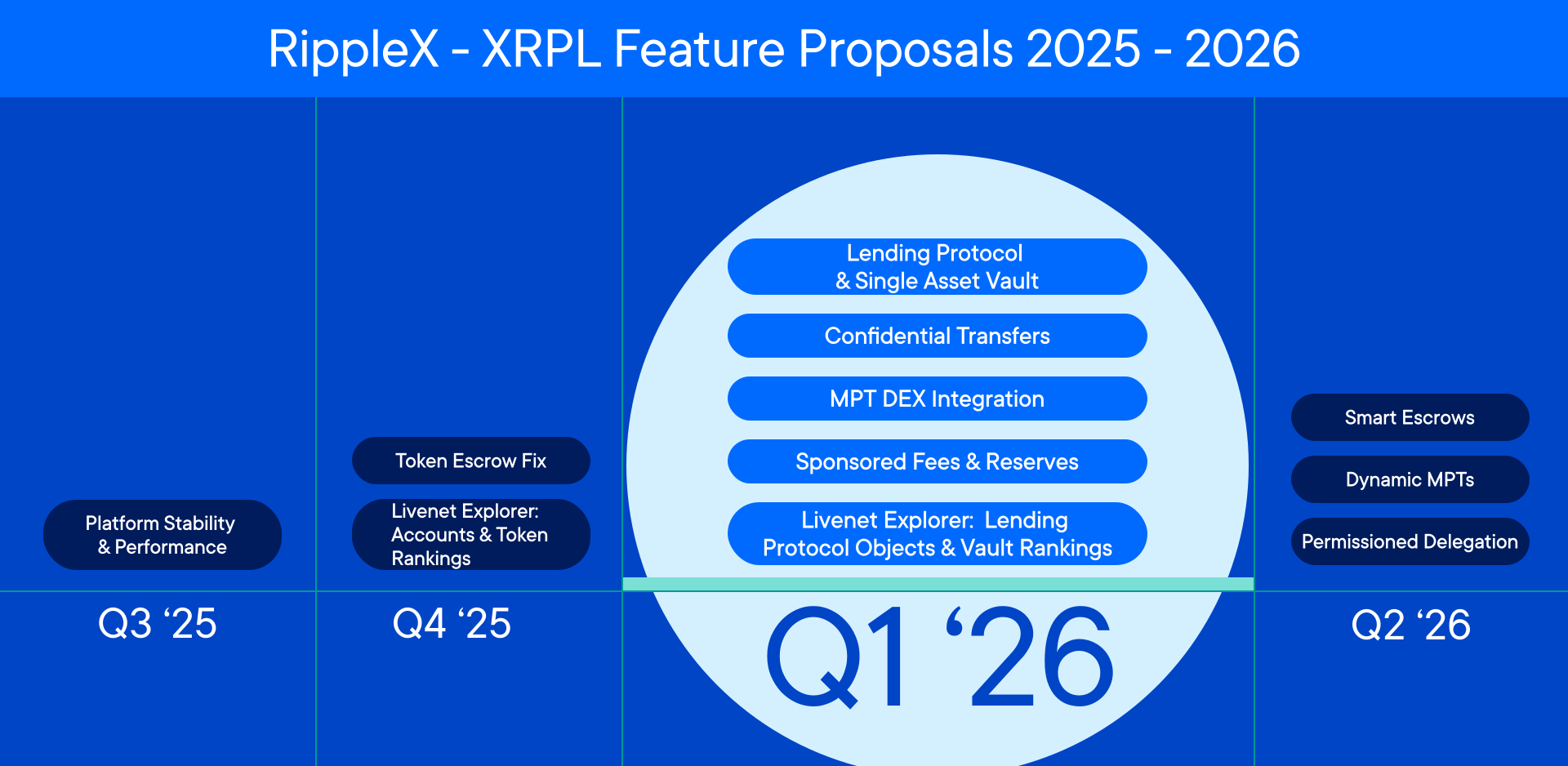](https://opensource.ripple.com/assets/ripplex-xrpl-feature-proposals-q1-2026.4244bdd1afb456dc5655b8aed877769b0eef8d09708dbd7e7f0a8cc401e921a3.9c1bb791.svg)
#### Was this helpful?
Ask AI
---
# account_sponsoring
[Skip to content](https://opensource.ripple.com/docs/xls-68-sponsored-fees-and-reserves/references/apis/account_sponsoring#content)
Prerelease Docs
/
...
[XLS-68 Sponsored Fees and Reserves](https://opensource.ripple.com/docs/xls-68-sponsored-fees-and-reserves)
* References
/
APIs
* account\_sponsoring
[Updated APIs](https://opensource.ripple.com/docs/xls-68-sponsored-fees-and-reserves/references/apis/updated-apis)
/
account\_sponsoring
[Edit](https://github.com/ripple/opensource.ripple.com/tree/main/docs/xls-68-sponsored-fees-and-reserves/references/apis/account_sponsoring.md)
[](https://opensource.ripple.com/docs/xls-68-sponsored-fees-and-reserves/references/apis/account_sponsoring#account_sponsoring)
account\_sponsoring
Copy
* Copy for LLM
Copy page as Markdown for LLMs
* [View as Markdown\
\
Open this page as Markdown](https://opensource.ripple.com/docs/xls-68-sponsored-fees-and-reserves/references/apis/account_sponsoring.md)
* [Open in ChatGPT\
\
Get insights from ChatGPT](https://chat.openai.com/?q=Read+https%3A%2F%2Fopensource.ripple.com%2Fdocs%2Fxls-68-sponsored-fees-and-reserves%2Freferences%2Fapis%2Faccount_sponsoring.md+and+answer+questions+based+on+the+content.)
* [Open in Claude\
\
Get insights from Claude](https://claude.ai/new?q=Read+https%3A%2F%2Fopensource.ripple.com%2Fdocs%2Fxls-68-sponsored-fees-and-reserves%2Freferences%2Fapis%2Faccount_sponsoring.md+and+answer+questions+based+on+the+content.)
* Connect to Cursor
Install MCP server on Cursor
* Connect to VS Code
Install MCP server on VS Code
==============================================================================================================================================================================================================================================================================================================================================================================================================================================================================================================================================================================================================================================================================================================================================================================================================================================================================================================================================================================================================================================================================================
[\[Source\]](https://github.com/XRPLF/clio "Source")
The `account_sponsoring` method returns all objects an account is currently sponsoring, where the queried account is the `Sponsor`, or for trust lines, the `HighSponsor` or `LowSponsor`. It has a very similar API to [account\_objects](https://xrpl.org/docs/references/http-websocket-apis/public-api-methods/account-methods/account_objects)
.
_(Requires the [Sponsor amendment](https://xls.xrpl.org/xls/XLS-0068-sponsored-fees-and-reserves.html)
)_
Note
This API method is available in **Clio only**, not in `rippled`. This is because this API would require an additional database to track sponsorship relationships, which would be too expensive to maintain in `rippled`.
[](https://opensource.ripple.com/docs/xls-68-sponsored-fees-and-reserves/references/apis/account_sponsoring#request-format)
Request Format
----------------------------------------------------------------------------------------------------------------------------------------------
An example of a request format:
* WebSocket
* JSON-RPC
* Commandline
{
"id": 1,
"command": "account\_sponsoring",
"account": "rSponsor1VktvzBz8JF2oJC6qaww6RZ7Lw",
"ledger\_index": "validated",
"limit": 10
}
The request includes the following parameters:
| Field | Type | Required? | Description |
| --- | --- | --- | --- |
| `account` | String | Yes | The sponsor account to query. |
| `deletion_blockers_only` | Boolean | No | If `true`, the response only includes objects that would block this account from being deleted. The default is `false`. |
| `ledger_hash` | String | No | A 20-byte hex string for the ledger version to use. See [Specifying Ledgers](https://xrpl.org/docs/references/protocol/data-types/basic-data-types/#specifying-ledgers)
. |
| `ledger_index` | String or Unsigned Integer | No | The [ledger index](https://xrpl.org/docs/references/protocol/data-types/basic-data-types#ledger-index)
of the ledger to use, or a shortcut string to choose a ledger automatically. See [Specifying Ledgers](https://xrpl.org/docs/references/protocol/data-types/basic-data-types/#specifying-ledgers)
. |
| `limit` | Number | No | The maximum number of objects to include in the results. |
| `marker` | Marker | No | Value from a previous paginated response. Resume retrieving data where that response left off. |
| `type` | String | No | Filter results by a ledger entry type. Some examples are `offer` and `escrow`. |
[](https://opensource.ripple.com/docs/xls-68-sponsored-fees-and-reserves/references/apis/account_sponsoring#response-format)
Response Format
------------------------------------------------------------------------------------------------------------------------------------------------
An example of a successful response:
* WebSocket
* JSON-RPC
* Commandline
{
"id": 1,
"result": {
"account": "rSponsor1VktvzBz8JF2oJC6qaww6RZ7Lw",
"sponsored\_objects": \[\
{\
"Balance": {\
"currency": "USD",\
"issuer": "rrrrrrrrrrrrrrrrrrrrBZbvji",\
"value": "100"\
},\
"Flags": 65536,\
"HighLimit": {\
"currency": "USD",\
"issuer": "rSponsee1ABC123XYZ456DEF789GHI",\
"value": "1000"\
},\
"HighNode": "0000000000000000",\
"HighSponsor": "rSponsor1VktvzBz8JF2oJC6qaww6RZ7Lw",\
"LedgerEntryType": "RippleState",\
"LowLimit": {\
"currency": "USD",\
"issuer": "rSponsor1VktvzBz8JF2oJC6qaww6RZ7Lw",\
"value": "0"\
},\
"LowNode": "0000000000000000",\
"PreviousTxnID": "E3FE6EA3D48F0C2B639448020EA4F03D4F4F8FFDB243A852A0F59177921B4879",\
"PreviousTxnLgrSeq": 14090896,\
"index": "9ED4406351B7A511A012A9B5E7FE4059FA2F7650621379C0013492C315E25B97"\
},\
{\
"Account": "rSponsee2XYZ789ABC123DEF456GHI",\
"Balance": "1000000",\
"Flags": 0,\
"LedgerEntryType": "AccountRoot",\
"OwnerCount": 3,\
"PreviousTxnID": "0D5FB50FA65C9FE1538FD7E398FFFE9D1908DFA4576D8D7A020040686F93C77D",\
"PreviousTxnLgrSeq": 14091574,\
"Sequence": 1,\
"Sponsor": "rSponsor1VktvzBz8JF2oJC6qaww6RZ7Lw",\
"index": "13F1A95D7AAB7108D5CE7EEAF504B2894B8C674E6D68499076441C4837282BF8"\
}\
\],
"ledger\_hash": "4C99E5F63C0D0B1C2283D3D3D3D3D3D3D3D3D3D3D3D3D3D3D3D3D3D3D3D3D3D3",
"ledger\_index": 14091625,
"validated": true
},
"status": "success",
"type": "response"
}
The response follows the [standard format](https://xrpl.org/docs/references/http-websocket-apis/api-conventions/response-formatting/)
, with a successful result containing the following fields:
| Field | Type | Description |
| --- | --- | --- |
| `account` | String | The account this request corresponds to. |
| `sponsored_objects` | Array | Array of ledger entries that this account is sponsoring. Includes objects owned by this account and objects owned by others, such as escrows where this account is the destination. Each member is a ledger entry in its raw ledger format. This may contain fewer entries than the maximum specified in the `limit` field. |
| `ledger_hash` | String | _(May be omitted)_ The identifying hash of the ledger that was used to generate this response. |
| `ledger_index` | Number | _(May be omitted)_ The ledger index of the ledger that was used to generate this response. |
| `ledger_current_index` | Number | _(May be omitted)_ The ledger index of the current in-progress ledger, which was used when retrieving this data. |
| `limit` | Number | _(May be omitted)_ The limit that was used in this request, if any. |
| `marker` | Marker | _(May be omitted)_ Server-defined value indicating the response is paginated. Pass this to the next call to resume where this call left off. |
| `validated` | Boolean | _(May be omitted)_ If `true`, the information in this response comes from a validated ledger version. Otherwise, the information is subject to change. |
[](https://opensource.ripple.com/docs/xls-68-sponsored-fees-and-reserves/references/apis/account_sponsoring#possible-errors)
Possible Errors
------------------------------------------------------------------------------------------------------------------------------------------------
* Any of the [universal error types](https://xrpl.org/docs/references/http-websocket-apis/api-conventions/error-formatting#universal-errors)
.
* `invalidParams` - One or more fields are specified incorrectly, or one or more required fields are missing.
* `actNotFound` - The address specified in the `account` field of the request does not correspond to an account in the ledger.
* `lgrNotFound` - The ledger specified by the `ledger_hash` or `ledger_index` does not exist, or it does exist but the server does not have it.
#### Was this helpful?
Ask AI
---
# Sponsorship
[Skip to content](https://opensource.ripple.com/docs/xls-68-sponsored-fees-and-reserves/references/ledger-entries/sponsorship#content)
Prerelease Docs
/
...
[XLS-68 Sponsored Fees and Reserves](https://opensource.ripple.com/docs/xls-68-sponsored-fees-and-reserves)
* References
/
Ledger Entries
* Sponsorship
[Updated Ledger Entries](https://opensource.ripple.com/docs/xls-68-sponsored-fees-and-reserves/references/ledger-entries/updated-ledger-entries)
/
Sponsorship
[Edit](https://github.com/ripple/opensource.ripple.com/tree/main/docs/xls-68-sponsored-fees-and-reserves/references/ledger-entries/sponsorship.md)
[](https://opensource.ripple.com/docs/xls-68-sponsored-fees-and-reserves/references/ledger-entries/sponsorship#sponsorship)
Sponsorship
Copy
* Copy for LLM
Copy page as Markdown for LLMs
* [View as Markdown\
\
Open this page as Markdown](https://opensource.ripple.com/docs/xls-68-sponsored-fees-and-reserves/references/ledger-entries/sponsorship.md)
* [Open in ChatGPT\
\
Get insights from ChatGPT](https://chat.openai.com/?q=Read+https%3A%2F%2Fopensource.ripple.com%2Fdocs%2Fxls-68-sponsored-fees-and-reserves%2Freferences%2Fledger-entries%2Fsponsorship.md+and+answer+questions+based+on+the+content.)
* [Open in Claude\
\
Get insights from Claude](https://claude.ai/new?q=Read+https%3A%2F%2Fopensource.ripple.com%2Fdocs%2Fxls-68-sponsored-fees-and-reserves%2Freferences%2Fledger-entries%2Fsponsorship.md+and+answer+questions+based+on+the+content.)
* Connect to Cursor
Install MCP server on Cursor
* Connect to VS Code
Install MCP server on VS Code
===========================================================================================================================================================================================================================================================================================================================================================================================================================================================================================================================================================================================================================================================================================================================================================================================================================================================================================================================================================================================================================================================================================
[\[Source\]](https://github.com/tequdev/rippled/blob/sponsor/include/xrpl/protocol/detail/ledger_entries.macro#L611-L624 "Source")
A `Sponsorship` ledger entry represents a sponsoring relationship between a sponsor and a sponsee. This allows sponsors to _pre-fund_ sponsees, if they so desire.
Note
This object does not need to be created in order to sponsor accounts. It is an offered convenience, so that sponsors do not have to co-sign every sponsored transaction if they don't want to, especially for transaction fees. It also allows sponsors to set a maximum balance even if they still want to co-sign transactions.
_(Requires the [Sponsor amendment](https://xls.xrpl.org/xls/XLS-0068-sponsored-fees-and-reserves.html)
)_
[](https://opensource.ripple.com/docs/xls-68-sponsored-fees-and-reserves/references/ledger-entries/sponsorship#example-json)
Example JSON
---------------------------------------------------------------------------------------------------------------------------------------------
{
"LedgerEntryType": "Sponsorship",
"Flags": 0,
"Owner": "rN7n7otQDd6FczFgLdlqtyMVrn3HMfXpf",
"Sponsee": "rfkDkFai4jUfCvAJiZ5Vm7XvvWjYvDqeYo",
"FeeAmount": "1000000",
"MaxFee": "1000",
"ReserveCount": 5,
"OwnerNode": "0000000000000000",
"SponseeNode": "0000000000000000",
"PreviousTxnID": "1234567890ABCDEF1234567890ABCDEF1234567890ABCDEF1234567890ABCDEF",
"PreviousTxnLgrSeq": 12345678
}
[](https://opensource.ripple.com/docs/xls-68-sponsored-fees-and-reserves/references/ledger-entries/sponsorship#sponsorship-fields)
Sponsorship Fields
---------------------------------------------------------------------------------------------------------------------------------------------------------
In addition to the [common ledger entry fields](https://opensource.ripple.com/docs/xls-68-sponsored-fees-and-reserves/references/ledger-entries/updated-ledger-entries#common-ledger-entry-updates#common-ledger-entry-fields)
, a `Sponsorship` entry has the following fields:
| Field Name | JSON Type | [Internal Type](https://xrpl.org/docs/references/protocol/binary-format/) | Required? | Description |
| --- | --- | --- | --- | --- |
| `FeeAmount` | String | Amount | No | The remaining amount of XRP that the sponsor has provided for the sponsee to use for transaction fees. |
| `MaxFee` | String | Amount | No | The maximum fee per transaction that the sponsor will cover. This field helps prevent excessive draining of the pre-funded fee pool. If the sponsee submits a transaction with a fee exceeding this value, the transaction fails. |
| `Owner` | String | AccountID | Yes | The address of the sponsor account. This account pays the reserve for this object. |
| `OwnerNode` | String | UInt64 | Yes | A hint indicating which page of the sponsor's owner directory links to this object, in case the directory consists of multiple pages. |
| `PreviousTxnID` | String | Hash256 | Yes | The identifying hash of the transaction that most recently modified this entry. |
| `PreviousTxnLgrSeq` | Number | UInt32 | Yes | The [ledger index](https://xrpl.org/docs/references/protocol/data-types/basic-data-types#ledger-index)
of the ledger that contains the transaction that most recently modified this object. |
| `ReserveCount` | Number | UInt32 | No | The remaining number of owner reserves the sponsor has pre-funded for the sponsee. |
| `Sponsee` | String | AccountID | Yes | The address of the sponsee account associated with this relationship. |
| `SponseeNode` | String | UInt64 | Yes | A hint indicating which page of the sponsee's owner directory links to this object, in case the directory consists of multiple pages. |
[](https://opensource.ripple.com/docs/xls-68-sponsored-fees-and-reserves/references/ledger-entries/sponsorship#sponsorship-flags)
Sponsorship Flags
-------------------------------------------------------------------------------------------------------------------------------------------------------
A `Sponsorship` entry can have the following flags:
| Flag Name | Flag Value | Description |
| --- | --- | --- |
| `lsfSponsorshipRequireSignForFee` | `0x00010000` | If enabled, every transaction that uses this sponsorship for fees requires a signature from the sponsor. If disabled, no signature is necessary, as the existence of the `Sponsorship` object is sufficient. |
| `lsfSponsorshipRequireSignForReserve` | `0x00020000` | If enabled, every transaction that uses this sponsorship for reserves requires a signature from the sponsor. If disabled, no signature is necessary, as the existence of the `Sponsorship` object is sufficient. |
[](https://opensource.ripple.com/docs/xls-68-sponsored-fees-and-reserves/references/ledger-entries/sponsorship#deleting-a-sponsorship-object)
Deleting a Sponsorship Object
-------------------------------------------------------------------------------------------------------------------------------------------------------------------------------
Either the sponsor or the sponsee can delete a `Sponsorship` object using the [SponsorshipSet transaction](https://opensource.ripple.com/docs/xls-68-sponsored-fees-and-reserves/references/transactions/sponsorshipset)
with the `tfDeleteObject` flag enabled.
Warning
The `Sponsorship` object is a [deletion blocker](https://xrpl.org/docs/concepts/accounts/deleting-accounts#requirements)
. A sponsor cannot delete their account until all their `Sponsorship` objects are removed.
[](https://opensource.ripple.com/docs/xls-68-sponsored-fees-and-reserves/references/ledger-entries/sponsorship#sponsorship-id-format)
Sponsorship ID Format
---------------------------------------------------------------------------------------------------------------------------------------------------------------
The ID of a `Sponsorship` entry is the [SHA-512Half](https://xrpl.org/docs/references/protocol/data-types/basic-data-types#hashes)
of the following values, concatenated in order:
1. The Sponsorship space key (`0x003E`)
2. The AccountID of the sponsor (`Owner` field)
3. The AccountID of the `Sponsee`
#### Was this helpful?
Ask AI
---
# SponsorshipTransfer
[Skip to content](https://opensource.ripple.com/docs/xls-68-sponsored-fees-and-reserves/references/transactions/sponsorshiptransfer#content)
Prerelease Docs
/
...
[XLS-68 Sponsored Fees and Reserves](https://opensource.ripple.com/docs/xls-68-sponsored-fees-and-reserves)
* References
/
Transactions
* SponsorshipTransfer
[SponsorshipSet](https://opensource.ripple.com/docs/xls-68-sponsored-fees-and-reserves/references/transactions/sponsorshipset)
[Updated Common Transaction Fields](https://opensource.ripple.com/docs/xls-68-sponsored-fees-and-reserves/references/transactions/updated-common-transaction-fields)
[Updated Transactions](https://opensource.ripple.com/docs/xls-68-sponsored-fees-and-reserves/references/transactions/updated-transactions)
/
SponsorshipTransfer
[Edit](https://github.com/ripple/opensource.ripple.com/tree/main/docs/xls-68-sponsored-fees-and-reserves/references/transactions/sponsorshiptransfer.md)
[](https://opensource.ripple.com/docs/xls-68-sponsored-fees-and-reserves/references/transactions/sponsorshiptransfer#sponsorshiptransfer)
SponsorshipTransfer
Copy
* Copy for LLM
Copy page as Markdown for LLMs
* [View as Markdown\
\
Open this page as Markdown](https://opensource.ripple.com/docs/xls-68-sponsored-fees-and-reserves/references/transactions/sponsorshiptransfer.md)
* [Open in ChatGPT\
\
Get insights from ChatGPT](https://chat.openai.com/?q=Read+https%3A%2F%2Fopensource.ripple.com%2Fdocs%2Fxls-68-sponsored-fees-and-reserves%2Freferences%2Ftransactions%2Fsponsorshiptransfer.md+and+answer+questions+based+on+the+content.)
* [Open in Claude\
\
Get insights from Claude](https://claude.ai/new?q=Read+https%3A%2F%2Fopensource.ripple.com%2Fdocs%2Fxls-68-sponsored-fees-and-reserves%2Freferences%2Ftransactions%2Fsponsorshiptransfer.md+and+answer+questions+based+on+the+content.)
* Connect to Cursor
Install MCP server on Cursor
* Connect to VS Code
Install MCP server on VS Code
===================================================================================================================================================================================================================================================================================================================================================================================================================================================================================================================================================================================================================================================================================================================================================================================================================================================================================================================================================================================================================================================================================================================================
[\[Source\]](https://github.com/tequdev/rippled/blob/sponsor/src/libxrpl/tx/transactors/Sponsor/SponsorshipTransfer.cpp)
Create, transfer, or end reserve sponsorship for a ledger object or account. The transaction can be submitted by the sponsor or sponsee, depending on the required operation. See [Sponsorship Scenarios](https://opensource.ripple.com/docs/xls-68-sponsored-fees-and-reserves/references/transactions/sponsorshiptransfer#sponsorship-scenarios)
for details on each operation.
_(Requires the [Sponsor amendment](https://xls.xrpl.org/xls/XLS-0068-sponsored-fees-and-reserves.html)
)_
[](https://opensource.ripple.com/docs/xls-68-sponsored-fees-and-reserves/references/transactions/sponsorshiptransfer#example-json)
Example JSON
---------------------------------------------------------------------------------------------------------------------------------------------------
{
"TransactionType": "SponsorshipTransfer",
"Account": "rN7n7otQDd6FczFgLdlqtyMVrn3HMfXpf",
"ObjectID": "1234567890ABCDEF1234567890ABCDEF1234567890ABCDEF1234567890ABCDEF",
"Flags": 2,
"Fee": "12",
"Sequence": 43
}
[](https://opensource.ripple.com/docs/xls-68-sponsored-fees-and-reserves/references/transactions/sponsorshiptransfer#sponsorshiptransfer-fields)
SponsorshipTransfer Fields
-------------------------------------------------------------------------------------------------------------------------------------------------------------------------------
In addition to the [common fields](https://opensource.ripple.com/docs/xls-68-sponsored-fees-and-reserves/references/transactions/updated-common-transaction-fields#common-transaction-updates#common-transaction-fields)
, `SponsorshipTransfer` transactions use the following fields:
| Field Name | JSON Type | [Internal Type](https://xrpl.org/docs/references/protocol/binary-format/) | Required? | Description |
| --- | --- | --- | --- | --- |
| `ObjectID` | String | Hash256 | No | The ID of the ledger object to transfer sponsorship. Required if the transaction is dealing with a sponsored object, rather than a sponsored account. If omitted, the transaction refers to the `Account` sending the transaction. |
| `Sponsee` | String | AccountID | No | The wallet address of the sponsee account. Required if the sponsor is ending a sponsorship on behalf of a sponsee. If omitted, the `Account` field is assumed to be the sponsee. |
[](https://opensource.ripple.com/docs/xls-68-sponsored-fees-and-reserves/references/transactions/sponsorshiptransfer#sponsorshiptransfer-flags)
SponsorshipTransfer Flags
-----------------------------------------------------------------------------------------------------------------------------------------------------------------------------
`SponsorshipTransfer` transactions support additional values in the `Flags` field, as follows:
| Flag Name | Hex Value | Decimal Value | Description |
| --- | --- | --- | --- |
| `tfSponsorshipEnd` | `0x00000001` | 1 | End an existing sponsorship. The reserve burden returns to the object's owner. |
| `tfSponsorshipCreate` | `0x00000002` | 2 | Create a new sponsorship for an unsponsored object or account. |
| `tfSponsorshipReassign` | `0x00000004` | 4 | Transfer an existing sponsorship to a new sponsor. |
[](https://opensource.ripple.com/docs/xls-68-sponsored-fees-and-reserves/references/transactions/sponsorshiptransfer#sponsorship-scenarios)
Sponsorship Scenarios
---------------------------------------------------------------------------------------------------------------------------------------------------------------------
* Create Sponsorship
* Reassign Sponsorship
* End Sponsorship
Use the `tfSponsorshipCreate` flag to sponsor an object or account. Only the sponsee can submit the transaction with this configuration. The reserve sponsorship transfers to the account specified in the `Sponsor` field.
To submit a transaction for this scenario:
* Include the `ObjectID` field when sponsoring an object. Omit when sponsoring an account.
* The target object or account must not currently be sponsored.
* Provide the `Sponsor` field and the `SponsorFlags.spfSponsorReserve` flag.
* Include the `SponsorSignature` when sponsoring an account. This is optional when sponsoring an object.
* Do not include the `Sponsee` field.
When successful:
* The `Sponsor` field is set on the object or account.
* The new sponsor's `SponsoringOwnerCount` or `SponsoringAccountCount` is incremented.
* For objects, the owner's `SponsoredOwnerCount` is also incremented.
[](https://opensource.ripple.com/docs/xls-68-sponsored-fees-and-reserves/references/transactions/sponsorshiptransfer#error-cases)
Error Cases
-------------------------------------------------------------------------------------------------------------------------------------------------
Besides errors that can occur for all transactions, `SponsorshipTransfer` transactions can result in the following [transaction result codes](https://xrpl.org/docs/references/protocol/transactions/transaction-results)
:
| Error Code | Description |
| --- | --- |
| `tecINSUFFICIENT_RESERVE` | The owner or new sponsor does not have sufficient XRP to cover the reserve for this object or account. |
| `tecNO_ENTRY` | The `ObjectID` is specified but does not exist on the ledger. |
| `tecNO_PERMISSION` | The transaction lacks the required permissions. This can occur when:
* The submitter is not the current sponsor or owner when ending a sponsorship.
* The submitter is not the owner when creating or reassigning a sponsorship.
* The object or account is already sponsored when creating a sponsorship.
* The object or account is not sponsored when reassigning or ending a sponsorship.
* The `Sponsor` field is missing when creating or reassigning a sponsorship.
* The `Sponsor` field is present when ending a sponsorship. |
| `temINVALID_FLAG` | The transaction has invalid flags. This can occur when:
* The transaction does not have exactly one of `tfSponsorshipCreate`, `tfSponsorshipReassign`, or `tfSponsorshipEnd` set.
* The `spfSponsorReserve` flag is missing when creating or reassigning a sponsorship.
* The `spfSponsorReserve` flag is present when ending a sponsorship. |
| `temMALFORMED` | The transaction is malformed. This can occur when:
* The `Sponsee` field is present when creating or reassigning a sponsorship.
* The `Sponsee` field is the same as the `Account` field.
* Sponsoring an account without providing the `SponsorSignature` field. |
#### Was this helpful?
Ask AI
---
# Updated APIs
[Skip to content](https://opensource.ripple.com/docs/xls-68-sponsored-fees-and-reserves/references/apis/updated-apis#content)
Prerelease Docs
/
...
[XLS-68 Sponsored Fees and Reserves](https://opensource.ripple.com/docs/xls-68-sponsored-fees-and-reserves)
* References
/
APIs
* Updated APIs
[account\_sponsoring](https://opensource.ripple.com/docs/xls-68-sponsored-fees-and-reserves/references/apis/account_sponsoring)
/
Updated APIs
[Edit](https://github.com/ripple/opensource.ripple.com/tree/main/docs/xls-68-sponsored-fees-and-reserves/references/apis/updated-apis.md)
[](https://opensource.ripple.com/docs/xls-68-sponsored-fees-and-reserves/references/apis/updated-apis#updated-apis)
Updated APIs
Copy
* Copy for LLM
Copy page as Markdown for LLMs
* [View as Markdown\
\
Open this page as Markdown](https://opensource.ripple.com/docs/xls-68-sponsored-fees-and-reserves/references/apis/updated-apis.md)
* [Open in ChatGPT\
\
Get insights from ChatGPT](https://chat.openai.com/?q=Read+https%3A%2F%2Fopensource.ripple.com%2Fdocs%2Fxls-68-sponsored-fees-and-reserves%2Freferences%2Fapis%2Fupdated-apis.md+and+answer+questions+based+on+the+content.)
* [Open in Claude\
\
Get insights from Claude](https://claude.ai/new?q=Read+https%3A%2F%2Fopensource.ripple.com%2Fdocs%2Fxls-68-sponsored-fees-and-reserves%2Freferences%2Fapis%2Fupdated-apis.md+and+answer+questions+based+on+the+content.)
* Connect to Cursor
Install MCP server on Cursor
* Connect to VS Code
Install MCP server on VS Code
=========================================================================================================================================================================================================================================================================================================================================================================================================================================================================================================================================================================================================================================================================================================================================================================================================================================================================================================================================================================================================================================================
This page describes updates to existing RPC methods introduced by XLS-68: Sponsored Fees and Reserves.
_(Requires the [Sponsor amendment](https://xls.xrpl.org/xls/XLS-0068-sponsored-fees-and-reserves.html)
)_
[](https://opensource.ripple.com/docs/xls-68-sponsored-fees-and-reserves/references/apis/updated-apis#account_objects)
account\_objects
-------------------------------------------------------------------------------------------------------------------------------------------
The [account\_objects method](https://xrpl.org/docs/references/http-websocket-apis/public-api-methods/account-methods/account_objects)
adds a new optional filter parameter to query sponsored objects.
| Field | Type | Required? | Description |
| --- | --- | --- | --- |
| `sponsored` | Boolean | No | If `true`, returns only sponsored objects (objects with a `Sponsor`, `HighSponsor`, or `LowSponsor` field). If `false`, returns only non-sponsored objects. If omitted, returns all objects (existing behavior). |
###
[](https://opensource.ripple.com/docs/xls-68-sponsored-fees-and-reserves/references/apis/updated-apis#request-format)
Request Format
An example of the request format:
* WebSocket
* JSON-RPC
* Commandline
{
"id": 1,
"command": "account\_objects",
"account": "rN7n7otQDd6FczFgLdlqtyMVrn3HMfXpf",
"sponsored": true,
"ledger\_index": "validated",
"type": "state"
}
###
[](https://opensource.ripple.com/docs/xls-68-sponsored-fees-and-reserves/references/apis/updated-apis#response-format)
Response Format
An example of a successful response:
* WebSocket
* JSON-RPC
* Commandline
{
"id": 1,
"result": {
"account": "rN7n7otQDd6FczFgLdlqtyMVrn3HMfXpf",
"account\_objects": \[\
{\
"Balance": {\
"currency": "USD",\
"issuer": "rrrrrrrrrrrrrrrrrrrrBZbvji",\
"value": "100"\
},\
"Flags": 65536,\
"HighLimit": {\
"currency": "USD",\
"issuer": "rN7n7otQDd6FczFgLdlqtyMVrn3HMfXpf",\
"value": "1000"\
},\
"HighNode": "0000000000000000",\
"HighSponsor": "rSponsor1VktvzBz8JF2oJC6qaww6RZ7Lw",\
"LedgerEntryType": "RippleState",\
"LowLimit": {\
"currency": "USD",\
"issuer": "rfkDkFai4jUfCvAJiZ5Vm7XvvWjYvDqeYo",\
"value": "0"\
},\
"LowNode": "0000000000000000",\
"PreviousTxnID": "1234567890ABCDEF1234567890ABCDEF1234567890ABCDEF1234567890ABCDEF",\
"PreviousTxnLgrSeq": 12345678,\
"index": "ABCDEF1234567890ABCDEF1234567890ABCDEF1234567890ABCDEF1234567890"\
}\
\],
"ledger\_hash": "FEDCBA0987654321FEDCBA0987654321FEDCBA0987654321FEDCBA0987654321",
"ledger\_index": 56789012,
"validated": true
},
"status": "success",
"type": "response"
}
#### Was this helpful?
Ask AI
---
# Dynamic MPT Reference
[Skip to content](https://opensource.ripple.com/docs/xls-94-dynamic-mpts/reference#content)
Prerelease Docs
/
XLS-94 Dynamic MPTs
* Reference Documentation
[About Dynamic MPTs](https://opensource.ripple.com/docs/xls-94-dynamic-mpts/dynamic-mpts)
/
Reference Documentation
[Edit](https://github.com/ripple/opensource.ripple.com/tree/main/docs/xls-94-dynamic-mpts/reference.md)
[](https://opensource.ripple.com/docs/xls-94-dynamic-mpts/reference#dynamic-mpt-reference)
Dynamic MPT Reference
Copy
* Copy for LLM
Copy page as Markdown for LLMs
* [View as Markdown\
\
Open this page as Markdown](https://opensource.ripple.com/docs/xls-94-dynamic-mpts/reference.md)
* [Open in ChatGPT\
\
Get insights from ChatGPT](https://chat.openai.com/?q=Read+https%3A%2F%2Fopensource.ripple.com%2Fdocs%2Fxls-94-dynamic-mpts%2Freference.md+and+answer+questions+based+on+the+content.)
* [Open in Claude\
\
Get insights from Claude](https://claude.ai/new?q=Read+https%3A%2F%2Fopensource.ripple.com%2Fdocs%2Fxls-94-dynamic-mpts%2Freference.md+and+answer+questions+based+on+the+content.)
* Connect to Cursor
Install MCP server on Cursor
* Connect to VS Code
Install MCP server on VS Code
===========================================================================================================================================================================================================================================================================================================================================================================================================================================================================================================================================================================================================================================================================================================================================================================================================================================================================================================================
The Dynamic MPT amendment does not create any new data types, but it modifies several transactions and the `MPTokenIssuance` ledger entry.
* **Transactions:**
* [MPTokenIssuanceCreate](https://opensource.ripple.com/docs/xls-94-dynamic-mpts/reference#mptokenissuancecreate-transaction-changes)
- The new `MutableFlags` field specifies which fields or flags are mutable after issuance.
* [MPTokenIssuanceSet](https://opensource.ripple.com/docs/xls-94-dynamic-mpts/reference#mptokenissuanceset-transaction-changes)
- Several new fields let you update mutable metadata, transfer fees, and flags.
* **Ledger Entries:**
* [MPTokenIssuance](https://opensource.ripple.com/docs/xls-94-dynamic-mpts/reference#mptokenissuance-entry-changes)
- The new `MutableFlags` field stores mutability settings.
[](https://opensource.ripple.com/docs/xls-94-dynamic-mpts/reference#mptokenissuancecreate-transaction-changes)
MPTokenIssuanceCreate Transaction Changes
------------------------------------------------------------------------------------------------------------------------------------------------------------
To allow future changes to specific fields or flags of a token, issuers must clearly specify which ones should be mutable when creating the `MPTokenIssuance` object.
###
[](https://opensource.ripple.com/docs/xls-94-dynamic-mpts/reference#example-json)
Example JSON
This example creates an MPT issuance with mutable metadata:
{
"TransactionType": "MPTokenIssuanceCreate",
"Account": "rNFta7UKwcoiCpxEYbhH2v92numE3cceB6",
"AssetScale": 4,
"TransferFee": 0,
"MaximumAmount": "50000000",
"Flags": 83659,
"MutableFlags": 65536, // tmfMPTCanMutateMetadata
"MPTokenMetadata": "464F4F",
"Fee": "12",
"Flags": 122,
"Sequence": 99536574
}
###
[](https://opensource.ripple.com/docs/xls-94-dynamic-mpts/reference#mptokenissuancecreate-fields)
MPTokenIssuanceCreate Fields
MPTokenIssuanceCreate transactions can include the following new field:
| Field | JSON Type | [Internal Type](https://xrpl.org/docs/references/protocol/binary-format/) | Required? | Description |
| --- | --- | --- | --- | --- |
| `MutableFlags` | Number | UInt32 | No | Indicates specific fields or flags that are mutable after issuance. This is a bitwise combination of flags that determine mutability. See [MPTokenIssuanceCreate Mutable Flags](https://opensource.ripple.com/docs/xls-94-dynamic-mpts/reference#mptokenissuancecreate-mutable-flags) |
Warning
Only the specified fields and flags may be declared mutable; all other fields remain immutable.
###
[](https://opensource.ripple.com/docs/xls-94-dynamic-mpts/reference#mptokenissuancecreate-mutable-flags)
MPTokenIssuanceCreate Mutable Flags
The following flags are stored in the `MutableFlags` field, which is separate from the `Flags` field of the `MPTokenIssuanceCreate` transaction:
| Flag Name | Hex Value | Decimal Value | Description |
| --- | --- | --- | --- |
| `tmfMPTCanMutateCanLock` | `0x00000002` | 2 | If enabled, the MPT's **Can Lock** flag, which gives the issuer the power to lock/unlock holders' balances, can change. |
| `tmfMPTCanMutateRequireAuth` | `0x00000004` | 4 | If enabled, the MPT's **Require Auth** flag, which indicates that individual holders must be authorized, can change. |
| `tmfMPTCanMutateCanEscrow` | `0x00000008` | 8 | If enabled, the MPT's **Can Escrow** flag, which indicates that the token can be placed in escrow, can change. |
| `tmfMPTCanMutateCanTrade` | `0x00000010` | 16 | If enabled, the MPT's **Can Trade** flag, which indicates that individual holders can trade their balances using the XRP Ledger DEX or AMM, can change. |
| `tmfMPTCanMutateCanTransfer` | `0x00000020` | 32 | If enabled, the MPT's **Can Transfer** flag, which indicates that tokens held by non-issuers can be transferred to other accounts, can change. |
| `tmfMPTCanMutateCanClawback` | `0x00000040` | 64 | If enabled, the MPT's **Can Clawback** flag, which indicates that the issuer can claw back value from individual holders, can change. |
| `tmfMPTCanMutateMetadata` | `0x00010000` | 65536 | If enabled, the `MPTokenMetadata` field, which stores additional information about the token, can change. |
| `tmfMPTCanMutateTransferFee` | `0x00020000` | 131072 | If enabled, the `TransferFee` field, which determines the fee percentage charged on transfers between users, can change. |
###
[](https://opensource.ripple.com/docs/xls-94-dynamic-mpts/reference#error-cases)
Error Cases
The following failure conditions have been added to the `MPTokenIssuanceCreate` transaction:
| Error Code | Description |
| --- | --- |
| `temDISABLED` | The `MutableFlags` field is present but the DynamicMPT amendment is not enabled. |
| `temINVALID_FLAG` | The `MutableFlags` field contains an invalid value. |
[](https://opensource.ripple.com/docs/xls-94-dynamic-mpts/reference#mptokenissuanceset-transaction-changes)
MPTokenIssuanceSet Transaction Changes
------------------------------------------------------------------------------------------------------------------------------------------------------
When updating mutable flags, issuers can enable or disable any flag that was marked as mutable during the creation of the `MPTokenIssuance` object.
###
[](https://opensource.ripple.com/docs/xls-94-dynamic-mpts/reference#example-json-1)
Example JSON
This example udpates the MPT metadata:
{
"TransactionType": "MPTokenIssuanceSet",
"Account": "rNFta7UKwcoiCpxEYbhH2v92numE3cceB6",
"MPTokenIssuanceID": "05EECEBE97A7D635DE2393068691A015FED5A89AD203F5AA",
"MPTokenMetadata": "575C5C", // Updated metadata from \`464F4F\` to \`575C5C\`
"Fee": "10",
"Flags": 1,
"Sequence": 99536577
}
###
[](https://opensource.ripple.com/docs/xls-94-dynamic-mpts/reference#mptokenissuanceset-fields)
MPTokenIssuanceSet Fields
MPTokenIssuanceSet transactions can include the following new fields:
| Field | JSON Type | [Internal Type](https://xrpl.org/docs/references/protocol/binary-format/) | Required? | Description |
| --- | --- | --- | --- | --- |
| `MPTokenMetadata` | String | Blob | No | New metadata to replace the existing value. Setting an empty value removes the field. Only valid if `lsmfMPTCanMutateMetadata` was set when creating the `MPTokenIssuance` object. |
| `TransferFee` | Number | UInt16 | No | The new transfer fee value. Setting this to zero removes the field. Only valid if `lsmfMPTCanMutateTransferFee` was enabled when creating the `MPTokenIssuance` object. See [Transfer Fee Rules](https://opensource.ripple.com/docs/xls-94-dynamic-mpts/reference#transfer-fee-rules)
. |
| `MutableFlags` | Number | UInt32 | No | Set or clear flags that were marked as mutable when creating the `MPTokenIssuance` object. See [MPTokenIssuanceSet Mutable Flags](https://opensource.ripple.com/docs/xls-94-dynamic-mpts/reference#mptokenissuanceset-mutable-flags)
. |
###
[](https://opensource.ripple.com/docs/xls-94-dynamic-mpts/reference#mptokenissuanceset-mutable-flags)
MPTokenIssuanceSet Mutable Flags
The following flags are stored in the `MutableFlags` field, which is separate from the `Flags` field of the `MPTokenIssuanceSet` transaction:
| Flag Name | Hex Value | Decimal Value | Description |
| --- | --- | --- | --- |
| `tmfMPTSetCanLock` | `0x00000001` | 1 | Enables the MPT's **Can Lock** flag, which allows the token to be locked both individually and globally. |
| `tmfMPTClearCanLock` | `0x00000002` | 2 | Disables the MPT's **Can Lock** flag, which prevents both individual and global locking of the token. |
| `tmfMPTSetRequireAuth` | `0x00000004` | 4 | Enables the MPT's **RequireAuth** flag, which requires individual holders to be authorized to hold the token. |
| `tmfMPTClearRequireAuth` | `0x00000008` | 8 | Disables the MPT's **RequireAuth** flag, which means holders don't need to be authorized to hold the token. |
| `tmfMPTSetCanEscrow` | `0x00000010` | 16 | Enables the MPT's **Can Escrow** flag, which allows holders to place balances into escrow. |
| `tmfMPTClearCanEscrow` | `0x00000020` | 32 | Disables the MPT's **Can Escrow** flag, which means holders can't place balances into escrow. |
| `tmfMPTSetCanTrade` | `0x00000040` | 64 | Enables the MPT's **Can Trade** flag, which allows holders to trade balances on the XRPL DEX. |
| `tmfMPTClearCanTrade` | `0x00000080` | 128 | Disables the MPT's **CanTrade** flag, which stops holders from trading balances on the XRPL DEX. |
| `tmfMPTSetCanTransfer` | `0x00000100` | 256 | Enables the MPT's **CanTransfer** flag, which allows tokens to be transferred to non-issuer accounts. |
| `tmfMPTClearCanTransfer` | `0x00000200` | 512 | Disables the MPT's **CanTransfer** flag, which means transfers to non-issuer accounts are not allowed. Note that when `CanTransfer` is disabled, the `TransferFee` field is automatically removed. |
| `tmfMPTSetCanClawback` | `0x00000400` | 1024 | Enables the MPT's **Can Clawback** flag, which allows the issuer to claw back tokens. |
| `tmfMPTClearCanClawback` | `0x00000800` | 2048 | Disables the MPT's **Can Clawback** flag, which means the token cannot be clawed back. |
Note
You cannot enable and disable the same setting in one transaction. For example, using both the `tmfMPTSetCanLock` flag and the `tmfMPTClearCanLock` flag is invalid.
###
[](https://opensource.ripple.com/docs/xls-94-dynamic-mpts/reference#transfer-fee-rules)
Transfer Fee Rules
The ability to modify the `TransferFee` depends on two flags:
* `lsfMPTCanTransfer`: must already be enabled to allow any non-zero `TransferFee`. Note that this flag can be modified through `tmfMPTSetCanTransfer` or `tmfMPTClearCanTransfer` if `lsmfMPTCanMutateCanTransfer` is set.
* `lsmfMPTCanMutateTransferFee`: must be enabled at creation of the MPT issuance to allow any modification of the `TransferFee` field.
Note
If the MPT's transfer fee and **Can Transfer** flag are both mutable, you can enable **Can Transfer** first, then modify the transfer fee in a second transaction.
The following table describes how setting a zero or non-zero transfer fee through the `MPTokenIssuanceSet` transaction behaves, based on the existing state of the `MPTokenIssuance` object on-ledger. The first two columns represent the ledger state (`lsfMPTCanTransfer` and `lsmfMPTCanMutateTransferFee`), while the third column represents the `TransferFee` value being set in the transaction.
| Can Transfer | Can Mutate Transfer Fee | Transfer Fee Value | Result | Description |
| --- | --- | --- | --- | --- |
| Disabled | Enabled | Zero | ✅ | Removes the `TransferFee` field. |
| Disabled | Disabled | Zero | ❌ | Not allowed to modify `TransferFee`. |
| Disabled | Enabled/Disabled | Non-zero | ❌ | Always invalid regardless of mutability. |
| Enabled | Enabled | Non-zero | ✅ | Modifies the `TransferFee` field. |
| Enabled | Disabled | Non-zero | ❌ | Not allowed to modify `TransferFee`. |
| Enabled | Enabled | Zero | ✅ | Removes the `TransferFee` field. |
| Enabled | Disabled | Zero | ❌ | Not allowed to modify `TransferFee`. |
###
[](https://opensource.ripple.com/docs/xls-94-dynamic-mpts/reference#error-cases-1)
Error Cases
The following failure conditions have been added to the `MPTokenIssuanceSet` transaction:
| Error Code | Description |
| --- | --- |
| `tecNO_PERMISSION` | The sender does not have permission to modify the specified field or flag. For example:
* The `MutableFlags` field attempts to modify a flag that was not declared as mutable during creation.
* The `MPTokenMetadata` field is provided but `lsmfMPTCanMutateMetadata` was not set during creation.
* The `TransferFee` field is provided but `lsmfMPTCanMutateTransferFee` was not set during creation.
* A non-zero `TransferFee` is specified but `lsfMPTCanTransfer` is not currently enabled on the issuance. |
| `temDISABLED` | The `MutableFlags`, `MPTokenMetadata`, or `TransferFee` is present but the DynamicMPT amendment is not enabled. |
| `temBAD_TRANSFER_FEE` | The `TransferFee` exceeds the maximum allowed value of 50,000. |
| `temINVALID_FLAG` | The `MutableFlags` field contains an invalid value, including `0`. You may also receive this error if both set and clear flags are specified for the same property (for example, both `tmfMPTSetCanLock` and `tmfMPTClearCanLock`). |
| `temMALFORMED` | The transaction is malformed. For example:
* The `Holder` field is provided when mutating the MPT issuance.
* The `Flags` field is set when mutation fields (`MutableFlags`, `MPTokenMetadata`, or `TransferFee`) are present.
* The `MPTokenMetadata` field exceeds the maximum length of 1024 bytes.
* A non-zero `TransferFee` and `tmfMPTClearCanTransfer` are included in the same transaction. |
[](https://opensource.ripple.com/docs/xls-94-dynamic-mpts/reference#mptokenissuance-entry-changes)
MPTokenIssuance Entry Changes
------------------------------------------------------------------------------------------------------------------------------------
MPTokenIssuance ledger entries can include the following new field:
| Field | JSON Type | [Internal Type](https://xrpl.org/docs/references/protocol/binary-format/) | Required? | Description |
| --- | --- | --- | --- | --- |
| `MutableFlags` | Number | UInt32 | No | Indicates which fields or flags of this token issuance can be modified after creation. See [MPTokenIssuance Mutable Flags](https://opensource.ripple.com/docs/xls-94-dynamic-mpts/reference#mptokenissuance-mutable-flags)
. |
###
[](https://opensource.ripple.com/docs/xls-94-dynamic-mpts/reference#mptokenissuance-mutable-flags)
MPTokenIssuance Mutable Flags
The following flags are stored in the `MutableFlags` field, which is separate from the `Flags` field of the `MPTokenIssuance` ledger entry:
| Flag Name | Hex Value | Decimal Value | Description |
| --- | --- | --- | --- |
| `lsmfMPTCanMutateCanLock` | `0x00000002` | 2 | Indicates the **Can Lock** flag can be changed. |
| `lsmfMPTCanMutateRequireAuth` | `0x00000004` | 4 | Indicates the **Require Auth** flag can be changed. |
| `lsmfMPTCanMutateCanEscrow` | `0x00000008` | 8 | Indicates the **Can Escrow** flag can be changed. |
| `lsmfMPTCanMutateCanTrade` | `0x00000010` | 16 | Indicates the **Can Trade** flag can be changed. |
| `lsmfMPTCanMutateCanTransfer` | `0x00000020` | 32 | Indicates the **Can Transfer** flag can be changed. |
| `lsmfMPTCanMutateCanClawback` | `0x00000040` | 64 | Indicates the **Can Clawback** flag can be changed. |
| `lsmfMPTCanMutateMetadata` | `0x00010000` | 65536 | Allows the `MPTokenMetadata` field to be modified. |
| `lsmfMPTCanMutateTransferFee` | `0x00020000` | 131072 | Allows the `TransferFee` field to be modified. |
[](https://opensource.ripple.com/docs/xls-94-dynamic-mpts/reference#amendment-information)
Amendment Information
--------------------------------------------------------------------------------------------------------------------
| Amendment | DynamicMPT |
| --- | --- |
| Amendment ID | `58E92F338758479C06084E1B6BA366BAD8F75E5329A7F0EEAFFFDA51E5106B7F` |
| Status | In Development |
| Default Vote (Latest stable release) | No |
| Pre-amendment functionality retired? | No |
#### Was this helpful?
Ask AI
---
# Updated Ledger Entries
[Skip to content](https://opensource.ripple.com/docs/xls-96-confidential-transfers/references/updated-ledger-entries#content)
Prerelease Docs
/
[XLS-96 Confidential Trans...](https://opensource.ripple.com/docs/xls-96-confidential-transfers)
/
References
/
Updated Ledger Entries
[Edit](https://github.com/ripple/opensource.ripple.com/tree/main/docs/xls-96-confidential-transfers/references/updated-ledger-entries.md)
[](https://opensource.ripple.com/docs/xls-96-confidential-transfers/references/updated-ledger-entries#updated-ledger-entries)
Updated Ledger Entries
Copy
* Copy for LLM
Copy page as Markdown for LLMs
* [View as Markdown\
\
Open this page as Markdown](https://opensource.ripple.com/docs/xls-96-confidential-transfers/references/updated-ledger-entries.md)
* [Open in ChatGPT\
\
Get insights from ChatGPT](https://chat.openai.com/?q=Read+https%3A%2F%2Fopensource.ripple.com%2Fdocs%2Fxls-96-confidential-transfers%2Freferences%2Fupdated-ledger-entries.md+and+answer+questions+based+on+the+content.)
* [Open in Claude\
\
Get insights from Claude](https://claude.ai/new?q=Read+https%3A%2F%2Fopensource.ripple.com%2Fdocs%2Fxls-96-confidential-transfers%2Freferences%2Fupdated-ledger-entries.md+and+answer+questions+based+on+the+content.)
* Connect to Cursor
Install MCP server on Cursor
* Connect to VS Code
Install MCP server on VS Code
=========================================================================================================================================================================================================================================================================================================================================================================================================================================================================================================================================================================================================================================================================================================================================================================================================================================================================================================================================================================================================================================================================
The Confidential Transfers amendment updates two existing ledger entry types to support confidential balances and transfers:
* [MPTokenIssuance](https://opensource.ripple.com/docs/xls-96-confidential-transfers/references/updated-ledger-entries#mptokenissuance)
- Adds fields for issuer and auditor public keys, and tracks total confidential supply.
* [MPToken](https://opensource.ripple.com/docs/xls-96-confidential-transfers/references/updated-ledger-entries#mptoken)
- Adds fields for holder public keys and encrypted confidential balances.
_(Requires the [ConfidentialTransfers amendment](https://xls.xrpl.org/xls/XLS-0096-confidential-mpt.html)
)_
[](https://opensource.ripple.com/docs/xls-96-confidential-transfers/references/updated-ledger-entries#mptokenissuance)
MPTokenIssuance
------------------------------------------------------------------------------------------------------------------------------------------
###
[](https://opensource.ripple.com/docs/xls-96-confidential-transfers/references/updated-ledger-entries#mptokenissuance-fields)
MPTokenIssuance Fields
In addition to the existing [MPTokenIssuance fields](https://xrpl.org/docs/references/protocol/ledger-data/ledger-entry-types/mptokenissuance#mptokenissuance-fields)
, confidential MPTokenIssuance entries support:
| Name | JSON Type | [Internal Type](https://xrpl.org/docs/references/protocol/binary-format/) | Required? | Description |
| --- | --- | --- | --- | --- |
| `IssuerEncryptionKey` | String | Blob | No | A 33-byte compressed ElGamal public key for the issuer. |
| `AuditorEncryptionKey` | String | Blob | No | A 33-byte compressed ElGamal public key for an optional on-chain auditor. |
| `ConfidentialOutstandingAmount` | Number | UInt64 | No | The total amount of this token that is currently held in confidential balances. |
###
[](https://opensource.ripple.com/docs/xls-96-confidential-transfers/references/updated-ledger-entries#mptokenissuance-flags)
MPTokenIssuance Flags
In addition to the existing [MPTokenIssuance flags](https://xrpl.org/docs/references/protocol/ledger-data/ledger-entry-types/mptokenissuance#mptokenissuance-flags)
, confidential MPTokenIssuance entries support:
| Flag Name | Hex Value | Decimal Value | Description |
| --- | --- | --- | --- |
| `lsfMPTCanConfidentialAmount` | `0x00000080` | 128 | If enabled, indicates that confidential transfers and conversions are enabled for this token issuance. |
| `lsfMPTCannotMutateCanConfidentialAmount` | `0x00040000` | 262144 | If enabled, the **Can Confidential Amount** flag cannot be changed after the token is issued, permanently locking the confidentiality setting. |
[](https://opensource.ripple.com/docs/xls-96-confidential-transfers/references/updated-ledger-entries#mptoken)
MPToken
--------------------------------------------------------------------------------------------------------------------------
###
[](https://opensource.ripple.com/docs/xls-96-confidential-transfers/references/updated-ledger-entries#mptoken-fields)
MPToken Fields
In addition to the existing [MPToken fields](https://xrpl.org/docs/references/protocol/ledger-data/ledger-entry-types/mptoken#mptoken-fields)
, confidential MPToken entries support:
| Name | JSON Type | [Internal Type](https://xrpl.org/docs/references/protocol/binary-format/) | Required? | Description |
| --- | --- | --- | --- | --- |
| `HolderEncryptionKey` | String | Blob | No | The holder's ElGamal public key for confidential balances. Present when the holder has a confidential balance. |
| `ConfidentialBalanceInbox` | String | Blob | No | Encrypted inbox balance that receives incoming confidential transfers. Before it can be spent, the holder must merge it into their spending balance using the [ConfidentialMPTMergeInbox transaction](https://opensource.ripple.com/docs/xls-96-confidential-transfers/references/transactions/confidentialmptmergeinbox)
. Present when the holder has a confidential balance. |
| `ConfidentialBalanceSpending` | String | Blob | No | Encrypted spending balance used to generate proofs for outgoing transactions. Present when the holder has a confidential balance. |
| `ConfidentialBalanceVersion` | Number | UInt32 | No | Version number that increments each time the spending balance changes. This version is cryptographically bound to ZKPs in outgoing transactions to prevent replay attacks and ensure proof validity. If the version changes between proof generation and submission, the transaction will fail. |
| `IssuerEncryptedBalance` | String | Blob | No | Copy of the holder's total confidential balance encrypted for the issuer to audit supply. Present when the holder has a confidential balance. |
| `AuditorEncryptedBalance` | String | Blob | No | The holder's total confidential balance encrypted under the auditor's key for independent auditing. Only present if an auditor is configured. |
#### Was this helpful?
Ask AI
---
# SponsorshipSet
[Skip to content](https://opensource.ripple.com/docs/xls-68-sponsored-fees-and-reserves/references/transactions/sponsorshipset#content)
Prerelease Docs
/
...
[XLS-68 Sponsored Fees and Reserves](https://opensource.ripple.com/docs/xls-68-sponsored-fees-and-reserves)
* References
/
Transactions
* SponsorshipSet
[SponsorshipTransfer](https://opensource.ripple.com/docs/xls-68-sponsored-fees-and-reserves/references/transactions/sponsorshiptransfer)
[Updated Common Transaction Fields](https://opensource.ripple.com/docs/xls-68-sponsored-fees-and-reserves/references/transactions/updated-common-transaction-fields)
[Updated Transactions](https://opensource.ripple.com/docs/xls-68-sponsored-fees-and-reserves/references/transactions/updated-transactions)
/
SponsorshipSet
[Edit](https://github.com/ripple/opensource.ripple.com/tree/main/docs/xls-68-sponsored-fees-and-reserves/references/transactions/sponsorshipset.md)
[](https://opensource.ripple.com/docs/xls-68-sponsored-fees-and-reserves/references/transactions/sponsorshipset#sponsorshipset)
SponsorshipSet
Copy
* Copy for LLM
Copy page as Markdown for LLMs
* [View as Markdown\
\
Open this page as Markdown](https://opensource.ripple.com/docs/xls-68-sponsored-fees-and-reserves/references/transactions/sponsorshipset.md)
* [Open in ChatGPT\
\
Get insights from ChatGPT](https://chat.openai.com/?q=Read+https%3A%2F%2Fopensource.ripple.com%2Fdocs%2Fxls-68-sponsored-fees-and-reserves%2Freferences%2Ftransactions%2Fsponsorshipset.md+and+answer+questions+based+on+the+content.)
* [Open in Claude\
\
Get insights from Claude](https://claude.ai/new?q=Read+https%3A%2F%2Fopensource.ripple.com%2Fdocs%2Fxls-68-sponsored-fees-and-reserves%2Freferences%2Ftransactions%2Fsponsorshipset.md+and+answer+questions+based+on+the+content.)
* Connect to Cursor
Install MCP server on Cursor
* Connect to VS Code
Install MCP server on VS Code
=====================================================================================================================================================================================================================================================================================================================================================================================================================================================================================================================================================================================================================================================================================================================================================================================================================================================================================================================================================================================================================================================================================================
[\[Source\]](https://github.com/tequdev/rippled/blob/sponsor/src/libxrpl/tx/transactors/Sponsor/SponsorshipSet.cpp)
Create, update, or delete a [Sponsorship ledger entry](https://opensource.ripple.com/docs/xls-68-sponsored-fees-and-reserves/references/ledger-entries/sponsorship)
on the XRP Ledger.
Warning
This transaction requires that you specify either the **CounterpartySponsor** or **Sponsee**, but not both.
_(Requires the [Sponsor amendment](https://xls.xrpl.org/xls/XLS-0068-sponsored-fees-and-reserves.html)
)_
[](https://opensource.ripple.com/docs/xls-68-sponsored-fees-and-reserves/references/transactions/sponsorshipset#example-json)
Example JSON
----------------------------------------------------------------------------------------------------------------------------------------------
{
"TransactionType": "SponsorshipSet",
"Account": "rN7n7otQDd6FczFgLdlqtyMVrn3HMfXpf",
"Sponsee": "rfkDkFai4jUfCvAJiZ5Vm7XvvWjYvDqeYo",
"FeeAmount": "1000000",
"MaxFee": "1000",
"ReserveCount": 5,
"Fee": "12",
"Sequence": 42
}
[](https://opensource.ripple.com/docs/xls-68-sponsored-fees-and-reserves/references/transactions/sponsorshipset#sponsorshipset-fields)
SponsorshipSet Fields
----------------------------------------------------------------------------------------------------------------------------------------------------------------
In addition to the [common fields](https://opensource.ripple.com/docs/xls-68-sponsored-fees-and-reserves/references/transactions/updated-common-transaction-fields#common-transaction-updates#common-transaction-fields)
, `SponsorshipSet` transactions use the following fields:
| Field Name | JSON Type | [Internal Type](https://xrpl.org/docs/references/protocol/binary-format/) | Required? | Description |
| --- | --- | --- | --- | --- |
| `CounterpartySponsor` | String | AccountID | No | The sponsor associated with this relationship. This account also pays for the reserve of this object. If this field is included, the `Account` is assumed to be the sponsee. |
| `FeeAmount` | String | Amount | No | The remaining amount of XRP that the sponsor has provided for the sponsee to use for fees. This value replaces what is currently in the `Sponsorship.FeeAmount` field, if it exists. |
| `MaxFee` | String | Amount | No | The maximum fee per transaction that will be sponsored. This prevents abuse or excessive draining of the sponsored fee pool. |
| `ReserveCount` | Number | UInt32 | No | The remaining amount of reserves that the sponsor has provided for the sponsee to use. This value replaces what is currently in the `Sponsorship.ReserveCount` field, if it exists. |
| `Sponsee` | String | AccountID | No | The sponsee associated with this relationship. If this field is included, the `Account` is assumed to be the sponsor. |
[](https://opensource.ripple.com/docs/xls-68-sponsored-fees-and-reserves/references/transactions/sponsorshipset#sponsorshipset-flags)
SponsorshipSet Flags
--------------------------------------------------------------------------------------------------------------------------------------------------------------
`SponsorshipSet` transactions support additional values in the `Flags` field, as follows:
| Flag Name | Hex Value | Decimal Value | Description |
| --- | --- | --- | --- |
| `tfSponsorshipSetRequireSignForFee` | `0x00010000` | 65536 | Adds the restriction that every use of this sponsor for sponsoring fees requires a signature from the sponsor. |
| `tfSponsorshipClearRequireSignForFee` | `0x00020000` | 131072 | Removes the restriction that every use of this sponsor for sponsoring fees requires a signature from the sponsor. |
| `tfSponsorshipSetRequireSignForReserve` | `0x00040000` | 262144 | Adds the restriction that every use of this sponsor for sponsoring reserves requires a signature from the sponsor. |
| `tfSponsorshipClearRequireSignForReserve` | `0x00080000` | 524288 | Removes the restriction that every use of this sponsor for sponsoring reserves requires a signature from the sponsor. |
| `tfDeleteObject` | `0x00100000` | 1048576 | Deletes the `Sponsorship` ledger object. When enabled, no other fields or flag-setting fields may be specified. Deleting returns any remaining XRP in `FeeAmount` to the sponsor's account. |
[](https://opensource.ripple.com/docs/xls-68-sponsored-fees-and-reserves/references/transactions/sponsorshipset#deleting-a-sponsorship-object)
Deleting a Sponsorship Object
--------------------------------------------------------------------------------------------------------------------------------------------------------------------------------
To delete a `Sponsorship` object, the sponsor or sponsee submits a `SponsorshipSet` transaction with the `tfDeleteObject` flag enabled. Any remaining XRP in `FeeAmount` is returned to the sponsor's account upon deletion.
Deleting the `Sponsorship` object only removes the pre-funded fee and reserve arrangement between the sponsor and sponsee. Ledger entries that were previously created using sponsored reserves retain their `Sponsor` field and remain sponsored. To transfer or dissolve sponsorship for those existing ledger entries, use the [SponsorshipTransfer transaction](https://opensource.ripple.com/docs/xls-68-sponsored-fees-and-reserves/references/transactions/sponsorshiptransfer)
.
[](https://opensource.ripple.com/docs/xls-68-sponsored-fees-and-reserves/references/transactions/sponsorshipset#error-cases)
Error Cases
--------------------------------------------------------------------------------------------------------------------------------------------
Besides errors that can occur for all transactions, `SponsorshipSet` transactions can result in the following [transaction result codes](https://xrpl.org/docs/references/protocol/transactions/transaction-results)
:
| Error Code | Description |
| --- | --- |
| `tecNO_DST` | The sponsor or sponsee account does not exist on the ledger. |
| `tecNO_ENTRY` | The `tfDeleteObject` flag is enabled but the `Sponsorship` object does not exist. |
| `tecUNFUNDED` | The sponsor does not have sufficient XRP to fund the `FeeAmount` or to cover the reserve for the `Sponsorship` object. |
| `temBAD_AMOUNT` | An amount field is invalid. This can occur when:
* `FeeAmount` is negative or not denominated in XRP.
* `MaxFee` is negative or not denominated in XRP. |
| `temINVALID_FLAG` | The transaction has invalid flags. This can occur when:
* Conflicting flags are enabled, such as both `tfSponsorshipSetRequireSignForFee` and `tfSponsorshipClearRequireSignForFee`.
* The `tfDeleteObject` flag is enabled with flags that modify the object's settings. |
| `temMALFORMED` | The transaction is malformed. This can occur when:
* The `Account` is not equal to either the sponsor or sponsee.
* Both `CounterpartySponsor` and `Sponsee` are specified.
* Neither `CounterpartySponsor` nor `Sponsee` is specified.
* The sponsee attempts to create or update the object. Only the sponsor can create or update.
* The `tfDeleteObject` flag is enabled and `FeeAmount`, `MaxFee`, or `ReserveCount` is specified.
* The sponsor and sponsee are the same account. |
#### Was this helpful?
Ask AI
---
# Updated Transactions
[Skip to content](https://opensource.ripple.com/docs/xls-68-sponsored-fees-and-reserves/references/transactions/updated-transactions#content)
Prerelease Docs
/
...
[XLS-68 Sponsored Fees and Reserves](https://opensource.ripple.com/docs/xls-68-sponsored-fees-and-reserves)
* References
/
Transactions
* Updated Transactions
[SponsorshipSet](https://opensource.ripple.com/docs/xls-68-sponsored-fees-and-reserves/references/transactions/sponsorshipset)
[SponsorshipTransfer](https://opensource.ripple.com/docs/xls-68-sponsored-fees-and-reserves/references/transactions/sponsorshiptransfer)
[Updated Common Transaction Fields](https://opensource.ripple.com/docs/xls-68-sponsored-fees-and-reserves/references/transactions/updated-common-transaction-fields)
/
Updated Transactions
[Edit](https://github.com/ripple/opensource.ripple.com/tree/main/docs/xls-68-sponsored-fees-and-reserves/references/transactions/updated-transactions.md)
[](https://opensource.ripple.com/docs/xls-68-sponsored-fees-and-reserves/references/transactions/updated-transactions#updated-transactions)
Updated Transactions
Copy
* Copy for LLM
Copy page as Markdown for LLMs
* [View as Markdown\
\
Open this page as Markdown](https://opensource.ripple.com/docs/xls-68-sponsored-fees-and-reserves/references/transactions/updated-transactions.md)
* [Open in ChatGPT\
\
Get insights from ChatGPT](https://chat.openai.com/?q=Read+https%3A%2F%2Fopensource.ripple.com%2Fdocs%2Fxls-68-sponsored-fees-and-reserves%2Freferences%2Ftransactions%2Fupdated-transactions.md+and+answer+questions+based+on+the+content.)
* [Open in Claude\
\
Get insights from Claude](https://claude.ai/new?q=Read+https%3A%2F%2Fopensource.ripple.com%2Fdocs%2Fxls-68-sponsored-fees-and-reserves%2Freferences%2Ftransactions%2Fupdated-transactions.md+and+answer+questions+based+on+the+content.)
* Connect to Cursor
Install MCP server on Cursor
* Connect to VS Code
Install MCP server on VS Code
=========================================================================================================================================================================================================================================================================================================================================================================================================================================================================================================================================================================================================================================================================================================================================================================================================================================================================================================================================================================================================================================================================================================================================
This page describes the changes to existing transaction types introduced by Sponsored Fees and Reserves.
_(Requires the [Sponsor amendment](https://xls.xrpl.org/xls/XLS-0068-sponsored-fees-and-reserves.html)
)_
[](https://opensource.ripple.com/docs/xls-68-sponsored-fees-and-reserves/references/transactions/updated-transactions#payment-transaction-updates)
Payment Transaction Updates
----------------------------------------------------------------------------------------------------------------------------------------------------------------------------------
###
[](https://opensource.ripple.com/docs/xls-68-sponsored-fees-and-reserves/references/transactions/updated-transactions#example-json)
Example JSON
{
"TransactionType": "Payment",
"Account": "rN7n7otQDd6FczFgLdlqtyMVrn3HMfXpf", // The new sponsored account
"Destination": "rfkDkFai4jUfCvAJiZ5Vm7XvvWjYvDqeYo",
"Amount": "1", // 1 drop, the minimum
"Flags": 524288, // tfSponsorCreatedAccount
"Fee": "10",
"Sequence": 3
}
###
[](https://opensource.ripple.com/docs/xls-68-sponsored-fees-and-reserves/references/transactions/updated-transactions#payment-flags)
Payment Flags
A new flag is added to the [Payment transaction](https://xrpl.org/docs/references/protocol/transactions/types/payment)
for sponsoring new accounts:
| Flag Name | Hex Value | Decimal Value | Description |
| --- | --- | --- | --- |
| `tfSponsorCreatedAccount` | `0x00080000` | 524288 | This flag is only valid if the Payment is used to create an account. If it is enabled, the created account will be sponsored by the `Account` submitting the transaction. |
###
[](https://opensource.ripple.com/docs/xls-68-sponsored-fees-and-reserves/references/transactions/updated-transactions#error-cases)
Error Cases
When `tfSponsorCreatedAccount` is enabled, the following additional error cases apply:
| Error Code | Description |
| --- | --- |
| `temINVALID_FLAG` | `tfNoRippleDirect`, `tfPartialPayment`, or `tfLimitQuality` are enabled. The `tfSponsorCreatedAccount` flag cannot be combined with these flags. |
| `temBAD_AMOUNT` | The `Amount` specifies a non-XRP currency. |
| `tecNO_SPONSOR_PERMISSION` | The `Destination` already exists. This flag is only valid when creating a new account. |
| `tecNO_DST_INSUF_XRP` | The `Account` does not have enough XRP to cover the account reserve requirement for the sponsored account. |
[](https://opensource.ripple.com/docs/xls-68-sponsored-fees-and-reserves/references/transactions/updated-transactions#accountdelete-transaction-updates)
AccountDelete Transaction Updates
----------------------------------------------------------------------------------------------------------------------------------------------------------------------------------------------
The [AccountDelete transaction](https://xrpl.org/docs/references/protocol/transactions/types/accountdelete)
adds new constraints for sponsored accounts. If the account being deleted has a `Sponsor` field, the `Destination` must equal the `Sponsor` value to ensure the sponsor can recoup their reserve.
On successful deletion, the sponsor's `SponsoringAccountCount` is decremented by 1. If the deleted account had a `SponsoredOwnerCount` field, the sponsor's `SponsoringOwnerCount` is also decremented by that value.
###
[](https://opensource.ripple.com/docs/xls-68-sponsored-fees-and-reserves/references/transactions/updated-transactions#example-json-1)
Example JSON
{
"TransactionType": "AccountDelete",
"Account": "rWYkbWkCeg8dP6rXALnjgZSjjLyih5NXm",
"Destination": "rN7n7otQDd6FczFgLdlqtyMVrn3HMfXpf", // The sponsor
"Fee": "5000000",
"Sequence": 2470665
}
###
[](https://opensource.ripple.com/docs/xls-68-sponsored-fees-and-reserves/references/transactions/updated-transactions#error-cases-1)
Error Cases
The following additional error cases apply for `AccountDelete` transactions:
| Error Code | Description |
| --- | --- |
| `tecNO_SPONSOR_PERMISSION` | The `AccountRoot` has a `Sponsor` field, but the `Destination` is not equal to the sponsor. Sponsored account funds must go to the sponsor. |
| `tecHAS_OBLIGATIONS` | The `AccountRoot` has a non-zero `SponsoringOwnerCount` or `SponsoringAccountCount` field. The account cannot be deleted until those sponsorships are transferred or dissolved. |
#### Was this helpful?
Ask AI
---
# ConfidentialMPTSend
[Skip to content](https://opensource.ripple.com/docs/xls-96-confidential-transfers/references/transactions/confidentialmptsend#content)
Prerelease Docs
/
...
[XLS-96 Confidential Transfers](https://opensource.ripple.com/docs/xls-96-confidential-transfers)
* References
/
Transactions
* ConfidentialMPTSend
[ConfidentialMPTClawback](https://opensource.ripple.com/docs/xls-96-confidential-transfers/references/transactions/confidentialmptclawback)
[ConfidentialMPTConvert](https://opensource.ripple.com/docs/xls-96-confidential-transfers/references/transactions/confidentialmptconvert)
[ConfidentialMPTConvertBack](https://opensource.ripple.com/docs/xls-96-confidential-transfers/references/transactions/confidentialmptconvertback)
[ConfidentialMPTMergeInbox](https://opensource.ripple.com/docs/xls-96-confidential-transfers/references/transactions/confidentialmptmergeinbox)
[Updated Transactions](https://opensource.ripple.com/docs/xls-96-confidential-transfers/references/transactions/updated-transactions)
/
ConfidentialMPTSend
[Edit](https://github.com/ripple/opensource.ripple.com/tree/main/docs/xls-96-confidential-transfers/references/transactions/confidentialmptsend.md)
[](https://opensource.ripple.com/docs/xls-96-confidential-transfers/references/transactions/confidentialmptsend#confidentialmptsend)
ConfidentialMPTSend
Copy
* Copy for LLM
Copy page as Markdown for LLMs
* [View as Markdown\
\
Open this page as Markdown](https://opensource.ripple.com/docs/xls-96-confidential-transfers/references/transactions/confidentialmptsend.md)
* [Open in ChatGPT\
\
Get insights from ChatGPT](https://chat.openai.com/?q=Read+https%3A%2F%2Fopensource.ripple.com%2Fdocs%2Fxls-96-confidential-transfers%2Freferences%2Ftransactions%2Fconfidentialmptsend.md+and+answer+questions+based+on+the+content.)
* [Open in Claude\
\
Get insights from Claude](https://claude.ai/new?q=Read+https%3A%2F%2Fopensource.ripple.com%2Fdocs%2Fxls-96-confidential-transfers%2Freferences%2Ftransactions%2Fconfidentialmptsend.md+and+answer+questions+based+on+the+content.)
* Connect to Cursor
Install MCP server on Cursor
* Connect to VS Code
Install MCP server on VS Code
===============================================================================================================================================================================================================================================================================================================================================================================================================================================================================================================================================================================================================================================================================================================================================================================================================================================================================================================================================================================================================================================================================================================
[\[Source\]](https://github.com/XRPLF/rippled/blob/eeb0d15ea97ed506c65406635edf301eff62a6fd/src/libxrpl/tx/transactors/token/ConfidentialMPTSend.cpp "Source")
Send MPT tokens to another account while keeping the transfer amount hidden. The transferred amount is credited to the receiver's confidential inbox balance to avoid proof staleness. The receiver can later merge these funds into the spending balance via the [ConfidentialMPTMergeInbox transaction](https://opensource.ripple.com/docs/xls-96-confidential-transfers/references/transactions/confidentialmptmergeinbox)
.
Confidential sends respect the same authorization requirements as standard MPT payments, including Deposit Authorization and Credential requirements.
_(Requires the [ConfidentialTransfers amendment](https://xls.xrpl.org/xls/XLS-0096-confidential-mpt.html)
)_
[](https://opensource.ripple.com/docs/xls-96-confidential-transfers/references/transactions/confidentialmptsend#example-confidentialmptsend-json)
Example ConfidentialMPTSend JSON
--------------------------------------------------------------------------------------------------------------------------------------------------------------------------------------
{
"TransactionType": "ConfidentialMPTSend",
"Account": "rSenderAccount...",
"Destination": "rReceiverAccount...",
"MPTokenIssuanceID": "610F33B8EBF7EC795F822A454FB852156AEFE50BE0CB8326338A81CD74801864",
"SenderEncryptedAmount": "AD3F...",
"DestinationEncryptedAmount": "DF4E...",
"IssuerEncryptedAmount": "BC2E...",
"ZKProof": "84af...",
"AmountCommitment": "038A...",
"BalanceCommitment": "02F1...",
"Fee": "12",
"Sequence": 2470665,
"Flags": 2147483648
}
[](https://opensource.ripple.com/docs/xls-96-confidential-transfers/references/transactions/confidentialmptsend#confidentialmptsend-fields)
ConfidentialMPTSend Fields
--------------------------------------------------------------------------------------------------------------------------------------------------------------------------
In addition to the [common fields](https://xrpl.org/docs/references/protocol/transactions/common-fields#transaction-common-fields)
, `ConfidentialMPTSend` transactions use the following fields:
| Field | JSON Type | [Internal Type](https://xrpl.org/docs/references/protocol/binary-format/) | Required? | Description |
| --- | --- | --- | --- | --- |
| `Destination` | String | AccountID | Yes | The receiver's account. |
| `MPTokenIssuanceID` | String | UInt192 | Yes | Identifier of the MPT issuance being transferred. |
| `SenderEncryptedAmount` | String | Blob | Yes | Ciphertext used to homomorphically debit the sender's spending balance. |
| `DestinationEncryptedAmount` | String | Blob | Yes | Ciphertext credited to the receiver's inbox balance. |
| `IssuerEncryptedAmount` | String | Blob | Yes | Ciphertext used to update the issuer mirror balance. |
| `ZKProof` | String | Blob | Yes | ZKP bundle establishing equality, linkage, and range sufficiency. |
| `AmountCommitment` | String | Blob | Yes | A cryptographic commitment to the amount being transferred. |
| `BalanceCommitment` | String | Blob | Yes | A cryptographic commitment to the user's confidential spending balance. |
| `AuditorEncryptedAmount` | String | Blob | No | Ciphertext for the auditor. Required if `sfAuditorEncryptionKey` is present on the issuance. |
| `CredentialIDs` | Array | Vector256 | No | Array of Credential IDs. If present, the transaction can only succeed if the sender is authorized by credentials that match these IDs. |
[](https://opensource.ripple.com/docs/xls-96-confidential-transfers/references/transactions/confidentialmptsend#error-cases)
Error Cases
--------------------------------------------------------------------------------------------------------------------------------------------
Besides errors that can occur for all transactions, `ConfidentialMPTSend` transactions can result in the following [transaction result codes](https://xrpl.org/docs/references/protocol/transactions/transaction-results)
:
| Error Code | Description |
| --- | --- |
| `temDISABLED` | The ConfidentialTransfer amendment is not enabled. |
| `temMALFORMED` | The sender is the issuer, or the account attempts to send to itself. |
| `temBAD_CIPHERTEXT` | The `AuditorEncryptedAmount`, if present, has invalid length or represents an invalid elliptic curve point. |
| `tecNO_TARGET` | The destination account does not exist. |
| `tecNO_AUTH` | The issuance does not have the **Can Transfer** flag enabled. |
| `tecNO_PERMISSION` | The transaction lacks required permissions. This can occur if:
* The issuance does not have the **Can Confidential Amount** flag enabled.
* One of the participating accounts lacks a registered ElGamal public key or required confidential fields.
* The destination account has Deposit Authorization enabled and the sender is not preauthorized.
* The destination account requires credentials, but the transaction does not include valid matching credentials in the `CredentialIDs` field. |
| `tecNO_ENTRY` | A credential ID specified in `CredentialIDs` does not exist on the ledger. |
| `tecEXPIRED` | A credential specified in `CredentialIDs` has expired. |
| `terFROZEN` | Either the sender or receiver's balance is currently frozen. |
| `tecBAD_PROOF` | The provided Zero-Knowledge Proof fails to verify equality or range constraints. This can occur if the proof was generated with an outdated `ConfidentialBalanceVersion`. |
#### Was this helpful?
Ask AI
---
# Updated Transactions
[Skip to content](https://opensource.ripple.com/docs/xls-96-confidential-transfers/references/transactions/updated-transactions#content)
Prerelease Docs
/
...
[XLS-96 Confidential Transfers](https://opensource.ripple.com/docs/xls-96-confidential-transfers)
* References
/
Transactions
* Updated Transactions
[ConfidentialMPTClawback](https://opensource.ripple.com/docs/xls-96-confidential-transfers/references/transactions/confidentialmptclawback)
[ConfidentialMPTConvert](https://opensource.ripple.com/docs/xls-96-confidential-transfers/references/transactions/confidentialmptconvert)
[ConfidentialMPTConvertBack](https://opensource.ripple.com/docs/xls-96-confidential-transfers/references/transactions/confidentialmptconvertback)
[ConfidentialMPTMergeInbox](https://opensource.ripple.com/docs/xls-96-confidential-transfers/references/transactions/confidentialmptmergeinbox)
[ConfidentialMPTSend](https://opensource.ripple.com/docs/xls-96-confidential-transfers/references/transactions/confidentialmptsend)
/
Updated Transactions
[Edit](https://github.com/ripple/opensource.ripple.com/tree/main/docs/xls-96-confidential-transfers/references/transactions/updated-transactions.md)
[](https://opensource.ripple.com/docs/xls-96-confidential-transfers/references/transactions/updated-transactions#updated-transactions)
Updated Transactions
Copy
* Copy for LLM
Copy page as Markdown for LLMs
* [View as Markdown\
\
Open this page as Markdown](https://opensource.ripple.com/docs/xls-96-confidential-transfers/references/transactions/updated-transactions.md)
* [Open in ChatGPT\
\
Get insights from ChatGPT](https://chat.openai.com/?q=Read+https%3A%2F%2Fopensource.ripple.com%2Fdocs%2Fxls-96-confidential-transfers%2Freferences%2Ftransactions%2Fupdated-transactions.md+and+answer+questions+based+on+the+content.)
* [Open in Claude\
\
Get insights from Claude](https://claude.ai/new?q=Read+https%3A%2F%2Fopensource.ripple.com%2Fdocs%2Fxls-96-confidential-transfers%2Freferences%2Ftransactions%2Fupdated-transactions.md+and+answer+questions+based+on+the+content.)
* Connect to Cursor
Install MCP server on Cursor
* Connect to VS Code
Install MCP server on VS Code
=====================================================================================================================================================================================================================================================================================================================================================================================================================================================================================================================================================================================================================================================================================================================================================================================================================================================================================================================================================================================================================================================================================================================
The Confidential Transfers amendment updates the following transactions to support configuring confidential transfer capabilities:
* [MPTokenIssuanceCreate](https://opensource.ripple.com/docs/xls-96-confidential-transfers/references/transactions/updated-transactions#mptokenissuancecreate)
- Set initial privacy flags when creating an MPT issuance.
* [MPTokenIssuanceSet](https://opensource.ripple.com/docs/xls-96-confidential-transfers/references/transactions/updated-transactions#mptokenissuanceset)
- Configure encryption keys and toggle privacy settings after creation.
_(Requires the [ConfidentialTransfers amendment](https://xls.xrpl.org/xls/XLS-0096-confidential-mpt.html)
)_
[](https://opensource.ripple.com/docs/xls-96-confidential-transfers/references/transactions/updated-transactions#mptokenissuancecreate)
MPTokenIssuanceCreate
-----------------------------------------------------------------------------------------------------------------------------------------------------------------
###
[](https://opensource.ripple.com/docs/xls-96-confidential-transfers/references/transactions/updated-transactions#mptokenissuancecreate-flags)
MPTokenIssuanceCreate Flags
In addition to the existing [MPTokenIssuanceCreate flags](https://xrpl.org/docs/references/protocol/transactions/types/mptokenissuancecreate#mptokenissuancecreate-flags)
, confidential `MPTokenIssuanceCreate` transactions support:
| Flag Name | Hex Value | Decimal Value | Description |
| --- | --- | --- | --- |
| `tfMPTCanConfidentialAmount` | `0x00000080` | 128 | If enabled, the MPT issuance supports confidential transfers. |
###
[](https://opensource.ripple.com/docs/xls-96-confidential-transfers/references/transactions/updated-transactions#mptokenissuancecreate-mutable-flags)
MPTokenIssuanceCreate Mutable Flags
Confidential MPTokenIssuanceCreate transactions support the following value in the `MutableFlags` field:
| Flag Name | Hex Value | Decimal Value | Description |
| --- | --- | --- | --- |
| `tmfMPTCannotMutateCanConfidentialAmount` | `0x00040000` | 262144 | If enabled, issuers cannot change the **Can Confidential Amount** flag after the token is issued. |
[](https://opensource.ripple.com/docs/xls-96-confidential-transfers/references/transactions/updated-transactions#mptokenissuanceset)
MPTokenIssuanceSet
-----------------------------------------------------------------------------------------------------------------------------------------------------------
This transaction is the **only** way to register issuer and auditor public keys or modify the privacy status of an MPT issuance.
###
[](https://opensource.ripple.com/docs/xls-96-confidential-transfers/references/transactions/updated-transactions#mptokenissuanceset-fields)
MPTokenIssuanceSet Fields
In addition to the existing [MPTokenIssuanceSet](https://xrpl.org/docs/references/protocol/transactions/types/mptokenissuanceset)
transaction fields, confidential MPTokenIssuanceSet transactions support:
| Field | JSON Type | [Internal Type](https://xrpl.org/docs/references/protocol/binary-format/) | Required? | Description |
| --- | --- | --- | --- | --- |
| `IssuerEncryptionKey` | String | Blob | No | The 33-byte EC-ElGamal public key used for the issuer's mirror balances. |
| `AuditorEncryptionKey` | String | Blob | No | Optional 33-byte EC-ElGamal public key used for regulatory oversight. Must be provided together with `IssuerEncryptionKey` in the same transaction. |
| `MutableFlags` | Number | UInt32 | No | Flags to enable or disable mutable properties of the MPT issuance. |
####
[](https://opensource.ripple.com/docs/xls-96-confidential-transfers/references/transactions/updated-transactions#mptokenissuanceset-mutable-flags)
MPTokenIssuanceSet Mutable Flags
The `MutableFlags` field allows an issuer to enable or disable specific flags on an MPT issuance. For confidential MPTs, the following flags are relevant:
| Flag Name | Hex Value | Decimal Value | Description |
| --- | --- | --- | --- |
| `tmfMPTSetCanConfidentialAmount` | `0x00001000` | 4096 | Enable confidential transfers for this MPT issuance by enabling the **Can Confidential Amount** flag. Can only be used if the **Cannot Mutate Can Confidential Amount** flag is _disabled_ and there is no existing confidential outstanding amount. |
| `tmfMPTClearCanConfidentialAmount` | `0x00002000` | 8192 | Disable confidential transfers for this MPT issuance by disabling the **Can Confidential Amount** flag. Can only be used if the **Cannot Mutate Can Confidential Amount** flag is disabled and there is no existing confidential outstanding amount. |
###
[](https://opensource.ripple.com/docs/xls-96-confidential-transfers/references/transactions/updated-transactions#error-cases)
Error Cases
Besides errors that can occur for all transactions, `MPTokenIssuanceSet` transactions can result in the following [transaction result codes](https://xrpl.org/docs/references/protocol/transactions/transaction-results)
:
| Error Code | Description |
| --- | --- |
| `temINVALID_FLAG` | Both `tmfMPTSetCanConfidentialAmount` and `tmfMPTClearCanConfidentialAmount` flags were specified in the same transaction, which is not allowed. |
| `temMALFORMED` | The `AuditorEncryptionKey` was provided without `IssuerEncryptionKey`, or the public key length is incorrect (must be 33 bytes). |
| `tecNO_PERMISSION` | One of the following occurred:
* Attempted to update a public key that has already been set.
* Attempted to change the privacy flag when the **Cannot Mutate Can Confidential Amount** flag is enabled.
* Attempted to set public keys when the **Can Confidential Amount** flag is disabled.
* Attempted to change the privacy setting when confidential balances already exist.
* Attempted to set public keys when the `ConfidentialOutstandingAmount` field is present. |
#### Was this helpful?
Ask AI
---
# ConfidentialMPTConvert
[Skip to content](https://opensource.ripple.com/docs/xls-96-confidential-transfers/references/transactions/confidentialmptconvert#content)
Prerelease Docs
/
...
[XLS-96 Confidential Transfers](https://opensource.ripple.com/docs/xls-96-confidential-transfers)
* References
/
Transactions
* ConfidentialMPTConvert
[ConfidentialMPTClawback](https://opensource.ripple.com/docs/xls-96-confidential-transfers/references/transactions/confidentialmptclawback)
[ConfidentialMPTConvertBack](https://opensource.ripple.com/docs/xls-96-confidential-transfers/references/transactions/confidentialmptconvertback)
[ConfidentialMPTMergeInbox](https://opensource.ripple.com/docs/xls-96-confidential-transfers/references/transactions/confidentialmptmergeinbox)
[ConfidentialMPTSend](https://opensource.ripple.com/docs/xls-96-confidential-transfers/references/transactions/confidentialmptsend)
[Updated Transactions](https://opensource.ripple.com/docs/xls-96-confidential-transfers/references/transactions/updated-transactions)
/
ConfidentialMPTConvert
[Edit](https://github.com/ripple/opensource.ripple.com/tree/main/docs/xls-96-confidential-transfers/references/transactions/confidentialmptconvert.md)
[](https://opensource.ripple.com/docs/xls-96-confidential-transfers/references/transactions/confidentialmptconvert#confidentialmptconvert)
ConfidentialMPTConvert
Copy
* Copy for LLM
Copy page as Markdown for LLMs
* [View as Markdown\
\
Open this page as Markdown](https://opensource.ripple.com/docs/xls-96-confidential-transfers/references/transactions/confidentialmptconvert.md)
* [Open in ChatGPT\
\
Get insights from ChatGPT](https://chat.openai.com/?q=Read+https%3A%2F%2Fopensource.ripple.com%2Fdocs%2Fxls-96-confidential-transfers%2Freferences%2Ftransactions%2Fconfidentialmptconvert.md+and+answer+questions+based+on+the+content.)
* [Open in Claude\
\
Get insights from Claude](https://claude.ai/new?q=Read+https%3A%2F%2Fopensource.ripple.com%2Fdocs%2Fxls-96-confidential-transfers%2Freferences%2Ftransactions%2Fconfidentialmptconvert.md+and+answer+questions+based+on+the+content.)
* Connect to Cursor
Install MCP server on Cursor
* Connect to VS Code
Install MCP server on VS Code
=================================================================================================================================================================================================================================================================================================================================================================================================================================================================================================================================================================================================================================================================================================================================================================================================================================================================================================================================================================================================================================================================================================================================
[\[Source\]](https://github.com/XRPLF/rippled/blob/eeb0d15ea97ed506c65406635edf301eff62a6fd/src/libxrpl/tx/transactors/token/ConfidentialMPTConvert.cpp "Source")
Convert your public MPT balance to an encrypted confidential balance. The converted amount is credited to your confidential inbox balance, requiring an explicit [ConfidentialMPTMergeInbox transaction](https://opensource.ripple.com/docs/xls-96-confidential-transfers/references/transactions/confidentialmptmergeinbox)
to merge it into your spending balance before use.
This transaction also serves as the opt-in mechanism for confidential transfer participation. By executing it, including with a zero-amount conversion, your `HolderEncryptionKey` is recorded on your `MPToken` object, enabling you to receive and manage confidential funds. Issuers can convert tokens through a separate holder account that they control, which participates as a regular holder with no special privileges.
Note
This transaction converts only your **own** balance. To send confidential tokens to another account, first convert your balance, then use [ConfidentialMPTSend transaction](https://opensource.ripple.com/docs/xls-96-confidential-transfers/references/transactions/confidentialmptsend)
.
_(Requires the [ConfidentialTransfers amendment](https://xls.xrpl.org/xls/XLS-0096-confidential-mpt.html)
)_
[](https://opensource.ripple.com/docs/xls-96-confidential-transfers/references/transactions/confidentialmptconvert#example-confidentialmptconvert-json)
Example ConfidentialMPTConvert JSON
-----------------------------------------------------------------------------------------------------------------------------------------------------------------------------------------------
{
"TransactionType": "ConfidentialMPTConvert",
"Account": "rBob...",
"MPTokenIssuanceID": "610F33...",
"MPTAmount": "1000",
"HolderEncryptionKey": "038d...",
"HolderEncryptedAmount": "AD3F...",
"IssuerEncryptedAmount": "BC2E...",
"BlindingFactor": "EE21...",
"ZKProof": "ABCD...",
"Fee": "12",
"Sequence": 2470665,
"Flags": 2147483648
}
[](https://opensource.ripple.com/docs/xls-96-confidential-transfers/references/transactions/confidentialmptconvert#confidentialmptconvert-fields)
ConfidentialMPTConvert Fields
-----------------------------------------------------------------------------------------------------------------------------------------------------------------------------------
In addition to the [common fields](https://xrpl.org/docs/references/protocol/transactions/common-fields#transaction-common-fields)
, `ConfidentialMPTConvert` transactions use the following fields:
| Field | JSON Type | [Internal Type](https://xrpl.org/docs/references/protocol/binary-format/) | Required? | Description |
| --- | --- | --- | --- | --- |
| `MPTokenIssuanceID` | String | UInt192 | Yes | The unique identifier for the MPT issuance being converted. |
| `MPTAmount` | String | UInt64 | Yes | The public plaintext amount to convert into a confidential balance. Must be non-negative. |
| `HolderEncryptionKey` | String | Blob | No | The holder's ElGamal public key for confidential balances. Required when enabling confidential transfers for the first time. Forbidden if a key is already registered. |
| `HolderEncryptedAmount` | String | Blob | Yes | 66-byte ElGamal ciphertext credited to the holder's inbox balance. |
| `IssuerEncryptedAmount` | String | Blob | Yes | 66-byte ElGamal ciphertext credited to the issuer's mirror balance. |
| `AuditorEncryptedAmount` | String | Blob | No | A 66-byte ElGamal Ciphertext for the auditor. Required if `sfAuditorEncryptionKey` is present on the issuance. |
| `BlindingFactor` | String | UInt256 | Yes | The 32-byte scalar value used to encrypt the amount. Used by validators to verify the ciphertexts match the plaintext `MPTAmount`. |
| `ZKProof` | String | Blob | No | A Schnorr Proof of Knowledge. Required only when `HolderEncryptionKey` is present. |
[](https://opensource.ripple.com/docs/xls-96-confidential-transfers/references/transactions/confidentialmptconvert#error-cases)
Error Cases
-----------------------------------------------------------------------------------------------------------------------------------------------
Besides errors that can occur for all transactions, `ConfidentialMPTConvert` transactions can result in the following [transaction result codes](https://xrpl.org/docs/references/protocol/transactions/transaction-results)
:
| Error Code | Description |
| --- | --- |
| `temDISABLED` | The ConfidentialTransfers amendment is not enabled. |
| `temMALFORMED` | The transaction is malformed for one of the following reasons:
* `HolderEncryptionKey` is provided but `ZKProof` is not.
* `HolderEncryptionKey` is not provided but `ZKProof` is.
* `HolderEncryptionKey` length is not exactly 64 bytes.
* `BlindingFactor` length is not 32 bytes.
* `ZKProof` length is not 65 bytes. |
| `temBAD_AMOUNT` | The `MPTAmount` is less than 0 or exceeds the maximum allowable MPT amount. |
| `temBAD_CIPHERTEXT` | One or more encrypted amount fields (`HolderEncryptedAmount`, `IssuerEncryptedAmount`, or `AuditorEncryptedAmount`) have incorrect length or represent an invalid elliptic curve point. |
| `tecNO_PERMISSION` | The issuance has `sfAuditorEncryptionKey` set, but the transaction does not include `sfAuditorEncryptedAmount`. |
| `tecDUPLICATE` | A public key is provided in the transaction, but the account already has a registered key. |
| `tecINSUFFICIENT_FUNDS` | The holder does not have sufficient public MPT balance to cover the MPTAmount. |
| `tecBAD_PROOF` | The ZKP verification failed for one of the following reasons:
* The `BlindingFactor` fails to reconstruct the provided ciphertexts given the plaintext `MPTAmount`.
* The Schnorr ZKP fails to verify the holder's knowledge of the secret key. |
#### Was this helpful?
Ask AI
---
# Sponsored Fees and Reserves
[Skip to content](https://opensource.ripple.com/docs/xls-68-sponsored-fees-and-reserves/concepts/sponsored-fees-and-reserves#content)
Prerelease Docs
/
[XLS-68 Sponsored Fees and...](https://opensource.ripple.com/docs/xls-68-sponsored-fees-and-reserves)
/
Concepts
/
Sponsored Fees and Reserv...
[Edit](https://github.com/ripple/opensource.ripple.com/tree/main/docs/xls-68-sponsored-fees-and-reserves/concepts/sponsored-fees-and-reserves.md)
[](https://opensource.ripple.com/docs/xls-68-sponsored-fees-and-reserves/concepts/sponsored-fees-and-reserves#sponsored-fees-and-reserves)
Sponsored Fees and Reserves
Copy
* Copy for LLM
Copy page as Markdown for LLMs
* [View as Markdown\
\
Open this page as Markdown](https://opensource.ripple.com/docs/xls-68-sponsored-fees-and-reserves/concepts/sponsored-fees-and-reserves.md)
* [Open in ChatGPT\
\
Get insights from ChatGPT](https://chat.openai.com/?q=Read+https%3A%2F%2Fopensource.ripple.com%2Fdocs%2Fxls-68-sponsored-fees-and-reserves%2Fconcepts%2Fsponsored-fees-and-reserves.md+and+answer+questions+based+on+the+content.)
* [Open in Claude\
\
Get insights from Claude](https://claude.ai/new?q=Read+https%3A%2F%2Fopensource.ripple.com%2Fdocs%2Fxls-68-sponsored-fees-and-reserves%2Fconcepts%2Fsponsored-fees-and-reserves.md+and+answer+questions+based+on+the+content.)
* Connect to Cursor
Install MCP server on Cursor
* Connect to VS Code
Install MCP server on VS Code
===================================================================================================================================================================================================================================================================================================================================================================================================================================================================================================================================================================================================================================================================================================================================================================================================================================================================================================================================================================================================================================================================================================================
The Sponsored Fees and Reserves feature allows an account to pay transaction fees and reserve requirements on behalf of another account. The account that pays is called the _Sponsor_, and the account that benefits is called the _Sponsee_. Sponsees maintain full control over their keys and accounts while sponsors handle transaction submission and cover the associated costs.
Note
Sponsorship does not transfer XRP to the sponsee's wallet. The sponsor's XRP stays in the sponsor's account, and the ledger tracks which account is responsible for holding the reserve. This is not an "onramp" for the sponsee; it is a mechanism for the sponsor to cover costs on the sponsee's behalf.
Without sponsorship, accounts must self-fund both transaction fees and reserves before they can transact on the XRP Ledger. Sponsorship provides a mechanism for entities with established XRP balances to subsidize these costs while maintaining strong on-chain accountability.
Sponsorship enables several important use cases, including:
* **Token distribution**: Issuers can distribute tokens without requiring recipients to hold XRP first.
* **NFT minting**: Creators can enable users to mint NFTs without upfront XRP costs.
* **Enterprise onboarding**: Businesses can onboard customers seamlessly without blockchain friction.
Tip
Similar features on other chains are often called "sponsored transactions", "meta-transactions", or "relays".
_(Requires the [Sponsor amendment](https://xls.xrpl.org/xls/XLS-0068-sponsored-fees-and-reserves.html)
)_
[](https://opensource.ripple.com/docs/xls-68-sponsored-fees-and-reserves/concepts/sponsored-fees-and-reserves#how-sponsorship-works)
How Sponsorship Works
--------------------------------------------------------------------------------------------------------------------------------------------------------------
XRP Ledger accounts can be sponsored in one of two ways: **co-signing** or **pre-funding**. Co-signing requires sponsors to sign each transaction, allowing them to pay the transaction cost and the reserve for any accounts or objects created in the transaction. Pre-funding lets sponsors allocate funds in advance to cover fees and reserves so they do not need to sign every sponsored transaction.
For example, consider Spencer (sponsor) who wants to cover costs for Alice (sponsee):
* **Co-signing**: Alice constructs her transaction and includes Spencer's account and sponsorship type. Spencer signs the transaction, Alice adds his signature, then signs and submits it herself. This gives Spencer fine-grained control over every sponsored transaction.
* **Pre-funding**: Spencer submits a [SponsorshipSet transaction](https://opensource.ripple.com/docs/xls-68-sponsored-fees-and-reserves/references/transactions/sponsorshipset)
to allocate funds for Alice. This can cover both transaction fees and reserves for new objects, such as trust lines, escrows, or NFTs. From then on, Alice can submit transactions that reference Spencer as her sponsor without needing his signature each time. Spencer's involvement ends after the initial setup.
###
[](https://opensource.ripple.com/docs/xls-68-sponsored-fees-and-reserves/concepts/sponsored-fees-and-reserves#enabling-sponsorship-and-covering-costs)
Enabling Sponsorship and Covering Costs
For a transaction to be sponsored, at least one of the following flags must be enabled:
* `spfSponsorFee`: This flag indicates that the sponsor pays the transaction fee.
* `spfSponsorReserve`: This flag indicates that the sponsor covers the reserve for accounts or objects created in a transaction. No XRP is transferred to the sponsee; the sponsor's XRP stays in their own account, and the ledger simply tracks which account is responsible for holding the reserve.
If a transaction has **both** flags enabled, the sponsor pays for the fee and any reserves for newly created accounts or objects. Additionally, a single transaction cannot have different sponsors for the fee and the reserve; both must come from the same sponsor.
Note
All transactions, other than [pseudo-transactions](https://xrpl.org/docs/references/protocol/transactions/pseudo-transaction-types)
, can use the `spfSponsorFee` flag since they all have a fee.
However, some transactions do not support the `spfSponsorReserve` flag:
* **Batch** transactions do not create objects, so `spfSponsorReserve` has no effect. To sponsor reserves for transactions within a batch, use `spfSponsorReserve` on the _inner_ transactions instead.
* **Pseudo-transactions** do not support the `spfSponsorReserve` flag, since fees and reserves for these transactions are covered by the network, not by any one account.
* Transactions that do not create any _new_ objects or accounts, such as AccountSet, have no effect when using `spfSponsorReserve`.
###
[](https://opensource.ripple.com/docs/xls-68-sponsored-fees-and-reserves/concepts/sponsored-fees-and-reserves#reserve-calculation)
Reserve Calculation
Sponsorship modifies the reserve formula, shifting the burden from the sponsee to the sponsor.
The standard reserve calculation is:
acctReserve + objReserve × acct.OwnerCount
With sponsorship, the calculation becomes:
(acct.Sponsor ? 0 : acctReserve) +
objReserve × (acct.OwnerCount + acct.SponsoringOwnerCount - acct.SponsoredOwnerCount) +
acctReserve × acct.SponsoringAccountCount
* If the account has a `Sponsor` field, meaning its account reserve is sponsored, the base account reserve requirement is 0 for that account, and the sponsor covers it instead.
* `SponsoringOwnerCount` tracks objects this account sponsors.
* `SponsoredOwnerCount` tracks objects owned by this account that are sponsored by others.
* `SponsoringAccountCount` tracks accounts this account sponsors.
###
[](https://opensource.ripple.com/docs/xls-68-sponsored-fees-and-reserves/concepts/sponsored-fees-and-reserves#security-considerations)
Security Considerations
Sponsorship includes safeguards to protect both parties from misuse:
* **Co-signed flow**: Both parties must consent to each transaction by providing their signatures. The sponsor signs the entire transaction, including the sponsee's `Account` and `Sequence` fields, which prevents signature replay attacks. The sponsor also approves the `Fee` value and any fields that affect reserve requirements, such as `Destination` and `TicketCount`.
* **Pre-funded flow**: The sponsor consents once when submitting a `SponsorshipSet` transaction. The sponsee cannot modify the terms or exceed the deposited amount. The sponsor can limit usage with `MaxFee` and `ReserveCount`, or require their signature for specific transactions using the `lsfSponsorshipRequireSignForFee` or `lsfSponsorshipRequireSignForReserve` flags.
The sponsee cannot unilaterally change the sponsorship type, and the sponsor's funds cannot be used beyond the agreed terms. Only the sponsee can transfer a sponsorship to a new sponsor, and the new sponsor must co-sign the transaction to consent. Either party can exit a relationship at any time by submitting a [SponsorshipTransfer transaction](https://opensource.ripple.com/docs/xls-68-sponsored-fees-and-reserves/references/transactions/sponsorshiptransfer)
.
[](https://opensource.ripple.com/docs/xls-68-sponsored-fees-and-reserves/concepts/sponsored-fees-and-reserves#managing-sponsorships)
Managing Sponsorships
--------------------------------------------------------------------------------------------------------------------------------------------------------------
Over time, sponsors may want to recoup their reserves, and sponsees may want to change sponsors or take on the reserve burden themselves. The [SponsorshipTransfer transaction](https://opensource.ripple.com/docs/xls-68-sponsored-fees-and-reserves/references/transactions/sponsorshiptransfer)
supports three operations:
* **Create sponsorship**: Only the sponsee can create a new sponsorship. The new sponsor provides their signature via the standard signing flow.
* **Reassign sponsorship**: Only the sponsee can transfer an existing sponsorship to a new sponsor. The old sponsor is not directly involved.
* **End sponsorship**: Either the sponsor or sponsee can end a sponsorship at any time. The reserve burden returns to the object owner.
Warning
When transferring the reserve burden back to a sponsee, the sponsee must have enough XRP to cover the reserve. If they do not, and the sponsor needs to exit the relationship quickly, the sponsor can pay the sponsee the XRP needed. However, the sponsor will **not** get their reserve back.
These steps can be executed atomically via a [Batch transaction](https://xrpl.org/docs/concepts/transactions/batch-transactions)
, to ensure that the sponsee cannot use the funds for something else before the transfer is validated.
###
[](https://opensource.ripple.com/docs/xls-68-sponsored-fees-and-reserves/concepts/sponsored-fees-and-reserves#recouping-object-reserves)
Recouping Object Reserves
A sponsor who wants to recoup the reserve held for a sponsee's object, such as an NFT or trust line, can use the [SponsorshipTransfer transaction](https://opensource.ripple.com/docs/xls-68-sponsored-fees-and-reserves/references/transactions/sponsorshiptransfer)
to transfer the reserve burden back to the sponsee or to a different sponsor.
###
[](https://opensource.ripple.com/docs/xls-68-sponsored-fees-and-reserves/concepts/sponsored-fees-and-reserves#recouping-account-reserves)
Recouping Account Reserves
A sponsor who wants to recoup the reserve held for a sponsee's account has two options:
* **If the sponsee is done using their account**: The sponsee can submit an [AccountDelete transaction](https://xrpl.org/docs/references/protocol/transactions/types/accountdelete)
. The destination, where leftover XRP goes, must be the sponsor's account. This ensures the sponsor gets their reserve back.
Note
Any sponsored objects owned by the sponsee are [deletion blockers](https://xrpl.org/docs/concepts/accounts/deleting-accounts/#requirements)
and must be removed before the account can be deleted.
* **If the sponsee wants to keep their account**: Use the [SponsorshipTransfer transaction](https://opensource.ripple.com/docs/xls-68-sponsored-fees-and-reserves/references/transactions/sponsorshiptransfer)
to remove the sponsorship or transfer it to a different sponsor.
###
[](https://opensource.ripple.com/docs/xls-68-sponsored-fees-and-reserves/concepts/sponsored-fees-and-reserves#deleting-a-sponsors-account)
Deleting a Sponsor's Account
A sponsor's account cannot be deleted if it is sponsoring any existing accounts or objects. To unblock deletion, the sponsor can ask the sponsee to delete those objects, or use a [SponsorshipTransfer transaction](https://opensource.ripple.com/docs/xls-68-sponsored-fees-and-reserves/references/transactions/sponsorshiptransfer)
to transfer the reserve burden back to the sponsee or to another sponsor. Sponsors cannot delete sponsored objects directly.
#### Was this helpful?
Ask AI
---
# ConfidentialMPTClawback
[Skip to content](https://opensource.ripple.com/docs/xls-96-confidential-transfers/references/transactions/confidentialmptclawback#content)
Prerelease Docs
/
...
[XLS-96 Confidential Transfers](https://opensource.ripple.com/docs/xls-96-confidential-transfers)
* References
/
Transactions
* ConfidentialMPTClawback
[ConfidentialMPTConvert](https://opensource.ripple.com/docs/xls-96-confidential-transfers/references/transactions/confidentialmptconvert)
[ConfidentialMPTConvertBack](https://opensource.ripple.com/docs/xls-96-confidential-transfers/references/transactions/confidentialmptconvertback)
[ConfidentialMPTMergeInbox](https://opensource.ripple.com/docs/xls-96-confidential-transfers/references/transactions/confidentialmptmergeinbox)
[ConfidentialMPTSend](https://opensource.ripple.com/docs/xls-96-confidential-transfers/references/transactions/confidentialmptsend)
[Updated Transactions](https://opensource.ripple.com/docs/xls-96-confidential-transfers/references/transactions/updated-transactions)
/
ConfidentialMPTClawback
[Edit](https://github.com/ripple/opensource.ripple.com/tree/main/docs/xls-96-confidential-transfers/references/transactions/confidentialmptclawback.md)
[](https://opensource.ripple.com/docs/xls-96-confidential-transfers/references/transactions/confidentialmptclawback#confidentialmptclawback)
ConfidentialMPTClawback
Copy
* Copy for LLM
Copy page as Markdown for LLMs
* [View as Markdown\
\
Open this page as Markdown](https://opensource.ripple.com/docs/xls-96-confidential-transfers/references/transactions/confidentialmptclawback.md)
* [Open in ChatGPT\
\
Get insights from ChatGPT](https://chat.openai.com/?q=Read+https%3A%2F%2Fopensource.ripple.com%2Fdocs%2Fxls-96-confidential-transfers%2Freferences%2Ftransactions%2Fconfidentialmptclawback.md+and+answer+questions+based+on+the+content.)
* [Open in Claude\
\
Get insights from Claude](https://claude.ai/new?q=Read+https%3A%2F%2Fopensource.ripple.com%2Fdocs%2Fxls-96-confidential-transfers%2Freferences%2Ftransactions%2Fconfidentialmptclawback.md+and+answer+questions+based+on+the+content.)
* Connect to Cursor
Install MCP server on Cursor
* Connect to VS Code
Install MCP server on VS Code
=======================================================================================================================================================================================================================================================================================================================================================================================================================================================================================================================================================================================================================================================================================================================================================================================================================================================================================================================================================================================================================================================================================================================================
[\[Source\]](https://github.com/XRPLF/rippled/blob/eeb0d15ea97ed506c65406635edf301eff62a6fd/src/libxrpl/tx/transactors/token/ConfidentialMPTClawback.cpp "Source")
Claw back a holder's _entire_ confidential balance (inbox and spending), removing it from circulation.
Unlike a regular [Clawback](https://xrpl.org/docs/references/protocol/transactions/types/clawback)
, confidential balances are encrypted, so the issuer must provide the plaintext total amount to claw back and a Zero-Knowledge Proof (ZKP) validating the amount.
_(Requires the [ConfidentialTransfers amendment](https://xls.xrpl.org/xls/XLS-0096-confidential-mpt.html)
)_
[](https://opensource.ripple.com/docs/xls-96-confidential-transfers/references/transactions/confidentialmptclawback#example-confidentialmptclawback-json)
Example ConfidentialMPTClawback JSON
--------------------------------------------------------------------------------------------------------------------------------------------------------------------------------------------------
{
"TransactionType": "ConfidentialMPTClawback",
"Account": "rIssuerAccount...",
"Holder": "rMaliciousHolder...",
"MPTokenIssuanceID": "610F33B8EBF7EC795F822A454FB852156AEFE50BE0CB8326338A81CD74801864",
"MPTAmount": "1000",
"ZKProof": "a1b2...",
"Fee": "12",
"Sequence": 2470665,
"Flags": 2147483648
}
[](https://opensource.ripple.com/docs/xls-96-confidential-transfers/references/transactions/confidentialmptclawback#confidentialmptclawback-fields)
ConfidentialMPTClawback Fields
--------------------------------------------------------------------------------------------------------------------------------------------------------------------------------------
In addition to the [common fields](https://xrpl.org/docs/references/protocol/transactions/common-fields#transaction-common-fields)
, `ConfidentialMPTClawback` transactions use the following fields:
| Field | JSON Type | [Internal Type](https://xrpl.org/docs/references/protocol/binary-format/) | Required? | Description |
| --- | --- | --- | --- | --- |
| `Holder` | String | AccountID | Yes | The account from which funds are being clawed back. |
| `MPTokenIssuanceID` | String | UInt192 | Yes | The unique identifier for the MPT issuance. |
| `MPTAmount` | String | UInt64 | Yes | The plaintext total amount being removed. |
| `ZKProof` | String | Blob | Yes | An Equality Proof validating the amount. |
[](https://opensource.ripple.com/docs/xls-96-confidential-transfers/references/transactions/confidentialmptclawback#error-cases)
Error Cases
------------------------------------------------------------------------------------------------------------------------------------------------
Besides errors that can occur for all transactions, `ConfidentialMPTClawback` transactions can result in the following [transaction result codes](https://xrpl.org/docs/references/protocol/transactions/transaction-results)
:
| Error Code | Description |
| --- | --- |
| `temDISABLED` | The ConfidentialTransfer amendment is not enabled. |
| `temMALFORMED` | The transaction is malformed. This can occur if:
* The `Account` is not the issuer of the `MPTokenIssuanceID`.
* The `Account` is attempting to claw back from itself.
* The `ZKProof` length is incorrect. |
| `temBAD_AMOUNT` | `MPTAmount` is zero or exceeds the maximum limits. |
| `tecNO_TARGET` | The `Holder` account does not exist. |
| `tecOBJECT_NOT_FOUND` | The `MPTokenIssuance` or the holder's `MPToken` object does not exist. |
| `tecNO_PERMISSION` | The transaction lacks the required permissions. This can occur if:
* The issuance does not have the **Can Clawback** flag set.
* The issuance is missing the `sfIssuerEncryptionKey`.
* The holder's `MPToken` is missing the `sfIssuerEncryptedBalance`. |
| `tecINSUFFICIENT_FUNDS` | The `MPTAmount` exceeds the global `sfConfidentialOutstandingAmount`. |
| `tecBAD_PROOF` | The ZKP fails to prove that the `sfIssuerEncryptedBalance` (the mirror balance) encrypts the plaintext `MPTAmount`. |
#### Was this helpful?
Ask AI
---
# Updated Ledger Entries
[Skip to content](https://opensource.ripple.com/docs/xls-68-sponsored-fees-and-reserves/references/ledger-entries/updated-ledger-entries#content)
Prerelease Docs
/
...
[XLS-68 Sponsored Fees and Reserves](https://opensource.ripple.com/docs/xls-68-sponsored-fees-and-reserves)
* References
/
Ledger Entries
* Updated Ledger Entries
[Sponsorship](https://opensource.ripple.com/docs/xls-68-sponsored-fees-and-reserves/references/ledger-entries/sponsorship)
/
Updated Ledger Entries
[Edit](https://github.com/ripple/opensource.ripple.com/tree/main/docs/xls-68-sponsored-fees-and-reserves/references/ledger-entries/updated-ledger-entries.md)
[](https://opensource.ripple.com/docs/xls-68-sponsored-fees-and-reserves/references/ledger-entries/updated-ledger-entries#updated-ledger-entries)
Updated Ledger Entries
Copy
* Copy for LLM
Copy page as Markdown for LLMs
* [View as Markdown\
\
Open this page as Markdown](https://opensource.ripple.com/docs/xls-68-sponsored-fees-and-reserves/references/ledger-entries/updated-ledger-entries.md)
* [Open in ChatGPT\
\
Get insights from ChatGPT](https://chat.openai.com/?q=Read+https%3A%2F%2Fopensource.ripple.com%2Fdocs%2Fxls-68-sponsored-fees-and-reserves%2Freferences%2Fledger-entries%2Fupdated-ledger-entries.md+and+answer+questions+based+on+the+content.)
* [Open in Claude\
\
Get insights from Claude](https://claude.ai/new?q=Read+https%3A%2F%2Fopensource.ripple.com%2Fdocs%2Fxls-68-sponsored-fees-and-reserves%2Freferences%2Fledger-entries%2Fupdated-ledger-entries.md+and+answer+questions+based+on+the+content.)
* Connect to Cursor
Install MCP server on Cursor
* Connect to VS Code
Install MCP server on VS Code
=============================================================================================================================================================================================================================================================================================================================================================================================================================================================================================================================================================================================================================================================================================================================================================================================================================================================================================================================================================================================================================================================================================================================================================
This page describes changes to existing ledger entry types for Sponsored Fees and Reserves.
[](https://opensource.ripple.com/docs/xls-68-sponsored-fees-and-reserves/references/ledger-entries/updated-ledger-entries#common-ledger-entry-updates)
Common Ledger Entry Updates
--------------------------------------------------------------------------------------------------------------------------------------------------------------------------------------
A new `Sponsor` field is added to the [common ledger entry fields](https://xrpl.org/docs/references/protocol/ledger-data/common-fields)
:
| Field Name | JSON Type | [Internal Type](https://xrpl.org/docs/references/protocol/binary-format/) | Required? | Description |
| --- | --- | --- | --- | --- |
| `Sponsor` | String | AccountID | No | The sponsor paying the owner reserve for this ledger object. When present, this indicates that the reserve burden for this object has shifted from the owner to the sponsor. |
The `Sponsor` field may appear on the following ledger entry types:
* `AccountRoot`
* `Offer`
* `Escrow`
* `Check`
* `PayChannel`
* `DepositPreauth`
* `Ticket`
* `NFTokenPage`
* `NFTokenOffer`
* `AMM`
* `Bridge`
* `XChainOwnedClaimID`
* `XChainOwnedCreateAccountClaimID`
* `DID`
* Any other ledger entry type that contributes to an account's owner reserve.
Note
NFTs are stored in `NFTokenPage` objects, not as individual ledger entries. When sponsoring NFTs, the `Sponsor` field applies to the entire `NFTokenPage`, which can hold up to 32 NFTs. All NFTs within a sponsored page share the **same** sponsor.
[](https://opensource.ripple.com/docs/xls-68-sponsored-fees-and-reserves/references/ledger-entries/updated-ledger-entries#accountroot-updates)
AccountRoot Updates
----------------------------------------------------------------------------------------------------------------------------------------------------------------------
###
[](https://opensource.ripple.com/docs/xls-68-sponsored-fees-and-reserves/references/ledger-entries/updated-ledger-entries#example-json)
Example JSON
{
"LedgerEntryType": "AccountRoot",
"Account": "rfkDkFai4jUfCvAJiZ5Vm7XvvWjYvDqeYo",
"Balance": "100000000", // 100 XRP in drops
"OwnerCount": 5,
"Sponsor": "rN7n7otQDd6FczFgLdlqtyMVrn3HMfXpf",
"SponsoredOwnerCount": 2,
"SponsoringOwnerCount": 1,
"SponsoringAccountCount": 1,
"PreviousTxnID": "1234567890ABCDEF1234567890ABCDEF1234567890ABCDEF1234567890ABCDEF",
"PreviousTxnLgrSeq": 12345679
}
###
[](https://opensource.ripple.com/docs/xls-68-sponsored-fees-and-reserves/references/ledger-entries/updated-ledger-entries#accountroot-fields)
AccountRoot Fields
[AccountRoot ledger entries](https://xrpl.org/docs/references/protocol/ledger-data/ledger-entry-types/accountroot)
can include the following new fields:
| Field Name | JSON Type | [Internal Type](https://xrpl.org/docs/references/protocol/binary-format/) | Required? | Description |
| --- | --- | --- | --- | --- |
| `Sponsor` | String | AccountID | No | The sponsor paying the account reserve for this account. |
| `SponsoredOwnerCount` | Number | UInt32 | No | The number of objects this account owns that are sponsored by another account. |
| `SponsoringOwnerCount` | Number | UInt32 | No | The number of objects this account is sponsoring the reserve for. |
| `SponsoringAccountCount` | Number | UInt32 | No | The number of accounts this account is sponsoring the account reserve for. |
[](https://opensource.ripple.com/docs/xls-68-sponsored-fees-and-reserves/references/ledger-entries/updated-ledger-entries#ripplestate-updates)
RippleState Updates
----------------------------------------------------------------------------------------------------------------------------------------------------------------------
###
[](https://opensource.ripple.com/docs/xls-68-sponsored-fees-and-reserves/references/ledger-entries/updated-ledger-entries#example-json-1)
Example JSON
{
"LedgerEntryType": "RippleState",
"Balance": {
"currency": "USD",
"issuer": "rLowAccountAddressXXXXXXXXXXXXXXX",
"value": "-10"
},
"HighLimit": {
"currency": "USD",
"issuer": "rHighAccountAddressXXXXXXXXXXXXXX",
"value": "100"
},
"LowLimit": {
"currency": "USD",
"issuer": "rLowAccountAddressXXXXXXXXXXXXXXX",
"value": "0"
},
"HighSponsor": "rN7n7otQDd6FczFgLdlqtyMVrn3HMfXpf",
"LowSponsor": "rN7n7otQDd6FczFgLdlqtyMVrn3HMfXpf",
"Flags": 262144,
"HighNode": "0000000000000000",
"LowNode": "0000000000000000",
"PreviousTxnID": "ABCDEF0123456789ABCDEF0123456789ABCDEF0123456789ABCDEF0123456789",
"PreviousTxnLgrSeq": 12345680
}
###
[](https://opensource.ripple.com/docs/xls-68-sponsored-fees-and-reserves/references/ledger-entries/updated-ledger-entries#ripplestate-fields)
RippleState Fields
[RippleState ledger entries](https://xrpl.org/docs/references/protocol/ledger-data/ledger-entry-types/ripplestate)
can include the following new fields:
| Field Name | JSON Type | [Internal Type](https://xrpl.org/docs/references/protocol/binary-format/) | Required? | Description |
| --- | --- | --- | --- | --- |
| `HighSponsor` | String | AccountID | No | The sponsor paying the reserve on behalf of the _high account_ on the trust line. |
| `LowSponsor` | String | AccountID | No | The sponsor paying the reserve on behalf of the _low account_ on the trust line. |
The `HighSponsor` and `LowSponsor` fields exist because bidirectional trust lines may have the reserve held by two accounts.
#### Was this helpful?
Ask AI
---
# ConfidentialMPTMergeInbox
[Skip to content](https://opensource.ripple.com/docs/xls-96-confidential-transfers/references/transactions/confidentialmptmergeinbox#content)
Prerelease Docs
/
...
[XLS-96 Confidential Transfers](https://opensource.ripple.com/docs/xls-96-confidential-transfers)
* References
/
Transactions
* ConfidentialMPTMergeInbox
[ConfidentialMPTClawback](https://opensource.ripple.com/docs/xls-96-confidential-transfers/references/transactions/confidentialmptclawback)
[ConfidentialMPTConvert](https://opensource.ripple.com/docs/xls-96-confidential-transfers/references/transactions/confidentialmptconvert)
[ConfidentialMPTConvertBack](https://opensource.ripple.com/docs/xls-96-confidential-transfers/references/transactions/confidentialmptconvertback)
[ConfidentialMPTSend](https://opensource.ripple.com/docs/xls-96-confidential-transfers/references/transactions/confidentialmptsend)
[Updated Transactions](https://opensource.ripple.com/docs/xls-96-confidential-transfers/references/transactions/updated-transactions)
/
ConfidentialMPTMergeInbox
[Edit](https://github.com/ripple/opensource.ripple.com/tree/main/docs/xls-96-confidential-transfers/references/transactions/confidentialmptmergeinbox.md)
[](https://opensource.ripple.com/docs/xls-96-confidential-transfers/references/transactions/confidentialmptmergeinbox#confidentialmptmergeinbox)
ConfidentialMPTMergeInbox
Copy
* Copy for LLM
Copy page as Markdown for LLMs
* [View as Markdown\
\
Open this page as Markdown](https://opensource.ripple.com/docs/xls-96-confidential-transfers/references/transactions/confidentialmptmergeinbox.md)
* [Open in ChatGPT\
\
Get insights from ChatGPT](https://chat.openai.com/?q=Read+https%3A%2F%2Fopensource.ripple.com%2Fdocs%2Fxls-96-confidential-transfers%2Freferences%2Ftransactions%2Fconfidentialmptmergeinbox.md+and+answer+questions+based+on+the+content.)
* [Open in Claude\
\
Get insights from Claude](https://claude.ai/new?q=Read+https%3A%2F%2Fopensource.ripple.com%2Fdocs%2Fxls-96-confidential-transfers%2Freferences%2Ftransactions%2Fconfidentialmptmergeinbox.md+and+answer+questions+based+on+the+content.)
* Connect to Cursor
Install MCP server on Cursor
* Connect to VS Code
Install MCP server on VS Code
===================================================================================================================================================================================================================================================================================================================================================================================================================================================================================================================================================================================================================================================================================================================================================================================================================================================================================================================================================================================================================================================================================================================================================
[\[Source\]](https://github.com/XRPLF/rippled/blob/eeb0d15ea97ed506c65406635edf301eff62a6fd/src/libxrpl/tx/transactors/token/ConfidentialMPTMergeInbox.cpp "Source")
Merge your confidential _inbox_ balance into your _spending_ balance. This moves all funds from the inbox balance into the spending balance and resets the inbox to encrypted zero, ensuring that proofs reference only stable spending balances.
Note
Even if the inbox is already empty (contains encrypted zero), this transaction is valid and succeeds.
_(Requires the [ConfidentialTransfers amendment](https://xls.xrpl.org/xls/XLS-0096-confidential-mpt.html)
)_
[](https://opensource.ripple.com/docs/xls-96-confidential-transfers/references/transactions/confidentialmptmergeinbox#example-confidentialmptmergeinbox-json)
Example ConfidentialMPTMergeInbox JSON
--------------------------------------------------------------------------------------------------------------------------------------------------------------------------------------------------------
{
"TransactionType": "ConfidentialMPTMergeInbox",
"Account": "rUserAccount...",
"MPTokenIssuanceID": "610F33B8EBF7EC795F822A454FB852156AEFE50BE0CB8326338A81CD74801864",
"Fee": "12",
"Sequence": 2470665,
"Flags": 2147483648
}
[](https://opensource.ripple.com/docs/xls-96-confidential-transfers/references/transactions/confidentialmptmergeinbox#confidentialmptmergeinbox-fields)
ConfidentialMPTMergeInbox Fields
--------------------------------------------------------------------------------------------------------------------------------------------------------------------------------------------
In addition to the [common fields](https://xrpl.org/docs/references/protocol/transactions/common-fields#transaction-common-fields)
, `ConfidentialMPTMergeInbox` transactions use the following fields:
| Field | JSON Type | [Internal Type](https://xrpl.org/docs/references/protocol/binary-format/) | Required? | Description |
| --- | --- | --- | --- | --- |
| `MPTokenIssuanceID` | String | UInt192 | Yes | The unique identifier for the MPT issuance. |
[](https://opensource.ripple.com/docs/xls-96-confidential-transfers/references/transactions/confidentialmptmergeinbox#error-cases)
Error Cases
--------------------------------------------------------------------------------------------------------------------------------------------------
Besides errors that can occur for all transactions, `ConfidentialMPTMergeInbox` transactions can result in the following [transaction result codes](https://xrpl.org/docs/references/protocol/transactions/transaction-results)
:
| Error Code | Description |
| --- | --- |
| `temDISABLED` | The ConfidentialTransfer amendment is not enabled. |
| `temMALFORMED` | The account submitting the transaction is the Issuer. |
| `tecOBJECT_NOT_FOUND` | The `MPTokenIssuance` or the user's `MPToken` object does not exist. |
| `tecNO_PERMISSION` | The issuance does not have the **Can Confidential Amount** flag enabled, or the user's `MPToken` object has not been initialized (missing `sfConfidentialBalanceInbox` or `sfConfidentialBalanceSpending`). |
| `tefINTERNAL` | A system invariant failure where the issuer attempts to merge. |
#### Was this helpful?
Ask AI
---
# ConfidentialMPTConvertBack
[Skip to content](https://opensource.ripple.com/docs/xls-96-confidential-transfers/references/transactions/confidentialmptconvertback#content)
Prerelease Docs
/
...
[XLS-96 Confidential Transfers](https://opensource.ripple.com/docs/xls-96-confidential-transfers)
* References
/
Transactions
* ConfidentialMPTConvertBack
[ConfidentialMPTClawback](https://opensource.ripple.com/docs/xls-96-confidential-transfers/references/transactions/confidentialmptclawback)
[ConfidentialMPTConvert](https://opensource.ripple.com/docs/xls-96-confidential-transfers/references/transactions/confidentialmptconvert)
[ConfidentialMPTMergeInbox](https://opensource.ripple.com/docs/xls-96-confidential-transfers/references/transactions/confidentialmptmergeinbox)
[ConfidentialMPTSend](https://opensource.ripple.com/docs/xls-96-confidential-transfers/references/transactions/confidentialmptsend)
[Updated Transactions](https://opensource.ripple.com/docs/xls-96-confidential-transfers/references/transactions/updated-transactions)
/
ConfidentialMPTConvertBac...
[Edit](https://github.com/ripple/opensource.ripple.com/tree/main/docs/xls-96-confidential-transfers/references/transactions/confidentialmptconvertback.md)
[](https://opensource.ripple.com/docs/xls-96-confidential-transfers/references/transactions/confidentialmptconvertback#confidentialmptconvertback)
ConfidentialMPTConvertBack
Copy
* Copy for LLM
Copy page as Markdown for LLMs
* [View as Markdown\
\
Open this page as Markdown](https://opensource.ripple.com/docs/xls-96-confidential-transfers/references/transactions/confidentialmptconvertback.md)
* [Open in ChatGPT\
\
Get insights from ChatGPT](https://chat.openai.com/?q=Read+https%3A%2F%2Fopensource.ripple.com%2Fdocs%2Fxls-96-confidential-transfers%2Freferences%2Ftransactions%2Fconfidentialmptconvertback.md+and+answer+questions+based+on+the+content.)
* [Open in Claude\
\
Get insights from Claude](https://claude.ai/new?q=Read+https%3A%2F%2Fopensource.ripple.com%2Fdocs%2Fxls-96-confidential-transfers%2Freferences%2Ftransactions%2Fconfidentialmptconvertback.md+and+answer+questions+based+on+the+content.)
* Connect to Cursor
Install MCP server on Cursor
* Connect to VS Code
Install MCP server on VS Code
=========================================================================================================================================================================================================================================================================================================================================================================================================================================================================================================================================================================================================================================================================================================================================================================================================================================================================================================================================================================================================================================================================================================================================================
[\[Source\]](https://github.com/XRPLF/rippled/blob/eeb0d15ea97ed506c65406635edf301eff62a6fd/src/libxrpl/tx/transactors/token/ConfidentialMPTConvertBack.cpp "Source")
Convert your confidential MPT balance back to a public balance. This debits the confidential spending balance and credits the public balance with the plaintext amount. For the issuer's _second account_, this returns confidential supply to the issuer account reserve.
Note
Only the spending balance can be converted back. Amounts in the inbox must first be merged into the spending balance using \[ConfidentialMPTMergeInbox\]\[\].
_(Requires the [ConfidentialTransfers amendment](https://xls.xrpl.org/xls/XLS-0096-confidential-mpt.html)
)_
[](https://opensource.ripple.com/docs/xls-96-confidential-transfers/references/transactions/confidentialmptconvertback#example-confidentialmptconvertback-json)
Example ConfidentialMPTConvertBack JSON
-----------------------------------------------------------------------------------------------------------------------------------------------------------------------------------------------------------
{
"TransactionType": "ConfidentialMPTConvertBack",
"Account": "rUserAccount...",
"MPTokenIssuanceID": "610F33...",
"MPTAmount": "500",
"HolderEncryptedAmount": "AD3F...",
"IssuerEncryptedAmount": "BC2E...",
"AuditorEncryptedAmount": "C1A9...",
"BlindingFactor": "12AB...",
"ZKProof": "ABCD...",
"BalanceCommitment": "038A...",
"Fee": "12",
"Sequence": 2470665,
"Flags": 2147483648
}
[](https://opensource.ripple.com/docs/xls-96-confidential-transfers/references/transactions/confidentialmptconvertback#confidentialmptconvertback-fields)
ConfidentialMPTConvertBack Fields
-----------------------------------------------------------------------------------------------------------------------------------------------------------------------------------------------
In addition to the [common fields](https://xrpl.org/docs/references/protocol/transactions/common-fields#transaction-common-fields)
, `ConfidentialMPTConvertBack` transactions use the following fields:
| Field | JSON Type | [Internal Type](https://xrpl.org/docs/references/protocol/binary-format/) | Required? | Description |
| --- | --- | --- | --- | --- |
| `MPTokenIssuanceID` | String | UInt192 | Yes | The unique identifier for the MPT issuance. |
| `MPTAmount` | String | UInt64 | Yes | The plaintext amount to credit to the public balance. |
| `HolderEncryptedAmount` | String | Blob | Yes | 66-byte Ciphertext to be subtracted from the holder's `sfConfidentialBalanceSpending`. |
| `IssuerEncryptedAmount` | String | Blob | Yes | 66-byte Ciphertext to be subtracted from the issuer's mirror balance. |
| `AuditorEncryptedAmount` | String | Blob | No | 66-byte Ciphertext for the auditor. Required if `sfAuditorEncryptionKey` is present on the issuance. |
| `BlindingFactor` | String | UInt256 | Yes | The 32-byte scalar value used to encrypt the amount. Used by validators to verify the ciphertexts match the plaintext `MPTAmount`. |
| `ZKProof` | String | Blob | Yes | A bundle containing the Pedersen Linkage Proof (linking the ElGamal balance to the commitment) and the Range Proof. |
| `BalanceCommitment` | String | Blob | Yes | A 33-byte cryptographic commitment to the user's confidential spending balance. |
[](https://opensource.ripple.com/docs/xls-96-confidential-transfers/references/transactions/confidentialmptconvertback#error-cases)
Error Cases
---------------------------------------------------------------------------------------------------------------------------------------------------
Besides errors that can occur for all transactions, `ConfidentialMPTConvertBack` transactions can result in the following [transaction result codes](https://xrpl.org/docs/references/protocol/transactions/transaction-results)
:
| Error Code | Description |
| --- | --- |
| `temDISABLED` | The ConfidentialTransfer is not enabled. |
| `temMALFORMED` | The account is the Issuer, or the `BlindingFactor` is not exactly 32 bytes. |
| `temBAD_CIPHERTEXT` | Ciphertext lengths or formats are invalid. |
| `temBAD_AMOUNT` | `MPTAmount` is zero or greater than the maximum allowable supply. |
| `tecOBJECT_NOT_FOUND` | The `MPToken` or `MPTokenIssuance` does not exist. |
| `tecNO_PERMISSION` | One of the following occurred:
* The issuance does not have the **Can Confidential Amount** flag.
* The user's `MPToken` is missing the `ConfidentialBalanceSpending` or `HolderEncryptionKey` fields.
* The issuance has `AuditorEncryptionKey` set but the transaction does not include `AuditorEncryptedAmount`. |
| `tecINSUFFICIENT_FUNDS` | The global `sfConfidentialOutstandingAmount` is less than the requested `MPTAmount`, or the user's confidential balance is insufficient. |
| `tecBAD_PROOF` | One of the following occurred:
* The `BlindingFactor` fails to verify the integrity of the ciphertexts.
* The `ZKProof` fails the Pedersen Linkage check (proving the commitment matches the on-ledger balance).
* The `ZKProof` fails the Range Proof (proving the remaining balance is non-negative). |
| `tecLOCKED` | The MPT asset is locked for the account, or the asset is globally locked. |
#### Was this helpful?
Ask AI
---
# Updated Common Transaction Fields
[Skip to content](https://opensource.ripple.com/docs/xls-68-sponsored-fees-and-reserves/references/transactions/updated-common-transaction-fields#content)
Prerelease Docs
/
...
[XLS-68 Sponsored Fees and Reserves](https://opensource.ripple.com/docs/xls-68-sponsored-fees-and-reserves)
* References
/
Transactions
* Updated Common Transaction Fields
[SponsorshipSet](https://opensource.ripple.com/docs/xls-68-sponsored-fees-and-reserves/references/transactions/sponsorshipset)
[SponsorshipTransfer](https://opensource.ripple.com/docs/xls-68-sponsored-fees-and-reserves/references/transactions/sponsorshiptransfer)
[Updated Transactions](https://opensource.ripple.com/docs/xls-68-sponsored-fees-and-reserves/references/transactions/updated-transactions)
/
Updated Common Transactio...
[Edit](https://github.com/ripple/opensource.ripple.com/tree/main/docs/xls-68-sponsored-fees-and-reserves/references/transactions/updated-common-transaction-fields.md)
[](https://opensource.ripple.com/docs/xls-68-sponsored-fees-and-reserves/references/transactions/updated-common-transaction-fields#updated-common-transaction-fields)
Updated Common Transaction Fields
Copy
* Copy for LLM
Copy page as Markdown for LLMs
* [View as Markdown\
\
Open this page as Markdown](https://opensource.ripple.com/docs/xls-68-sponsored-fees-and-reserves/references/transactions/updated-common-transaction-fields.md)
* [Open in ChatGPT\
\
Get insights from ChatGPT](https://chat.openai.com/?q=Read+https%3A%2F%2Fopensource.ripple.com%2Fdocs%2Fxls-68-sponsored-fees-and-reserves%2Freferences%2Ftransactions%2Fupdated-common-transaction-fields.md+and+answer+questions+based+on+the+content.)
* [Open in Claude\
\
Get insights from Claude](https://claude.ai/new?q=Read+https%3A%2F%2Fopensource.ripple.com%2Fdocs%2Fxls-68-sponsored-fees-and-reserves%2Freferences%2Ftransactions%2Fupdated-common-transaction-fields.md+and+answer+questions+based+on+the+content.)
* Connect to Cursor
Install MCP server on Cursor
* Connect to VS Code
Install MCP server on VS Code
=======================================================================================================================================================================================================================================================================================================================================================================================================================================================================================================================================================================================================================================================================================================================================================================================================================================================================================================================================================================================================================================================================================================================================================================================================================
This page describes the new fields and flags added to all transactions to support Sponsored Fees and Reserves. These fields extend the existing [common transaction fields](https://xrpl.org/docs/references/protocol/transactions/common-fields)
.
_(Requires the [Sponsor amendment](https://xls.xrpl.org/xls/XLS-0068-sponsored-fees-and-reserves.html)
)_
[](https://opensource.ripple.com/docs/xls-68-sponsored-fees-and-reserves/references/transactions/updated-common-transaction-fields#new-common-fields)
New Common Fields
---------------------------------------------------------------------------------------------------------------------------------------------------------------------------
The following fields are added to the common transaction fields:
| Field Name | JSON Type | [Internal Type](https://xrpl.org/docs/references/protocol/binary-format/) | Required? | Description |
| --- | --- | --- | --- | --- |
| `Sponsor` | String | AccountID | No | The address of the sponsoring account. |
| [`SponsorFlags`](https://opensource.ripple.com/docs/xls-68-sponsored-fees-and-reserves/references/transactions/updated-common-transaction-fields#sponsorflags) | Number | UInt32 | No | Flags indicating the type of sponsorship. If included, at least one flag must be set. |
| [`SponsorSignature`](https://opensource.ripple.com/docs/xls-68-sponsored-fees-and-reserves/references/transactions/updated-common-transaction-fields#sponsorsignature) | Object | Object | No | Contains the signing information for the sponsorship. |
###
[](https://opensource.ripple.com/docs/xls-68-sponsored-fees-and-reserves/references/transactions/updated-common-transaction-fields#sponsorflags)
SponsorFlags
The `SponsorFlags` field allows the user to specify which sponsorship type(s) they wish to participate in.
| Flag Name | Hex Value | Decimal Value | Description |
| --- | --- | --- | --- |
| `spfSponsorFee` | `0x00000001` | 1 | Sponsoring the fee of the transaction. |
| `spfSponsorReserve` | `0x00000002` | 2 | Sponsoring the reserve for any objects created in the transaction. |
Note
Both flags can be used together in a single transaction. At least one flag must be set if the `Sponsor` field is included.
###
[](https://opensource.ripple.com/docs/xls-68-sponsored-fees-and-reserves/references/transactions/updated-common-transaction-fields#sponsorsignature)
SponsorSignature
The `SponsorSignature` field is an object containing the sponsor's signing information.
| Field Name | JSON Type | [Internal Type](https://xrpl.org/docs/references/protocol/binary-format/) | Required? | Description |
| --- | --- | --- | --- | --- |
| `SigningPubKey` | String | Blob | No | The `SigningPubKey` for the `Sponsor`, if single-signing. |
| `TxnSignature` | String | Blob | No | A signature of the transaction from the sponsor, to indicate their approval of this transaction, if single-signing. |
| `Signers` | Array | Array | No | An array of signatures of the transaction from the sponsor's signers to indicate their approval of this transaction, if the sponsor is [multi-signing](https://xrpl.org/multi-signing.html)
. |
These fields are not included in transaction signatures, though they are still included in the stored transaction. There is no additional transaction fee for using `TxnSignature`.
Note
A sponsor signature is only required if no pre-funded `Sponsorship` object exists, or if the `lsfSponsorshipRequireSignForFee` or `lsfSponsorshipRequireSignForReserve` flags are enabled on the [Sponsorship ledger entry](https://opensource.ripple.com/docs/xls-68-sponsored-fees-and-reserves/references/ledger-entries/sponsorship)
.
####
[](https://opensource.ripple.com/docs/xls-68-sponsored-fees-and-reserves/references/transactions/updated-common-transaction-fields#transaction-fee-calculation)
Transaction Fee Calculation
If the `SponsorSignature.Signers` field is necessary, the total fee of the transaction will be increased due to the extra signatures that need to be processed. This is similar to the additional fees for multi-signing.
The total fee calculation for signatures is:
(1 + |tx.Signers| + |tx.SponsorSignature.Signers|) × base\_fee (+ any transaction-specific fees)
[](https://opensource.ripple.com/docs/xls-68-sponsored-fees-and-reserves/references/transactions/updated-common-transaction-fields#error-cases)
Error Cases
---------------------------------------------------------------------------------------------------------------------------------------------------------------
The following failure conditions have been added to transactions using the sponsorship fields:
| Error Code | Description |
| --- | --- |
| `temDISABLED` | The Sponsor amendment is not enabled. |
| `temMALFORMED` | The transaction is malformed. This can occur when:
* The sponsor and the transaction sender are the same account.
* The transaction includes a sponsor signature but does not specify a sponsor.
* The sponsor signature contains an invalid combination of signing fields. |
| `temINVALID_FLAG` | The transaction has invalid flags. This can occur when:
* The `SponsorFlags` field contains invalid flags. Valid flags are `spfSponsorFee` and `spfSponsorReserve`.
* The transaction includes `SponsorFlags` but does not specify a sponsor.
* The `SponsorFlags` field is included but set to zero. |
| `terNO_ACCOUNT` | The sponsor account does not exist. |
| `tefBAD_AUTH` | The sponsor signature is invalid. The public key does not match the sponsor account's master key or regular key, or the key type is unknown. |
| `tefNOT_MULTI_SIGNING` | The sponsor account does not have a signer list. |
| `tefBAD_SIGNATURE` | The sponsor multi-signature is invalid. A signer is not in the signer list, a public key is invalid, or a signature is invalid. |
| `tefBAD_QUORUM` | The sponsor multi-signature does not meet the required quorum. |
| `telINSUF_FEE_P` | The sponsor account does not have enough XRP to pay the transaction fee. |
| `terNO_SPONSORSHIP` | The transaction requires a sponsor signature, but none was provided. This can occur when:
* No pre-funded `Sponsorship` object exists.
* The `Sponsorship` object requires a signature for fee sponsorship.
* The `Sponsorship` object requires a signature for reserve sponsorship. |
| `terINSUF_FEE_B` | The pre-funded `Sponsorship` object does not have enough XRP in `FeeAmount`, or the transaction fee exceeds `MaxFee`. |
| `tecINSUFF_FEE` | The pre-funded `Sponsorship` object does not have enough XRP in `FeeAmount`, or the transaction fee exceeds `MaxFee`. This error occurs on a closed ledger when the balance is non-zero. |
| `tecINSUFFICIENT_RESERVE` | The sponsor does not have enough XRP to cover the reserve, or the pre-funded `Sponsorship` object does not have enough remaining `ReserveCount`. |
#### Was this helpful?
Ask AI
---
# Confidential Transfers
[Skip to content](https://opensource.ripple.com/docs/xls-96-confidential-transfers/concepts/confidential-transfers#content)
Prerelease Docs
/
[XLS-96 Confidential Trans...](https://opensource.ripple.com/docs/xls-96-confidential-transfers)
/
Concepts
/
Confidential Transfers
[Edit](https://github.com/ripple/opensource.ripple.com/tree/main/docs/xls-96-confidential-transfers/concepts/confidential-transfers.md)
[](https://opensource.ripple.com/docs/xls-96-confidential-transfers/concepts/confidential-transfers#confidential-transfers)
Confidential Transfers
Copy
* Copy for LLM
Copy page as Markdown for LLMs
* [View as Markdown\
\
Open this page as Markdown](https://opensource.ripple.com/docs/xls-96-confidential-transfers/concepts/confidential-transfers.md)
* [Open in ChatGPT\
\
Get insights from ChatGPT](https://chat.openai.com/?q=Read+https%3A%2F%2Fopensource.ripple.com%2Fdocs%2Fxls-96-confidential-transfers%2Fconcepts%2Fconfidential-transfers.md+and+answer+questions+based+on+the+content.)
* [Open in Claude\
\
Get insights from Claude](https://claude.ai/new?q=Read+https%3A%2F%2Fopensource.ripple.com%2Fdocs%2Fxls-96-confidential-transfers%2Fconcepts%2Fconfidential-transfers.md+and+answer+questions+based+on+the+content.)
* Connect to Cursor
Install MCP server on Cursor
* Connect to VS Code
Install MCP server on VS Code
=================================================================================================================================================================================================================================================================================================================================================================================================================================================================================================================================================================================================================================================================================================================================================================================================================================================================================================================================================================================================================================================================
Confidential Transfers on the XRP Ledger allow Multi-Purpose Token (MPT) holders to keep their balances and transfer amounts private using [EC-ElGamal encryption](https://en.wikipedia.org/wiki/ElGamal_encryption)
and [Zero-Knowledge Proofs (ZKPs)](https://en.wikipedia.org/wiki/Zero-knowledge_proof)
. Individual balances and transfer amounts remain shielded from the public ledger while maintaining compliance mechanisms for issuers and regulators to verify total supply and meet regulatory obligations. This addresses the need for institutional-grade privacy in financial applications while preserving auditability.
Public and confidential balances can coexist for the same token, meaning the same MPT can have some balances held publicly and others held privately. Token holders can convert their public balance to confidential form and back as needed.
Note
Confidential transfers are only available for direct payments between accounts. They do not work with other transaction types, such as those involving the XRPL DEX, escrows, or checks.
_(Requires the [ConfidentialTransfers amendment](https://xls.xrpl.org/xls/XLS-0096-confidential-mpt.html)
)_
[](https://opensource.ripple.com/docs/xls-96-confidential-transfers/concepts/confidential-transfers#key-features-of-confidential-transfers)
Key Features of Confidential Transfers
--------------------------------------------------------------------------------------------------------------------------------------------------------------------------------------
The Confidential Transfers feature is built on three core design principles: issuer second account model, a multi-ciphertext architecture for privacy and compliance, and the split-balance model for reliable transfers.
###
[](https://opensource.ripple.com/docs/xls-96-confidential-transfers/concepts/confidential-transfers#issuer-second-account-model)
Issuer Second Account Model
Issuers introduce confidential tokens into circulation via a dedicated **second account** instead of their primary issuer account. The issuer's primary account cannot hold confidential balances because its balance doesn't count toward tokens in circulation.
To issue confidential tokens, issuers fund their second account with a public balance, then use the second account to convert the public balance to confidential form using the [ConfidentialMPTConvert transaction](https://opensource.ripple.com/docs/xls-96-confidential-transfers/references/transactions/confidentialmptconvert)
.
The flow to issue confidential tokens is as follows:
1. The Issuer creates an MPT issuance.
2. The Issuer creates a dedicated _second account_.
3. The Issuer sends a public MPT amount to the dedicated _second account_.
4. The dedicated _second account_ converts the public balance to a confidential balance.
Because the XRP Ledger treats the second account as a regular _holder_, its balance counts towards tokens in circulation, which allows validators to enforce [supply caps](https://xrpl.org/docs/concepts/tokens/fungible-tokens/multi-purpose-tokens#supply-cap)
without needing to decrypt confidential balances.
In summary, this approach enables confidential distribution, where the issuer converts tokens once on the second account and distributes them directly to users, rather than requiring each holder to individually convert their balances from public to private.
###
[](https://opensource.ripple.com/docs/xls-96-confidential-transfers/concepts/confidential-transfers#multi-ciphertext-architecture)
Multi-Ciphertext Architecture
A single confidential balance is represented by multiple parallel ciphertexts, each serving a distinct purpose:
* **Holder encryption:** The holder's balance is encrypted under their own public key, granting exclusive spending authority.
* **Issuer encryption:** The holder's balance is also encrypted under the issuer's public key, creating an encrypted mirror for supply verification and compliance without granting spending capability.
* **Optional auditor encryption:** If configured, the holder's balance is additionally encrypted under an auditor's public key, enabling independent verification and [on-chain selective disclosure](https://opensource.ripple.com/docs/xls-96-confidential-transfers/concepts/confidential-transfers#on-chain-selective-disclosure)
.
Public keys must be generated off-chain using EC-ElGamal over secp256k1 encryption.
Note
This encryption method is not considered quantum-safe. In the future, the XRP Ledger may migrate to post-quantum friendly schemes, such as those based on lattice cryptography. The specific migration path and timeline for achieving quantum resistance remains an open area of research.
####
[](https://opensource.ripple.com/docs/xls-96-confidential-transfers/concepts/confidential-transfers#key-registration)
Key Registration
To participate in confidential transfers, holders must first convert their public balance to confidential form using the [ConfidentialMPTConvert transaction](https://opensource.ripple.com/docs/xls-96-confidential-transfers/references/transactions/confidentialmptconvert)
. This initial conversion serves as the opt-in mechanism and registers the holder's ElGamal public key on the ledger, enabling them to receive and [manage confidential balances](https://opensource.ripple.com/docs/xls-96-confidential-transfers/concepts/confidential-transfers#managing-confidential-balances)
.
Issuers and auditors register their keys when [enabling confidential transfers](https://opensource.ripple.com/docs/xls-96-confidential-transfers/concepts/confidential-transfers#privacy-controls)
on an MPT issuance.
Warning
**If a holder loses their private key, their confidential funds are permanently lost.** Issuer and auditor keys also cannot be changed or cleared once registered.
####
[](https://opensource.ripple.com/docs/xls-96-confidential-transfers/concepts/confidential-transfers#zero-knowledge-proofs)
Zero-Knowledge Proofs
The XRP Ledger relies on a set of ZKPs to validate confidential transactions without revealing balances or transfer amounts. The following proof types are used:
* **Schnorr Proof of Knowledge**: Proves ownership of the private key is associated with the ElGamal public key.
* **Plaintext–ciphertext equality proofs:** Prove that a publicly known amount is correctly encrypted.
* **Plaintext equality proofs:** Prove that multiple ciphertexts encrypt the same plaintext value, ensuring consistency of a confidential amount across the sender, receiver, issuer, and optional auditor.
* **ElGamal–Pedersen equality proofs:** Link encrypted values to Pedersen commitments, allowing confidential amounts and balances to be used as inputs to range proofs without revealing the underlying values.
* **Range proofs:** Prove that confidential amounts and post-transfer balances are within valid ranges, enforcing non-negativity and preventing overspending.
Validators can verify confidential transactions by checking these cryptographic proofs without ever learning the underlying amounts. For example, when a holder sends tokens confidentially, the transaction includes encrypted values and proofs that mathematically demonstrate: the sender has sufficient balance, the amount is non-negative, and all encrypted amounts (holder, issuer, auditor) represent the same value.
Validators can only check the mathematical correctness of these proofs to ensure the transaction is valid, but cannot see the actual amounts involved.
###
[](https://opensource.ripple.com/docs/xls-96-confidential-transfers/concepts/confidential-transfers#split-balance-model)
Split-Balance Model
To prevent the _stale proof_ problem, where an incoming transfer could invalidate a proof that a holder just created for an outgoing transfer, each account's confidential balance is divided into two parts:
* **Spending Balance:** A stable balance used to generate proofs for outgoing transactions.
* **Inbox Balance:** Receives all incoming confidential transfers.
When a holder receives a confidential transfer, the amount goes into their inbox. Before it can be spent, the holder must merge it into their spending balance using the [ConfidentialMPTMergeInbox transaction](https://opensource.ripple.com/docs/xls-96-confidential-transfers/references/transactions/confidentialmptmergeinbox)
. If a merge is not explicitly performed, incoming funds accumulate in the inbox, remaining safe but unspendable until consolidated into the spending balance.
After a merge, the inbox is reset to a deterministic "encrypted zero" value. This zero value is a valid ElGamal ciphertext that represents zero, but is indistinguishable from other ciphertexts to observers without the private key.
####
[](https://opensource.ripple.com/docs/xls-96-confidential-transfers/concepts/confidential-transfers#version-counter)
Version Counter
Each time your spending balance changes, a **version counter** increments by 1 and is bound to newly generated proofs to prevent [replay attacks](https://en.wikipedia.org/wiki/Replay_attack)
. This ensures that old proofs cannot be reused maliciously.
[](https://opensource.ripple.com/docs/xls-96-confidential-transfers/concepts/confidential-transfers#privacy-properties)
Privacy Properties
----------------------------------------------------------------------------------------------------------------------------------------------
Confidential transfers keep transaction amounts and balances private while certain information remains publicly visible on the ledger.
**Private:**
* Transaction amounts are encrypted.
* Account balances are encrypted and only visible to the holder, issuer, and any configured auditors. Validators and network observers see only encrypted ciphertexts and cryptographic proofs, never the underlying amounts.
* Distribution of confidential supply across holders. The ledger does not publicly reveal which specific accounts hold how much of the confidential supply.
**Public:**
* Sender and receiver addresses.
* The type of transaction being submitted.
* Total token supply. The ledger publicly tracks two plaintext values: `OutstandingAmount` (total tokens in circulation) and `ConfidentialOutstandingAmount` (how much of that total is held confidentially). Validators use these values to enforce supply caps without decrypting any balances.
* Conversion amounts when converting between public and confidential forms.
Note that in low-volume scenarios, publicly visible elements can reveal patterns. For example, if an account converts 1,000,000 tokens to confidential form and later converts 800,000 tokens back to public form, observers know that 200,000 tokens remain in confidential form. However, they cannot determine whether those tokens were transferred to other accounts or are still held by the original account, because encrypted balances for zero are indistinguishable from non-zero balances.
It's important to keep in mind that privacy is stronger when more participants make confidential transactions.
[](https://opensource.ripple.com/docs/xls-96-confidential-transfers/concepts/confidential-transfers#auditability-and-compliance)
Auditability and Compliance
----------------------------------------------------------------------------------------------------------------------------------------------------------------
The XRP Ledger supports two approaches for auditing hidden balances, on-chain selective disclosure and issuer-mediated auditing, along with a specialized clawback compliance mechanism.
###
[](https://opensource.ripple.com/docs/xls-96-confidential-transfers/concepts/confidential-transfers#on-chain-selective-disclosure)
On-Chain Selective Disclosure
Issuers can configure an auditor when creating an MPT issuance by registering the auditor's ElGamal public key. This encrypts each holder's confidential balance under the auditor's public key, allowing the auditor to independently decrypt and verify balances off-chain without requiring cooperation from the issuer or holder. For example, a regulator designated as an auditor can use their own private key to decrypt a holder's confidential balance from the ledger, providing independent verification.
###
[](https://opensource.ripple.com/docs/xls-96-confidential-transfers/concepts/confidential-transfers#issuer-mediated-auditing)
Issuer-Mediated Auditing
As an alternative, issuers can provide auditing access by sharing their own ElGamal private key with auditors. Since the issuer maintains an encrypted mirror of all holder balances, the issuer's key provides read-only access to all confidential balances and transaction amounts. For example, when a regulator requests access to a user's transaction history, the issuer can provide the regulator with their ElGamal private key. The regulator can then use this key to decrypt the relevant confidential balances and transaction amounts directly from the ledger.
This approach is operationally simpler but requires the auditor to trust that the issuer is providing complete and accurate information, and it grants the auditor the same decryption capabilities as the issuer.
###
[](https://opensource.ripple.com/docs/xls-96-confidential-transfers/concepts/confidential-transfers#confidential-clawback)
Confidential Clawback
While issuers retain the same [compliance controls](https://xrpl.org/docs/concepts/tokens/fungible-tokens/multi-purpose-tokens#compliance-controls)
they have with public transactions, clawback operations work differently for confidential balances.
The [ConfidentialMPTClawback transaction](https://opensource.ripple.com/docs/xls-96-confidential-transfers/references/transactions/confidentialmptclawback)
allows issuers to claw back a holder's **entire** confidential balance. Off-chain, the issuer decrypts their mirror copy of the holder's balance and generates a cryptographic proof validating the plaintext amount. The issuer then submits the transaction with the plaintext amount and proof.
Validators verify the proof provides cryptographic certainty that the plaintext amount matches the encrypted balance. If valid, both the holder's spending and inbox balances are set to encrypted zero, the version counter is reset to 0, and the clawed back tokens are removed from circulation.
[](https://opensource.ripple.com/docs/xls-96-confidential-transfers/concepts/confidential-transfers#privacy-controls)
Privacy Controls
------------------------------------------------------------------------------------------------------------------------------------------
Issuers can enable confidential features by setting the **Can Confidential Amount** flag on an MPT issuance. This can be done either during the initial [MPTokenIssuanceCreate transaction](https://opensource.ripple.com/docs/xls-96-confidential-transfers/references/transactions/updated-transactions#mptokenissuancecreate)
or later using an [MPTokenIssuanceSet transaction](https://opensource.ripple.com/docs/xls-96-confidential-transfers/references/transactions/updated-transactions#mptokenissuanceset)
.
By default, the privacy setting is mutable, so it can be toggled on and off as long as no confidential balances exist. Once confidential balances exist, the flag can no longer be disabled.
When enabling confidential transfers, the issuer must also register their ElGamal public key, and if required, an auditor's public key.
Warning
If the issuer enables the **Cannot Mutate Can Confidential Amount** flag at any time, the privacy setting becomes permanent and cannot be changed, even if no confidential balances exist.
[](https://opensource.ripple.com/docs/xls-96-confidential-transfers/concepts/confidential-transfers#managing-confidential-balances)
Managing Confidential Balances
----------------------------------------------------------------------------------------------------------------------------------------------------------------------
Token holders can manage confidential balances through four operations:
* **Convert to confidential:** The [ConfidentialMPTConvert transaction](https://opensource.ripple.com/docs/xls-96-confidential-transfers/references/transactions/confidentialmptconvert)
converts public tokens to confidential form. The conversion amount is visible in plaintext, and the holder's public key is registered during their first conversion.
* **Send confidentially:** The [ConfidentialMPTSend transaction](https://opensource.ripple.com/docs/xls-96-confidential-transfers/references/transactions/confidentialmptsend)
transfers confidential tokens between holders. The transfer amount remains encrypted and hidden from public view, with ZKPs ensuring transaction validity. This transaction supports the same authorization requirements as standard MPT payments, including [Deposit Authorization](https://xrpl.org/docs/concepts/accounts/depositauth)
and [Credential](https://xrpl.org/docs/concepts/decentralized-storage/credentials)
requirements.
* **Merge incoming transfers:** The [ConfidentialMPTMergeInbox transaction](https://opensource.ripple.com/docs/xls-96-confidential-transfers/references/transactions/confidentialmptmergeinbox)
consolidates received tokens into the Spending Balance, making them available to send. This operation increments a version counter to prevent replay attacks.
* **Convert back to public:** The [ConfidentialMPTConvertBack transaction](https://opensource.ripple.com/docs/xls-96-confidential-transfers/references/transactions/confidentialmptconvertback)
converts confidential tokens back to public form, making the amount visible on the ledger again.
Note
Confidential transactions are larger and more computationally expensive than standard MPT transactions due to the inclusion of encrypted ciphertexts and ZKPs. However, they currently **don't** incur a higher transaction fee.
[](https://opensource.ripple.com/docs/xls-96-confidential-transfers/concepts/confidential-transfers#amendment-status)
Amendment Status
------------------------------------------------------------------------------------------------------------------------------------------
| Amendment | ConfidentialTransfers |
| --- | --- |
| Amendment ID | 2110E4A19966E2EF517C0A8C56A5F35099D7665B0BB89D7B126B30D50B86AAD5 |
| Status | In Development |
| Default Vote (Latest stable release) | No |
| Pre-amendment functionality retired? | No |
[](https://opensource.ripple.com/docs/xls-96-confidential-transfers/concepts/confidential-transfers#see-also)
See Also
--------------------------------------------------------------------------------------------------------------------------
* **Concepts:**
* [Multi-Purpose Tokens](https://xrpl.org/docs/concepts/tokens/fungible-tokens/multi-purpose-tokens)
* **References:**
* [ConfidentialMPTConvert transaction](https://opensource.ripple.com/docs/xls-96-confidential-transfers/references/transactions/confidentialmptconvert)
* [ConfidentialMPTConvertBack transaction](https://opensource.ripple.com/docs/xls-96-confidential-transfers/references/transactions/confidentialmptconvertback)
* [ConfidentialMPTSend transaction](https://opensource.ripple.com/docs/xls-96-confidential-transfers/references/transactions/confidentialmptsend)
* [ConfidentialMPTMergeInbox transaction](https://opensource.ripple.com/docs/xls-96-confidential-transfers/references/transactions/confidentialmptmergeinbox)
* [ConfidentialMPTClawback transaction](https://opensource.ripple.com/docs/xls-96-confidential-transfers/references/transactions/confidentialmptclawback)
* [Updated Ledger Entries](https://opensource.ripple.com/docs/xls-96-confidential-transfers/references/updated-ledger-entries)
* [Updated Transactions](https://opensource.ripple.com/docs/xls-96-confidential-transfers/references/transactions/updated-transactions)
#### Was this helpful?
Ask AI
---
# Unknown
\# Contributor Covenant Code of Conduct ## Our Pledge In the interest of fostering an open and welcoming environment, we as contributors and maintainers pledge to make participation in our project and our community a harassment-free experience for everyone, regardless of, but not limited to characteristics like age, body size, disability, ethnicity, sex characteristics, gender identity and expression, level of experience, education, socio-economic status, nationality, personal appearance, race, religion, or sexual identity and orientation. ## Our Standards Examples of behavior that contributes to creating a positive environment include: \* Using welcoming and inclusive language \* Being respectful of differing viewpoints and experiences \* Gracefully accepting constructive criticism \* Focusing on what is best for the community \* Showing empathy towards other community members Examples of behavior that does not contribute to creating a positive environment include: \* Using sexualized language or imagery and unwelcome sexual attention or advances \* Trolling, insulting/derogatory comments, and personal or political attacks \* Public or private harassment \* Publishing others' private information, such as a physical or electronic address, without explicit permission \* Other conduct which could reasonably be considered inappropriate in a professional setting ## Our Responsibilities Project maintainers are responsible for clarifying the standards of acceptable behavior and are expected to take appropriate and fair corrective action in response to any instances of unacceptable behavior. Project maintainers have the right and responsibility to remove, edit, or reject comments, commits, code, wiki edits, issues, and other contributions that are not aligned to this Code of Conduct, or to ban temporarily or permanently any contributor for other behaviors that they deem inappropriate, threatening, offensive, harmful, or otherwise in violation of this Code of Conduct. ## Scope This Code of Conduct applies within all project spaces, and it also applies when an individual is representing the project or its community in public spaces. Examples of representing a project or community include using an official project email address, posting via an official social media account, or acting as an appointed representative at an online or offline event. Representation of a project may be further defined and clarified by project maintainers. ## Enforcement Instances of abusive, harassing, or otherwise unacceptable behavior may be reported by contacting the project team at \[ripplex@ripple.com\](mailto:ripplex@ripple.com). All complaints will be reviewed and investigated and will result in a response that is deemed necessary and appropriate to the circumstances. The project team is obligated to maintain confidentiality with regard to the reporter of an incident. Further details of specific enforcement policies may be posted separately. Project maintainers who do not follow or enforce the Code of Conduct in good faith may face temporary or permanent repercussions as determined by other members of the project's leadership. ## Attribution This Code of Conduct is adapted from the \[Contributor Covenant\](https://www.contributor-covenant.org), version 1.4, available at https://www.contributor-covenant.org/version/1/4/code-of-conduct.html For answers to common questions about this code of conduct, see https://www.contributor-covenant.org/faq
---
# Unknown
\# Updated Permission Values Sponsored Fees and Reserves introduces two new \[granular permissions\](https://xrpl.org/docs/references/protocol/data-types/permission-values#granular-permissions). \*(Requires the \[Sponsor amendment\](https://xls.xrpl.org/xls/XLS-0068-sponsored-fees-and-reserves.html) )\* ## Granular Permissions | Numeric Value | Name | Transaction Type | Description | | --- | --- | --- | --- | | 65549 | \`SponsorFee\` | SponsorshipSet | Can set or modify fee sponsorship fields (\`FeeAmount\`, \`MaxFee\`) and flags on a Sponsorship object. | | 65550 | \`SponsorReserve\` | SponsorshipSet | Can set or modify reserve sponsorship fields (\`ReserveCount\`) and flags on a Sponsorship object. |
---
# Unknown
\# SponsorshipTransfer \[\[Source\]\](https://github.com/tequdev/rippled/blob/sponsor/src/libxrpl/tx/transactors/Sponsor/SponsorshipTransfer.cpp) Create, transfer, or end reserve sponsorship for a ledger object or account. The transaction can be submitted by the sponsor or sponsee, depending on the required operation. See \[Sponsorship Scenarios\](#sponsorship-scenarios) for details on each operation. \*(Requires the \[Sponsor amendment\](https://xls.xrpl.org/xls/XLS-0068-sponsored-fees-and-reserves.html) )\* ## Example JSON \`\`\`json { "TransactionType": "SponsorshipTransfer", "Account": "rN7n7otQDd6FczFgLdlqtyMVrn3HMfXpf", "ObjectID": "1234567890ABCDEF1234567890ABCDEF1234567890ABCDEF1234567890ABCDEF", "Flags": 2, "Fee": "12", "Sequence": 43 } \`\`\` ## Fields In addition to the \[common fields\](/docs/xls-68-sponsored-fees-and-reserves/references/transactions/updated-common-transaction-fields#common-transaction-updates#common-transaction-fields), transactions use the following fields: | Field Name | JSON Type | \[Internal Type\](https://xrpl.org/docs/references/protocol/binary-format/) | Required? | Description | | --- | --- | --- | --- | --- | | \`ObjectID\` | String | Hash256 | No | The ID of the ledger object to transfer sponsorship. Required if the transaction is dealing with a sponsored object, rather than a sponsored account. If omitted, the transaction refers to the \`Account\` sending the transaction. | | \`Sponsee\` | String | AccountID | No | The wallet address of the sponsee account. Required if the sponsor is ending a sponsorship on behalf of a sponsee. If omitted, the \`Account\` field is assumed to be the sponsee. | ## Flags transactions support additional values in the \`Flags\` field, as follows: | Flag Name | Hex Value | Decimal Value | Description | | --- | --- | --- | --- | | \`tfSponsorshipEnd\` | \`0x00000001\` | 1 | End an existing sponsorship. The reserve burden returns to the object's owner. | | \`tfSponsorshipCreate\` | \`0x00000002\` | 2 | Create a new sponsorship for an unsponsored object or account. | | \`tfSponsorshipReassign\` | \`0x00000004\` | 4 | Transfer an existing sponsorship to a new sponsor. | ## Sponsorship Scenarios Create Sponsorship Use the \`tfSponsorshipCreate\` flag to sponsor an object or account. Only the sponsee can submit the transaction with this configuration. The reserve sponsorship transfers to the account specified in the \`Sponsor\` field. To submit a transaction for this scenario: - Include the \`ObjectID\` field when sponsoring an object. Omit when sponsoring an account. - The target object or account must not currently be sponsored. - Provide the \`Sponsor\` field and the \`SponsorFlags.spfSponsorReserve\` flag. - Include the \`SponsorSignature\` when sponsoring an account. This is optional when sponsoring an object. - Do not include the \`Sponsee\` field. When successful: - The \`Sponsor\` field is set on the object or account. - The new sponsor's \`SponsoringOwnerCount\` or \`SponsoringAccountCount\` is incremented. - For objects, the owner's \`SponsoredOwnerCount\` is also incremented. Reassign Sponsorship Use the \`tfSponsorshipReassign\` flag to transfer an existing sponsorship to a new sponsor specified in the \`Sponsor\` field. Only the sponsee can submit the transaction with this configuration. To submit a transaction for this scenario: - Include the \`ObjectID\` field when reassigning sponsorship of an object. Omit when reassigning sponsorship of an account. - The target object or account must currently be sponsored. - Provide the \`Sponsor\` field with the \`SponsorFlags.spfSponsorReserve\` flag. - Include the \`SponsorSignature\` when sponsoring an account. This is optional when sponsoring an object. - Do not include the \`Sponsee\` field. When successful: - The \`Sponsor\` field is updated to the new sponsor. - The old sponsor's \`SponsoringOwnerCount\` or \`SponsoringAccountCount\` is decremented. - The new sponsor's \`SponsoringOwnerCount\` or \`SponsoringAccountCount\` is incremented. End Sponsorship Use the \`tfSponsorshipEnd\` flag to dissolve an existing sponsorship. Either the sponsor or the sponsee can submit the transaction with this configuration. The reserve burden returns to the object or account owner. To submit a transaction for this scenario: - Provide the \`ObjectID\` when ending sponsorship for an object. Omit when ending sponsorship for an account. - The target object or account must currently be sponsored. - Do not include the \`Sponsor\` and the \`SponsorFlags.spfSponsorReserve\` flag. When successful: - The \`Sponsor\` field is removed from the object or account. - The old sponsor's \`SponsoringOwnerCount\` or \`SponsoringAccountCount\` is decremented. - For objects, the owner's \`SponsoredOwnerCount\` is also decremented. ## Error Cases Besides errors that can occur for all transactions, transactions can result in the following \[transaction result codes\](https://xrpl.org/docs/references/protocol/transactions/transaction-results): | Error Code | Description | | --- | --- | | \`tecINSUFFICIENT\_RESERVE\` | The owner or new sponsor does not have sufficient XRP to cover the reserve for this object or account. | | \`tecNO\_ENTRY\` | The \`ObjectID\` is specified but does not exist on the ledger. | | \`tecNO\_PERMISSION\` | The transaction lacks the required permissions. This can occur when:The submitter is not the current sponsor or owner when ending a sponsorship.The submitter is not the owner when creating or reassigning a sponsorship.The object or account is already sponsored when creating a sponsorship.The object or account is not sponsored when reassigning or ending a sponsorship.The \`Sponsor\` field is missing when creating or reassigning a sponsorship.The \`Sponsor\` field is present when ending a sponsorship. | | \`temINVALID\_FLAG\` | The transaction has invalid flags. This can occur when:The transaction does not have exactly one of \`tfSponsorshipCreate\`, \`tfSponsorshipReassign\`, or \`tfSponsorshipEnd\` set.The \`spfSponsorReserve\` flag is missing when creating or reassigning a sponsorship.The \`spfSponsorReserve\` flag is present when ending a sponsorship. | | \`temMALFORMED\` | The transaction is malformed. This can occur when:The \`Sponsee\` field is present when creating or reassigning a sponsorship.The \`Sponsee\` field is the same as the \`Account\` field.Sponsoring an account without providing the \`SponsorSignature\` field. |
---
# Unknown
\# Sponsored Fees and Reserves The Sponsored Fees and Reserves feature allows an account to pay transaction fees and reserve requirements on behalf of another account. The account that pays is called the \*Sponsor\*, and the account that benefits is called the \*Sponsee\*. Sponsees maintain full control over their keys and accounts while sponsors handle transaction submission and cover the associated costs. Note Sponsorship does not transfer XRP to the sponsee's wallet. The sponsor's XRP stays in the sponsor's account, and the ledger tracks which account is responsible for holding the reserve. This is not an "onramp" for the sponsee; it is a mechanism for the sponsor to cover costs on the sponsee's behalf. Without sponsorship, accounts must self-fund both transaction fees and reserves before they can transact on the XRP Ledger. Sponsorship provides a mechanism for entities with established XRP balances to subsidize these costs while maintaining strong on-chain accountability. Sponsorship enables several important use cases, including: - \*\*Token distribution\*\*: Issuers can distribute tokens without requiring recipients to hold XRP first. - \*\*NFT minting\*\*: Creators can enable users to mint NFTs without upfront XRP costs. - \*\*Enterprise onboarding\*\*: Businesses can onboard customers seamlessly without blockchain friction. Tip Similar features on other chains are often called "sponsored transactions", "meta-transactions", or "relays". \*(Requires the \[Sponsor amendment\](https://xls.xrpl.org/xls/XLS-0068-sponsored-fees-and-reserves.html) )\* ## How Sponsorship Works XRP Ledger accounts can be sponsored in one of two ways: \*\*co-signing\*\* or \*\*pre-funding\*\*. Co-signing requires sponsors to sign each transaction, allowing them to pay the transaction cost and the reserve for any accounts or objects created in the transaction. Pre-funding lets sponsors allocate funds in advance to cover fees and reserves so they do not need to sign every sponsored transaction. For example, consider Spencer (sponsor) who wants to cover costs for Alice (sponsee): - \*\*Co-signing\*\*: Alice constructs her transaction and includes Spencer's account and sponsorship type. Spencer signs the transaction, Alice adds his signature, then signs and submits it herself. This gives Spencer fine-grained control over every sponsored transaction. - \*\*Pre-funding\*\*: Spencer submits a \[SponsorshipSet transaction\](/docs/xls-68-sponsored-fees-and-reserves/references/transactions/sponsorshipset) to allocate funds for Alice. This can cover both transaction fees and reserves for new objects, such as trust lines, escrows, or NFTs. From then on, Alice can submit transactions that reference Spencer as her sponsor without needing his signature each time. Spencer's involvement ends after the initial setup. ### Enabling Sponsorship and Covering Costs For a transaction to be sponsored, at least one of the following flags must be enabled: - \`spfSponsorFee\`: This flag indicates that the sponsor pays the transaction fee. - \`spfSponsorReserve\`: This flag indicates that the sponsor covers the reserve for accounts or objects created in a transaction. No XRP is transferred to the sponsee; the sponsor's XRP stays in their own account, and the ledger simply tracks which account is responsible for holding the reserve. If a transaction has \*\*both\*\* flags enabled, the sponsor pays for the fee and any reserves for newly created accounts or objects. Additionally, a single transaction cannot have different sponsors for the fee and the reserve; both must come from the same sponsor. Note All transactions, other than \[pseudo-transactions\](https://xrpl.org/docs/references/protocol/transactions/pseudo-transaction-types), can use the \`spfSponsorFee\` flag since they all have a fee. However, some transactions do not support the \`spfSponsorReserve\` flag: - \*\*Batch\*\* transactions do not create objects, so \`spfSponsorReserve\` has no effect. To sponsor reserves for transactions within a batch, use \`spfSponsorReserve\` on the \*inner\* transactions instead. - \*\*Pseudo-transactions\*\* do not support the \`spfSponsorReserve\` flag, since fees and reserves for these transactions are covered by the network, not by any one account. - Transactions that do not create any \*new\* objects or accounts, such as AccountSet, have no effect when using \`spfSponsorReserve\`. ### Reserve Calculation Sponsorship modifies the reserve formula, shifting the burden from the sponsee to the sponsor. The standard reserve calculation is: \`\`\`txt acctReserve + objReserve × acct.OwnerCount \`\`\` With sponsorship, the calculation becomes: \`\`\`txt (acct.Sponsor ? 0 : acctReserve) + objReserve × (acct.OwnerCount + acct.SponsoringOwnerCount - acct.SponsoredOwnerCount) + acctReserve × acct.SponsoringAccountCount \`\`\` - If the account has a \`Sponsor\` field, meaning its account reserve is sponsored, the base account reserve requirement is 0 for that account, and the sponsor covers it instead. - \`SponsoringOwnerCount\` tracks objects this account sponsors. - \`SponsoredOwnerCount\` tracks objects owned by this account that are sponsored by others. - \`SponsoringAccountCount\` tracks accounts this account sponsors. ### Security Considerations Sponsorship includes safeguards to protect both parties from misuse: - \*\*Co-signed flow\*\*: Both parties must consent to each transaction by providing their signatures. The sponsor signs the entire transaction, including the sponsee's \`Account\` and \`Sequence\` fields, which prevents signature replay attacks. The sponsor also approves the \`Fee\` value and any fields that affect reserve requirements, such as \`Destination\` and \`TicketCount\`. - \*\*Pre-funded flow\*\*: The sponsor consents once when submitting a \`SponsorshipSet\` transaction. The sponsee cannot modify the terms or exceed the deposited amount. The sponsor can limit usage with \`MaxFee\` and \`ReserveCount\`, or require their signature for specific transactions using the \`lsfSponsorshipRequireSignForFee\` or \`lsfSponsorshipRequireSignForReserve\` flags. The sponsee cannot unilaterally change the sponsorship type, and the sponsor's funds cannot be used beyond the agreed terms. Only the sponsee can transfer a sponsorship to a new sponsor, and the new sponsor must co-sign the transaction to consent. Either party can exit a relationship at any time by submitting a \[SponsorshipTransfer transaction\](/docs/xls-68-sponsored-fees-and-reserves/references/transactions/sponsorshiptransfer). ## Managing Sponsorships Over time, sponsors may want to recoup their reserves, and sponsees may want to change sponsors or take on the reserve burden themselves. The \[SponsorshipTransfer transaction\](/docs/xls-68-sponsored-fees-and-reserves/references/transactions/sponsorshiptransfer) supports three operations: - \*\*Create sponsorship\*\*: Only the sponsee can create a new sponsorship. The new sponsor provides their signature via the standard signing flow. - \*\*Reassign sponsorship\*\*: Only the sponsee can transfer an existing sponsorship to a new sponsor. The old sponsor is not directly involved. - \*\*End sponsorship\*\*: Either the sponsor or sponsee can end a sponsorship at any time. The reserve burden returns to the object owner. Warning When transferring the reserve burden back to a sponsee, the sponsee must have enough XRP to cover the reserve. If they do not, and the sponsor needs to exit the relationship quickly, the sponsor can pay the sponsee the XRP needed. However, the sponsor will \*\*not\*\* get their reserve back. These steps can be executed atomically via a \[Batch transaction\](https://xrpl.org/docs/concepts/transactions/batch-transactions), to ensure that the sponsee cannot use the funds for something else before the transfer is validated. ### Recouping Object Reserves A sponsor who wants to recoup the reserve held for a sponsee's object, such as an NFT or trust line, can use the \[SponsorshipTransfer transaction\](/docs/xls-68-sponsored-fees-and-reserves/references/transactions/sponsorshiptransfer) to transfer the reserve burden back to the sponsee or to a different sponsor. ### Recouping Account Reserves A sponsor who wants to recoup the reserve held for a sponsee's account has two options: - \*\*If the sponsee is done using their account\*\*: The sponsee can submit an \[AccountDelete transaction\](https://xrpl.org/docs/references/protocol/transactions/types/accountdelete). The destination, where leftover XRP goes, must be the sponsor's account. This ensures the sponsor gets their reserve back. Any sponsored objects owned by the sponsee are \[deletion blockers\](https://xrpl.org/docs/concepts/accounts/deleting-accounts/#requirements) and must be removed before the account can be deleted. - \*\*If the sponsee wants to keep their account\*\*: Use the \[SponsorshipTransfer transaction\](/docs/xls-68-sponsored-fees-and-reserves/references/transactions/sponsorshiptransfer) to remove the sponsorship or transfer it to a different sponsor. ### Deleting a Sponsor's Account A sponsor's account cannot be deleted if it is sponsoring any existing accounts or objects. To unblock deletion, the sponsor can ask the sponsee to delete those objects, or use a \[SponsorshipTransfer transaction\](/docs/xls-68-sponsored-fees-and-reserves/references/transactions/sponsorshiptransfer) to transfer the reserve burden back to the sponsee or to another sponsor. Sponsors cannot delete sponsored objects directly.
---
# Unknown
\# Updated Common Transaction Fields This page describes the new fields and flags added to all transactions to support Sponsored Fees and Reserves. These fields extend the existing \[common transaction fields\](https://xrpl.org/docs/references/protocol/transactions/common-fields). \*(Requires the \[Sponsor amendment\](https://xls.xrpl.org/xls/XLS-0068-sponsored-fees-and-reserves.html) )\* ## New Common Fields The following fields are added to the common transaction fields: | Field Name | JSON Type | \[Internal Type\](https://xrpl.org/docs/references/protocol/binary-format/) | Required? | Description | | --- | --- | --- | --- | --- | | \`Sponsor\` | String | AccountID | No | The address of the sponsoring account. | | \[\`SponsorFlags\`\](#sponsorflags) | Number | UInt32 | No | Flags indicating the type of sponsorship. If included, at least one flag must be set. | | \[\`SponsorSignature\`\](#sponsorsignature) | Object | Object | No | Contains the signing information for the sponsorship. | ### SponsorFlags The \`SponsorFlags\` field allows the user to specify which sponsorship type(s) they wish to participate in. | Flag Name | Hex Value | Decimal Value | Description | | --- | --- | --- | --- | | \`spfSponsorFee\` | \`0x00000001\` | 1 | Sponsoring the fee of the transaction. | | \`spfSponsorReserve\` | \`0x00000002\` | 2 | Sponsoring the reserve for any objects created in the transaction. | Note Both flags can be used together in a single transaction. At least one flag must be set if the \`Sponsor\` field is included. ### SponsorSignature The \`SponsorSignature\` field is an object containing the sponsor's signing information. | Field Name | JSON Type | \[Internal Type\](https://xrpl.org/docs/references/protocol/binary-format/) | Required? | Description | | --- | --- | --- | --- | --- | | \`SigningPubKey\` | String | Blob | No | The \`SigningPubKey\` for the \`Sponsor\`, if single-signing. | | \`TxnSignature\` | String | Blob | No | A signature of the transaction from the sponsor, to indicate their approval of this transaction, if single-signing. | | \`Signers\` | Array | Array | No | An array of signatures of the transaction from the sponsor's signers to indicate their approval of this transaction, if the sponsor is \[multi-signing\](https://xrpl.org/multi-signing.html). | These fields are not included in transaction signatures, though they are still included in the stored transaction. There is no additional transaction fee for using \`TxnSignature\`. Note A sponsor signature is only required if no pre-funded \`Sponsorship\` object exists, or if the \`lsfSponsorshipRequireSignForFee\` or \`lsfSponsorshipRequireSignForReserve\` flags are enabled on the \[Sponsorship ledger entry\](/docs/xls-68-sponsored-fees-and-reserves/references/ledger-entries/sponsorship). #### Transaction Fee Calculation If the \`SponsorSignature.Signers\` field is necessary, the total fee of the transaction will be increased due to the extra signatures that need to be processed. This is similar to the additional fees for multi-signing. The total fee calculation for signatures is: \`\`\`text (1 + |tx.Signers| + |tx.SponsorSignature.Signers|) × base\_fee (+ any transaction-specific fees) \`\`\` ## Error Cases The following failure conditions have been added to transactions using the sponsorship fields: | Error Code | Description | | --- | --- | | \`temDISABLED\` | The Sponsor amendment is not enabled. | | \`temMALFORMED\` | The transaction is malformed. This can occur when:The sponsor and the transaction sender are the same account.The transaction includes a sponsor signature but does not specify a sponsor.The sponsor signature contains an invalid combination of signing fields. | | \`temINVALID\_FLAG\` | The transaction has invalid flags. This can occur when:The \`SponsorFlags\` field contains invalid flags. Valid flags are \`spfSponsorFee\` and \`spfSponsorReserve\`.The transaction includes \`SponsorFlags\` but does not specify a sponsor.The \`SponsorFlags\` field is included but set to zero. | | \`terNO\_ACCOUNT\` | The sponsor account does not exist. | | \`tefBAD\_AUTH\` | The sponsor signature is invalid. The public key does not match the sponsor account's master key or regular key, or the key type is unknown. | | \`tefNOT\_MULTI\_SIGNING\` | The sponsor account does not have a signer list. | | \`tefBAD\_SIGNATURE\` | The sponsor multi-signature is invalid. A signer is not in the signer list, a public key is invalid, or a signature is invalid. | | \`tefBAD\_QUORUM\` | The sponsor multi-signature does not meet the required quorum. | | \`telINSUF\_FEE\_P\` | The sponsor account does not have enough XRP to pay the transaction fee. | | \`terNO\_SPONSORSHIP\` | The transaction requires a sponsor signature, but none was provided. This can occur when:No pre-funded \`Sponsorship\` object exists.The \`Sponsorship\` object requires a signature for fee sponsorship.The \`Sponsorship\` object requires a signature for reserve sponsorship. | | \`terINSUF\_FEE\_B\` | The pre-funded \`Sponsorship\` object does not have enough XRP in \`FeeAmount\`, or the transaction fee exceeds \`MaxFee\`. | | \`tecINSUFF\_FEE\` | The pre-funded \`Sponsorship\` object does not have enough XRP in \`FeeAmount\`, or the transaction fee exceeds \`MaxFee\`. This error occurs on a closed ledger when the balance is non-zero. | | \`tecINSUFFICIENT\_RESERVE\` | The sponsor does not have enough XRP to cover the reserve, or the pre-funded \`Sponsorship\` object does not have enough remaining \`ReserveCount\`. |
---
# Unknown
\# Updated Ledger Entries This page describes changes to existing ledger entry types for Sponsored Fees and Reserves. ## Common Ledger Entry Updates A new \`Sponsor\` field is added to the \[common ledger entry fields\](https://xrpl.org/docs/references/protocol/ledger-data/common-fields): | Field Name | JSON Type | \[Internal Type\](https://xrpl.org/docs/references/protocol/binary-format/) | Required? | Description | | --- | --- | --- | --- | --- | | \`Sponsor\` | String | AccountID | No | The sponsor paying the owner reserve for this ledger object. When present, this indicates that the reserve burden for this object has shifted from the owner to the sponsor. | The \`Sponsor\` field may appear on the following ledger entry types: - \`AccountRoot\` - \`Offer\` - \`Escrow\` - \`Check\` - \`PayChannel\` - \`DepositPreauth\` - \`Ticket\` - \`NFTokenPage\` - \`NFTokenOffer\` - \`AMM\` - \`Bridge\` - \`XChainOwnedClaimID\` - \`XChainOwnedCreateAccountClaimID\` - \`DID\` - Any other ledger entry type that contributes to an account's owner reserve. Note NFTs are stored in \`NFTokenPage\` objects, not as individual ledger entries. When sponsoring NFTs, the \`Sponsor\` field applies to the entire \`NFTokenPage\`, which can hold up to 32 NFTs. All NFTs within a sponsored page share the \*\*same\*\* sponsor. ## AccountRoot Updates ### Example JSON \`\`\`json { "LedgerEntryType": "AccountRoot", "Account": "rfkDkFai4jUfCvAJiZ5Vm7XvvWjYvDqeYo", "Balance": "100000000", // 100 XRP in drops "OwnerCount": 5, "Sponsor": "rN7n7otQDd6FczFgLdlqtyMVrn3HMfXpf", "SponsoredOwnerCount": 2, "SponsoringOwnerCount": 1, "SponsoringAccountCount": 1, "PreviousTxnID": "1234567890ABCDEF1234567890ABCDEF1234567890ABCDEF1234567890ABCDEF", "PreviousTxnLgrSeq": 12345679 } \`\`\` ### AccountRoot Fields \[AccountRoot ledger entries\](https://xrpl.org/docs/references/protocol/ledger-data/ledger-entry-types/accountroot) can include the following new fields: | Field Name | JSON Type | \[Internal Type\](https://xrpl.org/docs/references/protocol/binary-format/) | Required? | Description | | --- | --- | --- | --- | --- | | \`Sponsor\` | String | AccountID | No | The sponsor paying the account reserve for this account. | | \`SponsoredOwnerCount\` | Number | UInt32 | No | The number of objects this account owns that are sponsored by another account. | | \`SponsoringOwnerCount\` | Number | UInt32 | No | The number of objects this account is sponsoring the reserve for. | | \`SponsoringAccountCount\` | Number | UInt32 | No | The number of accounts this account is sponsoring the account reserve for. | ## RippleState Updates ### Example JSON \`\`\`json { "LedgerEntryType": "RippleState", "Balance": { "currency": "USD", "issuer": "rLowAccountAddressXXXXXXXXXXXXXXX", "value": "-10" }, "HighLimit": { "currency": "USD", "issuer": "rHighAccountAddressXXXXXXXXXXXXXX", "value": "100" }, "LowLimit": { "currency": "USD", "issuer": "rLowAccountAddressXXXXXXXXXXXXXXX", "value": "0" }, "HighSponsor": "rN7n7otQDd6FczFgLdlqtyMVrn3HMfXpf", "LowSponsor": "rN7n7otQDd6FczFgLdlqtyMVrn3HMfXpf", "Flags": 262144, "HighNode": "0000000000000000", "LowNode": "0000000000000000", "PreviousTxnID": "ABCDEF0123456789ABCDEF0123456789ABCDEF0123456789ABCDEF0123456789", "PreviousTxnLgrSeq": 12345680 } \`\`\` ### RippleState Fields \[RippleState ledger entries\](https://xrpl.org/docs/references/protocol/ledger-data/ledger-entry-types/ripplestate) can include the following new fields: | Field Name | JSON Type | \[Internal Type\](https://xrpl.org/docs/references/protocol/binary-format/) | Required? | Description | | --- | --- | --- | --- | --- | | \`HighSponsor\` | String | AccountID | No | The sponsor paying the reserve on behalf of the \*high account\* on the trust line. | | \`LowSponsor\` | String | AccountID | No | The sponsor paying the reserve on behalf of the \*low account\* on the trust line. | The \`HighSponsor\` and \`LowSponsor\` fields exist because bidirectional trust lines may have the reserve held by two accounts.
---
# Unknown
\# ConfidentialMPTMergeInbox \[\[Source\]\](https://github.com/XRPLF/rippled/blob/eeb0d15ea97ed506c65406635edf301eff62a6fd/src/libxrpl/tx/transactors/token/ConfidentialMPTMergeInbox.cpp) Merge your confidential \*inbox\* balance into your \*spending\* balance. This moves all funds from the inbox balance into the spending balance and resets the inbox to encrypted zero, ensuring that proofs reference only stable spending balances. Note Even if the inbox is already empty (contains encrypted zero), this transaction is valid and succeeds. \*(Requires the \[ConfidentialTransfers amendment\](https://xls.xrpl.org/xls/XLS-0096-confidential-mpt.html) )\* ## Example JSON \`\`\`json { "TransactionType": "ConfidentialMPTMergeInbox", "Account": "rUserAccount...", "MPTokenIssuanceID": "610F33B8EBF7EC795F822A454FB852156AEFE50BE0CB8326338A81CD74801864", "Fee": "12", "Sequence": 2470665, "Flags": 2147483648 } \`\`\` ## Fields In addition to the \[common fields\](https://xrpl.org/docs/references/protocol/transactions/common-fields#transaction-common-fields), transactions use the following fields: | Field | JSON Type | \[Internal Type\](https://xrpl.org/docs/references/protocol/binary-format/) | Required? | Description | | --- | --- | --- | --- | --- | | \`MPTokenIssuanceID\` | String | UInt192 | Yes | The unique identifier for the MPT issuance. | ## Error Cases Besides errors that can occur for all transactions, transactions can result in the following \[transaction result codes\](https://xrpl.org/docs/references/protocol/transactions/transaction-results): | Error Code | Description | | --- | --- | | \`temDISABLED\` | The ConfidentialTransfer amendment is not enabled. | | \`temMALFORMED\` | The account submitting the transaction is the Issuer. | | \`tecOBJECT\_NOT\_FOUND\` | The \`MPTokenIssuance\` or the user's \`MPToken\` object does not exist. | | \`tecNO\_PERMISSION\` | The issuance does not have the \*\*Can Confidential Amount\*\* flag enabled, or the user's \`MPToken\` object has not been initialized (missing \`sfConfidentialBalanceInbox\` or \`sfConfidentialBalanceSpending\`). | | \`tefINTERNAL\` | A system invariant failure where the issuer attempts to merge. |
---
# Unknown
\# ConfidentialMPTConvertBack \[\[Source\]\](https://github.com/XRPLF/rippled/blob/eeb0d15ea97ed506c65406635edf301eff62a6fd/src/libxrpl/tx/transactors/token/ConfidentialMPTConvertBack.cpp) Convert your confidential MPT balance back to a public balance. This debits the confidential spending balance and credits the public balance with the plaintext amount. For the issuer's \*second account\*, this returns confidential supply to the issuer account reserve. Note Only the spending balance can be converted back. Amounts in the inbox must first be merged into the spending balance using \[ConfidentialMPTMergeInbox\]\[\]. \*(Requires the \[ConfidentialTransfers amendment\](https://xls.xrpl.org/xls/XLS-0096-confidential-mpt.html) )\* ## Example JSON \`\`\`json { "TransactionType": "ConfidentialMPTConvertBack", "Account": "rUserAccount...", "MPTokenIssuanceID": "610F33...", "MPTAmount": "500", "HolderEncryptedAmount": "AD3F...", "IssuerEncryptedAmount": "BC2E...", "AuditorEncryptedAmount": "C1A9...", "BlindingFactor": "12AB...", "ZKProof": "ABCD...", "BalanceCommitment": "038A...", "Fee": "12", "Sequence": 2470665, "Flags": 2147483648 } \`\`\` ## Fields In addition to the \[common fields\](https://xrpl.org/docs/references/protocol/transactions/common-fields#transaction-common-fields), transactions use the following fields: | Field | JSON Type | \[Internal Type\](https://xrpl.org/docs/references/protocol/binary-format/) | Required? | Description | | --- | --- | --- | --- | --- | | \`MPTokenIssuanceID\` | String | UInt192 | Yes | The unique identifier for the MPT issuance. | | \`MPTAmount\` | String | UInt64 | Yes | The plaintext amount to credit to the public balance. | | \`HolderEncryptedAmount\` | String | Blob | Yes | 66-byte Ciphertext to be subtracted from the holder's \`sfConfidentialBalanceSpending\`. | | \`IssuerEncryptedAmount\` | String | Blob | Yes | 66-byte Ciphertext to be subtracted from the issuer's mirror balance. | | \`AuditorEncryptedAmount\` | String | Blob | No | 66-byte Ciphertext for the auditor. Required if \`sfAuditorEncryptionKey\` is present on the issuance. | | \`BlindingFactor\` | String | UInt256 | Yes | The 32-byte scalar value used to encrypt the amount. Used by validators to verify the ciphertexts match the plaintext \`MPTAmount\`. | | \`ZKProof\` | String | Blob | Yes | A bundle containing the Pedersen Linkage Proof (linking the ElGamal balance to the commitment) and the Range Proof. | | \`BalanceCommitment\` | String | Blob | Yes | A 33-byte cryptographic commitment to the user's confidential spending balance. | ## Error Cases Besides errors that can occur for all transactions, transactions can result in the following \[transaction result codes\](https://xrpl.org/docs/references/protocol/transactions/transaction-results): | Error Code | Description | | --- | --- | | \`temDISABLED\` | The ConfidentialTransfer is not enabled. | | \`temMALFORMED\` | The account is the Issuer, or the \`BlindingFactor\` is not exactly 32 bytes. | | \`temBAD\_CIPHERTEXT\` | Ciphertext lengths or formats are invalid. | | \`temBAD\_AMOUNT\` | \`MPTAmount\` is zero or greater than the maximum allowable supply. | | \`tecOBJECT\_NOT\_FOUND\` | The \`MPToken\` or \`MPTokenIssuance\` does not exist. | | \`tecNO\_PERMISSION\` | One of the following occurred:The issuance does not have the \*\*Can Confidential Amount\*\* flag.The user's \`MPToken\` is missing the \`ConfidentialBalanceSpending\` or \`HolderEncryptionKey\` fields.The issuance has \`AuditorEncryptionKey\` set but the transaction does not include \`AuditorEncryptedAmount\`. | | \`tecINSUFFICIENT\_FUNDS\` | The global \`sfConfidentialOutstandingAmount\` is less than the requested \`MPTAmount\`, or the user's confidential balance is insufficient. | | \`tecBAD\_PROOF\` | One of the following occurred:The \`BlindingFactor\` fails to verify the integrity of the ciphertexts.The \`ZKProof\` fails the Pedersen Linkage check (proving the commitment matches the on-ledger balance).The \`ZKProof\` fails the Range Proof (proving the remaining balance is non-negative). | | \`tecLOCKED\` | The MPT asset is locked for the account, or the asset is globally locked. |
---
# Unknown
\# Updated Transactions This page describes the changes to existing transaction types introduced by Sponsored Fees and Reserves. \*(Requires the \[Sponsor amendment\](https://xls.xrpl.org/xls/XLS-0068-sponsored-fees-and-reserves.html) )\* ## Payment Transaction Updates ### Example JSON \`\`\`json { "TransactionType": "Payment", "Account": "rN7n7otQDd6FczFgLdlqtyMVrn3HMfXpf", // The new sponsored account "Destination": "rfkDkFai4jUfCvAJiZ5Vm7XvvWjYvDqeYo", "Amount": "1", // 1 drop, the minimum "Flags": 524288, // tfSponsorCreatedAccount "Fee": "10", "Sequence": 3 } \`\`\` ### Payment Flags A new flag is added to the \[Payment transaction\](https://xrpl.org/docs/references/protocol/transactions/types/payment) for sponsoring new accounts: | Flag Name | Hex Value | Decimal Value | Description | | --- | --- | --- | --- | | \`tfSponsorCreatedAccount\` | \`0x00080000\` | 524288 | This flag is only valid if the Payment is used to create an account. If it is enabled, the created account will be sponsored by the \`Account\` submitting the transaction. | ### Error Cases When \`tfSponsorCreatedAccount\` is enabled, the following additional error cases apply: | Error Code | Description | | --- | --- | | \`temINVALID\_FLAG\` | \`tfNoRippleDirect\`, \`tfPartialPayment\`, or \`tfLimitQuality\` are enabled. The \`tfSponsorCreatedAccount\` flag cannot be combined with these flags. | | \`temBAD\_AMOUNT\` | The \`Amount\` specifies a non-XRP currency. | | \`tecNO\_SPONSOR\_PERMISSION\` | The \`Destination\` already exists. This flag is only valid when creating a new account. | | \`tecNO\_DST\_INSUF\_XRP\` | The \`Account\` does not have enough XRP to cover the account reserve requirement for the sponsored account. | ## AccountDelete Transaction Updates The \[AccountDelete transaction\](https://xrpl.org/docs/references/protocol/transactions/types/accountdelete) adds new constraints for sponsored accounts. If the account being deleted has a \`Sponsor\` field, the \`Destination\` must equal the \`Sponsor\` value to ensure the sponsor can recoup their reserve. On successful deletion, the sponsor's \`SponsoringAccountCount\` is decremented by 1. If the deleted account had a \`SponsoredOwnerCount\` field, the sponsor's \`SponsoringOwnerCount\` is also decremented by that value. ### Example JSON \`\`\`json { "TransactionType": "AccountDelete", "Account": "rWYkbWkCeg8dP6rXALnjgZSjjLyih5NXm", "Destination": "rN7n7otQDd6FczFgLdlqtyMVrn3HMfXpf", // The sponsor "Fee": "5000000", "Sequence": 2470665 } \`\`\` ### Error Cases The following additional error cases apply for \`AccountDelete\` transactions: | Error Code | Description | | --- | --- | | \`tecNO\_SPONSOR\_PERMISSION\` | The \`AccountRoot\` has a \`Sponsor\` field, but the \`Destination\` is not equal to the sponsor. Sponsored account funds must go to the sponsor. | | \`tecHAS\_OBLIGATIONS\` | The \`AccountRoot\` has a non-zero \`SponsoringOwnerCount\` or \`SponsoringAccountCount\` field. The account cannot be deleted until those sponsorships are transferred or dissolved. |
---
# Unknown
\# ConfidentialMPTSend \[\[Source\]\](https://github.com/XRPLF/rippled/blob/eeb0d15ea97ed506c65406635edf301eff62a6fd/src/libxrpl/tx/transactors/token/ConfidentialMPTSend.cpp) Send MPT tokens to another account while keeping the transfer amount hidden. The transferred amount is credited to the receiver's confidential inbox balance to avoid proof staleness. The receiver can later merge these funds into the spending balance via the \[ConfidentialMPTMergeInbox transaction\](/docs/xls-96-confidential-transfers/references/transactions/confidentialmptmergeinbox). Confidential sends respect the same authorization requirements as standard MPT payments, including Deposit Authorization and Credential requirements. \*(Requires the \[ConfidentialTransfers amendment\](https://xls.xrpl.org/xls/XLS-0096-confidential-mpt.html) )\* ## Example JSON \`\`\`json { "TransactionType": "ConfidentialMPTSend", "Account": "rSenderAccount...", "Destination": "rReceiverAccount...", "MPTokenIssuanceID": "610F33B8EBF7EC795F822A454FB852156AEFE50BE0CB8326338A81CD74801864", "SenderEncryptedAmount": "AD3F...", "DestinationEncryptedAmount": "DF4E...", "IssuerEncryptedAmount": "BC2E...", "ZKProof": "84af...", "AmountCommitment": "038A...", "BalanceCommitment": "02F1...", "Fee": "12", "Sequence": 2470665, "Flags": 2147483648 } \`\`\` ## Fields In addition to the \[common fields\](https://xrpl.org/docs/references/protocol/transactions/common-fields#transaction-common-fields), transactions use the following fields: | Field | JSON Type | \[Internal Type\](https://xrpl.org/docs/references/protocol/binary-format/) | Required? | Description | | --- | --- | --- | --- | --- | | \`Destination\` | String | AccountID | Yes | The receiver's account. | | \`MPTokenIssuanceID\` | String | UInt192 | Yes | Identifier of the MPT issuance being transferred. | | \`SenderEncryptedAmount\` | String | Blob | Yes | Ciphertext used to homomorphically debit the sender's spending balance. | | \`DestinationEncryptedAmount\` | String | Blob | Yes | Ciphertext credited to the receiver's inbox balance. | | \`IssuerEncryptedAmount\` | String | Blob | Yes | Ciphertext used to update the issuer mirror balance. | | \`ZKProof\` | String | Blob | Yes | ZKP bundle establishing equality, linkage, and range sufficiency. | | \`AmountCommitment\` | String | Blob | Yes | A cryptographic commitment to the amount being transferred. | | \`BalanceCommitment\` | String | Blob | Yes | A cryptographic commitment to the user's confidential spending balance. | | \`AuditorEncryptedAmount\` | String | Blob | No | Ciphertext for the auditor. Required if \`sfAuditorEncryptionKey\` is present on the issuance. | | \`CredentialIDs\` | Array | Vector256 | No | Array of Credential IDs. If present, the transaction can only succeed if the sender is authorized by credentials that match these IDs. | ## Error Cases Besides errors that can occur for all transactions, transactions can result in the following \[transaction result codes\](https://xrpl.org/docs/references/protocol/transactions/transaction-results): | Error Code | Description | | --- | --- | | \`temDISABLED\` | The ConfidentialTransfer amendment is not enabled. | | \`temMALFORMED\` | The sender is the issuer, or the account attempts to send to itself. | | \`temBAD\_CIPHERTEXT\` | The \`AuditorEncryptedAmount\`, if present, has invalid length or represents an invalid elliptic curve point. | | \`tecNO\_TARGET\` | The destination account does not exist. | | \`tecNO\_AUTH\` | The issuance does not have the \*\*Can Transfer\*\* flag enabled. | | \`tecNO\_PERMISSION\` | The transaction lacks required permissions. This can occur if:The issuance does not have the \*\*Can Confidential Amount\*\* flag enabled.One of the participating accounts lacks a registered ElGamal public key or required confidential fields.The destination account has Deposit Authorization enabled and the sender is not preauthorized.The destination account requires credentials, but the transaction does not include valid matching credentials in the \`CredentialIDs\` field. | | \`tecNO\_ENTRY\` | A credential ID specified in \`CredentialIDs\` does not exist on the ledger. | | \`tecEXPIRED\` | A credential specified in \`CredentialIDs\` has expired. | | \`terFROZEN\` | Either the sender or receiver's balance is currently frozen. | | \`tecBAD\_PROOF\` | The provided Zero-Knowledge Proof fails to verify equality or range constraints. This can occur if the proof was generated with an outdated \`ConfidentialBalanceVersion\`. |
---
# Unknown
\# Updated Transactions The Confidential Transfers amendment updates the following transactions to support configuring confidential transfer capabilities: - \[MPTokenIssuanceCreate\](#mptokenissuancecreate) - Set initial privacy flags when creating an MPT issuance. - \[MPTokenIssuanceSet\](#mptokenissuanceset) - Configure encryption keys and toggle privacy settings after creation. \*(Requires the \[ConfidentialTransfers amendment\](https://xls.xrpl.org/xls/XLS-0096-confidential-mpt.html) )\* ## MPTokenIssuanceCreate ### MPTokenIssuanceCreate Flags In addition to the existing \[MPTokenIssuanceCreate flags\](https://xrpl.org/docs/references/protocol/transactions/types/mptokenissuancecreate#mptokenissuancecreate-flags), confidential \`MPTokenIssuanceCreate\` transactions support: | Flag Name | Hex Value | Decimal Value | Description | | --- | --- | --- | --- | | \`tfMPTCanConfidentialAmount\` | \`0x00000080\` | 128 | If enabled, the MPT issuance supports confidential transfers. | ### MPTokenIssuanceCreate Mutable Flags Confidential MPTokenIssuanceCreate transactions support the following value in the \`MutableFlags\` field: | Flag Name | Hex Value | Decimal Value | Description | | --- | --- | --- | --- | | \`tmfMPTCannotMutateCanConfidentialAmount\` | \`0x00040000\` | 262144 | If enabled, issuers cannot change the \*\*Can Confidential Amount\*\* flag after the token is issued. | ## MPTokenIssuanceSet This transaction is the \*\*only\*\* way to register issuer and auditor public keys or modify the privacy status of an MPT issuance. ### MPTokenIssuanceSet Fields In addition to the existing \[MPTokenIssuanceSet\](https://xrpl.org/docs/references/protocol/transactions/types/mptokenissuanceset) transaction fields, confidential MPTokenIssuanceSet transactions support: | Field | JSON Type | \[Internal Type\](https://xrpl.org/docs/references/protocol/binary-format/) | Required? | Description | | --- | --- | --- | --- | --- | | \`IssuerEncryptionKey\` | String | Blob | No | The 33-byte EC-ElGamal public key used for the issuer's mirror balances. | | \`AuditorEncryptionKey\` | String | Blob | No | Optional 33-byte EC-ElGamal public key used for regulatory oversight. Must be provided together with \`IssuerEncryptionKey\` in the same transaction. | | \`MutableFlags\` | Number | UInt32 | No | Flags to enable or disable mutable properties of the MPT issuance. | #### MPTokenIssuanceSet Mutable Flags The \`MutableFlags\` field allows an issuer to enable or disable specific flags on an MPT issuance. For confidential MPTs, the following flags are relevant: | Flag Name | Hex Value | Decimal Value | Description | | --- | --- | --- | --- | | \`tmfMPTSetCanConfidentialAmount\` | \`0x00001000\` | 4096 | Enable confidential transfers for this MPT issuance by enabling the \*\*Can Confidential Amount\*\* flag. Can only be used if the \*\*Cannot Mutate Can Confidential Amount\*\* flag is \*disabled\* and there is no existing confidential outstanding amount. | | \`tmfMPTClearCanConfidentialAmount\` | \`0x00002000\` | 8192 | Disable confidential transfers for this MPT issuance by disabling the \*\*Can Confidential Amount\*\* flag. Can only be used if the \*\*Cannot Mutate Can Confidential Amount\*\* flag is disabled and there is no existing confidential outstanding amount. | ### Error Cases Besides errors that can occur for all transactions, \`MPTokenIssuanceSet\` transactions can result in the following \[transaction result codes\](https://xrpl.org/docs/references/protocol/transactions/transaction-results): | Error Code | Description | | --- | --- | | \`temINVALID\_FLAG\` | Both \`tmfMPTSetCanConfidentialAmount\` and \`tmfMPTClearCanConfidentialAmount\` flags were specified in the same transaction, which is not allowed. | | \`temMALFORMED\` | The \`AuditorEncryptionKey\` was provided without \`IssuerEncryptionKey\`, or the public key length is incorrect (must be 33 bytes). | | \`tecNO\_PERMISSION\` | One of the following occurred:Attempted to update a public key that has already been set.Attempted to change the privacy flag when the \*\*Cannot Mutate Can Confidential Amount\*\* flag is enabled.Attempted to set public keys when the \*\*Can Confidential Amount\*\* flag is disabled.Attempted to change the privacy setting when confidential balances already exist.Attempted to set public keys when the \`ConfidentialOutstandingAmount\` field is present. |
---
# Unknown
\# Confidential Transfers Confidential Transfers on the XRP Ledger allow Multi-Purpose Token (MPT) holders to keep their balances and transfer amounts private using \[EC-ElGamal encryption\](https://en.wikipedia.org/wiki/ElGamal\_encryption) and \[Zero-Knowledge Proofs (ZKPs)\](https://en.wikipedia.org/wiki/Zero-knowledge\_proof). Individual balances and transfer amounts remain shielded from the public ledger while maintaining compliance mechanisms for issuers and regulators to verify total supply and meet regulatory obligations. This addresses the need for institutional-grade privacy in financial applications while preserving auditability. Public and confidential balances can coexist for the same token, meaning the same MPT can have some balances held publicly and others held privately. Token holders can convert their public balance to confidential form and back as needed. Note Confidential transfers are only available for direct payments between accounts. They do not work with other transaction types, such as those involving the XRPL DEX, escrows, or checks. \*(Requires the \[ConfidentialTransfers amendment\](https://xls.xrpl.org/xls/XLS-0096-confidential-mpt.html) )\* ## Key Features of Confidential Transfers The Confidential Transfers feature is built on three core design principles: issuer second account model, a multi-ciphertext architecture for privacy and compliance, and the split-balance model for reliable transfers. ### Issuer Second Account Model Issuers introduce confidential tokens into circulation via a dedicated \*\*second account\*\* instead of their primary issuer account. The issuer's primary account cannot hold confidential balances because its balance doesn't count toward tokens in circulation. To issue confidential tokens, issuers fund their second account with a public balance, then use the second account to convert the public balance to confidential form using the \[ConfidentialMPTConvert transaction\](/docs/xls-96-confidential-transfers/references/transactions/confidentialmptconvert). The flow to issue confidential tokens is as follows: 1. The Issuer creates an MPT issuance. 2. The Issuer creates a dedicated \*second account\*. 3. The Issuer sends a public MPT amount to the dedicated \*second account\*. 4. The dedicated \*second account\* converts the public balance to a confidential balance. Because the XRP Ledger treats the second account as a regular \*holder\*, its balance counts towards tokens in circulation, which allows validators to enforce \[supply caps\](https://xrpl.org/docs/concepts/tokens/fungible-tokens/multi-purpose-tokens#supply-cap) without needing to decrypt confidential balances. In summary, this approach enables confidential distribution, where the issuer converts tokens once on the second account and distributes them directly to users, rather than requiring each holder to individually convert their balances from public to private. ### Multi-Ciphertext Architecture A single confidential balance is represented by multiple parallel ciphertexts, each serving a distinct purpose: - \*\*Holder encryption:\*\* The holder's balance is encrypted under their own public key, granting exclusive spending authority. - \*\*Issuer encryption:\*\* The holder's balance is also encrypted under the issuer's public key, creating an encrypted mirror for supply verification and compliance without granting spending capability. - \*\*Optional auditor encryption:\*\* If configured, the holder's balance is additionally encrypted under an auditor's public key, enabling independent verification and \[on-chain selective disclosure\](#on-chain-selective-disclosure). Public keys must be generated off-chain using EC-ElGamal over secp256k1 encryption. Note This encryption method is not considered quantum-safe. In the future, the XRP Ledger may migrate to post-quantum friendly schemes, such as those based on lattice cryptography. The specific migration path and timeline for achieving quantum resistance remains an open area of research. #### Key Registration To participate in confidential transfers, holders must first convert their public balance to confidential form using the \[ConfidentialMPTConvert transaction\](/docs/xls-96-confidential-transfers/references/transactions/confidentialmptconvert). This initial conversion serves as the opt-in mechanism and registers the holder's ElGamal public key on the ledger, enabling them to receive and \[manage confidential balances\](#managing-confidential-balances). Issuers and auditors register their keys when \[enabling confidential transfers\](#privacy-controls) on an MPT issuance. Warning \*\*If a holder loses their private key, their confidential funds are permanently lost.\*\* Issuer and auditor keys also cannot be changed or cleared once registered. #### Zero-Knowledge Proofs The XRP Ledger relies on a set of ZKPs to validate confidential transactions without revealing balances or transfer amounts. The following proof types are used: - \*\*Schnorr Proof of Knowledge\*\*: Proves ownership of the private key is associated with the ElGamal public key. - \*\*Plaintext–ciphertext equality proofs:\*\* Prove that a publicly known amount is correctly encrypted. - \*\*Plaintext equality proofs:\*\* Prove that multiple ciphertexts encrypt the same plaintext value, ensuring consistency of a confidential amount across the sender, receiver, issuer, and optional auditor. - \*\*ElGamal–Pedersen equality proofs:\*\* Link encrypted values to Pedersen commitments, allowing confidential amounts and balances to be used as inputs to range proofs without revealing the underlying values. - \*\*Range proofs:\*\* Prove that confidential amounts and post-transfer balances are within valid ranges, enforcing non-negativity and preventing overspending. Validators can verify confidential transactions by checking these cryptographic proofs without ever learning the underlying amounts. For example, when a holder sends tokens confidentially, the transaction includes encrypted values and proofs that mathematically demonstrate: the sender has sufficient balance, the amount is non-negative, and all encrypted amounts (holder, issuer, auditor) represent the same value. Validators can only check the mathematical correctness of these proofs to ensure the transaction is valid, but cannot see the actual amounts involved. ### Split-Balance Model To prevent the \*stale proof\* problem, where an incoming transfer could invalidate a proof that a holder just created for an outgoing transfer, each account's confidential balance is divided into two parts: - \*\*Spending Balance:\*\* A stable balance used to generate proofs for outgoing transactions. - \*\*Inbox Balance:\*\* Receives all incoming confidential transfers. When a holder receives a confidential transfer, the amount goes into their inbox. Before it can be spent, the holder must merge it into their spending balance using the \[ConfidentialMPTMergeInbox transaction\](/docs/xls-96-confidential-transfers/references/transactions/confidentialmptmergeinbox). If a merge is not explicitly performed, incoming funds accumulate in the inbox, remaining safe but unspendable until consolidated into the spending balance. After a merge, the inbox is reset to a deterministic "encrypted zero" value. This zero value is a valid ElGamal ciphertext that represents zero, but is indistinguishable from other ciphertexts to observers without the private key. #### Version Counter Each time your spending balance changes, a \*\*version counter\*\* increments by 1 and is bound to newly generated proofs to prevent \[replay attacks\](https://en.wikipedia.org/wiki/Replay\_attack). This ensures that old proofs cannot be reused maliciously. ## Privacy Properties Confidential transfers keep transaction amounts and balances private while certain information remains publicly visible on the ledger. \*\*Private:\*\* - Transaction amounts are encrypted. - Account balances are encrypted and only visible to the holder, issuer, and any configured auditors. Validators and network observers see only encrypted ciphertexts and cryptographic proofs, never the underlying amounts. - Distribution of confidential supply across holders. The ledger does not publicly reveal which specific accounts hold how much of the confidential supply. \*\*Public:\*\* - Sender and receiver addresses. - The type of transaction being submitted. - Total token supply. The ledger publicly tracks two plaintext values: \`OutstandingAmount\` (total tokens in circulation) and \`ConfidentialOutstandingAmount\` (how much of that total is held confidentially). Validators use these values to enforce supply caps without decrypting any balances. - Conversion amounts when converting between public and confidential forms. Note that in low-volume scenarios, publicly visible elements can reveal patterns. For example, if an account converts 1,000,000 tokens to confidential form and later converts 800,000 tokens back to public form, observers know that 200,000 tokens remain in confidential form. However, they cannot determine whether those tokens were transferred to other accounts or are still held by the original account, because encrypted balances for zero are indistinguishable from non-zero balances. It's important to keep in mind that privacy is stronger when more participants make confidential transactions. ## Auditability and Compliance The XRP Ledger supports two approaches for auditing hidden balances, on-chain selective disclosure and issuer-mediated auditing, along with a specialized clawback compliance mechanism. ### On-Chain Selective Disclosure Issuers can configure an auditor when creating an MPT issuance by registering the auditor's ElGamal public key. This encrypts each holder's confidential balance under the auditor's public key, allowing the auditor to independently decrypt and verify balances off-chain without requiring cooperation from the issuer or holder. For example, a regulator designated as an auditor can use their own private key to decrypt a holder's confidential balance from the ledger, providing independent verification. ### Issuer-Mediated Auditing As an alternative, issuers can provide auditing access by sharing their own ElGamal private key with auditors. Since the issuer maintains an encrypted mirror of all holder balances, the issuer's key provides read-only access to all confidential balances and transaction amounts. For example, when a regulator requests access to a user's transaction history, the issuer can provide the regulator with their ElGamal private key. The regulator can then use this key to decrypt the relevant confidential balances and transaction amounts directly from the ledger. This approach is operationally simpler but requires the auditor to trust that the issuer is providing complete and accurate information, and it grants the auditor the same decryption capabilities as the issuer. ### Confidential Clawback While issuers retain the same \[compliance controls\](https://xrpl.org/docs/concepts/tokens/fungible-tokens/multi-purpose-tokens#compliance-controls) they have with public transactions, clawback operations work differently for confidential balances. The \[ConfidentialMPTClawback transaction\](/docs/xls-96-confidential-transfers/references/transactions/confidentialmptclawback) allows issuers to claw back a holder's \*\*entire\*\* confidential balance. Off-chain, the issuer decrypts their mirror copy of the holder's balance and generates a cryptographic proof validating the plaintext amount. The issuer then submits the transaction with the plaintext amount and proof. Validators verify the proof provides cryptographic certainty that the plaintext amount matches the encrypted balance. If valid, both the holder's spending and inbox balances are set to encrypted zero, the version counter is reset to 0, and the clawed back tokens are removed from circulation. ## Privacy Controls Issuers can enable confidential features by setting the \*\*Can Confidential Amount\*\* flag on an MPT issuance. This can be done either during the initial \[MPTokenIssuanceCreate transaction\](/docs/xls-96-confidential-transfers/references/transactions/updated-transactions#mptokenissuancecreate) or later using an \[MPTokenIssuanceSet transaction\](/docs/xls-96-confidential-transfers/references/transactions/updated-transactions#mptokenissuanceset). By default, the privacy setting is mutable, so it can be toggled on and off as long as no confidential balances exist. Once confidential balances exist, the flag can no longer be disabled. When enabling confidential transfers, the issuer must also register their ElGamal public key, and if required, an auditor's public key. Warning If the issuer enables the \*\*Cannot Mutate Can Confidential Amount\*\* flag at any time, the privacy setting becomes permanent and cannot be changed, even if no confidential balances exist. ## Managing Confidential Balances Token holders can manage confidential balances through four operations: - \*\*Convert to confidential:\*\* The \[ConfidentialMPTConvert transaction\](/docs/xls-96-confidential-transfers/references/transactions/confidentialmptconvert) converts public tokens to confidential form. The conversion amount is visible in plaintext, and the holder's public key is registered during their first conversion. - \*\*Send confidentially:\*\* The \[ConfidentialMPTSend transaction\](/docs/xls-96-confidential-transfers/references/transactions/confidentialmptsend) transfers confidential tokens between holders. The transfer amount remains encrypted and hidden from public view, with ZKPs ensuring transaction validity. This transaction supports the same authorization requirements as standard MPT payments, including \[Deposit Authorization\](https://xrpl.org/docs/concepts/accounts/depositauth) and \[Credential\](https://xrpl.org/docs/concepts/decentralized-storage/credentials) requirements. - \*\*Merge incoming transfers:\*\* The \[ConfidentialMPTMergeInbox transaction\](/docs/xls-96-confidential-transfers/references/transactions/confidentialmptmergeinbox) consolidates received tokens into the Spending Balance, making them available to send. This operation increments a version counter to prevent replay attacks. - \*\*Convert back to public:\*\* The \[ConfidentialMPTConvertBack transaction\](/docs/xls-96-confidential-transfers/references/transactions/confidentialmptconvertback) converts confidential tokens back to public form, making the amount visible on the ledger again. Note Confidential transactions are larger and more computationally expensive than standard MPT transactions due to the inclusion of encrypted ciphertexts and ZKPs. However, they currently \*\*don't\*\* incur a higher transaction fee. ## Amendment Status | Amendment | ConfidentialTransfers | | --- | --- | | Amendment ID | 2110E4A19966E2EF517C0A8C56A5F35099D7665B0BB89D7B126B30D50B86AAD5 | | Status | In Development | | Default Vote (Latest stable release) | No | | Pre-amendment functionality retired? | No | ## See Also - \*\*Concepts:\*\* - \[Multi-Purpose Tokens\](https://xrpl.org/docs/concepts/tokens/fungible-tokens/multi-purpose-tokens) - \*\*References:\*\* - \[ConfidentialMPTConvert transaction\](/docs/xls-96-confidential-transfers/references/transactions/confidentialmptconvert) - \[ConfidentialMPTConvertBack transaction\](/docs/xls-96-confidential-transfers/references/transactions/confidentialmptconvertback) - \[ConfidentialMPTSend transaction\](/docs/xls-96-confidential-transfers/references/transactions/confidentialmptsend) - \[ConfidentialMPTMergeInbox transaction\](/docs/xls-96-confidential-transfers/references/transactions/confidentialmptmergeinbox) - \[ConfidentialMPTClawback transaction\](/docs/xls-96-confidential-transfers/references/transactions/confidentialmptclawback) - \[Updated Ledger Entries\](/docs/xls-96-confidential-transfers/references/updated-ledger-entries) - \[Updated Transactions\](/docs/xls-96-confidential-transfers/references/transactions/updated-transactions)
---
# Unknown
\# ConfidentialMPTConvert \[\[Source\]\](https://github.com/XRPLF/rippled/blob/eeb0d15ea97ed506c65406635edf301eff62a6fd/src/libxrpl/tx/transactors/token/ConfidentialMPTConvert.cpp) Convert your public MPT balance to an encrypted confidential balance. The converted amount is credited to your confidential inbox balance, requiring an explicit \[ConfidentialMPTMergeInbox transaction\](/docs/xls-96-confidential-transfers/references/transactions/confidentialmptmergeinbox) to merge it into your spending balance before use. This transaction also serves as the opt-in mechanism for confidential transfer participation. By executing it, including with a zero-amount conversion, your \`HolderEncryptionKey\` is recorded on your \`MPToken\` object, enabling you to receive and manage confidential funds. Issuers can convert tokens through a separate holder account that they control, which participates as a regular holder with no special privileges. Note This transaction converts only your \*\*own\*\* balance. To send confidential tokens to another account, first convert your balance, then use \[ConfidentialMPTSend transaction\](/docs/xls-96-confidential-transfers/references/transactions/confidentialmptsend). \*(Requires the \[ConfidentialTransfers amendment\](https://xls.xrpl.org/xls/XLS-0096-confidential-mpt.html) )\* ## Example JSON \`\`\`json { "TransactionType": "ConfidentialMPTConvert", "Account": "rBob...", "MPTokenIssuanceID": "610F33...", "MPTAmount": "1000", "HolderEncryptionKey": "038d...", "HolderEncryptedAmount": "AD3F...", "IssuerEncryptedAmount": "BC2E...", "BlindingFactor": "EE21...", "ZKProof": "ABCD...", "Fee": "12", "Sequence": 2470665, "Flags": 2147483648 } \`\`\` ## Fields In addition to the \[common fields\](https://xrpl.org/docs/references/protocol/transactions/common-fields#transaction-common-fields), transactions use the following fields: | Field | JSON Type | \[Internal Type\](https://xrpl.org/docs/references/protocol/binary-format/) | Required? | Description | | --- | --- | --- | --- | --- | | \`MPTokenIssuanceID\` | String | UInt192 | Yes | The unique identifier for the MPT issuance being converted. | | \`MPTAmount\` | String | UInt64 | Yes | The public plaintext amount to convert into a confidential balance. Must be non-negative. | | \`HolderEncryptionKey\` | String | Blob | No | The holder's ElGamal public key for confidential balances. Required when enabling confidential transfers for the first time. Forbidden if a key is already registered. | | \`HolderEncryptedAmount\` | String | Blob | Yes | 66-byte ElGamal ciphertext credited to the holder's inbox balance. | | \`IssuerEncryptedAmount\` | String | Blob | Yes | 66-byte ElGamal ciphertext credited to the issuer's mirror balance. | | \`AuditorEncryptedAmount\` | String | Blob | No | A 66-byte ElGamal Ciphertext for the auditor. Required if \`sfAuditorEncryptionKey\` is present on the issuance. | | \`BlindingFactor\` | String | UInt256 | Yes | The 32-byte scalar value used to encrypt the amount. Used by validators to verify the ciphertexts match the plaintext \`MPTAmount\`. | | \`ZKProof\` | String | Blob | No | A Schnorr Proof of Knowledge. Required only when \`HolderEncryptionKey\` is present. | ## Error Cases Besides errors that can occur for all transactions, transactions can result in the following \[transaction result codes\](https://xrpl.org/docs/references/protocol/transactions/transaction-results): | Error Code | Description | | --- | --- | | \`temDISABLED\` | The ConfidentialTransfers amendment is not enabled. | | \`temMALFORMED\` | The transaction is malformed for one of the following reasons:\`HolderEncryptionKey\` is provided but \`ZKProof\` is not.\`HolderEncryptionKey\` is not provided but \`ZKProof\` is.\`HolderEncryptionKey\` length is not exactly 64 bytes.\`BlindingFactor\` length is not 32 bytes.\`ZKProof\` length is not 65 bytes. | | \`temBAD\_AMOUNT\` | The \`MPTAmount\` is less than 0 or exceeds the maximum allowable MPT amount. | | \`temBAD\_CIPHERTEXT\` | One or more encrypted amount fields (\`HolderEncryptedAmount\`, \`IssuerEncryptedAmount\`, or \`AuditorEncryptedAmount\`) have incorrect length or represent an invalid elliptic curve point. | | \`tecNO\_PERMISSION\` | The issuance has \`sfAuditorEncryptionKey\` set, but the transaction does not include \`sfAuditorEncryptedAmount\`. | | \`tecDUPLICATE\` | A public key is provided in the transaction, but the account already has a registered key. | | \`tecINSUFFICIENT\_FUNDS\` | The holder does not have sufficient public MPT balance to cover the MPTAmount. | | \`tecBAD\_PROOF\` | The ZKP verification failed for one of the following reasons:The \`BlindingFactor\` fails to reconstruct the provided ciphertexts given the plaintext \`MPTAmount\`.The Schnorr ZKP fails to verify the holder's knowledge of the secret key. |
---
# Unknown
\# ConfidentialMPTClawback \[\[Source\]\](https://github.com/XRPLF/rippled/blob/eeb0d15ea97ed506c65406635edf301eff62a6fd/src/libxrpl/tx/transactors/token/ConfidentialMPTClawback.cpp) Claw back a holder's \*entire\* confidential balance (inbox and spending), removing it from circulation. Unlike a regular \[Clawback\](https://xrpl.org/docs/references/protocol/transactions/types/clawback), confidential balances are encrypted, so the issuer must provide the plaintext total amount to claw back and a Zero-Knowledge Proof (ZKP) validating the amount. \*(Requires the \[ConfidentialTransfers amendment\](https://xls.xrpl.org/xls/XLS-0096-confidential-mpt.html) )\* ## Example JSON \`\`\`json { "TransactionType": "ConfidentialMPTClawback", "Account": "rIssuerAccount...", "Holder": "rMaliciousHolder...", "MPTokenIssuanceID": "610F33B8EBF7EC795F822A454FB852156AEFE50BE0CB8326338A81CD74801864", "MPTAmount": "1000", "ZKProof": "a1b2...", "Fee": "12", "Sequence": 2470665, "Flags": 2147483648 } \`\`\` ## Fields In addition to the \[common fields\](https://xrpl.org/docs/references/protocol/transactions/common-fields#transaction-common-fields), transactions use the following fields: | Field | JSON Type | \[Internal Type\](https://xrpl.org/docs/references/protocol/binary-format/) | Required? | Description | | --- | --- | --- | --- | --- | | \`Holder\` | String | AccountID | Yes | The account from which funds are being clawed back. | | \`MPTokenIssuanceID\` | String | UInt192 | Yes | The unique identifier for the MPT issuance. | | \`MPTAmount\` | String | UInt64 | Yes | The plaintext total amount being removed. | | \`ZKProof\` | String | Blob | Yes | An Equality Proof validating the amount. | ## Error Cases Besides errors that can occur for all transactions, transactions can result in the following \[transaction result codes\](https://xrpl.org/docs/references/protocol/transactions/transaction-results): | Error Code | Description | | --- | --- | | \`temDISABLED\` | The ConfidentialTransfer amendment is not enabled. | | \`temMALFORMED\` | The transaction is malformed. This can occur if:The \`Account\` is not the issuer of the \`MPTokenIssuanceID\`.The \`Account\` is attempting to claw back from itself.The \`ZKProof\` length is incorrect. | | \`temBAD\_AMOUNT\` | \`MPTAmount\` is zero or exceeds the maximum limits. | | \`tecNO\_TARGET\` | The \`Holder\` account does not exist. | | \`tecOBJECT\_NOT\_FOUND\` | The \`MPTokenIssuance\` or the holder's \`MPToken\` object does not exist. | | \`tecNO\_PERMISSION\` | The transaction lacks the required permissions. This can occur if:The issuance does not have the \*\*Can Clawback\*\* flag set.The issuance is missing the \`sfIssuerEncryptionKey\`.The holder's \`MPToken\` is missing the \`sfIssuerEncryptedBalance\`. | | \`tecINSUFFICIENT\_FUNDS\` | The \`MPTAmount\` exceeds the global \`sfConfidentialOutstandingAmount\`. | | \`tecBAD\_PROOF\` | The ZKP fails to prove that the \`sfIssuerEncryptedBalance\` (the mirror balance) encrypts the plaintext \`MPTAmount\`. |
---
# Unknown
\# Updated Ledger Entries The Confidential Transfers amendment updates two existing ledger entry types to support confidential balances and transfers: - \[MPTokenIssuance\](#mptokenissuance) - Adds fields for issuer and auditor public keys, and tracks total confidential supply. - \[MPToken\](#mptoken) - Adds fields for holder public keys and encrypted confidential balances. \*(Requires the \[ConfidentialTransfers amendment\](https://xls.xrpl.org/xls/XLS-0096-confidential-mpt.html) )\* ## MPTokenIssuance ### MPTokenIssuance Fields In addition to the existing \[MPTokenIssuance fields\](https://xrpl.org/docs/references/protocol/ledger-data/ledger-entry-types/mptokenissuance#mptokenissuance-fields), confidential MPTokenIssuance entries support: | Name | JSON Type | \[Internal Type\](https://xrpl.org/docs/references/protocol/binary-format/) | Required? | Description | | --- | --- | --- | --- | --- | | \`IssuerEncryptionKey\` | String | Blob | No | A 33-byte compressed ElGamal public key for the issuer. | | \`AuditorEncryptionKey\` | String | Blob | No | A 33-byte compressed ElGamal public key for an optional on-chain auditor. | | \`ConfidentialOutstandingAmount\` | Number | UInt64 | No | The total amount of this token that is currently held in confidential balances. | ### MPTokenIssuance Flags In addition to the existing \[MPTokenIssuance flags\](https://xrpl.org/docs/references/protocol/ledger-data/ledger-entry-types/mptokenissuance#mptokenissuance-flags), confidential MPTokenIssuance entries support: | Flag Name | Hex Value | Decimal Value | Description | | --- | --- | --- | --- | | \`lsfMPTCanConfidentialAmount\` | \`0x00000080\` | 128 | If enabled, indicates that confidential transfers and conversions are enabled for this token issuance. | | \`lsfMPTCannotMutateCanConfidentialAmount\` | \`0x00040000\` | 262144 | If enabled, the \*\*Can Confidential Amount\*\* flag cannot be changed after the token is issued, permanently locking the confidentiality setting. | ## MPToken ### MPToken Fields In addition to the existing \[MPToken fields\](https://xrpl.org/docs/references/protocol/ledger-data/ledger-entry-types/mptoken#mptoken-fields), confidential MPToken entries support: | Name | JSON Type | \[Internal Type\](https://xrpl.org/docs/references/protocol/binary-format/) | Required? | Description | | --- | --- | --- | --- | --- | | \`HolderEncryptionKey\` | String | Blob | No | The holder's ElGamal public key for confidential balances. Present when the holder has a confidential balance. | | \`ConfidentialBalanceInbox\` | String | Blob | No | Encrypted inbox balance that receives incoming confidential transfers. Before it can be spent, the holder must merge it into their spending balance using the \[ConfidentialMPTMergeInbox transaction\](/docs/xls-96-confidential-transfers/references/transactions/confidentialmptmergeinbox). Present when the holder has a confidential balance. | | \`ConfidentialBalanceSpending\` | String | Blob | No | Encrypted spending balance used to generate proofs for outgoing transactions. Present when the holder has a confidential balance. | | \`ConfidentialBalanceVersion\` | Number | UInt32 | No | Version number that increments each time the spending balance changes. This version is cryptographically bound to ZKPs in outgoing transactions to prevent replay attacks and ensure proof validity. If the version changes between proof generation and submission, the transaction will fail. | | \`IssuerEncryptedBalance\` | String | Blob | No | Copy of the holder's total confidential balance encrypted for the issuer to audit supply. Present when the holder has a confidential balance. | | \`AuditorEncryptedBalance\` | String | Blob | No | The holder's total confidential balance encrypted under the auditor's key for independent auditing. Only present if an auditor is configured. |
---
# Unknown
\# Updated APIs This page describes updates to existing RPC methods introduced by XLS-68: Sponsored Fees and Reserves. \*(Requires the \[Sponsor amendment\](https://xls.xrpl.org/xls/XLS-0068-sponsored-fees-and-reserves.html) )\* ## account\_objects The \[account\_objects method\](https://xrpl.org/docs/references/http-websocket-apis/public-api-methods/account-methods/account\_objects) adds a new optional filter parameter to query sponsored objects. | Field | Type | Required? | Description | | --- | --- | --- | --- | | \`sponsored\` | Boolean | No | If \`true\`, returns only sponsored objects (objects with a \`Sponsor\`, \`HighSponsor\`, or \`LowSponsor\` field). If \`false\`, returns only non-sponsored objects. If omitted, returns all objects (existing behavior). | ### Request Format An example of the request format: WebSocket \`\`\`json { "id": 1, "command": "account\_objects", "account": "rN7n7otQDd6FczFgLdlqtyMVrn3HMfXpf", "sponsored": true, "ledger\_index": "validated", "type": "state" } \`\`\` JSON-RPC \`\`\`json { "method": "account\_objects", "params": \[ { "account": "rN7n7otQDd6FczFgLdlqtyMVrn3HMfXpf", "sponsored": true, "ledger\_index": "validated", "type": "state" } \] } \`\`\` Commandline \`\`\`sh rippled account\_objects rN7n7otQDd6FczFgLdlqtyMVrn3HMfXpf sponsored=true ledger\_index=validated type=state \`\`\` ### Response Format An example of a successful response: WebSocket \`\`\`json { "id": 1, "result": { "account": "rN7n7otQDd6FczFgLdlqtyMVrn3HMfXpf", "account\_objects": \[ { "Balance": { "currency": "USD", "issuer": "rrrrrrrrrrrrrrrrrrrrBZbvji", "value": "100" }, "Flags": 65536, "HighLimit": { "currency": "USD", "issuer": "rN7n7otQDd6FczFgLdlqtyMVrn3HMfXpf", "value": "1000" }, "HighNode": "0000000000000000", "HighSponsor": "rSponsor1VktvzBz8JF2oJC6qaww6RZ7Lw", "LedgerEntryType": "RippleState", "LowLimit": { "currency": "USD", "issuer": "rfkDkFai4jUfCvAJiZ5Vm7XvvWjYvDqeYo", "value": "0" }, "LowNode": "0000000000000000", "PreviousTxnID": "1234567890ABCDEF1234567890ABCDEF1234567890ABCDEF1234567890ABCDEF", "PreviousTxnLgrSeq": 12345678, "index": "ABCDEF1234567890ABCDEF1234567890ABCDEF1234567890ABCDEF1234567890" } \], "ledger\_hash": "FEDCBA0987654321FEDCBA0987654321FEDCBA0987654321FEDCBA0987654321", "ledger\_index": 56789012, "validated": true }, "status": "success", "type": "response" } \`\`\` JSON-RPC \`\`\`json { "result": { "account": "rN7n7otQDd6FczFgLdlqtyMVrn3HMfXpf", "account\_objects": \[ { "Balance": { "currency": "USD", "issuer": "rrrrrrrrrrrrrrrrrrrrBZbvji", "value": "100" }, "Flags": 65536, "HighLimit": { "currency": "USD", "issuer": "rN7n7otQDd6FczFgLdlqtyMVrn3HMfXpf", "value": "1000" }, "HighNode": "0000000000000000", "HighSponsor": "rSponsor1VktvzBz8JF2oJC6qaww6RZ7Lw", "LedgerEntryType": "RippleState", "LowLimit": { "currency": "USD", "issuer": "rfkDkFai4jUfCvAJiZ5Vm7XvvWjYvDqeYo", "value": "0" }, "LowNode": "0000000000000000", "PreviousTxnID": "1234567890ABCDEF1234567890ABCDEF1234567890ABCDEF1234567890ABCDEF", "PreviousTxnLgrSeq": 12345678, "index": "ABCDEF1234567890ABCDEF1234567890ABCDEF1234567890ABCDEF1234567890" } \], "ledger\_hash": "FEDCBA0987654321FEDCBA0987654321FEDCBA0987654321FEDCBA0987654321", "ledger\_index": 56789012, "validated": true, "status": "success" } } \`\`\` Commandline \`\`\`json { "result": { "account": "rN7n7otQDd6FczFgLdlqtyMVrn3HMfXpf", "account\_objects": \[ { "Balance": { "currency": "USD", "issuer": "rrrrrrrrrrrrrrrrrrrrBZbvji", "value": "100" }, "Flags": 65536, "HighLimit": { "currency": "USD", "issuer": "rN7n7otQDd6FczFgLdlqtyMVrn3HMfXpf", "value": "1000" }, "HighNode": "0000000000000000", "HighSponsor": "rSponsor1VktvzBz8JF2oJC6qaww6RZ7Lw", "LedgerEntryType": "RippleState", "LowLimit": { "currency": "USD", "issuer": "rfkDkFai4jUfCvAJiZ5Vm7XvvWjYvDqeYo", "value": "0" }, "LowNode": "0000000000000000", "PreviousTxnID": "1234567890ABCDEF1234567890ABCDEF1234567890ABCDEF1234567890ABCDEF", "PreviousTxnLgrSeq": 12345678, "index": "ABCDEF1234567890ABCDEF1234567890ABCDEF1234567890ABCDEF1234567890" } \], "ledger\_hash": "FEDCBA0987654321FEDCBA0987654321FEDCBA0987654321FEDCBA0987654321", "ledger\_index": 56789012, "validated": true, "status": "success" } } \`\`\`
---
# Unknown
\# Dynamic Multi-Purpose Tokens Multi-Purpose Tokens (MPT) become immutable after issuance, but some use cases may require the capability to update an MPT's properties after its initial issuance. The Dynamic MPT amendment extends Multi-Purpose Tokens by allowing issuers to set specific properties as mutable when creating an MPT issuance. This enables some properties to be updated later as business needs evolve. For example, an issuer might need to adjust transfer fees based on market conditions, or update token metadata. Issuers can achieve this by explicitly declaring which specific fields and flags can be modified when they issue the MPT. Fields not marked as mutable during initial issuance remain immutable. ## Creating a Dynamic MPT When you issue an MPT, you can make it dynamic by declaring some properties as mutable in the \`MutableFlags\` field in the \`MPTokenIssuanceCreate\` transaction. This gives you flexibility to adapt your token's properties as your business needs evolve. You must carefully consider which properties should be mutable, as this cannot be changed later. ## Modifying a Dynamic MPT After creating an MPT with mutable properties, you can update those specific fields or flags using the \`MPTokenIssuanceSet\` transaction. When you use this transaction, you provide new values for the mutable fields, or use a separate set of flags to set or clear the mutable flags. Only the properties you designated as mutable during creation can be modified. ## See Also - \[Dynamic MPT Reference Documentation\](/docs/xls-94-dynamic-mpts/reference)
---
# Unknown
\# SponsorshipSet \[\[Source\]\](https://github.com/tequdev/rippled/blob/sponsor/src/libxrpl/tx/transactors/Sponsor/SponsorshipSet.cpp) Create, update, or delete a \[Sponsorship ledger entry\](/docs/xls-68-sponsored-fees-and-reserves/references/ledger-entries/sponsorship) on the XRP Ledger. Warning This transaction requires that you specify either the \*\*CounterpartySponsor\*\* or \*\*Sponsee\*\*, but not both. \*(Requires the \[Sponsor amendment\](https://xls.xrpl.org/xls/XLS-0068-sponsored-fees-and-reserves.html) )\* ## Example JSON \`\`\`json { "TransactionType": "SponsorshipSet", "Account": "rN7n7otQDd6FczFgLdlqtyMVrn3HMfXpf", "Sponsee": "rfkDkFai4jUfCvAJiZ5Vm7XvvWjYvDqeYo", "FeeAmount": "1000000", "MaxFee": "1000", "ReserveCount": 5, "Fee": "12", "Sequence": 42 } \`\`\` ## Fields In addition to the \[common fields\](/docs/xls-68-sponsored-fees-and-reserves/references/transactions/updated-common-transaction-fields#common-transaction-updates#common-transaction-fields), transactions use the following fields: | Field Name | JSON Type | \[Internal Type\](https://xrpl.org/docs/references/protocol/binary-format/) | Required? | Description | | --- | --- | --- | --- | --- | | \`CounterpartySponsor\` | String | AccountID | No | The sponsor associated with this relationship. This account also pays for the reserve of this object. If this field is included, the \`Account\` is assumed to be the sponsee. | | \`FeeAmount\` | String | Amount | No | The remaining amount of XRP that the sponsor has provided for the sponsee to use for fees. This value replaces what is currently in the \`Sponsorship.FeeAmount\` field, if it exists. | | \`MaxFee\` | String | Amount | No | The maximum fee per transaction that will be sponsored. This prevents abuse or excessive draining of the sponsored fee pool. | | \`ReserveCount\` | Number | UInt32 | No | The remaining amount of reserves that the sponsor has provided for the sponsee to use. This value replaces what is currently in the \`Sponsorship.ReserveCount\` field, if it exists. | | \`Sponsee\` | String | AccountID | No | The sponsee associated with this relationship. If this field is included, the \`Account\` is assumed to be the sponsor. | ## Flags transactions support additional values in the \`Flags\` field, as follows: | Flag Name | Hex Value | Decimal Value | Description | | --- | --- | --- | --- | | \`tfSponsorshipSetRequireSignForFee\` | \`0x00010000\` | 65536 | Adds the restriction that every use of this sponsor for sponsoring fees requires a signature from the sponsor. | | \`tfSponsorshipClearRequireSignForFee\` | \`0x00020000\` | 131072 | Removes the restriction that every use of this sponsor for sponsoring fees requires a signature from the sponsor. | | \`tfSponsorshipSetRequireSignForReserve\` | \`0x00040000\` | 262144 | Adds the restriction that every use of this sponsor for sponsoring reserves requires a signature from the sponsor. | | \`tfSponsorshipClearRequireSignForReserve\` | \`0x00080000\` | 524288 | Removes the restriction that every use of this sponsor for sponsoring reserves requires a signature from the sponsor. | | \`tfDeleteObject\` | \`0x00100000\` | 1048576 | Deletes the \`Sponsorship\` ledger object. When enabled, no other fields or flag-setting fields may be specified. Deleting returns any remaining XRP in \`FeeAmount\` to the sponsor's account. | ## Deleting a Sponsorship Object To delete a \`Sponsorship\` object, the sponsor or sponsee submits a transaction with the \`tfDeleteObject\` flag enabled. Any remaining XRP in \`FeeAmount\` is returned to the sponsor's account upon deletion. Deleting the \`Sponsorship\` object only removes the pre-funded fee and reserve arrangement between the sponsor and sponsee. Ledger entries that were previously created using sponsored reserves retain their \`Sponsor\` field and remain sponsored. To transfer or dissolve sponsorship for those existing ledger entries, use the \[SponsorshipTransfer transaction\](/docs/xls-68-sponsored-fees-and-reserves/references/transactions/sponsorshiptransfer). ## Error Cases Besides errors that can occur for all transactions, transactions can result in the following \[transaction result codes\](https://xrpl.org/docs/references/protocol/transactions/transaction-results): | Error Code | Description | | --- | --- | | \`tecNO\_DST\` | The sponsor or sponsee account does not exist on the ledger. | | \`tecNO\_ENTRY\` | The \`tfDeleteObject\` flag is enabled but the \`Sponsorship\` object does not exist. | | \`tecUNFUNDED\` | The sponsor does not have sufficient XRP to fund the \`FeeAmount\` or to cover the reserve for the \`Sponsorship\` object. | | \`temBAD\_AMOUNT\` | An amount field is invalid. This can occur when:\`FeeAmount\` is negative or not denominated in XRP.\`MaxFee\` is negative or not denominated in XRP. | | \`temINVALID\_FLAG\` | The transaction has invalid flags. This can occur when:Conflicting flags are enabled, such as both \`tfSponsorshipSetRequireSignForFee\` and \`tfSponsorshipClearRequireSignForFee\`.The \`tfDeleteObject\` flag is enabled with flags that modify the object's settings. | | \`temMALFORMED\` | The transaction is malformed. This can occur when:The \`Account\` is not equal to either the sponsor or sponsee.Both \`CounterpartySponsor\` and \`Sponsee\` are specified.Neither \`CounterpartySponsor\` nor \`Sponsee\` is specified.The sponsee attempts to create or update the object. Only the sponsor can create or update.The \`tfDeleteObject\` flag is enabled and \`FeeAmount\`, \`MaxFee\`, or \`ReserveCount\` is specified.The sponsor and sponsee are the same account. |
---
# Unknown
\# RippleX Roadmap ## XRPL Feature Proposals for 2026 We’re excited to share the XRPL feature proposals we're working on. This year (2026), our focus is on developing the underlying technology and tooling that empowers builders to create innovative solutions for real-world applications in the DeFi space. In collaboration with the wider community, we’re dedicated to enhancing the tools and capabilities that make it easier for developers to bring their ideas to life, driving forward the growth of decentralized finance. Here's a look at what's coming next! \[!\[RippleX XRPL Feature Proposals for 2025\](/assets/ripplex-xrpl-feature-proposals-q1-2026.4244bdd1afb456dc5655b8aed877769b0eef8d09708dbd7e7f0a8cc401e921a3.9c1bb791.svg)\](/assets/ripplex-xrpl-feature-proposals-q1-2026.4244bdd1afb456dc5655b8aed877769b0eef8d09708dbd7e7f0a8cc401e921a3.9c1bb791.svg)
---
# Unknown
\# Dynamic MPT Reference The Dynamic MPT amendment does not create any new data types, but it modifies several transactions and the \`MPTokenIssuance\` ledger entry. - \*\*Transactions:\*\* - \[MPTokenIssuanceCreate\](#mptokenissuancecreate-transaction-changes) - The new \`MutableFlags\` field specifies which fields or flags are mutable after issuance. - \[MPTokenIssuanceSet\](#mptokenissuanceset-transaction-changes) - Several new fields let you update mutable metadata, transfer fees, and flags. - \*\*Ledger Entries:\*\* - \[MPTokenIssuance\](#mptokenissuance-entry-changes) - The new \`MutableFlags\` field stores mutability settings. ## MPTokenIssuanceCreate Transaction Changes To allow future changes to specific fields or flags of a token, issuers must clearly specify which ones should be mutable when creating the \`MPTokenIssuance\` object. ### Example JSON This example creates an MPT issuance with mutable metadata: \`\`\`json { "TransactionType": "MPTokenIssuanceCreate", "Account": "rNFta7UKwcoiCpxEYbhH2v92numE3cceB6", "AssetScale": 4, "TransferFee": 0, "MaximumAmount": "50000000", "Flags": 83659, "MutableFlags": 65536, // tmfMPTCanMutateMetadata "MPTokenMetadata": "464F4F", "Fee": "12", "Flags": 122, "Sequence": 99536574 } \`\`\` ### MPTokenIssuanceCreate Fields MPTokenIssuanceCreate transactions can include the following new field: | Field | JSON Type | \[Internal Type\](https://xrpl.org/docs/references/protocol/binary-format/) | Required? | Description | | --- | --- | --- | --- | --- | | \`MutableFlags\` | Number | UInt32 | No | Indicates specific fields or flags that are mutable after issuance. This is a bitwise combination of flags that determine mutability. See \[MPTokenIssuanceCreate Mutable Flags\](#mptokenissuancecreate-mutable-flags) | Warning Only the specified fields and flags may be declared mutable; all other fields remain immutable. ### MPTokenIssuanceCreate Mutable Flags The following flags are stored in the \`MutableFlags\` field, which is separate from the \`Flags\` field of the \`MPTokenIssuanceCreate\` transaction: | Flag Name | Hex Value | Decimal Value | Description | | --- | --- | --- | --- | | \`tmfMPTCanMutateCanLock\` | \`0x00000002\` | 2 | If enabled, the MPT's \*\*Can Lock\*\* flag, which gives the issuer the power to lock/unlock holders' balances, can change. | | \`tmfMPTCanMutateRequireAuth\` | \`0x00000004\` | 4 | If enabled, the MPT's \*\*Require Auth\*\* flag, which indicates that individual holders must be authorized, can change. | | \`tmfMPTCanMutateCanEscrow\` | \`0x00000008\` | 8 | If enabled, the MPT's \*\*Can Escrow\*\* flag, which indicates that the token can be placed in escrow, can change. | | \`tmfMPTCanMutateCanTrade\` | \`0x00000010\` | 16 | If enabled, the MPT's \*\*Can Trade\*\* flag, which indicates that individual holders can trade their balances using the XRP Ledger DEX or AMM, can change. | | \`tmfMPTCanMutateCanTransfer\` | \`0x00000020\` | 32 | If enabled, the MPT's \*\*Can Transfer\*\* flag, which indicates that tokens held by non-issuers can be transferred to other accounts, can change. | | \`tmfMPTCanMutateCanClawback\` | \`0x00000040\` | 64 | If enabled, the MPT's \*\*Can Clawback\*\* flag, which indicates that the issuer can claw back value from individual holders, can change. | | \`tmfMPTCanMutateMetadata\` | \`0x00010000\` | 65536 | If enabled, the \`MPTokenMetadata\` field, which stores additional information about the token, can change. | | \`tmfMPTCanMutateTransferFee\` | \`0x00020000\` | 131072 | If enabled, the \`TransferFee\` field, which determines the fee percentage charged on transfers between users, can change. | ### Error Cases The following failure conditions have been added to the \`MPTokenIssuanceCreate\` transaction: | Error Code | Description | | --- | --- | | \`temDISABLED\` | The \`MutableFlags\` field is present but the DynamicMPT amendment is not enabled. | | \`temINVALID\_FLAG\` | The \`MutableFlags\` field contains an invalid value. | ## MPTokenIssuanceSet Transaction Changes When updating mutable flags, issuers can enable or disable any flag that was marked as mutable during the creation of the \`MPTokenIssuance\` object. ### Example JSON This example udpates the MPT metadata: \`\`\`json { "TransactionType": "MPTokenIssuanceSet", "Account": "rNFta7UKwcoiCpxEYbhH2v92numE3cceB6", "MPTokenIssuanceID": "05EECEBE97A7D635DE2393068691A015FED5A89AD203F5AA", "MPTokenMetadata": "575C5C", // Updated metadata from \`464F4F\` to \`575C5C\` "Fee": "10", "Flags": 1, "Sequence": 99536577 } \`\`\` ### MPTokenIssuanceSet Fields MPTokenIssuanceSet transactions can include the following new fields: | Field | JSON Type | \[Internal Type\](https://xrpl.org/docs/references/protocol/binary-format/) | Required? | Description | | --- | --- | --- | --- | --- | | \`MPTokenMetadata\` | String | Blob | No | New metadata to replace the existing value. Setting an empty value removes the field. Only valid if \`lsmfMPTCanMutateMetadata\` was set when creating the \`MPTokenIssuance\` object. | | \`TransferFee\` | Number | UInt16 | No | The new transfer fee value. Setting this to zero removes the field. Only valid if \`lsmfMPTCanMutateTransferFee\` was enabled when creating the \`MPTokenIssuance\` object. See \[Transfer Fee Rules\](#transfer-fee-rules). | | \`MutableFlags\` | Number | UInt32 | No | Set or clear flags that were marked as mutable when creating the \`MPTokenIssuance\` object. See \[MPTokenIssuanceSet Mutable Flags\](#mptokenissuanceset-mutable-flags). | ### MPTokenIssuanceSet Mutable Flags The following flags are stored in the \`MutableFlags\` field, which is separate from the \`Flags\` field of the \`MPTokenIssuanceSet\` transaction: | Flag Name | Hex Value | Decimal Value | Description | | --- | --- | --- | --- | | \`tmfMPTSetCanLock\` | \`0x00000001\` | 1 | Enables the MPT's \*\*Can Lock\*\* flag, which allows the token to be locked both individually and globally. | | \`tmfMPTClearCanLock\` | \`0x00000002\` | 2 | Disables the MPT's \*\*Can Lock\*\* flag, which prevents both individual and global locking of the token. | | \`tmfMPTSetRequireAuth\` | \`0x00000004\` | 4 | Enables the MPT's \*\*RequireAuth\*\* flag, which requires individual holders to be authorized to hold the token. | | \`tmfMPTClearRequireAuth\` | \`0x00000008\` | 8 | Disables the MPT's \*\*RequireAuth\*\* flag, which means holders don't need to be authorized to hold the token. | | \`tmfMPTSetCanEscrow\` | \`0x00000010\` | 16 | Enables the MPT's \*\*Can Escrow\*\* flag, which allows holders to place balances into escrow. | | \`tmfMPTClearCanEscrow\` | \`0x00000020\` | 32 | Disables the MPT's \*\*Can Escrow\*\* flag, which means holders can't place balances into escrow. | | \`tmfMPTSetCanTrade\` | \`0x00000040\` | 64 | Enables the MPT's \*\*Can Trade\*\* flag, which allows holders to trade balances on the XRPL DEX. | | \`tmfMPTClearCanTrade\` | \`0x00000080\` | 128 | Disables the MPT's \*\*CanTrade\*\* flag, which stops holders from trading balances on the XRPL DEX. | | \`tmfMPTSetCanTransfer\` | \`0x00000100\` | 256 | Enables the MPT's \*\*CanTransfer\*\* flag, which allows tokens to be transferred to non-issuer accounts. | | \`tmfMPTClearCanTransfer\` | \`0x00000200\` | 512 | Disables the MPT's \*\*CanTransfer\*\* flag, which means transfers to non-issuer accounts are not allowed. Note that when \`CanTransfer\` is disabled, the \`TransferFee\` field is automatically removed. | | \`tmfMPTSetCanClawback\` | \`0x00000400\` | 1024 | Enables the MPT's \*\*Can Clawback\*\* flag, which allows the issuer to claw back tokens. | | \`tmfMPTClearCanClawback\` | \`0x00000800\` | 2048 | Disables the MPT's \*\*Can Clawback\*\* flag, which means the token cannot be clawed back. | Note You cannot enable and disable the same setting in one transaction. For example, using both the \`tmfMPTSetCanLock\` flag and the \`tmfMPTClearCanLock\` flag is invalid. ### Transfer Fee Rules The ability to modify the \`TransferFee\` depends on two flags: - \`lsfMPTCanTransfer\`: must already be enabled to allow any non-zero \`TransferFee\`. Note that this flag can be modified through \`tmfMPTSetCanTransfer\` or \`tmfMPTClearCanTransfer\` if \`lsmfMPTCanMutateCanTransfer\` is set. - \`lsmfMPTCanMutateTransferFee\`: must be enabled at creation of the MPT issuance to allow any modification of the \`TransferFee\` field. Note If the MPT's transfer fee and \*\*Can Transfer\*\* flag are both mutable, you can enable \*\*Can Transfer\*\* first, then modify the transfer fee in a second transaction. The following table describes how setting a zero or non-zero transfer fee through the \`MPTokenIssuanceSet\` transaction behaves, based on the existing state of the \`MPTokenIssuance\` object on-ledger. The first two columns represent the ledger state (\`lsfMPTCanTransfer\` and \`lsmfMPTCanMutateTransferFee\`), while the third column represents the \`TransferFee\` value being set in the transaction. | Can Transfer | Can Mutate Transfer Fee | Transfer Fee Value | Result | Description | | --- | --- | --- | --- | --- | | Disabled | Enabled | Zero | ✅ | Removes the \`TransferFee\` field. | | Disabled | Disabled | Zero | ❌ | Not allowed to modify \`TransferFee\`. | | Disabled | Enabled/Disabled | Non-zero | ❌ | Always invalid regardless of mutability. | | Enabled | Enabled | Non-zero | ✅ | Modifies the \`TransferFee\` field. | | Enabled | Disabled | Non-zero | ❌ | Not allowed to modify \`TransferFee\`. | | Enabled | Enabled | Zero | ✅ | Removes the \`TransferFee\` field. | | Enabled | Disabled | Zero | ❌ | Not allowed to modify \`TransferFee\`. | ### Error Cases The following failure conditions have been added to the \`MPTokenIssuanceSet\` transaction: | Error Code | Description | | --- | --- | | \`tecNO\_PERMISSION\` | The sender does not have permission to modify the specified field or flag. For example:The \`MutableFlags\` field attempts to modify a flag that was not declared as mutable during creation.The \`MPTokenMetadata\` field is provided but \`lsmfMPTCanMutateMetadata\` was not set during creation.The \`TransferFee\` field is provided but \`lsmfMPTCanMutateTransferFee\` was not set during creation.A non-zero \`TransferFee\` is specified but \`lsfMPTCanTransfer\` is not currently enabled on the issuance. | | \`temDISABLED\` | The \`MutableFlags\`, \`MPTokenMetadata\`, or \`TransferFee\` is present but the DynamicMPT amendment is not enabled. | | \`temBAD\_TRANSFER\_FEE\` | The \`TransferFee\` exceeds the maximum allowed value of 50,000. | | \`temINVALID\_FLAG\` | The \`MutableFlags\` field contains an invalid value, including \`0\`. You may also receive this error if both set and clear flags are specified for the same property (for example, both \`tmfMPTSetCanLock\` and \`tmfMPTClearCanLock\`). | | \`temMALFORMED\` | The transaction is malformed. For example:The \`Holder\` field is provided when mutating the MPT issuance.The \`Flags\` field is set when mutation fields (\`MutableFlags\`, \`MPTokenMetadata\`, or \`TransferFee\`) are present.The \`MPTokenMetadata\` field exceeds the maximum length of 1024 bytes.A non-zero \`TransferFee\` and \`tmfMPTClearCanTransfer\` are included in the same transaction. | ## MPTokenIssuance Entry Changes MPTokenIssuance ledger entries can include the following new field: | Field | JSON Type | \[Internal Type\](https://xrpl.org/docs/references/protocol/binary-format/) | Required? | Description | | --- | --- | --- | --- | --- | | \`MutableFlags\` | Number | UInt32 | No | Indicates which fields or flags of this token issuance can be modified after creation. See \[MPTokenIssuance Mutable Flags\](#mptokenissuance-mutable-flags). | ### MPTokenIssuance Mutable Flags The following flags are stored in the \`MutableFlags\` field, which is separate from the \`Flags\` field of the \`MPTokenIssuance\` ledger entry: | Flag Name | Hex Value | Decimal Value | Description | | --- | --- | --- | --- | | \`lsmfMPTCanMutateCanLock\` | \`0x00000002\` | 2 | Indicates the \*\*Can Lock\*\* flag can be changed. | | \`lsmfMPTCanMutateRequireAuth\` | \`0x00000004\` | 4 | Indicates the \*\*Require Auth\*\* flag can be changed. | | \`lsmfMPTCanMutateCanEscrow\` | \`0x00000008\` | 8 | Indicates the \*\*Can Escrow\*\* flag can be changed. | | \`lsmfMPTCanMutateCanTrade\` | \`0x00000010\` | 16 | Indicates the \*\*Can Trade\*\* flag can be changed. | | \`lsmfMPTCanMutateCanTransfer\` | \`0x00000020\` | 32 | Indicates the \*\*Can Transfer\*\* flag can be changed. | | \`lsmfMPTCanMutateCanClawback\` | \`0x00000040\` | 64 | Indicates the \*\*Can Clawback\*\* flag can be changed. | | \`lsmfMPTCanMutateMetadata\` | \`0x00010000\` | 65536 | Allows the \`MPTokenMetadata\` field to be modified. | | \`lsmfMPTCanMutateTransferFee\` | \`0x00020000\` | 131072 | Allows the \`TransferFee\` field to be modified. | ## Amendment Information | Amendment | DynamicMPT | | --- | --- | | Amendment ID | \`58E92F338758479C06084E1B6BA366BAD8F75E5329A7F0EEAFFFDA51E5106B7F\` | | Status | In Development | | Default Vote (Latest stable release) | No | | Pre-amendment functionality retired? | No |
---
# Unknown
\# Programmability A programmability layer, powered by a WebAssembly (WASM) engine, allows users to extend the core functionality of the ledger with custom code. Currently, the only extensible functionality suite is Smart Escrows. Further amendments are expected to fall into two categories: - \*\*Smart Transactions\*\* are core transaction types with specific, limited extensibility in the form of custom functions that run at specific times. - \*\*Smart Escrows\*\* (\[XLS-100\](https://xls.xrpl.org/xls/XLS-0100-smart-escrows.html)) are the first smart transactor to be proposed. - Further smart transactions, such as "Smart MPTs", are under consideration, pending more detailed analysis. - \*\*Smart Contracts\*\* are more full-fledged systems that can encompass an entire suite of functionality to be built and deployed on the blockchain. The draft proposal for smart contracts is \[XLS-101\](https://xls.xrpl.org/xls/XLS-0101-smart-contracts.html). \[The XLS-102 standard\](https://xls.xrpl.org/xls/XLS-0102-wasm-vm.html) specifies the WASM engine to power both smart transactors and smart contracts. ## Gas Costs Since every node in the network must calculate the outcome of a smart function to reach the same conclusion about a smart transaction's outcome, it's essential that smart functions cannot use unbounded compute time or memory. To ensure this is handled fairly and deterministically, the WASM engine calculates a "gas" cost any time it's running. The more memory it allocates or compute time it uses, the higher the gas cost. If a smart function exceeds certain gas limits, the WASM engine terminates the smart function and fails the transaction with a \`tec\` code. Whether the transaction succeeded or failed, the calculated gas value is translated into an amount of XRP and destroyed as part of the cost of processing the transaction. Transactions that cause smart function code to run must specify a maximum "gas allowance" that the sender is willing to spend, and the sender must have enough XRP to pay the full gas allowance. The conversion between units of gas and units of XRP is flexible, and can be changed by a consensus of validators as part of \[Fee Voting\](https://xrpl.org/docs/concepts/consensus-protocol/fee-voting). In the default configuration, 1000 gas is equal to 1 drop of XRP. ## Developing Smart Code Code in many programming languages can be compiled to machine code that runs in the XRP Ledger's WASM engine, but Rust is recommended as the language of choice for smart function and smart contract development. The \`xrpl\_wasm\_stdlib\` library provides higher-level abstractions to the host functions that the XRPL's WASM engine provides for interacting with transaction and ledger data. For setup instructions, smart function examples, API definitions and more, see the \*\*\[XRPL WebAssembly Standard Library Documentation\](https://ripple.github.io/xrpl-wasm-stdlib/xrpl\_wasm\_stdlib/guide/index.html)\*\*. ## Smart Escrows Smart escrows extend the XRP Ledger's built-in escrow functionality with custom release conditions. When created, an escrow can have a custom function that determines its release conditions. The escrow can be finished if and only if the custom finish function returns a successful result when the EscrowFinish transaction is processed. Smart escrows are required to have an expiration value, as a safeguard. If the finish function never returns success, whether intentionally or not, it eventually expires and the escrowed funds can only be returned to the sender.
---
# Unknown
\# Open Source Projects Ripple contributes to the maintenance and development of the open source XRP Ledger. The XRP Ledger is a decentralized public blockchain and Ripple collaborates with the wider XRP Ledger community to develop new features and capabilities for the XRP Ledger. This site provides information on open source projects that Ripple engineers are working on, including in-progress documentation for features that are in development. While Ripple may be the primary developer on these open source projects, it is not a centralized authority (there isn't one) and there is no central actor. Community contributions and feedback are welcome! Proposals for new features and amendments go through the consensus process for review and approval by the XRP Ledger community before they can be merged into the XRP Ledger code base. Once a feature is merged on the \`master\` branch of the \`rippled\` code base, documentation for that feature will be available on \[xrpl.org\](https://xrpl.org). To learn more about the consensus process and the workflow for features to go from an idea to activation on the XRP Ledger, see \[https://xrpl.org/amendments.html\](https://xrpl.org/amendments.html). Curious about what we're working on this year? Check out the \[RippleX Roadmap\](/ripplex-roadmap) page for more information.
---
# Unknown
\# Sponsorship \[\[Source\]\](https://github.com/tequdev/rippled/blob/sponsor/include/xrpl/protocol/detail/ledger\_entries.macro#L611-L624) A ledger entry represents a sponsoring relationship between a sponsor and a sponsee. This allows sponsors to \*pre-fund\* sponsees, if they so desire. Note This object does not need to be created in order to sponsor accounts. It is an offered convenience, so that sponsors do not have to co-sign every sponsored transaction if they don't want to, especially for transaction fees. It also allows sponsors to set a maximum balance even if they still want to co-sign transactions. \*(Requires the \[Sponsor amendment\](https://xls.xrpl.org/xls/XLS-0068-sponsored-fees-and-reserves.html) )\* ## Example JSON \`\`\`json { "LedgerEntryType": "Sponsorship", "Flags": 0, "Owner": "rN7n7otQDd6FczFgLdlqtyMVrn3HMfXpf", "Sponsee": "rfkDkFai4jUfCvAJiZ5Vm7XvvWjYvDqeYo", "FeeAmount": "1000000", "MaxFee": "1000", "ReserveCount": 5, "OwnerNode": "0000000000000000", "SponseeNode": "0000000000000000", "PreviousTxnID": "1234567890ABCDEF1234567890ABCDEF1234567890ABCDEF1234567890ABCDEF", "PreviousTxnLgrSeq": 12345678 } \`\`\` ## Fields In addition to the \[common ledger entry fields\](/docs/xls-68-sponsored-fees-and-reserves/references/ledger-entries/updated-ledger-entries#common-ledger-entry-updates#common-ledger-entry-fields), a entry has the following fields: | Field Name | JSON Type | \[Internal Type\](https://xrpl.org/docs/references/protocol/binary-format/) | Required? | Description | | --- | --- | --- | --- | --- | | \`FeeAmount\` | String | Amount | No | The remaining amount of XRP that the sponsor has provided for the sponsee to use for transaction fees. | | \`MaxFee\` | String | Amount | No | The maximum fee per transaction that the sponsor will cover. This field helps prevent excessive draining of the pre-funded fee pool. If the sponsee submits a transaction with a fee exceeding this value, the transaction fails. | | \`Owner\` | String | AccountID | Yes | The address of the sponsor account. This account pays the reserve for this object. | | \`OwnerNode\` | String | UInt64 | Yes | A hint indicating which page of the sponsor's owner directory links to this object, in case the directory consists of multiple pages. | | \`PreviousTxnID\` | String | Hash256 | Yes | The identifying hash of the transaction that most recently modified this entry. | | \`PreviousTxnLgrSeq\` | Number | UInt32 | Yes | The \[ledger index\](https://xrpl.org/docs/references/protocol/data-types/basic-data-types#ledger-index) of the ledger that contains the transaction that most recently modified this object. | | \`ReserveCount\` | Number | UInt32 | No | The remaining number of owner reserves the sponsor has pre-funded for the sponsee. | | \`Sponsee\` | String | AccountID | Yes | The address of the sponsee account associated with this relationship. | | \`SponseeNode\` | String | UInt64 | Yes | A hint indicating which page of the sponsee's owner directory links to this object, in case the directory consists of multiple pages. | ## Flags A entry can have the following flags: | Flag Name | Flag Value | Description | | --- | --- | --- | | \`lsfSponsorshipRequireSignForFee\` | \`0x00010000\` | If enabled, every transaction that uses this sponsorship for fees requires a signature from the sponsor. If disabled, no signature is necessary, as the existence of the object is sufficient. | | \`lsfSponsorshipRequireSignForReserve\` | \`0x00020000\` | If enabled, every transaction that uses this sponsorship for reserves requires a signature from the sponsor. If disabled, no signature is necessary, as the existence of the object is sufficient. | ## Deleting a Sponsorship Object Either the sponsor or the sponsee can delete a object using the \[SponsorshipSet transaction\](/docs/xls-68-sponsored-fees-and-reserves/references/transactions/sponsorshipset) with the \`tfDeleteObject\` flag enabled. Warning The object is a \[deletion blocker\](https://xrpl.org/docs/concepts/accounts/deleting-accounts#requirements). A sponsor cannot delete their account until all their objects are removed. ## Sponsorship ID Format The ID of a entry is the \[SHA-512Half\](https://xrpl.org/docs/references/protocol/data-types/basic-data-types#hashes) of the following values, concatenated in order: 1. The Sponsorship space key (\`0x003E\`) 2. The AccountID of the sponsor (\`Owner\` field) 3. The AccountID of the \`Sponsee\`
---
# Unknown
\# account\_sponsoring \[\[Source\]\](https://github.com/XRPLF/clio) The \`account\_sponsoring\` method returns all objects an account is currently sponsoring, where the queried account is the \`Sponsor\`, or for trust lines, the \`HighSponsor\` or \`LowSponsor\`. It has a very similar API to \[account\_objects\](https://xrpl.org/docs/references/http-websocket-apis/public-api-methods/account-methods/account\_objects). \*(Requires the \[Sponsor amendment\](https://xls.xrpl.org/xls/XLS-0068-sponsored-fees-and-reserves.html) )\* Note This API method is available in \*\*Clio only\*\*, not in \`rippled\`. This is because this API would require an additional database to track sponsorship relationships, which would be too expensive to maintain in \`rippled\`. ## Request Format An example of a request format: WebSocket \`\`\`json { "id": 1, "command": "account\_sponsoring", "account": "rSponsor1VktvzBz8JF2oJC6qaww6RZ7Lw", "ledger\_index": "validated", "limit": 10 } \`\`\` JSON-RPC \`\`\`json { "method": "account\_sponsoring", "params": \[ { "account": "rSponsor1VktvzBz8JF2oJC6qaww6RZ7Lw", "ledger\_index": "validated", "limit": 10 } \] } \`\`\` Commandline \`\`\`sh rippled account\_sponsoring rSponsor1VktvzBz8JF2oJC6qaww6RZ7Lw ledger\_index=validated limit=10 \`\`\` The request includes the following parameters: | Field | Type | Required? | Description | | --- | --- | --- | --- | | \`account\` | String | Yes | The sponsor account to query. | | \`deletion\_blockers\_only\` | Boolean | No | If \`true\`, the response only includes objects that would block this account from being deleted. The default is \`false\`. | | \`ledger\_hash\` | String | No | A 20-byte hex string for the ledger version to use. See \[Specifying Ledgers\](https://xrpl.org/docs/references/protocol/data-types/basic-data-types/#specifying-ledgers). | | \`ledger\_index\` | String or Unsigned Integer | No | The \[ledger index\](https://xrpl.org/docs/references/protocol/data-types/basic-data-types#ledger-index) of the ledger to use, or a shortcut string to choose a ledger automatically. See \[Specifying Ledgers\](https://xrpl.org/docs/references/protocol/data-types/basic-data-types/#specifying-ledgers). | | \`limit\` | Number | No | The maximum number of objects to include in the results. | | \`marker\` | Marker | No | Value from a previous paginated response. Resume retrieving data where that response left off. | | \`type\` | String | No | Filter results by a ledger entry type. Some examples are \`offer\` and \`escrow\`. | ## Response Format An example of a successful response: WebSocket \`\`\`json { "id": 1, "result": { "account": "rSponsor1VktvzBz8JF2oJC6qaww6RZ7Lw", "sponsored\_objects": \[ { "Balance": { "currency": "USD", "issuer": "rrrrrrrrrrrrrrrrrrrrBZbvji", "value": "100" }, "Flags": 65536, "HighLimit": { "currency": "USD", "issuer": "rSponsee1ABC123XYZ456DEF789GHI", "value": "1000" }, "HighNode": "0000000000000000", "HighSponsor": "rSponsor1VktvzBz8JF2oJC6qaww6RZ7Lw", "LedgerEntryType": "RippleState", "LowLimit": { "currency": "USD", "issuer": "rSponsor1VktvzBz8JF2oJC6qaww6RZ7Lw", "value": "0" }, "LowNode": "0000000000000000", "PreviousTxnID": "E3FE6EA3D48F0C2B639448020EA4F03D4F4F8FFDB243A852A0F59177921B4879", "PreviousTxnLgrSeq": 14090896, "index": "9ED4406351B7A511A012A9B5E7FE4059FA2F7650621379C0013492C315E25B97" }, { "Account": "rSponsee2XYZ789ABC123DEF456GHI", "Balance": "1000000", "Flags": 0, "LedgerEntryType": "AccountRoot", "OwnerCount": 3, "PreviousTxnID": "0D5FB50FA65C9FE1538FD7E398FFFE9D1908DFA4576D8D7A020040686F93C77D", "PreviousTxnLgrSeq": 14091574, "Sequence": 1, "Sponsor": "rSponsor1VktvzBz8JF2oJC6qaww6RZ7Lw", "index": "13F1A95D7AAB7108D5CE7EEAF504B2894B8C674E6D68499076441C4837282BF8" } \], "ledger\_hash": "4C99E5F63C0D0B1C2283D3D3D3D3D3D3D3D3D3D3D3D3D3D3D3D3D3D3D3D3D3D3", "ledger\_index": 14091625, "validated": true }, "status": "success", "type": "response" } \`\`\` JSON-RPC \`\`\`json { "result": { "account": "rSponsor1VktvzBz8JF2oJC6qaww6RZ7Lw", "sponsored\_objects": \[ { "Balance": { "currency": "USD", "issuer": "rrrrrrrrrrrrrrrrrrrrBZbvji", "value": "100" }, "Flags": 65536, "HighLimit": { "currency": "USD", "issuer": "rSponsee1ABC123XYZ456DEF789GHI", "value": "1000" }, "HighNode": "0000000000000000", "HighSponsor": "rSponsor1VktvzBz8JF2oJC6qaww6RZ7Lw", "LedgerEntryType": "RippleState", "LowLimit": { "currency": "USD", "issuer": "rSponsor1VktvzBz8JF2oJC6qaww6RZ7Lw", "value": "0" }, "LowNode": "0000000000000000", "PreviousTxnID": "E3FE6EA3D48F0C2B639448020EA4F03D4F4F8FFDB243A852A0F59177921B4879", "PreviousTxnLgrSeq": 14090896, "index": "9ED4406351B7A511A012A9B5E7FE4059FA2F7650621379C0013492C315E25B97" }, { "Account": "rSponsee2XYZ789ABC123DEF456GHI", "Balance": "1000000", "Flags": 0, "LedgerEntryType": "AccountRoot", "OwnerCount": 3, "PreviousTxnID": "0D5FB50FA65C9FE1538FD7E398FFFE9D1908DFA4576D8D7A020040686F93C77D", "PreviousTxnLgrSeq": 14091574, "Sequence": 1, "Sponsor": "rSponsor1VktvzBz8JF2oJC6qaww6RZ7Lw", "index": "13F1A95D7AAB7108D5CE7EEAF504B2894B8C674E6D68499076441C4837282BF8" } \], "ledger\_hash": "4C99E5F63C0D0B1C2283D3D3D3D3D3D3D3D3D3D3D3D3D3D3D3D3D3D3D3D3D3D3", "ledger\_index": 14091625, "validated": true, "status": "success" } } \`\`\` Commandline \`\`\`json { "result": { "account": "rSponsor1VktvzBz8JF2oJC6qaww6RZ7Lw", "sponsored\_objects": \[ { "Balance": { "currency": "USD", "issuer": "rrrrrrrrrrrrrrrrrrrrBZbvji", "value": "100" }, "Flags": 65536, "HighLimit": { "currency": "USD", "issuer": "rSponsee1ABC123XYZ456DEF789GHI", "value": "1000" }, "HighNode": "0000000000000000", "HighSponsor": "rSponsor1VktvzBz8JF2oJC6qaww6RZ7Lw", "LedgerEntryType": "RippleState", "LowLimit": { "currency": "USD", "issuer": "rSponsor1VktvzBz8JF2oJC6qaww6RZ7Lw", "value": "0" }, "LowNode": "0000000000000000", "PreviousTxnID": "E3FE6EA3D48F0C2B639448020EA4F03D4F4F8FFDB243A852A0F59177921B4879", "PreviousTxnLgrSeq": 14090896, "index": "9ED4406351B7A511A012A9B5E7FE4059FA2F7650621379C0013492C315E25B97" }, { "Account": "rSponsee2XYZ789ABC123DEF456GHI", "Balance": "1000000", "Flags": 0, "LedgerEntryType": "AccountRoot", "OwnerCount": 3, "PreviousTxnID": "0D5FB50FA65C9FE1538FD7E398FFFE9D1908DFA4576D8D7A020040686F93C77D", "PreviousTxnLgrSeq": 14091574, "Sequence": 1, "Sponsor": "rSponsor1VktvzBz8JF2oJC6qaww6RZ7Lw", "index": "13F1A95D7AAB7108D5CE7EEAF504B2894B8C674E6D68499076441C4837282BF8" } \], "ledger\_hash": "4C99E5F63C0D0B1C2283D3D3D3D3D3D3D3D3D3D3D3D3D3D3D3D3D3D3D3D3D3D3", "ledger\_index": 14091625, "validated": true, "status": "success" } } \`\`\` The response follows the \[standard format\](https://xrpl.org/docs/references/http-websocket-apis/api-conventions/response-formatting/), with a successful result containing the following fields: | Field | Type | Description | | --- | --- | --- | | \`account\` | String | The account this request corresponds to. | | \`sponsored\_objects\` | Array | Array of ledger entries that this account is sponsoring. Includes objects owned by this account and objects owned by others, such as escrows where this account is the destination. Each member is a ledger entry in its raw ledger format. This may contain fewer entries than the maximum specified in the \`limit\` field. | | \`ledger\_hash\` | String | \*(May be omitted)\* The identifying hash of the ledger that was used to generate this response. | | \`ledger\_index\` | Number | \*(May be omitted)\* The ledger index of the ledger that was used to generate this response. | | \`ledger\_current\_index\` | Number | \*(May be omitted)\* The ledger index of the current in-progress ledger, which was used when retrieving this data. | | \`limit\` | Number | \*(May be omitted)\* The limit that was used in this request, if any. | | \`marker\` | Marker | \*(May be omitted)\* Server-defined value indicating the response is paginated. Pass this to the next call to resume where this call left off. | | \`validated\` | Boolean | \*(May be omitted)\* If \`true\`, the information in this response comes from a validated ledger version. Otherwise, the information is subject to change. | ## Possible Errors - Any of the \[universal error types\](https://xrpl.org/docs/references/http-websocket-apis/api-conventions/error-formatting#universal-errors). - \`invalidParams\` - One or more fields are specified incorrectly, or one or more required fields are missing. - \`actNotFound\` - The address specified in the \`account\` field of the request does not correspond to an account in the ledger. - \`lgrNotFound\` - The ledger specified by the \`ledger\_hash\` or \`ledger\_index\` does not exist, or it does exist but the server does not have it.
---