# Table of Contents
- [Unknown](#unknown)
- [Unknown](#unknown)
- [Unknown](#unknown)
- [Unknown](#unknown)
- [Unknown](#unknown)
- [Unknown](#unknown)
- [Unknown](#unknown)
- [Unknown](#unknown)
- [Unknown](#unknown)
- [Unknown](#unknown)
- [Unknown](#unknown)
- [Unknown](#unknown)
- [Unknown](#unknown)
- [Unknown](#unknown)
- [Unknown](#unknown)
- [Unknown](#unknown)
- [Unknown](#unknown)
---
# Unknown
[ Probot](https://probot.github.io/)
==============================================================================================
### Subscribe
Get occasional updates on new apps & features.
with by [the Probot community](https://github.com/probot)
Code licensed [ISC](https://github.com/probot/probot/blob/master/LICENSE)
Docs licensed [CC-BY-4.0](https://creativecommons.org/licenses/by/4.0/)
---
# Unknown
[ Probot](https://probot.github.io/)
==============================================================================================
Introduction
============
If you've ever thought, "wouldn't it be cool if GitHub could…"; imma stop you right there. Most features can actually be added via [GitHub Apps](https://docs.github.com/apps/)
, which extend GitHub and can be installed directly on organizations and user accounts and granted access to specific repositories. They come with granular permissions and built-in webhooks. Apps are first class actors within GitHub.
**Probot is a framework for building [GitHub Apps](https://docs.github.com/apps)
in [Node.js](https://nodejs.org/)
**. It aims to eliminate all the drudgery–like receiving and validating webhooks, and doing authentication handstands–so you can focus on the features you want to build.
Probot apps are easy to write, deploy, and share. Many of the most popular Probot apps are hosted, so there's nothing for you to deploy and manage. Here are just a few examples of things that have been built with Probot:
* [Close Issue](https://probot.github.io/apps/close-issue-app)
- Comment on the issues that do not include some contents then close them.
* [Issue Assigner](https://probot.github.io/apps/issue-assigner)
- A bot for managing issue assignments
* [helPR](https://probot.github.io/apps/helpr)
- Assigns labels to issues based on the status of the PR associated with it.
* [Settings](https://probot.github.io/apps/settings)
- Pull Requests for repository settings
Check out the [featured apps](https://probot.github.io/apps/)
or [browse more examples on GitHub](https://github.com/search?q=topic%3Aprobot-app&type=Repositories)
Ready to get started?
[Hello World](https://probot.github.io/docs/hello-world)
Found a mistake or want to help improve this documentation? [Suggest changes on GitHub](https://github.com/probot/probot/edit/master/docs/)
Getting Started
---------------
* [Introduction](https://probot.github.io/docs/README)
* [Hello World](https://probot.github.io/docs/hello-world)
* [Developing an app](https://probot.github.io/docs/development)
* [Receiving webhooks](https://probot.github.io/docs/webhooks)
* [Interacting with GitHub](https://probot.github.io/docs/github-api)
Advanced
--------
* [Configuration](https://probot.github.io/docs/configuration)
* [Testing](https://probot.github.io/docs/testing)
* [Simulate receiving webhooks](https://probot.github.io/docs/simulating-webhooks)
* [Logging](https://probot.github.io/docs/logging)
* [Deployment](https://probot.github.io/docs/deployment)
* [HTTP routes](https://probot.github.io/docs/http)
* [Pagination](https://probot.github.io/docs/pagination)
* [Extensions](https://probot.github.io/docs/extensions)
* [Persistence](https://probot.github.io/docs/persistence)
* [Best practices](https://probot.github.io/docs/best-practices)
Reference
---------
* [Probot](https://probot.github.io/api/latest/classes/probot.Probot.html)
* [context](https://probot.github.io/api/latest/classes/context.Context.html)
* [context.octokit](http://octokit.github.io/rest.js/)
* [run](https://probot.github.io/api/latest/modules/run.html)
* [createNodeMiddleware](https://probot.github.io/api/latest/modules/create_node_middleware.html)
* [GitHub Webhook Events](https://docs.github.com/en/free-pro-team@latest/developers/webhooks-and-events/webhook-events-and-payloads)
### Subscribe
Get occasional updates on new apps & features.
with by [the Probot community](https://github.com/probot)
Code licensed [ISC](https://github.com/probot/probot/blob/master/LICENSE)
Docs licensed [CC-BY-4.0](https://creativecommons.org/licenses/by/4.0/)
---
# Unknown
[ Probot](https://probot.github.io/)
==============================================================================================
Hello world
===========
A Probot app is just a [Node.js module](https://nodejs.org/api/modules.html)
that exports a function:
export default (app) => {
// your code here
};
The `app` parameter is an instance of [`Probot`](https://probot.github.io/api/latest/classes/probot.Probot.html)
and gives you access to all of the GitHub goodness.
`app.on` will listen for any [webhook events triggered by GitHub](https://probot.github.io/docs/webhooks/)
, which will notify you when anything interesting happens on GitHub that your app wants to know about.
export default (app) => {
app.on("issues.opened", async (context) => {
// A new issue was opened, what should we do with it?
context.log.info(context.payload);
});
};
The [`context`](https://probot.github.io/api/latest/classes/context.Context.html)
passed to the event handler includes everything about the event that was triggered, as well as some helpful properties for doing something useful in response to the event. `context.octokit` is an authenticated GitHub client that can be used to [make REST API and GraphQL calls](https://probot.github.io/docs/github-api)
, and allows you to do almost anything programmatically that you can do through a web browser on GitHub.
Here is an example of an autoresponder app that comments on opened issues:
export default (app) => {
app.on("issues.opened", async (context) => {
// `context` extracts information from the event, which can be passed to
// GitHub API calls. This will return:
// { owner: 'yourname', repo: 'yourrepo', number: 123, body: 'Hello World !}
const params = context.issue({ body: "Hello World!" });
// Post a comment on the issue
return context.octokit.issues.createComment(params);
});
};
To get started, you can use the instructions for [Developing an App](https://probot.github.io/docs/development/)
.
Don't know what to build? Browse the [list of ideas](https://github.com/probot/ideas/issues)
from the community for inspiration.
[Introduction](https://probot.github.io/docs/README)
[Developing an app](https://probot.github.io/docs/development)
Found a mistake or want to help improve this documentation? [Suggest changes on GitHub](https://github.com/probot/probot/edit/master/docs/)
Getting Started
---------------
* [Introduction](https://probot.github.io/docs/README)
* [Hello World](https://probot.github.io/docs/hello-world)
* [Developing an app](https://probot.github.io/docs/development)
* [Receiving webhooks](https://probot.github.io/docs/webhooks)
* [Interacting with GitHub](https://probot.github.io/docs/github-api)
Advanced
--------
* [Configuration](https://probot.github.io/docs/configuration)
* [Testing](https://probot.github.io/docs/testing)
* [Simulate receiving webhooks](https://probot.github.io/docs/simulating-webhooks)
* [Logging](https://probot.github.io/docs/logging)
* [Deployment](https://probot.github.io/docs/deployment)
* [HTTP routes](https://probot.github.io/docs/http)
* [Pagination](https://probot.github.io/docs/pagination)
* [Extensions](https://probot.github.io/docs/extensions)
* [Persistence](https://probot.github.io/docs/persistence)
* [Best practices](https://probot.github.io/docs/best-practices)
Reference
---------
* [Probot](https://probot.github.io/api/latest/classes/probot.Probot.html)
* [context](https://probot.github.io/api/latest/classes/context.Context.html)
* [context.octokit](http://octokit.github.io/rest.js/)
* [run](https://probot.github.io/api/latest/modules/run.html)
* [createNodeMiddleware](https://probot.github.io/api/latest/modules/create_node_middleware.html)
* [GitHub Webhook Events](https://docs.github.com/en/free-pro-team@latest/developers/webhooks-and-events/webhook-events-and-payloads)
### Subscribe
Get occasional updates on new apps & features.
with by [the Probot community](https://github.com/probot)
Code licensed [ISC](https://github.com/probot/probot/blob/master/LICENSE)
Docs licensed [CC-BY-4.0](https://creativecommons.org/licenses/by/4.0/)
---
# Unknown
[ Probot](https://probot.github.io/)
==============================================================================================
Introduction
============
If you've ever thought, "wouldn't it be cool if GitHub could…"; imma stop you right there. Most features can actually be added via [GitHub Apps](https://docs.github.com/apps/)
, which extend GitHub and can be installed directly on organizations and user accounts and granted access to specific repositories. They come with granular permissions and built-in webhooks. Apps are first class actors within GitHub.
**Probot is a framework for building [GitHub Apps](https://docs.github.com/apps)
in [Node.js](https://nodejs.org/)
**. It aims to eliminate all the drudgery–like receiving and validating webhooks, and doing authentication handstands–so you can focus on the features you want to build.
Probot apps are easy to write, deploy, and share. Many of the most popular Probot apps are hosted, so there's nothing for you to deploy and manage. Here are just a few examples of things that have been built with Probot:
* [astroloja](https://probot.github.io/apps/astroloja)
- Get notified whenever someone stars or "unstars" your project.
* [Developer Certificate of Origin](https://probot.github.io/apps/dco)
- Enforce the DCO on Pull Requests
* [Repo Assistant AI](https://probot.github.io/apps/repo-assistant-ai)
- This GitHub App help maintainers identify and label duplicate issues automatically. Using the power of OpenAI's embeddings and Supabase's database, this app streamlines your workflow by finding similarities between issues. Also more features to come in the future!
* [Minimum reviews](https://probot.github.io/apps/minimum-reviews)
- Enforce a minimum number of reviews on Pull Requests
Check out the [featured apps](https://probot.github.io/apps/)
or [browse more examples on GitHub](https://github.com/search?q=topic%3Aprobot-app&type=Repositories)
Ready to get started?
[Hello World](https://probot.github.io/docs/hello-world)
Found a mistake or want to help improve this documentation? [Suggest changes on GitHub](https://github.com/probot/probot/edit/master/docs/)
Getting Started
---------------
* [Introduction](https://probot.github.io/docs/README)
* [Hello World](https://probot.github.io/docs/hello-world)
* [Developing an app](https://probot.github.io/docs/development)
* [Receiving webhooks](https://probot.github.io/docs/webhooks)
* [Interacting with GitHub](https://probot.github.io/docs/github-api)
Advanced
--------
* [Configuration](https://probot.github.io/docs/configuration)
* [Testing](https://probot.github.io/docs/testing)
* [Simulate receiving webhooks](https://probot.github.io/docs/simulating-webhooks)
* [Logging](https://probot.github.io/docs/logging)
* [Deployment](https://probot.github.io/docs/deployment)
* [HTTP routes](https://probot.github.io/docs/http)
* [Pagination](https://probot.github.io/docs/pagination)
* [Extensions](https://probot.github.io/docs/extensions)
* [Persistence](https://probot.github.io/docs/persistence)
* [Best practices](https://probot.github.io/docs/best-practices)
Reference
---------
* [Probot](https://probot.github.io/api/latest/classes/probot.Probot.html)
* [context](https://probot.github.io/api/latest/classes/context.Context.html)
* [context.octokit](http://octokit.github.io/rest.js/)
* [run](https://probot.github.io/api/latest/modules/run.html)
* [createNodeMiddleware](https://probot.github.io/api/latest/modules/create_node_middleware.html)
* [GitHub Webhook Events](https://docs.github.com/en/free-pro-team@latest/developers/webhooks-and-events/webhook-events-and-payloads)
### Subscribe
Get occasional updates on new apps & features.
with by [the Probot community](https://github.com/probot)
Code licensed [ISC](https://github.com/probot/probot/blob/master/LICENSE)
Docs licensed [CC-BY-4.0](https://creativecommons.org/licenses/by/4.0/)
---
# Unknown
[ Probot](https://probot.github.io/)
==============================================================================================
Developing an app
=================
To develop a Probot app, you will first need a recent version of [Node.js](https://nodejs.org/)
installed. Open a terminal and run `node -v` to verify that it is installed and is at least 18.0.0 or later. Otherwise, [install the latest version](https://nodejs.org/)
.
**Contents:**
* [Generating a new app](https://probot.github.io/docs/development#generating-a-new-app)
* [Running the app locally](https://probot.github.io/docs/development#running-the-app-locally)
* [Configuring a GitHub App](https://probot.github.io/docs/development#configuring-a-github-app)
* [Manually Configuring a GitHub App](https://probot.github.io/docs/development#manually-configuring-a-github-app)
* [Installing the app on a repository](https://probot.github.io/docs/development#installing-the-app-on-a-repository)
* [Debugging](https://probot.github.io/docs/development#debugging)
* [Run Probot programmatically](https://probot.github.io/docs/development#run-probot-programmatically)
* [Use run](https://probot.github.io/docs/development#use-run)
* [Use server](https://probot.github.io/docs/development#use-server)
* [Use createNodeMiddleware](https://probot.github.io/docs/development#use-createnodemiddleware)
* [Use probot](https://probot.github.io/docs/development#use-probot)
* [Use Probot's Octokit](https://probot.github.io/docs/development#use-probots-octokit)
[](https://probot.github.io/docs/development#generating-a-new-app)
Generating a new app
---------------------------------------------------------------------------------------
[create-probot-app](https://github.com/probot/create-probot-app)
is the best way to start building a new app. It will generate a new app with everything you need to get started and run your app in production.
To get started, run:
npx create-probot-app my-first-app
This will ask you a series of questions about your app, which should look something like this:
Let's create a Probot app!
? App name: my-first-app
? Description of app: A 'Hello World' GitHub App built with Probot.
? Author's full name: Katie Horne
? Author's email address: katie@auth0.com
? GitHub user or org name: khorne3
? Repository name: my-first-app
? Which template would you like to use? (Use arrow keys)
❯ basic-js
basic-ts (use this one for TypeScript support)
checks-js
git-data-js
deploy-js
Finished scaffolding files!
Installing dependencies. This may take a few minutes...
Successfully created my-first-app.
Begin using your app with:
cd my-first-app
npm start
View your app's README for more usage instructions.
Visit the Probot docs:
https://probot.github.io/docs/
Get help from the community:
https://probot.github.io/community/
Enjoy building your Probot app!
The most important files created are `index.js`, which is where the code for your app will go, and `package.json`, which makes the app a standard [npm module](https://docs.npmjs.com/files/package.json)
.
[](https://probot.github.io/docs/development#running-the-app-locally)
Running the app locally
---------------------------------------------------------------------------------------------
Now you're ready to run the app on your local machine. Run `npm start` to start the server:
> Note: If you're building a TypeScript app, be sure to run `npm run build` first!
> testerino@1.0.0 dev /Users/hiimbex/Desktop/testerino
> nodemon
[nodemon] 1.18.4
[nodemon] to restart at any time, enter `rs`
[nodemon] watching: .env *.*
[nodemon] starting `npm start`
> testerino@1.0.0 start /Users/hiimbex/Desktop/testerino
> my-first-app@1.0.0 start /private/var/folders/hs/x9qtfmvn1lz1sgml9q21h7k80000gn/T/tmp.bgzYr6j1/my-first-app
> probot run ./index.js
INFO (probot):
INFO (probot): Welcome to Probot!
INFO (probot): Probot is in setup mode, webhooks cannot be received and
INFO (probot): custom routes will not work until APP_ID and PRIVATE_KEY
INFO (probot): are configured in .env.
INFO (probot): Please follow the instructions at http://localhost:3000 to configure .env.
INFO (probot): Once you are done, restart the server.
INFO (probot):
INFO (server): Running Probot v11.0.5 (Node.js: v15.5.1)
INFO (server): Listening on http://localhost:3000
[](https://probot.github.io/docs/development#configuring-a-github-app)
Configuring a GitHub App
-----------------------------------------------------------------------------------------------
To automatically configure your GitHub App, follow these steps:
1. Run the app locally by running `npm start` in your terminal.
2. Next follow instructions to visit [http://localhost:3000](http://localhost:3000/)
(or your app's Webhook URL).
3. You should see something like this: 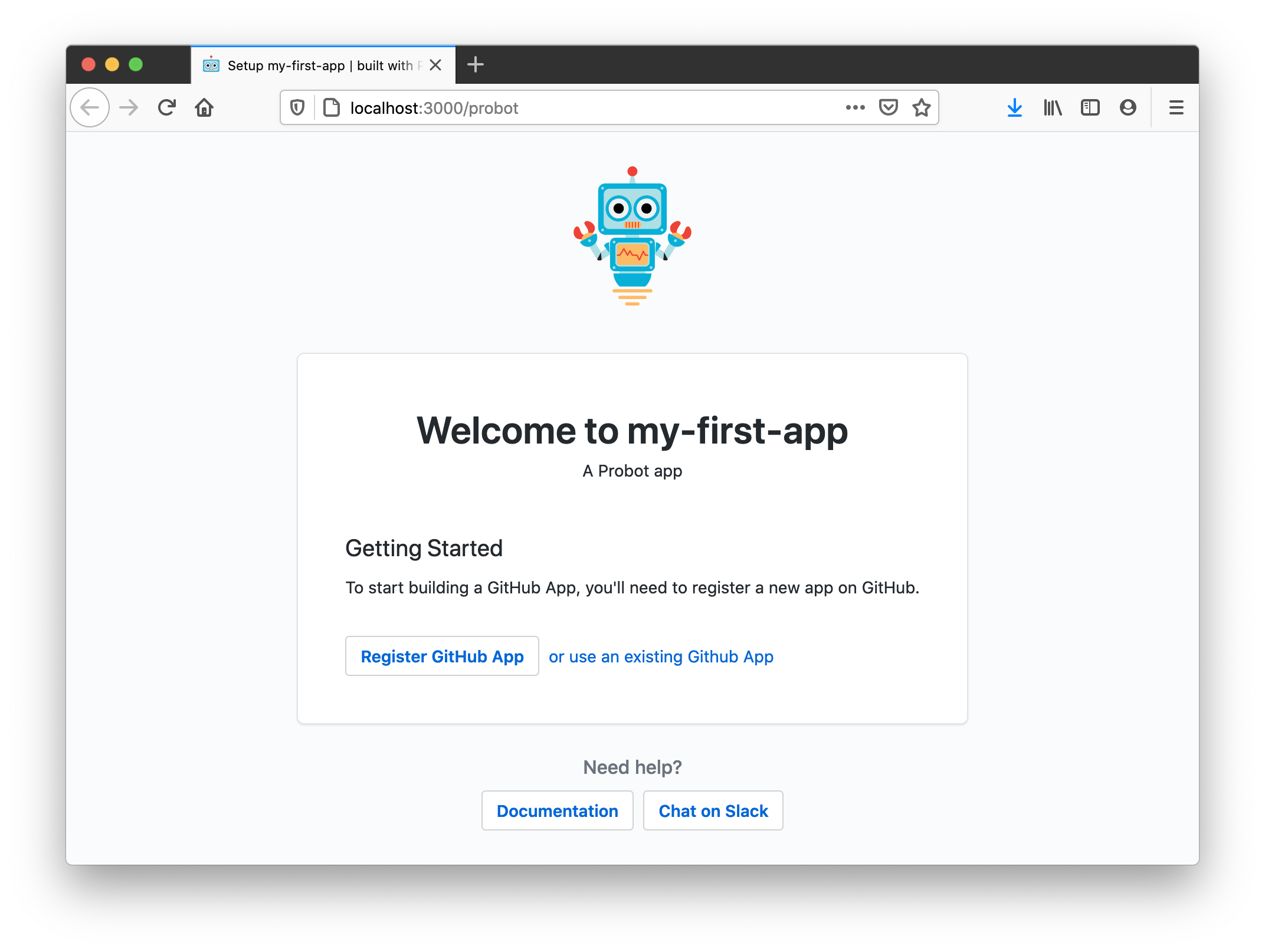
4. Go ahead and click the **Register a GitHub App** button.
5. Next, you'll get to decide on an app name that isn't already taken. Note: if you see a message "Name is already in use" although no such app exists, it means that a GitHub organization with that name exists and cannot be used as an app name.
6. After registering your GitHub App, you'll be redirected to install the app on any repositories. At the same time, you can check your local `.env` and notice it will be populated with values GitHub sends us in the course of that redirect.
7. Restart the server in your terminal (press ctrl + c to stop the server)
8. Install the app on a test repository.
9. Try triggering a webhook to activate the bot!
10. You're all set! Head down to [Debugging](https://probot.github.io/docs/development#debugging)
to learn more about developing your Probot App.
GitHub App Manifests--otherwise known as easy app creation--make it simple to generate all the settings necessary for a GitHub App. This process abstracts the [Configuring a GitHub App](https://probot.github.io/docs/development#configuring-a-github-app)
section. You can learn more about how GitHub App Manifests work and how to change your settings for one via the [GitHub Developer Docs](https://docs.github.com/en/developers/apps/creating-a-github-app-from-a-manifest/)
.
[](https://probot.github.io/docs/development#manually-configuring-a-github-app)
Manually Configuring a GitHub App
-----------------------------------------------------------------------------------------------------------------
> If you created an App with a manifest, you can skip this section; your app is already configured! If you ever need to edit those settings, you can visit `https://github.com/settings/apps/[your-app-name]`
To run your app in development, you will need to configure a GitHub App's `APP_ID`, `PRIVATE_KEY`, `WEBHOOK_SECRET`, and `WEBHOOK_PROXY_URL` in order to receive webhooks to your local machine.
1. On your local machine, copy `.env.example` to `.env` in the same directory. We're going to be changing a few things in this new file.
2. Go to [smee.io](https://smee.io/)
and click **Start a new channel**. Set `WEBHOOK_PROXY_URL` to the URL that you are redirected to.
E.g. `https://smee.io/AbCd1234EfGh5678`
3. [Create a new GitHub App](https://github.com/settings/apps/new)
with:
* **Webhook URL**: Use the same `WEBHOOK_PROXY_URL` from the previous step.
* **Webhook Secret:** `development`, or whatever you set for this in your `.env` file. (Note: For optimal security, Probot apps **require** this secret be set, even though it's optional on GitHub.).
* **Permissions & events** is located lower down the page and will depend on what data you want your app to have access to. Note: if, for example, you only enable issue events, you will not be able to listen on pull request webhooks with your app. However, for development, we recommend enabling everything.
4. You must now set `APP_ID` in your `.env` to the ID of the app you just created. The App ID can be found in on top of your apps settings page.
5. Finally, generate and download a private key file (using the button seen in the image above), then move it to your project's directory. As long as it's in the root of your project, Probot will find it automatically regardless of the filename.
For more information about these and other available keys, head over to the [environmental configuration documentation](https://probot.github.io/docs/configuration/)
.
[](https://probot.github.io/docs/development#installing-the-app-on-a-repository)
Installing the app on a repository
-------------------------------------------------------------------------------------------------------------------
You'll need to create a test repository and install your app by clicking the "Install" button on the settings page of your app, e.g. `https://github.com/apps/your-app`
[](https://probot.github.io/docs/development#debugging)
Debugging
-----------------------------------------------------------------
1. Always run `$ npm install` and restart the server if `package.json` has changed.
2. To turn on verbose logging, start the server by running: `$ LOG_LEVEL=trace npm start`
[](https://probot.github.io/docs/development#run-probot-programmatically)
Run Probot programmatically
-----------------------------------------------------------------------------------------------------
### [](https://probot.github.io/docs/development#use-run)
Use run
If you take a look to the `npm start` script, this is what it runs: `probot run ./index.js`. This is nice, but you sometimes need more control over how your Node.js application is executed. For example, if you want to use custom V8 flags, `ts-node`, etc. you need more flexibility. In those cases there's a simple way of executing your probot application programmatically:
// main.js
import { run } from "probot";
import app from "./index.js";
// pass a probot app function
run(app);
You can also set your own [`Octokit` constructor](https://github.com/octokit/core.js)
with custom plugins and a custom logger while still reading default options from `.env`:
// main.js
import { run } from "probot";
import app from "./index.js";
// pass a probot app function by overriding Probot options
run(app, {
Octokit: ProbotOctokit.plugin(myPlugin),
log: pino(),
});
Now you can run `main.js` however you want.
### [](https://probot.github.io/docs/development#use-server)
Use server
The [`run`](https://github.com/probot/probot/blob/master/src/run.ts)
function that gets executed when running `probot run ./index.js` does two main things
1. Read configuration from environment variables and local files
2. Start a [`Server`](https://probot.github.io/api/latest/classes/server_server.Server.html)
instance
If you need more control over the Server instance, you can use the `Server` class directly:
import { Server, Probot } from "probot";
import app from "./index.js";
async function startServer() {
const server = new Server({
Probot: Probot.defaults({
appId: 123,
privateKey: "content of your *.pem file here",
secret: "webhooksecret123",
}),
});
await server.load(app);
server.start();
}
The `server` instance gives you access to the [`Probot`](https://probot.github.io/api/latest/classes/probot.Probot.html)
instance (`server.probotApp`).
### [](https://probot.github.io/docs/development#use-createnodemiddleware)
Use createNodeMiddleware
If you have your own server or deploy to a serverless environment that supports loading [Express-style middleware](https://expressjs.com/en/guide/using-middleware.html)
or Node's http middleware (`(request, response) => { ... }`), you can use `createNodeMiddleware`.
import { createNodeMiddleware, Probot } from "probot";
import app from "./index.js";
const probot = new Probot({
appId: 123,
privateKey: "content of your *.pem file here",
secret: "webhooksecret123",
});
const middleware = await createNodeMiddleware(app, { probot });
export default (req, res) => {
middleware(req, res, () => {
res.writeHead(404);
res.end();
});
};
If you want to read probot's configuration from the same environment variables as [`run`](https://probot.github.io/docs/development#run)
, use the [`createProbot`](https://probot.github.io/api/latest/index.html#createprobot)
export
import { createNodeMiddleware, createProbot } from "probot";
import app from "./index.js";
export default await createNodeMiddleware(app, { probot: createProbot() });
By default, `createNodeMiddleware()` uses `/api/github/webhooks` as the webhook endpoint. To customize this behaviour, you can use the `webhooksPath` option.
export default await createNodeMiddleware(app, {
probot: createProbot(),
webhooksPath: "/path/to/webhook/endpoint",
});
### [](https://probot.github.io/docs/development#use-probot)
Use probot
If you don't use Probot's http handling in order to receive and verify events from GitHub via webhook requests, you can use the [`Probot`](https://probot.github.io/api/latest/classes/probot.Probot.html)
class directly.
import { Probot } from "probot";
import app from "./index.js";
async function example() {
const probot = new Probot({
appId: 123,
privateKey: "content of your *.pem file here",
secret: "webhooksecret123",
});
await probot.load(app);
// https://github.com/octokit/webhooks.js/#webhooksreceive
probot.receive({
id: '123',
name: 'issues',
payload: { ... }
})
}
Using the `Probot` class directly is great for [writing tests](https://probot.github.io/docs/testing)
for your Probot app function. It permits you to pass a custom logger to test for log output, disable throttling, request retries, and much more.
### [](https://probot.github.io/docs/development#use-probots-octokit)
Use Probot's Octokit
Sometimes you may need to create your own instance of Probot's internally used [Octokit](https://github.com/octokit/rest.js/#readme)
class, for example when using the [OAuth user authorization flow](https://docs.github.com/en/developers/apps/identifying-and-authorizing-users-for-github-apps)
. You may access the class by importing `ProbotOctokit`:
import { ProbotOctokit } from "probot";
function myProbotApp(app) {
const octokit = new ProbotOctokit({
// any options you'd pass to Octokit
auth: {
token: "yourToken",
},
// and a logger
log: app.log.child({ name: "my-octokit" }),
});
}
[](https://probot.github.io/docs/development#using-typescript)
Using Typescript
-------------------------------------------------------------------------------
Probot has built-in support for TypeScript, requiring minimal configuration to get started.
If you're using TypeScript in your app, we strongly recommend enabling the `strictNullChecks` compiler option in your `tsconfig.json`.
Without this option, TypeScript may incorrectly infer some webhook payload fields as `never`. For example:
app.on("issues.opened", async (context) => {
// TS Error: Property 'id' does not exist on type 'never'
const id = context.payload.issue.id;
});
This happens because the webhook types (from `@octokit/webhooks-types`) rely on strict null checking for proper type narrowing.
To fix this, add the following to your `tsconfig.json`:
{
"compilerOptions": {
"strictNullChecks": true
}
}
Or enable full strict mode:
{
"compilerOptions": {
"strict": true
}
}
See issue [#1581](https://github.com/probot/probot/issues/1581)
for more context.
[Hello World](https://probot.github.io/docs/hello-world)
[Receiving webhooks](https://probot.github.io/docs/webhooks)
Found a mistake or want to help improve this documentation? [Suggest changes on GitHub](https://github.com/probot/probot/edit/master/docs/)
Getting Started
---------------
* [Introduction](https://probot.github.io/docs/README)
* [Hello World](https://probot.github.io/docs/hello-world)
* [Developing an app](https://probot.github.io/docs/development)
* [Receiving webhooks](https://probot.github.io/docs/webhooks)
* [Interacting with GitHub](https://probot.github.io/docs/github-api)
Advanced
--------
* [Configuration](https://probot.github.io/docs/configuration)
* [Testing](https://probot.github.io/docs/testing)
* [Simulate receiving webhooks](https://probot.github.io/docs/simulating-webhooks)
* [Logging](https://probot.github.io/docs/logging)
* [Deployment](https://probot.github.io/docs/deployment)
* [HTTP routes](https://probot.github.io/docs/http)
* [Pagination](https://probot.github.io/docs/pagination)
* [Extensions](https://probot.github.io/docs/extensions)
* [Persistence](https://probot.github.io/docs/persistence)
* [Best practices](https://probot.github.io/docs/best-practices)
Reference
---------
* [Probot](https://probot.github.io/api/latest/classes/probot.Probot.html)
* [context](https://probot.github.io/api/latest/classes/context.Context.html)
* [context.octokit](http://octokit.github.io/rest.js/)
* [run](https://probot.github.io/api/latest/modules/run.html)
* [createNodeMiddleware](https://probot.github.io/api/latest/modules/create_node_middleware.html)
* [GitHub Webhook Events](https://docs.github.com/en/free-pro-team@latest/developers/webhooks-and-events/webhook-events-and-payloads)
### Subscribe
Get occasional updates on new apps & features.
with by [the Probot community](https://github.com/probot)
Code licensed [ISC](https://github.com/probot/probot/blob/master/LICENSE)
Docs licensed [CC-BY-4.0](https://creativecommons.org/licenses/by/4.0/)
---
# Unknown
[ Probot](https://probot.github.io/)
==============================================================================================
Receiving Webhooks
==================
[GitHub webhooks](https://docs.github.com/en/developers/webhooks-and-events/about-webhooks)
are triggered for various significant actions on GitHub, such as pushing code, opening or closing issues, merging pull requests, and commenting on discussions.
As a Probot app developer, you can listen for these events and automate responses to them. The `app.on` method allows your app to subscribe to specific GitHub webhook events and execute logic accordingly.
[](https://probot.github.io/docs/webhooks#listening-to-webhook-events)
Listening to Webhook Events
--------------------------------------------------------------------------------------------------
To handle a webhook event, use `app.on(eventName, callback)`. The `context` object contains all relevant details about the event, including the payload sent by GitHub.
### [](https://probot.github.io/docs/webhooks#example-handling-a-push-event)
Example: Handling a Push Event
export default (app) => {
app.on("push", async (context) => {
// Code was pushed to the repository
app.log.info("Received push event", context.payload);
});
};
### [](https://probot.github.io/docs/webhooks#filtering-by-action-type)
Filtering by Action Type
Many events include an `action` property that specifies what happened. For example, the [`issues`](https://docs.github.com/en/developers/webhooks-and-events/webhook-events-and-payloads#issues)
event supports actions like `opened`, `closed`, and `edited`. You can listen for a specific action by appending it to the event name:
export default (app) => {
app.on("issues.opened", async (context) => {
app.log.info("An issue was just opened", context.payload);
});
};
### [](https://probot.github.io/docs/webhooks#listening-to-multiple-events)
Listening to Multiple Events
To handle multiple webhook events with the same logic, pass an array of event names:
export default (app) => {
app.on(["issues.opened", "issues.edited"], async (context) => {
app.log.info("An issue was opened or edited", context.payload);
});
};
### [](https://probot.github.io/docs/webhooks#catching-all-subscribed-events)
Catching All Subscribed Events
To log all received webhook events, use `app.onAny()`:
export default (app) => {
app.onAny(async (context) => {
app.log.info({ event: context.name, action: context.payload.action });
});
};
[](https://probot.github.io/docs/webhooks#further-reading)
Further Reading
--------------------------------------------------------------------------
* [GitHub Webhook Events](https://docs.github.com/en/developers/webhooks-and-events)
* [Probot Webhook API](https://probot.github.io/docs/webhooks/)
* [@octokit/webhooks.js](https://github.com/octokit/webhooks.js/#webhook-events)
[Developing an app](https://probot.github.io/docs/development)
[Interacting with GitHub](https://probot.github.io/docs/github-api)
Found a mistake or want to help improve this documentation? [Suggest changes on GitHub](https://github.com/probot/probot/edit/master/docs/)
Getting Started
---------------
* [Introduction](https://probot.github.io/docs/README)
* [Hello World](https://probot.github.io/docs/hello-world)
* [Developing an app](https://probot.github.io/docs/development)
* [Receiving webhooks](https://probot.github.io/docs/webhooks)
* [Interacting with GitHub](https://probot.github.io/docs/github-api)
Advanced
--------
* [Configuration](https://probot.github.io/docs/configuration)
* [Testing](https://probot.github.io/docs/testing)
* [Simulate receiving webhooks](https://probot.github.io/docs/simulating-webhooks)
* [Logging](https://probot.github.io/docs/logging)
* [Deployment](https://probot.github.io/docs/deployment)
* [HTTP routes](https://probot.github.io/docs/http)
* [Pagination](https://probot.github.io/docs/pagination)
* [Extensions](https://probot.github.io/docs/extensions)
* [Persistence](https://probot.github.io/docs/persistence)
* [Best practices](https://probot.github.io/docs/best-practices)
Reference
---------
* [Probot](https://probot.github.io/api/latest/classes/probot.Probot.html)
* [context](https://probot.github.io/api/latest/classes/context.Context.html)
* [context.octokit](http://octokit.github.io/rest.js/)
* [run](https://probot.github.io/api/latest/modules/run.html)
* [createNodeMiddleware](https://probot.github.io/api/latest/modules/create_node_middleware.html)
* [GitHub Webhook Events](https://docs.github.com/en/free-pro-team@latest/developers/webhooks-and-events/webhook-events-and-payloads)
### Subscribe
Get occasional updates on new apps & features.
with by [the Probot community](https://github.com/probot)
Code licensed [ISC](https://github.com/probot/probot/blob/master/LICENSE)
Docs licensed [CC-BY-4.0](https://creativecommons.org/licenses/by/4.0/)
---
# Unknown
[ Probot](https://probot.github.io/)
==============================================================================================
Configuration
=============
When developing a Probot App, you will need to have several different fields in a `.env` file which specify environment variables. Here are some common use cases:
| Environment Variable | [Programmatic Argument](https://probot.github.io/docs/development/#run-probot-programmatically) | Description |
| --- | --- | --- |
| `APP_ID` | `new Probot({ appId })` | The App ID assigned to your GitHub App. **Required**
_(Example: `1234`)_ |
| `PRIVATE_KEY` or `PRIVATE_KEY_PATH` | `new Probot({ privateKey })` | The contents of the private key for your GitHub App. If you're unable to use multiline environment variables, use base64 encoding to convert the key to a single line string. See the [Deployment](https://probot.github.io/docs/deployment)
docs for provider specific usage. When using the `PRIVATE_KEY_PATH` environment variable, set it to the path of the `.pem` file that you downloaded from your GitHub App registration.
_(Example: `path/to/key.pem`)_ |
| **Webhook options** | | |
| `WEBHOOK_PROXY_URL` | `new Server({ webhookProxy })` | Allows your local development environment to receive GitHub webhook events. Go to [https://smee.io/new](https://smee.io/new)
to get started.
_(Example: `https://smee.io/your-custom-url`)_ |
| `WEBHOOK_SECRET` | `new Probot({ secret })` | The webhook secret used when creating a GitHub App. 'development' is used as a default, but the value in `.env` needs to match the value configured in your App settings on GitHub. Note: GitHub marks this value as optional, but for optimal security it's required for Probot apps. **Required**
_(Example: `development`)_ |
For more on the set up of these items, check out [Configuring a GitHub App](https://probot.github.io/docs/development/#configuring-a-github-app)
.
Some less common environment variables are:
| Environment Variable | [Programmatic Argument](https://probot.github.io/docs/development/#run-probot-programmatically) | Description |
| --- | --- | --- |
| `GHE_HOST` | `new Probot({ Octokit: ProbotOctokit.defaults({ baseUrl }) })` | The hostname of your GitHub Enterprise instance.
_(Example: `github.mycompany.com`)_ |
| `GHE_PROTOCOL` | `new Probot({ Octokit: ProbotOctokit.defaults({ baseUrl }) })` | The protocol of your GitHub Enterprise instance. Defaults to HTTPS. Do not change unless you are certain.
_(Example: `https`)_ |
| `GH_ORG` | \- | The organization where you want to register the app in the app creation manifest flow. If set, the app is registered for an organization ([https://github.com/organizations/ORGANIZATION/settings/apps/new](https://github.com/organizations/ORGANIZATION/settings/apps/new)
), if not set, the GitHub app would be registered for the user account ([https://github.com/settings/apps/new](https://github.com/settings/apps/new)
). |
| `LOG_FORMAT` | \- | By default, logs are formatted for readability in development. You can set this to `json` in order to disable the formatting |
| `LOG_LEVEL` | `const log = require('pino')({ level })` | The verbosity of logs to show when running your app, which can be `fatal`, `error`, `warn`, `info`, `debug`, `trace` or `silent`. Default: `info` |
| `LOG_LEVEL_IN_STRING` | \- | By default, when using the `json` format, the level printed in the log records is an int (`10`, `20`, ..). This option tells the logger to print level as a string: `{"level": "info"}`. Default `false` |
| `LOG_MESSAGE_KEY` | `const log = require('pino')({ messageKey: 'msg' })` | Only relevant when `LOG_FORMAT` is set to `json`. Sets the json key for the log message. Default: `msg` |
| `SENTRY_DSN` | \- | Set to a [Sentry](https://sentry.io/)
DSN to report all errors thrown by your app.
_(Example: `https://1234abcd@sentry.io/12345`)_ |
| `PORT` | `new Server({ port })` | The port to start the local server on. Default: `3000` |
| `HOST` | `new Server({ host })` | The host to start the local server on. |
| `WEBHOOK_PATH` | `new Server({ webhookPath })` | The URL path which will receive webhooks. Default: `/api/github/webhooks` |
| `REDIS_URL` | `new Probot({ redisConfig })` | Set to a `redis://` url as connection option for [ioredis](https://github.com/luin/ioredis#connect-to-redis)
in order to enable [cluster support for request throttling](https://github.com/octokit/plugin-throttling.js#clustering)
.
_(Example: `redis://:secret@redis-123.redislabs.com:12345/0`)_ |
For more information on the formatting conventions and rules of `.env` files, check out [the npm `dotenv` module's documentation](https://www.npmjs.com/package/dotenv#rules)
.
[Interacting with GitHub](https://probot.github.io/docs/github-api)
[Testing](https://probot.github.io/docs/testing)
Found a mistake or want to help improve this documentation? [Suggest changes on GitHub](https://github.com/probot/probot/edit/master/docs/)
Getting Started
---------------
* [Introduction](https://probot.github.io/docs/README)
* [Hello World](https://probot.github.io/docs/hello-world)
* [Developing an app](https://probot.github.io/docs/development)
* [Receiving webhooks](https://probot.github.io/docs/webhooks)
* [Interacting with GitHub](https://probot.github.io/docs/github-api)
Advanced
--------
* [Configuration](https://probot.github.io/docs/configuration)
* [Testing](https://probot.github.io/docs/testing)
* [Simulate receiving webhooks](https://probot.github.io/docs/simulating-webhooks)
* [Logging](https://probot.github.io/docs/logging)
* [Deployment](https://probot.github.io/docs/deployment)
* [HTTP routes](https://probot.github.io/docs/http)
* [Pagination](https://probot.github.io/docs/pagination)
* [Extensions](https://probot.github.io/docs/extensions)
* [Persistence](https://probot.github.io/docs/persistence)
* [Best practices](https://probot.github.io/docs/best-practices)
Reference
---------
* [Probot](https://probot.github.io/api/latest/classes/probot.Probot.html)
* [context](https://probot.github.io/api/latest/classes/context.Context.html)
* [context.octokit](http://octokit.github.io/rest.js/)
* [run](https://probot.github.io/api/latest/modules/run.html)
* [createNodeMiddleware](https://probot.github.io/api/latest/modules/create_node_middleware.html)
* [GitHub Webhook Events](https://docs.github.com/en/free-pro-team@latest/developers/webhooks-and-events/webhook-events-and-payloads)
### Subscribe
Get occasional updates on new apps & features.
with by [the Probot community](https://github.com/probot)
Code licensed [ISC](https://github.com/probot/probot/blob/master/LICENSE)
Docs licensed [CC-BY-4.0](https://creativecommons.org/licenses/by/4.0/)
---
# Unknown
[ Probot](https://probot.github.io/)
==============================================================================================
Testing
=======
We highly recommend working in the style of [test-driven development](http://agiledata.org/essays/tdd.html)
when creating probot apps. It is frustrating to constantly create real GitHub events in order to test an app. Redelivering webhooks is possible and can be accessed in your app's [settings](https://github.com/settings/apps)
page under the **Advanced** tab. We do offer the above documented `receive` method to help make this easier; however, by writing your tests first, you can avoid repeatedly recreating actual events from GitHub to check if your code is working.
For our testing examples, we use [jest](https://facebook.github.io/jest/)
, but there are other options that can perform similar operations. We also recommend using [nock](https://github.com/nock/nock)
, a tool for mocking HTTP requests, which is often crucial to testing in Probot, considering how much of Probot depends on GitHub's APIs. Here's an example of creating an app instance and using nock to test that we correctly hit the GitHub API:
import nock from "nock";
// Requiring our app implementation
import myProbotApp from "../index.js";
import { Probot, ProbotOctokit } from "probot";
// Requiring our fixtures
import payload from "./fixtures/issues.opened.json" with { type: "json" };
const issueCreatedBody = { body: "Thanks for opening this issue!" };
describe("My Probot app", () => {
let probot;
beforeEach(() => {
nock.disableNetConnect();
probot = new Probot({
githubToken: "test",
// Disable throttling & retrying requests for easier testing
Octokit: ProbotOctokit.defaults((instanceOptions: any) => {
return {
...instanceOptions,
retry: { enabled: false },
throttle: { enabled: false },
};
}),
});
myProbotApp(probot);
});
test("creates a passing check", async () => {
// Test that we correctly return a test token
nock("https://api.github.com")
.post("/app/installations/2/access_tokens")
.reply(200, { token: "test" });
// Test that a comment is posted
nock("https://api.github.com")
.post("/repos/hiimbex/testing-things/issues/1/comments", (body) => {
expect(body).toMatchObject(issueCreatedBody);
return true;
})
.reply(200);
// Receive a webhook event
await probot.receive({ name: "issues", payload });
});
afterEach(() => {
nock.cleanAll();
nock.enableNetConnect();
});
});
[](https://probot.github.io/docs/testing#testing-log-output)
Testing log output
-------------------------------------------------------------------------------
Probot is using [pino](https://getpino.io/)
for logging. A custom `pino` instance can be passed to the `Probot` constructor. You can write all log output into an array by passing a custom transport function:
import pino from "pino";
import Stream from "stream";
const streamLogsToOutput = new Stream.Writable({ objectMode: true });
streamLogsToOutput._write = (object, encoding, done) => {
output.push(JSON.parse(object));
done();
};
const probot = new Probot({
id: 1,
githubToken: "test",
// Disable throttling & retrying requests for easier testing
Octokit: ProbotOctokit.defaults({
retry: { enabled: false },
throttle: { enabled: false },
}),
log: pino(streamLogsToOutput),
});
probot.log.info("test");
// output is now:
// [ { level: 30, time: 1600619283012, pid: 44071, hostname: 'Gregors-MacBook-Pro.local', msg: 'test' } ]
[](https://probot.github.io/docs/testing#examples)
Examples:
------------------------------------------------------------
Using Jest
* [Settings](https://github.com/probot/settings)
: [probot/settings/test/integration/plugins/repository.test.js](https://github.com/probot/settings/blob/master/test/integration/plugins/repository.test.js)
* [DCO](https://github.com/probot/dco)
: [probot/dco/test/index.test.js](https://github.com/probot/dco/blob/master/test/index.test.js)
Using Tap
* [WIP](https://github.com/apps/wip/)
: [wip/app/test/integration](https://github.com/wip/app/tree/master/test/integration)
Using Mocha and Sinon
* [Auto-Me-Bot](https://github.com/TomerFi/auto-me-bot)
: [tests](https://github.com/TomerFi/auto-me-bot/tree/main/tests)
[Configuration](https://probot.github.io/docs/configuration)
[Simulate receiving webhooks](https://probot.github.io/docs/simulating-webhooks)
Found a mistake or want to help improve this documentation? [Suggest changes on GitHub](https://github.com/probot/probot/edit/master/docs/)
Getting Started
---------------
* [Introduction](https://probot.github.io/docs/README)
* [Hello World](https://probot.github.io/docs/hello-world)
* [Developing an app](https://probot.github.io/docs/development)
* [Receiving webhooks](https://probot.github.io/docs/webhooks)
* [Interacting with GitHub](https://probot.github.io/docs/github-api)
Advanced
--------
* [Configuration](https://probot.github.io/docs/configuration)
* [Testing](https://probot.github.io/docs/testing)
* [Simulate receiving webhooks](https://probot.github.io/docs/simulating-webhooks)
* [Logging](https://probot.github.io/docs/logging)
* [Deployment](https://probot.github.io/docs/deployment)
* [HTTP routes](https://probot.github.io/docs/http)
* [Pagination](https://probot.github.io/docs/pagination)
* [Extensions](https://probot.github.io/docs/extensions)
* [Persistence](https://probot.github.io/docs/persistence)
* [Best practices](https://probot.github.io/docs/best-practices)
Reference
---------
* [Probot](https://probot.github.io/api/latest/classes/probot.Probot.html)
* [context](https://probot.github.io/api/latest/classes/context.Context.html)
* [context.octokit](http://octokit.github.io/rest.js/)
* [run](https://probot.github.io/api/latest/modules/run.html)
* [createNodeMiddleware](https://probot.github.io/api/latest/modules/create_node_middleware.html)
* [GitHub Webhook Events](https://docs.github.com/en/free-pro-team@latest/developers/webhooks-and-events/webhook-events-and-payloads)
### Subscribe
Get occasional updates on new apps & features.
with by [the Probot community](https://github.com/probot)
Code licensed [ISC](https://github.com/probot/probot/blob/master/LICENSE)
Docs licensed [CC-BY-4.0](https://creativecommons.org/licenses/by/4.0/)
---
# Unknown
[ Probot](https://probot.github.io/)
==============================================================================================
Interacting with GitHub
=======================
Probot uses [GitHub Apps](https://docs.github.com/developers/apps/)
for authorizing requests to GitHub's APIs. A registered GitHub App is a first-class actor on GitHub, like a user (e.g. [@bkeepers](https://github.com/bkeepers)
) or an organization (e.g. [@github](https://github.com/github)
). The GitHub App is granted access to all or selected repositories by being "installed" on a user or organization account and can perform actions through the API like [commenting on an issue](https://docs.github.com/rest/reference/issues#create-an-issue-comment)
or [creating a status](https://docs.github.com/rest/reference/repos#create-a-commit-status)
.
Your Probot app has access to an authenticated [Octokit client](https://octokit.github.io/rest.js/)
that can be used to make API calls. It supports both the [GitHub REST API](https://docs.github.com/rest)
, and the [GitHub GraphQL API](https://docs.github.com/graphql)
.
[](https://probot.github.io/docs/github-api#rest-api)
REST API
--------------------------------------------------------------
`context.octokit` is an instance of the [`@octokit/rest` Node.js module](https://github.com/octokit/rest.js#readme)
, and allows you to do almost anything programmatically that you can do through a web browser.
Here is an example of an autoresponder app that comments on opened issues:
export default (app) => {
app.on("issues.opened", async (context) => {
// `context` extracts information from the event, which can be passed to
// GitHub API calls. This will return:
// { owner: 'yourname', repo: 'yourrepo', number: 123, body: 'Hello World! }
const params = context.issue({ body: "Hello World!" });
// Post a comment on the issue
return context.octokit.issues.createComment(params);
});
};
See the [full API docs](https://octokit.github.io/rest.js/)
to see all the ways you can interact with GitHub. Some API endpoints are not available on GitHub Apps yet, so check [which ones are available](https://docs.github.com/en/rest/overview/endpoints-available-for-github-apps)
first.
[](https://probot.github.io/docs/github-api#graphql-api)
GraphQL API
--------------------------------------------------------------------
Use `context.octokit.graphql` to make requests to the [GitHub GraphQL API](https://docs.github.com/en/graphql)
.
Here is an example of the same autoresponder app from above that comments on opened issues, but this time with GraphQL:
// GraphQL query to add a comment
const addComment = `
mutation comment($id: ID!, $body: String!) {
addComment(input: {subjectId: $id, body: $body}) {
clientMutationId
}
}
`;
export default (app) => {
app.on("issues.opened", async (context) => {
// Post a comment on the issue
context.octokit.graphql(addComment, {
id: context.payload.issue.node_id,
body: "Hello World",
});
});
};
The options in the 2nd argument will be passed as variables to the query. You can pass custom headers by using the `headers` key:
// GraphQL query to pin an issue
const pinIssue = `
mutation comment($id: ID!) {
pinIssue(input: {subjectId: $id}) {
clientMutationId
}
}
`;
export default (app) => {
app.on("issues.opened", async (context) => {
context.octokit.graphql(pinIssue, {
id: context.payload.issue.node_id,
headers: {
accept: "application/vnd.github.elektra-preview+json",
},
});
});
};
Check out the [GitHub GraphQL API docs](https://docs.github.com/en/graphql)
to learn more.
[](https://probot.github.io/docs/github-api#unauthenticated-events)
Unauthenticated Events
------------------------------------------------------------------------------------------
When [receiving webhook events](https://probot.github.io/docs/webhooks)
, `context.octokit` is _usually_ an authenticated client, but there are a few events that are exceptions:
* [`installation.deleted` & `installation.suspend`](https://docs.github.com/en/developers/webhooks-and-events/webhook-events-and-payloads#installation)
- The installation was _just_ deleted or suspended, so we can't authenticate as the installation.
* [`marketplace_purchase`](https://docs.github.com/en/developers/webhooks-and-events/webhook-events-and-payloads#marketplace_purchase)
- The purchase happens before the app is installed on an account.
For these events, `context.octokit` will be unauthenticated. Attemts to send any requests will fail with an error explaining the circumstances.
[](https://probot.github.io/docs/github-api#github-enterprise)
GitHub Enterprise
--------------------------------------------------------------------------------
If you want to run a Probot App against a GitHub Enterprise instance, you'll need to create and set the `GHE_HOST` environment variable inside of the `.env` file.
GHE_HOST=fake.github-enterprise.com
When [using Probot programmatically](https://probot.github.io/docs/development/#run-probot-programmatically)
, set the `baseUrl` option for the [`Probot`](https://probot.github.io/api/latest/classes/probot.Probot.html)
constructor to the full base Url of the REST API
const MyProbot = Probot.defaults({
baseUrl: "https://fake.github-enterprise.com/api/v3",
});
[Receiving webhooks](https://probot.github.io/docs/webhooks)
[Configuration](https://probot.github.io/docs/configuration)
Found a mistake or want to help improve this documentation? [Suggest changes on GitHub](https://github.com/probot/probot/edit/master/docs/)
Getting Started
---------------
* [Introduction](https://probot.github.io/docs/README)
* [Hello World](https://probot.github.io/docs/hello-world)
* [Developing an app](https://probot.github.io/docs/development)
* [Receiving webhooks](https://probot.github.io/docs/webhooks)
* [Interacting with GitHub](https://probot.github.io/docs/github-api)
Advanced
--------
* [Configuration](https://probot.github.io/docs/configuration)
* [Testing](https://probot.github.io/docs/testing)
* [Simulate receiving webhooks](https://probot.github.io/docs/simulating-webhooks)
* [Logging](https://probot.github.io/docs/logging)
* [Deployment](https://probot.github.io/docs/deployment)
* [HTTP routes](https://probot.github.io/docs/http)
* [Pagination](https://probot.github.io/docs/pagination)
* [Extensions](https://probot.github.io/docs/extensions)
* [Persistence](https://probot.github.io/docs/persistence)
* [Best practices](https://probot.github.io/docs/best-practices)
Reference
---------
* [Probot](https://probot.github.io/api/latest/classes/probot.Probot.html)
* [context](https://probot.github.io/api/latest/classes/context.Context.html)
* [context.octokit](http://octokit.github.io/rest.js/)
* [run](https://probot.github.io/api/latest/modules/run.html)
* [createNodeMiddleware](https://probot.github.io/api/latest/modules/create_node_middleware.html)
* [GitHub Webhook Events](https://docs.github.com/en/free-pro-team@latest/developers/webhooks-and-events/webhook-events-and-payloads)
### Subscribe
Get occasional updates on new apps & features.
with by [the Probot community](https://github.com/probot)
Code licensed [ISC](https://github.com/probot/probot/blob/master/LICENSE)
Docs licensed [CC-BY-4.0](https://creativecommons.org/licenses/by/4.0/)
---
# Unknown
[ Probot](https://probot.github.io/)
==============================================================================================
Simulate receiving webhooks
===========================
As you are developing your app, you will likely want to test it by repeatedly triggering the same webhook. You can simulate a webhook being delivered by saving the payload to a file, and then calling `probot receive` from the command line.
To save a copy of the payload, go to the [settings](https://github.com/settings/apps)
page for your App, and go to the **Advanced** tab. Click on one of the **Recent Deliveries** to expand it and see the details of the webhook event. Copy the JSON from the **Payload** and save it to a new file. (`test/fixtures/issues.labeled.json` in this example).
**Note**: This will only receive the JSON payload, not the headers that are also sent by GitHub webhooks.
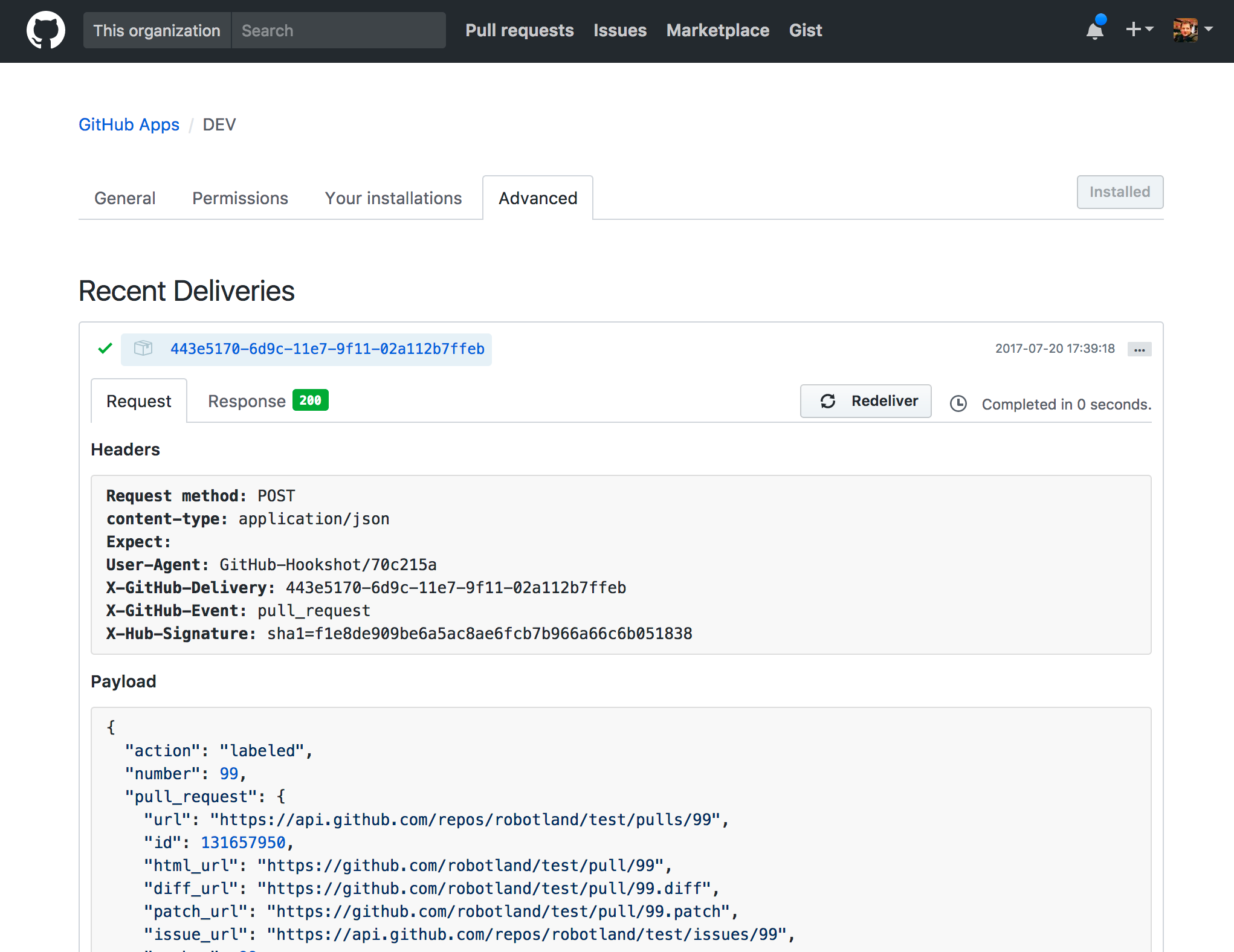
Next, simulate receiving this event being delivered by running:
$ node_modules/.bin/probot receive -e -p
Note that `event-name` here is just the name of the event (like pull\_request or issues) and not the action (like labeled). You can find it in the GitHub deliveries history under the `X-GitHub-Event` header.
For example, to simulate receiving the `pull_request.labeled` event, run:
$ node_modules/.bin/probot receive -e pull_request -p test/fixtures/pull_request.labeled.json ./index.js
[Testing](https://probot.github.io/docs/testing)
[Logging](https://probot.github.io/docs/logging)
Found a mistake or want to help improve this documentation? [Suggest changes on GitHub](https://github.com/probot/probot/edit/master/docs/)
Getting Started
---------------
* [Introduction](https://probot.github.io/docs/README)
* [Hello World](https://probot.github.io/docs/hello-world)
* [Developing an app](https://probot.github.io/docs/development)
* [Receiving webhooks](https://probot.github.io/docs/webhooks)
* [Interacting with GitHub](https://probot.github.io/docs/github-api)
Advanced
--------
* [Configuration](https://probot.github.io/docs/configuration)
* [Testing](https://probot.github.io/docs/testing)
* [Simulate receiving webhooks](https://probot.github.io/docs/simulating-webhooks)
* [Logging](https://probot.github.io/docs/logging)
* [Deployment](https://probot.github.io/docs/deployment)
* [HTTP routes](https://probot.github.io/docs/http)
* [Pagination](https://probot.github.io/docs/pagination)
* [Extensions](https://probot.github.io/docs/extensions)
* [Persistence](https://probot.github.io/docs/persistence)
* [Best practices](https://probot.github.io/docs/best-practices)
Reference
---------
* [Probot](https://probot.github.io/api/latest/classes/probot.Probot.html)
* [context](https://probot.github.io/api/latest/classes/context.Context.html)
* [context.octokit](http://octokit.github.io/rest.js/)
* [run](https://probot.github.io/api/latest/modules/run.html)
* [createNodeMiddleware](https://probot.github.io/api/latest/modules/create_node_middleware.html)
* [GitHub Webhook Events](https://docs.github.com/en/free-pro-team@latest/developers/webhooks-and-events/webhook-events-and-payloads)
### Subscribe
Get occasional updates on new apps & features.
with by [the Probot community](https://github.com/probot)
Code licensed [ISC](https://github.com/probot/probot/blob/master/LICENSE)
Docs licensed [CC-BY-4.0](https://creativecommons.org/licenses/by/4.0/)
---
# Unknown
[ Probot](https://probot.github.io/)
==============================================================================================
Logging
=======
Probot comes with [`pino`](https://getpino.io/)
, a minimal logging library that outputs [newline delimited JSON](http://ndjson.org/)
. Probot uses [`pino-pretty`](https://github.com/pinojs/pino-pretty)
for more readable formatting during development and [`@probot/pino`](https://github.com/probot/pino/)
which supports error reporting to Sentry by configuring the `SENTRY_DSN` environment variable.
`app.log`, `context.log` in an event handler, and `req.log` in an HTTP request are all loggers that you can use to get more information about what your app is doing.
export default (app, { getRouter }) => {
app.log.info("Yay, my app is loaded");
app.on("issues.opened", (context) => {
if (context.payload.issue.body.match(/bacon/)) {
context.log.info("This issue is about bacon");
} else {
context.log.info("Sadly, this issue is not about bacon");
}
});
const router = getRouter("/my-app");
router.get("/hello-world", (req, res) => {
req.log.info("Someone is saying hello");
res.send("Hello World");
});
};
When you start up your Probot app you should see your log message appear in your terminal.
Occasionally you will want to log more detailed information that is useful for debugging, but you might not want to see it all the time.
export default (app) => {
// …
app.log.trace("Really low-level logging");
app.log.debug({ data: "here" }, "End-line specs on the rotary girder");
app.log.info("Same as using `app.log`");
const err = new Error("Some error");
app.log.warn(err, "Uh-oh, this may not be good");
app.log.error(err, "Yeah, it was bad");
app.log.fatal(err, "Goodbye, cruel world!");
};
By default, messages that are `info` and above will show in your logs, but you can change it by setting the
`LOG_LEVEL` environment variable to `trace`, `debug`, `info`, `warn`, `error`, or `fatal` in `.env` or on the command line.
$ LOG_LEVEL=debug npm start
[](https://probot.github.io/docs/logging#log-formats)
Log formats
-----------------------------------------------------------------
In development, it's nice to see simple, colorized, pretty log messages. But those pretty messages don't do you any good when you have 2TB of log files and you're trying to track down why that one-in-a-million bug is happening in production.
When `NODE_ENV` is set (as it should be in production), the log output is structured JSON, which can then be drained to a logging service that allows querying by various attributes.
For example, given this log:
export default (app) => {
app.on("issue_comment.created", (context) => {
context.log.info("Comment created");
});
};
You'll see this output:
{"name":"Probot","hostname":"Brandons-MacBook-Pro-3.local","pid":96993,"event":{"id":"afdcb370-c57d-11e7-9b26-0f31120e45b8","event":"issue_comment","action":"created","repository":"robotland/test","installation":13055},"level":30,"msg":"Comment created","time":"2017-11-09T18:42:07.312Z","v":0}
The output can then be piped to one of [pino's transport tools](https://getpino.io/#/docs/transports)
, or you can build your own.
[Simulate receiving webhooks](https://probot.github.io/docs/simulating-webhooks)
[Deployment](https://probot.github.io/docs/deployment)
Found a mistake or want to help improve this documentation? [Suggest changes on GitHub](https://github.com/probot/probot/edit/master/docs/)
Getting Started
---------------
* [Introduction](https://probot.github.io/docs/README)
* [Hello World](https://probot.github.io/docs/hello-world)
* [Developing an app](https://probot.github.io/docs/development)
* [Receiving webhooks](https://probot.github.io/docs/webhooks)
* [Interacting with GitHub](https://probot.github.io/docs/github-api)
Advanced
--------
* [Configuration](https://probot.github.io/docs/configuration)
* [Testing](https://probot.github.io/docs/testing)
* [Simulate receiving webhooks](https://probot.github.io/docs/simulating-webhooks)
* [Logging](https://probot.github.io/docs/logging)
* [Deployment](https://probot.github.io/docs/deployment)
* [HTTP routes](https://probot.github.io/docs/http)
* [Pagination](https://probot.github.io/docs/pagination)
* [Extensions](https://probot.github.io/docs/extensions)
* [Persistence](https://probot.github.io/docs/persistence)
* [Best practices](https://probot.github.io/docs/best-practices)
Reference
---------
* [Probot](https://probot.github.io/api/latest/classes/probot.Probot.html)
* [context](https://probot.github.io/api/latest/classes/context.Context.html)
* [context.octokit](http://octokit.github.io/rest.js/)
* [run](https://probot.github.io/api/latest/modules/run.html)
* [createNodeMiddleware](https://probot.github.io/api/latest/modules/create_node_middleware.html)
* [GitHub Webhook Events](https://docs.github.com/en/free-pro-team@latest/developers/webhooks-and-events/webhook-events-and-payloads)
### Subscribe
Get occasional updates on new apps & features.
with by [the Probot community](https://github.com/probot)
Code licensed [ISC](https://github.com/probot/probot/blob/master/LICENSE)
Docs licensed [CC-BY-4.0](https://creativecommons.org/licenses/by/4.0/)
---
# Unknown
[ Probot](https://probot.github.io/)
==============================================================================================
Pagination
==========
Many GitHub API endpoints are paginated. The [`octokit.paginate` method](https://github.com/octokit/plugin-paginate-rest.js/#readme)
can be used to get each page of the results.
export default (app) => {
app.on("issues.opened", (context) => {
context.octokit.paginate(
context.octokit.issues.list,
context.repo(),
(response) => {
response.data.issues.forEach((issue) => {
context.log.info("Issue: %s", issue.title);
});
},
);
});
};
[](https://probot.github.io/docs/pagination#accumulating-pages)
Accumulating pages
----------------------------------------------------------------------------------
The return value of the `octokit.paginate` callback will be used to accumulate results.
export default (app) => {
app.on("issues.opened", async (context) => {
const allIssues = await context.octokit.paginate(
context.octokit.issues.list,
context.repo(),
(response) => response.data,
);
console.log(allIssues);
});
};
[](https://probot.github.io/docs/pagination#early-exit)
Early exit
------------------------------------------------------------------
Sometimes it is desirable to stop fetching pages after a certain condition has been satisfied. A second argument, `done`, is provided to the callback and can be used to stop pagination. After `done` is invoked, no additional pages will be fetched, but you still need to return the mapped value for the current page request.
export default (app) => {
app.on("issues.opened", (context) => {
context.octokit.paginate(
context.octokit.issues.list,
context.repo(),
(res, done) => {
for (const issue of res.data) {
if (issue.body.includes("something")) {
console.log("found it:", issue);
done();
break;
}
}
},
);
});
};
[](https://probot.github.io/docs/pagination#async-iterators)
Async iterators
----------------------------------------------------------------------------
Using async iterators you can iterate through each response
export default (app) => {
app.on("issues.opened", async (context) => {
for await (const response of octokit.paginate.iterator(
context.octokit.issues.list,
context.repo(),
)) {
for (const issue of response.data) {
if (issue.body.includes("something")) {
return console.log("found it:", issue);
}
}
}
});
};
[HTTP routes](https://probot.github.io/docs/http)
[Extensions](https://probot.github.io/docs/extensions)
Found a mistake or want to help improve this documentation? [Suggest changes on GitHub](https://github.com/probot/probot/edit/master/docs/)
Getting Started
---------------
* [Introduction](https://probot.github.io/docs/README)
* [Hello World](https://probot.github.io/docs/hello-world)
* [Developing an app](https://probot.github.io/docs/development)
* [Receiving webhooks](https://probot.github.io/docs/webhooks)
* [Interacting with GitHub](https://probot.github.io/docs/github-api)
Advanced
--------
* [Configuration](https://probot.github.io/docs/configuration)
* [Testing](https://probot.github.io/docs/testing)
* [Simulate receiving webhooks](https://probot.github.io/docs/simulating-webhooks)
* [Logging](https://probot.github.io/docs/logging)
* [Deployment](https://probot.github.io/docs/deployment)
* [HTTP routes](https://probot.github.io/docs/http)
* [Pagination](https://probot.github.io/docs/pagination)
* [Extensions](https://probot.github.io/docs/extensions)
* [Persistence](https://probot.github.io/docs/persistence)
* [Best practices](https://probot.github.io/docs/best-practices)
Reference
---------
* [Probot](https://probot.github.io/api/latest/classes/probot.Probot.html)
* [context](https://probot.github.io/api/latest/classes/context.Context.html)
* [context.octokit](http://octokit.github.io/rest.js/)
* [run](https://probot.github.io/api/latest/modules/run.html)
* [createNodeMiddleware](https://probot.github.io/api/latest/modules/create_node_middleware.html)
* [GitHub Webhook Events](https://docs.github.com/en/free-pro-team@latest/developers/webhooks-and-events/webhook-events-and-payloads)
### Subscribe
Get occasional updates on new apps & features.
with by [the Probot community](https://github.com/probot)
Code licensed [ISC](https://github.com/probot/probot/blob/master/LICENSE)
Docs licensed [CC-BY-4.0](https://creativecommons.org/licenses/by/4.0/)
---
# Unknown
[ Probot](https://probot.github.io/)
==============================================================================================
Deployment
==========
Every app can either be deployed stand-alone, or combined with other apps in one deployment.
> **Heads up!** Note that most [apps in the @probot organization](https://github.com/search?q=topic%3Aprobot-app+org%3Aprobot&type=Repositories)
> have an official hosted app that you can use for your open source project. Use the hosted instance if you don't want to deploy your own.
**Contents:**
* [Register the GitHub App](https://probot.github.io/docs/deployment#register-the-github-app)
* [Deploy the app](https://probot.github.io/docs/deployment#deploy-the-app)
* [As node app](https://probot.github.io/docs/deployment#as-node-app)
* [Heroku](https://probot.github.io/docs/deployment#heroku)
* [Render](https://probot.github.io/docs/deployment#render)
* [As serverless function](https://probot.github.io/docs/deployment#as-serverless-function)
* [AWS Lambda](https://probot.github.io/docs/deployment#aws-lambda)
* [Azure Functions](https://probot.github.io/docs/deployment#azure-functions)
* [Google Cloud Functions](https://probot.github.io/docs/deployment#google-cloud-functions)
* [GitHub Actions](https://probot.github.io/docs/deployment#github-actions)
* [Vercel](https://probot.github.io/docs/deployment#vercel)
* [Netlify Functions](https://probot.github.io/docs/deployment#netlify-functions)
* [Share the app](https://probot.github.io/docs/deployment#share-the-app)
* [Combining apps](https://probot.github.io/docs/deployment#combining-apps)
* [Error tracking](https://probot.github.io/docs/deployment#error-tracking)
[](https://probot.github.io/docs/deployment#register-the-github-app)
Register the GitHub App
--------------------------------------------------------------------------------------------
Every deployment will need a [GitHub App registration](https://docs.github.com/apps)
.
1. [Register a new GitHub App](https://github.com/settings/apps/new)
with:
* **Homepage URL**: the URL to the GitHub repository for your app
* **Webhook URL**: Use `https://example.com/` for now, we'll come back in a minute to update this with the URL of your deployed app.
* **Webhook Secret**: Generate a unique secret with (e.g. with `openssl rand -base64 32`) and save it because you'll need it in a minute to configure your Probot app.
2. Download the private key from the app.
3. Make sure that you click the green **Install** button on the top left of the app page. This gives you an option of installing the app on all or a subset of your repositories.
[](https://probot.github.io/docs/deployment#deploy-the-app)
Deploy the app
--------------------------------------------------------------------------
To deploy an app to any cloud provider, you will need 3 environment variables:
* `APP_ID`: the ID of the app, which you can get from the [app settings page](https://github.com/settings/apps)
.
* `WEBHOOK_SECRET`: the **Webhook Secret** that you generated when you created the app.
And one of:
* `PRIVATE_KEY`: the contents of the private key you downloaded after creating the app, OR...
* `PRIVATE_KEY_PATH`: the path to a private key file.
`PRIVATE_KEY` takes precedence over `PRIVATE_KEY_PATH`.
### [](https://probot.github.io/docs/deployment#as-node-app)
As node app
Probot can run your app function using the `probot` binary. If your app function lives in `./app.js`, you can start it as node process using `probot run ./app.js`
#### [](https://probot.github.io/docs/deployment#heroku)
Heroku
Probot runs like [any other Node app](https://devcenter.heroku.com/articles/deploying-nodejs)
on Heroku. After [creating the GitHub App](https://probot.github.io/docs/deployment#register-the-github-app)
:
1. Make sure you have the [Heroku CLI](https://devcenter.heroku.com/articles/heroku-cli)
client installed.
2. Clone the app that you want to deploy. e.g. `git clone https://github.com/probot/stale`
3. Create the Heroku app with the `heroku create` command:
$ heroku create
Creating arcane-lowlands-8408... done, stack is cedar
[http://arcane-lowlands-8408.herokuapp.com/](http://arcane-lowlands-8408.herokuapp.com/)
| [git@heroku.com](mailto:git@heroku.com)
:arcane-lowlands-8408.git
Git remote heroku added
4. Go back to your [app settings page](https://github.com/settings/apps)
and update the **Webhook URL** to the URL of your deployment, e.g. `http://arcane-lowlands-8408.herokuapp.com/api/github/webhooks`.
5. Configure the Heroku app, replacing the `APP_ID` and `WEBHOOK_SECRET` with the values for those variables, and setting the path for the `PRIVATE_KEY`:
$ heroku config:set APP\_ID=aaa
WEBHOOK\_SECRET=bbb
PRIVATE\_KEY="$(cat ~/Downloads/\*.private-key.pem)"
6. Deploy the app to heroku with `git push`:
$ git push heroku main
...
\-----> Node.js app detected
...
\-----> Launching... done
[http://arcane-lowlands-8408.herokuapp.com](http://arcane-lowlands-8408.herokuapp.com/)
deployed to Heroku
7. Your app should be up and running! To verify that your app
is receiving webhook data, you can tail your app's logs:
$ heroku config:set LOG\_LEVEL=trace
$ heroku logs --tail
#### [](https://probot.github.io/docs/deployment#render)
Render
Probot runs like any other Node app on [Render](https://render.com/)
. After [creating the GitHub App](https://probot.github.io/docs/deployment#register-the-github-app)
:
1. Sign up at [Render](https://dashboard.render.com/register)
and access your dashboard.
2. Click "New Web Service" and select your GitHub repository.
3. Set the "Build Command" and "Start Command". For a typical Probot app, use:
Build Command: npm install
Start Command: npm start
4. Set the Instance Type to "Free" or any other type you prefer.
5. Set environment variables:
APP\_ID=aaa
WEBHOOK\_SECRET=bbb
PRIVATE\_KEY=
PORT=3000
* Be sure to add `PORT=3000` because Render's default port is 10000, but Probot expects 3000.
* For `PRIVATE_KEY`, paste the contents of your private key directly.
6. Deploy the app by clicking the Deploy Web Service button. Render will automatically build and start your service.
7. Go back to your [app settings page](https://github.com/settings/apps)
and update the **Webhook URL** to the URL of your Render deployment, including the default webhook path, e.g. `https://your-app.onrender.com/api/github/webhooks`.
8. Your app should be up and running! To verify that your app is receiving webhook data, check the "Logs" tab in the Render dashboard.
### [](https://probot.github.io/docs/deployment#as-serverless-function)
As serverless function
When deploying your Probot app to a serverless/function environment, you don't need to worry about handling the http webhook requests coming from GitHub, the platform takes care of that. In many cases you can use [`createNodeMiddleware`](https://probot.github.io/docs/development/#use-createNodeMiddleware)
directly, e.g. for Vercel or Google Cloud Function.
import { Probot, createProbot } from "probot";
import { createMyMiddleware } from "my-probot-middleware";
import myApp from "./my-app.js";
export default createMyMiddleware(myApp, { probot: createProbot() });
For other environments such as AWS Lambda, Netlify Functions or GitHub Actions, you can use one of [Probot's adapters](https://github.com/probot/?q=adapter)
.
#### [](https://probot.github.io/docs/deployment#aws-lambda)
AWS Lambda
// handler.js
import {
createLambdaFunction,
createProbot,
} from "@probot/adapter-aws-lambda-serverless";
import appFn from "./app.js";
export const webhooks = createLambdaFunction(appFn, {
probot: createProbot(),
});
Learn more
* Probot's official adapter for AWS Lambda using the Serverless framework: [@probot/adapter-aws-lambda-serverless](https://github.com/probot/adapter-aws-lambda-serverless#readme)
Examples
* Probot's "Hello, world!" example deployed to AWS Lambda: [probot/example-aws-lambda-serverless](https://github.com/probot/example-aws-lambda-serverless/#readme)
* Issue labeler bot deployed to AWS Lambda: [riyadhalnur/issuelabeler](https://github.com/riyadhalnur/issuelabeler#issuelabeler)
* Auto-Me-Bot is deployed to AWS Lambda without using the _serverless_ framework and adapter: [TomerFi/auto-me-bot](https://github.com/TomerFi/auto-me-bot)
Please add yours!
#### [](https://probot.github.io/docs/deployment#azure-functions)
Azure Functions
// ProbotFunction/index.js
import {
createProbot,
createAzureFunction,
} from "@probot/adapter-azure-functions";
import app from "../app.js";
export default createAzureFunction(app, { probot: createProbot() });
Learn more
* Probot's official adapter for Azure functions: [@probot/adapter-azure-functions](https://github.com/probot/adapter-azure-functions#readme)
Examples
* Probot's "Hello, world!" example deployed to Azure functions: [probot/example-azure-function](https://github.com/probot/example-azure-function/#readme)
Please add yours!
#### [](https://probot.github.io/docs/deployment#google-cloud-functions)
Google Cloud Functions
// function.js
import { createNodeMiddleware, createProbot } from "probot";
import app from "./app.js";
const middleware = await createNodeMiddleware(app, {
probot: createProbot(),
webhooksPath: "/",
});
exports.probotApp = (req, res) => {
middleware(req, res, () => {
res.writeHead(404);
res.end();
});
};
Examples
* Probot's "Hello, world!" example deployed to Google Cloud Functions: [probot/example-google-cloud-function](https://github.com/probot/example-google-cloud-function#readme)
Please add yours!
#### [](https://probot.github.io/docs/deployment#github-actions)
GitHub Actions
import { run } from "@probot/adapter-github-actions";
import app from "./app.js";
run(app);
Learn more
* Probot's official adapter for GitHub Actions: [@probot/adapter-github-actions](https://github.com/probot/adapter-github-actions#readme)
Examples
* Probot's "Hello, world!" example deployed as a GitHub Action: [probot/example-github-action](https://github.com/probot/example-github-action/#readme)
Please add yours!
#### [](https://probot.github.io/docs/deployment#vercel)
Vercel
// api/github/webhooks/index.js
import { createNodeMiddleware, createProbot } from "probot";
import app from "../../../app.js";
export default await createNodeMiddleware(app, {
probot: createProbot(),
webhooksPath: "/api/github/webhooks",
});
**Important:** Set `NODEJS_HELPERS` environment variable to `0` in order to prevent Vercel from parsing the response body.
See [Disable Helpers](https://vercel.com/docs/functions/runtimes/node-js#disabling-helpers-for-node.js)
for detail.
Examples
* [probot/example-vercel](https://github.com/probot/example-vercel#readme)
* [wip/app](https://github.com/wip/app#readme)
* [all-contributors/app](https://github.com/all-contributors/app#readme)
* [probot-nextjs-starter](https://github.com/maximousblk/probot-nextjs-starter#readme)
Please add yours!
#### [](https://probot.github.io/docs/deployment#netlify-functions)
Netlify Functions
[Netlify Functions](https://www.netlify.com/products/functions/)
are deployed on AWS by Netlify itself. So we can use `@probot/adapter-aws-lambda-serverless` adapter for Netlify Functions as well.
// functions/index.js
import {
createLambdaFunction,
createProbot,
} from "@probot/adapter-aws-lambda-serverless";
import appFn from "../src/app";
export const handler = createLambdaFunction(appFn, {
probot: createProbot(),
});
[](https://probot.github.io/docs/deployment#share-the-app)
Share the app
------------------------------------------------------------------------
The Probot website includes a list of [featured apps](https://probot.github.io/apps)
. Consider [adding your app to the website](https://github.com/probot/probot.github.io/blob/master/CONTRIBUTING.md#adding-your-app)
so others can discover and use it.
[](https://probot.github.io/docs/deployment#combining-apps)
Combining apps
--------------------------------------------------------------------------
To deploy multiple apps in one instance, create a new app that has the existing apps listed as dependencies in `package.json`:
{
"name": "my-probot-app",
"private": true,
"dependencies": {
"probot-autoresponder": "probot/autoresponder",
"probot-settings": "probot/settings"
},
"scripts": {
"start": "probot run"
},
"probot": {
"apps": ["probot-autoresponder", "probot-settings"]
}
}
Note that this feature is only supported when [run as Node app](https://probot.github.io/docs/deployment#as-node-app)
. For serverless/function deployments, create a new Probot app that combines others programmatically
// app.js
import autoresponder from "probot-autoresponder";
import settings from "probot-settings";
export default async (app, options) => {
await autoresponder(app, options);
await settings(app, options);
};
[](https://probot.github.io/docs/deployment#error-tracking)
Error tracking
--------------------------------------------------------------------------
Probot logs messages using [pino](https://getpino.io/)
. There is a growing number of tools that consume these logs and send them to error tracking services: [https://getpino.io/#/docs/transports](https://getpino.io/#/docs/transports)
.
By default, Probot can send errors to [Sentry](https://sentry.io/)
using its own transport [`@probot/pino`](https://github.com/probot/pino/#readme)
. Set the `SENTRY_DSN` environment variable to enable it.
[Logging](https://probot.github.io/docs/logging)
[HTTP routes](https://probot.github.io/docs/http)
Found a mistake or want to help improve this documentation? [Suggest changes on GitHub](https://github.com/probot/probot/edit/master/docs/)
Getting Started
---------------
* [Introduction](https://probot.github.io/docs/README)
* [Hello World](https://probot.github.io/docs/hello-world)
* [Developing an app](https://probot.github.io/docs/development)
* [Receiving webhooks](https://probot.github.io/docs/webhooks)
* [Interacting with GitHub](https://probot.github.io/docs/github-api)
Advanced
--------
* [Configuration](https://probot.github.io/docs/configuration)
* [Testing](https://probot.github.io/docs/testing)
* [Simulate receiving webhooks](https://probot.github.io/docs/simulating-webhooks)
* [Logging](https://probot.github.io/docs/logging)
* [Deployment](https://probot.github.io/docs/deployment)
* [HTTP routes](https://probot.github.io/docs/http)
* [Pagination](https://probot.github.io/docs/pagination)
* [Extensions](https://probot.github.io/docs/extensions)
* [Persistence](https://probot.github.io/docs/persistence)
* [Best practices](https://probot.github.io/docs/best-practices)
Reference
---------
* [Probot](https://probot.github.io/api/latest/classes/probot.Probot.html)
* [context](https://probot.github.io/api/latest/classes/context.Context.html)
* [context.octokit](http://octokit.github.io/rest.js/)
* [run](https://probot.github.io/api/latest/modules/run.html)
* [createNodeMiddleware](https://probot.github.io/api/latest/modules/create_node_middleware.html)
* [GitHub Webhook Events](https://docs.github.com/en/free-pro-team@latest/developers/webhooks-and-events/webhook-events-and-payloads)
### Subscribe
Get occasional updates on new apps & features.
with by [the Probot community](https://github.com/probot)
Code licensed [ISC](https://github.com/probot/probot/blob/master/LICENSE)
Docs licensed [CC-BY-4.0](https://creativecommons.org/licenses/by/4.0/)
---
# Unknown
[ Probot](https://probot.github.io/)
==============================================================================================
HTTP routes
===========
When starting your app using `probot run ./app.js` or using the [`Server`](https://probot.github.io/docs/development/#use-server)
class, your Probot app function will receive the `options.addHandler` function as its 2nd argument.
A Handler is a function that takes a Node.js HTTP request and response object, and is called when a request is made to the app's HTTP server. You can use different HTTP frameworks, e.g. [Express](https://expressjs.com/)
or [Fastify](https://www.fastify.dev/)
, to extend the built-in HTTP server. The `addHandler` function will add the routes to the app's HTTP server.
Express v5 Example:
import Express from "express";
import { createNodeMiddleware, createProbot } from "probot";
const express = Express();
const app = (probot) => {
probot.on("push", async () => {
probot.log.info("Push event received");
});
};
const middleware = await createNodeMiddleware(app, {
webhooksPath: "/api/github/webhooks",
probot: createProbot({
env: {
APP_ID,
PRIVATE_KEY,
WEBHOOK_SECRET,
},
}),
});
express.use(middleware);
express.use(Express.json());
express.get("/custom-route", (req, res) => {
res.json({ status: "ok" });
});
express.listen(3000, () => {
console.log(`Server is running at http://localhost:3000`);
});
Fastify v5 Example:
import Fastify from "fastify";
import { createNodeMiddleware, createProbot } from "probot";
const fastify = Fastify();
// Declare a route
fastify.get("/hello-world", function (request, reply) {
reply.send({ hello: "world" });
});
const app = (app) => {
app.on("push", async () => {
app.log.info("Push event received");
});
};
const middleware = await createNodeMiddleware(app, {
webhooksPath: "/api/github/webhooks",
probot: createProbot({
env: {
APP_ID,
PRIVATE_KEY,
WEBHOOK_SECRET,
},
}),
});
const wrappedMiddleware = async (req, reply) => {
req.raw.body = JSON.stringify(req.body);
await middleware(req.raw, reply.raw);
return reply;
};
fastify.post("/api/github/webhooks", middleware);
const address = await fastify.listen({ port: 3000 });
console.log(`Server is running at ${address}`);
Visit [http://localhost:3000/my-app/hello-world](http://localhost:3000/my-app/hello-world)
to access the endpoint.
[Deployment](https://probot.github.io/docs/deployment)
[Pagination](https://probot.github.io/docs/pagination)
Found a mistake or want to help improve this documentation? [Suggest changes on GitHub](https://github.com/probot/probot/edit/master/docs/)
Getting Started
---------------
* [Introduction](https://probot.github.io/docs/README)
* [Hello World](https://probot.github.io/docs/hello-world)
* [Developing an app](https://probot.github.io/docs/development)
* [Receiving webhooks](https://probot.github.io/docs/webhooks)
* [Interacting with GitHub](https://probot.github.io/docs/github-api)
Advanced
--------
* [Configuration](https://probot.github.io/docs/configuration)
* [Testing](https://probot.github.io/docs/testing)
* [Simulate receiving webhooks](https://probot.github.io/docs/simulating-webhooks)
* [Logging](https://probot.github.io/docs/logging)
* [Deployment](https://probot.github.io/docs/deployment)
* [HTTP routes](https://probot.github.io/docs/http)
* [Pagination](https://probot.github.io/docs/pagination)
* [Extensions](https://probot.github.io/docs/extensions)
* [Persistence](https://probot.github.io/docs/persistence)
* [Best practices](https://probot.github.io/docs/best-practices)
Reference
---------
* [Probot](https://probot.github.io/api/latest/classes/probot.Probot.html)
* [context](https://probot.github.io/api/latest/classes/context.Context.html)
* [context.octokit](http://octokit.github.io/rest.js/)
* [run](https://probot.github.io/api/latest/modules/run.html)
* [createNodeMiddleware](https://probot.github.io/api/latest/modules/create_node_middleware.html)
* [GitHub Webhook Events](https://docs.github.com/en/free-pro-team@latest/developers/webhooks-and-events/webhook-events-and-payloads)
### Subscribe
Get occasional updates on new apps & features.
with by [the Probot community](https://github.com/probot)
Code licensed [ISC](https://github.com/probot/probot/blob/master/LICENSE)
Docs licensed [CC-BY-4.0](https://creativecommons.org/licenses/by/4.0/)
---
# Unknown
[ Probot](https://probot.github.io/)
==============================================================================================
Extensions
==========
While Probot doesn't have an official extension API, there are a handful of reusable utilities that have been extracted from existing apps.
* [Commands](https://probot.github.io/docs/extensions#commands)
* [Metadata](https://probot.github.io/docs/extensions#metadata)
* [Attachments](https://probot.github.io/docs/extensions#attachments)
[](https://probot.github.io/docs/extensions#commands)
Commands
--------------------------------------------------------------
[probot-commands](http://github.com/probot/commands)
is an extension that adds slash commands to GitHub. Slash commands are lines that start with `/` in comments on Issues or Pull Requests that allow users to interact directly with your app.
For example, users could add labels from comments by typing `/label in-progress`.
import commands from "probot-commands";
export default (app) => {
// Type `/label foo, bar` in a comment box for an Issue or Pull Request
commands(app, "label", (context, command) => {
const labels = command.arguments.split(/, */);
return context.octokit.issues.addLabels(context.issue({ labels }));
});
};
[](https://probot.github.io/docs/extensions#metadata)
Metadata
--------------------------------------------------------------
[probot-metadata](https://github.com/probot/metadata)
is an extension that stores metadata on Issues and Pull Requests.
For example, here is a contrived app that stores the number of times that comments were edited in a discussion and comments with the edit count when the issue is closed.
import metadata from "probot-metadata";
export default (app) => {
app.on(["issues.edited", "issue_comment.edited"], async (context) => {
const kv = await metadata(context);
await kv.set("edits", (await kv.get("edits")) || 1);
});
app.on("issues.closed", async (context) => {
const edits = await metadata(context).get("edits");
context.octokit.issues.createComment(
context.issue({
body: `There were ${edits} edits to issues in this thread.`,
}),
);
});
};
[](https://probot.github.io/docs/extensions#attachments)
Attachments
--------------------------------------------------------------------
[probot-attachments](https://github.com/probot/attachments)
adds message attachments to comments on GitHub. This extension should be used any time an app is appending content to user comments.
import attachments from "probot-attachments";
export default (app) => {
app.on("issue_comment.created", (context) => {
return attachments(context).add({
title: "Hello World",
title_link: "https://example.com/hello",
});
});
};
Check out [probot/unfurl](https://github.com/probot/unfurl)
to see it in action.
[Pagination](https://probot.github.io/docs/pagination)
[Persistence](https://probot.github.io/docs/persistence)
Found a mistake or want to help improve this documentation? [Suggest changes on GitHub](https://github.com/probot/probot/edit/master/docs/)
Getting Started
---------------
* [Introduction](https://probot.github.io/docs/README)
* [Hello World](https://probot.github.io/docs/hello-world)
* [Developing an app](https://probot.github.io/docs/development)
* [Receiving webhooks](https://probot.github.io/docs/webhooks)
* [Interacting with GitHub](https://probot.github.io/docs/github-api)
Advanced
--------
* [Configuration](https://probot.github.io/docs/configuration)
* [Testing](https://probot.github.io/docs/testing)
* [Simulate receiving webhooks](https://probot.github.io/docs/simulating-webhooks)
* [Logging](https://probot.github.io/docs/logging)
* [Deployment](https://probot.github.io/docs/deployment)
* [HTTP routes](https://probot.github.io/docs/http)
* [Pagination](https://probot.github.io/docs/pagination)
* [Extensions](https://probot.github.io/docs/extensions)
* [Persistence](https://probot.github.io/docs/persistence)
* [Best practices](https://probot.github.io/docs/best-practices)
Reference
---------
* [Probot](https://probot.github.io/api/latest/classes/probot.Probot.html)
* [context](https://probot.github.io/api/latest/classes/context.Context.html)
* [context.octokit](http://octokit.github.io/rest.js/)
* [run](https://probot.github.io/api/latest/modules/run.html)
* [createNodeMiddleware](https://probot.github.io/api/latest/modules/create_node_middleware.html)
* [GitHub Webhook Events](https://docs.github.com/en/free-pro-team@latest/developers/webhooks-and-events/webhook-events-and-payloads)
### Subscribe
Get occasional updates on new apps & features.
with by [the Probot community](https://github.com/probot)
Code licensed [ISC](https://github.com/probot/probot/blob/master/LICENSE)
Docs licensed [CC-BY-4.0](https://creativecommons.org/licenses/by/4.0/)
---
# Unknown
[ Probot](https://probot.github.io/)
==============================================================================================
Persistence
===========
Generally speaking, adding database storage or persistence to your Probot App will greatly complicate your life. It's perfectly doable, but for most use-cases you'll be able to manage relevant data within GitHub issues, pull requests and your app's configuration file.
**Contents:**
* [Using GitHub for persistent data](https://probot.github.io/docs/persistence#using-github-for-persistent-data)
* [Using a Database](https://probot.github.io/docs/persistence#using-a-database)
* [MongoDB (with Mongoose)](https://probot.github.io/docs/persistence#mongodb-with-mongoose)
* [MySQL](https://probot.github.io/docs/persistence#mysql)
* [Postgres](https://probot.github.io/docs/persistence#postgres)
* [Firebase](https://probot.github.io/docs/persistence#firebase)
[](https://probot.github.io/docs/persistence#using-github-for-persistent-data)
Using GitHub for persistent data
---------------------------------------------------------------------------------------------------------------
Probot includes a wrapper for the GitHub API which can enable you to store and manipulate data in the GitHub environment. Since your Probot App will usually be running to supplement work done on GitHub, it makes sense to try to keep everything in one place and avoid extra complications.
* _Comments:_ The API can read, write and delete comments on issues and pull requests.
* _Status:_ The API can read and change the status of an issue or pull request.
* _Search:_ GitHub has a powerful search API that can be used
* _Repository:_ Built-in `context.config()` allows storing configuration in the repository or the organization's `.github` repository.
* _Labels:_ The API can read labels, and add or remove them from issues and pull requests.
If your Probot App needs to store more data than Issues and Pull Requests store normally, you can use the [`probot-metadata` extension](https://probot.github.io/docs/extensions#metadata)
to hide data in comments. It isn't meant to be super secure or scalable, but it's an easy way to manage some data without a full database.
There are even more APIs that you can use to increase the functionality of your Probot App. You can read about all of the ones available in Probot on the [`@octokit/rest` documentation](http://octokit.github.io/rest.js/)
.
[](https://probot.github.io/docs/persistence#using-a-database)
Using a Database
-------------------------------------------------------------------------------
For when you absolutely do need external data storage, here are some examples using a few popular database solutions. Note that these are just suggestions, and that your implementation will vary.
### [](https://probot.github.io/docs/persistence#mongodb-with-mongoose)
MongoDB (with Mongoose)
[MongoDB](https://mongodb.com/)
is a popular NoSQL database, and [Mongoose](http://mongoosejs.com/)
is a widely used Node.js wrapper for it.
// PeopleSchema.js
import * as mongoose from "mongoose";
const Schema = mongoose.Schema;
const PeopleSchema = new Schema({
name: {
type: String,
required: true,
},
});
export default mongoose.model("People", PeopleSchema);
// index.js
import * as mongoose from "mongoose";
// Connect to the Mongo database using credentials
// in your environment variables
const mongoUri = `mongodb://${process.env.DB_HOST}`;
mongoose.connect(mongoUri, {
user: process.env.DB_USER,
pass: process.env.DB_PASS,
useMongoClient: true,
});
// Register the mongoose model
import People from "./PeopleSchema.js";
export default (app) => {
app.on("issues.opened", async (context) => {
// Find all the people in the database
const people = await People.find().exec();
// Generate a string using all the peoples' names.
// It would look like: 'Jason, Jane, James, Jennifer'
const peoplesNames = people.map((person) => person.name).join(", ");
// `context` extracts information from the event, which can be passed to
// GitHub API calls. This will return:
// { owner: 'yourname', repo: 'yourrepo', number: 123, body: 'The following people are in the database: Jason, Jane, James, Jennifer' }
const params = context.issue({
body: `The following people are in the database: ${peoplesNames}`,
});
// Post a comment on the issue
return context.octokit.issues.createComment(params);
});
};
### [](https://probot.github.io/docs/persistence#mysql)
MySQL
Using the [`@databases/mysql`](https://www.atdatabases.org/docs/mysql.html)
module, we can connect to our MySQL database and perform queries.
// connection.js
import { connect } from "@databases/mysql";
// DATABASE_URL = mysql://my-user:my-password@localhost/my-db
const connection = connect(process.env.DATABASE_URL);
export default connection;
// index.js
import { sql } from "@databases/mysql";
import connection from "./connection.js";
export default (app) => {
app.on("issues.opened", async (context) => {
// Find all the people in the database
const people = await connection.query(sql`SELECT * FROM people`);
// Generate a string using all the peoples' names.
// It would look like: 'Jason, Jane, James, Jennifer'
const peoplesNames = people.map((key) => people[key].name).join(", ");
// `context` extracts information from the event, which can be passed to
// GitHub API calls. This will return:
// { owner: 'yourname', repo: 'yourrepo', number: 123, body: 'The following people are in the database: Jason, Jane, James, Jennifer' }
const params = context.issue({
body: `The following people are in the database: ${peoplesNames}`,
});
// Post a comment on the issue
return context.octokit.issues.createComment(params);
});
};
### [](https://probot.github.io/docs/persistence#postgres)
Postgres
Using the [`@databases/pg`](https://www.atdatabases.org/docs/pg.html)
module, we can connect to our Postgres database and perform queries.
// connection.js
import { connect } from "@databases/pg";
// DATABASE_URL = postgresql://my-user:my-password@localhost/my-db
const connection = connect(process.env.DATABASE_URL);
export default connection;
// index.js
import { sql } from "@databases/pg";
import connection from "./connection.js";
export default (app) => {
app.on("issues.opened", async (context) => {
// Find all the people in the database
const people = await connection.query(sql`SELECT * FROM people`);
// Generate a string using all the peoples' names.
// It would look like: 'Jason, Jane, James, Jennifer'
const peoplesNames = people.map((key) => people[key].name).join(", ");
// `context` extracts information from the event, which can be passed to
// GitHub API calls. This will return:
// { owner: 'yourname', repo: 'yourrepo', number: 123, body: 'The following people are in the database: Jason, Jane, James, Jennifer' }
const params = context.issue({
body: `The following people are in the database: ${peoplesNames}`,
});
// Post a comment on the issue
return context.octokit.issues.createComment(params);
});
};
### [](https://probot.github.io/docs/persistence#firebase)
Firebase
[Firebase](https://firebase.google.com/)
is Google's services-as-a-service that includes a simple JSON database. You can learn more about dealing with the JavaScript API [here](https://firebase.google.com/docs/database/web/start)
. Note that for security purposes, you may also want to look into the [Admin API](https://firebase.google.com/docs/database/admin/start)
.
// index.js
import * as firebase from "firebase";
// Set the configuration for your app
// TODO: Replace with your project's config object
const config = {
apiKey: "apiKey",
authDomain: "projectId.firebaseapp.com",
databaseURL: "https://databaseName.firebaseio.com",
};
firebase.initializeApp(config);
const database = firebase.database();
export default (app) => {
app.on("issues.opened", async (context) => {
// Find all the people in the database
const people = await database
.ref("/people")
.once("value")
.then((snapshot) => {
return snapshot.val();
});
// Generate a string using all the peoples' names.
// It would look like: 'Jason, Jane, James, Jennifer'
const peoplesNames = Object.keys(people)
.map((key) => people[key].name)
.join(", ");
// `context` extracts information from the event, which can be passed to
// GitHub API calls. This will return:
// { owner: 'yourname', repo: 'yourrepo', number: 123, body: 'The following people are in the database: Jason, Jane, James, Jennifer' }
const params = context.issue({
body: `The following people are in the database: ${peoplesNames}`,
});
// Post a comment on the issue
return context.octokit.issues.createComment(params);
});
};
[Extensions](https://probot.github.io/docs/extensions)
[Best practices](https://probot.github.io/docs/best-practices)
Found a mistake or want to help improve this documentation? [Suggest changes on GitHub](https://github.com/probot/probot/edit/master/docs/)
Getting Started
---------------
* [Introduction](https://probot.github.io/docs/README)
* [Hello World](https://probot.github.io/docs/hello-world)
* [Developing an app](https://probot.github.io/docs/development)
* [Receiving webhooks](https://probot.github.io/docs/webhooks)
* [Interacting with GitHub](https://probot.github.io/docs/github-api)
Advanced
--------
* [Configuration](https://probot.github.io/docs/configuration)
* [Testing](https://probot.github.io/docs/testing)
* [Simulate receiving webhooks](https://probot.github.io/docs/simulating-webhooks)
* [Logging](https://probot.github.io/docs/logging)
* [Deployment](https://probot.github.io/docs/deployment)
* [HTTP routes](https://probot.github.io/docs/http)
* [Pagination](https://probot.github.io/docs/pagination)
* [Extensions](https://probot.github.io/docs/extensions)
* [Persistence](https://probot.github.io/docs/persistence)
* [Best practices](https://probot.github.io/docs/best-practices)
Reference
---------
* [Probot](https://probot.github.io/api/latest/classes/probot.Probot.html)
* [context](https://probot.github.io/api/latest/classes/context.Context.html)
* [context.octokit](http://octokit.github.io/rest.js/)
* [run](https://probot.github.io/api/latest/modules/run.html)
* [createNodeMiddleware](https://probot.github.io/api/latest/modules/create_node_middleware.html)
* [GitHub Webhook Events](https://docs.github.com/en/free-pro-team@latest/developers/webhooks-and-events/webhook-events-and-payloads)
### Subscribe
Get occasional updates on new apps & features.
with by [the Probot community](https://github.com/probot)
Code licensed [ISC](https://github.com/probot/probot/blob/master/LICENSE)
Docs licensed [CC-BY-4.0](https://creativecommons.org/licenses/by/4.0/)
---
# Unknown
[ Probot](https://probot.github.io/)
==============================================================================================
Best practices
==============
First and foremost, your app must obey the [The Three Laws of Robotics](https://en.wikipedia.org/wiki/Three_Laws_of_Robotics)
:
> 0. A robot may not harm humanity, or through inaction allow humanity to come to harm.
> 1. A robot may not injure a human being or, through inaction, allow a human being to come to harm.
> 2. A robot must obey the orders given to it by human beings except where such orders would conflict with the First Law.
> 3. A robot must protect its own existence as long as such protection does not conflict with the First or Second Laws.
Now that we agree that nobody will get hurt, here are some tips to make your app more effective.
**Contents:**
* [Empathy](https://probot.github.io/docs/best-practices#empathy)
* [Avoid the uncanny valley](https://probot.github.io/docs/best-practices#avoid-the-uncanny-valley)
* [Autonomy](https://probot.github.io/docs/best-practices#autonomy)
* [Never take bulk actions without explicit permission](https://probot.github.io/docs/best-practices#never-take-bulk-actions-without-explicit-permission)
* [Include "dry run" functionality](https://probot.github.io/docs/best-practices#include-dry-run-functionality)
* [Configuration](https://probot.github.io/docs/best-practices#configuration)
* [Require minimal configuration](https://probot.github.io/docs/best-practices#require-minimal-configuration)
* [Provide full configuration](https://probot.github.io/docs/best-practices#provide-full-configuration)
* [Store configuration in the repository](https://probot.github.io/docs/best-practices#store-configuration-in-the-repository)
[](https://probot.github.io/docs/best-practices#empathy)
Empathy
----------------------------------------------------------------
Understanding and being aware of the what another person is thinking or feeling is critical to healthy relationships. This is true for interactions with humans as well as apps, and it works both ways. Empathy enhances our [ability to receive and process information](http://5a5f89b8e10a225a44ac-ccbed124c38c4f7a3066210c073e7d55.r9.cf1.rackcdn.com/files/pdfs/news/Empathy_on_the_Edge.pdf)
, and it helps us communicate more effectively.
Think about how people will experience the interactions with your app.
### [](https://probot.github.io/docs/best-practices#avoid-the-uncanny-valley)
Avoid the uncanny valley
The [uncanny valley](https://en.wikipedia.org/wiki/Uncanny_valley)
is the hypothesis that our emotional response to a robot becomes increasingly positive as it appears to be more human, until it becomes eerie and empathy quickly turns to revulsion. This area between a "barely human" and "fully human" is the uncanny valley.

Your app should be empathetic, but it shouldn't pretend to be human. It is an app and everyone that interacts with it knows that.
> * 😄 "Latest build failures: _{listing of build failures}_…"
> * 😢 "Hey there! You asked for the build failures, so I went and dug them up for you: _{listing of build failures}_ … Have a fantastic day!"
[](https://probot.github.io/docs/best-practices#autonomy)
Autonomy
------------------------------------------------------------------
### [](https://probot.github.io/docs/best-practices#never-take-bulk-actions-without-explicit-permission)
Never take bulk actions without explicit permission
Being installed on an account is sufficient permission for actions in response to a user action, like replying on a single issue. But an app _must_ have explicit permission before performing bulk actions, like labeling all open issues.
For example, the [stale](https://github.com/probot/stale)
app will only scan a target repository for stale issues and pull requests if `.github/stale.yml` exists in that target repository.
### [](https://probot.github.io/docs/best-practices#include-dry-run-functionality)
Include "dry run" functionality
A dry run is when an app, instead of actually taking an action, only logs what actions it would have taken if it wasn't a dry run. An app _must_ offer a dry run feature if it does anything destructive and _should_ offer a dry run feature in all cases.
For example, the [stale](https://github.com/probot/stale)
app will perform a dry run if there is no `.github/stale.yml` file in the target repository.
[](https://probot.github.io/docs/best-practices#configuration)
Configuration
----------------------------------------------------------------------------
### [](https://probot.github.io/docs/best-practices#require-minimal-configuration)
Require minimal configuration
Apps _should_ provide sensible defaults for all settings.
### [](https://probot.github.io/docs/best-practices#provide-full-configuration)
Provide full configuration
Apps _should_ allow all settings to be customized for each installation.
### [](https://probot.github.io/docs/best-practices#store-configuration-in-the-repository)
Store configuration in the repository
Any configuration _should_ be stored in the target repository. Unless the app is using files from an established convention, the configuration _should_ be stored in the `.github` directory. See the [API docs for `context.config`](https://probot.github.io/api/latest/classes/context.Context.html#config)
.
`context.config` supports sharing configs between repositories. If configuration for your app is not available in the target repository, it will be loaded from the `.github` directory of the target organization's `.github` repository.
Users can also choose their own shared location. Use the `_extends` option in the configuration file to extend settings from another repository.
For example, given `.github/test.yml`:
_extends: github-settings
# Override values from the extended config or define new values
name: myrepo
This configuration will be merged with the `.github/test.yml` file from the `github-settings` repository, which might look like this:
shared1: will be merged
shared2: will also be merged
Just put common configuration keys in a repository within your organization. Then reference this repository from config files with the same name.
You can also reference configurations from other organizations:
_extends: other/probot-settings
other: DDD
Additionally, you can specify a specific path for the configuration by
appending a colon after the project.
_extends: probot-settings:.github/other_test.yaml
other: FFF
Inherited configurations are in the **exact same location** within the
repositories.
# octocat/repo1:.github/test.yaml
_extends: .github
other: GGG
# octocat/.github:test.yaml
other: HHH
[Persistence](https://probot.github.io/docs/persistence)
[Hello World](https://probot.github.io/docs/hello-world)
Found a mistake or want to help improve this documentation? [Suggest changes on GitHub](https://github.com/probot/probot/edit/master/docs/)
Getting Started
---------------
* [Introduction](https://probot.github.io/docs/README)
* [Hello World](https://probot.github.io/docs/hello-world)
* [Developing an app](https://probot.github.io/docs/development)
* [Receiving webhooks](https://probot.github.io/docs/webhooks)
* [Interacting with GitHub](https://probot.github.io/docs/github-api)
Advanced
--------
* [Configuration](https://probot.github.io/docs/configuration)
* [Testing](https://probot.github.io/docs/testing)
* [Simulate receiving webhooks](https://probot.github.io/docs/simulating-webhooks)
* [Logging](https://probot.github.io/docs/logging)
* [Deployment](https://probot.github.io/docs/deployment)
* [HTTP routes](https://probot.github.io/docs/http)
* [Pagination](https://probot.github.io/docs/pagination)
* [Extensions](https://probot.github.io/docs/extensions)
* [Persistence](https://probot.github.io/docs/persistence)
* [Best practices](https://probot.github.io/docs/best-practices)
Reference
---------
* [Probot](https://probot.github.io/api/latest/classes/probot.Probot.html)
* [context](https://probot.github.io/api/latest/classes/context.Context.html)
* [context.octokit](http://octokit.github.io/rest.js/)
* [run](https://probot.github.io/api/latest/modules/run.html)
* [createNodeMiddleware](https://probot.github.io/api/latest/modules/create_node_middleware.html)
* [GitHub Webhook Events](https://docs.github.com/en/free-pro-team@latest/developers/webhooks-and-events/webhook-events-and-payloads)
### Subscribe
Get occasional updates on new apps & features.
with by [the Probot community](https://github.com/probot)
Code licensed [ISC](https://github.com/probot/probot/blob/master/LICENSE)
Docs licensed [CC-BY-4.0](https://creativecommons.org/licenses/by/4.0/)
---